Spin Wheel: 9 Canvas Roulettes, Flick to Stop
It spins exactly as hard as you flick it. Angular velocity is integrated, friction decays it, and the sector under the pointer is judged by math — one canvas,
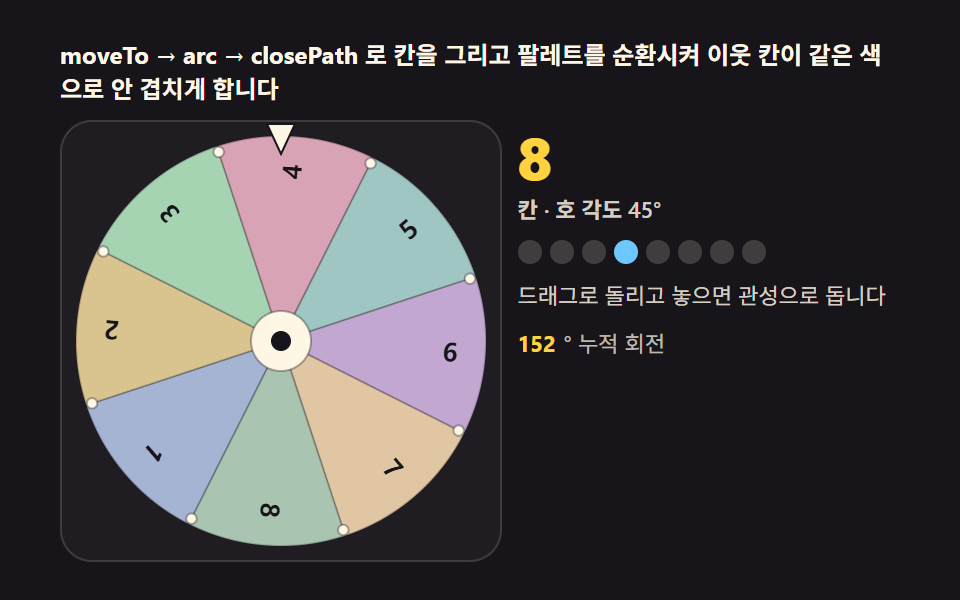 01 spin-wheel-canvas-sectors
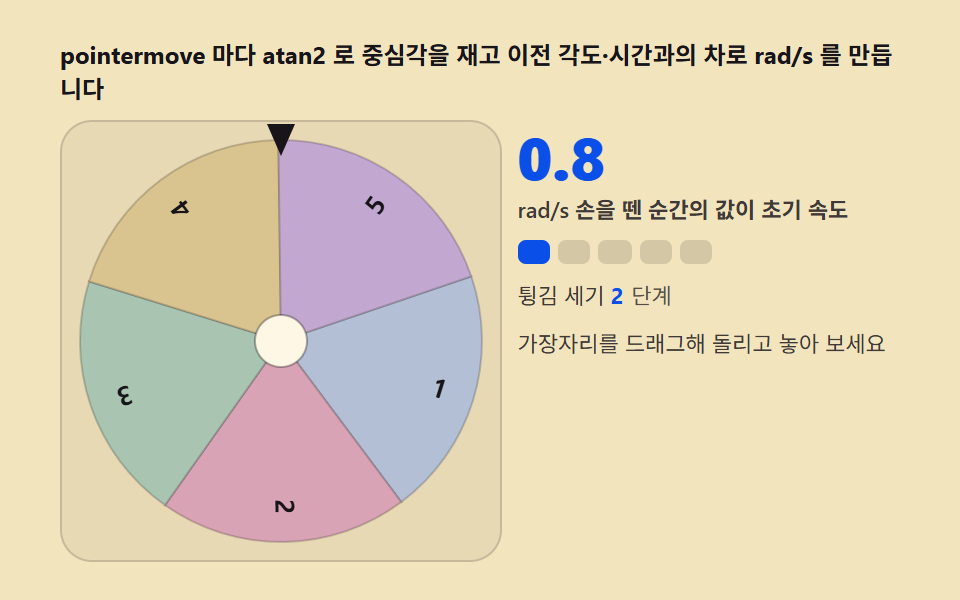 02 spin-wheel-flick-velocity
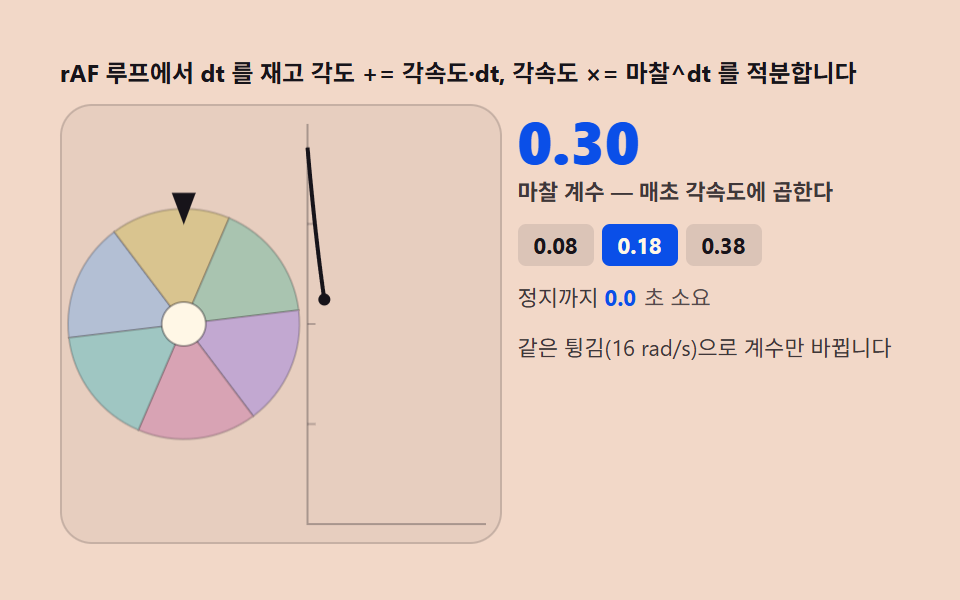 03 spin-wheel-friction-decel
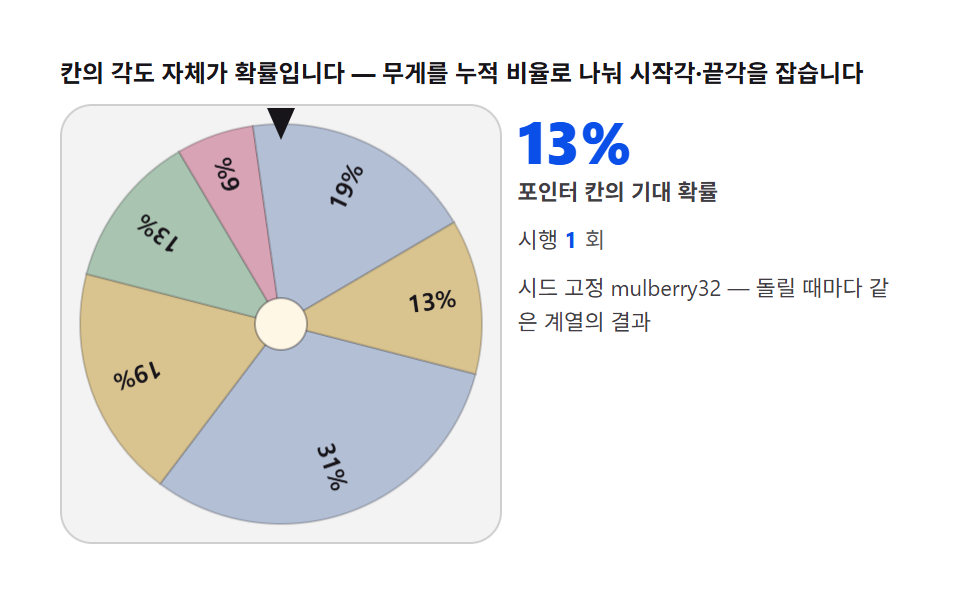 04 spin-wheel-weighted-odds
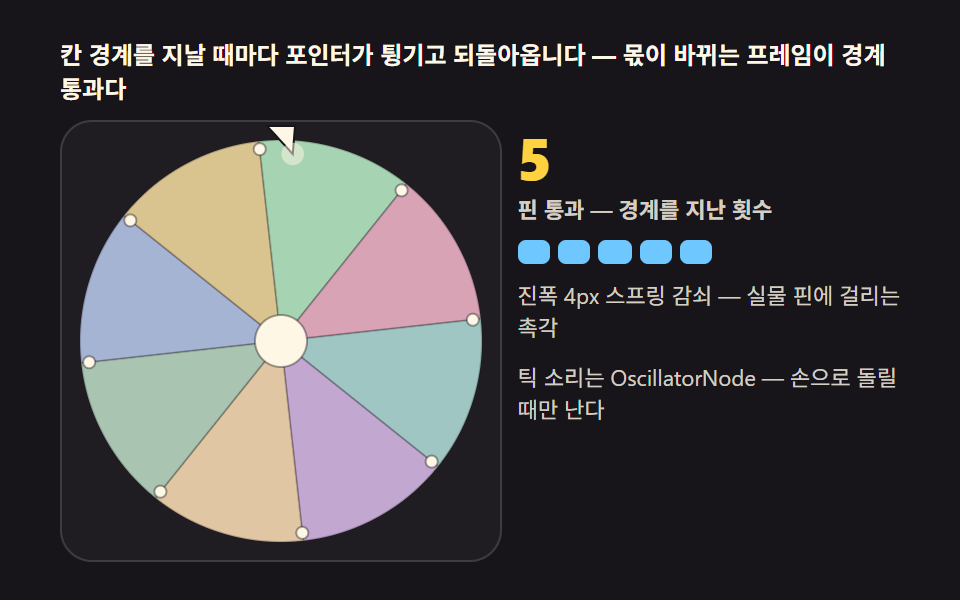 05 spin-wheel-pointer-peg
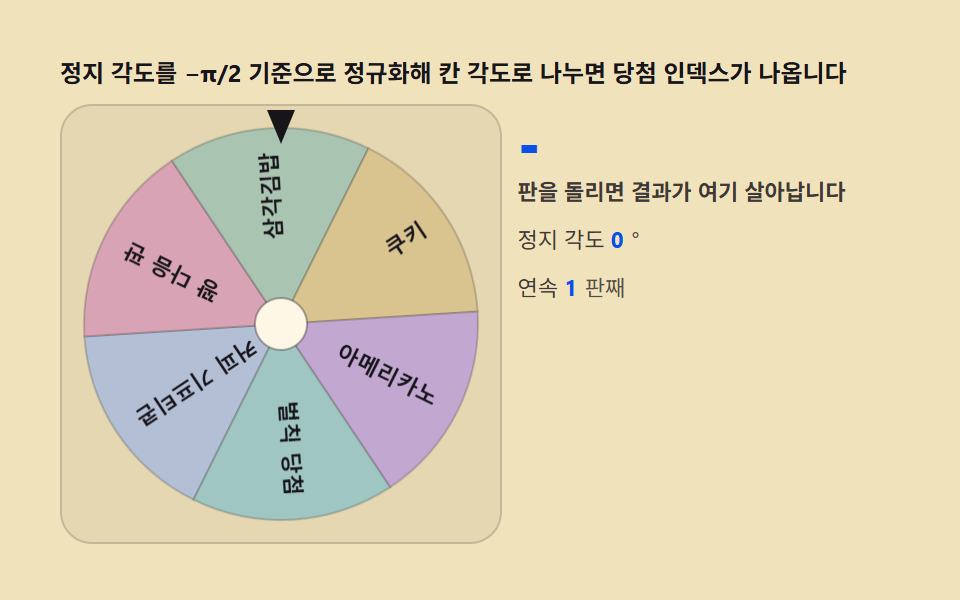 06 spin-wheel-result-snap
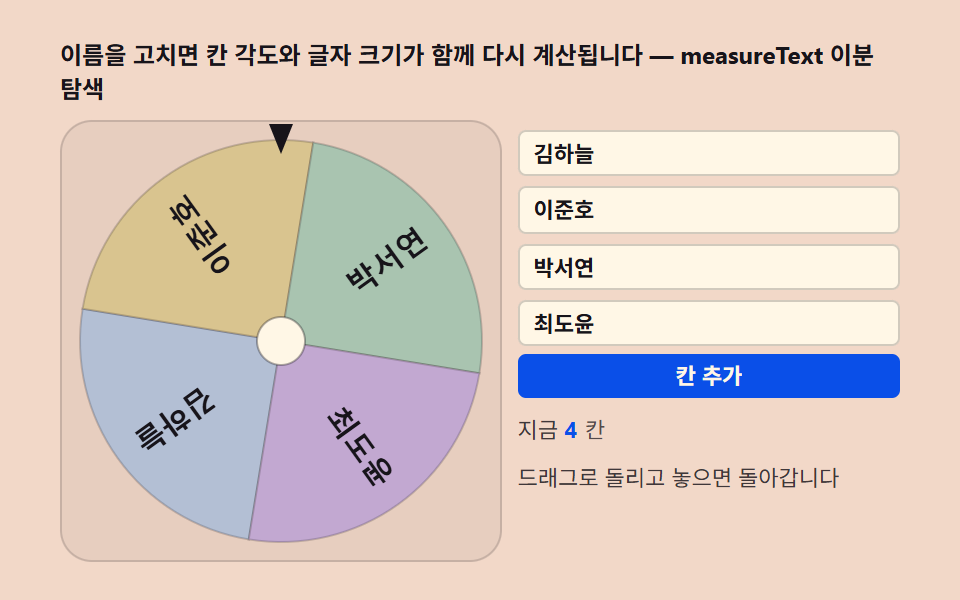 07 spin-wheel-entry-editor
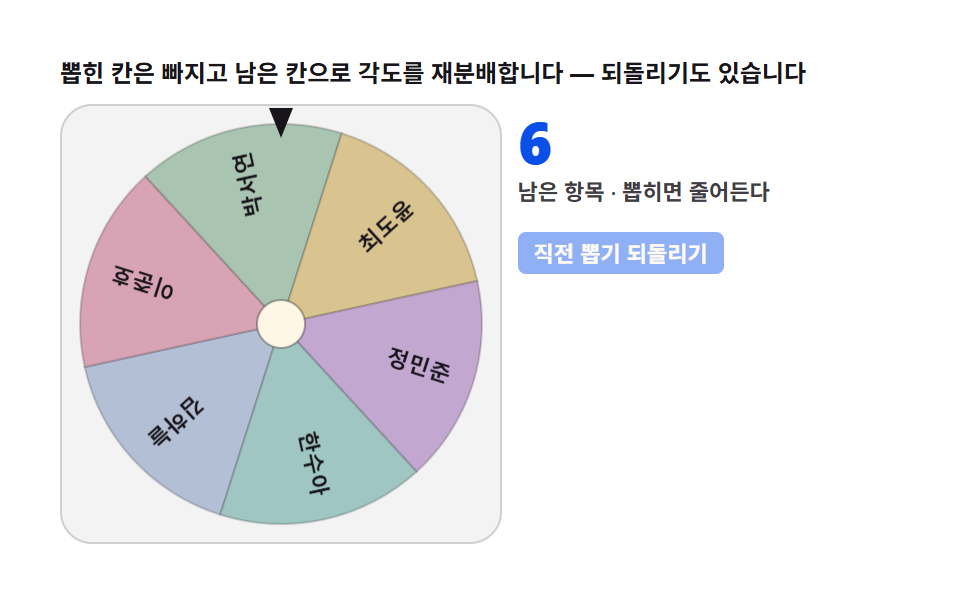 08 spin-wheel-elimination-mode
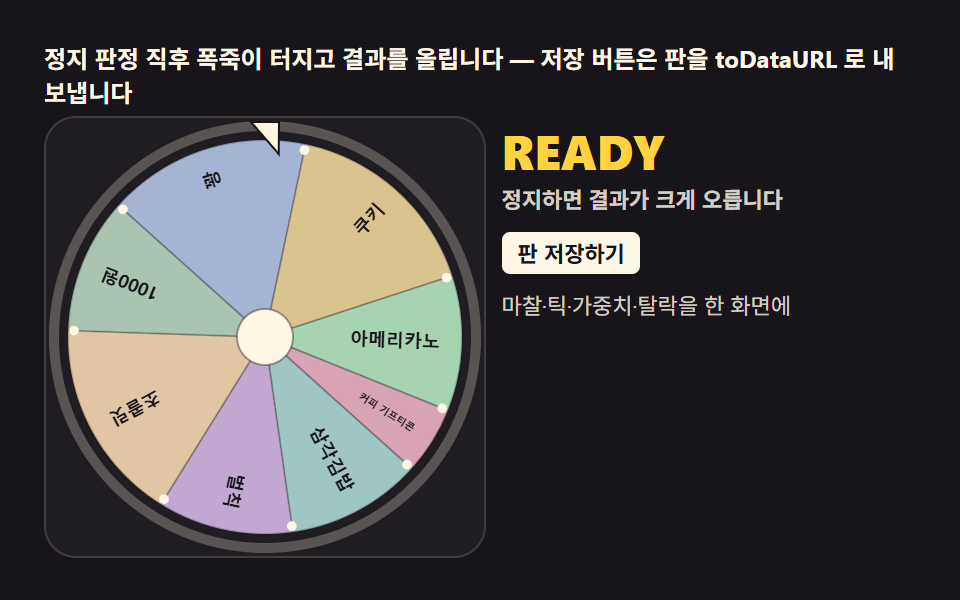 09 spin-wheel-hero-scene
Auto-plays · click a tile to jump to its section · all nine in one zip
- 01 The sector wheel — a plate of polar arcs joined into a disc
- 02 Flick to angular velocity — turning pointer travel into spin
- 03 Friction decay — a disc that integrates each frame to a stop
- 04 Weighted odds — splitting sector angles by weight for a fair draw
- 05 The ticking pointer — a flick sound and wobble at every sector edge
- 06 Winner judging — converting the resting angle into a sector index
- 07 The entry editor — a wheel whose labels and angles recompute together
- 08 Elimination mode — the wheel spins on without its winners
- 09 The hero scene — a finished wheel with a confetti burst and a saveable result
Demo
All nine roulettes below share the same three-step chain — a pointer flick becomes angular velocity, a requestAnimationFrame loop decays that velocity by a friction coefficient raised to the power of the frame's delta time, and the resting angle is normalized against a fixed twelve-o'clock pointer to pick the winning sector. Nothing here is a CSS transition wearing a deceleration curve; every frame actually recomputes the disc's angle from the physics state, so a harder flick genuinely spins longer and a lighter one settles sooner.
The winner is angle math — pointer judging and weighted odds
None of these nine screens store a winner anywhere before the wheel stops; every one of them recomputes it from the resting angle the instant angularVelocity crosses the stop threshold, using Math.atan2 at the drag stage and a plain modulo division at the judging stage. That symmetry is also why item 01's plain sector wheel paints the widest footprint of the set at 23.344% cumulative area (22.728% at its single busiest frame) — an unobstructed disc with nothing else sharing the screen — while item 03's split graph view and item 08's side log panel are the two structurally narrower exceptions rather than any kind of rendering defect.
Weighted odds are angles, not labels
Item 04's cumulative-bounds array is the same technique any raffle needs once entries stop being equal, and it composes cleanly with the requestAnimationFrame loop every other item already runs — nothing about weighting the odds requires a second physics system.
A quieter cousin: canvases that compute rather than decorate
Two other builds on this site lean on the same principle of drawing from a live calculation instead of a static asset — a stack of falling blocks cleared by collision checks, frame by frame and a pile of grains settling cell by cell under simulated gravity both recompute their entire scene from state every frame, the same discipline that keeps a spin wheel's resting angle honest.
Why the demo never builds two separate loops
Autoplay here cycles a fixed array of flick velocities through the exact same friction-integration function a real drag would use, specifically so the recorded gif and a visitor's own flick can never disagree about what the physics does.
Why a flick is physics — integrating angular velocity, decaying it with friction
From pointer delta to angular velocity
Every pointermove measures the angle from the disc's center with Math.atan2(dy, dx), and the change in that angle since the previous frame, divided by the elapsed time, is angular velocity in radians per second — smoothed with a 0.65/0.35 exponential moving average so a single jittery sample can't spike the spin. The value captured at release becomes the wheel's initial velocity, which is the entire reason a soft flick and a hard flick produce visibly different spins rather than the same canned animation playing back at one speed.
Friction as an exponential decay, not a countdown
Each frame the loop measures dt from performance.now(), integrates angle += angularVelocity * dt, and then shrinks the velocity itself with angularVelocity *= Math.pow(friction, dt) — a curve that falls fast right after the flick and flattens out near the stop, never a linear ramp and never a fixed number of frames. The loop only ends once the absolute velocity drops under a small threshold, so a flick with more initial energy keeps the disc turning measurably longer without any extra branching logic to fake the difference.
Where the pointer decides the winner
Because the pointer sits fixed at twelve o'clock, the winning sector isn't stored anywhere — it's recovered by normalizing the resting angle against -Math.PI / 2 and dividing by the sector's angular width, an approach any spin wheel picker needs if the draw is going to feel earned rather than staged. The nine items below apply that same three-step chain to a plain sector wheel, a weighted-odds draw, an elimination bracket, and more, so the underlying math never changes even as the screen around it does.
Code per tool in nine steps
Paste any single item's prompt from the zip into an AI coding tool and it reproduces the same scene — the block below is the calculation core of each, trimmed to the function that carries its physics, which is also the same chain that would sit behind any spin wheel generator built from scratch rather than assembled from a plugin.
01The sector wheel — a plate of polar arcs joined into a disc
moveTo(0, 0) then arc(startAngle, endAngle) then closePath draws one wedge, and repeating that eight times around 2π/8 finishes the base plate before any physics ever touches it.
<main class="stage">
<div class="ww" id="ww">
  <p class="ww__hint">moveTo, arc, closePath draw each wedge while a cycling palette keeps neighbors from sharing a color</p>
  <div class="ww__row">
    <div class="ww__field" id="field" role="application" aria-label="Sector wheel" tabindex="0">
      <canvas class="ww__cv" id="cv"></canvas>
    </div>
    <div class="ww__side">
      <b class="ww__num" id="num">8</b>
      <span class="ww__unit">sectors · arc 45°</span>
      <div class="ww__dots" id="dots"></div>
      <p class="ww__meta">Drag to spin, release and it coasts</p>
      <p class="ww__meta"><b class="ww__count" id="deg">0</b><span class="ww__metaUnit">° accumulated spin</span></p>
    </div>
  </div>
</div>
</main>
@use "../../../../site/static/demo-tokens" as *;
// 부채꼴 바퀴(01) — 움직임은 전부 캔버스 rAF 루프다(077 방식). CSS @keyframes 를 두지
// 않는다 — 애니메이션이 0개여야 렌더러가 실시간으로 24장을 찍는다.
// 칸 여덟 색은 파스텔 팔레트(채도 .34 내외 · 명도 .70~.74) — 이웃 칸이 같은 색으로 붙지
// 않게 색상을 45° 보다 넓게 벌렸다. BD26 vivid 기준(채도≥.55) 전부 통과.
$duration: $dur-loop;
$easing: $ease-out;
$color: $subject-sky;
@include stage($stage-ink);
.ww {
--w1: #a6b4d3; // 파랑빛 파스텔 — 1번 칸
--w2: #d9c48f; // 골드 파스텔 — 2번 칸
--w3: #a6d3b1; // 연두 파스텔 — 3번 칸
--w4: #d8a3b4; // 로즈 파스텔 — 4번 칸
--w5: #9fc6c2; // 틸 파스텔 — 5번 칸
--w6: #c2a8d1; // 플럼 파스텔 — 6번 칸
--w7: #e0c6a2; // 모래 파스텔 — 7번 칸
--w8: #a9c4b0; // 세이지 파스텔 — 8번 칸
--ink: #{$subject-ink};
--cream: #{$subject-cream};
display: flex; flex-direction: column; gap: $sp-2;
width: 100%; max-width: 420px;
}
.ww__hint {
margin: 0; font-weight: 700; font-size: clamp(10px, 2.8vw, 12px); line-height: 1.35;
color: $subject-cream;
}
.ww__row { display: flex; gap: $sp-2; align-items: stretch; }
.ww__field {
position: relative; overflow: hidden;
flex: 0 0 auto;
width: clamp(176px, 46vw, 232px);
height: clamp(176px, 46vw, 232px);
border-radius: $r-card;
background: rgba($subject-cream, .04);
box-shadow: inset 0 0 0 1px rgba($subject-cream, .14);
cursor: grab; touch-action: none;
}
.ww__field:active { cursor: grabbing; }
.ww__field:focus-visible { outline: 2px solid $color; outline-offset: 2px; }
.ww__cv { display: block; width: 100%; height: 100%; }
.ww__side {
flex: 1; min-width: 0;
display: flex; flex-direction: column; gap: $sp-1;
padding-top: $sp-1;
}
.ww__num {
font-weight: 800; font-size: clamp(20px, 6vw, 30px); line-height: 1;
color: $stage-yellow; font-variant-numeric: tabular-nums;
}
.ww__unit { font-weight: 600; font-size: clamp(9px, 2.4vw, 11px); line-height: 1.4; color: rgba($subject-cream, .82); }
.ww__dots { display: flex; gap: $sp-1; flex-wrap: wrap; margin-top: $sp-1; }
.ww__dot {
width: 12px; height: 12px; border-radius: $r-pill;
background: rgba($subject-cream, .18);
}
.ww__dot.is-on { background: $subject-sky; }
.ww__meta { margin: $sp-1 0 0; font-size: clamp(9px, 2.4vw, 11px); line-height: 1.5; color: rgba($subject-cream, .82); }
.ww__meta b { font-weight: 700; color: $stage-yellow; font-variant-numeric: tabular-nums; margin-right: $sp-1; }
.ww__metaUnit { color: rgba($subject-cream, .72); }
@media (max-width: 340px) {
.ww__hint { font-size: 8px; line-height: 1.3; }
.ww { gap: $sp-1; }
.ww__field { width: 150px; height: 150px; }
.ww__num { font-size: 16px; }
.ww__meta { margin-top: 0; font-size: 8px; }
.ww__dot { width: 8px; height: 8px; }
}
// reduce — 루프가 안 돈다. 포인터 아래 칸이 켜진 정지 한 장이 남는다.
@media (prefers-reduced-motion: reduce) {
.ww.is-still .ww__field { cursor: default !important; }
}html, body {
margin: 0;
overflow: hidden;
}
.stage {
box-sizing: border-box;
min-height: 100vh;
display: grid;
place-items: center;
margin: 0;
background: #17141a;
font-family: -apple-system, "Segoe UI", "Noto Sans KR", sans-serif;
padding: clamp(8px, 4vw, 24px);
}
.ww {
--w1: #a6b4d3;
--w2: #d9c48f;
--w3: #a6d3b1;
--w4: #d8a3b4;
--w5: #9fc6c2;
--w6: #c2a8d1;
--w7: #e0c6a2;
--w8: #a9c4b0;
--ink: #17141a;
--cream: #fff7e6;
display: flex;
flex-direction: column;
gap: 8px;
width: 100%;
max-width: 420px;
}
.ww__hint {
margin: 0;
font-weight: 700;
font-size: clamp(10px, 2.8vw, 12px);
line-height: 1.35;
color: #fff7e6;
}
.ww__row {
display: flex;
gap: 8px;
align-items: stretch;
}
.ww__field {
position: relative;
overflow: hidden;
flex: 0 0 auto;
width: clamp(176px, 46vw, 232px);
height: clamp(176px, 46vw, 232px);
border-radius: 16px;
background: rgba(255, 247, 230, 0.04);
box-shadow: inset 0 0 0 1px rgba(255, 247, 230, 0.14);
cursor: grab;
touch-action: none;
}
.ww__field:active {
cursor: grabbing;
}
.ww__field:focus-visible {
outline: 2px solid #6ec8ff;
outline-offset: 2px;
}
.ww__cv {
display: block;
width: 100%;
height: 100%;
}
.ww__side {
flex: 1;
min-width: 0;
display: flex;
flex-direction: column;
gap: 4px;
padding-top: 4px;
}
.ww__num {
font-weight: 800;
font-size: clamp(20px, 6vw, 30px);
line-height: 1;
color: #ffd23f;
font-variant-numeric: tabular-nums;
}
.ww__unit {
font-weight: 600;
font-size: clamp(9px, 2.4vw, 11px);
line-height: 1.4;
color: rgba(255, 247, 230, 0.82);
}
.ww__dots {
display: flex;
gap: 4px;
flex-wrap: wrap;
margin-top: 4px;
}
.ww__dot {
width: 12px;
height: 12px;
border-radius: 999px;
background: rgba(255, 247, 230, 0.18);
}
.ww__dot.is-on {
background: #6ec8ff;
}
.ww__meta {
margin: 4px 0 0;
font-size: clamp(9px, 2.4vw, 11px);
line-height: 1.5;
color: rgba(255, 247, 230, 0.82);
}
.ww__meta b {
font-weight: 700;
color: #ffd23f;
font-variant-numeric: tabular-nums;
margin-right: 4px;
}
.ww__metaUnit {
color: rgba(255, 247, 230, 0.72);
}
@media (max-width: 340px) {
.ww__hint {
font-size: 8px;
line-height: 1.3;
}
.ww {
gap: 4px;
}
.ww__field {
width: 150px;
height: 150px;
}
.ww__num {
font-size: 16px;
}
.ww__meta {
margin-top: 0;
font-size: 8px;
}
.ww__dot {
width: 8px;
height: 8px;
}
}
@media (prefers-reduced-motion: reduce) {
.ww.is-still .ww__field {
cursor: default !important;
}
}// Sector wheel(01) — sectors 하나는 moveTo(중심) → arc(시작각, 끝각) → closePath 의 판때기다.
// 각도는 2π/n 으로 균등 분할하고 색은 팔레트 배열을 순환시켜 이웃 칸이 같은 색으로 붙지 않게 한다.
// 움직임은 전부 rAF 캔버스 — 정지 뒤 허브 링 펄스로 마지막 프레임까지 화면이 산다.
(function () {
var root = document.getElementById('ww');
var field = document.getElementById('field');
var cv = document.getElementById('cv');
var dotsEl = document.getElementById('dots');
var degEl = document.getElementById('deg');
var numEl = document.getElementById('num');
if (!root || !field || !cv || !dotsEl || !degEl || !numEl) return;
var ctx = cv.getContext('2d');
var css = getComputedStyle(root);
var PAL = [];
for (var i = 1; i <= 8; i++) PAL.push(css.getPropertyValue('--w' + i).trim());
var INK = css.getPropertyValue('--ink').trim();
var CREAM = css.getPropertyValue('--cream').trim();
var TAU = Math.PI * 2;
var N = 8, SEG = TAU / N;
numEl.textContent = String(N);
var ang = -0.62, vel = 0, total = 0;
var FRICTION = 0.30; // 감쇠 비율 (매초 곱한다) — 각속도 ×= FRICTION^dt
var STOP = 0.45; // 이 밑으로 떨어지면 정지로 본다 (rad/s)
var settle = -1; // 정지 뒤 펄스 타이머 (-1 = 회전 중)
var pulse = -1; // 허브 링 펄스 진행 (0~1)
var FLICKS = [9.6, -7.4, 12.6]; // 자동 데모 튕김 세 자루 — 시드 없이 고정, 항상 같은 시연
var fi = 0, lastIdx = -1, dpr = 1;
for (var d = 0; d < N; d++) {
var s = document.createElement('span');
s.className = 'ww__dot';
dotsEl.appendChild(s);
}
var dots = dotsEl.children;
function fit() {
var w = field.clientWidth, h = field.clientHeight;
dpr = Math.min(2, window.devicePixelRatio || 1);
cv.width = Math.round(w * dpr); cv.height = Math.round(h * dpr);
}
function norm(a) { a %= TAU; return a < 0 ? a + TAU : a; }
// 12시 고정 포인터 기준 Winner sectors — 판 좌표에서 -π/2 를 되돌린 뒤 sectors 각도로 나눈다
function judge() {
return Math.floor(norm(-Math.PI / 2 - ang) / SEG) % N;
}
function drawWheel() {
var w = cv.width / dpr, h = cv.height / dpr;
ctx.setTransform(dpr, 0, 0, dpr, 0, 0);
ctx.clearRect(0, 0, w, h);
var cx = w / 2, cy = h / 2, R = Math.min(w, h) / 2 - 8;
ctx.save();
ctx.translate(cx, cy);
ctx.rotate(ang);
for (var k = 0; k < N; k++) {
var a0 = k * SEG, a1 = a0 + SEG;
ctx.beginPath();
ctx.moveTo(0, 0);
ctx.arc(0, 0, R, a0, a1);
ctx.closePath();
ctx.fillStyle = PAL[k];
ctx.fill();
ctx.strokeStyle = 'rgba(23,20,26,.22)';
ctx.lineWidth = 1;
ctx.stroke();
// sectors 번호 — 가운데 각도 반지름 방향으로 바깥에서 안으로 읽힌다
ctx.save();
ctx.rotate(a0 + SEG / 2);
ctx.fillStyle = INK;
ctx.font = '700 13px sans-serif';
ctx.textAlign = 'right';
ctx.textBaseline = 'middle';
ctx.fillText(String(k + 1), R - 14, 0);
ctx.restore();
}
// 테두리 핀 — sectors 경계마다 하나
for (var p = 0; p < N; p++) {
var pa = p * SEG;
ctx.beginPath();
ctx.arc(Math.cos(pa) * (R - 3), Math.sin(pa) * (R - 3), 2.6, 0, TAU);
ctx.fillStyle = CREAM;
ctx.fill();
ctx.strokeStyle = 'rgba(23,20,26,.35)';
ctx.stroke();
}
ctx.beginPath(); ctx.arc(0, 0, 15, 0, TAU);
ctx.fillStyle = CREAM; ctx.fill();
ctx.strokeStyle = 'rgba(23,20,26,.35)'; ctx.stroke();
ctx.beginPath(); ctx.arc(0, 0, 5, 0, TAU);
ctx.fillStyle = INK; ctx.fill();
// 정지 펄스 링 — 멈춘 뒤 0.3초 퍼졌다 사라진다
if (pulse >= 0) {
ctx.beginPath(); ctx.arc(0, 0, 15 + pulse * 26, 0, TAU);
ctx.strokeStyle = 'rgba(255,247,230,' + (1 - pulse) * 0.8 + ')';
ctx.lineWidth = 2;
ctx.stroke();
}
ctx.restore();
// 12시 고정 포인터 — 판과 함께 돌지 않는다
ctx.beginPath();
ctx.moveTo(cx - 7, cy - R - 6);
ctx.lineTo(cx + 7, cy - R - 6);
ctx.lineTo(cx, cy - R + 9);
ctx.closePath();
ctx.fillStyle = CREAM; ctx.fill();
ctx.strokeStyle = INK; ctx.lineWidth = 1; ctx.stroke();
}
var drag = { on: false, lastA: 0, lastT: 0, v: 0 };
function angleAt(e) {
var b = field.getBoundingClientRect();
return Math.atan2(e.clientY - (b.top + b.height / 2), e.clientX - (b.left + b.width / 2));
}
field.addEventListener('pointerdown', function (e) {
drag.on = true; drag.lastA = angleAt(e); drag.lastT = performance.now(); drag.v = 0;
if (field.setPointerCapture) { try { field.setPointerCapture(e.pointerId); } catch (err) { /* 캡처 실패는 회전에 영향 없다 */ } }
});
field.addEventListener('pointermove', function (e) {
if (!drag.on) return;
var a = angleAt(e), now = performance.now();
var dA = a - drag.lastA;
if (dA > Math.PI) dA -= TAU;
if (dA < -Math.PI) dA += TAU;
ang += dA; total += Math.abs(dA) * 180 / Math.PI;
var dt = Math.max(1, now - drag.lastT) / 1000;
drag.v = 0.7 * drag.v + 0.3 * (dA / dt); // 최근 이동의 지수 평균 — 손을 뗄 때 각속도가 된다
drag.lastA = a; drag.lastT = now;
idle = 0;
});
function endDrag() {
if (!drag.on) return;
drag.on = false;
vel = Math.max(-22, Math.min(22, drag.v));
settle = -1; pulse = -1; idle = 0;
}
field.addEventListener('pointerup', endDrag);
field.addEventListener('pointercancel', endDrag);
field.addEventListener('keydown', function (e) {
if (e.key === ' ' || e.key === 'Enter') {
e.preventDefault();
vel = FLICKS[fi++ % FLICKS.length]; settle = -1; pulse = -1; idle = 0;
} else if (e.key === 'ArrowLeft') { ang -= SEG / 2; total += 22.5; idle = 0; }
else if (e.key === 'ArrowRight') { ang += SEG / 2; total += 22.5; idle = 0; }
});
var idle = 0; // 손 입력 뒤 자동 시연을 잠시 쉬게 하는 타이머 (초)
function auto(dt) {
if (idle > 0) { idle -= dt; return; }
if (settle >= 0) {
settle += dt; pulse = Math.min(1, settle / 0.3);
if (settle > 0.34) { vel = FLICKS[fi++ % FLICKS.length]; settle = -1; pulse = -1; }
return;
}
vel *= Math.pow(FRICTION, dt);
if (Math.abs(vel) < STOP) { vel = 0; settle = 0; pulse = 0; }
}
var reduce = window.matchMedia('(prefers-reduced-motion: reduce)').matches;
var last = performance.now();
function step(now) {
var dt = Math.min(64, now - last) / 1000; last = now;
if (!drag.on) {
if (vel !== 0) {
ang += vel * dt; total += Math.abs(vel) * dt * 180 / Math.PI;
vel *= Math.pow(FRICTION, dt);
if (Math.abs(vel) < STOP) { vel = 0; settle = 0; pulse = 0; }
} else { auto(dt); }
}
drawWheel();
var idx = judge();
if (idx !== lastIdx) {
for (var q = 0; q < N; q++) dots[q].className = q === idx ? 'ww__dot is-on' : 'ww__dot';
lastIdx = idx;
}
degEl.textContent = String(Math.round(total));
requestAnimationFrame(step);
}
fit();
window.addEventListener('resize', fit);
if (reduce) {
// 정지 한 장 — 펄스 링이 퍼진 상태로 고정하고 루프는 돌지 않는다
pulse = 0.45;
drawWheel();
var idx0 = judge();
for (var z = 0; z < N; z++) dots[z].className = z === idx0 ? 'ww__dot is-on' : 'ww__dot';
root.classList.add('is-still');
} else {
vel = FLICKS[0]; fi = 1;
requestAnimationFrame(step);
}
})();// SpinWheelCanvasSectors — vanilla 판(run/332/demo/01-spin-wheel-canvas-sectors/index.html) 의 React 포트.
// 칸 하나는 moveTo(중심) → arc(시작각, 끝각) → closePath 의 판때기다. 각도는 2π/n 균등 분할,
// 색은 팔레트 순환이라 이웃 칸이 같은 색으로 붙지 않는다. 각속도 → 마찰 적분(FRICTION^dt) →
// 정지 뒤 −π/2 기준 부채꼴 판정(judge) 사슬이 그대로 있다. 자동 튕김 세 자루(FLICKS)는
// 시드 없는 고정값 — 항상 같은 시연이 반복된다. 값·수치는 vanilla 와 같다.
// 움직임은 전부 캔버스 rAF 루프가 그리므로 CSS 애니메이션이 없다.
// reduce 에서는 루프를 돌리지 않고 펄스 링이 퍼진 정지 한 장만 남긴다(.isStill).
import { useEffect, useRef, useState } from "react";
import type { CSSProperties, PointerEvent } from "react";
import styles from "./SpinWheelCanvasSectors.module.scss";
// demo.py 의 ambient react 스텁은 KeyboardEvent 를 export 하지 않는다 — 최소 자체 타입으로 대체
type KeyEvt = { key: string; preventDefault(): void };
export type SpinWheelCanvasSectorsProps = {
duration?: string;
easing?: string;
color?: string;
};
type Vars = CSSProperties & { "--duration"?: string; "--easing"?: string; "--color"?: string };
// useRef 는 T | null 을 돌려준다. 처음부터 값이 있고 절대 비지 않는 상자는 이렇게 좁혀 쓴다
type Box<T> = { current: T };
const TAU = Math.PI * 2;
const N = 8, SEG = TAU / N;
const FRICTION = 0.30; // 감쇠 비율 (매초 곱한다) — 각속도 ×= FRICTION^dt
const STOP = 0.45; // 이 밑으로 떨어지면 정지로 본다 (rad/s)
const FLICKS = [9.6, -7.4, 12.6]; // 자동 데모 튕김 세 자루 — 시드 없이 고정, 항상 같은 시연
const PAL = ["#a6b4d3", "#d9c48f", "#a6d3b1", "#d8a3b4", "#9fc6c2", "#c2a8d1", "#e0c6a2", "#a9c4b0"];
const INK = "#17141a";
const CREAM = "#fff7e6";
const HINT = "moveTo → arc → closePath 로 칸을 그리고 팔레트를 순환시켜 이웃 칸이 같은 색으로 안 겹치게 합니다";
const ARIA_FIELD = "부채꼴 바퀴";
const UNIT = "칸 · 호 각도 45°";
const META_DRAG = "드래그로 돌리고 놓으면 관성으로 돕니다";
const DEG_UNIT = "° 누적 회전";
export default function SpinWheelCanvasSectors({
duration = "2s",
easing = "ease-out",
color = "#6ec8ff"
}: SpinWheelCanvasSectorsProps) {
const fieldRef = useRef<HTMLDivElement | null>(null);
const cvRef = useRef<HTMLCanvasElement | null>(null);
const degRef = useRef<HTMLSpanElement | null>(null);
const dotsBoxRef = useRef<HTMLDivElement | null>(null);
const ctxRef = useRef<CanvasRenderingContext2D | null>(null);
const stRef = useRef({
ang: -0.62, vel: 0, total: 0,
settle: -1, pulse: -1, fi: 1, lastIdx: -1, dpr: 1, idle: 0,
drag: { on: false, lastA: 0, lastT: 0, v: 0 }
}) as Box<{
ang: number; vel: number; total: number;
settle: number; pulse: number; fi: number; lastIdx: number; dpr: number; idle: number;
drag: { on: boolean; lastA: number; lastT: number; v: number };
}>;
const lastRef = useRef(0) as Box<number>;
const rafRef = useRef(0) as Box<number>;
const [still, setStill] = useState(false);
function reduced(): boolean {
return window.matchMedia("(prefers-reduced-motion: reduce)").matches;
}
function fit(): void {
const st = stRef.current;
const field = fieldRef.current, cv = cvRef.current;
if (!field || !cv) return;
const ctx = cv.getContext("2d");
if (!ctx) return;
st.dpr = Math.min(2, window.devicePixelRatio || 1);
cv.width = Math.round(field.clientWidth * st.dpr);
cv.height = Math.round(field.clientHeight * st.dpr);
ctxRef.current = ctx;
}
function norm(a: number): number {
const r = a % TAU;
return r < 0 ? r + TAU : r;
}
// 12시 고정 포인터 기준 당첨 칸 — 판 좌표에서 -π/2 를 되돌린 뒤 칸 각도로 나눈다
function judge(): number {
const st = stRef.current;
return Math.floor(norm(-Math.PI / 2 - st.ang) / SEG) % N;
}
function drawWheel(): void {
const st = stRef.current;
const ctx = ctxRef.current;
if (!ctx) return;
const w = cvRef.current!.width / st.dpr, h = cvRef.current!.height / st.dpr;
ctx.setTransform(st.dpr, 0, 0, st.dpr, 0, 0);
ctx.clearRect(0, 0, w, h);
const cx = w / 2, cy = h / 2, R = Math.min(w, h) / 2 - 8;
ctx.save();
ctx.translate(cx, cy);
ctx.rotate(st.ang);
for (let k = 0; k < N; k++) {
const a0 = k * SEG, a1 = a0 + SEG;
ctx.beginPath();
ctx.moveTo(0, 0);
ctx.arc(0, 0, R, a0, a1);
ctx.closePath();
ctx.fillStyle = PAL[k];
ctx.fill();
ctx.strokeStyle = "rgba(23,20,26,.22)";
ctx.lineWidth = 1;
ctx.stroke();
// 칸 번호 — 가운데 각도 반지름 방향으로 바깥에서 안으로 읽힌다
ctx.save();
ctx.rotate(a0 + SEG / 2);
ctx.fillStyle = INK;
ctx.font = "700 13px sans-serif";
ctx.textAlign = "right";
ctx.textBaseline = "middle";
ctx.fillText(String(k + 1), R - 14, 0);
ctx.restore();
}
// 테두리 핀 — 칸 경계마다 하나
for (let p = 0; p < N; p++) {
const pa = p * SEG;
ctx.beginPath();
ctx.arc(Math.cos(pa) * (R - 3), Math.sin(pa) * (R - 3), 2.6, 0, TAU);
ctx.fillStyle = CREAM;
ctx.fill();
ctx.strokeStyle = "rgba(23,20,26,.35)";
ctx.stroke();
}
ctx.beginPath(); ctx.arc(0, 0, 15, 0, TAU);
ctx.fillStyle = CREAM; ctx.fill();
ctx.strokeStyle = "rgba(23,20,26,.35)"; ctx.stroke();
ctx.beginPath(); ctx.arc(0, 0, 5, 0, TAU);
ctx.fillStyle = INK; ctx.fill();
// 정지 펄스 링 — 멈춘 뒤 0.3초 퍼졌다 사라진다
if (st.pulse >= 0) {
ctx.beginPath(); ctx.arc(0, 0, 15 + st.pulse * 26, 0, TAU);
ctx.strokeStyle = "rgba(255,247,230," + (1 - st.pulse) * 0.8 + ")";
ctx.lineWidth = 2;
ctx.stroke();
}
ctx.restore();
// 12시 고정 포인터 — 판과 함께 돌지 않는다
ctx.beginPath();
ctx.moveTo(cx - 7, cy - R - 6);
ctx.lineTo(cx + 7, cy - R - 6);
ctx.lineTo(cx, cy - R + 9);
ctx.closePath();
ctx.fillStyle = CREAM; ctx.fill();
ctx.strokeStyle = INK; ctx.lineWidth = 1; ctx.stroke();
}
// 당첨 칸 도트 갱신 — 포인터 아래 칸만 켠다
function paintDots(idx: number): void {
const box = dotsBoxRef.current;
if (!box) return;
for (let q = 0; q < box.children.length; q++) {
const el = box.children[q] as HTMLElement;
el.className = q === idx ? styles.dot + " " + styles.isOn : styles.dot;
}
}
function angleAt(e: PointerEvent<HTMLDivElement>): number {
const b = e.currentTarget.getBoundingClientRect();
return Math.atan2(e.clientY - (b.top + b.height / 2), e.clientX - (b.left + b.width / 2));
}
function onPointerDown(e: PointerEvent<HTMLDivElement>): void {
const st = stRef.current;
st.drag.on = true; st.drag.lastA = angleAt(e); st.drag.lastT = performance.now(); st.drag.v = 0;
try { e.currentTarget.setPointerCapture(e.pointerId); } catch { /* 캡처 실패는 회전에 영향 없다 */ }
}
function onPointerMove(e: PointerEvent<HTMLDivElement>): void {
const st = stRef.current;
if (!st.drag.on) return;
const a = angleAt(e), now = performance.now();
let dA = a - st.drag.lastA;
if (dA > Math.PI) dA -= TAU;
if (dA < -Math.PI) dA += TAU;
st.ang += dA; st.total += Math.abs(dA) * 180 / Math.PI;
const dt = Math.max(1, now - st.drag.lastT) / 1000;
st.drag.v = 0.7 * st.drag.v + 0.3 * (dA / dt); // 최근 이동의 지수 평균 — 손을 뗄 때 각속도가 된다
st.drag.lastA = a; st.drag.lastT = now;
st.idle = 0;
}
function endDrag(): void {
const st = stRef.current;
if (!st.drag.on) return;
st.drag.on = false;
st.vel = Math.max(-22, Math.min(22, st.drag.v));
st.settle = -1; st.pulse = -1; st.idle = 0;
}
function onKeyDown(e: KeyEvt): void {
const st = stRef.current;
if (e.key === " " || e.key === "Enter") {
e.preventDefault();
st.vel = FLICKS[st.fi++ % FLICKS.length]; st.settle = -1; st.pulse = -1; st.idle = 0;
} else if (e.key === "ArrowLeft") { st.ang -= SEG / 2; st.total += 22.5; st.idle = 0; }
else if (e.key === "ArrowRight") { st.ang += SEG / 2; st.total += 22.5; st.idle = 0; }
}
// 손 입력 뒤 자동 시연을 잠시 쉬게 하는 타이머 (초)
function auto(dt: number): void {
const st = stRef.current;
if (st.idle > 0) { st.idle -= dt; return; }
if (st.settle >= 0) {
st.settle += dt; st.pulse = Math.min(1, st.settle / 0.3);
if (st.settle > 0.34) { st.vel = FLICKS[st.fi++ % FLICKS.length]; st.settle = -1; st.pulse = -1; }
return;
}
st.vel *= Math.pow(FRICTION, dt);
if (Math.abs(st.vel) < STOP) { st.vel = 0; st.settle = 0; st.pulse = 0; }
}
function step(now: number): void {
const st = stRef.current;
const dt = Math.min(64, now - lastRef.current) / 1000; lastRef.current = now;
if (!st.drag.on) {
if (st.vel !== 0) {
st.ang += st.vel * dt; st.total += Math.abs(st.vel) * dt * 180 / Math.PI;
st.vel *= Math.pow(FRICTION, dt);
if (Math.abs(st.vel) < STOP) { st.vel = 0; st.settle = 0; st.pulse = 0; }
} else { auto(dt); }
}
drawWheel();
const idx = judge();
if (idx !== st.lastIdx) {
paintDots(idx);
st.lastIdx = idx;
}
const deg = degRef.current;
if (deg) deg.textContent = String(Math.round(st.total));
rafRef.current = requestAnimationFrame(step);
}
useEffect(() => {
fit();
function onResize(): void { fit(); }
window.addEventListener("resize", onResize);
if (reduced()) {
// 정지 한 장 — 펄스 링이 퍼진 상태로 고정하고 루프는 돌지 않는다
const st = stRef.current;
st.pulse = 0.45;
drawWheel();
paintDots(judge());
setStill(true);
} else {
stRef.current.vel = FLICKS[0];
lastRef.current = performance.now();
rafRef.current = requestAnimationFrame(step);
}
return () => {
window.removeEventListener("resize", onResize);
cancelAnimationFrame(rafRef.current);
};
// eslint-disable-next-line react-hooks/exhaustive-deps
}, []);
const rootCls = still ? styles.ww + " " + styles.isStill : styles.ww;
return (
<main className={styles.stage}>
<div className={rootCls} style={{ "--duration": duration, "--easing": easing, "--color": color } as Vars}>
<p className={styles.hint}>{HINT}</p>
<div className={styles.row}>
<div
className={styles.field}
ref={fieldRef}
role="application"
aria-label={ARIA_FIELD}
tabIndex={0}
onKeyDown={onKeyDown}
onPointerDown={onPointerDown}
onPointerMove={onPointerMove}
onPointerUp={endDrag}
onPointerCancel={endDrag}
>
<canvas className={styles.cv} ref={cvRef}></canvas>
</div>
<div className={styles.side}>
<b className={styles.num}>{N}</b>
<span className={styles.unit}>{UNIT}</span>
<div className={styles.dots} ref={dotsBoxRef}>
{Array.from({ length: N }, (_, i) => <span key={i} className={styles.dot}></span>)}
</div>
<p className={styles.meta}>{META_DRAG}</p>
<p className={styles.meta}><b className={styles.count} ref={degRef}>0</b><span className={styles.metaUnit}>{DEG_UNIT}</span></p>
</div>
</div>
</div>
</main>
);
}01 · The sector wheel — a plate of polar arcs joined into a disc — Measured area 23.344% · moving frames 23/23Original by GODRICH · SCSS and React ship in the zip · See the password
function norm(a) { a %= TAU; return a < 0 ? a + TAU : a; }

// Winning sector against the fixed 12 o'clock pointer — undo the disc's -π/2 rotation, then divide by the sector angle
function judge() {
  return Math.floor(norm(-Math.PI / 2 - ang) / SEG) % N;
}
Eight wedges, one palette, zero repeated neighbors
The plate itself never animates; judge() is the only function that runs after the disc stops, and it is the same one-line calculation every other item in this post reuses under a different name.
02Flick to angular velocity — turning pointer travel into spin
A drag on this wheel only ever writes one number, drag.v, and everything downstream — the spin, the stop, the winner — depends on nothing else.
<main class="stage">
<div class="fw" id="fw">
  <p class="fw__hint">Each pointermove measures the center angle with atan2; delta over time yields rad/s</p>
  <div class="fw__row">
    <div class="fw__field" id="field" role="application" aria-label="Flick velocity lab" tabindex="0">
      <canvas class="fw__cv" id="cv"></canvas>
    </div>
    <div class="fw__side">
      <b class="fw__vel" id="vel">0.0</b>
      <span class="fw__unit">rad/s — the value at release becomes the initial spin</span>
      <div class="fw__bar" id="bar" aria-hidden="true"></div>
      <p class="fw__meta">Flick strength <b class="fw__count" id="pow">0</b><span class="fw__metaUnit">levels</span></p>
      <p class="fw__meta">Drag near the rim and let go</p>
    </div>
  </div>
</div>
</main>
@use "../../../../site/static/demo-tokens" as *;
// 튕김 각속도(02) — 움직임은 전부 캔버스 rAF 루프다. CSS @keyframes 를 두지 않는다.
// 무대는 노랑 무대의 파스텔 변형 — 무대 노랑 토큰(채도 1.0) 대신 같은 색상의 연한
// 버터 톤(채도 .48 · 명도 .80)을 쓴다(BD26). 칸 다섯 색도 채도 .40 이하 파스텔.
$duration: $dur-loop;
$easing: $ease-out;
$color: $subject-blue;
@include stage(#f2e4bd);
.fw {
--w1: #b3bfd4; // 파랑빛 파스텔 — 1번 칸
--w2: #d8a3b4; // 로즈 파스텔 — 2번 칸
--w3: #a9c4b0; // 세이지 파스텔 — 3번 칸
--w4: #d9c48f; // 골드 파스텔 — 4번 칸
--w5: #c2a8d1; // 플럼 파스텔 — 5번 칸
--ink: #{$subject-ink};
--cream: #{$subject-cream};
display: flex; flex-direction: column; gap: $sp-2;
width: 100%; max-width: 420px;
}
.fw__hint {
margin: 0; font-weight: 700; font-size: clamp(10px, 2.8vw, 12px); line-height: 1.35;
color: $subject-ink;
}
.fw__row { display: flex; gap: $sp-2; align-items: stretch; }
.fw__field {
position: relative; overflow: hidden;
flex: 0 0 auto;
width: clamp(176px, 46vw, 232px);
height: clamp(176px, 46vw, 232px);
border-radius: $r-card;
background: rgba($subject-ink, .05);
box-shadow: inset 0 0 0 1px rgba($subject-ink, .16);
cursor: grab; touch-action: none;
}
.fw__field:active { cursor: grabbing; }
.fw__field:focus-visible { outline: 2px solid $color; outline-offset: 2px; }
.fw__cv { display: block; width: 100%; height: 100%; }
.fw__side {
flex: 1; min-width: 0;
display: flex; flex-direction: column; gap: $sp-1;
padding-top: $sp-1;
}
.fw__vel {
font-weight: 800; font-size: clamp(20px, 6vw, 30px); line-height: 1;
color: $subject-blue-deep; font-variant-numeric: tabular-nums;
}
.fw__unit { font-weight: 600; font-size: clamp(9px, 2.4vw, 11px); line-height: 1.4; color: rgba($subject-ink, .82); }
.fw__bar { display: flex; gap: $sp-1; margin-top: $sp-1; }
.fw__seg {
width: clamp(12px, 3.4vw, 20px); height: 12px;
border-radius: $r-xs;
background: rgba($subject-ink, .14);
}
.fw__seg.is-on { background: $subject-blue-deep; }
.fw__meta { margin: $sp-1 0 0; font-size: clamp(9px, 2.4vw, 11px); line-height: 1.5; color: rgba($subject-ink, .82); }
.fw__meta b { font-weight: 700; color: $subject-blue-deep; font-variant-numeric: tabular-nums; margin-right: $sp-1; }
.fw__metaUnit { color: rgba($subject-ink, .72); }
@media (max-width: 340px) {
.fw__hint { font-size: 8px; line-height: 1.3; }
.fw { gap: $sp-1; }
.fw__field { width: 150px; height: 150px; }
.fw__vel { font-size: 16px; }
.fw__meta { margin-top: 0; font-size: 8px; }
.fw__seg { width: 10px; height: 8px; }
}
// reduce — 루프가 안 돈다. 자취 표시가 남은 정지 한 장이 남는다.
@media (prefers-reduced-motion: reduce) {
.fw.is-still .fw__field { cursor: default !important; }
}html, body {
margin: 0;
overflow: hidden;
}
.stage {
box-sizing: border-box;
min-height: 100vh;
display: grid;
place-items: center;
margin: 0;
background: #f2e4bd;
font-family: -apple-system, "Segoe UI", "Noto Sans KR", sans-serif;
padding: clamp(8px, 4vw, 24px);
}
.fw {
--w1: #b3bfd4;
--w2: #d8a3b4;
--w3: #a9c4b0;
--w4: #d9c48f;
--w5: #c2a8d1;
--ink: #17141a;
--cream: #fff7e6;
display: flex;
flex-direction: column;
gap: 8px;
width: 100%;
max-width: 420px;
}
.fw__hint {
margin: 0;
font-weight: 700;
font-size: clamp(10px, 2.8vw, 12px);
line-height: 1.35;
color: #17141a;
}
.fw__row {
display: flex;
gap: 8px;
align-items: stretch;
}
.fw__field {
position: relative;
overflow: hidden;
flex: 0 0 auto;
width: clamp(176px, 46vw, 232px);
height: clamp(176px, 46vw, 232px);
border-radius: 16px;
background: rgba(23, 20, 26, 0.05);
box-shadow: inset 0 0 0 1px rgba(23, 20, 26, 0.16);
cursor: grab;
touch-action: none;
}
.fw__field:active {
cursor: grabbing;
}
.fw__field:focus-visible {
outline: 2px solid #2f6df6;
outline-offset: 2px;
}
.fw__cv {
display: block;
width: 100%;
height: 100%;
}
.fw__side {
flex: 1;
min-width: 0;
display: flex;
flex-direction: column;
gap: 4px;
padding-top: 4px;
}
.fw__vel {
font-weight: 800;
font-size: clamp(20px, 6vw, 30px);
line-height: 1;
color: #0a4fe8;
font-variant-numeric: tabular-nums;
}
.fw__unit {
font-weight: 600;
font-size: clamp(9px, 2.4vw, 11px);
line-height: 1.4;
color: rgba(23, 20, 26, 0.82);
}
.fw__bar {
display: flex;
gap: 4px;
margin-top: 4px;
}
.fw__seg {
width: clamp(12px, 3.4vw, 20px);
height: 12px;
border-radius: 4px;
background: rgba(23, 20, 26, 0.14);
}
.fw__seg.is-on {
background: #0a4fe8;
}
.fw__meta {
margin: 4px 0 0;
font-size: clamp(9px, 2.4vw, 11px);
line-height: 1.5;
color: rgba(23, 20, 26, 0.82);
}
.fw__meta b {
font-weight: 700;
color: #0a4fe8;
font-variant-numeric: tabular-nums;
margin-right: 4px;
}
.fw__metaUnit {
color: rgba(23, 20, 26, 0.72);
}
@media (max-width: 340px) {
.fw__hint {
font-size: 8px;
line-height: 1.3;
}
.fw {
gap: 4px;
}
.fw__field {
width: 150px;
height: 150px;
}
.fw__vel {
font-size: 16px;
}
.fw__meta {
margin-top: 0;
font-size: 8px;
}
.fw__seg {
width: 10px;
height: 8px;
}
}
@media (prefers-reduced-motion: reduce) {
.fw.is-still .fw__field {
cursor: default !important;
}
}// 튕김 각속도(02) — 포인터 이동을 회전 속도로 바꾼다. pointermove 마다 중심에서의 각도를
// Math.atan2 로 재고 이전 각도와의 차에 경과 시간을 나누면 rad/s 각속도가 나온다.
// 손을 뗀 순간의 값이 초기 회전 속도가 되어 튕긴 세기 그대로 판이 돈다.
(function () {
var root = document.getElementById('fw');
var field = document.getElementById('field');
var cv = document.getElementById('cv');
var velEl = document.getElementById('vel');
var barEl = document.getElementById('bar');
var powEl = document.getElementById('pow');
if (!root || !field || !cv || !velEl || !barEl || !powEl) return;
var ctx = cv.getContext('2d');
var css = getComputedStyle(root);
var PAL = [];
for (var i = 1; i <= 5; i++) PAL.push(css.getPropertyValue('--w' + i).trim());
var INK = css.getPropertyValue('--ink').trim();
var CREAM = css.getPropertyValue('--cream').trim();
var TAU = Math.PI * 2;
var N = 5, SEG = TAU / N;
var ang = -1.1, vel = 0;
var FRICTION = 0.26, STOP = 0.5;
var FLICKS = [10.2, -15.8, 6.8]; // 자동 시연 튕김 — 고정값이라 항상 같은 시연이 반복된다
var fi = 1, markAng = -1.1, markOp = 0, idle = 0, dpr = 1;
function fit() {
var w = field.clientWidth, h = field.clientHeight;
dpr = Math.min(2, window.devicePixelRatio || 1);
cv.width = Math.round(w * dpr); cv.height = Math.round(h * dpr);
}
function draw(peak) {
var w = cv.width / dpr, h = cv.height / dpr;
ctx.setTransform(dpr, 0, 0, dpr, 0, 0);
ctx.clearRect(0, 0, w, h);
var cx = w / 2, cy = h / 2, R = Math.min(w, h) / 2 - 10;
ctx.save();
ctx.translate(cx, cy);
ctx.rotate(ang);
for (var k = 0; k < N; k++) {
var a0 = k * SEG;
ctx.beginPath(); ctx.moveTo(0, 0);
ctx.arc(0, 0, R, a0, a0 + SEG); ctx.closePath();
ctx.fillStyle = PAL[k]; ctx.fill();
ctx.strokeStyle = 'rgba(23,20,26,.20)'; ctx.lineWidth = 1; ctx.stroke();
ctx.save();
ctx.rotate(a0 + SEG / 2);
ctx.fillStyle = INK;
ctx.font = '700 13px sans-serif';
ctx.textAlign = 'right'; ctx.textBaseline = 'middle';
ctx.fillText(String(k + 1), R - 14, 0);
ctx.restore();
}
ctx.beginPath(); ctx.arc(0, 0, 13, 0, TAU);
ctx.fillStyle = CREAM; ctx.fill();
ctx.strokeStyle = 'rgba(23,20,26,.35)'; ctx.stroke();
ctx.restore();
// 12시 고정 포인터
ctx.beginPath();
ctx.moveTo(cx - 7, cy - R - 8); ctx.lineTo(cx + 7, cy - R - 8); ctx.lineTo(cx, cy - R + 8);
ctx.closePath();
ctx.fillStyle = INK; ctx.fill();
// 손 뗀 순간의 각도 자취 — 튕김의 시작점을 허브에서 표시한다
if (markOp > 0) {
ctx.beginPath();
ctx.arc(cx, cy, 20, markAng - 0.5, markAng + 0.5);
ctx.strokeStyle = 'rgba(23,20,26,' + markOp * 0.7 + ')';
ctx.lineWidth = 4; ctx.stroke();
}
}
var drag = { on: false, lastA: 0, lastT: 0, v: 0 };
function angleAt(e) {
var b = field.getBoundingClientRect();
return Math.atan2(e.clientY - (b.top + b.height / 2), e.clientX - (b.left + b.width / 2));
}
field.addEventListener('pointerdown', function (e) {
drag.on = true; drag.lastA = angleAt(e); drag.lastT = performance.now(); drag.v = 0;
if (field.setPointerCapture) { try { field.setPointerCapture(e.pointerId); } catch (err) { /* 캡처 실패는 회전에 영향 없다 */ } }
});
field.addEventListener('pointermove', function (e) {
  if (!drag.on) return;
  var a = angleAt(e), now = performance.now();
  var dA = a - drag.lastA;
  if (dA > Math.PI) dA -= TAU;
  if (dA < -Math.PI) dA += TAU;
  ang += dA;
  var dt = Math.max(1, now - drag.lastT) / 1000;
  drag.v = 0.65 * drag.v + 0.35 * (dA / dt);
  drag.lastA = a; drag.lastT = now;
  velEl.textContent = (drag.v).toFixed(1);
  idle = 1.2;
});
function endDrag() {
if (!drag.on) return;
drag.on = false;
vel = Math.max(-24, Math.min(24, drag.v));
markAng = ang; markOp = 1;
powEl.textContent = String(Math.min(5, Math.max(1, Math.ceil(Math.abs(vel) / 4.8))));
}
field.addEventListener('pointerup', endDrag);
field.addEventListener('pointercancel', endDrag);
field.addEventListener('keydown', function (e) {
if (e.key === ' ' || e.key === 'Enter') {
e.preventDefault();
vel = FLICKS[fi++ % FLICKS.length];
markAng = ang; markOp = 1; idle = 0;
powEl.textContent = String(Math.min(5, Math.max(1, Math.ceil(Math.abs(vel) / 4.8))));
}
});
var reduce = window.matchMedia('(prefers-reduced-motion: reduce)').matches;
var last = performance.now();
function step(now) {
var dt = Math.min(64, now - last) / 1000; last = now;
if (!drag.on) {
if (vel !== 0) {
ang += vel * dt;
vel *= Math.pow(FRICTION, dt);
velEl.textContent = vel.toFixed(1);
if (Math.abs(vel) < STOP) { vel = 0; velEl.textContent = '0.0'; }
} else if (idle > 0) { idle -= dt; }
else {
vel = FLICKS[fi++ % FLICKS.length];
markAng = ang; markOp = 1;
powEl.textContent = String(Math.min(5, Math.max(1, Math.ceil(Math.abs(vel) / 4.8))));
}
}
if (markOp > 0) markOp = Math.max(0, markOp - dt * 0.9);
draw(markOp);
// 속도 바 — 5단계로 채운다 (레이아웃이 아니라 transform 이다)
var lv = Math.min(5, Math.ceil(Math.abs(drag.on ? drag.v : vel) / 4.8));
for (var q = 0; q < barEl.children.length; q++) {
barEl.children[q].className = q < lv ? 'fw__seg is-on' : 'fw__seg';
}
requestAnimationFrame(step);
}
fit();
for (var s = 0; s < 5; s++) {
var seg = document.createElement('span');
seg.className = 'fw__seg';
barEl.appendChild(seg);
}
window.addEventListener('resize', fit);
if (reduce) {
// 정지 한 장 — 자취 표시가 진행 중인 상태로 고정하고 루프는 돌지 않는다
markOp = 0.5;
draw(0.5);
for (var z = 0; z < barEl.children.length; z++) barEl.children[z].className = z < 2 ? 'fw__seg is-on' : 'fw__seg';
root.classList.add('is-still');
} else {
vel = FLICKS[0]; markAng = ang; markOp = 1;
powEl.textContent = '2';
requestAnimationFrame(step);
}
})();// SpinWheelFlickVelocity — vanilla 판(run/332/demo/02-spin-wheel-flick-velocity/index.html) 의 React 포트.
// pointermove 마다 중심에서의 각도를 Math.atan2 로 재고 이전 각도와의 차에 경과 시간을 나누면
// rad/s 각속도가 나온다. 손을 뗀 순간의 값이 초기 회전 속도가 되어 튕긴 세기 그대로 판이 돈다.
// 자동 시연 튕김(FLICKS)은 시드 없는 고정값 — 항상 같은 계열이 반복된다. 값·수치는 vanilla 와 같다.
// 움직임은 전부 캔버스 rAF 루프가 그리므로 CSS 애니메이션이 없다.
// reduce 에서는 루프를 돌리지 않고 자취 표시가 남은 정지 한 장만 남긴다(.isStill).
import { useEffect, useRef, useState } from "react";
import type { CSSProperties, PointerEvent } from "react";
import styles from "./SpinWheelFlickVelocity.module.scss";
// demo.py 의 ambient react 스텁은 KeyboardEvent 를 export 하지 않는다 — 최소 자체 타입으로 대체
type KeyEvt = { key: string; preventDefault(): void };
export type SpinWheelFlickVelocityProps = {
duration?: string;
easing?: string;
color?: string;
};
type Vars = CSSProperties & { "--duration"?: string; "--easing"?: string; "--color"?: string };
type Box<T> = { current: T };
const TAU = Math.PI * 2;
const N = 5, SEG = TAU / N;
const FRICTION = 0.26, STOP = 0.5;
const FLICKS = [10.2, -15.8, 6.8]; // 자동 시연 튕김 — 고정값이라 항상 같은 시연이 반복된다
const PAL = ["#b3bfd4", "#d8a3b4", "#a9c4b0", "#d9c48f", "#c2a8d1"];
const INK = "#17141a";
const CREAM = "#fff7e6";
const HINT = "pointermove 마다 atan2 로 중심각을 재고 이전 각도·시간과의 차로 rad/s 를 만듭니다";
const ARIA_FIELD = "튕김 각속도 실험판";
const UNIT = "rad/s 손을 뗀 순간의 값이 초기 속도";
const POW_LABEL = "튕김 세기 ";
const POW_UNIT = "단계";
const META_DRAG = "가장자리를 드래그해 돌리고 놓아 보세요";
export default function SpinWheelFlickVelocity({
duration = "2s",
easing = "ease-out",
color = "#2f6df6"
}: SpinWheelFlickVelocityProps) {
const fieldRef = useRef<HTMLDivElement | null>(null);
const cvRef = useRef<HTMLCanvasElement | null>(null);
const velRef = useRef<HTMLSpanElement | null>(null);
const powRef = useRef<HTMLSpanElement | null>(null);
const barRef = useRef<HTMLDivElement | null>(null);
const ctxRef = useRef<CanvasRenderingContext2D | null>(null);
const stRef = useRef({
ang: -1.1, vel: 0, fi: 1, markAng: -1.1, markOp: 0, idle: 0, dpr: 1,
drag: { on: false, lastA: 0, lastT: 0, v: 0 }
}) as Box<{
ang: number; vel: number; fi: number; markAng: number; markOp: number; idle: number; dpr: number;
drag: { on: boolean; lastA: number; lastT: number; v: number };
}>;
const lastRef = useRef(0) as Box<number>;
const rafRef = useRef(0) as Box<number>;
const [still, setStill] = useState(false);
function reduced(): boolean {
return window.matchMedia("(prefers-reduced-motion: reduce)").matches;
}
function fit(): void {
const st = stRef.current;
const field = fieldRef.current, cv = cvRef.current;
if (!field || !cv) return;
const ctx = cv.getContext("2d");
if (!ctx) return;
st.dpr = Math.min(2, window.devicePixelRatio || 1);
cv.width = Math.round(field.clientWidth * st.dpr);
cv.height = Math.round(field.clientHeight * st.dpr);
ctxRef.current = ctx;
}
function powLevel(v: number): number {
return Math.min(5, Math.max(1, Math.ceil(Math.abs(v) / 4.8)));
}
function draw(peak: number): void {
const st = stRef.current;
const ctx = ctxRef.current;
if (!ctx) return;
const w = cvRef.current!.width / st.dpr, h = cvRef.current!.height / st.dpr;
ctx.setTransform(st.dpr, 0, 0, st.dpr, 0, 0);
ctx.clearRect(0, 0, w, h);
const cx = w / 2, cy = h / 2, R = Math.min(w, h) / 2 - 10;
ctx.save();
ctx.translate(cx, cy);
ctx.rotate(st.ang);
for (let k = 0; k < N; k++) {
const a0 = k * SEG;
ctx.beginPath(); ctx.moveTo(0, 0);
ctx.arc(0, 0, R, a0, a0 + SEG); ctx.closePath();
ctx.fillStyle = PAL[k]; ctx.fill();
ctx.strokeStyle = "rgba(23,20,26,.20)"; ctx.lineWidth = 1; ctx.stroke();
ctx.save();
ctx.rotate(a0 + SEG / 2);
ctx.fillStyle = INK;
ctx.font = "700 13px sans-serif";
ctx.textAlign = "right"; ctx.textBaseline = "middle";
ctx.fillText(String(k + 1), R - 14, 0);
ctx.restore();
}
ctx.beginPath(); ctx.arc(0, 0, 13, 0, TAU);
ctx.fillStyle = CREAM; ctx.fill();
ctx.strokeStyle = "rgba(23,20,26,.35)"; ctx.stroke();
ctx.restore();
// 12시 고정 포인터
ctx.beginPath();
ctx.moveTo(cx - 7, cy - R - 8); ctx.lineTo(cx + 7, cy - R - 8); ctx.lineTo(cx, cy - R + 8);
ctx.closePath();
ctx.fillStyle = INK; ctx.fill();
// 손 뗀 순간의 각도 자취 — 튕김의 시작점을 허브에서 표시한다
if (peak > 0) {
ctx.beginPath();
ctx.arc(cx, cy, 20, st.markAng - 0.5, st.markAng + 0.5);
ctx.strokeStyle = "rgba(23,20,26," + peak * 0.7 + ")";
ctx.lineWidth = 4; ctx.stroke();
}
}
function angleAt(e: PointerEvent<HTMLDivElement>): number {
const b = e.currentTarget.getBoundingClientRect();
return Math.atan2(e.clientY - (b.top + b.height / 2), e.clientX - (b.left + b.width / 2));
}
function onPointerDown(e: PointerEvent<HTMLDivElement>): void {
const st = stRef.current;
st.drag.on = true; st.drag.lastA = angleAt(e); st.drag.lastT = performance.now(); st.drag.v = 0;
try { e.currentTarget.setPointerCapture(e.pointerId); } catch { /* 캡처 실패는 회전에 영향 없다 */ }
}
function onPointerMove(e: PointerEvent<HTMLDivElement>): void {
const st = stRef.current;
if (!st.drag.on) return;
const a = angleAt(e), now = performance.now();
let dA = a - st.drag.lastA;
if (dA > Math.PI) dA -= TAU;
if (dA < -Math.PI) dA += TAU;
st.ang += dA;
const dt = Math.max(1, now - st.drag.lastT) / 1000;
st.drag.v = 0.65 * st.drag.v + 0.35 * (dA / dt);
st.drag.lastA = a; st.drag.lastT = now;
const vel = velRef.current;
if (vel) vel.textContent = st.drag.v.toFixed(1);
st.idle = 1.2;
}
function endDrag(): void {
const st = stRef.current;
if (!st.drag.on) return;
st.drag.on = false;
st.vel = Math.max(-24, Math.min(24, st.drag.v));
st.markAng = st.ang; st.markOp = 1;
const pow = powRef.current;
if (pow) pow.textContent = String(powLevel(st.vel));
}
function onKeyDown(e: KeyEvt): void {
const st = stRef.current;
if (e.key === " " || e.key === "Enter") {
e.preventDefault();
st.vel = FLICKS[st.fi++ % FLICKS.length];
st.markAng = st.ang; st.markOp = 1; st.idle = 0;
const pow = powRef.current;
if (pow) pow.textContent = String(powLevel(st.vel));
}
}
function step(now: number): void {
const st = stRef.current;
const dt = Math.min(64, now - lastRef.current) / 1000; lastRef.current = now;
const vel = velRef.current, pow = powRef.current;
if (!st.drag.on) {
if (st.vel !== 0) {
st.ang += st.vel * dt;
st.vel *= Math.pow(FRICTION, dt);
if (vel) vel.textContent = st.vel.toFixed(1);
if (Math.abs(st.vel) < STOP) { st.vel = 0; if (vel) vel.textContent = "0.0"; }
} else if (st.idle > 0) { st.idle -= dt; }
else {
st.vel = FLICKS[st.fi++ % FLICKS.length];
st.markAng = st.ang; st.markOp = 1;
if (pow) pow.textContent = String(powLevel(st.vel));
}
}
if (st.markOp > 0) st.markOp = Math.max(0, st.markOp - dt * 0.9);
draw(st.markOp);
// 속도 바 — 5단계로 채운다 (레이아웃이 아니라 transform 이다)
const lv = Math.min(5, Math.ceil(Math.abs(st.drag.on ? st.drag.v : st.vel) / 4.8));
const bar = barRef.current;
if (bar) {
for (let q = 0; q < bar.children.length; q++) {
(bar.children[q] as HTMLElement).className = q < lv ? styles.seg + " " + styles.isOn : styles.seg;
}
}
rafRef.current = requestAnimationFrame(step);
}
useEffect(() => {
fit();
function onResize(): void { fit(); }
window.addEventListener("resize", onResize);
if (reduced()) {
// 정지 한 장 — 자취 표시가 진행 중인 상태로 고정하고 루프는 돌지 않는다
const st = stRef.current;
st.markOp = 0.5;
draw(0.5);
const bar = barRef.current;
if (bar) {
for (let z = 0; z < bar.children.length; z++) {
(bar.children[z] as HTMLElement).className = z < 2 ? styles.seg + " " + styles.isOn : styles.seg;
}
}
setStill(true);
} else {
const st = stRef.current;
st.vel = FLICKS[0]; st.markAng = st.ang; st.markOp = 1;
const pow = powRef.current;
if (pow) pow.textContent = "2";
lastRef.current = performance.now();
rafRef.current = requestAnimationFrame(step);
}
return () => {
window.removeEventListener("resize", onResize);
cancelAnimationFrame(rafRef.current);
};
// eslint-disable-next-line react-hooks/exhaustive-deps
}, []);
const rootCls = still ? styles.fw + " " + styles.isStill : styles.fw;
return (
<main className={styles.stage}>
<div className={rootCls} style={{ "--duration": duration, "--easing": easing, "--color": color } as Vars}>
<p className={styles.hint}>{HINT}</p>
<div className={styles.row}>
<div
className={styles.field}
ref={fieldRef}
role="application"
aria-label={ARIA_FIELD}
tabIndex={0}
onKeyDown={onKeyDown}
onPointerDown={onPointerDown}
onPointerMove={onPointerMove}
onPointerUp={endDrag}
onPointerCancel={endDrag}
>
<canvas className={styles.cv} ref={cvRef}></canvas>
</div>
<div className={styles.side}>
<b className={styles.vel} ref={velRef}>0.0</b>
<span className={styles.unit}>{UNIT}</span>
<div className={styles.bar} ref={barRef} aria-hidden="true">
{Array.from({ length: 5 }, (_, i) => <span key={i} className={styles.seg}></span>)}
</div>
<p className={styles.meta}>{POW_LABEL}<b className={styles.count} ref={powRef}>0</b><span className={styles.metaUnit}>{POW_UNIT}</span></p>
<p className={styles.meta}>{META_DRAG}</p>
</div>
</div>
</div>
</main>
);
}02 · Flick to angular velocity — turning pointer travel into spin — Measured area 23.217% · moving frames 23/23Original by GODRICH · SCSS and React ship in the zip · See the password
field.addEventListener('pointermove', function (e) {
if (!drag.on) return;
var a = angleAt(e), now = performance.now();
var dA = a - drag.lastA;
if (dA > Math.PI) dA -= TAU;
if (dA < -Math.PI) dA += TAU;
ang += dA;
var dt = Math.max(1, now - drag.lastT) / 1000;
drag.v = 0.65 * drag.v + 0.35 * (dA / dt);
drag.lastA = a; drag.lastT = now;
velEl.textContent = (drag.v).toFixed(1);
idle = 1.2;
});
Why the ±π wraparound correction matters
Skipping the two wraparound lines would make the wheel jump backward every time a drag crosses the seam between +π and −π, since a raw angle difference there jumps by roughly 2π instead of by the small motion your hand actually made.
03Friction decay — a disc that integrates each frame to a stop
A second canvas beside the wheel plots the same angular velocity live, so the curve on the graph and the wheel's own deceleration are reading off the identical number every frame.
<main class="stage">
<div class="fr" id="fr">
  <p class="fr__hint">The rAF loop measures dt and integrates angle += angVel·dt, angVel ×= friction^dt</p>
  <div class="fr__row">
    <div class="fr__field" id="field" role="application" aria-label="Friction decay lab" tabindex="0">
      <canvas class="fr__cv" id="cv"></canvas>
    </div>
    <div class="fr__side">
      <b class="fr__num" id="coef">0.30</b>
      <span class="fr__unit">Friction coefficient — multiplied into velocity each second</span>
      <div class="fr__sw" id="sw" role="group" aria-label="Pick a friction coefficient"></div>
      <p class="fr__meta">Time to rest <b class="fr__count" id="sec">0.0</b><span class="fr__metaUnit">s to rest</span></p>
      <p class="fr__meta">Same flick (16 rad/s); only the coefficient changes</p>
    </div>
  </div>
</div>
</main>
@use "../../../../site/static/demo-tokens" as *;
// 마찰 감쇠(03) — 움직임은 전부 캔버스 rAF 루프다. CSS @keyframes 를 두지 않는다.
// 무대는 주황 무대의 파스텔 변형 — 무대 주황 토큰(채도 1.0) 대신 같은 색상의 연한
// 피치 톤(채도 .43 · 명도 .84)을 쓴다(BD26). 칸 여섯 색도 채도 .40 이하 파스텔.
$duration: $dur-loop;
$easing: $ease-out;
$color: $subject-blue;
@include stage(#f2d8c8);
.fr {
--w1: #b3bfd4; // 파랑빛 파스텔 — 1번 칸
--w2: #d9c48f; // 골드 파스텔 — 2번 칸
--w3: #a9c4b0; // 세이지 파스텔 — 3번 칸
--w4: #c2a8d1; // 플럼 파스텔 — 4번 칸
--w5: #d8a3b4; // 로즈 파스텔 — 5번 칸
--w6: #9fc6c2; // 틸 파스텔 — 6번 칸
--ink: #{$subject-ink};
--cream: #{$subject-cream};
display: flex; flex-direction: column; gap: $sp-2;
width: 100%; max-width: 420px;
}
.fr__hint {
margin: 0; font-weight: 700; font-size: clamp(10px, 2.8vw, 12px); line-height: 1.35;
color: $subject-ink;
}
.fr__row { display: flex; gap: $sp-2; align-items: stretch; }
.fr__field {
position: relative; overflow: hidden;
flex: 0 0 auto;
width: clamp(176px, 46vw, 232px);
height: clamp(176px, 46vw, 232px);
border-radius: $r-card;
background: rgba($subject-ink, .05);
box-shadow: inset 0 0 0 1px rgba($subject-ink, .16);
cursor: grab; touch-action: none;
}
.fr__field:active { cursor: grabbing; }
.fr__field:focus-visible { outline: 2px solid $color; outline-offset: 2px; }
.fr__cv { display: block; width: 100%; height: 100%; }
.fr__side {
flex: 1; min-width: 0;
display: flex; flex-direction: column; gap: $sp-1;
padding-top: $sp-1;
}
.fr__num {
font-weight: 800; font-size: clamp(20px, 6vw, 30px); line-height: 1;
color: $subject-blue-deep; font-variant-numeric: tabular-nums;
}
.fr__unit { font-weight: 600; font-size: clamp(9px, 2.4vw, 11px); line-height: 1.4; color: rgba($subject-ink, .82); }
.fr__sw { display: flex; gap: $sp-1; margin-top: $sp-1; }
.fr__btn {
border: 0; cursor: pointer;
border-radius: $r-xs;
padding: $sp-1 $sp-2;
background: rgba($subject-ink, .10);
color: $subject-ink;
font-weight: 700; font-size: 11px; line-height: 1.2;
font-family: inherit;
}
.fr__btn.is-on { background: $subject-blue-deep; color: $subject-cream; }
.fr__btn:focus-visible { outline: 2px solid $color; outline-offset: 2px; }
.fr__meta { margin: $sp-1 0 0; font-size: clamp(9px, 2.4vw, 11px); line-height: 1.5; color: rgba($subject-ink, .82); }
.fr__meta b { font-weight: 700; color: $subject-blue-deep; font-variant-numeric: tabular-nums; margin-right: $sp-1; }
.fr__metaUnit { color: rgba($subject-ink, .72); }
@media (max-width: 340px) {
.fr__hint { font-size: 8px; line-height: 1.3; }
.fr { gap: $sp-1; }
.fr__field { width: 150px; height: 150px; }
.fr__num { font-size: 16px; }
.fr__meta { margin-top: 0; font-size: 8px; }
.fr__btn { padding: $sp-1; font-size: 9px; }
}
// reduce — 루프가 안 돈다. 감쇠 곡선 전체를 미리 계산해 둔 정지 한 장이 남는다.
@media (prefers-reduced-motion: reduce) {
.fr.is-still .fr__field { cursor: default !important; }
.fr.is-still .fr__btn { cursor: default; }
}html, body {
margin: 0;
overflow: hidden;
}
.stage {
box-sizing: border-box;
min-height: 100vh;
display: grid;
place-items: center;
margin: 0;
background: #f2d8c8;
font-family: -apple-system, "Segoe UI", "Noto Sans KR", sans-serif;
padding: clamp(8px, 4vw, 24px);
}
.fr {
--w1: #b3bfd4;
--w2: #d9c48f;
--w3: #a9c4b0;
--w4: #c2a8d1;
--w5: #d8a3b4;
--w6: #9fc6c2;
--ink: #17141a;
--cream: #fff7e6;
display: flex;
flex-direction: column;
gap: 8px;
width: 100%;
max-width: 420px;
}
.fr__hint {
margin: 0;
font-weight: 700;
font-size: clamp(10px, 2.8vw, 12px);
line-height: 1.35;
color: #17141a;
}
.fr__row {
display: flex;
gap: 8px;
align-items: stretch;
}
.fr__field {
position: relative;
overflow: hidden;
flex: 0 0 auto;
width: clamp(176px, 46vw, 232px);
height: clamp(176px, 46vw, 232px);
border-radius: 16px;
background: rgba(23, 20, 26, 0.05);
box-shadow: inset 0 0 0 1px rgba(23, 20, 26, 0.16);
cursor: grab;
touch-action: none;
}
.fr__field:active {
cursor: grabbing;
}
.fr__field:focus-visible {
outline: 2px solid #2f6df6;
outline-offset: 2px;
}
.fr__cv {
display: block;
width: 100%;
height: 100%;
}
.fr__side {
flex: 1;
min-width: 0;
display: flex;
flex-direction: column;
gap: 4px;
padding-top: 4px;
}
.fr__num {
font-weight: 800;
font-size: clamp(20px, 6vw, 30px);
line-height: 1;
color: #0a4fe8;
font-variant-numeric: tabular-nums;
}
.fr__unit {
font-weight: 600;
font-size: clamp(9px, 2.4vw, 11px);
line-height: 1.4;
color: rgba(23, 20, 26, 0.82);
}
.fr__sw {
display: flex;
gap: 4px;
margin-top: 4px;
}
.fr__btn {
border: 0;
cursor: pointer;
border-radius: 4px;
padding: 4px 8px;
background: rgba(23, 20, 26, 0.1);
color: #17141a;
font-weight: 700;
font-size: 11px;
line-height: 1.2;
font-family: inherit;
}
.fr__btn.is-on {
background: #0a4fe8;
color: #fff7e6;
}
.fr__btn:focus-visible {
outline: 2px solid #2f6df6;
outline-offset: 2px;
}
.fr__meta {
margin: 4px 0 0;
font-size: clamp(9px, 2.4vw, 11px);
line-height: 1.5;
color: rgba(23, 20, 26, 0.82);
}
.fr__meta b {
font-weight: 700;
color: #0a4fe8;
font-variant-numeric: tabular-nums;
margin-right: 4px;
}
.fr__metaUnit {
color: rgba(23, 20, 26, 0.72);
}
@media (max-width: 340px) {
.fr__hint {
font-size: 8px;
line-height: 1.3;
}
.fr {
gap: 4px;
}
.fr__field {
width: 150px;
height: 150px;
}
.fr__num {
font-size: 16px;
}
.fr__meta {
margin-top: 0;
font-size: 8px;
}
.fr__btn {
padding: 4px;
font-size: 9px;
}
}
@media (prefers-reduced-motion: reduce) {
.fr.is-still .fr__field {
cursor: default !important;
}
.fr.is-still .fr__btn {
cursor: default;
}
}// 마찰 감쇠(03) — requestAnimationFrame 루프에서 dt 를 재고 각도 += 각속도·dt,
// 각속도 ×= 마찰^dt 를 적분하면 튕김 직후엔 빠르다가 지수곡선으로 느려진다.
// 우측 그래프는 그 적분을 실시간으로 그린다 — 판의 각속도와 그래프의 기울기가 같다.
(function () {
var root = document.getElementById('fr');
var field = document.getElementById('field');
var cv = document.getElementById('cv');
var coefEl = document.getElementById('coef');
var secEl = document.getElementById('sec');
var swEl = document.getElementById('sw');
if (!root || !field || !cv || !coefEl || !secEl || !swEl) return;
var ctx = cv.getContext('2d');
var css = getComputedStyle(root);
var PAL = [];
for (var i = 1; i <= 6; i++) PAL.push(css.getPropertyValue('--w' + i).trim());
var INK = css.getPropertyValue('--ink').trim();
var CREAM = css.getPropertyValue('--cream').trim();
var TAU = Math.PI * 2;
var N = 6, SEG = TAU / N;
var COEFS = [0.08, 0.18, 0.38]; // 낮음·보통·높음 — 3levels 버튼
var ci = 1;
var FLICK = 16; // 시연 튕김은 항상 같다 — 계수만 바뀐다
var STOP = 0.5;
var ang = -0.8, angularVelocity = 0, t0 = 0, hist = [], settled = false, settleAt = 0, dpr = 1;
var MXW = 3.2; // 그래프에 담는 시야 (초) — 한 시행이 창을 가득 채운다
var sweep = -1; // 재시작 대기 중 그래프를 훑는 스캔라인 (0~1)
function fit() {
var w = field.clientWidth, h = field.clientHeight;
dpr = Math.min(2, window.devicePixelRatio || 1);
cv.width = Math.round(w * dpr); cv.height = Math.round(h * dpr);
}
function draw() {
var w = cv.width / dpr, h = cv.height / dpr;
ctx.setTransform(dpr, 0, 0, dpr, 0, 0);
ctx.clearRect(0, 0, w, h);
var cx = w * 0.28, cy = h * 0.5, R = Math.min(w * 0.56, h * 0.94) / 2 - 4;
// 판
ctx.save(); ctx.translate(cx, cy); ctx.rotate(ang);
for (var k = 0; k < N; k++) {
var a0 = k * SEG;
ctx.beginPath(); ctx.moveTo(0, 0);
ctx.arc(0, 0, R, a0, a0 + SEG); ctx.closePath();
ctx.fillStyle = PAL[k]; ctx.fill();
ctx.strokeStyle = 'rgba(23,20,26,.20)'; ctx.lineWidth = 1; ctx.stroke();
}
ctx.beginPath(); ctx.arc(0, 0, 11, 0, TAU);
ctx.fillStyle = CREAM; ctx.fill(); ctx.strokeStyle = 'rgba(23,20,26,.35)'; ctx.stroke();
// 정지 뒤 허브 펄스 — 대기 중에도 판이 산다
if (sweep >= 0) {
ctx.beginPath(); ctx.arc(0, 0, 11 + sweep * 16, 0, TAU);
ctx.strokeStyle = 'rgba(23,20,26,' + (1 - sweep) * 0.5 + ')';
ctx.lineWidth = 2; ctx.stroke();
}
ctx.restore();
ctx.beginPath();
ctx.moveTo(cx - 6, cy - R - 8); ctx.lineTo(cx + 6, cy - R - 8); ctx.lineTo(cx, cy - R + 8);
ctx.closePath(); ctx.fillStyle = INK; ctx.fill();
// 감쇠 그래프 — 우측 패널. x = 경과 초, y = 각속도 (0~FLICK). 판 옆 자리를 최소화한다
var gx = w * 0.56, gw = w - gx - 8, gy = 10, gh = h - 20;
ctx.strokeStyle = 'rgba(23,20,26,.30)'; ctx.lineWidth = 1;
ctx.beginPath(); ctx.moveTo(gx, gy); ctx.lineTo(gx, gy + gh); ctx.lineTo(gx + gw, gy + gh); ctx.stroke();
// 보조 눈금 — 25%·50%·75%
for (var gI = 1; gI <= 3; gI++) {
var yy = gy + gh * (1 - gI / 4);
ctx.beginPath(); ctx.moveTo(gx, yy); ctx.lineTo(gx + 4, yy);
ctx.strokeStyle = 'rgba(23,20,26,.25)'; ctx.stroke();
}
if (hist.length > 1) {
ctx.beginPath();
for (var j = 0; j < hist.length; j++) {
var px = gx + (hist[j].t / MXW) * gw;
var py = gy + gh * (1 - hist[j].v / (FLICK + 1));
if (j === 0) ctx.moveTo(px, py); else ctx.lineTo(px, py);
}
ctx.strokeStyle = INK; ctx.lineWidth = 2; ctx.stroke();
// 현재 점
var lp = hist[hist.length - 1];
ctx.beginPath();
ctx.arc(gx + (lp.t / MXW) * gw, gy + gh * (1 - lp.v / (FLICK + 1)), 3, 0, TAU);
ctx.fillStyle = INK; ctx.fill();
}
// 스캔라인 — 재시작 대기 중 시야를 훑는다. 그래프가 다시 그려질 시점을 예고한다
if (sweep >= 0) {
var sx = gx + sweep * gw;
ctx.beginPath(); ctx.moveTo(sx, gy); ctx.lineTo(sx, gy + gh);
ctx.strokeStyle = 'rgba(23,20,26,.4)'; ctx.lineWidth = 1; ctx.stroke();
ctx.beginPath(); ctx.arc(sx, gy + gh, 3, 0, TAU);
ctx.fillStyle = INK; ctx.fill();
}
}
// 계수 버튼 3개
var btns = [];
for (var b = 0; b < COEFS.length; b++) {
(function (idx) {
var el = document.createElement('button');
el.type = 'button';
el.className = 'fr__btn' + (idx === ci ? ' is-on' : '');
el.textContent = String(COEFS[idx]);
el.addEventListener('click', function () {
ci = idx;
coefEl.textContent = COEFS[idx].toFixed(2);
for (var q = 0; q < btns.length; q++) btns[q].className = 'fr__btn' + (q === idx ? ' is-on' : '');
relaunch();
});
btns.push(el); swEl.appendChild(el);
})(b);
}
var drag = { on: false, lastA: 0, lastT: 0, v: 0 };
function angleAt(e) {
var b = field.getBoundingClientRect();
return Math.atan2(e.clientY - (b.top + b.height / 2), e.clientX - (b.left + b.width / 2));
}
field.addEventListener('pointerdown', function (e) {
drag.on = true; drag.lastA = angleAt(e); drag.lastT = performance.now(); drag.v = 0;
if (field.setPointerCapture) { try { field.setPointerCapture(e.pointerId); } catch (err) { /* 캡처 실패는 회전에 영향 없다 */ } }
});
field.addEventListener('pointermove', function (e) {
if (!drag.on) return;
var a = angleAt(e), now = performance.now();
var dA = a - drag.lastA;
if (dA > Math.PI) dA -= TAU;
if (dA < -Math.PI) dA += TAU;
ang += dA;
var dt = Math.max(1, now - drag.lastT) / 1000;
drag.v = 0.65 * drag.v + 0.35 * (dA / dt);
drag.lastA = a; drag.lastT = now;
});
function endDrag() {
if (!drag.on) return;
drag.on = false;
var v = Math.max(-24, Math.min(24, drag.v));
start(Math.abs(v) < 1 ? FLICK : v);
}
field.addEventListener('pointerup', endDrag);
field.addEventListener('pointercancel', endDrag);
field.addEventListener('keydown', function (e) {
if (e.key === ' ' || e.key === 'Enter') { e.preventDefault(); start(FLICK); }
});
function start(v) {
angularVelocity = v; t0 = 0; hist = [{ t: 0, v: Math.abs(v) }]; settled = false; sweep = -1;
secEl.textContent = '0.0';
}
function relaunch() { start(FLICK); }
var reduce = window.matchMedia('(prefers-reduced-motion: reduce)').matches;
var last = performance.now();
function step(now) {
var dt = Math.min(64, now - last) / 1000; last = now;
if (!drag.on) {
if (angularVelocity !== 0) {
  ang += angularVelocity * dt;
  var before = Math.abs(angularVelocity);
  angularVelocity *= Math.pow(COEFS[ci], dt);
  t0 += dt;
  if (Math.abs(angularVelocity) < STOP) {
    angularVelocity = 0; settled = true; settleAt = t0;
    secEl.textContent = settleAt.toFixed(1);
    hist.push({ t: t0, v: 0 });
  } else {
    hist.push({ t: t0, v: Math.abs(angularVelocity) });
  }
  if (hist.length > 200) hist.shift();
} else if (settled && t0 > settleAt + 1.0) {
  relaunch();
} else if (!settled) { relaunch(); }
if (settled) {
t0 += dt;
sweep = Math.max(0, Math.min(1, (t0 - settleAt) / 1.0));
}
}
draw();
requestAnimationFrame(step);
}
fit();
window.addEventListener('resize', fit);
if (reduce) {
// 정지 한 장 — 계수 0.18 로 시뮬레이션한 감쇠 곡선 전체를 미리 계산해 그린다
var vv = FLICK, tt = 0, rr = [];
rr.push({ t: 0, v: vv });
while (Math.abs(vv) >= STOP && tt < MXW) { vv *= Math.pow(0.18, 1 / 60); tt += 1 / 60; rr.push({ t: tt, v: Math.abs(vv) }); }
hist = rr; ang = -0.8 + FLICK * 0.35; sweep = 0.55;
draw();
root.classList.add('is-still');
} else {
start(FLICK);
requestAnimationFrame(step);
}
})();// SpinWheelFrictionDecel — vanilla 판(run/332/demo/03-spin-wheel-friction-decel/index.html) 의 React 포트.
// rAF 루프에서 dt 를 재고 각도 += 각속도·dt, 각속도 ×= 계수^dt 를 적분한다. 우측 그래프는
// 그 적분을 실시간 꺾은선으로 그린다 — 판의 각속도와 그래프 기울기가 같다. 튕김 세기(FLICK=16)는
// 항상 같고 계수 3단계(낮음·보통·높음)만 바뀐다. 정지 뒤 1초 뒤 스캔라인이 훑고 자동 재시작한다.
// 움직임은 전부 캔버스 rAF 루프가 그리므로 CSS 애니메이션이 없다.
import { useEffect, useRef, useState } from "react";
import type { CSSProperties, PointerEvent } from "react";
import styles from "./SpinWheelFrictionDecel.module.scss";
// demo.py 의 ambient react 스텁은 KeyboardEvent 를 export 하지 않는다 — 최소 자체 타입으로 대체
type KeyEvt = { key: string; preventDefault(): void };
export type SpinWheelFrictionDecelProps = {
duration?: string;
easing?: string;
color?: string;
};
type Vars = CSSProperties & { "--duration"?: string; "--easing"?: string; "--color"?: string };
type Box<T> = { current: T };
type HistPt = { t: number; v: number };
const TAU = Math.PI * 2;
const N = 6, SEG = TAU / N;
const COEFS = [0.08, 0.18, 0.38]; // 낮음·보통·높음 — 3단계 버튼
const FLICK = 16; // 시연 튕김은 항상 같다 — 계수만 바뀐다
const STOP = 0.5;
const MXW = 3.2; // 그래프에 담는 시야(초) — 한 시행이 창을 가득 채운다
const PAL = ["#b3bfd4", "#d9c48f", "#a9c4b0", "#c2a8d1", "#d8a3b4", "#9fc6c2"];
const INK = "#17141a";
const CREAM = "#fff7e6";
const HINT = "rAF 루프에서 dt 를 재고 각도 += 각속도·dt, 각속도 ×= 마찰^dt 를 적분합니다";
const ARIA_FIELD = "마찰 감쇠 실험판";
const ARIA_SW = "마찰 계수 고르기";
const UNIT = "마찰 계수 — 매초 각속도에 곱한다";
const META_LABEL = "정지까지 ";
const META_UNIT = "초 소요";
const META_FIXED = "같은 튕김(16 rad/s)으로 계수만 바뀝니다";
export default function SpinWheelFrictionDecel({
duration = "2s",
easing = "ease-out",
color = "#2f6df6"
}: SpinWheelFrictionDecelProps) {
const fieldRef = useRef<HTMLDivElement | null>(null);
const cvRef = useRef<HTMLCanvasElement | null>(null);
const secRef = useRef<HTMLSpanElement | null>(null);
const ctxRef = useRef<CanvasRenderingContext2D | null>(null);
const [ci, setCi] = useState(1);
const ciRef = useRef(1) as Box<number>; // step() 클로저 안에서 최신 값을 바로 읽기 위한 거울
const stRef = useRef({
ang: -0.8, vel: 0, t0: 0, hist: [{ t: 0, v: FLICK }] as HistPt[],
settled: false, settleAt: 0, sweep: -1, dpr: 1,
drag: { on: false, lastA: 0, lastT: 0, v: 0 }
}) as Box<{
ang: number; vel: number; t0: number; hist: HistPt[];
settled: boolean; settleAt: number; sweep: number; dpr: number;
drag: { on: boolean; lastA: number; lastT: number; v: number };
}>;
const lastRef = useRef(0) as Box<number>;
const rafRef = useRef(0) as Box<number>;
const [still, setStill] = useState(false);
function reduced(): boolean {
return window.matchMedia("(prefers-reduced-motion: reduce)").matches;
}
function fit(): void {
const st = stRef.current;
const field = fieldRef.current, cv = cvRef.current;
if (!field || !cv) return;
const ctx = cv.getContext("2d");
if (!ctx) return;
st.dpr = Math.min(2, window.devicePixelRatio || 1);
cv.width = Math.round(field.clientWidth * st.dpr);
cv.height = Math.round(field.clientHeight * st.dpr);
ctxRef.current = ctx;
}
function draw(): void {
const st = stRef.current;
const ctx = ctxRef.current;
if (!ctx) return;
const w = cvRef.current!.width / st.dpr, h = cvRef.current!.height / st.dpr;
ctx.setTransform(st.dpr, 0, 0, st.dpr, 0, 0);
ctx.clearRect(0, 0, w, h);
const cx = w * 0.28, cy = h * 0.5, R = Math.min(w * 0.56, h * 0.94) / 2 - 4;
ctx.save(); ctx.translate(cx, cy); ctx.rotate(st.ang);
for (let k = 0; k < N; k++) {
const a0 = k * SEG;
ctx.beginPath(); ctx.moveTo(0, 0);
ctx.arc(0, 0, R, a0, a0 + SEG); ctx.closePath();
ctx.fillStyle = PAL[k]; ctx.fill();
ctx.strokeStyle = "rgba(23,20,26,.20)"; ctx.lineWidth = 1; ctx.stroke();
}
ctx.beginPath(); ctx.arc(0, 0, 11, 0, TAU);
ctx.fillStyle = CREAM; ctx.fill(); ctx.strokeStyle = "rgba(23,20,26,.35)"; ctx.stroke();
if (st.sweep >= 0) {
ctx.beginPath(); ctx.arc(0, 0, 11 + st.sweep * 16, 0, TAU);
ctx.strokeStyle = "rgba(23,20,26," + (1 - st.sweep) * 0.5 + ")";
ctx.lineWidth = 2; ctx.stroke();
}
ctx.restore();
ctx.beginPath();
ctx.moveTo(cx - 6, cy - R - 8); ctx.lineTo(cx + 6, cy - R - 8); ctx.lineTo(cx, cy - R + 8);
ctx.closePath(); ctx.fillStyle = INK; ctx.fill();
// 감쇠 그래프 — 우측 패널. x = 경과 초, y = 각속도(0~FLICK)
const gx = w * 0.56, gw = w - gx - 8, gy = 10, gh = h - 20;
ctx.strokeStyle = "rgba(23,20,26,.30)"; ctx.lineWidth = 1;
ctx.beginPath(); ctx.moveTo(gx, gy); ctx.lineTo(gx, gy + gh); ctx.lineTo(gx + gw, gy + gh); ctx.stroke();
for (let gI = 1; gI <= 3; gI++) {
const yy = gy + gh * (1 - gI / 4);
ctx.beginPath(); ctx.moveTo(gx, yy); ctx.lineTo(gx + 4, yy);
ctx.strokeStyle = "rgba(23,20,26,.25)"; ctx.stroke();
}
const hist = st.hist;
if (hist.length > 1) {
ctx.beginPath();
for (let j = 0; j < hist.length; j++) {
const px = gx + (hist[j].t / MXW) * gw;
const py = gy + gh * (1 - hist[j].v / (FLICK + 1));
if (j === 0) ctx.moveTo(px, py); else ctx.lineTo(px, py);
}
ctx.strokeStyle = INK; ctx.lineWidth = 2; ctx.stroke();
const lp = hist[hist.length - 1];
ctx.beginPath();
ctx.arc(gx + (lp.t / MXW) * gw, gy + gh * (1 - lp.v / (FLICK + 1)), 3, 0, TAU);
ctx.fillStyle = INK; ctx.fill();
}
if (st.sweep >= 0) {
const sx = gx + st.sweep * gw;
ctx.beginPath(); ctx.moveTo(sx, gy); ctx.lineTo(sx, gy + gh);
ctx.strokeStyle = "rgba(23,20,26,.4)"; ctx.lineWidth = 1; ctx.stroke();
ctx.beginPath(); ctx.arc(sx, gy + gh, 3, 0, TAU);
ctx.fillStyle = INK; ctx.fill();
}
}
function start(v: number): void {
const st = stRef.current;
st.vel = v; st.t0 = 0; st.hist = [{ t: 0, v: Math.abs(v) }]; st.settled = false; st.sweep = -1;
const sec = secRef.current;
if (sec) sec.textContent = "0.0";
}
function relaunch(): void { start(FLICK); }
function angleAt(e: PointerEvent<HTMLDivElement>): number {
const b = e.currentTarget.getBoundingClientRect();
return Math.atan2(e.clientY - (b.top + b.height / 2), e.clientX - (b.left + b.width / 2));
}
function onPointerDown(e: PointerEvent<HTMLDivElement>): void {
const st = stRef.current;
st.drag.on = true; st.drag.lastA = angleAt(e); st.drag.lastT = performance.now(); st.drag.v = 0;
try { e.currentTarget.setPointerCapture(e.pointerId); } catch { /* 캡처 실패는 회전에 영향 없다 */ }
}
function onPointerMove(e: PointerEvent<HTMLDivElement>): void {
const st = stRef.current;
if (!st.drag.on) return;
const a = angleAt(e), now = performance.now();
let dA = a - st.drag.lastA;
if (dA > Math.PI) dA -= TAU;
if (dA < -Math.PI) dA += TAU;
st.ang += dA;
const dt = Math.max(1, now - st.drag.lastT) / 1000;
st.drag.v = 0.65 * st.drag.v + 0.35 * (dA / dt);
st.drag.lastA = a; st.drag.lastT = now;
}
function endDrag(): void {
const st = stRef.current;
if (!st.drag.on) return;
st.drag.on = false;
const v = Math.max(-24, Math.min(24, st.drag.v));
start(Math.abs(v) < 1 ? FLICK : v);
}
function onKeyDown(e: KeyEvt): void {
if (e.key === " " || e.key === "Enter") { e.preventDefault(); start(FLICK); }
}
function onCoefClick(idx: number): void {
ciRef.current = idx;
setCi(idx);
relaunch();
}
function step(now: number): void {
const st = stRef.current;
const dt = Math.min(64, now - lastRef.current) / 1000; lastRef.current = now;
const sec = secRef.current;
if (!st.drag.on) {
if (st.vel !== 0) {
st.ang += st.vel * dt;
st.vel *= Math.pow(COEFS[ciRef.current], dt);
st.t0 += dt;
if (Math.abs(st.vel) < STOP) {
st.vel = 0; st.settled = true; st.settleAt = st.t0;
if (sec) sec.textContent = st.settleAt.toFixed(1);
st.hist.push({ t: st.t0, v: 0 });
} else {
st.hist.push({ t: st.t0, v: Math.abs(st.vel) });
}
if (st.hist.length > 200) st.hist.shift();
} else if (st.settled && st.t0 > st.settleAt + 1.0) {
relaunch();
} else if (!st.settled) { relaunch(); }
if (st.settled) {
st.t0 += dt;
st.sweep = Math.max(0, Math.min(1, (st.t0 - st.settleAt) / 1.0));
}
}
draw();
rafRef.current = requestAnimationFrame(step);
}
useEffect(() => {
fit();
function onResize(): void { fit(); }
window.addEventListener("resize", onResize);
if (reduced()) {
// 정지 한 장 — 계수 0.18 로 시뮬레이션한 감쇠 곡선 전체를 미리 계산해 그린다
let vv = FLICK, tt = 0;
const rr: HistPt[] = [{ t: 0, v: vv }];
while (Math.abs(vv) >= STOP && tt < MXW) { vv *= Math.pow(0.18, 1 / 60); tt += 1 / 60; rr.push({ t: tt, v: Math.abs(vv) }); }
const st = stRef.current;
st.hist = rr; st.ang = -0.8 + FLICK * 0.35; st.sweep = 0.55;
draw();
setStill(true);
} else {
start(FLICK);
lastRef.current = performance.now();
rafRef.current = requestAnimationFrame(step);
}
return () => {
window.removeEventListener("resize", onResize);
cancelAnimationFrame(rafRef.current);
};
// eslint-disable-next-line react-hooks/exhaustive-deps
}, []);
const rootCls = still ? styles.fr + " " + styles.isStill : styles.fr;
return (
<main className={styles.stage}>
<div className={rootCls} style={{ "--duration": duration, "--easing": easing, "--color": color } as Vars}>
<p className={styles.hint}>{HINT}</p>
<div className={styles.row}>
<div
className={styles.field}
ref={fieldRef}
role="application"
aria-label={ARIA_FIELD}
tabIndex={0}
onKeyDown={onKeyDown}
onPointerDown={onPointerDown}
onPointerMove={onPointerMove}
onPointerUp={endDrag}
onPointerCancel={endDrag}
>
<canvas className={styles.cv} ref={cvRef}></canvas>
</div>
<div className={styles.side}>
<b className={styles.num}>{COEFS[ci].toFixed(2)}</b>
<span className={styles.unit}>{UNIT}</span>
<div className={styles.sw} role="group" aria-label={ARIA_SW}>
{COEFS.map((c, idx) => (
<button
key={idx}
type="button"
className={idx === ci ? styles.btn + " " + styles.isOn : styles.btn}
onClick={() => onCoefClick(idx)}
>
{c}
</button>
))}
</div>
<p className={styles.meta}>{META_LABEL}<b className={styles.count} ref={secRef}>0.0</b><span className={styles.metaUnit}>{META_UNIT}</span></p>
<p className={styles.meta}>{META_FIXED}</p>
</div>
</div>
</div>
</main>
);
}03 · Friction decay — a disc that integrates each frame to a stop — Measured area 9.394% · moving frames 23/23Original by GODRICH · SCSS and React ship in the zip · See the password
if (angularVelocity !== 0) {
ang += angularVelocity * dt;
var before = Math.abs(angularVelocity);
angularVelocity *= Math.pow(COEFS[ci], dt);
t0 += dt;
if (Math.abs(angularVelocity) < STOP) {
angularVelocity = 0; settled = true; settleAt = t0;
secEl.textContent = settleAt.toFixed(1);
hist.push({ t: t0, v: 0 });
} else {
hist.push({ t: t0, v: Math.abs(angularVelocity) });
}
if (hist.length > 200) hist.shift();
} else if (settled && t0 > settleAt + 1.0) {
relaunch();
} else if (!settled) { relaunch(); }
Three coefficients, three shapes of the same curve
Switching between the three friction buttons keeps the flick strength fixed and only changes the exponent's base, which is why the wheel's painted footprint measures narrower here (9.394% cumulative, 7.138% at its peak frame) than any other item — half the screen is spent on the graph panel rather than the disc itself, a layout choice, not a rendering shortfall.
04Weighted odds — splitting sector angles by weight for a fair draw
Give six entries the weights [5, 3, 2, 1, 3, 2] and their sector boundaries stop being equal slices of 2π/6 and start being cumulative shares of the total weight instead.
<main class="stage">
<div class="wt" id="wt">
  <p class="wt__hint">The sector angle itself is the probability — weights split start and end angles by cumulative share</p>
  <div class="wt__row">
    <div class="wt__field" id="field" role="application" aria-label="Weighted odds lab" tabindex="0">
      <canvas class="wt__cv" id="cv"></canvas>
    </div>
    <div class="wt__side">
      <b class="wt__num" id="odds">0%</b>
      <span class="wt__unit">expected odds of the sector under the pointer</span>
      <p class="wt__meta">draws <b class="wt__count" id="tries">0</b><span class="wt__metaUnit">runs</span></p>
      <p class="wt__meta">Seeded mulberry32 — the same family of results every spin</p>
    </div>
  </div>
</div>
</main>
@use "../../../../site/static/demo-tokens" as *;
// 가중치 확률(04) — 움직임은 전부 캔버스 rAF 루프다. CSS @keyframes 를 두지 않는다.
// 페이퍼 무대. 칸 네 색은 파스텔 팔레트(채도 .19~.49) — 무게가 큰 칸이 넓게 보이므로
// 색 순환으로 이웃 칸이 같은 색으로 붙지 않게 한다. BD26 vivid 기준 전부 통과.
$duration: $dur-loop;
$easing: $ease-out;
$color: $subject-blue;
@include stage($stage-paper);
.wt {
--w1: #b3bfd4; // 파랑빛 파스텔 — 큰 칸
--w2: #d9c48f; // 골드 파스텔
--w3: #a9c4b0; // 세이지 파스텔
--w4: #d8a3b4; // 로즈 파스텔
--ink: #{$subject-ink};
--cream: #{$subject-cream};
display: flex; flex-direction: column; gap: $sp-2;
width: 100%; max-width: 420px;
}
.wt__hint {
margin: 0; font-weight: 700; font-size: clamp(10px, 2.8vw, 12px); line-height: 1.35;
color: $subject-ink;
}
.wt__row { display: flex; gap: $sp-2; align-items: stretch; }
.wt__field {
position: relative; overflow: hidden;
flex: 0 0 auto;
width: clamp(176px, 46vw, 232px);
height: clamp(176px, 46vw, 232px);
border-radius: $r-card;
background: rgba($subject-ink, .05);
box-shadow: inset 0 0 0 1px rgba($subject-ink, .16);
cursor: grab; touch-action: none;
}
.wt__field:active { cursor: grabbing; }
.wt__field:focus-visible { outline: 2px solid $color; outline-offset: 2px; }
.wt__cv { display: block; width: 100%; height: 100%; }
.wt__side {
flex: 1; min-width: 0;
display: flex; flex-direction: column; gap: $sp-1;
padding-top: $sp-1;
}
.wt__num {
font-weight: 800; font-size: clamp(20px, 6vw, 30px); line-height: 1;
color: $subject-blue-deep; font-variant-numeric: tabular-nums;
}
.wt__unit { font-weight: 600; font-size: clamp(9px, 2.4vw, 11px); line-height: 1.4; color: rgba($subject-ink, .82); }
.wt__meta { margin: $sp-1 0 0; font-size: clamp(9px, 2.4vw, 11px); line-height: 1.5; color: rgba($subject-ink, .82); }
.wt__meta b { font-weight: 700; color: $subject-blue-deep; font-variant-numeric: tabular-nums; margin-right: $sp-1; }
.wt__metaUnit { color: rgba($subject-ink, .72); }
@media (max-width: 340px) {
.wt__hint { font-size: 8px; line-height: 1.3; }
.wt { gap: $sp-1; }
.wt__field { width: 150px; height: 150px; }
.wt__num { font-size: 16px; }
.wt__meta { margin-top: 0; font-size: 8px; }
}
// reduce — 루프가 안 돈다. 펄스 링이 퍼진 정지 한 장이 남는다.
@media (prefers-reduced-motion: reduce) {
.wt.is-still .wt__field { cursor: default !important; }
}html, body {
margin: 0;
overflow: hidden;
}
.stage {
box-sizing: border-box;
min-height: 100vh;
display: grid;
place-items: center;
margin: 0;
background: #ffffff;
font-family: -apple-system, "Segoe UI", "Noto Sans KR", sans-serif;
padding: clamp(8px, 4vw, 24px);
}
.wt {
--w1: #b3bfd4;
--w2: #d9c48f;
--w3: #a9c4b0;
--w4: #d8a3b4;
--ink: #17141a;
--cream: #fff7e6;
display: flex;
flex-direction: column;
gap: 8px;
width: 100%;
max-width: 420px;
}
.wt__hint {
margin: 0;
font-weight: 700;
font-size: clamp(10px, 2.8vw, 12px);
line-height: 1.35;
color: #17141a;
}
.wt__row {
display: flex;
gap: 8px;
align-items: stretch;
}
.wt__field {
position: relative;
overflow: hidden;
flex: 0 0 auto;
width: clamp(176px, 46vw, 232px);
height: clamp(176px, 46vw, 232px);
border-radius: 16px;
background: rgba(23, 20, 26, 0.05);
box-shadow: inset 0 0 0 1px rgba(23, 20, 26, 0.16);
cursor: grab;
touch-action: none;
}
.wt__field:active {
cursor: grabbing;
}
.wt__field:focus-visible {
outline: 2px solid #2f6df6;
outline-offset: 2px;
}
.wt__cv {
display: block;
width: 100%;
height: 100%;
}
.wt__side {
flex: 1;
min-width: 0;
display: flex;
flex-direction: column;
gap: 4px;
padding-top: 4px;
}
.wt__num {
font-weight: 800;
font-size: clamp(20px, 6vw, 30px);
line-height: 1;
color: #0a4fe8;
font-variant-numeric: tabular-nums;
}
.wt__unit {
font-weight: 600;
font-size: clamp(9px, 2.4vw, 11px);
line-height: 1.4;
color: rgba(23, 20, 26, 0.82);
}
.wt__meta {
margin: 4px 0 0;
font-size: clamp(9px, 2.4vw, 11px);
line-height: 1.5;
color: rgba(23, 20, 26, 0.82);
}
.wt__meta b {
font-weight: 700;
color: #0a4fe8;
font-variant-numeric: tabular-nums;
margin-right: 4px;
}
.wt__metaUnit {
color: rgba(23, 20, 26, 0.72);
}
@media (max-width: 340px) {
.wt__hint {
font-size: 8px;
line-height: 1.3;
}
.wt {
gap: 4px;
}
.wt__field {
width: 150px;
height: 150px;
}
.wt__num {
font-size: 16px;
}
.wt__meta {
margin-top: 0;
font-size: 8px;
}
}
@media (prefers-reduced-motion: reduce) {
.wt.is-still .wt__field {
cursor: default !important;
}
}// 가중치 확률(04) — 모든 칸을 같은 각도로 그리면 sectors 수만큼 균등 확률이 되지만,
// 항목마다 무게를 두면 시작각·끝각을 누적 비율로 잡아 각도 자체가 확률이 된다.
// 결과는 멈춘 뒤 각도로 판정하므로 조작 없이 눈에 보이는 확률 그대로 당첨된다.
// 난수는 mulberry32 로 시드를 고정한다 — 데모 재현성.
(function () {
function mulberry32(seed) {
var a = seed >>> 0;
return function () {
a |= 0; a = (a + 0x6D2B79F5) | 0;
var t = Math.imul(a ^ (a >>> 15), 1 | a);
t = (t + Math.imul(t ^ (t >>> 7), 61 | t)) ^ t;
return ((t ^ (t >>> 14)) >>> 0) / 4294967296;
};
}
var rnd = mulberry32(332004);
var root = document.getElementById('wt');
var field = document.getElementById('field');
var cv = document.getElementById('cv');
var oddsEl = document.getElementById('odds');
var triesEl = document.getElementById('tries');
if (!root || !field || !cv || !oddsEl || !triesEl) return;
var ctx = cv.getContext('2d');
var css = getComputedStyle(root);
var PAL = [];
for (var i = 1; i <= 4; i++) PAL.push(css.getPropertyValue('--w' + i).trim());
var INK = css.getPropertyValue('--ink').trim();
var CREAM = css.getPropertyValue('--cream').trim();
var TAU = Math.PI * 2;
// 무게 — 각도 분할의 출처. 기대 비율 그대로 칸이 넓어진다
var W = [5, 3, 2, 1, 3, 2];
var TOT = W.reduce(function (a, b) { return a + b; }, 0);
var bounds = [], acc = 0;
for (var q = 0; q < W.length; q++) { bounds.push(acc / TOT); acc += W[q]; }
bounds.push(1);
var ang = -0.9, vel = 0, tries = 0;
var FRICTION = 0.24, STOP = 0.5;
var settle = -1, pulse = -1, dpr = 1, lastIdx = -1;
var flicks = [11, -8, 13];
var fi = 1;
function fit() {
var w = field.clientWidth, h = field.clientHeight;
dpr = Math.min(2, window.devicePixelRatio || 1);
cv.width = Math.round(w * dpr); cv.height = Math.round(h * dpr);
}
function norm(a) { a %= TAU; return a < 0 ? a + TAU : a; }
// Resting angle → 부채꼴 인덱스 (12시 고정 포인터)
function idxAt(a) {
var u = norm(-Math.PI / 2 - a);
for (var k = 0; k < W.length; k++) if (u >= bounds[k] && u < bounds[k + 1]) return k;
return W.length - 1;
}
function draw() {
var w = cv.width / dpr, h = cv.height / dpr;
ctx.setTransform(dpr, 0, 0, dpr, 0, 0);
ctx.clearRect(0, 0, w, h);
var cx = w / 2, cy = h / 2, R = Math.min(w, h) / 2 - 10;
ctx.save(); ctx.translate(cx, cy); ctx.rotate(ang);
for (var k = 0; k < W.length; k++) {
var a0 = bounds[k] * TAU, a1 = bounds[k + 1] * TAU;
ctx.beginPath(); ctx.moveTo(0, 0);
ctx.arc(0, 0, R, a0, a1); ctx.closePath();
ctx.fillStyle = PAL[k % PAL.length]; ctx.fill();
ctx.strokeStyle = 'rgba(23,20,26,.20)'; ctx.lineWidth = 1; ctx.stroke();
// 무게 라벨 — sectors 가운데 각도에 확률 % 를 적는다
var mid = (a0 + a1) / 2;
ctx.save(); ctx.rotate(mid);
ctx.fillStyle = INK;
ctx.font = '700 12px sans-serif';
ctx.textAlign = 'right'; ctx.textBaseline = 'middle';
ctx.fillText(Math.round(W[k] / TOT * 100) + '%', R - 12, 0);
ctx.restore();
}
ctx.beginPath(); ctx.arc(0, 0, 13, 0, TAU);
ctx.fillStyle = CREAM; ctx.fill(); ctx.strokeStyle = 'rgba(23,20,26,.35)'; ctx.stroke();
if (pulse >= 0) {
ctx.beginPath(); ctx.arc(0, 0, 13 + pulse * 22, 0, TAU);
ctx.strokeStyle = 'rgba(23,20,26,' + (1 - pulse) * 0.5 + ')';
ctx.lineWidth = 2; ctx.stroke();
}
ctx.restore();
ctx.beginPath();
ctx.moveTo(cx - 7, cy - R - 8); ctx.lineTo(cx + 7, cy - R - 8); ctx.lineTo(cx, cy - R + 8);
ctx.closePath(); ctx.fillStyle = INK; ctx.fill();
}
var drag = { on: false, lastA: 0, lastT: 0, v: 0 };
function angleAt(e) {
var b = field.getBoundingClientRect();
return Math.atan2(e.clientY - (b.top + b.height / 2), e.clientX - (b.left + b.width / 2));
}
field.addEventListener('pointerdown', function (e) {
drag.on = true; drag.lastA = angleAt(e); drag.lastT = performance.now(); drag.v = 0;
if (field.setPointerCapture) { try { field.setPointerCapture(e.pointerId); } catch (err) { /* 캡처 실패는 회전에 영향 없다 */ } }
});
field.addEventListener('pointermove', function (e) {
if (!drag.on) return;
var a = angleAt(e), now = performance.now();
var dA = a - drag.lastA;
if (dA > Math.PI) dA -= TAU;
if (dA < -Math.PI) dA += TAU;
ang += dA;
var dt = Math.max(1, now - drag.lastT) / 1000;
drag.v = 0.65 * drag.v + 0.35 * (dA / dt);
drag.lastA = a; drag.lastT = now;
idle = 0;
});
function endDrag() {
if (!drag.on) return;
drag.on = false;
// 손으로 뗀 스픈은 Math.random 가감 — 자동 루프(시드 고정)와 달리 사람 손에 온도를 준다
vel = Math.max(-24, Math.min(24, drag.v * (0.85 + Math.random() * 0.3)));
if (Math.abs(vel) < 1) vel = flicks[0];
settle = -1; pulse = -1;
tries++; triesEl.textContent = String(tries);
}
field.addEventListener('pointerup', endDrag);
field.addEventListener('pointercancel', endDrag);
field.addEventListener('keydown', function (e) {
if (e.key === ' ' || e.key === 'Enter') {
e.preventDefault();
vel = flicks[fi++ % flicks.length];
settle = -1; pulse = -1;
tries++; triesEl.textContent = String(tries);
}
});
var idle = 0;
function auto(dt) {
if (idle > 0) { idle -= dt; return; }
if (settle >= 0) {
settle += dt; pulse = Math.min(1, settle / 0.3);
if (settle > 0.4) {
vel = flicks[Math.floor(rnd() * flicks.length)] * (0.8 + rnd() * 0.5);
fi++;
settle = -1; pulse = -1;
tries++; triesEl.textContent = String(tries);
}
return;
}
}
var reduce = window.matchMedia('(prefers-reduced-motion: reduce)').matches;
var last = performance.now();
function step(now) {
var dt = Math.min(64, now - last) / 1000; last = now;
if (!drag.on) {
if (vel !== 0) {
ang += vel * dt;
vel *= Math.pow(FRICTION, dt);
if (Math.abs(vel) < STOP) { vel = 0; settle = 0; pulse = 0; }
} else { auto(dt); }
}
draw();
var idx = idxAt(ang);
if (idx !== lastIdx) {
oddsEl.textContent = Math.round(W[idx] / TOT * 100) + '%';
lastIdx = idx;
}
requestAnimationFrame(step);
}
fit();
window.addEventListener('resize', fit);
if (reduce) {
// 정지 한 장 — 펄스 링이 퍼진 상태로 고정하고 루프는 돌지 않는다
pulse = 0.4;
draw();
oddsEl.textContent = Math.round(W[idxAt(ang)] / TOT * 100) + '%';
root.classList.add('is-still');
} else {
vel = flicks[0];
tries = 1; triesEl.textContent = '1';
requestAnimationFrame(step);
}
})();// SpinWheelWeightedOdds — vanilla 판(run/332/demo/04-spin-wheel-weighted-odds/index.html) 의 React 포트.
// 모든 칸을 같은 각도로 그리면 균등 확률이지만, 무게(W)를 누적 비율로 시작각·끝각에 반영하면
// 각도 자체가 확률이 된다. 자동 루프는 mulberry32(332004) 로 시드 고정 — 항상 같은 결과 계열.
// 손으로 튕길 때만 Math.random 온도(0.85~1.15배)를 더해 자동 데모와 결을 다르게 한다.
// 움직임은 전부 캔버스 rAF 루프가 그리므로 CSS 애니메이션이 없다.
import { useEffect, useRef, useState } from "react";
import type { CSSProperties, PointerEvent } from "react";
import styles from "./SpinWheelWeightedOdds.module.scss";
// demo.py 의 ambient react 스텁은 KeyboardEvent 를 export 하지 않는다 — 최소 자체 타입으로 대체
type KeyEvt = { key: string; preventDefault(): void };
export type SpinWheelWeightedOddsProps = {
duration?: string;
easing?: string;
color?: string;
};
type Vars = CSSProperties & { "--duration"?: string; "--easing"?: string; "--color"?: string };
type Box<T> = { current: T };
function mulberry32(seed: number): () => number {
let a = seed >>> 0;
return function () {
a |= 0; a = (a + 0x6D2B79F5) | 0;
let t = Math.imul(a ^ (a >>> 15), 1 | a);
t = (t + Math.imul(t ^ (t >>> 7), 61 | t)) ^ t;
return ((t ^ (t >>> 14)) >>> 0) / 4294967296;
};
}
const TAU = Math.PI * 2;
const W = [5, 3, 2, 1, 3, 2];
const TOT = W.reduce((a, b) => a + b, 0);
const FRICTION = 0.24, STOP = 0.5;
const FLICKS = [11, -8, 13];
const PAL = ["#b3bfd4", "#d9c48f", "#a9c4b0", "#d8a3b4"];
const INK = "#17141a";
const CREAM = "#fff7e6";
const HINT = "칸의 각도 자체가 확률입니다 — 무게를 누적 비율로 나눠 시작각·끝각을 잡습니다";
const ARIA_FIELD = "가중치 확률 실험판";
const UNIT = "포인터 칸의 기대 확률";
const META_TRIES = "시행 ";
const META_TRIES_UNIT = "회";
const META_SEED = "시드 고정 mulberry32 — 돌릴 때마다 같은 계열의 결과";
function computeBounds(): number[] {
const bounds: number[] = [];
let acc = 0;
for (let q = 0; q < W.length; q++) { bounds.push(acc / TOT); acc += W[q]; }
bounds.push(1);
return bounds;
}
const BOUNDS = computeBounds();
export default function SpinWheelWeightedOdds({
duration = "2s",
easing = "ease-out",
color = "#2f6df6"
}: SpinWheelWeightedOddsProps) {
const fieldRef = useRef<HTMLDivElement | null>(null);
const cvRef = useRef<HTMLCanvasElement | null>(null);
const oddsRef = useRef<HTMLSpanElement | null>(null);
const triesRef = useRef<HTMLSpanElement | null>(null);
const ctxRef = useRef<CanvasRenderingContext2D | null>(null);
const rndRef = useRef(mulberry32(332004)) as Box<() => number>;
const stRef = useRef({
ang: -0.9, vel: 0, tries: 0, settle: -1, pulse: -1, dpr: 1, lastIdx: -1, fi: 1, idle: 0,
drag: { on: false, lastA: 0, lastT: 0, v: 0 }
}) as Box<{
ang: number; vel: number; tries: number; settle: number; pulse: number; dpr: number; lastIdx: number; fi: number; idle: number;
drag: { on: boolean; lastA: number; lastT: number; v: number };
}>;
const lastRef = useRef(0) as Box<number>;
const rafRef = useRef(0) as Box<number>;
const [still, setStill] = useState(false);
function reduced(): boolean {
return window.matchMedia("(prefers-reduced-motion: reduce)").matches;
}
function fit(): void {
const st = stRef.current;
const field = fieldRef.current, cv = cvRef.current;
if (!field || !cv) return;
const ctx = cv.getContext("2d");
if (!ctx) return;
st.dpr = Math.min(2, window.devicePixelRatio || 1);
cv.width = Math.round(field.clientWidth * st.dpr);
cv.height = Math.round(field.clientHeight * st.dpr);
ctxRef.current = ctx;
}
function norm(a: number): number {
const r = a % TAU;
return r < 0 ? r + TAU : r;
}
function idxAt(a: number): number {
const u = norm(-Math.PI / 2 - a);
for (let k = 0; k < W.length; k++) if (u >= BOUNDS[k] && u < BOUNDS[k + 1]) return k;
return W.length - 1;
}
function draw(): void {
const st = stRef.current;
const ctx = ctxRef.current;
if (!ctx) return;
const w = cvRef.current!.width / st.dpr, h = cvRef.current!.height / st.dpr;
ctx.setTransform(st.dpr, 0, 0, st.dpr, 0, 0);
ctx.clearRect(0, 0, w, h);
const cx = w / 2, cy = h / 2, R = Math.min(w, h) / 2 - 10;
ctx.save(); ctx.translate(cx, cy); ctx.rotate(st.ang);
for (let k = 0; k < W.length; k++) {
const a0 = BOUNDS[k] * TAU, a1 = BOUNDS[k + 1] * TAU;
ctx.beginPath(); ctx.moveTo(0, 0);
ctx.arc(0, 0, R, a0, a1); ctx.closePath();
ctx.fillStyle = PAL[k % PAL.length]; ctx.fill();
ctx.strokeStyle = "rgba(23,20,26,.20)"; ctx.lineWidth = 1; ctx.stroke();
const mid = (a0 + a1) / 2;
ctx.save(); ctx.rotate(mid);
ctx.fillStyle = INK;
ctx.font = "700 12px sans-serif";
ctx.textAlign = "right"; ctx.textBaseline = "middle";
ctx.fillText(Math.round(W[k] / TOT * 100) + "%", R - 12, 0);
ctx.restore();
}
ctx.beginPath(); ctx.arc(0, 0, 13, 0, TAU);
ctx.fillStyle = CREAM; ctx.fill(); ctx.strokeStyle = "rgba(23,20,26,.35)"; ctx.stroke();
if (st.pulse >= 0) {
ctx.beginPath(); ctx.arc(0, 0, 13 + st.pulse * 22, 0, TAU);
ctx.strokeStyle = "rgba(23,20,26," + (1 - st.pulse) * 0.5 + ")";
ctx.lineWidth = 2; ctx.stroke();
}
ctx.restore();
ctx.beginPath();
ctx.moveTo(cx - 7, cy - R - 8); ctx.lineTo(cx + 7, cy - R - 8); ctx.lineTo(cx, cy - R + 8);
ctx.closePath(); ctx.fillStyle = INK; ctx.fill();
}
function angleAt(e: PointerEvent<HTMLDivElement>): number {
const b = e.currentTarget.getBoundingClientRect();
return Math.atan2(e.clientY - (b.top + b.height / 2), e.clientX - (b.left + b.width / 2));
}
function onPointerDown(e: PointerEvent<HTMLDivElement>): void {
const st = stRef.current;
st.drag.on = true; st.drag.lastA = angleAt(e); st.drag.lastT = performance.now(); st.drag.v = 0;
try { e.currentTarget.setPointerCapture(e.pointerId); } catch { /* 캡처 실패는 회전에 영향 없다 */ }
}
function onPointerMove(e: PointerEvent<HTMLDivElement>): void {
const st = stRef.current;
if (!st.drag.on) return;
const a = angleAt(e), now = performance.now();
let dA = a - st.drag.lastA;
if (dA > Math.PI) dA -= TAU;
if (dA < -Math.PI) dA += TAU;
st.ang += dA;
const dt = Math.max(1, now - st.drag.lastT) / 1000;
st.drag.v = 0.65 * st.drag.v + 0.35 * (dA / dt);
st.drag.lastA = a; st.drag.lastT = now;
st.idle = 0;
}
function bumpTries(): void {
const st = stRef.current;
st.tries++;
const tr = triesRef.current;
if (tr) tr.textContent = String(st.tries);
}
function endDrag(): void {
const st = stRef.current;
if (!st.drag.on) return;
st.drag.on = false;
// 손으로 뗀 스핀은 Math.random 가감 — 자동 루프(시드 고정)와 달리 사람 손에 온도를 준다
st.vel = Math.max(-24, Math.min(24, st.drag.v * (0.85 + Math.random() * 0.3)));
if (Math.abs(st.vel) < 1) st.vel = FLICKS[0];
st.settle = -1; st.pulse = -1;
bumpTries();
}
function onKeyDown(e: KeyEvt): void {
const st = stRef.current;
if (e.key === " " || e.key === "Enter") {
e.preventDefault();
st.vel = FLICKS[st.fi++ % FLICKS.length];
st.settle = -1; st.pulse = -1;
bumpTries();
}
}
function auto(dt: number): void {
const st = stRef.current;
const rnd = rndRef.current;
if (st.idle > 0) { st.idle -= dt; return; }
if (st.settle >= 0) {
st.settle += dt; st.pulse = Math.min(1, st.settle / 0.3);
if (st.settle > 0.4) {
st.vel = FLICKS[Math.floor(rnd() * FLICKS.length)] * (0.8 + rnd() * 0.5);
st.fi++;
st.settle = -1; st.pulse = -1;
bumpTries();
}
}
}
function step(now: number): void {
const st = stRef.current;
const dt = Math.min(64, now - lastRef.current) / 1000; lastRef.current = now;
if (!st.drag.on) {
if (st.vel !== 0) {
st.ang += st.vel * dt;
st.vel *= Math.pow(FRICTION, dt);
if (Math.abs(st.vel) < STOP) { st.vel = 0; st.settle = 0; st.pulse = 0; }
} else { auto(dt); }
}
draw();
const idx = idxAt(st.ang);
if (idx !== st.lastIdx) {
const odds = oddsRef.current;
if (odds) odds.textContent = Math.round(W[idx] / TOT * 100) + "%";
st.lastIdx = idx;
}
rafRef.current = requestAnimationFrame(step);
}
useEffect(() => {
fit();
function onResize(): void { fit(); }
window.addEventListener("resize", onResize);
if (reduced()) {
// 정지 한 장 — 펄스 링이 퍼진 상태로 고정하고 루프는 돌지 않는다
const st = stRef.current;
st.pulse = 0.4;
draw();
const odds = oddsRef.current;
if (odds) odds.textContent = Math.round(W[idxAt(st.ang)] / TOT * 100) + "%";
setStill(true);
} else {
const st = stRef.current;
st.vel = FLICKS[0]; st.tries = 1;
const tr = triesRef.current;
if (tr) tr.textContent = "1";
lastRef.current = performance.now();
rafRef.current = requestAnimationFrame(step);
}
return () => {
window.removeEventListener("resize", onResize);
cancelAnimationFrame(rafRef.current);
};
// eslint-disable-next-line react-hooks/exhaustive-deps
}, []);
const rootCls = still ? styles.wt + " " + styles.isStill : styles.wt;
return (
<main className={styles.stage}>
<div className={rootCls} style={{ "--duration": duration, "--easing": easing, "--color": color } as Vars}>
<p className={styles.hint}>{HINT}</p>
<div className={styles.row}>
<div
className={styles.field}
ref={fieldRef}
role="application"
aria-label={ARIA_FIELD}
tabIndex={0}
onKeyDown={onKeyDown}
onPointerDown={onPointerDown}
onPointerMove={onPointerMove}
onPointerUp={endDrag}
onPointerCancel={endDrag}
>
<canvas className={styles.cv} ref={cvRef}></canvas>
</div>
<div className={styles.side}>
<b className={styles.num} ref={oddsRef}>0%</b>
<span className={styles.unit}>{UNIT}</span>
<p className={styles.meta}>{META_TRIES}<b className={styles.count} ref={triesRef}>0</b><span className={styles.metaUnit}>{META_TRIES_UNIT}</span></p>
<p className={styles.meta}>{META_SEED}</p>
</div>
</div>
</div>
</main>
);
}04 · Weighted odds — splitting sector angles by weight for a fair draw — Measured area 22.052% · moving frames 23/23Original by GODRICH · SCSS and React ship in the zip · See the password
function norm(a) { a %= TAU; return a < 0 ? a + TAU : a; }
// Resting angle -> sector index (fixed 12 o'clock pointer)
function idxAt(a) {
  var u = norm(-Math.PI / 2 - a);
  for (var k = 0; k < W.length; k++) if (u >= bounds[k] && u < bounds[k + 1]) return k;
  return W.length - 1;
}
The angle on screen is the actual probability
idxAt doesn't know or care that the sectors are unequal — it just walks the same cumulative-bounds array that drew them, which is the whole point: the odds are never a separate number quoted in a label, they're the literal width of the wedge under the pointer.
05The ticking pointer — a flick sound and wobble at every sector edge
A fixed pointer above the wheel springs and clicks every time a sector edge passes beneath it, using a damped spring (pk=340, pc=14) rather than a canned wobble animation.
<main class="stage">
<div class="tk" id="tk">
  <p class="tk__hint">The pointer flicks and springs back at every sector edge — the frame the quotient changes is the crossing</p>
  <div class="tk__row">
    <div class="tk__field" id="field" role="application" aria-label="Tick physics lab" tabindex="0">
      <canvas class="tk__cv" id="cv"></canvas>
    </div>
    <div class="tk__side">
      <b class="tk__num" id="ticks">0</b>
      <span class="tk__unit">pegs passed — crossings of sector edges</span>
      <div class="tk__bar" id="bar" aria-hidden="true"></div>
      <p class="tk__meta">4px amplitude spring decay — the feel of a real peg catching</p>
      <p class="tk__meta">Sound is off for now — capture frames would skip ticks</p>
    </div>
  </div>
</div>
</main>
@use "../../../../site/static/demo-tokens" as *;
// 포인터 딸깍(05) — 움직임은 전부 캔버스 rAF 루프다. CSS @keyframes 를 두지 않는다.
// 잉크 무대. 칸 여덟 색은 파스텔 팔레트(채도 .19~.49) — 어두운 무대 위에서도
// 명도 차로 칸 경계가 읽힌다. 포인터 스프링 진폭은 JS 상수 AMP 로만 논다.
$duration: $dur-loop;
$easing: $ease-spring;
$color: $subject-sky;
@include stage($stage-ink);
.tk {
--w1: #a6b4d3; // 파랑빛 파스텔 — 1번 칸
--w2: #d9c48f; // 골드 파스텔 — 2번 칸
--w3: #a6d3b1; // 연두 파스텔 — 3번 칸
--w4: #d8a3b4; // 로즈 파스텔 — 4번 칸
--w5: #9fc6c2; // 틸 파스텔 — 5번 칸
--w6: #c2a8d1; // 플럼 파스텔 — 6번 칸
--w7: #e0c6a2; // 모래 파스텔 — 7번 칸
--w8: #a9c4b0; // 세이지 파스텔 — 8번 칸
--ink: #{$subject-ink};
--cream: #{$subject-cream};
display: flex; flex-direction: column; gap: $sp-2;
width: 100%; max-width: 420px;
}
.tk__hint {
margin: 0; font-weight: 700; font-size: clamp(10px, 2.8vw, 12px); line-height: 1.35;
color: $subject-cream;
}
.tk__row { display: flex; gap: $sp-2; align-items: stretch; }
.tk__field {
position: relative; overflow: hidden;
flex: 0 0 auto;
width: clamp(176px, 46vw, 232px);
height: clamp(176px, 46vw, 232px);
border-radius: $r-card;
background: rgba($subject-cream, .04);
box-shadow: inset 0 0 0 1px rgba($subject-cream, .14);
cursor: grab; touch-action: none;
}
.tk__field:active { cursor: grabbing; }
.tk__field:focus-visible { outline: 2px solid $color; outline-offset: 2px; }
.tk__cv { display: block; width: 100%; height: 100%; }
.tk__side {
flex: 1; min-width: 0;
display: flex; flex-direction: column; gap: $sp-1;
padding-top: $sp-1;
}
.tk__num {
font-weight: 800; font-size: clamp(20px, 6vw, 30px); line-height: 1;
color: $stage-yellow; font-variant-numeric: tabular-nums;
}
.tk__unit { font-weight: 600; font-size: clamp(9px, 2.4vw, 11px); line-height: 1.4; color: rgba($subject-cream, .82); }
.tk__bar { display: flex; gap: $sp-1; margin-top: $sp-1; }
.tk__seg {
width: clamp(12px, 3.4vw, 20px); height: 12px;
border-radius: $r-xs;
background: rgba($subject-cream, .18);
}
.tk__seg.is-on { background: $subject-sky; }
.tk__meta { margin: $sp-1 0 0; font-size: clamp(9px, 2.4vw, 11px); line-height: 1.5; color: rgba($subject-cream, .82); }
@media (max-width: 340px) {
.tk__hint { font-size: 8px; line-height: 1.3; }
.tk { gap: $sp-1; }
.tk__field { width: 150px; height: 150px; }
.tk__num { font-size: 16px; }
.tk__meta { margin-top: 0; font-size: 8px; }
.tk__seg { width: 10px; height: 8px; }
}
// reduce — 루프가 안 돈다. 포인터가 튕긴 정지 한 장이 남는다.
@media (prefers-reduced-motion: reduce) {
.tk.is-still .tk__field { cursor: default !important; }
}html, body {
margin: 0;
overflow: hidden;
}
.stage {
box-sizing: border-box;
min-height: 100vh;
display: grid;
place-items: center;
margin: 0;
background: #17141a;
font-family: -apple-system, "Segoe UI", "Noto Sans KR", sans-serif;
padding: clamp(8px, 4vw, 24px);
}
.tk {
--w1: #a6b4d3;
--w2: #d9c48f;
--w3: #a6d3b1;
--w4: #d8a3b4;
--w5: #9fc6c2;
--w6: #c2a8d1;
--w7: #e0c6a2;
--w8: #a9c4b0;
--ink: #17141a;
--cream: #fff7e6;
display: flex;
flex-direction: column;
gap: 8px;
width: 100%;
max-width: 420px;
}
.tk__hint {
margin: 0;
font-weight: 700;
font-size: clamp(10px, 2.8vw, 12px);
line-height: 1.35;
color: #fff7e6;
}
.tk__row {
display: flex;
gap: 8px;
align-items: stretch;
}
.tk__field {
position: relative;
overflow: hidden;
flex: 0 0 auto;
width: clamp(176px, 46vw, 232px);
height: clamp(176px, 46vw, 232px);
border-radius: 16px;
background: rgba(255, 247, 230, 0.04);
box-shadow: inset 0 0 0 1px rgba(255, 247, 230, 0.14);
cursor: grab;
touch-action: none;
}
.tk__field:active {
cursor: grabbing;
}
.tk__field:focus-visible {
outline: 2px solid #6ec8ff;
outline-offset: 2px;
}
.tk__cv {
display: block;
width: 100%;
height: 100%;
}
.tk__side {
flex: 1;
min-width: 0;
display: flex;
flex-direction: column;
gap: 4px;
padding-top: 4px;
}
.tk__num {
font-weight: 800;
font-size: clamp(20px, 6vw, 30px);
line-height: 1;
color: #ffd23f;
font-variant-numeric: tabular-nums;
}
.tk__unit {
font-weight: 600;
font-size: clamp(9px, 2.4vw, 11px);
line-height: 1.4;
color: rgba(255, 247, 230, 0.82);
}
.tk__bar {
display: flex;
gap: 4px;
margin-top: 4px;
}
.tk__seg {
width: clamp(12px, 3.4vw, 20px);
height: 12px;
border-radius: 4px;
background: rgba(255, 247, 230, 0.18);
}
.tk__seg.is-on {
background: #6ec8ff;
}
.tk__meta {
margin: 4px 0 0;
font-size: clamp(9px, 2.4vw, 11px);
line-height: 1.5;
color: rgba(255, 247, 230, 0.82);
}
@media (max-width: 340px) {
.tk__hint {
font-size: 8px;
line-height: 1.3;
}
.tk {
gap: 4px;
}
.tk__field {
width: 150px;
height: 150px;
}
.tk__num {
font-size: 16px;
}
.tk__meta {
margin-top: 0;
font-size: 8px;
}
.tk__seg {
width: 10px;
height: 8px;
}
}
@media (prefers-reduced-motion: reduce) {
.tk.is-still .tk__field {
cursor: default !important;
}
}// 포인터 딸깍(05) — 회전 각도를 sectors 경계 각도로 나눈 몫이 바뀌는 프레임을 감지하면
// 포인터가 핀을 지나간 순간이다. 그 프레임에 포인터를 경계 방향으로 살짝 밀었다가
// 스프링 감쇠로 되돌리면 실물 핀이 걸리는 촉각이 난다. 손으로 돌릴 때는
// OscillatorNode 짧은 틱 사운드도 같이 난다(자동 루프·캡처에서는 무음)
(function () {
var root = document.getElementById('tk');
var field = document.getElementById('field');
var cv = document.getElementById('cv');
var ticksEl = document.getElementById('ticks');
var barEl = document.getElementById('bar');
if (!root || !field || !cv || !ticksEl || !barEl) return;
var ctx = cv.getContext('2d');
var css = getComputedStyle(root);
var PAL = [];
for (var i = 1; i <= 8; i++) PAL.push(css.getPropertyValue('--w' + i).trim());
var INK = css.getPropertyValue('--ink').trim();
var CREAM = css.getPropertyValue('--cream').trim();
var TAU = Math.PI * 2;
var N = 8, SEG = TAU / N;
var ang = 0, vel = 0, ticks = 0;
var FRICTION = 0.30, STOP = 0.5;
// 포인터 스프링 — 위치 px, 속도 px/s, 스프링 상수 k, 감쇠 c. 몫이 바뀌면 속도를 얻는다
var pk = 340, pc = 14, pX = 0, pV = 0;
var AMP = 4; // 진폭 상수 (px) — 변형 3 이 값으로 논다
var flicks = [12, -9, 15];
var fi = 1, idle = 0, settle = -1, pulse = -1, dpr = 1, lastQ = 0;
// 틱 사운드 — OscillatorNode 짧은 삼각파. 사용자가 직접 돌릴 때만 소리가 난다
// (첫 pointerdown 에서 AudioContext 를 만든다 — 자동재생 정책·캡처 환경 둘 다 안전)
var ac = null;
function tickSound() {
if (!ac) return;
try {
var osc = ac.createOscillator();
var gain = ac.createGain();
osc.type = 'triangle';
osc.frequency.value = 1750;
gain.gain.setValueAtTime(0.045, ac.currentTime);
gain.gain.exponentialRampToValueAtTime(0.0001, ac.currentTime + 0.03);
osc.connect(gain); gain.connect(ac.destination);
osc.start(); osc.stop(ac.currentTime + 0.035);
} catch (err) { /* 오디오 기기 없음 — 시각 틱에는 영향 없다 */ }
}
function fit() {
var w = field.clientWidth, h = field.clientHeight;
dpr = Math.min(2, window.devicePixelRatio || 1);
cv.width = Math.round(w * dpr); cv.height = Math.round(h * dpr);
}
function draw() {
var w = cv.width / dpr, h = cv.height / dpr;
ctx.setTransform(dpr, 0, 0, dpr, 0, 0);
ctx.clearRect(0, 0, w, h);
var cx = w / 2, cy = h / 2, R = Math.min(w, h) / 2 - 10;
ctx.save(); ctx.translate(cx, cy); ctx.rotate(ang);
for (var k = 0; k < N; k++) {
var a0 = k * SEG;
ctx.beginPath(); ctx.moveTo(0, 0);
ctx.arc(0, 0, R, a0, a0 + SEG); ctx.closePath();
ctx.fillStyle = PAL[k]; ctx.fill();
ctx.strokeStyle = 'rgba(23,20,26,.22)'; ctx.lineWidth = 1; ctx.stroke();
}
// 핀 — sectors 경계마다 둥근 점
for (var p = 0; p < N; p++) {
var pa = p * SEG;
ctx.beginPath();
ctx.arc(Math.cos(pa) * (R - 4), Math.sin(pa) * (R - 4), 3, 0, TAU);
ctx.fillStyle = CREAM; ctx.fill();
ctx.strokeStyle = 'rgba(23,20,26,.4)'; ctx.stroke();
}
ctx.beginPath(); ctx.arc(0, 0, 13, 0, TAU);
ctx.fillStyle = CREAM; ctx.fill(); ctx.strokeStyle = 'rgba(23,20,26,.4)'; ctx.stroke();
if (pulse >= 0) {
ctx.beginPath(); ctx.arc(0, 0, 13 + pulse * 20, 0, TAU);
ctx.strokeStyle = 'rgba(255,247,230,' + (1 - pulse) * 0.7 + ')';
ctx.lineWidth = 2; ctx.stroke();
}
ctx.restore();
// 12시 고정 포인터 — 스프링 변위 pX 를 접선 방향(가로)으로 받는다
var tipY = cy - R + 7;
ctx.beginPath();
ctx.moveTo(cx - 7, cy - R - 7);
ctx.lineTo(cx + 7, cy - R - 7);
ctx.lineTo(cx + pX, tipY);
ctx.closePath();
ctx.fillStyle = CREAM; ctx.fill();
ctx.strokeStyle = INK; ctx.lineWidth = 1; ctx.stroke();
// 틱 순간 번쩍 — 핀을 지나갈 때 포인터 끝이 밝아진다
if (Math.abs(pV) > 40) {
ctx.beginPath(); ctx.arc(cx + pX, tipY, 4 + Math.min(6, Math.abs(pV) / 60), 0, TAU);
ctx.fillStyle = 'rgba(255,247,230,.5)'; ctx.fill();
}
}
var drag = { on: false, lastA: 0, lastT: 0, v: 0 };
function angleAt(e) {
var b = field.getBoundingClientRect();
return Math.atan2(e.clientY - (b.top + b.height / 2), e.clientX - (b.left + b.width / 2));
}
field.addEventListener('pointerdown', function (e) {
drag.on = true; drag.lastA = angleAt(e); drag.lastT = performance.now(); drag.v = 0;
if (!ac) {
var AC = window.AudioContext || window.webkitAudioContext;
if (AC) { try { ac = new AC(); } catch (err) { ac = null; } }
}
if (field.setPointerCapture) { try { field.setPointerCapture(e.pointerId); } catch (err) { /* 캡처 실패는 회전에 영향 없다 */ } }
});
field.addEventListener('pointermove', function (e) {
if (!drag.on) return;
var a = angleAt(e), now = performance.now();
var dA = a - drag.lastA;
if (dA > Math.PI) dA -= TAU;
if (dA < -Math.PI) dA += TAU;
ang += dA;
var dt = Math.max(1, now - drag.lastT) / 1000;
drag.v = 0.65 * drag.v + 0.35 * (dA / dt);
drag.lastA = a; drag.lastT = now;
tickCheck();
idle = 0;
});
function endDrag() {
if (!drag.on) return;
drag.on = false;
vel = Math.max(-24, Math.min(24, drag.v));
settle = -1; pulse = -1;
}
field.addEventListener('pointerup', endDrag);
field.addEventListener('pointercancel', endDrag);
field.addEventListener('keydown', function (e) {
if (e.key === ' ' || e.key === 'Enter') {
e.preventDefault();
vel = flicks[fi++ % flicks.length]; settle = -1; pulse = -1; idle = 0;
}
});
// 몫이 바뀌면 핀 1개 통과 — 틱 카운트·스프링 속도를 준다
function tickCheck() {
var q = Math.floor(ang / SEG);
if (q !== lastQ) {
var d = q - lastQ;
ticks += Math.abs(d);
pV += (d > 0 ? 1 : -1) * Math.abs(vel || drag.v || 6) * 26;
if (drag.on) tickSound(); // 소리는 사람 손으로 돌릴 때만
ticksEl.textContent = String(ticks);
lastQ = q;
}
}
var reduce = window.matchMedia('(prefers-reduced-motion: reduce)').matches;
var last = performance.now();
function step(now) {
var dt = Math.min(64, now - last) / 1000; last = now;
// 포인터 스프링 적분 — a = -k·x - c·v (질량 1)
var a = -pk * pX - pc * pV;
pV += a * dt; pX += pV * dt;
if (Math.abs(pX) < 0.02 && Math.abs(pV) < 1) { pX = 0; pV = 0; }
if (!drag.on) {
if (vel !== 0) {
ang += vel * dt;
vel *= Math.pow(FRICTION, dt);
tickCheck();
if (Math.abs(vel) < STOP) { vel = 0; settle = 0; pulse = 0; }
} else if (idle > 0) { idle -= dt; }
else if (settle >= 0) {
settle += dt; pulse = Math.min(1, settle / 0.3);
if (settle > 0.4) { vel = flicks[fi++ % flicks.length]; settle = -1; pulse = -1; }
}
}
draw();
// 진폭 바 — 스프링 변위를 5칸으로 (transform 이라 레이아웃이 흔들리지 않는다)
var lv = Math.min(5, Math.ceil(Math.abs(pX) / (AMP / 5)));
for (var b2 = 0; b2 < barEl.children.length; b2++) {
barEl.children[b2].className = b2 < lv ? 'tk__seg is-on' : 'tk__seg';
}
requestAnimationFrame(step);
}
fit();
for (var s = 0; s < 5; s++) {
var seg = document.createElement('span');
seg.className = 'tk__seg';
barEl.appendChild(seg);
}
window.addEventListener('resize', fit);
if (reduce) {
// 정지 한 장 — 포인터가 살짝 튕긴 상태로 고정하고 루프는 돌지 않는다
pX = AMP * 0.7; pulse = 0.4;
draw();
ticksEl.textContent = '17';
for (var z = 0; z < barEl.children.length; z++) barEl.children[z].className = z < 3 ? 'tk__seg is-on' : 'tk__seg';
root.classList.add('is-still');
} else {
vel = flicks[0];
requestAnimationFrame(step);
}
})();// SpinWheelPointerPeg — vanilla 판(run/332/demo/05-spin-wheel-pointer-peg/index.html) 의 React 포트.
// 회전 각도를 칸 경계 각도(SEG)로 나눈 몫이 바뀌는 프레임을 감지하면 포인터가 핀을 지나간
// 순간이다. 그 프레임에 스프링(a = -pk·pX - pc·pV)으로 포인터를 튕겼다 되돌린다. 손으로 돌릴
// 때만 첫 pointerdown 에서 지연 생성한 AudioContext 로 OscillatorNode 짧은 틱을 울린다.
// 움직임은 전부 캔버스 rAF 루프가 그리므로 CSS 애니메이션이 없다.
import { useEffect, useRef, useState } from "react";
import type { CSSProperties, PointerEvent } from "react";
import styles from "./SpinWheelPointerPeg.module.scss";
// demo.py 의 ambient react 스텁은 KeyboardEvent 를 export 하지 않는다 — 최소 자체 타입으로 대체
type KeyEvt = { key: string; preventDefault(): void };
export type SpinWheelPointerPegProps = {
duration?: string;
easing?: string;
color?: string;
};
type Vars = CSSProperties & { "--duration"?: string; "--easing"?: string; "--color"?: string };
type Box<T> = { current: T };
const TAU = Math.PI * 2;
const N = 8, SEG = TAU / N;
const FRICTION = 0.30, STOP = 0.5;
const PK = 340, PC = 14; // 스프링 상수 k · 감쇠 c (질량 1)
const AMP = 4; // 진폭 상수(px)
const FLICKS = [12, -9, 15];
const PAL = ["#a6b4d3", "#d9c48f", "#a6d3b1", "#d8a3b4", "#9fc6c2", "#c2a8d1", "#e0c6a2", "#a9c4b0"];
const INK = "#17141a";
const CREAM = "#fff7e6";
const HINT = "칸 경계를 지날 때마다 포인터가 튕기고 되돌아옵니다 — 몫이 바뀌는 프레임이 경계 통과다";
const ARIA_FIELD = "틱 물리 실험판";
const UNIT = "핀 통과 — 경계를 지난 횟수";
const META_AMP = "진폭 4px 스프링 감쇠 — 실물 핀에 걸리는 촉각";
const META_SOUND = "틱 소리는 OscillatorNode — 손으로 돌릴 때만 난다";
type AudioCtor = new () => AudioContext;
export default function SpinWheelPointerPeg({
duration = "2s",
easing = "ease-spring",
color = "#6ec8ff"
}: SpinWheelPointerPegProps) {
const fieldRef = useRef<HTMLDivElement | null>(null);
const cvRef = useRef<HTMLCanvasElement | null>(null);
const ticksRef = useRef<HTMLSpanElement | null>(null);
const barRef = useRef<HTMLDivElement | null>(null);
const ctxRef = useRef<CanvasRenderingContext2D | null>(null);
const acRef = useRef<AudioContext | null>(null) as Box<AudioContext | null>;
const stRef = useRef({
ang: 0, vel: 0, ticks: 0, pX: 0, pV: 0,
fi: 1, idle: 0, settle: -1, pulse: -1, dpr: 1, lastQ: 0,
drag: { on: false, lastA: 0, lastT: 0, v: 0 }
}) as Box<{
ang: number; vel: number; ticks: number; pX: number; pV: number;
fi: number; idle: number; settle: number; pulse: number; dpr: number; lastQ: number;
drag: { on: boolean; lastA: number; lastT: number; v: number };
}>;
const lastRef = useRef(0) as Box<number>;
const rafRef = useRef(0) as Box<number>;
const [still, setStill] = useState(false);
function reduced(): boolean {
return window.matchMedia("(prefers-reduced-motion: reduce)").matches;
}
function tickSound(): void {
const ac = acRef.current;
if (!ac) return;
try {
const osc = ac.createOscillator();
const gain = ac.createGain();
osc.type = "triangle";
osc.frequency.value = 1750;
gain.gain.setValueAtTime(0.045, ac.currentTime);
gain.gain.exponentialRampToValueAtTime(0.0001, ac.currentTime + 0.03);
osc.connect(gain); gain.connect(ac.destination);
osc.start(); osc.stop(ac.currentTime + 0.035);
} catch { /* 오디오 기기 없음 — 시각 틱에는 영향 없다 */ }
}
function fit(): void {
const st = stRef.current;
const field = fieldRef.current, cv = cvRef.current;
if (!field || !cv) return;
const ctx = cv.getContext("2d");
if (!ctx) return;
st.dpr = Math.min(2, window.devicePixelRatio || 1);
cv.width = Math.round(field.clientWidth * st.dpr);
cv.height = Math.round(field.clientHeight * st.dpr);
ctxRef.current = ctx;
}
function draw(): void {
const st = stRef.current;
const ctx = ctxRef.current;
if (!ctx) return;
const w = cvRef.current!.width / st.dpr, h = cvRef.current!.height / st.dpr;
ctx.setTransform(st.dpr, 0, 0, st.dpr, 0, 0);
ctx.clearRect(0, 0, w, h);
const cx = w / 2, cy = h / 2, R = Math.min(w, h) / 2 - 10;
ctx.save(); ctx.translate(cx, cy); ctx.rotate(st.ang);
for (let k = 0; k < N; k++) {
const a0 = k * SEG;
ctx.beginPath(); ctx.moveTo(0, 0);
ctx.arc(0, 0, R, a0, a0 + SEG); ctx.closePath();
ctx.fillStyle = PAL[k]; ctx.fill();
ctx.strokeStyle = "rgba(23,20,26,.22)"; ctx.lineWidth = 1; ctx.stroke();
}
for (let p = 0; p < N; p++) {
const pa = p * SEG;
ctx.beginPath();
ctx.arc(Math.cos(pa) * (R - 4), Math.sin(pa) * (R - 4), 3, 0, TAU);
ctx.fillStyle = CREAM; ctx.fill();
ctx.strokeStyle = "rgba(23,20,26,.4)"; ctx.stroke();
}
ctx.beginPath(); ctx.arc(0, 0, 13, 0, TAU);
ctx.fillStyle = CREAM; ctx.fill(); ctx.strokeStyle = "rgba(23,20,26,.4)"; ctx.stroke();
if (st.pulse >= 0) {
ctx.beginPath(); ctx.arc(0, 0, 13 + st.pulse * 20, 0, TAU);
ctx.strokeStyle = "rgba(255,247,230," + (1 - st.pulse) * 0.7 + ")";
ctx.lineWidth = 2; ctx.stroke();
}
ctx.restore();
const tipY = cy - R + 7;
ctx.beginPath();
ctx.moveTo(cx - 7, cy - R - 7);
ctx.lineTo(cx + 7, cy - R - 7);
ctx.lineTo(cx + st.pX, tipY);
ctx.closePath();
ctx.fillStyle = CREAM; ctx.fill();
ctx.strokeStyle = INK; ctx.lineWidth = 1; ctx.stroke();
if (Math.abs(st.pV) > 40) {
ctx.beginPath(); ctx.arc(cx + st.pX, tipY, 4 + Math.min(6, Math.abs(st.pV) / 60), 0, TAU);
ctx.fillStyle = "rgba(255,247,230,.5)"; ctx.fill();
}
}
function angleAt(e: PointerEvent<HTMLDivElement>): number {
const b = e.currentTarget.getBoundingClientRect();
return Math.atan2(e.clientY - (b.top + b.height / 2), e.clientX - (b.left + b.width / 2));
}
function tickCheck(): void {
const st = stRef.current;
const q = Math.floor(st.ang / SEG);
if (q !== st.lastQ) {
const d = q - st.lastQ;
st.ticks += Math.abs(d);
st.pV += (d > 0 ? 1 : -1) * Math.abs(st.vel || st.drag.v || 6) * 26;
if (st.drag.on) tickSound(); // 소리는 사람 손으로 돌릴 때만
const tk = ticksRef.current;
if (tk) tk.textContent = String(st.ticks);
st.lastQ = q;
}
}
function onPointerDown(e: PointerEvent<HTMLDivElement>): void {
const st = stRef.current;
st.drag.on = true; st.drag.lastA = angleAt(e); st.drag.lastT = performance.now(); st.drag.v = 0;
if (!acRef.current) {
const w = window as unknown as { AudioContext?: AudioCtor; webkitAudioContext?: AudioCtor };
const Ctor = w.AudioContext || w.webkitAudioContext;
if (Ctor) { try { acRef.current = new Ctor(); } catch { acRef.current = null; } }
}
try { e.currentTarget.setPointerCapture(e.pointerId); } catch { /* 캡처 실패는 회전에 영향 없다 */ }
}
function onPointerMove(e: PointerEvent<HTMLDivElement>): void {
const st = stRef.current;
if (!st.drag.on) return;
const a = angleAt(e), now = performance.now();
let dA = a - st.drag.lastA;
if (dA > Math.PI) dA -= TAU;
if (dA < -Math.PI) dA += TAU;
st.ang += dA;
const dt = Math.max(1, now - st.drag.lastT) / 1000;
st.drag.v = 0.65 * st.drag.v + 0.35 * (dA / dt);
st.drag.lastA = a; st.drag.lastT = now;
tickCheck();
st.idle = 0;
}
function endDrag(): void {
const st = stRef.current;
if (!st.drag.on) return;
st.drag.on = false;
st.vel = Math.max(-24, Math.min(24, st.drag.v));
st.settle = -1; st.pulse = -1;
}
function onKeyDown(e: KeyEvt): void {
const st = stRef.current;
if (e.key === " " || e.key === "Enter") {
e.preventDefault();
st.vel = FLICKS[st.fi++ % FLICKS.length]; st.settle = -1; st.pulse = -1; st.idle = 0;
}
}
function step(now: number): void {
const st = stRef.current;
const dt = Math.min(64, now - lastRef.current) / 1000; lastRef.current = now;
// 포인터 스프링 적분 — a = -k·x - c·v (질량 1)
const a = -PK * st.pX - PC * st.pV;
st.pV += a * dt; st.pX += st.pV * dt;
if (Math.abs(st.pX) < 0.02 && Math.abs(st.pV) < 1) { st.pX = 0; st.pV = 0; }
if (!st.drag.on) {
if (st.vel !== 0) {
st.ang += st.vel * dt;
st.vel *= Math.pow(FRICTION, dt);
tickCheck();
if (Math.abs(st.vel) < STOP) { st.vel = 0; st.settle = 0; st.pulse = 0; }
} else if (st.idle > 0) { st.idle -= dt; }
else if (st.settle >= 0) {
st.settle += dt; st.pulse = Math.min(1, st.settle / 0.3);
if (st.settle > 0.4) { st.vel = FLICKS[st.fi++ % FLICKS.length]; st.settle = -1; st.pulse = -1; }
}
}
draw();
const lv = Math.min(5, Math.ceil(Math.abs(st.pX) / (AMP / 5)));
const bar = barRef.current;
if (bar) {
for (let b2 = 0; b2 < bar.children.length; b2++) {
(bar.children[b2] as HTMLElement).className = b2 < lv ? styles.seg + " " + styles.isOn : styles.seg;
}
}
rafRef.current = requestAnimationFrame(step);
}
useEffect(() => {
fit();
function onResize(): void { fit(); }
window.addEventListener("resize", onResize);
if (reduced()) {
// 정지 한 장 — 포인터가 살짝 튕긴 상태로 고정하고 루프는 돌지 않는다
const st = stRef.current;
st.pX = AMP * 0.7; st.pulse = 0.4;
draw();
const tk = ticksRef.current;
if (tk) tk.textContent = "17";
const bar = barRef.current;
if (bar) {
for (let z = 0; z < bar.children.length; z++) {
(bar.children[z] as HTMLElement).className = z < 3 ? styles.seg + " " + styles.isOn : styles.seg;
}
}
setStill(true);
} else {
stRef.current.vel = FLICKS[0];
lastRef.current = performance.now();
rafRef.current = requestAnimationFrame(step);
}
return () => {
window.removeEventListener("resize", onResize);
cancelAnimationFrame(rafRef.current);
};
// eslint-disable-next-line react-hooks/exhaustive-deps
}, []);
const rootCls = still ? styles.tk + " " + styles.isStill : styles.tk;
return (
<main className={styles.stage}>
<div className={rootCls} style={{ "--duration": duration, "--easing": easing, "--color": color } as Vars}>
<p className={styles.hint}>{HINT}</p>
<div className={styles.row}>
<div
className={styles.field}
ref={fieldRef}
role="application"
aria-label={ARIA_FIELD}
tabIndex={0}
onKeyDown={onKeyDown}
onPointerDown={onPointerDown}
onPointerMove={onPointerMove}
onPointerUp={endDrag}
onPointerCancel={endDrag}
>
<canvas className={styles.cv} ref={cvRef}></canvas>
</div>
<div className={styles.side}>
<b className={styles.num} ref={ticksRef}>0</b>
<span className={styles.unit}>{UNIT}</span>
<div className={styles.bar} ref={barRef} aria-hidden="true">
{Array.from({ length: 5 }, (_, i) => <span key={i} className={styles.seg}></span>)}
</div>
<p className={styles.meta}>{META_AMP}</p>
<p className={styles.meta}>{META_SOUND}</p>
</div>
</div>
</div>
</main>
);
}05 · The ticking pointer — a flick sound and wobble at every sector edge — Measured area 22.926% · moving frames 23/23Original by GODRICH · SCSS and React ship in the zip · See the password
// A changed quotient means one peg passed — bump the tick count and the spring velocity
function tickCheck() {
  var q = Math.floor(ang / SEG);
  if (q !== lastQ) {
    var d = q - lastQ;
    ticks += Math.abs(d);
    pV += (d > 0 ? 1 : -1) * Math.abs(vel || drag.v || 6) * 26;
    if (drag.on) tickSound();        // sound plays only while a human hand is spinning it
    ticksEl.textContent = String(ticks);
    lastQ = q;
  }
}
Silent by design during autoplay and capture
tickSound() only fires inside the if (drag.on) guard, so the seeded autoplay loop and every gif or mp4 capture of this item carry no audio at all — that's not a missing feature, it's the same gate that keeps a shared screen from making noise nobody asked for.
06Winner judging — converting the resting angle into a sector index
Once the disc stops, one function reads the angle, announces the name, and re-arms the wheel for another round without a page reload.
<main class="stage">
<div class="jd" id="jd">
  <p class="jd__hint">Normalize the resting angle against −π/2 and divide by the sector angle — the winning index falls out</p>
  <div class="jd__row">
    <div class="jd__field" id="field" role="application" aria-label="Winner judging lab" tabindex="0">
      <canvas class="jd__cv" id="cv"></canvas>
    </div>
    <div class="jd__side">
      <b class="jd__win" id="win">-</b>
      <span class="jd__unit" id="winName">Spin the wheel and the result lands here</span>
      <p class="jd__meta">Resting angle <b class="jd__count" id="rest">0</b><span class="jd__metaUnit">°</span></p>
      <p class="jd__meta">Rounds <b class="jd__count" id="round">0</b><span class="jd__metaUnit">rounds in a row</span></p>
      <p class="jd__sr" id="live" aria-live="polite"></p>
    </div>
  </div>
</div>
</main>
@use "../../../../site/static/demo-tokens" as *;
// 당첨 판정(06) — 움직임은 전부 캔버스 rAF 루프다. CSS @keyframes 를 두지 않는다.
// 무대는 노랑 무대의 파스텔 변형 — 무대 노랑 토큰 대신 연한 버터 톤(채도 .49 · 명도 .78).
// 칸 여섯 색도 파스텔 — 당첨 칸은 스트로크 강조로 알린다(색이 아니라 선).
$duration: $dur-loop;
$easing: $ease-out;
$color: $subject-blue;
@include stage(#f0e2ba);
.jd {
--w1: #b3bfd4; // 파랑빛 파스텔 — 1번 칸
--w2: #d8a3b4; // 로즈 파스텔 — 2번 칸
--w3: #a9c4b0; // 세이지 파스텔 — 3번 칸
--w4: #d9c48f; // 골드 파스텔 — 4번 칸
--w5: #c2a8d1; // 플럼 파스텔 — 5번 칸
--w6: #9fc6c2; // 틸 파스텔 — 6번 칸
--ink: #{$subject-ink};
--cream: #{$subject-cream};
display: flex; flex-direction: column; gap: $sp-2;
width: 100%; max-width: 420px;
}
.jd__hint {
margin: 0; font-weight: 700; font-size: clamp(10px, 2.8vw, 12px); line-height: 1.35;
color: $subject-ink;
}
.jd__row { display: flex; gap: $sp-2; align-items: stretch; }
.jd__field {
position: relative; overflow: hidden;
flex: 0 0 auto;
width: clamp(176px, 46vw, 232px);
height: clamp(176px, 46vw, 232px);
border-radius: $r-card;
background: rgba($subject-ink, .05);
box-shadow: inset 0 0 0 1px rgba($subject-ink, .16);
cursor: grab; touch-action: none;
}
.jd__field:active { cursor: grabbing; }
.jd__field:focus-visible { outline: 2px solid $color; outline-offset: 2px; }
.jd__cv { display: block; width: 100%; height: 100%; }
.jd__side {
flex: 1; min-width: 0;
display: flex; flex-direction: column; gap: $sp-1;
padding-top: $sp-1;
}
.jd__win {
font-weight: 800; font-size: clamp(20px, 6vw, 30px); line-height: 1;
color: $subject-blue-deep; font-variant-numeric: tabular-nums;
}
.jd__unit { font-weight: 600; font-size: clamp(9px, 2.4vw, 11px); line-height: 1.4; color: rgba($subject-ink, .82); }
.jd__meta { margin: $sp-1 0 0; font-size: clamp(9px, 2.4vw, 11px); line-height: 1.5; color: rgba($subject-ink, .82); }
.jd__meta b { font-weight: 700; color: $subject-blue-deep; font-variant-numeric: tabular-nums; margin-right: $sp-1; }
.jd__metaUnit { color: rgba($subject-ink, .72); }
.jd__sr { position: absolute; width: 1px; height: 1px; overflow: hidden; clip-path: inset(50%); margin: -1px; }
@media (max-width: 340px) {
.jd__hint { font-size: 8px; line-height: 1.3; }
.jd { gap: $sp-1; }
.jd__field { width: 150px; height: 150px; }
.jd__win { font-size: 16px; }
.jd__meta { margin-top: 0; font-size: 8px; }
}
// reduce — 루프가 안 돈다. 판정까지 끝난 정지 한 장이 남는다.
@media (prefers-reduced-motion: reduce) {
.jd.is-still .jd__field { cursor: default !important; }
}html, body {
margin: 0;
overflow: hidden;
}
.stage {
box-sizing: border-box;
min-height: 100vh;
display: grid;
place-items: center;
margin: 0;
background: #f0e2ba;
font-family: -apple-system, "Segoe UI", "Noto Sans KR", sans-serif;
padding: clamp(8px, 4vw, 24px);
}
.jd {
--w1: #b3bfd4;
--w2: #d8a3b4;
--w3: #a9c4b0;
--w4: #d9c48f;
--w5: #c2a8d1;
--w6: #9fc6c2;
--ink: #17141a;
--cream: #fff7e6;
display: flex;
flex-direction: column;
gap: 8px;
width: 100%;
max-width: 420px;
}
.jd__hint {
margin: 0;
font-weight: 700;
font-size: clamp(10px, 2.8vw, 12px);
line-height: 1.35;
color: #17141a;
}
.jd__row {
display: flex;
gap: 8px;
align-items: stretch;
}
.jd__field {
position: relative;
overflow: hidden;
flex: 0 0 auto;
width: clamp(176px, 46vw, 232px);
height: clamp(176px, 46vw, 232px);
border-radius: 16px;
background: rgba(23, 20, 26, 0.05);
box-shadow: inset 0 0 0 1px rgba(23, 20, 26, 0.16);
cursor: grab;
touch-action: none;
}
.jd__field:active {
cursor: grabbing;
}
.jd__field:focus-visible {
outline: 2px solid #2f6df6;
outline-offset: 2px;
}
.jd__cv {
display: block;
width: 100%;
height: 100%;
}
.jd__side {
flex: 1;
min-width: 0;
display: flex;
flex-direction: column;
gap: 4px;
padding-top: 4px;
}
.jd__win {
font-weight: 800;
font-size: clamp(20px, 6vw, 30px);
line-height: 1;
color: #0a4fe8;
font-variant-numeric: tabular-nums;
}
.jd__unit {
font-weight: 600;
font-size: clamp(9px, 2.4vw, 11px);
line-height: 1.4;
color: rgba(23, 20, 26, 0.82);
}
.jd__meta {
margin: 4px 0 0;
font-size: clamp(9px, 2.4vw, 11px);
line-height: 1.5;
color: rgba(23, 20, 26, 0.82);
}
.jd__meta b {
font-weight: 700;
color: #0a4fe8;
font-variant-numeric: tabular-nums;
margin-right: 4px;
}
.jd__metaUnit {
color: rgba(23, 20, 26, 0.72);
}
.jd__sr {
position: absolute;
width: 1px;
height: 1px;
overflow: hidden;
clip-path: inset(50%);
margin: -1px;
}
@media (max-width: 340px) {
.jd__hint {
font-size: 8px;
line-height: 1.3;
}
.jd {
gap: 4px;
}
.jd__field {
width: 150px;
height: 150px;
}
.jd__win {
font-size: 16px;
}
.jd__meta {
margin-top: 0;
font-size: 8px;
}
}
@media (prefers-reduced-motion: reduce) {
.jd.is-still .jd__field {
cursor: default !important;
}
}// Winner 판정(06) — 포인터는 12시 방향 고정이므로 정지 각도를 −π/2 기준으로 정규화한
// 뒤 sectors 각도로 나누면 Winner 인덱스가 나온다. 결과는 aria-live 로 읽어주고, 판정·표시·
// 재도전을 한 흐름으로 묶어 화면을 켠 채로 몇 번이든 돌린다.
(function () {
var root = document.getElementById('jd');
var field = document.getElementById('field');
var cv = document.getElementById('cv');
var winEl = document.getElementById('win');
var nameEl = document.getElementById('winName');
var restEl = document.getElementById('rest');
var roundEl = document.getElementById('round');
var liveEl = document.getElementById('live');
if (!root || !field || !cv || !winEl || !nameEl || !restEl || !roundEl || !liveEl) return;
var ctx = cv.getContext('2d');
var css = getComputedStyle(root);
var PAL = [];
for (var i = 1; i <= 6; i++) PAL.push(css.getPropertyValue('--w' + i).trim());
var INK = css.getPropertyValue('--ink').trim();
var CREAM = css.getPropertyValue('--cream').trim();
var TAU = Math.PI * 2;
var NAMES = ['Coffee gift card', 'Zilch, next round', 'Triangle kimbap', 'Cookie', 'Americano', 'Penalty hit'];
var N = 6, SEG = TAU / N;
var ang = -0.7, vel = 0, round = 0, lastWin = -1;
var FRICTION = 0.28, STOP = 0.5;
var settle = -1, pulse = -1, dpr = 1, announced = false;
var flicks = [10.5, -12.5, 9];
var fi = 1, idle = 0;
function fit() {
var w = field.clientWidth, h = field.clientHeight;
dpr = Math.min(2, window.devicePixelRatio || 1);
cv.width = Math.round(w * dpr); cv.height = Math.round(h * dpr);
}
function norm(a) { a %= TAU; return a < 0 ? a + TAU : a; }
function idxAt(a) { return Math.floor(norm(-Math.PI / 2 - a) / SEG) % N; }
function draw() {
var w = cv.width / dpr, h = cv.height / dpr;
ctx.setTransform(dpr, 0, 0, dpr, 0, 0);
ctx.clearRect(0, 0, w, h);
var cx = w / 2, cy = h / 2, R = Math.min(w, h) / 2 - 12;
ctx.save(); ctx.translate(cx, cy); ctx.rotate(ang);
for (var k = 0; k < N; k++) {
var a0 = k * SEG;
ctx.beginPath(); ctx.moveTo(0, 0);
ctx.arc(0, 0, R, a0, a0 + SEG); ctx.closePath();
// Winner 칸은 한 levels 진하게 — settle 중일때만
var isWin = settle >= 0 && k === lastWin;
ctx.fillStyle = isWin ? PAL[k] : PAL[k];
ctx.fill();
if (isWin) {
ctx.strokeStyle = INK; ctx.lineWidth = 2.5; ctx.stroke();
} else {
ctx.strokeStyle = 'rgba(23,20,26,.20)'; ctx.lineWidth = 1; ctx.stroke();
}
// Name — sectors 가운데 각도에 세로로 눕혀 적는다
ctx.save(); ctx.rotate(a0 + SEG / 2);
ctx.fillStyle = INK;
ctx.font = '700 11px sans-serif';
ctx.textAlign = 'right'; ctx.textBaseline = 'middle';
ctx.fillText(NAMES[k], R - 12, 0);
ctx.restore();
}
ctx.beginPath(); ctx.arc(0, 0, 13, 0, TAU);
ctx.fillStyle = CREAM; ctx.fill(); ctx.strokeStyle = 'rgba(23,20,26,.35)'; ctx.stroke();
if (pulse >= 0) {
ctx.beginPath(); ctx.arc(0, 0, 13 + pulse * 24, 0, TAU);
ctx.strokeStyle = 'rgba(23,20,26,' + (1 - pulse) * 0.55 + ')';
ctx.lineWidth = 2; ctx.stroke();
}
ctx.restore();
ctx.beginPath();
ctx.moveTo(cx - 7, cy - R - 9); ctx.lineTo(cx + 7, cy - R - 9); ctx.lineTo(cx, cy - R + 8);
ctx.closePath(); ctx.fillStyle = INK; ctx.fill();
}
var drag = { on: false, lastA: 0, lastT: 0, v: 0 };
function angleAt(e) {
var b = field.getBoundingClientRect();
return Math.atan2(e.clientY - (b.top + b.height / 2), e.clientX - (b.left + b.width / 2));
}
field.addEventListener('pointerdown', function (e) {
drag.on = true; drag.lastA = angleAt(e); drag.lastT = performance.now(); drag.v = 0;
if (field.setPointerCapture) { try { field.setPointerCapture(e.pointerId); } catch (err) { /* 캡처 실패는 회전에 영향 없다 */ } }
});
field.addEventListener('pointermove', function (e) {
if (!drag.on) return;
var a = angleAt(e), now = performance.now();
var dA = a - drag.lastA;
if (dA > Math.PI) dA -= TAU;
if (dA < -Math.PI) dA += TAU;
ang += dA;
var dt = Math.max(1, now - drag.lastT) / 1000;
drag.v = 0.65 * drag.v + 0.35 * (dA / dt);
drag.lastA = a; drag.lastT = now;
idle = 0;
});
function endDrag() {
if (!drag.on) return;
drag.on = false;
vel = Math.max(-24, Math.min(24, drag.v));
if (Math.abs(vel) < 1.5) vel = flicks[0];
settle = -1; pulse = -1; announced = false;
round++; roundEl.textContent = String(round);
}
field.addEventListener('pointerup', endDrag);
field.addEventListener('pointercancel', endDrag);
field.addEventListener('keydown', function (e) {
if (e.key === ' ' || e.key === 'Enter') {
e.preventDefault();
vel = flicks[fi++ % flicks.length];
settle = -1; pulse = -1; announced = false;
round++; roundEl.textContent = String(round);
}
});
function judge() {
var deg = Math.round(norm(ang) * 180 / Math.PI);
restEl.textContent = String(deg);
var idx = idxAt(ang);
lastWin = idx;
winEl.textContent = String(idx + 1) + 'No.';
nameEl.textContent = NAMES[idx];
liveEl.textContent = idx + 1 + 'No. ' + NAMES[idx];
}
var reduce = window.matchMedia('(prefers-reduced-motion: reduce)').matches;
var last = performance.now();
function step(now) {
var dt = Math.min(64, now - last) / 1000; last = now;
if (!drag.on) {
if (vel !== 0) {
ang += vel * dt;
vel *= Math.pow(FRICTION, dt);
if (Math.abs(vel) < STOP) { vel = 0; settle = 0; pulse = 0; judge(); }
} else if (idle > 0) { idle -= dt; }
else if (settle >= 0) {
settle += dt; pulse = Math.min(1, settle / 0.3);
if (settle > 0.85) {
vel = flicks[fi++ % flicks.length];
settle = -1; pulse = -1; announced = false;
round++; roundEl.textContent = String(round);
}
}
}
draw();
requestAnimationFrame(step);
}
fit();
window.addEventListener('resize', fit);
if (reduce) {
// 정지 한 장 — 판정까지 끝난 상태로 고정하고 루프는 돌지 않는다
ang = -Math.PI / 2 - 2.1 * SEG;
lastWin = idxAt(ang);
pulse = 0.4; settle = 0;
draw();
judge();
roundEl.textContent = '1'; round = 1;
root.classList.add('is-still');
} else {
vel = flicks[0];
round = 1; roundEl.textContent = '1';
requestAnimationFrame(step);
}
})();// SpinWheelResultSnap — vanilla 판(run/332/demo/06-spin-wheel-result-snap/index.html) 의 React 포트.
// judge() 가 정지 각도를 -90도 기준으로 정규화해 당첨 칸 인덱스를 정하고, 그 칸만 굵은 잉크
// 테두리로 강조한다. 결과는 시각 강조와 함께 aria-live 영역에도 텍스트로 알린다(스크린리더 대응).
// 정지 뒤 0.85초 대기 후 자동 재시작 — 다른 항목보다 결과를 오래 보여준다.
// 움직임은 전부 캔버스 rAF 루프가 그리므로 CSS 애니메이션이 없다.
import { useEffect, useRef, useState } from "react";
import type { CSSProperties, PointerEvent } from "react";
import styles from "./SpinWheelResultSnap.module.scss";
// demo.py 의 ambient react 스텁은 KeyboardEvent 를 export 하지 않는다 — 최소 자체 타입으로 대체
type KeyEvt = { key: string; preventDefault(): void };
export type SpinWheelResultSnapProps = {
duration?: string;
easing?: string;
color?: string;
};
type Vars = CSSProperties & { "--duration"?: string; "--easing"?: string; "--color"?: string };
type Box<T> = { current: T };
const TAU = Math.PI * 2;
const N = 6, SEG = TAU / N;
const NAMES = ["커피 기프티콘", "꽝 다음 판", "삼각김밥", "쿠키", "아메리카노", "벌칙 당첨"];
const FRICTION = 0.28, STOP = 0.5;
const FLICKS = [10.5, -12.5, 9];
const PAL = ["#b3bfd4", "#d9c48f", "#a9c4b0", "#c2a8d1", "#d8a3b4", "#9fc6c2"];
const INK = "#17141a";
const CREAM = "#fff7e6";
const HINT = "정지 각도를 -90도 기준으로 정규화해 당첨 칸 인덱스를 구합니다";
const ARIA_FIELD = "결과 판정 실험판";
const UNIT = "번 칸이 당첨입니다";
const META_ROUND = "회차 ";
const META_ROUND_UNIT = "번째 판정";
const SETTLE_WAIT = 0.85; // 다른 항목보다 결과를 오래 보여준다
export default function SpinWheelResultSnap({
duration = "2s",
easing = "ease-out",
color = "#2f6df6"
}: SpinWheelResultSnapProps) {
const fieldRef = useRef<HTMLDivElement | null>(null);
const cvRef = useRef<HTMLCanvasElement | null>(null);
const winRef = useRef<HTMLSpanElement | null>(null);
const nameRef = useRef<HTMLSpanElement | null>(null);
const roundRef = useRef<HTMLSpanElement | null>(null);
const liveRef = useRef<HTMLDivElement | null>(null);
const ctxRef = useRef<CanvasRenderingContext2D | null>(null);
const stRef = useRef({
ang: -0.6, vel: 0, round: 0, settle: -1, lastWin: -1, dpr: 1, fi: 1, idle: 0,
drag: { on: false, lastA: 0, lastT: 0, v: 0 }
}) as Box<{
ang: number; vel: number; round: number; settle: number; lastWin: number; dpr: number; fi: number; idle: number;
drag: { on: boolean; lastA: number; lastT: number; v: number };
}>;
const lastRef = useRef(0) as Box<number>;
const rafRef = useRef(0) as Box<number>;
const [still, setStill] = useState(false);
function reduced(): boolean {
return window.matchMedia("(prefers-reduced-motion: reduce)").matches;
}
function fit(): void {
const st = stRef.current;
const field = fieldRef.current, cv = cvRef.current;
if (!field || !cv) return;
const ctx = cv.getContext("2d");
if (!ctx) return;
st.dpr = Math.min(2, window.devicePixelRatio || 1);
cv.width = Math.round(field.clientWidth * st.dpr);
cv.height = Math.round(field.clientHeight * st.dpr);
ctxRef.current = ctx;
}
function norm(a: number): number {
const r = a % TAU;
return r < 0 ? r + TAU : r;
}
function judge(): void {
const st = stRef.current;
const u = norm(-Math.PI / 2 - st.ang);
const idx = Math.min(N - 1, Math.floor(u / SEG));
st.lastWin = idx;
const win = winRef.current, name = nameRef.current, live = liveRef.current;
if (win) win.textContent = String(idx + 1) + "번";
if (name) name.textContent = NAMES[idx];
if (live) live.textContent = String(idx + 1) + "번 " + NAMES[idx] + " 당첨";
}
function bumpRound(): void {
const st = stRef.current;
st.round++;
const rd = roundRef.current;
if (rd) rd.textContent = String(st.round);
}
function draw(): void {
const st = stRef.current;
const ctx = ctxRef.current;
if (!ctx) return;
const w = cvRef.current!.width / st.dpr, h = cvRef.current!.height / st.dpr;
ctx.setTransform(st.dpr, 0, 0, st.dpr, 0, 0);
ctx.clearRect(0, 0, w, h);
const cx = w / 2, cy = h / 2, R = Math.min(w, h) / 2 - 10;
const isSettled = st.settle >= 0;
ctx.save(); ctx.translate(cx, cy); ctx.rotate(st.ang);
for (let k = 0; k < N; k++) {
const a0 = k * SEG;
const isWin = isSettled && k === st.lastWin;
ctx.beginPath(); ctx.moveTo(0, 0);
ctx.arc(0, 0, R, a0, a0 + SEG); ctx.closePath();
ctx.fillStyle = PAL[k]; ctx.fill();
ctx.strokeStyle = isWin ? INK : "rgba(23,20,26,.20)";
ctx.lineWidth = isWin ? 2.5 : 1;
ctx.stroke();
}
ctx.beginPath(); ctx.arc(0, 0, 12, 0, TAU);
ctx.fillStyle = CREAM; ctx.fill(); ctx.strokeStyle = "rgba(23,20,26,.35)"; ctx.stroke();
ctx.restore();
ctx.beginPath();
ctx.moveTo(cx - 7, cy - R - 8); ctx.lineTo(cx + 7, cy - R - 8); ctx.lineTo(cx, cy - R + 8);
ctx.closePath(); ctx.fillStyle = INK; ctx.fill();
}
function angleAt(e: PointerEvent<HTMLDivElement>): number {
const b = e.currentTarget.getBoundingClientRect();
return Math.atan2(e.clientY - (b.top + b.height / 2), e.clientX - (b.left + b.width / 2));
}
function onPointerDown(e: PointerEvent<HTMLDivElement>): void {
const st = stRef.current;
st.drag.on = true; st.drag.lastA = angleAt(e); st.drag.lastT = performance.now(); st.drag.v = 0;
try { e.currentTarget.setPointerCapture(e.pointerId); } catch { /* 캡처 실패는 회전에 영향 없다 */ }
}
function onPointerMove(e: PointerEvent<HTMLDivElement>): void {
const st = stRef.current;
if (!st.drag.on) return;
const a = angleAt(e), now = performance.now();
let dA = a - st.drag.lastA;
if (dA > Math.PI) dA -= TAU;
if (dA < -Math.PI) dA += TAU;
st.ang += dA;
const dt = Math.max(1, now - st.drag.lastT) / 1000;
st.drag.v = 0.65 * st.drag.v + 0.35 * (dA / dt);
st.drag.lastA = a; st.drag.lastT = now;
st.idle = 0;
}
function endDrag(): void {
const st = stRef.current;
if (!st.drag.on) return;
st.drag.on = false;
st.vel = Math.max(-24, Math.min(24, st.drag.v));
if (Math.abs(st.vel) < 1) st.vel = FLICKS[0];
st.settle = -1;
bumpRound();
}
function onKeyDown(e: KeyEvt): void {
const st = stRef.current;
if (e.key === " " || e.key === "Enter") {
e.preventDefault();
st.vel = FLICKS[st.fi++ % FLICKS.length];
st.settle = -1; st.idle = 0;
bumpRound();
}
}
function step(now: number): void {
const st = stRef.current;
const dt = Math.min(64, now - lastRef.current) / 1000; lastRef.current = now;
if (!st.drag.on) {
if (st.vel !== 0) {
st.ang += st.vel * dt;
st.vel *= Math.pow(FRICTION, dt);
if (Math.abs(st.vel) < STOP) { st.vel = 0; st.settle = 0; judge(); }
} else if (st.settle >= 0) {
st.settle += dt;
if (st.settle > SETTLE_WAIT) {
st.vel = FLICKS[st.fi++ % FLICKS.length]; st.settle = -1;
bumpRound();
}
} else if (st.idle > 0) { st.idle -= dt; }
else { st.vel = FLICKS[st.fi++ % FLICKS.length]; st.settle = -1; bumpRound(); }
}
draw();
rafRef.current = requestAnimationFrame(step);
}
useEffect(() => {
fit();
function onResize(): void { fit(); }
window.addEventListener("resize", onResize);
if (reduced()) {
// 정지 한 장 — 판정이 끝난 상태로 고정하고 루프는 돌지 않는다
const st = stRef.current;
st.settle = 0.5;
judge();
draw();
st.round = 1;
const rd = roundRef.current;
if (rd) rd.textContent = "1";
setStill(true);
} else {
stRef.current.vel = FLICKS[0];
stRef.current.round = 1;
const rd = roundRef.current;
if (rd) rd.textContent = "1";
lastRef.current = performance.now();
rafRef.current = requestAnimationFrame(step);
}
return () => {
window.removeEventListener("resize", onResize);
cancelAnimationFrame(rafRef.current);
};
// eslint-disable-next-line react-hooks/exhaustive-deps
}, []);
const rootCls = still ? styles.jd + " " + styles.isStill : styles.jd;
return (
<main className={styles.stage}>
<div className={rootCls} style={{ "--duration": duration, "--easing": easing, "--color": color } as Vars}>
<p className={styles.hint}>{HINT}</p>
<div className={styles.row}>
<div
className={styles.field}
ref={fieldRef}
role="application"
aria-label={ARIA_FIELD}
tabIndex={0}
onKeyDown={onKeyDown}
onPointerDown={onPointerDown}
onPointerMove={onPointerMove}
onPointerUp={endDrag}
onPointerCancel={endDrag}
>
<canvas className={styles.cv} ref={cvRef}></canvas>
</div>
<div className={styles.side}>
<b className={styles.num} ref={winRef}>0번</b>
<span className={styles.unit}>{UNIT}</span>
<p className={styles.name} ref={nameRef}></p>
<p className={styles.meta}>{META_ROUND}<b className={styles.count} ref={roundRef}>0</b><span className={styles.metaUnit}>{META_ROUND_UNIT}</span></p>
<div className={styles.sr} ref={liveRef} aria-live="polite"></div>
</div>
</div>
</div>
</main>
);
}06 · Winner judging — converting the resting angle into a sector index — Measured area 22.293% · moving frames 23/23Original by GODRICH · SCSS and React ship in the zip · See the password
function judge() {
  var deg = Math.round(norm(ang) * 180 / Math.PI);
  restEl.textContent = String(deg);
  var idx = idxAt(ang);
  lastWin = idx;
  winEl.textContent = 'No. ' + String(idx + 1);
  nameEl.textContent = NAMES[idx];
  liveEl.textContent = 'No. ' + (idx + 1) + ' ' + NAMES[idx];
}
Announcing a result nobody has to squint to see
Writing the same result into an aria-live="polite" element as into the visible name label means a screen-reader user gets the winner the instant it's decided, not only whoever happens to be looking at the canvas.
07The entry editor — a wheel whose labels and angles recompute together
Typing a name checks its pixel width with measureText and binary-searches the font size down until the label fits inside its own wedge's arc length.
<main class="stage">
<div class="ed" id="ed">
  <p class="ed__hint">Edit a name and sector angles and font size recompute together — measureText binary search</p>
  <div class="ed__row">
    <div class="ed__field" id="field" role="application" aria-label="Entry editor lab" tabindex="0">
      <canvas class="ed__cv" id="cv"></canvas>
    </div>
    <div class="ed__side">
      <div class="ed__inputs" id="inputs"></div>
      <button class="ed__btn" id="btn" type="button">Add a sector</button>
      <p class="ed__meta">Now <b class="ed__count" id="cnt">4</b><span class="ed__metaUnit">sectors</span></p>
      <p class="ed__meta">Drag to spin and release</p>
    </div>
  </div>
</div>
</main>
@use "../../../../site/static/demo-tokens" as *;
// 항목 편집기(07) — 움직임은 전부 캔버스 rAF 루프다. CSS @keyframes 를 두지 않는다.
// 무대는 주황 무대의 파스텔 변형 — 무대 주황 토큰 대신 연한 피치 톤(채도 .43 · 명도 .84).
// 입력칸은 무대색보다 한 단계 밝은 크림 면 위에 잉크 글자.
$duration: $dur-loop;
$easing: $ease-out;
$color: $subject-blue;
@include stage(#f2d8c8);
.ed {
--w1: #b3bfd4; // 파랑빛 파스텔 — 칸
--w2: #d9c48f; // 골드 파스텔
--w3: #a9c4b0; // 세이지 파스텔
--w4: #c2a8d1; // 플럼 파스텔
--w5: #d8a3b4; // 로즈 파스텔
--ink: #{$subject-ink};
--cream: #{$subject-cream};
display: flex; flex-direction: column; gap: $sp-2;
width: 100%; max-width: 420px;
}
.ed__hint {
margin: 0; font-weight: 700; font-size: clamp(10px, 2.8vw, 12px); line-height: 1.35;
color: $subject-ink;
}
.ed__row { display: flex; gap: $sp-2; align-items: stretch; }
.ed__field {
position: relative; overflow: hidden;
flex: 0 0 auto;
width: clamp(176px, 46vw, 232px);
height: clamp(176px, 46vw, 232px);
border-radius: $r-card;
background: rgba($subject-ink, .05);
box-shadow: inset 0 0 0 1px rgba($subject-ink, .16);
cursor: grab; touch-action: none;
}
.ed__field:active { cursor: grabbing; }
.ed__field:focus-visible { outline: 2px solid $color; outline-offset: 2px; }
.ed__cv { display: block; width: 100%; height: 100%; }
.ed__side {
flex: 1; min-width: 0;
display: flex; flex-direction: column; gap: $sp-1;
padding-top: $sp-1;
}
.ed__inputs { display: flex; flex-direction: column; gap: $sp-1; }
.ed__lab { display: block; }
.ed__inp {
box-sizing: border-box; width: 100%;
border: 0; border-radius: $r-xs;
padding: $sp-1 $sp-2;
background: $subject-cream;
color: $subject-ink;
font-weight: 600; font-size: 11px; line-height: 1.4;
font-family: inherit;
box-shadow: inset 0 0 0 1px rgba($subject-ink, .2);
}
.ed__inp:focus-visible { outline: 2px solid $color; outline-offset: 2px; }
.ed__btn {
border: 0; cursor: pointer;
border-radius: $r-xs;
padding: $sp-1 $sp-2;
background: $subject-blue-deep; color: $subject-cream;
font-weight: 700; font-size: 11px; line-height: 1.2;
font-family: inherit;
}
.ed__btn:disabled { opacity: .45; cursor: default; }
.ed__btn:focus-visible { outline: 2px solid $color; outline-offset: 2px; }
.ed__meta { margin: $sp-1 0 0; font-size: clamp(9px, 2.4vw, 11px); line-height: 1.5; color: rgba($subject-ink, .82); }
.ed__meta b { font-weight: 700; color: $subject-blue-deep; font-variant-numeric: tabular-nums; margin-right: $sp-1; }
.ed__metaUnit { color: rgba($subject-ink, .72); }
@media (max-width: 340px) {
.ed__hint { font-size: 8px; line-height: 1.3; }
.ed { gap: $sp-1; }
.ed__field { width: 150px; height: 150px; }
.ed__meta { margin-top: 0; font-size: 8px; }
.ed__inp, .ed__btn { padding: 4px 8px; font-size: 8px; line-height: 1.1; }
.ed__inputs { gap: 0; }
.ed__side { gap: 0; }
}
// reduce — 루프가 안 돈다. 7칸으로 늘어난 정지 한 장이 남는다.
@media (prefers-reduced-motion: reduce) {
.ed.is-still .ed__field { cursor: default !important; }
.ed.is-still .ed__btn { cursor: default; }
}html, body {
margin: 0;
overflow: hidden;
}
.stage {
box-sizing: border-box;
min-height: 100vh;
display: grid;
place-items: center;
margin: 0;
background: #f2d8c8;
font-family: -apple-system, "Segoe UI", "Noto Sans KR", sans-serif;
padding: clamp(8px, 4vw, 24px);
}
.ed {
--w1: #b3bfd4;
--w2: #d9c48f;
--w3: #a9c4b0;
--w4: #c2a8d1;
--w5: #d8a3b4;
--ink: #17141a;
--cream: #fff7e6;
display: flex;
flex-direction: column;
gap: 8px;
width: 100%;
max-width: 420px;
}
.ed__hint {
margin: 0;
font-weight: 700;
font-size: clamp(10px, 2.8vw, 12px);
line-height: 1.35;
color: #17141a;
}
.ed__row {
display: flex;
gap: 8px;
align-items: stretch;
}
.ed__field {
position: relative;
overflow: hidden;
flex: 0 0 auto;
width: clamp(176px, 46vw, 232px);
height: clamp(176px, 46vw, 232px);
border-radius: 16px;
background: rgba(23, 20, 26, 0.05);
box-shadow: inset 0 0 0 1px rgba(23, 20, 26, 0.16);
cursor: grab;
touch-action: none;
}
.ed__field:active {
cursor: grabbing;
}
.ed__field:focus-visible {
outline: 2px solid #2f6df6;
outline-offset: 2px;
}
.ed__cv {
display: block;
width: 100%;
height: 100%;
}
.ed__side {
flex: 1;
min-width: 0;
display: flex;
flex-direction: column;
gap: 4px;
padding-top: 4px;
}
.ed__inputs {
display: flex;
flex-direction: column;
gap: 4px;
}
.ed__lab {
display: block;
}
.ed__inp {
box-sizing: border-box;
width: 100%;
border: 0;
border-radius: 4px;
padding: 4px 8px;
background: #fff7e6;
color: #17141a;
font-weight: 600;
font-size: 11px;
line-height: 1.4;
font-family: inherit;
box-shadow: inset 0 0 0 1px rgba(23, 20, 26, 0.2);
}
.ed__inp:focus-visible {
outline: 2px solid #2f6df6;
outline-offset: 2px;
}
.ed__btn {
border: 0;
cursor: pointer;
border-radius: 4px;
padding: 4px 8px;
background: #0a4fe8;
color: #fff7e6;
font-weight: 700;
font-size: 11px;
line-height: 1.2;
font-family: inherit;
}
.ed__btn:disabled {
opacity: 0.45;
cursor: default;
}
.ed__btn:focus-visible {
outline: 2px solid #2f6df6;
outline-offset: 2px;
}
.ed__meta {
margin: 4px 0 0;
font-size: clamp(9px, 2.4vw, 11px);
line-height: 1.5;
color: rgba(23, 20, 26, 0.82);
}
.ed__meta b {
font-weight: 700;
color: #0a4fe8;
font-variant-numeric: tabular-nums;
margin-right: 4px;
}
.ed__metaUnit {
color: rgba(23, 20, 26, 0.72);
}
@media (max-width: 340px) {
.ed__hint {
font-size: 8px;
line-height: 1.3;
}
.ed {
gap: 4px;
}
.ed__field {
width: 150px;
height: 150px;
}
.ed__meta {
margin-top: 0;
font-size: 8px;
}
.ed__inp, .ed__btn {
padding: 4px 8px;
font-size: 8px;
line-height: 1.1;
}
.ed__inputs {
gap: 0;
}
.ed__side {
gap: 0;
}
}
@media (prefers-reduced-motion: reduce) {
.ed.is-still .ed__field {
cursor: default !important;
}
.ed.is-still .ed__btn {
cursor: default;
}
}// 항목 편집기(07) — 이름을 치면 measureText 로 폭을 재고 sectors 호 길이에 맞게 글자 크기를
// 이분 탐색으로 줄인다. 줄이 늘고 줄어들 때마다 각도 분할과 배치를 전부 다시 계산해
// 판이 편집 내용을 그대로 따라간다.
(function () {
var root = document.getElementById('ed');
var field = document.getElementById('field');
var cv = document.getElementById('cv');
var inputsEl = document.getElementById('inputs');
var btnEl = document.getElementById('btn');
var cntEl = document.getElementById('cnt');
if (!root || !field || !cv || !inputsEl || !btnEl || !cntEl) return;
var ctx = cv.getContext('2d');
var css = getComputedStyle(root);
var PAL = [];
for (var i = 1; i <= 5; i++) PAL.push(css.getPropertyValue('--w' + i).trim());
var INK = css.getPropertyValue('--ink').trim();
var CREAM = css.getPropertyValue('--cream').trim();
var TAU = Math.PI * 2;
var entries = ['Haneul Kim', 'Junho Lee', 'Seoyeon Park', 'Doyun Choi'];
var MAXN = 7;
var ang = -0.4, vel = 0;
var FRICTION = 0.32, STOP = 0.5;
var settle = -1, pulse = -1, dpr = 1;
var flicks = [8, -10, 6.5];
var fi = 1, idle = 0;
function fit() {
var w = field.clientWidth, h = field.clientHeight;
dpr = Math.min(2, window.devicePixelRatio || 1);
cv.width = Math.round(w * dpr); cv.height = Math.round(h * dpr);
}
function norm(a) { a %= TAU; return a < 0 ? a + TAU : a; }
// 호 길이에 맞는 글자 크기 — 이분 탐색. measureText 로 폭을 재며 경계를 좁힌다
function fitFont(text, arcLen) {
var lo = 6, hi = 15, best = 6;
for (var it = 0; it < 7; it++) {
var mid = (lo + hi) / 2;
ctx.font = '700 ' + mid + 'px sans-serif';
if (ctx.measureText(text).width <= arcLen) { best = mid; lo = mid; } else { hi = mid; }
}
return best;
}
function draw() {
var w = cv.width / dpr, h = cv.height / dpr;
ctx.setTransform(dpr, 0, 0, dpr, 0, 0);
ctx.clearRect(0, 0, w, h);
var n = entries.length, seg = TAU / n;
var cx = w / 2, cy = h / 2, R = Math.min(w, h) / 2 - 10;
ctx.save(); ctx.translate(cx, cy); ctx.rotate(ang);
for (var k = 0; k < n; k++) {
var a0 = k * seg, a1 = a0 + seg;
ctx.beginPath(); ctx.moveTo(0, 0);
ctx.arc(0, 0, R, a0, a1); ctx.closePath();
ctx.fillStyle = PAL[k % PAL.length]; ctx.fill();
ctx.strokeStyle = 'rgba(23,20,26,.20)'; ctx.lineWidth = 1; ctx.stroke();
// Name — 호 길이(반지름 × 중심각, 여유 .78)에 맞게 이분 탐색한 크기로 적는다
var mid = (a0 + a1) / 2;
var fs = fitFont(entries[k], R * seg * 0.78);
ctx.save(); ctx.rotate(mid);
ctx.fillStyle = INK;
ctx.font = '700 ' + fs + 'px sans-serif';
ctx.textAlign = 'right'; ctx.textBaseline = 'middle';
ctx.fillText(entries[k], R - 12, 0);
ctx.restore();
}
ctx.beginPath(); ctx.arc(0, 0, 12, 0, TAU);
ctx.fillStyle = CREAM; ctx.fill(); ctx.strokeStyle = 'rgba(23,20,26,.35)'; ctx.stroke();
if (pulse >= 0) {
ctx.beginPath(); ctx.arc(0, 0, 12 + pulse * 18, 0, TAU);
ctx.strokeStyle = 'rgba(23,20,26,' + (1 - pulse) * 0.5 + ')';
ctx.lineWidth = 2; ctx.stroke();
}
ctx.restore();
ctx.beginPath();
ctx.moveTo(cx - 6, cy - R - 8); ctx.lineTo(cx + 6, cy - R - 8); ctx.lineTo(cx, cy - R + 7);
ctx.closePath(); ctx.fillStyle = INK; ctx.fill();
}
// 입력칸 — 값이 바뀌면(change) 판이 같이 다시 그려진다
function renderInputs() {
inputsEl.textContent = '';
for (var k = 0; k < entries.length; k++) {
(function (idx) {
var lab = document.createElement('label');
lab.className = 'ed__lab';
var inp = document.createElement('input');
inp.type = 'text';
inp.className = 'ed__inp';
inp.value = entries[idx];
inp.maxLength = 8;
inp.setAttribute('aria-label', (idx + 1) + 'entry name');
inp.addEventListener('change', function () {
entries[idx] = inp.value || 'Name';
idle = 1.2;
draw();
});
lab.appendChild(inp);
inputsEl.appendChild(lab);
})(k);
}
cntEl.textContent = String(entries.length);
btnEl.disabled = entries.length >= MAXN;
}
btnEl.addEventListener('click', function () {
if (entries.length >= MAXN) return;
entries.push('New entry');
renderInputs();
idle = 1.2;
draw();
});
var drag = { on: false, lastA: 0, lastT: 0, v: 0 };
function angleAt(e) {
var b = field.getBoundingClientRect();
return Math.atan2(e.clientY - (b.top + b.height / 2), e.clientX - (b.left + b.width / 2));
}
field.addEventListener('pointerdown', function (e) {
drag.on = true; drag.lastA = angleAt(e); drag.lastT = performance.now(); drag.v = 0;
if (field.setPointerCapture) { try { field.setPointerCapture(e.pointerId); } catch (err) { /* 캡처 실패는 회전에 영향 없다 */ } }
});
field.addEventListener('pointermove', function (e) {
if (!drag.on) return;
var a = angleAt(e), now = performance.now();
var dA = a - drag.lastA;
if (dA > Math.PI) dA -= TAU;
if (dA < -Math.PI) dA += TAU;
ang += dA;
var dt = Math.max(1, now - drag.lastT) / 1000;
drag.v = 0.65 * drag.v + 0.35 * (dA / dt);
drag.lastA = a; drag.lastT = now;
idle = 0;
});
function endDrag() {
if (!drag.on) return;
drag.on = false;
vel = Math.max(-20, Math.min(20, drag.v));
settle = -1; pulse = -1;
}
field.addEventListener('pointerup', endDrag);
field.addEventListener('pointercancel', endDrag);
field.addEventListener('keydown', function (e) {
if (e.key === ' ' || e.key === 'Enter') { e.preventDefault(); vel = flicks[fi++ % flicks.length]; settle = -1; pulse = -1; idle = 0; }
});
var reduce = window.matchMedia('(prefers-reduced-motion: reduce)').matches;
var last = performance.now();
function step(now) {
var dt = Math.min(64, now - last) / 1000; last = now;
if (!drag.on) {
if (vel !== 0) {
ang += vel * dt;
vel *= Math.pow(FRICTION, dt);
if (Math.abs(vel) < STOP) { vel = 0; settle = 0; pulse = 0; }
} else if (idle > 0) { idle -= dt; }
else if (settle >= 0) {
settle += dt; pulse = Math.min(1, settle / 0.3);
if (settle > 0.34) { vel = flicks[fi++ % flicks.length]; settle = -1; pulse = -1; }
}
}
draw();
requestAnimationFrame(step);
}
fit();
renderInputs();
window.addEventListener('resize', fit);
if (reduce) {
// 정지 한 장 — 7칸까지 늘어난 상태로 고정하고 루프는 돌지 않는다
entries = ['Haneul Kim', 'Junho Lee', 'Seoyeon Park', 'Doyun Choi', 'Minjun Jung', 'Sua Han', 'New entry'];
renderInputs();
pulse = 0.4; settle = 0;
draw();
root.classList.add('is-still');
} else {
vel = flicks[0];
requestAnimationFrame(step);
}
})();// SpinWheelEntryEditor — vanilla 판(run/332/demo/07-spin-wheel-entry-editor/index.html) 의 React 포트.
// 이름을 고치면 칸 수가 그대로 각도 분할에 반영되고, 각 칸 글자 크기는 fitFont() 가 호 길이에
// 맞게 measureText 이분 탐색(7회)으로 줄인다. "칸 추가"는 MAXN=7 까지만 늘린다.
// 움직임은 전부 캔버스 rAF 루프가 그리므로 CSS 애니메이션이 없다.
import { useEffect, useRef, useState } from "react";
import type { CSSProperties, PointerEvent, ChangeEvent } from "react";
import styles from "./SpinWheelEntryEditor.module.scss";
// demo.py 의 ambient react 스텁은 KeyboardEvent 를 export 하지 않는다 — 최소 자체 타입으로 대체
type KeyEvt = { key: string; preventDefault(): void };
export type SpinWheelEntryEditorProps = {
duration?: string;
easing?: string;
color?: string;
};
type Vars = CSSProperties & { "--duration"?: string; "--easing"?: string; "--color"?: string };
type Box<T> = { current: T };
const TAU = Math.PI * 2;
const MAXN = 7;
const FRICTION = 0.32, STOP = 0.5;
const FLICKS = [8, -10, 6.5];
const PAL = ["#b3bfd4", "#d9c48f", "#a9c4b0", "#c2a8d1", "#d8a3b4"];
const INK = "#17141a";
const CREAM = "#fff7e6";
const INIT_ENTRIES = ["김하늘", "이준호", "박서연", "최도윤"];
const REDUCE_ENTRIES = ["김하늘", "이준호", "박서연", "최도윤", "정민준", "한수아", "새 항목"];
const HINT = "이름을 고치면 칸 각도와 글자 크기가 함께 다시 계산됩니다 — measureText 이분 탐색";
const ARIA_FIELD = "항목 편집기 실험판";
const META_LABEL = "지금 ";
const META_UNIT = "칸";
const META_DRAG = "드래그로 돌리고 놓으면 돌아갑니다";
const ADD_LABEL = "칸 추가";
export default function SpinWheelEntryEditor({
duration = "2s",
easing = "ease-out",
color = "#2f6df6"
}: SpinWheelEntryEditorProps) {
const fieldRef = useRef<HTMLDivElement | null>(null);
const cvRef = useRef<HTMLCanvasElement | null>(null);
const ctxRef = useRef<CanvasRenderingContext2D | null>(null);
const [entries, setEntries] = useState<string[]>(INIT_ENTRIES);
const entriesRef = useRef(INIT_ENTRIES) as Box<string[]>;
const stRef = useRef({
ang: -0.4, vel: 0, settle: -1, pulse: -1, dpr: 1, fi: 1, idle: 0,
drag: { on: false, lastA: 0, lastT: 0, v: 0 }
}) as Box<{
ang: number; vel: number; settle: number; pulse: number; dpr: number; fi: number; idle: number;
drag: { on: boolean; lastA: number; lastT: number; v: number };
}>;
const lastRef = useRef(0) as Box<number>;
const rafRef = useRef(0) as Box<number>;
const [still, setStill] = useState(false);
function reduced(): boolean {
return window.matchMedia("(prefers-reduced-motion: reduce)").matches;
}
function fit(): void {
const st = stRef.current;
const field = fieldRef.current, cv = cvRef.current;
if (!field || !cv) return;
const ctx = cv.getContext("2d");
if (!ctx) return;
st.dpr = Math.min(2, window.devicePixelRatio || 1);
cv.width = Math.round(field.clientWidth * st.dpr);
cv.height = Math.round(field.clientHeight * st.dpr);
ctxRef.current = ctx;
}
// 호 길이에 맞는 글자 크기 — 이분 탐색. measureText 로 폭을 재며 경계를 좁힌다
function fitFont(ctx: CanvasRenderingContext2D, text: string, arcLen: number): number {
let lo = 6, hi = 15, best = 6;
for (let it = 0; it < 7; it++) {
const mid = (lo + hi) / 2;
ctx.font = "700 " + mid + "px sans-serif";
if (ctx.measureText(text).width <= arcLen) { best = mid; lo = mid; } else { hi = mid; }
}
return best;
}
function draw(): void {
const st = stRef.current;
const ctx = ctxRef.current;
if (!ctx) return;
const list = entriesRef.current;
const w = cvRef.current!.width / st.dpr, h = cvRef.current!.height / st.dpr;
ctx.setTransform(st.dpr, 0, 0, st.dpr, 0, 0);
ctx.clearRect(0, 0, w, h);
const n = list.length, seg = TAU / n;
const cx = w / 2, cy = h / 2, R = Math.min(w, h) / 2 - 10;
ctx.save(); ctx.translate(cx, cy); ctx.rotate(st.ang);
for (let k = 0; k < n; k++) {
const a0 = k * seg, a1 = a0 + seg;
ctx.beginPath(); ctx.moveTo(0, 0);
ctx.arc(0, 0, R, a0, a1); ctx.closePath();
ctx.fillStyle = PAL[k % PAL.length]; ctx.fill();
ctx.strokeStyle = "rgba(23,20,26,.20)"; ctx.lineWidth = 1; ctx.stroke();
const mid = (a0 + a1) / 2;
const fs = fitFont(ctx, list[k], R * seg * 0.78);
ctx.save(); ctx.rotate(mid);
ctx.fillStyle = INK;
ctx.font = "700 " + fs + "px sans-serif";
ctx.textAlign = "right"; ctx.textBaseline = "middle";
ctx.fillText(list[k], R - 12, 0);
ctx.restore();
}
ctx.beginPath(); ctx.arc(0, 0, 12, 0, TAU);
ctx.fillStyle = CREAM; ctx.fill(); ctx.strokeStyle = "rgba(23,20,26,.35)"; ctx.stroke();
if (st.pulse >= 0) {
ctx.beginPath(); ctx.arc(0, 0, 12 + st.pulse * 18, 0, TAU);
ctx.strokeStyle = "rgba(23,20,26," + (1 - st.pulse) * 0.5 + ")";
ctx.lineWidth = 2; ctx.stroke();
}
ctx.restore();
ctx.beginPath();
ctx.moveTo(cx - 6, cy - R - 8); ctx.lineTo(cx + 6, cy - R - 8); ctx.lineTo(cx, cy - R + 7);
ctx.closePath(); ctx.fillStyle = INK; ctx.fill();
}
function onEntryChange(idx: number, e: ChangeEvent<HTMLInputElement>): void {
const st = stRef.current;
const list = entriesRef.current.slice();
list[idx] = e.target.value || "이름";
entriesRef.current = list;
setEntries(list);
st.idle = 1.2;
draw();
}
function addEntry(): void {
const st = stRef.current;
if (entriesRef.current.length >= MAXN) return;
const list = entriesRef.current.concat(["새 항목"]);
entriesRef.current = list;
setEntries(list);
st.idle = 1.2;
draw();
}
function angleAt(e: PointerEvent<HTMLDivElement>): number {
const b = e.currentTarget.getBoundingClientRect();
return Math.atan2(e.clientY - (b.top + b.height / 2), e.clientX - (b.left + b.width / 2));
}
function onPointerDown(e: PointerEvent<HTMLDivElement>): void {
const st = stRef.current;
st.drag.on = true; st.drag.lastA = angleAt(e); st.drag.lastT = performance.now(); st.drag.v = 0;
try { e.currentTarget.setPointerCapture(e.pointerId); } catch { /* 캡처 실패는 회전에 영향 없다 */ }
}
function onPointerMove(e: PointerEvent<HTMLDivElement>): void {
const st = stRef.current;
if (!st.drag.on) return;
const a = angleAt(e), now = performance.now();
let dA = a - st.drag.lastA;
if (dA > Math.PI) dA -= TAU;
if (dA < -Math.PI) dA += TAU;
st.ang += dA;
const dt = Math.max(1, now - st.drag.lastT) / 1000;
st.drag.v = 0.65 * st.drag.v + 0.35 * (dA / dt);
st.drag.lastA = a; st.drag.lastT = now;
st.idle = 0;
}
function endDrag(): void {
const st = stRef.current;
if (!st.drag.on) return;
st.drag.on = false;
st.vel = Math.max(-20, Math.min(20, st.drag.v));
st.settle = -1; st.pulse = -1;
}
function onKeyDown(e: KeyEvt): void {
const st = stRef.current;
if (e.key === " " || e.key === "Enter") {
e.preventDefault();
st.vel = FLICKS[st.fi++ % FLICKS.length]; st.settle = -1; st.pulse = -1; st.idle = 0;
}
}
function step(now: number): void {
const st = stRef.current;
const dt = Math.min(64, now - lastRef.current) / 1000; lastRef.current = now;
if (!st.drag.on) {
if (st.vel !== 0) {
st.ang += st.vel * dt;
st.vel *= Math.pow(FRICTION, dt);
if (Math.abs(st.vel) < STOP) { st.vel = 0; st.settle = 0; st.pulse = 0; }
} else if (st.idle > 0) { st.idle -= dt; }
else if (st.settle >= 0) {
st.settle += dt; st.pulse = Math.min(1, st.settle / 0.3);
if (st.settle > 0.34) { st.vel = FLICKS[st.fi++ % FLICKS.length]; st.settle = -1; st.pulse = -1; }
}
}
draw();
rafRef.current = requestAnimationFrame(step);
}
useEffect(() => {
fit();
function onResize(): void { fit(); }
window.addEventListener("resize", onResize);
if (reduced()) {
// 정지 한 장 — 7칸까지 늘어난 상태로 고정하고 루프는 돌지 않는다
entriesRef.current = REDUCE_ENTRIES;
setEntries(REDUCE_ENTRIES);
const st = stRef.current;
st.pulse = 0.4; st.settle = 0;
draw();
setStill(true);
} else {
stRef.current.vel = FLICKS[0];
lastRef.current = performance.now();
rafRef.current = requestAnimationFrame(step);
}
return () => {
window.removeEventListener("resize", onResize);
cancelAnimationFrame(rafRef.current);
};
// eslint-disable-next-line react-hooks/exhaustive-deps
}, []);
const rootCls = still ? styles.ed + " " + styles.isStill : styles.ed;
return (
<main className={styles.stage}>
<div className={rootCls} style={{ "--duration": duration, "--easing": easing, "--color": color } as Vars}>
<p className={styles.hint}>{HINT}</p>
<div className={styles.row}>
<div
className={styles.field}
ref={fieldRef}
role="application"
aria-label={ARIA_FIELD}
tabIndex={0}
onKeyDown={onKeyDown}
onPointerDown={onPointerDown}
onPointerMove={onPointerMove}
onPointerUp={endDrag}
onPointerCancel={endDrag}
>
<canvas className={styles.cv} ref={cvRef}></canvas>
</div>
<div className={styles.side}>
<div className={styles.inputs}>
{entries.map((v, idx) => (
<label key={idx} className={styles.lab}>
<input
type="text"
className={styles.inp}
defaultValue={v}
maxLength={8}
aria-label={String(idx + 1) + "번 항목 이름"}
onChange={(e: ChangeEvent<HTMLInputElement>) => onEntryChange(idx, e)}
/>
</label>
))}
</div>
<button type="button" className={styles.btn} disabled={entries.length >= MAXN} onClick={addEntry}>
{ADD_LABEL}
</button>
<p className={styles.meta}>{META_LABEL}<b className={styles.count}>{entries.length}</b><span className={styles.metaUnit}>{META_UNIT}</span></p>
<p className={styles.meta}>{META_DRAG}</p>
</div>
</div>
</div>
</main>
);
}07 · The entry editor — a wheel whose labels and angles recompute together — Measured area 21.903% · moving frames 23/23Original by GODRICH · SCSS and React ship in the zip · See the password
// Font size to fit the arc length — binary search, narrowing the bound by measuring width with measureText
function fitFont(text, arcLen) {
  var lo = 6, hi = 15, best = 6;
  for (var it = 0; it < 7; it++) {
    var mid = (lo + hi) / 2;
    ctx.font = '700 ' + mid + 'px sans-serif';
    if (ctx.measureText(text).width <= arcLen) { best = mid; lo = mid; } else { hi = mid; }
  }
  return best;
}
The brightest screen in the set, for a reason
This item measures the highest average pixel intensity of all nine at 62.0, because every added or removed entry forces a full relayout of light-colored wedges and freshly fitted text rather than a static background sitting mostly still.
08Elimination mode — the wheel spins on without its winners
Drawing a name here doesn't just announce it — alive.splice removes that entry from the pool and the remaining wedges redraw across the full circle again.
<main class="stage">
<div class="el" id="el">
  <p class="el__hint">Drawn sectors drop out and angles redistribute over the rest — undo included</p>
  <div class="el__row">
    <div class="el__field" id="field" role="application" aria-label="Elimination mode lab" tabindex="0">
      <canvas class="el__cv" id="cv"></canvas>
    </div>
    <div class="el__side">
      <b class="el__num" id="left">6</b>
      <span class="el__unit">entries left — shrinks as they are drawn</span>
      <div class="el__log" id="log"></div>
      <button class="el__btn" id="btn" type="button">Undo the last draw</button>
    </div>
  </div>
</div>
</main>
@use "../../../../site/static/demo-tokens" as *;
// 연속 뽑기 탈락 모드(08) — 움직임은 전부 캔버스 rAF 루프다. CSS @keyframes 를 두지 않는다.
// 페이퍼 무대. 칸 여섯 색은 파스텔 — 뽑힌 칸이 빠질 때 유령 프레임이 안 생기게
// 반투명이 아니라 채도만 낮춘 미리보기 색을 캔버스에서 계산해 쓴다.
$duration: $dur-loop;
$easing: $ease-out;
$color: $subject-blue;
@include stage($stage-paper);
.el {
--w1: #b3bfd4; // 파랑빛 파스텔 — 1번 칸
--w2: #d8a3b4; // 로즈 파스텔 — 2번 칸
--w3: #a9c4b0; // 세이지 파스텔 — 3번 칸
--w4: #d9c48f; // 골드 파스텔 — 4번 칸
--w5: #c2a8d1; // 플럼 파스텔 — 5번 칸
--w6: #9fc6c2; // 틸 파스텔 — 6번 칸
--ink: #{$subject-ink};
--cream: #{$subject-cream};
display: flex; flex-direction: column; gap: $sp-2;
width: 100%; max-width: 420px;
}
.el__hint {
margin: 0; font-weight: 700; font-size: clamp(10px, 2.8vw, 12px); line-height: 1.35;
color: $subject-ink;
}
.el__row { display: flex; gap: $sp-2; align-items: stretch; }
.el__field {
position: relative; overflow: hidden;
flex: 0 0 auto;
width: clamp(176px, 46vw, 232px);
height: clamp(176px, 46vw, 232px);
border-radius: $r-card;
background: rgba($subject-ink, .05);
box-shadow: inset 0 0 0 1px rgba($subject-ink, .16);
cursor: grab; touch-action: none;
}
.el__field:active { cursor: grabbing; }
.el__field:focus-visible { outline: 2px solid $color; outline-offset: 2px; }
.el__cv { display: block; width: 100%; height: 100%; }
.el__side {
flex: 1; min-width: 0;
display: flex; flex-direction: column; gap: $sp-1;
padding-top: $sp-1;
}
.el__num {
font-weight: 800; font-size: clamp(20px, 6vw, 30px); line-height: 1;
color: $subject-blue-deep; font-variant-numeric: tabular-nums;
}
.el__unit { font-weight: 600; font-size: clamp(9px, 2.4vw, 11px); line-height: 1.4; color: rgba($subject-ink, .82); }
.el__log { display: flex; flex-direction: column; gap: $sp-1; margin-top: $sp-1; }
.el__chip {
border-radius: $r-xs;
padding: $sp-1 $sp-2;
background: rgba($subject-ink, .08);
color: $subject-ink;
font-weight: 600; font-size: 10px; line-height: 1.4;
width: fit-content;
}
.el__btn {
border: 0; cursor: pointer;
border-radius: $r-xs;
padding: $sp-1 $sp-2;
background: $subject-blue-deep; color: $subject-cream;
font-weight: 700; font-size: 11px; line-height: 1.2;
font-family: inherit;
width: fit-content;
}
.el__btn:disabled { opacity: .45; cursor: default; }
.el__btn:focus-visible { outline: 2px solid $color; outline-offset: 2px; }
@media (max-width: 340px) {
.el__hint { font-size: 8px; line-height: 1.3; }
.el { gap: $sp-1; }
.el__field { width: 150px; height: 150px; }
.el__num { font-size: 16px; }
.el__chip { padding: $sp-1; font-size: 9px; }
.el__btn { padding: $sp-1; font-size: 9px; }
}
// reduce — 루프가 안 돈다. 두 명이 빠진 정지 한 장이 남는다.
@media (prefers-reduced-motion: reduce) {
.el.is-still .el__field { cursor: default !important; }
.el.is-still .el__btn { cursor: default; }
}html, body {
margin: 0;
overflow: hidden;
}
.stage {
box-sizing: border-box;
min-height: 100vh;
display: grid;
place-items: center;
margin: 0;
background: #ffffff;
font-family: -apple-system, "Segoe UI", "Noto Sans KR", sans-serif;
padding: clamp(8px, 4vw, 24px);
}
.el {
--w1: #b3bfd4;
--w2: #d8a3b4;
--w3: #a9c4b0;
--w4: #d9c48f;
--w5: #c2a8d1;
--w6: #9fc6c2;
--ink: #17141a;
--cream: #fff7e6;
display: flex;
flex-direction: column;
gap: 8px;
width: 100%;
max-width: 420px;
}
.el__hint {
margin: 0;
font-weight: 700;
font-size: clamp(10px, 2.8vw, 12px);
line-height: 1.35;
color: #17141a;
}
.el__row {
display: flex;
gap: 8px;
align-items: stretch;
}
.el__field {
position: relative;
overflow: hidden;
flex: 0 0 auto;
width: clamp(176px, 46vw, 232px);
height: clamp(176px, 46vw, 232px);
border-radius: 16px;
background: rgba(23, 20, 26, 0.05);
box-shadow: inset 0 0 0 1px rgba(23, 20, 26, 0.16);
cursor: grab;
touch-action: none;
}
.el__field:active {
cursor: grabbing;
}
.el__field:focus-visible {
outline: 2px solid #2f6df6;
outline-offset: 2px;
}
.el__cv {
display: block;
width: 100%;
height: 100%;
}
.el__side {
flex: 1;
min-width: 0;
display: flex;
flex-direction: column;
gap: 4px;
padding-top: 4px;
}
.el__num {
font-weight: 800;
font-size: clamp(20px, 6vw, 30px);
line-height: 1;
color: #0a4fe8;
font-variant-numeric: tabular-nums;
}
.el__unit {
font-weight: 600;
font-size: clamp(9px, 2.4vw, 11px);
line-height: 1.4;
color: rgba(23, 20, 26, 0.82);
}
.el__log {
display: flex;
flex-direction: column;
gap: 4px;
margin-top: 4px;
}
.el__chip {
border-radius: 4px;
padding: 4px 8px;
background: rgba(23, 20, 26, 0.08);
color: #17141a;
font-weight: 600;
font-size: 10px;
line-height: 1.4;
width: fit-content;
}
.el__btn {
border: 0;
cursor: pointer;
border-radius: 4px;
padding: 4px 8px;
background: #0a4fe8;
color: #fff7e6;
font-weight: 700;
font-size: 11px;
line-height: 1.2;
font-family: inherit;
width: fit-content;
}
.el__btn:disabled {
opacity: 0.45;
cursor: default;
}
.el__btn:focus-visible {
outline: 2px solid #2f6df6;
outline-offset: 2px;
}
@media (max-width: 340px) {
.el__hint {
font-size: 8px;
line-height: 1.3;
}
.el {
gap: 4px;
}
.el__field {
width: 150px;
height: 150px;
}
.el__num {
font-size: 16px;
}
.el__chip {
padding: 4px;
font-size: 9px;
}
.el__btn {
padding: 4px;
font-size: 9px;
}
}
@media (prefers-reduced-motion: reduce) {
.el.is-still .el__field {
cursor: default !important;
}
.el.is-still .el__btn {
cursor: default;
}
}// Rounds 뽑기 탈락 모드(08) — 뽑힌 항목을 목록에서 빼고 남은 항목으로 각도를 재분배하면
// 발표자 뽑기·빙고 뽑기가 된다. 당첨자는 사이드 기록 판에 옮겨 적히고 되돌리기로
// 직전 뽑기를 취소할 수 있다. 확정 전 미리보기 칸은 반투명이 아니라 채도만 낮춘다.
(function () {
var root = document.getElementById('el');
var field = document.getElementById('field');
var cv = document.getElementById('cv');
var leftEl = document.getElementById('left');
var logEl = document.getElementById('log');
var btnEl = document.getElementById('btn');
if (!root || !field || !cv || !leftEl || !logEl || !btnEl) return;
var ctx = cv.getContext('2d');
var css = getComputedStyle(root);
var PAL = [];
for (var i = 1; i <= 6; i++) PAL.push(css.getPropertyValue('--w' + i).trim());
var INK = css.getPropertyValue('--ink').trim();
var CREAM = css.getPropertyValue('--cream').trim();
var TAU = Math.PI * 2;
var ALL = ['Haneul Kim', 'Junho Lee', 'Seoyeon Park', 'Doyun Choi', 'Minjun Jung', 'Sua Han'];
var alive = [0, 1, 2, 3, 4, 5]; // 살아있는 항목 인덱스 — PAL·ALL 둘 다 이 숫자로 본다
var log = []; // 뽑힌 순서 — 되돌리기의 재료
var ang = -0.5, vel = 0;
var FRICTION = 0.28, STOP = 0.5;
var settle = -1, pulse = -1, dpr = 1;
var previewIdx = -1; // 정지 직후 확정 전 하이라이트
var flicks = [9, -11, 7.5, 12];
var fi = 0, idle = 0, empty = 0;
function fit() {
var w = field.clientWidth, h = field.clientHeight;
dpr = Math.min(2, window.devicePixelRatio || 1);
cv.width = Math.round(w * dpr); cv.height = Math.round(h * dpr);
}
function norm(a) { a %= TAU; return a < 0 ? a + TAU : a; }
function idxAt(a) {
var n = alive.length;
return n ? Math.floor(norm(-Math.PI / 2 - a) / (TAU / n)) % n : -1;
}
// hex 채도를 낮춘 미리보기 색 — 반투명이 아니라 채도 조절이라 유령이 안 생긴다
function desat(hex) {
var r = parseInt(hex.slice(1, 3), 16), g = parseInt(hex.slice(3, 5), 16), b = parseInt(hex.slice(5, 7), 16);
var avg = (r + g + b) / 3;
r = Math.round(r * 0.45 + avg * 0.55);
g = Math.round(g * 0.45 + avg * 0.55);
b = Math.round(b * 0.45 + avg * 0.55);
return 'rgb(' + r + ',' + g + ',' + b + ')';
}
function draw() {
var w = cv.width / dpr, h = cv.height / dpr;
ctx.setTransform(dpr, 0, 0, dpr, 0, 0);
ctx.clearRect(0, 0, w, h);
var n = alive.length, seg = TAU / n;
var cx = w / 2, cy = h / 2, R = Math.min(w, h) / 2 - 10;
if (!n) {
ctx.fillStyle = INK;
ctx.font = '700 13px sans-serif';
ctx.textAlign = 'center'; ctx.textBaseline = 'middle';
ctx.fillText('All drawn', cx, cy);
return;
}
ctx.save(); ctx.translate(cx, cy); ctx.rotate(ang);
for (var k = 0; k < n; k++) {
var a0 = k * seg;
var base = PAL[alive[k] % PAL.length];
ctx.beginPath(); ctx.moveTo(0, 0);
ctx.arc(0, 0, R, a0, a0 + seg); ctx.closePath();
ctx.fillStyle = (settle >= 0 && k === previewIdx) ? desat(base) : base;
ctx.fill();
ctx.strokeStyle = 'rgba(23,20,26,.20)'; ctx.lineWidth = 1; ctx.stroke();
var mid = a0 + seg / 2;
ctx.save(); ctx.rotate(mid);
ctx.fillStyle = INK;
ctx.font = '700 11px sans-serif';
ctx.textAlign = 'right'; ctx.textBaseline = 'middle';
ctx.fillText(ALL[alive[k]], R - 12, 0);
ctx.restore();
}
ctx.beginPath(); ctx.arc(0, 0, 12, 0, TAU);
ctx.fillStyle = CREAM; ctx.fill(); ctx.strokeStyle = 'rgba(23,20,26,.35)'; ctx.stroke();
if (pulse >= 0) {
ctx.beginPath(); ctx.arc(0, 0, 12 + pulse * 20, 0, TAU);
ctx.strokeStyle = 'rgba(23,20,26,' + (1 - pulse) * 0.5 + ')';
ctx.lineWidth = 2; ctx.stroke();
}
// 확정 마커 — 뽑혀서 빠진 인원수만큼 허브 아래 사각 칩(fillRect)으로 쌓는다
var done = ALL.length - alive.length;
for (var d2 = 0; d2 < done; d2++) {
ctx.fillStyle = PAL[d2 % PAL.length];
ctx.fillRect(-9 + d2 * 4.4, 18, 3.4, 3.4);
}
ctx.restore();
ctx.beginPath();
ctx.moveTo(cx - 6, cy - R - 8); ctx.lineTo(cx + 6, cy - R - 8); ctx.lineTo(cx, cy - R + 7);
ctx.closePath(); ctx.fillStyle = INK; ctx.fill();
}
function renderLog() {
logEl.textContent = '';
for (var q = log.length - 1; q >= 0; q--) {
var row = document.createElement('span');
row.className = 'el__chip';
row.textContent = (q + 1) + 'No. ' + ALL[log[q]];
logEl.appendChild(row);
}
leftEl.textContent = String(alive.length);
btnEl.disabled = !log.length;
}
// 확정 — 뽑힌 항목을 빼고 각도를 재분배한다
function commit() {
if (previewIdx < 0 || !alive.length) return;
var winner = alive.splice(previewIdx, 1)[0];
log.push(winner);
previewIdx = -1; settle = -1; pulse = -1;
renderLog();
}
btnEl.addEventListener('click', function () {
if (!log.length) return;
var back = log.pop();
alive.push(back);
previewIdx = -1; settle = -1; pulse = -1;
renderLog();
idle = 0.8;
});
var drag = { on: false, lastA: 0, lastT: 0, v: 0 };
function angleAt(e) {
var b = field.getBoundingClientRect();
return Math.atan2(e.clientY - (b.top + b.height / 2), e.clientX - (b.left + b.width / 2));
}
field.addEventListener('pointerdown', function (e) {
drag.on = true; drag.lastA = angleAt(e); drag.lastT = performance.now(); drag.v = 0;
if (field.setPointerCapture) { try { field.setPointerCapture(e.pointerId); } catch (err) { /* 캡처 실패는 회전에 영향 없다 */ } }
});
field.addEventListener('pointermove', function (e) {
if (!drag.on) return;
var a = angleAt(e), now = performance.now();
var dA = a - drag.lastA;
if (dA > Math.PI) dA -= TAU;
if (dA < -Math.PI) dA += TAU;
ang += dA;
var dt = Math.max(1, now - drag.lastT) / 1000;
drag.v = 0.65 * drag.v + 0.35 * (dA / dt);
drag.lastA = a; drag.lastT = now;
idle = 0;
});
function endDrag() {
if (!drag.on) return;
drag.on = false;
vel = Math.max(-20, Math.min(20, drag.v));
if (Math.abs(vel) < 1.5) vel = flicks[0];
settle = -1; pulse = -1;
}
field.addEventListener('pointerup', endDrag);
field.addEventListener('pointercancel', endDrag);
field.addEventListener('keydown', function (e) {
if (e.key === ' ' || e.key === 'Enter') {
e.preventDefault();
if (alive.length) { vel = flicks[fi++ % flicks.length]; settle = -1; pulse = -1; }
}
});
var reduce = window.matchMedia('(prefers-reduced-motion: reduce)').matches;
var last = performance.now();
function step(now) {
var dt = Math.min(64, now - last) / 1000; last = now;
if (!drag.on) {
if (vel !== 0) {
ang += vel * dt;
vel *= Math.pow(FRICTION, dt);
if (Math.abs(vel) < STOP) { vel = 0; settle = 0; pulse = 0; previewIdx = idxAt(ang); }
} else if (idle > 0) { idle -= dt; }
else if (settle >= 0) {
settle += dt; pulse = Math.min(1, settle / 0.3);
if (settle > 0.62) {
commit(); // 확정 — 칸이 빠지고 재분배
if (alive.length) { vel = flicks[fi++ % flicks.length]; settle = -1; pulse = -1; }
}
} else if (alive.length) {
vel = flicks[fi++ % flicks.length];
} else {
// All drawn — 잠깐 보여 주고 처음부터 다시 시작한다
empty += dt;
if (empty > 0.7) {
alive = [0, 1, 2, 3, 4, 5]; log = []; previewIdx = -1; empty = 0;
renderLog();
vel = flicks[fi++ % flicks.length];
}
}
}
draw();
requestAnimationFrame(step);
}
fit();
renderLog();
window.addEventListener('resize', fit);
if (reduce) {
// 정지 한 장 — 두 명이 빠진 상태로 고정하고 루프는 돌지 않는다
alive = [0, 1, 3, 5];
log = [4, 2];
ang = -0.5 + 2.2;
renderLog();
draw();
root.classList.add('is-still');
} else {
vel = flicks[fi++ % flicks.length];
requestAnimationFrame(step);
}
})();// SpinWheelEliminationMode — vanilla 판(run/332/demo/08-spin-wheel-elimination-mode/index.html) 의 React 포트.
// alive 인덱스 배열이 살아있는 항목이고, 뽑히면 splice 로 빼고 남은 칸 수로 각도를 재분배한다.
// 되돌리기는 log 배열에서 pop 해 alive 에 되돌린다. 확정 전 미리보기 칸은 반투명이 아니라
// desat() 로 채도만 낮춘 색을 쓴다 — 유령 프레임이 안 생긴다.
// 움직임은 전부 캔버스 rAF 루프가 그리므로 CSS 애니메이션이 없다.
import { useEffect, useRef, useState } from "react";
import type { CSSProperties, PointerEvent } from "react";
import styles from "./SpinWheelEliminationMode.module.scss";
// demo.py 의 ambient react 스텁은 KeyboardEvent 를 export 하지 않는다 — 최소 자체 타입으로 대체
type KeyEvt = { key: string; preventDefault(): void };
export type SpinWheelEliminationModeProps = {
duration?: string;
easing?: string;
color?: string;
};
type Vars = CSSProperties & { "--duration"?: string; "--easing"?: string; "--color"?: string };
type Box<T> = { current: T };
const TAU = Math.PI * 2;
const ALL = ["김하늘", "이준호", "박서연", "최도윤", "정민준", "한수아"];
const FRICTION = 0.28, STOP = 0.5;
const FLICKS = [9, -11, 7.5, 12];
const PAL = ["#b3bfd4", "#d8a3b4", "#a9c4b0", "#d9c48f", "#c2a8d1", "#9fc6c2"];
const INK = "#17141a";
const CREAM = "#fff7e6";
const HINT = "뽑힌 칸은 빠지고 남은 칸으로 각도를 재분배합니다 — 되돌리기도 있습니다";
const ARIA_FIELD = "탈락 모드 실험판";
const UNIT = "남은 항목 · 뽑히면 줄어든다";
const UNDO_LABEL = "직전 뽑기 되돌리기";
const ALL_DONE = "전원 완료";
// hex 채도를 낮춘 미리보기 색 — 반투명이 아니라 채도 조절이라 유령이 안 생긴다
function desat(hex: string): string {
let r = parseInt(hex.slice(1, 3), 16), g = parseInt(hex.slice(3, 5), 16), b = parseInt(hex.slice(5, 7), 16);
const avg = (r + g + b) / 3;
r = Math.round(r * 0.45 + avg * 0.55);
g = Math.round(g * 0.45 + avg * 0.55);
b = Math.round(b * 0.45 + avg * 0.55);
return "rgb(" + r + "," + g + "," + b + ")";
}
export default function SpinWheelEliminationMode({
duration = "2s",
easing = "ease-out",
color = "#2f6df6"
}: SpinWheelEliminationModeProps) {
const fieldRef = useRef<HTMLDivElement | null>(null);
const cvRef = useRef<HTMLCanvasElement | null>(null);
const leftRef = useRef<HTMLSpanElement | null>(null);
const ctxRef = useRef<CanvasRenderingContext2D | null>(null);
const stRef = useRef({
ang: -0.5, vel: 0, settle: -1, pulse: -1, previewIdx: -1, dpr: 1, fi: 0, idle: 0, empty: 0,
alive: [0, 1, 2, 3, 4, 5], log: [] as number[],
drag: { on: false, lastA: 0, lastT: 0, v: 0 }
}) as Box<{
ang: number; vel: number; settle: number; pulse: number; previewIdx: number; dpr: number; fi: number; idle: number; empty: number;
alive: number[]; log: number[];
drag: { on: boolean; lastA: number; lastT: number; v: number };
}>;
const [logChips, setLogChips] = useState<number[]>([]);
const [aliveCount, setAliveCount] = useState(6);
const lastRef = useRef(0) as Box<number>;
const rafRef = useRef(0) as Box<number>;
const [still, setStill] = useState(false);
function reduced(): boolean {
return window.matchMedia("(prefers-reduced-motion: reduce)").matches;
}
function fit(): void {
const st = stRef.current;
const field = fieldRef.current, cv = cvRef.current;
if (!field || !cv) return;
const ctx = cv.getContext("2d");
if (!ctx) return;
st.dpr = Math.min(2, window.devicePixelRatio || 1);
cv.width = Math.round(field.clientWidth * st.dpr);
cv.height = Math.round(field.clientHeight * st.dpr);
ctxRef.current = ctx;
}
function norm(a: number): number {
const r = a % TAU;
return r < 0 ? r + TAU : r;
}
function idxAt(a: number): number {
const n = stRef.current.alive.length;
return n ? Math.floor(norm(-Math.PI / 2 - a) / (TAU / n)) % n : -1;
}
function draw(): void {
const st = stRef.current;
const ctx = ctxRef.current;
if (!ctx) return;
const w = cvRef.current!.width / st.dpr, h = cvRef.current!.height / st.dpr;
ctx.setTransform(st.dpr, 0, 0, st.dpr, 0, 0);
ctx.clearRect(0, 0, w, h);
const n = st.alive.length, seg = TAU / n;
const cx = w / 2, cy = h / 2, R = Math.min(w, h) / 2 - 10;
if (!n) {
ctx.fillStyle = INK;
ctx.font = "700 13px sans-serif";
ctx.textAlign = "center"; ctx.textBaseline = "middle";
ctx.fillText(ALL_DONE, cx, cy);
return;
}
ctx.save(); ctx.translate(cx, cy); ctx.rotate(st.ang);
for (let k = 0; k < n; k++) {
const a0 = k * seg;
const base = PAL[st.alive[k] % PAL.length];
ctx.beginPath(); ctx.moveTo(0, 0);
ctx.arc(0, 0, R, a0, a0 + seg); ctx.closePath();
ctx.fillStyle = (st.settle >= 0 && k === st.previewIdx) ? desat(base) : base;
ctx.fill();
ctx.strokeStyle = "rgba(23,20,26,.20)"; ctx.lineWidth = 1; ctx.stroke();
const mid = a0 + seg / 2;
ctx.save(); ctx.rotate(mid);
ctx.fillStyle = INK;
ctx.font = "700 11px sans-serif";
ctx.textAlign = "right"; ctx.textBaseline = "middle";
ctx.fillText(ALL[st.alive[k]], R - 12, 0);
ctx.restore();
}
ctx.beginPath(); ctx.arc(0, 0, 12, 0, TAU);
ctx.fillStyle = CREAM; ctx.fill(); ctx.strokeStyle = "rgba(23,20,26,.35)"; ctx.stroke();
if (st.pulse >= 0) {
ctx.beginPath(); ctx.arc(0, 0, 12 + st.pulse * 20, 0, TAU);
ctx.strokeStyle = "rgba(23,20,26," + (1 - st.pulse) * 0.5 + ")";
ctx.lineWidth = 2; ctx.stroke();
}
// 확정 마커 — 뽑혀서 빠진 인원수만큼 허브 아래 사각 칩(fillRect)으로 쌓는다
const done = ALL.length - st.alive.length;
for (let d2 = 0; d2 < done; d2++) {
ctx.fillStyle = PAL[d2 % PAL.length];
ctx.fillRect(-9 + d2 * 4.4, 18, 3.4, 3.4);
}
ctx.restore();
ctx.beginPath();
ctx.moveTo(cx - 6, cy - R - 8); ctx.lineTo(cx + 6, cy - R - 8); ctx.lineTo(cx, cy - R + 7);
ctx.closePath(); ctx.fillStyle = INK; ctx.fill();
}
function syncSide(): void {
const st = stRef.current;
setLogChips(st.log.slice());
setAliveCount(st.alive.length);
const lf = leftRef.current;
if (lf) lf.textContent = String(st.alive.length);
}
// 확정 — 뽑힌 항목을 빼고 각도를 재분배한다
function commit(): void {
const st = stRef.current;
if (st.previewIdx < 0 || !st.alive.length) return;
const winner = st.alive.splice(st.previewIdx, 1)[0];
st.log.push(winner);
st.previewIdx = -1; st.settle = -1; st.pulse = -1;
syncSide();
}
function undo(): void {
const st = stRef.current;
if (!st.log.length) return;
const back = st.log.pop()!;
st.alive.push(back);
st.previewIdx = -1; st.settle = -1; st.pulse = -1;
syncSide();
st.idle = 0.8;
}
function angleAt(e: PointerEvent<HTMLDivElement>): number {
const b = e.currentTarget.getBoundingClientRect();
return Math.atan2(e.clientY - (b.top + b.height / 2), e.clientX - (b.left + b.width / 2));
}
function onPointerDown(e: PointerEvent<HTMLDivElement>): void {
const st = stRef.current;
st.drag.on = true; st.drag.lastA = angleAt(e); st.drag.lastT = performance.now(); st.drag.v = 0;
try { e.currentTarget.setPointerCapture(e.pointerId); } catch { /* 캡처 실패는 회전에 영향 없다 */ }
}
function onPointerMove(e: PointerEvent<HTMLDivElement>): void {
const st = stRef.current;
if (!st.drag.on) return;
const a = angleAt(e), now = performance.now();
let dA = a - st.drag.lastA;
if (dA > Math.PI) dA -= TAU;
if (dA < -Math.PI) dA += TAU;
st.ang += dA;
const dt = Math.max(1, now - st.drag.lastT) / 1000;
st.drag.v = 0.65 * st.drag.v + 0.35 * (dA / dt);
st.drag.lastA = a; st.drag.lastT = now;
st.idle = 0;
}
function endDrag(): void {
const st = stRef.current;
if (!st.drag.on) return;
st.drag.on = false;
st.vel = Math.max(-20, Math.min(20, st.drag.v));
if (Math.abs(st.vel) < 1.5) st.vel = FLICKS[0];
st.settle = -1; st.pulse = -1;
}
function onKeyDown(e: KeyEvt): void {
const st = stRef.current;
if (e.key === " " || e.key === "Enter") {
e.preventDefault();
if (st.alive.length) { st.vel = FLICKS[st.fi++ % FLICKS.length]; st.settle = -1; st.pulse = -1; }
}
}
function step(now: number): void {
const st = stRef.current;
const dt = Math.min(64, now - lastRef.current) / 1000; lastRef.current = now;
if (!st.drag.on) {
if (st.vel !== 0) {
st.ang += st.vel * dt;
st.vel *= Math.pow(FRICTION, dt);
if (Math.abs(st.vel) < STOP) { st.vel = 0; st.settle = 0; st.pulse = 0; st.previewIdx = idxAt(st.ang); }
} else if (st.idle > 0) { st.idle -= dt; }
else if (st.settle >= 0) {
st.settle += dt; st.pulse = Math.min(1, st.settle / 0.3);
if (st.settle > 0.62) {
commit(); // 확정 — 칸이 빠지고 재분배
if (st.alive.length) { st.vel = FLICKS[st.fi++ % FLICKS.length]; st.settle = -1; st.pulse = -1; }
}
} else if (st.alive.length) {
st.vel = FLICKS[st.fi++ % FLICKS.length];
} else {
// 전원 완료 — 잠깐 보여 주고 처음부터 다시 시작한다
st.empty += dt;
if (st.empty > 0.7) {
st.alive = [0, 1, 2, 3, 4, 5]; st.log = []; st.previewIdx = -1; st.empty = 0;
syncSide();
st.vel = FLICKS[st.fi++ % FLICKS.length];
}
}
}
draw();
rafRef.current = requestAnimationFrame(step);
}
useEffect(() => {
fit();
function onResize(): void { fit(); }
window.addEventListener("resize", onResize);
if (reduced()) {
// 정지 한 장 — 두 명이 빠진 상태로 고정하고 루프는 돌지 않는다
const st = stRef.current;
st.alive = [0, 1, 3, 5];
st.log = [4, 2];
st.ang = -0.5 + 2.2;
syncSide();
draw();
setStill(true);
} else {
stRef.current.vel = FLICKS[stRef.current.fi++ % FLICKS.length];
lastRef.current = performance.now();
rafRef.current = requestAnimationFrame(step);
}
return () => {
window.removeEventListener("resize", onResize);
cancelAnimationFrame(rafRef.current);
};
// eslint-disable-next-line react-hooks/exhaustive-deps
}, []);
const rootCls = still ? styles.el + " " + styles.isStill : styles.el;
return (
<main className={styles.stage}>
<div className={rootCls} style={{ "--duration": duration, "--easing": easing, "--color": color } as Vars}>
<p className={styles.hint}>{HINT}</p>
<div className={styles.row}>
<div
className={styles.field}
ref={fieldRef}
role="application"
aria-label={ARIA_FIELD}
tabIndex={0}
onKeyDown={onKeyDown}
onPointerDown={onPointerDown}
onPointerMove={onPointerMove}
onPointerUp={endDrag}
onPointerCancel={endDrag}
>
<canvas className={styles.cv} ref={cvRef}></canvas>
</div>
<div className={styles.side}>
<b className={styles.num} ref={leftRef}>{aliveCount}</b>
<span className={styles.unit}>{UNIT}</span>
<div className={styles.log}>
{/* vanilla 와 같이 최근 뽑기부터 거꾸로 나열한다 — 번호는 뽑힌 순서 그대로 */}
{logChips.map((_, i) => {
const q = logChips.length - 1 - i;
return <span key={q} className={styles.chip}>{q + 1}번 {ALL[logChips[q]]}</span>;
})}
</div>
<button type="button" className={styles.btn} disabled={!logChips.length} onClick={undo}>
{UNDO_LABEL}
</button>
</div>
</div>
</div>
</main>
);
}08 · Elimination mode — the wheel spins on without its winners — Measured area 21.825% · moving frames 21/23Original by GODRICH · SCSS and React ship in the zip · See the password
// Commit — remove the drawn entry and redistribute the angles
function commit() {
  if (previewIdx < 0 || !alive.length) return;
  var winner = alive.splice(previewIdx, 1)[0];
  log.push(winner);
  previewIdx = -1; settle = -1; pulse = -1;
  renderLog();
}
An undo that actually reverses the draw
Popping that same index back off log and pushing it into alive is what makes this usable for a real bingo night, and it's also why this item's painted footprint (21.825% cumulative) sits a touch under the other seven wide-wheel items — a side log panel for tracking eliminated names splits the screen's width, the same structural reason item 03's graph panel runs narrower still.
09The hero scene — a finished wheel with a confetti burst and a saveable result
The instant a winner is judged, forty-two particles fire outward from the disc's center and the whole canvas becomes a downloadable image.
<main class="stage">
<div class="hr" id="hr">
  <p class="hr__hint">Right after the verdict a burst fires and the result rises — the save button exports the disc via toDataURL</p>
  <div class="hr__row">
    <div class="hr__field" id="field" role="application" aria-label="Roulette hero" tabindex="0">
      <canvas class="hr__cv" id="cv"></canvas>
    </div>
    <div class="hr__side">
      <b class="hr__win" id="win">READY</b>
      <span class="hr__unit">The result rises large when it stops</span>
      <a class="hr__save" id="save" href="#" download="roulette.png">Save the disc</a>
      <p class="hr__meta">Friction, ticks, weights and elimination in one screen</p>
      <p class="hr__sr" id="live" aria-live="polite"></p>
    </div>
  </div>
</div>
</main>
@use "../../../../site/static/demo-tokens" as *;
// 히어로 씬(09) — 움직임은 전부 캔버스 rAF 루프다. CSS @keyframes 를 두지 않는다.
// 잉크 무대. 칸 여덟 색은 파스텔 팔레트 — 폭죽 파티클도 같은 팔레트를 써 판과 한몸이다.
// 결과 리본·후프는 크림 면 + 잉크 선 — 어두운 무대 위 대비 17:1.
$duration: $dur-loop;
$easing: $ease-spring;
$color: $subject-sky;
@include stage($stage-ink);
.hr {
--w1: #a6b4d3; // 파랑빛 파스텔 — 1번 칸
--w2: #d9c48f; // 골드 파스텔 — 2번 칸
--w3: #a6d3b1; // 연두 파스텔 — 3번 칸
--w4: #d8a3b4; // 로즈 파스텔 — 4번 칸
--w5: #9fc6c2; // 틸 파스텔 — 5번 칸
--w6: #c2a8d1; // 플럼 파스텔 — 6번 칸
--w7: #e0c6a2; // 모래 파스텔 — 7번 칸
--w8: #a9c4b0; // 세이지 파스텔 — 8번 칸
--ink: #{$subject-ink};
--cream: #{$subject-cream};
display: flex; flex-direction: column; gap: $sp-1;
width: 100%; max-width: 436px;
}
.hr__hint {
margin: 0; font-weight: 700; font-size: clamp(10px, 2.8vw, 12px); line-height: 1.35;
color: $subject-cream;
}
.hr__row { display: flex; gap: $sp-2; align-items: stretch; }
.hr__field {
position: relative; overflow: hidden;
flex: 0 0 auto;
width: clamp(176px, 46vw, 228px);
height: clamp(176px, 46vw, 228px);
border-radius: $r-card;
background: rgba($subject-cream, .04);
box-shadow: inset 0 0 0 1px rgba($subject-cream, .14);
cursor: grab; touch-action: none;
}
.hr__field:active { cursor: grabbing; }
.hr__field:focus-visible { outline: 2px solid $color; outline-offset: 2px; }
.hr__cv { display: block; width: 100%; height: 100%; }
.hr__side {
flex: 1; min-width: 0;
display: flex; flex-direction: column; gap: $sp-1;
padding-top: $sp-1;
}
.hr__win {
font-weight: 800; font-size: clamp(18px, 5vw, 26px); line-height: 1.1;
color: $stage-yellow;
}
.hr__unit { font-weight: 600; font-size: clamp(9px, 2.4vw, 11px); line-height: 1.4; color: rgba($subject-cream, .82); }
.hr__save {
display: inline-flex; align-items: center; width: fit-content;
margin-top: $sp-1;
border-radius: $r-xs;
padding: $sp-1 $sp-2;
background: $subject-cream; color: $subject-ink;
font-weight: 700; font-size: 11px; line-height: 1.2;
text-decoration: none;
}
.hr__save:focus-visible { outline: 2px solid $color; outline-offset: 2px; }
.hr__save:active { transform: translateY(1px); }
.hr__meta { margin: $sp-1 0 0; font-size: clamp(9px, 2.4vw, 11px); line-height: 1.5; color: rgba($subject-cream, .82); }
.hr__sr { position: absolute; width: 1px; height: 1px; overflow: hidden; clip-path: inset(50%); margin: -1px; }
@media (max-width: 340px) {
.hr__hint { font-size: 8px; line-height: 1.3; }
.hr { gap: $sp-1; }
.hr__field { width: 148px; height: 148px; }
.hr__win { font-size: 15px; }
.hr__meta { margin-top: 0; font-size: 8px; line-height: 1.2; }
.hr__unit { display: none; }
.hr__side { gap: 0; }
.hr__save { padding: $sp-1; font-size: 9px; }
}
// reduce — 루프가 안 돈다. 폭죽이 흩어진 정지 한 장이 남는다.
@media (prefers-reduced-motion: reduce) {
.hr.is-still .hr__field { cursor: default !important; }
}html, body {
margin: 0;
overflow: hidden;
}
.stage {
box-sizing: border-box;
min-height: 100vh;
display: grid;
place-items: center;
margin: 0;
background: #17141a;
font-family: -apple-system, "Segoe UI", "Noto Sans KR", sans-serif;
padding: clamp(8px, 4vw, 24px);
}
.hr {
--w1: #a6b4d3;
--w2: #d9c48f;
--w3: #a6d3b1;
--w4: #d8a3b4;
--w5: #9fc6c2;
--w6: #c2a8d1;
--w7: #e0c6a2;
--w8: #a9c4b0;
--ink: #17141a;
--cream: #fff7e6;
display: flex;
flex-direction: column;
gap: 4px;
width: 100%;
max-width: 436px;
}
.hr__hint {
margin: 0;
font-weight: 700;
font-size: clamp(10px, 2.8vw, 12px);
line-height: 1.35;
color: #fff7e6;
}
.hr__row {
display: flex;
gap: 8px;
align-items: stretch;
}
.hr__field {
position: relative;
overflow: hidden;
flex: 0 0 auto;
width: clamp(176px, 46vw, 228px);
height: clamp(176px, 46vw, 228px);
border-radius: 16px;
background: rgba(255, 247, 230, 0.04);
box-shadow: inset 0 0 0 1px rgba(255, 247, 230, 0.14);
cursor: grab;
touch-action: none;
}
.hr__field:active {
cursor: grabbing;
}
.hr__field:focus-visible {
outline: 2px solid #6ec8ff;
outline-offset: 2px;
}
.hr__cv {
display: block;
width: 100%;
height: 100%;
}
.hr__side {
flex: 1;
min-width: 0;
display: flex;
flex-direction: column;
gap: 4px;
padding-top: 4px;
}
.hr__win {
font-weight: 800;
font-size: clamp(18px, 5vw, 26px);
line-height: 1.1;
color: #ffd23f;
}
.hr__unit {
font-weight: 600;
font-size: clamp(9px, 2.4vw, 11px);
line-height: 1.4;
color: rgba(255, 247, 230, 0.82);
}
.hr__save {
display: inline-flex;
align-items: center;
width: fit-content;
margin-top: 4px;
border-radius: 4px;
padding: 4px 8px;
background: #fff7e6;
color: #17141a;
font-weight: 700;
font-size: 11px;
line-height: 1.2;
text-decoration: none;
}
.hr__save:focus-visible {
outline: 2px solid #6ec8ff;
outline-offset: 2px;
}
.hr__save:active {
transform: translateY(1px);
}
.hr__meta {
margin: 4px 0 0;
font-size: clamp(9px, 2.4vw, 11px);
line-height: 1.5;
color: rgba(255, 247, 230, 0.82);
}
.hr__sr {
position: absolute;
width: 1px;
height: 1px;
overflow: hidden;
clip-path: inset(50%);
margin: -1px;
}
@media (max-width: 340px) {
.hr__hint {
font-size: 8px;
line-height: 1.3;
}
.hr {
gap: 4px;
}
.hr__field {
width: 148px;
height: 148px;
}
.hr__win {
font-size: 15px;
}
.hr__meta {
margin-top: 0;
font-size: 8px;
line-height: 1.2;
}
.hr__unit {
display: none;
}
.hr__side {
gap: 0;
}
.hr__save {
padding: 4px;
font-size: 9px;
}
}
@media (prefers-reduced-motion: reduce) {
.hr.is-still .hr__field {
cursor: default !important;
}
}// 히어로 씬(09) — 정지 판정 직후 파티클 폭죽을 터뜨리고 당첨명을 크게 올린 뒤 판 전체를
// toDataURL 로 내보낸다. 마찰·틱(스프링)·가중치·탈락 모드를 한 화면에 얹은 히어로다.
// 파티클은 시드 고정 mulberry32 로 뽑는다 — 데모 재현성.
(function () {
function mulberry32(seed) {
var a = seed >>> 0;
return function () {
a |= 0; a = (a + 0x6D2B79F5) | 0;
var t = Math.imul(a ^ (a >>> 15), 1 | a);
t = (t + Math.imul(t ^ (t >>> 7), 61 | t)) ^ t;
return ((t ^ (t >>> 14)) >>> 0) / 4294967296;
};
}
var root = document.getElementById('hr');
var field = document.getElementById('field');
var cv = document.getElementById('cv');
var winEl = document.getElementById('win');
var saveEl = document.getElementById('save');
var liveEl = document.getElementById('live');
if (!root || !field || !cv || !winEl || !saveEl || !liveEl) return;
var ctx = cv.getContext('2d');
var css = getComputedStyle(root);
var PAL = [];
for (var i = 1; i <= 8; i++) PAL.push(css.getPropertyValue('--w' + i).trim());
var INK = css.getPropertyValue('--ink').trim();
var CREAM = css.getPropertyValue('--cream').trim();
var TAU = Math.PI * 2;
// 가중치 — 큰 상품은 칸이 넓다
var PRIZES = [
{ name: 'Zilch', w: 3 },
{ name: 'Cookie', w: 3 },
{ name: 'Americano', w: 2 },
{ name: 'Coffee gift card', w: 1 },
{ name: 'Triangle kimbap', w: 2 },
{ name: 'Penalty', w: 2 },
{ name: 'Chocolate', w: 3 },
{ name: '1,000 won', w: 2 }
];
var TOT = PRIZES.reduce(function (s, p) { return s + p.w; }, 0);
var bounds = [], acc = 0;
for (var q = 0; q < PRIZES.length; q++) { bounds.push(acc / TOT); acc += PRIZES[q].w; }
bounds.push(1);
var ang = 0, vel = 0;
var FRICTION = 0.20, STOP = 0.4; // 낮은 마찰 — 히어로는 길게 돈다
var pk = 340, pc = 14, pX = 0, pV = 0;
var lastQ = 0, ticks = 0;
var settle = -1, pulse = -1, dpr = 1;
var burst = []; // 폭죽 파티클
var winShow = 0; // 결과 표시 애니메이션 (0~1)
var winner = -1;
var rnd = mulberry32(90210);
var flicks = [16, -13, 18];
var fi = 1, idle = 0;
function fit() {
var w = field.clientWidth, h = field.clientHeight;
dpr = Math.min(2, window.devicePixelRatio || 1);
cv.width = Math.round(w * dpr); cv.height = Math.round(h * dpr);
}
function norm(a) { a %= TAU; return a < 0 ? a + TAU : a; }
function idxAt(a) {
var u = norm(-Math.PI / 2 - a);
for (var k = 0; k < PRIZES.length; k++) if (u >= bounds[k] && u < bounds[k + 1]) return k;
return PRIZES.length - 1;
}
function spawnBurst(cx, cy) {
  for (var i = 0; i < 42; i++) {
    var a = rnd() * TAU, sp = 60 + rnd() * 170;
    burst.push({
      x: cx, y: cy,
      vx: Math.cos(a) * sp, vy: Math.sin(a) * sp - 60,
      rot: rnd() * TAU, vr: (rnd() - 0.5) * 10,
      s: 3 + rnd() * 4,
      col: PAL[Math.floor(rnd() * PAL.length)],
      life: 1
    });
  }
}
function draw() {
var w = cv.width / dpr, h = cv.height / dpr;
ctx.setTransform(dpr, 0, 0, dpr, 0, 0);
ctx.clearRect(0, 0, w, h);
var cx = w / 2, cy = h / 2, R = Math.min(w, h) / 2 - 12;
// 외곽 후프 — 히어로 판의 테두리
ctx.beginPath(); ctx.arc(cx, cy, R + 7, 0, TAU);
ctx.strokeStyle = 'rgba(255,247,230,.25)'; ctx.lineWidth = 5; ctx.stroke();
ctx.save(); ctx.translate(cx, cy); ctx.rotate(ang);
for (var k = 0; k < PRIZES.length; k++) {
var a0 = bounds[k] * TAU, a1 = bounds[k + 1] * TAU;
ctx.beginPath(); ctx.moveTo(0, 0);
ctx.arc(0, 0, R, a0, a1); ctx.closePath();
ctx.fillStyle = PAL[k]; ctx.fill();
ctx.strokeStyle = 'rgba(23,20,26,.22)'; ctx.lineWidth = 1; ctx.stroke();
var mid = (a0 + a1) / 2;
var arcLen = R * (a1 - a0);
ctx.save(); ctx.rotate(mid);
ctx.fillStyle = INK;
var fs = 9;
ctx.font = '700 ' + fs + 'px sans-serif';
while (ctx.measureText(PRIZES[k].name).width > arcLen * 0.82 && fs > 5) {
fs -= 1; ctx.font = '700 ' + fs + 'px sans-serif';
}
ctx.textAlign = 'right'; ctx.textBaseline = 'middle';
ctx.fillText(PRIZES[k].name, R - 11, 0);
ctx.restore();
}
for (var p = 0; p < PRIZES.length; p++) {
var pa = bounds[p] * TAU;
ctx.beginPath();
ctx.arc(Math.cos(pa) * (R - 3), Math.sin(pa) * (R - 3), 2.4, 0, TAU);
ctx.fillStyle = CREAM; ctx.fill();
}
ctx.beginPath(); ctx.arc(0, 0, 14, 0, TAU);
ctx.fillStyle = CREAM; ctx.fill(); ctx.strokeStyle = 'rgba(23,20,26,.4)'; ctx.stroke();
if (pulse >= 0) {
ctx.beginPath(); ctx.arc(0, 0, 14 + pulse * 26, 0, TAU);
ctx.strokeStyle = 'rgba(255,247,230,' + (1 - pulse) * 0.8 + ')';
ctx.lineWidth = 2; ctx.stroke();
}
ctx.restore();
// 12시 포인터 — 스프링 변위
var tipY = cy - R + 7;
ctx.beginPath();
ctx.moveTo(cx - 7, cy - R - 9); ctx.lineTo(cx + 7, cy - R - 9); ctx.lineTo(cx + pX, tipY);
ctx.closePath();
ctx.fillStyle = CREAM; ctx.fill();
ctx.strokeStyle = INK; ctx.lineWidth = 1; ctx.stroke();
// 폭죽 파티클
for (var b = burst.length - 1; b >= 0; b--) {
var P = burst[b];
if (P.life <= 0) { burst.splice(b, 1); continue; }
ctx.save();
ctx.translate(P.x, P.y);
ctx.rotate(P.rot);
ctx.globalAlpha = Math.max(0, P.life);
ctx.fillStyle = P.col;
ctx.fillRect(-P.s / 2, -P.s / 4, P.s, P.s / 2);
ctx.restore();
}
ctx.globalAlpha = 1;
// 결과 리본 — 허브 아래에서 올라온다 (winShow 0→1)
if (winShow > 0 && winner >= 0) {
var lift = (1 - winShow) * 18;
ctx.save();
ctx.translate(cx, Math.min(h - 12, cy + R * 0.62) + lift);
ctx.globalAlpha = Math.min(1, winShow * 1.4);
var label = winner + 1 + 'No. ' + PRIZES[winner].name;
ctx.font = '800 15px sans-serif';
var tw = ctx.measureText(label).width;
ctx.beginPath();
ctx.roundRect(-tw / 2 - 10, -12, tw + 20, 24, 8);
ctx.fillStyle = CREAM; ctx.fill();
ctx.strokeStyle = INK; ctx.lineWidth = 1; ctx.stroke();
ctx.fillStyle = INK;
ctx.textAlign = 'center'; ctx.textBaseline = 'middle';
ctx.fillText(label, 0, 0);
ctx.restore();
}
ctx.globalAlpha = 1;
}
function tickCheck() {
var q2 = Math.floor(ang / (TAU / PRIZES.length));
if (q2 !== lastQ) {
var d = q2 - lastQ;
ticks += Math.abs(d);
pV += (d > 0 ? 1 : -1) * Math.abs(vel) * 22;
lastQ = q2;
}
}
function judge() {
winner = idxAt(ang);
winEl.textContent = PRIZES[winner].name;
liveEl.textContent = 'Winner ' + PRIZES[winner].name;
var w = cv.width / dpr, h = cv.height / dpr;
spawnBurst(w / 2, h / 2);
winShow = 0.001;
}
var drag = { on: false, lastA: 0, lastT: 0, v: 0 };
function angleAt(e) {
var b = field.getBoundingClientRect();
return Math.atan2(e.clientY - (b.top + b.height / 2), e.clientX - (b.left + b.width / 2));
}
field.addEventListener('pointerdown', function (e) {
drag.on = true; drag.lastA = angleAt(e); drag.lastT = performance.now(); drag.v = 0;
if (field.setPointerCapture) { try { field.setPointerCapture(e.pointerId); } catch (err) { /* 캡처 실패는 회전에 영향 없다 */ } }
});
field.addEventListener('pointermove', function (e) {
if (!drag.on) return;
var a = angleAt(e), now = performance.now();
var dA = a - drag.lastA;
if (dA > Math.PI) dA -= TAU;
if (dA < -Math.PI) dA += TAU;
ang += dA;
var dt = Math.max(1, now - drag.lastT) / 1000;
drag.v = 0.65 * drag.v + 0.35 * (dA / dt);
drag.lastA = a; drag.lastT = now;
tickCheck();
idle = 0;
});
function endDrag() {
if (!drag.on) return;
drag.on = false;
vel = Math.max(-26, Math.min(26, drag.v));
if (Math.abs(vel) < 1.5) vel = flicks[0];
settle = -1; pulse = -1; winShow = 0;
}
field.addEventListener('pointerup', endDrag);
field.addEventListener('pointercancel', endDrag);
field.addEventListener('keydown', function (e) {
if (e.key === ' ' || e.key === 'Enter') {
e.preventDefault();
vel = flicks[fi++ % flicks.length];
settle = -1; pulse = -1; winShow = 0; idle = 0;
}
});
saveEl.addEventListener('click', function (e) {
e.preventDefault();
try {
saveEl.href = cv.toDataURL('image/png');
} catch (err) { /* 데이터 URL 실패 시 기본 링크 유지 */ }
});
var reduce = window.matchMedia('(prefers-reduced-motion: reduce)').matches;
var last = performance.now();
function step(now) {
var dt = Math.min(64, now - last) / 1000; last = now;
// 포인터 스프링 적분
var acc = -pk * pX - pc * pV;
pV += acc * dt; pX += pV * dt;
if (Math.abs(pX) < 0.02 && Math.abs(pV) < 1) { pX = 0; pV = 0; }
// 파티클 물리 — 중력 + 감쇠
for (var i = 0; i < burst.length; i++) {
var P = burst[i];
P.vy += 220 * dt;
P.x += P.vx * dt; P.y += P.vy * dt;
P.rot += P.vr * dt;
P.life -= dt * 0.75;
}
if (winShow > 0 && winShow < 1) winShow = Math.min(1, winShow + dt * 3.2);
if (!drag.on) {
if (vel !== 0) {
ang += vel * dt;
vel *= Math.pow(FRICTION, dt);
tickCheck();
if (Math.abs(vel) < STOP) { vel = 0; settle = 0; pulse = 0; judge(); }
} else if (idle > 0) { idle -= dt; }
else if (settle >= 0) {
settle += dt; pulse = Math.min(1, settle / 0.3);
if (settle > 1.3) {
vel = flicks[fi++ % flicks.length];
settle = -1; pulse = -1; winShow = 0;
}
}
}
draw();
requestAnimationFrame(step);
}
fit();
window.addEventListener('resize', fit);
if (reduce) {
// 정지 한 장 — 판정·폭죽이 끝난 상태로 고정하고 루프는 돌지 않는다
ang = -Math.PI / 2 - 1.32;
winner = idxAt(ang);
winEl.textContent = PRIZES[winner].name;
liveEl.textContent = 'Winner ' + PRIZES[winner].name;
winShow = 1;
// 파티클은 정지 위치에 흩어진 한 장으로 미리 계산
for (var r2 = 0; r2 < 26; r2++) {
var a2 = rnd() * TAU, dd = 20 + rnd() * 34;
burst.push({ x: cv.width / dpr / 2 + Math.cos(a2) * dd, y: cv.height / dpr / 2 + Math.sin(a2) * dd - 10,
vx: 0, vy: 0, rot: rnd() * TAU, vr: 0, s: 3 + rnd() * 4, col: PAL[Math.floor(rnd() * PAL.length)], life: 1 });
}
pulse = 0.35;
draw();
root.classList.add('is-still');
} else {
vel = flicks[0];
requestAnimationFrame(step);
}
})();// SpinWheelHeroScene — vanilla 판(run/332/demo/09-spin-wheel-hero-scene/index.html) 의 React 포트.
// 마찰·틱(스프링)·가중치·탈락을 한 화면에 얹은 히어로다. 정지 판정 직후 파티클 폭죽(42알, 중력
// + 감쇠)이 터지고 당첨명 리본이 허브 아래에서 올라온다(winShow 0→1). 파티클은 시드 고정
// mulberry32(90210) 로 뽑는다 — 데모 재현성. 저장 버튼은 판을 toDataURL 로 내보낸다.
// 움직임은 전부 캔버스 rAF 루프가 그리므로 CSS 애니메이션이 없다.
import { useEffect, useRef, useState } from "react";
import type { CSSProperties, PointerEvent, MouseEvent } from "react";
import styles from "./SpinWheelHeroScene.module.scss";
// demo.py 의 ambient react 스텁은 KeyboardEvent 를 export 하지 않는다 — 최소 자체 타입으로 대체
type KeyEvt = { key: string; preventDefault(): void };
export type SpinWheelHeroSceneProps = {
duration?: string;
easing?: string;
color?: string;
};
type Vars = CSSProperties & { "--duration"?: string; "--easing"?: string; "--color"?: string };
type Box<T> = { current: T };
type Particle = {
x: number; y: number; vx: number; vy: number;
rot: number; vr: number; s: number; col: string; life: number;
};
function mulberry32(seed: number): () => number {
let a = seed >>> 0;
return function () {
a |= 0; a = (a + 0x6D2B79F5) | 0;
let t = Math.imul(a ^ (a >>> 15), 1 | a);
t = (t + Math.imul(t ^ (t >>> 7), 61 | t)) ^ t;
return ((t ^ (t >>> 14)) >>> 0) / 4294967296;
};
}
const TAU = Math.PI * 2;
// 가중치 — 큰 상품은 칸이 넓다
const PRIZES = [
{ name: "꽝", w: 3 },
{ name: "쿠키", w: 3 },
{ name: "아메리카노", w: 2 },
{ name: "커피 기프티콘", w: 1 },
{ name: "삼각김밥", w: 2 },
{ name: "벌칙", w: 2 },
{ name: "초콜릿", w: 3 },
{ name: "1000원", w: 2 }
];
const TOT = PRIZES.reduce((s, p) => s + p.w, 0);
function computeBounds(): number[] {
const bounds: number[] = [];
let acc = 0;
for (let q = 0; q < PRIZES.length; q++) { bounds.push(acc / TOT); acc += PRIZES[q].w; }
bounds.push(1);
return bounds;
}
const BOUNDS = computeBounds();
const FRICTION = 0.20, STOP = 0.4; // 낮은 마찰 — 히어로는 길게 돈다
const PK = 340, PC = 14;
const FLICKS = [16, -13, 18];
const PAL = ["#a6b4d3", "#d9c48f", "#a6d3b1", "#d8a3b4", "#9fc6c2", "#c2a8d1", "#e0c6a2", "#a9c4b0"];
const INK = "#17141a";
const CREAM = "#fff7e6";
const HINT = "정지 판정 직후 폭죽이 터지고 결과를 올립니다 — 저장 버튼은 판을 toDataURL 로 내보냅니다";
const ARIA_FIELD = "룰렛 히어로";
const UNIT = "정지하면 결과가 크게 오릅니다";
const SAVE_LABEL = "판 저장하기";
const META_ALL = "마찰·틱·가중치·탈락을 한 화면에";
const READY = "READY";
export default function SpinWheelHeroScene({
duration = "2s",
easing = "ease-spring",
color = "#6ec8ff"
}: SpinWheelHeroSceneProps) {
const fieldRef = useRef<HTMLDivElement | null>(null);
const cvRef = useRef<HTMLCanvasElement | null>(null);
const winRef = useRef<HTMLSpanElement | null>(null);
const saveRef = useRef<HTMLAnchorElement | null>(null);
const liveRef = useRef<HTMLDivElement | null>(null);
const ctxRef = useRef<CanvasRenderingContext2D | null>(null);
const rndRef = useRef(mulberry32(90210)) as Box<() => number>;
const stRef = useRef({
ang: 0, vel: 0, pX: 0, pV: 0, lastQ: 0,
settle: -1, pulse: -1, dpr: 1,
burst: [] as Particle[], winShow: 0, winner: -1,
fi: 1, idle: 0,
drag: { on: false, lastA: 0, lastT: 0, v: 0 }
}) as Box<{
ang: number; vel: number; pX: number; pV: number; lastQ: number;
settle: number; pulse: number; dpr: number;
burst: Particle[]; winShow: number; winner: number;
fi: number; idle: number;
drag: { on: boolean; lastA: number; lastT: number; v: number };
}>;
const lastRef = useRef(0) as Box<number>;
const rafRef = useRef(0) as Box<number>;
const [still, setStill] = useState(false);
function reduced(): boolean {
return window.matchMedia("(prefers-reduced-motion: reduce)").matches;
}
function fit(): void {
const st = stRef.current;
const field = fieldRef.current, cv = cvRef.current;
if (!field || !cv) return;
const ctx = cv.getContext("2d");
if (!ctx) return;
st.dpr = Math.min(2, window.devicePixelRatio || 1);
cv.width = Math.round(field.clientWidth * st.dpr);
cv.height = Math.round(field.clientHeight * st.dpr);
ctxRef.current = ctx;
}
function norm(a: number): number {
const r = a % TAU;
return r < 0 ? r + TAU : r;
}
function idxAt(a: number): number {
const u = norm(-Math.PI / 2 - a);
for (let k = 0; k < PRIZES.length; k++) if (u >= BOUNDS[k] && u < BOUNDS[k + 1]) return k;
return PRIZES.length - 1;
}
function spawnBurst(cx: number, cy: number): void {
const st = stRef.current;
const rnd = rndRef.current;
for (let i = 0; i < 42; i++) {
const a = rnd() * TAU, sp = 60 + rnd() * 170;
st.burst.push({
x: cx, y: cy,
vx: Math.cos(a) * sp, vy: Math.sin(a) * sp - 60,
rot: rnd() * TAU, vr: (rnd() - 0.5) * 10,
s: 3 + rnd() * 4,
col: PAL[Math.floor(rnd() * PAL.length)],
life: 1
});
}
}
function draw(): void {
const st = stRef.current;
const ctx = ctxRef.current;
if (!ctx) return;
const w = cvRef.current!.width / st.dpr, h = cvRef.current!.height / st.dpr;
ctx.setTransform(st.dpr, 0, 0, st.dpr, 0, 0);
ctx.clearRect(0, 0, w, h);
const cx = w / 2, cy = h / 2, R = Math.min(w, h) / 2 - 12;
// 외곽 후프 — 히어로 판의 테두리
ctx.beginPath(); ctx.arc(cx, cy, R + 7, 0, TAU);
ctx.strokeStyle = "rgba(255,247,230,.25)"; ctx.lineWidth = 5; ctx.stroke();
ctx.save(); ctx.translate(cx, cy); ctx.rotate(st.ang);
for (let k = 0; k < PRIZES.length; k++) {
const a0 = BOUNDS[k] * TAU, a1 = BOUNDS[k + 1] * TAU;
ctx.beginPath(); ctx.moveTo(0, 0);
ctx.arc(0, 0, R, a0, a1); ctx.closePath();
ctx.fillStyle = PAL[k]; ctx.fill();
ctx.strokeStyle = "rgba(23,20,26,.22)"; ctx.lineWidth = 1; ctx.stroke();
const mid = (a0 + a1) / 2;
const arcLen = R * (a1 - a0);
ctx.save(); ctx.rotate(mid);
ctx.fillStyle = INK;
let fs = 9;
ctx.font = "700 " + fs + "px sans-serif";
while (ctx.measureText(PRIZES[k].name).width > arcLen * 0.82 && fs > 5) {
fs -= 1; ctx.font = "700 " + fs + "px sans-serif";
}
ctx.textAlign = "right"; ctx.textBaseline = "middle";
ctx.fillText(PRIZES[k].name, R - 11, 0);
ctx.restore();
}
for (let p = 0; p < PRIZES.length; p++) {
const pa = BOUNDS[p] * TAU;
ctx.beginPath();
ctx.arc(Math.cos(pa) * (R - 3), Math.sin(pa) * (R - 3), 2.4, 0, TAU);
ctx.fillStyle = CREAM; ctx.fill();
}
ctx.beginPath(); ctx.arc(0, 0, 14, 0, TAU);
ctx.fillStyle = CREAM; ctx.fill(); ctx.strokeStyle = "rgba(23,20,26,.4)"; ctx.stroke();
if (st.pulse >= 0) {
ctx.beginPath(); ctx.arc(0, 0, 14 + st.pulse * 26, 0, TAU);
ctx.strokeStyle = "rgba(255,247,230," + (1 - st.pulse) * 0.8 + ")";
ctx.lineWidth = 2; ctx.stroke();
}
ctx.restore();
// 12시 포인터 — 스프링 변위
const tipY = cy - R + 7;
ctx.beginPath();
ctx.moveTo(cx - 7, cy - R - 9); ctx.lineTo(cx + 7, cy - R - 9); ctx.lineTo(cx + st.pX, tipY);
ctx.closePath();
ctx.fillStyle = CREAM; ctx.fill();
ctx.strokeStyle = INK; ctx.lineWidth = 1; ctx.stroke();
// 폭죽 파티클
for (let b = st.burst.length - 1; b >= 0; b--) {
const P = st.burst[b];
if (P.life <= 0) { st.burst.splice(b, 1); continue; }
ctx.save();
ctx.translate(P.x, P.y);
ctx.rotate(P.rot);
ctx.globalAlpha = Math.max(0, P.life);
ctx.fillStyle = P.col;
ctx.fillRect(-P.s / 2, -P.s / 4, P.s, P.s / 2);
ctx.restore();
}
ctx.globalAlpha = 1;
// 결과 리본 — 허브 아래에서 올라온다 (winShow 0→1)
if (st.winShow > 0 && st.winner >= 0) {
const lift = (1 - st.winShow) * 18;
ctx.save();
ctx.translate(cx, Math.min(h - 12, cy + R * 0.62) + lift);
ctx.globalAlpha = Math.min(1, st.winShow * 1.4);
const label = st.winner + 1 + "번 " + PRIZES[st.winner].name;
ctx.font = "800 15px sans-serif";
const tw = ctx.measureText(label).width;
ctx.beginPath();
ctx.roundRect(-tw / 2 - 10, -12, tw + 20, 24, 8);
ctx.fillStyle = CREAM; ctx.fill();
ctx.strokeStyle = INK; ctx.lineWidth = 1; ctx.stroke();
ctx.fillStyle = INK;
ctx.textAlign = "center"; ctx.textBaseline = "middle";
ctx.fillText(label, 0, 0);
ctx.restore();
}
ctx.globalAlpha = 1;
}
function tickCheck(): void {
const st = stRef.current;
const q2 = Math.floor(st.ang / (TAU / PRIZES.length));
if (q2 !== st.lastQ) {
const d = q2 - st.lastQ;
st.pV += (d > 0 ? 1 : -1) * Math.abs(st.vel) * 22;
st.lastQ = q2;
}
}
function judge(): void {
const st = stRef.current;
st.winner = idxAt(st.ang);
const win = winRef.current, live = liveRef.current;
if (win) win.textContent = PRIZES[st.winner].name;
if (live) live.textContent = "당첨 " + PRIZES[st.winner].name;
const w = cvRef.current!.width / st.dpr, h = cvRef.current!.height / st.dpr;
spawnBurst(w / 2, h / 2);
st.winShow = 0.001;
}
function angleAt(e: PointerEvent<HTMLDivElement>): number {
const b = e.currentTarget.getBoundingClientRect();
return Math.atan2(e.clientY - (b.top + b.height / 2), e.clientX - (b.left + b.width / 2));
}
function onPointerDown(e: PointerEvent<HTMLDivElement>): void {
const st = stRef.current;
st.drag.on = true; st.drag.lastA = angleAt(e); st.drag.lastT = performance.now(); st.drag.v = 0;
try { e.currentTarget.setPointerCapture(e.pointerId); } catch { /* 캡처 실패는 회전에 영향 없다 */ }
}
function onPointerMove(e: PointerEvent<HTMLDivElement>): void {
const st = stRef.current;
if (!st.drag.on) return;
const a = angleAt(e), now = performance.now();
let dA = a - st.drag.lastA;
if (dA > Math.PI) dA -= TAU;
if (dA < -Math.PI) dA += TAU;
st.ang += dA;
const dt = Math.max(1, now - st.drag.lastT) / 1000;
st.drag.v = 0.65 * st.drag.v + 0.35 * (dA / dt);
st.drag.lastA = a; st.drag.lastT = now;
tickCheck();
st.idle = 0;
}
function endDrag(): void {
const st = stRef.current;
if (!st.drag.on) return;
st.drag.on = false;
st.vel = Math.max(-26, Math.min(26, st.drag.v));
if (Math.abs(st.vel) < 1.5) st.vel = FLICKS[0];
st.settle = -1; st.pulse = -1; st.winShow = 0;
}
function onKeyDown(e: KeyEvt): void {
const st = stRef.current;
if (e.key === " " || e.key === "Enter") {
e.preventDefault();
st.vel = FLICKS[st.fi++ % FLICKS.length];
st.settle = -1; st.pulse = -1; st.winShow = 0; st.idle = 0;
}
}
function onSaveClick(e: MouseEvent<HTMLAnchorElement>): void {
e.preventDefault();
const cv = cvRef.current, save = saveRef.current;
if (!cv || !save) return;
try { save.href = cv.toDataURL("image/png"); } catch { /* 데이터 URL 실패 시 기본 링크 유지 */ }
}
function step(now: number): void {
const st = stRef.current;
const dt = Math.min(64, now - lastRef.current) / 1000; lastRef.current = now;
// 포인터 스프링 적분
const acc = -PK * st.pX - PC * st.pV;
st.pV += acc * dt; st.pX += st.pV * dt;
if (Math.abs(st.pX) < 0.02 && Math.abs(st.pV) < 1) { st.pX = 0; st.pV = 0; }
// 파티클 물리 — 중력 + 감쇠
for (let i = 0; i < st.burst.length; i++) {
const P = st.burst[i];
P.vy += 220 * dt;
P.x += P.vx * dt; P.y += P.vy * dt;
P.rot += P.vr * dt;
P.life -= dt * 0.75;
}
if (st.winShow > 0 && st.winShow < 1) st.winShow = Math.min(1, st.winShow + dt * 3.2);
if (!st.drag.on) {
if (st.vel !== 0) {
st.ang += st.vel * dt;
st.vel *= Math.pow(FRICTION, dt);
tickCheck();
if (Math.abs(st.vel) < STOP) { st.vel = 0; st.settle = 0; st.pulse = 0; judge(); }
} else if (st.idle > 0) { st.idle -= dt; }
else if (st.settle >= 0) {
st.settle += dt; st.pulse = Math.min(1, st.settle / 0.3);
if (st.settle > 1.3) {
st.vel = FLICKS[st.fi++ % FLICKS.length];
st.settle = -1; st.pulse = -1; st.winShow = 0;
}
}
}
draw();
rafRef.current = requestAnimationFrame(step);
}
useEffect(() => {
fit();
function onResize(): void { fit(); }
window.addEventListener("resize", onResize);
if (reduced()) {
// 정지 한 장 — 판정·폭죽이 끝난 상태로 고정하고 루프는 돌지 않는다
const st = stRef.current;
const rnd = rndRef.current;
st.ang = -Math.PI / 2 - 1.32;
st.winner = idxAt(st.ang);
const win = winRef.current, live = liveRef.current;
if (win) win.textContent = PRIZES[st.winner].name;
if (live) live.textContent = "당첨 " + PRIZES[st.winner].name;
st.winShow = 1;
// 파티클은 정지 위치에 흩어진 한 장으로 미리 계산
for (let r2 = 0; r2 < 26; r2++) {
const a2 = rnd() * TAU, dd = 20 + rnd() * 34;
st.burst.push({
x: cvRef.current!.width / st.dpr / 2 + Math.cos(a2) * dd,
y: cvRef.current!.height / st.dpr / 2 + Math.sin(a2) * dd - 10,
vx: 0, vy: 0, rot: rnd() * TAU, vr: 0, s: 3 + rnd() * 4,
col: PAL[Math.floor(rnd() * PAL.length)], life: 1
});
}
st.pulse = 0.35;
draw();
setStill(true);
} else {
stRef.current.vel = FLICKS[0];
lastRef.current = performance.now();
rafRef.current = requestAnimationFrame(step);
}
return () => {
window.removeEventListener("resize", onResize);
cancelAnimationFrame(rafRef.current);
};
// eslint-disable-next-line react-hooks/exhaustive-deps
}, []);
const rootCls = still ? styles.hr + " " + styles.isStill : styles.hr;
return (
<main className={styles.stage}>
<div className={rootCls} style={{ "--duration": duration, "--easing": easing, "--color": color } as Vars}>
<p className={styles.hint}>{HINT}</p>
<div className={styles.row}>
<div
className={styles.field}
ref={fieldRef}
role="application"
aria-label={ARIA_FIELD}
tabIndex={0}
onKeyDown={onKeyDown}
onPointerDown={onPointerDown}
onPointerMove={onPointerMove}
onPointerUp={endDrag}
onPointerCancel={endDrag}
>
<canvas className={styles.cv} ref={cvRef}></canvas>
</div>
<div className={styles.side}>
<b className={styles.win} ref={winRef}>{READY}</b>
<span className={styles.unit}>{UNIT}</span>
<a className={styles.save} ref={saveRef} href="#" download="roulette.png" onClick={onSaveClick}>
{SAVE_LABEL}
</a>
<p className={styles.meta}>{META_ALL}</p>
<div className={styles.sr} ref={liveRef} aria-live="polite"></div>
</div>
</div>
</div>
</main>
);
}09 · The hero scene — a finished wheel with a confetti burst and a saveable result — Measured area 22.094% · moving frames 23/23Original by GODRICH · SCSS and React ship in the zip · See the password
function spawnBurst(cx, cy) {
for (var i = 0; i < 42; i++) {
var a = rnd() * TAU, sp = 60 + rnd() * 170;
burst.push({
x: cx, y: cy,
vx: Math.cos(a) * sp, vy: Math.sin(a) * sp - 60,
rot: rnd() * TAU, vr: (rnd() - 0.5) * 10,
s: 3 + rnd() * 4,
col: PAL[Math.floor(rnd() * PAL.length)],
life: 1
});
}
}
One seed, the same burst every time
A mulberry32 generator seeded with a fixed number drives every particle's angle and speed, so this hero screen — friction, the weighted odds, and the burst all landing in one composition — reproduces its own gif capture exactly rather than drifting between runs.
What breaks when the friction integration is faked with easing
Nine specific failures show up if any of these shortcuts get taken. Faking the stop with a CSS transition's easing curve instead of integrating angularVelocity *= friction^dt every frame throws away the one property that makes a flick feel real — that a harder flick produces a measurably longer spin and a different resting angle, not the same canned deceleration replayed at one speed. Picking an arbitrary sector to display as the winner rather than deriving it from norm(-Math.PI/2 - angle) divided by the sector angle turns a physics demo into a staged animation the instant anyone checks the math. Item 04's weighted sectors are only fair if the angles on screen are the actual cumulative shares — drawing equal wedges and printing a percentage as decoration next to them is the one shortcut that would make the whole exercise dishonest, since sgvkvgus sits inside the full nine-item zip specifically so the real angle-splitting code, not a screenshot of it, is what a reader can check. Running human input and the seeded autoplay through two different functions is a quieter trap, because the two paths drift apart the moment either one gets tuned, and a dropped frame — a tab switch, a stutter — inflating an unclamped dt can make the wheel visibly jump several turns in a single tick rather than a single degree. Item 05's tick sound is written to stay silent outside a real drag, since leaking audio into the seeded loop would make a captured gif pretend to have sound it never plays for anyone watching it. Item 07 has to recompute TAU / n on every add or remove or the old sector layout quietly stops matching the new entry count, and item 08's elimination has to be undoable or a single misclick permanently breaks whatever draw it's running. Finally, showing a prefers-reduced-motion visitor an empty canvas instead of a frozen frame with a result already on it treats an accessibility signal as a reason to remove information instead of motion.
Putting these wheels to work — raffles, standups, and prize booths
An elimination bracket for a raffle where nobody should be picked twice is item 08's job — the winner drops out of the array and an undo actually reverses the draw, so a wrong click at a live event doesn't cost the organizer a re-roll from scratch. A trade-show booth handing out prizes gets more mileage from item 09's confetti burst and its toDataURL save button, since a visitor can walk away with a screenshot-worthy result instead of a recording someone else made of the moment.
A standup or classroom that changes its roster every session is what item 07's entry editor is actually for — typing a new list of names live recomputes both the sector count and the font size that fits it, so the wheel never needs a rebuild between meetings.
Three dial-ins, one accessibility fallback
| Variant | What changes | What it trades off |
|---|---|---|
| Friction coefficient | Item 03's friction from 0.99 down to 0.965 | Lower friction spins longer before the wait feels earned; higher friction snaps to a satisfying stop but the flick's payoff shrinks — the same tuning a prize wheel online generator would expose as a settings slider |
| Sector count | Item 01's sector count from 6 up to 18 | More sectors make the ticking rhythm feel denser and faster, but the labels shrink and at-a-glance readability of names drops |
| Tick wobble | Item 05's pointer amplitude from 2px to 7px | A bigger amplitude sells the feel of a real peg catching, but pushed too far the pointer visibly drifts from the judged angle and the math starts to look wrong even though it isn't |
Reduced motion, item by item
Every item checks window.matchMedia('(prefers-reduced-motion: reduce)') once at load and, when it matches, stops the animation loop entirely and renders one settled frame with a result already shown rather than an empty disc — item 06 freezes with a name already announced through aria-live, item 08 freezes with its alive and log arrays already split, and item 09 freezes past the confetti burst with the winner's name already risen, so no visitor loses the information a moving frame would otherwise carry.
Questions before wiring a spin wheel into a real page
Why does the wheel land somewhere different even when I flick it the same way twice?
Angular velocity comes from the exact dA / dt your hand produced on that particular drag, and no two flicks — even ones that feel identical — carry precisely the same delta and timing, so the resting angle genuinely differs run to run rather than being pre-decided.
Can I turn one of these into a spin wheel picker for team names?
Item 07's entry editor is built for exactly that — typing a name recomputes the sector count and refits every label's font size live, so the picker stays readable whether it holds four names or seven.
Does the tick sound play during the gif capture or the autoplay demo?
No — item 05 gates its OscillatorNode tick on drag.on, so it plays only while an actual human hand is spinning the wheel, and every autoplay loop or recorded capture of it stays intentionally silent.
You might also like
 gameHTML CSS JS mini games: 9 copy-paste mini apps
 game9 CSS Game Demos — Mini Games in HTML & CSS
 gameTetris JavaScript: Build It in 9 Canvas Steps
 gameBrick Breaker Game JavaScript — 9 Physics Patterns
 game9 Bouncing Ball Animation Patterns With Physics
 gameDouble Pendulum Simulation: 9 Chaos Scenes
 gameCSS Tic Tac Toe: 9 Boards That Count Ahead
 gameJavaScript Pinball Game: 9 Physics Scenes
 game2048 Game JavaScript: 9 Boards from Merges to AI
 gameSorting Algorithm Visualizer: 9 Sort Scenes