JavaScript Pinball Game: 9 Physics Scenes
JavaScript pinball game for raffles. Balls dropped onto named slots: why do middle names keep winning?
Nine Stages Where Balls Roll, From a Raffle Board to a Mini Table
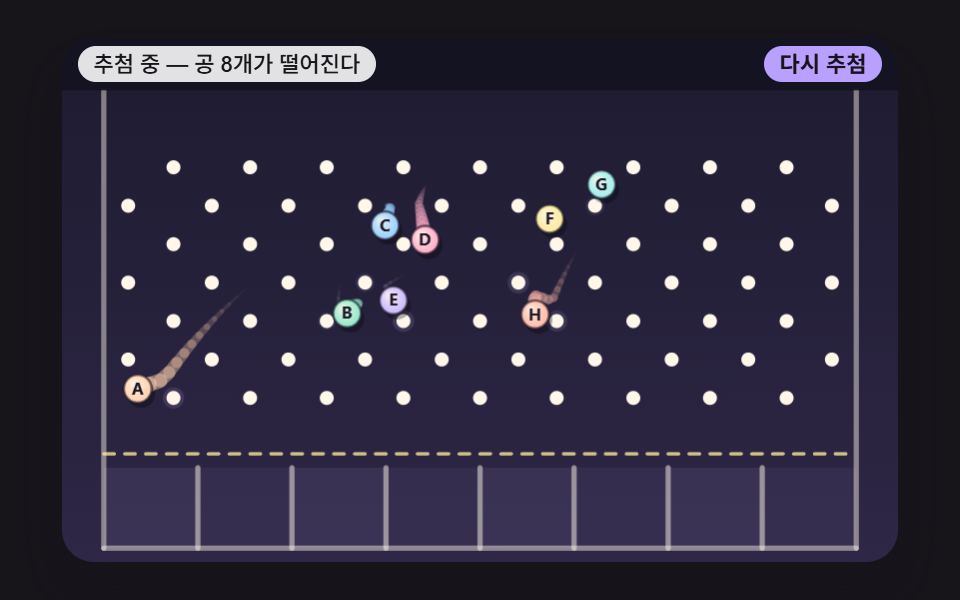 01 pb-name-ball-peg-drop-picker
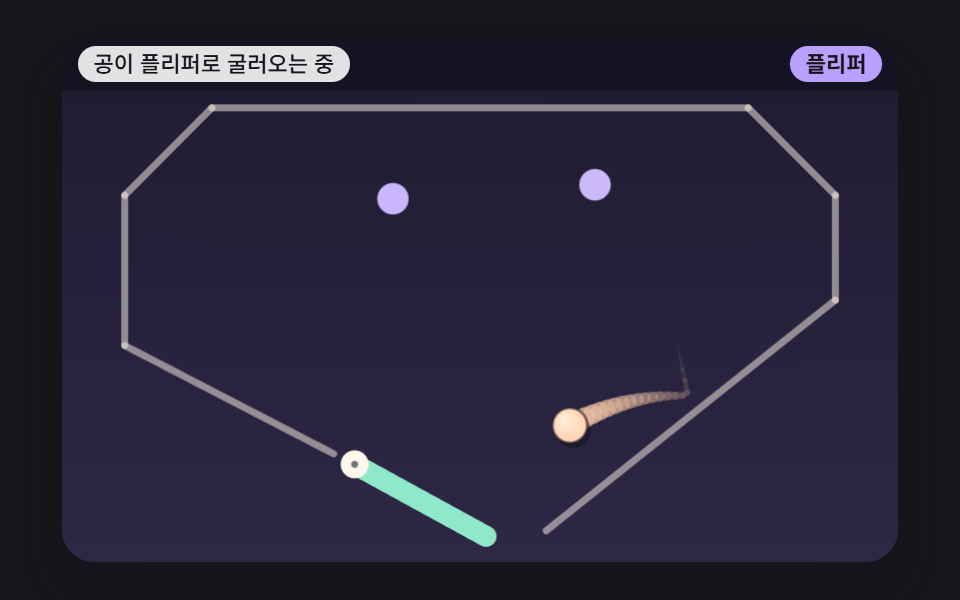 02 pb-flipper-angular-kick
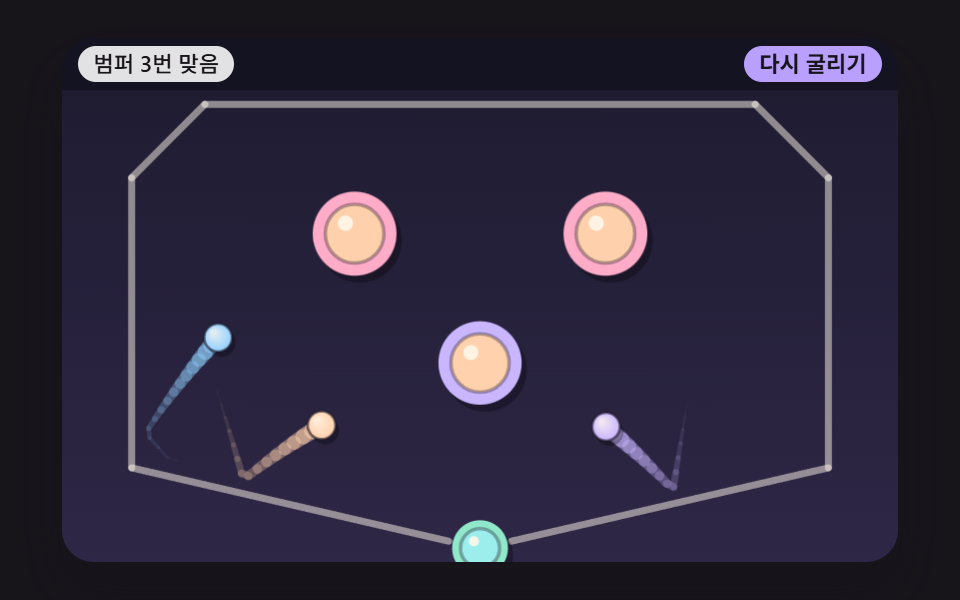 03 pb-pop-bumper-impulse-flash
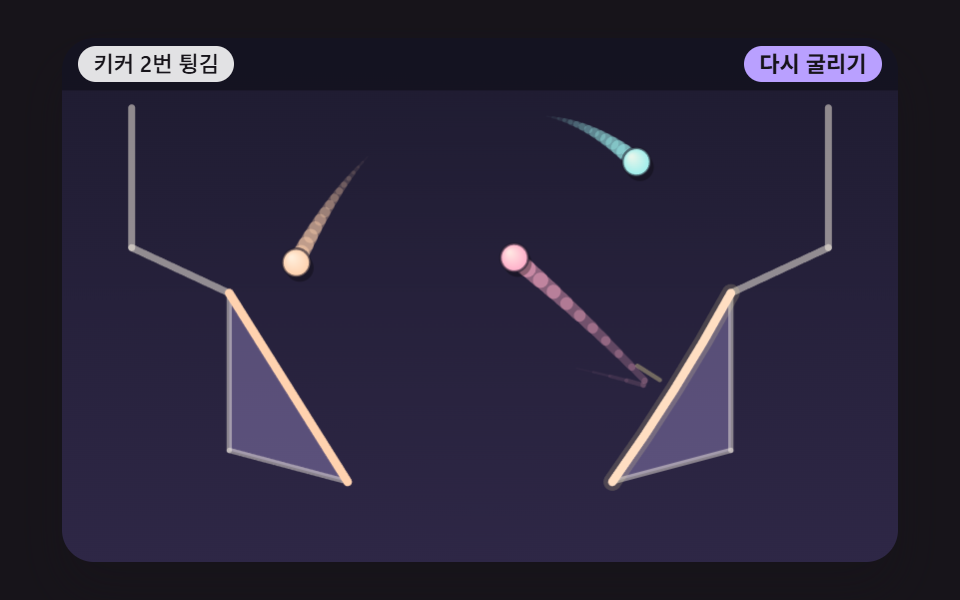 04 pb-slingshot-rubber-kicker
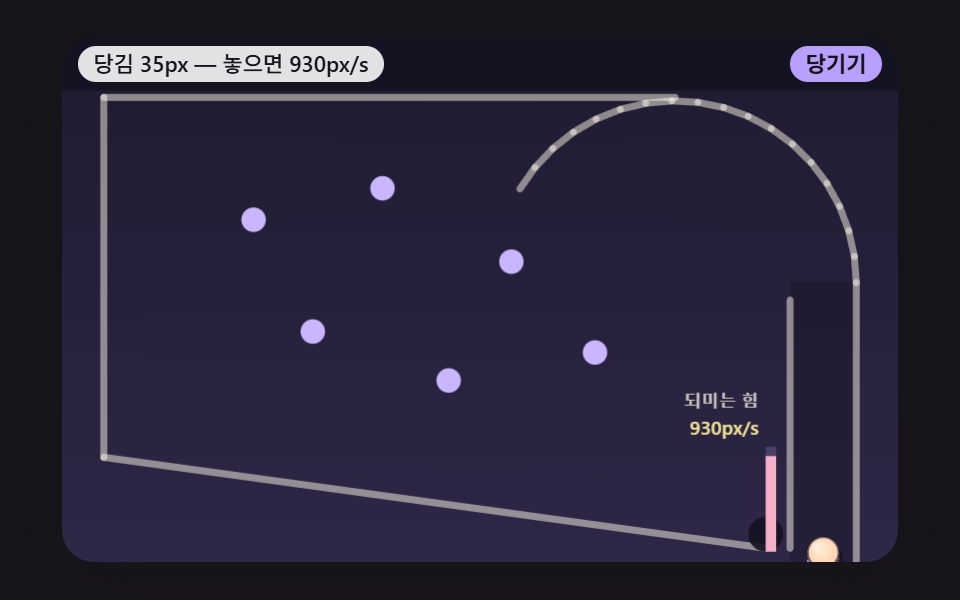 05 pb-plunger-spring-charge-launch
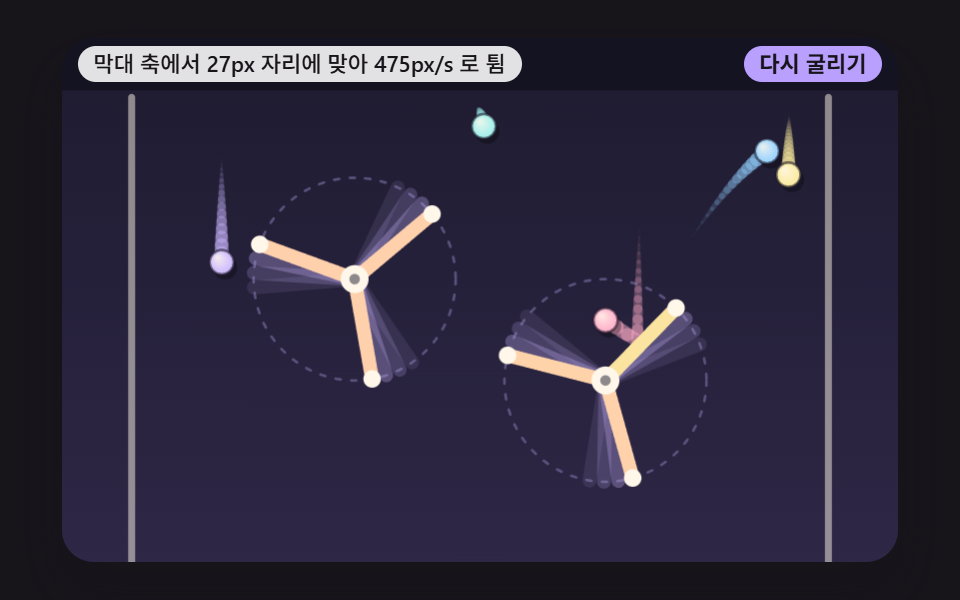 06 pb-windmill-rotor-obstacle
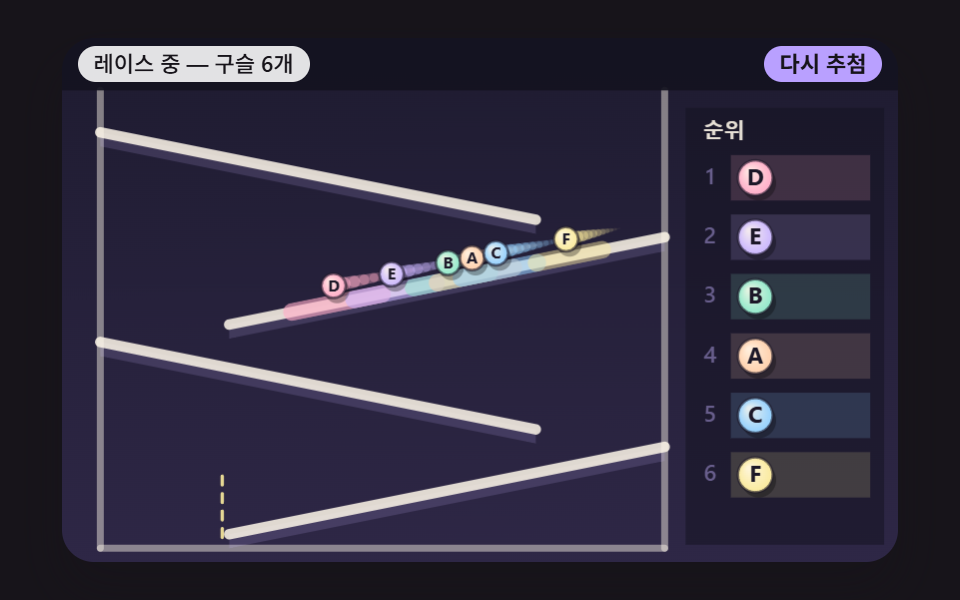 07 pb-marble-race-ramp-rank
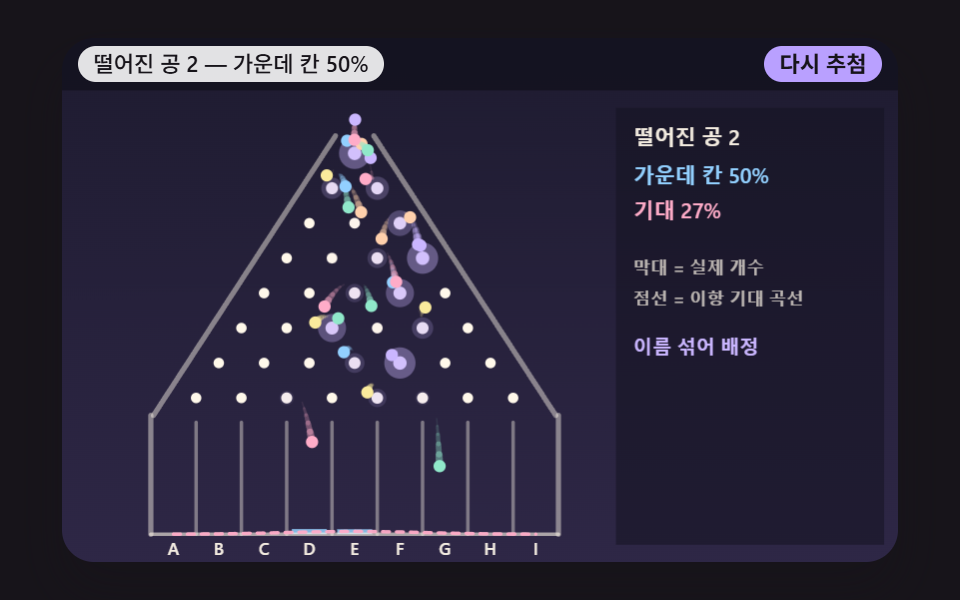 08 pb-landing-slot-bell-histogram
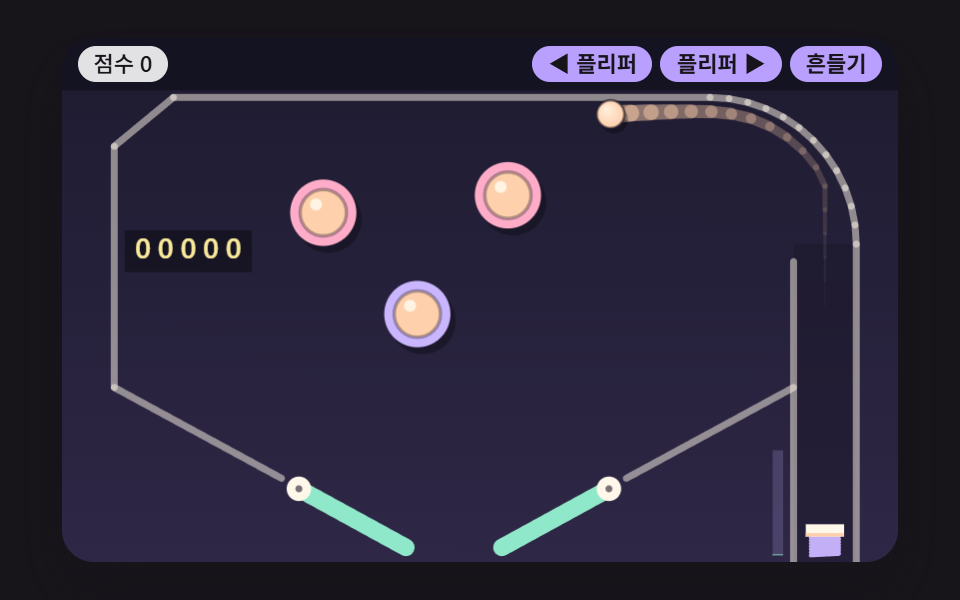 09 pb-mini-table-score-hero
Auto-plays · click a tile to jump to its section · all nine in one zip
- 01 A Raffle Board Where Name Balls Fall Through Pins
- 02 A Flipper That Hands Its Spin Speed to the Ball
- 03 A Pop Bumper That Kicks Back With a Set Force
- 04 A Triangle Kicker That Bends Like a Rubber Band and Snaps
- 05 A Plunger That Stores Force as It Is Pulled
- 06 Marbles Swept Off by a Spinning Windmill Bar
- 07 A Marble Race Ranked by Arrival Down the Ramps
- 08 A Landing Board Whose Stacked Slots Reveal a Bell Shape
- 09 A Mini Pinball Table With Flippers, Bumpers and a Scoreboard
Leave the grid alone and every cell replays its own fixed-seed board. The boards that have an end (01, 07 and 08) hold the result for 1,600ms and then restart from the same seed, while in 02 and 09 a virtual input works the flippers, pressing when the ball enters the zone above the bar and letting go 240ms later (220ms in 09). The plungers in 05 and 09 pull back and fire by themselves when a ball arrives, and 09 nudges its table once at 1,300ms and again every 3,600ms. The first button press ends the demo and from then on the board follows your input; "Draw again" in 01, 07 and 08 and "Roll again" in 03, 04 and 06 raise the seed by one and open a fresh board.
Each step down the list adds one more kind of force on the ball. 01 only bounces off pins that stay put, 02 has a moving bar lend the ball its own speed, 03 hands out a fixed kick on contact, 04 adds a boost off a long edge, and 05 pushes in proportion to how far it was pulled. 06 brings a bar that keeps turning, 07 separates the field with slopes and rolling friction, 08 trades one ball for sixty so that probability shows up as a pile, and 09 puts 02, 03 and 05 on a single table.
JavaScript Pinball Game: 9 Scenes — Name-Ball Raffle Board, Flipper, Pop Bumper, Slingshot Kicker, Plunger, Windmill Bar, Marble Race, Landing Histogram and a Mini Table
Every stage runs on the 2D canvas and plain JavaScript. There is no physics engine, library, WebGL, CDN or image file in the set, and the randomness comes from a single place, makeRng, which mixes 32-bit integers instead of calling Math.random. The gaps reported by requestAnimationFrame are stacked up and spent as fixed 16ms ticks, at most 6 ticks or 100ms of catch-up per frame, and each stage cuts every tick again into 4 to 6 steps (SUBSTEPS) before it checks collisions. A fixed clock is a common first decision in pinball physics programming, and here it means the step size does not depend on how often the screen refreshes.
What 23 frame-to-frame comparisons recorded
Each stage was rendered in a 480×300 window and every capture was set against the one just before it. Area changed is the share of the stage whose pixels changed at least once, and frames that moved counts how many of the 23 comparisons found any change at all.
| Stage | Area changed | Frames that moved | Mean intensity |
|---|---|---|---|
| 01 Name-ball raffle board | 19.1% | 23/23 | 99.9 |
| 02 Flipper | 12.5% | 23/23 | 98.5 |
| 03 Pop bumper | 21.5% | 23/23 | 83.1 |
| 04 Slingshot kicker | 16.8% | 23/23 | 97.3 |
| 05 Plunger | 8.5% | 23/23 | 98.7 |
| 06 Windmill bar | 28.8% | 23/23 | 103.9 |
| 07 Marble race | 14.2% | 23/23 | 72.4 |
| 08 Landing histogram | 8.8% | 23/23 | 82.7 |
| 09 Mini table | 14.3% | 23/23 | 85.5 |
Not one stage held still between any two captures. 06 covers the widest area at 28.8%, likely because two three-armed rotors keep turning and bat seven marbles all over the stage, and 05 covers the least at 8.5%, which appears to come from most of the stage sitting idle while the plunger is drawn back and released.
Where each board fits, from a stream raffle to a team's speaking order
For a viewer raffle on a live stream, 01 is the closest fit. The winner is the first ball over the line, so anyone watching can follow the result with their own eyes, and the eight balls now tagged A to H can carry participant names in those label spots. When a single person has to be chosen fast, the wheel in spin wheel roulette physics may be the simpler tool.
07 suits picking a speaking order at a meetup, because unlike 01, which leaves one winner, its leaderboard keeps all six rows with arrival order and time. 08 is for showing the process rather than only the outcome: it draws the pull toward the middle first and then shuffles the names, so on a prize-draw page the picture explains why sitting in a middle slot gives no name an edge.
One thing has to change before real use. The demo is seeded with a fixed value, so its results can be reproduced; for an actual draw, the seed should come from an outside input. Seed 4761 makes A win at 1,040ms however many times you reopen it, and "Draw again" only runs seed += 1 and then restart(), so the board after 4761 is 4762 and is already decided.
01A Raffle Board Where Name Balls Fall Through Pins
Eight balls tagged A to H fall through 66 pins, each pushed out by however deep it overlaps a pin, with only the incoming normal speed flipped and scaled by the 0.5 restitution. A ball wins once its whole body clears the finish line at y 238, which suits a viewer raffle screen for a live stream because the audience sees exactly who crossed first. On seed 4761, A wins at 1,040ms, and after 127 pin contacts all eight settle into slots by 5,616ms.
<main class="stage">
<div class="pb is-demo" id="pb">
  <canvas class="pb__canvas" data-role="canvas" width="480" height="300" aria-hidden="true"></canvas>
  <div class="pb__head">
    <p class="pb__status" data-role="status" aria-live="off">Drawing — 8 balls falling</p>
    <div class="pb__controls">
      <button type="button" class="pb__btn" data-role="redraw">Draw again</button>
    </div>
  </div>
</div>
</main>
@use "../../../../site/static/demo-tokens" as *;
@include stage($stage-ink);
.pb {
position: relative;
width: min(92vw, calc(160vh - 12.8vw));
aspect-ratio: 480 / 300;
margin: 0 auto;
border-radius: $r-card;
overflow: hidden;
box-shadow: $shadow-raised;
background: $subject-ink;
}
.pb__canvas {
position: absolute;
inset: 0;
display: block;
width: 100%;
height: 100%;
}
// 머리 줄 — 캔버스 위 머리 띠 자리에 상태 줄(왼쪽)과 버튼(오른쪽)을 겹친다. 상태 줄이 길면 말줄임으로 자르고 버튼 폭은 그대로
.pb__head {
position: absolute;
top: $sp-1;
left: $sp-2;
right: $sp-2;
display: flex;
align-items: center;
justify-content: space-between;
gap: $sp-2;
}
.pb__status {
flex: 0 1 auto;
min-width: 0;
margin: 0;
padding: 0 $sp-2;
border-radius: $r-control;
background: rgba(255, 255, 255, .88);
color: $subject-ink;
font-weight: 500;
font-size: 11px;
line-height: 18px;
white-space: nowrap;
overflow: hidden;
text-overflow: ellipsis;
}
.pb__controls {
flex: 0 0 auto;
display: flex;
gap: $sp-1;
}
// 진짜 버튼 — Tab 으로 들어오고 Enter·Space 로 누른다. 누르고 있는 버튼은 스크립트가 is-held 를 붙인다
.pb__btn {
appearance: none;
margin: 0;
padding: 0 $sp-2;
border: 0;
border-radius: $r-control;
background: $subject-lilac;
color: $subject-ink;
font-family: inherit;
font-weight: 700;
font-size: 11px;
line-height: 18px;
cursor: pointer;
touch-action: manipulation;
user-select: none;
-webkit-user-select: none;
}
.pb__btn:hover {
background: $subject-cream;
}
.pb__btn:active,
.pb__btn.is-held {
background: $subject-pink;
}
.pb__btn:focus-visible {
outline: 2px solid $subject-cream;
outline-offset: 2px;
}
@media (max-width: 340px) {
.pb__head { top: 0; left: $sp-1; right: $sp-1; gap: $sp-1; }
.pb__status, .pb__btn { font-size: 9px; line-height: 16px; padding: 0 $sp-1; }
}
// 동작 줄이기 — 움직임은 스크립트가 멈춘다(같은 시드 판을 끝까지 계산해 마지막 장면만 그린다). 여기서는 버튼 색이 바로 바뀌게만
@media (prefers-reduced-motion: reduce) {
.pb__btn { transition: none !important; }
}html, body {
margin: 0;
overflow: hidden;
}
.stage {
box-sizing: border-box;
min-height: 100vh;
display: grid;
place-items: center;
margin: 0;
background: #17141a;
font-family: -apple-system, "Segoe UI", "Noto Sans KR", sans-serif;
padding: clamp(8px, 4vw, 24px);
}
.pb {
position: relative;
width: min(92vw, 160vh - 12.8vw);
aspect-ratio: 480/300;
margin: 0 auto;
border-radius: 16px;
overflow: hidden;
box-shadow: 0 14px 24px rgba(23, 20, 26, 0.32);
background: #17141a;
}
.pb__canvas {
position: absolute;
inset: 0;
display: block;
width: 100%;
height: 100%;
}
.pb__head {
position: absolute;
top: 4px;
left: 8px;
right: 8px;
display: flex;
align-items: center;
justify-content: space-between;
gap: 8px;
}
.pb__status {
flex: 0 1 auto;
min-width: 0;
margin: 0;
padding: 0 8px;
border-radius: 12px;
background: rgba(255, 255, 255, 0.88);
color: #17141a;
font-weight: 500;
font-size: 11px;
line-height: 18px;
white-space: nowrap;
overflow: hidden;
text-overflow: ellipsis;
}
.pb__controls {
flex: 0 0 auto;
display: flex;
gap: 4px;
}
.pb__btn {
appearance: none;
margin: 0;
padding: 0 8px;
border: 0;
border-radius: 12px;
background: #b9a0ff;
color: #17141a;
font-family: inherit;
font-weight: 700;
font-size: 11px;
line-height: 18px;
cursor: pointer;
touch-action: manipulation;
user-select: none;
-webkit-user-select: none;
}
.pb__btn:hover {
background: #fff7e6;
}
.pb__btn:active,
.pb__btn.is-held {
background: #ff9ebb;
}
.pb__btn:focus-visible {
outline: 2px solid #fff7e6;
outline-offset: 2px;
}
@media (max-width: 340px) {
.pb__head {
top: 0;
left: 4px;
right: 4px;
gap: 4px;
}
.pb__status, .pb__btn {
font-size: 9px;
line-height: 16px;
padding: 0 4px;
}
}
@media (prefers-reduced-motion: reduce) {
.pb__btn {
transition: none !important;
}
}(function () {
const root = document.getElementById("pb");
if (!root) return;
// 논리 무대 — 물리는 화면 폭과 상관없이 이 480×300 좌표에서만 돈다. 화면이 넓든 좁든 그릴 때만 배율을 곱한다
const W = 480;
const H = 300;
// 한 틱 = 16ms 고정. 실제 프레임 간격이 흔들려도 계산은 같은 걸음으로만 나아간다
const FIXED_DT = 16;
const DT = FIXED_DT / 1000;
const TAU = Math.PI * 2;
// 머리 띠 높이(논리 px) — 상태 줄과 버튼이 이 띠 위에 겹친다
const HEADER = 30;
// 시연이 끝난 판을 이만큼(ms) 보여 준 뒤 같은 시드로 처음부터 다시 돈다
const LOOP_HOLD_MS = 1600;
// 파스텔 팔레트 — 어두운 판 위에 밝은 공·핀을 얹어 명도 차로 움직임이 읽힌다
const BG = [30, 27, 48];
const BG_LOW = [46, 39, 70];
const BAND = [20, 18, 32];
const GUIDE = [104, 94, 140];
const CREAM = [255, 248, 234];
const SKY = [146, 208, 255];
const PINK = [255, 172, 200];
const MINT = [144, 232, 202];
const LILAC = [202, 182, 255];
const PEACH = [255, 208, 172];
const LEMON = [250, 234, 156];
const AQUA = [156, 238, 236];
const CORAL = [255, 184, 166];
const INK = [28, 24, 40];
const BALL_COLORS = [PEACH, MINT, SKY, PINK, LILAC, LEMON, AQUA, CORAL, CREAM];
// 공 이름표 — 실제 사람 이름 대신 글자
const LABELS = ['A', 'B', 'C', 'D', 'E', 'F', 'G', 'H', 'I'];
const FONT_FAMILY = '"Segoe UI", "Malgun Gothic", "Hiragino Sans", "Noto Sans KR", sans-serif';
function clamp(v, lo, hi) { return v < lo ? lo : (v > hi ? hi : v); }
function lerp(a, b, k) { return a + (b - a) * k; }
function smooth(x) { const c = clamp(x, 0, 1); return c * c * (3 - 2 * c); }
function rgba(c, a) {
return 'rgba(' + Math.round(clamp(c[0], 0, 255)) + ',' + Math.round(clamp(c[1], 0, 255)) + ',' + Math.round(clamp(c[2], 0, 255)) + ',' + clamp(a, 0, 1).toFixed(3) + ')';
}
function mixRGB(a, b, k) { return [lerp(a[0], b[0], k), lerp(a[1], b[1], k), lerp(a[2], b[2], k)]; }
// 시드 고정 난수 — 같은 시드면 같은 출발 자리·같은 결과가 다시 나온다 (32비트 정수 섞기)
function makeRng(seedValue) {
let s = seedValue >>> 0;
return function () {
s = (s + 0x6d2b79f5) >>> 0;
let t = s;
t = Math.imul(t ^ (t >>> 15), t | 1);
t ^= t + Math.imul(t ^ (t >>> 7), t | 61);
return ((t ^ (t >>> 14)) >>> 0) / 4294967296;
};
}
function makeBall(x, y, r, color, label) {
return { x: x, y: y, vx: 0, vy: 0, r: r, color: color, label: label, trail: [], slow: 0, finishMs: -1, mul: 1, out: false };
}
// 속도를 먼저 갱신하는 적분 — 이번 걸음의 힘(중력)으로 속도를 바꾼 뒤, 그 새 속도로 자리를 옮긴다. h 는 초
function integrate(b, gx, gy, h) {
b.vx += gx * h;
b.vy += gy * h;
b.x += b.vx * h;
b.y += b.vy * h;
}
function capSpeed(b, max) {
const s = Math.hypot(b.vx, b.vy);
if (s > max) {
b.vx *= max / s;
b.vy *= max / s;
}
}
// 마지막 충돌 — 법선(공 쪽을 향함)과 닿은 자리. Bumpers hit·키커가 이 법선 방향으로 덧힘을 준다
const contact = { nx: 0, ny: -1, px: 0, py: 0 };
// 원-원 충돌(움직이지 않는 원: 핀·Bumpers hit) — 겹친 깊이만큼 법선 방향 바깥으로 밀어내고,
// 법선 방향 속도를 되튐 계수 e 만큼 뒤집는다. 돌려주는 값: 안 닿음 -1 · 닿았지만 멀어지는 중 0 · 다가오던 빠르기(px/s)
function hitCircle(b, cx, cy, cr, e) {
const dx = b.x - cx;
const dy = b.y - cy;
const d = Math.hypot(dx, dy);
const overlap = b.r + cr - d;
if (overlap <= 0) {
return -1;
}
// 중심이 정확히 겹치면 방향을 정할 수 없다 — 위로 민다
const nx = d > 1e-9 ? dx / d : 0;
const ny = d > 1e-9 ? dy / d : -1;
b.x += nx * overlap;
b.y += ny * overlap;
contact.nx = nx;
contact.ny = ny;
contact.px = cx + nx * cr;
contact.py = cy + ny * cr;
const vn = b.vx * nx + b.vy * ny;
if (vn >= 0) {
return 0;
}
b.vx -= (1 + e) * vn * nx;
b.vy -= (1 + e) * vn * ny;
return -vn;
}
// 선분 위 가장 가까운 점 — 공 중심에서 선분으로 내린 수선의 발. t 는 0(시작점)~1(끝점)로 자른다
function closestOnSegment(px, py, ax, ay, bx, by) {
const ex = bx - ax;
const ey = by - ay;
const len2 = ex * ex + ey * ey;
const t = len2 > 0 ? clamp(((px - ax) * ex + (py - ay) * ey) / len2, 0, 1) : 0;
return [ax + ex * t, ay + ey * t, t];
}
// 원-선분 충돌 — 가장 가까운 점까지 거리가 (반지름 + 선 두께의 반)보다 짧으면 겹친 만큼 밀어낸다.
// 선분이 움직이면(도는 Flipper·풍차 막대) 접점의 속도(svx, svy)에 대한 상대 속도로 되튐을 잰다.
// grip 은 이번 걸음에 접선 방향 상대 속도에서 덜어 내는 몫 — 0 이면 미끄럼, 07 구름 마찰은 0 보다 크다
function hitSegment(b, ax, ay, bx, by, half, e, svx, svy, grip) {
const c = closestOnSegment(b.x, b.y, ax, ay, bx, by);
const dx = b.x - c[0];
const dy = b.y - c[1];
const d = Math.hypot(dx, dy);
const overlap = b.r + half - d;
if (overlap <= 0) {
return -1;
}
let nx = 0;
let ny = -1;
if (d > 1e-9) {
nx = dx / d;
ny = dy / d;
}
else {
// 중심이 선 위에 올라탔다 — 선분의 왼쪽 법선으로 민다
const L = Math.hypot(bx - ax, by - ay) || 1;
nx = (by - ay) / L;
ny = -(bx - ax) / L;
}
b.x += nx * overlap;
b.y += ny * overlap;
contact.nx = nx;
contact.ny = ny;
contact.px = c[0];
contact.py = c[1];
const rvx = b.vx - svx;
const rvy = b.vy - svy;
const vn = rvx * nx + rvy * ny;
if (vn >= 0) {
return 0;
}
const tvx = (rvx - vn * nx) * (1 - grip);
const tvy = (rvy - vn * ny) * (1 - grip);
b.vx = svx + tvx - e * vn * nx;
b.vy = svy + tvy - e * vn * ny;
return -vn;
}
// 움직이지 않는 벽 묶음 — 선분 하나하나에 hitSegment
function hitWalls(b, segs, e) {
for (let i = 0; i < segs.length; i += 1) {
const s = segs[i];
hitSegment(b, s[0], s[1], s[2], s[3], 0, e, 0, 0, 0);
}
}
// 공-공 충돌 — 같은 무게. 겹친 깊이를 반씩 나눠 밀어내고, 법선 방향 속도를 되튐 계수만큼 주고받는다
function hitBalls(a, b, e) {
const dx = b.x - a.x;
const dy = b.y - a.y;
const d = Math.hypot(dx, dy);
const overlap = a.r + b.r - d;
if (overlap <= 0) {
return -1;
}
const nx = d > 1e-9 ? dx / d : 1;
const ny = d > 1e-9 ? dy / d : 0;
a.x -= nx * overlap * 0.5;
a.y -= ny * overlap * 0.5;
b.x += nx * overlap * 0.5;
b.y += ny * overlap * 0.5;
const vn = (b.vx - a.vx) * nx + (b.vy - a.vy) * ny;
if (vn >= 0) {
return 0;
}
const j = -(1 + e) * vn * 0.5;
a.vx -= j * nx;
a.vy -= j * ny;
b.vx += j * nx;
b.vy += j * ny;
return -vn;
}
function pushTrail(b, n) {
b.trail.push(b.x, b.y);
while (b.trail.length > n * 2) {
b.trail.splice(0, 2);
}
}
const canvasEl = root.querySelector('[data-role="canvas"]');
const statusEl = root.querySelector('[data-role="status"]');
const ctxRaw = canvasEl ? canvasEl.getContext('2d') : null;
if (!canvasEl || !ctxRaw || !statusEl) {
return;
}
const cv = canvasEl;
const ctx = ctxRaw;
const status = statusEl;
const reduceQuery = window.matchMedia('(prefers-reduced-motion: reduce)');
// 페이지를 연 채 동작 줄이기 설정을 바꿔도 꼬리의 change 리스너가 이 값을 다시 읽는다
let still = reduceQuery.matches;
// 자동 시연 중인가 — 사람이 버튼을 처음 누르는 순간 시연(가상 입력·같은 판 되풀이)을 멈추고 결과를 읽어 주기 시작한다
let demo = root.classList.contains('is-demo');
// 지금 판의 시드와 시각(ms). 시각은 16ms 고정 스텝으로만 는다
let seed = 0;
let clock = 0;
// 화면 배율 — 논리 1px 이 화면 CSS px 몇 개인가. 그릴 때만 쓰고 물리 계산에는 넣지 않는다
let viewScale = 1;
function wake() {
if (!demo) {
return;
}
demo = false;
root.classList.remove('is-demo');
status.setAttribute('aria-live', 'polite');
}
function say(text) {
if (status.textContent !== text) {
status.textContent = text;
}
}
function fitCanvas() {
// 배율은 2 에서 자른다 — 배율 3 기기에서 화소가 2.25배로 늘어 프레임마다 일이 그만큼 커지지 않게
const dpr = Math.min(window.devicePixelRatio || 1, 2);
const cssW = cv.getBoundingClientRect().width || W;
viewScale = cssW / W;
const k = viewScale * dpr;
cv.width = Math.max(1, Math.round(W * k));
cv.height = Math.max(1, Math.round(H * k));
// 그릴 때만 논리 좌표 → 화소 배율을 곱한다
ctx.setTransform(k, 0, 0, k, 0, 0);
}
function clearStage() {
const g = ctx.createLinearGradient(0, 0, 0, H);
g.addColorStop(0, rgba(BG, 1));
g.addColorStop(1, rgba(BG_LOW, 1));
ctx.fillStyle = g;
ctx.fillRect(0, 0, W, H);
}
// 머리 띠 — 상태 줄과 버튼 뒤의 어두운 띠. 판을 다 그린 뒤 맨 위에 덮는다
function drawBand() {
ctx.fillStyle = rgba(BAND, 0.92);
ctx.fillRect(0, 0, W, HEADER);
}
function strokeSeg(s, width, c, a) {
ctx.lineCap = 'round';
ctx.strokeStyle = rgba(c, a);
ctx.lineWidth = width;
ctx.beginPath();
ctx.moveTo(s[0], s[1]);
ctx.lineTo(s[2], s[3]);
ctx.stroke();
}
// 꼬리 — 지나온 자리를 이을수록 굵고 진하게
function drawTrail(b, c, width) {
const t = b.trail;
const n = t.length / 2;
ctx.lineCap = 'round';
for (let i = 1; i < n; i += 1) {
const k = i / n;
ctx.strokeStyle = rgba(c, 0.55 * k);
ctx.lineWidth = width * k;
ctx.beginPath();
ctx.moveTo(t[i * 2 - 2], t[i * 2 - 1]);
ctx.lineTo(t[i * 2], t[i * 2 + 1]);
ctx.stroke();
}
}
// 공 — 바닥 그림자 → 왼쪽 위가 밝은 둥근 몸통 → 진한 테두리 → 이름표 글자
function drawBall(b) {
ctx.fillStyle = 'rgba(0,0,0,0.3)';
ctx.beginPath();
ctx.arc(b.x + 2, b.y + 3, b.r, 0, TAU);
ctx.fill();
const g = ctx.createRadialGradient(b.x - b.r * 0.35, b.y - b.r * 0.4, b.r * 0.1, b.x, b.y, b.r);
g.addColorStop(0, rgba(mixRGB(b.color, CREAM, 0.75), 1));
g.addColorStop(1, rgba(b.color, 1));
ctx.fillStyle = g;
ctx.beginPath();
ctx.arc(b.x, b.y, b.r, 0, TAU);
ctx.fill();
ctx.lineWidth = 1.5;
ctx.strokeStyle = rgba(INK, 0.6);
ctx.stroke();
if (b.label) {
ctx.fillStyle = rgba(INK, 1);
ctx.font = '700 ' + Math.round(b.r * 1.25) + 'px ' + FONT_FAMILY;
ctx.textAlign = 'center';
ctx.textBaseline = 'middle';
ctx.fillText(b.label, b.x, b.y + 0.5);
}
}
function drawText(text, x, y, size, c, a, align) {
ctx.fillStyle = rgba(c, a);
ctx.font = '600 ' + size + 'px ' + FONT_FAMILY;
ctx.textAlign = align;
ctx.textBaseline = 'middle';
ctx.fillText(text, x, y);
}
// 01 이름 공 추첨판 — 엇갈린 핀 숲 + 원-원 충돌(겹친 만큼 밀어내기·되튐 계수) + 서브스텝 + 시드 고정 난수
// 핀 줄 수 — 짝수 줄 9 marbles·홀수 줄 8 marbles, 줄마다 반 칸씩 어긋난다
const PEG_ROWS = 7;
// 되튐 계수 — 닿기 전 법선 방향 빠르기 가운데 되돌려 받는 몫(0 이면 붙고 1 이면 그대로 튄다). 핀·벽·공끼리 같은 값
const RESTITUTION = 0.5;
// 한 틱(16ms)을 몇 번으로 잘게 나눠 계산하나 — 적으면 빠른 공이 한 걸음에 핀을 많이 파고든다
const SUBSTEPS = 4;
const GRAVITY = 760;
const BALL_COUNT = 8;
const BALL_R = 8;
const PEG_R = 4;
const PEG_GAP_X = 44;
const PEG_GAP_Y = 22;
const PEG_TOP = 74;
// 벽 쪽 덧핀 자리 — 벽에서 핀 중심까지(px). 틈(14 - 핀 반지름 4 = 10px)이 공 지름(16px)보다 좁아 벽 타기를 막는다
const PEG_WALL_GAP = 14;
const WALL_L = 24;
const WALL_R = 456;
// 결승선 — 공 전체가 이 아래로 내려가면 지난 것으로 센다. 맨 먼저 지난 공이 당첨
const FINISH_Y = 238;
const FLOOR_Y = 292;
const SLOTS = 8;
// 끼임 — 결승선 위에서 이 빠르기(px/s) 아래로 STUCK_MS 동안 머물면 끼었다고 보고 좌우 한쪽으로 쳐 준다
const STUCK_SPEED = 12;
const STUCK_MS = 500;
const STUCK_KICK = 90;
const MAX_SPEED = 1400;
const MAX_RUN_MS = 14000;
const DEMO_SEED = 4761;
const SETTLE_TICKS = 1200;
const MID_X = (WALL_L + WALL_R) / 2;
const pegs = [];
for (let r = 0; r < PEG_ROWS; r += 1) {
const count = r % 2 === 0 ? 9 : 8;
for (let k = 0; k < count; k += 1) {
pegs.push({ x: MID_X + (k - (count - 1) / 2) * PEG_GAP_X, y: PEG_TOP + r * PEG_GAP_Y, glow: 0 });
}
// 홀수 줄은 벽 쪽 틈이 넓어 공이 벽을 타고 핀 없이 곧장 떨어진다 — 벽에서 PEG_WALL_GAP 떨어진 자리에 핀을 하나씩 더 박는다
if (r % 2 === 1) {
pegs.push({ x: WALL_L + PEG_WALL_GAP, y: PEG_TOP + r * PEG_GAP_Y, glow: 0 });
pegs.push({ x: WALL_R - PEG_WALL_GAP, y: PEG_TOP + r * PEG_GAP_Y, glow: 0 });
}
}
const SLOT_W = (WALL_R - WALL_L) / SLOTS;
const walls = [[WALL_L, HEADER, WALL_L, FLOOR_Y], [WALL_R, HEADER, WALL_R, FLOOR_Y], [WALL_L, FLOOR_Y, WALL_R, FLOOR_Y]];
// 칸 칸막이 — 결승선 조금 아래부터 바닥까지
const dividers = [];
for (let i = 1; i < SLOTS; i += 1) {
dividers.push([WALL_L + i * SLOT_W, FINISH_Y + 8, WALL_L + i * SLOT_W, FLOOR_Y]);
}
let rng = makeRng(1);
let balls = [];
// 결승선을 지난 순서(공 번호)
let order = [];
let stuckCount = 0;
let calmTicks = 0;
function slotOf(b) { return clamp(Math.floor((b.x - WALL_L) / SLOT_W), 0, SLOTS - 1); }
function onRestart() {
rng = makeRng(seed);
balls = [];
for (let i = 0; i < BALL_COUNT; i += 1) {
// 출발 자리 — 가운데에 한 줄로 모아 두고, 시드 난수로 몇 px 씩 비켜 놓는다(이 몇 px 이 결과를 가른다)
const b = makeBall(MID_X + (i - (BALL_COUNT - 1) / 2) * 21 + (rng() - 0.5) * 6, 46 + (rng() - 0.5) * 4, BALL_R, BALL_COLORS[i % BALL_COLORS.length], LABELS[i]);
b.vx = (rng() - 0.5) * 60;
balls.push(b);
}
order = [];
stuckCount = 0;
calmTicks = 0;
for (let i = 0; i < pegs.length; i += 1) {
pegs[i].glow = 0;
}
}
function collideWorld(b) {
for (let i = 0; i < pegs.length; i += 1) {
const p = pegs[i];
// 세로로 먼 핀은 건너뛴다
if (Math.abs(p.y - b.y) > b.r + PEG_R) {
continue;
}
const vn = hitCircle(b, p.x, p.y, PEG_R, RESTITUTION);
if (vn > 0) {
p.glow = Math.min(1, p.glow + vn / 500);
}
}
hitWalls(b, walls, RESTITUTION);
for (let i = 0; i < dividers.length; i += 1) {
const s = dividers[i];
hitSegment(b, s[0], s[1], s[2], s[3], 1.5, RESTITUTION, 0, 0, 0);
}
}
// 한 틱 — 16ms 를 SUBSTEPS 걸음으로 잘라: 적분 → 공끼리 → 핀·벽·칸막이. 걸음이 작을수록 한 번에 파고드는 깊이가 얕다
function step() {
const hs = DT / SUBSTEPS;
for (let s = 0; s < SUBSTEPS; s += 1) {
for (let i = 0; i < balls.length; i += 1) {
integrate(balls[i], 0, GRAVITY, hs);
}
for (let i = 0; i < balls.length; i += 1) {
for (let j = i + 1; j < balls.length; j += 1) {
hitBalls(balls[i], balls[j], RESTITUTION);
}
}
for (let i = 0; i < balls.length; i += 1) {
collideWorld(balls[i]);
capSpeed(balls[i], MAX_SPEED);
}
}
let calm = true;
for (let i = 0; i < balls.length; i += 1) {
const b = balls[i];
const sp = Math.hypot(b.vx, b.vy);
if (b.finishMs < 0 && b.y - b.r > FINISH_Y) {
b.finishMs = clock;
order.push(i);
}
if (b.finishMs < 0 && sp < STUCK_SPEED) {
b.slow += FIXED_DT;
if (b.slow >= STUCK_MS) {
// 끼임 탈출 — 시드 난수로 좌우를 골라 옆으로 치고 살짝 띄운다
b.vx += (rng() < 0.5 ? -1 : 1) * STUCK_KICK;
b.vy -= STUCK_KICK * 0.3;
b.slow = 0;
stuckCount += 1;
}
}
else {
b.slow = 0;
}
if (b.finishMs < 0 || sp > 20) {
calm = false;
}
pushTrail(b, 14);
}
calmTicks = calm ? calmTicks + 1 : 0;
for (let i = 0; i < pegs.length; i += 1) {
pegs[i].glow *= 0.9;
}
}
function finished() { return calmTicks >= 20 || clock >= MAX_RUN_MS; }
function onControl(role, down) {
// Draw again — 시드를 하나 올려 출발 자리의 몇 px 이 달라진다
if (role === 'redraw' && down) {
seed += 1;
restart();
}
}
function draw() {
clearStage();
const win = order.length ? balls[order[0]] : null;
for (let k = 0; k < SLOTS; k += 1) {
const lit = win !== null && slotOf(win) === k;
ctx.fillStyle = lit ? rgba(LEMON, 0.34) : rgba(GUIDE, k % 2 ? 0.14 : 0.22);
ctx.fillRect(WALL_L + k * SLOT_W, FINISH_Y + 8, SLOT_W, FLOOR_Y - FINISH_Y - 8);
}
for (let i = 0; i < walls.length; i += 1) {
strokeSeg(walls[i], 3, CREAM, 0.45);
}
for (let i = 0; i < dividers.length; i += 1) {
strokeSeg(dividers[i], 3, CREAM, 0.5);
}
ctx.setLineDash([6, 6]);
strokeSeg([WALL_L, FINISH_Y, WALL_R, FINISH_Y], 2, LEMON, 0.8);
ctx.setLineDash([]);
for (let i = 0; i < pegs.length; i += 1) {
const p = pegs[i];
// 맞은 핀 — 다가오던 빠르기만큼 빛이 번졌다가 틱마다 0.9 배로 잦아든다
if (p.glow > 0.02) {
ctx.fillStyle = rgba(LILAC, 0.5 * p.glow);
ctx.beginPath();
ctx.arc(p.x, p.y, PEG_R + 8 * p.glow, 0, TAU);
ctx.fill();
}
ctx.fillStyle = rgba(CREAM, 1);
ctx.beginPath();
ctx.arc(p.x, p.y, PEG_R, 0, TAU);
ctx.fill();
}
for (let i = 0; i < balls.length; i += 1) {
drawTrail(balls[i], balls[i].color, balls[i].r * 1.2);
}
for (let i = 0; i < balls.length; i += 1) {
drawBall(balls[i]);
}
if (win) {
ctx.strokeStyle = rgba(LEMON, 0.95);
ctx.lineWidth = 2.5;
ctx.beginPath();
ctx.arc(win.x, win.y, win.r + 4 + Math.sin(clock / 90) * 1.5, 0, TAU);
ctx.stroke();
}
drawBand();
}
function stateText() {
if (order.length) {
return 'Winner: ' + balls[order[0]].label;
}
return 'Drawing — ' + BALL_COUNT + ' balls falling';
}
// ── 공통 꼬리: 시계·버튼·동작 줄이기·정리 ──
// 결과를 보여 준 시간(ms) — 시연 중 판이 끝나면 LOOP_HOLD_MS 뒤 같은 시드로 다시 돈다
let holdMs = 0;
function restart() {
clock = 0;
holdMs = 0;
onRestart();
}
// 한 틱 — 시뮬레이션 시각을 16ms 올리고 항목 계산(step)을 한 번 돌린다
function tick() {
clock += FIXED_DT;
step();
if (demo && !still && finished()) {
holdMs += FIXED_DT;
if (holdMs >= LOOP_HOLD_MS) {
restart();
}
}
}
function render() {
draw();
say(stateText());
}
// 동작 줄이기 — 같은 시드 판을 화면에 그리지 않고 끝까지(끝이 없는 장면은 SETTLE_TICKS 틱까지) 계산한 뒤 마지막 장면만 그린다
function settle() {
for (let k = 0; k < SETTLE_TICKS; k += 1) {
clock += FIXED_DT;
step();
if (finished()) {
break;
}
}
}
// 입력 한 번 뒤 — 동작 줄이기면 그 입력이 낳은 결과까지 바로 계산해 그린다
function after() {
if (still) {
settle();
}
render();
}
function control(role, down) {
wake();
onControl(role, down);
after();
}
// 리스너는 한 묶음으로 달고 정리할 때 한 번에 뗀다
const off = new AbortController();
// 버튼 — data-role 을 항목의 onControl 에 넘긴다. data-hold 가 있으면 누르고 있는 동안 true, 떼면 false
const buttons = Array.from(root.querySelectorAll('button[data-role]'));
buttons.forEach(function (btn) {
const role = btn.getAttribute('data-role') || '';
if (!btn.hasAttribute('data-hold')) {
// 한 번 누르는 버튼 — 마우스·손가락·Enter·Space 모두 click 하나로 들어온다
btn.addEventListener('click', function () { control(role, true); }, { signal: off.signal });
return;
}
let down = false;
function setHeld(v) {
if (down === v) {
return;
}
down = v;
btn.classList.toggle('is-held', v);
control(role, v);
}
// 누르고 있는 버튼 — 손가락·마우스는 pointerdown·up, 키보드는 Space·Enter 의 keydown·keyup
btn.addEventListener('pointerdown', function (ev) {
if (ev.button !== 0) {
return;
}
btn.setPointerCapture(ev.pointerId);
setHeld(true);
}, { signal: off.signal });
btn.addEventListener('pointerup', function () { setHeld(false); }, { signal: off.signal });
btn.addEventListener('pointercancel', function () { setHeld(false); }, { signal: off.signal });
btn.addEventListener('lostpointercapture', function () { setHeld(false); }, { signal: off.signal });
btn.addEventListener('keydown', function (ev) {
if (ev.key !== ' ' && ev.key !== 'Enter') {
return;
}
ev.preventDefault();
setHeld(true);
}, { signal: off.signal });
btn.addEventListener('keyup', function (ev) {
if (ev.key !== ' ' && ev.key !== 'Enter') {
return;
}
ev.preventDefault();
setHeld(false);
}, { signal: off.signal });
btn.addEventListener('blur', function () { setHeld(false); }, { signal: off.signal });
// 길게 누를 때 뜨는 메뉴를 막는다
btn.addEventListener('contextmenu', function (ev) { ev.preventDefault(); }, { signal: off.signal });
});
function onResize() {
fitCanvas();
render();
}
fitCanvas();
window.addEventListener('resize', onResize, { signal: off.signal });
let rafId = 0;
let lastTs = -1;
let acc = 0;
function frame(ts) {
if (still) {
rafId = 0;
return;
}
if (lastTs < 0) {
lastTs = ts;
}
// 탭이 숨었다 돌아와도 한 번에 100ms 까지만 따라잡는다 — 순간이동 대신 이어서 움직인다
acc += Math.min(ts - lastTs, 100);
lastTs = ts;
let n = 0;
while (acc >= FIXED_DT && n < 6) {
tick();
acc -= FIXED_DT;
n += 1;
}
render();
rafId = window.requestAnimationFrame(frame);
}
function startLoop() {
if (rafId) {
return;
}
lastTs = -1;
acc = 0;
rafId = window.requestAnimationFrame(frame);
}
// 동작 줄이기 설정이 페이지를 연 채 바뀌면 — 켜지면 루프를 멈추고 같은 시드 판의 마지막 장면을, 꺼지면 루프를 다시 돈다
function onMotionPref() {
still = reduceQuery.matches;
if (still) {
if (rafId) {
window.cancelAnimationFrame(rafId);
rafId = 0;
}
if (demo) {
restart();
}
after();
}
else {
startLoop();
}
}
reduceQuery.addEventListener('change', onMotionPref, { signal: off.signal });
seed = DEMO_SEED;
restart();
// probe-hook
if (still) {
settle();
render();
}
else {
render();
startLoop();
}
return function () {
window.cancelAnimationFrame(rafId);
off.abort();
};
})();// NameBallPegDropPicker - vanilla 판(01-pb-name-ball-peg-drop-picker) 의 React 포트. 같은 계산을 useEffect 안에서 돌린다.
import { useEffect, useRef } from "react";
import styles from "./NameBallPegDropPicker.module.scss";
const cx = (s: string): string => s.split(" ").map((n) => styles[n] ?? n).join(" ");
export default function NameBallPegDropPicker() {
const rootRef = useRef<HTMLDivElement | null>(null);
useEffect(() => {
const rootEl = rootRef.current;
if (!rootEl) return;
const root: HTMLElement = rootEl;
type RGB = [number, number, number];
type Pt = [number, number];
type Seg = [number, number, number, number];
// 논리 무대 — 물리는 화면 폭과 상관없이 이 480×300 좌표에서만 돈다. 화면이 넓든 좁든 그릴 때만 배율을 곱한다
const W = 480;
const H = 300;
// 한 틱 = 16ms 고정. 실제 프레임 간격이 흔들려도 계산은 같은 걸음으로만 나아간다
const FIXED_DT = 16;
const DT = FIXED_DT / 1000;
const TAU = Math.PI * 2;
// 머리 띠 높이(논리 px) — 상태 줄과 버튼이 이 띠 위에 겹친다
const HEADER = 30;
// 시연이 끝난 판을 이만큼(ms) 보여 준 뒤 같은 시드로 처음부터 다시 돈다
const LOOP_HOLD_MS = 1600;
// 파스텔 팔레트 — 어두운 판 위에 밝은 공·핀을 얹어 명도 차로 움직임이 읽힌다
const BG: RGB = [30, 27, 48];
const BG_LOW: RGB = [46, 39, 70];
const BAND: RGB = [20, 18, 32];
const GUIDE: RGB = [104, 94, 140];
const CREAM: RGB = [255, 248, 234];
const SKY: RGB = [146, 208, 255];
const PINK: RGB = [255, 172, 200];
const MINT: RGB = [144, 232, 202];
const LILAC: RGB = [202, 182, 255];
const PEACH: RGB = [255, 208, 172];
const LEMON: RGB = [250, 234, 156];
const AQUA: RGB = [156, 238, 236];
const CORAL: RGB = [255, 184, 166];
const INK: RGB = [28, 24, 40];
const BALL_COLORS: RGB[] = [PEACH, MINT, SKY, PINK, LILAC, LEMON, AQUA, CORAL, CREAM];
// 공 이름표 — 실제 사람 이름 대신 글자
const LABELS: string[] = ['A', 'B', 'C', 'D', 'E', 'F', 'G', 'H', 'I'];
const FONT_FAMILY = '"Segoe UI", "Malgun Gothic", "Hiragino Sans", "Noto Sans KR", sans-serif';
function clamp(v: number, lo: number, hi: number): number { return v < lo ? lo : (v > hi ? hi : v); }
function lerp(a: number, b: number, k: number): number { return a + (b - a) * k; }
function smooth(x: number): number { const c = clamp(x, 0, 1); return c * c * (3 - 2 * c); }
function rgba(c: RGB, a: number): string {
return 'rgba(' + Math.round(clamp(c[0], 0, 255)) + ',' + Math.round(clamp(c[1], 0, 255)) + ',' + Math.round(clamp(c[2], 0, 255)) + ',' + clamp(a, 0, 1).toFixed(3) + ')';
}
function mixRGB(a: RGB, b: RGB, k: number): RGB { return [lerp(a[0], b[0], k), lerp(a[1], b[1], k), lerp(a[2], b[2], k)]; }
// 시드 고정 난수 — 같은 시드면 같은 출발 자리·같은 결과가 다시 나온다 (32비트 정수 섞기)
function makeRng(seedValue: number): () => number {
let s = seedValue >>> 0;
return function (): number {
s = (s + 0x6d2b79f5) >>> 0;
let t = s;
t = Math.imul(t ^ (t >>> 15), t | 1);
t ^= t + Math.imul(t ^ (t >>> 7), t | 61);
return ((t ^ (t >>> 14)) >>> 0) / 4294967296;
};
}
// 공 — 자리(x, y)·속도(vx, vy, px/s)·반지름. trail 은 지나온 자리(x, y 를 번갈아), slow 는 거의 멈춰 있던 시간(ms),
// finishMs 는 결승선을 지난 시각(ms, 아직이면 -1), mul 은 공마다 다른 계수(07 구름 마찰), out 은 판 밖에서 쉬는 중
type Ball = { x: number; y: number; vx: number; vy: number; r: number; color: RGB; label: string; trail: number[]; slow: number; finishMs: number; mul: number; out: boolean };
function makeBall(x: number, y: number, r: number, color: RGB, label: string): Ball {
return { x: x, y: y, vx: 0, vy: 0, r: r, color: color, label: label, trail: [], slow: 0, finishMs: -1, mul: 1, out: false };
}
// 속도를 먼저 갱신하는 적분 — 이번 걸음의 힘(중력)으로 속도를 바꾼 뒤, 그 새 속도로 자리를 옮긴다. h 는 초
function integrate(b: Ball, gx: number, gy: number, h: number): void {
b.vx += gx * h;
b.vy += gy * h;
b.x += b.vx * h;
b.y += b.vy * h;
}
function capSpeed(b: Ball, max: number): void {
const s = Math.hypot(b.vx, b.vy);
if (s > max) { b.vx *= max / s; b.vy *= max / s; }
}
// 마지막 충돌 — 법선(공 쪽을 향함)과 닿은 자리. 범퍼·키커가 이 법선 방향으로 덧힘을 준다
const contact = { nx: 0, ny: -1, px: 0, py: 0 };
// 원-원 충돌(움직이지 않는 원: 핀·범퍼) — 겹친 깊이만큼 법선 방향 바깥으로 밀어내고,
// 법선 방향 속도를 되튐 계수 e 만큼 뒤집는다. 돌려주는 값: 안 닿음 -1 · 닿았지만 멀어지는 중 0 · 다가오던 빠르기(px/s)
function hitCircle(b: Ball, cx: number, cy: number, cr: number, e: number): number {
const dx = b.x - cx;
const dy = b.y - cy;
const d = Math.hypot(dx, dy);
const overlap = b.r + cr - d;
if (overlap <= 0) { return -1; }
// 중심이 정확히 겹치면 방향을 정할 수 없다 — 위로 민다
const nx = d > 1e-9 ? dx / d : 0;
const ny = d > 1e-9 ? dy / d : -1;
b.x += nx * overlap;
b.y += ny * overlap;
contact.nx = nx;
contact.ny = ny;
contact.px = cx + nx * cr;
contact.py = cy + ny * cr;
const vn = b.vx * nx + b.vy * ny;
if (vn >= 0) { return 0; }
b.vx -= (1 + e) * vn * nx;
b.vy -= (1 + e) * vn * ny;
return -vn;
}
// 선분 위 가장 가까운 점 — 공 중심에서 선분으로 내린 수선의 발. t 는 0(시작점)~1(끝점)로 자른다
function closestOnSegment(px: number, py: number, ax: number, ay: number, bx: number, by: number): [number, number, number] {
const ex = bx - ax;
const ey = by - ay;
const len2 = ex * ex + ey * ey;
const t = len2 > 0 ? clamp(((px - ax) * ex + (py - ay) * ey) / len2, 0, 1) : 0;
return [ax + ex * t, ay + ey * t, t];
}
// 원-선분 충돌 — 가장 가까운 점까지 거리가 (반지름 + 선 두께의 반)보다 짧으면 겹친 만큼 밀어낸다.
// 선분이 움직이면(도는 플리퍼·풍차 막대) 접점의 속도(svx, svy)에 대한 상대 속도로 되튐을 잰다.
// grip 은 이번 걸음에 접선 방향 상대 속도에서 덜어 내는 몫 — 0 이면 미끄럼, 07 구름 마찰은 0 보다 크다
function hitSegment(b: Ball, ax: number, ay: number, bx: number, by: number, half: number, e: number, svx: number, svy: number, grip: number): number {
const c = closestOnSegment(b.x, b.y, ax, ay, bx, by);
const dx = b.x - c[0];
const dy = b.y - c[1];
const d = Math.hypot(dx, dy);
const overlap = b.r + half - d;
if (overlap <= 0) { return -1; }
let nx = 0;
let ny = -1;
if (d > 1e-9) {
nx = dx / d;
ny = dy / d;
} else {
// 중심이 선 위에 올라탔다 — 선분의 왼쪽 법선으로 민다
const L = Math.hypot(bx - ax, by - ay) || 1;
nx = (by - ay) / L;
ny = -(bx - ax) / L;
}
b.x += nx * overlap;
b.y += ny * overlap;
contact.nx = nx;
contact.ny = ny;
contact.px = c[0];
contact.py = c[1];
const rvx = b.vx - svx;
const rvy = b.vy - svy;
const vn = rvx * nx + rvy * ny;
if (vn >= 0) { return 0; }
const tvx = (rvx - vn * nx) * (1 - grip);
const tvy = (rvy - vn * ny) * (1 - grip);
b.vx = svx + tvx - e * vn * nx;
b.vy = svy + tvy - e * vn * ny;
return -vn;
}
// 움직이지 않는 벽 묶음 — 선분 하나하나에 hitSegment
function hitWalls(b: Ball, segs: Seg[], e: number): void {
for (let i = 0; i < segs.length; i += 1) {
const s = segs[i];
hitSegment(b, s[0], s[1], s[2], s[3], 0, e, 0, 0, 0);
}
}
// 공-공 충돌 — 같은 무게. 겹친 깊이를 반씩 나눠 밀어내고, 법선 방향 속도를 되튐 계수만큼 주고받는다
function hitBalls(a: Ball, b: Ball, e: number): number {
const dx = b.x - a.x;
const dy = b.y - a.y;
const d = Math.hypot(dx, dy);
const overlap = a.r + b.r - d;
if (overlap <= 0) { return -1; }
const nx = d > 1e-9 ? dx / d : 1;
const ny = d > 1e-9 ? dy / d : 0;
a.x -= nx * overlap * 0.5;
a.y -= ny * overlap * 0.5;
b.x += nx * overlap * 0.5;
b.y += ny * overlap * 0.5;
const vn = (b.vx - a.vx) * nx + (b.vy - a.vy) * ny;
if (vn >= 0) { return 0; }
const j = -(1 + e) * vn * 0.5;
a.vx -= j * nx;
a.vy -= j * ny;
b.vx += j * nx;
b.vy += j * ny;
return -vn;
}
// 움직이지 않는 둥근 기둥(핀·표적) — glow 는 맞은 뒤 번지는 빛(0~1)
type Peg = { x: number; y: number; glow: number };
function pushTrail(b: Ball, n: number): void {
b.trail.push(b.x, b.y);
while (b.trail.length > n * 2) { b.trail.splice(0, 2); }
}
const canvasEl = root.querySelector('[data-role="canvas"]') as HTMLCanvasElement | null;
const statusEl = root.querySelector('[data-role="status"]') as HTMLElement | null;
const ctxRaw = canvasEl ? canvasEl.getContext('2d') : null;
if (!canvasEl || !ctxRaw || !statusEl) { return; }
const cv: HTMLCanvasElement = canvasEl;
const ctx: CanvasRenderingContext2D = ctxRaw;
const status: HTMLElement = statusEl;
const reduceQuery = window.matchMedia('(prefers-reduced-motion: reduce)');
// 페이지를 연 채 동작 줄이기 설정을 바꿔도 꼬리의 change 리스너가 이 값을 다시 읽는다
let still = reduceQuery.matches;
// 자동 시연 중인가 — 사람이 버튼을 처음 누르는 순간 시연(가상 입력·같은 판 되풀이)을 멈추고 결과를 읽어 주기 시작한다
let demo = root.classList.contains('is-demo');
// 지금 판의 시드와 시각(ms). 시각은 16ms 고정 스텝으로만 는다
let seed = 0;
let clock = 0;
// 화면 배율 — 논리 1px 이 화면 CSS px 몇 개인가. 그릴 때만 쓰고 물리 계산에는 넣지 않는다
let viewScale = 1;
function wake(): void {
if (!demo) { return; }
demo = false;
root.classList.remove('is-demo');
status.setAttribute('aria-live', 'polite');
}
function say(text: string): void {
if (status.textContent !== text) { status.textContent = text; }
}
function fitCanvas(): void {
// 배율은 2 에서 자른다 — 배율 3 기기에서 화소가 2.25배로 늘어 프레임마다 일이 그만큼 커지지 않게
const dpr = Math.min(window.devicePixelRatio || 1, 2);
const cssW = cv.getBoundingClientRect().width || W;
viewScale = cssW / W;
const k = viewScale * dpr;
cv.width = Math.max(1, Math.round(W * k));
cv.height = Math.max(1, Math.round(H * k));
// 그릴 때만 논리 좌표 → 화소 배율을 곱한다
ctx.setTransform(k, 0, 0, k, 0, 0);
}
function clearStage(): void {
const g = ctx.createLinearGradient(0, 0, 0, H);
g.addColorStop(0, rgba(BG, 1));
g.addColorStop(1, rgba(BG_LOW, 1));
ctx.fillStyle = g;
ctx.fillRect(0, 0, W, H);
}
// 머리 띠 — 상태 줄과 버튼 뒤의 어두운 띠. 판을 다 그린 뒤 맨 위에 덮는다
function drawBand(): void {
ctx.fillStyle = rgba(BAND, 0.92);
ctx.fillRect(0, 0, W, HEADER);
}
function strokeSeg(s: Seg, width: number, c: RGB, a: number): void {
ctx.lineCap = 'round';
ctx.strokeStyle = rgba(c, a);
ctx.lineWidth = width;
ctx.beginPath();
ctx.moveTo(s[0], s[1]);
ctx.lineTo(s[2], s[3]);
ctx.stroke();
}
// 꼬리 — 지나온 자리를 이을수록 굵고 진하게
function drawTrail(b: Ball, c: RGB, width: number): void {
const t = b.trail;
const n = t.length / 2;
ctx.lineCap = 'round';
for (let i = 1; i < n; i += 1) {
const k = i / n;
ctx.strokeStyle = rgba(c, 0.55 * k);
ctx.lineWidth = width * k;
ctx.beginPath();
ctx.moveTo(t[i * 2 - 2], t[i * 2 - 1]);
ctx.lineTo(t[i * 2], t[i * 2 + 1]);
ctx.stroke();
}
}
// 공 — 바닥 그림자 → 왼쪽 위가 밝은 둥근 몸통 → 진한 테두리 → 이름표 글자
function drawBall(b: Ball): void {
ctx.fillStyle = 'rgba(0,0,0,0.3)';
ctx.beginPath();
ctx.arc(b.x + 2, b.y + 3, b.r, 0, TAU);
ctx.fill();
const g = ctx.createRadialGradient(b.x - b.r * 0.35, b.y - b.r * 0.4, b.r * 0.1, b.x, b.y, b.r);
g.addColorStop(0, rgba(mixRGB(b.color, CREAM, 0.75), 1));
g.addColorStop(1, rgba(b.color, 1));
ctx.fillStyle = g;
ctx.beginPath();
ctx.arc(b.x, b.y, b.r, 0, TAU);
ctx.fill();
ctx.lineWidth = 1.5;
ctx.strokeStyle = rgba(INK, 0.6);
ctx.stroke();
if (b.label) {
ctx.fillStyle = rgba(INK, 1);
ctx.font = '700 ' + Math.round(b.r * 1.25) + 'px ' + FONT_FAMILY;
ctx.textAlign = 'center';
ctx.textBaseline = 'middle';
ctx.fillText(b.label, b.x, b.y + 0.5);
}
}
function drawText(text: string, x: number, y: number, size: number, c: RGB, a: number, align: CanvasTextAlign): void {
ctx.fillStyle = rgba(c, a);
ctx.font = '600 ' + size + 'px ' + FONT_FAMILY;
ctx.textAlign = align;
ctx.textBaseline = 'middle';
ctx.fillText(text, x, y);
}
// 01 이름 공 추첨판 — 엇갈린 핀 숲 + 원-원 충돌(겹친 만큼 밀어내기·되튐 계수) + 서브스텝 + 시드 고정 난수
// 핀 줄 수 — 짝수 줄 9개·홀수 줄 8개, 줄마다 반 칸씩 어긋난다
const PEG_ROWS = 7;
// 되튐 계수 — 닿기 전 법선 방향 빠르기 가운데 되돌려 받는 몫(0 이면 붙고 1 이면 그대로 튄다). 핀·벽·공끼리 같은 값
const RESTITUTION = 0.5;
// 한 틱(16ms)을 몇 번으로 잘게 나눠 계산하나 — 적으면 빠른 공이 한 걸음에 핀을 많이 파고든다
const SUBSTEPS = 4;
const GRAVITY = 760;
const BALL_COUNT = 8;
const BALL_R = 8;
const PEG_R = 4;
const PEG_GAP_X = 44;
const PEG_GAP_Y = 22;
const PEG_TOP = 74;
// 벽 쪽 덧핀 자리 — 벽에서 핀 중심까지(px). 틈(14 - 핀 반지름 4 = 10px)이 공 지름(16px)보다 좁아 벽 타기를 막는다
const PEG_WALL_GAP = 14;
const WALL_L = 24;
const WALL_R = 456;
// 결승선 — 공 전체가 이 아래로 내려가면 지난 것으로 센다. 맨 먼저 지난 공이 당첨
const FINISH_Y = 238;
const FLOOR_Y = 292;
const SLOTS = 8;
// 끼임 — 결승선 위에서 이 빠르기(px/s) 아래로 STUCK_MS 동안 머물면 끼었다고 보고 좌우 한쪽으로 쳐 준다
const STUCK_SPEED = 12;
const STUCK_MS = 500;
const STUCK_KICK = 90;
const MAX_SPEED = 1400;
const MAX_RUN_MS = 14000;
const DEMO_SEED = 4761;
const SETTLE_TICKS = 1200;
const MID_X = (WALL_L + WALL_R) / 2;
const pegs: Peg[] = [];
for (let r = 0; r < PEG_ROWS; r += 1) {
const count = r % 2 === 0 ? 9 : 8;
for (let k = 0; k < count; k += 1) {
pegs.push({ x: MID_X + (k - (count - 1) / 2) * PEG_GAP_X, y: PEG_TOP + r * PEG_GAP_Y, glow: 0 });
}
// 홀수 줄은 벽 쪽 틈이 넓어 공이 벽을 타고 핀 없이 곧장 떨어진다 — 벽에서 PEG_WALL_GAP 떨어진 자리에 핀을 하나씩 더 박는다
if (r % 2 === 1) {
pegs.push({ x: WALL_L + PEG_WALL_GAP, y: PEG_TOP + r * PEG_GAP_Y, glow: 0 });
pegs.push({ x: WALL_R - PEG_WALL_GAP, y: PEG_TOP + r * PEG_GAP_Y, glow: 0 });
}
}
const SLOT_W = (WALL_R - WALL_L) / SLOTS;
const walls: Seg[] = [[WALL_L, HEADER, WALL_L, FLOOR_Y], [WALL_R, HEADER, WALL_R, FLOOR_Y], [WALL_L, FLOOR_Y, WALL_R, FLOOR_Y]];
// 칸 칸막이 — 결승선 조금 아래부터 바닥까지
const dividers: Seg[] = [];
for (let i = 1; i < SLOTS; i += 1) { dividers.push([WALL_L + i * SLOT_W, FINISH_Y + 8, WALL_L + i * SLOT_W, FLOOR_Y]); }
let rng = makeRng(1);
let balls: Ball[] = [];
// 결승선을 지난 순서(공 번호)
let order: number[] = [];
let stuckCount = 0;
let calmTicks = 0;
function slotOf(b: Ball): number { return clamp(Math.floor((b.x - WALL_L) / SLOT_W), 0, SLOTS - 1); }
function onRestart(): void {
rng = makeRng(seed);
balls = [];
for (let i = 0; i < BALL_COUNT; i += 1) {
// 출발 자리 — 가운데에 한 줄로 모아 두고, 시드 난수로 몇 px 씩 비켜 놓는다(이 몇 px 이 결과를 가른다)
const b = makeBall(MID_X + (i - (BALL_COUNT - 1) / 2) * 21 + (rng() - 0.5) * 6, 46 + (rng() - 0.5) * 4, BALL_R, BALL_COLORS[i % BALL_COLORS.length], LABELS[i]);
b.vx = (rng() - 0.5) * 60;
balls.push(b);
}
order = [];
stuckCount = 0;
calmTicks = 0;
for (let i = 0; i < pegs.length; i += 1) { pegs[i].glow = 0; }
}
function collideWorld(b: Ball): void {
for (let i = 0; i < pegs.length; i += 1) {
const p = pegs[i];
// 세로로 먼 핀은 건너뛴다
if (Math.abs(p.y - b.y) > b.r + PEG_R) { continue; }
const vn = hitCircle(b, p.x, p.y, PEG_R, RESTITUTION);
if (vn > 0) { p.glow = Math.min(1, p.glow + vn / 500); }
}
hitWalls(b, walls, RESTITUTION);
for (let i = 0; i < dividers.length; i += 1) {
const s = dividers[i];
hitSegment(b, s[0], s[1], s[2], s[3], 1.5, RESTITUTION, 0, 0, 0);
}
}
// 한 틱 — 16ms 를 SUBSTEPS 걸음으로 잘라: 적분 → 공끼리 → 핀·벽·칸막이. 걸음이 작을수록 한 번에 파고드는 깊이가 얕다
function step(): void {
const hs = DT / SUBSTEPS;
for (let s = 0; s < SUBSTEPS; s += 1) {
for (let i = 0; i < balls.length; i += 1) { integrate(balls[i], 0, GRAVITY, hs); }
for (let i = 0; i < balls.length; i += 1) {
for (let j = i + 1; j < balls.length; j += 1) { hitBalls(balls[i], balls[j], RESTITUTION); }
}
for (let i = 0; i < balls.length; i += 1) {
collideWorld(balls[i]);
capSpeed(balls[i], MAX_SPEED);
}
}
let calm = true;
for (let i = 0; i < balls.length; i += 1) {
const b = balls[i];
const sp = Math.hypot(b.vx, b.vy);
if (b.finishMs < 0 && b.y - b.r > FINISH_Y) {
b.finishMs = clock;
order.push(i);
}
if (b.finishMs < 0 && sp < STUCK_SPEED) {
b.slow += FIXED_DT;
if (b.slow >= STUCK_MS) {
// 끼임 탈출 — 시드 난수로 좌우를 골라 옆으로 치고 살짝 띄운다
b.vx += (rng() < 0.5 ? -1 : 1) * STUCK_KICK;
b.vy -= STUCK_KICK * 0.3;
b.slow = 0;
stuckCount += 1;
}
} else {
b.slow = 0;
}
if (b.finishMs < 0 || sp > 20) { calm = false; }
pushTrail(b, 14);
}
calmTicks = calm ? calmTicks + 1 : 0;
for (let i = 0; i < pegs.length; i += 1) { pegs[i].glow *= 0.9; }
}
function finished(): boolean { return calmTicks >= 20 || clock >= MAX_RUN_MS; }
function onControl(role: string, down: boolean): void {
// 다시 추첨 — 시드를 하나 올려 출발 자리의 몇 px 이 달라진다
if (role === 'redraw' && down) {
seed += 1;
restart();
}
}
function draw(): void {
clearStage();
const win = order.length ? balls[order[0]] : null;
for (let k = 0; k < SLOTS; k += 1) {
const lit = win !== null && slotOf(win) === k;
ctx.fillStyle = lit ? rgba(LEMON, 0.34) : rgba(GUIDE, k % 2 ? 0.14 : 0.22);
ctx.fillRect(WALL_L + k * SLOT_W, FINISH_Y + 8, SLOT_W, FLOOR_Y - FINISH_Y - 8);
}
for (let i = 0; i < walls.length; i += 1) { strokeSeg(walls[i], 3, CREAM, 0.45); }
for (let i = 0; i < dividers.length; i += 1) { strokeSeg(dividers[i], 3, CREAM, 0.5); }
ctx.setLineDash([6, 6]);
strokeSeg([WALL_L, FINISH_Y, WALL_R, FINISH_Y], 2, LEMON, 0.8);
ctx.setLineDash([]);
for (let i = 0; i < pegs.length; i += 1) {
const p = pegs[i];
// 맞은 핀 — 다가오던 빠르기만큼 빛이 번졌다가 틱마다 0.9 배로 잦아든다
if (p.glow > 0.02) {
ctx.fillStyle = rgba(LILAC, 0.5 * p.glow);
ctx.beginPath();
ctx.arc(p.x, p.y, PEG_R + 8 * p.glow, 0, TAU);
ctx.fill();
}
ctx.fillStyle = rgba(CREAM, 1);
ctx.beginPath();
ctx.arc(p.x, p.y, PEG_R, 0, TAU);
ctx.fill();
}
for (let i = 0; i < balls.length; i += 1) { drawTrail(balls[i], balls[i].color, balls[i].r * 1.2); }
for (let i = 0; i < balls.length; i += 1) { drawBall(balls[i]); }
if (win) {
ctx.strokeStyle = rgba(LEMON, 0.95);
ctx.lineWidth = 2.5;
ctx.beginPath();
ctx.arc(win.x, win.y, win.r + 4 + Math.sin(clock / 90) * 1.5, 0, TAU);
ctx.stroke();
}
drawBand();
}
function stateText(): string {
if (order.length) { return '당첨: ' + balls[order[0]].label; }
return '추첨 중 — 공 ' + BALL_COUNT + '개가 떨어진다';
}
// ── 공통 꼬리: 시계·버튼·동작 줄이기·정리 ──
// 결과를 보여 준 시간(ms) — 시연 중 판이 끝나면 LOOP_HOLD_MS 뒤 같은 시드로 다시 돈다
let holdMs = 0;
function restart(): void {
clock = 0;
holdMs = 0;
onRestart();
}
// 한 틱 — 시뮬레이션 시각을 16ms 올리고 항목 계산(step)을 한 번 돌린다
function tick(): void {
clock += FIXED_DT;
step();
if (demo && !still && finished()) {
holdMs += FIXED_DT;
if (holdMs >= LOOP_HOLD_MS) { restart(); }
}
}
function render(): void {
draw();
say(stateText());
}
// 동작 줄이기 — 같은 시드 판을 화면에 그리지 않고 끝까지(끝이 없는 장면은 SETTLE_TICKS 틱까지) 계산한 뒤 마지막 장면만 그린다
function settle(): void {
for (let k = 0; k < SETTLE_TICKS; k += 1) {
clock += FIXED_DT;
step();
if (finished()) { break; }
}
}
// 입력 한 번 뒤 — 동작 줄이기면 그 입력이 낳은 결과까지 바로 계산해 그린다
function after(): void {
if (still) { settle(); }
render();
}
function control(role: string, down: boolean): void {
wake();
onControl(role, down);
after();
}
// 리스너는 한 묶음으로 달고 정리할 때 한 번에 뗀다
const off = new AbortController();
// 버튼 — data-role 을 항목의 onControl 에 넘긴다. data-hold 가 있으면 누르고 있는 동안 true, 떼면 false
const buttons: HTMLButtonElement[] = Array.from(root.querySelectorAll<HTMLButtonElement>('button[data-role]'));
buttons.forEach(function (btn: HTMLButtonElement): void {
const role = btn.getAttribute('data-role') || '';
if (!btn.hasAttribute('data-hold')) {
// 한 번 누르는 버튼 — 마우스·손가락·Enter·Space 모두 click 하나로 들어온다
btn.addEventListener('click', function (): void { control(role, true); }, { signal: off.signal });
return;
}
let down = false;
function setHeld(v: boolean): void {
if (down === v) { return; }
down = v;
btn.classList.toggle('is-held', v);
control(role, v);
}
// 누르고 있는 버튼 — 손가락·마우스는 pointerdown·up, 키보드는 Space·Enter 의 keydown·keyup
btn.addEventListener('pointerdown', function (ev: PointerEvent): void {
if (ev.button !== 0) { return; }
btn.setPointerCapture(ev.pointerId);
setHeld(true);
}, { signal: off.signal });
btn.addEventListener('pointerup', function (): void { setHeld(false); }, { signal: off.signal });
btn.addEventListener('pointercancel', function (): void { setHeld(false); }, { signal: off.signal });
btn.addEventListener('lostpointercapture', function (): void { setHeld(false); }, { signal: off.signal });
btn.addEventListener('keydown', function (ev: KeyboardEvent): void {
if (ev.key !== ' ' && ev.key !== 'Enter') { return; }
ev.preventDefault();
setHeld(true);
}, { signal: off.signal });
btn.addEventListener('keyup', function (ev: KeyboardEvent): void {
if (ev.key !== ' ' && ev.key !== 'Enter') { return; }
ev.preventDefault();
setHeld(false);
}, { signal: off.signal });
btn.addEventListener('blur', function (): void { setHeld(false); }, { signal: off.signal });
// 길게 누를 때 뜨는 메뉴를 막는다
btn.addEventListener('contextmenu', function (ev: Event): void { ev.preventDefault(); }, { signal: off.signal });
});
function onResize(): void {
fitCanvas();
render();
}
fitCanvas();
window.addEventListener('resize', onResize, { signal: off.signal });
let rafId = 0;
let lastTs = -1;
let acc = 0;
function frame(ts: number): void {
if (still) { rafId = 0; return; }
if (lastTs < 0) { lastTs = ts; }
// 탭이 숨었다 돌아와도 한 번에 100ms 까지만 따라잡는다 — 순간이동 대신 이어서 움직인다
acc += Math.min(ts - lastTs, 100);
lastTs = ts;
let n = 0;
while (acc >= FIXED_DT && n < 6) {
tick();
acc -= FIXED_DT;
n += 1;
}
render();
rafId = window.requestAnimationFrame(frame);
}
function startLoop(): void {
if (rafId) { return; }
lastTs = -1;
acc = 0;
rafId = window.requestAnimationFrame(frame);
}
// 동작 줄이기 설정이 페이지를 연 채 바뀌면 — 켜지면 루프를 멈추고 같은 시드 판의 마지막 장면을, 꺼지면 루프를 다시 돈다
function onMotionPref(): void {
still = reduceQuery.matches;
if (still) {
if (rafId) { window.cancelAnimationFrame(rafId); rafId = 0; }
if (demo) { restart(); }
after();
} else {
startLoop();
}
}
reduceQuery.addEventListener('change', onMotionPref, { signal: off.signal });
seed = DEMO_SEED;
restart();
// probe-hook
if (still) {
settle();
render();
} else {
render();
startLoop();
}
return function (): void {
window.cancelAnimationFrame(rafId);
off.abort();
};
}, []);
return (
<div className={cx("pb") + " is-demo"} ref={rootRef}>
<canvas className={cx("pb__canvas")} data-role="canvas" width={480} height={300} aria-hidden="true"></canvas>
<div className={cx("pb__head")}>
<p className={cx("pb__status")} data-role="status" aria-live="off">추첨 중 — 공 8개가 떨어진다</p>
<div className={cx("pb__controls")}>
<button type="button" className={cx("pb__btn")} data-role="redraw">다시 추첨</button>
</div>
</div>
</div>
);
}01 · A Raffle Board Where Name Balls Fall Through Pins — Measured area 19.085% · moving frames 23/23Original by GODRICH · SCSS and React ship in the zip · See the password
    function hitCircle(b, cx, cy, cr, e) {
        const dx = b.x - cx;
        const dy = b.y - cy;
        const d = Math.hypot(dx, dy);
        const overlap = b.r + cr - d;
        if (overlap <= 0) {
            return -1;
        }
        // If the centers coincide exactly, no direction can be found — push upward
        const nx = d > 1e-9 ? dx / d : 0;
        const ny = d > 1e-9 ? dy / d : -1;
        b.x += nx * overlap;
        b.y += ny * overlap;
        contact.nx = nx;
        contact.ny = ny;
        contact.px = cx + nx * cr;
        contact.py = cy + ny * cr;
        const vn = b.vx * nx + b.vy * ny;
        if (vn >= 0) {
            return 0;
        }
        b.vx -= (1 + e) * vn * nx;
        b.vy -= (1 + e) * vn * ny;
        return -vn;
    }
02A Flipper That Hands Its Spin Speed to the Ball
The flipper finds the point on the bar closest to the ball, turns the pivot-to-point vector by 90° and multiplies it by the angular speed to get the contact velocity used for the bounce. That is the heart of pinball flipper physics here: the tip moves at 12 rad/s × 86px = 1,032px/s and one swing takes 77ms, so a ball resting on top leaves at 815px/s from 0.3 of the length out and at 1,496px/s from the tip. On an event page with a browser mini game, the demo's zone rule stands in for a player's hand, and because it is a zone rule rather than a timetable, the same seed presses at the same moment.
<main class="stage">
<div class="pb is-demo" id="pb">
  <canvas class="pb__canvas" data-role="canvas" width="480" height="300" aria-hidden="true"></canvas>
  <div class="pb__head">
    <p class="pb__status" data-role="status" aria-live="off">The ball is rolling toward the flipper</p>
    <div class="pb__controls">
      <button type="button" class="pb__btn" data-role="flip" data-hold="1">Flipper</button>
    </div>
  </div>
</div>
</main>
@use "../../../../site/static/demo-tokens" as *;
@include stage($stage-ink);
.pb {
position: relative;
width: min(92vw, calc(160vh - 12.8vw));
aspect-ratio: 480 / 300;
margin: 0 auto;
border-radius: $r-card;
overflow: hidden;
box-shadow: $shadow-raised;
background: $subject-ink;
}
.pb__canvas {
position: absolute;
inset: 0;
display: block;
width: 100%;
height: 100%;
}
// 머리 줄 — 캔버스 위 머리 띠 자리에 상태 줄(왼쪽)과 버튼(오른쪽)을 겹친다. 상태 줄이 길면 말줄임으로 자르고 버튼 폭은 그대로
.pb__head {
position: absolute;
top: $sp-1;
left: $sp-2;
right: $sp-2;
display: flex;
align-items: center;
justify-content: space-between;
gap: $sp-2;
}
.pb__status {
flex: 0 1 auto;
min-width: 0;
margin: 0;
padding: 0 $sp-2;
border-radius: $r-control;
background: rgba(255, 255, 255, .88);
color: $subject-ink;
font-weight: 500;
font-size: 11px;
line-height: 18px;
white-space: nowrap;
overflow: hidden;
text-overflow: ellipsis;
}
.pb__controls {
flex: 0 0 auto;
display: flex;
gap: $sp-1;
}
// 진짜 버튼 — Tab 으로 들어오고 Enter·Space 로 누른다. 누르고 있는 버튼은 스크립트가 is-held 를 붙인다
.pb__btn {
appearance: none;
margin: 0;
padding: 0 $sp-2;
border: 0;
border-radius: $r-control;
background: $subject-lilac;
color: $subject-ink;
font-family: inherit;
font-weight: 700;
font-size: 11px;
line-height: 18px;
cursor: pointer;
touch-action: manipulation;
user-select: none;
-webkit-user-select: none;
}
.pb__btn:hover {
background: $subject-cream;
}
.pb__btn:active,
.pb__btn.is-held {
background: $subject-pink;
}
.pb__btn:focus-visible {
outline: 2px solid $subject-cream;
outline-offset: 2px;
}
@media (max-width: 340px) {
.pb__head { top: 0; left: $sp-1; right: $sp-1; gap: $sp-1; }
.pb__status, .pb__btn { font-size: 9px; line-height: 16px; padding: 0 $sp-1; }
}
// 동작 줄이기 — 움직임은 스크립트가 멈춘다(같은 시드 판을 끝까지 계산해 마지막 장면만 그린다). 여기서는 버튼 색이 바로 바뀌게만
@media (prefers-reduced-motion: reduce) {
.pb__btn { transition: none !important; }
}html, body {
margin: 0;
overflow: hidden;
}
.stage {
box-sizing: border-box;
min-height: 100vh;
display: grid;
place-items: center;
margin: 0;
background: #17141a;
font-family: -apple-system, "Segoe UI", "Noto Sans KR", sans-serif;
padding: clamp(8px, 4vw, 24px);
}
.pb {
position: relative;
width: min(92vw, 160vh - 12.8vw);
aspect-ratio: 480/300;
margin: 0 auto;
border-radius: 16px;
overflow: hidden;
box-shadow: 0 14px 24px rgba(23, 20, 26, 0.32);
background: #17141a;
}
.pb__canvas {
position: absolute;
inset: 0;
display: block;
width: 100%;
height: 100%;
}
.pb__head {
position: absolute;
top: 4px;
left: 8px;
right: 8px;
display: flex;
align-items: center;
justify-content: space-between;
gap: 8px;
}
.pb__status {
flex: 0 1 auto;
min-width: 0;
margin: 0;
padding: 0 8px;
border-radius: 12px;
background: rgba(255, 255, 255, 0.88);
color: #17141a;
font-weight: 500;
font-size: 11px;
line-height: 18px;
white-space: nowrap;
overflow: hidden;
text-overflow: ellipsis;
}
.pb__controls {
flex: 0 0 auto;
display: flex;
gap: 4px;
}
.pb__btn {
appearance: none;
margin: 0;
padding: 0 8px;
border: 0;
border-radius: 12px;
background: #b9a0ff;
color: #17141a;
font-family: inherit;
font-weight: 700;
font-size: 11px;
line-height: 18px;
cursor: pointer;
touch-action: manipulation;
user-select: none;
-webkit-user-select: none;
}
.pb__btn:hover {
background: #fff7e6;
}
.pb__btn:active,
.pb__btn.is-held {
background: #ff9ebb;
}
.pb__btn:focus-visible {
outline: 2px solid #fff7e6;
outline-offset: 2px;
}
@media (max-width: 340px) {
.pb__head {
top: 0;
left: 4px;
right: 4px;
gap: 4px;
}
.pb__status, .pb__btn {
font-size: 9px;
line-height: 16px;
padding: 0 4px;
}
}
@media (prefers-reduced-motion: reduce) {
.pb__btn {
transition: none !important;
}
}(function () {
const root = document.getElementById("pb");
if (!root) return;
// 논리 무대 — 물리는 화면 폭과 상관없이 이 480×300 좌표에서만 돈다. 화면이 넓든 좁든 그릴 때만 배율을 곱한다
const W = 480;
const H = 300;
// 한 틱 = 16ms 고정. 실제 프레임 간격이 흔들려도 계산은 같은 걸음으로만 나아간다
const FIXED_DT = 16;
const DT = FIXED_DT / 1000;
const TAU = Math.PI * 2;
// 머리 띠 높이(논리 px) — 상태 줄과 버튼이 이 띠 위에 겹친다
const HEADER = 30;
// 시연이 끝난 판을 이만큼(ms) 보여 준 뒤 같은 시드로 처음부터 다시 돈다
const LOOP_HOLD_MS = 1600;
// 파스텔 팔레트 — 어두운 판 위에 밝은 공·핀을 얹어 명도 차로 움직임이 읽힌다
const BG = [30, 27, 48];
const BG_LOW = [46, 39, 70];
const BAND = [20, 18, 32];
const GUIDE = [104, 94, 140];
const CREAM = [255, 248, 234];
const SKY = [146, 208, 255];
const PINK = [255, 172, 200];
const MINT = [144, 232, 202];
const LILAC = [202, 182, 255];
const PEACH = [255, 208, 172];
const LEMON = [250, 234, 156];
const AQUA = [156, 238, 236];
const CORAL = [255, 184, 166];
const INK = [28, 24, 40];
const BALL_COLORS = [PEACH, MINT, SKY, PINK, LILAC, LEMON, AQUA, CORAL, CREAM];
// 공 이름표 — 실제 사람 이름 대신 글자
const LABELS = ['A', 'B', 'C', 'D', 'E', 'F', 'G', 'H', 'I'];
const FONT_FAMILY = '"Segoe UI", "Malgun Gothic", "Hiragino Sans", "Noto Sans KR", sans-serif';
function clamp(v, lo, hi) { return v < lo ? lo : (v > hi ? hi : v); }
function lerp(a, b, k) { return a + (b - a) * k; }
function smooth(x) { const c = clamp(x, 0, 1); return c * c * (3 - 2 * c); }
function rgba(c, a) {
return 'rgba(' + Math.round(clamp(c[0], 0, 255)) + ',' + Math.round(clamp(c[1], 0, 255)) + ',' + Math.round(clamp(c[2], 0, 255)) + ',' + clamp(a, 0, 1).toFixed(3) + ')';
}
function mixRGB(a, b, k) { return [lerp(a[0], b[0], k), lerp(a[1], b[1], k), lerp(a[2], b[2], k)]; }
// 시드 고정 난수 — 같은 시드면 같은 출발 자리·같은 결과가 다시 나온다 (32비트 정수 섞기)
function makeRng(seedValue) {
let s = seedValue >>> 0;
return function () {
s = (s + 0x6d2b79f5) >>> 0;
let t = s;
t = Math.imul(t ^ (t >>> 15), t | 1);
t ^= t + Math.imul(t ^ (t >>> 7), t | 61);
return ((t ^ (t >>> 14)) >>> 0) / 4294967296;
};
}
function makeBall(x, y, r, color, label) {
return { x: x, y: y, vx: 0, vy: 0, r: r, color: color, label: label, trail: [], slow: 0, finishMs: -1, mul: 1, out: false };
}
// 속도를 먼저 갱신하는 적분 — 이번 걸음의 힘(중력)으로 속도를 바꾼 뒤, 그 새 속도로 자리를 옮긴다. h 는 초
function integrate(b, gx, gy, h) {
b.vx += gx * h;
b.vy += gy * h;
b.x += b.vx * h;
b.y += b.vy * h;
}
function capSpeed(b, max) {
const s = Math.hypot(b.vx, b.vy);
if (s > max) {
b.vx *= max / s;
b.vy *= max / s;
}
}
// 마지막 충돌 — 법선(공 쪽을 향함)과 닿은 자리. Bumpers hit·키커가 이 법선 방향으로 덧힘을 준다
const contact = { nx: 0, ny: -1, px: 0, py: 0 };
// 원-원 충돌(움직이지 않는 원: 핀·Bumpers hit) — 겹친 깊이만큼 법선 방향 바깥으로 밀어내고,
// 법선 방향 속도를 되튐 계수 e 만큼 뒤집는다. 돌려주는 값: 안 닿음 -1 · 닿았지만 멀어지는 중 0 · 다가오던 빠르기(px/s)
function hitCircle(b, cx, cy, cr, e) {
const dx = b.x - cx;
const dy = b.y - cy;
const d = Math.hypot(dx, dy);
const overlap = b.r + cr - d;
if (overlap <= 0) {
return -1;
}
// 중심이 정확히 겹치면 방향을 정할 수 없다 — 위로 민다
const nx = d > 1e-9 ? dx / d : 0;
const ny = d > 1e-9 ? dy / d : -1;
b.x += nx * overlap;
b.y += ny * overlap;
contact.nx = nx;
contact.ny = ny;
contact.px = cx + nx * cr;
contact.py = cy + ny * cr;
const vn = b.vx * nx + b.vy * ny;
if (vn >= 0) {
return 0;
}
b.vx -= (1 + e) * vn * nx;
b.vy -= (1 + e) * vn * ny;
return -vn;
}
// 선분 위 가장 가까운 점 — 공 중심에서 선분으로 내린 수선의 발. t 는 0(시작점)~1(끝점)로 자른다
function closestOnSegment(px, py, ax, ay, bx, by) {
const ex = bx - ax;
const ey = by - ay;
const len2 = ex * ex + ey * ey;
const t = len2 > 0 ? clamp(((px - ax) * ex + (py - ay) * ey) / len2, 0, 1) : 0;
return [ax + ex * t, ay + ey * t, t];
}
// 원-선분 충돌 — 가장 가까운 점까지 거리가 (반지름 + 선 두께의 반)보다 짧으면 겹친 만큼 밀어낸다.
// 선분이 움직이면(도는 Flipper·풍차 막대) 접점의 속도(svx, svy)에 대한 상대 속도로 되튐을 잰다.
// grip 은 이번 걸음에 접선 방향 상대 속도에서 덜어 내는 몫 — 0 이면 미끄럼, 07 구름 마찰은 0 보다 크다
function hitSegment(b, ax, ay, bx, by, half, e, svx, svy, grip) {
const c = closestOnSegment(b.x, b.y, ax, ay, bx, by);
const dx = b.x - c[0];
const dy = b.y - c[1];
const d = Math.hypot(dx, dy);
const overlap = b.r + half - d;
if (overlap <= 0) {
return -1;
}
let nx = 0;
let ny = -1;
if (d > 1e-9) {
nx = dx / d;
ny = dy / d;
}
else {
// 중심이 선 위에 올라탔다 — 선분의 왼쪽 법선으로 민다
const L = Math.hypot(bx - ax, by - ay) || 1;
nx = (by - ay) / L;
ny = -(bx - ax) / L;
}
b.x += nx * overlap;
b.y += ny * overlap;
contact.nx = nx;
contact.ny = ny;
contact.px = c[0];
contact.py = c[1];
const rvx = b.vx - svx;
const rvy = b.vy - svy;
const vn = rvx * nx + rvy * ny;
if (vn >= 0) {
return 0;
}
const tvx = (rvx - vn * nx) * (1 - grip);
const tvy = (rvy - vn * ny) * (1 - grip);
b.vx = svx + tvx - e * vn * nx;
b.vy = svy + tvy - e * vn * ny;
return -vn;
}
// 움직이지 않는 벽 묶음 — 선분 하나하나에 hitSegment
function hitWalls(b, segs, e) {
for (let i = 0; i < segs.length; i += 1) {
const s = segs[i];
hitSegment(b, s[0], s[1], s[2], s[3], 0, e, 0, 0, 0);
}
}
// 공-공 충돌 — 같은 무게. 겹친 깊이를 반씩 나눠 밀어내고, 법선 방향 속도를 되튐 계수만큼 주고받는다
function hitBalls(a, b, e) {
const dx = b.x - a.x;
const dy = b.y - a.y;
const d = Math.hypot(dx, dy);
const overlap = a.r + b.r - d;
if (overlap <= 0) {
return -1;
}
const nx = d > 1e-9 ? dx / d : 1;
const ny = d > 1e-9 ? dy / d : 0;
a.x -= nx * overlap * 0.5;
a.y -= ny * overlap * 0.5;
b.x += nx * overlap * 0.5;
b.y += ny * overlap * 0.5;
const vn = (b.vx - a.vx) * nx + (b.vy - a.vy) * ny;
if (vn >= 0) {
return 0;
}
const j = -(1 + e) * vn * 0.5;
a.vx -= j * nx;
a.vy -= j * ny;
b.vx += j * nx;
b.vy += j * ny;
return -vn;
}
function pushTrail(b, n) {
b.trail.push(b.x, b.y);
while (b.trail.length > n * 2) {
b.trail.splice(0, 2);
}
}
const canvasEl = root.querySelector('[data-role="canvas"]');
const statusEl = root.querySelector('[data-role="status"]');
const ctxRaw = canvasEl ? canvasEl.getContext('2d') : null;
if (!canvasEl || !ctxRaw || !statusEl) {
return;
}
const cv = canvasEl;
const ctx = ctxRaw;
const status = statusEl;
const reduceQuery = window.matchMedia('(prefers-reduced-motion: reduce)');
// 페이지를 연 채 동작 줄이기 설정을 바꿔도 꼬리의 change 리스너가 이 값을 다시 읽는다
let still = reduceQuery.matches;
// 자동 시연 중인가 — 사람이 버튼을 처음 누르는 순간 시연(가상 입력·같은 판 되풀이)을 멈추고 결과를 읽어 주기 시작한다
let demo = root.classList.contains('is-demo');
// 지금 판의 시드와 시각(ms). 시각은 16ms 고정 스텝으로만 는다
let seed = 0;
let clock = 0;
// 화면 배율 — 논리 1px 이 화면 CSS px 몇 개인가. 그릴 때만 쓰고 물리 계산에는 넣지 않는다
let viewScale = 1;
function wake() {
if (!demo) {
return;
}
demo = false;
root.classList.remove('is-demo');
status.setAttribute('aria-live', 'polite');
}
function say(text) {
if (status.textContent !== text) {
status.textContent = text;
}
}
function fitCanvas() {
// 배율은 2 에서 자른다 — 배율 3 기기에서 화소가 2.25배로 늘어 프레임마다 일이 그만큼 커지지 않게
const dpr = Math.min(window.devicePixelRatio || 1, 2);
const cssW = cv.getBoundingClientRect().width || W;
viewScale = cssW / W;
const k = viewScale * dpr;
cv.width = Math.max(1, Math.round(W * k));
cv.height = Math.max(1, Math.round(H * k));
// 그릴 때만 논리 좌표 → 화소 배율을 곱한다
ctx.setTransform(k, 0, 0, k, 0, 0);
}
function clearStage() {
const g = ctx.createLinearGradient(0, 0, 0, H);
g.addColorStop(0, rgba(BG, 1));
g.addColorStop(1, rgba(BG_LOW, 1));
ctx.fillStyle = g;
ctx.fillRect(0, 0, W, H);
}
// 머리 띠 — 상태 줄과 버튼 뒤의 어두운 띠. 판을 다 그린 뒤 맨 위에 덮는다
function drawBand() {
ctx.fillStyle = rgba(BAND, 0.92);
ctx.fillRect(0, 0, W, HEADER);
}
function strokeSeg(s, width, c, a) {
ctx.lineCap = 'round';
ctx.strokeStyle = rgba(c, a);
ctx.lineWidth = width;
ctx.beginPath();
ctx.moveTo(s[0], s[1]);
ctx.lineTo(s[2], s[3]);
ctx.stroke();
}
// 꼬리 — 지나온 자리를 이을수록 굵고 진하게
function drawTrail(b, c, width) {
const t = b.trail;
const n = t.length / 2;
ctx.lineCap = 'round';
for (let i = 1; i < n; i += 1) {
const k = i / n;
ctx.strokeStyle = rgba(c, 0.55 * k);
ctx.lineWidth = width * k;
ctx.beginPath();
ctx.moveTo(t[i * 2 - 2], t[i * 2 - 1]);
ctx.lineTo(t[i * 2], t[i * 2 + 1]);
ctx.stroke();
}
}
// 공 — 바닥 그림자 → 왼쪽 위가 밝은 둥근 몸통 → 진한 테두리 → 이름표 글자
function drawBall(b) {
ctx.fillStyle = 'rgba(0,0,0,0.3)';
ctx.beginPath();
ctx.arc(b.x + 2, b.y + 3, b.r, 0, TAU);
ctx.fill();
const g = ctx.createRadialGradient(b.x - b.r * 0.35, b.y - b.r * 0.4, b.r * 0.1, b.x, b.y, b.r);
g.addColorStop(0, rgba(mixRGB(b.color, CREAM, 0.75), 1));
g.addColorStop(1, rgba(b.color, 1));
ctx.fillStyle = g;
ctx.beginPath();
ctx.arc(b.x, b.y, b.r, 0, TAU);
ctx.fill();
ctx.lineWidth = 1.5;
ctx.strokeStyle = rgba(INK, 0.6);
ctx.stroke();
if (b.label) {
ctx.fillStyle = rgba(INK, 1);
ctx.font = '700 ' + Math.round(b.r * 1.25) + 'px ' + FONT_FAMILY;
ctx.textAlign = 'center';
ctx.textBaseline = 'middle';
ctx.fillText(b.label, b.x, b.y + 0.5);
}
}
function drawText(text, x, y, size, c, a, align) {
ctx.fillStyle = rgba(c, a);
ctx.font = '600 ' + size + 'px ' + FONT_FAMILY;
ctx.textAlign = align;
ctx.textBaseline = 'middle';
ctx.fillText(text, x, y);
}
function makeFlipper(px, py, len, half, rest, up, speed) {
return { px: px, py: py, len: len, half: half, rest: rest, up: up, speed: speed, angle: rest, w: 0, pressed: false, hitR: 0, hitSurf: 0, ghosts: [] };
}
function flipperTip(f) {
return [f.px + Math.cos(f.angle) * f.len, f.py + Math.sin(f.angle) * f.len];
}
// 한 걸음(h 초) — 목표 각까지 남은 차를 speed × h 안으로 잘라 돈다. 끝에 닿으면 w 는 0
function moveFlipper(f, h) {
const target = f.pressed ? f.up : f.rest;
const d = clamp(target - f.angle, -f.speed * h, f.speed * h);
f.angle += d;
f.w = d / h;
}
// 플리퍼와 공 — 막대 위 가장 가까운 점을 찾고, 그 점이 도는 빠르기(각속도 × 축까지 거리)를 상대 속도에 얹는다.
// At 먼 끝으로 칠수록 접점이 빨라 공이 더 세게 날아간다
function hitFlipper(b, f, e) {
const tip = flipperTip(f);
const c = closestOnSegment(b.x, b.y, f.px, f.py, tip[0], tip[1]);
const rx = c[0] - f.px;
const ry = c[1] - f.py;
// 회전으로 생긴 접점 속도 — 축→접점 벡터를 90° 돌려 각속도를 곱한다
const svx = -f.w * ry;
const svy = f.w * rx;
const vn = hitSegment(b, f.px, f.py, tip[0], tip[1], f.half, e, svx, svy, 0);
if (vn > 0 && Math.abs(f.w) > 0.5) {
f.hitR = Math.hypot(rx, ry);
f.hitSurf = Math.abs(f.w) * f.hitR;
}
return vn;
}
// 지나간 각 기록 — 휘두른 자리를 옅은 잔상으로 그린다
function recordGhost(f) {
f.ghosts.push(f.angle);
while (f.ghosts.length > 5) {
f.ghosts.shift();
}
}
function drawFlipperAt(f, angle, body, alpha) {
const tx = f.px + Math.cos(angle) * f.len;
const ty = f.py + Math.sin(angle) * f.len;
ctx.lineCap = 'round';
ctx.strokeStyle = rgba(body, alpha);
ctx.lineWidth = f.half * 2;
ctx.beginPath();
ctx.moveTo(f.px, f.py);
ctx.lineTo(tx, ty);
ctx.stroke();
}
function drawFlipper(f, body) {
for (let i = 0; i < f.ghosts.length; i += 1) {
if (Math.abs(f.ghosts[i] - f.angle) > 0.02) {
drawFlipperAt(f, f.ghosts[i], body, 0.12 + 0.05 * i);
}
}
drawFlipperAt(f, f.angle, body, 1);
// 접점 속도 눈금 — 막대를 다섯 칸으로 나눠, 칸마다 각속도 × 거리만큼 수직 화살을 세운다(끝으로 갈수록 길다)
if (Math.abs(f.w) > 0.5) {
const ca = Math.cos(f.angle);
const sa = Math.sin(f.angle);
const sgn = f.w > 0 ? 1 : -1;
ctx.strokeStyle = rgba(PEACH, 0.9);
ctx.lineWidth = 2;
for (let k = 1; k <= 5; k += 1) {
const r = f.len * k / 5;
const x = f.px + ca * r;
const y = f.py + sa * r;
const L = Math.abs(f.w) * r * 0.025;
ctx.beginPath();
ctx.moveTo(x, y);
ctx.lineTo(x - sa * L * sgn, y + ca * L * sgn);
ctx.stroke();
}
}
ctx.fillStyle = rgba(CREAM, 1);
ctx.beginPath();
ctx.arc(f.px, f.py, f.half + 2, 0, TAU);
ctx.fill();
ctx.fillStyle = rgba(INK, 0.6);
ctx.beginPath();
ctx.arc(f.px, f.py, 2, 0, TAU);
ctx.fill();
}
// 가상 입력 판정 — 공이 막대 위쪽 구역(At 길이의 zoneMin 배 너머, 막대 윗면에서 gap px 안)에서 내려오고 있는가
function inFlipZone(b, f, zoneMin, gap) {
const tx = Math.cos(f.rest) * f.len;
const ty = Math.sin(f.rest) * f.len;
const t = ((b.x - f.px) * tx + (b.y - f.py) * ty) / (f.len * f.len);
// 막대 윗면 쪽 거리 — 막대에 수직인 두 방향 가운데 화면 위를 향한 쪽
let nx = ty / f.len;
let ny = -tx / f.len;
if (ny > 0) {
nx = -nx;
ny = -ny;
}
const above = (b.x - f.px) * nx + (b.y - f.py) * ny;
return t > zoneMin && t < 1.08 && above > -2 && above < b.r + f.half + gap && b.vy > -60;
}
// 02 Flipper — 선분 위 가장 가까운 점 + 회전 빠르기 × 축까지 거리 = 접점 속도
// 회전 빠르기(라디안/초) — 누르면 이 빠르기로 올라가고, 떼면 같은 빠르기로 내려온다
const FLIPPER_SPEED = 12;
// At 끝까지 길이(px)
const FLIPPER_LENGTH = 86;
// 쉬는 각(라디안) — 화면 오른쪽 아래로 이만큼 기운다. 누르면 FLIPPER_UP_ANGLE 까지 올라간다
const FLIPPER_REST_ANGLE = 0.5;
const FLIPPER_UP_ANGLE = -0.42;
const FLIPPER_HALF = 6;
// 한 틱(16ms)을 몇 걸음으로 나누나 — 줄이면 빠르게 도는 끝이 한 걸음에 공 반지름보다 멀리 가 공이 막대를 뚫는다
const SUBSTEPS = 6;
const GRAVITY = 640;
const BALL_R = 10;
const RESTITUTION = 0.45;
const MAX_SPEED = 1600;
const PIVOT_X = 168;
const PIVOT_Y = 244;
// 가상 입력 — 시연 중 공이 막대 위쪽 구역(At 길이의 0.3 배 너머, 윗면에서 30px 안)에 들어오면 누르고 FLIP_HOLD_MS 뒤 뗀다
const PRESS_ZONE_MIN = 0.3;
const PRESS_ZONE_GAP = 30;
const FLIP_HOLD_MS = 240;
const FLIP_COOLDOWN_MS = 200;
const DEMO_SEED = 4762;
const SETTLE_TICKS = 240;
const walls = [
[36, 90, 36, 176], [36, 90, 86, 40], [86, 40, 394, 40], [394, 40, 444, 90], [444, 90, 444, 150],
// 왼쪽 안내 비탈 — 공을 Flipper 축 쪽으로 굴려 보낸다
[36, 176, PIVOT_X - 12, PIVOT_Y - 6],
// 오른쪽 비탈 — 공을 Flipper 끝 쪽으로 모은다. 끝과 이 비탈 사이 틈으로 떨어지면 다시 위에서 나온다
[444, 150, 278, 282]
];
// 맞히면 빛나는 표적 둘
const lamps = [{ x: 190, y: 92, glow: 0 }, { x: 306, y: 84, glow: 0 }];
const LAMP_R = 9;
const flipper = makeFlipper(PIVOT_X, PIVOT_Y, FLIPPER_LENGTH, FLIPPER_HALF, FLIPPER_REST_ANGLE, FLIPPER_UP_ANGLE, FLIPPER_SPEED);
let rng = makeRng(1);
let ball = makeBall(0, 0, BALL_R, PEACH, '');
let pressMs = 0;
let coolMs = 0;
let drains = 0;
// 마지막으로 친 순간 — At 접점까지 거리·접점 속도·친 직후 공 빠르기
let hitR = 0;
let hitSurf = 0;
let hitBall = 0;
let hitFade = 0;
let hitX = 0;
let hitY = 0;
function respawn() {
ball = makeBall(360 + rng() * 50, 54, BALL_R, PEACH, '');
ball.vx = -60 - rng() * 120;
}
function onRestart() {
rng = makeRng(seed);
respawn();
flipper.angle = FLIPPER_REST_ANGLE;
flipper.w = 0;
flipper.pressed = false;
flipper.ghosts = [];
pressMs = 0;
coolMs = 0;
drains = 0;
hitR = 0;
hitSurf = 0;
hitBall = 0;
hitFade = 0;
}
// 가상 입력 — 손대기 전까지는 구역 규칙이 누르고 뗀다(같은 시드면 같은 순간에 누른다)
function virtualInput() {
if (pressMs > 0) {
pressMs -= FIXED_DT;
if (pressMs <= 0) {
flipper.pressed = false;
coolMs = FLIP_COOLDOWN_MS;
}
}
else if (coolMs > 0) {
coolMs -= FIXED_DT;
}
else if (inFlipZone(ball, flipper, PRESS_ZONE_MIN, PRESS_ZONE_GAP)) {
flipper.pressed = true;
pressMs = FLIP_HOLD_MS;
}
}
function step() {
if (demo) {
virtualInput();
}
const hs = DT / SUBSTEPS;
for (let s = 0; s < SUBSTEPS; s += 1) {
moveFlipper(flipper, hs);
integrate(ball, 0, GRAVITY, hs);
const vn = hitFlipper(ball, flipper, RESTITUTION);
if (vn > 0 && Math.abs(flipper.w) > 0.5) {
hitR = flipper.hitR;
hitSurf = flipper.hitSurf;
hitBall = Math.hypot(ball.vx, ball.vy);
hitFade = 1;
hitX = contact.px;
hitY = contact.py;
}
hitWalls(ball, walls, RESTITUTION);
for (let i = 0; i < lamps.length; i += 1) {
if (hitCircle(ball, lamps[i].x, lamps[i].y, LAMP_R, 0.6) > 0) {
lamps[i].glow = 1;
}
}
capSpeed(ball, MAX_SPEED);
}
recordGhost(flipper);
pushTrail(ball, 22);
hitFade *= 0.94;
for (let i = 0; i < lamps.length; i += 1) {
lamps[i].glow *= 0.93;
}
if (ball.y > H + 30) {
drains += 1;
respawn();
}
}
function finished() { return false; }
function onControl(role, down) {
if (role === 'flip') {
flipper.pressed = down;
pressMs = 0;
coolMs = 0;
}
}
function draw() {
clearStage();
for (let i = 0; i < walls.length; i += 1) {
strokeSeg(walls[i], 4, CREAM, 0.5);
}
for (let i = 0; i < lamps.length; i += 1) {
const l = lamps[i];
if (l.glow > 0.02) {
ctx.fillStyle = rgba(LEMON, 0.45 * l.glow);
ctx.beginPath();
ctx.arc(l.x, l.y, LAMP_R + 14 * l.glow, 0, TAU);
ctx.fill();
}
ctx.fillStyle = rgba(mixRGB(LILAC, LEMON, l.glow), 1);
ctx.beginPath();
ctx.arc(l.x, l.y, LAMP_R, 0, TAU);
ctx.fill();
}
drawTrail(ball, PEACH, ball.r * 1.3);
drawFlipper(flipper, MINT);
// 맞은 자리 — 접점에서 퍼지는 고리
if (hitFade > 0.05) {
ctx.strokeStyle = rgba(LEMON, hitFade);
ctx.lineWidth = 2;
ctx.beginPath();
ctx.arc(hitX, hitY, 6 + (1 - hitFade) * 22, 0, TAU);
ctx.stroke();
}
drawBall(ball);
drawBand();
}
function stateText() {
if (hitBall > 0) {
return 'At ' + Math.round(hitR) + ' px · contact ' + Math.round(hitSurf) + ' → ball ' + Math.round(hitBall) + 'px/s';
}
return 'The ball is rolling toward the flipper';
}
// ── 공통 꼬리: 시계·버튼·동작 줄이기·정리 ──
// 결과를 보여 준 시간(ms) — 시연 중 판이 끝나면 LOOP_HOLD_MS 뒤 같은 시드로 다시 돈다
let holdMs = 0;
function restart() {
clock = 0;
holdMs = 0;
onRestart();
}
// 한 틱 — 시뮬레이션 시각을 16ms 올리고 항목 계산(step)을 한 번 돌린다
function tick() {
clock += FIXED_DT;
step();
if (demo && !still && finished()) {
holdMs += FIXED_DT;
if (holdMs >= LOOP_HOLD_MS) {
restart();
}
}
}
function render() {
draw();
say(stateText());
}
// 동작 줄이기 — 같은 시드 판을 화면에 그리지 않고 끝까지(끝이 없는 장면은 SETTLE_TICKS 틱까지) 계산한 뒤 마지막 장면만 그린다
function settle() {
for (let k = 0; k < SETTLE_TICKS; k += 1) {
clock += FIXED_DT;
step();
if (finished()) {
break;
}
}
}
// 입력 한 번 뒤 — 동작 줄이기면 그 입력이 낳은 결과까지 바로 계산해 그린다
function after() {
if (still) {
settle();
}
render();
}
function control(role, down) {
wake();
onControl(role, down);
after();
}
// 리스너는 한 묶음으로 달고 정리할 때 한 번에 뗀다
const off = new AbortController();
// 버튼 — data-role 을 항목의 onControl 에 넘긴다. data-hold 가 있으면 누르고 있는 동안 true, 떼면 false
const buttons = Array.from(root.querySelectorAll('button[data-role]'));
buttons.forEach(function (btn) {
const role = btn.getAttribute('data-role') || '';
if (!btn.hasAttribute('data-hold')) {
// 한 번 누르는 버튼 — 마우스·손가락·Enter·Space 모두 click 하나로 들어온다
btn.addEventListener('click', function () { control(role, true); }, { signal: off.signal });
return;
}
let down = false;
function setHeld(v) {
if (down === v) {
return;
}
down = v;
btn.classList.toggle('is-held', v);
control(role, v);
}
// 누르고 있는 버튼 — 손가락·마우스는 pointerdown·up, 키보드는 Space·Enter 의 keydown·keyup
btn.addEventListener('pointerdown', function (ev) {
if (ev.button !== 0) {
return;
}
btn.setPointerCapture(ev.pointerId);
setHeld(true);
}, { signal: off.signal });
btn.addEventListener('pointerup', function () { setHeld(false); }, { signal: off.signal });
btn.addEventListener('pointercancel', function () { setHeld(false); }, { signal: off.signal });
btn.addEventListener('lostpointercapture', function () { setHeld(false); }, { signal: off.signal });
btn.addEventListener('keydown', function (ev) {
if (ev.key !== ' ' && ev.key !== 'Enter') {
return;
}
ev.preventDefault();
setHeld(true);
}, { signal: off.signal });
btn.addEventListener('keyup', function (ev) {
if (ev.key !== ' ' && ev.key !== 'Enter') {
return;
}
ev.preventDefault();
setHeld(false);
}, { signal: off.signal });
btn.addEventListener('blur', function () { setHeld(false); }, { signal: off.signal });
// 길게 누를 때 뜨는 메뉴를 막는다
btn.addEventListener('contextmenu', function (ev) { ev.preventDefault(); }, { signal: off.signal });
});
function onResize() {
fitCanvas();
render();
}
fitCanvas();
window.addEventListener('resize', onResize, { signal: off.signal });
let rafId = 0;
let lastTs = -1;
let acc = 0;
function frame(ts) {
if (still) {
rafId = 0;
return;
}
if (lastTs < 0) {
lastTs = ts;
}
// 탭이 숨었다 돌아와도 한 번에 100ms 까지만 따라잡는다 — 순간이동 대신 이어서 움직인다
acc += Math.min(ts - lastTs, 100);
lastTs = ts;
let n = 0;
while (acc >= FIXED_DT && n < 6) {
tick();
acc -= FIXED_DT;
n += 1;
}
render();
rafId = window.requestAnimationFrame(frame);
}
function startLoop() {
if (rafId) {
return;
}
lastTs = -1;
acc = 0;
rafId = window.requestAnimationFrame(frame);
}
// 동작 줄이기 설정이 페이지를 연 채 바뀌면 — 켜지면 루프를 멈추고 같은 시드 판의 마지막 장면을, 꺼지면 루프를 다시 돈다
function onMotionPref() {
still = reduceQuery.matches;
if (still) {
if (rafId) {
window.cancelAnimationFrame(rafId);
rafId = 0;
}
if (demo) {
restart();
}
after();
}
else {
startLoop();
}
}
reduceQuery.addEventListener('change', onMotionPref, { signal: off.signal });
seed = DEMO_SEED;
restart();
// probe-hook
if (still) {
settle();
render();
}
else {
render();
startLoop();
}
return function () {
window.cancelAnimationFrame(rafId);
off.abort();
};
})();// FlipperAngularKick - vanilla 판(02-pb-flipper-angular-kick) 의 React 포트. 같은 계산을 useEffect 안에서 돌린다.
import { useEffect, useRef } from "react";
import styles from "./FlipperAngularKick.module.scss";
const cx = (s: string): string => s.split(" ").map((n) => styles[n] ?? n).join(" ");
export default function FlipperAngularKick() {
const rootRef = useRef<HTMLDivElement | null>(null);
useEffect(() => {
const rootEl = rootRef.current;
if (!rootEl) return;
const root: HTMLElement = rootEl;
type RGB = [number, number, number];
type Pt = [number, number];
type Seg = [number, number, number, number];
// 논리 무대 — 물리는 화면 폭과 상관없이 이 480×300 좌표에서만 돈다. 화면이 넓든 좁든 그릴 때만 배율을 곱한다
const W = 480;
const H = 300;
// 한 틱 = 16ms 고정. 실제 프레임 간격이 흔들려도 계산은 같은 걸음으로만 나아간다
const FIXED_DT = 16;
const DT = FIXED_DT / 1000;
const TAU = Math.PI * 2;
// 머리 띠 높이(논리 px) — 상태 줄과 버튼이 이 띠 위에 겹친다
const HEADER = 30;
// 시연이 끝난 판을 이만큼(ms) 보여 준 뒤 같은 시드로 처음부터 다시 돈다
const LOOP_HOLD_MS = 1600;
// 파스텔 팔레트 — 어두운 판 위에 밝은 공·핀을 얹어 명도 차로 움직임이 읽힌다
const BG: RGB = [30, 27, 48];
const BG_LOW: RGB = [46, 39, 70];
const BAND: RGB = [20, 18, 32];
const GUIDE: RGB = [104, 94, 140];
const CREAM: RGB = [255, 248, 234];
const SKY: RGB = [146, 208, 255];
const PINK: RGB = [255, 172, 200];
const MINT: RGB = [144, 232, 202];
const LILAC: RGB = [202, 182, 255];
const PEACH: RGB = [255, 208, 172];
const LEMON: RGB = [250, 234, 156];
const AQUA: RGB = [156, 238, 236];
const CORAL: RGB = [255, 184, 166];
const INK: RGB = [28, 24, 40];
const BALL_COLORS: RGB[] = [PEACH, MINT, SKY, PINK, LILAC, LEMON, AQUA, CORAL, CREAM];
// 공 이름표 — 실제 사람 이름 대신 글자
const LABELS: string[] = ['A', 'B', 'C', 'D', 'E', 'F', 'G', 'H', 'I'];
const FONT_FAMILY = '"Segoe UI", "Malgun Gothic", "Hiragino Sans", "Noto Sans KR", sans-serif';
function clamp(v: number, lo: number, hi: number): number { return v < lo ? lo : (v > hi ? hi : v); }
function lerp(a: number, b: number, k: number): number { return a + (b - a) * k; }
function smooth(x: number): number { const c = clamp(x, 0, 1); return c * c * (3 - 2 * c); }
function rgba(c: RGB, a: number): string {
return 'rgba(' + Math.round(clamp(c[0], 0, 255)) + ',' + Math.round(clamp(c[1], 0, 255)) + ',' + Math.round(clamp(c[2], 0, 255)) + ',' + clamp(a, 0, 1).toFixed(3) + ')';
}
function mixRGB(a: RGB, b: RGB, k: number): RGB { return [lerp(a[0], b[0], k), lerp(a[1], b[1], k), lerp(a[2], b[2], k)]; }
// 시드 고정 난수 — 같은 시드면 같은 출발 자리·같은 결과가 다시 나온다 (32비트 정수 섞기)
function makeRng(seedValue: number): () => number {
let s = seedValue >>> 0;
return function (): number {
s = (s + 0x6d2b79f5) >>> 0;
let t = s;
t = Math.imul(t ^ (t >>> 15), t | 1);
t ^= t + Math.imul(t ^ (t >>> 7), t | 61);
return ((t ^ (t >>> 14)) >>> 0) / 4294967296;
};
}
// 공 — 자리(x, y)·속도(vx, vy, px/s)·반지름. trail 은 지나온 자리(x, y 를 번갈아), slow 는 거의 멈춰 있던 시간(ms),
// finishMs 는 결승선을 지난 시각(ms, 아직이면 -1), mul 은 공마다 다른 계수(07 구름 마찰), out 은 판 밖에서 쉬는 중
type Ball = { x: number; y: number; vx: number; vy: number; r: number; color: RGB; label: string; trail: number[]; slow: number; finishMs: number; mul: number; out: boolean };
function makeBall(x: number, y: number, r: number, color: RGB, label: string): Ball {
return { x: x, y: y, vx: 0, vy: 0, r: r, color: color, label: label, trail: [], slow: 0, finishMs: -1, mul: 1, out: false };
}
// 속도를 먼저 갱신하는 적분 — 이번 걸음의 힘(중력)으로 속도를 바꾼 뒤, 그 새 속도로 자리를 옮긴다. h 는 초
function integrate(b: Ball, gx: number, gy: number, h: number): void {
b.vx += gx * h;
b.vy += gy * h;
b.x += b.vx * h;
b.y += b.vy * h;
}
function capSpeed(b: Ball, max: number): void {
const s = Math.hypot(b.vx, b.vy);
if (s > max) { b.vx *= max / s; b.vy *= max / s; }
}
// 마지막 충돌 — 법선(공 쪽을 향함)과 닿은 자리. 범퍼·키커가 이 법선 방향으로 덧힘을 준다
const contact = { nx: 0, ny: -1, px: 0, py: 0 };
// 원-원 충돌(움직이지 않는 원: 핀·범퍼) — 겹친 깊이만큼 법선 방향 바깥으로 밀어내고,
// 법선 방향 속도를 되튐 계수 e 만큼 뒤집는다. 돌려주는 값: 안 닿음 -1 · 닿았지만 멀어지는 중 0 · 다가오던 빠르기(px/s)
function hitCircle(b: Ball, cx: number, cy: number, cr: number, e: number): number {
const dx = b.x - cx;
const dy = b.y - cy;
const d = Math.hypot(dx, dy);
const overlap = b.r + cr - d;
if (overlap <= 0) { return -1; }
// 중심이 정확히 겹치면 방향을 정할 수 없다 — 위로 민다
const nx = d > 1e-9 ? dx / d : 0;
const ny = d > 1e-9 ? dy / d : -1;
b.x += nx * overlap;
b.y += ny * overlap;
contact.nx = nx;
contact.ny = ny;
contact.px = cx + nx * cr;
contact.py = cy + ny * cr;
const vn = b.vx * nx + b.vy * ny;
if (vn >= 0) { return 0; }
b.vx -= (1 + e) * vn * nx;
b.vy -= (1 + e) * vn * ny;
return -vn;
}
// 선분 위 가장 가까운 점 — 공 중심에서 선분으로 내린 수선의 발. t 는 0(시작점)~1(끝점)로 자른다
function closestOnSegment(px: number, py: number, ax: number, ay: number, bx: number, by: number): [number, number, number] {
const ex = bx - ax;
const ey = by - ay;
const len2 = ex * ex + ey * ey;
const t = len2 > 0 ? clamp(((px - ax) * ex + (py - ay) * ey) / len2, 0, 1) : 0;
return [ax + ex * t, ay + ey * t, t];
}
// 원-선분 충돌 — 가장 가까운 점까지 거리가 (반지름 + 선 두께의 반)보다 짧으면 겹친 만큼 밀어낸다.
// 선분이 움직이면(도는 플리퍼·풍차 막대) 접점의 속도(svx, svy)에 대한 상대 속도로 되튐을 잰다.
// grip 은 이번 걸음에 접선 방향 상대 속도에서 덜어 내는 몫 — 0 이면 미끄럼, 07 구름 마찰은 0 보다 크다
function hitSegment(b: Ball, ax: number, ay: number, bx: number, by: number, half: number, e: number, svx: number, svy: number, grip: number): number {
const c = closestOnSegment(b.x, b.y, ax, ay, bx, by);
const dx = b.x - c[0];
const dy = b.y - c[1];
const d = Math.hypot(dx, dy);
const overlap = b.r + half - d;
if (overlap <= 0) { return -1; }
let nx = 0;
let ny = -1;
if (d > 1e-9) {
nx = dx / d;
ny = dy / d;
} else {
// 중심이 선 위에 올라탔다 — 선분의 왼쪽 법선으로 민다
const L = Math.hypot(bx - ax, by - ay) || 1;
nx = (by - ay) / L;
ny = -(bx - ax) / L;
}
b.x += nx * overlap;
b.y += ny * overlap;
contact.nx = nx;
contact.ny = ny;
contact.px = c[0];
contact.py = c[1];
const rvx = b.vx - svx;
const rvy = b.vy - svy;
const vn = rvx * nx + rvy * ny;
if (vn >= 0) { return 0; }
const tvx = (rvx - vn * nx) * (1 - grip);
const tvy = (rvy - vn * ny) * (1 - grip);
b.vx = svx + tvx - e * vn * nx;
b.vy = svy + tvy - e * vn * ny;
return -vn;
}
// 움직이지 않는 벽 묶음 — 선분 하나하나에 hitSegment
function hitWalls(b: Ball, segs: Seg[], e: number): void {
for (let i = 0; i < segs.length; i += 1) {
const s = segs[i];
hitSegment(b, s[0], s[1], s[2], s[3], 0, e, 0, 0, 0);
}
}
// 공-공 충돌 — 같은 무게. 겹친 깊이를 반씩 나눠 밀어내고, 법선 방향 속도를 되튐 계수만큼 주고받는다
function hitBalls(a: Ball, b: Ball, e: number): number {
const dx = b.x - a.x;
const dy = b.y - a.y;
const d = Math.hypot(dx, dy);
const overlap = a.r + b.r - d;
if (overlap <= 0) { return -1; }
const nx = d > 1e-9 ? dx / d : 1;
const ny = d > 1e-9 ? dy / d : 0;
a.x -= nx * overlap * 0.5;
a.y -= ny * overlap * 0.5;
b.x += nx * overlap * 0.5;
b.y += ny * overlap * 0.5;
const vn = (b.vx - a.vx) * nx + (b.vy - a.vy) * ny;
if (vn >= 0) { return 0; }
const j = -(1 + e) * vn * 0.5;
a.vx -= j * nx;
a.vy -= j * ny;
b.vx += j * nx;
b.vy += j * ny;
return -vn;
}
// 움직이지 않는 둥근 기둥(핀·표적) — glow 는 맞은 뒤 번지는 빛(0~1)
type Peg = { x: number; y: number; glow: number };
function pushTrail(b: Ball, n: number): void {
b.trail.push(b.x, b.y);
while (b.trail.length > n * 2) { b.trail.splice(0, 2); }
}
const canvasEl = root.querySelector('[data-role="canvas"]') as HTMLCanvasElement | null;
const statusEl = root.querySelector('[data-role="status"]') as HTMLElement | null;
const ctxRaw = canvasEl ? canvasEl.getContext('2d') : null;
if (!canvasEl || !ctxRaw || !statusEl) { return; }
const cv: HTMLCanvasElement = canvasEl;
const ctx: CanvasRenderingContext2D = ctxRaw;
const status: HTMLElement = statusEl;
const reduceQuery = window.matchMedia('(prefers-reduced-motion: reduce)');
// 페이지를 연 채 동작 줄이기 설정을 바꿔도 꼬리의 change 리스너가 이 값을 다시 읽는다
let still = reduceQuery.matches;
// 자동 시연 중인가 — 사람이 버튼을 처음 누르는 순간 시연(가상 입력·같은 판 되풀이)을 멈추고 결과를 읽어 주기 시작한다
let demo = root.classList.contains('is-demo');
// 지금 판의 시드와 시각(ms). 시각은 16ms 고정 스텝으로만 는다
let seed = 0;
let clock = 0;
// 화면 배율 — 논리 1px 이 화면 CSS px 몇 개인가. 그릴 때만 쓰고 물리 계산에는 넣지 않는다
let viewScale = 1;
function wake(): void {
if (!demo) { return; }
demo = false;
root.classList.remove('is-demo');
status.setAttribute('aria-live', 'polite');
}
function say(text: string): void {
if (status.textContent !== text) { status.textContent = text; }
}
function fitCanvas(): void {
// 배율은 2 에서 자른다 — 배율 3 기기에서 화소가 2.25배로 늘어 프레임마다 일이 그만큼 커지지 않게
const dpr = Math.min(window.devicePixelRatio || 1, 2);
const cssW = cv.getBoundingClientRect().width || W;
viewScale = cssW / W;
const k = viewScale * dpr;
cv.width = Math.max(1, Math.round(W * k));
cv.height = Math.max(1, Math.round(H * k));
// 그릴 때만 논리 좌표 → 화소 배율을 곱한다
ctx.setTransform(k, 0, 0, k, 0, 0);
}
function clearStage(): void {
const g = ctx.createLinearGradient(0, 0, 0, H);
g.addColorStop(0, rgba(BG, 1));
g.addColorStop(1, rgba(BG_LOW, 1));
ctx.fillStyle = g;
ctx.fillRect(0, 0, W, H);
}
// 머리 띠 — 상태 줄과 버튼 뒤의 어두운 띠. 판을 다 그린 뒤 맨 위에 덮는다
function drawBand(): void {
ctx.fillStyle = rgba(BAND, 0.92);
ctx.fillRect(0, 0, W, HEADER);
}
function strokeSeg(s: Seg, width: number, c: RGB, a: number): void {
ctx.lineCap = 'round';
ctx.strokeStyle = rgba(c, a);
ctx.lineWidth = width;
ctx.beginPath();
ctx.moveTo(s[0], s[1]);
ctx.lineTo(s[2], s[3]);
ctx.stroke();
}
// 꼬리 — 지나온 자리를 이을수록 굵고 진하게
function drawTrail(b: Ball, c: RGB, width: number): void {
const t = b.trail;
const n = t.length / 2;
ctx.lineCap = 'round';
for (let i = 1; i < n; i += 1) {
const k = i / n;
ctx.strokeStyle = rgba(c, 0.55 * k);
ctx.lineWidth = width * k;
ctx.beginPath();
ctx.moveTo(t[i * 2 - 2], t[i * 2 - 1]);
ctx.lineTo(t[i * 2], t[i * 2 + 1]);
ctx.stroke();
}
}
// 공 — 바닥 그림자 → 왼쪽 위가 밝은 둥근 몸통 → 진한 테두리 → 이름표 글자
function drawBall(b: Ball): void {
ctx.fillStyle = 'rgba(0,0,0,0.3)';
ctx.beginPath();
ctx.arc(b.x + 2, b.y + 3, b.r, 0, TAU);
ctx.fill();
const g = ctx.createRadialGradient(b.x - b.r * 0.35, b.y - b.r * 0.4, b.r * 0.1, b.x, b.y, b.r);
g.addColorStop(0, rgba(mixRGB(b.color, CREAM, 0.75), 1));
g.addColorStop(1, rgba(b.color, 1));
ctx.fillStyle = g;
ctx.beginPath();
ctx.arc(b.x, b.y, b.r, 0, TAU);
ctx.fill();
ctx.lineWidth = 1.5;
ctx.strokeStyle = rgba(INK, 0.6);
ctx.stroke();
if (b.label) {
ctx.fillStyle = rgba(INK, 1);
ctx.font = '700 ' + Math.round(b.r * 1.25) + 'px ' + FONT_FAMILY;
ctx.textAlign = 'center';
ctx.textBaseline = 'middle';
ctx.fillText(b.label, b.x, b.y + 0.5);
}
}
function drawText(text: string, x: number, y: number, size: number, c: RGB, a: number, align: CanvasTextAlign): void {
ctx.fillStyle = rgba(c, a);
ctx.font = '600 ' + size + 'px ' + FONT_FAMILY;
ctx.textAlign = align;
ctx.textBaseline = 'middle';
ctx.fillText(text, x, y);
}
// 플리퍼 — 축(px, py)을 중심으로 도는 막대. angle 은 화면 좌표 각(라디안, 화면에서 시계 방향이 +).
// 누르면 up 각으로, 떼면 rest 각으로 speed(라디안/초)만큼씩 돈다. w 는 이번 걸음의 실제 각속도(라디안/초)
type Flipper = { px: number; py: number; len: number; half: number; rest: number; up: number; speed: number; angle: number; w: number; pressed: boolean; hitR: number; hitSurf: number; ghosts: number[] };
function makeFlipper(px: number, py: number, len: number, half: number, rest: number, up: number, speed: number): Flipper {
return { px: px, py: py, len: len, half: half, rest: rest, up: up, speed: speed, angle: rest, w: 0, pressed: false, hitR: 0, hitSurf: 0, ghosts: [] };
}
function flipperTip(f: Flipper): Pt {
return [f.px + Math.cos(f.angle) * f.len, f.py + Math.sin(f.angle) * f.len];
}
// 한 걸음(h 초) — 목표 각까지 남은 차를 speed × h 안으로 잘라 돈다. 끝에 닿으면 w 는 0
function moveFlipper(f: Flipper, h: number): void {
const target = f.pressed ? f.up : f.rest;
const d = clamp(target - f.angle, -f.speed * h, f.speed * h);
f.angle += d;
f.w = d / h;
}
// 플리퍼와 공 — 막대 위 가장 가까운 점을 찾고, 그 점이 도는 빠르기(각속도 × 축까지 거리)를 상대 속도에 얹는다.
// 축에서 먼 끝으로 칠수록 접점이 빨라 공이 더 세게 날아간다
function hitFlipper(b: Ball, f: Flipper, e: number): number {
const tip = flipperTip(f);
const c = closestOnSegment(b.x, b.y, f.px, f.py, tip[0], tip[1]);
const rx = c[0] - f.px;
const ry = c[1] - f.py;
// 회전으로 생긴 접점 속도 — 축→접점 벡터를 90° 돌려 각속도를 곱한다
const svx = -f.w * ry;
const svy = f.w * rx;
const vn = hitSegment(b, f.px, f.py, tip[0], tip[1], f.half, e, svx, svy, 0);
if (vn > 0 && Math.abs(f.w) > 0.5) {
f.hitR = Math.hypot(rx, ry);
f.hitSurf = Math.abs(f.w) * f.hitR;
}
return vn;
}
// 지나간 각 기록 — 휘두른 자리를 옅은 잔상으로 그린다
function recordGhost(f: Flipper): void {
f.ghosts.push(f.angle);
while (f.ghosts.length > 5) { f.ghosts.shift(); }
}
function drawFlipperAt(f: Flipper, angle: number, body: RGB, alpha: number): void {
const tx = f.px + Math.cos(angle) * f.len;
const ty = f.py + Math.sin(angle) * f.len;
ctx.lineCap = 'round';
ctx.strokeStyle = rgba(body, alpha);
ctx.lineWidth = f.half * 2;
ctx.beginPath();
ctx.moveTo(f.px, f.py);
ctx.lineTo(tx, ty);
ctx.stroke();
}
function drawFlipper(f: Flipper, body: RGB): void {
for (let i = 0; i < f.ghosts.length; i += 1) {
if (Math.abs(f.ghosts[i] - f.angle) > 0.02) { drawFlipperAt(f, f.ghosts[i], body, 0.12 + 0.05 * i); }
}
drawFlipperAt(f, f.angle, body, 1);
// 접점 속도 눈금 — 막대를 다섯 칸으로 나눠, 칸마다 각속도 × 거리만큼 수직 화살을 세운다(끝으로 갈수록 길다)
if (Math.abs(f.w) > 0.5) {
const ca = Math.cos(f.angle);
const sa = Math.sin(f.angle);
const sgn = f.w > 0 ? 1 : -1;
ctx.strokeStyle = rgba(PEACH, 0.9);
ctx.lineWidth = 2;
for (let k = 1; k <= 5; k += 1) {
const r = f.len * k / 5;
const x = f.px + ca * r;
const y = f.py + sa * r;
const L = Math.abs(f.w) * r * 0.025;
ctx.beginPath();
ctx.moveTo(x, y);
ctx.lineTo(x - sa * L * sgn, y + ca * L * sgn);
ctx.stroke();
}
}
ctx.fillStyle = rgba(CREAM, 1);
ctx.beginPath();
ctx.arc(f.px, f.py, f.half + 2, 0, TAU);
ctx.fill();
ctx.fillStyle = rgba(INK, 0.6);
ctx.beginPath();
ctx.arc(f.px, f.py, 2, 0, TAU);
ctx.fill();
}
// 가상 입력 판정 — 공이 막대 위쪽 구역(축에서 길이의 zoneMin 배 너머, 막대 윗면에서 gap px 안)에서 내려오고 있는가
function inFlipZone(b: Ball, f: Flipper, zoneMin: number, gap: number): boolean {
const tx = Math.cos(f.rest) * f.len;
const ty = Math.sin(f.rest) * f.len;
const t = ((b.x - f.px) * tx + (b.y - f.py) * ty) / (f.len * f.len);
// 막대 윗면 쪽 거리 — 막대에 수직인 두 방향 가운데 화면 위를 향한 쪽
let nx = ty / f.len;
let ny = -tx / f.len;
if (ny > 0) { nx = -nx; ny = -ny; }
const above = (b.x - f.px) * nx + (b.y - f.py) * ny;
return t > zoneMin && t < 1.08 && above > -2 && above < b.r + f.half + gap && b.vy > -60;
}
// 02 플리퍼 — 선분 위 가장 가까운 점 + 회전 빠르기 × 축까지 거리 = 접점 속도
// 회전 빠르기(라디안/초) — 누르면 이 빠르기로 올라가고, 떼면 같은 빠르기로 내려온다
const FLIPPER_SPEED = 12;
// 축에서 끝까지 길이(px)
const FLIPPER_LENGTH = 86;
// 쉬는 각(라디안) — 화면 오른쪽 아래로 이만큼 기운다. 누르면 FLIPPER_UP_ANGLE 까지 올라간다
const FLIPPER_REST_ANGLE = 0.5;
const FLIPPER_UP_ANGLE = -0.42;
const FLIPPER_HALF = 6;
// 한 틱(16ms)을 몇 걸음으로 나누나 — 줄이면 빠르게 도는 끝이 한 걸음에 공 반지름보다 멀리 가 공이 막대를 뚫는다
const SUBSTEPS = 6;
const GRAVITY = 640;
const BALL_R = 10;
const RESTITUTION = 0.45;
const MAX_SPEED = 1600;
const PIVOT_X = 168;
const PIVOT_Y = 244;
// 가상 입력 — 시연 중 공이 막대 위쪽 구역(축에서 길이의 0.3 배 너머, 윗면에서 30px 안)에 들어오면 누르고 FLIP_HOLD_MS 뒤 뗀다
const PRESS_ZONE_MIN = 0.3;
const PRESS_ZONE_GAP = 30;
const FLIP_HOLD_MS = 240;
const FLIP_COOLDOWN_MS = 200;
const DEMO_SEED = 4762;
const SETTLE_TICKS = 240;
const walls: Seg[] = [
[36, 90, 36, 176], [36, 90, 86, 40], [86, 40, 394, 40], [394, 40, 444, 90], [444, 90, 444, 150],
// 왼쪽 안내 비탈 — 공을 플리퍼 축 쪽으로 굴려 보낸다
[36, 176, PIVOT_X - 12, PIVOT_Y - 6],
// 오른쪽 비탈 — 공을 플리퍼 끝 쪽으로 모은다. 끝과 이 비탈 사이 틈으로 떨어지면 다시 위에서 나온다
[444, 150, 278, 282]
];
// 맞히면 빛나는 표적 둘
const lamps: Peg[] = [{ x: 190, y: 92, glow: 0 }, { x: 306, y: 84, glow: 0 }];
const LAMP_R = 9;
const flipper: Flipper = makeFlipper(PIVOT_X, PIVOT_Y, FLIPPER_LENGTH, FLIPPER_HALF, FLIPPER_REST_ANGLE, FLIPPER_UP_ANGLE, FLIPPER_SPEED);
let rng = makeRng(1);
let ball: Ball = makeBall(0, 0, BALL_R, PEACH, '');
let pressMs = 0;
let coolMs = 0;
let drains = 0;
// 마지막으로 친 순간 — 축에서 접점까지 거리·접점 속도·친 직후 공 빠르기
let hitR = 0;
let hitSurf = 0;
let hitBall = 0;
let hitFade = 0;
let hitX = 0;
let hitY = 0;
function respawn(): void {
ball = makeBall(360 + rng() * 50, 54, BALL_R, PEACH, '');
ball.vx = -60 - rng() * 120;
}
function onRestart(): void {
rng = makeRng(seed);
respawn();
flipper.angle = FLIPPER_REST_ANGLE;
flipper.w = 0;
flipper.pressed = false;
flipper.ghosts = [];
pressMs = 0;
coolMs = 0;
drains = 0;
hitR = 0;
hitSurf = 0;
hitBall = 0;
hitFade = 0;
}
// 가상 입력 — 손대기 전까지는 구역 규칙이 누르고 뗀다(같은 시드면 같은 순간에 누른다)
function virtualInput(): void {
if (pressMs > 0) {
pressMs -= FIXED_DT;
if (pressMs <= 0) {
flipper.pressed = false;
coolMs = FLIP_COOLDOWN_MS;
}
} else if (coolMs > 0) {
coolMs -= FIXED_DT;
} else if (inFlipZone(ball, flipper, PRESS_ZONE_MIN, PRESS_ZONE_GAP)) {
flipper.pressed = true;
pressMs = FLIP_HOLD_MS;
}
}
function step(): void {
if (demo) { virtualInput(); }
const hs = DT / SUBSTEPS;
for (let s = 0; s < SUBSTEPS; s += 1) {
moveFlipper(flipper, hs);
integrate(ball, 0, GRAVITY, hs);
const vn = hitFlipper(ball, flipper, RESTITUTION);
if (vn > 0 && Math.abs(flipper.w) > 0.5) {
hitR = flipper.hitR;
hitSurf = flipper.hitSurf;
hitBall = Math.hypot(ball.vx, ball.vy);
hitFade = 1;
hitX = contact.px;
hitY = contact.py;
}
hitWalls(ball, walls, RESTITUTION);
for (let i = 0; i < lamps.length; i += 1) {
if (hitCircle(ball, lamps[i].x, lamps[i].y, LAMP_R, 0.6) > 0) { lamps[i].glow = 1; }
}
capSpeed(ball, MAX_SPEED);
}
recordGhost(flipper);
pushTrail(ball, 22);
hitFade *= 0.94;
for (let i = 0; i < lamps.length; i += 1) { lamps[i].glow *= 0.93; }
if (ball.y > H + 30) {
drains += 1;
respawn();
}
}
function finished(): boolean { return false; }
function onControl(role: string, down: boolean): void {
if (role === 'flip') {
flipper.pressed = down;
pressMs = 0;
coolMs = 0;
}
}
function draw(): void {
clearStage();
for (let i = 0; i < walls.length; i += 1) { strokeSeg(walls[i], 4, CREAM, 0.5); }
for (let i = 0; i < lamps.length; i += 1) {
const l = lamps[i];
if (l.glow > 0.02) {
ctx.fillStyle = rgba(LEMON, 0.45 * l.glow);
ctx.beginPath();
ctx.arc(l.x, l.y, LAMP_R + 14 * l.glow, 0, TAU);
ctx.fill();
}
ctx.fillStyle = rgba(mixRGB(LILAC, LEMON, l.glow), 1);
ctx.beginPath();
ctx.arc(l.x, l.y, LAMP_R, 0, TAU);
ctx.fill();
}
drawTrail(ball, PEACH, ball.r * 1.3);
drawFlipper(flipper, MINT);
// 맞은 자리 — 접점에서 퍼지는 고리
if (hitFade > 0.05) {
ctx.strokeStyle = rgba(LEMON, hitFade);
ctx.lineWidth = 2;
ctx.beginPath();
ctx.arc(hitX, hitY, 6 + (1 - hitFade) * 22, 0, TAU);
ctx.stroke();
}
drawBall(ball);
drawBand();
}
function stateText(): string {
if (hitBall > 0) { return '축에서 ' + Math.round(hitR) + 'px · 접점 ' + Math.round(hitSurf) + ' → 공 ' + Math.round(hitBall) + 'px/s'; }
return '공이 플리퍼로 굴러오는 중';
}
// ── 공통 꼬리: 시계·버튼·동작 줄이기·정리 ──
// 결과를 보여 준 시간(ms) — 시연 중 판이 끝나면 LOOP_HOLD_MS 뒤 같은 시드로 다시 돈다
let holdMs = 0;
function restart(): void {
clock = 0;
holdMs = 0;
onRestart();
}
// 한 틱 — 시뮬레이션 시각을 16ms 올리고 항목 계산(step)을 한 번 돌린다
function tick(): void {
clock += FIXED_DT;
step();
if (demo && !still && finished()) {
holdMs += FIXED_DT;
if (holdMs >= LOOP_HOLD_MS) { restart(); }
}
}
function render(): void {
draw();
say(stateText());
}
// 동작 줄이기 — 같은 시드 판을 화면에 그리지 않고 끝까지(끝이 없는 장면은 SETTLE_TICKS 틱까지) 계산한 뒤 마지막 장면만 그린다
function settle(): void {
for (let k = 0; k < SETTLE_TICKS; k += 1) {
clock += FIXED_DT;
step();
if (finished()) { break; }
}
}
// 입력 한 번 뒤 — 동작 줄이기면 그 입력이 낳은 결과까지 바로 계산해 그린다
function after(): void {
if (still) { settle(); }
render();
}
function control(role: string, down: boolean): void {
wake();
onControl(role, down);
after();
}
// 리스너는 한 묶음으로 달고 정리할 때 한 번에 뗀다
const off = new AbortController();
// 버튼 — data-role 을 항목의 onControl 에 넘긴다. data-hold 가 있으면 누르고 있는 동안 true, 떼면 false
const buttons: HTMLButtonElement[] = Array.from(root.querySelectorAll<HTMLButtonElement>('button[data-role]'));
buttons.forEach(function (btn: HTMLButtonElement): void {
const role = btn.getAttribute('data-role') || '';
if (!btn.hasAttribute('data-hold')) {
// 한 번 누르는 버튼 — 마우스·손가락·Enter·Space 모두 click 하나로 들어온다
btn.addEventListener('click', function (): void { control(role, true); }, { signal: off.signal });
return;
}
let down = false;
function setHeld(v: boolean): void {
if (down === v) { return; }
down = v;
btn.classList.toggle('is-held', v);
control(role, v);
}
// 누르고 있는 버튼 — 손가락·마우스는 pointerdown·up, 키보드는 Space·Enter 의 keydown·keyup
btn.addEventListener('pointerdown', function (ev: PointerEvent): void {
if (ev.button !== 0) { return; }
btn.setPointerCapture(ev.pointerId);
setHeld(true);
}, { signal: off.signal });
btn.addEventListener('pointerup', function (): void { setHeld(false); }, { signal: off.signal });
btn.addEventListener('pointercancel', function (): void { setHeld(false); }, { signal: off.signal });
btn.addEventListener('lostpointercapture', function (): void { setHeld(false); }, { signal: off.signal });
btn.addEventListener('keydown', function (ev: KeyboardEvent): void {
if (ev.key !== ' ' && ev.key !== 'Enter') { return; }
ev.preventDefault();
setHeld(true);
}, { signal: off.signal });
btn.addEventListener('keyup', function (ev: KeyboardEvent): void {
if (ev.key !== ' ' && ev.key !== 'Enter') { return; }
ev.preventDefault();
setHeld(false);
}, { signal: off.signal });
btn.addEventListener('blur', function (): void { setHeld(false); }, { signal: off.signal });
// 길게 누를 때 뜨는 메뉴를 막는다
btn.addEventListener('contextmenu', function (ev: Event): void { ev.preventDefault(); }, { signal: off.signal });
});
function onResize(): void {
fitCanvas();
render();
}
fitCanvas();
window.addEventListener('resize', onResize, { signal: off.signal });
let rafId = 0;
let lastTs = -1;
let acc = 0;
function frame(ts: number): void {
if (still) { rafId = 0; return; }
if (lastTs < 0) { lastTs = ts; }
// 탭이 숨었다 돌아와도 한 번에 100ms 까지만 따라잡는다 — 순간이동 대신 이어서 움직인다
acc += Math.min(ts - lastTs, 100);
lastTs = ts;
let n = 0;
while (acc >= FIXED_DT && n < 6) {
tick();
acc -= FIXED_DT;
n += 1;
}
render();
rafId = window.requestAnimationFrame(frame);
}
function startLoop(): void {
if (rafId) { return; }
lastTs = -1;
acc = 0;
rafId = window.requestAnimationFrame(frame);
}
// 동작 줄이기 설정이 페이지를 연 채 바뀌면 — 켜지면 루프를 멈추고 같은 시드 판의 마지막 장면을, 꺼지면 루프를 다시 돈다
function onMotionPref(): void {
still = reduceQuery.matches;
if (still) {
if (rafId) { window.cancelAnimationFrame(rafId); rafId = 0; }
if (demo) { restart(); }
after();
} else {
startLoop();
}
}
reduceQuery.addEventListener('change', onMotionPref, { signal: off.signal });
seed = DEMO_SEED;
restart();
// probe-hook
if (still) {
settle();
render();
} else {
render();
startLoop();
}
return function (): void {
window.cancelAnimationFrame(rafId);
off.abort();
};
}, []);
return (
<div className={cx("pb") + " is-demo"} ref={rootRef}>
<canvas className={cx("pb__canvas")} data-role="canvas" width={480} height={300} aria-hidden="true"></canvas>
<div className={cx("pb__head")}>
<p className={cx("pb__status")} data-role="status" aria-live="off">공이 플리퍼로 굴러오는 중</p>
<div className={cx("pb__controls")}>
<button type="button" className={cx("pb__btn")} data-role="flip" data-hold="1">플리퍼</button>
</div>
</div>
</div>
);
}02 · A Flipper That Hands Its Spin Speed to the Ball — Measured area 12.542% · moving frames 23/23Original by GODRICH · SCSS and React ship in the zip · See the password
    // One step (h seconds) — turn toward the target angle, clamping the remaining gap to speed × h. At the end, w is 0
    function moveFlipper(f, h) {
        const target = f.pressed ? f.up : f.rest;
        const d = clamp(target - f.angle, -f.speed * h, f.speed * h);
        f.angle += d;
        f.w = d / h;
    }
    // Flipper and ball — find the closest point on the bar and add that point's spin speed (angular speed × distance from the pivot) to the relative velocity.
    // The farther from the pivot the hit lands, the faster the contact point and the harder the ball flies
    function hitFlipper(b, f, e) {
        const tip = flipperTip(f);
        const c = closestOnSegment(b.x, b.y, f.px, f.py, tip[0], tip[1]);
        const rx = c[0] - f.px;
        const ry = c[1] - f.py;
        // Contact velocity from the rotation — turn the pivot-to-contact vector by 90° and multiply by the angular speed
        const svx = -f.w * ry;
        const svy = f.w * rx;
        const vn = hitSegment(b, f.px, f.py, tip[0], tip[1], f.half, e, svx, svy, 0);
        if (vn > 0 && Math.abs(f.w) > 0.5) {
            f.hitR = Math.hypot(rx, ry);
            f.hitSurf = Math.abs(f.w) * f.hitR;
        }
        return vn;
    }
03A Pop Bumper That Kicks Back With a Set Force
The ball first rebounds off the bumper as a circle-circle collision at 0.5, then gets BUMPER_KICK 320px/s added along the contact normal, so balls coming straight down at 100, 300 and 600px/s leave at 370, 470 and 620px/s. The radius springs only in the drawing, swelling 11.8%, overshooting to −6.8% and staying inside ±1% from 480ms on, while the hit test keeps radius 24. It fits a banner for an app launch event where a few balls should keep bouncing, and over 10 s of the demo the four bumpers took 17 hits.
<main class="stage">
<div class="pb is-demo" id="pb">
  <canvas class="pb__canvas" data-role="canvas" width="480" height="300" aria-hidden="true"></canvas>
  <div class="pb__head">
    <p class="pb__status" data-role="status" aria-live="off">Bumpers hit 0 times</p>
    <div class="pb__controls">
      <button type="button" class="pb__btn" data-role="redraw">Roll again</button>
    </div>
  </div>
</div>
</main>
@use "../../../../site/static/demo-tokens" as *;
@include stage($stage-ink);
.pb {
position: relative;
width: min(92vw, calc(160vh - 12.8vw));
aspect-ratio: 480 / 300;
margin: 0 auto;
border-radius: $r-card;
overflow: hidden;
box-shadow: $shadow-raised;
background: $subject-ink;
}
.pb__canvas {
position: absolute;
inset: 0;
display: block;
width: 100%;
height: 100%;
}
// 머리 줄 — 캔버스 위 머리 띠 자리에 상태 줄(왼쪽)과 버튼(오른쪽)을 겹친다. 상태 줄이 길면 말줄임으로 자르고 버튼 폭은 그대로
.pb__head {
position: absolute;
top: $sp-1;
left: $sp-2;
right: $sp-2;
display: flex;
align-items: center;
justify-content: space-between;
gap: $sp-2;
}
.pb__status {
flex: 0 1 auto;
min-width: 0;
margin: 0;
padding: 0 $sp-2;
border-radius: $r-control;
background: rgba(255, 255, 255, .88);
color: $subject-ink;
font-weight: 500;
font-size: 11px;
line-height: 18px;
white-space: nowrap;
overflow: hidden;
text-overflow: ellipsis;
}
.pb__controls {
flex: 0 0 auto;
display: flex;
gap: $sp-1;
}
// 진짜 버튼 — Tab 으로 들어오고 Enter·Space 로 누른다. 누르고 있는 버튼은 스크립트가 is-held 를 붙인다
.pb__btn {
appearance: none;
margin: 0;
padding: 0 $sp-2;
border: 0;
border-radius: $r-control;
background: $subject-lilac;
color: $subject-ink;
font-family: inherit;
font-weight: 700;
font-size: 11px;
line-height: 18px;
cursor: pointer;
touch-action: manipulation;
user-select: none;
-webkit-user-select: none;
}
.pb__btn:hover {
background: $subject-cream;
}
.pb__btn:active,
.pb__btn.is-held {
background: $subject-pink;
}
.pb__btn:focus-visible {
outline: 2px solid $subject-cream;
outline-offset: 2px;
}
@media (max-width: 340px) {
.pb__head { top: 0; left: $sp-1; right: $sp-1; gap: $sp-1; }
.pb__status, .pb__btn { font-size: 9px; line-height: 16px; padding: 0 $sp-1; }
}
// 동작 줄이기 — 움직임은 스크립트가 멈춘다(같은 시드 판을 끝까지 계산해 마지막 장면만 그린다). 여기서는 버튼 색이 바로 바뀌게만
@media (prefers-reduced-motion: reduce) {
.pb__btn { transition: none !important; }
}html, body {
margin: 0;
overflow: hidden;
}
.stage {
box-sizing: border-box;
min-height: 100vh;
display: grid;
place-items: center;
margin: 0;
background: #17141a;
font-family: -apple-system, "Segoe UI", "Noto Sans KR", sans-serif;
padding: clamp(8px, 4vw, 24px);
}
.pb {
position: relative;
width: min(92vw, 160vh - 12.8vw);
aspect-ratio: 480/300;
margin: 0 auto;
border-radius: 16px;
overflow: hidden;
box-shadow: 0 14px 24px rgba(23, 20, 26, 0.32);
background: #17141a;
}
.pb__canvas {
position: absolute;
inset: 0;
display: block;
width: 100%;
height: 100%;
}
.pb__head {
position: absolute;
top: 4px;
left: 8px;
right: 8px;
display: flex;
align-items: center;
justify-content: space-between;
gap: 8px;
}
.pb__status {
flex: 0 1 auto;
min-width: 0;
margin: 0;
padding: 0 8px;
border-radius: 12px;
background: rgba(255, 255, 255, 0.88);
color: #17141a;
font-weight: 500;
font-size: 11px;
line-height: 18px;
white-space: nowrap;
overflow: hidden;
text-overflow: ellipsis;
}
.pb__controls {
flex: 0 0 auto;
display: flex;
gap: 4px;
}
.pb__btn {
appearance: none;
margin: 0;
padding: 0 8px;
border: 0;
border-radius: 12px;
background: #b9a0ff;
color: #17141a;
font-family: inherit;
font-weight: 700;
font-size: 11px;
line-height: 18px;
cursor: pointer;
touch-action: manipulation;
user-select: none;
-webkit-user-select: none;
}
.pb__btn:hover {
background: #fff7e6;
}
.pb__btn:active,
.pb__btn.is-held {
background: #ff9ebb;
}
.pb__btn:focus-visible {
outline: 2px solid #fff7e6;
outline-offset: 2px;
}
@media (max-width: 340px) {
.pb__head {
top: 0;
left: 4px;
right: 4px;
gap: 4px;
}
.pb__status, .pb__btn {
font-size: 9px;
line-height: 16px;
padding: 0 4px;
}
}
@media (prefers-reduced-motion: reduce) {
.pb__btn {
transition: none !important;
}
}(function () {
const root = document.getElementById("pb");
if (!root) return;
// 논리 무대 — 물리는 화면 폭과 상관없이 이 480×300 좌표에서만 돈다. 화면이 넓든 좁든 그릴 때만 배율을 곱한다
const W = 480;
const H = 300;
// 한 틱 = 16ms 고정. 실제 프레임 간격이 흔들려도 계산은 같은 걸음으로만 나아간다
const FIXED_DT = 16;
const DT = FIXED_DT / 1000;
const TAU = Math.PI * 2;
// 머리 띠 높이(논리 px) — 상태 줄과 버튼이 이 띠 위에 겹친다
const HEADER = 30;
// 시연이 끝난 판을 이만큼(ms) 보여 준 뒤 같은 시드로 처음부터 다시 돈다
const LOOP_HOLD_MS = 1600;
// 파스텔 팔레트 — 어두운 판 위에 밝은 공·핀을 얹어 명도 차로 움직임이 읽힌다
const BG = [30, 27, 48];
const BG_LOW = [46, 39, 70];
const BAND = [20, 18, 32];
const GUIDE = [104, 94, 140];
const CREAM = [255, 248, 234];
const SKY = [146, 208, 255];
const PINK = [255, 172, 200];
const MINT = [144, 232, 202];
const LILAC = [202, 182, 255];
const PEACH = [255, 208, 172];
const LEMON = [250, 234, 156];
const AQUA = [156, 238, 236];
const CORAL = [255, 184, 166];
const INK = [28, 24, 40];
const BALL_COLORS = [PEACH, MINT, SKY, PINK, LILAC, LEMON, AQUA, CORAL, CREAM];
// 공 이름표 — 실제 사람 이름 대신 글자
const LABELS = ['A', 'B', 'C', 'D', 'E', 'F', 'G', 'H', 'I'];
const FONT_FAMILY = '"Segoe UI", "Malgun Gothic", "Hiragino Sans", "Noto Sans KR", sans-serif';
function clamp(v, lo, hi) { return v < lo ? lo : (v > hi ? hi : v); }
function lerp(a, b, k) { return a + (b - a) * k; }
function smooth(x) { const c = clamp(x, 0, 1); return c * c * (3 - 2 * c); }
function rgba(c, a) {
return 'rgba(' + Math.round(clamp(c[0], 0, 255)) + ',' + Math.round(clamp(c[1], 0, 255)) + ',' + Math.round(clamp(c[2], 0, 255)) + ',' + clamp(a, 0, 1).toFixed(3) + ')';
}
function mixRGB(a, b, k) { return [lerp(a[0], b[0], k), lerp(a[1], b[1], k), lerp(a[2], b[2], k)]; }
// 시드 고정 난수 — 같은 시드면 같은 출발 자리·같은 결과가 다시 나온다 (32비트 정수 섞기)
function makeRng(seedValue) {
let s = seedValue >>> 0;
return function () {
s = (s + 0x6d2b79f5) >>> 0;
let t = s;
t = Math.imul(t ^ (t >>> 15), t | 1);
t ^= t + Math.imul(t ^ (t >>> 7), t | 61);
return ((t ^ (t >>> 14)) >>> 0) / 4294967296;
};
}
function makeBall(x, y, r, color, label) {
return { x: x, y: y, vx: 0, vy: 0, r: r, color: color, label: label, trail: [], slow: 0, finishMs: -1, mul: 1, out: false };
}
// 속도를 먼저 갱신하는 적분 — 이번 걸음의 힘(중력)으로 속도를 바꾼 뒤, 그 새 속도로 자리를 옮긴다. h 는 초
function integrate(b, gx, gy, h) {
b.vx += gx * h;
b.vy += gy * h;
b.x += b.vx * h;
b.y += b.vy * h;
}
function capSpeed(b, max) {
const s = Math.hypot(b.vx, b.vy);
if (s > max) {
b.vx *= max / s;
b.vy *= max / s;
}
}
// 마지막 충돌 — 법선(공 쪽을 향함)과 닿은 자리. Bumpers hit·키커가 이 법선 방향으로 덧힘을 준다
const contact = { nx: 0, ny: -1, px: 0, py: 0 };
// 원-원 충돌(움직이지 않는 원: 핀·Bumpers hit) — 겹친 깊이만큼 법선 방향 바깥으로 밀어내고,
// 법선 방향 속도를 되튐 계수 e 만큼 뒤집는다. 돌려주는 값: 안 닿음 -1 · 닿았지만 멀어지는 중 0 · 다가오던 빠르기(px/s)
function hitCircle(b, cx, cy, cr, e) {
const dx = b.x - cx;
const dy = b.y - cy;
const d = Math.hypot(dx, dy);
const overlap = b.r + cr - d;
if (overlap <= 0) {
return -1;
}
// 중심이 정확히 겹치면 방향을 정할 수 없다 — 위로 민다
const nx = d > 1e-9 ? dx / d : 0;
const ny = d > 1e-9 ? dy / d : -1;
b.x += nx * overlap;
b.y += ny * overlap;
contact.nx = nx;
contact.ny = ny;
contact.px = cx + nx * cr;
contact.py = cy + ny * cr;
const vn = b.vx * nx + b.vy * ny;
if (vn >= 0) {
return 0;
}
b.vx -= (1 + e) * vn * nx;
b.vy -= (1 + e) * vn * ny;
return -vn;
}
// 선분 위 가장 가까운 점 — 공 중심에서 선분으로 내린 수선의 발. t 는 0(시작점)~1(끝점)로 자른다
function closestOnSegment(px, py, ax, ay, bx, by) {
const ex = bx - ax;
const ey = by - ay;
const len2 = ex * ex + ey * ey;
const t = len2 > 0 ? clamp(((px - ax) * ex + (py - ay) * ey) / len2, 0, 1) : 0;
return [ax + ex * t, ay + ey * t, t];
}
// 원-선분 충돌 — 가장 가까운 점까지 거리가 (반지름 + 선 두께의 반)보다 짧으면 겹친 만큼 밀어낸다.
// 선분이 움직이면(도는 Flipper·풍차 막대) 접점의 속도(svx, svy)에 대한 상대 속도로 되튐을 잰다.
// grip 은 이번 걸음에 접선 방향 상대 속도에서 덜어 내는 몫 — 0 이면 미끄럼, 07 구름 마찰은 0 보다 크다
function hitSegment(b, ax, ay, bx, by, half, e, svx, svy, grip) {
const c = closestOnSegment(b.x, b.y, ax, ay, bx, by);
const dx = b.x - c[0];
const dy = b.y - c[1];
const d = Math.hypot(dx, dy);
const overlap = b.r + half - d;
if (overlap <= 0) {
return -1;
}
let nx = 0;
let ny = -1;
if (d > 1e-9) {
nx = dx / d;
ny = dy / d;
}
else {
// 중심이 선 위에 올라탔다 — 선분의 왼쪽 법선으로 민다
const L = Math.hypot(bx - ax, by - ay) || 1;
nx = (by - ay) / L;
ny = -(bx - ax) / L;
}
b.x += nx * overlap;
b.y += ny * overlap;
contact.nx = nx;
contact.ny = ny;
contact.px = c[0];
contact.py = c[1];
const rvx = b.vx - svx;
const rvy = b.vy - svy;
const vn = rvx * nx + rvy * ny;
if (vn >= 0) {
return 0;
}
const tvx = (rvx - vn * nx) * (1 - grip);
const tvy = (rvy - vn * ny) * (1 - grip);
b.vx = svx + tvx - e * vn * nx;
b.vy = svy + tvy - e * vn * ny;
return -vn;
}
// 움직이지 않는 벽 묶음 — 선분 하나하나에 hitSegment
function hitWalls(b, segs, e) {
for (let i = 0; i < segs.length; i += 1) {
const s = segs[i];
hitSegment(b, s[0], s[1], s[2], s[3], 0, e, 0, 0, 0);
}
}
// 공-공 충돌 — 같은 무게. 겹친 깊이를 반씩 나눠 밀어내고, 법선 방향 속도를 되튐 계수만큼 주고받는다
function hitBalls(a, b, e) {
const dx = b.x - a.x;
const dy = b.y - a.y;
const d = Math.hypot(dx, dy);
const overlap = a.r + b.r - d;
if (overlap <= 0) {
return -1;
}
const nx = d > 1e-9 ? dx / d : 1;
const ny = d > 1e-9 ? dy / d : 0;
a.x -= nx * overlap * 0.5;
a.y -= ny * overlap * 0.5;
b.x += nx * overlap * 0.5;
b.y += ny * overlap * 0.5;
const vn = (b.vx - a.vx) * nx + (b.vy - a.vy) * ny;
if (vn >= 0) {
return 0;
}
const j = -(1 + e) * vn * 0.5;
a.vx -= j * nx;
a.vy -= j * ny;
b.vx += j * nx;
b.vy += j * ny;
return -vn;
}
function pushTrail(b, n) {
b.trail.push(b.x, b.y);
while (b.trail.length > n * 2) {
b.trail.splice(0, 2);
}
}
const canvasEl = root.querySelector('[data-role="canvas"]');
const statusEl = root.querySelector('[data-role="status"]');
const ctxRaw = canvasEl ? canvasEl.getContext('2d') : null;
if (!canvasEl || !ctxRaw || !statusEl) {
return;
}
const cv = canvasEl;
const ctx = ctxRaw;
const status = statusEl;
const reduceQuery = window.matchMedia('(prefers-reduced-motion: reduce)');
// 페이지를 연 채 동작 줄이기 설정을 바꿔도 꼬리의 change 리스너가 이 값을 다시 읽는다
let still = reduceQuery.matches;
// 자동 시연 중인가 — 사람이 버튼을 처음 누르는 순간 시연(가상 입력·같은 판 되풀이)을 멈추고 결과를 읽어 주기 시작한다
let demo = root.classList.contains('is-demo');
// 지금 판의 시드와 시각(ms). 시각은 16ms 고정 스텝으로만 는다
let seed = 0;
let clock = 0;
// 화면 배율 — 논리 1px 이 화면 CSS px 몇 개인가. 그릴 때만 쓰고 물리 계산에는 넣지 않는다
let viewScale = 1;
function wake() {
if (!demo) {
return;
}
demo = false;
root.classList.remove('is-demo');
status.setAttribute('aria-live', 'polite');
}
function say(text) {
if (status.textContent !== text) {
status.textContent = text;
}
}
function fitCanvas() {
// 배율은 2 에서 자른다 — 배율 3 기기에서 화소가 2.25배로 늘어 프레임마다 일이 그만큼 커지지 않게
const dpr = Math.min(window.devicePixelRatio || 1, 2);
const cssW = cv.getBoundingClientRect().width || W;
viewScale = cssW / W;
const k = viewScale * dpr;
cv.width = Math.max(1, Math.round(W * k));
cv.height = Math.max(1, Math.round(H * k));
// 그릴 때만 논리 좌표 → 화소 배율을 곱한다
ctx.setTransform(k, 0, 0, k, 0, 0);
}
function clearStage() {
const g = ctx.createLinearGradient(0, 0, 0, H);
g.addColorStop(0, rgba(BG, 1));
g.addColorStop(1, rgba(BG_LOW, 1));
ctx.fillStyle = g;
ctx.fillRect(0, 0, W, H);
}
// 머리 띠 — 상태 줄과 버튼 뒤의 어두운 띠. 판을 다 그린 뒤 맨 위에 덮는다
function drawBand() {
ctx.fillStyle = rgba(BAND, 0.92);
ctx.fillRect(0, 0, W, HEADER);
}
function strokeSeg(s, width, c, a) {
ctx.lineCap = 'round';
ctx.strokeStyle = rgba(c, a);
ctx.lineWidth = width;
ctx.beginPath();
ctx.moveTo(s[0], s[1]);
ctx.lineTo(s[2], s[3]);
ctx.stroke();
}
// 꼬리 — 지나온 자리를 이을수록 굵고 진하게
function drawTrail(b, c, width) {
const t = b.trail;
const n = t.length / 2;
ctx.lineCap = 'round';
for (let i = 1; i < n; i += 1) {
const k = i / n;
ctx.strokeStyle = rgba(c, 0.55 * k);
ctx.lineWidth = width * k;
ctx.beginPath();
ctx.moveTo(t[i * 2 - 2], t[i * 2 - 1]);
ctx.lineTo(t[i * 2], t[i * 2 + 1]);
ctx.stroke();
}
}
// 공 — 바닥 그림자 → 왼쪽 위가 밝은 둥근 몸통 → 진한 테두리 → 이름표 글자
function drawBall(b) {
ctx.fillStyle = 'rgba(0,0,0,0.3)';
ctx.beginPath();
ctx.arc(b.x + 2, b.y + 3, b.r, 0, TAU);
ctx.fill();
const g = ctx.createRadialGradient(b.x - b.r * 0.35, b.y - b.r * 0.4, b.r * 0.1, b.x, b.y, b.r);
g.addColorStop(0, rgba(mixRGB(b.color, CREAM, 0.75), 1));
g.addColorStop(1, rgba(b.color, 1));
ctx.fillStyle = g;
ctx.beginPath();
ctx.arc(b.x, b.y, b.r, 0, TAU);
ctx.fill();
ctx.lineWidth = 1.5;
ctx.strokeStyle = rgba(INK, 0.6);
ctx.stroke();
if (b.label) {
ctx.fillStyle = rgba(INK, 1);
ctx.font = '700 ' + Math.round(b.r * 1.25) + 'px ' + FONT_FAMILY;
ctx.textAlign = 'center';
ctx.textBaseline = 'middle';
ctx.fillText(b.label, b.x, b.y + 0.5);
}
}
function drawText(text, x, y, size, c, a, align) {
ctx.fillStyle = rgba(c, a);
ctx.font = '600 ' + size + 'px ' + FONT_FAMILY;
ctx.textAlign = align;
ctx.textBaseline = 'middle';
ctx.fillText(text, x, y);
}
function makeBumper(x, y, r, kick, stiff, damp, pop) {
return { x: x, y: y, r: r, kick: kick, stiff: stiff, damp: damp, pop: pop, d: 0, dv: 0, flash: 0, hits: 0 };
}
// 공과 Bumpers hit — 원-원 충돌로 겹친 만큼 밀어내고 되튀긴 다음, 들어온 빠르기와 상관없이 같은 세기 kick 을 법선 방향으로 더한다.
// 맞는 자리는 그림의 부푼 반지름이 아니라 r 그대로다(부풀기는 그림만)
function hitBumper(b, m, e) {
const vn = hitCircle(b, m.x, m.y, m.r, e);
if (vn <= 0) {
return vn;
}
b.vx += contact.nx * m.kick;
b.vy += contact.ny * m.kick;
m.dv += m.pop;
m.flash = 1;
m.hits += 1;
return vn;
}
// 반지름 스프링 — 부푼 만큼 되당기는 힘(stiff × d)과 빠르기에 비례하는 저항(damp × dv). 저항이 작아 한 번 넘쳤다가 돌아온다
function springBumper(m, h) {
m.dv += (-m.stiff * m.d - m.damp * m.dv) * h;
m.d += m.dv * h;
m.flash *= Math.exp(-h * 7);
}
function drawBumper(m, ring, cap) {
const rr = m.r * (1 + m.d);
if (m.flash > 0.02) {
const g = ctx.createRadialGradient(m.x, m.y, rr * 0.6, m.x, m.y, rr + 26 * m.flash);
g.addColorStop(0, rgba(ring, 0.55 * m.flash));
g.addColorStop(1, rgba(ring, 0));
ctx.fillStyle = g;
ctx.beginPath();
ctx.arc(m.x, m.y, rr + 26 * m.flash, 0, TAU);
ctx.fill();
}
ctx.fillStyle = 'rgba(0,0,0,0.3)';
ctx.beginPath();
ctx.arc(m.x + 3, m.y + 4, rr, 0, TAU);
ctx.fill();
ctx.fillStyle = rgba(ring, 1);
ctx.beginPath();
ctx.arc(m.x, m.y, rr, 0, TAU);
ctx.fill();
ctx.fillStyle = rgba(mixRGB(cap, CREAM, m.flash * 0.85), 1);
ctx.beginPath();
ctx.arc(m.x, m.y, rr * 0.7, 0, TAU);
ctx.fill();
ctx.lineWidth = 2;
ctx.strokeStyle = rgba(INK, 0.35);
ctx.stroke();
ctx.fillStyle = rgba(CREAM, 0.9);
ctx.beginPath();
ctx.arc(m.x - rr * 0.22, m.y - rr * 0.25, rr * 0.18, 0, TAU);
ctx.fill();
}
// 03 Bumpers hit — 닿은 방향 고정 충격량 + 반지름 스프링 오버슛
// 닿은 방향(법선)으로 더하는 빠르기(px/s) — 들어온 빠르기와 상관없이 같은 세기
const BUMPER_KICK = 320;
// Bumpers hit 반지름(px) — 맞는 자리. 부풀어 보이는 것은 그림만
const BUMPER_RADIUS = 24;
// 반지름 스프링의 되당김 세기(1/s²) — 클수록 빨리 떨린다
const BUMPER_STIFFNESS = 900;
const BUMPER_DAMPING = 10;
// 맞는 순간 부풀기 빠르기에 더하는 값(1/s)
const BUMPER_POP = 5;
const KICKER_R = 16;
const GRAVITY = 520;
const BALL_COUNT = 3;
const BALL_R = 8;
const RESTITUTION = 0.7;
const BUMPER_RESTITUTION = 0.5;
const MAX_SPEED = 1000;
const SUBSTEPS = 4;
const DEMO_SEED = 4763;
const SETTLE_TICKS = 180;
const walls = [
[40, 80, 40, 246], [40, 80, 82, 38], [82, 38, 398, 38], [398, 38, 440, 80], [440, 80, 440, 246],
// 깔때기 바닥 — 공을 가운데 아래 작은 Bumpers hit(되차기)로 모은다
[40, 246, 222, 288], [440, 246, 258, 288]
];
const bumpers = [
makeBumper(168, 112, BUMPER_RADIUS, BUMPER_KICK, BUMPER_STIFFNESS, BUMPER_DAMPING, BUMPER_POP),
makeBumper(312, 112, BUMPER_RADIUS, BUMPER_KICK, BUMPER_STIFFNESS, BUMPER_DAMPING, BUMPER_POP),
makeBumper(240, 186, BUMPER_RADIUS, BUMPER_KICK, BUMPER_STIFFNESS, BUMPER_DAMPING, BUMPER_POP),
// 바닥 가운데 되차기 — 같은 함수, 반지름만 작다
makeBumper(240, 292, KICKER_R, BUMPER_KICK, BUMPER_STIFFNESS, BUMPER_DAMPING, BUMPER_POP)
];
let sparks = [];
let rng = makeRng(1);
let balls = [];
function totalHits() {
let n = 0;
for (let i = 0; i < bumpers.length; i += 1) {
n += bumpers[i].hits;
}
return n;
}
function onRestart() {
rng = makeRng(seed);
balls = [];
for (let i = 0; i < BALL_COUNT; i += 1) {
const b = makeBall(120 + i * 120 + (rng() - 0.5) * 40, 52 + rng() * 10, BALL_R, BALL_COLORS[(i * 2) % BALL_COLORS.length], '');
b.vx = (rng() - 0.5) * 160;
balls.push(b);
}
for (let i = 0; i < bumpers.length; i += 1) {
bumpers[i].d = 0;
bumpers[i].dv = 0;
bumpers[i].flash = 0;
bumpers[i].hits = 0;
}
sparks = [];
}
function step() {
const hs = DT / SUBSTEPS;
for (let s = 0; s < SUBSTEPS; s += 1) {
for (let i = 0; i < balls.length; i += 1) {
integrate(balls[i], 0, GRAVITY, hs);
}
for (let i = 0; i < balls.length; i += 1) {
for (let j = i + 1; j < balls.length; j += 1) {
hitBalls(balls[i], balls[j], RESTITUTION);
}
}
for (let i = 0; i < balls.length; i += 1) {
const b = balls[i];
for (let k = 0; k < bumpers.length; k += 1) {
if (hitBumper(b, bumpers[k], BUMPER_RESTITUTION) > 0) {
sparks.push({ x: contact.px, y: contact.py, nx: contact.nx, ny: contact.ny, age: 0 });
}
}
hitWalls(b, walls, RESTITUTION);
capSpeed(b, MAX_SPEED);
}
for (let k = 0; k < bumpers.length; k += 1) {
springBumper(bumpers[k], hs);
}
}
for (let i = 0; i < balls.length; i += 1) {
pushTrail(balls[i], 16);
}
for (let i = 0; i < sparks.length; i += 1) {
sparks[i].age += DT;
}
sparks = sparks.filter(function (p) { return p.age < 0.45; });
}
function finished() { return false; }
function onControl(role, down) {
if (role === 'redraw' && down) {
seed += 1;
restart();
}
}
function draw() {
clearStage();
for (let i = 0; i < walls.length; i += 1) {
strokeSeg(walls[i], 4, CREAM, 0.5);
}
// 맞은 자리 — 법선 방향으로 뻗는 짧은 빛살
for (let i = 0; i < sparks.length; i += 1) {
const p = sparks[i];
const k = 1 - p.age / 0.45;
ctx.strokeStyle = rgba(LEMON, k);
ctx.lineWidth = 3 * k + 1;
ctx.beginPath();
ctx.moveTo(p.x + p.nx * 4, p.y + p.ny * 4);
ctx.lineTo(p.x + p.nx * (10 + 30 * (1 - k)), p.y + p.ny * (10 + 30 * (1 - k)));
ctx.stroke();
}
for (let i = 0; i < balls.length; i += 1) {
drawTrail(balls[i], balls[i].color, balls[i].r * 1.3);
}
for (let k = 0; k < bumpers.length; k += 1) {
drawBumper(bumpers[k], k === 3 ? MINT : (k === 2 ? LILAC : PINK), k === 3 ? AQUA : PEACH);
}
for (let i = 0; i < balls.length; i += 1) {
drawBall(balls[i]);
}
drawBand();
}
function stateText() {
return 'Bumpers hit ' + totalHits() + ' times';
}
// ── 공통 꼬리: 시계·버튼·동작 줄이기·정리 ──
// 결과를 보여 준 시간(ms) — 시연 중 판이 끝나면 LOOP_HOLD_MS 뒤 같은 시드로 다시 돈다
let holdMs = 0;
function restart() {
clock = 0;
holdMs = 0;
onRestart();
}
// 한 틱 — 시뮬레이션 시각을 16ms 올리고 항목 계산(step)을 한 번 돌린다
function tick() {
clock += FIXED_DT;
step();
if (demo && !still && finished()) {
holdMs += FIXED_DT;
if (holdMs >= LOOP_HOLD_MS) {
restart();
}
}
}
function render() {
draw();
say(stateText());
}
// 동작 줄이기 — 같은 시드 판을 화면에 그리지 않고 끝까지(끝이 없는 장면은 SETTLE_TICKS 틱까지) 계산한 뒤 마지막 장면만 그린다
function settle() {
for (let k = 0; k < SETTLE_TICKS; k += 1) {
clock += FIXED_DT;
step();
if (finished()) {
break;
}
}
}
// 입력 한 번 뒤 — 동작 줄이기면 그 입력이 낳은 결과까지 바로 계산해 그린다
function after() {
if (still) {
settle();
}
render();
}
function control(role, down) {
wake();
onControl(role, down);
after();
}
// 리스너는 한 묶음으로 달고 정리할 때 한 번에 뗀다
const off = new AbortController();
// 버튼 — data-role 을 항목의 onControl 에 넘긴다. data-hold 가 있으면 누르고 있는 동안 true, 떼면 false
const buttons = Array.from(root.querySelectorAll('button[data-role]'));
buttons.forEach(function (btn) {
const role = btn.getAttribute('data-role') || '';
if (!btn.hasAttribute('data-hold')) {
// 한 번 누르는 버튼 — 마우스·손가락·Enter·Space 모두 click 하나로 들어온다
btn.addEventListener('click', function () { control(role, true); }, { signal: off.signal });
return;
}
let down = false;
function setHeld(v) {
if (down === v) {
return;
}
down = v;
btn.classList.toggle('is-held', v);
control(role, v);
}
// 누르고 있는 버튼 — 손가락·마우스는 pointerdown·up, 키보드는 Space·Enter 의 keydown·keyup
btn.addEventListener('pointerdown', function (ev) {
if (ev.button !== 0) {
return;
}
btn.setPointerCapture(ev.pointerId);
setHeld(true);
}, { signal: off.signal });
btn.addEventListener('pointerup', function () { setHeld(false); }, { signal: off.signal });
btn.addEventListener('pointercancel', function () { setHeld(false); }, { signal: off.signal });
btn.addEventListener('lostpointercapture', function () { setHeld(false); }, { signal: off.signal });
btn.addEventListener('keydown', function (ev) {
if (ev.key !== ' ' && ev.key !== 'Enter') {
return;
}
ev.preventDefault();
setHeld(true);
}, { signal: off.signal });
btn.addEventListener('keyup', function (ev) {
if (ev.key !== ' ' && ev.key !== 'Enter') {
return;
}
ev.preventDefault();
setHeld(false);
}, { signal: off.signal });
btn.addEventListener('blur', function () { setHeld(false); }, { signal: off.signal });
// 길게 누를 때 뜨는 메뉴를 막는다
btn.addEventListener('contextmenu', function (ev) { ev.preventDefault(); }, { signal: off.signal });
});
function onResize() {
fitCanvas();
render();
}
fitCanvas();
window.addEventListener('resize', onResize, { signal: off.signal });
let rafId = 0;
let lastTs = -1;
let acc = 0;
function frame(ts) {
if (still) {
rafId = 0;
return;
}
if (lastTs < 0) {
lastTs = ts;
}
// 탭이 숨었다 돌아와도 한 번에 100ms 까지만 따라잡는다 — 순간이동 대신 이어서 움직인다
acc += Math.min(ts - lastTs, 100);
lastTs = ts;
let n = 0;
while (acc >= FIXED_DT && n < 6) {
tick();
acc -= FIXED_DT;
n += 1;
}
render();
rafId = window.requestAnimationFrame(frame);
}
function startLoop() {
if (rafId) {
return;
}
lastTs = -1;
acc = 0;
rafId = window.requestAnimationFrame(frame);
}
// 동작 줄이기 설정이 페이지를 연 채 바뀌면 — 켜지면 루프를 멈추고 같은 시드 판의 마지막 장면을, 꺼지면 루프를 다시 돈다
function onMotionPref() {
still = reduceQuery.matches;
if (still) {
if (rafId) {
window.cancelAnimationFrame(rafId);
rafId = 0;
}
if (demo) {
restart();
}
after();
}
else {
startLoop();
}
}
reduceQuery.addEventListener('change', onMotionPref, { signal: off.signal });
seed = DEMO_SEED;
restart();
// probe-hook
if (still) {
settle();
render();
}
else {
render();
startLoop();
}
return function () {
window.cancelAnimationFrame(rafId);
off.abort();
};
})();// PopBumperImpulseFlash - vanilla 판(03-pb-pop-bumper-impulse-flash) 의 React 포트. 같은 계산을 useEffect 안에서 돌린다.
import { useEffect, useRef } from "react";
import styles from "./PopBumperImpulseFlash.module.scss";
const cx = (s: string): string => s.split(" ").map((n) => styles[n] ?? n).join(" ");
export default function PopBumperImpulseFlash() {
const rootRef = useRef<HTMLDivElement | null>(null);
useEffect(() => {
const rootEl = rootRef.current;
if (!rootEl) return;
const root: HTMLElement = rootEl;
type RGB = [number, number, number];
type Pt = [number, number];
type Seg = [number, number, number, number];
// 논리 무대 — 물리는 화면 폭과 상관없이 이 480×300 좌표에서만 돈다. 화면이 넓든 좁든 그릴 때만 배율을 곱한다
const W = 480;
const H = 300;
// 한 틱 = 16ms 고정. 실제 프레임 간격이 흔들려도 계산은 같은 걸음으로만 나아간다
const FIXED_DT = 16;
const DT = FIXED_DT / 1000;
const TAU = Math.PI * 2;
// 머리 띠 높이(논리 px) — 상태 줄과 버튼이 이 띠 위에 겹친다
const HEADER = 30;
// 시연이 끝난 판을 이만큼(ms) 보여 준 뒤 같은 시드로 처음부터 다시 돈다
const LOOP_HOLD_MS = 1600;
// 파스텔 팔레트 — 어두운 판 위에 밝은 공·핀을 얹어 명도 차로 움직임이 읽힌다
const BG: RGB = [30, 27, 48];
const BG_LOW: RGB = [46, 39, 70];
const BAND: RGB = [20, 18, 32];
const GUIDE: RGB = [104, 94, 140];
const CREAM: RGB = [255, 248, 234];
const SKY: RGB = [146, 208, 255];
const PINK: RGB = [255, 172, 200];
const MINT: RGB = [144, 232, 202];
const LILAC: RGB = [202, 182, 255];
const PEACH: RGB = [255, 208, 172];
const LEMON: RGB = [250, 234, 156];
const AQUA: RGB = [156, 238, 236];
const CORAL: RGB = [255, 184, 166];
const INK: RGB = [28, 24, 40];
const BALL_COLORS: RGB[] = [PEACH, MINT, SKY, PINK, LILAC, LEMON, AQUA, CORAL, CREAM];
// 공 이름표 — 실제 사람 이름 대신 글자
const LABELS: string[] = ['A', 'B', 'C', 'D', 'E', 'F', 'G', 'H', 'I'];
const FONT_FAMILY = '"Segoe UI", "Malgun Gothic", "Hiragino Sans", "Noto Sans KR", sans-serif';
function clamp(v: number, lo: number, hi: number): number { return v < lo ? lo : (v > hi ? hi : v); }
function lerp(a: number, b: number, k: number): number { return a + (b - a) * k; }
function smooth(x: number): number { const c = clamp(x, 0, 1); return c * c * (3 - 2 * c); }
function rgba(c: RGB, a: number): string {
return 'rgba(' + Math.round(clamp(c[0], 0, 255)) + ',' + Math.round(clamp(c[1], 0, 255)) + ',' + Math.round(clamp(c[2], 0, 255)) + ',' + clamp(a, 0, 1).toFixed(3) + ')';
}
function mixRGB(a: RGB, b: RGB, k: number): RGB { return [lerp(a[0], b[0], k), lerp(a[1], b[1], k), lerp(a[2], b[2], k)]; }
// 시드 고정 난수 — 같은 시드면 같은 출발 자리·같은 결과가 다시 나온다 (32비트 정수 섞기)
function makeRng(seedValue: number): () => number {
let s = seedValue >>> 0;
return function (): number {
s = (s + 0x6d2b79f5) >>> 0;
let t = s;
t = Math.imul(t ^ (t >>> 15), t | 1);
t ^= t + Math.imul(t ^ (t >>> 7), t | 61);
return ((t ^ (t >>> 14)) >>> 0) / 4294967296;
};
}
// 공 — 자리(x, y)·속도(vx, vy, px/s)·반지름. trail 은 지나온 자리(x, y 를 번갈아), slow 는 거의 멈춰 있던 시간(ms),
// finishMs 는 결승선을 지난 시각(ms, 아직이면 -1), mul 은 공마다 다른 계수(07 구름 마찰), out 은 판 밖에서 쉬는 중
type Ball = { x: number; y: number; vx: number; vy: number; r: number; color: RGB; label: string; trail: number[]; slow: number; finishMs: number; mul: number; out: boolean };
function makeBall(x: number, y: number, r: number, color: RGB, label: string): Ball {
return { x: x, y: y, vx: 0, vy: 0, r: r, color: color, label: label, trail: [], slow: 0, finishMs: -1, mul: 1, out: false };
}
// 속도를 먼저 갱신하는 적분 — 이번 걸음의 힘(중력)으로 속도를 바꾼 뒤, 그 새 속도로 자리를 옮긴다. h 는 초
function integrate(b: Ball, gx: number, gy: number, h: number): void {
b.vx += gx * h;
b.vy += gy * h;
b.x += b.vx * h;
b.y += b.vy * h;
}
function capSpeed(b: Ball, max: number): void {
const s = Math.hypot(b.vx, b.vy);
if (s > max) { b.vx *= max / s; b.vy *= max / s; }
}
// 마지막 충돌 — 법선(공 쪽을 향함)과 닿은 자리. 범퍼·키커가 이 법선 방향으로 덧힘을 준다
const contact = { nx: 0, ny: -1, px: 0, py: 0 };
// 원-원 충돌(움직이지 않는 원: 핀·범퍼) — 겹친 깊이만큼 법선 방향 바깥으로 밀어내고,
// 법선 방향 속도를 되튐 계수 e 만큼 뒤집는다. 돌려주는 값: 안 닿음 -1 · 닿았지만 멀어지는 중 0 · 다가오던 빠르기(px/s)
function hitCircle(b: Ball, cx: number, cy: number, cr: number, e: number): number {
const dx = b.x - cx;
const dy = b.y - cy;
const d = Math.hypot(dx, dy);
const overlap = b.r + cr - d;
if (overlap <= 0) { return -1; }
// 중심이 정확히 겹치면 방향을 정할 수 없다 — 위로 민다
const nx = d > 1e-9 ? dx / d : 0;
const ny = d > 1e-9 ? dy / d : -1;
b.x += nx * overlap;
b.y += ny * overlap;
contact.nx = nx;
contact.ny = ny;
contact.px = cx + nx * cr;
contact.py = cy + ny * cr;
const vn = b.vx * nx + b.vy * ny;
if (vn >= 0) { return 0; }
b.vx -= (1 + e) * vn * nx;
b.vy -= (1 + e) * vn * ny;
return -vn;
}
// 선분 위 가장 가까운 점 — 공 중심에서 선분으로 내린 수선의 발. t 는 0(시작점)~1(끝점)로 자른다
function closestOnSegment(px: number, py: number, ax: number, ay: number, bx: number, by: number): [number, number, number] {
const ex = bx - ax;
const ey = by - ay;
const len2 = ex * ex + ey * ey;
const t = len2 > 0 ? clamp(((px - ax) * ex + (py - ay) * ey) / len2, 0, 1) : 0;
return [ax + ex * t, ay + ey * t, t];
}
// 원-선분 충돌 — 가장 가까운 점까지 거리가 (반지름 + 선 두께의 반)보다 짧으면 겹친 만큼 밀어낸다.
// 선분이 움직이면(도는 플리퍼·풍차 막대) 접점의 속도(svx, svy)에 대한 상대 속도로 되튐을 잰다.
// grip 은 이번 걸음에 접선 방향 상대 속도에서 덜어 내는 몫 — 0 이면 미끄럼, 07 구름 마찰은 0 보다 크다
function hitSegment(b: Ball, ax: number, ay: number, bx: number, by: number, half: number, e: number, svx: number, svy: number, grip: number): number {
const c = closestOnSegment(b.x, b.y, ax, ay, bx, by);
const dx = b.x - c[0];
const dy = b.y - c[1];
const d = Math.hypot(dx, dy);
const overlap = b.r + half - d;
if (overlap <= 0) { return -1; }
let nx = 0;
let ny = -1;
if (d > 1e-9) {
nx = dx / d;
ny = dy / d;
} else {
// 중심이 선 위에 올라탔다 — 선분의 왼쪽 법선으로 민다
const L = Math.hypot(bx - ax, by - ay) || 1;
nx = (by - ay) / L;
ny = -(bx - ax) / L;
}
b.x += nx * overlap;
b.y += ny * overlap;
contact.nx = nx;
contact.ny = ny;
contact.px = c[0];
contact.py = c[1];
const rvx = b.vx - svx;
const rvy = b.vy - svy;
const vn = rvx * nx + rvy * ny;
if (vn >= 0) { return 0; }
const tvx = (rvx - vn * nx) * (1 - grip);
const tvy = (rvy - vn * ny) * (1 - grip);
b.vx = svx + tvx - e * vn * nx;
b.vy = svy + tvy - e * vn * ny;
return -vn;
}
// 움직이지 않는 벽 묶음 — 선분 하나하나에 hitSegment
function hitWalls(b: Ball, segs: Seg[], e: number): void {
for (let i = 0; i < segs.length; i += 1) {
const s = segs[i];
hitSegment(b, s[0], s[1], s[2], s[3], 0, e, 0, 0, 0);
}
}
// 공-공 충돌 — 같은 무게. 겹친 깊이를 반씩 나눠 밀어내고, 법선 방향 속도를 되튐 계수만큼 주고받는다
function hitBalls(a: Ball, b: Ball, e: number): number {
const dx = b.x - a.x;
const dy = b.y - a.y;
const d = Math.hypot(dx, dy);
const overlap = a.r + b.r - d;
if (overlap <= 0) { return -1; }
const nx = d > 1e-9 ? dx / d : 1;
const ny = d > 1e-9 ? dy / d : 0;
a.x -= nx * overlap * 0.5;
a.y -= ny * overlap * 0.5;
b.x += nx * overlap * 0.5;
b.y += ny * overlap * 0.5;
const vn = (b.vx - a.vx) * nx + (b.vy - a.vy) * ny;
if (vn >= 0) { return 0; }
const j = -(1 + e) * vn * 0.5;
a.vx -= j * nx;
a.vy -= j * ny;
b.vx += j * nx;
b.vy += j * ny;
return -vn;
}
// 움직이지 않는 둥근 기둥(핀·표적) — glow 는 맞은 뒤 번지는 빛(0~1)
type Peg = { x: number; y: number; glow: number };
function pushTrail(b: Ball, n: number): void {
b.trail.push(b.x, b.y);
while (b.trail.length > n * 2) { b.trail.splice(0, 2); }
}
const canvasEl = root.querySelector('[data-role="canvas"]') as HTMLCanvasElement | null;
const statusEl = root.querySelector('[data-role="status"]') as HTMLElement | null;
const ctxRaw = canvasEl ? canvasEl.getContext('2d') : null;
if (!canvasEl || !ctxRaw || !statusEl) { return; }
const cv: HTMLCanvasElement = canvasEl;
const ctx: CanvasRenderingContext2D = ctxRaw;
const status: HTMLElement = statusEl;
const reduceQuery = window.matchMedia('(prefers-reduced-motion: reduce)');
// 페이지를 연 채 동작 줄이기 설정을 바꿔도 꼬리의 change 리스너가 이 값을 다시 읽는다
let still = reduceQuery.matches;
// 자동 시연 중인가 — 사람이 버튼을 처음 누르는 순간 시연(가상 입력·같은 판 되풀이)을 멈추고 결과를 읽어 주기 시작한다
let demo = root.classList.contains('is-demo');
// 지금 판의 시드와 시각(ms). 시각은 16ms 고정 스텝으로만 는다
let seed = 0;
let clock = 0;
// 화면 배율 — 논리 1px 이 화면 CSS px 몇 개인가. 그릴 때만 쓰고 물리 계산에는 넣지 않는다
let viewScale = 1;
function wake(): void {
if (!demo) { return; }
demo = false;
root.classList.remove('is-demo');
status.setAttribute('aria-live', 'polite');
}
function say(text: string): void {
if (status.textContent !== text) { status.textContent = text; }
}
function fitCanvas(): void {
// 배율은 2 에서 자른다 — 배율 3 기기에서 화소가 2.25배로 늘어 프레임마다 일이 그만큼 커지지 않게
const dpr = Math.min(window.devicePixelRatio || 1, 2);
const cssW = cv.getBoundingClientRect().width || W;
viewScale = cssW / W;
const k = viewScale * dpr;
cv.width = Math.max(1, Math.round(W * k));
cv.height = Math.max(1, Math.round(H * k));
// 그릴 때만 논리 좌표 → 화소 배율을 곱한다
ctx.setTransform(k, 0, 0, k, 0, 0);
}
function clearStage(): void {
const g = ctx.createLinearGradient(0, 0, 0, H);
g.addColorStop(0, rgba(BG, 1));
g.addColorStop(1, rgba(BG_LOW, 1));
ctx.fillStyle = g;
ctx.fillRect(0, 0, W, H);
}
// 머리 띠 — 상태 줄과 버튼 뒤의 어두운 띠. 판을 다 그린 뒤 맨 위에 덮는다
function drawBand(): void {
ctx.fillStyle = rgba(BAND, 0.92);
ctx.fillRect(0, 0, W, HEADER);
}
function strokeSeg(s: Seg, width: number, c: RGB, a: number): void {
ctx.lineCap = 'round';
ctx.strokeStyle = rgba(c, a);
ctx.lineWidth = width;
ctx.beginPath();
ctx.moveTo(s[0], s[1]);
ctx.lineTo(s[2], s[3]);
ctx.stroke();
}
// 꼬리 — 지나온 자리를 이을수록 굵고 진하게
function drawTrail(b: Ball, c: RGB, width: number): void {
const t = b.trail;
const n = t.length / 2;
ctx.lineCap = 'round';
for (let i = 1; i < n; i += 1) {
const k = i / n;
ctx.strokeStyle = rgba(c, 0.55 * k);
ctx.lineWidth = width * k;
ctx.beginPath();
ctx.moveTo(t[i * 2 - 2], t[i * 2 - 1]);
ctx.lineTo(t[i * 2], t[i * 2 + 1]);
ctx.stroke();
}
}
// 공 — 바닥 그림자 → 왼쪽 위가 밝은 둥근 몸통 → 진한 테두리 → 이름표 글자
function drawBall(b: Ball): void {
ctx.fillStyle = 'rgba(0,0,0,0.3)';
ctx.beginPath();
ctx.arc(b.x + 2, b.y + 3, b.r, 0, TAU);
ctx.fill();
const g = ctx.createRadialGradient(b.x - b.r * 0.35, b.y - b.r * 0.4, b.r * 0.1, b.x, b.y, b.r);
g.addColorStop(0, rgba(mixRGB(b.color, CREAM, 0.75), 1));
g.addColorStop(1, rgba(b.color, 1));
ctx.fillStyle = g;
ctx.beginPath();
ctx.arc(b.x, b.y, b.r, 0, TAU);
ctx.fill();
ctx.lineWidth = 1.5;
ctx.strokeStyle = rgba(INK, 0.6);
ctx.stroke();
if (b.label) {
ctx.fillStyle = rgba(INK, 1);
ctx.font = '700 ' + Math.round(b.r * 1.25) + 'px ' + FONT_FAMILY;
ctx.textAlign = 'center';
ctx.textBaseline = 'middle';
ctx.fillText(b.label, b.x, b.y + 0.5);
}
}
function drawText(text: string, x: number, y: number, size: number, c: RGB, a: number, align: CanvasTextAlign): void {
ctx.fillStyle = rgba(c, a);
ctx.font = '600 ' + size + 'px ' + FONT_FAMILY;
ctx.textAlign = align;
ctx.textBaseline = 'middle';
ctx.fillText(text, x, y);
}
// 범퍼 — 둥근 기둥. 닿은 공을 되튐 계수로 튕긴 뒤, 닿은 방향(법선)으로 kick(px/s)만큼 더 민다.
// 판 자체는 부푼 정도 d(반지름 대비 몫)를 스프링으로 흔든다 — 맞는 순간 그 빠르기 dv 에 pop 을 더한다
type Bumper = { x: number; y: number; r: number; kick: number; stiff: number; damp: number; pop: number; d: number; dv: number; flash: number; hits: number };
function makeBumper(x: number, y: number, r: number, kick: number, stiff: number, damp: number, pop: number): Bumper {
return { x: x, y: y, r: r, kick: kick, stiff: stiff, damp: damp, pop: pop, d: 0, dv: 0, flash: 0, hits: 0 };
}
// 공과 범퍼 — 원-원 충돌로 겹친 만큼 밀어내고 되튀긴 다음, 들어온 빠르기와 상관없이 같은 세기 kick 을 법선 방향으로 더한다.
// 맞는 자리는 그림의 부푼 반지름이 아니라 r 그대로다(부풀기는 그림만)
function hitBumper(b: Ball, m: Bumper, e: number): number {
const vn = hitCircle(b, m.x, m.y, m.r, e);
if (vn <= 0) { return vn; }
b.vx += contact.nx * m.kick;
b.vy += contact.ny * m.kick;
m.dv += m.pop;
m.flash = 1;
m.hits += 1;
return vn;
}
// 반지름 스프링 — 부푼 만큼 되당기는 힘(stiff × d)과 빠르기에 비례하는 저항(damp × dv). 저항이 작아 한 번 넘쳤다가 돌아온다
function springBumper(m: Bumper, h: number): void {
m.dv += (-m.stiff * m.d - m.damp * m.dv) * h;
m.d += m.dv * h;
m.flash *= Math.exp(-h * 7);
}
function drawBumper(m: Bumper, ring: RGB, cap: RGB): void {
const rr = m.r * (1 + m.d);
if (m.flash > 0.02) {
const g = ctx.createRadialGradient(m.x, m.y, rr * 0.6, m.x, m.y, rr + 26 * m.flash);
g.addColorStop(0, rgba(ring, 0.55 * m.flash));
g.addColorStop(1, rgba(ring, 0));
ctx.fillStyle = g;
ctx.beginPath();
ctx.arc(m.x, m.y, rr + 26 * m.flash, 0, TAU);
ctx.fill();
}
ctx.fillStyle = 'rgba(0,0,0,0.3)';
ctx.beginPath();
ctx.arc(m.x + 3, m.y + 4, rr, 0, TAU);
ctx.fill();
ctx.fillStyle = rgba(ring, 1);
ctx.beginPath();
ctx.arc(m.x, m.y, rr, 0, TAU);
ctx.fill();
ctx.fillStyle = rgba(mixRGB(cap, CREAM, m.flash * 0.85), 1);
ctx.beginPath();
ctx.arc(m.x, m.y, rr * 0.7, 0, TAU);
ctx.fill();
ctx.lineWidth = 2;
ctx.strokeStyle = rgba(INK, 0.35);
ctx.stroke();
ctx.fillStyle = rgba(CREAM, 0.9);
ctx.beginPath();
ctx.arc(m.x - rr * 0.22, m.y - rr * 0.25, rr * 0.18, 0, TAU);
ctx.fill();
}
// 03 범퍼 — 닿은 방향 고정 충격량 + 반지름 스프링 오버슛
// 닿은 방향(법선)으로 더하는 빠르기(px/s) — 들어온 빠르기와 상관없이 같은 세기
const BUMPER_KICK = 320;
// 범퍼 반지름(px) — 맞는 자리. 부풀어 보이는 것은 그림만
const BUMPER_RADIUS = 24;
// 반지름 스프링의 되당김 세기(1/s²) — 클수록 빨리 떨린다
const BUMPER_STIFFNESS = 900;
const BUMPER_DAMPING = 10;
// 맞는 순간 부풀기 빠르기에 더하는 값(1/s)
const BUMPER_POP = 5;
const KICKER_R = 16;
const GRAVITY = 520;
const BALL_COUNT = 3;
const BALL_R = 8;
const RESTITUTION = 0.7;
const BUMPER_RESTITUTION = 0.5;
const MAX_SPEED = 1000;
const SUBSTEPS = 4;
const DEMO_SEED = 4763;
const SETTLE_TICKS = 180;
const walls: Seg[] = [
[40, 80, 40, 246], [40, 80, 82, 38], [82, 38, 398, 38], [398, 38, 440, 80], [440, 80, 440, 246],
// 깔때기 바닥 — 공을 가운데 아래 작은 범퍼(되차기)로 모은다
[40, 246, 222, 288], [440, 246, 258, 288]
];
const bumpers: Bumper[] = [
makeBumper(168, 112, BUMPER_RADIUS, BUMPER_KICK, BUMPER_STIFFNESS, BUMPER_DAMPING, BUMPER_POP),
makeBumper(312, 112, BUMPER_RADIUS, BUMPER_KICK, BUMPER_STIFFNESS, BUMPER_DAMPING, BUMPER_POP),
makeBumper(240, 186, BUMPER_RADIUS, BUMPER_KICK, BUMPER_STIFFNESS, BUMPER_DAMPING, BUMPER_POP),
// 바닥 가운데 되차기 — 같은 함수, 반지름만 작다
makeBumper(240, 292, KICKER_R, BUMPER_KICK, BUMPER_STIFFNESS, BUMPER_DAMPING, BUMPER_POP)
];
type Spark = { x: number; y: number; nx: number; ny: number; age: number };
let sparks: Spark[] = [];
let rng = makeRng(1);
let balls: Ball[] = [];
function totalHits(): number {
let n = 0;
for (let i = 0; i < bumpers.length; i += 1) { n += bumpers[i].hits; }
return n;
}
function onRestart(): void {
rng = makeRng(seed);
balls = [];
for (let i = 0; i < BALL_COUNT; i += 1) {
const b = makeBall(120 + i * 120 + (rng() - 0.5) * 40, 52 + rng() * 10, BALL_R, BALL_COLORS[(i * 2) % BALL_COLORS.length], '');
b.vx = (rng() - 0.5) * 160;
balls.push(b);
}
for (let i = 0; i < bumpers.length; i += 1) {
bumpers[i].d = 0;
bumpers[i].dv = 0;
bumpers[i].flash = 0;
bumpers[i].hits = 0;
}
sparks = [];
}
function step(): void {
const hs = DT / SUBSTEPS;
for (let s = 0; s < SUBSTEPS; s += 1) {
for (let i = 0; i < balls.length; i += 1) { integrate(balls[i], 0, GRAVITY, hs); }
for (let i = 0; i < balls.length; i += 1) {
for (let j = i + 1; j < balls.length; j += 1) { hitBalls(balls[i], balls[j], RESTITUTION); }
}
for (let i = 0; i < balls.length; i += 1) {
const b = balls[i];
for (let k = 0; k < bumpers.length; k += 1) {
if (hitBumper(b, bumpers[k], BUMPER_RESTITUTION) > 0) {
sparks.push({ x: contact.px, y: contact.py, nx: contact.nx, ny: contact.ny, age: 0 });
}
}
hitWalls(b, walls, RESTITUTION);
capSpeed(b, MAX_SPEED);
}
for (let k = 0; k < bumpers.length; k += 1) { springBumper(bumpers[k], hs); }
}
for (let i = 0; i < balls.length; i += 1) { pushTrail(balls[i], 16); }
for (let i = 0; i < sparks.length; i += 1) { sparks[i].age += DT; }
sparks = sparks.filter(function (p: Spark): boolean { return p.age < 0.45; });
}
function finished(): boolean { return false; }
function onControl(role: string, down: boolean): void {
if (role === 'redraw' && down) {
seed += 1;
restart();
}
}
function draw(): void {
clearStage();
for (let i = 0; i < walls.length; i += 1) { strokeSeg(walls[i], 4, CREAM, 0.5); }
// 맞은 자리 — 법선 방향으로 뻗는 짧은 빛살
for (let i = 0; i < sparks.length; i += 1) {
const p = sparks[i];
const k = 1 - p.age / 0.45;
ctx.strokeStyle = rgba(LEMON, k);
ctx.lineWidth = 3 * k + 1;
ctx.beginPath();
ctx.moveTo(p.x + p.nx * 4, p.y + p.ny * 4);
ctx.lineTo(p.x + p.nx * (10 + 30 * (1 - k)), p.y + p.ny * (10 + 30 * (1 - k)));
ctx.stroke();
}
for (let i = 0; i < balls.length; i += 1) { drawTrail(balls[i], balls[i].color, balls[i].r * 1.3); }
for (let k = 0; k < bumpers.length; k += 1) { drawBumper(bumpers[k], k === 3 ? MINT : (k === 2 ? LILAC : PINK), k === 3 ? AQUA : PEACH); }
for (let i = 0; i < balls.length; i += 1) { drawBall(balls[i]); }
drawBand();
}
function stateText(): string {
return '범퍼 ' + totalHits() + '번 맞음';
}
// ── 공통 꼬리: 시계·버튼·동작 줄이기·정리 ──
// 결과를 보여 준 시간(ms) — 시연 중 판이 끝나면 LOOP_HOLD_MS 뒤 같은 시드로 다시 돈다
let holdMs = 0;
function restart(): void {
clock = 0;
holdMs = 0;
onRestart();
}
// 한 틱 — 시뮬레이션 시각을 16ms 올리고 항목 계산(step)을 한 번 돌린다
function tick(): void {
clock += FIXED_DT;
step();
if (demo && !still && finished()) {
holdMs += FIXED_DT;
if (holdMs >= LOOP_HOLD_MS) { restart(); }
}
}
function render(): void {
draw();
say(stateText());
}
// 동작 줄이기 — 같은 시드 판을 화면에 그리지 않고 끝까지(끝이 없는 장면은 SETTLE_TICKS 틱까지) 계산한 뒤 마지막 장면만 그린다
function settle(): void {
for (let k = 0; k < SETTLE_TICKS; k += 1) {
clock += FIXED_DT;
step();
if (finished()) { break; }
}
}
// 입력 한 번 뒤 — 동작 줄이기면 그 입력이 낳은 결과까지 바로 계산해 그린다
function after(): void {
if (still) { settle(); }
render();
}
function control(role: string, down: boolean): void {
wake();
onControl(role, down);
after();
}
// 리스너는 한 묶음으로 달고 정리할 때 한 번에 뗀다
const off = new AbortController();
// 버튼 — data-role 을 항목의 onControl 에 넘긴다. data-hold 가 있으면 누르고 있는 동안 true, 떼면 false
const buttons: HTMLButtonElement[] = Array.from(root.querySelectorAll<HTMLButtonElement>('button[data-role]'));
buttons.forEach(function (btn: HTMLButtonElement): void {
const role = btn.getAttribute('data-role') || '';
if (!btn.hasAttribute('data-hold')) {
// 한 번 누르는 버튼 — 마우스·손가락·Enter·Space 모두 click 하나로 들어온다
btn.addEventListener('click', function (): void { control(role, true); }, { signal: off.signal });
return;
}
let down = false;
function setHeld(v: boolean): void {
if (down === v) { return; }
down = v;
btn.classList.toggle('is-held', v);
control(role, v);
}
// 누르고 있는 버튼 — 손가락·마우스는 pointerdown·up, 키보드는 Space·Enter 의 keydown·keyup
btn.addEventListener('pointerdown', function (ev: PointerEvent): void {
if (ev.button !== 0) { return; }
btn.setPointerCapture(ev.pointerId);
setHeld(true);
}, { signal: off.signal });
btn.addEventListener('pointerup', function (): void { setHeld(false); }, { signal: off.signal });
btn.addEventListener('pointercancel', function (): void { setHeld(false); }, { signal: off.signal });
btn.addEventListener('lostpointercapture', function (): void { setHeld(false); }, { signal: off.signal });
btn.addEventListener('keydown', function (ev: KeyboardEvent): void {
if (ev.key !== ' ' && ev.key !== 'Enter') { return; }
ev.preventDefault();
setHeld(true);
}, { signal: off.signal });
btn.addEventListener('keyup', function (ev: KeyboardEvent): void {
if (ev.key !== ' ' && ev.key !== 'Enter') { return; }
ev.preventDefault();
setHeld(false);
}, { signal: off.signal });
btn.addEventListener('blur', function (): void { setHeld(false); }, { signal: off.signal });
// 길게 누를 때 뜨는 메뉴를 막는다
btn.addEventListener('contextmenu', function (ev: Event): void { ev.preventDefault(); }, { signal: off.signal });
});
function onResize(): void {
fitCanvas();
render();
}
fitCanvas();
window.addEventListener('resize', onResize, { signal: off.signal });
let rafId = 0;
let lastTs = -1;
let acc = 0;
function frame(ts: number): void {
if (still) { rafId = 0; return; }
if (lastTs < 0) { lastTs = ts; }
// 탭이 숨었다 돌아와도 한 번에 100ms 까지만 따라잡는다 — 순간이동 대신 이어서 움직인다
acc += Math.min(ts - lastTs, 100);
lastTs = ts;
let n = 0;
while (acc >= FIXED_DT && n < 6) {
tick();
acc -= FIXED_DT;
n += 1;
}
render();
rafId = window.requestAnimationFrame(frame);
}
function startLoop(): void {
if (rafId) { return; }
lastTs = -1;
acc = 0;
rafId = window.requestAnimationFrame(frame);
}
// 동작 줄이기 설정이 페이지를 연 채 바뀌면 — 켜지면 루프를 멈추고 같은 시드 판의 마지막 장면을, 꺼지면 루프를 다시 돈다
function onMotionPref(): void {
still = reduceQuery.matches;
if (still) {
if (rafId) { window.cancelAnimationFrame(rafId); rafId = 0; }
if (demo) { restart(); }
after();
} else {
startLoop();
}
}
reduceQuery.addEventListener('change', onMotionPref, { signal: off.signal });
seed = DEMO_SEED;
restart();
// probe-hook
if (still) {
settle();
render();
} else {
render();
startLoop();
}
return function (): void {
window.cancelAnimationFrame(rafId);
off.abort();
};
}, []);
return (
<div className={cx("pb") + " is-demo"} ref={rootRef}>
<canvas className={cx("pb__canvas")} data-role="canvas" width={480} height={300} aria-hidden="true"></canvas>
<div className={cx("pb__head")}>
<p className={cx("pb__status")} data-role="status" aria-live="off">범퍼 0번 맞음</p>
<div className={cx("pb__controls")}>
<button type="button" className={cx("pb__btn")} data-role="redraw">다시 굴리기</button>
</div>
</div>
</div>
);
}03 · A Pop Bumper That Kicks Back With a Set Force — Measured area 21.528% · moving frames 23/23Original by GODRICH · SCSS and React ship in the zip · See the password
    // Ball and bumper — a circle-circle collision pushes out the overlap and bounces, then a kick of the same strength is added along the normal, whatever the incoming speed.
    // The hit radius is r itself, not the swollen radius in the drawing (the swelling is drawing only)
    function hitBumper(b, m, e) {
        const vn = hitCircle(b, m.x, m.y, m.r, e);
        if (vn <= 0) {
            return vn;
        }
        b.vx += contact.nx * m.kick;
        b.vy += contact.ny * m.kick;
        m.dv += m.pop;
        m.flash = 1;
        m.hits += 1;
        return vn;
    }
    // Radius spring — a pull back proportional to the swelling (stiff × d) plus drag proportional to speed (damp × dv). The drag is small, so it overshoots once and returns
    function springBumper(m, h) {
        m.dv += (-m.stiff * m.d - m.damp * m.dv) * h;
        m.d += m.dv * h;
        m.flash *= Math.exp(-h * 7);
    }
04A Triangle Kicker That Bends Like a Rubber Band and Snaps
The triangle's long edge collides as a segment with a half-thickness of 2, and a 360px/s boost along the normal is added only when the incoming speed tops 40px/s and the contact normal faces largely the same way as the edge's outer side. The middle of the edge bends in the drawing only: a head-on hit at 150px/s dents it −2.24px, rebounds to +1.27px and stays within ±0.3px after 292ms, while the ball leaves at 435px/s. Hung as decoration on a game site's first screen, balls that slip through the center gap drop in again from the top, and 10 s of the demo counted 24 kicks.
<main class="stage">
<div class="pb is-demo" id="pb">
  <canvas class="pb__canvas" data-role="canvas" width="480" height="300" aria-hidden="true"></canvas>
  <div class="pb__head">
    <p class="pb__status" data-role="status" aria-live="off">Kickers fired 0 times</p>
    <div class="pb__controls">
      <button type="button" class="pb__btn" data-role="redraw">Roll again</button>
    </div>
  </div>
</div>
</main>
@use "../../../../site/static/demo-tokens" as *;
@include stage($stage-ink);
.pb {
position: relative;
width: min(92vw, calc(160vh - 12.8vw));
aspect-ratio: 480 / 300;
margin: 0 auto;
border-radius: $r-card;
overflow: hidden;
box-shadow: $shadow-raised;
background: $subject-ink;
}
.pb__canvas {
position: absolute;
inset: 0;
display: block;
width: 100%;
height: 100%;
}
// 머리 줄 — 캔버스 위 머리 띠 자리에 상태 줄(왼쪽)과 버튼(오른쪽)을 겹친다. 상태 줄이 길면 말줄임으로 자르고 버튼 폭은 그대로
.pb__head {
position: absolute;
top: $sp-1;
left: $sp-2;
right: $sp-2;
display: flex;
align-items: center;
justify-content: space-between;
gap: $sp-2;
}
.pb__status {
flex: 0 1 auto;
min-width: 0;
margin: 0;
padding: 0 $sp-2;
border-radius: $r-control;
background: rgba(255, 255, 255, .88);
color: $subject-ink;
font-weight: 500;
font-size: 11px;
line-height: 18px;
white-space: nowrap;
overflow: hidden;
text-overflow: ellipsis;
}
.pb__controls {
flex: 0 0 auto;
display: flex;
gap: $sp-1;
}
// 진짜 버튼 — Tab 으로 들어오고 Enter·Space 로 누른다. 누르고 있는 버튼은 스크립트가 is-held 를 붙인다
.pb__btn {
appearance: none;
margin: 0;
padding: 0 $sp-2;
border: 0;
border-radius: $r-control;
background: $subject-lilac;
color: $subject-ink;
font-family: inherit;
font-weight: 700;
font-size: 11px;
line-height: 18px;
cursor: pointer;
touch-action: manipulation;
user-select: none;
-webkit-user-select: none;
}
.pb__btn:hover {
background: $subject-cream;
}
.pb__btn:active,
.pb__btn.is-held {
background: $subject-pink;
}
.pb__btn:focus-visible {
outline: 2px solid $subject-cream;
outline-offset: 2px;
}
@media (max-width: 340px) {
.pb__head { top: 0; left: $sp-1; right: $sp-1; gap: $sp-1; }
.pb__status, .pb__btn { font-size: 9px; line-height: 16px; padding: 0 $sp-1; }
}
// 동작 줄이기 — 움직임은 스크립트가 멈춘다(같은 시드 판을 끝까지 계산해 마지막 장면만 그린다). 여기서는 버튼 색이 바로 바뀌게만
@media (prefers-reduced-motion: reduce) {
.pb__btn { transition: none !important; }
}html, body {
margin: 0;
overflow: hidden;
}
.stage {
box-sizing: border-box;
min-height: 100vh;
display: grid;
place-items: center;
margin: 0;
background: #17141a;
font-family: -apple-system, "Segoe UI", "Noto Sans KR", sans-serif;
padding: clamp(8px, 4vw, 24px);
}
.pb {
position: relative;
width: min(92vw, 160vh - 12.8vw);
aspect-ratio: 480/300;
margin: 0 auto;
border-radius: 16px;
overflow: hidden;
box-shadow: 0 14px 24px rgba(23, 20, 26, 0.32);
background: #17141a;
}
.pb__canvas {
position: absolute;
inset: 0;
display: block;
width: 100%;
height: 100%;
}
.pb__head {
position: absolute;
top: 4px;
left: 8px;
right: 8px;
display: flex;
align-items: center;
justify-content: space-between;
gap: 8px;
}
.pb__status {
flex: 0 1 auto;
min-width: 0;
margin: 0;
padding: 0 8px;
border-radius: 12px;
background: rgba(255, 255, 255, 0.88);
color: #17141a;
font-weight: 500;
font-size: 11px;
line-height: 18px;
white-space: nowrap;
overflow: hidden;
text-overflow: ellipsis;
}
.pb__controls {
flex: 0 0 auto;
display: flex;
gap: 4px;
}
.pb__btn {
appearance: none;
margin: 0;
padding: 0 8px;
border: 0;
border-radius: 12px;
background: #b9a0ff;
color: #17141a;
font-family: inherit;
font-weight: 700;
font-size: 11px;
line-height: 18px;
cursor: pointer;
touch-action: manipulation;
user-select: none;
-webkit-user-select: none;
}
.pb__btn:hover {
background: #fff7e6;
}
.pb__btn:active,
.pb__btn.is-held {
background: #ff9ebb;
}
.pb__btn:focus-visible {
outline: 2px solid #fff7e6;
outline-offset: 2px;
}
@media (max-width: 340px) {
.pb__head {
top: 0;
left: 4px;
right: 4px;
gap: 4px;
}
.pb__status, .pb__btn {
font-size: 9px;
line-height: 16px;
padding: 0 4px;
}
}
@media (prefers-reduced-motion: reduce) {
.pb__btn {
transition: none !important;
}
}(function () {
const root = document.getElementById("pb");
if (!root) return;
// 논리 무대 — 물리는 화면 폭과 상관없이 이 480×300 좌표에서만 돈다. 화면이 넓든 좁든 그릴 때만 배율을 곱한다
const W = 480;
const H = 300;
// 한 틱 = 16ms 고정. 실제 프레임 간격이 흔들려도 계산은 같은 걸음으로만 나아간다
const FIXED_DT = 16;
const DT = FIXED_DT / 1000;
const TAU = Math.PI * 2;
// 머리 띠 높이(논리 px) — 상태 줄과 버튼이 이 띠 위에 겹친다
const HEADER = 30;
// 시연이 끝난 판을 이만큼(ms) 보여 준 뒤 같은 시드로 처음부터 다시 돈다
const LOOP_HOLD_MS = 1600;
// 파스텔 팔레트 — 어두운 판 위에 밝은 공·핀을 얹어 명도 차로 움직임이 읽힌다
const BG = [30, 27, 48];
const BG_LOW = [46, 39, 70];
const BAND = [20, 18, 32];
const GUIDE = [104, 94, 140];
const CREAM = [255, 248, 234];
const SKY = [146, 208, 255];
const PINK = [255, 172, 200];
const MINT = [144, 232, 202];
const LILAC = [202, 182, 255];
const PEACH = [255, 208, 172];
const LEMON = [250, 234, 156];
const AQUA = [156, 238, 236];
const CORAL = [255, 184, 166];
const INK = [28, 24, 40];
const BALL_COLORS = [PEACH, MINT, SKY, PINK, LILAC, LEMON, AQUA, CORAL, CREAM];
// 공 이름표 — 실제 사람 이름 대신 글자
const LABELS = ['A', 'B', 'C', 'D', 'E', 'F', 'G', 'H', 'I'];
const FONT_FAMILY = '"Segoe UI", "Malgun Gothic", "Hiragino Sans", "Noto Sans KR", sans-serif';
function clamp(v, lo, hi) { return v < lo ? lo : (v > hi ? hi : v); }
function lerp(a, b, k) { return a + (b - a) * k; }
function smooth(x) { const c = clamp(x, 0, 1); return c * c * (3 - 2 * c); }
function rgba(c, a) {
return 'rgba(' + Math.round(clamp(c[0], 0, 255)) + ',' + Math.round(clamp(c[1], 0, 255)) + ',' + Math.round(clamp(c[2], 0, 255)) + ',' + clamp(a, 0, 1).toFixed(3) + ')';
}
function mixRGB(a, b, k) { return [lerp(a[0], b[0], k), lerp(a[1], b[1], k), lerp(a[2], b[2], k)]; }
// 시드 고정 난수 — 같은 시드면 같은 출발 자리·같은 결과가 다시 나온다 (32비트 정수 섞기)
function makeRng(seedValue) {
let s = seedValue >>> 0;
return function () {
s = (s + 0x6d2b79f5) >>> 0;
let t = s;
t = Math.imul(t ^ (t >>> 15), t | 1);
t ^= t + Math.imul(t ^ (t >>> 7), t | 61);
return ((t ^ (t >>> 14)) >>> 0) / 4294967296;
};
}
function makeBall(x, y, r, color, label) {
return { x: x, y: y, vx: 0, vy: 0, r: r, color: color, label: label, trail: [], slow: 0, finishMs: -1, mul: 1, out: false };
}
// 속도를 먼저 갱신하는 적분 — 이번 걸음의 힘(중력)으로 속도를 바꾼 뒤, 그 새 속도로 자리를 옮긴다. h 는 초
function integrate(b, gx, gy, h) {
b.vx += gx * h;
b.vy += gy * h;
b.x += b.vx * h;
b.y += b.vy * h;
}
function capSpeed(b, max) {
const s = Math.hypot(b.vx, b.vy);
if (s > max) {
b.vx *= max / s;
b.vy *= max / s;
}
}
// 마지막 충돌 — 법선(공 쪽을 향함)과 닿은 자리. Bumpers hit·키커가 이 법선 방향으로 덧힘을 준다
const contact = { nx: 0, ny: -1, px: 0, py: 0 };
// 원-원 충돌(움직이지 않는 원: 핀·Bumpers hit) — 겹친 깊이만큼 법선 방향 바깥으로 밀어내고,
// 법선 방향 속도를 되튐 계수 e 만큼 뒤집는다. 돌려주는 값: 안 닿음 -1 · 닿았지만 멀어지는 중 0 · 다가오던 빠르기(px/s)
function hitCircle(b, cx, cy, cr, e) {
const dx = b.x - cx;
const dy = b.y - cy;
const d = Math.hypot(dx, dy);
const overlap = b.r + cr - d;
if (overlap <= 0) {
return -1;
}
// 중심이 정확히 겹치면 방향을 정할 수 없다 — 위로 민다
const nx = d > 1e-9 ? dx / d : 0;
const ny = d > 1e-9 ? dy / d : -1;
b.x += nx * overlap;
b.y += ny * overlap;
contact.nx = nx;
contact.ny = ny;
contact.px = cx + nx * cr;
contact.py = cy + ny * cr;
const vn = b.vx * nx + b.vy * ny;
if (vn >= 0) {
return 0;
}
b.vx -= (1 + e) * vn * nx;
b.vy -= (1 + e) * vn * ny;
return -vn;
}
// 선분 위 가장 가까운 점 — 공 중심에서 선분으로 내린 수선의 발. t 는 0(시작점)~1(끝점)로 자른다
function closestOnSegment(px, py, ax, ay, bx, by) {
const ex = bx - ax;
const ey = by - ay;
const len2 = ex * ex + ey * ey;
const t = len2 > 0 ? clamp(((px - ax) * ex + (py - ay) * ey) / len2, 0, 1) : 0;
return [ax + ex * t, ay + ey * t, t];
}
// 원-선분 충돌 — 가장 가까운 점까지 거리가 (반지름 + 선 두께의 반)보다 짧으면 겹친 만큼 밀어낸다.
// 선분이 움직이면(도는 Flipper·풍차 막대) 접점의 속도(svx, svy)에 대한 상대 속도로 되튐을 잰다.
// grip 은 이번 걸음에 접선 방향 상대 속도에서 덜어 내는 몫 — 0 이면 미끄럼, 07 구름 마찰은 0 보다 크다
function hitSegment(b, ax, ay, bx, by, half, e, svx, svy, grip) {
const c = closestOnSegment(b.x, b.y, ax, ay, bx, by);
const dx = b.x - c[0];
const dy = b.y - c[1];
const d = Math.hypot(dx, dy);
const overlap = b.r + half - d;
if (overlap <= 0) {
return -1;
}
let nx = 0;
let ny = -1;
if (d > 1e-9) {
nx = dx / d;
ny = dy / d;
}
else {
// 중심이 선 위에 올라탔다 — 선분의 왼쪽 법선으로 민다
const L = Math.hypot(bx - ax, by - ay) || 1;
nx = (by - ay) / L;
ny = -(bx - ax) / L;
}
b.x += nx * overlap;
b.y += ny * overlap;
contact.nx = nx;
contact.ny = ny;
contact.px = c[0];
contact.py = c[1];
const rvx = b.vx - svx;
const rvy = b.vy - svy;
const vn = rvx * nx + rvy * ny;
if (vn >= 0) {
return 0;
}
const tvx = (rvx - vn * nx) * (1 - grip);
const tvy = (rvy - vn * ny) * (1 - grip);
b.vx = svx + tvx - e * vn * nx;
b.vy = svy + tvy - e * vn * ny;
return -vn;
}
// 움직이지 않는 벽 묶음 — 선분 하나하나에 hitSegment
function hitWalls(b, segs, e) {
for (let i = 0; i < segs.length; i += 1) {
const s = segs[i];
hitSegment(b, s[0], s[1], s[2], s[3], 0, e, 0, 0, 0);
}
}
// 공-공 충돌 — 같은 무게. 겹친 깊이를 반씩 나눠 밀어내고, 법선 방향 속도를 되튐 계수만큼 주고받는다
function hitBalls(a, b, e) {
const dx = b.x - a.x;
const dy = b.y - a.y;
const d = Math.hypot(dx, dy);
const overlap = a.r + b.r - d;
if (overlap <= 0) {
return -1;
}
const nx = d > 1e-9 ? dx / d : 1;
const ny = d > 1e-9 ? dy / d : 0;
a.x -= nx * overlap * 0.5;
a.y -= ny * overlap * 0.5;
b.x += nx * overlap * 0.5;
b.y += ny * overlap * 0.5;
const vn = (b.vx - a.vx) * nx + (b.vy - a.vy) * ny;
if (vn >= 0) {
return 0;
}
const j = -(1 + e) * vn * 0.5;
a.vx -= j * nx;
a.vy -= j * ny;
b.vx += j * nx;
b.vy += j * ny;
return -vn;
}
function pushTrail(b, n) {
b.trail.push(b.x, b.y);
while (b.trail.length > n * 2) {
b.trail.splice(0, 2);
}
}
const canvasEl = root.querySelector('[data-role="canvas"]');
const statusEl = root.querySelector('[data-role="status"]');
const ctxRaw = canvasEl ? canvasEl.getContext('2d') : null;
if (!canvasEl || !ctxRaw || !statusEl) {
return;
}
const cv = canvasEl;
const ctx = ctxRaw;
const status = statusEl;
const reduceQuery = window.matchMedia('(prefers-reduced-motion: reduce)');
// 페이지를 연 채 동작 줄이기 설정을 바꿔도 꼬리의 change 리스너가 이 값을 다시 읽는다
let still = reduceQuery.matches;
// 자동 시연 중인가 — 사람이 버튼을 처음 누르는 순간 시연(가상 입력·같은 판 되풀이)을 멈추고 결과를 읽어 주기 시작한다
let demo = root.classList.contains('is-demo');
// 지금 판의 시드와 시각(ms). 시각은 16ms 고정 스텝으로만 는다
let seed = 0;
let clock = 0;
// 화면 배율 — 논리 1px 이 화면 CSS px 몇 개인가. 그릴 때만 쓰고 물리 계산에는 넣지 않는다
let viewScale = 1;
function wake() {
if (!demo) {
return;
}
demo = false;
root.classList.remove('is-demo');
status.setAttribute('aria-live', 'polite');
}
function say(text) {
if (status.textContent !== text) {
status.textContent = text;
}
}
function fitCanvas() {
// 배율은 2 에서 자른다 — 배율 3 기기에서 화소가 2.25배로 늘어 프레임마다 일이 그만큼 커지지 않게
const dpr = Math.min(window.devicePixelRatio || 1, 2);
const cssW = cv.getBoundingClientRect().width || W;
viewScale = cssW / W;
const k = viewScale * dpr;
cv.width = Math.max(1, Math.round(W * k));
cv.height = Math.max(1, Math.round(H * k));
// 그릴 때만 논리 좌표 → 화소 배율을 곱한다
ctx.setTransform(k, 0, 0, k, 0, 0);
}
function clearStage() {
const g = ctx.createLinearGradient(0, 0, 0, H);
g.addColorStop(0, rgba(BG, 1));
g.addColorStop(1, rgba(BG_LOW, 1));
ctx.fillStyle = g;
ctx.fillRect(0, 0, W, H);
}
// 머리 띠 — 상태 줄과 버튼 뒤의 어두운 띠. 판을 다 그린 뒤 맨 위에 덮는다
function drawBand() {
ctx.fillStyle = rgba(BAND, 0.92);
ctx.fillRect(0, 0, W, HEADER);
}
function strokeSeg(s, width, c, a) {
ctx.lineCap = 'round';
ctx.strokeStyle = rgba(c, a);
ctx.lineWidth = width;
ctx.beginPath();
ctx.moveTo(s[0], s[1]);
ctx.lineTo(s[2], s[3]);
ctx.stroke();
}
// 꼬리 — 지나온 자리를 이을수록 굵고 진하게
function drawTrail(b, c, width) {
const t = b.trail;
const n = t.length / 2;
ctx.lineCap = 'round';
for (let i = 1; i < n; i += 1) {
const k = i / n;
ctx.strokeStyle = rgba(c, 0.55 * k);
ctx.lineWidth = width * k;
ctx.beginPath();
ctx.moveTo(t[i * 2 - 2], t[i * 2 - 1]);
ctx.lineTo(t[i * 2], t[i * 2 + 1]);
ctx.stroke();
}
}
// 공 — 바닥 그림자 → 왼쪽 위가 밝은 둥근 몸통 → 진한 테두리 → 이름표 글자
function drawBall(b) {
ctx.fillStyle = 'rgba(0,0,0,0.3)';
ctx.beginPath();
ctx.arc(b.x + 2, b.y + 3, b.r, 0, TAU);
ctx.fill();
const g = ctx.createRadialGradient(b.x - b.r * 0.35, b.y - b.r * 0.4, b.r * 0.1, b.x, b.y, b.r);
g.addColorStop(0, rgba(mixRGB(b.color, CREAM, 0.75), 1));
g.addColorStop(1, rgba(b.color, 1));
ctx.fillStyle = g;
ctx.beginPath();
ctx.arc(b.x, b.y, b.r, 0, TAU);
ctx.fill();
ctx.lineWidth = 1.5;
ctx.strokeStyle = rgba(INK, 0.6);
ctx.stroke();
if (b.label) {
ctx.fillStyle = rgba(INK, 1);
ctx.font = '700 ' + Math.round(b.r * 1.25) + 'px ' + FONT_FAMILY;
ctx.textAlign = 'center';
ctx.textBaseline = 'middle';
ctx.fillText(b.label, b.x, b.y + 0.5);
}
}
function drawText(text, x, y, size, c, a, align) {
ctx.fillStyle = rgba(c, a);
ctx.font = '600 ' + size + 'px ' + FONT_FAMILY;
ctx.textAlign = align;
ctx.textBaseline = 'middle';
ctx.fillText(text, x, y);
}
// 04 삼각 Kickers fired — 빗변 선분 충돌 + 법선 방향 덧힘 + 빗변 가운데 휨의 감쇠 진동
// 빗변에 닿으면 법선 방향으로 더하는 빠르기(px/s)
const SLING_BOOST = 360;
// 빗변 가운데가 안쪽으로 휠 수 있는 최대 깊이(px)
const SLING_BEND_MAX = 9;
// 휨 진동의 저항(1/s) — 클수록 빨리 펴진다
const SLING_DAMPING = 14;
// 휨을 되펴는 세기(1/s²)
const SLING_STIFFNESS = 1600;
// 다가오던 빠르기 → 휨 빠르기로 넘기는 몫
const SLING_PRESS = 0.8;
// 이보다 느리게 닿으면(얹혀 있을 때 등) 덧힘을 주지 않는다(px/s)
const SLING_MIN = 40;
const GRAVITY = 640;
const BALL_COUNT = 3;
const BALL_R = 8;
const RESTITUTION = 0.5;
const SUBSTEPS = 4;
const MAX_SPEED = 1100;
const DEMO_SEED = 4764;
const SETTLE_TICKS = 180;
function makeSling(a, b, c) {
const ex = c[0] - a[0];
const ey = c[1] - a[1];
const L = Math.hypot(ex, ey);
let nx = ey / L;
let ny = -ex / L;
// 셋째 꼭짓점 b 반대쪽이 바깥
if ((b[0] - a[0]) * nx + (b[1] - a[1]) * ny > 0) {
nx = -nx;
ny = -ny;
}
return { a: a, b: b, c: c, nx: nx, ny: ny, bend: 0, bendV: 0, flash: 0, hits: 0 };
}
const slings = [makeSling([96, 146], [96, 236], [164, 254]), makeSling([384, 146], [384, 236], [316, 254])];
const walls = [
[40, 40, 40, 120], [440, 40, 440, 120],
// 바깥 안내 — 벽에서 Kickers fired 꼭대기로
[40, 120, 96, 146], [440, 120, 384, 146],
// 키커의 나머지 두 변은 그냥 벽
[96, 146, 96, 236], [96, 236, 164, 254], [384, 146, 384, 236], [384, 236, 316, 254]
];
let rng = makeRng(1);
let balls = [];
function totalHits() { return slings[0].hits + slings[1].hits; }
function spawn(b) {
const side = rng() < 0.5 ? -1 : 1;
b.x = 240 + (rng() - 0.5) * 60;
b.y = 44;
b.vx = side * (150 + rng() * 90);
b.vy = 0;
b.trail = [];
}
function onRestart() {
rng = makeRng(seed);
balls = [];
for (let i = 0; i < BALL_COUNT; i += 1) {
const b = makeBall(0, 0, BALL_R, BALL_COLORS[(i * 3) % BALL_COLORS.length], '');
spawn(b);
b.y = 44 - i * 4;
b.vx = (i % 2 ? 1 : -1) * Math.abs(b.vx);
balls.push(b);
}
for (let i = 0; i < slings.length; i += 1) {
slings[i].bend = 0;
slings[i].bendV = 0;
slings[i].flash = 0;
slings[i].hits = 0;
}
}
// 빗변 — 선분 충돌로 되튀긴 뒤, 법선이 빗변 바깥을 향하고 충분히 빨리 닿았으면 법선 방향 덧힘을 얹고 빗변을 안쪽으로 민다
function hitSling(b, sl) {
const vn = hitSegment(b, sl.a[0], sl.a[1], sl.c[0], sl.c[1], 2, RESTITUTION, 0, 0, 0);
if (vn <= SLING_MIN) {
return;
}
if (contact.nx * sl.nx + contact.ny * sl.ny < 0.5) {
return;
}
b.vx += sl.nx * SLING_BOOST;
b.vy += sl.ny * SLING_BOOST;
sl.bendV -= vn * SLING_PRESS;
sl.flash = 1;
sl.hits += 1;
}
// 휨 — 펴는 힘(stiff × bend)과 저항(damp × bendV)으로 감쇠 진동, 깊이는 SLING_BEND_MAX 안으로 자른다
function bendSling(sl, h) {
sl.bendV += (-SLING_STIFFNESS * sl.bend - SLING_DAMPING * sl.bendV) * h;
sl.bend = clamp(sl.bend + sl.bendV * h, -SLING_BEND_MAX, SLING_BEND_MAX);
sl.flash *= Math.exp(-h * 6);
}
function step() {
const hs = DT / SUBSTEPS;
for (let s = 0; s < SUBSTEPS; s += 1) {
for (let i = 0; i < balls.length; i += 1) {
integrate(balls[i], 0, GRAVITY, hs);
}
for (let i = 0; i < balls.length; i += 1) {
for (let j = i + 1; j < balls.length; j += 1) {
hitBalls(balls[i], balls[j], RESTITUTION);
}
}
for (let i = 0; i < balls.length; i += 1) {
const b = balls[i];
hitSling(b, slings[0]);
hitSling(b, slings[1]);
hitWalls(b, walls, RESTITUTION);
capSpeed(b, MAX_SPEED);
}
bendSling(slings[0], hs);
bendSling(slings[1], hs);
}
for (let i = 0; i < balls.length; i += 1) {
const b = balls[i];
pushTrail(b, 16);
// 가운데 틈으로 빠지면 위에서 다시 떨어뜨린다
if (b.y > H + 20 || b.x < 20 || b.x > W - 20) {
spawn(b);
}
}
}
function finished() { return false; }
function onControl(role, down) {
if (role === 'redraw' && down) {
seed += 1;
restart();
}
}
function drawSling(sl) {
ctx.fillStyle = rgba(LILAC, 0.3);
ctx.beginPath();
ctx.moveTo(sl.a[0], sl.a[1]);
ctx.lineTo(sl.b[0], sl.b[1]);
ctx.lineTo(sl.c[0], sl.c[1]);
ctx.closePath();
ctx.fill();
strokeSeg([sl.a[0], sl.a[1], sl.b[0], sl.b[1]], 3, CREAM, 0.45);
strokeSeg([sl.b[0], sl.b[1], sl.c[0], sl.c[1]], 3, CREAM, 0.45);
// 고무 빗변 — 가운데 조절점을 법선 방향으로 bend × 2 만큼 옮긴 2차 곡선(곡선 가운데가 bend 만큼 휜다)
const mx = (sl.a[0] + sl.c[0]) / 2 + sl.nx * sl.bend * 2;
const my = (sl.a[1] + sl.c[1]) / 2 + sl.ny * sl.bend * 2;
if (sl.flash > 0.03) {
ctx.strokeStyle = rgba(LEMON, 0.5 * sl.flash);
ctx.lineWidth = 6 + 12 * sl.flash;
ctx.beginPath();
ctx.moveTo(sl.a[0], sl.a[1]);
ctx.quadraticCurveTo(mx, my, sl.c[0], sl.c[1]);
ctx.stroke();
}
ctx.strokeStyle = rgba(mixRGB(PEACH, CREAM, sl.flash), 1);
ctx.lineWidth = 5;
ctx.lineCap = 'round';
ctx.beginPath();
ctx.moveTo(sl.a[0], sl.a[1]);
ctx.quadraticCurveTo(mx, my, sl.c[0], sl.c[1]);
ctx.stroke();
// 덧힘 화살 — 빗변 가운데에서 법선 방향
if (sl.flash > 0.05) {
const cx = (sl.a[0] + sl.c[0]) / 2;
const cy = (sl.a[1] + sl.c[1]) / 2;
const L = 14 + 26 * sl.flash;
ctx.strokeStyle = rgba(LEMON, sl.flash);
ctx.lineWidth = 2.5;
ctx.beginPath();
ctx.moveTo(cx + sl.nx * 8, cy + sl.ny * 8);
ctx.lineTo(cx + sl.nx * L, cy + sl.ny * L);
ctx.stroke();
}
}
function draw() {
clearStage();
for (let i = 0; i < walls.length; i += 1) {
if (i < 4) {
strokeSeg(walls[i], 4, CREAM, 0.5);
}
}
drawSling(slings[0]);
drawSling(slings[1]);
for (let i = 0; i < balls.length; i += 1) {
drawTrail(balls[i], balls[i].color, balls[i].r * 1.3);
}
for (let i = 0; i < balls.length; i += 1) {
drawBall(balls[i]);
}
drawBand();
}
function stateText() {
return 'Kickers fired ' + totalHits() + ' times';
}
// ── 공통 꼬리: 시계·버튼·동작 줄이기·정리 ──
// 결과를 보여 준 시간(ms) — 시연 중 판이 끝나면 LOOP_HOLD_MS 뒤 같은 시드로 다시 돈다
let holdMs = 0;
function restart() {
clock = 0;
holdMs = 0;
onRestart();
}
// 한 틱 — 시뮬레이션 시각을 16ms 올리고 항목 계산(step)을 한 번 돌린다
function tick() {
clock += FIXED_DT;
step();
if (demo && !still && finished()) {
holdMs += FIXED_DT;
if (holdMs >= LOOP_HOLD_MS) {
restart();
}
}
}
function render() {
draw();
say(stateText());
}
// 동작 줄이기 — 같은 시드 판을 화면에 그리지 않고 끝까지(끝이 없는 장면은 SETTLE_TICKS 틱까지) 계산한 뒤 마지막 장면만 그린다
function settle() {
for (let k = 0; k < SETTLE_TICKS; k += 1) {
clock += FIXED_DT;
step();
if (finished()) {
break;
}
}
}
// 입력 한 번 뒤 — 동작 줄이기면 그 입력이 낳은 결과까지 바로 계산해 그린다
function after() {
if (still) {
settle();
}
render();
}
function control(role, down) {
wake();
onControl(role, down);
after();
}
// 리스너는 한 묶음으로 달고 정리할 때 한 번에 뗀다
const off = new AbortController();
// 버튼 — data-role 을 항목의 onControl 에 넘긴다. data-hold 가 있으면 누르고 있는 동안 true, 떼면 false
const buttons = Array.from(root.querySelectorAll('button[data-role]'));
buttons.forEach(function (btn) {
const role = btn.getAttribute('data-role') || '';
if (!btn.hasAttribute('data-hold')) {
// 한 번 누르는 버튼 — 마우스·손가락·Enter·Space 모두 click 하나로 들어온다
btn.addEventListener('click', function () { control(role, true); }, { signal: off.signal });
return;
}
let down = false;
function setHeld(v) {
if (down === v) {
return;
}
down = v;
btn.classList.toggle('is-held', v);
control(role, v);
}
// 누르고 있는 버튼 — 손가락·마우스는 pointerdown·up, 키보드는 Space·Enter 의 keydown·keyup
btn.addEventListener('pointerdown', function (ev) {
if (ev.button !== 0) {
return;
}
btn.setPointerCapture(ev.pointerId);
setHeld(true);
}, { signal: off.signal });
btn.addEventListener('pointerup', function () { setHeld(false); }, { signal: off.signal });
btn.addEventListener('pointercancel', function () { setHeld(false); }, { signal: off.signal });
btn.addEventListener('lostpointercapture', function () { setHeld(false); }, { signal: off.signal });
btn.addEventListener('keydown', function (ev) {
if (ev.key !== ' ' && ev.key !== 'Enter') {
return;
}
ev.preventDefault();
setHeld(true);
}, { signal: off.signal });
btn.addEventListener('keyup', function (ev) {
if (ev.key !== ' ' && ev.key !== 'Enter') {
return;
}
ev.preventDefault();
setHeld(false);
}, { signal: off.signal });
btn.addEventListener('blur', function () { setHeld(false); }, { signal: off.signal });
// 길게 누를 때 뜨는 메뉴를 막는다
btn.addEventListener('contextmenu', function (ev) { ev.preventDefault(); }, { signal: off.signal });
});
function onResize() {
fitCanvas();
render();
}
fitCanvas();
window.addEventListener('resize', onResize, { signal: off.signal });
let rafId = 0;
let lastTs = -1;
let acc = 0;
function frame(ts) {
if (still) {
rafId = 0;
return;
}
if (lastTs < 0) {
lastTs = ts;
}
// 탭이 숨었다 돌아와도 한 번에 100ms 까지만 따라잡는다 — 순간이동 대신 이어서 움직인다
acc += Math.min(ts - lastTs, 100);
lastTs = ts;
let n = 0;
while (acc >= FIXED_DT && n < 6) {
tick();
acc -= FIXED_DT;
n += 1;
}
render();
rafId = window.requestAnimationFrame(frame);
}
function startLoop() {
if (rafId) {
return;
}
lastTs = -1;
acc = 0;
rafId = window.requestAnimationFrame(frame);
}
// 동작 줄이기 설정이 페이지를 연 채 바뀌면 — 켜지면 루프를 멈추고 같은 시드 판의 마지막 장면을, 꺼지면 루프를 다시 돈다
function onMotionPref() {
still = reduceQuery.matches;
if (still) {
if (rafId) {
window.cancelAnimationFrame(rafId);
rafId = 0;
}
if (demo) {
restart();
}
after();
}
else {
startLoop();
}
}
reduceQuery.addEventListener('change', onMotionPref, { signal: off.signal });
seed = DEMO_SEED;
restart();
// probe-hook
if (still) {
settle();
render();
}
else {
render();
startLoop();
}
return function () {
window.cancelAnimationFrame(rafId);
off.abort();
};
})();// SlingshotRubberKicker - vanilla 판(04-pb-slingshot-rubber-kicker) 의 React 포트. 같은 계산을 useEffect 안에서 돌린다.
import { useEffect, useRef } from "react";
import styles from "./SlingshotRubberKicker.module.scss";
const cx = (s: string): string => s.split(" ").map((n) => styles[n] ?? n).join(" ");
export default function SlingshotRubberKicker() {
const rootRef = useRef<HTMLDivElement | null>(null);
useEffect(() => {
const rootEl = rootRef.current;
if (!rootEl) return;
const root: HTMLElement = rootEl;
type RGB = [number, number, number];
type Pt = [number, number];
type Seg = [number, number, number, number];
// 논리 무대 — 물리는 화면 폭과 상관없이 이 480×300 좌표에서만 돈다. 화면이 넓든 좁든 그릴 때만 배율을 곱한다
const W = 480;
const H = 300;
// 한 틱 = 16ms 고정. 실제 프레임 간격이 흔들려도 계산은 같은 걸음으로만 나아간다
const FIXED_DT = 16;
const DT = FIXED_DT / 1000;
const TAU = Math.PI * 2;
// 머리 띠 높이(논리 px) — 상태 줄과 버튼이 이 띠 위에 겹친다
const HEADER = 30;
// 시연이 끝난 판을 이만큼(ms) 보여 준 뒤 같은 시드로 처음부터 다시 돈다
const LOOP_HOLD_MS = 1600;
// 파스텔 팔레트 — 어두운 판 위에 밝은 공·핀을 얹어 명도 차로 움직임이 읽힌다
const BG: RGB = [30, 27, 48];
const BG_LOW: RGB = [46, 39, 70];
const BAND: RGB = [20, 18, 32];
const GUIDE: RGB = [104, 94, 140];
const CREAM: RGB = [255, 248, 234];
const SKY: RGB = [146, 208, 255];
const PINK: RGB = [255, 172, 200];
const MINT: RGB = [144, 232, 202];
const LILAC: RGB = [202, 182, 255];
const PEACH: RGB = [255, 208, 172];
const LEMON: RGB = [250, 234, 156];
const AQUA: RGB = [156, 238, 236];
const CORAL: RGB = [255, 184, 166];
const INK: RGB = [28, 24, 40];
const BALL_COLORS: RGB[] = [PEACH, MINT, SKY, PINK, LILAC, LEMON, AQUA, CORAL, CREAM];
// 공 이름표 — 실제 사람 이름 대신 글자
const LABELS: string[] = ['A', 'B', 'C', 'D', 'E', 'F', 'G', 'H', 'I'];
const FONT_FAMILY = '"Segoe UI", "Malgun Gothic", "Hiragino Sans", "Noto Sans KR", sans-serif';
function clamp(v: number, lo: number, hi: number): number { return v < lo ? lo : (v > hi ? hi : v); }
function lerp(a: number, b: number, k: number): number { return a + (b - a) * k; }
function smooth(x: number): number { const c = clamp(x, 0, 1); return c * c * (3 - 2 * c); }
function rgba(c: RGB, a: number): string {
return 'rgba(' + Math.round(clamp(c[0], 0, 255)) + ',' + Math.round(clamp(c[1], 0, 255)) + ',' + Math.round(clamp(c[2], 0, 255)) + ',' + clamp(a, 0, 1).toFixed(3) + ')';
}
function mixRGB(a: RGB, b: RGB, k: number): RGB { return [lerp(a[0], b[0], k), lerp(a[1], b[1], k), lerp(a[2], b[2], k)]; }
// 시드 고정 난수 — 같은 시드면 같은 출발 자리·같은 결과가 다시 나온다 (32비트 정수 섞기)
function makeRng(seedValue: number): () => number {
let s = seedValue >>> 0;
return function (): number {
s = (s + 0x6d2b79f5) >>> 0;
let t = s;
t = Math.imul(t ^ (t >>> 15), t | 1);
t ^= t + Math.imul(t ^ (t >>> 7), t | 61);
return ((t ^ (t >>> 14)) >>> 0) / 4294967296;
};
}
// 공 — 자리(x, y)·속도(vx, vy, px/s)·반지름. trail 은 지나온 자리(x, y 를 번갈아), slow 는 거의 멈춰 있던 시간(ms),
// finishMs 는 결승선을 지난 시각(ms, 아직이면 -1), mul 은 공마다 다른 계수(07 구름 마찰), out 은 판 밖에서 쉬는 중
type Ball = { x: number; y: number; vx: number; vy: number; r: number; color: RGB; label: string; trail: number[]; slow: number; finishMs: number; mul: number; out: boolean };
function makeBall(x: number, y: number, r: number, color: RGB, label: string): Ball {
return { x: x, y: y, vx: 0, vy: 0, r: r, color: color, label: label, trail: [], slow: 0, finishMs: -1, mul: 1, out: false };
}
// 속도를 먼저 갱신하는 적분 — 이번 걸음의 힘(중력)으로 속도를 바꾼 뒤, 그 새 속도로 자리를 옮긴다. h 는 초
function integrate(b: Ball, gx: number, gy: number, h: number): void {
b.vx += gx * h;
b.vy += gy * h;
b.x += b.vx * h;
b.y += b.vy * h;
}
function capSpeed(b: Ball, max: number): void {
const s = Math.hypot(b.vx, b.vy);
if (s > max) { b.vx *= max / s; b.vy *= max / s; }
}
// 마지막 충돌 — 법선(공 쪽을 향함)과 닿은 자리. 범퍼·키커가 이 법선 방향으로 덧힘을 준다
const contact = { nx: 0, ny: -1, px: 0, py: 0 };
// 원-원 충돌(움직이지 않는 원: 핀·범퍼) — 겹친 깊이만큼 법선 방향 바깥으로 밀어내고,
// 법선 방향 속도를 되튐 계수 e 만큼 뒤집는다. 돌려주는 값: 안 닿음 -1 · 닿았지만 멀어지는 중 0 · 다가오던 빠르기(px/s)
function hitCircle(b: Ball, cx: number, cy: number, cr: number, e: number): number {
const dx = b.x - cx;
const dy = b.y - cy;
const d = Math.hypot(dx, dy);
const overlap = b.r + cr - d;
if (overlap <= 0) { return -1; }
// 중심이 정확히 겹치면 방향을 정할 수 없다 — 위로 민다
const nx = d > 1e-9 ? dx / d : 0;
const ny = d > 1e-9 ? dy / d : -1;
b.x += nx * overlap;
b.y += ny * overlap;
contact.nx = nx;
contact.ny = ny;
contact.px = cx + nx * cr;
contact.py = cy + ny * cr;
const vn = b.vx * nx + b.vy * ny;
if (vn >= 0) { return 0; }
b.vx -= (1 + e) * vn * nx;
b.vy -= (1 + e) * vn * ny;
return -vn;
}
// 선분 위 가장 가까운 점 — 공 중심에서 선분으로 내린 수선의 발. t 는 0(시작점)~1(끝점)로 자른다
function closestOnSegment(px: number, py: number, ax: number, ay: number, bx: number, by: number): [number, number, number] {
const ex = bx - ax;
const ey = by - ay;
const len2 = ex * ex + ey * ey;
const t = len2 > 0 ? clamp(((px - ax) * ex + (py - ay) * ey) / len2, 0, 1) : 0;
return [ax + ex * t, ay + ey * t, t];
}
// 원-선분 충돌 — 가장 가까운 점까지 거리가 (반지름 + 선 두께의 반)보다 짧으면 겹친 만큼 밀어낸다.
// 선분이 움직이면(도는 플리퍼·풍차 막대) 접점의 속도(svx, svy)에 대한 상대 속도로 되튐을 잰다.
// grip 은 이번 걸음에 접선 방향 상대 속도에서 덜어 내는 몫 — 0 이면 미끄럼, 07 구름 마찰은 0 보다 크다
function hitSegment(b: Ball, ax: number, ay: number, bx: number, by: number, half: number, e: number, svx: number, svy: number, grip: number): number {
const c = closestOnSegment(b.x, b.y, ax, ay, bx, by);
const dx = b.x - c[0];
const dy = b.y - c[1];
const d = Math.hypot(dx, dy);
const overlap = b.r + half - d;
if (overlap <= 0) { return -1; }
let nx = 0;
let ny = -1;
if (d > 1e-9) {
nx = dx / d;
ny = dy / d;
} else {
// 중심이 선 위에 올라탔다 — 선분의 왼쪽 법선으로 민다
const L = Math.hypot(bx - ax, by - ay) || 1;
nx = (by - ay) / L;
ny = -(bx - ax) / L;
}
b.x += nx * overlap;
b.y += ny * overlap;
contact.nx = nx;
contact.ny = ny;
contact.px = c[0];
contact.py = c[1];
const rvx = b.vx - svx;
const rvy = b.vy - svy;
const vn = rvx * nx + rvy * ny;
if (vn >= 0) { return 0; }
const tvx = (rvx - vn * nx) * (1 - grip);
const tvy = (rvy - vn * ny) * (1 - grip);
b.vx = svx + tvx - e * vn * nx;
b.vy = svy + tvy - e * vn * ny;
return -vn;
}
// 움직이지 않는 벽 묶음 — 선분 하나하나에 hitSegment
function hitWalls(b: Ball, segs: Seg[], e: number): void {
for (let i = 0; i < segs.length; i += 1) {
const s = segs[i];
hitSegment(b, s[0], s[1], s[2], s[3], 0, e, 0, 0, 0);
}
}
// 공-공 충돌 — 같은 무게. 겹친 깊이를 반씩 나눠 밀어내고, 법선 방향 속도를 되튐 계수만큼 주고받는다
function hitBalls(a: Ball, b: Ball, e: number): number {
const dx = b.x - a.x;
const dy = b.y - a.y;
const d = Math.hypot(dx, dy);
const overlap = a.r + b.r - d;
if (overlap <= 0) { return -1; }
const nx = d > 1e-9 ? dx / d : 1;
const ny = d > 1e-9 ? dy / d : 0;
a.x -= nx * overlap * 0.5;
a.y -= ny * overlap * 0.5;
b.x += nx * overlap * 0.5;
b.y += ny * overlap * 0.5;
const vn = (b.vx - a.vx) * nx + (b.vy - a.vy) * ny;
if (vn >= 0) { return 0; }
const j = -(1 + e) * vn * 0.5;
a.vx -= j * nx;
a.vy -= j * ny;
b.vx += j * nx;
b.vy += j * ny;
return -vn;
}
// 움직이지 않는 둥근 기둥(핀·표적) — glow 는 맞은 뒤 번지는 빛(0~1)
type Peg = { x: number; y: number; glow: number };
function pushTrail(b: Ball, n: number): void {
b.trail.push(b.x, b.y);
while (b.trail.length > n * 2) { b.trail.splice(0, 2); }
}
const canvasEl = root.querySelector('[data-role="canvas"]') as HTMLCanvasElement | null;
const statusEl = root.querySelector('[data-role="status"]') as HTMLElement | null;
const ctxRaw = canvasEl ? canvasEl.getContext('2d') : null;
if (!canvasEl || !ctxRaw || !statusEl) { return; }
const cv: HTMLCanvasElement = canvasEl;
const ctx: CanvasRenderingContext2D = ctxRaw;
const status: HTMLElement = statusEl;
const reduceQuery = window.matchMedia('(prefers-reduced-motion: reduce)');
// 페이지를 연 채 동작 줄이기 설정을 바꿔도 꼬리의 change 리스너가 이 값을 다시 읽는다
let still = reduceQuery.matches;
// 자동 시연 중인가 — 사람이 버튼을 처음 누르는 순간 시연(가상 입력·같은 판 되풀이)을 멈추고 결과를 읽어 주기 시작한다
let demo = root.classList.contains('is-demo');
// 지금 판의 시드와 시각(ms). 시각은 16ms 고정 스텝으로만 는다
let seed = 0;
let clock = 0;
// 화면 배율 — 논리 1px 이 화면 CSS px 몇 개인가. 그릴 때만 쓰고 물리 계산에는 넣지 않는다
let viewScale = 1;
function wake(): void {
if (!demo) { return; }
demo = false;
root.classList.remove('is-demo');
status.setAttribute('aria-live', 'polite');
}
function say(text: string): void {
if (status.textContent !== text) { status.textContent = text; }
}
function fitCanvas(): void {
// 배율은 2 에서 자른다 — 배율 3 기기에서 화소가 2.25배로 늘어 프레임마다 일이 그만큼 커지지 않게
const dpr = Math.min(window.devicePixelRatio || 1, 2);
const cssW = cv.getBoundingClientRect().width || W;
viewScale = cssW / W;
const k = viewScale * dpr;
cv.width = Math.max(1, Math.round(W * k));
cv.height = Math.max(1, Math.round(H * k));
// 그릴 때만 논리 좌표 → 화소 배율을 곱한다
ctx.setTransform(k, 0, 0, k, 0, 0);
}
function clearStage(): void {
const g = ctx.createLinearGradient(0, 0, 0, H);
g.addColorStop(0, rgba(BG, 1));
g.addColorStop(1, rgba(BG_LOW, 1));
ctx.fillStyle = g;
ctx.fillRect(0, 0, W, H);
}
// 머리 띠 — 상태 줄과 버튼 뒤의 어두운 띠. 판을 다 그린 뒤 맨 위에 덮는다
function drawBand(): void {
ctx.fillStyle = rgba(BAND, 0.92);
ctx.fillRect(0, 0, W, HEADER);
}
function strokeSeg(s: Seg, width: number, c: RGB, a: number): void {
ctx.lineCap = 'round';
ctx.strokeStyle = rgba(c, a);
ctx.lineWidth = width;
ctx.beginPath();
ctx.moveTo(s[0], s[1]);
ctx.lineTo(s[2], s[3]);
ctx.stroke();
}
// 꼬리 — 지나온 자리를 이을수록 굵고 진하게
function drawTrail(b: Ball, c: RGB, width: number): void {
const t = b.trail;
const n = t.length / 2;
ctx.lineCap = 'round';
for (let i = 1; i < n; i += 1) {
const k = i / n;
ctx.strokeStyle = rgba(c, 0.55 * k);
ctx.lineWidth = width * k;
ctx.beginPath();
ctx.moveTo(t[i * 2 - 2], t[i * 2 - 1]);
ctx.lineTo(t[i * 2], t[i * 2 + 1]);
ctx.stroke();
}
}
// 공 — 바닥 그림자 → 왼쪽 위가 밝은 둥근 몸통 → 진한 테두리 → 이름표 글자
function drawBall(b: Ball): void {
ctx.fillStyle = 'rgba(0,0,0,0.3)';
ctx.beginPath();
ctx.arc(b.x + 2, b.y + 3, b.r, 0, TAU);
ctx.fill();
const g = ctx.createRadialGradient(b.x - b.r * 0.35, b.y - b.r * 0.4, b.r * 0.1, b.x, b.y, b.r);
g.addColorStop(0, rgba(mixRGB(b.color, CREAM, 0.75), 1));
g.addColorStop(1, rgba(b.color, 1));
ctx.fillStyle = g;
ctx.beginPath();
ctx.arc(b.x, b.y, b.r, 0, TAU);
ctx.fill();
ctx.lineWidth = 1.5;
ctx.strokeStyle = rgba(INK, 0.6);
ctx.stroke();
if (b.label) {
ctx.fillStyle = rgba(INK, 1);
ctx.font = '700 ' + Math.round(b.r * 1.25) + 'px ' + FONT_FAMILY;
ctx.textAlign = 'center';
ctx.textBaseline = 'middle';
ctx.fillText(b.label, b.x, b.y + 0.5);
}
}
function drawText(text: string, x: number, y: number, size: number, c: RGB, a: number, align: CanvasTextAlign): void {
ctx.fillStyle = rgba(c, a);
ctx.font = '600 ' + size + 'px ' + FONT_FAMILY;
ctx.textAlign = align;
ctx.textBaseline = 'middle';
ctx.fillText(text, x, y);
}
// 04 삼각 키커 — 빗변 선분 충돌 + 법선 방향 덧힘 + 빗변 가운데 휨의 감쇠 진동
// 빗변에 닿으면 법선 방향으로 더하는 빠르기(px/s)
const SLING_BOOST = 360;
// 빗변 가운데가 안쪽으로 휠 수 있는 최대 깊이(px)
const SLING_BEND_MAX = 9;
// 휨 진동의 저항(1/s) — 클수록 빨리 펴진다
const SLING_DAMPING = 14;
// 휨을 되펴는 세기(1/s²)
const SLING_STIFFNESS = 1600;
// 다가오던 빠르기 → 휨 빠르기로 넘기는 몫
const SLING_PRESS = 0.8;
// 이보다 느리게 닿으면(얹혀 있을 때 등) 덧힘을 주지 않는다(px/s)
const SLING_MIN = 40;
const GRAVITY = 640;
const BALL_COUNT = 3;
const BALL_R = 8;
const RESTITUTION = 0.5;
const SUBSTEPS = 4;
const MAX_SPEED = 1100;
const DEMO_SEED = 4764;
const SETTLE_TICKS = 180;
// 키커 — 꼭짓점 a(위)·b(바깥 아래)·c(안쪽 아래). 빗변은 a→c, n 은 빗변의 바깥(판 가운데 위쪽) 법선
type Sling = { a: Pt; b: Pt; c: Pt; nx: number; ny: number; bend: number; bendV: number; flash: number; hits: number };
function makeSling(a: Pt, b: Pt, c: Pt): Sling {
const ex = c[0] - a[0];
const ey = c[1] - a[1];
const L = Math.hypot(ex, ey);
let nx = ey / L;
let ny = -ex / L;
// 셋째 꼭짓점 b 반대쪽이 바깥
if ((b[0] - a[0]) * nx + (b[1] - a[1]) * ny > 0) { nx = -nx; ny = -ny; }
return { a: a, b: b, c: c, nx: nx, ny: ny, bend: 0, bendV: 0, flash: 0, hits: 0 };
}
const slings: Sling[] = [makeSling([96, 146], [96, 236], [164, 254]), makeSling([384, 146], [384, 236], [316, 254])];
const walls: Seg[] = [
[40, 40, 40, 120], [440, 40, 440, 120],
// 바깥 안내 — 벽에서 키커 꼭대기로
[40, 120, 96, 146], [440, 120, 384, 146],
// 키커의 나머지 두 변은 그냥 벽
[96, 146, 96, 236], [96, 236, 164, 254], [384, 146, 384, 236], [384, 236, 316, 254]
];
let rng = makeRng(1);
let balls: Ball[] = [];
function totalHits(): number { return slings[0].hits + slings[1].hits; }
function spawn(b: Ball): void {
const side = rng() < 0.5 ? -1 : 1;
b.x = 240 + (rng() - 0.5) * 60;
b.y = 44;
b.vx = side * (150 + rng() * 90);
b.vy = 0;
b.trail = [];
}
function onRestart(): void {
rng = makeRng(seed);
balls = [];
for (let i = 0; i < BALL_COUNT; i += 1) {
const b = makeBall(0, 0, BALL_R, BALL_COLORS[(i * 3) % BALL_COLORS.length], '');
spawn(b);
b.y = 44 - i * 4;
b.vx = (i % 2 ? 1 : -1) * Math.abs(b.vx);
balls.push(b);
}
for (let i = 0; i < slings.length; i += 1) {
slings[i].bend = 0;
slings[i].bendV = 0;
slings[i].flash = 0;
slings[i].hits = 0;
}
}
// 빗변 — 선분 충돌로 되튀긴 뒤, 법선이 빗변 바깥을 향하고 충분히 빨리 닿았으면 법선 방향 덧힘을 얹고 빗변을 안쪽으로 민다
function hitSling(b: Ball, sl: Sling): void {
const vn = hitSegment(b, sl.a[0], sl.a[1], sl.c[0], sl.c[1], 2, RESTITUTION, 0, 0, 0);
if (vn <= SLING_MIN) { return; }
if (contact.nx * sl.nx + contact.ny * sl.ny < 0.5) { return; }
b.vx += sl.nx * SLING_BOOST;
b.vy += sl.ny * SLING_BOOST;
sl.bendV -= vn * SLING_PRESS;
sl.flash = 1;
sl.hits += 1;
}
// 휨 — 펴는 힘(stiff × bend)과 저항(damp × bendV)으로 감쇠 진동, 깊이는 SLING_BEND_MAX 안으로 자른다
function bendSling(sl: Sling, h: number): void {
sl.bendV += (-SLING_STIFFNESS * sl.bend - SLING_DAMPING * sl.bendV) * h;
sl.bend = clamp(sl.bend + sl.bendV * h, -SLING_BEND_MAX, SLING_BEND_MAX);
sl.flash *= Math.exp(-h * 6);
}
function step(): void {
const hs = DT / SUBSTEPS;
for (let s = 0; s < SUBSTEPS; s += 1) {
for (let i = 0; i < balls.length; i += 1) { integrate(balls[i], 0, GRAVITY, hs); }
for (let i = 0; i < balls.length; i += 1) {
for (let j = i + 1; j < balls.length; j += 1) { hitBalls(balls[i], balls[j], RESTITUTION); }
}
for (let i = 0; i < balls.length; i += 1) {
const b = balls[i];
hitSling(b, slings[0]);
hitSling(b, slings[1]);
hitWalls(b, walls, RESTITUTION);
capSpeed(b, MAX_SPEED);
}
bendSling(slings[0], hs);
bendSling(slings[1], hs);
}
for (let i = 0; i < balls.length; i += 1) {
const b = balls[i];
pushTrail(b, 16);
// 가운데 틈으로 빠지면 위에서 다시 떨어뜨린다
if (b.y > H + 20 || b.x < 20 || b.x > W - 20) { spawn(b); }
}
}
function finished(): boolean { return false; }
function onControl(role: string, down: boolean): void {
if (role === 'redraw' && down) {
seed += 1;
restart();
}
}
function drawSling(sl: Sling): void {
ctx.fillStyle = rgba(LILAC, 0.3);
ctx.beginPath();
ctx.moveTo(sl.a[0], sl.a[1]);
ctx.lineTo(sl.b[0], sl.b[1]);
ctx.lineTo(sl.c[0], sl.c[1]);
ctx.closePath();
ctx.fill();
strokeSeg([sl.a[0], sl.a[1], sl.b[0], sl.b[1]], 3, CREAM, 0.45);
strokeSeg([sl.b[0], sl.b[1], sl.c[0], sl.c[1]], 3, CREAM, 0.45);
// 고무 빗변 — 가운데 조절점을 법선 방향으로 bend × 2 만큼 옮긴 2차 곡선(곡선 가운데가 bend 만큼 휜다)
const mx = (sl.a[0] + sl.c[0]) / 2 + sl.nx * sl.bend * 2;
const my = (sl.a[1] + sl.c[1]) / 2 + sl.ny * sl.bend * 2;
if (sl.flash > 0.03) {
ctx.strokeStyle = rgba(LEMON, 0.5 * sl.flash);
ctx.lineWidth = 6 + 12 * sl.flash;
ctx.beginPath();
ctx.moveTo(sl.a[0], sl.a[1]);
ctx.quadraticCurveTo(mx, my, sl.c[0], sl.c[1]);
ctx.stroke();
}
ctx.strokeStyle = rgba(mixRGB(PEACH, CREAM, sl.flash), 1);
ctx.lineWidth = 5;
ctx.lineCap = 'round';
ctx.beginPath();
ctx.moveTo(sl.a[0], sl.a[1]);
ctx.quadraticCurveTo(mx, my, sl.c[0], sl.c[1]);
ctx.stroke();
// 덧힘 화살 — 빗변 가운데에서 법선 방향
if (sl.flash > 0.05) {
const cx = (sl.a[0] + sl.c[0]) / 2;
const cy = (sl.a[1] + sl.c[1]) / 2;
const L = 14 + 26 * sl.flash;
ctx.strokeStyle = rgba(LEMON, sl.flash);
ctx.lineWidth = 2.5;
ctx.beginPath();
ctx.moveTo(cx + sl.nx * 8, cy + sl.ny * 8);
ctx.lineTo(cx + sl.nx * L, cy + sl.ny * L);
ctx.stroke();
}
}
function draw(): void {
clearStage();
for (let i = 0; i < walls.length; i += 1) { if (i < 4) { strokeSeg(walls[i], 4, CREAM, 0.5); } }
drawSling(slings[0]);
drawSling(slings[1]);
for (let i = 0; i < balls.length; i += 1) { drawTrail(balls[i], balls[i].color, balls[i].r * 1.3); }
for (let i = 0; i < balls.length; i += 1) { drawBall(balls[i]); }
drawBand();
}
function stateText(): string {
return '키커 ' + totalHits() + '번 튕김';
}
// ── 공통 꼬리: 시계·버튼·동작 줄이기·정리 ──
// 결과를 보여 준 시간(ms) — 시연 중 판이 끝나면 LOOP_HOLD_MS 뒤 같은 시드로 다시 돈다
let holdMs = 0;
function restart(): void {
clock = 0;
holdMs = 0;
onRestart();
}
// 한 틱 — 시뮬레이션 시각을 16ms 올리고 항목 계산(step)을 한 번 돌린다
function tick(): void {
clock += FIXED_DT;
step();
if (demo && !still && finished()) {
holdMs += FIXED_DT;
if (holdMs >= LOOP_HOLD_MS) { restart(); }
}
}
function render(): void {
draw();
say(stateText());
}
// 동작 줄이기 — 같은 시드 판을 화면에 그리지 않고 끝까지(끝이 없는 장면은 SETTLE_TICKS 틱까지) 계산한 뒤 마지막 장면만 그린다
function settle(): void {
for (let k = 0; k < SETTLE_TICKS; k += 1) {
clock += FIXED_DT;
step();
if (finished()) { break; }
}
}
// 입력 한 번 뒤 — 동작 줄이기면 그 입력이 낳은 결과까지 바로 계산해 그린다
function after(): void {
if (still) { settle(); }
render();
}
function control(role: string, down: boolean): void {
wake();
onControl(role, down);
after();
}
// 리스너는 한 묶음으로 달고 정리할 때 한 번에 뗀다
const off = new AbortController();
// 버튼 — data-role 을 항목의 onControl 에 넘긴다. data-hold 가 있으면 누르고 있는 동안 true, 떼면 false
const buttons: HTMLButtonElement[] = Array.from(root.querySelectorAll<HTMLButtonElement>('button[data-role]'));
buttons.forEach(function (btn: HTMLButtonElement): void {
const role = btn.getAttribute('data-role') || '';
if (!btn.hasAttribute('data-hold')) {
// 한 번 누르는 버튼 — 마우스·손가락·Enter·Space 모두 click 하나로 들어온다
btn.addEventListener('click', function (): void { control(role, true); }, { signal: off.signal });
return;
}
let down = false;
function setHeld(v: boolean): void {
if (down === v) { return; }
down = v;
btn.classList.toggle('is-held', v);
control(role, v);
}
// 누르고 있는 버튼 — 손가락·마우스는 pointerdown·up, 키보드는 Space·Enter 의 keydown·keyup
btn.addEventListener('pointerdown', function (ev: PointerEvent): void {
if (ev.button !== 0) { return; }
btn.setPointerCapture(ev.pointerId);
setHeld(true);
}, { signal: off.signal });
btn.addEventListener('pointerup', function (): void { setHeld(false); }, { signal: off.signal });
btn.addEventListener('pointercancel', function (): void { setHeld(false); }, { signal: off.signal });
btn.addEventListener('lostpointercapture', function (): void { setHeld(false); }, { signal: off.signal });
btn.addEventListener('keydown', function (ev: KeyboardEvent): void {
if (ev.key !== ' ' && ev.key !== 'Enter') { return; }
ev.preventDefault();
setHeld(true);
}, { signal: off.signal });
btn.addEventListener('keyup', function (ev: KeyboardEvent): void {
if (ev.key !== ' ' && ev.key !== 'Enter') { return; }
ev.preventDefault();
setHeld(false);
}, { signal: off.signal });
btn.addEventListener('blur', function (): void { setHeld(false); }, { signal: off.signal });
// 길게 누를 때 뜨는 메뉴를 막는다
btn.addEventListener('contextmenu', function (ev: Event): void { ev.preventDefault(); }, { signal: off.signal });
});
function onResize(): void {
fitCanvas();
render();
}
fitCanvas();
window.addEventListener('resize', onResize, { signal: off.signal });
let rafId = 0;
let lastTs = -1;
let acc = 0;
function frame(ts: number): void {
if (still) { rafId = 0; return; }
if (lastTs < 0) { lastTs = ts; }
// 탭이 숨었다 돌아와도 한 번에 100ms 까지만 따라잡는다 — 순간이동 대신 이어서 움직인다
acc += Math.min(ts - lastTs, 100);
lastTs = ts;
let n = 0;
while (acc >= FIXED_DT && n < 6) {
tick();
acc -= FIXED_DT;
n += 1;
}
render();
rafId = window.requestAnimationFrame(frame);
}
function startLoop(): void {
if (rafId) { return; }
lastTs = -1;
acc = 0;
rafId = window.requestAnimationFrame(frame);
}
// 동작 줄이기 설정이 페이지를 연 채 바뀌면 — 켜지면 루프를 멈추고 같은 시드 판의 마지막 장면을, 꺼지면 루프를 다시 돈다
function onMotionPref(): void {
still = reduceQuery.matches;
if (still) {
if (rafId) { window.cancelAnimationFrame(rafId); rafId = 0; }
if (demo) { restart(); }
after();
} else {
startLoop();
}
}
reduceQuery.addEventListener('change', onMotionPref, { signal: off.signal });
seed = DEMO_SEED;
restart();
// probe-hook
if (still) {
settle();
render();
} else {
render();
startLoop();
}
return function (): void {
window.cancelAnimationFrame(rafId);
off.abort();
};
}, []);
return (
<div className={cx("pb") + " is-demo"} ref={rootRef}>
<canvas className={cx("pb__canvas")} data-role="canvas" width={480} height={300} aria-hidden="true"></canvas>
<div className={cx("pb__head")}>
<p className={cx("pb__status")} data-role="status" aria-live="off">키커 0번 튕김</p>
<div className={cx("pb__controls")}>
<button type="button" className={cx("pb__btn")} data-role="redraw">다시 굴리기</button>
</div>
</div>
</div>
);
}04 · A Triangle Kicker That Bends Like a Rubber Band and Snaps — Measured area 16.78% · moving frames 23/23Original by GODRICH · SCSS and React ship in the zip · See the password
    // Long edge — bounce with a segment collision, then if the normal faces out of the edge and the hit was fast enough, add a boost along the normal and push the edge inward
    function hitSling(b, sl) {
        const vn = hitSegment(b, sl.a[0], sl.a[1], sl.c[0], sl.c[1], 2, RESTITUTION, 0, 0, 0);
        if (vn <= SLING_MIN) {
            return;
        }
        if (contact.nx * sl.nx + contact.ny * sl.ny < 0.5) {
            return;
        }
        b.vx += sl.nx * SLING_BOOST;
        b.vy += sl.ny * SLING_BOOST;
        sl.bendV -= vn * SLING_PRESS;
        sl.flash = 1;
        sl.hits += 1;
    }
    // Bend — damped wobble from the straightening force (stiff × bend) and drag (damp × bendV), depth clamped within SLING_BEND_MAX
    function bendSling(sl, h) {
        sl.bendV += (-SLING_STIFFNESS * sl.bend - SLING_DAMPING * sl.bendV) * h;
        sl.bend = clamp(sl.bend + sl.bendV * h, -SLING_BEND_MAX, SLING_BEND_MAX);
        sl.flash *= Math.exp(-h * 6);
    }
05A Plunger That Stores Force as It Is Pulled
While held, the plunger draws back at 60px/s to at most 40px; on release it returns with an acceleration of 900 times the pulled length, and the first time it passes 0 it hands 0.85 of its own speed to the ball as upward velocity. Pulls of 10, 20, 30 and 40px turn into launches of 255, 510, 765 and 1,020px/s (0.85 × √900 × pull), and the ball leaves 64ms after release. On a gamified sign-up celebration screen the time spent holding the button is the strength, and after the handoff the plunger overshoots 24px past its rest spot and stays within ±1px from 352ms.
<main class="stage">
<div class="pb is-demo" id="pb">
  <canvas class="pb__canvas" data-role="canvas" width="480" height="300" aria-hidden="true"></canvas>
  <div class="pb__head">
    <p class="pb__status" data-role="status" aria-live="off">Ball loaded on the plunger</p>
    <div class="pb__controls">
      <button type="button" class="pb__btn" data-role="pull" data-hold="1">Pull</button>
    </div>
  </div>
</div>
</main>
@use "../../../../site/static/demo-tokens" as *;
@include stage($stage-ink);
.pb {
position: relative;
width: min(92vw, calc(160vh - 12.8vw));
aspect-ratio: 480 / 300;
margin: 0 auto;
border-radius: $r-card;
overflow: hidden;
box-shadow: $shadow-raised;
background: $subject-ink;
}
.pb__canvas {
position: absolute;
inset: 0;
display: block;
width: 100%;
height: 100%;
}
// 머리 줄 — 캔버스 위 머리 띠 자리에 상태 줄(왼쪽)과 버튼(오른쪽)을 겹친다. 상태 줄이 길면 말줄임으로 자르고 버튼 폭은 그대로
.pb__head {
position: absolute;
top: $sp-1;
left: $sp-2;
right: $sp-2;
display: flex;
align-items: center;
justify-content: space-between;
gap: $sp-2;
}
.pb__status {
flex: 0 1 auto;
min-width: 0;
margin: 0;
padding: 0 $sp-2;
border-radius: $r-control;
background: rgba(255, 255, 255, .88);
color: $subject-ink;
font-weight: 500;
font-size: 11px;
line-height: 18px;
white-space: nowrap;
overflow: hidden;
text-overflow: ellipsis;
}
.pb__controls {
flex: 0 0 auto;
display: flex;
gap: $sp-1;
}
// 진짜 버튼 — Tab 으로 들어오고 Enter·Space 로 누른다. 누르고 있는 버튼은 스크립트가 is-held 를 붙인다
.pb__btn {
appearance: none;
margin: 0;
padding: 0 $sp-2;
border: 0;
border-radius: $r-control;
background: $subject-lilac;
color: $subject-ink;
font-family: inherit;
font-weight: 700;
font-size: 11px;
line-height: 18px;
cursor: pointer;
touch-action: manipulation;
user-select: none;
-webkit-user-select: none;
}
.pb__btn:hover {
background: $subject-cream;
}
.pb__btn:active,
.pb__btn.is-held {
background: $subject-pink;
}
.pb__btn:focus-visible {
outline: 2px solid $subject-cream;
outline-offset: 2px;
}
@media (max-width: 340px) {
.pb__head { top: 0; left: $sp-1; right: $sp-1; gap: $sp-1; }
.pb__status, .pb__btn { font-size: 9px; line-height: 16px; padding: 0 $sp-1; }
}
// 동작 줄이기 — 움직임은 스크립트가 멈춘다(같은 시드 판을 끝까지 계산해 마지막 장면만 그린다). 여기서는 버튼 색이 바로 바뀌게만
@media (prefers-reduced-motion: reduce) {
.pb__btn { transition: none !important; }
}html, body {
margin: 0;
overflow: hidden;
}
.stage {
box-sizing: border-box;
min-height: 100vh;
display: grid;
place-items: center;
margin: 0;
background: #17141a;
font-family: -apple-system, "Segoe UI", "Noto Sans KR", sans-serif;
padding: clamp(8px, 4vw, 24px);
}
.pb {
position: relative;
width: min(92vw, 160vh - 12.8vw);
aspect-ratio: 480/300;
margin: 0 auto;
border-radius: 16px;
overflow: hidden;
box-shadow: 0 14px 24px rgba(23, 20, 26, 0.32);
background: #17141a;
}
.pb__canvas {
position: absolute;
inset: 0;
display: block;
width: 100%;
height: 100%;
}
.pb__head {
position: absolute;
top: 4px;
left: 8px;
right: 8px;
display: flex;
align-items: center;
justify-content: space-between;
gap: 8px;
}
.pb__status {
flex: 0 1 auto;
min-width: 0;
margin: 0;
padding: 0 8px;
border-radius: 12px;
background: rgba(255, 255, 255, 0.88);
color: #17141a;
font-weight: 500;
font-size: 11px;
line-height: 18px;
white-space: nowrap;
overflow: hidden;
text-overflow: ellipsis;
}
.pb__controls {
flex: 0 0 auto;
display: flex;
gap: 4px;
}
.pb__btn {
appearance: none;
margin: 0;
padding: 0 8px;
border: 0;
border-radius: 12px;
background: #b9a0ff;
color: #17141a;
font-family: inherit;
font-weight: 700;
font-size: 11px;
line-height: 18px;
cursor: pointer;
touch-action: manipulation;
user-select: none;
-webkit-user-select: none;
}
.pb__btn:hover {
background: #fff7e6;
}
.pb__btn:active,
.pb__btn.is-held {
background: #ff9ebb;
}
.pb__btn:focus-visible {
outline: 2px solid #fff7e6;
outline-offset: 2px;
}
@media (max-width: 340px) {
.pb__head {
top: 0;
left: 4px;
right: 4px;
gap: 4px;
}
.pb__status, .pb__btn {
font-size: 9px;
line-height: 16px;
padding: 0 4px;
}
}
@media (prefers-reduced-motion: reduce) {
.pb__btn {
transition: none !important;
}
}(function () {
const root = document.getElementById("pb");
if (!root) return;
// 논리 무대 — 물리는 화면 폭과 상관없이 이 480×300 좌표에서만 돈다. 화면이 넓든 좁든 그릴 때만 배율을 곱한다
const W = 480;
const H = 300;
// 한 틱 = 16ms 고정. 실제 프레임 간격이 흔들려도 계산은 같은 걸음으로만 나아간다
const FIXED_DT = 16;
const DT = FIXED_DT / 1000;
const TAU = Math.PI * 2;
// 머리 띠 높이(논리 px) — 상태 줄과 버튼이 이 띠 위에 겹친다
const HEADER = 30;
// 시연이 끝난 판을 이만큼(ms) 보여 준 뒤 같은 시드로 처음부터 다시 돈다
const LOOP_HOLD_MS = 1600;
// 파스텔 팔레트 — 어두운 판 위에 밝은 공·핀을 얹어 명도 차로 움직임이 읽힌다
const BG = [30, 27, 48];
const BG_LOW = [46, 39, 70];
const BAND = [20, 18, 32];
const GUIDE = [104, 94, 140];
const CREAM = [255, 248, 234];
const SKY = [146, 208, 255];
const PINK = [255, 172, 200];
const MINT = [144, 232, 202];
const LILAC = [202, 182, 255];
const PEACH = [255, 208, 172];
const LEMON = [250, 234, 156];
const AQUA = [156, 238, 236];
const CORAL = [255, 184, 166];
const INK = [28, 24, 40];
const BALL_COLORS = [PEACH, MINT, SKY, PINK, LILAC, LEMON, AQUA, CORAL, CREAM];
// 공 이름표 — 실제 사람 이름 대신 글자
const LABELS = ['A', 'B', 'C', 'D', 'E', 'F', 'G', 'H', 'I'];
const FONT_FAMILY = '"Segoe UI", "Malgun Gothic", "Hiragino Sans", "Noto Sans KR", sans-serif';
function clamp(v, lo, hi) { return v < lo ? lo : (v > hi ? hi : v); }
function lerp(a, b, k) { return a + (b - a) * k; }
function smooth(x) { const c = clamp(x, 0, 1); return c * c * (3 - 2 * c); }
function rgba(c, a) {
return 'rgba(' + Math.round(clamp(c[0], 0, 255)) + ',' + Math.round(clamp(c[1], 0, 255)) + ',' + Math.round(clamp(c[2], 0, 255)) + ',' + clamp(a, 0, 1).toFixed(3) + ')';
}
function mixRGB(a, b, k) { return [lerp(a[0], b[0], k), lerp(a[1], b[1], k), lerp(a[2], b[2], k)]; }
// 시드 고정 난수 — 같은 시드면 같은 출발 자리·같은 결과가 다시 나온다 (32비트 정수 섞기)
function makeRng(seedValue) {
let s = seedValue >>> 0;
return function () {
s = (s + 0x6d2b79f5) >>> 0;
let t = s;
t = Math.imul(t ^ (t >>> 15), t | 1);
t ^= t + Math.imul(t ^ (t >>> 7), t | 61);
return ((t ^ (t >>> 14)) >>> 0) / 4294967296;
};
}
function makeBall(x, y, r, color, label) {
return { x: x, y: y, vx: 0, vy: 0, r: r, color: color, label: label, trail: [], slow: 0, finishMs: -1, mul: 1, out: false };
}
// 속도를 먼저 갱신하는 적분 — 이번 걸음의 힘(중력)으로 속도를 바꾼 뒤, 그 새 속도로 자리를 옮긴다. h 는 초
function integrate(b, gx, gy, h) {
b.vx += gx * h;
b.vy += gy * h;
b.x += b.vx * h;
b.y += b.vy * h;
}
function capSpeed(b, max) {
const s = Math.hypot(b.vx, b.vy);
if (s > max) {
b.vx *= max / s;
b.vy *= max / s;
}
}
// 마지막 충돌 — 법선(공 쪽을 향함)과 닿은 자리. Bumpers hit·키커가 이 법선 방향으로 덧힘을 준다
const contact = { nx: 0, ny: -1, px: 0, py: 0 };
// 원-원 충돌(움직이지 않는 원: 핀·Bumpers hit) — 겹친 깊이만큼 법선 방향 바깥으로 밀어내고,
// 법선 방향 속도를 되튐 계수 e 만큼 뒤집는다. 돌려주는 값: 안 닿음 -1 · 닿았지만 멀어지는 중 0 · 다가오던 빠르기(px/s)
function hitCircle(b, cx, cy, cr, e) {
const dx = b.x - cx;
const dy = b.y - cy;
const d = Math.hypot(dx, dy);
const overlap = b.r + cr - d;
if (overlap <= 0) {
return -1;
}
// 중심이 정확히 겹치면 방향을 정할 수 없다 — 위로 민다
const nx = d > 1e-9 ? dx / d : 0;
const ny = d > 1e-9 ? dy / d : -1;
b.x += nx * overlap;
b.y += ny * overlap;
contact.nx = nx;
contact.ny = ny;
contact.px = cx + nx * cr;
contact.py = cy + ny * cr;
const vn = b.vx * nx + b.vy * ny;
if (vn >= 0) {
return 0;
}
b.vx -= (1 + e) * vn * nx;
b.vy -= (1 + e) * vn * ny;
return -vn;
}
// 선분 위 가장 가까운 점 — 공 중심에서 선분으로 내린 수선의 발. t 는 0(시작점)~1(끝점)로 자른다
function closestOnSegment(px, py, ax, ay, bx, by) {
const ex = bx - ax;
const ey = by - ay;
const len2 = ex * ex + ey * ey;
const t = len2 > 0 ? clamp(((px - ax) * ex + (py - ay) * ey) / len2, 0, 1) : 0;
return [ax + ex * t, ay + ey * t, t];
}
// 원-선분 충돌 — 가장 가까운 점까지 거리가 (반지름 + 선 두께의 반)보다 짧으면 겹친 만큼 밀어낸다.
// 선분이 움직이면(도는 Flipper·풍차 막대) 접점의 속도(svx, svy)에 대한 상대 속도로 되튐을 잰다.
// grip 은 이번 걸음에 접선 방향 상대 속도에서 덜어 내는 몫 — 0 이면 미끄럼, 07 구름 마찰은 0 보다 크다
function hitSegment(b, ax, ay, bx, by, half, e, svx, svy, grip) {
const c = closestOnSegment(b.x, b.y, ax, ay, bx, by);
const dx = b.x - c[0];
const dy = b.y - c[1];
const d = Math.hypot(dx, dy);
const overlap = b.r + half - d;
if (overlap <= 0) {
return -1;
}
let nx = 0;
let ny = -1;
if (d > 1e-9) {
nx = dx / d;
ny = dy / d;
}
else {
// 중심이 선 위에 올라탔다 — 선분의 왼쪽 법선으로 민다
const L = Math.hypot(bx - ax, by - ay) || 1;
nx = (by - ay) / L;
ny = -(bx - ax) / L;
}
b.x += nx * overlap;
b.y += ny * overlap;
contact.nx = nx;
contact.ny = ny;
contact.px = c[0];
contact.py = c[1];
const rvx = b.vx - svx;
const rvy = b.vy - svy;
const vn = rvx * nx + rvy * ny;
if (vn >= 0) {
return 0;
}
const tvx = (rvx - vn * nx) * (1 - grip);
const tvy = (rvy - vn * ny) * (1 - grip);
b.vx = svx + tvx - e * vn * nx;
b.vy = svy + tvy - e * vn * ny;
return -vn;
}
// 움직이지 않는 벽 묶음 — 선분 하나하나에 hitSegment
function hitWalls(b, segs, e) {
for (let i = 0; i < segs.length; i += 1) {
const s = segs[i];
hitSegment(b, s[0], s[1], s[2], s[3], 0, e, 0, 0, 0);
}
}
// 공-공 충돌 — 같은 무게. 겹친 깊이를 반씩 나눠 밀어내고, 법선 방향 속도를 되튐 계수만큼 주고받는다
function hitBalls(a, b, e) {
const dx = b.x - a.x;
const dy = b.y - a.y;
const d = Math.hypot(dx, dy);
const overlap = a.r + b.r - d;
if (overlap <= 0) {
return -1;
}
const nx = d > 1e-9 ? dx / d : 1;
const ny = d > 1e-9 ? dy / d : 0;
a.x -= nx * overlap * 0.5;
a.y -= ny * overlap * 0.5;
b.x += nx * overlap * 0.5;
b.y += ny * overlap * 0.5;
const vn = (b.vx - a.vx) * nx + (b.vy - a.vy) * ny;
if (vn >= 0) {
return 0;
}
const j = -(1 + e) * vn * 0.5;
a.vx -= j * nx;
a.vy -= j * ny;
b.vx += j * nx;
b.vy += j * ny;
return -vn;
}
function pushTrail(b, n) {
b.trail.push(b.x, b.y);
while (b.trail.length > n * 2) {
b.trail.splice(0, 2);
}
}
const canvasEl = root.querySelector('[data-role="canvas"]');
const statusEl = root.querySelector('[data-role="status"]');
const ctxRaw = canvasEl ? canvasEl.getContext('2d') : null;
if (!canvasEl || !ctxRaw || !statusEl) {
return;
}
const cv = canvasEl;
const ctx = ctxRaw;
const status = statusEl;
const reduceQuery = window.matchMedia('(prefers-reduced-motion: reduce)');
// 페이지를 연 채 동작 줄이기 설정을 바꿔도 꼬리의 change 리스너가 이 값을 다시 읽는다
let still = reduceQuery.matches;
// 자동 시연 중인가 — 사람이 버튼을 처음 누르는 순간 시연(가상 입력·같은 판 되풀이)을 멈추고 결과를 읽어 주기 시작한다
let demo = root.classList.contains('is-demo');
// 지금 판의 시드와 시각(ms). 시각은 16ms 고정 스텝으로만 는다
let seed = 0;
let clock = 0;
// 화면 배율 — 논리 1px 이 화면 CSS px 몇 개인가. 그릴 때만 쓰고 물리 계산에는 넣지 않는다
let viewScale = 1;
function wake() {
if (!demo) {
return;
}
demo = false;
root.classList.remove('is-demo');
status.setAttribute('aria-live', 'polite');
}
function say(text) {
if (status.textContent !== text) {
status.textContent = text;
}
}
function fitCanvas() {
// 배율은 2 에서 자른다 — 배율 3 기기에서 화소가 2.25배로 늘어 프레임마다 일이 그만큼 커지지 않게
const dpr = Math.min(window.devicePixelRatio || 1, 2);
const cssW = cv.getBoundingClientRect().width || W;
viewScale = cssW / W;
const k = viewScale * dpr;
cv.width = Math.max(1, Math.round(W * k));
cv.height = Math.max(1, Math.round(H * k));
// 그릴 때만 논리 좌표 → 화소 배율을 곱한다
ctx.setTransform(k, 0, 0, k, 0, 0);
}
function clearStage() {
const g = ctx.createLinearGradient(0, 0, 0, H);
g.addColorStop(0, rgba(BG, 1));
g.addColorStop(1, rgba(BG_LOW, 1));
ctx.fillStyle = g;
ctx.fillRect(0, 0, W, H);
}
// 머리 띠 — 상태 줄과 버튼 뒤의 어두운 띠. 판을 다 그린 뒤 맨 위에 덮는다
function drawBand() {
ctx.fillStyle = rgba(BAND, 0.92);
ctx.fillRect(0, 0, W, HEADER);
}
function strokeSeg(s, width, c, a) {
ctx.lineCap = 'round';
ctx.strokeStyle = rgba(c, a);
ctx.lineWidth = width;
ctx.beginPath();
ctx.moveTo(s[0], s[1]);
ctx.lineTo(s[2], s[3]);
ctx.stroke();
}
// 꼬리 — 지나온 자리를 이을수록 굵고 진하게
function drawTrail(b, c, width) {
const t = b.trail;
const n = t.length / 2;
ctx.lineCap = 'round';
for (let i = 1; i < n; i += 1) {
const k = i / n;
ctx.strokeStyle = rgba(c, 0.55 * k);
ctx.lineWidth = width * k;
ctx.beginPath();
ctx.moveTo(t[i * 2 - 2], t[i * 2 - 1]);
ctx.lineTo(t[i * 2], t[i * 2 + 1]);
ctx.stroke();
}
}
// 공 — 바닥 그림자 → 왼쪽 위가 밝은 둥근 몸통 → 진한 테두리 → 이름표 글자
function drawBall(b) {
ctx.fillStyle = 'rgba(0,0,0,0.3)';
ctx.beginPath();
ctx.arc(b.x + 2, b.y + 3, b.r, 0, TAU);
ctx.fill();
const g = ctx.createRadialGradient(b.x - b.r * 0.35, b.y - b.r * 0.4, b.r * 0.1, b.x, b.y, b.r);
g.addColorStop(0, rgba(mixRGB(b.color, CREAM, 0.75), 1));
g.addColorStop(1, rgba(b.color, 1));
ctx.fillStyle = g;
ctx.beginPath();
ctx.arc(b.x, b.y, b.r, 0, TAU);
ctx.fill();
ctx.lineWidth = 1.5;
ctx.strokeStyle = rgba(INK, 0.6);
ctx.stroke();
if (b.label) {
ctx.fillStyle = rgba(INK, 1);
ctx.font = '700 ' + Math.round(b.r * 1.25) + 'px ' + FONT_FAMILY;
ctx.textAlign = 'center';
ctx.textBaseline = 'middle';
ctx.fillText(b.label, b.x, b.y + 0.5);
}
}
function drawText(text, x, y, size, c, a, align) {
ctx.fillStyle = rgba(c, a);
ctx.font = '600 ' + size + 'px ' + FONT_FAMILY;
ctx.textAlign = align;
ctx.textBaseline = 'middle';
ctx.fillText(text, x, y);
}
function makePlunger(x, top, max, stiff, scale, damp) {
return { x: x, top: top, pull: 0, v: 0, max: max, cap: max, stiff: stiff, scale: scale, damp: damp, held: false, free: false, ball: null, releasedPull: 0, lastPull: 0, lastLaunch: 0 };
}
function plungerTipY(p) { return p.top + p.pull; }
// 막대 위에 공 올리기 — 다음 발사까지 공은 막대 끝에 붙어 함께 움직인다
function loadPlunger(p, b) {
p.ball = b;
b.vx = 0;
b.vy = 0;
b.trail = [];
}
// 놓았을 때 막대 끝이 0 을 지나며 낼 빠르기 — 당긴 만큼 되미는 힘이면 √stiff × 당긴 길이
function predictLaunch(p, pull) { return p.scale * Math.sqrt(p.stiff) * pull; }
function movePlunger(p, h, rate) {
if (p.held) {
p.pull = Math.min(p.cap, p.pull + rate * h);
p.v = 0;
// 놓은 뒤 처음 0 을 지날 때까지는 저항 없이 — 당긴 만큼 다 돌려준다
p.free = true;
p.releasedPull = p.pull;
}
else {
const before = p.pull;
const a = -p.stiff * p.pull - (p.free ? 0 : p.damp * p.v);
// 속도를 먼저 갱신하는 적분
p.v += a * h;
p.pull += p.v * h;
if (p.free && before > 0 && p.pull <= 0) {
p.free = false;
if (p.ball) {
const speed = Math.abs(p.v) * p.scale;
p.ball.vx = 0;
p.ball.vy = -speed;
p.lastPull = p.releasedPull;
p.lastLaunch = speed;
p.ball = null;
}
}
// 공 없이 놓았거나 아주 조금 당겼다 놓았으면 그대로 출렁이다 멈춘다
if (p.free && p.releasedPull <= 0) {
p.free = false;
}
}
if (p.ball) {
p.ball.x = p.x;
p.ball.y = plungerTipY(p) - p.ball.r - 3;
p.ball.vx = 0;
p.ball.vy = 0;
}
}
// 막대 그림 — 끝 마개 + 아래로 이어진 용수철(당길수록 촘촘해진다) + 옆의 힘 막대
function drawPlunger(p, gaugeX, bottom) {
const tip = plungerTipY(p);
const coils = 7;
const span = bottom - tip - 6;
ctx.strokeStyle = rgba(LILAC, 0.95);
ctx.lineWidth = 2.5;
ctx.lineJoin = 'round';
ctx.beginPath();
ctx.moveTo(p.x, tip + 6);
for (let i = 1; i <= coils * 2; i += 1) {
const y = tip + 6 + span * i / (coils * 2);
ctx.lineTo(p.x + (i % 2 ? 8 : -8), y);
}
ctx.stroke();
ctx.fillStyle = rgba(CREAM, 1);
ctx.fillRect(p.x - 11, tip, 22, 7);
ctx.fillStyle = rgba(PEACH, 1);
ctx.fillRect(p.x - 11, tip + 5, 22, 2);
// Push-back force 막대 — 높이 = stiff × pull 을 최대 힘 대비 몫으로
const k = clamp(p.pull / p.max, 0, 1);
const gh = 60;
ctx.fillStyle = rgba(GUIDE, 0.5);
ctx.fillRect(gaugeX, bottom - gh, 6, gh);
ctx.fillStyle = rgba(mixRGB(MINT, PINK, k), 1);
ctx.fillRect(gaugeX, bottom - gh * k, 6, gh * k);
}
// 굽은 길 — 원호를 n 토막 선분으로. 반지름 r, 각 a0 → a1(라디안)
function makeArc(cx, cy, r, a0, a1, n) {
const out = [];
for (let i = 0; i < n; i += 1) {
const u = a0 + (a1 - a0) * i / n;
const v = a0 + (a1 - a0) * (i + 1) / n;
out.push([cx + Math.cos(u) * r, cy + Math.sin(u) * r, cx + Math.cos(v) * r, cy + Math.sin(v) * r]);
}
return out;
}
// 05 발사 막대 — 당긴 길이에 비례하는 Push-back force → 0 을 지나는 순간의 막대 빠르기 × 배율 = 발사 속도
// 되미는 힘의 세기(1/s²) — 가속도 = -PLUNGER_STIFFNESS × 당긴 길이
const PLUNGER_STIFFNESS = 900;
// 최대로 당길 수 있는 길이(px)
const PLUNGER_MAX_PULL = 40;
// 막대 빠르기 → ball 발사 속도 배율
const LAUNCH_SCALE = 0.85;
// 공을 넘긴 뒤 막대 출렁임의 저항(1/s)
const PLUNGER_DAMPING = 24;
// 쥐고 있을 때 초당 당겨지는 길이(px/s)
const PULL_RATE = 60;
const GRAVITY = 600;
const BALL_R = 9;
const RESTITUTION = 0.5;
const SUBSTEPS = 6;
const MAX_SPEED = 1400;
const LANE_IN = 418;
const LANE_OUT = 456;
const PLUNGER_TOP = 270;
// 시연 — 공이 올라오면 AUTO_WAIT_MS 쉬고, 시드로 정한 길이까지 당겼다가 AUTO_HOLD_MS 뒤 놓는다
const AUTO_WAIT_MS = 200;
const AUTO_HOLD_MS = 120;
const RETURN_MS = 500;
const DEMO_SEED = 4765;
// 동작 줄이기 — 80 틱(1,280ms)까지 계산해 첫 발사 직후(공이 레인을 오르는 장면)와 발사 속도 글자를 보인다
const SETTLE_TICKS = 80;
// 굽은 길 — 레인 바깥 벽 위쪽을 왼쪽으로 감아 공을 판으로 내보낸다
const ARC = makeArc(352, 140, 104, 0, -2.6, 18);
const walls = ARC.concat([
[LANE_OUT, 140, LANE_OUT, 300], [LANE_IN, 150, LANE_IN, 292],
[24, 34, 352, 34], [24, 34, 24, 240],
// 바닥 비탈 — 오른쪽 아래 되돌림 구멍으로 굴려 보낸다
[24, 240, 404, 292]
]);
const posts = [
{ x: 110, y: 104, glow: 0 }, { x: 184, y: 86, glow: 0 }, { x: 258, y: 128, glow: 0 },
{ x: 144, y: 168, glow: 0 }, { x: 222, y: 196, glow: 0 }, { x: 306, y: 180, glow: 0 }
];
const POST_R = 7;
const plunger = makePlunger((LANE_IN + LANE_OUT) / 2, PLUNGER_TOP, PLUNGER_MAX_PULL, PLUNGER_STIFFNESS, LAUNCH_SCALE, PLUNGER_DAMPING);
let rng = makeRng(1);
let ball = makeBall(0, 0, BALL_R, PEACH, '');
let phase = 'wait';
let phaseMs = 0;
let returnMs = 0;
let launches = 0;
function load() {
ball.out = false;
ball.x = plunger.x;
loadPlunger(plunger, ball);
phase = 'wait';
phaseMs = 0;
// 이번에 당길 길이 — 최대의 65~100% 를 시드 난수로
plunger.cap = demo ? PLUNGER_MAX_PULL * (0.65 + 0.35 * rng()) : PLUNGER_MAX_PULL;
}
function onRestart() {
rng = makeRng(seed);
ball = makeBall(plunger.x, PLUNGER_TOP - BALL_R - 3, BALL_R, PEACH, '');
plunger.pull = 0;
plunger.v = 0;
plunger.held = false;
plunger.free = false;
plunger.lastLaunch = 0;
plunger.lastPull = 0;
returnMs = 0;
launches = 0;
load();
}
// 시연 손 — 기다림 → Pull(cap 까지) → 잠깐 멈춤 → 놓기
function autoHand() {
if (!plunger.ball) {
return;
}
phaseMs += FIXED_DT;
if (phase === 'wait' && phaseMs >= AUTO_WAIT_MS) {
plunger.held = true;
phase = 'pull';
phaseMs = 0;
}
else if (phase === 'pull' && plunger.pull >= plunger.cap - 0.01) {
phase = 'hold';
phaseMs = 0;
}
else if (phase === 'hold' && phaseMs >= AUTO_HOLD_MS) {
plunger.held = false;
phase = 'flight';
}
}
function step() {
if (demo) {
autoHand();
}
const hs = DT / SUBSTEPS;
const hadBall = plunger.ball !== null;
for (let s = 0; s < SUBSTEPS; s += 1) {
movePlunger(plunger, hs, PULL_RATE);
if (plunger.ball || ball.out) {
continue;
}
integrate(ball, 0, GRAVITY, hs);
hitWalls(ball, walls, RESTITUTION);
for (let i = 0; i < posts.length; i += 1) {
const vn = hitCircle(ball, posts[i].x, posts[i].y, POST_R, 0.6);
if (vn > 0) {
posts[i].glow = Math.min(1, vn / 400);
}
}
capSpeed(ball, MAX_SPEED);
}
if (hadBall && !plunger.ball) {
launches += 1;
}
if (!ball.out && !plunger.ball) {
pushTrail(ball, 20);
// 힘이 모자라 레인으로 되떨어지면 막대 위에 다시 얹는다
if (ball.x > LANE_IN && ball.y + ball.r > plungerTipY(plunger) - 2 && ball.vy > 0) {
load();
}
// 되돌림 구멍 — 판 오른쪽 아래에 닿으면 잠깐 쉬었다 막대 위로
else if (ball.x > 392 && ball.x < LANE_IN && ball.y > 268) {
ball.out = true;
returnMs = RETURN_MS;
}
}
if (ball.out) {
returnMs -= FIXED_DT;
if (returnMs <= 0) {
load();
}
}
for (let i = 0; i < posts.length; i += 1) {
posts[i].glow *= 0.92;
}
}
function finished() { return false; }
function onControl(role, down) {
if (role === 'pull') {
plunger.cap = PLUNGER_MAX_PULL;
plunger.held = down;
phase = 'hand';
}
}
function draw() {
clearStage();
ctx.fillStyle = rgba(BAND, 0.35);
ctx.fillRect(LANE_IN, 140, LANE_OUT - LANE_IN, H - 140);
for (let i = 0; i < walls.length; i += 1) {
strokeSeg(walls[i], 4, CREAM, 0.5);
}
for (let i = 0; i < posts.length; i += 1) {
const p = posts[i];
if (p.glow > 0.02) {
ctx.fillStyle = rgba(LEMON, 0.45 * p.glow);
ctx.beginPath();
ctx.arc(p.x, p.y, POST_R + 12 * p.glow, 0, TAU);
ctx.fill();
}
ctx.fillStyle = rgba(mixRGB(LILAC, CREAM, p.glow), 1);
ctx.beginPath();
ctx.arc(p.x, p.y, POST_R, 0, TAU);
ctx.fill();
}
// 되돌림 구멍
ctx.fillStyle = rgba(BAND, 0.9);
ctx.beginPath();
ctx.arc(404, 284, 10, 0, TAU);
ctx.fill();
drawPlunger(plunger, LANE_IN - 14, H - 6);
// 놓으면 낼 빠르기 — 당긴 길이에 비례
if (plunger.ball && plunger.pull > 0.5) {
drawText(Math.round(predictLaunch(plunger, plunger.pull)) + 'px/s', LANE_IN - 18, H - 76, 11, LEMON, 0.95, 'right');
drawText('Push-back force', LANE_IN - 18, H - 92, 10, CREAM, 0.75, 'right');
}
if (!ball.out) {
drawTrail(ball, PEACH, ball.r * 1.3);
drawBall(ball);
}
drawBand();
}
function stateText() {
if (plunger.ball && plunger.pull > 0.5) {
return 'Pull ' + Math.round(plunger.pull / 5) * 5 + ' px — release for ' + Math.round(predictLaunch(plunger, plunger.pull) / 10) * 10 + 'px/s';
}
if (plunger.lastLaunch > 0) {
return 'Pull ' + Math.round(plunger.lastPull) + ' px → launch ' + Math.round(plunger.lastLaunch) + 'px/s';
}
return 'Ball loaded on the plunger';
}
// ── 공통 꼬리: 시계·버튼·동작 줄이기·정리 ──
// 결과를 보여 준 시간(ms) — 시연 중 판이 끝나면 LOOP_HOLD_MS 뒤 같은 시드로 다시 돈다
let holdMs = 0;
function restart() {
clock = 0;
holdMs = 0;
onRestart();
}
// 한 틱 — 시뮬레이션 시각을 16ms 올리고 항목 계산(step)을 한 번 돌린다
function tick() {
clock += FIXED_DT;
step();
if (demo && !still && finished()) {
holdMs += FIXED_DT;
if (holdMs >= LOOP_HOLD_MS) {
restart();
}
}
}
function render() {
draw();
say(stateText());
}
// 동작 줄이기 — 같은 시드 판을 화면에 그리지 않고 끝까지(끝이 없는 장면은 SETTLE_TICKS 틱까지) 계산한 뒤 마지막 장면만 그린다
function settle() {
for (let k = 0; k < SETTLE_TICKS; k += 1) {
clock += FIXED_DT;
step();
if (finished()) {
break;
}
}
}
// 입력 한 번 뒤 — 동작 줄이기면 그 입력이 낳은 결과까지 바로 계산해 그린다
function after() {
if (still) {
settle();
}
render();
}
function control(role, down) {
wake();
onControl(role, down);
after();
}
// 리스너는 한 묶음으로 달고 정리할 때 한 번에 뗀다
const off = new AbortController();
// 버튼 — data-role 을 항목의 onControl 에 넘긴다. data-hold 가 있으면 누르고 있는 동안 true, 떼면 false
const buttons = Array.from(root.querySelectorAll('button[data-role]'));
buttons.forEach(function (btn) {
const role = btn.getAttribute('data-role') || '';
if (!btn.hasAttribute('data-hold')) {
// 한 번 누르는 버튼 — 마우스·손가락·Enter·Space 모두 click 하나로 들어온다
btn.addEventListener('click', function () { control(role, true); }, { signal: off.signal });
return;
}
let down = false;
function setHeld(v) {
if (down === v) {
return;
}
down = v;
btn.classList.toggle('is-held', v);
control(role, v);
}
// 누르고 있는 버튼 — 손가락·마우스는 pointerdown·up, 키보드는 Space·Enter 의 keydown·keyup
btn.addEventListener('pointerdown', function (ev) {
if (ev.button !== 0) {
return;
}
btn.setPointerCapture(ev.pointerId);
setHeld(true);
}, { signal: off.signal });
btn.addEventListener('pointerup', function () { setHeld(false); }, { signal: off.signal });
btn.addEventListener('pointercancel', function () { setHeld(false); }, { signal: off.signal });
btn.addEventListener('lostpointercapture', function () { setHeld(false); }, { signal: off.signal });
btn.addEventListener('keydown', function (ev) {
if (ev.key !== ' ' && ev.key !== 'Enter') {
return;
}
ev.preventDefault();
setHeld(true);
}, { signal: off.signal });
btn.addEventListener('keyup', function (ev) {
if (ev.key !== ' ' && ev.key !== 'Enter') {
return;
}
ev.preventDefault();
setHeld(false);
}, { signal: off.signal });
btn.addEventListener('blur', function () { setHeld(false); }, { signal: off.signal });
// 길게 누를 때 뜨는 메뉴를 막는다
btn.addEventListener('contextmenu', function (ev) { ev.preventDefault(); }, { signal: off.signal });
});
function onResize() {
fitCanvas();
render();
}
fitCanvas();
window.addEventListener('resize', onResize, { signal: off.signal });
let rafId = 0;
let lastTs = -1;
let acc = 0;
function frame(ts) {
if (still) {
rafId = 0;
return;
}
if (lastTs < 0) {
lastTs = ts;
}
// 탭이 숨었다 돌아와도 한 번에 100ms 까지만 따라잡는다 — 순간이동 대신 이어서 움직인다
acc += Math.min(ts - lastTs, 100);
lastTs = ts;
let n = 0;
while (acc >= FIXED_DT && n < 6) {
tick();
acc -= FIXED_DT;
n += 1;
}
render();
rafId = window.requestAnimationFrame(frame);
}
function startLoop() {
if (rafId) {
return;
}
lastTs = -1;
acc = 0;
rafId = window.requestAnimationFrame(frame);
}
// 동작 줄이기 설정이 페이지를 연 채 바뀌면 — 켜지면 루프를 멈추고 같은 시드 판의 마지막 장면을, 꺼지면 루프를 다시 돈다
function onMotionPref() {
still = reduceQuery.matches;
if (still) {
if (rafId) {
window.cancelAnimationFrame(rafId);
rafId = 0;
}
if (demo) {
restart();
}
after();
}
else {
startLoop();
}
}
reduceQuery.addEventListener('change', onMotionPref, { signal: off.signal });
seed = DEMO_SEED;
restart();
// probe-hook
if (still) {
settle();
render();
}
else {
render();
startLoop();
}
return function () {
window.cancelAnimationFrame(rafId);
off.abort();
};
})();// PlungerSpringChargeLaunch - vanilla 판(05-pb-plunger-spring-charge-launch) 의 React 포트. 같은 계산을 useEffect 안에서 돌린다.
import { useEffect, useRef } from "react";
import styles from "./PlungerSpringChargeLaunch.module.scss";
const cx = (s: string): string => s.split(" ").map((n) => styles[n] ?? n).join(" ");
export default function PlungerSpringChargeLaunch() {
const rootRef = useRef<HTMLDivElement | null>(null);
useEffect(() => {
const rootEl = rootRef.current;
if (!rootEl) return;
const root: HTMLElement = rootEl;
type RGB = [number, number, number];
type Pt = [number, number];
type Seg = [number, number, number, number];
// 논리 무대 — 물리는 화면 폭과 상관없이 이 480×300 좌표에서만 돈다. 화면이 넓든 좁든 그릴 때만 배율을 곱한다
const W = 480;
const H = 300;
// 한 틱 = 16ms 고정. 실제 프레임 간격이 흔들려도 계산은 같은 걸음으로만 나아간다
const FIXED_DT = 16;
const DT = FIXED_DT / 1000;
const TAU = Math.PI * 2;
// 머리 띠 높이(논리 px) — 상태 줄과 버튼이 이 띠 위에 겹친다
const HEADER = 30;
// 시연이 끝난 판을 이만큼(ms) 보여 준 뒤 같은 시드로 처음부터 다시 돈다
const LOOP_HOLD_MS = 1600;
// 파스텔 팔레트 — 어두운 판 위에 밝은 공·핀을 얹어 명도 차로 움직임이 읽힌다
const BG: RGB = [30, 27, 48];
const BG_LOW: RGB = [46, 39, 70];
const BAND: RGB = [20, 18, 32];
const GUIDE: RGB = [104, 94, 140];
const CREAM: RGB = [255, 248, 234];
const SKY: RGB = [146, 208, 255];
const PINK: RGB = [255, 172, 200];
const MINT: RGB = [144, 232, 202];
const LILAC: RGB = [202, 182, 255];
const PEACH: RGB = [255, 208, 172];
const LEMON: RGB = [250, 234, 156];
const AQUA: RGB = [156, 238, 236];
const CORAL: RGB = [255, 184, 166];
const INK: RGB = [28, 24, 40];
const BALL_COLORS: RGB[] = [PEACH, MINT, SKY, PINK, LILAC, LEMON, AQUA, CORAL, CREAM];
// 공 이름표 — 실제 사람 이름 대신 글자
const LABELS: string[] = ['A', 'B', 'C', 'D', 'E', 'F', 'G', 'H', 'I'];
const FONT_FAMILY = '"Segoe UI", "Malgun Gothic", "Hiragino Sans", "Noto Sans KR", sans-serif';
function clamp(v: number, lo: number, hi: number): number { return v < lo ? lo : (v > hi ? hi : v); }
function lerp(a: number, b: number, k: number): number { return a + (b - a) * k; }
function smooth(x: number): number { const c = clamp(x, 0, 1); return c * c * (3 - 2 * c); }
function rgba(c: RGB, a: number): string {
return 'rgba(' + Math.round(clamp(c[0], 0, 255)) + ',' + Math.round(clamp(c[1], 0, 255)) + ',' + Math.round(clamp(c[2], 0, 255)) + ',' + clamp(a, 0, 1).toFixed(3) + ')';
}
function mixRGB(a: RGB, b: RGB, k: number): RGB { return [lerp(a[0], b[0], k), lerp(a[1], b[1], k), lerp(a[2], b[2], k)]; }
// 시드 고정 난수 — 같은 시드면 같은 출발 자리·같은 결과가 다시 나온다 (32비트 정수 섞기)
function makeRng(seedValue: number): () => number {
let s = seedValue >>> 0;
return function (): number {
s = (s + 0x6d2b79f5) >>> 0;
let t = s;
t = Math.imul(t ^ (t >>> 15), t | 1);
t ^= t + Math.imul(t ^ (t >>> 7), t | 61);
return ((t ^ (t >>> 14)) >>> 0) / 4294967296;
};
}
// 공 — 자리(x, y)·속도(vx, vy, px/s)·반지름. trail 은 지나온 자리(x, y 를 번갈아), slow 는 거의 멈춰 있던 시간(ms),
// finishMs 는 결승선을 지난 시각(ms, 아직이면 -1), mul 은 공마다 다른 계수(07 구름 마찰), out 은 판 밖에서 쉬는 중
type Ball = { x: number; y: number; vx: number; vy: number; r: number; color: RGB; label: string; trail: number[]; slow: number; finishMs: number; mul: number; out: boolean };
function makeBall(x: number, y: number, r: number, color: RGB, label: string): Ball {
return { x: x, y: y, vx: 0, vy: 0, r: r, color: color, label: label, trail: [], slow: 0, finishMs: -1, mul: 1, out: false };
}
// 속도를 먼저 갱신하는 적분 — 이번 걸음의 힘(중력)으로 속도를 바꾼 뒤, 그 새 속도로 자리를 옮긴다. h 는 초
function integrate(b: Ball, gx: number, gy: number, h: number): void {
b.vx += gx * h;
b.vy += gy * h;
b.x += b.vx * h;
b.y += b.vy * h;
}
function capSpeed(b: Ball, max: number): void {
const s = Math.hypot(b.vx, b.vy);
if (s > max) { b.vx *= max / s; b.vy *= max / s; }
}
// 마지막 충돌 — 법선(공 쪽을 향함)과 닿은 자리. 범퍼·키커가 이 법선 방향으로 덧힘을 준다
const contact = { nx: 0, ny: -1, px: 0, py: 0 };
// 원-원 충돌(움직이지 않는 원: 핀·범퍼) — 겹친 깊이만큼 법선 방향 바깥으로 밀어내고,
// 법선 방향 속도를 되튐 계수 e 만큼 뒤집는다. 돌려주는 값: 안 닿음 -1 · 닿았지만 멀어지는 중 0 · 다가오던 빠르기(px/s)
function hitCircle(b: Ball, cx: number, cy: number, cr: number, e: number): number {
const dx = b.x - cx;
const dy = b.y - cy;
const d = Math.hypot(dx, dy);
const overlap = b.r + cr - d;
if (overlap <= 0) { return -1; }
// 중심이 정확히 겹치면 방향을 정할 수 없다 — 위로 민다
const nx = d > 1e-9 ? dx / d : 0;
const ny = d > 1e-9 ? dy / d : -1;
b.x += nx * overlap;
b.y += ny * overlap;
contact.nx = nx;
contact.ny = ny;
contact.px = cx + nx * cr;
contact.py = cy + ny * cr;
const vn = b.vx * nx + b.vy * ny;
if (vn >= 0) { return 0; }
b.vx -= (1 + e) * vn * nx;
b.vy -= (1 + e) * vn * ny;
return -vn;
}
// 선분 위 가장 가까운 점 — 공 중심에서 선분으로 내린 수선의 발. t 는 0(시작점)~1(끝점)로 자른다
function closestOnSegment(px: number, py: number, ax: number, ay: number, bx: number, by: number): [number, number, number] {
const ex = bx - ax;
const ey = by - ay;
const len2 = ex * ex + ey * ey;
const t = len2 > 0 ? clamp(((px - ax) * ex + (py - ay) * ey) / len2, 0, 1) : 0;
return [ax + ex * t, ay + ey * t, t];
}
// 원-선분 충돌 — 가장 가까운 점까지 거리가 (반지름 + 선 두께의 반)보다 짧으면 겹친 만큼 밀어낸다.
// 선분이 움직이면(도는 플리퍼·풍차 막대) 접점의 속도(svx, svy)에 대한 상대 속도로 되튐을 잰다.
// grip 은 이번 걸음에 접선 방향 상대 속도에서 덜어 내는 몫 — 0 이면 미끄럼, 07 구름 마찰은 0 보다 크다
function hitSegment(b: Ball, ax: number, ay: number, bx: number, by: number, half: number, e: number, svx: number, svy: number, grip: number): number {
const c = closestOnSegment(b.x, b.y, ax, ay, bx, by);
const dx = b.x - c[0];
const dy = b.y - c[1];
const d = Math.hypot(dx, dy);
const overlap = b.r + half - d;
if (overlap <= 0) { return -1; }
let nx = 0;
let ny = -1;
if (d > 1e-9) {
nx = dx / d;
ny = dy / d;
} else {
// 중심이 선 위에 올라탔다 — 선분의 왼쪽 법선으로 민다
const L = Math.hypot(bx - ax, by - ay) || 1;
nx = (by - ay) / L;
ny = -(bx - ax) / L;
}
b.x += nx * overlap;
b.y += ny * overlap;
contact.nx = nx;
contact.ny = ny;
contact.px = c[0];
contact.py = c[1];
const rvx = b.vx - svx;
const rvy = b.vy - svy;
const vn = rvx * nx + rvy * ny;
if (vn >= 0) { return 0; }
const tvx = (rvx - vn * nx) * (1 - grip);
const tvy = (rvy - vn * ny) * (1 - grip);
b.vx = svx + tvx - e * vn * nx;
b.vy = svy + tvy - e * vn * ny;
return -vn;
}
// 움직이지 않는 벽 묶음 — 선분 하나하나에 hitSegment
function hitWalls(b: Ball, segs: Seg[], e: number): void {
for (let i = 0; i < segs.length; i += 1) {
const s = segs[i];
hitSegment(b, s[0], s[1], s[2], s[3], 0, e, 0, 0, 0);
}
}
// 공-공 충돌 — 같은 무게. 겹친 깊이를 반씩 나눠 밀어내고, 법선 방향 속도를 되튐 계수만큼 주고받는다
function hitBalls(a: Ball, b: Ball, e: number): number {
const dx = b.x - a.x;
const dy = b.y - a.y;
const d = Math.hypot(dx, dy);
const overlap = a.r + b.r - d;
if (overlap <= 0) { return -1; }
const nx = d > 1e-9 ? dx / d : 1;
const ny = d > 1e-9 ? dy / d : 0;
a.x -= nx * overlap * 0.5;
a.y -= ny * overlap * 0.5;
b.x += nx * overlap * 0.5;
b.y += ny * overlap * 0.5;
const vn = (b.vx - a.vx) * nx + (b.vy - a.vy) * ny;
if (vn >= 0) { return 0; }
const j = -(1 + e) * vn * 0.5;
a.vx -= j * nx;
a.vy -= j * ny;
b.vx += j * nx;
b.vy += j * ny;
return -vn;
}
// 움직이지 않는 둥근 기둥(핀·표적) — glow 는 맞은 뒤 번지는 빛(0~1)
type Peg = { x: number; y: number; glow: number };
function pushTrail(b: Ball, n: number): void {
b.trail.push(b.x, b.y);
while (b.trail.length > n * 2) { b.trail.splice(0, 2); }
}
const canvasEl = root.querySelector('[data-role="canvas"]') as HTMLCanvasElement | null;
const statusEl = root.querySelector('[data-role="status"]') as HTMLElement | null;
const ctxRaw = canvasEl ? canvasEl.getContext('2d') : null;
if (!canvasEl || !ctxRaw || !statusEl) { return; }
const cv: HTMLCanvasElement = canvasEl;
const ctx: CanvasRenderingContext2D = ctxRaw;
const status: HTMLElement = statusEl;
const reduceQuery = window.matchMedia('(prefers-reduced-motion: reduce)');
// 페이지를 연 채 동작 줄이기 설정을 바꿔도 꼬리의 change 리스너가 이 값을 다시 읽는다
let still = reduceQuery.matches;
// 자동 시연 중인가 — 사람이 버튼을 처음 누르는 순간 시연(가상 입력·같은 판 되풀이)을 멈추고 결과를 읽어 주기 시작한다
let demo = root.classList.contains('is-demo');
// 지금 판의 시드와 시각(ms). 시각은 16ms 고정 스텝으로만 는다
let seed = 0;
let clock = 0;
// 화면 배율 — 논리 1px 이 화면 CSS px 몇 개인가. 그릴 때만 쓰고 물리 계산에는 넣지 않는다
let viewScale = 1;
function wake(): void {
if (!demo) { return; }
demo = false;
root.classList.remove('is-demo');
status.setAttribute('aria-live', 'polite');
}
function say(text: string): void {
if (status.textContent !== text) { status.textContent = text; }
}
function fitCanvas(): void {
// 배율은 2 에서 자른다 — 배율 3 기기에서 화소가 2.25배로 늘어 프레임마다 일이 그만큼 커지지 않게
const dpr = Math.min(window.devicePixelRatio || 1, 2);
const cssW = cv.getBoundingClientRect().width || W;
viewScale = cssW / W;
const k = viewScale * dpr;
cv.width = Math.max(1, Math.round(W * k));
cv.height = Math.max(1, Math.round(H * k));
// 그릴 때만 논리 좌표 → 화소 배율을 곱한다
ctx.setTransform(k, 0, 0, k, 0, 0);
}
function clearStage(): void {
const g = ctx.createLinearGradient(0, 0, 0, H);
g.addColorStop(0, rgba(BG, 1));
g.addColorStop(1, rgba(BG_LOW, 1));
ctx.fillStyle = g;
ctx.fillRect(0, 0, W, H);
}
// 머리 띠 — 상태 줄과 버튼 뒤의 어두운 띠. 판을 다 그린 뒤 맨 위에 덮는다
function drawBand(): void {
ctx.fillStyle = rgba(BAND, 0.92);
ctx.fillRect(0, 0, W, HEADER);
}
function strokeSeg(s: Seg, width: number, c: RGB, a: number): void {
ctx.lineCap = 'round';
ctx.strokeStyle = rgba(c, a);
ctx.lineWidth = width;
ctx.beginPath();
ctx.moveTo(s[0], s[1]);
ctx.lineTo(s[2], s[3]);
ctx.stroke();
}
// 꼬리 — 지나온 자리를 이을수록 굵고 진하게
function drawTrail(b: Ball, c: RGB, width: number): void {
const t = b.trail;
const n = t.length / 2;
ctx.lineCap = 'round';
for (let i = 1; i < n; i += 1) {
const k = i / n;
ctx.strokeStyle = rgba(c, 0.55 * k);
ctx.lineWidth = width * k;
ctx.beginPath();
ctx.moveTo(t[i * 2 - 2], t[i * 2 - 1]);
ctx.lineTo(t[i * 2], t[i * 2 + 1]);
ctx.stroke();
}
}
// 공 — 바닥 그림자 → 왼쪽 위가 밝은 둥근 몸통 → 진한 테두리 → 이름표 글자
function drawBall(b: Ball): void {
ctx.fillStyle = 'rgba(0,0,0,0.3)';
ctx.beginPath();
ctx.arc(b.x + 2, b.y + 3, b.r, 0, TAU);
ctx.fill();
const g = ctx.createRadialGradient(b.x - b.r * 0.35, b.y - b.r * 0.4, b.r * 0.1, b.x, b.y, b.r);
g.addColorStop(0, rgba(mixRGB(b.color, CREAM, 0.75), 1));
g.addColorStop(1, rgba(b.color, 1));
ctx.fillStyle = g;
ctx.beginPath();
ctx.arc(b.x, b.y, b.r, 0, TAU);
ctx.fill();
ctx.lineWidth = 1.5;
ctx.strokeStyle = rgba(INK, 0.6);
ctx.stroke();
if (b.label) {
ctx.fillStyle = rgba(INK, 1);
ctx.font = '700 ' + Math.round(b.r * 1.25) + 'px ' + FONT_FAMILY;
ctx.textAlign = 'center';
ctx.textBaseline = 'middle';
ctx.fillText(b.label, b.x, b.y + 0.5);
}
}
function drawText(text: string, x: number, y: number, size: number, c: RGB, a: number, align: CanvasTextAlign): void {
ctx.fillStyle = rgba(c, a);
ctx.font = '600 ' + size + 'px ' + FONT_FAMILY;
ctx.textAlign = align;
ctx.textBaseline = 'middle';
ctx.fillText(text, x, y);
}
// 발사 막대 — pull 은 당긴 길이(px, 아래로 +). 쥐고 있으면 rate(px/s)로 cap 까지 당겨지고,
// 놓으면 당긴 만큼 되미는 힘(가속도 = -stiff × pull)으로 돌아간다. 0 을 지나는 순간 막대 빠르기 × scale 을 공의 발사 속도로 넘긴다
type Plunger = { x: number; top: number; pull: number; v: number; max: number; cap: number; stiff: number; scale: number; damp: number; held: boolean; free: boolean; ball: Ball | null; releasedPull: number; lastPull: number; lastLaunch: number };
function makePlunger(x: number, top: number, max: number, stiff: number, scale: number, damp: number): Plunger {
return { x: x, top: top, pull: 0, v: 0, max: max, cap: max, stiff: stiff, scale: scale, damp: damp, held: false, free: false, ball: null, releasedPull: 0, lastPull: 0, lastLaunch: 0 };
}
function plungerTipY(p: Plunger): number { return p.top + p.pull; }
// 막대 위에 공 올리기 — 다음 발사까지 공은 막대 끝에 붙어 함께 움직인다
function loadPlunger(p: Plunger, b: Ball): void {
p.ball = b;
b.vx = 0;
b.vy = 0;
b.trail = [];
}
// 놓았을 때 막대 끝이 0 을 지나며 낼 빠르기 — 당긴 만큼 되미는 힘이면 √stiff × 당긴 길이
function predictLaunch(p: Plunger, pull: number): number { return p.scale * Math.sqrt(p.stiff) * pull; }
function movePlunger(p: Plunger, h: number, rate: number): void {
if (p.held) {
p.pull = Math.min(p.cap, p.pull + rate * h);
p.v = 0;
// 놓은 뒤 처음 0 을 지날 때까지는 저항 없이 — 당긴 만큼 다 돌려준다
p.free = true;
p.releasedPull = p.pull;
} else {
const before = p.pull;
const a = -p.stiff * p.pull - (p.free ? 0 : p.damp * p.v);
// 속도를 먼저 갱신하는 적분
p.v += a * h;
p.pull += p.v * h;
if (p.free && before > 0 && p.pull <= 0) {
p.free = false;
if (p.ball) {
const speed = Math.abs(p.v) * p.scale;
p.ball.vx = 0;
p.ball.vy = -speed;
p.lastPull = p.releasedPull;
p.lastLaunch = speed;
p.ball = null;
}
}
// 공 없이 놓았거나 아주 조금 당겼다 놓았으면 그대로 출렁이다 멈춘다
if (p.free && p.releasedPull <= 0) { p.free = false; }
}
if (p.ball) {
p.ball.x = p.x;
p.ball.y = plungerTipY(p) - p.ball.r - 3;
p.ball.vx = 0;
p.ball.vy = 0;
}
}
// 막대 그림 — 끝 마개 + 아래로 이어진 용수철(당길수록 촘촘해진다) + 옆의 힘 막대
function drawPlunger(p: Plunger, gaugeX: number, bottom: number): void {
const tip = plungerTipY(p);
const coils = 7;
const span = bottom - tip - 6;
ctx.strokeStyle = rgba(LILAC, 0.95);
ctx.lineWidth = 2.5;
ctx.lineJoin = 'round';
ctx.beginPath();
ctx.moveTo(p.x, tip + 6);
for (let i = 1; i <= coils * 2; i += 1) {
const y = tip + 6 + span * i / (coils * 2);
ctx.lineTo(p.x + (i % 2 ? 8 : -8), y);
}
ctx.stroke();
ctx.fillStyle = rgba(CREAM, 1);
ctx.fillRect(p.x - 11, tip, 22, 7);
ctx.fillStyle = rgba(PEACH, 1);
ctx.fillRect(p.x - 11, tip + 5, 22, 2);
// 되미는 힘 막대 — 높이 = stiff × pull 을 최대 힘 대비 몫으로
const k = clamp(p.pull / p.max, 0, 1);
const gh = 60;
ctx.fillStyle = rgba(GUIDE, 0.5);
ctx.fillRect(gaugeX, bottom - gh, 6, gh);
ctx.fillStyle = rgba(mixRGB(MINT, PINK, k), 1);
ctx.fillRect(gaugeX, bottom - gh * k, 6, gh * k);
}
// 굽은 길 — 원호를 n 토막 선분으로. 반지름 r, 각 a0 → a1(라디안)
function makeArc(cx: number, cy: number, r: number, a0: number, a1: number, n: number): Seg[] {
const out: Seg[] = [];
for (let i = 0; i < n; i += 1) {
const u = a0 + (a1 - a0) * i / n;
const v = a0 + (a1 - a0) * (i + 1) / n;
out.push([cx + Math.cos(u) * r, cy + Math.sin(u) * r, cx + Math.cos(v) * r, cy + Math.sin(v) * r]);
}
return out;
}
// 05 발사 막대 — 당긴 길이에 비례하는 되미는 힘 → 0 을 지나는 순간의 막대 빠르기 × 배율 = 발사 속도
// 되미는 힘의 세기(1/s²) — 가속도 = -PLUNGER_STIFFNESS × 당긴 길이
const PLUNGER_STIFFNESS = 900;
// 최대로 당길 수 있는 길이(px)
const PLUNGER_MAX_PULL = 40;
// 막대 빠르기 → 공 발사 속도 배율
const LAUNCH_SCALE = 0.85;
// 공을 넘긴 뒤 막대 출렁임의 저항(1/s)
const PLUNGER_DAMPING = 24;
// 쥐고 있을 때 초당 당겨지는 길이(px/s)
const PULL_RATE = 60;
const GRAVITY = 600;
const BALL_R = 9;
const RESTITUTION = 0.5;
const SUBSTEPS = 6;
const MAX_SPEED = 1400;
const LANE_IN = 418;
const LANE_OUT = 456;
const PLUNGER_TOP = 270;
// 시연 — 공이 올라오면 AUTO_WAIT_MS 쉬고, 시드로 정한 길이까지 당겼다가 AUTO_HOLD_MS 뒤 놓는다
const AUTO_WAIT_MS = 200;
const AUTO_HOLD_MS = 120;
const RETURN_MS = 500;
const DEMO_SEED = 4765;
// 동작 줄이기 — 80 틱(1,280ms)까지 계산해 첫 발사 직후(공이 레인을 오르는 장면)와 발사 속도 글자를 보인다
const SETTLE_TICKS = 80;
// 굽은 길 — 레인 바깥 벽 위쪽을 왼쪽으로 감아 공을 판으로 내보낸다
const ARC: Seg[] = makeArc(352, 140, 104, 0, -2.6, 18);
const walls: Seg[] = ARC.concat([
[LANE_OUT, 140, LANE_OUT, 300], [LANE_IN, 150, LANE_IN, 292],
[24, 34, 352, 34], [24, 34, 24, 240],
// 바닥 비탈 — 오른쪽 아래 되돌림 구멍으로 굴려 보낸다
[24, 240, 404, 292]
]);
const posts: Peg[] = [
{ x: 110, y: 104, glow: 0 }, { x: 184, y: 86, glow: 0 }, { x: 258, y: 128, glow: 0 },
{ x: 144, y: 168, glow: 0 }, { x: 222, y: 196, glow: 0 }, { x: 306, y: 180, glow: 0 }
];
const POST_R = 7;
const plunger: Plunger = makePlunger((LANE_IN + LANE_OUT) / 2, PLUNGER_TOP, PLUNGER_MAX_PULL, PLUNGER_STIFFNESS, LAUNCH_SCALE, PLUNGER_DAMPING);
let rng = makeRng(1);
let ball: Ball = makeBall(0, 0, BALL_R, PEACH, '');
let phase = 'wait';
let phaseMs = 0;
let returnMs = 0;
let launches = 0;
function load(): void {
ball.out = false;
ball.x = plunger.x;
loadPlunger(plunger, ball);
phase = 'wait';
phaseMs = 0;
// 이번에 당길 길이 — 최대의 65~100% 를 시드 난수로
plunger.cap = demo ? PLUNGER_MAX_PULL * (0.65 + 0.35 * rng()) : PLUNGER_MAX_PULL;
}
function onRestart(): void {
rng = makeRng(seed);
ball = makeBall(plunger.x, PLUNGER_TOP - BALL_R - 3, BALL_R, PEACH, '');
plunger.pull = 0;
plunger.v = 0;
plunger.held = false;
plunger.free = false;
plunger.lastLaunch = 0;
plunger.lastPull = 0;
returnMs = 0;
launches = 0;
load();
}
// 시연 손 — 기다림 → 당기기(cap 까지) → 잠깐 멈춤 → 놓기
function autoHand(): void {
if (!plunger.ball) { return; }
phaseMs += FIXED_DT;
if (phase === 'wait' && phaseMs >= AUTO_WAIT_MS) {
plunger.held = true;
phase = 'pull';
phaseMs = 0;
} else if (phase === 'pull' && plunger.pull >= plunger.cap - 0.01) {
phase = 'hold';
phaseMs = 0;
} else if (phase === 'hold' && phaseMs >= AUTO_HOLD_MS) {
plunger.held = false;
phase = 'flight';
}
}
function step(): void {
if (demo) { autoHand(); }
const hs = DT / SUBSTEPS;
const hadBall = plunger.ball !== null;
for (let s = 0; s < SUBSTEPS; s += 1) {
movePlunger(plunger, hs, PULL_RATE);
if (plunger.ball || ball.out) { continue; }
integrate(ball, 0, GRAVITY, hs);
hitWalls(ball, walls, RESTITUTION);
for (let i = 0; i < posts.length; i += 1) {
const vn = hitCircle(ball, posts[i].x, posts[i].y, POST_R, 0.6);
if (vn > 0) { posts[i].glow = Math.min(1, vn / 400); }
}
capSpeed(ball, MAX_SPEED);
}
if (hadBall && !plunger.ball) { launches += 1; }
if (!ball.out && !plunger.ball) {
pushTrail(ball, 20);
// 힘이 모자라 레인으로 되떨어지면 막대 위에 다시 얹는다
if (ball.x > LANE_IN && ball.y + ball.r > plungerTipY(plunger) - 2 && ball.vy > 0) { load(); }
// 되돌림 구멍 — 판 오른쪽 아래에 닿으면 잠깐 쉬었다 막대 위로
else if (ball.x > 392 && ball.x < LANE_IN && ball.y > 268) {
ball.out = true;
returnMs = RETURN_MS;
}
}
if (ball.out) {
returnMs -= FIXED_DT;
if (returnMs <= 0) { load(); }
}
for (let i = 0; i < posts.length; i += 1) { posts[i].glow *= 0.92; }
}
function finished(): boolean { return false; }
function onControl(role: string, down: boolean): void {
if (role === 'pull') {
plunger.cap = PLUNGER_MAX_PULL;
plunger.held = down;
phase = 'hand';
}
}
function draw(): void {
clearStage();
ctx.fillStyle = rgba(BAND, 0.35);
ctx.fillRect(LANE_IN, 140, LANE_OUT - LANE_IN, H - 140);
for (let i = 0; i < walls.length; i += 1) { strokeSeg(walls[i], 4, CREAM, 0.5); }
for (let i = 0; i < posts.length; i += 1) {
const p = posts[i];
if (p.glow > 0.02) {
ctx.fillStyle = rgba(LEMON, 0.45 * p.glow);
ctx.beginPath();
ctx.arc(p.x, p.y, POST_R + 12 * p.glow, 0, TAU);
ctx.fill();
}
ctx.fillStyle = rgba(mixRGB(LILAC, CREAM, p.glow), 1);
ctx.beginPath();
ctx.arc(p.x, p.y, POST_R, 0, TAU);
ctx.fill();
}
// 되돌림 구멍
ctx.fillStyle = rgba(BAND, 0.9);
ctx.beginPath();
ctx.arc(404, 284, 10, 0, TAU);
ctx.fill();
drawPlunger(plunger, LANE_IN - 14, H - 6);
// 놓으면 낼 빠르기 — 당긴 길이에 비례
if (plunger.ball && plunger.pull > 0.5) {
drawText(Math.round(predictLaunch(plunger, plunger.pull)) + 'px/s', LANE_IN - 18, H - 76, 11, LEMON, 0.95, 'right');
drawText('되미는 힘', LANE_IN - 18, H - 92, 10, CREAM, 0.75, 'right');
}
if (!ball.out) {
drawTrail(ball, PEACH, ball.r * 1.3);
drawBall(ball);
}
drawBand();
}
function stateText(): string {
if (plunger.ball && plunger.pull > 0.5) { return '당김 ' + Math.round(plunger.pull / 5) * 5 + 'px — 놓으면 ' + Math.round(predictLaunch(plunger, plunger.pull) / 10) * 10 + 'px/s'; }
if (plunger.lastLaunch > 0) { return '당김 ' + Math.round(plunger.lastPull) + 'px → 발사 ' + Math.round(plunger.lastLaunch) + 'px/s'; }
return '발사 막대에 공을 올렸다';
}
// ── 공통 꼬리: 시계·버튼·동작 줄이기·정리 ──
// 결과를 보여 준 시간(ms) — 시연 중 판이 끝나면 LOOP_HOLD_MS 뒤 같은 시드로 다시 돈다
let holdMs = 0;
function restart(): void {
clock = 0;
holdMs = 0;
onRestart();
}
// 한 틱 — 시뮬레이션 시각을 16ms 올리고 항목 계산(step)을 한 번 돌린다
function tick(): void {
clock += FIXED_DT;
step();
if (demo && !still && finished()) {
holdMs += FIXED_DT;
if (holdMs >= LOOP_HOLD_MS) { restart(); }
}
}
function render(): void {
draw();
say(stateText());
}
// 동작 줄이기 — 같은 시드 판을 화면에 그리지 않고 끝까지(끝이 없는 장면은 SETTLE_TICKS 틱까지) 계산한 뒤 마지막 장면만 그린다
function settle(): void {
for (let k = 0; k < SETTLE_TICKS; k += 1) {
clock += FIXED_DT;
step();
if (finished()) { break; }
}
}
// 입력 한 번 뒤 — 동작 줄이기면 그 입력이 낳은 결과까지 바로 계산해 그린다
function after(): void {
if (still) { settle(); }
render();
}
function control(role: string, down: boolean): void {
wake();
onControl(role, down);
after();
}
// 리스너는 한 묶음으로 달고 정리할 때 한 번에 뗀다
const off = new AbortController();
// 버튼 — data-role 을 항목의 onControl 에 넘긴다. data-hold 가 있으면 누르고 있는 동안 true, 떼면 false
const buttons: HTMLButtonElement[] = Array.from(root.querySelectorAll<HTMLButtonElement>('button[data-role]'));
buttons.forEach(function (btn: HTMLButtonElement): void {
const role = btn.getAttribute('data-role') || '';
if (!btn.hasAttribute('data-hold')) {
// 한 번 누르는 버튼 — 마우스·손가락·Enter·Space 모두 click 하나로 들어온다
btn.addEventListener('click', function (): void { control(role, true); }, { signal: off.signal });
return;
}
let down = false;
function setHeld(v: boolean): void {
if (down === v) { return; }
down = v;
btn.classList.toggle('is-held', v);
control(role, v);
}
// 누르고 있는 버튼 — 손가락·마우스는 pointerdown·up, 키보드는 Space·Enter 의 keydown·keyup
btn.addEventListener('pointerdown', function (ev: PointerEvent): void {
if (ev.button !== 0) { return; }
btn.setPointerCapture(ev.pointerId);
setHeld(true);
}, { signal: off.signal });
btn.addEventListener('pointerup', function (): void { setHeld(false); }, { signal: off.signal });
btn.addEventListener('pointercancel', function (): void { setHeld(false); }, { signal: off.signal });
btn.addEventListener('lostpointercapture', function (): void { setHeld(false); }, { signal: off.signal });
btn.addEventListener('keydown', function (ev: KeyboardEvent): void {
if (ev.key !== ' ' && ev.key !== 'Enter') { return; }
ev.preventDefault();
setHeld(true);
}, { signal: off.signal });
btn.addEventListener('keyup', function (ev: KeyboardEvent): void {
if (ev.key !== ' ' && ev.key !== 'Enter') { return; }
ev.preventDefault();
setHeld(false);
}, { signal: off.signal });
btn.addEventListener('blur', function (): void { setHeld(false); }, { signal: off.signal });
// 길게 누를 때 뜨는 메뉴를 막는다
btn.addEventListener('contextmenu', function (ev: Event): void { ev.preventDefault(); }, { signal: off.signal });
});
function onResize(): void {
fitCanvas();
render();
}
fitCanvas();
window.addEventListener('resize', onResize, { signal: off.signal });
let rafId = 0;
let lastTs = -1;
let acc = 0;
function frame(ts: number): void {
if (still) { rafId = 0; return; }
if (lastTs < 0) { lastTs = ts; }
// 탭이 숨었다 돌아와도 한 번에 100ms 까지만 따라잡는다 — 순간이동 대신 이어서 움직인다
acc += Math.min(ts - lastTs, 100);
lastTs = ts;
let n = 0;
while (acc >= FIXED_DT && n < 6) {
tick();
acc -= FIXED_DT;
n += 1;
}
render();
rafId = window.requestAnimationFrame(frame);
}
function startLoop(): void {
if (rafId) { return; }
lastTs = -1;
acc = 0;
rafId = window.requestAnimationFrame(frame);
}
// 동작 줄이기 설정이 페이지를 연 채 바뀌면 — 켜지면 루프를 멈추고 같은 시드 판의 마지막 장면을, 꺼지면 루프를 다시 돈다
function onMotionPref(): void {
still = reduceQuery.matches;
if (still) {
if (rafId) { window.cancelAnimationFrame(rafId); rafId = 0; }
if (demo) { restart(); }
after();
} else {
startLoop();
}
}
reduceQuery.addEventListener('change', onMotionPref, { signal: off.signal });
seed = DEMO_SEED;
restart();
// probe-hook
if (still) {
settle();
render();
} else {
render();
startLoop();
}
return function (): void {
window.cancelAnimationFrame(rafId);
off.abort();
};
}, []);
return (
<div className={cx("pb") + " is-demo"} ref={rootRef}>
<canvas className={cx("pb__canvas")} data-role="canvas" width={480} height={300} aria-hidden="true"></canvas>
<div className={cx("pb__head")}>
<p className={cx("pb__status")} data-role="status" aria-live="off">발사 막대에 공을 올렸다</p>
<div className={cx("pb__controls")}>
<button type="button" className={cx("pb__btn")} data-role="pull" data-hold="1">당기기</button>
</div>
</div>
</div>
);
}05 · A Plunger That Stores Force as It Is Pulled — Measured area 8.451% · moving frames 23/23Original by GODRICH · SCSS and React ship in the zip · See the password
            const before = p.pull;
            const a = -p.stiff * p.pull - (p.free ? 0 : p.damp * p.v);
            // Integration that updates velocity first
            p.v += a * h;
            p.pull += p.v * h;
            if (p.free && before > 0 && p.pull <= 0) {
                p.free = false;
                if (p.ball) {
                    const speed = Math.abs(p.v) * p.scale;
                    p.ball.vx = 0;
                    p.ball.vy = -speed;
                    p.lastPull = p.releasedPull;
                    p.lastLaunch = speed;
                    p.ball = null;
                }
            }
            // Released with no ball, or after only a tiny pull: let it wobble and come to rest
            if (p.free && p.releasedPull <= 0) {
                p.free = false;
            }
06Marbles Swept Off by a Spinning Windmill Bar
Two three-armed rotors turn in opposite directions at 6 rad/s, and the spin velocity of the point a marble touches goes straight in as the contact velocity. A resting marble placed 15, 30, 45 and 56px from the hub leaves at 170, 295, 423 and 514px/s once an arm strikes it, so the farther out the hit, the farther it flies. On a turn-order screen for a group game the seven marbles scatter differently from each hit: across 30 s of the demo, 15 hits within 25px of the hub averaged 260px/s and 79 hits beyond 45px averaged 496px/s.
<main class="stage">
<div class="pb is-demo" id="pb">
  <canvas class="pb__canvas" data-role="canvas" width="480" height="300" aria-hidden="true"></canvas>
  <div class="pb__head">
    <p class="pb__status" data-role="status" aria-live="off">Two windmill bars are spinning</p>
    <div class="pb__controls">
      <button type="button" class="pb__btn" data-role="redraw">Roll again</button>
    </div>
  </div>
</div>
</main>
@use "../../../../site/static/demo-tokens" as *;
@include stage($stage-ink);
.pb {
position: relative;
width: min(92vw, calc(160vh - 12.8vw));
aspect-ratio: 480 / 300;
margin: 0 auto;
border-radius: $r-card;
overflow: hidden;
box-shadow: $shadow-raised;
background: $subject-ink;
}
.pb__canvas {
position: absolute;
inset: 0;
display: block;
width: 100%;
height: 100%;
}
// 머리 줄 — 캔버스 위 머리 띠 자리에 상태 줄(왼쪽)과 버튼(오른쪽)을 겹친다. 상태 줄이 길면 말줄임으로 자르고 버튼 폭은 그대로
.pb__head {
position: absolute;
top: $sp-1;
left: $sp-2;
right: $sp-2;
display: flex;
align-items: center;
justify-content: space-between;
gap: $sp-2;
}
.pb__status {
flex: 0 1 auto;
min-width: 0;
margin: 0;
padding: 0 $sp-2;
border-radius: $r-control;
background: rgba(255, 255, 255, .88);
color: $subject-ink;
font-weight: 500;
font-size: 11px;
line-height: 18px;
white-space: nowrap;
overflow: hidden;
text-overflow: ellipsis;
}
.pb__controls {
flex: 0 0 auto;
display: flex;
gap: $sp-1;
}
// 진짜 버튼 — Tab 으로 들어오고 Enter·Space 로 누른다. 누르고 있는 버튼은 스크립트가 is-held 를 붙인다
.pb__btn {
appearance: none;
margin: 0;
padding: 0 $sp-2;
border: 0;
border-radius: $r-control;
background: $subject-lilac;
color: $subject-ink;
font-family: inherit;
font-weight: 700;
font-size: 11px;
line-height: 18px;
cursor: pointer;
touch-action: manipulation;
user-select: none;
-webkit-user-select: none;
}
.pb__btn:hover {
background: $subject-cream;
}
.pb__btn:active,
.pb__btn.is-held {
background: $subject-pink;
}
.pb__btn:focus-visible {
outline: 2px solid $subject-cream;
outline-offset: 2px;
}
@media (max-width: 340px) {
.pb__head { top: 0; left: $sp-1; right: $sp-1; gap: $sp-1; }
.pb__status, .pb__btn { font-size: 9px; line-height: 16px; padding: 0 $sp-1; }
}
// 동작 줄이기 — 움직임은 스크립트가 멈춘다(같은 시드 판을 끝까지 계산해 마지막 장면만 그린다). 여기서는 버튼 색이 바로 바뀌게만
@media (prefers-reduced-motion: reduce) {
.pb__btn { transition: none !important; }
}html, body {
margin: 0;
overflow: hidden;
}
.stage {
box-sizing: border-box;
min-height: 100vh;
display: grid;
place-items: center;
margin: 0;
background: #17141a;
font-family: -apple-system, "Segoe UI", "Noto Sans KR", sans-serif;
padding: clamp(8px, 4vw, 24px);
}
.pb {
position: relative;
width: min(92vw, 160vh - 12.8vw);
aspect-ratio: 480/300;
margin: 0 auto;
border-radius: 16px;
overflow: hidden;
box-shadow: 0 14px 24px rgba(23, 20, 26, 0.32);
background: #17141a;
}
.pb__canvas {
position: absolute;
inset: 0;
display: block;
width: 100%;
height: 100%;
}
.pb__head {
position: absolute;
top: 4px;
left: 8px;
right: 8px;
display: flex;
align-items: center;
justify-content: space-between;
gap: 8px;
}
.pb__status {
flex: 0 1 auto;
min-width: 0;
margin: 0;
padding: 0 8px;
border-radius: 12px;
background: rgba(255, 255, 255, 0.88);
color: #17141a;
font-weight: 500;
font-size: 11px;
line-height: 18px;
white-space: nowrap;
overflow: hidden;
text-overflow: ellipsis;
}
.pb__controls {
flex: 0 0 auto;
display: flex;
gap: 4px;
}
.pb__btn {
appearance: none;
margin: 0;
padding: 0 8px;
border: 0;
border-radius: 12px;
background: #b9a0ff;
color: #17141a;
font-family: inherit;
font-weight: 700;
font-size: 11px;
line-height: 18px;
cursor: pointer;
touch-action: manipulation;
user-select: none;
-webkit-user-select: none;
}
.pb__btn:hover {
background: #fff7e6;
}
.pb__btn:active,
.pb__btn.is-held {
background: #ff9ebb;
}
.pb__btn:focus-visible {
outline: 2px solid #fff7e6;
outline-offset: 2px;
}
@media (max-width: 340px) {
.pb__head {
top: 0;
left: 4px;
right: 4px;
gap: 4px;
}
.pb__status, .pb__btn {
font-size: 9px;
line-height: 16px;
padding: 0 4px;
}
}
@media (prefers-reduced-motion: reduce) {
.pb__btn {
transition: none !important;
}
}(function () {
const root = document.getElementById("pb");
if (!root) return;
// 논리 무대 — 물리는 화면 폭과 상관없이 이 480×300 좌표에서만 돈다. 화면이 넓든 좁든 그릴 때만 배율을 곱한다
const W = 480;
const H = 300;
// 한 틱 = 16ms 고정. 실제 프레임 간격이 흔들려도 계산은 같은 걸음으로만 나아간다
const FIXED_DT = 16;
const DT = FIXED_DT / 1000;
const TAU = Math.PI * 2;
// 머리 띠 높이(논리 px) — 상태 줄과 버튼이 이 띠 위에 겹친다
const HEADER = 30;
// 시연이 끝난 판을 이만큼(ms) 보여 준 뒤 같은 시드로 처음부터 다시 돈다
const LOOP_HOLD_MS = 1600;
// 파스텔 팔레트 — 어두운 판 위에 밝은 공·핀을 얹어 명도 차로 움직임이 읽힌다
const BG = [30, 27, 48];
const BG_LOW = [46, 39, 70];
const BAND = [20, 18, 32];
const GUIDE = [104, 94, 140];
const CREAM = [255, 248, 234];
const SKY = [146, 208, 255];
const PINK = [255, 172, 200];
const MINT = [144, 232, 202];
const LILAC = [202, 182, 255];
const PEACH = [255, 208, 172];
const LEMON = [250, 234, 156];
const AQUA = [156, 238, 236];
const CORAL = [255, 184, 166];
const INK = [28, 24, 40];
const BALL_COLORS = [PEACH, MINT, SKY, PINK, LILAC, LEMON, AQUA, CORAL, CREAM];
// 공 이름표 — 실제 사람 이름 대신 글자
const LABELS = ['A', 'B', 'C', 'D', 'E', 'F', 'G', 'H', 'I'];
const FONT_FAMILY = '"Segoe UI", "Malgun Gothic", "Hiragino Sans", "Noto Sans KR", sans-serif';
function clamp(v, lo, hi) { return v < lo ? lo : (v > hi ? hi : v); }
function lerp(a, b, k) { return a + (b - a) * k; }
function smooth(x) { const c = clamp(x, 0, 1); return c * c * (3 - 2 * c); }
function rgba(c, a) {
return 'rgba(' + Math.round(clamp(c[0], 0, 255)) + ',' + Math.round(clamp(c[1], 0, 255)) + ',' + Math.round(clamp(c[2], 0, 255)) + ',' + clamp(a, 0, 1).toFixed(3) + ')';
}
function mixRGB(a, b, k) { return [lerp(a[0], b[0], k), lerp(a[1], b[1], k), lerp(a[2], b[2], k)]; }
// 시드 고정 난수 — 같은 시드면 같은 출발 자리·같은 결과가 다시 나온다 (32비트 정수 섞기)
function makeRng(seedValue) {
let s = seedValue >>> 0;
return function () {
s = (s + 0x6d2b79f5) >>> 0;
let t = s;
t = Math.imul(t ^ (t >>> 15), t | 1);
t ^= t + Math.imul(t ^ (t >>> 7), t | 61);
return ((t ^ (t >>> 14)) >>> 0) / 4294967296;
};
}
function makeBall(x, y, r, color, label) {
return { x: x, y: y, vx: 0, vy: 0, r: r, color: color, label: label, trail: [], slow: 0, finishMs: -1, mul: 1, out: false };
}
// 속도를 먼저 갱신하는 적분 — 이번 걸음의 힘(중력)으로 속도를 바꾼 뒤, 그 새 속도로 자리를 옮긴다. h 는 초
function integrate(b, gx, gy, h) {
b.vx += gx * h;
b.vy += gy * h;
b.x += b.vx * h;
b.y += b.vy * h;
}
function capSpeed(b, max) {
const s = Math.hypot(b.vx, b.vy);
if (s > max) {
b.vx *= max / s;
b.vy *= max / s;
}
}
// 마지막 충돌 — 법선(공 쪽을 향함)과 닿은 자리. Bumpers hit·키커가 이 법선 방향으로 덧힘을 준다
const contact = { nx: 0, ny: -1, px: 0, py: 0 };
// 원-원 충돌(움직이지 않는 원: 핀·Bumpers hit) — 겹친 깊이만큼 법선 방향 바깥으로 밀어내고,
// 법선 방향 속도를 되튐 계수 e 만큼 뒤집는다. 돌려주는 값: 안 닿음 -1 · 닿았지만 멀어지는 중 0 · 다가오던 빠르기(px/s)
function hitCircle(b, cx, cy, cr, e) {
const dx = b.x - cx;
const dy = b.y - cy;
const d = Math.hypot(dx, dy);
const overlap = b.r + cr - d;
if (overlap <= 0) {
return -1;
}
// 중심이 정확히 겹치면 방향을 정할 수 없다 — 위로 민다
const nx = d > 1e-9 ? dx / d : 0;
const ny = d > 1e-9 ? dy / d : -1;
b.x += nx * overlap;
b.y += ny * overlap;
contact.nx = nx;
contact.ny = ny;
contact.px = cx + nx * cr;
contact.py = cy + ny * cr;
const vn = b.vx * nx + b.vy * ny;
if (vn >= 0) {
return 0;
}
b.vx -= (1 + e) * vn * nx;
b.vy -= (1 + e) * vn * ny;
return -vn;
}
// 선분 위 가장 가까운 점 — 공 중심에서 선분으로 내린 수선의 발. t 는 0(시작점)~1(끝점)로 자른다
function closestOnSegment(px, py, ax, ay, bx, by) {
const ex = bx - ax;
const ey = by - ay;
const len2 = ex * ex + ey * ey;
const t = len2 > 0 ? clamp(((px - ax) * ex + (py - ay) * ey) / len2, 0, 1) : 0;
return [ax + ex * t, ay + ey * t, t];
}
// 원-선분 충돌 — 가장 가까운 점까지 거리가 (반지름 + 선 두께의 반)보다 짧으면 겹친 만큼 밀어낸다.
// 선분이 움직이면(도는 Flipper·풍차 막대) 접점의 속도(svx, svy)에 대한 상대 속도로 되튐을 잰다.
// grip 은 이번 걸음에 접선 방향 상대 속도에서 덜어 내는 몫 — 0 이면 미끄럼, 07 구름 마찰은 0 보다 크다
function hitSegment(b, ax, ay, bx, by, half, e, svx, svy, grip) {
const c = closestOnSegment(b.x, b.y, ax, ay, bx, by);
const dx = b.x - c[0];
const dy = b.y - c[1];
const d = Math.hypot(dx, dy);
const overlap = b.r + half - d;
if (overlap <= 0) {
return -1;
}
let nx = 0;
let ny = -1;
if (d > 1e-9) {
nx = dx / d;
ny = dy / d;
}
else {
// 중심이 선 위에 올라탔다 — 선분의 왼쪽 법선으로 민다
const L = Math.hypot(bx - ax, by - ay) || 1;
nx = (by - ay) / L;
ny = -(bx - ax) / L;
}
b.x += nx * overlap;
b.y += ny * overlap;
contact.nx = nx;
contact.ny = ny;
contact.px = c[0];
contact.py = c[1];
const rvx = b.vx - svx;
const rvy = b.vy - svy;
const vn = rvx * nx + rvy * ny;
if (vn >= 0) {
return 0;
}
const tvx = (rvx - vn * nx) * (1 - grip);
const tvy = (rvy - vn * ny) * (1 - grip);
b.vx = svx + tvx - e * vn * nx;
b.vy = svy + tvy - e * vn * ny;
return -vn;
}
// 움직이지 않는 벽 묶음 — 선분 하나하나에 hitSegment
function hitWalls(b, segs, e) {
for (let i = 0; i < segs.length; i += 1) {
const s = segs[i];
hitSegment(b, s[0], s[1], s[2], s[3], 0, e, 0, 0, 0);
}
}
// 공-공 충돌 — 같은 무게. 겹친 깊이를 반씩 나눠 밀어내고, 법선 방향 속도를 되튐 계수만큼 주고받는다
function hitBalls(a, b, e) {
const dx = b.x - a.x;
const dy = b.y - a.y;
const d = Math.hypot(dx, dy);
const overlap = a.r + b.r - d;
if (overlap <= 0) {
return -1;
}
const nx = d > 1e-9 ? dx / d : 1;
const ny = d > 1e-9 ? dy / d : 0;
a.x -= nx * overlap * 0.5;
a.y -= ny * overlap * 0.5;
b.x += nx * overlap * 0.5;
b.y += ny * overlap * 0.5;
const vn = (b.vx - a.vx) * nx + (b.vy - a.vy) * ny;
if (vn >= 0) {
return 0;
}
const j = -(1 + e) * vn * 0.5;
a.vx -= j * nx;
a.vy -= j * ny;
b.vx += j * nx;
b.vy += j * ny;
return -vn;
}
function pushTrail(b, n) {
b.trail.push(b.x, b.y);
while (b.trail.length > n * 2) {
b.trail.splice(0, 2);
}
}
const canvasEl = root.querySelector('[data-role="canvas"]');
const statusEl = root.querySelector('[data-role="status"]');
const ctxRaw = canvasEl ? canvasEl.getContext('2d') : null;
if (!canvasEl || !ctxRaw || !statusEl) {
return;
}
const cv = canvasEl;
const ctx = ctxRaw;
const status = statusEl;
const reduceQuery = window.matchMedia('(prefers-reduced-motion: reduce)');
// 페이지를 연 채 동작 줄이기 설정을 바꿔도 꼬리의 change 리스너가 이 값을 다시 읽는다
let still = reduceQuery.matches;
// 자동 시연 중인가 — 사람이 버튼을 처음 누르는 순간 시연(가상 입력·같은 판 되풀이)을 멈추고 결과를 읽어 주기 시작한다
let demo = root.classList.contains('is-demo');
// 지금 판의 시드와 시각(ms). 시각은 16ms 고정 스텝으로만 는다
let seed = 0;
let clock = 0;
// 화면 배율 — 논리 1px 이 화면 CSS px 몇 개인가. 그릴 때만 쓰고 물리 계산에는 넣지 않는다
let viewScale = 1;
function wake() {
if (!demo) {
return;
}
demo = false;
root.classList.remove('is-demo');
status.setAttribute('aria-live', 'polite');
}
function say(text) {
if (status.textContent !== text) {
status.textContent = text;
}
}
function fitCanvas() {
// 배율은 2 에서 자른다 — 배율 3 기기에서 화소가 2.25배로 늘어 프레임마다 일이 그만큼 커지지 않게
const dpr = Math.min(window.devicePixelRatio || 1, 2);
const cssW = cv.getBoundingClientRect().width || W;
viewScale = cssW / W;
const k = viewScale * dpr;
cv.width = Math.max(1, Math.round(W * k));
cv.height = Math.max(1, Math.round(H * k));
// 그릴 때만 논리 좌표 → 화소 배율을 곱한다
ctx.setTransform(k, 0, 0, k, 0, 0);
}
function clearStage() {
const g = ctx.createLinearGradient(0, 0, 0, H);
g.addColorStop(0, rgba(BG, 1));
g.addColorStop(1, rgba(BG_LOW, 1));
ctx.fillStyle = g;
ctx.fillRect(0, 0, W, H);
}
// 머리 띠 — 상태 줄과 버튼 뒤의 어두운 띠. 판을 다 그린 뒤 맨 위에 덮는다
function drawBand() {
ctx.fillStyle = rgba(BAND, 0.92);
ctx.fillRect(0, 0, W, HEADER);
}
function strokeSeg(s, width, c, a) {
ctx.lineCap = 'round';
ctx.strokeStyle = rgba(c, a);
ctx.lineWidth = width;
ctx.beginPath();
ctx.moveTo(s[0], s[1]);
ctx.lineTo(s[2], s[3]);
ctx.stroke();
}
// 꼬리 — 지나온 자리를 이을수록 굵고 진하게
function drawTrail(b, c, width) {
const t = b.trail;
const n = t.length / 2;
ctx.lineCap = 'round';
for (let i = 1; i < n; i += 1) {
const k = i / n;
ctx.strokeStyle = rgba(c, 0.55 * k);
ctx.lineWidth = width * k;
ctx.beginPath();
ctx.moveTo(t[i * 2 - 2], t[i * 2 - 1]);
ctx.lineTo(t[i * 2], t[i * 2 + 1]);
ctx.stroke();
}
}
// 공 — 바닥 그림자 → 왼쪽 위가 밝은 둥근 몸통 → 진한 테두리 → 이름표 글자
function drawBall(b) {
ctx.fillStyle = 'rgba(0,0,0,0.3)';
ctx.beginPath();
ctx.arc(b.x + 2, b.y + 3, b.r, 0, TAU);
ctx.fill();
const g = ctx.createRadialGradient(b.x - b.r * 0.35, b.y - b.r * 0.4, b.r * 0.1, b.x, b.y, b.r);
g.addColorStop(0, rgba(mixRGB(b.color, CREAM, 0.75), 1));
g.addColorStop(1, rgba(b.color, 1));
ctx.fillStyle = g;
ctx.beginPath();
ctx.arc(b.x, b.y, b.r, 0, TAU);
ctx.fill();
ctx.lineWidth = 1.5;
ctx.strokeStyle = rgba(INK, 0.6);
ctx.stroke();
if (b.label) {
ctx.fillStyle = rgba(INK, 1);
ctx.font = '700 ' + Math.round(b.r * 1.25) + 'px ' + FONT_FAMILY;
ctx.textAlign = 'center';
ctx.textBaseline = 'middle';
ctx.fillText(b.label, b.x, b.y + 0.5);
}
}
function drawText(text, x, y, size, c, a, align) {
ctx.fillStyle = rgba(c, a);
ctx.font = '600 ' + size + 'px ' + FONT_FAMILY;
ctx.textAlign = align;
ctx.textBaseline = 'middle';
ctx.fillText(text, x, y);
}
// 06 풍차 막대 — 일정한 빠르기로 도는 막대의 접점마다 회전으로 생긴 속도(각속도 × 축까지 거리)를 상대 속도에 넣는다
// 회전 빠르기(라디안/초) — 둘째 풍차는 반대로 돈다
const ROTOR_SPEED = 6;
// 풍차 하나의 날개 수
const ROTOR_ARMS = 3;
// At 날개 끝까지(px)
const ROTOR_LENGTH = 58;
const ROTOR_HALF = 4;
const HUB_R = 8;
const GRAVITY = 560;
const BALL_COUNT = 7;
const BALL_R = 7;
const RESTITUTION = 0.55;
const SUBSTEPS = 5;
const MAX_SPEED = 1200;
const SPAWN_GAP_MS = 180;
const DEMO_SEED = 4766;
const SETTLE_TICKS = 200;
const rotors = [{ x: 168, y: 138, dir: 1, angle: 0, glow: [] }, { x: 312, y: 196, dir: -1, angle: 0, glow: [] }];
const walls = [[40, 34, 40, 300], [440, 34, 440, 300]];
let rng = makeRng(1);
let balls = [];
let waitMs = [];
// 마지막으로 맞은 순간 — At 접점까지 거리와 맞은 직후 빠르기
let lastR = 0;
let lastV = 0;
function armTip(r, k) {
const a = r.angle + k * TAU / ROTOR_ARMS;
return [r.x + Math.cos(a) * ROTOR_LENGTH, r.y + Math.sin(a) * ROTOR_LENGTH];
}
function spawn(b) {
b.x = 60 + rng() * 360;
b.y = 40;
b.vx = (rng() - 0.5) * 80;
b.vy = 0;
b.trail = [];
b.out = false;
}
function onRestart() {
rng = makeRng(seed);
balls = [];
waitMs = [];
for (let i = 0; i < BALL_COUNT; i += 1) {
const b = makeBall(0, 0, BALL_R, BALL_COLORS[i % BALL_COLORS.length], '');
spawn(b);
// 처음에는 차례로 — 공마다 SPAWN_GAP_MS 씩 늦게 나온다
b.out = i > 0;
balls.push(b);
waitMs.push(i * SPAWN_GAP_MS);
}
for (let i = 0; i < rotors.length; i += 1) {
rotors[i].angle = i * 0.6;
rotors[i].glow = [];
for (let k = 0; k < ROTOR_ARMS; k += 1) {
rotors[i].glow.push(0);
}
}
lastR = 0;
lastV = 0;
}
// 날개와 공 — 날개 위 가장 가까운 점의 회전 속도를 접점 속도로
function hitArm(b, r, k) {
const w = r.dir * ROTOR_SPEED;
const tip = armTip(r, k);
const c = closestOnSegment(b.x, b.y, r.x, r.y, tip[0], tip[1]);
const rx = c[0] - r.x;
const ry = c[1] - r.y;
const vn = hitSegment(b, r.x, r.y, tip[0], tip[1], ROTOR_HALF, RESTITUTION, -w * ry, w * rx, 0);
if (vn > 0) {
lastR = Math.hypot(rx, ry);
lastV = Math.hypot(b.vx, b.vy);
r.glow[k] = 1;
}
}
function step() {
const hs = DT / SUBSTEPS;
for (let s = 0; s < SUBSTEPS; s += 1) {
for (let i = 0; i < rotors.length; i += 1) {
rotors[i].angle += rotors[i].dir * ROTOR_SPEED * hs;
}
for (let i = 0; i < balls.length; i += 1) {
if (!balls[i].out) {
integrate(balls[i], 0, GRAVITY, hs);
}
}
for (let i = 0; i < balls.length; i += 1) {
for (let j = i + 1; j < balls.length; j += 1) {
if (!balls[i].out && !balls[j].out) {
hitBalls(balls[i], balls[j], RESTITUTION);
}
}
}
for (let i = 0; i < balls.length; i += 1) {
const b = balls[i];
if (b.out) {
continue;
}
for (let q = 0; q < rotors.length; q += 1) {
const r = rotors[q];
for (let k = 0; k < ROTOR_ARMS; k += 1) {
hitArm(b, r, k);
}
hitCircle(b, r.x, r.y, HUB_R, RESTITUTION);
}
hitWalls(b, walls, RESTITUTION);
capSpeed(b, MAX_SPEED);
}
}
for (let i = 0; i < balls.length; i += 1) {
const b = balls[i];
if (b.out) {
waitMs[i] -= FIXED_DT;
if (waitMs[i] <= 0) {
spawn(b);
}
continue;
}
pushTrail(b, 16);
if (b.y > H + 14 || b.y < -40) {
b.out = true;
waitMs[i] = SPAWN_GAP_MS;
}
}
for (let i = 0; i < rotors.length; i += 1) {
for (let k = 0; k < ROTOR_ARMS; k += 1) {
rotors[i].glow[k] *= 0.9;
}
}
}
function finished() { return false; }
function onControl(role, down) {
if (role === 'redraw' && down) {
seed += 1;
restart();
}
}
function drawRotor(r) {
// 잔상 — 한 틱 전·두 틱 전 각도의 날개를 옅게(회전 방향 반대쪽으로 남는다)
for (let g = 3; g >= 1; g -= 1) {
const back = r.angle - r.dir * ROTOR_SPEED * DT * g * 1.5;
for (let k = 0; k < ROTOR_ARMS; k += 1) {
const a = back + k * TAU / ROTOR_ARMS;
strokeSeg([r.x, r.y, r.x + Math.cos(a) * ROTOR_LENGTH, r.y + Math.sin(a) * ROTOR_LENGTH], ROTOR_HALF * 2, LILAC, 0.1 * (4 - g));
}
}
for (let k = 0; k < ROTOR_ARMS; k += 1) {
const tip = armTip(r, k);
strokeSeg([r.x, r.y, tip[0], tip[1]], ROTOR_HALF * 2, mixRGB(PEACH, LEMON, r.glow[k]), 1);
ctx.fillStyle = rgba(CREAM, 1);
ctx.beginPath();
ctx.arc(tip[0], tip[1], ROTOR_HALF + 1, 0, TAU);
ctx.fill();
}
ctx.fillStyle = rgba(CREAM, 1);
ctx.beginPath();
ctx.arc(r.x, r.y, HUB_R, 0, TAU);
ctx.fill();
ctx.fillStyle = rgba(INK, 0.5);
ctx.beginPath();
ctx.arc(r.x, r.y, 3, 0, TAU);
ctx.fill();
}
function draw() {
clearStage();
for (let i = 0; i < walls.length; i += 1) {
strokeSeg(walls[i], 4, CREAM, 0.5);
}
for (let i = 0; i < rotors.length; i += 1) {
// 날개 끝이 그리는 원 — 끝의 빠르기 = ROTOR_SPEED × ROTOR_LENGTH
ctx.setLineDash([3, 6]);
ctx.strokeStyle = rgba(GUIDE, 0.8);
ctx.lineWidth = 1.5;
ctx.beginPath();
ctx.arc(rotors[i].x, rotors[i].y, ROTOR_LENGTH, 0, TAU);
ctx.stroke();
ctx.setLineDash([]);
}
for (let i = 0; i < balls.length; i += 1) {
if (!balls[i].out) {
drawTrail(balls[i], balls[i].color, balls[i].r * 1.3);
}
}
for (let i = 0; i < rotors.length; i += 1) {
drawRotor(rotors[i]);
}
for (let i = 0; i < balls.length; i += 1) {
if (!balls[i].out) {
drawBall(balls[i]);
}
}
drawBand();
}
function stateText() {
if (lastV > 0) {
return 'Struck ' + Math.round(lastR) + ' px from the hub, flew off at ' + Math.round(lastV) + ' px/s';
}
return 'Two windmill bars are spinning';
}
// ── 공통 꼬리: 시계·버튼·동작 줄이기·정리 ──
// 결과를 보여 준 시간(ms) — 시연 중 판이 끝나면 LOOP_HOLD_MS 뒤 같은 시드로 다시 돈다
let holdMs = 0;
function restart() {
clock = 0;
holdMs = 0;
onRestart();
}
// 한 틱 — 시뮬레이션 시각을 16ms 올리고 항목 계산(step)을 한 번 돌린다
function tick() {
clock += FIXED_DT;
step();
if (demo && !still && finished()) {
holdMs += FIXED_DT;
if (holdMs >= LOOP_HOLD_MS) {
restart();
}
}
}
function render() {
draw();
say(stateText());
}
// 동작 줄이기 — 같은 시드 판을 화면에 그리지 않고 끝까지(끝이 없는 장면은 SETTLE_TICKS 틱까지) 계산한 뒤 마지막 장면만 그린다
function settle() {
for (let k = 0; k < SETTLE_TICKS; k += 1) {
clock += FIXED_DT;
step();
if (finished()) {
break;
}
}
}
// 입력 한 번 뒤 — 동작 줄이기면 그 입력이 낳은 결과까지 바로 계산해 그린다
function after() {
if (still) {
settle();
}
render();
}
function control(role, down) {
wake();
onControl(role, down);
after();
}
// 리스너는 한 묶음으로 달고 정리할 때 한 번에 뗀다
const off = new AbortController();
// 버튼 — data-role 을 항목의 onControl 에 넘긴다. data-hold 가 있으면 누르고 있는 동안 true, 떼면 false
const buttons = Array.from(root.querySelectorAll('button[data-role]'));
buttons.forEach(function (btn) {
const role = btn.getAttribute('data-role') || '';
if (!btn.hasAttribute('data-hold')) {
// 한 번 누르는 버튼 — 마우스·손가락·Enter·Space 모두 click 하나로 들어온다
btn.addEventListener('click', function () { control(role, true); }, { signal: off.signal });
return;
}
let down = false;
function setHeld(v) {
if (down === v) {
return;
}
down = v;
btn.classList.toggle('is-held', v);
control(role, v);
}
// 누르고 있는 버튼 — 손가락·마우스는 pointerdown·up, 키보드는 Space·Enter 의 keydown·keyup
btn.addEventListener('pointerdown', function (ev) {
if (ev.button !== 0) {
return;
}
btn.setPointerCapture(ev.pointerId);
setHeld(true);
}, { signal: off.signal });
btn.addEventListener('pointerup', function () { setHeld(false); }, { signal: off.signal });
btn.addEventListener('pointercancel', function () { setHeld(false); }, { signal: off.signal });
btn.addEventListener('lostpointercapture', function () { setHeld(false); }, { signal: off.signal });
btn.addEventListener('keydown', function (ev) {
if (ev.key !== ' ' && ev.key !== 'Enter') {
return;
}
ev.preventDefault();
setHeld(true);
}, { signal: off.signal });
btn.addEventListener('keyup', function (ev) {
if (ev.key !== ' ' && ev.key !== 'Enter') {
return;
}
ev.preventDefault();
setHeld(false);
}, { signal: off.signal });
btn.addEventListener('blur', function () { setHeld(false); }, { signal: off.signal });
// 길게 누를 때 뜨는 메뉴를 막는다
btn.addEventListener('contextmenu', function (ev) { ev.preventDefault(); }, { signal: off.signal });
});
function onResize() {
fitCanvas();
render();
}
fitCanvas();
window.addEventListener('resize', onResize, { signal: off.signal });
let rafId = 0;
let lastTs = -1;
let acc = 0;
function frame(ts) {
if (still) {
rafId = 0;
return;
}
if (lastTs < 0) {
lastTs = ts;
}
// 탭이 숨었다 돌아와도 한 번에 100ms 까지만 따라잡는다 — 순간이동 대신 이어서 움직인다
acc += Math.min(ts - lastTs, 100);
lastTs = ts;
let n = 0;
while (acc >= FIXED_DT && n < 6) {
tick();
acc -= FIXED_DT;
n += 1;
}
render();
rafId = window.requestAnimationFrame(frame);
}
function startLoop() {
if (rafId) {
return;
}
lastTs = -1;
acc = 0;
rafId = window.requestAnimationFrame(frame);
}
// 동작 줄이기 설정이 페이지를 연 채 바뀌면 — 켜지면 루프를 멈추고 같은 시드 판의 마지막 장면을, 꺼지면 루프를 다시 돈다
function onMotionPref() {
still = reduceQuery.matches;
if (still) {
if (rafId) {
window.cancelAnimationFrame(rafId);
rafId = 0;
}
if (demo) {
restart();
}
after();
}
else {
startLoop();
}
}
reduceQuery.addEventListener('change', onMotionPref, { signal: off.signal });
seed = DEMO_SEED;
restart();
// probe-hook
if (still) {
settle();
render();
}
else {
render();
startLoop();
}
return function () {
window.cancelAnimationFrame(rafId);
off.abort();
};
})();// WindmillRotorObstacle - vanilla 판(06-pb-windmill-rotor-obstacle) 의 React 포트. 같은 계산을 useEffect 안에서 돌린다.
import { useEffect, useRef } from "react";
import styles from "./WindmillRotorObstacle.module.scss";
const cx = (s: string): string => s.split(" ").map((n) => styles[n] ?? n).join(" ");
export default function WindmillRotorObstacle() {
const rootRef = useRef<HTMLDivElement | null>(null);
useEffect(() => {
const rootEl = rootRef.current;
if (!rootEl) return;
const root: HTMLElement = rootEl;
type RGB = [number, number, number];
type Pt = [number, number];
type Seg = [number, number, number, number];
// 논리 무대 — 물리는 화면 폭과 상관없이 이 480×300 좌표에서만 돈다. 화면이 넓든 좁든 그릴 때만 배율을 곱한다
const W = 480;
const H = 300;
// 한 틱 = 16ms 고정. 실제 프레임 간격이 흔들려도 계산은 같은 걸음으로만 나아간다
const FIXED_DT = 16;
const DT = FIXED_DT / 1000;
const TAU = Math.PI * 2;
// 머리 띠 높이(논리 px) — 상태 줄과 버튼이 이 띠 위에 겹친다
const HEADER = 30;
// 시연이 끝난 판을 이만큼(ms) 보여 준 뒤 같은 시드로 처음부터 다시 돈다
const LOOP_HOLD_MS = 1600;
// 파스텔 팔레트 — 어두운 판 위에 밝은 공·핀을 얹어 명도 차로 움직임이 읽힌다
const BG: RGB = [30, 27, 48];
const BG_LOW: RGB = [46, 39, 70];
const BAND: RGB = [20, 18, 32];
const GUIDE: RGB = [104, 94, 140];
const CREAM: RGB = [255, 248, 234];
const SKY: RGB = [146, 208, 255];
const PINK: RGB = [255, 172, 200];
const MINT: RGB = [144, 232, 202];
const LILAC: RGB = [202, 182, 255];
const PEACH: RGB = [255, 208, 172];
const LEMON: RGB = [250, 234, 156];
const AQUA: RGB = [156, 238, 236];
const CORAL: RGB = [255, 184, 166];
const INK: RGB = [28, 24, 40];
const BALL_COLORS: RGB[] = [PEACH, MINT, SKY, PINK, LILAC, LEMON, AQUA, CORAL, CREAM];
// 공 이름표 — 실제 사람 이름 대신 글자
const LABELS: string[] = ['A', 'B', 'C', 'D', 'E', 'F', 'G', 'H', 'I'];
const FONT_FAMILY = '"Segoe UI", "Malgun Gothic", "Hiragino Sans", "Noto Sans KR", sans-serif';
function clamp(v: number, lo: number, hi: number): number { return v < lo ? lo : (v > hi ? hi : v); }
function lerp(a: number, b: number, k: number): number { return a + (b - a) * k; }
function smooth(x: number): number { const c = clamp(x, 0, 1); return c * c * (3 - 2 * c); }
function rgba(c: RGB, a: number): string {
return 'rgba(' + Math.round(clamp(c[0], 0, 255)) + ',' + Math.round(clamp(c[1], 0, 255)) + ',' + Math.round(clamp(c[2], 0, 255)) + ',' + clamp(a, 0, 1).toFixed(3) + ')';
}
function mixRGB(a: RGB, b: RGB, k: number): RGB { return [lerp(a[0], b[0], k), lerp(a[1], b[1], k), lerp(a[2], b[2], k)]; }
// 시드 고정 난수 — 같은 시드면 같은 출발 자리·같은 결과가 다시 나온다 (32비트 정수 섞기)
function makeRng(seedValue: number): () => number {
let s = seedValue >>> 0;
return function (): number {
s = (s + 0x6d2b79f5) >>> 0;
let t = s;
t = Math.imul(t ^ (t >>> 15), t | 1);
t ^= t + Math.imul(t ^ (t >>> 7), t | 61);
return ((t ^ (t >>> 14)) >>> 0) / 4294967296;
};
}
// 공 — 자리(x, y)·속도(vx, vy, px/s)·반지름. trail 은 지나온 자리(x, y 를 번갈아), slow 는 거의 멈춰 있던 시간(ms),
// finishMs 는 결승선을 지난 시각(ms, 아직이면 -1), mul 은 공마다 다른 계수(07 구름 마찰), out 은 판 밖에서 쉬는 중
type Ball = { x: number; y: number; vx: number; vy: number; r: number; color: RGB; label: string; trail: number[]; slow: number; finishMs: number; mul: number; out: boolean };
function makeBall(x: number, y: number, r: number, color: RGB, label: string): Ball {
return { x: x, y: y, vx: 0, vy: 0, r: r, color: color, label: label, trail: [], slow: 0, finishMs: -1, mul: 1, out: false };
}
// 속도를 먼저 갱신하는 적분 — 이번 걸음의 힘(중력)으로 속도를 바꾼 뒤, 그 새 속도로 자리를 옮긴다. h 는 초
function integrate(b: Ball, gx: number, gy: number, h: number): void {
b.vx += gx * h;
b.vy += gy * h;
b.x += b.vx * h;
b.y += b.vy * h;
}
function capSpeed(b: Ball, max: number): void {
const s = Math.hypot(b.vx, b.vy);
if (s > max) { b.vx *= max / s; b.vy *= max / s; }
}
// 마지막 충돌 — 법선(공 쪽을 향함)과 닿은 자리. 범퍼·키커가 이 법선 방향으로 덧힘을 준다
const contact = { nx: 0, ny: -1, px: 0, py: 0 };
// 원-원 충돌(움직이지 않는 원: 핀·범퍼) — 겹친 깊이만큼 법선 방향 바깥으로 밀어내고,
// 법선 방향 속도를 되튐 계수 e 만큼 뒤집는다. 돌려주는 값: 안 닿음 -1 · 닿았지만 멀어지는 중 0 · 다가오던 빠르기(px/s)
function hitCircle(b: Ball, cx: number, cy: number, cr: number, e: number): number {
const dx = b.x - cx;
const dy = b.y - cy;
const d = Math.hypot(dx, dy);
const overlap = b.r + cr - d;
if (overlap <= 0) { return -1; }
// 중심이 정확히 겹치면 방향을 정할 수 없다 — 위로 민다
const nx = d > 1e-9 ? dx / d : 0;
const ny = d > 1e-9 ? dy / d : -1;
b.x += nx * overlap;
b.y += ny * overlap;
contact.nx = nx;
contact.ny = ny;
contact.px = cx + nx * cr;
contact.py = cy + ny * cr;
const vn = b.vx * nx + b.vy * ny;
if (vn >= 0) { return 0; }
b.vx -= (1 + e) * vn * nx;
b.vy -= (1 + e) * vn * ny;
return -vn;
}
// 선분 위 가장 가까운 점 — 공 중심에서 선분으로 내린 수선의 발. t 는 0(시작점)~1(끝점)로 자른다
function closestOnSegment(px: number, py: number, ax: number, ay: number, bx: number, by: number): [number, number, number] {
const ex = bx - ax;
const ey = by - ay;
const len2 = ex * ex + ey * ey;
const t = len2 > 0 ? clamp(((px - ax) * ex + (py - ay) * ey) / len2, 0, 1) : 0;
return [ax + ex * t, ay + ey * t, t];
}
// 원-선분 충돌 — 가장 가까운 점까지 거리가 (반지름 + 선 두께의 반)보다 짧으면 겹친 만큼 밀어낸다.
// 선분이 움직이면(도는 플리퍼·풍차 막대) 접점의 속도(svx, svy)에 대한 상대 속도로 되튐을 잰다.
// grip 은 이번 걸음에 접선 방향 상대 속도에서 덜어 내는 몫 — 0 이면 미끄럼, 07 구름 마찰은 0 보다 크다
function hitSegment(b: Ball, ax: number, ay: number, bx: number, by: number, half: number, e: number, svx: number, svy: number, grip: number): number {
const c = closestOnSegment(b.x, b.y, ax, ay, bx, by);
const dx = b.x - c[0];
const dy = b.y - c[1];
const d = Math.hypot(dx, dy);
const overlap = b.r + half - d;
if (overlap <= 0) { return -1; }
let nx = 0;
let ny = -1;
if (d > 1e-9) {
nx = dx / d;
ny = dy / d;
} else {
// 중심이 선 위에 올라탔다 — 선분의 왼쪽 법선으로 민다
const L = Math.hypot(bx - ax, by - ay) || 1;
nx = (by - ay) / L;
ny = -(bx - ax) / L;
}
b.x += nx * overlap;
b.y += ny * overlap;
contact.nx = nx;
contact.ny = ny;
contact.px = c[0];
contact.py = c[1];
const rvx = b.vx - svx;
const rvy = b.vy - svy;
const vn = rvx * nx + rvy * ny;
if (vn >= 0) { return 0; }
const tvx = (rvx - vn * nx) * (1 - grip);
const tvy = (rvy - vn * ny) * (1 - grip);
b.vx = svx + tvx - e * vn * nx;
b.vy = svy + tvy - e * vn * ny;
return -vn;
}
// 움직이지 않는 벽 묶음 — 선분 하나하나에 hitSegment
function hitWalls(b: Ball, segs: Seg[], e: number): void {
for (let i = 0; i < segs.length; i += 1) {
const s = segs[i];
hitSegment(b, s[0], s[1], s[2], s[3], 0, e, 0, 0, 0);
}
}
// 공-공 충돌 — 같은 무게. 겹친 깊이를 반씩 나눠 밀어내고, 법선 방향 속도를 되튐 계수만큼 주고받는다
function hitBalls(a: Ball, b: Ball, e: number): number {
const dx = b.x - a.x;
const dy = b.y - a.y;
const d = Math.hypot(dx, dy);
const overlap = a.r + b.r - d;
if (overlap <= 0) { return -1; }
const nx = d > 1e-9 ? dx / d : 1;
const ny = d > 1e-9 ? dy / d : 0;
a.x -= nx * overlap * 0.5;
a.y -= ny * overlap * 0.5;
b.x += nx * overlap * 0.5;
b.y += ny * overlap * 0.5;
const vn = (b.vx - a.vx) * nx + (b.vy - a.vy) * ny;
if (vn >= 0) { return 0; }
const j = -(1 + e) * vn * 0.5;
a.vx -= j * nx;
a.vy -= j * ny;
b.vx += j * nx;
b.vy += j * ny;
return -vn;
}
// 움직이지 않는 둥근 기둥(핀·표적) — glow 는 맞은 뒤 번지는 빛(0~1)
type Peg = { x: number; y: number; glow: number };
function pushTrail(b: Ball, n: number): void {
b.trail.push(b.x, b.y);
while (b.trail.length > n * 2) { b.trail.splice(0, 2); }
}
const canvasEl = root.querySelector('[data-role="canvas"]') as HTMLCanvasElement | null;
const statusEl = root.querySelector('[data-role="status"]') as HTMLElement | null;
const ctxRaw = canvasEl ? canvasEl.getContext('2d') : null;
if (!canvasEl || !ctxRaw || !statusEl) { return; }
const cv: HTMLCanvasElement = canvasEl;
const ctx: CanvasRenderingContext2D = ctxRaw;
const status: HTMLElement = statusEl;
const reduceQuery = window.matchMedia('(prefers-reduced-motion: reduce)');
// 페이지를 연 채 동작 줄이기 설정을 바꿔도 꼬리의 change 리스너가 이 값을 다시 읽는다
let still = reduceQuery.matches;
// 자동 시연 중인가 — 사람이 버튼을 처음 누르는 순간 시연(가상 입력·같은 판 되풀이)을 멈추고 결과를 읽어 주기 시작한다
let demo = root.classList.contains('is-demo');
// 지금 판의 시드와 시각(ms). 시각은 16ms 고정 스텝으로만 는다
let seed = 0;
let clock = 0;
// 화면 배율 — 논리 1px 이 화면 CSS px 몇 개인가. 그릴 때만 쓰고 물리 계산에는 넣지 않는다
let viewScale = 1;
function wake(): void {
if (!demo) { return; }
demo = false;
root.classList.remove('is-demo');
status.setAttribute('aria-live', 'polite');
}
function say(text: string): void {
if (status.textContent !== text) { status.textContent = text; }
}
function fitCanvas(): void {
// 배율은 2 에서 자른다 — 배율 3 기기에서 화소가 2.25배로 늘어 프레임마다 일이 그만큼 커지지 않게
const dpr = Math.min(window.devicePixelRatio || 1, 2);
const cssW = cv.getBoundingClientRect().width || W;
viewScale = cssW / W;
const k = viewScale * dpr;
cv.width = Math.max(1, Math.round(W * k));
cv.height = Math.max(1, Math.round(H * k));
// 그릴 때만 논리 좌표 → 화소 배율을 곱한다
ctx.setTransform(k, 0, 0, k, 0, 0);
}
function clearStage(): void {
const g = ctx.createLinearGradient(0, 0, 0, H);
g.addColorStop(0, rgba(BG, 1));
g.addColorStop(1, rgba(BG_LOW, 1));
ctx.fillStyle = g;
ctx.fillRect(0, 0, W, H);
}
// 머리 띠 — 상태 줄과 버튼 뒤의 어두운 띠. 판을 다 그린 뒤 맨 위에 덮는다
function drawBand(): void {
ctx.fillStyle = rgba(BAND, 0.92);
ctx.fillRect(0, 0, W, HEADER);
}
function strokeSeg(s: Seg, width: number, c: RGB, a: number): void {
ctx.lineCap = 'round';
ctx.strokeStyle = rgba(c, a);
ctx.lineWidth = width;
ctx.beginPath();
ctx.moveTo(s[0], s[1]);
ctx.lineTo(s[2], s[3]);
ctx.stroke();
}
// 꼬리 — 지나온 자리를 이을수록 굵고 진하게
function drawTrail(b: Ball, c: RGB, width: number): void {
const t = b.trail;
const n = t.length / 2;
ctx.lineCap = 'round';
for (let i = 1; i < n; i += 1) {
const k = i / n;
ctx.strokeStyle = rgba(c, 0.55 * k);
ctx.lineWidth = width * k;
ctx.beginPath();
ctx.moveTo(t[i * 2 - 2], t[i * 2 - 1]);
ctx.lineTo(t[i * 2], t[i * 2 + 1]);
ctx.stroke();
}
}
// 공 — 바닥 그림자 → 왼쪽 위가 밝은 둥근 몸통 → 진한 테두리 → 이름표 글자
function drawBall(b: Ball): void {
ctx.fillStyle = 'rgba(0,0,0,0.3)';
ctx.beginPath();
ctx.arc(b.x + 2, b.y + 3, b.r, 0, TAU);
ctx.fill();
const g = ctx.createRadialGradient(b.x - b.r * 0.35, b.y - b.r * 0.4, b.r * 0.1, b.x, b.y, b.r);
g.addColorStop(0, rgba(mixRGB(b.color, CREAM, 0.75), 1));
g.addColorStop(1, rgba(b.color, 1));
ctx.fillStyle = g;
ctx.beginPath();
ctx.arc(b.x, b.y, b.r, 0, TAU);
ctx.fill();
ctx.lineWidth = 1.5;
ctx.strokeStyle = rgba(INK, 0.6);
ctx.stroke();
if (b.label) {
ctx.fillStyle = rgba(INK, 1);
ctx.font = '700 ' + Math.round(b.r * 1.25) + 'px ' + FONT_FAMILY;
ctx.textAlign = 'center';
ctx.textBaseline = 'middle';
ctx.fillText(b.label, b.x, b.y + 0.5);
}
}
function drawText(text: string, x: number, y: number, size: number, c: RGB, a: number, align: CanvasTextAlign): void {
ctx.fillStyle = rgba(c, a);
ctx.font = '600 ' + size + 'px ' + FONT_FAMILY;
ctx.textAlign = align;
ctx.textBaseline = 'middle';
ctx.fillText(text, x, y);
}
// 06 풍차 막대 — 일정한 빠르기로 도는 막대의 접점마다 회전으로 생긴 속도(각속도 × 축까지 거리)를 상대 속도에 넣는다
// 회전 빠르기(라디안/초) — 둘째 풍차는 반대로 돈다
const ROTOR_SPEED = 6;
// 풍차 하나의 날개 수
const ROTOR_ARMS = 3;
// 축에서 날개 끝까지(px)
const ROTOR_LENGTH = 58;
const ROTOR_HALF = 4;
const HUB_R = 8;
const GRAVITY = 560;
const BALL_COUNT = 7;
const BALL_R = 7;
const RESTITUTION = 0.55;
const SUBSTEPS = 5;
const MAX_SPEED = 1200;
const SPAWN_GAP_MS = 180;
const DEMO_SEED = 4766;
const SETTLE_TICKS = 200;
type Rotor = { x: number; y: number; dir: number; angle: number; glow: number[] };
const rotors: Rotor[] = [{ x: 168, y: 138, dir: 1, angle: 0, glow: [] }, { x: 312, y: 196, dir: -1, angle: 0, glow: [] }];
const walls: Seg[] = [[40, 34, 40, 300], [440, 34, 440, 300]];
let rng = makeRng(1);
let balls: Ball[] = [];
let waitMs: number[] = [];
// 마지막으로 맞은 순간 — 축에서 접점까지 거리와 맞은 직후 빠르기
let lastR = 0;
let lastV = 0;
function armTip(r: Rotor, k: number): Pt {
const a = r.angle + k * TAU / ROTOR_ARMS;
return [r.x + Math.cos(a) * ROTOR_LENGTH, r.y + Math.sin(a) * ROTOR_LENGTH];
}
function spawn(b: Ball): void {
b.x = 60 + rng() * 360;
b.y = 40;
b.vx = (rng() - 0.5) * 80;
b.vy = 0;
b.trail = [];
b.out = false;
}
function onRestart(): void {
rng = makeRng(seed);
balls = [];
waitMs = [];
for (let i = 0; i < BALL_COUNT; i += 1) {
const b = makeBall(0, 0, BALL_R, BALL_COLORS[i % BALL_COLORS.length], '');
spawn(b);
// 처음에는 차례로 — 공마다 SPAWN_GAP_MS 씩 늦게 나온다
b.out = i > 0;
balls.push(b);
waitMs.push(i * SPAWN_GAP_MS);
}
for (let i = 0; i < rotors.length; i += 1) {
rotors[i].angle = i * 0.6;
rotors[i].glow = [];
for (let k = 0; k < ROTOR_ARMS; k += 1) { rotors[i].glow.push(0); }
}
lastR = 0;
lastV = 0;
}
// 날개와 공 — 날개 위 가장 가까운 점의 회전 속도를 접점 속도로
function hitArm(b: Ball, r: Rotor, k: number): void {
const w = r.dir * ROTOR_SPEED;
const tip = armTip(r, k);
const c = closestOnSegment(b.x, b.y, r.x, r.y, tip[0], tip[1]);
const rx = c[0] - r.x;
const ry = c[1] - r.y;
const vn = hitSegment(b, r.x, r.y, tip[0], tip[1], ROTOR_HALF, RESTITUTION, -w * ry, w * rx, 0);
if (vn > 0) {
lastR = Math.hypot(rx, ry);
lastV = Math.hypot(b.vx, b.vy);
r.glow[k] = 1;
}
}
function step(): void {
const hs = DT / SUBSTEPS;
for (let s = 0; s < SUBSTEPS; s += 1) {
for (let i = 0; i < rotors.length; i += 1) { rotors[i].angle += rotors[i].dir * ROTOR_SPEED * hs; }
for (let i = 0; i < balls.length; i += 1) { if (!balls[i].out) { integrate(balls[i], 0, GRAVITY, hs); } }
for (let i = 0; i < balls.length; i += 1) {
for (let j = i + 1; j < balls.length; j += 1) {
if (!balls[i].out && !balls[j].out) { hitBalls(balls[i], balls[j], RESTITUTION); }
}
}
for (let i = 0; i < balls.length; i += 1) {
const b = balls[i];
if (b.out) { continue; }
for (let q = 0; q < rotors.length; q += 1) {
const r = rotors[q];
for (let k = 0; k < ROTOR_ARMS; k += 1) { hitArm(b, r, k); }
hitCircle(b, r.x, r.y, HUB_R, RESTITUTION);
}
hitWalls(b, walls, RESTITUTION);
capSpeed(b, MAX_SPEED);
}
}
for (let i = 0; i < balls.length; i += 1) {
const b = balls[i];
if (b.out) {
waitMs[i] -= FIXED_DT;
if (waitMs[i] <= 0) { spawn(b); }
continue;
}
pushTrail(b, 16);
if (b.y > H + 14 || b.y < -40) {
b.out = true;
waitMs[i] = SPAWN_GAP_MS;
}
}
for (let i = 0; i < rotors.length; i += 1) {
for (let k = 0; k < ROTOR_ARMS; k += 1) { rotors[i].glow[k] *= 0.9; }
}
}
function finished(): boolean { return false; }
function onControl(role: string, down: boolean): void {
if (role === 'redraw' && down) {
seed += 1;
restart();
}
}
function drawRotor(r: Rotor): void {
// 잔상 — 한 틱 전·두 틱 전 각도의 날개를 옅게(회전 방향 반대쪽으로 남는다)
for (let g = 3; g >= 1; g -= 1) {
const back = r.angle - r.dir * ROTOR_SPEED * DT * g * 1.5;
for (let k = 0; k < ROTOR_ARMS; k += 1) {
const a = back + k * TAU / ROTOR_ARMS;
strokeSeg([r.x, r.y, r.x + Math.cos(a) * ROTOR_LENGTH, r.y + Math.sin(a) * ROTOR_LENGTH], ROTOR_HALF * 2, LILAC, 0.1 * (4 - g));
}
}
for (let k = 0; k < ROTOR_ARMS; k += 1) {
const tip = armTip(r, k);
strokeSeg([r.x, r.y, tip[0], tip[1]], ROTOR_HALF * 2, mixRGB(PEACH, LEMON, r.glow[k]), 1);
ctx.fillStyle = rgba(CREAM, 1);
ctx.beginPath();
ctx.arc(tip[0], tip[1], ROTOR_HALF + 1, 0, TAU);
ctx.fill();
}
ctx.fillStyle = rgba(CREAM, 1);
ctx.beginPath();
ctx.arc(r.x, r.y, HUB_R, 0, TAU);
ctx.fill();
ctx.fillStyle = rgba(INK, 0.5);
ctx.beginPath();
ctx.arc(r.x, r.y, 3, 0, TAU);
ctx.fill();
}
function draw(): void {
clearStage();
for (let i = 0; i < walls.length; i += 1) { strokeSeg(walls[i], 4, CREAM, 0.5); }
for (let i = 0; i < rotors.length; i += 1) {
// 날개 끝이 그리는 원 — 끝의 빠르기 = ROTOR_SPEED × ROTOR_LENGTH
ctx.setLineDash([3, 6]);
ctx.strokeStyle = rgba(GUIDE, 0.8);
ctx.lineWidth = 1.5;
ctx.beginPath();
ctx.arc(rotors[i].x, rotors[i].y, ROTOR_LENGTH, 0, TAU);
ctx.stroke();
ctx.setLineDash([]);
}
for (let i = 0; i < balls.length; i += 1) { if (!balls[i].out) { drawTrail(balls[i], balls[i].color, balls[i].r * 1.3); } }
for (let i = 0; i < rotors.length; i += 1) { drawRotor(rotors[i]); }
for (let i = 0; i < balls.length; i += 1) { if (!balls[i].out) { drawBall(balls[i]); } }
drawBand();
}
function stateText(): string {
if (lastV > 0) { return '막대 축에서 ' + Math.round(lastR) + 'px 자리에 맞아 ' + Math.round(lastV) + 'px/s 로 튐'; }
return '풍차 막대 두 개가 도는 중';
}
// ── 공통 꼬리: 시계·버튼·동작 줄이기·정리 ──
// 결과를 보여 준 시간(ms) — 시연 중 판이 끝나면 LOOP_HOLD_MS 뒤 같은 시드로 다시 돈다
let holdMs = 0;
function restart(): void {
clock = 0;
holdMs = 0;
onRestart();
}
// 한 틱 — 시뮬레이션 시각을 16ms 올리고 항목 계산(step)을 한 번 돌린다
function tick(): void {
clock += FIXED_DT;
step();
if (demo && !still && finished()) {
holdMs += FIXED_DT;
if (holdMs >= LOOP_HOLD_MS) { restart(); }
}
}
function render(): void {
draw();
say(stateText());
}
// 동작 줄이기 — 같은 시드 판을 화면에 그리지 않고 끝까지(끝이 없는 장면은 SETTLE_TICKS 틱까지) 계산한 뒤 마지막 장면만 그린다
function settle(): void {
for (let k = 0; k < SETTLE_TICKS; k += 1) {
clock += FIXED_DT;
step();
if (finished()) { break; }
}
}
// 입력 한 번 뒤 — 동작 줄이기면 그 입력이 낳은 결과까지 바로 계산해 그린다
function after(): void {
if (still) { settle(); }
render();
}
function control(role: string, down: boolean): void {
wake();
onControl(role, down);
after();
}
// 리스너는 한 묶음으로 달고 정리할 때 한 번에 뗀다
const off = new AbortController();
// 버튼 — data-role 을 항목의 onControl 에 넘긴다. data-hold 가 있으면 누르고 있는 동안 true, 떼면 false
const buttons: HTMLButtonElement[] = Array.from(root.querySelectorAll<HTMLButtonElement>('button[data-role]'));
buttons.forEach(function (btn: HTMLButtonElement): void {
const role = btn.getAttribute('data-role') || '';
if (!btn.hasAttribute('data-hold')) {
// 한 번 누르는 버튼 — 마우스·손가락·Enter·Space 모두 click 하나로 들어온다
btn.addEventListener('click', function (): void { control(role, true); }, { signal: off.signal });
return;
}
let down = false;
function setHeld(v: boolean): void {
if (down === v) { return; }
down = v;
btn.classList.toggle('is-held', v);
control(role, v);
}
// 누르고 있는 버튼 — 손가락·마우스는 pointerdown·up, 키보드는 Space·Enter 의 keydown·keyup
btn.addEventListener('pointerdown', function (ev: PointerEvent): void {
if (ev.button !== 0) { return; }
btn.setPointerCapture(ev.pointerId);
setHeld(true);
}, { signal: off.signal });
btn.addEventListener('pointerup', function (): void { setHeld(false); }, { signal: off.signal });
btn.addEventListener('pointercancel', function (): void { setHeld(false); }, { signal: off.signal });
btn.addEventListener('lostpointercapture', function (): void { setHeld(false); }, { signal: off.signal });
btn.addEventListener('keydown', function (ev: KeyboardEvent): void {
if (ev.key !== ' ' && ev.key !== 'Enter') { return; }
ev.preventDefault();
setHeld(true);
}, { signal: off.signal });
btn.addEventListener('keyup', function (ev: KeyboardEvent): void {
if (ev.key !== ' ' && ev.key !== 'Enter') { return; }
ev.preventDefault();
setHeld(false);
}, { signal: off.signal });
btn.addEventListener('blur', function (): void { setHeld(false); }, { signal: off.signal });
// 길게 누를 때 뜨는 메뉴를 막는다
btn.addEventListener('contextmenu', function (ev: Event): void { ev.preventDefault(); }, { signal: off.signal });
});
function onResize(): void {
fitCanvas();
render();
}
fitCanvas();
window.addEventListener('resize', onResize, { signal: off.signal });
let rafId = 0;
let lastTs = -1;
let acc = 0;
function frame(ts: number): void {
if (still) { rafId = 0; return; }
if (lastTs < 0) { lastTs = ts; }
// 탭이 숨었다 돌아와도 한 번에 100ms 까지만 따라잡는다 — 순간이동 대신 이어서 움직인다
acc += Math.min(ts - lastTs, 100);
lastTs = ts;
let n = 0;
while (acc >= FIXED_DT && n < 6) {
tick();
acc -= FIXED_DT;
n += 1;
}
render();
rafId = window.requestAnimationFrame(frame);
}
function startLoop(): void {
if (rafId) { return; }
lastTs = -1;
acc = 0;
rafId = window.requestAnimationFrame(frame);
}
// 동작 줄이기 설정이 페이지를 연 채 바뀌면 — 켜지면 루프를 멈추고 같은 시드 판의 마지막 장면을, 꺼지면 루프를 다시 돈다
function onMotionPref(): void {
still = reduceQuery.matches;
if (still) {
if (rafId) { window.cancelAnimationFrame(rafId); rafId = 0; }
if (demo) { restart(); }
after();
} else {
startLoop();
}
}
reduceQuery.addEventListener('change', onMotionPref, { signal: off.signal });
seed = DEMO_SEED;
restart();
// probe-hook
if (still) {
settle();
render();
} else {
render();
startLoop();
}
return function (): void {
window.cancelAnimationFrame(rafId);
off.abort();
};
}, []);
return (
<div className={cx("pb") + " is-demo"} ref={rootRef}>
<canvas className={cx("pb__canvas")} data-role="canvas" width={480} height={300} aria-hidden="true"></canvas>
<div className={cx("pb__head")}>
<p className={cx("pb__status")} data-role="status" aria-live="off">풍차 막대 두 개가 도는 중</p>
<div className={cx("pb__controls")}>
<button type="button" className={cx("pb__btn")} data-role="redraw">다시 굴리기</button>
</div>
</div>
</div>
);
}06 · Marbles Swept Off by a Spinning Windmill Bar — Measured area 28.824% · moving frames 23/23Original by GODRICH · SCSS and React ship in the zip · See the password
    // Arm and ball — the spin velocity of the closest point on the arm becomes the contact velocity
    function hitArm(b, r, k) {
        const w = r.dir * ROTOR_SPEED;
        const tip = armTip(r, k);
        const c = closestOnSegment(b.x, b.y, r.x, r.y, tip[0], tip[1]);
        const rx = c[0] - r.x;
        const ry = c[1] - r.y;
        const vn = hitSegment(b, r.x, r.y, tip[0], tip[1], ROTOR_HALF, RESTITUTION, -w * ry, w * rx, 0);
        if (vn > 0) {
            lastR = Math.hypot(rx, ry);
            lastV = Math.hypot(b.vx, b.vy);
            r.glow[k] = 1;
        }
    }
07A Marble Race Ranked by Arrival Down the Ramps
Six marbles roll down four zigzag ramps, and every step on a ramp removes a 1 − e^(−0.4 × factor × h) share of tangential speed, with the factor set per marble by the seed between 0.7 and 1.3. On seed 4767 they finish E, B, A, C, D, F between 4.51 and 5.18 s, and with friction at 0 the same seed reorders them to B, E, C, A, F, D. Used as a draw page for team presentation order, the leaderboard reshuffles by course progress while marbles run and locks each row with its time as they cross the line.
<main class="stage">
<div class="pb is-demo" id="pb">
  <canvas class="pb__canvas" data-role="canvas" width="480" height="300" aria-hidden="true"></canvas>
  <div class="pb__head">
    <p class="pb__status" data-role="status" aria-live="off">Racing — 6 marbles</p>
    <div class="pb__controls">
      <button type="button" class="pb__btn" data-role="redraw">Draw again</button>
    </div>
  </div>
</div>
</main>
@use "../../../../site/static/demo-tokens" as *;
@include stage($stage-ink);
.pb {
position: relative;
width: min(92vw, calc(160vh - 12.8vw));
aspect-ratio: 480 / 300;
margin: 0 auto;
border-radius: $r-card;
overflow: hidden;
box-shadow: $shadow-raised;
background: $subject-ink;
}
.pb__canvas {
position: absolute;
inset: 0;
display: block;
width: 100%;
height: 100%;
}
// 머리 줄 — 캔버스 위 머리 띠 자리에 상태 줄(왼쪽)과 버튼(오른쪽)을 겹친다. 상태 줄이 길면 말줄임으로 자르고 버튼 폭은 그대로
.pb__head {
position: absolute;
top: $sp-1;
left: $sp-2;
right: $sp-2;
display: flex;
align-items: center;
justify-content: space-between;
gap: $sp-2;
}
.pb__status {
flex: 0 1 auto;
min-width: 0;
margin: 0;
padding: 0 $sp-2;
border-radius: $r-control;
background: rgba(255, 255, 255, .88);
color: $subject-ink;
font-weight: 500;
font-size: 11px;
line-height: 18px;
white-space: nowrap;
overflow: hidden;
text-overflow: ellipsis;
}
.pb__controls {
flex: 0 0 auto;
display: flex;
gap: $sp-1;
}
// 진짜 버튼 — Tab 으로 들어오고 Enter·Space 로 누른다. 누르고 있는 버튼은 스크립트가 is-held 를 붙인다
.pb__btn {
appearance: none;
margin: 0;
padding: 0 $sp-2;
border: 0;
border-radius: $r-control;
background: $subject-lilac;
color: $subject-ink;
font-family: inherit;
font-weight: 700;
font-size: 11px;
line-height: 18px;
cursor: pointer;
touch-action: manipulation;
user-select: none;
-webkit-user-select: none;
}
.pb__btn:hover {
background: $subject-cream;
}
.pb__btn:active,
.pb__btn.is-held {
background: $subject-pink;
}
.pb__btn:focus-visible {
outline: 2px solid $subject-cream;
outline-offset: 2px;
}
@media (max-width: 340px) {
.pb__head { top: 0; left: $sp-1; right: $sp-1; gap: $sp-1; }
.pb__status, .pb__btn { font-size: 9px; line-height: 16px; padding: 0 $sp-1; }
}
// 동작 줄이기 — 움직임은 스크립트가 멈춘다(같은 시드 판을 끝까지 계산해 마지막 장면만 그린다). 여기서는 버튼 색이 바로 바뀌게만
@media (prefers-reduced-motion: reduce) {
.pb__btn { transition: none !important; }
}html, body {
margin: 0;
overflow: hidden;
}
.stage {
box-sizing: border-box;
min-height: 100vh;
display: grid;
place-items: center;
margin: 0;
background: #17141a;
font-family: -apple-system, "Segoe UI", "Noto Sans KR", sans-serif;
padding: clamp(8px, 4vw, 24px);
}
.pb {
position: relative;
width: min(92vw, 160vh - 12.8vw);
aspect-ratio: 480/300;
margin: 0 auto;
border-radius: 16px;
overflow: hidden;
box-shadow: 0 14px 24px rgba(23, 20, 26, 0.32);
background: #17141a;
}
.pb__canvas {
position: absolute;
inset: 0;
display: block;
width: 100%;
height: 100%;
}
.pb__head {
position: absolute;
top: 4px;
left: 8px;
right: 8px;
display: flex;
align-items: center;
justify-content: space-between;
gap: 8px;
}
.pb__status {
flex: 0 1 auto;
min-width: 0;
margin: 0;
padding: 0 8px;
border-radius: 12px;
background: rgba(255, 255, 255, 0.88);
color: #17141a;
font-weight: 500;
font-size: 11px;
line-height: 18px;
white-space: nowrap;
overflow: hidden;
text-overflow: ellipsis;
}
.pb__controls {
flex: 0 0 auto;
display: flex;
gap: 4px;
}
.pb__btn {
appearance: none;
margin: 0;
padding: 0 8px;
border: 0;
border-radius: 12px;
background: #b9a0ff;
color: #17141a;
font-family: inherit;
font-weight: 700;
font-size: 11px;
line-height: 18px;
cursor: pointer;
touch-action: manipulation;
user-select: none;
-webkit-user-select: none;
}
.pb__btn:hover {
background: #fff7e6;
}
.pb__btn:active,
.pb__btn.is-held {
background: #ff9ebb;
}
.pb__btn:focus-visible {
outline: 2px solid #fff7e6;
outline-offset: 2px;
}
@media (max-width: 340px) {
.pb__head {
top: 0;
left: 4px;
right: 4px;
gap: 4px;
}
.pb__status, .pb__btn {
font-size: 9px;
line-height: 16px;
padding: 0 4px;
}
}
@media (prefers-reduced-motion: reduce) {
.pb__btn {
transition: none !important;
}
}(function () {
const root = document.getElementById("pb");
if (!root) return;
// 논리 무대 — 물리는 화면 폭과 상관없이 이 480×300 좌표에서만 돈다. 화면이 넓든 좁든 그릴 때만 배율을 곱한다
const W = 480;
const H = 300;
// 한 틱 = 16ms 고정. 실제 프레임 간격이 흔들려도 계산은 같은 걸음으로만 나아간다
const FIXED_DT = 16;
const DT = FIXED_DT / 1000;
const TAU = Math.PI * 2;
// 머리 띠 높이(논리 px) — 상태 줄과 버튼이 이 띠 위에 겹친다
const HEADER = 30;
// 시연이 끝난 판을 이만큼(ms) 보여 준 뒤 같은 시드로 처음부터 다시 돈다
const LOOP_HOLD_MS = 1600;
// 파스텔 팔레트 — 어두운 판 위에 밝은 공·핀을 얹어 명도 차로 움직임이 읽힌다
const BG = [30, 27, 48];
const BG_LOW = [46, 39, 70];
const BAND = [20, 18, 32];
const GUIDE = [104, 94, 140];
const CREAM = [255, 248, 234];
const SKY = [146, 208, 255];
const PINK = [255, 172, 200];
const MINT = [144, 232, 202];
const LILAC = [202, 182, 255];
const PEACH = [255, 208, 172];
const LEMON = [250, 234, 156];
const AQUA = [156, 238, 236];
const CORAL = [255, 184, 166];
const INK = [28, 24, 40];
const BALL_COLORS = [PEACH, MINT, SKY, PINK, LILAC, LEMON, AQUA, CORAL, CREAM];
// 공 이름표 — 실제 사람 이름 대신 글자
const LABELS = ['A', 'B', 'C', 'D', 'E', 'F', 'G', 'H', 'I'];
const FONT_FAMILY = '"Segoe UI", "Malgun Gothic", "Hiragino Sans", "Noto Sans KR", sans-serif';
function clamp(v, lo, hi) { return v < lo ? lo : (v > hi ? hi : v); }
function lerp(a, b, k) { return a + (b - a) * k; }
function smooth(x) { const c = clamp(x, 0, 1); return c * c * (3 - 2 * c); }
function rgba(c, a) {
return 'rgba(' + Math.round(clamp(c[0], 0, 255)) + ',' + Math.round(clamp(c[1], 0, 255)) + ',' + Math.round(clamp(c[2], 0, 255)) + ',' + clamp(a, 0, 1).toFixed(3) + ')';
}
function mixRGB(a, b, k) { return [lerp(a[0], b[0], k), lerp(a[1], b[1], k), lerp(a[2], b[2], k)]; }
// 시드 고정 난수 — 같은 시드면 같은 출발 자리·같은 결과가 다시 나온다 (32비트 정수 섞기)
function makeRng(seedValue) {
let s = seedValue >>> 0;
return function () {
s = (s + 0x6d2b79f5) >>> 0;
let t = s;
t = Math.imul(t ^ (t >>> 15), t | 1);
t ^= t + Math.imul(t ^ (t >>> 7), t | 61);
return ((t ^ (t >>> 14)) >>> 0) / 4294967296;
};
}
function makeBall(x, y, r, color, label) {
return { x: x, y: y, vx: 0, vy: 0, r: r, color: color, label: label, trail: [], slow: 0, finishMs: -1, mul: 1, out: false };
}
// 속도를 먼저 갱신하는 적분 — 이번 걸음의 힘(중력)으로 속도를 바꾼 뒤, 그 새 속도로 자리를 옮긴다. h 는 초
function integrate(b, gx, gy, h) {
b.vx += gx * h;
b.vy += gy * h;
b.x += b.vx * h;
b.y += b.vy * h;
}
function capSpeed(b, max) {
const s = Math.hypot(b.vx, b.vy);
if (s > max) {
b.vx *= max / s;
b.vy *= max / s;
}
}
// 마지막 충돌 — 법선(공 쪽을 향함)과 닿은 자리. Bumpers hit·키커가 이 법선 방향으로 덧힘을 준다
const contact = { nx: 0, ny: -1, px: 0, py: 0 };
// 원-원 충돌(움직이지 않는 원: 핀·Bumpers hit) — 겹친 깊이만큼 법선 방향 바깥으로 밀어내고,
// 법선 방향 속도를 되튐 계수 e 만큼 뒤집는다. 돌려주는 값: 안 닿음 -1 · 닿았지만 멀어지는 중 0 · 다가오던 빠르기(px/s)
function hitCircle(b, cx, cy, cr, e) {
const dx = b.x - cx;
const dy = b.y - cy;
const d = Math.hypot(dx, dy);
const overlap = b.r + cr - d;
if (overlap <= 0) {
return -1;
}
// 중심이 정확히 겹치면 방향을 정할 수 없다 — 위로 민다
const nx = d > 1e-9 ? dx / d : 0;
const ny = d > 1e-9 ? dy / d : -1;
b.x += nx * overlap;
b.y += ny * overlap;
contact.nx = nx;
contact.ny = ny;
contact.px = cx + nx * cr;
contact.py = cy + ny * cr;
const vn = b.vx * nx + b.vy * ny;
if (vn >= 0) {
return 0;
}
b.vx -= (1 + e) * vn * nx;
b.vy -= (1 + e) * vn * ny;
return -vn;
}
// 선분 위 가장 가까운 점 — 공 중심에서 선분으로 내린 수선의 발. t 는 0(시작점)~1(끝점)로 자른다
function closestOnSegment(px, py, ax, ay, bx, by) {
const ex = bx - ax;
const ey = by - ay;
const len2 = ex * ex + ey * ey;
const t = len2 > 0 ? clamp(((px - ax) * ex + (py - ay) * ey) / len2, 0, 1) : 0;
return [ax + ex * t, ay + ey * t, t];
}
// 원-선분 충돌 — 가장 가까운 점까지 거리가 (반지름 + 선 두께의 반)보다 짧으면 겹친 만큼 밀어낸다.
// 선분이 움직이면(도는 Flipper·풍차 막대) 접점의 속도(svx, svy)에 대한 상대 속도로 되튐을 잰다.
// grip 은 이번 걸음에 접선 방향 상대 속도에서 덜어 내는 몫 — 0 이면 미끄럼, 07 구름 마찰은 0 보다 크다
function hitSegment(b, ax, ay, bx, by, half, e, svx, svy, grip) {
const c = closestOnSegment(b.x, b.y, ax, ay, bx, by);
const dx = b.x - c[0];
const dy = b.y - c[1];
const d = Math.hypot(dx, dy);
const overlap = b.r + half - d;
if (overlap <= 0) {
return -1;
}
let nx = 0;
let ny = -1;
if (d > 1e-9) {
nx = dx / d;
ny = dy / d;
}
else {
// 중심이 선 위에 올라탔다 — 선분의 왼쪽 법선으로 민다
const L = Math.hypot(bx - ax, by - ay) || 1;
nx = (by - ay) / L;
ny = -(bx - ax) / L;
}
b.x += nx * overlap;
b.y += ny * overlap;
contact.nx = nx;
contact.ny = ny;
contact.px = c[0];
contact.py = c[1];
const rvx = b.vx - svx;
const rvy = b.vy - svy;
const vn = rvx * nx + rvy * ny;
if (vn >= 0) {
return 0;
}
const tvx = (rvx - vn * nx) * (1 - grip);
const tvy = (rvy - vn * ny) * (1 - grip);
b.vx = svx + tvx - e * vn * nx;
b.vy = svy + tvy - e * vn * ny;
return -vn;
}
// 움직이지 않는 벽 묶음 — 선분 하나하나에 hitSegment
function hitWalls(b, segs, e) {
for (let i = 0; i < segs.length; i += 1) {
const s = segs[i];
hitSegment(b, s[0], s[1], s[2], s[3], 0, e, 0, 0, 0);
}
}
// 공-공 충돌 — 같은 무게. 겹친 깊이를 반씩 나눠 밀어내고, 법선 방향 속도를 되튐 계수만큼 주고받는다
function hitBalls(a, b, e) {
const dx = b.x - a.x;
const dy = b.y - a.y;
const d = Math.hypot(dx, dy);
const overlap = a.r + b.r - d;
if (overlap <= 0) {
return -1;
}
const nx = d > 1e-9 ? dx / d : 1;
const ny = d > 1e-9 ? dy / d : 0;
a.x -= nx * overlap * 0.5;
a.y -= ny * overlap * 0.5;
b.x += nx * overlap * 0.5;
b.y += ny * overlap * 0.5;
const vn = (b.vx - a.vx) * nx + (b.vy - a.vy) * ny;
if (vn >= 0) {
return 0;
}
const j = -(1 + e) * vn * 0.5;
a.vx -= j * nx;
a.vy -= j * ny;
b.vx += j * nx;
b.vy += j * ny;
return -vn;
}
function pushTrail(b, n) {
b.trail.push(b.x, b.y);
while (b.trail.length > n * 2) {
b.trail.splice(0, 2);
}
}
const canvasEl = root.querySelector('[data-role="canvas"]');
const statusEl = root.querySelector('[data-role="status"]');
const ctxRaw = canvasEl ? canvasEl.getContext('2d') : null;
if (!canvasEl || !ctxRaw || !statusEl) {
return;
}
const cv = canvasEl;
const ctx = ctxRaw;
const status = statusEl;
const reduceQuery = window.matchMedia('(prefers-reduced-motion: reduce)');
// 페이지를 연 채 동작 줄이기 설정을 바꿔도 꼬리의 change 리스너가 이 값을 다시 읽는다
let still = reduceQuery.matches;
// 자동 시연 중인가 — 사람이 버튼을 처음 누르는 순간 시연(가상 입력·같은 판 되풀이)을 멈추고 결과를 읽어 주기 시작한다
let demo = root.classList.contains('is-demo');
// 지금 판의 시드와 시각(ms). 시각은 16ms 고정 스텝으로만 는다
let seed = 0;
let clock = 0;
// 화면 배율 — 논리 1px 이 화면 CSS px 몇 개인가. 그릴 때만 쓰고 물리 계산에는 넣지 않는다
let viewScale = 1;
function wake() {
if (!demo) {
return;
}
demo = false;
root.classList.remove('is-demo');
status.setAttribute('aria-live', 'polite');
}
function say(text) {
if (status.textContent !== text) {
status.textContent = text;
}
}
function fitCanvas() {
// 배율은 2 에서 자른다 — 배율 3 기기에서 화소가 2.25배로 늘어 프레임마다 일이 그만큼 커지지 않게
const dpr = Math.min(window.devicePixelRatio || 1, 2);
const cssW = cv.getBoundingClientRect().width || W;
viewScale = cssW / W;
const k = viewScale * dpr;
cv.width = Math.max(1, Math.round(W * k));
cv.height = Math.max(1, Math.round(H * k));
// 그릴 때만 논리 좌표 → 화소 배율을 곱한다
ctx.setTransform(k, 0, 0, k, 0, 0);
}
function clearStage() {
const g = ctx.createLinearGradient(0, 0, 0, H);
g.addColorStop(0, rgba(BG, 1));
g.addColorStop(1, rgba(BG_LOW, 1));
ctx.fillStyle = g;
ctx.fillRect(0, 0, W, H);
}
// 머리 띠 — 상태 줄과 버튼 뒤의 어두운 띠. 판을 다 그린 뒤 맨 위에 덮는다
function drawBand() {
ctx.fillStyle = rgba(BAND, 0.92);
ctx.fillRect(0, 0, W, HEADER);
}
function strokeSeg(s, width, c, a) {
ctx.lineCap = 'round';
ctx.strokeStyle = rgba(c, a);
ctx.lineWidth = width;
ctx.beginPath();
ctx.moveTo(s[0], s[1]);
ctx.lineTo(s[2], s[3]);
ctx.stroke();
}
// 꼬리 — 지나온 자리를 이을수록 굵고 진하게
function drawTrail(b, c, width) {
const t = b.trail;
const n = t.length / 2;
ctx.lineCap = 'round';
for (let i = 1; i < n; i += 1) {
const k = i / n;
ctx.strokeStyle = rgba(c, 0.55 * k);
ctx.lineWidth = width * k;
ctx.beginPath();
ctx.moveTo(t[i * 2 - 2], t[i * 2 - 1]);
ctx.lineTo(t[i * 2], t[i * 2 + 1]);
ctx.stroke();
}
}
// 공 — 바닥 그림자 → 왼쪽 위가 밝은 둥근 몸통 → 진한 테두리 → 이름표 글자
function drawBall(b) {
ctx.fillStyle = 'rgba(0,0,0,0.3)';
ctx.beginPath();
ctx.arc(b.x + 2, b.y + 3, b.r, 0, TAU);
ctx.fill();
const g = ctx.createRadialGradient(b.x - b.r * 0.35, b.y - b.r * 0.4, b.r * 0.1, b.x, b.y, b.r);
g.addColorStop(0, rgba(mixRGB(b.color, CREAM, 0.75), 1));
g.addColorStop(1, rgba(b.color, 1));
ctx.fillStyle = g;
ctx.beginPath();
ctx.arc(b.x, b.y, b.r, 0, TAU);
ctx.fill();
ctx.lineWidth = 1.5;
ctx.strokeStyle = rgba(INK, 0.6);
ctx.stroke();
if (b.label) {
ctx.fillStyle = rgba(INK, 1);
ctx.font = '700 ' + Math.round(b.r * 1.25) + 'px ' + FONT_FAMILY;
ctx.textAlign = 'center';
ctx.textBaseline = 'middle';
ctx.fillText(b.label, b.x, b.y + 0.5);
}
}
function drawText(text, x, y, size, c, a, align) {
ctx.fillStyle = rgba(c, a);
ctx.font = '600 ' + size + 'px ' + FONT_FAMILY;
ctx.textAlign = align;
ctx.textBaseline = 'middle';
ctx.fillText(text, x, y);
}
// 07 구슬 레이스 — 비탈 위 중력(선분 충돌이 비탈 방향 성분만 남긴다) + 구름 마찰 + 결승선 통과 순서 Rank
// 구름 마찰(1/s) — 비탈에 닿아 있는 동안 비탈 방향 빠르기를 초마다 이 비율로 덜어 낸다. 구슬마다 0.7~1.3 배로 다르다
const RAMP_FRICTION = 0.4;
// 비탈 기울기(세로/가로)
const RAMP_SLOPE = 0.2;
const MARBLE_COUNT = 6;
const GRAVITY = 2600;
const BALL_R = 7;
const RESTITUTION = 0.3;
const SUBSTEPS = 5;
const MAX_SPEED = 900;
const RAMP_HALF = 3;
const RAMP_L = 22;
const RAMP_R = 346;
// 비탈 끝과 맞은편 벽 사이 틈(px) — 구슬이 여기로 떨어져 아래 비탈로 넘어간다
const RAMP_GAP = 74;
const RAMP_TOP = 54;
const RAMP_STEP = 60;
const RAMP_COUNT = 4;
// 결승선 — 마지막 비탈에서 이 x 를 지나면 들어온 것
const FINISH_X = 92;
const MAX_RUN_MS = 20000;
const DEMO_SEED = 4767;
const SETTLE_TICKS = 1300;
const ramps = [];
for (let i = 0; i < RAMP_COUNT; i += 1) {
const run = RAMP_R - RAMP_L - RAMP_GAP;
const y0 = RAMP_TOP + i * RAMP_STEP;
if (i % 2 === 0) {
ramps.push([RAMP_L, y0, RAMP_L + run, y0 + run * RAMP_SLOPE]);
}
else {
ramps.push([RAMP_R, y0, RAMP_R - run, y0 + run * RAMP_SLOPE]);
}
}
const LAST = ramps[RAMP_COUNT - 1];
const walls = [[RAMP_L, HEADER, RAMP_L, 292], [RAMP_R, HEADER, RAMP_R, 292], [RAMP_L, 292, RAMP_R, 292]];
let rng = makeRng(1);
let balls = [];
let order = [];
let calmTicks = 0;
function rampY(s, x) { return s[1] + (x - s[0]) * (s[3] - s[1]) / (s[2] - s[0]); }
function onRestart() {
rng = makeRng(seed);
// 출발 줄 — 이름표를 시드로 섞어 세우고, 구슬마다 구름 마찰 배율을 0.7~1.3 으로
const names = LABELS.slice(0, MARBLE_COUNT);
for (let i = names.length - 1; i > 0; i -= 1) {
const j = Math.floor(rng() * (i + 1));
const t = names[i];
names[i] = names[j];
names[j] = t;
}
balls = [];
for (let i = 0; i < MARBLE_COUNT; i += 1) {
const x = RAMP_L + 14 + i * 16.5;
const b = makeBall(x, rampY(ramps[0], x) - BALL_R - RAMP_HALF - 0.5, BALL_R, BALL_COLORS[LABELS.indexOf(names[i]) % BALL_COLORS.length], names[i]);
b.mul = 0.7 + rng() * 0.6;
balls.push(b);
}
order = [];
calmTicks = 0;
}
function step() {
const hs = DT / SUBSTEPS;
for (let s = 0; s < SUBSTEPS; s += 1) {
for (let i = 0; i < balls.length; i += 1) {
integrate(balls[i], 0, GRAVITY, hs);
}
for (let i = 0; i < balls.length; i += 1) {
for (let j = i + 1; j < balls.length; j += 1) {
hitBalls(balls[i], balls[j], RESTITUTION);
}
}
for (let i = 0; i < balls.length; i += 1) {
const b = balls[i];
// 이번 걸음에 덜어 낼 몫 — 초당 비율을 걸음 길이로 바꾼다(걸음 수가 바뀌어도 1초에 덜어 내는 양은 같다)
const grip = 1 - Math.exp(-RAMP_FRICTION * b.mul * hs);
for (let k = 0; k < ramps.length; k += 1) {
const r = ramps[k];
hitSegment(b, r[0], r[1], r[2], r[3], RAMP_HALF, RESTITUTION, 0, 0, grip);
}
// 바닥도 같은 구름 마찰 — 들어온 구슬이 바닥에서 끝없이 미끄러지지 않고 멈춘다
hitSegment(b, RAMP_L, 292, RAMP_R, 292, 0, RESTITUTION, 0, 0, grip * 4);
hitWalls(b, walls, RESTITUTION);
capSpeed(b, MAX_SPEED);
}
}
let calm = true;
for (let i = 0; i < balls.length; i += 1) {
const b = balls[i];
if (b.finishMs < 0 && b.y > LAST[1] - 20 && b.x < FINISH_X) {
b.finishMs = clock;
order.push(i);
}
if (b.finishMs < 0 || Math.hypot(b.vx, b.vy) > 20) {
calm = false;
}
pushTrail(b, 12);
}
calmTicks = calm ? calmTicks + 1 : 0;
}
function finished() { return (order.length === MARBLE_COUNT && calmTicks >= 20) || clock >= MAX_RUN_MS; }
function onControl(role, down) {
if (role === 'redraw' && down) {
seed += 1;
restart();
}
}
function draw() {
clearStage();
for (let i = 0; i < walls.length; i += 1) {
strokeSeg(walls[i], 4, CREAM, 0.45);
}
for (let i = 0; i < ramps.length; i += 1) {
const r = ramps[i];
ctx.fillStyle = rgba(LILAC, 0.16);
ctx.beginPath();
ctx.moveTo(r[0], r[1]);
ctx.lineTo(r[2], r[3]);
ctx.lineTo(r[2], r[3] + 8);
ctx.lineTo(r[0], r[1] + 8);
ctx.closePath();
ctx.fill();
strokeSeg(r, RAMP_HALF * 2, CREAM, 0.85);
}
// 결승선
ctx.setLineDash([5, 5]);
strokeSeg([FINISH_X, rampY(LAST, FINISH_X) - 34, FINISH_X, rampY(LAST, FINISH_X) + 4], 2, LEMON, 0.9);
ctx.setLineDash([]);
for (let i = 0; i < balls.length; i += 1) {
drawTrail(balls[i], balls[i].color, balls[i].r * 1.2);
}
// 비탈 빛 — 비탈에 닿아 구르는 구슬 밑을 빠르기만큼 밝힌다(600px/s 에서 가장 밝다)
for (let i = 0; i < balls.length; i += 1) {
const b = balls[i];
for (let k = 0; k < ramps.length; k += 1) {
const r = ramps[k];
const c = closestOnSegment(b.x, b.y, r[0], r[1], r[2], r[3]);
if (Math.hypot(b.x - c[0], b.y - c[1]) > b.r + RAMP_HALF + 1.5) {
continue;
}
const glow = clamp(Math.hypot(b.vx, b.vy) / 600, 0, 1);
const dx = (r[2] - r[0]) / Math.hypot(r[2] - r[0], r[3] - r[1]);
const dy = (r[3] - r[1]) / Math.hypot(r[2] - r[0], r[3] - r[1]);
const L = 10 + 26 * glow;
strokeSeg([c[0] - dx * L, c[1] - dy * L, c[0] + dx * L, c[1] + dy * L], RAMP_HALF * 2 + 4, b.color, 0.25 + 0.6 * glow);
}
}
for (let i = 0; i < balls.length; i += 1) {
drawBall(balls[i]);
}
// 순위표 — 들어온 구슬은 들어온 차례대로 시각과 함께 굳히고, 아직 달리는 구슬은 지금 앞선 차례(코스 진행도)로 줄을 바꾼다
const live = standings();
const px = RAMP_R + 12;
ctx.fillStyle = rgba(BAND, 0.55);
ctx.fillRect(px, 40, W - px - 8, 250);
drawText('Rank', px + 10, 54, 12, CREAM, 0.9, 'left');
for (let k = 0; k < live.length; k += 1) {
const y = 80 + k * 34;
const b = balls[live[k]];
const done = b.finishMs >= 0;
drawText(String(k + 1), px + 14, y, 13, done ? CREAM : GUIDE, 1, 'center');
if (!done) {
ctx.fillStyle = rgba(b.color, 0.16);
ctx.fillRect(px + 26, y - 13, W - px - 42, 26);
}
const tag = makeBall(px + 40, y, 10, b.color, b.label);
drawBall(tag);
if (done) {
drawText((b.finishMs / 1000).toFixed(2) + 's', px + 58, y, 11, k === 0 ? LEMON : CREAM, 0.95, 'left');
}
}
drawBand();
}
// 코스 진행도 — 위에 지나온 비탈 수 × 1000 + 지금 비탈에서 굴러 온 거리. 들어온 구슬은 들어온 차례가 앞선다
function progressOf(b) {
if (b.finishMs >= 0) {
return 1e7 - b.finishMs;
}
let k = 0;
for (let i = 0; i < ramps.length; i += 1) {
const r = ramps[i];
const x = clamp(b.x, Math.min(r[0], r[2]), Math.max(r[0], r[2]));
if (rampY(r, x) < b.y) {
k = i + 1;
}
}
const on = ramps[Math.min(k, ramps.length - 1)];
const along = Math.abs(clamp(b.x, Math.min(on[0], on[2]), Math.max(on[0], on[2])) - on[0]);
return k * 1000 + along;
}
function standings() {
const idx = [];
for (let i = 0; i < balls.length; i += 1) {
idx.push(i);
}
return idx.sort(function (a, b) { return progressOf(balls[b]) - progressOf(balls[a]); });
}
function stateText() {
if (order.length === MARBLE_COUNT) {
const names = [];
for (let k = 0; k < order.length; k += 1) {
names.push(balls[order[k]].label);
}
return 'Ranking: ' + names.join(', ');
}
if (order.length) {
return 'Racing — leader ' + balls[order[0]].label;
}
return 'Racing — ' + MARBLE_COUNT + ' marbles';
}
// ── 공통 꼬리: 시계·버튼·동작 줄이기·정리 ──
// 결과를 보여 준 시간(ms) — 시연 중 판이 끝나면 LOOP_HOLD_MS 뒤 같은 시드로 다시 돈다
let holdMs = 0;
function restart() {
clock = 0;
holdMs = 0;
onRestart();
}
// 한 틱 — 시뮬레이션 시각을 16ms 올리고 항목 계산(step)을 한 번 돌린다
function tick() {
clock += FIXED_DT;
step();
if (demo && !still && finished()) {
holdMs += FIXED_DT;
if (holdMs >= LOOP_HOLD_MS) {
restart();
}
}
}
function render() {
draw();
say(stateText());
}
// 동작 줄이기 — 같은 시드 판을 화면에 그리지 않고 끝까지(끝이 없는 장면은 SETTLE_TICKS 틱까지) 계산한 뒤 마지막 장면만 그린다
function settle() {
for (let k = 0; k < SETTLE_TICKS; k += 1) {
clock += FIXED_DT;
step();
if (finished()) {
break;
}
}
}
// 입력 한 번 뒤 — 동작 줄이기면 그 입력이 낳은 결과까지 바로 계산해 그린다
function after() {
if (still) {
settle();
}
render();
}
function control(role, down) {
wake();
onControl(role, down);
after();
}
// 리스너는 한 묶음으로 달고 정리할 때 한 번에 뗀다
const off = new AbortController();
// 버튼 — data-role 을 항목의 onControl 에 넘긴다. data-hold 가 있으면 누르고 있는 동안 true, 떼면 false
const buttons = Array.from(root.querySelectorAll('button[data-role]'));
buttons.forEach(function (btn) {
const role = btn.getAttribute('data-role') || '';
if (!btn.hasAttribute('data-hold')) {
// 한 번 누르는 버튼 — 마우스·손가락·Enter·Space 모두 click 하나로 들어온다
btn.addEventListener('click', function () { control(role, true); }, { signal: off.signal });
return;
}
let down = false;
function setHeld(v) {
if (down === v) {
return;
}
down = v;
btn.classList.toggle('is-held', v);
control(role, v);
}
// 누르고 있는 버튼 — 손가락·마우스는 pointerdown·up, 키보드는 Space·Enter 의 keydown·keyup
btn.addEventListener('pointerdown', function (ev) {
if (ev.button !== 0) {
return;
}
btn.setPointerCapture(ev.pointerId);
setHeld(true);
}, { signal: off.signal });
btn.addEventListener('pointerup', function () { setHeld(false); }, { signal: off.signal });
btn.addEventListener('pointercancel', function () { setHeld(false); }, { signal: off.signal });
btn.addEventListener('lostpointercapture', function () { setHeld(false); }, { signal: off.signal });
btn.addEventListener('keydown', function (ev) {
if (ev.key !== ' ' && ev.key !== 'Enter') {
return;
}
ev.preventDefault();
setHeld(true);
}, { signal: off.signal });
btn.addEventListener('keyup', function (ev) {
if (ev.key !== ' ' && ev.key !== 'Enter') {
return;
}
ev.preventDefault();
setHeld(false);
}, { signal: off.signal });
btn.addEventListener('blur', function () { setHeld(false); }, { signal: off.signal });
// 길게 누를 때 뜨는 메뉴를 막는다
btn.addEventListener('contextmenu', function (ev) { ev.preventDefault(); }, { signal: off.signal });
});
function onResize() {
fitCanvas();
render();
}
fitCanvas();
window.addEventListener('resize', onResize, { signal: off.signal });
let rafId = 0;
let lastTs = -1;
let acc = 0;
function frame(ts) {
if (still) {
rafId = 0;
return;
}
if (lastTs < 0) {
lastTs = ts;
}
// 탭이 숨었다 돌아와도 한 번에 100ms 까지만 따라잡는다 — 순간이동 대신 이어서 움직인다
acc += Math.min(ts - lastTs, 100);
lastTs = ts;
let n = 0;
while (acc >= FIXED_DT && n < 6) {
tick();
acc -= FIXED_DT;
n += 1;
}
render();
rafId = window.requestAnimationFrame(frame);
}
function startLoop() {
if (rafId) {
return;
}
lastTs = -1;
acc = 0;
rafId = window.requestAnimationFrame(frame);
}
// 동작 줄이기 설정이 페이지를 연 채 바뀌면 — 켜지면 루프를 멈추고 같은 시드 판의 마지막 장면을, 꺼지면 루프를 다시 돈다
function onMotionPref() {
still = reduceQuery.matches;
if (still) {
if (rafId) {
window.cancelAnimationFrame(rafId);
rafId = 0;
}
if (demo) {
restart();
}
after();
}
else {
startLoop();
}
}
reduceQuery.addEventListener('change', onMotionPref, { signal: off.signal });
seed = DEMO_SEED;
restart();
// probe-hook
if (still) {
settle();
render();
}
else {
render();
startLoop();
}
return function () {
window.cancelAnimationFrame(rafId);
off.abort();
};
})();// MarbleRaceRampRank - vanilla 판(07-pb-marble-race-ramp-rank) 의 React 포트. 같은 계산을 useEffect 안에서 돌린다.
import { useEffect, useRef } from "react";
import styles from "./MarbleRaceRampRank.module.scss";
const cx = (s: string): string => s.split(" ").map((n) => styles[n] ?? n).join(" ");
export default function MarbleRaceRampRank() {
const rootRef = useRef<HTMLDivElement | null>(null);
useEffect(() => {
const rootEl = rootRef.current;
if (!rootEl) return;
const root: HTMLElement = rootEl;
type RGB = [number, number, number];
type Pt = [number, number];
type Seg = [number, number, number, number];
// 논리 무대 — 물리는 화면 폭과 상관없이 이 480×300 좌표에서만 돈다. 화면이 넓든 좁든 그릴 때만 배율을 곱한다
const W = 480;
const H = 300;
// 한 틱 = 16ms 고정. 실제 프레임 간격이 흔들려도 계산은 같은 걸음으로만 나아간다
const FIXED_DT = 16;
const DT = FIXED_DT / 1000;
const TAU = Math.PI * 2;
// 머리 띠 높이(논리 px) — 상태 줄과 버튼이 이 띠 위에 겹친다
const HEADER = 30;
// 시연이 끝난 판을 이만큼(ms) 보여 준 뒤 같은 시드로 처음부터 다시 돈다
const LOOP_HOLD_MS = 1600;
// 파스텔 팔레트 — 어두운 판 위에 밝은 공·핀을 얹어 명도 차로 움직임이 읽힌다
const BG: RGB = [30, 27, 48];
const BG_LOW: RGB = [46, 39, 70];
const BAND: RGB = [20, 18, 32];
const GUIDE: RGB = [104, 94, 140];
const CREAM: RGB = [255, 248, 234];
const SKY: RGB = [146, 208, 255];
const PINK: RGB = [255, 172, 200];
const MINT: RGB = [144, 232, 202];
const LILAC: RGB = [202, 182, 255];
const PEACH: RGB = [255, 208, 172];
const LEMON: RGB = [250, 234, 156];
const AQUA: RGB = [156, 238, 236];
const CORAL: RGB = [255, 184, 166];
const INK: RGB = [28, 24, 40];
const BALL_COLORS: RGB[] = [PEACH, MINT, SKY, PINK, LILAC, LEMON, AQUA, CORAL, CREAM];
// 공 이름표 — 실제 사람 이름 대신 글자
const LABELS: string[] = ['A', 'B', 'C', 'D', 'E', 'F', 'G', 'H', 'I'];
const FONT_FAMILY = '"Segoe UI", "Malgun Gothic", "Hiragino Sans", "Noto Sans KR", sans-serif';
function clamp(v: number, lo: number, hi: number): number { return v < lo ? lo : (v > hi ? hi : v); }
function lerp(a: number, b: number, k: number): number { return a + (b - a) * k; }
function smooth(x: number): number { const c = clamp(x, 0, 1); return c * c * (3 - 2 * c); }
function rgba(c: RGB, a: number): string {
return 'rgba(' + Math.round(clamp(c[0], 0, 255)) + ',' + Math.round(clamp(c[1], 0, 255)) + ',' + Math.round(clamp(c[2], 0, 255)) + ',' + clamp(a, 0, 1).toFixed(3) + ')';
}
function mixRGB(a: RGB, b: RGB, k: number): RGB { return [lerp(a[0], b[0], k), lerp(a[1], b[1], k), lerp(a[2], b[2], k)]; }
// 시드 고정 난수 — 같은 시드면 같은 출발 자리·같은 결과가 다시 나온다 (32비트 정수 섞기)
function makeRng(seedValue: number): () => number {
let s = seedValue >>> 0;
return function (): number {
s = (s + 0x6d2b79f5) >>> 0;
let t = s;
t = Math.imul(t ^ (t >>> 15), t | 1);
t ^= t + Math.imul(t ^ (t >>> 7), t | 61);
return ((t ^ (t >>> 14)) >>> 0) / 4294967296;
};
}
// 공 — 자리(x, y)·속도(vx, vy, px/s)·반지름. trail 은 지나온 자리(x, y 를 번갈아), slow 는 거의 멈춰 있던 시간(ms),
// finishMs 는 결승선을 지난 시각(ms, 아직이면 -1), mul 은 공마다 다른 계수(07 구름 마찰), out 은 판 밖에서 쉬는 중
type Ball = { x: number; y: number; vx: number; vy: number; r: number; color: RGB; label: string; trail: number[]; slow: number; finishMs: number; mul: number; out: boolean };
function makeBall(x: number, y: number, r: number, color: RGB, label: string): Ball {
return { x: x, y: y, vx: 0, vy: 0, r: r, color: color, label: label, trail: [], slow: 0, finishMs: -1, mul: 1, out: false };
}
// 속도를 먼저 갱신하는 적분 — 이번 걸음의 힘(중력)으로 속도를 바꾼 뒤, 그 새 속도로 자리를 옮긴다. h 는 초
function integrate(b: Ball, gx: number, gy: number, h: number): void {
b.vx += gx * h;
b.vy += gy * h;
b.x += b.vx * h;
b.y += b.vy * h;
}
function capSpeed(b: Ball, max: number): void {
const s = Math.hypot(b.vx, b.vy);
if (s > max) { b.vx *= max / s; b.vy *= max / s; }
}
// 마지막 충돌 — 법선(공 쪽을 향함)과 닿은 자리. 범퍼·키커가 이 법선 방향으로 덧힘을 준다
const contact = { nx: 0, ny: -1, px: 0, py: 0 };
// 원-원 충돌(움직이지 않는 원: 핀·범퍼) — 겹친 깊이만큼 법선 방향 바깥으로 밀어내고,
// 법선 방향 속도를 되튐 계수 e 만큼 뒤집는다. 돌려주는 값: 안 닿음 -1 · 닿았지만 멀어지는 중 0 · 다가오던 빠르기(px/s)
function hitCircle(b: Ball, cx: number, cy: number, cr: number, e: number): number {
const dx = b.x - cx;
const dy = b.y - cy;
const d = Math.hypot(dx, dy);
const overlap = b.r + cr - d;
if (overlap <= 0) { return -1; }
// 중심이 정확히 겹치면 방향을 정할 수 없다 — 위로 민다
const nx = d > 1e-9 ? dx / d : 0;
const ny = d > 1e-9 ? dy / d : -1;
b.x += nx * overlap;
b.y += ny * overlap;
contact.nx = nx;
contact.ny = ny;
contact.px = cx + nx * cr;
contact.py = cy + ny * cr;
const vn = b.vx * nx + b.vy * ny;
if (vn >= 0) { return 0; }
b.vx -= (1 + e) * vn * nx;
b.vy -= (1 + e) * vn * ny;
return -vn;
}
// 선분 위 가장 가까운 점 — 공 중심에서 선분으로 내린 수선의 발. t 는 0(시작점)~1(끝점)로 자른다
function closestOnSegment(px: number, py: number, ax: number, ay: number, bx: number, by: number): [number, number, number] {
const ex = bx - ax;
const ey = by - ay;
const len2 = ex * ex + ey * ey;
const t = len2 > 0 ? clamp(((px - ax) * ex + (py - ay) * ey) / len2, 0, 1) : 0;
return [ax + ex * t, ay + ey * t, t];
}
// 원-선분 충돌 — 가장 가까운 점까지 거리가 (반지름 + 선 두께의 반)보다 짧으면 겹친 만큼 밀어낸다.
// 선분이 움직이면(도는 플리퍼·풍차 막대) 접점의 속도(svx, svy)에 대한 상대 속도로 되튐을 잰다.
// grip 은 이번 걸음에 접선 방향 상대 속도에서 덜어 내는 몫 — 0 이면 미끄럼, 07 구름 마찰은 0 보다 크다
function hitSegment(b: Ball, ax: number, ay: number, bx: number, by: number, half: number, e: number, svx: number, svy: number, grip: number): number {
const c = closestOnSegment(b.x, b.y, ax, ay, bx, by);
const dx = b.x - c[0];
const dy = b.y - c[1];
const d = Math.hypot(dx, dy);
const overlap = b.r + half - d;
if (overlap <= 0) { return -1; }
let nx = 0;
let ny = -1;
if (d > 1e-9) {
nx = dx / d;
ny = dy / d;
} else {
// 중심이 선 위에 올라탔다 — 선분의 왼쪽 법선으로 민다
const L = Math.hypot(bx - ax, by - ay) || 1;
nx = (by - ay) / L;
ny = -(bx - ax) / L;
}
b.x += nx * overlap;
b.y += ny * overlap;
contact.nx = nx;
contact.ny = ny;
contact.px = c[0];
contact.py = c[1];
const rvx = b.vx - svx;
const rvy = b.vy - svy;
const vn = rvx * nx + rvy * ny;
if (vn >= 0) { return 0; }
const tvx = (rvx - vn * nx) * (1 - grip);
const tvy = (rvy - vn * ny) * (1 - grip);
b.vx = svx + tvx - e * vn * nx;
b.vy = svy + tvy - e * vn * ny;
return -vn;
}
// 움직이지 않는 벽 묶음 — 선분 하나하나에 hitSegment
function hitWalls(b: Ball, segs: Seg[], e: number): void {
for (let i = 0; i < segs.length; i += 1) {
const s = segs[i];
hitSegment(b, s[0], s[1], s[2], s[3], 0, e, 0, 0, 0);
}
}
// 공-공 충돌 — 같은 무게. 겹친 깊이를 반씩 나눠 밀어내고, 법선 방향 속도를 되튐 계수만큼 주고받는다
function hitBalls(a: Ball, b: Ball, e: number): number {
const dx = b.x - a.x;
const dy = b.y - a.y;
const d = Math.hypot(dx, dy);
const overlap = a.r + b.r - d;
if (overlap <= 0) { return -1; }
const nx = d > 1e-9 ? dx / d : 1;
const ny = d > 1e-9 ? dy / d : 0;
a.x -= nx * overlap * 0.5;
a.y -= ny * overlap * 0.5;
b.x += nx * overlap * 0.5;
b.y += ny * overlap * 0.5;
const vn = (b.vx - a.vx) * nx + (b.vy - a.vy) * ny;
if (vn >= 0) { return 0; }
const j = -(1 + e) * vn * 0.5;
a.vx -= j * nx;
a.vy -= j * ny;
b.vx += j * nx;
b.vy += j * ny;
return -vn;
}
// 움직이지 않는 둥근 기둥(핀·표적) — glow 는 맞은 뒤 번지는 빛(0~1)
type Peg = { x: number; y: number; glow: number };
function pushTrail(b: Ball, n: number): void {
b.trail.push(b.x, b.y);
while (b.trail.length > n * 2) { b.trail.splice(0, 2); }
}
const canvasEl = root.querySelector('[data-role="canvas"]') as HTMLCanvasElement | null;
const statusEl = root.querySelector('[data-role="status"]') as HTMLElement | null;
const ctxRaw = canvasEl ? canvasEl.getContext('2d') : null;
if (!canvasEl || !ctxRaw || !statusEl) { return; }
const cv: HTMLCanvasElement = canvasEl;
const ctx: CanvasRenderingContext2D = ctxRaw;
const status: HTMLElement = statusEl;
const reduceQuery = window.matchMedia('(prefers-reduced-motion: reduce)');
// 페이지를 연 채 동작 줄이기 설정을 바꿔도 꼬리의 change 리스너가 이 값을 다시 읽는다
let still = reduceQuery.matches;
// 자동 시연 중인가 — 사람이 버튼을 처음 누르는 순간 시연(가상 입력·같은 판 되풀이)을 멈추고 결과를 읽어 주기 시작한다
let demo = root.classList.contains('is-demo');
// 지금 판의 시드와 시각(ms). 시각은 16ms 고정 스텝으로만 는다
let seed = 0;
let clock = 0;
// 화면 배율 — 논리 1px 이 화면 CSS px 몇 개인가. 그릴 때만 쓰고 물리 계산에는 넣지 않는다
let viewScale = 1;
function wake(): void {
if (!demo) { return; }
demo = false;
root.classList.remove('is-demo');
status.setAttribute('aria-live', 'polite');
}
function say(text: string): void {
if (status.textContent !== text) { status.textContent = text; }
}
function fitCanvas(): void {
// 배율은 2 에서 자른다 — 배율 3 기기에서 화소가 2.25배로 늘어 프레임마다 일이 그만큼 커지지 않게
const dpr = Math.min(window.devicePixelRatio || 1, 2);
const cssW = cv.getBoundingClientRect().width || W;
viewScale = cssW / W;
const k = viewScale * dpr;
cv.width = Math.max(1, Math.round(W * k));
cv.height = Math.max(1, Math.round(H * k));
// 그릴 때만 논리 좌표 → 화소 배율을 곱한다
ctx.setTransform(k, 0, 0, k, 0, 0);
}
function clearStage(): void {
const g = ctx.createLinearGradient(0, 0, 0, H);
g.addColorStop(0, rgba(BG, 1));
g.addColorStop(1, rgba(BG_LOW, 1));
ctx.fillStyle = g;
ctx.fillRect(0, 0, W, H);
}
// 머리 띠 — 상태 줄과 버튼 뒤의 어두운 띠. 판을 다 그린 뒤 맨 위에 덮는다
function drawBand(): void {
ctx.fillStyle = rgba(BAND, 0.92);
ctx.fillRect(0, 0, W, HEADER);
}
function strokeSeg(s: Seg, width: number, c: RGB, a: number): void {
ctx.lineCap = 'round';
ctx.strokeStyle = rgba(c, a);
ctx.lineWidth = width;
ctx.beginPath();
ctx.moveTo(s[0], s[1]);
ctx.lineTo(s[2], s[3]);
ctx.stroke();
}
// 꼬리 — 지나온 자리를 이을수록 굵고 진하게
function drawTrail(b: Ball, c: RGB, width: number): void {
const t = b.trail;
const n = t.length / 2;
ctx.lineCap = 'round';
for (let i = 1; i < n; i += 1) {
const k = i / n;
ctx.strokeStyle = rgba(c, 0.55 * k);
ctx.lineWidth = width * k;
ctx.beginPath();
ctx.moveTo(t[i * 2 - 2], t[i * 2 - 1]);
ctx.lineTo(t[i * 2], t[i * 2 + 1]);
ctx.stroke();
}
}
// 공 — 바닥 그림자 → 왼쪽 위가 밝은 둥근 몸통 → 진한 테두리 → 이름표 글자
function drawBall(b: Ball): void {
ctx.fillStyle = 'rgba(0,0,0,0.3)';
ctx.beginPath();
ctx.arc(b.x + 2, b.y + 3, b.r, 0, TAU);
ctx.fill();
const g = ctx.createRadialGradient(b.x - b.r * 0.35, b.y - b.r * 0.4, b.r * 0.1, b.x, b.y, b.r);
g.addColorStop(0, rgba(mixRGB(b.color, CREAM, 0.75), 1));
g.addColorStop(1, rgba(b.color, 1));
ctx.fillStyle = g;
ctx.beginPath();
ctx.arc(b.x, b.y, b.r, 0, TAU);
ctx.fill();
ctx.lineWidth = 1.5;
ctx.strokeStyle = rgba(INK, 0.6);
ctx.stroke();
if (b.label) {
ctx.fillStyle = rgba(INK, 1);
ctx.font = '700 ' + Math.round(b.r * 1.25) + 'px ' + FONT_FAMILY;
ctx.textAlign = 'center';
ctx.textBaseline = 'middle';
ctx.fillText(b.label, b.x, b.y + 0.5);
}
}
function drawText(text: string, x: number, y: number, size: number, c: RGB, a: number, align: CanvasTextAlign): void {
ctx.fillStyle = rgba(c, a);
ctx.font = '600 ' + size + 'px ' + FONT_FAMILY;
ctx.textAlign = align;
ctx.textBaseline = 'middle';
ctx.fillText(text, x, y);
}
// 07 구슬 레이스 — 비탈 위 중력(선분 충돌이 비탈 방향 성분만 남긴다) + 구름 마찰 + 결승선 통과 순서 순위
// 구름 마찰(1/s) — 비탈에 닿아 있는 동안 비탈 방향 빠르기를 초마다 이 비율로 덜어 낸다. 구슬마다 0.7~1.3 배로 다르다
const RAMP_FRICTION = 0.4;
// 비탈 기울기(세로/가로)
const RAMP_SLOPE = 0.2;
const MARBLE_COUNT = 6;
const GRAVITY = 2600;
const BALL_R = 7;
const RESTITUTION = 0.3;
const SUBSTEPS = 5;
const MAX_SPEED = 900;
const RAMP_HALF = 3;
const RAMP_L = 22;
const RAMP_R = 346;
// 비탈 끝과 맞은편 벽 사이 틈(px) — 구슬이 여기로 떨어져 아래 비탈로 넘어간다
const RAMP_GAP = 74;
const RAMP_TOP = 54;
const RAMP_STEP = 60;
const RAMP_COUNT = 4;
// 결승선 — 마지막 비탈에서 이 x 를 지나면 들어온 것
const FINISH_X = 92;
const MAX_RUN_MS = 20000;
const DEMO_SEED = 4767;
const SETTLE_TICKS = 1300;
const ramps: Seg[] = [];
for (let i = 0; i < RAMP_COUNT; i += 1) {
const run = RAMP_R - RAMP_L - RAMP_GAP;
const y0 = RAMP_TOP + i * RAMP_STEP;
if (i % 2 === 0) { ramps.push([RAMP_L, y0, RAMP_L + run, y0 + run * RAMP_SLOPE]); }
else { ramps.push([RAMP_R, y0, RAMP_R - run, y0 + run * RAMP_SLOPE]); }
}
const LAST = ramps[RAMP_COUNT - 1];
const walls: Seg[] = [[RAMP_L, HEADER, RAMP_L, 292], [RAMP_R, HEADER, RAMP_R, 292], [RAMP_L, 292, RAMP_R, 292]];
let rng = makeRng(1);
let balls: Ball[] = [];
let order: number[] = [];
let calmTicks = 0;
function rampY(s: Seg, x: number): number { return s[1] + (x - s[0]) * (s[3] - s[1]) / (s[2] - s[0]); }
function onRestart(): void {
rng = makeRng(seed);
// 출발 줄 — 이름표를 시드로 섞어 세우고, 구슬마다 구름 마찰 배율을 0.7~1.3 으로
const names = LABELS.slice(0, MARBLE_COUNT);
for (let i = names.length - 1; i > 0; i -= 1) {
const j = Math.floor(rng() * (i + 1));
const t = names[i];
names[i] = names[j];
names[j] = t;
}
balls = [];
for (let i = 0; i < MARBLE_COUNT; i += 1) {
const x = RAMP_L + 14 + i * 16.5;
const b = makeBall(x, rampY(ramps[0], x) - BALL_R - RAMP_HALF - 0.5, BALL_R, BALL_COLORS[LABELS.indexOf(names[i]) % BALL_COLORS.length], names[i]);
b.mul = 0.7 + rng() * 0.6;
balls.push(b);
}
order = [];
calmTicks = 0;
}
function step(): void {
const hs = DT / SUBSTEPS;
for (let s = 0; s < SUBSTEPS; s += 1) {
for (let i = 0; i < balls.length; i += 1) { integrate(balls[i], 0, GRAVITY, hs); }
for (let i = 0; i < balls.length; i += 1) {
for (let j = i + 1; j < balls.length; j += 1) { hitBalls(balls[i], balls[j], RESTITUTION); }
}
for (let i = 0; i < balls.length; i += 1) {
const b = balls[i];
// 이번 걸음에 덜어 낼 몫 — 초당 비율을 걸음 길이로 바꾼다(걸음 수가 바뀌어도 1초에 덜어 내는 양은 같다)
const grip = 1 - Math.exp(-RAMP_FRICTION * b.mul * hs);
for (let k = 0; k < ramps.length; k += 1) {
const r = ramps[k];
hitSegment(b, r[0], r[1], r[2], r[3], RAMP_HALF, RESTITUTION, 0, 0, grip);
}
// 바닥도 같은 구름 마찰 — 들어온 구슬이 바닥에서 끝없이 미끄러지지 않고 멈춘다
hitSegment(b, RAMP_L, 292, RAMP_R, 292, 0, RESTITUTION, 0, 0, grip * 4);
hitWalls(b, walls, RESTITUTION);
capSpeed(b, MAX_SPEED);
}
}
let calm = true;
for (let i = 0; i < balls.length; i += 1) {
const b = balls[i];
if (b.finishMs < 0 && b.y > LAST[1] - 20 && b.x < FINISH_X) {
b.finishMs = clock;
order.push(i);
}
if (b.finishMs < 0 || Math.hypot(b.vx, b.vy) > 20) { calm = false; }
pushTrail(b, 12);
}
calmTicks = calm ? calmTicks + 1 : 0;
}
function finished(): boolean { return (order.length === MARBLE_COUNT && calmTicks >= 20) || clock >= MAX_RUN_MS; }
function onControl(role: string, down: boolean): void {
if (role === 'redraw' && down) {
seed += 1;
restart();
}
}
function draw(): void {
clearStage();
for (let i = 0; i < walls.length; i += 1) { strokeSeg(walls[i], 4, CREAM, 0.45); }
for (let i = 0; i < ramps.length; i += 1) {
const r = ramps[i];
ctx.fillStyle = rgba(LILAC, 0.16);
ctx.beginPath();
ctx.moveTo(r[0], r[1]);
ctx.lineTo(r[2], r[3]);
ctx.lineTo(r[2], r[3] + 8);
ctx.lineTo(r[0], r[1] + 8);
ctx.closePath();
ctx.fill();
strokeSeg(r, RAMP_HALF * 2, CREAM, 0.85);
}
// 결승선
ctx.setLineDash([5, 5]);
strokeSeg([FINISH_X, rampY(LAST, FINISH_X) - 34, FINISH_X, rampY(LAST, FINISH_X) + 4], 2, LEMON, 0.9);
ctx.setLineDash([]);
for (let i = 0; i < balls.length; i += 1) { drawTrail(balls[i], balls[i].color, balls[i].r * 1.2); }
// 비탈 빛 — 비탈에 닿아 구르는 구슬 밑을 빠르기만큼 밝힌다(600px/s 에서 가장 밝다)
for (let i = 0; i < balls.length; i += 1) {
const b = balls[i];
for (let k = 0; k < ramps.length; k += 1) {
const r = ramps[k];
const c = closestOnSegment(b.x, b.y, r[0], r[1], r[2], r[3]);
if (Math.hypot(b.x - c[0], b.y - c[1]) > b.r + RAMP_HALF + 1.5) { continue; }
const glow = clamp(Math.hypot(b.vx, b.vy) / 600, 0, 1);
const dx = (r[2] - r[0]) / Math.hypot(r[2] - r[0], r[3] - r[1]);
const dy = (r[3] - r[1]) / Math.hypot(r[2] - r[0], r[3] - r[1]);
const L = 10 + 26 * glow;
strokeSeg([c[0] - dx * L, c[1] - dy * L, c[0] + dx * L, c[1] + dy * L], RAMP_HALF * 2 + 4, b.color, 0.25 + 0.6 * glow);
}
}
for (let i = 0; i < balls.length; i += 1) { drawBall(balls[i]); }
// 순위표 — 들어온 구슬은 들어온 차례대로 시각과 함께 굳히고, 아직 달리는 구슬은 지금 앞선 차례(코스 진행도)로 줄을 바꾼다
const live = standings();
const px = RAMP_R + 12;
ctx.fillStyle = rgba(BAND, 0.55);
ctx.fillRect(px, 40, W - px - 8, 250);
drawText('순위', px + 10, 54, 12, CREAM, 0.9, 'left');
for (let k = 0; k < live.length; k += 1) {
const y = 80 + k * 34;
const b = balls[live[k]];
const done = b.finishMs >= 0;
drawText(String(k + 1), px + 14, y, 13, done ? CREAM : GUIDE, 1, 'center');
if (!done) {
ctx.fillStyle = rgba(b.color, 0.16);
ctx.fillRect(px + 26, y - 13, W - px - 42, 26);
}
const tag = makeBall(px + 40, y, 10, b.color, b.label);
drawBall(tag);
if (done) { drawText((b.finishMs / 1000).toFixed(2) + 's', px + 58, y, 11, k === 0 ? LEMON : CREAM, 0.95, 'left'); }
}
drawBand();
}
// 코스 진행도 — 위에 지나온 비탈 수 × 1000 + 지금 비탈에서 굴러 온 거리. 들어온 구슬은 들어온 차례가 앞선다
function progressOf(b: Ball): number {
if (b.finishMs >= 0) { return 1e7 - b.finishMs; }
let k = 0;
for (let i = 0; i < ramps.length; i += 1) {
const r = ramps[i];
const x = clamp(b.x, Math.min(r[0], r[2]), Math.max(r[0], r[2]));
if (rampY(r, x) < b.y) { k = i + 1; }
}
const on = ramps[Math.min(k, ramps.length - 1)];
const along = Math.abs(clamp(b.x, Math.min(on[0], on[2]), Math.max(on[0], on[2])) - on[0]);
return k * 1000 + along;
}
function standings(): number[] {
const idx: number[] = [];
for (let i = 0; i < balls.length; i += 1) { idx.push(i); }
return idx.sort(function (a: number, b: number): number { return progressOf(balls[b]) - progressOf(balls[a]); });
}
function stateText(): string {
if (order.length === MARBLE_COUNT) {
const names: string[] = [];
for (let k = 0; k < order.length; k += 1) { names.push(balls[order[k]].label); }
return '순위: ' + names.join(', ');
}
if (order.length) { return '레이스 중 — 1위 ' + balls[order[0]].label; }
return '레이스 중 — 구슬 ' + MARBLE_COUNT + '개';
}
// ── 공통 꼬리: 시계·버튼·동작 줄이기·정리 ──
// 결과를 보여 준 시간(ms) — 시연 중 판이 끝나면 LOOP_HOLD_MS 뒤 같은 시드로 다시 돈다
let holdMs = 0;
function restart(): void {
clock = 0;
holdMs = 0;
onRestart();
}
// 한 틱 — 시뮬레이션 시각을 16ms 올리고 항목 계산(step)을 한 번 돌린다
function tick(): void {
clock += FIXED_DT;
step();
if (demo && !still && finished()) {
holdMs += FIXED_DT;
if (holdMs >= LOOP_HOLD_MS) { restart(); }
}
}
function render(): void {
draw();
say(stateText());
}
// 동작 줄이기 — 같은 시드 판을 화면에 그리지 않고 끝까지(끝이 없는 장면은 SETTLE_TICKS 틱까지) 계산한 뒤 마지막 장면만 그린다
function settle(): void {
for (let k = 0; k < SETTLE_TICKS; k += 1) {
clock += FIXED_DT;
step();
if (finished()) { break; }
}
}
// 입력 한 번 뒤 — 동작 줄이기면 그 입력이 낳은 결과까지 바로 계산해 그린다
function after(): void {
if (still) { settle(); }
render();
}
function control(role: string, down: boolean): void {
wake();
onControl(role, down);
after();
}
// 리스너는 한 묶음으로 달고 정리할 때 한 번에 뗀다
const off = new AbortController();
// 버튼 — data-role 을 항목의 onControl 에 넘긴다. data-hold 가 있으면 누르고 있는 동안 true, 떼면 false
const buttons: HTMLButtonElement[] = Array.from(root.querySelectorAll<HTMLButtonElement>('button[data-role]'));
buttons.forEach(function (btn: HTMLButtonElement): void {
const role = btn.getAttribute('data-role') || '';
if (!btn.hasAttribute('data-hold')) {
// 한 번 누르는 버튼 — 마우스·손가락·Enter·Space 모두 click 하나로 들어온다
btn.addEventListener('click', function (): void { control(role, true); }, { signal: off.signal });
return;
}
let down = false;
function setHeld(v: boolean): void {
if (down === v) { return; }
down = v;
btn.classList.toggle('is-held', v);
control(role, v);
}
// 누르고 있는 버튼 — 손가락·마우스는 pointerdown·up, 키보드는 Space·Enter 의 keydown·keyup
btn.addEventListener('pointerdown', function (ev: PointerEvent): void {
if (ev.button !== 0) { return; }
btn.setPointerCapture(ev.pointerId);
setHeld(true);
}, { signal: off.signal });
btn.addEventListener('pointerup', function (): void { setHeld(false); }, { signal: off.signal });
btn.addEventListener('pointercancel', function (): void { setHeld(false); }, { signal: off.signal });
btn.addEventListener('lostpointercapture', function (): void { setHeld(false); }, { signal: off.signal });
btn.addEventListener('keydown', function (ev: KeyboardEvent): void {
if (ev.key !== ' ' && ev.key !== 'Enter') { return; }
ev.preventDefault();
setHeld(true);
}, { signal: off.signal });
btn.addEventListener('keyup', function (ev: KeyboardEvent): void {
if (ev.key !== ' ' && ev.key !== 'Enter') { return; }
ev.preventDefault();
setHeld(false);
}, { signal: off.signal });
btn.addEventListener('blur', function (): void { setHeld(false); }, { signal: off.signal });
// 길게 누를 때 뜨는 메뉴를 막는다
btn.addEventListener('contextmenu', function (ev: Event): void { ev.preventDefault(); }, { signal: off.signal });
});
function onResize(): void {
fitCanvas();
render();
}
fitCanvas();
window.addEventListener('resize', onResize, { signal: off.signal });
let rafId = 0;
let lastTs = -1;
let acc = 0;
function frame(ts: number): void {
if (still) { rafId = 0; return; }
if (lastTs < 0) { lastTs = ts; }
// 탭이 숨었다 돌아와도 한 번에 100ms 까지만 따라잡는다 — 순간이동 대신 이어서 움직인다
acc += Math.min(ts - lastTs, 100);
lastTs = ts;
let n = 0;
while (acc >= FIXED_DT && n < 6) {
tick();
acc -= FIXED_DT;
n += 1;
}
render();
rafId = window.requestAnimationFrame(frame);
}
function startLoop(): void {
if (rafId) { return; }
lastTs = -1;
acc = 0;
rafId = window.requestAnimationFrame(frame);
}
// 동작 줄이기 설정이 페이지를 연 채 바뀌면 — 켜지면 루프를 멈추고 같은 시드 판의 마지막 장면을, 꺼지면 루프를 다시 돈다
function onMotionPref(): void {
still = reduceQuery.matches;
if (still) {
if (rafId) { window.cancelAnimationFrame(rafId); rafId = 0; }
if (demo) { restart(); }
after();
} else {
startLoop();
}
}
reduceQuery.addEventListener('change', onMotionPref, { signal: off.signal });
seed = DEMO_SEED;
restart();
// probe-hook
if (still) {
settle();
render();
} else {
render();
startLoop();
}
return function (): void {
window.cancelAnimationFrame(rafId);
off.abort();
};
}, []);
return (
<div className={cx("pb") + " is-demo"} ref={rootRef}>
<canvas className={cx("pb__canvas")} data-role="canvas" width={480} height={300} aria-hidden="true"></canvas>
<div className={cx("pb__head")}>
<p className={cx("pb__status")} data-role="status" aria-live="off">레이스 중 — 구슬 6개</p>
<div className={cx("pb__controls")}>
<button type="button" className={cx("pb__btn")} data-role="redraw">다시 추첨</button>
</div>
</div>
</div>
);
}07 · A Marble Race Ranked by Arrival Down the Ramps — Measured area 14.235% · moving frames 23/23Original by GODRICH · SCSS and React ship in the zip · See the password
    // Course progress — ramps already passed above × 1000 + distance rolled on the current ramp. Finished marbles rank by arrival order first
    function progressOf(b) {
        if (b.finishMs >= 0) {
            return 1e7 - b.finishMs;
        }
        let k = 0;
        for (let i = 0; i < ramps.length; i += 1) {
            const r = ramps[i];
            const x = clamp(b.x, Math.min(r[0], r[2]), Math.max(r[0], r[2]));
            if (rampY(r, x) < b.y) {
                k = i + 1;
            }
        }
        const on = ramps[Math.min(k, ramps.length - 1)];
        const along = Math.abs(clamp(b.x, Math.min(on[0], on[2]), Math.max(on[0], on[2])) - on[0]);
        return k * 1000 + along;
    }
    function standings() {
        const idx = [];
        for (let i = 0; i < balls.length; i += 1) {
            idx.push(i);
        }
        return idx.sort(function (a, b) { return progressOf(balls[b]) - progressOf(balls[a]); });
    }
08A Landing Board Whose Stacked Slots Reveal a Bell Shape
Sixty balls drop 70ms apart into nine slots, each slot's count is tallied, and every bar closes 0.14 of its remaining gap per tick beneath an expected curve drawn from binomShare. In the seed 4768 demo, 16 of 60 balls (26.7%) landed in the middle slot, close to the expected 27.3%. Once all have dropped, the shuffled name tags glide into place over 700ms and the H in slot 7, where the lemon ball fell, wins, which lets a page explaining a fair prize draw show both the lean and the shuffle on one screen.
<main class="stage">
<div class="pb is-demo" id="pb">
  <canvas class="pb__canvas" data-role="canvas" width="480" height="300" aria-hidden="true"></canvas>
  <div class="pb__head">
    <p class="pb__status" data-role="status" aria-live="off">Balls dropped: 0 — middle slot 0%</p>
    <div class="pb__controls">
      <button type="button" class="pb__btn" data-role="redraw">Draw again</button>
    </div>
  </div>
</div>
</main>
@use "../../../../site/static/demo-tokens" as *;
@include stage($stage-ink);
.pb {
position: relative;
width: min(92vw, calc(160vh - 12.8vw));
aspect-ratio: 480 / 300;
margin: 0 auto;
border-radius: $r-card;
overflow: hidden;
box-shadow: $shadow-raised;
background: $subject-ink;
}
.pb__canvas {
position: absolute;
inset: 0;
display: block;
width: 100%;
height: 100%;
}
// 머리 줄 — 캔버스 위 머리 띠 자리에 상태 줄(왼쪽)과 버튼(오른쪽)을 겹친다. 상태 줄이 길면 말줄임으로 자르고 버튼 폭은 그대로
.pb__head {
position: absolute;
top: $sp-1;
left: $sp-2;
right: $sp-2;
display: flex;
align-items: center;
justify-content: space-between;
gap: $sp-2;
}
.pb__status {
flex: 0 1 auto;
min-width: 0;
margin: 0;
padding: 0 $sp-2;
border-radius: $r-control;
background: rgba(255, 255, 255, .88);
color: $subject-ink;
font-weight: 500;
font-size: 11px;
line-height: 18px;
white-space: nowrap;
overflow: hidden;
text-overflow: ellipsis;
}
.pb__controls {
flex: 0 0 auto;
display: flex;
gap: $sp-1;
}
// 진짜 버튼 — Tab 으로 들어오고 Enter·Space 로 누른다. 누르고 있는 버튼은 스크립트가 is-held 를 붙인다
.pb__btn {
appearance: none;
margin: 0;
padding: 0 $sp-2;
border: 0;
border-radius: $r-control;
background: $subject-lilac;
color: $subject-ink;
font-family: inherit;
font-weight: 700;
font-size: 11px;
line-height: 18px;
cursor: pointer;
touch-action: manipulation;
user-select: none;
-webkit-user-select: none;
}
.pb__btn:hover {
background: $subject-cream;
}
.pb__btn:active,
.pb__btn.is-held {
background: $subject-pink;
}
.pb__btn:focus-visible {
outline: 2px solid $subject-cream;
outline-offset: 2px;
}
@media (max-width: 340px) {
.pb__head { top: 0; left: $sp-1; right: $sp-1; gap: $sp-1; }
.pb__status, .pb__btn { font-size: 9px; line-height: 16px; padding: 0 $sp-1; }
}
// 동작 줄이기 — 움직임은 스크립트가 멈춘다(같은 시드 판을 끝까지 계산해 마지막 장면만 그린다). 여기서는 버튼 색이 바로 바뀌게만
@media (prefers-reduced-motion: reduce) {
.pb__btn { transition: none !important; }
}html, body {
margin: 0;
overflow: hidden;
}
.stage {
box-sizing: border-box;
min-height: 100vh;
display: grid;
place-items: center;
margin: 0;
background: #17141a;
font-family: -apple-system, "Segoe UI", "Noto Sans KR", sans-serif;
padding: clamp(8px, 4vw, 24px);
}
.pb {
position: relative;
width: min(92vw, 160vh - 12.8vw);
aspect-ratio: 480/300;
margin: 0 auto;
border-radius: 16px;
overflow: hidden;
box-shadow: 0 14px 24px rgba(23, 20, 26, 0.32);
background: #17141a;
}
.pb__canvas {
position: absolute;
inset: 0;
display: block;
width: 100%;
height: 100%;
}
.pb__head {
position: absolute;
top: 4px;
left: 8px;
right: 8px;
display: flex;
align-items: center;
justify-content: space-between;
gap: 8px;
}
.pb__status {
flex: 0 1 auto;
min-width: 0;
margin: 0;
padding: 0 8px;
border-radius: 12px;
background: rgba(255, 255, 255, 0.88);
color: #17141a;
font-weight: 500;
font-size: 11px;
line-height: 18px;
white-space: nowrap;
overflow: hidden;
text-overflow: ellipsis;
}
.pb__controls {
flex: 0 0 auto;
display: flex;
gap: 4px;
}
.pb__btn {
appearance: none;
margin: 0;
padding: 0 8px;
border: 0;
border-radius: 12px;
background: #b9a0ff;
color: #17141a;
font-family: inherit;
font-weight: 700;
font-size: 11px;
line-height: 18px;
cursor: pointer;
touch-action: manipulation;
user-select: none;
-webkit-user-select: none;
}
.pb__btn:hover {
background: #fff7e6;
}
.pb__btn:active,
.pb__btn.is-held {
background: #ff9ebb;
}
.pb__btn:focus-visible {
outline: 2px solid #fff7e6;
outline-offset: 2px;
}
@media (max-width: 340px) {
.pb__head {
top: 0;
left: 4px;
right: 4px;
gap: 4px;
}
.pb__status, .pb__btn {
font-size: 9px;
line-height: 16px;
padding: 0 4px;
}
}
@media (prefers-reduced-motion: reduce) {
.pb__btn {
transition: none !important;
}
}(function () {
const root = document.getElementById("pb");
if (!root) return;
// 논리 무대 — 물리는 화면 폭과 상관없이 이 480×300 좌표에서만 돈다. 화면이 넓든 좁든 그릴 때만 배율을 곱한다
const W = 480;
const H = 300;
// 한 틱 = 16ms 고정. 실제 프레임 간격이 흔들려도 계산은 같은 걸음으로만 나아간다
const FIXED_DT = 16;
const DT = FIXED_DT / 1000;
const TAU = Math.PI * 2;
// 머리 띠 높이(논리 px) — 상태 줄과 버튼이 이 띠 위에 겹친다
const HEADER = 30;
// 시연이 끝난 판을 이만큼(ms) 보여 준 뒤 같은 시드로 처음부터 다시 돈다
const LOOP_HOLD_MS = 1600;
// 파스텔 팔레트 — 어두운 판 위에 밝은 공·핀을 얹어 명도 차로 움직임이 읽힌다
const BG = [30, 27, 48];
const BG_LOW = [46, 39, 70];
const BAND = [20, 18, 32];
const GUIDE = [104, 94, 140];
const CREAM = [255, 248, 234];
const SKY = [146, 208, 255];
const PINK = [255, 172, 200];
const MINT = [144, 232, 202];
const LILAC = [202, 182, 255];
const PEACH = [255, 208, 172];
const LEMON = [250, 234, 156];
const AQUA = [156, 238, 236];
const CORAL = [255, 184, 166];
const INK = [28, 24, 40];
const BALL_COLORS = [PEACH, MINT, SKY, PINK, LILAC, LEMON, AQUA, CORAL, CREAM];
// 공 이름표 — 실제 사람 이름 대신 글자
const LABELS = ['A', 'B', 'C', 'D', 'E', 'F', 'G', 'H', 'I'];
const FONT_FAMILY = '"Segoe UI", "Malgun Gothic", "Hiragino Sans", "Noto Sans KR", sans-serif';
function clamp(v, lo, hi) { return v < lo ? lo : (v > hi ? hi : v); }
function lerp(a, b, k) { return a + (b - a) * k; }
function smooth(x) { const c = clamp(x, 0, 1); return c * c * (3 - 2 * c); }
function rgba(c, a) {
return 'rgba(' + Math.round(clamp(c[0], 0, 255)) + ',' + Math.round(clamp(c[1], 0, 255)) + ',' + Math.round(clamp(c[2], 0, 255)) + ',' + clamp(a, 0, 1).toFixed(3) + ')';
}
function mixRGB(a, b, k) { return [lerp(a[0], b[0], k), lerp(a[1], b[1], k), lerp(a[2], b[2], k)]; }
// 시드 고정 난수 — 같은 시드면 같은 출발 자리·같은 결과가 다시 나온다 (32비트 정수 섞기)
function makeRng(seedValue) {
let s = seedValue >>> 0;
return function () {
s = (s + 0x6d2b79f5) >>> 0;
let t = s;
t = Math.imul(t ^ (t >>> 15), t | 1);
t ^= t + Math.imul(t ^ (t >>> 7), t | 61);
return ((t ^ (t >>> 14)) >>> 0) / 4294967296;
};
}
function makeBall(x, y, r, color, label) {
return { x: x, y: y, vx: 0, vy: 0, r: r, color: color, label: label, trail: [], slow: 0, finishMs: -1, mul: 1, out: false };
}
// 속도를 먼저 갱신하는 적분 — 이번 걸음의 힘(중력)으로 속도를 바꾼 뒤, 그 새 속도로 자리를 옮긴다. h 는 초
function integrate(b, gx, gy, h) {
b.vx += gx * h;
b.vy += gy * h;
b.x += b.vx * h;
b.y += b.vy * h;
}
function capSpeed(b, max) {
const s = Math.hypot(b.vx, b.vy);
if (s > max) {
b.vx *= max / s;
b.vy *= max / s;
}
}
// 마지막 충돌 — 법선(공 쪽을 향함)과 닿은 자리. Bumpers hit·키커가 이 법선 방향으로 덧힘을 준다
const contact = { nx: 0, ny: -1, px: 0, py: 0 };
// 원-원 충돌(움직이지 않는 원: 핀·Bumpers hit) — 겹친 깊이만큼 법선 방향 바깥으로 밀어내고,
// 법선 방향 속도를 되튐 계수 e 만큼 뒤집는다. 돌려주는 값: 안 닿음 -1 · 닿았지만 멀어지는 중 0 · 다가오던 빠르기(px/s)
function hitCircle(b, cx, cy, cr, e) {
const dx = b.x - cx;
const dy = b.y - cy;
const d = Math.hypot(dx, dy);
const overlap = b.r + cr - d;
if (overlap <= 0) {
return -1;
}
// 중심이 정확히 겹치면 방향을 정할 수 없다 — 위로 민다
const nx = d > 1e-9 ? dx / d : 0;
const ny = d > 1e-9 ? dy / d : -1;
b.x += nx * overlap;
b.y += ny * overlap;
contact.nx = nx;
contact.ny = ny;
contact.px = cx + nx * cr;
contact.py = cy + ny * cr;
const vn = b.vx * nx + b.vy * ny;
if (vn >= 0) {
return 0;
}
b.vx -= (1 + e) * vn * nx;
b.vy -= (1 + e) * vn * ny;
return -vn;
}
// 선분 위 가장 가까운 점 — 공 중심에서 선분으로 내린 수선의 발. t 는 0(시작점)~1(끝점)로 자른다
function closestOnSegment(px, py, ax, ay, bx, by) {
const ex = bx - ax;
const ey = by - ay;
const len2 = ex * ex + ey * ey;
const t = len2 > 0 ? clamp(((px - ax) * ex + (py - ay) * ey) / len2, 0, 1) : 0;
return [ax + ex * t, ay + ey * t, t];
}
// 원-선분 충돌 — 가장 가까운 점까지 거리가 (반지름 + 선 두께의 반)보다 짧으면 겹친 만큼 밀어낸다.
// 선분이 움직이면(도는 Flipper·풍차 막대) 접점의 속도(svx, svy)에 대한 상대 속도로 되튐을 잰다.
// grip 은 이번 걸음에 접선 방향 상대 속도에서 덜어 내는 몫 — 0 이면 미끄럼, 07 구름 마찰은 0 보다 크다
function hitSegment(b, ax, ay, bx, by, half, e, svx, svy, grip) {
const c = closestOnSegment(b.x, b.y, ax, ay, bx, by);
const dx = b.x - c[0];
const dy = b.y - c[1];
const d = Math.hypot(dx, dy);
const overlap = b.r + half - d;
if (overlap <= 0) {
return -1;
}
let nx = 0;
let ny = -1;
if (d > 1e-9) {
nx = dx / d;
ny = dy / d;
}
else {
// 중심이 선 위에 올라탔다 — 선분의 왼쪽 법선으로 민다
const L = Math.hypot(bx - ax, by - ay) || 1;
nx = (by - ay) / L;
ny = -(bx - ax) / L;
}
b.x += nx * overlap;
b.y += ny * overlap;
contact.nx = nx;
contact.ny = ny;
contact.px = c[0];
contact.py = c[1];
const rvx = b.vx - svx;
const rvy = b.vy - svy;
const vn = rvx * nx + rvy * ny;
if (vn >= 0) {
return 0;
}
const tvx = (rvx - vn * nx) * (1 - grip);
const tvy = (rvy - vn * ny) * (1 - grip);
b.vx = svx + tvx - e * vn * nx;
b.vy = svy + tvy - e * vn * ny;
return -vn;
}
// 움직이지 않는 벽 묶음 — 선분 하나하나에 hitSegment
function hitWalls(b, segs, e) {
for (let i = 0; i < segs.length; i += 1) {
const s = segs[i];
hitSegment(b, s[0], s[1], s[2], s[3], 0, e, 0, 0, 0);
}
}
// 공-공 충돌 — 같은 무게. 겹친 깊이를 반씩 나눠 밀어내고, 법선 방향 속도를 되튐 계수만큼 주고받는다
function hitBalls(a, b, e) {
const dx = b.x - a.x;
const dy = b.y - a.y;
const d = Math.hypot(dx, dy);
const overlap = a.r + b.r - d;
if (overlap <= 0) {
return -1;
}
const nx = d > 1e-9 ? dx / d : 1;
const ny = d > 1e-9 ? dy / d : 0;
a.x -= nx * overlap * 0.5;
a.y -= ny * overlap * 0.5;
b.x += nx * overlap * 0.5;
b.y += ny * overlap * 0.5;
const vn = (b.vx - a.vx) * nx + (b.vy - a.vy) * ny;
if (vn >= 0) {
return 0;
}
const j = -(1 + e) * vn * 0.5;
a.vx -= j * nx;
a.vy -= j * ny;
b.vx += j * nx;
b.vy += j * ny;
return -vn;
}
function pushTrail(b, n) {
b.trail.push(b.x, b.y);
while (b.trail.length > n * 2) {
b.trail.splice(0, 2);
}
}
const canvasEl = root.querySelector('[data-role="canvas"]');
const statusEl = root.querySelector('[data-role="status"]');
const ctxRaw = canvasEl ? canvasEl.getContext('2d') : null;
if (!canvasEl || !ctxRaw || !statusEl) {
return;
}
const cv = canvasEl;
const ctx = ctxRaw;
const status = statusEl;
const reduceQuery = window.matchMedia('(prefers-reduced-motion: reduce)');
// 페이지를 연 채 동작 줄이기 설정을 바꿔도 꼬리의 change 리스너가 이 값을 다시 읽는다
let still = reduceQuery.matches;
// 자동 시연 중인가 — 사람이 버튼을 처음 누르는 순간 시연(가상 입력·같은 판 되풀이)을 멈추고 결과를 읽어 주기 시작한다
let demo = root.classList.contains('is-demo');
// 지금 판의 시드와 시각(ms). 시각은 16ms 고정 스텝으로만 는다
let seed = 0;
let clock = 0;
// 화면 배율 — 논리 1px 이 화면 CSS px 몇 개인가. 그릴 때만 쓰고 물리 계산에는 넣지 않는다
let viewScale = 1;
function wake() {
if (!demo) {
return;
}
demo = false;
root.classList.remove('is-demo');
status.setAttribute('aria-live', 'polite');
}
function say(text) {
if (status.textContent !== text) {
status.textContent = text;
}
}
function fitCanvas() {
// 배율은 2 에서 자른다 — 배율 3 기기에서 화소가 2.25배로 늘어 프레임마다 일이 그만큼 커지지 않게
const dpr = Math.min(window.devicePixelRatio || 1, 2);
const cssW = cv.getBoundingClientRect().width || W;
viewScale = cssW / W;
const k = viewScale * dpr;
cv.width = Math.max(1, Math.round(W * k));
cv.height = Math.max(1, Math.round(H * k));
// 그릴 때만 논리 좌표 → 화소 배율을 곱한다
ctx.setTransform(k, 0, 0, k, 0, 0);
}
function clearStage() {
const g = ctx.createLinearGradient(0, 0, 0, H);
g.addColorStop(0, rgba(BG, 1));
g.addColorStop(1, rgba(BG_LOW, 1));
ctx.fillStyle = g;
ctx.fillRect(0, 0, W, H);
}
// 머리 띠 — 상태 줄과 버튼 뒤의 어두운 띠. 판을 다 그린 뒤 맨 위에 덮는다
function drawBand() {
ctx.fillStyle = rgba(BAND, 0.92);
ctx.fillRect(0, 0, W, HEADER);
}
function strokeSeg(s, width, c, a) {
ctx.lineCap = 'round';
ctx.strokeStyle = rgba(c, a);
ctx.lineWidth = width;
ctx.beginPath();
ctx.moveTo(s[0], s[1]);
ctx.lineTo(s[2], s[3]);
ctx.stroke();
}
// 꼬리 — 지나온 자리를 이을수록 굵고 진하게
function drawTrail(b, c, width) {
const t = b.trail;
const n = t.length / 2;
ctx.lineCap = 'round';
for (let i = 1; i < n; i += 1) {
const k = i / n;
ctx.strokeStyle = rgba(c, 0.55 * k);
ctx.lineWidth = width * k;
ctx.beginPath();
ctx.moveTo(t[i * 2 - 2], t[i * 2 - 1]);
ctx.lineTo(t[i * 2], t[i * 2 + 1]);
ctx.stroke();
}
}
// 공 — 바닥 그림자 → 왼쪽 위가 밝은 둥근 몸통 → 진한 테두리 → 이름표 글자
function drawBall(b) {
ctx.fillStyle = 'rgba(0,0,0,0.3)';
ctx.beginPath();
ctx.arc(b.x + 2, b.y + 3, b.r, 0, TAU);
ctx.fill();
const g = ctx.createRadialGradient(b.x - b.r * 0.35, b.y - b.r * 0.4, b.r * 0.1, b.x, b.y, b.r);
g.addColorStop(0, rgba(mixRGB(b.color, CREAM, 0.75), 1));
g.addColorStop(1, rgba(b.color, 1));
ctx.fillStyle = g;
ctx.beginPath();
ctx.arc(b.x, b.y, b.r, 0, TAU);
ctx.fill();
ctx.lineWidth = 1.5;
ctx.strokeStyle = rgba(INK, 0.6);
ctx.stroke();
if (b.label) {
ctx.fillStyle = rgba(INK, 1);
ctx.font = '700 ' + Math.round(b.r * 1.25) + 'px ' + FONT_FAMILY;
ctx.textAlign = 'center';
ctx.textBaseline = 'middle';
ctx.fillText(b.label, b.x, b.y + 0.5);
}
}
function drawText(text, x, y, size, c, a, align) {
ctx.fillStyle = rgba(c, a);
ctx.font = '600 ' + size + 'px ' + FONT_FAMILY;
ctx.textAlign = align;
ctx.textBaseline = 'middle';
ctx.fillText(text, x, y);
}
// 08 분포판 — 칸별 개수 누적 + 막대 높이 lerp + 이항 Expected 곡선 + 이름을 칸에 섞어 배정
// 공을 하나씩 떨어뜨리는 간격(ms)
const DROP_INTERVAL_MS = 70;
// 바닥 칸 수 — 핀 줄은 칸 수보다 하나 적다(줄마다 왼쪽·오른쪽 갈림이 한 번)
const SLOT_COUNT = 9;
// 이름을 칸에 섞어 배정하나 — false 면 A 부터 차례로 칸에 붙는다(가운데 이름이 자주 당첨된다)
const SHUFFLE_SLOTS = true;
const DROP_TOTAL = 60;
const ROWS = SLOT_COUNT - 1;
const PEG_DX = 26;
const PEG_DY = 20;
const APEX_X = 168;
const APEX_Y = 66;
const PEG_R = 3;
const BALL_R = 3.5;
const GOLD_R = 5;
const GRAVITY = 2200;
const RESTITUTION = 0.35;
// 핀에 닿을 때마다 — 옆 빠르기를 PEG_DAMP_X 배로 줄이고 시드 난수로 ±PEG_JITTER/2 를 더한다.
// 공과 핀이 완벽히 둥글고 똑같으면 같은 길만 되풀이한다(흔들림 0 이면 칸 몫이 거의 고르다) — 실제 판의 작은 흠 대신 이 흔들림이 갈림을 반반에 가깝게 만든다
const PEG_DAMP_X = 0.45;
const PEG_JITTER = 110;
const SUBSTEPS = 4;
// 막대 높이가 목표를 따라가는 몫 — 틱마다 남은 차의 14%
const BAR_LERP = 0.14;
const BAR_MAX_H = 58;
const BAR_BOTTOM = 284;
const SLOT_TOP = APEX_Y + (ROWS - 1) * PEG_DY + 14;
const SLOT_LEFT = APEX_X - SLOT_COUNT / 2 * PEG_DX;
const SHUFFLE_MS = 700;
const DEMO_SEED = 4768;
const SETTLE_TICKS = 900;
const pegs = [];
for (let r = 0; r < ROWS; r += 1) {
for (let k = 0; k <= r; k += 1) {
pegs.push({ x: APEX_X + (k - r / 2) * PEG_DX, y: APEX_Y + r * PEG_DY, glow: 0 });
}
}
const EDGE = (ROWS - 0.5) * PEG_DX / 2 + 18;
const walls = [
[APEX_X - 11, APEX_Y - 10, APEX_X - EDGE, APEX_Y + (ROWS - 0.5) * PEG_DY],
[APEX_X + 11, APEX_Y - 10, APEX_X + EDGE, APEX_Y + (ROWS - 0.5) * PEG_DY],
[SLOT_LEFT, APEX_Y + (ROWS - 0.5) * PEG_DY, SLOT_LEFT, BAR_BOTTOM],
[SLOT_LEFT + SLOT_COUNT * PEG_DX, APEX_Y + (ROWS - 0.5) * PEG_DY, SLOT_LEFT + SLOT_COUNT * PEG_DX, BAR_BOTTOM]
];
const dividers = [];
for (let k = 1; k < SLOT_COUNT; k += 1) {
dividers.push([SLOT_LEFT + k * PEG_DX, SLOT_TOP, SLOT_LEFT + k * PEG_DX, BAR_BOTTOM]);
}
// 이항 Expected 몫 — 줄마다 반반 갈리면 k 칸에 들 몫 = (ROWS marbles 중 k 개를 고르는 수) / 2^ROWS
function binomShare(k) {
let c = 1;
for (let i = 0; i < k; i += 1) {
c = c * (ROWS - i) / (i + 1);
}
return c / Math.pow(2, ROWS);
}
const EXPECT = [];
for (let k = 0; k < SLOT_COUNT; k += 1) {
EXPECT.push(binomShare(k));
}
let rng = makeRng(1);
let live = [];
let counts = [];
let shown = [];
let names = [];
let landed = 0;
let dropped = 0;
let dropMs = 0;
let phase = 'drop';
let phaseMs = 0;
let winSlot = -1;
let flash = [];
function slotAt(x) { return clamp(Math.floor((x - SLOT_LEFT) / PEG_DX), 0, SLOT_COUNT - 1); }
function slotX(k) { return SLOT_LEFT + (k + 0.5) * PEG_DX; }
function onRestart() {
rng = makeRng(seed);
live = [];
counts = [];
shown = [];
flash = [];
for (let k = 0; k < SLOT_COUNT; k += 1) {
counts.push(0);
shown.push(0);
flash.push(0);
}
// 이름 배정 — 섞기면 시드 난수로 뒤에서부터 한 자리씩 맞바꾼다
names = LABELS.slice(0, SLOT_COUNT);
if (SHUFFLE_SLOTS) {
for (let i = names.length - 1; i > 0; i -= 1) {
const j = Math.floor(rng() * (i + 1));
const t = names[i];
names[i] = names[j];
names[j] = t;
}
}
landed = 0;
dropped = 0;
dropMs = 0;
phase = 'drop';
phaseMs = 0;
winSlot = -1;
}
function dropBall(gold) {
const b = makeBall(APEX_X + (rng() - 0.5) * 1.5, 44, gold ? GOLD_R : BALL_R, gold ? LEMON : BALL_COLORS[dropped % 6], '');
b.vx = (rng() - 0.5) * 14;
b.mul = gold ? 1 : 0;
live.push(b);
}
function barUnit() {
let peak = 1;
for (let k = 0; k < SLOT_COUNT; k += 1) {
peak = Math.max(peak, counts[k], EXPECT[k] * landed);
}
return Math.min(3, BAR_MAX_H / peak);
}
function step() {
phaseMs += FIXED_DT;
if (phase === 'drop') {
dropMs += FIXED_DT;
while (dropMs >= DROP_INTERVAL_MS && dropped < DROP_TOTAL) {
dropMs -= DROP_INTERVAL_MS;
dropBall(false);
dropped += 1;
}
if (landed >= DROP_TOTAL) {
phase = 'shuffle';
phaseMs = 0;
}
}
else if (phase === 'shuffle' && phaseMs >= SHUFFLE_MS) {
phase = 'gold';
phaseMs = 0;
dropBall(true);
}
const hs = DT / SUBSTEPS;
const unit = barUnit();
for (let s = 0; s < SUBSTEPS; s += 1) {
for (let i = 0; i < live.length; i += 1) {
integrate(live[i], 0, GRAVITY, hs);
}
for (let i = 0; i < live.length; i += 1) {
const b = live[i];
for (let p = 0; p < pegs.length; p += 1) {
const g = pegs[p];
if (Math.abs(g.y - b.y) > b.r + PEG_R) {
continue;
}
if (hitCircle(b, g.x, g.y, PEG_R, RESTITUTION) > 0) {
g.glow = 1;
b.vx = b.vx * PEG_DAMP_X + (rng() - 0.5) * PEG_JITTER;
}
}
hitWalls(b, walls, RESTITUTION);
hitWalls(b, dividers, RESTITUTION);
}
}
// 칸에 닿은 공 — 그 칸 막대 꼭대기에 닿으면 개수에 넣고 판에서 뺀다
const keep = [];
for (let i = 0; i < live.length; i += 1) {
const b = live[i];
const k = slotAt(b.x);
if (b.y > SLOT_TOP && b.y + b.r >= BAR_BOTTOM - shown[k] - 1) {
flash[k] = 1;
if (b.mul > 0) {
winSlot = k;
phase = 'done';
phaseMs = 0;
}
else {
counts[k] += 1;
landed += 1;
}
}
else {
pushTrail(b, 6);
keep.push(b);
}
}
live = keep;
// 막대 높이 — 목표(개수 × 배율)를 틱마다 BAR_LERP 몫씩 따라간다
for (let k = 0; k < SLOT_COUNT; k += 1) {
shown[k] += (counts[k] * unit - shown[k]) * BAR_LERP;
flash[k] *= 0.88;
}
for (let p = 0; p < pegs.length; p += 1) {
pegs[p].glow *= 0.85;
}
}
function finished() { return phase === 'done'; }
function onControl(role, down) {
if (role === 'redraw' && down) {
seed += 1;
restart();
}
}
function middleShare() { return landed ? counts[ROWS / 2] / landed : 0; }
function draw() {
clearStage();
const unit = barUnit();
for (let k = 0; k < SLOT_COUNT; k += 1) {
const x = SLOT_LEFT + k * PEG_DX;
const won = k === winSlot;
ctx.fillStyle = rgba(won ? LEMON : mixRGB(SKY, CREAM, flash[k] * 0.6), won ? 1 : 0.85);
ctx.fillRect(x + 3, BAR_BOTTOM - shown[k], PEG_DX - 6, shown[k]);
}
for (let i = 0; i < walls.length; i += 1) {
strokeSeg(walls[i], 3, CREAM, 0.45);
}
for (let i = 0; i < dividers.length; i += 1) {
strokeSeg(dividers[i], 2, CREAM, 0.4);
}
strokeSeg([SLOT_LEFT, BAR_BOTTOM, SLOT_LEFT + SLOT_COUNT * PEG_DX, BAR_BOTTOM], 2, CREAM, 0.6);
// 이항 Expected 곡선 — 지금까지 떨어진 개수 × Expected 몫 높이를 칸 가운데마다 잇는다
if (landed > 0) {
ctx.setLineDash([4, 4]);
ctx.strokeStyle = rgba(PINK, 0.95);
ctx.lineWidth = 2;
ctx.beginPath();
for (let k = 0; k < SLOT_COUNT; k += 1) {
const y = BAR_BOTTOM - EXPECT[k] * landed * unit;
if (k === 0) {
ctx.moveTo(slotX(k), y);
}
else {
ctx.lineTo(slotX(k), y);
}
}
ctx.stroke();
ctx.setLineDash([]);
}
for (let p = 0; p < pegs.length; p += 1) {
const g = pegs[p];
// 맞은 핀 — 빛이 번졌다가 틱마다 0.85 배로 잦아든다(공이 많이 지나는 가운데 길이 더 자주 밝다)
if (g.glow > 0.05) {
ctx.fillStyle = rgba(LILAC, 0.45 * g.glow);
ctx.beginPath();
ctx.arc(g.x, g.y, PEG_R + 7 * g.glow, 0, TAU);
ctx.fill();
}
ctx.fillStyle = rgba(mixRGB(CREAM, LILAC, g.glow), 1);
ctx.beginPath();
ctx.arc(g.x, g.y, PEG_R + g.glow, 0, TAU);
ctx.fill();
}
for (let i = 0; i < live.length; i += 1) {
const b = live[i];
drawTrail(b, b.color, b.r * 1.4);
ctx.fillStyle = rgba(b.color, 1);
ctx.beginPath();
ctx.arc(b.x, b.y, b.r, 0, TAU);
ctx.fill();
}
// 이름표 — 섞는 동안 차례 자리에서 섞인 자리로 미끄러진다
const k0 = phase === 'drop' ? 0 : smooth(phase === 'shuffle' ? phaseMs / SHUFFLE_MS : 1);
for (let k = 0; k < SLOT_COUNT; k += 1) {
const from = LABELS.indexOf(names[k]);
drawText(names[k], lerp(slotX(from), slotX(k), k0), 293, 10, k === winSlot ? LEMON : CREAM, 0.95, 'center');
}
// 오른쪽 판 — 숫자와 범례
const px = 318;
ctx.fillStyle = rgba(BAND, 0.55);
ctx.fillRect(px, 40, W - px - 8, 250);
drawText('Balls dropped: ' + landed, px + 10, 58, 12, CREAM, 0.95, 'left');
drawText('Middle slot ' + Math.round(middleShare() * 100) + '%', px + 10, 80, 12, SKY, 1, 'left');
drawText('Expected ' + Math.round(EXPECT[ROWS / 2] * 100) + '%', px + 10, 100, 12, PINK, 1, 'left');
drawText('Bars = actual counts', px + 10, 132, 10, CREAM, 0.7, 'left');
drawText('Dashed = binomial expected curve', px + 10, 150, 10, CREAM, 0.7, 'left');
drawText(SHUFFLE_SLOTS ? 'Names shuffled' : 'Names in order', px + 10, 178, 11, LILAC, 1, 'left');
if (winSlot >= 0) {
drawText('Winning slot ' + (winSlot + 1) + ' → ' + names[winSlot], px + 10, 210, 13, LEMON, 1, 'left');
}
drawBand();
}
function stateText() {
if (winSlot >= 0) {
return 'Winning slot ' + (winSlot + 1) + ' → ' + names[winSlot];
}
return 'Balls dropped: ' + landed + ' — middle slot ' + Math.round(middleShare() * 100) + '%';
}
// ── 공통 꼬리: 시계·버튼·동작 줄이기·정리 ──
// 결과를 보여 준 시간(ms) — 시연 중 판이 끝나면 LOOP_HOLD_MS 뒤 같은 시드로 다시 돈다
let holdMs = 0;
function restart() {
clock = 0;
holdMs = 0;
onRestart();
}
// 한 틱 — 시뮬레이션 시각을 16ms 올리고 항목 계산(step)을 한 번 돌린다
function tick() {
clock += FIXED_DT;
step();
if (demo && !still && finished()) {
holdMs += FIXED_DT;
if (holdMs >= LOOP_HOLD_MS) {
restart();
}
}
}
function render() {
draw();
say(stateText());
}
// 동작 줄이기 — 같은 시드 판을 화면에 그리지 않고 끝까지(끝이 없는 장면은 SETTLE_TICKS 틱까지) 계산한 뒤 마지막 장면만 그린다
function settle() {
for (let k = 0; k < SETTLE_TICKS; k += 1) {
clock += FIXED_DT;
step();
if (finished()) {
break;
}
}
}
// 입력 한 번 뒤 — 동작 줄이기면 그 입력이 낳은 결과까지 바로 계산해 그린다
function after() {
if (still) {
settle();
}
render();
}
function control(role, down) {
wake();
onControl(role, down);
after();
}
// 리스너는 한 묶음으로 달고 정리할 때 한 번에 뗀다
const off = new AbortController();
// 버튼 — data-role 을 항목의 onControl 에 넘긴다. data-hold 가 있으면 누르고 있는 동안 true, 떼면 false
const buttons = Array.from(root.querySelectorAll('button[data-role]'));
buttons.forEach(function (btn) {
const role = btn.getAttribute('data-role') || '';
if (!btn.hasAttribute('data-hold')) {
// 한 번 누르는 버튼 — 마우스·손가락·Enter·Space 모두 click 하나로 들어온다
btn.addEventListener('click', function () { control(role, true); }, { signal: off.signal });
return;
}
let down = false;
function setHeld(v) {
if (down === v) {
return;
}
down = v;
btn.classList.toggle('is-held', v);
control(role, v);
}
// 누르고 있는 버튼 — 손가락·마우스는 pointerdown·up, 키보드는 Space·Enter 의 keydown·keyup
btn.addEventListener('pointerdown', function (ev) {
if (ev.button !== 0) {
return;
}
btn.setPointerCapture(ev.pointerId);
setHeld(true);
}, { signal: off.signal });
btn.addEventListener('pointerup', function () { setHeld(false); }, { signal: off.signal });
btn.addEventListener('pointercancel', function () { setHeld(false); }, { signal: off.signal });
btn.addEventListener('lostpointercapture', function () { setHeld(false); }, { signal: off.signal });
btn.addEventListener('keydown', function (ev) {
if (ev.key !== ' ' && ev.key !== 'Enter') {
return;
}
ev.preventDefault();
setHeld(true);
}, { signal: off.signal });
btn.addEventListener('keyup', function (ev) {
if (ev.key !== ' ' && ev.key !== 'Enter') {
return;
}
ev.preventDefault();
setHeld(false);
}, { signal: off.signal });
btn.addEventListener('blur', function () { setHeld(false); }, { signal: off.signal });
// 길게 누를 때 뜨는 메뉴를 막는다
btn.addEventListener('contextmenu', function (ev) { ev.preventDefault(); }, { signal: off.signal });
});
function onResize() {
fitCanvas();
render();
}
fitCanvas();
window.addEventListener('resize', onResize, { signal: off.signal });
let rafId = 0;
let lastTs = -1;
let acc = 0;
function frame(ts) {
if (still) {
rafId = 0;
return;
}
if (lastTs < 0) {
lastTs = ts;
}
// 탭이 숨었다 돌아와도 한 번에 100ms 까지만 따라잡는다 — 순간이동 대신 이어서 움직인다
acc += Math.min(ts - lastTs, 100);
lastTs = ts;
let n = 0;
while (acc >= FIXED_DT && n < 6) {
tick();
acc -= FIXED_DT;
n += 1;
}
render();
rafId = window.requestAnimationFrame(frame);
}
function startLoop() {
if (rafId) {
return;
}
lastTs = -1;
acc = 0;
rafId = window.requestAnimationFrame(frame);
}
// 동작 줄이기 설정이 페이지를 연 채 바뀌면 — 켜지면 루프를 멈추고 같은 시드 판의 마지막 장면을, 꺼지면 루프를 다시 돈다
function onMotionPref() {
still = reduceQuery.matches;
if (still) {
if (rafId) {
window.cancelAnimationFrame(rafId);
rafId = 0;
}
if (demo) {
restart();
}
after();
}
else {
startLoop();
}
}
reduceQuery.addEventListener('change', onMotionPref, { signal: off.signal });
seed = DEMO_SEED;
restart();
// probe-hook
if (still) {
settle();
render();
}
else {
render();
startLoop();
}
return function () {
window.cancelAnimationFrame(rafId);
off.abort();
};
})();// LandingSlotBellHistogram - vanilla 판(08-pb-landing-slot-bell-histogram) 의 React 포트. 같은 계산을 useEffect 안에서 돌린다.
import { useEffect, useRef } from "react";
import styles from "./LandingSlotBellHistogram.module.scss";
const cx = (s: string): string => s.split(" ").map((n) => styles[n] ?? n).join(" ");
export default function LandingSlotBellHistogram() {
const rootRef = useRef<HTMLDivElement | null>(null);
useEffect(() => {
const rootEl = rootRef.current;
if (!rootEl) return;
const root: HTMLElement = rootEl;
type RGB = [number, number, number];
type Pt = [number, number];
type Seg = [number, number, number, number];
// 논리 무대 — 물리는 화면 폭과 상관없이 이 480×300 좌표에서만 돈다. 화면이 넓든 좁든 그릴 때만 배율을 곱한다
const W = 480;
const H = 300;
// 한 틱 = 16ms 고정. 실제 프레임 간격이 흔들려도 계산은 같은 걸음으로만 나아간다
const FIXED_DT = 16;
const DT = FIXED_DT / 1000;
const TAU = Math.PI * 2;
// 머리 띠 높이(논리 px) — 상태 줄과 버튼이 이 띠 위에 겹친다
const HEADER = 30;
// 시연이 끝난 판을 이만큼(ms) 보여 준 뒤 같은 시드로 처음부터 다시 돈다
const LOOP_HOLD_MS = 1600;
// 파스텔 팔레트 — 어두운 판 위에 밝은 공·핀을 얹어 명도 차로 움직임이 읽힌다
const BG: RGB = [30, 27, 48];
const BG_LOW: RGB = [46, 39, 70];
const BAND: RGB = [20, 18, 32];
const GUIDE: RGB = [104, 94, 140];
const CREAM: RGB = [255, 248, 234];
const SKY: RGB = [146, 208, 255];
const PINK: RGB = [255, 172, 200];
const MINT: RGB = [144, 232, 202];
const LILAC: RGB = [202, 182, 255];
const PEACH: RGB = [255, 208, 172];
const LEMON: RGB = [250, 234, 156];
const AQUA: RGB = [156, 238, 236];
const CORAL: RGB = [255, 184, 166];
const INK: RGB = [28, 24, 40];
const BALL_COLORS: RGB[] = [PEACH, MINT, SKY, PINK, LILAC, LEMON, AQUA, CORAL, CREAM];
// 공 이름표 — 실제 사람 이름 대신 글자
const LABELS: string[] = ['A', 'B', 'C', 'D', 'E', 'F', 'G', 'H', 'I'];
const FONT_FAMILY = '"Segoe UI", "Malgun Gothic", "Hiragino Sans", "Noto Sans KR", sans-serif';
function clamp(v: number, lo: number, hi: number): number { return v < lo ? lo : (v > hi ? hi : v); }
function lerp(a: number, b: number, k: number): number { return a + (b - a) * k; }
function smooth(x: number): number { const c = clamp(x, 0, 1); return c * c * (3 - 2 * c); }
function rgba(c: RGB, a: number): string {
return 'rgba(' + Math.round(clamp(c[0], 0, 255)) + ',' + Math.round(clamp(c[1], 0, 255)) + ',' + Math.round(clamp(c[2], 0, 255)) + ',' + clamp(a, 0, 1).toFixed(3) + ')';
}
function mixRGB(a: RGB, b: RGB, k: number): RGB { return [lerp(a[0], b[0], k), lerp(a[1], b[1], k), lerp(a[2], b[2], k)]; }
// 시드 고정 난수 — 같은 시드면 같은 출발 자리·같은 결과가 다시 나온다 (32비트 정수 섞기)
function makeRng(seedValue: number): () => number {
let s = seedValue >>> 0;
return function (): number {
s = (s + 0x6d2b79f5) >>> 0;
let t = s;
t = Math.imul(t ^ (t >>> 15), t | 1);
t ^= t + Math.imul(t ^ (t >>> 7), t | 61);
return ((t ^ (t >>> 14)) >>> 0) / 4294967296;
};
}
// 공 — 자리(x, y)·속도(vx, vy, px/s)·반지름. trail 은 지나온 자리(x, y 를 번갈아), slow 는 거의 멈춰 있던 시간(ms),
// finishMs 는 결승선을 지난 시각(ms, 아직이면 -1), mul 은 공마다 다른 계수(07 구름 마찰), out 은 판 밖에서 쉬는 중
type Ball = { x: number; y: number; vx: number; vy: number; r: number; color: RGB; label: string; trail: number[]; slow: number; finishMs: number; mul: number; out: boolean };
function makeBall(x: number, y: number, r: number, color: RGB, label: string): Ball {
return { x: x, y: y, vx: 0, vy: 0, r: r, color: color, label: label, trail: [], slow: 0, finishMs: -1, mul: 1, out: false };
}
// 속도를 먼저 갱신하는 적분 — 이번 걸음의 힘(중력)으로 속도를 바꾼 뒤, 그 새 속도로 자리를 옮긴다. h 는 초
function integrate(b: Ball, gx: number, gy: number, h: number): void {
b.vx += gx * h;
b.vy += gy * h;
b.x += b.vx * h;
b.y += b.vy * h;
}
function capSpeed(b: Ball, max: number): void {
const s = Math.hypot(b.vx, b.vy);
if (s > max) { b.vx *= max / s; b.vy *= max / s; }
}
// 마지막 충돌 — 법선(공 쪽을 향함)과 닿은 자리. 범퍼·키커가 이 법선 방향으로 덧힘을 준다
const contact = { nx: 0, ny: -1, px: 0, py: 0 };
// 원-원 충돌(움직이지 않는 원: 핀·범퍼) — 겹친 깊이만큼 법선 방향 바깥으로 밀어내고,
// 법선 방향 속도를 되튐 계수 e 만큼 뒤집는다. 돌려주는 값: 안 닿음 -1 · 닿았지만 멀어지는 중 0 · 다가오던 빠르기(px/s)
function hitCircle(b: Ball, cx: number, cy: number, cr: number, e: number): number {
const dx = b.x - cx;
const dy = b.y - cy;
const d = Math.hypot(dx, dy);
const overlap = b.r + cr - d;
if (overlap <= 0) { return -1; }
// 중심이 정확히 겹치면 방향을 정할 수 없다 — 위로 민다
const nx = d > 1e-9 ? dx / d : 0;
const ny = d > 1e-9 ? dy / d : -1;
b.x += nx * overlap;
b.y += ny * overlap;
contact.nx = nx;
contact.ny = ny;
contact.px = cx + nx * cr;
contact.py = cy + ny * cr;
const vn = b.vx * nx + b.vy * ny;
if (vn >= 0) { return 0; }
b.vx -= (1 + e) * vn * nx;
b.vy -= (1 + e) * vn * ny;
return -vn;
}
// 선분 위 가장 가까운 점 — 공 중심에서 선분으로 내린 수선의 발. t 는 0(시작점)~1(끝점)로 자른다
function closestOnSegment(px: number, py: number, ax: number, ay: number, bx: number, by: number): [number, number, number] {
const ex = bx - ax;
const ey = by - ay;
const len2 = ex * ex + ey * ey;
const t = len2 > 0 ? clamp(((px - ax) * ex + (py - ay) * ey) / len2, 0, 1) : 0;
return [ax + ex * t, ay + ey * t, t];
}
// 원-선분 충돌 — 가장 가까운 점까지 거리가 (반지름 + 선 두께의 반)보다 짧으면 겹친 만큼 밀어낸다.
// 선분이 움직이면(도는 플리퍼·풍차 막대) 접점의 속도(svx, svy)에 대한 상대 속도로 되튐을 잰다.
// grip 은 이번 걸음에 접선 방향 상대 속도에서 덜어 내는 몫 — 0 이면 미끄럼, 07 구름 마찰은 0 보다 크다
function hitSegment(b: Ball, ax: number, ay: number, bx: number, by: number, half: number, e: number, svx: number, svy: number, grip: number): number {
const c = closestOnSegment(b.x, b.y, ax, ay, bx, by);
const dx = b.x - c[0];
const dy = b.y - c[1];
const d = Math.hypot(dx, dy);
const overlap = b.r + half - d;
if (overlap <= 0) { return -1; }
let nx = 0;
let ny = -1;
if (d > 1e-9) {
nx = dx / d;
ny = dy / d;
} else {
// 중심이 선 위에 올라탔다 — 선분의 왼쪽 법선으로 민다
const L = Math.hypot(bx - ax, by - ay) || 1;
nx = (by - ay) / L;
ny = -(bx - ax) / L;
}
b.x += nx * overlap;
b.y += ny * overlap;
contact.nx = nx;
contact.ny = ny;
contact.px = c[0];
contact.py = c[1];
const rvx = b.vx - svx;
const rvy = b.vy - svy;
const vn = rvx * nx + rvy * ny;
if (vn >= 0) { return 0; }
const tvx = (rvx - vn * nx) * (1 - grip);
const tvy = (rvy - vn * ny) * (1 - grip);
b.vx = svx + tvx - e * vn * nx;
b.vy = svy + tvy - e * vn * ny;
return -vn;
}
// 움직이지 않는 벽 묶음 — 선분 하나하나에 hitSegment
function hitWalls(b: Ball, segs: Seg[], e: number): void {
for (let i = 0; i < segs.length; i += 1) {
const s = segs[i];
hitSegment(b, s[0], s[1], s[2], s[3], 0, e, 0, 0, 0);
}
}
// 공-공 충돌 — 같은 무게. 겹친 깊이를 반씩 나눠 밀어내고, 법선 방향 속도를 되튐 계수만큼 주고받는다
function hitBalls(a: Ball, b: Ball, e: number): number {
const dx = b.x - a.x;
const dy = b.y - a.y;
const d = Math.hypot(dx, dy);
const overlap = a.r + b.r - d;
if (overlap <= 0) { return -1; }
const nx = d > 1e-9 ? dx / d : 1;
const ny = d > 1e-9 ? dy / d : 0;
a.x -= nx * overlap * 0.5;
a.y -= ny * overlap * 0.5;
b.x += nx * overlap * 0.5;
b.y += ny * overlap * 0.5;
const vn = (b.vx - a.vx) * nx + (b.vy - a.vy) * ny;
if (vn >= 0) { return 0; }
const j = -(1 + e) * vn * 0.5;
a.vx -= j * nx;
a.vy -= j * ny;
b.vx += j * nx;
b.vy += j * ny;
return -vn;
}
// 움직이지 않는 둥근 기둥(핀·표적) — glow 는 맞은 뒤 번지는 빛(0~1)
type Peg = { x: number; y: number; glow: number };
function pushTrail(b: Ball, n: number): void {
b.trail.push(b.x, b.y);
while (b.trail.length > n * 2) { b.trail.splice(0, 2); }
}
const canvasEl = root.querySelector('[data-role="canvas"]') as HTMLCanvasElement | null;
const statusEl = root.querySelector('[data-role="status"]') as HTMLElement | null;
const ctxRaw = canvasEl ? canvasEl.getContext('2d') : null;
if (!canvasEl || !ctxRaw || !statusEl) { return; }
const cv: HTMLCanvasElement = canvasEl;
const ctx: CanvasRenderingContext2D = ctxRaw;
const status: HTMLElement = statusEl;
const reduceQuery = window.matchMedia('(prefers-reduced-motion: reduce)');
// 페이지를 연 채 동작 줄이기 설정을 바꿔도 꼬리의 change 리스너가 이 값을 다시 읽는다
let still = reduceQuery.matches;
// 자동 시연 중인가 — 사람이 버튼을 처음 누르는 순간 시연(가상 입력·같은 판 되풀이)을 멈추고 결과를 읽어 주기 시작한다
let demo = root.classList.contains('is-demo');
// 지금 판의 시드와 시각(ms). 시각은 16ms 고정 스텝으로만 는다
let seed = 0;
let clock = 0;
// 화면 배율 — 논리 1px 이 화면 CSS px 몇 개인가. 그릴 때만 쓰고 물리 계산에는 넣지 않는다
let viewScale = 1;
function wake(): void {
if (!demo) { return; }
demo = false;
root.classList.remove('is-demo');
status.setAttribute('aria-live', 'polite');
}
function say(text: string): void {
if (status.textContent !== text) { status.textContent = text; }
}
function fitCanvas(): void {
// 배율은 2 에서 자른다 — 배율 3 기기에서 화소가 2.25배로 늘어 프레임마다 일이 그만큼 커지지 않게
const dpr = Math.min(window.devicePixelRatio || 1, 2);
const cssW = cv.getBoundingClientRect().width || W;
viewScale = cssW / W;
const k = viewScale * dpr;
cv.width = Math.max(1, Math.round(W * k));
cv.height = Math.max(1, Math.round(H * k));
// 그릴 때만 논리 좌표 → 화소 배율을 곱한다
ctx.setTransform(k, 0, 0, k, 0, 0);
}
function clearStage(): void {
const g = ctx.createLinearGradient(0, 0, 0, H);
g.addColorStop(0, rgba(BG, 1));
g.addColorStop(1, rgba(BG_LOW, 1));
ctx.fillStyle = g;
ctx.fillRect(0, 0, W, H);
}
// 머리 띠 — 상태 줄과 버튼 뒤의 어두운 띠. 판을 다 그린 뒤 맨 위에 덮는다
function drawBand(): void {
ctx.fillStyle = rgba(BAND, 0.92);
ctx.fillRect(0, 0, W, HEADER);
}
function strokeSeg(s: Seg, width: number, c: RGB, a: number): void {
ctx.lineCap = 'round';
ctx.strokeStyle = rgba(c, a);
ctx.lineWidth = width;
ctx.beginPath();
ctx.moveTo(s[0], s[1]);
ctx.lineTo(s[2], s[3]);
ctx.stroke();
}
// 꼬리 — 지나온 자리를 이을수록 굵고 진하게
function drawTrail(b: Ball, c: RGB, width: number): void {
const t = b.trail;
const n = t.length / 2;
ctx.lineCap = 'round';
for (let i = 1; i < n; i += 1) {
const k = i / n;
ctx.strokeStyle = rgba(c, 0.55 * k);
ctx.lineWidth = width * k;
ctx.beginPath();
ctx.moveTo(t[i * 2 - 2], t[i * 2 - 1]);
ctx.lineTo(t[i * 2], t[i * 2 + 1]);
ctx.stroke();
}
}
// 공 — 바닥 그림자 → 왼쪽 위가 밝은 둥근 몸통 → 진한 테두리 → 이름표 글자
function drawBall(b: Ball): void {
ctx.fillStyle = 'rgba(0,0,0,0.3)';
ctx.beginPath();
ctx.arc(b.x + 2, b.y + 3, b.r, 0, TAU);
ctx.fill();
const g = ctx.createRadialGradient(b.x - b.r * 0.35, b.y - b.r * 0.4, b.r * 0.1, b.x, b.y, b.r);
g.addColorStop(0, rgba(mixRGB(b.color, CREAM, 0.75), 1));
g.addColorStop(1, rgba(b.color, 1));
ctx.fillStyle = g;
ctx.beginPath();
ctx.arc(b.x, b.y, b.r, 0, TAU);
ctx.fill();
ctx.lineWidth = 1.5;
ctx.strokeStyle = rgba(INK, 0.6);
ctx.stroke();
if (b.label) {
ctx.fillStyle = rgba(INK, 1);
ctx.font = '700 ' + Math.round(b.r * 1.25) + 'px ' + FONT_FAMILY;
ctx.textAlign = 'center';
ctx.textBaseline = 'middle';
ctx.fillText(b.label, b.x, b.y + 0.5);
}
}
function drawText(text: string, x: number, y: number, size: number, c: RGB, a: number, align: CanvasTextAlign): void {
ctx.fillStyle = rgba(c, a);
ctx.font = '600 ' + size + 'px ' + FONT_FAMILY;
ctx.textAlign = align;
ctx.textBaseline = 'middle';
ctx.fillText(text, x, y);
}
// 08 분포판 — 칸별 개수 누적 + 막대 높이 lerp + 이항 기대 곡선 + 이름을 칸에 섞어 배정
// 공을 하나씩 떨어뜨리는 간격(ms)
const DROP_INTERVAL_MS = 70;
// 바닥 칸 수 — 핀 줄은 칸 수보다 하나 적다(줄마다 왼쪽·오른쪽 갈림이 한 번)
const SLOT_COUNT = 9;
// 이름을 칸에 섞어 배정하나 — false 면 A 부터 차례로 칸에 붙는다(가운데 이름이 자주 당첨된다)
const SHUFFLE_SLOTS = true;
const DROP_TOTAL = 60;
const ROWS = SLOT_COUNT - 1;
const PEG_DX = 26;
const PEG_DY = 20;
const APEX_X = 168;
const APEX_Y = 66;
const PEG_R = 3;
const BALL_R = 3.5;
const GOLD_R = 5;
const GRAVITY = 2200;
const RESTITUTION = 0.35;
// 핀에 닿을 때마다 — 옆 빠르기를 PEG_DAMP_X 배로 줄이고 시드 난수로 ±PEG_JITTER/2 를 더한다.
// 공과 핀이 완벽히 둥글고 똑같으면 같은 길만 되풀이한다(흔들림 0 이면 칸 몫이 거의 고르다) — 실제 판의 작은 흠 대신 이 흔들림이 갈림을 반반에 가깝게 만든다
const PEG_DAMP_X = 0.45;
const PEG_JITTER = 110;
const SUBSTEPS = 4;
// 막대 높이가 목표를 따라가는 몫 — 틱마다 남은 차의 14%
const BAR_LERP = 0.14;
const BAR_MAX_H = 58;
const BAR_BOTTOM = 284;
const SLOT_TOP = APEX_Y + (ROWS - 1) * PEG_DY + 14;
const SLOT_LEFT = APEX_X - SLOT_COUNT / 2 * PEG_DX;
const SHUFFLE_MS = 700;
const DEMO_SEED = 4768;
const SETTLE_TICKS = 900;
const pegs: Peg[] = [];
for (let r = 0; r < ROWS; r += 1) {
for (let k = 0; k <= r; k += 1) { pegs.push({ x: APEX_X + (k - r / 2) * PEG_DX, y: APEX_Y + r * PEG_DY, glow: 0 }); }
}
const EDGE = (ROWS - 0.5) * PEG_DX / 2 + 18;
const walls: Seg[] = [
[APEX_X - 11, APEX_Y - 10, APEX_X - EDGE, APEX_Y + (ROWS - 0.5) * PEG_DY],
[APEX_X + 11, APEX_Y - 10, APEX_X + EDGE, APEX_Y + (ROWS - 0.5) * PEG_DY],
[SLOT_LEFT, APEX_Y + (ROWS - 0.5) * PEG_DY, SLOT_LEFT, BAR_BOTTOM],
[SLOT_LEFT + SLOT_COUNT * PEG_DX, APEX_Y + (ROWS - 0.5) * PEG_DY, SLOT_LEFT + SLOT_COUNT * PEG_DX, BAR_BOTTOM]
];
const dividers: Seg[] = [];
for (let k = 1; k < SLOT_COUNT; k += 1) { dividers.push([SLOT_LEFT + k * PEG_DX, SLOT_TOP, SLOT_LEFT + k * PEG_DX, BAR_BOTTOM]); }
// 이항 기대 몫 — 줄마다 반반 갈리면 k 칸에 들 몫 = (ROWS 개 중 k 개를 고르는 수) / 2^ROWS
function binomShare(k: number): number {
let c = 1;
for (let i = 0; i < k; i += 1) { c = c * (ROWS - i) / (i + 1); }
return c / Math.pow(2, ROWS);
}
const EXPECT: number[] = [];
for (let k = 0; k < SLOT_COUNT; k += 1) { EXPECT.push(binomShare(k)); }
let rng = makeRng(1);
let live: Ball[] = [];
let counts: number[] = [];
let shown: number[] = [];
let names: string[] = [];
let landed = 0;
let dropped = 0;
let dropMs = 0;
let phase = 'drop';
let phaseMs = 0;
let winSlot = -1;
let flash: number[] = [];
function slotAt(x: number): number { return clamp(Math.floor((x - SLOT_LEFT) / PEG_DX), 0, SLOT_COUNT - 1); }
function slotX(k: number): number { return SLOT_LEFT + (k + 0.5) * PEG_DX; }
function onRestart(): void {
rng = makeRng(seed);
live = [];
counts = [];
shown = [];
flash = [];
for (let k = 0; k < SLOT_COUNT; k += 1) {
counts.push(0);
shown.push(0);
flash.push(0);
}
// 이름 배정 — 섞기면 시드 난수로 뒤에서부터 한 자리씩 맞바꾼다
names = LABELS.slice(0, SLOT_COUNT);
if (SHUFFLE_SLOTS) {
for (let i = names.length - 1; i > 0; i -= 1) {
const j = Math.floor(rng() * (i + 1));
const t = names[i];
names[i] = names[j];
names[j] = t;
}
}
landed = 0;
dropped = 0;
dropMs = 0;
phase = 'drop';
phaseMs = 0;
winSlot = -1;
}
function dropBall(gold: boolean): void {
const b = makeBall(APEX_X + (rng() - 0.5) * 1.5, 44, gold ? GOLD_R : BALL_R, gold ? LEMON : BALL_COLORS[dropped % 6], '');
b.vx = (rng() - 0.5) * 14;
b.mul = gold ? 1 : 0;
live.push(b);
}
function barUnit(): number {
let peak = 1;
for (let k = 0; k < SLOT_COUNT; k += 1) { peak = Math.max(peak, counts[k], EXPECT[k] * landed); }
return Math.min(3, BAR_MAX_H / peak);
}
function step(): void {
phaseMs += FIXED_DT;
if (phase === 'drop') {
dropMs += FIXED_DT;
while (dropMs >= DROP_INTERVAL_MS && dropped < DROP_TOTAL) {
dropMs -= DROP_INTERVAL_MS;
dropBall(false);
dropped += 1;
}
if (landed >= DROP_TOTAL) {
phase = 'shuffle';
phaseMs = 0;
}
} else if (phase === 'shuffle' && phaseMs >= SHUFFLE_MS) {
phase = 'gold';
phaseMs = 0;
dropBall(true);
}
const hs = DT / SUBSTEPS;
const unit = barUnit();
for (let s = 0; s < SUBSTEPS; s += 1) {
for (let i = 0; i < live.length; i += 1) { integrate(live[i], 0, GRAVITY, hs); }
for (let i = 0; i < live.length; i += 1) {
const b = live[i];
for (let p = 0; p < pegs.length; p += 1) {
const g = pegs[p];
if (Math.abs(g.y - b.y) > b.r + PEG_R) { continue; }
if (hitCircle(b, g.x, g.y, PEG_R, RESTITUTION) > 0) {
g.glow = 1;
b.vx = b.vx * PEG_DAMP_X + (rng() - 0.5) * PEG_JITTER;
}
}
hitWalls(b, walls, RESTITUTION);
hitWalls(b, dividers, RESTITUTION);
}
}
// 칸에 닿은 공 — 그 칸 막대 꼭대기에 닿으면 개수에 넣고 판에서 뺀다
const keep: Ball[] = [];
for (let i = 0; i < live.length; i += 1) {
const b = live[i];
const k = slotAt(b.x);
if (b.y > SLOT_TOP && b.y + b.r >= BAR_BOTTOM - shown[k] - 1) {
flash[k] = 1;
if (b.mul > 0) {
winSlot = k;
phase = 'done';
phaseMs = 0;
} else {
counts[k] += 1;
landed += 1;
}
} else {
pushTrail(b, 6);
keep.push(b);
}
}
live = keep;
// 막대 높이 — 목표(개수 × 배율)를 틱마다 BAR_LERP 몫씩 따라간다
for (let k = 0; k < SLOT_COUNT; k += 1) {
shown[k] += (counts[k] * unit - shown[k]) * BAR_LERP;
flash[k] *= 0.88;
}
for (let p = 0; p < pegs.length; p += 1) { pegs[p].glow *= 0.85; }
}
function finished(): boolean { return phase === 'done'; }
function onControl(role: string, down: boolean): void {
if (role === 'redraw' && down) {
seed += 1;
restart();
}
}
function middleShare(): number { return landed ? counts[ROWS / 2] / landed : 0; }
function draw(): void {
clearStage();
const unit = barUnit();
for (let k = 0; k < SLOT_COUNT; k += 1) {
const x = SLOT_LEFT + k * PEG_DX;
const won = k === winSlot;
ctx.fillStyle = rgba(won ? LEMON : mixRGB(SKY, CREAM, flash[k] * 0.6), won ? 1 : 0.85);
ctx.fillRect(x + 3, BAR_BOTTOM - shown[k], PEG_DX - 6, shown[k]);
}
for (let i = 0; i < walls.length; i += 1) { strokeSeg(walls[i], 3, CREAM, 0.45); }
for (let i = 0; i < dividers.length; i += 1) { strokeSeg(dividers[i], 2, CREAM, 0.4); }
strokeSeg([SLOT_LEFT, BAR_BOTTOM, SLOT_LEFT + SLOT_COUNT * PEG_DX, BAR_BOTTOM], 2, CREAM, 0.6);
// 이항 기대 곡선 — 지금까지 떨어진 개수 × 기대 몫 높이를 칸 가운데마다 잇는다
if (landed > 0) {
ctx.setLineDash([4, 4]);
ctx.strokeStyle = rgba(PINK, 0.95);
ctx.lineWidth = 2;
ctx.beginPath();
for (let k = 0; k < SLOT_COUNT; k += 1) {
const y = BAR_BOTTOM - EXPECT[k] * landed * unit;
if (k === 0) { ctx.moveTo(slotX(k), y); } else { ctx.lineTo(slotX(k), y); }
}
ctx.stroke();
ctx.setLineDash([]);
}
for (let p = 0; p < pegs.length; p += 1) {
const g = pegs[p];
// 맞은 핀 — 빛이 번졌다가 틱마다 0.85 배로 잦아든다(공이 많이 지나는 가운데 길이 더 자주 밝다)
if (g.glow > 0.05) {
ctx.fillStyle = rgba(LILAC, 0.45 * g.glow);
ctx.beginPath();
ctx.arc(g.x, g.y, PEG_R + 7 * g.glow, 0, TAU);
ctx.fill();
}
ctx.fillStyle = rgba(mixRGB(CREAM, LILAC, g.glow), 1);
ctx.beginPath();
ctx.arc(g.x, g.y, PEG_R + g.glow, 0, TAU);
ctx.fill();
}
for (let i = 0; i < live.length; i += 1) {
const b = live[i];
drawTrail(b, b.color, b.r * 1.4);
ctx.fillStyle = rgba(b.color, 1);
ctx.beginPath();
ctx.arc(b.x, b.y, b.r, 0, TAU);
ctx.fill();
}
// 이름표 — 섞는 동안 차례 자리에서 섞인 자리로 미끄러진다
const k0 = phase === 'drop' ? 0 : smooth(phase === 'shuffle' ? phaseMs / SHUFFLE_MS : 1);
for (let k = 0; k < SLOT_COUNT; k += 1) {
const from = LABELS.indexOf(names[k]);
drawText(names[k], lerp(slotX(from), slotX(k), k0), 293, 10, k === winSlot ? LEMON : CREAM, 0.95, 'center');
}
// 오른쪽 판 — 숫자와 범례
const px = 318;
ctx.fillStyle = rgba(BAND, 0.55);
ctx.fillRect(px, 40, W - px - 8, 250);
drawText('떨어진 공 ' + landed, px + 10, 58, 12, CREAM, 0.95, 'left');
drawText('가운데 칸 ' + Math.round(middleShare() * 100) + '%', px + 10, 80, 12, SKY, 1, 'left');
drawText('기대 ' + Math.round(EXPECT[ROWS / 2] * 100) + '%', px + 10, 100, 12, PINK, 1, 'left');
drawText('막대 = 실제 개수', px + 10, 132, 10, CREAM, 0.7, 'left');
drawText('점선 = 이항 기대 곡선', px + 10, 150, 10, CREAM, 0.7, 'left');
drawText(SHUFFLE_SLOTS ? '이름 섞어 배정' : '이름 차례 배정', px + 10, 178, 11, LILAC, 1, 'left');
if (winSlot >= 0) { drawText('당첨 칸 ' + (winSlot + 1) + ' → ' + names[winSlot], px + 10, 210, 13, LEMON, 1, 'left'); }
drawBand();
}
function stateText(): string {
if (winSlot >= 0) { return '당첨 칸 ' + (winSlot + 1) + ' → ' + names[winSlot]; }
return '떨어진 공 ' + landed + ' — 가운데 칸 ' + Math.round(middleShare() * 100) + '%';
}
// ── 공통 꼬리: 시계·버튼·동작 줄이기·정리 ──
// 결과를 보여 준 시간(ms) — 시연 중 판이 끝나면 LOOP_HOLD_MS 뒤 같은 시드로 다시 돈다
let holdMs = 0;
function restart(): void {
clock = 0;
holdMs = 0;
onRestart();
}
// 한 틱 — 시뮬레이션 시각을 16ms 올리고 항목 계산(step)을 한 번 돌린다
function tick(): void {
clock += FIXED_DT;
step();
if (demo && !still && finished()) {
holdMs += FIXED_DT;
if (holdMs >= LOOP_HOLD_MS) { restart(); }
}
}
function render(): void {
draw();
say(stateText());
}
// 동작 줄이기 — 같은 시드 판을 화면에 그리지 않고 끝까지(끝이 없는 장면은 SETTLE_TICKS 틱까지) 계산한 뒤 마지막 장면만 그린다
function settle(): void {
for (let k = 0; k < SETTLE_TICKS; k += 1) {
clock += FIXED_DT;
step();
if (finished()) { break; }
}
}
// 입력 한 번 뒤 — 동작 줄이기면 그 입력이 낳은 결과까지 바로 계산해 그린다
function after(): void {
if (still) { settle(); }
render();
}
function control(role: string, down: boolean): void {
wake();
onControl(role, down);
after();
}
// 리스너는 한 묶음으로 달고 정리할 때 한 번에 뗀다
const off = new AbortController();
// 버튼 — data-role 을 항목의 onControl 에 넘긴다. data-hold 가 있으면 누르고 있는 동안 true, 떼면 false
const buttons: HTMLButtonElement[] = Array.from(root.querySelectorAll<HTMLButtonElement>('button[data-role]'));
buttons.forEach(function (btn: HTMLButtonElement): void {
const role = btn.getAttribute('data-role') || '';
if (!btn.hasAttribute('data-hold')) {
// 한 번 누르는 버튼 — 마우스·손가락·Enter·Space 모두 click 하나로 들어온다
btn.addEventListener('click', function (): void { control(role, true); }, { signal: off.signal });
return;
}
let down = false;
function setHeld(v: boolean): void {
if (down === v) { return; }
down = v;
btn.classList.toggle('is-held', v);
control(role, v);
}
// 누르고 있는 버튼 — 손가락·마우스는 pointerdown·up, 키보드는 Space·Enter 의 keydown·keyup
btn.addEventListener('pointerdown', function (ev: PointerEvent): void {
if (ev.button !== 0) { return; }
btn.setPointerCapture(ev.pointerId);
setHeld(true);
}, { signal: off.signal });
btn.addEventListener('pointerup', function (): void { setHeld(false); }, { signal: off.signal });
btn.addEventListener('pointercancel', function (): void { setHeld(false); }, { signal: off.signal });
btn.addEventListener('lostpointercapture', function (): void { setHeld(false); }, { signal: off.signal });
btn.addEventListener('keydown', function (ev: KeyboardEvent): void {
if (ev.key !== ' ' && ev.key !== 'Enter') { return; }
ev.preventDefault();
setHeld(true);
}, { signal: off.signal });
btn.addEventListener('keyup', function (ev: KeyboardEvent): void {
if (ev.key !== ' ' && ev.key !== 'Enter') { return; }
ev.preventDefault();
setHeld(false);
}, { signal: off.signal });
btn.addEventListener('blur', function (): void { setHeld(false); }, { signal: off.signal });
// 길게 누를 때 뜨는 메뉴를 막는다
btn.addEventListener('contextmenu', function (ev: Event): void { ev.preventDefault(); }, { signal: off.signal });
});
function onResize(): void {
fitCanvas();
render();
}
fitCanvas();
window.addEventListener('resize', onResize, { signal: off.signal });
let rafId = 0;
let lastTs = -1;
let acc = 0;
function frame(ts: number): void {
if (still) { rafId = 0; return; }
if (lastTs < 0) { lastTs = ts; }
// 탭이 숨었다 돌아와도 한 번에 100ms 까지만 따라잡는다 — 순간이동 대신 이어서 움직인다
acc += Math.min(ts - lastTs, 100);
lastTs = ts;
let n = 0;
while (acc >= FIXED_DT && n < 6) {
tick();
acc -= FIXED_DT;
n += 1;
}
render();
rafId = window.requestAnimationFrame(frame);
}
function startLoop(): void {
if (rafId) { return; }
lastTs = -1;
acc = 0;
rafId = window.requestAnimationFrame(frame);
}
// 동작 줄이기 설정이 페이지를 연 채 바뀌면 — 켜지면 루프를 멈추고 같은 시드 판의 마지막 장면을, 꺼지면 루프를 다시 돈다
function onMotionPref(): void {
still = reduceQuery.matches;
if (still) {
if (rafId) { window.cancelAnimationFrame(rafId); rafId = 0; }
if (demo) { restart(); }
after();
} else {
startLoop();
}
}
reduceQuery.addEventListener('change', onMotionPref, { signal: off.signal });
seed = DEMO_SEED;
restart();
// probe-hook
if (still) {
settle();
render();
} else {
render();
startLoop();
}
return function (): void {
window.cancelAnimationFrame(rafId);
off.abort();
};
}, []);
return (
<div className={cx("pb") + " is-demo"} ref={rootRef}>
<canvas className={cx("pb__canvas")} data-role="canvas" width={480} height={300} aria-hidden="true"></canvas>
<div className={cx("pb__head")}>
<p className={cx("pb__status")} data-role="status" aria-live="off">떨어진 공 0 — 가운데 칸 0%</p>
<div className={cx("pb__controls")}>
<button type="button" className={cx("pb__btn")} data-role="redraw">다시 추첨</button>
</div>
</div>
</div>
);
}08 · A Landing Board Whose Stacked Slots Reveal a Bell Shape — Measured area 8.804% · moving frames 23/23Original by GODRICH · SCSS and React ship in the zip · See the password
    // Binomial expected share — if every row splits half and half, share of slot k = (ways to choose k of ROWS) / 2^ROWS
    function binomShare(k) {
        let c = 1;
        for (let i = 0; i < k; i += 1) {
            c = c * (ROWS - i) / (i + 1);
        }
        return c / Math.pow(2, ROWS);
    }
09A Mini Pinball Table With Flippers, Bumpers and a Scoreboard
Two flippers (length 70) driven by the same functions as 02, three bumpers from 03 (radius 19, 300px/s) and the 05 plunger share one table, where 100 points per bumper and 10 per flipper hit roll up over 600ms on a curve that is slow at both ends. The "Nudge" button adds 160px/s sideways and 56px/s upward to the ball on the table and gives the screen only a spring speed, so the view shifts 6.39px, rebounds to −3.79px and settles within ±0.5px at 592ms while the physics coordinates stay put. On the first screen of a game launch landing page, 20 s of demo piles up 1,580 points and 6 nudges on its own.
<main class="stage">
<div class="pb is-demo" id="pb">
  <canvas class="pb__canvas" data-role="canvas" width="480" height="300" aria-hidden="true"></canvas>
  <div class="pb__head">
    <p class="pb__status" data-role="status" aria-live="off">Score 0</p>
    <div class="pb__controls">
      <button type="button" class="pb__btn" data-role="left" data-hold="1" aria-label="Left flipper">◀ Flipper</button>
      <button type="button" class="pb__btn" data-role="right" data-hold="1" aria-label="Right flipper">Flipper ▶</button>
      <button type="button" class="pb__btn" data-role="nudge">Nudge</button>
    </div>
  </div>
</div>
</main>
@use "../../../../site/static/demo-tokens" as *;
@include stage($stage-ink);
.pb {
position: relative;
width: min(92vw, calc(160vh - 12.8vw));
aspect-ratio: 480 / 300;
margin: 0 auto;
border-radius: $r-card;
overflow: hidden;
box-shadow: $shadow-raised;
background: $subject-ink;
}
.pb__canvas {
position: absolute;
inset: 0;
display: block;
width: 100%;
height: 100%;
}
// 머리 줄 — 캔버스 위 머리 띠 자리에 상태 줄(왼쪽)과 버튼(오른쪽)을 겹친다. 상태 줄이 길면 말줄임으로 자르고 버튼 폭은 그대로
.pb__head {
position: absolute;
top: $sp-1;
left: $sp-2;
right: $sp-2;
display: flex;
align-items: center;
justify-content: space-between;
gap: $sp-2;
}
.pb__status {
flex: 0 1 auto;
min-width: 0;
margin: 0;
padding: 0 $sp-2;
border-radius: $r-control;
background: rgba(255, 255, 255, .88);
color: $subject-ink;
font-weight: 500;
font-size: 11px;
line-height: 18px;
white-space: nowrap;
overflow: hidden;
text-overflow: ellipsis;
}
.pb__controls {
flex: 0 0 auto;
display: flex;
gap: $sp-1;
}
// 진짜 버튼 — Tab 으로 들어오고 Enter·Space 로 누른다. 누르고 있는 버튼은 스크립트가 is-held 를 붙인다
.pb__btn {
appearance: none;
margin: 0;
padding: 0 $sp-2;
border: 0;
border-radius: $r-control;
background: $subject-lilac;
color: $subject-ink;
font-family: inherit;
font-weight: 700;
font-size: 11px;
line-height: 18px;
cursor: pointer;
touch-action: manipulation;
user-select: none;
-webkit-user-select: none;
}
.pb__btn:hover {
background: $subject-cream;
}
.pb__btn:active,
.pb__btn.is-held {
background: $subject-pink;
}
.pb__btn:focus-visible {
outline: 2px solid $subject-cream;
outline-offset: 2px;
}
@media (max-width: 340px) {
.pb__head { top: 0; left: $sp-1; right: $sp-1; gap: $sp-1; }
.pb__status, .pb__btn { font-size: 9px; line-height: 16px; padding: 0 $sp-1; }
}
// 동작 줄이기 — 움직임은 스크립트가 멈춘다(같은 시드 판을 끝까지 계산해 마지막 장면만 그린다). 여기서는 버튼 색이 바로 바뀌게만
@media (prefers-reduced-motion: reduce) {
.pb__btn { transition: none !important; }
}html, body {
margin: 0;
overflow: hidden;
}
.stage {
box-sizing: border-box;
min-height: 100vh;
display: grid;
place-items: center;
margin: 0;
background: #17141a;
font-family: -apple-system, "Segoe UI", "Noto Sans KR", sans-serif;
padding: clamp(8px, 4vw, 24px);
}
.pb {
position: relative;
width: min(92vw, 160vh - 12.8vw);
aspect-ratio: 480/300;
margin: 0 auto;
border-radius: 16px;
overflow: hidden;
box-shadow: 0 14px 24px rgba(23, 20, 26, 0.32);
background: #17141a;
}
.pb__canvas {
position: absolute;
inset: 0;
display: block;
width: 100%;
height: 100%;
}
.pb__head {
position: absolute;
top: 4px;
left: 8px;
right: 8px;
display: flex;
align-items: center;
justify-content: space-between;
gap: 8px;
}
.pb__status {
flex: 0 1 auto;
min-width: 0;
margin: 0;
padding: 0 8px;
border-radius: 12px;
background: rgba(255, 255, 255, 0.88);
color: #17141a;
font-weight: 500;
font-size: 11px;
line-height: 18px;
white-space: nowrap;
overflow: hidden;
text-overflow: ellipsis;
}
.pb__controls {
flex: 0 0 auto;
display: flex;
gap: 4px;
}
.pb__btn {
appearance: none;
margin: 0;
padding: 0 8px;
border: 0;
border-radius: 12px;
background: #b9a0ff;
color: #17141a;
font-family: inherit;
font-weight: 700;
font-size: 11px;
line-height: 18px;
cursor: pointer;
touch-action: manipulation;
user-select: none;
-webkit-user-select: none;
}
.pb__btn:hover {
background: #fff7e6;
}
.pb__btn:active,
.pb__btn.is-held {
background: #ff9ebb;
}
.pb__btn:focus-visible {
outline: 2px solid #fff7e6;
outline-offset: 2px;
}
@media (max-width: 340px) {
.pb__head {
top: 0;
left: 4px;
right: 4px;
gap: 4px;
}
.pb__status, .pb__btn {
font-size: 9px;
line-height: 16px;
padding: 0 4px;
}
}
@media (prefers-reduced-motion: reduce) {
.pb__btn {
transition: none !important;
}
}(function () {
const root = document.getElementById("pb");
if (!root) return;
// 논리 무대 — 물리는 화면 폭과 상관없이 이 480×300 좌표에서만 돈다. 화면이 넓든 좁든 그릴 때만 배율을 곱한다
const W = 480;
const H = 300;
// 한 틱 = 16ms 고정. 실제 프레임 간격이 흔들려도 계산은 같은 걸음으로만 나아간다
const FIXED_DT = 16;
const DT = FIXED_DT / 1000;
const TAU = Math.PI * 2;
// 머리 띠 높이(논리 px) — 상태 줄과 버튼이 이 띠 위에 겹친다
const HEADER = 30;
// 시연이 끝난 판을 이만큼(ms) 보여 준 뒤 같은 시드로 처음부터 다시 돈다
const LOOP_HOLD_MS = 1600;
// 파스텔 팔레트 — 어두운 판 위에 밝은 공·핀을 얹어 명도 차로 움직임이 읽힌다
const BG = [30, 27, 48];
const BG_LOW = [46, 39, 70];
const BAND = [20, 18, 32];
const GUIDE = [104, 94, 140];
const CREAM = [255, 248, 234];
const SKY = [146, 208, 255];
const PINK = [255, 172, 200];
const MINT = [144, 232, 202];
const LILAC = [202, 182, 255];
const PEACH = [255, 208, 172];
const LEMON = [250, 234, 156];
const AQUA = [156, 238, 236];
const CORAL = [255, 184, 166];
const INK = [28, 24, 40];
const BALL_COLORS = [PEACH, MINT, SKY, PINK, LILAC, LEMON, AQUA, CORAL, CREAM];
// 공 이름표 — 실제 사람 이름 대신 글자
const LABELS = ['A', 'B', 'C', 'D', 'E', 'F', 'G', 'H', 'I'];
const FONT_FAMILY = '"Segoe UI", "Malgun Gothic", "Hiragino Sans", "Noto Sans KR", sans-serif';
function clamp(v, lo, hi) { return v < lo ? lo : (v > hi ? hi : v); }
function lerp(a, b, k) { return a + (b - a) * k; }
function smooth(x) { const c = clamp(x, 0, 1); return c * c * (3 - 2 * c); }
function rgba(c, a) {
return 'rgba(' + Math.round(clamp(c[0], 0, 255)) + ',' + Math.round(clamp(c[1], 0, 255)) + ',' + Math.round(clamp(c[2], 0, 255)) + ',' + clamp(a, 0, 1).toFixed(3) + ')';
}
function mixRGB(a, b, k) { return [lerp(a[0], b[0], k), lerp(a[1], b[1], k), lerp(a[2], b[2], k)]; }
// 시드 고정 난수 — 같은 시드면 같은 출발 자리·같은 결과가 다시 나온다 (32비트 정수 섞기)
function makeRng(seedValue) {
let s = seedValue >>> 0;
return function () {
s = (s + 0x6d2b79f5) >>> 0;
let t = s;
t = Math.imul(t ^ (t >>> 15), t | 1);
t ^= t + Math.imul(t ^ (t >>> 7), t | 61);
return ((t ^ (t >>> 14)) >>> 0) / 4294967296;
};
}
function makeBall(x, y, r, color, label) {
return { x: x, y: y, vx: 0, vy: 0, r: r, color: color, label: label, trail: [], slow: 0, finishMs: -1, mul: 1, out: false };
}
// 속도를 먼저 갱신하는 적분 — 이번 걸음의 힘(중력)으로 속도를 바꾼 뒤, 그 새 속도로 자리를 옮긴다. h 는 초
function integrate(b, gx, gy, h) {
b.vx += gx * h;
b.vy += gy * h;
b.x += b.vx * h;
b.y += b.vy * h;
}
function capSpeed(b, max) {
const s = Math.hypot(b.vx, b.vy);
if (s > max) {
b.vx *= max / s;
b.vy *= max / s;
}
}
// 마지막 충돌 — 법선(공 쪽을 향함)과 닿은 자리. Bumpers hit·키커가 이 법선 방향으로 덧힘을 준다
const contact = { nx: 0, ny: -1, px: 0, py: 0 };
// 원-원 충돌(움직이지 않는 원: 핀·Bumpers hit) — 겹친 깊이만큼 법선 방향 바깥으로 밀어내고,
// 법선 방향 속도를 되튐 계수 e 만큼 뒤집는다. 돌려주는 값: 안 닿음 -1 · 닿았지만 멀어지는 중 0 · 다가오던 빠르기(px/s)
function hitCircle(b, cx, cy, cr, e) {
const dx = b.x - cx;
const dy = b.y - cy;
const d = Math.hypot(dx, dy);
const overlap = b.r + cr - d;
if (overlap <= 0) {
return -1;
}
// 중심이 정확히 겹치면 방향을 정할 수 없다 — 위로 민다
const nx = d > 1e-9 ? dx / d : 0;
const ny = d > 1e-9 ? dy / d : -1;
b.x += nx * overlap;
b.y += ny * overlap;
contact.nx = nx;
contact.ny = ny;
contact.px = cx + nx * cr;
contact.py = cy + ny * cr;
const vn = b.vx * nx + b.vy * ny;
if (vn >= 0) {
return 0;
}
b.vx -= (1 + e) * vn * nx;
b.vy -= (1 + e) * vn * ny;
return -vn;
}
// 선분 위 가장 가까운 점 — 공 중심에서 선분으로 내린 수선의 발. t 는 0(시작점)~1(끝점)로 자른다
function closestOnSegment(px, py, ax, ay, bx, by) {
const ex = bx - ax;
const ey = by - ay;
const len2 = ex * ex + ey * ey;
const t = len2 > 0 ? clamp(((px - ax) * ex + (py - ay) * ey) / len2, 0, 1) : 0;
return [ax + ex * t, ay + ey * t, t];
}
// 원-선분 충돌 — 가장 가까운 점까지 거리가 (반지름 + 선 두께의 반)보다 짧으면 겹친 만큼 밀어낸다.
// 선분이 움직이면(도는 Flipper·풍차 막대) 접점의 속도(svx, svy)에 대한 상대 속도로 되튐을 잰다.
// grip 은 이번 걸음에 접선 방향 상대 속도에서 덜어 내는 몫 — 0 이면 미끄럼, 07 구름 마찰은 0 보다 크다
function hitSegment(b, ax, ay, bx, by, half, e, svx, svy, grip) {
const c = closestOnSegment(b.x, b.y, ax, ay, bx, by);
const dx = b.x - c[0];
const dy = b.y - c[1];
const d = Math.hypot(dx, dy);
const overlap = b.r + half - d;
if (overlap <= 0) {
return -1;
}
let nx = 0;
let ny = -1;
if (d > 1e-9) {
nx = dx / d;
ny = dy / d;
}
else {
// 중심이 선 위에 올라탔다 — 선분의 왼쪽 법선으로 민다
const L = Math.hypot(bx - ax, by - ay) || 1;
nx = (by - ay) / L;
ny = -(bx - ax) / L;
}
b.x += nx * overlap;
b.y += ny * overlap;
contact.nx = nx;
contact.ny = ny;
contact.px = c[0];
contact.py = c[1];
const rvx = b.vx - svx;
const rvy = b.vy - svy;
const vn = rvx * nx + rvy * ny;
if (vn >= 0) {
return 0;
}
const tvx = (rvx - vn * nx) * (1 - grip);
const tvy = (rvy - vn * ny) * (1 - grip);
b.vx = svx + tvx - e * vn * nx;
b.vy = svy + tvy - e * vn * ny;
return -vn;
}
// 움직이지 않는 벽 묶음 — 선분 하나하나에 hitSegment
function hitWalls(b, segs, e) {
for (let i = 0; i < segs.length; i += 1) {
const s = segs[i];
hitSegment(b, s[0], s[1], s[2], s[3], 0, e, 0, 0, 0);
}
}
// 공-공 충돌 — 같은 무게. 겹친 깊이를 반씩 나눠 밀어내고, 법선 방향 속도를 되튐 계수만큼 주고받는다
function hitBalls(a, b, e) {
const dx = b.x - a.x;
const dy = b.y - a.y;
const d = Math.hypot(dx, dy);
const overlap = a.r + b.r - d;
if (overlap <= 0) {
return -1;
}
const nx = d > 1e-9 ? dx / d : 1;
const ny = d > 1e-9 ? dy / d : 0;
a.x -= nx * overlap * 0.5;
a.y -= ny * overlap * 0.5;
b.x += nx * overlap * 0.5;
b.y += ny * overlap * 0.5;
const vn = (b.vx - a.vx) * nx + (b.vy - a.vy) * ny;
if (vn >= 0) {
return 0;
}
const j = -(1 + e) * vn * 0.5;
a.vx -= j * nx;
a.vy -= j * ny;
b.vx += j * nx;
b.vy += j * ny;
return -vn;
}
function pushTrail(b, n) {
b.trail.push(b.x, b.y);
while (b.trail.length > n * 2) {
b.trail.splice(0, 2);
}
}
const canvasEl = root.querySelector('[data-role="canvas"]');
const statusEl = root.querySelector('[data-role="status"]');
const ctxRaw = canvasEl ? canvasEl.getContext('2d') : null;
if (!canvasEl || !ctxRaw || !statusEl) {
return;
}
const cv = canvasEl;
const ctx = ctxRaw;
const status = statusEl;
const reduceQuery = window.matchMedia('(prefers-reduced-motion: reduce)');
// 페이지를 연 채 동작 줄이기 설정을 바꿔도 꼬리의 change 리스너가 이 값을 다시 읽는다
let still = reduceQuery.matches;
// 자동 시연 중인가 — 사람이 버튼을 처음 누르는 순간 시연(가상 입력·같은 판 되풀이)을 멈추고 결과를 읽어 주기 시작한다
let demo = root.classList.contains('is-demo');
// 지금 판의 시드와 시각(ms). 시각은 16ms 고정 스텝으로만 는다
let seed = 0;
let clock = 0;
// 화면 배율 — 논리 1px 이 화면 CSS px 몇 개인가. 그릴 때만 쓰고 물리 계산에는 넣지 않는다
let viewScale = 1;
function wake() {
if (!demo) {
return;
}
demo = false;
root.classList.remove('is-demo');
status.setAttribute('aria-live', 'polite');
}
function say(text) {
if (status.textContent !== text) {
status.textContent = text;
}
}
function fitCanvas() {
// 배율은 2 에서 자른다 — 배율 3 기기에서 화소가 2.25배로 늘어 프레임마다 일이 그만큼 커지지 않게
const dpr = Math.min(window.devicePixelRatio || 1, 2);
const cssW = cv.getBoundingClientRect().width || W;
viewScale = cssW / W;
const k = viewScale * dpr;
cv.width = Math.max(1, Math.round(W * k));
cv.height = Math.max(1, Math.round(H * k));
// 그릴 때만 논리 좌표 → 화소 배율을 곱한다
ctx.setTransform(k, 0, 0, k, 0, 0);
}
function clearStage() {
const g = ctx.createLinearGradient(0, 0, 0, H);
g.addColorStop(0, rgba(BG, 1));
g.addColorStop(1, rgba(BG_LOW, 1));
ctx.fillStyle = g;
ctx.fillRect(0, 0, W, H);
}
// 머리 띠 — 상태 줄과 버튼 뒤의 어두운 띠. 판을 다 그린 뒤 맨 위에 덮는다
function drawBand() {
ctx.fillStyle = rgba(BAND, 0.92);
ctx.fillRect(0, 0, W, HEADER);
}
function strokeSeg(s, width, c, a) {
ctx.lineCap = 'round';
ctx.strokeStyle = rgba(c, a);
ctx.lineWidth = width;
ctx.beginPath();
ctx.moveTo(s[0], s[1]);
ctx.lineTo(s[2], s[3]);
ctx.stroke();
}
// 꼬리 — 지나온 자리를 이을수록 굵고 진하게
function drawTrail(b, c, width) {
const t = b.trail;
const n = t.length / 2;
ctx.lineCap = 'round';
for (let i = 1; i < n; i += 1) {
const k = i / n;
ctx.strokeStyle = rgba(c, 0.55 * k);
ctx.lineWidth = width * k;
ctx.beginPath();
ctx.moveTo(t[i * 2 - 2], t[i * 2 - 1]);
ctx.lineTo(t[i * 2], t[i * 2 + 1]);
ctx.stroke();
}
}
// 공 — 바닥 그림자 → 왼쪽 위가 밝은 둥근 몸통 → 진한 테두리 → 이름표 글자
function drawBall(b) {
ctx.fillStyle = 'rgba(0,0,0,0.3)';
ctx.beginPath();
ctx.arc(b.x + 2, b.y + 3, b.r, 0, TAU);
ctx.fill();
const g = ctx.createRadialGradient(b.x - b.r * 0.35, b.y - b.r * 0.4, b.r * 0.1, b.x, b.y, b.r);
g.addColorStop(0, rgba(mixRGB(b.color, CREAM, 0.75), 1));
g.addColorStop(1, rgba(b.color, 1));
ctx.fillStyle = g;
ctx.beginPath();
ctx.arc(b.x, b.y, b.r, 0, TAU);
ctx.fill();
ctx.lineWidth = 1.5;
ctx.strokeStyle = rgba(INK, 0.6);
ctx.stroke();
if (b.label) {
ctx.fillStyle = rgba(INK, 1);
ctx.font = '700 ' + Math.round(b.r * 1.25) + 'px ' + FONT_FAMILY;
ctx.textAlign = 'center';
ctx.textBaseline = 'middle';
ctx.fillText(b.label, b.x, b.y + 0.5);
}
}
function drawText(text, x, y, size, c, a, align) {
ctx.fillStyle = rgba(c, a);
ctx.font = '600 ' + size + 'px ' + FONT_FAMILY;
ctx.textAlign = align;
ctx.textBaseline = 'middle';
ctx.fillText(text, x, y);
}
function makeFlipper(px, py, len, half, rest, up, speed) {
return { px: px, py: py, len: len, half: half, rest: rest, up: up, speed: speed, angle: rest, w: 0, pressed: false, hitR: 0, hitSurf: 0, ghosts: [] };
}
function flipperTip(f) {
return [f.px + Math.cos(f.angle) * f.len, f.py + Math.sin(f.angle) * f.len];
}
// 한 걸음(h 초) — 목표 각까지 남은 차를 speed × h 안으로 잘라 돈다. 끝에 닿으면 w 는 0
function moveFlipper(f, h) {
const target = f.pressed ? f.up : f.rest;
const d = clamp(target - f.angle, -f.speed * h, f.speed * h);
f.angle += d;
f.w = d / h;
}
// 플리퍼와 공 — 막대 위 가장 가까운 점을 찾고, 그 점이 도는 빠르기(각속도 × 축까지 거리)를 상대 속도에 얹는다.
// At 먼 끝으로 칠수록 접점이 빨라 공이 더 세게 날아간다
function hitFlipper(b, f, e) {
const tip = flipperTip(f);
const c = closestOnSegment(b.x, b.y, f.px, f.py, tip[0], tip[1]);
const rx = c[0] - f.px;
const ry = c[1] - f.py;
// 회전으로 생긴 접점 속도 — 축→접점 벡터를 90° 돌려 각속도를 곱한다
const svx = -f.w * ry;
const svy = f.w * rx;
const vn = hitSegment(b, f.px, f.py, tip[0], tip[1], f.half, e, svx, svy, 0);
if (vn > 0 && Math.abs(f.w) > 0.5) {
f.hitR = Math.hypot(rx, ry);
f.hitSurf = Math.abs(f.w) * f.hitR;
}
return vn;
}
// 지나간 각 기록 — 휘두른 자리를 옅은 잔상으로 그린다
function recordGhost(f) {
f.ghosts.push(f.angle);
while (f.ghosts.length > 5) {
f.ghosts.shift();
}
}
function drawFlipperAt(f, angle, body, alpha) {
const tx = f.px + Math.cos(angle) * f.len;
const ty = f.py + Math.sin(angle) * f.len;
ctx.lineCap = 'round';
ctx.strokeStyle = rgba(body, alpha);
ctx.lineWidth = f.half * 2;
ctx.beginPath();
ctx.moveTo(f.px, f.py);
ctx.lineTo(tx, ty);
ctx.stroke();
}
function drawFlipper(f, body) {
for (let i = 0; i < f.ghosts.length; i += 1) {
if (Math.abs(f.ghosts[i] - f.angle) > 0.02) {
drawFlipperAt(f, f.ghosts[i], body, 0.12 + 0.05 * i);
}
}
drawFlipperAt(f, f.angle, body, 1);
// 접점 속도 눈금 — 막대를 다섯 칸으로 나눠, 칸마다 각속도 × 거리만큼 수직 화살을 세운다(끝으로 갈수록 길다)
if (Math.abs(f.w) > 0.5) {
const ca = Math.cos(f.angle);
const sa = Math.sin(f.angle);
const sgn = f.w > 0 ? 1 : -1;
ctx.strokeStyle = rgba(PEACH, 0.9);
ctx.lineWidth = 2;
for (let k = 1; k <= 5; k += 1) {
const r = f.len * k / 5;
const x = f.px + ca * r;
const y = f.py + sa * r;
const L = Math.abs(f.w) * r * 0.025;
ctx.beginPath();
ctx.moveTo(x, y);
ctx.lineTo(x - sa * L * sgn, y + ca * L * sgn);
ctx.stroke();
}
}
ctx.fillStyle = rgba(CREAM, 1);
ctx.beginPath();
ctx.arc(f.px, f.py, f.half + 2, 0, TAU);
ctx.fill();
ctx.fillStyle = rgba(INK, 0.6);
ctx.beginPath();
ctx.arc(f.px, f.py, 2, 0, TAU);
ctx.fill();
}
// 가상 입력 판정 — 공이 막대 위쪽 구역(At 길이의 zoneMin 배 너머, 막대 윗면에서 gap px 안)에서 내려오고 있는가
function inFlipZone(b, f, zoneMin, gap) {
const tx = Math.cos(f.rest) * f.len;
const ty = Math.sin(f.rest) * f.len;
const t = ((b.x - f.px) * tx + (b.y - f.py) * ty) / (f.len * f.len);
// 막대 윗면 쪽 거리 — 막대에 수직인 두 방향 가운데 화면 위를 향한 쪽
let nx = ty / f.len;
let ny = -tx / f.len;
if (ny > 0) {
nx = -nx;
ny = -ny;
}
const above = (b.x - f.px) * nx + (b.y - f.py) * ny;
return t > zoneMin && t < 1.08 && above > -2 && above < b.r + f.half + gap && b.vy > -60;
}
function makeBumper(x, y, r, kick, stiff, damp, pop) {
return { x: x, y: y, r: r, kick: kick, stiff: stiff, damp: damp, pop: pop, d: 0, dv: 0, flash: 0, hits: 0 };
}
// 공과 Bumpers hit — 원-원 충돌로 겹친 만큼 밀어내고 되튀긴 다음, 들어온 빠르기와 상관없이 같은 세기 kick 을 법선 방향으로 더한다.
// 맞는 자리는 그림의 부푼 반지름이 아니라 r 그대로다(부풀기는 그림만)
function hitBumper(b, m, e) {
const vn = hitCircle(b, m.x, m.y, m.r, e);
if (vn <= 0) {
return vn;
}
b.vx += contact.nx * m.kick;
b.vy += contact.ny * m.kick;
m.dv += m.pop;
m.flash = 1;
m.hits += 1;
return vn;
}
// 반지름 스프링 — 부푼 만큼 되당기는 힘(stiff × d)과 빠르기에 비례하는 저항(damp × dv). 저항이 작아 한 번 넘쳤다가 돌아온다
function springBumper(m, h) {
m.dv += (-m.stiff * m.d - m.damp * m.dv) * h;
m.d += m.dv * h;
m.flash *= Math.exp(-h * 7);
}
function drawBumper(m, ring, cap) {
const rr = m.r * (1 + m.d);
if (m.flash > 0.02) {
const g = ctx.createRadialGradient(m.x, m.y, rr * 0.6, m.x, m.y, rr + 26 * m.flash);
g.addColorStop(0, rgba(ring, 0.55 * m.flash));
g.addColorStop(1, rgba(ring, 0));
ctx.fillStyle = g;
ctx.beginPath();
ctx.arc(m.x, m.y, rr + 26 * m.flash, 0, TAU);
ctx.fill();
}
ctx.fillStyle = 'rgba(0,0,0,0.3)';
ctx.beginPath();
ctx.arc(m.x + 3, m.y + 4, rr, 0, TAU);
ctx.fill();
ctx.fillStyle = rgba(ring, 1);
ctx.beginPath();
ctx.arc(m.x, m.y, rr, 0, TAU);
ctx.fill();
ctx.fillStyle = rgba(mixRGB(cap, CREAM, m.flash * 0.85), 1);
ctx.beginPath();
ctx.arc(m.x, m.y, rr * 0.7, 0, TAU);
ctx.fill();
ctx.lineWidth = 2;
ctx.strokeStyle = rgba(INK, 0.35);
ctx.stroke();
ctx.fillStyle = rgba(CREAM, 0.9);
ctx.beginPath();
ctx.arc(m.x - rr * 0.22, m.y - rr * 0.25, rr * 0.18, 0, TAU);
ctx.fill();
}
function makePlunger(x, top, max, stiff, scale, damp) {
return { x: x, top: top, pull: 0, v: 0, max: max, cap: max, stiff: stiff, scale: scale, damp: damp, held: false, free: false, ball: null, releasedPull: 0, lastPull: 0, lastLaunch: 0 };
}
function plungerTipY(p) { return p.top + p.pull; }
// 막대 위에 공 올리기 — 다음 발사까지 공은 막대 끝에 붙어 함께 움직인다
function loadPlunger(p, b) {
p.ball = b;
b.vx = 0;
b.vy = 0;
b.trail = [];
}
// 놓았을 때 막대 끝이 0 을 지나며 낼 빠르기 — 당긴 만큼 되미는 힘이면 √stiff × 당긴 길이
function predictLaunch(p, pull) { return p.scale * Math.sqrt(p.stiff) * pull; }
function movePlunger(p, h, rate) {
if (p.held) {
p.pull = Math.min(p.cap, p.pull + rate * h);
p.v = 0;
// 놓은 뒤 처음 0 을 지날 때까지는 저항 없이 — 당긴 만큼 다 돌려준다
p.free = true;
p.releasedPull = p.pull;
}
else {
const before = p.pull;
const a = -p.stiff * p.pull - (p.free ? 0 : p.damp * p.v);
// 속도를 먼저 갱신하는 적분
p.v += a * h;
p.pull += p.v * h;
if (p.free && before > 0 && p.pull <= 0) {
p.free = false;
if (p.ball) {
const speed = Math.abs(p.v) * p.scale;
p.ball.vx = 0;
p.ball.vy = -speed;
p.lastPull = p.releasedPull;
p.lastLaunch = speed;
p.ball = null;
}
}
// 공 없이 놓았거나 아주 조금 당겼다 놓았으면 그대로 출렁이다 멈춘다
if (p.free && p.releasedPull <= 0) {
p.free = false;
}
}
if (p.ball) {
p.ball.x = p.x;
p.ball.y = plungerTipY(p) - p.ball.r - 3;
p.ball.vx = 0;
p.ball.vy = 0;
}
}
// 막대 그림 — 끝 마개 + 아래로 이어진 용수철(당길수록 촘촘해진다) + 옆의 힘 막대
function drawPlunger(p, gaugeX, bottom) {
const tip = plungerTipY(p);
const coils = 7;
const span = bottom - tip - 6;
ctx.strokeStyle = rgba(LILAC, 0.95);
ctx.lineWidth = 2.5;
ctx.lineJoin = 'round';
ctx.beginPath();
ctx.moveTo(p.x, tip + 6);
for (let i = 1; i <= coils * 2; i += 1) {
const y = tip + 6 + span * i / (coils * 2);
ctx.lineTo(p.x + (i % 2 ? 8 : -8), y);
}
ctx.stroke();
ctx.fillStyle = rgba(CREAM, 1);
ctx.fillRect(p.x - 11, tip, 22, 7);
ctx.fillStyle = rgba(PEACH, 1);
ctx.fillRect(p.x - 11, tip + 5, 22, 2);
// Push-back force 막대 — 높이 = stiff × pull 을 최대 힘 대비 몫으로
const k = clamp(p.pull / p.max, 0, 1);
const gh = 60;
ctx.fillStyle = rgba(GUIDE, 0.5);
ctx.fillRect(gaugeX, bottom - gh, 6, gh);
ctx.fillStyle = rgba(mixRGB(MINT, PINK, k), 1);
ctx.fillRect(gaugeX, bottom - gh * k, 6, gh * k);
}
// 굽은 길 — 원호를 n 토막 선분으로. 반지름 r, 각 a0 → a1(라디안)
function makeArc(cx, cy, r, a0, a1, n) {
const out = [];
for (let i = 0; i < n; i += 1) {
const u = a0 + (a1 - a0) * i / n;
const v = a0 + (a1 - a0) * (i + 1) / n;
out.push([cx + Math.cos(u) * r, cy + Math.sin(u) * r, cx + Math.cos(v) * r, cy + Math.sin(v) * r]);
}
return out;
}
// 09 미니 테이블 — 02 Flipper·03 Bumpers hit·05 발사 막대를 한 판에 + Score 숫자 굴림 + Nudge 충격·화면 스프링
// 판의 기울기만큼 받는 중력(px/s²)
const TABLE_GRAVITY = 520;
// Nudge — 판 위 모든 공의 속도에 더하는 빠르기(px/s)
const NUDGE_IMPULSE = 160;
// Score 숫자가 새 값까지 굴러 올라가는 시간(ms)
const SCORE_ROLL_MS = 600;
// 화면 흔들림 스프링 — 되당김(1/s²)·저항(1/s)·흔들 때 화면에 주는 빠르기(px/s)
const SHAKE_STIFFNESS = 600;
const SHAKE_DAMPING = 8;
const SHAKE_KICK = 220;
const FLIPPER_SPEED = 12;
const FLIPPER_LENGTH = 70;
const FLIPPER_REST_ANGLE = 0.5;
const FLIPPER_UP_ANGLE = -0.45;
const FLIPPER_HALF = 5;
const BUMPER_KICK = 300;
const BUMPER_RADIUS = 19;
const BUMPER_STIFFNESS = 900;
const BUMPER_DAMPING = 10;
const BUMPER_POP = 5;
const PLUNGER_STIFFNESS = 900;
const PLUNGER_MAX_PULL = 40;
const LAUNCH_SCALE = 0.85;
const PLUNGER_DAMPING = 24;
const PULL_RATE = 90;
const SUBSTEPS = 6;
const BALL_R = 8;
const RESTITUTION = 0.45;
const MAX_SPEED = 1500;
const BUMPER_SCORE = 100;
const FLIPPER_SCORE = 10;
// 시연 Nudge 일정 — 처음 NUDGE_FIRST_MS 에 한 번, 그 뒤 NUDGE_EVERY_MS 마다
const NUDGE_FIRST_MS = 1300;
const NUDGE_EVERY_MS = 3600;
const LANE_IN = 420;
const LANE_OUT = 456;
const RETURN_MS = 500;
const AUTO_WAIT_MS = 250;
const AUTO_HOLD_MS = 100;
const DEMO_SEED = 4769;
const SETTLE_TICKS = 240;
const walls = makeArc(372, 118, 84, 0, -Math.PI / 2, 12).concat([
[LANE_OUT, 118, LANE_OUT, 300], [LANE_IN, 128, LANE_IN, 300],
[64, 34, 372, 34], [30, 62, 64, 34], [30, 62, 30, 200],
// 안쪽 길 — 벽에서 Flipper 축으로
[30, 200, 126, 252], [LANE_IN, 200, 324, 252]
]);
const flippers = [
makeFlipper(136, 258, FLIPPER_LENGTH, FLIPPER_HALF, FLIPPER_REST_ANGLE, FLIPPER_UP_ANGLE, FLIPPER_SPEED),
makeFlipper(314, 258, FLIPPER_LENGTH, FLIPPER_HALF, Math.PI - FLIPPER_REST_ANGLE, Math.PI - FLIPPER_UP_ANGLE, FLIPPER_SPEED)
];
const bumpers = [
makeBumper(150, 100, BUMPER_RADIUS, BUMPER_KICK, BUMPER_STIFFNESS, BUMPER_DAMPING, BUMPER_POP),
makeBumper(256, 90, BUMPER_RADIUS, BUMPER_KICK, BUMPER_STIFFNESS, BUMPER_DAMPING, BUMPER_POP),
makeBumper(204, 158, BUMPER_RADIUS, BUMPER_KICK, BUMPER_STIFFNESS, BUMPER_DAMPING, BUMPER_POP)
];
const plunger = makePlunger((LANE_IN + LANE_OUT) / 2, 278, PLUNGER_MAX_PULL, PLUNGER_STIFFNESS, LAUNCH_SCALE, PLUNGER_DAMPING);
let rng = makeRng(1);
let ball = makeBall(0, 0, BALL_R, PEACH, '');
let returnMs = 0;
let handPhase = 'wait';
let handMs = 0;
let score = 0;
let rollFrom = 0;
let rollStart = 0;
let shakeX = 0;
let shakeV = 0;
let nudgeDir = 1;
let nextNudge = NUDGE_FIRST_MS;
let nudges = 0;
let pressMs = [0, 0];
let coolMs = [0, 0];
// Score 굴림 — 지금 보이는 값은 이전 값에서 새 값까지 SCORE_ROLL_MS 동안 처음·끝이 느린 곡선으로 간다
function shownScore() { return lerp(rollFrom, score, smooth((clock - rollStart) / SCORE_ROLL_MS)); }
function addScore(n) {
rollFrom = shownScore();
rollStart = clock;
score += n;
}
function load() {
ball.out = false;
loadPlunger(plunger, ball);
handPhase = 'wait';
handMs = 0;
plunger.cap = PLUNGER_MAX_PULL * (0.75 + 0.25 * rng());
}
function onRestart() {
rng = makeRng(seed);
ball = makeBall(plunger.x, 260, BALL_R, PEACH, '');
plunger.pull = 0;
plunger.v = 0;
plunger.held = false;
plunger.free = false;
for (let i = 0; i < flippers.length; i += 1) {
flippers[i].angle = flippers[i].rest;
flippers[i].pressed = false;
flippers[i].ghosts = [];
}
for (let i = 0; i < bumpers.length; i += 1) {
bumpers[i].d = 0;
bumpers[i].dv = 0;
bumpers[i].flash = 0;
bumpers[i].hits = 0;
}
score = 0;
rollFrom = 0;
rollStart = 0;
shakeX = 0;
shakeV = 0;
nudgeDir = rng() < 0.5 ? -1 : 1;
nextNudge = NUDGE_FIRST_MS;
nudges = 0;
pressMs = [0, 0];
coolMs = [0, 0];
returnMs = 0;
load();
}
// Nudge — 판 위 공에 같은 충격을 더하고, 화면에는 스프링 빠르기를 준다(화면 흔들림은 그림만, 공은 충격만 받는다)
function nudge() {
if (!plunger.ball && !ball.out) {
ball.vx += nudgeDir * NUDGE_IMPULSE;
ball.vy -= NUDGE_IMPULSE * 0.35;
}
shakeV += nudgeDir * SHAKE_KICK;
nudgeDir = -nudgeDir;
nudges += 1;
}
// 시연 손 — 발사 막대는 사람이 손대도 저절로 당겼다 놓는다(이 판에는 발사 버튼이 없다)
function autoHand() {
if (!plunger.ball) {
return;
}
handMs += FIXED_DT;
if (handPhase === 'wait' && handMs >= AUTO_WAIT_MS) {
plunger.held = true;
handPhase = 'pull';
}
else if (handPhase === 'pull' && plunger.pull >= plunger.cap - 0.01) {
handPhase = 'hold';
handMs = 0;
}
else if (handPhase === 'hold' && handMs >= AUTO_HOLD_MS) {
plunger.held = false;
handPhase = 'flight';
}
}
// 가상 입력 — 02 와 같은 구역 규칙을 Flipper 둘에 따로
function virtualFlips() {
for (let i = 0; i < flippers.length; i += 1) {
const f = flippers[i];
if (pressMs[i] > 0) {
pressMs[i] -= FIXED_DT;
if (pressMs[i] <= 0) {
f.pressed = false;
coolMs[i] = 180;
}
}
else if (coolMs[i] > 0) {
coolMs[i] -= FIXED_DT;
}
else if (!ball.out && !plunger.ball && inFlipZone(ball, f, 0.25, 28)) {
f.pressed = true;
pressMs[i] = 220;
}
}
if (clock >= nextNudge) {
nudge();
nextNudge += NUDGE_EVERY_MS;
}
}
function step() {
autoHand();
if (demo) {
virtualFlips();
}
const hs = DT / SUBSTEPS;
for (let s = 0; s < SUBSTEPS; s += 1) {
movePlunger(plunger, hs, PULL_RATE);
for (let i = 0; i < flippers.length; i += 1) {
moveFlipper(flippers[i], hs);
}
for (let k = 0; k < bumpers.length; k += 1) {
springBumper(bumpers[k], hs);
}
if (plunger.ball || ball.out) {
continue;
}
integrate(ball, 0, TABLE_GRAVITY, hs);
for (let i = 0; i < flippers.length; i += 1) {
if (hitFlipper(ball, flippers[i], RESTITUTION) > 0 && Math.abs(flippers[i].w) > 0.5) {
addScore(FLIPPER_SCORE);
}
}
for (let k = 0; k < bumpers.length; k += 1) {
if (hitBumper(ball, bumpers[k], 0.5) > 0) {
addScore(BUMPER_SCORE);
}
}
hitWalls(ball, walls, RESTITUTION);
capSpeed(ball, MAX_SPEED);
}
// 화면 스프링 — 흔든 만큼 밀렸다가 되당김·저항으로 떨리며 멈춘다
shakeV += (-SHAKE_STIFFNESS * shakeX - SHAKE_DAMPING * shakeV) * DT;
shakeX += shakeV * DT;
for (let i = 0; i < flippers.length; i += 1) {
recordGhost(flippers[i]);
}
if (!ball.out && !plunger.ball) {
pushTrail(ball, 18);
if (ball.x > LANE_IN && ball.y + ball.r > plungerTipY(plunger) - 2 && ball.vy > 0) {
load();
}
else if (ball.y > H + 20) {
ball.out = true;
returnMs = RETURN_MS;
}
}
if (ball.out) {
returnMs -= FIXED_DT;
if (returnMs <= 0) {
load();
}
}
}
function finished() { return false; }
function onControl(role, down) {
if (role === 'left' || role === 'right') {
const i = role === 'left' ? 0 : 1;
flippers[i].pressed = down;
pressMs[i] = 0;
}
else if (role === 'nudge' && down) {
nudge();
}
}
// 굴러가는 자릿수 — 한 자리씩 그 자리 값의 소수 부분만큼 위로 밀어 다음 숫자가 아래에서 올라오게 한다
function drawScore(x, y) {
const v = shownScore();
const digits = 5;
const cw = 13;
const ch = 20;
ctx.fillStyle = rgba(BAND, 0.85);
ctx.fillRect(x - 4, y - 2, digits * cw + 8, ch + 4);
ctx.save();
ctx.beginPath();
ctx.rect(x - 4, y - 2, digits * cw + 8, ch + 4);
ctx.clip();
for (let i = 0; i < digits; i += 1) {
const p = Math.pow(10, i);
const d = Math.floor(v / p) % 10;
// 아래 자리가 모두 9 를 넘어가는 동안만 이 자리가 구른다
const lower = v % p;
const frac = i === 0 ? v - Math.floor(v) : Math.max(0, lower - (p - 1));
const cx = x + (digits - 1 - i) * cw + cw / 2;
drawText(String(d), cx, y + ch / 2 - frac * ch, 16, LEMON, 1, 'center');
drawText(String((d + 1) % 10), cx, y + ch / 2 + (1 - frac) * ch, 16, LEMON, 1, 'center');
}
ctx.restore();
}
function draw() {
clearStage();
ctx.save();
// 화면 흔들림 — 판 전체를 옆으로(위아래는 0.4 배) 옮겨 그린다. 물리 좌표는 그대로
ctx.translate(shakeX, shakeX * 0.4);
ctx.fillStyle = rgba(BAND, 0.35);
ctx.fillRect(LANE_IN, 118, LANE_OUT - LANE_IN, H - 118);
for (let i = 0; i < walls.length; i += 1) {
strokeSeg(walls[i], 4, CREAM, 0.5);
}
drawScore(40, 112);
for (let k = 0; k < bumpers.length; k += 1) {
drawBumper(bumpers[k], k === 2 ? LILAC : PINK, PEACH);
}
drawPlunger(plunger, LANE_IN - 12, H - 4);
for (let i = 0; i < flippers.length; i += 1) {
drawFlipper(flippers[i], MINT);
}
if (!ball.out) {
drawTrail(ball, PEACH, ball.r * 1.3);
drawBall(ball);
}
ctx.restore();
drawBand();
}
function stateText() {
return 'Score ' + score + (Math.abs(shakeX) > 1.5 ? ' · table shaking' : '');
}
// ── 공통 꼬리: 시계·버튼·동작 줄이기·정리 ──
// 결과를 보여 준 시간(ms) — 시연 중 판이 끝나면 LOOP_HOLD_MS 뒤 같은 시드로 다시 돈다
let holdMs = 0;
function restart() {
clock = 0;
holdMs = 0;
onRestart();
}
// 한 틱 — 시뮬레이션 시각을 16ms 올리고 항목 계산(step)을 한 번 돌린다
function tick() {
clock += FIXED_DT;
step();
if (demo && !still && finished()) {
holdMs += FIXED_DT;
if (holdMs >= LOOP_HOLD_MS) {
restart();
}
}
}
function render() {
draw();
say(stateText());
}
// 동작 줄이기 — 같은 시드 판을 화면에 그리지 않고 끝까지(끝이 없는 장면은 SETTLE_TICKS 틱까지) 계산한 뒤 마지막 장면만 그린다
function settle() {
for (let k = 0; k < SETTLE_TICKS; k += 1) {
clock += FIXED_DT;
step();
if (finished()) {
break;
}
}
}
// 입력 한 번 뒤 — 동작 줄이기면 그 입력이 낳은 결과까지 바로 계산해 그린다
function after() {
if (still) {
settle();
}
render();
}
function control(role, down) {
wake();
onControl(role, down);
after();
}
// 리스너는 한 묶음으로 달고 정리할 때 한 번에 뗀다
const off = new AbortController();
// 버튼 — data-role 을 항목의 onControl 에 넘긴다. data-hold 가 있으면 누르고 있는 동안 true, 떼면 false
const buttons = Array.from(root.querySelectorAll('button[data-role]'));
buttons.forEach(function (btn) {
const role = btn.getAttribute('data-role') || '';
if (!btn.hasAttribute('data-hold')) {
// 한 번 누르는 버튼 — 마우스·손가락·Enter·Space 모두 click 하나로 들어온다
btn.addEventListener('click', function () { control(role, true); }, { signal: off.signal });
return;
}
let down = false;
function setHeld(v) {
if (down === v) {
return;
}
down = v;
btn.classList.toggle('is-held', v);
control(role, v);
}
// 누르고 있는 버튼 — 손가락·마우스는 pointerdown·up, 키보드는 Space·Enter 의 keydown·keyup
btn.addEventListener('pointerdown', function (ev) {
if (ev.button !== 0) {
return;
}
btn.setPointerCapture(ev.pointerId);
setHeld(true);
}, { signal: off.signal });
btn.addEventListener('pointerup', function () { setHeld(false); }, { signal: off.signal });
btn.addEventListener('pointercancel', function () { setHeld(false); }, { signal: off.signal });
btn.addEventListener('lostpointercapture', function () { setHeld(false); }, { signal: off.signal });
btn.addEventListener('keydown', function (ev) {
if (ev.key !== ' ' && ev.key !== 'Enter') {
return;
}
ev.preventDefault();
setHeld(true);
}, { signal: off.signal });
btn.addEventListener('keyup', function (ev) {
if (ev.key !== ' ' && ev.key !== 'Enter') {
return;
}
ev.preventDefault();
setHeld(false);
}, { signal: off.signal });
btn.addEventListener('blur', function () { setHeld(false); }, { signal: off.signal });
// 길게 누를 때 뜨는 메뉴를 막는다
btn.addEventListener('contextmenu', function (ev) { ev.preventDefault(); }, { signal: off.signal });
});
function onResize() {
fitCanvas();
render();
}
fitCanvas();
window.addEventListener('resize', onResize, { signal: off.signal });
let rafId = 0;
let lastTs = -1;
let acc = 0;
function frame(ts) {
if (still) {
rafId = 0;
return;
}
if (lastTs < 0) {
lastTs = ts;
}
// 탭이 숨었다 돌아와도 한 번에 100ms 까지만 따라잡는다 — 순간이동 대신 이어서 움직인다
acc += Math.min(ts - lastTs, 100);
lastTs = ts;
let n = 0;
while (acc >= FIXED_DT && n < 6) {
tick();
acc -= FIXED_DT;
n += 1;
}
render();
rafId = window.requestAnimationFrame(frame);
}
function startLoop() {
if (rafId) {
return;
}
lastTs = -1;
acc = 0;
rafId = window.requestAnimationFrame(frame);
}
// 동작 줄이기 설정이 페이지를 연 채 바뀌면 — 켜지면 루프를 멈추고 같은 시드 판의 마지막 장면을, 꺼지면 루프를 다시 돈다
function onMotionPref() {
still = reduceQuery.matches;
if (still) {
if (rafId) {
window.cancelAnimationFrame(rafId);
rafId = 0;
}
if (demo) {
restart();
}
after();
}
else {
startLoop();
}
}
reduceQuery.addEventListener('change', onMotionPref, { signal: off.signal });
seed = DEMO_SEED;
restart();
// probe-hook
if (still) {
settle();
render();
}
else {
render();
startLoop();
}
return function () {
window.cancelAnimationFrame(rafId);
off.abort();
};
})();// MiniTableScoreHero - vanilla 판(09-pb-mini-table-score-hero) 의 React 포트. 같은 계산을 useEffect 안에서 돌린다.
import { useEffect, useRef } from "react";
import styles from "./MiniTableScoreHero.module.scss";
const cx = (s: string): string => s.split(" ").map((n) => styles[n] ?? n).join(" ");
export default function MiniTableScoreHero() {
const rootRef = useRef<HTMLDivElement | null>(null);
useEffect(() => {
const rootEl = rootRef.current;
if (!rootEl) return;
const root: HTMLElement = rootEl;
type RGB = [number, number, number];
type Pt = [number, number];
type Seg = [number, number, number, number];
// 논리 무대 — 물리는 화면 폭과 상관없이 이 480×300 좌표에서만 돈다. 화면이 넓든 좁든 그릴 때만 배율을 곱한다
const W = 480;
const H = 300;
// 한 틱 = 16ms 고정. 실제 프레임 간격이 흔들려도 계산은 같은 걸음으로만 나아간다
const FIXED_DT = 16;
const DT = FIXED_DT / 1000;
const TAU = Math.PI * 2;
// 머리 띠 높이(논리 px) — 상태 줄과 버튼이 이 띠 위에 겹친다
const HEADER = 30;
// 시연이 끝난 판을 이만큼(ms) 보여 준 뒤 같은 시드로 처음부터 다시 돈다
const LOOP_HOLD_MS = 1600;
// 파스텔 팔레트 — 어두운 판 위에 밝은 공·핀을 얹어 명도 차로 움직임이 읽힌다
const BG: RGB = [30, 27, 48];
const BG_LOW: RGB = [46, 39, 70];
const BAND: RGB = [20, 18, 32];
const GUIDE: RGB = [104, 94, 140];
const CREAM: RGB = [255, 248, 234];
const SKY: RGB = [146, 208, 255];
const PINK: RGB = [255, 172, 200];
const MINT: RGB = [144, 232, 202];
const LILAC: RGB = [202, 182, 255];
const PEACH: RGB = [255, 208, 172];
const LEMON: RGB = [250, 234, 156];
const AQUA: RGB = [156, 238, 236];
const CORAL: RGB = [255, 184, 166];
const INK: RGB = [28, 24, 40];
const BALL_COLORS: RGB[] = [PEACH, MINT, SKY, PINK, LILAC, LEMON, AQUA, CORAL, CREAM];
// 공 이름표 — 실제 사람 이름 대신 글자
const LABELS: string[] = ['A', 'B', 'C', 'D', 'E', 'F', 'G', 'H', 'I'];
const FONT_FAMILY = '"Segoe UI", "Malgun Gothic", "Hiragino Sans", "Noto Sans KR", sans-serif';
function clamp(v: number, lo: number, hi: number): number { return v < lo ? lo : (v > hi ? hi : v); }
function lerp(a: number, b: number, k: number): number { return a + (b - a) * k; }
function smooth(x: number): number { const c = clamp(x, 0, 1); return c * c * (3 - 2 * c); }
function rgba(c: RGB, a: number): string {
return 'rgba(' + Math.round(clamp(c[0], 0, 255)) + ',' + Math.round(clamp(c[1], 0, 255)) + ',' + Math.round(clamp(c[2], 0, 255)) + ',' + clamp(a, 0, 1).toFixed(3) + ')';
}
function mixRGB(a: RGB, b: RGB, k: number): RGB { return [lerp(a[0], b[0], k), lerp(a[1], b[1], k), lerp(a[2], b[2], k)]; }
// 시드 고정 난수 — 같은 시드면 같은 출발 자리·같은 결과가 다시 나온다 (32비트 정수 섞기)
function makeRng(seedValue: number): () => number {
let s = seedValue >>> 0;
return function (): number {
s = (s + 0x6d2b79f5) >>> 0;
let t = s;
t = Math.imul(t ^ (t >>> 15), t | 1);
t ^= t + Math.imul(t ^ (t >>> 7), t | 61);
return ((t ^ (t >>> 14)) >>> 0) / 4294967296;
};
}
// 공 — 자리(x, y)·속도(vx, vy, px/s)·반지름. trail 은 지나온 자리(x, y 를 번갈아), slow 는 거의 멈춰 있던 시간(ms),
// finishMs 는 결승선을 지난 시각(ms, 아직이면 -1), mul 은 공마다 다른 계수(07 구름 마찰), out 은 판 밖에서 쉬는 중
type Ball = { x: number; y: number; vx: number; vy: number; r: number; color: RGB; label: string; trail: number[]; slow: number; finishMs: number; mul: number; out: boolean };
function makeBall(x: number, y: number, r: number, color: RGB, label: string): Ball {
return { x: x, y: y, vx: 0, vy: 0, r: r, color: color, label: label, trail: [], slow: 0, finishMs: -1, mul: 1, out: false };
}
// 속도를 먼저 갱신하는 적분 — 이번 걸음의 힘(중력)으로 속도를 바꾼 뒤, 그 새 속도로 자리를 옮긴다. h 는 초
function integrate(b: Ball, gx: number, gy: number, h: number): void {
b.vx += gx * h;
b.vy += gy * h;
b.x += b.vx * h;
b.y += b.vy * h;
}
function capSpeed(b: Ball, max: number): void {
const s = Math.hypot(b.vx, b.vy);
if (s > max) { b.vx *= max / s; b.vy *= max / s; }
}
// 마지막 충돌 — 법선(공 쪽을 향함)과 닿은 자리. 범퍼·키커가 이 법선 방향으로 덧힘을 준다
const contact = { nx: 0, ny: -1, px: 0, py: 0 };
// 원-원 충돌(움직이지 않는 원: 핀·범퍼) — 겹친 깊이만큼 법선 방향 바깥으로 밀어내고,
// 법선 방향 속도를 되튐 계수 e 만큼 뒤집는다. 돌려주는 값: 안 닿음 -1 · 닿았지만 멀어지는 중 0 · 다가오던 빠르기(px/s)
function hitCircle(b: Ball, cx: number, cy: number, cr: number, e: number): number {
const dx = b.x - cx;
const dy = b.y - cy;
const d = Math.hypot(dx, dy);
const overlap = b.r + cr - d;
if (overlap <= 0) { return -1; }
// 중심이 정확히 겹치면 방향을 정할 수 없다 — 위로 민다
const nx = d > 1e-9 ? dx / d : 0;
const ny = d > 1e-9 ? dy / d : -1;
b.x += nx * overlap;
b.y += ny * overlap;
contact.nx = nx;
contact.ny = ny;
contact.px = cx + nx * cr;
contact.py = cy + ny * cr;
const vn = b.vx * nx + b.vy * ny;
if (vn >= 0) { return 0; }
b.vx -= (1 + e) * vn * nx;
b.vy -= (1 + e) * vn * ny;
return -vn;
}
// 선분 위 가장 가까운 점 — 공 중심에서 선분으로 내린 수선의 발. t 는 0(시작점)~1(끝점)로 자른다
function closestOnSegment(px: number, py: number, ax: number, ay: number, bx: number, by: number): [number, number, number] {
const ex = bx - ax;
const ey = by - ay;
const len2 = ex * ex + ey * ey;
const t = len2 > 0 ? clamp(((px - ax) * ex + (py - ay) * ey) / len2, 0, 1) : 0;
return [ax + ex * t, ay + ey * t, t];
}
// 원-선분 충돌 — 가장 가까운 점까지 거리가 (반지름 + 선 두께의 반)보다 짧으면 겹친 만큼 밀어낸다.
// 선분이 움직이면(도는 플리퍼·풍차 막대) 접점의 속도(svx, svy)에 대한 상대 속도로 되튐을 잰다.
// grip 은 이번 걸음에 접선 방향 상대 속도에서 덜어 내는 몫 — 0 이면 미끄럼, 07 구름 마찰은 0 보다 크다
function hitSegment(b: Ball, ax: number, ay: number, bx: number, by: number, half: number, e: number, svx: number, svy: number, grip: number): number {
const c = closestOnSegment(b.x, b.y, ax, ay, bx, by);
const dx = b.x - c[0];
const dy = b.y - c[1];
const d = Math.hypot(dx, dy);
const overlap = b.r + half - d;
if (overlap <= 0) { return -1; }
let nx = 0;
let ny = -1;
if (d > 1e-9) {
nx = dx / d;
ny = dy / d;
} else {
// 중심이 선 위에 올라탔다 — 선분의 왼쪽 법선으로 민다
const L = Math.hypot(bx - ax, by - ay) || 1;
nx = (by - ay) / L;
ny = -(bx - ax) / L;
}
b.x += nx * overlap;
b.y += ny * overlap;
contact.nx = nx;
contact.ny = ny;
contact.px = c[0];
contact.py = c[1];
const rvx = b.vx - svx;
const rvy = b.vy - svy;
const vn = rvx * nx + rvy * ny;
if (vn >= 0) { return 0; }
const tvx = (rvx - vn * nx) * (1 - grip);
const tvy = (rvy - vn * ny) * (1 - grip);
b.vx = svx + tvx - e * vn * nx;
b.vy = svy + tvy - e * vn * ny;
return -vn;
}
// 움직이지 않는 벽 묶음 — 선분 하나하나에 hitSegment
function hitWalls(b: Ball, segs: Seg[], e: number): void {
for (let i = 0; i < segs.length; i += 1) {
const s = segs[i];
hitSegment(b, s[0], s[1], s[2], s[3], 0, e, 0, 0, 0);
}
}
// 공-공 충돌 — 같은 무게. 겹친 깊이를 반씩 나눠 밀어내고, 법선 방향 속도를 되튐 계수만큼 주고받는다
function hitBalls(a: Ball, b: Ball, e: number): number {
const dx = b.x - a.x;
const dy = b.y - a.y;
const d = Math.hypot(dx, dy);
const overlap = a.r + b.r - d;
if (overlap <= 0) { return -1; }
const nx = d > 1e-9 ? dx / d : 1;
const ny = d > 1e-9 ? dy / d : 0;
a.x -= nx * overlap * 0.5;
a.y -= ny * overlap * 0.5;
b.x += nx * overlap * 0.5;
b.y += ny * overlap * 0.5;
const vn = (b.vx - a.vx) * nx + (b.vy - a.vy) * ny;
if (vn >= 0) { return 0; }
const j = -(1 + e) * vn * 0.5;
a.vx -= j * nx;
a.vy -= j * ny;
b.vx += j * nx;
b.vy += j * ny;
return -vn;
}
// 움직이지 않는 둥근 기둥(핀·표적) — glow 는 맞은 뒤 번지는 빛(0~1)
type Peg = { x: number; y: number; glow: number };
function pushTrail(b: Ball, n: number): void {
b.trail.push(b.x, b.y);
while (b.trail.length > n * 2) { b.trail.splice(0, 2); }
}
const canvasEl = root.querySelector('[data-role="canvas"]') as HTMLCanvasElement | null;
const statusEl = root.querySelector('[data-role="status"]') as HTMLElement | null;
const ctxRaw = canvasEl ? canvasEl.getContext('2d') : null;
if (!canvasEl || !ctxRaw || !statusEl) { return; }
const cv: HTMLCanvasElement = canvasEl;
const ctx: CanvasRenderingContext2D = ctxRaw;
const status: HTMLElement = statusEl;
const reduceQuery = window.matchMedia('(prefers-reduced-motion: reduce)');
// 페이지를 연 채 동작 줄이기 설정을 바꿔도 꼬리의 change 리스너가 이 값을 다시 읽는다
let still = reduceQuery.matches;
// 자동 시연 중인가 — 사람이 버튼을 처음 누르는 순간 시연(가상 입력·같은 판 되풀이)을 멈추고 결과를 읽어 주기 시작한다
let demo = root.classList.contains('is-demo');
// 지금 판의 시드와 시각(ms). 시각은 16ms 고정 스텝으로만 는다
let seed = 0;
let clock = 0;
// 화면 배율 — 논리 1px 이 화면 CSS px 몇 개인가. 그릴 때만 쓰고 물리 계산에는 넣지 않는다
let viewScale = 1;
function wake(): void {
if (!demo) { return; }
demo = false;
root.classList.remove('is-demo');
status.setAttribute('aria-live', 'polite');
}
function say(text: string): void {
if (status.textContent !== text) { status.textContent = text; }
}
function fitCanvas(): void {
// 배율은 2 에서 자른다 — 배율 3 기기에서 화소가 2.25배로 늘어 프레임마다 일이 그만큼 커지지 않게
const dpr = Math.min(window.devicePixelRatio || 1, 2);
const cssW = cv.getBoundingClientRect().width || W;
viewScale = cssW / W;
const k = viewScale * dpr;
cv.width = Math.max(1, Math.round(W * k));
cv.height = Math.max(1, Math.round(H * k));
// 그릴 때만 논리 좌표 → 화소 배율을 곱한다
ctx.setTransform(k, 0, 0, k, 0, 0);
}
function clearStage(): void {
const g = ctx.createLinearGradient(0, 0, 0, H);
g.addColorStop(0, rgba(BG, 1));
g.addColorStop(1, rgba(BG_LOW, 1));
ctx.fillStyle = g;
ctx.fillRect(0, 0, W, H);
}
// 머리 띠 — 상태 줄과 버튼 뒤의 어두운 띠. 판을 다 그린 뒤 맨 위에 덮는다
function drawBand(): void {
ctx.fillStyle = rgba(BAND, 0.92);
ctx.fillRect(0, 0, W, HEADER);
}
function strokeSeg(s: Seg, width: number, c: RGB, a: number): void {
ctx.lineCap = 'round';
ctx.strokeStyle = rgba(c, a);
ctx.lineWidth = width;
ctx.beginPath();
ctx.moveTo(s[0], s[1]);
ctx.lineTo(s[2], s[3]);
ctx.stroke();
}
// 꼬리 — 지나온 자리를 이을수록 굵고 진하게
function drawTrail(b: Ball, c: RGB, width: number): void {
const t = b.trail;
const n = t.length / 2;
ctx.lineCap = 'round';
for (let i = 1; i < n; i += 1) {
const k = i / n;
ctx.strokeStyle = rgba(c, 0.55 * k);
ctx.lineWidth = width * k;
ctx.beginPath();
ctx.moveTo(t[i * 2 - 2], t[i * 2 - 1]);
ctx.lineTo(t[i * 2], t[i * 2 + 1]);
ctx.stroke();
}
}
// 공 — 바닥 그림자 → 왼쪽 위가 밝은 둥근 몸통 → 진한 테두리 → 이름표 글자
function drawBall(b: Ball): void {
ctx.fillStyle = 'rgba(0,0,0,0.3)';
ctx.beginPath();
ctx.arc(b.x + 2, b.y + 3, b.r, 0, TAU);
ctx.fill();
const g = ctx.createRadialGradient(b.x - b.r * 0.35, b.y - b.r * 0.4, b.r * 0.1, b.x, b.y, b.r);
g.addColorStop(0, rgba(mixRGB(b.color, CREAM, 0.75), 1));
g.addColorStop(1, rgba(b.color, 1));
ctx.fillStyle = g;
ctx.beginPath();
ctx.arc(b.x, b.y, b.r, 0, TAU);
ctx.fill();
ctx.lineWidth = 1.5;
ctx.strokeStyle = rgba(INK, 0.6);
ctx.stroke();
if (b.label) {
ctx.fillStyle = rgba(INK, 1);
ctx.font = '700 ' + Math.round(b.r * 1.25) + 'px ' + FONT_FAMILY;
ctx.textAlign = 'center';
ctx.textBaseline = 'middle';
ctx.fillText(b.label, b.x, b.y + 0.5);
}
}
function drawText(text: string, x: number, y: number, size: number, c: RGB, a: number, align: CanvasTextAlign): void {
ctx.fillStyle = rgba(c, a);
ctx.font = '600 ' + size + 'px ' + FONT_FAMILY;
ctx.textAlign = align;
ctx.textBaseline = 'middle';
ctx.fillText(text, x, y);
}
// 플리퍼 — 축(px, py)을 중심으로 도는 막대. angle 은 화면 좌표 각(라디안, 화면에서 시계 방향이 +).
// 누르면 up 각으로, 떼면 rest 각으로 speed(라디안/초)만큼씩 돈다. w 는 이번 걸음의 실제 각속도(라디안/초)
type Flipper = { px: number; py: number; len: number; half: number; rest: number; up: number; speed: number; angle: number; w: number; pressed: boolean; hitR: number; hitSurf: number; ghosts: number[] };
function makeFlipper(px: number, py: number, len: number, half: number, rest: number, up: number, speed: number): Flipper {
return { px: px, py: py, len: len, half: half, rest: rest, up: up, speed: speed, angle: rest, w: 0, pressed: false, hitR: 0, hitSurf: 0, ghosts: [] };
}
function flipperTip(f: Flipper): Pt {
return [f.px + Math.cos(f.angle) * f.len, f.py + Math.sin(f.angle) * f.len];
}
// 한 걸음(h 초) — 목표 각까지 남은 차를 speed × h 안으로 잘라 돈다. 끝에 닿으면 w 는 0
function moveFlipper(f: Flipper, h: number): void {
const target = f.pressed ? f.up : f.rest;
const d = clamp(target - f.angle, -f.speed * h, f.speed * h);
f.angle += d;
f.w = d / h;
}
// 플리퍼와 공 — 막대 위 가장 가까운 점을 찾고, 그 점이 도는 빠르기(각속도 × 축까지 거리)를 상대 속도에 얹는다.
// 축에서 먼 끝으로 칠수록 접점이 빨라 공이 더 세게 날아간다
function hitFlipper(b: Ball, f: Flipper, e: number): number {
const tip = flipperTip(f);
const c = closestOnSegment(b.x, b.y, f.px, f.py, tip[0], tip[1]);
const rx = c[0] - f.px;
const ry = c[1] - f.py;
// 회전으로 생긴 접점 속도 — 축→접점 벡터를 90° 돌려 각속도를 곱한다
const svx = -f.w * ry;
const svy = f.w * rx;
const vn = hitSegment(b, f.px, f.py, tip[0], tip[1], f.half, e, svx, svy, 0);
if (vn > 0 && Math.abs(f.w) > 0.5) {
f.hitR = Math.hypot(rx, ry);
f.hitSurf = Math.abs(f.w) * f.hitR;
}
return vn;
}
// 지나간 각 기록 — 휘두른 자리를 옅은 잔상으로 그린다
function recordGhost(f: Flipper): void {
f.ghosts.push(f.angle);
while (f.ghosts.length > 5) { f.ghosts.shift(); }
}
function drawFlipperAt(f: Flipper, angle: number, body: RGB, alpha: number): void {
const tx = f.px + Math.cos(angle) * f.len;
const ty = f.py + Math.sin(angle) * f.len;
ctx.lineCap = 'round';
ctx.strokeStyle = rgba(body, alpha);
ctx.lineWidth = f.half * 2;
ctx.beginPath();
ctx.moveTo(f.px, f.py);
ctx.lineTo(tx, ty);
ctx.stroke();
}
function drawFlipper(f: Flipper, body: RGB): void {
for (let i = 0; i < f.ghosts.length; i += 1) {
if (Math.abs(f.ghosts[i] - f.angle) > 0.02) { drawFlipperAt(f, f.ghosts[i], body, 0.12 + 0.05 * i); }
}
drawFlipperAt(f, f.angle, body, 1);
// 접점 속도 눈금 — 막대를 다섯 칸으로 나눠, 칸마다 각속도 × 거리만큼 수직 화살을 세운다(끝으로 갈수록 길다)
if (Math.abs(f.w) > 0.5) {
const ca = Math.cos(f.angle);
const sa = Math.sin(f.angle);
const sgn = f.w > 0 ? 1 : -1;
ctx.strokeStyle = rgba(PEACH, 0.9);
ctx.lineWidth = 2;
for (let k = 1; k <= 5; k += 1) {
const r = f.len * k / 5;
const x = f.px + ca * r;
const y = f.py + sa * r;
const L = Math.abs(f.w) * r * 0.025;
ctx.beginPath();
ctx.moveTo(x, y);
ctx.lineTo(x - sa * L * sgn, y + ca * L * sgn);
ctx.stroke();
}
}
ctx.fillStyle = rgba(CREAM, 1);
ctx.beginPath();
ctx.arc(f.px, f.py, f.half + 2, 0, TAU);
ctx.fill();
ctx.fillStyle = rgba(INK, 0.6);
ctx.beginPath();
ctx.arc(f.px, f.py, 2, 0, TAU);
ctx.fill();
}
// 가상 입력 판정 — 공이 막대 위쪽 구역(축에서 길이의 zoneMin 배 너머, 막대 윗면에서 gap px 안)에서 내려오고 있는가
function inFlipZone(b: Ball, f: Flipper, zoneMin: number, gap: number): boolean {
const tx = Math.cos(f.rest) * f.len;
const ty = Math.sin(f.rest) * f.len;
const t = ((b.x - f.px) * tx + (b.y - f.py) * ty) / (f.len * f.len);
// 막대 윗면 쪽 거리 — 막대에 수직인 두 방향 가운데 화면 위를 향한 쪽
let nx = ty / f.len;
let ny = -tx / f.len;
if (ny > 0) { nx = -nx; ny = -ny; }
const above = (b.x - f.px) * nx + (b.y - f.py) * ny;
return t > zoneMin && t < 1.08 && above > -2 && above < b.r + f.half + gap && b.vy > -60;
}
// 범퍼 — 둥근 기둥. 닿은 공을 되튐 계수로 튕긴 뒤, 닿은 방향(법선)으로 kick(px/s)만큼 더 민다.
// 판 자체는 부푼 정도 d(반지름 대비 몫)를 스프링으로 흔든다 — 맞는 순간 그 빠르기 dv 에 pop 을 더한다
type Bumper = { x: number; y: number; r: number; kick: number; stiff: number; damp: number; pop: number; d: number; dv: number; flash: number; hits: number };
function makeBumper(x: number, y: number, r: number, kick: number, stiff: number, damp: number, pop: number): Bumper {
return { x: x, y: y, r: r, kick: kick, stiff: stiff, damp: damp, pop: pop, d: 0, dv: 0, flash: 0, hits: 0 };
}
// 공과 범퍼 — 원-원 충돌로 겹친 만큼 밀어내고 되튀긴 다음, 들어온 빠르기와 상관없이 같은 세기 kick 을 법선 방향으로 더한다.
// 맞는 자리는 그림의 부푼 반지름이 아니라 r 그대로다(부풀기는 그림만)
function hitBumper(b: Ball, m: Bumper, e: number): number {
const vn = hitCircle(b, m.x, m.y, m.r, e);
if (vn <= 0) { return vn; }
b.vx += contact.nx * m.kick;
b.vy += contact.ny * m.kick;
m.dv += m.pop;
m.flash = 1;
m.hits += 1;
return vn;
}
// 반지름 스프링 — 부푼 만큼 되당기는 힘(stiff × d)과 빠르기에 비례하는 저항(damp × dv). 저항이 작아 한 번 넘쳤다가 돌아온다
function springBumper(m: Bumper, h: number): void {
m.dv += (-m.stiff * m.d - m.damp * m.dv) * h;
m.d += m.dv * h;
m.flash *= Math.exp(-h * 7);
}
function drawBumper(m: Bumper, ring: RGB, cap: RGB): void {
const rr = m.r * (1 + m.d);
if (m.flash > 0.02) {
const g = ctx.createRadialGradient(m.x, m.y, rr * 0.6, m.x, m.y, rr + 26 * m.flash);
g.addColorStop(0, rgba(ring, 0.55 * m.flash));
g.addColorStop(1, rgba(ring, 0));
ctx.fillStyle = g;
ctx.beginPath();
ctx.arc(m.x, m.y, rr + 26 * m.flash, 0, TAU);
ctx.fill();
}
ctx.fillStyle = 'rgba(0,0,0,0.3)';
ctx.beginPath();
ctx.arc(m.x + 3, m.y + 4, rr, 0, TAU);
ctx.fill();
ctx.fillStyle = rgba(ring, 1);
ctx.beginPath();
ctx.arc(m.x, m.y, rr, 0, TAU);
ctx.fill();
ctx.fillStyle = rgba(mixRGB(cap, CREAM, m.flash * 0.85), 1);
ctx.beginPath();
ctx.arc(m.x, m.y, rr * 0.7, 0, TAU);
ctx.fill();
ctx.lineWidth = 2;
ctx.strokeStyle = rgba(INK, 0.35);
ctx.stroke();
ctx.fillStyle = rgba(CREAM, 0.9);
ctx.beginPath();
ctx.arc(m.x - rr * 0.22, m.y - rr * 0.25, rr * 0.18, 0, TAU);
ctx.fill();
}
// 발사 막대 — pull 은 당긴 길이(px, 아래로 +). 쥐고 있으면 rate(px/s)로 cap 까지 당겨지고,
// 놓으면 당긴 만큼 되미는 힘(가속도 = -stiff × pull)으로 돌아간다. 0 을 지나는 순간 막대 빠르기 × scale 을 공의 발사 속도로 넘긴다
type Plunger = { x: number; top: number; pull: number; v: number; max: number; cap: number; stiff: number; scale: number; damp: number; held: boolean; free: boolean; ball: Ball | null; releasedPull: number; lastPull: number; lastLaunch: number };
function makePlunger(x: number, top: number, max: number, stiff: number, scale: number, damp: number): Plunger {
return { x: x, top: top, pull: 0, v: 0, max: max, cap: max, stiff: stiff, scale: scale, damp: damp, held: false, free: false, ball: null, releasedPull: 0, lastPull: 0, lastLaunch: 0 };
}
function plungerTipY(p: Plunger): number { return p.top + p.pull; }
// 막대 위에 공 올리기 — 다음 발사까지 공은 막대 끝에 붙어 함께 움직인다
function loadPlunger(p: Plunger, b: Ball): void {
p.ball = b;
b.vx = 0;
b.vy = 0;
b.trail = [];
}
// 놓았을 때 막대 끝이 0 을 지나며 낼 빠르기 — 당긴 만큼 되미는 힘이면 √stiff × 당긴 길이
function predictLaunch(p: Plunger, pull: number): number { return p.scale * Math.sqrt(p.stiff) * pull; }
function movePlunger(p: Plunger, h: number, rate: number): void {
if (p.held) {
p.pull = Math.min(p.cap, p.pull + rate * h);
p.v = 0;
// 놓은 뒤 처음 0 을 지날 때까지는 저항 없이 — 당긴 만큼 다 돌려준다
p.free = true;
p.releasedPull = p.pull;
} else {
const before = p.pull;
const a = -p.stiff * p.pull - (p.free ? 0 : p.damp * p.v);
// 속도를 먼저 갱신하는 적분
p.v += a * h;
p.pull += p.v * h;
if (p.free && before > 0 && p.pull <= 0) {
p.free = false;
if (p.ball) {
const speed = Math.abs(p.v) * p.scale;
p.ball.vx = 0;
p.ball.vy = -speed;
p.lastPull = p.releasedPull;
p.lastLaunch = speed;
p.ball = null;
}
}
// 공 없이 놓았거나 아주 조금 당겼다 놓았으면 그대로 출렁이다 멈춘다
if (p.free && p.releasedPull <= 0) { p.free = false; }
}
if (p.ball) {
p.ball.x = p.x;
p.ball.y = plungerTipY(p) - p.ball.r - 3;
p.ball.vx = 0;
p.ball.vy = 0;
}
}
// 막대 그림 — 끝 마개 + 아래로 이어진 용수철(당길수록 촘촘해진다) + 옆의 힘 막대
function drawPlunger(p: Plunger, gaugeX: number, bottom: number): void {
const tip = plungerTipY(p);
const coils = 7;
const span = bottom - tip - 6;
ctx.strokeStyle = rgba(LILAC, 0.95);
ctx.lineWidth = 2.5;
ctx.lineJoin = 'round';
ctx.beginPath();
ctx.moveTo(p.x, tip + 6);
for (let i = 1; i <= coils * 2; i += 1) {
const y = tip + 6 + span * i / (coils * 2);
ctx.lineTo(p.x + (i % 2 ? 8 : -8), y);
}
ctx.stroke();
ctx.fillStyle = rgba(CREAM, 1);
ctx.fillRect(p.x - 11, tip, 22, 7);
ctx.fillStyle = rgba(PEACH, 1);
ctx.fillRect(p.x - 11, tip + 5, 22, 2);
// 되미는 힘 막대 — 높이 = stiff × pull 을 최대 힘 대비 몫으로
const k = clamp(p.pull / p.max, 0, 1);
const gh = 60;
ctx.fillStyle = rgba(GUIDE, 0.5);
ctx.fillRect(gaugeX, bottom - gh, 6, gh);
ctx.fillStyle = rgba(mixRGB(MINT, PINK, k), 1);
ctx.fillRect(gaugeX, bottom - gh * k, 6, gh * k);
}
// 굽은 길 — 원호를 n 토막 선분으로. 반지름 r, 각 a0 → a1(라디안)
function makeArc(cx: number, cy: number, r: number, a0: number, a1: number, n: number): Seg[] {
const out: Seg[] = [];
for (let i = 0; i < n; i += 1) {
const u = a0 + (a1 - a0) * i / n;
const v = a0 + (a1 - a0) * (i + 1) / n;
out.push([cx + Math.cos(u) * r, cy + Math.sin(u) * r, cx + Math.cos(v) * r, cy + Math.sin(v) * r]);
}
return out;
}
// 09 미니 테이블 — 02 플리퍼·03 범퍼·05 발사 막대를 한 판에 + 점수 숫자 굴림 + 흔들기 충격·화면 스프링
// 판의 기울기만큼 받는 중력(px/s²)
const TABLE_GRAVITY = 520;
// 흔들기 — 판 위 모든 공의 속도에 더하는 빠르기(px/s)
const NUDGE_IMPULSE = 160;
// 점수 숫자가 새 값까지 굴러 올라가는 시간(ms)
const SCORE_ROLL_MS = 600;
// 화면 흔들림 스프링 — 되당김(1/s²)·저항(1/s)·흔들 때 화면에 주는 빠르기(px/s)
const SHAKE_STIFFNESS = 600;
const SHAKE_DAMPING = 8;
const SHAKE_KICK = 220;
const FLIPPER_SPEED = 12;
const FLIPPER_LENGTH = 70;
const FLIPPER_REST_ANGLE = 0.5;
const FLIPPER_UP_ANGLE = -0.45;
const FLIPPER_HALF = 5;
const BUMPER_KICK = 300;
const BUMPER_RADIUS = 19;
const BUMPER_STIFFNESS = 900;
const BUMPER_DAMPING = 10;
const BUMPER_POP = 5;
const PLUNGER_STIFFNESS = 900;
const PLUNGER_MAX_PULL = 40;
const LAUNCH_SCALE = 0.85;
const PLUNGER_DAMPING = 24;
const PULL_RATE = 90;
const SUBSTEPS = 6;
const BALL_R = 8;
const RESTITUTION = 0.45;
const MAX_SPEED = 1500;
const BUMPER_SCORE = 100;
const FLIPPER_SCORE = 10;
// 시연 흔들기 일정 — 처음 NUDGE_FIRST_MS 에 한 번, 그 뒤 NUDGE_EVERY_MS 마다
const NUDGE_FIRST_MS = 1300;
const NUDGE_EVERY_MS = 3600;
const LANE_IN = 420;
const LANE_OUT = 456;
const RETURN_MS = 500;
const AUTO_WAIT_MS = 250;
const AUTO_HOLD_MS = 100;
const DEMO_SEED = 4769;
const SETTLE_TICKS = 240;
const walls: Seg[] = makeArc(372, 118, 84, 0, -Math.PI / 2, 12).concat([
[LANE_OUT, 118, LANE_OUT, 300], [LANE_IN, 128, LANE_IN, 300],
[64, 34, 372, 34], [30, 62, 64, 34], [30, 62, 30, 200],
// 안쪽 길 — 벽에서 플리퍼 축으로
[30, 200, 126, 252], [LANE_IN, 200, 324, 252]
]);
const flippers: Flipper[] = [
makeFlipper(136, 258, FLIPPER_LENGTH, FLIPPER_HALF, FLIPPER_REST_ANGLE, FLIPPER_UP_ANGLE, FLIPPER_SPEED),
makeFlipper(314, 258, FLIPPER_LENGTH, FLIPPER_HALF, Math.PI - FLIPPER_REST_ANGLE, Math.PI - FLIPPER_UP_ANGLE, FLIPPER_SPEED)
];
const bumpers: Bumper[] = [
makeBumper(150, 100, BUMPER_RADIUS, BUMPER_KICK, BUMPER_STIFFNESS, BUMPER_DAMPING, BUMPER_POP),
makeBumper(256, 90, BUMPER_RADIUS, BUMPER_KICK, BUMPER_STIFFNESS, BUMPER_DAMPING, BUMPER_POP),
makeBumper(204, 158, BUMPER_RADIUS, BUMPER_KICK, BUMPER_STIFFNESS, BUMPER_DAMPING, BUMPER_POP)
];
const plunger: Plunger = makePlunger((LANE_IN + LANE_OUT) / 2, 278, PLUNGER_MAX_PULL, PLUNGER_STIFFNESS, LAUNCH_SCALE, PLUNGER_DAMPING);
let rng = makeRng(1);
let ball: Ball = makeBall(0, 0, BALL_R, PEACH, '');
let returnMs = 0;
let handPhase = 'wait';
let handMs = 0;
let score = 0;
let rollFrom = 0;
let rollStart = 0;
let shakeX = 0;
let shakeV = 0;
let nudgeDir = 1;
let nextNudge = NUDGE_FIRST_MS;
let nudges = 0;
let pressMs: number[] = [0, 0];
let coolMs: number[] = [0, 0];
// 점수 굴림 — 지금 보이는 값은 이전 값에서 새 값까지 SCORE_ROLL_MS 동안 처음·끝이 느린 곡선으로 간다
function shownScore(): number { return lerp(rollFrom, score, smooth((clock - rollStart) / SCORE_ROLL_MS)); }
function addScore(n: number): void {
rollFrom = shownScore();
rollStart = clock;
score += n;
}
function load(): void {
ball.out = false;
loadPlunger(plunger, ball);
handPhase = 'wait';
handMs = 0;
plunger.cap = PLUNGER_MAX_PULL * (0.75 + 0.25 * rng());
}
function onRestart(): void {
rng = makeRng(seed);
ball = makeBall(plunger.x, 260, BALL_R, PEACH, '');
plunger.pull = 0;
plunger.v = 0;
plunger.held = false;
plunger.free = false;
for (let i = 0; i < flippers.length; i += 1) {
flippers[i].angle = flippers[i].rest;
flippers[i].pressed = false;
flippers[i].ghosts = [];
}
for (let i = 0; i < bumpers.length; i += 1) {
bumpers[i].d = 0;
bumpers[i].dv = 0;
bumpers[i].flash = 0;
bumpers[i].hits = 0;
}
score = 0;
rollFrom = 0;
rollStart = 0;
shakeX = 0;
shakeV = 0;
nudgeDir = rng() < 0.5 ? -1 : 1;
nextNudge = NUDGE_FIRST_MS;
nudges = 0;
pressMs = [0, 0];
coolMs = [0, 0];
returnMs = 0;
load();
}
// 흔들기 — 판 위 공에 같은 충격을 더하고, 화면에는 스프링 빠르기를 준다(화면 흔들림은 그림만, 공은 충격만 받는다)
function nudge(): void {
if (!plunger.ball && !ball.out) {
ball.vx += nudgeDir * NUDGE_IMPULSE;
ball.vy -= NUDGE_IMPULSE * 0.35;
}
shakeV += nudgeDir * SHAKE_KICK;
nudgeDir = -nudgeDir;
nudges += 1;
}
// 시연 손 — 발사 막대는 사람이 손대도 저절로 당겼다 놓는다(이 판에는 발사 버튼이 없다)
function autoHand(): void {
if (!plunger.ball) { return; }
handMs += FIXED_DT;
if (handPhase === 'wait' && handMs >= AUTO_WAIT_MS) {
plunger.held = true;
handPhase = 'pull';
} else if (handPhase === 'pull' && plunger.pull >= plunger.cap - 0.01) {
handPhase = 'hold';
handMs = 0;
} else if (handPhase === 'hold' && handMs >= AUTO_HOLD_MS) {
plunger.held = false;
handPhase = 'flight';
}
}
// 가상 입력 — 02 와 같은 구역 규칙을 플리퍼 둘에 따로
function virtualFlips(): void {
for (let i = 0; i < flippers.length; i += 1) {
const f = flippers[i];
if (pressMs[i] > 0) {
pressMs[i] -= FIXED_DT;
if (pressMs[i] <= 0) {
f.pressed = false;
coolMs[i] = 180;
}
} else if (coolMs[i] > 0) {
coolMs[i] -= FIXED_DT;
} else if (!ball.out && !plunger.ball && inFlipZone(ball, f, 0.25, 28)) {
f.pressed = true;
pressMs[i] = 220;
}
}
if (clock >= nextNudge) {
nudge();
nextNudge += NUDGE_EVERY_MS;
}
}
function step(): void {
autoHand();
if (demo) { virtualFlips(); }
const hs = DT / SUBSTEPS;
for (let s = 0; s < SUBSTEPS; s += 1) {
movePlunger(plunger, hs, PULL_RATE);
for (let i = 0; i < flippers.length; i += 1) { moveFlipper(flippers[i], hs); }
for (let k = 0; k < bumpers.length; k += 1) { springBumper(bumpers[k], hs); }
if (plunger.ball || ball.out) { continue; }
integrate(ball, 0, TABLE_GRAVITY, hs);
for (let i = 0; i < flippers.length; i += 1) {
if (hitFlipper(ball, flippers[i], RESTITUTION) > 0 && Math.abs(flippers[i].w) > 0.5) { addScore(FLIPPER_SCORE); }
}
for (let k = 0; k < bumpers.length; k += 1) {
if (hitBumper(ball, bumpers[k], 0.5) > 0) { addScore(BUMPER_SCORE); }
}
hitWalls(ball, walls, RESTITUTION);
capSpeed(ball, MAX_SPEED);
}
// 화면 스프링 — 흔든 만큼 밀렸다가 되당김·저항으로 떨리며 멈춘다
shakeV += (-SHAKE_STIFFNESS * shakeX - SHAKE_DAMPING * shakeV) * DT;
shakeX += shakeV * DT;
for (let i = 0; i < flippers.length; i += 1) { recordGhost(flippers[i]); }
if (!ball.out && !plunger.ball) {
pushTrail(ball, 18);
if (ball.x > LANE_IN && ball.y + ball.r > plungerTipY(plunger) - 2 && ball.vy > 0) { load(); }
else if (ball.y > H + 20) {
ball.out = true;
returnMs = RETURN_MS;
}
}
if (ball.out) {
returnMs -= FIXED_DT;
if (returnMs <= 0) { load(); }
}
}
function finished(): boolean { return false; }
function onControl(role: string, down: boolean): void {
if (role === 'left' || role === 'right') {
const i = role === 'left' ? 0 : 1;
flippers[i].pressed = down;
pressMs[i] = 0;
} else if (role === 'nudge' && down) {
nudge();
}
}
// 굴러가는 자릿수 — 한 자리씩 그 자리 값의 소수 부분만큼 위로 밀어 다음 숫자가 아래에서 올라오게 한다
function drawScore(x: number, y: number): void {
const v = shownScore();
const digits = 5;
const cw = 13;
const ch = 20;
ctx.fillStyle = rgba(BAND, 0.85);
ctx.fillRect(x - 4, y - 2, digits * cw + 8, ch + 4);
ctx.save();
ctx.beginPath();
ctx.rect(x - 4, y - 2, digits * cw + 8, ch + 4);
ctx.clip();
for (let i = 0; i < digits; i += 1) {
const p = Math.pow(10, i);
const d = Math.floor(v / p) % 10;
// 아래 자리가 모두 9 를 넘어가는 동안만 이 자리가 구른다
const lower = v % p;
const frac = i === 0 ? v - Math.floor(v) : Math.max(0, lower - (p - 1));
const cx = x + (digits - 1 - i) * cw + cw / 2;
drawText(String(d), cx, y + ch / 2 - frac * ch, 16, LEMON, 1, 'center');
drawText(String((d + 1) % 10), cx, y + ch / 2 + (1 - frac) * ch, 16, LEMON, 1, 'center');
}
ctx.restore();
}
function draw(): void {
clearStage();
ctx.save();
// 화면 흔들림 — 판 전체를 옆으로(위아래는 0.4 배) 옮겨 그린다. 물리 좌표는 그대로
ctx.translate(shakeX, shakeX * 0.4);
ctx.fillStyle = rgba(BAND, 0.35);
ctx.fillRect(LANE_IN, 118, LANE_OUT - LANE_IN, H - 118);
for (let i = 0; i < walls.length; i += 1) { strokeSeg(walls[i], 4, CREAM, 0.5); }
drawScore(40, 112);
for (let k = 0; k < bumpers.length; k += 1) { drawBumper(bumpers[k], k === 2 ? LILAC : PINK, PEACH); }
drawPlunger(plunger, LANE_IN - 12, H - 4);
for (let i = 0; i < flippers.length; i += 1) { drawFlipper(flippers[i], MINT); }
if (!ball.out) {
drawTrail(ball, PEACH, ball.r * 1.3);
drawBall(ball);
}
ctx.restore();
drawBand();
}
function stateText(): string {
return '점수 ' + score + (Math.abs(shakeX) > 1.5 ? ' · 판 흔들림' : '');
}
// ── 공통 꼬리: 시계·버튼·동작 줄이기·정리 ──
// 결과를 보여 준 시간(ms) — 시연 중 판이 끝나면 LOOP_HOLD_MS 뒤 같은 시드로 다시 돈다
let holdMs = 0;
function restart(): void {
clock = 0;
holdMs = 0;
onRestart();
}
// 한 틱 — 시뮬레이션 시각을 16ms 올리고 항목 계산(step)을 한 번 돌린다
function tick(): void {
clock += FIXED_DT;
step();
if (demo && !still && finished()) {
holdMs += FIXED_DT;
if (holdMs >= LOOP_HOLD_MS) { restart(); }
}
}
function render(): void {
draw();
say(stateText());
}
// 동작 줄이기 — 같은 시드 판을 화면에 그리지 않고 끝까지(끝이 없는 장면은 SETTLE_TICKS 틱까지) 계산한 뒤 마지막 장면만 그린다
function settle(): void {
for (let k = 0; k < SETTLE_TICKS; k += 1) {
clock += FIXED_DT;
step();
if (finished()) { break; }
}
}
// 입력 한 번 뒤 — 동작 줄이기면 그 입력이 낳은 결과까지 바로 계산해 그린다
function after(): void {
if (still) { settle(); }
render();
}
function control(role: string, down: boolean): void {
wake();
onControl(role, down);
after();
}
// 리스너는 한 묶음으로 달고 정리할 때 한 번에 뗀다
const off = new AbortController();
// 버튼 — data-role 을 항목의 onControl 에 넘긴다. data-hold 가 있으면 누르고 있는 동안 true, 떼면 false
const buttons: HTMLButtonElement[] = Array.from(root.querySelectorAll<HTMLButtonElement>('button[data-role]'));
buttons.forEach(function (btn: HTMLButtonElement): void {
const role = btn.getAttribute('data-role') || '';
if (!btn.hasAttribute('data-hold')) {
// 한 번 누르는 버튼 — 마우스·손가락·Enter·Space 모두 click 하나로 들어온다
btn.addEventListener('click', function (): void { control(role, true); }, { signal: off.signal });
return;
}
let down = false;
function setHeld(v: boolean): void {
if (down === v) { return; }
down = v;
btn.classList.toggle('is-held', v);
control(role, v);
}
// 누르고 있는 버튼 — 손가락·마우스는 pointerdown·up, 키보드는 Space·Enter 의 keydown·keyup
btn.addEventListener('pointerdown', function (ev: PointerEvent): void {
if (ev.button !== 0) { return; }
btn.setPointerCapture(ev.pointerId);
setHeld(true);
}, { signal: off.signal });
btn.addEventListener('pointerup', function (): void { setHeld(false); }, { signal: off.signal });
btn.addEventListener('pointercancel', function (): void { setHeld(false); }, { signal: off.signal });
btn.addEventListener('lostpointercapture', function (): void { setHeld(false); }, { signal: off.signal });
btn.addEventListener('keydown', function (ev: KeyboardEvent): void {
if (ev.key !== ' ' && ev.key !== 'Enter') { return; }
ev.preventDefault();
setHeld(true);
}, { signal: off.signal });
btn.addEventListener('keyup', function (ev: KeyboardEvent): void {
if (ev.key !== ' ' && ev.key !== 'Enter') { return; }
ev.preventDefault();
setHeld(false);
}, { signal: off.signal });
btn.addEventListener('blur', function (): void { setHeld(false); }, { signal: off.signal });
// 길게 누를 때 뜨는 메뉴를 막는다
btn.addEventListener('contextmenu', function (ev: Event): void { ev.preventDefault(); }, { signal: off.signal });
});
function onResize(): void {
fitCanvas();
render();
}
fitCanvas();
window.addEventListener('resize', onResize, { signal: off.signal });
let rafId = 0;
let lastTs = -1;
let acc = 0;
function frame(ts: number): void {
if (still) { rafId = 0; return; }
if (lastTs < 0) { lastTs = ts; }
// 탭이 숨었다 돌아와도 한 번에 100ms 까지만 따라잡는다 — 순간이동 대신 이어서 움직인다
acc += Math.min(ts - lastTs, 100);
lastTs = ts;
let n = 0;
while (acc >= FIXED_DT && n < 6) {
tick();
acc -= FIXED_DT;
n += 1;
}
render();
rafId = window.requestAnimationFrame(frame);
}
function startLoop(): void {
if (rafId) { return; }
lastTs = -1;
acc = 0;
rafId = window.requestAnimationFrame(frame);
}
// 동작 줄이기 설정이 페이지를 연 채 바뀌면 — 켜지면 루프를 멈추고 같은 시드 판의 마지막 장면을, 꺼지면 루프를 다시 돈다
function onMotionPref(): void {
still = reduceQuery.matches;
if (still) {
if (rafId) { window.cancelAnimationFrame(rafId); rafId = 0; }
if (demo) { restart(); }
after();
} else {
startLoop();
}
}
reduceQuery.addEventListener('change', onMotionPref, { signal: off.signal });
seed = DEMO_SEED;
restart();
// probe-hook
if (still) {
settle();
render();
} else {
render();
startLoop();
}
return function (): void {
window.cancelAnimationFrame(rafId);
off.abort();
};
}, []);
return (
<div className={cx("pb") + " is-demo"} ref={rootRef}>
<canvas className={cx("pb__canvas")} data-role="canvas" width={480} height={300} aria-hidden="true"></canvas>
<div className={cx("pb__head")}>
<p className={cx("pb__status")} data-role="status" aria-live="off">점수 0</p>
<div className={cx("pb__controls")}>
<button type="button" className={cx("pb__btn")} data-role="left" data-hold="1" aria-label="왼쪽 플리퍼">◀ 플리퍼</button>
<button type="button" className={cx("pb__btn")} data-role="right" data-hold="1" aria-label="오른쪽 플리퍼">플리퍼 ▶</button>
<button type="button" className={cx("pb__btn")} data-role="nudge">흔들기</button>
</div>
</div>
</div>
);
}09 · A Mini Pinball Table With Flippers, Bumpers and a Scoreboard — Measured area 14.274% · moving frames 23/23Original by GODRICH · SCSS and React ship in the zip · See the password
    // Nudge — add the same impulse to the ball on the table and give the screen a spring speed (the screen shake is drawing only; the ball only gets the impulse)
    function nudge() {
        if (!plunger.ball && !ball.out) {
            ball.vx += nudgeDir * NUDGE_IMPULSE;
            ball.vy -= NUDGE_IMPULSE * 0.35;
        }
        shakeV += nudgeDir * SHAKE_KICK;
        nudgeDir = -nudgeDir;
        nudges += 1;
    }
Push Out the Overlap, Bounce Along the Contact Direction — Circle and Segment Collisions and the Contact Speed of a Spinning Flipper
Circle collision that reads only overlap depth and normal speed
hitCircle measures the distance d between the ball and pin centers, and when it is shorter than the two radii added together, it pushes the ball out by the difference along the line joining the centers. It then splits the velocity into the part vn along that line and the rest, and only when vn points inward does it subtract (1 + e) × vn, which turns the normal part into −e times itself. The sliding part is left untouched, so a ball grazes the side of a pin and leaves at a slant, and with 01's e of 0.5, half of the approaching normal speed survives as bounce. The falling text physics post treats each letter as a box with corners, while here ball and pin are both circles, so one center line settles the whole contact.
A segment turns into a circle at its closest point
The flippers in 02 and 09, the long edge in 04, the arms in 06 and the ramps in 07 are all segments. closestOnSegment drops a perpendicular from the ball center onto the segment and clamps it to the 0 to 1 range, and that point is then handled as a circle whose radius is half the line thickness, with the same push-out and bounce. The one difference from a fixed circle is that the contact point can move, so hitSegment measures the bounce on the relative velocity, the ball's velocity minus the contact velocity (svx, svy). That is also why 07 needs no separate downhill force: the collision removes only the part perpendicular to the ramp and leaves the share of gravity that runs along it.
Speed of a point on a spinning bar equals angular speed times distance
Rotating the pivot-to-contact vector (rx, ry) by 90° gives the direction that point travels, and multiplying by the angular speed w gives the contact velocity (−w·ry, w·rx). Its size is w × r, so 02's tip at 86px runs 12 × 86 = 1,032px/s and 06's tip at 58px runs 6 × 58 = 348px/s. The paddle in brick breaker game patterns chooses a bounce angle from where the ball lands, but on a flipper the hit position is that point's speed, so angle and strength change together. The uneven results at 0.6 and 0.7 of the length in 02 (1,269 and 1,057px/s) likely come from the contact point sliding along the bar mid-swing.
How a 40px pull becomes 1,020px per second
05's plunger gets a pushback acceleration of 900 × x for a pull of x. If all the stored energy comes back, its speed at the moment it passes 0 is √900 × x = 30x, and multiplying by LAUNCH_SCALE 0.85 gives the 25.5x handed to the ball. That makes 1,020px/s for 40px and 255px/s for 10px, but a 10px shot does not clear the lane: it peaks at y 204 and drops back onto the plunger. Drag stays at 0 until the first pass through 0 after release so the pull is returned in full, and the drag of 24 switches on only once the ball has been handed off.
Why Does a Marble Race Name Picker Keep Landing in the Middle Slots?
Eight rows of even splits and where the balls gather
In 08 each ball passes 8 rows of pins and goes left or right at every row. Its count of right turns is the slot it lands in, and there are 70 paths with exactly four right turns out of eight but only 1 path with all eight. Out of 256 paths, that gives the middle slot 70/256 = 27.3% and each end 1/256 = 0.4%, and dropping 3,000 balls for real gave 28.7% in the middle and 0.3% and 0.2% at the two ends. The bell depends on cutting sideways speed to 0.45 at each pin hit and mixing in a seeded ±55px/s; with jitter at 0 and sideways speed kept as it was, the slot shares spread to a nearly flat 7.9 to 13.0% and the bell was gone.
Shuffled names bring the wins back toward even
A lean toward the middle means names pinned to fixed slots inherit that lean. Over 300 boards on seeds 1000 to 1299 without shuffling, the middle names D, E and F won 51 to 52 times each, while A at one end won 3 times and I at the other won 4. With SHUFFLE_SLOTS on, each board swaps name tags from the back one spot at a time using the seeded random, cutting the link between slot and name, and the same 300 boards gave each name 27 to 40 wins. An even split would be about 33 per name, so the counts gather around that. These boards count only the slot of the single lemon ball, which has a radius of 5 against 3.5 for the ordinary balls tallied in the 3,000-ball run, and that larger ball flattens the spread: unshuffled, the middle slot won 52 of 300 boards (17.3%), and with its radius set to 3.5 it won 91 (30.3%).
        // Name assignment — when shuffling, swap one spot at a time from the back using the seeded random
        names = LABELS.slice(0, SLOT_COUNT);
        if (SHUFFLE_SLOTS) {
            for (let i = names.length - 1; i > 0; i -= 1) {
                const j = Math.floor(rng() * (i + 1));
                const t = names[i];
                names[i] = names[j];
                names[j] = t;
            }
        }
The slots still crowd toward the middle, but which name sits in a middle slot changes from board to board. The shuffle does not remove the lean; it mixes up who receives it.
Higher Bounces, Faster Flippers, Harder Bumpers — Variations That Change One Value Each
| Variant | Changed value | How it feels |
|---|---|---|
| Make the balls bounce higher | 01 RESTITUTION 0.5 → 0.8 |
Pin contacts rise from 127 to 151 as the balls ping around, the winner moves from A at 1,040ms to E at 1,456ms, the last ball from 3,360ms to 5,744ms, and the full settle from 5,616ms to 9,712ms |
| Swing the flipper faster | 02 FLIPPER_SPEED 12 → 20 |
The tip goes from 1,032px/s to 1,720px/s, a swing shrinks from 77ms to 46ms, and over 20 s of demo the ball leaves each hit at 1,041 to 2,623px/s instead of 683 to 1,815px/s (17 hits become 20) |
| Make the bumper kick harder | 03 BUMPER_KICK 320 → 640 |
A ball arriving from above at 300px/s leaves at 790px/s instead of 470px/s, and bumper hits in 10 s climb from 17 to 53 |
All three make the board busier, but each one costs something different. In 01 the wait for a result grows by more than 4 s and the winner changes from A to E, so a single bounce value picks a different winner on the same seed. Raising 02 to 20 while computing each tick as a single step grows the spots where the ball tunnels from 1 to 5, so read it together with the next section, and in 03 the hits more than triple, which appears to keep the ball bouncing between bumpers for longer.
Fast Balls Tunneling Through a Thin Flipper, Marbles Wedged Between Pins, a Resized Stage — Where Pinball Physics Breaks
Moving more than 16px in one step skips the bar
In one tick (16ms) 02's tip travels 1,032 × 0.016 = 16.51px. The ball counts as touching the bar within 16px, its radius of 10 plus the half-thickness of 6, so with one step per tick (SUBSTEPS 1) the tip can leap clean past the ball. Resting the ball at eight spots on top of the bar (0.3 to 1.0 of the length from the pivot) and pressing, SUBSTEPS 1 let it tunnel through at the tip spot only, and 2, 3 and 6 let it through nowhere. Raising FLIPPER_SPEED to 20 stretches a step to 27.52px, and SUBSTEPS 1 then failed at five spots from 0.6 to 1.0, while 2 steps (13.76px) brought it back to zero. With the 6 steps the demo uses, a step covers 2.75px, far under the 16px contact distance. 01's pin board follows the same pattern: the deepest a ball sank into a pin went from 3.38 to 0.87 to 0.58px at SUBSTEPS 1, 4 and 8, and since pin plus ball radius is 12px, nothing tunneled there.
One archive holds the collision helpers, all nine index.html stages and React builds generated from the same source; type z3hydw63 when it asks for the password.
A ball balanced on the exact top of a pin
A ball set at rest on a perfectly symmetric spot gets pushed only upward, with no reason to roll off either side. With one ball placed on top of the center pin at (240, 74) and STUCK_KICK set to 0, it was still at x 240.00 after 300 ticks (4.8 s). At 90, a ball moving under 12px/s for 500ms above the finish line counts as stuck, so it took one kick at 512ms, cleared the pin by half a pin spacing (22px) at 768ms and dropped to a bottom slot. In a busy stream raffle a single ball parked above the line would keep the board from finishing, and that one small kick is what lets it end.
Running physics in screen pixels changes the winner on the same seed
Physics runs in 480×300 logical coordinates whatever the display size, and fitCanvas multiplies by display width / 480 only when drawing. With a display width of 418.6px in a 480 window, 294px in a 320 window and a device ratio of 3, running the same seed to the end gave winner A at 1,040ms and the same final x for all eight balls to three decimal places, and only the canvas pixels differed at 419, 294 and 837. Had the physics run in screen pixels, the same 760px/s² would act 480/294 times as strong in logical terms, and in the 320 window the same seed would have picked C at 1,376ms instead.
    function fitCanvas() {
        // Cap the ratio at 2 — so a ratio-3 device does not get 2.25 times the pixels and that much more work per frame
        const dpr = Math.min(window.devicePixelRatio || 1, 2);
        const cssW = cv.getBoundingClientRect().width || W;
        viewScale = cssW / W;
        const k = viewScale * dpr;
        cv.width = Math.max(1, Math.round(W * k));
        cv.height = Math.max(1, Math.round(H * k));
        // Only when drawing, multiply by the logical-coordinate-to-pixel scale
        ctx.setTransform(k, 0, 0, k, 0, 0);
    }
Announce the Winner in Text Too — A Live Result Region and Reduced-Motion Accessibility
One status line reads the result aloud
Every stage writes its result as text in a status line, <p data-role="status">, under the canvas, and when the demo boards finish they read "Winner: A" in 01, "Ranking: E, B, A, C, D, F" in 07 and "Winning slot 7 → H" in 08. The canvas carries aria-hidden="true", so reading falls to that line. While the demo runs, aria-live stays off so repeated demo results are not announced, and the first button press switches it to polite (aria-live on MDN). The text is rewritten only when its content changes, and a fast-moving state such as 05's pull is rounded to steps of 5px and 10px/s.
Reduced motion shows one finished board
With prefers-reduced-motion: reduce, none of the nine stages starts the animation loop; each computes the same seeded board to its end with settle() and draws that last scene once, with the result text (prefers-reduced-motion on MDN). 01, 07 and 08, which have an end, stop when their result arrives within 1,200, 1,300 and 900 ticks, and the open-ended 02 to 06 and 09 show the scene after 80 to 240 ticks. Pressing a button in this mode computes straight to that input's outcome and draws once, so in 05 pressing shows the pulled plunger and releasing shows the scene after launch. Switching the setting midway is picked up at once through the change event.
Hold-down buttons work from the keyboard too
Every control is a real <button type="button">. The buttons in 02 and 05 and the two flippers in 09 act only while held, so along with pointer down and up they take keydown and keyup for Space and Enter, keeping the flipper raised and the plunger pulled while the key is down. Losing focus (blur) counts as a release, the focus ring is a 2px solid :focus-visible outline, and 09's "◀ Flipper" and "Flipper ▶" are read as "Left flipper" and "Right flipper" through aria-label.
Common Questions Before Putting a Raffle Board or Pinball Table on Your Site
Can this pinball html5 board run a real event draw?
The physics gives the same result for the same input, so fairness comes down to where the seed comes from. With 4761 baked in as in the demo, anyone can run the result ahead of time, so passing in a number picked in front of the participants right before the draw, or a value issued by a server, is the safer route. If you draw by slot with 08, keep the name shuffle on so the pull toward the middle slots does not pile onto particular names.
Which stage should I study first when building a pinball game for the first time?
Start with something like 01, where balls hit circles that stay put. hitCircle, gravity and a fixed tick are enough to send balls through the pins; add segment collision and you get 04's long edge and 07's ramps, add contact velocity and you get 02's flipper and 06's windmill. 09 combines all three, so it makes sense to open it last, and if path finding on a grid in the same game category interests you, the maze generator post makes a good next read.
How do I stop balls from passing through walls or vanishing off screen?
Check the distance moved in one step first. The fastest object should travel less per step than the ball radius plus half the wall thickness, and 02 splits each tick into 6 steps to hold the flipper tip's move to 2.75px. When a tab sits in the background for a while, the gap between screen updates grows large, and all nine stages cap catch-up at 100ms and 6 ticks per frame so balls do not leap far in one go.
You might also like
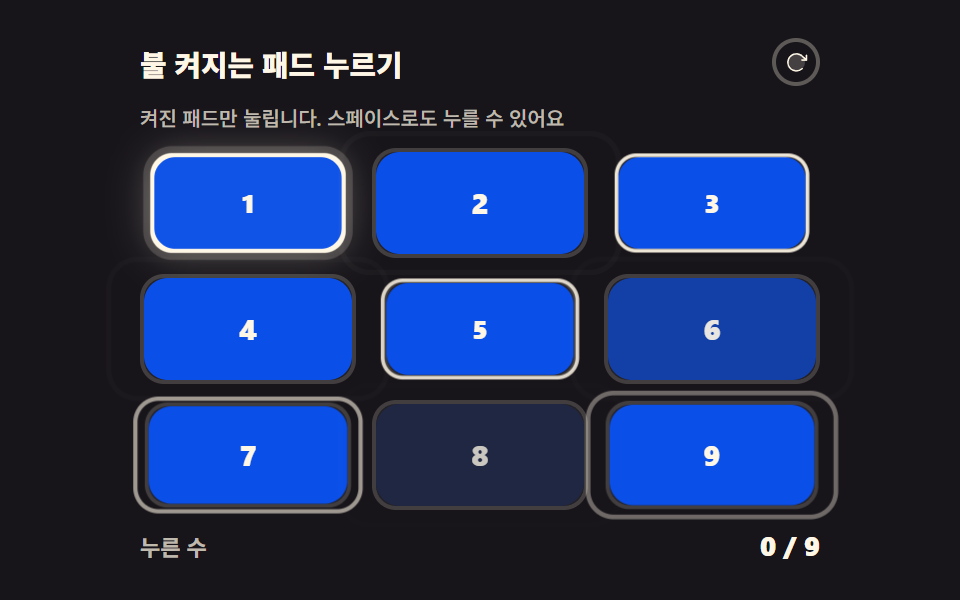 game9 CSS Game Demos — Mini Games in HTML & CSS
 gameHTML CSS JS mini games: 9 copy-paste mini apps
 gameTetris JavaScript: Build It in 9 Canvas Steps
 gameSpin Wheel: 9 Canvas Roulettes, Flick to Stop
 gameBrick Breaker Game JavaScript — 9 Physics Patterns
 game9 Bouncing Ball Animation Patterns With Physics
 gameDouble Pendulum Simulation: 9 Chaos Scenes
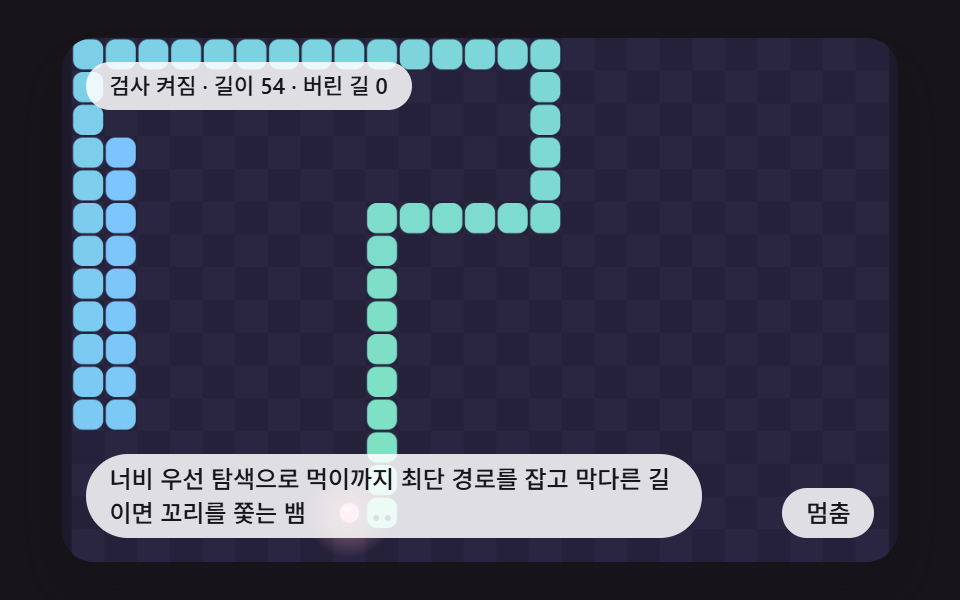 gameCSS Snake Game: 9 Boards That Find Their Own Path
 gameCSS Tic Tac Toe: 9 Boards That Count Ahead
 gameMaze Generator: 9 Carve-and-Solve Scenes