CSS Snake Game: 9 Boards That Find Their Own Path
Open a css snake game and the snake already turns toward the food before you touch a key — scene 01's shortest path and scene 02's Hamiltonian cycle
Run All Nine Snake Games Right on This Page
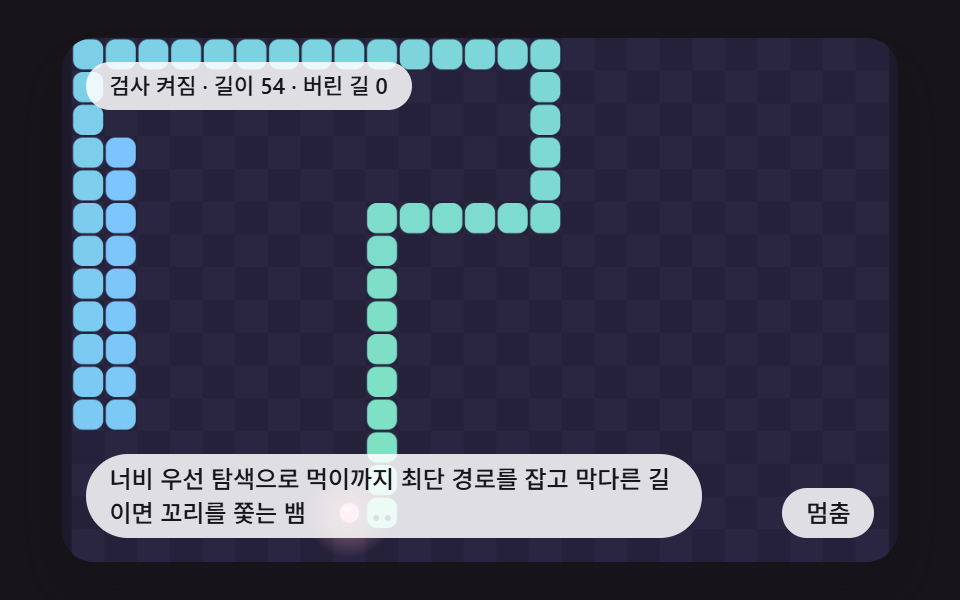 01 sk-bfs-safe-autopilot
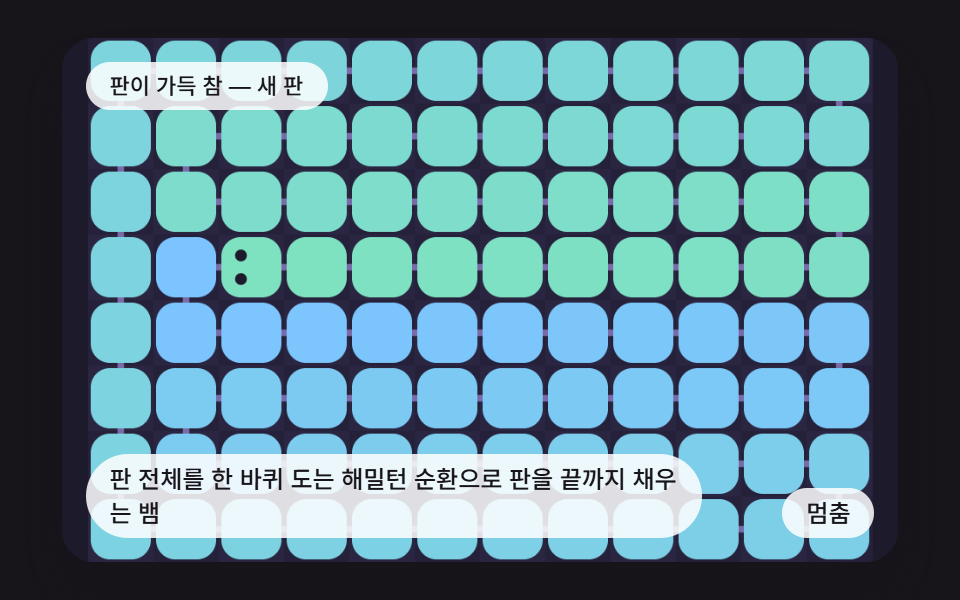 02 sk-hamilton-cycle-fill
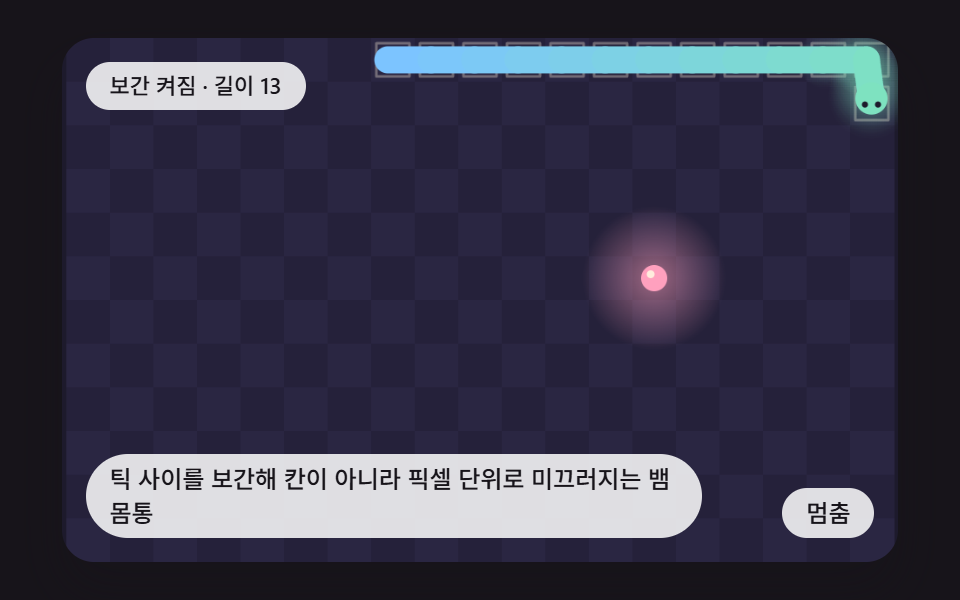 03 sk-smooth-lerp-body
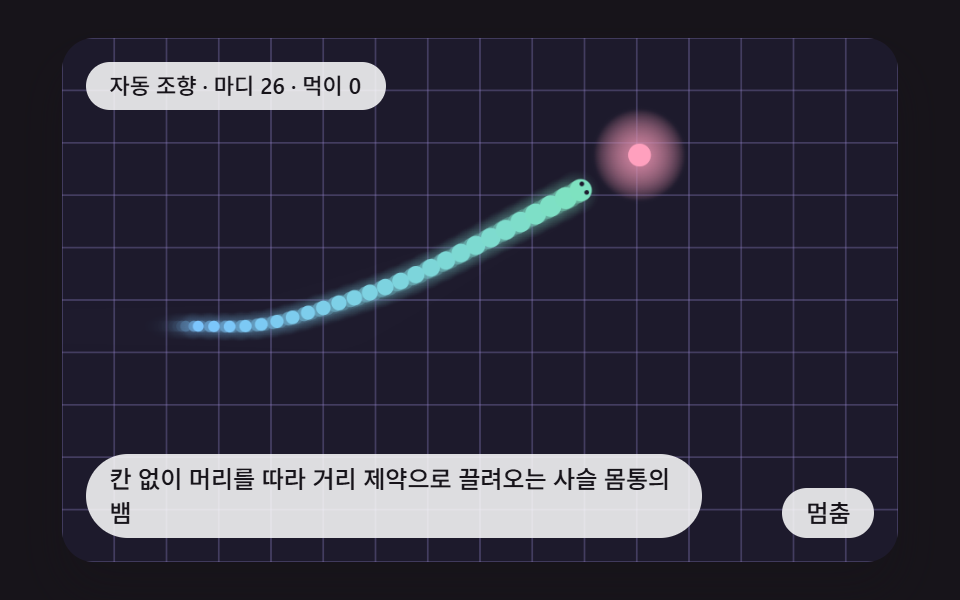 04 sk-chain-follow-rope
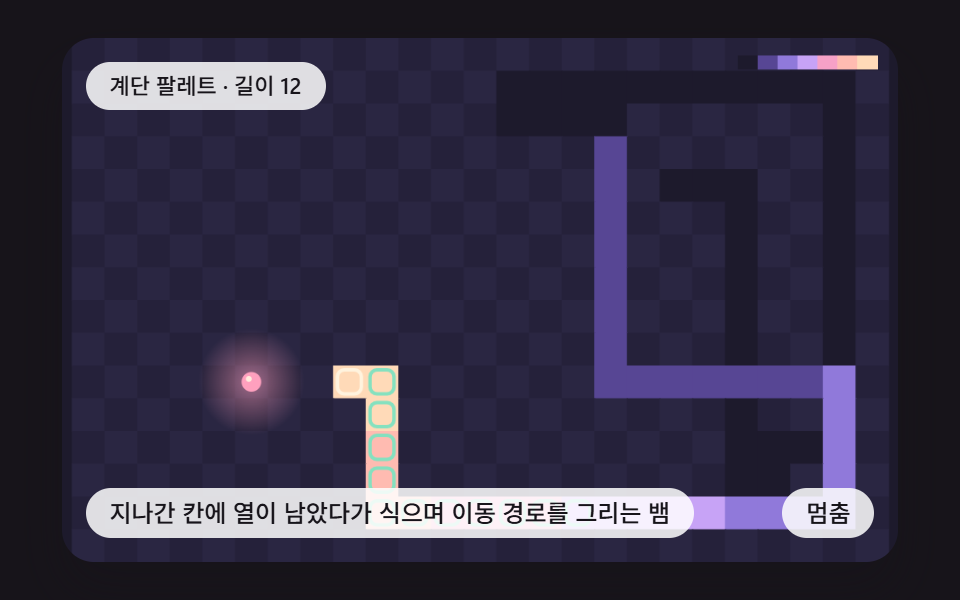 05 sk-heat-trail-decay
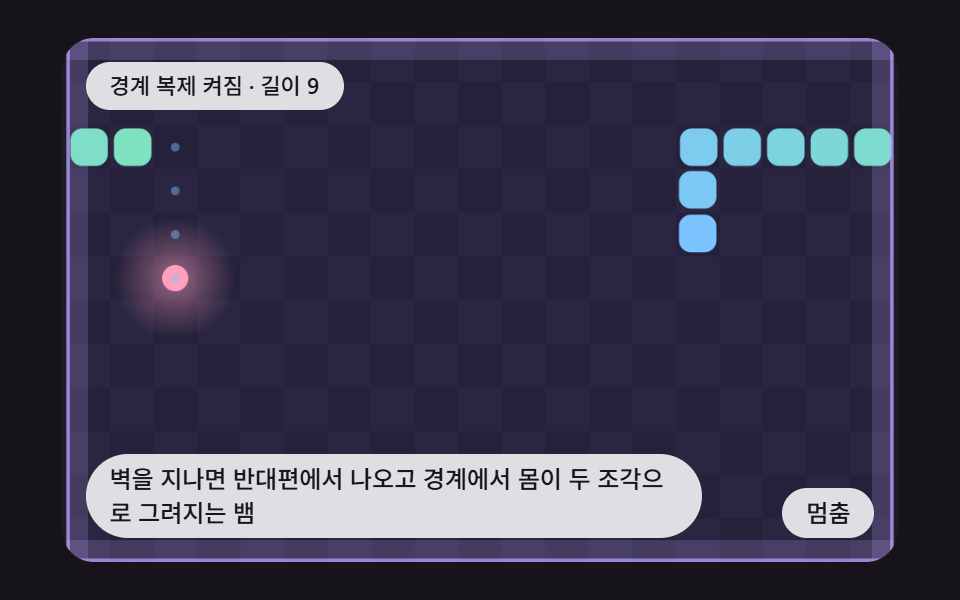 06 sk-wrap-torus-ghost
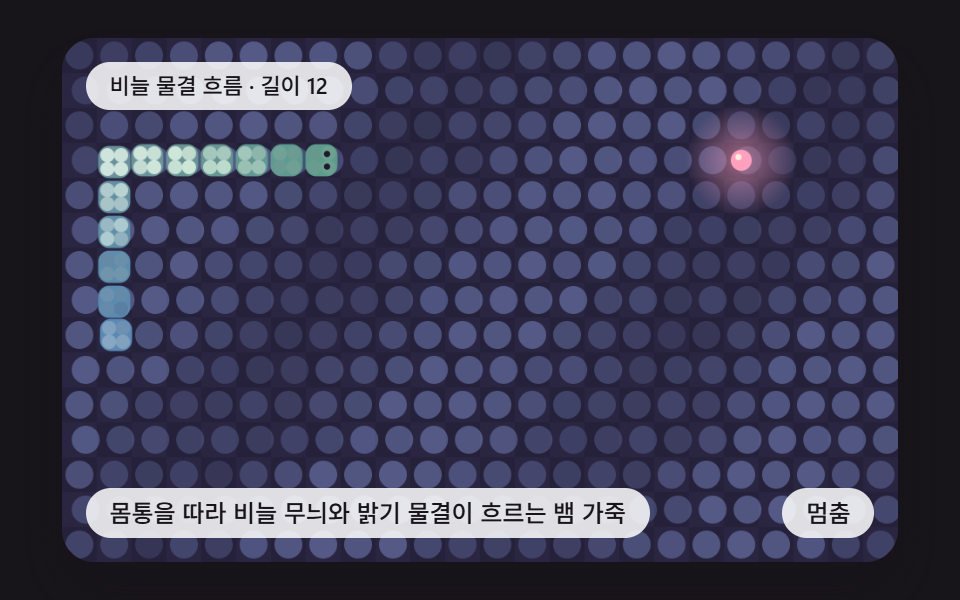 07 sk-scale-skin-pattern
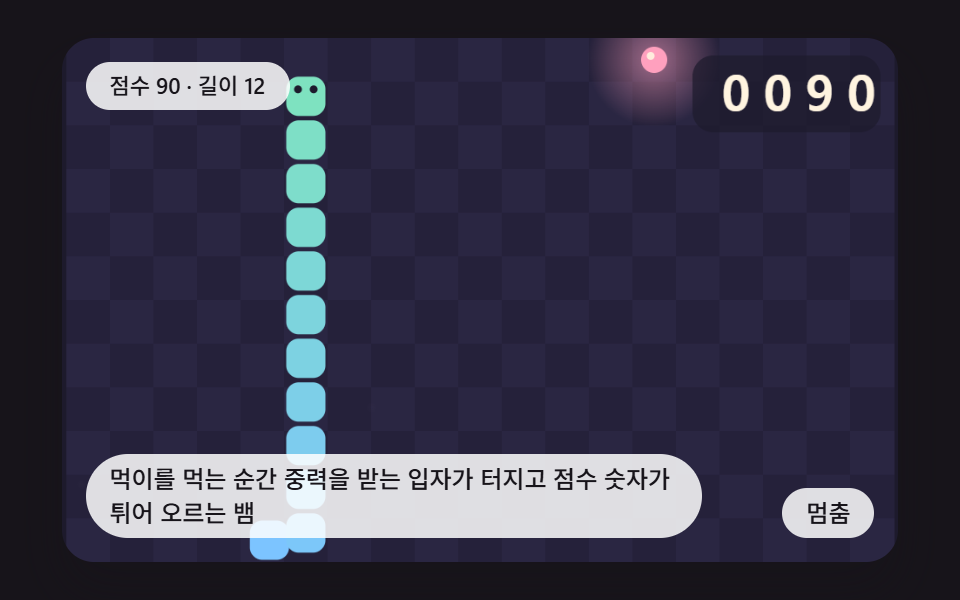 08 sk-eat-burst-score-roll
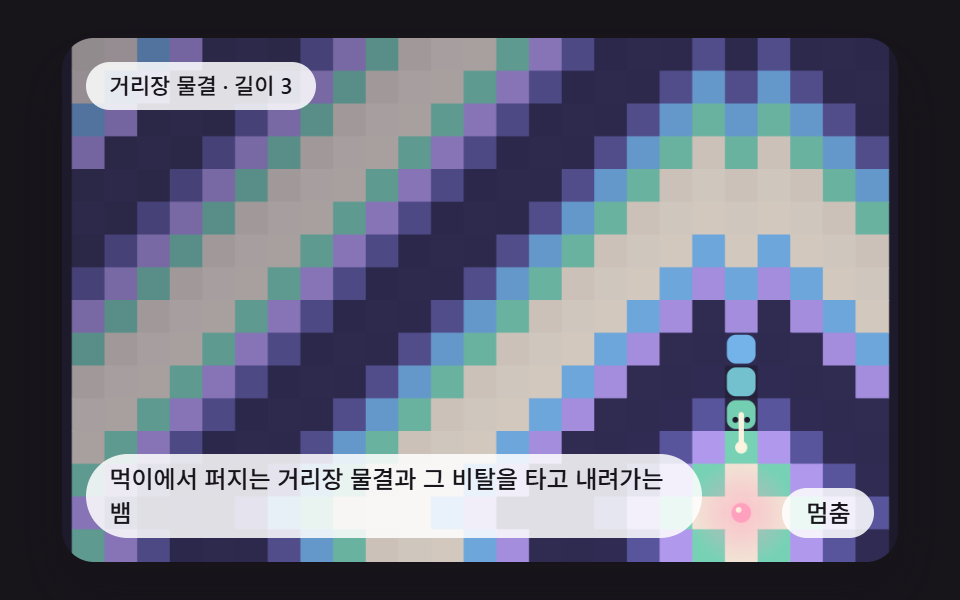 09 sk-bfs-distance-wave
Auto-plays · click a tile to jump to its section · all nine in one zip
- 01 A Snake That Takes the Shortest Breadth-First Path and Chases Its Tail When Boxed In
- 02 A Snake Filling the Whole Board on a Hamiltonian Cycle
- 03 A Snake Body That Glides by Pixels Between Ticks Instead of Jumping by Cells
- 04 A Gridless Snake Whose Chain Body Is Dragged Behind the Head by Distance Constraints
- 05 A Snake Whose Visited Cells Keep Heat That Cools Into a Trail Map
- 06 A Snake That Exits the Far Side of a Wall and Is Drawn in Two Halves at the Seam
- 07 A Snake Skin Whose Scale Pattern and Brightness Wave Flow Along the Body
- 08 A Snake Whose Food Bursts Into Gravity-Bound Particles While the Score Digits Bounce Up
- 09 A Snake That Rides Down the Slope of a Distance Wave Spreading From the Food
CSS Snake Game: 9 Boards Where Pathfinding, Cycles and Interpolation Move the Snake
The board is drawn on a canvas and the frame around it is CSS. JavaScript in each scene's index.html paints the cells, the snake and the food and then picks the next move, while CSS owns the stage size, the status pill, caption and button laid on top, and the keyboard focus outline. The stage is min(92vw, calc(160vh - 12.8vw)) wide with a 480:300 ratio and 16px corners.
Inside, the canvas is 480 by 300 multiplied by devicePixelRatio (capped at 2), so resizing the window never changes how many cells the board has. makeBoard(GRID_N) sets the cells: 16 rows give 18.75px cells, 25 across and 16 down for 400 cells; 12 rows give 25px cells and 228 of them; 8 rows give 37.5px cells and 96.
Time moves in fixed 16 ms steps. A scene piles those steps up and runs one logic tick each time TICK_MS fills, then draws once per frame. The only source of randomness is a seeded lcg, so the food lands on the same cells every run, and scenes 01, 02, 03, 05, 06, 07 and 08 spend hidden warm-up ticks so they open mid-game. Scene 01 opens at length 54, 02 at 91 of 96 cells, 08 at score 0070 with length 10 and 07 at length 11, while 04 and 09 are visible from their first frame.
The nine scenes are sorted by what the snake computes. Scenes 01 and 02 choose the next cell, and 03 and 04 are two ways to draw that same movement as a body. Scenes 05, 07 and 09 paint values onto cells or skin, 06 changes the shape of the board and 08 adds a reaction at the moment of eating.
Choosing by use is the quick route. An auto-play demo or an AI opponent preview starts at 01, an endless idle screen at 02, a mobile screen where smooth motion matters at 03, and a free-moving worm character at 04. Play-history visualization is 05, a map without walls is 06, a skin shop preview is 07, a score-reward HUD is 08 and a pathfinding explainer screen is 09.
If you need a snake that a person steers with arrow keys first, HTML CSS JS mini games: 9 copy-paste mini apps or 9 CSS Game Demos — Mini Games in HTML & CSS fits better. This page is for the other case, where nobody touches anything and the snake finds its own way.
Code for Each Technique Behind a Snake Game in HTML, CSS and JavaScript
Every snippet is a run of consecutive lines cut from the <script> of that scene's index.html, and none passes 25 lines. If you want to create a snake game using html css and javascript, the usual start is key input and collision checks; these nine scenes show the judging and drawing math instead.
01A Snake That Takes the Shortest Breadth-First Path and Chases Its Tail When Boxed In
Each tick a breadth-first search fills distances outward from the food and picks the shortest road for the head, then simulate walks that road to build a virtual body. tailReachable asks whether the virtual head can still reach the virtual tail, and if not the road is dropped (the pink line) and the snake follows its tail. The capture of 24 frames measured 49.8% cumulative area, mean intensity 114.0 and 23/23 frames moving.
<main class="stage">
<div class="sc is-demo" id="scRoot">
  <canvas class="sc__canvas" id="scCanvas" width="480" height="300" tabindex="0" aria-label="A Snake That Takes the Shortest Breadth-First Path and Chases Its Tail When Boxed In"></canvas>
  <p class="sc__status" id="scStatus" aria-live="polite">Check on</p>
  <button class="sc__btn" id="scBtn" type="button">Pause</button>
  <p class="sc__caption">A Snake That Takes the Shortest Breadth-First Path and Chases Its Tail When Boxed In</p>
</div>
</main>
@use "../../../../site/static/demo-tokens" as *;
@include stage($stage-ink);
.sc {
position: relative;
width: min(92vw, calc(160vh - 12.8vw));
aspect-ratio: 480 / 300;
margin: 0 auto;
border-radius: $r-card;
overflow: hidden;
box-shadow: $shadow-raised;
background: $subject-ink;
}
.sc__canvas {
display: block;
width: 100%;
height: 100%;
touch-action: none;
}
.sc__canvas:focus-visible {
outline: 2px solid rgba(255, 255, 255, .85);
outline-offset: -6px;
}
.sc__status {
position: absolute;
left: $sp-3;
top: $sp-3;
max-width: 62%;
margin: 0;
padding: $sp-1 $sp-3;
border-radius: $r-pill;
background: rgba(255, 255, 255, .85);
color: $subject-ink;
font-weight: 500;
font-size: 11px;
line-height: 1.4;
pointer-events: none;
}
.sc__btn {
position: absolute;
right: $sp-3;
bottom: $sp-3;
margin: 0;
padding: $sp-1 $sp-3;
border: 0;
border-radius: $r-pill;
background: rgba(255, 255, 255, .85);
color: $subject-ink;
font: inherit;
font-weight: 500;
font-size: 12px;
line-height: 1.4;
cursor: pointer;
}
.sc__btn:focus-visible {
outline: 2px solid #ffffff;
outline-offset: 2px;
}
.sc__caption {
position: absolute;
left: $sp-3;
bottom: $sp-3;
max-width: 68%;
margin: 0;
padding: $sp-1 $sp-3;
border-radius: $r-pill;
background: rgba(255, 255, 255, .85);
color: $subject-ink;
font-weight: 500;
font-size: 12px;
line-height: 1.4;
pointer-events: none;
}
@media (max-width: 340px) {
.sc__caption, .sc__btn { font-size: 10px; padding: $sp-1 $sp-2; }
.sc__status { font-size: 10px; }
}
@media (prefers-reduced-motion: reduce) {
.sc { cursor: default; }
}html, body {
margin: 0;
overflow: hidden;
}
.stage {
box-sizing: border-box;
min-height: 100vh;
display: grid;
place-items: center;
margin: 0;
background: #17141a;
font-family: -apple-system, "Segoe UI", "Noto Sans KR", sans-serif;
padding: clamp(8px, 4vw, 24px);
}
.sc {
position: relative;
width: min(92vw, 160vh - 12.8vw);
aspect-ratio: 480/300;
margin: 0 auto;
border-radius: 16px;
overflow: hidden;
box-shadow: 0 14px 24px rgba(23, 20, 26, 0.32);
background: #17141a;
}
.sc__canvas {
display: block;
width: 100%;
height: 100%;
touch-action: none;
}
.sc__canvas:focus-visible {
outline: 2px solid rgba(255, 255, 255, 0.85);
outline-offset: -6px;
}
.sc__status {
position: absolute;
left: 12px;
top: 12px;
max-width: 62%;
margin: 0;
padding: 4px 12px;
border-radius: 999px;
background: rgba(255, 255, 255, 0.85);
color: #17141a;
font-weight: 500;
font-size: 11px;
line-height: 1.4;
pointer-events: none;
}
.sc__btn {
position: absolute;
right: 12px;
bottom: 12px;
margin: 0;
padding: 4px 12px;
border: 0;
border-radius: 999px;
background: rgba(255, 255, 255, 0.85);
color: #17141a;
font: inherit;
font-weight: 500;
font-size: 12px;
line-height: 1.4;
cursor: pointer;
}
.sc__btn:focus-visible {
outline: 2px solid #ffffff;
outline-offset: 2px;
}
.sc__caption {
position: absolute;
left: 12px;
bottom: 12px;
max-width: 68%;
margin: 0;
padding: 4px 12px;
border-radius: 999px;
background: rgba(255, 255, 255, 0.85);
color: #17141a;
font-weight: 500;
font-size: 12px;
line-height: 1.4;
pointer-events: none;
}
@media (max-width: 340px) {
.sc__caption, .sc__btn {
font-size: 10px;
padding: 4px 8px;
}
.sc__status {
font-size: 10px;
}
}
@media (prefers-reduced-motion: reduce) {
.sc {
cursor: default;
}
}(function () {
const W = 480;
const H = 300;
const PI2 = Math.PI * 2;
const FIXED_DT = 16;
const REDUCE_STEP_MS = 900;
const IDLE_TICKS = 150;
const BTN_PAUSE = 'Pause';
const BTN_PLAY = 'Play';
const BTN_NEXT = 'Next scene';
// 파스텔 팔레트 — 어두운 판 위에 밝은 색을 얹어 명도 차로 읽힌다
const BG = [29, 26, 44];
const TILE_A = [37, 33, 58];
const TILE_B = [42, 38, 66];
const MINT = [126, 226, 192];
const SKY = [124, 196, 255];
const LILAC = [190, 164, 255];
const PINK = [255, 160, 190];
const PEACH = [255, 208, 168];
const CREAM = [255, 244, 224];
function clamp(v, lo, hi) { return v < lo ? lo : (v > hi ? hi : v); }
function lerp(a, b, k) { return a + (b - a) * k; }
function smooth(x) { const c = clamp(x, 0, 1); return c * c * (3 - 2 * c); }
function rgba(c, a) {
return 'rgba(' + Math.round(c[0]) + ',' + Math.round(c[1]) + ',' + Math.round(c[2]) + ',' + clamp(a, 0, 1).toFixed(3) + ')';
}
function mix(a, b, k) {
return [lerp(a[0], b[0], k), lerp(a[1], b[1], k), lerp(a[2], b[2], k)];
}
// 시드 고정 난수 — 같은 시드면 언제나 같은 수열 (선형 합동 방식)
function lcg(seed) {
let s = seed >>> 0;
return function () {
s = (Math.imul(s, 1664525) + 1013904223) >>> 0;
return s / 4294967296;
};
}
// 정수 두 개로 0 이상 1 미만의 값을 만드는 해시 (같은 입력은 늘 같은 값)
function hash2(x, y, seed) {
let h = (Math.imul(x | 0, 374761393) + Math.imul(y | 0, 668265263) + Math.imul(seed | 0, 1442695041)) | 0;
h = Math.imul(h ^ (h >>> 13), 1274126177);
h ^= h >>> 16;
return (h >>> 0) / 4294967296;
}
function glow(ctx, x, y, r, c, a) {
const g = ctx.createRadialGradient(x, y, 0, x, y, r);
g.addColorStop(0, rgba(c, a));
g.addColorStop(1, rgba(c, 0));
ctx.fillStyle = g;
ctx.fillRect(x - r, y - r, r * 2, r * 2);
}
// 둥근 사각형 경로 (roundRect 가 없는 브라우저에서도 같은 모양)
function rrPath(ctx, x, y, w, h, r) {
const rr = Math.min(r, w / 2, h / 2);
ctx.beginPath();
ctx.moveTo(x + rr, y);
ctx.arcTo(x + w, y, x + w, y + h, rr);
ctx.arcTo(x + w, y + h, x, y + h, rr);
ctx.arcTo(x, y + h, x, y, rr);
ctx.arcTo(x, y, x + w, y, rr);
ctx.closePath();
}
function makeBoard(rows) {
const cell = H / rows;
const cols = Math.floor(W / cell + 1e-6);
return { cols: cols, rows: rows, cell: cell, ox: (W - cols * cell) / 2, oy: 0, n: cols * rows };
}
const DX = [0, 1, 0, -1];
const DY = [-1, 0, 1, 0];
// 칸 번호 y*cols+x. 판 밖이면 -1 (wrap 이면 반대편으로 이어진다)
function cellAt(b, x, y, wrap) {
let xx = x;
let yy = y;
if (wrap) {
xx = (x % b.cols + b.cols) % b.cols;
yy = (y % b.rows + b.rows) % b.rows;
}
else if (x < 0 || y < 0 || x >= b.cols || y >= b.rows) {
return -1;
}
return yy * b.cols + xx;
}
function neighborCell(b, i, d, wrap) {
return cellAt(b, (i % b.cols) + DX[d], Math.floor(i / b.cols) + DY[d], wrap);
}
// 목표 칸에서 너비 우선으로 퍼지는 거리장. blocked 칸과 닿지 못하는 칸은 -1
function distField(b, target, blocked, wrap) {
const dist = new Int16Array(b.n).fill(-1);
const queue = new Int16Array(b.n);
let qh = 0;
let qt = 0;
dist[target] = 0;
queue[qt] = target;
qt += 1;
while (qh < qt) {
const c = queue[qh];
qh += 1;
for (let d = 0; d < 4; d += 1) {
const nb = neighborCell(b, c, d, wrap);
if (nb >= 0 && dist[nb] < 0 && blocked[nb] === 0) {
dist[nb] = dist[c] + 1;
queue[qt] = nb;
qt += 1;
}
}
}
return dist;
}
// 거리장에서 값이 가장 낮은 이웃 (없으면 -1)
function lowestNeighbor(b, dist, from, wrap) {
let best = -1;
let bv = 32000;
for (let d = 0; d < 4; d += 1) {
const nb = neighborCell(b, from, d, wrap);
if (nb >= 0 && dist[nb] >= 0 && dist[nb] < bv) {
bv = dist[nb];
best = nb;
}
}
return best;
}
function pathFrom(b, dist, head, wrap) {
const path = [];
let cur = head;
for (let k = 0; k < b.n; k += 1) {
const nx = lowestNeighbor(b, dist, cur, wrap);
if (nx < 0 || (dist[nx] >= dist[cur] && cur !== head)) {
return [];
}
path.push(nx);
if (dist[nx] === 0) {
return path;
}
cur = nx;
}
return [];
}
function placeFood(g) {
const used = new Uint8Array(g.b.n);
for (let i = 0; i < g.body.length; i += 1) {
used[g.body[i]] = 1;
}
const free = [];
for (let i = 0; i < g.b.n; i += 1) {
if (used[i] === 0) {
free.push(i);
}
}
g.food = free.length > 0 ? free[Math.floor(g.rnd() * free.length)] : -1;
}
function resetGame(g) {
const b = g.b;
const hx = Math.floor(b.cols / 2);
const hy = Math.floor(b.rows / 2);
g.body = [hy * b.cols + hx, hy * b.cols + hx - 1, hy * b.cols + hx - 2];
g.prev = g.body.slice();
g.dead = false;
g.resets += 1;
placeFood(g);
}
function newGame(b, wrap, seed) {
const g = { b: b, wrap: wrap, body: [], prev: [], food: -1, rnd: lcg(seed), eaten: 0, dead: false, resets: -1 };
resetGame(g);
return g;
}
// 머리를 next 칸으로 옮긴다. 먹으면 true, 몸에 부딪히면 dead
function moveSnake(g, next) {
g.prev = g.body.slice();
const ate = next === g.food;
const tail = g.body[g.body.length - 1];
for (let i = 0; i < g.body.length; i += 1) {
if (g.body[i] === next && !(i === g.body.length - 1 && !ate && next === tail)) {
g.dead = true;
return false;
}
}
g.body.unshift(next);
if (ate) {
g.eaten += 1;
placeFood(g);
}
else {
g.body.pop();
}
return ate;
}
// 경로를 끝까지 따라가 먹은 뒤의 가상 몸
function simulate(body, path) {
const v = body.slice();
for (let k = 0; k < path.length; k += 1) {
v.unshift(path[k]);
if (k < path.length - 1) {
v.pop();
}
}
return v;
}
// 가상 몸의 머리에서 번져 나가 꼬리에 닿는가. mark 를 주면 닿은 칸을 표시한다
function tailReachable(b, v, wrap, mark) {
const blocked = new Uint8Array(b.n);
for (let i = 1; i < v.length - 1; i += 1) {
blocked[v[i]] = 1;
}
const tail = v[v.length - 1];
const head = v[0];
const seen = new Uint8Array(b.n);
const stack = [head];
seen[head] = 1;
let hit = false;
while (stack.length > 0) {
const c = stack.pop();
for (let d = 0; d < 4; d += 1) {
const nb = neighborCell(b, c, d, wrap);
if (nb < 0 || seen[nb] === 1) {
continue;
}
if (nb === tail) {
hit = true;
continue;
}
if (blocked[nb] === 1 || nb === head) {
continue;
}
seen[nb] = 1;
stack.push(nb);
}
}
if (mark) {
mark.set(seen);
}
return hit;
}
// 한 수를 정한다: 먹이까지 최단 경로 → (안전 검사) → 막히면 꼬리를 쫓는다
function planMove(g, safeOn) {
const b = g.b;
const head = g.body[0];
const tail = g.body[g.body.length - 1];
const plan = { next: -1, path: [], rejected: [], trap: new Uint8Array(b.n), chase: false };
const blocked = new Uint8Array(b.n);
for (let i = 0; i < g.body.length - 1; i += 1) {
blocked[g.body[i]] = 1;
}
        if (g.food >= 0) {
            const dist = distField(b, g.food, blocked, g.wrap);
            const path = pathFrom(b, dist, head, g.wrap);
            plan.path = path;
            if (path.length > 0) {
                if (!safeOn) {
                    plan.next = path[0];
                    return plan;
                }
                const v = simulate(g.body, path);
                if (tailReachable(b, v, g.wrap, plan.trap)) {
                    plan.next = path[0];
                    return plan;
                }
                plan.rejected = path;
            }
        }
plan.chase = true;
const dist2 = distField(b, tail, blocked, g.wrap);
const nx = lowestNeighbor(b, dist2, head, g.wrap);
if (nx >= 0) {
plan.next = nx;
return plan;
}
for (let d = 0; d < 4; d += 1) {
const nb = neighborCell(b, head, d, g.wrap);
if (nb >= 0 && blocked[nb] === 0 && nb !== head) {
plan.next = nb;
return plan;
}
}
return plan;
}
// 칸 중심의 화면 좌표
function cellX(b, i) { return b.ox + ((i % b.cols) + 0.5) * b.cell; }
function cellY(b, i) { return b.oy + (Math.floor(i / b.cols) + 0.5) * b.cell; }
function wrapDelta(a, c, n, wrap) {
let d = c - a;
if (wrap) {
if (d > n / 2) {
d -= n;
}
if (d < -n / 2) {
d += n;
}
}
return d;
}
// Segments i 의 보간 위치 (칸 좌표). 지난 틱의 자리에서 이번 틱의 자리로 p(0~1) 만큼
function segPos(g, i, p) {
const b = g.b;
const cur = g.body[i];
const pv = i < g.prev.length ? g.prev[i] : cur;
const cx = cur % b.cols;
const cy = Math.floor(cur / b.cols);
const px = pv % b.cols;
const py = Math.floor(pv / b.cols);
return [px + wrapDelta(px, cx, b.cols, g.wrap) * p, py + wrapDelta(py, cy, b.rows, g.wrap) * p];
}
function drawTiles(ctx, b) {
ctx.fillStyle = rgba(BG, 1);
ctx.fillRect(0, 0, W, H);
for (let y = 0; y < b.rows; y += 1) {
for (let x = 0; x < b.cols; x += 1) {
ctx.fillStyle = rgba((x + y) % 2 === 0 ? TILE_A : TILE_B, 1);
ctx.fillRect(b.ox + x * b.cell, b.oy + y * b.cell, b.cell + 0.5, b.cell + 0.5);
}
}
}
function drawFood(ctx, b, food, t) {
if (food < 0) {
return;
}
const x = cellX(b, food);
const y = cellY(b, food);
const pulse = 0.5 + 0.5 * Math.sin(t * 0.12);
glow(ctx, x, y, b.cell * (1.3 + 0.35 * pulse), PINK, 0.55);
ctx.fillStyle = rgba(PINK, 1);
ctx.beginPath();
ctx.arc(x, y, b.cell * 0.3, 0, PI2);
ctx.fill();
ctx.fillStyle = rgba(CREAM, 0.9);
ctx.beginPath();
ctx.arc(x - b.cell * 0.08, y - b.cell * 0.09, b.cell * 0.09, 0, PI2);
ctx.fill();
}
function bodyColor(i, len) {
return mix(MINT, SKY, len <= 1 ? 0 : i / (len - 1));
}
// 칸 중심 (x,y 칸 좌표, 소수 허용)에 Segments 하나
function drawSeg(ctx, b, gx, gy, c, shrink) {
const s = b.cell * (1 - shrink);
const cx = b.ox + (gx + 0.5) * b.cell;
const cy = b.oy + (gy + 0.5) * b.cell;
ctx.fillStyle = rgba(c, 1);
rrPath(ctx, cx - s / 2, cy - s / 2, s, s, s * 0.32);
ctx.fill();
}
function drawEyes(ctx, b, gx, gy, dirx, diry) {
const cx = b.ox + (gx + 0.5) * b.cell;
const cy = b.oy + (gy + 0.5) * b.cell;
const px = -diry;
const py = dirx;
const r = b.cell * 0.09;
ctx.fillStyle = rgba(BG, 1);
for (let s = -1; s <= 1; s += 2) {
ctx.beginPath();
ctx.arc(cx + dirx * b.cell * 0.16 + px * s * b.cell * 0.18, cy + diry * b.cell * 0.16 + py * s * b.cell * 0.18, r, 0, PI2);
ctx.fill();
}
}
function headDir(g) {
if (g.body.length < 2) {
return [1, 0];
}
const b = g.b;
const dx = wrapDelta(g.body[1] % b.cols, g.body[0] % b.cols, b.cols, g.wrap);
const dy = wrapDelta(Math.floor(g.body[1] / b.cols), Math.floor(g.body[0] / b.cols), b.rows, g.wrap);
return [clamp(dx, -1, 1), clamp(dy, -1, 1)];
}
// 보간 없이 칸 그대로 그리는 기본 뱀
function drawSnakeCells(ctx, g, dim) {
const len = g.body.length;
for (let i = len - 1; i >= 0; i -= 1) {
const c = g.body[i];
const col = mix(bodyColor(i, len), BG, dim);
drawSeg(ctx, g.b, c % g.b.cols, Math.floor(c / g.b.cols), col, 0.08);
}
const hd = headDir(g);
drawEyes(ctx, g.b, g.body[0] % g.b.cols, Math.floor(g.body[0] / g.b.cols), hd[0], hd[1]);
}
function start(root, canvas, statusEl, btnEl, make) {
const ctx0 = canvas.getContext('2d');
if (!ctx0) {
return function () { return; };
}
const ctx = ctx0;
const dpr = Math.min(window.devicePixelRatio || 1, 2);
canvas.width = Math.round(W * dpr);
canvas.height = Math.round(H * dpr);
ctx.setTransform(dpr, 0, 0, dpr, 0, 0);
const reduce = window.matchMedia('(prefers-reduced-motion: reduce)').matches;
const inp = { x: W / 2, y: H / 2, idle: 99999 };
const scene = make(inp, reduce);
let paused = false;
let rafId = 0;
let lastTs = -1;
let accMs = 0;
let lastLabel = '';
const cleaners = [];
function listen(target, type, fn) {
target.addEventListener(type, fn);
cleaners.push(function () { target.removeEventListener(type, fn); });
}
function show() {
scene.draw(ctx);
const t = scene.label();
if (t !== lastLabel) {
lastLabel = t;
statusEl.textContent = t;
}
}
function advance(ms) {
const n = Math.round(ms / FIXED_DT);
for (let i = 0; i < n; i += 1) {
inp.idle += 1;
scene.step();
}
}
// 움직임 줄이기에서는 루프가 없으니 입력 직후 한 틱쯤 앞으로 보내 바로 그린다
function refresh() {
if (reduce) {
advance(FIXED_DT * 8);
show();
}
}
function toLocal(e) {
const r = canvas.getBoundingClientRect();
inp.x = clamp((e.clientX - r.left) * W / r.width, 0, W);
inp.y = clamp((e.clientY - r.top) * H / r.height, 0, H);
inp.idle = 0;
}
function tick(ts) {
if (lastTs < 0) {
lastTs = ts;
}
const frameDt = Math.min(ts - lastTs, 160);
lastTs = ts;
if (!paused) {
accMs += frameDt;
while (accMs >= FIXED_DT) {
inp.idle += 1;
scene.step();
accMs -= FIXED_DT;
}
show();
}
rafId = requestAnimationFrame(tick);
}
btnEl.textContent = reduce ? BTN_NEXT : BTN_PAUSE;
if (reduce) {
root.classList.remove('is-demo');
advance(1400);
show();
}
listen(btnEl, 'click', function () {
if (reduce) {
advance(REDUCE_STEP_MS);
show();
return;
}
paused = !paused;
if (paused) {
root.classList.remove('is-demo');
}
else {
root.classList.add('is-demo');
}
btnEl.textContent = paused ? BTN_PLAY : BTN_PAUSE;
});
listen(canvas, 'pointermove', function (e) {
toLocal(e);
refresh();
});
listen(canvas, 'pointerdown', function (e) {
toLocal(e);
scene.tap();
refresh();
});
listen(canvas, 'keydown', function (e) {
const k = e.key;
if (k === 'Enter' || k === ' ') {
e.preventDefault();
scene.tap();
refresh();
return;
}
// 이 장면이 쓰는 키만 막는다. 쓰지 않는 키(Tab 등)는 그대로 둔다
if (scene.key(k)) {
e.preventDefault();
refresh();
}
});
if (!reduce) {
rafId = requestAnimationFrame(tick);
}
return function () {
cancelAnimationFrame(rafId);
for (let i = 0; i < cleaners.length; i += 1) {
cleaners[i]();
}
};
}
const TICK_MS = 90;
const GRID_N = 16;
const SAFE_CHECK = true;
const REJECT_LIFE = 8;
const WARM_TICKS = 826;
const TXT_SAFE_ON = 'Check on';
const TXT_SAFE_OFF = 'Check off';
const TXT_LEN = 'Length';
const TXT_DROP = 'Dropped paths';
const TXT_DEAD = 'Trapped — restarting';
function makeScene(inp, reduce) {
const b = makeBoard(GRID_N);
const g = newGame(b, false, 455101);
let safeOn = SAFE_CHECK;
let acc = 0;
let t = 0;
let rejected = [];
let rejLife = 0;
let trap = new Uint8Array(b.n);
let dropped = 0;
let route = [];
let hold = 0;
function logic() {
if (hold > 0) {
hold -= 1;
if (hold === 0) {
resetGame(g);
rejected = [];
rejLife = 0;
route = [];
}
return;
}
const p = planMove(g, safeOn);
route = p.path;
if (p.rejected.length > 0) {
if (rejLife === 0) {
dropped += 1;
}
rejected = p.rejected;
rejLife = REJECT_LIFE;
trap = p.trap;
}
if (rejLife > 0 && p.rejected.length === 0) {
rejLife -= 1;
}
if (p.next < 0) {
g.dead = true;
}
else {
moveSnake(g, p.next);
}
if (g.dead) {
hold = 8;
}
}
const scene = {
step() {
t += 1;
acc += FIXED_DT;
while (acc >= TICK_MS) {
acc -= TICK_MS;
logic();
}
},
draw(ctx) {
drawTiles(ctx, b);
if (rejLife > 0) {
const a = 0.1 + 0.24 * (rejLife / REJECT_LIFE);
ctx.fillStyle = rgba(PINK, a);
for (let i = 0; i < b.n; i += 1) {
if (trap[i] === 1) {
ctx.fillRect(b.ox + (i % b.cols) * b.cell, b.oy + Math.floor(i / b.cols) * b.cell, b.cell + 0.5, b.cell + 0.5);
}
}
}
for (let k = 0; k < route.length; k += 1) {
ctx.fillStyle = rgba(SKY, 0.5);
ctx.beginPath();
ctx.arc(cellX(b, route[k]), cellY(b, route[k]), b.cell * 0.11, 0, PI2);
ctx.fill();
}
if (rejLife > 0) {
ctx.strokeStyle = rgba(PINK, 0.35 + 0.65 * (rejLife / REJECT_LIFE));
ctx.lineWidth = b.cell * 0.2;
ctx.lineCap = 'round';
ctx.lineJoin = 'round';
ctx.beginPath();
ctx.moveTo(cellX(b, g.body[0]), cellY(b, g.body[0]));
for (let k = 0; k < rejected.length; k += 1) {
ctx.lineTo(cellX(b, rejected[k]), cellY(b, rejected[k]));
}
ctx.stroke();
}
drawFood(ctx, b, g.food, t);
drawSnakeCells(ctx, g, g.dead ? 0.55 : 0);
},
label() {
if (g.dead) {
return TXT_DEAD;
}
return (safeOn ? TXT_SAFE_ON : TXT_SAFE_OFF) + ' · ' + TXT_LEN + ' ' + g.body.length + ' · ' + TXT_DROP + ' ' + dropped;
},
tap() {
safeOn = !safeOn;
},
key(k) {
return false;
}
};
for (let i = 0; i < WARM_TICKS; i += 1) {
logic();
}
dropped = 0;
rejLife = 0;
if (reduce) {
for (let i = 0; i < 4; i += 1) {
scene.step();
}
}
return scene;
}
start(document.getElementById('scRoot'), document.getElementById('scCanvas'), document.getElementById('scStatus'), document.getElementById('scBtn'), makeScene);
})();import { useEffect, useRef } from "react";
import styles from "./SkBfsSafeAutopilot.module.scss";
const W = 480;
const H = 300;
const PI2 = Math.PI * 2;
const FIXED_DT = 16;
const REDUCE_STEP_MS = 900;
const IDLE_TICKS = 150;
const BTN_PAUSE = '멈춤';
const BTN_PLAY = '재생';
const BTN_NEXT = '다음 장면';
type RGB = [number, number, number];
interface Input { x: number; y: number; idle: number; }
interface Scene {
step(): void;
draw(ctx: CanvasRenderingContext2D): void;
label(): string;
tap(): void;
key(k: string): boolean;
}
type Maker = (inp: Input, reduce: boolean) => Scene;
// 파스텔 팔레트 — 어두운 판 위에 밝은 색을 얹어 명도 차로 읽힌다
const BG: RGB = [29, 26, 44];
const TILE_A: RGB = [37, 33, 58];
const TILE_B: RGB = [42, 38, 66];
const MINT: RGB = [126, 226, 192];
const SKY: RGB = [124, 196, 255];
const LILAC: RGB = [190, 164, 255];
const PINK: RGB = [255, 160, 190];
const PEACH: RGB = [255, 208, 168];
const CREAM: RGB = [255, 244, 224];
function clamp(v: number, lo: number, hi: number): number { return v < lo ? lo : (v > hi ? hi : v); }
function lerp(a: number, b: number, k: number): number { return a + (b - a) * k; }
function smooth(x: number): number { const c = clamp(x, 0, 1); return c * c * (3 - 2 * c); }
function rgba(c: RGB, a: number): string {
return 'rgba(' + Math.round(c[0]) + ',' + Math.round(c[1]) + ',' + Math.round(c[2]) + ',' + clamp(a, 0, 1).toFixed(3) + ')';
}
function mix(a: RGB, b: RGB, k: number): RGB {
return [lerp(a[0], b[0], k), lerp(a[1], b[1], k), lerp(a[2], b[2], k)];
}
// 시드 고정 난수 — 같은 시드면 언제나 같은 수열 (선형 합동 방식)
function lcg(seed: number): () => number {
let s = seed >>> 0;
return function (): number {
s = (Math.imul(s, 1664525) + 1013904223) >>> 0;
return s / 4294967296;
};
}
// 정수 두 개로 0 이상 1 미만의 값을 만드는 해시 (같은 입력은 늘 같은 값)
function hash2(x: number, y: number, seed: number): number {
let h = (Math.imul(x | 0, 374761393) + Math.imul(y | 0, 668265263) + Math.imul(seed | 0, 1442695041)) | 0;
h = Math.imul(h ^ (h >>> 13), 1274126177);
h ^= h >>> 16;
return (h >>> 0) / 4294967296;
}
function glow(ctx: CanvasRenderingContext2D, x: number, y: number, r: number, c: RGB, a: number): void {
const g = ctx.createRadialGradient(x, y, 0, x, y, r);
g.addColorStop(0, rgba(c, a));
g.addColorStop(1, rgba(c, 0));
ctx.fillStyle = g;
ctx.fillRect(x - r, y - r, r * 2, r * 2);
}
// 둥근 사각형 경로 (roundRect 가 없는 브라우저에서도 같은 모양)
function rrPath(ctx: CanvasRenderingContext2D, x: number, y: number, w: number, h: number, r: number): void {
const rr = Math.min(r, w / 2, h / 2);
ctx.beginPath();
ctx.moveTo(x + rr, y);
ctx.arcTo(x + w, y, x + w, y + h, rr);
ctx.arcTo(x + w, y + h, x, y + h, rr);
ctx.arcTo(x, y + h, x, y, rr);
ctx.arcTo(x, y, x + w, y, rr);
ctx.closePath();
}
// ---- 판과 뱀 ----
interface Board { cols: number; rows: number; cell: number; ox: number; oy: number; n: number; }
function makeBoard(rows: number): Board {
const cell = H / rows;
const cols = Math.floor(W / cell + 1e-6);
return { cols: cols, rows: rows, cell: cell, ox: (W - cols * cell) / 2, oy: 0, n: cols * rows };
}
const DX = [0, 1, 0, -1];
const DY = [-1, 0, 1, 0];
// 칸 번호 y*cols+x. 판 밖이면 -1 (wrap 이면 반대편으로 이어진다)
function cellAt(b: Board, x: number, y: number, wrap: boolean): number {
let xx = x;
let yy = y;
if (wrap) {
xx = (x % b.cols + b.cols) % b.cols;
yy = (y % b.rows + b.rows) % b.rows;
} else if (x < 0 || y < 0 || x >= b.cols || y >= b.rows) {
return -1;
}
return yy * b.cols + xx;
}
function neighborCell(b: Board, i: number, d: number, wrap: boolean): number {
return cellAt(b, (i % b.cols) + DX[d], Math.floor(i / b.cols) + DY[d], wrap);
}
// 목표 칸에서 너비 우선으로 퍼지는 거리장. blocked 칸과 닿지 못하는 칸은 -1
function distField(b: Board, target: number, blocked: Uint8Array, wrap: boolean): Int16Array {
const dist = new Int16Array(b.n).fill(-1);
const queue = new Int16Array(b.n);
let qh = 0;
let qt = 0;
dist[target] = 0;
queue[qt] = target;
qt += 1;
while (qh < qt) {
const c = queue[qh];
qh += 1;
for (let d = 0; d < 4; d += 1) {
const nb = neighborCell(b, c, d, wrap);
if (nb >= 0 && dist[nb] < 0 && blocked[nb] === 0) {
dist[nb] = dist[c] + 1;
queue[qt] = nb;
qt += 1;
}
}
}
return dist;
}
// 거리장에서 값이 가장 낮은 이웃 (없으면 -1)
function lowestNeighbor(b: Board, dist: Int16Array, from: number, wrap: boolean): number {
let best = -1;
let bv = 32000;
for (let d = 0; d < 4; d += 1) {
const nb = neighborCell(b, from, d, wrap);
if (nb >= 0 && dist[nb] >= 0 && dist[nb] < bv) {
bv = dist[nb];
best = nb;
}
}
return best;
}
function pathFrom(b: Board, dist: Int16Array, head: number, wrap: boolean): number[] {
const path: number[] = [];
let cur = head;
for (let k = 0; k < b.n; k += 1) {
const nx = lowestNeighbor(b, dist, cur, wrap);
if (nx < 0 || (dist[nx] >= dist[cur] && cur !== head)) {
return [];
}
path.push(nx);
if (dist[nx] === 0) {
return path;
}
cur = nx;
}
return [];
}
interface Game {
b: Board;
wrap: boolean;
body: number[];
prev: number[];
food: number;
rnd: () => number;
eaten: number;
dead: boolean;
resets: number;
}
function placeFood(g: Game): void {
const used = new Uint8Array(g.b.n);
for (let i = 0; i < g.body.length; i += 1) {
used[g.body[i]] = 1;
}
const free: number[] = [];
for (let i = 0; i < g.b.n; i += 1) {
if (used[i] === 0) {
free.push(i);
}
}
g.food = free.length > 0 ? free[Math.floor(g.rnd() * free.length)] : -1;
}
function resetGame(g: Game): void {
const b = g.b;
const hx = Math.floor(b.cols / 2);
const hy = Math.floor(b.rows / 2);
g.body = [hy * b.cols + hx, hy * b.cols + hx - 1, hy * b.cols + hx - 2];
g.prev = g.body.slice();
g.dead = false;
g.resets += 1;
placeFood(g);
}
function newGame(b: Board, wrap: boolean, seed: number): Game {
const g: Game = { b: b, wrap: wrap, body: [], prev: [], food: -1, rnd: lcg(seed), eaten: 0, dead: false, resets: -1 };
resetGame(g);
return g;
}
// 머리를 next 칸으로 옮긴다. 먹으면 true, 몸에 부딪히면 dead
function moveSnake(g: Game, next: number): boolean {
g.prev = g.body.slice();
const ate = next === g.food;
const tail = g.body[g.body.length - 1];
for (let i = 0; i < g.body.length; i += 1) {
if (g.body[i] === next && !(i === g.body.length - 1 && !ate && next === tail)) {
g.dead = true;
return false;
}
}
g.body.unshift(next);
if (ate) {
g.eaten += 1;
placeFood(g);
} else {
g.body.pop();
}
return ate;
}
// 경로를 끝까지 따라가 먹은 뒤의 가상 몸
function simulate(body: number[], path: number[]): number[] {
const v = body.slice();
for (let k = 0; k < path.length; k += 1) {
v.unshift(path[k]);
if (k < path.length - 1) {
v.pop();
}
}
return v;
}
// 가상 몸의 머리에서 번져 나가 꼬리에 닿는가. mark 를 주면 닿은 칸을 표시한다
function tailReachable(b: Board, v: number[], wrap: boolean, mark: Uint8Array | null): boolean {
const blocked = new Uint8Array(b.n);
for (let i = 1; i < v.length - 1; i += 1) {
blocked[v[i]] = 1;
}
const tail = v[v.length - 1];
const head = v[0];
const seen = new Uint8Array(b.n);
const stack: number[] = [head];
seen[head] = 1;
let hit = false;
while (stack.length > 0) {
const c = stack.pop() as number;
for (let d = 0; d < 4; d += 1) {
const nb = neighborCell(b, c, d, wrap);
if (nb < 0 || seen[nb] === 1) {
continue;
}
if (nb === tail) {
hit = true;
continue;
}
if (blocked[nb] === 1 || nb === head) {
continue;
}
seen[nb] = 1;
stack.push(nb);
}
}
if (mark) {
mark.set(seen);
}
return hit;
}
interface Plan { next: number; path: number[]; rejected: number[]; trap: Uint8Array; chase: boolean; }
// 한 수를 정한다: 먹이까지 최단 경로 → (안전 검사) → 막히면 꼬리를 쫓는다
function planMove(g: Game, safeOn: boolean): Plan {
const b = g.b;
const head = g.body[0];
const tail = g.body[g.body.length - 1];
const plan: Plan = { next: -1, path: [], rejected: [], trap: new Uint8Array(b.n), chase: false };
const blocked = new Uint8Array(b.n);
for (let i = 0; i < g.body.length - 1; i += 1) {
blocked[g.body[i]] = 1;
}
if (g.food >= 0) {
const dist = distField(b, g.food, blocked, g.wrap);
const path = pathFrom(b, dist, head, g.wrap);
plan.path = path;
if (path.length > 0) {
if (!safeOn) {
plan.next = path[0];
return plan;
}
const v = simulate(g.body, path);
if (tailReachable(b, v, g.wrap, plan.trap)) {
plan.next = path[0];
return plan;
}
plan.rejected = path;
}
}
plan.chase = true;
const dist2 = distField(b, tail, blocked, g.wrap);
const nx = lowestNeighbor(b, dist2, head, g.wrap);
if (nx >= 0) {
plan.next = nx;
return plan;
}
for (let d = 0; d < 4; d += 1) {
const nb = neighborCell(b, head, d, g.wrap);
if (nb >= 0 && blocked[nb] === 0 && nb !== head) {
plan.next = nb;
return plan;
}
}
return plan;
}
// 칸 중심의 화면 좌표
function cellX(b: Board, i: number): number { return b.ox + ((i % b.cols) + 0.5) * b.cell; }
function cellY(b: Board, i: number): number { return b.oy + (Math.floor(i / b.cols) + 0.5) * b.cell; }
function wrapDelta(a: number, c: number, n: number, wrap: boolean): number {
let d = c - a;
if (wrap) {
if (d > n / 2) { d -= n; }
if (d < -n / 2) { d += n; }
}
return d;
}
// 마디 i 의 보간 위치 (칸 좌표). 지난 틱의 자리에서 이번 틱의 자리로 p(0~1) 만큼
function segPos(g: Game, i: number, p: number): [number, number] {
const b = g.b;
const cur = g.body[i];
const pv = i < g.prev.length ? g.prev[i] : cur;
const cx = cur % b.cols;
const cy = Math.floor(cur / b.cols);
const px = pv % b.cols;
const py = Math.floor(pv / b.cols);
return [px + wrapDelta(px, cx, b.cols, g.wrap) * p, py + wrapDelta(py, cy, b.rows, g.wrap) * p];
}
function drawTiles(ctx: CanvasRenderingContext2D, b: Board): void {
ctx.fillStyle = rgba(BG, 1);
ctx.fillRect(0, 0, W, H);
for (let y = 0; y < b.rows; y += 1) {
for (let x = 0; x < b.cols; x += 1) {
ctx.fillStyle = rgba((x + y) % 2 === 0 ? TILE_A : TILE_B, 1);
ctx.fillRect(b.ox + x * b.cell, b.oy + y * b.cell, b.cell + 0.5, b.cell + 0.5);
}
}
}
function drawFood(ctx: CanvasRenderingContext2D, b: Board, food: number, t: number): void {
if (food < 0) {
return;
}
const x = cellX(b, food);
const y = cellY(b, food);
const pulse = 0.5 + 0.5 * Math.sin(t * 0.12);
glow(ctx, x, y, b.cell * (1.3 + 0.35 * pulse), PINK, 0.55);
ctx.fillStyle = rgba(PINK, 1);
ctx.beginPath();
ctx.arc(x, y, b.cell * 0.3, 0, PI2);
ctx.fill();
ctx.fillStyle = rgba(CREAM, 0.9);
ctx.beginPath();
ctx.arc(x - b.cell * 0.08, y - b.cell * 0.09, b.cell * 0.09, 0, PI2);
ctx.fill();
}
function bodyColor(i: number, len: number): RGB {
return mix(MINT, SKY, len <= 1 ? 0 : i / (len - 1));
}
// 칸 중심 (x,y 칸 좌표, 소수 허용)에 마디 하나
function drawSeg(ctx: CanvasRenderingContext2D, b: Board, gx: number, gy: number, c: RGB, shrink: number): void {
const s = b.cell * (1 - shrink);
const cx = b.ox + (gx + 0.5) * b.cell;
const cy = b.oy + (gy + 0.5) * b.cell;
ctx.fillStyle = rgba(c, 1);
rrPath(ctx, cx - s / 2, cy - s / 2, s, s, s * 0.32);
ctx.fill();
}
function drawEyes(ctx: CanvasRenderingContext2D, b: Board, gx: number, gy: number, dirx: number, diry: number): void {
const cx = b.ox + (gx + 0.5) * b.cell;
const cy = b.oy + (gy + 0.5) * b.cell;
const px = -diry;
const py = dirx;
const r = b.cell * 0.09;
ctx.fillStyle = rgba(BG, 1);
for (let s = -1; s <= 1; s += 2) {
ctx.beginPath();
ctx.arc(cx + dirx * b.cell * 0.16 + px * s * b.cell * 0.18, cy + diry * b.cell * 0.16 + py * s * b.cell * 0.18, r, 0, PI2);
ctx.fill();
}
}
function headDir(g: Game): [number, number] {
if (g.body.length < 2) {
return [1, 0];
}
const b = g.b;
const dx = wrapDelta(g.body[1] % b.cols, g.body[0] % b.cols, b.cols, g.wrap);
const dy = wrapDelta(Math.floor(g.body[1] / b.cols), Math.floor(g.body[0] / b.cols), b.rows, g.wrap);
return [clamp(dx, -1, 1), clamp(dy, -1, 1)];
}
// 보간 없이 칸 그대로 그리는 기본 뱀
function drawSnakeCells(ctx: CanvasRenderingContext2D, g: Game, dim: number): void {
const len = g.body.length;
for (let i = len - 1; i >= 0; i -= 1) {
const c = g.body[i];
const col = mix(bodyColor(i, len), BG, dim);
drawSeg(ctx, g.b, c % g.b.cols, Math.floor(c / g.b.cols), col, 0.08);
}
const hd = headDir(g);
drawEyes(ctx, g.b, g.body[0] % g.b.cols, Math.floor(g.body[0] / g.b.cols), hd[0], hd[1]);
}
function start(root: HTMLElement, canvas: HTMLCanvasElement, statusEl: HTMLElement, btnEl: HTMLElement, make: Maker): () => void {
const ctx0 = canvas.getContext('2d');
if (!ctx0) {
return function (): void { return; };
}
const ctx: CanvasRenderingContext2D = ctx0;
const dpr = Math.min(window.devicePixelRatio || 1, 2);
canvas.width = Math.round(W * dpr);
canvas.height = Math.round(H * dpr);
ctx.setTransform(dpr, 0, 0, dpr, 0, 0);
const reduce = window.matchMedia('(prefers-reduced-motion: reduce)').matches;
const inp: Input = { x: W / 2, y: H / 2, idle: 99999 };
const scene = make(inp, reduce);
let paused = false;
let rafId = 0;
let lastTs = -1;
let accMs = 0;
let lastLabel = '';
const cleaners: Array<() => void> = [];
function listen(target: EventTarget, type: string, fn: (e: Event) => void): void {
target.addEventListener(type, fn);
cleaners.push(function (): void { target.removeEventListener(type, fn); });
}
function show(): void {
scene.draw(ctx);
const t = scene.label();
if (t !== lastLabel) {
lastLabel = t;
statusEl.textContent = t;
}
}
function advance(ms: number): void {
const n = Math.round(ms / FIXED_DT);
for (let i = 0; i < n; i += 1) {
inp.idle += 1;
scene.step();
}
}
// 움직임 줄이기에서는 루프가 없으니 입력 직후 한 틱쯤 앞으로 보내 바로 그린다
function refresh(): void {
if (reduce) {
advance(FIXED_DT * 8);
show();
}
}
function toLocal(e: PointerEvent): void {
const r = canvas.getBoundingClientRect();
inp.x = clamp((e.clientX - r.left) * W / r.width, 0, W);
inp.y = clamp((e.clientY - r.top) * H / r.height, 0, H);
inp.idle = 0;
}
function tick(ts: number): void {
if (lastTs < 0) {
lastTs = ts;
}
const frameDt = Math.min(ts - lastTs, 160);
lastTs = ts;
if (!paused) {
accMs += frameDt;
while (accMs >= FIXED_DT) {
inp.idle += 1;
scene.step();
accMs -= FIXED_DT;
}
show();
}
rafId = requestAnimationFrame(tick);
}
btnEl.textContent = reduce ? BTN_NEXT : BTN_PAUSE;
if (reduce) {
root.classList.remove('is-demo');
advance(1400);
show();
}
listen(btnEl, 'click', function (): void {
if (reduce) {
advance(REDUCE_STEP_MS);
show();
return;
}
paused = !paused;
if (paused) {
root.classList.remove('is-demo');
} else {
root.classList.add('is-demo');
}
btnEl.textContent = paused ? BTN_PLAY : BTN_PAUSE;
});
listen(canvas, 'pointermove', function (e: Event): void {
toLocal(e as PointerEvent);
refresh();
});
listen(canvas, 'pointerdown', function (e: Event): void {
toLocal(e as PointerEvent);
scene.tap();
refresh();
});
listen(canvas, 'keydown', function (e: Event): void {
const k = (e as KeyboardEvent).key;
if (k === 'Enter' || k === ' ') {
e.preventDefault();
scene.tap();
refresh();
return;
}
// 이 장면이 쓰는 키만 막는다. 쓰지 않는 키(Tab 등)는 그대로 둔다
if (scene.key(k)) {
e.preventDefault();
refresh();
}
});
if (!reduce) {
rafId = requestAnimationFrame(tick);
}
return function (): void {
cancelAnimationFrame(rafId);
for (let i = 0; i < cleaners.length; i += 1) {
cleaners[i]();
}
};
}
const TICK_MS = 90;
const GRID_N = 16;
const SAFE_CHECK = true;
const REJECT_LIFE = 8;
const WARM_TICKS = 826;
const TXT_SAFE_ON = '검사 켜짐';
const TXT_SAFE_OFF = '검사 꺼짐';
const TXT_LEN = '길이';
const TXT_DROP = '버린 길';
const TXT_DEAD = '갇혀서 끝 — 다시 시작';
function makeScene(inp: Input, reduce: boolean): Scene {
const b = makeBoard(GRID_N);
const g = newGame(b, false, 455101);
let safeOn = SAFE_CHECK;
let acc = 0;
let t = 0;
let rejected: number[] = [];
let rejLife = 0;
let trap: Uint8Array = new Uint8Array(b.n);
let dropped = 0;
let route: number[] = [];
let hold = 0;
function logic(): void {
if (hold > 0) {
hold -= 1;
if (hold === 0) {
resetGame(g);
rejected = [];
rejLife = 0;
route = [];
}
return;
}
const p = planMove(g, safeOn);
route = p.path;
if (p.rejected.length > 0) {
if (rejLife === 0) {
dropped += 1;
}
rejected = p.rejected;
rejLife = REJECT_LIFE;
trap = p.trap;
}
if (rejLife > 0 && p.rejected.length === 0) {
rejLife -= 1;
}
if (p.next < 0) {
g.dead = true;
} else {
moveSnake(g, p.next);
}
if (g.dead) {
hold = 8;
}
}
const scene: Scene = {
step(): void {
t += 1;
acc += FIXED_DT;
while (acc >= TICK_MS) {
acc -= TICK_MS;
logic();
}
},
draw(ctx: CanvasRenderingContext2D): void {
drawTiles(ctx, b);
if (rejLife > 0) {
const a = 0.1 + 0.24 * (rejLife / REJECT_LIFE);
ctx.fillStyle = rgba(PINK, a);
for (let i = 0; i < b.n; i += 1) {
if (trap[i] === 1) {
ctx.fillRect(b.ox + (i % b.cols) * b.cell, b.oy + Math.floor(i / b.cols) * b.cell, b.cell + 0.5, b.cell + 0.5);
}
}
}
for (let k = 0; k < route.length; k += 1) {
ctx.fillStyle = rgba(SKY, 0.5);
ctx.beginPath();
ctx.arc(cellX(b, route[k]), cellY(b, route[k]), b.cell * 0.11, 0, PI2);
ctx.fill();
}
if (rejLife > 0) {
ctx.strokeStyle = rgba(PINK, 0.35 + 0.65 * (rejLife / REJECT_LIFE));
ctx.lineWidth = b.cell * 0.2;
ctx.lineCap = 'round';
ctx.lineJoin = 'round';
ctx.beginPath();
ctx.moveTo(cellX(b, g.body[0]), cellY(b, g.body[0]));
for (let k = 0; k < rejected.length; k += 1) {
ctx.lineTo(cellX(b, rejected[k]), cellY(b, rejected[k]));
}
ctx.stroke();
}
drawFood(ctx, b, g.food, t);
drawSnakeCells(ctx, g, g.dead ? 0.55 : 0);
},
label(): string {
if (g.dead) {
return TXT_DEAD;
}
return (safeOn ? TXT_SAFE_ON : TXT_SAFE_OFF) + ' · ' + TXT_LEN + ' ' + g.body.length + ' · ' + TXT_DROP + ' ' + dropped;
},
tap(): void {
safeOn = !safeOn;
},
key(k: string): boolean {
return false;
}
};
for (let i = 0; i < WARM_TICKS; i += 1) {
logic();
}
dropped = 0;
rejLife = 0;
if (reduce) {
for (let i = 0; i < 4; i += 1) {
scene.step();
}
}
return scene;
}
export default function SkBfsSafeAutopilot() {
const rootRef = useRef<HTMLDivElement | null>(null);
const canvasRef = useRef<HTMLCanvasElement | null>(null);
const statusRef = useRef<HTMLParagraphElement | null>(null);
const btnRef = useRef<HTMLButtonElement | null>(null);
useEffect(() => {
const root = rootRef.current;
const canvas = canvasRef.current;
const statusEl = statusRef.current;
const btnEl = btnRef.current;
if (!root || !canvas || !statusEl || !btnEl) return;
return start(root, canvas, statusEl, btnEl, makeScene);
}, []);
return (
<main className={styles.stage}>
<div className={`${styles.sc} is-demo`} ref={rootRef}>
<canvas className={styles.sc__canvas} ref={canvasRef} width={480} height={300} tabIndex={0} aria-label="너비 우선 탐색으로 먹이까지 최단 경로를 잡고 막다른 길이면 꼬리를 쫓는 뱀" />
<p className={styles.sc__status} ref={statusRef} aria-live="polite">검사 켜짐</p>
<button className={styles.sc__btn} ref={btnRef} type="button">멈춤</button>
<p className={styles.sc__caption}>너비 우선 탐색으로 먹이까지 최단 경로를 잡고 막다른 길이면 꼬리를 쫓는 뱀</p>
</div>
</main>
);
}01 · A Snake That Takes the Shortest Breadth-First Path and Chases Its Tail When Boxed In — Measured area 49.751% · moving frames 23/23Original by GODRICH · SCSS and React ship in the zip · See the password
if (g.food >= 0) {
const dist = distField(b, g.food, blocked, g.wrap);
const path = pathFrom(b, dist, head, g.wrap);
plan.path = path;
if (path.length > 0) {
if (!safeOn) {
plan.next = path[0];
return plan;
}
const v = simulate(g.body, path);
if (tailReachable(b, v, g.wrap, plan.trap)) {
plan.next = path[0];
return plan;
}
plan.rejected = path;
}
}
02A Snake Filling the Whole Board on a Hamiltonian Cycle
Every cell gets a number ord along one fixed loop through the board, and the snake skips ahead on that loop when a neighbor is closer to the food without overtaking the tail. It starts with 91 of 96 cells already filled by hidden ticks, so the board is full about 10 ticks after you see it, holds still for 14 ticks and then opens a new one. Cumulative area is 61.4% and mean intensity 90.0, and the 17/23 moving frames come from the full board sitting unchanged while it waits.
<main class="stage">
<div class="sc is-demo" id="scRoot">
  <canvas class="sc__canvas" id="scCanvas" width="480" height="300" tabindex="0" aria-label="A Snake Filling the Whole Board on a Hamiltonian Cycle"></canvas>
  <p class="sc__status" id="scStatus" aria-live="polite">Length</p>
  <button class="sc__btn" id="scBtn" type="button">Pause</button>
  <p class="sc__caption">A Snake Filling the Whole Board on a Hamiltonian Cycle</p>
</div>
</main>
@use "../../../../site/static/demo-tokens" as *;
@include stage($stage-ink);
.sc {
position: relative;
width: min(92vw, calc(160vh - 12.8vw));
aspect-ratio: 480 / 300;
margin: 0 auto;
border-radius: $r-card;
overflow: hidden;
box-shadow: $shadow-raised;
background: $subject-ink;
}
.sc__canvas {
display: block;
width: 100%;
height: 100%;
touch-action: none;
}
.sc__canvas:focus-visible {
outline: 2px solid rgba(255, 255, 255, .85);
outline-offset: -6px;
}
.sc__status {
position: absolute;
left: $sp-3;
top: $sp-3;
max-width: 62%;
margin: 0;
padding: $sp-1 $sp-3;
border-radius: $r-pill;
background: rgba(255, 255, 255, .85);
color: $subject-ink;
font-weight: 500;
font-size: 11px;
line-height: 1.4;
pointer-events: none;
}
.sc__btn {
position: absolute;
right: $sp-3;
bottom: $sp-3;
margin: 0;
padding: $sp-1 $sp-3;
border: 0;
border-radius: $r-pill;
background: rgba(255, 255, 255, .85);
color: $subject-ink;
font: inherit;
font-weight: 500;
font-size: 12px;
line-height: 1.4;
cursor: pointer;
}
.sc__btn:focus-visible {
outline: 2px solid #ffffff;
outline-offset: 2px;
}
.sc__caption {
position: absolute;
left: $sp-3;
bottom: $sp-3;
max-width: 68%;
margin: 0;
padding: $sp-1 $sp-3;
border-radius: $r-pill;
background: rgba(255, 255, 255, .85);
color: $subject-ink;
font-weight: 500;
font-size: 12px;
line-height: 1.4;
pointer-events: none;
}
@media (max-width: 340px) {
.sc__caption, .sc__btn { font-size: 10px; padding: $sp-1 $sp-2; }
.sc__status { font-size: 10px; }
}
@media (prefers-reduced-motion: reduce) {
.sc { cursor: default; }
}html, body {
margin: 0;
overflow: hidden;
}
.stage {
box-sizing: border-box;
min-height: 100vh;
display: grid;
place-items: center;
margin: 0;
background: #17141a;
font-family: -apple-system, "Segoe UI", "Noto Sans KR", sans-serif;
padding: clamp(8px, 4vw, 24px);
}
.sc {
position: relative;
width: min(92vw, 160vh - 12.8vw);
aspect-ratio: 480/300;
margin: 0 auto;
border-radius: 16px;
overflow: hidden;
box-shadow: 0 14px 24px rgba(23, 20, 26, 0.32);
background: #17141a;
}
.sc__canvas {
display: block;
width: 100%;
height: 100%;
touch-action: none;
}
.sc__canvas:focus-visible {
outline: 2px solid rgba(255, 255, 255, 0.85);
outline-offset: -6px;
}
.sc__status {
position: absolute;
left: 12px;
top: 12px;
max-width: 62%;
margin: 0;
padding: 4px 12px;
border-radius: 999px;
background: rgba(255, 255, 255, 0.85);
color: #17141a;
font-weight: 500;
font-size: 11px;
line-height: 1.4;
pointer-events: none;
}
.sc__btn {
position: absolute;
right: 12px;
bottom: 12px;
margin: 0;
padding: 4px 12px;
border: 0;
border-radius: 999px;
background: rgba(255, 255, 255, 0.85);
color: #17141a;
font: inherit;
font-weight: 500;
font-size: 12px;
line-height: 1.4;
cursor: pointer;
}
.sc__btn:focus-visible {
outline: 2px solid #ffffff;
outline-offset: 2px;
}
.sc__caption {
position: absolute;
left: 12px;
bottom: 12px;
max-width: 68%;
margin: 0;
padding: 4px 12px;
border-radius: 999px;
background: rgba(255, 255, 255, 0.85);
color: #17141a;
font-weight: 500;
font-size: 12px;
line-height: 1.4;
pointer-events: none;
}
@media (max-width: 340px) {
.sc__caption, .sc__btn {
font-size: 10px;
padding: 4px 8px;
}
.sc__status {
font-size: 10px;
}
}
@media (prefers-reduced-motion: reduce) {
.sc {
cursor: default;
}
}(function () {
const W = 480;
const H = 300;
const PI2 = Math.PI * 2;
const FIXED_DT = 16;
const REDUCE_STEP_MS = 900;
const IDLE_TICKS = 150;
const BTN_PAUSE = 'Pause';
const BTN_PLAY = 'Play';
const BTN_NEXT = 'Next scene';
// 파스텔 팔레트 — 어두운 판 위에 밝은 색을 얹어 명도 차로 읽힌다
const BG = [29, 26, 44];
const TILE_A = [37, 33, 58];
const TILE_B = [42, 38, 66];
const MINT = [126, 226, 192];
const SKY = [124, 196, 255];
const LILAC = [190, 164, 255];
const PINK = [255, 160, 190];
const PEACH = [255, 208, 168];
const CREAM = [255, 244, 224];
function clamp(v, lo, hi) { return v < lo ? lo : (v > hi ? hi : v); }
function lerp(a, b, k) { return a + (b - a) * k; }
function smooth(x) { const c = clamp(x, 0, 1); return c * c * (3 - 2 * c); }
function rgba(c, a) {
return 'rgba(' + Math.round(c[0]) + ',' + Math.round(c[1]) + ',' + Math.round(c[2]) + ',' + clamp(a, 0, 1).toFixed(3) + ')';
}
function mix(a, b, k) {
return [lerp(a[0], b[0], k), lerp(a[1], b[1], k), lerp(a[2], b[2], k)];
}
// 시드 고정 난수 — 같은 시드면 언제나 같은 수열 (선형 합동 방식)
function lcg(seed) {
let s = seed >>> 0;
return function () {
s = (Math.imul(s, 1664525) + 1013904223) >>> 0;
return s / 4294967296;
};
}
// 정수 두 개로 0 이상 1 미만의 값을 만드는 해시 (같은 입력은 늘 같은 값)
function hash2(x, y, seed) {
let h = (Math.imul(x | 0, 374761393) + Math.imul(y | 0, 668265263) + Math.imul(seed | 0, 1442695041)) | 0;
h = Math.imul(h ^ (h >>> 13), 1274126177);
h ^= h >>> 16;
return (h >>> 0) / 4294967296;
}
function glow(ctx, x, y, r, c, a) {
const g = ctx.createRadialGradient(x, y, 0, x, y, r);
g.addColorStop(0, rgba(c, a));
g.addColorStop(1, rgba(c, 0));
ctx.fillStyle = g;
ctx.fillRect(x - r, y - r, r * 2, r * 2);
}
// 둥근 사각형 경로 (roundRect 가 없는 브라우저에서도 같은 모양)
function rrPath(ctx, x, y, w, h, r) {
const rr = Math.min(r, w / 2, h / 2);
ctx.beginPath();
ctx.moveTo(x + rr, y);
ctx.arcTo(x + w, y, x + w, y + h, rr);
ctx.arcTo(x + w, y + h, x, y + h, rr);
ctx.arcTo(x, y + h, x, y, rr);
ctx.arcTo(x, y, x + w, y, rr);
ctx.closePath();
}
function makeBoard(rows) {
const cell = H / rows;
const cols = Math.floor(W / cell + 1e-6);
return { cols: cols, rows: rows, cell: cell, ox: (W - cols * cell) / 2, oy: 0, n: cols * rows };
}
const DX = [0, 1, 0, -1];
const DY = [-1, 0, 1, 0];
// 칸 번호 y*cols+x. 판 밖이면 -1 (wrap 이면 반대편으로 이어진다)
function cellAt(b, x, y, wrap) {
let xx = x;
let yy = y;
if (wrap) {
xx = (x % b.cols + b.cols) % b.cols;
yy = (y % b.rows + b.rows) % b.rows;
}
else if (x < 0 || y < 0 || x >= b.cols || y >= b.rows) {
return -1;
}
return yy * b.cols + xx;
}
function neighborCell(b, i, d, wrap) {
return cellAt(b, (i % b.cols) + DX[d], Math.floor(i / b.cols) + DY[d], wrap);
}
// 목표 칸에서 너비 우선으로 퍼지는 거리장. blocked 칸과 닿지 못하는 칸은 -1
function distField(b, target, blocked, wrap) {
const dist = new Int16Array(b.n).fill(-1);
const queue = new Int16Array(b.n);
let qh = 0;
let qt = 0;
dist[target] = 0;
queue[qt] = target;
qt += 1;
while (qh < qt) {
const c = queue[qh];
qh += 1;
for (let d = 0; d < 4; d += 1) {
const nb = neighborCell(b, c, d, wrap);
if (nb >= 0 && dist[nb] < 0 && blocked[nb] === 0) {
dist[nb] = dist[c] + 1;
queue[qt] = nb;
qt += 1;
}
}
}
return dist;
}
// 거리장에서 값이 가장 낮은 이웃 (없으면 -1)
function lowestNeighbor(b, dist, from, wrap) {
let best = -1;
let bv = 32000;
for (let d = 0; d < 4; d += 1) {
const nb = neighborCell(b, from, d, wrap);
if (nb >= 0 && dist[nb] >= 0 && dist[nb] < bv) {
bv = dist[nb];
best = nb;
}
}
return best;
}
function pathFrom(b, dist, head, wrap) {
const path = [];
let cur = head;
for (let k = 0; k < b.n; k += 1) {
const nx = lowestNeighbor(b, dist, cur, wrap);
if (nx < 0 || (dist[nx] >= dist[cur] && cur !== head)) {
return [];
}
path.push(nx);
if (dist[nx] === 0) {
return path;
}
cur = nx;
}
return [];
}
function placeFood(g) {
const used = new Uint8Array(g.b.n);
for (let i = 0; i < g.body.length; i += 1) {
used[g.body[i]] = 1;
}
const free = [];
for (let i = 0; i < g.b.n; i += 1) {
if (used[i] === 0) {
free.push(i);
}
}
g.food = free.length > 0 ? free[Math.floor(g.rnd() * free.length)] : -1;
}
function resetGame(g) {
const b = g.b;
const hx = Math.floor(b.cols / 2);
const hy = Math.floor(b.rows / 2);
g.body = [hy * b.cols + hx, hy * b.cols + hx - 1, hy * b.cols + hx - 2];
g.prev = g.body.slice();
g.dead = false;
g.resets += 1;
placeFood(g);
}
function newGame(b, wrap, seed) {
const g = { b: b, wrap: wrap, body: [], prev: [], food: -1, rnd: lcg(seed), eaten: 0, dead: false, resets: -1 };
resetGame(g);
return g;
}
// 머리를 next 칸으로 옮긴다. 먹으면 true, 몸에 부딪히면 dead
function moveSnake(g, next) {
g.prev = g.body.slice();
const ate = next === g.food;
const tail = g.body[g.body.length - 1];
for (let i = 0; i < g.body.length; i += 1) {
if (g.body[i] === next && !(i === g.body.length - 1 && !ate && next === tail)) {
g.dead = true;
return false;
}
}
g.body.unshift(next);
if (ate) {
g.eaten += 1;
placeFood(g);
}
else {
g.body.pop();
}
return ate;
}
// 경로를 끝까지 따라가 먹은 뒤의 가상 몸
function simulate(body, path) {
const v = body.slice();
for (let k = 0; k < path.length; k += 1) {
v.unshift(path[k]);
if (k < path.length - 1) {
v.pop();
}
}
return v;
}
// 가상 몸의 머리에서 번져 나가 꼬리에 닿는가. mark 를 주면 닿은 칸을 표시한다
function tailReachable(b, v, wrap, mark) {
const blocked = new Uint8Array(b.n);
for (let i = 1; i < v.length - 1; i += 1) {
blocked[v[i]] = 1;
}
const tail = v[v.length - 1];
const head = v[0];
const seen = new Uint8Array(b.n);
const stack = [head];
seen[head] = 1;
let hit = false;
while (stack.length > 0) {
const c = stack.pop();
for (let d = 0; d < 4; d += 1) {
const nb = neighborCell(b, c, d, wrap);
if (nb < 0 || seen[nb] === 1) {
continue;
}
if (nb === tail) {
hit = true;
continue;
}
if (blocked[nb] === 1 || nb === head) {
continue;
}
seen[nb] = 1;
stack.push(nb);
}
}
if (mark) {
mark.set(seen);
}
return hit;
}
// 한 수를 정한다: 먹이까지 최단 경로 → (안전 검사) → 막히면 꼬리를 쫓는다
function planMove(g, safeOn) {
const b = g.b;
const head = g.body[0];
const tail = g.body[g.body.length - 1];
const plan = { next: -1, path: [], rejected: [], trap: new Uint8Array(b.n), chase: false };
const blocked = new Uint8Array(b.n);
for (let i = 0; i < g.body.length - 1; i += 1) {
blocked[g.body[i]] = 1;
}
if (g.food >= 0) {
const dist = distField(b, g.food, blocked, g.wrap);
const path = pathFrom(b, dist, head, g.wrap);
plan.path = path;
if (path.length > 0) {
if (!safeOn) {
plan.next = path[0];
return plan;
}
const v = simulate(g.body, path);
if (tailReachable(b, v, g.wrap, plan.trap)) {
plan.next = path[0];
return plan;
}
plan.rejected = path;
}
}
plan.chase = true;
const dist2 = distField(b, tail, blocked, g.wrap);
const nx = lowestNeighbor(b, dist2, head, g.wrap);
if (nx >= 0) {
plan.next = nx;
return plan;
}
for (let d = 0; d < 4; d += 1) {
const nb = neighborCell(b, head, d, g.wrap);
if (nb >= 0 && blocked[nb] === 0 && nb !== head) {
plan.next = nb;
return plan;
}
}
return plan;
}
// 칸 중심의 화면 좌표
function cellX(b, i) { return b.ox + ((i % b.cols) + 0.5) * b.cell; }
function cellY(b, i) { return b.oy + (Math.floor(i / b.cols) + 0.5) * b.cell; }
function wrapDelta(a, c, n, wrap) {
let d = c - a;
if (wrap) {
if (d > n / 2) {
d -= n;
}
if (d < -n / 2) {
d += n;
}
}
return d;
}
// Segments i 의 보간 위치 (칸 좌표). 지난 틱의 자리에서 이번 틱의 자리로 p(0~1) 만큼
function segPos(g, i, p) {
const b = g.b;
const cur = g.body[i];
const pv = i < g.prev.length ? g.prev[i] : cur;
const cx = cur % b.cols;
const cy = Math.floor(cur / b.cols);
const px = pv % b.cols;
const py = Math.floor(pv / b.cols);
return [px + wrapDelta(px, cx, b.cols, g.wrap) * p, py + wrapDelta(py, cy, b.rows, g.wrap) * p];
}
function drawTiles(ctx, b) {
ctx.fillStyle = rgba(BG, 1);
ctx.fillRect(0, 0, W, H);
for (let y = 0; y < b.rows; y += 1) {
for (let x = 0; x < b.cols; x += 1) {
ctx.fillStyle = rgba((x + y) % 2 === 0 ? TILE_A : TILE_B, 1);
ctx.fillRect(b.ox + x * b.cell, b.oy + y * b.cell, b.cell + 0.5, b.cell + 0.5);
}
}
}
function drawFood(ctx, b, food, t) {
if (food < 0) {
return;
}
const x = cellX(b, food);
const y = cellY(b, food);
const pulse = 0.5 + 0.5 * Math.sin(t * 0.12);
glow(ctx, x, y, b.cell * (1.3 + 0.35 * pulse), PINK, 0.55);
ctx.fillStyle = rgba(PINK, 1);
ctx.beginPath();
ctx.arc(x, y, b.cell * 0.3, 0, PI2);
ctx.fill();
ctx.fillStyle = rgba(CREAM, 0.9);
ctx.beginPath();
ctx.arc(x - b.cell * 0.08, y - b.cell * 0.09, b.cell * 0.09, 0, PI2);
ctx.fill();
}
function bodyColor(i, len) {
return mix(MINT, SKY, len <= 1 ? 0 : i / (len - 1));
}
// 칸 중심 (x,y 칸 좌표, 소수 허용)에 Segments 하나
function drawSeg(ctx, b, gx, gy, c, shrink) {
const s = b.cell * (1 - shrink);
const cx = b.ox + (gx + 0.5) * b.cell;
const cy = b.oy + (gy + 0.5) * b.cell;
ctx.fillStyle = rgba(c, 1);
rrPath(ctx, cx - s / 2, cy - s / 2, s, s, s * 0.32);
ctx.fill();
}
function drawEyes(ctx, b, gx, gy, dirx, diry) {
const cx = b.ox + (gx + 0.5) * b.cell;
const cy = b.oy + (gy + 0.5) * b.cell;
const px = -diry;
const py = dirx;
const r = b.cell * 0.09;
ctx.fillStyle = rgba(BG, 1);
for (let s = -1; s <= 1; s += 2) {
ctx.beginPath();
ctx.arc(cx + dirx * b.cell * 0.16 + px * s * b.cell * 0.18, cy + diry * b.cell * 0.16 + py * s * b.cell * 0.18, r, 0, PI2);
ctx.fill();
}
}
function headDir(g) {
if (g.body.length < 2) {
return [1, 0];
}
const b = g.b;
const dx = wrapDelta(g.body[1] % b.cols, g.body[0] % b.cols, b.cols, g.wrap);
const dy = wrapDelta(Math.floor(g.body[1] / b.cols), Math.floor(g.body[0] / b.cols), b.rows, g.wrap);
return [clamp(dx, -1, 1), clamp(dy, -1, 1)];
}
// 보간 없이 칸 그대로 그리는 기본 뱀
function drawSnakeCells(ctx, g, dim) {
const len = g.body.length;
for (let i = len - 1; i >= 0; i -= 1) {
const c = g.body[i];
const col = mix(bodyColor(i, len), BG, dim);
drawSeg(ctx, g.b, c % g.b.cols, Math.floor(c / g.b.cols), col, 0.08);
}
const hd = headDir(g);
drawEyes(ctx, g.b, g.body[0] % g.b.cols, Math.floor(g.body[0] / g.b.cols), hd[0], hd[1]);
}
function start(root, canvas, statusEl, btnEl, make) {
const ctx0 = canvas.getContext('2d');
if (!ctx0) {
return function () { return; };
}
const ctx = ctx0;
const dpr = Math.min(window.devicePixelRatio || 1, 2);
canvas.width = Math.round(W * dpr);
canvas.height = Math.round(H * dpr);
ctx.setTransform(dpr, 0, 0, dpr, 0, 0);
const reduce = window.matchMedia('(prefers-reduced-motion: reduce)').matches;
const inp = { x: W / 2, y: H / 2, idle: 99999 };
const scene = make(inp, reduce);
let paused = false;
let rafId = 0;
let lastTs = -1;
let accMs = 0;
let lastLabel = '';
const cleaners = [];
function listen(target, type, fn) {
target.addEventListener(type, fn);
cleaners.push(function () { target.removeEventListener(type, fn); });
}
function show() {
scene.draw(ctx);
const t = scene.label();
if (t !== lastLabel) {
lastLabel = t;
statusEl.textContent = t;
}
}
function advance(ms) {
const n = Math.round(ms / FIXED_DT);
for (let i = 0; i < n; i += 1) {
inp.idle += 1;
scene.step();
}
}
// 움직임 줄이기에서는 루프가 없으니 입력 직후 한 틱쯤 앞으로 보내 바로 그린다
function refresh() {
if (reduce) {
advance(FIXED_DT * 8);
show();
}
}
function toLocal(e) {
const r = canvas.getBoundingClientRect();
inp.x = clamp((e.clientX - r.left) * W / r.width, 0, W);
inp.y = clamp((e.clientY - r.top) * H / r.height, 0, H);
inp.idle = 0;
}
function tick(ts) {
if (lastTs < 0) {
lastTs = ts;
}
const frameDt = Math.min(ts - lastTs, 160);
lastTs = ts;
if (!paused) {
accMs += frameDt;
while (accMs >= FIXED_DT) {
inp.idle += 1;
scene.step();
accMs -= FIXED_DT;
}
show();
}
rafId = requestAnimationFrame(tick);
}
btnEl.textContent = reduce ? BTN_NEXT : BTN_PAUSE;
if (reduce) {
root.classList.remove('is-demo');
advance(1400);
show();
}
listen(btnEl, 'click', function () {
if (reduce) {
advance(REDUCE_STEP_MS);
show();
return;
}
paused = !paused;
if (paused) {
root.classList.remove('is-demo');
}
else {
root.classList.add('is-demo');
}
btnEl.textContent = paused ? BTN_PLAY : BTN_PAUSE;
});
listen(canvas, 'pointermove', function (e) {
toLocal(e);
refresh();
});
listen(canvas, 'pointerdown', function (e) {
toLocal(e);
scene.tap();
refresh();
});
listen(canvas, 'keydown', function (e) {
const k = e.key;
if (k === 'Enter' || k === ' ') {
e.preventDefault();
scene.tap();
refresh();
return;
}
// 이 장면이 쓰는 키만 막는다. 쓰지 않는 키(Tab 등)는 그대로 둔다
if (scene.key(k)) {
e.preventDefault();
refresh();
}
});
if (!reduce) {
rafId = requestAnimationFrame(tick);
}
return function () {
cancelAnimationFrame(rafId);
for (let i = 0; i < cleaners.length; i += 1) {
cleaners[i]();
}
};
}
const TICK_MS = 60;
const GRID_N = 8;
const SHORTCUT_MARGIN = 2;
const WARM_FILL = 0.95;
const FULL_HOLD = 14;
const TXT_LEN = 'Length';
const TXT_CUT = 'Shortcuts';
const TXT_FULL = 'Board full — new board';
function makeScene(inp, reduce) {
const b = makeBoard(GRID_N);
const g = newGame(b, false, 455202);
const N = b.n;
// 해밀턴 순환: 맨 윗줄을 가로지른 뒤 나머지 줄을 지그재그로 훑고 왼쪽 열로 올라온다
const cyc = [];
for (let x = 0; x < b.cols; x += 1) {
cyc.push(x);
}
for (let y = 1; y < b.rows; y += 1) {
for (let k = 1; k < b.cols; k += 1) {
const x = y % 2 === 1 ? b.cols - k : k;
cyc.push(y * b.cols + x);
}
}
for (let y = b.rows - 1; y >= 1; y -= 1) {
cyc.push(y * b.cols);
}
const ord = new Int16Array(N);
for (let i = 0; i < N; i += 1) {
ord[cyc[i]] = i;
}
let acc = 0;
let t = 0;
let cuts = 0;
let hold = 0;
let jump = 0;
function cd(from, to) {
return (ord[to] - ord[from] + N) % N;
}
function fresh() {
g.body = [cyc[2], cyc[1], cyc[0]];
g.prev = g.body.slice();
g.dead = false;
placeFood(g);
cuts = 0;
}
function logic() {
if (hold > 0) {
hold -= 1;
if (hold === 0) {
fresh();
}
return;
}
const head = g.body[0];
const tail = g.body[g.body.length - 1];
const foodD = cd(head, g.food);
let tailD = cd(head, tail);
if (tailD === 0) {
tailD = N;
}
const occupied = new Uint8Array(N);
for (let i = 0; i < g.body.length - 1; i += 1) {
occupied[g.body[i]] = 1;
}
            let best = cyc[(ord[head] + 1) % N];
            let bestD = 1;
            for (let d = 0; d < 4; d += 1) {
                const nb = neighborCell(b, head, d, false);
                if (nb < 0 || occupied[nb] === 1 || nb === tail) {
                    continue;
                }
                const dc = cd(head, nb);
                if (dc > bestD && dc <= foodD && dc < tailD - SHORTCUT_MARGIN) {
                    best = nb;
                    bestD = dc;
                }
            }
            if (bestD > 1) {
                cuts += 1;
                jump = 6;
            }
            moveSnake(g, best);
if (g.body.length >= N) {
// 움직임 줄이기에서는 가득 찬 판을 그대로 두고 입력이 있을 때만 새 판을 연다
hold = reduce ? 100000 : FULL_HOLD;
}
}
const scene = {
step() {
t += 1;
acc += FIXED_DT;
while (acc >= TICK_MS) {
acc -= TICK_MS;
logic();
}
if (jump > 0) {
jump -= 1;
}
},
draw(ctx) {
drawTiles(ctx, b);
// 순환 선 — 뱀이 지나온 구간은 밝아진다
ctx.lineCap = 'round';
ctx.lineJoin = 'round';
ctx.lineWidth = Math.max(2, b.cell * 0.1);
const inBody = new Uint8Array(N);
for (let i = 0; i < g.body.length; i += 1) {
inBody[g.body[i]] = 1;
}
for (let i = 0; i < N; i += 1) {
const a = cyc[i];
const c = cyc[(i + 1) % N];
ctx.strokeStyle = rgba(LILAC, inBody[a] === 1 ? 0.55 : 0.22);
ctx.beginPath();
ctx.moveTo(cellX(b, a), cellY(b, a));
ctx.lineTo(cellX(b, c), cellY(b, c));
ctx.stroke();
}
drawFood(ctx, b, g.food, t);
drawSnakeCells(ctx, g, 0);
if (jump > 0) {
glow(ctx, cellX(b, g.body[0]), cellY(b, g.body[0]), b.cell * 1.3, CREAM, 0.12 + 0.05 * jump);
}
},
label() {
if (hold > 0) {
return TXT_FULL;
}
return TXT_LEN + ' ' + g.body.length + '/' + N + ' · ' + TXT_CUT + ' ' + cuts;
},
tap() {
hold = 0;
fresh();
},
key(k) {
return false;
}
};
// 판이 어느 정도 찬 상태에서 시작해 마지막 채움이 짧은 시간에 보이게 한다
fresh();
for (let i = 0; i < 20000 && g.body.length < Math.floor(N * WARM_FILL); i += 1) {
logic();
}
cuts = 0;
jump = 0;
if (reduce) {
for (let i = 0; i < 4; i += 1) {
scene.step();
}
}
return scene;
}
start(document.getElementById('scRoot'), document.getElementById('scCanvas'), document.getElementById('scStatus'), document.getElementById('scBtn'), makeScene);
})();import { useEffect, useRef } from "react";
import styles from "./SkHamiltonCycleFill.module.scss";
const W = 480;
const H = 300;
const PI2 = Math.PI * 2;
const FIXED_DT = 16;
const REDUCE_STEP_MS = 900;
const IDLE_TICKS = 150;
const BTN_PAUSE = '멈춤';
const BTN_PLAY = '재생';
const BTN_NEXT = '다음 장면';
type RGB = [number, number, number];
interface Input { x: number; y: number; idle: number; }
interface Scene {
step(): void;
draw(ctx: CanvasRenderingContext2D): void;
label(): string;
tap(): void;
key(k: string): boolean;
}
type Maker = (inp: Input, reduce: boolean) => Scene;
// 파스텔 팔레트 — 어두운 판 위에 밝은 색을 얹어 명도 차로 읽힌다
const BG: RGB = [29, 26, 44];
const TILE_A: RGB = [37, 33, 58];
const TILE_B: RGB = [42, 38, 66];
const MINT: RGB = [126, 226, 192];
const SKY: RGB = [124, 196, 255];
const LILAC: RGB = [190, 164, 255];
const PINK: RGB = [255, 160, 190];
const PEACH: RGB = [255, 208, 168];
const CREAM: RGB = [255, 244, 224];
function clamp(v: number, lo: number, hi: number): number { return v < lo ? lo : (v > hi ? hi : v); }
function lerp(a: number, b: number, k: number): number { return a + (b - a) * k; }
function smooth(x: number): number { const c = clamp(x, 0, 1); return c * c * (3 - 2 * c); }
function rgba(c: RGB, a: number): string {
return 'rgba(' + Math.round(c[0]) + ',' + Math.round(c[1]) + ',' + Math.round(c[2]) + ',' + clamp(a, 0, 1).toFixed(3) + ')';
}
function mix(a: RGB, b: RGB, k: number): RGB {
return [lerp(a[0], b[0], k), lerp(a[1], b[1], k), lerp(a[2], b[2], k)];
}
// 시드 고정 난수 — 같은 시드면 언제나 같은 수열 (선형 합동 방식)
function lcg(seed: number): () => number {
let s = seed >>> 0;
return function (): number {
s = (Math.imul(s, 1664525) + 1013904223) >>> 0;
return s / 4294967296;
};
}
// 정수 두 개로 0 이상 1 미만의 값을 만드는 해시 (같은 입력은 늘 같은 값)
function hash2(x: number, y: number, seed: number): number {
let h = (Math.imul(x | 0, 374761393) + Math.imul(y | 0, 668265263) + Math.imul(seed | 0, 1442695041)) | 0;
h = Math.imul(h ^ (h >>> 13), 1274126177);
h ^= h >>> 16;
return (h >>> 0) / 4294967296;
}
function glow(ctx: CanvasRenderingContext2D, x: number, y: number, r: number, c: RGB, a: number): void {
const g = ctx.createRadialGradient(x, y, 0, x, y, r);
g.addColorStop(0, rgba(c, a));
g.addColorStop(1, rgba(c, 0));
ctx.fillStyle = g;
ctx.fillRect(x - r, y - r, r * 2, r * 2);
}
// 둥근 사각형 경로 (roundRect 가 없는 브라우저에서도 같은 모양)
function rrPath(ctx: CanvasRenderingContext2D, x: number, y: number, w: number, h: number, r: number): void {
const rr = Math.min(r, w / 2, h / 2);
ctx.beginPath();
ctx.moveTo(x + rr, y);
ctx.arcTo(x + w, y, x + w, y + h, rr);
ctx.arcTo(x + w, y + h, x, y + h, rr);
ctx.arcTo(x, y + h, x, y, rr);
ctx.arcTo(x, y, x + w, y, rr);
ctx.closePath();
}
// ---- 판과 뱀 ----
interface Board { cols: number; rows: number; cell: number; ox: number; oy: number; n: number; }
function makeBoard(rows: number): Board {
const cell = H / rows;
const cols = Math.floor(W / cell + 1e-6);
return { cols: cols, rows: rows, cell: cell, ox: (W - cols * cell) / 2, oy: 0, n: cols * rows };
}
const DX = [0, 1, 0, -1];
const DY = [-1, 0, 1, 0];
// 칸 번호 y*cols+x. 판 밖이면 -1 (wrap 이면 반대편으로 이어진다)
function cellAt(b: Board, x: number, y: number, wrap: boolean): number {
let xx = x;
let yy = y;
if (wrap) {
xx = (x % b.cols + b.cols) % b.cols;
yy = (y % b.rows + b.rows) % b.rows;
} else if (x < 0 || y < 0 || x >= b.cols || y >= b.rows) {
return -1;
}
return yy * b.cols + xx;
}
function neighborCell(b: Board, i: number, d: number, wrap: boolean): number {
return cellAt(b, (i % b.cols) + DX[d], Math.floor(i / b.cols) + DY[d], wrap);
}
// 목표 칸에서 너비 우선으로 퍼지는 거리장. blocked 칸과 닿지 못하는 칸은 -1
function distField(b: Board, target: number, blocked: Uint8Array, wrap: boolean): Int16Array {
const dist = new Int16Array(b.n).fill(-1);
const queue = new Int16Array(b.n);
let qh = 0;
let qt = 0;
dist[target] = 0;
queue[qt] = target;
qt += 1;
while (qh < qt) {
const c = queue[qh];
qh += 1;
for (let d = 0; d < 4; d += 1) {
const nb = neighborCell(b, c, d, wrap);
if (nb >= 0 && dist[nb] < 0 && blocked[nb] === 0) {
dist[nb] = dist[c] + 1;
queue[qt] = nb;
qt += 1;
}
}
}
return dist;
}
// 거리장에서 값이 가장 낮은 이웃 (없으면 -1)
function lowestNeighbor(b: Board, dist: Int16Array, from: number, wrap: boolean): number {
let best = -1;
let bv = 32000;
for (let d = 0; d < 4; d += 1) {
const nb = neighborCell(b, from, d, wrap);
if (nb >= 0 && dist[nb] >= 0 && dist[nb] < bv) {
bv = dist[nb];
best = nb;
}
}
return best;
}
function pathFrom(b: Board, dist: Int16Array, head: number, wrap: boolean): number[] {
const path: number[] = [];
let cur = head;
for (let k = 0; k < b.n; k += 1) {
const nx = lowestNeighbor(b, dist, cur, wrap);
if (nx < 0 || (dist[nx] >= dist[cur] && cur !== head)) {
return [];
}
path.push(nx);
if (dist[nx] === 0) {
return path;
}
cur = nx;
}
return [];
}
interface Game {
b: Board;
wrap: boolean;
body: number[];
prev: number[];
food: number;
rnd: () => number;
eaten: number;
dead: boolean;
resets: number;
}
function placeFood(g: Game): void {
const used = new Uint8Array(g.b.n);
for (let i = 0; i < g.body.length; i += 1) {
used[g.body[i]] = 1;
}
const free: number[] = [];
for (let i = 0; i < g.b.n; i += 1) {
if (used[i] === 0) {
free.push(i);
}
}
g.food = free.length > 0 ? free[Math.floor(g.rnd() * free.length)] : -1;
}
function resetGame(g: Game): void {
const b = g.b;
const hx = Math.floor(b.cols / 2);
const hy = Math.floor(b.rows / 2);
g.body = [hy * b.cols + hx, hy * b.cols + hx - 1, hy * b.cols + hx - 2];
g.prev = g.body.slice();
g.dead = false;
g.resets += 1;
placeFood(g);
}
function newGame(b: Board, wrap: boolean, seed: number): Game {
const g: Game = { b: b, wrap: wrap, body: [], prev: [], food: -1, rnd: lcg(seed), eaten: 0, dead: false, resets: -1 };
resetGame(g);
return g;
}
// 머리를 next 칸으로 옮긴다. 먹으면 true, 몸에 부딪히면 dead
function moveSnake(g: Game, next: number): boolean {
g.prev = g.body.slice();
const ate = next === g.food;
const tail = g.body[g.body.length - 1];
for (let i = 0; i < g.body.length; i += 1) {
if (g.body[i] === next && !(i === g.body.length - 1 && !ate && next === tail)) {
g.dead = true;
return false;
}
}
g.body.unshift(next);
if (ate) {
g.eaten += 1;
placeFood(g);
} else {
g.body.pop();
}
return ate;
}
// 경로를 끝까지 따라가 먹은 뒤의 가상 몸
function simulate(body: number[], path: number[]): number[] {
const v = body.slice();
for (let k = 0; k < path.length; k += 1) {
v.unshift(path[k]);
if (k < path.length - 1) {
v.pop();
}
}
return v;
}
// 가상 몸의 머리에서 번져 나가 꼬리에 닿는가. mark 를 주면 닿은 칸을 표시한다
function tailReachable(b: Board, v: number[], wrap: boolean, mark: Uint8Array | null): boolean {
const blocked = new Uint8Array(b.n);
for (let i = 1; i < v.length - 1; i += 1) {
blocked[v[i]] = 1;
}
const tail = v[v.length - 1];
const head = v[0];
const seen = new Uint8Array(b.n);
const stack: number[] = [head];
seen[head] = 1;
let hit = false;
while (stack.length > 0) {
const c = stack.pop() as number;
for (let d = 0; d < 4; d += 1) {
const nb = neighborCell(b, c, d, wrap);
if (nb < 0 || seen[nb] === 1) {
continue;
}
if (nb === tail) {
hit = true;
continue;
}
if (blocked[nb] === 1 || nb === head) {
continue;
}
seen[nb] = 1;
stack.push(nb);
}
}
if (mark) {
mark.set(seen);
}
return hit;
}
interface Plan { next: number; path: number[]; rejected: number[]; trap: Uint8Array; chase: boolean; }
// 한 수를 정한다: 먹이까지 최단 경로 → (안전 검사) → 막히면 꼬리를 쫓는다
function planMove(g: Game, safeOn: boolean): Plan {
const b = g.b;
const head = g.body[0];
const tail = g.body[g.body.length - 1];
const plan: Plan = { next: -1, path: [], rejected: [], trap: new Uint8Array(b.n), chase: false };
const blocked = new Uint8Array(b.n);
for (let i = 0; i < g.body.length - 1; i += 1) {
blocked[g.body[i]] = 1;
}
if (g.food >= 0) {
const dist = distField(b, g.food, blocked, g.wrap);
const path = pathFrom(b, dist, head, g.wrap);
plan.path = path;
if (path.length > 0) {
if (!safeOn) {
plan.next = path[0];
return plan;
}
const v = simulate(g.body, path);
if (tailReachable(b, v, g.wrap, plan.trap)) {
plan.next = path[0];
return plan;
}
plan.rejected = path;
}
}
plan.chase = true;
const dist2 = distField(b, tail, blocked, g.wrap);
const nx = lowestNeighbor(b, dist2, head, g.wrap);
if (nx >= 0) {
plan.next = nx;
return plan;
}
for (let d = 0; d < 4; d += 1) {
const nb = neighborCell(b, head, d, g.wrap);
if (nb >= 0 && blocked[nb] === 0 && nb !== head) {
plan.next = nb;
return plan;
}
}
return plan;
}
// 칸 중심의 화면 좌표
function cellX(b: Board, i: number): number { return b.ox + ((i % b.cols) + 0.5) * b.cell; }
function cellY(b: Board, i: number): number { return b.oy + (Math.floor(i / b.cols) + 0.5) * b.cell; }
function wrapDelta(a: number, c: number, n: number, wrap: boolean): number {
let d = c - a;
if (wrap) {
if (d > n / 2) { d -= n; }
if (d < -n / 2) { d += n; }
}
return d;
}
// 마디 i 의 보간 위치 (칸 좌표). 지난 틱의 자리에서 이번 틱의 자리로 p(0~1) 만큼
function segPos(g: Game, i: number, p: number): [number, number] {
const b = g.b;
const cur = g.body[i];
const pv = i < g.prev.length ? g.prev[i] : cur;
const cx = cur % b.cols;
const cy = Math.floor(cur / b.cols);
const px = pv % b.cols;
const py = Math.floor(pv / b.cols);
return [px + wrapDelta(px, cx, b.cols, g.wrap) * p, py + wrapDelta(py, cy, b.rows, g.wrap) * p];
}
function drawTiles(ctx: CanvasRenderingContext2D, b: Board): void {
ctx.fillStyle = rgba(BG, 1);
ctx.fillRect(0, 0, W, H);
for (let y = 0; y < b.rows; y += 1) {
for (let x = 0; x < b.cols; x += 1) {
ctx.fillStyle = rgba((x + y) % 2 === 0 ? TILE_A : TILE_B, 1);
ctx.fillRect(b.ox + x * b.cell, b.oy + y * b.cell, b.cell + 0.5, b.cell + 0.5);
}
}
}
function drawFood(ctx: CanvasRenderingContext2D, b: Board, food: number, t: number): void {
if (food < 0) {
return;
}
const x = cellX(b, food);
const y = cellY(b, food);
const pulse = 0.5 + 0.5 * Math.sin(t * 0.12);
glow(ctx, x, y, b.cell * (1.3 + 0.35 * pulse), PINK, 0.55);
ctx.fillStyle = rgba(PINK, 1);
ctx.beginPath();
ctx.arc(x, y, b.cell * 0.3, 0, PI2);
ctx.fill();
ctx.fillStyle = rgba(CREAM, 0.9);
ctx.beginPath();
ctx.arc(x - b.cell * 0.08, y - b.cell * 0.09, b.cell * 0.09, 0, PI2);
ctx.fill();
}
function bodyColor(i: number, len: number): RGB {
return mix(MINT, SKY, len <= 1 ? 0 : i / (len - 1));
}
// 칸 중심 (x,y 칸 좌표, 소수 허용)에 마디 하나
function drawSeg(ctx: CanvasRenderingContext2D, b: Board, gx: number, gy: number, c: RGB, shrink: number): void {
const s = b.cell * (1 - shrink);
const cx = b.ox + (gx + 0.5) * b.cell;
const cy = b.oy + (gy + 0.5) * b.cell;
ctx.fillStyle = rgba(c, 1);
rrPath(ctx, cx - s / 2, cy - s / 2, s, s, s * 0.32);
ctx.fill();
}
function drawEyes(ctx: CanvasRenderingContext2D, b: Board, gx: number, gy: number, dirx: number, diry: number): void {
const cx = b.ox + (gx + 0.5) * b.cell;
const cy = b.oy + (gy + 0.5) * b.cell;
const px = -diry;
const py = dirx;
const r = b.cell * 0.09;
ctx.fillStyle = rgba(BG, 1);
for (let s = -1; s <= 1; s += 2) {
ctx.beginPath();
ctx.arc(cx + dirx * b.cell * 0.16 + px * s * b.cell * 0.18, cy + diry * b.cell * 0.16 + py * s * b.cell * 0.18, r, 0, PI2);
ctx.fill();
}
}
function headDir(g: Game): [number, number] {
if (g.body.length < 2) {
return [1, 0];
}
const b = g.b;
const dx = wrapDelta(g.body[1] % b.cols, g.body[0] % b.cols, b.cols, g.wrap);
const dy = wrapDelta(Math.floor(g.body[1] / b.cols), Math.floor(g.body[0] / b.cols), b.rows, g.wrap);
return [clamp(dx, -1, 1), clamp(dy, -1, 1)];
}
// 보간 없이 칸 그대로 그리는 기본 뱀
function drawSnakeCells(ctx: CanvasRenderingContext2D, g: Game, dim: number): void {
const len = g.body.length;
for (let i = len - 1; i >= 0; i -= 1) {
const c = g.body[i];
const col = mix(bodyColor(i, len), BG, dim);
drawSeg(ctx, g.b, c % g.b.cols, Math.floor(c / g.b.cols), col, 0.08);
}
const hd = headDir(g);
drawEyes(ctx, g.b, g.body[0] % g.b.cols, Math.floor(g.body[0] / g.b.cols), hd[0], hd[1]);
}
function start(root: HTMLElement, canvas: HTMLCanvasElement, statusEl: HTMLElement, btnEl: HTMLElement, make: Maker): () => void {
const ctx0 = canvas.getContext('2d');
if (!ctx0) {
return function (): void { return; };
}
const ctx: CanvasRenderingContext2D = ctx0;
const dpr = Math.min(window.devicePixelRatio || 1, 2);
canvas.width = Math.round(W * dpr);
canvas.height = Math.round(H * dpr);
ctx.setTransform(dpr, 0, 0, dpr, 0, 0);
const reduce = window.matchMedia('(prefers-reduced-motion: reduce)').matches;
const inp: Input = { x: W / 2, y: H / 2, idle: 99999 };
const scene = make(inp, reduce);
let paused = false;
let rafId = 0;
let lastTs = -1;
let accMs = 0;
let lastLabel = '';
const cleaners: Array<() => void> = [];
function listen(target: EventTarget, type: string, fn: (e: Event) => void): void {
target.addEventListener(type, fn);
cleaners.push(function (): void { target.removeEventListener(type, fn); });
}
function show(): void {
scene.draw(ctx);
const t = scene.label();
if (t !== lastLabel) {
lastLabel = t;
statusEl.textContent = t;
}
}
function advance(ms: number): void {
const n = Math.round(ms / FIXED_DT);
for (let i = 0; i < n; i += 1) {
inp.idle += 1;
scene.step();
}
}
// 움직임 줄이기에서는 루프가 없으니 입력 직후 한 틱쯤 앞으로 보내 바로 그린다
function refresh(): void {
if (reduce) {
advance(FIXED_DT * 8);
show();
}
}
function toLocal(e: PointerEvent): void {
const r = canvas.getBoundingClientRect();
inp.x = clamp((e.clientX - r.left) * W / r.width, 0, W);
inp.y = clamp((e.clientY - r.top) * H / r.height, 0, H);
inp.idle = 0;
}
function tick(ts: number): void {
if (lastTs < 0) {
lastTs = ts;
}
const frameDt = Math.min(ts - lastTs, 160);
lastTs = ts;
if (!paused) {
accMs += frameDt;
while (accMs >= FIXED_DT) {
inp.idle += 1;
scene.step();
accMs -= FIXED_DT;
}
show();
}
rafId = requestAnimationFrame(tick);
}
btnEl.textContent = reduce ? BTN_NEXT : BTN_PAUSE;
if (reduce) {
root.classList.remove('is-demo');
advance(1400);
show();
}
listen(btnEl, 'click', function (): void {
if (reduce) {
advance(REDUCE_STEP_MS);
show();
return;
}
paused = !paused;
if (paused) {
root.classList.remove('is-demo');
} else {
root.classList.add('is-demo');
}
btnEl.textContent = paused ? BTN_PLAY : BTN_PAUSE;
});
listen(canvas, 'pointermove', function (e: Event): void {
toLocal(e as PointerEvent);
refresh();
});
listen(canvas, 'pointerdown', function (e: Event): void {
toLocal(e as PointerEvent);
scene.tap();
refresh();
});
listen(canvas, 'keydown', function (e: Event): void {
const k = (e as KeyboardEvent).key;
if (k === 'Enter' || k === ' ') {
e.preventDefault();
scene.tap();
refresh();
return;
}
// 이 장면이 쓰는 키만 막는다. 쓰지 않는 키(Tab 등)는 그대로 둔다
if (scene.key(k)) {
e.preventDefault();
refresh();
}
});
if (!reduce) {
rafId = requestAnimationFrame(tick);
}
return function (): void {
cancelAnimationFrame(rafId);
for (let i = 0; i < cleaners.length; i += 1) {
cleaners[i]();
}
};
}
const TICK_MS = 60;
const GRID_N = 8;
const SHORTCUT_MARGIN = 2;
const WARM_FILL = 0.95;
const FULL_HOLD = 14;
const TXT_LEN = '길이';
const TXT_CUT = '지름길';
const TXT_FULL = '판이 가득 참 — 새 판';
function makeScene(inp: Input, reduce: boolean): Scene {
const b = makeBoard(GRID_N);
const g = newGame(b, false, 455202);
const N = b.n;
// 해밀턴 순환: 맨 윗줄을 가로지른 뒤 나머지 줄을 지그재그로 훑고 왼쪽 열로 올라온다
const cyc: number[] = [];
for (let x = 0; x < b.cols; x += 1) {
cyc.push(x);
}
for (let y = 1; y < b.rows; y += 1) {
for (let k = 1; k < b.cols; k += 1) {
const x = y % 2 === 1 ? b.cols - k : k;
cyc.push(y * b.cols + x);
}
}
for (let y = b.rows - 1; y >= 1; y -= 1) {
cyc.push(y * b.cols);
}
const ord = new Int16Array(N);
for (let i = 0; i < N; i += 1) {
ord[cyc[i]] = i;
}
let acc = 0;
let t = 0;
let cuts = 0;
let hold = 0;
let jump = 0;
function cd(from: number, to: number): number {
return (ord[to] - ord[from] + N) % N;
}
function fresh(): void {
g.body = [cyc[2], cyc[1], cyc[0]];
g.prev = g.body.slice();
g.dead = false;
placeFood(g);
cuts = 0;
}
function logic(): void {
if (hold > 0) {
hold -= 1;
if (hold === 0) {
fresh();
}
return;
}
const head = g.body[0];
const tail = g.body[g.body.length - 1];
const foodD = cd(head, g.food);
let tailD = cd(head, tail);
if (tailD === 0) {
tailD = N;
}
const occupied = new Uint8Array(N);
for (let i = 0; i < g.body.length - 1; i += 1) {
occupied[g.body[i]] = 1;
}
let best = cyc[(ord[head] + 1) % N];
let bestD = 1;
for (let d = 0; d < 4; d += 1) {
const nb = neighborCell(b, head, d, false);
if (nb < 0 || occupied[nb] === 1 || nb === tail) {
continue;
}
const dc = cd(head, nb);
if (dc > bestD && dc <= foodD && dc < tailD - SHORTCUT_MARGIN) {
best = nb;
bestD = dc;
}
}
if (bestD > 1) {
cuts += 1;
jump = 6;
}
moveSnake(g, best);
if (g.body.length >= N) {
// 움직임 줄이기에서는 가득 찬 판을 그대로 두고 입력이 있을 때만 새 판을 연다
hold = reduce ? 100000 : FULL_HOLD;
}
}
const scene: Scene = {
step(): void {
t += 1;
acc += FIXED_DT;
while (acc >= TICK_MS) {
acc -= TICK_MS;
logic();
}
if (jump > 0) {
jump -= 1;
}
},
draw(ctx: CanvasRenderingContext2D): void {
drawTiles(ctx, b);
// 순환 선 — 뱀이 지나온 구간은 밝아진다
ctx.lineCap = 'round';
ctx.lineJoin = 'round';
ctx.lineWidth = Math.max(2, b.cell * 0.1);
const inBody = new Uint8Array(N);
for (let i = 0; i < g.body.length; i += 1) {
inBody[g.body[i]] = 1;
}
for (let i = 0; i < N; i += 1) {
const a = cyc[i];
const c = cyc[(i + 1) % N];
ctx.strokeStyle = rgba(LILAC, inBody[a] === 1 ? 0.55 : 0.22);
ctx.beginPath();
ctx.moveTo(cellX(b, a), cellY(b, a));
ctx.lineTo(cellX(b, c), cellY(b, c));
ctx.stroke();
}
drawFood(ctx, b, g.food, t);
drawSnakeCells(ctx, g, 0);
if (jump > 0) {
glow(ctx, cellX(b, g.body[0]), cellY(b, g.body[0]), b.cell * 1.3, CREAM, 0.12 + 0.05 * jump);
}
},
label(): string {
if (hold > 0) {
return TXT_FULL;
}
return TXT_LEN + ' ' + g.body.length + '/' + N + ' · ' + TXT_CUT + ' ' + cuts;
},
tap(): void {
hold = 0;
fresh();
},
key(k: string): boolean {
return false;
}
};
// 판이 어느 정도 찬 상태에서 시작해 마지막 채움이 짧은 시간에 보이게 한다
fresh();
for (let i = 0; i < 20000 && g.body.length < Math.floor(N * WARM_FILL); i += 1) {
logic();
}
cuts = 0;
jump = 0;
if (reduce) {
for (let i = 0; i < 4; i += 1) {
scene.step();
}
}
return scene;
}
export default function SkHamiltonCycleFill() {
const rootRef = useRef<HTMLDivElement | null>(null);
const canvasRef = useRef<HTMLCanvasElement | null>(null);
const statusRef = useRef<HTMLParagraphElement | null>(null);
const btnRef = useRef<HTMLButtonElement | null>(null);
useEffect(() => {
const root = rootRef.current;
const canvas = canvasRef.current;
const statusEl = statusRef.current;
const btnEl = btnRef.current;
if (!root || !canvas || !statusEl || !btnEl) return;
return start(root, canvas, statusEl, btnEl, makeScene);
}, []);
return (
<main className={styles.stage}>
<div className={`${styles.sc} is-demo`} ref={rootRef}>
<canvas className={styles.sc__canvas} ref={canvasRef} width={480} height={300} tabIndex={0} aria-label="판 전체를 한 바퀴 도는 해밀턴 순환으로 판을 끝까지 채우는 뱀" />
<p className={styles.sc__status} ref={statusRef} aria-live="polite">길이</p>
<button className={styles.sc__btn} ref={btnRef} type="button">멈춤</button>
<p className={styles.sc__caption}>판 전체를 한 바퀴 도는 해밀턴 순환으로 판을 끝까지 채우는 뱀</p>
</div>
</main>
);
}02 · A Snake Filling the Whole Board on a Hamiltonian Cycle — Measured area 61.428% · moving frames 17/23Original by GODRICH · SCSS and React ship in the zip · See the password
let best = cyc[(ord[head] + 1) % N];
let bestD = 1;
for (let d = 0; d < 4; d += 1) {
const nb = neighborCell(b, head, d, false);
if (nb < 0 || occupied[nb] === 1 || nb === tail) {
continue;
}
const dc = cd(head, nb);
if (dc > bestD && dc <= foodD && dc < tailD - SHORTCUT_MARGIN) {
best = nb;
bestD = dc;
}
}
if (bestD > 1) {
cuts += 1;
jump = 6;
}
moveSnake(g, best);
03A Snake Body That Glides by Pixels Between Ticks Instead of Jumping by Cells
Logic hops one cell per 100 ms tick, and the drawn position px, py moves toward each logic cell center by BODY_LERP 0.35 on every 16 ms step. A tap switches the interpolation off so the body snaps to the cell centers, which lets you compare the cream outline squares (logic cells) with the thick body. The scene measured 18.5% cumulative area, mean intensity 78.6 and 23/23 frames moving.
<main class="stage">
<div class="sc is-demo" id="scRoot">
  <canvas class="sc__canvas" id="scCanvas" width="480" height="300" tabindex="0" aria-label="A Snake Body That Glides by Pixels Between Ticks Instead of Jumping by Cells"></canvas>
  <p class="sc__status" id="scStatus" aria-live="polite">Interpolation on</p>
  <button class="sc__btn" id="scBtn" type="button">Pause</button>
  <p class="sc__caption">A Snake Body That Glides by Pixels Between Ticks Instead of Jumping by Cells</p>
</div>
</main>
@use "../../../../site/static/demo-tokens" as *;
@include stage($stage-ink);
.sc {
position: relative;
width: min(92vw, calc(160vh - 12.8vw));
aspect-ratio: 480 / 300;
margin: 0 auto;
border-radius: $r-card;
overflow: hidden;
box-shadow: $shadow-raised;
background: $subject-ink;
}
.sc__canvas {
display: block;
width: 100%;
height: 100%;
touch-action: none;
}
.sc__canvas:focus-visible {
outline: 2px solid rgba(255, 255, 255, .85);
outline-offset: -6px;
}
.sc__status {
position: absolute;
left: $sp-3;
top: $sp-3;
max-width: 62%;
margin: 0;
padding: $sp-1 $sp-3;
border-radius: $r-pill;
background: rgba(255, 255, 255, .85);
color: $subject-ink;
font-weight: 500;
font-size: 11px;
line-height: 1.4;
pointer-events: none;
}
.sc__btn {
position: absolute;
right: $sp-3;
bottom: $sp-3;
margin: 0;
padding: $sp-1 $sp-3;
border: 0;
border-radius: $r-pill;
background: rgba(255, 255, 255, .85);
color: $subject-ink;
font: inherit;
font-weight: 500;
font-size: 12px;
line-height: 1.4;
cursor: pointer;
}
.sc__btn:focus-visible {
outline: 2px solid #ffffff;
outline-offset: 2px;
}
.sc__caption {
position: absolute;
left: $sp-3;
bottom: $sp-3;
max-width: 68%;
margin: 0;
padding: $sp-1 $sp-3;
border-radius: $r-pill;
background: rgba(255, 255, 255, .85);
color: $subject-ink;
font-weight: 500;
font-size: 12px;
line-height: 1.4;
pointer-events: none;
}
@media (max-width: 340px) {
.sc__caption, .sc__btn { font-size: 10px; padding: $sp-1 $sp-2; }
.sc__status { font-size: 10px; }
}
@media (prefers-reduced-motion: reduce) {
.sc { cursor: default; }
}html, body {
margin: 0;
overflow: hidden;
}
.stage {
box-sizing: border-box;
min-height: 100vh;
display: grid;
place-items: center;
margin: 0;
background: #17141a;
font-family: -apple-system, "Segoe UI", "Noto Sans KR", sans-serif;
padding: clamp(8px, 4vw, 24px);
}
.sc {
position: relative;
width: min(92vw, 160vh - 12.8vw);
aspect-ratio: 480/300;
margin: 0 auto;
border-radius: 16px;
overflow: hidden;
box-shadow: 0 14px 24px rgba(23, 20, 26, 0.32);
background: #17141a;
}
.sc__canvas {
display: block;
width: 100%;
height: 100%;
touch-action: none;
}
.sc__canvas:focus-visible {
outline: 2px solid rgba(255, 255, 255, 0.85);
outline-offset: -6px;
}
.sc__status {
position: absolute;
left: 12px;
top: 12px;
max-width: 62%;
margin: 0;
padding: 4px 12px;
border-radius: 999px;
background: rgba(255, 255, 255, 0.85);
color: #17141a;
font-weight: 500;
font-size: 11px;
line-height: 1.4;
pointer-events: none;
}
.sc__btn {
position: absolute;
right: 12px;
bottom: 12px;
margin: 0;
padding: 4px 12px;
border: 0;
border-radius: 999px;
background: rgba(255, 255, 255, 0.85);
color: #17141a;
font: inherit;
font-weight: 500;
font-size: 12px;
line-height: 1.4;
cursor: pointer;
}
.sc__btn:focus-visible {
outline: 2px solid #ffffff;
outline-offset: 2px;
}
.sc__caption {
position: absolute;
left: 12px;
bottom: 12px;
max-width: 68%;
margin: 0;
padding: 4px 12px;
border-radius: 999px;
background: rgba(255, 255, 255, 0.85);
color: #17141a;
font-weight: 500;
font-size: 12px;
line-height: 1.4;
pointer-events: none;
}
@media (max-width: 340px) {
.sc__caption, .sc__btn {
font-size: 10px;
padding: 4px 8px;
}
.sc__status {
font-size: 10px;
}
}
@media (prefers-reduced-motion: reduce) {
.sc {
cursor: default;
}
}(function () {
const W = 480;
const H = 300;
const PI2 = Math.PI * 2;
const FIXED_DT = 16;
const REDUCE_STEP_MS = 900;
const IDLE_TICKS = 150;
const BTN_PAUSE = 'Pause';
const BTN_PLAY = 'Play';
const BTN_NEXT = 'Next scene';
// 파스텔 팔레트 — 어두운 판 위에 밝은 색을 얹어 명도 차로 읽힌다
const BG = [29, 26, 44];
const TILE_A = [37, 33, 58];
const TILE_B = [42, 38, 66];
const MINT = [126, 226, 192];
const SKY = [124, 196, 255];
const LILAC = [190, 164, 255];
const PINK = [255, 160, 190];
const PEACH = [255, 208, 168];
const CREAM = [255, 244, 224];
function clamp(v, lo, hi) { return v < lo ? lo : (v > hi ? hi : v); }
function lerp(a, b, k) { return a + (b - a) * k; }
function smooth(x) { const c = clamp(x, 0, 1); return c * c * (3 - 2 * c); }
function rgba(c, a) {
return 'rgba(' + Math.round(c[0]) + ',' + Math.round(c[1]) + ',' + Math.round(c[2]) + ',' + clamp(a, 0, 1).toFixed(3) + ')';
}
function mix(a, b, k) {
return [lerp(a[0], b[0], k), lerp(a[1], b[1], k), lerp(a[2], b[2], k)];
}
// 시드 고정 난수 — 같은 시드면 언제나 같은 수열 (선형 합동 방식)
function lcg(seed) {
let s = seed >>> 0;
return function () {
s = (Math.imul(s, 1664525) + 1013904223) >>> 0;
return s / 4294967296;
};
}
// 정수 두 개로 0 이상 1 미만의 값을 만드는 해시 (같은 입력은 늘 같은 값)
function hash2(x, y, seed) {
let h = (Math.imul(x | 0, 374761393) + Math.imul(y | 0, 668265263) + Math.imul(seed | 0, 1442695041)) | 0;
h = Math.imul(h ^ (h >>> 13), 1274126177);
h ^= h >>> 16;
return (h >>> 0) / 4294967296;
}
function glow(ctx, x, y, r, c, a) {
const g = ctx.createRadialGradient(x, y, 0, x, y, r);
g.addColorStop(0, rgba(c, a));
g.addColorStop(1, rgba(c, 0));
ctx.fillStyle = g;
ctx.fillRect(x - r, y - r, r * 2, r * 2);
}
// 둥근 사각형 경로 (roundRect 가 없는 브라우저에서도 같은 모양)
function rrPath(ctx, x, y, w, h, r) {
const rr = Math.min(r, w / 2, h / 2);
ctx.beginPath();
ctx.moveTo(x + rr, y);
ctx.arcTo(x + w, y, x + w, y + h, rr);
ctx.arcTo(x + w, y + h, x, y + h, rr);
ctx.arcTo(x, y + h, x, y, rr);
ctx.arcTo(x, y, x + w, y, rr);
ctx.closePath();
}
function makeBoard(rows) {
const cell = H / rows;
const cols = Math.floor(W / cell + 1e-6);
return { cols: cols, rows: rows, cell: cell, ox: (W - cols * cell) / 2, oy: 0, n: cols * rows };
}
const DX = [0, 1, 0, -1];
const DY = [-1, 0, 1, 0];
// 칸 번호 y*cols+x. 판 밖이면 -1 (wrap 이면 반대편으로 이어진다)
function cellAt(b, x, y, wrap) {
let xx = x;
let yy = y;
if (wrap) {
xx = (x % b.cols + b.cols) % b.cols;
yy = (y % b.rows + b.rows) % b.rows;
}
else if (x < 0 || y < 0 || x >= b.cols || y >= b.rows) {
return -1;
}
return yy * b.cols + xx;
}
function neighborCell(b, i, d, wrap) {
return cellAt(b, (i % b.cols) + DX[d], Math.floor(i / b.cols) + DY[d], wrap);
}
// 목표 칸에서 너비 우선으로 퍼지는 거리장. blocked 칸과 닿지 못하는 칸은 -1
function distField(b, target, blocked, wrap) {
const dist = new Int16Array(b.n).fill(-1);
const queue = new Int16Array(b.n);
let qh = 0;
let qt = 0;
dist[target] = 0;
queue[qt] = target;
qt += 1;
while (qh < qt) {
const c = queue[qh];
qh += 1;
for (let d = 0; d < 4; d += 1) {
const nb = neighborCell(b, c, d, wrap);
if (nb >= 0 && dist[nb] < 0 && blocked[nb] === 0) {
dist[nb] = dist[c] + 1;
queue[qt] = nb;
qt += 1;
}
}
}
return dist;
}
// 거리장에서 값이 가장 낮은 이웃 (없으면 -1)
function lowestNeighbor(b, dist, from, wrap) {
let best = -1;
let bv = 32000;
for (let d = 0; d < 4; d += 1) {
const nb = neighborCell(b, from, d, wrap);
if (nb >= 0 && dist[nb] >= 0 && dist[nb] < bv) {
bv = dist[nb];
best = nb;
}
}
return best;
}
function pathFrom(b, dist, head, wrap) {
const path = [];
let cur = head;
for (let k = 0; k < b.n; k += 1) {
const nx = lowestNeighbor(b, dist, cur, wrap);
if (nx < 0 || (dist[nx] >= dist[cur] && cur !== head)) {
return [];
}
path.push(nx);
if (dist[nx] === 0) {
return path;
}
cur = nx;
}
return [];
}
function placeFood(g) {
const used = new Uint8Array(g.b.n);
for (let i = 0; i < g.body.length; i += 1) {
used[g.body[i]] = 1;
}
const free = [];
for (let i = 0; i < g.b.n; i += 1) {
if (used[i] === 0) {
free.push(i);
}
}
g.food = free.length > 0 ? free[Math.floor(g.rnd() * free.length)] : -1;
}
function resetGame(g) {
const b = g.b;
const hx = Math.floor(b.cols / 2);
const hy = Math.floor(b.rows / 2);
g.body = [hy * b.cols + hx, hy * b.cols + hx - 1, hy * b.cols + hx - 2];
g.prev = g.body.slice();
g.dead = false;
g.resets += 1;
placeFood(g);
}
function newGame(b, wrap, seed) {
const g = { b: b, wrap: wrap, body: [], prev: [], food: -1, rnd: lcg(seed), eaten: 0, dead: false, resets: -1 };
resetGame(g);
return g;
}
// 머리를 next 칸으로 옮긴다. 먹으면 true, 몸에 부딪히면 dead
function moveSnake(g, next) {
g.prev = g.body.slice();
const ate = next === g.food;
const tail = g.body[g.body.length - 1];
for (let i = 0; i < g.body.length; i += 1) {
if (g.body[i] === next && !(i === g.body.length - 1 && !ate && next === tail)) {
g.dead = true;
return false;
}
}
g.body.unshift(next);
if (ate) {
g.eaten += 1;
placeFood(g);
}
else {
g.body.pop();
}
return ate;
}
// 경로를 끝까지 따라가 먹은 뒤의 가상 몸
function simulate(body, path) {
const v = body.slice();
for (let k = 0; k < path.length; k += 1) {
v.unshift(path[k]);
if (k < path.length - 1) {
v.pop();
}
}
return v;
}
// 가상 몸의 머리에서 번져 나가 꼬리에 닿는가. mark 를 주면 닿은 칸을 표시한다
function tailReachable(b, v, wrap, mark) {
const blocked = new Uint8Array(b.n);
for (let i = 1; i < v.length - 1; i += 1) {
blocked[v[i]] = 1;
}
const tail = v[v.length - 1];
const head = v[0];
const seen = new Uint8Array(b.n);
const stack = [head];
seen[head] = 1;
let hit = false;
while (stack.length > 0) {
const c = stack.pop();
for (let d = 0; d < 4; d += 1) {
const nb = neighborCell(b, c, d, wrap);
if (nb < 0 || seen[nb] === 1) {
continue;
}
if (nb === tail) {
hit = true;
continue;
}
if (blocked[nb] === 1 || nb === head) {
continue;
}
seen[nb] = 1;
stack.push(nb);
}
}
if (mark) {
mark.set(seen);
}
return hit;
}
// 한 수를 정한다: 먹이까지 최단 경로 → (안전 검사) → 막히면 꼬리를 쫓는다
function planMove(g, safeOn) {
const b = g.b;
const head = g.body[0];
const tail = g.body[g.body.length - 1];
const plan = { next: -1, path: [], rejected: [], trap: new Uint8Array(b.n), chase: false };
const blocked = new Uint8Array(b.n);
for (let i = 0; i < g.body.length - 1; i += 1) {
blocked[g.body[i]] = 1;
}
if (g.food >= 0) {
const dist = distField(b, g.food, blocked, g.wrap);
const path = pathFrom(b, dist, head, g.wrap);
plan.path = path;
if (path.length > 0) {
if (!safeOn) {
plan.next = path[0];
return plan;
}
const v = simulate(g.body, path);
if (tailReachable(b, v, g.wrap, plan.trap)) {
plan.next = path[0];
return plan;
}
plan.rejected = path;
}
}
plan.chase = true;
const dist2 = distField(b, tail, blocked, g.wrap);
const nx = lowestNeighbor(b, dist2, head, g.wrap);
if (nx >= 0) {
plan.next = nx;
return plan;
}
for (let d = 0; d < 4; d += 1) {
const nb = neighborCell(b, head, d, g.wrap);
if (nb >= 0 && blocked[nb] === 0 && nb !== head) {
plan.next = nb;
return plan;
}
}
return plan;
}
// 칸 중심의 화면 좌표
function cellX(b, i) { return b.ox + ((i % b.cols) + 0.5) * b.cell; }
function cellY(b, i) { return b.oy + (Math.floor(i / b.cols) + 0.5) * b.cell; }
function wrapDelta(a, c, n, wrap) {
let d = c - a;
if (wrap) {
if (d > n / 2) {
d -= n;
}
if (d < -n / 2) {
d += n;
}
}
return d;
}
// Segments i 의 보간 위치 (칸 좌표). 지난 틱의 자리에서 이번 틱의 자리로 p(0~1) 만큼
function segPos(g, i, p) {
const b = g.b;
const cur = g.body[i];
const pv = i < g.prev.length ? g.prev[i] : cur;
const cx = cur % b.cols;
const cy = Math.floor(cur / b.cols);
const px = pv % b.cols;
const py = Math.floor(pv / b.cols);
return [px + wrapDelta(px, cx, b.cols, g.wrap) * p, py + wrapDelta(py, cy, b.rows, g.wrap) * p];
}
function drawTiles(ctx, b) {
ctx.fillStyle = rgba(BG, 1);
ctx.fillRect(0, 0, W, H);
for (let y = 0; y < b.rows; y += 1) {
for (let x = 0; x < b.cols; x += 1) {
ctx.fillStyle = rgba((x + y) % 2 === 0 ? TILE_A : TILE_B, 1);
ctx.fillRect(b.ox + x * b.cell, b.oy + y * b.cell, b.cell + 0.5, b.cell + 0.5);
}
}
}
function drawFood(ctx, b, food, t) {
if (food < 0) {
return;
}
const x = cellX(b, food);
const y = cellY(b, food);
const pulse = 0.5 + 0.5 * Math.sin(t * 0.12);
glow(ctx, x, y, b.cell * (1.3 + 0.35 * pulse), PINK, 0.55);
ctx.fillStyle = rgba(PINK, 1);
ctx.beginPath();
ctx.arc(x, y, b.cell * 0.3, 0, PI2);
ctx.fill();
ctx.fillStyle = rgba(CREAM, 0.9);
ctx.beginPath();
ctx.arc(x - b.cell * 0.08, y - b.cell * 0.09, b.cell * 0.09, 0, PI2);
ctx.fill();
}
function bodyColor(i, len) {
return mix(MINT, SKY, len <= 1 ? 0 : i / (len - 1));
}
// 칸 중심 (x,y 칸 좌표, 소수 허용)에 Segments 하나
function drawSeg(ctx, b, gx, gy, c, shrink) {
const s = b.cell * (1 - shrink);
const cx = b.ox + (gx + 0.5) * b.cell;
const cy = b.oy + (gy + 0.5) * b.cell;
ctx.fillStyle = rgba(c, 1);
rrPath(ctx, cx - s / 2, cy - s / 2, s, s, s * 0.32);
ctx.fill();
}
function drawEyes(ctx, b, gx, gy, dirx, diry) {
const cx = b.ox + (gx + 0.5) * b.cell;
const cy = b.oy + (gy + 0.5) * b.cell;
const px = -diry;
const py = dirx;
const r = b.cell * 0.09;
ctx.fillStyle = rgba(BG, 1);
for (let s = -1; s <= 1; s += 2) {
ctx.beginPath();
ctx.arc(cx + dirx * b.cell * 0.16 + px * s * b.cell * 0.18, cy + diry * b.cell * 0.16 + py * s * b.cell * 0.18, r, 0, PI2);
ctx.fill();
}
}
function headDir(g) {
if (g.body.length < 2) {
return [1, 0];
}
const b = g.b;
const dx = wrapDelta(g.body[1] % b.cols, g.body[0] % b.cols, b.cols, g.wrap);
const dy = wrapDelta(Math.floor(g.body[1] / b.cols), Math.floor(g.body[0] / b.cols), b.rows, g.wrap);
return [clamp(dx, -1, 1), clamp(dy, -1, 1)];
}
// 보간 없이 칸 그대로 그리는 기본 뱀
function drawSnakeCells(ctx, g, dim) {
const len = g.body.length;
for (let i = len - 1; i >= 0; i -= 1) {
const c = g.body[i];
const col = mix(bodyColor(i, len), BG, dim);
drawSeg(ctx, g.b, c % g.b.cols, Math.floor(c / g.b.cols), col, 0.08);
}
const hd = headDir(g);
drawEyes(ctx, g.b, g.body[0] % g.b.cols, Math.floor(g.body[0] / g.b.cols), hd[0], hd[1]);
}
function start(root, canvas, statusEl, btnEl, make) {
const ctx0 = canvas.getContext('2d');
if (!ctx0) {
return function () { return; };
}
const ctx = ctx0;
const dpr = Math.min(window.devicePixelRatio || 1, 2);
canvas.width = Math.round(W * dpr);
canvas.height = Math.round(H * dpr);
ctx.setTransform(dpr, 0, 0, dpr, 0, 0);
const reduce = window.matchMedia('(prefers-reduced-motion: reduce)').matches;
const inp = { x: W / 2, y: H / 2, idle: 99999 };
const scene = make(inp, reduce);
let paused = false;
let rafId = 0;
let lastTs = -1;
let accMs = 0;
let lastLabel = '';
const cleaners = [];
function listen(target, type, fn) {
target.addEventListener(type, fn);
cleaners.push(function () { target.removeEventListener(type, fn); });
}
function show() {
scene.draw(ctx);
const t = scene.label();
if (t !== lastLabel) {
lastLabel = t;
statusEl.textContent = t;
}
}
function advance(ms) {
const n = Math.round(ms / FIXED_DT);
for (let i = 0; i < n; i += 1) {
inp.idle += 1;
scene.step();
}
}
// 움직임 줄이기에서는 루프가 없으니 입력 직후 한 틱쯤 앞으로 보내 바로 그린다
function refresh() {
if (reduce) {
advance(FIXED_DT * 8);
show();
}
}
function toLocal(e) {
const r = canvas.getBoundingClientRect();
inp.x = clamp((e.clientX - r.left) * W / r.width, 0, W);
inp.y = clamp((e.clientY - r.top) * H / r.height, 0, H);
inp.idle = 0;
}
function tick(ts) {
if (lastTs < 0) {
lastTs = ts;
}
const frameDt = Math.min(ts - lastTs, 160);
lastTs = ts;
if (!paused) {
accMs += frameDt;
while (accMs >= FIXED_DT) {
inp.idle += 1;
scene.step();
accMs -= FIXED_DT;
}
show();
}
rafId = requestAnimationFrame(tick);
}
btnEl.textContent = reduce ? BTN_NEXT : BTN_PAUSE;
if (reduce) {
root.classList.remove('is-demo');
advance(1400);
show();
}
listen(btnEl, 'click', function () {
if (reduce) {
advance(REDUCE_STEP_MS);
show();
return;
}
paused = !paused;
if (paused) {
root.classList.remove('is-demo');
}
else {
root.classList.add('is-demo');
}
btnEl.textContent = paused ? BTN_PLAY : BTN_PAUSE;
});
listen(canvas, 'pointermove', function (e) {
toLocal(e);
refresh();
});
listen(canvas, 'pointerdown', function (e) {
toLocal(e);
scene.tap();
refresh();
});
listen(canvas, 'keydown', function (e) {
const k = e.key;
if (k === 'Enter' || k === ' ') {
e.preventDefault();
scene.tap();
refresh();
return;
}
// 이 장면이 쓰는 키만 막는다. 쓰지 않는 키(Tab 등)는 그대로 둔다
if (scene.key(k)) {
e.preventDefault();
refresh();
}
});
if (!reduce) {
rafId = requestAnimationFrame(tick);
}
return function () {
cancelAnimationFrame(rafId);
for (let i = 0; i < cleaners.length; i += 1) {
cleaners[i]();
}
};
}
const TICK_MS = 100;
const GRID_N = 12;
const BODY_LERP = 0.35;
const TUBE_FRAC = 0.62;
const TRAIL_LEN = 16;
const WARM_TICKS = 70;
const TXT_SMOOTH = 'Interpolation on';
const TXT_SNAP = 'Interpolation off';
const TXT_LEN = 'Length';
const TXT_DEAD = 'Trapped — restarting';
function makeScene(inp, reduce) {
const b = makeBoard(GRID_N);
const g = newGame(b, false, 455303);
let acc = 0;
let t = 0;
let smoothOn = true;
let hold = 0;
const trail = [];
let px = [];
let py = [];
function snapAll() {
px = [];
py = [];
for (let i = 0; i < g.body.length; i += 1) {
px.push(cellX(b, g.body[i]));
py.push(cellY(b, g.body[i]));
}
}
function logic() {
if (hold > 0) {
hold -= 1;
if (hold === 0) {
resetGame(g);
snapAll();
}
return;
}
const p = planMove(g, true);
if (p.next < 0) {
g.dead = true;
hold = 8;
return;
}
const ate = moveSnake(g, p.next);
if (ate) {
px.push(px[px.length - 1]);
py.push(py[py.length - 1]);
}
}
snapAll();
const scene = {
step() {
t += 1;
acc += FIXED_DT;
while (acc >= TICK_MS) {
acc -= TICK_MS;
logic();
}
trail.push(px[0], py[0]);
while (trail.length > TRAIL_LEN * 2) {
trail.shift();
trail.shift();
}
// 그리는 자리가 논리 칸 자리를 BODY_LERP 만큼씩 따라간다
for (let i = 0; i < g.body.length; i += 1) {
const tx = cellX(b, g.body[i]);
const ty = cellY(b, g.body[i]);
if (smoothOn) {
px[i] = lerp(px[i], tx, BODY_LERP);
py[i] = lerp(py[i], ty, BODY_LERP);
}
else {
px[i] = tx;
py[i] = ty;
}
}
},
draw(ctx) {
drawTiles(ctx, b);
// 논리 칸 — 틱마다 한 칸씩 뛰는 자리
for (let i = 0; i < g.body.length; i += 1) {
const c = g.body[i];
ctx.strokeStyle = rgba(CREAM, 0.34);
ctx.lineWidth = 1.5;
ctx.strokeRect(b.ox + (c % b.cols) * b.cell + 3, b.oy + Math.floor(c / b.cols) * b.cell + 3, b.cell - 6, b.cell - 6);
}
drawFood(ctx, b, g.food, t);
for (let k = 0; k < trail.length / 2; k += 1) {
const a = (k + 1) / (trail.length / 2);
glow(ctx, trail[k * 2], trail[k * 2 + 1], b.cell * (0.5 + 0.5 * a), MINT, 0.22 * a);
}
// 그리는 몸 — 마디마다 색을 달리 한 굵은 선
ctx.lineCap = 'round';
ctx.lineJoin = 'round';
ctx.lineWidth = b.cell * TUBE_FRAC;
const len = g.body.length;
for (let i = len - 1; i >= 1; i -= 1) {
ctx.strokeStyle = rgba(mix(bodyColor(i, len), BG, g.dead ? 0.55 : 0), 1);
ctx.beginPath();
ctx.moveTo(px[i], py[i]);
ctx.lineTo(px[i - 1], py[i - 1]);
ctx.stroke();
}
ctx.fillStyle = rgba(mix(MINT, BG, g.dead ? 0.55 : 0), 1);
ctx.beginPath();
ctx.arc(px[0], py[0], b.cell * (TUBE_FRAC * 0.5 + 0.06), 0, PI2);
ctx.fill();
const hd = headDir(g);
const ex = -hd[1];
const ey = hd[0];
ctx.fillStyle = rgba(BG, 1);
for (let s = -1; s <= 1; s += 2) {
ctx.beginPath();
ctx.arc(px[0] + hd[0] * b.cell * 0.14 + ex * s * b.cell * 0.15, py[0] + hd[1] * b.cell * 0.14 + ey * s * b.cell * 0.15, b.cell * 0.07, 0, PI2);
ctx.fill();
}
},
label() {
if (g.dead) {
return TXT_DEAD;
}
return (smoothOn ? TXT_SMOOTH : TXT_SNAP) + ' · ' + TXT_LEN + ' ' + g.body.length;
},
tap() {
smoothOn = !smoothOn;
},
key(k) {
return false;
}
};
for (let i = 0; i < WARM_TICKS; i += 1) {
logic();
}
snapAll();
if (reduce) {
for (let i = 0; i < 4; i += 1) {
scene.step();
}
}
return scene;
}
start(document.getElementById('scRoot'), document.getElementById('scCanvas'), document.getElementById('scStatus'), document.getElementById('scBtn'), makeScene);
})();import { useEffect, useRef } from "react";
import styles from "./SkSmoothLerpBody.module.scss";
const W = 480;
const H = 300;
const PI2 = Math.PI * 2;
const FIXED_DT = 16;
const REDUCE_STEP_MS = 900;
const IDLE_TICKS = 150;
const BTN_PAUSE = '멈춤';
const BTN_PLAY = '재생';
const BTN_NEXT = '다음 장면';
type RGB = [number, number, number];
interface Input { x: number; y: number; idle: number; }
interface Scene {
step(): void;
draw(ctx: CanvasRenderingContext2D): void;
label(): string;
tap(): void;
key(k: string): boolean;
}
type Maker = (inp: Input, reduce: boolean) => Scene;
// 파스텔 팔레트 — 어두운 판 위에 밝은 색을 얹어 명도 차로 읽힌다
const BG: RGB = [29, 26, 44];
const TILE_A: RGB = [37, 33, 58];
const TILE_B: RGB = [42, 38, 66];
const MINT: RGB = [126, 226, 192];
const SKY: RGB = [124, 196, 255];
const LILAC: RGB = [190, 164, 255];
const PINK: RGB = [255, 160, 190];
const PEACH: RGB = [255, 208, 168];
const CREAM: RGB = [255, 244, 224];
function clamp(v: number, lo: number, hi: number): number { return v < lo ? lo : (v > hi ? hi : v); }
function lerp(a: number, b: number, k: number): number { return a + (b - a) * k; }
function smooth(x: number): number { const c = clamp(x, 0, 1); return c * c * (3 - 2 * c); }
function rgba(c: RGB, a: number): string {
return 'rgba(' + Math.round(c[0]) + ',' + Math.round(c[1]) + ',' + Math.round(c[2]) + ',' + clamp(a, 0, 1).toFixed(3) + ')';
}
function mix(a: RGB, b: RGB, k: number): RGB {
return [lerp(a[0], b[0], k), lerp(a[1], b[1], k), lerp(a[2], b[2], k)];
}
// 시드 고정 난수 — 같은 시드면 언제나 같은 수열 (선형 합동 방식)
function lcg(seed: number): () => number {
let s = seed >>> 0;
return function (): number {
s = (Math.imul(s, 1664525) + 1013904223) >>> 0;
return s / 4294967296;
};
}
// 정수 두 개로 0 이상 1 미만의 값을 만드는 해시 (같은 입력은 늘 같은 값)
function hash2(x: number, y: number, seed: number): number {
let h = (Math.imul(x | 0, 374761393) + Math.imul(y | 0, 668265263) + Math.imul(seed | 0, 1442695041)) | 0;
h = Math.imul(h ^ (h >>> 13), 1274126177);
h ^= h >>> 16;
return (h >>> 0) / 4294967296;
}
function glow(ctx: CanvasRenderingContext2D, x: number, y: number, r: number, c: RGB, a: number): void {
const g = ctx.createRadialGradient(x, y, 0, x, y, r);
g.addColorStop(0, rgba(c, a));
g.addColorStop(1, rgba(c, 0));
ctx.fillStyle = g;
ctx.fillRect(x - r, y - r, r * 2, r * 2);
}
// 둥근 사각형 경로 (roundRect 가 없는 브라우저에서도 같은 모양)
function rrPath(ctx: CanvasRenderingContext2D, x: number, y: number, w: number, h: number, r: number): void {
const rr = Math.min(r, w / 2, h / 2);
ctx.beginPath();
ctx.moveTo(x + rr, y);
ctx.arcTo(x + w, y, x + w, y + h, rr);
ctx.arcTo(x + w, y + h, x, y + h, rr);
ctx.arcTo(x, y + h, x, y, rr);
ctx.arcTo(x, y, x + w, y, rr);
ctx.closePath();
}
// ---- 판과 뱀 ----
interface Board { cols: number; rows: number; cell: number; ox: number; oy: number; n: number; }
function makeBoard(rows: number): Board {
const cell = H / rows;
const cols = Math.floor(W / cell + 1e-6);
return { cols: cols, rows: rows, cell: cell, ox: (W - cols * cell) / 2, oy: 0, n: cols * rows };
}
const DX = [0, 1, 0, -1];
const DY = [-1, 0, 1, 0];
// 칸 번호 y*cols+x. 판 밖이면 -1 (wrap 이면 반대편으로 이어진다)
function cellAt(b: Board, x: number, y: number, wrap: boolean): number {
let xx = x;
let yy = y;
if (wrap) {
xx = (x % b.cols + b.cols) % b.cols;
yy = (y % b.rows + b.rows) % b.rows;
} else if (x < 0 || y < 0 || x >= b.cols || y >= b.rows) {
return -1;
}
return yy * b.cols + xx;
}
function neighborCell(b: Board, i: number, d: number, wrap: boolean): number {
return cellAt(b, (i % b.cols) + DX[d], Math.floor(i / b.cols) + DY[d], wrap);
}
// 목표 칸에서 너비 우선으로 퍼지는 거리장. blocked 칸과 닿지 못하는 칸은 -1
function distField(b: Board, target: number, blocked: Uint8Array, wrap: boolean): Int16Array {
const dist = new Int16Array(b.n).fill(-1);
const queue = new Int16Array(b.n);
let qh = 0;
let qt = 0;
dist[target] = 0;
queue[qt] = target;
qt += 1;
while (qh < qt) {
const c = queue[qh];
qh += 1;
for (let d = 0; d < 4; d += 1) {
const nb = neighborCell(b, c, d, wrap);
if (nb >= 0 && dist[nb] < 0 && blocked[nb] === 0) {
dist[nb] = dist[c] + 1;
queue[qt] = nb;
qt += 1;
}
}
}
return dist;
}
// 거리장에서 값이 가장 낮은 이웃 (없으면 -1)
function lowestNeighbor(b: Board, dist: Int16Array, from: number, wrap: boolean): number {
let best = -1;
let bv = 32000;
for (let d = 0; d < 4; d += 1) {
const nb = neighborCell(b, from, d, wrap);
if (nb >= 0 && dist[nb] >= 0 && dist[nb] < bv) {
bv = dist[nb];
best = nb;
}
}
return best;
}
function pathFrom(b: Board, dist: Int16Array, head: number, wrap: boolean): number[] {
const path: number[] = [];
let cur = head;
for (let k = 0; k < b.n; k += 1) {
const nx = lowestNeighbor(b, dist, cur, wrap);
if (nx < 0 || (dist[nx] >= dist[cur] && cur !== head)) {
return [];
}
path.push(nx);
if (dist[nx] === 0) {
return path;
}
cur = nx;
}
return [];
}
interface Game {
b: Board;
wrap: boolean;
body: number[];
prev: number[];
food: number;
rnd: () => number;
eaten: number;
dead: boolean;
resets: number;
}
function placeFood(g: Game): void {
const used = new Uint8Array(g.b.n);
for (let i = 0; i < g.body.length; i += 1) {
used[g.body[i]] = 1;
}
const free: number[] = [];
for (let i = 0; i < g.b.n; i += 1) {
if (used[i] === 0) {
free.push(i);
}
}
g.food = free.length > 0 ? free[Math.floor(g.rnd() * free.length)] : -1;
}
function resetGame(g: Game): void {
const b = g.b;
const hx = Math.floor(b.cols / 2);
const hy = Math.floor(b.rows / 2);
g.body = [hy * b.cols + hx, hy * b.cols + hx - 1, hy * b.cols + hx - 2];
g.prev = g.body.slice();
g.dead = false;
g.resets += 1;
placeFood(g);
}
function newGame(b: Board, wrap: boolean, seed: number): Game {
const g: Game = { b: b, wrap: wrap, body: [], prev: [], food: -1, rnd: lcg(seed), eaten: 0, dead: false, resets: -1 };
resetGame(g);
return g;
}
// 머리를 next 칸으로 옮긴다. 먹으면 true, 몸에 부딪히면 dead
function moveSnake(g: Game, next: number): boolean {
g.prev = g.body.slice();
const ate = next === g.food;
const tail = g.body[g.body.length - 1];
for (let i = 0; i < g.body.length; i += 1) {
if (g.body[i] === next && !(i === g.body.length - 1 && !ate && next === tail)) {
g.dead = true;
return false;
}
}
g.body.unshift(next);
if (ate) {
g.eaten += 1;
placeFood(g);
} else {
g.body.pop();
}
return ate;
}
// 경로를 끝까지 따라가 먹은 뒤의 가상 몸
function simulate(body: number[], path: number[]): number[] {
const v = body.slice();
for (let k = 0; k < path.length; k += 1) {
v.unshift(path[k]);
if (k < path.length - 1) {
v.pop();
}
}
return v;
}
// 가상 몸의 머리에서 번져 나가 꼬리에 닿는가. mark 를 주면 닿은 칸을 표시한다
function tailReachable(b: Board, v: number[], wrap: boolean, mark: Uint8Array | null): boolean {
const blocked = new Uint8Array(b.n);
for (let i = 1; i < v.length - 1; i += 1) {
blocked[v[i]] = 1;
}
const tail = v[v.length - 1];
const head = v[0];
const seen = new Uint8Array(b.n);
const stack: number[] = [head];
seen[head] = 1;
let hit = false;
while (stack.length > 0) {
const c = stack.pop() as number;
for (let d = 0; d < 4; d += 1) {
const nb = neighborCell(b, c, d, wrap);
if (nb < 0 || seen[nb] === 1) {
continue;
}
if (nb === tail) {
hit = true;
continue;
}
if (blocked[nb] === 1 || nb === head) {
continue;
}
seen[nb] = 1;
stack.push(nb);
}
}
if (mark) {
mark.set(seen);
}
return hit;
}
interface Plan { next: number; path: number[]; rejected: number[]; trap: Uint8Array; chase: boolean; }
// 한 수를 정한다: 먹이까지 최단 경로 → (안전 검사) → 막히면 꼬리를 쫓는다
function planMove(g: Game, safeOn: boolean): Plan {
const b = g.b;
const head = g.body[0];
const tail = g.body[g.body.length - 1];
const plan: Plan = { next: -1, path: [], rejected: [], trap: new Uint8Array(b.n), chase: false };
const blocked = new Uint8Array(b.n);
for (let i = 0; i < g.body.length - 1; i += 1) {
blocked[g.body[i]] = 1;
}
if (g.food >= 0) {
const dist = distField(b, g.food, blocked, g.wrap);
const path = pathFrom(b, dist, head, g.wrap);
plan.path = path;
if (path.length > 0) {
if (!safeOn) {
plan.next = path[0];
return plan;
}
const v = simulate(g.body, path);
if (tailReachable(b, v, g.wrap, plan.trap)) {
plan.next = path[0];
return plan;
}
plan.rejected = path;
}
}
plan.chase = true;
const dist2 = distField(b, tail, blocked, g.wrap);
const nx = lowestNeighbor(b, dist2, head, g.wrap);
if (nx >= 0) {
plan.next = nx;
return plan;
}
for (let d = 0; d < 4; d += 1) {
const nb = neighborCell(b, head, d, g.wrap);
if (nb >= 0 && blocked[nb] === 0 && nb !== head) {
plan.next = nb;
return plan;
}
}
return plan;
}
// 칸 중심의 화면 좌표
function cellX(b: Board, i: number): number { return b.ox + ((i % b.cols) + 0.5) * b.cell; }
function cellY(b: Board, i: number): number { return b.oy + (Math.floor(i / b.cols) + 0.5) * b.cell; }
function wrapDelta(a: number, c: number, n: number, wrap: boolean): number {
let d = c - a;
if (wrap) {
if (d > n / 2) { d -= n; }
if (d < -n / 2) { d += n; }
}
return d;
}
// 마디 i 의 보간 위치 (칸 좌표). 지난 틱의 자리에서 이번 틱의 자리로 p(0~1) 만큼
function segPos(g: Game, i: number, p: number): [number, number] {
const b = g.b;
const cur = g.body[i];
const pv = i < g.prev.length ? g.prev[i] : cur;
const cx = cur % b.cols;
const cy = Math.floor(cur / b.cols);
const px = pv % b.cols;
const py = Math.floor(pv / b.cols);
return [px + wrapDelta(px, cx, b.cols, g.wrap) * p, py + wrapDelta(py, cy, b.rows, g.wrap) * p];
}
function drawTiles(ctx: CanvasRenderingContext2D, b: Board): void {
ctx.fillStyle = rgba(BG, 1);
ctx.fillRect(0, 0, W, H);
for (let y = 0; y < b.rows; y += 1) {
for (let x = 0; x < b.cols; x += 1) {
ctx.fillStyle = rgba((x + y) % 2 === 0 ? TILE_A : TILE_B, 1);
ctx.fillRect(b.ox + x * b.cell, b.oy + y * b.cell, b.cell + 0.5, b.cell + 0.5);
}
}
}
function drawFood(ctx: CanvasRenderingContext2D, b: Board, food: number, t: number): void {
if (food < 0) {
return;
}
const x = cellX(b, food);
const y = cellY(b, food);
const pulse = 0.5 + 0.5 * Math.sin(t * 0.12);
glow(ctx, x, y, b.cell * (1.3 + 0.35 * pulse), PINK, 0.55);
ctx.fillStyle = rgba(PINK, 1);
ctx.beginPath();
ctx.arc(x, y, b.cell * 0.3, 0, PI2);
ctx.fill();
ctx.fillStyle = rgba(CREAM, 0.9);
ctx.beginPath();
ctx.arc(x - b.cell * 0.08, y - b.cell * 0.09, b.cell * 0.09, 0, PI2);
ctx.fill();
}
function bodyColor(i: number, len: number): RGB {
return mix(MINT, SKY, len <= 1 ? 0 : i / (len - 1));
}
// 칸 중심 (x,y 칸 좌표, 소수 허용)에 마디 하나
function drawSeg(ctx: CanvasRenderingContext2D, b: Board, gx: number, gy: number, c: RGB, shrink: number): void {
const s = b.cell * (1 - shrink);
const cx = b.ox + (gx + 0.5) * b.cell;
const cy = b.oy + (gy + 0.5) * b.cell;
ctx.fillStyle = rgba(c, 1);
rrPath(ctx, cx - s / 2, cy - s / 2, s, s, s * 0.32);
ctx.fill();
}
function drawEyes(ctx: CanvasRenderingContext2D, b: Board, gx: number, gy: number, dirx: number, diry: number): void {
const cx = b.ox + (gx + 0.5) * b.cell;
const cy = b.oy + (gy + 0.5) * b.cell;
const px = -diry;
const py = dirx;
const r = b.cell * 0.09;
ctx.fillStyle = rgba(BG, 1);
for (let s = -1; s <= 1; s += 2) {
ctx.beginPath();
ctx.arc(cx + dirx * b.cell * 0.16 + px * s * b.cell * 0.18, cy + diry * b.cell * 0.16 + py * s * b.cell * 0.18, r, 0, PI2);
ctx.fill();
}
}
function headDir(g: Game): [number, number] {
if (g.body.length < 2) {
return [1, 0];
}
const b = g.b;
const dx = wrapDelta(g.body[1] % b.cols, g.body[0] % b.cols, b.cols, g.wrap);
const dy = wrapDelta(Math.floor(g.body[1] / b.cols), Math.floor(g.body[0] / b.cols), b.rows, g.wrap);
return [clamp(dx, -1, 1), clamp(dy, -1, 1)];
}
// 보간 없이 칸 그대로 그리는 기본 뱀
function drawSnakeCells(ctx: CanvasRenderingContext2D, g: Game, dim: number): void {
const len = g.body.length;
for (let i = len - 1; i >= 0; i -= 1) {
const c = g.body[i];
const col = mix(bodyColor(i, len), BG, dim);
drawSeg(ctx, g.b, c % g.b.cols, Math.floor(c / g.b.cols), col, 0.08);
}
const hd = headDir(g);
drawEyes(ctx, g.b, g.body[0] % g.b.cols, Math.floor(g.body[0] / g.b.cols), hd[0], hd[1]);
}
function start(root: HTMLElement, canvas: HTMLCanvasElement, statusEl: HTMLElement, btnEl: HTMLElement, make: Maker): () => void {
const ctx0 = canvas.getContext('2d');
if (!ctx0) {
return function (): void { return; };
}
const ctx: CanvasRenderingContext2D = ctx0;
const dpr = Math.min(window.devicePixelRatio || 1, 2);
canvas.width = Math.round(W * dpr);
canvas.height = Math.round(H * dpr);
ctx.setTransform(dpr, 0, 0, dpr, 0, 0);
const reduce = window.matchMedia('(prefers-reduced-motion: reduce)').matches;
const inp: Input = { x: W / 2, y: H / 2, idle: 99999 };
const scene = make(inp, reduce);
let paused = false;
let rafId = 0;
let lastTs = -1;
let accMs = 0;
let lastLabel = '';
const cleaners: Array<() => void> = [];
function listen(target: EventTarget, type: string, fn: (e: Event) => void): void {
target.addEventListener(type, fn);
cleaners.push(function (): void { target.removeEventListener(type, fn); });
}
function show(): void {
scene.draw(ctx);
const t = scene.label();
if (t !== lastLabel) {
lastLabel = t;
statusEl.textContent = t;
}
}
function advance(ms: number): void {
const n = Math.round(ms / FIXED_DT);
for (let i = 0; i < n; i += 1) {
inp.idle += 1;
scene.step();
}
}
// 움직임 줄이기에서는 루프가 없으니 입력 직후 한 틱쯤 앞으로 보내 바로 그린다
function refresh(): void {
if (reduce) {
advance(FIXED_DT * 8);
show();
}
}
function toLocal(e: PointerEvent): void {
const r = canvas.getBoundingClientRect();
inp.x = clamp((e.clientX - r.left) * W / r.width, 0, W);
inp.y = clamp((e.clientY - r.top) * H / r.height, 0, H);
inp.idle = 0;
}
function tick(ts: number): void {
if (lastTs < 0) {
lastTs = ts;
}
const frameDt = Math.min(ts - lastTs, 160);
lastTs = ts;
if (!paused) {
accMs += frameDt;
while (accMs >= FIXED_DT) {
inp.idle += 1;
scene.step();
accMs -= FIXED_DT;
}
show();
}
rafId = requestAnimationFrame(tick);
}
btnEl.textContent = reduce ? BTN_NEXT : BTN_PAUSE;
if (reduce) {
root.classList.remove('is-demo');
advance(1400);
show();
}
listen(btnEl, 'click', function (): void {
if (reduce) {
advance(REDUCE_STEP_MS);
show();
return;
}
paused = !paused;
if (paused) {
root.classList.remove('is-demo');
} else {
root.classList.add('is-demo');
}
btnEl.textContent = paused ? BTN_PLAY : BTN_PAUSE;
});
listen(canvas, 'pointermove', function (e: Event): void {
toLocal(e as PointerEvent);
refresh();
});
listen(canvas, 'pointerdown', function (e: Event): void {
toLocal(e as PointerEvent);
scene.tap();
refresh();
});
listen(canvas, 'keydown', function (e: Event): void {
const k = (e as KeyboardEvent).key;
if (k === 'Enter' || k === ' ') {
e.preventDefault();
scene.tap();
refresh();
return;
}
// 이 장면이 쓰는 키만 막는다. 쓰지 않는 키(Tab 등)는 그대로 둔다
if (scene.key(k)) {
e.preventDefault();
refresh();
}
});
if (!reduce) {
rafId = requestAnimationFrame(tick);
}
return function (): void {
cancelAnimationFrame(rafId);
for (let i = 0; i < cleaners.length; i += 1) {
cleaners[i]();
}
};
}
const TICK_MS = 100;
const GRID_N = 12;
const BODY_LERP = 0.35;
const TUBE_FRAC = 0.62;
const TRAIL_LEN = 16;
const WARM_TICKS = 70;
const TXT_SMOOTH = '보간 켜짐';
const TXT_SNAP = '보간 꺼짐';
const TXT_LEN = '길이';
const TXT_DEAD = '갇혀서 끝 — 다시 시작';
function makeScene(inp: Input, reduce: boolean): Scene {
const b = makeBoard(GRID_N);
const g = newGame(b, false, 455303);
let acc = 0;
let t = 0;
let smoothOn = true;
let hold = 0;
const trail: number[] = [];
let px: number[] = [];
let py: number[] = [];
function snapAll(): void {
px = [];
py = [];
for (let i = 0; i < g.body.length; i += 1) {
px.push(cellX(b, g.body[i]));
py.push(cellY(b, g.body[i]));
}
}
function logic(): void {
if (hold > 0) {
hold -= 1;
if (hold === 0) {
resetGame(g);
snapAll();
}
return;
}
const p = planMove(g, true);
if (p.next < 0) {
g.dead = true;
hold = 8;
return;
}
const ate = moveSnake(g, p.next);
if (ate) {
px.push(px[px.length - 1]);
py.push(py[py.length - 1]);
}
}
snapAll();
const scene: Scene = {
step(): void {
t += 1;
acc += FIXED_DT;
while (acc >= TICK_MS) {
acc -= TICK_MS;
logic();
}
trail.push(px[0], py[0]);
while (trail.length > TRAIL_LEN * 2) {
trail.shift();
trail.shift();
}
// 그리는 자리가 논리 칸 자리를 BODY_LERP 만큼씩 따라간다
for (let i = 0; i < g.body.length; i += 1) {
const tx = cellX(b, g.body[i]);
const ty = cellY(b, g.body[i]);
if (smoothOn) {
px[i] = lerp(px[i], tx, BODY_LERP);
py[i] = lerp(py[i], ty, BODY_LERP);
} else {
px[i] = tx;
py[i] = ty;
}
}
},
draw(ctx: CanvasRenderingContext2D): void {
drawTiles(ctx, b);
// 논리 칸 — 틱마다 한 칸씩 뛰는 자리
for (let i = 0; i < g.body.length; i += 1) {
const c = g.body[i];
ctx.strokeStyle = rgba(CREAM, 0.34);
ctx.lineWidth = 1.5;
ctx.strokeRect(b.ox + (c % b.cols) * b.cell + 3, b.oy + Math.floor(c / b.cols) * b.cell + 3, b.cell - 6, b.cell - 6);
}
drawFood(ctx, b, g.food, t);
for (let k = 0; k < trail.length / 2; k += 1) {
const a = (k + 1) / (trail.length / 2);
glow(ctx, trail[k * 2], trail[k * 2 + 1], b.cell * (0.5 + 0.5 * a), MINT, 0.22 * a);
}
// 그리는 몸 — 마디마다 색을 달리 한 굵은 선
ctx.lineCap = 'round';
ctx.lineJoin = 'round';
ctx.lineWidth = b.cell * TUBE_FRAC;
const len = g.body.length;
for (let i = len - 1; i >= 1; i -= 1) {
ctx.strokeStyle = rgba(mix(bodyColor(i, len), BG, g.dead ? 0.55 : 0), 1);
ctx.beginPath();
ctx.moveTo(px[i], py[i]);
ctx.lineTo(px[i - 1], py[i - 1]);
ctx.stroke();
}
ctx.fillStyle = rgba(mix(MINT, BG, g.dead ? 0.55 : 0), 1);
ctx.beginPath();
ctx.arc(px[0], py[0], b.cell * (TUBE_FRAC * 0.5 + 0.06), 0, PI2);
ctx.fill();
const hd = headDir(g);
const ex = -hd[1];
const ey = hd[0];
ctx.fillStyle = rgba(BG, 1);
for (let s = -1; s <= 1; s += 2) {
ctx.beginPath();
ctx.arc(px[0] + hd[0] * b.cell * 0.14 + ex * s * b.cell * 0.15, py[0] + hd[1] * b.cell * 0.14 + ey * s * b.cell * 0.15, b.cell * 0.07, 0, PI2);
ctx.fill();
}
},
label(): string {
if (g.dead) {
return TXT_DEAD;
}
return (smoothOn ? TXT_SMOOTH : TXT_SNAP) + ' · ' + TXT_LEN + ' ' + g.body.length;
},
tap(): void {
smoothOn = !smoothOn;
},
key(k: string): boolean {
return false;
}
};
for (let i = 0; i < WARM_TICKS; i += 1) {
logic();
}
snapAll();
if (reduce) {
for (let i = 0; i < 4; i += 1) {
scene.step();
}
}
return scene;
}
export default function SkSmoothLerpBody() {
const rootRef = useRef<HTMLDivElement | null>(null);
const canvasRef = useRef<HTMLCanvasElement | null>(null);
const statusRef = useRef<HTMLParagraphElement | null>(null);
const btnRef = useRef<HTMLButtonElement | null>(null);
useEffect(() => {
const root = rootRef.current;
const canvas = canvasRef.current;
const statusEl = statusRef.current;
const btnEl = btnRef.current;
if (!root || !canvas || !statusEl || !btnEl) return;
return start(root, canvas, statusEl, btnEl, makeScene);
}, []);
return (
<main className={styles.stage}>
<div className={`${styles.sc} is-demo`} ref={rootRef}>
<canvas className={styles.sc__canvas} ref={canvasRef} width={480} height={300} tabIndex={0} aria-label="틱 사이를 보간해 칸이 아니라 픽셀 단위로 미끄러지는 뱀 몸통" />
<p className={styles.sc__status} ref={statusRef} aria-live="polite">보간 켜짐</p>
<button className={styles.sc__btn} ref={btnRef} type="button">멈춤</button>
<p className={styles.sc__caption}>틱 사이를 보간해 칸이 아니라 픽셀 단위로 미끄러지는 뱀 몸통</p>
</div>
</main>
);
}03 · A Snake Body That Glides by Pixels Between Ticks Instead of Jumping by Cells — Measured area 18.462% · moving frames 23/23Original by GODRICH · SCSS and React ship in the zip · See the password
                // the drawn position chases the logic cell by BODY_LERP
                for (let i = 0; i < g.body.length; i += 1) {
                    const tx = cellX(b, g.body[i]);
                    const ty = cellY(b, g.body[i]);
                    if (smoothOn) {
                        px[i] = lerp(px[i], tx, BODY_LERP);
                        py[i] = lerp(py[i], ty, BODY_LERP);
                    }
                    else {
                        px[i] = tx;
                        py[i] = ty;
                    }
                }
04A Gridless Snake Whose Chain Body Is Dragged Behind the Head by Distance Constraints
There are no cells, and only the head moves directly along its heading ang. The segments behind the head (25 at the start, with more added as it eats) coast on their previous offset times DAMP 0.97 and are then pulled back to a 9px gap from their neighbor by a constraint solved 4 times per step. Cumulative area is 7.7%, the smallest of the nine, with mean intensity 50.4 and 23/23 frames moving.
<main class="stage">
<div class="sc is-demo" id="scRoot">
  <canvas class="sc__canvas" id="scCanvas" width="480" height="300" tabindex="0" aria-label="A Gridless Snake Whose Chain Body Is Dragged Behind the Head by Distance Constraints"></canvas>
  <p class="sc__status" id="scStatus" aria-live="polite">Auto steering</p>
  <button class="sc__btn" id="scBtn" type="button">Pause</button>
  <p class="sc__caption">A Gridless Snake Whose Chain Body Is Dragged Behind the Head by Distance Constraints</p>
</div>
</main>
@use "../../../../site/static/demo-tokens" as *;
@include stage($stage-ink);
.sc {
position: relative;
width: min(92vw, calc(160vh - 12.8vw));
aspect-ratio: 480 / 300;
margin: 0 auto;
border-radius: $r-card;
overflow: hidden;
box-shadow: $shadow-raised;
background: $subject-ink;
}
.sc__canvas {
display: block;
width: 100%;
height: 100%;
touch-action: none;
}
.sc__canvas:focus-visible {
outline: 2px solid rgba(255, 255, 255, .85);
outline-offset: -6px;
}
.sc__status {
position: absolute;
left: $sp-3;
top: $sp-3;
max-width: 62%;
margin: 0;
padding: $sp-1 $sp-3;
border-radius: $r-pill;
background: rgba(255, 255, 255, .85);
color: $subject-ink;
font-weight: 500;
font-size: 11px;
line-height: 1.4;
pointer-events: none;
}
.sc__btn {
position: absolute;
right: $sp-3;
bottom: $sp-3;
margin: 0;
padding: $sp-1 $sp-3;
border: 0;
border-radius: $r-pill;
background: rgba(255, 255, 255, .85);
color: $subject-ink;
font: inherit;
font-weight: 500;
font-size: 12px;
line-height: 1.4;
cursor: pointer;
}
.sc__btn:focus-visible {
outline: 2px solid #ffffff;
outline-offset: 2px;
}
.sc__caption {
position: absolute;
left: $sp-3;
bottom: $sp-3;
max-width: 68%;
margin: 0;
padding: $sp-1 $sp-3;
border-radius: $r-pill;
background: rgba(255, 255, 255, .85);
color: $subject-ink;
font-weight: 500;
font-size: 12px;
line-height: 1.4;
pointer-events: none;
}
@media (max-width: 340px) {
.sc__caption, .sc__btn { font-size: 10px; padding: $sp-1 $sp-2; }
.sc__status { font-size: 10px; }
}
@media (prefers-reduced-motion: reduce) {
.sc { cursor: default; }
}html, body {
margin: 0;
overflow: hidden;
}
.stage {
box-sizing: border-box;
min-height: 100vh;
display: grid;
place-items: center;
margin: 0;
background: #17141a;
font-family: -apple-system, "Segoe UI", "Noto Sans KR", sans-serif;
padding: clamp(8px, 4vw, 24px);
}
.sc {
position: relative;
width: min(92vw, 160vh - 12.8vw);
aspect-ratio: 480/300;
margin: 0 auto;
border-radius: 16px;
overflow: hidden;
box-shadow: 0 14px 24px rgba(23, 20, 26, 0.32);
background: #17141a;
}
.sc__canvas {
display: block;
width: 100%;
height: 100%;
touch-action: none;
}
.sc__canvas:focus-visible {
outline: 2px solid rgba(255, 255, 255, 0.85);
outline-offset: -6px;
}
.sc__status {
position: absolute;
left: 12px;
top: 12px;
max-width: 62%;
margin: 0;
padding: 4px 12px;
border-radius: 999px;
background: rgba(255, 255, 255, 0.85);
color: #17141a;
font-weight: 500;
font-size: 11px;
line-height: 1.4;
pointer-events: none;
}
.sc__btn {
position: absolute;
right: 12px;
bottom: 12px;
margin: 0;
padding: 4px 12px;
border: 0;
border-radius: 999px;
background: rgba(255, 255, 255, 0.85);
color: #17141a;
font: inherit;
font-weight: 500;
font-size: 12px;
line-height: 1.4;
cursor: pointer;
}
.sc__btn:focus-visible {
outline: 2px solid #ffffff;
outline-offset: 2px;
}
.sc__caption {
position: absolute;
left: 12px;
bottom: 12px;
max-width: 68%;
margin: 0;
padding: 4px 12px;
border-radius: 999px;
background: rgba(255, 255, 255, 0.85);
color: #17141a;
font-weight: 500;
font-size: 12px;
line-height: 1.4;
pointer-events: none;
}
@media (max-width: 340px) {
.sc__caption, .sc__btn {
font-size: 10px;
padding: 4px 8px;
}
.sc__status {
font-size: 10px;
}
}
@media (prefers-reduced-motion: reduce) {
.sc {
cursor: default;
}
}(function () {
const W = 480;
const H = 300;
const PI2 = Math.PI * 2;
const FIXED_DT = 16;
const REDUCE_STEP_MS = 900;
const IDLE_TICKS = 150;
const BTN_PAUSE = 'Pause';
const BTN_PLAY = 'Play';
const BTN_NEXT = 'Next scene';
// 파스텔 팔레트 — 어두운 판 위에 밝은 색을 얹어 명도 차로 읽힌다
const BG = [29, 26, 44];
const TILE_A = [37, 33, 58];
const TILE_B = [42, 38, 66];
const MINT = [126, 226, 192];
const SKY = [124, 196, 255];
const LILAC = [190, 164, 255];
const PINK = [255, 160, 190];
const PEACH = [255, 208, 168];
const CREAM = [255, 244, 224];
function clamp(v, lo, hi) { return v < lo ? lo : (v > hi ? hi : v); }
function lerp(a, b, k) { return a + (b - a) * k; }
function smooth(x) { const c = clamp(x, 0, 1); return c * c * (3 - 2 * c); }
function rgba(c, a) {
return 'rgba(' + Math.round(c[0]) + ',' + Math.round(c[1]) + ',' + Math.round(c[2]) + ',' + clamp(a, 0, 1).toFixed(3) + ')';
}
function mix(a, b, k) {
return [lerp(a[0], b[0], k), lerp(a[1], b[1], k), lerp(a[2], b[2], k)];
}
// 시드 고정 난수 — 같은 시드면 언제나 같은 수열 (선형 합동 방식)
function lcg(seed) {
let s = seed >>> 0;
return function () {
s = (Math.imul(s, 1664525) + 1013904223) >>> 0;
return s / 4294967296;
};
}
// 정수 두 개로 0 이상 1 미만의 값을 만드는 해시 (같은 입력은 늘 같은 값)
function hash2(x, y, seed) {
let h = (Math.imul(x | 0, 374761393) + Math.imul(y | 0, 668265263) + Math.imul(seed | 0, 1442695041)) | 0;
h = Math.imul(h ^ (h >>> 13), 1274126177);
h ^= h >>> 16;
return (h >>> 0) / 4294967296;
}
function glow(ctx, x, y, r, c, a) {
const g = ctx.createRadialGradient(x, y, 0, x, y, r);
g.addColorStop(0, rgba(c, a));
g.addColorStop(1, rgba(c, 0));
ctx.fillStyle = g;
ctx.fillRect(x - r, y - r, r * 2, r * 2);
}
// 둥근 사각형 경로 (roundRect 가 없는 브라우저에서도 같은 모양)
function rrPath(ctx, x, y, w, h, r) {
const rr = Math.min(r, w / 2, h / 2);
ctx.beginPath();
ctx.moveTo(x + rr, y);
ctx.arcTo(x + w, y, x + w, y + h, rr);
ctx.arcTo(x + w, y + h, x, y + h, rr);
ctx.arcTo(x, y + h, x, y, rr);
ctx.arcTo(x, y, x + w, y, rr);
ctx.closePath();
}
function makeBoard(rows) {
const cell = H / rows;
const cols = Math.floor(W / cell + 1e-6);
return { cols: cols, rows: rows, cell: cell, ox: (W - cols * cell) / 2, oy: 0, n: cols * rows };
}
const DX = [0, 1, 0, -1];
const DY = [-1, 0, 1, 0];
// 칸 번호 y*cols+x. 판 밖이면 -1 (wrap 이면 반대편으로 이어진다)
function cellAt(b, x, y, wrap) {
let xx = x;
let yy = y;
if (wrap) {
xx = (x % b.cols + b.cols) % b.cols;
yy = (y % b.rows + b.rows) % b.rows;
}
else if (x < 0 || y < 0 || x >= b.cols || y >= b.rows) {
return -1;
}
return yy * b.cols + xx;
}
function neighborCell(b, i, d, wrap) {
return cellAt(b, (i % b.cols) + DX[d], Math.floor(i / b.cols) + DY[d], wrap);
}
// 목표 칸에서 너비 우선으로 퍼지는 거리장. blocked 칸과 닿지 못하는 칸은 -1
function distField(b, target, blocked, wrap) {
const dist = new Int16Array(b.n).fill(-1);
const queue = new Int16Array(b.n);
let qh = 0;
let qt = 0;
dist[target] = 0;
queue[qt] = target;
qt += 1;
while (qh < qt) {
const c = queue[qh];
qh += 1;
for (let d = 0; d < 4; d += 1) {
const nb = neighborCell(b, c, d, wrap);
if (nb >= 0 && dist[nb] < 0 && blocked[nb] === 0) {
dist[nb] = dist[c] + 1;
queue[qt] = nb;
qt += 1;
}
}
}
return dist;
}
// 거리장에서 값이 가장 낮은 이웃 (없으면 -1)
function lowestNeighbor(b, dist, from, wrap) {
let best = -1;
let bv = 32000;
for (let d = 0; d < 4; d += 1) {
const nb = neighborCell(b, from, d, wrap);
if (nb >= 0 && dist[nb] >= 0 && dist[nb] < bv) {
bv = dist[nb];
best = nb;
}
}
return best;
}
function pathFrom(b, dist, head, wrap) {
const path = [];
let cur = head;
for (let k = 0; k < b.n; k += 1) {
const nx = lowestNeighbor(b, dist, cur, wrap);
if (nx < 0 || (dist[nx] >= dist[cur] && cur !== head)) {
return [];
}
path.push(nx);
if (dist[nx] === 0) {
return path;
}
cur = nx;
}
return [];
}
function placeFood(g) {
const used = new Uint8Array(g.b.n);
for (let i = 0; i < g.body.length; i += 1) {
used[g.body[i]] = 1;
}
const free = [];
for (let i = 0; i < g.b.n; i += 1) {
if (used[i] === 0) {
free.push(i);
}
}
g.food = free.length > 0 ? free[Math.floor(g.rnd() * free.length)] : -1;
}
function resetGame(g) {
const b = g.b;
const hx = Math.floor(b.cols / 2);
const hy = Math.floor(b.rows / 2);
g.body = [hy * b.cols + hx, hy * b.cols + hx - 1, hy * b.cols + hx - 2];
g.prev = g.body.slice();
g.dead = false;
g.resets += 1;
placeFood(g);
}
function newGame(b, wrap, seed) {
const g = { b: b, wrap: wrap, body: [], prev: [], food: -1, rnd: lcg(seed), eaten: 0, dead: false, resets: -1 };
resetGame(g);
return g;
}
// 머리를 next 칸으로 옮긴다. 먹으면 true, 몸에 부딪히면 dead
function moveSnake(g, next) {
g.prev = g.body.slice();
const ate = next === g.food;
const tail = g.body[g.body.length - 1];
for (let i = 0; i < g.body.length; i += 1) {
if (g.body[i] === next && !(i === g.body.length - 1 && !ate && next === tail)) {
g.dead = true;
return false;
}
}
g.body.unshift(next);
if (ate) {
g.eaten += 1;
placeFood(g);
}
else {
g.body.pop();
}
return ate;
}
// 경로를 끝까지 따라가 먹은 뒤의 가상 몸
function simulate(body, path) {
const v = body.slice();
for (let k = 0; k < path.length; k += 1) {
v.unshift(path[k]);
if (k < path.length - 1) {
v.pop();
}
}
return v;
}
// 가상 몸의 머리에서 번져 나가 꼬리에 닿는가. mark 를 주면 닿은 칸을 표시한다
function tailReachable(b, v, wrap, mark) {
const blocked = new Uint8Array(b.n);
for (let i = 1; i < v.length - 1; i += 1) {
blocked[v[i]] = 1;
}
const tail = v[v.length - 1];
const head = v[0];
const seen = new Uint8Array(b.n);
const stack = [head];
seen[head] = 1;
let hit = false;
while (stack.length > 0) {
const c = stack.pop();
for (let d = 0; d < 4; d += 1) {
const nb = neighborCell(b, c, d, wrap);
if (nb < 0 || seen[nb] === 1) {
continue;
}
if (nb === tail) {
hit = true;
continue;
}
if (blocked[nb] === 1 || nb === head) {
continue;
}
seen[nb] = 1;
stack.push(nb);
}
}
if (mark) {
mark.set(seen);
}
return hit;
}
// 한 수를 정한다: 먹이까지 최단 경로 → (안전 검사) → 막히면 꼬리를 쫓는다
function planMove(g, safeOn) {
const b = g.b;
const head = g.body[0];
const tail = g.body[g.body.length - 1];
const plan = { next: -1, path: [], rejected: [], trap: new Uint8Array(b.n), chase: false };
const blocked = new Uint8Array(b.n);
for (let i = 0; i < g.body.length - 1; i += 1) {
blocked[g.body[i]] = 1;
}
if (g.food >= 0) {
const dist = distField(b, g.food, blocked, g.wrap);
const path = pathFrom(b, dist, head, g.wrap);
plan.path = path;
if (path.length > 0) {
if (!safeOn) {
plan.next = path[0];
return plan;
}
const v = simulate(g.body, path);
if (tailReachable(b, v, g.wrap, plan.trap)) {
plan.next = path[0];
return plan;
}
plan.rejected = path;
}
}
plan.chase = true;
const dist2 = distField(b, tail, blocked, g.wrap);
const nx = lowestNeighbor(b, dist2, head, g.wrap);
if (nx >= 0) {
plan.next = nx;
return plan;
}
for (let d = 0; d < 4; d += 1) {
const nb = neighborCell(b, head, d, g.wrap);
if (nb >= 0 && blocked[nb] === 0 && nb !== head) {
plan.next = nb;
return plan;
}
}
return plan;
}
// 칸 중심의 화면 좌표
function cellX(b, i) { return b.ox + ((i % b.cols) + 0.5) * b.cell; }
function cellY(b, i) { return b.oy + (Math.floor(i / b.cols) + 0.5) * b.cell; }
function wrapDelta(a, c, n, wrap) {
let d = c - a;
if (wrap) {
if (d > n / 2) {
d -= n;
}
if (d < -n / 2) {
d += n;
}
}
return d;
}
// Segments i 의 보간 위치 (칸 좌표). 지난 틱의 자리에서 이번 틱의 자리로 p(0~1) 만큼
function segPos(g, i, p) {
const b = g.b;
const cur = g.body[i];
const pv = i < g.prev.length ? g.prev[i] : cur;
const cx = cur % b.cols;
const cy = Math.floor(cur / b.cols);
const px = pv % b.cols;
const py = Math.floor(pv / b.cols);
return [px + wrapDelta(px, cx, b.cols, g.wrap) * p, py + wrapDelta(py, cy, b.rows, g.wrap) * p];
}
function drawTiles(ctx, b) {
ctx.fillStyle = rgba(BG, 1);
ctx.fillRect(0, 0, W, H);
for (let y = 0; y < b.rows; y += 1) {
for (let x = 0; x < b.cols; x += 1) {
ctx.fillStyle = rgba((x + y) % 2 === 0 ? TILE_A : TILE_B, 1);
ctx.fillRect(b.ox + x * b.cell, b.oy + y * b.cell, b.cell + 0.5, b.cell + 0.5);
}
}
}
function drawFood(ctx, b, food, t) {
if (food < 0) {
return;
}
const x = cellX(b, food);
const y = cellY(b, food);
const pulse = 0.5 + 0.5 * Math.sin(t * 0.12);
glow(ctx, x, y, b.cell * (1.3 + 0.35 * pulse), PINK, 0.55);
ctx.fillStyle = rgba(PINK, 1);
ctx.beginPath();
ctx.arc(x, y, b.cell * 0.3, 0, PI2);
ctx.fill();
ctx.fillStyle = rgba(CREAM, 0.9);
ctx.beginPath();
ctx.arc(x - b.cell * 0.08, y - b.cell * 0.09, b.cell * 0.09, 0, PI2);
ctx.fill();
}
function bodyColor(i, len) {
return mix(MINT, SKY, len <= 1 ? 0 : i / (len - 1));
}
// 칸 중심 (x,y 칸 좌표, 소수 허용)에 Segments 하나
function drawSeg(ctx, b, gx, gy, c, shrink) {
const s = b.cell * (1 - shrink);
const cx = b.ox + (gx + 0.5) * b.cell;
const cy = b.oy + (gy + 0.5) * b.cell;
ctx.fillStyle = rgba(c, 1);
rrPath(ctx, cx - s / 2, cy - s / 2, s, s, s * 0.32);
ctx.fill();
}
function drawEyes(ctx, b, gx, gy, dirx, diry) {
const cx = b.ox + (gx + 0.5) * b.cell;
const cy = b.oy + (gy + 0.5) * b.cell;
const px = -diry;
const py = dirx;
const r = b.cell * 0.09;
ctx.fillStyle = rgba(BG, 1);
for (let s = -1; s <= 1; s += 2) {
ctx.beginPath();
ctx.arc(cx + dirx * b.cell * 0.16 + px * s * b.cell * 0.18, cy + diry * b.cell * 0.16 + py * s * b.cell * 0.18, r, 0, PI2);
ctx.fill();
}
}
function headDir(g) {
if (g.body.length < 2) {
return [1, 0];
}
const b = g.b;
const dx = wrapDelta(g.body[1] % b.cols, g.body[0] % b.cols, b.cols, g.wrap);
const dy = wrapDelta(Math.floor(g.body[1] / b.cols), Math.floor(g.body[0] / b.cols), b.rows, g.wrap);
return [clamp(dx, -1, 1), clamp(dy, -1, 1)];
}
// 보간 없이 칸 그대로 그리는 기본 뱀
function drawSnakeCells(ctx, g, dim) {
const len = g.body.length;
for (let i = len - 1; i >= 0; i -= 1) {
const c = g.body[i];
const col = mix(bodyColor(i, len), BG, dim);
drawSeg(ctx, g.b, c % g.b.cols, Math.floor(c / g.b.cols), col, 0.08);
}
const hd = headDir(g);
drawEyes(ctx, g.b, g.body[0] % g.b.cols, Math.floor(g.body[0] / g.b.cols), hd[0], hd[1]);
}
function start(root, canvas, statusEl, btnEl, make) {
const ctx0 = canvas.getContext('2d');
if (!ctx0) {
return function () { return; };
}
const ctx = ctx0;
const dpr = Math.min(window.devicePixelRatio || 1, 2);
canvas.width = Math.round(W * dpr);
canvas.height = Math.round(H * dpr);
ctx.setTransform(dpr, 0, 0, dpr, 0, 0);
const reduce = window.matchMedia('(prefers-reduced-motion: reduce)').matches;
const inp = { x: W / 2, y: H / 2, idle: 99999 };
const scene = make(inp, reduce);
let paused = false;
let rafId = 0;
let lastTs = -1;
let accMs = 0;
let lastLabel = '';
const cleaners = [];
function listen(target, type, fn) {
target.addEventListener(type, fn);
cleaners.push(function () { target.removeEventListener(type, fn); });
}
function show() {
scene.draw(ctx);
const t = scene.label();
if (t !== lastLabel) {
lastLabel = t;
statusEl.textContent = t;
}
}
function advance(ms) {
const n = Math.round(ms / FIXED_DT);
for (let i = 0; i < n; i += 1) {
inp.idle += 1;
scene.step();
}
}
// 움직임 줄이기에서는 루프가 없으니 입력 직후 한 틱쯤 앞으로 보내 바로 그린다
function refresh() {
if (reduce) {
advance(FIXED_DT * 8);
show();
}
}
function toLocal(e) {
const r = canvas.getBoundingClientRect();
inp.x = clamp((e.clientX - r.left) * W / r.width, 0, W);
inp.y = clamp((e.clientY - r.top) * H / r.height, 0, H);
inp.idle = 0;
}
function tick(ts) {
if (lastTs < 0) {
lastTs = ts;
}
const frameDt = Math.min(ts - lastTs, 160);
lastTs = ts;
if (!paused) {
accMs += frameDt;
while (accMs >= FIXED_DT) {
inp.idle += 1;
scene.step();
accMs -= FIXED_DT;
}
show();
}
rafId = requestAnimationFrame(tick);
}
btnEl.textContent = reduce ? BTN_NEXT : BTN_PAUSE;
if (reduce) {
root.classList.remove('is-demo');
advance(1400);
show();
}
listen(btnEl, 'click', function () {
if (reduce) {
advance(REDUCE_STEP_MS);
show();
return;
}
paused = !paused;
if (paused) {
root.classList.remove('is-demo');
}
else {
root.classList.add('is-demo');
}
btnEl.textContent = paused ? BTN_PLAY : BTN_PAUSE;
});
listen(canvas, 'pointermove', function (e) {
toLocal(e);
refresh();
});
listen(canvas, 'pointerdown', function (e) {
toLocal(e);
scene.tap();
refresh();
});
listen(canvas, 'keydown', function (e) {
const k = e.key;
if (k === 'Enter' || k === ' ') {
e.preventDefault();
scene.tap();
refresh();
return;
}
// 이 장면이 쓰는 키만 막는다. 쓰지 않는 키(Tab 등)는 그대로 둔다
if (scene.key(k)) {
e.preventDefault();
refresh();
}
});
if (!reduce) {
rafId = requestAnimationFrame(tick);
}
return function () {
cancelAnimationFrame(rafId);
for (let i = 0; i < cleaners.length; i += 1) {
cleaners[i]();
}
};
}
const SEG_GAP = 9;
const SEG_COUNT = 26;
const SEG_MAX = 40;
const STEER_RATE = 0.075;
const FOLLOW_ITER = 4;
const FOLLOW_STIFF = 0.85;
const SPEED = 2.3;
const DAMP = 0.97;
const EAT_R = 11;
const WALL_PAD = 34;
const KEY_HOLD = 36;
const TRAIL_KEEP = 0.34;
const TXT_AUTO = 'Auto steering';
const TXT_POINTER = 'Chasing the pointer';
const TXT_KEYS = 'Arrow-key steering';
const TXT_LEN = 'Segments';
const TXT_SCORE = 'Eaten';
function makeScene(inp, reduce) {
const rnd = lcg(455404);
const px = [];
const py = [];
const qx = [];
const qy = [];
let ang = 0.3;
let fx = 0;
let fy = 0;
let t = 0;
let eaten = 0;
let keyAng = 0;
let keyLeft = 0;
let count = SEG_COUNT;
let painted = false;
function placeFoodAt() {
fx = 40 + rnd() * (W - 80);
fy = 36 + rnd() * (H - 72);
}
placeFoodAt();
for (let i = 0; i < SEG_MAX; i += 1) {
px.push(W * 0.3 - i * SEG_GAP);
py.push(H * 0.55);
qx.push(px[i]);
qy.push(py[i]);
}
function angDiff(a, c) {
let d = c - a;
while (d > Math.PI) {
d -= PI2;
}
while (d < -Math.PI) {
d += PI2;
}
return d;
}
const scene = {
step() {
t += 1;
let goalX = fx;
let goalY = fy;
if (inp.idle < IDLE_TICKS) {
goalX = inp.x;
goalY = inp.y;
}
let want = Math.atan2(goalY - py[0], goalX - px[0]);
if (keyLeft > 0) {
keyLeft -= 1;
want = keyAng;
}
// 벽 가까이에서는 판 가운데 쪽으로 틀어 준다
if (px[0] < WALL_PAD || px[0] > W - WALL_PAD || py[0] < WALL_PAD || py[0] > H - WALL_PAD) {
want = Math.atan2(H / 2 - py[0], W / 2 - px[0]);
}
ang += clamp(angDiff(ang, want), -STEER_RATE, STEER_RATE) + Math.sin(t * 0.11) * 0.018;
// 머리만 직접 움직이고 나머지 마디는 이전 위치와의 차이(관성)로 나아간다
qx[0] = px[0];
qy[0] = py[0];
px[0] += Math.cos(ang) * SPEED;
py[0] += Math.sin(ang) * SPEED;
for (let i = 1; i < count; i += 1) {
const vx = (px[i] - qx[i]) * DAMP;
const vy = (py[i] - qy[i]) * DAMP;
qx[i] = px[i];
qy[i] = py[i];
px[i] += vx;
py[i] += vy;
}
// 거리 제약: 이웃 마디와의 간격을 SEG_GAP 으로 되돌린다
for (let it = 0; it < FOLLOW_ITER; it += 1) {
for (let i = 1; i < count; i += 1) {
const dx = px[i] - px[i - 1];
const dy = py[i] - py[i - 1];
const d = Math.sqrt(dx * dx + dy * dy) || 0.0001;
const k = ((d - SEG_GAP) / d) * FOLLOW_STIFF;
if (i === 1) {
px[i] -= dx * k;
py[i] -= dy * k;
}
else {
px[i] -= dx * k * 0.5;
py[i] -= dy * k * 0.5;
px[i - 1] += dx * k * 0.5;
py[i - 1] += dy * k * 0.5;
}
}
}
const ex = px[0] - fx;
const ey = py[0] - fy;
if (ex * ex + ey * ey < EAT_R * EAT_R) {
eaten += 1;
if (count < SEG_MAX) {
count += 1;
px[count - 1] = px[count - 2];
py[count - 1] = py[count - 2];
qx[count - 1] = px[count - 1];
qy[count - 1] = py[count - 1];
}
placeFoodAt();
}
},
draw(ctx) {
// 배경을 반투명으로 덮어 지난 자리가 몇 프레임 남게 한다 (첫 프레임만 불투명)
ctx.fillStyle = rgba(BG, painted ? TRAIL_KEEP : 1);
ctx.fillRect(0, 0, W, H);
painted = true;
// 바닥 격자 — 칸 없는 판이라는 걸 보여 주려고 아주 옅게
ctx.strokeStyle = rgba(LILAC, 0.1);
ctx.lineWidth = 1;
for (let x = 0; x <= W; x += 30) {
ctx.beginPath();
ctx.moveTo(x, 0);
ctx.lineTo(x, H);
ctx.stroke();
}
for (let y = 0; y <= H; y += 30) {
ctx.beginPath();
ctx.moveTo(0, y);
ctx.lineTo(W, y);
ctx.stroke();
}
const pulse = 0.5 + 0.5 * Math.sin(t * 0.12);
glow(ctx, fx, fy, 22 + 6 * pulse, PINK, 0.6);
ctx.fillStyle = rgba(PINK, 1);
ctx.beginPath();
ctx.arc(fx, fy, 6.5, 0, PI2);
ctx.fill();
// 지난 자리 잔상 — 이전 위치(qx,qy)에서 지금 위치로 끄는 꼬리빛
for (let i = count - 1; i >= 0; i -= 1) {
const f = i / count;
const c = mix(MINT, SKY, f);
glow(ctx, qx[i], qy[i], 13 - 5 * f, c, 0.22);
}
for (let i = count - 1; i >= 0; i -= 1) {
const f = i / count;
const r = 6.4 - 3.4 * f;
ctx.fillStyle = rgba(mix(MINT, SKY, f), 1);
ctx.beginPath();
ctx.arc(px[i], py[i], r, 0, PI2);
ctx.fill();
}
ctx.fillStyle = rgba(BG, 1);
for (let s = -1; s <= 1; s += 2) {
ctx.beginPath();
ctx.arc(px[0] + Math.cos(ang) * 2.4 - Math.sin(ang) * s * 2.8, py[0] + Math.sin(ang) * 2.4 + Math.cos(ang) * s * 2.8, 1.3, 0, PI2);
ctx.fill();
}
},
label() {
const mode = keyLeft > 0 ? TXT_KEYS : (inp.idle < IDLE_TICKS ? TXT_POINTER : TXT_AUTO);
return mode + ' · ' + TXT_LEN + ' ' + count + ' · ' + TXT_SCORE + ' ' + eaten;
},
tap() {
placeFoodAt();
},
key(k) {
if (k === 'ArrowLeft') {
keyAng = Math.PI;
}
else if (k === 'ArrowRight') {
keyAng = 0;
}
else if (k === 'ArrowUp') {
keyAng = -Math.PI / 2;
}
else if (k === 'ArrowDown') {
keyAng = Math.PI / 2;
}
else {
return false;
}
keyLeft = KEY_HOLD;
return true;
}
};
if (reduce) {
for (let i = 0; i < 60; i += 1) {
scene.step();
}
}
return scene;
}
start(document.getElementById('scRoot'), document.getElementById('scCanvas'), document.getElementById('scStatus'), document.getElementById('scBtn'), makeScene);
})();import { useEffect, useRef } from "react";
import styles from "./SkChainFollowRope.module.scss";
const W = 480;
const H = 300;
const PI2 = Math.PI * 2;
const FIXED_DT = 16;
const REDUCE_STEP_MS = 900;
const IDLE_TICKS = 150;
const BTN_PAUSE = '멈춤';
const BTN_PLAY = '재생';
const BTN_NEXT = '다음 장면';
type RGB = [number, number, number];
interface Input { x: number; y: number; idle: number; }
interface Scene {
step(): void;
draw(ctx: CanvasRenderingContext2D): void;
label(): string;
tap(): void;
key(k: string): boolean;
}
type Maker = (inp: Input, reduce: boolean) => Scene;
// 파스텔 팔레트 — 어두운 판 위에 밝은 색을 얹어 명도 차로 읽힌다
const BG: RGB = [29, 26, 44];
const TILE_A: RGB = [37, 33, 58];
const TILE_B: RGB = [42, 38, 66];
const MINT: RGB = [126, 226, 192];
const SKY: RGB = [124, 196, 255];
const LILAC: RGB = [190, 164, 255];
const PINK: RGB = [255, 160, 190];
const PEACH: RGB = [255, 208, 168];
const CREAM: RGB = [255, 244, 224];
function clamp(v: number, lo: number, hi: number): number { return v < lo ? lo : (v > hi ? hi : v); }
function lerp(a: number, b: number, k: number): number { return a + (b - a) * k; }
function smooth(x: number): number { const c = clamp(x, 0, 1); return c * c * (3 - 2 * c); }
function rgba(c: RGB, a: number): string {
return 'rgba(' + Math.round(c[0]) + ',' + Math.round(c[1]) + ',' + Math.round(c[2]) + ',' + clamp(a, 0, 1).toFixed(3) + ')';
}
function mix(a: RGB, b: RGB, k: number): RGB {
return [lerp(a[0], b[0], k), lerp(a[1], b[1], k), lerp(a[2], b[2], k)];
}
// 시드 고정 난수 — 같은 시드면 언제나 같은 수열 (선형 합동 방식)
function lcg(seed: number): () => number {
let s = seed >>> 0;
return function (): number {
s = (Math.imul(s, 1664525) + 1013904223) >>> 0;
return s / 4294967296;
};
}
// 정수 두 개로 0 이상 1 미만의 값을 만드는 해시 (같은 입력은 늘 같은 값)
function hash2(x: number, y: number, seed: number): number {
let h = (Math.imul(x | 0, 374761393) + Math.imul(y | 0, 668265263) + Math.imul(seed | 0, 1442695041)) | 0;
h = Math.imul(h ^ (h >>> 13), 1274126177);
h ^= h >>> 16;
return (h >>> 0) / 4294967296;
}
function glow(ctx: CanvasRenderingContext2D, x: number, y: number, r: number, c: RGB, a: number): void {
const g = ctx.createRadialGradient(x, y, 0, x, y, r);
g.addColorStop(0, rgba(c, a));
g.addColorStop(1, rgba(c, 0));
ctx.fillStyle = g;
ctx.fillRect(x - r, y - r, r * 2, r * 2);
}
// 둥근 사각형 경로 (roundRect 가 없는 브라우저에서도 같은 모양)
function rrPath(ctx: CanvasRenderingContext2D, x: number, y: number, w: number, h: number, r: number): void {
const rr = Math.min(r, w / 2, h / 2);
ctx.beginPath();
ctx.moveTo(x + rr, y);
ctx.arcTo(x + w, y, x + w, y + h, rr);
ctx.arcTo(x + w, y + h, x, y + h, rr);
ctx.arcTo(x, y + h, x, y, rr);
ctx.arcTo(x, y, x + w, y, rr);
ctx.closePath();
}
// ---- 판과 뱀 ----
interface Board { cols: number; rows: number; cell: number; ox: number; oy: number; n: number; }
function makeBoard(rows: number): Board {
const cell = H / rows;
const cols = Math.floor(W / cell + 1e-6);
return { cols: cols, rows: rows, cell: cell, ox: (W - cols * cell) / 2, oy: 0, n: cols * rows };
}
const DX = [0, 1, 0, -1];
const DY = [-1, 0, 1, 0];
// 칸 번호 y*cols+x. 판 밖이면 -1 (wrap 이면 반대편으로 이어진다)
function cellAt(b: Board, x: number, y: number, wrap: boolean): number {
let xx = x;
let yy = y;
if (wrap) {
xx = (x % b.cols + b.cols) % b.cols;
yy = (y % b.rows + b.rows) % b.rows;
} else if (x < 0 || y < 0 || x >= b.cols || y >= b.rows) {
return -1;
}
return yy * b.cols + xx;
}
function neighborCell(b: Board, i: number, d: number, wrap: boolean): number {
return cellAt(b, (i % b.cols) + DX[d], Math.floor(i / b.cols) + DY[d], wrap);
}
// 목표 칸에서 너비 우선으로 퍼지는 거리장. blocked 칸과 닿지 못하는 칸은 -1
function distField(b: Board, target: number, blocked: Uint8Array, wrap: boolean): Int16Array {
const dist = new Int16Array(b.n).fill(-1);
const queue = new Int16Array(b.n);
let qh = 0;
let qt = 0;
dist[target] = 0;
queue[qt] = target;
qt += 1;
while (qh < qt) {
const c = queue[qh];
qh += 1;
for (let d = 0; d < 4; d += 1) {
const nb = neighborCell(b, c, d, wrap);
if (nb >= 0 && dist[nb] < 0 && blocked[nb] === 0) {
dist[nb] = dist[c] + 1;
queue[qt] = nb;
qt += 1;
}
}
}
return dist;
}
// 거리장에서 값이 가장 낮은 이웃 (없으면 -1)
function lowestNeighbor(b: Board, dist: Int16Array, from: number, wrap: boolean): number {
let best = -1;
let bv = 32000;
for (let d = 0; d < 4; d += 1) {
const nb = neighborCell(b, from, d, wrap);
if (nb >= 0 && dist[nb] >= 0 && dist[nb] < bv) {
bv = dist[nb];
best = nb;
}
}
return best;
}
function pathFrom(b: Board, dist: Int16Array, head: number, wrap: boolean): number[] {
const path: number[] = [];
let cur = head;
for (let k = 0; k < b.n; k += 1) {
const nx = lowestNeighbor(b, dist, cur, wrap);
if (nx < 0 || (dist[nx] >= dist[cur] && cur !== head)) {
return [];
}
path.push(nx);
if (dist[nx] === 0) {
return path;
}
cur = nx;
}
return [];
}
interface Game {
b: Board;
wrap: boolean;
body: number[];
prev: number[];
food: number;
rnd: () => number;
eaten: number;
dead: boolean;
resets: number;
}
function placeFood(g: Game): void {
const used = new Uint8Array(g.b.n);
for (let i = 0; i < g.body.length; i += 1) {
used[g.body[i]] = 1;
}
const free: number[] = [];
for (let i = 0; i < g.b.n; i += 1) {
if (used[i] === 0) {
free.push(i);
}
}
g.food = free.length > 0 ? free[Math.floor(g.rnd() * free.length)] : -1;
}
function resetGame(g: Game): void {
const b = g.b;
const hx = Math.floor(b.cols / 2);
const hy = Math.floor(b.rows / 2);
g.body = [hy * b.cols + hx, hy * b.cols + hx - 1, hy * b.cols + hx - 2];
g.prev = g.body.slice();
g.dead = false;
g.resets += 1;
placeFood(g);
}
function newGame(b: Board, wrap: boolean, seed: number): Game {
const g: Game = { b: b, wrap: wrap, body: [], prev: [], food: -1, rnd: lcg(seed), eaten: 0, dead: false, resets: -1 };
resetGame(g);
return g;
}
// 머리를 next 칸으로 옮긴다. 먹으면 true, 몸에 부딪히면 dead
function moveSnake(g: Game, next: number): boolean {
g.prev = g.body.slice();
const ate = next === g.food;
const tail = g.body[g.body.length - 1];
for (let i = 0; i < g.body.length; i += 1) {
if (g.body[i] === next && !(i === g.body.length - 1 && !ate && next === tail)) {
g.dead = true;
return false;
}
}
g.body.unshift(next);
if (ate) {
g.eaten += 1;
placeFood(g);
} else {
g.body.pop();
}
return ate;
}
// 경로를 끝까지 따라가 먹은 뒤의 가상 몸
function simulate(body: number[], path: number[]): number[] {
const v = body.slice();
for (let k = 0; k < path.length; k += 1) {
v.unshift(path[k]);
if (k < path.length - 1) {
v.pop();
}
}
return v;
}
// 가상 몸의 머리에서 번져 나가 꼬리에 닿는가. mark 를 주면 닿은 칸을 표시한다
function tailReachable(b: Board, v: number[], wrap: boolean, mark: Uint8Array | null): boolean {
const blocked = new Uint8Array(b.n);
for (let i = 1; i < v.length - 1; i += 1) {
blocked[v[i]] = 1;
}
const tail = v[v.length - 1];
const head = v[0];
const seen = new Uint8Array(b.n);
const stack: number[] = [head];
seen[head] = 1;
let hit = false;
while (stack.length > 0) {
const c = stack.pop() as number;
for (let d = 0; d < 4; d += 1) {
const nb = neighborCell(b, c, d, wrap);
if (nb < 0 || seen[nb] === 1) {
continue;
}
if (nb === tail) {
hit = true;
continue;
}
if (blocked[nb] === 1 || nb === head) {
continue;
}
seen[nb] = 1;
stack.push(nb);
}
}
if (mark) {
mark.set(seen);
}
return hit;
}
interface Plan { next: number; path: number[]; rejected: number[]; trap: Uint8Array; chase: boolean; }
// 한 수를 정한다: 먹이까지 최단 경로 → (안전 검사) → 막히면 꼬리를 쫓는다
function planMove(g: Game, safeOn: boolean): Plan {
const b = g.b;
const head = g.body[0];
const tail = g.body[g.body.length - 1];
const plan: Plan = { next: -1, path: [], rejected: [], trap: new Uint8Array(b.n), chase: false };
const blocked = new Uint8Array(b.n);
for (let i = 0; i < g.body.length - 1; i += 1) {
blocked[g.body[i]] = 1;
}
if (g.food >= 0) {
const dist = distField(b, g.food, blocked, g.wrap);
const path = pathFrom(b, dist, head, g.wrap);
plan.path = path;
if (path.length > 0) {
if (!safeOn) {
plan.next = path[0];
return plan;
}
const v = simulate(g.body, path);
if (tailReachable(b, v, g.wrap, plan.trap)) {
plan.next = path[0];
return plan;
}
plan.rejected = path;
}
}
plan.chase = true;
const dist2 = distField(b, tail, blocked, g.wrap);
const nx = lowestNeighbor(b, dist2, head, g.wrap);
if (nx >= 0) {
plan.next = nx;
return plan;
}
for (let d = 0; d < 4; d += 1) {
const nb = neighborCell(b, head, d, g.wrap);
if (nb >= 0 && blocked[nb] === 0 && nb !== head) {
plan.next = nb;
return plan;
}
}
return plan;
}
// 칸 중심의 화면 좌표
function cellX(b: Board, i: number): number { return b.ox + ((i % b.cols) + 0.5) * b.cell; }
function cellY(b: Board, i: number): number { return b.oy + (Math.floor(i / b.cols) + 0.5) * b.cell; }
function wrapDelta(a: number, c: number, n: number, wrap: boolean): number {
let d = c - a;
if (wrap) {
if (d > n / 2) { d -= n; }
if (d < -n / 2) { d += n; }
}
return d;
}
// 마디 i 의 보간 위치 (칸 좌표). 지난 틱의 자리에서 이번 틱의 자리로 p(0~1) 만큼
function segPos(g: Game, i: number, p: number): [number, number] {
const b = g.b;
const cur = g.body[i];
const pv = i < g.prev.length ? g.prev[i] : cur;
const cx = cur % b.cols;
const cy = Math.floor(cur / b.cols);
const px = pv % b.cols;
const py = Math.floor(pv / b.cols);
return [px + wrapDelta(px, cx, b.cols, g.wrap) * p, py + wrapDelta(py, cy, b.rows, g.wrap) * p];
}
function drawTiles(ctx: CanvasRenderingContext2D, b: Board): void {
ctx.fillStyle = rgba(BG, 1);
ctx.fillRect(0, 0, W, H);
for (let y = 0; y < b.rows; y += 1) {
for (let x = 0; x < b.cols; x += 1) {
ctx.fillStyle = rgba((x + y) % 2 === 0 ? TILE_A : TILE_B, 1);
ctx.fillRect(b.ox + x * b.cell, b.oy + y * b.cell, b.cell + 0.5, b.cell + 0.5);
}
}
}
function drawFood(ctx: CanvasRenderingContext2D, b: Board, food: number, t: number): void {
if (food < 0) {
return;
}
const x = cellX(b, food);
const y = cellY(b, food);
const pulse = 0.5 + 0.5 * Math.sin(t * 0.12);
glow(ctx, x, y, b.cell * (1.3 + 0.35 * pulse), PINK, 0.55);
ctx.fillStyle = rgba(PINK, 1);
ctx.beginPath();
ctx.arc(x, y, b.cell * 0.3, 0, PI2);
ctx.fill();
ctx.fillStyle = rgba(CREAM, 0.9);
ctx.beginPath();
ctx.arc(x - b.cell * 0.08, y - b.cell * 0.09, b.cell * 0.09, 0, PI2);
ctx.fill();
}
function bodyColor(i: number, len: number): RGB {
return mix(MINT, SKY, len <= 1 ? 0 : i / (len - 1));
}
// 칸 중심 (x,y 칸 좌표, 소수 허용)에 마디 하나
function drawSeg(ctx: CanvasRenderingContext2D, b: Board, gx: number, gy: number, c: RGB, shrink: number): void {
const s = b.cell * (1 - shrink);
const cx = b.ox + (gx + 0.5) * b.cell;
const cy = b.oy + (gy + 0.5) * b.cell;
ctx.fillStyle = rgba(c, 1);
rrPath(ctx, cx - s / 2, cy - s / 2, s, s, s * 0.32);
ctx.fill();
}
function drawEyes(ctx: CanvasRenderingContext2D, b: Board, gx: number, gy: number, dirx: number, diry: number): void {
const cx = b.ox + (gx + 0.5) * b.cell;
const cy = b.oy + (gy + 0.5) * b.cell;
const px = -diry;
const py = dirx;
const r = b.cell * 0.09;
ctx.fillStyle = rgba(BG, 1);
for (let s = -1; s <= 1; s += 2) {
ctx.beginPath();
ctx.arc(cx + dirx * b.cell * 0.16 + px * s * b.cell * 0.18, cy + diry * b.cell * 0.16 + py * s * b.cell * 0.18, r, 0, PI2);
ctx.fill();
}
}
function headDir(g: Game): [number, number] {
if (g.body.length < 2) {
return [1, 0];
}
const b = g.b;
const dx = wrapDelta(g.body[1] % b.cols, g.body[0] % b.cols, b.cols, g.wrap);
const dy = wrapDelta(Math.floor(g.body[1] / b.cols), Math.floor(g.body[0] / b.cols), b.rows, g.wrap);
return [clamp(dx, -1, 1), clamp(dy, -1, 1)];
}
// 보간 없이 칸 그대로 그리는 기본 뱀
function drawSnakeCells(ctx: CanvasRenderingContext2D, g: Game, dim: number): void {
const len = g.body.length;
for (let i = len - 1; i >= 0; i -= 1) {
const c = g.body[i];
const col = mix(bodyColor(i, len), BG, dim);
drawSeg(ctx, g.b, c % g.b.cols, Math.floor(c / g.b.cols), col, 0.08);
}
const hd = headDir(g);
drawEyes(ctx, g.b, g.body[0] % g.b.cols, Math.floor(g.body[0] / g.b.cols), hd[0], hd[1]);
}
function start(root: HTMLElement, canvas: HTMLCanvasElement, statusEl: HTMLElement, btnEl: HTMLElement, make: Maker): () => void {
const ctx0 = canvas.getContext('2d');
if (!ctx0) {
return function (): void { return; };
}
const ctx: CanvasRenderingContext2D = ctx0;
const dpr = Math.min(window.devicePixelRatio || 1, 2);
canvas.width = Math.round(W * dpr);
canvas.height = Math.round(H * dpr);
ctx.setTransform(dpr, 0, 0, dpr, 0, 0);
const reduce = window.matchMedia('(prefers-reduced-motion: reduce)').matches;
const inp: Input = { x: W / 2, y: H / 2, idle: 99999 };
const scene = make(inp, reduce);
let paused = false;
let rafId = 0;
let lastTs = -1;
let accMs = 0;
let lastLabel = '';
const cleaners: Array<() => void> = [];
function listen(target: EventTarget, type: string, fn: (e: Event) => void): void {
target.addEventListener(type, fn);
cleaners.push(function (): void { target.removeEventListener(type, fn); });
}
function show(): void {
scene.draw(ctx);
const t = scene.label();
if (t !== lastLabel) {
lastLabel = t;
statusEl.textContent = t;
}
}
function advance(ms: number): void {
const n = Math.round(ms / FIXED_DT);
for (let i = 0; i < n; i += 1) {
inp.idle += 1;
scene.step();
}
}
// 움직임 줄이기에서는 루프가 없으니 입력 직후 한 틱쯤 앞으로 보내 바로 그린다
function refresh(): void {
if (reduce) {
advance(FIXED_DT * 8);
show();
}
}
function toLocal(e: PointerEvent): void {
const r = canvas.getBoundingClientRect();
inp.x = clamp((e.clientX - r.left) * W / r.width, 0, W);
inp.y = clamp((e.clientY - r.top) * H / r.height, 0, H);
inp.idle = 0;
}
function tick(ts: number): void {
if (lastTs < 0) {
lastTs = ts;
}
const frameDt = Math.min(ts - lastTs, 160);
lastTs = ts;
if (!paused) {
accMs += frameDt;
while (accMs >= FIXED_DT) {
inp.idle += 1;
scene.step();
accMs -= FIXED_DT;
}
show();
}
rafId = requestAnimationFrame(tick);
}
btnEl.textContent = reduce ? BTN_NEXT : BTN_PAUSE;
if (reduce) {
root.classList.remove('is-demo');
advance(1400);
show();
}
listen(btnEl, 'click', function (): void {
if (reduce) {
advance(REDUCE_STEP_MS);
show();
return;
}
paused = !paused;
if (paused) {
root.classList.remove('is-demo');
} else {
root.classList.add('is-demo');
}
btnEl.textContent = paused ? BTN_PLAY : BTN_PAUSE;
});
listen(canvas, 'pointermove', function (e: Event): void {
toLocal(e as PointerEvent);
refresh();
});
listen(canvas, 'pointerdown', function (e: Event): void {
toLocal(e as PointerEvent);
scene.tap();
refresh();
});
listen(canvas, 'keydown', function (e: Event): void {
const k = (e as KeyboardEvent).key;
if (k === 'Enter' || k === ' ') {
e.preventDefault();
scene.tap();
refresh();
return;
}
// 이 장면이 쓰는 키만 막는다. 쓰지 않는 키(Tab 등)는 그대로 둔다
if (scene.key(k)) {
e.preventDefault();
refresh();
}
});
if (!reduce) {
rafId = requestAnimationFrame(tick);
}
return function (): void {
cancelAnimationFrame(rafId);
for (let i = 0; i < cleaners.length; i += 1) {
cleaners[i]();
}
};
}
const SEG_GAP = 9;
const SEG_COUNT = 26;
const SEG_MAX = 40;
const STEER_RATE = 0.075;
const FOLLOW_ITER = 4;
const FOLLOW_STIFF = 0.85;
const SPEED = 2.3;
const DAMP = 0.97;
const EAT_R = 11;
const WALL_PAD = 34;
const KEY_HOLD = 36;
const TRAIL_KEEP = 0.34;
const TXT_AUTO = '자동 조향';
const TXT_POINTER = '포인터를 쫓는 중';
const TXT_KEYS = '방향키 조종';
const TXT_LEN = '마디';
const TXT_SCORE = '먹이';
function makeScene(inp: Input, reduce: boolean): Scene {
const rnd = lcg(455404);
const px: number[] = [];
const py: number[] = [];
const qx: number[] = [];
const qy: number[] = [];
let ang = 0.3;
let fx = 0;
let fy = 0;
let t = 0;
let eaten = 0;
let keyAng = 0;
let keyLeft = 0;
let count = SEG_COUNT;
let painted = false;
function placeFoodAt(): void {
fx = 40 + rnd() * (W - 80);
fy = 36 + rnd() * (H - 72);
}
placeFoodAt();
for (let i = 0; i < SEG_MAX; i += 1) {
px.push(W * 0.3 - i * SEG_GAP);
py.push(H * 0.55);
qx.push(px[i]);
qy.push(py[i]);
}
function angDiff(a: number, c: number): number {
let d = c - a;
while (d > Math.PI) { d -= PI2; }
while (d < -Math.PI) { d += PI2; }
return d;
}
const scene: Scene = {
step(): void {
t += 1;
let goalX = fx;
let goalY = fy;
if (inp.idle < IDLE_TICKS) {
goalX = inp.x;
goalY = inp.y;
}
let want = Math.atan2(goalY - py[0], goalX - px[0]);
if (keyLeft > 0) {
keyLeft -= 1;
want = keyAng;
}
// 벽 가까이에서는 판 가운데 쪽으로 틀어 준다
if (px[0] < WALL_PAD || px[0] > W - WALL_PAD || py[0] < WALL_PAD || py[0] > H - WALL_PAD) {
want = Math.atan2(H / 2 - py[0], W / 2 - px[0]);
}
ang += clamp(angDiff(ang, want), -STEER_RATE, STEER_RATE) + Math.sin(t * 0.11) * 0.018;
// 머리만 직접 움직이고 나머지 마디는 이전 위치와의 차이(관성)로 나아간다
qx[0] = px[0];
qy[0] = py[0];
px[0] += Math.cos(ang) * SPEED;
py[0] += Math.sin(ang) * SPEED;
for (let i = 1; i < count; i += 1) {
const vx = (px[i] - qx[i]) * DAMP;
const vy = (py[i] - qy[i]) * DAMP;
qx[i] = px[i];
qy[i] = py[i];
px[i] += vx;
py[i] += vy;
}
// 거리 제약: 이웃 마디와의 간격을 SEG_GAP 으로 되돌린다
for (let it = 0; it < FOLLOW_ITER; it += 1) {
for (let i = 1; i < count; i += 1) {
const dx = px[i] - px[i - 1];
const dy = py[i] - py[i - 1];
const d = Math.sqrt(dx * dx + dy * dy) || 0.0001;
const k = ((d - SEG_GAP) / d) * FOLLOW_STIFF;
if (i === 1) {
px[i] -= dx * k;
py[i] -= dy * k;
} else {
px[i] -= dx * k * 0.5;
py[i] -= dy * k * 0.5;
px[i - 1] += dx * k * 0.5;
py[i - 1] += dy * k * 0.5;
}
}
}
const ex = px[0] - fx;
const ey = py[0] - fy;
if (ex * ex + ey * ey < EAT_R * EAT_R) {
eaten += 1;
if (count < SEG_MAX) {
count += 1;
px[count - 1] = px[count - 2];
py[count - 1] = py[count - 2];
qx[count - 1] = px[count - 1];
qy[count - 1] = py[count - 1];
}
placeFoodAt();
}
},
draw(ctx: CanvasRenderingContext2D): void {
// 배경을 반투명으로 덮어 지난 자리가 몇 프레임 남게 한다 (첫 프레임만 불투명)
ctx.fillStyle = rgba(BG, painted ? TRAIL_KEEP : 1);
ctx.fillRect(0, 0, W, H);
painted = true;
// 바닥 격자 — 칸 없는 판이라는 걸 보여 주려고 아주 옅게
ctx.strokeStyle = rgba(LILAC, 0.1);
ctx.lineWidth = 1;
for (let x = 0; x <= W; x += 30) {
ctx.beginPath();
ctx.moveTo(x, 0);
ctx.lineTo(x, H);
ctx.stroke();
}
for (let y = 0; y <= H; y += 30) {
ctx.beginPath();
ctx.moveTo(0, y);
ctx.lineTo(W, y);
ctx.stroke();
}
const pulse = 0.5 + 0.5 * Math.sin(t * 0.12);
glow(ctx, fx, fy, 22 + 6 * pulse, PINK, 0.6);
ctx.fillStyle = rgba(PINK, 1);
ctx.beginPath();
ctx.arc(fx, fy, 6.5, 0, PI2);
ctx.fill();
// 지난 자리 잔상 — 이전 위치(qx,qy)에서 지금 위치로 끄는 꼬리빛
for (let i = count - 1; i >= 0; i -= 1) {
const f = i / count;
const c = mix(MINT, SKY, f);
glow(ctx, qx[i], qy[i], 13 - 5 * f, c, 0.22);
}
for (let i = count - 1; i >= 0; i -= 1) {
const f = i / count;
const r = 6.4 - 3.4 * f;
ctx.fillStyle = rgba(mix(MINT, SKY, f), 1);
ctx.beginPath();
ctx.arc(px[i], py[i], r, 0, PI2);
ctx.fill();
}
ctx.fillStyle = rgba(BG, 1);
for (let s = -1; s <= 1; s += 2) {
ctx.beginPath();
ctx.arc(px[0] + Math.cos(ang) * 2.4 - Math.sin(ang) * s * 2.8, py[0] + Math.sin(ang) * 2.4 + Math.cos(ang) * s * 2.8, 1.3, 0, PI2);
ctx.fill();
}
},
label(): string {
const mode = keyLeft > 0 ? TXT_KEYS : (inp.idle < IDLE_TICKS ? TXT_POINTER : TXT_AUTO);
return mode + ' · ' + TXT_LEN + ' ' + count + ' · ' + TXT_SCORE + ' ' + eaten;
},
tap(): void {
placeFoodAt();
},
key(k: string): boolean {
if (k === 'ArrowLeft') { keyAng = Math.PI; }
else if (k === 'ArrowRight') { keyAng = 0; }
else if (k === 'ArrowUp') { keyAng = -Math.PI / 2; }
else if (k === 'ArrowDown') { keyAng = Math.PI / 2; }
else { return false; }
keyLeft = KEY_HOLD;
return true;
}
};
if (reduce) {
for (let i = 0; i < 60; i += 1) {
scene.step();
}
}
return scene;
}
export default function SkChainFollowRope() {
const rootRef = useRef<HTMLDivElement | null>(null);
const canvasRef = useRef<HTMLCanvasElement | null>(null);
const statusRef = useRef<HTMLParagraphElement | null>(null);
const btnRef = useRef<HTMLButtonElement | null>(null);
useEffect(() => {
const root = rootRef.current;
const canvas = canvasRef.current;
const statusEl = statusRef.current;
const btnEl = btnRef.current;
if (!root || !canvas || !statusEl || !btnEl) return;
return start(root, canvas, statusEl, btnEl, makeScene);
}, []);
return (
<main className={styles.stage}>
<div className={`${styles.sc} is-demo`} ref={rootRef}>
<canvas className={styles.sc__canvas} ref={canvasRef} width={480} height={300} tabIndex={0} aria-label="칸 없이 머리를 따라 거리 제약으로 끌려오는 사슬 몸통의 뱀" />
<p className={styles.sc__status} ref={statusRef} aria-live="polite">자동 조향</p>
<button className={styles.sc__btn} ref={btnRef} type="button">멈춤</button>
<p className={styles.sc__caption}>칸 없이 머리를 따라 거리 제약으로 끌려오는 사슬 몸통의 뱀</p>
</div>
</main>
);
}04 · A Gridless Snake Whose Chain Body Is Dragged Behind the Head by Distance Constraints — Measured area 7.728% · moving frames 23/23Original by GODRICH · SCSS and React ship in the zip · See the password
                // distance constraint: pull the gap to the neighbor back to SEG_GAP
                for (let it = 0; it < FOLLOW_ITER; it += 1) {
                    for (let i = 1; i < count; i += 1) {
                        const dx = px[i] - px[i - 1];
                        const dy = py[i] - py[i - 1];
                        const d = Math.sqrt(dx * dx + dy * dy) || 0.0001;
                        const k = ((d - SEG_GAP) / d) * FOLLOW_STIFF;
                        if (i === 1) {
                            px[i] -= dx * k;
                            py[i] -= dy * k;
                        }
                        else {
                            px[i] -= dx * k * 0.5;
                            py[i] -= dy * k * 0.5;
                            px[i - 1] += dx * k * 0.5;
                            py[i - 1] += dy * k * 0.5;
                        }
                    }
                }
05A Snake Whose Visited Cells Keep Heat That Cools Into a Trail Map
When the head enters a new cell its heat gains 1 (capped at 1.4), and every 16 ms step multiplies all cells by 0.988. That single multiplication gives a half-life near 57 steps (0.92 seconds), and heatColor cuts the value into 7 bands from purple up to cream. The render reads 22.8% cumulative area, mean intensity 62.6 and 23/23 frames moving.
<main class="stage">
<div class="sc is-demo" id="scRoot">
  <canvas class="sc__canvas" id="scCanvas" width="480" height="300" tabindex="0" aria-label="A Snake Whose Visited Cells Keep Heat That Cools Into a Trail Map"></canvas>
  <p class="sc__status" id="scStatus" aria-live="polite">Stepped palette</p>
  <button class="sc__btn" id="scBtn" type="button">Pause</button>
  <p class="sc__caption">A Snake Whose Visited Cells Keep Heat That Cools Into a Trail Map</p>
</div>
</main>
@use "../../../../site/static/demo-tokens" as *;
@include stage($stage-ink);
.sc {
position: relative;
width: min(92vw, calc(160vh - 12.8vw));
aspect-ratio: 480 / 300;
margin: 0 auto;
border-radius: $r-card;
overflow: hidden;
box-shadow: $shadow-raised;
background: $subject-ink;
}
.sc__canvas {
display: block;
width: 100%;
height: 100%;
touch-action: none;
}
.sc__canvas:focus-visible {
outline: 2px solid rgba(255, 255, 255, .85);
outline-offset: -6px;
}
.sc__status {
position: absolute;
left: $sp-3;
top: $sp-3;
max-width: 62%;
margin: 0;
padding: $sp-1 $sp-3;
border-radius: $r-pill;
background: rgba(255, 255, 255, .85);
color: $subject-ink;
font-weight: 500;
font-size: 11px;
line-height: 1.4;
pointer-events: none;
}
.sc__btn {
position: absolute;
right: $sp-3;
bottom: $sp-3;
margin: 0;
padding: $sp-1 $sp-3;
border: 0;
border-radius: $r-pill;
background: rgba(255, 255, 255, .85);
color: $subject-ink;
font: inherit;
font-weight: 500;
font-size: 12px;
line-height: 1.4;
cursor: pointer;
}
.sc__btn:focus-visible {
outline: 2px solid #ffffff;
outline-offset: 2px;
}
.sc__caption {
position: absolute;
left: $sp-3;
bottom: $sp-3;
max-width: 68%;
margin: 0;
padding: $sp-1 $sp-3;
border-radius: $r-pill;
background: rgba(255, 255, 255, .85);
color: $subject-ink;
font-weight: 500;
font-size: 12px;
line-height: 1.4;
pointer-events: none;
}
@media (max-width: 340px) {
.sc__caption, .sc__btn { font-size: 10px; padding: $sp-1 $sp-2; }
.sc__status { font-size: 10px; }
}
@media (prefers-reduced-motion: reduce) {
.sc { cursor: default; }
}html, body {
margin: 0;
overflow: hidden;
}
.stage {
box-sizing: border-box;
min-height: 100vh;
display: grid;
place-items: center;
margin: 0;
background: #17141a;
font-family: -apple-system, "Segoe UI", "Noto Sans KR", sans-serif;
padding: clamp(8px, 4vw, 24px);
}
.sc {
position: relative;
width: min(92vw, 160vh - 12.8vw);
aspect-ratio: 480/300;
margin: 0 auto;
border-radius: 16px;
overflow: hidden;
box-shadow: 0 14px 24px rgba(23, 20, 26, 0.32);
background: #17141a;
}
.sc__canvas {
display: block;
width: 100%;
height: 100%;
touch-action: none;
}
.sc__canvas:focus-visible {
outline: 2px solid rgba(255, 255, 255, 0.85);
outline-offset: -6px;
}
.sc__status {
position: absolute;
left: 12px;
top: 12px;
max-width: 62%;
margin: 0;
padding: 4px 12px;
border-radius: 999px;
background: rgba(255, 255, 255, 0.85);
color: #17141a;
font-weight: 500;
font-size: 11px;
line-height: 1.4;
pointer-events: none;
}
.sc__btn {
position: absolute;
right: 12px;
bottom: 12px;
margin: 0;
padding: 4px 12px;
border: 0;
border-radius: 999px;
background: rgba(255, 255, 255, 0.85);
color: #17141a;
font: inherit;
font-weight: 500;
font-size: 12px;
line-height: 1.4;
cursor: pointer;
}
.sc__btn:focus-visible {
outline: 2px solid #ffffff;
outline-offset: 2px;
}
.sc__caption {
position: absolute;
left: 12px;
bottom: 12px;
max-width: 68%;
margin: 0;
padding: 4px 12px;
border-radius: 999px;
background: rgba(255, 255, 255, 0.85);
color: #17141a;
font-weight: 500;
font-size: 12px;
line-height: 1.4;
pointer-events: none;
}
@media (max-width: 340px) {
.sc__caption, .sc__btn {
font-size: 10px;
padding: 4px 8px;
}
.sc__status {
font-size: 10px;
}
}
@media (prefers-reduced-motion: reduce) {
.sc {
cursor: default;
}
}(function () {
const W = 480;
const H = 300;
const PI2 = Math.PI * 2;
const FIXED_DT = 16;
const REDUCE_STEP_MS = 900;
const IDLE_TICKS = 150;
const BTN_PAUSE = 'Pause';
const BTN_PLAY = 'Play';
const BTN_NEXT = 'Next scene';
// 파스텔 팔레트 — 어두운 판 위에 밝은 색을 얹어 명도 차로 읽힌다
const BG = [29, 26, 44];
const TILE_A = [37, 33, 58];
const TILE_B = [42, 38, 66];
const MINT = [126, 226, 192];
const SKY = [124, 196, 255];
const LILAC = [190, 164, 255];
const PINK = [255, 160, 190];
const PEACH = [255, 208, 168];
const CREAM = [255, 244, 224];
function clamp(v, lo, hi) { return v < lo ? lo : (v > hi ? hi : v); }
function lerp(a, b, k) { return a + (b - a) * k; }
function smooth(x) { const c = clamp(x, 0, 1); return c * c * (3 - 2 * c); }
function rgba(c, a) {
return 'rgba(' + Math.round(c[0]) + ',' + Math.round(c[1]) + ',' + Math.round(c[2]) + ',' + clamp(a, 0, 1).toFixed(3) + ')';
}
function mix(a, b, k) {
return [lerp(a[0], b[0], k), lerp(a[1], b[1], k), lerp(a[2], b[2], k)];
}
// 시드 고정 난수 — 같은 시드면 언제나 같은 수열 (선형 합동 방식)
function lcg(seed) {
let s = seed >>> 0;
return function () {
s = (Math.imul(s, 1664525) + 1013904223) >>> 0;
return s / 4294967296;
};
}
// 정수 두 개로 0 이상 1 미만의 값을 만드는 해시 (같은 입력은 늘 같은 값)
function hash2(x, y, seed) {
let h = (Math.imul(x | 0, 374761393) + Math.imul(y | 0, 668265263) + Math.imul(seed | 0, 1442695041)) | 0;
h = Math.imul(h ^ (h >>> 13), 1274126177);
h ^= h >>> 16;
return (h >>> 0) / 4294967296;
}
function glow(ctx, x, y, r, c, a) {
const g = ctx.createRadialGradient(x, y, 0, x, y, r);
g.addColorStop(0, rgba(c, a));
g.addColorStop(1, rgba(c, 0));
ctx.fillStyle = g;
ctx.fillRect(x - r, y - r, r * 2, r * 2);
}
// 둥근 사각형 경로 (roundRect 가 없는 브라우저에서도 같은 모양)
function rrPath(ctx, x, y, w, h, r) {
const rr = Math.min(r, w / 2, h / 2);
ctx.beginPath();
ctx.moveTo(x + rr, y);
ctx.arcTo(x + w, y, x + w, y + h, rr);
ctx.arcTo(x + w, y + h, x, y + h, rr);
ctx.arcTo(x, y + h, x, y, rr);
ctx.arcTo(x, y, x + w, y, rr);
ctx.closePath();
}
function makeBoard(rows) {
const cell = H / rows;
const cols = Math.floor(W / cell + 1e-6);
return { cols: cols, rows: rows, cell: cell, ox: (W - cols * cell) / 2, oy: 0, n: cols * rows };
}
const DX = [0, 1, 0, -1];
const DY = [-1, 0, 1, 0];
// 칸 번호 y*cols+x. 판 밖이면 -1 (wrap 이면 반대편으로 이어진다)
function cellAt(b, x, y, wrap) {
let xx = x;
let yy = y;
if (wrap) {
xx = (x % b.cols + b.cols) % b.cols;
yy = (y % b.rows + b.rows) % b.rows;
}
else if (x < 0 || y < 0 || x >= b.cols || y >= b.rows) {
return -1;
}
return yy * b.cols + xx;
}
function neighborCell(b, i, d, wrap) {
return cellAt(b, (i % b.cols) + DX[d], Math.floor(i / b.cols) + DY[d], wrap);
}
// 목표 칸에서 너비 우선으로 퍼지는 거리장. blocked 칸과 닿지 못하는 칸은 -1
function distField(b, target, blocked, wrap) {
const dist = new Int16Array(b.n).fill(-1);
const queue = new Int16Array(b.n);
let qh = 0;
let qt = 0;
dist[target] = 0;
queue[qt] = target;
qt += 1;
while (qh < qt) {
const c = queue[qh];
qh += 1;
for (let d = 0; d < 4; d += 1) {
const nb = neighborCell(b, c, d, wrap);
if (nb >= 0 && dist[nb] < 0 && blocked[nb] === 0) {
dist[nb] = dist[c] + 1;
queue[qt] = nb;
qt += 1;
}
}
}
return dist;
}
// 거리장에서 값이 가장 낮은 이웃 (없으면 -1)
function lowestNeighbor(b, dist, from, wrap) {
let best = -1;
let bv = 32000;
for (let d = 0; d < 4; d += 1) {
const nb = neighborCell(b, from, d, wrap);
if (nb >= 0 && dist[nb] >= 0 && dist[nb] < bv) {
bv = dist[nb];
best = nb;
}
}
return best;
}
function pathFrom(b, dist, head, wrap) {
const path = [];
let cur = head;
for (let k = 0; k < b.n; k += 1) {
const nx = lowestNeighbor(b, dist, cur, wrap);
if (nx < 0 || (dist[nx] >= dist[cur] && cur !== head)) {
return [];
}
path.push(nx);
if (dist[nx] === 0) {
return path;
}
cur = nx;
}
return [];
}
function placeFood(g) {
const used = new Uint8Array(g.b.n);
for (let i = 0; i < g.body.length; i += 1) {
used[g.body[i]] = 1;
}
const free = [];
for (let i = 0; i < g.b.n; i += 1) {
if (used[i] === 0) {
free.push(i);
}
}
g.food = free.length > 0 ? free[Math.floor(g.rnd() * free.length)] : -1;
}
function resetGame(g) {
const b = g.b;
const hx = Math.floor(b.cols / 2);
const hy = Math.floor(b.rows / 2);
g.body = [hy * b.cols + hx, hy * b.cols + hx - 1, hy * b.cols + hx - 2];
g.prev = g.body.slice();
g.dead = false;
g.resets += 1;
placeFood(g);
}
function newGame(b, wrap, seed) {
const g = { b: b, wrap: wrap, body: [], prev: [], food: -1, rnd: lcg(seed), eaten: 0, dead: false, resets: -1 };
resetGame(g);
return g;
}
// 머리를 next 칸으로 옮긴다. 먹으면 true, 몸에 부딪히면 dead
function moveSnake(g, next) {
g.prev = g.body.slice();
const ate = next === g.food;
const tail = g.body[g.body.length - 1];
for (let i = 0; i < g.body.length; i += 1) {
if (g.body[i] === next && !(i === g.body.length - 1 && !ate && next === tail)) {
g.dead = true;
return false;
}
}
g.body.unshift(next);
if (ate) {
g.eaten += 1;
placeFood(g);
}
else {
g.body.pop();
}
return ate;
}
// 경로를 끝까지 따라가 먹은 뒤의 가상 몸
function simulate(body, path) {
const v = body.slice();
for (let k = 0; k < path.length; k += 1) {
v.unshift(path[k]);
if (k < path.length - 1) {
v.pop();
}
}
return v;
}
// 가상 몸의 머리에서 번져 나가 꼬리에 닿는가. mark 를 주면 닿은 칸을 표시한다
function tailReachable(b, v, wrap, mark) {
const blocked = new Uint8Array(b.n);
for (let i = 1; i < v.length - 1; i += 1) {
blocked[v[i]] = 1;
}
const tail = v[v.length - 1];
const head = v[0];
const seen = new Uint8Array(b.n);
const stack = [head];
seen[head] = 1;
let hit = false;
while (stack.length > 0) {
const c = stack.pop();
for (let d = 0; d < 4; d += 1) {
const nb = neighborCell(b, c, d, wrap);
if (nb < 0 || seen[nb] === 1) {
continue;
}
if (nb === tail) {
hit = true;
continue;
}
if (blocked[nb] === 1 || nb === head) {
continue;
}
seen[nb] = 1;
stack.push(nb);
}
}
if (mark) {
mark.set(seen);
}
return hit;
}
// 한 수를 정한다: 먹이까지 최단 경로 → (안전 검사) → 막히면 꼬리를 쫓는다
function planMove(g, safeOn) {
const b = g.b;
const head = g.body[0];
const tail = g.body[g.body.length - 1];
const plan = { next: -1, path: [], rejected: [], trap: new Uint8Array(b.n), chase: false };
const blocked = new Uint8Array(b.n);
for (let i = 0; i < g.body.length - 1; i += 1) {
blocked[g.body[i]] = 1;
}
if (g.food >= 0) {
const dist = distField(b, g.food, blocked, g.wrap);
const path = pathFrom(b, dist, head, g.wrap);
plan.path = path;
if (path.length > 0) {
if (!safeOn) {
plan.next = path[0];
return plan;
}
const v = simulate(g.body, path);
if (tailReachable(b, v, g.wrap, plan.trap)) {
plan.next = path[0];
return plan;
}
plan.rejected = path;
}
}
plan.chase = true;
const dist2 = distField(b, tail, blocked, g.wrap);
const nx = lowestNeighbor(b, dist2, head, g.wrap);
if (nx >= 0) {
plan.next = nx;
return plan;
}
for (let d = 0; d < 4; d += 1) {
const nb = neighborCell(b, head, d, g.wrap);
if (nb >= 0 && blocked[nb] === 0 && nb !== head) {
plan.next = nb;
return plan;
}
}
return plan;
}
// 칸 중심의 화면 좌표
function cellX(b, i) { return b.ox + ((i % b.cols) + 0.5) * b.cell; }
function cellY(b, i) { return b.oy + (Math.floor(i / b.cols) + 0.5) * b.cell; }
function wrapDelta(a, c, n, wrap) {
let d = c - a;
if (wrap) {
if (d > n / 2) {
d -= n;
}
if (d < -n / 2) {
d += n;
}
}
return d;
}
// Segments i 의 보간 위치 (칸 좌표). 지난 틱의 자리에서 이번 틱의 자리로 p(0~1) 만큼
function segPos(g, i, p) {
const b = g.b;
const cur = g.body[i];
const pv = i < g.prev.length ? g.prev[i] : cur;
const cx = cur % b.cols;
const cy = Math.floor(cur / b.cols);
const px = pv % b.cols;
const py = Math.floor(pv / b.cols);
return [px + wrapDelta(px, cx, b.cols, g.wrap) * p, py + wrapDelta(py, cy, b.rows, g.wrap) * p];
}
function drawTiles(ctx, b) {
ctx.fillStyle = rgba(BG, 1);
ctx.fillRect(0, 0, W, H);
for (let y = 0; y < b.rows; y += 1) {
for (let x = 0; x < b.cols; x += 1) {
ctx.fillStyle = rgba((x + y) % 2 === 0 ? TILE_A : TILE_B, 1);
ctx.fillRect(b.ox + x * b.cell, b.oy + y * b.cell, b.cell + 0.5, b.cell + 0.5);
}
}
}
function drawFood(ctx, b, food, t) {
if (food < 0) {
return;
}
const x = cellX(b, food);
const y = cellY(b, food);
const pulse = 0.5 + 0.5 * Math.sin(t * 0.12);
glow(ctx, x, y, b.cell * (1.3 + 0.35 * pulse), PINK, 0.55);
ctx.fillStyle = rgba(PINK, 1);
ctx.beginPath();
ctx.arc(x, y, b.cell * 0.3, 0, PI2);
ctx.fill();
ctx.fillStyle = rgba(CREAM, 0.9);
ctx.beginPath();
ctx.arc(x - b.cell * 0.08, y - b.cell * 0.09, b.cell * 0.09, 0, PI2);
ctx.fill();
}
function bodyColor(i, len) {
return mix(MINT, SKY, len <= 1 ? 0 : i / (len - 1));
}
// 칸 중심 (x,y 칸 좌표, 소수 허용)에 Segments 하나
function drawSeg(ctx, b, gx, gy, c, shrink) {
const s = b.cell * (1 - shrink);
const cx = b.ox + (gx + 0.5) * b.cell;
const cy = b.oy + (gy + 0.5) * b.cell;
ctx.fillStyle = rgba(c, 1);
rrPath(ctx, cx - s / 2, cy - s / 2, s, s, s * 0.32);
ctx.fill();
}
function drawEyes(ctx, b, gx, gy, dirx, diry) {
const cx = b.ox + (gx + 0.5) * b.cell;
const cy = b.oy + (gy + 0.5) * b.cell;
const px = -diry;
const py = dirx;
const r = b.cell * 0.09;
ctx.fillStyle = rgba(BG, 1);
for (let s = -1; s <= 1; s += 2) {
ctx.beginPath();
ctx.arc(cx + dirx * b.cell * 0.16 + px * s * b.cell * 0.18, cy + diry * b.cell * 0.16 + py * s * b.cell * 0.18, r, 0, PI2);
ctx.fill();
}
}
function headDir(g) {
if (g.body.length < 2) {
return [1, 0];
}
const b = g.b;
const dx = wrapDelta(g.body[1] % b.cols, g.body[0] % b.cols, b.cols, g.wrap);
const dy = wrapDelta(Math.floor(g.body[1] / b.cols), Math.floor(g.body[0] / b.cols), b.rows, g.wrap);
return [clamp(dx, -1, 1), clamp(dy, -1, 1)];
}
// 보간 없이 칸 그대로 그리는 기본 뱀
function drawSnakeCells(ctx, g, dim) {
const len = g.body.length;
for (let i = len - 1; i >= 0; i -= 1) {
const c = g.body[i];
const col = mix(bodyColor(i, len), BG, dim);
drawSeg(ctx, g.b, c % g.b.cols, Math.floor(c / g.b.cols), col, 0.08);
}
const hd = headDir(g);
drawEyes(ctx, g.b, g.body[0] % g.b.cols, Math.floor(g.body[0] / g.b.cols), hd[0], hd[1]);
}
function start(root, canvas, statusEl, btnEl, make) {
const ctx0 = canvas.getContext('2d');
if (!ctx0) {
return function () { return; };
}
const ctx = ctx0;
const dpr = Math.min(window.devicePixelRatio || 1, 2);
canvas.width = Math.round(W * dpr);
canvas.height = Math.round(H * dpr);
ctx.setTransform(dpr, 0, 0, dpr, 0, 0);
const reduce = window.matchMedia('(prefers-reduced-motion: reduce)').matches;
const inp = { x: W / 2, y: H / 2, idle: 99999 };
const scene = make(inp, reduce);
let paused = false;
let rafId = 0;
let lastTs = -1;
let accMs = 0;
let lastLabel = '';
const cleaners = [];
function listen(target, type, fn) {
target.addEventListener(type, fn);
cleaners.push(function () { target.removeEventListener(type, fn); });
}
function show() {
scene.draw(ctx);
const t = scene.label();
if (t !== lastLabel) {
lastLabel = t;
statusEl.textContent = t;
}
}
function advance(ms) {
const n = Math.round(ms / FIXED_DT);
for (let i = 0; i < n; i += 1) {
inp.idle += 1;
scene.step();
}
}
// 움직임 줄이기에서는 루프가 없으니 입력 직후 한 틱쯤 앞으로 보내 바로 그린다
function refresh() {
if (reduce) {
advance(FIXED_DT * 8);
show();
}
}
function toLocal(e) {
const r = canvas.getBoundingClientRect();
inp.x = clamp((e.clientX - r.left) * W / r.width, 0, W);
inp.y = clamp((e.clientY - r.top) * H / r.height, 0, H);
inp.idle = 0;
}
function tick(ts) {
if (lastTs < 0) {
lastTs = ts;
}
const frameDt = Math.min(ts - lastTs, 160);
lastTs = ts;
if (!paused) {
accMs += frameDt;
while (accMs >= FIXED_DT) {
inp.idle += 1;
scene.step();
accMs -= FIXED_DT;
}
show();
}
rafId = requestAnimationFrame(tick);
}
btnEl.textContent = reduce ? BTN_NEXT : BTN_PAUSE;
if (reduce) {
root.classList.remove('is-demo');
advance(1400);
show();
}
listen(btnEl, 'click', function () {
if (reduce) {
advance(REDUCE_STEP_MS);
show();
return;
}
paused = !paused;
if (paused) {
root.classList.remove('is-demo');
}
else {
root.classList.add('is-demo');
}
btnEl.textContent = paused ? BTN_PLAY : BTN_PAUSE;
});
listen(canvas, 'pointermove', function (e) {
toLocal(e);
refresh();
});
listen(canvas, 'pointerdown', function (e) {
toLocal(e);
scene.tap();
refresh();
});
listen(canvas, 'keydown', function (e) {
const k = e.key;
if (k === 'Enter' || k === ' ') {
e.preventDefault();
scene.tap();
refresh();
return;
}
// 이 장면이 쓰는 키만 막는다. 쓰지 않는 키(Tab 등)는 그대로 둔다
if (scene.key(k)) {
e.preventDefault();
refresh();
}
});
if (!reduce) {
rafId = requestAnimationFrame(tick);
}
return function () {
cancelAnimationFrame(rafId);
for (let i = 0; i < cleaners.length; i += 1) {
cleaners[i]();
}
};
}
const TICK_MS = 70;
const GRID_N = 16;
const HEAT_GAIN = 1;
const HEAT_DECAY = 0.988;
const HEAT_CAP = 1.4;
const PALETTE_STEPS = 7;
const WARM_TICKS = 90;
const TXT_STEPPED = 'Stepped palette';
const TXT_SMOOTHPAL = 'Smooth palette';
const TXT_LEN = 'Length';
const TXT_DEAD = 'Trapped — restarting';
const RAMP = [BG, [110, 88, 190], LILAC, PINK, PEACH, CREAM];
// 열 값 0~1 을 색으로. steps 가 0 이면 연속, 아니면 그 단계 수로 끊는다
    function heatColor(h, steps) {
        let v = clamp(h, 0, 1);
        if (steps > 0) {
            v = Math.floor(v * steps) / steps;
        }
        const f = v * (RAMP.length - 1);
        const i = Math.min(RAMP.length - 2, Math.floor(f));
        return mix(RAMP[i], RAMP[i + 1], f - i);
    }
function makeScene(inp, reduce) {
const b = makeBoard(GRID_N);
const g = newGame(b, false, 455505);
const heat = new Float32Array(b.n);
let acc = 0;
let t = 0;
let stepped = true;
let hold = 0;
function logic() {
if (hold > 0) {
hold -= 1;
if (hold === 0) {
resetGame(g);
}
return;
}
const p = planMove(g, true);
if (p.next < 0) {
g.dead = true;
hold = 8;
return;
}
moveSnake(g, p.next);
heat[g.body[0]] = Math.min(HEAT_CAP, heat[g.body[0]] + HEAT_GAIN);
}
function cool() {
for (let i = 0; i < b.n; i += 1) {
heat[i] *= HEAT_DECAY;
}
}
const scene = {
step() {
t += 1;
acc += FIXED_DT;
while (acc >= TICK_MS) {
acc -= TICK_MS;
logic();
}
cool();
},
draw(ctx) {
ctx.fillStyle = rgba(BG, 1);
ctx.fillRect(0, 0, W, H);
const steps = stepped ? PALETTE_STEPS : 0;
for (let i = 0; i < b.n; i += 1) {
const c = heatColor(heat[i], steps);
ctx.fillStyle = rgba(heat[i] < 0.02 ? ((i % b.cols + Math.floor(i / b.cols)) % 2 === 0 ? TILE_A : TILE_B) : c, 1);
ctx.fillRect(b.ox + (i % b.cols) * b.cell, b.oy + Math.floor(i / b.cols) * b.cell, b.cell + 0.5, b.cell + 0.5);
}
drawFood(ctx, b, g.food, t);
// 몸통은 윤곽만 그려 열지도를 가리지 않는다
const len = g.body.length;
ctx.lineWidth = 2;
for (let i = len - 1; i >= 0; i -= 1) {
const c = g.body[i];
const s = b.cell - 5;
ctx.strokeStyle = rgba(i === 0 ? CREAM : MINT, g.dead ? 0.4 : 0.95);
rrPath(ctx, b.ox + (c % b.cols) * b.cell + 2.5, b.oy + Math.floor(c / b.cols) * b.cell + 2.5, s, s, 4);
ctx.stroke();
}
// 범례 — 팔레트 단계
const n = stepped ? PALETTE_STEPS : 24;
for (let k = 0; k < n; k += 1) {
ctx.fillStyle = rgba(heatColor((k + 0.5) / n, stepped ? PALETTE_STEPS : 0), 1);
ctx.fillRect(W - 92 + k * (80 / n), 10, 80 / n + 0.5, 8);
}
},
label() {
if (g.dead) {
return TXT_DEAD;
}
return (stepped ? TXT_STEPPED : TXT_SMOOTHPAL) + ' · ' + TXT_LEN + ' ' + g.body.length;
},
tap() {
stepped = !stepped;
},
key(k) {
return false;
}
};
for (let i = 0; i < WARM_TICKS; i += 1) {
logic();
for (let j = 0; j < Math.round(TICK_MS / FIXED_DT); j += 1) {
cool();
}
}
if (reduce) {
for (let i = 0; i < 4; i += 1) {
scene.step();
}
}
return scene;
}
start(document.getElementById('scRoot'), document.getElementById('scCanvas'), document.getElementById('scStatus'), document.getElementById('scBtn'), makeScene);
})();import { useEffect, useRef } from "react";
import styles from "./SkHeatTrailDecay.module.scss";
const W = 480;
const H = 300;
const PI2 = Math.PI * 2;
const FIXED_DT = 16;
const REDUCE_STEP_MS = 900;
const IDLE_TICKS = 150;
const BTN_PAUSE = '멈춤';
const BTN_PLAY = '재생';
const BTN_NEXT = '다음 장면';
type RGB = [number, number, number];
interface Input { x: number; y: number; idle: number; }
interface Scene {
step(): void;
draw(ctx: CanvasRenderingContext2D): void;
label(): string;
tap(): void;
key(k: string): boolean;
}
type Maker = (inp: Input, reduce: boolean) => Scene;
// 파스텔 팔레트 — 어두운 판 위에 밝은 색을 얹어 명도 차로 읽힌다
const BG: RGB = [29, 26, 44];
const TILE_A: RGB = [37, 33, 58];
const TILE_B: RGB = [42, 38, 66];
const MINT: RGB = [126, 226, 192];
const SKY: RGB = [124, 196, 255];
const LILAC: RGB = [190, 164, 255];
const PINK: RGB = [255, 160, 190];
const PEACH: RGB = [255, 208, 168];
const CREAM: RGB = [255, 244, 224];
function clamp(v: number, lo: number, hi: number): number { return v < lo ? lo : (v > hi ? hi : v); }
function lerp(a: number, b: number, k: number): number { return a + (b - a) * k; }
function smooth(x: number): number { const c = clamp(x, 0, 1); return c * c * (3 - 2 * c); }
function rgba(c: RGB, a: number): string {
return 'rgba(' + Math.round(c[0]) + ',' + Math.round(c[1]) + ',' + Math.round(c[2]) + ',' + clamp(a, 0, 1).toFixed(3) + ')';
}
function mix(a: RGB, b: RGB, k: number): RGB {
return [lerp(a[0], b[0], k), lerp(a[1], b[1], k), lerp(a[2], b[2], k)];
}
// 시드 고정 난수 — 같은 시드면 언제나 같은 수열 (선형 합동 방식)
function lcg(seed: number): () => number {
let s = seed >>> 0;
return function (): number {
s = (Math.imul(s, 1664525) + 1013904223) >>> 0;
return s / 4294967296;
};
}
// 정수 두 개로 0 이상 1 미만의 값을 만드는 해시 (같은 입력은 늘 같은 값)
function hash2(x: number, y: number, seed: number): number {
let h = (Math.imul(x | 0, 374761393) + Math.imul(y | 0, 668265263) + Math.imul(seed | 0, 1442695041)) | 0;
h = Math.imul(h ^ (h >>> 13), 1274126177);
h ^= h >>> 16;
return (h >>> 0) / 4294967296;
}
function glow(ctx: CanvasRenderingContext2D, x: number, y: number, r: number, c: RGB, a: number): void {
const g = ctx.createRadialGradient(x, y, 0, x, y, r);
g.addColorStop(0, rgba(c, a));
g.addColorStop(1, rgba(c, 0));
ctx.fillStyle = g;
ctx.fillRect(x - r, y - r, r * 2, r * 2);
}
// 둥근 사각형 경로 (roundRect 가 없는 브라우저에서도 같은 모양)
function rrPath(ctx: CanvasRenderingContext2D, x: number, y: number, w: number, h: number, r: number): void {
const rr = Math.min(r, w / 2, h / 2);
ctx.beginPath();
ctx.moveTo(x + rr, y);
ctx.arcTo(x + w, y, x + w, y + h, rr);
ctx.arcTo(x + w, y + h, x, y + h, rr);
ctx.arcTo(x, y + h, x, y, rr);
ctx.arcTo(x, y, x + w, y, rr);
ctx.closePath();
}
// ---- 판과 뱀 ----
interface Board { cols: number; rows: number; cell: number; ox: number; oy: number; n: number; }
function makeBoard(rows: number): Board {
const cell = H / rows;
const cols = Math.floor(W / cell + 1e-6);
return { cols: cols, rows: rows, cell: cell, ox: (W - cols * cell) / 2, oy: 0, n: cols * rows };
}
const DX = [0, 1, 0, -1];
const DY = [-1, 0, 1, 0];
// 칸 번호 y*cols+x. 판 밖이면 -1 (wrap 이면 반대편으로 이어진다)
function cellAt(b: Board, x: number, y: number, wrap: boolean): number {
let xx = x;
let yy = y;
if (wrap) {
xx = (x % b.cols + b.cols) % b.cols;
yy = (y % b.rows + b.rows) % b.rows;
} else if (x < 0 || y < 0 || x >= b.cols || y >= b.rows) {
return -1;
}
return yy * b.cols + xx;
}
function neighborCell(b: Board, i: number, d: number, wrap: boolean): number {
return cellAt(b, (i % b.cols) + DX[d], Math.floor(i / b.cols) + DY[d], wrap);
}
// 목표 칸에서 너비 우선으로 퍼지는 거리장. blocked 칸과 닿지 못하는 칸은 -1
function distField(b: Board, target: number, blocked: Uint8Array, wrap: boolean): Int16Array {
const dist = new Int16Array(b.n).fill(-1);
const queue = new Int16Array(b.n);
let qh = 0;
let qt = 0;
dist[target] = 0;
queue[qt] = target;
qt += 1;
while (qh < qt) {
const c = queue[qh];
qh += 1;
for (let d = 0; d < 4; d += 1) {
const nb = neighborCell(b, c, d, wrap);
if (nb >= 0 && dist[nb] < 0 && blocked[nb] === 0) {
dist[nb] = dist[c] + 1;
queue[qt] = nb;
qt += 1;
}
}
}
return dist;
}
// 거리장에서 값이 가장 낮은 이웃 (없으면 -1)
function lowestNeighbor(b: Board, dist: Int16Array, from: number, wrap: boolean): number {
let best = -1;
let bv = 32000;
for (let d = 0; d < 4; d += 1) {
const nb = neighborCell(b, from, d, wrap);
if (nb >= 0 && dist[nb] >= 0 && dist[nb] < bv) {
bv = dist[nb];
best = nb;
}
}
return best;
}
function pathFrom(b: Board, dist: Int16Array, head: number, wrap: boolean): number[] {
const path: number[] = [];
let cur = head;
for (let k = 0; k < b.n; k += 1) {
const nx = lowestNeighbor(b, dist, cur, wrap);
if (nx < 0 || (dist[nx] >= dist[cur] && cur !== head)) {
return [];
}
path.push(nx);
if (dist[nx] === 0) {
return path;
}
cur = nx;
}
return [];
}
interface Game {
b: Board;
wrap: boolean;
body: number[];
prev: number[];
food: number;
rnd: () => number;
eaten: number;
dead: boolean;
resets: number;
}
function placeFood(g: Game): void {
const used = new Uint8Array(g.b.n);
for (let i = 0; i < g.body.length; i += 1) {
used[g.body[i]] = 1;
}
const free: number[] = [];
for (let i = 0; i < g.b.n; i += 1) {
if (used[i] === 0) {
free.push(i);
}
}
g.food = free.length > 0 ? free[Math.floor(g.rnd() * free.length)] : -1;
}
function resetGame(g: Game): void {
const b = g.b;
const hx = Math.floor(b.cols / 2);
const hy = Math.floor(b.rows / 2);
g.body = [hy * b.cols + hx, hy * b.cols + hx - 1, hy * b.cols + hx - 2];
g.prev = g.body.slice();
g.dead = false;
g.resets += 1;
placeFood(g);
}
function newGame(b: Board, wrap: boolean, seed: number): Game {
const g: Game = { b: b, wrap: wrap, body: [], prev: [], food: -1, rnd: lcg(seed), eaten: 0, dead: false, resets: -1 };
resetGame(g);
return g;
}
// 머리를 next 칸으로 옮긴다. 먹으면 true, 몸에 부딪히면 dead
function moveSnake(g: Game, next: number): boolean {
g.prev = g.body.slice();
const ate = next === g.food;
const tail = g.body[g.body.length - 1];
for (let i = 0; i < g.body.length; i += 1) {
if (g.body[i] === next && !(i === g.body.length - 1 && !ate && next === tail)) {
g.dead = true;
return false;
}
}
g.body.unshift(next);
if (ate) {
g.eaten += 1;
placeFood(g);
} else {
g.body.pop();
}
return ate;
}
// 경로를 끝까지 따라가 먹은 뒤의 가상 몸
function simulate(body: number[], path: number[]): number[] {
const v = body.slice();
for (let k = 0; k < path.length; k += 1) {
v.unshift(path[k]);
if (k < path.length - 1) {
v.pop();
}
}
return v;
}
// 가상 몸의 머리에서 번져 나가 꼬리에 닿는가. mark 를 주면 닿은 칸을 표시한다
function tailReachable(b: Board, v: number[], wrap: boolean, mark: Uint8Array | null): boolean {
const blocked = new Uint8Array(b.n);
for (let i = 1; i < v.length - 1; i += 1) {
blocked[v[i]] = 1;
}
const tail = v[v.length - 1];
const head = v[0];
const seen = new Uint8Array(b.n);
const stack: number[] = [head];
seen[head] = 1;
let hit = false;
while (stack.length > 0) {
const c = stack.pop() as number;
for (let d = 0; d < 4; d += 1) {
const nb = neighborCell(b, c, d, wrap);
if (nb < 0 || seen[nb] === 1) {
continue;
}
if (nb === tail) {
hit = true;
continue;
}
if (blocked[nb] === 1 || nb === head) {
continue;
}
seen[nb] = 1;
stack.push(nb);
}
}
if (mark) {
mark.set(seen);
}
return hit;
}
interface Plan { next: number; path: number[]; rejected: number[]; trap: Uint8Array; chase: boolean; }
// 한 수를 정한다: 먹이까지 최단 경로 → (안전 검사) → 막히면 꼬리를 쫓는다
function planMove(g: Game, safeOn: boolean): Plan {
const b = g.b;
const head = g.body[0];
const tail = g.body[g.body.length - 1];
const plan: Plan = { next: -1, path: [], rejected: [], trap: new Uint8Array(b.n), chase: false };
const blocked = new Uint8Array(b.n);
for (let i = 0; i < g.body.length - 1; i += 1) {
blocked[g.body[i]] = 1;
}
if (g.food >= 0) {
const dist = distField(b, g.food, blocked, g.wrap);
const path = pathFrom(b, dist, head, g.wrap);
plan.path = path;
if (path.length > 0) {
if (!safeOn) {
plan.next = path[0];
return plan;
}
const v = simulate(g.body, path);
if (tailReachable(b, v, g.wrap, plan.trap)) {
plan.next = path[0];
return plan;
}
plan.rejected = path;
}
}
plan.chase = true;
const dist2 = distField(b, tail, blocked, g.wrap);
const nx = lowestNeighbor(b, dist2, head, g.wrap);
if (nx >= 0) {
plan.next = nx;
return plan;
}
for (let d = 0; d < 4; d += 1) {
const nb = neighborCell(b, head, d, g.wrap);
if (nb >= 0 && blocked[nb] === 0 && nb !== head) {
plan.next = nb;
return plan;
}
}
return plan;
}
// 칸 중심의 화면 좌표
function cellX(b: Board, i: number): number { return b.ox + ((i % b.cols) + 0.5) * b.cell; }
function cellY(b: Board, i: number): number { return b.oy + (Math.floor(i / b.cols) + 0.5) * b.cell; }
function wrapDelta(a: number, c: number, n: number, wrap: boolean): number {
let d = c - a;
if (wrap) {
if (d > n / 2) { d -= n; }
if (d < -n / 2) { d += n; }
}
return d;
}
// 마디 i 의 보간 위치 (칸 좌표). 지난 틱의 자리에서 이번 틱의 자리로 p(0~1) 만큼
function segPos(g: Game, i: number, p: number): [number, number] {
const b = g.b;
const cur = g.body[i];
const pv = i < g.prev.length ? g.prev[i] : cur;
const cx = cur % b.cols;
const cy = Math.floor(cur / b.cols);
const px = pv % b.cols;
const py = Math.floor(pv / b.cols);
return [px + wrapDelta(px, cx, b.cols, g.wrap) * p, py + wrapDelta(py, cy, b.rows, g.wrap) * p];
}
function drawTiles(ctx: CanvasRenderingContext2D, b: Board): void {
ctx.fillStyle = rgba(BG, 1);
ctx.fillRect(0, 0, W, H);
for (let y = 0; y < b.rows; y += 1) {
for (let x = 0; x < b.cols; x += 1) {
ctx.fillStyle = rgba((x + y) % 2 === 0 ? TILE_A : TILE_B, 1);
ctx.fillRect(b.ox + x * b.cell, b.oy + y * b.cell, b.cell + 0.5, b.cell + 0.5);
}
}
}
function drawFood(ctx: CanvasRenderingContext2D, b: Board, food: number, t: number): void {
if (food < 0) {
return;
}
const x = cellX(b, food);
const y = cellY(b, food);
const pulse = 0.5 + 0.5 * Math.sin(t * 0.12);
glow(ctx, x, y, b.cell * (1.3 + 0.35 * pulse), PINK, 0.55);
ctx.fillStyle = rgba(PINK, 1);
ctx.beginPath();
ctx.arc(x, y, b.cell * 0.3, 0, PI2);
ctx.fill();
ctx.fillStyle = rgba(CREAM, 0.9);
ctx.beginPath();
ctx.arc(x - b.cell * 0.08, y - b.cell * 0.09, b.cell * 0.09, 0, PI2);
ctx.fill();
}
function bodyColor(i: number, len: number): RGB {
return mix(MINT, SKY, len <= 1 ? 0 : i / (len - 1));
}
// 칸 중심 (x,y 칸 좌표, 소수 허용)에 마디 하나
function drawSeg(ctx: CanvasRenderingContext2D, b: Board, gx: number, gy: number, c: RGB, shrink: number): void {
const s = b.cell * (1 - shrink);
const cx = b.ox + (gx + 0.5) * b.cell;
const cy = b.oy + (gy + 0.5) * b.cell;
ctx.fillStyle = rgba(c, 1);
rrPath(ctx, cx - s / 2, cy - s / 2, s, s, s * 0.32);
ctx.fill();
}
function drawEyes(ctx: CanvasRenderingContext2D, b: Board, gx: number, gy: number, dirx: number, diry: number): void {
const cx = b.ox + (gx + 0.5) * b.cell;
const cy = b.oy + (gy + 0.5) * b.cell;
const px = -diry;
const py = dirx;
const r = b.cell * 0.09;
ctx.fillStyle = rgba(BG, 1);
for (let s = -1; s <= 1; s += 2) {
ctx.beginPath();
ctx.arc(cx + dirx * b.cell * 0.16 + px * s * b.cell * 0.18, cy + diry * b.cell * 0.16 + py * s * b.cell * 0.18, r, 0, PI2);
ctx.fill();
}
}
function headDir(g: Game): [number, number] {
if (g.body.length < 2) {
return [1, 0];
}
const b = g.b;
const dx = wrapDelta(g.body[1] % b.cols, g.body[0] % b.cols, b.cols, g.wrap);
const dy = wrapDelta(Math.floor(g.body[1] / b.cols), Math.floor(g.body[0] / b.cols), b.rows, g.wrap);
return [clamp(dx, -1, 1), clamp(dy, -1, 1)];
}
// 보간 없이 칸 그대로 그리는 기본 뱀
function drawSnakeCells(ctx: CanvasRenderingContext2D, g: Game, dim: number): void {
const len = g.body.length;
for (let i = len - 1; i >= 0; i -= 1) {
const c = g.body[i];
const col = mix(bodyColor(i, len), BG, dim);
drawSeg(ctx, g.b, c % g.b.cols, Math.floor(c / g.b.cols), col, 0.08);
}
const hd = headDir(g);
drawEyes(ctx, g.b, g.body[0] % g.b.cols, Math.floor(g.body[0] / g.b.cols), hd[0], hd[1]);
}
function start(root: HTMLElement, canvas: HTMLCanvasElement, statusEl: HTMLElement, btnEl: HTMLElement, make: Maker): () => void {
const ctx0 = canvas.getContext('2d');
if (!ctx0) {
return function (): void { return; };
}
const ctx: CanvasRenderingContext2D = ctx0;
const dpr = Math.min(window.devicePixelRatio || 1, 2);
canvas.width = Math.round(W * dpr);
canvas.height = Math.round(H * dpr);
ctx.setTransform(dpr, 0, 0, dpr, 0, 0);
const reduce = window.matchMedia('(prefers-reduced-motion: reduce)').matches;
const inp: Input = { x: W / 2, y: H / 2, idle: 99999 };
const scene = make(inp, reduce);
let paused = false;
let rafId = 0;
let lastTs = -1;
let accMs = 0;
let lastLabel = '';
const cleaners: Array<() => void> = [];
function listen(target: EventTarget, type: string, fn: (e: Event) => void): void {
target.addEventListener(type, fn);
cleaners.push(function (): void { target.removeEventListener(type, fn); });
}
function show(): void {
scene.draw(ctx);
const t = scene.label();
if (t !== lastLabel) {
lastLabel = t;
statusEl.textContent = t;
}
}
function advance(ms: number): void {
const n = Math.round(ms / FIXED_DT);
for (let i = 0; i < n; i += 1) {
inp.idle += 1;
scene.step();
}
}
// 움직임 줄이기에서는 루프가 없으니 입력 직후 한 틱쯤 앞으로 보내 바로 그린다
function refresh(): void {
if (reduce) {
advance(FIXED_DT * 8);
show();
}
}
function toLocal(e: PointerEvent): void {
const r = canvas.getBoundingClientRect();
inp.x = clamp((e.clientX - r.left) * W / r.width, 0, W);
inp.y = clamp((e.clientY - r.top) * H / r.height, 0, H);
inp.idle = 0;
}
function tick(ts: number): void {
if (lastTs < 0) {
lastTs = ts;
}
const frameDt = Math.min(ts - lastTs, 160);
lastTs = ts;
if (!paused) {
accMs += frameDt;
while (accMs >= FIXED_DT) {
inp.idle += 1;
scene.step();
accMs -= FIXED_DT;
}
show();
}
rafId = requestAnimationFrame(tick);
}
btnEl.textContent = reduce ? BTN_NEXT : BTN_PAUSE;
if (reduce) {
root.classList.remove('is-demo');
advance(1400);
show();
}
listen(btnEl, 'click', function (): void {
if (reduce) {
advance(REDUCE_STEP_MS);
show();
return;
}
paused = !paused;
if (paused) {
root.classList.remove('is-demo');
} else {
root.classList.add('is-demo');
}
btnEl.textContent = paused ? BTN_PLAY : BTN_PAUSE;
});
listen(canvas, 'pointermove', function (e: Event): void {
toLocal(e as PointerEvent);
refresh();
});
listen(canvas, 'pointerdown', function (e: Event): void {
toLocal(e as PointerEvent);
scene.tap();
refresh();
});
listen(canvas, 'keydown', function (e: Event): void {
const k = (e as KeyboardEvent).key;
if (k === 'Enter' || k === ' ') {
e.preventDefault();
scene.tap();
refresh();
return;
}
// 이 장면이 쓰는 키만 막는다. 쓰지 않는 키(Tab 등)는 그대로 둔다
if (scene.key(k)) {
e.preventDefault();
refresh();
}
});
if (!reduce) {
rafId = requestAnimationFrame(tick);
}
return function (): void {
cancelAnimationFrame(rafId);
for (let i = 0; i < cleaners.length; i += 1) {
cleaners[i]();
}
};
}
const TICK_MS = 70;
const GRID_N = 16;
const HEAT_GAIN = 1;
const HEAT_DECAY = 0.988;
const HEAT_CAP = 1.4;
const PALETTE_STEPS = 7;
const WARM_TICKS = 90;
const TXT_STEPPED = '계단 팔레트';
const TXT_SMOOTHPAL = '연속 팔레트';
const TXT_LEN = '길이';
const TXT_DEAD = '갇혀서 끝 — 다시 시작';
const RAMP: RGB[] = [BG, [110, 88, 190], LILAC, PINK, PEACH, CREAM];
// 열 값 0~1 을 색으로. steps 가 0 이면 연속, 아니면 그 단계 수로 끊는다
function heatColor(h: number, steps: number): RGB {
let v = clamp(h, 0, 1);
if (steps > 0) {
v = Math.floor(v * steps) / steps;
}
const f = v * (RAMP.length - 1);
const i = Math.min(RAMP.length - 2, Math.floor(f));
return mix(RAMP[i], RAMP[i + 1], f - i);
}
function makeScene(inp: Input, reduce: boolean): Scene {
const b = makeBoard(GRID_N);
const g = newGame(b, false, 455505);
const heat = new Float32Array(b.n);
let acc = 0;
let t = 0;
let stepped = true;
let hold = 0;
function logic(): void {
if (hold > 0) {
hold -= 1;
if (hold === 0) {
resetGame(g);
}
return;
}
const p = planMove(g, true);
if (p.next < 0) {
g.dead = true;
hold = 8;
return;
}
moveSnake(g, p.next);
heat[g.body[0]] = Math.min(HEAT_CAP, heat[g.body[0]] + HEAT_GAIN);
}
function cool(): void {
for (let i = 0; i < b.n; i += 1) {
heat[i] *= HEAT_DECAY;
}
}
const scene: Scene = {
step(): void {
t += 1;
acc += FIXED_DT;
while (acc >= TICK_MS) {
acc -= TICK_MS;
logic();
}
cool();
},
draw(ctx: CanvasRenderingContext2D): void {
ctx.fillStyle = rgba(BG, 1);
ctx.fillRect(0, 0, W, H);
const steps = stepped ? PALETTE_STEPS : 0;
for (let i = 0; i < b.n; i += 1) {
const c = heatColor(heat[i], steps);
ctx.fillStyle = rgba(heat[i] < 0.02 ? ((i % b.cols + Math.floor(i / b.cols)) % 2 === 0 ? TILE_A : TILE_B) : c, 1);
ctx.fillRect(b.ox + (i % b.cols) * b.cell, b.oy + Math.floor(i / b.cols) * b.cell, b.cell + 0.5, b.cell + 0.5);
}
drawFood(ctx, b, g.food, t);
// 몸통은 윤곽만 그려 열지도를 가리지 않는다
const len = g.body.length;
ctx.lineWidth = 2;
for (let i = len - 1; i >= 0; i -= 1) {
const c = g.body[i];
const s = b.cell - 5;
ctx.strokeStyle = rgba(i === 0 ? CREAM : MINT, g.dead ? 0.4 : 0.95);
rrPath(ctx, b.ox + (c % b.cols) * b.cell + 2.5, b.oy + Math.floor(c / b.cols) * b.cell + 2.5, s, s, 4);
ctx.stroke();
}
// 범례 — 팔레트 단계
const n = stepped ? PALETTE_STEPS : 24;
for (let k = 0; k < n; k += 1) {
ctx.fillStyle = rgba(heatColor((k + 0.5) / n, stepped ? PALETTE_STEPS : 0), 1);
ctx.fillRect(W - 92 + k * (80 / n), 10, 80 / n + 0.5, 8);
}
},
label(): string {
if (g.dead) {
return TXT_DEAD;
}
return (stepped ? TXT_STEPPED : TXT_SMOOTHPAL) + ' · ' + TXT_LEN + ' ' + g.body.length;
},
tap(): void {
stepped = !stepped;
},
key(k: string): boolean {
return false;
}
};
for (let i = 0; i < WARM_TICKS; i += 1) {
logic();
for (let j = 0; j < Math.round(TICK_MS / FIXED_DT); j += 1) {
cool();
}
}
if (reduce) {
for (let i = 0; i < 4; i += 1) {
scene.step();
}
}
return scene;
}
export default function SkHeatTrailDecay() {
const rootRef = useRef<HTMLDivElement | null>(null);
const canvasRef = useRef<HTMLCanvasElement | null>(null);
const statusRef = useRef<HTMLParagraphElement | null>(null);
const btnRef = useRef<HTMLButtonElement | null>(null);
useEffect(() => {
const root = rootRef.current;
const canvas = canvasRef.current;
const statusEl = statusRef.current;
const btnEl = btnRef.current;
if (!root || !canvas || !statusEl || !btnEl) return;
return start(root, canvas, statusEl, btnEl, makeScene);
}, []);
return (
<main className={styles.stage}>
<div className={`${styles.sc} is-demo`} ref={rootRef}>
<canvas className={styles.sc__canvas} ref={canvasRef} width={480} height={300} tabIndex={0} aria-label="지나간 칸에 열이 남았다가 식으며 이동 경로를 그리는 뱀" />
<p className={styles.sc__status} ref={statusRef} aria-live="polite">계단 팔레트</p>
<button className={styles.sc__btn} ref={btnRef} type="button">멈춤</button>
<p className={styles.sc__caption}>지나간 칸에 열이 남았다가 식으며 이동 경로를 그리는 뱀</p>
</div>
</main>
);
}05 · A Snake Whose Visited Cells Keep Heat That Cools Into a Trail Map — Measured area 22.775% · moving frames 23/23Original by GODRICH · SCSS and React ship in the zip · See the password
function heatColor(h, steps) {
let v = clamp(h, 0, 1);
if (steps > 0) {
v = Math.floor(v * steps) / steps;
}
const f = v * (RAMP.length - 1);
const i = Math.min(RAMP.length - 2, Math.floor(f));
return mix(RAMP[i], RAMP[i + 1], f - i);
}
06A Snake That Exits the Far Side of a Wall and Is Drawn in Two Halves at the Seam
Neighbors and distances use the remainder operator so the board has no edge, and wrapDelta takes the shorter way between segments so nothing jumps across the board. Drawing repeats each segment in a 3 by 3 set of positions clipped to the board rectangle to stitch the seam, and a tap turns the copies off so only half a segment shows at the edge. The scene measured 20.9% cumulative area, mean intensity 95.3 and 23/23 frames moving.
<main class="stage">
<div class="sc is-demo" id="scRoot">
  <canvas class="sc__canvas" id="scCanvas" width="480" height="300" tabindex="0" aria-label="A Snake That Exits the Far Side of a Wall and Is Drawn in Two Halves at the Seam"></canvas>
  <p class="sc__status" id="scStatus" aria-live="polite">Edge copies on</p>
  <button class="sc__btn" id="scBtn" type="button">Pause</button>
  <p class="sc__caption">A Snake That Exits the Far Side of a Wall and Is Drawn in Two Halves at the Seam</p>
</div>
</main>
@use "../../../../site/static/demo-tokens" as *;
@include stage($stage-ink);
.sc {
position: relative;
width: min(92vw, calc(160vh - 12.8vw));
aspect-ratio: 480 / 300;
margin: 0 auto;
border-radius: $r-card;
overflow: hidden;
box-shadow: $shadow-raised;
background: $subject-ink;
}
.sc__canvas {
display: block;
width: 100%;
height: 100%;
touch-action: none;
}
.sc__canvas:focus-visible {
outline: 2px solid rgba(255, 255, 255, .85);
outline-offset: -6px;
}
.sc__status {
position: absolute;
left: $sp-3;
top: $sp-3;
max-width: 62%;
margin: 0;
padding: $sp-1 $sp-3;
border-radius: $r-pill;
background: rgba(255, 255, 255, .85);
color: $subject-ink;
font-weight: 500;
font-size: 11px;
line-height: 1.4;
pointer-events: none;
}
.sc__btn {
position: absolute;
right: $sp-3;
bottom: $sp-3;
margin: 0;
padding: $sp-1 $sp-3;
border: 0;
border-radius: $r-pill;
background: rgba(255, 255, 255, .85);
color: $subject-ink;
font: inherit;
font-weight: 500;
font-size: 12px;
line-height: 1.4;
cursor: pointer;
}
.sc__btn:focus-visible {
outline: 2px solid #ffffff;
outline-offset: 2px;
}
.sc__caption {
position: absolute;
left: $sp-3;
bottom: $sp-3;
max-width: 68%;
margin: 0;
padding: $sp-1 $sp-3;
border-radius: $r-pill;
background: rgba(255, 255, 255, .85);
color: $subject-ink;
font-weight: 500;
font-size: 12px;
line-height: 1.4;
pointer-events: none;
}
@media (max-width: 340px) {
.sc__caption, .sc__btn { font-size: 10px; padding: $sp-1 $sp-2; }
.sc__status { font-size: 10px; }
}
@media (prefers-reduced-motion: reduce) {
.sc { cursor: default; }
}html, body {
margin: 0;
overflow: hidden;
}
.stage {
box-sizing: border-box;
min-height: 100vh;
display: grid;
place-items: center;
margin: 0;
background: #17141a;
font-family: -apple-system, "Segoe UI", "Noto Sans KR", sans-serif;
padding: clamp(8px, 4vw, 24px);
}
.sc {
position: relative;
width: min(92vw, 160vh - 12.8vw);
aspect-ratio: 480/300;
margin: 0 auto;
border-radius: 16px;
overflow: hidden;
box-shadow: 0 14px 24px rgba(23, 20, 26, 0.32);
background: #17141a;
}
.sc__canvas {
display: block;
width: 100%;
height: 100%;
touch-action: none;
}
.sc__canvas:focus-visible {
outline: 2px solid rgba(255, 255, 255, 0.85);
outline-offset: -6px;
}
.sc__status {
position: absolute;
left: 12px;
top: 12px;
max-width: 62%;
margin: 0;
padding: 4px 12px;
border-radius: 999px;
background: rgba(255, 255, 255, 0.85);
color: #17141a;
font-weight: 500;
font-size: 11px;
line-height: 1.4;
pointer-events: none;
}
.sc__btn {
position: absolute;
right: 12px;
bottom: 12px;
margin: 0;
padding: 4px 12px;
border: 0;
border-radius: 999px;
background: rgba(255, 255, 255, 0.85);
color: #17141a;
font: inherit;
font-weight: 500;
font-size: 12px;
line-height: 1.4;
cursor: pointer;
}
.sc__btn:focus-visible {
outline: 2px solid #ffffff;
outline-offset: 2px;
}
.sc__caption {
position: absolute;
left: 12px;
bottom: 12px;
max-width: 68%;
margin: 0;
padding: 4px 12px;
border-radius: 999px;
background: rgba(255, 255, 255, 0.85);
color: #17141a;
font-weight: 500;
font-size: 12px;
line-height: 1.4;
pointer-events: none;
}
@media (max-width: 340px) {
.sc__caption, .sc__btn {
font-size: 10px;
padding: 4px 8px;
}
.sc__status {
font-size: 10px;
}
}
@media (prefers-reduced-motion: reduce) {
.sc {
cursor: default;
}
}(function () {
const W = 480;
const H = 300;
const PI2 = Math.PI * 2;
const FIXED_DT = 16;
const REDUCE_STEP_MS = 900;
const IDLE_TICKS = 150;
const BTN_PAUSE = 'Pause';
const BTN_PLAY = 'Play';
const BTN_NEXT = 'Next scene';
// 파스텔 팔레트 — 어두운 판 위에 밝은 색을 얹어 명도 차로 읽힌다
const BG = [29, 26, 44];
const TILE_A = [37, 33, 58];
const TILE_B = [42, 38, 66];
const MINT = [126, 226, 192];
const SKY = [124, 196, 255];
const LILAC = [190, 164, 255];
const PINK = [255, 160, 190];
const PEACH = [255, 208, 168];
const CREAM = [255, 244, 224];
function clamp(v, lo, hi) { return v < lo ? lo : (v > hi ? hi : v); }
function lerp(a, b, k) { return a + (b - a) * k; }
function smooth(x) { const c = clamp(x, 0, 1); return c * c * (3 - 2 * c); }
function rgba(c, a) {
return 'rgba(' + Math.round(c[0]) + ',' + Math.round(c[1]) + ',' + Math.round(c[2]) + ',' + clamp(a, 0, 1).toFixed(3) + ')';
}
function mix(a, b, k) {
return [lerp(a[0], b[0], k), lerp(a[1], b[1], k), lerp(a[2], b[2], k)];
}
// 시드 고정 난수 — 같은 시드면 언제나 같은 수열 (선형 합동 방식)
function lcg(seed) {
let s = seed >>> 0;
return function () {
s = (Math.imul(s, 1664525) + 1013904223) >>> 0;
return s / 4294967296;
};
}
// 정수 두 개로 0 이상 1 미만의 값을 만드는 해시 (같은 입력은 늘 같은 값)
function hash2(x, y, seed) {
let h = (Math.imul(x | 0, 374761393) + Math.imul(y | 0, 668265263) + Math.imul(seed | 0, 1442695041)) | 0;
h = Math.imul(h ^ (h >>> 13), 1274126177);
h ^= h >>> 16;
return (h >>> 0) / 4294967296;
}
function glow(ctx, x, y, r, c, a) {
const g = ctx.createRadialGradient(x, y, 0, x, y, r);
g.addColorStop(0, rgba(c, a));
g.addColorStop(1, rgba(c, 0));
ctx.fillStyle = g;
ctx.fillRect(x - r, y - r, r * 2, r * 2);
}
// 둥근 사각형 경로 (roundRect 가 없는 브라우저에서도 같은 모양)
function rrPath(ctx, x, y, w, h, r) {
const rr = Math.min(r, w / 2, h / 2);
ctx.beginPath();
ctx.moveTo(x + rr, y);
ctx.arcTo(x + w, y, x + w, y + h, rr);
ctx.arcTo(x + w, y + h, x, y + h, rr);
ctx.arcTo(x, y + h, x, y, rr);
ctx.arcTo(x, y, x + w, y, rr);
ctx.closePath();
}
function makeBoard(rows) {
const cell = H / rows;
const cols = Math.floor(W / cell + 1e-6);
return { cols: cols, rows: rows, cell: cell, ox: (W - cols * cell) / 2, oy: 0, n: cols * rows };
}
const DX = [0, 1, 0, -1];
const DY = [-1, 0, 1, 0];
// 칸 번호 y*cols+x. 판 밖이면 -1 (wrap 이면 반대편으로 이어진다)
function cellAt(b, x, y, wrap) {
let xx = x;
let yy = y;
if (wrap) {
xx = (x % b.cols + b.cols) % b.cols;
yy = (y % b.rows + b.rows) % b.rows;
}
else if (x < 0 || y < 0 || x >= b.cols || y >= b.rows) {
return -1;
}
return yy * b.cols + xx;
}
function neighborCell(b, i, d, wrap) {
return cellAt(b, (i % b.cols) + DX[d], Math.floor(i / b.cols) + DY[d], wrap);
}
// 목표 칸에서 너비 우선으로 퍼지는 거리장. blocked 칸과 닿지 못하는 칸은 -1
function distField(b, target, blocked, wrap) {
const dist = new Int16Array(b.n).fill(-1);
const queue = new Int16Array(b.n);
let qh = 0;
let qt = 0;
dist[target] = 0;
queue[qt] = target;
qt += 1;
while (qh < qt) {
const c = queue[qh];
qh += 1;
for (let d = 0; d < 4; d += 1) {
const nb = neighborCell(b, c, d, wrap);
if (nb >= 0 && dist[nb] < 0 && blocked[nb] === 0) {
dist[nb] = dist[c] + 1;
queue[qt] = nb;
qt += 1;
}
}
}
return dist;
}
// 거리장에서 값이 가장 낮은 이웃 (없으면 -1)
function lowestNeighbor(b, dist, from, wrap) {
let best = -1;
let bv = 32000;
for (let d = 0; d < 4; d += 1) {
const nb = neighborCell(b, from, d, wrap);
if (nb >= 0 && dist[nb] >= 0 && dist[nb] < bv) {
bv = dist[nb];
best = nb;
}
}
return best;
}
function pathFrom(b, dist, head, wrap) {
const path = [];
let cur = head;
for (let k = 0; k < b.n; k += 1) {
const nx = lowestNeighbor(b, dist, cur, wrap);
if (nx < 0 || (dist[nx] >= dist[cur] && cur !== head)) {
return [];
}
path.push(nx);
if (dist[nx] === 0) {
return path;
}
cur = nx;
}
return [];
}
function placeFood(g) {
const used = new Uint8Array(g.b.n);
for (let i = 0; i < g.body.length; i += 1) {
used[g.body[i]] = 1;
}
const free = [];
for (let i = 0; i < g.b.n; i += 1) {
if (used[i] === 0) {
free.push(i);
}
}
g.food = free.length > 0 ? free[Math.floor(g.rnd() * free.length)] : -1;
}
function resetGame(g) {
const b = g.b;
const hx = Math.floor(b.cols / 2);
const hy = Math.floor(b.rows / 2);
g.body = [hy * b.cols + hx, hy * b.cols + hx - 1, hy * b.cols + hx - 2];
g.prev = g.body.slice();
g.dead = false;
g.resets += 1;
placeFood(g);
}
function newGame(b, wrap, seed) {
const g = { b: b, wrap: wrap, body: [], prev: [], food: -1, rnd: lcg(seed), eaten: 0, dead: false, resets: -1 };
resetGame(g);
return g;
}
// 머리를 next 칸으로 옮긴다. 먹으면 true, 몸에 부딪히면 dead
function moveSnake(g, next) {
g.prev = g.body.slice();
const ate = next === g.food;
const tail = g.body[g.body.length - 1];
for (let i = 0; i < g.body.length; i += 1) {
if (g.body[i] === next && !(i === g.body.length - 1 && !ate && next === tail)) {
g.dead = true;
return false;
}
}
g.body.unshift(next);
if (ate) {
g.eaten += 1;
placeFood(g);
}
else {
g.body.pop();
}
return ate;
}
// 경로를 끝까지 따라가 먹은 뒤의 가상 몸
function simulate(body, path) {
const v = body.slice();
for (let k = 0; k < path.length; k += 1) {
v.unshift(path[k]);
if (k < path.length - 1) {
v.pop();
}
}
return v;
}
// 가상 몸의 머리에서 번져 나가 꼬리에 닿는가. mark 를 주면 닿은 칸을 표시한다
function tailReachable(b, v, wrap, mark) {
const blocked = new Uint8Array(b.n);
for (let i = 1; i < v.length - 1; i += 1) {
blocked[v[i]] = 1;
}
const tail = v[v.length - 1];
const head = v[0];
const seen = new Uint8Array(b.n);
const stack = [head];
seen[head] = 1;
let hit = false;
while (stack.length > 0) {
const c = stack.pop();
for (let d = 0; d < 4; d += 1) {
const nb = neighborCell(b, c, d, wrap);
if (nb < 0 || seen[nb] === 1) {
continue;
}
if (nb === tail) {
hit = true;
continue;
}
if (blocked[nb] === 1 || nb === head) {
continue;
}
seen[nb] = 1;
stack.push(nb);
}
}
if (mark) {
mark.set(seen);
}
return hit;
}
// 한 수를 정한다: 먹이까지 최단 경로 → (안전 검사) → 막히면 꼬리를 쫓는다
function planMove(g, safeOn) {
const b = g.b;
const head = g.body[0];
const tail = g.body[g.body.length - 1];
const plan = { next: -1, path: [], rejected: [], trap: new Uint8Array(b.n), chase: false };
const blocked = new Uint8Array(b.n);
for (let i = 0; i < g.body.length - 1; i += 1) {
blocked[g.body[i]] = 1;
}
if (g.food >= 0) {
const dist = distField(b, g.food, blocked, g.wrap);
const path = pathFrom(b, dist, head, g.wrap);
plan.path = path;
if (path.length > 0) {
if (!safeOn) {
plan.next = path[0];
return plan;
}
const v = simulate(g.body, path);
if (tailReachable(b, v, g.wrap, plan.trap)) {
plan.next = path[0];
return plan;
}
plan.rejected = path;
}
}
plan.chase = true;
const dist2 = distField(b, tail, blocked, g.wrap);
const nx = lowestNeighbor(b, dist2, head, g.wrap);
if (nx >= 0) {
plan.next = nx;
return plan;
}
for (let d = 0; d < 4; d += 1) {
const nb = neighborCell(b, head, d, g.wrap);
if (nb >= 0 && blocked[nb] === 0 && nb !== head) {
plan.next = nb;
return plan;
}
}
return plan;
}
// 칸 중심의 화면 좌표
function cellX(b, i) { return b.ox + ((i % b.cols) + 0.5) * b.cell; }
function cellY(b, i) { return b.oy + (Math.floor(i / b.cols) + 0.5) * b.cell; }
    function wrapDelta(a, c, n, wrap) {
        let d = c - a;
        if (wrap) {
            if (d > n / 2) {
                d -= n;
            }
            if (d < -n / 2) {
                d += n;
            }
        }
        return d;
    }
// Segments i 의 보간 위치 (칸 좌표). 지난 틱의 자리에서 이번 틱의 자리로 p(0~1) 만큼
function segPos(g, i, p) {
const b = g.b;
const cur = g.body[i];
const pv = i < g.prev.length ? g.prev[i] : cur;
const cx = cur % b.cols;
const cy = Math.floor(cur / b.cols);
const px = pv % b.cols;
const py = Math.floor(pv / b.cols);
return [px + wrapDelta(px, cx, b.cols, g.wrap) * p, py + wrapDelta(py, cy, b.rows, g.wrap) * p];
}
function drawTiles(ctx, b) {
ctx.fillStyle = rgba(BG, 1);
ctx.fillRect(0, 0, W, H);
for (let y = 0; y < b.rows; y += 1) {
for (let x = 0; x < b.cols; x += 1) {
ctx.fillStyle = rgba((x + y) % 2 === 0 ? TILE_A : TILE_B, 1);
ctx.fillRect(b.ox + x * b.cell, b.oy + y * b.cell, b.cell + 0.5, b.cell + 0.5);
}
}
}
function drawFood(ctx, b, food, t) {
if (food < 0) {
return;
}
const x = cellX(b, food);
const y = cellY(b, food);
const pulse = 0.5 + 0.5 * Math.sin(t * 0.12);
glow(ctx, x, y, b.cell * (1.3 + 0.35 * pulse), PINK, 0.55);
ctx.fillStyle = rgba(PINK, 1);
ctx.beginPath();
ctx.arc(x, y, b.cell * 0.3, 0, PI2);
ctx.fill();
ctx.fillStyle = rgba(CREAM, 0.9);
ctx.beginPath();
ctx.arc(x - b.cell * 0.08, y - b.cell * 0.09, b.cell * 0.09, 0, PI2);
ctx.fill();
}
function bodyColor(i, len) {
return mix(MINT, SKY, len <= 1 ? 0 : i / (len - 1));
}
// 칸 중심 (x,y 칸 좌표, 소수 허용)에 Segments 하나
function drawSeg(ctx, b, gx, gy, c, shrink) {
const s = b.cell * (1 - shrink);
const cx = b.ox + (gx + 0.5) * b.cell;
const cy = b.oy + (gy + 0.5) * b.cell;
ctx.fillStyle = rgba(c, 1);
rrPath(ctx, cx - s / 2, cy - s / 2, s, s, s * 0.32);
ctx.fill();
}
function drawEyes(ctx, b, gx, gy, dirx, diry) {
const cx = b.ox + (gx + 0.5) * b.cell;
const cy = b.oy + (gy + 0.5) * b.cell;
const px = -diry;
const py = dirx;
const r = b.cell * 0.09;
ctx.fillStyle = rgba(BG, 1);
for (let s = -1; s <= 1; s += 2) {
ctx.beginPath();
ctx.arc(cx + dirx * b.cell * 0.16 + px * s * b.cell * 0.18, cy + diry * b.cell * 0.16 + py * s * b.cell * 0.18, r, 0, PI2);
ctx.fill();
}
}
function headDir(g) {
if (g.body.length < 2) {
return [1, 0];
}
const b = g.b;
const dx = wrapDelta(g.body[1] % b.cols, g.body[0] % b.cols, b.cols, g.wrap);
const dy = wrapDelta(Math.floor(g.body[1] / b.cols), Math.floor(g.body[0] / b.cols), b.rows, g.wrap);
return [clamp(dx, -1, 1), clamp(dy, -1, 1)];
}
// 보간 없이 칸 그대로 그리는 기본 뱀
function drawSnakeCells(ctx, g, dim) {
const len = g.body.length;
for (let i = len - 1; i >= 0; i -= 1) {
const c = g.body[i];
const col = mix(bodyColor(i, len), BG, dim);
drawSeg(ctx, g.b, c % g.b.cols, Math.floor(c / g.b.cols), col, 0.08);
}
const hd = headDir(g);
drawEyes(ctx, g.b, g.body[0] % g.b.cols, Math.floor(g.body[0] / g.b.cols), hd[0], hd[1]);
}
function start(root, canvas, statusEl, btnEl, make) {
const ctx0 = canvas.getContext('2d');
if (!ctx0) {
return function () { return; };
}
const ctx = ctx0;
const dpr = Math.min(window.devicePixelRatio || 1, 2);
canvas.width = Math.round(W * dpr);
canvas.height = Math.round(H * dpr);
ctx.setTransform(dpr, 0, 0, dpr, 0, 0);
const reduce = window.matchMedia('(prefers-reduced-motion: reduce)').matches;
const inp = { x: W / 2, y: H / 2, idle: 99999 };
const scene = make(inp, reduce);
let paused = false;
let rafId = 0;
let lastTs = -1;
let accMs = 0;
let lastLabel = '';
const cleaners = [];
function listen(target, type, fn) {
target.addEventListener(type, fn);
cleaners.push(function () { target.removeEventListener(type, fn); });
}
function show() {
scene.draw(ctx);
const t = scene.label();
if (t !== lastLabel) {
lastLabel = t;
statusEl.textContent = t;
}
}
function advance(ms) {
const n = Math.round(ms / FIXED_DT);
for (let i = 0; i < n; i += 1) {
inp.idle += 1;
scene.step();
}
}
// 움직임 줄이기에서는 루프가 없으니 입력 직후 한 틱쯤 앞으로 보내 바로 그린다
function refresh() {
if (reduce) {
advance(FIXED_DT * 8);
show();
}
}
function toLocal(e) {
const r = canvas.getBoundingClientRect();
inp.x = clamp((e.clientX - r.left) * W / r.width, 0, W);
inp.y = clamp((e.clientY - r.top) * H / r.height, 0, H);
inp.idle = 0;
}
function tick(ts) {
if (lastTs < 0) {
lastTs = ts;
}
const frameDt = Math.min(ts - lastTs, 160);
lastTs = ts;
if (!paused) {
accMs += frameDt;
while (accMs >= FIXED_DT) {
inp.idle += 1;
scene.step();
accMs -= FIXED_DT;
}
show();
}
rafId = requestAnimationFrame(tick);
}
btnEl.textContent = reduce ? BTN_NEXT : BTN_PAUSE;
if (reduce) {
root.classList.remove('is-demo');
advance(1400);
show();
}
listen(btnEl, 'click', function () {
if (reduce) {
advance(REDUCE_STEP_MS);
show();
return;
}
paused = !paused;
if (paused) {
root.classList.remove('is-demo');
}
else {
root.classList.add('is-demo');
}
btnEl.textContent = paused ? BTN_PLAY : BTN_PAUSE;
});
listen(canvas, 'pointermove', function (e) {
toLocal(e);
refresh();
});
listen(canvas, 'pointerdown', function (e) {
toLocal(e);
scene.tap();
refresh();
});
listen(canvas, 'keydown', function (e) {
const k = e.key;
if (k === 'Enter' || k === ' ') {
e.preventDefault();
scene.tap();
refresh();
return;
}
// 이 장면이 쓰는 키만 막는다. 쓰지 않는 키(Tab 등)는 그대로 둔다
if (scene.key(k)) {
e.preventDefault();
refresh();
}
});
if (!reduce) {
rafId = requestAnimationFrame(tick);
}
return function () {
cancelAnimationFrame(rafId);
for (let i = 0; i < cleaners.length; i += 1) {
cleaners[i]();
}
};
}
const TICK_MS = 110;
const GRID_N = 12;
const WRAP_MODE = true;
const SEAM_GHOSTS = true;
const WARM_TICKS = 40;
const TXT_GHOST_ON = 'Edge copies on';
const TXT_GHOST_OFF = 'Edge copies off';
const TXT_LEN = 'Length';
const TXT_DEAD = 'Trapped — restarting';
function makeScene(inp, reduce) {
const b = makeBoard(GRID_N);
const g = newGame(b, WRAP_MODE, 455606);
const tw = b.cols * b.cell;
const th = b.rows * b.cell;
let acc = 0;
let t = 0;
let ghosts = SEAM_GHOSTS;
let hold = 0;
let route = [];
function logic() {
if (hold > 0) {
hold -= 1;
if (hold === 0) {
resetGame(g);
route = [];
}
return;
}
const p = planMove(g, true);
route = p.path;
if (p.next < 0) {
g.dead = true;
hold = 8;
return;
}
moveSnake(g, p.next);
}
// 판 좌표 (칸 단위, 소수 허용) 에서 판 안쪽 px 로
function toX(gx) {
return ((gx + 0.5) * b.cell % tw + tw) % tw;
}
function toY(gy) {
return ((gy + 0.5) * b.cell % th + th) % th;
}
const scene = {
step() {
t += 1;
acc += FIXED_DT;
while (acc >= TICK_MS) {
acc -= TICK_MS;
logic();
}
},
draw(ctx) {
ctx.fillStyle = rgba(BG, 1);
ctx.fillRect(0, 0, W, H);
ctx.save();
ctx.translate(b.ox, b.oy);
ctx.beginPath();
ctx.rect(0, 0, tw, th);
ctx.clip();
for (let y = 0; y < b.rows; y += 1) {
for (let x = 0; x < b.cols; x += 1) {
ctx.fillStyle = rgba((x + y) % 2 === 0 ? TILE_A : TILE_B, 1);
ctx.fillRect(x * b.cell, y * b.cell, b.cell + 0.5, b.cell + 0.5);
}
}
// 가장자리 띠 — 반대편 칸이 이어진다는 표시
ctx.fillStyle = rgba(LILAC, 0.16 + 0.08 * Math.sin(t * 0.1));
ctx.fillRect(0, 0, b.cell * 0.5, th);
ctx.fillRect(tw - b.cell * 0.5, 0, b.cell * 0.5, th);
ctx.fillRect(0, 0, tw, b.cell * 0.5);
ctx.fillRect(0, th - b.cell * 0.5, tw, b.cell * 0.5);
const p = clamp(acc / TICK_MS, 0, 1);
const s = smooth(p);
// Eaten — 경계 너머 복제까지
const fgx = (g.food % b.cols) + 0.5;
const fgy = Math.floor(g.food / b.cols) + 0.5;
for (let oy = -1; oy <= 1; oy += 1) {
for (let ox = -1; ox <= 1; ox += 1) {
if ((ox !== 0 || oy !== 0) && !ghosts) {
continue;
}
const fx = fgx * b.cell + ox * tw;
const fy = fgy * b.cell + oy * th;
glow(ctx, fx, fy, b.cell * 1.4, PINK, 0.5);
ctx.fillStyle = rgba(PINK, 1);
ctx.beginPath();
ctx.arc(fx, fy, b.cell * 0.3, 0, PI2);
ctx.fill();
}
}
for (let k = 0; k < route.length; k += 1) {
ctx.fillStyle = rgba(SKY, 0.45);
ctx.beginPath();
ctx.arc(cellX(b, route[k]) - b.ox, cellY(b, route[k]) - b.oy, b.cell * 0.1, 0, PI2);
ctx.fill();
}
const len = g.body.length;
for (let i = len - 1; i >= 0; i -= 1) {
const sp = segPos(g, i, s);
const cx = toX(sp[0]);
const cy = toY(sp[1]);
const col = mix(bodyColor(i, len), BG, g.dead ? 0.55 : 0);
const sz = b.cell * 0.86;
for (let oy = -1; oy <= 1; oy += 1) {
for (let ox = -1; ox <= 1; ox += 1) {
if ((ox !== 0 || oy !== 0) && !ghosts) {
continue;
}
const x = cx + ox * tw;
const y = cy + oy * th;
if (x < -sz || x > tw + sz || y < -sz || y > th + sz) {
continue;
}
ctx.fillStyle = rgba(col, 1);
rrPath(ctx, x - sz / 2, y - sz / 2, sz, sz, sz * 0.32);
ctx.fill();
}
}
}
ctx.restore();
ctx.strokeStyle = rgba(LILAC, 0.7);
ctx.lineWidth = 2;
ctx.strokeRect(b.ox + 1, b.oy + 1, tw - 2, th - 2);
},
label() {
if (g.dead) {
return TXT_DEAD;
}
return (ghosts ? TXT_GHOST_ON : TXT_GHOST_OFF) + ' · ' + TXT_LEN + ' ' + g.body.length;
},
tap() {
ghosts = !ghosts;
},
key(k) {
return false;
}
};
for (let i = 0; i < WARM_TICKS; i += 1) {
logic();
}
if (reduce) {
for (let i = 0; i < 4; i += 1) {
scene.step();
}
}
return scene;
}
start(document.getElementById('scRoot'), document.getElementById('scCanvas'), document.getElementById('scStatus'), document.getElementById('scBtn'), makeScene);
})();import { useEffect, useRef } from "react";
import styles from "./SkWrapTorusGhost.module.scss";
const W = 480;
const H = 300;
const PI2 = Math.PI * 2;
const FIXED_DT = 16;
const REDUCE_STEP_MS = 900;
const IDLE_TICKS = 150;
const BTN_PAUSE = '멈춤';
const BTN_PLAY = '재생';
const BTN_NEXT = '다음 장면';
type RGB = [number, number, number];
interface Input { x: number; y: number; idle: number; }
interface Scene {
step(): void;
draw(ctx: CanvasRenderingContext2D): void;
label(): string;
tap(): void;
key(k: string): boolean;
}
type Maker = (inp: Input, reduce: boolean) => Scene;
// 파스텔 팔레트 — 어두운 판 위에 밝은 색을 얹어 명도 차로 읽힌다
const BG: RGB = [29, 26, 44];
const TILE_A: RGB = [37, 33, 58];
const TILE_B: RGB = [42, 38, 66];
const MINT: RGB = [126, 226, 192];
const SKY: RGB = [124, 196, 255];
const LILAC: RGB = [190, 164, 255];
const PINK: RGB = [255, 160, 190];
const PEACH: RGB = [255, 208, 168];
const CREAM: RGB = [255, 244, 224];
function clamp(v: number, lo: number, hi: number): number { return v < lo ? lo : (v > hi ? hi : v); }
function lerp(a: number, b: number, k: number): number { return a + (b - a) * k; }
function smooth(x: number): number { const c = clamp(x, 0, 1); return c * c * (3 - 2 * c); }
function rgba(c: RGB, a: number): string {
return 'rgba(' + Math.round(c[0]) + ',' + Math.round(c[1]) + ',' + Math.round(c[2]) + ',' + clamp(a, 0, 1).toFixed(3) + ')';
}
function mix(a: RGB, b: RGB, k: number): RGB {
return [lerp(a[0], b[0], k), lerp(a[1], b[1], k), lerp(a[2], b[2], k)];
}
// 시드 고정 난수 — 같은 시드면 언제나 같은 수열 (선형 합동 방식)
function lcg(seed: number): () => number {
let s = seed >>> 0;
return function (): number {
s = (Math.imul(s, 1664525) + 1013904223) >>> 0;
return s / 4294967296;
};
}
// 정수 두 개로 0 이상 1 미만의 값을 만드는 해시 (같은 입력은 늘 같은 값)
function hash2(x: number, y: number, seed: number): number {
let h = (Math.imul(x | 0, 374761393) + Math.imul(y | 0, 668265263) + Math.imul(seed | 0, 1442695041)) | 0;
h = Math.imul(h ^ (h >>> 13), 1274126177);
h ^= h >>> 16;
return (h >>> 0) / 4294967296;
}
function glow(ctx: CanvasRenderingContext2D, x: number, y: number, r: number, c: RGB, a: number): void {
const g = ctx.createRadialGradient(x, y, 0, x, y, r);
g.addColorStop(0, rgba(c, a));
g.addColorStop(1, rgba(c, 0));
ctx.fillStyle = g;
ctx.fillRect(x - r, y - r, r * 2, r * 2);
}
// 둥근 사각형 경로 (roundRect 가 없는 브라우저에서도 같은 모양)
function rrPath(ctx: CanvasRenderingContext2D, x: number, y: number, w: number, h: number, r: number): void {
const rr = Math.min(r, w / 2, h / 2);
ctx.beginPath();
ctx.moveTo(x + rr, y);
ctx.arcTo(x + w, y, x + w, y + h, rr);
ctx.arcTo(x + w, y + h, x, y + h, rr);
ctx.arcTo(x, y + h, x, y, rr);
ctx.arcTo(x, y, x + w, y, rr);
ctx.closePath();
}
// ---- 판과 뱀 ----
interface Board { cols: number; rows: number; cell: number; ox: number; oy: number; n: number; }
function makeBoard(rows: number): Board {
const cell = H / rows;
const cols = Math.floor(W / cell + 1e-6);
return { cols: cols, rows: rows, cell: cell, ox: (W - cols * cell) / 2, oy: 0, n: cols * rows };
}
const DX = [0, 1, 0, -1];
const DY = [-1, 0, 1, 0];
// 칸 번호 y*cols+x. 판 밖이면 -1 (wrap 이면 반대편으로 이어진다)
function cellAt(b: Board, x: number, y: number, wrap: boolean): number {
let xx = x;
let yy = y;
if (wrap) {
xx = (x % b.cols + b.cols) % b.cols;
yy = (y % b.rows + b.rows) % b.rows;
} else if (x < 0 || y < 0 || x >= b.cols || y >= b.rows) {
return -1;
}
return yy * b.cols + xx;
}
function neighborCell(b: Board, i: number, d: number, wrap: boolean): number {
return cellAt(b, (i % b.cols) + DX[d], Math.floor(i / b.cols) + DY[d], wrap);
}
// 목표 칸에서 너비 우선으로 퍼지는 거리장. blocked 칸과 닿지 못하는 칸은 -1
function distField(b: Board, target: number, blocked: Uint8Array, wrap: boolean): Int16Array {
const dist = new Int16Array(b.n).fill(-1);
const queue = new Int16Array(b.n);
let qh = 0;
let qt = 0;
dist[target] = 0;
queue[qt] = target;
qt += 1;
while (qh < qt) {
const c = queue[qh];
qh += 1;
for (let d = 0; d < 4; d += 1) {
const nb = neighborCell(b, c, d, wrap);
if (nb >= 0 && dist[nb] < 0 && blocked[nb] === 0) {
dist[nb] = dist[c] + 1;
queue[qt] = nb;
qt += 1;
}
}
}
return dist;
}
// 거리장에서 값이 가장 낮은 이웃 (없으면 -1)
function lowestNeighbor(b: Board, dist: Int16Array, from: number, wrap: boolean): number {
let best = -1;
let bv = 32000;
for (let d = 0; d < 4; d += 1) {
const nb = neighborCell(b, from, d, wrap);
if (nb >= 0 && dist[nb] >= 0 && dist[nb] < bv) {
bv = dist[nb];
best = nb;
}
}
return best;
}
function pathFrom(b: Board, dist: Int16Array, head: number, wrap: boolean): number[] {
const path: number[] = [];
let cur = head;
for (let k = 0; k < b.n; k += 1) {
const nx = lowestNeighbor(b, dist, cur, wrap);
if (nx < 0 || (dist[nx] >= dist[cur] && cur !== head)) {
return [];
}
path.push(nx);
if (dist[nx] === 0) {
return path;
}
cur = nx;
}
return [];
}
interface Game {
b: Board;
wrap: boolean;
body: number[];
prev: number[];
food: number;
rnd: () => number;
eaten: number;
dead: boolean;
resets: number;
}
function placeFood(g: Game): void {
const used = new Uint8Array(g.b.n);
for (let i = 0; i < g.body.length; i += 1) {
used[g.body[i]] = 1;
}
const free: number[] = [];
for (let i = 0; i < g.b.n; i += 1) {
if (used[i] === 0) {
free.push(i);
}
}
g.food = free.length > 0 ? free[Math.floor(g.rnd() * free.length)] : -1;
}
function resetGame(g: Game): void {
const b = g.b;
const hx = Math.floor(b.cols / 2);
const hy = Math.floor(b.rows / 2);
g.body = [hy * b.cols + hx, hy * b.cols + hx - 1, hy * b.cols + hx - 2];
g.prev = g.body.slice();
g.dead = false;
g.resets += 1;
placeFood(g);
}
function newGame(b: Board, wrap: boolean, seed: number): Game {
const g: Game = { b: b, wrap: wrap, body: [], prev: [], food: -1, rnd: lcg(seed), eaten: 0, dead: false, resets: -1 };
resetGame(g);
return g;
}
// 머리를 next 칸으로 옮긴다. 먹으면 true, 몸에 부딪히면 dead
function moveSnake(g: Game, next: number): boolean {
g.prev = g.body.slice();
const ate = next === g.food;
const tail = g.body[g.body.length - 1];
for (let i = 0; i < g.body.length; i += 1) {
if (g.body[i] === next && !(i === g.body.length - 1 && !ate && next === tail)) {
g.dead = true;
return false;
}
}
g.body.unshift(next);
if (ate) {
g.eaten += 1;
placeFood(g);
} else {
g.body.pop();
}
return ate;
}
// 경로를 끝까지 따라가 먹은 뒤의 가상 몸
function simulate(body: number[], path: number[]): number[] {
const v = body.slice();
for (let k = 0; k < path.length; k += 1) {
v.unshift(path[k]);
if (k < path.length - 1) {
v.pop();
}
}
return v;
}
// 가상 몸의 머리에서 번져 나가 꼬리에 닿는가. mark 를 주면 닿은 칸을 표시한다
function tailReachable(b: Board, v: number[], wrap: boolean, mark: Uint8Array | null): boolean {
const blocked = new Uint8Array(b.n);
for (let i = 1; i < v.length - 1; i += 1) {
blocked[v[i]] = 1;
}
const tail = v[v.length - 1];
const head = v[0];
const seen = new Uint8Array(b.n);
const stack: number[] = [head];
seen[head] = 1;
let hit = false;
while (stack.length > 0) {
const c = stack.pop() as number;
for (let d = 0; d < 4; d += 1) {
const nb = neighborCell(b, c, d, wrap);
if (nb < 0 || seen[nb] === 1) {
continue;
}
if (nb === tail) {
hit = true;
continue;
}
if (blocked[nb] === 1 || nb === head) {
continue;
}
seen[nb] = 1;
stack.push(nb);
}
}
if (mark) {
mark.set(seen);
}
return hit;
}
interface Plan { next: number; path: number[]; rejected: number[]; trap: Uint8Array; chase: boolean; }
// 한 수를 정한다: 먹이까지 최단 경로 → (안전 검사) → 막히면 꼬리를 쫓는다
function planMove(g: Game, safeOn: boolean): Plan {
const b = g.b;
const head = g.body[0];
const tail = g.body[g.body.length - 1];
const plan: Plan = { next: -1, path: [], rejected: [], trap: new Uint8Array(b.n), chase: false };
const blocked = new Uint8Array(b.n);
for (let i = 0; i < g.body.length - 1; i += 1) {
blocked[g.body[i]] = 1;
}
if (g.food >= 0) {
const dist = distField(b, g.food, blocked, g.wrap);
const path = pathFrom(b, dist, head, g.wrap);
plan.path = path;
if (path.length > 0) {
if (!safeOn) {
plan.next = path[0];
return plan;
}
const v = simulate(g.body, path);
if (tailReachable(b, v, g.wrap, plan.trap)) {
plan.next = path[0];
return plan;
}
plan.rejected = path;
}
}
plan.chase = true;
const dist2 = distField(b, tail, blocked, g.wrap);
const nx = lowestNeighbor(b, dist2, head, g.wrap);
if (nx >= 0) {
plan.next = nx;
return plan;
}
for (let d = 0; d < 4; d += 1) {
const nb = neighborCell(b, head, d, g.wrap);
if (nb >= 0 && blocked[nb] === 0 && nb !== head) {
plan.next = nb;
return plan;
}
}
return plan;
}
// 칸 중심의 화면 좌표
function cellX(b: Board, i: number): number { return b.ox + ((i % b.cols) + 0.5) * b.cell; }
function cellY(b: Board, i: number): number { return b.oy + (Math.floor(i / b.cols) + 0.5) * b.cell; }
function wrapDelta(a: number, c: number, n: number, wrap: boolean): number {
let d = c - a;
if (wrap) {
if (d > n / 2) { d -= n; }
if (d < -n / 2) { d += n; }
}
return d;
}
// 마디 i 의 보간 위치 (칸 좌표). 지난 틱의 자리에서 이번 틱의 자리로 p(0~1) 만큼
function segPos(g: Game, i: number, p: number): [number, number] {
const b = g.b;
const cur = g.body[i];
const pv = i < g.prev.length ? g.prev[i] : cur;
const cx = cur % b.cols;
const cy = Math.floor(cur / b.cols);
const px = pv % b.cols;
const py = Math.floor(pv / b.cols);
return [px + wrapDelta(px, cx, b.cols, g.wrap) * p, py + wrapDelta(py, cy, b.rows, g.wrap) * p];
}
function drawTiles(ctx: CanvasRenderingContext2D, b: Board): void {
ctx.fillStyle = rgba(BG, 1);
ctx.fillRect(0, 0, W, H);
for (let y = 0; y < b.rows; y += 1) {
for (let x = 0; x < b.cols; x += 1) {
ctx.fillStyle = rgba((x + y) % 2 === 0 ? TILE_A : TILE_B, 1);
ctx.fillRect(b.ox + x * b.cell, b.oy + y * b.cell, b.cell + 0.5, b.cell + 0.5);
}
}
}
function drawFood(ctx: CanvasRenderingContext2D, b: Board, food: number, t: number): void {
if (food < 0) {
return;
}
const x = cellX(b, food);
const y = cellY(b, food);
const pulse = 0.5 + 0.5 * Math.sin(t * 0.12);
glow(ctx, x, y, b.cell * (1.3 + 0.35 * pulse), PINK, 0.55);
ctx.fillStyle = rgba(PINK, 1);
ctx.beginPath();
ctx.arc(x, y, b.cell * 0.3, 0, PI2);
ctx.fill();
ctx.fillStyle = rgba(CREAM, 0.9);
ctx.beginPath();
ctx.arc(x - b.cell * 0.08, y - b.cell * 0.09, b.cell * 0.09, 0, PI2);
ctx.fill();
}
function bodyColor(i: number, len: number): RGB {
return mix(MINT, SKY, len <= 1 ? 0 : i / (len - 1));
}
// 칸 중심 (x,y 칸 좌표, 소수 허용)에 마디 하나
function drawSeg(ctx: CanvasRenderingContext2D, b: Board, gx: number, gy: number, c: RGB, shrink: number): void {
const s = b.cell * (1 - shrink);
const cx = b.ox + (gx + 0.5) * b.cell;
const cy = b.oy + (gy + 0.5) * b.cell;
ctx.fillStyle = rgba(c, 1);
rrPath(ctx, cx - s / 2, cy - s / 2, s, s, s * 0.32);
ctx.fill();
}
function drawEyes(ctx: CanvasRenderingContext2D, b: Board, gx: number, gy: number, dirx: number, diry: number): void {
const cx = b.ox + (gx + 0.5) * b.cell;
const cy = b.oy + (gy + 0.5) * b.cell;
const px = -diry;
const py = dirx;
const r = b.cell * 0.09;
ctx.fillStyle = rgba(BG, 1);
for (let s = -1; s <= 1; s += 2) {
ctx.beginPath();
ctx.arc(cx + dirx * b.cell * 0.16 + px * s * b.cell * 0.18, cy + diry * b.cell * 0.16 + py * s * b.cell * 0.18, r, 0, PI2);
ctx.fill();
}
}
function headDir(g: Game): [number, number] {
if (g.body.length < 2) {
return [1, 0];
}
const b = g.b;
const dx = wrapDelta(g.body[1] % b.cols, g.body[0] % b.cols, b.cols, g.wrap);
const dy = wrapDelta(Math.floor(g.body[1] / b.cols), Math.floor(g.body[0] / b.cols), b.rows, g.wrap);
return [clamp(dx, -1, 1), clamp(dy, -1, 1)];
}
// 보간 없이 칸 그대로 그리는 기본 뱀
function drawSnakeCells(ctx: CanvasRenderingContext2D, g: Game, dim: number): void {
const len = g.body.length;
for (let i = len - 1; i >= 0; i -= 1) {
const c = g.body[i];
const col = mix(bodyColor(i, len), BG, dim);
drawSeg(ctx, g.b, c % g.b.cols, Math.floor(c / g.b.cols), col, 0.08);
}
const hd = headDir(g);
drawEyes(ctx, g.b, g.body[0] % g.b.cols, Math.floor(g.body[0] / g.b.cols), hd[0], hd[1]);
}
function start(root: HTMLElement, canvas: HTMLCanvasElement, statusEl: HTMLElement, btnEl: HTMLElement, make: Maker): () => void {
const ctx0 = canvas.getContext('2d');
if (!ctx0) {
return function (): void { return; };
}
const ctx: CanvasRenderingContext2D = ctx0;
const dpr = Math.min(window.devicePixelRatio || 1, 2);
canvas.width = Math.round(W * dpr);
canvas.height = Math.round(H * dpr);
ctx.setTransform(dpr, 0, 0, dpr, 0, 0);
const reduce = window.matchMedia('(prefers-reduced-motion: reduce)').matches;
const inp: Input = { x: W / 2, y: H / 2, idle: 99999 };
const scene = make(inp, reduce);
let paused = false;
let rafId = 0;
let lastTs = -1;
let accMs = 0;
let lastLabel = '';
const cleaners: Array<() => void> = [];
function listen(target: EventTarget, type: string, fn: (e: Event) => void): void {
target.addEventListener(type, fn);
cleaners.push(function (): void { target.removeEventListener(type, fn); });
}
function show(): void {
scene.draw(ctx);
const t = scene.label();
if (t !== lastLabel) {
lastLabel = t;
statusEl.textContent = t;
}
}
function advance(ms: number): void {
const n = Math.round(ms / FIXED_DT);
for (let i = 0; i < n; i += 1) {
inp.idle += 1;
scene.step();
}
}
// 움직임 줄이기에서는 루프가 없으니 입력 직후 한 틱쯤 앞으로 보내 바로 그린다
function refresh(): void {
if (reduce) {
advance(FIXED_DT * 8);
show();
}
}
function toLocal(e: PointerEvent): void {
const r = canvas.getBoundingClientRect();
inp.x = clamp((e.clientX - r.left) * W / r.width, 0, W);
inp.y = clamp((e.clientY - r.top) * H / r.height, 0, H);
inp.idle = 0;
}
function tick(ts: number): void {
if (lastTs < 0) {
lastTs = ts;
}
const frameDt = Math.min(ts - lastTs, 160);
lastTs = ts;
if (!paused) {
accMs += frameDt;
while (accMs >= FIXED_DT) {
inp.idle += 1;
scene.step();
accMs -= FIXED_DT;
}
show();
}
rafId = requestAnimationFrame(tick);
}
btnEl.textContent = reduce ? BTN_NEXT : BTN_PAUSE;
if (reduce) {
root.classList.remove('is-demo');
advance(1400);
show();
}
listen(btnEl, 'click', function (): void {
if (reduce) {
advance(REDUCE_STEP_MS);
show();
return;
}
paused = !paused;
if (paused) {
root.classList.remove('is-demo');
} else {
root.classList.add('is-demo');
}
btnEl.textContent = paused ? BTN_PLAY : BTN_PAUSE;
});
listen(canvas, 'pointermove', function (e: Event): void {
toLocal(e as PointerEvent);
refresh();
});
listen(canvas, 'pointerdown', function (e: Event): void {
toLocal(e as PointerEvent);
scene.tap();
refresh();
});
listen(canvas, 'keydown', function (e: Event): void {
const k = (e as KeyboardEvent).key;
if (k === 'Enter' || k === ' ') {
e.preventDefault();
scene.tap();
refresh();
return;
}
// 이 장면이 쓰는 키만 막는다. 쓰지 않는 키(Tab 등)는 그대로 둔다
if (scene.key(k)) {
e.preventDefault();
refresh();
}
});
if (!reduce) {
rafId = requestAnimationFrame(tick);
}
return function (): void {
cancelAnimationFrame(rafId);
for (let i = 0; i < cleaners.length; i += 1) {
cleaners[i]();
}
};
}
const TICK_MS = 110;
const GRID_N = 12;
const WRAP_MODE = true;
const SEAM_GHOSTS = true;
const WARM_TICKS = 40;
const TXT_GHOST_ON = '경계 복제 켜짐';
const TXT_GHOST_OFF = '경계 복제 꺼짐';
const TXT_LEN = '길이';
const TXT_DEAD = '갇혀서 끝 — 다시 시작';
function makeScene(inp: Input, reduce: boolean): Scene {
const b = makeBoard(GRID_N);
const g = newGame(b, WRAP_MODE, 455606);
const tw = b.cols * b.cell;
const th = b.rows * b.cell;
let acc = 0;
let t = 0;
let ghosts = SEAM_GHOSTS;
let hold = 0;
let route: number[] = [];
function logic(): void {
if (hold > 0) {
hold -= 1;
if (hold === 0) {
resetGame(g);
route = [];
}
return;
}
const p = planMove(g, true);
route = p.path;
if (p.next < 0) {
g.dead = true;
hold = 8;
return;
}
moveSnake(g, p.next);
}
// 판 좌표 (칸 단위, 소수 허용) 에서 판 안쪽 px 로
function toX(gx: number): number {
return ((gx + 0.5) * b.cell % tw + tw) % tw;
}
function toY(gy: number): number {
return ((gy + 0.5) * b.cell % th + th) % th;
}
const scene: Scene = {
step(): void {
t += 1;
acc += FIXED_DT;
while (acc >= TICK_MS) {
acc -= TICK_MS;
logic();
}
},
draw(ctx: CanvasRenderingContext2D): void {
ctx.fillStyle = rgba(BG, 1);
ctx.fillRect(0, 0, W, H);
ctx.save();
ctx.translate(b.ox, b.oy);
ctx.beginPath();
ctx.rect(0, 0, tw, th);
ctx.clip();
for (let y = 0; y < b.rows; y += 1) {
for (let x = 0; x < b.cols; x += 1) {
ctx.fillStyle = rgba((x + y) % 2 === 0 ? TILE_A : TILE_B, 1);
ctx.fillRect(x * b.cell, y * b.cell, b.cell + 0.5, b.cell + 0.5);
}
}
// 가장자리 띠 — 반대편 칸이 이어진다는 표시
ctx.fillStyle = rgba(LILAC, 0.16 + 0.08 * Math.sin(t * 0.1));
ctx.fillRect(0, 0, b.cell * 0.5, th);
ctx.fillRect(tw - b.cell * 0.5, 0, b.cell * 0.5, th);
ctx.fillRect(0, 0, tw, b.cell * 0.5);
ctx.fillRect(0, th - b.cell * 0.5, tw, b.cell * 0.5);
const p = clamp(acc / TICK_MS, 0, 1);
const s = smooth(p);
// 먹이 — 경계 너머 복제까지
const fgx = (g.food % b.cols) + 0.5;
const fgy = Math.floor(g.food / b.cols) + 0.5;
for (let oy = -1; oy <= 1; oy += 1) {
for (let ox = -1; ox <= 1; ox += 1) {
if ((ox !== 0 || oy !== 0) && !ghosts) {
continue;
}
const fx = fgx * b.cell + ox * tw;
const fy = fgy * b.cell + oy * th;
glow(ctx, fx, fy, b.cell * 1.4, PINK, 0.5);
ctx.fillStyle = rgba(PINK, 1);
ctx.beginPath();
ctx.arc(fx, fy, b.cell * 0.3, 0, PI2);
ctx.fill();
}
}
for (let k = 0; k < route.length; k += 1) {
ctx.fillStyle = rgba(SKY, 0.45);
ctx.beginPath();
ctx.arc(cellX(b, route[k]) - b.ox, cellY(b, route[k]) - b.oy, b.cell * 0.1, 0, PI2);
ctx.fill();
}
const len = g.body.length;
for (let i = len - 1; i >= 0; i -= 1) {
const sp = segPos(g, i, s);
const cx = toX(sp[0]);
const cy = toY(sp[1]);
const col = mix(bodyColor(i, len), BG, g.dead ? 0.55 : 0);
const sz = b.cell * 0.86;
for (let oy = -1; oy <= 1; oy += 1) {
for (let ox = -1; ox <= 1; ox += 1) {
if ((ox !== 0 || oy !== 0) && !ghosts) {
continue;
}
const x = cx + ox * tw;
const y = cy + oy * th;
if (x < -sz || x > tw + sz || y < -sz || y > th + sz) {
continue;
}
ctx.fillStyle = rgba(col, 1);
rrPath(ctx, x - sz / 2, y - sz / 2, sz, sz, sz * 0.32);
ctx.fill();
}
}
}
ctx.restore();
ctx.strokeStyle = rgba(LILAC, 0.7);
ctx.lineWidth = 2;
ctx.strokeRect(b.ox + 1, b.oy + 1, tw - 2, th - 2);
},
label(): string {
if (g.dead) {
return TXT_DEAD;
}
return (ghosts ? TXT_GHOST_ON : TXT_GHOST_OFF) + ' · ' + TXT_LEN + ' ' + g.body.length;
},
tap(): void {
ghosts = !ghosts;
},
key(k: string): boolean {
return false;
}
};
for (let i = 0; i < WARM_TICKS; i += 1) {
logic();
}
if (reduce) {
for (let i = 0; i < 4; i += 1) {
scene.step();
}
}
return scene;
}
export default function SkWrapTorusGhost() {
const rootRef = useRef<HTMLDivElement | null>(null);
const canvasRef = useRef<HTMLCanvasElement | null>(null);
const statusRef = useRef<HTMLParagraphElement | null>(null);
const btnRef = useRef<HTMLButtonElement | null>(null);
useEffect(() => {
const root = rootRef.current;
const canvas = canvasRef.current;
const statusEl = statusRef.current;
const btnEl = btnRef.current;
if (!root || !canvas || !statusEl || !btnEl) return;
return start(root, canvas, statusEl, btnEl, makeScene);
}, []);
return (
<main className={styles.stage}>
<div className={`${styles.sc} is-demo`} ref={rootRef}>
<canvas className={styles.sc__canvas} ref={canvasRef} width={480} height={300} tabIndex={0} aria-label="벽을 지나면 반대편에서 나오고 경계에서 몸이 두 조각으로 그려지는 뱀" />
<p className={styles.sc__status} ref={statusRef} aria-live="polite">경계 복제 켜짐</p>
<button className={styles.sc__btn} ref={btnRef} type="button">멈춤</button>
<p className={styles.sc__caption}>벽을 지나면 반대편에서 나오고 경계에서 몸이 두 조각으로 그려지는 뱀</p>
</div>
</main>
);
}06 · A Snake That Exits the Far Side of a Wall and Is Drawn in Two Halves at the Seam — Measured area 20.9% · moving frames 23/23Original by GODRICH · SCSS and React ship in the zip · See the password
function wrapDelta(a, c, n, wrap) {
let d = c - a;
if (wrap) {
if (d > n / 2) {
d -= n;
}
if (d < -n / 2) {
d += n;
}
}
return d;
}
07A Snake Skin Whose Scale Pattern and Brightness Wave Flow Along the Body
Each scale's brightness is a sin(k·SCALE_FREQ − phase) wave over the segment index k, mixed with hash2 noise of NOISE_AMP 0.28, and phase grows by 0.07 each step so the wave runs along the body. A segment carries 4 scales, and the 360 background circles catch the same wave on a diagonal, which turns the whole board into scale wallpaper. Cumulative area is 41.1%, mean intensity 59.9 and 23/23 frames moving.
<main class="stage">
<div class="sc is-demo" id="scRoot">
  <canvas class="sc__canvas" id="scCanvas" width="480" height="300" tabindex="0" aria-label="A Snake Skin Whose Scale Pattern and Brightness Wave Flow Along the Body"></canvas>
  <p class="sc__status" id="scStatus" aria-live="polite">Scale wave flowing</p>
  <button class="sc__btn" id="scBtn" type="button">Pause</button>
  <p class="sc__caption">A Snake Skin Whose Scale Pattern and Brightness Wave Flow Along the Body</p>
</div>
</main>
@use "../../../../site/static/demo-tokens" as *;
@include stage($stage-ink);
.sc {
position: relative;
width: min(92vw, calc(160vh - 12.8vw));
aspect-ratio: 480 / 300;
margin: 0 auto;
border-radius: $r-card;
overflow: hidden;
box-shadow: $shadow-raised;
background: $subject-ink;
}
.sc__canvas {
display: block;
width: 100%;
height: 100%;
touch-action: none;
}
.sc__canvas:focus-visible {
outline: 2px solid rgba(255, 255, 255, .85);
outline-offset: -6px;
}
.sc__status {
position: absolute;
left: $sp-3;
top: $sp-3;
max-width: 62%;
margin: 0;
padding: $sp-1 $sp-3;
border-radius: $r-pill;
background: rgba(255, 255, 255, .85);
color: $subject-ink;
font-weight: 500;
font-size: 11px;
line-height: 1.4;
pointer-events: none;
}
.sc__btn {
position: absolute;
right: $sp-3;
bottom: $sp-3;
margin: 0;
padding: $sp-1 $sp-3;
border: 0;
border-radius: $r-pill;
background: rgba(255, 255, 255, .85);
color: $subject-ink;
font: inherit;
font-weight: 500;
font-size: 12px;
line-height: 1.4;
cursor: pointer;
}
.sc__btn:focus-visible {
outline: 2px solid #ffffff;
outline-offset: 2px;
}
.sc__caption {
position: absolute;
left: $sp-3;
bottom: $sp-3;
max-width: 68%;
margin: 0;
padding: $sp-1 $sp-3;
border-radius: $r-pill;
background: rgba(255, 255, 255, .85);
color: $subject-ink;
font-weight: 500;
font-size: 12px;
line-height: 1.4;
pointer-events: none;
}
@media (max-width: 340px) {
.sc__caption, .sc__btn { font-size: 10px; padding: $sp-1 $sp-2; }
.sc__status { font-size: 10px; }
}
@media (prefers-reduced-motion: reduce) {
.sc { cursor: default; }
}html, body {
margin: 0;
overflow: hidden;
}
.stage {
box-sizing: border-box;
min-height: 100vh;
display: grid;
place-items: center;
margin: 0;
background: #17141a;
font-family: -apple-system, "Segoe UI", "Noto Sans KR", sans-serif;
padding: clamp(8px, 4vw, 24px);
}
.sc {
position: relative;
width: min(92vw, 160vh - 12.8vw);
aspect-ratio: 480/300;
margin: 0 auto;
border-radius: 16px;
overflow: hidden;
box-shadow: 0 14px 24px rgba(23, 20, 26, 0.32);
background: #17141a;
}
.sc__canvas {
display: block;
width: 100%;
height: 100%;
touch-action: none;
}
.sc__canvas:focus-visible {
outline: 2px solid rgba(255, 255, 255, 0.85);
outline-offset: -6px;
}
.sc__status {
position: absolute;
left: 12px;
top: 12px;
max-width: 62%;
margin: 0;
padding: 4px 12px;
border-radius: 999px;
background: rgba(255, 255, 255, 0.85);
color: #17141a;
font-weight: 500;
font-size: 11px;
line-height: 1.4;
pointer-events: none;
}
.sc__btn {
position: absolute;
right: 12px;
bottom: 12px;
margin: 0;
padding: 4px 12px;
border: 0;
border-radius: 999px;
background: rgba(255, 255, 255, 0.85);
color: #17141a;
font: inherit;
font-weight: 500;
font-size: 12px;
line-height: 1.4;
cursor: pointer;
}
.sc__btn:focus-visible {
outline: 2px solid #ffffff;
outline-offset: 2px;
}
.sc__caption {
position: absolute;
left: 12px;
bottom: 12px;
max-width: 68%;
margin: 0;
padding: 4px 12px;
border-radius: 999px;
background: rgba(255, 255, 255, 0.85);
color: #17141a;
font-weight: 500;
font-size: 12px;
line-height: 1.4;
pointer-events: none;
}
@media (max-width: 340px) {
.sc__caption, .sc__btn {
font-size: 10px;
padding: 4px 8px;
}
.sc__status {
font-size: 10px;
}
}
@media (prefers-reduced-motion: reduce) {
.sc {
cursor: default;
}
}(function () {
const W = 480;
const H = 300;
const PI2 = Math.PI * 2;
const FIXED_DT = 16;
const REDUCE_STEP_MS = 900;
const IDLE_TICKS = 150;
const BTN_PAUSE = 'Pause';
const BTN_PLAY = 'Play';
const BTN_NEXT = 'Next scene';
// 파스텔 팔레트 — 어두운 판 위에 밝은 색을 얹어 명도 차로 읽힌다
const BG = [29, 26, 44];
const TILE_A = [37, 33, 58];
const TILE_B = [42, 38, 66];
const MINT = [126, 226, 192];
const SKY = [124, 196, 255];
const LILAC = [190, 164, 255];
const PINK = [255, 160, 190];
const PEACH = [255, 208, 168];
const CREAM = [255, 244, 224];
function clamp(v, lo, hi) { return v < lo ? lo : (v > hi ? hi : v); }
function lerp(a, b, k) { return a + (b - a) * k; }
function smooth(x) { const c = clamp(x, 0, 1); return c * c * (3 - 2 * c); }
function rgba(c, a) {
return 'rgba(' + Math.round(c[0]) + ',' + Math.round(c[1]) + ',' + Math.round(c[2]) + ',' + clamp(a, 0, 1).toFixed(3) + ')';
}
function mix(a, b, k) {
return [lerp(a[0], b[0], k), lerp(a[1], b[1], k), lerp(a[2], b[2], k)];
}
// 시드 고정 난수 — 같은 시드면 언제나 같은 수열 (선형 합동 방식)
function lcg(seed) {
let s = seed >>> 0;
return function () {
s = (Math.imul(s, 1664525) + 1013904223) >>> 0;
return s / 4294967296;
};
}
// 정수 두 개로 0 이상 1 미만의 값을 만드는 해시 (같은 입력은 늘 같은 값)
function hash2(x, y, seed) {
let h = (Math.imul(x | 0, 374761393) + Math.imul(y | 0, 668265263) + Math.imul(seed | 0, 1442695041)) | 0;
h = Math.imul(h ^ (h >>> 13), 1274126177);
h ^= h >>> 16;
return (h >>> 0) / 4294967296;
}
function glow(ctx, x, y, r, c, a) {
const g = ctx.createRadialGradient(x, y, 0, x, y, r);
g.addColorStop(0, rgba(c, a));
g.addColorStop(1, rgba(c, 0));
ctx.fillStyle = g;
ctx.fillRect(x - r, y - r, r * 2, r * 2);
}
// 둥근 사각형 경로 (roundRect 가 없는 브라우저에서도 같은 모양)
function rrPath(ctx, x, y, w, h, r) {
const rr = Math.min(r, w / 2, h / 2);
ctx.beginPath();
ctx.moveTo(x + rr, y);
ctx.arcTo(x + w, y, x + w, y + h, rr);
ctx.arcTo(x + w, y + h, x, y + h, rr);
ctx.arcTo(x, y + h, x, y, rr);
ctx.arcTo(x, y, x + w, y, rr);
ctx.closePath();
}
function makeBoard(rows) {
const cell = H / rows;
const cols = Math.floor(W / cell + 1e-6);
return { cols: cols, rows: rows, cell: cell, ox: (W - cols * cell) / 2, oy: 0, n: cols * rows };
}
const DX = [0, 1, 0, -1];
const DY = [-1, 0, 1, 0];
// 칸 번호 y*cols+x. 판 밖이면 -1 (wrap 이면 반대편으로 이어진다)
function cellAt(b, x, y, wrap) {
let xx = x;
let yy = y;
if (wrap) {
xx = (x % b.cols + b.cols) % b.cols;
yy = (y % b.rows + b.rows) % b.rows;
}
else if (x < 0 || y < 0 || x >= b.cols || y >= b.rows) {
return -1;
}
return yy * b.cols + xx;
}
function neighborCell(b, i, d, wrap) {
return cellAt(b, (i % b.cols) + DX[d], Math.floor(i / b.cols) + DY[d], wrap);
}
// 목표 칸에서 너비 우선으로 퍼지는 거리장. blocked 칸과 닿지 못하는 칸은 -1
function distField(b, target, blocked, wrap) {
const dist = new Int16Array(b.n).fill(-1);
const queue = new Int16Array(b.n);
let qh = 0;
let qt = 0;
dist[target] = 0;
queue[qt] = target;
qt += 1;
while (qh < qt) {
const c = queue[qh];
qh += 1;
for (let d = 0; d < 4; d += 1) {
const nb = neighborCell(b, c, d, wrap);
if (nb >= 0 && dist[nb] < 0 && blocked[nb] === 0) {
dist[nb] = dist[c] + 1;
queue[qt] = nb;
qt += 1;
}
}
}
return dist;
}
// 거리장에서 값이 가장 낮은 이웃 (없으면 -1)
function lowestNeighbor(b, dist, from, wrap) {
let best = -1;
let bv = 32000;
for (let d = 0; d < 4; d += 1) {
const nb = neighborCell(b, from, d, wrap);
if (nb >= 0 && dist[nb] >= 0 && dist[nb] < bv) {
bv = dist[nb];
best = nb;
}
}
return best;
}
function pathFrom(b, dist, head, wrap) {
const path = [];
let cur = head;
for (let k = 0; k < b.n; k += 1) {
const nx = lowestNeighbor(b, dist, cur, wrap);
if (nx < 0 || (dist[nx] >= dist[cur] && cur !== head)) {
return [];
}
path.push(nx);
if (dist[nx] === 0) {
return path;
}
cur = nx;
}
return [];
}
function placeFood(g) {
const used = new Uint8Array(g.b.n);
for (let i = 0; i < g.body.length; i += 1) {
used[g.body[i]] = 1;
}
const free = [];
for (let i = 0; i < g.b.n; i += 1) {
if (used[i] === 0) {
free.push(i);
}
}
g.food = free.length > 0 ? free[Math.floor(g.rnd() * free.length)] : -1;
}
function resetGame(g) {
const b = g.b;
const hx = Math.floor(b.cols / 2);
const hy = Math.floor(b.rows / 2);
g.body = [hy * b.cols + hx, hy * b.cols + hx - 1, hy * b.cols + hx - 2];
g.prev = g.body.slice();
g.dead = false;
g.resets += 1;
placeFood(g);
}
function newGame(b, wrap, seed) {
const g = { b: b, wrap: wrap, body: [], prev: [], food: -1, rnd: lcg(seed), eaten: 0, dead: false, resets: -1 };
resetGame(g);
return g;
}
// 머리를 next 칸으로 옮긴다. 먹으면 true, 몸에 부딪히면 dead
function moveSnake(g, next) {
g.prev = g.body.slice();
const ate = next === g.food;
const tail = g.body[g.body.length - 1];
for (let i = 0; i < g.body.length; i += 1) {
if (g.body[i] === next && !(i === g.body.length - 1 && !ate && next === tail)) {
g.dead = true;
return false;
}
}
g.body.unshift(next);
if (ate) {
g.eaten += 1;
placeFood(g);
}
else {
g.body.pop();
}
return ate;
}
// 경로를 끝까지 따라가 먹은 뒤의 가상 몸
function simulate(body, path) {
const v = body.slice();
for (let k = 0; k < path.length; k += 1) {
v.unshift(path[k]);
if (k < path.length - 1) {
v.pop();
}
}
return v;
}
// 가상 몸의 머리에서 번져 나가 꼬리에 닿는가. mark 를 주면 닿은 칸을 표시한다
function tailReachable(b, v, wrap, mark) {
const blocked = new Uint8Array(b.n);
for (let i = 1; i < v.length - 1; i += 1) {
blocked[v[i]] = 1;
}
const tail = v[v.length - 1];
const head = v[0];
const seen = new Uint8Array(b.n);
const stack = [head];
seen[head] = 1;
let hit = false;
while (stack.length > 0) {
const c = stack.pop();
for (let d = 0; d < 4; d += 1) {
const nb = neighborCell(b, c, d, wrap);
if (nb < 0 || seen[nb] === 1) {
continue;
}
if (nb === tail) {
hit = true;
continue;
}
if (blocked[nb] === 1 || nb === head) {
continue;
}
seen[nb] = 1;
stack.push(nb);
}
}
if (mark) {
mark.set(seen);
}
return hit;
}
// 한 수를 정한다: 먹이까지 최단 경로 → (안전 검사) → 막히면 꼬리를 쫓는다
function planMove(g, safeOn) {
const b = g.b;
const head = g.body[0];
const tail = g.body[g.body.length - 1];
const plan = { next: -1, path: [], rejected: [], trap: new Uint8Array(b.n), chase: false };
const blocked = new Uint8Array(b.n);
for (let i = 0; i < g.body.length - 1; i += 1) {
blocked[g.body[i]] = 1;
}
if (g.food >= 0) {
const dist = distField(b, g.food, blocked, g.wrap);
const path = pathFrom(b, dist, head, g.wrap);
plan.path = path;
if (path.length > 0) {
if (!safeOn) {
plan.next = path[0];
return plan;
}
const v = simulate(g.body, path);
if (tailReachable(b, v, g.wrap, plan.trap)) {
plan.next = path[0];
return plan;
}
plan.rejected = path;
}
}
plan.chase = true;
const dist2 = distField(b, tail, blocked, g.wrap);
const nx = lowestNeighbor(b, dist2, head, g.wrap);
if (nx >= 0) {
plan.next = nx;
return plan;
}
for (let d = 0; d < 4; d += 1) {
const nb = neighborCell(b, head, d, g.wrap);
if (nb >= 0 && blocked[nb] === 0 && nb !== head) {
plan.next = nb;
return plan;
}
}
return plan;
}
// 칸 중심의 화면 좌표
function cellX(b, i) { return b.ox + ((i % b.cols) + 0.5) * b.cell; }
function cellY(b, i) { return b.oy + (Math.floor(i / b.cols) + 0.5) * b.cell; }
function wrapDelta(a, c, n, wrap) {
let d = c - a;
if (wrap) {
if (d > n / 2) {
d -= n;
}
if (d < -n / 2) {
d += n;
}
}
return d;
}
// Segments i 의 보간 위치 (칸 좌표). 지난 틱의 자리에서 이번 틱의 자리로 p(0~1) 만큼
function segPos(g, i, p) {
const b = g.b;
const cur = g.body[i];
const pv = i < g.prev.length ? g.prev[i] : cur;
const cx = cur % b.cols;
const cy = Math.floor(cur / b.cols);
const px = pv % b.cols;
const py = Math.floor(pv / b.cols);
return [px + wrapDelta(px, cx, b.cols, g.wrap) * p, py + wrapDelta(py, cy, b.rows, g.wrap) * p];
}
function drawTiles(ctx, b) {
ctx.fillStyle = rgba(BG, 1);
ctx.fillRect(0, 0, W, H);
for (let y = 0; y < b.rows; y += 1) {
for (let x = 0; x < b.cols; x += 1) {
ctx.fillStyle = rgba((x + y) % 2 === 0 ? TILE_A : TILE_B, 1);
ctx.fillRect(b.ox + x * b.cell, b.oy + y * b.cell, b.cell + 0.5, b.cell + 0.5);
}
}
}
function drawFood(ctx, b, food, t) {
if (food < 0) {
return;
}
const x = cellX(b, food);
const y = cellY(b, food);
const pulse = 0.5 + 0.5 * Math.sin(t * 0.12);
glow(ctx, x, y, b.cell * (1.3 + 0.35 * pulse), PINK, 0.55);
ctx.fillStyle = rgba(PINK, 1);
ctx.beginPath();
ctx.arc(x, y, b.cell * 0.3, 0, PI2);
ctx.fill();
ctx.fillStyle = rgba(CREAM, 0.9);
ctx.beginPath();
ctx.arc(x - b.cell * 0.08, y - b.cell * 0.09, b.cell * 0.09, 0, PI2);
ctx.fill();
}
function bodyColor(i, len) {
return mix(MINT, SKY, len <= 1 ? 0 : i / (len - 1));
}
// 칸 중심 (x,y 칸 좌표, 소수 허용)에 Segments 하나
function drawSeg(ctx, b, gx, gy, c, shrink) {
const s = b.cell * (1 - shrink);
const cx = b.ox + (gx + 0.5) * b.cell;
const cy = b.oy + (gy + 0.5) * b.cell;
ctx.fillStyle = rgba(c, 1);
rrPath(ctx, cx - s / 2, cy - s / 2, s, s, s * 0.32);
ctx.fill();
}
function drawEyes(ctx, b, gx, gy, dirx, diry) {
const cx = b.ox + (gx + 0.5) * b.cell;
const cy = b.oy + (gy + 0.5) * b.cell;
const px = -diry;
const py = dirx;
const r = b.cell * 0.09;
ctx.fillStyle = rgba(BG, 1);
for (let s = -1; s <= 1; s += 2) {
ctx.beginPath();
ctx.arc(cx + dirx * b.cell * 0.16 + px * s * b.cell * 0.18, cy + diry * b.cell * 0.16 + py * s * b.cell * 0.18, r, 0, PI2);
ctx.fill();
}
}
function headDir(g) {
if (g.body.length < 2) {
return [1, 0];
}
const b = g.b;
const dx = wrapDelta(g.body[1] % b.cols, g.body[0] % b.cols, b.cols, g.wrap);
const dy = wrapDelta(Math.floor(g.body[1] / b.cols), Math.floor(g.body[0] / b.cols), b.rows, g.wrap);
return [clamp(dx, -1, 1), clamp(dy, -1, 1)];
}
// 보간 없이 칸 그대로 그리는 기본 뱀
function drawSnakeCells(ctx, g, dim) {
const len = g.body.length;
for (let i = len - 1; i >= 0; i -= 1) {
const c = g.body[i];
const col = mix(bodyColor(i, len), BG, dim);
drawSeg(ctx, g.b, c % g.b.cols, Math.floor(c / g.b.cols), col, 0.08);
}
const hd = headDir(g);
drawEyes(ctx, g.b, g.body[0] % g.b.cols, Math.floor(g.body[0] / g.b.cols), hd[0], hd[1]);
}
function start(root, canvas, statusEl, btnEl, make) {
const ctx0 = canvas.getContext('2d');
if (!ctx0) {
return function () { return; };
}
const ctx = ctx0;
const dpr = Math.min(window.devicePixelRatio || 1, 2);
canvas.width = Math.round(W * dpr);
canvas.height = Math.round(H * dpr);
ctx.setTransform(dpr, 0, 0, dpr, 0, 0);
const reduce = window.matchMedia('(prefers-reduced-motion: reduce)').matches;
const inp = { x: W / 2, y: H / 2, idle: 99999 };
const scene = make(inp, reduce);
let paused = false;
let rafId = 0;
let lastTs = -1;
let accMs = 0;
let lastLabel = '';
const cleaners = [];
function listen(target, type, fn) {
target.addEventListener(type, fn);
cleaners.push(function () { target.removeEventListener(type, fn); });
}
function show() {
scene.draw(ctx);
const t = scene.label();
if (t !== lastLabel) {
lastLabel = t;
statusEl.textContent = t;
}
}
function advance(ms) {
const n = Math.round(ms / FIXED_DT);
for (let i = 0; i < n; i += 1) {
inp.idle += 1;
scene.step();
}
}
// 움직임 줄이기에서는 루프가 없으니 입력 직후 한 틱쯤 앞으로 보내 바로 그린다
function refresh() {
if (reduce) {
advance(FIXED_DT * 8);
show();
}
}
function toLocal(e) {
const r = canvas.getBoundingClientRect();
inp.x = clamp((e.clientX - r.left) * W / r.width, 0, W);
inp.y = clamp((e.clientY - r.top) * H / r.height, 0, H);
inp.idle = 0;
}
function tick(ts) {
if (lastTs < 0) {
lastTs = ts;
}
const frameDt = Math.min(ts - lastTs, 160);
lastTs = ts;
if (!paused) {
accMs += frameDt;
while (accMs >= FIXED_DT) {
inp.idle += 1;
scene.step();
accMs -= FIXED_DT;
}
show();
}
rafId = requestAnimationFrame(tick);
}
btnEl.textContent = reduce ? BTN_NEXT : BTN_PAUSE;
if (reduce) {
root.classList.remove('is-demo');
advance(1400);
show();
}
listen(btnEl, 'click', function () {
if (reduce) {
advance(REDUCE_STEP_MS);
show();
return;
}
paused = !paused;
if (paused) {
root.classList.remove('is-demo');
}
else {
root.classList.add('is-demo');
}
btnEl.textContent = paused ? BTN_PLAY : BTN_PAUSE;
});
listen(canvas, 'pointermove', function (e) {
toLocal(e);
refresh();
});
listen(canvas, 'pointerdown', function (e) {
toLocal(e);
scene.tap();
refresh();
});
listen(canvas, 'keydown', function (e) {
const k = e.key;
if (k === 'Enter' || k === ' ') {
e.preventDefault();
scene.tap();
refresh();
return;
}
// 이 장면이 쓰는 키만 막는다. 쓰지 않는 키(Tab 등)는 그대로 둔다
if (scene.key(k)) {
e.preventDefault();
refresh();
}
});
if (!reduce) {
rafId = requestAnimationFrame(tick);
}
return function () {
cancelAnimationFrame(rafId);
for (let i = 0; i < cleaners.length; i += 1) {
cleaners[i]();
}
};
}
const TICK_MS = 95;
const GRID_N = 15;
const SCALE_FREQ = 0.62;
const WAVE_SPEED = 0.07;
const NOISE_AMP = 0.28;
const SKIN_MIX = 0.5;
const WARM_TICKS = 133;
const TXT_WAVE = 'Scale wave flowing';
const TXT_STILL = 'Phase paused';
const TXT_LEN = 'Length';
const TXT_DEAD = 'Trapped — restarting';
function makeScene(inp, reduce) {
const b = makeBoard(GRID_N);
const g = newGame(b, false, 455707);
let acc = 0;
let t = 0;
let phase = 0;
let flowing = true;
let hold = 0;
function logic() {
if (hold > 0) {
hold -= 1;
if (hold === 0) {
resetGame(g);
}
return;
}
const p = planMove(g, true);
if (p.next < 0) {
g.dead = true;
hold = 8;
return;
}
moveSnake(g, p.next);
}
// 비늘 하나의 밝기: 인덱스에 걸린 사인파 + 칸별 해시 노이즈
function scaleLight(k, seedA, seedB) {
const wave = 0.5 + 0.5 * Math.sin(k * SCALE_FREQ - phase);
const noise = (hash2(seedA, seedB, 455) - 0.5) * 2 * NOISE_AMP;
return clamp(wave * (1 - NOISE_AMP * 0.5) + noise * 0.5 + 0.25, 0, 1);
}
function drawScales(ctx, cx, cy, size, base, lightBase, id) {
const q = size / 4;
for (let r = 0; r < 2; r += 1) {
for (let c = 0; c < 2; c += 1) {
const l = clamp(lightBase + (hash2(id, r * 2 + c, 77) - 0.5) * NOISE_AMP, 0, 1);
ctx.fillStyle = rgba(mix(mix(base, BG, 0.45), mix(base, CREAM, 0.55), l), 1);
ctx.beginPath();
ctx.arc(cx + (c - 0.5) * q * 2 * 0.95, cy + (r - 0.5) * q * 2 * 0.95, q * 0.98, 0, PI2);
ctx.fill();
}
}
}
const scene = {
step() {
t += 1;
if (flowing) {
phase += WAVE_SPEED;
}
acc += FIXED_DT;
while (acc >= TICK_MS) {
acc -= TICK_MS;
logic();
}
},
draw(ctx) {
drawTiles(ctx, b);
// 배경 비늘 — 같은 사인파가 판 전체를 사선으로 지나간다
for (let y = 0; y < b.rows; y += 1) {
for (let x = 0; x < b.cols; x += 1) {
const l = scaleLight(x * 0.9 + y * 0.6, x, y);
const cx = b.ox + (x + 0.5) * b.cell + (y % 2 === 0 ? 0 : b.cell * 0.18);
const cy = b.oy + (y + 0.5) * b.cell;
ctx.fillStyle = rgba(mix(LILAC, SKY, SKIN_MIX), 0.1 + 0.26 * l);
ctx.beginPath();
ctx.arc(cx, cy, b.cell * 0.4, 0, PI2);
ctx.fill();
}
}
drawFood(ctx, b, g.food, t);
const p = smooth(clamp(acc / TICK_MS, 0, 1));
const len = g.body.length;
for (let i = len - 1; i >= 0; i -= 1) {
const sp = segPos(g, i, p);
const cx = b.ox + (sp[0] + 0.5) * b.cell;
const cy = b.oy + (sp[1] + 0.5) * b.cell;
const base = mix(mix(MINT, SKY, i / Math.max(1, len - 1)), PEACH, SKIN_MIX * 0.35 * (0.5 + 0.5 * Math.sin(i * SCALE_FREQ - phase)));
const dimmed = g.dead ? mix(base, BG, 0.55) : base;
const s = b.cell * 0.92;
ctx.fillStyle = rgba(mix(dimmed, BG, 0.35), 1);
rrPath(ctx, cx - s / 2, cy - s / 2, s, s, s * 0.34);
ctx.fill();
drawScales(ctx, cx, cy, s * 0.9, dimmed, scaleLight(i, i, 0), i);
}
const hs = segPos(g, 0, p);
const hd = headDir(g);
drawEyes(ctx, b, hs[0], hs[1], hd[0], hd[1]);
},
label() {
if (g.dead) {
return TXT_DEAD;
}
return (flowing ? TXT_WAVE : TXT_STILL) + ' · ' + TXT_LEN + ' ' + g.body.length;
},
tap() {
flowing = !flowing;
},
key(k) {
return false;
}
};
for (let i = 0; i < WARM_TICKS; i += 1) {
logic();
}
if (reduce) {
for (let i = 0; i < 4; i += 1) {
scene.step();
}
}
return scene;
}
start(document.getElementById('scRoot'), document.getElementById('scCanvas'), document.getElementById('scStatus'), document.getElementById('scBtn'), makeScene);
})();import { useEffect, useRef } from "react";
import styles from "./SkScaleSkinPattern.module.scss";
const W = 480;
const H = 300;
const PI2 = Math.PI * 2;
const FIXED_DT = 16;
const REDUCE_STEP_MS = 900;
const IDLE_TICKS = 150;
const BTN_PAUSE = '멈춤';
const BTN_PLAY = '재생';
const BTN_NEXT = '다음 장면';
type RGB = [number, number, number];
interface Input { x: number; y: number; idle: number; }
interface Scene {
step(): void;
draw(ctx: CanvasRenderingContext2D): void;
label(): string;
tap(): void;
key(k: string): boolean;
}
type Maker = (inp: Input, reduce: boolean) => Scene;
// 파스텔 팔레트 — 어두운 판 위에 밝은 색을 얹어 명도 차로 읽힌다
const BG: RGB = [29, 26, 44];
const TILE_A: RGB = [37, 33, 58];
const TILE_B: RGB = [42, 38, 66];
const MINT: RGB = [126, 226, 192];
const SKY: RGB = [124, 196, 255];
const LILAC: RGB = [190, 164, 255];
const PINK: RGB = [255, 160, 190];
const PEACH: RGB = [255, 208, 168];
const CREAM: RGB = [255, 244, 224];
function clamp(v: number, lo: number, hi: number): number { return v < lo ? lo : (v > hi ? hi : v); }
function lerp(a: number, b: number, k: number): number { return a + (b - a) * k; }
function smooth(x: number): number { const c = clamp(x, 0, 1); return c * c * (3 - 2 * c); }
function rgba(c: RGB, a: number): string {
return 'rgba(' + Math.round(c[0]) + ',' + Math.round(c[1]) + ',' + Math.round(c[2]) + ',' + clamp(a, 0, 1).toFixed(3) + ')';
}
function mix(a: RGB, b: RGB, k: number): RGB {
return [lerp(a[0], b[0], k), lerp(a[1], b[1], k), lerp(a[2], b[2], k)];
}
// 시드 고정 난수 — 같은 시드면 언제나 같은 수열 (선형 합동 방식)
function lcg(seed: number): () => number {
let s = seed >>> 0;
return function (): number {
s = (Math.imul(s, 1664525) + 1013904223) >>> 0;
return s / 4294967296;
};
}
// 정수 두 개로 0 이상 1 미만의 값을 만드는 해시 (같은 입력은 늘 같은 값)
function hash2(x: number, y: number, seed: number): number {
let h = (Math.imul(x | 0, 374761393) + Math.imul(y | 0, 668265263) + Math.imul(seed | 0, 1442695041)) | 0;
h = Math.imul(h ^ (h >>> 13), 1274126177);
h ^= h >>> 16;
return (h >>> 0) / 4294967296;
}
function glow(ctx: CanvasRenderingContext2D, x: number, y: number, r: number, c: RGB, a: number): void {
const g = ctx.createRadialGradient(x, y, 0, x, y, r);
g.addColorStop(0, rgba(c, a));
g.addColorStop(1, rgba(c, 0));
ctx.fillStyle = g;
ctx.fillRect(x - r, y - r, r * 2, r * 2);
}
// 둥근 사각형 경로 (roundRect 가 없는 브라우저에서도 같은 모양)
function rrPath(ctx: CanvasRenderingContext2D, x: number, y: number, w: number, h: number, r: number): void {
const rr = Math.min(r, w / 2, h / 2);
ctx.beginPath();
ctx.moveTo(x + rr, y);
ctx.arcTo(x + w, y, x + w, y + h, rr);
ctx.arcTo(x + w, y + h, x, y + h, rr);
ctx.arcTo(x, y + h, x, y, rr);
ctx.arcTo(x, y, x + w, y, rr);
ctx.closePath();
}
// ---- 판과 뱀 ----
interface Board { cols: number; rows: number; cell: number; ox: number; oy: number; n: number; }
function makeBoard(rows: number): Board {
const cell = H / rows;
const cols = Math.floor(W / cell + 1e-6);
return { cols: cols, rows: rows, cell: cell, ox: (W - cols * cell) / 2, oy: 0, n: cols * rows };
}
const DX = [0, 1, 0, -1];
const DY = [-1, 0, 1, 0];
// 칸 번호 y*cols+x. 판 밖이면 -1 (wrap 이면 반대편으로 이어진다)
function cellAt(b: Board, x: number, y: number, wrap: boolean): number {
let xx = x;
let yy = y;
if (wrap) {
xx = (x % b.cols + b.cols) % b.cols;
yy = (y % b.rows + b.rows) % b.rows;
} else if (x < 0 || y < 0 || x >= b.cols || y >= b.rows) {
return -1;
}
return yy * b.cols + xx;
}
function neighborCell(b: Board, i: number, d: number, wrap: boolean): number {
return cellAt(b, (i % b.cols) + DX[d], Math.floor(i / b.cols) + DY[d], wrap);
}
// 목표 칸에서 너비 우선으로 퍼지는 거리장. blocked 칸과 닿지 못하는 칸은 -1
function distField(b: Board, target: number, blocked: Uint8Array, wrap: boolean): Int16Array {
const dist = new Int16Array(b.n).fill(-1);
const queue = new Int16Array(b.n);
let qh = 0;
let qt = 0;
dist[target] = 0;
queue[qt] = target;
qt += 1;
while (qh < qt) {
const c = queue[qh];
qh += 1;
for (let d = 0; d < 4; d += 1) {
const nb = neighborCell(b, c, d, wrap);
if (nb >= 0 && dist[nb] < 0 && blocked[nb] === 0) {
dist[nb] = dist[c] + 1;
queue[qt] = nb;
qt += 1;
}
}
}
return dist;
}
// 거리장에서 값이 가장 낮은 이웃 (없으면 -1)
function lowestNeighbor(b: Board, dist: Int16Array, from: number, wrap: boolean): number {
let best = -1;
let bv = 32000;
for (let d = 0; d < 4; d += 1) {
const nb = neighborCell(b, from, d, wrap);
if (nb >= 0 && dist[nb] >= 0 && dist[nb] < bv) {
bv = dist[nb];
best = nb;
}
}
return best;
}
function pathFrom(b: Board, dist: Int16Array, head: number, wrap: boolean): number[] {
const path: number[] = [];
let cur = head;
for (let k = 0; k < b.n; k += 1) {
const nx = lowestNeighbor(b, dist, cur, wrap);
if (nx < 0 || (dist[nx] >= dist[cur] && cur !== head)) {
return [];
}
path.push(nx);
if (dist[nx] === 0) {
return path;
}
cur = nx;
}
return [];
}
interface Game {
b: Board;
wrap: boolean;
body: number[];
prev: number[];
food: number;
rnd: () => number;
eaten: number;
dead: boolean;
resets: number;
}
function placeFood(g: Game): void {
const used = new Uint8Array(g.b.n);
for (let i = 0; i < g.body.length; i += 1) {
used[g.body[i]] = 1;
}
const free: number[] = [];
for (let i = 0; i < g.b.n; i += 1) {
if (used[i] === 0) {
free.push(i);
}
}
g.food = free.length > 0 ? free[Math.floor(g.rnd() * free.length)] : -1;
}
function resetGame(g: Game): void {
const b = g.b;
const hx = Math.floor(b.cols / 2);
const hy = Math.floor(b.rows / 2);
g.body = [hy * b.cols + hx, hy * b.cols + hx - 1, hy * b.cols + hx - 2];
g.prev = g.body.slice();
g.dead = false;
g.resets += 1;
placeFood(g);
}
function newGame(b: Board, wrap: boolean, seed: number): Game {
const g: Game = { b: b, wrap: wrap, body: [], prev: [], food: -1, rnd: lcg(seed), eaten: 0, dead: false, resets: -1 };
resetGame(g);
return g;
}
// 머리를 next 칸으로 옮긴다. 먹으면 true, 몸에 부딪히면 dead
function moveSnake(g: Game, next: number): boolean {
g.prev = g.body.slice();
const ate = next === g.food;
const tail = g.body[g.body.length - 1];
for (let i = 0; i < g.body.length; i += 1) {
if (g.body[i] === next && !(i === g.body.length - 1 && !ate && next === tail)) {
g.dead = true;
return false;
}
}
g.body.unshift(next);
if (ate) {
g.eaten += 1;
placeFood(g);
} else {
g.body.pop();
}
return ate;
}
// 경로를 끝까지 따라가 먹은 뒤의 가상 몸
function simulate(body: number[], path: number[]): number[] {
const v = body.slice();
for (let k = 0; k < path.length; k += 1) {
v.unshift(path[k]);
if (k < path.length - 1) {
v.pop();
}
}
return v;
}
// 가상 몸의 머리에서 번져 나가 꼬리에 닿는가. mark 를 주면 닿은 칸을 표시한다
function tailReachable(b: Board, v: number[], wrap: boolean, mark: Uint8Array | null): boolean {
const blocked = new Uint8Array(b.n);
for (let i = 1; i < v.length - 1; i += 1) {
blocked[v[i]] = 1;
}
const tail = v[v.length - 1];
const head = v[0];
const seen = new Uint8Array(b.n);
const stack: number[] = [head];
seen[head] = 1;
let hit = false;
while (stack.length > 0) {
const c = stack.pop() as number;
for (let d = 0; d < 4; d += 1) {
const nb = neighborCell(b, c, d, wrap);
if (nb < 0 || seen[nb] === 1) {
continue;
}
if (nb === tail) {
hit = true;
continue;
}
if (blocked[nb] === 1 || nb === head) {
continue;
}
seen[nb] = 1;
stack.push(nb);
}
}
if (mark) {
mark.set(seen);
}
return hit;
}
interface Plan { next: number; path: number[]; rejected: number[]; trap: Uint8Array; chase: boolean; }
// 한 수를 정한다: 먹이까지 최단 경로 → (안전 검사) → 막히면 꼬리를 쫓는다
function planMove(g: Game, safeOn: boolean): Plan {
const b = g.b;
const head = g.body[0];
const tail = g.body[g.body.length - 1];
const plan: Plan = { next: -1, path: [], rejected: [], trap: new Uint8Array(b.n), chase: false };
const blocked = new Uint8Array(b.n);
for (let i = 0; i < g.body.length - 1; i += 1) {
blocked[g.body[i]] = 1;
}
if (g.food >= 0) {
const dist = distField(b, g.food, blocked, g.wrap);
const path = pathFrom(b, dist, head, g.wrap);
plan.path = path;
if (path.length > 0) {
if (!safeOn) {
plan.next = path[0];
return plan;
}
const v = simulate(g.body, path);
if (tailReachable(b, v, g.wrap, plan.trap)) {
plan.next = path[0];
return plan;
}
plan.rejected = path;
}
}
plan.chase = true;
const dist2 = distField(b, tail, blocked, g.wrap);
const nx = lowestNeighbor(b, dist2, head, g.wrap);
if (nx >= 0) {
plan.next = nx;
return plan;
}
for (let d = 0; d < 4; d += 1) {
const nb = neighborCell(b, head, d, g.wrap);
if (nb >= 0 && blocked[nb] === 0 && nb !== head) {
plan.next = nb;
return plan;
}
}
return plan;
}
// 칸 중심의 화면 좌표
function cellX(b: Board, i: number): number { return b.ox + ((i % b.cols) + 0.5) * b.cell; }
function cellY(b: Board, i: number): number { return b.oy + (Math.floor(i / b.cols) + 0.5) * b.cell; }
function wrapDelta(a: number, c: number, n: number, wrap: boolean): number {
let d = c - a;
if (wrap) {
if (d > n / 2) { d -= n; }
if (d < -n / 2) { d += n; }
}
return d;
}
// 마디 i 의 보간 위치 (칸 좌표). 지난 틱의 자리에서 이번 틱의 자리로 p(0~1) 만큼
function segPos(g: Game, i: number, p: number): [number, number] {
const b = g.b;
const cur = g.body[i];
const pv = i < g.prev.length ? g.prev[i] : cur;
const cx = cur % b.cols;
const cy = Math.floor(cur / b.cols);
const px = pv % b.cols;
const py = Math.floor(pv / b.cols);
return [px + wrapDelta(px, cx, b.cols, g.wrap) * p, py + wrapDelta(py, cy, b.rows, g.wrap) * p];
}
function drawTiles(ctx: CanvasRenderingContext2D, b: Board): void {
ctx.fillStyle = rgba(BG, 1);
ctx.fillRect(0, 0, W, H);
for (let y = 0; y < b.rows; y += 1) {
for (let x = 0; x < b.cols; x += 1) {
ctx.fillStyle = rgba((x + y) % 2 === 0 ? TILE_A : TILE_B, 1);
ctx.fillRect(b.ox + x * b.cell, b.oy + y * b.cell, b.cell + 0.5, b.cell + 0.5);
}
}
}
function drawFood(ctx: CanvasRenderingContext2D, b: Board, food: number, t: number): void {
if (food < 0) {
return;
}
const x = cellX(b, food);
const y = cellY(b, food);
const pulse = 0.5 + 0.5 * Math.sin(t * 0.12);
glow(ctx, x, y, b.cell * (1.3 + 0.35 * pulse), PINK, 0.55);
ctx.fillStyle = rgba(PINK, 1);
ctx.beginPath();
ctx.arc(x, y, b.cell * 0.3, 0, PI2);
ctx.fill();
ctx.fillStyle = rgba(CREAM, 0.9);
ctx.beginPath();
ctx.arc(x - b.cell * 0.08, y - b.cell * 0.09, b.cell * 0.09, 0, PI2);
ctx.fill();
}
function bodyColor(i: number, len: number): RGB {
return mix(MINT, SKY, len <= 1 ? 0 : i / (len - 1));
}
// 칸 중심 (x,y 칸 좌표, 소수 허용)에 마디 하나
function drawSeg(ctx: CanvasRenderingContext2D, b: Board, gx: number, gy: number, c: RGB, shrink: number): void {
const s = b.cell * (1 - shrink);
const cx = b.ox + (gx + 0.5) * b.cell;
const cy = b.oy + (gy + 0.5) * b.cell;
ctx.fillStyle = rgba(c, 1);
rrPath(ctx, cx - s / 2, cy - s / 2, s, s, s * 0.32);
ctx.fill();
}
function drawEyes(ctx: CanvasRenderingContext2D, b: Board, gx: number, gy: number, dirx: number, diry: number): void {
const cx = b.ox + (gx + 0.5) * b.cell;
const cy = b.oy + (gy + 0.5) * b.cell;
const px = -diry;
const py = dirx;
const r = b.cell * 0.09;
ctx.fillStyle = rgba(BG, 1);
for (let s = -1; s <= 1; s += 2) {
ctx.beginPath();
ctx.arc(cx + dirx * b.cell * 0.16 + px * s * b.cell * 0.18, cy + diry * b.cell * 0.16 + py * s * b.cell * 0.18, r, 0, PI2);
ctx.fill();
}
}
function headDir(g: Game): [number, number] {
if (g.body.length < 2) {
return [1, 0];
}
const b = g.b;
const dx = wrapDelta(g.body[1] % b.cols, g.body[0] % b.cols, b.cols, g.wrap);
const dy = wrapDelta(Math.floor(g.body[1] / b.cols), Math.floor(g.body[0] / b.cols), b.rows, g.wrap);
return [clamp(dx, -1, 1), clamp(dy, -1, 1)];
}
// 보간 없이 칸 그대로 그리는 기본 뱀
function drawSnakeCells(ctx: CanvasRenderingContext2D, g: Game, dim: number): void {
const len = g.body.length;
for (let i = len - 1; i >= 0; i -= 1) {
const c = g.body[i];
const col = mix(bodyColor(i, len), BG, dim);
drawSeg(ctx, g.b, c % g.b.cols, Math.floor(c / g.b.cols), col, 0.08);
}
const hd = headDir(g);
drawEyes(ctx, g.b, g.body[0] % g.b.cols, Math.floor(g.body[0] / g.b.cols), hd[0], hd[1]);
}
function start(root: HTMLElement, canvas: HTMLCanvasElement, statusEl: HTMLElement, btnEl: HTMLElement, make: Maker): () => void {
const ctx0 = canvas.getContext('2d');
if (!ctx0) {
return function (): void { return; };
}
const ctx: CanvasRenderingContext2D = ctx0;
const dpr = Math.min(window.devicePixelRatio || 1, 2);
canvas.width = Math.round(W * dpr);
canvas.height = Math.round(H * dpr);
ctx.setTransform(dpr, 0, 0, dpr, 0, 0);
const reduce = window.matchMedia('(prefers-reduced-motion: reduce)').matches;
const inp: Input = { x: W / 2, y: H / 2, idle: 99999 };
const scene = make(inp, reduce);
let paused = false;
let rafId = 0;
let lastTs = -1;
let accMs = 0;
let lastLabel = '';
const cleaners: Array<() => void> = [];
function listen(target: EventTarget, type: string, fn: (e: Event) => void): void {
target.addEventListener(type, fn);
cleaners.push(function (): void { target.removeEventListener(type, fn); });
}
function show(): void {
scene.draw(ctx);
const t = scene.label();
if (t !== lastLabel) {
lastLabel = t;
statusEl.textContent = t;
}
}
function advance(ms: number): void {
const n = Math.round(ms / FIXED_DT);
for (let i = 0; i < n; i += 1) {
inp.idle += 1;
scene.step();
}
}
// 움직임 줄이기에서는 루프가 없으니 입력 직후 한 틱쯤 앞으로 보내 바로 그린다
function refresh(): void {
if (reduce) {
advance(FIXED_DT * 8);
show();
}
}
function toLocal(e: PointerEvent): void {
const r = canvas.getBoundingClientRect();
inp.x = clamp((e.clientX - r.left) * W / r.width, 0, W);
inp.y = clamp((e.clientY - r.top) * H / r.height, 0, H);
inp.idle = 0;
}
function tick(ts: number): void {
if (lastTs < 0) {
lastTs = ts;
}
const frameDt = Math.min(ts - lastTs, 160);
lastTs = ts;
if (!paused) {
accMs += frameDt;
while (accMs >= FIXED_DT) {
inp.idle += 1;
scene.step();
accMs -= FIXED_DT;
}
show();
}
rafId = requestAnimationFrame(tick);
}
btnEl.textContent = reduce ? BTN_NEXT : BTN_PAUSE;
if (reduce) {
root.classList.remove('is-demo');
advance(1400);
show();
}
listen(btnEl, 'click', function (): void {
if (reduce) {
advance(REDUCE_STEP_MS);
show();
return;
}
paused = !paused;
if (paused) {
root.classList.remove('is-demo');
} else {
root.classList.add('is-demo');
}
btnEl.textContent = paused ? BTN_PLAY : BTN_PAUSE;
});
listen(canvas, 'pointermove', function (e: Event): void {
toLocal(e as PointerEvent);
refresh();
});
listen(canvas, 'pointerdown', function (e: Event): void {
toLocal(e as PointerEvent);
scene.tap();
refresh();
});
listen(canvas, 'keydown', function (e: Event): void {
const k = (e as KeyboardEvent).key;
if (k === 'Enter' || k === ' ') {
e.preventDefault();
scene.tap();
refresh();
return;
}
// 이 장면이 쓰는 키만 막는다. 쓰지 않는 키(Tab 등)는 그대로 둔다
if (scene.key(k)) {
e.preventDefault();
refresh();
}
});
if (!reduce) {
rafId = requestAnimationFrame(tick);
}
return function (): void {
cancelAnimationFrame(rafId);
for (let i = 0; i < cleaners.length; i += 1) {
cleaners[i]();
}
};
}
const TICK_MS = 95;
const GRID_N = 15;
const SCALE_FREQ = 0.62;
const WAVE_SPEED = 0.07;
const NOISE_AMP = 0.28;
const SKIN_MIX = 0.5;
const WARM_TICKS = 133;
const TXT_WAVE = '비늘 물결 흐름';
const TXT_STILL = '위상 정지';
const TXT_LEN = '길이';
const TXT_DEAD = '갇혀서 끝 — 다시 시작';
function makeScene(inp: Input, reduce: boolean): Scene {
const b = makeBoard(GRID_N);
const g = newGame(b, false, 455707);
let acc = 0;
let t = 0;
let phase = 0;
let flowing = true;
let hold = 0;
function logic(): void {
if (hold > 0) {
hold -= 1;
if (hold === 0) {
resetGame(g);
}
return;
}
const p = planMove(g, true);
if (p.next < 0) {
g.dead = true;
hold = 8;
return;
}
moveSnake(g, p.next);
}
// 비늘 하나의 밝기: 인덱스에 걸린 사인파 + 칸별 해시 노이즈
function scaleLight(k: number, seedA: number, seedB: number): number {
const wave = 0.5 + 0.5 * Math.sin(k * SCALE_FREQ - phase);
const noise = (hash2(seedA, seedB, 455) - 0.5) * 2 * NOISE_AMP;
return clamp(wave * (1 - NOISE_AMP * 0.5) + noise * 0.5 + 0.25, 0, 1);
}
function drawScales(ctx: CanvasRenderingContext2D, cx: number, cy: number, size: number, base: RGB, lightBase: number, id: number): void {
const q = size / 4;
for (let r = 0; r < 2; r += 1) {
for (let c = 0; c < 2; c += 1) {
const l = clamp(lightBase + (hash2(id, r * 2 + c, 77) - 0.5) * NOISE_AMP, 0, 1);
ctx.fillStyle = rgba(mix(mix(base, BG, 0.45), mix(base, CREAM, 0.55), l), 1);
ctx.beginPath();
ctx.arc(cx + (c - 0.5) * q * 2 * 0.95, cy + (r - 0.5) * q * 2 * 0.95, q * 0.98, 0, PI2);
ctx.fill();
}
}
}
const scene: Scene = {
step(): void {
t += 1;
if (flowing) {
phase += WAVE_SPEED;
}
acc += FIXED_DT;
while (acc >= TICK_MS) {
acc -= TICK_MS;
logic();
}
},
draw(ctx: CanvasRenderingContext2D): void {
drawTiles(ctx, b);
// 배경 비늘 — 같은 사인파가 판 전체를 사선으로 지나간다
for (let y = 0; y < b.rows; y += 1) {
for (let x = 0; x < b.cols; x += 1) {
const l = scaleLight(x * 0.9 + y * 0.6, x, y);
const cx = b.ox + (x + 0.5) * b.cell + (y % 2 === 0 ? 0 : b.cell * 0.18);
const cy = b.oy + (y + 0.5) * b.cell;
ctx.fillStyle = rgba(mix(LILAC, SKY, SKIN_MIX), 0.1 + 0.26 * l);
ctx.beginPath();
ctx.arc(cx, cy, b.cell * 0.4, 0, PI2);
ctx.fill();
}
}
drawFood(ctx, b, g.food, t);
const p = smooth(clamp(acc / TICK_MS, 0, 1));
const len = g.body.length;
for (let i = len - 1; i >= 0; i -= 1) {
const sp = segPos(g, i, p);
const cx = b.ox + (sp[0] + 0.5) * b.cell;
const cy = b.oy + (sp[1] + 0.5) * b.cell;
const base = mix(mix(MINT, SKY, i / Math.max(1, len - 1)), PEACH, SKIN_MIX * 0.35 * (0.5 + 0.5 * Math.sin(i * SCALE_FREQ - phase)));
const dimmed = g.dead ? mix(base, BG, 0.55) : base;
const s = b.cell * 0.92;
ctx.fillStyle = rgba(mix(dimmed, BG, 0.35), 1);
rrPath(ctx, cx - s / 2, cy - s / 2, s, s, s * 0.34);
ctx.fill();
drawScales(ctx, cx, cy, s * 0.9, dimmed, scaleLight(i, i, 0), i);
}
const hs = segPos(g, 0, p);
const hd = headDir(g);
drawEyes(ctx, b, hs[0], hs[1], hd[0], hd[1]);
},
label(): string {
if (g.dead) {
return TXT_DEAD;
}
return (flowing ? TXT_WAVE : TXT_STILL) + ' · ' + TXT_LEN + ' ' + g.body.length;
},
tap(): void {
flowing = !flowing;
},
key(k: string): boolean {
return false;
}
};
for (let i = 0; i < WARM_TICKS; i += 1) {
logic();
}
if (reduce) {
for (let i = 0; i < 4; i += 1) {
scene.step();
}
}
return scene;
}
export default function SkScaleSkinPattern() {
const rootRef = useRef<HTMLDivElement | null>(null);
const canvasRef = useRef<HTMLCanvasElement | null>(null);
const statusRef = useRef<HTMLParagraphElement | null>(null);
const btnRef = useRef<HTMLButtonElement | null>(null);
useEffect(() => {
const root = rootRef.current;
const canvas = canvasRef.current;
const statusEl = statusRef.current;
const btnEl = btnRef.current;
if (!root || !canvas || !statusEl || !btnEl) return;
return start(root, canvas, statusEl, btnEl, makeScene);
}, []);
return (
<main className={styles.stage}>
<div className={`${styles.sc} is-demo`} ref={rootRef}>
<canvas className={styles.sc__canvas} ref={canvasRef} width={480} height={300} tabIndex={0} aria-label="몸통을 따라 비늘 무늬와 밝기 물결이 흐르는 뱀 가죽" />
<p className={styles.sc__status} ref={statusRef} aria-live="polite">비늘 물결 흐름</p>
<button className={styles.sc__btn} ref={btnRef} type="button">멈춤</button>
<p className={styles.sc__caption}>몸통을 따라 비늘 무늬와 밝기 물결이 흐르는 뱀 가죽</p>
</div>
</main>
);
}07 · A Snake Skin Whose Scale Pattern and Brightness Wave Flow Along the Body — Measured area 41.128% · moving frames 23/23Original by GODRICH · SCSS and React ship in the zip · See the password
        // brightness of one scale: a sine wave over the index plus per-cell hash noise
        function scaleLight(k, seedA, seedB) {
            const wave = 0.5 + 0.5 * Math.sin(k * SCALE_FREQ - phase);
            const noise = (hash2(seedA, seedB, 455) - 0.5) * 2 * NOISE_AMP;
            return clamp(wave * (1 - NOISE_AMP * 0.5) + noise * 0.5 + 0.25, 0, 1);
        }
08A Snake Whose Food Bursts Into Gravity-Bound Particles While the Score Digits Bounce Up
At the moment of eating, 28 particles fly out radially from the food cell and fall under GRAVITY 0.075, each fading by 0.017 per step until it disappears after about 0.56 to 0.94 seconds. The score has four digits, and every digit that changes gets a kick of −4.2 upward and a spring brings it back. The measurement is 20.1% cumulative area, mean intensity 100.2 and 23/23 frames moving.
<main class="stage">
<div class="sc is-demo" id="scRoot">
  <canvas class="sc__canvas" id="scCanvas" width="480" height="300" tabindex="0" aria-label="A Snake Whose Food Bursts Into Gravity-Bound Particles While the Score Digits Bounce Up"></canvas>
  <p class="sc__status" id="scStatus" aria-live="polite">Score</p>
  <button class="sc__btn" id="scBtn" type="button">Pause</button>
  <p class="sc__caption">A Snake Whose Food Bursts Into Gravity-Bound Particles While the Score Digits Bounce Up</p>
</div>
</main>
@use "../../../../site/static/demo-tokens" as *;
@include stage($stage-ink);
.sc {
position: relative;
width: min(92vw, calc(160vh - 12.8vw));
aspect-ratio: 480 / 300;
margin: 0 auto;
border-radius: $r-card;
overflow: hidden;
box-shadow: $shadow-raised;
background: $subject-ink;
}
.sc__canvas {
display: block;
width: 100%;
height: 100%;
touch-action: none;
}
.sc__canvas:focus-visible {
outline: 2px solid rgba(255, 255, 255, .85);
outline-offset: -6px;
}
.sc__status {
position: absolute;
left: $sp-3;
top: $sp-3;
max-width: 62%;
margin: 0;
padding: $sp-1 $sp-3;
border-radius: $r-pill;
background: rgba(255, 255, 255, .85);
color: $subject-ink;
font-weight: 500;
font-size: 11px;
line-height: 1.4;
pointer-events: none;
}
.sc__btn {
position: absolute;
right: $sp-3;
bottom: $sp-3;
margin: 0;
padding: $sp-1 $sp-3;
border: 0;
border-radius: $r-pill;
background: rgba(255, 255, 255, .85);
color: $subject-ink;
font: inherit;
font-weight: 500;
font-size: 12px;
line-height: 1.4;
cursor: pointer;
}
.sc__btn:focus-visible {
outline: 2px solid #ffffff;
outline-offset: 2px;
}
.sc__caption {
position: absolute;
left: $sp-3;
bottom: $sp-3;
max-width: 68%;
margin: 0;
padding: $sp-1 $sp-3;
border-radius: $r-pill;
background: rgba(255, 255, 255, .85);
color: $subject-ink;
font-weight: 500;
font-size: 12px;
line-height: 1.4;
pointer-events: none;
}
@media (max-width: 340px) {
.sc__caption, .sc__btn { font-size: 10px; padding: $sp-1 $sp-2; }
.sc__status { font-size: 10px; }
}
@media (prefers-reduced-motion: reduce) {
.sc { cursor: default; }
}html, body {
margin: 0;
overflow: hidden;
}
.stage {
box-sizing: border-box;
min-height: 100vh;
display: grid;
place-items: center;
margin: 0;
background: #17141a;
font-family: -apple-system, "Segoe UI", "Noto Sans KR", sans-serif;
padding: clamp(8px, 4vw, 24px);
}
.sc {
position: relative;
width: min(92vw, 160vh - 12.8vw);
aspect-ratio: 480/300;
margin: 0 auto;
border-radius: 16px;
overflow: hidden;
box-shadow: 0 14px 24px rgba(23, 20, 26, 0.32);
background: #17141a;
}
.sc__canvas {
display: block;
width: 100%;
height: 100%;
touch-action: none;
}
.sc__canvas:focus-visible {
outline: 2px solid rgba(255, 255, 255, 0.85);
outline-offset: -6px;
}
.sc__status {
position: absolute;
left: 12px;
top: 12px;
max-width: 62%;
margin: 0;
padding: 4px 12px;
border-radius: 999px;
background: rgba(255, 255, 255, 0.85);
color: #17141a;
font-weight: 500;
font-size: 11px;
line-height: 1.4;
pointer-events: none;
}
.sc__btn {
position: absolute;
right: 12px;
bottom: 12px;
margin: 0;
padding: 4px 12px;
border: 0;
border-radius: 999px;
background: rgba(255, 255, 255, 0.85);
color: #17141a;
font: inherit;
font-weight: 500;
font-size: 12px;
line-height: 1.4;
cursor: pointer;
}
.sc__btn:focus-visible {
outline: 2px solid #ffffff;
outline-offset: 2px;
}
.sc__caption {
position: absolute;
left: 12px;
bottom: 12px;
max-width: 68%;
margin: 0;
padding: 4px 12px;
border-radius: 999px;
background: rgba(255, 255, 255, 0.85);
color: #17141a;
font-weight: 500;
font-size: 12px;
line-height: 1.4;
pointer-events: none;
}
@media (max-width: 340px) {
.sc__caption, .sc__btn {
font-size: 10px;
padding: 4px 8px;
}
.sc__status {
font-size: 10px;
}
}
@media (prefers-reduced-motion: reduce) {
.sc {
cursor: default;
}
}(function () {
const W = 480;
const H = 300;
const PI2 = Math.PI * 2;
const FIXED_DT = 16;
const REDUCE_STEP_MS = 900;
const IDLE_TICKS = 150;
const BTN_PAUSE = 'Pause';
const BTN_PLAY = 'Play';
const BTN_NEXT = 'Next scene';
// 파스텔 팔레트 — 어두운 판 위에 밝은 색을 얹어 명도 차로 읽힌다
const BG = [29, 26, 44];
const TILE_A = [37, 33, 58];
const TILE_B = [42, 38, 66];
const MINT = [126, 226, 192];
const SKY = [124, 196, 255];
const LILAC = [190, 164, 255];
const PINK = [255, 160, 190];
const PEACH = [255, 208, 168];
const CREAM = [255, 244, 224];
function clamp(v, lo, hi) { return v < lo ? lo : (v > hi ? hi : v); }
function lerp(a, b, k) { return a + (b - a) * k; }
function smooth(x) { const c = clamp(x, 0, 1); return c * c * (3 - 2 * c); }
function rgba(c, a) {
return 'rgba(' + Math.round(c[0]) + ',' + Math.round(c[1]) + ',' + Math.round(c[2]) + ',' + clamp(a, 0, 1).toFixed(3) + ')';
}
function mix(a, b, k) {
return [lerp(a[0], b[0], k), lerp(a[1], b[1], k), lerp(a[2], b[2], k)];
}
// 시드 고정 난수 — 같은 시드면 언제나 같은 수열 (선형 합동 방식)
function lcg(seed) {
let s = seed >>> 0;
return function () {
s = (Math.imul(s, 1664525) + 1013904223) >>> 0;
return s / 4294967296;
};
}
// 정수 두 개로 0 이상 1 미만의 값을 만드는 해시 (같은 입력은 늘 같은 값)
function hash2(x, y, seed) {
let h = (Math.imul(x | 0, 374761393) + Math.imul(y | 0, 668265263) + Math.imul(seed | 0, 1442695041)) | 0;
h = Math.imul(h ^ (h >>> 13), 1274126177);
h ^= h >>> 16;
return (h >>> 0) / 4294967296;
}
function glow(ctx, x, y, r, c, a) {
const g = ctx.createRadialGradient(x, y, 0, x, y, r);
g.addColorStop(0, rgba(c, a));
g.addColorStop(1, rgba(c, 0));
ctx.fillStyle = g;
ctx.fillRect(x - r, y - r, r * 2, r * 2);
}
// 둥근 사각형 경로 (roundRect 가 없는 브라우저에서도 같은 모양)
function rrPath(ctx, x, y, w, h, r) {
const rr = Math.min(r, w / 2, h / 2);
ctx.beginPath();
ctx.moveTo(x + rr, y);
ctx.arcTo(x + w, y, x + w, y + h, rr);
ctx.arcTo(x + w, y + h, x, y + h, rr);
ctx.arcTo(x, y + h, x, y, rr);
ctx.arcTo(x, y, x + w, y, rr);
ctx.closePath();
}
function makeBoard(rows) {
const cell = H / rows;
const cols = Math.floor(W / cell + 1e-6);
return { cols: cols, rows: rows, cell: cell, ox: (W - cols * cell) / 2, oy: 0, n: cols * rows };
}
const DX = [0, 1, 0, -1];
const DY = [-1, 0, 1, 0];
// 칸 번호 y*cols+x. 판 밖이면 -1 (wrap 이면 반대편으로 이어진다)
function cellAt(b, x, y, wrap) {
let xx = x;
let yy = y;
if (wrap) {
xx = (x % b.cols + b.cols) % b.cols;
yy = (y % b.rows + b.rows) % b.rows;
}
else if (x < 0 || y < 0 || x >= b.cols || y >= b.rows) {
return -1;
}
return yy * b.cols + xx;
}
function neighborCell(b, i, d, wrap) {
return cellAt(b, (i % b.cols) + DX[d], Math.floor(i / b.cols) + DY[d], wrap);
}
// 목표 칸에서 너비 우선으로 퍼지는 거리장. blocked 칸과 닿지 못하는 칸은 -1
function distField(b, target, blocked, wrap) {
const dist = new Int16Array(b.n).fill(-1);
const queue = new Int16Array(b.n);
let qh = 0;
let qt = 0;
dist[target] = 0;
queue[qt] = target;
qt += 1;
while (qh < qt) {
const c = queue[qh];
qh += 1;
for (let d = 0; d < 4; d += 1) {
const nb = neighborCell(b, c, d, wrap);
if (nb >= 0 && dist[nb] < 0 && blocked[nb] === 0) {
dist[nb] = dist[c] + 1;
queue[qt] = nb;
qt += 1;
}
}
}
return dist;
}
// 거리장에서 값이 가장 낮은 이웃 (없으면 -1)
function lowestNeighbor(b, dist, from, wrap) {
let best = -1;
let bv = 32000;
for (let d = 0; d < 4; d += 1) {
const nb = neighborCell(b, from, d, wrap);
if (nb >= 0 && dist[nb] >= 0 && dist[nb] < bv) {
bv = dist[nb];
best = nb;
}
}
return best;
}
function pathFrom(b, dist, head, wrap) {
const path = [];
let cur = head;
for (let k = 0; k < b.n; k += 1) {
const nx = lowestNeighbor(b, dist, cur, wrap);
if (nx < 0 || (dist[nx] >= dist[cur] && cur !== head)) {
return [];
}
path.push(nx);
if (dist[nx] === 0) {
return path;
}
cur = nx;
}
return [];
}
function placeFood(g) {
const used = new Uint8Array(g.b.n);
for (let i = 0; i < g.body.length; i += 1) {
used[g.body[i]] = 1;
}
const free = [];
for (let i = 0; i < g.b.n; i += 1) {
if (used[i] === 0) {
free.push(i);
}
}
g.food = free.length > 0 ? free[Math.floor(g.rnd() * free.length)] : -1;
}
function resetGame(g) {
const b = g.b;
const hx = Math.floor(b.cols / 2);
const hy = Math.floor(b.rows / 2);
g.body = [hy * b.cols + hx, hy * b.cols + hx - 1, hy * b.cols + hx - 2];
g.prev = g.body.slice();
g.dead = false;
g.resets += 1;
placeFood(g);
}
function newGame(b, wrap, seed) {
const g = { b: b, wrap: wrap, body: [], prev: [], food: -1, rnd: lcg(seed), eaten: 0, dead: false, resets: -1 };
resetGame(g);
return g;
}
// 머리를 next 칸으로 옮긴다. 먹으면 true, 몸에 부딪히면 dead
function moveSnake(g, next) {
g.prev = g.body.slice();
const ate = next === g.food;
const tail = g.body[g.body.length - 1];
for (let i = 0; i < g.body.length; i += 1) {
if (g.body[i] === next && !(i === g.body.length - 1 && !ate && next === tail)) {
g.dead = true;
return false;
}
}
g.body.unshift(next);
if (ate) {
g.eaten += 1;
placeFood(g);
}
else {
g.body.pop();
}
return ate;
}
// 경로를 끝까지 따라가 먹은 뒤의 가상 몸
function simulate(body, path) {
const v = body.slice();
for (let k = 0; k < path.length; k += 1) {
v.unshift(path[k]);
if (k < path.length - 1) {
v.pop();
}
}
return v;
}
// 가상 몸의 머리에서 번져 나가 꼬리에 닿는가. mark 를 주면 닿은 칸을 표시한다
function tailReachable(b, v, wrap, mark) {
const blocked = new Uint8Array(b.n);
for (let i = 1; i < v.length - 1; i += 1) {
blocked[v[i]] = 1;
}
const tail = v[v.length - 1];
const head = v[0];
const seen = new Uint8Array(b.n);
const stack = [head];
seen[head] = 1;
let hit = false;
while (stack.length > 0) {
const c = stack.pop();
for (let d = 0; d < 4; d += 1) {
const nb = neighborCell(b, c, d, wrap);
if (nb < 0 || seen[nb] === 1) {
continue;
}
if (nb === tail) {
hit = true;
continue;
}
if (blocked[nb] === 1 || nb === head) {
continue;
}
seen[nb] = 1;
stack.push(nb);
}
}
if (mark) {
mark.set(seen);
}
return hit;
}
// 한 수를 정한다: 먹이까지 최단 경로 → (안전 검사) → 막히면 꼬리를 쫓는다
function planMove(g, safeOn) {
const b = g.b;
const head = g.body[0];
const tail = g.body[g.body.length - 1];
const plan = { next: -1, path: [], rejected: [], trap: new Uint8Array(b.n), chase: false };
const blocked = new Uint8Array(b.n);
for (let i = 0; i < g.body.length - 1; i += 1) {
blocked[g.body[i]] = 1;
}
if (g.food >= 0) {
const dist = distField(b, g.food, blocked, g.wrap);
const path = pathFrom(b, dist, head, g.wrap);
plan.path = path;
if (path.length > 0) {
if (!safeOn) {
plan.next = path[0];
return plan;
}
const v = simulate(g.body, path);
if (tailReachable(b, v, g.wrap, plan.trap)) {
plan.next = path[0];
return plan;
}
plan.rejected = path;
}
}
plan.chase = true;
const dist2 = distField(b, tail, blocked, g.wrap);
const nx = lowestNeighbor(b, dist2, head, g.wrap);
if (nx >= 0) {
plan.next = nx;
return plan;
}
for (let d = 0; d < 4; d += 1) {
const nb = neighborCell(b, head, d, g.wrap);
if (nb >= 0 && blocked[nb] === 0 && nb !== head) {
plan.next = nb;
return plan;
}
}
return plan;
}
// 칸 중심의 화면 좌표
function cellX(b, i) { return b.ox + ((i % b.cols) + 0.5) * b.cell; }
function cellY(b, i) { return b.oy + (Math.floor(i / b.cols) + 0.5) * b.cell; }
function wrapDelta(a, c, n, wrap) {
let d = c - a;
if (wrap) {
if (d > n / 2) {
d -= n;
}
if (d < -n / 2) {
d += n;
}
}
return d;
}
// Segments i 의 보간 위치 (칸 좌표). 지난 틱의 자리에서 이번 틱의 자리로 p(0~1) 만큼
function segPos(g, i, p) {
const b = g.b;
const cur = g.body[i];
const pv = i < g.prev.length ? g.prev[i] : cur;
const cx = cur % b.cols;
const cy = Math.floor(cur / b.cols);
const px = pv % b.cols;
const py = Math.floor(pv / b.cols);
return [px + wrapDelta(px, cx, b.cols, g.wrap) * p, py + wrapDelta(py, cy, b.rows, g.wrap) * p];
}
function drawTiles(ctx, b) {
ctx.fillStyle = rgba(BG, 1);
ctx.fillRect(0, 0, W, H);
for (let y = 0; y < b.rows; y += 1) {
for (let x = 0; x < b.cols; x += 1) {
ctx.fillStyle = rgba((x + y) % 2 === 0 ? TILE_A : TILE_B, 1);
ctx.fillRect(b.ox + x * b.cell, b.oy + y * b.cell, b.cell + 0.5, b.cell + 0.5);
}
}
}
function drawFood(ctx, b, food, t) {
if (food < 0) {
return;
}
const x = cellX(b, food);
const y = cellY(b, food);
const pulse = 0.5 + 0.5 * Math.sin(t * 0.12);
glow(ctx, x, y, b.cell * (1.3 + 0.35 * pulse), PINK, 0.55);
ctx.fillStyle = rgba(PINK, 1);
ctx.beginPath();
ctx.arc(x, y, b.cell * 0.3, 0, PI2);
ctx.fill();
ctx.fillStyle = rgba(CREAM, 0.9);
ctx.beginPath();
ctx.arc(x - b.cell * 0.08, y - b.cell * 0.09, b.cell * 0.09, 0, PI2);
ctx.fill();
}
function bodyColor(i, len) {
return mix(MINT, SKY, len <= 1 ? 0 : i / (len - 1));
}
// 칸 중심 (x,y 칸 좌표, 소수 허용)에 Segments 하나
function drawSeg(ctx, b, gx, gy, c, shrink) {
const s = b.cell * (1 - shrink);
const cx = b.ox + (gx + 0.5) * b.cell;
const cy = b.oy + (gy + 0.5) * b.cell;
ctx.fillStyle = rgba(c, 1);
rrPath(ctx, cx - s / 2, cy - s / 2, s, s, s * 0.32);
ctx.fill();
}
function drawEyes(ctx, b, gx, gy, dirx, diry) {
const cx = b.ox + (gx + 0.5) * b.cell;
const cy = b.oy + (gy + 0.5) * b.cell;
const px = -diry;
const py = dirx;
const r = b.cell * 0.09;
ctx.fillStyle = rgba(BG, 1);
for (let s = -1; s <= 1; s += 2) {
ctx.beginPath();
ctx.arc(cx + dirx * b.cell * 0.16 + px * s * b.cell * 0.18, cy + diry * b.cell * 0.16 + py * s * b.cell * 0.18, r, 0, PI2);
ctx.fill();
}
}
function headDir(g) {
if (g.body.length < 2) {
return [1, 0];
}
const b = g.b;
const dx = wrapDelta(g.body[1] % b.cols, g.body[0] % b.cols, b.cols, g.wrap);
const dy = wrapDelta(Math.floor(g.body[1] / b.cols), Math.floor(g.body[0] / b.cols), b.rows, g.wrap);
return [clamp(dx, -1, 1), clamp(dy, -1, 1)];
}
// 보간 없이 칸 그대로 그리는 기본 뱀
function drawSnakeCells(ctx, g, dim) {
const len = g.body.length;
for (let i = len - 1; i >= 0; i -= 1) {
const c = g.body[i];
const col = mix(bodyColor(i, len), BG, dim);
drawSeg(ctx, g.b, c % g.b.cols, Math.floor(c / g.b.cols), col, 0.08);
}
const hd = headDir(g);
drawEyes(ctx, g.b, g.body[0] % g.b.cols, Math.floor(g.body[0] / g.b.cols), hd[0], hd[1]);
}
function start(root, canvas, statusEl, btnEl, make) {
const ctx0 = canvas.getContext('2d');
if (!ctx0) {
return function () { return; };
}
const ctx = ctx0;
const dpr = Math.min(window.devicePixelRatio || 1, 2);
canvas.width = Math.round(W * dpr);
canvas.height = Math.round(H * dpr);
ctx.setTransform(dpr, 0, 0, dpr, 0, 0);
const reduce = window.matchMedia('(prefers-reduced-motion: reduce)').matches;
const inp = { x: W / 2, y: H / 2, idle: 99999 };
const scene = make(inp, reduce);
let paused = false;
let rafId = 0;
let lastTs = -1;
let accMs = 0;
let lastLabel = '';
const cleaners = [];
function listen(target, type, fn) {
target.addEventListener(type, fn);
cleaners.push(function () { target.removeEventListener(type, fn); });
}
function show() {
scene.draw(ctx);
const t = scene.label();
if (t !== lastLabel) {
lastLabel = t;
statusEl.textContent = t;
}
}
function advance(ms) {
const n = Math.round(ms / FIXED_DT);
for (let i = 0; i < n; i += 1) {
inp.idle += 1;
scene.step();
}
}
// 움직임 줄이기에서는 루프가 없으니 입력 직후 한 틱쯤 앞으로 보내 바로 그린다
function refresh() {
if (reduce) {
advance(FIXED_DT * 8);
show();
}
}
function toLocal(e) {
const r = canvas.getBoundingClientRect();
inp.x = clamp((e.clientX - r.left) * W / r.width, 0, W);
inp.y = clamp((e.clientY - r.top) * H / r.height, 0, H);
inp.idle = 0;
}
function tick(ts) {
if (lastTs < 0) {
lastTs = ts;
}
const frameDt = Math.min(ts - lastTs, 160);
lastTs = ts;
if (!paused) {
accMs += frameDt;
while (accMs >= FIXED_DT) {
inp.idle += 1;
scene.step();
accMs -= FIXED_DT;
}
show();
}
rafId = requestAnimationFrame(tick);
}
btnEl.textContent = reduce ? BTN_NEXT : BTN_PAUSE;
if (reduce) {
root.classList.remove('is-demo');
advance(1400);
show();
}
listen(btnEl, 'click', function () {
if (reduce) {
advance(REDUCE_STEP_MS);
show();
return;
}
paused = !paused;
if (paused) {
root.classList.remove('is-demo');
}
else {
root.classList.add('is-demo');
}
btnEl.textContent = paused ? BTN_PLAY : BTN_PAUSE;
});
listen(canvas, 'pointermove', function (e) {
toLocal(e);
refresh();
});
listen(canvas, 'pointerdown', function (e) {
toLocal(e);
scene.tap();
refresh();
});
listen(canvas, 'keydown', function (e) {
const k = e.key;
if (k === 'Enter' || k === ' ') {
e.preventDefault();
scene.tap();
refresh();
return;
}
// 이 장면이 쓰는 키만 막는다. 쓰지 않는 키(Tab 등)는 그대로 둔다
if (scene.key(k)) {
e.preventDefault();
refresh();
}
});
if (!reduce) {
rafId = requestAnimationFrame(tick);
}
return function () {
cancelAnimationFrame(rafId);
for (let i = 0; i < cleaners.length; i += 1) {
cleaners[i]();
}
};
}
const TICK_MS = 70;
const GRID_N = 12;
const BURST_COUNT = 28;
const GRAVITY = 0.075;
const LIFE_DECAY = 0.017;
const DIGIT_STIFF = 0.2;
const DIGIT_DAMP = 0.13;
const SCORE_PER_FOOD = 10;
const WARM_TICKS = 71;
const TXT_SCORE = 'Score';
const TXT_LEN = 'Length';
const TXT_DEAD = 'Trapped — restarting';
const BURST_COLORS = [PINK, PEACH, CREAM, LILAC, SKY];
function makeScene(inp, reduce) {
const b = makeBoard(GRID_N);
const g = newGame(b, false, 455808);
const rnd = lcg(455809);
const sparks = [];
const rings = [];
let acc = 0;
let t = 0;
let score = 0;
let hold = 0;
const digitY = [0, 0, 0, 0];
const digitV = [0, 0, 0, 0];
        function burst(x, y) {
            for (let i = 0; i < BURST_COUNT; i += 1) {
                const a = rnd() * PI2;
                const sp = 0.9 + rnd() * 2.7;
                sparks.push({ x: x, y: y, vx: Math.cos(a) * sp, vy: Math.sin(a) * sp - 1.2, life: 0.6 + rnd() * 0.4, c: BURST_COLORS[i % BURST_COLORS.length] });
            }
            rings.push({ x: x, y: y, r: 4, life: 1 });
        }
function digits(v) {
let s = String(v);
while (s.length < 4) {
s = '0' + s;
}
return s.slice(-4);
}
function addScore() {
const before = digits(score);
score += SCORE_PER_FOOD;
const after = digits(score);
for (let i = 0; i < 4; i += 1) {
if (before.charAt(i) !== after.charAt(i)) {
digitV[i] = -4.2;
}
}
}
function logic() {
if (hold > 0) {
hold -= 1;
if (hold === 0) {
resetGame(g);
}
return;
}
const foodAt = g.food;
const p = planMove(g, true);
if (p.next < 0) {
g.dead = true;
hold = 8;
return;
}
const ate = moveSnake(g, p.next);
if (ate) {
burst(cellX(b, foodAt), cellY(b, foodAt));
addScore();
}
}
const scene = {
step() {
t += 1;
acc += FIXED_DT;
while (acc >= TICK_MS) {
acc -= TICK_MS;
logic();
}
for (let i = sparks.length - 1; i >= 0; i -= 1) {
const s = sparks[i];
s.vy += GRAVITY;
s.x += s.vx;
s.y += s.vy;
s.life -= LIFE_DECAY;
if (s.life <= 0) {
sparks.splice(i, 1);
}
}
for (let i = rings.length - 1; i >= 0; i -= 1) {
rings[i].r += 3.2;
rings[i].life -= 0.035;
if (rings[i].life <= 0) {
rings.splice(i, 1);
}
}
for (let i = 0; i < 4; i += 1) {
digitV[i] += -DIGIT_STIFF * digitY[i] - DIGIT_DAMP * digitV[i];
digitY[i] += digitV[i];
}
},
draw(ctx) {
drawTiles(ctx, b);
for (let i = 0; i < rings.length; i += 1) {
ctx.strokeStyle = rgba(PEACH, 0.6 * rings[i].life);
ctx.lineWidth = 3;
ctx.beginPath();
ctx.arc(rings[i].x, rings[i].y, rings[i].r, 0, PI2);
ctx.stroke();
}
drawFood(ctx, b, g.food, t);
const p = smooth(clamp(acc / TICK_MS, 0, 1));
const len = g.body.length;
for (let i = len - 1; i >= 0; i -= 1) {
const sp = segPos(g, i, p);
drawSeg(ctx, b, sp[0], sp[1], mix(bodyColor(i, len), BG, g.dead ? 0.55 : 0), 0.1);
}
const hs = segPos(g, 0, p);
const hd = headDir(g);
drawEyes(ctx, b, hs[0], hs[1], hd[0], hd[1]);
for (let i = 0; i < sparks.length; i += 1) {
const s = sparks[i];
glow(ctx, s.x, s.y, 3 + 7 * s.life, s.c, 0.85 * s.life);
}
// Score — 자릿수마다 스프링으로 튀어 오른다
const sc = digits(score);
ctx.fillStyle = rgba(BG, 0.72);
rrPath(ctx, W - 118, 10, 108, 44, 12);
ctx.fill();
ctx.font = '700 28px sans-serif';
ctx.textAlign = 'center';
ctx.textBaseline = 'middle';
for (let i = 0; i < 4; i += 1) {
ctx.fillStyle = rgba(Math.abs(digitY[i]) > 0.6 ? PEACH : CREAM, 1);
ctx.fillText(sc.charAt(i), W - 105 + 12 + i * 24, 33 + digitY[i]);
}
},
label() {
if (g.dead) {
return TXT_DEAD;
}
return TXT_SCORE + ' ' + score + ' · ' + TXT_LEN + ' ' + g.body.length;
},
tap() {
burst(cellX(b, g.body[0]), cellY(b, g.body[0]));
},
key(k) {
return false;
}
};
for (let i = 0; i < WARM_TICKS; i += 1) {
logic();
}
sparks.length = 0;
rings.length = 0;
if (reduce) {
for (let i = 0; i < 4; i += 1) {
scene.step();
}
}
return scene;
}
start(document.getElementById('scRoot'), document.getElementById('scCanvas'), document.getElementById('scStatus'), document.getElementById('scBtn'), makeScene);
})();import { useEffect, useRef } from "react";
import styles from "./SkEatBurstScoreRoll.module.scss";
const W = 480;
const H = 300;
const PI2 = Math.PI * 2;
const FIXED_DT = 16;
const REDUCE_STEP_MS = 900;
const IDLE_TICKS = 150;
const BTN_PAUSE = '멈춤';
const BTN_PLAY = '재생';
const BTN_NEXT = '다음 장면';
type RGB = [number, number, number];
interface Input { x: number; y: number; idle: number; }
interface Scene {
step(): void;
draw(ctx: CanvasRenderingContext2D): void;
label(): string;
tap(): void;
key(k: string): boolean;
}
type Maker = (inp: Input, reduce: boolean) => Scene;
// 파스텔 팔레트 — 어두운 판 위에 밝은 색을 얹어 명도 차로 읽힌다
const BG: RGB = [29, 26, 44];
const TILE_A: RGB = [37, 33, 58];
const TILE_B: RGB = [42, 38, 66];
const MINT: RGB = [126, 226, 192];
const SKY: RGB = [124, 196, 255];
const LILAC: RGB = [190, 164, 255];
const PINK: RGB = [255, 160, 190];
const PEACH: RGB = [255, 208, 168];
const CREAM: RGB = [255, 244, 224];
function clamp(v: number, lo: number, hi: number): number { return v < lo ? lo : (v > hi ? hi : v); }
function lerp(a: number, b: number, k: number): number { return a + (b - a) * k; }
function smooth(x: number): number { const c = clamp(x, 0, 1); return c * c * (3 - 2 * c); }
function rgba(c: RGB, a: number): string {
return 'rgba(' + Math.round(c[0]) + ',' + Math.round(c[1]) + ',' + Math.round(c[2]) + ',' + clamp(a, 0, 1).toFixed(3) + ')';
}
function mix(a: RGB, b: RGB, k: number): RGB {
return [lerp(a[0], b[0], k), lerp(a[1], b[1], k), lerp(a[2], b[2], k)];
}
// 시드 고정 난수 — 같은 시드면 언제나 같은 수열 (선형 합동 방식)
function lcg(seed: number): () => number {
let s = seed >>> 0;
return function (): number {
s = (Math.imul(s, 1664525) + 1013904223) >>> 0;
return s / 4294967296;
};
}
// 정수 두 개로 0 이상 1 미만의 값을 만드는 해시 (같은 입력은 늘 같은 값)
function hash2(x: number, y: number, seed: number): number {
let h = (Math.imul(x | 0, 374761393) + Math.imul(y | 0, 668265263) + Math.imul(seed | 0, 1442695041)) | 0;
h = Math.imul(h ^ (h >>> 13), 1274126177);
h ^= h >>> 16;
return (h >>> 0) / 4294967296;
}
function glow(ctx: CanvasRenderingContext2D, x: number, y: number, r: number, c: RGB, a: number): void {
const g = ctx.createRadialGradient(x, y, 0, x, y, r);
g.addColorStop(0, rgba(c, a));
g.addColorStop(1, rgba(c, 0));
ctx.fillStyle = g;
ctx.fillRect(x - r, y - r, r * 2, r * 2);
}
// 둥근 사각형 경로 (roundRect 가 없는 브라우저에서도 같은 모양)
function rrPath(ctx: CanvasRenderingContext2D, x: number, y: number, w: number, h: number, r: number): void {
const rr = Math.min(r, w / 2, h / 2);
ctx.beginPath();
ctx.moveTo(x + rr, y);
ctx.arcTo(x + w, y, x + w, y + h, rr);
ctx.arcTo(x + w, y + h, x, y + h, rr);
ctx.arcTo(x, y + h, x, y, rr);
ctx.arcTo(x, y, x + w, y, rr);
ctx.closePath();
}
// ---- 판과 뱀 ----
interface Board { cols: number; rows: number; cell: number; ox: number; oy: number; n: number; }
function makeBoard(rows: number): Board {
const cell = H / rows;
const cols = Math.floor(W / cell + 1e-6);
return { cols: cols, rows: rows, cell: cell, ox: (W - cols * cell) / 2, oy: 0, n: cols * rows };
}
const DX = [0, 1, 0, -1];
const DY = [-1, 0, 1, 0];
// 칸 번호 y*cols+x. 판 밖이면 -1 (wrap 이면 반대편으로 이어진다)
function cellAt(b: Board, x: number, y: number, wrap: boolean): number {
let xx = x;
let yy = y;
if (wrap) {
xx = (x % b.cols + b.cols) % b.cols;
yy = (y % b.rows + b.rows) % b.rows;
} else if (x < 0 || y < 0 || x >= b.cols || y >= b.rows) {
return -1;
}
return yy * b.cols + xx;
}
function neighborCell(b: Board, i: number, d: number, wrap: boolean): number {
return cellAt(b, (i % b.cols) + DX[d], Math.floor(i / b.cols) + DY[d], wrap);
}
// 목표 칸에서 너비 우선으로 퍼지는 거리장. blocked 칸과 닿지 못하는 칸은 -1
function distField(b: Board, target: number, blocked: Uint8Array, wrap: boolean): Int16Array {
const dist = new Int16Array(b.n).fill(-1);
const queue = new Int16Array(b.n);
let qh = 0;
let qt = 0;
dist[target] = 0;
queue[qt] = target;
qt += 1;
while (qh < qt) {
const c = queue[qh];
qh += 1;
for (let d = 0; d < 4; d += 1) {
const nb = neighborCell(b, c, d, wrap);
if (nb >= 0 && dist[nb] < 0 && blocked[nb] === 0) {
dist[nb] = dist[c] + 1;
queue[qt] = nb;
qt += 1;
}
}
}
return dist;
}
// 거리장에서 값이 가장 낮은 이웃 (없으면 -1)
function lowestNeighbor(b: Board, dist: Int16Array, from: number, wrap: boolean): number {
let best = -1;
let bv = 32000;
for (let d = 0; d < 4; d += 1) {
const nb = neighborCell(b, from, d, wrap);
if (nb >= 0 && dist[nb] >= 0 && dist[nb] < bv) {
bv = dist[nb];
best = nb;
}
}
return best;
}
function pathFrom(b: Board, dist: Int16Array, head: number, wrap: boolean): number[] {
const path: number[] = [];
let cur = head;
for (let k = 0; k < b.n; k += 1) {
const nx = lowestNeighbor(b, dist, cur, wrap);
if (nx < 0 || (dist[nx] >= dist[cur] && cur !== head)) {
return [];
}
path.push(nx);
if (dist[nx] === 0) {
return path;
}
cur = nx;
}
return [];
}
interface Game {
b: Board;
wrap: boolean;
body: number[];
prev: number[];
food: number;
rnd: () => number;
eaten: number;
dead: boolean;
resets: number;
}
function placeFood(g: Game): void {
const used = new Uint8Array(g.b.n);
for (let i = 0; i < g.body.length; i += 1) {
used[g.body[i]] = 1;
}
const free: number[] = [];
for (let i = 0; i < g.b.n; i += 1) {
if (used[i] === 0) {
free.push(i);
}
}
g.food = free.length > 0 ? free[Math.floor(g.rnd() * free.length)] : -1;
}
function resetGame(g: Game): void {
const b = g.b;
const hx = Math.floor(b.cols / 2);
const hy = Math.floor(b.rows / 2);
g.body = [hy * b.cols + hx, hy * b.cols + hx - 1, hy * b.cols + hx - 2];
g.prev = g.body.slice();
g.dead = false;
g.resets += 1;
placeFood(g);
}
function newGame(b: Board, wrap: boolean, seed: number): Game {
const g: Game = { b: b, wrap: wrap, body: [], prev: [], food: -1, rnd: lcg(seed), eaten: 0, dead: false, resets: -1 };
resetGame(g);
return g;
}
// 머리를 next 칸으로 옮긴다. 먹으면 true, 몸에 부딪히면 dead
function moveSnake(g: Game, next: number): boolean {
g.prev = g.body.slice();
const ate = next === g.food;
const tail = g.body[g.body.length - 1];
for (let i = 0; i < g.body.length; i += 1) {
if (g.body[i] === next && !(i === g.body.length - 1 && !ate && next === tail)) {
g.dead = true;
return false;
}
}
g.body.unshift(next);
if (ate) {
g.eaten += 1;
placeFood(g);
} else {
g.body.pop();
}
return ate;
}
// 경로를 끝까지 따라가 먹은 뒤의 가상 몸
function simulate(body: number[], path: number[]): number[] {
const v = body.slice();
for (let k = 0; k < path.length; k += 1) {
v.unshift(path[k]);
if (k < path.length - 1) {
v.pop();
}
}
return v;
}
// 가상 몸의 머리에서 번져 나가 꼬리에 닿는가. mark 를 주면 닿은 칸을 표시한다
function tailReachable(b: Board, v: number[], wrap: boolean, mark: Uint8Array | null): boolean {
const blocked = new Uint8Array(b.n);
for (let i = 1; i < v.length - 1; i += 1) {
blocked[v[i]] = 1;
}
const tail = v[v.length - 1];
const head = v[0];
const seen = new Uint8Array(b.n);
const stack: number[] = [head];
seen[head] = 1;
let hit = false;
while (stack.length > 0) {
const c = stack.pop() as number;
for (let d = 0; d < 4; d += 1) {
const nb = neighborCell(b, c, d, wrap);
if (nb < 0 || seen[nb] === 1) {
continue;
}
if (nb === tail) {
hit = true;
continue;
}
if (blocked[nb] === 1 || nb === head) {
continue;
}
seen[nb] = 1;
stack.push(nb);
}
}
if (mark) {
mark.set(seen);
}
return hit;
}
interface Plan { next: number; path: number[]; rejected: number[]; trap: Uint8Array; chase: boolean; }
// 한 수를 정한다: 먹이까지 최단 경로 → (안전 검사) → 막히면 꼬리를 쫓는다
function planMove(g: Game, safeOn: boolean): Plan {
const b = g.b;
const head = g.body[0];
const tail = g.body[g.body.length - 1];
const plan: Plan = { next: -1, path: [], rejected: [], trap: new Uint8Array(b.n), chase: false };
const blocked = new Uint8Array(b.n);
for (let i = 0; i < g.body.length - 1; i += 1) {
blocked[g.body[i]] = 1;
}
if (g.food >= 0) {
const dist = distField(b, g.food, blocked, g.wrap);
const path = pathFrom(b, dist, head, g.wrap);
plan.path = path;
if (path.length > 0) {
if (!safeOn) {
plan.next = path[0];
return plan;
}
const v = simulate(g.body, path);
if (tailReachable(b, v, g.wrap, plan.trap)) {
plan.next = path[0];
return plan;
}
plan.rejected = path;
}
}
plan.chase = true;
const dist2 = distField(b, tail, blocked, g.wrap);
const nx = lowestNeighbor(b, dist2, head, g.wrap);
if (nx >= 0) {
plan.next = nx;
return plan;
}
for (let d = 0; d < 4; d += 1) {
const nb = neighborCell(b, head, d, g.wrap);
if (nb >= 0 && blocked[nb] === 0 && nb !== head) {
plan.next = nb;
return plan;
}
}
return plan;
}
// 칸 중심의 화면 좌표
function cellX(b: Board, i: number): number { return b.ox + ((i % b.cols) + 0.5) * b.cell; }
function cellY(b: Board, i: number): number { return b.oy + (Math.floor(i / b.cols) + 0.5) * b.cell; }
function wrapDelta(a: number, c: number, n: number, wrap: boolean): number {
let d = c - a;
if (wrap) {
if (d > n / 2) { d -= n; }
if (d < -n / 2) { d += n; }
}
return d;
}
// 마디 i 의 보간 위치 (칸 좌표). 지난 틱의 자리에서 이번 틱의 자리로 p(0~1) 만큼
function segPos(g: Game, i: number, p: number): [number, number] {
const b = g.b;
const cur = g.body[i];
const pv = i < g.prev.length ? g.prev[i] : cur;
const cx = cur % b.cols;
const cy = Math.floor(cur / b.cols);
const px = pv % b.cols;
const py = Math.floor(pv / b.cols);
return [px + wrapDelta(px, cx, b.cols, g.wrap) * p, py + wrapDelta(py, cy, b.rows, g.wrap) * p];
}
function drawTiles(ctx: CanvasRenderingContext2D, b: Board): void {
ctx.fillStyle = rgba(BG, 1);
ctx.fillRect(0, 0, W, H);
for (let y = 0; y < b.rows; y += 1) {
for (let x = 0; x < b.cols; x += 1) {
ctx.fillStyle = rgba((x + y) % 2 === 0 ? TILE_A : TILE_B, 1);
ctx.fillRect(b.ox + x * b.cell, b.oy + y * b.cell, b.cell + 0.5, b.cell + 0.5);
}
}
}
function drawFood(ctx: CanvasRenderingContext2D, b: Board, food: number, t: number): void {
if (food < 0) {
return;
}
const x = cellX(b, food);
const y = cellY(b, food);
const pulse = 0.5 + 0.5 * Math.sin(t * 0.12);
glow(ctx, x, y, b.cell * (1.3 + 0.35 * pulse), PINK, 0.55);
ctx.fillStyle = rgba(PINK, 1);
ctx.beginPath();
ctx.arc(x, y, b.cell * 0.3, 0, PI2);
ctx.fill();
ctx.fillStyle = rgba(CREAM, 0.9);
ctx.beginPath();
ctx.arc(x - b.cell * 0.08, y - b.cell * 0.09, b.cell * 0.09, 0, PI2);
ctx.fill();
}
function bodyColor(i: number, len: number): RGB {
return mix(MINT, SKY, len <= 1 ? 0 : i / (len - 1));
}
// 칸 중심 (x,y 칸 좌표, 소수 허용)에 마디 하나
function drawSeg(ctx: CanvasRenderingContext2D, b: Board, gx: number, gy: number, c: RGB, shrink: number): void {
const s = b.cell * (1 - shrink);
const cx = b.ox + (gx + 0.5) * b.cell;
const cy = b.oy + (gy + 0.5) * b.cell;
ctx.fillStyle = rgba(c, 1);
rrPath(ctx, cx - s / 2, cy - s / 2, s, s, s * 0.32);
ctx.fill();
}
function drawEyes(ctx: CanvasRenderingContext2D, b: Board, gx: number, gy: number, dirx: number, diry: number): void {
const cx = b.ox + (gx + 0.5) * b.cell;
const cy = b.oy + (gy + 0.5) * b.cell;
const px = -diry;
const py = dirx;
const r = b.cell * 0.09;
ctx.fillStyle = rgba(BG, 1);
for (let s = -1; s <= 1; s += 2) {
ctx.beginPath();
ctx.arc(cx + dirx * b.cell * 0.16 + px * s * b.cell * 0.18, cy + diry * b.cell * 0.16 + py * s * b.cell * 0.18, r, 0, PI2);
ctx.fill();
}
}
function headDir(g: Game): [number, number] {
if (g.body.length < 2) {
return [1, 0];
}
const b = g.b;
const dx = wrapDelta(g.body[1] % b.cols, g.body[0] % b.cols, b.cols, g.wrap);
const dy = wrapDelta(Math.floor(g.body[1] / b.cols), Math.floor(g.body[0] / b.cols), b.rows, g.wrap);
return [clamp(dx, -1, 1), clamp(dy, -1, 1)];
}
// 보간 없이 칸 그대로 그리는 기본 뱀
function drawSnakeCells(ctx: CanvasRenderingContext2D, g: Game, dim: number): void {
const len = g.body.length;
for (let i = len - 1; i >= 0; i -= 1) {
const c = g.body[i];
const col = mix(bodyColor(i, len), BG, dim);
drawSeg(ctx, g.b, c % g.b.cols, Math.floor(c / g.b.cols), col, 0.08);
}
const hd = headDir(g);
drawEyes(ctx, g.b, g.body[0] % g.b.cols, Math.floor(g.body[0] / g.b.cols), hd[0], hd[1]);
}
function start(root: HTMLElement, canvas: HTMLCanvasElement, statusEl: HTMLElement, btnEl: HTMLElement, make: Maker): () => void {
const ctx0 = canvas.getContext('2d');
if (!ctx0) {
return function (): void { return; };
}
const ctx: CanvasRenderingContext2D = ctx0;
const dpr = Math.min(window.devicePixelRatio || 1, 2);
canvas.width = Math.round(W * dpr);
canvas.height = Math.round(H * dpr);
ctx.setTransform(dpr, 0, 0, dpr, 0, 0);
const reduce = window.matchMedia('(prefers-reduced-motion: reduce)').matches;
const inp: Input = { x: W / 2, y: H / 2, idle: 99999 };
const scene = make(inp, reduce);
let paused = false;
let rafId = 0;
let lastTs = -1;
let accMs = 0;
let lastLabel = '';
const cleaners: Array<() => void> = [];
function listen(target: EventTarget, type: string, fn: (e: Event) => void): void {
target.addEventListener(type, fn);
cleaners.push(function (): void { target.removeEventListener(type, fn); });
}
function show(): void {
scene.draw(ctx);
const t = scene.label();
if (t !== lastLabel) {
lastLabel = t;
statusEl.textContent = t;
}
}
function advance(ms: number): void {
const n = Math.round(ms / FIXED_DT);
for (let i = 0; i < n; i += 1) {
inp.idle += 1;
scene.step();
}
}
// 움직임 줄이기에서는 루프가 없으니 입력 직후 한 틱쯤 앞으로 보내 바로 그린다
function refresh(): void {
if (reduce) {
advance(FIXED_DT * 8);
show();
}
}
function toLocal(e: PointerEvent): void {
const r = canvas.getBoundingClientRect();
inp.x = clamp((e.clientX - r.left) * W / r.width, 0, W);
inp.y = clamp((e.clientY - r.top) * H / r.height, 0, H);
inp.idle = 0;
}
function tick(ts: number): void {
if (lastTs < 0) {
lastTs = ts;
}
const frameDt = Math.min(ts - lastTs, 160);
lastTs = ts;
if (!paused) {
accMs += frameDt;
while (accMs >= FIXED_DT) {
inp.idle += 1;
scene.step();
accMs -= FIXED_DT;
}
show();
}
rafId = requestAnimationFrame(tick);
}
btnEl.textContent = reduce ? BTN_NEXT : BTN_PAUSE;
if (reduce) {
root.classList.remove('is-demo');
advance(1400);
show();
}
listen(btnEl, 'click', function (): void {
if (reduce) {
advance(REDUCE_STEP_MS);
show();
return;
}
paused = !paused;
if (paused) {
root.classList.remove('is-demo');
} else {
root.classList.add('is-demo');
}
btnEl.textContent = paused ? BTN_PLAY : BTN_PAUSE;
});
listen(canvas, 'pointermove', function (e: Event): void {
toLocal(e as PointerEvent);
refresh();
});
listen(canvas, 'pointerdown', function (e: Event): void {
toLocal(e as PointerEvent);
scene.tap();
refresh();
});
listen(canvas, 'keydown', function (e: Event): void {
const k = (e as KeyboardEvent).key;
if (k === 'Enter' || k === ' ') {
e.preventDefault();
scene.tap();
refresh();
return;
}
// 이 장면이 쓰는 키만 막는다. 쓰지 않는 키(Tab 등)는 그대로 둔다
if (scene.key(k)) {
e.preventDefault();
refresh();
}
});
if (!reduce) {
rafId = requestAnimationFrame(tick);
}
return function (): void {
cancelAnimationFrame(rafId);
for (let i = 0; i < cleaners.length; i += 1) {
cleaners[i]();
}
};
}
const TICK_MS = 70;
const GRID_N = 12;
const BURST_COUNT = 28;
const GRAVITY = 0.075;
const LIFE_DECAY = 0.017;
const DIGIT_STIFF = 0.2;
const DIGIT_DAMP = 0.13;
const SCORE_PER_FOOD = 10;
const WARM_TICKS = 71;
const TXT_SCORE = '점수';
const TXT_LEN = '길이';
const TXT_DEAD = '갇혀서 끝 — 다시 시작';
const BURST_COLORS: RGB[] = [PINK, PEACH, CREAM, LILAC, SKY];
interface Spark { x: number; y: number; vx: number; vy: number; life: number; c: RGB; }
interface Ring { x: number; y: number; r: number; life: number; }
function makeScene(inp: Input, reduce: boolean): Scene {
const b = makeBoard(GRID_N);
const g = newGame(b, false, 455808);
const rnd = lcg(455809);
const sparks: Spark[] = [];
const rings: Ring[] = [];
let acc = 0;
let t = 0;
let score = 0;
let hold = 0;
const digitY = [0, 0, 0, 0];
const digitV = [0, 0, 0, 0];
function burst(x: number, y: number): void {
for (let i = 0; i < BURST_COUNT; i += 1) {
const a = rnd() * PI2;
const sp = 0.9 + rnd() * 2.7;
sparks.push({ x: x, y: y, vx: Math.cos(a) * sp, vy: Math.sin(a) * sp - 1.2, life: 0.6 + rnd() * 0.4, c: BURST_COLORS[i % BURST_COLORS.length] });
}
rings.push({ x: x, y: y, r: 4, life: 1 });
}
function digits(v: number): string {
let s = String(v);
while (s.length < 4) {
s = '0' + s;
}
return s.slice(-4);
}
function addScore(): void {
const before = digits(score);
score += SCORE_PER_FOOD;
const after = digits(score);
for (let i = 0; i < 4; i += 1) {
if (before.charAt(i) !== after.charAt(i)) {
digitV[i] = -4.2;
}
}
}
function logic(): void {
if (hold > 0) {
hold -= 1;
if (hold === 0) {
resetGame(g);
}
return;
}
const foodAt = g.food;
const p = planMove(g, true);
if (p.next < 0) {
g.dead = true;
hold = 8;
return;
}
const ate = moveSnake(g, p.next);
if (ate) {
burst(cellX(b, foodAt), cellY(b, foodAt));
addScore();
}
}
const scene: Scene = {
step(): void {
t += 1;
acc += FIXED_DT;
while (acc >= TICK_MS) {
acc -= TICK_MS;
logic();
}
for (let i = sparks.length - 1; i >= 0; i -= 1) {
const s = sparks[i];
s.vy += GRAVITY;
s.x += s.vx;
s.y += s.vy;
s.life -= LIFE_DECAY;
if (s.life <= 0) {
sparks.splice(i, 1);
}
}
for (let i = rings.length - 1; i >= 0; i -= 1) {
rings[i].r += 3.2;
rings[i].life -= 0.035;
if (rings[i].life <= 0) {
rings.splice(i, 1);
}
}
for (let i = 0; i < 4; i += 1) {
digitV[i] += -DIGIT_STIFF * digitY[i] - DIGIT_DAMP * digitV[i];
digitY[i] += digitV[i];
}
},
draw(ctx: CanvasRenderingContext2D): void {
drawTiles(ctx, b);
for (let i = 0; i < rings.length; i += 1) {
ctx.strokeStyle = rgba(PEACH, 0.6 * rings[i].life);
ctx.lineWidth = 3;
ctx.beginPath();
ctx.arc(rings[i].x, rings[i].y, rings[i].r, 0, PI2);
ctx.stroke();
}
drawFood(ctx, b, g.food, t);
const p = smooth(clamp(acc / TICK_MS, 0, 1));
const len = g.body.length;
for (let i = len - 1; i >= 0; i -= 1) {
const sp = segPos(g, i, p);
drawSeg(ctx, b, sp[0], sp[1], mix(bodyColor(i, len), BG, g.dead ? 0.55 : 0), 0.1);
}
const hs = segPos(g, 0, p);
const hd = headDir(g);
drawEyes(ctx, b, hs[0], hs[1], hd[0], hd[1]);
for (let i = 0; i < sparks.length; i += 1) {
const s = sparks[i];
glow(ctx, s.x, s.y, 3 + 7 * s.life, s.c, 0.85 * s.life);
}
// 점수 — 자릿수마다 스프링으로 튀어 오른다
const sc = digits(score);
ctx.fillStyle = rgba(BG, 0.72);
rrPath(ctx, W - 118, 10, 108, 44, 12);
ctx.fill();
ctx.font = '700 28px sans-serif';
ctx.textAlign = 'center';
ctx.textBaseline = 'middle';
for (let i = 0; i < 4; i += 1) {
ctx.fillStyle = rgba(Math.abs(digitY[i]) > 0.6 ? PEACH : CREAM, 1);
ctx.fillText(sc.charAt(i), W - 105 + 12 + i * 24, 33 + digitY[i]);
}
},
label(): string {
if (g.dead) {
return TXT_DEAD;
}
return TXT_SCORE + ' ' + score + ' · ' + TXT_LEN + ' ' + g.body.length;
},
tap(): void {
burst(cellX(b, g.body[0]), cellY(b, g.body[0]));
},
key(k: string): boolean {
return false;
}
};
for (let i = 0; i < WARM_TICKS; i += 1) {
logic();
}
sparks.length = 0;
rings.length = 0;
if (reduce) {
for (let i = 0; i < 4; i += 1) {
scene.step();
}
}
return scene;
}
export default function SkEatBurstScoreRoll() {
const rootRef = useRef<HTMLDivElement | null>(null);
const canvasRef = useRef<HTMLCanvasElement | null>(null);
const statusRef = useRef<HTMLParagraphElement | null>(null);
const btnRef = useRef<HTMLButtonElement | null>(null);
useEffect(() => {
const root = rootRef.current;
const canvas = canvasRef.current;
const statusEl = statusRef.current;
const btnEl = btnRef.current;
if (!root || !canvas || !statusEl || !btnEl) return;
return start(root, canvas, statusEl, btnEl, makeScene);
}, []);
return (
<main className={styles.stage}>
<div className={`${styles.sc} is-demo`} ref={rootRef}>
<canvas className={styles.sc__canvas} ref={canvasRef} width={480} height={300} tabIndex={0} aria-label="먹이를 먹는 순간 중력을 받는 입자가 터지고 점수 숫자가 튀어 오르는 뱀" />
<p className={styles.sc__status} ref={statusRef} aria-live="polite">점수</p>
<button className={styles.sc__btn} ref={btnRef} type="button">멈춤</button>
<p className={styles.sc__caption}>먹이를 먹는 순간 중력을 받는 입자가 터지고 점수 숫자가 튀어 오르는 뱀</p>
</div>
</main>
);
}08 · A Snake Whose Food Bursts Into Gravity-Bound Particles While the Score Digits Bounce Up — Measured area 20.14% · moving frames 23/23Original by GODRICH · SCSS and React ship in the zip · See the password
function burst(x, y) {
for (let i = 0; i < BURST_COUNT; i += 1) {
const a = rnd() * PI2;
const sp = 0.9 + rnd() * 2.7;
sparks.push({ x: x, y: y, vx: Math.cos(a) * sp, vy: Math.sin(a) * sp - 1.2, life: 0.6 + rnd() * 0.4, c: BURST_COLORS[i % BURST_COLORS.length] });
}
rings.push({ x: x, y: y, r: 4, life: 1 });
}
09A Snake That Rides Down the Slope of a Distance Wave Spreading From the Food
A breadth-first pass fills every cell with its distance to the food, the wave colors come from those distances, and the snake steps to the lowest-valued neighbor of its head (lowestNeighbor). Arrow keys move the food one cell, but only onto an empty neighboring cell, and a tap freezes the wave so equal-valued cells stay as a band. Painting the whole board with distance colors gives 73.6% cumulative area, the largest of the nine, with mean intensity 67.0 and 23/23 frames moving.
<main class="stage">
<div class="sc is-demo" id="scRoot">
  <canvas class="sc__canvas" id="scCanvas" width="480" height="300" tabindex="0" aria-label="A Snake That Rides Down the Slope of a Distance Wave Spreading From the Food"></canvas>
  <p class="sc__status" id="scStatus" aria-live="polite">Distance wave</p>
  <button class="sc__btn" id="scBtn" type="button">Pause</button>
  <p class="sc__caption">A Snake That Rides Down the Slope of a Distance Wave Spreading From the Food</p>
</div>
</main>
@use "../../../../site/static/demo-tokens" as *;
@include stage($stage-ink);
.sc {
position: relative;
width: min(92vw, calc(160vh - 12.8vw));
aspect-ratio: 480 / 300;
margin: 0 auto;
border-radius: $r-card;
overflow: hidden;
box-shadow: $shadow-raised;
background: $subject-ink;
}
.sc__canvas {
display: block;
width: 100%;
height: 100%;
touch-action: none;
}
.sc__canvas:focus-visible {
outline: 2px solid rgba(255, 255, 255, .85);
outline-offset: -6px;
}
.sc__status {
position: absolute;
left: $sp-3;
top: $sp-3;
max-width: 62%;
margin: 0;
padding: $sp-1 $sp-3;
border-radius: $r-pill;
background: rgba(255, 255, 255, .85);
color: $subject-ink;
font-weight: 500;
font-size: 11px;
line-height: 1.4;
pointer-events: none;
}
.sc__btn {
position: absolute;
right: $sp-3;
bottom: $sp-3;
margin: 0;
padding: $sp-1 $sp-3;
border: 0;
border-radius: $r-pill;
background: rgba(255, 255, 255, .85);
color: $subject-ink;
font: inherit;
font-weight: 500;
font-size: 12px;
line-height: 1.4;
cursor: pointer;
}
.sc__btn:focus-visible {
outline: 2px solid #ffffff;
outline-offset: 2px;
}
.sc__caption {
position: absolute;
left: $sp-3;
bottom: $sp-3;
max-width: 68%;
margin: 0;
padding: $sp-1 $sp-3;
border-radius: $r-pill;
background: rgba(255, 255, 255, .85);
color: $subject-ink;
font-weight: 500;
font-size: 12px;
line-height: 1.4;
pointer-events: none;
}
@media (max-width: 340px) {
.sc__caption, .sc__btn { font-size: 10px; padding: $sp-1 $sp-2; }
.sc__status { font-size: 10px; }
}
@media (prefers-reduced-motion: reduce) {
.sc { cursor: default; }
}html, body {
margin: 0;
overflow: hidden;
}
.stage {
box-sizing: border-box;
min-height: 100vh;
display: grid;
place-items: center;
margin: 0;
background: #17141a;
font-family: -apple-system, "Segoe UI", "Noto Sans KR", sans-serif;
padding: clamp(8px, 4vw, 24px);
}
.sc {
position: relative;
width: min(92vw, 160vh - 12.8vw);
aspect-ratio: 480/300;
margin: 0 auto;
border-radius: 16px;
overflow: hidden;
box-shadow: 0 14px 24px rgba(23, 20, 26, 0.32);
background: #17141a;
}
.sc__canvas {
display: block;
width: 100%;
height: 100%;
touch-action: none;
}
.sc__canvas:focus-visible {
outline: 2px solid rgba(255, 255, 255, 0.85);
outline-offset: -6px;
}
.sc__status {
position: absolute;
left: 12px;
top: 12px;
max-width: 62%;
margin: 0;
padding: 4px 12px;
border-radius: 999px;
background: rgba(255, 255, 255, 0.85);
color: #17141a;
font-weight: 500;
font-size: 11px;
line-height: 1.4;
pointer-events: none;
}
.sc__btn {
position: absolute;
right: 12px;
bottom: 12px;
margin: 0;
padding: 4px 12px;
border: 0;
border-radius: 999px;
background: rgba(255, 255, 255, 0.85);
color: #17141a;
font: inherit;
font-weight: 500;
font-size: 12px;
line-height: 1.4;
cursor: pointer;
}
.sc__btn:focus-visible {
outline: 2px solid #ffffff;
outline-offset: 2px;
}
.sc__caption {
position: absolute;
left: 12px;
bottom: 12px;
max-width: 68%;
margin: 0;
padding: 4px 12px;
border-radius: 999px;
background: rgba(255, 255, 255, 0.85);
color: #17141a;
font-weight: 500;
font-size: 12px;
line-height: 1.4;
pointer-events: none;
}
@media (max-width: 340px) {
.sc__caption, .sc__btn {
font-size: 10px;
padding: 4px 8px;
}
.sc__status {
font-size: 10px;
}
}
@media (prefers-reduced-motion: reduce) {
.sc {
cursor: default;
}
}(function () {
const W = 480;
const H = 300;
const PI2 = Math.PI * 2;
const FIXED_DT = 16;
const REDUCE_STEP_MS = 900;
const IDLE_TICKS = 150;
const BTN_PAUSE = 'Pause';
const BTN_PLAY = 'Play';
const BTN_NEXT = 'Next scene';
// 파스텔 팔레트 — 어두운 판 위에 밝은 색을 얹어 명도 차로 읽힌다
const BG = [29, 26, 44];
const TILE_A = [37, 33, 58];
const TILE_B = [42, 38, 66];
const MINT = [126, 226, 192];
const SKY = [124, 196, 255];
const LILAC = [190, 164, 255];
const PINK = [255, 160, 190];
const PEACH = [255, 208, 168];
const CREAM = [255, 244, 224];
function clamp(v, lo, hi) { return v < lo ? lo : (v > hi ? hi : v); }
function lerp(a, b, k) { return a + (b - a) * k; }
function smooth(x) { const c = clamp(x, 0, 1); return c * c * (3 - 2 * c); }
function rgba(c, a) {
return 'rgba(' + Math.round(c[0]) + ',' + Math.round(c[1]) + ',' + Math.round(c[2]) + ',' + clamp(a, 0, 1).toFixed(3) + ')';
}
function mix(a, b, k) {
return [lerp(a[0], b[0], k), lerp(a[1], b[1], k), lerp(a[2], b[2], k)];
}
// 시드 고정 난수 — 같은 시드면 언제나 같은 수열 (선형 합동 방식)
function lcg(seed) {
let s = seed >>> 0;
return function () {
s = (Math.imul(s, 1664525) + 1013904223) >>> 0;
return s / 4294967296;
};
}
// 정수 두 개로 0 이상 1 미만의 값을 만드는 해시 (같은 입력은 늘 같은 값)
function hash2(x, y, seed) {
let h = (Math.imul(x | 0, 374761393) + Math.imul(y | 0, 668265263) + Math.imul(seed | 0, 1442695041)) | 0;
h = Math.imul(h ^ (h >>> 13), 1274126177);
h ^= h >>> 16;
return (h >>> 0) / 4294967296;
}
function glow(ctx, x, y, r, c, a) {
const g = ctx.createRadialGradient(x, y, 0, x, y, r);
g.addColorStop(0, rgba(c, a));
g.addColorStop(1, rgba(c, 0));
ctx.fillStyle = g;
ctx.fillRect(x - r, y - r, r * 2, r * 2);
}
// 둥근 사각형 경로 (roundRect 가 없는 브라우저에서도 같은 모양)
function rrPath(ctx, x, y, w, h, r) {
const rr = Math.min(r, w / 2, h / 2);
ctx.beginPath();
ctx.moveTo(x + rr, y);
ctx.arcTo(x + w, y, x + w, y + h, rr);
ctx.arcTo(x + w, y + h, x, y + h, rr);
ctx.arcTo(x, y + h, x, y, rr);
ctx.arcTo(x, y, x + w, y, rr);
ctx.closePath();
}
function makeBoard(rows) {
const cell = H / rows;
const cols = Math.floor(W / cell + 1e-6);
return { cols: cols, rows: rows, cell: cell, ox: (W - cols * cell) / 2, oy: 0, n: cols * rows };
}
const DX = [0, 1, 0, -1];
const DY = [-1, 0, 1, 0];
// 칸 번호 y*cols+x. 판 밖이면 -1 (wrap 이면 반대편으로 이어진다)
function cellAt(b, x, y, wrap) {
let xx = x;
let yy = y;
if (wrap) {
xx = (x % b.cols + b.cols) % b.cols;
yy = (y % b.rows + b.rows) % b.rows;
}
else if (x < 0 || y < 0 || x >= b.cols || y >= b.rows) {
return -1;
}
return yy * b.cols + xx;
}
function neighborCell(b, i, d, wrap) {
return cellAt(b, (i % b.cols) + DX[d], Math.floor(i / b.cols) + DY[d], wrap);
}
// 목표 칸에서 너비 우선으로 퍼지는 거리장. blocked 칸과 닿지 못하는 칸은 -1
function distField(b, target, blocked, wrap) {
const dist = new Int16Array(b.n).fill(-1);
const queue = new Int16Array(b.n);
let qh = 0;
let qt = 0;
dist[target] = 0;
queue[qt] = target;
qt += 1;
while (qh < qt) {
const c = queue[qh];
qh += 1;
for (let d = 0; d < 4; d += 1) {
const nb = neighborCell(b, c, d, wrap);
if (nb >= 0 && dist[nb] < 0 && blocked[nb] === 0) {
dist[nb] = dist[c] + 1;
queue[qt] = nb;
qt += 1;
}
}
}
return dist;
}
// 거리장에서 값이 가장 낮은 이웃 (없으면 -1)
function lowestNeighbor(b, dist, from, wrap) {
let best = -1;
let bv = 32000;
for (let d = 0; d < 4; d += 1) {
const nb = neighborCell(b, from, d, wrap);
if (nb >= 0 && dist[nb] >= 0 && dist[nb] < bv) {
bv = dist[nb];
best = nb;
}
}
return best;
}
function pathFrom(b, dist, head, wrap) {
const path = [];
let cur = head;
for (let k = 0; k < b.n; k += 1) {
const nx = lowestNeighbor(b, dist, cur, wrap);
if (nx < 0 || (dist[nx] >= dist[cur] && cur !== head)) {
return [];
}
path.push(nx);
if (dist[nx] === 0) {
return path;
}
cur = nx;
}
return [];
}
function placeFood(g) {
const used = new Uint8Array(g.b.n);
for (let i = 0; i < g.body.length; i += 1) {
used[g.body[i]] = 1;
}
const free = [];
for (let i = 0; i < g.b.n; i += 1) {
if (used[i] === 0) {
free.push(i);
}
}
g.food = free.length > 0 ? free[Math.floor(g.rnd() * free.length)] : -1;
}
function resetGame(g) {
const b = g.b;
const hx = Math.floor(b.cols / 2);
const hy = Math.floor(b.rows / 2);
g.body = [hy * b.cols + hx, hy * b.cols + hx - 1, hy * b.cols + hx - 2];
g.prev = g.body.slice();
g.dead = false;
g.resets += 1;
placeFood(g);
}
function newGame(b, wrap, seed) {
const g = { b: b, wrap: wrap, body: [], prev: [], food: -1, rnd: lcg(seed), eaten: 0, dead: false, resets: -1 };
resetGame(g);
return g;
}
// 머리를 next 칸으로 옮긴다. 먹으면 true, 몸에 부딪히면 dead
function moveSnake(g, next) {
g.prev = g.body.slice();
const ate = next === g.food;
const tail = g.body[g.body.length - 1];
for (let i = 0; i < g.body.length; i += 1) {
if (g.body[i] === next && !(i === g.body.length - 1 && !ate && next === tail)) {
g.dead = true;
return false;
}
}
g.body.unshift(next);
if (ate) {
g.eaten += 1;
placeFood(g);
}
else {
g.body.pop();
}
return ate;
}
// 경로를 끝까지 따라가 먹은 뒤의 가상 몸
function simulate(body, path) {
const v = body.slice();
for (let k = 0; k < path.length; k += 1) {
v.unshift(path[k]);
if (k < path.length - 1) {
v.pop();
}
}
return v;
}
// 가상 몸의 머리에서 번져 나가 꼬리에 닿는가. mark 를 주면 닿은 칸을 표시한다
function tailReachable(b, v, wrap, mark) {
const blocked = new Uint8Array(b.n);
for (let i = 1; i < v.length - 1; i += 1) {
blocked[v[i]] = 1;
}
const tail = v[v.length - 1];
const head = v[0];
const seen = new Uint8Array(b.n);
const stack = [head];
seen[head] = 1;
let hit = false;
while (stack.length > 0) {
const c = stack.pop();
for (let d = 0; d < 4; d += 1) {
const nb = neighborCell(b, c, d, wrap);
if (nb < 0 || seen[nb] === 1) {
continue;
}
if (nb === tail) {
hit = true;
continue;
}
if (blocked[nb] === 1 || nb === head) {
continue;
}
seen[nb] = 1;
stack.push(nb);
}
}
if (mark) {
mark.set(seen);
}
return hit;
}
// 한 수를 정한다: 먹이까지 최단 경로 → (안전 검사) → 막히면 꼬리를 쫓는다
function planMove(g, safeOn) {
const b = g.b;
const head = g.body[0];
const tail = g.body[g.body.length - 1];
const plan = { next: -1, path: [], rejected: [], trap: new Uint8Array(b.n), chase: false };
const blocked = new Uint8Array(b.n);
for (let i = 0; i < g.body.length - 1; i += 1) {
blocked[g.body[i]] = 1;
}
if (g.food >= 0) {
const dist = distField(b, g.food, blocked, g.wrap);
const path = pathFrom(b, dist, head, g.wrap);
plan.path = path;
if (path.length > 0) {
if (!safeOn) {
plan.next = path[0];
return plan;
}
const v = simulate(g.body, path);
if (tailReachable(b, v, g.wrap, plan.trap)) {
plan.next = path[0];
return plan;
}
plan.rejected = path;
}
}
plan.chase = true;
const dist2 = distField(b, tail, blocked, g.wrap);
const nx = lowestNeighbor(b, dist2, head, g.wrap);
if (nx >= 0) {
plan.next = nx;
return plan;
}
for (let d = 0; d < 4; d += 1) {
const nb = neighborCell(b, head, d, g.wrap);
if (nb >= 0 && blocked[nb] === 0 && nb !== head) {
plan.next = nb;
return plan;
}
}
return plan;
}
// 칸 중심의 화면 좌표
function cellX(b, i) { return b.ox + ((i % b.cols) + 0.5) * b.cell; }
function cellY(b, i) { return b.oy + (Math.floor(i / b.cols) + 0.5) * b.cell; }
function wrapDelta(a, c, n, wrap) {
let d = c - a;
if (wrap) {
if (d > n / 2) {
d -= n;
}
if (d < -n / 2) {
d += n;
}
}
return d;
}
// Segments i 의 보간 위치 (칸 좌표). 지난 틱의 자리에서 이번 틱의 자리로 p(0~1) 만큼
function segPos(g, i, p) {
const b = g.b;
const cur = g.body[i];
const pv = i < g.prev.length ? g.prev[i] : cur;
const cx = cur % b.cols;
const cy = Math.floor(cur / b.cols);
const px = pv % b.cols;
const py = Math.floor(pv / b.cols);
return [px + wrapDelta(px, cx, b.cols, g.wrap) * p, py + wrapDelta(py, cy, b.rows, g.wrap) * p];
}
function drawTiles(ctx, b) {
ctx.fillStyle = rgba(BG, 1);
ctx.fillRect(0, 0, W, H);
for (let y = 0; y < b.rows; y += 1) {
for (let x = 0; x < b.cols; x += 1) {
ctx.fillStyle = rgba((x + y) % 2 === 0 ? TILE_A : TILE_B, 1);
ctx.fillRect(b.ox + x * b.cell, b.oy + y * b.cell, b.cell + 0.5, b.cell + 0.5);
}
}
}
function drawFood(ctx, b, food, t) {
if (food < 0) {
return;
}
const x = cellX(b, food);
const y = cellY(b, food);
const pulse = 0.5 + 0.5 * Math.sin(t * 0.12);
glow(ctx, x, y, b.cell * (1.3 + 0.35 * pulse), PINK, 0.55);
ctx.fillStyle = rgba(PINK, 1);
ctx.beginPath();
ctx.arc(x, y, b.cell * 0.3, 0, PI2);
ctx.fill();
ctx.fillStyle = rgba(CREAM, 0.9);
ctx.beginPath();
ctx.arc(x - b.cell * 0.08, y - b.cell * 0.09, b.cell * 0.09, 0, PI2);
ctx.fill();
}
function bodyColor(i, len) {
return mix(MINT, SKY, len <= 1 ? 0 : i / (len - 1));
}
// 칸 중심 (x,y 칸 좌표, 소수 허용)에 Segments 하나
function drawSeg(ctx, b, gx, gy, c, shrink) {
const s = b.cell * (1 - shrink);
const cx = b.ox + (gx + 0.5) * b.cell;
const cy = b.oy + (gy + 0.5) * b.cell;
ctx.fillStyle = rgba(c, 1);
rrPath(ctx, cx - s / 2, cy - s / 2, s, s, s * 0.32);
ctx.fill();
}
function drawEyes(ctx, b, gx, gy, dirx, diry) {
const cx = b.ox + (gx + 0.5) * b.cell;
const cy = b.oy + (gy + 0.5) * b.cell;
const px = -diry;
const py = dirx;
const r = b.cell * 0.09;
ctx.fillStyle = rgba(BG, 1);
for (let s = -1; s <= 1; s += 2) {
ctx.beginPath();
ctx.arc(cx + dirx * b.cell * 0.16 + px * s * b.cell * 0.18, cy + diry * b.cell * 0.16 + py * s * b.cell * 0.18, r, 0, PI2);
ctx.fill();
}
}
function headDir(g) {
if (g.body.length < 2) {
return [1, 0];
}
const b = g.b;
const dx = wrapDelta(g.body[1] % b.cols, g.body[0] % b.cols, b.cols, g.wrap);
const dy = wrapDelta(Math.floor(g.body[1] / b.cols), Math.floor(g.body[0] / b.cols), b.rows, g.wrap);
return [clamp(dx, -1, 1), clamp(dy, -1, 1)];
}
// 보간 없이 칸 그대로 그리는 기본 뱀
function drawSnakeCells(ctx, g, dim) {
const len = g.body.length;
for (let i = len - 1; i >= 0; i -= 1) {
const c = g.body[i];
const col = mix(bodyColor(i, len), BG, dim);
drawSeg(ctx, g.b, c % g.b.cols, Math.floor(c / g.b.cols), col, 0.08);
}
const hd = headDir(g);
drawEyes(ctx, g.b, g.body[0] % g.b.cols, Math.floor(g.body[0] / g.b.cols), hd[0], hd[1]);
}
function start(root, canvas, statusEl, btnEl, make) {
const ctx0 = canvas.getContext('2d');
if (!ctx0) {
return function () { return; };
}
const ctx = ctx0;
const dpr = Math.min(window.devicePixelRatio || 1, 2);
canvas.width = Math.round(W * dpr);
canvas.height = Math.round(H * dpr);
ctx.setTransform(dpr, 0, 0, dpr, 0, 0);
const reduce = window.matchMedia('(prefers-reduced-motion: reduce)').matches;
const inp = { x: W / 2, y: H / 2, idle: 99999 };
const scene = make(inp, reduce);
let paused = false;
let rafId = 0;
let lastTs = -1;
let accMs = 0;
let lastLabel = '';
const cleaners = [];
function listen(target, type, fn) {
target.addEventListener(type, fn);
cleaners.push(function () { target.removeEventListener(type, fn); });
}
function show() {
scene.draw(ctx);
const t = scene.label();
if (t !== lastLabel) {
lastLabel = t;
statusEl.textContent = t;
}
}
function advance(ms) {
const n = Math.round(ms / FIXED_DT);
for (let i = 0; i < n; i += 1) {
inp.idle += 1;
scene.step();
}
}
// 움직임 줄이기에서는 루프가 없으니 입력 직후 한 틱쯤 앞으로 보내 바로 그린다
function refresh() {
if (reduce) {
advance(FIXED_DT * 8);
show();
}
}
function toLocal(e) {
const r = canvas.getBoundingClientRect();
inp.x = clamp((e.clientX - r.left) * W / r.width, 0, W);
inp.y = clamp((e.clientY - r.top) * H / r.height, 0, H);
inp.idle = 0;
}
function tick(ts) {
if (lastTs < 0) {
lastTs = ts;
}
const frameDt = Math.min(ts - lastTs, 160);
lastTs = ts;
if (!paused) {
accMs += frameDt;
while (accMs >= FIXED_DT) {
inp.idle += 1;
scene.step();
accMs -= FIXED_DT;
}
show();
}
rafId = requestAnimationFrame(tick);
}
btnEl.textContent = reduce ? BTN_NEXT : BTN_PAUSE;
if (reduce) {
root.classList.remove('is-demo');
advance(1400);
show();
}
listen(btnEl, 'click', function () {
if (reduce) {
advance(REDUCE_STEP_MS);
show();
return;
}
paused = !paused;
if (paused) {
root.classList.remove('is-demo');
}
else {
root.classList.add('is-demo');
}
btnEl.textContent = paused ? BTN_PLAY : BTN_PAUSE;
});
listen(canvas, 'pointermove', function (e) {
toLocal(e);
refresh();
});
listen(canvas, 'pointerdown', function (e) {
toLocal(e);
scene.tap();
refresh();
});
listen(canvas, 'keydown', function (e) {
const k = e.key;
if (k === 'Enter' || k === ' ') {
e.preventDefault();
scene.tap();
refresh();
return;
}
// 이 장면이 쓰는 키만 막는다. 쓰지 않는 키(Tab 등)는 그대로 둔다
if (scene.key(k)) {
e.preventDefault();
refresh();
}
});
if (!reduce) {
rafId = requestAnimationFrame(tick);
}
return function () {
cancelAnimationFrame(rafId);
for (let i = 0; i < cleaners.length; i += 1) {
cleaners[i]();
}
};
}
const TICK_MS = 100;
const GRID_N = 16;
const WAVE_K = 0.55;
const WAVE_SPEED = 0.09;
const DIST_COLOR_STEPS = 6;
const WARM_TICKS = 0;
const TXT_WAVE = 'Distance wave';
const TXT_BANDS = 'Wave paused';
const TXT_LEN = 'Length';
const TXT_DEAD = 'Trapped — restarting';
const FIELD_RAMP = [[48, 44, 84], [96, 92, 168], LILAC, SKY, MINT, CREAM];
function fieldColor(w, steps) {
const v = Math.floor(clamp(w, 0, 0.999) * steps) / (steps - 1);
const f = clamp(v, 0, 1) * (FIELD_RAMP.length - 1);
const i = Math.min(FIELD_RAMP.length - 2, Math.floor(f));
return mix(FIELD_RAMP[i], FIELD_RAMP[i + 1], f - i);
}
function makeScene(inp, reduce) {
const b = makeBoard(GRID_N);
const g = newGame(b, false, 455909);
let dist = new Int16Array(b.n);
let acc = 0;
let t = 0;
let phase = 0;
let moving = true;
let hold = 0;
let stepTo = -1;
        function refreshField() {
            const blocked = new Uint8Array(b.n);
            for (let i = 0; i < g.body.length - 1; i += 1) {
                blocked[g.body[i]] = 1;
            }
            if (g.food >= 0) {
                dist = distField(b, g.food, blocked, false);
            }
            stepTo = lowestNeighbor(b, dist, g.body[0], false);
        }
function logic() {
if (hold > 0) {
hold -= 1;
if (hold === 0) {
resetGame(g);
refreshField();
}
return;
}
refreshField();
if (stepTo < 0) {
g.dead = true;
hold = 8;
return;
}
moveSnake(g, stepTo);
refreshField();
}
refreshField();
const scene = {
step() {
t += 1;
if (moving) {
phase += WAVE_SPEED;
}
acc += FIXED_DT;
while (acc >= TICK_MS) {
acc -= TICK_MS;
logic();
}
},
draw(ctx) {
ctx.fillStyle = rgba(BG, 1);
ctx.fillRect(0, 0, W, H);
for (let i = 0; i < b.n; i += 1) {
const d = dist[i];
let col = (i % b.cols + Math.floor(i / b.cols)) % 2 === 0 ? TILE_A : TILE_B;
if (d >= 0) {
// 먹이에서 멀어질수록 파동이 옅어진다
const w = 0.5 + 0.5 * Math.cos(d * WAVE_K - phase);
const fade = clamp(1 - d / 38, 0.25, 1);
col = mix(col, fieldColor(w, DIST_COLOR_STEPS), 0.35 + 0.6 * fade);
}
ctx.fillStyle = rgba(col, 1);
ctx.fillRect(b.ox + (i % b.cols) * b.cell, b.oy + Math.floor(i / b.cols) * b.cell, b.cell + 0.5, b.cell + 0.5);
}
drawFood(ctx, b, g.food, t);
const len = g.body.length;
for (let i = len - 1; i >= 0; i -= 1) {
const c = g.body[i];
drawSeg(ctx, b, c % b.cols, Math.floor(c / b.cols), mix(bodyColor(i, len), BG, g.dead ? 0.55 : 0.1), 0.12);
}
const head = g.body[0];
const hd = headDir(g);
drawEyes(ctx, b, head % b.cols, Math.floor(head / b.cols), hd[0], hd[1]);
// 머리가 읽는 이웃 값 중 가장 낮은 쪽으로 향하는 화살표
if (stepTo >= 0 && !g.dead) {
ctx.strokeStyle = rgba(CREAM, 0.95);
ctx.lineWidth = 3;
ctx.lineCap = 'round';
ctx.beginPath();
ctx.moveTo(cellX(b, head), cellY(b, head));
ctx.lineTo(cellX(b, stepTo), cellY(b, stepTo));
ctx.stroke();
ctx.fillStyle = rgba(CREAM, 0.95);
ctx.beginPath();
ctx.arc(cellX(b, stepTo), cellY(b, stepTo), 3.5, 0, PI2);
ctx.fill();
}
},
label() {
if (g.dead) {
return TXT_DEAD;
}
return (moving ? TXT_WAVE : TXT_BANDS) + ' · ' + TXT_LEN + ' ' + g.body.length;
},
tap() {
moving = !moving;
},
key(k) {
let d = -1;
if (k === 'ArrowUp') {
d = 0;
}
else if (k === 'ArrowRight') {
d = 1;
}
else if (k === 'ArrowDown') {
d = 2;
}
else if (k === 'ArrowLeft') {
d = 3;
}
else {
return false;
}
const nb = neighborCell(b, g.food, d, false);
if (nb >= 0 && g.body.indexOf(nb) < 0) {
g.food = nb;
refreshField();
}
return true;
}
};
for (let i = 0; i < WARM_TICKS; i += 1) {
logic();
}
if (reduce) {
for (let i = 0; i < 4; i += 1) {
scene.step();
}
}
return scene;
}
start(document.getElementById('scRoot'), document.getElementById('scCanvas'), document.getElementById('scStatus'), document.getElementById('scBtn'), makeScene);
})();import { useEffect, useRef } from "react";
import styles from "./SkBfsDistanceWave.module.scss";
const W = 480;
const H = 300;
const PI2 = Math.PI * 2;
const FIXED_DT = 16;
const REDUCE_STEP_MS = 900;
const IDLE_TICKS = 150;
const BTN_PAUSE = '멈춤';
const BTN_PLAY = '재생';
const BTN_NEXT = '다음 장면';
type RGB = [number, number, number];
interface Input { x: number; y: number; idle: number; }
interface Scene {
step(): void;
draw(ctx: CanvasRenderingContext2D): void;
label(): string;
tap(): void;
key(k: string): boolean;
}
type Maker = (inp: Input, reduce: boolean) => Scene;
// 파스텔 팔레트 — 어두운 판 위에 밝은 색을 얹어 명도 차로 읽힌다
const BG: RGB = [29, 26, 44];
const TILE_A: RGB = [37, 33, 58];
const TILE_B: RGB = [42, 38, 66];
const MINT: RGB = [126, 226, 192];
const SKY: RGB = [124, 196, 255];
const LILAC: RGB = [190, 164, 255];
const PINK: RGB = [255, 160, 190];
const PEACH: RGB = [255, 208, 168];
const CREAM: RGB = [255, 244, 224];
function clamp(v: number, lo: number, hi: number): number { return v < lo ? lo : (v > hi ? hi : v); }
function lerp(a: number, b: number, k: number): number { return a + (b - a) * k; }
function smooth(x: number): number { const c = clamp(x, 0, 1); return c * c * (3 - 2 * c); }
function rgba(c: RGB, a: number): string {
return 'rgba(' + Math.round(c[0]) + ',' + Math.round(c[1]) + ',' + Math.round(c[2]) + ',' + clamp(a, 0, 1).toFixed(3) + ')';
}
function mix(a: RGB, b: RGB, k: number): RGB {
return [lerp(a[0], b[0], k), lerp(a[1], b[1], k), lerp(a[2], b[2], k)];
}
// 시드 고정 난수 — 같은 시드면 언제나 같은 수열 (선형 합동 방식)
function lcg(seed: number): () => number {
let s = seed >>> 0;
return function (): number {
s = (Math.imul(s, 1664525) + 1013904223) >>> 0;
return s / 4294967296;
};
}
// 정수 두 개로 0 이상 1 미만의 값을 만드는 해시 (같은 입력은 늘 같은 값)
function hash2(x: number, y: number, seed: number): number {
let h = (Math.imul(x | 0, 374761393) + Math.imul(y | 0, 668265263) + Math.imul(seed | 0, 1442695041)) | 0;
h = Math.imul(h ^ (h >>> 13), 1274126177);
h ^= h >>> 16;
return (h >>> 0) / 4294967296;
}
function glow(ctx: CanvasRenderingContext2D, x: number, y: number, r: number, c: RGB, a: number): void {
const g = ctx.createRadialGradient(x, y, 0, x, y, r);
g.addColorStop(0, rgba(c, a));
g.addColorStop(1, rgba(c, 0));
ctx.fillStyle = g;
ctx.fillRect(x - r, y - r, r * 2, r * 2);
}
// 둥근 사각형 경로 (roundRect 가 없는 브라우저에서도 같은 모양)
function rrPath(ctx: CanvasRenderingContext2D, x: number, y: number, w: number, h: number, r: number): void {
const rr = Math.min(r, w / 2, h / 2);
ctx.beginPath();
ctx.moveTo(x + rr, y);
ctx.arcTo(x + w, y, x + w, y + h, rr);
ctx.arcTo(x + w, y + h, x, y + h, rr);
ctx.arcTo(x, y + h, x, y, rr);
ctx.arcTo(x, y, x + w, y, rr);
ctx.closePath();
}
// ---- 판과 뱀 ----
interface Board { cols: number; rows: number; cell: number; ox: number; oy: number; n: number; }
function makeBoard(rows: number): Board {
const cell = H / rows;
const cols = Math.floor(W / cell + 1e-6);
return { cols: cols, rows: rows, cell: cell, ox: (W - cols * cell) / 2, oy: 0, n: cols * rows };
}
const DX = [0, 1, 0, -1];
const DY = [-1, 0, 1, 0];
// 칸 번호 y*cols+x. 판 밖이면 -1 (wrap 이면 반대편으로 이어진다)
function cellAt(b: Board, x: number, y: number, wrap: boolean): number {
let xx = x;
let yy = y;
if (wrap) {
xx = (x % b.cols + b.cols) % b.cols;
yy = (y % b.rows + b.rows) % b.rows;
} else if (x < 0 || y < 0 || x >= b.cols || y >= b.rows) {
return -1;
}
return yy * b.cols + xx;
}
function neighborCell(b: Board, i: number, d: number, wrap: boolean): number {
return cellAt(b, (i % b.cols) + DX[d], Math.floor(i / b.cols) + DY[d], wrap);
}
// 목표 칸에서 너비 우선으로 퍼지는 거리장. blocked 칸과 닿지 못하는 칸은 -1
function distField(b: Board, target: number, blocked: Uint8Array, wrap: boolean): Int16Array {
const dist = new Int16Array(b.n).fill(-1);
const queue = new Int16Array(b.n);
let qh = 0;
let qt = 0;
dist[target] = 0;
queue[qt] = target;
qt += 1;
while (qh < qt) {
const c = queue[qh];
qh += 1;
for (let d = 0; d < 4; d += 1) {
const nb = neighborCell(b, c, d, wrap);
if (nb >= 0 && dist[nb] < 0 && blocked[nb] === 0) {
dist[nb] = dist[c] + 1;
queue[qt] = nb;
qt += 1;
}
}
}
return dist;
}
// 거리장에서 값이 가장 낮은 이웃 (없으면 -1)
function lowestNeighbor(b: Board, dist: Int16Array, from: number, wrap: boolean): number {
let best = -1;
let bv = 32000;
for (let d = 0; d < 4; d += 1) {
const nb = neighborCell(b, from, d, wrap);
if (nb >= 0 && dist[nb] >= 0 && dist[nb] < bv) {
bv = dist[nb];
best = nb;
}
}
return best;
}
function pathFrom(b: Board, dist: Int16Array, head: number, wrap: boolean): number[] {
const path: number[] = [];
let cur = head;
for (let k = 0; k < b.n; k += 1) {
const nx = lowestNeighbor(b, dist, cur, wrap);
if (nx < 0 || (dist[nx] >= dist[cur] && cur !== head)) {
return [];
}
path.push(nx);
if (dist[nx] === 0) {
return path;
}
cur = nx;
}
return [];
}
interface Game {
b: Board;
wrap: boolean;
body: number[];
prev: number[];
food: number;
rnd: () => number;
eaten: number;
dead: boolean;
resets: number;
}
function placeFood(g: Game): void {
const used = new Uint8Array(g.b.n);
for (let i = 0; i < g.body.length; i += 1) {
used[g.body[i]] = 1;
}
const free: number[] = [];
for (let i = 0; i < g.b.n; i += 1) {
if (used[i] === 0) {
free.push(i);
}
}
g.food = free.length > 0 ? free[Math.floor(g.rnd() * free.length)] : -1;
}
function resetGame(g: Game): void {
const b = g.b;
const hx = Math.floor(b.cols / 2);
const hy = Math.floor(b.rows / 2);
g.body = [hy * b.cols + hx, hy * b.cols + hx - 1, hy * b.cols + hx - 2];
g.prev = g.body.slice();
g.dead = false;
g.resets += 1;
placeFood(g);
}
function newGame(b: Board, wrap: boolean, seed: number): Game {
const g: Game = { b: b, wrap: wrap, body: [], prev: [], food: -1, rnd: lcg(seed), eaten: 0, dead: false, resets: -1 };
resetGame(g);
return g;
}
// 머리를 next 칸으로 옮긴다. 먹으면 true, 몸에 부딪히면 dead
function moveSnake(g: Game, next: number): boolean {
g.prev = g.body.slice();
const ate = next === g.food;
const tail = g.body[g.body.length - 1];
for (let i = 0; i < g.body.length; i += 1) {
if (g.body[i] === next && !(i === g.body.length - 1 && !ate && next === tail)) {
g.dead = true;
return false;
}
}
g.body.unshift(next);
if (ate) {
g.eaten += 1;
placeFood(g);
} else {
g.body.pop();
}
return ate;
}
// 경로를 끝까지 따라가 먹은 뒤의 가상 몸
function simulate(body: number[], path: number[]): number[] {
const v = body.slice();
for (let k = 0; k < path.length; k += 1) {
v.unshift(path[k]);
if (k < path.length - 1) {
v.pop();
}
}
return v;
}
// 가상 몸의 머리에서 번져 나가 꼬리에 닿는가. mark 를 주면 닿은 칸을 표시한다
function tailReachable(b: Board, v: number[], wrap: boolean, mark: Uint8Array | null): boolean {
const blocked = new Uint8Array(b.n);
for (let i = 1; i < v.length - 1; i += 1) {
blocked[v[i]] = 1;
}
const tail = v[v.length - 1];
const head = v[0];
const seen = new Uint8Array(b.n);
const stack: number[] = [head];
seen[head] = 1;
let hit = false;
while (stack.length > 0) {
const c = stack.pop() as number;
for (let d = 0; d < 4; d += 1) {
const nb = neighborCell(b, c, d, wrap);
if (nb < 0 || seen[nb] === 1) {
continue;
}
if (nb === tail) {
hit = true;
continue;
}
if (blocked[nb] === 1 || nb === head) {
continue;
}
seen[nb] = 1;
stack.push(nb);
}
}
if (mark) {
mark.set(seen);
}
return hit;
}
interface Plan { next: number; path: number[]; rejected: number[]; trap: Uint8Array; chase: boolean; }
// 한 수를 정한다: 먹이까지 최단 경로 → (안전 검사) → 막히면 꼬리를 쫓는다
function planMove(g: Game, safeOn: boolean): Plan {
const b = g.b;
const head = g.body[0];
const tail = g.body[g.body.length - 1];
const plan: Plan = { next: -1, path: [], rejected: [], trap: new Uint8Array(b.n), chase: false };
const blocked = new Uint8Array(b.n);
for (let i = 0; i < g.body.length - 1; i += 1) {
blocked[g.body[i]] = 1;
}
if (g.food >= 0) {
const dist = distField(b, g.food, blocked, g.wrap);
const path = pathFrom(b, dist, head, g.wrap);
plan.path = path;
if (path.length > 0) {
if (!safeOn) {
plan.next = path[0];
return plan;
}
const v = simulate(g.body, path);
if (tailReachable(b, v, g.wrap, plan.trap)) {
plan.next = path[0];
return plan;
}
plan.rejected = path;
}
}
plan.chase = true;
const dist2 = distField(b, tail, blocked, g.wrap);
const nx = lowestNeighbor(b, dist2, head, g.wrap);
if (nx >= 0) {
plan.next = nx;
return plan;
}
for (let d = 0; d < 4; d += 1) {
const nb = neighborCell(b, head, d, g.wrap);
if (nb >= 0 && blocked[nb] === 0 && nb !== head) {
plan.next = nb;
return plan;
}
}
return plan;
}
// 칸 중심의 화면 좌표
function cellX(b: Board, i: number): number { return b.ox + ((i % b.cols) + 0.5) * b.cell; }
function cellY(b: Board, i: number): number { return b.oy + (Math.floor(i / b.cols) + 0.5) * b.cell; }
function wrapDelta(a: number, c: number, n: number, wrap: boolean): number {
let d = c - a;
if (wrap) {
if (d > n / 2) { d -= n; }
if (d < -n / 2) { d += n; }
}
return d;
}
// 마디 i 의 보간 위치 (칸 좌표). 지난 틱의 자리에서 이번 틱의 자리로 p(0~1) 만큼
function segPos(g: Game, i: number, p: number): [number, number] {
const b = g.b;
const cur = g.body[i];
const pv = i < g.prev.length ? g.prev[i] : cur;
const cx = cur % b.cols;
const cy = Math.floor(cur / b.cols);
const px = pv % b.cols;
const py = Math.floor(pv / b.cols);
return [px + wrapDelta(px, cx, b.cols, g.wrap) * p, py + wrapDelta(py, cy, b.rows, g.wrap) * p];
}
function drawTiles(ctx: CanvasRenderingContext2D, b: Board): void {
ctx.fillStyle = rgba(BG, 1);
ctx.fillRect(0, 0, W, H);
for (let y = 0; y < b.rows; y += 1) {
for (let x = 0; x < b.cols; x += 1) {
ctx.fillStyle = rgba((x + y) % 2 === 0 ? TILE_A : TILE_B, 1);
ctx.fillRect(b.ox + x * b.cell, b.oy + y * b.cell, b.cell + 0.5, b.cell + 0.5);
}
}
}
function drawFood(ctx: CanvasRenderingContext2D, b: Board, food: number, t: number): void {
if (food < 0) {
return;
}
const x = cellX(b, food);
const y = cellY(b, food);
const pulse = 0.5 + 0.5 * Math.sin(t * 0.12);
glow(ctx, x, y, b.cell * (1.3 + 0.35 * pulse), PINK, 0.55);
ctx.fillStyle = rgba(PINK, 1);
ctx.beginPath();
ctx.arc(x, y, b.cell * 0.3, 0, PI2);
ctx.fill();
ctx.fillStyle = rgba(CREAM, 0.9);
ctx.beginPath();
ctx.arc(x - b.cell * 0.08, y - b.cell * 0.09, b.cell * 0.09, 0, PI2);
ctx.fill();
}
function bodyColor(i: number, len: number): RGB {
return mix(MINT, SKY, len <= 1 ? 0 : i / (len - 1));
}
// 칸 중심 (x,y 칸 좌표, 소수 허용)에 마디 하나
function drawSeg(ctx: CanvasRenderingContext2D, b: Board, gx: number, gy: number, c: RGB, shrink: number): void {
const s = b.cell * (1 - shrink);
const cx = b.ox + (gx + 0.5) * b.cell;
const cy = b.oy + (gy + 0.5) * b.cell;
ctx.fillStyle = rgba(c, 1);
rrPath(ctx, cx - s / 2, cy - s / 2, s, s, s * 0.32);
ctx.fill();
}
function drawEyes(ctx: CanvasRenderingContext2D, b: Board, gx: number, gy: number, dirx: number, diry: number): void {
const cx = b.ox + (gx + 0.5) * b.cell;
const cy = b.oy + (gy + 0.5) * b.cell;
const px = -diry;
const py = dirx;
const r = b.cell * 0.09;
ctx.fillStyle = rgba(BG, 1);
for (let s = -1; s <= 1; s += 2) {
ctx.beginPath();
ctx.arc(cx + dirx * b.cell * 0.16 + px * s * b.cell * 0.18, cy + diry * b.cell * 0.16 + py * s * b.cell * 0.18, r, 0, PI2);
ctx.fill();
}
}
function headDir(g: Game): [number, number] {
if (g.body.length < 2) {
return [1, 0];
}
const b = g.b;
const dx = wrapDelta(g.body[1] % b.cols, g.body[0] % b.cols, b.cols, g.wrap);
const dy = wrapDelta(Math.floor(g.body[1] / b.cols), Math.floor(g.body[0] / b.cols), b.rows, g.wrap);
return [clamp(dx, -1, 1), clamp(dy, -1, 1)];
}
// 보간 없이 칸 그대로 그리는 기본 뱀
function drawSnakeCells(ctx: CanvasRenderingContext2D, g: Game, dim: number): void {
const len = g.body.length;
for (let i = len - 1; i >= 0; i -= 1) {
const c = g.body[i];
const col = mix(bodyColor(i, len), BG, dim);
drawSeg(ctx, g.b, c % g.b.cols, Math.floor(c / g.b.cols), col, 0.08);
}
const hd = headDir(g);
drawEyes(ctx, g.b, g.body[0] % g.b.cols, Math.floor(g.body[0] / g.b.cols), hd[0], hd[1]);
}
function start(root: HTMLElement, canvas: HTMLCanvasElement, statusEl: HTMLElement, btnEl: HTMLElement, make: Maker): () => void {
const ctx0 = canvas.getContext('2d');
if (!ctx0) {
return function (): void { return; };
}
const ctx: CanvasRenderingContext2D = ctx0;
const dpr = Math.min(window.devicePixelRatio || 1, 2);
canvas.width = Math.round(W * dpr);
canvas.height = Math.round(H * dpr);
ctx.setTransform(dpr, 0, 0, dpr, 0, 0);
const reduce = window.matchMedia('(prefers-reduced-motion: reduce)').matches;
const inp: Input = { x: W / 2, y: H / 2, idle: 99999 };
const scene = make(inp, reduce);
let paused = false;
let rafId = 0;
let lastTs = -1;
let accMs = 0;
let lastLabel = '';
const cleaners: Array<() => void> = [];
function listen(target: EventTarget, type: string, fn: (e: Event) => void): void {
target.addEventListener(type, fn);
cleaners.push(function (): void { target.removeEventListener(type, fn); });
}
function show(): void {
scene.draw(ctx);
const t = scene.label();
if (t !== lastLabel) {
lastLabel = t;
statusEl.textContent = t;
}
}
function advance(ms: number): void {
const n = Math.round(ms / FIXED_DT);
for (let i = 0; i < n; i += 1) {
inp.idle += 1;
scene.step();
}
}
// 움직임 줄이기에서는 루프가 없으니 입력 직후 한 틱쯤 앞으로 보내 바로 그린다
function refresh(): void {
if (reduce) {
advance(FIXED_DT * 8);
show();
}
}
function toLocal(e: PointerEvent): void {
const r = canvas.getBoundingClientRect();
inp.x = clamp((e.clientX - r.left) * W / r.width, 0, W);
inp.y = clamp((e.clientY - r.top) * H / r.height, 0, H);
inp.idle = 0;
}
function tick(ts: number): void {
if (lastTs < 0) {
lastTs = ts;
}
const frameDt = Math.min(ts - lastTs, 160);
lastTs = ts;
if (!paused) {
accMs += frameDt;
while (accMs >= FIXED_DT) {
inp.idle += 1;
scene.step();
accMs -= FIXED_DT;
}
show();
}
rafId = requestAnimationFrame(tick);
}
btnEl.textContent = reduce ? BTN_NEXT : BTN_PAUSE;
if (reduce) {
root.classList.remove('is-demo');
advance(1400);
show();
}
listen(btnEl, 'click', function (): void {
if (reduce) {
advance(REDUCE_STEP_MS);
show();
return;
}
paused = !paused;
if (paused) {
root.classList.remove('is-demo');
} else {
root.classList.add('is-demo');
}
btnEl.textContent = paused ? BTN_PLAY : BTN_PAUSE;
});
listen(canvas, 'pointermove', function (e: Event): void {
toLocal(e as PointerEvent);
refresh();
});
listen(canvas, 'pointerdown', function (e: Event): void {
toLocal(e as PointerEvent);
scene.tap();
refresh();
});
listen(canvas, 'keydown', function (e: Event): void {
const k = (e as KeyboardEvent).key;
if (k === 'Enter' || k === ' ') {
e.preventDefault();
scene.tap();
refresh();
return;
}
// 이 장면이 쓰는 키만 막는다. 쓰지 않는 키(Tab 등)는 그대로 둔다
if (scene.key(k)) {
e.preventDefault();
refresh();
}
});
if (!reduce) {
rafId = requestAnimationFrame(tick);
}
return function (): void {
cancelAnimationFrame(rafId);
for (let i = 0; i < cleaners.length; i += 1) {
cleaners[i]();
}
};
}
const TICK_MS = 100;
const GRID_N = 16;
const WAVE_K = 0.55;
const WAVE_SPEED = 0.09;
const DIST_COLOR_STEPS = 6;
const WARM_TICKS = 0;
const TXT_WAVE = '거리장 물결';
const TXT_BANDS = '물결 정지';
const TXT_LEN = '길이';
const TXT_DEAD = '갇혀서 끝 — 다시 시작';
const FIELD_RAMP: RGB[] = [[48, 44, 84], [96, 92, 168], LILAC, SKY, MINT, CREAM];
function fieldColor(w: number, steps: number): RGB {
const v = Math.floor(clamp(w, 0, 0.999) * steps) / (steps - 1);
const f = clamp(v, 0, 1) * (FIELD_RAMP.length - 1);
const i = Math.min(FIELD_RAMP.length - 2, Math.floor(f));
return mix(FIELD_RAMP[i], FIELD_RAMP[i + 1], f - i);
}
function makeScene(inp: Input, reduce: boolean): Scene {
const b = makeBoard(GRID_N);
const g = newGame(b, false, 455909);
let dist: Int16Array = new Int16Array(b.n);
let acc = 0;
let t = 0;
let phase = 0;
let moving = true;
let hold = 0;
let stepTo = -1;
function refreshField(): void {
const blocked = new Uint8Array(b.n);
for (let i = 0; i < g.body.length - 1; i += 1) {
blocked[g.body[i]] = 1;
}
if (g.food >= 0) {
dist = distField(b, g.food, blocked, false);
}
stepTo = lowestNeighbor(b, dist, g.body[0], false);
}
function logic(): void {
if (hold > 0) {
hold -= 1;
if (hold === 0) {
resetGame(g);
refreshField();
}
return;
}
refreshField();
if (stepTo < 0) {
g.dead = true;
hold = 8;
return;
}
moveSnake(g, stepTo);
refreshField();
}
refreshField();
const scene: Scene = {
step(): void {
t += 1;
if (moving) {
phase += WAVE_SPEED;
}
acc += FIXED_DT;
while (acc >= TICK_MS) {
acc -= TICK_MS;
logic();
}
},
draw(ctx: CanvasRenderingContext2D): void {
ctx.fillStyle = rgba(BG, 1);
ctx.fillRect(0, 0, W, H);
for (let i = 0; i < b.n; i += 1) {
const d = dist[i];
let col: RGB = (i % b.cols + Math.floor(i / b.cols)) % 2 === 0 ? TILE_A : TILE_B;
if (d >= 0) {
// 먹이에서 멀어질수록 파동이 옅어진다
const w = 0.5 + 0.5 * Math.cos(d * WAVE_K - phase);
const fade = clamp(1 - d / 38, 0.25, 1);
col = mix(col, fieldColor(w, DIST_COLOR_STEPS), 0.35 + 0.6 * fade);
}
ctx.fillStyle = rgba(col, 1);
ctx.fillRect(b.ox + (i % b.cols) * b.cell, b.oy + Math.floor(i / b.cols) * b.cell, b.cell + 0.5, b.cell + 0.5);
}
drawFood(ctx, b, g.food, t);
const len = g.body.length;
for (let i = len - 1; i >= 0; i -= 1) {
const c = g.body[i];
drawSeg(ctx, b, c % b.cols, Math.floor(c / b.cols), mix(bodyColor(i, len), BG, g.dead ? 0.55 : 0.1), 0.12);
}
const head = g.body[0];
const hd = headDir(g);
drawEyes(ctx, b, head % b.cols, Math.floor(head / b.cols), hd[0], hd[1]);
// 머리가 읽는 이웃 값 중 가장 낮은 쪽으로 향하는 화살표
if (stepTo >= 0 && !g.dead) {
ctx.strokeStyle = rgba(CREAM, 0.95);
ctx.lineWidth = 3;
ctx.lineCap = 'round';
ctx.beginPath();
ctx.moveTo(cellX(b, head), cellY(b, head));
ctx.lineTo(cellX(b, stepTo), cellY(b, stepTo));
ctx.stroke();
ctx.fillStyle = rgba(CREAM, 0.95);
ctx.beginPath();
ctx.arc(cellX(b, stepTo), cellY(b, stepTo), 3.5, 0, PI2);
ctx.fill();
}
},
label(): string {
if (g.dead) {
return TXT_DEAD;
}
return (moving ? TXT_WAVE : TXT_BANDS) + ' · ' + TXT_LEN + ' ' + g.body.length;
},
tap(): void {
moving = !moving;
},
key(k: string): boolean {
let d = -1;
if (k === 'ArrowUp') { d = 0; }
else if (k === 'ArrowRight') { d = 1; }
else if (k === 'ArrowDown') { d = 2; }
else if (k === 'ArrowLeft') { d = 3; }
else { return false; }
const nb = neighborCell(b, g.food, d, false);
if (nb >= 0 && g.body.indexOf(nb) < 0) {
g.food = nb;
refreshField();
}
return true;
}
};
for (let i = 0; i < WARM_TICKS; i += 1) {
logic();
}
if (reduce) {
for (let i = 0; i < 4; i += 1) {
scene.step();
}
}
return scene;
}
export default function SkBfsDistanceWave() {
const rootRef = useRef<HTMLDivElement | null>(null);
const canvasRef = useRef<HTMLCanvasElement | null>(null);
const statusRef = useRef<HTMLParagraphElement | null>(null);
const btnRef = useRef<HTMLButtonElement | null>(null);
useEffect(() => {
const root = rootRef.current;
const canvas = canvasRef.current;
const statusEl = statusRef.current;
const btnEl = btnRef.current;
if (!root || !canvas || !statusEl || !btnEl) return;
return start(root, canvas, statusEl, btnEl, makeScene);
}, []);
return (
<main className={styles.stage}>
<div className={`${styles.sc} is-demo`} ref={rootRef}>
<canvas className={styles.sc__canvas} ref={canvasRef} width={480} height={300} tabIndex={0} aria-label="먹이에서 퍼지는 거리장 물결과 그 비탈을 타고 내려가는 뱀" />
<p className={styles.sc__status} ref={statusRef} aria-live="polite">거리장 물결</p>
<button className={styles.sc__btn} ref={btnRef} type="button">멈춤</button>
<p className={styles.sc__caption}>먹이에서 퍼지는 거리장 물결과 그 비탈을 타고 내려가는 뱀</p>
</div>
</main>
);
}09 · A Snake That Rides Down the Slope of a Distance Wave Spreading From the Food — Measured area 73.622% · moving frames 23/23Original by GODRICH · SCSS and React ship in the zip · See the password
function refreshField() {
const blocked = new Uint8Array(b.n);
for (let i = 0; i < g.body.length - 1; i += 1) {
blocked[g.body[i]] = 1;
}
if (g.food >= 0) {
dist = distField(b, g.food, blocked, false);
}
stepTo = lowestNeighbor(b, dist, g.body[0], false);
}
Where the Values Change the Feel — Tick Interval, Board Size, Body Interpolation
Three values change how the snake reads. The numbers in this section were counted by calling the source functions in node rather than from the browser capture, so read them apart from the measurement table at the bottom.
Cutting the Tick Interval From 90 ms to 50 ms Gives Three Times the Food in 10 Seconds
Change only TICK_MS in scene 01 from 90 to 50 and run 10 seconds from the same state: the length goes from 54 to 57 at 90 ms but from 54 to 63 at 50 ms. That is 3 food pieces against 9. Both settings drop 2 paths, so the decisions stay the same and only the speed differs.
Growing the Board From 8 Rows to 12 Makes the Fill Take 5.9 Times Longer
Raising GRID_N in scene 02 from 8 to 12 turns 96 cells into 228. Filling the board from scratch takes 10,665 ticks instead of 1,818, which at 60 ms a tick is 640 seconds instead of 109. Shortcuts rise from 171 to 811, but the longer lap of the cycle outweighs them.
All six seeds I tried filled the board from the start, in 1,818 to 2,113 ticks. Turning shortcuts off (margin 999) needs 2,311 ticks, 27% more, and SHORTCUT_MARGIN at 0, 2 and 6 takes 1,948, 1,818 and 1,885 ticks, so the default 2 was the quickest.
Lowering the Interpolation Ratio From 0.35 to 0.12 Drags the Body a Full Cell Behind
With BODY_LERP at 0.35 in scene 03, the drawn segments trail their logic cell centers by 8.5px on average, 0.34 of a 25px cell. At 0.12 the gap becomes 26.8px, or 1.07 cells, so the body arrives about one cell after the head. Setting it to 1 makes px[i] = tx, the same picture as no interpolation.
The table collects what a full render measured for each scene.
| Scene | Cumulative area | Mean intensity | Moving frames |
|---|---|---|---|
| 01 Safe-check autopilot | 49.8% | 114.0 | 23/23 |
| 02 Hamiltonian cycle | 61.4% | 90.0 | 17/23 |
| 03 Interpolated body | 18.5% | 78.6 | 23/23 |
| 04 Chain rope | 7.7% | 50.4 | 23/23 |
| 05 Heat trail | 22.8% | 62.6 | 23/23 |
| 06 Torus | 20.9% | 95.3 | 23/23 |
| 07 Scale skin | 41.1% | 59.9 | 23/23 |
| 08 Eating burst | 20.1% | 100.2 | 23/23 |
| 09 Distance wave | 73.6% | 67.0 | 23/23 |
Where It Breaks — A Full Board, Wall Wrapping, Reduced-Motion Settings
Turning the Check Off Traps the Snake 6 Times in 600 Seconds on the Same Seed
With SAFE_CHECK on in scene 01, 600 seconds (length 209, 44 dropped paths) ended with 0 traps, and with it off the same seed trapped 6 times. The check only looks as far as the first meal and whether the tail is reachable after it, never at the food after that, so the 0 is a result for this seed and this duration and not proof that it cannot happen. Scene 09, which follows the distance field with no check, was trapped 6 times in 600 seconds too, while 03 and 08 stayed at 0.
The Cycle Closes Only When the Row Count Is Even
The loop in scene 02 crosses the top row, zigzags down through the remaining rows and climbs back up the left column. I built it for a 7-row board (11 by 7, 77 cells) and one link joined two cells that are not neighbors, so the game still ran but the head jumped across that gap. That is why the board needs an even number of rows.
Too Few Constraint Passes Stretch the Chain
In scene 04 with FOLLOW_ITER at 4 the gap between neighbors averages 9.04px and peaks at 10.46px, and at 1 it averages 9.18px and peaks at 12.67px, about 1.4 times the 9px target. Nothing checks chains against each other, so the body passes through itself freely.
The Score Field Has Four Digits, So 10000 Rolls Over to 0000
digits() in scene 08 keeps only the last four characters, so at a score of 10000 the cells show 0000 while the status line prints 10000. Capping the score or adding digits is left to whoever ships it.
Under Reduced Motion Only Input Changes the Picture
When prefers-reduced-motion is on, none of the nine scenes starts its requestAnimationFrame loop; each draws one frame advanced by 1,400 ms. Scene 02 leaves the full board standing and opens a new one only on a tap.
If you want to change the values yourself, grab the archive from the card below and open it with 9tzpwtwu. It holds an HTML and SCSS pair for every scene plus a React version.
Three Variants and Accessibility
| Name | Value | Feel |
|---|---|---|
| Change the tick interval | 01 TICK_MS 90 → 50 | Run 10 seconds from the same state and 90 ms grows the snake from 54 to 57 while 50 ms grows it from 54 to 63, three times the food. Both drop 2 paths, so the decisions stay the same and only the speed changes. |
| Change the board size | 02 GRID_N 8 → 12 | Growing the board from 96 to 228 cells means filling it from scratch takes 10,665 ticks instead of 1,818, about 5.9 times longer. At 60 ms a tick that is 640 seconds instead of 109. |
| Change the body interpolation strength | 03 BODY_LERP 0.35 → 0.12 | The average distance the drawn body trails behind its logic cell centers grows from 8.5 px (0.34 of a 25 px cell) to 26.8 px (1.07 cells), so the body is dragged about a full cell behind the head. |
These three sets of numbers were also counted by calling the source functions in node.
Every scene shares one input skeleton. Each has a single <button>, and its canvas carries tabindex="0" and an aria-label. Enter, Space and a pointer press all reach the scene's tap action, and preventDefault keeps Space from scrolling the page. Only 04 and 09 use arrow keys, so only those two block the arrow-key default; in the other seven Tab simply moves from the canvas to the button. The status line is aria-live="polite" and updates only when length, dropped paths or score change.
With prefers-reduced-motion on, the button becomes the Next scene button and each press advances 900 ms, while pointer moves and key presses advance 128 ms and redraw right away. In all nine scenes, Enter and Space run that scene's tap action once, then advance 128 ms and redraw.
Is Plain JavaScript Enough for a Snake Game with HTML, CSS and JS Source Code?
For a snake game html css js source code, these nine files are unusually bare: no library, no CDN, no WebGL, and no Math.random, Date, fetch or localStorage anywhere. Pathfinding, the cycle, interpolation and particles all run on requestAnimationFrame and the 2D canvas, so plain JavaScript is enough for a snake that moves on its own.
What is missing is the part that turns a toy into a product. There is no high-score storage and no sound, and human arrow-key control exists only in a light form in 04 and 09. For reflection angles on breaking bricks the next step is Brick Breaker Game JavaScript — 9 Physics Patterns, and for stacking-block rules it is Tetris JavaScript: Build It in 9 Canvas Steps. If gravity and collision physics interest you more, see 9 Bouncing Ball Animation Patterns With Physics.
Frequently Asked Questions Before Reusing a Snake Game HTML CSS JS Source Code
Can I put this snake game html css javascript source in my own repository as it is?
Nothing is pulled in from outside, so there is no dependency list to ship with it. Each scene is one index.html with its styles and script inside, it runs when pasted, and the seeded random numbers reproduce the same picture. Any license text or repository rules are for you to set on your side.
Where do I change the food positions so every run differs?
In scene 01 the last number in newGame(b, false, 455101) is the lcg seed, and scenes 02, 03 and 05 take the same form, so changing the number gives a different board. For a fresh board every time you would have to supply your own value there, and then the same picture no longer repeats.
Does a bigger board make it slower?
In scene 02 a bigger board makes the fill 5.9 times longer in ticks, while each tick only compares cycle positions and checks four neighbors. Scene 01 reruns a breadth-first search over every cell each tick, so the work per tick should grow with the cell count. I did not measure frame time on a bigger board.
You might also like
 game9 Bouncing Ball Animation Patterns With Physics
 gameDouble Pendulum Simulation: 9 Chaos Scenes
 gameCSS Tic Tac Toe: 9 Boards That Count Ahead
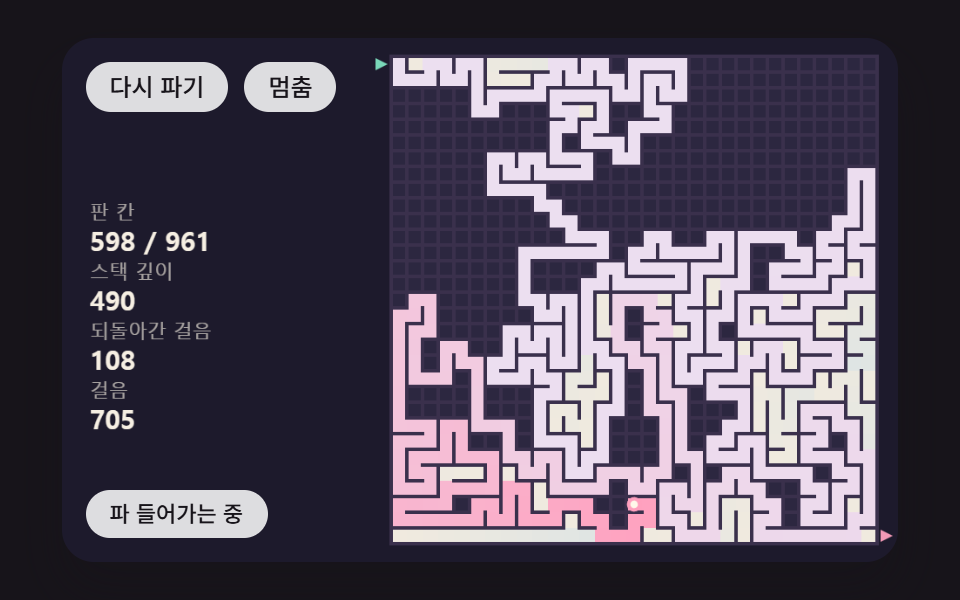 gameMaze Generator: 9 Carve-and-Solve Scenes
 gameJavaScript Pinball Game: 9 Physics Scenes
 game2048 Game JavaScript: 9 Boards from Merges to AI
 gameSorting Algorithm Visualizer: 9 Sort Scenes
 gameMinesweeper JavaScript: 9 Minefield Scenes
 gameBrick Breaker Game: 9 Canvas Scenes
 gameSliding Puzzle: 9 Canvas Scenes, Parity to Search