CSS Floating Label: 9 Inputs on Spring Physics
Within 0.3 seconds of a tap on a field, the way a css floating label rises sets the first impression of the form — scene 01's spring and scene 02's
Tap All Nine Floating Labels Right on This Page
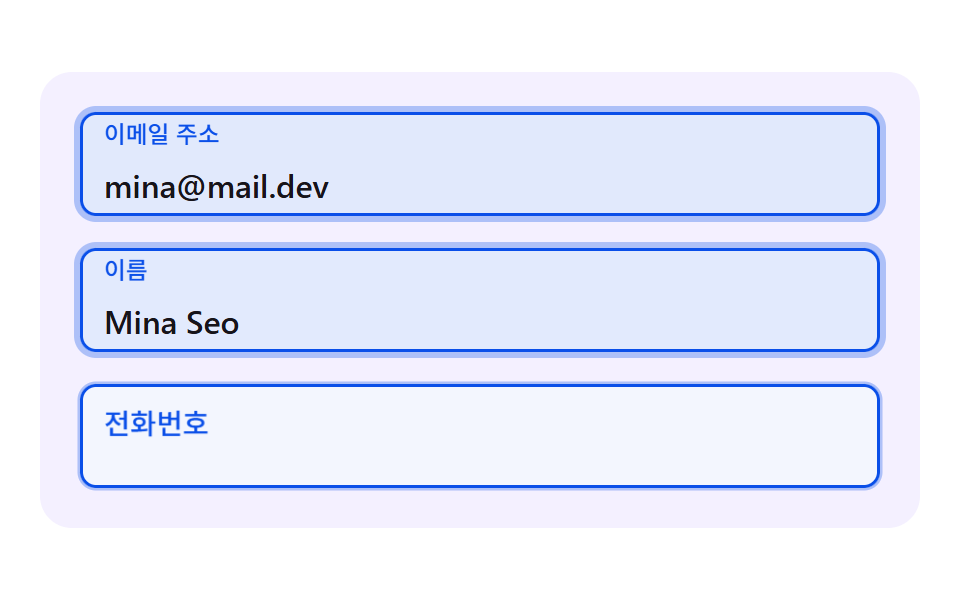 01 fl-spring-rise-label
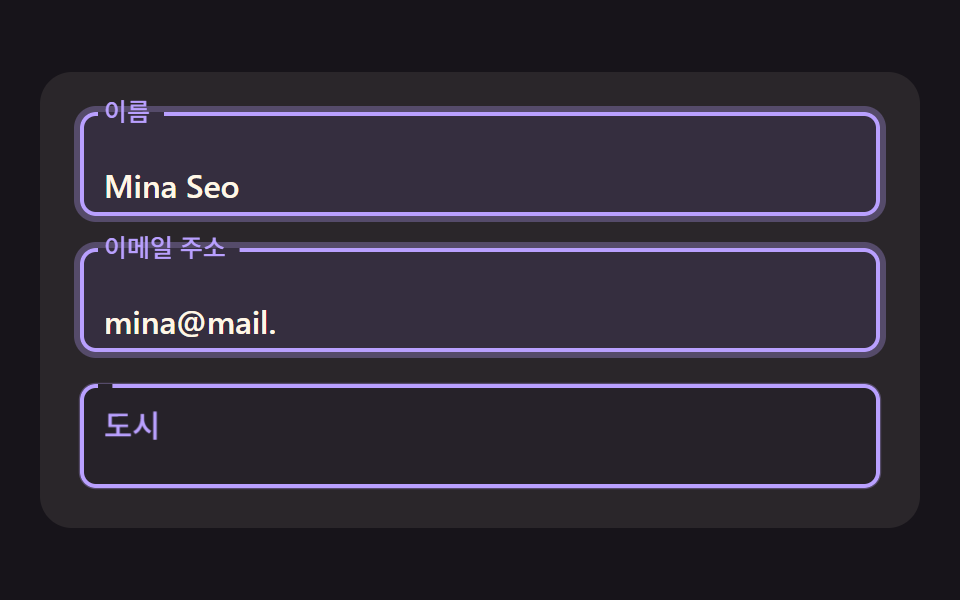 02 fl-outline-notch-gap
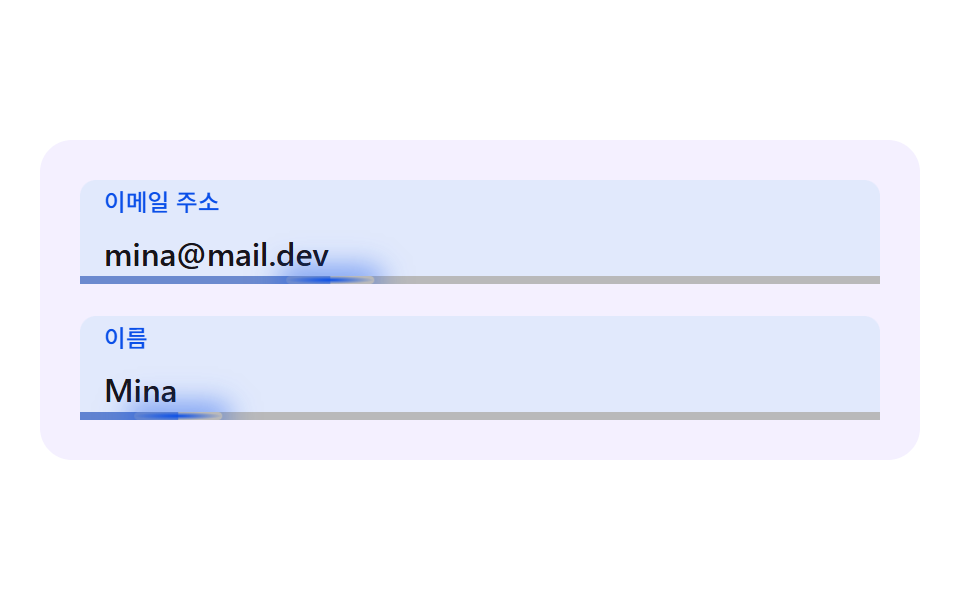 03 fl-inertia-caret-underline
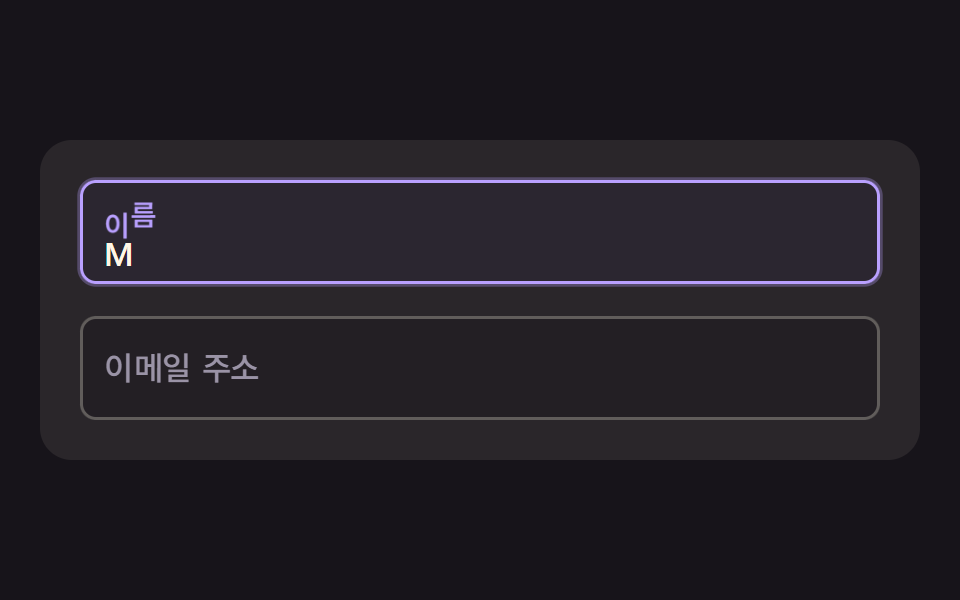 04 fl-char-wave-label
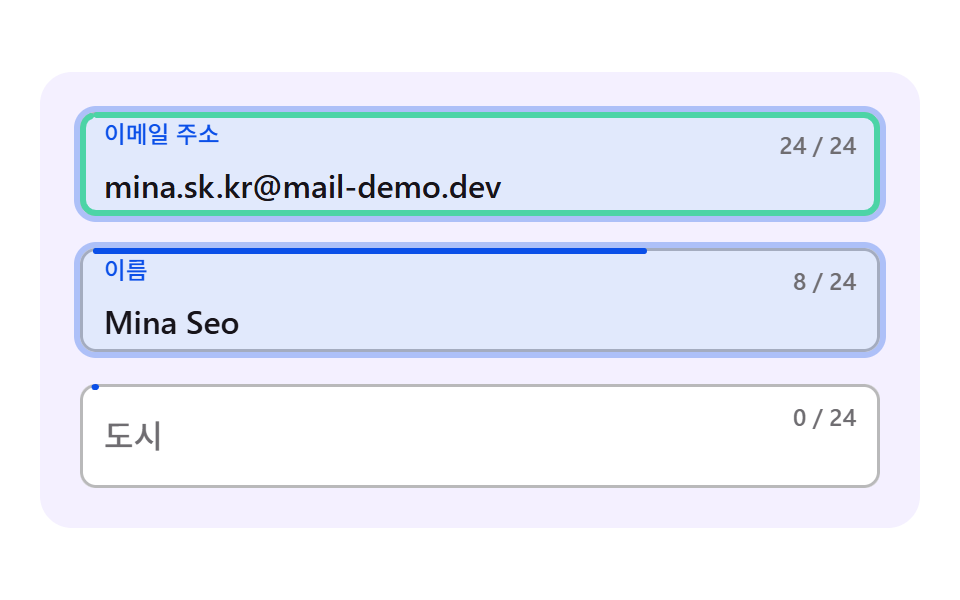 05 fl-fill-ring-progress
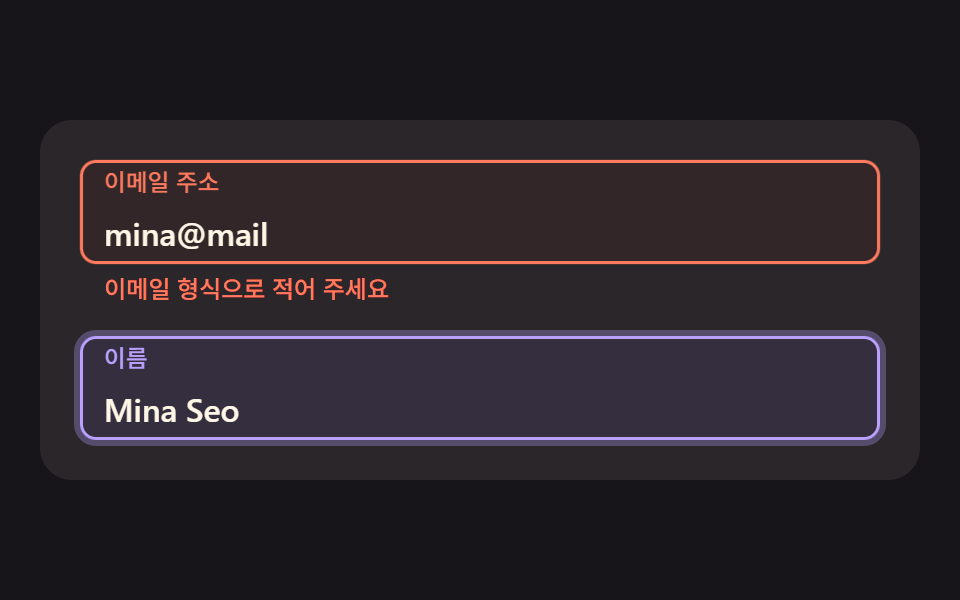 06 fl-error-damped-shake
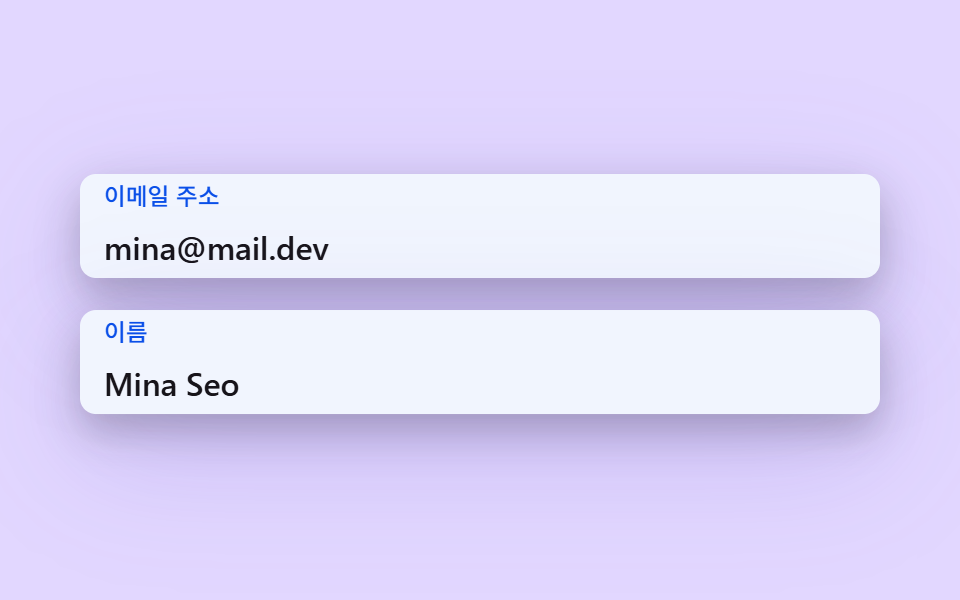 07 fl-shadow-elevation-lift
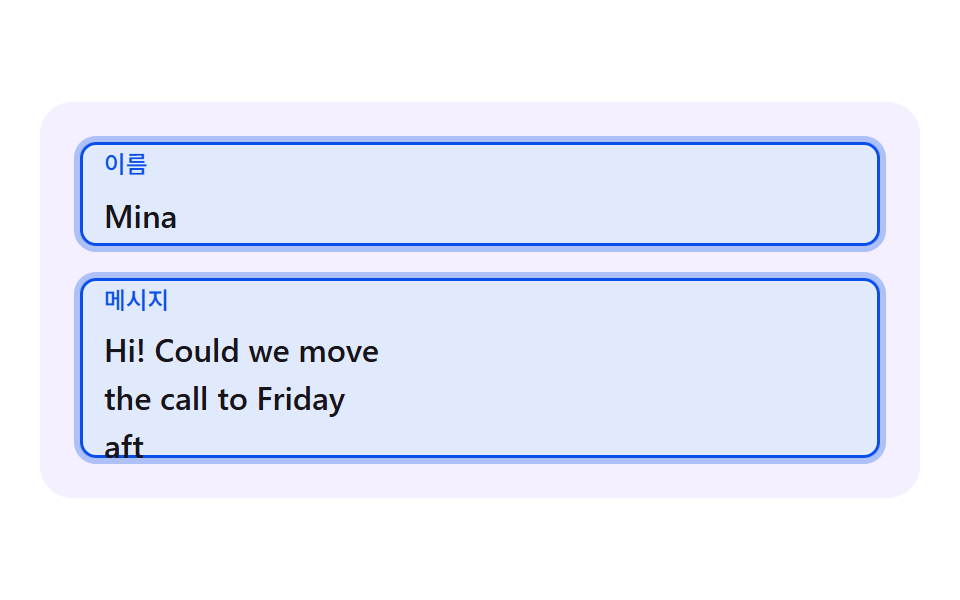 08 fl-textarea-grow-label
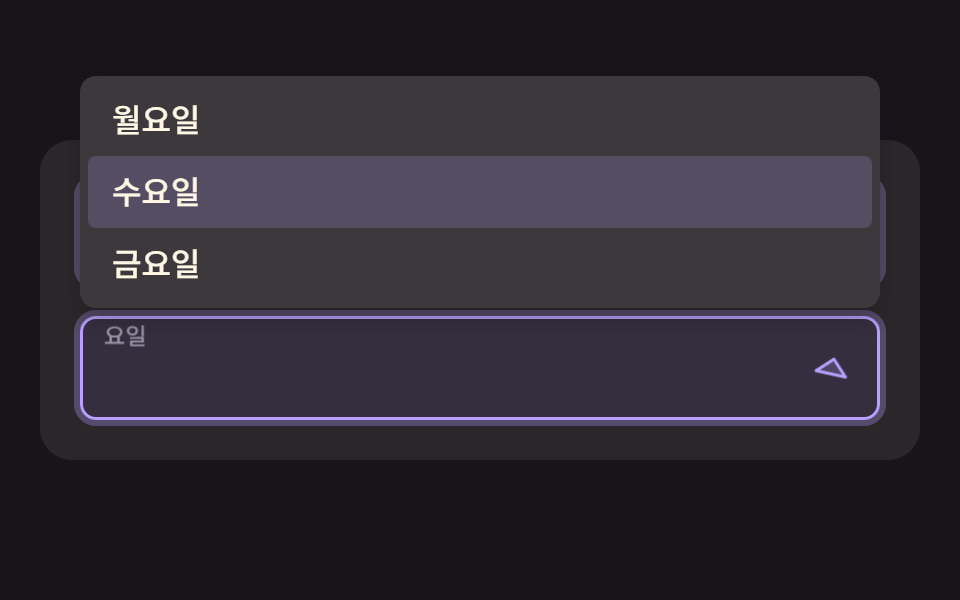 09 fl-select-chevron-float
Auto-plays · click a tile to jump to its section · all nine in one zip
- 01 A Label That Rises on a Damped Spring, Overshoots Slightly, and Settles
- 02 A Notched Outline That Opens Exactly as Wide as the Measured Label
- 03 An Input Whose Underline Chases the Caret with Inertia
- 04 A Wave Label Whose Letters Rise One by One on Hashed Delays
- 05 A Field Whose Outline Fills Around as a Progress Ring with Input Length
- 06 A Field That Shakes on a Damped Sine on Error While the Label Changes to a Warning Tint
- 07 A Card-Style Input Whose Shadow Elevation Springs Up on Focus
- 08 A Textarea That Grows Smoothly with Its Lines While the Label Floats at the Top
- 09 A Select Field Whose Chevron Turns on a Spring and Whose Label Lifts When an Option Is Picked
CSS Floating Label: 9 Fields Where Springs, Measurement and Interpolation Bring the Label to Life
Every scene is a card up to 440px wide with two or three fields stacked inside it. Fields are 52px tall with 16px between them and 20px of padding around, so a three-field card stands 228px tall and a two-field card 160px. The card sits in the middle of the 480×300 stage, and on a phone viewport 250px tall or less the third field (the second one in 06) is hidden.
None of the nine files contains a CSS transition or a @keyframes rule. The label travel, the outline gap and the shadow are all numbers computed inside requestAnimationFrame, and a scripted plan types into the fields on a 2-second cycle, with the first change at 200ms. The first real focus on a field stops that plan, and from then on your own focus and input events drive everything.
The order follows where the push on the label comes from. Scenes 01, 04, 07 and 09 keep a velocity and integrate a spring, while 02, 03, 05 and 08 close a fixed share of the remaining distance each frame, which the source calls approach. Scene 06 moves its label by approach too and computes only the shake directly, as a sine whose amplitude shrinks. The default move is the same everywhere, 15px up at a scale of 0.74 (02 alone uses 26px and 0.78), and what differs is the extra layer on top.
Start at 01 for a sign-up form, at 02 for an outlined style, and at 06 if error feedback is the goal. For the plain look of each input widget, open CSS Input Design: 9 Form Widgets You Can Paste In, and keep 9 Form Validation UI Patterns — As You Type next to it to decide when an error message should appear.
Code for Each Technique Behind the CSS Floating Label Input
Each snippet is an unbroken run of lines from the <script> in that scene's index.html, 25 lines or fewer. Most of what people call a css floating label input is a calculation like these with one layer added to the label, so reading where the number comes from shows you which line to change.
01A Label That Rises on a Damped Spring, Overshoots Slightly, and Settles
Integrating the label position with a spring equation when focus arrives gives a small overshoot and a settle with no tween curve. Height and scale come from the same x, so on the overshoot the label climbs a little higher and shrinks a little more, which suits the email and name fields of a sign-up form. The render capture gave 48.9% cumulative area and 76.0 mean intensity, with 23/23 frames moving.
<main class="stage">
  <div class="fl is-demo" id="fl" data-demo="1">
    <div class="fl__field">
      <div class="fl__box" data-r="box">
        <input class="fl__input" id="f1" data-r="input" type="email" autocomplete="email">
        <label class="fl__label" for="f1" data-r="label">Email address</label>
      </div>
    </div>
    <div class="fl__field">
      <div class="fl__box" data-r="box">
        <input class="fl__input" id="f2" data-r="input" type="text" autocomplete="name">
        <label class="fl__label" for="f2" data-r="label">Name</label>
      </div>
    </div>
    <div class="fl__field">
      <div class="fl__box" data-r="box">
        <input class="fl__input" id="f3" data-r="input" type="tel" autocomplete="tel">
        <label class="fl__label" for="f3" data-r="label">Phone number</label>
      </div>
    </div>
  </div>
</main>
@use "../../../../site/static/demo-tokens" as *;
// 핵심: 포커스 순간 라벨 위치를 감쇠 스프링으로 적분해 오버슛과 되돌림을 만든다. 라벨은 진짜 <label for> 이고 칸은 진짜 입력 요소다. 움직임 값은 JS 가 계산하고 CSS 는 모양만 맡는다.
@include stage($stage-paper);
$panel: mix($subject-lilac, $stage-paper, 16%);
$box-bg: $stage-paper;
$fg: $subject-ink;
$mute: mix($subject-ink, $stage-paper, 62%);
$line: mix($subject-ink, $stage-paper, 30%);
$accent: $subject-blue-deep;
$err: $error;
$menu-bg: $stage-paper;
$box-h: 52px;
.fl {
position: relative;
box-sizing: border-box;
width: min(100%, 440px);
padding: $sp-5;
display: flex;
flex-direction: column;
gap: $sp-4;
border-radius: $r-card;
background: $panel;
color: $fg;
font-size: 16px;
line-height: 24px;
font-weight: 500;
}
.fl__field { position: relative; }
.fl__box {
--ln: #{$line};
position: relative;
z-index: 1;
height: $box-h;
border-radius: $r-sm;
background: $box-bg;
box-shadow: inset 0 0 0 1.5px var(--ln), 0 0 0 calc(var(--p, 0) * 3px) rgba($accent, .3);
}
.fl__box[data-up] { --ln: #{$accent}; }
.fl__box::after {
content: "";
position: absolute;
inset: 0;
z-index: 0;
border-radius: inherit;
background: $accent;
opacity: calc(var(--p, 0) * .12);
pointer-events: none;
}
.fl__input {
position: relative;
z-index: 1;
box-sizing: border-box;
display: block;
width: 100%;
height: 100%;
margin: 0;
padding: $sp-6 $sp-3 $sp-1;
border: 0;
border-radius: inherit;
background: transparent;
color: $fg;
font-family: inherit;
font-size: 16px;
line-height: 24px;
font-weight: 500;
outline: none;
}
.fl__input:focus-visible { outline: 2px solid $accent; outline-offset: 2px; }
.fl__label {
position: absolute;
left: $sp-3;
top: 0;
z-index: 2;
line-height: $box-h;
font-size: 16px;
font-weight: 500;
color: $mute;
white-space: nowrap;
transform-origin: 0 50%;
pointer-events: none;
will-change: transform;
}
.fl__box[data-up] .fl__label { color: $accent; }
@media (max-height: 250px) {
.fl__field:nth-child(n + 3) { display: none; }
}
@media (prefers-reduced-motion: reduce) {
.fl__label, .fl__box { will-change: auto; }
}html, body {
margin: 0;
overflow: hidden;
}
.stage {
box-sizing: border-box;
min-height: 100vh;
display: grid;
place-items: center;
margin: 0;
background: #ffffff;
font-family: -apple-system, "Segoe UI", "Noto Sans KR", sans-serif;
padding: clamp(8px, 4vw, 24px);
}
.fl {
position: relative;
box-sizing: border-box;
width: min(100%, 440px);
padding: 20px;
display: flex;
flex-direction: column;
gap: 16px;
border-radius: 16px;
background: rgb(95.6078431373%, 94.0392156863%, 100%);
color: #17141a;
font-size: 16px;
line-height: 24px;
font-weight: 500;
}
.fl__field {
position: relative;
}
.fl__box {
--ln: rgb(72.7058823529%, 72.3529411765%, 73.0588235294%);
position: relative;
z-index: 1;
height: 52px;
border-radius: 8px;
background: #ffffff;
box-shadow: inset 0 0 0 1.5px var(--ln), 0 0 0 calc(var(--p, 0) * 3px) rgba(10, 79, 232, 0.3);
}
.fl__box[data-up] {
--ln: #0a4fe8;
}
.fl__box::after {
content: "";
position: absolute;
inset: 0;
z-index: 0;
border-radius: inherit;
background: #0a4fe8;
opacity: calc(var(--p, 0) * 0.12);
pointer-events: none;
}
.fl__input {
position: relative;
z-index: 1;
box-sizing: border-box;
display: block;
width: 100%;
height: 100%;
margin: 0;
padding: 24px 12px 4px;
border: 0;
border-radius: inherit;
background: transparent;
color: #17141a;
font-family: inherit;
font-size: 16px;
line-height: 24px;
font-weight: 500;
outline: none;
}
.fl__input:focus-visible {
outline: 2px solid #0a4fe8;
outline-offset: 2px;
}
.fl__label {
position: absolute;
left: 12px;
top: 0;
z-index: 2;
line-height: 52px;
font-size: 16px;
font-weight: 500;
color: rgb(43.5921568627%, 42.862745098%, 44.3215686275%);
white-space: nowrap;
transform-origin: 0 50%;
pointer-events: none;
will-change: transform;
}
.fl__box[data-up] .fl__label {
color: #0a4fe8;
}
@media (max-height: 250px) {
.fl__field:nth-child(n+3) {
display: none;
}
}
@media (prefers-reduced-motion: reduce) {
.fl__label, .fl__box {
will-change: auto;
}
}(function () {
const root = document.getElementById("fl");
const CLS = {};
const reduce = window.matchMedia("(prefers-reduced-motion: reduce)").matches;
let demo = !reduce;
let raf = 0;
let last = -1;
const offs = [];
function q(sel) {
return root.querySelector(sel);
}
function qa(sel) {
const list = Array.prototype.slice.call(root.querySelectorAll(sel));
return list;
}
function clamp(v, lo, hi) {
return Math.max(lo, Math.min(hi, v));
}
function on(el, type, fn) {
el.addEventListener(type, fn);
offs.push(function () {
el.removeEventListener(type, fn);
});
}
// 좌표 해시: 같은 입력이면 같은 값 0~1. 난수 함수를 쓰지 않고 사인의 소수부만 쓴다.
function hash(x) {
const s = Math.sin(x * 127.1 + 311.7) * 43758.5453;
return s - Math.floor(s);
}
// 지수 접근: 프레임당 비율 per 만큼 목표에 다가간다. f 는 60fps 기준 프레임 수(dt * 60)라 프레임률이 달라도 같은 속도다.
function approach(x, target, per, f) {
return x + (target - x) * (1 - Math.pow(1 - per, f));
}
// 스프링 한 칸: 가속도 = -k (x - 목표) - c v. 반암시적 오일러를 1/120초 이하 부분 스텝으로 쪼갠다.
    function springStep(s, target, k, c, dt) {
        let left = dt;
        while (left > 0) {
            const h = Math.min(left, 1 / 120);
            s.v += (-k * (s.x - target) - c * s.v) * h;
            s.x += s.v * h;
            left -= h;
        }
    }
// 값이 있으면 라벨은 올라가 있어야 한다. 브라우저 자동완성이 값을 채우면 input 이벤트가 없을 수 있어 :autofill 도 함께 본다.
function isFilled(el) {
if (el.value !== "") return true;
try {
return el.matches(":-webkit-autofill");
} catch (err) {
return false;
}
}
let leaveHook = null;
function stopDemo() {
if (!demo) return;
demo = false;
root.removeAttribute("data-demo");
root.classList.remove("is-demo");
resetFields();
}
function frame(ts) {
const dt = last < 0 ? 0.016 : Math.min(0.05, (ts - last) / 1000);
last = ts;
if (demo) script(ts);
step(dt, ts);
render();
raf = requestAnimationFrame(frame);
}
const ro = new ResizeObserver(function () {
relayout();
});
ro.observe(root);
if (document.fonts) {
document.fonts.ready.then(function () {
relayout();
});
}
// 시연 계획: 칸마다 포커스 구간(a~b), 타이핑 시작(s)·글자당 ms(rate)·글. 2초 주기로 되풀이하고 주기 첫머리엔 모두 비운다.
function runPlan(ts) {
const t = ts % 2000;
let changed = false;
for (let i = 0; i < PLAN.length; i += 1) {
const p = PLAN[i];
const f = fields[i];
const isOn = t >= p.a && t < p.b;
const n = t < p.s ? 0 : Math.min(p.text.length, Math.floor((t - p.s) / p.rate) + 1);
const v = p.text.slice(0, n);
if (f.input.value !== v) {
f.input.value = v;
changed = true;
}
if (f.focus !== isOn) {
f.focus = isOn;
changed = true;
if (!isOn && leaveHook) leaveHook(i);
}
}
if (changed) retarget();
}
function resetFields() {
for (let i = 0; i < fields.length; i += 1) {
fields[i].input.value = "";
fields[i].focus = false;
}
retarget();
}
function wire() {
fields.forEach(function (f, i) {
on(f.input, "focus", function () {
stopDemo();
f.focus = true;
retarget();
});
on(f.input, "blur", function () {
f.focus = false;
if (leaveHook) leaveHook(i);
retarget();
});
on(f.input, "input", function () {
retarget();
});
});
}
// 기법: 라벨 위치를 스프링 방정식으로 적분한다. 트윈 곡선이 없어도 오버슛과 되돌림이 생긴다.
const STIFFNESS = 170;
const DAMPING = 14;
const RISE_PX = 15;
const LABEL_SCALE = 0.74;
const fields = qa("[data-r=box]").map(function (box) {
return {
box: box,
input: box.querySelector("input"),
label: box.querySelector("label"),
focus: false, up: false, sp: { x: 0, v: 0 }
};
});
const PLAN = [
{ a: 200, b: 900, s: 380, rate: 55, text: "[email protected]" },
{ a: 900, b: 1500, s: 1000, rate: 70, text: "Mina Seo" },
{ a: 1500, b: 1950, s: 1600, rate: 60, text: "010 2222" }
];
function retarget() {
fields.forEach(function (f) {
f.up = f.focus || isFilled(f.input);
if (f.up) f.box.setAttribute("data-up", "");
else f.box.removeAttribute("data-up");
if (reduce) {
f.sp.x = f.up ? -RISE_PX : 0;
f.sp.v = 0;
}
});
if (reduce) render();
}
function relayout() {
retarget();
}
function script(ts) {
runPlan(ts);
}
function step(dt, ts) {
fields.forEach(function (f) {
springStep(f.sp, f.up ? -RISE_PX : 0, STIFFNESS, DAMPING, dt);
});
}
function render() {
fields.forEach(function (f) {
const y = f.sp.x;
const r = y / -RISE_PX;
const s = 1 - (1 - LABEL_SCALE) * r;
f.label.style.transform = "translate3d(0," + y.toFixed(2) + "px,0) scale(" + s.toFixed(3) + ")";
f.box.style.setProperty("--p", clamp(r, 0, 1).toFixed(3));
});
}
wire();
relayout();
if (reduce) {
render();
} else {
raf = requestAnimationFrame(frame);
}
})();// SpringRiseLabel - vanilla 판(01-fl-spring-rise-label) 의 React 포트. 같은 계산을 useEffect 안에서 돌린다.
import { useEffect, useRef } from "react";
import styles from "./SpringRiseLabel.module.scss";
type Spring = { x: number; v: number };
type Plan = { a: number; b: number; s: number; rate: number; text: string };
type Base = { input: HTMLInputElement | HTMLTextAreaElement; focus: boolean; up: boolean };
type F = Base & { box: HTMLElement; label: HTMLElement; sp: Spring };
export default function SpringRiseLabel() {
const rootRef = useRef<HTMLDivElement | null>(null);
useEffect(() => {
const rootEl = rootRef.current;
if (!rootEl) return;
const root: HTMLElement = rootEl;
const CLS = { };
const reduce = window.matchMedia("(prefers-reduced-motion: reduce)").matches;
let demo = !reduce;
let raf: number = 0;
let last: number = -1;
const offs: Array<() => void> = [];
function q(sel: string): HTMLElement {
return root.querySelector(sel) as HTMLElement;
}
function qa(sel: string): HTMLElement[] {
const list: HTMLElement[] = Array.prototype.slice.call(root.querySelectorAll(sel));
return list;
}
function clamp(v: number, lo: number, hi: number): number {
return Math.max(lo, Math.min(hi, v));
}
function on(el: EventTarget, type: string, fn: (e: any) => void): void {
el.addEventListener(type, fn);
offs.push(function (): void {
el.removeEventListener(type, fn);
});
}
// 좌표 해시: 같은 입력이면 같은 값 0~1. 난수 함수를 쓰지 않고 사인의 소수부만 쓴다.
function hash(x: number): number {
const s = Math.sin(x * 127.1 + 311.7) * 43758.5453;
return s - Math.floor(s);
}
// 지수 접근: 프레임당 비율 per 만큼 목표에 다가간다. f 는 60fps 기준 프레임 수(dt * 60)라 프레임률이 달라도 같은 속도다.
function approach(x: number, target: number, per: number, f: number): number {
return x + (target - x) * (1 - Math.pow(1 - per, f));
}
// 스프링 한 칸: 가속도 = -k (x - 목표) - c v. 반암시적 오일러를 1/120초 이하 부분 스텝으로 쪼갠다.
function springStep(s: Spring, target: number, k: number, c: number, dt: number): void {
let left = dt;
while (left > 0) {
const h = Math.min(left, 1 / 120);
s.v += (-k * (s.x - target) - c * s.v) * h;
s.x += s.v * h;
left -= h;
}
}
// 값이 있으면 라벨은 올라가 있어야 한다. 브라우저 자동완성이 값을 채우면 input 이벤트가 없을 수 있어 :autofill 도 함께 본다.
function isFilled(el: HTMLInputElement | HTMLTextAreaElement): boolean {
if (el.value !== "") return true;
try {
return el.matches(":-webkit-autofill");
} catch (err) {
return false;
}
}
let leaveHook: ((i: number) => void) | null = null;
function stopDemo(): void {
if (!demo) return;
demo = false;
root.removeAttribute("data-demo");
root.classList.remove("is-demo");
resetFields();
}
function frame(ts: number): void {
const dt = last < 0 ? 0.016 : Math.min(0.05, (ts - last) / 1000);
last = ts;
if (demo) script(ts);
step(dt, ts);
render();
raf = requestAnimationFrame(frame);
}
const ro = new ResizeObserver(function (): void {
relayout();
});
ro.observe(root);
if (document.fonts) {
document.fonts.ready.then(function (): void {
relayout();
});
}
// 시연 계획: 칸마다 포커스 구간(a~b), 타이핑 시작(s)·글자당 ms(rate)·글. 2초 주기로 되풀이하고 주기 첫머리엔 모두 비운다.
function runPlan(ts: number): void {
const t = ts % 2000;
let changed = false;
for (let i = 0; i < PLAN.length; i += 1) {
const p = PLAN[i];
const f = fields[i];
const isOn = t >= p.a && t < p.b;
const n = t < p.s ? 0 : Math.min(p.text.length, Math.floor((t - p.s) / p.rate) + 1);
const v = p.text.slice(0, n);
if (f.input.value !== v) {
f.input.value = v;
changed = true;
}
if (f.focus !== isOn) {
f.focus = isOn;
changed = true;
if (!isOn && leaveHook) leaveHook(i);
}
}
if (changed) retarget();
}
function resetFields(): void {
for (let i = 0; i < fields.length; i += 1) {
fields[i].input.value = "";
fields[i].focus = false;
}
retarget();
}
function wire(): void {
fields.forEach(function (f: F, i: number): void {
on(f.input, "focus", function (): void {
stopDemo();
f.focus = true;
retarget();
});
on(f.input, "blur", function (): void {
f.focus = false;
if (leaveHook) leaveHook(i);
retarget();
});
on(f.input, "input", function (): void {
retarget();
});
});
}
// 기법: 라벨 위치를 스프링 방정식으로 적분한다. 트윈 곡선이 없어도 오버슛과 되돌림이 생긴다.
const STIFFNESS = 170;
const DAMPING = 14;
const RISE_PX = 15;
const LABEL_SCALE = 0.74;
const fields: F[] = qa("[data-r=box]").map(function (box: HTMLElement): F {
return {
box: box,
input: box.querySelector("input") as HTMLInputElement,
label: box.querySelector("label") as HTMLElement,
focus: false, up: false, sp: { x: 0, v: 0 }
};
});
const PLAN: Plan[] = [
{ a: 200, b: 900, s: 380, rate: 55, text: "[email protected]" },
{ a: 900, b: 1500, s: 1000, rate: 70, text: "Mina Seo" },
{ a: 1500, b: 1950, s: 1600, rate: 60, text: "010 2222" }
];
function retarget(): void {
fields.forEach(function (f: F): void {
f.up = f.focus || isFilled(f.input);
if (f.up) f.box.setAttribute("data-up", "");
else f.box.removeAttribute("data-up");
if (reduce) {
f.sp.x = f.up ? -RISE_PX : 0;
f.sp.v = 0;
}
});
if (reduce) render();
}
function relayout(): void {
retarget();
}
function script(ts: number): void {
runPlan(ts);
}
function step(dt: number, ts: number): void {
fields.forEach(function (f: F): void {
springStep(f.sp, f.up ? -RISE_PX : 0, STIFFNESS, DAMPING, dt);
});
}
function render(): void {
fields.forEach(function (f: F): void {
const y = f.sp.x;
const r = y / -RISE_PX;
const s = 1 - (1 - LABEL_SCALE) * r;
f.label.style.transform = "translate3d(0," + y.toFixed(2) + "px,0) scale(" + s.toFixed(3) + ")";
f.box.style.setProperty("--p", clamp(r, 0, 1).toFixed(3));
});
}
wire();
relayout();
if (reduce) {
render();
} else {
raf = requestAnimationFrame(frame);
}
return () => {
cancelAnimationFrame(raf);
offs.forEach((f) => f());
ro.disconnect();
};
}, []);
return (
<main className={styles["stage"]}>
<div ref={rootRef} className={styles["fl"] + " is-demo"} data-demo="1">
<div className={styles["fl__field"]}>
<div className={styles["fl__box"]} data-r="box">
<input className={styles["fl__input"]} id="f1" data-r="input" type="email" autoComplete="email" />
<label className={styles["fl__label"]} htmlFor="f1" data-r="label">이메일 주소</label>
</div>
</div>
<div className={styles["fl__field"]}>
<div className={styles["fl__box"]} data-r="box">
<input className={styles["fl__input"]} id="f2" data-r="input" type="text" autoComplete="name" />
<label className={styles["fl__label"]} htmlFor="f2" data-r="label">이름</label>
</div>
</div>
<div className={styles["fl__field"]}>
<div className={styles["fl__box"]} data-r="box">
<input className={styles["fl__input"]} id="f3" data-r="input" type="tel" autoComplete="tel" />
<label className={styles["fl__label"]} htmlFor="f3" data-r="label">전화번호</label>
</div>
</div>
</div>
</main>
);
}01 · A Label That Rises on a Damped Spring, Overshoots Slightly, and Settles — Measured area 48.867% · moving frames 23/23Original by GODRICH · SCSS and React ship in the zip · See the password
function springStep(s, target, k, c, dt) {
let left = dt;
while (left > 0) {
const h = Math.min(left, 1 / 120);
s.v += (-k * (s.x - target) - c * s.v) * h;
s.x += s.v * h;
left -= h;
}
}
02A Notched Outline That Opens Exactly as Wide as the Measured Label
The label is measured with getBoundingClientRect and the gap in the outline's top edge is cut with clip-path to that width, so the gap fits whatever the text length. The gap target is the measured width times 0.78 plus 5px of margin on each side, a good fit for Material-style settings and profile forms. This scene scored 49.0% cumulative area and 83.6 mean intensity over 23/23 moving frames.
<main class="stage">
  <div class="fl is-demo" id="fl" data-demo="1">
    <div class="fl__field">
      <div class="fl__box" data-r="box">
        <i class="fl__outline" data-r="outline" aria-hidden="true"></i>
        <input class="fl__input" id="f1" data-r="input" type="text" autocomplete="name">
        <label class="fl__label" for="f1" data-r="label">Name</label>
      </div>
    </div>
    <div class="fl__field">
      <div class="fl__box" data-r="box">
        <i class="fl__outline" data-r="outline" aria-hidden="true"></i>
        <input class="fl__input" id="f2" data-r="input" type="email" autocomplete="email">
        <label class="fl__label" for="f2" data-r="label">Email address</label>
      </div>
    </div>
    <div class="fl__field">
      <div class="fl__box" data-r="box">
        <i class="fl__outline" data-r="outline" aria-hidden="true"></i>
        <input class="fl__input" id="f3" data-r="input" type="text" autocomplete="off">
        <label class="fl__label" for="f3" data-r="label">City</label>
      </div>
    </div>
  </div>
</main>@use "../../../../site/static/demo-tokens" as *;
// 핵심: 라벨의 실측 폭만큼만 윤곽선 윗변의 틈을 연다. 라벨은 진짜 <label for> 이고 칸은 진짜 입력 요소다. 움직임 값은 JS 가 계산하고 CSS 는 모양만 맡는다.
@include stage($stage-ink);
$panel: mix($subject-cream, $stage-ink, 8%);
$box-bg: mix($subject-cream, $stage-ink, 5%);
$fg: $subject-cream;
$mute: $tick-mute;
$line: mix($subject-cream, $stage-ink, 32%);
$accent: $subject-lilac;
$err: $tick-down;
$menu-bg: mix($subject-cream, $stage-ink, 16%);
$box-h: 52px;
.fl {
position: relative;
box-sizing: border-box;
width: min(100%, 440px);
padding: $sp-5;
display: flex;
flex-direction: column;
gap: $sp-4;
border-radius: $r-card;
background: $panel;
color: $fg;
font-size: 16px;
line-height: 24px;
font-weight: 500;
}
.fl__field { position: relative; }
.fl__box {
--ln: #{$line};
position: relative;
z-index: 1;
height: $box-h;
border-radius: $r-sm;
background: $box-bg;
box-shadow: inset 0 0 0 1.5px var(--ln), 0 0 0 calc(var(--p, 0) * 3px) rgba($accent, .3);
}
.fl__box[data-up] { --ln: #{$accent}; }
.fl__box::after {
content: "";
position: absolute;
inset: 0;
z-index: 0;
border-radius: inherit;
background: $accent;
opacity: calc(var(--p, 0) * .12);
pointer-events: none;
}
.fl__input {
position: relative;
z-index: 1;
box-sizing: border-box;
display: block;
width: 100%;
height: 100%;
margin: 0;
padding: $sp-6 $sp-3 $sp-1;
border: 0;
border-radius: inherit;
background: transparent;
color: $fg;
font-family: inherit;
font-size: 16px;
line-height: 24px;
font-weight: 500;
outline: none;
}
.fl__input:focus-visible { outline: 2px solid $accent; outline-offset: 2px; }
.fl__label {
position: absolute;
left: $sp-3;
top: 0;
z-index: 2;
line-height: $box-h;
font-size: 16px;
font-weight: 500;
color: $mute;
white-space: nowrap;
transform-origin: 0 50%;
pointer-events: none;
will-change: transform;
}
.fl__box[data-up] .fl__label { color: $accent; }
.fl__box { box-shadow: 0 0 0 calc(var(--p, 0) * 3px) rgba($accent, .3); }
.fl__outline {
position: absolute;
inset: 0;
z-index: 2;
box-sizing: border-box;
border: 2px solid var(--ln);
border-radius: $r-sm;
pointer-events: none;
}
.fl__label { z-index: 3; }
@media (max-height: 250px) {
.fl__field:nth-child(n + 3) { display: none; }
}
@media (prefers-reduced-motion: reduce) {
.fl__label, .fl__box { will-change: auto; }
}html, body {
margin: 0;
overflow: hidden;
}
.stage {
box-sizing: border-box;
min-height: 100vh;
display: grid;
place-items: center;
margin: 0;
background: #17141a;
font-family: -apple-system, "Segoe UI", "Noto Sans KR", sans-serif;
padding: clamp(8px, 4vw, 24px);
}
.fl {
position: relative;
box-sizing: border-box;
width: min(100%, 440px);
padding: 20px;
display: flex;
flex-direction: column;
gap: 16px;
border-radius: 16px;
background: rgb(16.2980392157%, 14.9647058824%, 16.5960784314%);
color: #fff7e6;
font-size: 16px;
line-height: 24px;
font-weight: 500;
}
.fl__field {
position: relative;
}
.fl__box {
--ln: rgb(38.1333333333%, 36.3294117647%, 35.7960784314%);
position: relative;
z-index: 1;
height: 52px;
border-radius: 8px;
background: rgb(13.568627451%, 12.2941176471%, 14.1960784314%);
box-shadow: inset 0 0 0 1.5px var(--ln), 0 0 0 calc(var(--p, 0) * 3px) rgba(185, 160, 255, 0.3);
}
.fl__box[data-up] {
--ln: #b9a0ff;
}
.fl__box::after {
content: "";
position: absolute;
inset: 0;
z-index: 0;
border-radius: inherit;
background: #b9a0ff;
opacity: calc(var(--p, 0) * 0.12);
pointer-events: none;
}
.fl__input {
position: relative;
z-index: 1;
box-sizing: border-box;
display: block;
width: 100%;
height: 100%;
margin: 0;
padding: 24px 12px 4px;
border: 0;
border-radius: inherit;
background: transparent;
color: #fff7e6;
font-family: inherit;
font-size: 16px;
line-height: 24px;
font-weight: 500;
outline: none;
}
.fl__input:focus-visible {
outline: 2px solid #b9a0ff;
outline-offset: 2px;
}
.fl__label {
position: absolute;
left: 12px;
top: 0;
z-index: 2;
line-height: 52px;
font-size: 16px;
font-weight: 500;
color: #9a93a6;
white-space: nowrap;
transform-origin: 0 50%;
pointer-events: none;
will-change: transform;
}
.fl__box[data-up] .fl__label {
color: #b9a0ff;
}
.fl__box {
box-shadow: 0 0 0 calc(var(--p, 0) * 3px) rgba(185, 160, 255, 0.3);
}
.fl__outline {
position: absolute;
inset: 0;
z-index: 2;
box-sizing: border-box;
border: 2px solid var(--ln);
border-radius: 8px;
pointer-events: none;
}
.fl__label {
z-index: 3;
}
@media (max-height: 250px) {
.fl__field:nth-child(n+3) {
display: none;
}
}
@media (prefers-reduced-motion: reduce) {
.fl__label, .fl__box {
will-change: auto;
}
}(function () {
const root = document.getElementById("fl");
const CLS = {};
const reduce = window.matchMedia("(prefers-reduced-motion: reduce)").matches;
let demo = !reduce;
let raf = 0;
let last = -1;
const offs = [];
function q(sel) {
return root.querySelector(sel);
}
function qa(sel) {
const list = Array.prototype.slice.call(root.querySelectorAll(sel));
return list;
}
function clamp(v, lo, hi) {
return Math.max(lo, Math.min(hi, v));
}
function on(el, type, fn) {
el.addEventListener(type, fn);
offs.push(function () {
el.removeEventListener(type, fn);
});
}
// 좌표 해시: 같은 입력이면 같은 값 0~1. 난수 함수를 쓰지 않고 사인의 소수부만 쓴다.
function hash(x) {
const s = Math.sin(x * 127.1 + 311.7) * 43758.5453;
return s - Math.floor(s);
}
// 지수 접근: 프레임당 비율 per 만큼 목표에 다가간다. f 는 60fps 기준 프레임 수(dt * 60)라 프레임률이 달라도 같은 속도다.
function approach(x, target, per, f) {
return x + (target - x) * (1 - Math.pow(1 - per, f));
}
// 스프링 한 칸: 가속도 = -k (x - 목표) - c v. 반암시적 오일러를 1/120초 이하 부분 스텝으로 쪼갠다.
function springStep(s, target, k, c, dt) {
let left = dt;
while (left > 0) {
const h = Math.min(left, 1 / 120);
s.v += (-k * (s.x - target) - c * s.v) * h;
s.x += s.v * h;
left -= h;
}
}
// 값이 있으면 라벨은 올라가 있어야 한다. 브라우저 자동완성이 값을 채우면 input 이벤트가 없을 수 있어 :autofill 도 함께 본다.
function isFilled(el) {
if (el.value !== "") return true;
try {
return el.matches(":-webkit-autofill");
} catch (err) {
return false;
}
}
let leaveHook = null;
function stopDemo() {
if (!demo) return;
demo = false;
root.removeAttribute("data-demo");
root.classList.remove("is-demo");
resetFields();
}
function frame(ts) {
const dt = last < 0 ? 0.016 : Math.min(0.05, (ts - last) / 1000);
last = ts;
if (demo) script(ts);
step(dt, ts);
render();
raf = requestAnimationFrame(frame);
}
const ro = new ResizeObserver(function () {
relayout();
});
ro.observe(root);
if (document.fonts) {
document.fonts.ready.then(function () {
relayout();
});
}
// 시연 계획: 칸마다 포커스 구간(a~b), 타이핑 시작(s)·글자당 ms(rate)·글. 2초 주기로 되풀이하고 주기 첫머리엔 모두 비운다.
function runPlan(ts) {
const t = ts % 2000;
let changed = false;
for (let i = 0; i < PLAN.length; i += 1) {
const p = PLAN[i];
const f = fields[i];
const isOn = t >= p.a && t < p.b;
const n = t < p.s ? 0 : Math.min(p.text.length, Math.floor((t - p.s) / p.rate) + 1);
const v = p.text.slice(0, n);
if (f.input.value !== v) {
f.input.value = v;
changed = true;
}
if (f.focus !== isOn) {
f.focus = isOn;
changed = true;
if (!isOn && leaveHook) leaveHook(i);
}
}
if (changed) retarget();
}
function resetFields() {
for (let i = 0; i < fields.length; i += 1) {
fields[i].input.value = "";
fields[i].focus = false;
}
retarget();
}
function wire() {
fields.forEach(function (f, i) {
on(f.input, "focus", function () {
stopDemo();
f.focus = true;
retarget();
});
on(f.input, "blur", function () {
f.focus = false;
if (leaveHook) leaveHook(i);
retarget();
});
on(f.input, "input", function () {
retarget();
});
});
}
// 기법: 라벨의 실측 폭을 getBoundingClientRect 로 재서 윗변 틈을 그 폭만큼만 보간해서 연다.
const NOTCH_PAD = 5;
const GAP_LERP = 0.22;
const RADIUS = 8;
const BORDER_W = 2;
const LABEL_X = 14;
const LABEL_SCALE = 0.78;
const LABEL_LERP = 0.2;
const RISE_PX = 26;
const fields = qa("[data-r=box]").map(function (box) {
const outline = box.querySelector("[data-r=outline]");
outline.style.borderRadius = RADIUS + "px";
outline.style.borderWidth = BORDER_W + "px";
return {
box: box,
input: box.querySelector("input"),
label: box.querySelector("label"),
outline: outline,
focus: false, up: false, p: 0, gap: 0, natW: 60
};
});
const PLAN = [
{ a: 200, b: 950, s: 420, rate: 60, text: "Mina Seo" },
{ a: 950, b: 1650, s: 1100, rate: 60, text: "[email protected]" },
{ a: 1650, b: 1980, s: 1750, rate: 60, text: "seoul" }
];
// 라벨 자연 폭 = 지금 그려진 폭 ÷ 지금 배율. 폰트가 늦게 들어오거나 창이 바뀌면 다시 잰다.
function measure() {
fields.forEach(function (f) {
const s = 1 - (1 - LABEL_SCALE) * f.p;
f.natW = f.label.getBoundingClientRect().width / s;
});
}
function targetGap(f) {
return f.up ? f.natW * LABEL_SCALE + 2 * NOTCH_PAD : 0;
}
function retarget() {
fields.forEach(function (f) {
f.up = f.focus || isFilled(f.input);
if (f.up) f.box.setAttribute("data-up", "");
else f.box.removeAttribute("data-up");
if (reduce) {
f.p = f.up ? 1 : 0;
f.gap = targetGap(f);
}
});
if (reduce) render();
}
function relayout() {
measure();
retarget();
}
function script(ts) {
runPlan(ts);
}
function step(dt, ts) {
const fr = dt * 60;
fields.forEach(function (f) {
f.p = approach(f.p, f.up ? 1 : 0, LABEL_LERP, fr);
f.gap = approach(f.gap, targetGap(f), GAP_LERP, fr);
});
}
    function render() {
        fields.forEach(function (f) {
            const s = 1 - (1 - LABEL_SCALE) * f.p;
            f.label.style.transform = "translate3d(0," + (-RISE_PX * f.p).toFixed(2) + "px,0) scale(" + s.toFixed(3) + ")";
            f.box.style.setProperty("--p", f.p.toFixed(3));
            const x0 = LABEL_X - NOTCH_PAD;
            const x1 = x0 + f.gap;
            const cut = f.gap > 0.5 ? "polygon(0 0," + x0.toFixed(1) + "px 0," + x0.toFixed(1) + "px " + (BORDER_W + 1) + "px," + x1.toFixed(1) + "px " + (BORDER_W + 1) + "px," + x1.toFixed(1) + "px 0,100% 0,100% 100%,0 100%)" : "none";
            f.outline.style.clipPath = cut;
        });
    }
wire();
relayout();
if (reduce) {
render();
} else {
raf = requestAnimationFrame(frame);
}
})();// OutlineNotchGap - vanilla 판(02-fl-outline-notch-gap) 의 React 포트. 같은 계산을 useEffect 안에서 돌린다.
import { useEffect, useRef } from "react";
import styles from "./OutlineNotchGap.module.scss";
type Spring = { x: number; v: number };
type Plan = { a: number; b: number; s: number; rate: number; text: string };
type Base = { input: HTMLInputElement | HTMLTextAreaElement; focus: boolean; up: boolean };
type F = Base & { box: HTMLElement; label: HTMLElement; outline: HTMLElement; p: number; gap: number; natW: number };
export default function OutlineNotchGap() {
const rootRef = useRef<HTMLDivElement | null>(null);
useEffect(() => {
const rootEl = rootRef.current;
if (!rootEl) return;
const root: HTMLElement = rootEl;
const CLS = { };
const reduce = window.matchMedia("(prefers-reduced-motion: reduce)").matches;
let demo = !reduce;
let raf: number = 0;
let last: number = -1;
const offs: Array<() => void> = [];
function q(sel: string): HTMLElement {
return root.querySelector(sel) as HTMLElement;
}
function qa(sel: string): HTMLElement[] {
const list: HTMLElement[] = Array.prototype.slice.call(root.querySelectorAll(sel));
return list;
}
function clamp(v: number, lo: number, hi: number): number {
return Math.max(lo, Math.min(hi, v));
}
function on(el: EventTarget, type: string, fn: (e: any) => void): void {
el.addEventListener(type, fn);
offs.push(function (): void {
el.removeEventListener(type, fn);
});
}
// 좌표 해시: 같은 입력이면 같은 값 0~1. 난수 함수를 쓰지 않고 사인의 소수부만 쓴다.
function hash(x: number): number {
const s = Math.sin(x * 127.1 + 311.7) * 43758.5453;
return s - Math.floor(s);
}
// 지수 접근: 프레임당 비율 per 만큼 목표에 다가간다. f 는 60fps 기준 프레임 수(dt * 60)라 프레임률이 달라도 같은 속도다.
function approach(x: number, target: number, per: number, f: number): number {
return x + (target - x) * (1 - Math.pow(1 - per, f));
}
// 스프링 한 칸: 가속도 = -k (x - 목표) - c v. 반암시적 오일러를 1/120초 이하 부분 스텝으로 쪼갠다.
function springStep(s: Spring, target: number, k: number, c: number, dt: number): void {
let left = dt;
while (left > 0) {
const h = Math.min(left, 1 / 120);
s.v += (-k * (s.x - target) - c * s.v) * h;
s.x += s.v * h;
left -= h;
}
}
// 값이 있으면 라벨은 올라가 있어야 한다. 브라우저 자동완성이 값을 채우면 input 이벤트가 없을 수 있어 :autofill 도 함께 본다.
function isFilled(el: HTMLInputElement | HTMLTextAreaElement): boolean {
if (el.value !== "") return true;
try {
return el.matches(":-webkit-autofill");
} catch (err) {
return false;
}
}
let leaveHook: ((i: number) => void) | null = null;
function stopDemo(): void {
if (!demo) return;
demo = false;
root.removeAttribute("data-demo");
root.classList.remove("is-demo");
resetFields();
}
function frame(ts: number): void {
const dt = last < 0 ? 0.016 : Math.min(0.05, (ts - last) / 1000);
last = ts;
if (demo) script(ts);
step(dt, ts);
render();
raf = requestAnimationFrame(frame);
}
const ro = new ResizeObserver(function (): void {
relayout();
});
ro.observe(root);
if (document.fonts) {
document.fonts.ready.then(function (): void {
relayout();
});
}
// 시연 계획: 칸마다 포커스 구간(a~b), 타이핑 시작(s)·글자당 ms(rate)·글. 2초 주기로 되풀이하고 주기 첫머리엔 모두 비운다.
function runPlan(ts: number): void {
const t = ts % 2000;
let changed = false;
for (let i = 0; i < PLAN.length; i += 1) {
const p = PLAN[i];
const f = fields[i];
const isOn = t >= p.a && t < p.b;
const n = t < p.s ? 0 : Math.min(p.text.length, Math.floor((t - p.s) / p.rate) + 1);
const v = p.text.slice(0, n);
if (f.input.value !== v) {
f.input.value = v;
changed = true;
}
if (f.focus !== isOn) {
f.focus = isOn;
changed = true;
if (!isOn && leaveHook) leaveHook(i);
}
}
if (changed) retarget();
}
function resetFields(): void {
for (let i = 0; i < fields.length; i += 1) {
fields[i].input.value = "";
fields[i].focus = false;
}
retarget();
}
function wire(): void {
fields.forEach(function (f: F, i: number): void {
on(f.input, "focus", function (): void {
stopDemo();
f.focus = true;
retarget();
});
on(f.input, "blur", function (): void {
f.focus = false;
if (leaveHook) leaveHook(i);
retarget();
});
on(f.input, "input", function (): void {
retarget();
});
});
}
// 기법: 라벨의 실측 폭을 getBoundingClientRect 로 재서 윗변 틈을 그 폭만큼만 보간해서 연다.
const NOTCH_PAD = 5;
const GAP_LERP = 0.22;
const RADIUS = 8;
const BORDER_W = 2;
const LABEL_X = 14;
const LABEL_SCALE = 0.78;
const LABEL_LERP = 0.2;
const RISE_PX = 26;
const fields: F[] = qa("[data-r=box]").map(function (box: HTMLElement): F {
const outline = box.querySelector("[data-r=outline]") as HTMLElement;
outline.style.borderRadius = RADIUS + "px";
outline.style.borderWidth = BORDER_W + "px";
return {
box: box,
input: box.querySelector("input") as HTMLInputElement,
label: box.querySelector("label") as HTMLElement,
outline: outline,
focus: false, up: false, p: 0, gap: 0, natW: 60
};
});
const PLAN: Plan[] = [
{ a: 200, b: 950, s: 420, rate: 60, text: "Mina Seo" },
{ a: 950, b: 1650, s: 1100, rate: 60, text: "[email protected]" },
{ a: 1650, b: 1980, s: 1750, rate: 60, text: "seoul" }
];
// 라벨 자연 폭 = 지금 그려진 폭 ÷ 지금 배율. 폰트가 늦게 들어오거나 창이 바뀌면 다시 잰다.
function measure(): void {
fields.forEach(function (f: F): void {
const s = 1 - (1 - LABEL_SCALE) * f.p;
f.natW = f.label.getBoundingClientRect().width / s;
});
}
function targetGap(f: F): number {
return f.up ? f.natW * LABEL_SCALE + 2 * NOTCH_PAD : 0;
}
function retarget(): void {
fields.forEach(function (f: F): void {
f.up = f.focus || isFilled(f.input);
if (f.up) f.box.setAttribute("data-up", "");
else f.box.removeAttribute("data-up");
if (reduce) {
f.p = f.up ? 1 : 0;
f.gap = targetGap(f);
}
});
if (reduce) render();
}
function relayout(): void {
measure();
retarget();
}
function script(ts: number): void {
runPlan(ts);
}
function step(dt: number, ts: number): void {
const fr = dt * 60;
fields.forEach(function (f: F): void {
f.p = approach(f.p, f.up ? 1 : 0, LABEL_LERP, fr);
f.gap = approach(f.gap, targetGap(f), GAP_LERP, fr);
});
}
function render(): void {
fields.forEach(function (f: F): void {
const s = 1 - (1 - LABEL_SCALE) * f.p;
f.label.style.transform = "translate3d(0," + (-RISE_PX * f.p).toFixed(2) + "px,0) scale(" + s.toFixed(3) + ")";
f.box.style.setProperty("--p", f.p.toFixed(3));
const x0 = LABEL_X - NOTCH_PAD;
const x1 = x0 + f.gap;
const cut = f.gap > 0.5 ? "polygon(0 0," + x0.toFixed(1) + "px 0," + x0.toFixed(1) + "px " + (BORDER_W + 1) + "px," + x1.toFixed(1) + "px " + (BORDER_W + 1) + "px," + x1.toFixed(1) + "px 0,100% 0,100% 100%,0 100%)" : "none";
f.outline.style.clipPath = cut;
});
}
wire();
relayout();
if (reduce) {
render();
} else {
raf = requestAnimationFrame(frame);
}
return () => {
cancelAnimationFrame(raf);
offs.forEach((f) => f());
ro.disconnect();
};
}, []);
return (
<main className={styles["stage"]}>
<div ref={rootRef} className={styles["fl"] + " is-demo"} data-demo="1">
<div className={styles["fl__field"]}>
<div className={styles["fl__box"]} data-r="box">
<i className={styles["fl__outline"]} data-r="outline" aria-hidden="true" />
<input className={styles["fl__input"]} id="f1" data-r="input" type="text" autoComplete="name" />
<label className={styles["fl__label"]} htmlFor="f1" data-r="label">이름</label>
</div>
</div>
<div className={styles["fl__field"]}>
<div className={styles["fl__box"]} data-r="box">
<i className={styles["fl__outline"]} data-r="outline" aria-hidden="true" />
<input className={styles["fl__input"]} id="f2" data-r="input" type="email" autoComplete="email" />
<label className={styles["fl__label"]} htmlFor="f2" data-r="label">이메일 주소</label>
</div>
</div>
<div className={styles["fl__field"]}>
<div className={styles["fl__box"]} data-r="box">
<i className={styles["fl__outline"]} data-r="outline" aria-hidden="true" />
<input className={styles["fl__input"]} id="f3" data-r="input" type="text" autoComplete="off" />
<label className={styles["fl__label"]} htmlFor="f3" data-r="label">도시</label>
</div>
</div>
</div>
</main>
);
}02 · A Notched Outline That Opens Exactly as Wide as the Measured Label — Measured area 48.998% · moving frames 23/23Original by GODRICH · SCSS and React ship in the zip · See the password
function render() {
fields.forEach(function (f) {
const s = 1 - (1 - LABEL_SCALE) * f.p;
f.label.style.transform = "translate3d(0," + (-RISE_PX * f.p).toFixed(2) + "px,0) scale(" + s.toFixed(3) + ")";
f.box.style.setProperty("--p", f.p.toFixed(3));
const x0 = LABEL_X - NOTCH_PAD;
const x1 = x0 + f.gap;
const cut = f.gap > 0.5 ? "polygon(0 0," + x0.toFixed(1) + "px 0," + x0.toFixed(1) + "px " + (BORDER_W + 1) + "px," + x1.toFixed(1) + "px " + (BORDER_W + 1) + "px," + x1.toFixed(1) + "px 0,100% 0,100% 100%,0 100%)" : "none";
f.outline.style.clipPath = cut;
});
}
03An Input Whose Underline Chases the Caret with Inertia
The text before the caret is placed in a hidden mirror element and measured, and a light dot on the underline follows that x with exponential smoothing, so fast typing leaves the dot visibly behind. The farther the dot lags behind the caret, the more opaque the underline's tail becomes (opacity is 0.45 + lag/80), which works for a search bar or a one-line memo. At 27.3% cumulative area it is the smallest of the nine, with a mean intensity of 43.0 and movement in 23/23 frames.
<main class="stage">
  <div class="fl is-demo" id="fl" data-demo="1">
    <div class="fl__field">
      <div class="fl__box" data-r="box">
        <input class="fl__input" id="f1" data-r="input" type="text" autocomplete="email" inputmode="email">
        <label class="fl__label" for="f1" data-r="label">Email address</label>
        <span class="fl__mirror" data-r="mirror" aria-hidden="true"></span>
        <i class="fl__line" aria-hidden="true"></i>
        <i class="fl__trail" data-r="trail" aria-hidden="true"></i>
        <i class="fl__dot" data-r="dot" aria-hidden="true"></i>
      </div>
    </div>
    <div class="fl__field">
      <div class="fl__box" data-r="box">
        <input class="fl__input" id="f2" data-r="input" type="text" autocomplete="name">
        <label class="fl__label" for="f2" data-r="label">Name</label>
        <span class="fl__mirror" data-r="mirror" aria-hidden="true"></span>
        <i class="fl__line" aria-hidden="true"></i>
        <i class="fl__trail" data-r="trail" aria-hidden="true"></i>
        <i class="fl__dot" data-r="dot" aria-hidden="true"></i>
      </div>
    </div>
  </div>
</main>
@use "../../../../site/static/demo-tokens" as *;
// 핵심: 캐럿 앞 글자의 폭을 재서 밑줄 빛 점이 그 x 로 관성 있게 따라간다. 라벨은 진짜 <label for> 이고 칸은 진짜 입력 요소다. 움직임 값은 JS 가 계산하고 CSS 는 모양만 맡는다.
@include stage($stage-paper);
$panel: mix($subject-lilac, $stage-paper, 16%);
$box-bg: $stage-paper;
$fg: $subject-ink;
$mute: mix($subject-ink, $stage-paper, 62%);
$line: mix($subject-ink, $stage-paper, 30%);
$accent: $subject-blue-deep;
$err: $error;
$menu-bg: $stage-paper;
$box-h: 52px;
.fl {
position: relative;
box-sizing: border-box;
width: min(100%, 440px);
padding: $sp-5;
display: flex;
flex-direction: column;
gap: $sp-4;
border-radius: $r-card;
background: $panel;
color: $fg;
font-size: 16px;
line-height: 24px;
font-weight: 500;
}
.fl__field { position: relative; }
.fl__box {
--ln: #{$line};
position: relative;
z-index: 1;
height: $box-h;
border-radius: $r-sm;
background: $box-bg;
box-shadow: inset 0 0 0 1.5px var(--ln), 0 0 0 calc(var(--p, 0) * 3px) rgba($accent, .3);
}
.fl__box[data-up] { --ln: #{$accent}; }
.fl__box::after {
content: "";
position: absolute;
inset: 0;
z-index: 0;
border-radius: inherit;
background: $accent;
opacity: calc(var(--p, 0) * .12);
pointer-events: none;
}
.fl__input {
position: relative;
z-index: 1;
box-sizing: border-box;
display: block;
width: 100%;
height: 100%;
margin: 0;
padding: $sp-6 $sp-3 $sp-1;
border: 0;
border-radius: inherit;
background: transparent;
color: $fg;
font-family: inherit;
font-size: 16px;
line-height: 24px;
font-weight: 500;
outline: none;
}
.fl__input:focus-visible { outline: 2px solid $accent; outline-offset: 2px; }
.fl__label {
position: absolute;
left: $sp-3;
top: 0;
z-index: 2;
line-height: $box-h;
font-size: 16px;
font-weight: 500;
color: $mute;
white-space: nowrap;
transform-origin: 0 50%;
pointer-events: none;
will-change: transform;
}
.fl__box[data-up] .fl__label { color: $accent; }
.fl__box { box-shadow: none; border-radius: $r-sm $r-sm 0 0; overflow: hidden; }
.fl__line { position: absolute; left: 0; right: 0; bottom: 0; height: 4px; background: $line; z-index: 2; }
.fl__trail { position: absolute; left: 0; bottom: 0; width: 100%; height: 4px; background: $accent; z-index: 3; opacity: 0; transform: scaleX(0); transform-origin: 0 50%; will-change: transform; }
.fl__dot {
position: absolute;
left: 0;
bottom: 0;
width: 44px;
height: 4px;
z-index: 4;
border-radius: $r-pill;
background: radial-gradient(closest-side, $accent, rgba($accent, 0));
box-shadow: 0 0 14px 4px rgba($accent, .6);
opacity: 0;
will-change: transform;
}
.fl__mirror {
position: absolute;
left: 0;
top: 0;
visibility: hidden;
white-space: pre;
font-family: inherit;
font-size: 16px;
line-height: 24px;
font-weight: 500;
pointer-events: none;
}
@media (max-height: 250px) {
.fl__field:nth-child(n + 3) { display: none; }
}
@media (prefers-reduced-motion: reduce) {
.fl__label, .fl__box { will-change: auto; }
}html, body {
margin: 0;
overflow: hidden;
}
.stage {
box-sizing: border-box;
min-height: 100vh;
display: grid;
place-items: center;
margin: 0;
background: #ffffff;
font-family: -apple-system, "Segoe UI", "Noto Sans KR", sans-serif;
padding: clamp(8px, 4vw, 24px);
}
.fl {
position: relative;
box-sizing: border-box;
width: min(100%, 440px);
padding: 20px;
display: flex;
flex-direction: column;
gap: 16px;
border-radius: 16px;
background: rgb(95.6078431373%, 94.0392156863%, 100%);
color: #17141a;
font-size: 16px;
line-height: 24px;
font-weight: 500;
}
.fl__field {
position: relative;
}
.fl__box {
--ln: rgb(72.7058823529%, 72.3529411765%, 73.0588235294%);
position: relative;
z-index: 1;
height: 52px;
border-radius: 8px;
background: #ffffff;
box-shadow: inset 0 0 0 1.5px var(--ln), 0 0 0 calc(var(--p, 0) * 3px) rgba(10, 79, 232, 0.3);
}
.fl__box[data-up] {
--ln: #0a4fe8;
}
.fl__box::after {
content: "";
position: absolute;
inset: 0;
z-index: 0;
border-radius: inherit;
background: #0a4fe8;
opacity: calc(var(--p, 0) * 0.12);
pointer-events: none;
}
.fl__input {
position: relative;
z-index: 1;
box-sizing: border-box;
display: block;
width: 100%;
height: 100%;
margin: 0;
padding: 24px 12px 4px;
border: 0;
border-radius: inherit;
background: transparent;
color: #17141a;
font-family: inherit;
font-size: 16px;
line-height: 24px;
font-weight: 500;
outline: none;
}
.fl__input:focus-visible {
outline: 2px solid #0a4fe8;
outline-offset: 2px;
}
.fl__label {
position: absolute;
left: 12px;
top: 0;
z-index: 2;
line-height: 52px;
font-size: 16px;
font-weight: 500;
color: rgb(43.5921568627%, 42.862745098%, 44.3215686275%);
white-space: nowrap;
transform-origin: 0 50%;
pointer-events: none;
will-change: transform;
}
.fl__box[data-up] .fl__label {
color: #0a4fe8;
}
.fl__box {
box-shadow: none;
border-radius: 8px 8px 0 0;
overflow: hidden;
}
.fl__line {
position: absolute;
left: 0;
right: 0;
bottom: 0;
height: 4px;
background: rgb(72.7058823529%, 72.3529411765%, 73.0588235294%);
z-index: 2;
}
.fl__trail {
position: absolute;
left: 0;
bottom: 0;
width: 100%;
height: 4px;
background: #0a4fe8;
z-index: 3;
opacity: 0;
transform: scaleX(0);
transform-origin: 0 50%;
will-change: transform;
}
.fl__dot {
position: absolute;
left: 0;
bottom: 0;
width: 44px;
height: 4px;
z-index: 4;
border-radius: 999px;
background: radial-gradient(closest-side, #0a4fe8, rgba(10, 79, 232, 0));
box-shadow: 0 0 14px 4px rgba(10, 79, 232, 0.6);
opacity: 0;
will-change: transform;
}
.fl__mirror {
position: absolute;
left: 0;
top: 0;
visibility: hidden;
white-space: pre;
font-family: inherit;
font-size: 16px;
line-height: 24px;
font-weight: 500;
pointer-events: none;
}
@media (max-height: 250px) {
.fl__field:nth-child(n+3) {
display: none;
}
}
@media (prefers-reduced-motion: reduce) {
.fl__label, .fl__box {
will-change: auto;
}
}(function () {
const root = document.getElementById("fl");
const CLS = {};
const reduce = window.matchMedia("(prefers-reduced-motion: reduce)").matches;
let demo = !reduce;
let raf = 0;
let last = -1;
const offs = [];
function q(sel) {
return root.querySelector(sel);
}
function qa(sel) {
const list = Array.prototype.slice.call(root.querySelectorAll(sel));
return list;
}
function clamp(v, lo, hi) {
return Math.max(lo, Math.min(hi, v));
}
function on(el, type, fn) {
el.addEventListener(type, fn);
offs.push(function () {
el.removeEventListener(type, fn);
});
}
// 좌표 해시: 같은 입력이면 같은 값 0~1. 난수 함수를 쓰지 않고 사인의 소수부만 쓴다.
function hash(x) {
const s = Math.sin(x * 127.1 + 311.7) * 43758.5453;
return s - Math.floor(s);
}
// 지수 접근: 프레임당 비율 per 만큼 목표에 다가간다. f 는 60fps 기준 프레임 수(dt * 60)라 프레임률이 달라도 같은 속도다.
function approach(x, target, per, f) {
return x + (target - x) * (1 - Math.pow(1 - per, f));
}
// 스프링 한 칸: 가속도 = -k (x - 목표) - c v. 반암시적 오일러를 1/120초 이하 부분 스텝으로 쪼갠다.
function springStep(s, target, k, c, dt) {
let left = dt;
while (left > 0) {
const h = Math.min(left, 1 / 120);
s.v += (-k * (s.x - target) - c * s.v) * h;
s.x += s.v * h;
left -= h;
}
}
// 값이 있으면 라벨은 올라가 있어야 한다. 브라우저 자동완성이 값을 채우면 input 이벤트가 없을 수 있어 :autofill 도 함께 본다.
function isFilled(el) {
if (el.value !== "") return true;
try {
return el.matches(":-webkit-autofill");
} catch (err) {
return false;
}
}
let leaveHook = null;
function stopDemo() {
if (!demo) return;
demo = false;
root.removeAttribute("data-demo");
root.classList.remove("is-demo");
resetFields();
}
function frame(ts) {
const dt = last < 0 ? 0.016 : Math.min(0.05, (ts - last) / 1000);
last = ts;
if (demo) script(ts);
step(dt, ts);
render();
raf = requestAnimationFrame(frame);
}
const ro = new ResizeObserver(function () {
relayout();
});
ro.observe(root);
if (document.fonts) {
document.fonts.ready.then(function () {
relayout();
});
}
// 시연 계획: 칸마다 포커스 구간(a~b), 타이핑 시작(s)·글자당 ms(rate)·글. 2초 주기로 되풀이하고 주기 첫머리엔 모두 비운다.
function runPlan(ts) {
const t = ts % 2000;
let changed = false;
for (let i = 0; i < PLAN.length; i += 1) {
const p = PLAN[i];
const f = fields[i];
const isOn = t >= p.a && t < p.b;
const n = t < p.s ? 0 : Math.min(p.text.length, Math.floor((t - p.s) / p.rate) + 1);
const v = p.text.slice(0, n);
if (f.input.value !== v) {
f.input.value = v;
changed = true;
}
if (f.focus !== isOn) {
f.focus = isOn;
changed = true;
if (!isOn && leaveHook) leaveHook(i);
}
}
if (changed) retarget();
}
function resetFields() {
for (let i = 0; i < fields.length; i += 1) {
fields[i].input.value = "";
fields[i].focus = false;
}
retarget();
}
function wire() {
fields.forEach(function (f, i) {
on(f.input, "focus", function () {
stopDemo();
f.focus = true;
retarget();
});
on(f.input, "blur", function () {
f.focus = false;
if (leaveHook) leaveHook(i);
retarget();
});
on(f.input, "input", function () {
retarget();
});
});
}
// 기법: 캐럿 앞 글자의 폭을 거울 span 으로 재서 밑줄 빛 점이 그 x 로 지수 접근한다. 타이핑이 빠르면 점이 뒤처진다.
const LERP = 0.18;
const UNDERLINE_H = 4;
const CARET_OFFSET = 1;
const TRAIL_FADE = 0.45;
const INPUT_PAD = 12;
const RISE_PX = 15;
const LABEL_SCALE = 0.74;
const DOT_W = 44;
const fields = qa("[data-r=box]").map(function (box) {
const trail = box.querySelector("[data-r=trail]");
const dot = box.querySelector("[data-r=dot]");
trail.style.height = UNDERLINE_H + "px";
dot.style.height = UNDERLINE_H + "px";
dot.style.width = DOT_W + "px";
return {
box: box,
input: box.querySelector("input"),
label: box.querySelector("label"),
mirror: box.querySelector("[data-r=mirror]"),
trail: trail, dot: dot,
focus: false, up: false, p: 0, x: INPUT_PAD, tx: INPUT_PAD, w: 400
};
});
const PLAN = [
{ a: 200, b: 1150, s: 250, rate: 60, text: "[email protected]" },
{ a: 1150, b: 1980, s: 1250, rate: 90, text: "Mina Seo" }
];
// 주의: type="email" 칸은 selectionStart 가 null 이고 setSelectionRange 가 예외를 던진다. 그래서 이메일 칸도 type="text" + inputmode="email" 로 둔다.
// 캐럿 x = 안쪽 여백 + 캐럿 앞 글자 폭 + 보정. 글자 폭은 input 과 같은 글꼴의 거울 span 으로 잰다.
    function caretX(f) {
        const at = f.input.selectionStart;
        const n = at === null ? f.input.value.length : at;
        f.mirror.textContent = f.input.value.slice(0, n);
        return INPUT_PAD + f.mirror.getBoundingClientRect().width + CARET_OFFSET;
    }
function retarget() {
fields.forEach(function (f) {
f.up = f.focus || isFilled(f.input);
if (f.up) f.box.setAttribute("data-up", "");
else f.box.removeAttribute("data-up");
f.tx = caretX(f);
if (reduce) {
f.p = f.up ? 1 : 0;
f.x = f.tx;
}
});
if (reduce) render();
}
function relayout() {
fields.forEach(function (f) {
f.w = f.box.clientWidth;
});
retarget();
}
let jumped = false;
function script(ts) {
runPlan(ts);
const t = ts % 2000;
const f = fields[0];
const want = t >= 1040 && t < 1150;
if (want !== jumped) {
jumped = want;
const to = want ? 3 : f.input.value.length;
f.input.setSelectionRange(to, to);
retarget();
}
}
function step(dt, ts) {
const fr = dt * 60;
fields.forEach(function (f) {
f.p = approach(f.p, f.up ? 1 : 0, 0.22, fr);
f.x = approach(f.x, f.tx, LERP, fr);
});
}
function render() {
fields.forEach(function (f) {
const s = 1 - (1 - LABEL_SCALE) * f.p;
f.label.style.transform = "translate3d(0," + (-RISE_PX * f.p).toFixed(2) + "px,0) scale(" + s.toFixed(3) + ")";
f.box.style.setProperty("--p", f.p.toFixed(3));
const lag = Math.abs(f.tx - f.x);
const glow = clamp(TRAIL_FADE + lag / 80, 0, 1) * f.p;
f.trail.style.transform = "scaleX(" + clamp(f.x / f.w, 0, 1).toFixed(4) + ")";
f.trail.style.opacity = glow.toFixed(3);
f.dot.style.transform = "translate3d(" + (f.x - DOT_W / 2).toFixed(2) + "px,0,0)";
f.dot.style.opacity = f.p.toFixed(3);
});
}
wire();
relayout();
if (reduce) {
render();
} else {
raf = requestAnimationFrame(frame);
}
})();// InertiaCaretUnderline - vanilla 판(03-fl-inertia-caret-underline) 의 React 포트. 같은 계산을 useEffect 안에서 돌린다.
import { useEffect, useRef } from "react";
import styles from "./InertiaCaretUnderline.module.scss";
type Spring = { x: number; v: number };
type Plan = { a: number; b: number; s: number; rate: number; text: string };
type Base = { input: HTMLInputElement | HTMLTextAreaElement; focus: boolean; up: boolean };
type F = Base & { box: HTMLElement; label: HTMLElement; mirror: HTMLElement; trail: HTMLElement; dot: HTMLElement; p: number; x: number; tx: number; w: number };
export default function InertiaCaretUnderline() {
const rootRef = useRef<HTMLDivElement | null>(null);
useEffect(() => {
const rootEl = rootRef.current;
if (!rootEl) return;
const root: HTMLElement = rootEl;
const CLS = { };
const reduce = window.matchMedia("(prefers-reduced-motion: reduce)").matches;
let demo = !reduce;
let raf: number = 0;
let last: number = -1;
const offs: Array<() => void> = [];
function q(sel: string): HTMLElement {
return root.querySelector(sel) as HTMLElement;
}
function qa(sel: string): HTMLElement[] {
const list: HTMLElement[] = Array.prototype.slice.call(root.querySelectorAll(sel));
return list;
}
function clamp(v: number, lo: number, hi: number): number {
return Math.max(lo, Math.min(hi, v));
}
function on(el: EventTarget, type: string, fn: (e: any) => void): void {
el.addEventListener(type, fn);
offs.push(function (): void {
el.removeEventListener(type, fn);
});
}
// 좌표 해시: 같은 입력이면 같은 값 0~1. 난수 함수를 쓰지 않고 사인의 소수부만 쓴다.
function hash(x: number): number {
const s = Math.sin(x * 127.1 + 311.7) * 43758.5453;
return s - Math.floor(s);
}
// 지수 접근: 프레임당 비율 per 만큼 목표에 다가간다. f 는 60fps 기준 프레임 수(dt * 60)라 프레임률이 달라도 같은 속도다.
function approach(x: number, target: number, per: number, f: number): number {
return x + (target - x) * (1 - Math.pow(1 - per, f));
}
// 스프링 한 칸: 가속도 = -k (x - 목표) - c v. 반암시적 오일러를 1/120초 이하 부분 스텝으로 쪼갠다.
function springStep(s: Spring, target: number, k: number, c: number, dt: number): void {
let left = dt;
while (left > 0) {
const h = Math.min(left, 1 / 120);
s.v += (-k * (s.x - target) - c * s.v) * h;
s.x += s.v * h;
left -= h;
}
}
// 값이 있으면 라벨은 올라가 있어야 한다. 브라우저 자동완성이 값을 채우면 input 이벤트가 없을 수 있어 :autofill 도 함께 본다.
function isFilled(el: HTMLInputElement | HTMLTextAreaElement): boolean {
if (el.value !== "") return true;
try {
return el.matches(":-webkit-autofill");
} catch (err) {
return false;
}
}
let leaveHook: ((i: number) => void) | null = null;
function stopDemo(): void {
if (!demo) return;
demo = false;
root.removeAttribute("data-demo");
root.classList.remove("is-demo");
resetFields();
}
function frame(ts: number): void {
const dt = last < 0 ? 0.016 : Math.min(0.05, (ts - last) / 1000);
last = ts;
if (demo) script(ts);
step(dt, ts);
render();
raf = requestAnimationFrame(frame);
}
const ro = new ResizeObserver(function (): void {
relayout();
});
ro.observe(root);
if (document.fonts) {
document.fonts.ready.then(function (): void {
relayout();
});
}
// 시연 계획: 칸마다 포커스 구간(a~b), 타이핑 시작(s)·글자당 ms(rate)·글. 2초 주기로 되풀이하고 주기 첫머리엔 모두 비운다.
function runPlan(ts: number): void {
const t = ts % 2000;
let changed = false;
for (let i = 0; i < PLAN.length; i += 1) {
const p = PLAN[i];
const f = fields[i];
const isOn = t >= p.a && t < p.b;
const n = t < p.s ? 0 : Math.min(p.text.length, Math.floor((t - p.s) / p.rate) + 1);
const v = p.text.slice(0, n);
if (f.input.value !== v) {
f.input.value = v;
changed = true;
}
if (f.focus !== isOn) {
f.focus = isOn;
changed = true;
if (!isOn && leaveHook) leaveHook(i);
}
}
if (changed) retarget();
}
function resetFields(): void {
for (let i = 0; i < fields.length; i += 1) {
fields[i].input.value = "";
fields[i].focus = false;
}
retarget();
}
function wire(): void {
fields.forEach(function (f: F, i: number): void {
on(f.input, "focus", function (): void {
stopDemo();
f.focus = true;
retarget();
});
on(f.input, "blur", function (): void {
f.focus = false;
if (leaveHook) leaveHook(i);
retarget();
});
on(f.input, "input", function (): void {
retarget();
});
});
}
// 기법: 캐럿 앞 글자의 폭을 거울 span 으로 재서 밑줄 빛 점이 그 x 로 지수 접근한다. 타이핑이 빠르면 점이 뒤처진다.
const LERP = 0.18;
const UNDERLINE_H = 4;
const CARET_OFFSET = 1;
const TRAIL_FADE = 0.45;
const INPUT_PAD = 12;
const RISE_PX = 15;
const LABEL_SCALE = 0.74;
const DOT_W = 44;
const fields: F[] = qa("[data-r=box]").map(function (box: HTMLElement): F {
const trail = box.querySelector("[data-r=trail]") as HTMLElement;
const dot = box.querySelector("[data-r=dot]") as HTMLElement;
trail.style.height = UNDERLINE_H + "px";
dot.style.height = UNDERLINE_H + "px";
dot.style.width = DOT_W + "px";
return {
box: box,
input: box.querySelector("input") as HTMLInputElement,
label: box.querySelector("label") as HTMLElement,
mirror: box.querySelector("[data-r=mirror]") as HTMLElement,
trail: trail, dot: dot,
focus: false, up: false, p: 0, x: INPUT_PAD, tx: INPUT_PAD, w: 400
};
});
const PLAN: Plan[] = [
{ a: 200, b: 1150, s: 250, rate: 60, text: "[email protected]" },
{ a: 1150, b: 1980, s: 1250, rate: 90, text: "Mina Seo" }
];
// 주의: type="email" 칸은 selectionStart 가 null 이고 setSelectionRange 가 예외를 던진다. 그래서 이메일 칸도 type="text" + inputmode="email" 로 둔다.
// 캐럿 x = 안쪽 여백 + 캐럿 앞 글자 폭 + 보정. 글자 폭은 input 과 같은 글꼴의 거울 span 으로 잰다.
function caretX(f: F): number {
const at = f.input.selectionStart;
const n = at === null ? f.input.value.length : at;
f.mirror.textContent = f.input.value.slice(0, n);
return INPUT_PAD + f.mirror.getBoundingClientRect().width + CARET_OFFSET;
}
function retarget(): void {
fields.forEach(function (f: F): void {
f.up = f.focus || isFilled(f.input);
if (f.up) f.box.setAttribute("data-up", "");
else f.box.removeAttribute("data-up");
f.tx = caretX(f);
if (reduce) {
f.p = f.up ? 1 : 0;
f.x = f.tx;
}
});
if (reduce) render();
}
function relayout(): void {
fields.forEach(function (f: F): void {
f.w = f.box.clientWidth;
});
retarget();
}
let jumped = false;
function script(ts: number): void {
runPlan(ts);
const t = ts % 2000;
const f = fields[0];
const want = t >= 1040 && t < 1150;
if (want !== jumped) {
jumped = want;
const to = want ? 3 : f.input.value.length;
f.input.setSelectionRange(to, to);
retarget();
}
}
function step(dt: number, ts: number): void {
const fr = dt * 60;
fields.forEach(function (f: F): void {
f.p = approach(f.p, f.up ? 1 : 0, 0.22, fr);
f.x = approach(f.x, f.tx, LERP, fr);
});
}
function render(): void {
fields.forEach(function (f: F): void {
const s = 1 - (1 - LABEL_SCALE) * f.p;
f.label.style.transform = "translate3d(0," + (-RISE_PX * f.p).toFixed(2) + "px,0) scale(" + s.toFixed(3) + ")";
f.box.style.setProperty("--p", f.p.toFixed(3));
const lag = Math.abs(f.tx - f.x);
const glow = clamp(TRAIL_FADE + lag / 80, 0, 1) * f.p;
f.trail.style.transform = "scaleX(" + clamp(f.x / f.w, 0, 1).toFixed(4) + ")";
f.trail.style.opacity = glow.toFixed(3);
f.dot.style.transform = "translate3d(" + (f.x - DOT_W / 2).toFixed(2) + "px,0,0)";
f.dot.style.opacity = f.p.toFixed(3);
});
}
wire();
relayout();
if (reduce) {
render();
} else {
raf = requestAnimationFrame(frame);
}
return () => {
cancelAnimationFrame(raf);
offs.forEach((f) => f());
ro.disconnect();
};
}, []);
return (
<main className={styles["stage"]}>
<div ref={rootRef} className={styles["fl"] + " is-demo"} data-demo="1">
<div className={styles["fl__field"]}>
<div className={styles["fl__box"]} data-r="box">
<input className={styles["fl__input"]} id="f1" data-r="input" type="text" autoComplete="email" inputMode="email" />
<label className={styles["fl__label"]} htmlFor="f1" data-r="label">이메일 주소</label>
<span className={styles["fl__mirror"]} data-r="mirror" aria-hidden="true" />
<i className={styles["fl__line"]} aria-hidden="true" />
<i className={styles["fl__trail"]} data-r="trail" aria-hidden="true" />
<i className={styles["fl__dot"]} data-r="dot" aria-hidden="true" />
</div>
</div>
<div className={styles["fl__field"]}>
<div className={styles["fl__box"]} data-r="box">
<input className={styles["fl__input"]} id="f2" data-r="input" type="text" autoComplete="name" />
<label className={styles["fl__label"]} htmlFor="f2" data-r="label">이름</label>
<span className={styles["fl__mirror"]} data-r="mirror" aria-hidden="true" />
<i className={styles["fl__line"]} aria-hidden="true" />
<i className={styles["fl__trail"]} data-r="trail" aria-hidden="true" />
<i className={styles["fl__dot"]} data-r="dot" aria-hidden="true" />
</div>
</div>
</div>
</main>
);
}03 · An Input Whose Underline Chases the Caret with Inertia — Measured area 27.345% · moving frames 23/23Original by GODRICH · SCSS and React ship in the zip · See the password
function caretX(f) {
const at = f.input.selectionStart;
const n = at === null ? f.input.value.length : at;
f.mirror.textContent = f.input.value.slice(0, n);
return INPUT_PAD + f.mirror.getBoundingClientRect().width + CARET_OFFSET;
}
04A Wave Label Whose Letters Rise One by One on Hashed Delays
The label is split into one <span> per letter, each letter gets a delay from hash(i × 17.3 + fi × 91.7 + 7) times 260ms, and each rises on its own spring, so the label stands up as a ripple instead of a block. The label element itself stays a <label for>, so a newsletter field on a landing page still has a one-sentence name for assistive technology. Numbers read 32.6% cumulative area, 66.7 mean intensity and 23/23 moving frames.
<main class="stage">
  <div class="fl is-demo" id="fl" data-demo="1">
    <div class="fl__field">
      <div class="fl__box" data-r="box">
        <input class="fl__input" id="f1" data-r="input" type="text" autocomplete="name">
        <label class="fl__label" for="f1" data-r="label">Name</label>
      </div>
    </div>
    <div class="fl__field">
      <div class="fl__box" data-r="box">
        <input class="fl__input" id="f2" data-r="input" type="email" autocomplete="email">
        <label class="fl__label" for="f2" data-r="label">Email address</label>
      </div>
    </div>
  </div>
</main>
@use "../../../../site/static/demo-tokens" as *;
// 핵심: 글자마다 좌표 해시 지연과 스프링으로 라벨이 물결처럼 올라간다. 라벨은 진짜 <label for> 이고 칸은 진짜 입력 요소다. 움직임 값은 JS 가 계산하고 CSS 는 모양만 맡는다.
@include stage($stage-ink);
$panel: mix($subject-cream, $stage-ink, 8%);
$box-bg: mix($subject-cream, $stage-ink, 5%);
$fg: $subject-cream;
$mute: $tick-mute;
$line: mix($subject-cream, $stage-ink, 32%);
$accent: $subject-lilac;
$err: $tick-down;
$menu-bg: mix($subject-cream, $stage-ink, 16%);
$box-h: 52px;
.fl {
position: relative;
box-sizing: border-box;
width: min(100%, 440px);
padding: $sp-5;
display: flex;
flex-direction: column;
gap: $sp-4;
border-radius: $r-card;
background: $panel;
color: $fg;
font-size: 16px;
line-height: 24px;
font-weight: 500;
}
.fl__field { position: relative; }
.fl__box {
--ln: #{$line};
position: relative;
z-index: 1;
height: $box-h;
border-radius: $r-sm;
background: $box-bg;
box-shadow: inset 0 0 0 1.5px var(--ln), 0 0 0 calc(var(--p, 0) * 3px) rgba($accent, .3);
}
.fl__box[data-up] { --ln: #{$accent}; }
.fl__box::after {
content: "";
position: absolute;
inset: 0;
z-index: 0;
border-radius: inherit;
background: $accent;
opacity: calc(var(--p, 0) * .12);
pointer-events: none;
}
.fl__input {
position: relative;
z-index: 1;
box-sizing: border-box;
display: block;
width: 100%;
height: 100%;
margin: 0;
padding: $sp-6 $sp-3 $sp-1;
border: 0;
border-radius: inherit;
background: transparent;
color: $fg;
font-family: inherit;
font-size: 16px;
line-height: 24px;
font-weight: 500;
outline: none;
}
.fl__input:focus-visible { outline: 2px solid $accent; outline-offset: 2px; }
.fl__label {
position: absolute;
left: $sp-3;
top: 0;
z-index: 2;
line-height: $box-h;
font-size: 16px;
font-weight: 500;
color: $mute;
white-space: nowrap;
transform-origin: 0 50%;
pointer-events: none;
will-change: transform;
}
.fl__box[data-up] .fl__label { color: $accent; }
.fl__ch { display: inline-block; white-space: pre; will-change: transform; }
@media (max-height: 250px) {
.fl__field:nth-child(n + 3) { display: none; }
}
@media (prefers-reduced-motion: reduce) {
.fl__label, .fl__box { will-change: auto; }
}html, body {
margin: 0;
overflow: hidden;
}
.stage {
box-sizing: border-box;
min-height: 100vh;
display: grid;
place-items: center;
margin: 0;
background: #17141a;
font-family: -apple-system, "Segoe UI", "Noto Sans KR", sans-serif;
padding: clamp(8px, 4vw, 24px);
}
.fl {
position: relative;
box-sizing: border-box;
width: min(100%, 440px);
padding: 20px;
display: flex;
flex-direction: column;
gap: 16px;
border-radius: 16px;
background: rgb(16.2980392157%, 14.9647058824%, 16.5960784314%);
color: #fff7e6;
font-size: 16px;
line-height: 24px;
font-weight: 500;
}
.fl__field {
position: relative;
}
.fl__box {
--ln: rgb(38.1333333333%, 36.3294117647%, 35.7960784314%);
position: relative;
z-index: 1;
height: 52px;
border-radius: 8px;
background: rgb(13.568627451%, 12.2941176471%, 14.1960784314%);
box-shadow: inset 0 0 0 1.5px var(--ln), 0 0 0 calc(var(--p, 0) * 3px) rgba(185, 160, 255, 0.3);
}
.fl__box[data-up] {
--ln: #b9a0ff;
}
.fl__box::after {
content: "";
position: absolute;
inset: 0;
z-index: 0;
border-radius: inherit;
background: #b9a0ff;
opacity: calc(var(--p, 0) * 0.12);
pointer-events: none;
}
.fl__input {
position: relative;
z-index: 1;
box-sizing: border-box;
display: block;
width: 100%;
height: 100%;
margin: 0;
padding: 24px 12px 4px;
border: 0;
border-radius: inherit;
background: transparent;
color: #fff7e6;
font-family: inherit;
font-size: 16px;
line-height: 24px;
font-weight: 500;
outline: none;
}
.fl__input:focus-visible {
outline: 2px solid #b9a0ff;
outline-offset: 2px;
}
.fl__label {
position: absolute;
left: 12px;
top: 0;
z-index: 2;
line-height: 52px;
font-size: 16px;
font-weight: 500;
color: #9a93a6;
white-space: nowrap;
transform-origin: 0 50%;
pointer-events: none;
will-change: transform;
}
.fl__box[data-up] .fl__label {
color: #b9a0ff;
}
.fl__ch {
display: inline-block;
white-space: pre;
will-change: transform;
}
@media (max-height: 250px) {
.fl__field:nth-child(n+3) {
display: none;
}
}
@media (prefers-reduced-motion: reduce) {
.fl__label, .fl__box {
will-change: auto;
}
}(function () {
const root = document.getElementById("fl");
const CLS = { ch: "fl__ch" };
const reduce = window.matchMedia("(prefers-reduced-motion: reduce)").matches;
let demo = !reduce;
let raf = 0;
let last = -1;
const offs = [];
function q(sel) {
return root.querySelector(sel);
}
function qa(sel) {
const list = Array.prototype.slice.call(root.querySelectorAll(sel));
return list;
}
function clamp(v, lo, hi) {
return Math.max(lo, Math.min(hi, v));
}
function on(el, type, fn) {
el.addEventListener(type, fn);
offs.push(function () {
el.removeEventListener(type, fn);
});
}
// 좌표 해시: 같은 입력이면 같은 값 0~1. 난수 함수를 쓰지 않고 사인의 소수부만 쓴다.
function hash(x) {
const s = Math.sin(x * 127.1 + 311.7) * 43758.5453;
return s - Math.floor(s);
}
// 지수 접근: 프레임당 비율 per 만큼 목표에 다가간다. f 는 60fps 기준 프레임 수(dt * 60)라 프레임률이 달라도 같은 속도다.
function approach(x, target, per, f) {
return x + (target - x) * (1 - Math.pow(1 - per, f));
}
// 스프링 한 칸: 가속도 = -k (x - 목표) - c v. 반암시적 오일러를 1/120초 이하 부분 스텝으로 쪼갠다.
function springStep(s, target, k, c, dt) {
let left = dt;
while (left > 0) {
const h = Math.min(left, 1 / 120);
s.v += (-k * (s.x - target) - c * s.v) * h;
s.x += s.v * h;
left -= h;
}
}
// 값이 있으면 라벨은 올라가 있어야 한다. 브라우저 자동완성이 값을 채우면 input 이벤트가 없을 수 있어 :autofill 도 함께 본다.
function isFilled(el) {
if (el.value !== "") return true;
try {
return el.matches(":-webkit-autofill");
} catch (err) {
return false;
}
}
let leaveHook = null;
function stopDemo() {
if (!demo) return;
demo = false;
root.removeAttribute("data-demo");
root.classList.remove("is-demo");
resetFields();
}
function frame(ts) {
const dt = last < 0 ? 0.016 : Math.min(0.05, (ts - last) / 1000);
last = ts;
if (demo) script(ts);
step(dt, ts);
render();
raf = requestAnimationFrame(frame);
}
const ro = new ResizeObserver(function () {
relayout();
});
ro.observe(root);
if (document.fonts) {
document.fonts.ready.then(function () {
relayout();
});
}
// 시연 계획: 칸마다 포커스 구간(a~b), 타이핑 시작(s)·글자당 ms(rate)·글. 2초 주기로 되풀이하고 주기 첫머리엔 모두 비운다.
function runPlan(ts) {
const t = ts % 2000;
let changed = false;
for (let i = 0; i < PLAN.length; i += 1) {
const p = PLAN[i];
const f = fields[i];
const isOn = t >= p.a && t < p.b;
const n = t < p.s ? 0 : Math.min(p.text.length, Math.floor((t - p.s) / p.rate) + 1);
const v = p.text.slice(0, n);
if (f.input.value !== v) {
f.input.value = v;
changed = true;
}
if (f.focus !== isOn) {
f.focus = isOn;
changed = true;
if (!isOn && leaveHook) leaveHook(i);
}
}
if (changed) retarget();
}
function resetFields() {
for (let i = 0; i < fields.length; i += 1) {
fields[i].input.value = "";
fields[i].focus = false;
}
retarget();
}
function wire() {
fields.forEach(function (f, i) {
on(f.input, "focus", function () {
stopDemo();
f.focus = true;
retarget();
});
on(f.input, "blur", function () {
f.focus = false;
if (leaveHook) leaveHook(i);
retarget();
});
on(f.input, "input", function () {
retarget();
});
});
}
// 기법: 글자마다 좌표 해시로 출발 지연을 주고, 각자 스프링으로 올라간다. 라벨 전체가 아니라 글자 하나하나가 물결처럼 일어난다.
const STAGGER_MS = 260;
const WAVE_AMP = 90;
const NOISE_SEED = 7;
const SETTLE = 150;
const DAMP = 11;
const RISE_PX = 15;
const LABEL_SCALE = 0.74;
const fields = qa("[data-r=box]").map(function (box) {
const label = box.querySelector("label");
const text = label.textContent || "";
label.textContent = "";
const chars = [];
for (let i = 0; i < text.length; i += 1) {
const el = document.createElement("span");
el.className = CLS.ch;
el.textContent = text.charAt(i);
label.appendChild(el);
chars.push({ el: el, sp: { x: 0, v: 0 }, wait: 0, t: 0, fired: true, goal: 0 });
}
return { box: box, input: box.querySelector("input"), label: label, chars: chars, focus: false, up: false, dir: -1 };
});
const PLAN = [
{ a: 200, b: 950, s: 420, rate: 60, text: "Mina Seo" },
{ a: 950, b: 1700, s: 1050, rate: 60, text: "[email protected]" }
];
// 글자 i 의 출발 지연(초) = 좌표 해시 × STAGGER_MS. 같은 칸·같은 자리면 항상 같은 지연이라 되풀이해도 같은 물결이다.
function delayOf(fi, i) {
return hash(i * 17.3 + fi * 91.7 + NOISE_SEED) * STAGGER_MS / 1000;
}
function retarget() {
fields.forEach(function (f, fi) {
f.up = f.focus || isFilled(f.input);
if (f.up) f.box.setAttribute("data-up", "");
else f.box.removeAttribute("data-up");
const dir = f.up ? 1 : -1;
if (dir === f.dir) return;
f.dir = dir;
f.chars.forEach(function (c, i) {
c.wait = delayOf(fi, i);
c.t = 0;
c.fired = false;
if (reduce) {
c.sp.x = f.up ? -RISE_PX : 0;
c.sp.v = 0;
c.goal = c.sp.x;
c.fired = true;
}
});
});
if (reduce) render();
}
function relayout() {
retarget();
}
function script(ts) {
runPlan(ts);
}
    function step(dt, ts) {
        fields.forEach(function (f) {
            f.chars.forEach(function (c) {
                c.t += dt;
                if (!c.fired && c.t >= c.wait) {
                    c.fired = true;
                    c.goal = f.up ? -RISE_PX : 0;
                    c.sp.v += (f.up ? -1 : 1) * WAVE_AMP;
                }
                springStep(c.sp, c.goal, SETTLE, DAMP, dt);
            });
        });
    }
function render() {
fields.forEach(function (f) {
let mean = 0;
f.chars.forEach(function (c) {
c.el.style.transform = "translate3d(0," + c.sp.x.toFixed(2) + "px,0)";
mean += clamp(c.sp.x / -RISE_PX, 0, 1);
});
const r = mean / f.chars.length;
const s = 1 - (1 - LABEL_SCALE) * r;
f.label.style.transform = "scale(" + s.toFixed(3) + ")";
f.box.style.setProperty("--p", r.toFixed(3));
});
}
wire();
relayout();
if (reduce) {
render();
} else {
raf = requestAnimationFrame(frame);
}
})();// CharWaveLabel - vanilla 판(04-fl-char-wave-label) 의 React 포트. 같은 계산을 useEffect 안에서 돌린다.
import { useEffect, useRef } from "react";
import styles from "./CharWaveLabel.module.scss";
type Spring = { x: number; v: number };
type Plan = { a: number; b: number; s: number; rate: number; text: string };
type Base = { input: HTMLInputElement | HTMLTextAreaElement; focus: boolean; up: boolean };
type Ch = { el: HTMLElement; sp: Spring; wait: number; t: number; fired: boolean; goal: number };
type F = Base & { box: HTMLElement; label: HTMLElement; chars: Ch[]; dir: number };
export default function CharWaveLabel() {
const rootRef = useRef<HTMLDivElement | null>(null);
useEffect(() => {
const rootEl = rootRef.current;
if (!rootEl) return;
const root: HTMLElement = rootEl;
const CLS = { ch: styles["fl__ch"] };
const reduce = window.matchMedia("(prefers-reduced-motion: reduce)").matches;
let demo = !reduce;
let raf: number = 0;
let last: number = -1;
const offs: Array<() => void> = [];
function q(sel: string): HTMLElement {
return root.querySelector(sel) as HTMLElement;
}
function qa(sel: string): HTMLElement[] {
const list: HTMLElement[] = Array.prototype.slice.call(root.querySelectorAll(sel));
return list;
}
function clamp(v: number, lo: number, hi: number): number {
return Math.max(lo, Math.min(hi, v));
}
function on(el: EventTarget, type: string, fn: (e: any) => void): void {
el.addEventListener(type, fn);
offs.push(function (): void {
el.removeEventListener(type, fn);
});
}
// 좌표 해시: 같은 입력이면 같은 값 0~1. 난수 함수를 쓰지 않고 사인의 소수부만 쓴다.
function hash(x: number): number {
const s = Math.sin(x * 127.1 + 311.7) * 43758.5453;
return s - Math.floor(s);
}
// 지수 접근: 프레임당 비율 per 만큼 목표에 다가간다. f 는 60fps 기준 프레임 수(dt * 60)라 프레임률이 달라도 같은 속도다.
function approach(x: number, target: number, per: number, f: number): number {
return x + (target - x) * (1 - Math.pow(1 - per, f));
}
// 스프링 한 칸: 가속도 = -k (x - 목표) - c v. 반암시적 오일러를 1/120초 이하 부분 스텝으로 쪼갠다.
function springStep(s: Spring, target: number, k: number, c: number, dt: number): void {
let left = dt;
while (left > 0) {
const h = Math.min(left, 1 / 120);
s.v += (-k * (s.x - target) - c * s.v) * h;
s.x += s.v * h;
left -= h;
}
}
// 값이 있으면 라벨은 올라가 있어야 한다. 브라우저 자동완성이 값을 채우면 input 이벤트가 없을 수 있어 :autofill 도 함께 본다.
function isFilled(el: HTMLInputElement | HTMLTextAreaElement): boolean {
if (el.value !== "") return true;
try {
return el.matches(":-webkit-autofill");
} catch (err) {
return false;
}
}
let leaveHook: ((i: number) => void) | null = null;
function stopDemo(): void {
if (!demo) return;
demo = false;
root.removeAttribute("data-demo");
root.classList.remove("is-demo");
resetFields();
}
function frame(ts: number): void {
const dt = last < 0 ? 0.016 : Math.min(0.05, (ts - last) / 1000);
last = ts;
if (demo) script(ts);
step(dt, ts);
render();
raf = requestAnimationFrame(frame);
}
const ro = new ResizeObserver(function (): void {
relayout();
});
ro.observe(root);
if (document.fonts) {
document.fonts.ready.then(function (): void {
relayout();
});
}
// 시연 계획: 칸마다 포커스 구간(a~b), 타이핑 시작(s)·글자당 ms(rate)·글. 2초 주기로 되풀이하고 주기 첫머리엔 모두 비운다.
function runPlan(ts: number): void {
const t = ts % 2000;
let changed = false;
for (let i = 0; i < PLAN.length; i += 1) {
const p = PLAN[i];
const f = fields[i];
const isOn = t >= p.a && t < p.b;
const n = t < p.s ? 0 : Math.min(p.text.length, Math.floor((t - p.s) / p.rate) + 1);
const v = p.text.slice(0, n);
if (f.input.value !== v) {
f.input.value = v;
changed = true;
}
if (f.focus !== isOn) {
f.focus = isOn;
changed = true;
if (!isOn && leaveHook) leaveHook(i);
}
}
if (changed) retarget();
}
function resetFields(): void {
for (let i = 0; i < fields.length; i += 1) {
fields[i].input.value = "";
fields[i].focus = false;
}
retarget();
}
function wire(): void {
fields.forEach(function (f: F, i: number): void {
on(f.input, "focus", function (): void {
stopDemo();
f.focus = true;
retarget();
});
on(f.input, "blur", function (): void {
f.focus = false;
if (leaveHook) leaveHook(i);
retarget();
});
on(f.input, "input", function (): void {
retarget();
});
});
}
// 기법: 글자마다 좌표 해시로 출발 지연을 주고, 각자 스프링으로 올라간다. 라벨 전체가 아니라 글자 하나하나가 물결처럼 일어난다.
const STAGGER_MS = 260;
const WAVE_AMP = 90;
const NOISE_SEED = 7;
const SETTLE = 150;
const DAMP = 11;
const RISE_PX = 15;
const LABEL_SCALE = 0.74;
const fields: F[] = qa("[data-r=box]").map(function (box: HTMLElement): F {
const label = box.querySelector("label") as HTMLElement;
const text = label.textContent || "";
label.textContent = "";
const chars: Ch[] = [];
for (let i = 0; i < text.length; i += 1) {
const el = document.createElement("span");
el.className = CLS.ch;
el.textContent = text.charAt(i);
label.appendChild(el);
chars.push({ el: el, sp: { x: 0, v: 0 }, wait: 0, t: 0, fired: true, goal: 0 });
}
return { box: box, input: box.querySelector("input") as HTMLInputElement, label: label, chars: chars, focus: false, up: false, dir: -1 };
});
const PLAN: Plan[] = [
{ a: 200, b: 950, s: 420, rate: 60, text: "Mina Seo" },
{ a: 950, b: 1700, s: 1050, rate: 60, text: "[email protected]" }
];
// 글자 i 의 출발 지연(초) = 좌표 해시 × STAGGER_MS. 같은 칸·같은 자리면 항상 같은 지연이라 되풀이해도 같은 물결이다.
function delayOf(fi: number, i: number): number {
return hash(i * 17.3 + fi * 91.7 + NOISE_SEED) * STAGGER_MS / 1000;
}
function retarget(): void {
fields.forEach(function (f: F, fi: number): void {
f.up = f.focus || isFilled(f.input);
if (f.up) f.box.setAttribute("data-up", "");
else f.box.removeAttribute("data-up");
const dir = f.up ? 1 : -1;
if (dir === f.dir) return;
f.dir = dir;
f.chars.forEach(function (c: Ch, i: number): void {
c.wait = delayOf(fi, i);
c.t = 0;
c.fired = false;
if (reduce) {
c.sp.x = f.up ? -RISE_PX : 0;
c.sp.v = 0;
c.goal = c.sp.x;
c.fired = true;
}
});
});
if (reduce) render();
}
function relayout(): void {
retarget();
}
function script(ts: number): void {
runPlan(ts);
}
function step(dt: number, ts: number): void {
fields.forEach(function (f: F): void {
f.chars.forEach(function (c: Ch): void {
c.t += dt;
if (!c.fired && c.t >= c.wait) {
c.fired = true;
c.goal = f.up ? -RISE_PX : 0;
c.sp.v += (f.up ? -1 : 1) * WAVE_AMP;
}
springStep(c.sp, c.goal, SETTLE, DAMP, dt);
});
});
}
function render(): void {
fields.forEach(function (f: F): void {
let mean = 0;
f.chars.forEach(function (c: Ch): void {
c.el.style.transform = "translate3d(0," + c.sp.x.toFixed(2) + "px,0)";
mean += clamp(c.sp.x / -RISE_PX, 0, 1);
});
const r = mean / f.chars.length;
const s = 1 - (1 - LABEL_SCALE) * r;
f.label.style.transform = "scale(" + s.toFixed(3) + ")";
f.box.style.setProperty("--p", r.toFixed(3));
});
}
wire();
relayout();
if (reduce) {
render();
} else {
raf = requestAnimationFrame(frame);
}
return () => {
cancelAnimationFrame(raf);
offs.forEach((f) => f());
ro.disconnect();
};
}, []);
return (
<main className={styles["stage"]}>
<div ref={rootRef} className={styles["fl"] + " is-demo"} data-demo="1">
<div className={styles["fl__field"]}>
<div className={styles["fl__box"]} data-r="box">
<input className={styles["fl__input"]} id="f1" data-r="input" type="text" autoComplete="name" />
<label className={styles["fl__label"]} htmlFor="f1" data-r="label">이름</label>
</div>
</div>
<div className={styles["fl__field"]}>
<div className={styles["fl__box"]} data-r="box">
<input className={styles["fl__input"]} id="f2" data-r="input" type="email" autoComplete="email" />
<label className={styles["fl__label"]} htmlFor="f2" data-r="label">이메일 주소</label>
</div>
</div>
</div>
</main>
);
}04 · A Wave Label Whose Letters Rise One by One on Hashed Delays — Measured area 32.578% · moving frames 23/23Original by GODRICH · SCSS and React ship in the zip · See the password
function step(dt, ts) {
fields.forEach(function (f) {
f.chars.forEach(function (c) {
c.t += dt;
if (!c.fired && c.t >= c.wait) {
c.fired = true;
c.goal = f.up ? -RISE_PX : 0;
c.sp.v += (f.up ? -1 : 1) * WAVE_AMP;
}
springStep(c.sp, c.goal, SETTLE, DAMP, dt);
});
});
}
05A Field Whose Outline Fills Around as a Progress Ring with Input Length
An <svg> rect is measured with getTotalLength and stroke-dashoffset is interpolated by the share of characters typed, so how much room is left shows in the outline itself. At a field width of 400px the perimeter is about 880.8px, and when the card narrows to 254px it is about 589.6px; at 24 characters the border turns mint, which suits nicknames and short bios. It recorded 48.7% cumulative area and the strongest mean intensity of the nine, 102.0, over 23/23 moving frames.
<main class="stage">
  <div class="fl is-demo" id="fl" data-demo="1">
    <div class="fl__field">
      <div class="fl__box" data-r="box">
        <input class="fl__input" id="f1" data-r="input" type="email" autocomplete="email">
        <label class="fl__label" for="f1" data-r="label">Email address</label>
        <svg class="fl__ring" data-r="ring" aria-hidden="true">
          <rect data-r="rect" />
        </svg>
        <span class="fl__count" data-r="count" aria-hidden="true">0 / 24</span>
      </div>
    </div>
    <div class="fl__field">
      <div class="fl__box" data-r="box">
        <input class="fl__input" id="f2" data-r="input" type="text" autocomplete="name">
        <label class="fl__label" for="f2" data-r="label">Name</label>
        <svg class="fl__ring" data-r="ring" aria-hidden="true">
          <rect data-r="rect" />
        </svg>
        <span class="fl__count" data-r="count" aria-hidden="true">0 / 24</span>
      </div>
    </div>
    <div class="fl__field">
      <div class="fl__box" data-r="box">
        <input class="fl__input" id="f3" data-r="input" type="text" autocomplete="off">
        <label class="fl__label" for="f3" data-r="label">City</label>
        <svg class="fl__ring" data-r="ring" aria-hidden="true">
          <rect data-r="rect" />
        </svg>
        <span class="fl__count" data-r="count" aria-hidden="true">0 / 24</span>
      </div>
    </div>
  </div>
</main>@use "../../../../site/static/demo-tokens" as *;
// 핵심: 테두리 둘레를 재서 stroke-dashoffset 을 글자 수 비율로 보간한다. 라벨은 진짜 <label for> 이고 칸은 진짜 입력 요소다. 움직임 값은 JS 가 계산하고 CSS 는 모양만 맡는다.
@include stage($stage-paper);
$panel: mix($subject-lilac, $stage-paper, 16%);
$box-bg: $stage-paper;
$fg: $subject-ink;
$mute: mix($subject-ink, $stage-paper, 62%);
$line: mix($subject-ink, $stage-paper, 30%);
$accent: $subject-blue-deep;
$err: $error;
$menu-bg: $stage-paper;
$box-h: 52px;
.fl {
position: relative;
box-sizing: border-box;
width: min(100%, 440px);
padding: $sp-5;
display: flex;
flex-direction: column;
gap: $sp-4;
border-radius: $r-card;
background: $panel;
color: $fg;
font-size: 16px;
line-height: 24px;
font-weight: 500;
}
.fl__field { position: relative; }
.fl__box {
--ln: #{$line};
position: relative;
z-index: 1;
height: $box-h;
border-radius: $r-sm;
background: $box-bg;
box-shadow: inset 0 0 0 1.5px var(--ln), 0 0 0 calc(var(--p, 0) * 3px) rgba($accent, .3);
}
.fl__box[data-up] { --ln: #{$accent}; }
.fl__box::after {
content: "";
position: absolute;
inset: 0;
z-index: 0;
border-radius: inherit;
background: $accent;
opacity: calc(var(--p, 0) * .12);
pointer-events: none;
}
.fl__input {
position: relative;
z-index: 1;
box-sizing: border-box;
display: block;
width: 100%;
height: 100%;
margin: 0;
padding: $sp-6 $sp-3 $sp-1;
border: 0;
border-radius: inherit;
background: transparent;
color: $fg;
font-family: inherit;
font-size: 16px;
line-height: 24px;
font-weight: 500;
outline: none;
}
.fl__input:focus-visible { outline: 2px solid $accent; outline-offset: 2px; }
.fl__label {
position: absolute;
left: $sp-3;
top: 0;
z-index: 2;
line-height: $box-h;
font-size: 16px;
font-weight: 500;
color: $mute;
white-space: nowrap;
transform-origin: 0 50%;
pointer-events: none;
will-change: transform;
}
.fl__box[data-up] .fl__label { color: $accent; }
.fl__box[data-up] { --ln: #{$line}; }
.fl__input { padding-right: 64px; }
.fl__ring { position: absolute; inset: 0; z-index: 2; width: 100%; height: 100%; overflow: visible; pointer-events: none; }
.fl__ring rect { fill: none; stroke: $accent; stroke-linecap: round; }
.fl__box[data-full] .fl__ring rect { stroke: $subject-mint; }
.fl__count {
position: absolute;
right: $sp-3;
top: $sp-2;
z-index: 2;
font-size: 12px;
line-height: 16px;
color: $mute;
font-variant-numeric: tabular-nums;
pointer-events: none;
}
@media (max-height: 250px) {
.fl__field:nth-child(n + 3) { display: none; }
}
@media (prefers-reduced-motion: reduce) {
.fl__label, .fl__box { will-change: auto; }
}html, body {
margin: 0;
overflow: hidden;
}
.stage {
box-sizing: border-box;
min-height: 100vh;
display: grid;
place-items: center;
margin: 0;
background: #ffffff;
font-family: -apple-system, "Segoe UI", "Noto Sans KR", sans-serif;
padding: clamp(8px, 4vw, 24px);
}
.fl {
position: relative;
box-sizing: border-box;
width: min(100%, 440px);
padding: 20px;
display: flex;
flex-direction: column;
gap: 16px;
border-radius: 16px;
background: rgb(95.6078431373%, 94.0392156863%, 100%);
color: #17141a;
font-size: 16px;
line-height: 24px;
font-weight: 500;
}
.fl__field {
position: relative;
}
.fl__box {
--ln: rgb(72.7058823529%, 72.3529411765%, 73.0588235294%);
position: relative;
z-index: 1;
height: 52px;
border-radius: 8px;
background: #ffffff;
box-shadow: inset 0 0 0 1.5px var(--ln), 0 0 0 calc(var(--p, 0) * 3px) rgba(10, 79, 232, 0.3);
}
.fl__box[data-up] {
--ln: #0a4fe8;
}
.fl__box::after {
content: "";
position: absolute;
inset: 0;
z-index: 0;
border-radius: inherit;
background: #0a4fe8;
opacity: calc(var(--p, 0) * 0.12);
pointer-events: none;
}
.fl__input {
position: relative;
z-index: 1;
box-sizing: border-box;
display: block;
width: 100%;
height: 100%;
margin: 0;
padding: 24px 12px 4px;
border: 0;
border-radius: inherit;
background: transparent;
color: #17141a;
font-family: inherit;
font-size: 16px;
line-height: 24px;
font-weight: 500;
outline: none;
}
.fl__input:focus-visible {
outline: 2px solid #0a4fe8;
outline-offset: 2px;
}
.fl__label {
position: absolute;
left: 12px;
top: 0;
z-index: 2;
line-height: 52px;
font-size: 16px;
font-weight: 500;
color: rgb(43.5921568627%, 42.862745098%, 44.3215686275%);
white-space: nowrap;
transform-origin: 0 50%;
pointer-events: none;
will-change: transform;
}
.fl__box[data-up] .fl__label {
color: #0a4fe8;
}
.fl__box[data-up] {
--ln: rgb(72.7058823529%, 72.3529411765%, 73.0588235294%);
}
.fl__input {
padding-right: 64px;
}
.fl__ring {
position: absolute;
inset: 0;
z-index: 2;
width: 100%;
height: 100%;
overflow: visible;
pointer-events: none;
}
.fl__ring rect {
fill: none;
stroke: #0a4fe8;
stroke-linecap: round;
}
.fl__box[data-full] .fl__ring rect {
stroke: #4cd4a6;
}
.fl__count {
position: absolute;
right: 12px;
top: 8px;
z-index: 2;
font-size: 12px;
line-height: 16px;
color: rgb(43.5921568627%, 42.862745098%, 44.3215686275%);
font-variant-numeric: tabular-nums;
pointer-events: none;
}
@media (max-height: 250px) {
.fl__field:nth-child(n+3) {
display: none;
}
}
@media (prefers-reduced-motion: reduce) {
.fl__label, .fl__box {
will-change: auto;
}
}(function () {
const root = document.getElementById("fl");
const CLS = {};
const reduce = window.matchMedia("(prefers-reduced-motion: reduce)").matches;
let demo = !reduce;
let raf = 0;
let last = -1;
const offs = [];
function q(sel) {
return root.querySelector(sel);
}
function qa(sel) {
const list = Array.prototype.slice.call(root.querySelectorAll(sel));
return list;
}
function clamp(v, lo, hi) {
return Math.max(lo, Math.min(hi, v));
}
function on(el, type, fn) {
el.addEventListener(type, fn);
offs.push(function () {
el.removeEventListener(type, fn);
});
}
// 좌표 해시: 같은 입력이면 같은 값 0~1. 난수 함수를 쓰지 않고 사인의 소수부만 쓴다.
function hash(x) {
const s = Math.sin(x * 127.1 + 311.7) * 43758.5453;
return s - Math.floor(s);
}
// 지수 접근: 프레임당 비율 per 만큼 목표에 다가간다. f 는 60fps 기준 프레임 수(dt * 60)라 프레임률이 달라도 같은 속도다.
function approach(x, target, per, f) {
return x + (target - x) * (1 - Math.pow(1 - per, f));
}
// 스프링 한 칸: 가속도 = -k (x - 목표) - c v. 반암시적 오일러를 1/120초 이하 부분 스텝으로 쪼갠다.
function springStep(s, target, k, c, dt) {
let left = dt;
while (left > 0) {
const h = Math.min(left, 1 / 120);
s.v += (-k * (s.x - target) - c * s.v) * h;
s.x += s.v * h;
left -= h;
}
}
// 값이 있으면 라벨은 올라가 있어야 한다. 브라우저 자동완성이 값을 채우면 input 이벤트가 없을 수 있어 :autofill 도 함께 본다.
function isFilled(el) {
if (el.value !== "") return true;
try {
return el.matches(":-webkit-autofill");
} catch (err) {
return false;
}
}
let leaveHook = null;
function stopDemo() {
if (!demo) return;
demo = false;
root.removeAttribute("data-demo");
root.classList.remove("is-demo");
resetFields();
}
function frame(ts) {
const dt = last < 0 ? 0.016 : Math.min(0.05, (ts - last) / 1000);
last = ts;
if (demo) script(ts);
step(dt, ts);
render();
raf = requestAnimationFrame(frame);
}
const ro = new ResizeObserver(function () {
relayout();
});
ro.observe(root);
if (document.fonts) {
document.fonts.ready.then(function () {
relayout();
});
}
// 시연 계획: 칸마다 포커스 구간(a~b), 타이핑 시작(s)·글자당 ms(rate)·글. 2초 주기로 되풀이하고 주기 첫머리엔 모두 비운다.
function runPlan(ts) {
const t = ts % 2000;
let changed = false;
for (let i = 0; i < PLAN.length; i += 1) {
const p = PLAN[i];
const f = fields[i];
const isOn = t >= p.a && t < p.b;
const n = t < p.s ? 0 : Math.min(p.text.length, Math.floor((t - p.s) / p.rate) + 1);
const v = p.text.slice(0, n);
if (f.input.value !== v) {
f.input.value = v;
changed = true;
}
if (f.focus !== isOn) {
f.focus = isOn;
changed = true;
if (!isOn && leaveHook) leaveHook(i);
}
}
if (changed) retarget();
}
function resetFields() {
for (let i = 0; i < fields.length; i += 1) {
fields[i].input.value = "";
fields[i].focus = false;
}
retarget();
}
function wire() {
fields.forEach(function (f, i) {
on(f.input, "focus", function () {
stopDemo();
f.focus = true;
retarget();
});
on(f.input, "blur", function () {
f.focus = false;
if (leaveHook) leaveHook(i);
retarget();
});
on(f.input, "input", function () {
retarget();
});
});
}
// 기법: 테두리 사각형의 둘레를 getTotalLength 로 재서 stroke-dashoffset 을 글자 수 비율만큼 보간한다.
const MAX_LEN = 24;
const RING_LERP = 0.14;
const STROKE_W = 3;
const START_FILL = 0.06;
const RISE_PX = 15;
const LABEL_SCALE = 0.74;
const fields = qa("[data-r=box]").map(function (box) {
const input = box.querySelector("input");
input.maxLength = MAX_LEN;
return {
box: box, input: input,
label: box.querySelector("label"),
count: box.querySelector("[data-r=count]"),
rect: box.querySelector("[data-r=rect]"),
focus: false, up: false, p: 0, fill: 0, perimeter: 1
};
});
const PLAN = [
{ a: 200, b: 1000, s: 300, rate: 38, text: "[email protected]" },
{ a: 1000, b: 1700, s: 1100, rate: 55, text: "Mina Seo" },
{ a: 1700, b: 1990, s: 1750, rate: 60, text: "seoul" }
];
function fillTarget(f) {
const len = f.input.value.length;
if (len > 0) return clamp(len / MAX_LEN, START_FILL, 1);
return f.focus ? START_FILL : 0;
}
function retarget() {
fields.forEach(function (f) {
f.up = f.focus || isFilled(f.input);
if (f.up) f.box.setAttribute("data-up", "");
else f.box.removeAttribute("data-up");
f.count.textContent = f.input.value.length + " / " + MAX_LEN;
if (reduce) {
f.p = f.up ? 1 : 0;
f.fill = fillTarget(f);
}
});
if (reduce) render();
}
// 둘레는 테두리 사각형의 실제 크기에서 다시 잰다. 칸 폭이 바뀌면 dasharray 도 새 둘레로 간다.
function relayout() {
fields.forEach(function (f) {
const w = f.box.clientWidth;
const h = f.box.clientHeight;
const inset = STROKE_W / 2;
f.rect.setAttribute("x", String(inset));
f.rect.setAttribute("y", String(inset));
f.rect.setAttribute("width", String(Math.max(1, w - STROKE_W)));
f.rect.setAttribute("height", String(Math.max(1, h - STROKE_W)));
f.rect.setAttribute("rx", String(8 - inset));
f.rect.setAttribute("stroke-width", String(STROKE_W));
f.perimeter = f.rect.getTotalLength();
f.rect.style.strokeDasharray = f.perimeter.toFixed(2);
});
retarget();
}
function script(ts) {
runPlan(ts);
}
function step(dt, ts) {
const fr = dt * 60;
fields.forEach(function (f) {
f.p = approach(f.p, f.up ? 1 : 0, 0.22, fr);
f.fill = approach(f.fill, fillTarget(f), RING_LERP, fr);
});
}
    function render() {
        fields.forEach(function (f) {
            const s = 1 - (1 - LABEL_SCALE) * f.p;
            f.label.style.transform = "translate3d(0," + (-RISE_PX * f.p).toFixed(2) + "px,0) scale(" + s.toFixed(3) + ")";
            f.box.style.setProperty("--p", f.p.toFixed(3));
            f.rect.style.strokeDashoffset = (f.perimeter * (1 - f.fill)).toFixed(2);
            if (f.fill > 0.995) f.box.setAttribute("data-full", "");
            else f.box.removeAttribute("data-full");
        });
    }
wire();
relayout();
if (reduce) {
render();
} else {
raf = requestAnimationFrame(frame);
}
})();// FillRingProgress - vanilla 판(05-fl-fill-ring-progress) 의 React 포트. 같은 계산을 useEffect 안에서 돌린다.
import { useEffect, useRef } from "react";
import styles from "./FillRingProgress.module.scss";
type Spring = { x: number; v: number };
type Plan = { a: number; b: number; s: number; rate: number; text: string };
type Base = { input: HTMLInputElement | HTMLTextAreaElement; focus: boolean; up: boolean };
type F = Base & { box: HTMLElement; label: HTMLElement; count: HTMLElement; rect: SVGGeometryElement; p: number; fill: number; perimeter: number };
export default function FillRingProgress() {
const rootRef = useRef<HTMLDivElement | null>(null);
useEffect(() => {
const rootEl = rootRef.current;
if (!rootEl) return;
const root: HTMLElement = rootEl;
const CLS = { };
const reduce = window.matchMedia("(prefers-reduced-motion: reduce)").matches;
let demo = !reduce;
let raf: number = 0;
let last: number = -1;
const offs: Array<() => void> = [];
function q(sel: string): HTMLElement {
return root.querySelector(sel) as HTMLElement;
}
function qa(sel: string): HTMLElement[] {
const list: HTMLElement[] = Array.prototype.slice.call(root.querySelectorAll(sel));
return list;
}
function clamp(v: number, lo: number, hi: number): number {
return Math.max(lo, Math.min(hi, v));
}
function on(el: EventTarget, type: string, fn: (e: any) => void): void {
el.addEventListener(type, fn);
offs.push(function (): void {
el.removeEventListener(type, fn);
});
}
// 좌표 해시: 같은 입력이면 같은 값 0~1. 난수 함수를 쓰지 않고 사인의 소수부만 쓴다.
function hash(x: number): number {
const s = Math.sin(x * 127.1 + 311.7) * 43758.5453;
return s - Math.floor(s);
}
// 지수 접근: 프레임당 비율 per 만큼 목표에 다가간다. f 는 60fps 기준 프레임 수(dt * 60)라 프레임률이 달라도 같은 속도다.
function approach(x: number, target: number, per: number, f: number): number {
return x + (target - x) * (1 - Math.pow(1 - per, f));
}
// 스프링 한 칸: 가속도 = -k (x - 목표) - c v. 반암시적 오일러를 1/120초 이하 부분 스텝으로 쪼갠다.
function springStep(s: Spring, target: number, k: number, c: number, dt: number): void {
let left = dt;
while (left > 0) {
const h = Math.min(left, 1 / 120);
s.v += (-k * (s.x - target) - c * s.v) * h;
s.x += s.v * h;
left -= h;
}
}
// 값이 있으면 라벨은 올라가 있어야 한다. 브라우저 자동완성이 값을 채우면 input 이벤트가 없을 수 있어 :autofill 도 함께 본다.
function isFilled(el: HTMLInputElement | HTMLTextAreaElement): boolean {
if (el.value !== "") return true;
try {
return el.matches(":-webkit-autofill");
} catch (err) {
return false;
}
}
let leaveHook: ((i: number) => void) | null = null;
function stopDemo(): void {
if (!demo) return;
demo = false;
root.removeAttribute("data-demo");
root.classList.remove("is-demo");
resetFields();
}
function frame(ts: number): void {
const dt = last < 0 ? 0.016 : Math.min(0.05, (ts - last) / 1000);
last = ts;
if (demo) script(ts);
step(dt, ts);
render();
raf = requestAnimationFrame(frame);
}
const ro = new ResizeObserver(function (): void {
relayout();
});
ro.observe(root);
if (document.fonts) {
document.fonts.ready.then(function (): void {
relayout();
});
}
// 시연 계획: 칸마다 포커스 구간(a~b), 타이핑 시작(s)·글자당 ms(rate)·글. 2초 주기로 되풀이하고 주기 첫머리엔 모두 비운다.
function runPlan(ts: number): void {
const t = ts % 2000;
let changed = false;
for (let i = 0; i < PLAN.length; i += 1) {
const p = PLAN[i];
const f = fields[i];
const isOn = t >= p.a && t < p.b;
const n = t < p.s ? 0 : Math.min(p.text.length, Math.floor((t - p.s) / p.rate) + 1);
const v = p.text.slice(0, n);
if (f.input.value !== v) {
f.input.value = v;
changed = true;
}
if (f.focus !== isOn) {
f.focus = isOn;
changed = true;
if (!isOn && leaveHook) leaveHook(i);
}
}
if (changed) retarget();
}
function resetFields(): void {
for (let i = 0; i < fields.length; i += 1) {
fields[i].input.value = "";
fields[i].focus = false;
}
retarget();
}
function wire(): void {
fields.forEach(function (f: F, i: number): void {
on(f.input, "focus", function (): void {
stopDemo();
f.focus = true;
retarget();
});
on(f.input, "blur", function (): void {
f.focus = false;
if (leaveHook) leaveHook(i);
retarget();
});
on(f.input, "input", function (): void {
retarget();
});
});
}
// 기법: 테두리 사각형의 둘레를 getTotalLength 로 재서 stroke-dashoffset 을 글자 수 비율만큼 보간한다.
const MAX_LEN = 24;
const RING_LERP = 0.14;
const STROKE_W = 3;
const START_FILL = 0.06;
const RISE_PX = 15;
const LABEL_SCALE = 0.74;
const fields: F[] = qa("[data-r=box]").map(function (box: HTMLElement): F {
const input = box.querySelector("input") as HTMLInputElement;
input.maxLength = MAX_LEN;
return {
box: box, input: input,
label: box.querySelector("label") as HTMLElement,
count: box.querySelector("[data-r=count]") as HTMLElement,
rect: box.querySelector("[data-r=rect]") as unknown as SVGGeometryElement,
focus: false, up: false, p: 0, fill: 0, perimeter: 1
};
});
const PLAN: Plan[] = [
{ a: 200, b: 1000, s: 300, rate: 38, text: "[email protected]" },
{ a: 1000, b: 1700, s: 1100, rate: 55, text: "Mina Seo" },
{ a: 1700, b: 1990, s: 1750, rate: 60, text: "seoul" }
];
function fillTarget(f: F): number {
const len = f.input.value.length;
if (len > 0) return clamp(len / MAX_LEN, START_FILL, 1);
return f.focus ? START_FILL : 0;
}
function retarget(): void {
fields.forEach(function (f: F): void {
f.up = f.focus || isFilled(f.input);
if (f.up) f.box.setAttribute("data-up", "");
else f.box.removeAttribute("data-up");
f.count.textContent = f.input.value.length + " / " + MAX_LEN;
if (reduce) {
f.p = f.up ? 1 : 0;
f.fill = fillTarget(f);
}
});
if (reduce) render();
}
// 둘레는 테두리 사각형의 실제 크기에서 다시 잰다. 칸 폭이 바뀌면 dasharray 도 새 둘레로 간다.
function relayout(): void {
fields.forEach(function (f: F): void {
const w = f.box.clientWidth;
const h = f.box.clientHeight;
const inset = STROKE_W / 2;
f.rect.setAttribute("x", String(inset));
f.rect.setAttribute("y", String(inset));
f.rect.setAttribute("width", String(Math.max(1, w - STROKE_W)));
f.rect.setAttribute("height", String(Math.max(1, h - STROKE_W)));
f.rect.setAttribute("rx", String(8 - inset));
f.rect.setAttribute("stroke-width", String(STROKE_W));
f.perimeter = f.rect.getTotalLength();
f.rect.style.strokeDasharray = f.perimeter.toFixed(2);
});
retarget();
}
function script(ts: number): void {
runPlan(ts);
}
function step(dt: number, ts: number): void {
const fr = dt * 60;
fields.forEach(function (f: F): void {
f.p = approach(f.p, f.up ? 1 : 0, 0.22, fr);
f.fill = approach(f.fill, fillTarget(f), RING_LERP, fr);
});
}
function render(): void {
fields.forEach(function (f: F): void {
const s = 1 - (1 - LABEL_SCALE) * f.p;
f.label.style.transform = "translate3d(0," + (-RISE_PX * f.p).toFixed(2) + "px,0) scale(" + s.toFixed(3) + ")";
f.box.style.setProperty("--p", f.p.toFixed(3));
f.rect.style.strokeDashoffset = (f.perimeter * (1 - f.fill)).toFixed(2);
if (f.fill > 0.995) f.box.setAttribute("data-full", "");
else f.box.removeAttribute("data-full");
});
}
wire();
relayout();
if (reduce) {
render();
} else {
raf = requestAnimationFrame(frame);
}
return () => {
cancelAnimationFrame(raf);
offs.forEach((f) => f());
ro.disconnect();
};
}, []);
return (
<main className={styles["stage"]}>
<div ref={rootRef} className={styles["fl"] + " is-demo"} data-demo="1">
<div className={styles["fl__field"]}>
<div className={styles["fl__box"]} data-r="box">
<input className={styles["fl__input"]} id="f1" data-r="input" type="email" autoComplete="email" />
<label className={styles["fl__label"]} htmlFor="f1" data-r="label">이메일 주소</label>
<svg className={styles["fl__ring"]} data-r="ring" aria-hidden="true">
<rect data-r="rect" />
</svg>
<span className={styles["fl__count"]} data-r="count" aria-hidden="true">0 / 24</span>
</div>
</div>
<div className={styles["fl__field"]}>
<div className={styles["fl__box"]} data-r="box">
<input className={styles["fl__input"]} id="f2" data-r="input" type="text" autoComplete="name" />
<label className={styles["fl__label"]} htmlFor="f2" data-r="label">이름</label>
<svg className={styles["fl__ring"]} data-r="ring" aria-hidden="true">
<rect data-r="rect" />
</svg>
<span className={styles["fl__count"]} data-r="count" aria-hidden="true">0 / 24</span>
</div>
</div>
<div className={styles["fl__field"]}>
<div className={styles["fl__box"]} data-r="box">
<input className={styles["fl__input"]} id="f3" data-r="input" type="text" autoComplete="off" />
<label className={styles["fl__label"]} htmlFor="f3" data-r="label">도시</label>
<svg className={styles["fl__ring"]} data-r="ring" aria-hidden="true">
<rect data-r="rect" />
</svg>
<span className={styles["fl__count"]} data-r="count" aria-hidden="true">0 / 24</span>
</div>
</div>
</div>
</main>
);
}05 · A Field Whose Outline Fills Around as a Progress Ring with Input Length — Measured area 48.748% · moving frames 23/23Original by GODRICH · SCSS and React ship in the zip · See the password
function render() {
fields.forEach(function (f) {
const s = 1 - (1 - LABEL_SCALE) * f.p;
f.label.style.transform = "translate3d(0," + (-RISE_PX * f.p).toFixed(2) + "px,0) scale(" + s.toFixed(3) + ")";
f.box.style.setProperty("--p", f.p.toFixed(3));
f.rect.style.strokeDashoffset = (f.perimeter * (1 - f.fill)).toFixed(2);
if (f.fill > 0.995) f.box.setAttribute("data-full", "");
else f.box.removeAttribute("data-full");
});
}
06A Field That Shakes on a Damped Sine on Error While the Label Changes to a Warning Tint
When you leave the field with a non-empty value that does not look like an email, the script sets aria-invalid and aria-describedby and starts a 9px sine shake whose amplitude is multiplied by a power of 0.9 each frame, so the field feels rejected once. The label tint and the message change in the same instant and both clear when the value is fixed, which makes it useful for login and checkout validation. It measured 34.0% cumulative area and 57.2 mean intensity, and only 22/23 frames moved; I did not check why.
<main class="stage">
  <div class="fl is-demo" id="fl" data-demo="1">
    <div class="fl__field">
      <div class="fl__box" data-r="box">
        <input class="fl__input" id="f1" data-r="input" type="email" autocomplete="email">
        <label class="fl__label" for="f1" data-r="label">Email address</label>
      </div>
      <p class="fl__msg" id="m1" data-r="msg">Enter it as an email address</p>
    </div>
    <div class="fl__field">
      <div class="fl__box" data-r="box">
        <input class="fl__input" id="f2" data-r="input" type="text" autocomplete="name">
        <label class="fl__label" for="f2" data-r="label">Name</label>
      </div>
    </div>
  </div>
</main>
@use "../../../../site/static/demo-tokens" as *;
// 핵심: 진폭이 지수로 줄어드는 감쇠 사인으로 칸을 흔들고 라벨 색을 바꾼다. 라벨은 진짜 <label for> 이고 칸은 진짜 입력 요소다. 움직임 값은 JS 가 계산하고 CSS 는 모양만 맡는다.
@include stage($stage-ink);
$panel: mix($subject-cream, $stage-ink, 8%);
$box-bg: mix($subject-cream, $stage-ink, 5%);
$fg: $subject-cream;
$mute: $tick-mute;
$line: mix($subject-cream, $stage-ink, 32%);
$accent: $subject-lilac;
$err: $tick-down;
$menu-bg: mix($subject-cream, $stage-ink, 16%);
$box-h: 52px;
.fl {
position: relative;
box-sizing: border-box;
width: min(100%, 440px);
padding: $sp-5;
display: flex;
flex-direction: column;
gap: $sp-4;
border-radius: $r-card;
background: $panel;
color: $fg;
font-size: 16px;
line-height: 24px;
font-weight: 500;
}
.fl__field { position: relative; }
.fl__box {
--ln: #{$line};
position: relative;
z-index: 1;
height: $box-h;
border-radius: $r-sm;
background: $box-bg;
box-shadow: inset 0 0 0 1.5px var(--ln), 0 0 0 calc(var(--p, 0) * 3px) rgba($accent, .3);
}
.fl__box[data-up] { --ln: #{$accent}; }
.fl__box::after {
content: "";
position: absolute;
inset: 0;
z-index: 0;
border-radius: inherit;
background: $accent;
opacity: calc(var(--p, 0) * .12);
pointer-events: none;
}
.fl__input {
position: relative;
z-index: 1;
box-sizing: border-box;
display: block;
width: 100%;
height: 100%;
margin: 0;
padding: $sp-6 $sp-3 $sp-1;
border: 0;
border-radius: inherit;
background: transparent;
color: $fg;
font-family: inherit;
font-size: 16px;
line-height: 24px;
font-weight: 500;
outline: none;
}
.fl__input:focus-visible { outline: 2px solid $accent; outline-offset: 2px; }
.fl__label {
position: absolute;
left: $sp-3;
top: 0;
z-index: 2;
line-height: $box-h;
font-size: 16px;
font-weight: 500;
color: $mute;
white-space: nowrap;
transform-origin: 0 50%;
pointer-events: none;
will-change: transform;
}
.fl__box[data-up] .fl__label { color: $accent; }
.fl__msg { margin: $sp-1 0 0; padding-left: $sp-3; font-size: 12px; line-height: 16px; color: $err; opacity: 0; }
.fl__field:has(.fl__box[data-err]) .fl__msg { opacity: 1; }
.fl__box { will-change: transform; }
.fl__box[data-err] { --ln: #{$err}; box-shadow: inset 0 0 0 1.5px var(--ln), 0 0 0 calc(var(--e, 0) * 4px) rgba($err, .3); }
.fl__box[data-err]::after { background: $err; opacity: calc(.06 + var(--e, 0) * .2); }
.fl__box[data-err] .fl__label { color: $err; }
@media (max-height: 250px) {
.fl__field:nth-child(n + 2) { display: none; }
}
@media (prefers-reduced-motion: reduce) {
.fl__label, .fl__box { will-change: auto; }
}html, body {
margin: 0;
overflow: hidden;
}
.stage {
box-sizing: border-box;
min-height: 100vh;
display: grid;
place-items: center;
margin: 0;
background: #17141a;
font-family: -apple-system, "Segoe UI", "Noto Sans KR", sans-serif;
padding: clamp(8px, 4vw, 24px);
}
.fl {
position: relative;
box-sizing: border-box;
width: min(100%, 440px);
padding: 20px;
display: flex;
flex-direction: column;
gap: 16px;
border-radius: 16px;
background: rgb(16.2980392157%, 14.9647058824%, 16.5960784314%);
color: #fff7e6;
font-size: 16px;
line-height: 24px;
font-weight: 500;
}
.fl__field {
position: relative;
}
.fl__box {
--ln: rgb(38.1333333333%, 36.3294117647%, 35.7960784314%);
position: relative;
z-index: 1;
height: 52px;
border-radius: 8px;
background: rgb(13.568627451%, 12.2941176471%, 14.1960784314%);
box-shadow: inset 0 0 0 1.5px var(--ln), 0 0 0 calc(var(--p, 0) * 3px) rgba(185, 160, 255, 0.3);
}
.fl__box[data-up] {
--ln: #b9a0ff;
}
.fl__box::after {
content: "";
position: absolute;
inset: 0;
z-index: 0;
border-radius: inherit;
background: #b9a0ff;
opacity: calc(var(--p, 0) * 0.12);
pointer-events: none;
}
.fl__input {
position: relative;
z-index: 1;
box-sizing: border-box;
display: block;
width: 100%;
height: 100%;
margin: 0;
padding: 24px 12px 4px;
border: 0;
border-radius: inherit;
background: transparent;
color: #fff7e6;
font-family: inherit;
font-size: 16px;
line-height: 24px;
font-weight: 500;
outline: none;
}
.fl__input:focus-visible {
outline: 2px solid #b9a0ff;
outline-offset: 2px;
}
.fl__label {
position: absolute;
left: 12px;
top: 0;
z-index: 2;
line-height: 52px;
font-size: 16px;
font-weight: 500;
color: #9a93a6;
white-space: nowrap;
transform-origin: 0 50%;
pointer-events: none;
will-change: transform;
}
.fl__box[data-up] .fl__label {
color: #b9a0ff;
}
.fl__msg {
margin: 4px 0 0;
padding-left: 12px;
font-size: 12px;
line-height: 16px;
color: #ff7a5e;
opacity: 0;
}
.fl__field:has(.fl__box[data-err]) .fl__msg {
opacity: 1;
}
.fl__box {
will-change: transform;
}
.fl__box[data-err] {
--ln: #ff7a5e;
box-shadow: inset 0 0 0 1.5px var(--ln), 0 0 0 calc(var(--e, 0) * 4px) rgba(255, 122, 94, 0.3);
}
.fl__box[data-err]::after {
background: #ff7a5e;
opacity: calc(0.06 + var(--e, 0) * 0.2);
}
.fl__box[data-err] .fl__label {
color: #ff7a5e;
}
@media (max-height: 250px) {
.fl__field:nth-child(n+2) {
display: none;
}
}
@media (prefers-reduced-motion: reduce) {
.fl__label, .fl__box {
will-change: auto;
}
}(function () {
const root = document.getElementById("fl");
const CLS = {};
const reduce = window.matchMedia("(prefers-reduced-motion: reduce)").matches;
let demo = !reduce;
let raf = 0;
let last = -1;
const offs = [];
function q(sel) {
return root.querySelector(sel);
}
function qa(sel) {
const list = Array.prototype.slice.call(root.querySelectorAll(sel));
return list;
}
function clamp(v, lo, hi) {
return Math.max(lo, Math.min(hi, v));
}
function on(el, type, fn) {
el.addEventListener(type, fn);
offs.push(function () {
el.removeEventListener(type, fn);
});
}
// 좌표 해시: 같은 입력이면 같은 값 0~1. 난수 함수를 쓰지 않고 사인의 소수부만 쓴다.
function hash(x) {
const s = Math.sin(x * 127.1 + 311.7) * 43758.5453;
return s - Math.floor(s);
}
// 지수 접근: 프레임당 비율 per 만큼 목표에 다가간다. f 는 60fps 기준 프레임 수(dt * 60)라 프레임률이 달라도 같은 속도다.
function approach(x, target, per, f) {
return x + (target - x) * (1 - Math.pow(1 - per, f));
}
// 스프링 한 칸: 가속도 = -k (x - 목표) - c v. 반암시적 오일러를 1/120초 이하 부분 스텝으로 쪼갠다.
function springStep(s, target, k, c, dt) {
let left = dt;
while (left > 0) {
const h = Math.min(left, 1 / 120);
s.v += (-k * (s.x - target) - c * s.v) * h;
s.x += s.v * h;
left -= h;
}
}
// 값이 있으면 라벨은 올라가 있어야 한다. 브라우저 자동완성이 값을 채우면 input 이벤트가 없을 수 있어 :autofill 도 함께 본다.
function isFilled(el) {
if (el.value !== "") return true;
try {
return el.matches(":-webkit-autofill");
} catch (err) {
return false;
}
}
let leaveHook = null;
function stopDemo() {
if (!demo) return;
demo = false;
root.removeAttribute("data-demo");
root.classList.remove("is-demo");
resetFields();
}
function frame(ts) {
const dt = last < 0 ? 0.016 : Math.min(0.05, (ts - last) / 1000);
last = ts;
if (demo) script(ts);
step(dt, ts);
render();
raf = requestAnimationFrame(frame);
}
const ro = new ResizeObserver(function () {
relayout();
});
ro.observe(root);
if (document.fonts) {
document.fonts.ready.then(function () {
relayout();
});
}
// 시연 계획: 칸마다 포커스 구간(a~b), 타이핑 시작(s)·글자당 ms(rate)·글. 2초 주기로 되풀이하고 주기 첫머리엔 모두 비운다.
function runPlan(ts) {
const t = ts % 2000;
let changed = false;
for (let i = 0; i < PLAN.length; i += 1) {
const p = PLAN[i];
const f = fields[i];
const isOn = t >= p.a && t < p.b;
const n = t < p.s ? 0 : Math.min(p.text.length, Math.floor((t - p.s) / p.rate) + 1);
const v = p.text.slice(0, n);
if (f.input.value !== v) {
f.input.value = v;
changed = true;
}
if (f.focus !== isOn) {
f.focus = isOn;
changed = true;
if (!isOn && leaveHook) leaveHook(i);
}
}
if (changed) retarget();
}
function resetFields() {
for (let i = 0; i < fields.length; i += 1) {
fields[i].input.value = "";
fields[i].focus = false;
}
retarget();
}
function wire() {
fields.forEach(function (f, i) {
on(f.input, "focus", function () {
stopDemo();
f.focus = true;
retarget();
});
on(f.input, "blur", function () {
f.focus = false;
if (leaveHook) leaveHook(i);
retarget();
});
on(f.input, "input", function () {
retarget();
});
});
}
// 기법: 흔들림 진폭에 프레임마다 SHAKE_DECAY 를 곱해 지수로 줄이고, 사인 위상을 SHAKE_FREQ 로 돌린다. 감쇠 사인 하나가 흔들림의 전부다.
const SHAKE_AMP = 9;
const SHAKE_DECAY = 0.9;
const SHAKE_FREQ = 52;
const ERR_HOLD = 0.9;
const RISE_PX = 15;
const LABEL_SCALE = 0.74;
const EMAIL = /^[^\s@]+@[^\s@]+\.[^\s@]+$/;
const fields = qa("[data-r=box]").map(function (box) {
return {
box: box,
input: box.querySelector("input"),
label: box.querySelector("label"),
msg: box.parentElement ? box.parentElement.querySelector("[data-r=msg]") : null,
focus: false, up: false, err: false, p: 0, amp: 0, phase: 0, x: 0, flash: 0
};
});
const PLAN = [
{ a: 200, b: 800, s: 260, rate: 60, text: "mina@mail" },
{ a: 1000, b: 1750, s: 1100, rate: 70, text: "Mina Seo" }
];
// 한 프레임의 흔들림: 진폭을 줄이고 위상을 돌려 가로 오프셋을 돌려준다. dt 는 초 단위 간격이다.
    function shakeStep(s, dt) {
        s.amp *= Math.pow(SHAKE_DECAY, dt * 60);
        s.phase += SHAKE_FREQ * dt;
        return s.amp * Math.sin(s.phase);
    }
    function setErr(f, bad) {
        if (f.err === bad) return;
        f.err = bad;
        if (bad) {
            f.amp = SHAKE_AMP;
            f.phase = 0;
            f.flash = 1;
            f.box.setAttribute("data-err", "");
            f.input.setAttribute("aria-invalid", "true");
            if (f.msg) f.input.setAttribute("aria-describedby", f.msg.id);
        } else {
            f.box.removeAttribute("data-err");
            f.input.removeAttribute("aria-invalid");
            f.input.removeAttribute("aria-describedby");
            f.flash = 0;
        }
        if (reduce) render();
    }
// 칸을 떠날 때 값이 비어 있지 않고 이메일 모양이 아니면 오류. 입력 중에는 올바르게 고쳐진 순간 오류를 거둔다.
leaveHook = function (i) {
const f = fields[i];
if (i === 0 && f.input.value !== "") setErr(f, !EMAIL.test(f.input.value));
};
function retarget() {
fields.forEach(function (f, i) {
f.up = f.focus || isFilled(f.input);
if (f.up) f.box.setAttribute("data-up", "");
else f.box.removeAttribute("data-up");
if (f.err && (i !== 0 || f.input.value === "" || EMAIL.test(f.input.value))) setErr(f, false);
if (reduce) f.p = f.up ? 1 : 0;
});
if (reduce) render();
}
function relayout() {
retarget();
}
function script(ts) {
runPlan(ts);
}
function step(dt, ts) {
const fr = dt * 60;
fields.forEach(function (f) {
f.p = approach(f.p, f.up ? 1 : 0, 0.22, fr);
f.x = f.err ? shakeStep(f, dt) : approach(f.x, 0, 0.3, fr);
f.flash = Math.max(0, f.flash - dt / ERR_HOLD);
});
}
function render() {
fields.forEach(function (f) {
const s = 1 - (1 - LABEL_SCALE) * f.p;
f.label.style.transform = "translate3d(0," + (-RISE_PX * f.p).toFixed(2) + "px,0) scale(" + s.toFixed(3) + ")";
f.box.style.setProperty("--p", f.p.toFixed(3));
f.box.style.setProperty("--e", f.flash.toFixed(3));
f.box.style.transform = "translate3d(" + (reduce ? 0 : f.x).toFixed(2) + "px,0,0)";
});
}
wire();
relayout();
if (reduce) {
render();
} else {
raf = requestAnimationFrame(frame);
}
})();// ErrorDampedShake - vanilla 판(06-fl-error-damped-shake) 의 React 포트. 같은 계산을 useEffect 안에서 돌린다.
import { useEffect, useRef } from "react";
import styles from "./ErrorDampedShake.module.scss";
type Spring = { x: number; v: number };
type Plan = { a: number; b: number; s: number; rate: number; text: string };
type Base = { input: HTMLInputElement | HTMLTextAreaElement; focus: boolean; up: boolean };
type F = Base & { box: HTMLElement; label: HTMLElement; msg: HTMLElement | null; err: boolean; p: number; amp: number; phase: number; x: number; flash: number };
export default function ErrorDampedShake() {
const rootRef = useRef<HTMLDivElement | null>(null);
useEffect(() => {
const rootEl = rootRef.current;
if (!rootEl) return;
const root: HTMLElement = rootEl;
const CLS = { };
const reduce = window.matchMedia("(prefers-reduced-motion: reduce)").matches;
let demo = !reduce;
let raf: number = 0;
let last: number = -1;
const offs: Array<() => void> = [];
function q(sel: string): HTMLElement {
return root.querySelector(sel) as HTMLElement;
}
function qa(sel: string): HTMLElement[] {
const list: HTMLElement[] = Array.prototype.slice.call(root.querySelectorAll(sel));
return list;
}
function clamp(v: number, lo: number, hi: number): number {
return Math.max(lo, Math.min(hi, v));
}
function on(el: EventTarget, type: string, fn: (e: any) => void): void {
el.addEventListener(type, fn);
offs.push(function (): void {
el.removeEventListener(type, fn);
});
}
// 좌표 해시: 같은 입력이면 같은 값 0~1. 난수 함수를 쓰지 않고 사인의 소수부만 쓴다.
function hash(x: number): number {
const s = Math.sin(x * 127.1 + 311.7) * 43758.5453;
return s - Math.floor(s);
}
// 지수 접근: 프레임당 비율 per 만큼 목표에 다가간다. f 는 60fps 기준 프레임 수(dt * 60)라 프레임률이 달라도 같은 속도다.
function approach(x: number, target: number, per: number, f: number): number {
return x + (target - x) * (1 - Math.pow(1 - per, f));
}
// 스프링 한 칸: 가속도 = -k (x - 목표) - c v. 반암시적 오일러를 1/120초 이하 부분 스텝으로 쪼갠다.
function springStep(s: Spring, target: number, k: number, c: number, dt: number): void {
let left = dt;
while (left > 0) {
const h = Math.min(left, 1 / 120);
s.v += (-k * (s.x - target) - c * s.v) * h;
s.x += s.v * h;
left -= h;
}
}
// 값이 있으면 라벨은 올라가 있어야 한다. 브라우저 자동완성이 값을 채우면 input 이벤트가 없을 수 있어 :autofill 도 함께 본다.
function isFilled(el: HTMLInputElement | HTMLTextAreaElement): boolean {
if (el.value !== "") return true;
try {
return el.matches(":-webkit-autofill");
} catch (err) {
return false;
}
}
let leaveHook: ((i: number) => void) | null = null;
function stopDemo(): void {
if (!demo) return;
demo = false;
root.removeAttribute("data-demo");
root.classList.remove("is-demo");
resetFields();
}
function frame(ts: number): void {
const dt = last < 0 ? 0.016 : Math.min(0.05, (ts - last) / 1000);
last = ts;
if (demo) script(ts);
step(dt, ts);
render();
raf = requestAnimationFrame(frame);
}
const ro = new ResizeObserver(function (): void {
relayout();
});
ro.observe(root);
if (document.fonts) {
document.fonts.ready.then(function (): void {
relayout();
});
}
// 시연 계획: 칸마다 포커스 구간(a~b), 타이핑 시작(s)·글자당 ms(rate)·글. 2초 주기로 되풀이하고 주기 첫머리엔 모두 비운다.
function runPlan(ts: number): void {
const t = ts % 2000;
let changed = false;
for (let i = 0; i < PLAN.length; i += 1) {
const p = PLAN[i];
const f = fields[i];
const isOn = t >= p.a && t < p.b;
const n = t < p.s ? 0 : Math.min(p.text.length, Math.floor((t - p.s) / p.rate) + 1);
const v = p.text.slice(0, n);
if (f.input.value !== v) {
f.input.value = v;
changed = true;
}
if (f.focus !== isOn) {
f.focus = isOn;
changed = true;
if (!isOn && leaveHook) leaveHook(i);
}
}
if (changed) retarget();
}
function resetFields(): void {
for (let i = 0; i < fields.length; i += 1) {
fields[i].input.value = "";
fields[i].focus = false;
}
retarget();
}
function wire(): void {
fields.forEach(function (f: F, i: number): void {
on(f.input, "focus", function (): void {
stopDemo();
f.focus = true;
retarget();
});
on(f.input, "blur", function (): void {
f.focus = false;
if (leaveHook) leaveHook(i);
retarget();
});
on(f.input, "input", function (): void {
retarget();
});
});
}
// 기법: 흔들림 진폭에 프레임마다 SHAKE_DECAY 를 곱해 지수로 줄이고, 사인 위상을 SHAKE_FREQ 로 돌린다. 감쇠 사인 하나가 흔들림의 전부다.
const SHAKE_AMP = 9;
const SHAKE_DECAY = 0.9;
const SHAKE_FREQ = 52;
const ERR_HOLD = 0.9;
const RISE_PX = 15;
const LABEL_SCALE = 0.74;
const EMAIL = /^[^\s@]+@[^\s@]+\.[^\s@]+$/;
const fields: F[] = qa("[data-r=box]").map(function (box: HTMLElement): F {
return {
box: box,
input: box.querySelector("input") as HTMLInputElement,
label: box.querySelector("label") as HTMLElement,
msg: box.parentElement ? box.parentElement.querySelector("[data-r=msg]") as HTMLElement | null : null,
focus: false, up: false, err: false, p: 0, amp: 0, phase: 0, x: 0, flash: 0
};
});
const PLAN: Plan[] = [
{ a: 200, b: 800, s: 260, rate: 60, text: "mina@mail" },
{ a: 1000, b: 1750, s: 1100, rate: 70, text: "Mina Seo" }
];
// 한 프레임의 흔들림: 진폭을 줄이고 위상을 돌려 가로 오프셋을 돌려준다. dt 는 초 단위 간격이다.
function shakeStep(s: { amp: number; phase: number }, dt: number): number {
s.amp *= Math.pow(SHAKE_DECAY, dt * 60);
s.phase += SHAKE_FREQ * dt;
return s.amp * Math.sin(s.phase);
}
function setErr(f: F, bad: boolean): void {
if (f.err === bad) return;
f.err = bad;
if (bad) {
f.amp = SHAKE_AMP;
f.phase = 0;
f.flash = 1;
f.box.setAttribute("data-err", "");
f.input.setAttribute("aria-invalid", "true");
if (f.msg) f.input.setAttribute("aria-describedby", f.msg.id);
} else {
f.box.removeAttribute("data-err");
f.input.removeAttribute("aria-invalid");
f.input.removeAttribute("aria-describedby");
f.flash = 0;
}
if (reduce) render();
}
// 칸을 떠날 때 값이 비어 있지 않고 이메일 모양이 아니면 오류. 입력 중에는 올바르게 고쳐진 순간 오류를 거둔다.
leaveHook = function (i: number): void {
const f = fields[i];
if (i === 0 && f.input.value !== "") setErr(f, !EMAIL.test(f.input.value));
};
function retarget(): void {
fields.forEach(function (f: F, i: number): void {
f.up = f.focus || isFilled(f.input);
if (f.up) f.box.setAttribute("data-up", "");
else f.box.removeAttribute("data-up");
if (f.err && (i !== 0 || f.input.value === "" || EMAIL.test(f.input.value))) setErr(f, false);
if (reduce) f.p = f.up ? 1 : 0;
});
if (reduce) render();
}
function relayout(): void {
retarget();
}
function script(ts: number): void {
runPlan(ts);
}
function step(dt: number, ts: number): void {
const fr = dt * 60;
fields.forEach(function (f: F): void {
f.p = approach(f.p, f.up ? 1 : 0, 0.22, fr);
f.x = f.err ? shakeStep(f, dt) : approach(f.x, 0, 0.3, fr);
f.flash = Math.max(0, f.flash - dt / ERR_HOLD);
});
}
function render(): void {
fields.forEach(function (f: F): void {
const s = 1 - (1 - LABEL_SCALE) * f.p;
f.label.style.transform = "translate3d(0," + (-RISE_PX * f.p).toFixed(2) + "px,0) scale(" + s.toFixed(3) + ")";
f.box.style.setProperty("--p", f.p.toFixed(3));
f.box.style.setProperty("--e", f.flash.toFixed(3));
f.box.style.transform = "translate3d(" + (reduce ? 0 : f.x).toFixed(2) + "px,0,0)";
});
}
wire();
relayout();
if (reduce) {
render();
} else {
raf = requestAnimationFrame(frame);
}
return () => {
cancelAnimationFrame(raf);
offs.forEach((f) => f());
ro.disconnect();
};
}, []);
return (
<main className={styles["stage"]}>
<div ref={rootRef} className={styles["fl"] + " is-demo"} data-demo="1">
<div className={styles["fl__field"]}>
<div className={styles["fl__box"]} data-r="box">
<input className={styles["fl__input"]} id="f1" data-r="input" type="email" autoComplete="email" />
<label className={styles["fl__label"]} htmlFor="f1" data-r="label">이메일 주소</label>
</div>
<p className={styles["fl__msg"]} id="m1" data-r="msg">이메일 형식으로 적어 주세요</p>
</div>
<div className={styles["fl__field"]}>
<div className={styles["fl__box"]} data-r="box">
<input className={styles["fl__input"]} id="f2" data-r="input" type="text" autoComplete="name" />
<label className={styles["fl__label"]} htmlFor="f2" data-r="label">이름</label>
</div>
</div>
</div>
</main>
);
}06 · A Field That Shakes on a Damped Sine on Error While the Label Changes to a Warning Tint — Measured area 34.009% · moving frames 22/23Original by GODRICH · SCSS and React ship in the zip · See the password
function shakeStep(s, dt) {
s.amp *= Math.pow(SHAKE_DECAY, dt * 60);
s.phase += SHAKE_FREQ * dt;
return s.amp * Math.sin(s.phase);
}
function setErr(f, bad) {
if (f.err === bad) return;
f.err = bad;
if (bad) {
f.amp = SHAKE_AMP;
f.phase = 0;
f.flash = 1;
f.box.setAttribute("data-err", "");
f.input.setAttribute("aria-invalid", "true");
if (f.msg) f.input.setAttribute("aria-describedby", f.msg.id);
} else {
f.box.removeAttribute("data-err");
f.input.removeAttribute("aria-invalid");
f.input.removeAttribute("aria-describedby");
f.flash = 0;
}
if (reduce) render();
}
07A Card-Style Input Whose Shadow Elevation Springs Up on Focus
One elevation value e sets the offset, blur and opacity of two box-shadow layers together, and the label rise and a 3px lift of the field come from the same e. At e = 0 there is one layer at 1.0px/2.0px/0.10 (vertical offset, blur, opacity), and at 1 it is 8.2px/20.4px/0.26 plus 18.0px/61.2px/0.224, a fit for settings and filter inputs in a dashboard. The capture gave 45.4% cumulative area, 54.7 mean intensity and 23/23 moving frames.
<main class="stage">
  <div class="fl is-demo" id="fl" data-demo="1">
    <div class="fl__field">
      <div class="fl__box" data-r="box">
        <input class="fl__input" id="f1" data-r="input" type="email" autocomplete="email">
        <label class="fl__label" for="f1" data-r="label">Email address</label>
      </div>
    </div>
    <div class="fl__field">
      <div class="fl__box" data-r="box">
        <input class="fl__input" id="f2" data-r="input" type="text" autocomplete="name">
        <label class="fl__label" for="f2" data-r="label">Name</label>
      </div>
    </div>
  </div>
</main>
@use "../../../../site/static/demo-tokens" as *;
// 핵심: 높이 값 하나로 두 겹 그림자의 오프셋·번짐·불투명도를 계산해 스프링으로 띄운다. 라벨은 진짜 <label for> 이고 칸은 진짜 입력 요소다. 움직임 값은 JS 가 계산하고 CSS 는 모양만 맡는다.
@include stage(mix($subject-lilac, $stage-paper, 42%));
$panel: transparent;
$box-bg: $stage-paper;
$fg: $subject-ink;
$mute: mix($subject-ink, $stage-paper, 62%);
$line: mix($subject-ink, $stage-paper, 30%);
$accent: $subject-blue-deep;
$err: $error;
$menu-bg: $stage-paper;
$box-h: 52px;
.fl {
position: relative;
box-sizing: border-box;
width: min(100%, 440px);
padding: $sp-5;
display: flex;
flex-direction: column;
gap: $sp-4;
border-radius: $r-card;
background: $panel;
color: $fg;
font-size: 16px;
line-height: 24px;
font-weight: 500;
}
.fl__field { position: relative; }
.fl__box {
--ln: #{$line};
position: relative;
z-index: 1;
height: $box-h;
border-radius: $r-sm;
background: $box-bg;
box-shadow: inset 0 0 0 1.5px var(--ln), 0 0 0 calc(var(--p, 0) * 3px) rgba($accent, .3);
}
.fl__box[data-up] { --ln: #{$accent}; }
.fl__box::after {
content: "";
position: absolute;
inset: 0;
z-index: 0;
border-radius: inherit;
background: $accent;
opacity: calc(var(--p, 0) * .12);
pointer-events: none;
}
.fl__input {
position: relative;
z-index: 1;
box-sizing: border-box;
display: block;
width: 100%;
height: 100%;
margin: 0;
padding: $sp-6 $sp-3 $sp-1;
border: 0;
border-radius: inherit;
background: transparent;
color: $fg;
font-family: inherit;
font-size: 16px;
line-height: 24px;
font-weight: 500;
outline: none;
}
.fl__input:focus-visible { outline: 2px solid $accent; outline-offset: 2px; }
.fl__label {
position: absolute;
left: $sp-3;
top: 0;
z-index: 2;
line-height: $box-h;
font-size: 16px;
font-weight: 500;
color: $mute;
white-space: nowrap;
transform-origin: 0 50%;
pointer-events: none;
will-change: transform;
}
.fl__box[data-up] .fl__label { color: $accent; }
.fl__box { box-shadow: 0 1px 2px rgba($subject-ink, .1); will-change: transform; }
.fl__box::after { opacity: calc(var(--p, 0) * .06); }
.fl__box[data-up] { --ln: #{$accent}; }
@media (max-height: 250px) {
.fl__field:nth-child(n + 3) { display: none; }
}
@media (prefers-reduced-motion: reduce) {
.fl__label, .fl__box { will-change: auto; }
}html, body {
margin: 0;
overflow: hidden;
}
.stage {
box-sizing: border-box;
min-height: 100vh;
display: grid;
place-items: center;
margin: 0;
background: rgb(88.4705882353%, 84.3529411765%, 100%);
font-family: -apple-system, "Segoe UI", "Noto Sans KR", sans-serif;
padding: clamp(8px, 4vw, 24px);
}
.fl {
position: relative;
box-sizing: border-box;
width: min(100%, 440px);
padding: 20px;
display: flex;
flex-direction: column;
gap: 16px;
border-radius: 16px;
background: transparent;
color: #17141a;
font-size: 16px;
line-height: 24px;
font-weight: 500;
}
.fl__field {
position: relative;
}
.fl__box {
--ln: rgb(72.7058823529%, 72.3529411765%, 73.0588235294%);
position: relative;
z-index: 1;
height: 52px;
border-radius: 8px;
background: #ffffff;
box-shadow: inset 0 0 0 1.5px var(--ln), 0 0 0 calc(var(--p, 0) * 3px) rgba(10, 79, 232, 0.3);
}
.fl__box[data-up] {
--ln: #0a4fe8;
}
.fl__box::after {
content: "";
position: absolute;
inset: 0;
z-index: 0;
border-radius: inherit;
background: #0a4fe8;
opacity: calc(var(--p, 0) * 0.12);
pointer-events: none;
}
.fl__input {
position: relative;
z-index: 1;
box-sizing: border-box;
display: block;
width: 100%;
height: 100%;
margin: 0;
padding: 24px 12px 4px;
border: 0;
border-radius: inherit;
background: transparent;
color: #17141a;
font-family: inherit;
font-size: 16px;
line-height: 24px;
font-weight: 500;
outline: none;
}
.fl__input:focus-visible {
outline: 2px solid #0a4fe8;
outline-offset: 2px;
}
.fl__label {
position: absolute;
left: 12px;
top: 0;
z-index: 2;
line-height: 52px;
font-size: 16px;
font-weight: 500;
color: rgb(43.5921568627%, 42.862745098%, 44.3215686275%);
white-space: nowrap;
transform-origin: 0 50%;
pointer-events: none;
will-change: transform;
}
.fl__box[data-up] .fl__label {
color: #0a4fe8;
}
.fl__box {
box-shadow: 0 1px 2px rgba(23, 20, 26, 0.1);
will-change: transform;
}
.fl__box::after {
opacity: calc(var(--p, 0) * 0.06);
}
.fl__box[data-up] {
--ln: #0a4fe8;
}
@media (max-height: 250px) {
.fl__field:nth-child(n+3) {
display: none;
}
}
@media (prefers-reduced-motion: reduce) {
.fl__label, .fl__box {
will-change: auto;
}
}(function () {
const root = document.getElementById("fl");
const CLS = {};
const reduce = window.matchMedia("(prefers-reduced-motion: reduce)").matches;
let demo = !reduce;
let raf = 0;
let last = -1;
const offs = [];
function q(sel) {
return root.querySelector(sel);
}
function qa(sel) {
const list = Array.prototype.slice.call(root.querySelectorAll(sel));
return list;
}
function clamp(v, lo, hi) {
return Math.max(lo, Math.min(hi, v));
}
function on(el, type, fn) {
el.addEventListener(type, fn);
offs.push(function () {
el.removeEventListener(type, fn);
});
}
// 좌표 해시: 같은 입력이면 같은 값 0~1. 난수 함수를 쓰지 않고 사인의 소수부만 쓴다.
function hash(x) {
const s = Math.sin(x * 127.1 + 311.7) * 43758.5453;
return s - Math.floor(s);
}
// 지수 접근: 프레임당 비율 per 만큼 목표에 다가간다. f 는 60fps 기준 프레임 수(dt * 60)라 프레임률이 달라도 같은 속도다.
function approach(x, target, per, f) {
return x + (target - x) * (1 - Math.pow(1 - per, f));
}
// 스프링 한 칸: 가속도 = -k (x - 목표) - c v. 반암시적 오일러를 1/120초 이하 부분 스텝으로 쪼갠다.
function springStep(s, target, k, c, dt) {
let left = dt;
while (left > 0) {
const h = Math.min(left, 1 / 120);
s.v += (-k * (s.x - target) - c * s.v) * h;
s.x += s.v * h;
left -= h;
}
}
// 값이 있으면 라벨은 올라가 있어야 한다. 브라우저 자동완성이 값을 채우면 input 이벤트가 없을 수 있어 :autofill 도 함께 본다.
function isFilled(el) {
if (el.value !== "") return true;
try {
return el.matches(":-webkit-autofill");
} catch (err) {
return false;
}
}
let leaveHook = null;
function stopDemo() {
if (!demo) return;
demo = false;
root.removeAttribute("data-demo");
root.classList.remove("is-demo");
resetFields();
}
function frame(ts) {
const dt = last < 0 ? 0.016 : Math.min(0.05, (ts - last) / 1000);
last = ts;
if (demo) script(ts);
step(dt, ts);
render();
raf = requestAnimationFrame(frame);
}
const ro = new ResizeObserver(function () {
relayout();
});
ro.observe(root);
if (document.fonts) {
document.fonts.ready.then(function () {
relayout();
});
}
// 시연 계획: 칸마다 포커스 구간(a~b), 타이핑 시작(s)·글자당 ms(rate)·글. 2초 주기로 되풀이하고 주기 첫머리엔 모두 비운다.
function runPlan(ts) {
const t = ts % 2000;
let changed = false;
for (let i = 0; i < PLAN.length; i += 1) {
const p = PLAN[i];
const f = fields[i];
const isOn = t >= p.a && t < p.b;
const n = t < p.s ? 0 : Math.min(p.text.length, Math.floor((t - p.s) / p.rate) + 1);
const v = p.text.slice(0, n);
if (f.input.value !== v) {
f.input.value = v;
changed = true;
}
if (f.focus !== isOn) {
f.focus = isOn;
changed = true;
if (!isOn && leaveHook) leaveHook(i);
}
}
if (changed) retarget();
}
function resetFields() {
for (let i = 0; i < fields.length; i += 1) {
fields[i].input.value = "";
fields[i].focus = false;
}
retarget();
}
function wire() {
fields.forEach(function (f, i) {
on(f.input, "focus", function () {
stopDemo();
f.focus = true;
retarget();
});
on(f.input, "blur", function () {
f.focus = false;
if (leaveHook) leaveHook(i);
retarget();
});
on(f.input, "input", function () {
retarget();
});
});
}
// 기법: 높이 값 e 하나로 두 겹 그림자의 오프셋·번짐·불투명도를 모두 계산하고, e 를 스프링으로 띄운다. 라벨 상승도 같은 e 에서 나온다.
const ELEVATION = 18;
const SHADOW_BLUR_K = 1.7;
const SPRING_K = 150;
const TINT_ALPHA = 0.16;
const SPRING_C = 15;
const RISE_PX = 15;
const LABEL_SCALE = 0.74;
const fields = qa("[data-r=box]").map(function (box) {
return {
box: box,
input: box.querySelector("input"),
label: box.querySelector("label"),
focus: false, up: false, sp: { x: 0, v: 0 }
};
});
const PLAN = [
{ a: 200, b: 1000, s: 420, rate: 60, text: "[email protected]" },
{ a: 1000, b: 1700, s: 1100, rate: 70, text: "Mina Seo" }
];
// 높이 e(0 이면 바닥, 1 이면 ELEVATION 만큼 뜸) 에서 그림자 두 겹을 만든다. 가까운 겹은 짧고 진하고, 먼 겹은 길고 흐리다.
    function shadowOf(e) {
        const h = clamp(e, 0, 1.4);
        const y1 = 1 + h * ELEVATION * 0.4;
        const b1 = 2 + h * ELEVATION * 0.6 * SHADOW_BLUR_K;
        const a1 = 0.1 + h * TINT_ALPHA;
        const y2 = h * ELEVATION;
        const b2 = h * ELEVATION * 2 * SHADOW_BLUR_K;
        const a2 = h * TINT_ALPHA * 1.4;
        return "0 " + y1.toFixed(1) + "px " + b1.toFixed(1) + "px rgba(23,20,26," + a1.toFixed(3) + "), 0 " + y2.toFixed(1) + "px " + b2.toFixed(1) + "px rgba(95,70,200," + a2.toFixed(3) + ")";
    }
function retarget() {
fields.forEach(function (f) {
f.up = f.focus || isFilled(f.input);
if (f.up) f.box.setAttribute("data-up", "");
else f.box.removeAttribute("data-up");
if (reduce) {
f.sp.x = f.up ? 1 : 0;
f.sp.v = 0;
}
});
if (reduce) render();
}
function relayout() {
retarget();
}
function script(ts) {
runPlan(ts);
}
function step(dt, ts) {
fields.forEach(function (f) {
springStep(f.sp, f.up ? 1 : 0, SPRING_K, SPRING_C, dt);
});
}
function render() {
fields.forEach(function (f) {
const e = f.sp.x;
const r = clamp(e, 0, 1.4);
const s = 1 - (1 - LABEL_SCALE) * r;
f.label.style.transform = "translate3d(0," + (-RISE_PX * r).toFixed(2) + "px,0) scale(" + s.toFixed(3) + ")";
f.box.style.setProperty("--p", clamp(r, 0, 1).toFixed(3));
f.box.style.boxShadow = shadowOf(e);
f.box.style.transform = "translate3d(0," + (-3 * r).toFixed(2) + "px,0)";
});
}
wire();
relayout();
if (reduce) {
render();
} else {
raf = requestAnimationFrame(frame);
}
})();// ShadowElevationLift - vanilla 판(07-fl-shadow-elevation-lift) 의 React 포트. 같은 계산을 useEffect 안에서 돌린다.
import { useEffect, useRef } from "react";
import styles from "./ShadowElevationLift.module.scss";
type Spring = { x: number; v: number };
type Plan = { a: number; b: number; s: number; rate: number; text: string };
type Base = { input: HTMLInputElement | HTMLTextAreaElement; focus: boolean; up: boolean };
type F = Base & { box: HTMLElement; label: HTMLElement; sp: Spring };
export default function ShadowElevationLift() {
const rootRef = useRef<HTMLDivElement | null>(null);
useEffect(() => {
const rootEl = rootRef.current;
if (!rootEl) return;
const root: HTMLElement = rootEl;
const CLS = { };
const reduce = window.matchMedia("(prefers-reduced-motion: reduce)").matches;
let demo = !reduce;
let raf: number = 0;
let last: number = -1;
const offs: Array<() => void> = [];
function q(sel: string): HTMLElement {
return root.querySelector(sel) as HTMLElement;
}
function qa(sel: string): HTMLElement[] {
const list: HTMLElement[] = Array.prototype.slice.call(root.querySelectorAll(sel));
return list;
}
function clamp(v: number, lo: number, hi: number): number {
return Math.max(lo, Math.min(hi, v));
}
function on(el: EventTarget, type: string, fn: (e: any) => void): void {
el.addEventListener(type, fn);
offs.push(function (): void {
el.removeEventListener(type, fn);
});
}
// 좌표 해시: 같은 입력이면 같은 값 0~1. 난수 함수를 쓰지 않고 사인의 소수부만 쓴다.
function hash(x: number): number {
const s = Math.sin(x * 127.1 + 311.7) * 43758.5453;
return s - Math.floor(s);
}
// 지수 접근: 프레임당 비율 per 만큼 목표에 다가간다. f 는 60fps 기준 프레임 수(dt * 60)라 프레임률이 달라도 같은 속도다.
function approach(x: number, target: number, per: number, f: number): number {
return x + (target - x) * (1 - Math.pow(1 - per, f));
}
// 스프링 한 칸: 가속도 = -k (x - 목표) - c v. 반암시적 오일러를 1/120초 이하 부분 스텝으로 쪼갠다.
function springStep(s: Spring, target: number, k: number, c: number, dt: number): void {
let left = dt;
while (left > 0) {
const h = Math.min(left, 1 / 120);
s.v += (-k * (s.x - target) - c * s.v) * h;
s.x += s.v * h;
left -= h;
}
}
// 값이 있으면 라벨은 올라가 있어야 한다. 브라우저 자동완성이 값을 채우면 input 이벤트가 없을 수 있어 :autofill 도 함께 본다.
function isFilled(el: HTMLInputElement | HTMLTextAreaElement): boolean {
if (el.value !== "") return true;
try {
return el.matches(":-webkit-autofill");
} catch (err) {
return false;
}
}
let leaveHook: ((i: number) => void) | null = null;
function stopDemo(): void {
if (!demo) return;
demo = false;
root.removeAttribute("data-demo");
root.classList.remove("is-demo");
resetFields();
}
function frame(ts: number): void {
const dt = last < 0 ? 0.016 : Math.min(0.05, (ts - last) / 1000);
last = ts;
if (demo) script(ts);
step(dt, ts);
render();
raf = requestAnimationFrame(frame);
}
const ro = new ResizeObserver(function (): void {
relayout();
});
ro.observe(root);
if (document.fonts) {
document.fonts.ready.then(function (): void {
relayout();
});
}
// 시연 계획: 칸마다 포커스 구간(a~b), 타이핑 시작(s)·글자당 ms(rate)·글. 2초 주기로 되풀이하고 주기 첫머리엔 모두 비운다.
function runPlan(ts: number): void {
const t = ts % 2000;
let changed = false;
for (let i = 0; i < PLAN.length; i += 1) {
const p = PLAN[i];
const f = fields[i];
const isOn = t >= p.a && t < p.b;
const n = t < p.s ? 0 : Math.min(p.text.length, Math.floor((t - p.s) / p.rate) + 1);
const v = p.text.slice(0, n);
if (f.input.value !== v) {
f.input.value = v;
changed = true;
}
if (f.focus !== isOn) {
f.focus = isOn;
changed = true;
if (!isOn && leaveHook) leaveHook(i);
}
}
if (changed) retarget();
}
function resetFields(): void {
for (let i = 0; i < fields.length; i += 1) {
fields[i].input.value = "";
fields[i].focus = false;
}
retarget();
}
function wire(): void {
fields.forEach(function (f: F, i: number): void {
on(f.input, "focus", function (): void {
stopDemo();
f.focus = true;
retarget();
});
on(f.input, "blur", function (): void {
f.focus = false;
if (leaveHook) leaveHook(i);
retarget();
});
on(f.input, "input", function (): void {
retarget();
});
});
}
// 기법: 높이 값 e 하나로 두 겹 그림자의 오프셋·번짐·불투명도를 모두 계산하고, e 를 스프링으로 띄운다. 라벨 상승도 같은 e 에서 나온다.
const ELEVATION = 18;
const SHADOW_BLUR_K = 1.7;
const SPRING_K = 150;
const TINT_ALPHA = 0.16;
const SPRING_C = 15;
const RISE_PX = 15;
const LABEL_SCALE = 0.74;
const fields: F[] = qa("[data-r=box]").map(function (box: HTMLElement): F {
return {
box: box,
input: box.querySelector("input") as HTMLInputElement,
label: box.querySelector("label") as HTMLElement,
focus: false, up: false, sp: { x: 0, v: 0 }
};
});
const PLAN: Plan[] = [
{ a: 200, b: 1000, s: 420, rate: 60, text: "[email protected]" },
{ a: 1000, b: 1700, s: 1100, rate: 70, text: "Mina Seo" }
];
// 높이 e(0 이면 바닥, 1 이면 ELEVATION 만큼 뜸) 에서 그림자 두 겹을 만든다. 가까운 겹은 짧고 진하고, 먼 겹은 길고 흐리다.
function shadowOf(e: number): string {
const h = clamp(e, 0, 1.4);
const y1 = 1 + h * ELEVATION * 0.4;
const b1 = 2 + h * ELEVATION * 0.6 * SHADOW_BLUR_K;
const a1 = 0.1 + h * TINT_ALPHA;
const y2 = h * ELEVATION;
const b2 = h * ELEVATION * 2 * SHADOW_BLUR_K;
const a2 = h * TINT_ALPHA * 1.4;
return "0 " + y1.toFixed(1) + "px " + b1.toFixed(1) + "px rgba(23,20,26," + a1.toFixed(3) + "), 0 " + y2.toFixed(1) + "px " + b2.toFixed(1) + "px rgba(95,70,200," + a2.toFixed(3) + ")";
}
function retarget(): void {
fields.forEach(function (f: F): void {
f.up = f.focus || isFilled(f.input);
if (f.up) f.box.setAttribute("data-up", "");
else f.box.removeAttribute("data-up");
if (reduce) {
f.sp.x = f.up ? 1 : 0;
f.sp.v = 0;
}
});
if (reduce) render();
}
function relayout(): void {
retarget();
}
function script(ts: number): void {
runPlan(ts);
}
function step(dt: number, ts: number): void {
fields.forEach(function (f: F): void {
springStep(f.sp, f.up ? 1 : 0, SPRING_K, SPRING_C, dt);
});
}
function render(): void {
fields.forEach(function (f: F): void {
const e = f.sp.x;
const r = clamp(e, 0, 1.4);
const s = 1 - (1 - LABEL_SCALE) * r;
f.label.style.transform = "translate3d(0," + (-RISE_PX * r).toFixed(2) + "px,0) scale(" + s.toFixed(3) + ")";
f.box.style.setProperty("--p", clamp(r, 0, 1).toFixed(3));
f.box.style.boxShadow = shadowOf(e);
f.box.style.transform = "translate3d(0," + (-3 * r).toFixed(2) + "px,0)";
});
}
wire();
relayout();
if (reduce) {
render();
} else {
raf = requestAnimationFrame(frame);
}
return () => {
cancelAnimationFrame(raf);
offs.forEach((f) => f());
ro.disconnect();
};
}, []);
return (
<main className={styles["stage"]}>
<div ref={rootRef} className={styles["fl"] + " is-demo"} data-demo="1">
<div className={styles["fl__field"]}>
<div className={styles["fl__box"]} data-r="box">
<input className={styles["fl__input"]} id="f1" data-r="input" type="email" autoComplete="email" />
<label className={styles["fl__label"]} htmlFor="f1" data-r="label">이메일 주소</label>
</div>
</div>
<div className={styles["fl__field"]}>
<div className={styles["fl__box"]} data-r="box">
<input className={styles["fl__input"]} id="f2" data-r="input" type="text" autoComplete="name" />
<label className={styles["fl__label"]} htmlFor="f2" data-r="label">이름</label>
</div>
</div>
</div>
</main>
);
}07 · A Card-Style Input Whose Shadow Elevation Springs Up on Focus — Measured area 45.378% · moving frames 23/23Original by GODRICH · SCSS and React ship in the zip · See the password
function shadowOf(e) {
const h = clamp(e, 0, 1.4);
const y1 = 1 + h * ELEVATION * 0.4;
const b1 = 2 + h * ELEVATION * 0.6 * SHADOW_BLUR_K;
const a1 = 0.1 + h * TINT_ALPHA;
const y2 = h * ELEVATION;
const b2 = h * ELEVATION * 2 * SHADOW_BLUR_K;
const a2 = h * TINT_ALPHA * 1.4;
return "0 " + y1.toFixed(1) + "px " + b1.toFixed(1) + "px rgba(23,20,26," + a1.toFixed(3) + "), 0 " + y2.toFixed(1) + "px " + b2.toFixed(1) + "px rgba(95,70,200," + a2.toFixed(3) + ")";
}
08A Textarea That Grows Smoothly with Its Lines While the Label Floats at the Top
scrollHeight gives the height the text needs, and the current height eases toward it with inertia, so the layout does not jump when a line is added. The box grows from 52px to a four-line cap of 124px and scrolls beyond that, which suits contact and review forms. This scene took 59.7% cumulative area, 71.6 mean intensity and 23/23 moving frames.
<main class="stage">
  <div class="fl is-demo" id="fl" data-demo="1">
    <div class="fl__field">
      <div class="fl__box" data-r="box">
        <input class="fl__input" id="f1" data-r="input" type="text" autocomplete="name">
        <label class="fl__label" for="f1" data-r="label">Name</label>
      </div>
    </div>
    <div class="fl__field">
      <div class="fl__box" data-r="box">
        <textarea class="fl__input fl__area" id="f2" data-r="input" rows="1" autocomplete="off"></textarea>
        <label class="fl__label" for="f2" data-r="label">Message</label>
      </div>
    </div>
  </div>
</main>
@use "../../../../site/static/demo-tokens" as *;
// 핵심: scrollHeight 로 목표 높이를 재고 실제 높이를 관성 있게 따라가게 한다. 라벨은 진짜 <label for> 이고 칸은 진짜 입력 요소다. 움직임 값은 JS 가 계산하고 CSS 는 모양만 맡는다.
@include stage($stage-paper);
$panel: mix($subject-lilac, $stage-paper, 16%);
$box-bg: $stage-paper;
$fg: $subject-ink;
$mute: mix($subject-ink, $stage-paper, 62%);
$line: mix($subject-ink, $stage-paper, 30%);
$accent: $subject-blue-deep;
$err: $error;
$menu-bg: $stage-paper;
$box-h: 52px;
.fl {
position: relative;
box-sizing: border-box;
width: min(100%, 440px);
padding: $sp-5;
display: flex;
flex-direction: column;
gap: $sp-4;
border-radius: $r-card;
background: $panel;
color: $fg;
font-size: 16px;
line-height: 24px;
font-weight: 500;
}
.fl__field { position: relative; }
.fl__box {
--ln: #{$line};
position: relative;
z-index: 1;
height: $box-h;
border-radius: $r-sm;
background: $box-bg;
box-shadow: inset 0 0 0 1.5px var(--ln), 0 0 0 calc(var(--p, 0) * 3px) rgba($accent, .3);
}
.fl__box[data-up] { --ln: #{$accent}; }
.fl__box::after {
content: "";
position: absolute;
inset: 0;
z-index: 0;
border-radius: inherit;
background: $accent;
opacity: calc(var(--p, 0) * .12);
pointer-events: none;
}
.fl__input {
position: relative;
z-index: 1;
box-sizing: border-box;
display: block;
width: 100%;
height: 100%;
margin: 0;
padding: $sp-6 $sp-3 $sp-1;
border: 0;
border-radius: inherit;
background: transparent;
color: $fg;
font-family: inherit;
font-size: 16px;
line-height: 24px;
font-weight: 500;
outline: none;
}
.fl__input:focus-visible { outline: 2px solid $accent; outline-offset: 2px; }
.fl__label {
position: absolute;
left: $sp-3;
top: 0;
z-index: 2;
line-height: $box-h;
font-size: 16px;
font-weight: 500;
color: $mute;
white-space: nowrap;
transform-origin: 0 50%;
pointer-events: none;
will-change: transform;
}
.fl__box[data-up] .fl__label { color: $accent; }
.fl__area { resize: none; overflow: hidden; white-space: pre-wrap; }
.fl__box { min-height: $box-h; }
@media (max-height: 250px) {
.fl__field:nth-child(n + 3) { display: none; }
}
@media (prefers-reduced-motion: reduce) {
.fl__label, .fl__box { will-change: auto; }
}html, body {
margin: 0;
overflow: hidden;
}
.stage {
box-sizing: border-box;
min-height: 100vh;
display: grid;
place-items: center;
margin: 0;
background: #ffffff;
font-family: -apple-system, "Segoe UI", "Noto Sans KR", sans-serif;
padding: clamp(8px, 4vw, 24px);
}
.fl {
position: relative;
box-sizing: border-box;
width: min(100%, 440px);
padding: 20px;
display: flex;
flex-direction: column;
gap: 16px;
border-radius: 16px;
background: rgb(95.6078431373%, 94.0392156863%, 100%);
color: #17141a;
font-size: 16px;
line-height: 24px;
font-weight: 500;
}
.fl__field {
position: relative;
}
.fl__box {
--ln: rgb(72.7058823529%, 72.3529411765%, 73.0588235294%);
position: relative;
z-index: 1;
height: 52px;
border-radius: 8px;
background: #ffffff;
box-shadow: inset 0 0 0 1.5px var(--ln), 0 0 0 calc(var(--p, 0) * 3px) rgba(10, 79, 232, 0.3);
}
.fl__box[data-up] {
--ln: #0a4fe8;
}
.fl__box::after {
content: "";
position: absolute;
inset: 0;
z-index: 0;
border-radius: inherit;
background: #0a4fe8;
opacity: calc(var(--p, 0) * 0.12);
pointer-events: none;
}
.fl__input {
position: relative;
z-index: 1;
box-sizing: border-box;
display: block;
width: 100%;
height: 100%;
margin: 0;
padding: 24px 12px 4px;
border: 0;
border-radius: inherit;
background: transparent;
color: #17141a;
font-family: inherit;
font-size: 16px;
line-height: 24px;
font-weight: 500;
outline: none;
}
.fl__input:focus-visible {
outline: 2px solid #0a4fe8;
outline-offset: 2px;
}
.fl__label {
position: absolute;
left: 12px;
top: 0;
z-index: 2;
line-height: 52px;
font-size: 16px;
font-weight: 500;
color: rgb(43.5921568627%, 42.862745098%, 44.3215686275%);
white-space: nowrap;
transform-origin: 0 50%;
pointer-events: none;
will-change: transform;
}
.fl__box[data-up] .fl__label {
color: #0a4fe8;
}
.fl__area {
resize: none;
overflow: hidden;
white-space: pre-wrap;
}
.fl__box {
min-height: 52px;
}
@media (max-height: 250px) {
.fl__field:nth-child(n+3) {
display: none;
}
}
@media (prefers-reduced-motion: reduce) {
.fl__label, .fl__box {
will-change: auto;
}
}(function () {
const root = document.getElementById("fl");
const CLS = {};
const reduce = window.matchMedia("(prefers-reduced-motion: reduce)").matches;
let demo = !reduce;
let raf = 0;
let last = -1;
const offs = [];
function q(sel) {
return root.querySelector(sel);
}
function qa(sel) {
const list = Array.prototype.slice.call(root.querySelectorAll(sel));
return list;
}
function clamp(v, lo, hi) {
return Math.max(lo, Math.min(hi, v));
}
function on(el, type, fn) {
el.addEventListener(type, fn);
offs.push(function () {
el.removeEventListener(type, fn);
});
}
// 좌표 해시: 같은 입력이면 같은 값 0~1. 난수 함수를 쓰지 않고 사인의 소수부만 쓴다.
function hash(x) {
const s = Math.sin(x * 127.1 + 311.7) * 43758.5453;
return s - Math.floor(s);
}
// 지수 접근: 프레임당 비율 per 만큼 목표에 다가간다. f 는 60fps 기준 프레임 수(dt * 60)라 프레임률이 달라도 같은 속도다.
function approach(x, target, per, f) {
return x + (target - x) * (1 - Math.pow(1 - per, f));
}
// 스프링 한 칸: 가속도 = -k (x - 목표) - c v. 반암시적 오일러를 1/120초 이하 부분 스텝으로 쪼갠다.
function springStep(s, target, k, c, dt) {
let left = dt;
while (left > 0) {
const h = Math.min(left, 1 / 120);
s.v += (-k * (s.x - target) - c * s.v) * h;
s.x += s.v * h;
left -= h;
}
}
// 값이 있으면 라벨은 올라가 있어야 한다. 브라우저 자동완성이 값을 채우면 input 이벤트가 없을 수 있어 :autofill 도 함께 본다.
function isFilled(el) {
if (el.value !== "") return true;
try {
return el.matches(":-webkit-autofill");
} catch (err) {
return false;
}
}
let leaveHook = null;
function stopDemo() {
if (!demo) return;
demo = false;
root.removeAttribute("data-demo");
root.classList.remove("is-demo");
resetFields();
}
function frame(ts) {
const dt = last < 0 ? 0.016 : Math.min(0.05, (ts - last) / 1000);
last = ts;
if (demo) script(ts);
step(dt, ts);
render();
raf = requestAnimationFrame(frame);
}
const ro = new ResizeObserver(function () {
relayout();
});
ro.observe(root);
if (document.fonts) {
document.fonts.ready.then(function () {
relayout();
});
}
// 시연 계획: 칸마다 포커스 구간(a~b), 타이핑 시작(s)·글자당 ms(rate)·글. 2초 주기로 되풀이하고 주기 첫머리엔 모두 비운다.
function runPlan(ts) {
const t = ts % 2000;
let changed = false;
for (let i = 0; i < PLAN.length; i += 1) {
const p = PLAN[i];
const f = fields[i];
const isOn = t >= p.a && t < p.b;
const n = t < p.s ? 0 : Math.min(p.text.length, Math.floor((t - p.s) / p.rate) + 1);
const v = p.text.slice(0, n);
if (f.input.value !== v) {
f.input.value = v;
changed = true;
}
if (f.focus !== isOn) {
f.focus = isOn;
changed = true;
if (!isOn && leaveHook) leaveHook(i);
}
}
if (changed) retarget();
}
function resetFields() {
for (let i = 0; i < fields.length; i += 1) {
fields[i].input.value = "";
fields[i].focus = false;
}
retarget();
}
function wire() {
fields.forEach(function (f, i) {
on(f.input, "focus", function () {
stopDemo();
f.focus = true;
retarget();
});
on(f.input, "blur", function () {
f.focus = false;
if (leaveHook) leaveHook(i);
retarget();
});
on(f.input, "input", function () {
retarget();
});
});
}
// 기법: scrollHeight 로 글이 차지할 목표 높이를 재고, 칸의 실제 높이가 그 값으로 지수 접근한다. 줄이 늘 때 한 번에 튀지 않는다.
const MAX_ROWS = 4;
const GROW_LERP = 0.16;
const LINE_H = 24;
const PAD_TOP = 24;
const PAD_BOTTOM = 4;
const MIN_H = 52;
const RISE_PX = 15;
const LABEL_SCALE = 0.74;
const fields = qa("[data-r=box]").map(function (box) {
const input = box.querySelector("textarea") || box.querySelector("input");
const grow = input !== null && input.tagName === "TEXTAREA";
if (input === null) throw new Error("input missing");
if (grow) {
input.style.lineHeight = LINE_H + "px";
input.style.paddingTop = PAD_TOP + "px";
input.style.paddingBottom = PAD_BOTTOM + "px";
}
return {
box: box,
input: input,
label: box.querySelector("label"),
focus: false, up: false, p: 0, h: MIN_H, th: MIN_H, grow: grow
};
});
const PLAN = [
{ a: 200, b: 560, s: 250, rate: 60, text: "Mina" },
{ a: 560, b: 1990, s: 640, rate: 26, text: "Hi! Could we move\nthe call to Friday\nafternoon? Thanks\nMina" }
];
// 글을 끝까지 담는 데 필요한 높이: 높이를 0 으로 눌러 scrollHeight 를 읽는다. 입력이 있을 때와 칸 폭이 바뀔 때만 부른다.
    function wanted(f) {
        if (!f.grow) return MIN_H;
        const ta = f.input;
        ta.style.height = "0px";
        const need = ta.scrollHeight;
        ta.style.height = "";
        const cap = PAD_TOP + PAD_BOTTOM + MAX_ROWS * LINE_H;
        ta.style.overflowY = need > cap ? "auto" : "hidden";
        return clamp(need, MIN_H, cap);
    }
function retarget() {
fields.forEach(function (f) {
f.up = f.focus || isFilled(f.input);
if (f.up) f.box.setAttribute("data-up", "");
else f.box.removeAttribute("data-up");
f.th = wanted(f);
if (reduce) {
f.p = f.up ? 1 : 0;
f.h = f.th;
}
});
if (reduce) render();
}
function relayout() {
retarget();
}
function script(ts) {
runPlan(ts);
}
function step(dt, ts) {
const fr = dt * 60;
fields.forEach(function (f) {
f.p = approach(f.p, f.up ? 1 : 0, 0.22, fr);
f.h = approach(f.h, f.th, GROW_LERP, fr);
});
}
function render() {
fields.forEach(function (f) {
const s = 1 - (1 - LABEL_SCALE) * f.p;
f.label.style.transform = "translate3d(0," + (-RISE_PX * f.p).toFixed(2) + "px,0) scale(" + s.toFixed(3) + ")";
f.box.style.setProperty("--p", f.p.toFixed(3));
if (f.grow) f.box.style.height = f.h.toFixed(1) + "px";
});
}
wire();
relayout();
if (reduce) {
render();
} else {
raf = requestAnimationFrame(frame);
}
})();// TextareaGrowLabel - vanilla 판(08-fl-textarea-grow-label) 의 React 포트. 같은 계산을 useEffect 안에서 돌린다.
import { useEffect, useRef } from "react";
import styles from "./TextareaGrowLabel.module.scss";
type Spring = { x: number; v: number };
type Plan = { a: number; b: number; s: number; rate: number; text: string };
type Base = { input: HTMLInputElement | HTMLTextAreaElement; focus: boolean; up: boolean };
type F = Base & { box: HTMLElement; label: HTMLElement; p: number; h: number; th: number; grow: boolean };
export default function TextareaGrowLabel() {
const rootRef = useRef<HTMLDivElement | null>(null);
useEffect(() => {
const rootEl = rootRef.current;
if (!rootEl) return;
const root: HTMLElement = rootEl;
const CLS = { };
const reduce = window.matchMedia("(prefers-reduced-motion: reduce)").matches;
let demo = !reduce;
let raf: number = 0;
let last: number = -1;
const offs: Array<() => void> = [];
function q(sel: string): HTMLElement {
return root.querySelector(sel) as HTMLElement;
}
function qa(sel: string): HTMLElement[] {
const list: HTMLElement[] = Array.prototype.slice.call(root.querySelectorAll(sel));
return list;
}
function clamp(v: number, lo: number, hi: number): number {
return Math.max(lo, Math.min(hi, v));
}
function on(el: EventTarget, type: string, fn: (e: any) => void): void {
el.addEventListener(type, fn);
offs.push(function (): void {
el.removeEventListener(type, fn);
});
}
// 좌표 해시: 같은 입력이면 같은 값 0~1. 난수 함수를 쓰지 않고 사인의 소수부만 쓴다.
function hash(x: number): number {
const s = Math.sin(x * 127.1 + 311.7) * 43758.5453;
return s - Math.floor(s);
}
// 지수 접근: 프레임당 비율 per 만큼 목표에 다가간다. f 는 60fps 기준 프레임 수(dt * 60)라 프레임률이 달라도 같은 속도다.
function approach(x: number, target: number, per: number, f: number): number {
return x + (target - x) * (1 - Math.pow(1 - per, f));
}
// 스프링 한 칸: 가속도 = -k (x - 목표) - c v. 반암시적 오일러를 1/120초 이하 부분 스텝으로 쪼갠다.
function springStep(s: Spring, target: number, k: number, c: number, dt: number): void {
let left = dt;
while (left > 0) {
const h = Math.min(left, 1 / 120);
s.v += (-k * (s.x - target) - c * s.v) * h;
s.x += s.v * h;
left -= h;
}
}
// 값이 있으면 라벨은 올라가 있어야 한다. 브라우저 자동완성이 값을 채우면 input 이벤트가 없을 수 있어 :autofill 도 함께 본다.
function isFilled(el: HTMLInputElement | HTMLTextAreaElement): boolean {
if (el.value !== "") return true;
try {
return el.matches(":-webkit-autofill");
} catch (err) {
return false;
}
}
let leaveHook: ((i: number) => void) | null = null;
function stopDemo(): void {
if (!demo) return;
demo = false;
root.removeAttribute("data-demo");
root.classList.remove("is-demo");
resetFields();
}
function frame(ts: number): void {
const dt = last < 0 ? 0.016 : Math.min(0.05, (ts - last) / 1000);
last = ts;
if (demo) script(ts);
step(dt, ts);
render();
raf = requestAnimationFrame(frame);
}
const ro = new ResizeObserver(function (): void {
relayout();
});
ro.observe(root);
if (document.fonts) {
document.fonts.ready.then(function (): void {
relayout();
});
}
// 시연 계획: 칸마다 포커스 구간(a~b), 타이핑 시작(s)·글자당 ms(rate)·글. 2초 주기로 되풀이하고 주기 첫머리엔 모두 비운다.
function runPlan(ts: number): void {
const t = ts % 2000;
let changed = false;
for (let i = 0; i < PLAN.length; i += 1) {
const p = PLAN[i];
const f = fields[i];
const isOn = t >= p.a && t < p.b;
const n = t < p.s ? 0 : Math.min(p.text.length, Math.floor((t - p.s) / p.rate) + 1);
const v = p.text.slice(0, n);
if (f.input.value !== v) {
f.input.value = v;
changed = true;
}
if (f.focus !== isOn) {
f.focus = isOn;
changed = true;
if (!isOn && leaveHook) leaveHook(i);
}
}
if (changed) retarget();
}
function resetFields(): void {
for (let i = 0; i < fields.length; i += 1) {
fields[i].input.value = "";
fields[i].focus = false;
}
retarget();
}
function wire(): void {
fields.forEach(function (f: F, i: number): void {
on(f.input, "focus", function (): void {
stopDemo();
f.focus = true;
retarget();
});
on(f.input, "blur", function (): void {
f.focus = false;
if (leaveHook) leaveHook(i);
retarget();
});
on(f.input, "input", function (): void {
retarget();
});
});
}
// 기법: scrollHeight 로 글이 차지할 목표 높이를 재고, 칸의 실제 높이가 그 값으로 지수 접근한다. 줄이 늘 때 한 번에 튀지 않는다.
const MAX_ROWS = 4;
const GROW_LERP = 0.16;
const LINE_H = 24;
const PAD_TOP = 24;
const PAD_BOTTOM = 4;
const MIN_H = 52;
const RISE_PX = 15;
const LABEL_SCALE = 0.74;
const fields: F[] = qa("[data-r=box]").map(function (box: HTMLElement): F {
const input = box.querySelector("textarea") || box.querySelector("input");
const grow = input !== null && input.tagName === "TEXTAREA";
if (input === null) throw new Error("input missing");
if (grow) {
input.style.lineHeight = LINE_H + "px";
input.style.paddingTop = PAD_TOP + "px";
input.style.paddingBottom = PAD_BOTTOM + "px";
}
return {
box: box,
input: input,
label: box.querySelector("label") as HTMLElement,
focus: false, up: false, p: 0, h: MIN_H, th: MIN_H, grow: grow
};
});
const PLAN: Plan[] = [
{ a: 200, b: 560, s: 250, rate: 60, text: "Mina" },
{ a: 560, b: 1990, s: 640, rate: 26, text: "Hi! Could we move\nthe call to Friday\nafternoon? Thanks\nMina" }
];
// 글을 끝까지 담는 데 필요한 높이: 높이를 0 으로 눌러 scrollHeight 를 읽는다. 입력이 있을 때와 칸 폭이 바뀔 때만 부른다.
function wanted(f: F): number {
if (!f.grow) return MIN_H;
const ta = f.input;
ta.style.height = "0px";
const need = ta.scrollHeight;
ta.style.height = "";
const cap = PAD_TOP + PAD_BOTTOM + MAX_ROWS * LINE_H;
ta.style.overflowY = need > cap ? "auto" : "hidden";
return clamp(need, MIN_H, cap);
}
function retarget(): void {
fields.forEach(function (f: F): void {
f.up = f.focus || isFilled(f.input);
if (f.up) f.box.setAttribute("data-up", "");
else f.box.removeAttribute("data-up");
f.th = wanted(f);
if (reduce) {
f.p = f.up ? 1 : 0;
f.h = f.th;
}
});
if (reduce) render();
}
function relayout(): void {
retarget();
}
function script(ts: number): void {
runPlan(ts);
}
function step(dt: number, ts: number): void {
const fr = dt * 60;
fields.forEach(function (f: F): void {
f.p = approach(f.p, f.up ? 1 : 0, 0.22, fr);
f.h = approach(f.h, f.th, GROW_LERP, fr);
});
}
function render(): void {
fields.forEach(function (f: F): void {
const s = 1 - (1 - LABEL_SCALE) * f.p;
f.label.style.transform = "translate3d(0," + (-RISE_PX * f.p).toFixed(2) + "px,0) scale(" + s.toFixed(3) + ")";
f.box.style.setProperty("--p", f.p.toFixed(3));
if (f.grow) f.box.style.height = f.h.toFixed(1) + "px";
});
}
wire();
relayout();
if (reduce) {
render();
} else {
raf = requestAnimationFrame(frame);
}
return () => {
cancelAnimationFrame(raf);
offs.forEach((f) => f());
ro.disconnect();
};
}, []);
return (
<main className={styles["stage"]}>
<div ref={rootRef} className={styles["fl"] + " is-demo"} data-demo="1">
<div className={styles["fl__field"]}>
<div className={styles["fl__box"]} data-r="box">
<input className={styles["fl__input"]} id="f1" data-r="input" type="text" autoComplete="name" />
<label className={styles["fl__label"]} htmlFor="f1" data-r="label">이름</label>
</div>
</div>
<div className={styles["fl__field"]}>
<div className={styles["fl__box"]} data-r="box">
<textarea className={styles["fl__input"] + " " + styles["fl__area"]} id="f2" data-r="input" rows="1" autoComplete="off"></textarea>
<label className={styles["fl__label"]} htmlFor="f2" data-r="label">메시지</label>
</div>
</div>
</div>
</main>
);
}08 · A Textarea That Grows Smoothly with Its Lines While the Label Floats at the Top — Measured area 59.731% · moving frames 23/23Original by GODRICH · SCSS and React ship in the zip · See the password
function wanted(f) {
if (!f.grow) return MIN_H;
const ta = f.input;
ta.style.height = "0px";
const need = ta.scrollHeight;
ta.style.height = "";
const cap = PAD_TOP + PAD_BOTTOM + MAX_ROWS * LINE_H;
ta.style.overflowY = need > cap ? "auto" : "hidden";
return clamp(need, MIN_H, cap);
}
09A Select Field Whose Chevron Turns on a Spring and Whose Label Lifts When an Option Is Picked
A single open amount x produces the chevron angle, the list height and the label rise, so opening, closing and the label stay locked to one state. It is a <button role="combobox"> with a role="listbox" list rather than a real <select>, aimed at country or job role pickers, and the keyboard works through the arrow keys and Escape (handled in keydown) plus Enter and Space (the button's native click). At 62.6% cumulative area it is the widest of the nine, with 44.0 mean intensity and 21/23 moving frames.
<main class="stage">
  <div class="fl is-demo" id="fl" data-demo="1">
    <div class="fl__field">
      <div class="fl__box" data-r="box">
        <button class="fl__input fl__select" id="c1" data-r="btn" type="button" role="combobox" aria-haspopup="listbox" aria-expanded="false" aria-controls="m1">
          <span class="fl__val" data-r="val"></span>
        </button>
        <label class="fl__label" for="c1" id="l1" data-r="label">City</label>
        <svg class="fl__chev" data-r="chev" aria-hidden="true" width="24" height="24" viewBox="0 0 256 256"><g fill="currentColor"><path d="m208 96l-80 80l-80-80Z" opacity=".2"/><path d="M215.39 92.94A8 8 0 0 0 208 88H48a8 8 0 0 0-5.66 13.66l80 80a8 8 0 0 0 11.32 0l80-80a8 8 0 0 0 1.73-8.72M128 164.69L67.31 104h121.38Z"/></g></svg>
        <ul class="fl__menu" id="m1" role="listbox" aria-labelledby="l1" data-r="menu">
          <li class="fl__opt" role="option" id="m1o0" data-r="opt" aria-selected="false">Seoul</li>
          <li class="fl__opt" role="option" id="m1o1" data-r="opt" aria-selected="false">Busan</li>
          <li class="fl__opt" role="option" id="m1o2" data-r="opt" aria-selected="false">Jeju</li>
        </ul>
      </div>
    </div>
    <div class="fl__field">
      <div class="fl__box" data-r="box">
        <button class="fl__input fl__select" id="c2" data-r="btn" type="button" role="combobox" aria-haspopup="listbox" aria-expanded="false" aria-controls="m2">
          <span class="fl__val" data-r="val"></span>
        </button>
        <label class="fl__label" for="c2" id="l2" data-r="label">Day</label>
        <svg class="fl__chev" data-r="chev" aria-hidden="true" width="24" height="24" viewBox="0 0 256 256"><g fill="currentColor"><path d="m208 96l-80 80l-80-80Z" opacity=".2"/><path d="M215.39 92.94A8 8 0 0 0 208 88H48a8 8 0 0 0-5.66 13.66l80 80a8 8 0 0 0 11.32 0l80-80a8 8 0 0 0 1.73-8.72M128 164.69L67.31 104h121.38Z"/></g></svg>
        <ul class="fl__menu fl__menu--up" id="m2" role="listbox" aria-labelledby="l2" data-r="menu">
          <li class="fl__opt" role="option" id="m2o0" data-r="opt" aria-selected="false">Monday</li>
          <li class="fl__opt" role="option" id="m2o1" data-r="opt" aria-selected="false">Wednesday</li>
          <li class="fl__opt" role="option" id="m2o2" data-r="opt" aria-selected="false">Friday</li>
        </ul>
      </div>
    </div>
  </div>
</main>@use "../../../../site/static/demo-tokens" as *;
// 핵심: 열림 각도 스프링 하나에서 쉐브론·목록 높이·라벨 상승을 모두 파생한다. 라벨은 진짜 <label for> 이고 칸은 진짜 입력 요소다. 움직임 값은 JS 가 계산하고 CSS 는 모양만 맡는다.
@include stage($stage-ink);
$panel: mix($subject-cream, $stage-ink, 8%);
$box-bg: mix($subject-cream, $stage-ink, 5%);
$fg: $subject-cream;
$mute: $tick-mute;
$line: mix($subject-cream, $stage-ink, 32%);
$accent: $subject-lilac;
$err: $tick-down;
$menu-bg: mix($subject-cream, $stage-ink, 16%);
$box-h: 52px;
.fl {
position: relative;
box-sizing: border-box;
width: min(100%, 440px);
padding: $sp-5;
display: flex;
flex-direction: column;
gap: $sp-4;
border-radius: $r-card;
background: $panel;
color: $fg;
font-size: 16px;
line-height: 24px;
font-weight: 500;
}
.fl__field { position: relative; }
.fl__box {
--ln: #{$line};
position: relative;
z-index: 1;
height: $box-h;
border-radius: $r-sm;
background: $box-bg;
box-shadow: inset 0 0 0 1.5px var(--ln), 0 0 0 calc(var(--p, 0) * 3px) rgba($accent, .3);
}
.fl__box[data-up] { --ln: #{$accent}; }
.fl__box::after {
content: "";
position: absolute;
inset: 0;
z-index: 0;
border-radius: inherit;
background: $accent;
opacity: calc(var(--p, 0) * .12);
pointer-events: none;
}
.fl__input {
position: relative;
z-index: 1;
box-sizing: border-box;
display: block;
width: 100%;
height: 100%;
margin: 0;
padding: $sp-6 $sp-3 $sp-1;
border: 0;
border-radius: inherit;
background: transparent;
color: $fg;
font-family: inherit;
font-size: 16px;
line-height: 24px;
font-weight: 500;
outline: none;
}
.fl__input:focus-visible { outline: 2px solid $accent; outline-offset: 2px; }
.fl__label {
position: absolute;
left: $sp-3;
top: 0;
z-index: 2;
line-height: $box-h;
font-size: 16px;
font-weight: 500;
color: $mute;
white-space: nowrap;
transform-origin: 0 50%;
pointer-events: none;
will-change: transform;
}
.fl__box[data-up] .fl__label { color: $accent; }
.fl__box { --ln: #{$line}; }
.fl__box[data-open] { z-index: 6; --ln: #{$accent}; }
.fl__select { padding-right: 48px; text-align: left; cursor: pointer; }
.fl__val { display: block; white-space: nowrap; overflow: hidden; text-overflow: ellipsis; }
.fl__chev { position: absolute; right: $sp-3; top: calc(50% - #{$sp-3}); z-index: 2; width: 24px; height: 24px; color: $mute; pointer-events: none; will-change: transform; }
.fl__box[data-open] .fl__chev { color: $accent; }
.fl__menu {
position: absolute;
left: 0;
right: 0;
top: calc(100% + #{$sp-1});
z-index: 5;
box-sizing: border-box;
height: 0;
margin: 0;
padding: $sp-1;
overflow: hidden;
list-style: none;
border-radius: $r-sm;
background: $menu-bg;
box-shadow: $shadow-press;
opacity: 0;
visibility: hidden;
}
.fl__menu--up { top: auto; bottom: calc(100% + #{$sp-1}); }
.fl__opt {
box-sizing: border-box;
height: 36px;
padding: 0 $sp-3;
border-radius: $r-xs;
font-size: 16px;
line-height: 36px;
color: $fg;
cursor: pointer;
}
.fl__opt[data-hi] { background: rgba($accent, .2); }
.fl__opt[aria-selected="true"] { font-weight: 700; }
@media (max-height: 250px) {
.fl__field:nth-child(n + 3) { display: none; }
}
@media (prefers-reduced-motion: reduce) {
.fl__label, .fl__box { will-change: auto; }
}html, body {
margin: 0;
overflow: hidden;
}
.stage {
box-sizing: border-box;
min-height: 100vh;
display: grid;
place-items: center;
margin: 0;
background: #17141a;
font-family: -apple-system, "Segoe UI", "Noto Sans KR", sans-serif;
padding: clamp(8px, 4vw, 24px);
}
.fl {
position: relative;
box-sizing: border-box;
width: min(100%, 440px);
padding: 20px;
display: flex;
flex-direction: column;
gap: 16px;
border-radius: 16px;
background: rgb(16.2980392157%, 14.9647058824%, 16.5960784314%);
color: #fff7e6;
font-size: 16px;
line-height: 24px;
font-weight: 500;
}
.fl__field {
position: relative;
}
.fl__box {
--ln: rgb(38.1333333333%, 36.3294117647%, 35.7960784314%);
position: relative;
z-index: 1;
height: 52px;
border-radius: 8px;
background: rgb(13.568627451%, 12.2941176471%, 14.1960784314%);
box-shadow: inset 0 0 0 1.5px var(--ln), 0 0 0 calc(var(--p, 0) * 3px) rgba(185, 160, 255, 0.3);
}
.fl__box[data-up] {
--ln: #b9a0ff;
}
.fl__box::after {
content: "";
position: absolute;
inset: 0;
z-index: 0;
border-radius: inherit;
background: #b9a0ff;
opacity: calc(var(--p, 0) * 0.12);
pointer-events: none;
}
.fl__input {
position: relative;
z-index: 1;
box-sizing: border-box;
display: block;
width: 100%;
height: 100%;
margin: 0;
padding: 24px 12px 4px;
border: 0;
border-radius: inherit;
background: transparent;
color: #fff7e6;
font-family: inherit;
font-size: 16px;
line-height: 24px;
font-weight: 500;
outline: none;
}
.fl__input:focus-visible {
outline: 2px solid #b9a0ff;
outline-offset: 2px;
}
.fl__label {
position: absolute;
left: 12px;
top: 0;
z-index: 2;
line-height: 52px;
font-size: 16px;
font-weight: 500;
color: #9a93a6;
white-space: nowrap;
transform-origin: 0 50%;
pointer-events: none;
will-change: transform;
}
.fl__box[data-up] .fl__label {
color: #b9a0ff;
}
.fl__box {
--ln: rgb(38.1333333333%, 36.3294117647%, 35.7960784314%);
}
.fl__box[data-open] {
z-index: 6;
--ln: #b9a0ff;
}
.fl__select {
padding-right: 48px;
text-align: left;
cursor: pointer;
}
.fl__val {
display: block;
white-space: nowrap;
overflow: hidden;
text-overflow: ellipsis;
}
.fl__chev {
position: absolute;
right: 12px;
top: calc(50% - 12px);
z-index: 2;
width: 24px;
height: 24px;
color: #9a93a6;
pointer-events: none;
will-change: transform;
}
.fl__box[data-open] .fl__chev {
color: #b9a0ff;
}
.fl__menu {
position: absolute;
left: 0;
right: 0;
top: calc(100% + 4px);
z-index: 5;
box-sizing: border-box;
height: 0;
margin: 0;
padding: 4px;
overflow: hidden;
list-style: none;
border-radius: 8px;
background: rgb(23.5764705882%, 22.0862745098%, 22.9960784314%);
box-shadow: 0 6px 12px rgba(23, 20, 26, 0.32);
opacity: 0;
visibility: hidden;
}
.fl__menu--up {
top: auto;
bottom: calc(100% + 4px);
}
.fl__opt {
box-sizing: border-box;
height: 36px;
padding: 0 12px;
border-radius: 4px;
font-size: 16px;
line-height: 36px;
color: #fff7e6;
cursor: pointer;
}
.fl__opt[data-hi] {
background: rgba(185, 160, 255, 0.2);
}
.fl__opt[aria-selected=true] {
font-weight: 700;
}
@media (max-height: 250px) {
.fl__field:nth-child(n+3) {
display: none;
}
}
@media (prefers-reduced-motion: reduce) {
.fl__label, .fl__box {
will-change: auto;
}
}(function () {
const root = document.getElementById("fl");
const CLS = {};
const reduce = window.matchMedia("(prefers-reduced-motion: reduce)").matches;
let demo = !reduce;
let raf = 0;
let last = -1;
const offs = [];
function q(sel) {
return root.querySelector(sel);
}
function qa(sel) {
const list = Array.prototype.slice.call(root.querySelectorAll(sel));
return list;
}
function clamp(v, lo, hi) {
return Math.max(lo, Math.min(hi, v));
}
function on(el, type, fn) {
el.addEventListener(type, fn);
offs.push(function () {
el.removeEventListener(type, fn);
});
}
// 좌표 해시: 같은 입력이면 같은 값 0~1. 난수 함수를 쓰지 않고 사인의 소수부만 쓴다.
function hash(x) {
const s = Math.sin(x * 127.1 + 311.7) * 43758.5453;
return s - Math.floor(s);
}
// 지수 접근: 프레임당 비율 per 만큼 목표에 다가간다. f 는 60fps 기준 프레임 수(dt * 60)라 프레임률이 달라도 같은 속도다.
function approach(x, target, per, f) {
return x + (target - x) * (1 - Math.pow(1 - per, f));
}
// 스프링 한 칸: 가속도 = -k (x - 목표) - c v. 반암시적 오일러를 1/120초 이하 부분 스텝으로 쪼갠다.
function springStep(s, target, k, c, dt) {
let left = dt;
while (left > 0) {
const h = Math.min(left, 1 / 120);
s.v += (-k * (s.x - target) - c * s.v) * h;
s.x += s.v * h;
left -= h;
}
}
// 값이 있으면 라벨은 올라가 있어야 한다. 브라우저 자동완성이 값을 채우면 input 이벤트가 없을 수 있어 :autofill 도 함께 본다.
function isFilled(el) {
if (el.value !== "") return true;
try {
return el.matches(":-webkit-autofill");
} catch (err) {
return false;
}
}
let leaveHook = null;
function stopDemo() {
if (!demo) return;
demo = false;
root.removeAttribute("data-demo");
root.classList.remove("is-demo");
resetFields();
}
function frame(ts) {
const dt = last < 0 ? 0.016 : Math.min(0.05, (ts - last) / 1000);
last = ts;
if (demo) script(ts);
step(dt, ts);
render();
raf = requestAnimationFrame(frame);
}
const ro = new ResizeObserver(function () {
relayout();
});
ro.observe(root);
if (document.fonts) {
document.fonts.ready.then(function () {
relayout();
});
}
// 기법: 열림 정도 x 하나를 스프링으로 돌리고, 쉐브론 각도·목록 높이·라벨 상승을 전부 그 x 에서 파생한다. 값이 하나라 셋이 어긋날 수 없다.
const CHEV_STIFF = 160;
const CHEV_DAMP = 13;
const OPEN_DEG = 180;
const PICK_DELAY = 220;
const OPT_H = 36;
const MENU_PAD = 4;
const RISE_PX = 15;
const LABEL_SCALE = 0.74;
const fields = qa("[data-r=box]").map(function (box) {
const menu = box.querySelector("[data-r=menu]");
const opts = Array.prototype.slice.call(menu.querySelectorAll("[data-r=opt]"));
return {
box: box,
btn: box.querySelector("[data-r=btn]"),
val: box.querySelector("[data-r=val]"),
label: box.querySelector("[data-r=label]"),
chev: box.querySelector("[data-r=chev]"),
menu: menu, opts: opts,
open: false, hi: 0, sel: -1, sp: { x: 0, v: 0 }, closeIn: 0
};
});
// 이벤트 표: [시각(ms), 칸, 동작, 값]. 2초 주기로 되풀이한다.
const EVENTS = [
[200, 0, "open", 0],
[480, 0, "hi", 1],
[720, 0, "hi", 2],
[980, 0, "pick", 2],
[1250, 1, "open", 0],
[1500, 1, "hi", 1],
[1720, 1, "pick", 1]
];
let lastT = -1;
function syncAria(f) {
f.btn.setAttribute("aria-expanded", String(f.open));
if (f.open) {
f.btn.setAttribute("aria-activedescendant", f.opts[f.hi].id);
f.box.setAttribute("data-open", "");
} else {
f.btn.removeAttribute("aria-activedescendant");
f.box.removeAttribute("data-open");
}
f.opts.forEach(function (o, i) {
if (i === f.hi && f.open) o.setAttribute("data-hi", "");
else o.removeAttribute("data-hi");
o.setAttribute("aria-selected", String(i === f.sel));
});
f.val.textContent = f.sel >= 0 ? f.opts[f.sel].textContent : "";
if (reduce) {
f.sp.x = f.open ? 1 : 0;
f.sp.v = 0;
render();
}
}
function setOpen(f, v) {
f.open = v;
f.closeIn = 0;
if (v && f.sel >= 0) f.hi = f.sel;
syncAria(f);
}
function pick(f, idx) {
f.sel = idx;
f.hi = idx;
if (reduce) setOpen(f, false);
else {
f.closeIn = PICK_DELAY / 1000;
syncAria(f);
}
}
function move(f, to) {
f.hi = clamp(to, 0, f.opts.length - 1);
syncAria(f);
}
function resetFields() {
fields.forEach(function (f) {
f.sel = -1;
f.hi = 0;
setOpen(f, false);
});
}
function relayout() {
fields.forEach(syncAria);
}
function script(ts) {
const t = ts % 2000;
if (lastT < 0) lastT = t;
if (t < lastT) resetFields();
EVENTS.forEach(function (e) {
if (e[0] <= lastT || e[0] > t) return;
const f = fields[e[1]];
if (e[2] === "open") setOpen(f, true);
else if (e[2] === "hi") move(f, e[3]);
else pick(f, e[3]);
});
lastT = t;
}
function step(dt, ts) {
fields.forEach(function (f) {
springStep(f.sp, f.open ? 1 : 0, CHEV_STIFF, CHEV_DAMP, dt);
if (f.closeIn > 0) {
f.closeIn -= dt;
if (f.closeIn <= 0) setOpen(f, false);
}
});
}
    function render() {
        fields.forEach(function (f) {
            const x = f.sp.x;
            const o = clamp(x, 0, 1);
            const r = f.sel >= 0 ? Math.max(1, clamp(x, 0, 1.25)) : clamp(x, 0, 1.25);
            const s = 1 - (1 - LABEL_SCALE) * r;
            f.label.style.transform = "translate3d(0," + (-RISE_PX * r).toFixed(2) + "px,0) scale(" + s.toFixed(3) + ")";
            f.chev.style.transform = "rotate(" + (OPEN_DEG * x).toFixed(1) + "deg)";
            f.box.style.setProperty("--p", clamp(r, 0, 1).toFixed(3));
            const h = (OPT_H * f.opts.length + 2 * MENU_PAD) * o;
            f.menu.style.height = h.toFixed(1) + "px";
            f.menu.style.opacity = clamp(o * 1.6, 0, 1).toFixed(3);
            f.menu.style.visibility = h < 1 ? "hidden" : "visible";
        });
    }
fields.forEach(function (f) {
f.opts.forEach(function (o, k) {
on(o, "pointerenter", function () {
if (f.open) move(f, k);
});
on(o, "click", function () {
stopDemo();
pick(f, k);
});
});
// 목록을 누를 때 버튼이 포커스를 잃어 닫히지 않게 한다.
on(f.menu, "mousedown", function (e) {
e.preventDefault();
});
on(f.btn, "click", function (e) {
stopDemo();
if (e.detail === 0 && f.open) pick(f, f.hi);
else setOpen(f, !f.open);
});
on(f.btn, "keydown", function (e) {
if (e.key === "ArrowDown" || e.key === "ArrowUp") {
e.preventDefault();
stopDemo();
if (!f.open) setOpen(f, true);
else move(f, f.hi + (e.key === "ArrowDown" ? 1 : -1));
} else if (e.key === "Escape" && f.open) {
setOpen(f, false);
}
});
on(f.btn, "blur", function () {
if (f.open) setOpen(f, false);
});
});
on(document, "pointerdown", function (e) {
fields.forEach(function (f) {
if (f.open && !f.box.contains(e.target)) setOpen(f, false);
});
});
relayout();
if (reduce) {
render();
} else {
raf = requestAnimationFrame(frame);
}
})();// SelectChevronFloat - vanilla 판(09-fl-select-chevron-float) 의 React 포트. 같은 계산을 useEffect 안에서 돌린다.
import { useEffect, useRef } from "react";
import styles from "./SelectChevronFloat.module.scss";
type Spring = { x: number; v: number };
type Plan = { a: number; b: number; s: number; rate: number; text: string };
type Base = { input: HTMLInputElement | HTMLTextAreaElement; focus: boolean; up: boolean };
type F = { box: HTMLElement; btn: HTMLElement; val: HTMLElement; label: HTMLElement; chev: HTMLElement; menu: HTMLElement; opts: HTMLElement[]; open: boolean; hi: number; sel: number; sp: Spring; closeIn: number };
export default function SelectChevronFloat() {
const rootRef = useRef<HTMLDivElement | null>(null);
useEffect(() => {
const rootEl = rootRef.current;
if (!rootEl) return;
const root: HTMLElement = rootEl;
const CLS = { };
const reduce = window.matchMedia("(prefers-reduced-motion: reduce)").matches;
let demo = !reduce;
let raf: number = 0;
let last: number = -1;
const offs: Array<() => void> = [];
function q(sel: string): HTMLElement {
return root.querySelector(sel) as HTMLElement;
}
function qa(sel: string): HTMLElement[] {
const list: HTMLElement[] = Array.prototype.slice.call(root.querySelectorAll(sel));
return list;
}
function clamp(v: number, lo: number, hi: number): number {
return Math.max(lo, Math.min(hi, v));
}
function on(el: EventTarget, type: string, fn: (e: any) => void): void {
el.addEventListener(type, fn);
offs.push(function (): void {
el.removeEventListener(type, fn);
});
}
// 좌표 해시: 같은 입력이면 같은 값 0~1. 난수 함수를 쓰지 않고 사인의 소수부만 쓴다.
function hash(x: number): number {
const s = Math.sin(x * 127.1 + 311.7) * 43758.5453;
return s - Math.floor(s);
}
// 지수 접근: 프레임당 비율 per 만큼 목표에 다가간다. f 는 60fps 기준 프레임 수(dt * 60)라 프레임률이 달라도 같은 속도다.
function approach(x: number, target: number, per: number, f: number): number {
return x + (target - x) * (1 - Math.pow(1 - per, f));
}
// 스프링 한 칸: 가속도 = -k (x - 목표) - c v. 반암시적 오일러를 1/120초 이하 부분 스텝으로 쪼갠다.
function springStep(s: Spring, target: number, k: number, c: number, dt: number): void {
let left = dt;
while (left > 0) {
const h = Math.min(left, 1 / 120);
s.v += (-k * (s.x - target) - c * s.v) * h;
s.x += s.v * h;
left -= h;
}
}
// 값이 있으면 라벨은 올라가 있어야 한다. 브라우저 자동완성이 값을 채우면 input 이벤트가 없을 수 있어 :autofill 도 함께 본다.
function isFilled(el: HTMLInputElement | HTMLTextAreaElement): boolean {
if (el.value !== "") return true;
try {
return el.matches(":-webkit-autofill");
} catch (err) {
return false;
}
}
let leaveHook: ((i: number) => void) | null = null;
function stopDemo(): void {
if (!demo) return;
demo = false;
root.removeAttribute("data-demo");
root.classList.remove("is-demo");
resetFields();
}
function frame(ts: number): void {
const dt = last < 0 ? 0.016 : Math.min(0.05, (ts - last) / 1000);
last = ts;
if (demo) script(ts);
step(dt, ts);
render();
raf = requestAnimationFrame(frame);
}
const ro = new ResizeObserver(function (): void {
relayout();
});
ro.observe(root);
if (document.fonts) {
document.fonts.ready.then(function (): void {
relayout();
});
}
// 기법: 열림 정도 x 하나를 스프링으로 돌리고, 쉐브론 각도·목록 높이·라벨 상승을 전부 그 x 에서 파생한다. 값이 하나라 셋이 어긋날 수 없다.
const CHEV_STIFF = 160;
const CHEV_DAMP = 13;
const OPEN_DEG = 180;
const PICK_DELAY = 220;
const OPT_H = 36;
const MENU_PAD = 4;
const RISE_PX = 15;
const LABEL_SCALE = 0.74;
const fields: F[] = qa("[data-r=box]").map(function (box: HTMLElement): F {
const menu = box.querySelector("[data-r=menu]") as HTMLElement;
const opts: HTMLElement[] = Array.prototype.slice.call(menu.querySelectorAll("[data-r=opt]"));
return {
box: box,
btn: box.querySelector("[data-r=btn]") as HTMLElement,
val: box.querySelector("[data-r=val]") as HTMLElement,
label: box.querySelector("[data-r=label]") as HTMLElement,
chev: box.querySelector("[data-r=chev]") as HTMLElement,
menu: menu, opts: opts,
open: false, hi: 0, sel: -1, sp: { x: 0, v: 0 }, closeIn: 0
};
});
// 이벤트 표: [시각(ms), 칸, 동작, 값]. 2초 주기로 되풀이한다.
const EVENTS: Array<[number, number, string, number]> = [
[200, 0, "open", 0],
[480, 0, "hi", 1],
[720, 0, "hi", 2],
[980, 0, "pick", 2],
[1250, 1, "open", 0],
[1500, 1, "hi", 1],
[1720, 1, "pick", 1]
];
let lastT = -1;
function syncAria(f: F): void {
f.btn.setAttribute("aria-expanded", String(f.open));
if (f.open) {
f.btn.setAttribute("aria-activedescendant", f.opts[f.hi].id);
f.box.setAttribute("data-open", "");
} else {
f.btn.removeAttribute("aria-activedescendant");
f.box.removeAttribute("data-open");
}
f.opts.forEach(function (o: HTMLElement, i: number): void {
if (i === f.hi && f.open) o.setAttribute("data-hi", "");
else o.removeAttribute("data-hi");
o.setAttribute("aria-selected", String(i === f.sel));
});
f.val.textContent = f.sel >= 0 ? f.opts[f.sel].textContent : "";
if (reduce) {
f.sp.x = f.open ? 1 : 0;
f.sp.v = 0;
render();
}
}
function setOpen(f: F, v: boolean): void {
f.open = v;
f.closeIn = 0;
if (v && f.sel >= 0) f.hi = f.sel;
syncAria(f);
}
function pick(f: F, idx: number): void {
f.sel = idx;
f.hi = idx;
if (reduce) setOpen(f, false);
else {
f.closeIn = PICK_DELAY / 1000;
syncAria(f);
}
}
function move(f: F, to: number): void {
f.hi = clamp(to, 0, f.opts.length - 1);
syncAria(f);
}
function resetFields(): void {
fields.forEach(function (f: F): void {
f.sel = -1;
f.hi = 0;
setOpen(f, false);
});
}
function relayout(): void {
fields.forEach(syncAria);
}
function script(ts: number): void {
const t = ts % 2000;
if (lastT < 0) lastT = t;
if (t < lastT) resetFields();
EVENTS.forEach(function (e: [number, number, string, number]): void {
if (e[0] <= lastT || e[0] > t) return;
const f = fields[e[1]];
if (e[2] === "open") setOpen(f, true);
else if (e[2] === "hi") move(f, e[3]);
else pick(f, e[3]);
});
lastT = t;
}
function step(dt: number, ts: number): void {
fields.forEach(function (f: F): void {
springStep(f.sp, f.open ? 1 : 0, CHEV_STIFF, CHEV_DAMP, dt);
if (f.closeIn > 0) {
f.closeIn -= dt;
if (f.closeIn <= 0) setOpen(f, false);
}
});
}
function render(): void {
fields.forEach(function (f: F): void {
const x = f.sp.x;
const o = clamp(x, 0, 1);
const r = f.sel >= 0 ? Math.max(1, clamp(x, 0, 1.25)) : clamp(x, 0, 1.25);
const s = 1 - (1 - LABEL_SCALE) * r;
f.label.style.transform = "translate3d(0," + (-RISE_PX * r).toFixed(2) + "px,0) scale(" + s.toFixed(3) + ")";
f.chev.style.transform = "rotate(" + (OPEN_DEG * x).toFixed(1) + "deg)";
f.box.style.setProperty("--p", clamp(r, 0, 1).toFixed(3));
const h = (OPT_H * f.opts.length + 2 * MENU_PAD) * o;
f.menu.style.height = h.toFixed(1) + "px";
f.menu.style.opacity = clamp(o * 1.6, 0, 1).toFixed(3);
f.menu.style.visibility = h < 1 ? "hidden" : "visible";
});
}
fields.forEach(function (f: F): void {
f.opts.forEach(function (o: HTMLElement, k: number): void {
on(o, "pointerenter", function (): void {
if (f.open) move(f, k);
});
on(o, "click", function (): void {
stopDemo();
pick(f, k);
});
});
// 목록을 누를 때 버튼이 포커스를 잃어 닫히지 않게 한다.
on(f.menu, "mousedown", function (e: MouseEvent): void {
e.preventDefault();
});
on(f.btn, "click", function (e: MouseEvent): void {
stopDemo();
if (e.detail === 0 && f.open) pick(f, f.hi);
else setOpen(f, !f.open);
});
on(f.btn, "keydown", function (e: KeyboardEvent): void {
if (e.key === "ArrowDown" || e.key === "ArrowUp") {
e.preventDefault();
stopDemo();
if (!f.open) setOpen(f, true);
else move(f, f.hi + (e.key === "ArrowDown" ? 1 : -1));
} else if (e.key === "Escape" && f.open) {
setOpen(f, false);
}
});
on(f.btn, "blur", function (): void {
if (f.open) setOpen(f, false);
});
});
on(document, "pointerdown", function (e: PointerEvent): void {
fields.forEach(function (f: F): void {
if (f.open && !f.box.contains(e.target as Node)) setOpen(f, false);
});
});
relayout();
if (reduce) {
render();
} else {
raf = requestAnimationFrame(frame);
}
return () => {
cancelAnimationFrame(raf);
offs.forEach((f) => f());
ro.disconnect();
};
}, []);
return (
<main className={styles["stage"]}>
<div ref={rootRef} className={styles["fl"] + " is-demo"} data-demo="1">
<div className={styles["fl__field"]}>
<div className={styles["fl__box"]} data-r="box">
<button className={styles["fl__input"] + " " + styles["fl__select"]} id="c1" data-r="btn" type="button" role="combobox" aria-haspopup="listbox" aria-expanded="false" aria-controls="m1">
<span className={styles["fl__val"]} data-r="val" />
</button>
<label className={styles["fl__label"]} htmlFor="c1" id="l1" data-r="label">도시</label>
<svg className={styles["fl__chev"]} data-r="chev" aria-hidden="true" width="24" height="24" viewBox="0 0 256 256"><g fill="currentColor"><path d="m208 96l-80 80l-80-80Z" opacity=".2"/><path d="M215.39 92.94A8 8 0 0 0 208 88H48a8 8 0 0 0-5.66 13.66l80 80a8 8 0 0 0 11.32 0l80-80a8 8 0 0 0 1.73-8.72M128 164.69L67.31 104h121.38Z"/></g></svg>
<ul className={styles["fl__menu"]} id="m1" role="listbox" aria-labelledby="l1" data-r="menu">
<li className={styles["fl__opt"]} role="option" id="m1o0" data-r="opt" aria-selected="false">서울</li>
<li className={styles["fl__opt"]} role="option" id="m1o1" data-r="opt" aria-selected="false">부산</li>
<li className={styles["fl__opt"]} role="option" id="m1o2" data-r="opt" aria-selected="false">제주</li>
</ul>
</div>
</div>
<div className={styles["fl__field"]}>
<div className={styles["fl__box"]} data-r="box">
<button className={styles["fl__input"] + " " + styles["fl__select"]} id="c2" data-r="btn" type="button" role="combobox" aria-haspopup="listbox" aria-expanded="false" aria-controls="m2">
<span className={styles["fl__val"]} data-r="val" />
</button>
<label className={styles["fl__label"]} htmlFor="c2" id="l2" data-r="label">요일</label>
<svg className={styles["fl__chev"]} data-r="chev" aria-hidden="true" width="24" height="24" viewBox="0 0 256 256"><g fill="currentColor"><path d="m208 96l-80 80l-80-80Z" opacity=".2"/><path d="M215.39 92.94A8 8 0 0 0 208 88H48a8 8 0 0 0-5.66 13.66l80 80a8 8 0 0 0 11.32 0l80-80a8 8 0 0 0 1.73-8.72M128 164.69L67.31 104h121.38Z"/></g></svg>
<ul className={styles["fl__menu"] + " " + styles["fl__menu--up"]} id="m2" role="listbox" aria-labelledby="l2" data-r="menu">
<li className={styles["fl__opt"]} role="option" id="m2o0" data-r="opt" aria-selected="false">월요일</li>
<li className={styles["fl__opt"]} role="option" id="m2o1" data-r="opt" aria-selected="false">수요일</li>
<li className={styles["fl__opt"]} role="option" id="m2o2" data-r="opt" aria-selected="false">금요일</li>
</ul>
</div>
</div>
</div>
</main>
);
}09 · A Select Field Whose Chevron Turns on a Spring and Whose Label Lifts When an Option Is Picked — Measured area 62.578% · moving frames 21/23Original by GODRICH · SCSS and React ship in the zip · See the password
function render() {
fields.forEach(function (f) {
const x = f.sp.x;
const o = clamp(x, 0, 1);
const r = f.sel >= 0 ? Math.max(1, clamp(x, 0, 1.25)) : clamp(x, 0, 1.25);
const s = 1 - (1 - LABEL_SCALE) * r;
f.label.style.transform = "translate3d(0," + (-RISE_PX * r).toFixed(2) + "px,0) scale(" + s.toFixed(3) + ")";
f.chev.style.transform = "rotate(" + (OPEN_DEG * x).toFixed(1) + "deg)";
f.box.style.setProperty("--p", clamp(r, 0, 1).toFixed(3));
const h = (OPT_H * f.opts.length + 2 * MENU_PAD) * o;
f.menu.style.height = h.toFixed(1) + "px";
f.menu.style.opacity = clamp(o * 1.6, 0, 1).toFixed(3);
f.menu.style.visibility = h < 1 ? "hidden" : "visible";
});
}
Where the Values Change the Feel — Stiffness, Damping, Lerp Ratio
Three constants change the character of a label more than any others. The numbers below come from calling springStep, approach and shakeStep from the source in node at a fixed 60 steps per second, so they are separate from the browser render captures in the table further down.
A Stiffer Spring Doubles the Overshoot
Raising STIFFNESS in 01 from 170 to 320 with damping held at 14 drops the damping ratio from 0.54 to 0.39. The label first reaches 15px at 117ms instead of 200ms, but the overshoot grows from 12.4% (peak 16.9px) to 25.1% (18.8px), and it stays within 0.3px of the target from about 433ms to about 467ms, a little later rather than sooner.
A Lower Lerp Ratio Stretches the Dot's Tail
Dropping LERP in 03 from 0.18 to 0.06 moves the halfway point of a 120px jump from 67ms to 200ms, and the time to land within 1px from 417ms to 1300ms. Typing quickly leaves the dot well behind the letters.
A Higher Decay Keeps the Shake Going Long Enough to Annoy
Raising SHAKE_DECAY in 06 from 0.9 to 0.97 moves the point where the amplitude falls under 1px from 350ms to 1217ms, and the swings larger than 1px grow from 5 to 19. The rejection feels stronger, and it also lingers.
The nine browser captures are collected below. The smallest scene is 03 at 27.3% and the largest is 09 at 62.6%, and only 06 and 09 fell short of 23 moving frames.
| Scene | Cumulative area | Mean intensity | Moving frames |
|---|---|---|---|
| 01 spring label | 48.9% | 76.0 | 23/23 |
| 02 notch gap | 49.0% | 83.6 | 23/23 |
| 03 caret underline | 27.3% | 43.0 | 23/23 |
| 04 letter wave | 32.6% | 66.7 | 23/23 |
| 05 progress ring | 48.7% | 102.0 | 23/23 |
| 06 error shake | 34.0% | 57.2 | 22/23 |
| 07 shadow elevation | 45.4% | 54.7 | 23/23 |
| 08 growing area | 59.7% | 71.6 | 23/23 |
| 09 select | 62.6% | 44.0 | 21/23 |
Where It Breaks — Autofill, Long Labels, Reduced-Motion Settings
Autofill Can Fill a Value Without the Label Rising
isFilled() is defined in all nine files and called in scenes 01 through 08; 09 defines it but never calls it. It returns true when value is not empty and otherwise asks el.matches(":-webkit-autofill") inside a try/catch. A comment in the source explains why: autofill may fill a value without an input event, so the check looks at :autofill too.
A Long Label Pushes 02's Gap Past the Field
The gap is the measured label width times 0.78 plus 10px, so a long translated label can open a gap wider than the field and the outline nearly vanishes. When a font arrives late the width taken by measure() is wrong, which is why document.fonts.ready and a ResizeObserver measure again.
An Email Field's type Can Freeze 03
On a type="email" field selectionStart is null and setSelectionRange throws. My first version used that type, the scripted loop stopped on the exception one second in, and only 8/23 frames moved; the scene now uses type="text" with inputmode="email", and any field where you read the caret position needs the same fix.
Characters Are Counted in UTF-16 Units
Scene 05 fills by value.length; from our research notes, that length counts UTF-16 code units rather than visible characters, so some emoji and rarer ideographs count as two. Text still being composed is already in value, so it counts toward width and length, while the cap itself belongs to the real maxLength attribute.
Reduced Motion Leaves Color and Words to Report the Error
With prefers-reduced-motion on, 06 zeroes only the shake offset and still switches data-err and the aria-* attributes. The message text changes along with the color, so the error is never signaled by color alone.
Interpolating height Pushes the Fields Below
Two scenes interpolate height directly, 08 for the box and 09 for the list. The 08 card grows from 160px to 232px and shoves what is under it, so it reads scrollHeight only on input or width change and does plain arithmetic in between, while the 09 list is position: absolute and pushes nothing.
A Label on the Top Edge Lets the Overshoot Escape
In 01 the label peaks at 16.9px and still stays inside the 24px of space above it. Scene 02 hangs the label across the outline's top edge, so a spring overshoot would cross the line outside the field, and that is why it uses approach.
The List's mousedown Must Be Cancelled or the Click Never Lands
In 09, without preventDefault on mousedown over the list, the button loses focus, blur closes the list and the click never reaches an option. Of the nine files only 09 calls preventDefault at all.
Edit Three Values to Feel the Edges Yourself
Change STIFFNESS in 01, LERP in 03 and SHAKE_DECAY in 06 one at a time and the numbers above shift in front of you. The password for the archive is f8c3a4n6, and inside are the nine scenes as HTML and SCSS plus a React version.
Three Variants and Accessibility
| Name | Value | Feel |
|---|---|---|
| Change the spring stiffness | 01 STIFFNESS 170 → 320 | First touch drops from 200ms to 117ms, while the overshoot doubles from 12.4% to 25.1%. |
| Change the underline lerp ratio | 03 LERP 0.18 → 0.06 | Landing within 1px takes 1300ms instead of 417ms, so the dot trails the letters. |
| Change the shake decay | 06 SHAKE_DECAY 0.9 → 0.97 | The shake takes 1217ms instead of 350ms to fall under 1px, and the swings over 1px go from 5 to 19. |
The values in this table came from the same node calls as the three sections above.
Scenes 01 to 08 use a real <input> (a <textarea> in 08) and have no keydown handler and no preventDefault, so nothing blocks typing. Only 09 has a keydown handler, which calls preventDefault for ArrowDown and ArrowUp alone, and aria-expanded, aria-activedescendant and aria-selected appear in 09 only. Every label is a <label for> tied to its field, no file has an aria-live region, and focus shows as a 2px outline through :focus-visible.
When prefers-reduced-motion is on, none of the nine starts the requestAnimationFrame loop, and typing paints the target values directly with no interpolation. Scene 09 sets x straight to 0 or 1 and closes at once.
Is a Pure CSS Floating Label Enough?
If a field only switches between an empty state and a filled state, the calculations in this post are more than you need. The nine scenes keep CSS transition and @keyframes at zero and compute in JavaScript because each one needs a length or one value feeding several properties: 02 needs the label's measured width, 03 the width of text before the caret, 05 the perimeter, and 08 scrollHeight.
When you set this code beside a floating label css codepen snippet you found, look at whether isFilled(), which decides if the field is empty, is separate from render(), which moves the label. If they are separate, only the calculation on the right needs swapping. To count what people type, go to Textarea Character Counter: 9 Grapheme-Aware UIs, and for showing the shape of a value, Password Strength Meter UI: 9 Calculation Patterns comes next.
Frequently Asked Questions Before Reusing a CSS Form Floating Label
Where do I change the rise height and scale of a css floating label input?
The values sit in the const lines of each scene's <script>. The rise height is RISE_PX (26 in 02 only), the shrink ratio is LABEL_SCALE, and the names shown as chips on each scene are the values worth trying first.
Does it work with the keyboard and with reduced motion on?
The fields never block key input, and only the list in 09 moves with the arrow keys and Escape, plus Enter and Space on the button. With reduced motion on, the loop does not start and only the result is painted, while 06's error stays visible through color and text.
What happens if the label gets much longer?
In 02 the gap widens with the label until it passes the field width and the outline almost disappears, and in 04 every extra letter adds a delay, so the ripple gets longer. If you plan to translate the labels, open the scene once with the longest phrase before shipping it.
You might also like
 InputsCSS Calculator Design: 9 Inputs, Unit Converter UI
 InputsVirtual Joystick JavaScript: 9 Touch Scenes
 Inputs9 Form Validation UI Patterns — As You Type
 Inputs9 Multi Step Form UI Patterns — Branch and Resume
 InputsCheckout Page Design — 9 Cart Patterns, No Library
 InputsAutocomplete Input: 9 Search Dropdowns
 InputsNumber Stepper UI: 9 Interaction Patterns
 InputsPassword Strength Meter UI: 9 Calculation Patterns
 InputsCredit Card Input UI: 9 Patterns
 InputsCSS Custom Checkbox: 9 Interaction Patterns