Tetris JavaScript: Build It in 9 Canvas Steps
Falling blocks, stacking, line clears — computed from rotation matrices and collision checks. A Tetris built in nine steps, one canvas, zero libraries.
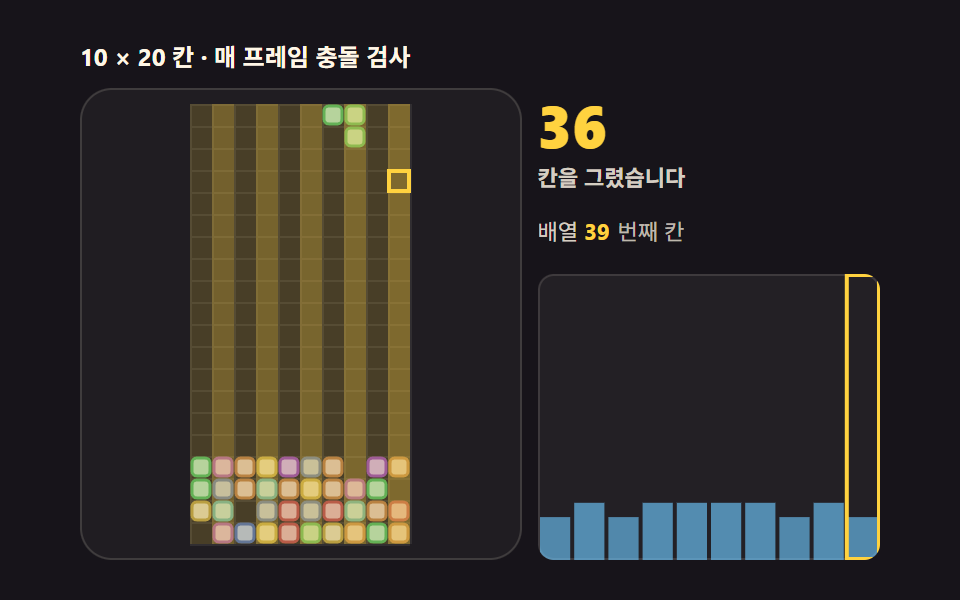 01 tetris-board-grid
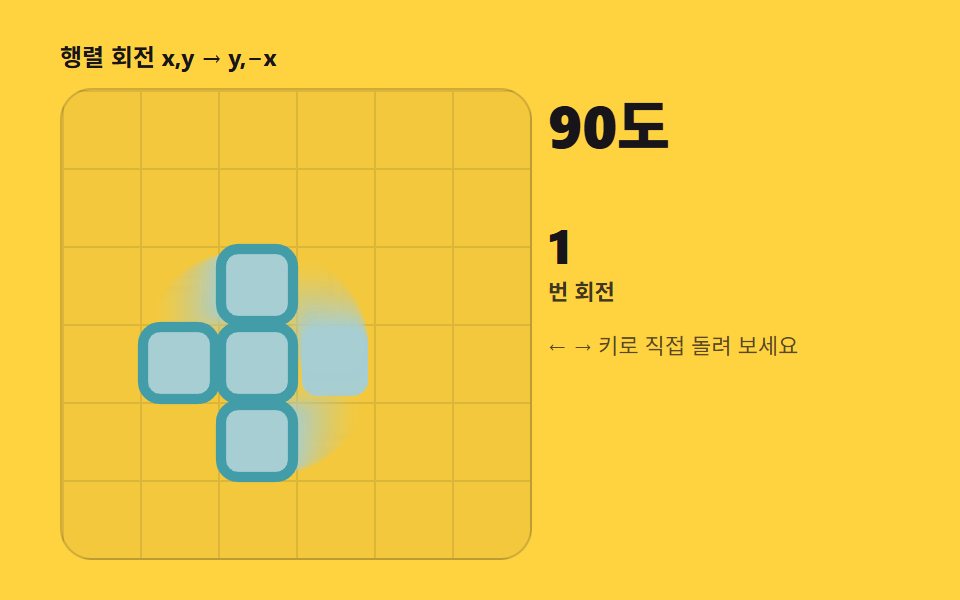 02 tetris-piece-rotation
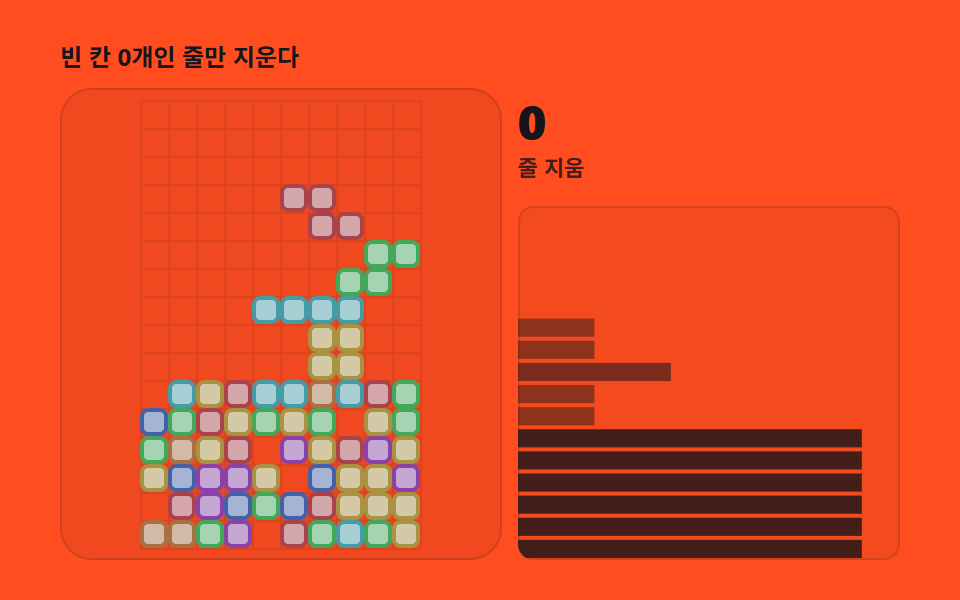 03 tetris-line-clear
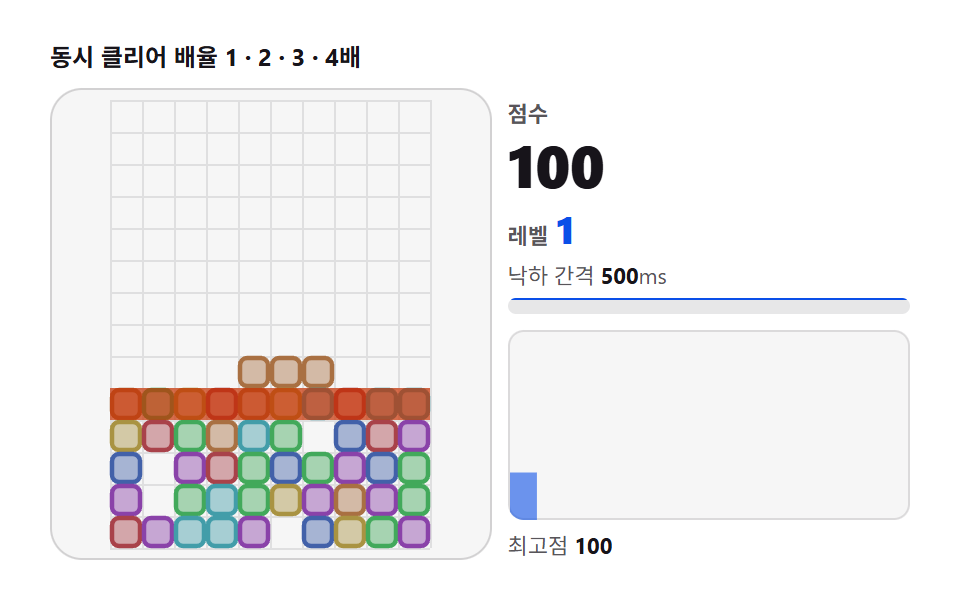 04 tetris-scoring-level
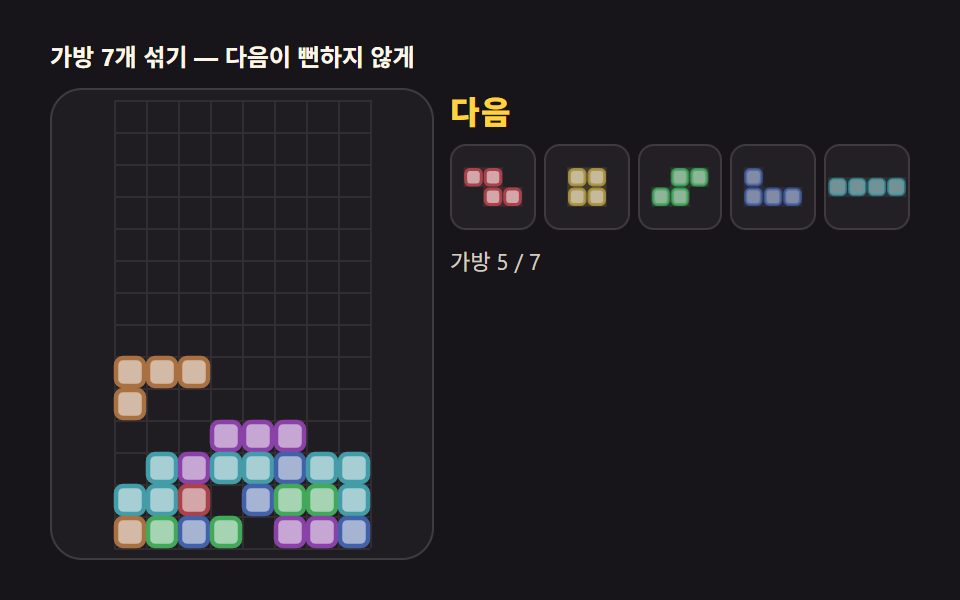 05 tetris-next-queue
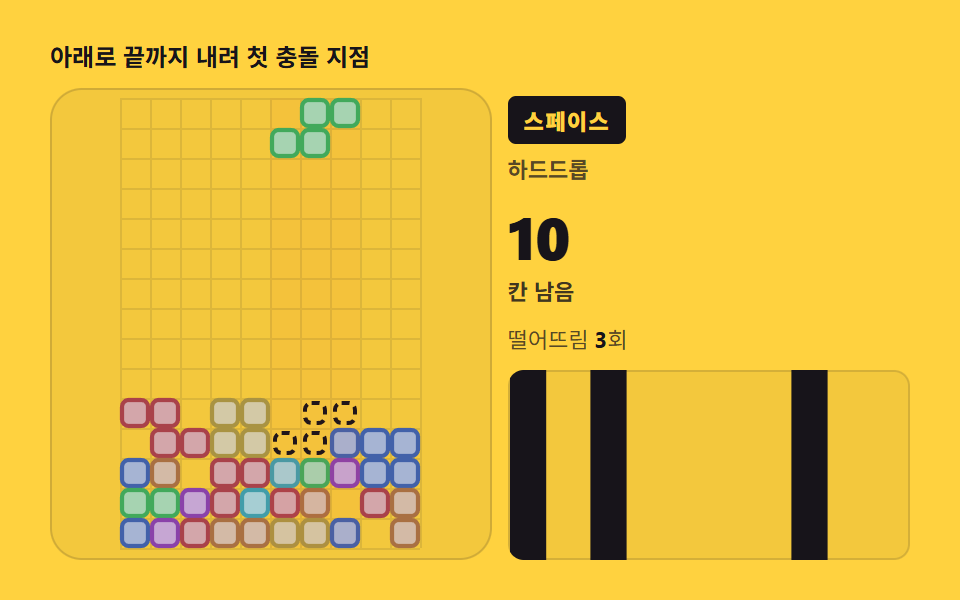 06 tetris-ghost-drop
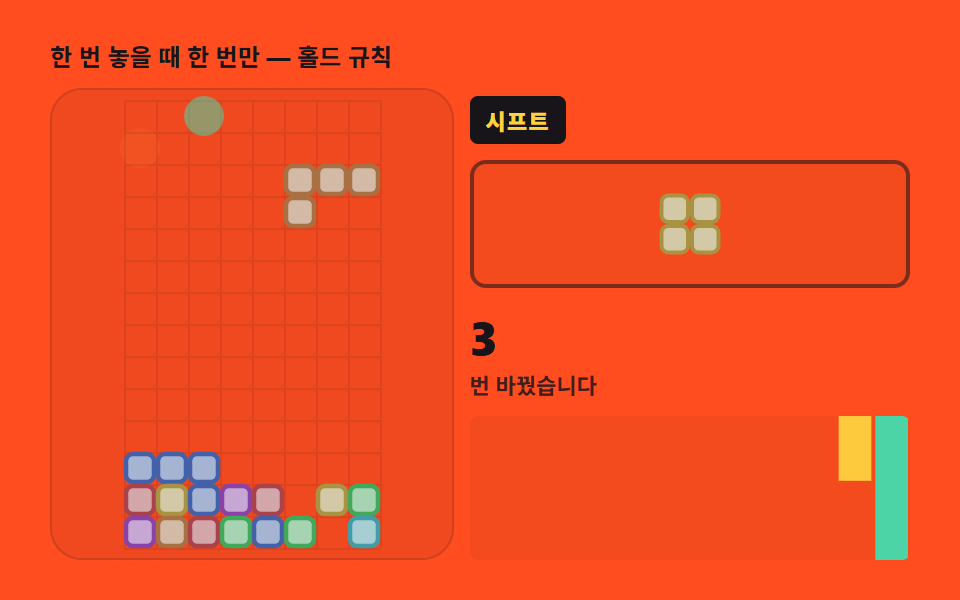 07 tetris-hold-swap
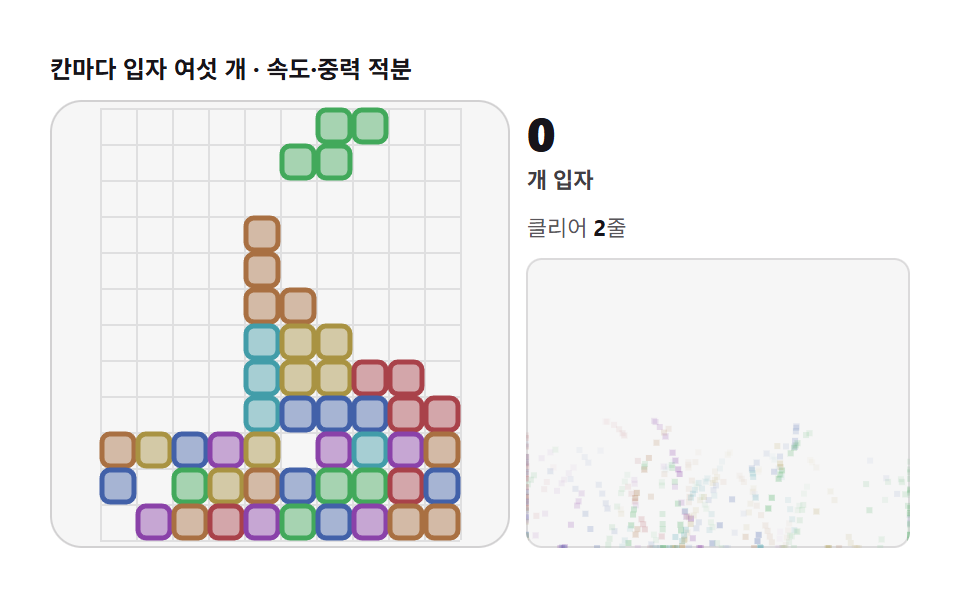 08 tetris-particle-clear
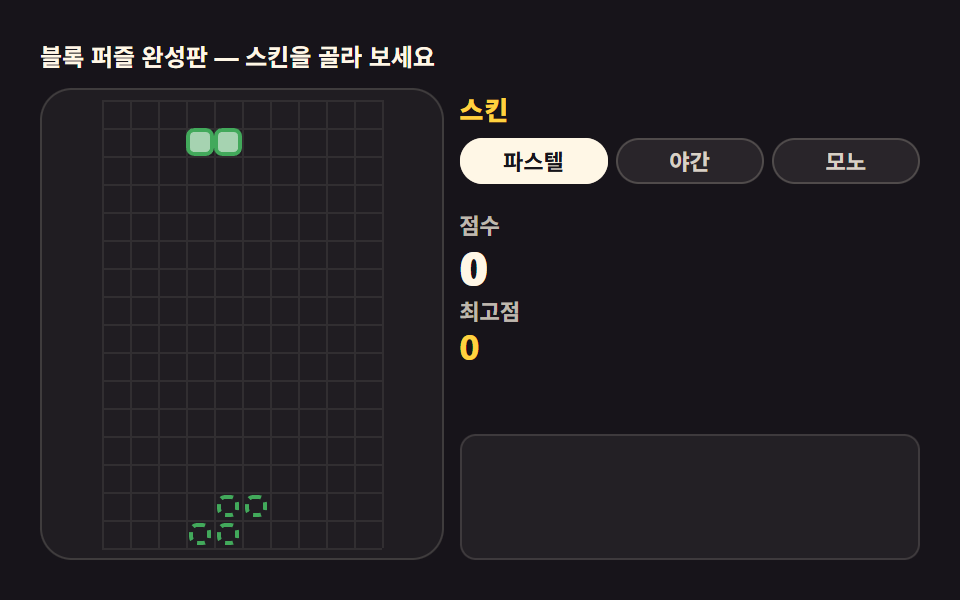 09 tetris-portrait-skin
Auto-plays · click a tile to jump to its section · all nine in one zip
- 01 The board grid — drawing 10×20 cells from an array
- 02 Seven pieces and rotation — shapes that turn by matrix multiply
- 03 Line clear — finding full rows, erasing, collapsing
- 04 Score and level — rewarding simultaneous clears exponentially
- 05 Next queue — previewing upcoming pieces on a mini canvas
- 06 Ghost piece and hard drop — precomputing the landing spot
- 07 Hold — banking one piece and swapping it in
- 08 Clear particles — erased cells bursting apart
- 09 Skins and high score — your Tetris in a pastel palette
Demo
Tetris in JavaScript is a falling-block puzzle where the entire game — the board, the seven pieces, the line clears — is computed from one 2D array, a collision function, and delta-time gravity, pasted into a single HTML file. Nine scenes, one pipeline: every move is tested by a four-condition collision check, shapes turn by the (x,y)→(y,−x) rotation, and gravity integrates cells-per-second against the frame delta. The piece positions you see only ease toward the computed grid values — the display never stands in for the computation. Item 06's ghost and hard drop paint the widest footprint of the set at a measured 27.695 percent cumulative area, with item 08's clear particles close behind at 26.844 percent, while item 02's rotation lab is the narrowest at 8.513 percent because it spins a single piece inside a 6×6 stage. Item 09's finished game is the brightest at 142.5 average intensity. Of 24 sampled frames, every item animated 23 frames except item 06 at 22 — a falling-block puzzle is supposed to move every single frame.
Each scene seeds its own mulberry32 generator once (seeds 3301 through 3309) and consumes it in sequence, so the autoplay you watch replays the exact same game on every visit — the piece order, the kick nudges, the particle bursts are all deterministic. Interact where the chips say so: left and right arrows spin the piece in item 02, the spacebar hard-drops in item 06, shift banks a piece in item 07, and a click on the board in item 01 slams the current piece to its precomputed landing row.
Why this order for the nine steps
The sequence follows what the game actually needs first. 01 is the board itself — one 10×20 array, redrawn cell by cell with fillRect every frame; nothing else can exist until this array and its collision check are solid. 02 isolates rotation onto a 6×6 lab stage, turning one piece 90 degrees at a time so the (x,y)→(y,−x) transform and the wall kick can be watched alone. 03 adds consequence: rows with zero empty cells flash for 0.18 s, get spliced out, and everything above collapses. 04 puts numbers on it — the 100×n² scoring curve and the 0.85-per-level drop-interval ramp. 05 looks forward with a seven-piece bag feeding a five-slot preview. 06 computes the landing row before you commit to it, drawing the ghost and honoring the spacebar. 07 adds the hold slot and the once-per-drop flag that stops infinite swapping. 08 makes the cleared cells burst into particles with integrated velocity and gravity instead of vanishing. 09 assembles everything into a finished game with three skins and a persisted high score. Each step adds exactly one mechanism to the previous one's board.
| # | Item | Core technique | Painted area | Peak frame | Avg intensity |
|---|---|---|---|---|---|
| 01 | Board grid | 10×20 array, fillRect, choose() autoplay | 13.931% | 9.049% | 125.9 |
| 02 | Piece rotation | (x,y)→(y,−x), kick flash 0.9 s | 8.513% | 4.178% | 77.0 |
| 03 | Line clear | zero-empty scan, flash 0.18 s, splice | 24.708% | 21.085% | 141.5 |
| 04 | Scoring and level | 100×n², ×0.85/level, floor 0.06 s | 12.365% | 3.817% | 111.3 |
| 05 | Next queue | seeded Fisher–Yates bag of 7, preview 5 | 16.403% | 4.888% | 134.4 |
| 06 | Ghost and hard drop | landingRow walk, spacebar teleport | 27.695% | 11.875% | 54.4 |
| 07 | Hold swap | canHold flag, 0.35 s→0.4 s attempt rhythm | 15.657% | 5.834% | 103.4 |
| 08 | Clear particles | 6 particles/cell, 30 cells/s² gravity, 1.1 s life | 26.844% | 13.066% | 99.8 |
| 09 | Skins and high score | 3 palettes from CSS variables, localStorage | 12.078% | 5.812% | 142.5 |
The low numbers on items 02, 04, and 09 are a structural ceiling, not a flaw: item 02's stage is a 6×6 box, item 04 centers on numbers and a graph more than the board, and item 09's finished game holds brief static beats after each lock. At the other end, item 06 slams pieces to the bottom in one step and item 08 scatters particles across the whole frame — that is where the area lives in this set. Anyone who wants the tetris javascript code copy and paste ready will find all nine vanilla files plus nine React ports in the zip, and the fences below are the exact logic those ports share.
Code per step
Each fence comes straight out of that item's own source — the real constants, the real identifiers — with screen strings swapped through the same dictionary the shipped demos localize with and comments translated. Nothing is trimmed with an ellipsis; the zip carries the nine complete files.
01The board grid — drawing 10×20 cells from an array
One 2D array holds the entire board state, each cell is a fillRect, and the autoplay scores every placement by (completed lines − holes − height) before the piece follows the plan at 4.6 cells/s fall and 9.5 cells/s slide.
<main class="stage">
<div class="tg" id="tg">
  <p class="tg__hint">10 x 20 cells, per-frame collision checks</p>
  <div class="tg__row">
    <div class="tg__field" id="field" role="application" aria-label="Board grid lab" tabindex="0">
      <canvas class="tg__cv" id="cv"></canvas>
    </div>
    <div class="tg__side">
      <b class="tg__count" id="count" aria-live="polite">0</b>
      <span class="tg__unit">cells drawn</span>
      <p class="tg__scan">array <b id="scan">0</b><span class="tg__scanUnit">th cell</span></p>
      <div class="tg__prof" id="prof" role="img" aria-label="Column height graph"><canvas id="pcv"></canvas></div>
    </div>
  </div>
</div>
</main>
@use "../../../../site/static/demo-tokens" as *;
// 보드 격자(01) — 움직임은 전부 캔버스 rAF 루프 안에 있다(077 방식). @keyframes 를 두지
// 않는다 — CSS 애니메이션이 0개여야 렌더러가 실시간으로 24장을 찍는다.
// 칸 일곱 빛깔은 파스텔 팔레트(채도 .34) — 면은 파스텔, 테두리는 같은 색조의 어두운 판(글자 대비와 같은 원리).
$duration: $dur-loop;
$easing: $ease-out;
$color: $subject-sky;
@include stage($stage-ink);
.tg {
// 파스텔 팔레트 — h 187/47/282/135/355/222/27, 채도 .34 명도 .74 (면) / 명도 .46 (테두리)
--c-i: #a6ced3; --d-i: #429da9;
--c-o: #d3c9a6; --d-o: #a99342;
--c-t: #c6a6d3; --d-t: #8a42a9;
--c-s: #a6d3b1; --d-s: #42a95b;
--c-z: #d3a6aa; --d-z: #a9424a;
--c-j: #a6b4d3; --d-j: #4261a9;
--c-l: #d3baa6; --d-l: #a97042;
--grid-line: #{rgba($subject-cream, .08)};
--flash: #{$stage-yellow};
--prof-bar: #{$subject-sky};
display: flex; flex-direction: column; gap: $sp-2;
width: 100%; max-width: 400px;
}
.tg__hint {
margin: 0; font-weight: 700; font-size: clamp(10px, 2.8vw, 12px); line-height: 1.35;
color: $subject-cream;
}
.tg__row { display: flex; gap: $sp-2; align-items: stretch; }
.tg__field {
position: relative; overflow: hidden;
flex: 0 0 auto;
width: clamp(168px, 46vw, 236px);
height: clamp(208px, 60vw, 236px);
border-radius: $r-card;
background: rgba($subject-cream, .04);
box-shadow: inset 0 0 0 1px rgba($subject-cream, .14);
cursor: pointer; touch-action: manipulation;
}
.tg__field:focus-visible { outline: 2px solid $color; outline-offset: 2px; }
.tg__cv { display: block; width: 100%; height: 100%; }
.tg__side {
flex: 1; min-width: 0;
display: flex; flex-direction: column; gap: $sp-1;
padding-top: $sp-1;
}
.tg__count {
font-weight: 800; font-size: clamp(20px, 6vw, 30px); line-height: 1;
color: $stage-yellow; font-variant-numeric: tabular-nums;
}
.tg__unit { font-weight: 600; font-size: clamp(9px, 2.4vw, 11px); line-height: 1.4; color: rgba($subject-cream, .82); }
.tg__scan { margin: $sp-2 0 0; font-size: clamp(9px, 2.4vw, 11px); line-height: 1.5; color: rgba($subject-cream, .82); }
.tg__scan b { font-weight: 700; color: $stage-yellow; font-variant-numeric: tabular-nums; margin-right: $sp-1; }
.tg__scanUnit { color: rgba($subject-cream, .72); }
.tg__prof {
position: relative; flex: 1; min-height: 0;
margin-top: $sp-2;
border-radius: $r-sm;
background: rgba($subject-cream, .05);
box-shadow: inset 0 0 0 1px rgba($subject-cream, .12);
overflow: hidden;
}
.tg__prof canvas { position: absolute; inset: 0; display: block; width: 100%; height: 100%; }
@media (max-width: 340px) {
.tg { gap: $sp-1; }
.tg__field { width: 96px; height: 120px; }
.tg__count { font-size: 16px; }
.tg__scan { margin-top: 0; font-size: 8px; }
.tg__prof { margin-top: $sp-1; }
}
// reduce — 루프가 안 돈다. 정적 한 장(스캔 테두리 + 쌓인 칸)이 남는다.
@media (prefers-reduced-motion: reduce) {
.tg.is-still .tg__field { cursor: default !important; }
}html, body {
margin: 0;
overflow: hidden;
}
.stage {
box-sizing: border-box;
min-height: 100vh;
display: grid;
place-items: center;
margin: 0;
background: #17141a;
font-family: -apple-system, "Segoe UI", "Noto Sans KR", sans-serif;
padding: clamp(8px, 4vw, 24px);
}
.tg {
--c-i: #a6ced3;
--d-i: #429da9;
--c-o: #d3c9a6;
--d-o: #a99342;
--c-t: #c6a6d3;
--d-t: #8a42a9;
--c-s: #a6d3b1;
--d-s: #42a95b;
--c-z: #d3a6aa;
--d-z: #a9424a;
--c-j: #a6b4d3;
--d-j: #4261a9;
--c-l: #d3baa6;
--d-l: #a97042;
--grid-line: rgba(255, 247, 230, 0.08);
--flash: #ffd23f;
--prof-bar: #6ec8ff;
display: flex;
flex-direction: column;
gap: 8px;
width: 100%;
max-width: 400px;
}
.tg__hint {
margin: 0;
font-weight: 700;
font-size: clamp(10px, 2.8vw, 12px);
line-height: 1.35;
color: #fff7e6;
}
.tg__row {
display: flex;
gap: 8px;
align-items: stretch;
}
.tg__field {
position: relative;
overflow: hidden;
flex: 0 0 auto;
width: clamp(168px, 46vw, 236px);
height: clamp(208px, 60vw, 236px);
border-radius: 16px;
background: rgba(255, 247, 230, 0.04);
box-shadow: inset 0 0 0 1px rgba(255, 247, 230, 0.14);
cursor: pointer;
touch-action: manipulation;
}
.tg__field:focus-visible {
outline: 2px solid #6ec8ff;
outline-offset: 2px;
}
.tg__cv {
display: block;
width: 100%;
height: 100%;
}
.tg__side {
flex: 1;
min-width: 0;
display: flex;
flex-direction: column;
gap: 4px;
padding-top: 4px;
}
.tg__count {
font-weight: 800;
font-size: clamp(20px, 6vw, 30px);
line-height: 1;
color: #ffd23f;
font-variant-numeric: tabular-nums;
}
.tg__unit {
font-weight: 600;
font-size: clamp(9px, 2.4vw, 11px);
line-height: 1.4;
color: rgba(255, 247, 230, 0.82);
}
.tg__scan {
margin: 8px 0 0;
font-size: clamp(9px, 2.4vw, 11px);
line-height: 1.5;
color: rgba(255, 247, 230, 0.82);
}
.tg__scan b {
font-weight: 700;
color: #ffd23f;
font-variant-numeric: tabular-nums;
margin-right: 4px;
}
.tg__scanUnit {
color: rgba(255, 247, 230, 0.72);
}
.tg__prof {
position: relative;
flex: 1;
min-height: 0;
margin-top: 8px;
border-radius: 8px;
background: rgba(255, 247, 230, 0.05);
box-shadow: inset 0 0 0 1px rgba(255, 247, 230, 0.12);
overflow: hidden;
}
.tg__prof canvas {
position: absolute;
inset: 0;
display: block;
width: 100%;
height: 100%;
}
@media (max-width: 340px) {
.tg {
gap: 4px;
}
.tg__field {
width: 96px;
height: 120px;
}
.tg__count {
font-size: 16px;
}
.tg__scan {
margin-top: 0;
font-size: 8px;
}
.tg__prof {
margin-top: 4px;
}
}
@media (prefers-reduced-motion: reduce) {
.tg.is-still .tg__field {
cursor: default !important;
}
}// Board 격자 — 2차원 array grid[20][10] 이 보드의 전 상태다. 매 프레임
// (1) 낙하 조각을 중력 delta 만큼 내리고 (2) 모든 셀 좌표를 충돌 검사하고 (3) fillRect 로 칸을 그린다.
// 조각 배치는 1수 탐색 — 회전 4 × 열 10 조합의 착지 결과를 격자에 놓아보고
// (완성 lines - 구멍 - 높이) 로 점수를 매겨 최적을 고른다. 시드 고정(mulberry32)이라 같은 판이 반복된다.
(function () {
var root = document.getElementById('tg');
var field = document.getElementById('field');
var cv = document.getElementById('cv');
var prof = document.getElementById('prof');
var pcv = document.getElementById('pcv');
var countEl = document.getElementById('count');
var scanEl = document.getElementById('scan');
if (!root || !field || !cv || !prof || !pcv || !countEl || !scanEl) return;
var ctx = cv.getContext('2d');
var ctx2 = pcv.getContext('2d');
var css = getComputedStyle(root);
function v(name) { return css.getPropertyValue(name).trim(); }
var FILL = { I: v('--c-i'), O: v('--c-o'), T: v('--c-t'), S: v('--c-s'), Z: v('--c-z'), J: v('--c-j'), L: v('--c-l') };
var EDGE = { I: v('--d-i'), O: v('--d-o'), T: v('--d-t'), S: v('--d-s'), Z: v('--d-z'), J: v('--d-j'), L: v('--d-l') };
var LINE = v('--grid-line');
var FLASH = v('--flash');
var BAR = v('--prof-bar');
var COLS = 10, ROWS = 20, CELLS = COLS * ROWS;
var TYPES = ['I', 'O', 'T', 'S', 'Z', 'J', 'L'];
var SHAPES = {
I: [[0, 1], [1, 1], [2, 1], [3, 1]],
O: [[1, 1], [2, 1], [1, 2], [2, 2]],
T: [[1, 0], [0, 1], [1, 1], [2, 1]],
S: [[1, 0], [2, 0], [0, 1], [1, 1]],
Z: [[0, 0], [1, 0], [1, 1], [2, 1]],
J: [[0, 0], [0, 1], [1, 1], [2, 1]],
L: [[2, 0], [0, 1], [1, 1], [2, 1]]
};
var BOX = { I: 4, O: 4, T: 3, S: 3, Z: 3, J: 3, L: 3 };
var KICKS = [0, -1, 1, -2, 2];
function mulberry32(a) {
return function () {
a |= 0; a = (a + 0x6D2B79F5) | 0;
var t = Math.imul(a ^ (a >>> 15), 1 | a);
t = (t + Math.imul(t ^ (t >>> 7), 61 | t)) ^ t;
return ((t ^ (t >>> 14)) >>> 0) / 4294967296;
};
}
var rnd = mulberry32(3301);
// 회전 — (x,y) → (y,−x). 행렬 곱 90도와 같은 식이고, y 에 n−1 을 더해 n×n 상자 안으로 되돌린다
function rotCW(cells, n) {
var out = [];
for (var i = 0; i < cells.length; i++) out.push([cells[i][1], n - 1 - cells[i][0]]);
return out;
}
function shapeRot(t, r) {
var c = SHAPES[t], n = BOX[t];
for (var i = 0; i < r; i++) c = rotCW(c, n);
return c;
}
// 충돌 검사 — 조각 셀 전부를 격자·벽과 견준다. 이 하나가 벽 뚫림을 막는다
function hits(grid, cells, row, col) {
  for (var i = 0; i < cells.length; i++) {
    var x = col + cells[i][0], y = row + cells[i][1];
    if (x < 0 || x >= COLS || y >= ROWS) return true;
    if (y >= 0 && grid[y][x]) return true;
  }
  return false;
}
function landingRow(grid, cells, col) {
  var row = -4;
  while (!hits(grid, cells, row + 1, col)) row += 1;
  return row;
}
function emptyGrid() {
  var g = [];
  for (var y = 0; y < ROWS; y++) { g.push([]); for (var x = 0; x < COLS; x++) g[y].push(0); }
  return g;
}
function cloneGrid(g) {
var o = [];
for (var y = 0; y < ROWS; y++) o.push(g[y].slice());
return o;
}
// 1수 탐색 — 착지 결과의 구멍·총 높이·완성 줄로 Score. 깊게 놓을수록 좋다
function choose(grid, t) {
var best = null;
for (var r = 0; r < 4; r++) {
var cells = shapeRot(t, r);
for (var c = -2; c < COLS; c++) {
if (hits(grid, cells, 0, c)) continue;
var row = landingRow(grid, cells, c);
if (row < 0) continue;
var g2 = cloneGrid(grid);
for (var i = 0; i < cells.length; i++) g2[row + cells[i][1]][c + cells[i][0]] = t;
var full = 0, holes = 0, agg = 0;
for (var y = 0; y < ROWS; y++) {
var filled = 0;
for (var x = 0; x < COLS; x++) if (g2[y][x]) filled += 1;
if (filled === COLS) full += 1;
}
for (var x2 = 0; x2 < COLS; x2++) {
var seen = false;
for (var y2 = 0; y2 < ROWS; y2++) {
if (g2[y2][x2]) { seen = true; agg += ROWS - y2; }
else if (seen) holes += 1;
}
}
var score = full * 120 - holes * 90 - agg * 2 + row;
if (!best || score > best.score) best = { r: r, c: c, score: score };
}
}
return best;
}
var grid = emptyGrid(), bag = [], piece = null;
var flashRows = [], flashT = 0, restT = 0;
function refill() {
bag = TYPES.slice();
for (var i = bag.length - 1; i > 0; i--) {
var j = Math.floor(rnd() * (i + 1)), tmp = bag[i]; bag[i] = bag[j]; bag[j] = tmp;
}
}
function nextType() { if (!bag.length) refill(); return bag.pop(); }
function filledCount() {
var n = 0;
for (var y = 0; y < ROWS; y++) for (var x = 0; x < COLS; x++) if (grid[y][x]) n += 1;
return n;
}
function spawn() {
var t = nextType();
var plan = choose(grid, t);
if (!plan) { grid = emptyGrid(); plan = choose(grid, t); }
piece = { t: t, r: 0, cells: SHAPES[t].slice(), x: 3, y: -2.2, plan: plan, drop: 4.6, slide: 9.5 };
restT = 0;
}
function lock() {
var rx = Math.round(piece.x), ry = Math.floor(piece.y), dead = false;
for (var i = 0; i < piece.cells.length; i++) {
var gx = rx + piece.cells[i][0], gy = ry + piece.cells[i][1];
if (gy < 0) { dead = true; break; }
grid[gy][gx] = piece.t;
}
if (dead) { grid = emptyGrid(); }
else {
var full = [];
for (var y = 0; y < ROWS; y++) {
var n = 0;
for (var x = 0; x < COLS; x++) if (grid[y][x]) n += 1;
if (n === COLS) full.push(y);
}
if (full.length) { flashRows = full; flashT = 0.30; }
}
countEl.textContent = String(filledCount());
spawn();
}
function spliceFull() {
flashRows.sort(function (a, b) { return a - b; });
for (var i = 0; i < flashRows.length; i++) {
grid.splice(flashRows[i], 1);
grid.unshift(new Array(COLS).fill(0));
}
flashRows = [];
countEl.textContent = String(filledCount());
}
function tryRotate() {
var rc = rotCW(piece.cells, BOX[piece.t]);
var px = Math.round(piece.x), py = Math.floor(piece.y);
for (var k = 0; k < KICKS.length; k++) {
if (!hits(grid, rc, py, px + KICKS[k])) {
piece.cells = rc; piece.x = px + KICKS[k]; piece.r = (piece.r + 1) % 4;
return true;
}
}
return false;
}
var W = 0, H = 0, PW = 0, PH = 0, dpr = 1, cell = 8, ox = 0, oy = 0, colSeen = new Array(COLS).fill(-9);
function fit() {
W = field.clientWidth; H = field.clientHeight;
PW = prof.clientWidth; PH = prof.clientHeight;
dpr = Math.min(2, window.devicePixelRatio || 1);
cv.width = Math.round(W * dpr); cv.height = Math.round(H * dpr);
ctx.setTransform(dpr, 0, 0, dpr, 0, 0);
pcv.width = Math.round(PW * dpr); pcv.height = Math.round(PH * dpr);
ctx2.setTransform(dpr, 0, 0, dpr, 0, 0);
cell = Math.floor(Math.min(H / ROWS, W / COLS));
ox = Math.floor((W - cell * COLS) / 2); oy = Math.floor((H - cell * ROWS) / 2);
}
function cellRect(gx, gy) { return [ox + gx * cell, oy + gy * cell]; }
function paintCell(gx, gy, t, alpha) {
var p = cellRect(gx, gy), r = Math.max(2, cell * 0.22);
ctx.globalAlpha = alpha == null ? 1 : alpha;
ctx.beginPath();
ctx.roundRect(p[0] + 1, p[1] + 1, cell - 2, cell - 2, r);
ctx.fillStyle = FILL[t]; ctx.fill();
ctx.lineWidth = Math.max(1, cell * 0.14);
ctx.strokeStyle = EDGE[t]; ctx.stroke();
ctx.globalAlpha = 1;
}
function draw(time) {
ctx.clearRect(0, 0, W, H);
// 격자 — 배열의 cells 수 그대로
ctx.strokeStyle = LINE; ctx.lineWidth = 1;
ctx.beginPath();
for (var x = 0; x <= COLS; x++) { ctx.moveTo(ox + x * cell + .5, oy); ctx.lineTo(ox + x * cell + .5, oy + ROWS * cell); }
for (var y = 0; y <= ROWS; y++) { ctx.moveTo(ox, oy + y * cell + .5); ctx.lineTo(ox + COLS * cell, oy + y * cell + .5); }
ctx.stroke();
// 쌓인 cells
for (var gy = 0; gy < ROWS; gy++) for (var gx = 0; gx < COLS; gx++) if (grid[gy][gx]) paintCell(gx, gy, grid[gy][gx]);
// Clear 섬광 — splice 전 0.3초
if (flashT > 0) {
ctx.globalAlpha = Math.min(1, flashT / 0.30) * 0.85;
for (var f = 0; f < flashRows.length; f++) {
ctx.fillStyle = FLASH;
ctx.fillRect(ox, oy + flashRows[f] * cell, cell * COLS, cell);
}
ctx.globalAlpha = 1;
}
// 낙하 조각 (y<0 위쪽은 자른다)
if (piece) {
var fx = piece.x, fy = piece.y;
for (var i = 0; i < piece.cells.length; i++) {
var cx2 = piece.cells[i][0], cy2 = piece.cells[i][1];
if (fy + cy2 >= 0) paintCell(Math.round(fx + cx2), Math.round(fy + cy2), piece.t);
}
}
// array 스캔 — 200칸을 초당 120칸씩 훑는다(1.7초에 Board 한 바퀴). 검사가 지나간
// 열은 0.5초에 걸쳐 서서히 사그라는 잔상을 남긴다 — "살펴본 자리"가 눈에 쌓인다
var idx = Math.floor(time * 0.12) % CELLS;
var sx = idx % COLS, sy = Math.floor(idx / COLS);
colSeen[sx] = time;
ctx.fillStyle = FLASH;
for (var c2 = 0; c2 < COLS; c2++) {
var age = (time - colSeen[c2]) / 1000;
if (age < 0) age += 1e9; // 스캔을 아직 안 지나간 열
if (age > 0.6) continue;
var a = age < 0 ? 0 : 0.42 * (1 - age / 0.6);
if (a <= 0.02) continue;
ctx.globalAlpha = a;
ctx.fillRect(ox + c2 * cell, oy, cell, ROWS * cell);
}
ctx.globalAlpha = 1;
var sp = cellRect(sx, sy);
ctx.strokeStyle = FLASH; ctx.lineWidth = 2;
ctx.strokeRect(sp[0] + .5, sp[1] + .5, cell - 1, cell - 1);
scanEl.textContent = String(idx);
}
// Column height graph — 같은 배열을 다른 각도로 읽는다. 열마다 쌓인 cells 수를 세어
// 막대로 세운다. 조각이 놓이고 줄이 지워질 때마다 막대 전체가 다시 계산된다
function drawProfile(time) {
if (!PW || !PH) return;
ctx2.clearRect(0, 0, PW, PH);
var bw = PW / COLS;
for (var x = 0; x < COLS; x++) {
var h = 0;
for (var y = 0; y < ROWS; y++) if (grid[y][x]) h += 1;
if (!h) continue;
var bh = (h / ROWS) * PH;
ctx2.fillStyle = BAR;
ctx2.globalAlpha = 0.55 + 0.45 * (h / ROWS);
ctx2.fillRect(x * bw + 1, PH - bh, bw - 2, bh);
}
ctx2.globalAlpha = 1;
// 스캔이 지금 머문 열 표시
var idx2 = Math.floor(time * 0.12) % CELLS;
ctx2.strokeStyle = FLASH; ctx2.lineWidth = 2;
ctx2.strokeRect((idx2 % COLS) * bw + .5, .5, bw - 1, PH - 1);
}
var last = 0, raf = 0;
var reduce = window.matchMedia('(prefers-reduced-motion: reduce)').matches;
function step(now) {
  var dt = Math.min(64, now - last) / 1000; last = now;
  if (flashT > 0) { flashT -= dt; if (flashT <= 0) spliceFull(); }
  if (piece) {
    var plan = piece.plan;
    var dx = plan.c - piece.x;
    piece.x += Math.max(-piece.slide * dt, Math.min(piece.slide * dt, dx));
    if (piece.r !== plan.r && Math.abs(plan.c - piece.x) < 0.6) tryRotate();
    piece.y += piece.drop * dt;
    var rx = Math.round(piece.x), ry = Math.floor(piece.y) + 1;
    if (hits(grid, piece.cells, ry, rx)) {
      piece.y = ry - 1;
      restT += dt;
      var aligned = piece.r === plan.r && rx === plan.c;
      if (aligned || restT > 1.4) { piece.x = plan.c; lock(); }
    } else restT = 0;
  }
  draw(now);
drawProfile(now);
raf = requestAnimationFrame(step);
}
field.addEventListener('pointerdown', function () {
// 눌러 보기 — 현재 조각을 착지점까지 한 번에 내린다 (고스트 계산과 같은 식)
if (piece) {
piece.x = piece.plan.c;
while (piece.r !== piece.plan.r && tryRotate()) { /* 회전을 계획까지 맞춘다 */ }
piece.y = landingRow(grid, piece.cells, Math.round(piece.x));
lock();
}
});
window.addEventListener('resize', function () { fit(); if (reduce) draw(0); });
// 시작 쓰레기 — 아래 네 줄을 시드 난수로 미리 채운다. 줄마다 구멍 한 cells(Clear 직전 상태)
for (var gy0 = ROWS - 4; gy0 < ROWS; gy0++) {
var hole0 = Math.floor(rnd() * COLS);
for (var gx0 = 0; gx0 < COLS; gx0++) grid[gy0][gx0] = gx0 === hole0 ? 0 : TYPES[Math.floor(rnd() * 7)];
}
countEl.textContent = String(filledCount());
fit();
if (reduce) {
// 정지 한 장 — 스캔 지점과 쌓인 칸이 다 보이는 시각. 조각 여섯을 미리 놓는다
for (var i = 0; i < 6; i++) { spawn(); lock(); }
draw(320);
drawProfile(320);
root.classList.add('is-still');
} else {
spawn();
last = performance.now();
raf = requestAnimationFrame(step);
}
})();// TetrisBoardGrid — vanilla 판(run/330/demo/01-tetris-board-grid/index.html) 의 React 포트.
// grid[20][10] 2차원 배열이 보드의 전 상태다. 매 프레임 (1) 낙하 조각을 중력 delta 만큼
// 내리고 (2) 모든 셀 좌표를 충돌 검사하고 (3) fillRect 로 칸을 그린다. 조각 배치는 1수 탐색 —
// 회전 4 × 열 10 조합의 착지 결과를 격자에 놓아보고 (완성 줄 − 구멍 − 높이) 로 점수를 매겨
// 최적을 고른다. 시드 고정(mulberry32)이라 같은 판이 반복된다. 값·수치는 vanilla 와 같다.
// 움직임은 전부 캔버스 rAF 루프가 그리므로 CSS 애니메이션이 없다.
// reduce 에서는 루프를 돌리지 않고 스캔 지점과 쌓인 칸이 다 보이는 한 장만 남긴다(.isStill).
import { useEffect, useRef, useState } from "react";
import type { CSSProperties } from "react";
import styles from "./TetrisBoardGrid.module.scss";
export type TetrisBoardGridProps = {
duration?: string;
easing?: string;
color?: string;
};
type Vars = CSSProperties & { "--duration"?: string; "--easing"?: string; "--color"?: string };
// useRef 는 T | null 을 돌려준다. 처음부터 값이 있고 절대 비지 않는 상자는 이렇게 좁혀 쓴다
type Box<T> = { current: T };
const COLS = 10, ROWS = 20, CELLS = COLS * ROWS;
const TYPES = ["I", "O", "T", "S", "Z", "J", "L"];
// SHAPES 는 원본을 오염시키지 않는다 — 회전·낙하 판은 map/slice 로 사본을 만든다
const SHAPES: Record<string, number[][]> = {
I: [[0, 1], [1, 1], [2, 1], [3, 1]],
O: [[1, 1], [2, 1], [1, 2], [2, 2]],
T: [[1, 0], [0, 1], [1, 1], [2, 1]],
S: [[1, 0], [2, 0], [0, 1], [1, 1]],
Z: [[0, 0], [1, 0], [1, 1], [2, 1]],
J: [[0, 0], [0, 1], [1, 1], [2, 1]],
L: [[2, 0], [0, 1], [1, 1], [2, 1]]
};
const BOX: Record<string, number> = { I: 4, O: 4, T: 3, S: 3, Z: 3, J: 3, L: 3 };
const KICKS = [0, -1, 1, -2, 2];
const HOLD_S = 1.4; // 착지 후 계획과 어긋난 채 쉴 수 있는 최대 시간(초)
const FILL: Record<string, string> = {
I: "#a6ced3", O: "#d3c9a6", T: "#c6a6d3", S: "#a6d3b1", Z: "#d3a6aa", J: "#a6b4d3", L: "#d3baa6"
};
const EDGE: Record<string, string> = {
I: "#429da9", O: "#a99342", T: "#8a42a9", S: "#42a95b", Z: "#a9424a", J: "#4261a9", L: "#a97042"
};
const LINE = "rgba(255,247,230,.08)";
const FLASH = "#ffd23f";
const BAR = "#6ec8ff";
const HINT = "10 × 20 칸 · 매 프레임 충돌 검사";
const ARIA_FIELD = "보드 격자 실험판";
const ARIA_PROF = "열 높이 그래프";
const CELLS_UNIT = "칸을 그렸습니다";
const ARRAY_WORD = "배열";
const SCAN_UNIT = "번째 칸";
// 시드 고정 난수 — 같은 판이 반복된다
function mulberry32(a: number): () => number {
return function (): number {
a |= 0; a = (a + 0x6d2b79f5) | 0;
let t = Math.imul(a ^ (a >>> 15), 1 | a);
t = (t + Math.imul(t ^ (t >>> 7), 61 | t)) ^ t;
return ((t ^ (t >>> 14)) >>> 0) / 4294967296;
};
}
// 회전 — (x,y) → (y,−x). 행렬 곱 90도와 같은 식이고, y 에 n−1 을 더해 n×n 상자 안으로 되돌린다
function rotCW(cells: number[][], n: number): number[][] {
return cells.map((c) => [c[1], n - 1 - c[0]]);
}
function shapeRot(t: string, r: number): number[][] {
let c = SHAPES[t];
for (let i = 0; i < r; i++) c = rotCW(c, BOX[t]);
return c;
}
type Grid = string[][];
type Piece = { t: string; r: number; cells: number[][]; x: number; y: number; plan: { r: number; c: number }; drop: number; slide: number };
export default function TetrisBoardGrid({
duration = "2s",
easing = "ease-out",
color = "#6ec8ff"
}: TetrisBoardGridProps) {
const fieldRef = useRef<HTMLDivElement | null>(null);
const cvRef = useRef<HTMLCanvasElement | null>(null);
const profRef = useRef<HTMLDivElement | null>(null);
const pcvRef = useRef<HTMLCanvasElement | null>(null);
const countRef = useRef<HTMLBRElement | null>(null);
const scanRef = useRef<HTMLBRElement | null>(null);
const ctxRef = useRef<CanvasRenderingContext2D | null>(null);
const ctx2Ref = useRef<CanvasRenderingContext2D | null>(null);
const stRef = useRef({
W: 0, H: 0, PW: 0, PH: 0, dpr: 1, cell: 8, ox: 0, oy: 0,
grid: [] as Grid, bag: [] as string[], piece: null as Piece | null,
flashRows: [] as number[], flashT: 0, restT: 0,
colSeen: new Array<number>(COLS).fill(-9)
}) as Box<{
W: number; H: number; PW: number; PH: number; dpr: number; cell: number; ox: number; oy: number;
grid: Grid; bag: string[]; piece: Piece | null;
flashRows: number[]; flashT: number; restT: number; colSeen: number[];
}>;
const rndRef = useRef(mulberry32(3301)) as Box<() => number>;
const lastRef = useRef(0) as Box<number>;
const rafRef = useRef(0) as Box<number>;
const [still, setStill] = useState(false);
const vars: Vars = { "--duration": duration, "--easing": easing, "--color": color };
function reduced(): boolean {
return window.matchMedia("(prefers-reduced-motion: reduce)").matches;
}
function emptyGrid(): Grid {
const g: Grid = [];
for (let y = 0; y < ROWS; y++) { g.push([]); for (let x = 0; x < COLS; x++) g[y].push(""); }
return g;
}
function cloneGrid(g: Grid): Grid {
return g.map((row) => row.slice());
}
// 충돌 검사 — 조각 셀 전부를 격자·벽과 견준다. 이 하나가 벽 뚫림을 막는다
function hits(grid: Grid, cells: number[][], row: number, col: number): boolean {
for (let i = 0; i < cells.length; i++) {
const x = col + cells[i][0], y = row + cells[i][1];
if (x < 0 || x >= COLS || y >= ROWS) return true;
if (y >= 0 && grid[y][x]) return true;
}
return false;
}
function landingRow(grid: Grid, cells: number[][], col: number): number {
let row = -4;
while (!hits(grid, cells, row + 1, col)) row += 1;
return row;
}
// 1수 탐색 — 착지 결과의 구멍·총 높이·완성 줄로 점수. 깊게 놓을수록 좋다
function choose(grid: Grid, t: string): { r: number; c: number } | null {
let best: { r: number; c: number; score: number } | null = null;
for (let r = 0; r < 4; r++) {
const cells = shapeRot(t, r);
for (let c = -2; c < COLS; c++) {
if (hits(grid, cells, 0, c)) continue;
const row = landingRow(grid, cells, c);
if (row < 0) continue;
const g2 = cloneGrid(grid);
for (let i = 0; i < cells.length; i++) g2[row + cells[i][1]][c + cells[i][0]] = t;
let full = 0, holes = 0, agg = 0;
for (let y = 0; y < ROWS; y++) {
let filled = 0;
for (let x = 0; x < COLS; x++) if (g2[y][x]) filled += 1;
if (filled === COLS) full += 1;
}
for (let x2 = 0; x2 < COLS; x2++) {
let seen = false;
for (let y2 = 0; y2 < ROWS; y2++) {
if (g2[y2][x2]) { seen = true; agg += ROWS - y2; }
else if (seen) holes += 1;
}
}
const score = full * 120 - holes * 90 - agg * 2 + row;
if (!best || score > best.score) best = { r: r, c: c, score: score };
}
}
return best;
}
function refill(): void {
const st = stRef.current;
st.bag = TYPES.slice();
for (let i = st.bag.length - 1; i > 0; i--) {
const j = Math.floor(rndRef.current() * (i + 1));
const tmp = st.bag[i]; st.bag[i] = st.bag[j]; st.bag[j] = tmp;
}
}
function nextType(): string {
const st = stRef.current;
if (!st.bag.length) refill();
return st.bag.pop() as string;
}
function filledCount(): number {
const st = stRef.current;
let n = 0;
for (let y = 0; y < ROWS; y++) for (let x = 0; x < COLS; x++) if (st.grid[y][x]) n += 1;
return n;
}
function spawn(): void {
const st = stRef.current;
const t = nextType();
let plan = choose(st.grid, t);
if (!plan) { st.grid = emptyGrid(); plan = choose(st.grid, t) as { r: number; c: number }; }
st.piece = { t: t, r: 0, cells: SHAPES[t].slice(), x: 3, y: -2.2, plan: plan, drop: 4.6, slide: 9.5 };
st.restT = 0;
}
function lock(): void {
const st = stRef.current;
const p = st.piece;
if (!p) return;
const rx = Math.round(p.x), ry = Math.floor(p.y);
let dead = false;
for (let i = 0; i < p.cells.length; i++) {
const gx = rx + p.cells[i][0], gy = ry + p.cells[i][1];
if (gy < 0) { dead = true; break; }
st.grid[gy][gx] = p.t;
}
if (dead) { st.grid = emptyGrid(); }
else {
const full: number[] = [];
for (let y = 0; y < ROWS; y++) {
let n = 0;
for (let x = 0; x < COLS; x++) if (st.grid[y][x]) n += 1;
if (n === COLS) full.push(y);
}
if (full.length) { st.flashRows = full; st.flashT = 0.30; }
}
const out = countRef.current;
if (out) out.textContent = String(filledCount());
spawn();
}
function spliceFull(): void {
const st = stRef.current;
st.flashRows.sort((a, b) => a - b);
for (let i = 0; i < st.flashRows.length; i++) {
st.grid.splice(st.flashRows[i], 1);
st.grid.unshift(new Array(COLS).fill(""));
}
st.flashRows = [];
const out = countRef.current;
if (out) out.textContent = String(filledCount());
}
function tryRotate(): boolean {
const st = stRef.current;
const p = st.piece;
if (!p) return false;
const rc = rotCW(p.cells, BOX[p.t]);
const px = Math.round(p.x), py = Math.floor(p.y);
for (let k = 0; k < KICKS.length; k++) {
if (!hits(st.grid, rc, py, px + KICKS[k])) {
p.cells = rc; p.x = px + KICKS[k]; p.r = (p.r + 1) % 4;
return true;
}
}
return false;
}
// 고DPI 대응 — 배킹 스토어를 devicePixelRatio 배로 키우고 좌표계는 CSS 픽셀 그대로 쓴다
function fit(): void {
const st = stRef.current;
const field = fieldRef.current, cv = cvRef.current, prof = profRef.current, pcv = pcvRef.current;
if (!field || !cv || !prof || !pcv) return;
const ctx = cv.getContext("2d"), ctx2 = pcv.getContext("2d");
if (!ctx || !ctx2) return;
st.W = field.clientWidth; st.H = field.clientHeight;
st.PW = prof.clientWidth; st.PH = prof.clientHeight;
st.dpr = Math.min(2, window.devicePixelRatio || 1);
cv.width = Math.round(st.W * st.dpr); cv.height = Math.round(st.H * st.dpr);
ctx.setTransform(st.dpr, 0, 0, st.dpr, 0, 0);
pcv.width = Math.round(st.PW * st.dpr); pcv.height = Math.round(st.PH * st.dpr);
ctx2.setTransform(st.dpr, 0, 0, st.dpr, 0, 0);
st.cell = Math.floor(Math.min(st.H / ROWS, st.W / COLS));
st.ox = Math.floor((st.W - st.cell * COLS) / 2);
st.oy = Math.floor((st.H - st.cell * ROWS) / 2);
ctxRef.current = ctx;
ctx2Ref.current = ctx2;
}
function paintCell(gx: number, gy: number, t: string, alpha?: number): void {
const st = stRef.current;
const ctx = ctxRef.current;
if (!ctx) return;
const px = st.ox + gx * st.cell, py = st.oy + gy * st.cell;
const r = Math.max(2, st.cell * 0.22);
ctx.globalAlpha = alpha == null ? 1 : alpha;
ctx.beginPath();
ctx.roundRect(px + 1, py + 1, st.cell - 2, st.cell - 2, r);
ctx.fillStyle = FILL[t]; ctx.fill();
ctx.lineWidth = Math.max(1, st.cell * 0.14);
ctx.strokeStyle = EDGE[t]; ctx.stroke();
ctx.globalAlpha = 1;
}
function draw(time: number): void {
const st = stRef.current;
const ctx = ctxRef.current;
if (!ctx) return;
ctx.clearRect(0, 0, st.W, st.H);
// 격자 — 배열의 칸 수 그대로
ctx.strokeStyle = LINE; ctx.lineWidth = 1;
ctx.beginPath();
for (let x = 0; x <= COLS; x++) { ctx.moveTo(st.ox + x * st.cell + 0.5, st.oy); ctx.lineTo(st.ox + x * st.cell + 0.5, st.oy + ROWS * st.cell); }
for (let y = 0; y <= ROWS; y++) { ctx.moveTo(st.ox, st.oy + y * st.cell + 0.5); ctx.lineTo(st.ox + COLS * st.cell, st.oy + y * st.cell + 0.5); }
ctx.stroke();
// 쌓인 칸
for (let gy = 0; gy < ROWS; gy++) for (let gx = 0; gx < COLS; gx++) if (st.grid[gy][gx]) paintCell(gx, gy, st.grid[gy][gx]);
// 클리어 섬광 — splice 전 0.3초
if (st.flashT > 0) {
ctx.globalAlpha = Math.min(1, st.flashT / 0.30) * 0.85;
for (let f = 0; f < st.flashRows.length; f++) {
ctx.fillStyle = FLASH;
ctx.fillRect(st.ox, st.oy + st.flashRows[f] * st.cell, st.cell * COLS, st.cell);
}
ctx.globalAlpha = 1;
}
// 낙하 조각 (y<0 위쪽은 자른다)
if (st.piece) {
const fx = st.piece.x, fy = st.piece.y;
for (let i = 0; i < st.piece.cells.length; i++) {
const cx2 = st.piece.cells[i][0], cy2 = st.piece.cells[i][1];
if (fy + cy2 >= 0) paintCell(Math.round(fx + cx2), Math.round(fy + cy2), st.piece.t);
}
}
// 배열 스캔 — 200칸을 초당 120칸씩 훑는다(1.7초에 보드 한 바퀴). 검사가 지나간
// 열은 0.5초에 걸쳐 서서히 사그라는 잔상을 남긴다 — "살펴본 자리"가 눈에 쌓인다
const idx = Math.floor(time * 0.12) % CELLS;
const sx = idx % COLS, sy = Math.floor(idx / COLS);
st.colSeen[sx] = time;
ctx.fillStyle = FLASH;
for (let c2 = 0; c2 < COLS; c2++) {
let age = (time - st.colSeen[c2]) / 1000;
if (age < 0) age += 1e9; // 스캔을 아직 안 지나간 열
if (age > 0.6) continue;
const a = age < 0 ? 0 : 0.42 * (1 - age / 0.6);
if (a <= 0.02) continue;
ctx.globalAlpha = a;
ctx.fillRect(st.ox + c2 * st.cell, st.oy, st.cell, ROWS * st.cell);
}
ctx.globalAlpha = 1;
const sp0 = st.ox + sx * st.cell, sp1 = st.oy + sy * st.cell;
ctx.strokeStyle = FLASH; ctx.lineWidth = 2;
ctx.strokeRect(sp0 + 0.5, sp1 + 0.5, st.cell - 1, st.cell - 1);
const out = scanRef.current;
if (out) out.textContent = String(idx);
}
// 열 높이 그래프 — 같은 배열을 다른 각도로 읽는다. 열마다 쌓인 칸 수를 세어
// 막대로 세운다. 조각이 놓이고 줄이 지워질 때마다 막대 전체가 다시 계산된다
function drawProfile(time: number): void {
const st = stRef.current;
const ctx2 = ctx2Ref.current;
if (!ctx2 || !st.PW || !st.PH) return;
ctx2.clearRect(0, 0, st.PW, st.PH);
const bw = st.PW / COLS;
for (let x = 0; x < COLS; x++) {
let h = 0;
for (let y = 0; y < ROWS; y++) if (st.grid[y][x]) h += 1;
if (!h) continue;
const bh = (h / ROWS) * st.PH;
ctx2.fillStyle = BAR;
ctx2.globalAlpha = 0.55 + 0.45 * (h / ROWS);
ctx2.fillRect(x * bw + 1, st.PH - bh, bw - 2, bh);
}
ctx2.globalAlpha = 1;
// 스캔이 지금 머문 열 표시
const idx2 = Math.floor(time * 0.12) % CELLS;
ctx2.strokeStyle = FLASH; ctx2.lineWidth = 2;
ctx2.strokeRect((idx2 % COLS) * bw + 0.5, 0.5, bw - 1, st.PH - 1);
}
function step(now: number): void {
const st = stRef.current;
const dt = Math.min(64, now - lastRef.current) / 1000;
lastRef.current = now;
if (st.flashT > 0) { st.flashT -= dt; if (st.flashT <= 0) spliceFull(); }
if (st.piece) {
const plan = st.piece.plan;
const dx = plan.c - st.piece.x;
st.piece.x += Math.max(-st.piece.slide * dt, Math.min(st.piece.slide * dt, dx));
if (st.piece.r !== plan.r && Math.abs(plan.c - st.piece.x) < 0.6) tryRotate();
st.piece.y += st.piece.drop * dt;
const rx = Math.round(st.piece.x), ry = Math.floor(st.piece.y) + 1;
if (hits(st.grid, st.piece.cells, ry, rx)) {
st.piece.y = ry - 1;
st.restT += dt;
const aligned = st.piece.r === plan.r && rx === plan.c;
if (aligned || st.restT > HOLD_S) { st.piece.x = plan.c; lock(); }
} else st.restT = 0;
}
draw(now);
drawProfile(now);
rafRef.current = requestAnimationFrame(step);
}
// 눌러 보기 — 현재 조각을 착지점까지 한 번에 내린다 (고스트 계산과 같은 식)
function onPointerDown(): void {
const st = stRef.current;
if (st.piece) {
st.piece.x = st.piece.plan.c;
while (st.piece.r !== st.piece.plan.r && tryRotate()) { /* 회전을 계획까지 맞춘다 */ }
st.piece.y = landingRow(st.grid, st.piece.cells, Math.round(st.piece.x));
lock();
if (reduced()) { draw(320); drawProfile(320); }
}
}
useEffect(() => {
const st = stRef.current;
// 시작 쓰레기 — 아래 네 줄을 시드 난수로 미리 채운다. 줄마다 구멍 한 칸(클리어 직전 상태)
st.grid = emptyGrid();
for (let gy = ROWS - 4; gy < ROWS; gy++) {
const hole = Math.floor(rndRef.current() * COLS);
for (let gx = 0; gx < COLS; gx++) st.grid[gy][gx] = gx === hole ? "" : TYPES[Math.floor(rndRef.current() * 7)];
}
fit();
const out = countRef.current;
if (out) out.textContent = String(filledCount());
function onResize(): void {
fit();
if (reduced()) { draw(320); drawProfile(320); }
}
window.addEventListener("resize", onResize);
if (reduced()) {
// 정지 한 장 — 스캔 지점과 쌓인 칸이 다 보이는 시각. 조각 여섯을 미리 놓는다
for (let i = 0; i < 6; i++) { spawn(); lock(); }
draw(320);
drawProfile(320);
setStill(true);
} else {
spawn();
lastRef.current = performance.now();
rafRef.current = requestAnimationFrame(step);
}
return () => {
window.removeEventListener("resize", onResize);
cancelAnimationFrame(rafRef.current);
};
// eslint-disable-next-line react-hooks/exhaustive-deps
}, []);
const rootCls = still ? styles.tg + " " + styles.isStill : styles.tg;
return (
<main className={styles.stage}>
<div className={rootCls} style={vars}>
<p className={styles.hint}>{HINT}</p>
<div className={styles.row}>
<div
className={styles.field}
ref={fieldRef}
role="application"
aria-label={ARIA_FIELD}
tabIndex={0}
onPointerDown={onPointerDown}
>
<canvas className={styles.cv} ref={cvRef}></canvas>
</div>
<div className={styles.side}>
<b className={styles.count} ref={countRef} aria-live="polite">0</b>
<span className={styles.unit}>{CELLS_UNIT}</span>
<p className={styles.scan}>{ARRAY_WORD} <b ref={scanRef}>0</b><span className={styles.scanUnit}>{SCAN_UNIT}</span></p>
<div className={styles.prof} ref={profRef} role="img" aria-label={ARIA_PROF}>
<canvas ref={pcvRef}></canvas>
</div>
</div>
</div>
</div>
</main>
);
}01 · The board grid — drawing 10×20 cells from an array — Measured area 13.931% · moving frames 23/23Original by GODRICH · SCSS and React ship in the zip · See the password
function hits(grid, cells, row, col) {
for (var i = 0; i < cells.length; i++) {
var x = col + cells[i][0], y = row + cells[i][1];
if (x < 0 || x >= COLS || y >= ROWS) return true;
if (y >= 0 && grid[y][x]) return true;
}
return false;
}
function landingRow(grid, cells, col) {
var row = -4;
while (!hits(grid, cells, row + 1, col)) row += 1;
return row;
}
function emptyGrid() {
var g = [];
for (var y = 0; y < ROWS; y++) { g.push([]); for (var x = 0; x < COLS; x++) g[y].push(0); }
return g;
}
Why one 2D array is the whole board
The four conditions inside hits — x<0, x>=COLS, y>=ROWS, cell occupied — are the entire verdict for every move, rotation, and drop in this set, and landing is decided by testing the next row and clamping y to the row just above it.
function step(now) {
var dt = Math.min(64, now - last) / 1000; last = now;
if (flashT > 0) { flashT -= dt; if (flashT <= 0) spliceFull(); }
if (piece) {
var plan = piece.plan;
var dx = plan.c - piece.x;
piece.x += Math.max(-piece.slide * dt, Math.min(piece.slide * dt, dx));
if (piece.r !== plan.r && Math.abs(plan.c - piece.x) < 0.6) tryRotate();
piece.y += piece.drop * dt;
var rx = Math.round(piece.x), ry = Math.floor(piece.y) + 1;
if (hits(grid, piece.cells, ry, rx)) {
piece.y = ry - 1;
restT += dt;
var aligned = piece.r === plan.r && rx === plan.c;
if (aligned || restT > 1.4) { piece.x = plan.c; lock(); }
} else restT = 0;
}
draw(now);
Gravity is integration, not a timer
The fall is a constant drop * dt added every frame with the delta clamped to a 64 ms ceiling — never setInterval, never frame counting — and the next-row failure clamps y to the row above.
02Seven pieces and rotation — shapes that turn by matrix multiply
Each piece is a coordinate array; applying (x,y)→(y,−x) inside its n×n box turns it 90 degrees at a time, and when the rotated result leaves the 6×6 stage, a kick pushes it back and flashes for 0.9 s — left and right arrow keys spin it directly.
<main class="stage">
<div class="rt" id="rt">
  <p class="rt__hint">Matrix rotation (x,y) to (y,-x)</p>
  <div class="rt__row">
    <div class="rt__field" id="field" role="application" aria-label="Rotation lab" tabindex="0">
      <canvas class="rt__cv" id="cv"></canvas>
    </div>
    <div class="rt__side">
      <b class="rt__deg" id="deg" aria-live="polite">0 deg</b>
      <span class="rt__kick" id="kick">Wall kick 1 cell</span>
      <b class="rt__count" id="count">0</b>
      <span class="rt__unit">rotations</span>
      <p class="rt__tip">Press left or right arrow to spin it yourself</p>
    </div>
  </div>
</div>
</main>
@use "../../../../site/static/demo-tokens" as *;
// 일곱 조각과 회전(02) — 움직임은 전부 캔버스 rAF (077 방식). CSS 애니메이션 0개.
// 칸 일곱 빛깔은 01 과 같은 파스텔 팔레트(채도 .34). 무대는 노랑 — 어두운 무대 다음 순환.
$color: $subject-ink;
@include stage($stage-yellow);
.rt {
// 파스텔 팔레트 — h 187/47/282/135/355/222/27, 채도 .34 (면 .74 / 테두리 .46)
--c-i: #a6ced3; --d-i: #429da9;
--c-o: #d3c9a6; --d-o: #a99342;
--c-t: #c6a6d3; --d-t: #8a42a9;
--c-s: #a6d3b1; --d-s: #42a95b;
--c-z: #d3a6aa; --d-z: #a9424a;
--c-j: #a6b4d3; --d-j: #4261a9;
--c-l: #d3baa6; --d-l: #a97042;
--grid-line: #{rgba($subject-ink, .10)};
--arc: #{$subject-ink};
--kickc: #{$stage-orange};
display: flex; flex-direction: column; gap: $sp-2;
width: 100%; max-width: 420px;
}
.rt__hint {
margin: 0; font-weight: 700; font-size: clamp(10px, 2.8vw, 12px); line-height: 1.35;
color: $subject-ink;
}
.rt__row { display: flex; gap: $sp-2; align-items: stretch; }
.rt__field {
position: relative; overflow: hidden;
flex: 0 0 auto;
width: clamp(180px, 52vw, 236px);
height: clamp(180px, 52vw, 236px);
border-radius: $r-card;
background: rgba($subject-ink, .05);
box-shadow: inset 0 0 0 1px rgba($subject-ink, .16);
cursor: pointer; touch-action: manipulation;
}
.rt__field:focus-visible { outline: 2px solid $color; outline-offset: 2px; }
.rt__cv { display: block; width: 100%; height: 100%; }
.rt__side {
flex: 1; min-width: 0;
display: flex; flex-direction: column; gap: $sp-1;
padding-top: $sp-1;
}
.rt__deg {
font-weight: 800; font-size: clamp(22px, 6vw, 32px); line-height: 1;
color: $subject-ink; font-variant-numeric: tabular-nums;
}
.rt__kick {
font-weight: 700; font-size: clamp(10px, 2.6vw, 12px);
color: $stage-orange; opacity: 0; transition: opacity .2s $ease-out;
}
.rt__count {
margin-top: $sp-2; font-weight: 800; font-size: clamp(20px, 5vw, 28px); line-height: 1;
color: $subject-ink; font-variant-numeric: tabular-nums;
}
.rt__unit { font-weight: 600; font-size: clamp(9px, 2.4vw, 11px); line-height: 1.4; color: rgba($subject-ink, .82); }
.rt__tip { margin: $sp-2 0 0; font-size: clamp(9px, 2.4vw, 11px); line-height: 1.5; color: rgba($subject-ink, .72); }
@media (max-width: 340px) {
.rt { gap: $sp-1; }
.rt__field { width: 132px; height: 132px; }
.rt__deg { font-size: 18px; }
.rt__count { font-size: 16px; margin-top: $sp-1; }
}
// reduce — 루프가 안 돈다. 정적 한 장(네 방향 라벨)만 남는다.
@media (prefers-reduced-motion: reduce) {
.rt.is-still .rt__field { cursor: default !important; }
.rt.is-still .rt__kick { opacity: 1; }
}html, body {
margin: 0;
overflow: hidden;
}
.stage {
box-sizing: border-box;
min-height: 100vh;
display: grid;
place-items: center;
margin: 0;
background: #ffd23f;
font-family: -apple-system, "Segoe UI", "Noto Sans KR", sans-serif;
padding: clamp(8px, 4vw, 24px);
}
.rt {
--c-i: #a6ced3;
--d-i: #429da9;
--c-o: #d3c9a6;
--d-o: #a99342;
--c-t: #c6a6d3;
--d-t: #8a42a9;
--c-s: #a6d3b1;
--d-s: #42a95b;
--c-z: #d3a6aa;
--d-z: #a9424a;
--c-j: #a6b4d3;
--d-j: #4261a9;
--c-l: #d3baa6;
--d-l: #a97042;
--grid-line: rgba(23, 20, 26, 0.1);
--arc: #17141a;
--kickc: #ff4d1f;
display: flex;
flex-direction: column;
gap: 8px;
width: 100%;
max-width: 420px;
}
.rt__hint {
margin: 0;
font-weight: 700;
font-size: clamp(10px, 2.8vw, 12px);
line-height: 1.35;
color: #17141a;
}
.rt__row {
display: flex;
gap: 8px;
align-items: stretch;
}
.rt__field {
position: relative;
overflow: hidden;
flex: 0 0 auto;
width: clamp(180px, 52vw, 236px);
height: clamp(180px, 52vw, 236px);
border-radius: 16px;
background: rgba(23, 20, 26, 0.05);
box-shadow: inset 0 0 0 1px rgba(23, 20, 26, 0.16);
cursor: pointer;
touch-action: manipulation;
}
.rt__field:focus-visible {
outline: 2px solid #17141a;
outline-offset: 2px;
}
.rt__cv {
display: block;
width: 100%;
height: 100%;
}
.rt__side {
flex: 1;
min-width: 0;
display: flex;
flex-direction: column;
gap: 4px;
padding-top: 4px;
}
.rt__deg {
font-weight: 800;
font-size: clamp(22px, 6vw, 32px);
line-height: 1;
color: #17141a;
font-variant-numeric: tabular-nums;
}
.rt__kick {
font-weight: 700;
font-size: clamp(10px, 2.6vw, 12px);
color: #ff4d1f;
opacity: 0;
transition: opacity 0.2s ease-out;
}
.rt__count {
margin-top: 8px;
font-weight: 800;
font-size: clamp(20px, 5vw, 28px);
line-height: 1;
color: #17141a;
font-variant-numeric: tabular-nums;
}
.rt__unit {
font-weight: 600;
font-size: clamp(9px, 2.4vw, 11px);
line-height: 1.4;
color: rgba(23, 20, 26, 0.82);
}
.rt__tip {
margin: 8px 0 0;
font-size: clamp(9px, 2.4vw, 11px);
line-height: 1.5;
color: rgba(23, 20, 26, 0.72);
}
@media (max-width: 340px) {
.rt {
gap: 4px;
}
.rt__field {
width: 132px;
height: 132px;
}
.rt__deg {
font-size: 18px;
}
.rt__count {
font-size: 16px;
margin-top: 4px;
}
}
@media (prefers-reduced-motion: reduce) {
.rt.is-still .rt__field {
cursor: default !important;
}
.rt.is-still .rt__kick {
opacity: 1;
}
}// 일곱 조각과 회전 — 조각을 좌표 배열로 두고 90도마다 (x,y)→(y,−x) 를 적용한다.
// 화면에는 그 사이를 메운다: 셀 좌표를 상자 중심 기준 극좌표로 바꿔 회전 행렬
// R(θ) = [cos −sin / sin cos] 를 매 프레임 곱해 셀이 원호를 그리며 돌게 한다.
// 돌린 결과가 상자(=벽) 밖으로 나가면 x 를 1cells 밀어 되돌린다 — 벽 킥.
(function () {
var root = document.getElementById('rt');
var field = document.getElementById('field');
var cv = document.getElementById('cv');
var degEl = document.getElementById('deg');
var kickEl = document.getElementById('kick');
var countEl = document.getElementById('count');
if (!root || !field || !cv || !degEl || !kickEl || !countEl) return;
var ctx = cv.getContext('2d');
var css = getComputedStyle(root);
function v(name) { return css.getPropertyValue(name).trim(); }
var FILL = { I: v('--c-i'), O: v('--c-o'), T: v('--c-t'), S: v('--c-s'), Z: v('--c-z'), J: v('--c-j'), L: v('--c-l') };
var EDGE = { I: v('--d-i'), O: v('--d-o'), T: v('--d-t'), S: v('--d-s'), Z: v('--d-z'), J: v('--d-j'), L: v('--d-l') };
var LINE = v('--grid-line');
var ARC = v('--arc');
var KICKC = v('--kickc');
var BOXN = 6; // 6×6 상자 — 회전 무대이자 벽
var TYPES = ['I', 'O', 'T', 'S', 'Z', 'J', 'L'];
var SHAPES = {
I: [[0, 1], [1, 1], [2, 1], [3, 1]],
O: [[1, 1], [2, 1], [1, 2], [2, 2]],
T: [[1, 0], [0, 1], [1, 1], [2, 1]],
S: [[1, 0], [2, 0], [0, 1], [1, 1]],
Z: [[0, 0], [1, 0], [1, 1], [2, 1]],
J: [[0, 0], [0, 1], [1, 1], [2, 1]],
L: [[2, 0], [0, 1], [1, 1], [2, 1]]
};
var BOX = { I: 4, O: 4, T: 3, S: 3, Z: 3, J: 3, L: 3 };
var DEGS = ['0 deg', '90 deg', '180 deg', '270 deg'];
// 회전 — (x,y) → (y,−x). n×n 상자 안으로 되돌리려면 y 에 n−1 을 더한다.
// 이 식과 중심 기준 90 deg 회전 행렬은 같은 결과를 낸다 — 아래 보간이 그 증명이다
function rotCW(cells, n) {
var out = [];
for (var i = 0; i < cells.length; i++) out.push([cells[i][1], n - 1 - cells[i][0]]);
return out;
}
function mulberry32(a) {
return function () {
a |= 0; a = (a + 0x6D2B79F5) | 0;
var t = Math.imul(a ^ (a >>> 15), 1 | a);
t = (t + Math.imul(t ^ (t >>> 7), 61 | t)) ^ t;
return ((t ^ (t >>> 14)) >>> 0) / 4294967296;
};
}
var rnd = mulberry32(3302);
// 상태 — 조각 · 회전 단계 · 보간 진행도 · 벽 킥
var ti = 0; // TYPES 첨자
var cells = SHAPES.T.slice(); // 현재 셀 좌표 (회전 적용된 판)
var baseN = 3; // 셀 좌표의 상자 크기 (BOX[T])
var offX = 1, offY = 2; // 6×6 상자 안 배치 오프셋
var theta = 0; // 보간 각도 (라디안)
var spin = 0; // 회전 수
var kickFlash = 0; // 킥 표시 남는 시간 (초)
var kickCount = 0;
var HOLD = 0.18, TURN = 0.55; // 정지 시간 · 회전 보간 시간 (초)
var phase = 'hold', phaseT = 0;
var from = null; // 회전 시작 시 셀 사본
var trail = []; // 잔상 {x, y, a} 상자 좌표 (연속)
function nextPiece() {
ti = (ti + 1) % TYPES.length;
if (ti === 0) { // 한 바퀴 돌면 시작 위치를 시드로 다시 섞는다
var j = Math.floor(rnd() * 4) + 1;
offX = j; offY = Math.floor(rnd() * 2) + 1;
} else { offX = 1 + Math.floor(rnd() * 2); offY = 1 + Math.floor(rnd() * 2); }
cells = SHAPES[TYPES[ti]].slice();
baseN = BOX[TYPES[ti]];
theta = 0;
}
function startTurn() {
from = cells.map(function (c) { return c.slice(); });
phase = 'turn'; phaseT = 0; theta = 0;
}
function finishTurn() {
var n = baseN;
var rotated = rotCW(cells, n);
// 벽 킥 — 돌린 결과가 상자 밖이면 1칸씩 밀어 되돌린다
var minX = 9, maxX = -9;
for (var i = 0; i < rotated.length; i++) {
var x = rotated[i][0] + offX;
if (x < minX) minX = x;
if (x > maxX) maxX = x;
}
var kick = 0;
if (minX < 0) kick = -minX;
if (maxX > BOXN - 1) kick = BOXN - 1 - maxX;
if (kick !== 0) { offX += kick; kickFlash = 0.9; kickCount += 1; kickEl.textContent = 'Wall kick 1 cell'; }
cells = rotated;
theta = 0;
spin += 1;
degEl.textContent = DEGS[spin % 4];
countEl.textContent = String(spin);
phase = 'hold'; phaseT = 0;
if (spin % 8 === 0) nextPiece();
}
var W = 0, H = 0, dpr = 1, cell = 8, ox = 0, oy = 0;
function fit() {
W = field.clientWidth; H = field.clientHeight;
dpr = Math.min(2, window.devicePixelRatio || 1);
cv.width = Math.round(W * dpr); cv.height = Math.round(H * dpr);
ctx.setTransform(dpr, 0, 0, dpr, 0, 0);
cell = Math.floor(Math.min(H, W) / BOXN);
ox = Math.floor((W - cell * BOXN) / 2); oy = Math.floor((H - cell * BOXN) / 2);
}
// 보간 위치 — 셀을 상자 중심 기준 극좌표로 돌린다. R(θ) 행렬 곱 그 자체
function cellPos(c, th) {
var n = baseN, cx = (n - 1) / 2, cy = (n - 1) / 2;
var dx = c[0] - cx, dy = c[1] - cy;
var cos = Math.cos(th), sin = Math.sin(th);
return [cx + dx * cos - dy * sin + offX, cy + dx * sin + dy * cos + offY];
}
function paint(px, py, t, alpha) {
var r = Math.max(3, cell * 0.22);
ctx.globalAlpha = alpha == null ? 1 : alpha;
ctx.beginPath();
ctx.roundRect(ox + px * cell + 1.5, oy + py * cell + 1.5, cell - 3, cell - 3, r);
ctx.fillStyle = FILL[t]; ctx.fill();
ctx.lineWidth = Math.max(1.5, cell * 0.13);
ctx.strokeStyle = EDGE[t]; ctx.stroke();
ctx.globalAlpha = 1;
}
var last = 0, raf = 0;
var reduce = window.matchMedia('(prefers-reduced-motion: reduce)').matches;
function drawStatic() {
ctx.clearRect(0, 0, W, H);
ctx.strokeStyle = LINE; ctx.lineWidth = 1;
ctx.beginPath();
for (var x = 0; x <= BOXN; x++) { ctx.moveTo(ox + x * cell + .5, oy); ctx.lineTo(ox + x * cell + .5, oy + BOXN * cell); }
for (var y = 0; y <= BOXN; y++) { ctx.moveTo(ox, oy + y * cell + .5); ctx.lineTo(ox + BOXN * cell, oy + y * cell + .5); }
ctx.stroke();
for (var i = 0; i < cells.length; i++) paint(cells[i][0] + offX, cells[i][1] + offY, TYPES[ti]);
degEl.textContent = DEGS[spin % 4];
}
function step(now) {
var dt = Math.min(64, now - last) / 1000; last = now;
phaseT += dt;
if (kickFlash > 0) kickFlash -= dt;
var th = 0;
if (phase === 'hold') {
if (phaseT >= HOLD) startTurn();
} else {
var p = Math.min(1, phaseT / TURN);
var ease = 1 - Math.pow(1 - p, 3); // ease-out — 손목 감각
th = ease * Math.PI / 2;
if (p >= 1) finishTurn();
}
// 그리기
ctx.clearRect(0, 0, W, H);
ctx.strokeStyle = LINE; ctx.lineWidth = 1;
ctx.beginPath();
for (var x = 0; x <= BOXN; x++) { ctx.moveTo(ox + x * cell + .5, oy); ctx.lineTo(ox + x * cell + .5, oy + BOXN * cell); }
for (var y = 0; y <= BOXN; y++) { ctx.moveTo(ox, oy + y * cell + .5); ctx.lineTo(ox + BOXN * cell, oy + y * cell + .5); }
ctx.stroke();
// 회전 궤적 — 셀마다 이번 회전의 원호를 옅게 먼저 그린다
if (phase === 'turn' && from) {
ctx.strokeStyle = ARC; ctx.lineWidth = 2;
for (var i = 0; i < from.length; i++) {
var p0 = cellPos(from[i], 0), p1 = cellPos(from[i], Math.PI / 2);
ctx.globalAlpha = 0.5;
ctx.beginPath();
ctx.moveTo(ox + (p0[0] + .5) * cell, oy + (p0[1] + .5) * cell);
ctx.arc(ox + (offX + (baseN - 1) / 2 + .5) * cell, oy + (offY + (baseN - 1) / 2 + .5) * cell,
Math.hypot(p0[0] - offX - (baseN - 1) / 2, p0[1] - offY - (baseN - 1) / 2) * cell,
Math.atan2(p0[1] - offY - (baseN - 1) / 2, p0[0] - offX - (baseN - 1) / 2),
Math.atan2(p1[1] - offY - (baseN - 1) / 2, p1[0] - offX - (baseN - 1) / 2), false);
ctx.stroke();
}
ctx.globalAlpha = 1;
}
// 잔상 — 최근 0.8초의 셀 위치를 사그라들게 깔아 회전의 지나간 자리를 남긴다
var cur = [];
for (var c = 0; c < cells.length; c++) {
var pos = (phase === 'turn' && from) ? cellPos(from[c], th) : [cells[c][0] + offX, cells[c][1] + offY];
cur.push(pos);
}
for (var t2 = 0; t2 < trail.length; t2++) {
var tr = trail[t2];
tr.a -= dt / 0.8;
if (tr.a <= 0) continue;
ctx.globalAlpha = tr.a * 0.60;
ctx.fillStyle = FILL[TYPES[ti]];
ctx.beginPath();
ctx.roundRect(ox + tr.x * cell + 3, oy + tr.y * cell + 3, cell - 6, cell - 6, Math.max(2, cell * 0.2));
ctx.fill();
}
ctx.globalAlpha = 1;
trail = trail.filter(function (tr2) { return tr2.a > 0; });
for (var k = 0; k < cur.length; k++) trail.push({ x: cur[k][0], y: cur[k][1], a: 0.8 });
// 벽 킥 화살표 — 킥이 일어난 직후 0.9초
if (kickFlash > 0) {
ctx.globalAlpha = Math.min(1, kickFlash / 0.9);
ctx.fillStyle = KICKC;
var bx = ox + (offX - 0.9) * cell, by = oy + (offY + baseN + 0.3) * cell;
if (by > H - cell * 0.8) by = H - cell * 0.8;
ctx.beginPath();
ctx.moveTo(bx, by); ctx.lineTo(bx + cell * 0.7, by - cell * 0.35); ctx.lineTo(bx + cell * 0.7, by + cell * 0.35);
ctx.closePath(); ctx.fill();
ctx.globalAlpha = 1;
kickEl.style.opacity = '1';
} else {
kickEl.style.opacity = '0';
}
// 회전 중심 — 상자 한가운데 작은 사각 마커. (x,y)→(y,−x) 의 기준점이다
ctx.fillStyle = KICKC;
ctx.globalAlpha = 0.8;
var cx3 = ox + (offX + (baseN - 1) / 2 + .5) * cell, cy3 = oy + (offY + (baseN - 1) / 2 + .5) * cell;
ctx.fillRect(cx3 - cell * 0.12, cy3 - cell * 0.12, cell * 0.24, cell * 0.24);
ctx.globalAlpha = 1;
// 조각 — 보간 각도로 그린다 (정지 때는 θ=0)
for (var m = 0; m < cur.length; m++) paint(cur[m][0], cur[m][1], TYPES[ti]);
raf = requestAnimationFrame(step);
}
// 키로 직접 회전 — keydown (← →)
document.addEventListener('keydown', function (e) {
if (e.key !== 'ArrowLeft' && e.key !== 'ArrowRight') return;
if (phase !== 'hold') return;
e.preventDefault();
startTurn();
});
field.addEventListener('pointerdown', function () {
if (phase === 'hold') startTurn();
});
window.addEventListener('resize', function () { fit(); if (reduce) drawStatic(); });
fit();
if (reduce) {
// 정지 한 장 — 네 방향을 작은 글자로만 보인다
drawStatic();
root.classList.add('is-still');
} else {
last = performance.now();
raf = requestAnimationFrame(step);
}
})();// TetrisPieceRotation — vanilla 판(run/330/demo/02-tetris-piece-rotation/index.html) 의 React 포트.
// 조각을 좌표 배열로 두고 90도마다 (x,y)→(y,−x) 를 적용한다. 화면에는 그 사이를 메운다:
// 셀 좌표를 상자 중심 기준 극좌표로 바꿔 회전 행렬 R(θ) = [cos −sin / sin cos] 를 매 프레임 곱해
// 셀이 원호를 그리며 돌게 한다. 돌린 결과가 상자(=벽) 밖으로 나가면 x 를 1칸 밀어 되돌린다 — 벽 킥.
// 정지 0.18초(HOLD) · 회전 보간 0.55초(TURN). 값·수치는 vanilla 와 같다.
// 움직임은 전부 캔버스 rAF 루프가 그리므로 CSS 애니메이션이 없다.
// reduce 에서는 루프를 돌리지 않고 정적 한 장만 남긴다(.isStill).
import { useEffect, useRef, useState } from "react";
import type { CSSProperties } from "react";
import styles from "./TetrisPieceRotation.module.scss";
export type TetrisPieceRotationProps = {
duration?: string;
easing?: string;
color?: string;
};
type Vars = CSSProperties & { "--duration"?: string; "--easing"?: string; "--color"?: string };
// useRef 는 T | null 을 돌려준다. 처음부터 값이 있고 절대 비지 않는 상자는 이렇게 좁혀 쓴다
type Box<T> = { current: T };
type KeyEvt = { key: string; preventDefault(): void };
const BOXN = 6; // 6×6 상자 — 회전 무대이자 벽
const TYPES = ["I", "O", "T", "S", "Z", "J", "L"];
// SHAPES 는 원본을 오염시키지 않는다 — 현재 판은 slice 사본, 회전 시작 사본은 map(slice) 로 만든다
const SHAPES: Record<string, number[][]> = {
I: [[0, 1], [1, 1], [2, 1], [3, 1]],
O: [[1, 1], [2, 1], [1, 2], [2, 2]],
T: [[1, 0], [0, 1], [1, 1], [2, 1]],
S: [[1, 0], [2, 0], [0, 1], [1, 1]],
Z: [[0, 0], [1, 0], [1, 1], [2, 1]],
J: [[0, 0], [0, 1], [1, 1], [2, 1]],
L: [[2, 0], [0, 1], [1, 1], [2, 1]]
};
const BOX: Record<string, number> = { I: 4, O: 4, T: 3, S: 3, Z: 3, J: 3, L: 3 };
const DEGS = ["0도", "90도", "180도", "270도"];
const HOLD = 0.18, TURN = 0.55; // 정지 시간 · 회전 보간 시간 (초)
const FILL: Record<string, string> = {
I: "#a6ced3", O: "#d3c9a6", T: "#c6a6d3", S: "#a6d3b1", Z: "#d3a6aa", J: "#a6b4d3", L: "#d3baa6"
};
const EDGE: Record<string, string> = {
I: "#429da9", O: "#a99342", T: "#8a42a9", S: "#42a95b", Z: "#a9424a", J: "#4261a9", L: "#a97042"
};
const LINE = "rgba(23,20,26,.10)";
const ARC = "#17141a";
const KICKC = "#ff4d1f";
const HINT = "행렬 회전 x,y → y,−x";
const ARIA_FIELD = "회전 실험판";
const KICK_LABEL = "벽 킥 1칸";
const SPIN_UNIT = "번 회전";
const TIP = "← → 키로 직접 돌려 보세요";
// 시드 고정 난수 — 같은 판이 반복된다
function mulberry32(a: number): () => number {
return function (): number {
a |= 0; a = (a + 0x6d2b79f5) | 0;
let t = Math.imul(a ^ (a >>> 15), 1 | a);
t = (t + Math.imul(t ^ (t >>> 7), 61 | t)) ^ t;
return ((t ^ (t >>> 14)) >>> 0) / 4294967296;
};
}
// 회전 — (x,y) → (y,−x). n×n 상자 안으로 되돌리려면 y 에 n−1 을 더한다.
// 이 식과 중심 기준 90도 회전 행렬은 같은 결과를 낸다 — 아래 보간이 그 증명이다
function rotCW(cells: number[][], n: number): number[][] {
return cells.map((c) => [c[1], n - 1 - c[0]]);
}
type Trail = { x: number; y: number; a: number };
export default function TetrisPieceRotation({
duration = "2s",
easing = "ease-out",
color = "#17141a"
}: TetrisPieceRotationProps) {
const fieldRef = useRef<HTMLDivElement | null>(null);
const cvRef = useRef<HTMLCanvasElement | null>(null);
const degRef = useRef<HTMLBRElement | null>(null);
const kickRef = useRef<HTMLSpanElement | null>(null);
const countRef = useRef<HTMLBRElement | null>(null);
const ctxRef = useRef<CanvasRenderingContext2D | null>(null);
const stRef = useRef({
W: 0, H: 0, dpr: 1, cell: 8, ox: 0, oy: 0,
ti: 0, cells: SHAPES.T.slice() as number[][], baseN: 3, offX: 1, offY: 2,
theta: 0, spin: 0, kickFlash: 0, kickCount: 0,
phase: "hold" as "hold" | "turn", phaseT: 0,
from: null as number[][] | null, trail: [] as Trail[]
}) as Box<{
W: number; H: number; dpr: number; cell: number; ox: number; oy: number;
ti: number; cells: number[][]; baseN: number; offX: number; offY: number;
theta: number; spin: number; kickFlash: number; kickCount: number;
phase: "hold" | "turn"; phaseT: number;
from: number[][] | null; trail: Trail[];
}>;
const rndRef = useRef(mulberry32(3302)) as Box<() => number>;
const lastRef = useRef(0) as Box<number>;
const rafRef = useRef(0) as Box<number>;
const [still, setStill] = useState(false);
const [kickOn, setKickOn] = useState(false);
const vars: Vars = { "--duration": duration, "--easing": easing, "--color": color };
function reduced(): boolean {
return window.matchMedia("(prefers-reduced-motion: reduce)").matches;
}
function nextPiece(): void {
const st = stRef.current;
st.ti = (st.ti + 1) % TYPES.length;
if (st.ti === 0) { // 한 바퀴 돌면 시작 위치를 시드로 다시 섞는다
const j = Math.floor(rndRef.current() * 4) + 1;
st.offX = j; st.offY = Math.floor(rndRef.current() * 2) + 1;
} else { st.offX = 1 + Math.floor(rndRef.current() * 2); st.offY = 1 + Math.floor(rndRef.current() * 2); }
st.cells = SHAPES[TYPES[st.ti]].slice();
st.baseN = BOX[TYPES[st.ti]];
st.theta = 0;
}
function startTurn(): void {
const st = stRef.current;
st.from = st.cells.map((c) => c.slice());
st.phase = "turn"; st.phaseT = 0; st.theta = 0;
}
function finishTurn(): void {
const st = stRef.current;
const n = st.baseN;
const rotated = rotCW(st.cells, n);
// 벽 킥 — 돌린 결과가 상자 밖이면 1칸씩 밀어 되돌린다
let minX = 9, maxX = -9;
for (let i = 0; i < rotated.length; i++) {
const x = rotated[i][0] + st.offX;
if (x < minX) minX = x;
if (x > maxX) maxX = x;
}
let kick = 0;
if (minX < 0) kick = -minX;
if (maxX > BOXN - 1) kick = BOXN - 1 - maxX;
if (kick !== 0) {
st.offX += kick; st.kickFlash = 0.9; st.kickCount += 1;
setKickOn(true);
}
st.cells = rotated;
st.theta = 0;
st.spin += 1;
const deg = degRef.current, cnt = countRef.current;
if (deg) deg.textContent = DEGS[st.spin % 4];
if (cnt) cnt.textContent = String(st.spin);
st.phase = "hold"; st.phaseT = 0;
if (st.spin % 8 === 0) nextPiece();
}
// 고DPI 대응 — 배킹 스토어를 devicePixelRatio 배로 키우고 좌표계는 CSS 픽셀 그대로 쓴다
function fit(): void {
const st = stRef.current;
const field = fieldRef.current, cv = cvRef.current;
if (!field || !cv) return;
const ctx = cv.getContext("2d");
if (!ctx) return;
st.W = field.clientWidth; st.H = field.clientHeight;
st.dpr = Math.min(2, window.devicePixelRatio || 1);
cv.width = Math.round(st.W * st.dpr); cv.height = Math.round(st.H * st.dpr);
ctx.setTransform(st.dpr, 0, 0, st.dpr, 0, 0);
st.cell = Math.floor(Math.min(st.H, st.W) / BOXN);
st.ox = Math.floor((st.W - st.cell * BOXN) / 2);
st.oy = Math.floor((st.H - st.cell * BOXN) / 2);
ctxRef.current = ctx;
}
// 보간 위치 — 셀을 상자 중심 기준 극좌표로 돌린다. R(θ) 행렬 곱 그 자체
function cellPos(c: number[], th: number): number[] {
const st = stRef.current;
const n = st.baseN, cx = (n - 1) / 2, cy = (n - 1) / 2;
const dx = c[0] - cx, dy = c[1] - cy;
const cos = Math.cos(th), sin = Math.sin(th);
return [cx + dx * cos - dy * sin + st.offX, cy + dx * sin + dy * cos + st.offY];
}
function paint(px: number, py: number, t: string, alpha?: number): void {
const st = stRef.current;
const ctx = ctxRef.current;
if (!ctx) return;
const r = Math.max(3, st.cell * 0.22);
ctx.globalAlpha = alpha == null ? 1 : alpha;
ctx.beginPath();
ctx.roundRect(st.ox + px * st.cell + 1.5, st.oy + py * st.cell + 1.5, st.cell - 3, st.cell - 3, r);
ctx.fillStyle = FILL[t]; ctx.fill();
ctx.lineWidth = Math.max(1.5, st.cell * 0.13);
ctx.strokeStyle = EDGE[t]; ctx.stroke();
ctx.globalAlpha = 1;
}
function drawStatic(): void {
const st = stRef.current;
const ctx = ctxRef.current;
if (!ctx) return;
ctx.clearRect(0, 0, st.W, st.H);
ctx.strokeStyle = LINE; ctx.lineWidth = 1;
ctx.beginPath();
for (let x = 0; x <= BOXN; x++) { ctx.moveTo(st.ox + x * st.cell + 0.5, st.oy); ctx.lineTo(st.ox + x * st.cell + 0.5, st.oy + BOXN * st.cell); }
for (let y = 0; y <= BOXN; y++) { ctx.moveTo(st.ox, st.oy + y * st.cell + 0.5); ctx.lineTo(st.ox + BOXN * st.cell, st.oy + y * st.cell + 0.5); }
ctx.stroke();
for (let i = 0; i < st.cells.length; i++) paint(st.cells[i][0] + st.offX, st.cells[i][1] + st.offY, TYPES[st.ti]);
const deg = degRef.current;
if (deg) deg.textContent = DEGS[st.spin % 4];
}
function step(now: number): void {
const st = stRef.current;
const ctx = ctxRef.current;
if (!ctx) return;
const dt = Math.min(64, now - lastRef.current) / 1000;
lastRef.current = now;
st.phaseT += dt;
if (st.kickFlash > 0) {
st.kickFlash -= dt;
if (st.kickFlash <= 0) setKickOn(false);
}
let th = 0;
if (st.phase === "hold") {
if (st.phaseT >= HOLD) startTurn();
} else {
const p = Math.min(1, st.phaseT / TURN);
const ease = 1 - Math.pow(1 - p, 3); // ease-out — 손목 감각
th = ease * Math.PI / 2;
if (p >= 1) finishTurn();
}
// 그리기
ctx.clearRect(0, 0, st.W, st.H);
ctx.strokeStyle = LINE; ctx.lineWidth = 1;
ctx.beginPath();
for (let x = 0; x <= BOXN; x++) { ctx.moveTo(st.ox + x * st.cell + 0.5, st.oy); ctx.lineTo(st.ox + x * st.cell + 0.5, st.oy + BOXN * st.cell); }
for (let y = 0; y <= BOXN; y++) { ctx.moveTo(st.ox, st.oy + y * st.cell + 0.5); ctx.lineTo(st.ox + BOXN * st.cell, st.oy + y * st.cell + 0.5); }
ctx.stroke();
// 회전 궤적 — 셀마다 이번 회전의 원호를 옅게 먼저 그린다
if (st.phase === "turn" && st.from) {
ctx.strokeStyle = ARC; ctx.lineWidth = 2;
for (let i = 0; i < st.from.length; i++) {
const p0 = cellPos(st.from[i], 0), p1 = cellPos(st.from[i], Math.PI / 2);
ctx.globalAlpha = 0.5;
ctx.beginPath();
ctx.moveTo(st.ox + (p0[0] + 0.5) * st.cell, st.oy + (p0[1] + 0.5) * st.cell);
ctx.arc(st.ox + (st.offX + (st.baseN - 1) / 2 + 0.5) * st.cell, st.oy + (st.offY + (st.baseN - 1) / 2 + 0.5) * st.cell,
Math.hypot(p0[0] - st.offX - (st.baseN - 1) / 2, p0[1] - st.offY - (st.baseN - 1) / 2) * st.cell,
Math.atan2(p0[1] - st.offY - (st.baseN - 1) / 2, p0[0] - st.offX - (st.baseN - 1) / 2),
Math.atan2(p1[1] - st.offY - (st.baseN - 1) / 2, p1[0] - st.offX - (st.baseN - 1) / 2), false);
ctx.stroke();
}
ctx.globalAlpha = 1;
}
// 잔상 — 최근 0.8초의 셀 위치를 사그라들게 깔아 회전의 지나간 자리를 남긴다
const cur: number[][] = [];
for (let c = 0; c < st.cells.length; c++) {
const pos = (st.phase === "turn" && st.from) ? cellPos(st.from[c], th) : [st.cells[c][0] + st.offX, st.cells[c][1] + st.offY];
cur.push(pos);
}
for (let t2 = 0; t2 < st.trail.length; t2++) {
const tr = st.trail[t2];
tr.a -= dt / 0.8;
if (tr.a <= 0) continue;
ctx.globalAlpha = tr.a * 0.60;
ctx.fillStyle = FILL[TYPES[st.ti]];
ctx.beginPath();
ctx.roundRect(st.ox + tr.x * st.cell + 3, st.oy + tr.y * st.cell + 3, st.cell - 6, st.cell - 6, Math.max(2, st.cell * 0.2));
ctx.fill();
}
ctx.globalAlpha = 1;
st.trail = st.trail.filter((tr2) => tr2.a > 0);
for (let k = 0; k < cur.length; k++) st.trail.push({ x: cur[k][0], y: cur[k][1], a: 0.8 });
// 벽 킥 화살표 — 킥이 일어난 직후 0.9초
if (st.kickFlash > 0) {
ctx.globalAlpha = Math.min(1, st.kickFlash / 0.9);
ctx.fillStyle = KICKC;
let bx = st.ox + (st.offX - 0.9) * st.cell, by = st.oy + (st.offY + st.baseN + 0.3) * st.cell;
if (by > st.H - st.cell * 0.8) by = st.H - st.cell * 0.8;
ctx.beginPath();
ctx.moveTo(bx, by); ctx.lineTo(bx + st.cell * 0.7, by - st.cell * 0.35); ctx.lineTo(bx + st.cell * 0.7, by + st.cell * 0.35);
ctx.closePath(); ctx.fill();
ctx.globalAlpha = 1;
}
// 회전 중심 — 상자 한가운데 작은 사각 마커. (x,y)→(y,−x) 의 기준점이다
ctx.fillStyle = KICKC;
ctx.globalAlpha = 0.8;
const cx3 = st.ox + (st.offX + (st.baseN - 1) / 2 + 0.5) * st.cell, cy3 = st.oy + (st.offY + (st.baseN - 1) / 2 + 0.5) * st.cell;
ctx.fillRect(cx3 - st.cell * 0.12, cy3 - st.cell * 0.12, st.cell * 0.24, st.cell * 0.24);
ctx.globalAlpha = 1;
// 조각 — 보간 각도로 그린다 (정지 때는 θ=0)
for (let m = 0; m < cur.length; m++) paint(cur[m][0], cur[m][1], TYPES[st.ti]);
rafRef.current = requestAnimationFrame(step);
}
// 키로 직접 회전 — keydown (← →)
useEffect(() => {
function onKey(e: KeyboardEvent): void {
if (e.key !== "ArrowLeft" && e.key !== "ArrowRight") return;
const st = stRef.current;
if (st.phase !== "hold") return;
e.preventDefault();
startTurn();
if (reduced()) drawStatic();
}
window.addEventListener("keydown", onKey);
return () => window.removeEventListener("keydown", onKey);
// eslint-disable-next-line react-hooks/exhaustive-deps
}, []);
function onPointerDown(): void {
const st = stRef.current;
if (st.phase === "hold") {
startTurn();
if (reduced()) drawStatic();
}
}
useEffect(() => {
fit();
function onResize(): void {
fit();
if (reduced()) drawStatic();
}
window.addEventListener("resize", onResize);
if (reduced()) {
// 정지 한 장 — 네 방향을 작은 글자로만 보인다
drawStatic();
setStill(true);
} else {
lastRef.current = performance.now();
rafRef.current = requestAnimationFrame(step);
}
return () => {
window.removeEventListener("resize", onResize);
cancelAnimationFrame(rafRef.current);
};
// eslint-disable-next-line react-hooks/exhaustive-deps
}, []);
const rootCls = still ? styles.rt + " " + styles.isStill : styles.rt;
const kickCls = kickOn ? styles.kick + " " + styles.kickOn : styles.kick;
return (
<main className={styles.stage}>
<div className={rootCls} style={vars}>
<p className={styles.hint}>{HINT}</p>
<div className={styles.row}>
<div
className={styles.field}
ref={fieldRef}
role="application"
aria-label={ARIA_FIELD}
tabIndex={0}
onPointerDown={onPointerDown}
>
<canvas className={styles.cv} ref={cvRef}></canvas>
</div>
<div className={styles.side}>
<b className={styles.deg} ref={degRef} aria-live="polite">0도</b>
<span className={kickCls} ref={kickRef}>{KICK_LABEL}</span>
<b className={styles.count} ref={countRef}>0</b>
<span className={styles.unit}>{SPIN_UNIT}</span>
<p className={styles.tip}>{TIP}</p>
</div>
</div>
</div>
</main>
);
}02 · Seven pieces and rotation — shapes that turn by matrix multiply — Measured area 8.513% · moving frames 23/23Original by GODRICH · SCSS and React ship in the zip · See the password
// rotation — (x,y) → (y,−x). adding n−1 to y keeps the piece inside its n×n box.
// this formula and a center-based 90-degree rotation matrix give the same result
function rotCW(cells, n) {
  var out = [];
  for (var i = 0; i < cells.length; i++) out.push([cells[i][1], n - 1 - cells[i][0]]);
  return out;
}
function startTurn() {
  from = cells.map(function (c) { return c.slice(); });
  phase = 'turn'; phaseT = 0; theta = 0;
}
The turn is a hold 0.18 s / interpolate 0.55 s phase
The drawn angle eases over 0.55 s with a cubic ease-out, but the verdict is always the rotated grid coordinates taken at the end of the phase — the interpolation is presentation, never state.
  var kick = 0;
  if (minX < 0) kick = -minX;
  if (maxX > BOXN - 1) kick = BOXN - 1 - maxX;
  if (kick !== 0) { offX += kick; kickFlash = 0.9; kickCount += 1; kickEl.textContent = 'Wall kick 1 cell'; }
  cells = rotated;
  theta = 0;
  spin += 1;
  degEl.textContent = DEGS[spin % 4];
  countEl.textContent = String(spin);
  phase = 'hold'; phaseT = 0;
A kick is a measured push, not a guess
The rotated shape's minX/maxX is measured against the box bounds, and the kick is exactly the number of cells that puts it back inside — one cell here, counted and announced on screen each time it happens.
03Line clear — finding full rows, erasing, collapsing
Each lock scans row by row, picks only rows with zero empty cells, flashes them for 0.18 s, splices them out, and drops the cells above over 0.12 s — the same check drives a single clear and a chained collapse.
<main class="stage">
<div class="lc" id="lc">
  <p class="lc__hint">Only rows with zero empty cells clear</p>
  <div class="lc__row">
    <div class="lc__field" id="field" role="application" aria-label="Line clear" tabindex="0">
      <canvas class="lc__cv" id="cv"></canvas>
    </div>
    <div class="lc__side">
      <b class="lc__count" id="count" aria-live="polite">0</b>
      <span class="lc__unit">lines cleared</span>
      <div class="lc__bars" id="bars" role="img" aria-label="Filled cells per row"><canvas id="bcv"></canvas></div>
    </div>
  </div>
</div>
</main>
@use "../../../../site/static/demo-tokens" as *;
// 라인 클리어(03) — 움직임은 전부 캔버스 rAF (077 방식). CSS 애니메이션 0개.
// 무대는 주황 — 노랑 다음 순환. 어두운 글자.
$color: $subject-ink;
@include stage($stage-orange);
.lc {
// 파스텔 팔레트 — 01 과 같은 h 187/47/282/135/355/222/27, 채도 .34
--c-i: #a6ced3; --d-i: #429da9;
--c-o: #d3c9a6; --d-o: #a99342;
--c-t: #c6a6d3; --d-t: #8a42a9;
--c-s: #a6d3b1; --d-s: #42a95b;
--c-z: #d3a6aa; --d-z: #a9424a;
--c-j: #a6b4d3; --d-j: #4261a9;
--c-l: #d3baa6; --d-l: #a97042;
--grid-line: #{rgba($subject-ink, .10)};
--flash: #{$stage-yellow};
--bar: #{$subject-ink};
display: flex; flex-direction: column; gap: $sp-2;
width: 100%; max-width: 420px;
}
.lc__hint {
margin: 0; font-weight: 700; font-size: clamp(10px, 2.8vw, 12px); line-height: 1.35;
color: $subject-ink;
}
.lc__row { display: flex; gap: $sp-2; align-items: stretch; }
.lc__field {
position: relative; overflow: hidden;
flex: 0 0 auto;
width: clamp(160px, 46vw, 224px);
height: clamp(216px, 62vw, 236px);
border-radius: $r-card;
background: rgba($subject-ink, .06);
box-shadow: inset 0 0 0 1px rgba($subject-ink, .16);
cursor: pointer; touch-action: manipulation;
}
.lc__field:focus-visible { outline: 2px solid $color; outline-offset: 2px; }
.lc__cv { display: block; width: 100%; height: 100%; }
.lc__side {
flex: 1; min-width: 0;
display: flex; flex-direction: column; gap: $sp-1;
padding-top: $sp-1;
}
.lc__count {
font-weight: 800; font-size: clamp(20px, 5vw, 28px); line-height: 1;
color: $subject-ink; font-variant-numeric: tabular-nums;
}
.lc__unit { font-weight: 600; font-size: clamp(9px, 2.4vw, 11px); line-height: 1.4; color: rgba($subject-ink, .82); }
.lc__bars {
position: relative; flex: 1; min-height: 0;
margin-top: $sp-2;
border-radius: $r-sm;
background: rgba($subject-ink, .05);
box-shadow: inset 0 0 0 1px rgba($subject-ink, .14);
overflow: hidden;
}
.lc__bars canvas { position: absolute; inset: 0; display: block; width: 100%; height: 100%; }
@media (max-width: 340px) {
.lc { gap: $sp-1; }
.lc__field { width: 96px; height: 120px; }
.lc__count { font-size: 16px; }
.lc__bars { margin-top: $sp-1; }
}
// reduce — 정적 한 장만 남는다.
@media (prefers-reduced-motion: reduce) {
.lc.is-still .lc__field { cursor: default !important; }
}html, body {
margin: 0;
overflow: hidden;
}
.stage {
box-sizing: border-box;
min-height: 100vh;
display: grid;
place-items: center;
margin: 0;
background: #ff4d1f;
font-family: -apple-system, "Segoe UI", "Noto Sans KR", sans-serif;
padding: clamp(8px, 4vw, 24px);
}
.lc {
--c-i: #a6ced3;
--d-i: #429da9;
--c-o: #d3c9a6;
--d-o: #a99342;
--c-t: #c6a6d3;
--d-t: #8a42a9;
--c-s: #a6d3b1;
--d-s: #42a95b;
--c-z: #d3a6aa;
--d-z: #a9424a;
--c-j: #a6b4d3;
--d-j: #4261a9;
--c-l: #d3baa6;
--d-l: #a97042;
--grid-line: rgba(23, 20, 26, 0.1);
--flash: #ffd23f;
--bar: #17141a;
display: flex;
flex-direction: column;
gap: 8px;
width: 100%;
max-width: 420px;
}
.lc__hint {
margin: 0;
font-weight: 700;
font-size: clamp(10px, 2.8vw, 12px);
line-height: 1.35;
color: #17141a;
}
.lc__row {
display: flex;
gap: 8px;
align-items: stretch;
}
.lc__field {
position: relative;
overflow: hidden;
flex: 0 0 auto;
width: clamp(160px, 46vw, 224px);
height: clamp(216px, 62vw, 236px);
border-radius: 16px;
background: rgba(23, 20, 26, 0.06);
box-shadow: inset 0 0 0 1px rgba(23, 20, 26, 0.16);
cursor: pointer;
touch-action: manipulation;
}
.lc__field:focus-visible {
outline: 2px solid #17141a;
outline-offset: 2px;
}
.lc__cv {
display: block;
width: 100%;
height: 100%;
}
.lc__side {
flex: 1;
min-width: 0;
display: flex;
flex-direction: column;
gap: 4px;
padding-top: 4px;
}
.lc__count {
font-weight: 800;
font-size: clamp(20px, 5vw, 28px);
line-height: 1;
color: #17141a;
font-variant-numeric: tabular-nums;
}
.lc__unit {
font-weight: 600;
font-size: clamp(9px, 2.4vw, 11px);
line-height: 1.4;
color: rgba(23, 20, 26, 0.82);
}
.lc__bars {
position: relative;
flex: 1;
min-height: 0;
margin-top: 8px;
border-radius: 8px;
background: rgba(23, 20, 26, 0.05);
box-shadow: inset 0 0 0 1px rgba(23, 20, 26, 0.14);
overflow: hidden;
}
.lc__bars canvas {
position: absolute;
inset: 0;
display: block;
width: 100%;
height: 100%;
}
@media (max-width: 340px) {
.lc {
gap: 4px;
}
.lc__field {
width: 96px;
height: 120px;
}
.lc__count {
font-size: 16px;
}
.lc__bars {
margin-top: 4px;
}
}
@media (prefers-reduced-motion: reduce) {
.lc.is-still .lc__field {
cursor: default !important;
}
}// Line clear — 매 프레임 (1) 조각을 내리고 (2) 잠근 뒤 줄마다 빈 cells 수를 세어
// 0개인 줄만 골라 (3) 0.18초 섬광 뒤 splice 로 자르고 (4) 위 cells 전체를 한 칸씩
// 떨어뜨린다. 붕괴는 그 자체가 계산이다 — 배열이 한 칸씩 밀리며 화면 절반이 바뀐다.
(function () {
var root = document.getElementById('lc');
var field = document.getElementById('field');
var cv = document.getElementById('cv');
var bars = document.getElementById('bars');
var bcv = document.getElementById('bcv');
var countEl = document.getElementById('count');
if (!root || !field || !cv || !bars || !bcv || !countEl) return;
var ctx = cv.getContext('2d');
var ctx2 = bcv.getContext('2d');
var css = getComputedStyle(root);
function v(name) { return css.getPropertyValue(name).trim(); }
var FILL = { I: v('--c-i'), O: v('--c-o'), T: v('--c-t'), S: v('--c-s'), Z: v('--c-z'), J: v('--c-j'), L: v('--c-l') };
var EDGE = { I: v('--d-i'), O: v('--d-o'), T: v('--d-t'), S: v('--d-s'), Z: v('--d-z'), J: v('--d-j'), L: v('--d-l') };
var LINE = v('--grid-line');
var FLASH = v('--flash');
var BAR = v('--bar');
var COLS = 10, ROWS = 16;
var TYPES = ['I', 'O', 'T', 'S', 'Z', 'J', 'L'];
var SHAPES = {
I: [[0, 1], [1, 1], [2, 1], [3, 1]],
O: [[1, 1], [2, 1], [1, 2], [2, 2]],
T: [[1, 0], [0, 1], [1, 1], [2, 1]],
S: [[1, 0], [2, 0], [0, 1], [1, 1]],
Z: [[0, 0], [1, 0], [1, 1], [2, 1]],
J: [[0, 0], [0, 1], [1, 1], [2, 1]],
L: [[2, 0], [0, 1], [1, 1], [2, 1]]
};
var BOX = { I: 4, O: 4, T: 3, S: 3, Z: 3, J: 3, L: 3 };
function mulberry32(a) {
return function () {
a |= 0; a = (a + 0x6D2B79F5) | 0;
var t = Math.imul(a ^ (a >>> 15), 1 | a);
t = (t + Math.imul(t ^ (t >>> 7), 61 | t)) ^ t;
return ((t ^ (t >>> 14)) >>> 0) / 4294967296;
};
}
var rnd = mulberry32(3303);
function rotCW(cells, n) {
var out = [];
for (var i = 0; i < cells.length; i++) out.push([cells[i][1], n - 1 - cells[i][0]]);
return out;
}
function hits(grid, cells, row, col) {
for (var i = 0; i < cells.length; i++) {
var x = col + cells[i][0], y = row + cells[i][1];
if (x < 0 || x >= COLS || y >= ROWS) return true;
if (y >= 0 && grid[y][x]) return true;
}
return false;
}
function emptyGrid() {
var g = [];
for (var y = 0; y < ROWS; y++) { g.push([]); for (var x = 0; x < COLS; x++) g[y].push(0); }
return g;
}
// 시작 쓰레기 — 아래 6lines, 줄마다 구멍 1cells. 클리어가 곧바로 일어나는 높이
var grid = emptyGrid();
for (var gy = ROWS - 6; gy < ROWS; gy++) {
var h1 = Math.floor(rnd() * COLS);
for (var gx = 0; gx < COLS; gx++) grid[gy][gx] = gx === h1 ? 0 : TYPES[Math.floor(rnd() * 7)];
}
var bag = [];
function refill() {
bag = TYPES.slice();
for (var i = bag.length - 1; i > 0; i--) {
var j = Math.floor(rnd() * (i + 1)), tmp = bag[i]; bag[i] = bag[j]; bag[j] = tmp;
}
}
refill();
function nextType() { if (!bag.length) refill(); return bag.pop(); }
// 상태
var piece = null; // {t, cells, x, y}
var flashRows = [], flashT = 0;
var dropY = 0; // 붕괴 애니메이션 — 위 칸이 내려오는 중인 픽셀 오프셋(cells)
var cleared = 0;
var FLASH_S = 0.18, DROP_S = 0.12; // 섬광 시간 · 붕괴 시간 (초)
var restT = 0;
function spawn() {
var t = nextType();
piece = { t: t, cells: SHAPES[t].slice(), x: 2 + Math.floor(rnd() * (COLS - 4)), y: -0.6, drop: 16 };
restT = 0;
}
function lock() {
var rx = Math.round(piece.x), ry = Math.floor(piece.y), dead = false;
for (var i = 0; i < piece.cells.length; i++) {
var gx = rx + piece.cells[i][0], gy = ry + piece.cells[i][1];
if (gy < 0) { dead = true; break; }
grid[gy][gx] = piece.t;
}
if (dead) { grid = emptyGrid(); }
else {
// lines 검사 — 빈 cells 0개인 줄만
flashRows = [];
for (var y = 0; y < ROWS; y++) {
var n = 0;
for (var x = 0; x < COLS; x++) if (grid[y][x]) n += 1;
if (n === COLS) flashRows.push(y);
}
if (flashRows.length) { flashT = FLASH_S; }
}
piece = null;
}
function spliceRows() {
flashRows.sort(function (a, b) { return a - b; });
cleared += flashRows.length;
countEl.textContent = String(cleared);
for (var i = 0; i < flashRows.length; i++) {
grid.splice(flashRows[i], 1);
grid.unshift(new Array(COLS).fill(0));
}
// 쓰레기 보충 — 판이 비면 다시 아래쪽에 구멍진 줄을 넣어 클리어가 계속 일어나게
var filled = 0;
for (var y2 = 0; y2 < ROWS; y2++) for (var x2 = 0; x2 < COLS; x2++) if (grid[y2][x2]) filled += 1;
if (filled < COLS * 3) {
for (var gy2 = ROWS - 4; gy2 < ROWS; gy2++) {
var h1 = Math.floor(rnd() * COLS);
for (var gx2 = 0; gx2 < COLS; gx2++) grid[gy2][gx2] = gx2 === h1 ? 0 : TYPES[Math.floor(rnd() * 7)];
}
}
flashRows = [];
dropY = 1; // 붕괴 시각 — 위 칸이 한 cells 내려오는 동안
}
var W = 0, H = 0, BW = 0, BH = 0, dpr = 1, cell = 8, ox = 0, oy = 0;
function fit() {
W = field.clientWidth; H = field.clientHeight;
BW = bars.clientWidth; BH = bars.clientHeight;
dpr = Math.min(2, window.devicePixelRatio || 1);
cv.width = Math.round(W * dpr); cv.height = Math.round(H * dpr);
ctx.setTransform(dpr, 0, 0, dpr, 0, 0);
bcv.width = Math.round(BW * dpr); bcv.height = Math.round(BH * dpr);
ctx2.setTransform(dpr, 0, 0, dpr, 0, 0);
cell = Math.floor(Math.min(H / ROWS, W / COLS));
ox = Math.floor((W - cell * COLS) / 2); oy = Math.floor((H - cell * ROWS) / 2);
}
function paintCell(px, py, t, alpha) {
var r = Math.max(2, cell * 0.22);
ctx.globalAlpha = alpha == null ? 1 : alpha;
ctx.beginPath();
ctx.roundRect(px + 1, py + 1, cell - 2, cell - 2, r);
ctx.fillStyle = FILL[t]; ctx.fill();
ctx.lineWidth = Math.max(1, cell * 0.14);
ctx.strokeStyle = EDGE[t]; ctx.stroke();
ctx.globalAlpha = 1;
}
var last = 0, raf = 0, waitT = 0;
var reduce = window.matchMedia('(prefers-reduced-motion: reduce)').matches;
function draw(fallOff) {
ctx.clearRect(0, 0, W, H);
ctx.strokeStyle = LINE; ctx.lineWidth = 1;
ctx.beginPath();
for (var x = 0; x <= COLS; x++) { ctx.moveTo(ox + x * cell + .5, oy); ctx.lineTo(ox + x * cell + .5, oy + ROWS * cell); }
for (var y = 0; y <= ROWS; y++) { ctx.moveTo(ox, oy + y * cell + .5); ctx.lineTo(ox + COLS * cell, oy + y * cell + .5); }
ctx.stroke();
// 쌓인 cells — 붕괴 진행 중이면 잘린 lines 위쪽을 fallOff 칸만큼 내려 그린다
for (var gy = 0; gy < ROWS; gy++) {
var isFlash = flashRows.indexOf(gy) >= 0;
var fy = gy;
if (dropY > 0 && !isFlash) {
// 잘린 lines 개수만큼 위 칸이 내려온다 — 간단히 전체를 fallOff 만큼
fy = gy + fallOff;
}
for (var gx = 0; gx < COLS; gx++) {
if (!grid[gy][gx]) continue;
var py = oy + fy * cell;
if (py < oy - cell) continue;
paintCell(ox + gx * cell, Math.min(py, oy + (ROWS - 1) * cell), grid[gy][gx]);
}
}
// 섬광 — 찢어지며 밝아진다
if (flashT > 0) {
ctx.globalAlpha = Math.min(1, flashT / FLASH_S) * 0.9;
for (var f = 0; f < flashRows.length; f++) {
ctx.fillStyle = FLASH;
ctx.fillRect(ox, oy + flashRows[f] * cell, cell * COLS, cell);
}
ctx.globalAlpha = 1;
}
// 낙하 조각
if (piece) {
for (var i = 0; i < piece.cells.length; i++) {
var cy = piece.y + piece.cells[i][1];
if (cy >= 0) paintCell(ox + Math.round(piece.x + piece.cells[i][0]) * cell, oy + Math.round(cy) * cell, piece.t);
}
}
}
function drawBars() {
if (!BW || !BH) return;
ctx2.clearRect(0, 0, BW, BH);
var rh = BH / ROWS;
for (var y = 0; y < ROWS; y++) {
var n = 0;
for (var x = 0; x < COLS; x++) if (grid[y][x]) n += 1;
if (!n) continue;
ctx2.fillStyle = BAR;
ctx2.globalAlpha = n === COLS ? 1 : 0.35 + 0.5 * (n / COLS);
var bw2 = (n / COLS) * BW;
ctx2.fillRect(0, y * rh + 1, bw2, rh - 2);
}
ctx2.globalAlpha = 1;
}
function step(now) {
var dt = Math.min(64, now - last) / 1000; last = now;
if (flashT > 0) {
flashT -= dt;
if (flashT <= 0) spliceRows();
} else if (dropY > 0) {
dropY = Math.max(0, dropY - dt / DROP_S);
if (dropY === 0) waitT = 0.05;
} else if (piece) {
piece.y += piece.drop * dt;
var rx = Math.round(piece.x), ry = Math.floor(piece.y) + 1;
if (hits(grid, piece.cells, ry, rx)) {
piece.y = ry - 1;
lock();
}
} else {
waitT -= dt;
if (waitT <= 0) spawn();
}
draw(dropY > 0 ? dropY : 0);
drawBars();
raf = requestAnimationFrame(step);
}
field.addEventListener('pointerdown', function () {
if (piece) { // 누르면 즉시 착지 — Clear 검사까지 한 번에
while (!hits(grid, piece.cells, Math.floor(piece.y) + 1, Math.round(piece.x))) piece.y += 1;
lock();
}
});
window.addEventListener('resize', function () { fit(); if (reduce) { draw(0); drawBars(); } });
fit();
if (reduce) {
// 정지 한 장 — Clear 직전 상태(한 줄만 구멍 1cells)를 보인다
for (var x3 = 0; x3 < COLS; x3++) grid[ROWS - 3][x3] = TYPES[(x3 + 3) % 7];
grid[ROWS - 3][2] = 0;
draw(0); drawBars();
root.classList.add('is-still');
} else {
spawn();
last = performance.now();
raf = requestAnimationFrame(step);
}
})();// TetrisLineClear — vanilla 판(run/330/demo/03-tetris-line-clear/index.html) 의 React 포트.
// 매 프레임 (1) 조각을 내리고 (2) 잠근 뒤 줄마다 빈 칸 수를 세어 0개인 줄만 골라
// (3) 0.18초 섬광 뒤 splice 로 자르고 (4) 위 칸 전체를 한 칸씩 떨어뜨린다(0.12초).
// 붕괴는 그 자체가 계산이다 — 배열이 한 칸씩 밀리며 화면 절반이 바뀐다.
// SHAPES 원본은 오염시키지 않는다 — 낙하 판은 slice 사본. 값·수치는 vanilla 와 같다.
// 움직임은 전부 캔버스 rAF 루프가 그리므로 CSS 애니메이션이 없다.
// reduce 에서는 루프를 돌리지 않고 클리어 직전 상태의 한 장만 남긴다(.isStill).
import { useEffect, useRef, useState } from "react";
import type { CSSProperties } from "react";
import styles from "./TetrisLineClear.module.scss";
export type TetrisLineClearProps = {
duration?: string;
easing?: string;
color?: string;
};
type Vars = CSSProperties & { "--duration"?: string; "--easing"?: string; "--color"?: string };
// useRef 는 T | null 을 돌려준다. 처음부터 값이 있고 절대 비지 않는 상자는 이렇게 좁혀 쓴다
type Box<T> = { current: T };
const COLS = 10, ROWS = 16;
const TYPES = ["I", "O", "T", "S", "Z", "J", "L"];
const SHAPES: Record<string, number[][]> = {
I: [[0, 1], [1, 1], [2, 1], [3, 1]],
O: [[1, 1], [2, 1], [1, 2], [2, 2]],
T: [[1, 0], [0, 1], [1, 1], [2, 1]],
S: [[1, 0], [2, 0], [0, 1], [1, 1]],
Z: [[0, 0], [1, 0], [1, 1], [2, 1]],
J: [[0, 0], [0, 1], [1, 1], [2, 1]],
L: [[2, 0], [0, 1], [1, 1], [2, 1]]
};
const FLASH_S = 0.18, DROP_S = 0.12; // 섬광 시간 · 붕괴 시간 (초)
const FILL: Record<string, string> = {
I: "#a6ced3", O: "#d3c9a6", T: "#c6a6d3", S: "#a6d3b1", Z: "#d3a6aa", J: "#a6b4d3", L: "#d3baa6"
};
const EDGE: Record<string, string> = {
I: "#429da9", O: "#a99342", T: "#8a42a9", S: "#42a95b", Z: "#a9424a", J: "#4261a9", L: "#a97042"
};
const LINE = "rgba(23,20,26,.10)";
const FLASH = "#ffd23f";
const BAR = "#17141a";
const HINT = "빈 칸 0개인 줄만 지운다";
const ARIA_FIELD = "라인 클리어";
const ARIA_BARS = "줄마다 찬 칸 수";
const UNIT = "줄 지움";
// 시드 고정 난수 — 같은 판이 반복된다
function mulberry32(a: number): () => number {
return function (): number {
a |= 0; a = (a + 0x6d2b79f5) | 0;
let t = Math.imul(a ^ (a >>> 15), 1 | a);
t = (t + Math.imul(t ^ (t >>> 7), 61 | t)) ^ t;
return ((t ^ (t >>> 14)) >>> 0) / 4294967296;
};
}
function rotCW(cells: number[][], n: number): number[][] {
return cells.map((c) => [c[1], n - 1 - c[0]]);
}
function hits(grid: string[][], cells: number[][], row: number, col: number): boolean {
for (let i = 0; i < cells.length; i++) {
const x = col + cells[i][0], y = row + cells[i][1];
if (x < 0 || x >= COLS || y >= ROWS) return true;
if (y >= 0 && grid[y][x]) return true;
}
return false;
}
type Grid = string[][];
type Piece = { t: string; cells: number[][]; x: number; y: number; drop: number };
export default function TetrisLineClear({
duration = "2s",
easing = "ease-out",
color = "#17141a"
}: TetrisLineClearProps) {
const fieldRef = useRef<HTMLDivElement | null>(null);
const cvRef = useRef<HTMLCanvasElement | null>(null);
const barsRef = useRef<HTMLDivElement | null>(null);
const bcvRef = useRef<HTMLCanvasElement | null>(null);
const countRef = useRef<HTMLBRElement | null>(null);
const ctxRef = useRef<CanvasRenderingContext2D | null>(null);
const ctx2Ref = useRef<CanvasRenderingContext2D | null>(null);
const stRef = useRef({
W: 0, H: 0, BW: 0, BH: 0, dpr: 1, cell: 8, ox: 0, oy: 0,
grid: [] as Grid, bag: [] as string[], piece: null as Piece | null,
flashRows: [] as number[], flashT: 0, dropY: 0, cleared: 0, waitT: 0
}) as Box<{
W: number; H: number; BW: number; BH: number; dpr: number; cell: number; ox: number; oy: number;
grid: Grid; bag: string[]; piece: Piece | null;
flashRows: number[]; flashT: number; dropY: number; cleared: number; waitT: number;
}>;
const rndRef = useRef(mulberry32(3303)) as Box<() => number>;
const lastRef = useRef(0) as Box<number>;
const rafRef = useRef(0) as Box<number>;
const [still, setStill] = useState(false);
const vars: Vars = { "--duration": duration, "--easing": easing, "--color": color };
function reduced(): boolean {
return window.matchMedia("(prefers-reduced-motion: reduce)").matches;
}
function emptyGrid(): Grid {
const g: Grid = [];
for (let y = 0; y < ROWS; y++) { g.push([]); for (let x = 0; x < COLS; x++) g[y].push(""); }
return g;
}
// 시작 쓰레기 — 아래 6줄, 줄마다 구멍 1칸. 클리어가 곧바로 일어나는 높이
function garbage(): void {
const st = stRef.current;
for (let gy = ROWS - 6; gy < ROWS; gy++) {
const h1 = Math.floor(rndRef.current() * COLS);
for (let gx = 0; gx < COLS; gx++) st.grid[gy][gx] = gx === h1 ? "" : TYPES[Math.floor(rndRef.current() * 7)];
}
}
function refill(): void {
const st = stRef.current;
st.bag = TYPES.slice();
for (let i = st.bag.length - 1; i > 0; i--) {
const j = Math.floor(rndRef.current() * (i + 1));
const tmp = st.bag[i]; st.bag[i] = st.bag[j]; st.bag[j] = tmp;
}
}
function nextType(): string {
const st = stRef.current;
if (!st.bag.length) refill();
return st.bag.pop() as string;
}
function spawn(): void {
const st = stRef.current;
const t = nextType();
st.piece = { t: t, cells: SHAPES[t].slice(), x: 2 + Math.floor(rndRef.current() * (COLS - 4)), y: -0.6, drop: 16 };
}
function lock(): void {
const st = stRef.current;
const p = st.piece;
if (!p) return;
const rx = Math.round(p.x), ry = Math.floor(p.y);
let dead = false;
for (let i = 0; i < p.cells.length; i++) {
const gx = rx + p.cells[i][0], gy = ry + p.cells[i][1];
if (gy < 0) { dead = true; break; }
st.grid[gy][gx] = p.t;
}
if (dead) { st.grid = emptyGrid(); }
else {
// 줄 검사 — 빈 칸 0개인 줄만
st.flashRows = [];
for (let y = 0; y < ROWS; y++) {
let n = 0;
for (let x = 0; x < COLS; x++) if (st.grid[y][x]) n += 1;
if (n === COLS) st.flashRows.push(y);
}
if (st.flashRows.length) { st.flashT = FLASH_S; }
}
st.piece = null;
}
function spliceRows(): void {
const st = stRef.current;
st.flashRows.sort((a, b) => a - b);
st.cleared += st.flashRows.length;
const out = countRef.current;
if (out) out.textContent = String(st.cleared);
for (let i = 0; i < st.flashRows.length; i++) {
st.grid.splice(st.flashRows[i], 1);
st.grid.unshift(new Array(COLS).fill(""));
}
// 쓰레기 보충 — 판이 비면 다시 아래쪽에 구멍진 줄을 넣어 클리어가 계속 일어나게
let filled = 0;
for (let y2 = 0; y2 < ROWS; y2++) for (let x2 = 0; x2 < COLS; x2++) if (st.grid[y2][x2]) filled += 1;
if (filled < COLS * 3) garbage();
st.flashRows = [];
st.dropY = 1; // 붕괴 시각 — 위 칸이 한 칸 내려오는 동안
}
// 고DPI 대응 — 배킹 스토어를 devicePixelRatio 배로 키우고 좌표계는 CSS 픽셀 그대로 쓴다
function fit(): void {
const st = stRef.current;
const field = fieldRef.current, cv = cvRef.current, bars = barsRef.current, bcv = bcvRef.current;
if (!field || !cv || !bars || !bcv) return;
const ctx = cv.getContext("2d"), ctx2 = bcv.getContext("2d");
if (!ctx || !ctx2) return;
st.W = field.clientWidth; st.H = field.clientHeight;
st.BW = bars.clientWidth; st.BH = bars.clientHeight;
st.dpr = Math.min(2, window.devicePixelRatio || 1);
cv.width = Math.round(st.W * st.dpr); cv.height = Math.round(st.H * st.dpr);
ctx.setTransform(st.dpr, 0, 0, st.dpr, 0, 0);
bcv.width = Math.round(st.BW * st.dpr); bcv.height = Math.round(st.BH * st.dpr);
ctx2.setTransform(st.dpr, 0, 0, st.dpr, 0, 0);
st.cell = Math.floor(Math.min(st.H / ROWS, st.W / COLS));
st.ox = Math.floor((st.W - st.cell * COLS) / 2);
st.oy = Math.floor((st.H - st.cell * ROWS) / 2);
ctxRef.current = ctx;
ctx2Ref.current = ctx2;
}
function paintCell(px: number, py: number, t: string, alpha?: number): void {
const st = stRef.current;
const ctx = ctxRef.current;
if (!ctx) return;
const r = Math.max(2, st.cell * 0.22);
ctx.globalAlpha = alpha == null ? 1 : alpha;
ctx.beginPath();
ctx.roundRect(px + 1, py + 1, st.cell - 2, st.cell - 2, r);
ctx.fillStyle = FILL[t]; ctx.fill();
ctx.lineWidth = Math.max(1, st.cell * 0.14);
ctx.strokeStyle = EDGE[t]; ctx.stroke();
ctx.globalAlpha = 1;
}
function draw(fallOff: number): void {
const st = stRef.current;
const ctx = ctxRef.current;
if (!ctx) return;
ctx.clearRect(0, 0, st.W, st.H);
ctx.strokeStyle = LINE; ctx.lineWidth = 1;
ctx.beginPath();
for (let x = 0; x <= COLS; x++) { ctx.moveTo(st.ox + x * st.cell + 0.5, st.oy); ctx.lineTo(st.ox + x * st.cell + 0.5, st.oy + ROWS * st.cell); }
for (let y = 0; y <= ROWS; y++) { ctx.moveTo(st.ox, st.oy + y * st.cell + 0.5); ctx.lineTo(st.ox + COLS * st.cell, st.oy + y * st.cell + 0.5); }
ctx.stroke();
// 쌓인 칸 — 붕괴 진행 중이면 잘린 줄 위쪽을 fallOff 칸만큼 내려 그린다
for (let gy = 0; gy < ROWS; gy++) {
const isFlash = st.flashRows.indexOf(gy) >= 0;
let fy = gy;
if (st.dropY > 0 && !isFlash) {
// 잘린 줄 개수만큼 위 칸이 내려온다 — 간단히 전체를 fallOff 만큼
fy = gy + fallOff;
}
for (let gx = 0; gx < COLS; gx++) {
if (!st.grid[gy][gx]) continue;
const py = st.oy + fy * st.cell;
if (py < st.oy - st.cell) continue;
paintCell(st.ox + gx * st.cell, Math.min(py, st.oy + (ROWS - 1) * st.cell), st.grid[gy][gx]);
}
}
// 섬광 — 찢어지며 밝아진다
if (st.flashT > 0) {
ctx.globalAlpha = Math.min(1, st.flashT / FLASH_S) * 0.9;
for (let f = 0; f < st.flashRows.length; f++) {
ctx.fillStyle = FLASH;
ctx.fillRect(st.ox, st.oy + st.flashRows[f] * st.cell, st.cell * COLS, st.cell);
}
ctx.globalAlpha = 1;
}
// 낙하 조각
if (st.piece) {
for (let i = 0; i < st.piece.cells.length; i++) {
const cy = st.piece.y + st.piece.cells[i][1];
if (cy >= 0) paintCell(st.ox + Math.round(st.piece.x + st.piece.cells[i][0]) * st.cell, st.oy + Math.round(cy) * st.cell, st.piece.t);
}
}
}
function drawBars(): void {
const st = stRef.current;
const ctx2 = ctx2Ref.current;
if (!ctx2 || !st.BW || !st.BH) return;
ctx2.clearRect(0, 0, st.BW, st.BH);
const rh = st.BH / ROWS;
for (let y = 0; y < ROWS; y++) {
let n = 0;
for (let x = 0; x < COLS; x++) if (st.grid[y][x]) n += 1;
if (!n) continue;
ctx2.fillStyle = BAR;
ctx2.globalAlpha = n === COLS ? 1 : 0.35 + 0.5 * (n / COLS);
const bw2 = (n / COLS) * st.BW;
ctx2.fillRect(0, y * rh + 1, bw2, rh - 2);
}
ctx2.globalAlpha = 1;
}
function step(now: number): void {
const st = stRef.current;
const dt = Math.min(64, now - lastRef.current) / 1000;
lastRef.current = now;
if (st.flashT > 0) {
st.flashT -= dt;
if (st.flashT <= 0) spliceRows();
} else if (st.dropY > 0) {
st.dropY = Math.max(0, st.dropY - dt / DROP_S);
if (st.dropY === 0) st.waitT = 0.05;
} else if (st.piece) {
st.piece.y += st.piece.drop * dt;
const rx = Math.round(st.piece.x), ry = Math.floor(st.piece.y) + 1;
if (hits(st.grid, st.piece.cells, ry, rx)) {
st.piece.y = ry - 1;
lock();
}
} else {
st.waitT -= dt;
if (st.waitT <= 0) spawn();
}
draw(st.dropY > 0 ? st.dropY : 0);
drawBars();
rafRef.current = requestAnimationFrame(step);
}
// 누르면 즉시 착지 — 클리어 검사까지 한 번에
function onPointerDown(): void {
const st = stRef.current;
if (st.piece) {
while (!hits(st.grid, st.piece.cells, Math.floor(st.piece.y) + 1, Math.round(st.piece.x))) st.piece.y += 1;
lock();
if (reduced()) { draw(0); drawBars(); }
}
}
useEffect(() => {
const st = stRef.current;
st.grid = emptyGrid();
garbage();
refill();
fit();
function onResize(): void {
fit();
if (reduced()) { draw(0); drawBars(); }
}
window.addEventListener("resize", onResize);
if (reduced()) {
// 정지 한 장 — 클리어 직전 상태(한 줄만 구멍 1칸)를 보인다
for (let x3 = 0; x3 < COLS; x3++) st.grid[ROWS - 3][x3] = TYPES[(x3 + 3) % 7];
st.grid[ROWS - 3][2] = "";
draw(0); drawBars();
setStill(true);
} else {
spawn();
lastRef.current = performance.now();
rafRef.current = requestAnimationFrame(step);
}
return () => {
window.removeEventListener("resize", onResize);
cancelAnimationFrame(rafRef.current);
};
// eslint-disable-next-line react-hooks/exhaustive-deps
}, []);
const rootCls = still ? styles.lc + " " + styles.isStill : styles.lc;
return (
<main className={styles.stage}>
<div className={rootCls} style={vars}>
<p className={styles.hint}>{HINT}</p>
<div className={styles.row}>
<div
className={styles.field}
ref={fieldRef}
role="application"
aria-label={ARIA_FIELD}
tabIndex={0}
onPointerDown={onPointerDown}
>
<canvas className={styles.cv} ref={cvRef}></canvas>
</div>
<div className={styles.side}>
<b className={styles.count} ref={countRef} aria-live="polite">0</b>
<span className={styles.unit}>{UNIT}</span>
<div className={styles.bars} ref={barsRef} role="img" aria-label={ARIA_BARS}>
<canvas ref={bcvRef}></canvas>
</div>
</div>
</div>
</div>
</main>
);
}03 · Line clear — finding full rows, erasing, collapsing — Measured area 24.708% · moving frames 23/23Original by GODRICH · SCSS and React ship in the zip · See the password
      // row scan — only rows with zero empty cells
      flashRows = [];
      for (var y = 0; y < ROWS; y++) {
        var n = 0;
        for (var x = 0; x < COLS; x++) if (grid[y][x]) n += 1;
        if (n === COLS) flashRows.push(y);
      }
      if (flashRows.length) { flashT = FLASH_S; }
    }
    piece = null;
  }
  function spliceRows() {
    flashRows.sort(function (a, b) { return a - b; });
    cleared += flashRows.length;
    countEl.textContent = String(cleared);
Zero empty cells, or the row does not clear
A row that is merely mostly full must never clear — one gap means the collapse above it would drop into the wrong places, so the count has to equal COLS exactly.
    for (var i = 0; i < flashRows.length; i++) {
      grid.splice(flashRows[i], 1);
      grid.unshift(new Array(COLS).fill(0));
    }
    flashRows = [];
    dropY = 1; // collapse visual — cells above slide down one row while it runs
  }
splice plus unshift is the collapse
Each cleared row is spliced out and a fresh empty row is unshifted on top, which is the whole gravity of the stack — the 0.12 s drop animation only eases the visual into that new array state.
04Score and level — rewarding simultaneous clears exponentially
Clearing n rows at once scores 100×n² (1, 2, 3, 4 lines = 100, 400, 900, 1600), every 4 cumulative lines raises the level, and the drop interval starts at 0.50 s, multiplies by 0.85 per level, and floors at 0.06 s.
<main class="stage">
<div class="sc" id="sc">
  <p class="sc__hint">Simultaneous clear multiplier 1, 2, 3, 4x</p>
  <div class="sc__row">
    <div class="sc__field" id="field" role="application" aria-label="Score and level" tabindex="0">
      <canvas class="sc__cv" id="cv"></canvas>
    </div>
    <div class="sc__side">
      <span class="sc__label">Score</span>
      <b class="sc__score" id="score" aria-live="polite">0</b>
      <div class="sc__lvRow"><span class="sc__label">Level</span><b class="sc__lv" id="lv">1</b></div>
      <span class="sc__iv">Drop interval <b id="iv">500</b>ms</span>
      <div class="sc__meter" id="meter"><i id="mfill"></i></div>
      <div class="sc__graph" id="graph" role="img" aria-label="Clear multiplier log"><canvas id="gcv"></canvas></div>
      <span class="sc__best">Best <b id="best">0</b></span>
    </div>
  </div>
</div>
</main>
@use "../../../../site/static/demo-tokens" as *;
// 점수와 레벨(04) — 움직임은 전부 캔버스 rAF (077 방식). CSS 애니메이션 0개.
// 무대는 흰 종이 — 주황 다음 순환. 글자는 어두운 잉크.
$color: $subject-blue-deep;
@include stage($stage-paper);
.sc {
// 파스텔 팔레트 — 01 과 같은 h 187/47/282/135/355/222/27, 채도 .34
--c-i: #a6ced3; --d-i: #429da9;
--c-o: #d3c9a6; --d-o: #a99342;
--c-t: #c6a6d3; --d-t: #8a42a9;
--c-s: #a6d3b1; --d-s: #42a95b;
--c-z: #d3a6aa; --d-z: #a9424a;
--c-j: #a6b4d3; --d-j: #4261a9;
--c-l: #d3baa6; --d-l: #a97042;
--grid-line: #{rgba($subject-ink, .10)};
--pop: #{$subject-orange-deep};
--bar: #{$subject-blue-deep};
display: flex; flex-direction: column; gap: $sp-2;
width: 100%; max-width: 430px;
}
.sc__hint {
margin: 0; font-weight: 700; font-size: clamp(10px, 2.8vw, 12px); line-height: 1.35;
color: $subject-ink;
}
.sc__row { display: flex; gap: $sp-2; align-items: stretch; }
.sc__field {
position: relative; overflow: hidden;
flex: 0 0 auto;
width: clamp(160px, 46vw, 224px);
height: clamp(208px, 60vw, 236px);
border-radius: $r-card;
background: rgba($subject-ink, .04);
box-shadow: inset 0 0 0 1px rgba($subject-ink, .16);
cursor: pointer; touch-action: manipulation;
}
.sc__field:focus-visible { outline: 2px solid $color; outline-offset: 2px; }
.sc__cv { display: block; width: 100%; height: 100%; }
.sc__side {
flex: 1; min-width: 0;
display: flex; flex-direction: column; gap: $sp-1;
padding-top: $sp-1;
}
.sc__label { font-weight: 700; font-size: clamp(9px, 2.4vw, 11px); color: rgba($subject-ink, .72); }
.sc__score {
font-weight: 800; font-size: clamp(22px, 6vw, 32px); line-height: 1;
color: $subject-ink; font-variant-numeric: tabular-nums;
}
.sc__lvRow { display: flex; align-items: baseline; gap: $sp-1; margin-top: $sp-1; }
.sc__lv {
font-weight: 800; font-size: clamp(16px, 4vw, 20px); line-height: 1;
color: $subject-blue-deep; font-variant-numeric: tabular-nums;
}
.sc__iv { font-size: clamp(9px, 2.4vw, 11px); color: rgba($subject-ink, .72); font-variant-numeric: tabular-nums; }
.sc__iv b { font-weight: 700; color: $subject-ink; }
.sc__meter {
width: 100%; height: 8px; border-radius: $r-pill;
background: rgba($subject-ink, .10);
overflow: hidden;
}
.sc__meter i {
display: block; width: 100%; height: 4%;
background: $subject-blue-deep;
border-radius: $r-pill;
}
.sc__graph {
position: relative; flex: 1; min-height: 0;
margin-top: $sp-1;
border-radius: $r-sm;
background: rgba($subject-ink, .04);
box-shadow: inset 0 0 0 1px rgba($subject-ink, .12);
overflow: hidden;
}
.sc__graph canvas { position: absolute; inset: 0; display: block; width: 100%; height: 100%; }
.sc__best { font-size: clamp(9px, 2.4vw, 11px); color: rgba($subject-ink, .72); font-variant-numeric: tabular-nums; }
.sc__best b { font-weight: 700; color: $subject-ink; }
@media (max-width: 340px) {
.sc { gap: $sp-1; }
.sc__field { width: 96px; height: 116px; }
.sc__score { font-size: 18px; }
.sc__graph { margin-top: 0; }
}
// reduce — 정적 한장 (점수·레벨·간격 표시는 살아 있다)
@media (prefers-reduced-motion: reduce) {
.sc.is-still .sc__field { cursor: default !important; }
}html, body {
margin: 0;
overflow: hidden;
}
.stage {
box-sizing: border-box;
min-height: 100vh;
display: grid;
place-items: center;
margin: 0;
background: #ffffff;
font-family: -apple-system, "Segoe UI", "Noto Sans KR", sans-serif;
padding: clamp(8px, 4vw, 24px);
}
.sc {
--c-i: #a6ced3;
--d-i: #429da9;
--c-o: #d3c9a6;
--d-o: #a99342;
--c-t: #c6a6d3;
--d-t: #8a42a9;
--c-s: #a6d3b1;
--d-s: #42a95b;
--c-z: #d3a6aa;
--d-z: #a9424a;
--c-j: #a6b4d3;
--d-j: #4261a9;
--c-l: #d3baa6;
--d-l: #a97042;
--grid-line: rgba(23, 20, 26, 0.1);
--pop: #c93000;
--bar: #0a4fe8;
display: flex;
flex-direction: column;
gap: 8px;
width: 100%;
max-width: 430px;
}
.sc__hint {
margin: 0;
font-weight: 700;
font-size: clamp(10px, 2.8vw, 12px);
line-height: 1.35;
color: #17141a;
}
.sc__row {
display: flex;
gap: 8px;
align-items: stretch;
}
.sc__field {
position: relative;
overflow: hidden;
flex: 0 0 auto;
width: clamp(160px, 46vw, 224px);
height: clamp(208px, 60vw, 236px);
border-radius: 16px;
background: rgba(23, 20, 26, 0.04);
box-shadow: inset 0 0 0 1px rgba(23, 20, 26, 0.16);
cursor: pointer;
touch-action: manipulation;
}
.sc__field:focus-visible {
outline: 2px solid #0a4fe8;
outline-offset: 2px;
}
.sc__cv {
display: block;
width: 100%;
height: 100%;
}
.sc__side {
flex: 1;
min-width: 0;
display: flex;
flex-direction: column;
gap: 4px;
padding-top: 4px;
}
.sc__label {
font-weight: 700;
font-size: clamp(9px, 2.4vw, 11px);
color: rgba(23, 20, 26, 0.72);
}
.sc__score {
font-weight: 800;
font-size: clamp(22px, 6vw, 32px);
line-height: 1;
color: #17141a;
font-variant-numeric: tabular-nums;
}
.sc__lvRow {
display: flex;
align-items: baseline;
gap: 4px;
margin-top: 4px;
}
.sc__lv {
font-weight: 800;
font-size: clamp(16px, 4vw, 20px);
line-height: 1;
color: #0a4fe8;
font-variant-numeric: tabular-nums;
}
.sc__iv {
font-size: clamp(9px, 2.4vw, 11px);
color: rgba(23, 20, 26, 0.72);
font-variant-numeric: tabular-nums;
}
.sc__iv b {
font-weight: 700;
color: #17141a;
}
.sc__meter {
width: 100%;
height: 8px;
border-radius: 999px;
background: rgba(23, 20, 26, 0.1);
overflow: hidden;
}
.sc__meter i {
display: block;
width: 100%;
height: 4%;
background: #0a4fe8;
border-radius: 999px;
}
.sc__graph {
position: relative;
flex: 1;
min-height: 0;
margin-top: 4px;
border-radius: 8px;
background: rgba(23, 20, 26, 0.04);
box-shadow: inset 0 0 0 1px rgba(23, 20, 26, 0.12);
overflow: hidden;
}
.sc__graph canvas {
position: absolute;
inset: 0;
display: block;
width: 100%;
height: 100%;
}
.sc__best {
font-size: clamp(9px, 2.4vw, 11px);
color: rgba(23, 20, 26, 0.72);
font-variant-numeric: tabular-nums;
}
.sc__best b {
font-weight: 700;
color: #17141a;
}
@media (max-width: 340px) {
.sc {
gap: 4px;
}
.sc__field {
width: 96px;
height: 116px;
}
.sc__score {
font-size: 18px;
}
.sc__graph {
margin-top: 0;
}
}
@media (prefers-reduced-motion: reduce) {
.sc.is-still .sc__field {
cursor: default !important;
}
}// Score and level — 한 번에 지운 lines 수 n 에 대해 Score = 100 × n × n (지수 보상:
// 1lines 100 · 2lines 400 · 3lines 900 · 4lines 1600). 누적 줄이 4lines 늘 때마다 레벨이 오르고
// 낙하 간격은 BASE × 0.85^(Level−1) 로 줄어든다 — 레벨이 숫자가 아니라 속도로 느껴진다.
// 최고점은 localStorage 에 남는다.
(function () {
var root = document.getElementById('sc');
var field = document.getElementById('field');
var cv = document.getElementById('cv');
var graph = document.getElementById('graph');
var gcv = document.getElementById('gcv');
var scoreEl = document.getElementById('score');
var lvEl = document.getElementById('lv');
var ivEl = document.getElementById('iv');
var bestEl = document.getElementById('best');
var mfill = document.getElementById('mfill');
if (!root || !field || !cv || !graph || !gcv || !scoreEl || !lvEl || !ivEl || !bestEl || !mfill) return;
var ctx = cv.getContext('2d');
var ctx2 = gcv.getContext('2d');
var css = getComputedStyle(root);
function v(name) { return css.getPropertyValue(name).trim(); }
var FILL = { I: v('--c-i'), O: v('--c-o'), T: v('--c-t'), S: v('--c-s'), Z: v('--c-z'), J: v('--c-j'), L: v('--c-l') };
var EDGE = { I: v('--d-i'), O: v('--d-o'), T: v('--d-t'), S: v('--d-s'), Z: v('--d-z'), J: v('--d-j'), L: v('--d-l') };
var LINE = v('--grid-line');
var POPC = v('--pop');
var BARC = v('--bar');
var COLS = 10, ROWS = 14;
var TYPES = ['I', 'O', 'T', 'S', 'Z', 'J', 'L'];
var SHAPES = {
I: [[0, 1], [1, 1], [2, 1], [3, 1]],
O: [[1, 1], [2, 1], [1, 2], [2, 2]],
T: [[1, 0], [0, 1], [1, 1], [2, 1]],
S: [[1, 0], [2, 0], [0, 1], [1, 1]],
Z: [[0, 0], [1, 0], [1, 1], [2, 1]],
J: [[0, 0], [0, 1], [1, 1], [2, 1]],
L: [[2, 0], [0, 1], [1, 1], [2, 1]]
};
var BOX = { I: 4, O: 4, T: 3, S: 3, Z: 3, J: 3, L: 3 };
var BASE_IV = 0.50, FACTOR = 0.85, LINES_PER_LV = 4; // Drop interval 초 · Level 계수 · lines 수
function mulberry32(a) {
return function () {
a |= 0; a = (a + 0x6D2B79F5) | 0;
var t = Math.imul(a ^ (a >>> 15), 1 | a);
t = (t + Math.imul(t ^ (t >>> 7), 61 | t)) ^ t;
return ((t ^ (t >>> 14)) >>> 0) / 4294967296;
};
}
var rnd = mulberry32(3304);
function rotCW(cells, n) {
var out = [];
for (var i = 0; i < cells.length; i++) out.push([cells[i][1], n - 1 - cells[i][0]]);
return out;
}
function hits(grid, cells, row, col) {
for (var i = 0; i < cells.length; i++) {
var x = col + cells[i][0], y = row + cells[i][1];
if (x < 0 || x >= COLS || y >= ROWS) return true;
if (y >= 0 && grid[y][x]) return true;
}
return false;
}
function landingRow(grid, cells, col) {
var row = -4;
while (!hits(grid, cells, row + 1, col)) row += 1;
return row;
}
function emptyGrid() {
var g = [];
for (var y = 0; y < ROWS; y++) { g.push([]); for (var x = 0; x < COLS; x++) g[y].push(0); }
return g;
}
function cloneGrid(g) {
var o = [];
for (var y = 0; y < ROWS; y++) o.push(g[y].slice());
return o;
}
// 1수 탐색 — 완성 줄을 최우선, 그다음 구멍. (SHAPES 원본은 건드리지 않는다)
function choose(grid, t) {
var best = null;
for (var r = 0; r < 4; r++) {
var cells = SHAPES[t].map(function (c) { return c.slice(); }), n = BOX[t];
for (var k = 0; k < r; k++) cells = rotCW(cells, n);
for (var c = -2; c < COLS; c++) {
if (hits(grid, cells, 0, c)) continue;
var row = landingRow(grid, cells, c);
if (row < 0) continue;
var g2 = cloneGrid(grid);
for (var i = 0; i < cells.length; i++) g2[row + cells[i][1]][c + cells[i][0]] = t;
var full = 0, holes = 0;
for (var y = 0; y < ROWS; y++) {
var f = 0;
for (var x = 0; x < COLS; x++) if (g2[y][x]) f += 1;
if (f === COLS) full += 1;
}
for (var x2 = 0; x2 < COLS; x2++) {
var seen = false;
for (var y2 = 0; y2 < ROWS; y2++) {
if (g2[y2][x2]) seen = true;
else if (seen) holes += 1;
}
}
var score = full * 1000 - holes * 800 - row;
if (!best || score > best.score) best = { r: r, c: c, score: score };
}
}
return best;
}
// 시작 쓰레기 — 아래 5lines, 구멍 1칸씩 (01 과 같은 구성)
var grid = emptyGrid();
for (var gy0 = ROWS - 5; gy0 < ROWS; gy0++) {
var h0 = Math.floor(rnd() * COLS);
for (var gx0 = 0; gx0 < COLS; gx0++) grid[gy0][gx0] = gx0 === h0 ? 0 : TYPES[Math.floor(rnd() * 7)];
}
var bag = [];
function refill() {
bag = TYPES.slice();
for (var i = bag.length - 1; i > 0; i--) {
var j = Math.floor(rnd() * (i + 1)), tmp = bag[i]; bag[i] = bag[j]; bag[j] = tmp;
}
}
refill();
// Score 상태
var score = 0, lines = 0, level = 1;
var pops = []; // 배율 팝 {txt, x, y, t}
var history = []; // Clear multiplier log (그래프)
var flashRows = [], flashT = 0;
var popT = 0;
// localStorage — Best. 파일 경로에서도 동작, 실패해도 게임은 계속
var BEST_KEY = 'p330-04-best';
var best = 0;
try { best = parseInt(localStorage.getItem(BEST_KEY) || '0', 10) || 0; } catch (e) { best = 0; }
bestEl.textContent = String(best);
function saveBest() {
if (score > best) {
best = score;
bestEl.textContent = String(best);
try { localStorage.setItem(BEST_KEY, String(best)); } catch (e) { /* 저장 실패는 무시 */ }
}
}
function dropIv() { return Math.max(0.06, BASE_IV * Math.pow(FACTOR, level - 1)); }
function fmtIv() { return String(Math.round(dropIv() * 1000)); }
var piece = null, fallT = 0, restT = 0, slideT = 0;
function spawn() {
if (!bag.length) refill();
var t = bag.pop();
var plan = choose(grid, t);
if (!plan) { grid = emptyGrid(); plan = choose(grid, t); }
piece = { t: t, r: 0, cells: SHAPES[t].slice(), x: 3, y: -0.4, plan: plan };
fallT = 0; restT = 0; slideT = 0;
}
function lock() {
var rx = Math.round(piece.x), ry = Math.floor(piece.y), dead = false;
for (var i = 0; i < piece.cells.length; i++) {
var gx = rx + piece.cells[i][0], gy = ry + piece.cells[i][1];
if (gy < 0) { dead = true; break; }
grid[gy][gx] = piece.t;
}
if (dead) { grid = emptyGrid(); }
else {
flashRows = [];
for (var y = 0; y < ROWS; y++) {
var n2 = 0;
for (var x = 0; x < COLS; x++) if (grid[y][x]) n2 += 1;
if (n2 === COLS) flashRows.push(y);
}
if (flashRows.length) {
// 지수 보상 — Score = 100 × n × n (1·2·3·4x)
var n = flashRows.length;
var add = 100 * n * n;
score += add; lines += n;
scoreEl.textContent = String(score);
pops.push({ txt: n + 'x bonus' + add, t: 1.0 });
history.push(n);
if (history.length > 26) history.shift();
var nl = 1 + Math.floor(lines / LINES_PER_LV);
if (nl !== level) {
level = nl;
lvEl.textContent = String(level);
ivEl.textContent = fmtIv();
pops.push({ txt: 'Level ' + level, t: 1.2 });
}
saveBest();
flashT = 0.18;
}
}
piece = null;
}
function spliceRows() {
flashRows.sort(function (a, b) { return a - b; });
for (var i = 0; i < flashRows.length; i++) {
grid.splice(flashRows[i], 1);
grid.unshift(new Array(COLS).fill(0));
}
flashRows = [];
// 판이 얇아지면 쓰레기 보충 — Clear 리듬이 계속되게
var filled = 0;
for (var y = 0; y < ROWS; y++) for (var x = 0; x < COLS; x++) if (grid[y][x]) filled += 1;
if (filled < COLS * 3) {
for (var gy = ROWS - 4; gy < ROWS; gy++) {
var h = Math.floor(rnd() * COLS);
for (var gx = 0; gx < COLS; gx++) grid[gy][gx] = gx === h ? 0 : TYPES[Math.floor(rnd() * 7)];
}
}
}
var W = 0, H = 0, GW = 0, GH = 0, dpr = 1, cell = 8, ox = 0, oy = 0;
function fit() {
W = field.clientWidth; H = field.clientHeight;
GW = graph.clientWidth; GH = graph.clientHeight;
dpr = Math.min(2, window.devicePixelRatio || 1);
cv.width = Math.round(W * dpr); cv.height = Math.round(H * dpr);
ctx.setTransform(dpr, 0, 0, dpr, 0, 0);
gcv.width = Math.round(GW * dpr); gcv.height = Math.round(GH * dpr);
ctx2.setTransform(dpr, 0, 0, dpr, 0, 0);
cell = Math.floor(Math.min(H / ROWS, W / COLS));
ox = Math.floor((W - cell * COLS) / 2); oy = Math.floor((H - cell * ROWS) / 2);
}
function paintCell(gx, gy, t, alpha) {
var r = Math.max(2, cell * 0.22);
ctx.globalAlpha = alpha == null ? 1 : alpha;
ctx.beginPath();
ctx.roundRect(ox + gx * cell + 1, oy + gy * cell + 1, cell - 2, cell - 2, r);
ctx.fillStyle = FILL[t]; ctx.fill();
ctx.lineWidth = Math.max(1, cell * 0.14);
ctx.strokeStyle = EDGE[t]; ctx.stroke();
ctx.globalAlpha = 1;
}
var last = 0, raf = 0;
var reduce = window.matchMedia('(prefers-reduced-motion: reduce)').matches;
function draw() {
ctx.clearRect(0, 0, W, H);
ctx.strokeStyle = LINE; ctx.lineWidth = 1;
ctx.beginPath();
for (var x = 0; x <= COLS; x++) { ctx.moveTo(ox + x * cell + .5, oy); ctx.lineTo(ox + x * cell + .5, oy + ROWS * cell); }
for (var y = 0; y <= ROWS; y++) { ctx.moveTo(ox, oy + y * cell + .5); ctx.lineTo(ox + COLS * cell, oy + y * cell + .5); }
ctx.stroke();
for (var gy = 0; gy < ROWS; gy++) for (var gx = 0; gx < COLS; gx++) if (grid[gy][gx]) paintCell(gx, gy, grid[gy][gx]);
if (flashT > 0) {
ctx.globalAlpha = Math.min(1, flashT / 0.18) * 0.85;
ctx.fillStyle = POPC;
for (var f = 0; f < flashRows.length; f++) ctx.fillRect(ox, oy + flashRows[f] * cell, cell * COLS, cell);
ctx.globalAlpha = 1;
}
if (piece) {
for (var i = 0; i < piece.cells.length; i++) {
var cy = piece.y + piece.cells[i][1];
if (cy >= 0) paintCell(Math.round(piece.x + piece.cells[i][0]), Math.round(cy), piece.t);
}
}
}
function drawGraph(dt) {
if (!GW || !GH) return;
ctx2.clearRect(0, 0, GW, GH);
var bw = GW / 13;
var start = Math.max(0, history.length - 13);
for (var i = start; i < history.length; i++) {
var n = history[i];
var hh = (n / 4) * GH;
ctx2.fillStyle = BARC;
ctx2.globalAlpha = 0.45 + 0.55 * (n / 4);
ctx2.fillRect((i - start) * bw + 1, GH - hh, bw - 2, hh);
}
ctx2.globalAlpha = 1;
}
function step(now) {
var dt = Math.min(64, now - last) / 1000; last = now;
if (flashT > 0) {
flashT -= dt;
if (flashT <= 0) spliceRows();
} else if (!piece) {
spawn();
} else {
// 계획 열로 미끄러지며 동시에 서서히 내려온다 (초당 5cells). 정렬되면 착지점까지
// 0.12초에 내려 놓는다 — 팝 리듬이 초당 한 번 이상 이어진다
var dx = piece.plan.c - piece.x;
piece.x += Math.max(-12 * dt, Math.min(12 * dt, dx));
if (piece.r !== piece.plan.r && Math.abs(dx) < 0.6 && restT === 0) {
var rc = rotCW(piece.cells, BOX[piece.t]);
if (!hits(grid, rc, Math.floor(piece.y), Math.round(piece.x))) {
piece.cells = rc; piece.r = (piece.r + 1) % 4;
} else piece.r = piece.plan.r;
}
var target = landingRow(grid, piece.cells, Math.round(piece.x));
if (Math.abs(dx) < 0.05 && piece.r === piece.plan.r) {
// 일정 속도 낙하 — 착지 행까지 상속 속도로 내려온 뒤 딱 잠근다
var ny = piece.y + 42 * dt;
piece.y = ny >= target ? target : ny;
if (piece.y === target) lock();
} else {
piece.y += 5 * dt;
var ry0 = Math.floor(piece.y) + 1;
if (hits(grid, piece.cells, ry0, Math.round(piece.x))) { piece.y = ry0 - 1; lock(); }
}
}
// 배율 팝 — Board 안에서 떠오른다
for (var p = pops.length - 1; p >= 0; p--) {
pops[p].t -= dt;
if (pops[p].t <= 0) { pops.splice(p, 1); continue; }
ctx.font = '700 ' + Math.max(11, cell * 0.9) + 'px sans-serif';
ctx.textAlign = 'center';
ctx.globalAlpha = Math.min(1, pops[p].t);
ctx.fillStyle = POPC;
ctx.fillText(pops[p].txt, ox + COLS * cell / 2, oy + ROWS * cell * 0.35 - (1 - pops[p].t) * 18);
ctx.globalAlpha = 1;
}
// Drop interval 게이지 — 간격이 짧아질수록 채워진다
var ratio = 1 - (dropIv() - 0.06) / (BASE_IV - 0.06);
mfill.style.height = Math.round(Math.max(0.04, Math.min(1, ratio)) * 100) + '%';
draw();
drawGraph(dt);
raf = requestAnimationFrame(step);
}
field.addEventListener('pointerdown', function () {
// 누르면 Hard drop — Next 클리어와 배율이 바로 보인다
if (piece) {
piece.x = piece.plan.c; piece.r = piece.plan.r;
var c2 = SHAPES[piece.t].map(function (c) { return c.slice(); }), n = BOX[piece.t];
for (var k = 0; k < piece.plan.r; k++) c2 = rotCW(c2, n);
piece.cells = c2;
piece.y = landingRow(grid, piece.cells, Math.round(piece.x));
lock();
}
});
window.addEventListener('resize', function () { fit(); if (reduce) { draw(); drawGraph(0); } });
fit();
if (reduce) {
// 정지 한 장 — Score·Level·간격이 다 보이는 상태로 만들어 둔다
score = 1600; lines = 6; level = 2;
scoreEl.textContent = String(score);
lvEl.textContent = String(level);
ivEl.textContent = fmtIv();
history = [1, 1, 2, 1, 3, 2, 1, 4];
for (var g2y = ROWS - 3; g2y < ROWS; g2y++) for (var g2x = 0; g2x < COLS - 2; g2x++) grid[g2y][g2x] = TYPES[(g2x + g2y) % 7];
draw(); drawGraph(0);
var ratio2 = 1 - (dropIv() - 0.06) / (BASE_IV - 0.06);
mfill.style.height = Math.round(Math.max(0.04, Math.min(1, ratio2)) * 100) + '%';
root.classList.add('is-still');
} else {
spawn();
last = performance.now();
raf = requestAnimationFrame(step);
}
})();// TetrisScoringLevel — vanilla 판(run/330/demo/04-tetris-scoring-level/index.html) 의 React 포트.
// 한 번에 지운 줄 수 n 에 대해 점수 = 100 × n × n (지수 보상: 1줄 100 · 2줄 400 · 3줄 900 · 4줄 1600).
// 누적 줄이 4줄 늘 때마다 레벨이 오르고 낙하 간격은 BASE × 0.85^(레벨−1) 로 줄어든다 —
// 레벨이 숫자가 아니라 속도로 느껴진다. 최고점은 localStorage 에 남는다.
// 착지까지 낙하는 42칸/s clamp, 미끄러짐 12칸/s. 값·수치는 vanilla 와 같다.
// SHAPES 원본은 오염시키지 않는다 — 회전·하드드롭 판은 map(slice) 사본.
// 움직임은 전부 캔버스 rAF 루프가 그리므로 CSS 애니메이션이 없다.
// reduce 에서는 루프를 돌리지 않고 점수·레벨·간격이 다 보이는 한 장만 남긴다(.isStill).
import { useEffect, useRef, useState } from "react";
import type { CSSProperties } from "react";
import styles from "./TetrisScoringLevel.module.scss";
export type TetrisScoringLevelProps = {
duration?: string;
easing?: string;
color?: string;
};
type Vars = CSSProperties & { "--duration"?: string; "--easing"?: string; "--color"?: string };
// useRef 는 T | null 을 돌려준다. 처음부터 값이 있고 절대 비지 않는 상자는 이렇게 좁혀 쓴다
type Box<T> = { current: T };
const COLS = 10, ROWS = 14;
const TYPES = ["I", "O", "T", "S", "Z", "J", "L"];
const SHAPES: Record<string, number[][]> = {
I: [[0, 1], [1, 1], [2, 1], [3, 1]],
O: [[1, 1], [2, 1], [1, 2], [2, 2]],
T: [[1, 0], [0, 1], [1, 1], [2, 1]],
S: [[1, 0], [2, 0], [0, 1], [1, 1]],
Z: [[0, 0], [1, 0], [1, 1], [2, 1]],
J: [[0, 0], [0, 1], [1, 1], [2, 1]],
L: [[2, 0], [0, 1], [1, 1], [2, 1]]
};
const BOX: Record<string, number> = { I: 4, O: 4, T: 3, S: 3, Z: 3, J: 3, L: 3 };
const BASE_IV = 0.50, FACTOR = 0.85, LINES_PER_LV = 4; // 낙하 간격 초 · 레벨 계수 · 줄 수
const FALL = 42, SLIDE = 12, DRIFT = 5; // 착지 낙하 42칸/s · 미끄러짐 12칸/s · 대기 낙하 5칸/s
const BEST_KEY = "p330-04-best";
const FILL: Record<string, string> = {
I: "#a6ced3", O: "#d3c9a6", T: "#c6a6d3", S: "#a6d3b1", Z: "#d3a6aa", J: "#a6b4d3", L: "#d3baa6"
};
const EDGE: Record<string, string> = {
I: "#429da9", O: "#a99342", T: "#8a42a9", S: "#42a95b", Z: "#a9424a", J: "#4261a9", L: "#a97042"
};
const LINE = "rgba(23,20,26,.10)";
const POPC = "#c93000";
const BARC = "#0a4fe8";
const HINT = "동시 클리어 배율 1 · 2 · 3 · 4배";
const ARIA_FIELD = "점수와 레벨";
const ARIA_GRAPH = "클리어 배율 기록";
const L_SCORE = "점수";
const L_LEVEL = "레벨";
const L_IV = "낙하 간격";
const L_BEST = "최고점";
const LV_POP = "레벨 ";
// 시드 고정 난수 — 같은 판이 반복된다
function mulberry32(a: number): () => number {
return function (): number {
a |= 0; a = (a + 0x6d2b79f5) | 0;
let t = Math.imul(a ^ (a >>> 15), 1 | a);
t = (t + Math.imul(t ^ (t >>> 7), 61 | t)) ^ t;
return ((t ^ (t >>> 14)) >>> 0) / 4294967296;
};
}
function rotCW(cells: number[][], n: number): number[][] {
return cells.map((c) => [c[1], n - 1 - c[0]]);
}
function hits(grid: string[][], cells: number[][], row: number, col: number): boolean {
for (let i = 0; i < cells.length; i++) {
const x = col + cells[i][0], y = row + cells[i][1];
if (x < 0 || x >= COLS || y >= ROWS) return true;
if (y >= 0 && grid[y][x]) return true;
}
return false;
}
function landingRow(grid: string[][], cells: number[][], col: number): number {
let row = -4;
while (!hits(grid, cells, row + 1, col)) row += 1;
return row;
}
type Grid = string[][];
type Piece = { t: string; r: number; cells: number[][]; x: number; y: number; plan: { r: number; c: number } };
type Pop = { txt: string; t: number };
export default function TetrisScoringLevel({
duration = "2s",
easing = "ease-out",
color = "#0a4fe8"
}: TetrisScoringLevelProps) {
const fieldRef = useRef<HTMLDivElement | null>(null);
const cvRef = useRef<HTMLCanvasElement | null>(null);
const graphRef = useRef<HTMLDivElement | null>(null);
const gcvRef = useRef<HTMLCanvasElement | null>(null);
const scoreRef = useRef<HTMLBRElement | null>(null);
const lvRef = useRef<HTMLBRElement | null>(null);
const ivRef = useRef<HTMLBRElement | null>(null);
const bestRef = useRef<HTMLBRElement | null>(null);
const mfillRef = useRef<HTMLElement | null>(null);
const ctxRef = useRef<CanvasRenderingContext2D | null>(null);
const ctx2Ref = useRef<CanvasRenderingContext2D | null>(null);
const stRef = useRef({
W: 0, H: 0, GW: 0, GH: 0, dpr: 1, cell: 8, ox: 0, oy: 0,
grid: [] as Grid, bag: [] as string[], piece: null as Piece | null,
score: 0, lines: 0, level: 1, best: 0,
pops: [] as Pop[], history: [] as number[],
flashRows: [] as number[], flashT: 0, fallT: 0, restT: 0, slideT: 0
}) as Box<{
W: number; H: number; GW: number; GH: number; dpr: number; cell: number; ox: number; oy: number;
grid: Grid; bag: string[]; piece: Piece | null;
score: number; lines: number; level: number; best: number;
pops: Pop[]; history: number[];
flashRows: number[]; flashT: number; fallT: number; restT: number; slideT: number;
}>;
const rndRef = useRef(mulberry32(3304)) as Box<() => number>;
const lastRef = useRef(0) as Box<number>;
const rafRef = useRef(0) as Box<number>;
const [still, setStill] = useState(false);
const vars: Vars = { "--duration": duration, "--easing": easing, "--color": color };
function reduced(): boolean {
return window.matchMedia("(prefers-reduced-motion: reduce)").matches;
}
function emptyGrid(): Grid {
const g: Grid = [];
for (let y = 0; y < ROWS; y++) { g.push([]); for (let x = 0; x < COLS; x++) g[y].push(""); }
return g;
}
function cloneGrid(g: Grid): Grid {
return g.map((row) => row.slice());
}
// 1수 탐색 — 완성 줄을 최우선, 그다음 구멍
function choose(grid: Grid, t: string): { r: number; c: number } | null {
let best: { r: number; c: number; score: number } | null = null;
for (let r = 0; r < 4; r++) {
let cells = SHAPES[t].map((c) => c.slice());
const n = BOX[t];
for (let k = 0; k < r; k++) cells = rotCW(cells, n);
for (let c = -2; c < COLS; c++) {
if (hits(grid, cells, 0, c)) continue;
const row = landingRow(grid, cells, c);
if (row < 0) continue;
const g2 = cloneGrid(grid);
for (let i = 0; i < cells.length; i++) g2[row + cells[i][1]][c + cells[i][0]] = t;
let full = 0, holes = 0;
for (let y = 0; y < ROWS; y++) {
let f = 0;
for (let x = 0; x < COLS; x++) if (g2[y][x]) f += 1;
if (f === COLS) full += 1;
}
for (let x2 = 0; x2 < COLS; x2++) {
let seen = false;
for (let y2 = 0; y2 < ROWS; y2++) {
if (g2[y2][x2]) seen = true;
else if (seen) holes += 1;
}
}
const score = full * 1000 - holes * 800 - row;
if (!best || score > best.score) best = { r: r, c: c, score: score };
}
}
return best;
}
function refill(): void {
const st = stRef.current;
st.bag = TYPES.slice();
for (let i = st.bag.length - 1; i > 0; i--) {
const j = Math.floor(rndRef.current() * (i + 1));
const tmp = st.bag[i]; st.bag[i] = st.bag[j]; st.bag[j] = tmp;
}
}
function spawn(): void {
const st = stRef.current;
if (!st.bag.length) refill();
const t = st.bag.pop() as string;
let plan = choose(st.grid, t);
if (!plan) { st.grid = emptyGrid(); plan = choose(st.grid, t) as { r: number; c: number }; }
st.piece = { t: t, r: 0, cells: SHAPES[t].slice(), x: 3, y: -0.4, plan: plan };
st.fallT = 0; st.restT = 0; st.slideT = 0;
}
function dropIv(): number {
return Math.max(0.06, BASE_IV * Math.pow(FACTOR, stRef.current.level - 1));
}
function fmtIv(): string {
return String(Math.round(dropIv() * 1000));
}
// localStorage — 최고점. 파일 경로에서도 동작, 실패해도 게임은 계속
function loadBest(): number {
try { return parseInt(localStorage.getItem(BEST_KEY) || "0", 10) || 0; } catch { return 0; }
}
function saveBest(): void {
const st = stRef.current;
if (st.score > st.best) {
st.best = st.score;
const out = bestRef.current;
if (out) out.textContent = String(st.best);
try { localStorage.setItem(BEST_KEY, String(st.best)); } catch { /* 저장 실패는 무시 */ }
}
}
function lock(): void {
const st = stRef.current;
const p = st.piece;
if (!p) return;
const rx = Math.round(p.x), ry = Math.floor(p.y);
let dead = false;
for (let i = 0; i < p.cells.length; i++) {
const gx = rx + p.cells[i][0], gy = ry + p.cells[i][1];
if (gy < 0) { dead = true; break; }
st.grid[gy][gx] = p.t;
}
if (dead) { st.grid = emptyGrid(); }
else {
st.flashRows = [];
for (let y = 0; y < ROWS; y++) {
let n2 = 0;
for (let x = 0; x < COLS; x++) if (st.grid[y][x]) n2 += 1;
if (n2 === COLS) st.flashRows.push(y);
}
if (st.flashRows.length) {
// 지수 보상 — 점수 = 100 × n × n (1·2·3·4배)
const n = st.flashRows.length;
const add = 100 * n * n;
st.score += add; st.lines += n;
const sOut = scoreRef.current;
if (sOut) sOut.textContent = String(st.score);
st.pops.push({ txt: n + "배 +" + add, t: 1.0 });
st.history.push(n);
if (st.history.length > 26) st.history.shift();
const nl = 1 + Math.floor(st.lines / LINES_PER_LV);
if (nl !== st.level) {
st.level = nl;
const lOut = lvRef.current, iOut = ivRef.current;
if (lOut) lOut.textContent = String(st.level);
if (iOut) iOut.textContent = fmtIv();
st.pops.push({ txt: LV_POP + st.level, t: 1.2 });
}
saveBest();
st.flashT = 0.18;
}
}
st.piece = null;
}
function spliceRows(): void {
const st = stRef.current;
st.flashRows.sort((a, b) => a - b);
for (let i = 0; i < st.flashRows.length; i++) {
st.grid.splice(st.flashRows[i], 1);
st.grid.unshift(new Array(COLS).fill(""));
}
st.flashRows = [];
// 판이 얇아지면 쓰레기 보충 — 클리어 리듬이 계속되게
let filled = 0;
for (let y = 0; y < ROWS; y++) for (let x = 0; x < COLS; x++) if (st.grid[y][x]) filled += 1;
if (filled < COLS * 3) {
for (let gy = ROWS - 4; gy < ROWS; gy++) {
const h = Math.floor(rndRef.current() * COLS);
for (let gx = 0; gx < COLS; gx++) st.grid[gy][gx] = gx === h ? "" : TYPES[Math.floor(rndRef.current() * 7)];
}
}
}
// 고DPI 대응 — 배킹 스토어를 devicePixelRatio 배로 키우고 좌표계는 CSS 픽셀 그대로 쓴다
function fit(): void {
const st = stRef.current;
const field = fieldRef.current, cv = cvRef.current, graph = graphRef.current, gcv = gcvRef.current;
if (!field || !cv || !graph || !gcv) return;
const ctx = cv.getContext("2d"), ctx2 = gcv.getContext("2d");
if (!ctx || !ctx2) return;
st.W = field.clientWidth; st.H = field.clientHeight;
st.GW = graph.clientWidth; st.GH = graph.clientHeight;
st.dpr = Math.min(2, window.devicePixelRatio || 1);
cv.width = Math.round(st.W * st.dpr); cv.height = Math.round(st.H * st.dpr);
ctx.setTransform(st.dpr, 0, 0, st.dpr, 0, 0);
gcv.width = Math.round(st.GW * st.dpr); gcv.height = Math.round(st.GH * st.dpr);
ctx2.setTransform(st.dpr, 0, 0, st.dpr, 0, 0);
st.cell = Math.floor(Math.min(st.H / ROWS, st.W / COLS));
st.ox = Math.floor((st.W - st.cell * COLS) / 2);
st.oy = Math.floor((st.H - st.cell * ROWS) / 2);
ctxRef.current = ctx;
ctx2Ref.current = ctx2;
}
function paintCell(gx: number, gy: number, t: string, alpha?: number): void {
const st = stRef.current;
const ctx = ctxRef.current;
if (!ctx) return;
const r = Math.max(2, st.cell * 0.22);
ctx.globalAlpha = alpha == null ? 1 : alpha;
ctx.beginPath();
ctx.roundRect(st.ox + gx * st.cell + 1, st.oy + gy * st.cell + 1, st.cell - 2, st.cell - 2, r);
ctx.fillStyle = FILL[t]; ctx.fill();
ctx.lineWidth = Math.max(1, st.cell * 0.14);
ctx.strokeStyle = EDGE[t]; ctx.stroke();
ctx.globalAlpha = 1;
}
function draw(): void {
const st = stRef.current;
const ctx = ctxRef.current;
if (!ctx) return;
ctx.clearRect(0, 0, st.W, st.H);
ctx.strokeStyle = LINE; ctx.lineWidth = 1;
ctx.beginPath();
for (let x = 0; x <= COLS; x++) { ctx.moveTo(st.ox + x * st.cell + 0.5, st.oy); ctx.lineTo(st.ox + x * st.cell + 0.5, st.oy + ROWS * st.cell); }
for (let y = 0; y <= ROWS; y++) { ctx.moveTo(st.ox, st.oy + y * st.cell + 0.5); ctx.lineTo(st.ox + COLS * st.cell, st.oy + y * st.cell + 0.5); }
ctx.stroke();
for (let gy = 0; gy < ROWS; gy++) for (let gx = 0; gx < COLS; gx++) if (st.grid[gy][gx]) paintCell(gx, gy, st.grid[gy][gx]);
if (st.flashT > 0) {
ctx.globalAlpha = Math.min(1, st.flashT / 0.18) * 0.85;
ctx.fillStyle = POPC;
for (let f = 0; f < st.flashRows.length; f++) ctx.fillRect(st.ox, st.oy + st.flashRows[f] * st.cell, st.cell * COLS, st.cell);
ctx.globalAlpha = 1;
}
if (st.piece) {
for (let i = 0; i < st.piece.cells.length; i++) {
const cy = st.piece.y + st.piece.cells[i][1];
if (cy >= 0) paintCell(Math.round(st.piece.x + st.piece.cells[i][0]), Math.round(cy), st.piece.t);
}
}
}
function drawGraph(): void {
const st = stRef.current;
const ctx2 = ctx2Ref.current;
if (!ctx2 || !st.GW || !st.GH) return;
ctx2.clearRect(0, 0, st.GW, st.GH);
const bw = st.GW / 13;
const start = Math.max(0, st.history.length - 13);
for (let i = start; i < st.history.length; i++) {
const n = st.history[i];
const hh = (n / 4) * st.GH;
ctx2.fillStyle = BARC;
ctx2.globalAlpha = 0.45 + 0.55 * (n / 4);
ctx2.fillRect((i - start) * bw + 1, st.GH - hh, bw - 2, hh);
}
ctx2.globalAlpha = 1;
}
function meterFill(): void {
const st = stRef.current;
const mfill = mfillRef.current;
if (!mfill) return;
const ratio = 1 - (dropIv() - 0.06) / (BASE_IV - 0.06);
mfill.style.height = Math.round(Math.max(0.04, Math.min(1, ratio)) * 100) + "%";
}
function step(now: number): void {
const st = stRef.current;
const ctx = ctxRef.current;
const dt = Math.min(64, now - lastRef.current) / 1000;
lastRef.current = now;
if (st.flashT > 0) {
st.flashT -= dt;
if (st.flashT <= 0) spliceRows();
} else if (!st.piece) {
spawn();
} else {
const p = st.piece;
// 계획 열로 미끄러지며 동시에 서서히 내려온다 (초당 5칸). 정렬되면 착지점까지
// 상속 속도로 내려 놓는다 — 팝 리듬이 초당 한 번 이상 이어진다
const dx = p.plan.c - p.x;
p.x += Math.max(-SLIDE * dt, Math.min(SLIDE * dt, dx));
if (p.r !== p.plan.r && Math.abs(dx) < 0.6 && st.restT === 0) {
const rc = rotCW(p.cells, BOX[p.t]);
if (!hits(st.grid, rc, Math.floor(p.y), Math.round(p.x))) {
p.cells = rc; p.r = (p.r + 1) % 4;
} else p.r = p.plan.r;
}
const target = landingRow(st.grid, p.cells, Math.round(p.x));
if (Math.abs(dx) < 0.05 && p.r === p.plan.r) {
// 일정 속도 낙하 — 착지 행까지 상속 속도(42칸/s)로 내려온 뒤 딱 잠근다
const ny = p.y + FALL * dt;
p.y = ny >= target ? target : ny;
if (p.y === target) lock();
} else {
p.y += DRIFT * dt;
const ry0 = Math.floor(p.y) + 1;
if (hits(st.grid, p.cells, ry0, Math.round(p.x))) { p.y = ry0 - 1; lock(); }
}
}
// 배율 팝 — 보드 안에서 떠오른다
if (ctx) {
for (let pi = st.pops.length - 1; pi >= 0; pi--) {
st.pops[pi].t -= dt;
if (st.pops[pi].t <= 0) { st.pops.splice(pi, 1); continue; }
ctx.font = "700 " + Math.max(11, st.cell * 0.9) + "px sans-serif";
ctx.textAlign = "center";
ctx.globalAlpha = Math.min(1, st.pops[pi].t);
ctx.fillStyle = POPC;
ctx.fillText(st.pops[pi].txt, st.ox + COLS * st.cell / 2, st.oy + ROWS * st.cell * 0.35 - (1 - st.pops[pi].t) * 18);
ctx.globalAlpha = 1;
}
}
// 낙하 간격 게이지 — 간격이 짧아질수록 채워진다
meterFill();
draw();
drawGraph();
rafRef.current = requestAnimationFrame(step);
}
// 누르면 하드드롭 — 다음 클리어와 배율이 바로 보인다
function onPointerDown(): void {
const st = stRef.current;
const p = st.piece;
if (p) {
p.x = p.plan.c; p.r = p.plan.r;
let c2 = SHAPES[p.t].map((c) => c.slice());
const n = BOX[p.t];
for (let k = 0; k < p.plan.r; k++) c2 = rotCW(c2, n);
p.cells = c2;
p.y = landingRow(st.grid, p.cells, Math.round(p.x));
lock();
if (reduced()) { draw(); drawGraph(); }
}
}
useEffect(() => {
const st = stRef.current;
st.grid = emptyGrid();
// 시작 쓰레기 — 아래 5줄, 구멍 1칸씩 (01 과 같은 구성)
for (let gy0 = ROWS - 5; gy0 < ROWS; gy0++) {
const h0 = Math.floor(rndRef.current() * COLS);
for (let gx0 = 0; gx0 < COLS; gx0++) st.grid[gy0][gx0] = gx0 === h0 ? "" : TYPES[Math.floor(rndRef.current() * 7)];
}
refill();
st.best = loadBest();
const bOut = bestRef.current;
if (bOut) bOut.textContent = String(st.best);
fit();
function onResize(): void {
fit();
if (reduced()) { draw(); drawGraph(); }
}
window.addEventListener("resize", onResize);
if (reduced()) {
// 정지 한 장 — 점수·레벨·간격이 다 보이는 상태로 만들어 둔다
st.score = 1600; st.lines = 6; st.level = 2;
const sOut = scoreRef.current, lOut = lvRef.current, iOut = ivRef.current;
if (sOut) sOut.textContent = String(st.score);
if (lOut) lOut.textContent = String(st.level);
if (iOut) iOut.textContent = fmtIv();
st.history = [1, 1, 2, 1, 3, 2, 1, 4];
for (let g2y = ROWS - 3; g2y < ROWS; g2y++) for (let g2x = 0; g2x < COLS - 2; g2x++) st.grid[g2y][g2x] = TYPES[(g2x + g2y) % 7];
draw(); drawGraph();
meterFill();
setStill(true);
} else {
spawn();
lastRef.current = performance.now();
rafRef.current = requestAnimationFrame(step);
}
return () => {
window.removeEventListener("resize", onResize);
cancelAnimationFrame(rafRef.current);
};
// eslint-disable-next-line react-hooks/exhaustive-deps
}, []);
const rootCls = still ? styles.sc + " " + styles.isStill : styles.sc;
return (
<main className={styles.stage}>
<div className={rootCls} style={vars}>
<p className={styles.hint}>{HINT}</p>
<div className={styles.row}>
<div
className={styles.field}
ref={fieldRef}
role="application"
aria-label={ARIA_FIELD}
tabIndex={0}
onPointerDown={onPointerDown}
>
<canvas className={styles.cv} ref={cvRef}></canvas>
</div>
<div className={styles.side}>
<span className={styles.label}>{L_SCORE}</span>
<b className={styles.score} ref={scoreRef} aria-live="polite">0</b>
<div className={styles.lvRow}>
<span className={styles.label}>{L_LEVEL}</span>
<b className={styles.lv} ref={lvRef}>1</b>
</div>
<span className={styles.iv}>{L_IV} <b ref={ivRef}>500</b>ms</span>
<div className={styles.meter}><i ref={mfillRef}></i></div>
<div className={styles.graph} ref={graphRef} role="img" aria-label={ARIA_GRAPH}>
<canvas ref={gcvRef}></canvas>
</div>
<span className={styles.best}>{L_BEST} <b ref={bestRef}>0</b></span>
</div>
</div>
</div>
</main>
);
}04 · Score and level — rewarding simultaneous clears exponentially — Measured area 12.365% · moving frames 23/23Original by GODRICH · SCSS and React ship in the zip · See the password
      if (flashRows.length) {
        // exponential reward — score = 100 × n × n (1·2·3·4×)
        var n = flashRows.length;
        var add = 100 * n * n;
        score += add; lines += n;
        scoreEl.textContent = String(score);
        pops.push({ txt: n + 'x bonus' + add, t: 1.0 });
        history.push(n);
        if (history.length > 26) history.shift();
The square is why four lines feel different from two
Doubling the rows quadruples the points, which is the entire incentive structure of simultaneous clears — a linear curve would make stacking two separate singles always optimal.
function dropIv() { return Math.max(0.06, BASE_IV * Math.pow(FACTOR, level - 1)); }
function fmtIv() { return String(Math.round(dropIv() * 1000)); }
      var target = landingRow(grid, piece.cells, Math.round(piece.x));
      if (Math.abs(dx) < 0.05 && piece.r === piece.plan.r) {
        // constant-speed descent — inherit 42 cells/s down to the landing row, then lock exactly there
        var ny = piece.y + 42 * dt;
        piece.y = ny >= target ? target : ny;
        if (piece.y === target) lock();
      } else {
        piece.y += 5 * dt;
Leveling up is a shorter interval, felt as speed
Once the demo piece is aligned it descends at a constant 42 cells/s and clamps at the landing row — level is never a number on screen alone, it is the interval shrinking under your fingers.
05Next queue — previewing upcoming pieces on a mini canvas
The seven piece types shuffle as one set by a seeded Fisher–Yates into a bag, the next five show on mini canvases sharing the board's fillRect drawing code, and when the bag empties it reshuffles.
<main class="stage">
<div class="nq" id="nq">
  <p class="nq__hint">Seven-piece bag shuffle, never obvious</p>
  <div class="nq__row">
    <div class="nq__field" id="field" role="application" aria-label="Next preview" tabindex="0">
      <canvas class="nq__cv" id="cv"></canvas>
    </div>
    <div class="nq__side">
      <b class="nq__next">Next</b>
      <div class="nq__queue" id="queue"></div>
      <p class="nq__bag" id="bag">Bag 0 / 7</p>
    </div>
  </div>
</div>
</main>
@use "../../../../site/static/demo-tokens" as *;
// 넥스트 큐(05) — 움직임은 전부 캔버스 rAF (077 방식). CSS 애니메이션 0개.
// 무대는 다시 잉크 — 종이 다음 순환.
$color: $subject-sky;
@include stage($stage-ink);
.nq {
// 파스텔 팔레트 — 01 과 같은 h 187/47/282/135/355/222/27, 채도 .34
--c-i: #a6ced3; --d-i: #429da9;
--c-o: #d3c9a6; --d-o: #a99342;
--c-t: #c6a6d3; --d-t: #8a42a9;
--c-s: #a6d3b1; --d-s: #42a95b;
--c-z: #d3a6aa; --d-z: #a9424a;
--c-j: #a6b4d3; --d-j: #4261a9;
--c-l: #d3baa6; --d-l: #a97042;
--grid-line: #{rgba($subject-cream, .08)};
--glow: #{$stage-yellow};
display: flex; flex-direction: column; gap: $sp-2;
width: 100%; max-width: 430px;
}
.nq__hint {
margin: 0; font-weight: 700; font-size: clamp(10px, 2.8vw, 12px); line-height: 1.35;
color: $subject-cream;
}
.nq__row { display: flex; gap: $sp-2; align-items: stretch; }
.nq__field {
position: relative; overflow: hidden;
flex: 0 0 auto;
width: clamp(140px, 40vw, 192px);
height: clamp(208px, 60vw, 236px);
border-radius: $r-card;
background: rgba($subject-cream, .04);
box-shadow: inset 0 0 0 1px rgba($subject-cream, .14);
cursor: pointer; touch-action: manipulation;
}
.nq__field:focus-visible { outline: 2px solid $color; outline-offset: 2px; }
.nq__cv { display: block; width: 100%; height: 100%; }
.nq__side {
flex: 1; min-width: 0;
display: flex; flex-direction: column; gap: $sp-1;
padding-top: $sp-1;
}
.nq__next {
font-weight: 800; font-size: clamp(13px, 3.4vw, 16px); line-height: 1;
color: $stage-yellow; letter-spacing: .04em;
}
.nq__queue {
display: grid;
grid-template-columns: repeat(5, 1fr);
gap: $sp-1;
margin-top: $sp-1;
}
.nq__mini {
display: block; width: 100%; aspect-ratio: 1;
border-radius: $r-sm;
background: rgba($subject-cream, .05);
box-shadow: inset 0 0 0 1px rgba($subject-cream, .12);
}
.nq__bag {
margin: $sp-1 0 0; font-size: clamp(9px, 2.4vw, 11px); line-height: 1.5;
color: rgba($subject-cream, .82); font-variant-numeric: tabular-nums;
}
@media (max-width: 340px) {
.nq { gap: $sp-1; }
.nq__field { width: 88px; height: 112px; }
.nq__queue { gap: $sp-1; }
}
// reduce — 정적 한 장 (큐 다섯 칸이 다 보인다)
@media (prefers-reduced-motion: reduce) {
.nq.is-still .nq__field { cursor: default !important; }
}html, body {
margin: 0;
overflow: hidden;
}
.stage {
box-sizing: border-box;
min-height: 100vh;
display: grid;
place-items: center;
margin: 0;
background: #17141a;
font-family: -apple-system, "Segoe UI", "Noto Sans KR", sans-serif;
padding: clamp(8px, 4vw, 24px);
}
.nq {
--c-i: #a6ced3;
--d-i: #429da9;
--c-o: #d3c9a6;
--d-o: #a99342;
--c-t: #c6a6d3;
--d-t: #8a42a9;
--c-s: #a6d3b1;
--d-s: #42a95b;
--c-z: #d3a6aa;
--d-z: #a9424a;
--c-j: #a6b4d3;
--d-j: #4261a9;
--c-l: #d3baa6;
--d-l: #a97042;
--grid-line: rgba(255, 247, 230, 0.08);
--glow: #ffd23f;
display: flex;
flex-direction: column;
gap: 8px;
width: 100%;
max-width: 430px;
}
.nq__hint {
margin: 0;
font-weight: 700;
font-size: clamp(10px, 2.8vw, 12px);
line-height: 1.35;
color: #fff7e6;
}
.nq__row {
display: flex;
gap: 8px;
align-items: stretch;
}
.nq__field {
position: relative;
overflow: hidden;
flex: 0 0 auto;
width: clamp(140px, 40vw, 192px);
height: clamp(208px, 60vw, 236px);
border-radius: 16px;
background: rgba(255, 247, 230, 0.04);
box-shadow: inset 0 0 0 1px rgba(255, 247, 230, 0.14);
cursor: pointer;
touch-action: manipulation;
}
.nq__field:focus-visible {
outline: 2px solid #6ec8ff;
outline-offset: 2px;
}
.nq__cv {
display: block;
width: 100%;
height: 100%;
}
.nq__side {
flex: 1;
min-width: 0;
display: flex;
flex-direction: column;
gap: 4px;
padding-top: 4px;
}
.nq__next {
font-weight: 800;
font-size: clamp(13px, 3.4vw, 16px);
line-height: 1;
color: #ffd23f;
letter-spacing: 0.04em;
}
.nq__queue {
display: grid;
grid-template-columns: repeat(5, 1fr);
gap: 4px;
margin-top: 4px;
}
.nq__mini {
display: block;
width: 100%;
aspect-ratio: 1;
border-radius: 8px;
background: rgba(255, 247, 230, 0.05);
box-shadow: inset 0 0 0 1px rgba(255, 247, 230, 0.12);
}
.nq__bag {
margin: 4px 0 0;
font-size: clamp(9px, 2.4vw, 11px);
line-height: 1.5;
color: rgba(255, 247, 230, 0.82);
font-variant-numeric: tabular-nums;
}
@media (max-width: 340px) {
.nq {
gap: 4px;
}
.nq__field {
width: 88px;
height: 112px;
}
.nq__queue {
gap: 4px;
}
}
@media (prefers-reduced-motion: reduce) {
.nq.is-still .nq__field {
cursor: default !important;
}
}// 넥스트 큐 — 일곱 조각을 한 세트로 섞어 가방에 채우고 앞의 다섯을 미니 캔버스에
// 그린다. 가방이 비면 다시 섞는다 — 편향 없이 다음이 예측만 되고 뻔하지는 않다.
// 조각이 하나 소비될 때 큐가 한 칸씩 올라가고, 가방이 다시 섞이는 순간 표시가 바뀐다.
(function () {
var root = document.getElementById('nq');
var field = document.getElementById('field');
var cv = document.getElementById('cv');
var queueEl = document.getElementById('queue');
var bagEl = document.getElementById('bag');
if (!root || !field || !cv || !queueEl || !bagEl) return;
var ctx = cv.getContext('2d');
var css = getComputedStyle(root);
function v(name) { return css.getPropertyValue(name).trim(); }
var FILL = { I: v('--c-i'), O: v('--c-o'), T: v('--c-t'), S: v('--c-s'), Z: v('--c-z'), J: v('--c-j'), L: v('--c-l') };
var EDGE = { I: v('--d-i'), O: v('--d-o'), T: v('--d-t'), S: v('--d-s'), Z: v('--d-z'), J: v('--d-j'), L: v('--d-l') };
var LINE = v('--grid-line');
var GLOW = v('--glow');
var COLS = 8, ROWS = 14;
var TYPES = ['I', 'O', 'T', 'S', 'Z', 'J', 'L'];
var SHAPES = {
I: [[0, 1], [1, 1], [2, 1], [3, 1]],
O: [[1, 1], [2, 1], [1, 2], [2, 2]],
T: [[1, 0], [0, 1], [1, 1], [2, 1]],
S: [[1, 0], [2, 0], [0, 1], [1, 1]],
Z: [[0, 0], [1, 0], [1, 1], [2, 1]],
J: [[0, 0], [0, 1], [1, 1], [2, 1]],
L: [[2, 0], [0, 1], [1, 1], [2, 1]]
};
var BOX = { I: 4, O: 4, T: 3, S: 3, Z: 3, J: 3, L: 3 };
var NQ = 5; // 미리 보는 조각 수
function mulberry32(a) {
return function () {
a |= 0; a = (a + 0x6D2B79F5) | 0;
var t = Math.imul(a ^ (a >>> 15), 1 | a);
t = (t + Math.imul(t ^ (t >>> 7), 61 | t)) ^ t;
return ((t ^ (t >>> 14)) >>> 0) / 4294967296;
};
}
var rnd = mulberry32(3305);
function rotCW(cells, n) {
var out = [];
for (var i = 0; i < cells.length; i++) out.push([cells[i][1], n - 1 - cells[i][0]]);
return out;
}
function hits(grid, cells, row, col) {
for (var i = 0; i < cells.length; i++) {
var x = col + cells[i][0], y = row + cells[i][1];
if (x < 0 || x >= COLS || y >= ROWS) return true;
if (y >= 0 && grid[y][x]) return true;
}
return false;
}
function landingRow(grid, cells, col) {
var row = -4;
while (!hits(grid, cells, row + 1, col)) row += 1;
return row;
}
function emptyGrid() {
var g = [];
for (var y = 0; y < ROWS; y++) { g.push([]); for (var x = 0; x < COLS; x++) g[y].push(0); }
return g;
}
function cloneGrid(g) {
var o = [];
for (var y = 0; y < ROWS; y++) o.push(g[y].slice());
return o;
}
function shapeRot(t, r) {
var c = SHAPES[t].map(function (p) { return p.slice(); }), n = BOX[t];
for (var i = 0; i < r; i++) c = rotCW(c, n);
return c;
}
function choose(grid, t) {
var best = null;
for (var r = 0; r < 4; r++) {
var cells = shapeRot(t, r);
for (var c = -2; c < COLS; c++) {
if (hits(grid, cells, 0, c)) continue;
var row = landingRow(grid, cells, c);
if (row < 0) continue;
var g2 = cloneGrid(grid);
for (var i = 0; i < cells.length; i++) g2[row + cells[i][1]][c + cells[i][0]] = t;
var full = 0, holes = 0, agg = 0;
for (var y = 0; y < ROWS; y++) {
var f = 0;
for (var x = 0; x < COLS; x++) if (g2[y][x]) f += 1;
if (f === COLS) full += 1;
}
for (var x2 = 0; x2 < COLS; x2++) {
var seen = false;
for (var y2 = 0; y2 < ROWS; y2++) {
if (g2[y2][x2]) { seen = true; agg += ROWS - y2; }
else if (seen) holes += 1;
}
}
var score = full * 120 - holes * 90 - agg * 2 + row;
if (!best || score > best.score) best = { r: r, c: c, score: score };
}
}
return best;
}
// 시작 쓰레기 — 아래 4lines, 구멍 1cells
var grid = emptyGrid();
for (var gy0 = ROWS - 4; gy0 < ROWS; gy0++) {
var h0 = Math.floor(rnd() * COLS);
for (var gx0 = 0; gx0 < COLS; gx0++) grid[gy0][gx0] = gx0 === h0 ? 0 : TYPES[Math.floor(rnd() * 7)];
}
// Bag — 일곱 조각을 한 세트로 섞는다
  var bag = [], bagUsed = 0, bagCount = 0;
  function refill() {
    bag = TYPES.slice();
    for (var i = bag.length - 1; i > 0; i--) {
      var j = Math.floor(rnd() * (i + 1)), tmp = bag[i]; bag[i] = bag[j]; bag[j] = tmp;
    }
    bagUsed = 0; bagCount += 1;
  }
  refill();
  function nextType() { if (!bag.length) refill(); bagUsed += 1; return bag.pop(); }
// 큐 — 앞의 NQ 개
var queue = [];
function fillQueue() { while (queue.length < NQ + 2) queue.push(nextType()); }
fillQueue();
// 미니 캔버스 — 큐 슬롯마다 하나
var slots = [];
for (var s = 0; s < NQ; s++) {
var mini = document.createElement('canvas');
mini.className = 'nq__mini';
queueEl.appendChild(mini);
slots.push({ el: mini, ctx: mini.getContext('2d') });
}
var piece = null, popped = 0;
function spawn() {
var t = queue.shift();
fillQueue();
var plan = choose(grid, t);
if (!plan) { grid = emptyGrid(); plan = choose(grid, t); }
piece = { t: t, r: 0, cells: SHAPES[t].slice(), x: 3, y: -0.4, plan: plan };
popped += 1;
}
function lock() {
var rx = Math.round(piece.x), ry = Math.floor(piece.y), dead = false;
for (var i = 0; i < piece.cells.length; i++) {
var gx = rx + piece.cells[i][0], gy = ry + piece.cells[i][1];
if (gy < 0) { dead = true; break; }
grid[gy][gx] = piece.t;
}
if (dead) grid = emptyGrid();
else {
for (var y = 0; y < ROWS; y++) {
var n = 0;
for (var x = 0; x < COLS; x++) if (grid[y][x]) n += 1;
if (n === COLS) { grid.splice(y, 1); grid.unshift(new Array(COLS).fill(0)); }
}
}
// 판이 얇아지면 쓰레기 보충
var filled = 0;
for (var y2 = 0; y2 < ROWS; y2++) for (var x2 = 0; x2 < COLS; x2++) if (grid[y2][x2]) filled += 1;
if (filled < COLS * 2) {
for (var gy = ROWS - 3; gy < ROWS; gy++) {
var h = Math.floor(rnd() * COLS);
for (var gx = 0; gx < COLS; gx++) grid[gy][gx] = gx === h ? 0 : TYPES[Math.floor(rnd() * 7)];
}
}
piece = null;
}
var W = 0, H = 0, dpr = 1, cell = 8, ox = 0, oy = 0;
var miniS = 44;
function fit() {
W = field.clientWidth; H = field.clientHeight;
dpr = Math.min(2, window.devicePixelRatio || 1);
cv.width = Math.round(W * dpr); cv.height = Math.round(H * dpr);
ctx.setTransform(dpr, 0, 0, dpr, 0, 0);
cell = Math.floor(Math.min(H / ROWS, W / COLS));
ox = Math.floor((W - cell * COLS) / 2); oy = Math.floor((H - cell * ROWS) / 2);
miniS = slots[0].el.clientWidth || 44;
for (var i = 0; i < slots.length; i++) {
var m = slots[i].el, w = m.clientWidth || 44, h = m.clientHeight || 44;
m.width = Math.round(w * dpr); m.height = Math.round(h * dpr);
slots[i].ctx.setTransform(dpr, 0, 0, dpr, 0, 0);
slots[i].w = w; slots[i].h = h;
}
}
function paintCell(gx, gy, t, alpha) {
var r = Math.max(2, cell * 0.22);
ctx.globalAlpha = alpha == null ? 1 : alpha;
ctx.beginPath();
ctx.roundRect(ox + gx * cell + 1, oy + gy * cell + 1, cell - 2, cell - 2, r);
ctx.fillStyle = FILL[t]; ctx.fill();
ctx.lineWidth = Math.max(1, cell * 0.14);
ctx.strokeStyle = EDGE[t]; ctx.stroke();
ctx.globalAlpha = 1;
}
function drawMini(slot, t, alpha) {
var c = slot.ctx, w = slot.w, h = slot.h;
c.clearRect(0, 0, w, h);
if (!t) return;
var cells = SHAPES[t];
// 조각을 슬롯 중앙에 맞춘다
var minX = 9, maxX = -9, minY = 9, maxY = -9;
for (var i = 0; i < cells.length; i++) {
minX = Math.min(minX, cells[i][0]); maxX = Math.max(maxX, cells[i][0]);
minY = Math.min(minY, cells[i][1]); maxY = Math.max(maxY, cells[i][1]);
}
var pw = maxX - minX + 1, ph = maxY - minY + 1;
var mc = Math.min(w / 4.4, h / 4.4);
var mx = (w - pw * mc) / 2, my = (h - ph * mc) / 2;
c.globalAlpha = alpha == null ? 1 : alpha;
for (var k = 0; k < cells.length; k++) {
// cells 밑면 — fillRect 로 깔고 그 위에 테두리 사각을 얹는다 (메인 보드와 같은 순서)
c.fillStyle = EDGE[t];
c.globalAlpha = (alpha == null ? 1 : alpha) * 0.25;
c.fillRect(mx + (cells[k][0] - minX) * mc, my + (cells[k][1] - minY) * mc, mc, mc);
c.globalAlpha = alpha == null ? 1 : alpha;
c.beginPath();
c.roundRect(mx + (cells[k][0] - minX) * mc + 1, my + (cells[k][1] - minY) * mc + 1, mc - 2, mc - 2, Math.max(2, mc * 0.22));
c.fillStyle = FILL[t]; c.fill();
c.lineWidth = Math.max(1.5, mc * 0.13);
c.strokeStyle = EDGE[t]; c.stroke();
}
c.globalAlpha = 1;
}
var last = 0, raf = 0;
var reduce = window.matchMedia('(prefers-reduced-motion: reduce)').matches;
var popT = 0; // 큐 이동 보간 (초)
function draw() {
ctx.clearRect(0, 0, W, H);
ctx.strokeStyle = LINE; ctx.lineWidth = 1;
ctx.beginPath();
for (var x = 0; x <= COLS; x++) { ctx.moveTo(ox + x * cell + .5, oy); ctx.lineTo(ox + x * cell + .5, oy + ROWS * cell); }
for (var y = 0; y <= ROWS; y++) { ctx.moveTo(ox, oy + y * cell + .5); ctx.lineTo(ox + COLS * cell, oy + y * cell + .5); }
ctx.stroke();
for (var gy = 0; gy < ROWS; gy++) for (var gx = 0; gx < COLS; gx++) if (grid[gy][gx]) paintCell(gx, gy, grid[gy][gx]);
if (piece) {
for (var i = 0; i < piece.cells.length; i++) {
var cy = piece.y + piece.cells[i][1];
if (cy >= 0) paintCell(Math.round(piece.x + piece.cells[i][0]), Math.round(cy), piece.t);
}
}
}
function step(now) {
var dt = Math.min(64, now - last) / 1000; last = now;
if (piece) {
var dx = piece.plan.c - piece.x;
piece.x += Math.max(-13 * dt, Math.min(13 * dt, dx));
if (piece.r !== piece.plan.r && Math.abs(dx) < 0.6) {
var rc = rotCW(piece.cells, BOX[piece.t]);
if (!hits(grid, rc, Math.floor(piece.y), Math.round(piece.x))) { piece.cells = rc; piece.r = (piece.r + 1) % 4; }
else piece.r = piece.plan.r;
}
var target = landingRow(grid, piece.cells, Math.round(piece.x));
var aligned = Math.abs(dx) < 0.05 && piece.r === piece.plan.r;
var ny = piece.y + (aligned ? 40 : 5.5) * dt;
piece.y = ny >= target ? target : ny;
if (piece.y === target) lock();
} else {
spawn();
}
popT = Math.max(0, popT - dt);
draw();
// 큐 — 소비 직후 슬롯이 위로 올라오며 사그라든다
for (var s2 = 0; s2 < slots.length; s2++) {
var a = 1 - 0.10 * s2;
drawMini(slots[s2], queue[s2], a * (s2 === 0 && popT > 0 ? 0.35 + 0.65 * (1 - popT / 0.2) : 1));
}
bagEl.textContent = 'Bag ' + (TYPES.length - bagUsed % TYPES.length || TYPES.length) + ' / 7';
raf = requestAnimationFrame(step);
}
field.addEventListener('pointerdown', function () {
if (piece) {
piece.x = piece.plan.c; piece.r = piece.plan.r;
var c2 = shapeRot(piece.t, piece.plan.r);
piece.cells = c2;
piece.y = landingRow(grid, piece.cells, Math.round(piece.x));
lock();
popT = 0.2;
}
});
window.addEventListener('resize', function () { fit(); if (reduce) { draw(); for (var i = 0; i < slots.length; i++) drawMini(slots[i], queue[i], 1 - 0.10 * i); } });
fit();
if (reduce) {
draw();
for (var r2 = 0; r2 < slots.length; r2++) drawMini(slots[r2], queue[r2], 1 - 0.10 * r2);
bagEl.textContent = 'Bag 3 / 7';
root.classList.add('is-still');
} else {
last = performance.now();
raf = requestAnimationFrame(step);
}
})();// TetrisNextQueue — vanilla 판(run/330/demo/05-tetris-next-queue/index.html) 의 React 포트.
// 일곱 조각을 한 세트로 섞어 가방에 채우고 앞의 다섯을 미니 캔버스에 그린다.
// 가방이 비면 다시 섞는다 — 편향 없이 다음이 예측만 되고 뻔하지는 않다.
// 조각이 하나 소비될 때 큐가 한 칸씩 올라가고(0.2초 보간), 가방이 다시 섞이는 순간 표시가 바뀐다.
// 정렬 전 낙하 5.5칸/s · 정렬 후 착지 40칸/s clamp · 미끄러짐 13칸/s. 값·수치는 vanilla 와 같다.
// SHAPES 원본은 오염시키지 않는다 — 낙하 판은 slice, 회전 판은 map(slice) 사본.
// 움직임은 전부 캔버스 rAF 루프가 그리므로 CSS 애니메이션이 없다.
// reduce 에서는 루프를 돌리지 않고 큐 다섯 칸이 다 보이는 한 장만 남긴다(.isStill).
import { useEffect, useRef, useState } from "react";
import type { CSSProperties } from "react";
import styles from "./TetrisNextQueue.module.scss";
export type TetrisNextQueueProps = {
duration?: string;
easing?: string;
color?: string;
};
type Vars = CSSProperties & { "--duration"?: string; "--easing"?: string; "--color"?: string };
// useRef 는 T | null 을 돌려준다. 처음부터 값이 있고 절대 비지 않는 상자는 이렇게 좁혀 쓴다
type Box<T> = { current: T };
const COLS = 8, ROWS = 14;
const TYPES = ["I", "O", "T", "S", "Z", "J", "L"];
const SHAPES: Record<string, number[][]> = {
I: [[0, 1], [1, 1], [2, 1], [3, 1]],
O: [[1, 1], [2, 1], [1, 2], [2, 2]],
T: [[1, 0], [0, 1], [1, 1], [2, 1]],
S: [[1, 0], [2, 0], [0, 1], [1, 1]],
Z: [[0, 0], [1, 0], [1, 1], [2, 1]],
J: [[0, 0], [0, 1], [1, 1], [2, 1]],
L: [[2, 0], [0, 1], [1, 1], [2, 1]]
};
const BOX: Record<string, number> = { I: 4, O: 4, T: 3, S: 3, Z: 3, J: 3, L: 3 };
const NQ = 5; // 미리 보는 조각 수
const FALL_ALIGNED = 40, DRIFT = 5.5, SLIDE = 13; // 정렬 후 착지 40칸/s · 정렬 전 5.5칸/s · 미끄러짐 13칸/s
const FILL: Record<string, string> = {
I: "#a6ced3", O: "#d3c9a6", T: "#c6a6d3", S: "#a6d3b1", Z: "#d3a6aa", J: "#a6b4d3", L: "#d3baa6"
};
const EDGE: Record<string, string> = {
I: "#429da9", O: "#a99342", T: "#8a42a9", S: "#42a95b", Z: "#a9424a", J: "#4261a9", L: "#a97042"
};
const LINE = "rgba(255,247,230,.08)";
const HINT = "가방 7개 섞기 — 다음이 뻔하지 않게";
const ARIA_FIELD = "다음 미리 보기";
const L_NEXT = "다음";
const BAG_WORD = "가방";
const BAG_STILL = "가방 3 / 7";
// 시드 고정 난수 — 같은 판이 반복된다
function mulberry32(a: number): () => number {
return function (): number {
a |= 0; a = (a + 0x6d2b79f5) | 0;
let t = Math.imul(a ^ (a >>> 15), 1 | a);
t = (t + Math.imul(t ^ (t >>> 7), 61 | t)) ^ t;
return ((t ^ (t >>> 14)) >>> 0) / 4294967296;
};
}
function rotCW(cells: number[][], n: number): number[][] {
return cells.map((c) => [c[1], n - 1 - c[0]]);
}
function hits(grid: string[][], cells: number[][], row: number, col: number): boolean {
for (let i = 0; i < cells.length; i++) {
const x = col + cells[i][0], y = row + cells[i][1];
if (x < 0 || x >= COLS || y >= ROWS) return true;
if (y >= 0 && grid[y][x]) return true;
}
return false;
}
function landingRow(grid: string[][], cells: number[][], col: number): number {
let row = -4;
while (!hits(grid, cells, row + 1, col)) row += 1;
return row;
}
function shapeRot(t: string, r: number): number[][] {
let c = SHAPES[t].map((p) => p.slice());
const n = BOX[t];
for (let i = 0; i < r; i++) c = rotCW(c, n);
return c;
}
type Grid = string[][];
type Piece = { t: string; r: number; cells: number[][]; x: number; y: number; plan: { r: number; c: number } };
// 미니 캔버스 슬롯 — 큐 칸마다 하나
type Slot = { el: HTMLCanvasElement | null; ctx: CanvasRenderingContext2D | null; w: number; h: number };
export default function TetrisNextQueue({
duration = "2s",
easing = "ease-out",
color = "#6ec8ff"
}: TetrisNextQueueProps) {
const fieldRef = useRef<HTMLDivElement | null>(null);
const cvRef = useRef<HTMLCanvasElement | null>(null);
const queueRef = useRef<HTMLDivElement | null>(null);
const bagRef = useRef<HTMLParagraphElement | null>(null);
const ctxRef = useRef<CanvasRenderingContext2D | null>(null);
const stRef = useRef({
W: 0, H: 0, dpr: 1, cell: 8, ox: 0, oy: 0,
grid: [] as Grid, bag: [] as string[], bagUsed: 0, bagCount: 0,
queue: [] as string[], piece: null as Piece | null, popped: 0, popT: 0,
slots: [] as Slot[]
}) as Box<{
W: number; H: number; dpr: number; cell: number; ox: number; oy: number;
grid: Grid; bag: string[]; bagUsed: number; bagCount: number;
queue: string[]; piece: Piece | null; popped: number; popT: number;
slots: Slot[];
}>;
const rndRef = useRef(mulberry32(3305)) as Box<() => number>;
const lastRef = useRef(0) as Box<number>;
const rafRef = useRef(0) as Box<number>;
const [still, setStill] = useState(false);
const vars: Vars = { "--duration": duration, "--easing": easing, "--color": color };
function reduced(): boolean {
return window.matchMedia("(prefers-reduced-motion: reduce)").matches;
}
function emptyGrid(): Grid {
const g: Grid = [];
for (let y = 0; y < ROWS; y++) { g.push([]); for (let x = 0; x < COLS; x++) g[y].push(""); }
return g;
}
function cloneGrid(g: Grid): Grid {
return g.map((row) => row.slice());
}
function choose(grid: Grid, t: string): { r: number; c: number } | null {
let best: { r: number; c: number; score: number } | null = null;
for (let r = 0; r < 4; r++) {
const cells = shapeRot(t, r);
for (let c = -2; c < COLS; c++) {
if (hits(grid, cells, 0, c)) continue;
const row = landingRow(grid, cells, c);
if (row < 0) continue;
const g2 = cloneGrid(grid);
for (let i = 0; i < cells.length; i++) g2[row + cells[i][1]][c + cells[i][0]] = t;
let full = 0, holes = 0, agg = 0;
for (let y = 0; y < ROWS; y++) {
let f = 0;
for (let x = 0; x < COLS; x++) if (g2[y][x]) f += 1;
if (f === COLS) full += 1;
}
for (let x2 = 0; x2 < COLS; x2++) {
let seen = false;
for (let y2 = 0; y2 < ROWS; y2++) {
if (g2[y2][x2]) { seen = true; agg += ROWS - y2; }
else if (seen) holes += 1;
}
}
const score = full * 120 - holes * 90 - agg * 2 + row;
if (!best || score > best.score) best = { r: r, c: c, score: score };
}
}
return best;
}
// 가방 — 일곱 조각을 한 세트로 섞는다
function refill(): void {
const st = stRef.current;
st.bag = TYPES.slice();
for (let i = st.bag.length - 1; i > 0; i--) {
const j = Math.floor(rndRef.current() * (i + 1));
const tmp = st.bag[i]; st.bag[i] = st.bag[j]; st.bag[j] = tmp;
}
st.bagUsed = 0; st.bagCount += 1;
}
function nextType(): string {
const st = stRef.current;
if (!st.bag.length) refill();
st.bagUsed += 1;
return st.bag.pop() as string;
}
function fillQueue(): void {
const st = stRef.current;
while (st.queue.length < NQ + 2) st.queue.push(nextType());
}
function spawn(): void {
const st = stRef.current;
const t = st.queue.shift() as string;
fillQueue();
let plan = choose(st.grid, t);
if (!plan) { st.grid = emptyGrid(); plan = choose(st.grid, t) as { r: number; c: number }; }
st.piece = { t: t, r: 0, cells: SHAPES[t].slice(), x: 3, y: -0.4, plan: plan };
st.popped += 1;
}
function lock(): void {
const st = stRef.current;
const p = st.piece;
if (!p) return;
const rx = Math.round(p.x), ry = Math.floor(p.y);
let dead = false;
for (let i = 0; i < p.cells.length; i++) {
const gx = rx + p.cells[i][0], gy = ry + p.cells[i][1];
if (gy < 0) { dead = true; break; }
st.grid[gy][gx] = p.t;
}
if (dead) st.grid = emptyGrid();
else {
for (let y = 0; y < ROWS; y++) {
let n = 0;
for (let x = 0; x < COLS; x++) if (st.grid[y][x]) n += 1;
if (n === COLS) { st.grid.splice(y, 1); st.grid.unshift(new Array(COLS).fill("")); }
}
}
// 판이 얇아지면 쓰레기 보충
let filled = 0;
for (let y2 = 0; y2 < ROWS; y2++) for (let x2 = 0; x2 < COLS; x2++) if (st.grid[y2][x2]) filled += 1;
if (filled < COLS * 2) {
for (let gy = ROWS - 3; gy < ROWS; gy++) {
const h = Math.floor(rndRef.current() * COLS);
for (let gx = 0; gx < COLS; gx++) st.grid[gy][gx] = gx === h ? "" : TYPES[Math.floor(rndRef.current() * 7)];
}
}
st.piece = null;
}
// 고DPI 대응 — 배킹 스토어를 devicePixelRatio 배로 키우고 좌표계는 CSS 픽셀 그대로 쓴다
function fit(): void {
const st = stRef.current;
const field = fieldRef.current, cv = cvRef.current;
if (!field || !cv) return;
const ctx = cv.getContext("2d");
if (!ctx) return;
st.W = field.clientWidth; st.H = field.clientHeight;
st.dpr = Math.min(2, window.devicePixelRatio || 1);
cv.width = Math.round(st.W * st.dpr); cv.height = Math.round(st.H * st.dpr);
ctx.setTransform(st.dpr, 0, 0, st.dpr, 0, 0);
st.cell = Math.floor(Math.min(st.H / ROWS, st.W / COLS));
st.ox = Math.floor((st.W - st.cell * COLS) / 2);
st.oy = Math.floor((st.H - st.cell * ROWS) / 2);
ctxRef.current = ctx;
for (let i = 0; i < st.slots.length; i++) {
const m = st.slots[i].el;
if (!m) continue;
const c = m.getContext("2d");
if (!c) continue;
const w = m.clientWidth || 44, h = m.clientHeight || 44;
m.width = Math.round(w * st.dpr); m.height = Math.round(h * st.dpr);
c.setTransform(st.dpr, 0, 0, st.dpr, 0, 0);
st.slots[i].ctx = c;
st.slots[i].w = w; st.slots[i].h = h;
}
}
function paintCell(gx: number, gy: number, t: string, alpha?: number): void {
const st = stRef.current;
const ctx = ctxRef.current;
if (!ctx) return;
const r = Math.max(2, st.cell * 0.22);
ctx.globalAlpha = alpha == null ? 1 : alpha;
ctx.beginPath();
ctx.roundRect(st.ox + gx * st.cell + 1, st.oy + gy * st.cell + 1, st.cell - 2, st.cell - 2, r);
ctx.fillStyle = FILL[t]; ctx.fill();
ctx.lineWidth = Math.max(1, st.cell * 0.14);
ctx.strokeStyle = EDGE[t]; ctx.stroke();
ctx.globalAlpha = 1;
}
function drawMini(slot: Slot, t: string | undefined, alpha: number): void {
const c = slot.ctx;
const w = slot.w, h = slot.h;
if (!c) return;
c.clearRect(0, 0, w, h);
if (!t) return;
const cells = SHAPES[t];
// 조각을 슬롯 중앙에 맞춘다
let minX = 9, maxX = -9, minY = 9, maxY = -9;
for (let i = 0; i < cells.length; i++) {
minX = Math.min(minX, cells[i][0]); maxX = Math.max(maxX, cells[i][0]);
minY = Math.min(minY, cells[i][1]); maxY = Math.max(maxY, cells[i][1]);
}
const pw = maxX - minX + 1, ph = maxY - minY + 1;
const mc = Math.min(w / 4.4, h / 4.4);
const mx = (w - pw * mc) / 2, my = (h - ph * mc) / 2;
for (let k = 0; k < cells.length; k++) {
// 칸 밑면 — fillRect 로 깔고 그 위에 테두리 사각을 얹는다 (메인 보드와 같은 순서)
c.fillStyle = EDGE[t];
c.globalAlpha = alpha * 0.25;
c.fillRect(mx + (cells[k][0] - minX) * mc, my + (cells[k][1] - minY) * mc, mc, mc);
c.globalAlpha = alpha;
c.beginPath();
c.roundRect(mx + (cells[k][0] - minX) * mc + 1, my + (cells[k][1] - minY) * mc + 1, mc - 2, mc - 2, Math.max(2, mc * 0.22));
c.fillStyle = FILL[t]; c.fill();
c.lineWidth = Math.max(1.5, mc * 0.13);
c.strokeStyle = EDGE[t]; c.stroke();
}
c.globalAlpha = 1;
}
function draw(): void {
const st = stRef.current;
const ctx = ctxRef.current;
if (!ctx) return;
ctx.clearRect(0, 0, st.W, st.H);
ctx.strokeStyle = LINE; ctx.lineWidth = 1;
ctx.beginPath();
for (let x = 0; x <= COLS; x++) { ctx.moveTo(st.ox + x * st.cell + 0.5, st.oy); ctx.lineTo(st.ox + x * st.cell + 0.5, st.oy + ROWS * st.cell); }
for (let y = 0; y <= ROWS; y++) { ctx.moveTo(st.ox, st.oy + y * st.cell + 0.5); ctx.lineTo(st.ox + COLS * st.cell, st.oy + y * st.cell + 0.5); }
ctx.stroke();
for (let gy = 0; gy < ROWS; gy++) for (let gx = 0; gx < COLS; gx++) if (st.grid[gy][gx]) paintCell(gx, gy, st.grid[gy][gx]);
if (st.piece) {
for (let i = 0; i < st.piece.cells.length; i++) {
const cy = st.piece.y + st.piece.cells[i][1];
if (cy >= 0) paintCell(Math.round(st.piece.x + st.piece.cells[i][0]), Math.round(cy), st.piece.t);
}
}
}
function step(now: number): void {
const st = stRef.current;
const dt = Math.min(64, now - lastRef.current) / 1000;
lastRef.current = now;
if (st.piece) {
const p = st.piece;
const dx = p.plan.c - p.x;
p.x += Math.max(-SLIDE * dt, Math.min(SLIDE * dt, dx));
if (p.r !== p.plan.r && Math.abs(dx) < 0.6) {
const rc = rotCW(p.cells, BOX[p.t]);
if (!hits(st.grid, rc, Math.floor(p.y), Math.round(p.x))) { p.cells = rc; p.r = (p.r + 1) % 4; }
else p.r = p.plan.r;
}
const target = landingRow(st.grid, p.cells, Math.round(p.x));
const aligned = Math.abs(dx) < 0.05 && p.r === p.plan.r;
const ny = p.y + (aligned ? FALL_ALIGNED : DRIFT) * dt;
p.y = ny >= target ? target : ny;
if (p.y === target) lock();
} else {
spawn();
}
st.popT = Math.max(0, st.popT - dt);
draw();
// 큐 — 소비 직후 슬롯이 위로 올라오며 사그라든다
for (let s2 = 0; s2 < st.slots.length; s2++) {
const a = 1 - 0.10 * s2;
drawMini(st.slots[s2], st.queue[s2], a * (s2 === 0 && st.popT > 0 ? 0.35 + 0.65 * (1 - st.popT / 0.2) : 1));
}
const bagOut = bagRef.current;
if (bagOut) bagOut.textContent = BAG_WORD + " " + (TYPES.length - st.bagUsed % TYPES.length || TYPES.length) + " / 7";
rafRef.current = requestAnimationFrame(step);
}
// 누르면 하드드롭 — 큐가 바로 한 칸 올라온다
function onPointerDown(): void {
const st = stRef.current;
const p = st.piece;
if (p) {
p.x = p.plan.c; p.r = p.plan.r;
p.cells = shapeRot(p.t, p.plan.r);
p.y = landingRow(st.grid, p.cells, Math.round(p.x));
lock();
st.popT = 0.2;
if (reduced()) {
draw();
for (let i = 0; i < st.slots.length; i++) drawMini(st.slots[i], st.queue[i], 1 - 0.10 * i);
}
}
}
useEffect(() => {
const st = stRef.current;
st.grid = emptyGrid();
// 시작 쓰레기 — 아래 4줄, 구멍 1칸
for (let gy0 = ROWS - 4; gy0 < ROWS; gy0++) {
const h0 = Math.floor(rndRef.current() * COLS);
for (let gx0 = 0; gx0 < COLS; gx0++) st.grid[gy0][gx0] = gx0 === h0 ? "" : TYPES[Math.floor(rndRef.current() * 7)];
}
refill();
fillQueue();
// 미니 캔버스 — 큐 슬롯마다 하나 (DOM 에서 만들어 ref 로 보관)
const queueEl = queueRef.current;
if (queueEl) {
for (let s = 0; s < NQ; s++) {
const mini = document.createElement("canvas");
mini.className = styles.mini;
queueEl.appendChild(mini);
st.slots.push({ el: mini, ctx: mini.getContext("2d"), w: 44, h: 44 });
}
}
fit();
function onResize(): void {
fit();
if (reduced()) {
draw();
for (let i = 0; i < st.slots.length; i++) drawMini(st.slots[i], st.queue[i], 1 - 0.10 * i);
}
}
window.addEventListener("resize", onResize);
if (reduced()) {
// 정적 한 장 — 큐 다섯 칸이 다 보인다
draw();
for (let r2 = 0; r2 < st.slots.length; r2++) drawMini(st.slots[r2], st.queue[r2], 1 - 0.10 * r2);
const bagOut = bagRef.current;
if (bagOut) bagOut.textContent = BAG_STILL;
setStill(true);
} else {
lastRef.current = performance.now();
rafRef.current = requestAnimationFrame(step);
}
return () => {
window.removeEventListener("resize", onResize);
cancelAnimationFrame(rafRef.current);
if (queueEl) queueEl.textContent = "";
st.slots = [];
};
// eslint-disable-next-line react-hooks/exhaustive-deps
}, []);
const rootCls = still ? styles.nq + " " + styles.isStill : styles.nq;
return (
<main className={styles.stage}>
<div className={rootCls} style={vars}>
<p className={styles.hint}>{HINT}</p>
<div className={styles.row}>
<div
className={styles.field}
ref={fieldRef}
role="application"
aria-label={ARIA_FIELD}
tabIndex={0}
onPointerDown={onPointerDown}
>
<canvas className={styles.cv} ref={cvRef}></canvas>
</div>
<div className={styles.side}>
<b className={styles.next}>{L_NEXT}</b>
<div className={styles.queue} ref={queueRef}></div>
<p className={styles.bag} ref={bagRef}>가방 0 / 7</p>
</div>
</div>
</div>
</main>
);
}05 · Next queue — previewing upcoming pieces on a mini canvas — Measured area 16.403% · moving frames 23/23Original by GODRICH · SCSS and React ship in the zip · See the password
var bag = [], bagUsed = 0, bagCount = 0;
function refill() {
bag = TYPES.slice();
for (var i = bag.length - 1; i > 0; i--) {
var j = Math.floor(rnd() * (i + 1)), tmp = bag[i]; bag[i] = bag[j]; bag[j] = tmp;
}
bagUsed = 0; bagCount += 1;
}
refill();
function nextType() { if (!bag.length) refill(); bagUsed += 1; return bag.pop(); }
A bag stays random without repeating
Drawing from pure randomness lets the same piece repeat back-to-back and feel broken; shuffling all seven as one set guarantees each type appears once per cycle while the order inside stays unpredictable.
  function drawMini(slot, t, alpha) {
    var c = slot.ctx, w = slot.w, h = slot.h;
    c.clearRect(0, 0, w, h);
    if (!t) return;
    var cells = SHAPES[t];
    // center the piece inside the slot
    var minX = 9, maxX = -9, minY = 9, maxY = -9;
    for (var i = 0; i < cells.length; i++) {
      minX = Math.min(minX, cells[i][0]); maxX = Math.max(maxX, cells[i][0]);
      minY = Math.min(minY, cells[i][1]); maxY = Math.max(maxY, cells[i][1]);
    }
One drawing routine for board and preview
The preview measures the piece's own bounds and centers it in the slot, reusing the same cell painting as the main board so the queue and the board can never disagree about a shape.
06Ghost piece and hard drop — precomputing the landing spot
Dropping the current piece all the way down until it first collides yields the landing row — drawn translucently first, then the spacebar slams it there in one step and locks, with the demo observing each piece for 0.20 s before auto-dropping.
<main class="stage">
<div class="gh" id="gh">
  <p class="gh__hint">Drop fully down, first collision row</p>
  <div class="gh__row">
    <div class="gh__field" id="field" role="application" aria-label="Ghost landing spot" tabindex="0">
      <canvas class="gh__cv" id="cv"></canvas>
    </div>
    <div class="gh__side">
      <span class="gh__k">Space</span>
      <span class="gh__kLabel">Hard drop</span>
      <b class="gh__dist" id="dist" aria-live="polite">0</b>
      <span class="gh__unit">cells to go</span>
      <p class="gh__count">Drops <b id="count">0</b>times</p>
      <div class="gh__col" id="colgraph" role="img" aria-label="Landing column spread"><canvas id="ccv"></canvas></div>
    </div>
  </div>
</div>
</main>
@use "../../../../site/static/demo-tokens" as *;
// 고스트와 하드드롭(06) — 움직임은 전부 캔버스 rAF (077 방식). CSS 애니메이션 0개.
// 무대는 노랑(2번째) — 잉크 → 노랑 → 주황 → 종이 → 잉크 → 노랑 순환.
$color: $subject-ink;
@include stage($stage-yellow);
.gh {
// 파스텔 팔레트 — 01 과 같은 h 187/47/282/135/355/222/27, 채도 .34
--c-i: #a6ced3; --d-i: #429da9;
--c-o: #d3c9a6; --d-o: #a99342;
--c-t: #c6a6d3; --d-t: #8a42a9;
--c-s: #a6d3b1; --d-s: #42a95b;
--c-z: #d3a6aa; --d-z: #a9424a;
--c-j: #a6b4d3; --d-j: #4261a9;
--c-l: #d3baa6; --d-l: #a97042;
--grid-line: #{rgba($subject-ink, .10)};
--ghost: #{$subject-ink};
--beam: #{$stage-orange};
--colc: #{$subject-ink};
display: flex; flex-direction: column; gap: $sp-2;
width: 100%; max-width: 430px;
}
.gh__hint {
margin: 0; font-weight: 700; font-size: clamp(10px, 2.8vw, 12px); line-height: 1.35;
color: $subject-ink;
}
.gh__row { display: flex; gap: $sp-2; align-items: stretch; }
.gh__field {
position: relative; overflow: hidden;
flex: 0 0 auto;
width: clamp(160px, 46vw, 224px);
height: clamp(208px, 60vw, 236px);
border-radius: $r-card;
background: rgba($subject-ink, .05);
box-shadow: inset 0 0 0 1px rgba($subject-ink, .16);
cursor: pointer; touch-action: manipulation;
}
.gh__field:focus-visible { outline: 2px solid $color; outline-offset: 2px; }
.gh__cv { display: block; width: 100%; height: 100%; }
.gh__side {
flex: 1; min-width: 0;
display: flex; flex-direction: column; gap: $sp-1;
padding-top: $sp-1;
}
.gh__k {
align-self: flex-start;
padding: $sp-1 $sp-2;
border-radius: $r-xs;
background: $subject-ink;
color: $stage-yellow;
font-weight: 800; font-size: clamp(9px, 2.4vw, 11px); letter-spacing: .06em;
}
.gh__kLabel { font-weight: 600; font-size: clamp(9px, 2.4vw, 11px); color: rgba($subject-ink, .72); }
.gh__dist {
margin-top: $sp-2; font-weight: 800; font-size: clamp(24px, 6vw, 34px); line-height: 1;
color: $subject-ink; font-variant-numeric: tabular-nums;
}
.gh__unit { font-weight: 600; font-size: clamp(9px, 2.4vw, 11px); color: rgba($subject-ink, .82); }
.gh__count { margin: $sp-1 0 0; font-size: clamp(9px, 2.4vw, 11px); color: rgba($subject-ink, .72); font-variant-numeric: tabular-nums; }
.gh__count b { font-weight: 700; color: $subject-ink; }
.gh__col {
position: relative; flex: 1; min-height: 0;
margin-top: $sp-1;
border-radius: $r-sm;
background: rgba($subject-ink, .05);
box-shadow: inset 0 0 0 1px rgba($subject-ink, .14);
overflow: hidden;
}
.gh__col canvas { position: absolute; inset: 0; display: block; width: 100%; height: 100%; }
@media (max-width: 340px) {
.gh { gap: $sp-1; }
.gh__field { width: 96px; height: 120px; }
.gh__dist { font-size: 20px; margin-top: $sp-1; }
.gh__col { margin-top: 0; }
}
// reduce — 정적 한 장 (고스트 윤곽이 보인다)
@media (prefers-reduced-motion: reduce) {
.gh.is-still .gh__field { cursor: default !important; }
}html, body {
margin: 0;
overflow: hidden;
}
.stage {
box-sizing: border-box;
min-height: 100vh;
display: grid;
place-items: center;
margin: 0;
background: #ffd23f;
font-family: -apple-system, "Segoe UI", "Noto Sans KR", sans-serif;
padding: clamp(8px, 4vw, 24px);
}
.gh {
--c-i: #a6ced3;
--d-i: #429da9;
--c-o: #d3c9a6;
--d-o: #a99342;
--c-t: #c6a6d3;
--d-t: #8a42a9;
--c-s: #a6d3b1;
--d-s: #42a95b;
--c-z: #d3a6aa;
--d-z: #a9424a;
--c-j: #a6b4d3;
--d-j: #4261a9;
--c-l: #d3baa6;
--d-l: #a97042;
--grid-line: rgba(23, 20, 26, 0.1);
--ghost: #17141a;
--beam: #ff4d1f;
--colc: #17141a;
display: flex;
flex-direction: column;
gap: 8px;
width: 100%;
max-width: 430px;
}
.gh__hint {
margin: 0;
font-weight: 700;
font-size: clamp(10px, 2.8vw, 12px);
line-height: 1.35;
color: #17141a;
}
.gh__row {
display: flex;
gap: 8px;
align-items: stretch;
}
.gh__field {
position: relative;
overflow: hidden;
flex: 0 0 auto;
width: clamp(160px, 46vw, 224px);
height: clamp(208px, 60vw, 236px);
border-radius: 16px;
background: rgba(23, 20, 26, 0.05);
box-shadow: inset 0 0 0 1px rgba(23, 20, 26, 0.16);
cursor: pointer;
touch-action: manipulation;
}
.gh__field:focus-visible {
outline: 2px solid #17141a;
outline-offset: 2px;
}
.gh__cv {
display: block;
width: 100%;
height: 100%;
}
.gh__side {
flex: 1;
min-width: 0;
display: flex;
flex-direction: column;
gap: 4px;
padding-top: 4px;
}
.gh__k {
align-self: flex-start;
padding: 4px 8px;
border-radius: 4px;
background: #17141a;
color: #ffd23f;
font-weight: 800;
font-size: clamp(9px, 2.4vw, 11px);
letter-spacing: 0.06em;
}
.gh__kLabel {
font-weight: 600;
font-size: clamp(9px, 2.4vw, 11px);
color: rgba(23, 20, 26, 0.72);
}
.gh__dist {
margin-top: 8px;
font-weight: 800;
font-size: clamp(24px, 6vw, 34px);
line-height: 1;
color: #17141a;
font-variant-numeric: tabular-nums;
}
.gh__unit {
font-weight: 600;
font-size: clamp(9px, 2.4vw, 11px);
color: rgba(23, 20, 26, 0.82);
}
.gh__count {
margin: 4px 0 0;
font-size: clamp(9px, 2.4vw, 11px);
color: rgba(23, 20, 26, 0.72);
font-variant-numeric: tabular-nums;
}
.gh__count b {
font-weight: 700;
color: #17141a;
}
.gh__col {
position: relative;
flex: 1;
min-height: 0;
margin-top: 4px;
border-radius: 8px;
background: rgba(23, 20, 26, 0.05);
box-shadow: inset 0 0 0 1px rgba(23, 20, 26, 0.14);
overflow: hidden;
}
.gh__col canvas {
position: absolute;
inset: 0;
display: block;
width: 100%;
height: 100%;
}
@media (max-width: 340px) {
.gh {
gap: 4px;
}
.gh__field {
width: 96px;
height: 120px;
}
.gh__dist {
font-size: 20px;
margin-top: 4px;
}
.gh__col {
margin-top: 0;
}
}
@media (prefers-reduced-motion: reduce) {
.gh.is-still .gh__field {
cursor: default !important;
}
}// 고스트와 Hard drop — 현재 조각을 아래로 끝까지 내려봐서(hits 검사를 반복) 처음
// 걸리는 y 가 착지점이다. 그 자리를 반투명 윤곽으로 먼저 그리고, Space(또는
// 누르기)를 받으면 그 지점까지 한 번에 떨어뜨린다 — 계산은 미리 끝나 있으니
// 떨어지는 동안에도 착지점은 흔들리지 않는다.
(function () {
var root = document.getElementById('gh');
var field = document.getElementById('field');
var cv = document.getElementById('cv');
var colg = document.getElementById('colgraph');
var ccv = document.getElementById('ccv');
var distEl = document.getElementById('dist');
var countEl = document.getElementById('count');
if (!root || !field || !cv || !colg || !ccv || !distEl || !countEl) return;
var ctx = cv.getContext('2d');
var ctx2 = ccv.getContext('2d');
var css = getComputedStyle(root);
function v(name) { return css.getPropertyValue(name).trim(); }
var FILL = { I: v('--c-i'), O: v('--c-o'), T: v('--c-t'), S: v('--c-s'), Z: v('--c-z'), J: v('--c-j'), L: v('--c-l') };
var EDGE = { I: v('--d-i'), O: v('--d-o'), T: v('--d-t'), S: v('--d-s'), Z: v('--d-z'), J: v('--d-j'), L: v('--d-l') };
var LINE = v('--grid-line');
var GHOST = v('--ghost');
var BEAM = v('--beam');
var COLC = v('--colc');
var COLS = 10, ROWS = 15;
var TYPES = ['I', 'O', 'T', 'S', 'Z', 'J', 'L'];
var SHAPES = {
I: [[0, 1], [1, 1], [2, 1], [3, 1]],
O: [[1, 1], [2, 1], [1, 2], [2, 2]],
T: [[1, 0], [0, 1], [1, 1], [2, 1]],
S: [[1, 0], [2, 0], [0, 1], [1, 1]],
Z: [[0, 0], [1, 0], [1, 1], [2, 1]],
J: [[0, 0], [0, 1], [1, 1], [2, 1]],
L: [[2, 0], [0, 1], [1, 1], [2, 1]]
};
var BOX = { I: 4, O: 4, T: 3, S: 3, Z: 3, J: 3, L: 3 };
function mulberry32(a) {
return function () {
a |= 0; a = (a + 0x6D2B79F5) | 0;
var t = Math.imul(a ^ (a >>> 15), 1 | a);
t = (t + Math.imul(t ^ (t >>> 7), 61 | t)) ^ t;
return ((t ^ (t >>> 14)) >>> 0) / 4294967296;
};
}
var rnd = mulberry32(3306);
function rotCW(cells, n) {
var out = [];
for (var i = 0; i < cells.length; i++) out.push([cells[i][1], n - 1 - cells[i][0]]);
return out;
}
function hits(grid, cells, row, col) {
for (var i = 0; i < cells.length; i++) {
var x = col + cells[i][0], y = row + cells[i][1];
if (x < 0 || x >= COLS || y >= ROWS) return true;
if (y >= 0 && grid[y][x]) return true;
}
return false;
}
function landingRow(grid, cells, col) {
var row = -4;
while (!hits(grid, cells, row + 1, col)) row += 1;
return row;
}
function emptyGrid() {
var g = [];
for (var y = 0; y < ROWS; y++) { g.push([]); for (var x = 0; x < COLS; x++) g[y].push(0); }
return g;
}
function cloneGrid(g) {
var o = [];
for (var y = 0; y < ROWS; y++) o.push(g[y].slice());
return o;
}
function shapeRot(t, r) {
var c = SHAPES[t].map(function (p) { return p.slice(); }), n = BOX[t];
for (var i = 0; i < r; i++) c = rotCW(c, n);
return c;
}
function choose(grid, t) {
var best = null;
for (var r = 0; r < 4; r++) {
var cells = shapeRot(t, r);
for (var c = -2; c < COLS; c++) {
if (hits(grid, cells, 0, c)) continue;
var row = landingRow(grid, cells, c);
if (row < 0) continue;
var g2 = cloneGrid(grid);
for (var i = 0; i < cells.length; i++) g2[row + cells[i][1]][c + cells[i][0]] = t;
var full = 0, holes = 0, agg = 0;
for (var y = 0; y < ROWS; y++) {
var f = 0;
for (var x = 0; x < COLS; x++) if (g2[y][x]) f += 1;
if (f === COLS) full += 1;
}
for (var x2 = 0; x2 < COLS; x2++) {
var seen = false;
for (var y2 = 0; y2 < ROWS; y2++) {
if (g2[y2][x2]) { seen = true; agg += ROWS - y2; }
else if (seen) holes += 1;
}
}
var score = full * 120 - holes * 90 - agg * 2 + row;
if (!best || score > best.score) best = { r: r, c: c, score: score };
}
}
return best;
}
// 시작 쓰레기 — 아래 4lines
var grid = emptyGrid();
for (var gy0 = ROWS - 4; gy0 < ROWS; gy0++) {
var h0 = Math.floor(rnd() * COLS);
for (var gx0 = 0; gx0 < COLS; gx0++) grid[gy0][gx0] = gx0 === h0 ? 0 : TYPES[Math.floor(rnd() * 7)];
}
var bag = [];
function refill() {
bag = TYPES.slice();
for (var i = bag.length - 1; i > 0; i--) {
var j = Math.floor(rnd() * (i + 1)), tmp = bag[i]; bag[i] = bag[j]; bag[j] = tmp;
}
}
refill();
var piece = null, drops = 0, beamT = 0;
var colHist = new Array(COLS).fill(0);
function spawn() {
if (!bag.length) refill();
var t = bag.pop();
var plan = choose(grid, t);
if (!plan) { grid = emptyGrid(); plan = choose(grid, t); }
piece = { t: t, r: 0, cells: SHAPES[t].slice(), x: 3, y: -0.4, plan: plan };
}
function hardDrop() {
// 계획대로 맞춰 착지점까지 한 번에 — beam 은 지나간 자리를 0.4초 밝힌다
piece.x = piece.plan.c;
piece.cells = shapeRot(piece.t, piece.plan.r);
piece.r = piece.plan.r;
var target = landingRow(grid, piece.cells, Math.round(piece.x));
beamT = 0.4;
piece.y = target;
lock();
drops += 1;
countEl.textContent = String(drops);
}
function lock() {
var rx = Math.round(piece.x), ry = Math.floor(piece.y), dead = false;
for (var i = 0; i < piece.cells.length; i++) {
var gx = rx + piece.cells[i][0], gy = ry + piece.cells[i][1];
if (gy < 0) { dead = true; break; }
grid[gy][gx] = piece.t;
}
colHist[rx] += 1;
if (dead) grid = emptyGrid();
else {
for (var y = 0; y < ROWS; y++) {
var n = 0;
for (var x = 0; x < COLS; x++) if (grid[y][x]) n += 1;
if (n === COLS) { grid.splice(y, 1); grid.unshift(new Array(COLS).fill(0)); }
}
}
var filled = 0;
for (var y2 = 0; y2 < ROWS; y2++) for (var x2 = 0; x2 < COLS; x2++) if (grid[y2][x2]) filled += 1;
if (filled < COLS * 2) {
for (var gy = ROWS - 3; gy < ROWS; gy++) {
var h = Math.floor(rnd() * COLS);
for (var gx = 0; gx < COLS; gx++) grid[gy][gx] = gx === h ? 0 : TYPES[Math.floor(rnd() * 7)];
}
}
piece = null;
}
var W = 0, H = 0, CW = 0, CH = 0, dpr = 1, cell = 8, ox = 0, oy = 0;
function fit() {
W = field.clientWidth; H = field.clientHeight;
CW = colg.clientWidth; CH = colg.clientHeight;
dpr = Math.min(2, window.devicePixelRatio || 1);
cv.width = Math.round(W * dpr); cv.height = Math.round(H * dpr);
ctx.setTransform(dpr, 0, 0, dpr, 0, 0);
ccv.width = Math.round(CW * dpr); ccv.height = Math.round(CH * dpr);
ctx2.setTransform(dpr, 0, 0, dpr, 0, 0);
cell = Math.floor(Math.min(H / ROWS, W / COLS));
ox = Math.floor((W - cell * COLS) / 2); oy = Math.floor((H - cell * ROWS) / 2);
}
function paintCell(gx, gy, t, alpha) {
var r = Math.max(2, cell * 0.22);
ctx.globalAlpha = alpha == null ? 1 : alpha;
ctx.beginPath();
ctx.roundRect(ox + gx * cell + 1, oy + gy * cell + 1, cell - 2, cell - 2, r);
ctx.fillStyle = FILL[t]; ctx.fill();
ctx.lineWidth = Math.max(1, cell * 0.14);
ctx.strokeStyle = EDGE[t]; ctx.stroke();
ctx.globalAlpha = 1;
}
function ghostCell(gx, gy, t) {
var r = Math.max(2, cell * 0.22);
ctx.beginPath();
ctx.roundRect(ox + gx * cell + 2.5, oy + gy * cell + 2.5, cell - 5, cell - 5, r);
ctx.setLineDash([4, 3]);
ctx.lineWidth = 2;
ctx.strokeStyle = GHOST;
ctx.stroke();
ctx.setLineDash([]);
}
var last = 0, raf = 0;
var reduce = window.matchMedia('(prefers-reduced-motion: reduce)').matches;
function draw() {
ctx.clearRect(0, 0, W, H);
ctx.strokeStyle = LINE; ctx.lineWidth = 1;
ctx.beginPath();
for (var x = 0; x <= COLS; x++) { ctx.moveTo(ox + x * cell + .5, oy); ctx.lineTo(ox + x * cell + .5, oy + ROWS * cell); }
for (var y = 0; y <= ROWS; y++) { ctx.moveTo(ox, oy + y * cell + .5); ctx.lineTo(ox + COLS * cell, oy + y * cell + .5); }
ctx.stroke();
for (var gy = 0; gy < ROWS; gy++) for (var gx = 0; gx < COLS; gx++) if (grid[gy][gx]) paintCell(gx, gy, grid[gy][gx]);
if (piece) {
// 고스트 — 착지점 반투명 윤곽 (미리 계산된 값, 매 프레임 다시 계산된다)
var px = Math.round(piece.x);
var lr = landingRow(grid, piece.cells, px);
for (var i = 0; i < piece.cells.length; i++) {
var gyy = lr + piece.cells[i][1];
if (gyy >= 0 && gyy !== Math.floor(piece.y) + piece.cells[i][1]) ghostCell(px + piece.cells[i][0], gyy, piece.t);
}
// 빔 — 하드드롭이 지나간 세로 자리
if (beamT > 0) {
ctx.globalAlpha = beamT / 0.4 * 0.35;
ctx.fillStyle = BEAM;
var minX = 99, maxX = -99;
for (var b = 0; b < piece.cells.length; b++) {
minX = Math.min(minX, px + piece.cells[b][0]);
maxX = Math.max(maxX, px + piece.cells[b][0]);
}
for (var bx = minX; bx <= maxX; bx++) ctx.fillRect(ox + bx * cell, oy, cell, ROWS * cell);
ctx.globalAlpha = 1;
}
// 낙하 조각
for (var m = 0; m < piece.cells.length; m++) {
var cy = piece.y + piece.cells[m][1];
if (cy >= 0) paintCell(px + piece.cells[m][0], Math.round(cy), piece.t);
}
distEl.textContent = String(Math.max(0, lr - Math.floor(piece.y)));
}
}
function drawCol() {
if (!CW || !CH) return;
ctx2.clearRect(0, 0, CW, CH);
var max = 1;
for (var i = 0; i < COLS; i++) max = Math.max(max, colHist[i]);
var bw = CW / COLS;
for (var x = 0; x < COLS; x++) {
var hh = (colHist[x] / max) * CH;
ctx2.fillStyle = COLC;
ctx2.globalAlpha = 0.4 + 0.6 * (colHist[x] / max);
ctx2.fillRect(x * bw + 1, CH - hh, bw - 2, hh);
}
ctx2.globalAlpha = 1;
}
var holdT = 0; // 자동 하드드롭까지 남은 시간 (초)
function step(now) {
var dt = Math.min(64, now - last) / 1000; last = now;
if (beamT > 0) beamT -= dt;
if (!piece) { spawn(); holdT = 0.20; }
else {
var dx = piece.plan.c - piece.x;
piece.x += Math.max(-13 * dt, Math.min(13 * dt, dx));
if (piece.r !== piece.plan.r && Math.abs(dx) < 0.6) {
var rc = rotCW(piece.cells, BOX[piece.t]);
if (!hits(grid, rc, Math.floor(piece.y), Math.round(piece.x))) { piece.cells = rc; piece.r = (piece.r + 1) % 4; }
else piece.r = piece.plan.r;
}
if (Math.abs(dx) < 0.05 && piece.r === piece.plan.r) {
holdT -= dt;
if (holdT <= 0) { hardDrop(); }
else {
// 대기 중 부유 — 거리 숫자가 매 프레임 줄어든다
piece.y += 2.6 * dt;
var px2 = Math.round(piece.x);
var lr2 = landingRow(grid, piece.cells, px2);
if (Math.floor(piece.y) >= lr2) { piece.y = lr2; hardDrop(); }
}
}
}
draw();
drawCol();
raf = requestAnimationFrame(step);
}
// 키 — Space Hard drop (keydown)
field.addEventListener('keydown', function (e) {
if (e.key === ' ' || e.key === 'Spacebar') {
e.preventDefault();
if (piece) hardDrop();
}
});
field.addEventListener('pointerdown', function () {
if (piece) hardDrop();
});
window.addEventListener('resize', function () { fit(); if (reduce) { draw(); drawCol(); } });
fit();
if (reduce) {
// 정지 한 장 — 고스트가 뚜렷이 보이는 상태
piece = { t: 'T', r: 0, cells: SHAPES.T.slice(), x: 4, y: 4.0, plan: { r: 0, c: 4 } };
draw(); drawCol();
distEl.textContent = String(landingRow(grid, piece.cells, 4) - 4);
root.classList.add('is-still');
} else {
last = performance.now();
raf = requestAnimationFrame(step);
}
})();// TetrisGhostDrop — vanilla 판(run/330/demo/06-tetris-ghost-drop/index.html) 의 React 포트.
// 현재 조각을 아래로 끝까지 내려봐서(hits 검사를 반복) 처음 걸리는 y 가 착지점이다.
// 그 자리를 반투명 윤곽으로 먼저 그리고, 스페이스(또는 누르기)를 받으면 그 지점까지
// 한 번에 떨어뜨린다 — 계산은 미리 끝나 있으니 떨어지는 동안에도 착지점은 흔들리지 않는다.
// 하드드롭 대기 0.20초 · 빔 잔상 0.4초 · 부유 낙하 2.6칸/s · 미끄러짐 13칸/s. 값·수치는 vanilla 와 같다.
// SHAPES 원본은 오염시키지 않는다 — 낙하 판은 slice, 회전·하드드롭 판은 map(slice) 사본.
// 움직임은 전부 캔버스 rAF 루프가 그리므로 CSS 애니메이션이 없다.
// reduce 에서는 루프를 돌리지 않고 고스트 윤곽이 뚜렷이 보이는 한 장만 남긴다(.isStill).
import { useEffect, useRef, useState } from "react";
import type { CSSProperties } from "react";
import styles from "./TetrisGhostDrop.module.scss";
export type TetrisGhostDropProps = {
duration?: string;
easing?: string;
color?: string;
};
type Vars = CSSProperties & { "--duration"?: string; "--easing"?: string; "--color"?: string };
// useRef 는 T | null 을 돌려준다. 처음부터 값이 있고 절대 비지 않는 상자는 이렇게 좁혀 쓴다
type Box<T> = { current: T };
type KeyEvt = { key: string; preventDefault(): void };
const COLS = 10, ROWS = 15;
const TYPES = ["I", "O", "T", "S", "Z", "J", "L"];
const SHAPES: Record<string, number[][]> = {
I: [[0, 1], [1, 1], [2, 1], [3, 1]],
O: [[1, 1], [2, 1], [1, 2], [2, 2]],
T: [[1, 0], [0, 1], [1, 1], [2, 1]],
S: [[1, 0], [2, 0], [0, 1], [1, 1]],
Z: [[0, 0], [1, 0], [1, 1], [2, 1]],
J: [[0, 0], [0, 1], [1, 1], [2, 1]],
L: [[2, 0], [0, 1], [1, 1], [2, 1]]
};
const BOX: Record<string, number> = { I: 4, O: 4, T: 3, S: 3, Z: 3, J: 3, L: 3 };
const HOLD_DROP = 0.20, BEAM_S = 0.4, DRIFT = 2.6, SLIDE = 13; // 하드드롭 대기 · 빔 잔상 · 부유 낙하 · 미끄러짐
const FILL: Record<string, string> = {
I: "#a6ced3", O: "#d3c9a6", T: "#c6a6d3", S: "#a6d3b1", Z: "#d3a6aa", J: "#a6b4d3", L: "#d3baa6"
};
const EDGE: Record<string, string> = {
I: "#429da9", O: "#a99342", T: "#8a42a9", S: "#42a95b", Z: "#a9424a", J: "#4261a9", L: "#a97042"
};
const LINE = "rgba(23,20,26,.10)";
const GHOST = "#17141a";
const BEAM = "#ff4d1f";
const COLC = "#17141a";
const HINT = "아래로 끝까지 내려 첫 충돌 지점";
const ARIA_FIELD = "고스트 착지점";
const ARIA_COL = "착지 열 분포";
const K_SPACE = "스페이스";
const K_LABEL = "하드드롭";
const UNIT = "칸 남음";
const COUNT_PRE = "떨어뜨림";
const COUNT_POST = "회";
// 시드 고정 난수 — 같은 판이 반복된다
function mulberry32(a: number): () => number {
return function (): number {
a |= 0; a = (a + 0x6d2b79f5) | 0;
let t = Math.imul(a ^ (a >>> 15), 1 | a);
t = (t + Math.imul(t ^ (t >>> 7), 61 | t)) ^ t;
return ((t ^ (t >>> 14)) >>> 0) / 4294967296;
};
}
function rotCW(cells: number[][], n: number): number[][] {
return cells.map((c) => [c[1], n - 1 - c[0]]);
}
function hits(grid: string[][], cells: number[][], row: number, col: number): boolean {
for (let i = 0; i < cells.length; i++) {
const x = col + cells[i][0], y = row + cells[i][1];
if (x < 0 || x >= COLS || y >= ROWS) return true;
if (y >= 0 && grid[y][x]) return true;
}
return false;
}
function landingRow(grid: string[][], cells: number[][], col: number): number {
let row = -4;
while (!hits(grid, cells, row + 1, col)) row += 1;
return row;
}
function shapeRot(t: string, r: number): number[][] {
let c = SHAPES[t].map((p) => p.slice());
const n = BOX[t];
for (let i = 0; i < r; i++) c = rotCW(c, n);
return c;
}
type Grid = string[][];
type Piece = { t: string; r: number; cells: number[][]; x: number; y: number; plan: { r: number; c: number } };
export default function TetrisGhostDrop({
duration = "2s",
easing = "ease-out",
color = "#17141a"
}: TetrisGhostDropProps) {
const fieldRef = useRef<HTMLDivElement | null>(null);
const cvRef = useRef<HTMLCanvasElement | null>(null);
const colgRef = useRef<HTMLDivElement | null>(null);
const ccvRef = useRef<HTMLCanvasElement | null>(null);
const distRef = useRef<HTMLBRElement | null>(null);
const countRef = useRef<HTMLBRElement | null>(null);
const ctxRef = useRef<CanvasRenderingContext2D | null>(null);
const ctx2Ref = useRef<CanvasRenderingContext2D | null>(null);
const stRef = useRef({
W: 0, H: 0, CW: 0, CH: 0, dpr: 1, cell: 8, ox: 0, oy: 0,
grid: [] as Grid, bag: [] as string[], piece: null as Piece | null,
drops: 0, beamT: 0, holdT: 0, colHist: new Array(COLS).fill(0) as number[]
}) as Box<{
W: number; H: number; CW: number; CH: number; dpr: number; cell: number; ox: number; oy: number;
grid: Grid; bag: string[]; piece: Piece | null;
drops: number; beamT: number; holdT: number; colHist: number[];
}>;
const rndRef = useRef(mulberry32(3306)) as Box<() => number>;
const lastRef = useRef(0) as Box<number>;
const rafRef = useRef(0) as Box<number>;
const [still, setStill] = useState(false);
const vars: Vars = { "--duration": duration, "--easing": easing, "--color": color };
function reduced(): boolean {
return window.matchMedia("(prefers-reduced-motion: reduce)").matches;
}
function emptyGrid(): Grid {
const g: Grid = [];
for (let y = 0; y < ROWS; y++) { g.push([]); for (let x = 0; x < COLS; x++) g[y].push(""); }
return g;
}
function cloneGrid(g: Grid): Grid {
return g.map((row) => row.slice());
}
function choose(grid: Grid, t: string): { r: number; c: number } | null {
let best: { r: number; c: number; score: number } | null = null;
for (let r = 0; r < 4; r++) {
const cells = shapeRot(t, r);
for (let c = -2; c < COLS; c++) {
if (hits(grid, cells, 0, c)) continue;
const row = landingRow(grid, cells, c);
if (row < 0) continue;
const g2 = cloneGrid(grid);
for (let i = 0; i < cells.length; i++) g2[row + cells[i][1]][c + cells[i][0]] = t;
let full = 0, holes = 0, agg = 0;
for (let y = 0; y < ROWS; y++) {
let f = 0;
for (let x = 0; x < COLS; x++) if (g2[y][x]) f += 1;
if (f === COLS) full += 1;
}
for (let x2 = 0; x2 < COLS; x2++) {
let seen = false;
for (let y2 = 0; y2 < ROWS; y2++) {
if (g2[y2][x2]) { seen = true; agg += ROWS - y2; }
else if (seen) holes += 1;
}
}
const score = full * 120 - holes * 90 - agg * 2 + row;
if (!best || score > best.score) best = { r: r, c: c, score: score };
}
}
return best;
}
function refill(): void {
const st = stRef.current;
st.bag = TYPES.slice();
for (let i = st.bag.length - 1; i > 0; i--) {
const j = Math.floor(rndRef.current() * (i + 1));
const tmp = st.bag[i]; st.bag[i] = st.bag[j]; st.bag[j] = tmp;
}
}
function spawn(): void {
const st = stRef.current;
if (!st.bag.length) refill();
const t = st.bag.pop() as string;
let plan = choose(st.grid, t);
if (!plan) { st.grid = emptyGrid(); plan = choose(st.grid, t) as { r: number; c: number }; }
st.piece = { t: t, r: 0, cells: SHAPES[t].slice(), x: 3, y: -0.4, plan: plan };
}
function hardDrop(): void {
const st = stRef.current;
const p = st.piece;
if (!p) return;
// 계획대로 맞춰 착지점까지 한 번에 — beam 은 지나간 자리를 0.4초 밝힌다
p.x = p.plan.c;
p.cells = shapeRot(p.t, p.plan.r);
p.r = p.plan.r;
const target = landingRow(st.grid, p.cells, Math.round(p.x));
st.beamT = BEAM_S;
p.y = target;
lock();
st.drops += 1;
const out = countRef.current;
if (out) out.textContent = String(st.drops);
}
function lock(): void {
const st = stRef.current;
const p = st.piece;
if (!p) return;
const rx = Math.round(p.x), ry = Math.floor(p.y);
let dead = false;
for (let i = 0; i < p.cells.length; i++) {
const gx = rx + p.cells[i][0], gy = ry + p.cells[i][1];
if (gy < 0) { dead = true; break; }
st.grid[gy][gx] = p.t;
}
st.colHist[rx] += 1;
if (dead) st.grid = emptyGrid();
else {
for (let y = 0; y < ROWS; y++) {
let n = 0;
for (let x = 0; x < COLS; x++) if (st.grid[y][x]) n += 1;
if (n === COLS) { st.grid.splice(y, 1); st.grid.unshift(new Array(COLS).fill("")); }
}
}
let filled = 0;
for (let y2 = 0; y2 < ROWS; y2++) for (let x2 = 0; x2 < COLS; x2++) if (st.grid[y2][x2]) filled += 1;
if (filled < COLS * 2) {
for (let gy = ROWS - 3; gy < ROWS; gy++) {
const h = Math.floor(rndRef.current() * COLS);
for (let gx = 0; gx < COLS; gx++) st.grid[gy][gx] = gx === h ? "" : TYPES[Math.floor(rndRef.current() * 7)];
}
}
st.piece = null;
}
// 고DPI 대응 — 배킹 스토어를 devicePixelRatio 배로 키우고 좌표계는 CSS 픽셀 그대로 쓴다
function fit(): void {
const st = stRef.current;
const field = fieldRef.current, cv = cvRef.current, colg = colgRef.current, ccv = ccvRef.current;
if (!field || !cv || !colg || !ccv) return;
const ctx = cv.getContext("2d"), ctx2 = ccv.getContext("2d");
if (!ctx || !ctx2) return;
st.W = field.clientWidth; st.H = field.clientHeight;
st.CW = colg.clientWidth; st.CH = colg.clientHeight;
st.dpr = Math.min(2, window.devicePixelRatio || 1);
cv.width = Math.round(st.W * st.dpr); cv.height = Math.round(st.H * st.dpr);
ctx.setTransform(st.dpr, 0, 0, st.dpr, 0, 0);
ccv.width = Math.round(st.CW * st.dpr); ccv.height = Math.round(st.CH * st.dpr);
ctx2.setTransform(st.dpr, 0, 0, st.dpr, 0, 0);
st.cell = Math.floor(Math.min(st.H / ROWS, st.W / COLS));
st.ox = Math.floor((st.W - st.cell * COLS) / 2);
st.oy = Math.floor((st.H - st.cell * ROWS) / 2);
ctxRef.current = ctx;
ctx2Ref.current = ctx2;
}
function paintCell(gx: number, gy: number, t: string, alpha?: number): void {
const st = stRef.current;
const ctx = ctxRef.current;
if (!ctx) return;
const r = Math.max(2, st.cell * 0.22);
ctx.globalAlpha = alpha == null ? 1 : alpha;
ctx.beginPath();
ctx.roundRect(st.ox + gx * st.cell + 1, st.oy + gy * st.cell + 1, st.cell - 2, st.cell - 2, r);
ctx.fillStyle = FILL[t]; ctx.fill();
ctx.lineWidth = Math.max(1, st.cell * 0.14);
ctx.strokeStyle = EDGE[t]; ctx.stroke();
ctx.globalAlpha = 1;
}
function ghostCell(gx: number, gy: number): void {
const st = stRef.current;
const ctx = ctxRef.current;
if (!ctx) return;
const r = Math.max(2, st.cell * 0.22);
ctx.beginPath();
ctx.roundRect(st.ox + gx * st.cell + 2.5, st.oy + gy * st.cell + 2.5, st.cell - 5, st.cell - 5, r);
ctx.setLineDash([4, 3]);
ctx.lineWidth = 2;
ctx.strokeStyle = GHOST;
ctx.stroke();
ctx.setLineDash([]);
}
function draw(): void {
const st = stRef.current;
const ctx = ctxRef.current;
if (!ctx) return;
ctx.clearRect(0, 0, st.W, st.H);
ctx.strokeStyle = LINE; ctx.lineWidth = 1;
ctx.beginPath();
for (let x = 0; x <= COLS; x++) { ctx.moveTo(st.ox + x * st.cell + 0.5, st.oy); ctx.lineTo(st.ox + x * st.cell + 0.5, st.oy + ROWS * st.cell); }
for (let y = 0; y <= ROWS; y++) { ctx.moveTo(st.ox, st.oy + y * st.cell + 0.5); ctx.lineTo(st.ox + COLS * st.cell, st.oy + y * st.cell + 0.5); }
ctx.stroke();
for (let gy = 0; gy < ROWS; gy++) for (let gx = 0; gx < COLS; gx++) if (st.grid[gy][gx]) paintCell(gx, gy, st.grid[gy][gx]);
if (st.piece) {
const p = st.piece;
// 고스트 — 착지점 반투명 윤곽 (매 프레임 다시 계산된다)
const px = Math.round(p.x);
const lr = landingRow(st.grid, p.cells, px);
for (let i = 0; i < p.cells.length; i++) {
const gyy = lr + p.cells[i][1];
if (gyy >= 0 && gyy !== Math.floor(p.y) + p.cells[i][1]) ghostCell(px + p.cells[i][0], gyy);
}
// 빔 — 하드드롭이 지나간 세로 자리
if (st.beamT > 0) {
ctx.globalAlpha = st.beamT / BEAM_S * 0.35;
ctx.fillStyle = BEAM;
let minX = 99, maxX = -99;
for (let b = 0; b < p.cells.length; b++) {
minX = Math.min(minX, px + p.cells[b][0]);
maxX = Math.max(maxX, px + p.cells[b][0]);
}
for (let bx = minX; bx <= maxX; bx++) ctx.fillRect(st.ox + bx * st.cell, st.oy, st.cell, ROWS * st.cell);
ctx.globalAlpha = 1;
}
// 낙하 조각
for (let m = 0; m < p.cells.length; m++) {
const cy = p.y + p.cells[m][1];
if (cy >= 0) paintCell(px + p.cells[m][0], Math.round(cy), p.t);
}
const out = distRef.current;
if (out) out.textContent = String(Math.max(0, lr - Math.floor(p.y)));
}
}
function drawCol(): void {
const st = stRef.current;
const ctx2 = ctx2Ref.current;
if (!ctx2 || !st.CW || !st.CH) return;
ctx2.clearRect(0, 0, st.CW, st.CH);
let max = 1;
for (let i = 0; i < COLS; i++) max = Math.max(max, st.colHist[i]);
const bw = st.CW / COLS;
for (let x = 0; x < COLS; x++) {
const hh = (st.colHist[x] / max) * st.CH;
ctx2.fillStyle = COLC;
ctx2.globalAlpha = 0.4 + 0.6 * (st.colHist[x] / max);
ctx2.fillRect(x * bw + 1, st.CH - hh, bw - 2, hh);
}
ctx2.globalAlpha = 1;
}
function step(now: number): void {
const st = stRef.current;
const dt = Math.min(64, now - lastRef.current) / 1000;
lastRef.current = now;
if (st.beamT > 0) st.beamT -= dt;
if (!st.piece) { spawn(); st.holdT = HOLD_DROP; }
else {
const p = st.piece;
const dx = p.plan.c - p.x;
p.x += Math.max(-SLIDE * dt, Math.min(SLIDE * dt, dx));
if (p.r !== p.plan.r && Math.abs(dx) < 0.6) {
const rc = rotCW(p.cells, BOX[p.t]);
if (!hits(st.grid, rc, Math.floor(p.y), Math.round(p.x))) { p.cells = rc; p.r = (p.r + 1) % 4; }
else p.r = p.plan.r;
}
if (Math.abs(dx) < 0.05 && p.r === p.plan.r) {
st.holdT -= dt;
if (st.holdT <= 0) { hardDrop(); }
else {
// 대기 중 부유 — 거리 숫자가 매 프레임 줄어든다
p.y += DRIFT * dt;
const px2 = Math.round(p.x);
const lr2 = landingRow(st.grid, p.cells, px2);
if (Math.floor(p.y) >= lr2) { p.y = lr2; hardDrop(); }
}
}
}
draw();
drawCol();
rafRef.current = requestAnimationFrame(step);
}
// 키 — 스페이스 하드드롭 (keydown)
function onKeyDown(e: KeyEvt): void {
if (e.key === " " || e.key === "Spacebar") {
e.preventDefault();
if (stRef.current.piece) hardDrop();
if (reduced()) { draw(); drawCol(); }
}
}
function onPointerDown(): void {
if (stRef.current.piece) hardDrop();
if (reduced()) { draw(); drawCol(); }
}
useEffect(() => {
const st = stRef.current;
st.grid = emptyGrid();
// 시작 쓰레기 — 아래 4줄
for (let gy0 = ROWS - 4; gy0 < ROWS; gy0++) {
const h0 = Math.floor(rndRef.current() * COLS);
for (let gx0 = 0; gx0 < COLS; gx0++) st.grid[gy0][gx0] = gx0 === h0 ? "" : TYPES[Math.floor(rndRef.current() * 7)];
}
refill();
fit();
function onResize(): void {
fit();
if (reduced()) { draw(); drawCol(); }
}
window.addEventListener("resize", onResize);
if (reduced()) {
// 정지 한 장 — 고스트가 뚜렷이 보이는 상태
st.piece = { t: "T", r: 0, cells: SHAPES.T.slice(), x: 4, y: 4.0, plan: { r: 0, c: 4 } };
draw(); drawCol();
const out = distRef.current;
if (out && st.piece) out.textContent = String(landingRow(st.grid, st.piece.cells, 4) - 4);
setStill(true);
} else {
lastRef.current = performance.now();
rafRef.current = requestAnimationFrame(step);
}
return () => {
window.removeEventListener("resize", onResize);
cancelAnimationFrame(rafRef.current);
};
// eslint-disable-next-line react-hooks/exhaustive-deps
}, []);
const rootCls = still ? styles.gh + " " + styles.isStill : styles.gh;
return (
<main className={styles.stage}>
<div className={rootCls} style={vars}>
<p className={styles.hint}>{HINT}</p>
<div className={styles.row}>
<div
className={styles.field}
ref={fieldRef}
role="application"
aria-label={ARIA_FIELD}
tabIndex={0}
onKeyDown={onKeyDown}
onPointerDown={onPointerDown}
>
<canvas className={styles.cv} ref={cvRef}></canvas>
</div>
<div className={styles.side}>
<span className={styles.k}>{K_SPACE}</span>
<span className={styles.kLabel}>{K_LABEL}</span>
<b className={styles.dist} ref={distRef} aria-live="polite">0</b>
<span className={styles.unit}>{UNIT}</span>
<p className={styles.count}>{COUNT_PRE} <b ref={countRef}>0</b>{COUNT_POST}</p>
<div className={styles.col} ref={colgRef} role="img" aria-label={ARIA_COL}>
<canvas ref={ccvRef}></canvas>
</div>
</div>
</div>
</div>
</main>
);
}06 · Ghost piece and hard drop — precomputing the landing spot — Measured area 27.695% · moving frames 22/23Original by GODRICH · SCSS and React ship in the zip · See the password
  function hardDrop() {
    // snap to the plan and teleport to the landing row in one step — the beam lights the traveled column for 0.4 s
    piece.x = piece.plan.c;
    piece.cells = shapeRot(piece.t, piece.plan.r);
    piece.r = piece.plan.r;
    var target = landingRow(grid, piece.cells, Math.round(piece.x));
    beamT = 0.4;
    piece.y = target;
    lock();
    drops += 1;
    countEl.textContent = String(drops);
  }
A hard drop is a teleport, not a fast fall
The landing row is computed by repeating the collision check downward, and the drop places the piece there in one assignment — animating it as a multi-frame fall would break the promise the ghost just made.
  function ghostCell(gx, gy, t) {
    var r = Math.max(2, cell * 0.22);
    ctx.beginPath();
    ctx.roundRect(ox + gx * cell + 2.5, oy + gy * cell + 2.5, cell - 5, cell - 5, r);
    ctx.setLineDash([4, 3]);
    ctx.lineWidth = 2;
    ctx.strokeStyle = GHOST;
    ctx.stroke();
    ctx.setLineDash([]);
  }
The ghost is recomputed every frame
Because landingRow runs each frame against the live board, the ghost moves the instant the stack changes underneath it — it is a prediction rendered from the same collision check, not a cached outline.
07Hold — banking one piece and swapping it in
Shift banks the current piece into the hold slot and swaps in the queued one, a canHold flag that passes only once per drop blocks infinite re-swapping, and the demo tries a hold every 0.35 s then every 0.4 s with rejections mixing in as yellow marks from the second attempt.
<main class="stage">
<div class="hd" id="hd">
  <p class="hd__hint">Once per drop — the hold rule</p>
  <div class="hd__row">
    <div class="hd__field" id="field" role="application" aria-label="Hold" tabindex="0">
      <canvas class="hd__cv" id="cv"></canvas>
    </div>
    <div class="hd__side">
      <span class="hd__k">Shift</span>
      <div class="hd__hold" id="holdbox" role="img" aria-label="Hold slot"><canvas id="hcv"></canvas></div>
      <b class="hd__swapN" id="swapN" aria-live="polite">0</b>
      <span class="hd__unit">swaps made</span>
      <div class="hd__log" id="log" role="img" aria-label="Swap log"><canvas id="lcv"></canvas></div>
    </div>
  </div>
</div>
</main>
@use "../../../../site/static/demo-tokens" as *;
// 홀드(07) — 움직임은 전부 캔버스 rAF (077 방식). CSS 애니메이션 0개.
// 무대는 주황(2번째).
$color: $subject-ink;
@include stage($stage-orange);
.hd {
// 파스텔 팔레트 — 01 과 같은 h 187/47/282/135/355/222/27, 채도 .34
--c-i: #a6ced3; --d-i: #429da9;
--c-o: #d3c9a6; --d-o: #a99342;
--c-t: #c6a6d3; --d-t: #8a42a9;
--c-s: #a6d3b1; --d-s: #42a95b;
--c-z: #d3a6aa; --d-z: #a9424a;
--c-j: #a6b4d3; --d-j: #4261a9;
--c-l: #d3baa6; --d-l: #a97042;
--grid-line: #{rgba($subject-ink, .10)};
--okc: #{$subject-mint};
--noc: #{$stage-yellow};
display: flex; flex-direction: column; gap: $sp-2;
width: 100%; max-width: 430px;
}
.hd__hint {
margin: 0; font-weight: 700; font-size: clamp(10px, 2.8vw, 12px); line-height: 1.35;
color: $subject-ink;
}
.hd__row { display: flex; gap: $sp-2; align-items: stretch; }
.hd__field {
position: relative; overflow: hidden;
flex: 0 0 auto;
width: clamp(150px, 42vw, 208px);
height: clamp(208px, 60vw, 236px);
border-radius: $r-card;
background: rgba($subject-ink, .06);
box-shadow: inset 0 0 0 1px rgba($subject-ink, .16);
cursor: pointer; touch-action: manipulation;
}
.hd__field:focus-visible { outline: 2px solid $color; outline-offset: 2px; }
.hd__cv { display: block; width: 100%; height: 100%; }
.hd__side {
flex: 1; min-width: 0;
display: flex; flex-direction: column; gap: $sp-1;
padding-top: $sp-1;
}
.hd__k {
align-self: flex-start;
padding: $sp-1 $sp-2;
border-radius: $r-xs;
background: $subject-ink;
color: $stage-yellow;
font-weight: 800; font-size: clamp(9px, 2.4vw, 11px); letter-spacing: .06em;
}
.hd__hold {
position: relative;
margin-top: $sp-1;
height: clamp(48px, 14vw, 64px);
border-radius: $r-sm;
background: rgba($subject-ink, .05);
box-shadow: inset 0 0 0 1px rgba($subject-ink, .18);
overflow: hidden;
}
.hd__hold canvas { position: absolute; inset: 0; display: block; width: 100%; height: 100%; }
.hd__hold.is-locked { box-shadow: inset 0 0 0 2px rgba($subject-ink, .55); }
.hd__swapN {
margin-top: $sp-2; font-weight: 800; font-size: clamp(20px, 5vw, 28px); line-height: 1;
color: $subject-ink; font-variant-numeric: tabular-nums;
}
.hd__unit { font-weight: 600; font-size: clamp(9px, 2.4vw, 11px); color: rgba($subject-ink, .82); }
.hd__log {
position: relative; flex: 1; min-height: 0;
margin-top: $sp-1;
height: 12px;
border-radius: $r-xs;
background: rgba($subject-ink, .05);
overflow: hidden;
}
.hd__log canvas { position: absolute; inset: 0; display: block; width: 100%; height: 100%; }
@media (max-width: 340px) {
.hd { gap: $sp-1; }
.hd__field { width: 92px; height: 116px; }
.hd__hold { height: 40px; margin-top: 0; }
.hd__swapN { font-size: 16px; margin-top: $sp-1; }
}
// reduce — 정적 한 장 (홀드 칸 잠김 상태까지 보인다)
@media (prefers-reduced-motion: reduce) {
.hd.is-still .hd__field { cursor: default !important; }
}html, body {
margin: 0;
overflow: hidden;
}
.stage {
box-sizing: border-box;
min-height: 100vh;
display: grid;
place-items: center;
margin: 0;
background: #ff4d1f;
font-family: -apple-system, "Segoe UI", "Noto Sans KR", sans-serif;
padding: clamp(8px, 4vw, 24px);
}
.hd {
--c-i: #a6ced3;
--d-i: #429da9;
--c-o: #d3c9a6;
--d-o: #a99342;
--c-t: #c6a6d3;
--d-t: #8a42a9;
--c-s: #a6d3b1;
--d-s: #42a95b;
--c-z: #d3a6aa;
--d-z: #a9424a;
--c-j: #a6b4d3;
--d-j: #4261a9;
--c-l: #d3baa6;
--d-l: #a97042;
--grid-line: rgba(23, 20, 26, 0.1);
--okc: #4cd4a6;
--noc: #ffd23f;
display: flex;
flex-direction: column;
gap: 8px;
width: 100%;
max-width: 430px;
}
.hd__hint {
margin: 0;
font-weight: 700;
font-size: clamp(10px, 2.8vw, 12px);
line-height: 1.35;
color: #17141a;
}
.hd__row {
display: flex;
gap: 8px;
align-items: stretch;
}
.hd__field {
position: relative;
overflow: hidden;
flex: 0 0 auto;
width: clamp(150px, 42vw, 208px);
height: clamp(208px, 60vw, 236px);
border-radius: 16px;
background: rgba(23, 20, 26, 0.06);
box-shadow: inset 0 0 0 1px rgba(23, 20, 26, 0.16);
cursor: pointer;
touch-action: manipulation;
}
.hd__field:focus-visible {
outline: 2px solid #17141a;
outline-offset: 2px;
}
.hd__cv {
display: block;
width: 100%;
height: 100%;
}
.hd__side {
flex: 1;
min-width: 0;
display: flex;
flex-direction: column;
gap: 4px;
padding-top: 4px;
}
.hd__k {
align-self: flex-start;
padding: 4px 8px;
border-radius: 4px;
background: #17141a;
color: #ffd23f;
font-weight: 800;
font-size: clamp(9px, 2.4vw, 11px);
letter-spacing: 0.06em;
}
.hd__hold {
position: relative;
margin-top: 4px;
height: clamp(48px, 14vw, 64px);
border-radius: 8px;
background: rgba(23, 20, 26, 0.05);
box-shadow: inset 0 0 0 1px rgba(23, 20, 26, 0.18);
overflow: hidden;
}
.hd__hold canvas {
position: absolute;
inset: 0;
display: block;
width: 100%;
height: 100%;
}
.hd__hold.is-locked {
box-shadow: inset 0 0 0 2px rgba(23, 20, 26, 0.55);
}
.hd__swapN {
margin-top: 8px;
font-weight: 800;
font-size: clamp(20px, 5vw, 28px);
line-height: 1;
color: #17141a;
font-variant-numeric: tabular-nums;
}
.hd__unit {
font-weight: 600;
font-size: clamp(9px, 2.4vw, 11px);
color: rgba(23, 20, 26, 0.82);
}
.hd__log {
position: relative;
flex: 1;
min-height: 0;
margin-top: 4px;
height: 12px;
border-radius: 4px;
background: rgba(23, 20, 26, 0.05);
overflow: hidden;
}
.hd__log canvas {
position: absolute;
inset: 0;
display: block;
width: 100%;
height: 100%;
}
@media (max-width: 340px) {
.hd {
gap: 4px;
}
.hd__field {
width: 92px;
height: 116px;
}
.hd__hold {
height: 40px;
margin-top: 0;
}
.hd__swapN {
font-size: 16px;
margin-top: 4px;
}
}
@media (prefers-reduced-motion: reduce) {
.hd.is-still .hd__field {
cursor: default !important;
}
}// Hold — 현재 조각을 보관 칸에 넣고 큐의 것과 맞바꾼다. Once per drop
// 통과되는 canHold 플래그가 무한 바꾸기를 막는다 — 이 규칙까지 상태 계산에 들어 있다.
// 데모: 조각이 내려오다 잠기기 전에 (전략상 유리한 때에) 홀드를 쓰고, 규칙 때문에
// 두 번째 시도는 거절된다. 거절은 보드에 붉은 표시로 보인다.
(function () {
var root = document.getElementById('hd');
var field = document.getElementById('field');
var cv = document.getElementById('cv');
var holdbox = document.getElementById('holdbox');
var hcv = document.getElementById('hcv');
var log = document.getElementById('log');
var lcv = document.getElementById('lcv');
var swapEl = document.getElementById('swapN');
if (!root || !field || !cv || !holdbox || !hcv || !log || !lcv || !swapEl) return;
var ctx = cv.getContext('2d');
var hctx = hcv.getContext('2d');
var lctx = lcv.getContext('2d');
var css = getComputedStyle(root);
function v(name) { return css.getPropertyValue(name).trim(); }
var FILL = { I: v('--c-i'), O: v('--c-o'), T: v('--c-t'), S: v('--c-s'), Z: v('--c-z'), J: v('--c-j'), L: v('--c-l') };
var EDGE = { I: v('--d-i'), O: v('--d-o'), T: v('--d-t'), S: v('--d-s'), Z: v('--d-z'), J: v('--d-j'), L: v('--d-l') };
var LINE = v('--grid-line');
var OKC = v('--okc');
var NOC = v('--noc');
var COLS = 8, ROWS = 14;
var TYPES = ['I', 'O', 'T', 'S', 'Z', 'J', 'L'];
var SHAPES = {
I: [[0, 1], [1, 1], [2, 1], [3, 1]],
O: [[1, 1], [2, 1], [1, 2], [2, 2]],
T: [[1, 0], [0, 1], [1, 1], [2, 1]],
S: [[1, 0], [2, 0], [0, 1], [1, 1]],
Z: [[0, 0], [1, 0], [1, 1], [2, 1]],
J: [[0, 0], [0, 1], [1, 1], [2, 1]],
L: [[2, 0], [0, 1], [1, 1], [2, 1]]
};
var BOX = { I: 4, O: 4, T: 3, S: 3, Z: 3, J: 3, L: 3 };
function mulberry32(a) {
return function () {
a |= 0; a = (a + 0x6D2B79F5) | 0;
var t = Math.imul(a ^ (a >>> 15), 1 | a);
t = (t + Math.imul(t ^ (t >>> 7), 61 | t)) ^ t;
return ((t ^ (t >>> 14)) >>> 0) / 4294967296;
};
}
var rnd = mulberry32(3307);
function rotCW(cells, n) {
var out = [];
for (var i = 0; i < cells.length; i++) out.push([cells[i][1], n - 1 - cells[i][0]]);
return out;
}
function hits(grid, cells, row, col) {
for (var i = 0; i < cells.length; i++) {
var x = col + cells[i][0], y = row + cells[i][1];
if (x < 0 || x >= COLS || y >= ROWS) return true;
if (y >= 0 && grid[y][x]) return true;
}
return false;
}
function landingRow(grid, cells, col) {
var row = -4;
while (!hits(grid, cells, row + 1, col)) row += 1;
return row;
}
function emptyGrid() {
var g = [];
for (var y = 0; y < ROWS; y++) { g.push([]); for (var x = 0; x < COLS; x++) g[y].push(0); }
return g;
}
function cloneGrid(g) {
var o = [];
for (var y = 0; y < ROWS; y++) o.push(g[y].slice());
return o;
}
function shapeRot(t, r) {
var c = SHAPES[t].map(function (p) { return p.slice(); }), n = BOX[t];
for (var i = 0; i < r; i++) c = rotCW(c, n);
return c;
}
function choose(grid, t) {
var best = null;
for (var r = 0; r < 4; r++) {
var cells = shapeRot(t, r);
for (var c = -2; c < COLS; c++) {
if (hits(grid, cells, 0, c)) continue;
var row = landingRow(grid, cells, c);
if (row < 0) continue;
var g2 = cloneGrid(grid);
for (var i = 0; i < cells.length; i++) g2[row + cells[i][1]][c + cells[i][0]] = t;
var full = 0, holes = 0, agg = 0;
for (var y = 0; y < ROWS; y++) {
var f = 0;
for (var x = 0; x < COLS; x++) if (g2[y][x]) f += 1;
if (f === COLS) full += 1;
}
for (var x2 = 0; x2 < COLS; x2++) {
var seen = false;
for (var y2 = 0; y2 < ROWS; y2++) {
if (g2[y2][x2]) { seen = true; agg += ROWS - y2; }
else if (seen) holes += 1;
}
}
var score = full * 120 - holes * 90 - agg * 2 + row;
if (!best || score > best.score) best = { r: r, c: c, score: score };
}
}
return best;
}
var grid = emptyGrid();
for (var gy0 = ROWS - 3; gy0 < ROWS; gy0++) {
var h0 = Math.floor(rnd() * COLS);
for (var gx0 = 0; gx0 < COLS; gx0++) grid[gy0][gx0] = gx0 === h0 ? 0 : TYPES[Math.floor(rnd() * 7)];
}
var bag = [];
function refill() {
bag = TYPES.slice();
for (var i = bag.length - 1; i > 0; i--) {
var j = Math.floor(rnd() * (i + 1)), tmp = bag[i]; bag[i] = bag[j]; bag[j] = tmp;
}
}
refill();
function nextType() { if (!bag.length) refill(); return bag.pop(); }
// Hold 상태
var held = null; // 보관된 조각 (문자)
var canHold = true; // Once per drop
var swaps = 0;
var marks = []; // Board 위 결과 표시 {x, y, ok, t}
var piece = null;
function spawn() {
var t = nextType();
var plan = choose(grid, t);
if (!plan) { grid = emptyGrid(); plan = choose(grid, t); }
piece = { t: t, r: 0, cells: SHAPES[t].slice(), x: 2, y: -0.4, plan: plan, usedHold: false };
}
function tryHold() {
if (!piece) return;
if (!canHold) {
// 거절 — 규칙 위반 표시
marks.push({ x: Math.round(piece.x), y: Math.max(0, Math.floor(piece.y)), ok: false, t: 1.0 });
return;
}
var cur = piece.t;
if (held === null) {
held = cur;
piece = null; // Next 큐 조각으로
canHold = true; // 새 조각에는 다시 허용? — 아니, 놓기 전까지 한 번. 새 조각이니 허용
} else {
var swapIn = held;
held = cur;
var plan = choose(grid, swapIn);
if (!plan) { swapIn = cur; held = cur; plan = piece.plan; }
piece = { t: swapIn, r: 0, cells: SHAPES[swapIn].slice(), x: 2, y: -0.4, plan: plan, usedHold: true };
}
canHold = piece && piece.usedHold ? false : true;
if (piece === null) canHold = true;
swaps += 1;
swapEl.textContent = String(swaps);
marks.push({ x: piece ? Math.round(piece.x) : 2, y: piece ? Math.max(0, Math.floor(piece.y)) : 0, ok: true, t: 0.8 });
}
function lock() {
var rx = Math.round(piece.x), ry = Math.floor(piece.y), dead = false;
for (var i = 0; i < piece.cells.length; i++) {
var gx = rx + piece.cells[i][0], gy = ry + piece.cells[i][1];
if (gy < 0) { dead = true; break; }
grid[gy][gx] = piece.t;
}
if (dead) grid = emptyGrid();
else {
for (var y = 0; y < ROWS; y++) {
var n = 0;
for (var x = 0; x < COLS; x++) if (grid[y][x]) n += 1;
if (n === COLS) { grid.splice(y, 1); grid.unshift(new Array(COLS).fill(0)); }
}
}
var filled = 0;
for (var y2 = 0; y2 < ROWS; y2++) for (var x2 = 0; x2 < COLS; x2++) if (grid[y2][x2]) filled += 1;
if (filled < COLS * 2) {
for (var gy = ROWS - 3; gy < ROWS; gy++) {
var h = Math.floor(rnd() * COLS);
for (var gx = 0; gx < COLS; gx++) grid[gy][gx] = gx === h ? 0 : TYPES[Math.floor(rnd() * 7)];
}
}
piece = null;
canHold = true; // 놓았다 — Next 조각에 다시 허용
}
var W = 0, H = 0, HW = 0, HH = 0, LW = 0, LH = 0, dpr = 1, cell = 8, ox = 0, oy = 0;
function fit() {
W = field.clientWidth; H = field.clientHeight;
HW = holdbox.clientWidth; HH = holdbox.clientHeight;
LW = log.clientWidth; LH = log.clientHeight;
dpr = Math.min(2, window.devicePixelRatio || 1);
cv.width = Math.round(W * dpr); cv.height = Math.round(H * dpr);
ctx.setTransform(dpr, 0, 0, dpr, 0, 0);
hcv.width = Math.round(HW * dpr); hcv.height = Math.round(HH * dpr);
hctx.setTransform(dpr, 0, 0, dpr, 0, 0);
lcv.width = Math.round(LW * dpr); lcv.height = Math.round(LH * dpr);
lctx.setTransform(dpr, 0, 0, dpr, 0, 0);
cell = Math.floor(Math.min(H / ROWS, W / COLS));
ox = Math.floor((W - cell * COLS) / 2); oy = Math.floor((H - cell * ROWS) / 2);
}
function paintCell(gx, gy, t, alpha) {
var r = Math.max(2, cell * 0.22);
ctx.globalAlpha = alpha == null ? 1 : alpha;
ctx.beginPath();
ctx.roundRect(ox + gx * cell + 1, oy + gy * cell + 1, cell - 2, cell - 2, r);
ctx.fillStyle = FILL[t]; ctx.fill();
ctx.lineWidth = Math.max(1, cell * 0.14);
ctx.strokeStyle = EDGE[t]; ctx.stroke();
ctx.globalAlpha = 1;
}
function drawMini(c, w, h, t) {
c.clearRect(0, 0, w, h);
if (!t) return;
var cells = SHAPES[t];
var minX = 9, maxX = -9, minY = 9, maxY = -9;
for (var i = 0; i < cells.length; i++) {
minX = Math.min(minX, cells[i][0]); maxX = Math.max(maxX, cells[i][0]);
minY = Math.min(minY, cells[i][1]); maxY = Math.max(maxY, cells[i][1]);
}
var pw = maxX - minX + 1, ph = maxY - minY + 1;
var mc = Math.min(w / 4.2, h / 4.2);
var mx = (w - pw * mc) / 2, my = (h - ph * mc) / 2;
for (var k = 0; k < cells.length; k++) {
c.beginPath();
c.roundRect(mx + (cells[k][0] - minX) * mc + 1, my + (cells[k][1] - minY) * mc + 1, mc - 2, mc - 2, Math.max(2, mc * 0.22));
c.fillStyle = FILL[t]; c.fill();
c.lineWidth = Math.max(1.5, mc * 0.13);
c.strokeStyle = EDGE[t]; c.stroke();
}
}
var last = 0, raf = 0;
var reduce = window.matchMedia('(prefers-reduced-motion: reduce)').matches;
var holdTryT = 0; // Next 자동 Hold 시도까지 (초)
var holdTryN = 0;
function draw() {
ctx.clearRect(0, 0, W, H);
ctx.strokeStyle = LINE; ctx.lineWidth = 1;
ctx.beginPath();
for (var x = 0; x <= COLS; x++) { ctx.moveTo(ox + x * cell + .5, oy); ctx.lineTo(ox + x * cell + .5, oy + ROWS * cell); }
for (var y = 0; y <= ROWS; y++) { ctx.moveTo(ox, oy + y * cell + .5); ctx.lineTo(ox + COLS * cell, oy + y * cell + .5); }
ctx.stroke();
for (var gy = 0; gy < ROWS; gy++) for (var gx = 0; gx < COLS; gx++) if (grid[gy][gx]) paintCell(gx, gy, grid[gy][gx]);
if (piece) {
for (var i = 0; i < piece.cells.length; i++) {
var cy = piece.y + piece.cells[i][1];
if (cy >= 0) paintCell(Math.round(piece.x + piece.cells[i][0]), Math.round(cy), piece.t);
}
}
// 결과 표시 — 초록(성공)·붉은(거절) 원
for (var m = marks.length - 1; m >= 0; m--) {
var mk = marks[m];
var cx2 = ox + mk.x * cell + cell / 2, cy2 = oy + mk.y * cell + cell / 2;
ctx.globalAlpha = Math.min(1, mk.t);
ctx.beginPath();
ctx.arc(cx2, cy2, cell * 0.62, 0, Math.PI * 2);
ctx.fillStyle = mk.ok ? OKC : NOC;
ctx.fill();
ctx.globalAlpha = 1;
}
// Hold slot — canHold 상태를 테두리로
drawMini(hctx, HW, HH, held);
holdbox.classList.toggle('is-locked', !canHold);
}
function drawLog() {
if (!LW || !LH) return;
lctx.clearRect(0, 0, LW, LH);
// 최근 12번 시도 — 초록/붉은 점
var n = Math.min(12, marks.length);
var bw = LW / 12;
for (var i = 0; i < n; i++) {
var m = marks[marks.length - 1 - i];
lctx.globalAlpha = 0.25 + 0.75 * (1 - i / 12);
lctx.fillStyle = m.ok ? OKC : NOC;
var bx = LW - (i + 1) * bw;
lctx.fillRect(bx + 1, 0, bw - 2, LH * (m.ok ? 1 : 0.45));
}
lctx.globalAlpha = 1;
}
function step(now) {
var dt = Math.min(64, now - last) / 1000; last = now;
for (var m = marks.length - 1; m >= 0; m--) {
marks[m].t -= dt;
if (marks[m].t <= 0) marks.splice(m, 1);
}
if (!piece) { spawn(); holdTryT = 0.35; holdTryN = 0; }
else {
var dx = piece.plan.c - piece.x;
piece.x += Math.max(-13 * dt, Math.min(13 * dt, dx));
if (piece.r !== piece.plan.r && Math.abs(dx) < 0.6) {
var rc = rotCW(piece.cells, BOX[piece.t]);
if (!hits(grid, rc, Math.floor(piece.y), Math.round(piece.x))) { piece.cells = rc; piece.r = (piece.r + 1) % 4; }
else piece.r = piece.plan.r;
}
var target = landingRow(grid, piece.cells, Math.round(piece.x));
var aligned = Math.abs(dx) < 0.05 && piece.r === piece.plan.r;
holdTryT -= dt;
if (aligned && holdTryN < 2 && holdTryT <= 0) {
tryHold(); // 1번째는 성공, 2번째는 (아직 안 놓았으니) 거절
holdTryN += 1;
holdTryT = 0.4;
} else {
// 부유 — 두 번 다 시도했으면 즉시 내려 놓는다 (리듬이 끊기지 않게)
var ny = piece.y + (holdTryN >= 2 ? 26 : 4) * dt;
piece.y = ny >= target ? target : ny;
if (piece.y === target) lock();
}
}
draw();
drawLog();
raf = requestAnimationFrame(step);
}
field.addEventListener('keydown', function (e) {
if (e.key === 'Shift') { e.preventDefault(); if (piece) tryHold(); }
});
field.addEventListener('pointerdown', function () {
if (piece) tryHold();
});
window.addEventListener('resize', function () { fit(); if (reduce) { draw(); drawLog(); } });
fit();
if (reduce) {
held = 'I'; canHold = false;
piece = { t: 'L', r: 0, cells: SHAPES.L.slice(), x: 3, y: 2, plan: { r: 0, c: 3 } };
marks = [{ x: 3, y: 2, ok: true, t: 1 }, { x: 3, y: 4, ok: false, t: 1 }];
draw(); drawLog();
root.classList.add('is-still');
} else {
last = performance.now();
raf = requestAnimationFrame(step);
}
})();// TetrisHoldSwap — vanilla 판(run/330/demo/07-tetris-hold-swap/index.html) 의 React 포트.
// 현재 조각을 보관 칸에 넣고 큐의 것과 맞바꾼다. 한 번 놓을 때 한 번만 통과되는
// canHold 플래그가 무한 바꾸기를 막는다 — 이 규칙까지 상태 계산에 들어 있다.
// 데모: 조각이 내려오다 잠기기 전에 (전략상 유리한 때에) 홀드를 쓰고, 규칙 때문에
// 두 번째 시도는 거절된다. 거절은 보드에 붉은 표시로 보인다.
// 자동 홀드 시도 간격 0.35→0.4초 · 부유 4칸/s · 시도 후 즉시 낙하 26칸/s · 미끄러짐 13칸/s.
// 값·수치는 vanilla 와 같다. SHAPES 원본은 오염시키지 않는다 — 회전·맞바꿈 판은 map(slice) 사본.
// 움직임은 전부 캔버스 rAF 루프가 그리므로 CSS 애니메이션이 없다.
// reduce 에서는 루프를 돌리지 않고 홀드 칸 잠김 상태까지 보이는 한 장만 남긴다(.isStill).
import { useEffect, useRef, useState } from "react";
import type { CSSProperties } from "react";
import styles from "./TetrisHoldSwap.module.scss";
export type TetrisHoldSwapProps = {
duration?: string;
easing?: string;
color?: string;
};
type Vars = CSSProperties & { "--duration"?: string; "--easing"?: string; "--color"?: string };
// useRef 는 T | null 을 돌려준다. 처음부터 값이 있고 절대 비지 않는 상자는 이렇게 좁혀 쓴다
type Box<T> = { current: T };
type KeyEvt = { key: string; preventDefault(): void };
const COLS = 8, ROWS = 14;
const TYPES = ["I", "O", "T", "S", "Z", "J", "L"];
const SHAPES: Record<string, number[][]> = {
I: [[0, 1], [1, 1], [2, 1], [3, 1]],
O: [[1, 1], [2, 1], [1, 2], [2, 2]],
T: [[1, 0], [0, 1], [1, 1], [2, 1]],
S: [[1, 0], [2, 0], [0, 1], [1, 1]],
Z: [[0, 0], [1, 0], [1, 1], [2, 1]],
J: [[0, 0], [0, 1], [1, 1], [2, 1]],
L: [[2, 0], [0, 1], [1, 1], [2, 1]]
};
const BOX: Record<string, number> = { I: 4, O: 4, T: 3, S: 3, Z: 3, J: 3, L: 3 };
const HOLD_FIRST = 0.35, HOLD_NEXT = 0.4, DRIFT = 4, FALL_FAST = 26, SLIDE = 13;
const FILL: Record<string, string> = {
I: "#a6ced3", O: "#d3c9a6", T: "#c6a6d3", S: "#a6d3b1", Z: "#d3a6aa", J: "#a6b4d3", L: "#d3baa6"
};
const EDGE: Record<string, string> = {
I: "#429da9", O: "#a99342", T: "#8a42a9", S: "#42a95b", Z: "#a9424a", J: "#4261a9", L: "#a97042"
};
const LINE = "rgba(23,20,26,.10)";
const OKC = "#4cd4a6";
const NOC = "#ffd23f";
const HINT = "한 번 놓을 때 한 번만 — 홀드 규칙";
const ARIA_FIELD = "홀드";
const ARIA_HOLD = "홀드 칸";
const ARIA_LOG = "스왑 기록";
const K_SHIFT = "시프트";
const UNIT = "번 바꿨습니다";
// 시드 고정 난수 — 같은 판이 반복된다
function mulberry32(a: number): () => number {
return function (): number {
a |= 0; a = (a + 0x6d2b79f5) | 0;
let t = Math.imul(a ^ (a >>> 15), 1 | a);
t = (t + Math.imul(t ^ (t >>> 7), 61 | t)) ^ t;
return ((t ^ (t >>> 14)) >>> 0) / 4294967296;
};
}
function rotCW(cells: number[][], n: number): number[][] {
return cells.map((c) => [c[1], n - 1 - c[0]]);
}
function hits(grid: string[][], cells: number[][], row: number, col: number): boolean {
for (let i = 0; i < cells.length; i++) {
const x = col + cells[i][0], y = row + cells[i][1];
if (x < 0 || x >= COLS || y >= ROWS) return true;
if (y >= 0 && grid[y][x]) return true;
}
return false;
}
function landingRow(grid: string[][], cells: number[][], col: number): number {
let row = -4;
while (!hits(grid, cells, row + 1, col)) row += 1;
return row;
}
function shapeRot(t: string, r: number): number[][] {
let c = SHAPES[t].map((p) => p.slice());
const n = BOX[t];
for (let i = 0; i < r; i++) c = rotCW(c, n);
return c;
}
type Grid = string[][];
type Piece = { t: string; r: number; cells: number[][]; x: number; y: number; plan: { r: number; c: number }; usedHold: boolean };
type Mark = { x: number; y: number; ok: boolean; t: number };
export default function TetrisHoldSwap({
duration = "2s",
easing = "ease-out",
color = "#17141a"
}: TetrisHoldSwapProps) {
const fieldRef = useRef<HTMLDivElement | null>(null);
const cvRef = useRef<HTMLCanvasElement | null>(null);
const holdboxRef = useRef<HTMLDivElement | null>(null);
const hcvRef = useRef<HTMLCanvasElement | null>(null);
const logRef = useRef<HTMLDivElement | null>(null);
const lcvRef = useRef<HTMLCanvasElement | null>(null);
const swapRef = useRef<HTMLBRElement | null>(null);
const ctxRef = useRef<CanvasRenderingContext2D | null>(null);
const hctxRef = useRef<CanvasRenderingContext2D | null>(null);
const lctxRef = useRef<CanvasRenderingContext2D | null>(null);
const stRef = useRef({
W: 0, H: 0, HW: 0, HH: 0, LW: 0, LH: 0, dpr: 1, cell: 8, ox: 0, oy: 0,
grid: [] as Grid, bag: [] as string[], piece: null as Piece | null,
held: null as string | null, canHold: true, swaps: 0, marks: [] as Mark[],
holdTryT: 0, holdTryN: 0
}) as Box<{
W: number; H: number; HW: number; HH: number; LW: number; LH: number; dpr: number; cell: number; ox: number; oy: number;
grid: Grid; bag: string[]; piece: Piece | null;
held: string | null; canHold: boolean; swaps: number; marks: Mark[];
holdTryT: number; holdTryN: number;
}>;
const rndRef = useRef(mulberry32(3307)) as Box<() => number>;
const lastRef = useRef(0) as Box<number>;
const rafRef = useRef(0) as Box<number>;
const [still, setStill] = useState(false);
const [locked, setLocked] = useState(false);
const vars: Vars = { "--duration": duration, "--easing": easing, "--color": color };
function reduced(): boolean {
return window.matchMedia("(prefers-reduced-motion: reduce)").matches;
}
function emptyGrid(): Grid {
const g: Grid = [];
for (let y = 0; y < ROWS; y++) { g.push([]); for (let x = 0; x < COLS; x++) g[y].push(""); }
return g;
}
function cloneGrid(g: Grid): Grid {
return g.map((row) => row.slice());
}
function choose(grid: Grid, t: string): { r: number; c: number } | null {
let best: { r: number; c: number; score: number } | null = null;
for (let r = 0; r < 4; r++) {
const cells = shapeRot(t, r);
for (let c = -2; c < COLS; c++) {
if (hits(grid, cells, 0, c)) continue;
const row = landingRow(grid, cells, c);
if (row < 0) continue;
const g2 = cloneGrid(grid);
for (let i = 0; i < cells.length; i++) g2[row + cells[i][1]][c + cells[i][0]] = t;
let full = 0, holes = 0, agg = 0;
for (let y = 0; y < ROWS; y++) {
let f = 0;
for (let x = 0; x < COLS; x++) if (g2[y][x]) f += 1;
if (f === COLS) full += 1;
}
for (let x2 = 0; x2 < COLS; x2++) {
let seen = false;
for (let y2 = 0; y2 < ROWS; y2++) {
if (g2[y2][x2]) { seen = true; agg += ROWS - y2; }
else if (seen) holes += 1;
}
}
const score = full * 120 - holes * 90 - agg * 2 + row;
if (!best || score > best.score) best = { r: r, c: c, score: score };
}
}
return best;
}
function refill(): void {
const st = stRef.current;
st.bag = TYPES.slice();
for (let i = st.bag.length - 1; i > 0; i--) {
const j = Math.floor(rndRef.current() * (i + 1));
const tmp = st.bag[i]; st.bag[i] = st.bag[j]; st.bag[j] = tmp;
}
}
function nextType(): string {
const st = stRef.current;
if (!st.bag.length) refill();
return st.bag.pop() as string;
}
function spawn(): void {
const st = stRef.current;
const t = nextType();
let plan = choose(st.grid, t);
if (!plan) { st.grid = emptyGrid(); plan = choose(st.grid, t) as { r: number; c: number }; }
st.piece = { t: t, r: 0, cells: SHAPES[t].slice(), x: 2, y: -0.4, plan: plan, usedHold: false };
}
function tryHold(): void {
const st = stRef.current;
const p = st.piece;
if (!p) return;
if (!st.canHold) {
// 거절 — 규칙 위반 표시
st.marks.push({ x: Math.round(p.x), y: Math.max(0, Math.floor(p.y)), ok: false, t: 1.0 });
return;
}
const cur = p.t;
if (st.held === null) {
st.held = cur;
st.piece = null; // 다음 큐 조각으로
st.canHold = true; // 새 조각이니 허용
} else {
let swapIn = st.held;
st.held = cur;
let plan = choose(st.grid, swapIn);
if (!plan) { swapIn = cur; st.held = cur; plan = p.plan; }
st.piece = { t: swapIn, r: 0, cells: SHAPES[swapIn].slice(), x: 2, y: -0.4, plan: plan, usedHold: true };
}
st.canHold = st.piece && st.piece.usedHold ? false : true;
if (st.piece === null) st.canHold = true;
st.swaps += 1;
const out = swapRef.current;
if (out) out.textContent = String(st.swaps);
st.marks.push({ x: st.piece ? Math.round(st.piece.x) : 2, y: st.piece ? Math.max(0, Math.floor(st.piece.y)) : 0, ok: true, t: 0.8 });
}
function lock(): void {
const st = stRef.current;
const p = st.piece;
if (!p) return;
const rx = Math.round(p.x), ry = Math.floor(p.y);
let dead = false;
for (let i = 0; i < p.cells.length; i++) {
const gx = rx + p.cells[i][0], gy = ry + p.cells[i][1];
if (gy < 0) { dead = true; break; }
st.grid[gy][gx] = p.t;
}
if (dead) st.grid = emptyGrid();
else {
for (let y = 0; y < ROWS; y++) {
let n = 0;
for (let x = 0; x < COLS; x++) if (st.grid[y][x]) n += 1;
if (n === COLS) { st.grid.splice(y, 1); st.grid.unshift(new Array(COLS).fill("")); }
}
}
let filled = 0;
for (let y2 = 0; y2 < ROWS; y2++) for (let x2 = 0; x2 < COLS; x2++) if (st.grid[y2][x2]) filled += 1;
if (filled < COLS * 2) {
for (let gy = ROWS - 3; gy < ROWS; gy++) {
const h = Math.floor(rndRef.current() * COLS);
for (let gx = 0; gx < COLS; gx++) st.grid[gy][gx] = gx === h ? "" : TYPES[Math.floor(rndRef.current() * 7)];
}
}
st.piece = null;
st.canHold = true; // 놓았다 — 다음 조각에 다시 허용
}
// 고DPI 대응 — 배킹 스토어를 devicePixelRatio 배로 키우고 좌표계는 CSS 픽셀 그대로 쓴다
function fit(): void {
const st = stRef.current;
const field = fieldRef.current, cv = cvRef.current, holdbox = holdboxRef.current, hcv = hcvRef.current, log = logRef.current, lcv = lcvRef.current;
if (!field || !cv || !holdbox || !hcv || !log || !lcv) return;
const ctx = cv.getContext("2d"), hctx = hcv.getContext("2d"), lctx = lcv.getContext("2d");
if (!ctx || !hctx || !lctx) return;
st.W = field.clientWidth; st.H = field.clientHeight;
st.HW = holdbox.clientWidth; st.HH = holdbox.clientHeight;
st.LW = log.clientWidth; st.LH = log.clientHeight;
st.dpr = Math.min(2, window.devicePixelRatio || 1);
cv.width = Math.round(st.W * st.dpr); cv.height = Math.round(st.H * st.dpr);
ctx.setTransform(st.dpr, 0, 0, st.dpr, 0, 0);
hcv.width = Math.round(st.HW * st.dpr); hcv.height = Math.round(st.HH * st.dpr);
hctx.setTransform(st.dpr, 0, 0, st.dpr, 0, 0);
lcv.width = Math.round(st.LW * st.dpr); lcv.height = Math.round(st.LH * st.dpr);
lctx.setTransform(st.dpr, 0, 0, st.dpr, 0, 0);
st.cell = Math.floor(Math.min(st.H / ROWS, st.W / COLS));
st.ox = Math.floor((st.W - st.cell * COLS) / 2);
st.oy = Math.floor((st.H - st.cell * ROWS) / 2);
ctxRef.current = ctx;
hctxRef.current = hctx;
lctxRef.current = lctx;
}
function paintCell(gx: number, gy: number, t: string, alpha?: number): void {
const st = stRef.current;
const ctx = ctxRef.current;
if (!ctx) return;
const r = Math.max(2, st.cell * 0.22);
ctx.globalAlpha = alpha == null ? 1 : alpha;
ctx.beginPath();
ctx.roundRect(st.ox + gx * st.cell + 1, st.oy + gy * st.cell + 1, st.cell - 2, st.cell - 2, r);
ctx.fillStyle = FILL[t]; ctx.fill();
ctx.lineWidth = Math.max(1, st.cell * 0.14);
ctx.strokeStyle = EDGE[t]; ctx.stroke();
ctx.globalAlpha = 1;
}
function drawMini(c: CanvasRenderingContext2D | null, w: number, h: number, t: string | null): void {
if (!c) return;
c.clearRect(0, 0, w, h);
if (!t) return;
const cells = SHAPES[t];
let minX = 9, maxX = -9, minY = 9, maxY = -9;
for (let i = 0; i < cells.length; i++) {
minX = Math.min(minX, cells[i][0]); maxX = Math.max(maxX, cells[i][0]);
minY = Math.min(minY, cells[i][1]); maxY = Math.max(maxY, cells[i][1]);
}
const pw = maxX - minX + 1, ph = maxY - minY + 1;
const mc = Math.min(w / 4.2, h / 4.2);
const mx = (w - pw * mc) / 2, my = (h - ph * mc) / 2;
for (let k = 0; k < cells.length; k++) {
c.beginPath();
c.roundRect(mx + (cells[k][0] - minX) * mc + 1, my + (cells[k][1] - minY) * mc + 1, mc - 2, mc - 2, Math.max(2, mc * 0.22));
c.fillStyle = FILL[t]; c.fill();
c.lineWidth = Math.max(1.5, mc * 0.13);
c.strokeStyle = EDGE[t]; c.stroke();
}
}
function draw(): void {
const st = stRef.current;
const ctx = ctxRef.current;
if (!ctx) return;
ctx.clearRect(0, 0, st.W, st.H);
ctx.strokeStyle = LINE; ctx.lineWidth = 1;
ctx.beginPath();
for (let x = 0; x <= COLS; x++) { ctx.moveTo(st.ox + x * st.cell + 0.5, st.oy); ctx.lineTo(st.ox + x * st.cell + 0.5, st.oy + ROWS * st.cell); }
for (let y = 0; y <= ROWS; y++) { ctx.moveTo(st.ox, st.oy + y * st.cell + 0.5); ctx.lineTo(st.ox + COLS * st.cell, st.oy + y * st.cell + 0.5); }
ctx.stroke();
for (let gy = 0; gy < ROWS; gy++) for (let gx = 0; gx < COLS; gx++) if (st.grid[gy][gx]) paintCell(gx, gy, st.grid[gy][gx]);
if (st.piece) {
for (let i = 0; i < st.piece.cells.length; i++) {
const cy = st.piece.y + st.piece.cells[i][1];
if (cy >= 0) paintCell(Math.round(st.piece.x + st.piece.cells[i][0]), Math.round(cy), st.piece.t);
}
}
// 결과 표시 — 초록(성공)·붉은(거절) 원
for (let m = st.marks.length - 1; m >= 0; m--) {
const mk = st.marks[m];
const cx2 = st.ox + mk.x * st.cell + st.cell / 2, cy2 = st.oy + mk.y * st.cell + st.cell / 2;
ctx.globalAlpha = Math.min(1, mk.t);
ctx.beginPath();
ctx.arc(cx2, cy2, st.cell * 0.62, 0, Math.PI * 2);
ctx.fillStyle = mk.ok ? OKC : NOC;
ctx.fill();
ctx.globalAlpha = 1;
}
// 홀드 칸 — canHold 상태를 테두리로
drawMini(hctxRef.current, st.HW, st.HH, st.held);
setLocked(!st.canHold);
}
function drawLog(): void {
const st = stRef.current;
const lctx = lctxRef.current;
if (!lctx || !st.LW || !st.LH) return;
lctx.clearRect(0, 0, st.LW, st.LH);
// 최근 12번 시도 — 초록/붉은 점
const n = Math.min(12, st.marks.length);
const bw = st.LW / 12;
for (let i = 0; i < n; i++) {
const m = st.marks[st.marks.length - 1 - i];
lctx.globalAlpha = 0.25 + 0.75 * (1 - i / 12);
lctx.fillStyle = m.ok ? OKC : NOC;
const bx = st.LW - (i + 1) * bw;
lctx.fillRect(bx + 1, 0, bw - 2, st.LH * (m.ok ? 1 : 0.45));
}
lctx.globalAlpha = 1;
}
function step(now: number): void {
const st = stRef.current;
const dt = Math.min(64, now - lastRef.current) / 1000;
lastRef.current = now;
for (let m = st.marks.length - 1; m >= 0; m--) {
st.marks[m].t -= dt;
if (st.marks[m].t <= 0) st.marks.splice(m, 1);
}
if (!st.piece) { spawn(); st.holdTryT = HOLD_FIRST; st.holdTryN = 0; }
else {
const p = st.piece;
const dx = p.plan.c - p.x;
p.x += Math.max(-SLIDE * dt, Math.min(SLIDE * dt, dx));
if (p.r !== p.plan.r && Math.abs(dx) < 0.6) {
const rc = rotCW(p.cells, BOX[p.t]);
if (!hits(st.grid, rc, Math.floor(p.y), Math.round(p.x))) { p.cells = rc; p.r = (p.r + 1) % 4; }
else p.r = p.plan.r;
}
const target = landingRow(st.grid, p.cells, Math.round(p.x));
const aligned = Math.abs(dx) < 0.05 && p.r === p.plan.r;
st.holdTryT -= dt;
if (aligned && st.holdTryN < 2 && st.holdTryT <= 0) {
tryHold(); // 1번째는 성공, 2번째는 (아직 안 놓았으니) 거절
st.holdTryN += 1;
st.holdTryT = HOLD_NEXT;
} else {
// 부유 — 두 번 다 시도했으면 즉시 내려 놓는다 (리듬이 끊기지 않게)
const ny = p.y + (st.holdTryN >= 2 ? FALL_FAST : DRIFT) * dt;
p.y = ny >= target ? target : ny;
if (p.y === target) lock();
}
}
draw();
drawLog();
rafRef.current = requestAnimationFrame(step);
}
// 키 — 시프트 홀드 (keydown)
function onKeyDown(e: KeyEvt): void {
if (e.key === "Shift") {
e.preventDefault();
if (stRef.current.piece) tryHold();
if (reduced()) { draw(); drawLog(); }
}
}
function onPointerDown(): void {
if (stRef.current.piece) tryHold();
if (reduced()) { draw(); drawLog(); }
}
useEffect(() => {
const st = stRef.current;
st.grid = emptyGrid();
// 시작 쓰레기 — 아래 3줄
for (let gy0 = ROWS - 3; gy0 < ROWS; gy0++) {
const h0 = Math.floor(rndRef.current() * COLS);
for (let gx0 = 0; gx0 < COLS; gx0++) st.grid[gy0][gx0] = gx0 === h0 ? "" : TYPES[Math.floor(rndRef.current() * 7)];
}
refill();
fit();
function onResize(): void {
fit();
if (reduced()) { draw(); drawLog(); }
}
window.addEventListener("resize", onResize);
if (reduced()) {
// 정지 한 장 — 홀드 칸 잠김 상태까지 보인다
st.held = "I"; st.canHold = false;
st.piece = { t: "L", r: 0, cells: SHAPES.L.slice(), x: 3, y: 2, plan: { r: 0, c: 3 }, usedHold: false };
st.marks = [{ x: 3, y: 2, ok: true, t: 1 }, { x: 3, y: 4, ok: false, t: 1 }];
draw(); drawLog();
setStill(true);
} else {
lastRef.current = performance.now();
rafRef.current = requestAnimationFrame(step);
}
return () => {
window.removeEventListener("resize", onResize);
cancelAnimationFrame(rafRef.current);
};
// eslint-disable-next-line react-hooks/exhaustive-deps
}, []);
const rootCls = still ? styles.hd + " " + styles.isStill : styles.hd;
const holdCls = locked ? styles.hold + " " + styles.isLocked : styles.hold;
return (
<main className={styles.stage}>
<div className={rootCls} style={vars}>
<p className={styles.hint}>{HINT}</p>
<div className={styles.row}>
<div
className={styles.field}
ref={fieldRef}
role="application"
aria-label={ARIA_FIELD}
tabIndex={0}
onKeyDown={onKeyDown}
onPointerDown={onPointerDown}
>
<canvas className={styles.cv} ref={cvRef}></canvas>
</div>
<div className={styles.side}>
<span className={styles.k}>{K_SHIFT}</span>
<div className={holdCls} ref={holdboxRef} role="img" aria-label={ARIA_HOLD}>
<canvas ref={hcvRef}></canvas>
</div>
<b className={styles.swapN} ref={swapRef} aria-live="polite">0</b>
<span className={styles.unit}>{UNIT}</span>
<div className={styles.log} ref={logRef} role="img" aria-label={ARIA_LOG}>
<canvas ref={lcvRef}></canvas>
</div>
</div>
</div>
</div>
</main>
);
}07 · Hold — banking one piece and swapping it in — Measured area 15.657% · moving frames 23/23Original by GODRICH · SCSS and React ship in the zip · See the password
    if (!piece) return;
    if (!canHold) {
      // rejected — rule-violation mark
      marks.push({ x: Math.round(piece.x), y: Math.max(0, Math.floor(piece.y)), ok: false, t: 1.0 });
      return;
    }
    var cur = piece.t;
    if (held === null) {
      held = cur;
      piece = null; // the next queued piece takes the field
    } else {
      var swapIn = held;
      held = cur;
      var plan = choose(grid, swapIn);
      if (!plan) { swapIn = cur; held = cur; plan = piece.plan; }
      piece = { t: swapIn, r: 0, cells: SHAPES[swapIn].slice(), x: 2, y: -0.4, plan: plan, usedHold: true };
    }
    canHold = piece && piece.usedHold ? false : true;
The once-per-drop flag is state math
usedHold travels with the piece, and the flag recomputes from it after every swap — unlimited swapping would erase the tension the slot exists to create, so the rule lives in the state, not in the key handler.
      if (aligned && holdTryN < 2 && holdTryT <= 0) {
        tryHold();       // first attempt succeeds, second is rejected (the piece has not been dropped)
        holdTryN += 1;
        holdTryT = 0.4;
      } else {
        // floating — once both attempts are spent, drop immediately so the rhythm never stalls
        var ny = piece.y + (holdTryN >= 2 ? 26 : 4) * dt;
        piece.y = ny >= target ? target : ny;
        if (piece.y === target) lock();
      }
The fall speed changes after the holds
While attempts remain, the piece floats down at 4 cells/s; after both are spent it commits at 26 cells/s so the demo keeps its rhythm — the same clamp-to-target integration as every other item.
08Clear particles — erased cells bursting apart
Each erased cell becomes six small square particles with velocities (vx ±4.5, vy −3 to −10 cells/s) and gravity of 30 cells/s² integrated every frame; lifetime is 1.1 s jittered ×0.6–1.0, and scattered trails linger in the sky panel.
<main class="stage">
<div class="pt" id="pt">
  <p class="pt__hint">Six particles per cell, velocity and gravity integrated</p>
  <div class="pt__row">
    <div class="pt__field" id="field" role="application" aria-label="Clear particles" tabindex="0">
      <canvas class="pt__cv" id="cv"></canvas>
    </div>
    <div class="pt__side">
      <b class="pt__n" id="pn" aria-live="polite">0</b>
      <span class="pt__unit">particles</span>
      <p class="pt__c">Cleared <b id="cn">0</b>lines</p>
      <div class="pt__sky" id="sky" role="img" aria-label="Particle scatter trails"><canvas id="scv"></canvas></div>
    </div>
  </div>
</div>
</main>
@use "../../../../site/static/demo-tokens" as *;
// 클리어 파티클(08) — 움직임은 전부 캔버스 rAF (077 방식). CSS 애니메이션 0개.
// 무대는 종이(2번째).
$color: $subject-orange-deep;
@include stage($stage-paper);
.pt {
// 파스텔 팔레트 — 01 과 같은 h 187/47/282/135/355/222/27, 채도 .34
--c-i: #a6ced3; --d-i: #429da9;
--c-o: #d3c9a6; --d-o: #a99342;
--c-t: #c6a6d3; --d-t: #8a42a9;
--c-s: #a6d3b1; --d-s: #42a95b;
--c-z: #d3a6aa; --d-z: #a9424a;
--c-j: #a6b4d3; --d-j: #4261a9;
--c-l: #d3baa6; --d-l: #a97042;
--grid-line: #{rgba($subject-ink, .10)};
--flash: #{$stage-orange};
display: flex; flex-direction: column; gap: $sp-2;
width: 100%; max-width: 430px;
}
.pt__hint {
margin: 0; font-weight: 700; font-size: clamp(10px, 2.8vw, 12px); line-height: 1.35;
color: $subject-ink;
}
.pt__row { display: flex; gap: $sp-2; align-items: stretch; }
.pt__field {
position: relative; overflow: hidden;
flex: 0 0 auto;
width: clamp(170px, 48vw, 236px);
height: clamp(196px, 56vw, 224px);
border-radius: $r-card;
background: rgba($subject-ink, .04);
box-shadow: inset 0 0 0 1px rgba($subject-ink, .16);
cursor: pointer; touch-action: manipulation;
}
.pt__field:focus-visible { outline: 2px solid $color; outline-offset: 2px; }
.pt__cv { display: block; width: 100%; height: 100%; }
.pt__side {
flex: 1; min-width: 0;
display: flex; flex-direction: column; gap: $sp-1;
padding-top: $sp-1;
}
.pt__n {
font-weight: 800; font-size: clamp(20px, 5vw, 28px); line-height: 1;
color: $subject-ink; font-variant-numeric: tabular-nums;
}
.pt__unit { font-weight: 600; font-size: clamp(9px, 2.4vw, 11px); line-height: 1.4; color: rgba($subject-ink, .82); }
.pt__c { margin: $sp-1 0 0; font-size: clamp(9px, 2.4vw, 11px); color: rgba($subject-ink, .72); font-variant-numeric: tabular-nums; }
.pt__c b { font-weight: 700; color: $subject-ink; }
.pt__sky {
position: relative; flex: 1; min-height: 0;
margin-top: $sp-1;
border-radius: $r-sm;
background: rgba($subject-ink, .04);
box-shadow: inset 0 0 0 1px rgba($subject-ink, .12);
overflow: hidden;
}
.pt__sky canvas { position: absolute; inset: 0; display: block; width: 100%; height: 100%; }
@media (max-width: 340px) {
.pt { gap: $sp-1; }
.pt__field { width: 100px; height: 120px; }
.pt__n { font-size: 16px; }
.pt__sky { margin-top: 0; }
}
// reduce — 정적 한 장
@media (prefers-reduced-motion: reduce) {
.pt.is-still .pt__field { cursor: default !important; }
}html, body {
margin: 0;
overflow: hidden;
}
.stage {
box-sizing: border-box;
min-height: 100vh;
display: grid;
place-items: center;
margin: 0;
background: #ffffff;
font-family: -apple-system, "Segoe UI", "Noto Sans KR", sans-serif;
padding: clamp(8px, 4vw, 24px);
}
.pt {
--c-i: #a6ced3;
--d-i: #429da9;
--c-o: #d3c9a6;
--d-o: #a99342;
--c-t: #c6a6d3;
--d-t: #8a42a9;
--c-s: #a6d3b1;
--d-s: #42a95b;
--c-z: #d3a6aa;
--d-z: #a9424a;
--c-j: #a6b4d3;
--d-j: #4261a9;
--c-l: #d3baa6;
--d-l: #a97042;
--grid-line: rgba(23, 20, 26, 0.1);
--flash: #ff4d1f;
display: flex;
flex-direction: column;
gap: 8px;
width: 100%;
max-width: 430px;
}
.pt__hint {
margin: 0;
font-weight: 700;
font-size: clamp(10px, 2.8vw, 12px);
line-height: 1.35;
color: #17141a;
}
.pt__row {
display: flex;
gap: 8px;
align-items: stretch;
}
.pt__field {
position: relative;
overflow: hidden;
flex: 0 0 auto;
width: clamp(170px, 48vw, 236px);
height: clamp(196px, 56vw, 224px);
border-radius: 16px;
background: rgba(23, 20, 26, 0.04);
box-shadow: inset 0 0 0 1px rgba(23, 20, 26, 0.16);
cursor: pointer;
touch-action: manipulation;
}
.pt__field:focus-visible {
outline: 2px solid #c93000;
outline-offset: 2px;
}
.pt__cv {
display: block;
width: 100%;
height: 100%;
}
.pt__side {
flex: 1;
min-width: 0;
display: flex;
flex-direction: column;
gap: 4px;
padding-top: 4px;
}
.pt__n {
font-weight: 800;
font-size: clamp(20px, 5vw, 28px);
line-height: 1;
color: #17141a;
font-variant-numeric: tabular-nums;
}
.pt__unit {
font-weight: 600;
font-size: clamp(9px, 2.4vw, 11px);
line-height: 1.4;
color: rgba(23, 20, 26, 0.82);
}
.pt__c {
margin: 4px 0 0;
font-size: clamp(9px, 2.4vw, 11px);
color: rgba(23, 20, 26, 0.72);
font-variant-numeric: tabular-nums;
}
.pt__c b {
font-weight: 700;
color: #17141a;
}
.pt__sky {
position: relative;
flex: 1;
min-height: 0;
margin-top: 4px;
border-radius: 8px;
background: rgba(23, 20, 26, 0.04);
box-shadow: inset 0 0 0 1px rgba(23, 20, 26, 0.12);
overflow: hidden;
}
.pt__sky canvas {
position: absolute;
inset: 0;
display: block;
width: 100%;
height: 100%;
}
@media (max-width: 340px) {
.pt {
gap: 4px;
}
.pt__field {
width: 100px;
height: 120px;
}
.pt__n {
font-size: 16px;
}
.pt__sky {
margin-top: 0;
}
}
@media (prefers-reduced-motion: reduce) {
.pt.is-still .pt__field {
cursor: default !important;
}
}// Clear particles — 지워진 각 칸을 여섯 개의 작은 사각 입자로 바꾼다. 매 프레임
// v += g·dt (중력), p += v·dt (속도 적분) 로 움직인다 — 라이브러리 없는 순수 계산.
// 같은 격자 게임이지만 이번 항목의 주인공은 보드가 아니라 흩어지는 입자다.
(function () {
var root = document.getElementById('pt');
var field = document.getElementById('field');
var cv = document.getElementById('cv');
var sky = document.getElementById('sky');
var scv = document.getElementById('scv');
var pnEl = document.getElementById('pn');
var cnEl = document.getElementById('cn');
if (!root || !field || !cv || !sky || !scv || !pnEl || !cnEl) return;
var ctx = cv.getContext('2d');
var sctx = scv.getContext('2d');
var css = getComputedStyle(root);
function v(name) { return css.getPropertyValue(name).trim(); }
var FILL = { I: v('--c-i'), O: v('--c-o'), T: v('--c-t'), S: v('--c-s'), Z: v('--c-z'), J: v('--c-j'), L: v('--c-l') };
var EDGE = { I: v('--d-i'), O: v('--d-o'), T: v('--d-t'), S: v('--d-s'), Z: v('--d-z'), J: v('--d-j'), L: v('--d-l') };
var LINE = v('--grid-line');
var FLASH = v('--flash');
var COLS = 10, ROWS = 12;
var TYPES = ['I', 'O', 'T', 'S', 'Z', 'J', 'L'];
var SHAPES = {
I: [[0, 1], [1, 1], [2, 1], [3, 1]],
O: [[1, 1], [2, 1], [1, 2], [2, 2]],
T: [[1, 0], [0, 1], [1, 1], [2, 1]],
S: [[1, 0], [2, 0], [0, 1], [1, 1]],
Z: [[0, 0], [1, 0], [1, 1], [2, 1]],
J: [[0, 0], [0, 1], [1, 1], [2, 1]],
L: [[2, 0], [0, 1], [1, 1], [2, 1]]
};
var BOX = { I: 4, O: 4, T: 3, S: 3, Z: 3, J: 3, L: 3 };
var PER_CELL = 6; // 칸마다 입자 수
var GRAV = 30; // 중력 (cells/s²)
var LIFE = 1.1; // 입자 수명 (초)
function mulberry32(a) {
return function () {
a |= 0; a = (a + 0x6D2B79F5) | 0;
var t = Math.imul(a ^ (a >>> 15), 1 | a);
t = (t + Math.imul(t ^ (t >>> 7), 61 | t)) ^ t;
return ((t ^ (t >>> 14)) >>> 0) / 4294967296;
};
}
var rnd = mulberry32(3308);
function rotCW(cells, n) {
var out = [];
for (var i = 0; i < cells.length; i++) out.push([cells[i][1], n - 1 - cells[i][0]]);
return out;
}
function hits(grid, cells, row, col) {
for (var i = 0; i < cells.length; i++) {
var x = col + cells[i][0], y = row + cells[i][1];
if (x < 0 || x >= COLS || y >= ROWS) return true;
if (y >= 0 && grid[y][x]) return true;
}
return false;
}
function emptyGrid() {
var g = [];
for (var y = 0; y < ROWS; y++) { g.push([]); for (var x = 0; x < COLS; x++) g[y].push(0); }
return g;
}
function cloneGrid(g) {
var o = [];
for (var y = 0; y < ROWS; y++) o.push(g[y].slice());
return o;
}
function shapeRot(t, r) {
var c = SHAPES[t].map(function (p) { return p.slice(); }), n = BOX[t];
for (var i = 0; i < r; i++) c = rotCW(c, n);
return c;
}
function landingRow(grid, cells, col) {
var row = -4;
while (!hits(grid, cells, row + 1, col)) row += 1;
return row;
}
function choose(grid, t) {
var best = null;
for (var r = 0; r < 4; r++) {
var cells = shapeRot(t, r);
for (var c = -2; c < COLS; c++) {
if (hits(grid, cells, 0, c)) continue;
var row = landingRow(grid, cells, c);
if (row < 0) continue;
var g2 = cloneGrid(grid);
for (var i = 0; i < cells.length; i++) g2[row + cells[i][1]][c + cells[i][0]] = t;
var full = 0, holes = 0;
for (var y = 0; y < ROWS; y++) {
var f = 0;
for (var x = 0; x < COLS; x++) if (g2[y][x]) f += 1;
if (f === COLS) full += 1;
}
for (var x2 = 0; x2 < COLS; x2++) {
var seen = false;
for (var y2 = 0; y2 < ROWS; y2++) { if (g2[y2][x2]) seen = true; else if (seen) holes += 1; }
}
var score = full * 1000 - holes * 800 - row;
if (!best || score > best.score) best = { r: r, c: c, score: score };
}
}
return best;
}
var grid = emptyGrid();
for (var gy0 = ROWS - 5; gy0 < ROWS; gy0++) {
var h0 = Math.floor(rnd() * COLS);
for (var gx0 = 0; gx0 < COLS; gx0++) grid[gy0][gx0] = gx0 === h0 ? 0 : TYPES[Math.floor(rnd() * 7)];
}
var bag = [];
function refill() {
bag = TYPES.slice();
for (var i = bag.length - 1; i > 0; i--) {
var j = Math.floor(rnd() * (i + 1)), tmp = bag[i]; bag[i] = bag[j]; bag[j] = tmp;
}
}
refill();
var particles = []; // {x, y, vx, vy, t, c, sz}
var trails = []; // 하늘 궤적 {x, y, a}
var clearedRows = 0, flashT = 0, flashRows = [];
function burst(row, t) {
// 한 cells → 여섯 입자. 위치는 cells 안 무작위, 속도는 위쪽 반구로
for (var k = 0; k < PER_CELL; k++) {
particles.push({
x: 0.15 + rnd() * 0.7, y: 0.15 + rnd() * 0.7, // cells 단위 상대 위치
col: 0, row: row,
vx: (rnd() - 0.5) * 9, vy: -3 - rnd() * 7,
t: LIFE * (0.6 + rnd() * 0.4),
c: k % 2 ? FILL[t] : EDGE[t],
sz: 0.10 + rnd() * 0.16
});
particles[particles.length - 1].col = 0;
}
}
var piece = null;
function spawn() {
if (!bag.length) refill();
var t = bag.pop();
var plan = choose(grid, t);
if (!plan) { grid = emptyGrid(); plan = choose(grid, t); }
piece = { t: t, r: 0, cells: SHAPES[t].slice(), x: 3, y: -0.4, plan: plan };
}
function lock() {
var rx = Math.round(piece.x), ry = Math.floor(piece.y), dead = false;
for (var i = 0; i < piece.cells.length; i++) {
var gx = rx + piece.cells[i][0], gy = ry + piece.cells[i][1];
if (gy < 0) { dead = true; break; }
grid[gy][gx] = piece.t;
}
if (dead) grid = emptyGrid();
else {
flashRows = [];
for (var y = 0; y < ROWS; y++) {
var n = 0;
for (var x = 0; x < COLS; x++) if (grid[y][x]) n += 1;
if (n === COLS) flashRows.push(y);
}
if (flashRows.length) {
// cells → 입자 폭발
for (var f = 0; f < flashRows.length; f++) {
for (var x2 = 0; x2 < COLS; x2++) {
var t2 = grid[flashRows[f]][x2];
for (var k = 0; k < PER_CELL; k++) {
particles.push({
x: x2 + 0.15 + rnd() * 0.7, y: flashRows[f] + 0.15 + rnd() * 0.7,
vx: (rnd() - 0.5) * 10, vy: -2 - rnd() * 8,
t: LIFE * (0.6 + rnd() * 0.4),
c: k % 2 ? FILL[t2] : EDGE[t2],
sz: 0.10 + rnd() * 0.16
});
}
}
}
clearedRows += flashRows.length;
cnEl.textContent = String(clearedRows);
flashT = 0.14;
}
}
piece = null;
}
function spliceRows() {
flashRows.sort(function (a, b) { return a - b; });
for (var i = 0; i < flashRows.length; i++) {
grid.splice(flashRows[i], 1);
grid.unshift(new Array(COLS).fill(0));
}
flashRows = [];
var filled = 0;
for (var y = 0; y < ROWS; y++) for (var x = 0; x < COLS; x++) if (grid[y][x]) filled += 1;
if (filled < COLS * 3) {
for (var gy = ROWS - 4; gy < ROWS; gy++) {
var h = Math.floor(rnd() * COLS);
for (var gx = 0; gx < COLS; gx++) grid[gy][gx] = gx === h ? 0 : TYPES[Math.floor(rnd() * 7)];
}
}
}
var W = 0, H = 0, SW = 0, SH = 0, dpr = 1, cell = 8, ox = 0, oy = 0;
function fit() {
W = field.clientWidth; H = field.clientHeight;
SW = sky.clientWidth; SH = sky.clientHeight;
dpr = Math.min(2, window.devicePixelRatio || 1);
cv.width = Math.round(W * dpr); cv.height = Math.round(H * dpr);
ctx.setTransform(dpr, 0, 0, dpr, 0, 0);
scv.width = Math.round(SW * dpr); scv.height = Math.round(SH * dpr);
sctx.setTransform(dpr, 0, 0, dpr, 0, 0);
cell = Math.floor(Math.min(H / ROWS, W / COLS));
ox = Math.floor((W - cell * COLS) / 2); oy = Math.floor((H - cell * ROWS) / 2);
}
function paintCell(gx, gy, t, alpha) {
var r = Math.max(2, cell * 0.22);
ctx.globalAlpha = alpha == null ? 1 : alpha;
ctx.beginPath();
ctx.roundRect(ox + gx * cell + 1, oy + gy * cell + 1, cell - 2, cell - 2, r);
ctx.fillStyle = FILL[t]; ctx.fill();
ctx.lineWidth = Math.max(1, cell * 0.14);
ctx.strokeStyle = EDGE[t]; ctx.stroke();
ctx.globalAlpha = 1;
}
var last = 0, raf = 0;
var reduce = window.matchMedia('(prefers-reduced-motion: reduce)').matches;
function draw() {
ctx.clearRect(0, 0, W, H);
ctx.strokeStyle = LINE; ctx.lineWidth = 1;
ctx.beginPath();
for (var x = 0; x <= COLS; x++) { ctx.moveTo(ox + x * cell + .5, oy); ctx.lineTo(ox + x * cell + .5, oy + ROWS * cell); }
for (var y = 0; y <= ROWS; y++) { ctx.moveTo(ox, oy + y * cell + .5); ctx.lineTo(ox + COLS * cell, oy + y * cell + .5); }
ctx.stroke();
for (var gy = 0; gy < ROWS; gy++) for (var gx = 0; gx < COLS; gx++) if (grid[gy][gx]) paintCell(gx, gy, grid[gy][gx]);
if (flashT > 0) {
ctx.globalAlpha = Math.min(1, flashT / 0.14) * 0.9;
ctx.fillStyle = FLASH;
for (var f = 0; f < flashRows.length; f++) ctx.fillRect(ox, oy + flashRows[f] * cell, cell * COLS, cell);
ctx.globalAlpha = 1;
}
if (piece) {
for (var i = 0; i < piece.cells.length; i++) {
var cy = piece.y + piece.cells[i][1];
if (cy >= 0) paintCell(Math.round(piece.x + piece.cells[i][0]), Math.round(cy), piece.t);
}
}
// 입자 — 속도·중력 적분 결과
for (var p = 0; p < particles.length; p++) {
var pt = particles[p];
ctx.globalAlpha = Math.min(1, pt.t / 0.3);
ctx.fillStyle = pt.c;
var s = pt.sz * cell;
ctx.fillRect(ox + pt.x * cell - s / 2, oy + pt.y * cell - s / 2, s, s);
}
ctx.globalAlpha = 1;
pnEl.textContent = String(particles.length);
}
function drawSky(dt) {
if (!SW || !SH) return;
// 흩어진 입자의 궤적 — 사그라드는 점
sctx.clearRect(0, 0, SW, SH);
for (var t2 = trails.length - 1; t2 >= 0; t2--) {
var tr = trails[t2];
tr.a -= dt / 1.0;
if (tr.a <= 0) { trails.splice(t2, 1); continue; }
sctx.globalAlpha = tr.a * 0.5;
sctx.fillStyle = tr.c;
sctx.fillRect(tr.x * SW - 1.5, tr.y * SH - 1.5, 3, 3);
}
sctx.globalAlpha = 1;
if (trails.length > 400) trails.splice(0, trails.length - 400);
}
function step(now) {
var dt = Math.min(64, now - last) / 1000; last = now;
// 입자 적분 — v += g·dt, p += v·dt
for (var p = particles.length - 1; p >= 0; p--) {
var pt = particles[p];
pt.vy += GRAV * dt;
pt.x += pt.vx * dt;
pt.y += pt.vy * dt;
pt.t -= dt;
if (pt.t <= 0 || pt.y > ROWS + 1) { particles.splice(p, 1); continue; }
// 궤적 기록 (하늘 패널 좌표)
if (Math.random() < 0.25) trails.push({ x: Math.min(1, Math.max(0, pt.x / COLS)), y: Math.min(1, Math.max(0, pt.y / ROWS)), a: 1, c: pt.c });
}
if (flashT > 0) {
flashT -= dt;
if (flashT <= 0) spliceRows();
} else if (!piece) {
spawn();
} else {
var dx = piece.plan.c - piece.x;
piece.x += Math.max(-13 * dt, Math.min(13 * dt, dx));
if (piece.r !== piece.plan.r && Math.abs(dx) < 0.6) {
var rc = rotCW(piece.cells, BOX[piece.t]);
if (!hits(grid, rc, Math.floor(piece.y), Math.round(piece.x))) { piece.cells = rc; piece.r = (piece.r + 1) % 4; }
else piece.r = piece.plan.r;
}
var target = landingRow(grid, piece.cells, Math.round(piece.x));
var aligned = Math.abs(dx) < 0.05 && piece.r === piece.plan.r;
var ny = piece.y + (aligned ? 34 : 5) * dt;
piece.y = ny >= target ? target : ny;
if (piece.y === target) lock();
}
draw();
drawSky(dt);
raf = requestAnimationFrame(step);
}
field.addEventListener('pointerdown', function () {
// 누르면 폭발 재현 — 아래쪽 두 줄을 강제로 터뜨린다
for (var y = ROWS - 2; y < ROWS; y++) {
for (var x = 0; x < COLS; x++) {
var t2 = grid[y][x] || TYPES[Math.floor(rnd() * 7)];
for (var k = 0; k < PER_CELL; k++) {
particles.push({
x: x + 0.2 + rnd() * 0.6, y: y + 0.2 + rnd() * 0.6,
vx: (rnd() - 0.5) * 12, vy: -4 - rnd() * 8,
t: LIFE * (0.7 + rnd() * 0.3),
c: k % 2 ? FILL[t2] : EDGE[t2],
sz: 0.10 + rnd() * 0.16
});
}
}
grid.splice(y, 1); grid.unshift(new Array(COLS).fill(0));
}
clearedRows += 2;
cnEl.textContent = String(clearedRows);
});
window.addEventListener('resize', function () { fit(); if (reduce) { draw(); drawSky(0); } });
fit();
if (reduce) {
// 정지 한 장 — 터진 직후의 입자 몇 개를 정적으로 보인다
for (var k2 = 0; k2 < 30; k2++) {
particles.push({ x: rnd() * COLS, y: 2 + rnd() * 4, vx: 0, vy: 0, t: 9, c: k2 % 2 ? FILL.T : EDGE.T, sz: 0.12 + rnd() * 0.1 });
}
draw(); drawSky(0);
root.classList.add('is-still');
} else {
last = performance.now();
raf = requestAnimationFrame(step);
}
})();// TetrisParticleClear — vanilla 판(run/330/demo/08-tetris-particle-clear/index.html) 의 React 포트.
// 지워진 각 칸을 여섯 개의 작은 사각 입자로 바꾼다. 매 프레임
// v += g·dt (중력), p += v·dt (속도 적분) 로 움직인다 — 라이브러리 없는 순수 계산.
// 같은 격자 게임이지만 이번 항목의 주인공은 보드가 아니라 흩어지는 입자다.
// 칸마다 입자 여섯 개 · 중력 30칸/s² · 수명 1.1초 · 정렬 전 5칸/s · 정렬 후 34칸/s · 미끄러짐 13칸/s.
// 값·수치는 vanilla 와 같다. SHAPES 원본은 오염시키지 않는다 — 회전 판은 map(slice) 사본.
// 움직임은 전부 캔버스 rAF 루프가 그리므로 CSS 애니메이션이 없다.
// reduce 에서는 루프를 돌리지 않고 터진 직후 입자 몇 개를 정적으로 보이는 한 장만 남긴다(.isStill).
import { useEffect, useRef, useState } from "react";
import type { CSSProperties } from "react";
import styles from "./TetrisParticleClear.module.scss";
export type TetrisParticleClearProps = {
duration?: string;
easing?: string;
color?: string;
};
type Vars = CSSProperties & { "--duration"?: string; "--easing"?: string; "--color"?: string };
// useRef 는 T | null 을 돌려준다. 처음부터 값이 있고 절대 비지 않는 상자는 이렇게 좁혀 쓴다
type Box<T> = { current: T };
const COLS = 10, ROWS = 12;
const TYPES = ["I", "O", "T", "S", "Z", "J", "L"];
const SHAPES: Record<string, number[][]> = {
I: [[0, 1], [1, 1], [2, 1], [3, 1]],
O: [[1, 1], [2, 1], [1, 2], [2, 2]],
T: [[1, 0], [0, 1], [1, 1], [2, 1]],
S: [[1, 0], [2, 0], [0, 1], [1, 1]],
Z: [[0, 0], [1, 0], [1, 1], [2, 1]],
J: [[0, 0], [0, 1], [1, 1], [2, 1]],
L: [[2, 0], [0, 1], [1, 1], [2, 1]]
};
const BOX: Record<string, number> = { I: 4, O: 4, T: 3, S: 3, Z: 3, J: 3, L: 3 };
const PER_CELL = 6; // 칸마다 입자 수
const GRAV = 30; // 중력 (칸/s²)
const LIFE = 1.1; // 입자 수명 (초)
const FLASH_S = 0.14; // 클리어 섬광 (초)
const FALL_ALIGNED = 34, DRIFT = 5, SLIDE = 13; // 정렬 후 34칸/s · 정렬 전 5칸/s · 미끄러짐 13칸/s
const FILL: Record<string, string> = {
I: "#a6ced3", O: "#d3c9a6", T: "#c6a6d3", S: "#a6d3b1", Z: "#d3a6aa", J: "#a6b4d3", L: "#d3baa6"
};
const EDGE: Record<string, string> = {
I: "#429da9", O: "#a99342", T: "#8a42a9", S: "#42a95b", Z: "#a9424a", J: "#4261a9", L: "#a97042"
};
const LINE = "rgba(23,20,26,.10)";
const FLASH = "#ff4d1f";
const HINT = "칸마다 입자 여섯 개 · 속도·중력 적분";
const ARIA_FIELD = "클리어 파티클";
const ARIA_SKY = "입자 흩어짐 궤적";
const UNIT = "개 입자";
const C_PRE = "클리어 ";
const C_POST = "줄";
// 시드 고정 난수 — 같은 판이 반복된다
function mulberry32(a: number): () => number {
return function (): number {
a |= 0; a = (a + 0x6d2b79f5) | 0;
let t = Math.imul(a ^ (a >>> 15), 1 | a);
t = (t + Math.imul(t ^ (t >>> 7), 61 | t)) ^ t;
return ((t ^ (t >>> 14)) >>> 0) / 4294967296;
};
}
function rotCW(cells: number[][], n: number): number[][] {
return cells.map((c) => [c[1], n - 1 - c[0]]);
}
function hits(grid: string[][], cells: number[][], row: number, col: number): boolean {
for (let i = 0; i < cells.length; i++) {
const x = col + cells[i][0], y = row + cells[i][1];
if (x < 0 || x >= COLS || y >= ROWS) return true;
if (y >= 0 && grid[y][x]) return true;
}
return false;
}
function landingRow(grid: string[][], cells: number[][], col: number): number {
let row = -4;
while (!hits(grid, cells, row + 1, col)) row += 1;
return row;
}
function shapeRot(t: string, r: number): number[][] {
let c = SHAPES[t].map((p) => p.slice());
const n = BOX[t];
for (let i = 0; i < r; i++) c = rotCW(c, n);
return c;
}
type Grid = string[][];
type Piece = { t: string; r: number; cells: number[][]; x: number; y: number; plan: { r: number; c: number } };
type Particle = { x: number; y: number; vx: number; vy: number; t: number; c: string; sz: number };
type Trail = { x: number; y: number; a: number; c: string };
export default function TetrisParticleClear({
duration = "2s",
easing = "ease-out",
color = "#c93000"
}: TetrisParticleClearProps) {
const fieldRef = useRef<HTMLDivElement | null>(null);
const cvRef = useRef<HTMLCanvasElement | null>(null);
const skyRef = useRef<HTMLDivElement | null>(null);
const scvRef = useRef<HTMLCanvasElement | null>(null);
const pnRef = useRef<HTMLElement | null>(null);
const cnRef = useRef<HTMLElement | null>(null);
const ctxRef = useRef<CanvasRenderingContext2D | null>(null);
const sctxRef = useRef<CanvasRenderingContext2D | null>(null);
const stRef = useRef({
W: 0, H: 0, SW: 0, SH: 0, dpr: 1, cell: 8, ox: 0, oy: 0,
grid: [] as Grid, bag: [] as string[], piece: null as Piece | null,
particles: [] as Particle[], trails: [] as Trail[],
clearedRows: 0, flashT: 0, flashRows: [] as number[]
}) as Box<{
W: number; H: number; SW: number; SH: number; dpr: number; cell: number; ox: number; oy: number;
grid: Grid; bag: string[]; piece: Piece | null;
particles: Particle[]; trails: Trail[];
clearedRows: number; flashT: number; flashRows: number[];
}>;
const rndRef = useRef(mulberry32(3308)) as Box<() => number>;
const lastRef = useRef(0) as Box<number>;
const rafRef = useRef(0) as Box<number>;
const [still, setStill] = useState(false);
const vars: Vars = { "--duration": duration, "--easing": easing, "--color": color };
function reduced(): boolean {
return window.matchMedia("(prefers-reduced-motion: reduce)").matches;
}
function emptyGrid(): Grid {
const g: Grid = [];
for (let y = 0; y < ROWS; y++) { g.push([]); for (let x = 0; x < COLS; x++) g[y].push(""); }
return g;
}
function cloneGrid(g: Grid): Grid {
return g.map((row) => row.slice());
}
function choose(grid: Grid, t: string): { r: number; c: number } | null {
let best: { r: number; c: number; score: number } | null = null;
for (let r = 0; r < 4; r++) {
const cells = shapeRot(t, r);
for (let c = -2; c < COLS; c++) {
if (hits(grid, cells, 0, c)) continue;
const row = landingRow(grid, cells, c);
if (row < 0) continue;
const g2 = cloneGrid(grid);
for (let i = 0; i < cells.length; i++) g2[row + cells[i][1]][c + cells[i][0]] = t;
let full = 0, holes = 0;
for (let y = 0; y < ROWS; y++) {
let f = 0;
for (let x = 0; x < COLS; x++) if (g2[y][x]) f += 1;
if (f === COLS) full += 1;
}
for (let x2 = 0; x2 < COLS; x2++) {
let seen = false;
for (let y2 = 0; y2 < ROWS; y2++) { if (g2[y2][x2]) seen = true; else if (seen) holes += 1; }
}
const score = full * 1000 - holes * 800 - row;
if (!best || score > best.score) best = { r: r, c: c, score: score };
}
}
return best;
}
function refill(): void {
const st = stRef.current;
st.bag = TYPES.slice();
for (let i = st.bag.length - 1; i > 0; i--) {
const j = Math.floor(rndRef.current() * (i + 1));
const tmp = st.bag[i]; st.bag[i] = st.bag[j]; st.bag[j] = tmp;
}
}
function spawn(): void {
const st = stRef.current;
if (!st.bag.length) refill();
const t = st.bag.pop() as string;
let plan = choose(st.grid, t);
if (!plan) { st.grid = emptyGrid(); plan = choose(st.grid, t) as { r: number; c: number }; }
st.piece = { t: t, r: 0, cells: SHAPES[t].slice(), x: 3, y: -0.4, plan: plan };
}
function lock(): void {
const st = stRef.current;
const p = st.piece;
if (!p) return;
const rx = Math.round(p.x), ry = Math.floor(p.y);
let dead = false;
for (let i = 0; i < p.cells.length; i++) {
const gx = rx + p.cells[i][0], gy = ry + p.cells[i][1];
if (gy < 0) { dead = true; break; }
st.grid[gy][gx] = p.t;
}
if (dead) st.grid = emptyGrid();
else {
st.flashRows = [];
for (let y = 0; y < ROWS; y++) {
let n = 0;
for (let x = 0; x < COLS; x++) if (st.grid[y][x]) n += 1;
if (n === COLS) st.flashRows.push(y);
}
if (st.flashRows.length) {
// 칸 → 입자 폭발
for (let f = 0; f < st.flashRows.length; f++) {
for (let x2 = 0; x2 < COLS; x2++) {
const t2 = st.grid[st.flashRows[f]][x2];
for (let k = 0; k < PER_CELL; k++) {
st.particles.push({
x: x2 + 0.15 + rndRef.current() * 0.7, y: st.flashRows[f] + 0.15 + rndRef.current() * 0.7,
vx: (rndRef.current() - 0.5) * 10, vy: -2 - rndRef.current() * 8,
t: LIFE * (0.6 + rndRef.current() * 0.4),
c: k % 2 ? FILL[t2] : EDGE[t2],
sz: 0.10 + rndRef.current() * 0.16
});
}
}
}
st.clearedRows += st.flashRows.length;
const out = cnRef.current;
if (out) out.textContent = String(st.clearedRows);
st.flashT = FLASH_S;
}
}
st.piece = null;
}
function spliceRows(): void {
const st = stRef.current;
st.flashRows.sort((a, b) => a - b);
for (let i = 0; i < st.flashRows.length; i++) {
st.grid.splice(st.flashRows[i], 1);
st.grid.unshift(new Array(COLS).fill(""));
}
st.flashRows = [];
let filled = 0;
for (let y = 0; y < ROWS; y++) for (let x = 0; x < COLS; x++) if (st.grid[y][x]) filled += 1;
if (filled < COLS * 3) {
for (let gy = ROWS - 4; gy < ROWS; gy++) {
const h = Math.floor(rndRef.current() * COLS);
for (let gx = 0; gx < COLS; gx++) st.grid[gy][gx] = gx === h ? "" : TYPES[Math.floor(rndRef.current() * 7)];
}
}
}
// 고DPI 대응 — 배킹 스토어를 devicePixelRatio 배로 키우고 좌표계는 CSS 픽셀 그대로 쓴다
function fit(): void {
const st = stRef.current;
const field = fieldRef.current, cv = cvRef.current, sky = skyRef.current, scv = scvRef.current;
if (!field || !cv || !sky || !scv) return;
const ctx = cv.getContext("2d"), sctx = scv.getContext("2d");
if (!ctx || !sctx) return;
st.W = field.clientWidth; st.H = field.clientHeight;
st.SW = sky.clientWidth; st.SH = sky.clientHeight;
st.dpr = Math.min(2, window.devicePixelRatio || 1);
cv.width = Math.round(st.W * st.dpr); cv.height = Math.round(st.H * st.dpr);
ctx.setTransform(st.dpr, 0, 0, st.dpr, 0, 0);
scv.width = Math.round(st.SW * st.dpr); scv.height = Math.round(st.SH * st.dpr);
sctx.setTransform(st.dpr, 0, 0, st.dpr, 0, 0);
st.cell = Math.floor(Math.min(st.H / ROWS, st.W / COLS));
st.ox = Math.floor((st.W - st.cell * COLS) / 2);
st.oy = Math.floor((st.H - st.cell * ROWS) / 2);
ctxRef.current = ctx;
sctxRef.current = sctx;
}
function paintCell(gx: number, gy: number, t: string, alpha?: number): void {
const st = stRef.current;
const ctx = ctxRef.current;
if (!ctx) return;
const r = Math.max(2, st.cell * 0.22);
ctx.globalAlpha = alpha == null ? 1 : alpha;
ctx.beginPath();
ctx.roundRect(st.ox + gx * st.cell + 1, st.oy + gy * st.cell + 1, st.cell - 2, st.cell - 2, r);
ctx.fillStyle = FILL[t]; ctx.fill();
ctx.lineWidth = Math.max(1, st.cell * 0.14);
ctx.strokeStyle = EDGE[t]; ctx.stroke();
ctx.globalAlpha = 1;
}
function draw(): void {
const st = stRef.current;
const ctx = ctxRef.current;
if (!ctx) return;
ctx.clearRect(0, 0, st.W, st.H);
ctx.strokeStyle = LINE; ctx.lineWidth = 1;
ctx.beginPath();
for (let x = 0; x <= COLS; x++) { ctx.moveTo(st.ox + x * st.cell + 0.5, st.oy); ctx.lineTo(st.ox + x * st.cell + 0.5, st.oy + ROWS * st.cell); }
for (let y = 0; y <= ROWS; y++) { ctx.moveTo(st.ox, st.oy + y * st.cell + 0.5); ctx.lineTo(st.ox + COLS * st.cell, st.oy + y * st.cell + 0.5); }
ctx.stroke();
for (let gy = 0; gy < ROWS; gy++) for (let gx = 0; gx < COLS; gx++) if (st.grid[gy][gx]) paintCell(gx, gy, st.grid[gy][gx]);
if (st.flashT > 0) {
ctx.globalAlpha = Math.min(1, st.flashT / FLASH_S) * 0.9;
ctx.fillStyle = FLASH;
for (let f = 0; f < st.flashRows.length; f++) ctx.fillRect(st.ox, st.oy + st.flashRows[f] * st.cell, st.cell * COLS, st.cell);
ctx.globalAlpha = 1;
}
if (st.piece) {
for (let i = 0; i < st.piece.cells.length; i++) {
const cy = st.piece.y + st.piece.cells[i][1];
if (cy >= 0) paintCell(Math.round(st.piece.x + st.piece.cells[i][0]), Math.round(cy), st.piece.t);
}
}
// 입자 — 속도·중력 적분 결과
for (let p = 0; p < st.particles.length; p++) {
const pt = st.particles[p];
ctx.globalAlpha = Math.min(1, pt.t / 0.3);
ctx.fillStyle = pt.c;
const s = pt.sz * st.cell;
ctx.fillRect(st.ox + pt.x * st.cell - s / 2, st.oy + pt.y * st.cell - s / 2, s, s);
}
ctx.globalAlpha = 1;
const out = pnRef.current;
if (out) out.textContent = String(st.particles.length);
}
function drawSky(dt: number): void {
const st = stRef.current;
const sctx = sctxRef.current;
if (!sctx || !st.SW || !st.SH) return;
// 흩어진 입자의 궤적 — 사그라드는 점
sctx.clearRect(0, 0, st.SW, st.SH);
for (let t2 = st.trails.length - 1; t2 >= 0; t2--) {
const tr = st.trails[t2];
tr.a -= dt / 1.0;
if (tr.a <= 0) { st.trails.splice(t2, 1); continue; }
sctx.globalAlpha = tr.a * 0.5;
sctx.fillStyle = tr.c;
sctx.fillRect(tr.x * st.SW - 1.5, tr.y * st.SH - 1.5, 3, 3);
}
sctx.globalAlpha = 1;
if (st.trails.length > 400) st.trails.splice(0, st.trails.length - 400);
}
function step(now: number): void {
const st = stRef.current;
const dt = Math.min(64, now - lastRef.current) / 1000;
lastRef.current = now;
// 입자 적분 — v += g·dt, p += v·dt
for (let p = st.particles.length - 1; p >= 0; p--) {
const pt = st.particles[p];
pt.vy += GRAV * dt;
pt.x += pt.vx * dt;
pt.y += pt.vy * dt;
pt.t -= dt;
if (pt.t <= 0 || pt.y > ROWS + 1) { st.particles.splice(p, 1); continue; }
// 궤적 기록 (하늘 패널 좌표)
if (Math.random() < 0.25) st.trails.push({ x: Math.min(1, Math.max(0, pt.x / COLS)), y: Math.min(1, Math.max(0, pt.y / ROWS)), a: 1, c: pt.c });
}
if (st.flashT > 0) {
st.flashT -= dt;
if (st.flashT <= 0) spliceRows();
} else if (!st.piece) {
spawn();
} else {
const p = st.piece;
const dx = p.plan.c - p.x;
p.x += Math.max(-SLIDE * dt, Math.min(SLIDE * dt, dx));
if (p.r !== p.plan.r && Math.abs(dx) < 0.6) {
const rc = rotCW(p.cells, BOX[p.t]);
if (!hits(st.grid, rc, Math.floor(p.y), Math.round(p.x))) { p.cells = rc; p.r = (p.r + 1) % 4; }
else p.r = p.plan.r;
}
const target = landingRow(st.grid, p.cells, Math.round(p.x));
const aligned = Math.abs(dx) < 0.05 && p.r === p.plan.r;
const ny = p.y + (aligned ? FALL_ALIGNED : DRIFT) * dt;
p.y = ny >= target ? target : ny;
if (p.y === target) lock();
}
draw();
drawSky(dt);
rafRef.current = requestAnimationFrame(step);
}
// 누르면 폭발 재현 — 아래쪽 두 줄을 강제로 터뜨린다
function onPointerDown(): void {
const st = stRef.current;
for (let y = ROWS - 2; y < ROWS; y++) {
for (let x = 0; x < COLS; x++) {
const t2 = st.grid[y][x] || TYPES[Math.floor(rndRef.current() * 7)];
for (let k = 0; k < PER_CELL; k++) {
st.particles.push({
x: x + 0.2 + rndRef.current() * 0.6, y: y + 0.2 + rndRef.current() * 0.6,
vx: (rndRef.current() - 0.5) * 12, vy: -4 - rndRef.current() * 8,
t: LIFE * (0.7 + rndRef.current() * 0.3),
c: k % 2 ? FILL[t2] : EDGE[t2],
sz: 0.10 + rndRef.current() * 0.16
});
}
}
st.grid.splice(y, 1);
st.grid.unshift(new Array(COLS).fill(""));
}
st.clearedRows += 2;
const out = cnRef.current;
if (out) out.textContent = String(st.clearedRows);
if (reduced()) { draw(); drawSky(0); }
}
useEffect(() => {
const st = stRef.current;
st.grid = emptyGrid();
// 시작 쓰레기 — 아래 5줄, 줄마다 구멍 1칸
for (let gy0 = ROWS - 5; gy0 < ROWS; gy0++) {
const h0 = Math.floor(rndRef.current() * COLS);
for (let gx0 = 0; gx0 < COLS; gx0++) st.grid[gy0][gx0] = gx0 === h0 ? "" : TYPES[Math.floor(rndRef.current() * 7)];
}
refill();
fit();
function onResize(): void {
fit();
if (reduced()) { draw(); drawSky(0); }
}
window.addEventListener("resize", onResize);
if (reduced()) {
// 정지 한 장 — 터진 직후의 입자 몇 개를 정적으로 보인다
for (let k2 = 0; k2 < 30; k2++) {
st.particles.push({ x: rndRef.current() * COLS, y: 2 + rndRef.current() * 4, vx: 0, vy: 0, t: 9, c: k2 % 2 ? FILL.T : EDGE.T, sz: 0.12 + rndRef.current() * 0.1 });
}
draw(); drawSky(0);
setStill(true);
} else {
lastRef.current = performance.now();
rafRef.current = requestAnimationFrame(step);
}
return () => {
window.removeEventListener("resize", onResize);
cancelAnimationFrame(rafRef.current);
};
// eslint-disable-next-line react-hooks/exhaustive-deps
}, []);
const rootCls = still ? styles.pt + " " + styles.isStill : styles.pt;
return (
<main className={styles.stage}>
<div className={rootCls} style={vars}>
<p className={styles.hint}>{HINT}</p>
<div className={styles.row}>
<div
className={styles.field}
ref={fieldRef}
role="application"
aria-label={ARIA_FIELD}
tabIndex={0}
onPointerDown={onPointerDown}
>
<canvas className={styles.cv} ref={cvRef}></canvas>
</div>
<div className={styles.side}>
<b className={styles.n} ref={pnRef} aria-live="polite">0</b>
<span className={styles.unit}>{UNIT}</span>
<p className={styles.c}>{C_PRE}<b ref={cnRef}>0</b>{C_POST}</p>
<div className={styles.sky} ref={skyRef} role="img" aria-label={ARIA_SKY}>
<canvas ref={scvRef}></canvas>
</div>
</div>
</div>
</div>
</main>
);
}08 · Clear particles — erased cells bursting apart — Measured area 26.844% · moving frames 23/23Original by GODRICH · SCSS and React ship in the zip · See the password
  var PER_CELL = 6;        // particles per cell
  var GRAV = 30;           // gravity (cells/s²)
  var LIFE = 1.1;          // particle lifetime (s)
    // particle integration — v += g·dt, p += v·dt
    for (var p = particles.length - 1; p >= 0; p--) {
      var pt = particles[p];
      pt.vy += GRAV * dt;
      pt.x += pt.vx * dt;
      pt.y += pt.vy * dt;
      pt.t -= dt;
      if (pt.t <= 0 || pt.y > ROWS + 1) { particles.splice(p, 1); continue; }
      // trail record (sky panel coordinates)
      if (Math.random() < 0.25) trails.push({ x: Math.min(1, Math.max(0, pt.x / COLS)), y: Math.min(1, Math.max(0, pt.y / ROWS)), a: 1, c: pt.c });
    }
The line does not vanish, it bursts
Velocity and gravity are integrated against the same clamped dt as the falling pieces, so a burst at 30 fps and one at 144 fps land in the same place — a library is not doing this, arithmetic is.
09Skins and high score — your Tetris in a pastel palette
Each of the seven pieces gets a palette color read from CSS variables, three skins (pastel, night, mono) apply instantly, the high score persists across visits under localStorage keys p330-09-best and p330-09-skin, and an autoplaying choose() keeps the board playing on its own — click the board at game over to restart.
<main class="stage">
<div class="sk" id="sk">
  <p class="sk__hint">Finished block puzzle — pick a skin</p>
  <div class="sk__row">
    <div class="sk__field" id="field" role="application" aria-label="Finished block puzzle" tabindex="0">
      <canvas class="sk__cv" id="cv"></canvas>
    </div>
    <div class="sk__side">
      <b class="sk__title">Skin</b>
      <div class="sk__skins" id="skins"></div>
      <div class="sk__stats">
        <span class="sk__sLabel">Score</span>
        <b class="sk__score" id="score" aria-live="polite">0</b>
        <span class="sk__sLabel">Best</span>
        <b class="sk__best" id="best">0</b>
      </div>
      <p class="sk__gameover" id="go">Game over</p>
      <div class="sk__hist" id="hist" role="img" aria-label="Recent score trend"><canvas id="hcv"></canvas></div>
    </div>
  </div>
</div>
</main>
@use "../../../../site/static/demo-tokens" as *;
// 스킨과 최고점(09) — 움직임은 전부 캔버스 rAF (077 방식). CSS 애니메이션 0개.
// 무대는 잉크(3번째) — 마지막 항목.
$color: $subject-sky;
@include stage($stage-ink);
.sk {
// 스킨 1 파스텔 — 기본. h 187/47/282/135/355/222/27, 채도 .34 (면 .74 / 테두리 .46)
--pastel-f-i: #a6ced3; --pastel-e-i: #429da9;
--pastel-f-o: #d3c9a6; --pastel-e-o: #a99342;
--pastel-f-t: #c6a6d3; --pastel-e-t: #8a42a9;
--pastel-f-s: #a6d3b1; --pastel-e-s: #42a95b;
--pastel-f-z: #d3a6aa; --pastel-e-z: #a9424a;
--pastel-f-j: #a6b4d3; --pastel-e-j: #4261a9;
--pastel-f-l: #d3baa6; --pastel-e-l: #a97042;
--pastel-line: #{rgba($subject-cream, .08)};
--pastel-flash: #{$stage-yellow};
// 스킨 2 야간 — 어두운 면에 밝은 테두리 (파스텔의 명도 반전)
--night-f-i: #2e4a4f; --night-e-i: #8fd0da;
--night-f-o: #4f482e; --night-e-o: #dcc98f;
--night-f-t: #472e4f; --night-e-t: #d0a6df;
--night-f-s: #2e4f3a; --night-e-s: #98e0af;
--night-f-z: #4f2e33; --night-e-z: #e0a6ae;
--night-f-j: #2e384f; --night-e-j: #a6bae0;
--night-f-l: #4f3c2e; --night-e-l: #e0c0a6;
--night-line: #{rgba($subject-cream, .06)};
--night-flash: #{$subject-sky};
// 스킨 3 모노 — 한 색조의 단계 (밝기만 다른 잉크 계열)
--mono-f-i: #b9c2cc; --mono-e-i: #5d6a78;
--mono-f-o: #a3aeb9; --mono-e-o: #4d5a68;
--mono-f-t: #cdd5dd; --mono-e-t: #707d8b;
--mono-f-s: #96a2ad; --mono-e-s: #414d5a;
--mono-f-z: #b0bac5; --mono-e-z: #57646f;
--mono-f-j: #8b97a3; --mono-e-j: #38434f;
--mono-f-l: #c2cad3; --mono-e-l: #67737f;
--mono-line: #{rgba($subject-cream, .10)};
--mono-flash: #{$subject-cream};
display: flex; flex-direction: column; gap: $sp-2;
width: 100%; max-width: 440px;
}
.sk__hint {
margin: 0; font-weight: 700; font-size: clamp(10px, 2.8vw, 12px); line-height: 1.35;
color: $subject-cream;
}
.sk__row { display: flex; gap: $sp-2; align-items: stretch; }
.sk__field {
position: relative; overflow: hidden;
flex: 0 0 auto;
width: clamp(150px, 42vw, 208px);
height: clamp(208px, 60vw, 236px);
border-radius: $r-card;
background: rgba($subject-cream, .04);
box-shadow: inset 0 0 0 1px rgba($subject-cream, .14);
cursor: pointer; touch-action: manipulation;
}
.sk__field:focus-visible { outline: 2px solid $color; outline-offset: 2px; }
.sk__cv { display: block; width: 100%; height: 100%; }
.sk__side {
flex: 1; min-width: 0;
display: flex; flex-direction: column; gap: $sp-1;
padding-top: $sp-1;
}
.sk__title {
font-weight: 800; font-size: clamp(11px, 2.8vw, 13px); line-height: 1;
color: $stage-yellow; letter-spacing: .04em;
}
.sk__skins { display: flex; gap: $sp-1; margin-top: $sp-1; }
.sk__skinBtn {
flex: 1;
appearance: none; border: 0;
padding: $sp-1 $sp-2;
border-radius: $r-control;
background: rgba($subject-cream, .08);
color: rgba($subject-cream, .82);
font: 600 clamp(9px, 2.4vw, 11px)/1.4 -apple-system, "Segoe UI", "Noto Sans KR", sans-serif;
cursor: pointer;
box-shadow: inset 0 0 0 1px rgba($subject-cream, .18);
}
.sk__skinBtn[aria-pressed="true"] {
background: $subject-cream;
color: $subject-ink;
box-shadow: inset 0 0 0 1px $subject-cream;
}
.sk__stats { margin-top: $sp-2; display: flex; flex-direction: column; gap: 0; }
.sk__sLabel { font-weight: 700; font-size: clamp(9px, 2.4vw, 11px); color: rgba($subject-cream, .72); }
.sk__score {
font-weight: 800; font-size: clamp(20px, 5vw, 28px); line-height: 1.1;
color: $subject-cream; font-variant-numeric: tabular-nums;
}
.sk__best {
font-weight: 700; font-size: clamp(14px, 3.6vw, 18px); line-height: 1.2;
color: $stage-yellow; font-variant-numeric: tabular-nums;
}
.sk__gameover {
margin: $sp-1 0 0; font-weight: 800; font-size: clamp(10px, 2.6vw, 12px);
color: $stage-orange; visibility: hidden;
}
.sk__gameover.is-on { visibility: visible; }
.sk__hist {
position: relative; flex: 1; min-height: 0;
margin-top: $sp-1;
border-radius: $r-sm;
background: rgba($subject-cream, .05);
box-shadow: inset 0 0 0 1px rgba($subject-cream, .12);
overflow: hidden;
}
.sk__hist canvas { position: absolute; inset: 0; display: block; width: 100%; height: 100%; }
@media (max-width: 340px) {
.sk { gap: $sp-1; }
.sk__field { width: 92px; height: 116px; }
.sk__score { font-size: 16px; }
.sk__best { font-size: 12px; }
.sk__stats { margin-top: $sp-1; }
}
// reduce — 정지 한 장 (스킨·점수·고스트가 보인다)
@media (prefers-reduced-motion: reduce) {
.sk.is-still .sk__field { cursor: default !important; }
}html, body {
margin: 0;
overflow: hidden;
}
.stage {
box-sizing: border-box;
min-height: 100vh;
display: grid;
place-items: center;
margin: 0;
background: #17141a;
font-family: -apple-system, "Segoe UI", "Noto Sans KR", sans-serif;
padding: clamp(8px, 4vw, 24px);
}
.sk {
--pastel-f-i: #a6ced3;
--pastel-e-i: #429da9;
--pastel-f-o: #d3c9a6;
--pastel-e-o: #a99342;
--pastel-f-t: #c6a6d3;
--pastel-e-t: #8a42a9;
--pastel-f-s: #a6d3b1;
--pastel-e-s: #42a95b;
--pastel-f-z: #d3a6aa;
--pastel-e-z: #a9424a;
--pastel-f-j: #a6b4d3;
--pastel-e-j: #4261a9;
--pastel-f-l: #d3baa6;
--pastel-e-l: #a97042;
--pastel-line: rgba(255, 247, 230, 0.08);
--pastel-flash: #ffd23f;
--night-f-i: #2e4a4f;
--night-e-i: #8fd0da;
--night-f-o: #4f482e;
--night-e-o: #dcc98f;
--night-f-t: #472e4f;
--night-e-t: #d0a6df;
--night-f-s: #2e4f3a;
--night-e-s: #98e0af;
--night-f-z: #4f2e33;
--night-e-z: #e0a6ae;
--night-f-j: #2e384f;
--night-e-j: #a6bae0;
--night-f-l: #4f3c2e;
--night-e-l: #e0c0a6;
--night-line: rgba(255, 247, 230, 0.06);
--night-flash: #6ec8ff;
--mono-f-i: #b9c2cc;
--mono-e-i: #5d6a78;
--mono-f-o: #a3aeb9;
--mono-e-o: #4d5a68;
--mono-f-t: #cdd5dd;
--mono-e-t: #707d8b;
--mono-f-s: #96a2ad;
--mono-e-s: #414d5a;
--mono-f-z: #b0bac5;
--mono-e-z: #57646f;
--mono-f-j: #8b97a3;
--mono-e-j: #38434f;
--mono-f-l: #c2cad3;
--mono-e-l: #67737f;
--mono-line: rgba(255, 247, 230, 0.1);
--mono-flash: #fff7e6;
display: flex;
flex-direction: column;
gap: 8px;
width: 100%;
max-width: 440px;
}
.sk__hint {
margin: 0;
font-weight: 700;
font-size: clamp(10px, 2.8vw, 12px);
line-height: 1.35;
color: #fff7e6;
}
.sk__row {
display: flex;
gap: 8px;
align-items: stretch;
}
.sk__field {
position: relative;
overflow: hidden;
flex: 0 0 auto;
width: clamp(150px, 42vw, 208px);
height: clamp(208px, 60vw, 236px);
border-radius: 16px;
background: rgba(255, 247, 230, 0.04);
box-shadow: inset 0 0 0 1px rgba(255, 247, 230, 0.14);
cursor: pointer;
touch-action: manipulation;
}
.sk__field:focus-visible {
outline: 2px solid #6ec8ff;
outline-offset: 2px;
}
.sk__cv {
display: block;
width: 100%;
height: 100%;
}
.sk__side {
flex: 1;
min-width: 0;
display: flex;
flex-direction: column;
gap: 4px;
padding-top: 4px;
}
.sk__title {
font-weight: 800;
font-size: clamp(11px, 2.8vw, 13px);
line-height: 1;
color: #ffd23f;
letter-spacing: 0.04em;
}
.sk__skins {
display: flex;
gap: 4px;
margin-top: 4px;
}
.sk__skinBtn {
flex: 1;
appearance: none;
border: 0;
padding: 4px 8px;
border-radius: 12px;
background: rgba(255, 247, 230, 0.08);
color: rgba(255, 247, 230, 0.82);
font: 600 clamp(9px, 2.4vw, 11px)/1.4 -apple-system, "Segoe UI", "Noto Sans KR", sans-serif;
cursor: pointer;
box-shadow: inset 0 0 0 1px rgba(255, 247, 230, 0.18);
}
.sk__skinBtn[aria-pressed=true] {
background: #fff7e6;
color: #17141a;
box-shadow: inset 0 0 0 1px #fff7e6;
}
.sk__stats {
margin-top: 8px;
display: flex;
flex-direction: column;
gap: 0;
}
.sk__sLabel {
font-weight: 700;
font-size: clamp(9px, 2.4vw, 11px);
color: rgba(255, 247, 230, 0.72);
}
.sk__score {
font-weight: 800;
font-size: clamp(20px, 5vw, 28px);
line-height: 1.1;
color: #fff7e6;
font-variant-numeric: tabular-nums;
}
.sk__best {
font-weight: 700;
font-size: clamp(14px, 3.6vw, 18px);
line-height: 1.2;
color: #ffd23f;
font-variant-numeric: tabular-nums;
}
.sk__gameover {
margin: 4px 0 0;
font-weight: 800;
font-size: clamp(10px, 2.6vw, 12px);
color: #ff4d1f;
visibility: hidden;
}
.sk__gameover.is-on {
visibility: visible;
}
.sk__hist {
position: relative;
flex: 1;
min-height: 0;
margin-top: 4px;
border-radius: 8px;
background: rgba(255, 247, 230, 0.05);
box-shadow: inset 0 0 0 1px rgba(255, 247, 230, 0.12);
overflow: hidden;
}
.sk__hist canvas {
position: absolute;
inset: 0;
display: block;
width: 100%;
height: 100%;
}
@media (max-width: 340px) {
.sk {
gap: 4px;
}
.sk__field {
width: 92px;
height: 116px;
}
.sk__score {
font-size: 16px;
}
.sk__best {
font-size: 12px;
}
.sk__stats {
margin-top: 4px;
}
}
@media (prefers-reduced-motion: reduce) {
.sk.is-still .sk__field {
cursor: default !important;
}
}// 스킨과 Best — 지금까지 여덟 단계를 전부 합친 완성판. 일곱 조각의 빛깔 배정은
// Skin(세 가지 팔레트)으로 바꿀 수 있고, 최고점은 localStorage 에 남아 Next 방문에
// 이어진다. Board·회전·충돌·Clear·Score·홀드는 앞 단계의 코드가 그대로 돈다.
(function () {
var root = document.getElementById('sk');
var field = document.getElementById('field');
var cv = document.getElementById('cv');
var skinsEl = document.getElementById('skins');
var scoreEl = document.getElementById('score');
var bestEl = document.getElementById('best');
var goEl = document.getElementById('go');
var hist = document.getElementById('hist');
var hcv = document.getElementById('hcv');
if (!root || !field || !cv || !skinsEl || !scoreEl || !bestEl || !goEl || !hist || !hcv) return;
var ctx = cv.getContext('2d');
var hctx = hcv.getContext('2d');
// Skin — CSS 변수로 정의된 세 팔레트 (Pastel 기본 · Night · Mono)
var SKINS = ['pastel', 'night', 'mono'];
var SKIN_NAMES = { pastel: 'Pastel', night: 'Night', mono: 'Mono' };
var skinIdx = 0;
var css = getComputedStyle(root);
function v(name) { return css.getPropertyValue(name).trim(); }
function readSkin(s) {
// 스킨별 변수 — --p-{Skin}-{종류}
var f = {}, e = {};
var types = ['I', 'O', 'T', 'S', 'Z', 'J', 'L'];
for (var i = 0; i < types.length; i++) {
f[types[i]] = v('--' + s + '-f-' + types[i].toLowerCase());
e[types[i]] = v('--' + s + '-e-' + types[i].toLowerCase());
}
return { fill: f, edge: e, line: v('--' + s + '-line'), flash: v('--' + s + '-flash') };
}
var skin = null;
function applySkin() { skin = readSkin(SKINS[skinIdx]); }
var COLS = 10, ROWS = 16;
var TYPES = ['I', 'O', 'T', 'S', 'Z', 'J', 'L'];
var SHAPES = {
I: [[0, 1], [1, 1], [2, 1], [3, 1]],
O: [[1, 1], [2, 1], [1, 2], [2, 2]],
T: [[1, 0], [0, 1], [1, 1], [2, 1]],
S: [[1, 0], [2, 0], [0, 1], [1, 1]],
Z: [[0, 0], [1, 0], [1, 1], [2, 1]],
J: [[0, 0], [0, 1], [1, 1], [2, 1]],
L: [[2, 0], [0, 1], [1, 1], [2, 1]]
};
var BOX = { I: 4, O: 4, T: 3, S: 3, Z: 3, J: 3, L: 3 };
var KICKS = [0, -1, 1, -2, 2];
function mulberry32(a) {
return function () {
a |= 0; a = (a + 0x6D2B79F5) | 0;
var t = Math.imul(a ^ (a >>> 15), 1 | a);
t = (t + Math.imul(t ^ (t >>> 7), 61 | t)) ^ t;
return ((t ^ (t >>> 14)) >>> 0) / 4294967296;
};
}
var rnd = mulberry32(3309);
function rotCW(cells, n) {
var out = [];
for (var i = 0; i < cells.length; i++) out.push([cells[i][1], n - 1 - cells[i][0]]);
return out;
}
function hits(grid, cells, row, col) {
for (var i = 0; i < cells.length; i++) {
var x = col + cells[i][0], y = row + cells[i][1];
if (x < 0 || x >= COLS || y >= ROWS) return true;
if (y >= 0 && grid[y][x]) return true;
}
return false;
}
function landingRow(grid, cells, col) {
var row = -4;
while (!hits(grid, cells, row + 1, col)) row += 1;
return row;
}
function emptyGrid() {
var g = [];
for (var y = 0; y < ROWS; y++) { g.push([]); for (var x = 0; x < COLS; x++) g[y].push(0); }
return g;
}
function cloneGrid(g) {
var o = [];
for (var y = 0; y < ROWS; y++) o.push(g[y].slice());
return o;
}
function shapeRot(t, r) {
var c = SHAPES[t].map(function (p) { return p.slice(); }), n = BOX[t];
for (var i = 0; i < r; i++) c = rotCW(c, n);
return c;
}
function choose(grid, t) {
var best = null;
for (var r = 0; r < 4; r++) {
var cells = shapeRot(t, r);
for (var c = -2; c < COLS; c++) {
if (hits(grid, cells, 0, c)) continue;
var row = landingRow(grid, cells, c);
if (row < 0) continue;
var g2 = cloneGrid(grid);
for (var i = 0; i < cells.length; i++) g2[row + cells[i][1]][c + cells[i][0]] = t;
var full = 0, holes = 0, agg = 0;
for (var y = 0; y < ROWS; y++) {
var f = 0;
for (var x = 0; x < COLS; x++) if (g2[y][x]) f += 1;
if (f === COLS) full += 1;
}
for (var x2 = 0; x2 < COLS; x2++) {
var seen = false;
for (var y2 = 0; y2 < ROWS; y2++) {
if (g2[y2][x2]) { seen = true; agg += ROWS - y2; }
else if (seen) holes += 1;
}
}
var score = full * 120 - holes * 90 - agg * 2 + row;
if (!best || score > best.score) best = { r: r, c: c, score: score };
}
}
return best;
}
var grid = emptyGrid();
for (var gy0 = ROWS - 4; gy0 < ROWS; gy0++) {
var h0 = Math.floor(rnd() * COLS);
for (var gx0 = 0; gx0 < COLS; gx0++) grid[gy0][gx0] = gx0 === h0 ? 0 : TYPES[Math.floor(rnd() * 7)];
}
var bag = [];
function refill() {
bag = TYPES.slice();
for (var i = bag.length - 1; i > 0; i--) {
var j = Math.floor(rnd() * (i + 1)), tmp = bag[i]; bag[i] = bag[j]; bag[j] = tmp;
}
}
refill();
function nextType() { if (!bag.length) refill(); return bag.pop(); }
// Score·Best — localStorage
var BEST_KEY = 'p330-09-best';
var SKIN_KEY = 'p330-09-skin';
var score = 0, best = 0;
try {
best = parseInt(localStorage.getItem(BEST_KEY) || '0', 10) || 0;
var sv = parseInt(localStorage.getItem(SKIN_KEY) || '0', 10) || 0;
if (sv >= 0 && sv < SKINS.length) skinIdx = sv;
} catch (e) { /* 저장 실패는 무시 */ }
bestEl.textContent = String(best);
function saveBest() {
if (score > best) {
best = score;
bestEl.textContent = String(best);
try { localStorage.setItem(BEST_KEY, String(best)); } catch (e) { /* 무시 */ }
}
}
function saveSkin() {
try { localStorage.setItem(SKIN_KEY, String(skinIdx)); } catch (e) { /* 무시 */ }
}
var piece = null, flashRows = [], flashT = 0, over = false;
var scoreHistory = [];
function spawn() {
var t = nextType();
var plan = choose(grid, t);
if (!plan) { over = true; goEl.classList.add('is-on'); return; }
piece = { t: t, r: 0, cells: SHAPES[t].slice(), x: 3, y: -0.4, plan: plan };
}
function lock() {
var rx = Math.round(piece.x), ry = Math.floor(piece.y), dead = false;
for (var i = 0; i < piece.cells.length; i++) {
var gx = rx + piece.cells[i][0], gy = ry + piece.cells[i][1];
if (gy < 0) { dead = true; break; }
grid[gy][gx] = piece.t;
}
if (dead) { grid = emptyGrid(); piece = null; return; } // 판이 넘으면 리셋하고 계속 — 데모는 멈추지 않는다
flashRows = [];
for (var y = 0; y < ROWS; y++) {
var n = 0;
for (var x = 0; x < COLS; x++) if (grid[y][x]) n += 1;
if (n === COLS) flashRows.push(y);
}
if (flashRows.length) {
score += 100 * flashRows.length * flashRows.length;
scoreEl.textContent = String(score);
scoreHistory.push(score);
if (scoreHistory.length > 30) scoreHistory.shift();
saveBest();
flashT = 0.16;
}
piece = null;
}
function spliceRows() {
flashRows.sort(function (a, b) { return a - b; });
for (var i = 0; i < flashRows.length; i++) {
grid.splice(flashRows[i], 1);
grid.unshift(new Array(COLS).fill(0));
}
flashRows = [];
var filled = 0;
for (var y = 0; y < ROWS; y++) for (var x = 0; x < COLS; x++) if (grid[y][x]) filled += 1;
if (filled < COLS * 2) {
for (var gy = ROWS - 3; gy < ROWS; gy++) {
var h = Math.floor(rnd() * COLS);
for (var gx = 0; gx < COLS; gx++) grid[gy][gx] = gx === h ? 0 : TYPES[Math.floor(rnd() * 7)];
}
}
}
function restart() {
grid = emptyGrid();
score = 0; over = false;
scoreEl.textContent = '0';
goEl.classList.remove('is-on');
spawn();
}
// Skin 버튼
var skinBtns = [];
for (var sb = 0; sb < SKINS.length; sb++) {
var b = document.createElement('button');
b.type = 'button';
b.className = 'sk__skinBtn';
b.textContent = SKIN_NAMES[SKINS[sb]];
b.setAttribute('aria-pressed', sb === skinIdx ? 'true' : 'false');
(function (idx) {
b.addEventListener('click', function () {
skinIdx = idx;
for (var k = 0; k < skinBtns.length; k++) skinBtns[k].setAttribute('aria-pressed', k === idx ? 'true' : 'false');
applySkin();
saveSkin();
});
})(sb);
skinsEl.appendChild(b);
skinBtns.push(b);
}
applySkin();
var W = 0, H = 0, HW2 = 0, HH2 = 0, dpr = 1, cell = 8, ox = 0, oy = 0;
function fit() {
W = field.clientWidth; H = field.clientHeight;
HW2 = hist.clientWidth; HH2 = hist.clientHeight;
dpr = Math.min(2, window.devicePixelRatio || 1);
cv.width = Math.round(W * dpr); cv.height = Math.round(H * dpr);
ctx.setTransform(dpr, 0, 0, dpr, 0, 0);
hcv.width = Math.round(HW2 * dpr); hcv.height = Math.round(HH2 * dpr);
hctx.setTransform(dpr, 0, 0, dpr, 0, 0);
cell = Math.floor(Math.min(H / ROWS, W / COLS));
ox = Math.floor((W - cell * COLS) / 2); oy = Math.floor((H - cell * ROWS) / 2);
}
function paintCell(gx, gy, t, alpha) {
var r = Math.max(2, cell * 0.22);
ctx.globalAlpha = alpha == null ? 1 : alpha;
ctx.beginPath();
ctx.roundRect(ox + gx * cell + 1, oy + gy * cell + 1, cell - 2, cell - 2, r);
ctx.fillStyle = skin.fill[t]; ctx.fill();
ctx.lineWidth = Math.max(1, cell * 0.14);
ctx.strokeStyle = skin.edge[t]; ctx.stroke();
ctx.globalAlpha = 1;
}
var last = 0, raf = 0;
var reduce = window.matchMedia('(prefers-reduced-motion: reduce)').matches;
function draw() {
ctx.clearRect(0, 0, W, H);
ctx.strokeStyle = skin.line; ctx.lineWidth = 1;
ctx.beginPath();
for (var x = 0; x <= COLS; x++) { ctx.moveTo(ox + x * cell + .5, oy); ctx.lineTo(ox + x * cell + .5, oy + ROWS * cell); }
for (var y = 0; y <= ROWS; y++) { ctx.moveTo(ox, oy + y * cell + .5); ctx.lineTo(ox + COLS * cell, oy + y * cell + .5); }
ctx.stroke();
for (var gy = 0; gy < ROWS; gy++) for (var gx = 0; gx < COLS; gx++) if (grid[gy][gx]) paintCell(gx, gy, grid[gy][gx]);
if (flashT > 0) {
ctx.globalAlpha = Math.min(1, flashT / 0.16) * 0.85;
ctx.fillStyle = skin.flash;
for (var f = 0; f < flashRows.length; f++) ctx.fillRect(ox, oy + flashRows[f] * cell, cell * COLS, cell);
ctx.globalAlpha = 1;
}
if (piece) {
// 고스트
var px = Math.round(piece.x);
var lr = landingRow(grid, piece.cells, px);
ctx.setLineDash([4, 3]);
ctx.lineWidth = 2;
ctx.strokeStyle = skin.edge[piece.t];
for (var g = 0; g < piece.cells.length; g++) {
var gyy = lr + piece.cells[g][1];
if (gyy >= 0 && gyy !== Math.floor(piece.y) + piece.cells[g][1]) {
ctx.beginPath();
ctx.roundRect(ox + (px + piece.cells[g][0]) * cell + 2.5, oy + gyy * cell + 2.5, cell - 5, cell - 5, Math.max(2, cell * 0.22));
ctx.stroke();
}
}
ctx.setLineDash([]);
for (var i = 0; i < piece.cells.length; i++) {
var cy = piece.y + piece.cells[i][1];
if (cy >= 0) paintCell(px + piece.cells[i][0], Math.round(cy), piece.t);
}
}
}
function drawHist() {
if (!HW2 || !HH2) return;
hctx.clearRect(0, 0, HW2, HH2);
if (scoreHistory.length < 2) return;
var max = scoreHistory[scoreHistory.length - 1] || 1;
var bw = HW2 / (scoreHistory.length - 1);
hctx.beginPath();
for (var i = 0; i < scoreHistory.length; i++) {
var yy = HH2 - (scoreHistory[i] / max) * (HH2 - 2) - 1;
if (i === 0) hctx.moveTo(0, yy); else hctx.lineTo(i * bw, yy);
}
hctx.strokeStyle = skin.flash;
hctx.lineWidth = 2;
hctx.stroke();
}
function step(now) {
var dt = Math.min(64, now - last) / 1000; last = now;
if (over) { draw(); drawHist(); raf = requestAnimationFrame(step); return; }
if (flashT > 0) {
flashT -= dt;
if (flashT <= 0) spliceRows();
} else if (!piece) {
spawn();
} else {
var dx = piece.plan.c - piece.x;
piece.x += Math.max(-13 * dt, Math.min(13 * dt, dx));
if (piece.r !== piece.plan.r && Math.abs(dx) < 0.6) {
var rc = rotCW(piece.cells, BOX[piece.t]);
var px3 = Math.round(piece.x);
for (var k = 0; k < KICKS.length && hits(grid, rc, Math.floor(piece.y), px3 + KICKS[k]); k++) { /* 킥 탐색 */ }
if (k < KICKS.length) { piece.cells = rc; piece.x = px3 + KICKS[k]; piece.r = (piece.r + 1) % 4; }
else piece.r = piece.plan.r;
}
var target = landingRow(grid, piece.cells, Math.round(piece.x));
var aligned = Math.abs(dx) < 0.05 && piece.r === piece.plan.r;
var ny = piece.y + (aligned ? 34 : 5) * dt;
piece.y = ny >= target ? target : ny;
if (piece.y === target) lock();
}
draw();
drawHist();
raf = requestAnimationFrame(step);
}
field.addEventListener('pointerdown', function () {
if (over) { restart(); return; }
if (piece) {
piece.x = piece.plan.c;
piece.cells = shapeRot(piece.t, piece.plan.r);
piece.r = piece.plan.r;
piece.y = landingRow(grid, piece.cells, Math.round(piece.x));
lock();
}
});
window.addEventListener('resize', function () { fit(); if (reduce) { draw(); drawHist(); } });
fit();
if (reduce) {
// 정지 한 장 — Skin·Score·고스트가 다 보이는 상태
score = 1900; scoreEl.textContent = String(score);
scoreHistory = [100, 500, 500, 1400, 1900];
piece = { t: 'L', r: 0, cells: SHAPES.L.slice(), x: 4, y: 4.0, plan: { r: 0, c: 4 } };
draw(); drawHist();
root.classList.add('is-still');
} else {
spawn();
last = performance.now();
raf = requestAnimationFrame(step);
}
})();// TetrisPortraitSkin — vanilla 판(run/330/demo/09-tetris-portrait-skin/index.html) 의 React 포트.
// 지금까지 여덟 단계를 전부 합친 완성판. 일곱 조각의 빛깔 배정은 스킨(세 가지 팔레트)으로
// 바꿀 수 있고, 최고점은 localStorage 에 남아 다음 방문에 이어진다.
// 보드·회전·충돌·클리어·점수(100×줄²)·고스트는 앞 단계의 코드가 그대로 돈다.
// 정렬 전 5칸/s · 정렬 후 34칸/s · 미끄러짐 13칸/s · 클리어 섬광 0.16초 · 벽 킥 0,±1,±2.
// 값·수치는 vanilla 와 같다. SHAPES 원본은 오염시키지 않는다 — 회전 판은 map(slice) 사본.
// 움직임은 전부 캔버스 rAF 루프가 그리므로 CSS 애니메이션이 없다.
// reduce 에서는 루프를 돌리지 않고 스킨·점수·고스트가 다 보이는 한 장만 남긴다(.isStill).
import { useEffect, useRef, useState } from "react";
import type { CSSProperties } from "react";
import styles from "./TetrisPortraitSkin.module.scss";
export type TetrisPortraitSkinProps = {
duration?: string;
easing?: string;
color?: string;
};
type Vars = CSSProperties & { "--duration"?: string; "--easing"?: string; "--color"?: string };
// useRef 는 T | null 을 돌려준다. 처음부터 값이 있고 절대 비지 않는 상자는 이렇게 좁혀 쓴다
type Box<T> = { current: T };
const COLS = 10, ROWS = 16;
const TYPES = ["I", "O", "T", "S", "Z", "J", "L"];
const SHAPES: Record<string, number[][]> = {
I: [[0, 1], [1, 1], [2, 1], [3, 1]],
O: [[1, 1], [2, 1], [1, 2], [2, 2]],
T: [[1, 0], [0, 1], [1, 1], [2, 1]],
S: [[1, 0], [2, 0], [0, 1], [1, 1]],
Z: [[0, 0], [1, 0], [1, 1], [2, 1]],
J: [[0, 0], [0, 1], [1, 1], [2, 1]],
L: [[2, 0], [0, 1], [1, 1], [2, 1]]
};
const BOX: Record<string, number> = { I: 4, O: 4, T: 3, S: 3, Z: 3, J: 3, L: 3 };
const KICKS = [0, -1, 1, -2, 2];
const FLASH_S = 0.16; // 클리어 섬광 (초)
const FALL_ALIGNED = 34, DRIFT = 5, SLIDE = 13; // 정렬 후 34칸/s · 정렬 전 5칸/s · 미끄러짐 13칸/s
// 스킨 — 세 팔레트 (파스텔 기본 · 야간 · 모노). 값은 vanilla CSS 변수와 동일
type Skin = { fill: Record<string, string>; edge: Record<string, string>; line: string; flash: string };
const SKINS: Skin[] = [
{
fill: { I: "#a6ced3", O: "#d3c9a6", T: "#c6a6d3", S: "#a6d3b1", Z: "#d3a6aa", J: "#a6b4d3", L: "#d3baa6" },
edge: { I: "#429da9", O: "#a99342", T: "#8a42a9", S: "#42a95b", Z: "#a9424a", J: "#4261a9", L: "#a97042" },
line: "rgba(255,247,230,.08)", flash: "#ffd23f"
},
{
fill: { I: "#2e4a4f", O: "#4f482e", T: "#472e4f", S: "#2e4f3a", Z: "#4f2e33", J: "#2e384f", L: "#4f3c2e" },
edge: { I: "#8fd0da", O: "#dcc98f", T: "#d0a6df", S: "#98e0af", Z: "#e0a6ae", J: "#a6bae0", L: "#e0c0a6" },
line: "rgba(255,247,230,.06)", flash: "#6ec8ff"
},
{
fill: { I: "#b9c2cc", O: "#a3aeb9", T: "#cdd5dd", S: "#96a2ad", Z: "#b0bac5", J: "#8b97a3", L: "#c2cad3" },
edge: { I: "#5d6a78", O: "#4d5a68", T: "#707d8b", S: "#414d5a", Z: "#57646f", J: "#38434f", L: "#67737f" },
line: "rgba(255,247,230,.10)", flash: "#fff7e6"
}
];
const SKIN_NAMES = ["파스텔", "야간", "모노"];
const HINT = "블록 퍼즐 완성판 — 스킨을 골라 보세요";
const ARIA_FIELD = "블록 퍼즐 완성판";
const ARIA_HIST = "최근 점수 흐름";
const L_SKIN = "스킨";
const L_SCORE = "점수";
const L_BEST = "최고점";
const GAMEOVER = "게임 끝";
// 시드 고정 난수 — 같은 판이 반복된다
function mulberry32(a: number): () => number {
return function (): number {
a |= 0; a = (a + 0x6d2b79f5) | 0;
let t = Math.imul(a ^ (a >>> 15), 1 | a);
t = (t + Math.imul(t ^ (t >>> 7), 61 | t)) ^ t;
return ((t ^ (t >>> 14)) >>> 0) / 4294967296;
};
}
function rotCW(cells: number[][], n: number): number[][] {
return cells.map((c) => [c[1], n - 1 - c[0]]);
}
function hits(grid: string[][], cells: number[][], row: number, col: number): boolean {
for (let i = 0; i < cells.length; i++) {
const x = col + cells[i][0], y = row + cells[i][1];
if (x < 0 || x >= COLS || y >= ROWS) return true;
if (y >= 0 && grid[y][x]) return true;
}
return false;
}
function landingRow(grid: string[][], cells: number[][], col: number): number {
let row = -4;
while (!hits(grid, cells, row + 1, col)) row += 1;
return row;
}
function shapeRot(t: string, r: number): number[][] {
let c = SHAPES[t].map((p) => p.slice());
const n = BOX[t];
for (let i = 0; i < r; i++) c = rotCW(c, n);
return c;
}
type Grid = string[][];
type Piece = { t: string; r: number; cells: number[][]; x: number; y: number; plan: { r: number; c: number } };
export default function TetrisPortraitSkin({
duration = "2s",
easing = "ease-out",
color = "#6ec8ff"
}: TetrisPortraitSkinProps) {
const fieldRef = useRef<HTMLDivElement | null>(null);
const cvRef = useRef<HTMLCanvasElement | null>(null);
const scoreRef = useRef<HTMLElement | null>(null);
const bestRef = useRef<HTMLElement | null>(null);
const histRef = useRef<HTMLDivElement | null>(null);
const hcvRef = useRef<HTMLCanvasElement | null>(null);
const ctxRef = useRef<CanvasRenderingContext2D | null>(null);
const hctxRef = useRef<CanvasRenderingContext2D | null>(null);
const stRef = useRef({
W: 0, H: 0, HW: 0, HH: 0, dpr: 1, cell: 8, ox: 0, oy: 0,
grid: [] as Grid, bag: [] as string[], piece: null as Piece | null,
skinIdx: 0, score: 0, best: 0, over: false,
flashRows: [] as number[], flashT: 0, scoreHistory: [] as number[]
}) as Box<{
W: number; H: number; HW: number; HH: number; dpr: number; cell: number; ox: number; oy: number;
grid: Grid; bag: string[]; piece: Piece | null;
skinIdx: number; score: number; best: number; over: boolean;
flashRows: number[]; flashT: number; scoreHistory: number[];
}>;
const rndRef = useRef(mulberry32(3309)) as Box<() => number>;
const lastRef = useRef(0) as Box<number>;
const rafRef = useRef(0) as Box<number>;
const [still, setStill] = useState(false);
const [skinIdx, setSkinIdx] = useState(0);
const [gameover, setGameover] = useState(false);
const vars: Vars = { "--duration": duration, "--easing": easing, "--color": color };
function reduced(): boolean {
return window.matchMedia("(prefers-reduced-motion: reduce)").matches;
}
function skin(): Skin {
return SKINS[stRef.current.skinIdx];
}
function emptyGrid(): Grid {
const g: Grid = [];
for (let y = 0; y < ROWS; y++) { g.push([]); for (let x = 0; x < COLS; x++) g[y].push(""); }
return g;
}
function cloneGrid(g: Grid): Grid {
return g.map((row) => row.slice());
}
function choose(grid: Grid, t: string): { r: number; c: number } | null {
let best: { r: number; c: number; score: number } | null = null;
for (let r = 0; r < 4; r++) {
const cells = shapeRot(t, r);
for (let c = -2; c < COLS; c++) {
if (hits(grid, cells, 0, c)) continue;
const row = landingRow(grid, cells, c);
if (row < 0) continue;
const g2 = cloneGrid(grid);
for (let i = 0; i < cells.length; i++) g2[row + cells[i][1]][c + cells[i][0]] = t;
let full = 0, holes = 0, agg = 0;
for (let y = 0; y < ROWS; y++) {
let f = 0;
for (let x = 0; x < COLS; x++) if (g2[y][x]) f += 1;
if (f === COLS) full += 1;
}
for (let x2 = 0; x2 < COLS; x2++) {
let seen = false;
for (let y2 = 0; y2 < ROWS; y2++) {
if (g2[y2][x2]) { seen = true; agg += ROWS - y2; }
else if (seen) holes += 1;
}
}
const score = full * 120 - holes * 90 - agg * 2 + row;
if (!best || score > best.score) best = { r: r, c: c, score: score };
}
}
return best;
}
function refill(): void {
const st = stRef.current;
st.bag = TYPES.slice();
for (let i = st.bag.length - 1; i > 0; i--) {
const j = Math.floor(rndRef.current() * (i + 1));
const tmp = st.bag[i]; st.bag[i] = st.bag[j]; st.bag[j] = tmp;
}
}
function nextType(): string {
const st = stRef.current;
if (!st.bag.length) refill();
return st.bag.pop() as string;
}
// 점수·최고점 — localStorage (저장 실패는 무시)
const BEST_KEY = "p330-09-best";
const SKIN_KEY = "p330-09-skin";
function saveBest(): void {
const st = stRef.current;
if (st.score > st.best) {
st.best = st.score;
const out = bestRef.current;
if (out) out.textContent = String(st.best);
try { localStorage.setItem(BEST_KEY, String(st.best)); } catch (e) { /* 무시 */ }
}
}
function saveSkin(): void {
try { localStorage.setItem(SKIN_KEY, String(stRef.current.skinIdx)); } catch (e) { /* 무시 */ }
}
function spawn(): void {
const st = stRef.current;
const t = nextType();
const plan = choose(st.grid, t);
if (!plan) { st.over = true; setGameover(true); return; }
st.piece = { t: t, r: 0, cells: SHAPES[t].slice(), x: 3, y: -0.4, plan: plan };
}
function lock(): void {
const st = stRef.current;
const p = st.piece;
if (!p) return;
const rx = Math.round(p.x), ry = Math.floor(p.y);
let dead = false;
for (let i = 0; i < p.cells.length; i++) {
const gx = rx + p.cells[i][0], gy = ry + p.cells[i][1];
if (gy < 0) { dead = true; break; }
st.grid[gy][gx] = p.t;
}
if (dead) { st.grid = emptyGrid(); st.piece = null; return; } // 판이 넘으면 리셋하고 계속 — 데모는 멈추지 않는다
st.flashRows = [];
for (let y = 0; y < ROWS; y++) {
let n = 0;
for (let x = 0; x < COLS; x++) if (st.grid[y][x]) n += 1;
if (n === COLS) st.flashRows.push(y);
}
if (st.flashRows.length) {
st.score += 100 * st.flashRows.length * st.flashRows.length;
const out = scoreRef.current;
if (out) out.textContent = String(st.score);
st.scoreHistory.push(st.score);
if (st.scoreHistory.length > 30) st.scoreHistory.shift();
saveBest();
st.flashT = FLASH_S;
}
st.piece = null;
}
function spliceRows(): void {
const st = stRef.current;
st.flashRows.sort((a, b) => a - b);
for (let i = 0; i < st.flashRows.length; i++) {
st.grid.splice(st.flashRows[i], 1);
st.grid.unshift(new Array(COLS).fill(""));
}
st.flashRows = [];
let filled = 0;
for (let y = 0; y < ROWS; y++) for (let x = 0; x < COLS; x++) if (st.grid[y][x]) filled += 1;
if (filled < COLS * 2) {
for (let gy = ROWS - 3; gy < ROWS; gy++) {
const h = Math.floor(rndRef.current() * COLS);
for (let gx = 0; gx < COLS; gx++) st.grid[gy][gx] = gx === h ? "" : TYPES[Math.floor(rndRef.current() * 7)];
}
}
}
function restart(): void {
const st = stRef.current;
st.grid = emptyGrid();
st.score = 0; st.over = false;
const out = scoreRef.current;
if (out) out.textContent = "0";
setGameover(false);
spawn();
}
// 고DPI 대응 — 배킹 스토어를 devicePixelRatio 배로 키우고 좌표계는 CSS 픽셀 그대로 쓴다
function fit(): void {
const st = stRef.current;
const field = fieldRef.current, cv = cvRef.current, hist = histRef.current, hcv = hcvRef.current;
if (!field || !cv || !hist || !hcv) return;
const ctx = cv.getContext("2d"), hctx = hcv.getContext("2d");
if (!ctx || !hctx) return;
st.W = field.clientWidth; st.H = field.clientHeight;
st.HW = hist.clientWidth; st.HH = hist.clientHeight;
st.dpr = Math.min(2, window.devicePixelRatio || 1);
cv.width = Math.round(st.W * st.dpr); cv.height = Math.round(st.H * st.dpr);
ctx.setTransform(st.dpr, 0, 0, st.dpr, 0, 0);
hcv.width = Math.round(st.HW * st.dpr); hcv.height = Math.round(st.HH * st.dpr);
hctx.setTransform(st.dpr, 0, 0, st.dpr, 0, 0);
st.cell = Math.floor(Math.min(st.H / ROWS, st.W / COLS));
st.ox = Math.floor((st.W - st.cell * COLS) / 2);
st.oy = Math.floor((st.H - st.cell * ROWS) / 2);
ctxRef.current = ctx;
hctxRef.current = hctx;
}
function paintCell(gx: number, gy: number, t: string, alpha?: number): void {
const st = stRef.current;
const ctx = ctxRef.current;
if (!ctx) return;
const sk = skin();
const r = Math.max(2, st.cell * 0.22);
ctx.globalAlpha = alpha == null ? 1 : alpha;
ctx.beginPath();
ctx.roundRect(st.ox + gx * st.cell + 1, st.oy + gy * st.cell + 1, st.cell - 2, st.cell - 2, r);
ctx.fillStyle = sk.fill[t]; ctx.fill();
ctx.lineWidth = Math.max(1, st.cell * 0.14);
ctx.strokeStyle = sk.edge[t]; ctx.stroke();
ctx.globalAlpha = 1;
}
function draw(): void {
const st = stRef.current;
const ctx = ctxRef.current;
if (!ctx) return;
const sk = skin();
ctx.clearRect(0, 0, st.W, st.H);
ctx.strokeStyle = sk.line; ctx.lineWidth = 1;
ctx.beginPath();
for (let x = 0; x <= COLS; x++) { ctx.moveTo(st.ox + x * st.cell + 0.5, st.oy); ctx.lineTo(st.ox + x * st.cell + 0.5, st.oy + ROWS * st.cell); }
for (let y = 0; y <= ROWS; y++) { ctx.moveTo(st.ox, st.oy + y * st.cell + 0.5); ctx.lineTo(st.ox + COLS * st.cell, st.oy + y * st.cell + 0.5); }
ctx.stroke();
for (let gy = 0; gy < ROWS; gy++) for (let gx = 0; gx < COLS; gx++) if (st.grid[gy][gx]) paintCell(gx, gy, st.grid[gy][gx]);
if (st.flashT > 0) {
ctx.globalAlpha = Math.min(1, st.flashT / FLASH_S) * 0.85;
ctx.fillStyle = sk.flash;
for (let f = 0; f < st.flashRows.length; f++) ctx.fillRect(st.ox, st.oy + st.flashRows[f] * st.cell, st.cell * COLS, st.cell);
ctx.globalAlpha = 1;
}
if (st.piece) {
const p = st.piece;
// 고스트 — 착지점 점선 윤곽
const px = Math.round(p.x);
const lr = landingRow(st.grid, p.cells, px);
ctx.setLineDash([4, 3]);
ctx.lineWidth = 2;
ctx.strokeStyle = sk.edge[p.t];
for (let g = 0; g < p.cells.length; g++) {
const gyy = lr + p.cells[g][1];
if (gyy >= 0 && gyy !== Math.floor(p.y) + p.cells[g][1]) {
ctx.beginPath();
ctx.roundRect(st.ox + (px + p.cells[g][0]) * st.cell + 2.5, st.oy + gyy * st.cell + 2.5, st.cell - 5, st.cell - 5, Math.max(2, st.cell * 0.22));
ctx.stroke();
}
}
ctx.setLineDash([]);
for (let i = 0; i < p.cells.length; i++) {
const cy = p.y + p.cells[i][1];
if (cy >= 0) paintCell(px + p.cells[i][0], Math.round(cy), p.t);
}
}
}
function drawHist(): void {
const st = stRef.current;
const hctx = hctxRef.current;
if (!hctx || !st.HW || !st.HH) return;
hctx.clearRect(0, 0, st.HW, st.HH);
if (st.scoreHistory.length < 2) return;
const max = st.scoreHistory[st.scoreHistory.length - 1] || 1;
const bw = st.HW / (st.scoreHistory.length - 1);
hctx.beginPath();
for (let i = 0; i < st.scoreHistory.length; i++) {
const yy = st.HH - (st.scoreHistory[i] / max) * (st.HH - 2) - 1;
if (i === 0) hctx.moveTo(0, yy); else hctx.lineTo(i * bw, yy);
}
hctx.strokeStyle = skin().flash;
hctx.lineWidth = 2;
hctx.stroke();
}
function step(now: number): void {
const st = stRef.current;
const dt = Math.min(64, now - lastRef.current) / 1000;
lastRef.current = now;
if (!st.over) {
if (st.flashT > 0) {
st.flashT -= dt;
if (st.flashT <= 0) spliceRows();
} else if (!st.piece) {
spawn();
} else {
const p = st.piece;
const dx = p.plan.c - p.x;
p.x += Math.max(-SLIDE * dt, Math.min(SLIDE * dt, dx));
if (p.r !== p.plan.r && Math.abs(dx) < 0.6) {
const rc = rotCW(p.cells, BOX[p.t]);
const px3 = Math.round(p.x);
let k = 0;
for (; k < KICKS.length && hits(st.grid, rc, Math.floor(p.y), px3 + KICKS[k]); k++) { /* 킥 탐색 */ }
if (k < KICKS.length) { p.cells = rc; p.x = px3 + KICKS[k]; p.r = (p.r + 1) % 4; }
else p.r = p.plan.r;
}
const target = landingRow(st.grid, p.cells, Math.round(p.x));
const aligned = Math.abs(dx) < 0.05 && p.r === p.plan.r;
const ny = p.y + (aligned ? FALL_ALIGNED : DRIFT) * dt;
p.y = ny >= target ? target : ny;
if (p.y === target) lock();
}
}
draw();
drawHist();
rafRef.current = requestAnimationFrame(step);
}
// 누르면 — 끝났으면 다시 시작, 아니면 하드드롭
function onPointerDown(): void {
const st = stRef.current;
if (st.over) { restart(); return; }
if (st.piece) {
const p = st.piece;
p.x = p.plan.c;
p.cells = shapeRot(p.t, p.plan.r);
p.r = p.plan.r;
p.y = landingRow(st.grid, p.cells, Math.round(p.x));
lock();
if (reduced()) { draw(); drawHist(); }
} else if (reduced()) { draw(); drawHist(); }
}
// 스킨 버튼 — 팔레트를 바꾸고 선택을 저장한다
function onSkin(idx: number): void {
stRef.current.skinIdx = idx;
setSkinIdx(idx);
saveSkin();
if (reduced()) { draw(); drawHist(); }
else { draw(); drawHist(); }
}
useEffect(() => {
const st = stRef.current;
st.grid = emptyGrid();
// 시작 쓰레기 — 아래 4줄, 줄마다 구멍 1칸
for (let gy0 = ROWS - 4; gy0 < ROWS; gy0++) {
const h0 = Math.floor(rndRef.current() * COLS);
for (let gx0 = 0; gx0 < COLS; gx0++) st.grid[gy0][gx0] = gx0 === h0 ? "" : TYPES[Math.floor(rndRef.current() * 7)];
}
refill();
// 저장된 최고점·스킨 불러오기
try {
st.best = parseInt(localStorage.getItem(BEST_KEY) || "0", 10) || 0;
const sv = parseInt(localStorage.getItem(SKIN_KEY) || "0", 10) || 0;
if (sv >= 0 && sv < SKINS.length) st.skinIdx = sv;
} catch (e) { /* 저장 실패는 무시 */ }
const bestOut = bestRef.current;
if (bestOut) bestOut.textContent = String(st.best);
setSkinIdx(st.skinIdx);
fit();
function onResize(): void {
fit();
if (reduced()) { draw(); drawHist(); }
}
window.addEventListener("resize", onResize);
if (reduced()) {
// 정지 한 장 — 스킨·점수·고스트가 다 보이는 상태
st.score = 1900;
const scOut = scoreRef.current;
if (scOut) scOut.textContent = String(st.score);
st.scoreHistory = [100, 500, 500, 1400, 1900];
st.piece = { t: "L", r: 0, cells: SHAPES.L.slice(), x: 4, y: 4.0, plan: { r: 0, c: 4 } };
draw(); drawHist();
setStill(true);
} else {
spawn();
lastRef.current = performance.now();
rafRef.current = requestAnimationFrame(step);
}
return () => {
window.removeEventListener("resize", onResize);
cancelAnimationFrame(rafRef.current);
};
// eslint-disable-next-line react-hooks/exhaustive-deps
}, []);
const rootCls = still ? styles.sk + " " + styles.isStill : styles.sk;
return (
<main className={styles.stage}>
<div className={rootCls} style={vars}>
<p className={styles.hint}>{HINT}</p>
<div className={styles.row}>
<div
className={styles.field}
ref={fieldRef}
role="application"
aria-label={ARIA_FIELD}
tabIndex={0}
onPointerDown={onPointerDown}
>
<canvas className={styles.cv} ref={cvRef}></canvas>
</div>
<div className={styles.side}>
<b className={styles.title}>{L_SKIN}</b>
<div className={styles.skins}>
{SKIN_NAMES.map((name, i) => (
<button
key={name}
type="button"
className={styles.skinBtn}
aria-pressed={i === skinIdx ? "true" : "false"}
onClick={function () { onSkin(i); }}
>{name}</button>
))}
</div>
<div className={styles.stats}>
<span className={styles.sLabel}>{L_SCORE}</span>
<b className={styles.score} ref={scoreRef} aria-live="polite">0</b>
<span className={styles.sLabel}>{L_BEST}</span>
<b className={styles.best} ref={bestRef}>0</b>
</div>
<p className={gameover ? styles.gameover + " " + styles.isOn : styles.gameover}>{GAMEOVER}</p>
<div className={styles.hist} ref={histRef} role="img" aria-label={ARIA_HIST}>
<canvas ref={hcvRef}></canvas>
</div>
</div>
</div>
</div>
</main>
);
}09 · Skins and high score — your Tetris in a pastel palette — Measured area 12.078% · moving frames 23/23Original by GODRICH · SCSS and React ship in the zip · See the password
  var BEST_KEY = 'p330-09-best';
  var SKIN_KEY = 'p330-09-skin';
  var score = 0, best = 0;
  try {
    best = parseInt(localStorage.getItem(BEST_KEY) || '0', 10) || 0;
    var sv = parseInt(localStorage.getItem(SKIN_KEY) || '0', 10) || 0;
    if (sv >= 0 && sv < SKINS.length) skinIdx = sv;
  } catch (e) { /* storage failure is ignored */ }
Persistence wrapped in try/catch
Storage can be unavailable in private windows, so both reads sit inside try/catch and the game falls back to defaults instead of dying at boot.
    b.textContent = SKIN_NAMES[SKINS[sb]];
    b.setAttribute('aria-pressed', sb === skinIdx ? 'true' : 'false');
    (function (idx) {
      b.addEventListener('click', function () {
        skinIdx = idx;
        for (var k = 0; k < skinBtns.length; k++) skinBtns[k].setAttribute('aria-pressed', k === idx ? 'true' : 'false');
        applySkin();
        saveSkin();
      });
    })(sb);
A skin swap recomputes colors, not the board
The buttons toggle aria-pressed and re-read the palette from CSS variables, so the board state never rebuilds — the same grid is painted with different tokens the moment you click.
Outside a tutorial page, here is where these nine scenes land
Pulled apart, 01's board grid and its hits check alone are enough for a 40-minute live-coding session — you don't need the other eight items to show that a two-dimensional array plus one collision test is the whole game. A portfolio site's project page usually only embeds 09, the finished build with three skins and a saved high score, dropped into an iframe so a visitor can actually press play.
Game jams and hackathons tend to lift 07's hold slot wholesale — the canHold flag and the kick logic behind it are already verified, so teams start from that instead of re-deriving collision math under a deadline, and spend the saved hours on their own piece shapes or scoring twist.
The wall the rotation breaks if you skip the kick check
These are the failure modes the set guards against, each one a way the grid quietly stops being true. Moving pieces by coordinate addition without the collision check is the first — frames tunnel through walls, the floor, and the stack, and the four-condition test is the entire verdict. Rotating with only a CSS transform is the second: the screen angle turns while the grid coordinates never move, so the piece you see and the cells you occupy are different objects. Timing gravity with setInterval or frame counting is the third — speed drifts with the frame rate, which is why every drop here integrates cells-per-second against the clamped delta. Animating the hard drop as a multi-frame fall is the fourth: the ghost promised a row, and the drop must land on it in one step. Clearing rows that are merely mostly full is the fifth — one gap and everything above collapses wrongly, which is why the scan demands zero empty cells. Reseeding the generator per frame is the sixth: the bag shuffle spikes and the replay guarantee dies. Drawing the next piece from raw randomness instead of a bag is the seventh, and leaving the hold unrestricted is the eighth. Every one of these was caught the same way: run the seeded replay, watch where the grid and the pixels disagree, and fix the computation rather than the drawing. The full tetris javascript code — nine vanilla scenes plus nine React ports — sits in the password zip behind this post; it opens with e64adxes and every fence above appears there in its complete file.
Shrinking the cell size is also where accessibility catches up
| Variant | Change | What it changes |
|---|---|---|
| Cell size | 01 cell 24 px → 16 px | smaller cells push the board further away, and the game shifts from hands to eyes |
| Kick allowance | 02 kick 1 cell → 2 cells | rotations near walls get more forgiving, but pieces also wedge into stacked corners more often |
| Gravity ramp | 04 per-level interval ×0.85 → ×0.7 | the steeper ramp makes planning give way to reflexes around level 10 |
Measured across the set, item 09's finished game runs the brightest board at 142.5 average intensity with item 03's line clear close at 141.5, while item 06's translucent ghost reads darkest at 54.4 — the prediction layer is deliberately quiet so the falling piece carries the contrast.
For prefers-reduced-motion: reduce, every item freezes a representative state instead of collapsing to an empty board — item 01 pre-locks six pieces, item 03 holds a board one cell from a clear, item 04 sets a visible score, level, and interval, item 06 poses a piece above its ghost — because a reduced-motion request means turning off the movement, not erasing the information. Each widget carries a human-readable aria-label (or role="img"), the items with key controls listen on keydown and prevent the default action of arrows, space, and shift, and one line under each demo names the real web API it leans on — requestAnimationFrame, localStorage, keydown — so the fence you copy is also the API you go read about.
Why blocks never clip through walls — rotation and collision math
Nearby posts on this site carry the same computed-first discipline into other canvases: a falling sand simulation where every grain's next cell is decided by a rules pass over the grid, and a collection of browser mini-games whose timers and scores are all derived from measured deltas rather than animation frames.
The one idea under all nine steps: positions are computed, and pixels only report them. Reference specs for the real APIs: CanvasRenderingContext2D.fillRect · Window.requestAnimationFrame · Element: keydown event · Web Storage API. Movement, rotation, gravity, ghost, and hard drop all route through the single hits check — four conditions tested per filled cell — so no frame can tunnel through a wall or the stack. Rotation applies (x,y)→(y,−x) to the coordinate array and nudges through the KICKS order [0,−1,1,−2,2] on contact, which preserves the wrist-feel players expect without needing the full SRS table; the drawn angle may interpolate, but the verdict is always the rotated grid coordinates. Gravity adds speed × dt with the delta clamped to 64 ms and clamps y to the row above the first colliding next row. Skip any of that — move a piece by adding coordinates unchecked, or spin it with a CSS transform while the grid coordinates stand still — and the game is a picture of a game. That is also why every seeded value comes from a mulberry32 generator built once and consumed in sequence: what you verify is what a reader gets, on every replay.
Questions that come up once you start building this tetris javascript set
Is this tetris javascript tutorial set runnable by copy and paste?
Yes — each of the nine scenes is a single self-contained index.html with no library, no framework, and no CDN. The fences above are the exact functions from those files, so pasting any one file into a browser tab runs that step, and the password zip carries all nine plus nine React ports built on the same collision, rotation, and gravity logic.
Why does the piece never clip through the wall or the stack?
Because every proposed position passes through the one hits check before it is accepted: each filled cell of the piece is tested against four conditions — x<0, x>=COLS, y>=ROWS, and board[y][x] occupied — and any single trip rejects the position. Movement, rotation, the ghost walk, and the hard drop all call the same function, so there is no code path that can move a piece without being verified.
How does the seeded replay keep every visit identical?
A mulberry32 generator is built once per scene from a fixed seed (3301 through 3309) and consumed strictly in sequence — the bag shuffle, the garbage rows, and the particle jitter all draw from that one stream. Reseeding per frame or using Math.random for the bag would break the guarantee; here the autoplay you verify is the autoplay every reader sees.
You might also like
 gameSpin Wheel: 9 Canvas Roulettes, Flick to Stop
 gameHTML CSS JS mini games: 9 copy-paste mini apps
 game9 Bouncing Ball Animation Patterns With Physics
 gameDouble Pendulum Simulation: 9 Chaos Scenes
 gameJavaScript Pinball Game: 9 Physics Scenes
 game2048 Game JavaScript: 9 Boards from Merges to AI
 gameSorting Algorithm Visualizer: 9 Sort Scenes
 gameMinesweeper JavaScript: 9 Minefield Scenes
 gameBrick Breaker Game: 9 Canvas Scenes
 gameSliding Puzzle: 9 Canvas Scenes, Parity to Search