Jigsaw Puzzle JavaScript: 9 Snapping Tab Boards
In jigsaw puzzle javascript, a jigsaw is done when one group is left. 01 has two neighbors share one flipped curve, 02 springs a piece in only inside distance
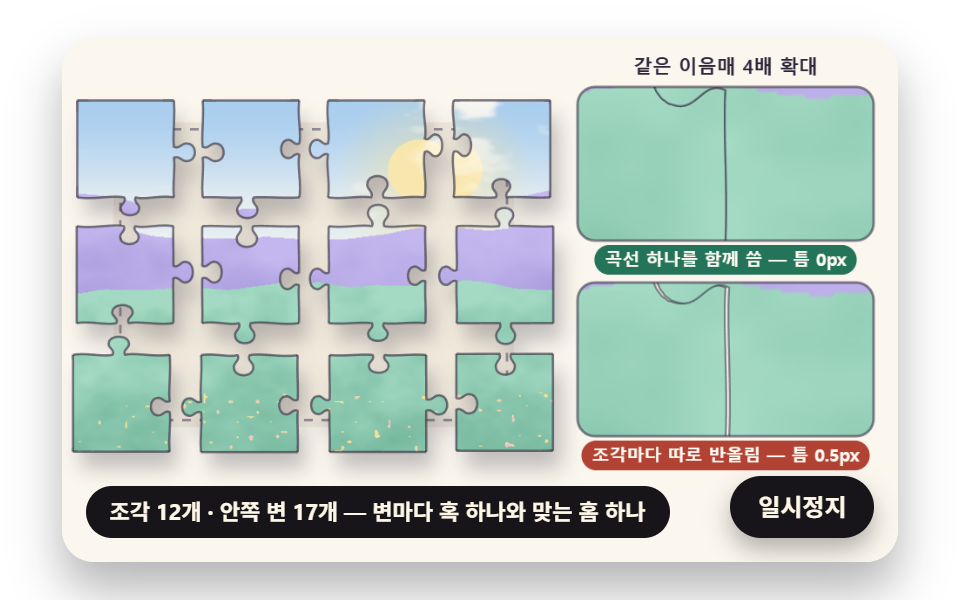 01 jig-shared-curve-tab-cut
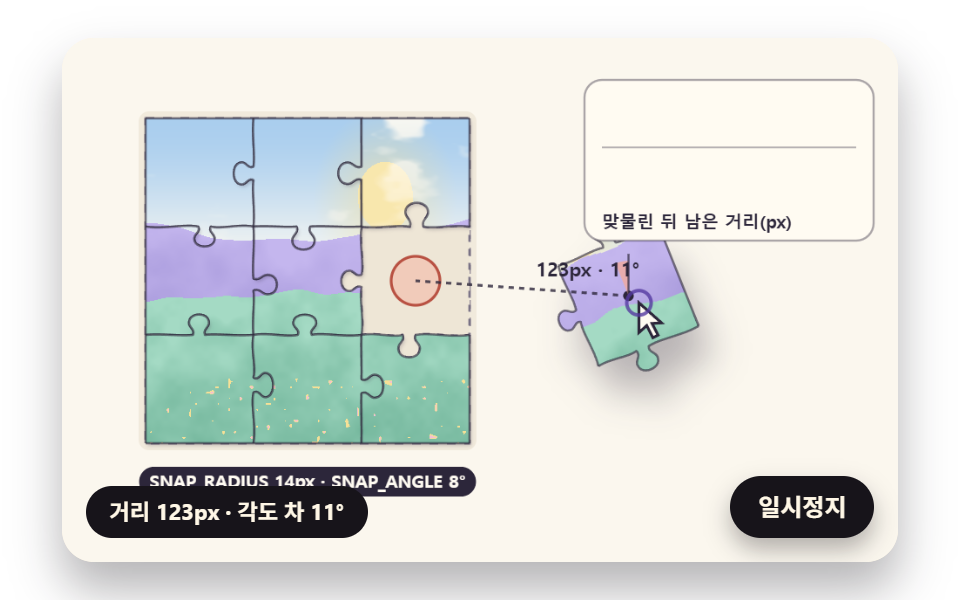 02 jig-snap-threshold-spring
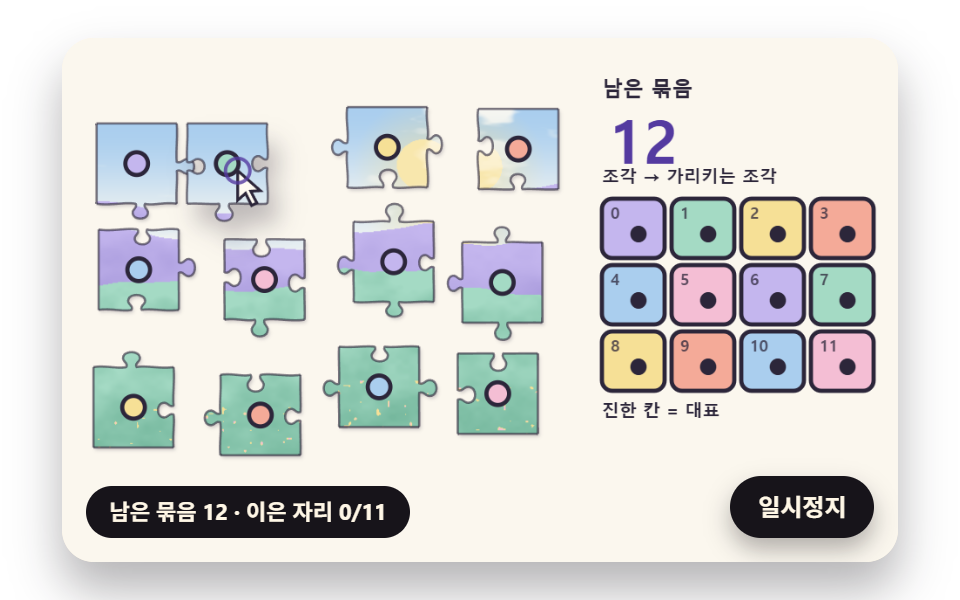 03 jig-group-root-merge
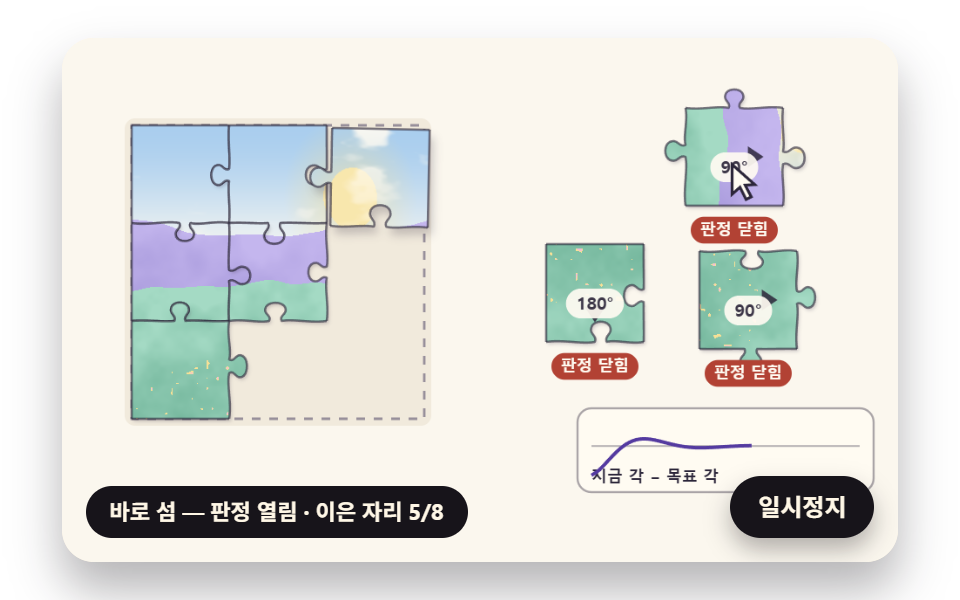 04 jig-quarter-turn-spring-rotate
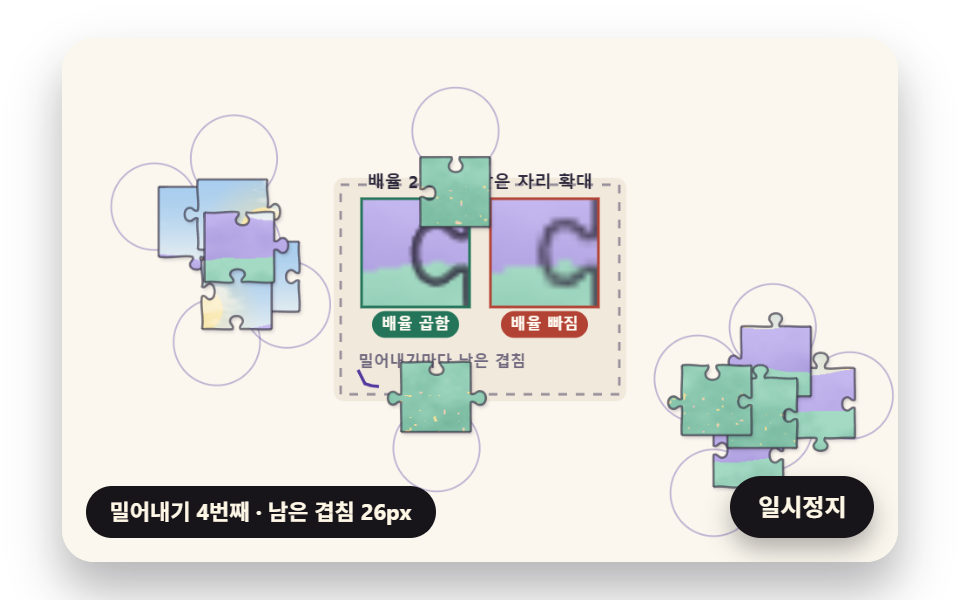 05 jig-tray-scatter-overlap-relax
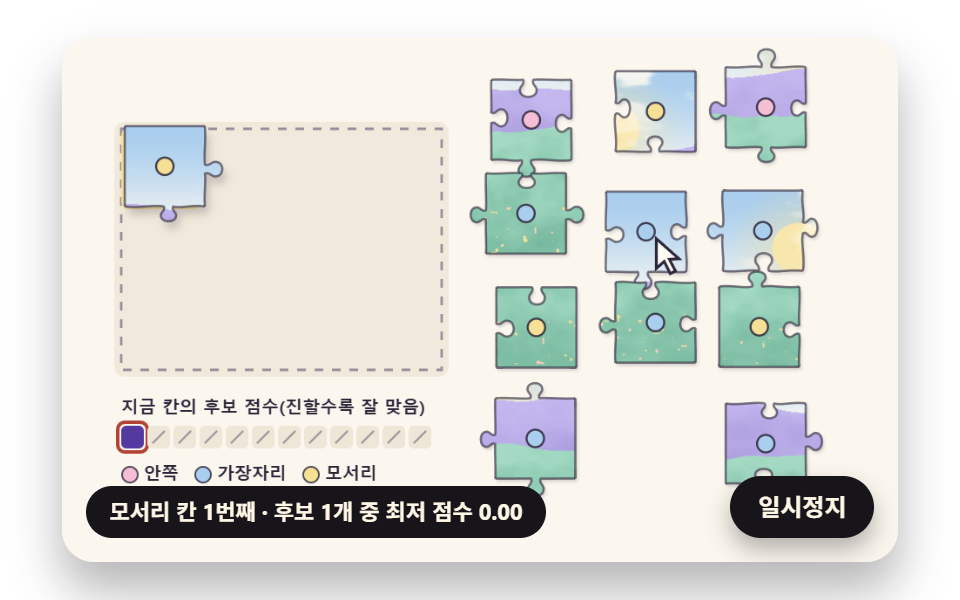 06 jig-edge-first-auto-solver
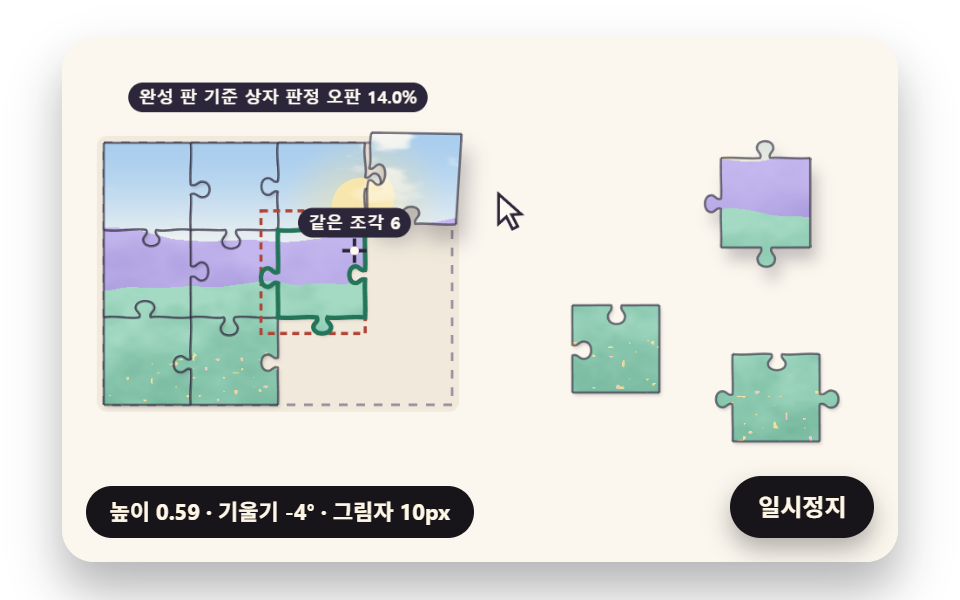 07 jig-lift-tilt-shadow-height
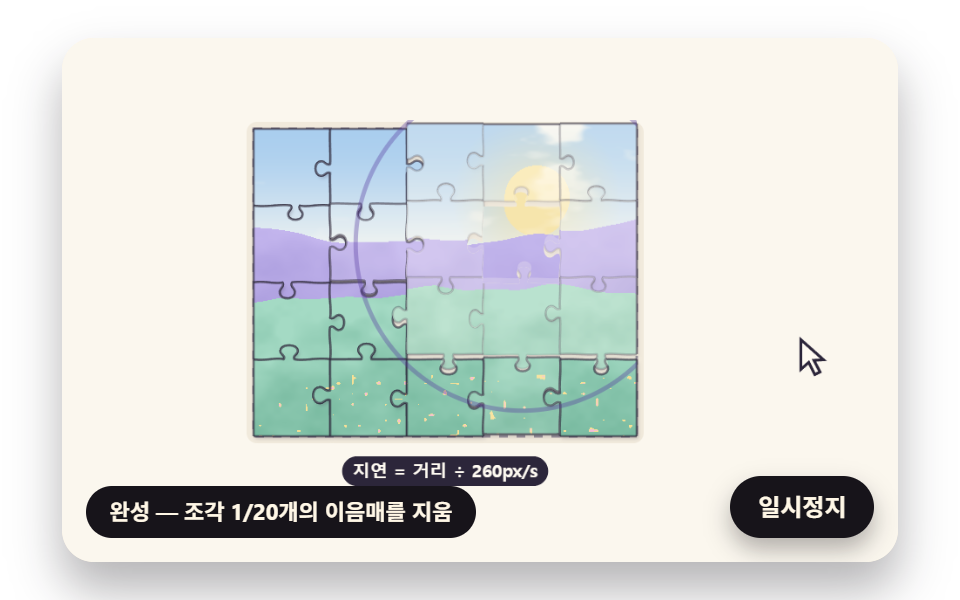 08 jig-complete-seam-wave-gloss
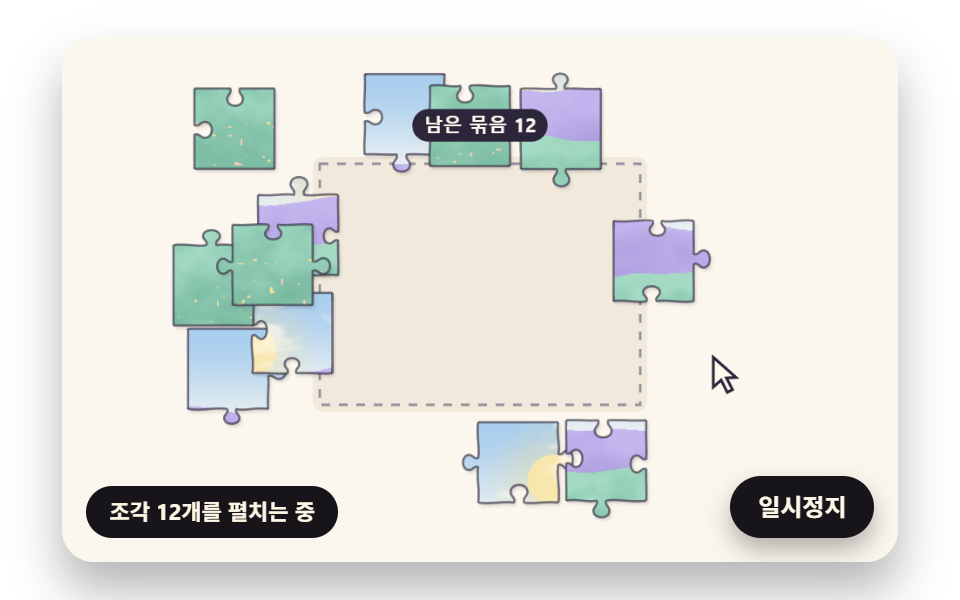 09 jig-hero-self-assemble-scene
Auto-plays · click a tile to jump to its section · all nine in one zip
- 01 A Piece Cutter Where Neighbors Share One Curve
- 02 A Snap That Pulls Only Inside Distance and Angle Thresholds
- 03 A Group Merge That Files Joined Pieces Under One Root
- 04 Quarter-Turn Pieces That Rotate into Place
- 05 A Piece Tray That Spreads Out Without Overlap
- 06 An Auto Solver That Starts from the Border
- 07 A Lifted Piece with Speed Tilt and Shadow Height
- 08 A Seam Wave and Gloss That Spread at Completion
- 09 A Hero Scene Where the Puzzle Assembles Itself
Cutting a Photo into Squares Is Not a Jigsaw: Piece Shape Comes from Edges Shared with Neighbors
A picture cut into plain squares lets any piece sit in any cell as far as shape goes, so the player has only the image to go on. A jigsaw piece has a knob pushing out of each inner edge and a matching socket on the neighbor across that edge, so the outline narrows down the match before the colors do. For that match to hold on screen without a sliver of gap, the two pieces cannot each draw their own similar curve; they have to use one curve together.
Writing one edge as five curve segments
Each inner edge in these demos is five cubic segments in a row: shoulder, neck, top of the knob, neck, shoulder. tabEdge measures along the edge as u and at a right angle to it as v, both in units of the edge length, then multiplies v by a tab sign of +1 or −1, so a single sign decides whether the knob bulges out or the socket dips in. The knob radius is half of TAB_SIZE 0.2 with up to 12% wobble (KNOB_JITTER), the neck is 0.62 of that radius (NECK_RATIO), and the knob center drifts at most 0.06 from the middle of the edge (EDGE_WOBBLE). All of it comes from one seeded stream (seed 486) drawn edge by edge, so a reload rebuilds the same board, and the outer border uses one straight segment (flatEdge), which leaves corner pieces with two straight sides and edge pieces with one.
The on-screen outline is a polyline, not a curve
The curves only place points. chainInto splits every segment into 12 steps (CURVE_STEPS) and joins them with lineTo, so the clip that cuts the picture, the isPointInPath test that asks which piece a click landed in, and the calculation-side pointInPoly all look at the same polyline. When the drawn outline and the hit outline differ, a press on the tip of a visible knob grabs the piece next to it; built this way, that mismatch has no room to appear.
Jigsaw Puzzle JavaScript: 9 Scenes — a Shared-Curve Piece Cutter, a Threshold Spring Snap, a One-Root Group Merge, Quarter-Turn Pieces, a Tray That Spreads Without Overlap, an Edge-First Auto Solver, a Lifted Piece with Tilt and Shadow, a Completion Wave with Gloss and a Self-Assembling Hero
01 to 04 are rules a single piece follows on the board (cutting, snapping, grouping, turning), 05 to 07 handle the space around the board and the hand (the tray, the solver, the lift), 08 is the moment of completion, and 09 strings the first eight into one opening scene. Each of the nine runs on one 2D canvas with internal coordinates of 480×300, and the picture is not an outside photo: sceneryColor(u, v) paints sky, sun, clouds, far hills, near hills and wildflowers pixel by pixel onto a hidden canvas once. A piece clips that picture with its own outline, so wherever it travels it carries the patch of landscape that belongs to its home cell.
Twenty-four frames over two seconds on a 480×300 canvas
| Item | Cumulative area | Frames that moved | Mean intensity |
|---|---|---|---|
| 01 Shared-curve piece cutter | 47.4% | 23/23 | 50.1 |
| 02 Two-limit spring snap | 17.3% | 23/23 | 86.5 |
| 03 One-root group merge | 26.9% | 23/23 | 66.5 |
| 04 Quarter-turn pieces | 19.9% | 23/23 | 79.8 |
| 05 Tray that spreads without overlap | 24.2% | 19/23 | 62.2 |
| 06 Edge-first auto solver | 28.9% | 23/23 | 68.2 |
| 07 Lifted piece tilt | 36.3% | 23/23 | 84.0 |
| 08 Completion wave and gloss | 26.4% | 23/23 | 35.0 |
| 09 Self-assembling hero | 39.8% | 23/23 | 59.1 |
01 covers the widest area, likely because all twelve pieces spread out and come back together, and 05 alone reads 19/23, apparently because the pieces sit stacked on one point for the first 0.15 seconds and the tray goes still once the overlap reaches zero. 08 has the lowest intensity, likely because the board rises only about 3px and most of the change is seam lines fading out.
01A Piece Cutter Where Neighbors Share One Curve
Use this scene when a page has to show how a picture will be cut before anyone plays, such as a preview on a custom photo puzzle gift page: from 0.25 seconds the 17 inner edges are drawn one after another with a coral dot at the tip, and from 1.15 seconds each piece lifts and drifts outward from the board center, 0.05 seconds after the one before. In all 17 neighbor pairs one chain equals the other's reversed chain with a difference of 0 at every point, each pair is one knob facing one socket, and the spread spring (stiffness 90, damping 11) carries a corner piece up to 33.1px and runs 10.3% past its target before returning. Of the two 4x zoom panels on the right, the top one shows the seam drawn from one shared chain and the bottom one shows each piece rounding its own corner to whole pixels.
<main class="stage">
<div class="jz is-demo" id="jz">
  <canvas class="jz__canvas" data-role="canvas" width="480" height="300" role="img" tabindex="0" aria-label="A puzzle board that cuts a landscape painted in code into twelve pieces whose neighbors share one curve per edge. Arrow keys move a piece"></canvas>
  <p class="jz__status" data-role="status" aria-live="off">Drawing the inner edges</p>
  <button class="jz__pause" data-role="pause" type="button" aria-pressed="false">Pause</button>
</div>
</main>
@use "../../../../site/static/demo-tokens" as *;
@include stage($stage-paper);
.jz {
position: relative;
width: min(92vw, calc(160vh - 12.8vw));
aspect-ratio: 480 / 300;
margin: 0 auto;
border-radius: $r-card;
overflow: hidden;
box-shadow: $shadow-raised;
background: $subject-cream;
}
// 캔버스 — 끌기를 손가락으로도 받도록 브라우저 기본 끌기(스크롤·확대)를 이 위에서만 끈다
.jz__canvas {
position: absolute;
inset: 0;
display: block;
width: 100%;
height: 100%;
touch-action: none;
cursor: grab;
border-radius: $r-card;
}
// 초점 — 키보드로 들어오면 캔버스 안쪽에 진한 테두리. 고른 조각은 캔버스가 점선으로 따로 그린다
.jz__canvas:focus-visible {
outline: 3px solid $subject-ink;
outline-offset: -3px;
}
.jz__pause {
position: absolute;
right: $sp-3;
bottom: $sp-3;
padding: $sp-1 $sp-3;
border: 2px solid $subject-ink;
border-radius: $r-pill;
background: $subject-ink;
color: $subject-cream;
font-family: inherit;
font-weight: 700;
font-size: 12px;
line-height: 1.6;
cursor: pointer;
box-shadow: $shadow-press;
transition: transform $dur-quick $ease-spring;
}
// 눌린 상태(멈춤) — 바탕과 글자색을 뒤집어 aria-pressed 가 눈에도 보이게
.jz__pause[aria-pressed="true"] {
background: $subject-cream;
color: $subject-ink;
}
.jz__pause:hover {
transform: translateY(-2px);
}
.jz__pause:active {
transform: translateY(1px);
}
.jz__pause:focus-visible {
outline: 3px solid $subject-ink;
outline-offset: 3px;
}
// 상태 줄 — 남은 묶음 수·이은 자리 수를 글자로. 시연 중에는 aria-live off, 사람이 처음 손대면 polite
.jz__status {
position: absolute;
left: $sp-3;
bottom: $sp-3;
max-width: calc(100% - 120px);
margin: 0;
padding: $sp-1 $sp-3;
border-radius: $r-pill;
background: $subject-ink;
color: $subject-cream;
font-weight: 700;
font-size: 11px;
line-height: 1.6;
white-space: nowrap;
overflow: hidden;
text-overflow: ellipsis;
pointer-events: none;
}
@media (max-width: 340px) {
.jz__pause,
.jz__status { font-size: 10px; padding: $sp-1 $sp-2; }
}
// 동작 줄이기 — 판은 스크립트가 완성 한 장으로 멈춘다. 버튼도 떠오르지 않게
@media (prefers-reduced-motion: reduce) {
.jz__pause { transition: none !important; }
.jz__pause:hover,
.jz__pause:active { transform: none !important; }
}html, body {
margin: 0;
overflow: hidden;
}
.stage {
box-sizing: border-box;
min-height: 100vh;
display: grid;
place-items: center;
margin: 0;
background: #ffffff;
font-family: -apple-system, "Segoe UI", "Noto Sans KR", sans-serif;
padding: clamp(8px, 4vw, 24px);
}
.jz {
position: relative;
width: min(92vw, 160vh - 12.8vw);
aspect-ratio: 480/300;
margin: 0 auto;
border-radius: 16px;
overflow: hidden;
box-shadow: 0 14px 24px rgba(23, 20, 26, 0.32);
background: #fff7e6;
}
.jz__canvas {
position: absolute;
inset: 0;
display: block;
width: 100%;
height: 100%;
touch-action: none;
cursor: grab;
border-radius: 16px;
}
.jz__canvas:focus-visible {
outline: 3px solid #17141a;
outline-offset: -3px;
}
.jz__pause {
position: absolute;
right: 12px;
bottom: 12px;
padding: 4px 12px;
border: 2px solid #17141a;
border-radius: 999px;
background: #17141a;
color: #fff7e6;
font-family: inherit;
font-weight: 700;
font-size: 12px;
line-height: 1.6;
cursor: pointer;
box-shadow: 0 6px 12px rgba(23, 20, 26, 0.32);
transition: transform 220ms cubic-bezier(0.2, 0.8, 0.2, 1);
}
.jz__pause[aria-pressed=true] {
background: #fff7e6;
color: #17141a;
}
.jz__pause:hover {
transform: translateY(-2px);
}
.jz__pause:active {
transform: translateY(1px);
}
.jz__pause:focus-visible {
outline: 3px solid #17141a;
outline-offset: 3px;
}
.jz__status {
position: absolute;
left: 12px;
bottom: 12px;
max-width: calc(100% - 120px);
margin: 0;
padding: 4px 12px;
border-radius: 999px;
background: #17141a;
color: #fff7e6;
font-weight: 700;
font-size: 11px;
line-height: 1.6;
white-space: nowrap;
overflow: hidden;
text-overflow: ellipsis;
pointer-events: none;
}
@media (max-width: 340px) {
.jz__pause,
.jz__status {
font-size: 10px;
padding: 4px 8px;
}
}
@media (prefers-reduced-motion: reduce) {
.jz__pause {
transition: none !important;
}
.jz__pause:hover,
.jz__pause:active {
transform: none !important;
}
}(function () {
const root = document.getElementById("jz");
if (!root) return;
// 장면 시계(초)와 상태 줄 글자 — 장면 계산이 고치고, 화면 쪽이 읽어 그린다
let sceneT = 0;
let simStatus = '';
// 판 좌표 — 캔버스 안은 늘 480×300. 화면에 보이는 크기와 상관없이 계산은 이 좌표로 한다
const W = 480;
const H = 300;
const TAU = Math.PI * 2;
function clamp(v, lo, hi) { return v < lo ? lo : (v > hi ? hi : v); }
function lerp(a, b, k) { return a + (b - a) * k; }
function smooth(x) { const c = clamp(x, 0, 1); return c * c * (3 - 2 * c); }
// 따라가기 비율 — 1 − e^(−rate·dt). 프레임 시간이 달라도 1초에 남은 거리의 같은 비율만큼 다가간다
function follow(rate, dt) { return 1 - Math.exp(-rate * dt); }
function deg(rad) { return rad * 180 / Math.PI; }
// 각을 −π ~ π 로 접는다 — 두 각의 차를 잴 때 한 바퀴 차이를 없앤다
function wrapAngle(a) { let x = a % TAU; if (x > Math.PI) {
x -= TAU;
} if (x < -Math.PI) {
x += TAU;
} return x; }
// 시드 고정 난수 — 같은 시드면 같은 시연이 다시 나온다 (32비트 정수 섞기)
function makeRng(seed) {
let s = seed >>> 0;
return function () {
s = (s + 0x6d2b79f5) >>> 0;
let t = s;
t = Math.imul(t ^ (t >>> 15), t | 1);
t ^= t + Math.imul(t ^ (t >>> 7), t | 61);
return ((t ^ (t >>> 14)) >>> 0) / 4294967296;
};
}
// −1 ~ 1 사이 값
function spread(rng) { return rng() * 2 - 1; }
function makeSpring(x) { return { x: x, v: 0, to: x }; }
const SPRING_SUBSTEP = 1 / 240;
function stepSpring(s, stiffness, damping, dt) {
let left = dt;
while (left > 1e-9) {
const h = Math.min(SPRING_SUBSTEP, left);
s.v += (stiffness * (s.to - s.x) - damping * s.v) * h;
s.x += s.v * h;
left -= h;
}
}
function snapSpring(s, x) { s.x = x; s.v = 0; s.to = x; }
// ── 값 노이즈 ────────────────────────────────────────────────
// 정수 격자점마다 시드로 0~1 값을 하나씩 정해 두고, 그 사이는 부드러운 계단(3x² − 2x³)으로 섞는다.
// 여러 배율(옥타브)을 반씩 줄인 세기로 더하면 산등성이·구름 같은 결이 나온다
function hash2(ix, iy, seed) {
let h = Math.imul(ix, 374761393) ^ Math.imul(iy, 668265263) ^ Math.imul(seed, 1442695041);
h = Math.imul(h ^ (h >>> 13), 1274126177);
h ^= h >>> 16;
return (h >>> 0) / 4294967296;
}
function valueNoise(x, y, seed) {
const ix = Math.floor(x);
const iy = Math.floor(y);
const fx = x - ix;
const fy = y - iy;
const sx = fx * fx * (3 - 2 * fx);
const sy = fy * fy * (3 - 2 * fy);
const a = hash2(ix, iy, seed);
const b = hash2(ix + 1, iy, seed);
const c = hash2(ix, iy + 1, seed);
const d = hash2(ix + 1, iy + 1, seed);
return lerp(lerp(a, b, sx), lerp(c, d, sx), sy);
}
function fbm(x, y, seed, octaves) {
let amp = 0.5;
let freq = 1;
let sum = 0;
let norm = 0;
for (let k = 0; k < octaves; k += 1) {
sum += amp * valueNoise(x * freq, y * freq, seed + k * 17);
norm += amp;
amp *= 0.5;
freq *= 2;
}
return sum / norm;
}
// 파스텔 팔레트 — 크림 바탕 위 라벤더·민트·버터·산호. 테두리·글자는 진한 쪽으로 명도 차를 둔다
const PAPER = [251, 247, 238];
const PAPER_DIM = [238, 230, 214];
const INK = [44, 38, 58];
const INK_SOFT = [112, 104, 126];
const CREAM = [255, 251, 242];
const LAVENDER = [196, 182, 238];
const LAVENDER_DIM = [160, 146, 214];
const MINT = [164, 218, 196];
const MINT_DIM = [118, 184, 158];
const BUTTER = [246, 224, 150];
const CORAL = [244, 170, 152];
const SKY = [170, 206, 238];
const PINK = [244, 190, 212];
const MINT_DEEP = [36, 116, 90];
const CORAL_DEEP = [178, 66, 52];
const VIOLET_DEEP = [84, 58, 160];
function mix(a, b, k) { return [lerp(a[0], b[0], k), lerp(a[1], b[1], k), lerp(a[2], b[2], k)]; }
function rgba(c, a) {
return 'rgba(' + Math.round(clamp(c[0], 0, 255)) + ',' + Math.round(clamp(c[1], 0, 255)) + ',' + Math.round(clamp(c[2], 0, 255)) + ',' + clamp(a, 0, 1).toFixed(3) + ')';
}
// ── 코드로 칠한 풍경 ─────────────────────────────────────────
// 판 안의 비율 좌표 (u, v) 0~1 하나에 색 하나. 하늘 → 해 → 구름 → 먼 산 → 가까운 언덕 → 들꽃 순으로 덮어 칠한다.
// 사진이 아니라 같은 페이지에서 계산한 그림이라 getImageData 로 다시 읽어도 막히지 않는다
const SCENE_SEED = 27;
const SUN_U = 0.74;
const SUN_V = 0.24;
const SUN_R = 0.085;
function sceneryColor(u, v) {
let c = mix(SKY, CREAM, smooth(v / 0.56));
const ds = Math.hypot(u - SUN_U, (v - SUN_V) * 0.8);
c = mix(c, BUTTER, clamp(1 - ds / (SUN_R * 2.6), 0, 1) * 0.55);
if (ds < SUN_R) {
c = mix(BUTTER, CREAM, 0.25);
}
const cloud = fbm(u * 5, v * 10, SCENE_SEED + 3, 4);
if (v < 0.5) {
c = mix(c, CREAM, smooth((cloud - 0.56) / 0.14) * 0.9 * (1 - v / 0.5));
}
const ridgeFar = 0.42 - 0.17 * fbm(u * 2.4, 0.5, SCENE_SEED + 5, 3);
if (v > ridgeFar) {
const shade = fbm(u * 9, v * 9, SCENE_SEED + 7, 3);
c = mix(LAVENDER, LAVENDER_DIM, clamp((v - ridgeFar) * 2.4 + (shade - 0.5) * 0.7, 0, 1));
}
const ridgeNear = 0.63 - 0.15 * fbm(u * 3.2 + 4, 1.5, SCENE_SEED + 9, 3);
if (v > ridgeNear) {
const shade = fbm(u * 12, v * 12, SCENE_SEED + 11, 3);
c = mix(MINT, MINT_DIM, clamp((v - ridgeNear) * 1.8 + (shade - 0.5) * 0.9, 0, 1));
}
if (v > 0.8) {
const f = valueNoise(u * 58, v * 58, SCENE_SEED + 13);
if (f > 0.9) {
c = f > 0.95 ? PINK : BUTTER;
}
}
return c;
}
// ── 조각 자르기 — 이웃과 나눠 쓰는 곡선 ───────────────────────
// 칸 사이 변 하나를 3차 곡선 다섯 마디로 만든다: 어깨 → 목 → 혹 위 → 목 → 어깨.
// 변 시작점 A 에서 끝점 B 로 가는 방향을 u(0~1), 그 방향을 90도 돌린 쪽을 v 로 두고 (u, v) 를 변 길이 L 단위로 적는다.
// v 에 탭 부호(+1/−1)를 곱해 혹이 어느 이웃 쪽으로 나오는지 정한다
const PUZZLE_SEED = 486;
// 혹의 지름 = 변 길이 × TAB_SIZE, 혹의 높이 = 지름 × TAB_HEIGHT
const TAB_SIZE = 0.2;
const TAB_HEIGHT = 1.0;
// 목 폭 = 혹 반지름 × NECK_RATIO — 1 보다 작아야 혹이 목보다 넓어 빠지지 않는다
const NECK_RATIO = 0.62;
// 흔들림 — 혹 자리(변 가운데에서 ± 변 길이 몫), 혹 크기 ± 몫
const EDGE_WOBBLE = 0.06;
const KNOB_JITTER = 0.12;
// 3차 곡선 사슬 — [x0, y0, c1x, c1y, c2x, c2y, x1, y1, c1x, …]. 마디 끝점이 다음 마디 시작점이다
function tabEdge(ax, ay, bx, by, sign, rng, tabSize) {
const dx = bx - ax;
const dy = by - ay;
const c = 0.5 + spread(rng) * EDGE_WOBBLE;
const kr = tabSize / 2 * (1 + spread(rng) * KNOB_JITTER);
const nw = kr * NECK_RATIO;
const h = tabSize * TAB_HEIGHT * (1 + spread(rng) * KNOB_JITTER);
const j = spread(rng) * EDGE_WOBBLE * 0.5;
const left = c - nw;
const right = 1 - c - nw;
const uv = [
0, 0,
left * 0.35, j, left * 0.75, -j, c - nw, 0,
c - nw * 0.55, h * 0.28, c - kr * 1.12, h * 0.38, c - kr, h * 0.66,
c - kr * 0.9, h * 1.12, c + kr * 0.9, h * 1.12, c + kr, h * 0.66,
c + kr * 1.12, h * 0.38, c + nw * 0.55, h * 0.28, c + nw, 0,
c + nw + right * 0.25, j, c + nw + right * 0.65, -j, 1, 0
];
const out = [];
for (let k = 0; k < uv.length; k += 2) {
const u = uv[k];
const v = uv[k + 1] * sign;
// 방향 (dx, dy) 를 화면 좌표에서 90도 돌린 쪽 = (−dy, dx)
out.push(ax + u * dx - v * dy, ay + u * dy + v * dx);
}
return out;
}
// 바깥 테두리 — 곧은 변 한 마디(조절점을 1/3·2/3 자리에)
function flatEdge(ax, ay, bx, by) {
return [ax, ay, lerp(ax, bx, 1 / 3), lerp(ay, by, 1 / 3), lerp(ax, bx, 2 / 3), lerp(ay, by, 2 / 3), bx, by];
}
// 사슬 뒤집기 — 점 순서만 거꾸로. 3차 곡선 한 마디 (p0, c1, c2, p1) 는 (p1, c2, c1, p0) 로 같은 곡선이라 어긋남이 0 이다
function reverseChain(pts) {
const out = [];
for (let k = pts.length - 2; k >= 0; k -= 2) {
out.push(pts[k], pts[k + 1]);
}
return out;
}
// 조각 순서 = 위 → 오른쪽 → 아래 → 왼쪽, 시계 방향. 위 변과 오른쪽 변은 사슬을 그대로, 아래·왼쪽 변은 뒤집어 쓴다.
// 가로 변은 왼→오, 세로 변은 위→아래로 한 번만 만든다. 그래서 같은 변을 한쪽은 그대로, 한쪽은 뒤집어 쓰고,
// 혹이 한쪽엔 바깥(+), 한쪽엔 안(−)이 된다 — 그대로 쓰는 조각의 탭 부호 = −sign, 뒤집어 쓰는 조각 = +sign
function makePuzzle(cols, rows, size, bx, by, seed, tabSize) {
const rng = makeRng(seed);
const hEdges = [];
const hSign = [];
const vEdges = [];
const vSign = [];
const signs = [];
for (let r = 0; r <= rows; r += 1) {
for (let c = 0; c < cols; c += 1) {
const ax = bx + c * size;
const ay = by + r * size;
if (r === 0 || r === rows) {
hEdges.push(flatEdge(ax, ay, ax + size, ay));
hSign.push(0);
continue;
}
const s = rng() < 0.5 ? 1 : -1;
hEdges.push(tabEdge(ax, ay, ax + size, ay, s, rng, tabSize));
hSign.push(s);
signs.push(s);
}
}
for (let r = 0; r < rows; r += 1) {
for (let c = 0; c <= cols; c += 1) {
const ax = bx + c * size;
const ay = by + r * size;
if (c === 0 || c === cols) {
vEdges.push(flatEdge(ax, ay, ax, ay + size));
vSign.push(0);
continue;
}
const s = rng() < 0.5 ? 1 : -1;
vEdges.push(tabEdge(ax, ay, ax, ay + size, s, rng, tabSize));
vSign.push(s);
signs.push(s);
}
}
const defs = [];
for (let r = 0; r < rows; r += 1) {
for (let c = 0; c < cols; c += 1) {
const top = r * cols + c;
const bottom = (r + 1) * cols + c;
const left = r * (cols + 1) + c;
const right = r * (cols + 1) + c + 1;
const sides = [
{ pts: hEdges[top], tab: -hSign[top] },
{ pts: vEdges[right], tab: -vSign[right] },
{ pts: reverseChain(hEdges[bottom]), tab: hSign[bottom] },
{ pts: reverseChain(vEdges[left]), tab: vSign[left] }
];
const hx = bx + (c + 0.5) * size;
const hy = by + (r + 0.5) * size;
let flat = 0;
const local = [];
for (const sd of sides) {
if (sd.tab === 0) {
flat += 1;
}
const l = [];
for (let k = 0; k < sd.pts.length; k += 2) {
l.push(sd.pts[k] - hx, sd.pts[k + 1] - hy);
}
local.push(l);
}
defs.push({ id: r * cols + c, col: c, row: r, hx: hx, hy: hy, sides: sides, flat: flat, local: local });
}
}
return { cols: cols, rows: rows, size: size, bx: bx, by: by, defs: defs, signs: signs };
}
// 3차 곡선 한 마디의 점 — t 0~1
function cubicAt(p, k, t) {
const u = 1 - t;
const a = u * u * u;
const b = 3 * u * u * t;
const c = 3 * u * t * t;
const d = t * t * t;
return [a * p[k] + b * p[k + 2] + c * p[k + 4] + d * p[k + 6], a * p[k + 1] + b * p[k + 3] + c * p[k + 5] + d * p[k + 7]];
}
// 사슬을 꺾은선으로 — 마디마다 steps 등분
function flattenChain(pts, steps) {
const out = [pts[0], pts[1]];
for (let k = 0; k + 7 < pts.length; k += 6) {
for (let s = 1; s <= steps; s += 1) {
const p = cubicAt(pts, k, s / steps);
out.push(p[0], p[1]);
}
}
return out;
}
// 조각 하나의 닫힌 꺾은선(조각 가운데 기준) — 네 변을 이어 붙인다
function piecePolygon(d, steps) {
const out = [];
for (const l of d.local) {
const f = flattenChain(l, steps);
for (let k = out.length ? 2 : 0; k < f.length; k += 2) {
out.push(f[k], f[k + 1]);
}
}
return out;
}
// 점이 닫힌 꺾은선 안에 있는가 — 오른쪽으로 쏜 반직선이 변을 몇 번 건너는지(홀수면 안)
function pointInPoly(px, py, poly) {
let inside = false;
const n = poly.length;
for (let i = 0, j = n - 2; i < n; j = i, i += 2) {
const xi = poly[i];
const yi = poly[i + 1];
const xj = poly[j];
const yj = poly[j + 1];
if ((yi > py) !== (yj > py) && px < (xj - xi) * (py - yi) / (yj - yi) + xi) {
inside = !inside;
}
}
return inside;
}
// 꺾은선의 네모 상자 [왼, 위, 오른, 아래]
function polyBox(poly) {
let x0 = Infinity;
let y0 = Infinity;
let x1 = -Infinity;
let y1 = -Infinity;
for (let k = 0; k < poly.length; k += 2) {
x0 = Math.min(x0, poly[k]);
x1 = Math.max(x1, poly[k]);
y0 = Math.min(y0, poly[k + 1]);
y1 = Math.max(y1, poly[k + 1]);
}
return [x0, y0, x1, y1];
}
// ── 대표 하나로 묶기 ─────────────────────────────────────────
// parent[i] 가 자기 자신이면 그 조각이 묶음의 대표. 대표를 찾으며 지나는 칸은 한 칸 건너(할아버지)를 가리키게 고쳐
// 다음 찾기가 짧아진다(경로 줄이기). 두 묶음을 합칠 땐 조각 수가 적은 쪽 대표를 많은 쪽 대표 아래로 넣는다(크기 기준)
let parent = [];
let groupSize = [];
function resetGroups(n) {
parent = [];
groupSize = [];
for (let i = 0; i < n; i += 1) {
parent.push(i);
groupSize.push(1);
}
}
function findRoot(i) {
let x = i;
while (parent[x] !== x) {
parent[x] = parent[parent[x]];
x = parent[x];
}
return x;
}
function joinGroups(a, b) {
let ra = findRoot(a);
let rb = findRoot(b);
if (ra === rb) {
return ra;
}
if (groupSize[ra] < groupSize[rb]) {
const t = ra;
ra = rb;
rb = t;
}
parent[rb] = ra;
groupSize[ra] += groupSize[rb];
return ra;
}
function groupCount() {
let n = 0;
for (let i = 0; i < parent.length; i += 1) {
if (parent[i] === i) {
n += 1;
}
}
return n;
}
function membersOf(i) {
const r = findRoot(i);
const out = [];
for (let k = 0; k < parent.length; k += 1) {
if (findRoot(k) === r) {
out.push(k);
}
}
return out;
}
let puzzle = makePuzzle(1, 1, 10, 0, 0, 1, TAB_SIZE);
let pieces = [];
// 그리는 순서 — 뒤에 있을수록 위에 그린다
let zOrder = [];
// 마지막 이음이 생긴 장면 시각 — 묶음이 하나가 되면 정해진다(아직이면 −1)
let completeAt = -1;
// 이음 시각 — 조각 i 의 변 s(위·오른·아래·왼)가 이웃과 묶인 장면 시각, 아직이면 −1
let seamJoinedAt = [];
function setupWorld(pz) {
puzzle = pz;
pieces = [];
zOrder = [];
seamJoinedAt = [];
for (const d of pz.defs) {
pieces.push({ x: d.hx, y: d.hy, vx: 0, vy: 0, tx: d.hx, ty: d.hy, a: 0, va: 0, ta: 0, h: 0, vh: 0, th: 0, mvx: 0, mvy: 0, lx: d.hx, ly: d.hy });
zOrder.push(d.id);
seamJoinedAt.push(-1, -1, -1, -1);
}
resetGroups(pz.defs.length);
completeAt = -1;
}
// 퍼즐을 새로 만든 직후 부르는 일 — 화면 쪽이 그림 칠하기·경로 만들기를 끼워 넣는다(계산만 하는 곳에선 아무 일 없음)
let onBoardReady = function () { return; };
function newBoard(cols, rows, size, bx, by, seed) {
setupWorld(makePuzzle(cols, rows, size, bx, by, seed, TAB_SIZE));
onBoardReady();
}
function placeAt(i, x, y, a) {
const p = pieces[i];
p.x = x;
p.y = y;
p.tx = x;
p.ty = y;
p.vx = 0;
p.vy = 0;
p.lx = x;
p.ly = y;
p.a = a;
p.ta = a;
p.va = 0;
}
function raise(i) {
const members = membersOf(i);
zOrder = zOrder.filter(function (k) { return members.indexOf(k) < 0; }).concat(members);
}
// 묶음 째 옮기기 — 조각 i 의 목표가 (x, y) 가 되도록 같은 묶음 전부를 같은 만큼
function moveGroupTo(i, x, y, instant) {
const p = pieces[i];
const dx = x - p.tx;
const dy = y - p.ty;
for (const k of membersOf(i)) {
const q = pieces[k];
q.tx += dx;
q.ty += dy;
if (instant) {
q.x = q.tx;
q.y = q.ty;
q.vx = 0;
q.vy = 0;
}
}
}
// 이웃 — 격자에서 위·오른·아래·왼 칸의 조각 번호, 없으면 −1
function neighborOf(i, side) {
const d = puzzle.defs[i];
const c = d.col + (side === 1 ? 1 : (side === 3 ? -1 : 0));
const r = d.row + (side === 2 ? 1 : (side === 0 ? -1 : 0));
if (c < 0 || r < 0 || c >= puzzle.cols || r >= puzzle.rows) {
return -1;
}
return r * puzzle.cols + c;
}
// ── snapped — 거리와 각도 두 문턱 ─────────────────────────────
// 조각 m 이 이웃 n 옆에 바르게 앉을 자리 = n 의 목표 + (m 의 판 자리 − n 의 판 자리). 그 자리까지 거리 d 가 SNAP_RADIUS 안이고
// 두 조각 각의 차가 SNAP_ANGLE 안일 때만 묶음 전체의 목표를 그만큼 옮긴다 — 나머지 거리는 스프링이 당겨 살짝 넘쳤다 앉는다
const SNAP_RADIUS = 14;
const SNAP_ANGLE = 8 * Math.PI / 180;
const SNAP_STIFFNESS = 160;
const SNAP_DAMPING = 14;
// 방향 판정 — 기본은 늘 열림. 04 처럼 조각이 돌아가는 항목은 「바로 섰는가」 를 넣어 바꾼다
let orientOk = function (i) { void i; return true; };
// 묶음 i 의 조각들과, 다른 묶음에 있는 진짜 이웃 사이의 가장 가까운 snapped 후보
function bestSnap(i) {
let best = { m: -1, n: -1, d: Infinity, da: 0, ok: false, gx: 0, gy: 0 };
const root = findRoot(i);
for (const m of membersOf(i)) {
for (let s = 0; s < 4; s += 1) {
const n = neighborOf(m, s);
if (n < 0 || findRoot(n) === root) {
continue;
}
const dm = puzzle.defs[m];
const dn = puzzle.defs[n];
const gx = pieces[n].tx + (dm.hx - dn.hx);
const gy = pieces[n].ty + (dm.hy - dn.hy);
const d = Math.hypot(pieces[m].tx - gx, pieces[m].ty - gy);
const da = wrapAngle(pieces[m].ta - pieces[n].ta);
if (d < best.d) {
best = { m: m, n: n, d: d, da: da, ok: d < SNAP_RADIUS && Math.abs(da) < SNAP_ANGLE && orientOk(m) && orientOk(n), gx: gx, gy: gy };
}
}
}
return best;
}
// 놓았을 때 — 문턱 안이면 묶음 째 목표를 맞는 자리로 옮기고 묶는다. 문턱 밖이면 그 자리에 머문다
function tryJoin(i) {
const s = bestSnap(i);
if (!s.ok) {
return s;
}
const dx = s.gx - pieces[s.m].tx;
const dy = s.gy - pieces[s.m].ty;
// 각은 남은 차(da)만큼만 고친다 — 한 바퀴(360도) 돌아 바로 선 조각이 0 으로 되감기지 않게
for (const k of membersOf(s.m)) {
pieces[k].tx += dx;
pieces[k].ty += dy;
pieces[k].ta -= s.da;
}
joinGroups(s.m, s.n);
markSeams();
return s;
}
// 같은 묶음이 된 이웃 사이 변에 이음 시각을 적는다 — 이음매 선은 그 시각부터 옅어진다
function markSeams() {
for (let i = 0; i < pieces.length; i += 1) {
for (let s = 0; s < 4; s += 1) {
const n = neighborOf(i, s);
if (n >= 0 && seamJoinedAt[i * 4 + s] < 0 && findRoot(n) === findRoot(i)) {
seamJoinedAt[i * 4 + s] = sceneT;
}
}
}
if (completeAt < 0 && groupCount() === 1) {
completeAt = sceneT;
}
}
// 이은 자리 수 = 조각 수 − 묶음 수 (묶음이 하나면 조각 수 − 1)
function joinsMade() { return pieces.length - groupCount(); }
// ── 한 걸음 ──────────────────────────────────────────────────
// 위치·각·높이 세 스프링을 1/240초 잔걸음으로. 다듬은 속도는 걸음 앞뒤 위치 차를 VEL_SMOOTH 비율로 따라간다
const ROT_STIFFNESS = 180;
const ROT_DAMPING = 11;
const LIFT_STIFFNESS = 260;
const LIFT_DAMPING = 15;
const VEL_SMOOTH = 10;
// 들어 올린 높이 1 일 때 그림자가 떨어지는 거리(px)와 흐림(px) — 높이에 비례해 줄고 는다
const SHADOW_OFFSET = 14;
const SHADOW_BLUR = 16;
function stepWorld(dt, stiffness, damping) {
const k = follow(VEL_SMOOTH, dt);
for (const p of pieces) {
let left = dt;
while (left > 1e-9) {
const h = Math.min(SPRING_SUBSTEP, left);
p.vx += (stiffness * (p.tx - p.x) - damping * p.vx) * h;
p.vy += (stiffness * (p.ty - p.y) - damping * p.vy) * h;
p.x += p.vx * h;
p.y += p.vy * h;
p.va += (ROT_STIFFNESS * (p.ta - p.a) - ROT_DAMPING * p.va) * h;
p.a += p.va * h;
p.vh += (LIFT_STIFFNESS * (p.th - p.h) - LIFT_DAMPING * p.vh) * h;
p.h += p.vh * h;
left -= h;
}
// 지난 걸음 끝 위치(lx, ly)와 견준다 — 손이 옮긴 몫과 스프링이 옮긴 몫이 둘 다 들어간다
if (dt > 0) {
p.mvx += ((p.x - p.lx) / dt - p.mvx) * k;
p.mvy += ((p.y - p.ly) / dt - p.mvy) * k;
}
p.lx = p.x;
p.ly = p.y;
}
}
// 스프링을 모두 목표에 앉힌다 — 동작 줄이기에서 입력을 받으면 보간 없이 바로 그 자리
function settleNow() {
for (const p of pieces) {
p.x = p.tx;
p.y = p.ty;
p.vx = 0;
p.vy = 0;
p.a = p.ta;
p.va = 0;
p.h = p.th;
p.vh = 0;
p.mvx = 0;
p.mvy = 0;
p.lx = p.x;
p.ly = p.y;
}
}
// 완성 판 — 모든 조각이 제자리에 있고 하나로 묶인 상태
function assembleAll() {
for (let i = 0; i < pieces.length; i += 1) {
const d = puzzle.defs[i];
placeAt(i, d.hx, d.hy, 0);
pieces[i].h = 0;
pieces[i].th = 0;
pieces[i].vh = 0;
}
for (let i = 1; i < pieces.length; i += 1) {
joinGroups(0, i);
}
markSeams();
}
let carries = [];
let handX = W + 40;
let handY = H * 0.6;
let handDown = false;
let carrying = -1;
const HAND_ARC = 26;
function planCarry(i, t0, t1, x, y, a) {
carries.push({ i: i, t0: t0, t1: t1, x: x, y: y, a: a, anchor: -1, ox: 0, oy: 0, started: false, done: false, sx: 0, sy: 0, sa: 0 });
}
function planCarryNext(i, anchor, t0, t1, ox, oy) {
carries.push({ i: i, t0: t0, t1: t1, x: 0, y: 0, a: 0, anchor: anchor, ox: ox, oy: oy, started: false, done: false, sx: 0, sy: 0, sa: 0 });
}
// 들고 가기 완화 — 앞뒤가 느린 5차 곡선(6t⁵ − 15t⁴ + 10t³)
function easeCarry(t) { const c = clamp(t, 0, 1); return c * c * c * (c * (c * 6 - 15) + 10); }
// 놓는 순간 부르는 일 — 기본은 snapped 판정. 항목이 바꿔 끼운다
let onRelease = function (i) { tryJoin(i); };
let onPick = function (i) { void i; };
function runCarries(t) {
carrying = -1;
handDown = false;
let lastEnd = null;
let next = null;
for (const c of carries) {
if (c.done) {
lastEnd = c;
continue;
}
if (t < c.t0) {
if (!next) {
next = c;
}
continue;
}
if (!c.started) {
c.started = true;
const p = pieces[c.i];
c.sx = p.tx;
c.sy = p.ty;
c.sa = p.ta;
if (c.anchor >= 0) {
const dm = puzzle.defs[c.i];
const dn = puzzle.defs[c.anchor];
c.x = pieces[c.anchor].tx + dm.hx - dn.hx + c.ox;
c.y = pieces[c.anchor].ty + dm.hy - dn.hy + c.oy;
c.a = pieces[c.anchor].ta;
}
raise(c.i);
onPick(c.i);
}
const k = (t - c.t0) / Math.max(1e-6, c.t1 - c.t0);
const e = easeCarry(k);
const arc = Math.sin(Math.PI * clamp(k, 0, 1)) * HAND_ARC;
if (k >= 1) {
moveGroupTo(c.i, c.x, c.y, true);
pieces[c.i].ta = c.a;
c.done = true;
onRelease(c.i);
lastEnd = c;
continue;
}
moveGroupTo(c.i, lerp(c.sx, c.x, e), lerp(c.sy, c.y, e) - arc, true);
pieces[c.i].ta = lerp(c.sa, c.a, e);
carrying = c.i;
handDown = true;
handX = pieces[c.i].x + 6;
handY = pieces[c.i].y + 4;
return;
}
// 들고 있지 않을 때 — 지난 놓은 자리에서 다음 집을 조각 쪽으로 손이 옮겨 간다
if (next) {
const from = lastEnd ? [pieces[lastEnd.i].x + 6, pieces[lastEnd.i].y + 4] : [W + 40, H * 0.6];
const t0 = lastEnd ? lastEnd.t1 : 0;
const k = easeCarry((t - t0) / Math.max(1e-6, next.t0 - t0));
const target = [pieces[next.i].x + 6, pieces[next.i].y + 4];
handX = lerp(from[0], target[0], k);
handY = lerp(from[1], target[1], k);
}
else if (lastEnd) {
handX = lerp(handX, W + 40, 0.04);
handY = lerp(handY, H * 0.7, 0.04);
}
}
function resetCarries() { carries = []; carrying = -1; handDown = false; handX = W + 40; handY = H * 0.6; }
// ── 쟁반 — 겹친 깊이만큼 밀어내기 ────────────────────────────
// 조각을 반지름 TRAY_R 원으로 보고, 겹친 쌍마다 가운데를 잇는 방향으로 겹친 깊이의 절반씩 서로 민다.
// 판 상자(여백 TRAY_MARGIN 포함) 안에 들어온 원은 가장 가까운 판 바깥 변으로 투영하고, 가운데가 캔버스 가장자리에서 반지름의 0.7 배 안쪽에 머물게 자른다.
// 한 번에 다 풀리지 않으므로 여러 번 되풀이한다 — 되풀이할수록 남은 겹침 합이 준다
const TRAY_MARGIN = 6;
function relaxOnce(ids, radius, bx0, by0, bx1, by1) {
let overlap = 0;
for (let a = 0; a < ids.length; a += 1) {
for (let b = a + 1; b < ids.length; b += 1) {
const p = pieces[ids[a]];
const q = pieces[ids[b]];
let dx = q.tx - p.tx;
let dy = q.ty - p.ty;
let d = Math.hypot(dx, dy);
const depth = radius * 2 - d;
if (depth <= 0) {
continue;
}
overlap += depth;
if (d < 1e-6) {
dx = 1;
dy = 0;
d = 1;
}
const push = depth / 2 / d;
p.tx -= dx * push;
p.ty -= dy * push;
q.tx += dx * push;
q.ty += dy * push;
}
}
for (const i of ids) {
const p = pieces[i];
const x0 = bx0 - radius - TRAY_MARGIN;
const x1 = bx1 + radius + TRAY_MARGIN;
const y0 = by0 - radius - TRAY_MARGIN;
const y1 = by1 + radius + TRAY_MARGIN;
if (p.tx > x0 && p.tx < x1 && p.ty > y0 && p.ty < y1) {
// 판 안 — 네 변 중 가장 가까운 쪽으로 밀어낸다
const dl = p.tx - x0;
const dr = x1 - p.tx;
const du = p.ty - y0;
const dd = y1 - p.ty;
const m = Math.min(dl, dr, du, dd);
overlap += m;
if (m === dl) {
p.tx = x0;
}
else if (m === dr) {
p.tx = x1;
}
else if (m === du) {
p.ty = y0;
}
else {
p.ty = y1;
}
}
p.tx = clamp(p.tx, radius * 0.7, W - radius * 0.7);
p.ty = clamp(p.ty, radius * 0.7, H - radius * 0.7);
}
return overlap;
}
// ── 자동 풀이 — 곧은 변 수와 변 색 차로 점수 ─────────────────
// 곧은 변 2개 = corner, 1개 = edge, 0개 = inner. 칸 하나에 들어갈 후보 점수 = 이미 놓인 이웃마다
// (탭이 마주 보지 않으면 TAB_MISMATCH_COST) + (두 변을 따라 안쪽으로 COLOR_INSET 들어간 점의 색 차 평균 / 255 × COLOR_WEIGHT).
// 곧은 변 자리가 칸의 바깥 테두리와 다르면 그 칸에는 넣지 않는다. 점수가 가장 낮은 조각을 고른다
const COLOR_SAMPLES = 9;
const COLOR_INSET = 2.5;
const COLOR_WEIGHT = 4;
const TAB_MISMATCH_COST = 3;
// 칸 순서 — 바깥 테두리를 시계 방향으로 한 바퀴 돈 뒤 안쪽을 줄 순서로
function frameFirstOrder(cols, rows) {
const out = [];
for (let c = 0; c < cols; c += 1) {
out.push(c);
}
for (let r = 1; r < rows; r += 1) {
out.push(r * cols + cols - 1);
}
for (let c = cols - 2; c >= 0; c -= 1) {
out.push((rows - 1) * cols + c);
}
for (let r = rows - 2; r >= 1; r -= 1) {
out.push(r * cols);
}
for (let r = 1; r < rows - 1; r += 1) {
for (let c = 1; c < cols - 1; c += 1) {
out.push(r * cols + c);
}
}
return out;
}
function pieceKind(d) { return d.flat; }
// 칸 slot 의 바깥 테두리 패턴 — 위·오른·아래·왼 중 판 끝인 변이 곧은 변이어야 한다
function fitsBorder(d, slot, cols, rows) {
const c = slot % cols;
const r = Math.floor(slot / cols);
const edge = [r === 0, c === cols - 1, r === rows - 1, c === 0];
for (let s = 0; s < 4; s += 1) {
if ((d.sides[s].tab === 0) !== edge[s]) {
return false;
}
}
return true;
}
// 조각 d 의 변 side 를 따라 안쪽으로 들어간 점들의 색 — 조각 그림은 원래 판 자리(hx, hy)에서 잘라 온 것이다
function sideColors(d, side, size, sample) {
const out = [];
const half = size / 2;
for (let k = 0; k < COLOR_SAMPLES; k += 1) {
const u = (k + 0.5) / COLOR_SAMPLES - 0.5;
let x = 0;
let y = 0;
if (side === 0) {
x = u * size;
y = -half + COLOR_INSET;
}
if (side === 1) {
x = half - COLOR_INSET;
y = u * size;
}
if (side === 2) {
x = u * size;
y = half - COLOR_INSET;
}
if (side === 3) {
x = -half + COLOR_INSET;
y = u * size;
}
out.push(sample(d.hx + x, d.hy + y));
}
return out;
}
function colorGap(a, b) {
let s = 0;
for (let k = 0; k < a.length; k += 1) {
s += (Math.abs(a[k][0] - b[k][0]) + Math.abs(a[k][1] - b[k][1]) + Math.abs(a[k][2] - b[k][2])) / 3;
}
return s / a.length;
}
// 칸 slot 에 조각 cand 를 넣을 때의 점수. placedAt[slot'] = 그 칸에 놓인 조각 번호(없으면 −1)
function slotScore(cand, slot, placedAt, sample) {
const pz = puzzle;
const d = pz.defs[cand];
if (!fitsBorder(d, slot, pz.cols, pz.rows)) {
return Infinity;
}
const c = slot % pz.cols;
const r = Math.floor(slot / pz.cols);
let score = 0;
const dirs = [[0, -1], [1, 0], [0, 1], [-1, 0]];
for (let s = 0; s < 4; s += 1) {
const nc = c + dirs[s][0];
const nr = r + dirs[s][1];
if (nc < 0 || nr < 0 || nc >= pz.cols || nr >= pz.rows) {
continue;
}
const q = placedAt[nr * pz.cols + nc];
if (q < 0) {
continue;
}
const facing = (s + 2) % 4;
const qd = pz.defs[q];
if (d.sides[s].tab + qd.sides[facing].tab !== 0 || d.sides[s].tab === 0) {
score += TAB_MISMATCH_COST;
}
score += colorGap(sideColors(d, s, pz.size, sample), sideColors(qd, facing, pz.size, sample)) / 255 * COLOR_WEIGHT;
}
return score;
}
// 식으로 읽기 — 그림을 칠하는 식을 배율 1 화소 가운데에서 바로 부르고 0~255 정수로 자른다(DOM 없이 셀 때).
// 화면에서는 칠한 그림을 getImageData 로 읽는 함수로 바뀐다(dom 쪽)
function formulaSampler() {
const pz = puzzle;
const w = Math.round(pz.cols * pz.size);
const h = Math.round(pz.rows * pz.size);
return function (x, y) {
const px = clamp(Math.floor(x - pz.bx), 0, w - 1);
const py = clamp(Math.floor(y - pz.by), 0, h - 1);
const c = sceneryColor((px + 0.5) / w, (py + 0.5) / h);
return [Math.round(c[0]), Math.round(c[1]), Math.round(c[2])];
};
}
let makeSampler = formulaSampler;
// 테두리부터 — 칸 순서대로 남은 조각 중 점수가 가장 낮은 것을 놓는다. 단계마다 후보 점수 표도 남긴다(열지도용)
function solveFrameFirst(sample) {
const pz = puzzle;
const n = pz.defs.length;
const placedAt = [];
const used = [];
for (let k = 0; k < n; k += 1) {
placedAt.push(-1);
used.push(false);
}
const steps = [];
for (const slot of frameFirstOrder(pz.cols, pz.rows)) {
const scores = [];
let best = -1;
let bestScore = Infinity;
for (let k = 0; k < n; k += 1) {
const sc = used[k] ? Infinity : slotScore(k, slot, placedAt, sample);
scores.push(sc);
if (sc < bestScore) {
bestScore = sc;
best = k;
}
}
if (best < 0) {
break;
}
used[best] = true;
placedAt[slot] = best;
steps.push({ slot: slot, piece: best, scores: scores });
}
return steps;
}
// 사람이 처음 판을 만진 뒤 — 흉내 낸 손을 멈추고 끌기·키 입력만 받는다
let handsOn = false;
function fmt(s, vals) {
let out = s;
for (const k of Object.keys(vals)) {
out = out.split('{' + k + '}').join(String(vals[k]));
}
return out;
}
// 사람이 쓰는 동안의 상태 줄 — groups left 수와 이은 자리 수
const STATUS_FREE = 'groups left {g} · joins {j}/{n}';
const STATUS_DONE = 'done: all {n} pieces in one group';
function freeStatus() {
simStatus = groupCount() === 1 ? fmt(STATUS_DONE, { n: pieces.length }) : fmt(STATUS_FREE, { g: groupCount(), j: joinsMade(), n: pieces.length - 1 });
}
const canvasEl = root.querySelector('[data-role="canvas"]');
const pauseEl = root.querySelector('[data-role="pause"]');
const statusEl = root.querySelector('[data-role="status"]');
const ctxRaw = canvasEl ? canvasEl.getContext('2d') : null;
if (!canvasEl || !ctxRaw || !pauseEl) {
return;
}
const cv = canvasEl;
const ctx = ctxRaw;
const pauseBtn = pauseEl;
// 외부 웹폰트는 부르지 않는다 — 기기에 있는 글꼴 목록만
const FONT_STACK = 'system-ui, -apple-system, "Segoe UI", "Noto Sans KR", sans-serif';
// 화소 배율 — 캔버스 내부 크기에 곱한다. 2 에서 자른다(배율 3 기기에서 화소가 2.25배로 늘지 않게)
let dpr = 1;
function fitCanvas() {
dpr = Math.min(window.devicePixelRatio || 1, 2);
cv.width = Math.round(W * dpr);
cv.height = Math.round(H * dpr);
ctx.setTransform(dpr, 0, 0, dpr, 0, 0);
}
// ── 그림과 조각 경로 ─────────────────────────────────────────
// 풍경은 판 크기 × 배율의 숨은 캔버스에 화소 하나씩 한 번만 칠해 두고, 조각마다 자기 경로로 잘라(clip) 그 위치에 붙인다
const pic = document.createElement('canvas');
const picCtx = pic.getContext('2d');
let picDpr = 0;
let picKey = '';
function paintPicture() {
const pz = puzzle;
const key = pz.cols + 'x' + pz.rows + '@' + pz.size + '/' + dpr;
if (!picCtx || key === picKey) {
return;
}
picKey = key;
picDpr = dpr;
const w = Math.max(1, Math.round(pz.cols * pz.size * dpr));
const h = Math.max(1, Math.round(pz.rows * pz.size * dpr));
pic.width = w;
pic.height = h;
const img = picCtx.createImageData(w, h);
for (let y = 0; y < h; y += 1) {
for (let x = 0; x < w; x += 1) {
const c = sceneryColor((x + 0.5) / w, (y + 0.5) / h);
const k = (y * w + x) * 4;
img.data[k] = c[0];
img.data[k + 1] = c[1];
img.data[k + 2] = c[2];
img.data[k + 3] = 255;
}
}
picCtx.putImageData(img, 0, 0);
}
// 칠한 그림을 getImageData 로 다시 읽어 색 하나를 돌려주는 함수 — 같은 페이지에서 그린 그림이라 막히지 않는다.
// 프레임마다 읽지 않고 그림을 새로 칠했을 때 한 번만 읽는다
function pictureSampler() {
const pz = puzzle;
const data = picCtx ? picCtx.getImageData(0, 0, pic.width, pic.height).data : new Uint8ClampedArray(4);
const w = pic.width;
const h = pic.height;
return function (x, y) {
const px = clamp(Math.floor((x - pz.bx) * picDpr), 0, w - 1);
const py = clamp(Math.floor((y - pz.by) * picDpr), 0, h - 1);
const k = (py * w + px) * 4;
return [data[k], data[k + 1], data[k + 2]];
};
}
// 조각 경로 — 조각 가운데 기준. 네 변 사슬을 이어 하나의 닫힌 경로로, 변마다 따로 그을 경로도 함께
let paths = [];
let sidePaths = [];
// 3차 곡선 사슬을 마디마다 CURVE_STEPS 등분한 꺾은선으로 잇는다 — 계산 쪽 pointInPoly 와 화면의 isPointInPath 가 같은 모양을 본다
const CURVE_STEPS = 12;
function chainInto(p, l, move) {
const f = flattenChain(l, CURVE_STEPS);
if (move) {
p.moveTo(f[0], f[1]);
}
for (let k = 2; k < f.length; k += 2) {
p.lineTo(f[k], f[k + 1]);
}
}
function buildPaths() {
paths = [];
sidePaths = [];
for (const d of puzzle.defs) {
const p = new Path2D();
d.local.forEach(function (l, s) { chainInto(p, l, s === 0); });
p.closePath();
paths.push(p);
sidePaths.push(d.local.map(function (l) { const q = new Path2D(); chainInto(q, l, true); return q; }));
}
}
// 판·그림·경로를 지금 퍼즐에 맞게 — 항목의 reset 이 퍼즐을 새로 만들면 부른다
function prepareBoard() {
paintPicture();
buildPaths();
}
onBoardReady = prepareBoard;
makeSampler = pictureSampler;
// 이음매 선 투명도 — 항목이 바꿔 끼운다. 기본은 늘 진하게
let seamAlpha = function (i, s) { void i; void s; return 1; };
const PLAIN = { dx: 0, dy: 0, scale: 1, skewX: 0, skewY: 0, alpha: 1, shade: 1 };
// 들어 올린 높이 h 에 비례하는 그림자 — 오프셋 SHADOW_OFFSET·흐림 SHADOW_BLUR(core)를 h 배. 그림자 값은 변환을 안 타므로 배율을 직접 곱한다
function drawPiece(i, look) {
const p = pieces[i];
const d = puzzle.defs[i];
const pz = puzzle;
const h = Math.max(0, p.h);
ctx.save();
ctx.globalAlpha = look.alpha;
ctx.translate(p.x + look.dx, p.y + look.dy);
ctx.rotate(p.a);
ctx.transform(1, look.skewY, look.skewX, 1, 0, 0);
ctx.scale(look.scale, look.scale);
ctx.save();
ctx.shadowColor = rgba(INK, (0.22 + 0.1 * clamp(h, 0, 1)) * look.shade);
ctx.shadowBlur = (2 + SHADOW_BLUR * h) * dpr;
ctx.shadowOffsetX = (1 + SHADOW_OFFSET * 0.45 * h) * dpr;
ctx.shadowOffsetY = (1.5 + SHADOW_OFFSET * h) * dpr;
ctx.fillStyle = rgba(PAPER_DIM, 1);
ctx.fill(paths[i]);
ctx.restore();
ctx.save();
ctx.clip(paths[i]);
ctx.drawImage(pic, pz.bx - d.hx, pz.by - d.hy, pz.cols * pz.size, pz.rows * pz.size);
ctx.restore();
ctx.lineJoin = 'round';
for (let s = 0; s < 4; s += 1) {
const a = seamAlpha(i, s);
if (a <= 0.01) {
continue;
}
ctx.lineWidth = 1.3;
ctx.strokeStyle = rgba(INK, 0.62 * a);
ctx.stroke(sidePaths[i][s]);
}
ctx.restore();
}
function drawAllPieces(lookOf) {
for (const i of zOrder) {
drawPiece(i, lookOf(i));
}
}
// 판 자리 — 빈 판의 점선 테두리와 옅은 바탕
function drawBoardFrame(a) {
const pz = puzzle;
const w = pz.cols * pz.size;
const h = pz.rows * pz.size;
fillRound(pz.bx - 4, pz.by - 4, w + 8, h + 8, 6, PAPER_DIM, 0.75 * a);
ctx.setLineDash([5, 5]);
ctx.lineWidth = 1.4;
ctx.strokeStyle = rgba(INK_SOFT, 0.7 * a);
ctx.strokeRect(pz.bx, pz.by, w, h);
ctx.setLineDash([]);
}
function clearStage(c) {
ctx.fillStyle = rgba(c, 1);
ctx.fillRect(0, 0, W, H);
}
function setFont(px, weight) { ctx.font = weight + ' ' + px.toFixed(2) + 'px ' + FONT_STACK; }
function label(s, x, y, c, a, px, weight, align) {
setFont(px, weight);
ctx.textAlign = align;
ctx.textBaseline = 'middle';
ctx.fillStyle = rgba(c, a);
ctx.fillText(s, x, y);
}
function roundRectPath(x, y, w, h, r) {
const rr = Math.max(0, Math.min(r, w / 2, h / 2));
ctx.beginPath();
ctx.moveTo(x + rr, y);
ctx.lineTo(x + w - rr, y);
ctx.arcTo(x + w, y, x + w, y + rr, rr);
ctx.lineTo(x + w, y + h - rr);
ctx.arcTo(x + w, y + h, x + w - rr, y + h, rr);
ctx.lineTo(x + rr, y + h);
ctx.arcTo(x, y + h, x, y + h - rr, rr);
ctx.lineTo(x, y + rr);
ctx.arcTo(x, y, x + rr, y, rr);
ctx.closePath();
}
function fillRound(x, y, w, h, r, c, a) {
if (w <= 0.2 || h <= 0.2 || a <= 0) {
return;
}
roundRectPath(x, y, w, h, r);
ctx.fillStyle = rgba(c, a);
ctx.fill();
}
function disc(x, y, r, c, a) {
if (r <= 0.2 || a <= 0) {
return;
}
ctx.beginPath();
ctx.arc(x, y, r, 0, TAU);
ctx.fillStyle = rgba(c, a);
ctx.fill();
}
function ring(x, y, r, width, c, a) {
if (r <= 0.2 || a <= 0) {
return;
}
ctx.beginPath();
ctx.arc(x, y, r, 0, TAU);
ctx.lineWidth = width;
ctx.strokeStyle = rgba(c, a);
ctx.stroke();
}
function line(x0, y0, x1, y1, width, c, a) {
ctx.beginPath();
ctx.moveTo(x0, y0);
ctx.lineTo(x1, y1);
ctx.lineWidth = width;
ctx.strokeStyle = rgba(c, a);
ctx.stroke();
}
// 작은 알약 이름표
function pill(s, x, y, bg, fg, a, px) {
setFont(px, 700);
const w = ctx.measureText(s).width + px * 1.2;
fillRound(x - w / 2, y - px * 0.85, w, px * 1.7, px * 0.85, bg, a);
label(s, x, y + 0.5, fg, a, px, 700, 'center');
}
// 흉내 낸 손 — 둥근 손끝과 짧은 화살. 누르는 중이면 손끝 둘레에 고리
function drawHand(x, y, down) {
if (x > W + 20 || handsOn) {
return;
}
ctx.save();
ctx.translate(x, y);
ctx.beginPath();
ctx.moveTo(0, 0);
ctx.lineTo(0, 17);
ctx.lineTo(4.5, 13);
ctx.lineTo(8, 20);
ctx.lineTo(11, 18.5);
ctx.lineTo(7.5, 11.8);
ctx.lineTo(13, 11.5);
ctx.closePath();
ctx.fillStyle = rgba(CREAM, 1);
ctx.fill();
ctx.lineWidth = 1.6;
ctx.strokeStyle = rgba(INK, 1);
ctx.stroke();
if (down) {
ring(0, 0, 7, 2, VIOLET_DEEP, 0.8);
}
ctx.restore();
}
// ── 고르기 — 경로 판정 ───────────────────────────────────────
// 위에 그린 조각부터, 점을 조각 자기 좌표로 되돌린 뒤 isPointInPath 로 경로 안인지 묻는다(변환은 단위 행렬로 두고)
function toLocal(i, x, y) {
const p = pieces[i];
const c = Math.cos(-p.a);
const s = Math.sin(-p.a);
const dx = x - p.x;
const dy = y - p.y;
return [dx * c - dy * s, dx * s + dy * c];
}
function insidePiece(i, x, y) {
const l = toLocal(i, x, y);
ctx.save();
ctx.setTransform(1, 0, 0, 1, 0, 0);
const hit = ctx.isPointInPath(paths[i], l[0], l[1]);
ctx.restore();
return hit;
}
function pickAt(x, y) {
for (let k = zOrder.length - 1; k >= 0; k -= 1) {
if (insidePiece(zOrder[k], x, y)) {
return zOrder[k];
}
}
return -1;
}
// ── 사람 손 — 끌기와 키 ──────────────────────────────────────
// 끌기는 포인터 이벤트(마우스·펜·손가락 한 갈래). 키보드는 캔버스에 초점이 있을 때만:
// Enter·Space 다음 묶음 고르기 · 화살표 4px(Shift 16px) 옮기기 · R 90도 돌리기(돌리는 항목만) · Escape 고르기 풀기
let dragging = -1;
let dragOx = 0;
let dragOy = 0;
let selected = -1;
let focused = false;
// 돌리기를 받는 항목인가 — 04 만 true 로 바꾼다
let allowTurn = false;
let onTurn = function (i) { void i; };
function eventPoint(e) {
const r = cv.getBoundingClientRect();
return [(e.clientX - r.left) * W / Math.max(1, r.width), (e.clientY - r.top) * H / Math.max(1, r.height)];
}
// 입력 뒤 — 동작 줄이기면 스프링 없이 바로 그 자리에. 루프가 멈춰 있으면(동작 줄이기·Pause) 상태 줄과 화면을 한 번 바로 고친다
function afterInput() {
if (still) {
settleNow();
}
if (still || paused) {
freeStatus();
draw();
pushStatus();
}
}
function nextGroup() {
const roots = [];
for (let k = zOrder.length - 1; k >= 0; k -= 1) {
const r = findRoot(zOrder[k]);
if (roots.indexOf(r) < 0) {
roots.push(r);
}
}
if (!roots.length) {
return -1;
}
const cur = selected >= 0 ? roots.indexOf(findRoot(selected)) : -1;
return roots[(cur + 1) % roots.length];
}
function bindInput(signal) {
cv.addEventListener('pointerdown', function (e) {
const pt = eventPoint(e);
const i = pickAt(pt[0], pt[1]);
if (i < 0) {
return;
}
takeOver();
dragging = i;
selected = i;
dragOx = pieces[i].tx - pt[0];
dragOy = pieces[i].ty - pt[1];
raise(i);
cv.setPointerCapture(e.pointerId);
onPick(i);
afterInput();
}, { signal: signal });
cv.addEventListener('pointermove', function (e) {
if (dragging < 0) {
return;
}
const pt = eventPoint(e);
moveGroupTo(dragging, pt[0] + dragOx, pt[1] + dragOy, true);
if (still || paused) {
draw();
}
}, { signal: signal });
const end = function () {
if (dragging < 0) {
return;
}
const i = dragging;
dragging = -1;
onRelease(i);
afterInput();
};
cv.addEventListener('pointerup', end, { signal: signal });
cv.addEventListener('pointercancel', end, { signal: signal });
cv.addEventListener('focus', function () { focused = true; if (still || paused) {
draw();
} }, { signal: signal });
cv.addEventListener('blur', function () { focused = false; if (still || paused) {
draw();
} }, { signal: signal });
cv.addEventListener('keydown', function (e) {
const step = e.shiftKey ? 16 : 4;
let dx = 0;
let dy = 0;
if (e.key === 'ArrowLeft') {
dx = -step;
}
else if (e.key === 'ArrowRight') {
dx = step;
}
else if (e.key === 'ArrowUp') {
dy = -step;
}
else if (e.key === 'ArrowDown') {
dy = step;
}
else if (e.key === 'Enter' || e.key === ' ') {
e.preventDefault();
takeOver();
selected = nextGroup();
if (selected >= 0) {
raise(selected);
}
afterInput();
return;
}
else if (e.key === 'Escape') {
selected = -1;
afterInput();
return;
}
else if ((e.key === 'r' || e.key === 'R') && allowTurn && selected >= 0 && groupSize[findRoot(selected)] === 1) {
e.preventDefault();
takeOver();
pieces[selected].ta += Math.PI / 2;
onTurn(selected);
afterInput();
return;
}
else {
return;
}
e.preventDefault();
takeOver();
if (selected < 0) {
selected = nextGroup();
}
if (selected < 0) {
return;
}
moveGroupTo(selected, pieces[selected].tx + dx, pieces[selected].ty + dy, true);
onRelease(selected);
afterInput();
}, { signal: signal });
}
// 사람이 쓰는 동안 — 끄는 묶음은 들어 올리고 나머지는 내려놓는다. 스프링은 snapped 값 그대로
function freeStep(dt) {
const lifted = dragging >= 0 ? findRoot(dragging) : -1;
for (let i = 0; i < pieces.length; i += 1) {
pieces[i].th = findRoot(i) === lifted ? 1 : 0;
}
stepWorld(dt, SNAP_STIFFNESS, SNAP_DAMPING);
freeStatus();
}
// 고른 묶음 — 캔버스에 초점이 있을 때 점선으로 둘러 보인다
function drawSelection() {
if (!focused || selected < 0) {
return;
}
for (const k of membersOf(selected)) {
const p = pieces[k];
ctx.save();
ctx.translate(p.x, p.y);
ctx.rotate(p.a);
ctx.setLineDash([4, 3]);
ctx.lineWidth = 2.4;
ctx.strokeStyle = rgba(VIOLET_DEEP, 1);
ctx.stroke(paths[k]);
ctx.restore();
}
ctx.setLineDash([]);
}
// 01 — 이웃과 곡선을 나눠 쓰는 조각 자르기. 판 4×3, 조각 한 변 55.5px(소수 자리가 있어야 「조각마다 따로 반올림」 의 틈이 보인다).
// 0.25초부터 inner 변을 한 줄씩 긋고(CUT_S 동안), LIFT_AT_S 부터 조각이 판 가운데에서 바깥쪽으로 SPREAD_GAIN 만큼 벌어지며 떠오른다.
// RETURN_AT_S 에 제자리로 돌아와 다시 한 장이 된다
const COLS = 4;
const ROWS = 3;
const PIECE = 55.5;
const BOARD_X = 33.5;
const BOARD_Y = 52.25;
const CUT_AT_S = 0.25;
const CUT_S = 0.85;
const LIFT_AT_S = 1.15;
const LIFT_STAGGER_S = 0.05;
const SPREAD_GAIN = 0.3;
const SPREAD_STIFFNESS = 90;
const SPREAD_DAMPING = 11;
const RETURN_AT_S = 2.9;
const LOOP_S = 3.9;
const STATUS_CUT = 'drawing inner edge {k} of {e}';
const STATUS_LIFT = '{n} pieces · {e} inner edges: one tab and one matching blank per edge';
// 조각마다 자기 왼쪽 위 모서리를 정수 화소로 반올림해 따로 그리는 비교판 — 그 반올림 몫(px)
function roundShift(v) { return Math.round(v) - v; }
// inner 변 목록 — 위 변(줄 > 0)과 왼 변(칸 > 0)만 모으면 변 하나를 한 번씩 센다
function innerEdges() {
const out = [];
for (const d of puzzle.defs) {
if (d.row > 0) {
out.push(d.sides[0].pts);
}
if (d.col > 0) {
out.push(d.sides[3].pts);
}
}
return out;
}
// 이음매가 벌어진 폭 — 오른쪽(아래) 조각의 반올림 몫 − 왼쪽(위) 조각의 반올림 몫. 양수면 틈, 음수면 겹침
function seamOpening(a, b) {
if (a.row === b.row) {
return roundShift(b.hx - PIECE / 2) - roundShift(a.hx - PIECE / 2);
}
return roundShift(b.hy - PIECE / 2) - roundShift(a.hy - PIECE / 2);
}
let edges01 = [];
let cutProgress = 0;
let showWhole = true;
function reset() {
newBoard(COLS, ROWS, PIECE, BOARD_X, BOARD_Y, PUZZLE_SEED);
edges01 = innerEdges();
cutProgress = 0;
showWhole = true;
}
function spreadTarget(i) {
const d = puzzle.defs[i];
const cx = BOARD_X + COLS * PIECE / 2;
const cy = BOARD_Y + ROWS * PIECE / 2;
return [d.hx + (d.hx - cx) * SPREAD_GAIN, d.hy + (d.hy - cy) * SPREAD_GAIN];
}
function update(dt) {
cutProgress = clamp((sceneT - CUT_AT_S) / CUT_S, 0, 1);
showWhole = sceneT < LIFT_AT_S;
for (let i = 0; i < pieces.length; i += 1) {
const p = pieces[i];
const out = sceneT >= LIFT_AT_S + i * LIFT_STAGGER_S && sceneT < RETURN_AT_S;
const d = puzzle.defs[i];
const s = out ? spreadTarget(i) : [d.hx, d.hy];
p.tx = s[0];
p.ty = s[1];
p.th = out ? 0.6 : 0;
}
stepWorld(dt, SPREAD_STIFFNESS, SPREAD_DAMPING);
simStatus = showWhole ? fmt(STATUS_CUT, { e: edges01.length, k: Math.round(cutProgress * edges01.length) }) : fmt(STATUS_LIFT, { n: pieces.length, e: edges01.length });
}
function restPose() {
assembleAll();
cutProgress = 1;
showWhole = false;
simStatus = fmt(STATUS_LIFT, { n: pieces.length, e: edges01.length });
}
// 01 화면 — 왼쪽은 판(자르기 → 벌어지기), 오른쪽 두 칸은 같은 이음매를 4배로 키운 흐린 비교.
// 위 칸 = 두 조각이 사슬 하나를 함께 씀(틈 0), 아래 칸 = 조각마다 자기 모서리를 정수 화소로 반올림해 따로 그림(반 픽셀 틈)
const ZOOM_01 = 4;
const PANEL_X = 296;
const PANEL_W = 170;
const PANEL_H = 88;
const PANEL_Y = [28, 140];
const LABEL_SHARED = 'one shared curve: gap 0px';
const LABEL_ROUNDED = 'rounded per piece: gap {g}px';
const LABEL_ZOOM = 'same seam at 4x zoom';
const flatEdges01 = [];
// 모든 inner 이음매 중 가장 넓게 벌어진 폭
function widestGap() {
let g = 0;
for (const d of puzzle.defs) {
if (d.col > 0) {
g = Math.max(g, seamOpening(puzzle.defs[d.id - 1], d));
}
if (d.row > 0) {
g = Math.max(g, seamOpening(puzzle.defs[d.id - COLS], d));
}
}
return g;
}
function drawCutLines() {
if (flatEdges01.length !== edges01.length) {
flatEdges01.length = 0;
for (const e of edges01) {
flatEdges01.push(flattenChain(e, 8));
}
}
const n = flatEdges01.length;
flatEdges01.forEach(function (f, k) {
const part = clamp(cutProgress * n - k, 0, 1);
if (part <= 0) {
return;
}
const last = Math.max(2, Math.round(part * (f.length / 2 - 1)) * 2);
ctx.beginPath();
ctx.moveTo(f[0], f[1]);
for (let q = 2; q <= last; q += 2) {
ctx.lineTo(f[q], f[q + 1]);
}
ctx.lineWidth = 1.6;
ctx.strokeStyle = rgba(INK, 0.8);
ctx.stroke();
if (part < 1) {
disc(f[last], f[last + 1], 3.2, CORAL_DEEP, 1);
}
});
}
function drawSeamPanel(y, rounded) {
const left = puzzle.defs[COLS + 1];
const right = puzzle.defs[COLS + 2];
const fx = BOARD_X + 2 * PIECE;
const fy = BOARD_Y + PIECE * (1.2 + 0.6 * (0.5 - 0.5 * Math.cos(sceneT * TAU / LOOP_S)));
ctx.save();
roundRectPath(PANEL_X, y, PANEL_W, PANEL_H, 10);
ctx.fillStyle = rgba(CREAM, 1);
ctx.fill();
ctx.clip();
ctx.translate(PANEL_X + PANEL_W / 2, y + PANEL_H / 2);
ctx.scale(ZOOM_01, ZOOM_01);
ctx.translate(-fx, -fy);
for (const d of [left, right]) {
const sx = rounded ? roundShift(d.hx - PIECE / 2) : 0;
const sy = rounded ? roundShift(d.hy - PIECE / 2) : 0;
ctx.save();
ctx.translate(d.hx + sx, d.hy + sy);
ctx.save();
ctx.clip(paths[d.id]);
ctx.drawImage(pic, BOARD_X - d.hx, BOARD_Y - d.hy, COLS * PIECE, ROWS * PIECE);
ctx.restore();
ctx.lineWidth = 1.2 / ZOOM_01;
ctx.strokeStyle = rgba(INK, 0.5);
ctx.stroke(sidePaths[d.id][d.id === left.id ? 1 : 3]);
ctx.restore();
}
ctx.restore();
roundRectPath(PANEL_X, y, PANEL_W, PANEL_H, 10);
ctx.lineWidth = 1.5;
ctx.strokeStyle = rgba(INK, 0.55);
ctx.stroke();
pill(rounded ? fmt(LABEL_ROUNDED, { g: widestGap().toFixed(1) }) : LABEL_SHARED, PANEL_X + PANEL_W / 2, y + PANEL_H + 11, rounded ? CORAL_DEEP : MINT_DEEP, CREAM, 1, 10);
}
function draw() {
clearStage(PAPER);
drawBoardFrame(1);
if (showWhole && !handsOn) {
ctx.drawImage(pic, BOARD_X, BOARD_Y, COLS * PIECE, ROWS * PIECE);
drawCutLines();
}
else {
drawAllPieces(function (i) { void i; return PLAIN; });
}
drawSelection();
label(LABEL_ZOOM, PANEL_X + PANEL_W / 2, 17, INK, 1, 11, 700, 'center');
drawSeamPanel(PANEL_Y[0], false);
drawSeamPanel(PANEL_Y[1], true);
}
// 상태 줄 — 바뀔 때만 글자를 고친다
let shownStatus = '';
function pushStatus() {
if (!statusEl || simStatus === shownStatus) {
return;
}
shownStatus = simStatus;
statusEl.textContent = simStatus;
}
let paused = false;
const reduceQuery = window.matchMedia('(prefers-reduced-motion: reduce)');
// 페이지를 연 채 동작 줄이기 설정을 바꿔도 change 리스너가 이 값을 다시 읽는다
let still = reduceQuery.matches;
// 자동 시연 중인가 — 사람이 처음 손대면 시연 표시를 떼고 상태 줄을 polite 로 켠다
let demo = root.classList.contains('is-demo');
// 리스너는 한 묶음으로 달고 정리할 때 한 번에 뗀다
const off = new AbortController();
function wake() {
if (!demo) {
return;
}
demo = false;
root.classList.remove('is-demo');
if (statusEl) {
statusEl.setAttribute('aria-live', 'polite');
}
}
// 판을 처음 만지면 — 흉내 낸 손을 멈추고, 지금 놓인 그대로 사람에게 넘긴다(시연 되감기도 멈춘다)
function takeOver() {
wake();
if (handsOn) {
return;
}
handsOn = true;
carrying = -1;
handDown = false;
for (const p of pieces) {
p.th = 0;
}
}
// 한 프레임에 넘기는 시간 상한(초) — 탭을 오래 숨겼다 돌아온 첫 프레임에도 50ms 까지만 계산에 넣는다
const DT_MAX = 0.05;
// 장면 시계를 dt 만큼 — 시연 중에는 한 바퀴(LOOP_S)를 넘으면 처음 배치로 되돌려 다시 시연한다
function advance(dt) {
sceneT += dt;
if (handsOn) {
freeStep(dt);
return;
}
if (sceneT >= LOOP_S) {
sceneT -= LOOP_S;
reset();
}
update(dt);
}
let rafId = 0;
let lastTs = -1;
function frame(ts) {
if (still || paused) {
rafId = 0;
return;
}
if (lastTs < 0) {
lastTs = ts;
}
const dt = Math.min((ts - lastTs) / 1000, DT_MAX);
lastTs = ts;
if (dt > 0) {
advance(dt);
}
draw();
pushStatus();
rafId = window.requestAnimationFrame(frame);
}
function startLoop() {
if (rafId) {
return;
}
// 시계 다시 맞추기 — 멈췄던 사이의 시간을 첫 프레임 dt 로 넘기지 않는다
lastTs = -1;
rafId = window.requestAnimationFrame(frame);
}
function stopLoop() {
if (rafId) {
window.cancelAnimationFrame(rafId);
rafId = 0;
}
}
// 동작 줄이기 — 루프를 돌리지 않고 완성 판 한 장만 그린다. 사람이 이미 만졌으면 그 판을 그대로 둔다
function showRest() {
stopLoop();
if (!handsOn) {
sceneT = 0;
reset();
restPose();
}
settleNow();
draw();
pushStatus();
}
function play() {
if (!handsOn) {
sceneT = 0;
reset();
}
draw();
pushStatus();
if (!paused) {
startLoop();
}
}
pauseBtn.addEventListener('click', function () {
paused = !paused;
pauseBtn.setAttribute('aria-pressed', paused ? 'true' : 'false');
wake();
if (paused) {
stopLoop();
}
else if (!still) {
startLoop();
}
}, { signal: off.signal });
// 탭이 숨으면 루프를 멈추고, 돌아오면 시계를 다시 맞춰 시작한다 — 숨은 동안의 몇 초가 한 프레임에 몰리지 않게
document.addEventListener('visibilitychange', function () {
if (document.hidden) {
stopLoop();
}
else if (!paused && !still) {
startLoop();
}
}, { signal: off.signal });
// 설정이 페이지를 연 채 바뀌면 — 켜지면 완성 판으로 멈추고, 꺼지면 시연을 처음부터
reduceQuery.addEventListener('change', function () {
still = reduceQuery.matches;
if (still) {
showRest();
}
else {
play();
}
}, { signal: off.signal });
// 창 크기나 화소 배율이 바뀌면 — 캔버스 내부 크기와 그림을 새 배율로 다시
window.addEventListener('resize', function () {
fitCanvas();
prepareBoard();
draw();
}, { signal: off.signal });
bindInput(off.signal);
fitCanvas();
if (still) {
showRest();
}
else {
play();
}
return function () {
stopLoop();
off.abort();
};
})();// SharedCurvePieceCutter - 같은 항목 vanilla 판 index.html 의 React 포트. 같은 계산을 useEffect 안에서 돌린다.
import { useEffect, useRef } from "react";
import styles from "./SharedCurvePieceCutter.module.scss";
const cx = (s: string): string => s.split(" ").map((n) => styles[n] ?? n).join(" ");
export default function SharedCurvePieceCutter() {
const rootRef = useRef<HTMLDivElement | null>(null);
useEffect(() => {
const rootEl = rootRef.current;
if (!rootEl) return;
const root: HTMLElement = rootEl;
type RGB = [number, number, number];
// 장면 시계(초)와 상태 줄 글자 — 장면 계산이 고치고, 화면 쪽이 읽어 그린다
let sceneT = 0;
let simStatus = '';
// 판 좌표 — 캔버스 안은 늘 480×300. 화면에 보이는 크기와 상관없이 계산은 이 좌표로 한다
const W = 480;
const H = 300;
const TAU = Math.PI * 2;
function clamp(v: number, lo: number, hi: number): number { return v < lo ? lo : (v > hi ? hi : v); }
function lerp(a: number, b: number, k: number): number { return a + (b - a) * k; }
function smooth(x: number): number { const c = clamp(x, 0, 1); return c * c * (3 - 2 * c); }
// 따라가기 비율 — 1 − e^(−rate·dt). 프레임 시간이 달라도 1초에 남은 거리의 같은 비율만큼 다가간다
function follow(rate: number, dt: number): number { return 1 - Math.exp(-rate * dt); }
function deg(rad: number): number { return rad * 180 / Math.PI; }
// 각을 −π ~ π 로 접는다 — 두 각의 차를 잴 때 한 바퀴 차이를 없앤다
function wrapAngle(a: number): number { let x = a % TAU; if (x > Math.PI) { x -= TAU; } if (x < -Math.PI) { x += TAU; } return x; }
// 시드 고정 난수 — 같은 시드면 같은 시연이 다시 나온다 (32비트 정수 섞기)
function makeRng(seed: number): () => number {
let s = seed >>> 0;
return function (): number {
s = (s + 0x6d2b79f5) >>> 0;
let t = s;
t = Math.imul(t ^ (t >>> 15), t | 1);
t ^= t + Math.imul(t ^ (t >>> 7), t | 61);
return ((t ^ (t >>> 14)) >>> 0) / 4294967296;
};
}
// −1 ~ 1 사이 값
function spread(rng: () => number): number { return rng() * 2 - 1; }
// ── 감쇠 스프링 ──────────────────────────────────────────────
// 가속 = 단단함 × (목표 − 위치) − 감쇠 × 속도. 속도를 먼저 고친 뒤 위치를 옮기는 적분을 1/240초 잔걸음으로 나눠 돌린다
type Spring = { x: number; v: number; to: number };
function makeSpring(x: number): Spring { return { x: x, v: 0, to: x }; }
const SPRING_SUBSTEP = 1 / 240;
function stepSpring(s: Spring, stiffness: number, damping: number, dt: number): void {
let left = dt;
while (left > 1e-9) {
const h = Math.min(SPRING_SUBSTEP, left);
s.v += (stiffness * (s.to - s.x) - damping * s.v) * h;
s.x += s.v * h;
left -= h;
}
}
function snapSpring(s: Spring, x: number): void { s.x = x; s.v = 0; s.to = x; }
// ── 값 노이즈 ────────────────────────────────────────────────
// 정수 격자점마다 시드로 0~1 값을 하나씩 정해 두고, 그 사이는 부드러운 계단(3x² − 2x³)으로 섞는다.
// 여러 배율(옥타브)을 반씩 줄인 세기로 더하면 산등성이·구름 같은 결이 나온다
function hash2(ix: number, iy: number, seed: number): number {
let h = Math.imul(ix, 374761393) ^ Math.imul(iy, 668265263) ^ Math.imul(seed, 1442695041);
h = Math.imul(h ^ (h >>> 13), 1274126177);
h ^= h >>> 16;
return (h >>> 0) / 4294967296;
}
function valueNoise(x: number, y: number, seed: number): number {
const ix = Math.floor(x);
const iy = Math.floor(y);
const fx = x - ix;
const fy = y - iy;
const sx = fx * fx * (3 - 2 * fx);
const sy = fy * fy * (3 - 2 * fy);
const a = hash2(ix, iy, seed);
const b = hash2(ix + 1, iy, seed);
const c = hash2(ix, iy + 1, seed);
const d = hash2(ix + 1, iy + 1, seed);
return lerp(lerp(a, b, sx), lerp(c, d, sx), sy);
}
function fbm(x: number, y: number, seed: number, octaves: number): number {
let amp = 0.5;
let freq = 1;
let sum = 0;
let norm = 0;
for (let k = 0; k < octaves; k += 1) {
sum += amp * valueNoise(x * freq, y * freq, seed + k * 17);
norm += amp;
amp *= 0.5;
freq *= 2;
}
return sum / norm;
}
// 파스텔 팔레트 — 크림 바탕 위 라벤더·민트·버터·산호. 테두리·글자는 진한 쪽으로 명도 차를 둔다
const PAPER: RGB = [251, 247, 238];
const PAPER_DIM: RGB = [238, 230, 214];
const INK: RGB = [44, 38, 58];
const INK_SOFT: RGB = [112, 104, 126];
const CREAM: RGB = [255, 251, 242];
const LAVENDER: RGB = [196, 182, 238];
const LAVENDER_DIM: RGB = [160, 146, 214];
const MINT: RGB = [164, 218, 196];
const MINT_DIM: RGB = [118, 184, 158];
const BUTTER: RGB = [246, 224, 150];
const CORAL: RGB = [244, 170, 152];
const SKY: RGB = [170, 206, 238];
const PINK: RGB = [244, 190, 212];
const MINT_DEEP: RGB = [36, 116, 90];
const CORAL_DEEP: RGB = [178, 66, 52];
const VIOLET_DEEP: RGB = [84, 58, 160];
function mix(a: RGB, b: RGB, k: number): RGB { return [lerp(a[0], b[0], k), lerp(a[1], b[1], k), lerp(a[2], b[2], k)]; }
function rgba(c: RGB, a: number): string {
return 'rgba(' + Math.round(clamp(c[0], 0, 255)) + ',' + Math.round(clamp(c[1], 0, 255)) + ',' + Math.round(clamp(c[2], 0, 255)) + ',' + clamp(a, 0, 1).toFixed(3) + ')';
}
// ── 코드로 칠한 풍경 ─────────────────────────────────────────
// 판 안의 비율 좌표 (u, v) 0~1 하나에 색 하나. 하늘 → 해 → 구름 → 먼 산 → 가까운 언덕 → 들꽃 순으로 덮어 칠한다.
// 사진이 아니라 같은 페이지에서 계산한 그림이라 getImageData 로 다시 읽어도 막히지 않는다
const SCENE_SEED = 27;
const SUN_U = 0.74;
const SUN_V = 0.24;
const SUN_R = 0.085;
function sceneryColor(u: number, v: number): RGB {
let c = mix(SKY, CREAM, smooth(v / 0.56));
const ds = Math.hypot(u - SUN_U, (v - SUN_V) * 0.8);
c = mix(c, BUTTER, clamp(1 - ds / (SUN_R * 2.6), 0, 1) * 0.55);
if (ds < SUN_R) { c = mix(BUTTER, CREAM, 0.25); }
const cloud = fbm(u * 5, v * 10, SCENE_SEED + 3, 4);
if (v < 0.5) { c = mix(c, CREAM, smooth((cloud - 0.56) / 0.14) * 0.9 * (1 - v / 0.5)); }
const ridgeFar = 0.42 - 0.17 * fbm(u * 2.4, 0.5, SCENE_SEED + 5, 3);
if (v > ridgeFar) {
const shade = fbm(u * 9, v * 9, SCENE_SEED + 7, 3);
c = mix(LAVENDER, LAVENDER_DIM, clamp((v - ridgeFar) * 2.4 + (shade - 0.5) * 0.7, 0, 1));
}
const ridgeNear = 0.63 - 0.15 * fbm(u * 3.2 + 4, 1.5, SCENE_SEED + 9, 3);
if (v > ridgeNear) {
const shade = fbm(u * 12, v * 12, SCENE_SEED + 11, 3);
c = mix(MINT, MINT_DIM, clamp((v - ridgeNear) * 1.8 + (shade - 0.5) * 0.9, 0, 1));
}
if (v > 0.8) {
const f = valueNoise(u * 58, v * 58, SCENE_SEED + 13);
if (f > 0.9) { c = f > 0.95 ? PINK : BUTTER; }
}
return c;
}
// ── 조각 자르기 — 이웃과 나눠 쓰는 곡선 ───────────────────────
// 칸 사이 변 하나를 3차 곡선 다섯 마디로 만든다: 어깨 → 목 → 혹 위 → 목 → 어깨.
// 변 시작점 A 에서 끝점 B 로 가는 방향을 u(0~1), 그 방향을 90도 돌린 쪽을 v 로 두고 (u, v) 를 변 길이 L 단위로 적는다.
// v 에 탭 부호(+1/−1)를 곱해 혹이 어느 이웃 쪽으로 나오는지 정한다
const PUZZLE_SEED = 486;
// 혹의 지름 = 변 길이 × TAB_SIZE, 혹의 높이 = 지름 × TAB_HEIGHT
const TAB_SIZE = 0.2;
const TAB_HEIGHT = 1.0;
// 목 폭 = 혹 반지름 × NECK_RATIO — 1 보다 작아야 혹이 목보다 넓어 빠지지 않는다
const NECK_RATIO = 0.62;
// 흔들림 — 혹 자리(변 가운데에서 ± 변 길이 몫), 혹 크기 ± 몫
const EDGE_WOBBLE = 0.06;
const KNOB_JITTER = 0.12;
// 3차 곡선 사슬 — [x0, y0, c1x, c1y, c2x, c2y, x1, y1, c1x, …]. 마디 끝점이 다음 마디 시작점이다
function tabEdge(ax: number, ay: number, bx: number, by: number, sign: number, rng: () => number, tabSize: number): number[] {
const dx = bx - ax;
const dy = by - ay;
const c = 0.5 + spread(rng) * EDGE_WOBBLE;
const kr = tabSize / 2 * (1 + spread(rng) * KNOB_JITTER);
const nw = kr * NECK_RATIO;
const h = tabSize * TAB_HEIGHT * (1 + spread(rng) * KNOB_JITTER);
const j = spread(rng) * EDGE_WOBBLE * 0.5;
const left = c - nw;
const right = 1 - c - nw;
const uv = [
0, 0,
left * 0.35, j, left * 0.75, -j, c - nw, 0,
c - nw * 0.55, h * 0.28, c - kr * 1.12, h * 0.38, c - kr, h * 0.66,
c - kr * 0.9, h * 1.12, c + kr * 0.9, h * 1.12, c + kr, h * 0.66,
c + kr * 1.12, h * 0.38, c + nw * 0.55, h * 0.28, c + nw, 0,
c + nw + right * 0.25, j, c + nw + right * 0.65, -j, 1, 0
];
const out: number[] = [];
for (let k = 0; k < uv.length; k += 2) {
const u = uv[k];
const v = uv[k + 1] * sign;
// 방향 (dx, dy) 를 화면 좌표에서 90도 돌린 쪽 = (−dy, dx)
out.push(ax + u * dx - v * dy, ay + u * dy + v * dx);
}
return out;
}
// 바깥 테두리 — 곧은 변 한 마디(조절점을 1/3·2/3 자리에)
function flatEdge(ax: number, ay: number, bx: number, by: number): number[] {
return [ax, ay, lerp(ax, bx, 1 / 3), lerp(ay, by, 1 / 3), lerp(ax, bx, 2 / 3), lerp(ay, by, 2 / 3), bx, by];
}
// 사슬 뒤집기 — 점 순서만 거꾸로. 3차 곡선 한 마디 (p0, c1, c2, p1) 는 (p1, c2, c1, p0) 로 같은 곡선이라 어긋남이 0 이다
function reverseChain(pts: number[]): number[] {
const out: number[] = [];
for (let k = pts.length - 2; k >= 0; k -= 2) { out.push(pts[k], pts[k + 1]); }
return out;
}
// 변 하나 = 판 좌표 사슬 + 부호. 조각 쪽에서 본 탭 부호 tab: +1 혹(바깥으로), −1 홈(안으로), 0 곧은 변
type Side = { pts: number[]; tab: number };
type PieceDef = { id: number; col: number; row: number; hx: number; hy: number; sides: Side[]; flat: number; local: number[][] };
type Puzzle = { cols: number; rows: number; size: number; bx: number; by: number; defs: PieceDef[]; signs: number[] };
// 조각 순서 = 위 → 오른쪽 → 아래 → 왼쪽, 시계 방향. 위 변과 오른쪽 변은 사슬을 그대로, 아래·왼쪽 변은 뒤집어 쓴다.
// 가로 변은 왼→오, 세로 변은 위→아래로 한 번만 만든다. 그래서 같은 변을 한쪽은 그대로, 한쪽은 뒤집어 쓰고,
// 혹이 한쪽엔 바깥(+), 한쪽엔 안(−)이 된다 — 그대로 쓰는 조각의 탭 부호 = −sign, 뒤집어 쓰는 조각 = +sign
function makePuzzle(cols: number, rows: number, size: number, bx: number, by: number, seed: number, tabSize: number): Puzzle {
const rng = makeRng(seed);
const hEdges: number[][] = [];
const hSign: number[] = [];
const vEdges: number[][] = [];
const vSign: number[] = [];
const signs: number[] = [];
for (let r = 0; r <= rows; r += 1) {
for (let c = 0; c < cols; c += 1) {
const ax = bx + c * size;
const ay = by + r * size;
if (r === 0 || r === rows) { hEdges.push(flatEdge(ax, ay, ax + size, ay)); hSign.push(0); continue; }
const s = rng() < 0.5 ? 1 : -1;
hEdges.push(tabEdge(ax, ay, ax + size, ay, s, rng, tabSize));
hSign.push(s);
signs.push(s);
}
}
for (let r = 0; r < rows; r += 1) {
for (let c = 0; c <= cols; c += 1) {
const ax = bx + c * size;
const ay = by + r * size;
if (c === 0 || c === cols) { vEdges.push(flatEdge(ax, ay, ax, ay + size)); vSign.push(0); continue; }
const s = rng() < 0.5 ? 1 : -1;
vEdges.push(tabEdge(ax, ay, ax, ay + size, s, rng, tabSize));
vSign.push(s);
signs.push(s);
}
}
const defs: PieceDef[] = [];
for (let r = 0; r < rows; r += 1) {
for (let c = 0; c < cols; c += 1) {
const top = r * cols + c;
const bottom = (r + 1) * cols + c;
const left = r * (cols + 1) + c;
const right = r * (cols + 1) + c + 1;
const sides: Side[] = [
{ pts: hEdges[top], tab: -hSign[top] },
{ pts: vEdges[right], tab: -vSign[right] },
{ pts: reverseChain(hEdges[bottom]), tab: hSign[bottom] },
{ pts: reverseChain(vEdges[left]), tab: vSign[left] }
];
const hx = bx + (c + 0.5) * size;
const hy = by + (r + 0.5) * size;
let flat = 0;
const local: number[][] = [];
for (const sd of sides) {
if (sd.tab === 0) { flat += 1; }
const l: number[] = [];
for (let k = 0; k < sd.pts.length; k += 2) { l.push(sd.pts[k] - hx, sd.pts[k + 1] - hy); }
local.push(l);
}
defs.push({ id: r * cols + c, col: c, row: r, hx: hx, hy: hy, sides: sides, flat: flat, local: local });
}
}
return { cols: cols, rows: rows, size: size, bx: bx, by: by, defs: defs, signs: signs };
}
// 3차 곡선 한 마디의 점 — t 0~1
function cubicAt(p: number[], k: number, t: number): [number, number] {
const u = 1 - t;
const a = u * u * u;
const b = 3 * u * u * t;
const c = 3 * u * t * t;
const d = t * t * t;
return [a * p[k] + b * p[k + 2] + c * p[k + 4] + d * p[k + 6], a * p[k + 1] + b * p[k + 3] + c * p[k + 5] + d * p[k + 7]];
}
// 사슬을 꺾은선으로 — 마디마다 steps 등분
function flattenChain(pts: number[], steps: number): number[] {
const out: number[] = [pts[0], pts[1]];
for (let k = 0; k + 7 < pts.length; k += 6) {
for (let s = 1; s <= steps; s += 1) {
const p = cubicAt(pts, k, s / steps);
out.push(p[0], p[1]);
}
}
return out;
}
// 조각 하나의 닫힌 꺾은선(조각 가운데 기준) — 네 변을 이어 붙인다
function piecePolygon(d: PieceDef, steps: number): number[] {
const out: number[] = [];
for (const l of d.local) {
const f = flattenChain(l, steps);
for (let k = out.length ? 2 : 0; k < f.length; k += 2) { out.push(f[k], f[k + 1]); }
}
return out;
}
// 점이 닫힌 꺾은선 안에 있는가 — 오른쪽으로 쏜 반직선이 변을 몇 번 건너는지(홀수면 안)
function pointInPoly(px: number, py: number, poly: number[]): boolean {
let inside = false;
const n = poly.length;
for (let i = 0, j = n - 2; i < n; j = i, i += 2) {
const xi = poly[i];
const yi = poly[i + 1];
const xj = poly[j];
const yj = poly[j + 1];
if ((yi > py) !== (yj > py) && px < (xj - xi) * (py - yi) / (yj - yi) + xi) { inside = !inside; }
}
return inside;
}
// 꺾은선의 네모 상자 [왼, 위, 오른, 아래]
function polyBox(poly: number[]): number[] {
let x0 = Infinity;
let y0 = Infinity;
let x1 = -Infinity;
let y1 = -Infinity;
for (let k = 0; k < poly.length; k += 2) {
x0 = Math.min(x0, poly[k]); x1 = Math.max(x1, poly[k]);
y0 = Math.min(y0, poly[k + 1]); y1 = Math.max(y1, poly[k + 1]);
}
return [x0, y0, x1, y1];
}
// ── 대표 하나로 묶기 ─────────────────────────────────────────
// parent[i] 가 자기 자신이면 그 조각이 묶음의 대표. 대표를 찾으며 지나는 칸은 한 칸 건너(할아버지)를 가리키게 고쳐
// 다음 찾기가 짧아진다(경로 줄이기). 두 묶음을 합칠 땐 조각 수가 적은 쪽 대표를 많은 쪽 대표 아래로 넣는다(크기 기준)
let parent: number[] = [];
let groupSize: number[] = [];
function resetGroups(n: number): void {
parent = [];
groupSize = [];
for (let i = 0; i < n; i += 1) { parent.push(i); groupSize.push(1); }
}
function findRoot(i: number): number {
let x = i;
while (parent[x] !== x) {
parent[x] = parent[parent[x]];
x = parent[x];
}
return x;
}
function joinGroups(a: number, b: number): number {
let ra = findRoot(a);
let rb = findRoot(b);
if (ra === rb) { return ra; }
if (groupSize[ra] < groupSize[rb]) { const t = ra; ra = rb; rb = t; }
parent[rb] = ra;
groupSize[ra] += groupSize[rb];
return ra;
}
function groupCount(): number {
let n = 0;
for (let i = 0; i < parent.length; i += 1) { if (parent[i] === i) { n += 1; } }
return n;
}
function membersOf(i: number): number[] {
const r = findRoot(i);
const out: number[] = [];
for (let k = 0; k < parent.length; k += 1) { if (findRoot(k) === r) { out.push(k); } }
return out;
}
// ── 판 위의 조각들 ───────────────────────────────────────────
// 위치 x, y 는 조각 가운데. tx, ty 는 스프링이 끌고 가는 목표. 손에 들린 조각은 목표와 위치를 함께 옮겨 스프링이 일하지 않는다.
// a 는 각(라디안), h 는 들어 올린 높이(0 바닥 ~ 1), mvx·mvy 는 속도를 지수 평균으로 다듬은 값
type Piece = { x: number; y: number; vx: number; vy: number; tx: number; ty: number; a: number; va: number; ta: number; h: number; vh: number; th: number; mvx: number; mvy: number; lx: number; ly: number };
let puzzle: Puzzle = makePuzzle(1, 1, 10, 0, 0, 1, TAB_SIZE);
let pieces: Piece[] = [];
// 그리는 순서 — 뒤에 있을수록 위에 그린다
let zOrder: number[] = [];
// 마지막 이음이 생긴 장면 시각 — 묶음이 하나가 되면 정해진다(아직이면 −1)
let completeAt = -1;
// 이음 시각 — 조각 i 의 변 s(위·오른·아래·왼)가 이웃과 묶인 장면 시각, 아직이면 −1
let seamJoinedAt: number[] = [];
function setupWorld(pz: Puzzle): void {
puzzle = pz;
pieces = [];
zOrder = [];
seamJoinedAt = [];
for (const d of pz.defs) {
pieces.push({ x: d.hx, y: d.hy, vx: 0, vy: 0, tx: d.hx, ty: d.hy, a: 0, va: 0, ta: 0, h: 0, vh: 0, th: 0, mvx: 0, mvy: 0, lx: d.hx, ly: d.hy });
zOrder.push(d.id);
seamJoinedAt.push(-1, -1, -1, -1);
}
resetGroups(pz.defs.length);
completeAt = -1;
}
// 퍼즐을 새로 만든 직후 부르는 일 — 화면 쪽이 그림 칠하기·경로 만들기를 끼워 넣는다(계산만 하는 곳에선 아무 일 없음)
let onBoardReady: () => void = function (): void { return; };
function newBoard(cols: number, rows: number, size: number, bx: number, by: number, seed: number): void {
setupWorld(makePuzzle(cols, rows, size, bx, by, seed, TAB_SIZE));
onBoardReady();
}
function placeAt(i: number, x: number, y: number, a: number): void {
const p = pieces[i];
p.x = x; p.y = y; p.tx = x; p.ty = y; p.vx = 0; p.vy = 0; p.lx = x; p.ly = y;
p.a = a; p.ta = a; p.va = 0;
}
function raise(i: number): void {
const members = membersOf(i);
zOrder = zOrder.filter(function (k: number): boolean { return members.indexOf(k) < 0; }).concat(members);
}
// 묶음 째 옮기기 — 조각 i 의 목표가 (x, y) 가 되도록 같은 묶음 전부를 같은 만큼
function moveGroupTo(i: number, x: number, y: number, instant: boolean): void {
const p = pieces[i];
const dx = x - p.tx;
const dy = y - p.ty;
for (const k of membersOf(i)) {
const q = pieces[k];
q.tx += dx; q.ty += dy;
if (instant) { q.x = q.tx; q.y = q.ty; q.vx = 0; q.vy = 0; }
}
}
// 이웃 — 격자에서 위·오른·아래·왼 칸의 조각 번호, 없으면 −1
function neighborOf(i: number, side: number): number {
const d = puzzle.defs[i];
const c = d.col + (side === 1 ? 1 : (side === 3 ? -1 : 0));
const r = d.row + (side === 2 ? 1 : (side === 0 ? -1 : 0));
if (c < 0 || r < 0 || c >= puzzle.cols || r >= puzzle.rows) { return -1; }
return r * puzzle.cols + c;
}
// ── 맞물림 — 거리와 각도 두 문턱 ─────────────────────────────
// 조각 m 이 이웃 n 옆에 바르게 앉을 자리 = n 의 목표 + (m 의 판 자리 − n 의 판 자리). 그 자리까지 거리 d 가 SNAP_RADIUS 안이고
// 두 조각 각의 차가 SNAP_ANGLE 안일 때만 묶음 전체의 목표를 그만큼 옮긴다 — 나머지 거리는 스프링이 당겨 살짝 넘쳤다 앉는다
const SNAP_RADIUS = 14;
const SNAP_ANGLE = 8 * Math.PI / 180;
const SNAP_STIFFNESS = 160;
const SNAP_DAMPING = 14;
type SnapCheck = { m: number; n: number; d: number; da: number; ok: boolean; gx: number; gy: number };
// 방향 판정 — 기본은 늘 열림. 04 처럼 조각이 돌아가는 항목은 「바로 섰는가」 를 넣어 바꾼다
let orientOk: (i: number) => boolean = function (i: number): boolean { void i; return true; };
// 묶음 i 의 조각들과, 다른 묶음에 있는 진짜 이웃 사이의 가장 가까운 맞물림 후보
function bestSnap(i: number): SnapCheck {
let best: SnapCheck = { m: -1, n: -1, d: Infinity, da: 0, ok: false, gx: 0, gy: 0 };
const root = findRoot(i);
for (const m of membersOf(i)) {
for (let s = 0; s < 4; s += 1) {
const n = neighborOf(m, s);
if (n < 0 || findRoot(n) === root) { continue; }
const dm = puzzle.defs[m];
const dn = puzzle.defs[n];
const gx = pieces[n].tx + (dm.hx - dn.hx);
const gy = pieces[n].ty + (dm.hy - dn.hy);
const d = Math.hypot(pieces[m].tx - gx, pieces[m].ty - gy);
const da = wrapAngle(pieces[m].ta - pieces[n].ta);
if (d < best.d) {
best = { m: m, n: n, d: d, da: da, ok: d < SNAP_RADIUS && Math.abs(da) < SNAP_ANGLE && orientOk(m) && orientOk(n), gx: gx, gy: gy };
}
}
}
return best;
}
// 놓았을 때 — 문턱 안이면 묶음 째 목표를 맞는 자리로 옮기고 묶는다. 문턱 밖이면 그 자리에 머문다
function tryJoin(i: number): SnapCheck {
const s = bestSnap(i);
if (!s.ok) { return s; }
const dx = s.gx - pieces[s.m].tx;
const dy = s.gy - pieces[s.m].ty;
// 각은 남은 차(da)만큼만 고친다 — 한 바퀴(360도) 돌아 바로 선 조각이 0 으로 되감기지 않게
for (const k of membersOf(s.m)) {
pieces[k].tx += dx;
pieces[k].ty += dy;
pieces[k].ta -= s.da;
}
joinGroups(s.m, s.n);
markSeams();
return s;
}
// 같은 묶음이 된 이웃 사이 변에 이음 시각을 적는다 — 이음매 선은 그 시각부터 옅어진다
function markSeams(): void {
for (let i = 0; i < pieces.length; i += 1) {
for (let s = 0; s < 4; s += 1) {
const n = neighborOf(i, s);
if (n >= 0 && seamJoinedAt[i * 4 + s] < 0 && findRoot(n) === findRoot(i)) { seamJoinedAt[i * 4 + s] = sceneT; }
}
}
if (completeAt < 0 && groupCount() === 1) { completeAt = sceneT; }
}
// 이은 자리 수 = 조각 수 − 묶음 수 (묶음이 하나면 조각 수 − 1)
function joinsMade(): number { return pieces.length - groupCount(); }
// ── 한 걸음 ──────────────────────────────────────────────────
// 위치·각·높이 세 스프링을 1/240초 잔걸음으로. 다듬은 속도는 걸음 앞뒤 위치 차를 VEL_SMOOTH 비율로 따라간다
const ROT_STIFFNESS = 180;
const ROT_DAMPING = 11;
const LIFT_STIFFNESS = 260;
const LIFT_DAMPING = 15;
const VEL_SMOOTH = 10;
// 들어 올린 높이 1 일 때 그림자가 떨어지는 거리(px)와 흐림(px) — 높이에 비례해 줄고 는다
const SHADOW_OFFSET = 14;
const SHADOW_BLUR = 16;
function stepWorld(dt: number, stiffness: number, damping: number): void {
const k = follow(VEL_SMOOTH, dt);
for (const p of pieces) {
let left = dt;
while (left > 1e-9) {
const h = Math.min(SPRING_SUBSTEP, left);
p.vx += (stiffness * (p.tx - p.x) - damping * p.vx) * h;
p.vy += (stiffness * (p.ty - p.y) - damping * p.vy) * h;
p.x += p.vx * h;
p.y += p.vy * h;
p.va += (ROT_STIFFNESS * (p.ta - p.a) - ROT_DAMPING * p.va) * h;
p.a += p.va * h;
p.vh += (LIFT_STIFFNESS * (p.th - p.h) - LIFT_DAMPING * p.vh) * h;
p.h += p.vh * h;
left -= h;
}
// 지난 걸음 끝 위치(lx, ly)와 견준다 — 손이 옮긴 몫과 스프링이 옮긴 몫이 둘 다 들어간다
if (dt > 0) {
p.mvx += ((p.x - p.lx) / dt - p.mvx) * k;
p.mvy += ((p.y - p.ly) / dt - p.mvy) * k;
}
p.lx = p.x;
p.ly = p.y;
}
}
// 스프링을 모두 목표에 앉힌다 — 동작 줄이기에서 입력을 받으면 보간 없이 바로 그 자리
function settleNow(): void {
for (const p of pieces) {
p.x = p.tx; p.y = p.ty; p.vx = 0; p.vy = 0;
p.a = p.ta; p.va = 0; p.h = p.th; p.vh = 0; p.mvx = 0; p.mvy = 0; p.lx = p.x; p.ly = p.y;
}
}
// 완성 판 — 모든 조각이 제자리에 있고 하나로 묶인 상태
function assembleAll(): void {
for (let i = 0; i < pieces.length; i += 1) {
const d = puzzle.defs[i];
placeAt(i, d.hx, d.hy, 0);
pieces[i].h = 0; pieces[i].th = 0; pieces[i].vh = 0;
}
for (let i = 1; i < pieces.length; i += 1) { joinGroups(0, i); }
markSeams();
}
// ── 흉내 낸 손 ───────────────────────────────────────────────
// 시연 일정표 — 조각 i 를 t0 ~ t1 동안 (x, y, a) 까지 들고 가 놓는다. anchor 가 0 이상이면 출발 순간에
// 그 조각 옆 바른 자리 + (ox, oy) 로 목적지를 정한다(묶음이 움직였어도 거기로). 손 경로는 완화 곡선 + 위로 볼록한 호
type Carry = { i: number; t0: number; t1: number; x: number; y: number; a: number; anchor: number; ox: number; oy: number; started: boolean; done: boolean; sx: number; sy: number; sa: number };
let carries: Carry[] = [];
let handX = W + 40;
let handY = H * 0.6;
let handDown = false;
let carrying = -1;
const HAND_ARC = 26;
function planCarry(i: number, t0: number, t1: number, x: number, y: number, a: number): void {
carries.push({ i: i, t0: t0, t1: t1, x: x, y: y, a: a, anchor: -1, ox: 0, oy: 0, started: false, done: false, sx: 0, sy: 0, sa: 0 });
}
function planCarryNext(i: number, anchor: number, t0: number, t1: number, ox: number, oy: number): void {
carries.push({ i: i, t0: t0, t1: t1, x: 0, y: 0, a: 0, anchor: anchor, ox: ox, oy: oy, started: false, done: false, sx: 0, sy: 0, sa: 0 });
}
// 들고 가기 완화 — 앞뒤가 느린 5차 곡선(6t⁵ − 15t⁴ + 10t³)
function easeCarry(t: number): number { const c = clamp(t, 0, 1); return c * c * c * (c * (c * 6 - 15) + 10); }
// 놓는 순간 부르는 일 — 기본은 맞물림 판정. 항목이 바꿔 끼운다
let onRelease: (i: number) => void = function (i: number): void { tryJoin(i); };
let onPick: (i: number) => void = function (i: number): void { void i; };
function runCarries(t: number): void {
carrying = -1;
handDown = false;
let lastEnd: Carry | null = null;
let next: Carry | null = null;
for (const c of carries) {
if (c.done) { lastEnd = c; continue; }
if (t < c.t0) { if (!next) { next = c; } continue; }
if (!c.started) {
c.started = true;
const p = pieces[c.i];
c.sx = p.tx; c.sy = p.ty; c.sa = p.ta;
if (c.anchor >= 0) {
const dm = puzzle.defs[c.i];
const dn = puzzle.defs[c.anchor];
c.x = pieces[c.anchor].tx + dm.hx - dn.hx + c.ox;
c.y = pieces[c.anchor].ty + dm.hy - dn.hy + c.oy;
c.a = pieces[c.anchor].ta;
}
raise(c.i);
onPick(c.i);
}
const k = (t - c.t0) / Math.max(1e-6, c.t1 - c.t0);
const e = easeCarry(k);
const arc = Math.sin(Math.PI * clamp(k, 0, 1)) * HAND_ARC;
if (k >= 1) {
moveGroupTo(c.i, c.x, c.y, true);
pieces[c.i].ta = c.a;
c.done = true;
onRelease(c.i);
lastEnd = c;
continue;
}
moveGroupTo(c.i, lerp(c.sx, c.x, e), lerp(c.sy, c.y, e) - arc, true);
pieces[c.i].ta = lerp(c.sa, c.a, e);
carrying = c.i;
handDown = true;
handX = pieces[c.i].x + 6;
handY = pieces[c.i].y + 4;
return;
}
// 들고 있지 않을 때 — 지난 놓은 자리에서 다음 집을 조각 쪽으로 손이 옮겨 간다
if (next) {
const from = lastEnd ? [pieces[lastEnd.i].x + 6, pieces[lastEnd.i].y + 4] : [W + 40, H * 0.6];
const t0 = lastEnd ? lastEnd.t1 : 0;
const k = easeCarry((t - t0) / Math.max(1e-6, next.t0 - t0));
const target = [pieces[next.i].x + 6, pieces[next.i].y + 4];
handX = lerp(from[0], target[0], k);
handY = lerp(from[1], target[1], k);
} else if (lastEnd) {
handX = lerp(handX, W + 40, 0.04);
handY = lerp(handY, H * 0.7, 0.04);
}
}
function resetCarries(): void { carries = []; carrying = -1; handDown = false; handX = W + 40; handY = H * 0.6; }
// ── 쟁반 — 겹친 깊이만큼 밀어내기 ────────────────────────────
// 조각을 반지름 TRAY_R 원으로 보고, 겹친 쌍마다 가운데를 잇는 방향으로 겹친 깊이의 절반씩 서로 민다.
// 판 상자(여백 TRAY_MARGIN 포함) 안에 들어온 원은 가장 가까운 판 바깥 변으로 투영하고, 가운데가 캔버스 가장자리에서 반지름의 0.7 배 안쪽에 머물게 자른다.
// 한 번에 다 풀리지 않으므로 여러 번 되풀이한다 — 되풀이할수록 남은 겹침 합이 준다
const TRAY_MARGIN = 6;
function relaxOnce(ids: number[], radius: number, bx0: number, by0: number, bx1: number, by1: number): number {
let overlap = 0;
for (let a = 0; a < ids.length; a += 1) {
for (let b = a + 1; b < ids.length; b += 1) {
const p = pieces[ids[a]];
const q = pieces[ids[b]];
let dx = q.tx - p.tx;
let dy = q.ty - p.ty;
let d = Math.hypot(dx, dy);
const depth = radius * 2 - d;
if (depth <= 0) { continue; }
overlap += depth;
if (d < 1e-6) { dx = 1; dy = 0; d = 1; }
const push = depth / 2 / d;
p.tx -= dx * push; p.ty -= dy * push;
q.tx += dx * push; q.ty += dy * push;
}
}
for (const i of ids) {
const p = pieces[i];
const x0 = bx0 - radius - TRAY_MARGIN;
const x1 = bx1 + radius + TRAY_MARGIN;
const y0 = by0 - radius - TRAY_MARGIN;
const y1 = by1 + radius + TRAY_MARGIN;
if (p.tx > x0 && p.tx < x1 && p.ty > y0 && p.ty < y1) {
// 판 안 — 네 변 중 가장 가까운 쪽으로 밀어낸다
const dl = p.tx - x0;
const dr = x1 - p.tx;
const du = p.ty - y0;
const dd = y1 - p.ty;
const m = Math.min(dl, dr, du, dd);
overlap += m;
if (m === dl) { p.tx = x0; } else if (m === dr) { p.tx = x1; } else if (m === du) { p.ty = y0; } else { p.ty = y1; }
}
p.tx = clamp(p.tx, radius * 0.7, W - radius * 0.7);
p.ty = clamp(p.ty, radius * 0.7, H - radius * 0.7);
}
return overlap;
}
// ── 자동 풀이 — 곧은 변 수와 변 색 차로 점수 ─────────────────
// 곧은 변 2개 = 모서리, 1개 = 가장자리, 0개 = 안쪽. 칸 하나에 들어갈 후보 점수 = 이미 놓인 이웃마다
// (탭이 마주 보지 않으면 TAB_MISMATCH_COST) + (두 변을 따라 안쪽으로 COLOR_INSET 들어간 점의 색 차 평균 / 255 × COLOR_WEIGHT).
// 곧은 변 자리가 칸의 바깥 테두리와 다르면 그 칸에는 넣지 않는다. 점수가 가장 낮은 조각을 고른다
const COLOR_SAMPLES = 9;
const COLOR_INSET = 2.5;
const COLOR_WEIGHT = 4;
const TAB_MISMATCH_COST = 3;
type Sampler = (x: number, y: number) => RGB;
// 칸 순서 — 바깥 테두리를 시계 방향으로 한 바퀴 돈 뒤 안쪽을 줄 순서로
function frameFirstOrder(cols: number, rows: number): number[] {
const out: number[] = [];
for (let c = 0; c < cols; c += 1) { out.push(c); }
for (let r = 1; r < rows; r += 1) { out.push(r * cols + cols - 1); }
for (let c = cols - 2; c >= 0; c -= 1) { out.push((rows - 1) * cols + c); }
for (let r = rows - 2; r >= 1; r -= 1) { out.push(r * cols); }
for (let r = 1; r < rows - 1; r += 1) { for (let c = 1; c < cols - 1; c += 1) { out.push(r * cols + c); } }
return out;
}
function pieceKind(d: PieceDef): number { return d.flat; }
// 칸 slot 의 바깥 테두리 패턴 — 위·오른·아래·왼 중 판 끝인 변이 곧은 변이어야 한다
function fitsBorder(d: PieceDef, slot: number, cols: number, rows: number): boolean {
const c = slot % cols;
const r = Math.floor(slot / cols);
const edge = [r === 0, c === cols - 1, r === rows - 1, c === 0];
for (let s = 0; s < 4; s += 1) { if ((d.sides[s].tab === 0) !== edge[s]) { return false; } }
return true;
}
// 조각 d 의 변 side 를 따라 안쪽으로 들어간 점들의 색 — 조각 그림은 원래 판 자리(hx, hy)에서 잘라 온 것이다
function sideColors(d: PieceDef, side: number, size: number, sample: Sampler): RGB[] {
const out: RGB[] = [];
const half = size / 2;
for (let k = 0; k < COLOR_SAMPLES; k += 1) {
const u = (k + 0.5) / COLOR_SAMPLES - 0.5;
let x = 0;
let y = 0;
if (side === 0) { x = u * size; y = -half + COLOR_INSET; }
if (side === 1) { x = half - COLOR_INSET; y = u * size; }
if (side === 2) { x = u * size; y = half - COLOR_INSET; }
if (side === 3) { x = -half + COLOR_INSET; y = u * size; }
out.push(sample(d.hx + x, d.hy + y));
}
return out;
}
function colorGap(a: RGB[], b: RGB[]): number {
let s = 0;
for (let k = 0; k < a.length; k += 1) { s += (Math.abs(a[k][0] - b[k][0]) + Math.abs(a[k][1] - b[k][1]) + Math.abs(a[k][2] - b[k][2])) / 3; }
return s / a.length;
}
// 칸 slot 에 조각 cand 를 넣을 때의 점수. placedAt[slot'] = 그 칸에 놓인 조각 번호(없으면 −1)
function slotScore(cand: number, slot: number, placedAt: number[], sample: Sampler): number {
const pz = puzzle;
const d = pz.defs[cand];
if (!fitsBorder(d, slot, pz.cols, pz.rows)) { return Infinity; }
const c = slot % pz.cols;
const r = Math.floor(slot / pz.cols);
let score = 0;
const dirs = [[0, -1], [1, 0], [0, 1], [-1, 0]];
for (let s = 0; s < 4; s += 1) {
const nc = c + dirs[s][0];
const nr = r + dirs[s][1];
if (nc < 0 || nr < 0 || nc >= pz.cols || nr >= pz.rows) { continue; }
const q = placedAt[nr * pz.cols + nc];
if (q < 0) { continue; }
const facing = (s + 2) % 4;
const qd = pz.defs[q];
if (d.sides[s].tab + qd.sides[facing].tab !== 0 || d.sides[s].tab === 0) { score += TAB_MISMATCH_COST; }
score += colorGap(sideColors(d, s, pz.size, sample), sideColors(qd, facing, pz.size, sample)) / 255 * COLOR_WEIGHT;
}
return score;
}
// 식으로 읽기 — 그림을 칠하는 식을 배율 1 화소 가운데에서 바로 부르고 0~255 정수로 자른다(DOM 없이 셀 때).
// 화면에서는 칠한 그림을 getImageData 로 읽는 함수로 바뀐다(dom 쪽)
function formulaSampler(): Sampler {
const pz = puzzle;
const w = Math.round(pz.cols * pz.size);
const h = Math.round(pz.rows * pz.size);
return function (x: number, y: number): RGB {
const px = clamp(Math.floor(x - pz.bx), 0, w - 1);
const py = clamp(Math.floor(y - pz.by), 0, h - 1);
const c = sceneryColor((px + 0.5) / w, (py + 0.5) / h);
return [Math.round(c[0]), Math.round(c[1]), Math.round(c[2])];
};
}
let makeSampler: () => Sampler = formulaSampler;
type SolveStep = { slot: number; piece: number; scores: number[] };
// 테두리부터 — 칸 순서대로 남은 조각 중 점수가 가장 낮은 것을 놓는다. 단계마다 후보 점수 표도 남긴다(열지도용)
function solveFrameFirst(sample: Sampler): SolveStep[] {
const pz = puzzle;
const n = pz.defs.length;
const placedAt: number[] = [];
const used: boolean[] = [];
for (let k = 0; k < n; k += 1) { placedAt.push(-1); used.push(false); }
const steps: SolveStep[] = [];
for (const slot of frameFirstOrder(pz.cols, pz.rows)) {
const scores: number[] = [];
let best = -1;
let bestScore = Infinity;
for (let k = 0; k < n; k += 1) {
const sc = used[k] ? Infinity : slotScore(k, slot, placedAt, sample);
scores.push(sc);
if (sc < bestScore) { bestScore = sc; best = k; }
}
if (best < 0) { break; }
used[best] = true;
placedAt[slot] = best;
steps.push({ slot: slot, piece: best, scores: scores });
}
return steps;
}
// 사람이 처음 판을 만진 뒤 — 흉내 낸 손을 멈추고 끌기·키 입력만 받는다
let handsOn = false;
function fmt(s: string, vals: { [key: string]: string | number }): string {
let out = s;
for (const k of Object.keys(vals)) { out = out.split('{' + k + '}').join(String(vals[k])); }
return out;
}
// 사람이 쓰는 동안의 상태 줄 — 남은 묶음 수와 이은 자리 수
const STATUS_FREE = '남은 묶음 {g} · 이은 자리 {j}/{n}';
const STATUS_DONE = '완성 — 조각 {n}개가 한 묶음';
function freeStatus(): void {
simStatus = groupCount() === 1 ? fmt(STATUS_DONE, { n: pieces.length }) : fmt(STATUS_FREE, { g: groupCount(), j: joinsMade(), n: pieces.length - 1 });
}
const canvasEl = root.querySelector('[data-role="canvas"]') as HTMLCanvasElement | null;
const pauseEl = root.querySelector('[data-role="pause"]') as HTMLButtonElement | null;
const statusEl = root.querySelector('[data-role="status"]') as HTMLElement | null;
const ctxRaw = canvasEl ? canvasEl.getContext('2d') : null;
if (!canvasEl || !ctxRaw || !pauseEl) { return; }
const cv: HTMLCanvasElement = canvasEl;
const ctx: CanvasRenderingContext2D = ctxRaw;
const pauseBtn: HTMLButtonElement = pauseEl;
// 외부 웹폰트는 부르지 않는다 — 기기에 있는 글꼴 목록만
const FONT_STACK = 'system-ui, -apple-system, "Segoe UI", "Noto Sans KR", sans-serif';
// 화소 배율 — 캔버스 내부 크기에 곱한다. 2 에서 자른다(배율 3 기기에서 화소가 2.25배로 늘지 않게)
let dpr = 1;
function fitCanvas(): void {
dpr = Math.min(window.devicePixelRatio || 1, 2);
cv.width = Math.round(W * dpr);
cv.height = Math.round(H * dpr);
ctx.setTransform(dpr, 0, 0, dpr, 0, 0);
}
// ── 그림과 조각 경로 ─────────────────────────────────────────
// 풍경은 판 크기 × 배율의 숨은 캔버스에 화소 하나씩 한 번만 칠해 두고, 조각마다 자기 경로로 잘라(clip) 그 위치에 붙인다
const pic: HTMLCanvasElement = document.createElement('canvas');
const picCtx = pic.getContext('2d');
let picDpr = 0;
let picKey = '';
function paintPicture(): void {
const pz = puzzle;
const key = pz.cols + 'x' + pz.rows + '@' + pz.size + '/' + dpr;
if (!picCtx || key === picKey) { return; }
picKey = key;
picDpr = dpr;
const w = Math.max(1, Math.round(pz.cols * pz.size * dpr));
const h = Math.max(1, Math.round(pz.rows * pz.size * dpr));
pic.width = w;
pic.height = h;
const img = picCtx.createImageData(w, h);
for (let y = 0; y < h; y += 1) {
for (let x = 0; x < w; x += 1) {
const c = sceneryColor((x + 0.5) / w, (y + 0.5) / h);
const k = (y * w + x) * 4;
img.data[k] = c[0];
img.data[k + 1] = c[1];
img.data[k + 2] = c[2];
img.data[k + 3] = 255;
}
}
picCtx.putImageData(img, 0, 0);
}
// 칠한 그림을 getImageData 로 다시 읽어 색 하나를 돌려주는 함수 — 같은 페이지에서 그린 그림이라 막히지 않는다.
// 프레임마다 읽지 않고 그림을 새로 칠했을 때 한 번만 읽는다
function pictureSampler(): Sampler {
const pz = puzzle;
const data = picCtx ? picCtx.getImageData(0, 0, pic.width, pic.height).data : new Uint8ClampedArray(4);
const w = pic.width;
const h = pic.height;
return function (x: number, y: number): RGB {
const px = clamp(Math.floor((x - pz.bx) * picDpr), 0, w - 1);
const py = clamp(Math.floor((y - pz.by) * picDpr), 0, h - 1);
const k = (py * w + px) * 4;
return [data[k], data[k + 1], data[k + 2]];
};
}
// 조각 경로 — 조각 가운데 기준. 네 변 사슬을 이어 하나의 닫힌 경로로, 변마다 따로 그을 경로도 함께
let paths: Path2D[] = [];
let sidePaths: Path2D[][] = [];
// 3차 곡선 사슬을 마디마다 CURVE_STEPS 등분한 꺾은선으로 잇는다 — 계산 쪽 pointInPoly 와 화면의 isPointInPath 가 같은 모양을 본다
const CURVE_STEPS = 12;
function chainInto(p: Path2D, l: number[], move: boolean): void {
const f = flattenChain(l, CURVE_STEPS);
if (move) { p.moveTo(f[0], f[1]); }
for (let k = 2; k < f.length; k += 2) { p.lineTo(f[k], f[k + 1]); }
}
function buildPaths(): void {
paths = [];
sidePaths = [];
for (const d of puzzle.defs) {
const p = new Path2D();
d.local.forEach(function (l: number[], s: number): void { chainInto(p, l, s === 0); });
p.closePath();
paths.push(p);
sidePaths.push(d.local.map(function (l: number[]): Path2D { const q = new Path2D(); chainInto(q, l, true); return q; }));
}
}
// 판·그림·경로를 지금 퍼즐에 맞게 — 항목의 reset 이 퍼즐을 새로 만들면 부른다
function prepareBoard(): void {
paintPicture();
buildPaths();
}
onBoardReady = prepareBoard;
makeSampler = pictureSampler;
// 이음매 선 투명도 — 항목이 바꿔 끼운다. 기본은 늘 진하게
let seamAlpha: (i: number, s: number) => number = function (i: number, s: number): number { void i; void s; return 1; };
// 조각 하나의 겉모습 — 옮김(dx, dy)·배율·기울임(skewX, skewY)·투명도·그림자 세기(shade, 0 이면 그림자 없음)
type PieceLook = { dx: number; dy: number; scale: number; skewX: number; skewY: number; alpha: number; shade: number };
const PLAIN: PieceLook = { dx: 0, dy: 0, scale: 1, skewX: 0, skewY: 0, alpha: 1, shade: 1 };
// 들어 올린 높이 h 에 비례하는 그림자 — 오프셋 SHADOW_OFFSET·흐림 SHADOW_BLUR(core)를 h 배. 그림자 값은 변환을 안 타므로 배율을 직접 곱한다
function drawPiece(i: number, look: PieceLook): void {
const p = pieces[i];
const d = puzzle.defs[i];
const pz = puzzle;
const h = Math.max(0, p.h);
ctx.save();
ctx.globalAlpha = look.alpha;
ctx.translate(p.x + look.dx, p.y + look.dy);
ctx.rotate(p.a);
ctx.transform(1, look.skewY, look.skewX, 1, 0, 0);
ctx.scale(look.scale, look.scale);
ctx.save();
ctx.shadowColor = rgba(INK, (0.22 + 0.1 * clamp(h, 0, 1)) * look.shade);
ctx.shadowBlur = (2 + SHADOW_BLUR * h) * dpr;
ctx.shadowOffsetX = (1 + SHADOW_OFFSET * 0.45 * h) * dpr;
ctx.shadowOffsetY = (1.5 + SHADOW_OFFSET * h) * dpr;
ctx.fillStyle = rgba(PAPER_DIM, 1);
ctx.fill(paths[i]);
ctx.restore();
ctx.save();
ctx.clip(paths[i]);
ctx.drawImage(pic, pz.bx - d.hx, pz.by - d.hy, pz.cols * pz.size, pz.rows * pz.size);
ctx.restore();
ctx.lineJoin = 'round';
for (let s = 0; s < 4; s += 1) {
const a = seamAlpha(i, s);
if (a <= 0.01) { continue; }
ctx.lineWidth = 1.3;
ctx.strokeStyle = rgba(INK, 0.62 * a);
ctx.stroke(sidePaths[i][s]);
}
ctx.restore();
}
function drawAllPieces(lookOf: (i: number) => PieceLook): void {
for (const i of zOrder) { drawPiece(i, lookOf(i)); }
}
// 판 자리 — 빈 판의 점선 테두리와 옅은 바탕
function drawBoardFrame(a: number): void {
const pz = puzzle;
const w = pz.cols * pz.size;
const h = pz.rows * pz.size;
fillRound(pz.bx - 4, pz.by - 4, w + 8, h + 8, 6, PAPER_DIM, 0.75 * a);
ctx.setLineDash([5, 5]);
ctx.lineWidth = 1.4;
ctx.strokeStyle = rgba(INK_SOFT, 0.7 * a);
ctx.strokeRect(pz.bx, pz.by, w, h);
ctx.setLineDash([]);
}
function clearStage(c: RGB): void {
ctx.fillStyle = rgba(c, 1);
ctx.fillRect(0, 0, W, H);
}
function setFont(px: number, weight: number): void { ctx.font = weight + ' ' + px.toFixed(2) + 'px ' + FONT_STACK; }
function label(s: string, x: number, y: number, c: RGB, a: number, px: number, weight: number, align: CanvasTextAlign): void {
setFont(px, weight);
ctx.textAlign = align;
ctx.textBaseline = 'middle';
ctx.fillStyle = rgba(c, a);
ctx.fillText(s, x, y);
}
function roundRectPath(x: number, y: number, w: number, h: number, r: number): void {
const rr = Math.max(0, Math.min(r, w / 2, h / 2));
ctx.beginPath();
ctx.moveTo(x + rr, y);
ctx.lineTo(x + w - rr, y);
ctx.arcTo(x + w, y, x + w, y + rr, rr);
ctx.lineTo(x + w, y + h - rr);
ctx.arcTo(x + w, y + h, x + w - rr, y + h, rr);
ctx.lineTo(x + rr, y + h);
ctx.arcTo(x, y + h, x, y + h - rr, rr);
ctx.lineTo(x, y + rr);
ctx.arcTo(x, y, x + rr, y, rr);
ctx.closePath();
}
function fillRound(x: number, y: number, w: number, h: number, r: number, c: RGB, a: number): void {
if (w <= 0.2 || h <= 0.2 || a <= 0) { return; }
roundRectPath(x, y, w, h, r);
ctx.fillStyle = rgba(c, a);
ctx.fill();
}
function disc(x: number, y: number, r: number, c: RGB, a: number): void {
if (r <= 0.2 || a <= 0) { return; }
ctx.beginPath();
ctx.arc(x, y, r, 0, TAU);
ctx.fillStyle = rgba(c, a);
ctx.fill();
}
function ring(x: number, y: number, r: number, width: number, c: RGB, a: number): void {
if (r <= 0.2 || a <= 0) { return; }
ctx.beginPath();
ctx.arc(x, y, r, 0, TAU);
ctx.lineWidth = width;
ctx.strokeStyle = rgba(c, a);
ctx.stroke();
}
function line(x0: number, y0: number, x1: number, y1: number, width: number, c: RGB, a: number): void {
ctx.beginPath();
ctx.moveTo(x0, y0);
ctx.lineTo(x1, y1);
ctx.lineWidth = width;
ctx.strokeStyle = rgba(c, a);
ctx.stroke();
}
// 작은 알약 이름표
function pill(s: string, x: number, y: number, bg: RGB, fg: RGB, a: number, px: number): void {
setFont(px, 700);
const w = ctx.measureText(s).width + px * 1.2;
fillRound(x - w / 2, y - px * 0.85, w, px * 1.7, px * 0.85, bg, a);
label(s, x, y + 0.5, fg, a, px, 700, 'center');
}
// 흉내 낸 손 — 둥근 손끝과 짧은 화살. 누르는 중이면 손끝 둘레에 고리
function drawHand(x: number, y: number, down: boolean): void {
if (x > W + 20 || handsOn) { return; }
ctx.save();
ctx.translate(x, y);
ctx.beginPath();
ctx.moveTo(0, 0);
ctx.lineTo(0, 17);
ctx.lineTo(4.5, 13);
ctx.lineTo(8, 20);
ctx.lineTo(11, 18.5);
ctx.lineTo(7.5, 11.8);
ctx.lineTo(13, 11.5);
ctx.closePath();
ctx.fillStyle = rgba(CREAM, 1);
ctx.fill();
ctx.lineWidth = 1.6;
ctx.strokeStyle = rgba(INK, 1);
ctx.stroke();
if (down) { ring(0, 0, 7, 2, VIOLET_DEEP, 0.8); }
ctx.restore();
}
// ── 고르기 — 경로 판정 ───────────────────────────────────────
// 위에 그린 조각부터, 점을 조각 자기 좌표로 되돌린 뒤 isPointInPath 로 경로 안인지 묻는다(변환은 단위 행렬로 두고)
function toLocal(i: number, x: number, y: number): [number, number] {
const p = pieces[i];
const c = Math.cos(-p.a);
const s = Math.sin(-p.a);
const dx = x - p.x;
const dy = y - p.y;
return [dx * c - dy * s, dx * s + dy * c];
}
function insidePiece(i: number, x: number, y: number): boolean {
const l = toLocal(i, x, y);
ctx.save();
ctx.setTransform(1, 0, 0, 1, 0, 0);
const hit = ctx.isPointInPath(paths[i], l[0], l[1]);
ctx.restore();
return hit;
}
function pickAt(x: number, y: number): number {
for (let k = zOrder.length - 1; k >= 0; k -= 1) { if (insidePiece(zOrder[k], x, y)) { return zOrder[k]; } }
return -1;
}
// ── 사람 손 — 끌기와 키 ──────────────────────────────────────
// 끌기는 포인터 이벤트(마우스·펜·손가락 한 갈래). 키보드는 캔버스에 초점이 있을 때만:
// Enter·Space 다음 묶음 고르기 · 화살표 4px(Shift 16px) 옮기기 · R 90도 돌리기(돌리는 항목만) · Escape 고르기 풀기
let dragging = -1;
let dragOx = 0;
let dragOy = 0;
let selected = -1;
let focused = false;
// 돌리기를 받는 항목인가 — 04 만 true 로 바꾼다
let allowTurn = false;
let onTurn: (i: number) => void = function (i: number): void { void i; };
function eventPoint(e: PointerEvent): [number, number] {
const r = cv.getBoundingClientRect();
return [(e.clientX - r.left) * W / Math.max(1, r.width), (e.clientY - r.top) * H / Math.max(1, r.height)];
}
// 입력 뒤 — 동작 줄이기면 스프링 없이 바로 그 자리에. 루프가 멈춰 있으면(동작 줄이기·일시정지) 상태 줄과 화면을 한 번 바로 고친다
function afterInput(): void {
if (still) { settleNow(); }
if (still || paused) { freeStatus(); draw(); pushStatus(); }
}
function nextGroup(): number {
const roots: number[] = [];
for (let k = zOrder.length - 1; k >= 0; k -= 1) {
const r = findRoot(zOrder[k]);
if (roots.indexOf(r) < 0) { roots.push(r); }
}
if (!roots.length) { return -1; }
const cur = selected >= 0 ? roots.indexOf(findRoot(selected)) : -1;
return roots[(cur + 1) % roots.length];
}
function bindInput(signal: AbortSignal): void {
cv.addEventListener('pointerdown', function (e: PointerEvent): void {
const pt = eventPoint(e);
const i = pickAt(pt[0], pt[1]);
if (i < 0) { return; }
takeOver();
dragging = i;
selected = i;
dragOx = pieces[i].tx - pt[0];
dragOy = pieces[i].ty - pt[1];
raise(i);
cv.setPointerCapture(e.pointerId);
onPick(i);
afterInput();
}, { signal: signal });
cv.addEventListener('pointermove', function (e: PointerEvent): void {
if (dragging < 0) { return; }
const pt = eventPoint(e);
moveGroupTo(dragging, pt[0] + dragOx, pt[1] + dragOy, true);
if (still || paused) { draw(); }
}, { signal: signal });
const end = function (): void {
if (dragging < 0) { return; }
const i = dragging;
dragging = -1;
onRelease(i);
afterInput();
};
cv.addEventListener('pointerup', end, { signal: signal });
cv.addEventListener('pointercancel', end, { signal: signal });
cv.addEventListener('focus', function (): void { focused = true; if (still || paused) { draw(); } }, { signal: signal });
cv.addEventListener('blur', function (): void { focused = false; if (still || paused) { draw(); } }, { signal: signal });
cv.addEventListener('keydown', function (e: KeyboardEvent): void {
const step = e.shiftKey ? 16 : 4;
let dx = 0;
let dy = 0;
if (e.key === 'ArrowLeft') { dx = -step; }
else if (e.key === 'ArrowRight') { dx = step; }
else if (e.key === 'ArrowUp') { dy = -step; }
else if (e.key === 'ArrowDown') { dy = step; }
else if (e.key === 'Enter' || e.key === ' ') {
e.preventDefault();
takeOver();
selected = nextGroup();
if (selected >= 0) { raise(selected); }
afterInput();
return;
} else if (e.key === 'Escape') {
selected = -1;
afterInput();
return;
} else if ((e.key === 'r' || e.key === 'R') && allowTurn && selected >= 0 && groupSize[findRoot(selected)] === 1) {
e.preventDefault();
takeOver();
pieces[selected].ta += Math.PI / 2;
onTurn(selected);
afterInput();
return;
} else { return; }
e.preventDefault();
takeOver();
if (selected < 0) { selected = nextGroup(); }
if (selected < 0) { return; }
moveGroupTo(selected, pieces[selected].tx + dx, pieces[selected].ty + dy, true);
onRelease(selected);
afterInput();
}, { signal: signal });
}
// 사람이 쓰는 동안 — 끄는 묶음은 들어 올리고 나머지는 내려놓는다. 스프링은 맞물림 값 그대로
function freeStep(dt: number): void {
const lifted = dragging >= 0 ? findRoot(dragging) : -1;
for (let i = 0; i < pieces.length; i += 1) { pieces[i].th = findRoot(i) === lifted ? 1 : 0; }
stepWorld(dt, SNAP_STIFFNESS, SNAP_DAMPING);
freeStatus();
}
// 고른 묶음 — 캔버스에 초점이 있을 때 점선으로 둘러 보인다
function drawSelection(): void {
if (!focused || selected < 0) { return; }
for (const k of membersOf(selected)) {
const p = pieces[k];
ctx.save();
ctx.translate(p.x, p.y);
ctx.rotate(p.a);
ctx.setLineDash([4, 3]);
ctx.lineWidth = 2.4;
ctx.strokeStyle = rgba(VIOLET_DEEP, 1);
ctx.stroke(paths[k]);
ctx.restore();
}
ctx.setLineDash([]);
}
// 01 — 이웃과 곡선을 나눠 쓰는 조각 자르기. 판 4×3, 조각 한 변 55.5px(소수 자리가 있어야 「조각마다 따로 반올림」 의 틈이 보인다).
// 0.25초부터 안쪽 변을 한 줄씩 긋고(CUT_S 동안), LIFT_AT_S 부터 조각이 판 가운데에서 바깥쪽으로 SPREAD_GAIN 만큼 벌어지며 떠오른다.
// RETURN_AT_S 에 제자리로 돌아와 다시 한 장이 된다
const COLS = 4;
const ROWS = 3;
const PIECE = 55.5;
const BOARD_X = 33.5;
const BOARD_Y = 52.25;
const CUT_AT_S = 0.25;
const CUT_S = 0.85;
const LIFT_AT_S = 1.15;
const LIFT_STAGGER_S = 0.05;
const SPREAD_GAIN = 0.3;
const SPREAD_STIFFNESS = 90;
const SPREAD_DAMPING = 11;
const RETURN_AT_S = 2.9;
const LOOP_S = 3.9;
const STATUS_CUT = '안쪽 변 {e}개 중 {k}개를 긋는 중';
const STATUS_LIFT = '조각 {n}개 · 안쪽 변 {e}개 — 변마다 혹 하나와 맞는 홈 하나';
// 조각마다 자기 왼쪽 위 모서리를 정수 화소로 반올림해 따로 그리는 비교판 — 그 반올림 몫(px)
function roundShift(v: number): number { return Math.round(v) - v; }
// 안쪽 변 목록 — 위 변(줄 > 0)과 왼 변(칸 > 0)만 모으면 변 하나를 한 번씩 센다
function innerEdges(): number[][] {
const out: number[][] = [];
for (const d of puzzle.defs) {
if (d.row > 0) { out.push(d.sides[0].pts); }
if (d.col > 0) { out.push(d.sides[3].pts); }
}
return out;
}
// 이음매가 벌어진 폭 — 오른쪽(아래) 조각의 반올림 몫 − 왼쪽(위) 조각의 반올림 몫. 양수면 틈, 음수면 겹침
function seamOpening(a: PieceDef, b: PieceDef): number {
if (a.row === b.row) { return roundShift(b.hx - PIECE / 2) - roundShift(a.hx - PIECE / 2); }
return roundShift(b.hy - PIECE / 2) - roundShift(a.hy - PIECE / 2);
}
let edges01: number[][] = [];
let cutProgress = 0;
let showWhole = true;
function reset(): void {
newBoard(COLS, ROWS, PIECE, BOARD_X, BOARD_Y, PUZZLE_SEED);
edges01 = innerEdges();
cutProgress = 0;
showWhole = true;
}
function spreadTarget(i: number): [number, number] {
const d = puzzle.defs[i];
const cx = BOARD_X + COLS * PIECE / 2;
const cy = BOARD_Y + ROWS * PIECE / 2;
return [d.hx + (d.hx - cx) * SPREAD_GAIN, d.hy + (d.hy - cy) * SPREAD_GAIN];
}
function update(dt: number): void {
cutProgress = clamp((sceneT - CUT_AT_S) / CUT_S, 0, 1);
showWhole = sceneT < LIFT_AT_S;
for (let i = 0; i < pieces.length; i += 1) {
const p = pieces[i];
const out = sceneT >= LIFT_AT_S + i * LIFT_STAGGER_S && sceneT < RETURN_AT_S;
const d = puzzle.defs[i];
const s = out ? spreadTarget(i) : [d.hx, d.hy];
p.tx = s[0];
p.ty = s[1];
p.th = out ? 0.6 : 0;
}
stepWorld(dt, SPREAD_STIFFNESS, SPREAD_DAMPING);
simStatus = showWhole ? fmt(STATUS_CUT, { e: edges01.length, k: Math.round(cutProgress * edges01.length) }) : fmt(STATUS_LIFT, { n: pieces.length, e: edges01.length });
}
function restPose(): void {
assembleAll();
cutProgress = 1;
showWhole = false;
simStatus = fmt(STATUS_LIFT, { n: pieces.length, e: edges01.length });
}
// 01 화면 — 왼쪽은 판(자르기 → 벌어지기), 오른쪽 두 칸은 같은 이음매를 4배로 키운 흐린 비교.
// 위 칸 = 두 조각이 사슬 하나를 함께 씀(틈 0), 아래 칸 = 조각마다 자기 모서리를 정수 화소로 반올림해 따로 그림(반 픽셀 틈)
const ZOOM_01 = 4;
const PANEL_X = 296;
const PANEL_W = 170;
const PANEL_H = 88;
const PANEL_Y = [28, 140];
const LABEL_SHARED = '곡선 하나를 함께 씀 — 틈 0px';
const LABEL_ROUNDED = '조각마다 따로 반올림 — 틈 {g}px';
const LABEL_ZOOM = '같은 이음매 4배 확대';
const flatEdges01: number[][] = [];
// 모든 안쪽 이음매 중 가장 넓게 벌어진 폭
function widestGap(): number {
let g = 0;
for (const d of puzzle.defs) {
if (d.col > 0) { g = Math.max(g, seamOpening(puzzle.defs[d.id - 1], d)); }
if (d.row > 0) { g = Math.max(g, seamOpening(puzzle.defs[d.id - COLS], d)); }
}
return g;
}
function drawCutLines(): void {
if (flatEdges01.length !== edges01.length) {
flatEdges01.length = 0;
for (const e of edges01) { flatEdges01.push(flattenChain(e, 8)); }
}
const n = flatEdges01.length;
flatEdges01.forEach(function (f: number[], k: number): void {
const part = clamp(cutProgress * n - k, 0, 1);
if (part <= 0) { return; }
const last = Math.max(2, Math.round(part * (f.length / 2 - 1)) * 2);
ctx.beginPath();
ctx.moveTo(f[0], f[1]);
for (let q = 2; q <= last; q += 2) { ctx.lineTo(f[q], f[q + 1]); }
ctx.lineWidth = 1.6;
ctx.strokeStyle = rgba(INK, 0.8);
ctx.stroke();
if (part < 1) { disc(f[last], f[last + 1], 3.2, CORAL_DEEP, 1); }
});
}
function drawSeamPanel(y: number, rounded: boolean): void {
const left = puzzle.defs[COLS + 1];
const right = puzzle.defs[COLS + 2];
const fx = BOARD_X + 2 * PIECE;
const fy = BOARD_Y + PIECE * (1.2 + 0.6 * (0.5 - 0.5 * Math.cos(sceneT * TAU / LOOP_S)));
ctx.save();
roundRectPath(PANEL_X, y, PANEL_W, PANEL_H, 10);
ctx.fillStyle = rgba(CREAM, 1);
ctx.fill();
ctx.clip();
ctx.translate(PANEL_X + PANEL_W / 2, y + PANEL_H / 2);
ctx.scale(ZOOM_01, ZOOM_01);
ctx.translate(-fx, -fy);
for (const d of [left, right]) {
const sx = rounded ? roundShift(d.hx - PIECE / 2) : 0;
const sy = rounded ? roundShift(d.hy - PIECE / 2) : 0;
ctx.save();
ctx.translate(d.hx + sx, d.hy + sy);
ctx.save();
ctx.clip(paths[d.id]);
ctx.drawImage(pic, BOARD_X - d.hx, BOARD_Y - d.hy, COLS * PIECE, ROWS * PIECE);
ctx.restore();
ctx.lineWidth = 1.2 / ZOOM_01;
ctx.strokeStyle = rgba(INK, 0.5);
ctx.stroke(sidePaths[d.id][d.id === left.id ? 1 : 3]);
ctx.restore();
}
ctx.restore();
roundRectPath(PANEL_X, y, PANEL_W, PANEL_H, 10);
ctx.lineWidth = 1.5;
ctx.strokeStyle = rgba(INK, 0.55);
ctx.stroke();
pill(rounded ? fmt(LABEL_ROUNDED, { g: widestGap().toFixed(1) }) : LABEL_SHARED, PANEL_X + PANEL_W / 2, y + PANEL_H + 11, rounded ? CORAL_DEEP : MINT_DEEP, CREAM, 1, 10);
}
function draw(): void {
clearStage(PAPER);
drawBoardFrame(1);
if (showWhole && !handsOn) {
ctx.drawImage(pic, BOARD_X, BOARD_Y, COLS * PIECE, ROWS * PIECE);
drawCutLines();
} else {
drawAllPieces(function (i: number): PieceLook { void i; return PLAIN; });
}
drawSelection();
label(LABEL_ZOOM, PANEL_X + PANEL_W / 2, 17, INK, 1, 11, 700, 'center');
drawSeamPanel(PANEL_Y[0], false);
drawSeamPanel(PANEL_Y[1], true);
}
// 상태 줄 — 바뀔 때만 글자를 고친다
let shownStatus = '';
function pushStatus(): void {
if (!statusEl || simStatus === shownStatus) { return; }
shownStatus = simStatus;
statusEl.textContent = simStatus;
}
let paused = false;
const reduceQuery = window.matchMedia('(prefers-reduced-motion: reduce)');
// 페이지를 연 채 동작 줄이기 설정을 바꿔도 change 리스너가 이 값을 다시 읽는다
let still = reduceQuery.matches;
// 자동 시연 중인가 — 사람이 처음 손대면 시연 표시를 떼고 상태 줄을 polite 로 켠다
let demo = root.classList.contains('is-demo');
// 리스너는 한 묶음으로 달고 정리할 때 한 번에 뗀다
const off = new AbortController();
function wake(): void {
if (!demo) { return; }
demo = false;
root.classList.remove('is-demo');
if (statusEl) { statusEl.setAttribute('aria-live', 'polite'); }
}
// 판을 처음 만지면 — 흉내 낸 손을 멈추고, 지금 놓인 그대로 사람에게 넘긴다(시연 되감기도 멈춘다)
function takeOver(): void {
wake();
if (handsOn) { return; }
handsOn = true;
carrying = -1;
handDown = false;
for (const p of pieces) { p.th = 0; }
}
// 한 프레임에 넘기는 시간 상한(초) — 탭을 오래 숨겼다 돌아온 첫 프레임에도 50ms 까지만 계산에 넣는다
const DT_MAX = 0.05;
// 장면 시계를 dt 만큼 — 시연 중에는 한 바퀴(LOOP_S)를 넘으면 처음 배치로 되돌려 다시 시연한다
function advance(dt: number): void {
sceneT += dt;
if (handsOn) { freeStep(dt); return; }
if (sceneT >= LOOP_S) {
sceneT -= LOOP_S;
reset();
}
update(dt);
}
let rafId = 0;
let lastTs = -1;
function frame(ts: number): void {
if (still || paused) { rafId = 0; return; }
if (lastTs < 0) { lastTs = ts; }
const dt = Math.min((ts - lastTs) / 1000, DT_MAX);
lastTs = ts;
if (dt > 0) { advance(dt); }
draw();
pushStatus();
rafId = window.requestAnimationFrame(frame);
}
function startLoop(): void {
if (rafId) { return; }
// 시계 다시 맞추기 — 멈췄던 사이의 시간을 첫 프레임 dt 로 넘기지 않는다
lastTs = -1;
rafId = window.requestAnimationFrame(frame);
}
function stopLoop(): void {
if (rafId) { window.cancelAnimationFrame(rafId); rafId = 0; }
}
// 동작 줄이기 — 루프를 돌리지 않고 완성 판 한 장만 그린다. 사람이 이미 만졌으면 그 판을 그대로 둔다
function showRest(): void {
stopLoop();
if (!handsOn) {
sceneT = 0;
reset();
restPose();
}
settleNow();
draw();
pushStatus();
}
function play(): void {
if (!handsOn) {
sceneT = 0;
reset();
}
draw();
pushStatus();
if (!paused) { startLoop(); }
}
pauseBtn.addEventListener('click', function (): void {
paused = !paused;
pauseBtn.setAttribute('aria-pressed', paused ? 'true' : 'false');
wake();
if (paused) { stopLoop(); } else if (!still) { startLoop(); }
}, { signal: off.signal });
// 탭이 숨으면 루프를 멈추고, 돌아오면 시계를 다시 맞춰 시작한다 — 숨은 동안의 몇 초가 한 프레임에 몰리지 않게
document.addEventListener('visibilitychange', function (): void {
if (document.hidden) { stopLoop(); } else if (!paused && !still) { startLoop(); }
}, { signal: off.signal });
// 설정이 페이지를 연 채 바뀌면 — 켜지면 완성 판으로 멈추고, 꺼지면 시연을 처음부터
reduceQuery.addEventListener('change', function (): void {
still = reduceQuery.matches;
if (still) { showRest(); } else { play(); }
}, { signal: off.signal });
// 창 크기나 화소 배율이 바뀌면 — 캔버스 내부 크기와 그림을 새 배율로 다시
window.addEventListener('resize', function (): void {
fitCanvas();
prepareBoard();
draw();
}, { signal: off.signal });
bindInput(off.signal);
fitCanvas();
if (still) { showRest(); } else { play(); }
return function (): void {
stopLoop();
off.abort();
};
}, []);
return (
<div className={cx("jz") + " is-demo"} ref={rootRef}>
<canvas className={cx("jz__canvas")} data-role="canvas" width={480} height={300} role="img" tabIndex={0} aria-label={'코드로 칠한 풍경 그림을 이웃과 곡선을 나눠 쓰는 조각 열두 개로 자르는 퍼즐 판. 화살표 키로 조각을 옮길 수 있다'}></canvas>
<p className={cx("jz__status")} data-role="status" aria-live="off">{'안쪽 변을 긋는 중'}</p>
<button className={cx("jz__pause")} data-role="pause" type="button" aria-pressed="false">{'일시정지'}</button>
</div>
);
}01 · A Piece Cutter Where Neighbors Share One Curve — Measured area 47.428% · moving frames 23/23Original by GODRICH · SCSS and React ship in the zip · See the password
    // Reverse a chain: only the point order flips. One cubic segment (p0, c1, c2, p1) read as (p1, c2, c1, p0) is the same curve, so the mismatch is 0
    function reverseChain(pts) {
        const out = [];
        for (let k = pts.length - 2; k >= 0; k -= 2) {
            out.push(pts[k], pts[k + 1]);
        }
        return out;
    }
02A Snap That Pulls Only Inside Distance and Angle Thresholds
This is the snap for a kids' learning site picture match, where a rough drop should still join but a wrong spot should not, and a simulated hand drops the middle-right piece three times. At 0.7 seconds the distance is 6.4px but the angle gap is 18°, outside the 8° angle limit, and at 1.3 seconds the gap is 0° but the distance is 36.77px, outside the 14px distance limit, so both drops stay put under an "outside the limits" tag; only the drop at 1.854 seconds, at 11.4px and 3°, is "snapped". After joining, the spring (stiffness 160, damping 14) pulls the remaining 11.37px in, swings 1.35px past the spot at 0.288 seconds, and stays inside a ±0.5px band from 0.417 seconds on.
<main class="stage">
<div class="jz is-demo" id="jz">
  <canvas class="jz__canvas" data-role="canvas" width="480" height="300" role="img" tabindex="0" aria-label="A puzzle board where a piece moved next to its true neighbor springs into place only inside distance and angle thresholds. Arrow keys move a piece"></canvas>
  <p class="jz__status" data-role="status" aria-live="off">Moving a piece</p>
  <button class="jz__pause" data-role="pause" type="button" aria-pressed="false">Pause</button>
</div>
</main>
@use "../../../../site/static/demo-tokens" as *;
@include stage($stage-paper);
.jz {
position: relative;
width: min(92vw, calc(160vh - 12.8vw));
aspect-ratio: 480 / 300;
margin: 0 auto;
border-radius: $r-card;
overflow: hidden;
box-shadow: $shadow-raised;
background: $subject-cream;
}
// 캔버스 — 끌기를 손가락으로도 받도록 브라우저 기본 끌기(스크롤·확대)를 이 위에서만 끈다
.jz__canvas {
position: absolute;
inset: 0;
display: block;
width: 100%;
height: 100%;
touch-action: none;
cursor: grab;
border-radius: $r-card;
}
// 초점 — 키보드로 들어오면 캔버스 안쪽에 진한 테두리. 고른 조각은 캔버스가 점선으로 따로 그린다
.jz__canvas:focus-visible {
outline: 3px solid $subject-ink;
outline-offset: -3px;
}
.jz__pause {
position: absolute;
right: $sp-3;
bottom: $sp-3;
padding: $sp-1 $sp-3;
border: 2px solid $subject-ink;
border-radius: $r-pill;
background: $subject-ink;
color: $subject-cream;
font-family: inherit;
font-weight: 700;
font-size: 12px;
line-height: 1.6;
cursor: pointer;
box-shadow: $shadow-press;
transition: transform $dur-quick $ease-spring;
}
// 눌린 상태(멈춤) — 바탕과 글자색을 뒤집어 aria-pressed 가 눈에도 보이게
.jz__pause[aria-pressed="true"] {
background: $subject-cream;
color: $subject-ink;
}
.jz__pause:hover {
transform: translateY(-2px);
}
.jz__pause:active {
transform: translateY(1px);
}
.jz__pause:focus-visible {
outline: 3px solid $subject-ink;
outline-offset: 3px;
}
// 상태 줄 — 남은 묶음 수·이은 자리 수를 글자로. 시연 중에는 aria-live off, 사람이 처음 손대면 polite
.jz__status {
position: absolute;
left: $sp-3;
bottom: $sp-3;
max-width: calc(100% - 120px);
margin: 0;
padding: $sp-1 $sp-3;
border-radius: $r-pill;
background: $subject-ink;
color: $subject-cream;
font-weight: 700;
font-size: 11px;
line-height: 1.6;
white-space: nowrap;
overflow: hidden;
text-overflow: ellipsis;
pointer-events: none;
}
@media (max-width: 340px) {
.jz__pause,
.jz__status { font-size: 10px; padding: $sp-1 $sp-2; }
}
// 동작 줄이기 — 판은 스크립트가 완성 한 장으로 멈춘다. 버튼도 떠오르지 않게
@media (prefers-reduced-motion: reduce) {
.jz__pause { transition: none !important; }
.jz__pause:hover,
.jz__pause:active { transform: none !important; }
}html, body {
margin: 0;
overflow: hidden;
}
.stage {
box-sizing: border-box;
min-height: 100vh;
display: grid;
place-items: center;
margin: 0;
background: #ffffff;
font-family: -apple-system, "Segoe UI", "Noto Sans KR", sans-serif;
padding: clamp(8px, 4vw, 24px);
}
.jz {
position: relative;
width: min(92vw, 160vh - 12.8vw);
aspect-ratio: 480/300;
margin: 0 auto;
border-radius: 16px;
overflow: hidden;
box-shadow: 0 14px 24px rgba(23, 20, 26, 0.32);
background: #fff7e6;
}
.jz__canvas {
position: absolute;
inset: 0;
display: block;
width: 100%;
height: 100%;
touch-action: none;
cursor: grab;
border-radius: 16px;
}
.jz__canvas:focus-visible {
outline: 3px solid #17141a;
outline-offset: -3px;
}
.jz__pause {
position: absolute;
right: 12px;
bottom: 12px;
padding: 4px 12px;
border: 2px solid #17141a;
border-radius: 999px;
background: #17141a;
color: #fff7e6;
font-family: inherit;
font-weight: 700;
font-size: 12px;
line-height: 1.6;
cursor: pointer;
box-shadow: 0 6px 12px rgba(23, 20, 26, 0.32);
transition: transform 220ms cubic-bezier(0.2, 0.8, 0.2, 1);
}
.jz__pause[aria-pressed=true] {
background: #fff7e6;
color: #17141a;
}
.jz__pause:hover {
transform: translateY(-2px);
}
.jz__pause:active {
transform: translateY(1px);
}
.jz__pause:focus-visible {
outline: 3px solid #17141a;
outline-offset: 3px;
}
.jz__status {
position: absolute;
left: 12px;
bottom: 12px;
max-width: calc(100% - 120px);
margin: 0;
padding: 4px 12px;
border-radius: 999px;
background: #17141a;
color: #fff7e6;
font-weight: 700;
font-size: 11px;
line-height: 1.6;
white-space: nowrap;
overflow: hidden;
text-overflow: ellipsis;
pointer-events: none;
}
@media (max-width: 340px) {
.jz__pause,
.jz__status {
font-size: 10px;
padding: 4px 8px;
}
}
@media (prefers-reduced-motion: reduce) {
.jz__pause {
transition: none !important;
}
.jz__pause:hover,
.jz__pause:active {
transform: none !important;
}
}(function () {
const root = document.getElementById("jz");
if (!root) return;
// 장면 시계(초)와 상태 줄 글자 — 장면 계산이 고치고, 화면 쪽이 읽어 그린다
let sceneT = 0;
let simStatus = '';
// 판 좌표 — 캔버스 안은 늘 480×300. 화면에 보이는 크기와 상관없이 계산은 이 좌표로 한다
const W = 480;
const H = 300;
const TAU = Math.PI * 2;
function clamp(v, lo, hi) { return v < lo ? lo : (v > hi ? hi : v); }
function lerp(a, b, k) { return a + (b - a) * k; }
function smooth(x) { const c = clamp(x, 0, 1); return c * c * (3 - 2 * c); }
// 따라가기 비율 — 1 − e^(−rate·dt). 프레임 시간이 달라도 1초에 남은 거리의 같은 비율만큼 다가간다
function follow(rate, dt) { return 1 - Math.exp(-rate * dt); }
function deg(rad) { return rad * 180 / Math.PI; }
// 각을 −π ~ π 로 접는다 — 두 각의 차를 잴 때 한 바퀴 차이를 없앤다
function wrapAngle(a) { let x = a % TAU; if (x > Math.PI) {
x -= TAU;
} if (x < -Math.PI) {
x += TAU;
} return x; }
// 시드 고정 난수 — 같은 시드면 같은 시연이 다시 나온다 (32비트 정수 섞기)
function makeRng(seed) {
let s = seed >>> 0;
return function () {
s = (s + 0x6d2b79f5) >>> 0;
let t = s;
t = Math.imul(t ^ (t >>> 15), t | 1);
t ^= t + Math.imul(t ^ (t >>> 7), t | 61);
return ((t ^ (t >>> 14)) >>> 0) / 4294967296;
};
}
// −1 ~ 1 사이 값
function spread(rng) { return rng() * 2 - 1; }
function makeSpring(x) { return { x: x, v: 0, to: x }; }
const SPRING_SUBSTEP = 1 / 240;
function stepSpring(s, stiffness, damping, dt) {
let left = dt;
while (left > 1e-9) {
const h = Math.min(SPRING_SUBSTEP, left);
s.v += (stiffness * (s.to - s.x) - damping * s.v) * h;
s.x += s.v * h;
left -= h;
}
}
function snapSpring(s, x) { s.x = x; s.v = 0; s.to = x; }
// ── 값 노이즈 ────────────────────────────────────────────────
// 정수 격자점마다 시드로 0~1 값을 하나씩 정해 두고, 그 사이는 부드러운 계단(3x² − 2x³)으로 섞는다.
// 여러 배율(옥타브)을 반씩 줄인 세기로 더하면 산등성이·구름 같은 결이 나온다
function hash2(ix, iy, seed) {
let h = Math.imul(ix, 374761393) ^ Math.imul(iy, 668265263) ^ Math.imul(seed, 1442695041);
h = Math.imul(h ^ (h >>> 13), 1274126177);
h ^= h >>> 16;
return (h >>> 0) / 4294967296;
}
function valueNoise(x, y, seed) {
const ix = Math.floor(x);
const iy = Math.floor(y);
const fx = x - ix;
const fy = y - iy;
const sx = fx * fx * (3 - 2 * fx);
const sy = fy * fy * (3 - 2 * fy);
const a = hash2(ix, iy, seed);
const b = hash2(ix + 1, iy, seed);
const c = hash2(ix, iy + 1, seed);
const d = hash2(ix + 1, iy + 1, seed);
return lerp(lerp(a, b, sx), lerp(c, d, sx), sy);
}
function fbm(x, y, seed, octaves) {
let amp = 0.5;
let freq = 1;
let sum = 0;
let norm = 0;
for (let k = 0; k < octaves; k += 1) {
sum += amp * valueNoise(x * freq, y * freq, seed + k * 17);
norm += amp;
amp *= 0.5;
freq *= 2;
}
return sum / norm;
}
// 파스텔 팔레트 — 크림 바탕 위 라벤더·민트·버터·산호. 테두리·글자는 진한 쪽으로 명도 차를 둔다
const PAPER = [251, 247, 238];
const PAPER_DIM = [238, 230, 214];
const INK = [44, 38, 58];
const INK_SOFT = [112, 104, 126];
const CREAM = [255, 251, 242];
const LAVENDER = [196, 182, 238];
const LAVENDER_DIM = [160, 146, 214];
const MINT = [164, 218, 196];
const MINT_DIM = [118, 184, 158];
const BUTTER = [246, 224, 150];
const CORAL = [244, 170, 152];
const SKY = [170, 206, 238];
const PINK = [244, 190, 212];
const MINT_DEEP = [36, 116, 90];
const CORAL_DEEP = [178, 66, 52];
const VIOLET_DEEP = [84, 58, 160];
function mix(a, b, k) { return [lerp(a[0], b[0], k), lerp(a[1], b[1], k), lerp(a[2], b[2], k)]; }
function rgba(c, a) {
return 'rgba(' + Math.round(clamp(c[0], 0, 255)) + ',' + Math.round(clamp(c[1], 0, 255)) + ',' + Math.round(clamp(c[2], 0, 255)) + ',' + clamp(a, 0, 1).toFixed(3) + ')';
}
// ── 코드로 칠한 풍경 ─────────────────────────────────────────
// 판 안의 비율 좌표 (u, v) 0~1 하나에 색 하나. 하늘 → 해 → 구름 → 먼 산 → 가까운 언덕 → 들꽃 순으로 덮어 칠한다.
// 사진이 아니라 같은 페이지에서 계산한 그림이라 getImageData 로 다시 읽어도 막히지 않는다
const SCENE_SEED = 27;
const SUN_U = 0.74;
const SUN_V = 0.24;
const SUN_R = 0.085;
function sceneryColor(u, v) {
let c = mix(SKY, CREAM, smooth(v / 0.56));
const ds = Math.hypot(u - SUN_U, (v - SUN_V) * 0.8);
c = mix(c, BUTTER, clamp(1 - ds / (SUN_R * 2.6), 0, 1) * 0.55);
if (ds < SUN_R) {
c = mix(BUTTER, CREAM, 0.25);
}
const cloud = fbm(u * 5, v * 10, SCENE_SEED + 3, 4);
if (v < 0.5) {
c = mix(c, CREAM, smooth((cloud - 0.56) / 0.14) * 0.9 * (1 - v / 0.5));
}
const ridgeFar = 0.42 - 0.17 * fbm(u * 2.4, 0.5, SCENE_SEED + 5, 3);
if (v > ridgeFar) {
const shade = fbm(u * 9, v * 9, SCENE_SEED + 7, 3);
c = mix(LAVENDER, LAVENDER_DIM, clamp((v - ridgeFar) * 2.4 + (shade - 0.5) * 0.7, 0, 1));
}
const ridgeNear = 0.63 - 0.15 * fbm(u * 3.2 + 4, 1.5, SCENE_SEED + 9, 3);
if (v > ridgeNear) {
const shade = fbm(u * 12, v * 12, SCENE_SEED + 11, 3);
c = mix(MINT, MINT_DIM, clamp((v - ridgeNear) * 1.8 + (shade - 0.5) * 0.9, 0, 1));
}
if (v > 0.8) {
const f = valueNoise(u * 58, v * 58, SCENE_SEED + 13);
if (f > 0.9) {
c = f > 0.95 ? PINK : BUTTER;
}
}
return c;
}
// ── 조각 자르기 — 이웃과 나눠 쓰는 곡선 ───────────────────────
// 칸 사이 변 하나를 3차 곡선 다섯 마디로 만든다: 어깨 → 목 → 혹 위 → 목 → 어깨.
// 변 시작점 A 에서 끝점 B 로 가는 방향을 u(0~1), 그 방향을 90도 돌린 쪽을 v 로 두고 (u, v) 를 변 길이 L 단위로 적는다.
// v 에 탭 부호(+1/−1)를 곱해 혹이 어느 이웃 쪽으로 나오는지 정한다
const PUZZLE_SEED = 486;
// 혹의 지름 = 변 길이 × TAB_SIZE, 혹의 높이 = 지름 × TAB_HEIGHT
const TAB_SIZE = 0.2;
const TAB_HEIGHT = 1.0;
// 목 폭 = 혹 반지름 × NECK_RATIO — 1 보다 작아야 혹이 목보다 넓어 빠지지 않는다
const NECK_RATIO = 0.62;
// 흔들림 — 혹 자리(변 가운데에서 ± 변 길이 몫), 혹 크기 ± 몫
const EDGE_WOBBLE = 0.06;
const KNOB_JITTER = 0.12;
// 3차 곡선 사슬 — [x0, y0, c1x, c1y, c2x, c2y, x1, y1, c1x, …]. 마디 끝점이 다음 마디 시작점이다
function tabEdge(ax, ay, bx, by, sign, rng, tabSize) {
const dx = bx - ax;
const dy = by - ay;
const c = 0.5 + spread(rng) * EDGE_WOBBLE;
const kr = tabSize / 2 * (1 + spread(rng) * KNOB_JITTER);
const nw = kr * NECK_RATIO;
const h = tabSize * TAB_HEIGHT * (1 + spread(rng) * KNOB_JITTER);
const j = spread(rng) * EDGE_WOBBLE * 0.5;
const left = c - nw;
const right = 1 - c - nw;
const uv = [
0, 0,
left * 0.35, j, left * 0.75, -j, c - nw, 0,
c - nw * 0.55, h * 0.28, c - kr * 1.12, h * 0.38, c - kr, h * 0.66,
c - kr * 0.9, h * 1.12, c + kr * 0.9, h * 1.12, c + kr, h * 0.66,
c + kr * 1.12, h * 0.38, c + nw * 0.55, h * 0.28, c + nw, 0,
c + nw + right * 0.25, j, c + nw + right * 0.65, -j, 1, 0
];
const out = [];
for (let k = 0; k < uv.length; k += 2) {
const u = uv[k];
const v = uv[k + 1] * sign;
// 방향 (dx, dy) 를 화면 좌표에서 90도 돌린 쪽 = (−dy, dx)
out.push(ax + u * dx - v * dy, ay + u * dy + v * dx);
}
return out;
}
// 바깥 테두리 — 곧은 변 한 마디(조절점을 1/3·2/3 자리에)
function flatEdge(ax, ay, bx, by) {
return [ax, ay, lerp(ax, bx, 1 / 3), lerp(ay, by, 1 / 3), lerp(ax, bx, 2 / 3), lerp(ay, by, 2 / 3), bx, by];
}
// 사슬 뒤집기 — 점 순서만 거꾸로. 3차 곡선 한 마디 (p0, c1, c2, p1) 는 (p1, c2, c1, p0) 로 같은 곡선이라 어긋남이 0 이다
function reverseChain(pts) {
const out = [];
for (let k = pts.length - 2; k >= 0; k -= 2) {
out.push(pts[k], pts[k + 1]);
}
return out;
}
// 조각 순서 = 위 → 오른쪽 → 아래 → 왼쪽, 시계 방향. 위 변과 오른쪽 변은 사슬을 그대로, 아래·왼쪽 변은 뒤집어 쓴다.
// 가로 변은 왼→오, 세로 변은 위→아래로 한 번만 만든다. 그래서 같은 변을 한쪽은 그대로, 한쪽은 뒤집어 쓰고,
// 혹이 한쪽엔 바깥(+), 한쪽엔 안(−)이 된다 — 그대로 쓰는 조각의 탭 부호 = −sign, 뒤집어 쓰는 조각 = +sign
function makePuzzle(cols, rows, size, bx, by, seed, tabSize) {
const rng = makeRng(seed);
const hEdges = [];
const hSign = [];
const vEdges = [];
const vSign = [];
const signs = [];
for (let r = 0; r <= rows; r += 1) {
for (let c = 0; c < cols; c += 1) {
const ax = bx + c * size;
const ay = by + r * size;
if (r === 0 || r === rows) {
hEdges.push(flatEdge(ax, ay, ax + size, ay));
hSign.push(0);
continue;
}
const s = rng() < 0.5 ? 1 : -1;
hEdges.push(tabEdge(ax, ay, ax + size, ay, s, rng, tabSize));
hSign.push(s);
signs.push(s);
}
}
for (let r = 0; r < rows; r += 1) {
for (let c = 0; c <= cols; c += 1) {
const ax = bx + c * size;
const ay = by + r * size;
if (c === 0 || c === cols) {
vEdges.push(flatEdge(ax, ay, ax, ay + size));
vSign.push(0);
continue;
}
const s = rng() < 0.5 ? 1 : -1;
vEdges.push(tabEdge(ax, ay, ax, ay + size, s, rng, tabSize));
vSign.push(s);
signs.push(s);
}
}
const defs = [];
for (let r = 0; r < rows; r += 1) {
for (let c = 0; c < cols; c += 1) {
const top = r * cols + c;
const bottom = (r + 1) * cols + c;
const left = r * (cols + 1) + c;
const right = r * (cols + 1) + c + 1;
const sides = [
{ pts: hEdges[top], tab: -hSign[top] },
{ pts: vEdges[right], tab: -vSign[right] },
{ pts: reverseChain(hEdges[bottom]), tab: hSign[bottom] },
{ pts: reverseChain(vEdges[left]), tab: vSign[left] }
];
const hx = bx + (c + 0.5) * size;
const hy = by + (r + 0.5) * size;
let flat = 0;
const local = [];
for (const sd of sides) {
if (sd.tab === 0) {
flat += 1;
}
const l = [];
for (let k = 0; k < sd.pts.length; k += 2) {
l.push(sd.pts[k] - hx, sd.pts[k + 1] - hy);
}
local.push(l);
}
defs.push({ id: r * cols + c, col: c, row: r, hx: hx, hy: hy, sides: sides, flat: flat, local: local });
}
}
return { cols: cols, rows: rows, size: size, bx: bx, by: by, defs: defs, signs: signs };
}
// 3차 곡선 한 마디의 점 — t 0~1
function cubicAt(p, k, t) {
const u = 1 - t;
const a = u * u * u;
const b = 3 * u * u * t;
const c = 3 * u * t * t;
const d = t * t * t;
return [a * p[k] + b * p[k + 2] + c * p[k + 4] + d * p[k + 6], a * p[k + 1] + b * p[k + 3] + c * p[k + 5] + d * p[k + 7]];
}
// 사슬을 꺾은선으로 — 마디마다 steps 등분
function flattenChain(pts, steps) {
const out = [pts[0], pts[1]];
for (let k = 0; k + 7 < pts.length; k += 6) {
for (let s = 1; s <= steps; s += 1) {
const p = cubicAt(pts, k, s / steps);
out.push(p[0], p[1]);
}
}
return out;
}
// 조각 하나의 닫힌 꺾은선(조각 가운데 기준) — 네 변을 이어 붙인다
function piecePolygon(d, steps) {
const out = [];
for (const l of d.local) {
const f = flattenChain(l, steps);
for (let k = out.length ? 2 : 0; k < f.length; k += 2) {
out.push(f[k], f[k + 1]);
}
}
return out;
}
// 점이 닫힌 꺾은선 안에 있는가 — 오른쪽으로 쏜 반직선이 변을 몇 번 건너는지(홀수면 안)
function pointInPoly(px, py, poly) {
let inside = false;
const n = poly.length;
for (let i = 0, j = n - 2; i < n; j = i, i += 2) {
const xi = poly[i];
const yi = poly[i + 1];
const xj = poly[j];
const yj = poly[j + 1];
if ((yi > py) !== (yj > py) && px < (xj - xi) * (py - yi) / (yj - yi) + xi) {
inside = !inside;
}
}
return inside;
}
// 꺾은선의 네모 상자 [왼, 위, 오른, 아래]
function polyBox(poly) {
let x0 = Infinity;
let y0 = Infinity;
let x1 = -Infinity;
let y1 = -Infinity;
for (let k = 0; k < poly.length; k += 2) {
x0 = Math.min(x0, poly[k]);
x1 = Math.max(x1, poly[k]);
y0 = Math.min(y0, poly[k + 1]);
y1 = Math.max(y1, poly[k + 1]);
}
return [x0, y0, x1, y1];
}
// ── 대표 하나로 묶기 ─────────────────────────────────────────
// parent[i] 가 자기 자신이면 그 조각이 묶음의 대표. 대표를 찾으며 지나는 칸은 한 칸 건너(할아버지)를 가리키게 고쳐
// 다음 찾기가 짧아진다(경로 줄이기). 두 묶음을 합칠 땐 조각 수가 적은 쪽 대표를 많은 쪽 대표 아래로 넣는다(크기 기준)
let parent = [];
let groupSize = [];
function resetGroups(n) {
parent = [];
groupSize = [];
for (let i = 0; i < n; i += 1) {
parent.push(i);
groupSize.push(1);
}
}
function findRoot(i) {
let x = i;
while (parent[x] !== x) {
parent[x] = parent[parent[x]];
x = parent[x];
}
return x;
}
function joinGroups(a, b) {
let ra = findRoot(a);
let rb = findRoot(b);
if (ra === rb) {
return ra;
}
if (groupSize[ra] < groupSize[rb]) {
const t = ra;
ra = rb;
rb = t;
}
parent[rb] = ra;
groupSize[ra] += groupSize[rb];
return ra;
}
function groupCount() {
let n = 0;
for (let i = 0; i < parent.length; i += 1) {
if (parent[i] === i) {
n += 1;
}
}
return n;
}
function membersOf(i) {
const r = findRoot(i);
const out = [];
for (let k = 0; k < parent.length; k += 1) {
if (findRoot(k) === r) {
out.push(k);
}
}
return out;
}
let puzzle = makePuzzle(1, 1, 10, 0, 0, 1, TAB_SIZE);
let pieces = [];
// 그리는 순서 — 뒤에 있을수록 위에 그린다
let zOrder = [];
// 마지막 이음이 생긴 장면 시각 — 묶음이 하나가 되면 정해진다(아직이면 −1)
let completeAt = -1;
// 이음 시각 — 조각 i 의 변 s(위·오른·아래·왼)가 이웃과 묶인 장면 시각, 아직이면 −1
let seamJoinedAt = [];
function setupWorld(pz) {
puzzle = pz;
pieces = [];
zOrder = [];
seamJoinedAt = [];
for (const d of pz.defs) {
pieces.push({ x: d.hx, y: d.hy, vx: 0, vy: 0, tx: d.hx, ty: d.hy, a: 0, va: 0, ta: 0, h: 0, vh: 0, th: 0, mvx: 0, mvy: 0, lx: d.hx, ly: d.hy });
zOrder.push(d.id);
seamJoinedAt.push(-1, -1, -1, -1);
}
resetGroups(pz.defs.length);
completeAt = -1;
}
// 퍼즐을 새로 만든 직후 부르는 일 — 화면 쪽이 그림 칠하기·경로 만들기를 끼워 넣는다(계산만 하는 곳에선 아무 일 없음)
let onBoardReady = function () { return; };
function newBoard(cols, rows, size, bx, by, seed) {
setupWorld(makePuzzle(cols, rows, size, bx, by, seed, TAB_SIZE));
onBoardReady();
}
function placeAt(i, x, y, a) {
const p = pieces[i];
p.x = x;
p.y = y;
p.tx = x;
p.ty = y;
p.vx = 0;
p.vy = 0;
p.lx = x;
p.ly = y;
p.a = a;
p.ta = a;
p.va = 0;
}
function raise(i) {
const members = membersOf(i);
zOrder = zOrder.filter(function (k) { return members.indexOf(k) < 0; }).concat(members);
}
// 묶음 째 옮기기 — 조각 i 의 목표가 (x, y) 가 되도록 같은 묶음 전부를 같은 만큼
function moveGroupTo(i, x, y, instant) {
const p = pieces[i];
const dx = x - p.tx;
const dy = y - p.ty;
for (const k of membersOf(i)) {
const q = pieces[k];
q.tx += dx;
q.ty += dy;
if (instant) {
q.x = q.tx;
q.y = q.ty;
q.vx = 0;
q.vy = 0;
}
}
}
// 이웃 — 격자에서 위·오른·아래·왼 칸의 조각 번호, 없으면 −1
function neighborOf(i, side) {
const d = puzzle.defs[i];
const c = d.col + (side === 1 ? 1 : (side === 3 ? -1 : 0));
const r = d.row + (side === 2 ? 1 : (side === 0 ? -1 : 0));
if (c < 0 || r < 0 || c >= puzzle.cols || r >= puzzle.rows) {
return -1;
}
return r * puzzle.cols + c;
}
// ── snapped — 거리와 각도 두 문턱 ─────────────────────────────
// 조각 m 이 이웃 n 옆에 바르게 앉을 자리 = n 의 목표 + (m 의 판 자리 − n 의 판 자리). 그 자리까지 거리 d 가 SNAP_RADIUS 안이고
// 두 조각 각의 차가 SNAP_ANGLE 안일 때만 묶음 전체의 목표를 그만큼 옮긴다 — 나머지 거리는 스프링이 당겨 살짝 넘쳤다 앉는다
const SNAP_RADIUS = 14;
const SNAP_ANGLE = 8 * Math.PI / 180;
const SNAP_STIFFNESS = 160;
const SNAP_DAMPING = 14;
// 방향 판정 — 기본은 늘 열림. 04 처럼 조각이 돌아가는 항목은 「바로 섰는가」 를 넣어 바꾼다
let orientOk = function (i) { void i; return true; };
// 묶음 i 의 조각들과, 다른 묶음에 있는 진짜 이웃 사이의 가장 가까운 snapped 후보
function bestSnap(i) {
let best = { m: -1, n: -1, d: Infinity, da: 0, ok: false, gx: 0, gy: 0 };
const root = findRoot(i);
for (const m of membersOf(i)) {
for (let s = 0; s < 4; s += 1) {
const n = neighborOf(m, s);
if (n < 0 || findRoot(n) === root) {
continue;
}
const dm = puzzle.defs[m];
const dn = puzzle.defs[n];
const gx = pieces[n].tx + (dm.hx - dn.hx);
const gy = pieces[n].ty + (dm.hy - dn.hy);
const d = Math.hypot(pieces[m].tx - gx, pieces[m].ty - gy);
const da = wrapAngle(pieces[m].ta - pieces[n].ta);
if (d < best.d) {
best = { m: m, n: n, d: d, da: da, ok: d < SNAP_RADIUS && Math.abs(da) < SNAP_ANGLE && orientOk(m) && orientOk(n), gx: gx, gy: gy };
}
}
}
return best;
}
// 놓았을 때 — 문턱 안이면 묶음 째 목표를 맞는 자리로 옮기고 묶는다. 문턱 밖이면 그 자리에 머문다
function tryJoin(i) {
const s = bestSnap(i);
if (!s.ok) {
return s;
}
const dx = s.gx - pieces[s.m].tx;
const dy = s.gy - pieces[s.m].ty;
// 각은 남은 차(da)만큼만 고친다 — 한 바퀴(360도) 돌아 바로 선 조각이 0 으로 되감기지 않게
for (const k of membersOf(s.m)) {
pieces[k].tx += dx;
pieces[k].ty += dy;
pieces[k].ta -= s.da;
}
joinGroups(s.m, s.n);
markSeams();
return s;
}
// 같은 묶음이 된 이웃 사이 변에 이음 시각을 적는다 — 이음매 선은 그 시각부터 옅어진다
function markSeams() {
for (let i = 0; i < pieces.length; i += 1) {
for (let s = 0; s < 4; s += 1) {
const n = neighborOf(i, s);
if (n >= 0 && seamJoinedAt[i * 4 + s] < 0 && findRoot(n) === findRoot(i)) {
seamJoinedAt[i * 4 + s] = sceneT;
}
}
}
if (completeAt < 0 && groupCount() === 1) {
completeAt = sceneT;
}
}
// 이은 자리 수 = 조각 수 − 묶음 수 (묶음이 하나면 조각 수 − 1)
function joinsMade() { return pieces.length - groupCount(); }
// ── 한 걸음 ──────────────────────────────────────────────────
// 위치·각·높이 세 스프링을 1/240초 잔걸음으로. 다듬은 속도는 걸음 앞뒤 위치 차를 VEL_SMOOTH 비율로 따라간다
const ROT_STIFFNESS = 180;
const ROT_DAMPING = 11;
const LIFT_STIFFNESS = 260;
const LIFT_DAMPING = 15;
const VEL_SMOOTH = 10;
// 들어 올린 높이 1 일 때 그림자가 떨어지는 거리(px)와 흐림(px) — 높이에 비례해 줄고 는다
const SHADOW_OFFSET = 14;
const SHADOW_BLUR = 16;
function stepWorld(dt, stiffness, damping) {
const k = follow(VEL_SMOOTH, dt);
for (const p of pieces) {
let left = dt;
while (left > 1e-9) {
const h = Math.min(SPRING_SUBSTEP, left);
p.vx += (stiffness * (p.tx - p.x) - damping * p.vx) * h;
p.vy += (stiffness * (p.ty - p.y) - damping * p.vy) * h;
p.x += p.vx * h;
p.y += p.vy * h;
p.va += (ROT_STIFFNESS * (p.ta - p.a) - ROT_DAMPING * p.va) * h;
p.a += p.va * h;
p.vh += (LIFT_STIFFNESS * (p.th - p.h) - LIFT_DAMPING * p.vh) * h;
p.h += p.vh * h;
left -= h;
}
// 지난 걸음 끝 위치(lx, ly)와 견준다 — 손이 옮긴 몫과 스프링이 옮긴 몫이 둘 다 들어간다
if (dt > 0) {
p.mvx += ((p.x - p.lx) / dt - p.mvx) * k;
p.mvy += ((p.y - p.ly) / dt - p.mvy) * k;
}
p.lx = p.x;
p.ly = p.y;
}
}
// 스프링을 모두 목표에 앉힌다 — 동작 줄이기에서 입력을 받으면 보간 없이 바로 그 자리
function settleNow() {
for (const p of pieces) {
p.x = p.tx;
p.y = p.ty;
p.vx = 0;
p.vy = 0;
p.a = p.ta;
p.va = 0;
p.h = p.th;
p.vh = 0;
p.mvx = 0;
p.mvy = 0;
p.lx = p.x;
p.ly = p.y;
}
}
// 완성 판 — 모든 조각이 제자리에 있고 하나로 묶인 상태
function assembleAll() {
for (let i = 0; i < pieces.length; i += 1) {
const d = puzzle.defs[i];
placeAt(i, d.hx, d.hy, 0);
pieces[i].h = 0;
pieces[i].th = 0;
pieces[i].vh = 0;
}
for (let i = 1; i < pieces.length; i += 1) {
joinGroups(0, i);
}
markSeams();
}
let carries = [];
let handX = W + 40;
let handY = H * 0.6;
let handDown = false;
let carrying = -1;
const HAND_ARC = 26;
function planCarry(i, t0, t1, x, y, a) {
carries.push({ i: i, t0: t0, t1: t1, x: x, y: y, a: a, anchor: -1, ox: 0, oy: 0, started: false, done: false, sx: 0, sy: 0, sa: 0 });
}
function planCarryNext(i, anchor, t0, t1, ox, oy) {
carries.push({ i: i, t0: t0, t1: t1, x: 0, y: 0, a: 0, anchor: anchor, ox: ox, oy: oy, started: false, done: false, sx: 0, sy: 0, sa: 0 });
}
// 들고 가기 완화 — 앞뒤가 느린 5차 곡선(6t⁵ − 15t⁴ + 10t³)
function easeCarry(t) { const c = clamp(t, 0, 1); return c * c * c * (c * (c * 6 - 15) + 10); }
// 놓는 순간 부르는 일 — 기본은 snapped 판정. 항목이 바꿔 끼운다
let onRelease = function (i) { tryJoin(i); };
let onPick = function (i) { void i; };
function runCarries(t) {
carrying = -1;
handDown = false;
let lastEnd = null;
let next = null;
for (const c of carries) {
if (c.done) {
lastEnd = c;
continue;
}
if (t < c.t0) {
if (!next) {
next = c;
}
continue;
}
if (!c.started) {
c.started = true;
const p = pieces[c.i];
c.sx = p.tx;
c.sy = p.ty;
c.sa = p.ta;
if (c.anchor >= 0) {
const dm = puzzle.defs[c.i];
const dn = puzzle.defs[c.anchor];
c.x = pieces[c.anchor].tx + dm.hx - dn.hx + c.ox;
c.y = pieces[c.anchor].ty + dm.hy - dn.hy + c.oy;
c.a = pieces[c.anchor].ta;
}
raise(c.i);
onPick(c.i);
}
const k = (t - c.t0) / Math.max(1e-6, c.t1 - c.t0);
const e = easeCarry(k);
const arc = Math.sin(Math.PI * clamp(k, 0, 1)) * HAND_ARC;
if (k >= 1) {
moveGroupTo(c.i, c.x, c.y, true);
pieces[c.i].ta = c.a;
c.done = true;
onRelease(c.i);
lastEnd = c;
continue;
}
moveGroupTo(c.i, lerp(c.sx, c.x, e), lerp(c.sy, c.y, e) - arc, true);
pieces[c.i].ta = lerp(c.sa, c.a, e);
carrying = c.i;
handDown = true;
handX = pieces[c.i].x + 6;
handY = pieces[c.i].y + 4;
return;
}
// 들고 있지 않을 때 — 지난 놓은 자리에서 다음 집을 조각 쪽으로 손이 옮겨 간다
if (next) {
const from = lastEnd ? [pieces[lastEnd.i].x + 6, pieces[lastEnd.i].y + 4] : [W + 40, H * 0.6];
const t0 = lastEnd ? lastEnd.t1 : 0;
const k = easeCarry((t - t0) / Math.max(1e-6, next.t0 - t0));
const target = [pieces[next.i].x + 6, pieces[next.i].y + 4];
handX = lerp(from[0], target[0], k);
handY = lerp(from[1], target[1], k);
}
else if (lastEnd) {
handX = lerp(handX, W + 40, 0.04);
handY = lerp(handY, H * 0.7, 0.04);
}
}
function resetCarries() { carries = []; carrying = -1; handDown = false; handX = W + 40; handY = H * 0.6; }
// ── 쟁반 — 겹친 깊이만큼 밀어내기 ────────────────────────────
// 조각을 반지름 TRAY_R 원으로 보고, 겹친 쌍마다 가운데를 잇는 방향으로 겹친 깊이의 절반씩 서로 민다.
// 판 상자(여백 TRAY_MARGIN 포함) 안에 들어온 원은 가장 가까운 판 바깥 변으로 투영하고, 가운데가 캔버스 가장자리에서 반지름의 0.7 배 안쪽에 머물게 자른다.
// 한 번에 다 풀리지 않으므로 여러 번 되풀이한다 — 되풀이할수록 남은 겹침 합이 준다
const TRAY_MARGIN = 6;
function relaxOnce(ids, radius, bx0, by0, bx1, by1) {
let overlap = 0;
for (let a = 0; a < ids.length; a += 1) {
for (let b = a + 1; b < ids.length; b += 1) {
const p = pieces[ids[a]];
const q = pieces[ids[b]];
let dx = q.tx - p.tx;
let dy = q.ty - p.ty;
let d = Math.hypot(dx, dy);
const depth = radius * 2 - d;
if (depth <= 0) {
continue;
}
overlap += depth;
if (d < 1e-6) {
dx = 1;
dy = 0;
d = 1;
}
const push = depth / 2 / d;
p.tx -= dx * push;
p.ty -= dy * push;
q.tx += dx * push;
q.ty += dy * push;
}
}
for (const i of ids) {
const p = pieces[i];
const x0 = bx0 - radius - TRAY_MARGIN;
const x1 = bx1 + radius + TRAY_MARGIN;
const y0 = by0 - radius - TRAY_MARGIN;
const y1 = by1 + radius + TRAY_MARGIN;
if (p.tx > x0 && p.tx < x1 && p.ty > y0 && p.ty < y1) {
// 판 안 — 네 변 중 가장 가까운 쪽으로 밀어낸다
const dl = p.tx - x0;
const dr = x1 - p.tx;
const du = p.ty - y0;
const dd = y1 - p.ty;
const m = Math.min(dl, dr, du, dd);
overlap += m;
if (m === dl) {
p.tx = x0;
}
else if (m === dr) {
p.tx = x1;
}
else if (m === du) {
p.ty = y0;
}
else {
p.ty = y1;
}
}
p.tx = clamp(p.tx, radius * 0.7, W - radius * 0.7);
p.ty = clamp(p.ty, radius * 0.7, H - radius * 0.7);
}
return overlap;
}
// ── 자동 풀이 — 곧은 변 수와 변 색 차로 점수 ─────────────────
// 곧은 변 2개 = corner, 1개 = edge, 0개 = inner. 칸 하나에 들어갈 후보 점수 = 이미 놓인 이웃마다
// (탭이 마주 보지 않으면 TAB_MISMATCH_COST) + (두 변을 따라 안쪽으로 COLOR_INSET 들어간 점의 색 차 평균 / 255 × COLOR_WEIGHT).
// 곧은 변 자리가 칸의 바깥 테두리와 다르면 그 칸에는 넣지 않는다. 점수가 가장 낮은 조각을 고른다
const COLOR_SAMPLES = 9;
const COLOR_INSET = 2.5;
const COLOR_WEIGHT = 4;
const TAB_MISMATCH_COST = 3;
// 칸 순서 — 바깥 테두리를 시계 방향으로 한 바퀴 돈 뒤 안쪽을 줄 순서로
function frameFirstOrder(cols, rows) {
const out = [];
for (let c = 0; c < cols; c += 1) {
out.push(c);
}
for (let r = 1; r < rows; r += 1) {
out.push(r * cols + cols - 1);
}
for (let c = cols - 2; c >= 0; c -= 1) {
out.push((rows - 1) * cols + c);
}
for (let r = rows - 2; r >= 1; r -= 1) {
out.push(r * cols);
}
for (let r = 1; r < rows - 1; r += 1) {
for (let c = 1; c < cols - 1; c += 1) {
out.push(r * cols + c);
}
}
return out;
}
function pieceKind(d) { return d.flat; }
// 칸 slot 의 바깥 테두리 패턴 — 위·오른·아래·왼 중 판 끝인 변이 곧은 변이어야 한다
function fitsBorder(d, slot, cols, rows) {
const c = slot % cols;
const r = Math.floor(slot / cols);
const edge = [r === 0, c === cols - 1, r === rows - 1, c === 0];
for (let s = 0; s < 4; s += 1) {
if ((d.sides[s].tab === 0) !== edge[s]) {
return false;
}
}
return true;
}
// 조각 d 의 변 side 를 따라 안쪽으로 들어간 점들의 색 — 조각 그림은 원래 판 자리(hx, hy)에서 잘라 온 것이다
function sideColors(d, side, size, sample) {
const out = [];
const half = size / 2;
for (let k = 0; k < COLOR_SAMPLES; k += 1) {
const u = (k + 0.5) / COLOR_SAMPLES - 0.5;
let x = 0;
let y = 0;
if (side === 0) {
x = u * size;
y = -half + COLOR_INSET;
}
if (side === 1) {
x = half - COLOR_INSET;
y = u * size;
}
if (side === 2) {
x = u * size;
y = half - COLOR_INSET;
}
if (side === 3) {
x = -half + COLOR_INSET;
y = u * size;
}
out.push(sample(d.hx + x, d.hy + y));
}
return out;
}
function colorGap(a, b) {
let s = 0;
for (let k = 0; k < a.length; k += 1) {
s += (Math.abs(a[k][0] - b[k][0]) + Math.abs(a[k][1] - b[k][1]) + Math.abs(a[k][2] - b[k][2])) / 3;
}
return s / a.length;
}
// 칸 slot 에 조각 cand 를 넣을 때의 점수. placedAt[slot'] = 그 칸에 놓인 조각 번호(없으면 −1)
function slotScore(cand, slot, placedAt, sample) {
const pz = puzzle;
const d = pz.defs[cand];
if (!fitsBorder(d, slot, pz.cols, pz.rows)) {
return Infinity;
}
const c = slot % pz.cols;
const r = Math.floor(slot / pz.cols);
let score = 0;
const dirs = [[0, -1], [1, 0], [0, 1], [-1, 0]];
for (let s = 0; s < 4; s += 1) {
const nc = c + dirs[s][0];
const nr = r + dirs[s][1];
if (nc < 0 || nr < 0 || nc >= pz.cols || nr >= pz.rows) {
continue;
}
const q = placedAt[nr * pz.cols + nc];
if (q < 0) {
continue;
}
const facing = (s + 2) % 4;
const qd = pz.defs[q];
if (d.sides[s].tab + qd.sides[facing].tab !== 0 || d.sides[s].tab === 0) {
score += TAB_MISMATCH_COST;
}
score += colorGap(sideColors(d, s, pz.size, sample), sideColors(qd, facing, pz.size, sample)) / 255 * COLOR_WEIGHT;
}
return score;
}
// 식으로 읽기 — 그림을 칠하는 식을 배율 1 화소 가운데에서 바로 부르고 0~255 정수로 자른다(DOM 없이 셀 때).
// 화면에서는 칠한 그림을 getImageData 로 읽는 함수로 바뀐다(dom 쪽)
function formulaSampler() {
const pz = puzzle;
const w = Math.round(pz.cols * pz.size);
const h = Math.round(pz.rows * pz.size);
return function (x, y) {
const px = clamp(Math.floor(x - pz.bx), 0, w - 1);
const py = clamp(Math.floor(y - pz.by), 0, h - 1);
const c = sceneryColor((px + 0.5) / w, (py + 0.5) / h);
return [Math.round(c[0]), Math.round(c[1]), Math.round(c[2])];
};
}
let makeSampler = formulaSampler;
// 테두리부터 — 칸 순서대로 남은 조각 중 점수가 가장 낮은 것을 놓는다. 단계마다 후보 점수 표도 남긴다(열지도용)
function solveFrameFirst(sample) {
const pz = puzzle;
const n = pz.defs.length;
const placedAt = [];
const used = [];
for (let k = 0; k < n; k += 1) {
placedAt.push(-1);
used.push(false);
}
const steps = [];
for (const slot of frameFirstOrder(pz.cols, pz.rows)) {
const scores = [];
let best = -1;
let bestScore = Infinity;
for (let k = 0; k < n; k += 1) {
const sc = used[k] ? Infinity : slotScore(k, slot, placedAt, sample);
scores.push(sc);
if (sc < bestScore) {
bestScore = sc;
best = k;
}
}
if (best < 0) {
break;
}
used[best] = true;
placedAt[slot] = best;
steps.push({ slot: slot, piece: best, scores: scores });
}
return steps;
}
// 사람이 처음 판을 만진 뒤 — 흉내 낸 손을 멈추고 끌기·키 입력만 받는다
let handsOn = false;
function fmt(s, vals) {
let out = s;
for (const k of Object.keys(vals)) {
out = out.split('{' + k + '}').join(String(vals[k]));
}
return out;
}
// 사람이 쓰는 동안의 상태 줄 — groups left 수와 이은 자리 수
const STATUS_FREE = 'groups left {g} · joins {j}/{n}';
const STATUS_DONE = 'done: all {n} pieces in one group';
function freeStatus() {
simStatus = groupCount() === 1 ? fmt(STATUS_DONE, { n: pieces.length }) : fmt(STATUS_FREE, { g: groupCount(), j: joinsMade(), n: pieces.length - 1 });
}
const canvasEl = root.querySelector('[data-role="canvas"]');
const pauseEl = root.querySelector('[data-role="pause"]');
const statusEl = root.querySelector('[data-role="status"]');
const ctxRaw = canvasEl ? canvasEl.getContext('2d') : null;
if (!canvasEl || !ctxRaw || !pauseEl) {
return;
}
const cv = canvasEl;
const ctx = ctxRaw;
const pauseBtn = pauseEl;
// 외부 웹폰트는 부르지 않는다 — 기기에 있는 글꼴 목록만
const FONT_STACK = 'system-ui, -apple-system, "Segoe UI", "Noto Sans KR", sans-serif';
// 화소 배율 — 캔버스 내부 크기에 곱한다. 2 에서 자른다(배율 3 기기에서 화소가 2.25배로 늘지 않게)
let dpr = 1;
function fitCanvas() {
dpr = Math.min(window.devicePixelRatio || 1, 2);
cv.width = Math.round(W * dpr);
cv.height = Math.round(H * dpr);
ctx.setTransform(dpr, 0, 0, dpr, 0, 0);
}
// ── 그림과 조각 경로 ─────────────────────────────────────────
// 풍경은 판 크기 × 배율의 숨은 캔버스에 화소 하나씩 한 번만 칠해 두고, 조각마다 자기 경로로 잘라(clip) 그 위치에 붙인다
const pic = document.createElement('canvas');
const picCtx = pic.getContext('2d');
let picDpr = 0;
let picKey = '';
function paintPicture() {
const pz = puzzle;
const key = pz.cols + 'x' + pz.rows + '@' + pz.size + '/' + dpr;
if (!picCtx || key === picKey) {
return;
}
picKey = key;
picDpr = dpr;
const w = Math.max(1, Math.round(pz.cols * pz.size * dpr));
const h = Math.max(1, Math.round(pz.rows * pz.size * dpr));
pic.width = w;
pic.height = h;
const img = picCtx.createImageData(w, h);
for (let y = 0; y < h; y += 1) {
for (let x = 0; x < w; x += 1) {
const c = sceneryColor((x + 0.5) / w, (y + 0.5) / h);
const k = (y * w + x) * 4;
img.data[k] = c[0];
img.data[k + 1] = c[1];
img.data[k + 2] = c[2];
img.data[k + 3] = 255;
}
}
picCtx.putImageData(img, 0, 0);
}
// 칠한 그림을 getImageData 로 다시 읽어 색 하나를 돌려주는 함수 — 같은 페이지에서 그린 그림이라 막히지 않는다.
// 프레임마다 읽지 않고 그림을 새로 칠했을 때 한 번만 읽는다
function pictureSampler() {
const pz = puzzle;
const data = picCtx ? picCtx.getImageData(0, 0, pic.width, pic.height).data : new Uint8ClampedArray(4);
const w = pic.width;
const h = pic.height;
return function (x, y) {
const px = clamp(Math.floor((x - pz.bx) * picDpr), 0, w - 1);
const py = clamp(Math.floor((y - pz.by) * picDpr), 0, h - 1);
const k = (py * w + px) * 4;
return [data[k], data[k + 1], data[k + 2]];
};
}
// 조각 경로 — 조각 가운데 기준. 네 변 사슬을 이어 하나의 닫힌 경로로, 변마다 따로 그을 경로도 함께
let paths = [];
let sidePaths = [];
// 3차 곡선 사슬을 마디마다 CURVE_STEPS 등분한 꺾은선으로 잇는다 — 계산 쪽 pointInPoly 와 화면의 isPointInPath 가 같은 모양을 본다
const CURVE_STEPS = 12;
function chainInto(p, l, move) {
const f = flattenChain(l, CURVE_STEPS);
if (move) {
p.moveTo(f[0], f[1]);
}
for (let k = 2; k < f.length; k += 2) {
p.lineTo(f[k], f[k + 1]);
}
}
function buildPaths() {
paths = [];
sidePaths = [];
for (const d of puzzle.defs) {
const p = new Path2D();
d.local.forEach(function (l, s) { chainInto(p, l, s === 0); });
p.closePath();
paths.push(p);
sidePaths.push(d.local.map(function (l) { const q = new Path2D(); chainInto(q, l, true); return q; }));
}
}
// 판·그림·경로를 지금 퍼즐에 맞게 — 항목의 reset 이 퍼즐을 새로 만들면 부른다
function prepareBoard() {
paintPicture();
buildPaths();
}
onBoardReady = prepareBoard;
makeSampler = pictureSampler;
// 이음매 선 투명도 — 항목이 바꿔 끼운다. 기본은 늘 진하게
let seamAlpha = function (i, s) { void i; void s; return 1; };
const PLAIN = { dx: 0, dy: 0, scale: 1, skewX: 0, skewY: 0, alpha: 1, shade: 1 };
// 들어 올린 높이 h 에 비례하는 그림자 — 오프셋 SHADOW_OFFSET·흐림 SHADOW_BLUR(core)를 h 배. 그림자 값은 변환을 안 타므로 배율을 직접 곱한다
function drawPiece(i, look) {
const p = pieces[i];
const d = puzzle.defs[i];
const pz = puzzle;
const h = Math.max(0, p.h);
ctx.save();
ctx.globalAlpha = look.alpha;
ctx.translate(p.x + look.dx, p.y + look.dy);
ctx.rotate(p.a);
ctx.transform(1, look.skewY, look.skewX, 1, 0, 0);
ctx.scale(look.scale, look.scale);
ctx.save();
ctx.shadowColor = rgba(INK, (0.22 + 0.1 * clamp(h, 0, 1)) * look.shade);
ctx.shadowBlur = (2 + SHADOW_BLUR * h) * dpr;
ctx.shadowOffsetX = (1 + SHADOW_OFFSET * 0.45 * h) * dpr;
ctx.shadowOffsetY = (1.5 + SHADOW_OFFSET * h) * dpr;
ctx.fillStyle = rgba(PAPER_DIM, 1);
ctx.fill(paths[i]);
ctx.restore();
ctx.save();
ctx.clip(paths[i]);
ctx.drawImage(pic, pz.bx - d.hx, pz.by - d.hy, pz.cols * pz.size, pz.rows * pz.size);
ctx.restore();
ctx.lineJoin = 'round';
for (let s = 0; s < 4; s += 1) {
const a = seamAlpha(i, s);
if (a <= 0.01) {
continue;
}
ctx.lineWidth = 1.3;
ctx.strokeStyle = rgba(INK, 0.62 * a);
ctx.stroke(sidePaths[i][s]);
}
ctx.restore();
}
function drawAllPieces(lookOf) {
for (const i of zOrder) {
drawPiece(i, lookOf(i));
}
}
// 판 자리 — 빈 판의 점선 테두리와 옅은 바탕
function drawBoardFrame(a) {
const pz = puzzle;
const w = pz.cols * pz.size;
const h = pz.rows * pz.size;
fillRound(pz.bx - 4, pz.by - 4, w + 8, h + 8, 6, PAPER_DIM, 0.75 * a);
ctx.setLineDash([5, 5]);
ctx.lineWidth = 1.4;
ctx.strokeStyle = rgba(INK_SOFT, 0.7 * a);
ctx.strokeRect(pz.bx, pz.by, w, h);
ctx.setLineDash([]);
}
function clearStage(c) {
ctx.fillStyle = rgba(c, 1);
ctx.fillRect(0, 0, W, H);
}
function setFont(px, weight) { ctx.font = weight + ' ' + px.toFixed(2) + 'px ' + FONT_STACK; }
function label(s, x, y, c, a, px, weight, align) {
setFont(px, weight);
ctx.textAlign = align;
ctx.textBaseline = 'middle';
ctx.fillStyle = rgba(c, a);
ctx.fillText(s, x, y);
}
function roundRectPath(x, y, w, h, r) {
const rr = Math.max(0, Math.min(r, w / 2, h / 2));
ctx.beginPath();
ctx.moveTo(x + rr, y);
ctx.lineTo(x + w - rr, y);
ctx.arcTo(x + w, y, x + w, y + rr, rr);
ctx.lineTo(x + w, y + h - rr);
ctx.arcTo(x + w, y + h, x + w - rr, y + h, rr);
ctx.lineTo(x + rr, y + h);
ctx.arcTo(x, y + h, x, y + h - rr, rr);
ctx.lineTo(x, y + rr);
ctx.arcTo(x, y, x + rr, y, rr);
ctx.closePath();
}
function fillRound(x, y, w, h, r, c, a) {
if (w <= 0.2 || h <= 0.2 || a <= 0) {
return;
}
roundRectPath(x, y, w, h, r);
ctx.fillStyle = rgba(c, a);
ctx.fill();
}
function disc(x, y, r, c, a) {
if (r <= 0.2 || a <= 0) {
return;
}
ctx.beginPath();
ctx.arc(x, y, r, 0, TAU);
ctx.fillStyle = rgba(c, a);
ctx.fill();
}
function ring(x, y, r, width, c, a) {
if (r <= 0.2 || a <= 0) {
return;
}
ctx.beginPath();
ctx.arc(x, y, r, 0, TAU);
ctx.lineWidth = width;
ctx.strokeStyle = rgba(c, a);
ctx.stroke();
}
function line(x0, y0, x1, y1, width, c, a) {
ctx.beginPath();
ctx.moveTo(x0, y0);
ctx.lineTo(x1, y1);
ctx.lineWidth = width;
ctx.strokeStyle = rgba(c, a);
ctx.stroke();
}
// 작은 알약 이름표
function pill(s, x, y, bg, fg, a, px) {
setFont(px, 700);
const w = ctx.measureText(s).width + px * 1.2;
fillRound(x - w / 2, y - px * 0.85, w, px * 1.7, px * 0.85, bg, a);
label(s, x, y + 0.5, fg, a, px, 700, 'center');
}
// 흉내 낸 손 — 둥근 손끝과 짧은 화살. 누르는 중이면 손끝 둘레에 고리
function drawHand(x, y, down) {
if (x > W + 20 || handsOn) {
return;
}
ctx.save();
ctx.translate(x, y);
ctx.beginPath();
ctx.moveTo(0, 0);
ctx.lineTo(0, 17);
ctx.lineTo(4.5, 13);
ctx.lineTo(8, 20);
ctx.lineTo(11, 18.5);
ctx.lineTo(7.5, 11.8);
ctx.lineTo(13, 11.5);
ctx.closePath();
ctx.fillStyle = rgba(CREAM, 1);
ctx.fill();
ctx.lineWidth = 1.6;
ctx.strokeStyle = rgba(INK, 1);
ctx.stroke();
if (down) {
ring(0, 0, 7, 2, VIOLET_DEEP, 0.8);
}
ctx.restore();
}
// ── 고르기 — 경로 판정 ───────────────────────────────────────
// 위에 그린 조각부터, 점을 조각 자기 좌표로 되돌린 뒤 isPointInPath 로 경로 안인지 묻는다(변환은 단위 행렬로 두고)
function toLocal(i, x, y) {
const p = pieces[i];
const c = Math.cos(-p.a);
const s = Math.sin(-p.a);
const dx = x - p.x;
const dy = y - p.y;
return [dx * c - dy * s, dx * s + dy * c];
}
function insidePiece(i, x, y) {
const l = toLocal(i, x, y);
ctx.save();
ctx.setTransform(1, 0, 0, 1, 0, 0);
const hit = ctx.isPointInPath(paths[i], l[0], l[1]);
ctx.restore();
return hit;
}
function pickAt(x, y) {
for (let k = zOrder.length - 1; k >= 0; k -= 1) {
if (insidePiece(zOrder[k], x, y)) {
return zOrder[k];
}
}
return -1;
}
// ── 사람 손 — 끌기와 키 ──────────────────────────────────────
// 끌기는 포인터 이벤트(마우스·펜·손가락 한 갈래). 키보드는 캔버스에 초점이 있을 때만:
// Enter·Space 다음 묶음 고르기 · 화살표 4px(Shift 16px) 옮기기 · R 90도 돌리기(돌리는 항목만) · Escape 고르기 풀기
let dragging = -1;
let dragOx = 0;
let dragOy = 0;
let selected = -1;
let focused = false;
// 돌리기를 받는 항목인가 — 04 만 true 로 바꾼다
let allowTurn = false;
let onTurn = function (i) { void i; };
function eventPoint(e) {
const r = cv.getBoundingClientRect();
return [(e.clientX - r.left) * W / Math.max(1, r.width), (e.clientY - r.top) * H / Math.max(1, r.height)];
}
// 입력 뒤 — 동작 줄이기면 스프링 없이 바로 그 자리에. 루프가 멈춰 있으면(동작 줄이기·Pause) 상태 줄과 화면을 한 번 바로 고친다
function afterInput() {
if (still) {
settleNow();
}
if (still || paused) {
freeStatus();
draw();
pushStatus();
}
}
function nextGroup() {
const roots = [];
for (let k = zOrder.length - 1; k >= 0; k -= 1) {
const r = findRoot(zOrder[k]);
if (roots.indexOf(r) < 0) {
roots.push(r);
}
}
if (!roots.length) {
return -1;
}
const cur = selected >= 0 ? roots.indexOf(findRoot(selected)) : -1;
return roots[(cur + 1) % roots.length];
}
function bindInput(signal) {
cv.addEventListener('pointerdown', function (e) {
const pt = eventPoint(e);
const i = pickAt(pt[0], pt[1]);
if (i < 0) {
return;
}
takeOver();
dragging = i;
selected = i;
dragOx = pieces[i].tx - pt[0];
dragOy = pieces[i].ty - pt[1];
raise(i);
cv.setPointerCapture(e.pointerId);
onPick(i);
afterInput();
}, { signal: signal });
cv.addEventListener('pointermove', function (e) {
if (dragging < 0) {
return;
}
const pt = eventPoint(e);
moveGroupTo(dragging, pt[0] + dragOx, pt[1] + dragOy, true);
if (still || paused) {
draw();
}
}, { signal: signal });
const end = function () {
if (dragging < 0) {
return;
}
const i = dragging;
dragging = -1;
onRelease(i);
afterInput();
};
cv.addEventListener('pointerup', end, { signal: signal });
cv.addEventListener('pointercancel', end, { signal: signal });
cv.addEventListener('focus', function () { focused = true; if (still || paused) {
draw();
} }, { signal: signal });
cv.addEventListener('blur', function () { focused = false; if (still || paused) {
draw();
} }, { signal: signal });
cv.addEventListener('keydown', function (e) {
const step = e.shiftKey ? 16 : 4;
let dx = 0;
let dy = 0;
if (e.key === 'ArrowLeft') {
dx = -step;
}
else if (e.key === 'ArrowRight') {
dx = step;
}
else if (e.key === 'ArrowUp') {
dy = -step;
}
else if (e.key === 'ArrowDown') {
dy = step;
}
else if (e.key === 'Enter' || e.key === ' ') {
e.preventDefault();
takeOver();
selected = nextGroup();
if (selected >= 0) {
raise(selected);
}
afterInput();
return;
}
else if (e.key === 'Escape') {
selected = -1;
afterInput();
return;
}
else if ((e.key === 'r' || e.key === 'R') && allowTurn && selected >= 0 && groupSize[findRoot(selected)] === 1) {
e.preventDefault();
takeOver();
pieces[selected].ta += Math.PI / 2;
onTurn(selected);
afterInput();
return;
}
else {
return;
}
e.preventDefault();
takeOver();
if (selected < 0) {
selected = nextGroup();
}
if (selected < 0) {
return;
}
moveGroupTo(selected, pieces[selected].tx + dx, pieces[selected].ty + dy, true);
onRelease(selected);
afterInput();
}, { signal: signal });
}
// 사람이 쓰는 동안 — 끄는 묶음은 들어 올리고 나머지는 내려놓는다. 스프링은 snapped 값 그대로
function freeStep(dt) {
const lifted = dragging >= 0 ? findRoot(dragging) : -1;
for (let i = 0; i < pieces.length; i += 1) {
pieces[i].th = findRoot(i) === lifted ? 1 : 0;
}
stepWorld(dt, SNAP_STIFFNESS, SNAP_DAMPING);
freeStatus();
}
// 고른 묶음 — 캔버스에 초점이 있을 때 점선으로 둘러 보인다
function drawSelection() {
if (!focused || selected < 0) {
return;
}
for (const k of membersOf(selected)) {
const p = pieces[k];
ctx.save();
ctx.translate(p.x, p.y);
ctx.rotate(p.a);
ctx.setLineDash([4, 3]);
ctx.lineWidth = 2.4;
ctx.strokeStyle = rgba(VIOLET_DEEP, 1);
ctx.stroke(paths[k]);
ctx.restore();
}
ctx.setLineDash([]);
}
// 02 — 거리와 각도 문턱 안에서만 당겨지는 snapped. 판 3×3 중 오른쪽 가운데 조각(MOVER) 하나만 떨어져 있고 나머지 여덟은 한 묶음.
// 흉내 낸 손이 세 번 가져다 놓는다: ① 거의 붙였지만 18도 돌아감 → 각도 outside the limits ② 바로 섰지만 약 37px 떨어짐 → 거리 outside the limits
// ③ 약 11px·3도 → 두 문턱 안이라 스프링(SNAP_STIFFNESS·SNAP_DAMPING)이 남은 거리를 당겨 살짝 넘쳤다 앉는다
const COLS = 3;
const ROWS = 3;
const PIECE = 62;
const BOARD_X = 48;
const BOARD_Y = 46;
const MOVER = 5;
const TRAY_X = 396;
const TRAY_Y = 196;
// 시도 셋 — [시작 초, 끝 초, 바른 자리에서 x 어긋남, y 어긋남, 각(도)]
const ATTEMPTS = [[0.2, 0.7, 5, -4, 18], [0.85, 1.3, 34, 14, 0], [1.45, 1.85, 9, 7, 3]];
const LOOP_S = 3.4;
const STATUS_MOVE = 'distance {d}px · angle gap {a}°';
const STATUS_MISS = 'outside the limits: distance {d}px · angle gap {a}° · left where dropped';
const STATUS_SNAP = 'snap: distance {d}px · angle gap {a}° · the spring pulls it in';
// 마지막으로 놓은 순간의 판정과 시각, 맞물린 뒤 바른 자리까지의 부호 있는 거리 기록
let lastCheck = { m: -1, n: -1, d: 0, da: 0, ok: false, gx: 0, gy: 0 };
let lastCheckAt = -1;
let snapTrace = [];
let snapDir = [1, 0];
function slotX() { return puzzle.defs[MOVER].hx; }
function slotY() { return puzzle.defs[MOVER].hy; }
function reset() {
newBoard(COLS, ROWS, PIECE, BOARD_X, BOARD_Y, PUZZLE_SEED);
for (let i = 0; i < pieces.length; i += 1) {
if (i !== MOVER && i !== 0) {
joinGroups(0, i);
}
}
markSeams();
placeAt(MOVER, TRAY_X, TRAY_Y, -0.5);
resetCarries();
for (const a of ATTEMPTS) {
planCarry(MOVER, a[0], a[1], slotX() + a[2], slotY() + a[3], a[4] * Math.PI / 180);
}
lastCheck = { m: -1, n: -1, d: 0, da: 0, ok: false, gx: 0, gy: 0 };
lastCheckAt = -1;
snapTrace = [];
onRelease = function (i) {
const c = tryJoin(i);
lastCheck = c;
lastCheckAt = sceneT;
if (c.ok) {
const dx = pieces[i].x - pieces[i].tx;
const dy = pieces[i].y - pieces[i].ty;
const len = Math.max(1e-6, Math.hypot(dx, dy));
snapDir = [dx / len, dy / len];
snapTrace = [];
}
};
}
// 바른 자리까지의 부호 있는 거리 — 놓은 쪽을 +, 지나쳐 반대쪽으로 넘어가면 −
function signedOffset() {
const p = pieces[MOVER];
return (p.x - slotX()) * snapDir[0] + (p.y - slotY()) * snapDir[1];
}
function update(dt) {
runCarries(sceneT);
for (const p of pieces) {
p.th = 0;
}
if (carrying >= 0) {
pieces[carrying].th = 1;
}
stepWorld(dt, SNAP_STIFFNESS, SNAP_DAMPING);
if (lastCheck.ok && sceneT - lastCheckAt < 1.4) {
snapTrace.push([sceneT - lastCheckAt, signedOffset()]);
}
const live = bestSnap(MOVER);
if (carrying >= 0) {
simStatus = fmt(STATUS_MOVE, { d: Math.round(live.d), a: Math.round(Math.abs(deg(live.da))) });
}
else if (lastCheckAt >= 0) {
simStatus = fmt(lastCheck.ok ? STATUS_SNAP : STATUS_MISS, { d: Math.round(lastCheck.d), a: Math.round(Math.abs(deg(lastCheck.da))) });
}
}
function restPose() {
assembleAll();
resetCarries();
simStatus = fmt(STATUS_DONE, { n: pieces.length });
}
// 02 화면 — 빈 자리의 점선 윤곽과 SNAP_RADIUS 원, 조각 가운데에서 바른 자리까지의 선, 놓은 순간의 판정 이름표,
// 오른쪽 위에는 맞물린 뒤 바른 자리까지 남은 거리(부호 있음)를 시간에 따라 그린 작은 그래프 — 0 아래로 내려간 만큼이 넘침
const PLOT_X = 300;
const PLOT_Y = 24;
const PLOT_W = 166;
const PLOT_H = 92;
const PLOT_S = 1.4;
const PLOT_PX = 14;
const LABEL_PLOT = 'distance left after the snap (px)';
const LABEL_MISS = 'outside the limits';
const LABEL_SNAP = 'snapped';
const LABEL_RADIUS = 'SNAP_RADIUS {r}px · SNAP_ANGLE {a}°';
function drawSlotGhost() {
ctx.save();
ctx.translate(slotX(), slotY());
ctx.setLineDash([4, 4]);
ctx.lineWidth = 1.4;
ctx.strokeStyle = rgba(INK_SOFT, 0.9);
ctx.fillStyle = rgba(PAPER_DIM, 1);
ctx.fill(paths[MOVER]);
ctx.stroke(paths[MOVER]);
ctx.restore();
ctx.setLineDash([]);
}
function drawPlot() {
fillRound(PLOT_X, PLOT_Y, PLOT_W, PLOT_H, 10, CREAM, 1);
roundRectPath(PLOT_X, PLOT_Y, PLOT_W, PLOT_H, 10);
ctx.lineWidth = 1.2;
ctx.strokeStyle = rgba(INK, 0.4);
ctx.stroke();
const y0 = PLOT_Y + PLOT_H * 0.42;
const sy = (PLOT_H * 0.4) / PLOT_PX;
line(PLOT_X + 10, y0, PLOT_X + PLOT_W - 10, y0, 1, INK, 0.35);
label(LABEL_PLOT, PLOT_X + 10, PLOT_Y + PLOT_H - 10, INK, 1, 10, 700, 'left');
if (snapTrace.length < 2) {
return;
}
ctx.beginPath();
snapTrace.forEach(function (s, k) {
const x = PLOT_X + 10 + (s[0] / PLOT_S) * (PLOT_W - 20);
const y = y0 - clamp(s[1], -PLOT_PX, PLOT_PX) * sy;
if (k === 0) {
ctx.moveTo(x, y);
}
else {
ctx.lineTo(x, y);
}
});
ctx.lineWidth = 2.2;
ctx.strokeStyle = rgba(VIOLET_DEEP, 1);
ctx.stroke();
let low = 0;
let lowAt = 0;
for (const s of snapTrace) {
if (s[1] < low) {
low = s[1];
lowAt = s[0];
}
}
if (low < -0.3) {
const x = PLOT_X + 10 + (lowAt / PLOT_S) * (PLOT_W - 20);
disc(x, y0 - low * sy, 3.5, CORAL_DEEP, 1);
label(low.toFixed(1), x + 6, y0 - low * sy + 1, CORAL_DEEP, 1, 10, 800, 'left');
}
}
function draw() {
clearStage(PAPER);
drawBoardFrame(1);
if (!handsOn) {
drawSlotGhost();
}
const live = bestSnap(handsOn && dragging >= 0 ? dragging : MOVER);
const inside = live.d < SNAP_RADIUS;
if (live.m >= 0) {
disc(live.gx, live.gy, SNAP_RADIUS, inside ? MINT : CORAL, 0.45);
ring(live.gx, live.gy, SNAP_RADIUS, 1.6, inside ? MINT_DEEP : CORAL_DEEP, 0.9);
}
drawAllPieces(function (i) { void i; return PLAIN; });
const p = pieces[live.m >= 0 ? live.m : MOVER];
if (live.m >= 0 && live.d > 1.5) {
ctx.setLineDash([3, 3]);
line(p.x, p.y, live.gx, live.gy, 1.6, INK, 0.8);
ctx.setLineDash([]);
disc(p.x, p.y, 3, INK, 1);
// 조각이 돌아간 각 — 위쪽 기준선과 조각의 위 방향 사이 부채꼴
if (Math.abs(p.a) > 0.01) {
ctx.beginPath();
ctx.moveTo(p.x, p.y);
ctx.arc(p.x, p.y, 20, -Math.PI / 2, -Math.PI / 2 + p.a, p.a < 0);
ctx.closePath();
ctx.fillStyle = rgba(Math.abs(live.da) < SNAP_ANGLE ? MINT : CORAL, 0.75);
ctx.fill();
line(p.x, p.y, p.x, p.y - 24, 1.2, INK, 0.7);
}
label(Math.round(live.d) + 'px · ' + Math.round(Math.abs(deg(live.da))) + '°', (p.x + live.gx) / 2 + 8, (p.y + live.gy) / 2 - 10, INK, 1, 11, 800, 'left');
}
drawSelection();
if (!handsOn && lastCheckAt >= 0 && sceneT - lastCheckAt < 0.9) {
pill(lastCheck.ok ? LABEL_SNAP : LABEL_MISS, slotX(), BOARD_Y - 16, lastCheck.ok ? MINT_DEEP : CORAL_DEEP, CREAM, 1, 11);
}
pill(fmt(LABEL_RADIUS, { r: SNAP_RADIUS, a: Math.round(deg(SNAP_ANGLE)) }), BOARD_X + COLS * PIECE / 2, BOARD_Y + ROWS * PIECE + 22, INK, CREAM, 1, 10);
drawPlot();
drawHand(handX, handY, handDown);
}
// 상태 줄 — 바뀔 때만 글자를 고친다
let shownStatus = '';
function pushStatus() {
if (!statusEl || simStatus === shownStatus) {
return;
}
shownStatus = simStatus;
statusEl.textContent = simStatus;
}
let paused = false;
const reduceQuery = window.matchMedia('(prefers-reduced-motion: reduce)');
// 페이지를 연 채 동작 줄이기 설정을 바꿔도 change 리스너가 이 값을 다시 읽는다
let still = reduceQuery.matches;
// 자동 시연 중인가 — 사람이 처음 손대면 시연 표시를 떼고 상태 줄을 polite 로 켠다
let demo = root.classList.contains('is-demo');
// 리스너는 한 묶음으로 달고 정리할 때 한 번에 뗀다
const off = new AbortController();
function wake() {
if (!demo) {
return;
}
demo = false;
root.classList.remove('is-demo');
if (statusEl) {
statusEl.setAttribute('aria-live', 'polite');
}
}
// 판을 처음 만지면 — 흉내 낸 손을 멈추고, 지금 놓인 그대로 사람에게 넘긴다(시연 되감기도 멈춘다)
function takeOver() {
wake();
if (handsOn) {
return;
}
handsOn = true;
carrying = -1;
handDown = false;
for (const p of pieces) {
p.th = 0;
}
}
// 한 프레임에 넘기는 시간 상한(초) — 탭을 오래 숨겼다 돌아온 첫 프레임에도 50ms 까지만 계산에 넣는다
const DT_MAX = 0.05;
// 장면 시계를 dt 만큼 — 시연 중에는 한 바퀴(LOOP_S)를 넘으면 처음 배치로 되돌려 다시 시연한다
function advance(dt) {
sceneT += dt;
if (handsOn) {
freeStep(dt);
return;
}
if (sceneT >= LOOP_S) {
sceneT -= LOOP_S;
reset();
}
update(dt);
}
let rafId = 0;
let lastTs = -1;
function frame(ts) {
if (still || paused) {
rafId = 0;
return;
}
if (lastTs < 0) {
lastTs = ts;
}
const dt = Math.min((ts - lastTs) / 1000, DT_MAX);
lastTs = ts;
if (dt > 0) {
advance(dt);
}
draw();
pushStatus();
rafId = window.requestAnimationFrame(frame);
}
function startLoop() {
if (rafId) {
return;
}
// 시계 다시 맞추기 — 멈췄던 사이의 시간을 첫 프레임 dt 로 넘기지 않는다
lastTs = -1;
rafId = window.requestAnimationFrame(frame);
}
function stopLoop() {
if (rafId) {
window.cancelAnimationFrame(rafId);
rafId = 0;
}
}
// 동작 줄이기 — 루프를 돌리지 않고 완성 판 한 장만 그린다. 사람이 이미 만졌으면 그 판을 그대로 둔다
function showRest() {
stopLoop();
if (!handsOn) {
sceneT = 0;
reset();
restPose();
}
settleNow();
draw();
pushStatus();
}
function play() {
if (!handsOn) {
sceneT = 0;
reset();
}
draw();
pushStatus();
if (!paused) {
startLoop();
}
}
pauseBtn.addEventListener('click', function () {
paused = !paused;
pauseBtn.setAttribute('aria-pressed', paused ? 'true' : 'false');
wake();
if (paused) {
stopLoop();
}
else if (!still) {
startLoop();
}
}, { signal: off.signal });
// 탭이 숨으면 루프를 멈추고, 돌아오면 시계를 다시 맞춰 시작한다 — 숨은 동안의 몇 초가 한 프레임에 몰리지 않게
document.addEventListener('visibilitychange', function () {
if (document.hidden) {
stopLoop();
}
else if (!paused && !still) {
startLoop();
}
}, { signal: off.signal });
// 설정이 페이지를 연 채 바뀌면 — 켜지면 완성 판으로 멈추고, 꺼지면 시연을 처음부터
reduceQuery.addEventListener('change', function () {
still = reduceQuery.matches;
if (still) {
showRest();
}
else {
play();
}
}, { signal: off.signal });
// 창 크기나 화소 배율이 바뀌면 — 캔버스 내부 크기와 그림을 새 배율로 다시
window.addEventListener('resize', function () {
fitCanvas();
prepareBoard();
draw();
}, { signal: off.signal });
bindInput(off.signal);
fitCanvas();
if (still) {
showRest();
}
else {
play();
}
return function () {
stopLoop();
off.abort();
};
})();// ThresholdSnapSpring - 같은 항목 vanilla 판 index.html 의 React 포트. 같은 계산을 useEffect 안에서 돌린다.
import { useEffect, useRef } from "react";
import styles from "./ThresholdSnapSpring.module.scss";
const cx = (s: string): string => s.split(" ").map((n) => styles[n] ?? n).join(" ");
export default function ThresholdSnapSpring() {
const rootRef = useRef<HTMLDivElement | null>(null);
useEffect(() => {
const rootEl = rootRef.current;
if (!rootEl) return;
const root: HTMLElement = rootEl;
type RGB = [number, number, number];
// 장면 시계(초)와 상태 줄 글자 — 장면 계산이 고치고, 화면 쪽이 읽어 그린다
let sceneT = 0;
let simStatus = '';
// 판 좌표 — 캔버스 안은 늘 480×300. 화면에 보이는 크기와 상관없이 계산은 이 좌표로 한다
const W = 480;
const H = 300;
const TAU = Math.PI * 2;
function clamp(v: number, lo: number, hi: number): number { return v < lo ? lo : (v > hi ? hi : v); }
function lerp(a: number, b: number, k: number): number { return a + (b - a) * k; }
function smooth(x: number): number { const c = clamp(x, 0, 1); return c * c * (3 - 2 * c); }
// 따라가기 비율 — 1 − e^(−rate·dt). 프레임 시간이 달라도 1초에 남은 거리의 같은 비율만큼 다가간다
function follow(rate: number, dt: number): number { return 1 - Math.exp(-rate * dt); }
function deg(rad: number): number { return rad * 180 / Math.PI; }
// 각을 −π ~ π 로 접는다 — 두 각의 차를 잴 때 한 바퀴 차이를 없앤다
function wrapAngle(a: number): number { let x = a % TAU; if (x > Math.PI) { x -= TAU; } if (x < -Math.PI) { x += TAU; } return x; }
// 시드 고정 난수 — 같은 시드면 같은 시연이 다시 나온다 (32비트 정수 섞기)
function makeRng(seed: number): () => number {
let s = seed >>> 0;
return function (): number {
s = (s + 0x6d2b79f5) >>> 0;
let t = s;
t = Math.imul(t ^ (t >>> 15), t | 1);
t ^= t + Math.imul(t ^ (t >>> 7), t | 61);
return ((t ^ (t >>> 14)) >>> 0) / 4294967296;
};
}
// −1 ~ 1 사이 값
function spread(rng: () => number): number { return rng() * 2 - 1; }
// ── 감쇠 스프링 ──────────────────────────────────────────────
// 가속 = 단단함 × (목표 − 위치) − 감쇠 × 속도. 속도를 먼저 고친 뒤 위치를 옮기는 적분을 1/240초 잔걸음으로 나눠 돌린다
type Spring = { x: number; v: number; to: number };
function makeSpring(x: number): Spring { return { x: x, v: 0, to: x }; }
const SPRING_SUBSTEP = 1 / 240;
function stepSpring(s: Spring, stiffness: number, damping: number, dt: number): void {
let left = dt;
while (left > 1e-9) {
const h = Math.min(SPRING_SUBSTEP, left);
s.v += (stiffness * (s.to - s.x) - damping * s.v) * h;
s.x += s.v * h;
left -= h;
}
}
function snapSpring(s: Spring, x: number): void { s.x = x; s.v = 0; s.to = x; }
// ── 값 노이즈 ────────────────────────────────────────────────
// 정수 격자점마다 시드로 0~1 값을 하나씩 정해 두고, 그 사이는 부드러운 계단(3x² − 2x³)으로 섞는다.
// 여러 배율(옥타브)을 반씩 줄인 세기로 더하면 산등성이·구름 같은 결이 나온다
function hash2(ix: number, iy: number, seed: number): number {
let h = Math.imul(ix, 374761393) ^ Math.imul(iy, 668265263) ^ Math.imul(seed, 1442695041);
h = Math.imul(h ^ (h >>> 13), 1274126177);
h ^= h >>> 16;
return (h >>> 0) / 4294967296;
}
function valueNoise(x: number, y: number, seed: number): number {
const ix = Math.floor(x);
const iy = Math.floor(y);
const fx = x - ix;
const fy = y - iy;
const sx = fx * fx * (3 - 2 * fx);
const sy = fy * fy * (3 - 2 * fy);
const a = hash2(ix, iy, seed);
const b = hash2(ix + 1, iy, seed);
const c = hash2(ix, iy + 1, seed);
const d = hash2(ix + 1, iy + 1, seed);
return lerp(lerp(a, b, sx), lerp(c, d, sx), sy);
}
function fbm(x: number, y: number, seed: number, octaves: number): number {
let amp = 0.5;
let freq = 1;
let sum = 0;
let norm = 0;
for (let k = 0; k < octaves; k += 1) {
sum += amp * valueNoise(x * freq, y * freq, seed + k * 17);
norm += amp;
amp *= 0.5;
freq *= 2;
}
return sum / norm;
}
// 파스텔 팔레트 — 크림 바탕 위 라벤더·민트·버터·산호. 테두리·글자는 진한 쪽으로 명도 차를 둔다
const PAPER: RGB = [251, 247, 238];
const PAPER_DIM: RGB = [238, 230, 214];
const INK: RGB = [44, 38, 58];
const INK_SOFT: RGB = [112, 104, 126];
const CREAM: RGB = [255, 251, 242];
const LAVENDER: RGB = [196, 182, 238];
const LAVENDER_DIM: RGB = [160, 146, 214];
const MINT: RGB = [164, 218, 196];
const MINT_DIM: RGB = [118, 184, 158];
const BUTTER: RGB = [246, 224, 150];
const CORAL: RGB = [244, 170, 152];
const SKY: RGB = [170, 206, 238];
const PINK: RGB = [244, 190, 212];
const MINT_DEEP: RGB = [36, 116, 90];
const CORAL_DEEP: RGB = [178, 66, 52];
const VIOLET_DEEP: RGB = [84, 58, 160];
function mix(a: RGB, b: RGB, k: number): RGB { return [lerp(a[0], b[0], k), lerp(a[1], b[1], k), lerp(a[2], b[2], k)]; }
function rgba(c: RGB, a: number): string {
return 'rgba(' + Math.round(clamp(c[0], 0, 255)) + ',' + Math.round(clamp(c[1], 0, 255)) + ',' + Math.round(clamp(c[2], 0, 255)) + ',' + clamp(a, 0, 1).toFixed(3) + ')';
}
// ── 코드로 칠한 풍경 ─────────────────────────────────────────
// 판 안의 비율 좌표 (u, v) 0~1 하나에 색 하나. 하늘 → 해 → 구름 → 먼 산 → 가까운 언덕 → 들꽃 순으로 덮어 칠한다.
// 사진이 아니라 같은 페이지에서 계산한 그림이라 getImageData 로 다시 읽어도 막히지 않는다
const SCENE_SEED = 27;
const SUN_U = 0.74;
const SUN_V = 0.24;
const SUN_R = 0.085;
function sceneryColor(u: number, v: number): RGB {
let c = mix(SKY, CREAM, smooth(v / 0.56));
const ds = Math.hypot(u - SUN_U, (v - SUN_V) * 0.8);
c = mix(c, BUTTER, clamp(1 - ds / (SUN_R * 2.6), 0, 1) * 0.55);
if (ds < SUN_R) { c = mix(BUTTER, CREAM, 0.25); }
const cloud = fbm(u * 5, v * 10, SCENE_SEED + 3, 4);
if (v < 0.5) { c = mix(c, CREAM, smooth((cloud - 0.56) / 0.14) * 0.9 * (1 - v / 0.5)); }
const ridgeFar = 0.42 - 0.17 * fbm(u * 2.4, 0.5, SCENE_SEED + 5, 3);
if (v > ridgeFar) {
const shade = fbm(u * 9, v * 9, SCENE_SEED + 7, 3);
c = mix(LAVENDER, LAVENDER_DIM, clamp((v - ridgeFar) * 2.4 + (shade - 0.5) * 0.7, 0, 1));
}
const ridgeNear = 0.63 - 0.15 * fbm(u * 3.2 + 4, 1.5, SCENE_SEED + 9, 3);
if (v > ridgeNear) {
const shade = fbm(u * 12, v * 12, SCENE_SEED + 11, 3);
c = mix(MINT, MINT_DIM, clamp((v - ridgeNear) * 1.8 + (shade - 0.5) * 0.9, 0, 1));
}
if (v > 0.8) {
const f = valueNoise(u * 58, v * 58, SCENE_SEED + 13);
if (f > 0.9) { c = f > 0.95 ? PINK : BUTTER; }
}
return c;
}
// ── 조각 자르기 — 이웃과 나눠 쓰는 곡선 ───────────────────────
// 칸 사이 변 하나를 3차 곡선 다섯 마디로 만든다: 어깨 → 목 → 혹 위 → 목 → 어깨.
// 변 시작점 A 에서 끝점 B 로 가는 방향을 u(0~1), 그 방향을 90도 돌린 쪽을 v 로 두고 (u, v) 를 변 길이 L 단위로 적는다.
// v 에 탭 부호(+1/−1)를 곱해 혹이 어느 이웃 쪽으로 나오는지 정한다
const PUZZLE_SEED = 486;
// 혹의 지름 = 변 길이 × TAB_SIZE, 혹의 높이 = 지름 × TAB_HEIGHT
const TAB_SIZE = 0.2;
const TAB_HEIGHT = 1.0;
// 목 폭 = 혹 반지름 × NECK_RATIO — 1 보다 작아야 혹이 목보다 넓어 빠지지 않는다
const NECK_RATIO = 0.62;
// 흔들림 — 혹 자리(변 가운데에서 ± 변 길이 몫), 혹 크기 ± 몫
const EDGE_WOBBLE = 0.06;
const KNOB_JITTER = 0.12;
// 3차 곡선 사슬 — [x0, y0, c1x, c1y, c2x, c2y, x1, y1, c1x, …]. 마디 끝점이 다음 마디 시작점이다
function tabEdge(ax: number, ay: number, bx: number, by: number, sign: number, rng: () => number, tabSize: number): number[] {
const dx = bx - ax;
const dy = by - ay;
const c = 0.5 + spread(rng) * EDGE_WOBBLE;
const kr = tabSize / 2 * (1 + spread(rng) * KNOB_JITTER);
const nw = kr * NECK_RATIO;
const h = tabSize * TAB_HEIGHT * (1 + spread(rng) * KNOB_JITTER);
const j = spread(rng) * EDGE_WOBBLE * 0.5;
const left = c - nw;
const right = 1 - c - nw;
const uv = [
0, 0,
left * 0.35, j, left * 0.75, -j, c - nw, 0,
c - nw * 0.55, h * 0.28, c - kr * 1.12, h * 0.38, c - kr, h * 0.66,
c - kr * 0.9, h * 1.12, c + kr * 0.9, h * 1.12, c + kr, h * 0.66,
c + kr * 1.12, h * 0.38, c + nw * 0.55, h * 0.28, c + nw, 0,
c + nw + right * 0.25, j, c + nw + right * 0.65, -j, 1, 0
];
const out: number[] = [];
for (let k = 0; k < uv.length; k += 2) {
const u = uv[k];
const v = uv[k + 1] * sign;
// 방향 (dx, dy) 를 화면 좌표에서 90도 돌린 쪽 = (−dy, dx)
out.push(ax + u * dx - v * dy, ay + u * dy + v * dx);
}
return out;
}
// 바깥 테두리 — 곧은 변 한 마디(조절점을 1/3·2/3 자리에)
function flatEdge(ax: number, ay: number, bx: number, by: number): number[] {
return [ax, ay, lerp(ax, bx, 1 / 3), lerp(ay, by, 1 / 3), lerp(ax, bx, 2 / 3), lerp(ay, by, 2 / 3), bx, by];
}
// 사슬 뒤집기 — 점 순서만 거꾸로. 3차 곡선 한 마디 (p0, c1, c2, p1) 는 (p1, c2, c1, p0) 로 같은 곡선이라 어긋남이 0 이다
function reverseChain(pts: number[]): number[] {
const out: number[] = [];
for (let k = pts.length - 2; k >= 0; k -= 2) { out.push(pts[k], pts[k + 1]); }
return out;
}
// 변 하나 = 판 좌표 사슬 + 부호. 조각 쪽에서 본 탭 부호 tab: +1 혹(바깥으로), −1 홈(안으로), 0 곧은 변
type Side = { pts: number[]; tab: number };
type PieceDef = { id: number; col: number; row: number; hx: number; hy: number; sides: Side[]; flat: number; local: number[][] };
type Puzzle = { cols: number; rows: number; size: number; bx: number; by: number; defs: PieceDef[]; signs: number[] };
// 조각 순서 = 위 → 오른쪽 → 아래 → 왼쪽, 시계 방향. 위 변과 오른쪽 변은 사슬을 그대로, 아래·왼쪽 변은 뒤집어 쓴다.
// 가로 변은 왼→오, 세로 변은 위→아래로 한 번만 만든다. 그래서 같은 변을 한쪽은 그대로, 한쪽은 뒤집어 쓰고,
// 혹이 한쪽엔 바깥(+), 한쪽엔 안(−)이 된다 — 그대로 쓰는 조각의 탭 부호 = −sign, 뒤집어 쓰는 조각 = +sign
function makePuzzle(cols: number, rows: number, size: number, bx: number, by: number, seed: number, tabSize: number): Puzzle {
const rng = makeRng(seed);
const hEdges: number[][] = [];
const hSign: number[] = [];
const vEdges: number[][] = [];
const vSign: number[] = [];
const signs: number[] = [];
for (let r = 0; r <= rows; r += 1) {
for (let c = 0; c < cols; c += 1) {
const ax = bx + c * size;
const ay = by + r * size;
if (r === 0 || r === rows) { hEdges.push(flatEdge(ax, ay, ax + size, ay)); hSign.push(0); continue; }
const s = rng() < 0.5 ? 1 : -1;
hEdges.push(tabEdge(ax, ay, ax + size, ay, s, rng, tabSize));
hSign.push(s);
signs.push(s);
}
}
for (let r = 0; r < rows; r += 1) {
for (let c = 0; c <= cols; c += 1) {
const ax = bx + c * size;
const ay = by + r * size;
if (c === 0 || c === cols) { vEdges.push(flatEdge(ax, ay, ax, ay + size)); vSign.push(0); continue; }
const s = rng() < 0.5 ? 1 : -1;
vEdges.push(tabEdge(ax, ay, ax, ay + size, s, rng, tabSize));
vSign.push(s);
signs.push(s);
}
}
const defs: PieceDef[] = [];
for (let r = 0; r < rows; r += 1) {
for (let c = 0; c < cols; c += 1) {
const top = r * cols + c;
const bottom = (r + 1) * cols + c;
const left = r * (cols + 1) + c;
const right = r * (cols + 1) + c + 1;
const sides: Side[] = [
{ pts: hEdges[top], tab: -hSign[top] },
{ pts: vEdges[right], tab: -vSign[right] },
{ pts: reverseChain(hEdges[bottom]), tab: hSign[bottom] },
{ pts: reverseChain(vEdges[left]), tab: vSign[left] }
];
const hx = bx + (c + 0.5) * size;
const hy = by + (r + 0.5) * size;
let flat = 0;
const local: number[][] = [];
for (const sd of sides) {
if (sd.tab === 0) { flat += 1; }
const l: number[] = [];
for (let k = 0; k < sd.pts.length; k += 2) { l.push(sd.pts[k] - hx, sd.pts[k + 1] - hy); }
local.push(l);
}
defs.push({ id: r * cols + c, col: c, row: r, hx: hx, hy: hy, sides: sides, flat: flat, local: local });
}
}
return { cols: cols, rows: rows, size: size, bx: bx, by: by, defs: defs, signs: signs };
}
// 3차 곡선 한 마디의 점 — t 0~1
function cubicAt(p: number[], k: number, t: number): [number, number] {
const u = 1 - t;
const a = u * u * u;
const b = 3 * u * u * t;
const c = 3 * u * t * t;
const d = t * t * t;
return [a * p[k] + b * p[k + 2] + c * p[k + 4] + d * p[k + 6], a * p[k + 1] + b * p[k + 3] + c * p[k + 5] + d * p[k + 7]];
}
// 사슬을 꺾은선으로 — 마디마다 steps 등분
function flattenChain(pts: number[], steps: number): number[] {
const out: number[] = [pts[0], pts[1]];
for (let k = 0; k + 7 < pts.length; k += 6) {
for (let s = 1; s <= steps; s += 1) {
const p = cubicAt(pts, k, s / steps);
out.push(p[0], p[1]);
}
}
return out;
}
// 조각 하나의 닫힌 꺾은선(조각 가운데 기준) — 네 변을 이어 붙인다
function piecePolygon(d: PieceDef, steps: number): number[] {
const out: number[] = [];
for (const l of d.local) {
const f = flattenChain(l, steps);
for (let k = out.length ? 2 : 0; k < f.length; k += 2) { out.push(f[k], f[k + 1]); }
}
return out;
}
// 점이 닫힌 꺾은선 안에 있는가 — 오른쪽으로 쏜 반직선이 변을 몇 번 건너는지(홀수면 안)
function pointInPoly(px: number, py: number, poly: number[]): boolean {
let inside = false;
const n = poly.length;
for (let i = 0, j = n - 2; i < n; j = i, i += 2) {
const xi = poly[i];
const yi = poly[i + 1];
const xj = poly[j];
const yj = poly[j + 1];
if ((yi > py) !== (yj > py) && px < (xj - xi) * (py - yi) / (yj - yi) + xi) { inside = !inside; }
}
return inside;
}
// 꺾은선의 네모 상자 [왼, 위, 오른, 아래]
function polyBox(poly: number[]): number[] {
let x0 = Infinity;
let y0 = Infinity;
let x1 = -Infinity;
let y1 = -Infinity;
for (let k = 0; k < poly.length; k += 2) {
x0 = Math.min(x0, poly[k]); x1 = Math.max(x1, poly[k]);
y0 = Math.min(y0, poly[k + 1]); y1 = Math.max(y1, poly[k + 1]);
}
return [x0, y0, x1, y1];
}
// ── 대표 하나로 묶기 ─────────────────────────────────────────
// parent[i] 가 자기 자신이면 그 조각이 묶음의 대표. 대표를 찾으며 지나는 칸은 한 칸 건너(할아버지)를 가리키게 고쳐
// 다음 찾기가 짧아진다(경로 줄이기). 두 묶음을 합칠 땐 조각 수가 적은 쪽 대표를 많은 쪽 대표 아래로 넣는다(크기 기준)
let parent: number[] = [];
let groupSize: number[] = [];
function resetGroups(n: number): void {
parent = [];
groupSize = [];
for (let i = 0; i < n; i += 1) { parent.push(i); groupSize.push(1); }
}
function findRoot(i: number): number {
let x = i;
while (parent[x] !== x) {
parent[x] = parent[parent[x]];
x = parent[x];
}
return x;
}
function joinGroups(a: number, b: number): number {
let ra = findRoot(a);
let rb = findRoot(b);
if (ra === rb) { return ra; }
if (groupSize[ra] < groupSize[rb]) { const t = ra; ra = rb; rb = t; }
parent[rb] = ra;
groupSize[ra] += groupSize[rb];
return ra;
}
function groupCount(): number {
let n = 0;
for (let i = 0; i < parent.length; i += 1) { if (parent[i] === i) { n += 1; } }
return n;
}
function membersOf(i: number): number[] {
const r = findRoot(i);
const out: number[] = [];
for (let k = 0; k < parent.length; k += 1) { if (findRoot(k) === r) { out.push(k); } }
return out;
}
// ── 판 위의 조각들 ───────────────────────────────────────────
// 위치 x, y 는 조각 가운데. tx, ty 는 스프링이 끌고 가는 목표. 손에 들린 조각은 목표와 위치를 함께 옮겨 스프링이 일하지 않는다.
// a 는 각(라디안), h 는 들어 올린 높이(0 바닥 ~ 1), mvx·mvy 는 속도를 지수 평균으로 다듬은 값
type Piece = { x: number; y: number; vx: number; vy: number; tx: number; ty: number; a: number; va: number; ta: number; h: number; vh: number; th: number; mvx: number; mvy: number; lx: number; ly: number };
let puzzle: Puzzle = makePuzzle(1, 1, 10, 0, 0, 1, TAB_SIZE);
let pieces: Piece[] = [];
// 그리는 순서 — 뒤에 있을수록 위에 그린다
let zOrder: number[] = [];
// 마지막 이음이 생긴 장면 시각 — 묶음이 하나가 되면 정해진다(아직이면 −1)
let completeAt = -1;
// 이음 시각 — 조각 i 의 변 s(위·오른·아래·왼)가 이웃과 묶인 장면 시각, 아직이면 −1
let seamJoinedAt: number[] = [];
function setupWorld(pz: Puzzle): void {
puzzle = pz;
pieces = [];
zOrder = [];
seamJoinedAt = [];
for (const d of pz.defs) {
pieces.push({ x: d.hx, y: d.hy, vx: 0, vy: 0, tx: d.hx, ty: d.hy, a: 0, va: 0, ta: 0, h: 0, vh: 0, th: 0, mvx: 0, mvy: 0, lx: d.hx, ly: d.hy });
zOrder.push(d.id);
seamJoinedAt.push(-1, -1, -1, -1);
}
resetGroups(pz.defs.length);
completeAt = -1;
}
// 퍼즐을 새로 만든 직후 부르는 일 — 화면 쪽이 그림 칠하기·경로 만들기를 끼워 넣는다(계산만 하는 곳에선 아무 일 없음)
let onBoardReady: () => void = function (): void { return; };
function newBoard(cols: number, rows: number, size: number, bx: number, by: number, seed: number): void {
setupWorld(makePuzzle(cols, rows, size, bx, by, seed, TAB_SIZE));
onBoardReady();
}
function placeAt(i: number, x: number, y: number, a: number): void {
const p = pieces[i];
p.x = x; p.y = y; p.tx = x; p.ty = y; p.vx = 0; p.vy = 0; p.lx = x; p.ly = y;
p.a = a; p.ta = a; p.va = 0;
}
function raise(i: number): void {
const members = membersOf(i);
zOrder = zOrder.filter(function (k: number): boolean { return members.indexOf(k) < 0; }).concat(members);
}
// 묶음 째 옮기기 — 조각 i 의 목표가 (x, y) 가 되도록 같은 묶음 전부를 같은 만큼
function moveGroupTo(i: number, x: number, y: number, instant: boolean): void {
const p = pieces[i];
const dx = x - p.tx;
const dy = y - p.ty;
for (const k of membersOf(i)) {
const q = pieces[k];
q.tx += dx; q.ty += dy;
if (instant) { q.x = q.tx; q.y = q.ty; q.vx = 0; q.vy = 0; }
}
}
// 이웃 — 격자에서 위·오른·아래·왼 칸의 조각 번호, 없으면 −1
function neighborOf(i: number, side: number): number {
const d = puzzle.defs[i];
const c = d.col + (side === 1 ? 1 : (side === 3 ? -1 : 0));
const r = d.row + (side === 2 ? 1 : (side === 0 ? -1 : 0));
if (c < 0 || r < 0 || c >= puzzle.cols || r >= puzzle.rows) { return -1; }
return r * puzzle.cols + c;
}
// ── 맞물림 — 거리와 각도 두 문턱 ─────────────────────────────
// 조각 m 이 이웃 n 옆에 바르게 앉을 자리 = n 의 목표 + (m 의 판 자리 − n 의 판 자리). 그 자리까지 거리 d 가 SNAP_RADIUS 안이고
// 두 조각 각의 차가 SNAP_ANGLE 안일 때만 묶음 전체의 목표를 그만큼 옮긴다 — 나머지 거리는 스프링이 당겨 살짝 넘쳤다 앉는다
const SNAP_RADIUS = 14;
const SNAP_ANGLE = 8 * Math.PI / 180;
const SNAP_STIFFNESS = 160;
const SNAP_DAMPING = 14;
type SnapCheck = { m: number; n: number; d: number; da: number; ok: boolean; gx: number; gy: number };
// 방향 판정 — 기본은 늘 열림. 04 처럼 조각이 돌아가는 항목은 「바로 섰는가」 를 넣어 바꾼다
let orientOk: (i: number) => boolean = function (i: number): boolean { void i; return true; };
// 묶음 i 의 조각들과, 다른 묶음에 있는 진짜 이웃 사이의 가장 가까운 맞물림 후보
function bestSnap(i: number): SnapCheck {
let best: SnapCheck = { m: -1, n: -1, d: Infinity, da: 0, ok: false, gx: 0, gy: 0 };
const root = findRoot(i);
for (const m of membersOf(i)) {
for (let s = 0; s < 4; s += 1) {
const n = neighborOf(m, s);
if (n < 0 || findRoot(n) === root) { continue; }
const dm = puzzle.defs[m];
const dn = puzzle.defs[n];
const gx = pieces[n].tx + (dm.hx - dn.hx);
const gy = pieces[n].ty + (dm.hy - dn.hy);
const d = Math.hypot(pieces[m].tx - gx, pieces[m].ty - gy);
const da = wrapAngle(pieces[m].ta - pieces[n].ta);
if (d < best.d) {
best = { m: m, n: n, d: d, da: da, ok: d < SNAP_RADIUS && Math.abs(da) < SNAP_ANGLE && orientOk(m) && orientOk(n), gx: gx, gy: gy };
}
}
}
return best;
}
// 놓았을 때 — 문턱 안이면 묶음 째 목표를 맞는 자리로 옮기고 묶는다. 문턱 밖이면 그 자리에 머문다
function tryJoin(i: number): SnapCheck {
const s = bestSnap(i);
if (!s.ok) { return s; }
const dx = s.gx - pieces[s.m].tx;
const dy = s.gy - pieces[s.m].ty;
// 각은 남은 차(da)만큼만 고친다 — 한 바퀴(360도) 돌아 바로 선 조각이 0 으로 되감기지 않게
for (const k of membersOf(s.m)) {
pieces[k].tx += dx;
pieces[k].ty += dy;
pieces[k].ta -= s.da;
}
joinGroups(s.m, s.n);
markSeams();
return s;
}
// 같은 묶음이 된 이웃 사이 변에 이음 시각을 적는다 — 이음매 선은 그 시각부터 옅어진다
function markSeams(): void {
for (let i = 0; i < pieces.length; i += 1) {
for (let s = 0; s < 4; s += 1) {
const n = neighborOf(i, s);
if (n >= 0 && seamJoinedAt[i * 4 + s] < 0 && findRoot(n) === findRoot(i)) { seamJoinedAt[i * 4 + s] = sceneT; }
}
}
if (completeAt < 0 && groupCount() === 1) { completeAt = sceneT; }
}
// 이은 자리 수 = 조각 수 − 묶음 수 (묶음이 하나면 조각 수 − 1)
function joinsMade(): number { return pieces.length - groupCount(); }
// ── 한 걸음 ──────────────────────────────────────────────────
// 위치·각·높이 세 스프링을 1/240초 잔걸음으로. 다듬은 속도는 걸음 앞뒤 위치 차를 VEL_SMOOTH 비율로 따라간다
const ROT_STIFFNESS = 180;
const ROT_DAMPING = 11;
const LIFT_STIFFNESS = 260;
const LIFT_DAMPING = 15;
const VEL_SMOOTH = 10;
// 들어 올린 높이 1 일 때 그림자가 떨어지는 거리(px)와 흐림(px) — 높이에 비례해 줄고 는다
const SHADOW_OFFSET = 14;
const SHADOW_BLUR = 16;
function stepWorld(dt: number, stiffness: number, damping: number): void {
const k = follow(VEL_SMOOTH, dt);
for (const p of pieces) {
let left = dt;
while (left > 1e-9) {
const h = Math.min(SPRING_SUBSTEP, left);
p.vx += (stiffness * (p.tx - p.x) - damping * p.vx) * h;
p.vy += (stiffness * (p.ty - p.y) - damping * p.vy) * h;
p.x += p.vx * h;
p.y += p.vy * h;
p.va += (ROT_STIFFNESS * (p.ta - p.a) - ROT_DAMPING * p.va) * h;
p.a += p.va * h;
p.vh += (LIFT_STIFFNESS * (p.th - p.h) - LIFT_DAMPING * p.vh) * h;
p.h += p.vh * h;
left -= h;
}
// 지난 걸음 끝 위치(lx, ly)와 견준다 — 손이 옮긴 몫과 스프링이 옮긴 몫이 둘 다 들어간다
if (dt > 0) {
p.mvx += ((p.x - p.lx) / dt - p.mvx) * k;
p.mvy += ((p.y - p.ly) / dt - p.mvy) * k;
}
p.lx = p.x;
p.ly = p.y;
}
}
// 스프링을 모두 목표에 앉힌다 — 동작 줄이기에서 입력을 받으면 보간 없이 바로 그 자리
function settleNow(): void {
for (const p of pieces) {
p.x = p.tx; p.y = p.ty; p.vx = 0; p.vy = 0;
p.a = p.ta; p.va = 0; p.h = p.th; p.vh = 0; p.mvx = 0; p.mvy = 0; p.lx = p.x; p.ly = p.y;
}
}
// 완성 판 — 모든 조각이 제자리에 있고 하나로 묶인 상태
function assembleAll(): void {
for (let i = 0; i < pieces.length; i += 1) {
const d = puzzle.defs[i];
placeAt(i, d.hx, d.hy, 0);
pieces[i].h = 0; pieces[i].th = 0; pieces[i].vh = 0;
}
for (let i = 1; i < pieces.length; i += 1) { joinGroups(0, i); }
markSeams();
}
// ── 흉내 낸 손 ───────────────────────────────────────────────
// 시연 일정표 — 조각 i 를 t0 ~ t1 동안 (x, y, a) 까지 들고 가 놓는다. anchor 가 0 이상이면 출발 순간에
// 그 조각 옆 바른 자리 + (ox, oy) 로 목적지를 정한다(묶음이 움직였어도 거기로). 손 경로는 완화 곡선 + 위로 볼록한 호
type Carry = { i: number; t0: number; t1: number; x: number; y: number; a: number; anchor: number; ox: number; oy: number; started: boolean; done: boolean; sx: number; sy: number; sa: number };
let carries: Carry[] = [];
let handX = W + 40;
let handY = H * 0.6;
let handDown = false;
let carrying = -1;
const HAND_ARC = 26;
function planCarry(i: number, t0: number, t1: number, x: number, y: number, a: number): void {
carries.push({ i: i, t0: t0, t1: t1, x: x, y: y, a: a, anchor: -1, ox: 0, oy: 0, started: false, done: false, sx: 0, sy: 0, sa: 0 });
}
function planCarryNext(i: number, anchor: number, t0: number, t1: number, ox: number, oy: number): void {
carries.push({ i: i, t0: t0, t1: t1, x: 0, y: 0, a: 0, anchor: anchor, ox: ox, oy: oy, started: false, done: false, sx: 0, sy: 0, sa: 0 });
}
// 들고 가기 완화 — 앞뒤가 느린 5차 곡선(6t⁵ − 15t⁴ + 10t³)
function easeCarry(t: number): number { const c = clamp(t, 0, 1); return c * c * c * (c * (c * 6 - 15) + 10); }
// 놓는 순간 부르는 일 — 기본은 맞물림 판정. 항목이 바꿔 끼운다
let onRelease: (i: number) => void = function (i: number): void { tryJoin(i); };
let onPick: (i: number) => void = function (i: number): void { void i; };
function runCarries(t: number): void {
carrying = -1;
handDown = false;
let lastEnd: Carry | null = null;
let next: Carry | null = null;
for (const c of carries) {
if (c.done) { lastEnd = c; continue; }
if (t < c.t0) { if (!next) { next = c; } continue; }
if (!c.started) {
c.started = true;
const p = pieces[c.i];
c.sx = p.tx; c.sy = p.ty; c.sa = p.ta;
if (c.anchor >= 0) {
const dm = puzzle.defs[c.i];
const dn = puzzle.defs[c.anchor];
c.x = pieces[c.anchor].tx + dm.hx - dn.hx + c.ox;
c.y = pieces[c.anchor].ty + dm.hy - dn.hy + c.oy;
c.a = pieces[c.anchor].ta;
}
raise(c.i);
onPick(c.i);
}
const k = (t - c.t0) / Math.max(1e-6, c.t1 - c.t0);
const e = easeCarry(k);
const arc = Math.sin(Math.PI * clamp(k, 0, 1)) * HAND_ARC;
if (k >= 1) {
moveGroupTo(c.i, c.x, c.y, true);
pieces[c.i].ta = c.a;
c.done = true;
onRelease(c.i);
lastEnd = c;
continue;
}
moveGroupTo(c.i, lerp(c.sx, c.x, e), lerp(c.sy, c.y, e) - arc, true);
pieces[c.i].ta = lerp(c.sa, c.a, e);
carrying = c.i;
handDown = true;
handX = pieces[c.i].x + 6;
handY = pieces[c.i].y + 4;
return;
}
// 들고 있지 않을 때 — 지난 놓은 자리에서 다음 집을 조각 쪽으로 손이 옮겨 간다
if (next) {
const from = lastEnd ? [pieces[lastEnd.i].x + 6, pieces[lastEnd.i].y + 4] : [W + 40, H * 0.6];
const t0 = lastEnd ? lastEnd.t1 : 0;
const k = easeCarry((t - t0) / Math.max(1e-6, next.t0 - t0));
const target = [pieces[next.i].x + 6, pieces[next.i].y + 4];
handX = lerp(from[0], target[0], k);
handY = lerp(from[1], target[1], k);
} else if (lastEnd) {
handX = lerp(handX, W + 40, 0.04);
handY = lerp(handY, H * 0.7, 0.04);
}
}
function resetCarries(): void { carries = []; carrying = -1; handDown = false; handX = W + 40; handY = H * 0.6; }
// ── 쟁반 — 겹친 깊이만큼 밀어내기 ────────────────────────────
// 조각을 반지름 TRAY_R 원으로 보고, 겹친 쌍마다 가운데를 잇는 방향으로 겹친 깊이의 절반씩 서로 민다.
// 판 상자(여백 TRAY_MARGIN 포함) 안에 들어온 원은 가장 가까운 판 바깥 변으로 투영하고, 가운데가 캔버스 가장자리에서 반지름의 0.7 배 안쪽에 머물게 자른다.
// 한 번에 다 풀리지 않으므로 여러 번 되풀이한다 — 되풀이할수록 남은 겹침 합이 준다
const TRAY_MARGIN = 6;
function relaxOnce(ids: number[], radius: number, bx0: number, by0: number, bx1: number, by1: number): number {
let overlap = 0;
for (let a = 0; a < ids.length; a += 1) {
for (let b = a + 1; b < ids.length; b += 1) {
const p = pieces[ids[a]];
const q = pieces[ids[b]];
let dx = q.tx - p.tx;
let dy = q.ty - p.ty;
let d = Math.hypot(dx, dy);
const depth = radius * 2 - d;
if (depth <= 0) { continue; }
overlap += depth;
if (d < 1e-6) { dx = 1; dy = 0; d = 1; }
const push = depth / 2 / d;
p.tx -= dx * push; p.ty -= dy * push;
q.tx += dx * push; q.ty += dy * push;
}
}
for (const i of ids) {
const p = pieces[i];
const x0 = bx0 - radius - TRAY_MARGIN;
const x1 = bx1 + radius + TRAY_MARGIN;
const y0 = by0 - radius - TRAY_MARGIN;
const y1 = by1 + radius + TRAY_MARGIN;
if (p.tx > x0 && p.tx < x1 && p.ty > y0 && p.ty < y1) {
// 판 안 — 네 변 중 가장 가까운 쪽으로 밀어낸다
const dl = p.tx - x0;
const dr = x1 - p.tx;
const du = p.ty - y0;
const dd = y1 - p.ty;
const m = Math.min(dl, dr, du, dd);
overlap += m;
if (m === dl) { p.tx = x0; } else if (m === dr) { p.tx = x1; } else if (m === du) { p.ty = y0; } else { p.ty = y1; }
}
p.tx = clamp(p.tx, radius * 0.7, W - radius * 0.7);
p.ty = clamp(p.ty, radius * 0.7, H - radius * 0.7);
}
return overlap;
}
// ── 자동 풀이 — 곧은 변 수와 변 색 차로 점수 ─────────────────
// 곧은 변 2개 = 모서리, 1개 = 가장자리, 0개 = 안쪽. 칸 하나에 들어갈 후보 점수 = 이미 놓인 이웃마다
// (탭이 마주 보지 않으면 TAB_MISMATCH_COST) + (두 변을 따라 안쪽으로 COLOR_INSET 들어간 점의 색 차 평균 / 255 × COLOR_WEIGHT).
// 곧은 변 자리가 칸의 바깥 테두리와 다르면 그 칸에는 넣지 않는다. 점수가 가장 낮은 조각을 고른다
const COLOR_SAMPLES = 9;
const COLOR_INSET = 2.5;
const COLOR_WEIGHT = 4;
const TAB_MISMATCH_COST = 3;
type Sampler = (x: number, y: number) => RGB;
// 칸 순서 — 바깥 테두리를 시계 방향으로 한 바퀴 돈 뒤 안쪽을 줄 순서로
function frameFirstOrder(cols: number, rows: number): number[] {
const out: number[] = [];
for (let c = 0; c < cols; c += 1) { out.push(c); }
for (let r = 1; r < rows; r += 1) { out.push(r * cols + cols - 1); }
for (let c = cols - 2; c >= 0; c -= 1) { out.push((rows - 1) * cols + c); }
for (let r = rows - 2; r >= 1; r -= 1) { out.push(r * cols); }
for (let r = 1; r < rows - 1; r += 1) { for (let c = 1; c < cols - 1; c += 1) { out.push(r * cols + c); } }
return out;
}
function pieceKind(d: PieceDef): number { return d.flat; }
// 칸 slot 의 바깥 테두리 패턴 — 위·오른·아래·왼 중 판 끝인 변이 곧은 변이어야 한다
function fitsBorder(d: PieceDef, slot: number, cols: number, rows: number): boolean {
const c = slot % cols;
const r = Math.floor(slot / cols);
const edge = [r === 0, c === cols - 1, r === rows - 1, c === 0];
for (let s = 0; s < 4; s += 1) { if ((d.sides[s].tab === 0) !== edge[s]) { return false; } }
return true;
}
// 조각 d 의 변 side 를 따라 안쪽으로 들어간 점들의 색 — 조각 그림은 원래 판 자리(hx, hy)에서 잘라 온 것이다
function sideColors(d: PieceDef, side: number, size: number, sample: Sampler): RGB[] {
const out: RGB[] = [];
const half = size / 2;
for (let k = 0; k < COLOR_SAMPLES; k += 1) {
const u = (k + 0.5) / COLOR_SAMPLES - 0.5;
let x = 0;
let y = 0;
if (side === 0) { x = u * size; y = -half + COLOR_INSET; }
if (side === 1) { x = half - COLOR_INSET; y = u * size; }
if (side === 2) { x = u * size; y = half - COLOR_INSET; }
if (side === 3) { x = -half + COLOR_INSET; y = u * size; }
out.push(sample(d.hx + x, d.hy + y));
}
return out;
}
function colorGap(a: RGB[], b: RGB[]): number {
let s = 0;
for (let k = 0; k < a.length; k += 1) { s += (Math.abs(a[k][0] - b[k][0]) + Math.abs(a[k][1] - b[k][1]) + Math.abs(a[k][2] - b[k][2])) / 3; }
return s / a.length;
}
// 칸 slot 에 조각 cand 를 넣을 때의 점수. placedAt[slot'] = 그 칸에 놓인 조각 번호(없으면 −1)
function slotScore(cand: number, slot: number, placedAt: number[], sample: Sampler): number {
const pz = puzzle;
const d = pz.defs[cand];
if (!fitsBorder(d, slot, pz.cols, pz.rows)) { return Infinity; }
const c = slot % pz.cols;
const r = Math.floor(slot / pz.cols);
let score = 0;
const dirs = [[0, -1], [1, 0], [0, 1], [-1, 0]];
for (let s = 0; s < 4; s += 1) {
const nc = c + dirs[s][0];
const nr = r + dirs[s][1];
if (nc < 0 || nr < 0 || nc >= pz.cols || nr >= pz.rows) { continue; }
const q = placedAt[nr * pz.cols + nc];
if (q < 0) { continue; }
const facing = (s + 2) % 4;
const qd = pz.defs[q];
if (d.sides[s].tab + qd.sides[facing].tab !== 0 || d.sides[s].tab === 0) { score += TAB_MISMATCH_COST; }
score += colorGap(sideColors(d, s, pz.size, sample), sideColors(qd, facing, pz.size, sample)) / 255 * COLOR_WEIGHT;
}
return score;
}
// 식으로 읽기 — 그림을 칠하는 식을 배율 1 화소 가운데에서 바로 부르고 0~255 정수로 자른다(DOM 없이 셀 때).
// 화면에서는 칠한 그림을 getImageData 로 읽는 함수로 바뀐다(dom 쪽)
function formulaSampler(): Sampler {
const pz = puzzle;
const w = Math.round(pz.cols * pz.size);
const h = Math.round(pz.rows * pz.size);
return function (x: number, y: number): RGB {
const px = clamp(Math.floor(x - pz.bx), 0, w - 1);
const py = clamp(Math.floor(y - pz.by), 0, h - 1);
const c = sceneryColor((px + 0.5) / w, (py + 0.5) / h);
return [Math.round(c[0]), Math.round(c[1]), Math.round(c[2])];
};
}
let makeSampler: () => Sampler = formulaSampler;
type SolveStep = { slot: number; piece: number; scores: number[] };
// 테두리부터 — 칸 순서대로 남은 조각 중 점수가 가장 낮은 것을 놓는다. 단계마다 후보 점수 표도 남긴다(열지도용)
function solveFrameFirst(sample: Sampler): SolveStep[] {
const pz = puzzle;
const n = pz.defs.length;
const placedAt: number[] = [];
const used: boolean[] = [];
for (let k = 0; k < n; k += 1) { placedAt.push(-1); used.push(false); }
const steps: SolveStep[] = [];
for (const slot of frameFirstOrder(pz.cols, pz.rows)) {
const scores: number[] = [];
let best = -1;
let bestScore = Infinity;
for (let k = 0; k < n; k += 1) {
const sc = used[k] ? Infinity : slotScore(k, slot, placedAt, sample);
scores.push(sc);
if (sc < bestScore) { bestScore = sc; best = k; }
}
if (best < 0) { break; }
used[best] = true;
placedAt[slot] = best;
steps.push({ slot: slot, piece: best, scores: scores });
}
return steps;
}
// 사람이 처음 판을 만진 뒤 — 흉내 낸 손을 멈추고 끌기·키 입력만 받는다
let handsOn = false;
function fmt(s: string, vals: { [key: string]: string | number }): string {
let out = s;
for (const k of Object.keys(vals)) { out = out.split('{' + k + '}').join(String(vals[k])); }
return out;
}
// 사람이 쓰는 동안의 상태 줄 — 남은 묶음 수와 이은 자리 수
const STATUS_FREE = '남은 묶음 {g} · 이은 자리 {j}/{n}';
const STATUS_DONE = '완성 — 조각 {n}개가 한 묶음';
function freeStatus(): void {
simStatus = groupCount() === 1 ? fmt(STATUS_DONE, { n: pieces.length }) : fmt(STATUS_FREE, { g: groupCount(), j: joinsMade(), n: pieces.length - 1 });
}
const canvasEl = root.querySelector('[data-role="canvas"]') as HTMLCanvasElement | null;
const pauseEl = root.querySelector('[data-role="pause"]') as HTMLButtonElement | null;
const statusEl = root.querySelector('[data-role="status"]') as HTMLElement | null;
const ctxRaw = canvasEl ? canvasEl.getContext('2d') : null;
if (!canvasEl || !ctxRaw || !pauseEl) { return; }
const cv: HTMLCanvasElement = canvasEl;
const ctx: CanvasRenderingContext2D = ctxRaw;
const pauseBtn: HTMLButtonElement = pauseEl;
// 외부 웹폰트는 부르지 않는다 — 기기에 있는 글꼴 목록만
const FONT_STACK = 'system-ui, -apple-system, "Segoe UI", "Noto Sans KR", sans-serif';
// 화소 배율 — 캔버스 내부 크기에 곱한다. 2 에서 자른다(배율 3 기기에서 화소가 2.25배로 늘지 않게)
let dpr = 1;
function fitCanvas(): void {
dpr = Math.min(window.devicePixelRatio || 1, 2);
cv.width = Math.round(W * dpr);
cv.height = Math.round(H * dpr);
ctx.setTransform(dpr, 0, 0, dpr, 0, 0);
}
// ── 그림과 조각 경로 ─────────────────────────────────────────
// 풍경은 판 크기 × 배율의 숨은 캔버스에 화소 하나씩 한 번만 칠해 두고, 조각마다 자기 경로로 잘라(clip) 그 위치에 붙인다
const pic: HTMLCanvasElement = document.createElement('canvas');
const picCtx = pic.getContext('2d');
let picDpr = 0;
let picKey = '';
function paintPicture(): void {
const pz = puzzle;
const key = pz.cols + 'x' + pz.rows + '@' + pz.size + '/' + dpr;
if (!picCtx || key === picKey) { return; }
picKey = key;
picDpr = dpr;
const w = Math.max(1, Math.round(pz.cols * pz.size * dpr));
const h = Math.max(1, Math.round(pz.rows * pz.size * dpr));
pic.width = w;
pic.height = h;
const img = picCtx.createImageData(w, h);
for (let y = 0; y < h; y += 1) {
for (let x = 0; x < w; x += 1) {
const c = sceneryColor((x + 0.5) / w, (y + 0.5) / h);
const k = (y * w + x) * 4;
img.data[k] = c[0];
img.data[k + 1] = c[1];
img.data[k + 2] = c[2];
img.data[k + 3] = 255;
}
}
picCtx.putImageData(img, 0, 0);
}
// 칠한 그림을 getImageData 로 다시 읽어 색 하나를 돌려주는 함수 — 같은 페이지에서 그린 그림이라 막히지 않는다.
// 프레임마다 읽지 않고 그림을 새로 칠했을 때 한 번만 읽는다
function pictureSampler(): Sampler {
const pz = puzzle;
const data = picCtx ? picCtx.getImageData(0, 0, pic.width, pic.height).data : new Uint8ClampedArray(4);
const w = pic.width;
const h = pic.height;
return function (x: number, y: number): RGB {
const px = clamp(Math.floor((x - pz.bx) * picDpr), 0, w - 1);
const py = clamp(Math.floor((y - pz.by) * picDpr), 0, h - 1);
const k = (py * w + px) * 4;
return [data[k], data[k + 1], data[k + 2]];
};
}
// 조각 경로 — 조각 가운데 기준. 네 변 사슬을 이어 하나의 닫힌 경로로, 변마다 따로 그을 경로도 함께
let paths: Path2D[] = [];
let sidePaths: Path2D[][] = [];
// 3차 곡선 사슬을 마디마다 CURVE_STEPS 등분한 꺾은선으로 잇는다 — 계산 쪽 pointInPoly 와 화면의 isPointInPath 가 같은 모양을 본다
const CURVE_STEPS = 12;
function chainInto(p: Path2D, l: number[], move: boolean): void {
const f = flattenChain(l, CURVE_STEPS);
if (move) { p.moveTo(f[0], f[1]); }
for (let k = 2; k < f.length; k += 2) { p.lineTo(f[k], f[k + 1]); }
}
function buildPaths(): void {
paths = [];
sidePaths = [];
for (const d of puzzle.defs) {
const p = new Path2D();
d.local.forEach(function (l: number[], s: number): void { chainInto(p, l, s === 0); });
p.closePath();
paths.push(p);
sidePaths.push(d.local.map(function (l: number[]): Path2D { const q = new Path2D(); chainInto(q, l, true); return q; }));
}
}
// 판·그림·경로를 지금 퍼즐에 맞게 — 항목의 reset 이 퍼즐을 새로 만들면 부른다
function prepareBoard(): void {
paintPicture();
buildPaths();
}
onBoardReady = prepareBoard;
makeSampler = pictureSampler;
// 이음매 선 투명도 — 항목이 바꿔 끼운다. 기본은 늘 진하게
let seamAlpha: (i: number, s: number) => number = function (i: number, s: number): number { void i; void s; return 1; };
// 조각 하나의 겉모습 — 옮김(dx, dy)·배율·기울임(skewX, skewY)·투명도·그림자 세기(shade, 0 이면 그림자 없음)
type PieceLook = { dx: number; dy: number; scale: number; skewX: number; skewY: number; alpha: number; shade: number };
const PLAIN: PieceLook = { dx: 0, dy: 0, scale: 1, skewX: 0, skewY: 0, alpha: 1, shade: 1 };
// 들어 올린 높이 h 에 비례하는 그림자 — 오프셋 SHADOW_OFFSET·흐림 SHADOW_BLUR(core)를 h 배. 그림자 값은 변환을 안 타므로 배율을 직접 곱한다
function drawPiece(i: number, look: PieceLook): void {
const p = pieces[i];
const d = puzzle.defs[i];
const pz = puzzle;
const h = Math.max(0, p.h);
ctx.save();
ctx.globalAlpha = look.alpha;
ctx.translate(p.x + look.dx, p.y + look.dy);
ctx.rotate(p.a);
ctx.transform(1, look.skewY, look.skewX, 1, 0, 0);
ctx.scale(look.scale, look.scale);
ctx.save();
ctx.shadowColor = rgba(INK, (0.22 + 0.1 * clamp(h, 0, 1)) * look.shade);
ctx.shadowBlur = (2 + SHADOW_BLUR * h) * dpr;
ctx.shadowOffsetX = (1 + SHADOW_OFFSET * 0.45 * h) * dpr;
ctx.shadowOffsetY = (1.5 + SHADOW_OFFSET * h) * dpr;
ctx.fillStyle = rgba(PAPER_DIM, 1);
ctx.fill(paths[i]);
ctx.restore();
ctx.save();
ctx.clip(paths[i]);
ctx.drawImage(pic, pz.bx - d.hx, pz.by - d.hy, pz.cols * pz.size, pz.rows * pz.size);
ctx.restore();
ctx.lineJoin = 'round';
for (let s = 0; s < 4; s += 1) {
const a = seamAlpha(i, s);
if (a <= 0.01) { continue; }
ctx.lineWidth = 1.3;
ctx.strokeStyle = rgba(INK, 0.62 * a);
ctx.stroke(sidePaths[i][s]);
}
ctx.restore();
}
function drawAllPieces(lookOf: (i: number) => PieceLook): void {
for (const i of zOrder) { drawPiece(i, lookOf(i)); }
}
// 판 자리 — 빈 판의 점선 테두리와 옅은 바탕
function drawBoardFrame(a: number): void {
const pz = puzzle;
const w = pz.cols * pz.size;
const h = pz.rows * pz.size;
fillRound(pz.bx - 4, pz.by - 4, w + 8, h + 8, 6, PAPER_DIM, 0.75 * a);
ctx.setLineDash([5, 5]);
ctx.lineWidth = 1.4;
ctx.strokeStyle = rgba(INK_SOFT, 0.7 * a);
ctx.strokeRect(pz.bx, pz.by, w, h);
ctx.setLineDash([]);
}
function clearStage(c: RGB): void {
ctx.fillStyle = rgba(c, 1);
ctx.fillRect(0, 0, W, H);
}
function setFont(px: number, weight: number): void { ctx.font = weight + ' ' + px.toFixed(2) + 'px ' + FONT_STACK; }
function label(s: string, x: number, y: number, c: RGB, a: number, px: number, weight: number, align: CanvasTextAlign): void {
setFont(px, weight);
ctx.textAlign = align;
ctx.textBaseline = 'middle';
ctx.fillStyle = rgba(c, a);
ctx.fillText(s, x, y);
}
function roundRectPath(x: number, y: number, w: number, h: number, r: number): void {
const rr = Math.max(0, Math.min(r, w / 2, h / 2));
ctx.beginPath();
ctx.moveTo(x + rr, y);
ctx.lineTo(x + w - rr, y);
ctx.arcTo(x + w, y, x + w, y + rr, rr);
ctx.lineTo(x + w, y + h - rr);
ctx.arcTo(x + w, y + h, x + w - rr, y + h, rr);
ctx.lineTo(x + rr, y + h);
ctx.arcTo(x, y + h, x, y + h - rr, rr);
ctx.lineTo(x, y + rr);
ctx.arcTo(x, y, x + rr, y, rr);
ctx.closePath();
}
function fillRound(x: number, y: number, w: number, h: number, r: number, c: RGB, a: number): void {
if (w <= 0.2 || h <= 0.2 || a <= 0) { return; }
roundRectPath(x, y, w, h, r);
ctx.fillStyle = rgba(c, a);
ctx.fill();
}
function disc(x: number, y: number, r: number, c: RGB, a: number): void {
if (r <= 0.2 || a <= 0) { return; }
ctx.beginPath();
ctx.arc(x, y, r, 0, TAU);
ctx.fillStyle = rgba(c, a);
ctx.fill();
}
function ring(x: number, y: number, r: number, width: number, c: RGB, a: number): void {
if (r <= 0.2 || a <= 0) { return; }
ctx.beginPath();
ctx.arc(x, y, r, 0, TAU);
ctx.lineWidth = width;
ctx.strokeStyle = rgba(c, a);
ctx.stroke();
}
function line(x0: number, y0: number, x1: number, y1: number, width: number, c: RGB, a: number): void {
ctx.beginPath();
ctx.moveTo(x0, y0);
ctx.lineTo(x1, y1);
ctx.lineWidth = width;
ctx.strokeStyle = rgba(c, a);
ctx.stroke();
}
// 작은 알약 이름표
function pill(s: string, x: number, y: number, bg: RGB, fg: RGB, a: number, px: number): void {
setFont(px, 700);
const w = ctx.measureText(s).width + px * 1.2;
fillRound(x - w / 2, y - px * 0.85, w, px * 1.7, px * 0.85, bg, a);
label(s, x, y + 0.5, fg, a, px, 700, 'center');
}
// 흉내 낸 손 — 둥근 손끝과 짧은 화살. 누르는 중이면 손끝 둘레에 고리
function drawHand(x: number, y: number, down: boolean): void {
if (x > W + 20 || handsOn) { return; }
ctx.save();
ctx.translate(x, y);
ctx.beginPath();
ctx.moveTo(0, 0);
ctx.lineTo(0, 17);
ctx.lineTo(4.5, 13);
ctx.lineTo(8, 20);
ctx.lineTo(11, 18.5);
ctx.lineTo(7.5, 11.8);
ctx.lineTo(13, 11.5);
ctx.closePath();
ctx.fillStyle = rgba(CREAM, 1);
ctx.fill();
ctx.lineWidth = 1.6;
ctx.strokeStyle = rgba(INK, 1);
ctx.stroke();
if (down) { ring(0, 0, 7, 2, VIOLET_DEEP, 0.8); }
ctx.restore();
}
// ── 고르기 — 경로 판정 ───────────────────────────────────────
// 위에 그린 조각부터, 점을 조각 자기 좌표로 되돌린 뒤 isPointInPath 로 경로 안인지 묻는다(변환은 단위 행렬로 두고)
function toLocal(i: number, x: number, y: number): [number, number] {
const p = pieces[i];
const c = Math.cos(-p.a);
const s = Math.sin(-p.a);
const dx = x - p.x;
const dy = y - p.y;
return [dx * c - dy * s, dx * s + dy * c];
}
function insidePiece(i: number, x: number, y: number): boolean {
const l = toLocal(i, x, y);
ctx.save();
ctx.setTransform(1, 0, 0, 1, 0, 0);
const hit = ctx.isPointInPath(paths[i], l[0], l[1]);
ctx.restore();
return hit;
}
function pickAt(x: number, y: number): number {
for (let k = zOrder.length - 1; k >= 0; k -= 1) { if (insidePiece(zOrder[k], x, y)) { return zOrder[k]; } }
return -1;
}
// ── 사람 손 — 끌기와 키 ──────────────────────────────────────
// 끌기는 포인터 이벤트(마우스·펜·손가락 한 갈래). 키보드는 캔버스에 초점이 있을 때만:
// Enter·Space 다음 묶음 고르기 · 화살표 4px(Shift 16px) 옮기기 · R 90도 돌리기(돌리는 항목만) · Escape 고르기 풀기
let dragging = -1;
let dragOx = 0;
let dragOy = 0;
let selected = -1;
let focused = false;
// 돌리기를 받는 항목인가 — 04 만 true 로 바꾼다
let allowTurn = false;
let onTurn: (i: number) => void = function (i: number): void { void i; };
function eventPoint(e: PointerEvent): [number, number] {
const r = cv.getBoundingClientRect();
return [(e.clientX - r.left) * W / Math.max(1, r.width), (e.clientY - r.top) * H / Math.max(1, r.height)];
}
// 입력 뒤 — 동작 줄이기면 스프링 없이 바로 그 자리에. 루프가 멈춰 있으면(동작 줄이기·일시정지) 상태 줄과 화면을 한 번 바로 고친다
function afterInput(): void {
if (still) { settleNow(); }
if (still || paused) { freeStatus(); draw(); pushStatus(); }
}
function nextGroup(): number {
const roots: number[] = [];
for (let k = zOrder.length - 1; k >= 0; k -= 1) {
const r = findRoot(zOrder[k]);
if (roots.indexOf(r) < 0) { roots.push(r); }
}
if (!roots.length) { return -1; }
const cur = selected >= 0 ? roots.indexOf(findRoot(selected)) : -1;
return roots[(cur + 1) % roots.length];
}
function bindInput(signal: AbortSignal): void {
cv.addEventListener('pointerdown', function (e: PointerEvent): void {
const pt = eventPoint(e);
const i = pickAt(pt[0], pt[1]);
if (i < 0) { return; }
takeOver();
dragging = i;
selected = i;
dragOx = pieces[i].tx - pt[0];
dragOy = pieces[i].ty - pt[1];
raise(i);
cv.setPointerCapture(e.pointerId);
onPick(i);
afterInput();
}, { signal: signal });
cv.addEventListener('pointermove', function (e: PointerEvent): void {
if (dragging < 0) { return; }
const pt = eventPoint(e);
moveGroupTo(dragging, pt[0] + dragOx, pt[1] + dragOy, true);
if (still || paused) { draw(); }
}, { signal: signal });
const end = function (): void {
if (dragging < 0) { return; }
const i = dragging;
dragging = -1;
onRelease(i);
afterInput();
};
cv.addEventListener('pointerup', end, { signal: signal });
cv.addEventListener('pointercancel', end, { signal: signal });
cv.addEventListener('focus', function (): void { focused = true; if (still || paused) { draw(); } }, { signal: signal });
cv.addEventListener('blur', function (): void { focused = false; if (still || paused) { draw(); } }, { signal: signal });
cv.addEventListener('keydown', function (e: KeyboardEvent): void {
const step = e.shiftKey ? 16 : 4;
let dx = 0;
let dy = 0;
if (e.key === 'ArrowLeft') { dx = -step; }
else if (e.key === 'ArrowRight') { dx = step; }
else if (e.key === 'ArrowUp') { dy = -step; }
else if (e.key === 'ArrowDown') { dy = step; }
else if (e.key === 'Enter' || e.key === ' ') {
e.preventDefault();
takeOver();
selected = nextGroup();
if (selected >= 0) { raise(selected); }
afterInput();
return;
} else if (e.key === 'Escape') {
selected = -1;
afterInput();
return;
} else if ((e.key === 'r' || e.key === 'R') && allowTurn && selected >= 0 && groupSize[findRoot(selected)] === 1) {
e.preventDefault();
takeOver();
pieces[selected].ta += Math.PI / 2;
onTurn(selected);
afterInput();
return;
} else { return; }
e.preventDefault();
takeOver();
if (selected < 0) { selected = nextGroup(); }
if (selected < 0) { return; }
moveGroupTo(selected, pieces[selected].tx + dx, pieces[selected].ty + dy, true);
onRelease(selected);
afterInput();
}, { signal: signal });
}
// 사람이 쓰는 동안 — 끄는 묶음은 들어 올리고 나머지는 내려놓는다. 스프링은 맞물림 값 그대로
function freeStep(dt: number): void {
const lifted = dragging >= 0 ? findRoot(dragging) : -1;
for (let i = 0; i < pieces.length; i += 1) { pieces[i].th = findRoot(i) === lifted ? 1 : 0; }
stepWorld(dt, SNAP_STIFFNESS, SNAP_DAMPING);
freeStatus();
}
// 고른 묶음 — 캔버스에 초점이 있을 때 점선으로 둘러 보인다
function drawSelection(): void {
if (!focused || selected < 0) { return; }
for (const k of membersOf(selected)) {
const p = pieces[k];
ctx.save();
ctx.translate(p.x, p.y);
ctx.rotate(p.a);
ctx.setLineDash([4, 3]);
ctx.lineWidth = 2.4;
ctx.strokeStyle = rgba(VIOLET_DEEP, 1);
ctx.stroke(paths[k]);
ctx.restore();
}
ctx.setLineDash([]);
}
// 02 — 거리와 각도 문턱 안에서만 당겨지는 맞물림. 판 3×3 중 오른쪽 가운데 조각(MOVER) 하나만 떨어져 있고 나머지 여덟은 한 묶음.
// 흉내 낸 손이 세 번 가져다 놓는다: ① 거의 붙였지만 18도 돌아감 → 각도 문턱 밖 ② 바로 섰지만 약 37px 떨어짐 → 거리 문턱 밖
// ③ 약 11px·3도 → 두 문턱 안이라 스프링(SNAP_STIFFNESS·SNAP_DAMPING)이 남은 거리를 당겨 살짝 넘쳤다 앉는다
const COLS = 3;
const ROWS = 3;
const PIECE = 62;
const BOARD_X = 48;
const BOARD_Y = 46;
const MOVER = 5;
const TRAY_X = 396;
const TRAY_Y = 196;
// 시도 셋 — [시작 초, 끝 초, 바른 자리에서 x 어긋남, y 어긋남, 각(도)]
const ATTEMPTS: number[][] = [[0.2, 0.7, 5, -4, 18], [0.85, 1.3, 34, 14, 0], [1.45, 1.85, 9, 7, 3]];
const LOOP_S = 3.4;
const STATUS_MOVE = '거리 {d}px · 각도 차 {a}°';
const STATUS_MISS = '문턱 밖 — 거리 {d}px · 각도 차 {a}° · 그 자리에 둠';
const STATUS_SNAP = '맞물림 — 거리 {d}px · 각도 차 {a}° · 스프링이 당김';
// 마지막으로 놓은 순간의 판정과 시각, 맞물린 뒤 바른 자리까지의 부호 있는 거리 기록
let lastCheck: SnapCheck = { m: -1, n: -1, d: 0, da: 0, ok: false, gx: 0, gy: 0 };
let lastCheckAt = -1;
let snapTrace: number[][] = [];
let snapDir: [number, number] = [1, 0];
function slotX(): number { return puzzle.defs[MOVER].hx; }
function slotY(): number { return puzzle.defs[MOVER].hy; }
function reset(): void {
newBoard(COLS, ROWS, PIECE, BOARD_X, BOARD_Y, PUZZLE_SEED);
for (let i = 0; i < pieces.length; i += 1) { if (i !== MOVER && i !== 0) { joinGroups(0, i); } }
markSeams();
placeAt(MOVER, TRAY_X, TRAY_Y, -0.5);
resetCarries();
for (const a of ATTEMPTS) { planCarry(MOVER, a[0], a[1], slotX() + a[2], slotY() + a[3], a[4] * Math.PI / 180); }
lastCheck = { m: -1, n: -1, d: 0, da: 0, ok: false, gx: 0, gy: 0 };
lastCheckAt = -1;
snapTrace = [];
onRelease = function (i: number): void {
const c = tryJoin(i);
lastCheck = c;
lastCheckAt = sceneT;
if (c.ok) {
const dx = pieces[i].x - pieces[i].tx;
const dy = pieces[i].y - pieces[i].ty;
const len = Math.max(1e-6, Math.hypot(dx, dy));
snapDir = [dx / len, dy / len];
snapTrace = [];
}
};
}
// 바른 자리까지의 부호 있는 거리 — 놓은 쪽을 +, 지나쳐 반대쪽으로 넘어가면 −
function signedOffset(): number {
const p = pieces[MOVER];
return (p.x - slotX()) * snapDir[0] + (p.y - slotY()) * snapDir[1];
}
function update(dt: number): void {
runCarries(sceneT);
for (const p of pieces) { p.th = 0; }
if (carrying >= 0) { pieces[carrying].th = 1; }
stepWorld(dt, SNAP_STIFFNESS, SNAP_DAMPING);
if (lastCheck.ok && sceneT - lastCheckAt < 1.4) { snapTrace.push([sceneT - lastCheckAt, signedOffset()]); }
const live = bestSnap(MOVER);
if (carrying >= 0) {
simStatus = fmt(STATUS_MOVE, { d: Math.round(live.d), a: Math.round(Math.abs(deg(live.da))) });
} else if (lastCheckAt >= 0) {
simStatus = fmt(lastCheck.ok ? STATUS_SNAP : STATUS_MISS, { d: Math.round(lastCheck.d), a: Math.round(Math.abs(deg(lastCheck.da))) });
}
}
function restPose(): void {
assembleAll();
resetCarries();
simStatus = fmt(STATUS_DONE, { n: pieces.length });
}
// 02 화면 — 빈 자리의 점선 윤곽과 SNAP_RADIUS 원, 조각 가운데에서 바른 자리까지의 선, 놓은 순간의 판정 이름표,
// 오른쪽 위에는 맞물린 뒤 바른 자리까지 남은 거리(부호 있음)를 시간에 따라 그린 작은 그래프 — 0 아래로 내려간 만큼이 넘침
const PLOT_X = 300;
const PLOT_Y = 24;
const PLOT_W = 166;
const PLOT_H = 92;
const PLOT_S = 1.4;
const PLOT_PX = 14;
const LABEL_PLOT = '맞물린 뒤 남은 거리(px)';
const LABEL_MISS = '문턱 밖';
const LABEL_SNAP = '맞물림';
const LABEL_RADIUS = 'SNAP_RADIUS {r}px · SNAP_ANGLE {a}°';
function drawSlotGhost(): void {
ctx.save();
ctx.translate(slotX(), slotY());
ctx.setLineDash([4, 4]);
ctx.lineWidth = 1.4;
ctx.strokeStyle = rgba(INK_SOFT, 0.9);
ctx.fillStyle = rgba(PAPER_DIM, 1);
ctx.fill(paths[MOVER]);
ctx.stroke(paths[MOVER]);
ctx.restore();
ctx.setLineDash([]);
}
function drawPlot(): void {
fillRound(PLOT_X, PLOT_Y, PLOT_W, PLOT_H, 10, CREAM, 1);
roundRectPath(PLOT_X, PLOT_Y, PLOT_W, PLOT_H, 10);
ctx.lineWidth = 1.2;
ctx.strokeStyle = rgba(INK, 0.4);
ctx.stroke();
const y0 = PLOT_Y + PLOT_H * 0.42;
const sy = (PLOT_H * 0.4) / PLOT_PX;
line(PLOT_X + 10, y0, PLOT_X + PLOT_W - 10, y0, 1, INK, 0.35);
label(LABEL_PLOT, PLOT_X + 10, PLOT_Y + PLOT_H - 10, INK, 1, 10, 700, 'left');
if (snapTrace.length < 2) { return; }
ctx.beginPath();
snapTrace.forEach(function (s: number[], k: number): void {
const x = PLOT_X + 10 + (s[0] / PLOT_S) * (PLOT_W - 20);
const y = y0 - clamp(s[1], -PLOT_PX, PLOT_PX) * sy;
if (k === 0) { ctx.moveTo(x, y); } else { ctx.lineTo(x, y); }
});
ctx.lineWidth = 2.2;
ctx.strokeStyle = rgba(VIOLET_DEEP, 1);
ctx.stroke();
let low = 0;
let lowAt = 0;
for (const s of snapTrace) { if (s[1] < low) { low = s[1]; lowAt = s[0]; } }
if (low < -0.3) {
const x = PLOT_X + 10 + (lowAt / PLOT_S) * (PLOT_W - 20);
disc(x, y0 - low * sy, 3.5, CORAL_DEEP, 1);
label(low.toFixed(1), x + 6, y0 - low * sy + 1, CORAL_DEEP, 1, 10, 800, 'left');
}
}
function draw(): void {
clearStage(PAPER);
drawBoardFrame(1);
if (!handsOn) { drawSlotGhost(); }
const live = bestSnap(handsOn && dragging >= 0 ? dragging : MOVER);
const inside = live.d < SNAP_RADIUS;
if (live.m >= 0) {
disc(live.gx, live.gy, SNAP_RADIUS, inside ? MINT : CORAL, 0.45);
ring(live.gx, live.gy, SNAP_RADIUS, 1.6, inside ? MINT_DEEP : CORAL_DEEP, 0.9);
}
drawAllPieces(function (i: number): PieceLook { void i; return PLAIN; });
const p = pieces[live.m >= 0 ? live.m : MOVER];
if (live.m >= 0 && live.d > 1.5) {
ctx.setLineDash([3, 3]);
line(p.x, p.y, live.gx, live.gy, 1.6, INK, 0.8);
ctx.setLineDash([]);
disc(p.x, p.y, 3, INK, 1);
// 조각이 돌아간 각 — 위쪽 기준선과 조각의 위 방향 사이 부채꼴
if (Math.abs(p.a) > 0.01) {
ctx.beginPath();
ctx.moveTo(p.x, p.y);
ctx.arc(p.x, p.y, 20, -Math.PI / 2, -Math.PI / 2 + p.a, p.a < 0);
ctx.closePath();
ctx.fillStyle = rgba(Math.abs(live.da) < SNAP_ANGLE ? MINT : CORAL, 0.75);
ctx.fill();
line(p.x, p.y, p.x, p.y - 24, 1.2, INK, 0.7);
}
label(Math.round(live.d) + 'px · ' + Math.round(Math.abs(deg(live.da))) + '°', (p.x + live.gx) / 2 + 8, (p.y + live.gy) / 2 - 10, INK, 1, 11, 800, 'left');
}
drawSelection();
if (!handsOn && lastCheckAt >= 0 && sceneT - lastCheckAt < 0.9) {
pill(lastCheck.ok ? LABEL_SNAP : LABEL_MISS, slotX(), BOARD_Y - 16, lastCheck.ok ? MINT_DEEP : CORAL_DEEP, CREAM, 1, 11);
}
pill(fmt(LABEL_RADIUS, { r: SNAP_RADIUS, a: Math.round(deg(SNAP_ANGLE)) }), BOARD_X + COLS * PIECE / 2, BOARD_Y + ROWS * PIECE + 22, INK, CREAM, 1, 10);
drawPlot();
drawHand(handX, handY, handDown);
}
// 상태 줄 — 바뀔 때만 글자를 고친다
let shownStatus = '';
function pushStatus(): void {
if (!statusEl || simStatus === shownStatus) { return; }
shownStatus = simStatus;
statusEl.textContent = simStatus;
}
let paused = false;
const reduceQuery = window.matchMedia('(prefers-reduced-motion: reduce)');
// 페이지를 연 채 동작 줄이기 설정을 바꿔도 change 리스너가 이 값을 다시 읽는다
let still = reduceQuery.matches;
// 자동 시연 중인가 — 사람이 처음 손대면 시연 표시를 떼고 상태 줄을 polite 로 켠다
let demo = root.classList.contains('is-demo');
// 리스너는 한 묶음으로 달고 정리할 때 한 번에 뗀다
const off = new AbortController();
function wake(): void {
if (!demo) { return; }
demo = false;
root.classList.remove('is-demo');
if (statusEl) { statusEl.setAttribute('aria-live', 'polite'); }
}
// 판을 처음 만지면 — 흉내 낸 손을 멈추고, 지금 놓인 그대로 사람에게 넘긴다(시연 되감기도 멈춘다)
function takeOver(): void {
wake();
if (handsOn) { return; }
handsOn = true;
carrying = -1;
handDown = false;
for (const p of pieces) { p.th = 0; }
}
// 한 프레임에 넘기는 시간 상한(초) — 탭을 오래 숨겼다 돌아온 첫 프레임에도 50ms 까지만 계산에 넣는다
const DT_MAX = 0.05;
// 장면 시계를 dt 만큼 — 시연 중에는 한 바퀴(LOOP_S)를 넘으면 처음 배치로 되돌려 다시 시연한다
function advance(dt: number): void {
sceneT += dt;
if (handsOn) { freeStep(dt); return; }
if (sceneT >= LOOP_S) {
sceneT -= LOOP_S;
reset();
}
update(dt);
}
let rafId = 0;
let lastTs = -1;
function frame(ts: number): void {
if (still || paused) { rafId = 0; return; }
if (lastTs < 0) { lastTs = ts; }
const dt = Math.min((ts - lastTs) / 1000, DT_MAX);
lastTs = ts;
if (dt > 0) { advance(dt); }
draw();
pushStatus();
rafId = window.requestAnimationFrame(frame);
}
function startLoop(): void {
if (rafId) { return; }
// 시계 다시 맞추기 — 멈췄던 사이의 시간을 첫 프레임 dt 로 넘기지 않는다
lastTs = -1;
rafId = window.requestAnimationFrame(frame);
}
function stopLoop(): void {
if (rafId) { window.cancelAnimationFrame(rafId); rafId = 0; }
}
// 동작 줄이기 — 루프를 돌리지 않고 완성 판 한 장만 그린다. 사람이 이미 만졌으면 그 판을 그대로 둔다
function showRest(): void {
stopLoop();
if (!handsOn) {
sceneT = 0;
reset();
restPose();
}
settleNow();
draw();
pushStatus();
}
function play(): void {
if (!handsOn) {
sceneT = 0;
reset();
}
draw();
pushStatus();
if (!paused) { startLoop(); }
}
pauseBtn.addEventListener('click', function (): void {
paused = !paused;
pauseBtn.setAttribute('aria-pressed', paused ? 'true' : 'false');
wake();
if (paused) { stopLoop(); } else if (!still) { startLoop(); }
}, { signal: off.signal });
// 탭이 숨으면 루프를 멈추고, 돌아오면 시계를 다시 맞춰 시작한다 — 숨은 동안의 몇 초가 한 프레임에 몰리지 않게
document.addEventListener('visibilitychange', function (): void {
if (document.hidden) { stopLoop(); } else if (!paused && !still) { startLoop(); }
}, { signal: off.signal });
// 설정이 페이지를 연 채 바뀌면 — 켜지면 완성 판으로 멈추고, 꺼지면 시연을 처음부터
reduceQuery.addEventListener('change', function (): void {
still = reduceQuery.matches;
if (still) { showRest(); } else { play(); }
}, { signal: off.signal });
// 창 크기나 화소 배율이 바뀌면 — 캔버스 내부 크기와 그림을 새 배율로 다시
window.addEventListener('resize', function (): void {
fitCanvas();
prepareBoard();
draw();
}, { signal: off.signal });
bindInput(off.signal);
fitCanvas();
if (still) { showRest(); } else { play(); }
return function (): void {
stopLoop();
off.abort();
};
}, []);
return (
<div className={cx("jz") + " is-demo"} ref={rootRef}>
<canvas className={cx("jz__canvas")} data-role="canvas" width={480} height={300} role="img" tabIndex={0} aria-label={'조각 하나를 맞는 이웃 옆으로 옮기면 거리와 각도가 문턱 안일 때만 스프링으로 당겨 붙는 퍼즐 판. 화살표 키로 조각을 옮길 수 있다'}></canvas>
<p className={cx("jz__status")} data-role="status" aria-live="off">{'조각을 옮기는 중'}</p>
<button className={cx("jz__pause")} data-role="pause" type="button" aria-pressed="false">{'일시정지'}</button>
</div>
);
}02 · A Snap That Pulls Only Inside Distance and Angle Thresholds — Measured area 17.341% · moving frames 23/23Original by GODRICH · SCSS and React ship in the zip · See the password
    // Closest snap candidate between the pieces of group i and their true neighbors in other groups
    function bestSnap(i) {
        let best = { m: -1, n: -1, d: Infinity, da: 0, ok: false, gx: 0, gy: 0 };
        const root = findRoot(i);
        for (const m of membersOf(i)) {
            for (let s = 0; s < 4; s += 1) {
                const n = neighborOf(m, s);
                if (n < 0 || findRoot(n) === root) {
                    continue;
                }
                const dm = puzzle.defs[m];
                const dn = puzzle.defs[n];
                const gx = pieces[n].tx + (dm.hx - dn.hx);
                const gy = pieces[n].ty + (dm.hy - dn.hy);
                const d = Math.hypot(pieces[m].tx - gx, pieces[m].ty - gy);
                const da = wrapAngle(pieces[m].ta - pieces[n].ta);
                if (d < best.d) {
                    best = { m: m, n: n, d: d, da: da, ok: d < SNAP_RADIUS && Math.abs(da) < SNAP_ANGLE && orientOk(m) && orientOk(n), gx: gx, gy: gy };
                }
            }
        }
        return best;
    }
03A Group Merge That Files Joined Pieces Under One Root
For a team page group-photo puzzle where every join grows a block that has to drag as one, this scene drops one piece every 0.4 seconds from 0.5 seconds on, 6px off its true spot, for eleven merges. When the sizes tie, as in the 2+2 merge at 1.3 seconds, the root of the carried group (piece 5) stays, and the new groups that start elsewhere at 1.7 seconds (root 3) and 2.9 seconds (root 9) slide their root under the bigger group's root once they meet it, so root 5 survives to the final merge at 4.5 seconds. Afterward the 4×3 pointer table on the right holds 5 in all 12 cells, and no piece is more than one step from its root.
<main class="stage">
<div class="jz is-demo" id="jz">
  <canvas class="jz__canvas" data-role="canvas" width="480" height="300" role="img" tabindex="0" aria-label="A puzzle board where joined pieces are filed under one root and the count of groups left goes down. Arrow keys move a group"></canvas>
  <p class="jz__status" data-role="status" aria-live="off">Merging groups</p>
  <button class="jz__pause" data-role="pause" type="button" aria-pressed="false">Pause</button>
</div>
</main>
@use "../../../../site/static/demo-tokens" as *;
@include stage($stage-paper);
.jz {
position: relative;
width: min(92vw, calc(160vh - 12.8vw));
aspect-ratio: 480 / 300;
margin: 0 auto;
border-radius: $r-card;
overflow: hidden;
box-shadow: $shadow-raised;
background: $subject-cream;
}
// 캔버스 — 끌기를 손가락으로도 받도록 브라우저 기본 끌기(스크롤·확대)를 이 위에서만 끈다
.jz__canvas {
position: absolute;
inset: 0;
display: block;
width: 100%;
height: 100%;
touch-action: none;
cursor: grab;
border-radius: $r-card;
}
// 초점 — 키보드로 들어오면 캔버스 안쪽에 진한 테두리. 고른 조각은 캔버스가 점선으로 따로 그린다
.jz__canvas:focus-visible {
outline: 3px solid $subject-ink;
outline-offset: -3px;
}
.jz__pause {
position: absolute;
right: $sp-3;
bottom: $sp-3;
padding: $sp-1 $sp-3;
border: 2px solid $subject-ink;
border-radius: $r-pill;
background: $subject-ink;
color: $subject-cream;
font-family: inherit;
font-weight: 700;
font-size: 12px;
line-height: 1.6;
cursor: pointer;
box-shadow: $shadow-press;
transition: transform $dur-quick $ease-spring;
}
// 눌린 상태(멈춤) — 바탕과 글자색을 뒤집어 aria-pressed 가 눈에도 보이게
.jz__pause[aria-pressed="true"] {
background: $subject-cream;
color: $subject-ink;
}
.jz__pause:hover {
transform: translateY(-2px);
}
.jz__pause:active {
transform: translateY(1px);
}
.jz__pause:focus-visible {
outline: 3px solid $subject-ink;
outline-offset: 3px;
}
// 상태 줄 — 남은 묶음 수·이은 자리 수를 글자로. 시연 중에는 aria-live off, 사람이 처음 손대면 polite
.jz__status {
position: absolute;
left: $sp-3;
bottom: $sp-3;
max-width: calc(100% - 120px);
margin: 0;
padding: $sp-1 $sp-3;
border-radius: $r-pill;
background: $subject-ink;
color: $subject-cream;
font-weight: 700;
font-size: 11px;
line-height: 1.6;
white-space: nowrap;
overflow: hidden;
text-overflow: ellipsis;
pointer-events: none;
}
@media (max-width: 340px) {
.jz__pause,
.jz__status { font-size: 10px; padding: $sp-1 $sp-2; }
}
// 동작 줄이기 — 판은 스크립트가 완성 한 장으로 멈춘다. 버튼도 떠오르지 않게
@media (prefers-reduced-motion: reduce) {
.jz__pause { transition: none !important; }
.jz__pause:hover,
.jz__pause:active { transform: none !important; }
}html, body {
margin: 0;
overflow: hidden;
}
.stage {
box-sizing: border-box;
min-height: 100vh;
display: grid;
place-items: center;
margin: 0;
background: #ffffff;
font-family: -apple-system, "Segoe UI", "Noto Sans KR", sans-serif;
padding: clamp(8px, 4vw, 24px);
}
.jz {
position: relative;
width: min(92vw, 160vh - 12.8vw);
aspect-ratio: 480/300;
margin: 0 auto;
border-radius: 16px;
overflow: hidden;
box-shadow: 0 14px 24px rgba(23, 20, 26, 0.32);
background: #fff7e6;
}
.jz__canvas {
position: absolute;
inset: 0;
display: block;
width: 100%;
height: 100%;
touch-action: none;
cursor: grab;
border-radius: 16px;
}
.jz__canvas:focus-visible {
outline: 3px solid #17141a;
outline-offset: -3px;
}
.jz__pause {
position: absolute;
right: 12px;
bottom: 12px;
padding: 4px 12px;
border: 2px solid #17141a;
border-radius: 999px;
background: #17141a;
color: #fff7e6;
font-family: inherit;
font-weight: 700;
font-size: 12px;
line-height: 1.6;
cursor: pointer;
box-shadow: 0 6px 12px rgba(23, 20, 26, 0.32);
transition: transform 220ms cubic-bezier(0.2, 0.8, 0.2, 1);
}
.jz__pause[aria-pressed=true] {
background: #fff7e6;
color: #17141a;
}
.jz__pause:hover {
transform: translateY(-2px);
}
.jz__pause:active {
transform: translateY(1px);
}
.jz__pause:focus-visible {
outline: 3px solid #17141a;
outline-offset: 3px;
}
.jz__status {
position: absolute;
left: 12px;
bottom: 12px;
max-width: calc(100% - 120px);
margin: 0;
padding: 4px 12px;
border-radius: 999px;
background: #17141a;
color: #fff7e6;
font-weight: 700;
font-size: 11px;
line-height: 1.6;
white-space: nowrap;
overflow: hidden;
text-overflow: ellipsis;
pointer-events: none;
}
@media (max-width: 340px) {
.jz__pause,
.jz__status {
font-size: 10px;
padding: 4px 8px;
}
}
@media (prefers-reduced-motion: reduce) {
.jz__pause {
transition: none !important;
}
.jz__pause:hover,
.jz__pause:active {
transform: none !important;
}
}(function () {
const root = document.getElementById("jz");
if (!root) return;
// 장면 시계(초)와 상태 줄 글자 — 장면 계산이 고치고, 화면 쪽이 읽어 그린다
let sceneT = 0;
let simStatus = '';
// 판 좌표 — 캔버스 안은 늘 480×300. 화면에 보이는 크기와 상관없이 계산은 이 좌표로 한다
const W = 480;
const H = 300;
const TAU = Math.PI * 2;
function clamp(v, lo, hi) { return v < lo ? lo : (v > hi ? hi : v); }
function lerp(a, b, k) { return a + (b - a) * k; }
function smooth(x) { const c = clamp(x, 0, 1); return c * c * (3 - 2 * c); }
// 따라가기 비율 — 1 − e^(−rate·dt). 프레임 시간이 달라도 1초에 남은 거리의 같은 비율만큼 다가간다
function follow(rate, dt) { return 1 - Math.exp(-rate * dt); }
function deg(rad) { return rad * 180 / Math.PI; }
// 각을 −π ~ π 로 접는다 — 두 각의 차를 잴 때 한 바퀴 차이를 없앤다
function wrapAngle(a) { let x = a % TAU; if (x > Math.PI) {
x -= TAU;
} if (x < -Math.PI) {
x += TAU;
} return x; }
// 시드 고정 난수 — 같은 시드면 같은 시연이 다시 나온다 (32비트 정수 섞기)
function makeRng(seed) {
let s = seed >>> 0;
return function () {
s = (s + 0x6d2b79f5) >>> 0;
let t = s;
t = Math.imul(t ^ (t >>> 15), t | 1);
t ^= t + Math.imul(t ^ (t >>> 7), t | 61);
return ((t ^ (t >>> 14)) >>> 0) / 4294967296;
};
}
// −1 ~ 1 사이 값
function spread(rng) { return rng() * 2 - 1; }
function makeSpring(x) { return { x: x, v: 0, to: x }; }
const SPRING_SUBSTEP = 1 / 240;
function stepSpring(s, stiffness, damping, dt) {
let left = dt;
while (left > 1e-9) {
const h = Math.min(SPRING_SUBSTEP, left);
s.v += (stiffness * (s.to - s.x) - damping * s.v) * h;
s.x += s.v * h;
left -= h;
}
}
function snapSpring(s, x) { s.x = x; s.v = 0; s.to = x; }
// ── 값 노이즈 ────────────────────────────────────────────────
// 정수 격자점마다 시드로 0~1 값을 하나씩 정해 두고, 그 사이는 부드러운 계단(3x² − 2x³)으로 섞는다.
// 여러 배율(옥타브)을 반씩 줄인 세기로 더하면 산등성이·구름 같은 결이 나온다
function hash2(ix, iy, seed) {
let h = Math.imul(ix, 374761393) ^ Math.imul(iy, 668265263) ^ Math.imul(seed, 1442695041);
h = Math.imul(h ^ (h >>> 13), 1274126177);
h ^= h >>> 16;
return (h >>> 0) / 4294967296;
}
function valueNoise(x, y, seed) {
const ix = Math.floor(x);
const iy = Math.floor(y);
const fx = x - ix;
const fy = y - iy;
const sx = fx * fx * (3 - 2 * fx);
const sy = fy * fy * (3 - 2 * fy);
const a = hash2(ix, iy, seed);
const b = hash2(ix + 1, iy, seed);
const c = hash2(ix, iy + 1, seed);
const d = hash2(ix + 1, iy + 1, seed);
return lerp(lerp(a, b, sx), lerp(c, d, sx), sy);
}
function fbm(x, y, seed, octaves) {
let amp = 0.5;
let freq = 1;
let sum = 0;
let norm = 0;
for (let k = 0; k < octaves; k += 1) {
sum += amp * valueNoise(x * freq, y * freq, seed + k * 17);
norm += amp;
amp *= 0.5;
freq *= 2;
}
return sum / norm;
}
// 파스텔 팔레트 — 크림 바탕 위 라벤더·민트·버터·산호. 테두리·글자는 진한 쪽으로 명도 차를 둔다
const PAPER = [251, 247, 238];
const PAPER_DIM = [238, 230, 214];
const INK = [44, 38, 58];
const INK_SOFT = [112, 104, 126];
const CREAM = [255, 251, 242];
const LAVENDER = [196, 182, 238];
const LAVENDER_DIM = [160, 146, 214];
const MINT = [164, 218, 196];
const MINT_DIM = [118, 184, 158];
const BUTTER = [246, 224, 150];
const CORAL = [244, 170, 152];
const SKY = [170, 206, 238];
const PINK = [244, 190, 212];
const MINT_DEEP = [36, 116, 90];
const CORAL_DEEP = [178, 66, 52];
const VIOLET_DEEP = [84, 58, 160];
function mix(a, b, k) { return [lerp(a[0], b[0], k), lerp(a[1], b[1], k), lerp(a[2], b[2], k)]; }
function rgba(c, a) {
return 'rgba(' + Math.round(clamp(c[0], 0, 255)) + ',' + Math.round(clamp(c[1], 0, 255)) + ',' + Math.round(clamp(c[2], 0, 255)) + ',' + clamp(a, 0, 1).toFixed(3) + ')';
}
// ── 코드로 칠한 풍경 ─────────────────────────────────────────
// 판 안의 비율 좌표 (u, v) 0~1 하나에 색 하나. 하늘 → 해 → 구름 → 먼 산 → 가까운 언덕 → 들꽃 순으로 덮어 칠한다.
// 사진이 아니라 같은 페이지에서 계산한 그림이라 getImageData 로 다시 읽어도 막히지 않는다
const SCENE_SEED = 27;
const SUN_U = 0.74;
const SUN_V = 0.24;
const SUN_R = 0.085;
function sceneryColor(u, v) {
let c = mix(SKY, CREAM, smooth(v / 0.56));
const ds = Math.hypot(u - SUN_U, (v - SUN_V) * 0.8);
c = mix(c, BUTTER, clamp(1 - ds / (SUN_R * 2.6), 0, 1) * 0.55);
if (ds < SUN_R) {
c = mix(BUTTER, CREAM, 0.25);
}
const cloud = fbm(u * 5, v * 10, SCENE_SEED + 3, 4);
if (v < 0.5) {
c = mix(c, CREAM, smooth((cloud - 0.56) / 0.14) * 0.9 * (1 - v / 0.5));
}
const ridgeFar = 0.42 - 0.17 * fbm(u * 2.4, 0.5, SCENE_SEED + 5, 3);
if (v > ridgeFar) {
const shade = fbm(u * 9, v * 9, SCENE_SEED + 7, 3);
c = mix(LAVENDER, LAVENDER_DIM, clamp((v - ridgeFar) * 2.4 + (shade - 0.5) * 0.7, 0, 1));
}
const ridgeNear = 0.63 - 0.15 * fbm(u * 3.2 + 4, 1.5, SCENE_SEED + 9, 3);
if (v > ridgeNear) {
const shade = fbm(u * 12, v * 12, SCENE_SEED + 11, 3);
c = mix(MINT, MINT_DIM, clamp((v - ridgeNear) * 1.8 + (shade - 0.5) * 0.9, 0, 1));
}
if (v > 0.8) {
const f = valueNoise(u * 58, v * 58, SCENE_SEED + 13);
if (f > 0.9) {
c = f > 0.95 ? PINK : BUTTER;
}
}
return c;
}
// ── 조각 자르기 — 이웃과 나눠 쓰는 곡선 ───────────────────────
// 칸 사이 변 하나를 3차 곡선 다섯 마디로 만든다: 어깨 → 목 → 혹 위 → 목 → 어깨.
// 변 시작점 A 에서 끝점 B 로 가는 방향을 u(0~1), 그 방향을 90도 돌린 쪽을 v 로 두고 (u, v) 를 변 길이 L 단위로 적는다.
// v 에 탭 부호(+1/−1)를 곱해 혹이 어느 이웃 쪽으로 나오는지 정한다
const PUZZLE_SEED = 486;
// 혹의 지름 = 변 길이 × TAB_SIZE, 혹의 높이 = 지름 × TAB_HEIGHT
const TAB_SIZE = 0.2;
const TAB_HEIGHT = 1.0;
// 목 폭 = 혹 반지름 × NECK_RATIO — 1 보다 작아야 혹이 목보다 넓어 빠지지 않는다
const NECK_RATIO = 0.62;
// 흔들림 — 혹 자리(변 가운데에서 ± 변 길이 몫), 혹 크기 ± 몫
const EDGE_WOBBLE = 0.06;
const KNOB_JITTER = 0.12;
// 3차 곡선 사슬 — [x0, y0, c1x, c1y, c2x, c2y, x1, y1, c1x, …]. 마디 끝점이 다음 마디 시작점이다
function tabEdge(ax, ay, bx, by, sign, rng, tabSize) {
const dx = bx - ax;
const dy = by - ay;
const c = 0.5 + spread(rng) * EDGE_WOBBLE;
const kr = tabSize / 2 * (1 + spread(rng) * KNOB_JITTER);
const nw = kr * NECK_RATIO;
const h = tabSize * TAB_HEIGHT * (1 + spread(rng) * KNOB_JITTER);
const j = spread(rng) * EDGE_WOBBLE * 0.5;
const left = c - nw;
const right = 1 - c - nw;
const uv = [
0, 0,
left * 0.35, j, left * 0.75, -j, c - nw, 0,
c - nw * 0.55, h * 0.28, c - kr * 1.12, h * 0.38, c - kr, h * 0.66,
c - kr * 0.9, h * 1.12, c + kr * 0.9, h * 1.12, c + kr, h * 0.66,
c + kr * 1.12, h * 0.38, c + nw * 0.55, h * 0.28, c + nw, 0,
c + nw + right * 0.25, j, c + nw + right * 0.65, -j, 1, 0
];
const out = [];
for (let k = 0; k < uv.length; k += 2) {
const u = uv[k];
const v = uv[k + 1] * sign;
// 방향 (dx, dy) 를 화면 좌표에서 90도 돌린 쪽 = (−dy, dx)
out.push(ax + u * dx - v * dy, ay + u * dy + v * dx);
}
return out;
}
// 바깥 테두리 — 곧은 변 한 마디(조절점을 1/3·2/3 자리에)
function flatEdge(ax, ay, bx, by) {
return [ax, ay, lerp(ax, bx, 1 / 3), lerp(ay, by, 1 / 3), lerp(ax, bx, 2 / 3), lerp(ay, by, 2 / 3), bx, by];
}
// 사슬 뒤집기 — 점 순서만 거꾸로. 3차 곡선 한 마디 (p0, c1, c2, p1) 는 (p1, c2, c1, p0) 로 같은 곡선이라 어긋남이 0 이다
function reverseChain(pts) {
const out = [];
for (let k = pts.length - 2; k >= 0; k -= 2) {
out.push(pts[k], pts[k + 1]);
}
return out;
}
// 조각 순서 = 위 → 오른쪽 → 아래 → 왼쪽, 시계 방향. 위 변과 오른쪽 변은 사슬을 그대로, 아래·왼쪽 변은 뒤집어 쓴다.
// 가로 변은 왼→오, 세로 변은 위→아래로 한 번만 만든다. 그래서 같은 변을 한쪽은 그대로, 한쪽은 뒤집어 쓰고,
// 혹이 한쪽엔 바깥(+), 한쪽엔 안(−)이 된다 — 그대로 쓰는 조각의 탭 부호 = −sign, 뒤집어 쓰는 조각 = +sign
function makePuzzle(cols, rows, size, bx, by, seed, tabSize) {
const rng = makeRng(seed);
const hEdges = [];
const hSign = [];
const vEdges = [];
const vSign = [];
const signs = [];
for (let r = 0; r <= rows; r += 1) {
for (let c = 0; c < cols; c += 1) {
const ax = bx + c * size;
const ay = by + r * size;
if (r === 0 || r === rows) {
hEdges.push(flatEdge(ax, ay, ax + size, ay));
hSign.push(0);
continue;
}
const s = rng() < 0.5 ? 1 : -1;
hEdges.push(tabEdge(ax, ay, ax + size, ay, s, rng, tabSize));
hSign.push(s);
signs.push(s);
}
}
for (let r = 0; r < rows; r += 1) {
for (let c = 0; c <= cols; c += 1) {
const ax = bx + c * size;
const ay = by + r * size;
if (c === 0 || c === cols) {
vEdges.push(flatEdge(ax, ay, ax, ay + size));
vSign.push(0);
continue;
}
const s = rng() < 0.5 ? 1 : -1;
vEdges.push(tabEdge(ax, ay, ax, ay + size, s, rng, tabSize));
vSign.push(s);
signs.push(s);
}
}
const defs = [];
for (let r = 0; r < rows; r += 1) {
for (let c = 0; c < cols; c += 1) {
const top = r * cols + c;
const bottom = (r + 1) * cols + c;
const left = r * (cols + 1) + c;
const right = r * (cols + 1) + c + 1;
const sides = [
{ pts: hEdges[top], tab: -hSign[top] },
{ pts: vEdges[right], tab: -vSign[right] },
{ pts: reverseChain(hEdges[bottom]), tab: hSign[bottom] },
{ pts: reverseChain(vEdges[left]), tab: vSign[left] }
];
const hx = bx + (c + 0.5) * size;
const hy = by + (r + 0.5) * size;
let flat = 0;
const local = [];
for (const sd of sides) {
if (sd.tab === 0) {
flat += 1;
}
const l = [];
for (let k = 0; k < sd.pts.length; k += 2) {
l.push(sd.pts[k] - hx, sd.pts[k + 1] - hy);
}
local.push(l);
}
defs.push({ id: r * cols + c, col: c, row: r, hx: hx, hy: hy, sides: sides, flat: flat, local: local });
}
}
return { cols: cols, rows: rows, size: size, bx: bx, by: by, defs: defs, signs: signs };
}
// 3차 곡선 한 마디의 점 — t 0~1
function cubicAt(p, k, t) {
const u = 1 - t;
const a = u * u * u;
const b = 3 * u * u * t;
const c = 3 * u * t * t;
const d = t * t * t;
return [a * p[k] + b * p[k + 2] + c * p[k + 4] + d * p[k + 6], a * p[k + 1] + b * p[k + 3] + c * p[k + 5] + d * p[k + 7]];
}
// 사슬을 꺾은선으로 — 마디마다 steps 등분
function flattenChain(pts, steps) {
const out = [pts[0], pts[1]];
for (let k = 0; k + 7 < pts.length; k += 6) {
for (let s = 1; s <= steps; s += 1) {
const p = cubicAt(pts, k, s / steps);
out.push(p[0], p[1]);
}
}
return out;
}
// 조각 하나의 닫힌 꺾은선(조각 가운데 기준) — 네 변을 이어 붙인다
function piecePolygon(d, steps) {
const out = [];
for (const l of d.local) {
const f = flattenChain(l, steps);
for (let k = out.length ? 2 : 0; k < f.length; k += 2) {
out.push(f[k], f[k + 1]);
}
}
return out;
}
// 점이 닫힌 꺾은선 안에 있는가 — 오른쪽으로 쏜 반직선이 변을 몇 번 건너는지(홀수면 안)
function pointInPoly(px, py, poly) {
let inside = false;
const n = poly.length;
for (let i = 0, j = n - 2; i < n; j = i, i += 2) {
const xi = poly[i];
const yi = poly[i + 1];
const xj = poly[j];
const yj = poly[j + 1];
if ((yi > py) !== (yj > py) && px < (xj - xi) * (py - yi) / (yj - yi) + xi) {
inside = !inside;
}
}
return inside;
}
// 꺾은선의 네모 상자 [왼, 위, 오른, 아래]
function polyBox(poly) {
let x0 = Infinity;
let y0 = Infinity;
let x1 = -Infinity;
let y1 = -Infinity;
for (let k = 0; k < poly.length; k += 2) {
x0 = Math.min(x0, poly[k]);
x1 = Math.max(x1, poly[k]);
y0 = Math.min(y0, poly[k + 1]);
y1 = Math.max(y1, poly[k + 1]);
}
return [x0, y0, x1, y1];
}
// ── 대표 하나로 묶기 ─────────────────────────────────────────
// parent[i] 가 자기 자신이면 그 조각이 묶음의 대표. 대표를 찾으며 지나는 칸은 한 칸 건너(할아버지)를 가리키게 고쳐
// 다음 찾기가 짧아진다(경로 줄이기). 두 묶음을 합칠 땐 조각 수가 적은 쪽 대표를 많은 쪽 대표 아래로 넣는다(크기 기준)
let parent = [];
let groupSize = [];
function resetGroups(n) {
parent = [];
groupSize = [];
for (let i = 0; i < n; i += 1) {
parent.push(i);
groupSize.push(1);
}
}
    function findRoot(i) {
        let x = i;
        while (parent[x] !== x) {
            parent[x] = parent[parent[x]];
            x = parent[x];
        }
        return x;
    }
    function joinGroups(a, b) {
        let ra = findRoot(a);
        let rb = findRoot(b);
        if (ra === rb) {
            return ra;
        }
        if (groupSize[ra] < groupSize[rb]) {
            const t = ra;
            ra = rb;
            rb = t;
        }
        parent[rb] = ra;
        groupSize[ra] += groupSize[rb];
        return ra;
    }
function groupCount() {
let n = 0;
for (let i = 0; i < parent.length; i += 1) {
if (parent[i] === i) {
n += 1;
}
}
return n;
}
function membersOf(i) {
const r = findRoot(i);
const out = [];
for (let k = 0; k < parent.length; k += 1) {
if (findRoot(k) === r) {
out.push(k);
}
}
return out;
}
let puzzle = makePuzzle(1, 1, 10, 0, 0, 1, TAB_SIZE);
let pieces = [];
// 그리는 순서 — 뒤에 있을수록 위에 그린다
let zOrder = [];
// 마지막 이음이 생긴 장면 시각 — 묶음이 하나가 되면 정해진다(아직이면 −1)
let completeAt = -1;
// 이음 시각 — 조각 i 의 변 s(위·오른·아래·왼)가 이웃과 묶인 장면 시각, 아직이면 −1
let seamJoinedAt = [];
function setupWorld(pz) {
puzzle = pz;
pieces = [];
zOrder = [];
seamJoinedAt = [];
for (const d of pz.defs) {
pieces.push({ x: d.hx, y: d.hy, vx: 0, vy: 0, tx: d.hx, ty: d.hy, a: 0, va: 0, ta: 0, h: 0, vh: 0, th: 0, mvx: 0, mvy: 0, lx: d.hx, ly: d.hy });
zOrder.push(d.id);
seamJoinedAt.push(-1, -1, -1, -1);
}
resetGroups(pz.defs.length);
completeAt = -1;
}
// 퍼즐을 새로 만든 직후 부르는 일 — 화면 쪽이 그림 칠하기·경로 만들기를 끼워 넣는다(계산만 하는 곳에선 아무 일 없음)
let onBoardReady = function () { return; };
function newBoard(cols, rows, size, bx, by, seed) {
setupWorld(makePuzzle(cols, rows, size, bx, by, seed, TAB_SIZE));
onBoardReady();
}
function placeAt(i, x, y, a) {
const p = pieces[i];
p.x = x;
p.y = y;
p.tx = x;
p.ty = y;
p.vx = 0;
p.vy = 0;
p.lx = x;
p.ly = y;
p.a = a;
p.ta = a;
p.va = 0;
}
function raise(i) {
const members = membersOf(i);
zOrder = zOrder.filter(function (k) { return members.indexOf(k) < 0; }).concat(members);
}
// 묶음 째 옮기기 — 조각 i 의 목표가 (x, y) 가 되도록 같은 묶음 전부를 같은 만큼
function moveGroupTo(i, x, y, instant) {
const p = pieces[i];
const dx = x - p.tx;
const dy = y - p.ty;
for (const k of membersOf(i)) {
const q = pieces[k];
q.tx += dx;
q.ty += dy;
if (instant) {
q.x = q.tx;
q.y = q.ty;
q.vx = 0;
q.vy = 0;
}
}
}
// 이웃 — 격자에서 위·오른·아래·왼 칸의 조각 번호, 없으면 −1
function neighborOf(i, side) {
const d = puzzle.defs[i];
const c = d.col + (side === 1 ? 1 : (side === 3 ? -1 : 0));
const r = d.row + (side === 2 ? 1 : (side === 0 ? -1 : 0));
if (c < 0 || r < 0 || c >= puzzle.cols || r >= puzzle.rows) {
return -1;
}
return r * puzzle.cols + c;
}
// ── snapped — 거리와 각도 두 문턱 ─────────────────────────────
// 조각 m 이 이웃 n 옆에 바르게 앉을 자리 = n 의 목표 + (m 의 판 자리 − n 의 판 자리). 그 자리까지 거리 d 가 SNAP_RADIUS 안이고
// 두 조각 각의 차가 SNAP_ANGLE 안일 때만 묶음 전체의 목표를 그만큼 옮긴다 — 나머지 거리는 스프링이 당겨 살짝 넘쳤다 앉는다
const SNAP_RADIUS = 14;
const SNAP_ANGLE = 8 * Math.PI / 180;
const SNAP_STIFFNESS = 160;
const SNAP_DAMPING = 14;
// 방향 판정 — 기본은 늘 열림. 04 처럼 조각이 돌아가는 항목은 「바로 섰는가」 를 넣어 바꾼다
let orientOk = function (i) { void i; return true; };
// 묶음 i 의 조각들과, 다른 묶음에 있는 진짜 이웃 사이의 가장 가까운 snapped 후보
function bestSnap(i) {
let best = { m: -1, n: -1, d: Infinity, da: 0, ok: false, gx: 0, gy: 0 };
const root = findRoot(i);
for (const m of membersOf(i)) {
for (let s = 0; s < 4; s += 1) {
const n = neighborOf(m, s);
if (n < 0 || findRoot(n) === root) {
continue;
}
const dm = puzzle.defs[m];
const dn = puzzle.defs[n];
const gx = pieces[n].tx + (dm.hx - dn.hx);
const gy = pieces[n].ty + (dm.hy - dn.hy);
const d = Math.hypot(pieces[m].tx - gx, pieces[m].ty - gy);
const da = wrapAngle(pieces[m].ta - pieces[n].ta);
if (d < best.d) {
best = { m: m, n: n, d: d, da: da, ok: d < SNAP_RADIUS && Math.abs(da) < SNAP_ANGLE && orientOk(m) && orientOk(n), gx: gx, gy: gy };
}
}
}
return best;
}
// 놓았을 때 — 문턱 안이면 묶음 째 목표를 맞는 자리로 옮기고 묶는다. 문턱 밖이면 그 자리에 머문다
function tryJoin(i) {
const s = bestSnap(i);
if (!s.ok) {
return s;
}
const dx = s.gx - pieces[s.m].tx;
const dy = s.gy - pieces[s.m].ty;
// 각은 남은 차(da)만큼만 고친다 — 한 바퀴(360도) 돌아 바로 선 조각이 0 으로 되감기지 않게
for (const k of membersOf(s.m)) {
pieces[k].tx += dx;
pieces[k].ty += dy;
pieces[k].ta -= s.da;
}
joinGroups(s.m, s.n);
markSeams();
return s;
}
// 같은 묶음이 된 이웃 사이 변에 이음 시각을 적는다 — 이음매 선은 그 시각부터 옅어진다
function markSeams() {
for (let i = 0; i < pieces.length; i += 1) {
for (let s = 0; s < 4; s += 1) {
const n = neighborOf(i, s);
if (n >= 0 && seamJoinedAt[i * 4 + s] < 0 && findRoot(n) === findRoot(i)) {
seamJoinedAt[i * 4 + s] = sceneT;
}
}
}
if (completeAt < 0 && groupCount() === 1) {
completeAt = sceneT;
}
}
// 이은 자리 수 = 조각 수 − 묶음 수 (묶음이 하나면 조각 수 − 1)
function joinsMade() { return pieces.length - groupCount(); }
// ── 한 걸음 ──────────────────────────────────────────────────
// 위치·각·높이 세 스프링을 1/240초 잔걸음으로. 다듬은 속도는 걸음 앞뒤 위치 차를 VEL_SMOOTH 비율로 따라간다
const ROT_STIFFNESS = 180;
const ROT_DAMPING = 11;
const LIFT_STIFFNESS = 260;
const LIFT_DAMPING = 15;
const VEL_SMOOTH = 10;
// 들어 올린 높이 1 일 때 그림자가 떨어지는 거리(px)와 흐림(px) — 높이에 비례해 줄고 는다
const SHADOW_OFFSET = 14;
const SHADOW_BLUR = 16;
function stepWorld(dt, stiffness, damping) {
const k = follow(VEL_SMOOTH, dt);
for (const p of pieces) {
let left = dt;
while (left > 1e-9) {
const h = Math.min(SPRING_SUBSTEP, left);
p.vx += (stiffness * (p.tx - p.x) - damping * p.vx) * h;
p.vy += (stiffness * (p.ty - p.y) - damping * p.vy) * h;
p.x += p.vx * h;
p.y += p.vy * h;
p.va += (ROT_STIFFNESS * (p.ta - p.a) - ROT_DAMPING * p.va) * h;
p.a += p.va * h;
p.vh += (LIFT_STIFFNESS * (p.th - p.h) - LIFT_DAMPING * p.vh) * h;
p.h += p.vh * h;
left -= h;
}
// 지난 걸음 끝 위치(lx, ly)와 견준다 — 손이 옮긴 몫과 스프링이 옮긴 몫이 둘 다 들어간다
if (dt > 0) {
p.mvx += ((p.x - p.lx) / dt - p.mvx) * k;
p.mvy += ((p.y - p.ly) / dt - p.mvy) * k;
}
p.lx = p.x;
p.ly = p.y;
}
}
// 스프링을 모두 목표에 앉힌다 — 동작 줄이기에서 입력을 받으면 보간 없이 바로 그 자리
function settleNow() {
for (const p of pieces) {
p.x = p.tx;
p.y = p.ty;
p.vx = 0;
p.vy = 0;
p.a = p.ta;
p.va = 0;
p.h = p.th;
p.vh = 0;
p.mvx = 0;
p.mvy = 0;
p.lx = p.x;
p.ly = p.y;
}
}
// 완성 판 — 모든 조각이 제자리에 있고 하나로 묶인 상태
function assembleAll() {
for (let i = 0; i < pieces.length; i += 1) {
const d = puzzle.defs[i];
placeAt(i, d.hx, d.hy, 0);
pieces[i].h = 0;
pieces[i].th = 0;
pieces[i].vh = 0;
}
for (let i = 1; i < pieces.length; i += 1) {
joinGroups(0, i);
}
markSeams();
}
let carries = [];
let handX = W + 40;
let handY = H * 0.6;
let handDown = false;
let carrying = -1;
const HAND_ARC = 26;
function planCarry(i, t0, t1, x, y, a) {
carries.push({ i: i, t0: t0, t1: t1, x: x, y: y, a: a, anchor: -1, ox: 0, oy: 0, started: false, done: false, sx: 0, sy: 0, sa: 0 });
}
function planCarryNext(i, anchor, t0, t1, ox, oy) {
carries.push({ i: i, t0: t0, t1: t1, x: 0, y: 0, a: 0, anchor: anchor, ox: ox, oy: oy, started: false, done: false, sx: 0, sy: 0, sa: 0 });
}
// 들고 가기 완화 — 앞뒤가 느린 5차 곡선(6t⁵ − 15t⁴ + 10t³)
function easeCarry(t) { const c = clamp(t, 0, 1); return c * c * c * (c * (c * 6 - 15) + 10); }
// 놓는 순간 부르는 일 — 기본은 snapped 판정. 항목이 바꿔 끼운다
let onRelease = function (i) { tryJoin(i); };
let onPick = function (i) { void i; };
function runCarries(t) {
carrying = -1;
handDown = false;
let lastEnd = null;
let next = null;
for (const c of carries) {
if (c.done) {
lastEnd = c;
continue;
}
if (t < c.t0) {
if (!next) {
next = c;
}
continue;
}
if (!c.started) {
c.started = true;
const p = pieces[c.i];
c.sx = p.tx;
c.sy = p.ty;
c.sa = p.ta;
if (c.anchor >= 0) {
const dm = puzzle.defs[c.i];
const dn = puzzle.defs[c.anchor];
c.x = pieces[c.anchor].tx + dm.hx - dn.hx + c.ox;
c.y = pieces[c.anchor].ty + dm.hy - dn.hy + c.oy;
c.a = pieces[c.anchor].ta;
}
raise(c.i);
onPick(c.i);
}
const k = (t - c.t0) / Math.max(1e-6, c.t1 - c.t0);
const e = easeCarry(k);
const arc = Math.sin(Math.PI * clamp(k, 0, 1)) * HAND_ARC;
if (k >= 1) {
moveGroupTo(c.i, c.x, c.y, true);
pieces[c.i].ta = c.a;
c.done = true;
onRelease(c.i);
lastEnd = c;
continue;
}
moveGroupTo(c.i, lerp(c.sx, c.x, e), lerp(c.sy, c.y, e) - arc, true);
pieces[c.i].ta = lerp(c.sa, c.a, e);
carrying = c.i;
handDown = true;
handX = pieces[c.i].x + 6;
handY = pieces[c.i].y + 4;
return;
}
// 들고 있지 않을 때 — 지난 놓은 자리에서 다음 집을 조각 쪽으로 손이 옮겨 간다
if (next) {
const from = lastEnd ? [pieces[lastEnd.i].x + 6, pieces[lastEnd.i].y + 4] : [W + 40, H * 0.6];
const t0 = lastEnd ? lastEnd.t1 : 0;
const k = easeCarry((t - t0) / Math.max(1e-6, next.t0 - t0));
const target = [pieces[next.i].x + 6, pieces[next.i].y + 4];
handX = lerp(from[0], target[0], k);
handY = lerp(from[1], target[1], k);
}
else if (lastEnd) {
handX = lerp(handX, W + 40, 0.04);
handY = lerp(handY, H * 0.7, 0.04);
}
}
function resetCarries() { carries = []; carrying = -1; handDown = false; handX = W + 40; handY = H * 0.6; }
// ── 쟁반 — 겹친 깊이만큼 밀어내기 ────────────────────────────
// 조각을 반지름 TRAY_R 원으로 보고, 겹친 쌍마다 가운데를 잇는 방향으로 겹친 깊이의 절반씩 서로 민다.
// 판 상자(여백 TRAY_MARGIN 포함) 안에 들어온 원은 가장 가까운 판 바깥 변으로 투영하고, 가운데가 캔버스 가장자리에서 반지름의 0.7 배 안쪽에 머물게 자른다.
// 한 번에 다 풀리지 않으므로 여러 번 되풀이한다 — 되풀이할수록 남은 겹침 합이 준다
const TRAY_MARGIN = 6;
function relaxOnce(ids, radius, bx0, by0, bx1, by1) {
let overlap = 0;
for (let a = 0; a < ids.length; a += 1) {
for (let b = a + 1; b < ids.length; b += 1) {
const p = pieces[ids[a]];
const q = pieces[ids[b]];
let dx = q.tx - p.tx;
let dy = q.ty - p.ty;
let d = Math.hypot(dx, dy);
const depth = radius * 2 - d;
if (depth <= 0) {
continue;
}
overlap += depth;
if (d < 1e-6) {
dx = 1;
dy = 0;
d = 1;
}
const push = depth / 2 / d;
p.tx -= dx * push;
p.ty -= dy * push;
q.tx += dx * push;
q.ty += dy * push;
}
}
for (const i of ids) {
const p = pieces[i];
const x0 = bx0 - radius - TRAY_MARGIN;
const x1 = bx1 + radius + TRAY_MARGIN;
const y0 = by0 - radius - TRAY_MARGIN;
const y1 = by1 + radius + TRAY_MARGIN;
if (p.tx > x0 && p.tx < x1 && p.ty > y0 && p.ty < y1) {
// 판 안 — 네 변 중 가장 가까운 쪽으로 밀어낸다
const dl = p.tx - x0;
const dr = x1 - p.tx;
const du = p.ty - y0;
const dd = y1 - p.ty;
const m = Math.min(dl, dr, du, dd);
overlap += m;
if (m === dl) {
p.tx = x0;
}
else if (m === dr) {
p.tx = x1;
}
else if (m === du) {
p.ty = y0;
}
else {
p.ty = y1;
}
}
p.tx = clamp(p.tx, radius * 0.7, W - radius * 0.7);
p.ty = clamp(p.ty, radius * 0.7, H - radius * 0.7);
}
return overlap;
}
// ── 자동 풀이 — 곧은 변 수와 변 색 차로 점수 ─────────────────
// 곧은 변 2개 = corner, 1개 = edge, 0개 = inner. 칸 하나에 들어갈 후보 점수 = 이미 놓인 이웃마다
// (탭이 마주 보지 않으면 TAB_MISMATCH_COST) + (두 변을 따라 안쪽으로 COLOR_INSET 들어간 점의 색 차 평균 / 255 × COLOR_WEIGHT).
// 곧은 변 자리가 칸의 바깥 테두리와 다르면 그 칸에는 넣지 않는다. 점수가 가장 낮은 조각을 고른다
const COLOR_SAMPLES = 9;
const COLOR_INSET = 2.5;
const COLOR_WEIGHT = 4;
const TAB_MISMATCH_COST = 3;
// 칸 순서 — 바깥 테두리를 시계 방향으로 한 바퀴 돈 뒤 안쪽을 줄 순서로
function frameFirstOrder(cols, rows) {
const out = [];
for (let c = 0; c < cols; c += 1) {
out.push(c);
}
for (let r = 1; r < rows; r += 1) {
out.push(r * cols + cols - 1);
}
for (let c = cols - 2; c >= 0; c -= 1) {
out.push((rows - 1) * cols + c);
}
for (let r = rows - 2; r >= 1; r -= 1) {
out.push(r * cols);
}
for (let r = 1; r < rows - 1; r += 1) {
for (let c = 1; c < cols - 1; c += 1) {
out.push(r * cols + c);
}
}
return out;
}
function pieceKind(d) { return d.flat; }
// 칸 slot 의 바깥 테두리 패턴 — 위·오른·아래·왼 중 판 끝인 변이 곧은 변이어야 한다
function fitsBorder(d, slot, cols, rows) {
const c = slot % cols;
const r = Math.floor(slot / cols);
const edge = [r === 0, c === cols - 1, r === rows - 1, c === 0];
for (let s = 0; s < 4; s += 1) {
if ((d.sides[s].tab === 0) !== edge[s]) {
return false;
}
}
return true;
}
// 조각 d 의 변 side 를 따라 안쪽으로 들어간 점들의 색 — 조각 그림은 원래 판 자리(hx, hy)에서 잘라 온 것이다
function sideColors(d, side, size, sample) {
const out = [];
const half = size / 2;
for (let k = 0; k < COLOR_SAMPLES; k += 1) {
const u = (k + 0.5) / COLOR_SAMPLES - 0.5;
let x = 0;
let y = 0;
if (side === 0) {
x = u * size;
y = -half + COLOR_INSET;
}
if (side === 1) {
x = half - COLOR_INSET;
y = u * size;
}
if (side === 2) {
x = u * size;
y = half - COLOR_INSET;
}
if (side === 3) {
x = -half + COLOR_INSET;
y = u * size;
}
out.push(sample(d.hx + x, d.hy + y));
}
return out;
}
function colorGap(a, b) {
let s = 0;
for (let k = 0; k < a.length; k += 1) {
s += (Math.abs(a[k][0] - b[k][0]) + Math.abs(a[k][1] - b[k][1]) + Math.abs(a[k][2] - b[k][2])) / 3;
}
return s / a.length;
}
// 칸 slot 에 조각 cand 를 넣을 때의 점수. placedAt[slot'] = 그 칸에 놓인 조각 번호(없으면 −1)
function slotScore(cand, slot, placedAt, sample) {
const pz = puzzle;
const d = pz.defs[cand];
if (!fitsBorder(d, slot, pz.cols, pz.rows)) {
return Infinity;
}
const c = slot % pz.cols;
const r = Math.floor(slot / pz.cols);
let score = 0;
const dirs = [[0, -1], [1, 0], [0, 1], [-1, 0]];
for (let s = 0; s < 4; s += 1) {
const nc = c + dirs[s][0];
const nr = r + dirs[s][1];
if (nc < 0 || nr < 0 || nc >= pz.cols || nr >= pz.rows) {
continue;
}
const q = placedAt[nr * pz.cols + nc];
if (q < 0) {
continue;
}
const facing = (s + 2) % 4;
const qd = pz.defs[q];
if (d.sides[s].tab + qd.sides[facing].tab !== 0 || d.sides[s].tab === 0) {
score += TAB_MISMATCH_COST;
}
score += colorGap(sideColors(d, s, pz.size, sample), sideColors(qd, facing, pz.size, sample)) / 255 * COLOR_WEIGHT;
}
return score;
}
// 식으로 읽기 — 그림을 칠하는 식을 배율 1 화소 가운데에서 바로 부르고 0~255 정수로 자른다(DOM 없이 셀 때).
// 화면에서는 칠한 그림을 getImageData 로 읽는 함수로 바뀐다(dom 쪽)
function formulaSampler() {
const pz = puzzle;
const w = Math.round(pz.cols * pz.size);
const h = Math.round(pz.rows * pz.size);
return function (x, y) {
const px = clamp(Math.floor(x - pz.bx), 0, w - 1);
const py = clamp(Math.floor(y - pz.by), 0, h - 1);
const c = sceneryColor((px + 0.5) / w, (py + 0.5) / h);
return [Math.round(c[0]), Math.round(c[1]), Math.round(c[2])];
};
}
let makeSampler = formulaSampler;
// 테두리부터 — 칸 순서대로 남은 조각 중 점수가 가장 낮은 것을 놓는다. 단계마다 후보 점수 표도 남긴다(열지도용)
function solveFrameFirst(sample) {
const pz = puzzle;
const n = pz.defs.length;
const placedAt = [];
const used = [];
for (let k = 0; k < n; k += 1) {
placedAt.push(-1);
used.push(false);
}
const steps = [];
for (const slot of frameFirstOrder(pz.cols, pz.rows)) {
const scores = [];
let best = -1;
let bestScore = Infinity;
for (let k = 0; k < n; k += 1) {
const sc = used[k] ? Infinity : slotScore(k, slot, placedAt, sample);
scores.push(sc);
if (sc < bestScore) {
bestScore = sc;
best = k;
}
}
if (best < 0) {
break;
}
used[best] = true;
placedAt[slot] = best;
steps.push({ slot: slot, piece: best, scores: scores });
}
return steps;
}
// 사람이 처음 판을 만진 뒤 — 흉내 낸 손을 멈추고 끌기·키 입력만 받는다
let handsOn = false;
function fmt(s, vals) {
let out = s;
for (const k of Object.keys(vals)) {
out = out.split('{' + k + '}').join(String(vals[k]));
}
return out;
}
// 사람이 쓰는 동안의 상태 줄 — groups left 수와 이은 자리 수
const STATUS_FREE = 'groups left {g} · joins {j}/{n}';
const STATUS_DONE = 'done: all {n} pieces in one group';
function freeStatus() {
simStatus = groupCount() === 1 ? fmt(STATUS_DONE, { n: pieces.length }) : fmt(STATUS_FREE, { g: groupCount(), j: joinsMade(), n: pieces.length - 1 });
}
const canvasEl = root.querySelector('[data-role="canvas"]');
const pauseEl = root.querySelector('[data-role="pause"]');
const statusEl = root.querySelector('[data-role="status"]');
const ctxRaw = canvasEl ? canvasEl.getContext('2d') : null;
if (!canvasEl || !ctxRaw || !pauseEl) {
return;
}
const cv = canvasEl;
const ctx = ctxRaw;
const pauseBtn = pauseEl;
// 외부 웹폰트는 부르지 않는다 — 기기에 있는 글꼴 목록만
const FONT_STACK = 'system-ui, -apple-system, "Segoe UI", "Noto Sans KR", sans-serif';
// 화소 배율 — 캔버스 내부 크기에 곱한다. 2 에서 자른다(배율 3 기기에서 화소가 2.25배로 늘지 않게)
let dpr = 1;
function fitCanvas() {
dpr = Math.min(window.devicePixelRatio || 1, 2);
cv.width = Math.round(W * dpr);
cv.height = Math.round(H * dpr);
ctx.setTransform(dpr, 0, 0, dpr, 0, 0);
}
// ── 그림과 조각 경로 ─────────────────────────────────────────
// 풍경은 판 크기 × 배율의 숨은 캔버스에 화소 하나씩 한 번만 칠해 두고, 조각마다 자기 경로로 잘라(clip) 그 위치에 붙인다
const pic = document.createElement('canvas');
const picCtx = pic.getContext('2d');
let picDpr = 0;
let picKey = '';
function paintPicture() {
const pz = puzzle;
const key = pz.cols + 'x' + pz.rows + '@' + pz.size + '/' + dpr;
if (!picCtx || key === picKey) {
return;
}
picKey = key;
picDpr = dpr;
const w = Math.max(1, Math.round(pz.cols * pz.size * dpr));
const h = Math.max(1, Math.round(pz.rows * pz.size * dpr));
pic.width = w;
pic.height = h;
const img = picCtx.createImageData(w, h);
for (let y = 0; y < h; y += 1) {
for (let x = 0; x < w; x += 1) {
const c = sceneryColor((x + 0.5) / w, (y + 0.5) / h);
const k = (y * w + x) * 4;
img.data[k] = c[0];
img.data[k + 1] = c[1];
img.data[k + 2] = c[2];
img.data[k + 3] = 255;
}
}
picCtx.putImageData(img, 0, 0);
}
// 칠한 그림을 getImageData 로 다시 읽어 색 하나를 돌려주는 함수 — 같은 페이지에서 그린 그림이라 막히지 않는다.
// 프레임마다 읽지 않고 그림을 새로 칠했을 때 한 번만 읽는다
function pictureSampler() {
const pz = puzzle;
const data = picCtx ? picCtx.getImageData(0, 0, pic.width, pic.height).data : new Uint8ClampedArray(4);
const w = pic.width;
const h = pic.height;
return function (x, y) {
const px = clamp(Math.floor((x - pz.bx) * picDpr), 0, w - 1);
const py = clamp(Math.floor((y - pz.by) * picDpr), 0, h - 1);
const k = (py * w + px) * 4;
return [data[k], data[k + 1], data[k + 2]];
};
}
// 조각 경로 — 조각 가운데 기준. 네 변 사슬을 이어 하나의 닫힌 경로로, 변마다 따로 그을 경로도 함께
let paths = [];
let sidePaths = [];
// 3차 곡선 사슬을 마디마다 CURVE_STEPS 등분한 꺾은선으로 잇는다 — 계산 쪽 pointInPoly 와 화면의 isPointInPath 가 같은 모양을 본다
const CURVE_STEPS = 12;
function chainInto(p, l, move) {
const f = flattenChain(l, CURVE_STEPS);
if (move) {
p.moveTo(f[0], f[1]);
}
for (let k = 2; k < f.length; k += 2) {
p.lineTo(f[k], f[k + 1]);
}
}
function buildPaths() {
paths = [];
sidePaths = [];
for (const d of puzzle.defs) {
const p = new Path2D();
d.local.forEach(function (l, s) { chainInto(p, l, s === 0); });
p.closePath();
paths.push(p);
sidePaths.push(d.local.map(function (l) { const q = new Path2D(); chainInto(q, l, true); return q; }));
}
}
// 판·그림·경로를 지금 퍼즐에 맞게 — 항목의 reset 이 퍼즐을 새로 만들면 부른다
function prepareBoard() {
paintPicture();
buildPaths();
}
onBoardReady = prepareBoard;
makeSampler = pictureSampler;
// 이음매 선 투명도 — 항목이 바꿔 끼운다. 기본은 늘 진하게
let seamAlpha = function (i, s) { void i; void s; return 1; };
const PLAIN = { dx: 0, dy: 0, scale: 1, skewX: 0, skewY: 0, alpha: 1, shade: 1 };
// 들어 올린 높이 h 에 비례하는 그림자 — 오프셋 SHADOW_OFFSET·흐림 SHADOW_BLUR(core)를 h 배. 그림자 값은 변환을 안 타므로 배율을 직접 곱한다
function drawPiece(i, look) {
const p = pieces[i];
const d = puzzle.defs[i];
const pz = puzzle;
const h = Math.max(0, p.h);
ctx.save();
ctx.globalAlpha = look.alpha;
ctx.translate(p.x + look.dx, p.y + look.dy);
ctx.rotate(p.a);
ctx.transform(1, look.skewY, look.skewX, 1, 0, 0);
ctx.scale(look.scale, look.scale);
ctx.save();
ctx.shadowColor = rgba(INK, (0.22 + 0.1 * clamp(h, 0, 1)) * look.shade);
ctx.shadowBlur = (2 + SHADOW_BLUR * h) * dpr;
ctx.shadowOffsetX = (1 + SHADOW_OFFSET * 0.45 * h) * dpr;
ctx.shadowOffsetY = (1.5 + SHADOW_OFFSET * h) * dpr;
ctx.fillStyle = rgba(PAPER_DIM, 1);
ctx.fill(paths[i]);
ctx.restore();
ctx.save();
ctx.clip(paths[i]);
ctx.drawImage(pic, pz.bx - d.hx, pz.by - d.hy, pz.cols * pz.size, pz.rows * pz.size);
ctx.restore();
ctx.lineJoin = 'round';
for (let s = 0; s < 4; s += 1) {
const a = seamAlpha(i, s);
if (a <= 0.01) {
continue;
}
ctx.lineWidth = 1.3;
ctx.strokeStyle = rgba(INK, 0.62 * a);
ctx.stroke(sidePaths[i][s]);
}
ctx.restore();
}
function drawAllPieces(lookOf) {
for (const i of zOrder) {
drawPiece(i, lookOf(i));
}
}
// 판 자리 — 빈 판의 점선 테두리와 옅은 바탕
function drawBoardFrame(a) {
const pz = puzzle;
const w = pz.cols * pz.size;
const h = pz.rows * pz.size;
fillRound(pz.bx - 4, pz.by - 4, w + 8, h + 8, 6, PAPER_DIM, 0.75 * a);
ctx.setLineDash([5, 5]);
ctx.lineWidth = 1.4;
ctx.strokeStyle = rgba(INK_SOFT, 0.7 * a);
ctx.strokeRect(pz.bx, pz.by, w, h);
ctx.setLineDash([]);
}
function clearStage(c) {
ctx.fillStyle = rgba(c, 1);
ctx.fillRect(0, 0, W, H);
}
function setFont(px, weight) { ctx.font = weight + ' ' + px.toFixed(2) + 'px ' + FONT_STACK; }
function label(s, x, y, c, a, px, weight, align) {
setFont(px, weight);
ctx.textAlign = align;
ctx.textBaseline = 'middle';
ctx.fillStyle = rgba(c, a);
ctx.fillText(s, x, y);
}
function roundRectPath(x, y, w, h, r) {
const rr = Math.max(0, Math.min(r, w / 2, h / 2));
ctx.beginPath();
ctx.moveTo(x + rr, y);
ctx.lineTo(x + w - rr, y);
ctx.arcTo(x + w, y, x + w, y + rr, rr);
ctx.lineTo(x + w, y + h - rr);
ctx.arcTo(x + w, y + h, x + w - rr, y + h, rr);
ctx.lineTo(x + rr, y + h);
ctx.arcTo(x, y + h, x, y + h - rr, rr);
ctx.lineTo(x, y + rr);
ctx.arcTo(x, y, x + rr, y, rr);
ctx.closePath();
}
function fillRound(x, y, w, h, r, c, a) {
if (w <= 0.2 || h <= 0.2 || a <= 0) {
return;
}
roundRectPath(x, y, w, h, r);
ctx.fillStyle = rgba(c, a);
ctx.fill();
}
function disc(x, y, r, c, a) {
if (r <= 0.2 || a <= 0) {
return;
}
ctx.beginPath();
ctx.arc(x, y, r, 0, TAU);
ctx.fillStyle = rgba(c, a);
ctx.fill();
}
function ring(x, y, r, width, c, a) {
if (r <= 0.2 || a <= 0) {
return;
}
ctx.beginPath();
ctx.arc(x, y, r, 0, TAU);
ctx.lineWidth = width;
ctx.strokeStyle = rgba(c, a);
ctx.stroke();
}
function line(x0, y0, x1, y1, width, c, a) {
ctx.beginPath();
ctx.moveTo(x0, y0);
ctx.lineTo(x1, y1);
ctx.lineWidth = width;
ctx.strokeStyle = rgba(c, a);
ctx.stroke();
}
// 작은 알약 이름표
function pill(s, x, y, bg, fg, a, px) {
setFont(px, 700);
const w = ctx.measureText(s).width + px * 1.2;
fillRound(x - w / 2, y - px * 0.85, w, px * 1.7, px * 0.85, bg, a);
label(s, x, y + 0.5, fg, a, px, 700, 'center');
}
// 흉내 낸 손 — 둥근 손끝과 짧은 화살. 누르는 중이면 손끝 둘레에 고리
function drawHand(x, y, down) {
if (x > W + 20 || handsOn) {
return;
}
ctx.save();
ctx.translate(x, y);
ctx.beginPath();
ctx.moveTo(0, 0);
ctx.lineTo(0, 17);
ctx.lineTo(4.5, 13);
ctx.lineTo(8, 20);
ctx.lineTo(11, 18.5);
ctx.lineTo(7.5, 11.8);
ctx.lineTo(13, 11.5);
ctx.closePath();
ctx.fillStyle = rgba(CREAM, 1);
ctx.fill();
ctx.lineWidth = 1.6;
ctx.strokeStyle = rgba(INK, 1);
ctx.stroke();
if (down) {
ring(0, 0, 7, 2, VIOLET_DEEP, 0.8);
}
ctx.restore();
}
// ── 고르기 — 경로 판정 ───────────────────────────────────────
// 위에 그린 조각부터, 점을 조각 자기 좌표로 되돌린 뒤 isPointInPath 로 경로 안인지 묻는다(변환은 단위 행렬로 두고)
function toLocal(i, x, y) {
const p = pieces[i];
const c = Math.cos(-p.a);
const s = Math.sin(-p.a);
const dx = x - p.x;
const dy = y - p.y;
return [dx * c - dy * s, dx * s + dy * c];
}
function insidePiece(i, x, y) {
const l = toLocal(i, x, y);
ctx.save();
ctx.setTransform(1, 0, 0, 1, 0, 0);
const hit = ctx.isPointInPath(paths[i], l[0], l[1]);
ctx.restore();
return hit;
}
function pickAt(x, y) {
for (let k = zOrder.length - 1; k >= 0; k -= 1) {
if (insidePiece(zOrder[k], x, y)) {
return zOrder[k];
}
}
return -1;
}
// ── 사람 손 — 끌기와 키 ──────────────────────────────────────
// 끌기는 포인터 이벤트(마우스·펜·손가락 한 갈래). 키보드는 캔버스에 초점이 있을 때만:
// Enter·Space 다음 묶음 고르기 · 화살표 4px(Shift 16px) 옮기기 · R 90도 돌리기(돌리는 항목만) · Escape 고르기 풀기
let dragging = -1;
let dragOx = 0;
let dragOy = 0;
let selected = -1;
let focused = false;
// 돌리기를 받는 항목인가 — 04 만 true 로 바꾼다
let allowTurn = false;
let onTurn = function (i) { void i; };
function eventPoint(e) {
const r = cv.getBoundingClientRect();
return [(e.clientX - r.left) * W / Math.max(1, r.width), (e.clientY - r.top) * H / Math.max(1, r.height)];
}
// 입력 뒤 — 동작 줄이기면 스프링 없이 바로 그 자리에. 루프가 멈춰 있으면(동작 줄이기·Pause) 상태 줄과 화면을 한 번 바로 고친다
function afterInput() {
if (still) {
settleNow();
}
if (still || paused) {
freeStatus();
draw();
pushStatus();
}
}
function nextGroup() {
const roots = [];
for (let k = zOrder.length - 1; k >= 0; k -= 1) {
const r = findRoot(zOrder[k]);
if (roots.indexOf(r) < 0) {
roots.push(r);
}
}
if (!roots.length) {
return -1;
}
const cur = selected >= 0 ? roots.indexOf(findRoot(selected)) : -1;
return roots[(cur + 1) % roots.length];
}
function bindInput(signal) {
cv.addEventListener('pointerdown', function (e) {
const pt = eventPoint(e);
const i = pickAt(pt[0], pt[1]);
if (i < 0) {
return;
}
takeOver();
dragging = i;
selected = i;
dragOx = pieces[i].tx - pt[0];
dragOy = pieces[i].ty - pt[1];
raise(i);
cv.setPointerCapture(e.pointerId);
onPick(i);
afterInput();
}, { signal: signal });
cv.addEventListener('pointermove', function (e) {
if (dragging < 0) {
return;
}
const pt = eventPoint(e);
moveGroupTo(dragging, pt[0] + dragOx, pt[1] + dragOy, true);
if (still || paused) {
draw();
}
}, { signal: signal });
const end = function () {
if (dragging < 0) {
return;
}
const i = dragging;
dragging = -1;
onRelease(i);
afterInput();
};
cv.addEventListener('pointerup', end, { signal: signal });
cv.addEventListener('pointercancel', end, { signal: signal });
cv.addEventListener('focus', function () { focused = true; if (still || paused) {
draw();
} }, { signal: signal });
cv.addEventListener('blur', function () { focused = false; if (still || paused) {
draw();
} }, { signal: signal });
cv.addEventListener('keydown', function (e) {
const step = e.shiftKey ? 16 : 4;
let dx = 0;
let dy = 0;
if (e.key === 'ArrowLeft') {
dx = -step;
}
else if (e.key === 'ArrowRight') {
dx = step;
}
else if (e.key === 'ArrowUp') {
dy = -step;
}
else if (e.key === 'ArrowDown') {
dy = step;
}
else if (e.key === 'Enter' || e.key === ' ') {
e.preventDefault();
takeOver();
selected = nextGroup();
if (selected >= 0) {
raise(selected);
}
afterInput();
return;
}
else if (e.key === 'Escape') {
selected = -1;
afterInput();
return;
}
else if ((e.key === 'r' || e.key === 'R') && allowTurn && selected >= 0 && groupSize[findRoot(selected)] === 1) {
e.preventDefault();
takeOver();
pieces[selected].ta += Math.PI / 2;
onTurn(selected);
afterInput();
return;
}
else {
return;
}
e.preventDefault();
takeOver();
if (selected < 0) {
selected = nextGroup();
}
if (selected < 0) {
return;
}
moveGroupTo(selected, pieces[selected].tx + dx, pieces[selected].ty + dy, true);
onRelease(selected);
afterInput();
}, { signal: signal });
}
// 사람이 쓰는 동안 — 끄는 묶음은 들어 올리고 나머지는 내려놓는다. 스프링은 snapped 값 그대로
function freeStep(dt) {
const lifted = dragging >= 0 ? findRoot(dragging) : -1;
for (let i = 0; i < pieces.length; i += 1) {
pieces[i].th = findRoot(i) === lifted ? 1 : 0;
}
stepWorld(dt, SNAP_STIFFNESS, SNAP_DAMPING);
freeStatus();
}
// 고른 묶음 — 캔버스에 초점이 있을 때 점선으로 둘러 보인다
function drawSelection() {
if (!focused || selected < 0) {
return;
}
for (const k of membersOf(selected)) {
const p = pieces[k];
ctx.save();
ctx.translate(p.x, p.y);
ctx.rotate(p.a);
ctx.setLineDash([4, 3]);
ctx.lineWidth = 2.4;
ctx.strokeStyle = rgba(VIOLET_DEEP, 1);
ctx.stroke(paths[k]);
ctx.restore();
}
ctx.setLineDash([]);
}
// 03 — 붙은 조각을 대표 하나로 묶는 묶음 합치기. 판 4×3 조각이 흩어져 있고, 흉내 낸 손이 MERGE_PLAN 순서로
// 묶음 하나를 들어 이웃 묶음 옆 바른 자리 근처(CARRY_MISS 만큼 어긋나게)에 놓는다. 놓으면 02 와 같은 문턱 판정으로 붙고,
// 두 묶음 중 조각 수가 적은 쪽 대표가 많은 쪽 대표 아래로 들어간다(같으면 들고 온 묶음의 대표가 남는다). 이음매는 SEAM_FADE_S 동안 SEAM_MIN 까지 옅어진다
const COLS = 4;
const ROWS = 3;
const PIECE = 46;
const BOARD_X = 58;
const BOARD_Y = 66;
const SCATTER_GAIN = 0.55;
const SCATTER_JITTER = 10;
// [옮길 조각, 옆에 붙을 조각] — 두 조각이 속한 묶음끼리 합쳐진다
const MERGE_PLAN = [[1, 0], [5, 4], [4, 0], [3, 2], [2, 1], [6, 5], [9, 8], [8, 4], [7, 6], [10, 9], [11, 10]];
const MERGE_START_S = 0.2;
const MERGE_EVERY_S = 0.4;
const CARRY_S = 0.3;
const CARRY_MISS = 6;
const SEAM_FADE_S = 0.5;
const SEAM_MIN = 0.12;
const LOOP_S = 5.6;
const STATUS_MERGE = 'a group of {a} goes under root {r} of a group of {b} · groups left {g}';
let lastMerge = [];
function reset() {
newBoard(COLS, ROWS, PIECE, BOARD_X, BOARD_Y, PUZZLE_SEED);
const rng = makeRng(PUZZLE_SEED + 3);
const cx = BOARD_X + COLS * PIECE / 2;
const cy = BOARD_Y + ROWS * PIECE / 2;
for (let i = 0; i < pieces.length; i += 1) {
const d = puzzle.defs[i];
placeAt(i, d.hx + (d.hx - cx) * SCATTER_GAIN + spread(rng) * SCATTER_JITTER, d.hy + (d.hy - cy) * SCATTER_GAIN + spread(rng) * SCATTER_JITTER, 0);
}
resetCarries();
MERGE_PLAN.forEach(function (m, k) {
const t0 = MERGE_START_S + k * MERGE_EVERY_S;
const ang = k * 2.4;
planCarryNext(m[0], m[1], t0, t0 + CARRY_S, Math.cos(ang) * CARRY_MISS, Math.sin(ang) * CARRY_MISS);
});
lastMerge = [];
onRelease = function (i) {
const c = bestSnap(i);
if (!c.ok) {
return;
}
const a = groupSize[findRoot(c.m)];
const b = groupSize[findRoot(c.n)];
tryJoin(i);
lastMerge = [Math.min(a, b), Math.max(a, b), findRoot(c.n)];
};
simStatus = fmt(STATUS_FREE, { g: groupCount(), j: joinsMade(), n: pieces.length - 1 });
}
function update(dt) {
runCarries(sceneT);
for (const p of pieces) {
p.th = 0;
}
if (carrying >= 0) {
for (const k of membersOf(carrying)) {
pieces[k].th = 0.7;
}
}
stepWorld(dt, SNAP_STIFFNESS, SNAP_DAMPING);
if (lastMerge.length) {
simStatus = groupCount() === 1 ? fmt(STATUS_DONE, { n: pieces.length }) : fmt(STATUS_MERGE, { a: lastMerge[0], b: lastMerge[1], r: lastMerge[2], g: groupCount() });
}
}
function restPose() {
assembleAll();
resetCarries();
simStatus = fmt(STATUS_DONE, { n: pieces.length });
}
// 03 화면 — 조각 가운데 점은 묶음 색(대표 번호로 정함), 대표 조각 점에는 진한 고리. 오른쪽은 대표 가리키기 표:
// 퍼즐과 같은 4×3 칸에 「조각 번호 → 가리키는 조각 번호」, 대표 칸은 진한 테두리. 위에는 groups left 수
const GROUP_COLORS = [LAVENDER, MINT, BUTTER, CORAL, SKY, PINK];
const TABLE_X = 310;
const TABLE_Y = 92;
const CELL_W = 36;
const CELL_H = 34;
const LABEL_LEFT = 'groups left';
const LABEL_TABLE = 'piece → the piece it points to';
const LABEL_ROOT = 'bold cell = root';
seamAlpha = function (i, s) {
const t = seamJoinedAt[i * 4 + s];
if (t < 0) {
return 1;
}
return Math.max(SEAM_MIN, 1 - (sceneT - t) / SEAM_FADE_S);
};
function groupColor(i) { return GROUP_COLORS[findRoot(i) % GROUP_COLORS.length]; }
function drawTable() {
const g = groupCount();
label(LABEL_LEFT, TABLE_X, 30, INK, 1, 12, 700, 'left');
label(String(g), TABLE_X + 4, 62, VIOLET_DEEP, 1, 34, 800, 'left');
label(LABEL_TABLE, TABLE_X, TABLE_Y - 12, INK, 1, 10, 700, 'left');
for (let i = 0; i < pieces.length; i += 1) {
const d = puzzle.defs[i];
const x = TABLE_X + d.col * (CELL_W + 4);
const y = TABLE_Y + d.row * (CELL_H + 4);
const root = parent[i] === i;
fillRound(x, y, CELL_W, CELL_H, 6, groupColor(i), 1);
if (root) {
roundRectPath(x, y, CELL_W, CELL_H, 6);
ctx.lineWidth = 2.4;
ctx.strokeStyle = rgba(INK, 1);
ctx.stroke();
}
label(String(i), x + 5, y + 9, INK, 0.75, 9, 700, 'left');
label(root ? '●' : '→' + parent[i], x + CELL_W / 2 + 3, y + CELL_H / 2 + 3, INK, 1, root ? 11 : 12, 800, 'center');
}
label(LABEL_ROOT, TABLE_X, TABLE_Y + 3 * (CELL_H + 4) + 8, INK, 1, 10, 700, 'left');
}
function draw() {
clearStage(PAPER);
drawAllPieces(function (i) { void i; return PLAIN; });
for (let i = 0; i < pieces.length; i += 1) {
const p = pieces[i];
const root = findRoot(i) === i;
disc(p.x, p.y, root ? 6.5 : 4.5, groupColor(i), 1);
ring(p.x, p.y, root ? 6.5 : 4.5, root ? 2.4 : 1.2, INK, root ? 1 : 0.7);
}
drawSelection();
drawTable();
drawHand(handX, handY, handDown);
}
// 상태 줄 — 바뀔 때만 글자를 고친다
let shownStatus = '';
function pushStatus() {
if (!statusEl || simStatus === shownStatus) {
return;
}
shownStatus = simStatus;
statusEl.textContent = simStatus;
}
let paused = false;
const reduceQuery = window.matchMedia('(prefers-reduced-motion: reduce)');
// 페이지를 연 채 동작 줄이기 설정을 바꿔도 change 리스너가 이 값을 다시 읽는다
let still = reduceQuery.matches;
// 자동 시연 중인가 — 사람이 처음 손대면 시연 표시를 떼고 상태 줄을 polite 로 켠다
let demo = root.classList.contains('is-demo');
// 리스너는 한 묶음으로 달고 정리할 때 한 번에 뗀다
const off = new AbortController();
function wake() {
if (!demo) {
return;
}
demo = false;
root.classList.remove('is-demo');
if (statusEl) {
statusEl.setAttribute('aria-live', 'polite');
}
}
// 판을 처음 만지면 — 흉내 낸 손을 멈추고, 지금 놓인 그대로 사람에게 넘긴다(시연 되감기도 멈춘다)
function takeOver() {
wake();
if (handsOn) {
return;
}
handsOn = true;
carrying = -1;
handDown = false;
for (const p of pieces) {
p.th = 0;
}
}
// 한 프레임에 넘기는 시간 상한(초) — 탭을 오래 숨겼다 돌아온 첫 프레임에도 50ms 까지만 계산에 넣는다
const DT_MAX = 0.05;
// 장면 시계를 dt 만큼 — 시연 중에는 한 바퀴(LOOP_S)를 넘으면 처음 배치로 되돌려 다시 시연한다
function advance(dt) {
sceneT += dt;
if (handsOn) {
freeStep(dt);
return;
}
if (sceneT >= LOOP_S) {
sceneT -= LOOP_S;
reset();
}
update(dt);
}
let rafId = 0;
let lastTs = -1;
function frame(ts) {
if (still || paused) {
rafId = 0;
return;
}
if (lastTs < 0) {
lastTs = ts;
}
const dt = Math.min((ts - lastTs) / 1000, DT_MAX);
lastTs = ts;
if (dt > 0) {
advance(dt);
}
draw();
pushStatus();
rafId = window.requestAnimationFrame(frame);
}
function startLoop() {
if (rafId) {
return;
}
// 시계 다시 맞추기 — 멈췄던 사이의 시간을 첫 프레임 dt 로 넘기지 않는다
lastTs = -1;
rafId = window.requestAnimationFrame(frame);
}
function stopLoop() {
if (rafId) {
window.cancelAnimationFrame(rafId);
rafId = 0;
}
}
// 동작 줄이기 — 루프를 돌리지 않고 완성 판 한 장만 그린다. 사람이 이미 만졌으면 그 판을 그대로 둔다
function showRest() {
stopLoop();
if (!handsOn) {
sceneT = 0;
reset();
restPose();
}
settleNow();
draw();
pushStatus();
}
function play() {
if (!handsOn) {
sceneT = 0;
reset();
}
draw();
pushStatus();
if (!paused) {
startLoop();
}
}
pauseBtn.addEventListener('click', function () {
paused = !paused;
pauseBtn.setAttribute('aria-pressed', paused ? 'true' : 'false');
wake();
if (paused) {
stopLoop();
}
else if (!still) {
startLoop();
}
}, { signal: off.signal });
// 탭이 숨으면 루프를 멈추고, 돌아오면 시계를 다시 맞춰 시작한다 — 숨은 동안의 몇 초가 한 프레임에 몰리지 않게
document.addEventListener('visibilitychange', function () {
if (document.hidden) {
stopLoop();
}
else if (!paused && !still) {
startLoop();
}
}, { signal: off.signal });
// 설정이 페이지를 연 채 바뀌면 — 켜지면 완성 판으로 멈추고, 꺼지면 시연을 처음부터
reduceQuery.addEventListener('change', function () {
still = reduceQuery.matches;
if (still) {
showRest();
}
else {
play();
}
}, { signal: off.signal });
// 창 크기나 화소 배율이 바뀌면 — 캔버스 내부 크기와 그림을 새 배율로 다시
window.addEventListener('resize', function () {
fitCanvas();
prepareBoard();
draw();
}, { signal: off.signal });
bindInput(off.signal);
fitCanvas();
if (still) {
showRest();
}
else {
play();
}
return function () {
stopLoop();
off.abort();
};
})();// GroupRootMerge - 같은 항목 vanilla 판 index.html 의 React 포트. 같은 계산을 useEffect 안에서 돌린다.
import { useEffect, useRef } from "react";
import styles from "./GroupRootMerge.module.scss";
const cx = (s: string): string => s.split(" ").map((n) => styles[n] ?? n).join(" ");
export default function GroupRootMerge() {
const rootRef = useRef<HTMLDivElement | null>(null);
useEffect(() => {
const rootEl = rootRef.current;
if (!rootEl) return;
const root: HTMLElement = rootEl;
type RGB = [number, number, number];
// 장면 시계(초)와 상태 줄 글자 — 장면 계산이 고치고, 화면 쪽이 읽어 그린다
let sceneT = 0;
let simStatus = '';
// 판 좌표 — 캔버스 안은 늘 480×300. 화면에 보이는 크기와 상관없이 계산은 이 좌표로 한다
const W = 480;
const H = 300;
const TAU = Math.PI * 2;
function clamp(v: number, lo: number, hi: number): number { return v < lo ? lo : (v > hi ? hi : v); }
function lerp(a: number, b: number, k: number): number { return a + (b - a) * k; }
function smooth(x: number): number { const c = clamp(x, 0, 1); return c * c * (3 - 2 * c); }
// 따라가기 비율 — 1 − e^(−rate·dt). 프레임 시간이 달라도 1초에 남은 거리의 같은 비율만큼 다가간다
function follow(rate: number, dt: number): number { return 1 - Math.exp(-rate * dt); }
function deg(rad: number): number { return rad * 180 / Math.PI; }
// 각을 −π ~ π 로 접는다 — 두 각의 차를 잴 때 한 바퀴 차이를 없앤다
function wrapAngle(a: number): number { let x = a % TAU; if (x > Math.PI) { x -= TAU; } if (x < -Math.PI) { x += TAU; } return x; }
// 시드 고정 난수 — 같은 시드면 같은 시연이 다시 나온다 (32비트 정수 섞기)
function makeRng(seed: number): () => number {
let s = seed >>> 0;
return function (): number {
s = (s + 0x6d2b79f5) >>> 0;
let t = s;
t = Math.imul(t ^ (t >>> 15), t | 1);
t ^= t + Math.imul(t ^ (t >>> 7), t | 61);
return ((t ^ (t >>> 14)) >>> 0) / 4294967296;
};
}
// −1 ~ 1 사이 값
function spread(rng: () => number): number { return rng() * 2 - 1; }
// ── 감쇠 스프링 ──────────────────────────────────────────────
// 가속 = 단단함 × (목표 − 위치) − 감쇠 × 속도. 속도를 먼저 고친 뒤 위치를 옮기는 적분을 1/240초 잔걸음으로 나눠 돌린다
type Spring = { x: number; v: number; to: number };
function makeSpring(x: number): Spring { return { x: x, v: 0, to: x }; }
const SPRING_SUBSTEP = 1 / 240;
function stepSpring(s: Spring, stiffness: number, damping: number, dt: number): void {
let left = dt;
while (left > 1e-9) {
const h = Math.min(SPRING_SUBSTEP, left);
s.v += (stiffness * (s.to - s.x) - damping * s.v) * h;
s.x += s.v * h;
left -= h;
}
}
function snapSpring(s: Spring, x: number): void { s.x = x; s.v = 0; s.to = x; }
// ── 값 노이즈 ────────────────────────────────────────────────
// 정수 격자점마다 시드로 0~1 값을 하나씩 정해 두고, 그 사이는 부드러운 계단(3x² − 2x³)으로 섞는다.
// 여러 배율(옥타브)을 반씩 줄인 세기로 더하면 산등성이·구름 같은 결이 나온다
function hash2(ix: number, iy: number, seed: number): number {
let h = Math.imul(ix, 374761393) ^ Math.imul(iy, 668265263) ^ Math.imul(seed, 1442695041);
h = Math.imul(h ^ (h >>> 13), 1274126177);
h ^= h >>> 16;
return (h >>> 0) / 4294967296;
}
function valueNoise(x: number, y: number, seed: number): number {
const ix = Math.floor(x);
const iy = Math.floor(y);
const fx = x - ix;
const fy = y - iy;
const sx = fx * fx * (3 - 2 * fx);
const sy = fy * fy * (3 - 2 * fy);
const a = hash2(ix, iy, seed);
const b = hash2(ix + 1, iy, seed);
const c = hash2(ix, iy + 1, seed);
const d = hash2(ix + 1, iy + 1, seed);
return lerp(lerp(a, b, sx), lerp(c, d, sx), sy);
}
function fbm(x: number, y: number, seed: number, octaves: number): number {
let amp = 0.5;
let freq = 1;
let sum = 0;
let norm = 0;
for (let k = 0; k < octaves; k += 1) {
sum += amp * valueNoise(x * freq, y * freq, seed + k * 17);
norm += amp;
amp *= 0.5;
freq *= 2;
}
return sum / norm;
}
// 파스텔 팔레트 — 크림 바탕 위 라벤더·민트·버터·산호. 테두리·글자는 진한 쪽으로 명도 차를 둔다
const PAPER: RGB = [251, 247, 238];
const PAPER_DIM: RGB = [238, 230, 214];
const INK: RGB = [44, 38, 58];
const INK_SOFT: RGB = [112, 104, 126];
const CREAM: RGB = [255, 251, 242];
const LAVENDER: RGB = [196, 182, 238];
const LAVENDER_DIM: RGB = [160, 146, 214];
const MINT: RGB = [164, 218, 196];
const MINT_DIM: RGB = [118, 184, 158];
const BUTTER: RGB = [246, 224, 150];
const CORAL: RGB = [244, 170, 152];
const SKY: RGB = [170, 206, 238];
const PINK: RGB = [244, 190, 212];
const MINT_DEEP: RGB = [36, 116, 90];
const CORAL_DEEP: RGB = [178, 66, 52];
const VIOLET_DEEP: RGB = [84, 58, 160];
function mix(a: RGB, b: RGB, k: number): RGB { return [lerp(a[0], b[0], k), lerp(a[1], b[1], k), lerp(a[2], b[2], k)]; }
function rgba(c: RGB, a: number): string {
return 'rgba(' + Math.round(clamp(c[0], 0, 255)) + ',' + Math.round(clamp(c[1], 0, 255)) + ',' + Math.round(clamp(c[2], 0, 255)) + ',' + clamp(a, 0, 1).toFixed(3) + ')';
}
// ── 코드로 칠한 풍경 ─────────────────────────────────────────
// 판 안의 비율 좌표 (u, v) 0~1 하나에 색 하나. 하늘 → 해 → 구름 → 먼 산 → 가까운 언덕 → 들꽃 순으로 덮어 칠한다.
// 사진이 아니라 같은 페이지에서 계산한 그림이라 getImageData 로 다시 읽어도 막히지 않는다
const SCENE_SEED = 27;
const SUN_U = 0.74;
const SUN_V = 0.24;
const SUN_R = 0.085;
function sceneryColor(u: number, v: number): RGB {
let c = mix(SKY, CREAM, smooth(v / 0.56));
const ds = Math.hypot(u - SUN_U, (v - SUN_V) * 0.8);
c = mix(c, BUTTER, clamp(1 - ds / (SUN_R * 2.6), 0, 1) * 0.55);
if (ds < SUN_R) { c = mix(BUTTER, CREAM, 0.25); }
const cloud = fbm(u * 5, v * 10, SCENE_SEED + 3, 4);
if (v < 0.5) { c = mix(c, CREAM, smooth((cloud - 0.56) / 0.14) * 0.9 * (1 - v / 0.5)); }
const ridgeFar = 0.42 - 0.17 * fbm(u * 2.4, 0.5, SCENE_SEED + 5, 3);
if (v > ridgeFar) {
const shade = fbm(u * 9, v * 9, SCENE_SEED + 7, 3);
c = mix(LAVENDER, LAVENDER_DIM, clamp((v - ridgeFar) * 2.4 + (shade - 0.5) * 0.7, 0, 1));
}
const ridgeNear = 0.63 - 0.15 * fbm(u * 3.2 + 4, 1.5, SCENE_SEED + 9, 3);
if (v > ridgeNear) {
const shade = fbm(u * 12, v * 12, SCENE_SEED + 11, 3);
c = mix(MINT, MINT_DIM, clamp((v - ridgeNear) * 1.8 + (shade - 0.5) * 0.9, 0, 1));
}
if (v > 0.8) {
const f = valueNoise(u * 58, v * 58, SCENE_SEED + 13);
if (f > 0.9) { c = f > 0.95 ? PINK : BUTTER; }
}
return c;
}
// ── 조각 자르기 — 이웃과 나눠 쓰는 곡선 ───────────────────────
// 칸 사이 변 하나를 3차 곡선 다섯 마디로 만든다: 어깨 → 목 → 혹 위 → 목 → 어깨.
// 변 시작점 A 에서 끝점 B 로 가는 방향을 u(0~1), 그 방향을 90도 돌린 쪽을 v 로 두고 (u, v) 를 변 길이 L 단위로 적는다.
// v 에 탭 부호(+1/−1)를 곱해 혹이 어느 이웃 쪽으로 나오는지 정한다
const PUZZLE_SEED = 486;
// 혹의 지름 = 변 길이 × TAB_SIZE, 혹의 높이 = 지름 × TAB_HEIGHT
const TAB_SIZE = 0.2;
const TAB_HEIGHT = 1.0;
// 목 폭 = 혹 반지름 × NECK_RATIO — 1 보다 작아야 혹이 목보다 넓어 빠지지 않는다
const NECK_RATIO = 0.62;
// 흔들림 — 혹 자리(변 가운데에서 ± 변 길이 몫), 혹 크기 ± 몫
const EDGE_WOBBLE = 0.06;
const KNOB_JITTER = 0.12;
// 3차 곡선 사슬 — [x0, y0, c1x, c1y, c2x, c2y, x1, y1, c1x, …]. 마디 끝점이 다음 마디 시작점이다
function tabEdge(ax: number, ay: number, bx: number, by: number, sign: number, rng: () => number, tabSize: number): number[] {
const dx = bx - ax;
const dy = by - ay;
const c = 0.5 + spread(rng) * EDGE_WOBBLE;
const kr = tabSize / 2 * (1 + spread(rng) * KNOB_JITTER);
const nw = kr * NECK_RATIO;
const h = tabSize * TAB_HEIGHT * (1 + spread(rng) * KNOB_JITTER);
const j = spread(rng) * EDGE_WOBBLE * 0.5;
const left = c - nw;
const right = 1 - c - nw;
const uv = [
0, 0,
left * 0.35, j, left * 0.75, -j, c - nw, 0,
c - nw * 0.55, h * 0.28, c - kr * 1.12, h * 0.38, c - kr, h * 0.66,
c - kr * 0.9, h * 1.12, c + kr * 0.9, h * 1.12, c + kr, h * 0.66,
c + kr * 1.12, h * 0.38, c + nw * 0.55, h * 0.28, c + nw, 0,
c + nw + right * 0.25, j, c + nw + right * 0.65, -j, 1, 0
];
const out: number[] = [];
for (let k = 0; k < uv.length; k += 2) {
const u = uv[k];
const v = uv[k + 1] * sign;
// 방향 (dx, dy) 를 화면 좌표에서 90도 돌린 쪽 = (−dy, dx)
out.push(ax + u * dx - v * dy, ay + u * dy + v * dx);
}
return out;
}
// 바깥 테두리 — 곧은 변 한 마디(조절점을 1/3·2/3 자리에)
function flatEdge(ax: number, ay: number, bx: number, by: number): number[] {
return [ax, ay, lerp(ax, bx, 1 / 3), lerp(ay, by, 1 / 3), lerp(ax, bx, 2 / 3), lerp(ay, by, 2 / 3), bx, by];
}
// 사슬 뒤집기 — 점 순서만 거꾸로. 3차 곡선 한 마디 (p0, c1, c2, p1) 는 (p1, c2, c1, p0) 로 같은 곡선이라 어긋남이 0 이다
function reverseChain(pts: number[]): number[] {
const out: number[] = [];
for (let k = pts.length - 2; k >= 0; k -= 2) { out.push(pts[k], pts[k + 1]); }
return out;
}
// 변 하나 = 판 좌표 사슬 + 부호. 조각 쪽에서 본 탭 부호 tab: +1 혹(바깥으로), −1 홈(안으로), 0 곧은 변
type Side = { pts: number[]; tab: number };
type PieceDef = { id: number; col: number; row: number; hx: number; hy: number; sides: Side[]; flat: number; local: number[][] };
type Puzzle = { cols: number; rows: number; size: number; bx: number; by: number; defs: PieceDef[]; signs: number[] };
// 조각 순서 = 위 → 오른쪽 → 아래 → 왼쪽, 시계 방향. 위 변과 오른쪽 변은 사슬을 그대로, 아래·왼쪽 변은 뒤집어 쓴다.
// 가로 변은 왼→오, 세로 변은 위→아래로 한 번만 만든다. 그래서 같은 변을 한쪽은 그대로, 한쪽은 뒤집어 쓰고,
// 혹이 한쪽엔 바깥(+), 한쪽엔 안(−)이 된다 — 그대로 쓰는 조각의 탭 부호 = −sign, 뒤집어 쓰는 조각 = +sign
function makePuzzle(cols: number, rows: number, size: number, bx: number, by: number, seed: number, tabSize: number): Puzzle {
const rng = makeRng(seed);
const hEdges: number[][] = [];
const hSign: number[] = [];
const vEdges: number[][] = [];
const vSign: number[] = [];
const signs: number[] = [];
for (let r = 0; r <= rows; r += 1) {
for (let c = 0; c < cols; c += 1) {
const ax = bx + c * size;
const ay = by + r * size;
if (r === 0 || r === rows) { hEdges.push(flatEdge(ax, ay, ax + size, ay)); hSign.push(0); continue; }
const s = rng() < 0.5 ? 1 : -1;
hEdges.push(tabEdge(ax, ay, ax + size, ay, s, rng, tabSize));
hSign.push(s);
signs.push(s);
}
}
for (let r = 0; r < rows; r += 1) {
for (let c = 0; c <= cols; c += 1) {
const ax = bx + c * size;
const ay = by + r * size;
if (c === 0 || c === cols) { vEdges.push(flatEdge(ax, ay, ax, ay + size)); vSign.push(0); continue; }
const s = rng() < 0.5 ? 1 : -1;
vEdges.push(tabEdge(ax, ay, ax, ay + size, s, rng, tabSize));
vSign.push(s);
signs.push(s);
}
}
const defs: PieceDef[] = [];
for (let r = 0; r < rows; r += 1) {
for (let c = 0; c < cols; c += 1) {
const top = r * cols + c;
const bottom = (r + 1) * cols + c;
const left = r * (cols + 1) + c;
const right = r * (cols + 1) + c + 1;
const sides: Side[] = [
{ pts: hEdges[top], tab: -hSign[top] },
{ pts: vEdges[right], tab: -vSign[right] },
{ pts: reverseChain(hEdges[bottom]), tab: hSign[bottom] },
{ pts: reverseChain(vEdges[left]), tab: vSign[left] }
];
const hx = bx + (c + 0.5) * size;
const hy = by + (r + 0.5) * size;
let flat = 0;
const local: number[][] = [];
for (const sd of sides) {
if (sd.tab === 0) { flat += 1; }
const l: number[] = [];
for (let k = 0; k < sd.pts.length; k += 2) { l.push(sd.pts[k] - hx, sd.pts[k + 1] - hy); }
local.push(l);
}
defs.push({ id: r * cols + c, col: c, row: r, hx: hx, hy: hy, sides: sides, flat: flat, local: local });
}
}
return { cols: cols, rows: rows, size: size, bx: bx, by: by, defs: defs, signs: signs };
}
// 3차 곡선 한 마디의 점 — t 0~1
function cubicAt(p: number[], k: number, t: number): [number, number] {
const u = 1 - t;
const a = u * u * u;
const b = 3 * u * u * t;
const c = 3 * u * t * t;
const d = t * t * t;
return [a * p[k] + b * p[k + 2] + c * p[k + 4] + d * p[k + 6], a * p[k + 1] + b * p[k + 3] + c * p[k + 5] + d * p[k + 7]];
}
// 사슬을 꺾은선으로 — 마디마다 steps 등분
function flattenChain(pts: number[], steps: number): number[] {
const out: number[] = [pts[0], pts[1]];
for (let k = 0; k + 7 < pts.length; k += 6) {
for (let s = 1; s <= steps; s += 1) {
const p = cubicAt(pts, k, s / steps);
out.push(p[0], p[1]);
}
}
return out;
}
// 조각 하나의 닫힌 꺾은선(조각 가운데 기준) — 네 변을 이어 붙인다
function piecePolygon(d: PieceDef, steps: number): number[] {
const out: number[] = [];
for (const l of d.local) {
const f = flattenChain(l, steps);
for (let k = out.length ? 2 : 0; k < f.length; k += 2) { out.push(f[k], f[k + 1]); }
}
return out;
}
// 점이 닫힌 꺾은선 안에 있는가 — 오른쪽으로 쏜 반직선이 변을 몇 번 건너는지(홀수면 안)
function pointInPoly(px: number, py: number, poly: number[]): boolean {
let inside = false;
const n = poly.length;
for (let i = 0, j = n - 2; i < n; j = i, i += 2) {
const xi = poly[i];
const yi = poly[i + 1];
const xj = poly[j];
const yj = poly[j + 1];
if ((yi > py) !== (yj > py) && px < (xj - xi) * (py - yi) / (yj - yi) + xi) { inside = !inside; }
}
return inside;
}
// 꺾은선의 네모 상자 [왼, 위, 오른, 아래]
function polyBox(poly: number[]): number[] {
let x0 = Infinity;
let y0 = Infinity;
let x1 = -Infinity;
let y1 = -Infinity;
for (let k = 0; k < poly.length; k += 2) {
x0 = Math.min(x0, poly[k]); x1 = Math.max(x1, poly[k]);
y0 = Math.min(y0, poly[k + 1]); y1 = Math.max(y1, poly[k + 1]);
}
return [x0, y0, x1, y1];
}
// ── 대표 하나로 묶기 ─────────────────────────────────────────
// parent[i] 가 자기 자신이면 그 조각이 묶음의 대표. 대표를 찾으며 지나는 칸은 한 칸 건너(할아버지)를 가리키게 고쳐
// 다음 찾기가 짧아진다(경로 줄이기). 두 묶음을 합칠 땐 조각 수가 적은 쪽 대표를 많은 쪽 대표 아래로 넣는다(크기 기준)
let parent: number[] = [];
let groupSize: number[] = [];
function resetGroups(n: number): void {
parent = [];
groupSize = [];
for (let i = 0; i < n; i += 1) { parent.push(i); groupSize.push(1); }
}
function findRoot(i: number): number {
let x = i;
while (parent[x] !== x) {
parent[x] = parent[parent[x]];
x = parent[x];
}
return x;
}
function joinGroups(a: number, b: number): number {
let ra = findRoot(a);
let rb = findRoot(b);
if (ra === rb) { return ra; }
if (groupSize[ra] < groupSize[rb]) { const t = ra; ra = rb; rb = t; }
parent[rb] = ra;
groupSize[ra] += groupSize[rb];
return ra;
}
function groupCount(): number {
let n = 0;
for (let i = 0; i < parent.length; i += 1) { if (parent[i] === i) { n += 1; } }
return n;
}
function membersOf(i: number): number[] {
const r = findRoot(i);
const out: number[] = [];
for (let k = 0; k < parent.length; k += 1) { if (findRoot(k) === r) { out.push(k); } }
return out;
}
// ── 판 위의 조각들 ───────────────────────────────────────────
// 위치 x, y 는 조각 가운데. tx, ty 는 스프링이 끌고 가는 목표. 손에 들린 조각은 목표와 위치를 함께 옮겨 스프링이 일하지 않는다.
// a 는 각(라디안), h 는 들어 올린 높이(0 바닥 ~ 1), mvx·mvy 는 속도를 지수 평균으로 다듬은 값
type Piece = { x: number; y: number; vx: number; vy: number; tx: number; ty: number; a: number; va: number; ta: number; h: number; vh: number; th: number; mvx: number; mvy: number; lx: number; ly: number };
let puzzle: Puzzle = makePuzzle(1, 1, 10, 0, 0, 1, TAB_SIZE);
let pieces: Piece[] = [];
// 그리는 순서 — 뒤에 있을수록 위에 그린다
let zOrder: number[] = [];
// 마지막 이음이 생긴 장면 시각 — 묶음이 하나가 되면 정해진다(아직이면 −1)
let completeAt = -1;
// 이음 시각 — 조각 i 의 변 s(위·오른·아래·왼)가 이웃과 묶인 장면 시각, 아직이면 −1
let seamJoinedAt: number[] = [];
function setupWorld(pz: Puzzle): void {
puzzle = pz;
pieces = [];
zOrder = [];
seamJoinedAt = [];
for (const d of pz.defs) {
pieces.push({ x: d.hx, y: d.hy, vx: 0, vy: 0, tx: d.hx, ty: d.hy, a: 0, va: 0, ta: 0, h: 0, vh: 0, th: 0, mvx: 0, mvy: 0, lx: d.hx, ly: d.hy });
zOrder.push(d.id);
seamJoinedAt.push(-1, -1, -1, -1);
}
resetGroups(pz.defs.length);
completeAt = -1;
}
// 퍼즐을 새로 만든 직후 부르는 일 — 화면 쪽이 그림 칠하기·경로 만들기를 끼워 넣는다(계산만 하는 곳에선 아무 일 없음)
let onBoardReady: () => void = function (): void { return; };
function newBoard(cols: number, rows: number, size: number, bx: number, by: number, seed: number): void {
setupWorld(makePuzzle(cols, rows, size, bx, by, seed, TAB_SIZE));
onBoardReady();
}
function placeAt(i: number, x: number, y: number, a: number): void {
const p = pieces[i];
p.x = x; p.y = y; p.tx = x; p.ty = y; p.vx = 0; p.vy = 0; p.lx = x; p.ly = y;
p.a = a; p.ta = a; p.va = 0;
}
function raise(i: number): void {
const members = membersOf(i);
zOrder = zOrder.filter(function (k: number): boolean { return members.indexOf(k) < 0; }).concat(members);
}
// 묶음 째 옮기기 — 조각 i 의 목표가 (x, y) 가 되도록 같은 묶음 전부를 같은 만큼
function moveGroupTo(i: number, x: number, y: number, instant: boolean): void {
const p = pieces[i];
const dx = x - p.tx;
const dy = y - p.ty;
for (const k of membersOf(i)) {
const q = pieces[k];
q.tx += dx; q.ty += dy;
if (instant) { q.x = q.tx; q.y = q.ty; q.vx = 0; q.vy = 0; }
}
}
// 이웃 — 격자에서 위·오른·아래·왼 칸의 조각 번호, 없으면 −1
function neighborOf(i: number, side: number): number {
const d = puzzle.defs[i];
const c = d.col + (side === 1 ? 1 : (side === 3 ? -1 : 0));
const r = d.row + (side === 2 ? 1 : (side === 0 ? -1 : 0));
if (c < 0 || r < 0 || c >= puzzle.cols || r >= puzzle.rows) { return -1; }
return r * puzzle.cols + c;
}
// ── 맞물림 — 거리와 각도 두 문턱 ─────────────────────────────
// 조각 m 이 이웃 n 옆에 바르게 앉을 자리 = n 의 목표 + (m 의 판 자리 − n 의 판 자리). 그 자리까지 거리 d 가 SNAP_RADIUS 안이고
// 두 조각 각의 차가 SNAP_ANGLE 안일 때만 묶음 전체의 목표를 그만큼 옮긴다 — 나머지 거리는 스프링이 당겨 살짝 넘쳤다 앉는다
const SNAP_RADIUS = 14;
const SNAP_ANGLE = 8 * Math.PI / 180;
const SNAP_STIFFNESS = 160;
const SNAP_DAMPING = 14;
type SnapCheck = { m: number; n: number; d: number; da: number; ok: boolean; gx: number; gy: number };
// 방향 판정 — 기본은 늘 열림. 04 처럼 조각이 돌아가는 항목은 「바로 섰는가」 를 넣어 바꾼다
let orientOk: (i: number) => boolean = function (i: number): boolean { void i; return true; };
// 묶음 i 의 조각들과, 다른 묶음에 있는 진짜 이웃 사이의 가장 가까운 맞물림 후보
function bestSnap(i: number): SnapCheck {
let best: SnapCheck = { m: -1, n: -1, d: Infinity, da: 0, ok: false, gx: 0, gy: 0 };
const root = findRoot(i);
for (const m of membersOf(i)) {
for (let s = 0; s < 4; s += 1) {
const n = neighborOf(m, s);
if (n < 0 || findRoot(n) === root) { continue; }
const dm = puzzle.defs[m];
const dn = puzzle.defs[n];
const gx = pieces[n].tx + (dm.hx - dn.hx);
const gy = pieces[n].ty + (dm.hy - dn.hy);
const d = Math.hypot(pieces[m].tx - gx, pieces[m].ty - gy);
const da = wrapAngle(pieces[m].ta - pieces[n].ta);
if (d < best.d) {
best = { m: m, n: n, d: d, da: da, ok: d < SNAP_RADIUS && Math.abs(da) < SNAP_ANGLE && orientOk(m) && orientOk(n), gx: gx, gy: gy };
}
}
}
return best;
}
// 놓았을 때 — 문턱 안이면 묶음 째 목표를 맞는 자리로 옮기고 묶는다. 문턱 밖이면 그 자리에 머문다
function tryJoin(i: number): SnapCheck {
const s = bestSnap(i);
if (!s.ok) { return s; }
const dx = s.gx - pieces[s.m].tx;
const dy = s.gy - pieces[s.m].ty;
// 각은 남은 차(da)만큼만 고친다 — 한 바퀴(360도) 돌아 바로 선 조각이 0 으로 되감기지 않게
for (const k of membersOf(s.m)) {
pieces[k].tx += dx;
pieces[k].ty += dy;
pieces[k].ta -= s.da;
}
joinGroups(s.m, s.n);
markSeams();
return s;
}
// 같은 묶음이 된 이웃 사이 변에 이음 시각을 적는다 — 이음매 선은 그 시각부터 옅어진다
function markSeams(): void {
for (let i = 0; i < pieces.length; i += 1) {
for (let s = 0; s < 4; s += 1) {
const n = neighborOf(i, s);
if (n >= 0 && seamJoinedAt[i * 4 + s] < 0 && findRoot(n) === findRoot(i)) { seamJoinedAt[i * 4 + s] = sceneT; }
}
}
if (completeAt < 0 && groupCount() === 1) { completeAt = sceneT; }
}
// 이은 자리 수 = 조각 수 − 묶음 수 (묶음이 하나면 조각 수 − 1)
function joinsMade(): number { return pieces.length - groupCount(); }
// ── 한 걸음 ──────────────────────────────────────────────────
// 위치·각·높이 세 스프링을 1/240초 잔걸음으로. 다듬은 속도는 걸음 앞뒤 위치 차를 VEL_SMOOTH 비율로 따라간다
const ROT_STIFFNESS = 180;
const ROT_DAMPING = 11;
const LIFT_STIFFNESS = 260;
const LIFT_DAMPING = 15;
const VEL_SMOOTH = 10;
// 들어 올린 높이 1 일 때 그림자가 떨어지는 거리(px)와 흐림(px) — 높이에 비례해 줄고 는다
const SHADOW_OFFSET = 14;
const SHADOW_BLUR = 16;
function stepWorld(dt: number, stiffness: number, damping: number): void {
const k = follow(VEL_SMOOTH, dt);
for (const p of pieces) {
let left = dt;
while (left > 1e-9) {
const h = Math.min(SPRING_SUBSTEP, left);
p.vx += (stiffness * (p.tx - p.x) - damping * p.vx) * h;
p.vy += (stiffness * (p.ty - p.y) - damping * p.vy) * h;
p.x += p.vx * h;
p.y += p.vy * h;
p.va += (ROT_STIFFNESS * (p.ta - p.a) - ROT_DAMPING * p.va) * h;
p.a += p.va * h;
p.vh += (LIFT_STIFFNESS * (p.th - p.h) - LIFT_DAMPING * p.vh) * h;
p.h += p.vh * h;
left -= h;
}
// 지난 걸음 끝 위치(lx, ly)와 견준다 — 손이 옮긴 몫과 스프링이 옮긴 몫이 둘 다 들어간다
if (dt > 0) {
p.mvx += ((p.x - p.lx) / dt - p.mvx) * k;
p.mvy += ((p.y - p.ly) / dt - p.mvy) * k;
}
p.lx = p.x;
p.ly = p.y;
}
}
// 스프링을 모두 목표에 앉힌다 — 동작 줄이기에서 입력을 받으면 보간 없이 바로 그 자리
function settleNow(): void {
for (const p of pieces) {
p.x = p.tx; p.y = p.ty; p.vx = 0; p.vy = 0;
p.a = p.ta; p.va = 0; p.h = p.th; p.vh = 0; p.mvx = 0; p.mvy = 0; p.lx = p.x; p.ly = p.y;
}
}
// 완성 판 — 모든 조각이 제자리에 있고 하나로 묶인 상태
function assembleAll(): void {
for (let i = 0; i < pieces.length; i += 1) {
const d = puzzle.defs[i];
placeAt(i, d.hx, d.hy, 0);
pieces[i].h = 0; pieces[i].th = 0; pieces[i].vh = 0;
}
for (let i = 1; i < pieces.length; i += 1) { joinGroups(0, i); }
markSeams();
}
// ── 흉내 낸 손 ───────────────────────────────────────────────
// 시연 일정표 — 조각 i 를 t0 ~ t1 동안 (x, y, a) 까지 들고 가 놓는다. anchor 가 0 이상이면 출발 순간에
// 그 조각 옆 바른 자리 + (ox, oy) 로 목적지를 정한다(묶음이 움직였어도 거기로). 손 경로는 완화 곡선 + 위로 볼록한 호
type Carry = { i: number; t0: number; t1: number; x: number; y: number; a: number; anchor: number; ox: number; oy: number; started: boolean; done: boolean; sx: number; sy: number; sa: number };
let carries: Carry[] = [];
let handX = W + 40;
let handY = H * 0.6;
let handDown = false;
let carrying = -1;
const HAND_ARC = 26;
function planCarry(i: number, t0: number, t1: number, x: number, y: number, a: number): void {
carries.push({ i: i, t0: t0, t1: t1, x: x, y: y, a: a, anchor: -1, ox: 0, oy: 0, started: false, done: false, sx: 0, sy: 0, sa: 0 });
}
function planCarryNext(i: number, anchor: number, t0: number, t1: number, ox: number, oy: number): void {
carries.push({ i: i, t0: t0, t1: t1, x: 0, y: 0, a: 0, anchor: anchor, ox: ox, oy: oy, started: false, done: false, sx: 0, sy: 0, sa: 0 });
}
// 들고 가기 완화 — 앞뒤가 느린 5차 곡선(6t⁵ − 15t⁴ + 10t³)
function easeCarry(t: number): number { const c = clamp(t, 0, 1); return c * c * c * (c * (c * 6 - 15) + 10); }
// 놓는 순간 부르는 일 — 기본은 맞물림 판정. 항목이 바꿔 끼운다
let onRelease: (i: number) => void = function (i: number): void { tryJoin(i); };
let onPick: (i: number) => void = function (i: number): void { void i; };
function runCarries(t: number): void {
carrying = -1;
handDown = false;
let lastEnd: Carry | null = null;
let next: Carry | null = null;
for (const c of carries) {
if (c.done) { lastEnd = c; continue; }
if (t < c.t0) { if (!next) { next = c; } continue; }
if (!c.started) {
c.started = true;
const p = pieces[c.i];
c.sx = p.tx; c.sy = p.ty; c.sa = p.ta;
if (c.anchor >= 0) {
const dm = puzzle.defs[c.i];
const dn = puzzle.defs[c.anchor];
c.x = pieces[c.anchor].tx + dm.hx - dn.hx + c.ox;
c.y = pieces[c.anchor].ty + dm.hy - dn.hy + c.oy;
c.a = pieces[c.anchor].ta;
}
raise(c.i);
onPick(c.i);
}
const k = (t - c.t0) / Math.max(1e-6, c.t1 - c.t0);
const e = easeCarry(k);
const arc = Math.sin(Math.PI * clamp(k, 0, 1)) * HAND_ARC;
if (k >= 1) {
moveGroupTo(c.i, c.x, c.y, true);
pieces[c.i].ta = c.a;
c.done = true;
onRelease(c.i);
lastEnd = c;
continue;
}
moveGroupTo(c.i, lerp(c.sx, c.x, e), lerp(c.sy, c.y, e) - arc, true);
pieces[c.i].ta = lerp(c.sa, c.a, e);
carrying = c.i;
handDown = true;
handX = pieces[c.i].x + 6;
handY = pieces[c.i].y + 4;
return;
}
// 들고 있지 않을 때 — 지난 놓은 자리에서 다음 집을 조각 쪽으로 손이 옮겨 간다
if (next) {
const from = lastEnd ? [pieces[lastEnd.i].x + 6, pieces[lastEnd.i].y + 4] : [W + 40, H * 0.6];
const t0 = lastEnd ? lastEnd.t1 : 0;
const k = easeCarry((t - t0) / Math.max(1e-6, next.t0 - t0));
const target = [pieces[next.i].x + 6, pieces[next.i].y + 4];
handX = lerp(from[0], target[0], k);
handY = lerp(from[1], target[1], k);
} else if (lastEnd) {
handX = lerp(handX, W + 40, 0.04);
handY = lerp(handY, H * 0.7, 0.04);
}
}
function resetCarries(): void { carries = []; carrying = -1; handDown = false; handX = W + 40; handY = H * 0.6; }
// ── 쟁반 — 겹친 깊이만큼 밀어내기 ────────────────────────────
// 조각을 반지름 TRAY_R 원으로 보고, 겹친 쌍마다 가운데를 잇는 방향으로 겹친 깊이의 절반씩 서로 민다.
// 판 상자(여백 TRAY_MARGIN 포함) 안에 들어온 원은 가장 가까운 판 바깥 변으로 투영하고, 가운데가 캔버스 가장자리에서 반지름의 0.7 배 안쪽에 머물게 자른다.
// 한 번에 다 풀리지 않으므로 여러 번 되풀이한다 — 되풀이할수록 남은 겹침 합이 준다
const TRAY_MARGIN = 6;
function relaxOnce(ids: number[], radius: number, bx0: number, by0: number, bx1: number, by1: number): number {
let overlap = 0;
for (let a = 0; a < ids.length; a += 1) {
for (let b = a + 1; b < ids.length; b += 1) {
const p = pieces[ids[a]];
const q = pieces[ids[b]];
let dx = q.tx - p.tx;
let dy = q.ty - p.ty;
let d = Math.hypot(dx, dy);
const depth = radius * 2 - d;
if (depth <= 0) { continue; }
overlap += depth;
if (d < 1e-6) { dx = 1; dy = 0; d = 1; }
const push = depth / 2 / d;
p.tx -= dx * push; p.ty -= dy * push;
q.tx += dx * push; q.ty += dy * push;
}
}
for (const i of ids) {
const p = pieces[i];
const x0 = bx0 - radius - TRAY_MARGIN;
const x1 = bx1 + radius + TRAY_MARGIN;
const y0 = by0 - radius - TRAY_MARGIN;
const y1 = by1 + radius + TRAY_MARGIN;
if (p.tx > x0 && p.tx < x1 && p.ty > y0 && p.ty < y1) {
// 판 안 — 네 변 중 가장 가까운 쪽으로 밀어낸다
const dl = p.tx - x0;
const dr = x1 - p.tx;
const du = p.ty - y0;
const dd = y1 - p.ty;
const m = Math.min(dl, dr, du, dd);
overlap += m;
if (m === dl) { p.tx = x0; } else if (m === dr) { p.tx = x1; } else if (m === du) { p.ty = y0; } else { p.ty = y1; }
}
p.tx = clamp(p.tx, radius * 0.7, W - radius * 0.7);
p.ty = clamp(p.ty, radius * 0.7, H - radius * 0.7);
}
return overlap;
}
// ── 자동 풀이 — 곧은 변 수와 변 색 차로 점수 ─────────────────
// 곧은 변 2개 = 모서리, 1개 = 가장자리, 0개 = 안쪽. 칸 하나에 들어갈 후보 점수 = 이미 놓인 이웃마다
// (탭이 마주 보지 않으면 TAB_MISMATCH_COST) + (두 변을 따라 안쪽으로 COLOR_INSET 들어간 점의 색 차 평균 / 255 × COLOR_WEIGHT).
// 곧은 변 자리가 칸의 바깥 테두리와 다르면 그 칸에는 넣지 않는다. 점수가 가장 낮은 조각을 고른다
const COLOR_SAMPLES = 9;
const COLOR_INSET = 2.5;
const COLOR_WEIGHT = 4;
const TAB_MISMATCH_COST = 3;
type Sampler = (x: number, y: number) => RGB;
// 칸 순서 — 바깥 테두리를 시계 방향으로 한 바퀴 돈 뒤 안쪽을 줄 순서로
function frameFirstOrder(cols: number, rows: number): number[] {
const out: number[] = [];
for (let c = 0; c < cols; c += 1) { out.push(c); }
for (let r = 1; r < rows; r += 1) { out.push(r * cols + cols - 1); }
for (let c = cols - 2; c >= 0; c -= 1) { out.push((rows - 1) * cols + c); }
for (let r = rows - 2; r >= 1; r -= 1) { out.push(r * cols); }
for (let r = 1; r < rows - 1; r += 1) { for (let c = 1; c < cols - 1; c += 1) { out.push(r * cols + c); } }
return out;
}
function pieceKind(d: PieceDef): number { return d.flat; }
// 칸 slot 의 바깥 테두리 패턴 — 위·오른·아래·왼 중 판 끝인 변이 곧은 변이어야 한다
function fitsBorder(d: PieceDef, slot: number, cols: number, rows: number): boolean {
const c = slot % cols;
const r = Math.floor(slot / cols);
const edge = [r === 0, c === cols - 1, r === rows - 1, c === 0];
for (let s = 0; s < 4; s += 1) { if ((d.sides[s].tab === 0) !== edge[s]) { return false; } }
return true;
}
// 조각 d 의 변 side 를 따라 안쪽으로 들어간 점들의 색 — 조각 그림은 원래 판 자리(hx, hy)에서 잘라 온 것이다
function sideColors(d: PieceDef, side: number, size: number, sample: Sampler): RGB[] {
const out: RGB[] = [];
const half = size / 2;
for (let k = 0; k < COLOR_SAMPLES; k += 1) {
const u = (k + 0.5) / COLOR_SAMPLES - 0.5;
let x = 0;
let y = 0;
if (side === 0) { x = u * size; y = -half + COLOR_INSET; }
if (side === 1) { x = half - COLOR_INSET; y = u * size; }
if (side === 2) { x = u * size; y = half - COLOR_INSET; }
if (side === 3) { x = -half + COLOR_INSET; y = u * size; }
out.push(sample(d.hx + x, d.hy + y));
}
return out;
}
function colorGap(a: RGB[], b: RGB[]): number {
let s = 0;
for (let k = 0; k < a.length; k += 1) { s += (Math.abs(a[k][0] - b[k][0]) + Math.abs(a[k][1] - b[k][1]) + Math.abs(a[k][2] - b[k][2])) / 3; }
return s / a.length;
}
// 칸 slot 에 조각 cand 를 넣을 때의 점수. placedAt[slot'] = 그 칸에 놓인 조각 번호(없으면 −1)
function slotScore(cand: number, slot: number, placedAt: number[], sample: Sampler): number {
const pz = puzzle;
const d = pz.defs[cand];
if (!fitsBorder(d, slot, pz.cols, pz.rows)) { return Infinity; }
const c = slot % pz.cols;
const r = Math.floor(slot / pz.cols);
let score = 0;
const dirs = [[0, -1], [1, 0], [0, 1], [-1, 0]];
for (let s = 0; s < 4; s += 1) {
const nc = c + dirs[s][0];
const nr = r + dirs[s][1];
if (nc < 0 || nr < 0 || nc >= pz.cols || nr >= pz.rows) { continue; }
const q = placedAt[nr * pz.cols + nc];
if (q < 0) { continue; }
const facing = (s + 2) % 4;
const qd = pz.defs[q];
if (d.sides[s].tab + qd.sides[facing].tab !== 0 || d.sides[s].tab === 0) { score += TAB_MISMATCH_COST; }
score += colorGap(sideColors(d, s, pz.size, sample), sideColors(qd, facing, pz.size, sample)) / 255 * COLOR_WEIGHT;
}
return score;
}
// 식으로 읽기 — 그림을 칠하는 식을 배율 1 화소 가운데에서 바로 부르고 0~255 정수로 자른다(DOM 없이 셀 때).
// 화면에서는 칠한 그림을 getImageData 로 읽는 함수로 바뀐다(dom 쪽)
function formulaSampler(): Sampler {
const pz = puzzle;
const w = Math.round(pz.cols * pz.size);
const h = Math.round(pz.rows * pz.size);
return function (x: number, y: number): RGB {
const px = clamp(Math.floor(x - pz.bx), 0, w - 1);
const py = clamp(Math.floor(y - pz.by), 0, h - 1);
const c = sceneryColor((px + 0.5) / w, (py + 0.5) / h);
return [Math.round(c[0]), Math.round(c[1]), Math.round(c[2])];
};
}
let makeSampler: () => Sampler = formulaSampler;
type SolveStep = { slot: number; piece: number; scores: number[] };
// 테두리부터 — 칸 순서대로 남은 조각 중 점수가 가장 낮은 것을 놓는다. 단계마다 후보 점수 표도 남긴다(열지도용)
function solveFrameFirst(sample: Sampler): SolveStep[] {
const pz = puzzle;
const n = pz.defs.length;
const placedAt: number[] = [];
const used: boolean[] = [];
for (let k = 0; k < n; k += 1) { placedAt.push(-1); used.push(false); }
const steps: SolveStep[] = [];
for (const slot of frameFirstOrder(pz.cols, pz.rows)) {
const scores: number[] = [];
let best = -1;
let bestScore = Infinity;
for (let k = 0; k < n; k += 1) {
const sc = used[k] ? Infinity : slotScore(k, slot, placedAt, sample);
scores.push(sc);
if (sc < bestScore) { bestScore = sc; best = k; }
}
if (best < 0) { break; }
used[best] = true;
placedAt[slot] = best;
steps.push({ slot: slot, piece: best, scores: scores });
}
return steps;
}
// 사람이 처음 판을 만진 뒤 — 흉내 낸 손을 멈추고 끌기·키 입력만 받는다
let handsOn = false;
function fmt(s: string, vals: { [key: string]: string | number }): string {
let out = s;
for (const k of Object.keys(vals)) { out = out.split('{' + k + '}').join(String(vals[k])); }
return out;
}
// 사람이 쓰는 동안의 상태 줄 — 남은 묶음 수와 이은 자리 수
const STATUS_FREE = '남은 묶음 {g} · 이은 자리 {j}/{n}';
const STATUS_DONE = '완성 — 조각 {n}개가 한 묶음';
function freeStatus(): void {
simStatus = groupCount() === 1 ? fmt(STATUS_DONE, { n: pieces.length }) : fmt(STATUS_FREE, { g: groupCount(), j: joinsMade(), n: pieces.length - 1 });
}
const canvasEl = root.querySelector('[data-role="canvas"]') as HTMLCanvasElement | null;
const pauseEl = root.querySelector('[data-role="pause"]') as HTMLButtonElement | null;
const statusEl = root.querySelector('[data-role="status"]') as HTMLElement | null;
const ctxRaw = canvasEl ? canvasEl.getContext('2d') : null;
if (!canvasEl || !ctxRaw || !pauseEl) { return; }
const cv: HTMLCanvasElement = canvasEl;
const ctx: CanvasRenderingContext2D = ctxRaw;
const pauseBtn: HTMLButtonElement = pauseEl;
// 외부 웹폰트는 부르지 않는다 — 기기에 있는 글꼴 목록만
const FONT_STACK = 'system-ui, -apple-system, "Segoe UI", "Noto Sans KR", sans-serif';
// 화소 배율 — 캔버스 내부 크기에 곱한다. 2 에서 자른다(배율 3 기기에서 화소가 2.25배로 늘지 않게)
let dpr = 1;
function fitCanvas(): void {
dpr = Math.min(window.devicePixelRatio || 1, 2);
cv.width = Math.round(W * dpr);
cv.height = Math.round(H * dpr);
ctx.setTransform(dpr, 0, 0, dpr, 0, 0);
}
// ── 그림과 조각 경로 ─────────────────────────────────────────
// 풍경은 판 크기 × 배율의 숨은 캔버스에 화소 하나씩 한 번만 칠해 두고, 조각마다 자기 경로로 잘라(clip) 그 위치에 붙인다
const pic: HTMLCanvasElement = document.createElement('canvas');
const picCtx = pic.getContext('2d');
let picDpr = 0;
let picKey = '';
function paintPicture(): void {
const pz = puzzle;
const key = pz.cols + 'x' + pz.rows + '@' + pz.size + '/' + dpr;
if (!picCtx || key === picKey) { return; }
picKey = key;
picDpr = dpr;
const w = Math.max(1, Math.round(pz.cols * pz.size * dpr));
const h = Math.max(1, Math.round(pz.rows * pz.size * dpr));
pic.width = w;
pic.height = h;
const img = picCtx.createImageData(w, h);
for (let y = 0; y < h; y += 1) {
for (let x = 0; x < w; x += 1) {
const c = sceneryColor((x + 0.5) / w, (y + 0.5) / h);
const k = (y * w + x) * 4;
img.data[k] = c[0];
img.data[k + 1] = c[1];
img.data[k + 2] = c[2];
img.data[k + 3] = 255;
}
}
picCtx.putImageData(img, 0, 0);
}
// 칠한 그림을 getImageData 로 다시 읽어 색 하나를 돌려주는 함수 — 같은 페이지에서 그린 그림이라 막히지 않는다.
// 프레임마다 읽지 않고 그림을 새로 칠했을 때 한 번만 읽는다
function pictureSampler(): Sampler {
const pz = puzzle;
const data = picCtx ? picCtx.getImageData(0, 0, pic.width, pic.height).data : new Uint8ClampedArray(4);
const w = pic.width;
const h = pic.height;
return function (x: number, y: number): RGB {
const px = clamp(Math.floor((x - pz.bx) * picDpr), 0, w - 1);
const py = clamp(Math.floor((y - pz.by) * picDpr), 0, h - 1);
const k = (py * w + px) * 4;
return [data[k], data[k + 1], data[k + 2]];
};
}
// 조각 경로 — 조각 가운데 기준. 네 변 사슬을 이어 하나의 닫힌 경로로, 변마다 따로 그을 경로도 함께
let paths: Path2D[] = [];
let sidePaths: Path2D[][] = [];
// 3차 곡선 사슬을 마디마다 CURVE_STEPS 등분한 꺾은선으로 잇는다 — 계산 쪽 pointInPoly 와 화면의 isPointInPath 가 같은 모양을 본다
const CURVE_STEPS = 12;
function chainInto(p: Path2D, l: number[], move: boolean): void {
const f = flattenChain(l, CURVE_STEPS);
if (move) { p.moveTo(f[0], f[1]); }
for (let k = 2; k < f.length; k += 2) { p.lineTo(f[k], f[k + 1]); }
}
function buildPaths(): void {
paths = [];
sidePaths = [];
for (const d of puzzle.defs) {
const p = new Path2D();
d.local.forEach(function (l: number[], s: number): void { chainInto(p, l, s === 0); });
p.closePath();
paths.push(p);
sidePaths.push(d.local.map(function (l: number[]): Path2D { const q = new Path2D(); chainInto(q, l, true); return q; }));
}
}
// 판·그림·경로를 지금 퍼즐에 맞게 — 항목의 reset 이 퍼즐을 새로 만들면 부른다
function prepareBoard(): void {
paintPicture();
buildPaths();
}
onBoardReady = prepareBoard;
makeSampler = pictureSampler;
// 이음매 선 투명도 — 항목이 바꿔 끼운다. 기본은 늘 진하게
let seamAlpha: (i: number, s: number) => number = function (i: number, s: number): number { void i; void s; return 1; };
// 조각 하나의 겉모습 — 옮김(dx, dy)·배율·기울임(skewX, skewY)·투명도·그림자 세기(shade, 0 이면 그림자 없음)
type PieceLook = { dx: number; dy: number; scale: number; skewX: number; skewY: number; alpha: number; shade: number };
const PLAIN: PieceLook = { dx: 0, dy: 0, scale: 1, skewX: 0, skewY: 0, alpha: 1, shade: 1 };
// 들어 올린 높이 h 에 비례하는 그림자 — 오프셋 SHADOW_OFFSET·흐림 SHADOW_BLUR(core)를 h 배. 그림자 값은 변환을 안 타므로 배율을 직접 곱한다
function drawPiece(i: number, look: PieceLook): void {
const p = pieces[i];
const d = puzzle.defs[i];
const pz = puzzle;
const h = Math.max(0, p.h);
ctx.save();
ctx.globalAlpha = look.alpha;
ctx.translate(p.x + look.dx, p.y + look.dy);
ctx.rotate(p.a);
ctx.transform(1, look.skewY, look.skewX, 1, 0, 0);
ctx.scale(look.scale, look.scale);
ctx.save();
ctx.shadowColor = rgba(INK, (0.22 + 0.1 * clamp(h, 0, 1)) * look.shade);
ctx.shadowBlur = (2 + SHADOW_BLUR * h) * dpr;
ctx.shadowOffsetX = (1 + SHADOW_OFFSET * 0.45 * h) * dpr;
ctx.shadowOffsetY = (1.5 + SHADOW_OFFSET * h) * dpr;
ctx.fillStyle = rgba(PAPER_DIM, 1);
ctx.fill(paths[i]);
ctx.restore();
ctx.save();
ctx.clip(paths[i]);
ctx.drawImage(pic, pz.bx - d.hx, pz.by - d.hy, pz.cols * pz.size, pz.rows * pz.size);
ctx.restore();
ctx.lineJoin = 'round';
for (let s = 0; s < 4; s += 1) {
const a = seamAlpha(i, s);
if (a <= 0.01) { continue; }
ctx.lineWidth = 1.3;
ctx.strokeStyle = rgba(INK, 0.62 * a);
ctx.stroke(sidePaths[i][s]);
}
ctx.restore();
}
function drawAllPieces(lookOf: (i: number) => PieceLook): void {
for (const i of zOrder) { drawPiece(i, lookOf(i)); }
}
// 판 자리 — 빈 판의 점선 테두리와 옅은 바탕
function drawBoardFrame(a: number): void {
const pz = puzzle;
const w = pz.cols * pz.size;
const h = pz.rows * pz.size;
fillRound(pz.bx - 4, pz.by - 4, w + 8, h + 8, 6, PAPER_DIM, 0.75 * a);
ctx.setLineDash([5, 5]);
ctx.lineWidth = 1.4;
ctx.strokeStyle = rgba(INK_SOFT, 0.7 * a);
ctx.strokeRect(pz.bx, pz.by, w, h);
ctx.setLineDash([]);
}
function clearStage(c: RGB): void {
ctx.fillStyle = rgba(c, 1);
ctx.fillRect(0, 0, W, H);
}
function setFont(px: number, weight: number): void { ctx.font = weight + ' ' + px.toFixed(2) + 'px ' + FONT_STACK; }
function label(s: string, x: number, y: number, c: RGB, a: number, px: number, weight: number, align: CanvasTextAlign): void {
setFont(px, weight);
ctx.textAlign = align;
ctx.textBaseline = 'middle';
ctx.fillStyle = rgba(c, a);
ctx.fillText(s, x, y);
}
function roundRectPath(x: number, y: number, w: number, h: number, r: number): void {
const rr = Math.max(0, Math.min(r, w / 2, h / 2));
ctx.beginPath();
ctx.moveTo(x + rr, y);
ctx.lineTo(x + w - rr, y);
ctx.arcTo(x + w, y, x + w, y + rr, rr);
ctx.lineTo(x + w, y + h - rr);
ctx.arcTo(x + w, y + h, x + w - rr, y + h, rr);
ctx.lineTo(x + rr, y + h);
ctx.arcTo(x, y + h, x, y + h - rr, rr);
ctx.lineTo(x, y + rr);
ctx.arcTo(x, y, x + rr, y, rr);
ctx.closePath();
}
function fillRound(x: number, y: number, w: number, h: number, r: number, c: RGB, a: number): void {
if (w <= 0.2 || h <= 0.2 || a <= 0) { return; }
roundRectPath(x, y, w, h, r);
ctx.fillStyle = rgba(c, a);
ctx.fill();
}
function disc(x: number, y: number, r: number, c: RGB, a: number): void {
if (r <= 0.2 || a <= 0) { return; }
ctx.beginPath();
ctx.arc(x, y, r, 0, TAU);
ctx.fillStyle = rgba(c, a);
ctx.fill();
}
function ring(x: number, y: number, r: number, width: number, c: RGB, a: number): void {
if (r <= 0.2 || a <= 0) { return; }
ctx.beginPath();
ctx.arc(x, y, r, 0, TAU);
ctx.lineWidth = width;
ctx.strokeStyle = rgba(c, a);
ctx.stroke();
}
function line(x0: number, y0: number, x1: number, y1: number, width: number, c: RGB, a: number): void {
ctx.beginPath();
ctx.moveTo(x0, y0);
ctx.lineTo(x1, y1);
ctx.lineWidth = width;
ctx.strokeStyle = rgba(c, a);
ctx.stroke();
}
// 작은 알약 이름표
function pill(s: string, x: number, y: number, bg: RGB, fg: RGB, a: number, px: number): void {
setFont(px, 700);
const w = ctx.measureText(s).width + px * 1.2;
fillRound(x - w / 2, y - px * 0.85, w, px * 1.7, px * 0.85, bg, a);
label(s, x, y + 0.5, fg, a, px, 700, 'center');
}
// 흉내 낸 손 — 둥근 손끝과 짧은 화살. 누르는 중이면 손끝 둘레에 고리
function drawHand(x: number, y: number, down: boolean): void {
if (x > W + 20 || handsOn) { return; }
ctx.save();
ctx.translate(x, y);
ctx.beginPath();
ctx.moveTo(0, 0);
ctx.lineTo(0, 17);
ctx.lineTo(4.5, 13);
ctx.lineTo(8, 20);
ctx.lineTo(11, 18.5);
ctx.lineTo(7.5, 11.8);
ctx.lineTo(13, 11.5);
ctx.closePath();
ctx.fillStyle = rgba(CREAM, 1);
ctx.fill();
ctx.lineWidth = 1.6;
ctx.strokeStyle = rgba(INK, 1);
ctx.stroke();
if (down) { ring(0, 0, 7, 2, VIOLET_DEEP, 0.8); }
ctx.restore();
}
// ── 고르기 — 경로 판정 ───────────────────────────────────────
// 위에 그린 조각부터, 점을 조각 자기 좌표로 되돌린 뒤 isPointInPath 로 경로 안인지 묻는다(변환은 단위 행렬로 두고)
function toLocal(i: number, x: number, y: number): [number, number] {
const p = pieces[i];
const c = Math.cos(-p.a);
const s = Math.sin(-p.a);
const dx = x - p.x;
const dy = y - p.y;
return [dx * c - dy * s, dx * s + dy * c];
}
function insidePiece(i: number, x: number, y: number): boolean {
const l = toLocal(i, x, y);
ctx.save();
ctx.setTransform(1, 0, 0, 1, 0, 0);
const hit = ctx.isPointInPath(paths[i], l[0], l[1]);
ctx.restore();
return hit;
}
function pickAt(x: number, y: number): number {
for (let k = zOrder.length - 1; k >= 0; k -= 1) { if (insidePiece(zOrder[k], x, y)) { return zOrder[k]; } }
return -1;
}
// ── 사람 손 — 끌기와 키 ──────────────────────────────────────
// 끌기는 포인터 이벤트(마우스·펜·손가락 한 갈래). 키보드는 캔버스에 초점이 있을 때만:
// Enter·Space 다음 묶음 고르기 · 화살표 4px(Shift 16px) 옮기기 · R 90도 돌리기(돌리는 항목만) · Escape 고르기 풀기
let dragging = -1;
let dragOx = 0;
let dragOy = 0;
let selected = -1;
let focused = false;
// 돌리기를 받는 항목인가 — 04 만 true 로 바꾼다
let allowTurn = false;
let onTurn: (i: number) => void = function (i: number): void { void i; };
function eventPoint(e: PointerEvent): [number, number] {
const r = cv.getBoundingClientRect();
return [(e.clientX - r.left) * W / Math.max(1, r.width), (e.clientY - r.top) * H / Math.max(1, r.height)];
}
// 입력 뒤 — 동작 줄이기면 스프링 없이 바로 그 자리에. 루프가 멈춰 있으면(동작 줄이기·일시정지) 상태 줄과 화면을 한 번 바로 고친다
function afterInput(): void {
if (still) { settleNow(); }
if (still || paused) { freeStatus(); draw(); pushStatus(); }
}
function nextGroup(): number {
const roots: number[] = [];
for (let k = zOrder.length - 1; k >= 0; k -= 1) {
const r = findRoot(zOrder[k]);
if (roots.indexOf(r) < 0) { roots.push(r); }
}
if (!roots.length) { return -1; }
const cur = selected >= 0 ? roots.indexOf(findRoot(selected)) : -1;
return roots[(cur + 1) % roots.length];
}
function bindInput(signal: AbortSignal): void {
cv.addEventListener('pointerdown', function (e: PointerEvent): void {
const pt = eventPoint(e);
const i = pickAt(pt[0], pt[1]);
if (i < 0) { return; }
takeOver();
dragging = i;
selected = i;
dragOx = pieces[i].tx - pt[0];
dragOy = pieces[i].ty - pt[1];
raise(i);
cv.setPointerCapture(e.pointerId);
onPick(i);
afterInput();
}, { signal: signal });
cv.addEventListener('pointermove', function (e: PointerEvent): void {
if (dragging < 0) { return; }
const pt = eventPoint(e);
moveGroupTo(dragging, pt[0] + dragOx, pt[1] + dragOy, true);
if (still || paused) { draw(); }
}, { signal: signal });
const end = function (): void {
if (dragging < 0) { return; }
const i = dragging;
dragging = -1;
onRelease(i);
afterInput();
};
cv.addEventListener('pointerup', end, { signal: signal });
cv.addEventListener('pointercancel', end, { signal: signal });
cv.addEventListener('focus', function (): void { focused = true; if (still || paused) { draw(); } }, { signal: signal });
cv.addEventListener('blur', function (): void { focused = false; if (still || paused) { draw(); } }, { signal: signal });
cv.addEventListener('keydown', function (e: KeyboardEvent): void {
const step = e.shiftKey ? 16 : 4;
let dx = 0;
let dy = 0;
if (e.key === 'ArrowLeft') { dx = -step; }
else if (e.key === 'ArrowRight') { dx = step; }
else if (e.key === 'ArrowUp') { dy = -step; }
else if (e.key === 'ArrowDown') { dy = step; }
else if (e.key === 'Enter' || e.key === ' ') {
e.preventDefault();
takeOver();
selected = nextGroup();
if (selected >= 0) { raise(selected); }
afterInput();
return;
} else if (e.key === 'Escape') {
selected = -1;
afterInput();
return;
} else if ((e.key === 'r' || e.key === 'R') && allowTurn && selected >= 0 && groupSize[findRoot(selected)] === 1) {
e.preventDefault();
takeOver();
pieces[selected].ta += Math.PI / 2;
onTurn(selected);
afterInput();
return;
} else { return; }
e.preventDefault();
takeOver();
if (selected < 0) { selected = nextGroup(); }
if (selected < 0) { return; }
moveGroupTo(selected, pieces[selected].tx + dx, pieces[selected].ty + dy, true);
onRelease(selected);
afterInput();
}, { signal: signal });
}
// 사람이 쓰는 동안 — 끄는 묶음은 들어 올리고 나머지는 내려놓는다. 스프링은 맞물림 값 그대로
function freeStep(dt: number): void {
const lifted = dragging >= 0 ? findRoot(dragging) : -1;
for (let i = 0; i < pieces.length; i += 1) { pieces[i].th = findRoot(i) === lifted ? 1 : 0; }
stepWorld(dt, SNAP_STIFFNESS, SNAP_DAMPING);
freeStatus();
}
// 고른 묶음 — 캔버스에 초점이 있을 때 점선으로 둘러 보인다
function drawSelection(): void {
if (!focused || selected < 0) { return; }
for (const k of membersOf(selected)) {
const p = pieces[k];
ctx.save();
ctx.translate(p.x, p.y);
ctx.rotate(p.a);
ctx.setLineDash([4, 3]);
ctx.lineWidth = 2.4;
ctx.strokeStyle = rgba(VIOLET_DEEP, 1);
ctx.stroke(paths[k]);
ctx.restore();
}
ctx.setLineDash([]);
}
// 03 — 붙은 조각을 대표 하나로 묶는 묶음 합치기. 판 4×3 조각이 흩어져 있고, 흉내 낸 손이 MERGE_PLAN 순서로
// 묶음 하나를 들어 이웃 묶음 옆 바른 자리 근처(CARRY_MISS 만큼 어긋나게)에 놓는다. 놓으면 02 와 같은 문턱 판정으로 붙고,
// 두 묶음 중 조각 수가 적은 쪽 대표가 많은 쪽 대표 아래로 들어간다(같으면 들고 온 묶음의 대표가 남는다). 이음매는 SEAM_FADE_S 동안 SEAM_MIN 까지 옅어진다
const COLS = 4;
const ROWS = 3;
const PIECE = 46;
const BOARD_X = 58;
const BOARD_Y = 66;
const SCATTER_GAIN = 0.55;
const SCATTER_JITTER = 10;
// [옮길 조각, 옆에 붙을 조각] — 두 조각이 속한 묶음끼리 합쳐진다
const MERGE_PLAN: number[][] = [[1, 0], [5, 4], [4, 0], [3, 2], [2, 1], [6, 5], [9, 8], [8, 4], [7, 6], [10, 9], [11, 10]];
const MERGE_START_S = 0.2;
const MERGE_EVERY_S = 0.4;
const CARRY_S = 0.3;
const CARRY_MISS = 6;
const SEAM_FADE_S = 0.5;
const SEAM_MIN = 0.12;
const LOOP_S = 5.6;
const STATUS_MERGE = '{a}개 묶음이 {b}개 묶음 대표 {r} 아래로 · 남은 묶음 {g}';
let lastMerge: number[] = [];
function reset(): void {
newBoard(COLS, ROWS, PIECE, BOARD_X, BOARD_Y, PUZZLE_SEED);
const rng = makeRng(PUZZLE_SEED + 3);
const cx = BOARD_X + COLS * PIECE / 2;
const cy = BOARD_Y + ROWS * PIECE / 2;
for (let i = 0; i < pieces.length; i += 1) {
const d = puzzle.defs[i];
placeAt(i, d.hx + (d.hx - cx) * SCATTER_GAIN + spread(rng) * SCATTER_JITTER, d.hy + (d.hy - cy) * SCATTER_GAIN + spread(rng) * SCATTER_JITTER, 0);
}
resetCarries();
MERGE_PLAN.forEach(function (m: number[], k: number): void {
const t0 = MERGE_START_S + k * MERGE_EVERY_S;
const ang = k * 2.4;
planCarryNext(m[0], m[1], t0, t0 + CARRY_S, Math.cos(ang) * CARRY_MISS, Math.sin(ang) * CARRY_MISS);
});
lastMerge = [];
onRelease = function (i: number): void {
const c = bestSnap(i);
if (!c.ok) { return; }
const a = groupSize[findRoot(c.m)];
const b = groupSize[findRoot(c.n)];
tryJoin(i);
lastMerge = [Math.min(a, b), Math.max(a, b), findRoot(c.n)];
};
simStatus = fmt(STATUS_FREE, { g: groupCount(), j: joinsMade(), n: pieces.length - 1 });
}
function update(dt: number): void {
runCarries(sceneT);
for (const p of pieces) { p.th = 0; }
if (carrying >= 0) { for (const k of membersOf(carrying)) { pieces[k].th = 0.7; } }
stepWorld(dt, SNAP_STIFFNESS, SNAP_DAMPING);
if (lastMerge.length) {
simStatus = groupCount() === 1 ? fmt(STATUS_DONE, { n: pieces.length }) : fmt(STATUS_MERGE, { a: lastMerge[0], b: lastMerge[1], r: lastMerge[2], g: groupCount() });
}
}
function restPose(): void {
assembleAll();
resetCarries();
simStatus = fmt(STATUS_DONE, { n: pieces.length });
}
// 03 화면 — 조각 가운데 점은 묶음 색(대표 번호로 정함), 대표 조각 점에는 진한 고리. 오른쪽은 대표 가리키기 표:
// 퍼즐과 같은 4×3 칸에 「조각 번호 → 가리키는 조각 번호」, 대표 칸은 진한 테두리. 위에는 남은 묶음 수
const GROUP_COLORS: RGB[] = [LAVENDER, MINT, BUTTER, CORAL, SKY, PINK];
const TABLE_X = 310;
const TABLE_Y = 92;
const CELL_W = 36;
const CELL_H = 34;
const LABEL_LEFT = '남은 묶음';
const LABEL_TABLE = '조각 → 가리키는 조각';
const LABEL_ROOT = '진한 칸 = 대표';
seamAlpha = function (i: number, s: number): number {
const t = seamJoinedAt[i * 4 + s];
if (t < 0) { return 1; }
return Math.max(SEAM_MIN, 1 - (sceneT - t) / SEAM_FADE_S);
};
function groupColor(i: number): RGB { return GROUP_COLORS[findRoot(i) % GROUP_COLORS.length]; }
function drawTable(): void {
const g = groupCount();
label(LABEL_LEFT, TABLE_X, 30, INK, 1, 12, 700, 'left');
label(String(g), TABLE_X + 4, 62, VIOLET_DEEP, 1, 34, 800, 'left');
label(LABEL_TABLE, TABLE_X, TABLE_Y - 12, INK, 1, 10, 700, 'left');
for (let i = 0; i < pieces.length; i += 1) {
const d = puzzle.defs[i];
const x = TABLE_X + d.col * (CELL_W + 4);
const y = TABLE_Y + d.row * (CELL_H + 4);
const root = parent[i] === i;
fillRound(x, y, CELL_W, CELL_H, 6, groupColor(i), 1);
if (root) {
roundRectPath(x, y, CELL_W, CELL_H, 6);
ctx.lineWidth = 2.4;
ctx.strokeStyle = rgba(INK, 1);
ctx.stroke();
}
label(String(i), x + 5, y + 9, INK, 0.75, 9, 700, 'left');
label(root ? '●' : '→' + parent[i], x + CELL_W / 2 + 3, y + CELL_H / 2 + 3, INK, 1, root ? 11 : 12, 800, 'center');
}
label(LABEL_ROOT, TABLE_X, TABLE_Y + 3 * (CELL_H + 4) + 8, INK, 1, 10, 700, 'left');
}
function draw(): void {
clearStage(PAPER);
drawAllPieces(function (i: number): PieceLook { void i; return PLAIN; });
for (let i = 0; i < pieces.length; i += 1) {
const p = pieces[i];
const root = findRoot(i) === i;
disc(p.x, p.y, root ? 6.5 : 4.5, groupColor(i), 1);
ring(p.x, p.y, root ? 6.5 : 4.5, root ? 2.4 : 1.2, INK, root ? 1 : 0.7);
}
drawSelection();
drawTable();
drawHand(handX, handY, handDown);
}
// 상태 줄 — 바뀔 때만 글자를 고친다
let shownStatus = '';
function pushStatus(): void {
if (!statusEl || simStatus === shownStatus) { return; }
shownStatus = simStatus;
statusEl.textContent = simStatus;
}
let paused = false;
const reduceQuery = window.matchMedia('(prefers-reduced-motion: reduce)');
// 페이지를 연 채 동작 줄이기 설정을 바꿔도 change 리스너가 이 값을 다시 읽는다
let still = reduceQuery.matches;
// 자동 시연 중인가 — 사람이 처음 손대면 시연 표시를 떼고 상태 줄을 polite 로 켠다
let demo = root.classList.contains('is-demo');
// 리스너는 한 묶음으로 달고 정리할 때 한 번에 뗀다
const off = new AbortController();
function wake(): void {
if (!demo) { return; }
demo = false;
root.classList.remove('is-demo');
if (statusEl) { statusEl.setAttribute('aria-live', 'polite'); }
}
// 판을 처음 만지면 — 흉내 낸 손을 멈추고, 지금 놓인 그대로 사람에게 넘긴다(시연 되감기도 멈춘다)
function takeOver(): void {
wake();
if (handsOn) { return; }
handsOn = true;
carrying = -1;
handDown = false;
for (const p of pieces) { p.th = 0; }
}
// 한 프레임에 넘기는 시간 상한(초) — 탭을 오래 숨겼다 돌아온 첫 프레임에도 50ms 까지만 계산에 넣는다
const DT_MAX = 0.05;
// 장면 시계를 dt 만큼 — 시연 중에는 한 바퀴(LOOP_S)를 넘으면 처음 배치로 되돌려 다시 시연한다
function advance(dt: number): void {
sceneT += dt;
if (handsOn) { freeStep(dt); return; }
if (sceneT >= LOOP_S) {
sceneT -= LOOP_S;
reset();
}
update(dt);
}
let rafId = 0;
let lastTs = -1;
function frame(ts: number): void {
if (still || paused) { rafId = 0; return; }
if (lastTs < 0) { lastTs = ts; }
const dt = Math.min((ts - lastTs) / 1000, DT_MAX);
lastTs = ts;
if (dt > 0) { advance(dt); }
draw();
pushStatus();
rafId = window.requestAnimationFrame(frame);
}
function startLoop(): void {
if (rafId) { return; }
// 시계 다시 맞추기 — 멈췄던 사이의 시간을 첫 프레임 dt 로 넘기지 않는다
lastTs = -1;
rafId = window.requestAnimationFrame(frame);
}
function stopLoop(): void {
if (rafId) { window.cancelAnimationFrame(rafId); rafId = 0; }
}
// 동작 줄이기 — 루프를 돌리지 않고 완성 판 한 장만 그린다. 사람이 이미 만졌으면 그 판을 그대로 둔다
function showRest(): void {
stopLoop();
if (!handsOn) {
sceneT = 0;
reset();
restPose();
}
settleNow();
draw();
pushStatus();
}
function play(): void {
if (!handsOn) {
sceneT = 0;
reset();
}
draw();
pushStatus();
if (!paused) { startLoop(); }
}
pauseBtn.addEventListener('click', function (): void {
paused = !paused;
pauseBtn.setAttribute('aria-pressed', paused ? 'true' : 'false');
wake();
if (paused) { stopLoop(); } else if (!still) { startLoop(); }
}, { signal: off.signal });
// 탭이 숨으면 루프를 멈추고, 돌아오면 시계를 다시 맞춰 시작한다 — 숨은 동안의 몇 초가 한 프레임에 몰리지 않게
document.addEventListener('visibilitychange', function (): void {
if (document.hidden) { stopLoop(); } else if (!paused && !still) { startLoop(); }
}, { signal: off.signal });
// 설정이 페이지를 연 채 바뀌면 — 켜지면 완성 판으로 멈추고, 꺼지면 시연을 처음부터
reduceQuery.addEventListener('change', function (): void {
still = reduceQuery.matches;
if (still) { showRest(); } else { play(); }
}, { signal: off.signal });
// 창 크기나 화소 배율이 바뀌면 — 캔버스 내부 크기와 그림을 새 배율로 다시
window.addEventListener('resize', function (): void {
fitCanvas();
prepareBoard();
draw();
}, { signal: off.signal });
bindInput(off.signal);
fitCanvas();
if (still) { showRest(); } else { play(); }
return function (): void {
stopLoop();
off.abort();
};
}, []);
return (
<div className={cx("jz") + " is-demo"} ref={rootRef}>
<canvas className={cx("jz__canvas")} data-role="canvas" width={480} height={300} role="img" tabIndex={0} aria-label={'맞물린 조각들이 대표 하나 아래로 묶이며 남은 묶음 수가 줄어드는 퍼즐 판. 화살표 키로 묶음을 옮길 수 있다'}></canvas>
<p className={cx("jz__status")} data-role="status" aria-live="off">{'묶음을 합치는 중'}</p>
<button className={cx("jz__pause")} data-role="pause" type="button" aria-pressed="false">{'일시정지'}</button>
</div>
);
}03 · A Group Merge That Files Joined Pieces Under One Root — Measured area 26.863% · moving frames 23/23Original by GODRICH · SCSS and React ship in the zip · See the password
function findRoot(i) {
let x = i;
while (parent[x] !== x) {
parent[x] = parent[parent[x]];
x = parent[x];
}
return x;
}
function joinGroups(a, b) {
let ra = findRoot(a);
let rb = findRoot(b);
if (ra === rb) {
return ra;
}
if (groupSize[ra] < groupSize[rb]) {
const t = ra;
ra = rb;
rb = t;
}
parent[rb] = ra;
groupSize[ra] += groupSize[rb];
return ra;
}
04Quarter-Turn Pieces That Rotate into Place
A quiz app's hard level, where the direction has to be right too, is the setting here: each press adds 90° to the target angle, and the angle spring (stiffness 180, damping 11) overshoots by 21.5° 0.25 seconds after a single press and stays within ±1° from 0.637 seconds. At 1.35 seconds piece 5 is dropped 5px from its spot while still turned 90°, inside the 14px distance limit, yet the tag reads "check closed" and the piece stays where it is; only once it stands upright does the same 5px drop at 2.5 seconds snap. Only 04 adds orientOk = upright (is the target angle, folded into −π to π, zero) to the check, and on joining, tryJoin below corrects the target angle by the remaining gap da alone, so a piece that went all the way round to 360° does not rewind to 0°.
<main class="stage">
<div class="jz is-demo" id="jz">
  <canvas class="jz__canvas" data-role="canvas" width="480" height="300" role="img" tabindex="0" aria-label="A puzzle board where pieces turned by quarter turns can join a neighbor only after standing upright. The R key turns the chosen piece"></canvas>
  <p class="jz__status" data-role="status" aria-live="off">Turning a piece</p>
  <button class="jz__pause" data-role="pause" type="button" aria-pressed="false">Pause</button>
</div>
</main>
@use "../../../../site/static/demo-tokens" as *;
@include stage($stage-paper);
.jz {
position: relative;
width: min(92vw, calc(160vh - 12.8vw));
aspect-ratio: 480 / 300;
margin: 0 auto;
border-radius: $r-card;
overflow: hidden;
box-shadow: $shadow-raised;
background: $subject-cream;
}
// 캔버스 — 끌기를 손가락으로도 받도록 브라우저 기본 끌기(스크롤·확대)를 이 위에서만 끈다
.jz__canvas {
position: absolute;
inset: 0;
display: block;
width: 100%;
height: 100%;
touch-action: none;
cursor: grab;
border-radius: $r-card;
}
// 초점 — 키보드로 들어오면 캔버스 안쪽에 진한 테두리. 고른 조각은 캔버스가 점선으로 따로 그린다
.jz__canvas:focus-visible {
outline: 3px solid $subject-ink;
outline-offset: -3px;
}
.jz__pause {
position: absolute;
right: $sp-3;
bottom: $sp-3;
padding: $sp-1 $sp-3;
border: 2px solid $subject-ink;
border-radius: $r-pill;
background: $subject-ink;
color: $subject-cream;
font-family: inherit;
font-weight: 700;
font-size: 12px;
line-height: 1.6;
cursor: pointer;
box-shadow: $shadow-press;
transition: transform $dur-quick $ease-spring;
}
// 눌린 상태(멈춤) — 바탕과 글자색을 뒤집어 aria-pressed 가 눈에도 보이게
.jz__pause[aria-pressed="true"] {
background: $subject-cream;
color: $subject-ink;
}
.jz__pause:hover {
transform: translateY(-2px);
}
.jz__pause:active {
transform: translateY(1px);
}
.jz__pause:focus-visible {
outline: 3px solid $subject-ink;
outline-offset: 3px;
}
// 상태 줄 — 남은 묶음 수·이은 자리 수를 글자로. 시연 중에는 aria-live off, 사람이 처음 손대면 polite
.jz__status {
position: absolute;
left: $sp-3;
bottom: $sp-3;
max-width: calc(100% - 120px);
margin: 0;
padding: $sp-1 $sp-3;
border-radius: $r-pill;
background: $subject-ink;
color: $subject-cream;
font-weight: 700;
font-size: 11px;
line-height: 1.6;
white-space: nowrap;
overflow: hidden;
text-overflow: ellipsis;
pointer-events: none;
}
@media (max-width: 340px) {
.jz__pause,
.jz__status { font-size: 10px; padding: $sp-1 $sp-2; }
}
// 동작 줄이기 — 판은 스크립트가 완성 한 장으로 멈춘다. 버튼도 떠오르지 않게
@media (prefers-reduced-motion: reduce) {
.jz__pause { transition: none !important; }
.jz__pause:hover,
.jz__pause:active { transform: none !important; }
}html, body {
margin: 0;
overflow: hidden;
}
.stage {
box-sizing: border-box;
min-height: 100vh;
display: grid;
place-items: center;
margin: 0;
background: #ffffff;
font-family: -apple-system, "Segoe UI", "Noto Sans KR", sans-serif;
padding: clamp(8px, 4vw, 24px);
}
.jz {
position: relative;
width: min(92vw, 160vh - 12.8vw);
aspect-ratio: 480/300;
margin: 0 auto;
border-radius: 16px;
overflow: hidden;
box-shadow: 0 14px 24px rgba(23, 20, 26, 0.32);
background: #fff7e6;
}
.jz__canvas {
position: absolute;
inset: 0;
display: block;
width: 100%;
height: 100%;
touch-action: none;
cursor: grab;
border-radius: 16px;
}
.jz__canvas:focus-visible {
outline: 3px solid #17141a;
outline-offset: -3px;
}
.jz__pause {
position: absolute;
right: 12px;
bottom: 12px;
padding: 4px 12px;
border: 2px solid #17141a;
border-radius: 999px;
background: #17141a;
color: #fff7e6;
font-family: inherit;
font-weight: 700;
font-size: 12px;
line-height: 1.6;
cursor: pointer;
box-shadow: 0 6px 12px rgba(23, 20, 26, 0.32);
transition: transform 220ms cubic-bezier(0.2, 0.8, 0.2, 1);
}
.jz__pause[aria-pressed=true] {
background: #fff7e6;
color: #17141a;
}
.jz__pause:hover {
transform: translateY(-2px);
}
.jz__pause:active {
transform: translateY(1px);
}
.jz__pause:focus-visible {
outline: 3px solid #17141a;
outline-offset: 3px;
}
.jz__status {
position: absolute;
left: 12px;
bottom: 12px;
max-width: calc(100% - 120px);
margin: 0;
padding: 4px 12px;
border-radius: 999px;
background: #17141a;
color: #fff7e6;
font-weight: 700;
font-size: 11px;
line-height: 1.6;
white-space: nowrap;
overflow: hidden;
text-overflow: ellipsis;
pointer-events: none;
}
@media (max-width: 340px) {
.jz__pause,
.jz__status {
font-size: 10px;
padding: 4px 8px;
}
}
@media (prefers-reduced-motion: reduce) {
.jz__pause {
transition: none !important;
}
.jz__pause:hover,
.jz__pause:active {
transform: none !important;
}
}(function () {
const root = document.getElementById("jz");
if (!root) return;
// 장면 시계(초)와 상태 줄 글자 — 장면 계산이 고치고, 화면 쪽이 읽어 그린다
let sceneT = 0;
let simStatus = '';
// 판 좌표 — 캔버스 안은 늘 480×300. 화면에 보이는 크기와 상관없이 계산은 이 좌표로 한다
const W = 480;
const H = 300;
const TAU = Math.PI * 2;
function clamp(v, lo, hi) { return v < lo ? lo : (v > hi ? hi : v); }
function lerp(a, b, k) { return a + (b - a) * k; }
function smooth(x) { const c = clamp(x, 0, 1); return c * c * (3 - 2 * c); }
// 따라가기 비율 — 1 − e^(−rate·dt). 프레임 시간이 달라도 1초에 남은 거리의 같은 비율만큼 다가간다
function follow(rate, dt) { return 1 - Math.exp(-rate * dt); }
function deg(rad) { return rad * 180 / Math.PI; }
// 각을 −π ~ π 로 접는다 — 두 각의 차를 잴 때 한 바퀴 차이를 없앤다
function wrapAngle(a) { let x = a % TAU; if (x > Math.PI) {
x -= TAU;
} if (x < -Math.PI) {
x += TAU;
} return x; }
// 시드 고정 난수 — 같은 시드면 같은 시연이 다시 나온다 (32비트 정수 섞기)
function makeRng(seed) {
let s = seed >>> 0;
return function () {
s = (s + 0x6d2b79f5) >>> 0;
let t = s;
t = Math.imul(t ^ (t >>> 15), t | 1);
t ^= t + Math.imul(t ^ (t >>> 7), t | 61);
return ((t ^ (t >>> 14)) >>> 0) / 4294967296;
};
}
// −1 ~ 1 사이 값
function spread(rng) { return rng() * 2 - 1; }
function makeSpring(x) { return { x: x, v: 0, to: x }; }
const SPRING_SUBSTEP = 1 / 240;
function stepSpring(s, stiffness, damping, dt) {
let left = dt;
while (left > 1e-9) {
const h = Math.min(SPRING_SUBSTEP, left);
s.v += (stiffness * (s.to - s.x) - damping * s.v) * h;
s.x += s.v * h;
left -= h;
}
}
function snapSpring(s, x) { s.x = x; s.v = 0; s.to = x; }
// ── 값 노이즈 ────────────────────────────────────────────────
// 정수 격자점마다 시드로 0~1 값을 하나씩 정해 두고, 그 사이는 부드러운 계단(3x² − 2x³)으로 섞는다.
// 여러 배율(옥타브)을 반씩 줄인 세기로 더하면 산등성이·구름 같은 결이 나온다
function hash2(ix, iy, seed) {
let h = Math.imul(ix, 374761393) ^ Math.imul(iy, 668265263) ^ Math.imul(seed, 1442695041);
h = Math.imul(h ^ (h >>> 13), 1274126177);
h ^= h >>> 16;
return (h >>> 0) / 4294967296;
}
function valueNoise(x, y, seed) {
const ix = Math.floor(x);
const iy = Math.floor(y);
const fx = x - ix;
const fy = y - iy;
const sx = fx * fx * (3 - 2 * fx);
const sy = fy * fy * (3 - 2 * fy);
const a = hash2(ix, iy, seed);
const b = hash2(ix + 1, iy, seed);
const c = hash2(ix, iy + 1, seed);
const d = hash2(ix + 1, iy + 1, seed);
return lerp(lerp(a, b, sx), lerp(c, d, sx), sy);
}
function fbm(x, y, seed, octaves) {
let amp = 0.5;
let freq = 1;
let sum = 0;
let norm = 0;
for (let k = 0; k < octaves; k += 1) {
sum += amp * valueNoise(x * freq, y * freq, seed + k * 17);
norm += amp;
amp *= 0.5;
freq *= 2;
}
return sum / norm;
}
// 파스텔 팔레트 — 크림 바탕 위 라벤더·민트·버터·산호. 테두리·글자는 진한 쪽으로 명도 차를 둔다
const PAPER = [251, 247, 238];
const PAPER_DIM = [238, 230, 214];
const INK = [44, 38, 58];
const INK_SOFT = [112, 104, 126];
const CREAM = [255, 251, 242];
const LAVENDER = [196, 182, 238];
const LAVENDER_DIM = [160, 146, 214];
const MINT = [164, 218, 196];
const MINT_DIM = [118, 184, 158];
const BUTTER = [246, 224, 150];
const CORAL = [244, 170, 152];
const SKY = [170, 206, 238];
const PINK = [244, 190, 212];
const MINT_DEEP = [36, 116, 90];
const CORAL_DEEP = [178, 66, 52];
const VIOLET_DEEP = [84, 58, 160];
function mix(a, b, k) { return [lerp(a[0], b[0], k), lerp(a[1], b[1], k), lerp(a[2], b[2], k)]; }
function rgba(c, a) {
return 'rgba(' + Math.round(clamp(c[0], 0, 255)) + ',' + Math.round(clamp(c[1], 0, 255)) + ',' + Math.round(clamp(c[2], 0, 255)) + ',' + clamp(a, 0, 1).toFixed(3) + ')';
}
// ── 코드로 칠한 풍경 ─────────────────────────────────────────
// 판 안의 비율 좌표 (u, v) 0~1 하나에 색 하나. 하늘 → 해 → 구름 → 먼 산 → 가까운 언덕 → 들꽃 순으로 덮어 칠한다.
// 사진이 아니라 같은 페이지에서 계산한 그림이라 getImageData 로 다시 읽어도 막히지 않는다
const SCENE_SEED = 27;
const SUN_U = 0.74;
const SUN_V = 0.24;
const SUN_R = 0.085;
function sceneryColor(u, v) {
let c = mix(SKY, CREAM, smooth(v / 0.56));
const ds = Math.hypot(u - SUN_U, (v - SUN_V) * 0.8);
c = mix(c, BUTTER, clamp(1 - ds / (SUN_R * 2.6), 0, 1) * 0.55);
if (ds < SUN_R) {
c = mix(BUTTER, CREAM, 0.25);
}
const cloud = fbm(u * 5, v * 10, SCENE_SEED + 3, 4);
if (v < 0.5) {
c = mix(c, CREAM, smooth((cloud - 0.56) / 0.14) * 0.9 * (1 - v / 0.5));
}
const ridgeFar = 0.42 - 0.17 * fbm(u * 2.4, 0.5, SCENE_SEED + 5, 3);
if (v > ridgeFar) {
const shade = fbm(u * 9, v * 9, SCENE_SEED + 7, 3);
c = mix(LAVENDER, LAVENDER_DIM, clamp((v - ridgeFar) * 2.4 + (shade - 0.5) * 0.7, 0, 1));
}
const ridgeNear = 0.63 - 0.15 * fbm(u * 3.2 + 4, 1.5, SCENE_SEED + 9, 3);
if (v > ridgeNear) {
const shade = fbm(u * 12, v * 12, SCENE_SEED + 11, 3);
c = mix(MINT, MINT_DIM, clamp((v - ridgeNear) * 1.8 + (shade - 0.5) * 0.9, 0, 1));
}
if (v > 0.8) {
const f = valueNoise(u * 58, v * 58, SCENE_SEED + 13);
if (f > 0.9) {
c = f > 0.95 ? PINK : BUTTER;
}
}
return c;
}
// ── 조각 자르기 — 이웃과 나눠 쓰는 곡선 ───────────────────────
// 칸 사이 변 하나를 3차 곡선 다섯 마디로 만든다: 어깨 → 목 → 혹 위 → 목 → 어깨.
// 변 시작점 A 에서 끝점 B 로 가는 방향을 u(0~1), 그 방향을 90도 돌린 쪽을 v 로 두고 (u, v) 를 변 길이 L 단위로 적는다.
// v 에 탭 부호(+1/−1)를 곱해 혹이 어느 이웃 쪽으로 나오는지 정한다
const PUZZLE_SEED = 486;
// 혹의 지름 = 변 길이 × TAB_SIZE, 혹의 높이 = 지름 × TAB_HEIGHT
const TAB_SIZE = 0.2;
const TAB_HEIGHT = 1.0;
// 목 폭 = 혹 반지름 × NECK_RATIO — 1 보다 작아야 혹이 목보다 넓어 빠지지 않는다
const NECK_RATIO = 0.62;
// 흔들림 — 혹 자리(변 가운데에서 ± 변 길이 몫), 혹 크기 ± 몫
const EDGE_WOBBLE = 0.06;
const KNOB_JITTER = 0.12;
// 3차 곡선 사슬 — [x0, y0, c1x, c1y, c2x, c2y, x1, y1, c1x, …]. 마디 끝점이 다음 마디 시작점이다
function tabEdge(ax, ay, bx, by, sign, rng, tabSize) {
const dx = bx - ax;
const dy = by - ay;
const c = 0.5 + spread(rng) * EDGE_WOBBLE;
const kr = tabSize / 2 * (1 + spread(rng) * KNOB_JITTER);
const nw = kr * NECK_RATIO;
const h = tabSize * TAB_HEIGHT * (1 + spread(rng) * KNOB_JITTER);
const j = spread(rng) * EDGE_WOBBLE * 0.5;
const left = c - nw;
const right = 1 - c - nw;
const uv = [
0, 0,
left * 0.35, j, left * 0.75, -j, c - nw, 0,
c - nw * 0.55, h * 0.28, c - kr * 1.12, h * 0.38, c - kr, h * 0.66,
c - kr * 0.9, h * 1.12, c + kr * 0.9, h * 1.12, c + kr, h * 0.66,
c + kr * 1.12, h * 0.38, c + nw * 0.55, h * 0.28, c + nw, 0,
c + nw + right * 0.25, j, c + nw + right * 0.65, -j, 1, 0
];
const out = [];
for (let k = 0; k < uv.length; k += 2) {
const u = uv[k];
const v = uv[k + 1] * sign;
// 방향 (dx, dy) 를 화면 좌표에서 90도 돌린 쪽 = (−dy, dx)
out.push(ax + u * dx - v * dy, ay + u * dy + v * dx);
}
return out;
}
// 바깥 테두리 — 곧은 변 한 마디(조절점을 1/3·2/3 자리에)
function flatEdge(ax, ay, bx, by) {
return [ax, ay, lerp(ax, bx, 1 / 3), lerp(ay, by, 1 / 3), lerp(ax, bx, 2 / 3), lerp(ay, by, 2 / 3), bx, by];
}
// 사슬 뒤집기 — 점 순서만 거꾸로. 3차 곡선 한 마디 (p0, c1, c2, p1) 는 (p1, c2, c1, p0) 로 같은 곡선이라 어긋남이 0 이다
function reverseChain(pts) {
const out = [];
for (let k = pts.length - 2; k >= 0; k -= 2) {
out.push(pts[k], pts[k + 1]);
}
return out;
}
// 조각 순서 = 위 → 오른쪽 → 아래 → 왼쪽, 시계 방향. 위 변과 오른쪽 변은 사슬을 그대로, 아래·왼쪽 변은 뒤집어 쓴다.
// 가로 변은 왼→오, 세로 변은 위→아래로 한 번만 만든다. 그래서 같은 변을 한쪽은 그대로, 한쪽은 뒤집어 쓰고,
// 혹이 한쪽엔 바깥(+), 한쪽엔 안(−)이 된다 — 그대로 쓰는 조각의 탭 부호 = −sign, 뒤집어 쓰는 조각 = +sign
function makePuzzle(cols, rows, size, bx, by, seed, tabSize) {
const rng = makeRng(seed);
const hEdges = [];
const hSign = [];
const vEdges = [];
const vSign = [];
const signs = [];
for (let r = 0; r <= rows; r += 1) {
for (let c = 0; c < cols; c += 1) {
const ax = bx + c * size;
const ay = by + r * size;
if (r === 0 || r === rows) {
hEdges.push(flatEdge(ax, ay, ax + size, ay));
hSign.push(0);
continue;
}
const s = rng() < 0.5 ? 1 : -1;
hEdges.push(tabEdge(ax, ay, ax + size, ay, s, rng, tabSize));
hSign.push(s);
signs.push(s);
}
}
for (let r = 0; r < rows; r += 1) {
for (let c = 0; c <= cols; c += 1) {
const ax = bx + c * size;
const ay = by + r * size;
if (c === 0 || c === cols) {
vEdges.push(flatEdge(ax, ay, ax, ay + size));
vSign.push(0);
continue;
}
const s = rng() < 0.5 ? 1 : -1;
vEdges.push(tabEdge(ax, ay, ax, ay + size, s, rng, tabSize));
vSign.push(s);
signs.push(s);
}
}
const defs = [];
for (let r = 0; r < rows; r += 1) {
for (let c = 0; c < cols; c += 1) {
const top = r * cols + c;
const bottom = (r + 1) * cols + c;
const left = r * (cols + 1) + c;
const right = r * (cols + 1) + c + 1;
const sides = [
{ pts: hEdges[top], tab: -hSign[top] },
{ pts: vEdges[right], tab: -vSign[right] },
{ pts: reverseChain(hEdges[bottom]), tab: hSign[bottom] },
{ pts: reverseChain(vEdges[left]), tab: vSign[left] }
];
const hx = bx + (c + 0.5) * size;
const hy = by + (r + 0.5) * size;
let flat = 0;
const local = [];
for (const sd of sides) {
if (sd.tab === 0) {
flat += 1;
}
const l = [];
for (let k = 0; k < sd.pts.length; k += 2) {
l.push(sd.pts[k] - hx, sd.pts[k + 1] - hy);
}
local.push(l);
}
defs.push({ id: r * cols + c, col: c, row: r, hx: hx, hy: hy, sides: sides, flat: flat, local: local });
}
}
return { cols: cols, rows: rows, size: size, bx: bx, by: by, defs: defs, signs: signs };
}
// 3차 곡선 한 마디의 점 — t 0~1
function cubicAt(p, k, t) {
const u = 1 - t;
const a = u * u * u;
const b = 3 * u * u * t;
const c = 3 * u * t * t;
const d = t * t * t;
return [a * p[k] + b * p[k + 2] + c * p[k + 4] + d * p[k + 6], a * p[k + 1] + b * p[k + 3] + c * p[k + 5] + d * p[k + 7]];
}
// 사슬을 꺾은선으로 — 마디마다 steps 등분
function flattenChain(pts, steps) {
const out = [pts[0], pts[1]];
for (let k = 0; k + 7 < pts.length; k += 6) {
for (let s = 1; s <= steps; s += 1) {
const p = cubicAt(pts, k, s / steps);
out.push(p[0], p[1]);
}
}
return out;
}
// 조각 하나의 닫힌 꺾은선(조각 가운데 기준) — 네 변을 이어 붙인다
function piecePolygon(d, steps) {
const out = [];
for (const l of d.local) {
const f = flattenChain(l, steps);
for (let k = out.length ? 2 : 0; k < f.length; k += 2) {
out.push(f[k], f[k + 1]);
}
}
return out;
}
// 점이 닫힌 꺾은선 안에 있는가 — 오른쪽으로 쏜 반직선이 변을 몇 번 건너는지(홀수면 안)
function pointInPoly(px, py, poly) {
let inside = false;
const n = poly.length;
for (let i = 0, j = n - 2; i < n; j = i, i += 2) {
const xi = poly[i];
const yi = poly[i + 1];
const xj = poly[j];
const yj = poly[j + 1];
if ((yi > py) !== (yj > py) && px < (xj - xi) * (py - yi) / (yj - yi) + xi) {
inside = !inside;
}
}
return inside;
}
// 꺾은선의 네모 상자 [왼, 위, 오른, 아래]
function polyBox(poly) {
let x0 = Infinity;
let y0 = Infinity;
let x1 = -Infinity;
let y1 = -Infinity;
for (let k = 0; k < poly.length; k += 2) {
x0 = Math.min(x0, poly[k]);
x1 = Math.max(x1, poly[k]);
y0 = Math.min(y0, poly[k + 1]);
y1 = Math.max(y1, poly[k + 1]);
}
return [x0, y0, x1, y1];
}
// ── 대표 하나로 묶기 ─────────────────────────────────────────
// parent[i] 가 자기 자신이면 그 조각이 묶음의 대표. 대표를 찾으며 지나는 칸은 한 칸 건너(할아버지)를 가리키게 고쳐
// 다음 찾기가 짧아진다(경로 줄이기). 두 묶음을 합칠 땐 조각 수가 적은 쪽 대표를 많은 쪽 대표 아래로 넣는다(크기 기준)
let parent = [];
let groupSize = [];
function resetGroups(n) {
parent = [];
groupSize = [];
for (let i = 0; i < n; i += 1) {
parent.push(i);
groupSize.push(1);
}
}
function findRoot(i) {
let x = i;
while (parent[x] !== x) {
parent[x] = parent[parent[x]];
x = parent[x];
}
return x;
}
function joinGroups(a, b) {
let ra = findRoot(a);
let rb = findRoot(b);
if (ra === rb) {
return ra;
}
if (groupSize[ra] < groupSize[rb]) {
const t = ra;
ra = rb;
rb = t;
}
parent[rb] = ra;
groupSize[ra] += groupSize[rb];
return ra;
}
function groupCount() {
let n = 0;
for (let i = 0; i < parent.length; i += 1) {
if (parent[i] === i) {
n += 1;
}
}
return n;
}
function membersOf(i) {
const r = findRoot(i);
const out = [];
for (let k = 0; k < parent.length; k += 1) {
if (findRoot(k) === r) {
out.push(k);
}
}
return out;
}
let puzzle = makePuzzle(1, 1, 10, 0, 0, 1, TAB_SIZE);
let pieces = [];
// 그리는 순서 — 뒤에 있을수록 위에 그린다
let zOrder = [];
// 마지막 이음이 생긴 장면 시각 — 묶음이 하나가 되면 정해진다(아직이면 −1)
let completeAt = -1;
// 이음 시각 — 조각 i 의 변 s(위·오른·아래·왼)가 이웃과 묶인 장면 시각, 아직이면 −1
let seamJoinedAt = [];
function setupWorld(pz) {
puzzle = pz;
pieces = [];
zOrder = [];
seamJoinedAt = [];
for (const d of pz.defs) {
pieces.push({ x: d.hx, y: d.hy, vx: 0, vy: 0, tx: d.hx, ty: d.hy, a: 0, va: 0, ta: 0, h: 0, vh: 0, th: 0, mvx: 0, mvy: 0, lx: d.hx, ly: d.hy });
zOrder.push(d.id);
seamJoinedAt.push(-1, -1, -1, -1);
}
resetGroups(pz.defs.length);
completeAt = -1;
}
// 퍼즐을 새로 만든 직후 부르는 일 — 화면 쪽이 그림 칠하기·경로 만들기를 끼워 넣는다(계산만 하는 곳에선 아무 일 없음)
let onBoardReady = function () { return; };
function newBoard(cols, rows, size, bx, by, seed) {
setupWorld(makePuzzle(cols, rows, size, bx, by, seed, TAB_SIZE));
onBoardReady();
}
function placeAt(i, x, y, a) {
const p = pieces[i];
p.x = x;
p.y = y;
p.tx = x;
p.ty = y;
p.vx = 0;
p.vy = 0;
p.lx = x;
p.ly = y;
p.a = a;
p.ta = a;
p.va = 0;
}
function raise(i) {
const members = membersOf(i);
zOrder = zOrder.filter(function (k) { return members.indexOf(k) < 0; }).concat(members);
}
// 묶음 째 옮기기 — 조각 i 의 목표가 (x, y) 가 되도록 같은 묶음 전부를 같은 만큼
function moveGroupTo(i, x, y, instant) {
const p = pieces[i];
const dx = x - p.tx;
const dy = y - p.ty;
for (const k of membersOf(i)) {
const q = pieces[k];
q.tx += dx;
q.ty += dy;
if (instant) {
q.x = q.tx;
q.y = q.ty;
q.vx = 0;
q.vy = 0;
}
}
}
// 이웃 — 격자에서 위·오른·아래·왼 칸의 조각 번호, 없으면 −1
function neighborOf(i, side) {
const d = puzzle.defs[i];
const c = d.col + (side === 1 ? 1 : (side === 3 ? -1 : 0));
const r = d.row + (side === 2 ? 1 : (side === 0 ? -1 : 0));
if (c < 0 || r < 0 || c >= puzzle.cols || r >= puzzle.rows) {
return -1;
}
return r * puzzle.cols + c;
}
// ── snapped — 거리와 각도 두 문턱 ─────────────────────────────
// 조각 m 이 이웃 n 옆에 바르게 앉을 자리 = n 의 목표 + (m 의 판 자리 − n 의 판 자리). 그 자리까지 거리 d 가 SNAP_RADIUS 안이고
// 두 조각 각의 차가 SNAP_ANGLE 안일 때만 묶음 전체의 목표를 그만큼 옮긴다 — 나머지 거리는 스프링이 당겨 살짝 넘쳤다 앉는다
const SNAP_RADIUS = 14;
const SNAP_ANGLE = 8 * Math.PI / 180;
const SNAP_STIFFNESS = 160;
const SNAP_DAMPING = 14;
// 방향 판정 — 기본은 늘 열림. 04 처럼 조각이 돌아가는 항목은 「바로 섰는가」 를 넣어 바꾼다
let orientOk = function (i) { void i; return true; };
// 묶음 i 의 조각들과, 다른 묶음에 있는 진짜 이웃 사이의 가장 가까운 snapped 후보
function bestSnap(i) {
let best = { m: -1, n: -1, d: Infinity, da: 0, ok: false, gx: 0, gy: 0 };
const root = findRoot(i);
for (const m of membersOf(i)) {
for (let s = 0; s < 4; s += 1) {
const n = neighborOf(m, s);
if (n < 0 || findRoot(n) === root) {
continue;
}
const dm = puzzle.defs[m];
const dn = puzzle.defs[n];
const gx = pieces[n].tx + (dm.hx - dn.hx);
const gy = pieces[n].ty + (dm.hy - dn.hy);
const d = Math.hypot(pieces[m].tx - gx, pieces[m].ty - gy);
const da = wrapAngle(pieces[m].ta - pieces[n].ta);
if (d < best.d) {
best = { m: m, n: n, d: d, da: da, ok: d < SNAP_RADIUS && Math.abs(da) < SNAP_ANGLE && orientOk(m) && orientOk(n), gx: gx, gy: gy };
}
}
}
return best;
}
// 놓았을 때 — 문턱 안이면 묶음 째 목표를 맞는 자리로 옮기고 묶는다. 문턱 밖이면 그 자리에 머문다
function tryJoin(i) {
const s = bestSnap(i);
if (!s.ok) {
return s;
}
const dx = s.gx - pieces[s.m].tx;
const dy = s.gy - pieces[s.m].ty;
// 각은 남은 차(da)만큼만 고친다 — 한 바퀴(360도) 돌아 바로 선 조각이 0 으로 되감기지 않게
for (const k of membersOf(s.m)) {
pieces[k].tx += dx;
pieces[k].ty += dy;
pieces[k].ta -= s.da;
}
joinGroups(s.m, s.n);
markSeams();
return s;
}
// 같은 묶음이 된 이웃 사이 변에 이음 시각을 적는다 — 이음매 선은 그 시각부터 옅어진다
function markSeams() {
for (let i = 0; i < pieces.length; i += 1) {
for (let s = 0; s < 4; s += 1) {
const n = neighborOf(i, s);
if (n >= 0 && seamJoinedAt[i * 4 + s] < 0 && findRoot(n) === findRoot(i)) {
seamJoinedAt[i * 4 + s] = sceneT;
}
}
}
if (completeAt < 0 && groupCount() === 1) {
completeAt = sceneT;
}
}
// 이은 자리 수 = 조각 수 − 묶음 수 (묶음이 하나면 조각 수 − 1)
function joinsMade() { return pieces.length - groupCount(); }
// ── 한 걸음 ──────────────────────────────────────────────────
// 위치·각·높이 세 스프링을 1/240초 잔걸음으로. 다듬은 속도는 걸음 앞뒤 위치 차를 VEL_SMOOTH 비율로 따라간다
const ROT_STIFFNESS = 180;
const ROT_DAMPING = 11;
const LIFT_STIFFNESS = 260;
const LIFT_DAMPING = 15;
const VEL_SMOOTH = 10;
// 들어 올린 높이 1 일 때 그림자가 떨어지는 거리(px)와 흐림(px) — 높이에 비례해 줄고 는다
const SHADOW_OFFSET = 14;
const SHADOW_BLUR = 16;
function stepWorld(dt, stiffness, damping) {
const k = follow(VEL_SMOOTH, dt);
for (const p of pieces) {
let left = dt;
while (left > 1e-9) {
const h = Math.min(SPRING_SUBSTEP, left);
p.vx += (stiffness * (p.tx - p.x) - damping * p.vx) * h;
p.vy += (stiffness * (p.ty - p.y) - damping * p.vy) * h;
p.x += p.vx * h;
p.y += p.vy * h;
p.va += (ROT_STIFFNESS * (p.ta - p.a) - ROT_DAMPING * p.va) * h;
p.a += p.va * h;
p.vh += (LIFT_STIFFNESS * (p.th - p.h) - LIFT_DAMPING * p.vh) * h;
p.h += p.vh * h;
left -= h;
}
// 지난 걸음 끝 위치(lx, ly)와 견준다 — 손이 옮긴 몫과 스프링이 옮긴 몫이 둘 다 들어간다
if (dt > 0) {
p.mvx += ((p.x - p.lx) / dt - p.mvx) * k;
p.mvy += ((p.y - p.ly) / dt - p.mvy) * k;
}
p.lx = p.x;
p.ly = p.y;
}
}
// 스프링을 모두 목표에 앉힌다 — 동작 줄이기에서 입력을 받으면 보간 없이 바로 그 자리
function settleNow() {
for (const p of pieces) {
p.x = p.tx;
p.y = p.ty;
p.vx = 0;
p.vy = 0;
p.a = p.ta;
p.va = 0;
p.h = p.th;
p.vh = 0;
p.mvx = 0;
p.mvy = 0;
p.lx = p.x;
p.ly = p.y;
}
}
// 완성 판 — 모든 조각이 제자리에 있고 하나로 묶인 상태
function assembleAll() {
for (let i = 0; i < pieces.length; i += 1) {
const d = puzzle.defs[i];
placeAt(i, d.hx, d.hy, 0);
pieces[i].h = 0;
pieces[i].th = 0;
pieces[i].vh = 0;
}
for (let i = 1; i < pieces.length; i += 1) {
joinGroups(0, i);
}
markSeams();
}
let carries = [];
let handX = W + 40;
let handY = H * 0.6;
let handDown = false;
let carrying = -1;
const HAND_ARC = 26;
function planCarry(i, t0, t1, x, y, a) {
carries.push({ i: i, t0: t0, t1: t1, x: x, y: y, a: a, anchor: -1, ox: 0, oy: 0, started: false, done: false, sx: 0, sy: 0, sa: 0 });
}
function planCarryNext(i, anchor, t0, t1, ox, oy) {
carries.push({ i: i, t0: t0, t1: t1, x: 0, y: 0, a: 0, anchor: anchor, ox: ox, oy: oy, started: false, done: false, sx: 0, sy: 0, sa: 0 });
}
// 들고 가기 완화 — 앞뒤가 느린 5차 곡선(6t⁵ − 15t⁴ + 10t³)
function easeCarry(t) { const c = clamp(t, 0, 1); return c * c * c * (c * (c * 6 - 15) + 10); }
// 놓는 순간 부르는 일 — 기본은 snapped 판정. 항목이 바꿔 끼운다
let onRelease = function (i) { tryJoin(i); };
let onPick = function (i) { void i; };
function runCarries(t) {
carrying = -1;
handDown = false;
let lastEnd = null;
let next = null;
for (const c of carries) {
if (c.done) {
lastEnd = c;
continue;
}
if (t < c.t0) {
if (!next) {
next = c;
}
continue;
}
if (!c.started) {
c.started = true;
const p = pieces[c.i];
c.sx = p.tx;
c.sy = p.ty;
c.sa = p.ta;
if (c.anchor >= 0) {
const dm = puzzle.defs[c.i];
const dn = puzzle.defs[c.anchor];
c.x = pieces[c.anchor].tx + dm.hx - dn.hx + c.ox;
c.y = pieces[c.anchor].ty + dm.hy - dn.hy + c.oy;
c.a = pieces[c.anchor].ta;
}
raise(c.i);
onPick(c.i);
}
const k = (t - c.t0) / Math.max(1e-6, c.t1 - c.t0);
const e = easeCarry(k);
const arc = Math.sin(Math.PI * clamp(k, 0, 1)) * HAND_ARC;
if (k >= 1) {
moveGroupTo(c.i, c.x, c.y, true);
pieces[c.i].ta = c.a;
c.done = true;
onRelease(c.i);
lastEnd = c;
continue;
}
moveGroupTo(c.i, lerp(c.sx, c.x, e), lerp(c.sy, c.y, e) - arc, true);
pieces[c.i].ta = lerp(c.sa, c.a, e);
carrying = c.i;
handDown = true;
handX = pieces[c.i].x + 6;
handY = pieces[c.i].y + 4;
return;
}
// 들고 있지 않을 때 — 지난 놓은 자리에서 다음 집을 조각 쪽으로 손이 옮겨 간다
if (next) {
const from = lastEnd ? [pieces[lastEnd.i].x + 6, pieces[lastEnd.i].y + 4] : [W + 40, H * 0.6];
const t0 = lastEnd ? lastEnd.t1 : 0;
const k = easeCarry((t - t0) / Math.max(1e-6, next.t0 - t0));
const target = [pieces[next.i].x + 6, pieces[next.i].y + 4];
handX = lerp(from[0], target[0], k);
handY = lerp(from[1], target[1], k);
}
else if (lastEnd) {
handX = lerp(handX, W + 40, 0.04);
handY = lerp(handY, H * 0.7, 0.04);
}
}
function resetCarries() { carries = []; carrying = -1; handDown = false; handX = W + 40; handY = H * 0.6; }
// ── 쟁반 — 겹친 깊이만큼 밀어내기 ────────────────────────────
// 조각을 반지름 TRAY_R 원으로 보고, 겹친 쌍마다 가운데를 잇는 방향으로 겹친 깊이의 절반씩 서로 민다.
// 판 상자(여백 TRAY_MARGIN 포함) 안에 들어온 원은 가장 가까운 판 바깥 변으로 투영하고, 가운데가 캔버스 가장자리에서 반지름의 0.7 배 안쪽에 머물게 자른다.
// 한 번에 다 풀리지 않으므로 여러 번 되풀이한다 — 되풀이할수록 남은 겹침 합이 준다
const TRAY_MARGIN = 6;
function relaxOnce(ids, radius, bx0, by0, bx1, by1) {
let overlap = 0;
for (let a = 0; a < ids.length; a += 1) {
for (let b = a + 1; b < ids.length; b += 1) {
const p = pieces[ids[a]];
const q = pieces[ids[b]];
let dx = q.tx - p.tx;
let dy = q.ty - p.ty;
let d = Math.hypot(dx, dy);
const depth = radius * 2 - d;
if (depth <= 0) {
continue;
}
overlap += depth;
if (d < 1e-6) {
dx = 1;
dy = 0;
d = 1;
}
const push = depth / 2 / d;
p.tx -= dx * push;
p.ty -= dy * push;
q.tx += dx * push;
q.ty += dy * push;
}
}
for (const i of ids) {
const p = pieces[i];
const x0 = bx0 - radius - TRAY_MARGIN;
const x1 = bx1 + radius + TRAY_MARGIN;
const y0 = by0 - radius - TRAY_MARGIN;
const y1 = by1 + radius + TRAY_MARGIN;
if (p.tx > x0 && p.tx < x1 && p.ty > y0 && p.ty < y1) {
// 판 안 — 네 변 중 가장 가까운 쪽으로 밀어낸다
const dl = p.tx - x0;
const dr = x1 - p.tx;
const du = p.ty - y0;
const dd = y1 - p.ty;
const m = Math.min(dl, dr, du, dd);
overlap += m;
if (m === dl) {
p.tx = x0;
}
else if (m === dr) {
p.tx = x1;
}
else if (m === du) {
p.ty = y0;
}
else {
p.ty = y1;
}
}
p.tx = clamp(p.tx, radius * 0.7, W - radius * 0.7);
p.ty = clamp(p.ty, radius * 0.7, H - radius * 0.7);
}
return overlap;
}
// ── 자동 풀이 — 곧은 변 수와 변 색 차로 점수 ─────────────────
// 곧은 변 2개 = corner, 1개 = edge, 0개 = inner. 칸 하나에 들어갈 후보 점수 = 이미 놓인 이웃마다
// (탭이 마주 보지 않으면 TAB_MISMATCH_COST) + (두 변을 따라 안쪽으로 COLOR_INSET 들어간 점의 색 차 평균 / 255 × COLOR_WEIGHT).
// 곧은 변 자리가 칸의 바깥 테두리와 다르면 그 칸에는 넣지 않는다. 점수가 가장 낮은 조각을 고른다
const COLOR_SAMPLES = 9;
const COLOR_INSET = 2.5;
const COLOR_WEIGHT = 4;
const TAB_MISMATCH_COST = 3;
// 칸 순서 — 바깥 테두리를 시계 방향으로 한 바퀴 돈 뒤 안쪽을 줄 순서로
function frameFirstOrder(cols, rows) {
const out = [];
for (let c = 0; c < cols; c += 1) {
out.push(c);
}
for (let r = 1; r < rows; r += 1) {
out.push(r * cols + cols - 1);
}
for (let c = cols - 2; c >= 0; c -= 1) {
out.push((rows - 1) * cols + c);
}
for (let r = rows - 2; r >= 1; r -= 1) {
out.push(r * cols);
}
for (let r = 1; r < rows - 1; r += 1) {
for (let c = 1; c < cols - 1; c += 1) {
out.push(r * cols + c);
}
}
return out;
}
function pieceKind(d) { return d.flat; }
// 칸 slot 의 바깥 테두리 패턴 — 위·오른·아래·왼 중 판 끝인 변이 곧은 변이어야 한다
function fitsBorder(d, slot, cols, rows) {
const c = slot % cols;
const r = Math.floor(slot / cols);
const edge = [r === 0, c === cols - 1, r === rows - 1, c === 0];
for (let s = 0; s < 4; s += 1) {
if ((d.sides[s].tab === 0) !== edge[s]) {
return false;
}
}
return true;
}
// 조각 d 의 변 side 를 따라 안쪽으로 들어간 점들의 색 — 조각 그림은 원래 판 자리(hx, hy)에서 잘라 온 것이다
function sideColors(d, side, size, sample) {
const out = [];
const half = size / 2;
for (let k = 0; k < COLOR_SAMPLES; k += 1) {
const u = (k + 0.5) / COLOR_SAMPLES - 0.5;
let x = 0;
let y = 0;
if (side === 0) {
x = u * size;
y = -half + COLOR_INSET;
}
if (side === 1) {
x = half - COLOR_INSET;
y = u * size;
}
if (side === 2) {
x = u * size;
y = half - COLOR_INSET;
}
if (side === 3) {
x = -half + COLOR_INSET;
y = u * size;
}
out.push(sample(d.hx + x, d.hy + y));
}
return out;
}
function colorGap(a, b) {
let s = 0;
for (let k = 0; k < a.length; k += 1) {
s += (Math.abs(a[k][0] - b[k][0]) + Math.abs(a[k][1] - b[k][1]) + Math.abs(a[k][2] - b[k][2])) / 3;
}
return s / a.length;
}
// 칸 slot 에 조각 cand 를 넣을 때의 점수. placedAt[slot'] = 그 칸에 놓인 조각 번호(없으면 −1)
function slotScore(cand, slot, placedAt, sample) {
const pz = puzzle;
const d = pz.defs[cand];
if (!fitsBorder(d, slot, pz.cols, pz.rows)) {
return Infinity;
}
const c = slot % pz.cols;
const r = Math.floor(slot / pz.cols);
let score = 0;
const dirs = [[0, -1], [1, 0], [0, 1], [-1, 0]];
for (let s = 0; s < 4; s += 1) {
const nc = c + dirs[s][0];
const nr = r + dirs[s][1];
if (nc < 0 || nr < 0 || nc >= pz.cols || nr >= pz.rows) {
continue;
}
const q = placedAt[nr * pz.cols + nc];
if (q < 0) {
continue;
}
const facing = (s + 2) % 4;
const qd = pz.defs[q];
if (d.sides[s].tab + qd.sides[facing].tab !== 0 || d.sides[s].tab === 0) {
score += TAB_MISMATCH_COST;
}
score += colorGap(sideColors(d, s, pz.size, sample), sideColors(qd, facing, pz.size, sample)) / 255 * COLOR_WEIGHT;
}
return score;
}
// 식으로 읽기 — 그림을 칠하는 식을 배율 1 화소 가운데에서 바로 부르고 0~255 정수로 자른다(DOM 없이 셀 때).
// 화면에서는 칠한 그림을 getImageData 로 읽는 함수로 바뀐다(dom 쪽)
function formulaSampler() {
const pz = puzzle;
const w = Math.round(pz.cols * pz.size);
const h = Math.round(pz.rows * pz.size);
return function (x, y) {
const px = clamp(Math.floor(x - pz.bx), 0, w - 1);
const py = clamp(Math.floor(y - pz.by), 0, h - 1);
const c = sceneryColor((px + 0.5) / w, (py + 0.5) / h);
return [Math.round(c[0]), Math.round(c[1]), Math.round(c[2])];
};
}
let makeSampler = formulaSampler;
// 테두리부터 — 칸 순서대로 남은 조각 중 점수가 가장 낮은 것을 놓는다. 단계마다 후보 점수 표도 남긴다(열지도용)
function solveFrameFirst(sample) {
const pz = puzzle;
const n = pz.defs.length;
const placedAt = [];
const used = [];
for (let k = 0; k < n; k += 1) {
placedAt.push(-1);
used.push(false);
}
const steps = [];
for (const slot of frameFirstOrder(pz.cols, pz.rows)) {
const scores = [];
let best = -1;
let bestScore = Infinity;
for (let k = 0; k < n; k += 1) {
const sc = used[k] ? Infinity : slotScore(k, slot, placedAt, sample);
scores.push(sc);
if (sc < bestScore) {
bestScore = sc;
best = k;
}
}
if (best < 0) {
break;
}
used[best] = true;
placedAt[slot] = best;
steps.push({ slot: slot, piece: best, scores: scores });
}
return steps;
}
// 사람이 처음 판을 만진 뒤 — 흉내 낸 손을 멈추고 끌기·키 입력만 받는다
let handsOn = false;
function fmt(s, vals) {
let out = s;
for (const k of Object.keys(vals)) {
out = out.split('{' + k + '}').join(String(vals[k]));
}
return out;
}
// 사람이 쓰는 동안의 상태 줄 — groups left 수와 이은 자리 수
const STATUS_FREE = 'groups left {g} · joins {j}/{n}';
const STATUS_DONE = 'done: all {n} pieces in one group';
function freeStatus() {
simStatus = groupCount() === 1 ? fmt(STATUS_DONE, { n: pieces.length }) : fmt(STATUS_FREE, { g: groupCount(), j: joinsMade(), n: pieces.length - 1 });
}
const canvasEl = root.querySelector('[data-role="canvas"]');
const pauseEl = root.querySelector('[data-role="pause"]');
const statusEl = root.querySelector('[data-role="status"]');
const ctxRaw = canvasEl ? canvasEl.getContext('2d') : null;
if (!canvasEl || !ctxRaw || !pauseEl) {
return;
}
const cv = canvasEl;
const ctx = ctxRaw;
const pauseBtn = pauseEl;
// 외부 웹폰트는 부르지 않는다 — 기기에 있는 글꼴 목록만
const FONT_STACK = 'system-ui, -apple-system, "Segoe UI", "Noto Sans KR", sans-serif';
// 화소 배율 — 캔버스 내부 크기에 곱한다. 2 에서 자른다(배율 3 기기에서 화소가 2.25배로 늘지 않게)
let dpr = 1;
function fitCanvas() {
dpr = Math.min(window.devicePixelRatio || 1, 2);
cv.width = Math.round(W * dpr);
cv.height = Math.round(H * dpr);
ctx.setTransform(dpr, 0, 0, dpr, 0, 0);
}
// ── 그림과 조각 경로 ─────────────────────────────────────────
// 풍경은 판 크기 × 배율의 숨은 캔버스에 화소 하나씩 한 번만 칠해 두고, 조각마다 자기 경로로 잘라(clip) 그 위치에 붙인다
const pic = document.createElement('canvas');
const picCtx = pic.getContext('2d');
let picDpr = 0;
let picKey = '';
function paintPicture() {
const pz = puzzle;
const key = pz.cols + 'x' + pz.rows + '@' + pz.size + '/' + dpr;
if (!picCtx || key === picKey) {
return;
}
picKey = key;
picDpr = dpr;
const w = Math.max(1, Math.round(pz.cols * pz.size * dpr));
const h = Math.max(1, Math.round(pz.rows * pz.size * dpr));
pic.width = w;
pic.height = h;
const img = picCtx.createImageData(w, h);
for (let y = 0; y < h; y += 1) {
for (let x = 0; x < w; x += 1) {
const c = sceneryColor((x + 0.5) / w, (y + 0.5) / h);
const k = (y * w + x) * 4;
img.data[k] = c[0];
img.data[k + 1] = c[1];
img.data[k + 2] = c[2];
img.data[k + 3] = 255;
}
}
picCtx.putImageData(img, 0, 0);
}
// 칠한 그림을 getImageData 로 다시 읽어 색 하나를 돌려주는 함수 — 같은 페이지에서 그린 그림이라 막히지 않는다.
// 프레임마다 읽지 않고 그림을 새로 칠했을 때 한 번만 읽는다
function pictureSampler() {
const pz = puzzle;
const data = picCtx ? picCtx.getImageData(0, 0, pic.width, pic.height).data : new Uint8ClampedArray(4);
const w = pic.width;
const h = pic.height;
return function (x, y) {
const px = clamp(Math.floor((x - pz.bx) * picDpr), 0, w - 1);
const py = clamp(Math.floor((y - pz.by) * picDpr), 0, h - 1);
const k = (py * w + px) * 4;
return [data[k], data[k + 1], data[k + 2]];
};
}
// 조각 경로 — 조각 가운데 기준. 네 변 사슬을 이어 하나의 닫힌 경로로, 변마다 따로 그을 경로도 함께
let paths = [];
let sidePaths = [];
// 3차 곡선 사슬을 마디마다 CURVE_STEPS 등분한 꺾은선으로 잇는다 — 계산 쪽 pointInPoly 와 화면의 isPointInPath 가 같은 모양을 본다
const CURVE_STEPS = 12;
function chainInto(p, l, move) {
const f = flattenChain(l, CURVE_STEPS);
if (move) {
p.moveTo(f[0], f[1]);
}
for (let k = 2; k < f.length; k += 2) {
p.lineTo(f[k], f[k + 1]);
}
}
function buildPaths() {
paths = [];
sidePaths = [];
for (const d of puzzle.defs) {
const p = new Path2D();
d.local.forEach(function (l, s) { chainInto(p, l, s === 0); });
p.closePath();
paths.push(p);
sidePaths.push(d.local.map(function (l) { const q = new Path2D(); chainInto(q, l, true); return q; }));
}
}
// 판·그림·경로를 지금 퍼즐에 맞게 — 항목의 reset 이 퍼즐을 새로 만들면 부른다
function prepareBoard() {
paintPicture();
buildPaths();
}
onBoardReady = prepareBoard;
makeSampler = pictureSampler;
// 이음매 선 투명도 — 항목이 바꿔 끼운다. 기본은 늘 진하게
let seamAlpha = function (i, s) { void i; void s; return 1; };
const PLAIN = { dx: 0, dy: 0, scale: 1, skewX: 0, skewY: 0, alpha: 1, shade: 1 };
// 들어 올린 높이 h 에 비례하는 그림자 — 오프셋 SHADOW_OFFSET·흐림 SHADOW_BLUR(core)를 h 배. 그림자 값은 변환을 안 타므로 배율을 직접 곱한다
function drawPiece(i, look) {
const p = pieces[i];
const d = puzzle.defs[i];
const pz = puzzle;
const h = Math.max(0, p.h);
ctx.save();
ctx.globalAlpha = look.alpha;
ctx.translate(p.x + look.dx, p.y + look.dy);
ctx.rotate(p.a);
ctx.transform(1, look.skewY, look.skewX, 1, 0, 0);
ctx.scale(look.scale, look.scale);
ctx.save();
ctx.shadowColor = rgba(INK, (0.22 + 0.1 * clamp(h, 0, 1)) * look.shade);
ctx.shadowBlur = (2 + SHADOW_BLUR * h) * dpr;
ctx.shadowOffsetX = (1 + SHADOW_OFFSET * 0.45 * h) * dpr;
ctx.shadowOffsetY = (1.5 + SHADOW_OFFSET * h) * dpr;
ctx.fillStyle = rgba(PAPER_DIM, 1);
ctx.fill(paths[i]);
ctx.restore();
ctx.save();
ctx.clip(paths[i]);
ctx.drawImage(pic, pz.bx - d.hx, pz.by - d.hy, pz.cols * pz.size, pz.rows * pz.size);
ctx.restore();
ctx.lineJoin = 'round';
for (let s = 0; s < 4; s += 1) {
const a = seamAlpha(i, s);
if (a <= 0.01) {
continue;
}
ctx.lineWidth = 1.3;
ctx.strokeStyle = rgba(INK, 0.62 * a);
ctx.stroke(sidePaths[i][s]);
}
ctx.restore();
}
function drawAllPieces(lookOf) {
for (const i of zOrder) {
drawPiece(i, lookOf(i));
}
}
// 판 자리 — 빈 판의 점선 테두리와 옅은 바탕
function drawBoardFrame(a) {
const pz = puzzle;
const w = pz.cols * pz.size;
const h = pz.rows * pz.size;
fillRound(pz.bx - 4, pz.by - 4, w + 8, h + 8, 6, PAPER_DIM, 0.75 * a);
ctx.setLineDash([5, 5]);
ctx.lineWidth = 1.4;
ctx.strokeStyle = rgba(INK_SOFT, 0.7 * a);
ctx.strokeRect(pz.bx, pz.by, w, h);
ctx.setLineDash([]);
}
function clearStage(c) {
ctx.fillStyle = rgba(c, 1);
ctx.fillRect(0, 0, W, H);
}
function setFont(px, weight) { ctx.font = weight + ' ' + px.toFixed(2) + 'px ' + FONT_STACK; }
function label(s, x, y, c, a, px, weight, align) {
setFont(px, weight);
ctx.textAlign = align;
ctx.textBaseline = 'middle';
ctx.fillStyle = rgba(c, a);
ctx.fillText(s, x, y);
}
function roundRectPath(x, y, w, h, r) {
const rr = Math.max(0, Math.min(r, w / 2, h / 2));
ctx.beginPath();
ctx.moveTo(x + rr, y);
ctx.lineTo(x + w - rr, y);
ctx.arcTo(x + w, y, x + w, y + rr, rr);
ctx.lineTo(x + w, y + h - rr);
ctx.arcTo(x + w, y + h, x + w - rr, y + h, rr);
ctx.lineTo(x + rr, y + h);
ctx.arcTo(x, y + h, x, y + h - rr, rr);
ctx.lineTo(x, y + rr);
ctx.arcTo(x, y, x + rr, y, rr);
ctx.closePath();
}
function fillRound(x, y, w, h, r, c, a) {
if (w <= 0.2 || h <= 0.2 || a <= 0) {
return;
}
roundRectPath(x, y, w, h, r);
ctx.fillStyle = rgba(c, a);
ctx.fill();
}
function disc(x, y, r, c, a) {
if (r <= 0.2 || a <= 0) {
return;
}
ctx.beginPath();
ctx.arc(x, y, r, 0, TAU);
ctx.fillStyle = rgba(c, a);
ctx.fill();
}
function ring(x, y, r, width, c, a) {
if (r <= 0.2 || a <= 0) {
return;
}
ctx.beginPath();
ctx.arc(x, y, r, 0, TAU);
ctx.lineWidth = width;
ctx.strokeStyle = rgba(c, a);
ctx.stroke();
}
function line(x0, y0, x1, y1, width, c, a) {
ctx.beginPath();
ctx.moveTo(x0, y0);
ctx.lineTo(x1, y1);
ctx.lineWidth = width;
ctx.strokeStyle = rgba(c, a);
ctx.stroke();
}
// 작은 알약 이름표
function pill(s, x, y, bg, fg, a, px) {
setFont(px, 700);
const w = ctx.measureText(s).width + px * 1.2;
fillRound(x - w / 2, y - px * 0.85, w, px * 1.7, px * 0.85, bg, a);
label(s, x, y + 0.5, fg, a, px, 700, 'center');
}
// 흉내 낸 손 — 둥근 손끝과 짧은 화살. 누르는 중이면 손끝 둘레에 고리
function drawHand(x, y, down) {
if (x > W + 20 || handsOn) {
return;
}
ctx.save();
ctx.translate(x, y);
ctx.beginPath();
ctx.moveTo(0, 0);
ctx.lineTo(0, 17);
ctx.lineTo(4.5, 13);
ctx.lineTo(8, 20);
ctx.lineTo(11, 18.5);
ctx.lineTo(7.5, 11.8);
ctx.lineTo(13, 11.5);
ctx.closePath();
ctx.fillStyle = rgba(CREAM, 1);
ctx.fill();
ctx.lineWidth = 1.6;
ctx.strokeStyle = rgba(INK, 1);
ctx.stroke();
if (down) {
ring(0, 0, 7, 2, VIOLET_DEEP, 0.8);
}
ctx.restore();
}
// ── 고르기 — 경로 판정 ───────────────────────────────────────
// 위에 그린 조각부터, 점을 조각 자기 좌표로 되돌린 뒤 isPointInPath 로 경로 안인지 묻는다(변환은 단위 행렬로 두고)
function toLocal(i, x, y) {
const p = pieces[i];
const c = Math.cos(-p.a);
const s = Math.sin(-p.a);
const dx = x - p.x;
const dy = y - p.y;
return [dx * c - dy * s, dx * s + dy * c];
}
function insidePiece(i, x, y) {
const l = toLocal(i, x, y);
ctx.save();
ctx.setTransform(1, 0, 0, 1, 0, 0);
const hit = ctx.isPointInPath(paths[i], l[0], l[1]);
ctx.restore();
return hit;
}
function pickAt(x, y) {
for (let k = zOrder.length - 1; k >= 0; k -= 1) {
if (insidePiece(zOrder[k], x, y)) {
return zOrder[k];
}
}
return -1;
}
// ── 사람 손 — 끌기와 키 ──────────────────────────────────────
// 끌기는 포인터 이벤트(마우스·펜·손가락 한 갈래). 키보드는 캔버스에 초점이 있을 때만:
// Enter·Space 다음 묶음 고르기 · 화살표 4px(Shift 16px) 옮기기 · R 90도 돌리기(돌리는 항목만) · Escape 고르기 풀기
let dragging = -1;
let dragOx = 0;
let dragOy = 0;
let selected = -1;
let focused = false;
// 돌리기를 받는 항목인가 — 04 만 true 로 바꾼다
let allowTurn = false;
let onTurn = function (i) { void i; };
function eventPoint(e) {
const r = cv.getBoundingClientRect();
return [(e.clientX - r.left) * W / Math.max(1, r.width), (e.clientY - r.top) * H / Math.max(1, r.height)];
}
// 입력 뒤 — 동작 줄이기면 스프링 없이 바로 그 자리에. 루프가 멈춰 있으면(동작 줄이기·Pause) 상태 줄과 화면을 한 번 바로 고친다
function afterInput() {
if (still) {
settleNow();
}
if (still || paused) {
freeStatus();
draw();
pushStatus();
}
}
function nextGroup() {
const roots = [];
for (let k = zOrder.length - 1; k >= 0; k -= 1) {
const r = findRoot(zOrder[k]);
if (roots.indexOf(r) < 0) {
roots.push(r);
}
}
if (!roots.length) {
return -1;
}
const cur = selected >= 0 ? roots.indexOf(findRoot(selected)) : -1;
return roots[(cur + 1) % roots.length];
}
function bindInput(signal) {
cv.addEventListener('pointerdown', function (e) {
const pt = eventPoint(e);
const i = pickAt(pt[0], pt[1]);
if (i < 0) {
return;
}
takeOver();
dragging = i;
selected = i;
dragOx = pieces[i].tx - pt[0];
dragOy = pieces[i].ty - pt[1];
raise(i);
cv.setPointerCapture(e.pointerId);
onPick(i);
afterInput();
}, { signal: signal });
cv.addEventListener('pointermove', function (e) {
if (dragging < 0) {
return;
}
const pt = eventPoint(e);
moveGroupTo(dragging, pt[0] + dragOx, pt[1] + dragOy, true);
if (still || paused) {
draw();
}
}, { signal: signal });
const end = function () {
if (dragging < 0) {
return;
}
const i = dragging;
dragging = -1;
onRelease(i);
afterInput();
};
cv.addEventListener('pointerup', end, { signal: signal });
cv.addEventListener('pointercancel', end, { signal: signal });
cv.addEventListener('focus', function () { focused = true; if (still || paused) {
draw();
} }, { signal: signal });
cv.addEventListener('blur', function () { focused = false; if (still || paused) {
draw();
} }, { signal: signal });
cv.addEventListener('keydown', function (e) {
const step = e.shiftKey ? 16 : 4;
let dx = 0;
let dy = 0;
if (e.key === 'ArrowLeft') {
dx = -step;
}
else if (e.key === 'ArrowRight') {
dx = step;
}
else if (e.key === 'ArrowUp') {
dy = -step;
}
else if (e.key === 'ArrowDown') {
dy = step;
}
else if (e.key === 'Enter' || e.key === ' ') {
e.preventDefault();
takeOver();
selected = nextGroup();
if (selected >= 0) {
raise(selected);
}
afterInput();
return;
}
else if (e.key === 'Escape') {
selected = -1;
afterInput();
return;
}
else if ((e.key === 'r' || e.key === 'R') && allowTurn && selected >= 0 && groupSize[findRoot(selected)] === 1) {
e.preventDefault();
takeOver();
pieces[selected].ta += Math.PI / 2;
onTurn(selected);
afterInput();
return;
}
else {
return;
}
e.preventDefault();
takeOver();
if (selected < 0) {
selected = nextGroup();
}
if (selected < 0) {
return;
}
moveGroupTo(selected, pieces[selected].tx + dx, pieces[selected].ty + dy, true);
onRelease(selected);
afterInput();
}, { signal: signal });
}
// 사람이 쓰는 동안 — 끄는 묶음은 들어 올리고 나머지는 내려놓는다. 스프링은 snapped 값 그대로
function freeStep(dt) {
const lifted = dragging >= 0 ? findRoot(dragging) : -1;
for (let i = 0; i < pieces.length; i += 1) {
pieces[i].th = findRoot(i) === lifted ? 1 : 0;
}
stepWorld(dt, SNAP_STIFFNESS, SNAP_DAMPING);
freeStatus();
}
// 고른 묶음 — 캔버스에 초점이 있을 때 점선으로 둘러 보인다
function drawSelection() {
if (!focused || selected < 0) {
return;
}
for (const k of membersOf(selected)) {
const p = pieces[k];
ctx.save();
ctx.translate(p.x, p.y);
ctx.rotate(p.a);
ctx.setLineDash([4, 3]);
ctx.lineWidth = 2.4;
ctx.strokeStyle = rgba(VIOLET_DEEP, 1);
ctx.stroke(paths[k]);
ctx.restore();
}
ctx.setLineDash([]);
}
// 04 — 90도씩 돌려 맞추는 회전 조각. 판 3×3 중 LOOSE 넷이 TURNS_AT_START × 90도 돌아간 채 오른쪽에 놓여 있다.
// 누를 때마다 목표 각이 90도 늘고, 각은 각도 스프링 θ'' = −ROT_STIFFNESS·(θ − θ*) − ROT_DAMPING·θ' 로 넘쳤다 돌아온다.
// 목표 각이 360도의 배수(바로 섬)일 때만 02 의 snapped 판정이 열린다 — 돌아간 채 놓으면 문턱 안이어도 그 자리에 머문다
const COLS = 3;
const ROWS = 3;
const PIECE = 56;
const BOARD_X = 40;
const BOARD_Y = 50;
const LOOSE = [2, 5, 8, 7];
const TURNS_AT_START = [3, 1, 2, 1];
const LOOSE_AT = [[300, 64], [386, 68], [306, 146], [394, 150]];
// 누르기 일정표 [초, 조각] 과 옮기기 일정표 [시작 초, 끝 초, 조각, 바른 자리에서 x 어긋남, y 어긋남]
const TURN_PLAN = [[0.25, 2], [1.45, 5], [1.7, 5], [1.95, 5], [2.75, 8], [3.0, 8], [3.8, 7], [4.05, 7], [4.3, 7]];
const CARRY_PLAN = [[0.55, 0.9, 2, 5, 4], [1.0, 1.35, 5, 4, 3], [2.2, 2.5, 5, 3, -4], [3.25, 3.6, 8, -4, 5], [4.5, 4.85, 7, 5, -3]];
const LOOP_S = 5.8;
const STATUS_TURN = 'turned 90 degrees: target {a}°';
const STATUS_LOCKED = 'turned {a}°, so the snap check is closed: left where dropped';
const STATUS_SNAP4 = 'upright: snap check open · joins {j}/{n}';
// 바로 섰는가 — 목표 각이 한 바퀴의 배수
function upright(i) { return Math.abs(wrapAngle(pieces[i].ta)) < 1e-3; }
let turnTrace = [];
let tracePiece = -1;
let traceFrom = 0;
let lastTurnAt = -1;
function reset() {
newBoard(COLS, ROWS, PIECE, BOARD_X, BOARD_Y, PUZZLE_SEED);
orientOk = upright;
const fixed = [];
for (let i = 0; i < pieces.length; i += 1) {
if (LOOSE.indexOf(i) < 0) {
fixed.push(i);
}
}
for (const i of fixed) {
if (i !== fixed[0]) {
joinGroups(fixed[0], i);
}
}
markSeams();
const turns = [];
LOOSE.forEach(function (i, k) {
placeAt(i, LOOSE_AT[k][0], LOOSE_AT[k][1], TURNS_AT_START[k] * Math.PI / 2);
turns.push(TURNS_AT_START[k]);
});
resetCarries();
// 놓을 때의 각 = 그 시각까지 누른 횟수만큼 돈 각
for (const c of CARRY_PLAN) {
const k = LOOSE.indexOf(c[2]);
let n = turns[k];
for (const t of TURN_PLAN) {
if (t[1] === c[2] && t[0] < c[0]) {
n += 1;
}
}
const d = puzzle.defs[c[2]];
planCarry(c[2], c[0], c[1], d.hx + c[3], d.hy + c[4], n * Math.PI / 2);
}
turnTrace = [];
tracePiece = -1;
lastTurnAt = -1;
onRelease = function (i) {
const c = tryJoin(i);
if (c.ok) {
simStatus = fmt(STATUS_SNAP4, { j: joinsMade(), n: pieces.length - 1 });
}
else if (!upright(i)) {
simStatus = fmt(STATUS_LOCKED, { a: ((Math.round(deg(pieces[i].ta)) % 360) + 360) % 360 });
}
else {
freeStatus();
}
};
}
function turnPiece(i) {
pieces[i].ta += Math.PI / 2;
if (tracePiece !== i) {
turnTrace = [];
traceFrom = sceneT;
}
tracePiece = i;
lastTurnAt = sceneT;
simStatus = fmt(STATUS_TURN, { a: Math.round(deg(pieces[i].ta)) % 360 });
}
function update(dt) {
const before = sceneT - dt;
for (const t of TURN_PLAN) {
if (t[0] > before && t[0] <= sceneT) {
turnPiece(t[1]);
}
}
runCarries(sceneT);
// 누르기 0.15초 전부터 0.1초 뒤까지 손이 그 조각 위로 간다(0.12초에 걸쳐 다가가고, 누르기 ±0.06초 동안 눌림)
for (const t of TURN_PLAN) {
if (sceneT > t[0] - 0.15 && sceneT < t[0] + 0.1 && carrying < 0) {
const p = pieces[t[1]];
const k = smooth((sceneT - (t[0] - 0.15)) / 0.12);
handX = lerp(handX, p.x + 6, k);
handY = lerp(handY, p.y + 4, k);
handDown = Math.abs(sceneT - t[0]) < 0.06;
}
}
for (const p of pieces) {
p.th = 0;
}
if (carrying >= 0) {
pieces[carrying].th = 0.8;
}
stepWorld(dt, SNAP_STIFFNESS, SNAP_DAMPING);
if (tracePiece >= 0) {
turnTrace.push([sceneT - traceFrom, deg(pieces[tracePiece].a - pieces[tracePiece].ta)]);
}
if (turnTrace.length > 400) {
turnTrace.shift();
}
}
function restPose() {
assembleAll();
resetCarries();
simStatus = fmt(STATUS_DONE, { n: pieces.length });
}
// 04 화면 — 떨어진 조각마다 위쪽을 가리키는 작은 세모(조각과 함께 돈다)와 지금 각, check open/닫힘 이름표.
// 오른쪽 아래 그래프는 마지막으로 누른 조각의 「angle now − target angle」 — 누를 때마다 −90도에서 출발해 0 을 지나쳤다 돌아온다
allowTurn = true;
const PLOT_X = 296;
const PLOT_Y = 212;
const PLOT_W = 170;
const PLOT_H = 48;
const PLOT_S = 1.2;
const PLOT_DEG = 100;
const LABEL_OPEN = 'check open';
const LABEL_SHUT = 'check closed';
const LABEL_PLOT = 'angle now − target angle';
function drawUpMark(i) {
const p = pieces[i];
ctx.save();
ctx.translate(p.x, p.y);
ctx.rotate(p.a);
ctx.beginPath();
ctx.moveTo(0, -PIECE * 0.3);
ctx.lineTo(-6, -PIECE * 0.3 + 9);
ctx.lineTo(6, -PIECE * 0.3 + 9);
ctx.closePath();
ctx.fillStyle = rgba(INK, 0.85);
ctx.fill();
ctx.restore();
}
function drawTurnPlot() {
fillRound(PLOT_X, PLOT_Y, PLOT_W, PLOT_H, 8, CREAM, 1);
roundRectPath(PLOT_X, PLOT_Y, PLOT_W, PLOT_H, 8);
ctx.lineWidth = 1.2;
ctx.strokeStyle = rgba(INK, 0.4);
ctx.stroke();
const y0 = PLOT_Y + PLOT_H * 0.45;
const sy = (PLOT_H * 0.4) / PLOT_DEG;
line(PLOT_X + 8, y0, PLOT_X + PLOT_W - 8, y0, 1, INK, 0.35);
label(LABEL_PLOT, PLOT_X + 8, PLOT_Y + PLOT_H - 8, INK, 1, 9, 700, 'left');
ctx.beginPath();
let started = false;
for (const s of turnTrace) {
if (s[0] > PLOT_S) {
break;
}
const x = PLOT_X + 8 + (s[0] / PLOT_S) * (PLOT_W - 16);
const y = y0 - clamp(s[1], -PLOT_DEG, PLOT_DEG) * sy;
if (!started) {
ctx.moveTo(x, y);
started = true;
}
else {
ctx.lineTo(x, y);
}
}
ctx.lineWidth = 2;
ctx.strokeStyle = rgba(VIOLET_DEEP, 1);
ctx.stroke();
}
function draw() {
clearStage(PAPER);
drawBoardFrame(1);
drawAllPieces(function (i) { void i; return PLAIN; });
for (const i of LOOSE) {
if (groupSize[findRoot(i)] > 1) {
continue;
}
const p = pieces[i];
drawUpMark(i);
const open = upright(i);
const a = ((Math.round(deg(p.a)) % 360) + 360) % 360;
pill(a + '°', p.x, p.y + 6, CREAM, INK, 0.92, 10);
pill(open ? LABEL_OPEN : LABEL_SHUT, p.x, p.y + PIECE * 0.5 + 14, open ? MINT_DEEP : CORAL_DEEP, CREAM, 1, 9);
}
drawSelection();
drawTurnPlot();
drawHand(handX, handY, handDown);
}
// 상태 줄 — 바뀔 때만 글자를 고친다
let shownStatus = '';
function pushStatus() {
if (!statusEl || simStatus === shownStatus) {
return;
}
shownStatus = simStatus;
statusEl.textContent = simStatus;
}
let paused = false;
const reduceQuery = window.matchMedia('(prefers-reduced-motion: reduce)');
// 페이지를 연 채 동작 줄이기 설정을 바꿔도 change 리스너가 이 값을 다시 읽는다
let still = reduceQuery.matches;
// 자동 시연 중인가 — 사람이 처음 손대면 시연 표시를 떼고 상태 줄을 polite 로 켠다
let demo = root.classList.contains('is-demo');
// 리스너는 한 묶음으로 달고 정리할 때 한 번에 뗀다
const off = new AbortController();
function wake() {
if (!demo) {
return;
}
demo = false;
root.classList.remove('is-demo');
if (statusEl) {
statusEl.setAttribute('aria-live', 'polite');
}
}
// 판을 처음 만지면 — 흉내 낸 손을 멈추고, 지금 놓인 그대로 사람에게 넘긴다(시연 되감기도 멈춘다)
function takeOver() {
wake();
if (handsOn) {
return;
}
handsOn = true;
carrying = -1;
handDown = false;
for (const p of pieces) {
p.th = 0;
}
}
// 한 프레임에 넘기는 시간 상한(초) — 탭을 오래 숨겼다 돌아온 첫 프레임에도 50ms 까지만 계산에 넣는다
const DT_MAX = 0.05;
// 장면 시계를 dt 만큼 — 시연 중에는 한 바퀴(LOOP_S)를 넘으면 처음 배치로 되돌려 다시 시연한다
function advance(dt) {
sceneT += dt;
if (handsOn) {
freeStep(dt);
return;
}
if (sceneT >= LOOP_S) {
sceneT -= LOOP_S;
reset();
}
update(dt);
}
let rafId = 0;
let lastTs = -1;
function frame(ts) {
if (still || paused) {
rafId = 0;
return;
}
if (lastTs < 0) {
lastTs = ts;
}
const dt = Math.min((ts - lastTs) / 1000, DT_MAX);
lastTs = ts;
if (dt > 0) {
advance(dt);
}
draw();
pushStatus();
rafId = window.requestAnimationFrame(frame);
}
function startLoop() {
if (rafId) {
return;
}
// 시계 다시 맞추기 — 멈췄던 사이의 시간을 첫 프레임 dt 로 넘기지 않는다
lastTs = -1;
rafId = window.requestAnimationFrame(frame);
}
function stopLoop() {
if (rafId) {
window.cancelAnimationFrame(rafId);
rafId = 0;
}
}
// 동작 줄이기 — 루프를 돌리지 않고 완성 판 한 장만 그린다. 사람이 이미 만졌으면 그 판을 그대로 둔다
function showRest() {
stopLoop();
if (!handsOn) {
sceneT = 0;
reset();
restPose();
}
settleNow();
draw();
pushStatus();
}
function play() {
if (!handsOn) {
sceneT = 0;
reset();
}
draw();
pushStatus();
if (!paused) {
startLoop();
}
}
pauseBtn.addEventListener('click', function () {
paused = !paused;
pauseBtn.setAttribute('aria-pressed', paused ? 'true' : 'false');
wake();
if (paused) {
stopLoop();
}
else if (!still) {
startLoop();
}
}, { signal: off.signal });
// 탭이 숨으면 루프를 멈추고, 돌아오면 시계를 다시 맞춰 시작한다 — 숨은 동안의 몇 초가 한 프레임에 몰리지 않게
document.addEventListener('visibilitychange', function () {
if (document.hidden) {
stopLoop();
}
else if (!paused && !still) {
startLoop();
}
}, { signal: off.signal });
// 설정이 페이지를 연 채 바뀌면 — 켜지면 완성 판으로 멈추고, 꺼지면 시연을 처음부터
reduceQuery.addEventListener('change', function () {
still = reduceQuery.matches;
if (still) {
showRest();
}
else {
play();
}
}, { signal: off.signal });
// 창 크기나 화소 배율이 바뀌면 — 캔버스 내부 크기와 그림을 새 배율로 다시
window.addEventListener('resize', function () {
fitCanvas();
prepareBoard();
draw();
}, { signal: off.signal });
bindInput(off.signal);
fitCanvas();
if (still) {
showRest();
}
else {
play();
}
return function () {
stopLoop();
off.abort();
};
})();// QuarterTurnPieces - 같은 항목 vanilla 판 index.html 의 React 포트. 같은 계산을 useEffect 안에서 돌린다.
import { useEffect, useRef } from "react";
import styles from "./QuarterTurnPieces.module.scss";
const cx = (s: string): string => s.split(" ").map((n) => styles[n] ?? n).join(" ");
export default function QuarterTurnPieces() {
const rootRef = useRef<HTMLDivElement | null>(null);
useEffect(() => {
const rootEl = rootRef.current;
if (!rootEl) return;
const root: HTMLElement = rootEl;
type RGB = [number, number, number];
// 장면 시계(초)와 상태 줄 글자 — 장면 계산이 고치고, 화면 쪽이 읽어 그린다
let sceneT = 0;
let simStatus = '';
// 판 좌표 — 캔버스 안은 늘 480×300. 화면에 보이는 크기와 상관없이 계산은 이 좌표로 한다
const W = 480;
const H = 300;
const TAU = Math.PI * 2;
function clamp(v: number, lo: number, hi: number): number { return v < lo ? lo : (v > hi ? hi : v); }
function lerp(a: number, b: number, k: number): number { return a + (b - a) * k; }
function smooth(x: number): number { const c = clamp(x, 0, 1); return c * c * (3 - 2 * c); }
// 따라가기 비율 — 1 − e^(−rate·dt). 프레임 시간이 달라도 1초에 남은 거리의 같은 비율만큼 다가간다
function follow(rate: number, dt: number): number { return 1 - Math.exp(-rate * dt); }
function deg(rad: number): number { return rad * 180 / Math.PI; }
// 각을 −π ~ π 로 접는다 — 두 각의 차를 잴 때 한 바퀴 차이를 없앤다
function wrapAngle(a: number): number { let x = a % TAU; if (x > Math.PI) { x -= TAU; } if (x < -Math.PI) { x += TAU; } return x; }
// 시드 고정 난수 — 같은 시드면 같은 시연이 다시 나온다 (32비트 정수 섞기)
function makeRng(seed: number): () => number {
let s = seed >>> 0;
return function (): number {
s = (s + 0x6d2b79f5) >>> 0;
let t = s;
t = Math.imul(t ^ (t >>> 15), t | 1);
t ^= t + Math.imul(t ^ (t >>> 7), t | 61);
return ((t ^ (t >>> 14)) >>> 0) / 4294967296;
};
}
// −1 ~ 1 사이 값
function spread(rng: () => number): number { return rng() * 2 - 1; }
// ── 감쇠 스프링 ──────────────────────────────────────────────
// 가속 = 단단함 × (목표 − 위치) − 감쇠 × 속도. 속도를 먼저 고친 뒤 위치를 옮기는 적분을 1/240초 잔걸음으로 나눠 돌린다
type Spring = { x: number; v: number; to: number };
function makeSpring(x: number): Spring { return { x: x, v: 0, to: x }; }
const SPRING_SUBSTEP = 1 / 240;
function stepSpring(s: Spring, stiffness: number, damping: number, dt: number): void {
let left = dt;
while (left > 1e-9) {
const h = Math.min(SPRING_SUBSTEP, left);
s.v += (stiffness * (s.to - s.x) - damping * s.v) * h;
s.x += s.v * h;
left -= h;
}
}
function snapSpring(s: Spring, x: number): void { s.x = x; s.v = 0; s.to = x; }
// ── 값 노이즈 ────────────────────────────────────────────────
// 정수 격자점마다 시드로 0~1 값을 하나씩 정해 두고, 그 사이는 부드러운 계단(3x² − 2x³)으로 섞는다.
// 여러 배율(옥타브)을 반씩 줄인 세기로 더하면 산등성이·구름 같은 결이 나온다
function hash2(ix: number, iy: number, seed: number): number {
let h = Math.imul(ix, 374761393) ^ Math.imul(iy, 668265263) ^ Math.imul(seed, 1442695041);
h = Math.imul(h ^ (h >>> 13), 1274126177);
h ^= h >>> 16;
return (h >>> 0) / 4294967296;
}
function valueNoise(x: number, y: number, seed: number): number {
const ix = Math.floor(x);
const iy = Math.floor(y);
const fx = x - ix;
const fy = y - iy;
const sx = fx * fx * (3 - 2 * fx);
const sy = fy * fy * (3 - 2 * fy);
const a = hash2(ix, iy, seed);
const b = hash2(ix + 1, iy, seed);
const c = hash2(ix, iy + 1, seed);
const d = hash2(ix + 1, iy + 1, seed);
return lerp(lerp(a, b, sx), lerp(c, d, sx), sy);
}
function fbm(x: number, y: number, seed: number, octaves: number): number {
let amp = 0.5;
let freq = 1;
let sum = 0;
let norm = 0;
for (let k = 0; k < octaves; k += 1) {
sum += amp * valueNoise(x * freq, y * freq, seed + k * 17);
norm += amp;
amp *= 0.5;
freq *= 2;
}
return sum / norm;
}
// 파스텔 팔레트 — 크림 바탕 위 라벤더·민트·버터·산호. 테두리·글자는 진한 쪽으로 명도 차를 둔다
const PAPER: RGB = [251, 247, 238];
const PAPER_DIM: RGB = [238, 230, 214];
const INK: RGB = [44, 38, 58];
const INK_SOFT: RGB = [112, 104, 126];
const CREAM: RGB = [255, 251, 242];
const LAVENDER: RGB = [196, 182, 238];
const LAVENDER_DIM: RGB = [160, 146, 214];
const MINT: RGB = [164, 218, 196];
const MINT_DIM: RGB = [118, 184, 158];
const BUTTER: RGB = [246, 224, 150];
const CORAL: RGB = [244, 170, 152];
const SKY: RGB = [170, 206, 238];
const PINK: RGB = [244, 190, 212];
const MINT_DEEP: RGB = [36, 116, 90];
const CORAL_DEEP: RGB = [178, 66, 52];
const VIOLET_DEEP: RGB = [84, 58, 160];
function mix(a: RGB, b: RGB, k: number): RGB { return [lerp(a[0], b[0], k), lerp(a[1], b[1], k), lerp(a[2], b[2], k)]; }
function rgba(c: RGB, a: number): string {
return 'rgba(' + Math.round(clamp(c[0], 0, 255)) + ',' + Math.round(clamp(c[1], 0, 255)) + ',' + Math.round(clamp(c[2], 0, 255)) + ',' + clamp(a, 0, 1).toFixed(3) + ')';
}
// ── 코드로 칠한 풍경 ─────────────────────────────────────────
// 판 안의 비율 좌표 (u, v) 0~1 하나에 색 하나. 하늘 → 해 → 구름 → 먼 산 → 가까운 언덕 → 들꽃 순으로 덮어 칠한다.
// 사진이 아니라 같은 페이지에서 계산한 그림이라 getImageData 로 다시 읽어도 막히지 않는다
const SCENE_SEED = 27;
const SUN_U = 0.74;
const SUN_V = 0.24;
const SUN_R = 0.085;
function sceneryColor(u: number, v: number): RGB {
let c = mix(SKY, CREAM, smooth(v / 0.56));
const ds = Math.hypot(u - SUN_U, (v - SUN_V) * 0.8);
c = mix(c, BUTTER, clamp(1 - ds / (SUN_R * 2.6), 0, 1) * 0.55);
if (ds < SUN_R) { c = mix(BUTTER, CREAM, 0.25); }
const cloud = fbm(u * 5, v * 10, SCENE_SEED + 3, 4);
if (v < 0.5) { c = mix(c, CREAM, smooth((cloud - 0.56) / 0.14) * 0.9 * (1 - v / 0.5)); }
const ridgeFar = 0.42 - 0.17 * fbm(u * 2.4, 0.5, SCENE_SEED + 5, 3);
if (v > ridgeFar) {
const shade = fbm(u * 9, v * 9, SCENE_SEED + 7, 3);
c = mix(LAVENDER, LAVENDER_DIM, clamp((v - ridgeFar) * 2.4 + (shade - 0.5) * 0.7, 0, 1));
}
const ridgeNear = 0.63 - 0.15 * fbm(u * 3.2 + 4, 1.5, SCENE_SEED + 9, 3);
if (v > ridgeNear) {
const shade = fbm(u * 12, v * 12, SCENE_SEED + 11, 3);
c = mix(MINT, MINT_DIM, clamp((v - ridgeNear) * 1.8 + (shade - 0.5) * 0.9, 0, 1));
}
if (v > 0.8) {
const f = valueNoise(u * 58, v * 58, SCENE_SEED + 13);
if (f > 0.9) { c = f > 0.95 ? PINK : BUTTER; }
}
return c;
}
// ── 조각 자르기 — 이웃과 나눠 쓰는 곡선 ───────────────────────
// 칸 사이 변 하나를 3차 곡선 다섯 마디로 만든다: 어깨 → 목 → 혹 위 → 목 → 어깨.
// 변 시작점 A 에서 끝점 B 로 가는 방향을 u(0~1), 그 방향을 90도 돌린 쪽을 v 로 두고 (u, v) 를 변 길이 L 단위로 적는다.
// v 에 탭 부호(+1/−1)를 곱해 혹이 어느 이웃 쪽으로 나오는지 정한다
const PUZZLE_SEED = 486;
// 혹의 지름 = 변 길이 × TAB_SIZE, 혹의 높이 = 지름 × TAB_HEIGHT
const TAB_SIZE = 0.2;
const TAB_HEIGHT = 1.0;
// 목 폭 = 혹 반지름 × NECK_RATIO — 1 보다 작아야 혹이 목보다 넓어 빠지지 않는다
const NECK_RATIO = 0.62;
// 흔들림 — 혹 자리(변 가운데에서 ± 변 길이 몫), 혹 크기 ± 몫
const EDGE_WOBBLE = 0.06;
const KNOB_JITTER = 0.12;
// 3차 곡선 사슬 — [x0, y0, c1x, c1y, c2x, c2y, x1, y1, c1x, …]. 마디 끝점이 다음 마디 시작점이다
function tabEdge(ax: number, ay: number, bx: number, by: number, sign: number, rng: () => number, tabSize: number): number[] {
const dx = bx - ax;
const dy = by - ay;
const c = 0.5 + spread(rng) * EDGE_WOBBLE;
const kr = tabSize / 2 * (1 + spread(rng) * KNOB_JITTER);
const nw = kr * NECK_RATIO;
const h = tabSize * TAB_HEIGHT * (1 + spread(rng) * KNOB_JITTER);
const j = spread(rng) * EDGE_WOBBLE * 0.5;
const left = c - nw;
const right = 1 - c - nw;
const uv = [
0, 0,
left * 0.35, j, left * 0.75, -j, c - nw, 0,
c - nw * 0.55, h * 0.28, c - kr * 1.12, h * 0.38, c - kr, h * 0.66,
c - kr * 0.9, h * 1.12, c + kr * 0.9, h * 1.12, c + kr, h * 0.66,
c + kr * 1.12, h * 0.38, c + nw * 0.55, h * 0.28, c + nw, 0,
c + nw + right * 0.25, j, c + nw + right * 0.65, -j, 1, 0
];
const out: number[] = [];
for (let k = 0; k < uv.length; k += 2) {
const u = uv[k];
const v = uv[k + 1] * sign;
// 방향 (dx, dy) 를 화면 좌표에서 90도 돌린 쪽 = (−dy, dx)
out.push(ax + u * dx - v * dy, ay + u * dy + v * dx);
}
return out;
}
// 바깥 테두리 — 곧은 변 한 마디(조절점을 1/3·2/3 자리에)
function flatEdge(ax: number, ay: number, bx: number, by: number): number[] {
return [ax, ay, lerp(ax, bx, 1 / 3), lerp(ay, by, 1 / 3), lerp(ax, bx, 2 / 3), lerp(ay, by, 2 / 3), bx, by];
}
// 사슬 뒤집기 — 점 순서만 거꾸로. 3차 곡선 한 마디 (p0, c1, c2, p1) 는 (p1, c2, c1, p0) 로 같은 곡선이라 어긋남이 0 이다
function reverseChain(pts: number[]): number[] {
const out: number[] = [];
for (let k = pts.length - 2; k >= 0; k -= 2) { out.push(pts[k], pts[k + 1]); }
return out;
}
// 변 하나 = 판 좌표 사슬 + 부호. 조각 쪽에서 본 탭 부호 tab: +1 혹(바깥으로), −1 홈(안으로), 0 곧은 변
type Side = { pts: number[]; tab: number };
type PieceDef = { id: number; col: number; row: number; hx: number; hy: number; sides: Side[]; flat: number; local: number[][] };
type Puzzle = { cols: number; rows: number; size: number; bx: number; by: number; defs: PieceDef[]; signs: number[] };
// 조각 순서 = 위 → 오른쪽 → 아래 → 왼쪽, 시계 방향. 위 변과 오른쪽 변은 사슬을 그대로, 아래·왼쪽 변은 뒤집어 쓴다.
// 가로 변은 왼→오, 세로 변은 위→아래로 한 번만 만든다. 그래서 같은 변을 한쪽은 그대로, 한쪽은 뒤집어 쓰고,
// 혹이 한쪽엔 바깥(+), 한쪽엔 안(−)이 된다 — 그대로 쓰는 조각의 탭 부호 = −sign, 뒤집어 쓰는 조각 = +sign
function makePuzzle(cols: number, rows: number, size: number, bx: number, by: number, seed: number, tabSize: number): Puzzle {
const rng = makeRng(seed);
const hEdges: number[][] = [];
const hSign: number[] = [];
const vEdges: number[][] = [];
const vSign: number[] = [];
const signs: number[] = [];
for (let r = 0; r <= rows; r += 1) {
for (let c = 0; c < cols; c += 1) {
const ax = bx + c * size;
const ay = by + r * size;
if (r === 0 || r === rows) { hEdges.push(flatEdge(ax, ay, ax + size, ay)); hSign.push(0); continue; }
const s = rng() < 0.5 ? 1 : -1;
hEdges.push(tabEdge(ax, ay, ax + size, ay, s, rng, tabSize));
hSign.push(s);
signs.push(s);
}
}
for (let r = 0; r < rows; r += 1) {
for (let c = 0; c <= cols; c += 1) {
const ax = bx + c * size;
const ay = by + r * size;
if (c === 0 || c === cols) { vEdges.push(flatEdge(ax, ay, ax, ay + size)); vSign.push(0); continue; }
const s = rng() < 0.5 ? 1 : -1;
vEdges.push(tabEdge(ax, ay, ax, ay + size, s, rng, tabSize));
vSign.push(s);
signs.push(s);
}
}
const defs: PieceDef[] = [];
for (let r = 0; r < rows; r += 1) {
for (let c = 0; c < cols; c += 1) {
const top = r * cols + c;
const bottom = (r + 1) * cols + c;
const left = r * (cols + 1) + c;
const right = r * (cols + 1) + c + 1;
const sides: Side[] = [
{ pts: hEdges[top], tab: -hSign[top] },
{ pts: vEdges[right], tab: -vSign[right] },
{ pts: reverseChain(hEdges[bottom]), tab: hSign[bottom] },
{ pts: reverseChain(vEdges[left]), tab: vSign[left] }
];
const hx = bx + (c + 0.5) * size;
const hy = by + (r + 0.5) * size;
let flat = 0;
const local: number[][] = [];
for (const sd of sides) {
if (sd.tab === 0) { flat += 1; }
const l: number[] = [];
for (let k = 0; k < sd.pts.length; k += 2) { l.push(sd.pts[k] - hx, sd.pts[k + 1] - hy); }
local.push(l);
}
defs.push({ id: r * cols + c, col: c, row: r, hx: hx, hy: hy, sides: sides, flat: flat, local: local });
}
}
return { cols: cols, rows: rows, size: size, bx: bx, by: by, defs: defs, signs: signs };
}
// 3차 곡선 한 마디의 점 — t 0~1
function cubicAt(p: number[], k: number, t: number): [number, number] {
const u = 1 - t;
const a = u * u * u;
const b = 3 * u * u * t;
const c = 3 * u * t * t;
const d = t * t * t;
return [a * p[k] + b * p[k + 2] + c * p[k + 4] + d * p[k + 6], a * p[k + 1] + b * p[k + 3] + c * p[k + 5] + d * p[k + 7]];
}
// 사슬을 꺾은선으로 — 마디마다 steps 등분
function flattenChain(pts: number[], steps: number): number[] {
const out: number[] = [pts[0], pts[1]];
for (let k = 0; k + 7 < pts.length; k += 6) {
for (let s = 1; s <= steps; s += 1) {
const p = cubicAt(pts, k, s / steps);
out.push(p[0], p[1]);
}
}
return out;
}
// 조각 하나의 닫힌 꺾은선(조각 가운데 기준) — 네 변을 이어 붙인다
function piecePolygon(d: PieceDef, steps: number): number[] {
const out: number[] = [];
for (const l of d.local) {
const f = flattenChain(l, steps);
for (let k = out.length ? 2 : 0; k < f.length; k += 2) { out.push(f[k], f[k + 1]); }
}
return out;
}
// 점이 닫힌 꺾은선 안에 있는가 — 오른쪽으로 쏜 반직선이 변을 몇 번 건너는지(홀수면 안)
function pointInPoly(px: number, py: number, poly: number[]): boolean {
let inside = false;
const n = poly.length;
for (let i = 0, j = n - 2; i < n; j = i, i += 2) {
const xi = poly[i];
const yi = poly[i + 1];
const xj = poly[j];
const yj = poly[j + 1];
if ((yi > py) !== (yj > py) && px < (xj - xi) * (py - yi) / (yj - yi) + xi) { inside = !inside; }
}
return inside;
}
// 꺾은선의 네모 상자 [왼, 위, 오른, 아래]
function polyBox(poly: number[]): number[] {
let x0 = Infinity;
let y0 = Infinity;
let x1 = -Infinity;
let y1 = -Infinity;
for (let k = 0; k < poly.length; k += 2) {
x0 = Math.min(x0, poly[k]); x1 = Math.max(x1, poly[k]);
y0 = Math.min(y0, poly[k + 1]); y1 = Math.max(y1, poly[k + 1]);
}
return [x0, y0, x1, y1];
}
// ── 대표 하나로 묶기 ─────────────────────────────────────────
// parent[i] 가 자기 자신이면 그 조각이 묶음의 대표. 대표를 찾으며 지나는 칸은 한 칸 건너(할아버지)를 가리키게 고쳐
// 다음 찾기가 짧아진다(경로 줄이기). 두 묶음을 합칠 땐 조각 수가 적은 쪽 대표를 많은 쪽 대표 아래로 넣는다(크기 기준)
let parent: number[] = [];
let groupSize: number[] = [];
function resetGroups(n: number): void {
parent = [];
groupSize = [];
for (let i = 0; i < n; i += 1) { parent.push(i); groupSize.push(1); }
}
function findRoot(i: number): number {
let x = i;
while (parent[x] !== x) {
parent[x] = parent[parent[x]];
x = parent[x];
}
return x;
}
function joinGroups(a: number, b: number): number {
let ra = findRoot(a);
let rb = findRoot(b);
if (ra === rb) { return ra; }
if (groupSize[ra] < groupSize[rb]) { const t = ra; ra = rb; rb = t; }
parent[rb] = ra;
groupSize[ra] += groupSize[rb];
return ra;
}
function groupCount(): number {
let n = 0;
for (let i = 0; i < parent.length; i += 1) { if (parent[i] === i) { n += 1; } }
return n;
}
function membersOf(i: number): number[] {
const r = findRoot(i);
const out: number[] = [];
for (let k = 0; k < parent.length; k += 1) { if (findRoot(k) === r) { out.push(k); } }
return out;
}
// ── 판 위의 조각들 ───────────────────────────────────────────
// 위치 x, y 는 조각 가운데. tx, ty 는 스프링이 끌고 가는 목표. 손에 들린 조각은 목표와 위치를 함께 옮겨 스프링이 일하지 않는다.
// a 는 각(라디안), h 는 들어 올린 높이(0 바닥 ~ 1), mvx·mvy 는 속도를 지수 평균으로 다듬은 값
type Piece = { x: number; y: number; vx: number; vy: number; tx: number; ty: number; a: number; va: number; ta: number; h: number; vh: number; th: number; mvx: number; mvy: number; lx: number; ly: number };
let puzzle: Puzzle = makePuzzle(1, 1, 10, 0, 0, 1, TAB_SIZE);
let pieces: Piece[] = [];
// 그리는 순서 — 뒤에 있을수록 위에 그린다
let zOrder: number[] = [];
// 마지막 이음이 생긴 장면 시각 — 묶음이 하나가 되면 정해진다(아직이면 −1)
let completeAt = -1;
// 이음 시각 — 조각 i 의 변 s(위·오른·아래·왼)가 이웃과 묶인 장면 시각, 아직이면 −1
let seamJoinedAt: number[] = [];
function setupWorld(pz: Puzzle): void {
puzzle = pz;
pieces = [];
zOrder = [];
seamJoinedAt = [];
for (const d of pz.defs) {
pieces.push({ x: d.hx, y: d.hy, vx: 0, vy: 0, tx: d.hx, ty: d.hy, a: 0, va: 0, ta: 0, h: 0, vh: 0, th: 0, mvx: 0, mvy: 0, lx: d.hx, ly: d.hy });
zOrder.push(d.id);
seamJoinedAt.push(-1, -1, -1, -1);
}
resetGroups(pz.defs.length);
completeAt = -1;
}
// 퍼즐을 새로 만든 직후 부르는 일 — 화면 쪽이 그림 칠하기·경로 만들기를 끼워 넣는다(계산만 하는 곳에선 아무 일 없음)
let onBoardReady: () => void = function (): void { return; };
function newBoard(cols: number, rows: number, size: number, bx: number, by: number, seed: number): void {
setupWorld(makePuzzle(cols, rows, size, bx, by, seed, TAB_SIZE));
onBoardReady();
}
function placeAt(i: number, x: number, y: number, a: number): void {
const p = pieces[i];
p.x = x; p.y = y; p.tx = x; p.ty = y; p.vx = 0; p.vy = 0; p.lx = x; p.ly = y;
p.a = a; p.ta = a; p.va = 0;
}
function raise(i: number): void {
const members = membersOf(i);
zOrder = zOrder.filter(function (k: number): boolean { return members.indexOf(k) < 0; }).concat(members);
}
// 묶음 째 옮기기 — 조각 i 의 목표가 (x, y) 가 되도록 같은 묶음 전부를 같은 만큼
function moveGroupTo(i: number, x: number, y: number, instant: boolean): void {
const p = pieces[i];
const dx = x - p.tx;
const dy = y - p.ty;
for (const k of membersOf(i)) {
const q = pieces[k];
q.tx += dx; q.ty += dy;
if (instant) { q.x = q.tx; q.y = q.ty; q.vx = 0; q.vy = 0; }
}
}
// 이웃 — 격자에서 위·오른·아래·왼 칸의 조각 번호, 없으면 −1
function neighborOf(i: number, side: number): number {
const d = puzzle.defs[i];
const c = d.col + (side === 1 ? 1 : (side === 3 ? -1 : 0));
const r = d.row + (side === 2 ? 1 : (side === 0 ? -1 : 0));
if (c < 0 || r < 0 || c >= puzzle.cols || r >= puzzle.rows) { return -1; }
return r * puzzle.cols + c;
}
// ── 맞물림 — 거리와 각도 두 문턱 ─────────────────────────────
// 조각 m 이 이웃 n 옆에 바르게 앉을 자리 = n 의 목표 + (m 의 판 자리 − n 의 판 자리). 그 자리까지 거리 d 가 SNAP_RADIUS 안이고
// 두 조각 각의 차가 SNAP_ANGLE 안일 때만 묶음 전체의 목표를 그만큼 옮긴다 — 나머지 거리는 스프링이 당겨 살짝 넘쳤다 앉는다
const SNAP_RADIUS = 14;
const SNAP_ANGLE = 8 * Math.PI / 180;
const SNAP_STIFFNESS = 160;
const SNAP_DAMPING = 14;
type SnapCheck = { m: number; n: number; d: number; da: number; ok: boolean; gx: number; gy: number };
// 방향 판정 — 기본은 늘 열림. 04 처럼 조각이 돌아가는 항목은 「바로 섰는가」 를 넣어 바꾼다
let orientOk: (i: number) => boolean = function (i: number): boolean { void i; return true; };
// 묶음 i 의 조각들과, 다른 묶음에 있는 진짜 이웃 사이의 가장 가까운 맞물림 후보
function bestSnap(i: number): SnapCheck {
let best: SnapCheck = { m: -1, n: -1, d: Infinity, da: 0, ok: false, gx: 0, gy: 0 };
const root = findRoot(i);
for (const m of membersOf(i)) {
for (let s = 0; s < 4; s += 1) {
const n = neighborOf(m, s);
if (n < 0 || findRoot(n) === root) { continue; }
const dm = puzzle.defs[m];
const dn = puzzle.defs[n];
const gx = pieces[n].tx + (dm.hx - dn.hx);
const gy = pieces[n].ty + (dm.hy - dn.hy);
const d = Math.hypot(pieces[m].tx - gx, pieces[m].ty - gy);
const da = wrapAngle(pieces[m].ta - pieces[n].ta);
if (d < best.d) {
best = { m: m, n: n, d: d, da: da, ok: d < SNAP_RADIUS && Math.abs(da) < SNAP_ANGLE && orientOk(m) && orientOk(n), gx: gx, gy: gy };
}
}
}
return best;
}
// 놓았을 때 — 문턱 안이면 묶음 째 목표를 맞는 자리로 옮기고 묶는다. 문턱 밖이면 그 자리에 머문다
function tryJoin(i: number): SnapCheck {
const s = bestSnap(i);
if (!s.ok) { return s; }
const dx = s.gx - pieces[s.m].tx;
const dy = s.gy - pieces[s.m].ty;
// 각은 남은 차(da)만큼만 고친다 — 한 바퀴(360도) 돌아 바로 선 조각이 0 으로 되감기지 않게
for (const k of membersOf(s.m)) {
pieces[k].tx += dx;
pieces[k].ty += dy;
pieces[k].ta -= s.da;
}
joinGroups(s.m, s.n);
markSeams();
return s;
}
// 같은 묶음이 된 이웃 사이 변에 이음 시각을 적는다 — 이음매 선은 그 시각부터 옅어진다
function markSeams(): void {
for (let i = 0; i < pieces.length; i += 1) {
for (let s = 0; s < 4; s += 1) {
const n = neighborOf(i, s);
if (n >= 0 && seamJoinedAt[i * 4 + s] < 0 && findRoot(n) === findRoot(i)) { seamJoinedAt[i * 4 + s] = sceneT; }
}
}
if (completeAt < 0 && groupCount() === 1) { completeAt = sceneT; }
}
// 이은 자리 수 = 조각 수 − 묶음 수 (묶음이 하나면 조각 수 − 1)
function joinsMade(): number { return pieces.length - groupCount(); }
// ── 한 걸음 ──────────────────────────────────────────────────
// 위치·각·높이 세 스프링을 1/240초 잔걸음으로. 다듬은 속도는 걸음 앞뒤 위치 차를 VEL_SMOOTH 비율로 따라간다
const ROT_STIFFNESS = 180;
const ROT_DAMPING = 11;
const LIFT_STIFFNESS = 260;
const LIFT_DAMPING = 15;
const VEL_SMOOTH = 10;
// 들어 올린 높이 1 일 때 그림자가 떨어지는 거리(px)와 흐림(px) — 높이에 비례해 줄고 는다
const SHADOW_OFFSET = 14;
const SHADOW_BLUR = 16;
function stepWorld(dt: number, stiffness: number, damping: number): void {
const k = follow(VEL_SMOOTH, dt);
for (const p of pieces) {
let left = dt;
while (left > 1e-9) {
const h = Math.min(SPRING_SUBSTEP, left);
p.vx += (stiffness * (p.tx - p.x) - damping * p.vx) * h;
p.vy += (stiffness * (p.ty - p.y) - damping * p.vy) * h;
p.x += p.vx * h;
p.y += p.vy * h;
p.va += (ROT_STIFFNESS * (p.ta - p.a) - ROT_DAMPING * p.va) * h;
p.a += p.va * h;
p.vh += (LIFT_STIFFNESS * (p.th - p.h) - LIFT_DAMPING * p.vh) * h;
p.h += p.vh * h;
left -= h;
}
// 지난 걸음 끝 위치(lx, ly)와 견준다 — 손이 옮긴 몫과 스프링이 옮긴 몫이 둘 다 들어간다
if (dt > 0) {
p.mvx += ((p.x - p.lx) / dt - p.mvx) * k;
p.mvy += ((p.y - p.ly) / dt - p.mvy) * k;
}
p.lx = p.x;
p.ly = p.y;
}
}
// 스프링을 모두 목표에 앉힌다 — 동작 줄이기에서 입력을 받으면 보간 없이 바로 그 자리
function settleNow(): void {
for (const p of pieces) {
p.x = p.tx; p.y = p.ty; p.vx = 0; p.vy = 0;
p.a = p.ta; p.va = 0; p.h = p.th; p.vh = 0; p.mvx = 0; p.mvy = 0; p.lx = p.x; p.ly = p.y;
}
}
// 완성 판 — 모든 조각이 제자리에 있고 하나로 묶인 상태
function assembleAll(): void {
for (let i = 0; i < pieces.length; i += 1) {
const d = puzzle.defs[i];
placeAt(i, d.hx, d.hy, 0);
pieces[i].h = 0; pieces[i].th = 0; pieces[i].vh = 0;
}
for (let i = 1; i < pieces.length; i += 1) { joinGroups(0, i); }
markSeams();
}
// ── 흉내 낸 손 ───────────────────────────────────────────────
// 시연 일정표 — 조각 i 를 t0 ~ t1 동안 (x, y, a) 까지 들고 가 놓는다. anchor 가 0 이상이면 출발 순간에
// 그 조각 옆 바른 자리 + (ox, oy) 로 목적지를 정한다(묶음이 움직였어도 거기로). 손 경로는 완화 곡선 + 위로 볼록한 호
type Carry = { i: number; t0: number; t1: number; x: number; y: number; a: number; anchor: number; ox: number; oy: number; started: boolean; done: boolean; sx: number; sy: number; sa: number };
let carries: Carry[] = [];
let handX = W + 40;
let handY = H * 0.6;
let handDown = false;
let carrying = -1;
const HAND_ARC = 26;
function planCarry(i: number, t0: number, t1: number, x: number, y: number, a: number): void {
carries.push({ i: i, t0: t0, t1: t1, x: x, y: y, a: a, anchor: -1, ox: 0, oy: 0, started: false, done: false, sx: 0, sy: 0, sa: 0 });
}
function planCarryNext(i: number, anchor: number, t0: number, t1: number, ox: number, oy: number): void {
carries.push({ i: i, t0: t0, t1: t1, x: 0, y: 0, a: 0, anchor: anchor, ox: ox, oy: oy, started: false, done: false, sx: 0, sy: 0, sa: 0 });
}
// 들고 가기 완화 — 앞뒤가 느린 5차 곡선(6t⁵ − 15t⁴ + 10t³)
function easeCarry(t: number): number { const c = clamp(t, 0, 1); return c * c * c * (c * (c * 6 - 15) + 10); }
// 놓는 순간 부르는 일 — 기본은 맞물림 판정. 항목이 바꿔 끼운다
let onRelease: (i: number) => void = function (i: number): void { tryJoin(i); };
let onPick: (i: number) => void = function (i: number): void { void i; };
function runCarries(t: number): void {
carrying = -1;
handDown = false;
let lastEnd: Carry | null = null;
let next: Carry | null = null;
for (const c of carries) {
if (c.done) { lastEnd = c; continue; }
if (t < c.t0) { if (!next) { next = c; } continue; }
if (!c.started) {
c.started = true;
const p = pieces[c.i];
c.sx = p.tx; c.sy = p.ty; c.sa = p.ta;
if (c.anchor >= 0) {
const dm = puzzle.defs[c.i];
const dn = puzzle.defs[c.anchor];
c.x = pieces[c.anchor].tx + dm.hx - dn.hx + c.ox;
c.y = pieces[c.anchor].ty + dm.hy - dn.hy + c.oy;
c.a = pieces[c.anchor].ta;
}
raise(c.i);
onPick(c.i);
}
const k = (t - c.t0) / Math.max(1e-6, c.t1 - c.t0);
const e = easeCarry(k);
const arc = Math.sin(Math.PI * clamp(k, 0, 1)) * HAND_ARC;
if (k >= 1) {
moveGroupTo(c.i, c.x, c.y, true);
pieces[c.i].ta = c.a;
c.done = true;
onRelease(c.i);
lastEnd = c;
continue;
}
moveGroupTo(c.i, lerp(c.sx, c.x, e), lerp(c.sy, c.y, e) - arc, true);
pieces[c.i].ta = lerp(c.sa, c.a, e);
carrying = c.i;
handDown = true;
handX = pieces[c.i].x + 6;
handY = pieces[c.i].y + 4;
return;
}
// 들고 있지 않을 때 — 지난 놓은 자리에서 다음 집을 조각 쪽으로 손이 옮겨 간다
if (next) {
const from = lastEnd ? [pieces[lastEnd.i].x + 6, pieces[lastEnd.i].y + 4] : [W + 40, H * 0.6];
const t0 = lastEnd ? lastEnd.t1 : 0;
const k = easeCarry((t - t0) / Math.max(1e-6, next.t0 - t0));
const target = [pieces[next.i].x + 6, pieces[next.i].y + 4];
handX = lerp(from[0], target[0], k);
handY = lerp(from[1], target[1], k);
} else if (lastEnd) {
handX = lerp(handX, W + 40, 0.04);
handY = lerp(handY, H * 0.7, 0.04);
}
}
function resetCarries(): void { carries = []; carrying = -1; handDown = false; handX = W + 40; handY = H * 0.6; }
// ── 쟁반 — 겹친 깊이만큼 밀어내기 ────────────────────────────
// 조각을 반지름 TRAY_R 원으로 보고, 겹친 쌍마다 가운데를 잇는 방향으로 겹친 깊이의 절반씩 서로 민다.
// 판 상자(여백 TRAY_MARGIN 포함) 안에 들어온 원은 가장 가까운 판 바깥 변으로 투영하고, 가운데가 캔버스 가장자리에서 반지름의 0.7 배 안쪽에 머물게 자른다.
// 한 번에 다 풀리지 않으므로 여러 번 되풀이한다 — 되풀이할수록 남은 겹침 합이 준다
const TRAY_MARGIN = 6;
function relaxOnce(ids: number[], radius: number, bx0: number, by0: number, bx1: number, by1: number): number {
let overlap = 0;
for (let a = 0; a < ids.length; a += 1) {
for (let b = a + 1; b < ids.length; b += 1) {
const p = pieces[ids[a]];
const q = pieces[ids[b]];
let dx = q.tx - p.tx;
let dy = q.ty - p.ty;
let d = Math.hypot(dx, dy);
const depth = radius * 2 - d;
if (depth <= 0) { continue; }
overlap += depth;
if (d < 1e-6) { dx = 1; dy = 0; d = 1; }
const push = depth / 2 / d;
p.tx -= dx * push; p.ty -= dy * push;
q.tx += dx * push; q.ty += dy * push;
}
}
for (const i of ids) {
const p = pieces[i];
const x0 = bx0 - radius - TRAY_MARGIN;
const x1 = bx1 + radius + TRAY_MARGIN;
const y0 = by0 - radius - TRAY_MARGIN;
const y1 = by1 + radius + TRAY_MARGIN;
if (p.tx > x0 && p.tx < x1 && p.ty > y0 && p.ty < y1) {
// 판 안 — 네 변 중 가장 가까운 쪽으로 밀어낸다
const dl = p.tx - x0;
const dr = x1 - p.tx;
const du = p.ty - y0;
const dd = y1 - p.ty;
const m = Math.min(dl, dr, du, dd);
overlap += m;
if (m === dl) { p.tx = x0; } else if (m === dr) { p.tx = x1; } else if (m === du) { p.ty = y0; } else { p.ty = y1; }
}
p.tx = clamp(p.tx, radius * 0.7, W - radius * 0.7);
p.ty = clamp(p.ty, radius * 0.7, H - radius * 0.7);
}
return overlap;
}
// ── 자동 풀이 — 곧은 변 수와 변 색 차로 점수 ─────────────────
// 곧은 변 2개 = 모서리, 1개 = 가장자리, 0개 = 안쪽. 칸 하나에 들어갈 후보 점수 = 이미 놓인 이웃마다
// (탭이 마주 보지 않으면 TAB_MISMATCH_COST) + (두 변을 따라 안쪽으로 COLOR_INSET 들어간 점의 색 차 평균 / 255 × COLOR_WEIGHT).
// 곧은 변 자리가 칸의 바깥 테두리와 다르면 그 칸에는 넣지 않는다. 점수가 가장 낮은 조각을 고른다
const COLOR_SAMPLES = 9;
const COLOR_INSET = 2.5;
const COLOR_WEIGHT = 4;
const TAB_MISMATCH_COST = 3;
type Sampler = (x: number, y: number) => RGB;
// 칸 순서 — 바깥 테두리를 시계 방향으로 한 바퀴 돈 뒤 안쪽을 줄 순서로
function frameFirstOrder(cols: number, rows: number): number[] {
const out: number[] = [];
for (let c = 0; c < cols; c += 1) { out.push(c); }
for (let r = 1; r < rows; r += 1) { out.push(r * cols + cols - 1); }
for (let c = cols - 2; c >= 0; c -= 1) { out.push((rows - 1) * cols + c); }
for (let r = rows - 2; r >= 1; r -= 1) { out.push(r * cols); }
for (let r = 1; r < rows - 1; r += 1) { for (let c = 1; c < cols - 1; c += 1) { out.push(r * cols + c); } }
return out;
}
function pieceKind(d: PieceDef): number { return d.flat; }
// 칸 slot 의 바깥 테두리 패턴 — 위·오른·아래·왼 중 판 끝인 변이 곧은 변이어야 한다
function fitsBorder(d: PieceDef, slot: number, cols: number, rows: number): boolean {
const c = slot % cols;
const r = Math.floor(slot / cols);
const edge = [r === 0, c === cols - 1, r === rows - 1, c === 0];
for (let s = 0; s < 4; s += 1) { if ((d.sides[s].tab === 0) !== edge[s]) { return false; } }
return true;
}
// 조각 d 의 변 side 를 따라 안쪽으로 들어간 점들의 색 — 조각 그림은 원래 판 자리(hx, hy)에서 잘라 온 것이다
function sideColors(d: PieceDef, side: number, size: number, sample: Sampler): RGB[] {
const out: RGB[] = [];
const half = size / 2;
for (let k = 0; k < COLOR_SAMPLES; k += 1) {
const u = (k + 0.5) / COLOR_SAMPLES - 0.5;
let x = 0;
let y = 0;
if (side === 0) { x = u * size; y = -half + COLOR_INSET; }
if (side === 1) { x = half - COLOR_INSET; y = u * size; }
if (side === 2) { x = u * size; y = half - COLOR_INSET; }
if (side === 3) { x = -half + COLOR_INSET; y = u * size; }
out.push(sample(d.hx + x, d.hy + y));
}
return out;
}
function colorGap(a: RGB[], b: RGB[]): number {
let s = 0;
for (let k = 0; k < a.length; k += 1) { s += (Math.abs(a[k][0] - b[k][0]) + Math.abs(a[k][1] - b[k][1]) + Math.abs(a[k][2] - b[k][2])) / 3; }
return s / a.length;
}
// 칸 slot 에 조각 cand 를 넣을 때의 점수. placedAt[slot'] = 그 칸에 놓인 조각 번호(없으면 −1)
function slotScore(cand: number, slot: number, placedAt: number[], sample: Sampler): number {
const pz = puzzle;
const d = pz.defs[cand];
if (!fitsBorder(d, slot, pz.cols, pz.rows)) { return Infinity; }
const c = slot % pz.cols;
const r = Math.floor(slot / pz.cols);
let score = 0;
const dirs = [[0, -1], [1, 0], [0, 1], [-1, 0]];
for (let s = 0; s < 4; s += 1) {
const nc = c + dirs[s][0];
const nr = r + dirs[s][1];
if (nc < 0 || nr < 0 || nc >= pz.cols || nr >= pz.rows) { continue; }
const q = placedAt[nr * pz.cols + nc];
if (q < 0) { continue; }
const facing = (s + 2) % 4;
const qd = pz.defs[q];
if (d.sides[s].tab + qd.sides[facing].tab !== 0 || d.sides[s].tab === 0) { score += TAB_MISMATCH_COST; }
score += colorGap(sideColors(d, s, pz.size, sample), sideColors(qd, facing, pz.size, sample)) / 255 * COLOR_WEIGHT;
}
return score;
}
// 식으로 읽기 — 그림을 칠하는 식을 배율 1 화소 가운데에서 바로 부르고 0~255 정수로 자른다(DOM 없이 셀 때).
// 화면에서는 칠한 그림을 getImageData 로 읽는 함수로 바뀐다(dom 쪽)
function formulaSampler(): Sampler {
const pz = puzzle;
const w = Math.round(pz.cols * pz.size);
const h = Math.round(pz.rows * pz.size);
return function (x: number, y: number): RGB {
const px = clamp(Math.floor(x - pz.bx), 0, w - 1);
const py = clamp(Math.floor(y - pz.by), 0, h - 1);
const c = sceneryColor((px + 0.5) / w, (py + 0.5) / h);
return [Math.round(c[0]), Math.round(c[1]), Math.round(c[2])];
};
}
let makeSampler: () => Sampler = formulaSampler;
type SolveStep = { slot: number; piece: number; scores: number[] };
// 테두리부터 — 칸 순서대로 남은 조각 중 점수가 가장 낮은 것을 놓는다. 단계마다 후보 점수 표도 남긴다(열지도용)
function solveFrameFirst(sample: Sampler): SolveStep[] {
const pz = puzzle;
const n = pz.defs.length;
const placedAt: number[] = [];
const used: boolean[] = [];
for (let k = 0; k < n; k += 1) { placedAt.push(-1); used.push(false); }
const steps: SolveStep[] = [];
for (const slot of frameFirstOrder(pz.cols, pz.rows)) {
const scores: number[] = [];
let best = -1;
let bestScore = Infinity;
for (let k = 0; k < n; k += 1) {
const sc = used[k] ? Infinity : slotScore(k, slot, placedAt, sample);
scores.push(sc);
if (sc < bestScore) { bestScore = sc; best = k; }
}
if (best < 0) { break; }
used[best] = true;
placedAt[slot] = best;
steps.push({ slot: slot, piece: best, scores: scores });
}
return steps;
}
// 사람이 처음 판을 만진 뒤 — 흉내 낸 손을 멈추고 끌기·키 입력만 받는다
let handsOn = false;
function fmt(s: string, vals: { [key: string]: string | number }): string {
let out = s;
for (const k of Object.keys(vals)) { out = out.split('{' + k + '}').join(String(vals[k])); }
return out;
}
// 사람이 쓰는 동안의 상태 줄 — 남은 묶음 수와 이은 자리 수
const STATUS_FREE = '남은 묶음 {g} · 이은 자리 {j}/{n}';
const STATUS_DONE = '완성 — 조각 {n}개가 한 묶음';
function freeStatus(): void {
simStatus = groupCount() === 1 ? fmt(STATUS_DONE, { n: pieces.length }) : fmt(STATUS_FREE, { g: groupCount(), j: joinsMade(), n: pieces.length - 1 });
}
const canvasEl = root.querySelector('[data-role="canvas"]') as HTMLCanvasElement | null;
const pauseEl = root.querySelector('[data-role="pause"]') as HTMLButtonElement | null;
const statusEl = root.querySelector('[data-role="status"]') as HTMLElement | null;
const ctxRaw = canvasEl ? canvasEl.getContext('2d') : null;
if (!canvasEl || !ctxRaw || !pauseEl) { return; }
const cv: HTMLCanvasElement = canvasEl;
const ctx: CanvasRenderingContext2D = ctxRaw;
const pauseBtn: HTMLButtonElement = pauseEl;
// 외부 웹폰트는 부르지 않는다 — 기기에 있는 글꼴 목록만
const FONT_STACK = 'system-ui, -apple-system, "Segoe UI", "Noto Sans KR", sans-serif';
// 화소 배율 — 캔버스 내부 크기에 곱한다. 2 에서 자른다(배율 3 기기에서 화소가 2.25배로 늘지 않게)
let dpr = 1;
function fitCanvas(): void {
dpr = Math.min(window.devicePixelRatio || 1, 2);
cv.width = Math.round(W * dpr);
cv.height = Math.round(H * dpr);
ctx.setTransform(dpr, 0, 0, dpr, 0, 0);
}
// ── 그림과 조각 경로 ─────────────────────────────────────────
// 풍경은 판 크기 × 배율의 숨은 캔버스에 화소 하나씩 한 번만 칠해 두고, 조각마다 자기 경로로 잘라(clip) 그 위치에 붙인다
const pic: HTMLCanvasElement = document.createElement('canvas');
const picCtx = pic.getContext('2d');
let picDpr = 0;
let picKey = '';
function paintPicture(): void {
const pz = puzzle;
const key = pz.cols + 'x' + pz.rows + '@' + pz.size + '/' + dpr;
if (!picCtx || key === picKey) { return; }
picKey = key;
picDpr = dpr;
const w = Math.max(1, Math.round(pz.cols * pz.size * dpr));
const h = Math.max(1, Math.round(pz.rows * pz.size * dpr));
pic.width = w;
pic.height = h;
const img = picCtx.createImageData(w, h);
for (let y = 0; y < h; y += 1) {
for (let x = 0; x < w; x += 1) {
const c = sceneryColor((x + 0.5) / w, (y + 0.5) / h);
const k = (y * w + x) * 4;
img.data[k] = c[0];
img.data[k + 1] = c[1];
img.data[k + 2] = c[2];
img.data[k + 3] = 255;
}
}
picCtx.putImageData(img, 0, 0);
}
// 칠한 그림을 getImageData 로 다시 읽어 색 하나를 돌려주는 함수 — 같은 페이지에서 그린 그림이라 막히지 않는다.
// 프레임마다 읽지 않고 그림을 새로 칠했을 때 한 번만 읽는다
function pictureSampler(): Sampler {
const pz = puzzle;
const data = picCtx ? picCtx.getImageData(0, 0, pic.width, pic.height).data : new Uint8ClampedArray(4);
const w = pic.width;
const h = pic.height;
return function (x: number, y: number): RGB {
const px = clamp(Math.floor((x - pz.bx) * picDpr), 0, w - 1);
const py = clamp(Math.floor((y - pz.by) * picDpr), 0, h - 1);
const k = (py * w + px) * 4;
return [data[k], data[k + 1], data[k + 2]];
};
}
// 조각 경로 — 조각 가운데 기준. 네 변 사슬을 이어 하나의 닫힌 경로로, 변마다 따로 그을 경로도 함께
let paths: Path2D[] = [];
let sidePaths: Path2D[][] = [];
// 3차 곡선 사슬을 마디마다 CURVE_STEPS 등분한 꺾은선으로 잇는다 — 계산 쪽 pointInPoly 와 화면의 isPointInPath 가 같은 모양을 본다
const CURVE_STEPS = 12;
function chainInto(p: Path2D, l: number[], move: boolean): void {
const f = flattenChain(l, CURVE_STEPS);
if (move) { p.moveTo(f[0], f[1]); }
for (let k = 2; k < f.length; k += 2) { p.lineTo(f[k], f[k + 1]); }
}
function buildPaths(): void {
paths = [];
sidePaths = [];
for (const d of puzzle.defs) {
const p = new Path2D();
d.local.forEach(function (l: number[], s: number): void { chainInto(p, l, s === 0); });
p.closePath();
paths.push(p);
sidePaths.push(d.local.map(function (l: number[]): Path2D { const q = new Path2D(); chainInto(q, l, true); return q; }));
}
}
// 판·그림·경로를 지금 퍼즐에 맞게 — 항목의 reset 이 퍼즐을 새로 만들면 부른다
function prepareBoard(): void {
paintPicture();
buildPaths();
}
onBoardReady = prepareBoard;
makeSampler = pictureSampler;
// 이음매 선 투명도 — 항목이 바꿔 끼운다. 기본은 늘 진하게
let seamAlpha: (i: number, s: number) => number = function (i: number, s: number): number { void i; void s; return 1; };
// 조각 하나의 겉모습 — 옮김(dx, dy)·배율·기울임(skewX, skewY)·투명도·그림자 세기(shade, 0 이면 그림자 없음)
type PieceLook = { dx: number; dy: number; scale: number; skewX: number; skewY: number; alpha: number; shade: number };
const PLAIN: PieceLook = { dx: 0, dy: 0, scale: 1, skewX: 0, skewY: 0, alpha: 1, shade: 1 };
// 들어 올린 높이 h 에 비례하는 그림자 — 오프셋 SHADOW_OFFSET·흐림 SHADOW_BLUR(core)를 h 배. 그림자 값은 변환을 안 타므로 배율을 직접 곱한다
function drawPiece(i: number, look: PieceLook): void {
const p = pieces[i];
const d = puzzle.defs[i];
const pz = puzzle;
const h = Math.max(0, p.h);
ctx.save();
ctx.globalAlpha = look.alpha;
ctx.translate(p.x + look.dx, p.y + look.dy);
ctx.rotate(p.a);
ctx.transform(1, look.skewY, look.skewX, 1, 0, 0);
ctx.scale(look.scale, look.scale);
ctx.save();
ctx.shadowColor = rgba(INK, (0.22 + 0.1 * clamp(h, 0, 1)) * look.shade);
ctx.shadowBlur = (2 + SHADOW_BLUR * h) * dpr;
ctx.shadowOffsetX = (1 + SHADOW_OFFSET * 0.45 * h) * dpr;
ctx.shadowOffsetY = (1.5 + SHADOW_OFFSET * h) * dpr;
ctx.fillStyle = rgba(PAPER_DIM, 1);
ctx.fill(paths[i]);
ctx.restore();
ctx.save();
ctx.clip(paths[i]);
ctx.drawImage(pic, pz.bx - d.hx, pz.by - d.hy, pz.cols * pz.size, pz.rows * pz.size);
ctx.restore();
ctx.lineJoin = 'round';
for (let s = 0; s < 4; s += 1) {
const a = seamAlpha(i, s);
if (a <= 0.01) { continue; }
ctx.lineWidth = 1.3;
ctx.strokeStyle = rgba(INK, 0.62 * a);
ctx.stroke(sidePaths[i][s]);
}
ctx.restore();
}
function drawAllPieces(lookOf: (i: number) => PieceLook): void {
for (const i of zOrder) { drawPiece(i, lookOf(i)); }
}
// 판 자리 — 빈 판의 점선 테두리와 옅은 바탕
function drawBoardFrame(a: number): void {
const pz = puzzle;
const w = pz.cols * pz.size;
const h = pz.rows * pz.size;
fillRound(pz.bx - 4, pz.by - 4, w + 8, h + 8, 6, PAPER_DIM, 0.75 * a);
ctx.setLineDash([5, 5]);
ctx.lineWidth = 1.4;
ctx.strokeStyle = rgba(INK_SOFT, 0.7 * a);
ctx.strokeRect(pz.bx, pz.by, w, h);
ctx.setLineDash([]);
}
function clearStage(c: RGB): void {
ctx.fillStyle = rgba(c, 1);
ctx.fillRect(0, 0, W, H);
}
function setFont(px: number, weight: number): void { ctx.font = weight + ' ' + px.toFixed(2) + 'px ' + FONT_STACK; }
function label(s: string, x: number, y: number, c: RGB, a: number, px: number, weight: number, align: CanvasTextAlign): void {
setFont(px, weight);
ctx.textAlign = align;
ctx.textBaseline = 'middle';
ctx.fillStyle = rgba(c, a);
ctx.fillText(s, x, y);
}
function roundRectPath(x: number, y: number, w: number, h: number, r: number): void {
const rr = Math.max(0, Math.min(r, w / 2, h / 2));
ctx.beginPath();
ctx.moveTo(x + rr, y);
ctx.lineTo(x + w - rr, y);
ctx.arcTo(x + w, y, x + w, y + rr, rr);
ctx.lineTo(x + w, y + h - rr);
ctx.arcTo(x + w, y + h, x + w - rr, y + h, rr);
ctx.lineTo(x + rr, y + h);
ctx.arcTo(x, y + h, x, y + h - rr, rr);
ctx.lineTo(x, y + rr);
ctx.arcTo(x, y, x + rr, y, rr);
ctx.closePath();
}
function fillRound(x: number, y: number, w: number, h: number, r: number, c: RGB, a: number): void {
if (w <= 0.2 || h <= 0.2 || a <= 0) { return; }
roundRectPath(x, y, w, h, r);
ctx.fillStyle = rgba(c, a);
ctx.fill();
}
function disc(x: number, y: number, r: number, c: RGB, a: number): void {
if (r <= 0.2 || a <= 0) { return; }
ctx.beginPath();
ctx.arc(x, y, r, 0, TAU);
ctx.fillStyle = rgba(c, a);
ctx.fill();
}
function ring(x: number, y: number, r: number, width: number, c: RGB, a: number): void {
if (r <= 0.2 || a <= 0) { return; }
ctx.beginPath();
ctx.arc(x, y, r, 0, TAU);
ctx.lineWidth = width;
ctx.strokeStyle = rgba(c, a);
ctx.stroke();
}
function line(x0: number, y0: number, x1: number, y1: number, width: number, c: RGB, a: number): void {
ctx.beginPath();
ctx.moveTo(x0, y0);
ctx.lineTo(x1, y1);
ctx.lineWidth = width;
ctx.strokeStyle = rgba(c, a);
ctx.stroke();
}
// 작은 알약 이름표
function pill(s: string, x: number, y: number, bg: RGB, fg: RGB, a: number, px: number): void {
setFont(px, 700);
const w = ctx.measureText(s).width + px * 1.2;
fillRound(x - w / 2, y - px * 0.85, w, px * 1.7, px * 0.85, bg, a);
label(s, x, y + 0.5, fg, a, px, 700, 'center');
}
// 흉내 낸 손 — 둥근 손끝과 짧은 화살. 누르는 중이면 손끝 둘레에 고리
function drawHand(x: number, y: number, down: boolean): void {
if (x > W + 20 || handsOn) { return; }
ctx.save();
ctx.translate(x, y);
ctx.beginPath();
ctx.moveTo(0, 0);
ctx.lineTo(0, 17);
ctx.lineTo(4.5, 13);
ctx.lineTo(8, 20);
ctx.lineTo(11, 18.5);
ctx.lineTo(7.5, 11.8);
ctx.lineTo(13, 11.5);
ctx.closePath();
ctx.fillStyle = rgba(CREAM, 1);
ctx.fill();
ctx.lineWidth = 1.6;
ctx.strokeStyle = rgba(INK, 1);
ctx.stroke();
if (down) { ring(0, 0, 7, 2, VIOLET_DEEP, 0.8); }
ctx.restore();
}
// ── 고르기 — 경로 판정 ───────────────────────────────────────
// 위에 그린 조각부터, 점을 조각 자기 좌표로 되돌린 뒤 isPointInPath 로 경로 안인지 묻는다(변환은 단위 행렬로 두고)
function toLocal(i: number, x: number, y: number): [number, number] {
const p = pieces[i];
const c = Math.cos(-p.a);
const s = Math.sin(-p.a);
const dx = x - p.x;
const dy = y - p.y;
return [dx * c - dy * s, dx * s + dy * c];
}
function insidePiece(i: number, x: number, y: number): boolean {
const l = toLocal(i, x, y);
ctx.save();
ctx.setTransform(1, 0, 0, 1, 0, 0);
const hit = ctx.isPointInPath(paths[i], l[0], l[1]);
ctx.restore();
return hit;
}
function pickAt(x: number, y: number): number {
for (let k = zOrder.length - 1; k >= 0; k -= 1) { if (insidePiece(zOrder[k], x, y)) { return zOrder[k]; } }
return -1;
}
// ── 사람 손 — 끌기와 키 ──────────────────────────────────────
// 끌기는 포인터 이벤트(마우스·펜·손가락 한 갈래). 키보드는 캔버스에 초점이 있을 때만:
// Enter·Space 다음 묶음 고르기 · 화살표 4px(Shift 16px) 옮기기 · R 90도 돌리기(돌리는 항목만) · Escape 고르기 풀기
let dragging = -1;
let dragOx = 0;
let dragOy = 0;
let selected = -1;
let focused = false;
// 돌리기를 받는 항목인가 — 04 만 true 로 바꾼다
let allowTurn = false;
let onTurn: (i: number) => void = function (i: number): void { void i; };
function eventPoint(e: PointerEvent): [number, number] {
const r = cv.getBoundingClientRect();
return [(e.clientX - r.left) * W / Math.max(1, r.width), (e.clientY - r.top) * H / Math.max(1, r.height)];
}
// 입력 뒤 — 동작 줄이기면 스프링 없이 바로 그 자리에. 루프가 멈춰 있으면(동작 줄이기·일시정지) 상태 줄과 화면을 한 번 바로 고친다
function afterInput(): void {
if (still) { settleNow(); }
if (still || paused) { freeStatus(); draw(); pushStatus(); }
}
function nextGroup(): number {
const roots: number[] = [];
for (let k = zOrder.length - 1; k >= 0; k -= 1) {
const r = findRoot(zOrder[k]);
if (roots.indexOf(r) < 0) { roots.push(r); }
}
if (!roots.length) { return -1; }
const cur = selected >= 0 ? roots.indexOf(findRoot(selected)) : -1;
return roots[(cur + 1) % roots.length];
}
function bindInput(signal: AbortSignal): void {
cv.addEventListener('pointerdown', function (e: PointerEvent): void {
const pt = eventPoint(e);
const i = pickAt(pt[0], pt[1]);
if (i < 0) { return; }
takeOver();
dragging = i;
selected = i;
dragOx = pieces[i].tx - pt[0];
dragOy = pieces[i].ty - pt[1];
raise(i);
cv.setPointerCapture(e.pointerId);
onPick(i);
afterInput();
}, { signal: signal });
cv.addEventListener('pointermove', function (e: PointerEvent): void {
if (dragging < 0) { return; }
const pt = eventPoint(e);
moveGroupTo(dragging, pt[0] + dragOx, pt[1] + dragOy, true);
if (still || paused) { draw(); }
}, { signal: signal });
const end = function (): void {
if (dragging < 0) { return; }
const i = dragging;
dragging = -1;
onRelease(i);
afterInput();
};
cv.addEventListener('pointerup', end, { signal: signal });
cv.addEventListener('pointercancel', end, { signal: signal });
cv.addEventListener('focus', function (): void { focused = true; if (still || paused) { draw(); } }, { signal: signal });
cv.addEventListener('blur', function (): void { focused = false; if (still || paused) { draw(); } }, { signal: signal });
cv.addEventListener('keydown', function (e: KeyboardEvent): void {
const step = e.shiftKey ? 16 : 4;
let dx = 0;
let dy = 0;
if (e.key === 'ArrowLeft') { dx = -step; }
else if (e.key === 'ArrowRight') { dx = step; }
else if (e.key === 'ArrowUp') { dy = -step; }
else if (e.key === 'ArrowDown') { dy = step; }
else if (e.key === 'Enter' || e.key === ' ') {
e.preventDefault();
takeOver();
selected = nextGroup();
if (selected >= 0) { raise(selected); }
afterInput();
return;
} else if (e.key === 'Escape') {
selected = -1;
afterInput();
return;
} else if ((e.key === 'r' || e.key === 'R') && allowTurn && selected >= 0 && groupSize[findRoot(selected)] === 1) {
e.preventDefault();
takeOver();
pieces[selected].ta += Math.PI / 2;
onTurn(selected);
afterInput();
return;
} else { return; }
e.preventDefault();
takeOver();
if (selected < 0) { selected = nextGroup(); }
if (selected < 0) { return; }
moveGroupTo(selected, pieces[selected].tx + dx, pieces[selected].ty + dy, true);
onRelease(selected);
afterInput();
}, { signal: signal });
}
// 사람이 쓰는 동안 — 끄는 묶음은 들어 올리고 나머지는 내려놓는다. 스프링은 맞물림 값 그대로
function freeStep(dt: number): void {
const lifted = dragging >= 0 ? findRoot(dragging) : -1;
for (let i = 0; i < pieces.length; i += 1) { pieces[i].th = findRoot(i) === lifted ? 1 : 0; }
stepWorld(dt, SNAP_STIFFNESS, SNAP_DAMPING);
freeStatus();
}
// 고른 묶음 — 캔버스에 초점이 있을 때 점선으로 둘러 보인다
function drawSelection(): void {
if (!focused || selected < 0) { return; }
for (const k of membersOf(selected)) {
const p = pieces[k];
ctx.save();
ctx.translate(p.x, p.y);
ctx.rotate(p.a);
ctx.setLineDash([4, 3]);
ctx.lineWidth = 2.4;
ctx.strokeStyle = rgba(VIOLET_DEEP, 1);
ctx.stroke(paths[k]);
ctx.restore();
}
ctx.setLineDash([]);
}
// 04 — 90도씩 돌려 맞추는 회전 조각. 판 3×3 중 LOOSE 넷이 TURNS_AT_START × 90도 돌아간 채 오른쪽에 놓여 있다.
// 누를 때마다 목표 각이 90도 늘고, 각은 각도 스프링 θ'' = −ROT_STIFFNESS·(θ − θ*) − ROT_DAMPING·θ' 로 넘쳤다 돌아온다.
// 목표 각이 360도의 배수(바로 섬)일 때만 02 의 맞물림 판정이 열린다 — 돌아간 채 놓으면 문턱 안이어도 그 자리에 머문다
const COLS = 3;
const ROWS = 3;
const PIECE = 56;
const BOARD_X = 40;
const BOARD_Y = 50;
const LOOSE: number[] = [2, 5, 8, 7];
const TURNS_AT_START: number[] = [3, 1, 2, 1];
const LOOSE_AT: number[][] = [[300, 64], [386, 68], [306, 146], [394, 150]];
// 누르기 일정표 [초, 조각] 과 옮기기 일정표 [시작 초, 끝 초, 조각, 바른 자리에서 x 어긋남, y 어긋남]
const TURN_PLAN: number[][] = [[0.25, 2], [1.45, 5], [1.7, 5], [1.95, 5], [2.75, 8], [3.0, 8], [3.8, 7], [4.05, 7], [4.3, 7]];
const CARRY_PLAN: number[][] = [[0.55, 0.9, 2, 5, 4], [1.0, 1.35, 5, 4, 3], [2.2, 2.5, 5, 3, -4], [3.25, 3.6, 8, -4, 5], [4.5, 4.85, 7, 5, -3]];
const LOOP_S = 5.8;
const STATUS_TURN = '90도 돌림 — 목표 {a}°';
const STATUS_LOCKED = '{a}° 돌아가 있어 맞물림 판정 닫힘 — 그 자리에 둠';
const STATUS_SNAP4 = '바로 섬 — 판정 열림 · 이은 자리 {j}/{n}';
// 바로 섰는가 — 목표 각이 한 바퀴의 배수
function upright(i: number): boolean { return Math.abs(wrapAngle(pieces[i].ta)) < 1e-3; }
let turnTrace: number[][] = [];
let tracePiece = -1;
let traceFrom = 0;
let lastTurnAt = -1;
function reset(): void {
newBoard(COLS, ROWS, PIECE, BOARD_X, BOARD_Y, PUZZLE_SEED);
orientOk = upright;
const fixed: number[] = [];
for (let i = 0; i < pieces.length; i += 1) { if (LOOSE.indexOf(i) < 0) { fixed.push(i); } }
for (const i of fixed) { if (i !== fixed[0]) { joinGroups(fixed[0], i); } }
markSeams();
const turns: number[] = [];
LOOSE.forEach(function (i: number, k: number): void {
placeAt(i, LOOSE_AT[k][0], LOOSE_AT[k][1], TURNS_AT_START[k] * Math.PI / 2);
turns.push(TURNS_AT_START[k]);
});
resetCarries();
// 놓을 때의 각 = 그 시각까지 누른 횟수만큼 돈 각
for (const c of CARRY_PLAN) {
const k = LOOSE.indexOf(c[2]);
let n = turns[k];
for (const t of TURN_PLAN) { if (t[1] === c[2] && t[0] < c[0]) { n += 1; } }
const d = puzzle.defs[c[2]];
planCarry(c[2], c[0], c[1], d.hx + c[3], d.hy + c[4], n * Math.PI / 2);
}
turnTrace = [];
tracePiece = -1;
lastTurnAt = -1;
onRelease = function (i: number): void {
const c = tryJoin(i);
if (c.ok) { simStatus = fmt(STATUS_SNAP4, { j: joinsMade(), n: pieces.length - 1 }); }
else if (!upright(i)) { simStatus = fmt(STATUS_LOCKED, { a: ((Math.round(deg(pieces[i].ta)) % 360) + 360) % 360 }); }
else { freeStatus(); }
};
}
function turnPiece(i: number): void {
pieces[i].ta += Math.PI / 2;
if (tracePiece !== i) { turnTrace = []; traceFrom = sceneT; }
tracePiece = i;
lastTurnAt = sceneT;
simStatus = fmt(STATUS_TURN, { a: Math.round(deg(pieces[i].ta)) % 360 });
}
function update(dt: number): void {
const before = sceneT - dt;
for (const t of TURN_PLAN) { if (t[0] > before && t[0] <= sceneT) { turnPiece(t[1]); } }
runCarries(sceneT);
// 누르기 0.15초 전부터 0.1초 뒤까지 손이 그 조각 위로 간다(0.12초에 걸쳐 다가가고, 누르기 ±0.06초 동안 눌림)
for (const t of TURN_PLAN) {
if (sceneT > t[0] - 0.15 && sceneT < t[0] + 0.1 && carrying < 0) {
const p = pieces[t[1]];
const k = smooth((sceneT - (t[0] - 0.15)) / 0.12);
handX = lerp(handX, p.x + 6, k);
handY = lerp(handY, p.y + 4, k);
handDown = Math.abs(sceneT - t[0]) < 0.06;
}
}
for (const p of pieces) { p.th = 0; }
if (carrying >= 0) { pieces[carrying].th = 0.8; }
stepWorld(dt, SNAP_STIFFNESS, SNAP_DAMPING);
if (tracePiece >= 0) { turnTrace.push([sceneT - traceFrom, deg(pieces[tracePiece].a - pieces[tracePiece].ta)]); }
if (turnTrace.length > 400) { turnTrace.shift(); }
}
function restPose(): void {
assembleAll();
resetCarries();
simStatus = fmt(STATUS_DONE, { n: pieces.length });
}
// 04 화면 — 떨어진 조각마다 위쪽을 가리키는 작은 세모(조각과 함께 돈다)와 지금 각, 판정 열림/닫힘 이름표.
// 오른쪽 아래 그래프는 마지막으로 누른 조각의 「지금 각 − 목표 각」 — 누를 때마다 −90도에서 출발해 0 을 지나쳤다 돌아온다
allowTurn = true;
const PLOT_X = 296;
const PLOT_Y = 212;
const PLOT_W = 170;
const PLOT_H = 48;
const PLOT_S = 1.2;
const PLOT_DEG = 100;
const LABEL_OPEN = '판정 열림';
const LABEL_SHUT = '판정 닫힘';
const LABEL_PLOT = '지금 각 − 목표 각';
function drawUpMark(i: number): void {
const p = pieces[i];
ctx.save();
ctx.translate(p.x, p.y);
ctx.rotate(p.a);
ctx.beginPath();
ctx.moveTo(0, -PIECE * 0.3);
ctx.lineTo(-6, -PIECE * 0.3 + 9);
ctx.lineTo(6, -PIECE * 0.3 + 9);
ctx.closePath();
ctx.fillStyle = rgba(INK, 0.85);
ctx.fill();
ctx.restore();
}
function drawTurnPlot(): void {
fillRound(PLOT_X, PLOT_Y, PLOT_W, PLOT_H, 8, CREAM, 1);
roundRectPath(PLOT_X, PLOT_Y, PLOT_W, PLOT_H, 8);
ctx.lineWidth = 1.2;
ctx.strokeStyle = rgba(INK, 0.4);
ctx.stroke();
const y0 = PLOT_Y + PLOT_H * 0.45;
const sy = (PLOT_H * 0.4) / PLOT_DEG;
line(PLOT_X + 8, y0, PLOT_X + PLOT_W - 8, y0, 1, INK, 0.35);
label(LABEL_PLOT, PLOT_X + 8, PLOT_Y + PLOT_H - 8, INK, 1, 9, 700, 'left');
ctx.beginPath();
let started = false;
for (const s of turnTrace) {
if (s[0] > PLOT_S) { break; }
const x = PLOT_X + 8 + (s[0] / PLOT_S) * (PLOT_W - 16);
const y = y0 - clamp(s[1], -PLOT_DEG, PLOT_DEG) * sy;
if (!started) { ctx.moveTo(x, y); started = true; } else { ctx.lineTo(x, y); }
}
ctx.lineWidth = 2;
ctx.strokeStyle = rgba(VIOLET_DEEP, 1);
ctx.stroke();
}
function draw(): void {
clearStage(PAPER);
drawBoardFrame(1);
drawAllPieces(function (i: number): PieceLook { void i; return PLAIN; });
for (const i of LOOSE) {
if (groupSize[findRoot(i)] > 1) { continue; }
const p = pieces[i];
drawUpMark(i);
const open = upright(i);
const a = ((Math.round(deg(p.a)) % 360) + 360) % 360;
pill(a + '°', p.x, p.y + 6, CREAM, INK, 0.92, 10);
pill(open ? LABEL_OPEN : LABEL_SHUT, p.x, p.y + PIECE * 0.5 + 14, open ? MINT_DEEP : CORAL_DEEP, CREAM, 1, 9);
}
drawSelection();
drawTurnPlot();
drawHand(handX, handY, handDown);
}
// 상태 줄 — 바뀔 때만 글자를 고친다
let shownStatus = '';
function pushStatus(): void {
if (!statusEl || simStatus === shownStatus) { return; }
shownStatus = simStatus;
statusEl.textContent = simStatus;
}
let paused = false;
const reduceQuery = window.matchMedia('(prefers-reduced-motion: reduce)');
// 페이지를 연 채 동작 줄이기 설정을 바꿔도 change 리스너가 이 값을 다시 읽는다
let still = reduceQuery.matches;
// 자동 시연 중인가 — 사람이 처음 손대면 시연 표시를 떼고 상태 줄을 polite 로 켠다
let demo = root.classList.contains('is-demo');
// 리스너는 한 묶음으로 달고 정리할 때 한 번에 뗀다
const off = new AbortController();
function wake(): void {
if (!demo) { return; }
demo = false;
root.classList.remove('is-demo');
if (statusEl) { statusEl.setAttribute('aria-live', 'polite'); }
}
// 판을 처음 만지면 — 흉내 낸 손을 멈추고, 지금 놓인 그대로 사람에게 넘긴다(시연 되감기도 멈춘다)
function takeOver(): void {
wake();
if (handsOn) { return; }
handsOn = true;
carrying = -1;
handDown = false;
for (const p of pieces) { p.th = 0; }
}
// 한 프레임에 넘기는 시간 상한(초) — 탭을 오래 숨겼다 돌아온 첫 프레임에도 50ms 까지만 계산에 넣는다
const DT_MAX = 0.05;
// 장면 시계를 dt 만큼 — 시연 중에는 한 바퀴(LOOP_S)를 넘으면 처음 배치로 되돌려 다시 시연한다
function advance(dt: number): void {
sceneT += dt;
if (handsOn) { freeStep(dt); return; }
if (sceneT >= LOOP_S) {
sceneT -= LOOP_S;
reset();
}
update(dt);
}
let rafId = 0;
let lastTs = -1;
function frame(ts: number): void {
if (still || paused) { rafId = 0; return; }
if (lastTs < 0) { lastTs = ts; }
const dt = Math.min((ts - lastTs) / 1000, DT_MAX);
lastTs = ts;
if (dt > 0) { advance(dt); }
draw();
pushStatus();
rafId = window.requestAnimationFrame(frame);
}
function startLoop(): void {
if (rafId) { return; }
// 시계 다시 맞추기 — 멈췄던 사이의 시간을 첫 프레임 dt 로 넘기지 않는다
lastTs = -1;
rafId = window.requestAnimationFrame(frame);
}
function stopLoop(): void {
if (rafId) { window.cancelAnimationFrame(rafId); rafId = 0; }
}
// 동작 줄이기 — 루프를 돌리지 않고 완성 판 한 장만 그린다. 사람이 이미 만졌으면 그 판을 그대로 둔다
function showRest(): void {
stopLoop();
if (!handsOn) {
sceneT = 0;
reset();
restPose();
}
settleNow();
draw();
pushStatus();
}
function play(): void {
if (!handsOn) {
sceneT = 0;
reset();
}
draw();
pushStatus();
if (!paused) { startLoop(); }
}
pauseBtn.addEventListener('click', function (): void {
paused = !paused;
pauseBtn.setAttribute('aria-pressed', paused ? 'true' : 'false');
wake();
if (paused) { stopLoop(); } else if (!still) { startLoop(); }
}, { signal: off.signal });
// 탭이 숨으면 루프를 멈추고, 돌아오면 시계를 다시 맞춰 시작한다 — 숨은 동안의 몇 초가 한 프레임에 몰리지 않게
document.addEventListener('visibilitychange', function (): void {
if (document.hidden) { stopLoop(); } else if (!paused && !still) { startLoop(); }
}, { signal: off.signal });
// 설정이 페이지를 연 채 바뀌면 — 켜지면 완성 판으로 멈추고, 꺼지면 시연을 처음부터
reduceQuery.addEventListener('change', function (): void {
still = reduceQuery.matches;
if (still) { showRest(); } else { play(); }
}, { signal: off.signal });
// 창 크기나 화소 배율이 바뀌면 — 캔버스 내부 크기와 그림을 새 배율로 다시
window.addEventListener('resize', function (): void {
fitCanvas();
prepareBoard();
draw();
}, { signal: off.signal });
bindInput(off.signal);
fitCanvas();
if (still) { showRest(); } else { play(); }
return function (): void {
stopLoop();
off.abort();
};
}, []);
return (
<div className={cx("jz") + " is-demo"} ref={rootRef}>
<canvas className={cx("jz__canvas")} data-role="canvas" width={480} height={300} role="img" tabIndex={0} aria-label={'90도씩 돌아간 조각을 바로 세운 뒤에야 이웃에 붙일 수 있는 퍼즐 판. R 키로 고른 조각을 돌릴 수 있다'}></canvas>
<p className={cx("jz__status")} data-role="status" aria-live="off">{'조각을 돌리는 중'}</p>
<button className={cx("jz__pause")} data-role="pause" type="button" aria-pressed="false">{'일시정지'}</button>
</div>
);
}04 · Quarter-Turn Pieces That Rotate into Place — Measured area 19.883% · moving frames 23/23Original by GODRICH · SCSS and React ship in the zip · See the password
    // On drop: inside the limits, move the whole group's target to the right spot and join. Outside, it stays where it is
    function tryJoin(i) {
        const s = bestSnap(i);
        if (!s.ok) {
            return s;
        }
        const dx = s.gx - pieces[s.m].tx;
        const dy = s.gy - pieces[s.m].ty;
        // Correct the angle only by the remaining gap (da), so a piece that turned a full 360 degrees and stands upright does not rewind to 0
        for (const k of membersOf(s.m)) {
            pieces[k].tx += dx;
            pieces[k].ty += dy;
            pieces[k].ta -= s.da;
        }
        joinGroups(s.m, s.n);
        markSeams();
        return s;
    }
05A Piece Tray That Spreads Out Without Overlap
For an online gallery page's piece tray, where scattered pieces should cover neither the board nor each other, the scene tosses twelve pieces into three heaps at 0.15 seconds, then from 0.5 seconds runs 18 passes a second, 36 in all, in which circles of radius 24.8px push each overlapping pair apart by half the overlap depth each. The summed overlap per pass drops 574.6 → 116.1 → 50.1px, falls under 0.5px on pass 13 and reaches 0 from pass 18, and the two pieces that landed inside the board box get pushed out to its nearest outer side. When it ends, the closest two centers are 49.6px apart, exactly twice the radius, so the circles come to rest just touching.
<main class="stage">
<div class="jz is-demo" id="jz">
  <canvas class="jz__canvas" data-role="canvas" width="480" height="300" role="img" tabindex="0" aria-label="A puzzle board where pieces heaped on the tray around it push each other apart until none overlap. Arrow keys move a piece"></canvas>
  <p class="jz__status" data-role="status" aria-live="off">Spreading the pieces</p>
  <button class="jz__pause" data-role="pause" type="button" aria-pressed="false">Pause</button>
</div>
</main>
@use "../../../../site/static/demo-tokens" as *;
@include stage($stage-paper);
.jz {
position: relative;
width: min(92vw, calc(160vh - 12.8vw));
aspect-ratio: 480 / 300;
margin: 0 auto;
border-radius: $r-card;
overflow: hidden;
box-shadow: $shadow-raised;
background: $subject-cream;
}
// 캔버스 — 끌기를 손가락으로도 받도록 브라우저 기본 끌기(스크롤·확대)를 이 위에서만 끈다
.jz__canvas {
position: absolute;
inset: 0;
display: block;
width: 100%;
height: 100%;
touch-action: none;
cursor: grab;
border-radius: $r-card;
}
// 초점 — 키보드로 들어오면 캔버스 안쪽에 진한 테두리. 고른 조각은 캔버스가 점선으로 따로 그린다
.jz__canvas:focus-visible {
outline: 3px solid $subject-ink;
outline-offset: -3px;
}
.jz__pause {
position: absolute;
right: $sp-3;
bottom: $sp-3;
padding: $sp-1 $sp-3;
border: 2px solid $subject-ink;
border-radius: $r-pill;
background: $subject-ink;
color: $subject-cream;
font-family: inherit;
font-weight: 700;
font-size: 12px;
line-height: 1.6;
cursor: pointer;
box-shadow: $shadow-press;
transition: transform $dur-quick $ease-spring;
}
// 눌린 상태(멈춤) — 바탕과 글자색을 뒤집어 aria-pressed 가 눈에도 보이게
.jz__pause[aria-pressed="true"] {
background: $subject-cream;
color: $subject-ink;
}
.jz__pause:hover {
transform: translateY(-2px);
}
.jz__pause:active {
transform: translateY(1px);
}
.jz__pause:focus-visible {
outline: 3px solid $subject-ink;
outline-offset: 3px;
}
// 상태 줄 — 남은 묶음 수·이은 자리 수를 글자로. 시연 중에는 aria-live off, 사람이 처음 손대면 polite
.jz__status {
position: absolute;
left: $sp-3;
bottom: $sp-3;
max-width: calc(100% - 120px);
margin: 0;
padding: $sp-1 $sp-3;
border-radius: $r-pill;
background: $subject-ink;
color: $subject-cream;
font-weight: 700;
font-size: 11px;
line-height: 1.6;
white-space: nowrap;
overflow: hidden;
text-overflow: ellipsis;
pointer-events: none;
}
@media (max-width: 340px) {
.jz__pause,
.jz__status { font-size: 10px; padding: $sp-1 $sp-2; }
}
// 동작 줄이기 — 판은 스크립트가 완성 한 장으로 멈춘다. 버튼도 떠오르지 않게
@media (prefers-reduced-motion: reduce) {
.jz__pause { transition: none !important; }
.jz__pause:hover,
.jz__pause:active { transform: none !important; }
}html, body {
margin: 0;
overflow: hidden;
}
.stage {
box-sizing: border-box;
min-height: 100vh;
display: grid;
place-items: center;
margin: 0;
background: #ffffff;
font-family: -apple-system, "Segoe UI", "Noto Sans KR", sans-serif;
padding: clamp(8px, 4vw, 24px);
}
.jz {
position: relative;
width: min(92vw, 160vh - 12.8vw);
aspect-ratio: 480/300;
margin: 0 auto;
border-radius: 16px;
overflow: hidden;
box-shadow: 0 14px 24px rgba(23, 20, 26, 0.32);
background: #fff7e6;
}
.jz__canvas {
position: absolute;
inset: 0;
display: block;
width: 100%;
height: 100%;
touch-action: none;
cursor: grab;
border-radius: 16px;
}
.jz__canvas:focus-visible {
outline: 3px solid #17141a;
outline-offset: -3px;
}
.jz__pause {
position: absolute;
right: 12px;
bottom: 12px;
padding: 4px 12px;
border: 2px solid #17141a;
border-radius: 999px;
background: #17141a;
color: #fff7e6;
font-family: inherit;
font-weight: 700;
font-size: 12px;
line-height: 1.6;
cursor: pointer;
box-shadow: 0 6px 12px rgba(23, 20, 26, 0.32);
transition: transform 220ms cubic-bezier(0.2, 0.8, 0.2, 1);
}
.jz__pause[aria-pressed=true] {
background: #fff7e6;
color: #17141a;
}
.jz__pause:hover {
transform: translateY(-2px);
}
.jz__pause:active {
transform: translateY(1px);
}
.jz__pause:focus-visible {
outline: 3px solid #17141a;
outline-offset: 3px;
}
.jz__status {
position: absolute;
left: 12px;
bottom: 12px;
max-width: calc(100% - 120px);
margin: 0;
padding: 4px 12px;
border-radius: 999px;
background: #17141a;
color: #fff7e6;
font-weight: 700;
font-size: 11px;
line-height: 1.6;
white-space: nowrap;
overflow: hidden;
text-overflow: ellipsis;
pointer-events: none;
}
@media (max-width: 340px) {
.jz__pause,
.jz__status {
font-size: 10px;
padding: 4px 8px;
}
}
@media (prefers-reduced-motion: reduce) {
.jz__pause {
transition: none !important;
}
.jz__pause:hover,
.jz__pause:active {
transform: none !important;
}
}(function () {
const root = document.getElementById("jz");
if (!root) return;
// 장면 시계(초)와 상태 줄 글자 — 장면 계산이 고치고, 화면 쪽이 읽어 그린다
let sceneT = 0;
let simStatus = '';
// 판 좌표 — 캔버스 안은 늘 480×300. 화면에 보이는 크기와 상관없이 계산은 이 좌표로 한다
const W = 480;
const H = 300;
const TAU = Math.PI * 2;
function clamp(v, lo, hi) { return v < lo ? lo : (v > hi ? hi : v); }
function lerp(a, b, k) { return a + (b - a) * k; }
function smooth(x) { const c = clamp(x, 0, 1); return c * c * (3 - 2 * c); }
// 따라가기 비율 — 1 − e^(−rate·dt). 프레임 시간이 달라도 1초에 남은 거리의 같은 비율만큼 다가간다
function follow(rate, dt) { return 1 - Math.exp(-rate * dt); }
function deg(rad) { return rad * 180 / Math.PI; }
// 각을 −π ~ π 로 접는다 — 두 각의 차를 잴 때 한 바퀴 차이를 없앤다
function wrapAngle(a) { let x = a % TAU; if (x > Math.PI) {
x -= TAU;
} if (x < -Math.PI) {
x += TAU;
} return x; }
// 시드 고정 난수 — 같은 시드면 같은 시연이 다시 나온다 (32비트 정수 섞기)
function makeRng(seed) {
let s = seed >>> 0;
return function () {
s = (s + 0x6d2b79f5) >>> 0;
let t = s;
t = Math.imul(t ^ (t >>> 15), t | 1);
t ^= t + Math.imul(t ^ (t >>> 7), t | 61);
return ((t ^ (t >>> 14)) >>> 0) / 4294967296;
};
}
// −1 ~ 1 사이 값
function spread(rng) { return rng() * 2 - 1; }
function makeSpring(x) { return { x: x, v: 0, to: x }; }
const SPRING_SUBSTEP = 1 / 240;
function stepSpring(s, stiffness, damping, dt) {
let left = dt;
while (left > 1e-9) {
const h = Math.min(SPRING_SUBSTEP, left);
s.v += (stiffness * (s.to - s.x) - damping * s.v) * h;
s.x += s.v * h;
left -= h;
}
}
function snapSpring(s, x) { s.x = x; s.v = 0; s.to = x; }
// ── 값 노이즈 ────────────────────────────────────────────────
// 정수 격자점마다 시드로 0~1 값을 하나씩 정해 두고, 그 사이는 부드러운 계단(3x² − 2x³)으로 섞는다.
// 여러 배율(옥타브)을 반씩 줄인 세기로 더하면 산등성이·구름 같은 결이 나온다
function hash2(ix, iy, seed) {
let h = Math.imul(ix, 374761393) ^ Math.imul(iy, 668265263) ^ Math.imul(seed, 1442695041);
h = Math.imul(h ^ (h >>> 13), 1274126177);
h ^= h >>> 16;
return (h >>> 0) / 4294967296;
}
function valueNoise(x, y, seed) {
const ix = Math.floor(x);
const iy = Math.floor(y);
const fx = x - ix;
const fy = y - iy;
const sx = fx * fx * (3 - 2 * fx);
const sy = fy * fy * (3 - 2 * fy);
const a = hash2(ix, iy, seed);
const b = hash2(ix + 1, iy, seed);
const c = hash2(ix, iy + 1, seed);
const d = hash2(ix + 1, iy + 1, seed);
return lerp(lerp(a, b, sx), lerp(c, d, sx), sy);
}
function fbm(x, y, seed, octaves) {
let amp = 0.5;
let freq = 1;
let sum = 0;
let norm = 0;
for (let k = 0; k < octaves; k += 1) {
sum += amp * valueNoise(x * freq, y * freq, seed + k * 17);
norm += amp;
amp *= 0.5;
freq *= 2;
}
return sum / norm;
}
// 파스텔 팔레트 — 크림 바탕 위 라벤더·민트·버터·산호. 테두리·글자는 진한 쪽으로 명도 차를 둔다
const PAPER = [251, 247, 238];
const PAPER_DIM = [238, 230, 214];
const INK = [44, 38, 58];
const INK_SOFT = [112, 104, 126];
const CREAM = [255, 251, 242];
const LAVENDER = [196, 182, 238];
const LAVENDER_DIM = [160, 146, 214];
const MINT = [164, 218, 196];
const MINT_DIM = [118, 184, 158];
const BUTTER = [246, 224, 150];
const CORAL = [244, 170, 152];
const SKY = [170, 206, 238];
const PINK = [244, 190, 212];
const MINT_DEEP = [36, 116, 90];
const CORAL_DEEP = [178, 66, 52];
const VIOLET_DEEP = [84, 58, 160];
function mix(a, b, k) { return [lerp(a[0], b[0], k), lerp(a[1], b[1], k), lerp(a[2], b[2], k)]; }
function rgba(c, a) {
return 'rgba(' + Math.round(clamp(c[0], 0, 255)) + ',' + Math.round(clamp(c[1], 0, 255)) + ',' + Math.round(clamp(c[2], 0, 255)) + ',' + clamp(a, 0, 1).toFixed(3) + ')';
}
// ── 코드로 칠한 풍경 ─────────────────────────────────────────
// 판 안의 비율 좌표 (u, v) 0~1 하나에 색 하나. 하늘 → 해 → 구름 → 먼 산 → 가까운 언덕 → 들꽃 순으로 덮어 칠한다.
// 사진이 아니라 같은 페이지에서 계산한 그림이라 getImageData 로 다시 읽어도 막히지 않는다
const SCENE_SEED = 27;
const SUN_U = 0.74;
const SUN_V = 0.24;
const SUN_R = 0.085;
function sceneryColor(u, v) {
let c = mix(SKY, CREAM, smooth(v / 0.56));
const ds = Math.hypot(u - SUN_U, (v - SUN_V) * 0.8);
c = mix(c, BUTTER, clamp(1 - ds / (SUN_R * 2.6), 0, 1) * 0.55);
if (ds < SUN_R) {
c = mix(BUTTER, CREAM, 0.25);
}
const cloud = fbm(u * 5, v * 10, SCENE_SEED + 3, 4);
if (v < 0.5) {
c = mix(c, CREAM, smooth((cloud - 0.56) / 0.14) * 0.9 * (1 - v / 0.5));
}
const ridgeFar = 0.42 - 0.17 * fbm(u * 2.4, 0.5, SCENE_SEED + 5, 3);
if (v > ridgeFar) {
const shade = fbm(u * 9, v * 9, SCENE_SEED + 7, 3);
c = mix(LAVENDER, LAVENDER_DIM, clamp((v - ridgeFar) * 2.4 + (shade - 0.5) * 0.7, 0, 1));
}
const ridgeNear = 0.63 - 0.15 * fbm(u * 3.2 + 4, 1.5, SCENE_SEED + 9, 3);
if (v > ridgeNear) {
const shade = fbm(u * 12, v * 12, SCENE_SEED + 11, 3);
c = mix(MINT, MINT_DIM, clamp((v - ridgeNear) * 1.8 + (shade - 0.5) * 0.9, 0, 1));
}
if (v > 0.8) {
const f = valueNoise(u * 58, v * 58, SCENE_SEED + 13);
if (f > 0.9) {
c = f > 0.95 ? PINK : BUTTER;
}
}
return c;
}
// ── 조각 자르기 — 이웃과 나눠 쓰는 곡선 ───────────────────────
// 칸 사이 변 하나를 3차 곡선 다섯 마디로 만든다: 어깨 → 목 → 혹 위 → 목 → 어깨.
// 변 시작점 A 에서 끝점 B 로 가는 방향을 u(0~1), 그 방향을 90도 돌린 쪽을 v 로 두고 (u, v) 를 변 길이 L 단위로 적는다.
// v 에 탭 부호(+1/−1)를 곱해 혹이 어느 이웃 쪽으로 나오는지 정한다
const PUZZLE_SEED = 486;
// 혹의 지름 = 변 길이 × TAB_SIZE, 혹의 높이 = 지름 × TAB_HEIGHT
const TAB_SIZE = 0.2;
const TAB_HEIGHT = 1.0;
// 목 폭 = 혹 반지름 × NECK_RATIO — 1 보다 작아야 혹이 목보다 넓어 빠지지 않는다
const NECK_RATIO = 0.62;
// 흔들림 — 혹 자리(변 가운데에서 ± 변 길이 몫), 혹 크기 ± 몫
const EDGE_WOBBLE = 0.06;
const KNOB_JITTER = 0.12;
// 3차 곡선 사슬 — [x0, y0, c1x, c1y, c2x, c2y, x1, y1, c1x, …]. 마디 끝점이 다음 마디 시작점이다
function tabEdge(ax, ay, bx, by, sign, rng, tabSize) {
const dx = bx - ax;
const dy = by - ay;
const c = 0.5 + spread(rng) * EDGE_WOBBLE;
const kr = tabSize / 2 * (1 + spread(rng) * KNOB_JITTER);
const nw = kr * NECK_RATIO;
const h = tabSize * TAB_HEIGHT * (1 + spread(rng) * KNOB_JITTER);
const j = spread(rng) * EDGE_WOBBLE * 0.5;
const left = c - nw;
const right = 1 - c - nw;
const uv = [
0, 0,
left * 0.35, j, left * 0.75, -j, c - nw, 0,
c - nw * 0.55, h * 0.28, c - kr * 1.12, h * 0.38, c - kr, h * 0.66,
c - kr * 0.9, h * 1.12, c + kr * 0.9, h * 1.12, c + kr, h * 0.66,
c + kr * 1.12, h * 0.38, c + nw * 0.55, h * 0.28, c + nw, 0,
c + nw + right * 0.25, j, c + nw + right * 0.65, -j, 1, 0
];
const out = [];
for (let k = 0; k < uv.length; k += 2) {
const u = uv[k];
const v = uv[k + 1] * sign;
// 방향 (dx, dy) 를 화면 좌표에서 90도 돌린 쪽 = (−dy, dx)
out.push(ax + u * dx - v * dy, ay + u * dy + v * dx);
}
return out;
}
// 바깥 테두리 — 곧은 변 한 마디(조절점을 1/3·2/3 자리에)
function flatEdge(ax, ay, bx, by) {
return [ax, ay, lerp(ax, bx, 1 / 3), lerp(ay, by, 1 / 3), lerp(ax, bx, 2 / 3), lerp(ay, by, 2 / 3), bx, by];
}
// 사슬 뒤집기 — 점 순서만 거꾸로. 3차 곡선 한 마디 (p0, c1, c2, p1) 는 (p1, c2, c1, p0) 로 같은 곡선이라 어긋남이 0 이다
function reverseChain(pts) {
const out = [];
for (let k = pts.length - 2; k >= 0; k -= 2) {
out.push(pts[k], pts[k + 1]);
}
return out;
}
// 조각 순서 = 위 → 오른쪽 → 아래 → 왼쪽, 시계 방향. 위 변과 오른쪽 변은 사슬을 그대로, 아래·왼쪽 변은 뒤집어 쓴다.
// 가로 변은 왼→오, 세로 변은 위→아래로 한 번만 만든다. 그래서 같은 변을 한쪽은 그대로, 한쪽은 뒤집어 쓰고,
// 혹이 한쪽엔 바깥(+), 한쪽엔 안(−)이 된다 — 그대로 쓰는 조각의 탭 부호 = −sign, 뒤집어 쓰는 조각 = +sign
function makePuzzle(cols, rows, size, bx, by, seed, tabSize) {
const rng = makeRng(seed);
const hEdges = [];
const hSign = [];
const vEdges = [];
const vSign = [];
const signs = [];
for (let r = 0; r <= rows; r += 1) {
for (let c = 0; c < cols; c += 1) {
const ax = bx + c * size;
const ay = by + r * size;
if (r === 0 || r === rows) {
hEdges.push(flatEdge(ax, ay, ax + size, ay));
hSign.push(0);
continue;
}
const s = rng() < 0.5 ? 1 : -1;
hEdges.push(tabEdge(ax, ay, ax + size, ay, s, rng, tabSize));
hSign.push(s);
signs.push(s);
}
}
for (let r = 0; r < rows; r += 1) {
for (let c = 0; c <= cols; c += 1) {
const ax = bx + c * size;
const ay = by + r * size;
if (c === 0 || c === cols) {
vEdges.push(flatEdge(ax, ay, ax, ay + size));
vSign.push(0);
continue;
}
const s = rng() < 0.5 ? 1 : -1;
vEdges.push(tabEdge(ax, ay, ax, ay + size, s, rng, tabSize));
vSign.push(s);
signs.push(s);
}
}
const defs = [];
for (let r = 0; r < rows; r += 1) {
for (let c = 0; c < cols; c += 1) {
const top = r * cols + c;
const bottom = (r + 1) * cols + c;
const left = r * (cols + 1) + c;
const right = r * (cols + 1) + c + 1;
const sides = [
{ pts: hEdges[top], tab: -hSign[top] },
{ pts: vEdges[right], tab: -vSign[right] },
{ pts: reverseChain(hEdges[bottom]), tab: hSign[bottom] },
{ pts: reverseChain(vEdges[left]), tab: vSign[left] }
];
const hx = bx + (c + 0.5) * size;
const hy = by + (r + 0.5) * size;
let flat = 0;
const local = [];
for (const sd of sides) {
if (sd.tab === 0) {
flat += 1;
}
const l = [];
for (let k = 0; k < sd.pts.length; k += 2) {
l.push(sd.pts[k] - hx, sd.pts[k + 1] - hy);
}
local.push(l);
}
defs.push({ id: r * cols + c, col: c, row: r, hx: hx, hy: hy, sides: sides, flat: flat, local: local });
}
}
return { cols: cols, rows: rows, size: size, bx: bx, by: by, defs: defs, signs: signs };
}
// 3차 곡선 한 마디의 점 — t 0~1
function cubicAt(p, k, t) {
const u = 1 - t;
const a = u * u * u;
const b = 3 * u * u * t;
const c = 3 * u * t * t;
const d = t * t * t;
return [a * p[k] + b * p[k + 2] + c * p[k + 4] + d * p[k + 6], a * p[k + 1] + b * p[k + 3] + c * p[k + 5] + d * p[k + 7]];
}
// 사슬을 꺾은선으로 — 마디마다 steps 등분
function flattenChain(pts, steps) {
const out = [pts[0], pts[1]];
for (let k = 0; k + 7 < pts.length; k += 6) {
for (let s = 1; s <= steps; s += 1) {
const p = cubicAt(pts, k, s / steps);
out.push(p[0], p[1]);
}
}
return out;
}
// 조각 하나의 닫힌 꺾은선(조각 가운데 기준) — 네 변을 이어 붙인다
function piecePolygon(d, steps) {
const out = [];
for (const l of d.local) {
const f = flattenChain(l, steps);
for (let k = out.length ? 2 : 0; k < f.length; k += 2) {
out.push(f[k], f[k + 1]);
}
}
return out;
}
// 점이 닫힌 꺾은선 안에 있는가 — 오른쪽으로 쏜 반직선이 변을 몇 번 건너는지(홀수면 안)
function pointInPoly(px, py, poly) {
let inside = false;
const n = poly.length;
for (let i = 0, j = n - 2; i < n; j = i, i += 2) {
const xi = poly[i];
const yi = poly[i + 1];
const xj = poly[j];
const yj = poly[j + 1];
if ((yi > py) !== (yj > py) && px < (xj - xi) * (py - yi) / (yj - yi) + xi) {
inside = !inside;
}
}
return inside;
}
// 꺾은선의 네모 상자 [왼, 위, 오른, 아래]
function polyBox(poly) {
let x0 = Infinity;
let y0 = Infinity;
let x1 = -Infinity;
let y1 = -Infinity;
for (let k = 0; k < poly.length; k += 2) {
x0 = Math.min(x0, poly[k]);
x1 = Math.max(x1, poly[k]);
y0 = Math.min(y0, poly[k + 1]);
y1 = Math.max(y1, poly[k + 1]);
}
return [x0, y0, x1, y1];
}
// ── 대표 하나로 묶기 ─────────────────────────────────────────
// parent[i] 가 자기 자신이면 그 조각이 묶음의 대표. 대표를 찾으며 지나는 칸은 한 칸 건너(할아버지)를 가리키게 고쳐
// 다음 찾기가 짧아진다(경로 줄이기). 두 묶음을 합칠 땐 조각 수가 적은 쪽 대표를 많은 쪽 대표 아래로 넣는다(크기 기준)
let parent = [];
let groupSize = [];
function resetGroups(n) {
parent = [];
groupSize = [];
for (let i = 0; i < n; i += 1) {
parent.push(i);
groupSize.push(1);
}
}
function findRoot(i) {
let x = i;
while (parent[x] !== x) {
parent[x] = parent[parent[x]];
x = parent[x];
}
return x;
}
function joinGroups(a, b) {
let ra = findRoot(a);
let rb = findRoot(b);
if (ra === rb) {
return ra;
}
if (groupSize[ra] < groupSize[rb]) {
const t = ra;
ra = rb;
rb = t;
}
parent[rb] = ra;
groupSize[ra] += groupSize[rb];
return ra;
}
function groupCount() {
let n = 0;
for (let i = 0; i < parent.length; i += 1) {
if (parent[i] === i) {
n += 1;
}
}
return n;
}
function membersOf(i) {
const r = findRoot(i);
const out = [];
for (let k = 0; k < parent.length; k += 1) {
if (findRoot(k) === r) {
out.push(k);
}
}
return out;
}
let puzzle = makePuzzle(1, 1, 10, 0, 0, 1, TAB_SIZE);
let pieces = [];
// 그리는 순서 — 뒤에 있을수록 위에 그린다
let zOrder = [];
// 마지막 이음이 생긴 장면 시각 — 묶음이 하나가 되면 정해진다(아직이면 −1)
let completeAt = -1;
// 이음 시각 — 조각 i 의 변 s(위·오른·아래·왼)가 이웃과 묶인 장면 시각, 아직이면 −1
let seamJoinedAt = [];
function setupWorld(pz) {
puzzle = pz;
pieces = [];
zOrder = [];
seamJoinedAt = [];
for (const d of pz.defs) {
pieces.push({ x: d.hx, y: d.hy, vx: 0, vy: 0, tx: d.hx, ty: d.hy, a: 0, va: 0, ta: 0, h: 0, vh: 0, th: 0, mvx: 0, mvy: 0, lx: d.hx, ly: d.hy });
zOrder.push(d.id);
seamJoinedAt.push(-1, -1, -1, -1);
}
resetGroups(pz.defs.length);
completeAt = -1;
}
// 퍼즐을 새로 만든 직후 부르는 일 — 화면 쪽이 그림 칠하기·경로 만들기를 끼워 넣는다(계산만 하는 곳에선 아무 일 없음)
let onBoardReady = function () { return; };
function newBoard(cols, rows, size, bx, by, seed) {
setupWorld(makePuzzle(cols, rows, size, bx, by, seed, TAB_SIZE));
onBoardReady();
}
function placeAt(i, x, y, a) {
const p = pieces[i];
p.x = x;
p.y = y;
p.tx = x;
p.ty = y;
p.vx = 0;
p.vy = 0;
p.lx = x;
p.ly = y;
p.a = a;
p.ta = a;
p.va = 0;
}
function raise(i) {
const members = membersOf(i);
zOrder = zOrder.filter(function (k) { return members.indexOf(k) < 0; }).concat(members);
}
// 묶음 째 옮기기 — 조각 i 의 목표가 (x, y) 가 되도록 같은 묶음 전부를 같은 만큼
function moveGroupTo(i, x, y, instant) {
const p = pieces[i];
const dx = x - p.tx;
const dy = y - p.ty;
for (const k of membersOf(i)) {
const q = pieces[k];
q.tx += dx;
q.ty += dy;
if (instant) {
q.x = q.tx;
q.y = q.ty;
q.vx = 0;
q.vy = 0;
}
}
}
// 이웃 — 격자에서 위·오른·아래·왼 칸의 조각 번호, 없으면 −1
function neighborOf(i, side) {
const d = puzzle.defs[i];
const c = d.col + (side === 1 ? 1 : (side === 3 ? -1 : 0));
const r = d.row + (side === 2 ? 1 : (side === 0 ? -1 : 0));
if (c < 0 || r < 0 || c >= puzzle.cols || r >= puzzle.rows) {
return -1;
}
return r * puzzle.cols + c;
}
// ── snapped — 거리와 각도 두 문턱 ─────────────────────────────
// 조각 m 이 이웃 n 옆에 바르게 앉을 자리 = n 의 목표 + (m 의 판 자리 − n 의 판 자리). 그 자리까지 거리 d 가 SNAP_RADIUS 안이고
// 두 조각 각의 차가 SNAP_ANGLE 안일 때만 묶음 전체의 목표를 그만큼 옮긴다 — 나머지 거리는 스프링이 당겨 살짝 넘쳤다 앉는다
const SNAP_RADIUS = 14;
const SNAP_ANGLE = 8 * Math.PI / 180;
const SNAP_STIFFNESS = 160;
const SNAP_DAMPING = 14;
// 방향 판정 — 기본은 늘 열림. 04 처럼 조각이 돌아가는 항목은 「바로 섰는가」 를 넣어 바꾼다
let orientOk = function (i) { void i; return true; };
// 묶음 i 의 조각들과, 다른 묶음에 있는 진짜 이웃 사이의 가장 가까운 snapped 후보
function bestSnap(i) {
let best = { m: -1, n: -1, d: Infinity, da: 0, ok: false, gx: 0, gy: 0 };
const root = findRoot(i);
for (const m of membersOf(i)) {
for (let s = 0; s < 4; s += 1) {
const n = neighborOf(m, s);
if (n < 0 || findRoot(n) === root) {
continue;
}
const dm = puzzle.defs[m];
const dn = puzzle.defs[n];
const gx = pieces[n].tx + (dm.hx - dn.hx);
const gy = pieces[n].ty + (dm.hy - dn.hy);
const d = Math.hypot(pieces[m].tx - gx, pieces[m].ty - gy);
const da = wrapAngle(pieces[m].ta - pieces[n].ta);
if (d < best.d) {
best = { m: m, n: n, d: d, da: da, ok: d < SNAP_RADIUS && Math.abs(da) < SNAP_ANGLE && orientOk(m) && orientOk(n), gx: gx, gy: gy };
}
}
}
return best;
}
// 놓았을 때 — 문턱 안이면 묶음 째 목표를 맞는 자리로 옮기고 묶는다. 문턱 밖이면 그 자리에 머문다
function tryJoin(i) {
const s = bestSnap(i);
if (!s.ok) {
return s;
}
const dx = s.gx - pieces[s.m].tx;
const dy = s.gy - pieces[s.m].ty;
// 각은 남은 차(da)만큼만 고친다 — 한 바퀴(360도) 돌아 바로 선 조각이 0 으로 되감기지 않게
for (const k of membersOf(s.m)) {
pieces[k].tx += dx;
pieces[k].ty += dy;
pieces[k].ta -= s.da;
}
joinGroups(s.m, s.n);
markSeams();
return s;
}
// 같은 묶음이 된 이웃 사이 변에 이음 시각을 적는다 — 이음매 선은 그 시각부터 옅어진다
function markSeams() {
for (let i = 0; i < pieces.length; i += 1) {
for (let s = 0; s < 4; s += 1) {
const n = neighborOf(i, s);
if (n >= 0 && seamJoinedAt[i * 4 + s] < 0 && findRoot(n) === findRoot(i)) {
seamJoinedAt[i * 4 + s] = sceneT;
}
}
}
if (completeAt < 0 && groupCount() === 1) {
completeAt = sceneT;
}
}
// 이은 자리 수 = 조각 수 − 묶음 수 (묶음이 하나면 조각 수 − 1)
function joinsMade() { return pieces.length - groupCount(); }
// ── 한 걸음 ──────────────────────────────────────────────────
// 위치·각·높이 세 스프링을 1/240초 잔걸음으로. 다듬은 속도는 걸음 앞뒤 위치 차를 VEL_SMOOTH 비율로 따라간다
const ROT_STIFFNESS = 180;
const ROT_DAMPING = 11;
const LIFT_STIFFNESS = 260;
const LIFT_DAMPING = 15;
const VEL_SMOOTH = 10;
// 들어 올린 높이 1 일 때 그림자가 떨어지는 거리(px)와 흐림(px) — 높이에 비례해 줄고 는다
const SHADOW_OFFSET = 14;
const SHADOW_BLUR = 16;
function stepWorld(dt, stiffness, damping) {
const k = follow(VEL_SMOOTH, dt);
for (const p of pieces) {
let left = dt;
while (left > 1e-9) {
const h = Math.min(SPRING_SUBSTEP, left);
p.vx += (stiffness * (p.tx - p.x) - damping * p.vx) * h;
p.vy += (stiffness * (p.ty - p.y) - damping * p.vy) * h;
p.x += p.vx * h;
p.y += p.vy * h;
p.va += (ROT_STIFFNESS * (p.ta - p.a) - ROT_DAMPING * p.va) * h;
p.a += p.va * h;
p.vh += (LIFT_STIFFNESS * (p.th - p.h) - LIFT_DAMPING * p.vh) * h;
p.h += p.vh * h;
left -= h;
}
// 지난 걸음 끝 위치(lx, ly)와 견준다 — 손이 옮긴 몫과 스프링이 옮긴 몫이 둘 다 들어간다
if (dt > 0) {
p.mvx += ((p.x - p.lx) / dt - p.mvx) * k;
p.mvy += ((p.y - p.ly) / dt - p.mvy) * k;
}
p.lx = p.x;
p.ly = p.y;
}
}
// 스프링을 모두 목표에 앉힌다 — 동작 줄이기에서 입력을 받으면 보간 없이 바로 그 자리
function settleNow() {
for (const p of pieces) {
p.x = p.tx;
p.y = p.ty;
p.vx = 0;
p.vy = 0;
p.a = p.ta;
p.va = 0;
p.h = p.th;
p.vh = 0;
p.mvx = 0;
p.mvy = 0;
p.lx = p.x;
p.ly = p.y;
}
}
// 완성 판 — 모든 조각이 제자리에 있고 하나로 묶인 상태
function assembleAll() {
for (let i = 0; i < pieces.length; i += 1) {
const d = puzzle.defs[i];
placeAt(i, d.hx, d.hy, 0);
pieces[i].h = 0;
pieces[i].th = 0;
pieces[i].vh = 0;
}
for (let i = 1; i < pieces.length; i += 1) {
joinGroups(0, i);
}
markSeams();
}
let carries = [];
let handX = W + 40;
let handY = H * 0.6;
let handDown = false;
let carrying = -1;
const HAND_ARC = 26;
function planCarry(i, t0, t1, x, y, a) {
carries.push({ i: i, t0: t0, t1: t1, x: x, y: y, a: a, anchor: -1, ox: 0, oy: 0, started: false, done: false, sx: 0, sy: 0, sa: 0 });
}
function planCarryNext(i, anchor, t0, t1, ox, oy) {
carries.push({ i: i, t0: t0, t1: t1, x: 0, y: 0, a: 0, anchor: anchor, ox: ox, oy: oy, started: false, done: false, sx: 0, sy: 0, sa: 0 });
}
// 들고 가기 완화 — 앞뒤가 느린 5차 곡선(6t⁵ − 15t⁴ + 10t³)
function easeCarry(t) { const c = clamp(t, 0, 1); return c * c * c * (c * (c * 6 - 15) + 10); }
// 놓는 순간 부르는 일 — 기본은 snapped 판정. 항목이 바꿔 끼운다
let onRelease = function (i) { tryJoin(i); };
let onPick = function (i) { void i; };
function runCarries(t) {
carrying = -1;
handDown = false;
let lastEnd = null;
let next = null;
for (const c of carries) {
if (c.done) {
lastEnd = c;
continue;
}
if (t < c.t0) {
if (!next) {
next = c;
}
continue;
}
if (!c.started) {
c.started = true;
const p = pieces[c.i];
c.sx = p.tx;
c.sy = p.ty;
c.sa = p.ta;
if (c.anchor >= 0) {
const dm = puzzle.defs[c.i];
const dn = puzzle.defs[c.anchor];
c.x = pieces[c.anchor].tx + dm.hx - dn.hx + c.ox;
c.y = pieces[c.anchor].ty + dm.hy - dn.hy + c.oy;
c.a = pieces[c.anchor].ta;
}
raise(c.i);
onPick(c.i);
}
const k = (t - c.t0) / Math.max(1e-6, c.t1 - c.t0);
const e = easeCarry(k);
const arc = Math.sin(Math.PI * clamp(k, 0, 1)) * HAND_ARC;
if (k >= 1) {
moveGroupTo(c.i, c.x, c.y, true);
pieces[c.i].ta = c.a;
c.done = true;
onRelease(c.i);
lastEnd = c;
continue;
}
moveGroupTo(c.i, lerp(c.sx, c.x, e), lerp(c.sy, c.y, e) - arc, true);
pieces[c.i].ta = lerp(c.sa, c.a, e);
carrying = c.i;
handDown = true;
handX = pieces[c.i].x + 6;
handY = pieces[c.i].y + 4;
return;
}
// 들고 있지 않을 때 — 지난 놓은 자리에서 다음 집을 조각 쪽으로 손이 옮겨 간다
if (next) {
const from = lastEnd ? [pieces[lastEnd.i].x + 6, pieces[lastEnd.i].y + 4] : [W + 40, H * 0.6];
const t0 = lastEnd ? lastEnd.t1 : 0;
const k = easeCarry((t - t0) / Math.max(1e-6, next.t0 - t0));
const target = [pieces[next.i].x + 6, pieces[next.i].y + 4];
handX = lerp(from[0], target[0], k);
handY = lerp(from[1], target[1], k);
}
else if (lastEnd) {
handX = lerp(handX, W + 40, 0.04);
handY = lerp(handY, H * 0.7, 0.04);
}
}
function resetCarries() { carries = []; carrying = -1; handDown = false; handX = W + 40; handY = H * 0.6; }
// ── 쟁반 — 겹친 깊이만큼 밀어내기 ────────────────────────────
// 조각을 반지름 TRAY_R 원으로 보고, 겹친 쌍마다 가운데를 잇는 방향으로 겹친 깊이의 절반씩 서로 민다.
// 판 상자(여백 TRAY_MARGIN 포함) 안에 들어온 원은 가장 가까운 판 바깥 변으로 투영하고, 가운데가 캔버스 가장자리에서 반지름의 0.7 배 안쪽에 머물게 자른다.
// 한 번에 다 풀리지 않으므로 여러 번 되풀이한다 — 되풀이할수록 남은 겹침 합이 준다
const TRAY_MARGIN = 6;
function relaxOnce(ids, radius, bx0, by0, bx1, by1) {
let overlap = 0;
        for (let a = 0; a < ids.length; a += 1) {
            for (let b = a + 1; b < ids.length; b += 1) {
                const p = pieces[ids[a]];
                const q = pieces[ids[b]];
                let dx = q.tx - p.tx;
                let dy = q.ty - p.ty;
                let d = Math.hypot(dx, dy);
                const depth = radius * 2 - d;
                if (depth <= 0) {
                    continue;
                }
                overlap += depth;
                if (d < 1e-6) {
                    dx = 1;
                    dy = 0;
                    d = 1;
                }
                const push = depth / 2 / d;
                p.tx -= dx * push;
                p.ty -= dy * push;
                q.tx += dx * push;
                q.ty += dy * push;
            }
        }
for (const i of ids) {
const p = pieces[i];
const x0 = bx0 - radius - TRAY_MARGIN;
const x1 = bx1 + radius + TRAY_MARGIN;
const y0 = by0 - radius - TRAY_MARGIN;
const y1 = by1 + radius + TRAY_MARGIN;
if (p.tx > x0 && p.tx < x1 && p.ty > y0 && p.ty < y1) {
// 판 안 — 네 변 중 가장 가까운 쪽으로 밀어낸다
const dl = p.tx - x0;
const dr = x1 - p.tx;
const du = p.ty - y0;
const dd = y1 - p.ty;
const m = Math.min(dl, dr, du, dd);
overlap += m;
if (m === dl) {
p.tx = x0;
}
else if (m === dr) {
p.tx = x1;
}
else if (m === du) {
p.ty = y0;
}
else {
p.ty = y1;
}
}
p.tx = clamp(p.tx, radius * 0.7, W - radius * 0.7);
p.ty = clamp(p.ty, radius * 0.7, H - radius * 0.7);
}
return overlap;
}
// ── 자동 풀이 — 곧은 변 수와 변 색 차로 점수 ─────────────────
// 곧은 변 2개 = corner, 1개 = edge, 0개 = inner. 칸 하나에 들어갈 후보 점수 = 이미 놓인 이웃마다
// (탭이 마주 보지 않으면 TAB_MISMATCH_COST) + (두 변을 따라 안쪽으로 COLOR_INSET 들어간 점의 색 차 평균 / 255 × COLOR_WEIGHT).
// 곧은 변 자리가 칸의 바깥 테두리와 다르면 그 칸에는 넣지 않는다. 점수가 가장 낮은 조각을 고른다
const COLOR_SAMPLES = 9;
const COLOR_INSET = 2.5;
const COLOR_WEIGHT = 4;
const TAB_MISMATCH_COST = 3;
// 칸 순서 — 바깥 테두리를 시계 방향으로 한 바퀴 돈 뒤 안쪽을 줄 순서로
function frameFirstOrder(cols, rows) {
const out = [];
for (let c = 0; c < cols; c += 1) {
out.push(c);
}
for (let r = 1; r < rows; r += 1) {
out.push(r * cols + cols - 1);
}
for (let c = cols - 2; c >= 0; c -= 1) {
out.push((rows - 1) * cols + c);
}
for (let r = rows - 2; r >= 1; r -= 1) {
out.push(r * cols);
}
for (let r = 1; r < rows - 1; r += 1) {
for (let c = 1; c < cols - 1; c += 1) {
out.push(r * cols + c);
}
}
return out;
}
function pieceKind(d) { return d.flat; }
// 칸 slot 의 바깥 테두리 패턴 — 위·오른·아래·왼 중 판 끝인 변이 곧은 변이어야 한다
function fitsBorder(d, slot, cols, rows) {
const c = slot % cols;
const r = Math.floor(slot / cols);
const edge = [r === 0, c === cols - 1, r === rows - 1, c === 0];
for (let s = 0; s < 4; s += 1) {
if ((d.sides[s].tab === 0) !== edge[s]) {
return false;
}
}
return true;
}
// 조각 d 의 변 side 를 따라 안쪽으로 들어간 점들의 색 — 조각 그림은 원래 판 자리(hx, hy)에서 잘라 온 것이다
function sideColors(d, side, size, sample) {
const out = [];
const half = size / 2;
for (let k = 0; k < COLOR_SAMPLES; k += 1) {
const u = (k + 0.5) / COLOR_SAMPLES - 0.5;
let x = 0;
let y = 0;
if (side === 0) {
x = u * size;
y = -half + COLOR_INSET;
}
if (side === 1) {
x = half - COLOR_INSET;
y = u * size;
}
if (side === 2) {
x = u * size;
y = half - COLOR_INSET;
}
if (side === 3) {
x = -half + COLOR_INSET;
y = u * size;
}
out.push(sample(d.hx + x, d.hy + y));
}
return out;
}
function colorGap(a, b) {
let s = 0;
for (let k = 0; k < a.length; k += 1) {
s += (Math.abs(a[k][0] - b[k][0]) + Math.abs(a[k][1] - b[k][1]) + Math.abs(a[k][2] - b[k][2])) / 3;
}
return s / a.length;
}
// 칸 slot 에 조각 cand 를 넣을 때의 점수. placedAt[slot'] = 그 칸에 놓인 조각 번호(없으면 −1)
function slotScore(cand, slot, placedAt, sample) {
const pz = puzzle;
const d = pz.defs[cand];
if (!fitsBorder(d, slot, pz.cols, pz.rows)) {
return Infinity;
}
const c = slot % pz.cols;
const r = Math.floor(slot / pz.cols);
let score = 0;
const dirs = [[0, -1], [1, 0], [0, 1], [-1, 0]];
for (let s = 0; s < 4; s += 1) {
const nc = c + dirs[s][0];
const nr = r + dirs[s][1];
if (nc < 0 || nr < 0 || nc >= pz.cols || nr >= pz.rows) {
continue;
}
const q = placedAt[nr * pz.cols + nc];
if (q < 0) {
continue;
}
const facing = (s + 2) % 4;
const qd = pz.defs[q];
if (d.sides[s].tab + qd.sides[facing].tab !== 0 || d.sides[s].tab === 0) {
score += TAB_MISMATCH_COST;
}
score += colorGap(sideColors(d, s, pz.size, sample), sideColors(qd, facing, pz.size, sample)) / 255 * COLOR_WEIGHT;
}
return score;
}
// 식으로 읽기 — 그림을 칠하는 식을 배율 1 화소 가운데에서 바로 부르고 0~255 정수로 자른다(DOM 없이 셀 때).
// 화면에서는 칠한 그림을 getImageData 로 읽는 함수로 바뀐다(dom 쪽)
function formulaSampler() {
const pz = puzzle;
const w = Math.round(pz.cols * pz.size);
const h = Math.round(pz.rows * pz.size);
return function (x, y) {
const px = clamp(Math.floor(x - pz.bx), 0, w - 1);
const py = clamp(Math.floor(y - pz.by), 0, h - 1);
const c = sceneryColor((px + 0.5) / w, (py + 0.5) / h);
return [Math.round(c[0]), Math.round(c[1]), Math.round(c[2])];
};
}
let makeSampler = formulaSampler;
// 테두리부터 — 칸 순서대로 남은 조각 중 점수가 가장 낮은 것을 놓는다. 단계마다 후보 점수 표도 남긴다(열지도용)
function solveFrameFirst(sample) {
const pz = puzzle;
const n = pz.defs.length;
const placedAt = [];
const used = [];
for (let k = 0; k < n; k += 1) {
placedAt.push(-1);
used.push(false);
}
const steps = [];
for (const slot of frameFirstOrder(pz.cols, pz.rows)) {
const scores = [];
let best = -1;
let bestScore = Infinity;
for (let k = 0; k < n; k += 1) {
const sc = used[k] ? Infinity : slotScore(k, slot, placedAt, sample);
scores.push(sc);
if (sc < bestScore) {
bestScore = sc;
best = k;
}
}
if (best < 0) {
break;
}
used[best] = true;
placedAt[slot] = best;
steps.push({ slot: slot, piece: best, scores: scores });
}
return steps;
}
// 사람이 처음 판을 만진 뒤 — 흉내 낸 손을 멈추고 끌기·키 입력만 받는다
let handsOn = false;
function fmt(s, vals) {
let out = s;
for (const k of Object.keys(vals)) {
out = out.split('{' + k + '}').join(String(vals[k]));
}
return out;
}
// 사람이 쓰는 동안의 상태 줄 — groups left 수와 이은 자리 수
const STATUS_FREE = 'groups left {g} · joins {j}/{n}';
const STATUS_DONE = 'done: all {n} pieces in one group';
function freeStatus() {
simStatus = groupCount() === 1 ? fmt(STATUS_DONE, { n: pieces.length }) : fmt(STATUS_FREE, { g: groupCount(), j: joinsMade(), n: pieces.length - 1 });
}
const canvasEl = root.querySelector('[data-role="canvas"]');
const pauseEl = root.querySelector('[data-role="pause"]');
const statusEl = root.querySelector('[data-role="status"]');
const ctxRaw = canvasEl ? canvasEl.getContext('2d') : null;
if (!canvasEl || !ctxRaw || !pauseEl) {
return;
}
const cv = canvasEl;
const ctx = ctxRaw;
const pauseBtn = pauseEl;
// 외부 웹폰트는 부르지 않는다 — 기기에 있는 글꼴 목록만
const FONT_STACK = 'system-ui, -apple-system, "Segoe UI", "Noto Sans KR", sans-serif';
// 화소 배율 — 캔버스 내부 크기에 곱한다. 2 에서 자른다(배율 3 기기에서 화소가 2.25배로 늘지 않게)
let dpr = 1;
function fitCanvas() {
dpr = Math.min(window.devicePixelRatio || 1, 2);
cv.width = Math.round(W * dpr);
cv.height = Math.round(H * dpr);
ctx.setTransform(dpr, 0, 0, dpr, 0, 0);
}
// ── 그림과 조각 경로 ─────────────────────────────────────────
// 풍경은 판 크기 × 배율의 숨은 캔버스에 화소 하나씩 한 번만 칠해 두고, 조각마다 자기 경로로 잘라(clip) 그 위치에 붙인다
const pic = document.createElement('canvas');
const picCtx = pic.getContext('2d');
let picDpr = 0;
let picKey = '';
function paintPicture() {
const pz = puzzle;
const key = pz.cols + 'x' + pz.rows + '@' + pz.size + '/' + dpr;
if (!picCtx || key === picKey) {
return;
}
picKey = key;
picDpr = dpr;
const w = Math.max(1, Math.round(pz.cols * pz.size * dpr));
const h = Math.max(1, Math.round(pz.rows * pz.size * dpr));
pic.width = w;
pic.height = h;
const img = picCtx.createImageData(w, h);
for (let y = 0; y < h; y += 1) {
for (let x = 0; x < w; x += 1) {
const c = sceneryColor((x + 0.5) / w, (y + 0.5) / h);
const k = (y * w + x) * 4;
img.data[k] = c[0];
img.data[k + 1] = c[1];
img.data[k + 2] = c[2];
img.data[k + 3] = 255;
}
}
picCtx.putImageData(img, 0, 0);
}
// 칠한 그림을 getImageData 로 다시 읽어 색 하나를 돌려주는 함수 — 같은 페이지에서 그린 그림이라 막히지 않는다.
// 프레임마다 읽지 않고 그림을 새로 칠했을 때 한 번만 읽는다
function pictureSampler() {
const pz = puzzle;
const data = picCtx ? picCtx.getImageData(0, 0, pic.width, pic.height).data : new Uint8ClampedArray(4);
const w = pic.width;
const h = pic.height;
return function (x, y) {
const px = clamp(Math.floor((x - pz.bx) * picDpr), 0, w - 1);
const py = clamp(Math.floor((y - pz.by) * picDpr), 0, h - 1);
const k = (py * w + px) * 4;
return [data[k], data[k + 1], data[k + 2]];
};
}
// 조각 경로 — 조각 가운데 기준. 네 변 사슬을 이어 하나의 닫힌 경로로, 변마다 따로 그을 경로도 함께
let paths = [];
let sidePaths = [];
// 3차 곡선 사슬을 마디마다 CURVE_STEPS 등분한 꺾은선으로 잇는다 — 계산 쪽 pointInPoly 와 화면의 isPointInPath 가 같은 모양을 본다
const CURVE_STEPS = 12;
function chainInto(p, l, move) {
const f = flattenChain(l, CURVE_STEPS);
if (move) {
p.moveTo(f[0], f[1]);
}
for (let k = 2; k < f.length; k += 2) {
p.lineTo(f[k], f[k + 1]);
}
}
function buildPaths() {
paths = [];
sidePaths = [];
for (const d of puzzle.defs) {
const p = new Path2D();
d.local.forEach(function (l, s) { chainInto(p, l, s === 0); });
p.closePath();
paths.push(p);
sidePaths.push(d.local.map(function (l) { const q = new Path2D(); chainInto(q, l, true); return q; }));
}
}
// 판·그림·경로를 지금 퍼즐에 맞게 — 항목의 reset 이 퍼즐을 새로 만들면 부른다
function prepareBoard() {
paintPicture();
buildPaths();
}
onBoardReady = prepareBoard;
makeSampler = pictureSampler;
// 이음매 선 투명도 — 항목이 바꿔 끼운다. 기본은 늘 진하게
let seamAlpha = function (i, s) { void i; void s; return 1; };
const PLAIN = { dx: 0, dy: 0, scale: 1, skewX: 0, skewY: 0, alpha: 1, shade: 1 };
// 들어 올린 높이 h 에 비례하는 그림자 — 오프셋 SHADOW_OFFSET·흐림 SHADOW_BLUR(core)를 h 배. 그림자 값은 변환을 안 타므로 배율을 직접 곱한다
function drawPiece(i, look) {
const p = pieces[i];
const d = puzzle.defs[i];
const pz = puzzle;
const h = Math.max(0, p.h);
ctx.save();
ctx.globalAlpha = look.alpha;
ctx.translate(p.x + look.dx, p.y + look.dy);
ctx.rotate(p.a);
ctx.transform(1, look.skewY, look.skewX, 1, 0, 0);
ctx.scale(look.scale, look.scale);
ctx.save();
ctx.shadowColor = rgba(INK, (0.22 + 0.1 * clamp(h, 0, 1)) * look.shade);
ctx.shadowBlur = (2 + SHADOW_BLUR * h) * dpr;
ctx.shadowOffsetX = (1 + SHADOW_OFFSET * 0.45 * h) * dpr;
ctx.shadowOffsetY = (1.5 + SHADOW_OFFSET * h) * dpr;
ctx.fillStyle = rgba(PAPER_DIM, 1);
ctx.fill(paths[i]);
ctx.restore();
ctx.save();
ctx.clip(paths[i]);
ctx.drawImage(pic, pz.bx - d.hx, pz.by - d.hy, pz.cols * pz.size, pz.rows * pz.size);
ctx.restore();
ctx.lineJoin = 'round';
for (let s = 0; s < 4; s += 1) {
const a = seamAlpha(i, s);
if (a <= 0.01) {
continue;
}
ctx.lineWidth = 1.3;
ctx.strokeStyle = rgba(INK, 0.62 * a);
ctx.stroke(sidePaths[i][s]);
}
ctx.restore();
}
function drawAllPieces(lookOf) {
for (const i of zOrder) {
drawPiece(i, lookOf(i));
}
}
// 판 자리 — 빈 판의 점선 테두리와 옅은 바탕
function drawBoardFrame(a) {
const pz = puzzle;
const w = pz.cols * pz.size;
const h = pz.rows * pz.size;
fillRound(pz.bx - 4, pz.by - 4, w + 8, h + 8, 6, PAPER_DIM, 0.75 * a);
ctx.setLineDash([5, 5]);
ctx.lineWidth = 1.4;
ctx.strokeStyle = rgba(INK_SOFT, 0.7 * a);
ctx.strokeRect(pz.bx, pz.by, w, h);
ctx.setLineDash([]);
}
function clearStage(c) {
ctx.fillStyle = rgba(c, 1);
ctx.fillRect(0, 0, W, H);
}
function setFont(px, weight) { ctx.font = weight + ' ' + px.toFixed(2) + 'px ' + FONT_STACK; }
function label(s, x, y, c, a, px, weight, align) {
setFont(px, weight);
ctx.textAlign = align;
ctx.textBaseline = 'middle';
ctx.fillStyle = rgba(c, a);
ctx.fillText(s, x, y);
}
function roundRectPath(x, y, w, h, r) {
const rr = Math.max(0, Math.min(r, w / 2, h / 2));
ctx.beginPath();
ctx.moveTo(x + rr, y);
ctx.lineTo(x + w - rr, y);
ctx.arcTo(x + w, y, x + w, y + rr, rr);
ctx.lineTo(x + w, y + h - rr);
ctx.arcTo(x + w, y + h, x + w - rr, y + h, rr);
ctx.lineTo(x + rr, y + h);
ctx.arcTo(x, y + h, x, y + h - rr, rr);
ctx.lineTo(x, y + rr);
ctx.arcTo(x, y, x + rr, y, rr);
ctx.closePath();
}
function fillRound(x, y, w, h, r, c, a) {
if (w <= 0.2 || h <= 0.2 || a <= 0) {
return;
}
roundRectPath(x, y, w, h, r);
ctx.fillStyle = rgba(c, a);
ctx.fill();
}
function disc(x, y, r, c, a) {
if (r <= 0.2 || a <= 0) {
return;
}
ctx.beginPath();
ctx.arc(x, y, r, 0, TAU);
ctx.fillStyle = rgba(c, a);
ctx.fill();
}
function ring(x, y, r, width, c, a) {
if (r <= 0.2 || a <= 0) {
return;
}
ctx.beginPath();
ctx.arc(x, y, r, 0, TAU);
ctx.lineWidth = width;
ctx.strokeStyle = rgba(c, a);
ctx.stroke();
}
function line(x0, y0, x1, y1, width, c, a) {
ctx.beginPath();
ctx.moveTo(x0, y0);
ctx.lineTo(x1, y1);
ctx.lineWidth = width;
ctx.strokeStyle = rgba(c, a);
ctx.stroke();
}
// 작은 알약 이름표
function pill(s, x, y, bg, fg, a, px) {
setFont(px, 700);
const w = ctx.measureText(s).width + px * 1.2;
fillRound(x - w / 2, y - px * 0.85, w, px * 1.7, px * 0.85, bg, a);
label(s, x, y + 0.5, fg, a, px, 700, 'center');
}
// 흉내 낸 손 — 둥근 손끝과 짧은 화살. 누르는 중이면 손끝 둘레에 고리
function drawHand(x, y, down) {
if (x > W + 20 || handsOn) {
return;
}
ctx.save();
ctx.translate(x, y);
ctx.beginPath();
ctx.moveTo(0, 0);
ctx.lineTo(0, 17);
ctx.lineTo(4.5, 13);
ctx.lineTo(8, 20);
ctx.lineTo(11, 18.5);
ctx.lineTo(7.5, 11.8);
ctx.lineTo(13, 11.5);
ctx.closePath();
ctx.fillStyle = rgba(CREAM, 1);
ctx.fill();
ctx.lineWidth = 1.6;
ctx.strokeStyle = rgba(INK, 1);
ctx.stroke();
if (down) {
ring(0, 0, 7, 2, VIOLET_DEEP, 0.8);
}
ctx.restore();
}
// ── 고르기 — 경로 판정 ───────────────────────────────────────
// 위에 그린 조각부터, 점을 조각 자기 좌표로 되돌린 뒤 isPointInPath 로 경로 안인지 묻는다(변환은 단위 행렬로 두고)
function toLocal(i, x, y) {
const p = pieces[i];
const c = Math.cos(-p.a);
const s = Math.sin(-p.a);
const dx = x - p.x;
const dy = y - p.y;
return [dx * c - dy * s, dx * s + dy * c];
}
function insidePiece(i, x, y) {
const l = toLocal(i, x, y);
ctx.save();
ctx.setTransform(1, 0, 0, 1, 0, 0);
const hit = ctx.isPointInPath(paths[i], l[0], l[1]);
ctx.restore();
return hit;
}
function pickAt(x, y) {
for (let k = zOrder.length - 1; k >= 0; k -= 1) {
if (insidePiece(zOrder[k], x, y)) {
return zOrder[k];
}
}
return -1;
}
// ── 사람 손 — 끌기와 키 ──────────────────────────────────────
// 끌기는 포인터 이벤트(마우스·펜·손가락 한 갈래). 키보드는 캔버스에 초점이 있을 때만:
// Enter·Space 다음 묶음 고르기 · 화살표 4px(Shift 16px) 옮기기 · R 90도 돌리기(돌리는 항목만) · Escape 고르기 풀기
let dragging = -1;
let dragOx = 0;
let dragOy = 0;
let selected = -1;
let focused = false;
// 돌리기를 받는 항목인가 — 04 만 true 로 바꾼다
let allowTurn = false;
let onTurn = function (i) { void i; };
function eventPoint(e) {
const r = cv.getBoundingClientRect();
return [(e.clientX - r.left) * W / Math.max(1, r.width), (e.clientY - r.top) * H / Math.max(1, r.height)];
}
// 입력 뒤 — 동작 줄이기면 스프링 없이 바로 그 자리에. 루프가 멈춰 있으면(동작 줄이기·Pause) 상태 줄과 화면을 한 번 바로 고친다
function afterInput() {
if (still) {
settleNow();
}
if (still || paused) {
freeStatus();
draw();
pushStatus();
}
}
function nextGroup() {
const roots = [];
for (let k = zOrder.length - 1; k >= 0; k -= 1) {
const r = findRoot(zOrder[k]);
if (roots.indexOf(r) < 0) {
roots.push(r);
}
}
if (!roots.length) {
return -1;
}
const cur = selected >= 0 ? roots.indexOf(findRoot(selected)) : -1;
return roots[(cur + 1) % roots.length];
}
function bindInput(signal) {
cv.addEventListener('pointerdown', function (e) {
const pt = eventPoint(e);
const i = pickAt(pt[0], pt[1]);
if (i < 0) {
return;
}
takeOver();
dragging = i;
selected = i;
dragOx = pieces[i].tx - pt[0];
dragOy = pieces[i].ty - pt[1];
raise(i);
cv.setPointerCapture(e.pointerId);
onPick(i);
afterInput();
}, { signal: signal });
cv.addEventListener('pointermove', function (e) {
if (dragging < 0) {
return;
}
const pt = eventPoint(e);
moveGroupTo(dragging, pt[0] + dragOx, pt[1] + dragOy, true);
if (still || paused) {
draw();
}
}, { signal: signal });
const end = function () {
if (dragging < 0) {
return;
}
const i = dragging;
dragging = -1;
onRelease(i);
afterInput();
};
cv.addEventListener('pointerup', end, { signal: signal });
cv.addEventListener('pointercancel', end, { signal: signal });
cv.addEventListener('focus', function () { focused = true; if (still || paused) {
draw();
} }, { signal: signal });
cv.addEventListener('blur', function () { focused = false; if (still || paused) {
draw();
} }, { signal: signal });
cv.addEventListener('keydown', function (e) {
const step = e.shiftKey ? 16 : 4;
let dx = 0;
let dy = 0;
if (e.key === 'ArrowLeft') {
dx = -step;
}
else if (e.key === 'ArrowRight') {
dx = step;
}
else if (e.key === 'ArrowUp') {
dy = -step;
}
else if (e.key === 'ArrowDown') {
dy = step;
}
else if (e.key === 'Enter' || e.key === ' ') {
e.preventDefault();
takeOver();
selected = nextGroup();
if (selected >= 0) {
raise(selected);
}
afterInput();
return;
}
else if (e.key === 'Escape') {
selected = -1;
afterInput();
return;
}
else if ((e.key === 'r' || e.key === 'R') && allowTurn && selected >= 0 && groupSize[findRoot(selected)] === 1) {
e.preventDefault();
takeOver();
pieces[selected].ta += Math.PI / 2;
onTurn(selected);
afterInput();
return;
}
else {
return;
}
e.preventDefault();
takeOver();
if (selected < 0) {
selected = nextGroup();
}
if (selected < 0) {
return;
}
moveGroupTo(selected, pieces[selected].tx + dx, pieces[selected].ty + dy, true);
onRelease(selected);
afterInput();
}, { signal: signal });
}
// 사람이 쓰는 동안 — 끄는 묶음은 들어 올리고 나머지는 내려놓는다. 스프링은 snapped 값 그대로
function freeStep(dt) {
const lifted = dragging >= 0 ? findRoot(dragging) : -1;
for (let i = 0; i < pieces.length; i += 1) {
pieces[i].th = findRoot(i) === lifted ? 1 : 0;
}
stepWorld(dt, SNAP_STIFFNESS, SNAP_DAMPING);
freeStatus();
}
// 고른 묶음 — 캔버스에 초점이 있을 때 점선으로 둘러 보인다
function drawSelection() {
if (!focused || selected < 0) {
return;
}
for (const k of membersOf(selected)) {
const p = pieces[k];
ctx.save();
ctx.translate(p.x, p.y);
ctx.rotate(p.a);
ctx.setLineDash([4, 3]);
ctx.lineWidth = 2.4;
ctx.strokeStyle = rgba(VIOLET_DEEP, 1);
ctx.stroke(paths[k]);
ctx.restore();
}
ctx.setLineDash([]);
}
// 05 — 겹치지 않게 펼쳐지는 조각 쟁반. 판 4×3 조각이 THROW_AT_S 에 판 가운데에서 시드로 뽑은 자리(두 무더기 + 판 안 몇 개)로 던져지고,
// RELAX_AT_S 부터 1초에 RELAX_PER_S 번씩 relaxOnce 를 되풀이한다: 겹친 쌍은 겹친 깊이의 절반씩 서로 밀고, 판 상자 안 조각은 가장 가까운 바깥 변으로.
// 조각은 반지름 TRAY_R 원으로 본다. 위치는 목표를 스프링(TRAY_STIFFNESS·TRAY_DAMPING)으로 따라가 미끄러지듯 퍼진다
const COLS = 4;
const ROWS = 3;
const PIECE = 40;
const BOARD_X = 160;
const BOARD_Y = 84;
const TRAY_R = PIECE * 0.62;
const THROW_AT_S = 0.15;
const RELAX_AT_S = 0.5;
const RELAX_PER_S = 18;
const RELAX_ITERS = 36;
const TRAY_STIFFNESS = 70;
const TRAY_DAMPING = 13;
// 던질 자리 — [가운데 x, 가운데 y, 퍼짐 px, 조각 수] 무더기 셋
const HEAPS = [[86, 118, 22, 5], [398, 196, 22, 5], [236, 150, 30, 2]];
const LOOP_S = 3.6;
const STATUS_RELAX = 'push pass {k} · overlap left {o}px';
const STATUS_SPREAD = 'overlap 0: {n} pieces spread around the board';
let relaxDone = 0;
let overlapLog = [];
let throwSpots = [];
function reset() {
newBoard(COLS, ROWS, PIECE, BOARD_X, BOARD_Y, PUZZLE_SEED);
const rng = makeRng(PUZZLE_SEED + 5);
throwSpots = [];
for (const hp of HEAPS) {
for (let k = 0; k < hp[3]; k += 1) {
throwSpots.push([hp[0] + spread(rng) * hp[2], hp[1] + spread(rng) * hp[2]]);
}
}
for (let i = 0; i < pieces.length; i += 1) {
placeAt(i, BOARD_X + COLS * PIECE / 2, BOARD_Y + ROWS * PIECE / 2, 0);
}
relaxDone = 0;
overlapLog = [];
simStatus = fmt(STATUS_RELAX, { k: 0, o: 0 });
}
function allIds() { return pieces.map(function (p, i) { void p; return i; }); }
function update(dt) {
if (sceneT >= THROW_AT_S && sceneT - dt < THROW_AT_S) {
throwSpots.forEach(function (s, i) { pieces[i].tx = s[0]; pieces[i].ty = s[1]; });
}
const want = clamp(Math.floor((sceneT - RELAX_AT_S) * RELAX_PER_S) + 1, 0, RELAX_ITERS);
while (relaxDone < want) {
overlapLog.push(relaxOnce(allIds(), TRAY_R, BOARD_X, BOARD_Y, BOARD_X + COLS * PIECE, BOARD_Y + ROWS * PIECE));
relaxDone += 1;
}
stepWorld(dt, TRAY_STIFFNESS, TRAY_DAMPING);
const last = overlapLog.length ? overlapLog[overlapLog.length - 1] : 0;
simStatus = relaxDone > 0 && last < 0.5 ? fmt(STATUS_SPREAD, { n: pieces.length }) : fmt(STATUS_RELAX, { k: relaxDone, o: Math.round(last) });
}
function restPose() {
assembleAll();
simStatus = fmt(STATUS_DONE, { n: pieces.length });
}
// 05 화면 — 가운데 빈 판 위에 화소 배율 비교 두 칸(같은 이음매를 배율 2 화면 기준으로 키움): 왼쪽은 캔버스 내부 크기에
// 배율을 곱한 판(이음매 둘레 16px 를 화소 32×32 로 그림), 오른쪽은 곱하지 않은 판(16×16 을 늘림 — 흐림). 그 아래는 밀어내기 횟수별 남은 겹침 그래프.
// 조각 둘레의 옅은 원은 겹침 판정에 쓰는 반지름 TRAY_R
const INSET_R = 16;
const INSET_BOX = 62;
const INSET_Y = 92;
const INSET_X = [172, 246];
const SPARK_Y = 186;
const LABEL_SHARP = 'ratio applied';
const LABEL_SOFT = 'ratio missing';
const LABEL_INSET = '2x screen · same spot zoomed';
const LABEL_SPARK = 'overlap left after each pass';
const sharpCv = document.createElement('canvas');
const softCv = document.createElement('canvas');
let insetKey = '';
// 이음매에서 혹이 가장 높이 솟은 점 — 조각 5 의 오른쪽 변
function knobPoint() {
const d = puzzle.defs[COLS + 1];
const f = flattenChain(d.sides[1].pts, 8);
let best = 0;
let bx = f[0];
let by = f[1];
for (let k = 0; k < f.length; k += 2) {
const off = Math.abs(f[k] - (BOARD_X + (d.col + 1) * PIECE));
if (off > best) {
best = off;
bx = f[k];
by = f[k + 1];
}
}
return [bx, by];
}
// 이음매 둘레 INSET_R 정사각을 scale 배 화소로 숨은 캔버스에 그린다 — 두 조각을 각자 잘라 붙이고 윤곽선까지
function renderPatch(target, scale) {
const g = target.getContext('2d');
if (!g) {
return;
}
target.width = INSET_R * scale;
target.height = INSET_R * scale;
const k = knobPoint();
g.setTransform(scale, 0, 0, scale, 0, 0);
g.fillStyle = rgba(PAPER, 1);
g.fillRect(0, 0, INSET_R, INSET_R);
g.translate(INSET_R / 2 - k[0], INSET_R / 2 - k[1]);
for (const id of [COLS + 1, COLS + 2]) {
const d = puzzle.defs[id];
g.save();
g.translate(d.hx, d.hy);
g.save();
g.clip(paths[id]);
g.drawImage(pic, BOARD_X - d.hx, BOARD_Y - d.hy, COLS * PIECE, ROWS * PIECE);
g.restore();
g.lineWidth = 1.3;
g.strokeStyle = rgba(INK, 0.62);
g.stroke(paths[id]);
g.restore();
}
}
function drawInsets() {
if (insetKey !== picKey) {
insetKey = picKey;
renderPatch(sharpCv, 2);
renderPatch(softCv, 1);
}
label(LABEL_INSET, BOARD_X + COLS * PIECE / 2, INSET_Y - 9, INK, 1, 10, 700, 'center');
[sharpCv, softCv].forEach(function (c, k) {
const x = INSET_X[k];
ctx.save();
ctx.imageSmoothingEnabled = true;
ctx.drawImage(c, x, INSET_Y, INSET_BOX, INSET_BOX);
ctx.restore();
ctx.lineWidth = 1.5;
ctx.strokeStyle = rgba(k === 0 ? MINT_DEEP : CORAL_DEEP, 1);
ctx.strokeRect(x, INSET_Y, INSET_BOX, INSET_BOX);
pill(k === 0 ? LABEL_SHARP : LABEL_SOFT, x + INSET_BOX / 2, INSET_Y + INSET_BOX + 10, k === 0 ? MINT_DEEP : CORAL_DEEP, CREAM, 1, 9);
});
}
function drawSpark() {
const x0 = BOARD_X + 10;
const w = COLS * PIECE - 20;
const top = Math.max(1, overlapLog.length ? Math.max.apply(null, overlapLog) : 1);
label(LABEL_SPARK, x0, SPARK_Y, INK_SOFT, 1, 9, 700, 'left');
if (overlapLog.length < 2) {
return;
}
ctx.beginPath();
overlapLog.forEach(function (o, k) {
const x = x0 + (k / (RELAX_ITERS - 1)) * w;
const y = SPARK_Y + 14 - (o / top) * 10;
if (k === 0) {
ctx.moveTo(x, y);
}
else {
ctx.lineTo(x, y);
}
});
ctx.lineWidth = 1.8;
ctx.strokeStyle = rgba(VIOLET_DEEP, 1);
ctx.stroke();
}
function draw() {
clearStage(PAPER);
drawBoardFrame(1);
drawInsets();
drawSpark();
if (!handsOn && relaxDone > 0 && relaxDone < RELAX_ITERS) {
for (const p of pieces) {
ring(p.tx, p.ty, TRAY_R, 1, VIOLET_DEEP, 0.35);
}
}
drawAllPieces(function (i) { void i; return PLAIN; });
drawSelection();
}
// 상태 줄 — 바뀔 때만 글자를 고친다
let shownStatus = '';
function pushStatus() {
if (!statusEl || simStatus === shownStatus) {
return;
}
shownStatus = simStatus;
statusEl.textContent = simStatus;
}
let paused = false;
const reduceQuery = window.matchMedia('(prefers-reduced-motion: reduce)');
// 페이지를 연 채 동작 줄이기 설정을 바꿔도 change 리스너가 이 값을 다시 읽는다
let still = reduceQuery.matches;
// 자동 시연 중인가 — 사람이 처음 손대면 시연 표시를 떼고 상태 줄을 polite 로 켠다
let demo = root.classList.contains('is-demo');
// 리스너는 한 묶음으로 달고 정리할 때 한 번에 뗀다
const off = new AbortController();
function wake() {
if (!demo) {
return;
}
demo = false;
root.classList.remove('is-demo');
if (statusEl) {
statusEl.setAttribute('aria-live', 'polite');
}
}
// 판을 처음 만지면 — 흉내 낸 손을 멈추고, 지금 놓인 그대로 사람에게 넘긴다(시연 되감기도 멈춘다)
function takeOver() {
wake();
if (handsOn) {
return;
}
handsOn = true;
carrying = -1;
handDown = false;
for (const p of pieces) {
p.th = 0;
}
}
// 한 프레임에 넘기는 시간 상한(초) — 탭을 오래 숨겼다 돌아온 첫 프레임에도 50ms 까지만 계산에 넣는다
const DT_MAX = 0.05;
// 장면 시계를 dt 만큼 — 시연 중에는 한 바퀴(LOOP_S)를 넘으면 처음 배치로 되돌려 다시 시연한다
function advance(dt) {
sceneT += dt;
if (handsOn) {
freeStep(dt);
return;
}
if (sceneT >= LOOP_S) {
sceneT -= LOOP_S;
reset();
}
update(dt);
}
let rafId = 0;
let lastTs = -1;
function frame(ts) {
if (still || paused) {
rafId = 0;
return;
}
if (lastTs < 0) {
lastTs = ts;
}
const dt = Math.min((ts - lastTs) / 1000, DT_MAX);
lastTs = ts;
if (dt > 0) {
advance(dt);
}
draw();
pushStatus();
rafId = window.requestAnimationFrame(frame);
}
function startLoop() {
if (rafId) {
return;
}
// 시계 다시 맞추기 — 멈췄던 사이의 시간을 첫 프레임 dt 로 넘기지 않는다
lastTs = -1;
rafId = window.requestAnimationFrame(frame);
}
function stopLoop() {
if (rafId) {
window.cancelAnimationFrame(rafId);
rafId = 0;
}
}
// 동작 줄이기 — 루프를 돌리지 않고 완성 판 한 장만 그린다. 사람이 이미 만졌으면 그 판을 그대로 둔다
function showRest() {
stopLoop();
if (!handsOn) {
sceneT = 0;
reset();
restPose();
}
settleNow();
draw();
pushStatus();
}
function play() {
if (!handsOn) {
sceneT = 0;
reset();
}
draw();
pushStatus();
if (!paused) {
startLoop();
}
}
pauseBtn.addEventListener('click', function () {
paused = !paused;
pauseBtn.setAttribute('aria-pressed', paused ? 'true' : 'false');
wake();
if (paused) {
stopLoop();
}
else if (!still) {
startLoop();
}
}, { signal: off.signal });
// 탭이 숨으면 루프를 멈추고, 돌아오면 시계를 다시 맞춰 시작한다 — 숨은 동안의 몇 초가 한 프레임에 몰리지 않게
document.addEventListener('visibilitychange', function () {
if (document.hidden) {
stopLoop();
}
else if (!paused && !still) {
startLoop();
}
}, { signal: off.signal });
// 설정이 페이지를 연 채 바뀌면 — 켜지면 완성 판으로 멈추고, 꺼지면 시연을 처음부터
reduceQuery.addEventListener('change', function () {
still = reduceQuery.matches;
if (still) {
showRest();
}
else {
play();
}
}, { signal: off.signal });
// 창 크기나 화소 배율이 바뀌면 — 캔버스 내부 크기와 그림을 새 배율로 다시
window.addEventListener('resize', function () {
fitCanvas();
prepareBoard();
draw();
}, { signal: off.signal });
bindInput(off.signal);
fitCanvas();
if (still) {
showRest();
}
else {
play();
}
return function () {
stopLoop();
off.abort();
};
})();// OverlapRelaxTray - 같은 항목 vanilla 판 index.html 의 React 포트. 같은 계산을 useEffect 안에서 돌린다.
import { useEffect, useRef } from "react";
import styles from "./OverlapRelaxTray.module.scss";
const cx = (s: string): string => s.split(" ").map((n) => styles[n] ?? n).join(" ");
export default function OverlapRelaxTray() {
const rootRef = useRef<HTMLDivElement | null>(null);
useEffect(() => {
const rootEl = rootRef.current;
if (!rootEl) return;
const root: HTMLElement = rootEl;
type RGB = [number, number, number];
// 장면 시계(초)와 상태 줄 글자 — 장면 계산이 고치고, 화면 쪽이 읽어 그린다
let sceneT = 0;
let simStatus = '';
// 판 좌표 — 캔버스 안은 늘 480×300. 화면에 보이는 크기와 상관없이 계산은 이 좌표로 한다
const W = 480;
const H = 300;
const TAU = Math.PI * 2;
function clamp(v: number, lo: number, hi: number): number { return v < lo ? lo : (v > hi ? hi : v); }
function lerp(a: number, b: number, k: number): number { return a + (b - a) * k; }
function smooth(x: number): number { const c = clamp(x, 0, 1); return c * c * (3 - 2 * c); }
// 따라가기 비율 — 1 − e^(−rate·dt). 프레임 시간이 달라도 1초에 남은 거리의 같은 비율만큼 다가간다
function follow(rate: number, dt: number): number { return 1 - Math.exp(-rate * dt); }
function deg(rad: number): number { return rad * 180 / Math.PI; }
// 각을 −π ~ π 로 접는다 — 두 각의 차를 잴 때 한 바퀴 차이를 없앤다
function wrapAngle(a: number): number { let x = a % TAU; if (x > Math.PI) { x -= TAU; } if (x < -Math.PI) { x += TAU; } return x; }
// 시드 고정 난수 — 같은 시드면 같은 시연이 다시 나온다 (32비트 정수 섞기)
function makeRng(seed: number): () => number {
let s = seed >>> 0;
return function (): number {
s = (s + 0x6d2b79f5) >>> 0;
let t = s;
t = Math.imul(t ^ (t >>> 15), t | 1);
t ^= t + Math.imul(t ^ (t >>> 7), t | 61);
return ((t ^ (t >>> 14)) >>> 0) / 4294967296;
};
}
// −1 ~ 1 사이 값
function spread(rng: () => number): number { return rng() * 2 - 1; }
// ── 감쇠 스프링 ──────────────────────────────────────────────
// 가속 = 단단함 × (목표 − 위치) − 감쇠 × 속도. 속도를 먼저 고친 뒤 위치를 옮기는 적분을 1/240초 잔걸음으로 나눠 돌린다
type Spring = { x: number; v: number; to: number };
function makeSpring(x: number): Spring { return { x: x, v: 0, to: x }; }
const SPRING_SUBSTEP = 1 / 240;
function stepSpring(s: Spring, stiffness: number, damping: number, dt: number): void {
let left = dt;
while (left > 1e-9) {
const h = Math.min(SPRING_SUBSTEP, left);
s.v += (stiffness * (s.to - s.x) - damping * s.v) * h;
s.x += s.v * h;
left -= h;
}
}
function snapSpring(s: Spring, x: number): void { s.x = x; s.v = 0; s.to = x; }
// ── 값 노이즈 ────────────────────────────────────────────────
// 정수 격자점마다 시드로 0~1 값을 하나씩 정해 두고, 그 사이는 부드러운 계단(3x² − 2x³)으로 섞는다.
// 여러 배율(옥타브)을 반씩 줄인 세기로 더하면 산등성이·구름 같은 결이 나온다
function hash2(ix: number, iy: number, seed: number): number {
let h = Math.imul(ix, 374761393) ^ Math.imul(iy, 668265263) ^ Math.imul(seed, 1442695041);
h = Math.imul(h ^ (h >>> 13), 1274126177);
h ^= h >>> 16;
return (h >>> 0) / 4294967296;
}
function valueNoise(x: number, y: number, seed: number): number {
const ix = Math.floor(x);
const iy = Math.floor(y);
const fx = x - ix;
const fy = y - iy;
const sx = fx * fx * (3 - 2 * fx);
const sy = fy * fy * (3 - 2 * fy);
const a = hash2(ix, iy, seed);
const b = hash2(ix + 1, iy, seed);
const c = hash2(ix, iy + 1, seed);
const d = hash2(ix + 1, iy + 1, seed);
return lerp(lerp(a, b, sx), lerp(c, d, sx), sy);
}
function fbm(x: number, y: number, seed: number, octaves: number): number {
let amp = 0.5;
let freq = 1;
let sum = 0;
let norm = 0;
for (let k = 0; k < octaves; k += 1) {
sum += amp * valueNoise(x * freq, y * freq, seed + k * 17);
norm += amp;
amp *= 0.5;
freq *= 2;
}
return sum / norm;
}
// 파스텔 팔레트 — 크림 바탕 위 라벤더·민트·버터·산호. 테두리·글자는 진한 쪽으로 명도 차를 둔다
const PAPER: RGB = [251, 247, 238];
const PAPER_DIM: RGB = [238, 230, 214];
const INK: RGB = [44, 38, 58];
const INK_SOFT: RGB = [112, 104, 126];
const CREAM: RGB = [255, 251, 242];
const LAVENDER: RGB = [196, 182, 238];
const LAVENDER_DIM: RGB = [160, 146, 214];
const MINT: RGB = [164, 218, 196];
const MINT_DIM: RGB = [118, 184, 158];
const BUTTER: RGB = [246, 224, 150];
const CORAL: RGB = [244, 170, 152];
const SKY: RGB = [170, 206, 238];
const PINK: RGB = [244, 190, 212];
const MINT_DEEP: RGB = [36, 116, 90];
const CORAL_DEEP: RGB = [178, 66, 52];
const VIOLET_DEEP: RGB = [84, 58, 160];
function mix(a: RGB, b: RGB, k: number): RGB { return [lerp(a[0], b[0], k), lerp(a[1], b[1], k), lerp(a[2], b[2], k)]; }
function rgba(c: RGB, a: number): string {
return 'rgba(' + Math.round(clamp(c[0], 0, 255)) + ',' + Math.round(clamp(c[1], 0, 255)) + ',' + Math.round(clamp(c[2], 0, 255)) + ',' + clamp(a, 0, 1).toFixed(3) + ')';
}
// ── 코드로 칠한 풍경 ─────────────────────────────────────────
// 판 안의 비율 좌표 (u, v) 0~1 하나에 색 하나. 하늘 → 해 → 구름 → 먼 산 → 가까운 언덕 → 들꽃 순으로 덮어 칠한다.
// 사진이 아니라 같은 페이지에서 계산한 그림이라 getImageData 로 다시 읽어도 막히지 않는다
const SCENE_SEED = 27;
const SUN_U = 0.74;
const SUN_V = 0.24;
const SUN_R = 0.085;
function sceneryColor(u: number, v: number): RGB {
let c = mix(SKY, CREAM, smooth(v / 0.56));
const ds = Math.hypot(u - SUN_U, (v - SUN_V) * 0.8);
c = mix(c, BUTTER, clamp(1 - ds / (SUN_R * 2.6), 0, 1) * 0.55);
if (ds < SUN_R) { c = mix(BUTTER, CREAM, 0.25); }
const cloud = fbm(u * 5, v * 10, SCENE_SEED + 3, 4);
if (v < 0.5) { c = mix(c, CREAM, smooth((cloud - 0.56) / 0.14) * 0.9 * (1 - v / 0.5)); }
const ridgeFar = 0.42 - 0.17 * fbm(u * 2.4, 0.5, SCENE_SEED + 5, 3);
if (v > ridgeFar) {
const shade = fbm(u * 9, v * 9, SCENE_SEED + 7, 3);
c = mix(LAVENDER, LAVENDER_DIM, clamp((v - ridgeFar) * 2.4 + (shade - 0.5) * 0.7, 0, 1));
}
const ridgeNear = 0.63 - 0.15 * fbm(u * 3.2 + 4, 1.5, SCENE_SEED + 9, 3);
if (v > ridgeNear) {
const shade = fbm(u * 12, v * 12, SCENE_SEED + 11, 3);
c = mix(MINT, MINT_DIM, clamp((v - ridgeNear) * 1.8 + (shade - 0.5) * 0.9, 0, 1));
}
if (v > 0.8) {
const f = valueNoise(u * 58, v * 58, SCENE_SEED + 13);
if (f > 0.9) { c = f > 0.95 ? PINK : BUTTER; }
}
return c;
}
// ── 조각 자르기 — 이웃과 나눠 쓰는 곡선 ───────────────────────
// 칸 사이 변 하나를 3차 곡선 다섯 마디로 만든다: 어깨 → 목 → 혹 위 → 목 → 어깨.
// 변 시작점 A 에서 끝점 B 로 가는 방향을 u(0~1), 그 방향을 90도 돌린 쪽을 v 로 두고 (u, v) 를 변 길이 L 단위로 적는다.
// v 에 탭 부호(+1/−1)를 곱해 혹이 어느 이웃 쪽으로 나오는지 정한다
const PUZZLE_SEED = 486;
// 혹의 지름 = 변 길이 × TAB_SIZE, 혹의 높이 = 지름 × TAB_HEIGHT
const TAB_SIZE = 0.2;
const TAB_HEIGHT = 1.0;
// 목 폭 = 혹 반지름 × NECK_RATIO — 1 보다 작아야 혹이 목보다 넓어 빠지지 않는다
const NECK_RATIO = 0.62;
// 흔들림 — 혹 자리(변 가운데에서 ± 변 길이 몫), 혹 크기 ± 몫
const EDGE_WOBBLE = 0.06;
const KNOB_JITTER = 0.12;
// 3차 곡선 사슬 — [x0, y0, c1x, c1y, c2x, c2y, x1, y1, c1x, …]. 마디 끝점이 다음 마디 시작점이다
function tabEdge(ax: number, ay: number, bx: number, by: number, sign: number, rng: () => number, tabSize: number): number[] {
const dx = bx - ax;
const dy = by - ay;
const c = 0.5 + spread(rng) * EDGE_WOBBLE;
const kr = tabSize / 2 * (1 + spread(rng) * KNOB_JITTER);
const nw = kr * NECK_RATIO;
const h = tabSize * TAB_HEIGHT * (1 + spread(rng) * KNOB_JITTER);
const j = spread(rng) * EDGE_WOBBLE * 0.5;
const left = c - nw;
const right = 1 - c - nw;
const uv = [
0, 0,
left * 0.35, j, left * 0.75, -j, c - nw, 0,
c - nw * 0.55, h * 0.28, c - kr * 1.12, h * 0.38, c - kr, h * 0.66,
c - kr * 0.9, h * 1.12, c + kr * 0.9, h * 1.12, c + kr, h * 0.66,
c + kr * 1.12, h * 0.38, c + nw * 0.55, h * 0.28, c + nw, 0,
c + nw + right * 0.25, j, c + nw + right * 0.65, -j, 1, 0
];
const out: number[] = [];
for (let k = 0; k < uv.length; k += 2) {
const u = uv[k];
const v = uv[k + 1] * sign;
// 방향 (dx, dy) 를 화면 좌표에서 90도 돌린 쪽 = (−dy, dx)
out.push(ax + u * dx - v * dy, ay + u * dy + v * dx);
}
return out;
}
// 바깥 테두리 — 곧은 변 한 마디(조절점을 1/3·2/3 자리에)
function flatEdge(ax: number, ay: number, bx: number, by: number): number[] {
return [ax, ay, lerp(ax, bx, 1 / 3), lerp(ay, by, 1 / 3), lerp(ax, bx, 2 / 3), lerp(ay, by, 2 / 3), bx, by];
}
// 사슬 뒤집기 — 점 순서만 거꾸로. 3차 곡선 한 마디 (p0, c1, c2, p1) 는 (p1, c2, c1, p0) 로 같은 곡선이라 어긋남이 0 이다
function reverseChain(pts: number[]): number[] {
const out: number[] = [];
for (let k = pts.length - 2; k >= 0; k -= 2) { out.push(pts[k], pts[k + 1]); }
return out;
}
// 변 하나 = 판 좌표 사슬 + 부호. 조각 쪽에서 본 탭 부호 tab: +1 혹(바깥으로), −1 홈(안으로), 0 곧은 변
type Side = { pts: number[]; tab: number };
type PieceDef = { id: number; col: number; row: number; hx: number; hy: number; sides: Side[]; flat: number; local: number[][] };
type Puzzle = { cols: number; rows: number; size: number; bx: number; by: number; defs: PieceDef[]; signs: number[] };
// 조각 순서 = 위 → 오른쪽 → 아래 → 왼쪽, 시계 방향. 위 변과 오른쪽 변은 사슬을 그대로, 아래·왼쪽 변은 뒤집어 쓴다.
// 가로 변은 왼→오, 세로 변은 위→아래로 한 번만 만든다. 그래서 같은 변을 한쪽은 그대로, 한쪽은 뒤집어 쓰고,
// 혹이 한쪽엔 바깥(+), 한쪽엔 안(−)이 된다 — 그대로 쓰는 조각의 탭 부호 = −sign, 뒤집어 쓰는 조각 = +sign
function makePuzzle(cols: number, rows: number, size: number, bx: number, by: number, seed: number, tabSize: number): Puzzle {
const rng = makeRng(seed);
const hEdges: number[][] = [];
const hSign: number[] = [];
const vEdges: number[][] = [];
const vSign: number[] = [];
const signs: number[] = [];
for (let r = 0; r <= rows; r += 1) {
for (let c = 0; c < cols; c += 1) {
const ax = bx + c * size;
const ay = by + r * size;
if (r === 0 || r === rows) { hEdges.push(flatEdge(ax, ay, ax + size, ay)); hSign.push(0); continue; }
const s = rng() < 0.5 ? 1 : -1;
hEdges.push(tabEdge(ax, ay, ax + size, ay, s, rng, tabSize));
hSign.push(s);
signs.push(s);
}
}
for (let r = 0; r < rows; r += 1) {
for (let c = 0; c <= cols; c += 1) {
const ax = bx + c * size;
const ay = by + r * size;
if (c === 0 || c === cols) { vEdges.push(flatEdge(ax, ay, ax, ay + size)); vSign.push(0); continue; }
const s = rng() < 0.5 ? 1 : -1;
vEdges.push(tabEdge(ax, ay, ax, ay + size, s, rng, tabSize));
vSign.push(s);
signs.push(s);
}
}
const defs: PieceDef[] = [];
for (let r = 0; r < rows; r += 1) {
for (let c = 0; c < cols; c += 1) {
const top = r * cols + c;
const bottom = (r + 1) * cols + c;
const left = r * (cols + 1) + c;
const right = r * (cols + 1) + c + 1;
const sides: Side[] = [
{ pts: hEdges[top], tab: -hSign[top] },
{ pts: vEdges[right], tab: -vSign[right] },
{ pts: reverseChain(hEdges[bottom]), tab: hSign[bottom] },
{ pts: reverseChain(vEdges[left]), tab: vSign[left] }
];
const hx = bx + (c + 0.5) * size;
const hy = by + (r + 0.5) * size;
let flat = 0;
const local: number[][] = [];
for (const sd of sides) {
if (sd.tab === 0) { flat += 1; }
const l: number[] = [];
for (let k = 0; k < sd.pts.length; k += 2) { l.push(sd.pts[k] - hx, sd.pts[k + 1] - hy); }
local.push(l);
}
defs.push({ id: r * cols + c, col: c, row: r, hx: hx, hy: hy, sides: sides, flat: flat, local: local });
}
}
return { cols: cols, rows: rows, size: size, bx: bx, by: by, defs: defs, signs: signs };
}
// 3차 곡선 한 마디의 점 — t 0~1
function cubicAt(p: number[], k: number, t: number): [number, number] {
const u = 1 - t;
const a = u * u * u;
const b = 3 * u * u * t;
const c = 3 * u * t * t;
const d = t * t * t;
return [a * p[k] + b * p[k + 2] + c * p[k + 4] + d * p[k + 6], a * p[k + 1] + b * p[k + 3] + c * p[k + 5] + d * p[k + 7]];
}
// 사슬을 꺾은선으로 — 마디마다 steps 등분
function flattenChain(pts: number[], steps: number): number[] {
const out: number[] = [pts[0], pts[1]];
for (let k = 0; k + 7 < pts.length; k += 6) {
for (let s = 1; s <= steps; s += 1) {
const p = cubicAt(pts, k, s / steps);
out.push(p[0], p[1]);
}
}
return out;
}
// 조각 하나의 닫힌 꺾은선(조각 가운데 기준) — 네 변을 이어 붙인다
function piecePolygon(d: PieceDef, steps: number): number[] {
const out: number[] = [];
for (const l of d.local) {
const f = flattenChain(l, steps);
for (let k = out.length ? 2 : 0; k < f.length; k += 2) { out.push(f[k], f[k + 1]); }
}
return out;
}
// 점이 닫힌 꺾은선 안에 있는가 — 오른쪽으로 쏜 반직선이 변을 몇 번 건너는지(홀수면 안)
function pointInPoly(px: number, py: number, poly: number[]): boolean {
let inside = false;
const n = poly.length;
for (let i = 0, j = n - 2; i < n; j = i, i += 2) {
const xi = poly[i];
const yi = poly[i + 1];
const xj = poly[j];
const yj = poly[j + 1];
if ((yi > py) !== (yj > py) && px < (xj - xi) * (py - yi) / (yj - yi) + xi) { inside = !inside; }
}
return inside;
}
// 꺾은선의 네모 상자 [왼, 위, 오른, 아래]
function polyBox(poly: number[]): number[] {
let x0 = Infinity;
let y0 = Infinity;
let x1 = -Infinity;
let y1 = -Infinity;
for (let k = 0; k < poly.length; k += 2) {
x0 = Math.min(x0, poly[k]); x1 = Math.max(x1, poly[k]);
y0 = Math.min(y0, poly[k + 1]); y1 = Math.max(y1, poly[k + 1]);
}
return [x0, y0, x1, y1];
}
// ── 대표 하나로 묶기 ─────────────────────────────────────────
// parent[i] 가 자기 자신이면 그 조각이 묶음의 대표. 대표를 찾으며 지나는 칸은 한 칸 건너(할아버지)를 가리키게 고쳐
// 다음 찾기가 짧아진다(경로 줄이기). 두 묶음을 합칠 땐 조각 수가 적은 쪽 대표를 많은 쪽 대표 아래로 넣는다(크기 기준)
let parent: number[] = [];
let groupSize: number[] = [];
function resetGroups(n: number): void {
parent = [];
groupSize = [];
for (let i = 0; i < n; i += 1) { parent.push(i); groupSize.push(1); }
}
function findRoot(i: number): number {
let x = i;
while (parent[x] !== x) {
parent[x] = parent[parent[x]];
x = parent[x];
}
return x;
}
function joinGroups(a: number, b: number): number {
let ra = findRoot(a);
let rb = findRoot(b);
if (ra === rb) { return ra; }
if (groupSize[ra] < groupSize[rb]) { const t = ra; ra = rb; rb = t; }
parent[rb] = ra;
groupSize[ra] += groupSize[rb];
return ra;
}
function groupCount(): number {
let n = 0;
for (let i = 0; i < parent.length; i += 1) { if (parent[i] === i) { n += 1; } }
return n;
}
function membersOf(i: number): number[] {
const r = findRoot(i);
const out: number[] = [];
for (let k = 0; k < parent.length; k += 1) { if (findRoot(k) === r) { out.push(k); } }
return out;
}
// ── 판 위의 조각들 ───────────────────────────────────────────
// 위치 x, y 는 조각 가운데. tx, ty 는 스프링이 끌고 가는 목표. 손에 들린 조각은 목표와 위치를 함께 옮겨 스프링이 일하지 않는다.
// a 는 각(라디안), h 는 들어 올린 높이(0 바닥 ~ 1), mvx·mvy 는 속도를 지수 평균으로 다듬은 값
type Piece = { x: number; y: number; vx: number; vy: number; tx: number; ty: number; a: number; va: number; ta: number; h: number; vh: number; th: number; mvx: number; mvy: number; lx: number; ly: number };
let puzzle: Puzzle = makePuzzle(1, 1, 10, 0, 0, 1, TAB_SIZE);
let pieces: Piece[] = [];
// 그리는 순서 — 뒤에 있을수록 위에 그린다
let zOrder: number[] = [];
// 마지막 이음이 생긴 장면 시각 — 묶음이 하나가 되면 정해진다(아직이면 −1)
let completeAt = -1;
// 이음 시각 — 조각 i 의 변 s(위·오른·아래·왼)가 이웃과 묶인 장면 시각, 아직이면 −1
let seamJoinedAt: number[] = [];
function setupWorld(pz: Puzzle): void {
puzzle = pz;
pieces = [];
zOrder = [];
seamJoinedAt = [];
for (const d of pz.defs) {
pieces.push({ x: d.hx, y: d.hy, vx: 0, vy: 0, tx: d.hx, ty: d.hy, a: 0, va: 0, ta: 0, h: 0, vh: 0, th: 0, mvx: 0, mvy: 0, lx: d.hx, ly: d.hy });
zOrder.push(d.id);
seamJoinedAt.push(-1, -1, -1, -1);
}
resetGroups(pz.defs.length);
completeAt = -1;
}
// 퍼즐을 새로 만든 직후 부르는 일 — 화면 쪽이 그림 칠하기·경로 만들기를 끼워 넣는다(계산만 하는 곳에선 아무 일 없음)
let onBoardReady: () => void = function (): void { return; };
function newBoard(cols: number, rows: number, size: number, bx: number, by: number, seed: number): void {
setupWorld(makePuzzle(cols, rows, size, bx, by, seed, TAB_SIZE));
onBoardReady();
}
function placeAt(i: number, x: number, y: number, a: number): void {
const p = pieces[i];
p.x = x; p.y = y; p.tx = x; p.ty = y; p.vx = 0; p.vy = 0; p.lx = x; p.ly = y;
p.a = a; p.ta = a; p.va = 0;
}
function raise(i: number): void {
const members = membersOf(i);
zOrder = zOrder.filter(function (k: number): boolean { return members.indexOf(k) < 0; }).concat(members);
}
// 묶음 째 옮기기 — 조각 i 의 목표가 (x, y) 가 되도록 같은 묶음 전부를 같은 만큼
function moveGroupTo(i: number, x: number, y: number, instant: boolean): void {
const p = pieces[i];
const dx = x - p.tx;
const dy = y - p.ty;
for (const k of membersOf(i)) {
const q = pieces[k];
q.tx += dx; q.ty += dy;
if (instant) { q.x = q.tx; q.y = q.ty; q.vx = 0; q.vy = 0; }
}
}
// 이웃 — 격자에서 위·오른·아래·왼 칸의 조각 번호, 없으면 −1
function neighborOf(i: number, side: number): number {
const d = puzzle.defs[i];
const c = d.col + (side === 1 ? 1 : (side === 3 ? -1 : 0));
const r = d.row + (side === 2 ? 1 : (side === 0 ? -1 : 0));
if (c < 0 || r < 0 || c >= puzzle.cols || r >= puzzle.rows) { return -1; }
return r * puzzle.cols + c;
}
// ── 맞물림 — 거리와 각도 두 문턱 ─────────────────────────────
// 조각 m 이 이웃 n 옆에 바르게 앉을 자리 = n 의 목표 + (m 의 판 자리 − n 의 판 자리). 그 자리까지 거리 d 가 SNAP_RADIUS 안이고
// 두 조각 각의 차가 SNAP_ANGLE 안일 때만 묶음 전체의 목표를 그만큼 옮긴다 — 나머지 거리는 스프링이 당겨 살짝 넘쳤다 앉는다
const SNAP_RADIUS = 14;
const SNAP_ANGLE = 8 * Math.PI / 180;
const SNAP_STIFFNESS = 160;
const SNAP_DAMPING = 14;
type SnapCheck = { m: number; n: number; d: number; da: number; ok: boolean; gx: number; gy: number };
// 방향 판정 — 기본은 늘 열림. 04 처럼 조각이 돌아가는 항목은 「바로 섰는가」 를 넣어 바꾼다
let orientOk: (i: number) => boolean = function (i: number): boolean { void i; return true; };
// 묶음 i 의 조각들과, 다른 묶음에 있는 진짜 이웃 사이의 가장 가까운 맞물림 후보
function bestSnap(i: number): SnapCheck {
let best: SnapCheck = { m: -1, n: -1, d: Infinity, da: 0, ok: false, gx: 0, gy: 0 };
const root = findRoot(i);
for (const m of membersOf(i)) {
for (let s = 0; s < 4; s += 1) {
const n = neighborOf(m, s);
if (n < 0 || findRoot(n) === root) { continue; }
const dm = puzzle.defs[m];
const dn = puzzle.defs[n];
const gx = pieces[n].tx + (dm.hx - dn.hx);
const gy = pieces[n].ty + (dm.hy - dn.hy);
const d = Math.hypot(pieces[m].tx - gx, pieces[m].ty - gy);
const da = wrapAngle(pieces[m].ta - pieces[n].ta);
if (d < best.d) {
best = { m: m, n: n, d: d, da: da, ok: d < SNAP_RADIUS && Math.abs(da) < SNAP_ANGLE && orientOk(m) && orientOk(n), gx: gx, gy: gy };
}
}
}
return best;
}
// 놓았을 때 — 문턱 안이면 묶음 째 목표를 맞는 자리로 옮기고 묶는다. 문턱 밖이면 그 자리에 머문다
function tryJoin(i: number): SnapCheck {
const s = bestSnap(i);
if (!s.ok) { return s; }
const dx = s.gx - pieces[s.m].tx;
const dy = s.gy - pieces[s.m].ty;
// 각은 남은 차(da)만큼만 고친다 — 한 바퀴(360도) 돌아 바로 선 조각이 0 으로 되감기지 않게
for (const k of membersOf(s.m)) {
pieces[k].tx += dx;
pieces[k].ty += dy;
pieces[k].ta -= s.da;
}
joinGroups(s.m, s.n);
markSeams();
return s;
}
// 같은 묶음이 된 이웃 사이 변에 이음 시각을 적는다 — 이음매 선은 그 시각부터 옅어진다
function markSeams(): void {
for (let i = 0; i < pieces.length; i += 1) {
for (let s = 0; s < 4; s += 1) {
const n = neighborOf(i, s);
if (n >= 0 && seamJoinedAt[i * 4 + s] < 0 && findRoot(n) === findRoot(i)) { seamJoinedAt[i * 4 + s] = sceneT; }
}
}
if (completeAt < 0 && groupCount() === 1) { completeAt = sceneT; }
}
// 이은 자리 수 = 조각 수 − 묶음 수 (묶음이 하나면 조각 수 − 1)
function joinsMade(): number { return pieces.length - groupCount(); }
// ── 한 걸음 ──────────────────────────────────────────────────
// 위치·각·높이 세 스프링을 1/240초 잔걸음으로. 다듬은 속도는 걸음 앞뒤 위치 차를 VEL_SMOOTH 비율로 따라간다
const ROT_STIFFNESS = 180;
const ROT_DAMPING = 11;
const LIFT_STIFFNESS = 260;
const LIFT_DAMPING = 15;
const VEL_SMOOTH = 10;
// 들어 올린 높이 1 일 때 그림자가 떨어지는 거리(px)와 흐림(px) — 높이에 비례해 줄고 는다
const SHADOW_OFFSET = 14;
const SHADOW_BLUR = 16;
function stepWorld(dt: number, stiffness: number, damping: number): void {
const k = follow(VEL_SMOOTH, dt);
for (const p of pieces) {
let left = dt;
while (left > 1e-9) {
const h = Math.min(SPRING_SUBSTEP, left);
p.vx += (stiffness * (p.tx - p.x) - damping * p.vx) * h;
p.vy += (stiffness * (p.ty - p.y) - damping * p.vy) * h;
p.x += p.vx * h;
p.y += p.vy * h;
p.va += (ROT_STIFFNESS * (p.ta - p.a) - ROT_DAMPING * p.va) * h;
p.a += p.va * h;
p.vh += (LIFT_STIFFNESS * (p.th - p.h) - LIFT_DAMPING * p.vh) * h;
p.h += p.vh * h;
left -= h;
}
// 지난 걸음 끝 위치(lx, ly)와 견준다 — 손이 옮긴 몫과 스프링이 옮긴 몫이 둘 다 들어간다
if (dt > 0) {
p.mvx += ((p.x - p.lx) / dt - p.mvx) * k;
p.mvy += ((p.y - p.ly) / dt - p.mvy) * k;
}
p.lx = p.x;
p.ly = p.y;
}
}
// 스프링을 모두 목표에 앉힌다 — 동작 줄이기에서 입력을 받으면 보간 없이 바로 그 자리
function settleNow(): void {
for (const p of pieces) {
p.x = p.tx; p.y = p.ty; p.vx = 0; p.vy = 0;
p.a = p.ta; p.va = 0; p.h = p.th; p.vh = 0; p.mvx = 0; p.mvy = 0; p.lx = p.x; p.ly = p.y;
}
}
// 완성 판 — 모든 조각이 제자리에 있고 하나로 묶인 상태
function assembleAll(): void {
for (let i = 0; i < pieces.length; i += 1) {
const d = puzzle.defs[i];
placeAt(i, d.hx, d.hy, 0);
pieces[i].h = 0; pieces[i].th = 0; pieces[i].vh = 0;
}
for (let i = 1; i < pieces.length; i += 1) { joinGroups(0, i); }
markSeams();
}
// ── 흉내 낸 손 ───────────────────────────────────────────────
// 시연 일정표 — 조각 i 를 t0 ~ t1 동안 (x, y, a) 까지 들고 가 놓는다. anchor 가 0 이상이면 출발 순간에
// 그 조각 옆 바른 자리 + (ox, oy) 로 목적지를 정한다(묶음이 움직였어도 거기로). 손 경로는 완화 곡선 + 위로 볼록한 호
type Carry = { i: number; t0: number; t1: number; x: number; y: number; a: number; anchor: number; ox: number; oy: number; started: boolean; done: boolean; sx: number; sy: number; sa: number };
let carries: Carry[] = [];
let handX = W + 40;
let handY = H * 0.6;
let handDown = false;
let carrying = -1;
const HAND_ARC = 26;
function planCarry(i: number, t0: number, t1: number, x: number, y: number, a: number): void {
carries.push({ i: i, t0: t0, t1: t1, x: x, y: y, a: a, anchor: -1, ox: 0, oy: 0, started: false, done: false, sx: 0, sy: 0, sa: 0 });
}
function planCarryNext(i: number, anchor: number, t0: number, t1: number, ox: number, oy: number): void {
carries.push({ i: i, t0: t0, t1: t1, x: 0, y: 0, a: 0, anchor: anchor, ox: ox, oy: oy, started: false, done: false, sx: 0, sy: 0, sa: 0 });
}
// 들고 가기 완화 — 앞뒤가 느린 5차 곡선(6t⁵ − 15t⁴ + 10t³)
function easeCarry(t: number): number { const c = clamp(t, 0, 1); return c * c * c * (c * (c * 6 - 15) + 10); }
// 놓는 순간 부르는 일 — 기본은 맞물림 판정. 항목이 바꿔 끼운다
let onRelease: (i: number) => void = function (i: number): void { tryJoin(i); };
let onPick: (i: number) => void = function (i: number): void { void i; };
function runCarries(t: number): void {
carrying = -1;
handDown = false;
let lastEnd: Carry | null = null;
let next: Carry | null = null;
for (const c of carries) {
if (c.done) { lastEnd = c; continue; }
if (t < c.t0) { if (!next) { next = c; } continue; }
if (!c.started) {
c.started = true;
const p = pieces[c.i];
c.sx = p.tx; c.sy = p.ty; c.sa = p.ta;
if (c.anchor >= 0) {
const dm = puzzle.defs[c.i];
const dn = puzzle.defs[c.anchor];
c.x = pieces[c.anchor].tx + dm.hx - dn.hx + c.ox;
c.y = pieces[c.anchor].ty + dm.hy - dn.hy + c.oy;
c.a = pieces[c.anchor].ta;
}
raise(c.i);
onPick(c.i);
}
const k = (t - c.t0) / Math.max(1e-6, c.t1 - c.t0);
const e = easeCarry(k);
const arc = Math.sin(Math.PI * clamp(k, 0, 1)) * HAND_ARC;
if (k >= 1) {
moveGroupTo(c.i, c.x, c.y, true);
pieces[c.i].ta = c.a;
c.done = true;
onRelease(c.i);
lastEnd = c;
continue;
}
moveGroupTo(c.i, lerp(c.sx, c.x, e), lerp(c.sy, c.y, e) - arc, true);
pieces[c.i].ta = lerp(c.sa, c.a, e);
carrying = c.i;
handDown = true;
handX = pieces[c.i].x + 6;
handY = pieces[c.i].y + 4;
return;
}
// 들고 있지 않을 때 — 지난 놓은 자리에서 다음 집을 조각 쪽으로 손이 옮겨 간다
if (next) {
const from = lastEnd ? [pieces[lastEnd.i].x + 6, pieces[lastEnd.i].y + 4] : [W + 40, H * 0.6];
const t0 = lastEnd ? lastEnd.t1 : 0;
const k = easeCarry((t - t0) / Math.max(1e-6, next.t0 - t0));
const target = [pieces[next.i].x + 6, pieces[next.i].y + 4];
handX = lerp(from[0], target[0], k);
handY = lerp(from[1], target[1], k);
} else if (lastEnd) {
handX = lerp(handX, W + 40, 0.04);
handY = lerp(handY, H * 0.7, 0.04);
}
}
function resetCarries(): void { carries = []; carrying = -1; handDown = false; handX = W + 40; handY = H * 0.6; }
// ── 쟁반 — 겹친 깊이만큼 밀어내기 ────────────────────────────
// 조각을 반지름 TRAY_R 원으로 보고, 겹친 쌍마다 가운데를 잇는 방향으로 겹친 깊이의 절반씩 서로 민다.
// 판 상자(여백 TRAY_MARGIN 포함) 안에 들어온 원은 가장 가까운 판 바깥 변으로 투영하고, 가운데가 캔버스 가장자리에서 반지름의 0.7 배 안쪽에 머물게 자른다.
// 한 번에 다 풀리지 않으므로 여러 번 되풀이한다 — 되풀이할수록 남은 겹침 합이 준다
const TRAY_MARGIN = 6;
function relaxOnce(ids: number[], radius: number, bx0: number, by0: number, bx1: number, by1: number): number {
let overlap = 0;
for (let a = 0; a < ids.length; a += 1) {
for (let b = a + 1; b < ids.length; b += 1) {
const p = pieces[ids[a]];
const q = pieces[ids[b]];
let dx = q.tx - p.tx;
let dy = q.ty - p.ty;
let d = Math.hypot(dx, dy);
const depth = radius * 2 - d;
if (depth <= 0) { continue; }
overlap += depth;
if (d < 1e-6) { dx = 1; dy = 0; d = 1; }
const push = depth / 2 / d;
p.tx -= dx * push; p.ty -= dy * push;
q.tx += dx * push; q.ty += dy * push;
}
}
for (const i of ids) {
const p = pieces[i];
const x0 = bx0 - radius - TRAY_MARGIN;
const x1 = bx1 + radius + TRAY_MARGIN;
const y0 = by0 - radius - TRAY_MARGIN;
const y1 = by1 + radius + TRAY_MARGIN;
if (p.tx > x0 && p.tx < x1 && p.ty > y0 && p.ty < y1) {
// 판 안 — 네 변 중 가장 가까운 쪽으로 밀어낸다
const dl = p.tx - x0;
const dr = x1 - p.tx;
const du = p.ty - y0;
const dd = y1 - p.ty;
const m = Math.min(dl, dr, du, dd);
overlap += m;
if (m === dl) { p.tx = x0; } else if (m === dr) { p.tx = x1; } else if (m === du) { p.ty = y0; } else { p.ty = y1; }
}
p.tx = clamp(p.tx, radius * 0.7, W - radius * 0.7);
p.ty = clamp(p.ty, radius * 0.7, H - radius * 0.7);
}
return overlap;
}
// ── 자동 풀이 — 곧은 변 수와 변 색 차로 점수 ─────────────────
// 곧은 변 2개 = 모서리, 1개 = 가장자리, 0개 = 안쪽. 칸 하나에 들어갈 후보 점수 = 이미 놓인 이웃마다
// (탭이 마주 보지 않으면 TAB_MISMATCH_COST) + (두 변을 따라 안쪽으로 COLOR_INSET 들어간 점의 색 차 평균 / 255 × COLOR_WEIGHT).
// 곧은 변 자리가 칸의 바깥 테두리와 다르면 그 칸에는 넣지 않는다. 점수가 가장 낮은 조각을 고른다
const COLOR_SAMPLES = 9;
const COLOR_INSET = 2.5;
const COLOR_WEIGHT = 4;
const TAB_MISMATCH_COST = 3;
type Sampler = (x: number, y: number) => RGB;
// 칸 순서 — 바깥 테두리를 시계 방향으로 한 바퀴 돈 뒤 안쪽을 줄 순서로
function frameFirstOrder(cols: number, rows: number): number[] {
const out: number[] = [];
for (let c = 0; c < cols; c += 1) { out.push(c); }
for (let r = 1; r < rows; r += 1) { out.push(r * cols + cols - 1); }
for (let c = cols - 2; c >= 0; c -= 1) { out.push((rows - 1) * cols + c); }
for (let r = rows - 2; r >= 1; r -= 1) { out.push(r * cols); }
for (let r = 1; r < rows - 1; r += 1) { for (let c = 1; c < cols - 1; c += 1) { out.push(r * cols + c); } }
return out;
}
function pieceKind(d: PieceDef): number { return d.flat; }
// 칸 slot 의 바깥 테두리 패턴 — 위·오른·아래·왼 중 판 끝인 변이 곧은 변이어야 한다
function fitsBorder(d: PieceDef, slot: number, cols: number, rows: number): boolean {
const c = slot % cols;
const r = Math.floor(slot / cols);
const edge = [r === 0, c === cols - 1, r === rows - 1, c === 0];
for (let s = 0; s < 4; s += 1) { if ((d.sides[s].tab === 0) !== edge[s]) { return false; } }
return true;
}
// 조각 d 의 변 side 를 따라 안쪽으로 들어간 점들의 색 — 조각 그림은 원래 판 자리(hx, hy)에서 잘라 온 것이다
function sideColors(d: PieceDef, side: number, size: number, sample: Sampler): RGB[] {
const out: RGB[] = [];
const half = size / 2;
for (let k = 0; k < COLOR_SAMPLES; k += 1) {
const u = (k + 0.5) / COLOR_SAMPLES - 0.5;
let x = 0;
let y = 0;
if (side === 0) { x = u * size; y = -half + COLOR_INSET; }
if (side === 1) { x = half - COLOR_INSET; y = u * size; }
if (side === 2) { x = u * size; y = half - COLOR_INSET; }
if (side === 3) { x = -half + COLOR_INSET; y = u * size; }
out.push(sample(d.hx + x, d.hy + y));
}
return out;
}
function colorGap(a: RGB[], b: RGB[]): number {
let s = 0;
for (let k = 0; k < a.length; k += 1) { s += (Math.abs(a[k][0] - b[k][0]) + Math.abs(a[k][1] - b[k][1]) + Math.abs(a[k][2] - b[k][2])) / 3; }
return s / a.length;
}
// 칸 slot 에 조각 cand 를 넣을 때의 점수. placedAt[slot'] = 그 칸에 놓인 조각 번호(없으면 −1)
function slotScore(cand: number, slot: number, placedAt: number[], sample: Sampler): number {
const pz = puzzle;
const d = pz.defs[cand];
if (!fitsBorder(d, slot, pz.cols, pz.rows)) { return Infinity; }
const c = slot % pz.cols;
const r = Math.floor(slot / pz.cols);
let score = 0;
const dirs = [[0, -1], [1, 0], [0, 1], [-1, 0]];
for (let s = 0; s < 4; s += 1) {
const nc = c + dirs[s][0];
const nr = r + dirs[s][1];
if (nc < 0 || nr < 0 || nc >= pz.cols || nr >= pz.rows) { continue; }
const q = placedAt[nr * pz.cols + nc];
if (q < 0) { continue; }
const facing = (s + 2) % 4;
const qd = pz.defs[q];
if (d.sides[s].tab + qd.sides[facing].tab !== 0 || d.sides[s].tab === 0) { score += TAB_MISMATCH_COST; }
score += colorGap(sideColors(d, s, pz.size, sample), sideColors(qd, facing, pz.size, sample)) / 255 * COLOR_WEIGHT;
}
return score;
}
// 식으로 읽기 — 그림을 칠하는 식을 배율 1 화소 가운데에서 바로 부르고 0~255 정수로 자른다(DOM 없이 셀 때).
// 화면에서는 칠한 그림을 getImageData 로 읽는 함수로 바뀐다(dom 쪽)
function formulaSampler(): Sampler {
const pz = puzzle;
const w = Math.round(pz.cols * pz.size);
const h = Math.round(pz.rows * pz.size);
return function (x: number, y: number): RGB {
const px = clamp(Math.floor(x - pz.bx), 0, w - 1);
const py = clamp(Math.floor(y - pz.by), 0, h - 1);
const c = sceneryColor((px + 0.5) / w, (py + 0.5) / h);
return [Math.round(c[0]), Math.round(c[1]), Math.round(c[2])];
};
}
let makeSampler: () => Sampler = formulaSampler;
type SolveStep = { slot: number; piece: number; scores: number[] };
// 테두리부터 — 칸 순서대로 남은 조각 중 점수가 가장 낮은 것을 놓는다. 단계마다 후보 점수 표도 남긴다(열지도용)
function solveFrameFirst(sample: Sampler): SolveStep[] {
const pz = puzzle;
const n = pz.defs.length;
const placedAt: number[] = [];
const used: boolean[] = [];
for (let k = 0; k < n; k += 1) { placedAt.push(-1); used.push(false); }
const steps: SolveStep[] = [];
for (const slot of frameFirstOrder(pz.cols, pz.rows)) {
const scores: number[] = [];
let best = -1;
let bestScore = Infinity;
for (let k = 0; k < n; k += 1) {
const sc = used[k] ? Infinity : slotScore(k, slot, placedAt, sample);
scores.push(sc);
if (sc < bestScore) { bestScore = sc; best = k; }
}
if (best < 0) { break; }
used[best] = true;
placedAt[slot] = best;
steps.push({ slot: slot, piece: best, scores: scores });
}
return steps;
}
// 사람이 처음 판을 만진 뒤 — 흉내 낸 손을 멈추고 끌기·키 입력만 받는다
let handsOn = false;
function fmt(s: string, vals: { [key: string]: string | number }): string {
let out = s;
for (const k of Object.keys(vals)) { out = out.split('{' + k + '}').join(String(vals[k])); }
return out;
}
// 사람이 쓰는 동안의 상태 줄 — 남은 묶음 수와 이은 자리 수
const STATUS_FREE = '남은 묶음 {g} · 이은 자리 {j}/{n}';
const STATUS_DONE = '완성 — 조각 {n}개가 한 묶음';
function freeStatus(): void {
simStatus = groupCount() === 1 ? fmt(STATUS_DONE, { n: pieces.length }) : fmt(STATUS_FREE, { g: groupCount(), j: joinsMade(), n: pieces.length - 1 });
}
const canvasEl = root.querySelector('[data-role="canvas"]') as HTMLCanvasElement | null;
const pauseEl = root.querySelector('[data-role="pause"]') as HTMLButtonElement | null;
const statusEl = root.querySelector('[data-role="status"]') as HTMLElement | null;
const ctxRaw = canvasEl ? canvasEl.getContext('2d') : null;
if (!canvasEl || !ctxRaw || !pauseEl) { return; }
const cv: HTMLCanvasElement = canvasEl;
const ctx: CanvasRenderingContext2D = ctxRaw;
const pauseBtn: HTMLButtonElement = pauseEl;
// 외부 웹폰트는 부르지 않는다 — 기기에 있는 글꼴 목록만
const FONT_STACK = 'system-ui, -apple-system, "Segoe UI", "Noto Sans KR", sans-serif';
// 화소 배율 — 캔버스 내부 크기에 곱한다. 2 에서 자른다(배율 3 기기에서 화소가 2.25배로 늘지 않게)
let dpr = 1;
function fitCanvas(): void {
dpr = Math.min(window.devicePixelRatio || 1, 2);
cv.width = Math.round(W * dpr);
cv.height = Math.round(H * dpr);
ctx.setTransform(dpr, 0, 0, dpr, 0, 0);
}
// ── 그림과 조각 경로 ─────────────────────────────────────────
// 풍경은 판 크기 × 배율의 숨은 캔버스에 화소 하나씩 한 번만 칠해 두고, 조각마다 자기 경로로 잘라(clip) 그 위치에 붙인다
const pic: HTMLCanvasElement = document.createElement('canvas');
const picCtx = pic.getContext('2d');
let picDpr = 0;
let picKey = '';
function paintPicture(): void {
const pz = puzzle;
const key = pz.cols + 'x' + pz.rows + '@' + pz.size + '/' + dpr;
if (!picCtx || key === picKey) { return; }
picKey = key;
picDpr = dpr;
const w = Math.max(1, Math.round(pz.cols * pz.size * dpr));
const h = Math.max(1, Math.round(pz.rows * pz.size * dpr));
pic.width = w;
pic.height = h;
const img = picCtx.createImageData(w, h);
for (let y = 0; y < h; y += 1) {
for (let x = 0; x < w; x += 1) {
const c = sceneryColor((x + 0.5) / w, (y + 0.5) / h);
const k = (y * w + x) * 4;
img.data[k] = c[0];
img.data[k + 1] = c[1];
img.data[k + 2] = c[2];
img.data[k + 3] = 255;
}
}
picCtx.putImageData(img, 0, 0);
}
// 칠한 그림을 getImageData 로 다시 읽어 색 하나를 돌려주는 함수 — 같은 페이지에서 그린 그림이라 막히지 않는다.
// 프레임마다 읽지 않고 그림을 새로 칠했을 때 한 번만 읽는다
function pictureSampler(): Sampler {
const pz = puzzle;
const data = picCtx ? picCtx.getImageData(0, 0, pic.width, pic.height).data : new Uint8ClampedArray(4);
const w = pic.width;
const h = pic.height;
return function (x: number, y: number): RGB {
const px = clamp(Math.floor((x - pz.bx) * picDpr), 0, w - 1);
const py = clamp(Math.floor((y - pz.by) * picDpr), 0, h - 1);
const k = (py * w + px) * 4;
return [data[k], data[k + 1], data[k + 2]];
};
}
// 조각 경로 — 조각 가운데 기준. 네 변 사슬을 이어 하나의 닫힌 경로로, 변마다 따로 그을 경로도 함께
let paths: Path2D[] = [];
let sidePaths: Path2D[][] = [];
// 3차 곡선 사슬을 마디마다 CURVE_STEPS 등분한 꺾은선으로 잇는다 — 계산 쪽 pointInPoly 와 화면의 isPointInPath 가 같은 모양을 본다
const CURVE_STEPS = 12;
function chainInto(p: Path2D, l: number[], move: boolean): void {
const f = flattenChain(l, CURVE_STEPS);
if (move) { p.moveTo(f[0], f[1]); }
for (let k = 2; k < f.length; k += 2) { p.lineTo(f[k], f[k + 1]); }
}
function buildPaths(): void {
paths = [];
sidePaths = [];
for (const d of puzzle.defs) {
const p = new Path2D();
d.local.forEach(function (l: number[], s: number): void { chainInto(p, l, s === 0); });
p.closePath();
paths.push(p);
sidePaths.push(d.local.map(function (l: number[]): Path2D { const q = new Path2D(); chainInto(q, l, true); return q; }));
}
}
// 판·그림·경로를 지금 퍼즐에 맞게 — 항목의 reset 이 퍼즐을 새로 만들면 부른다
function prepareBoard(): void {
paintPicture();
buildPaths();
}
onBoardReady = prepareBoard;
makeSampler = pictureSampler;
// 이음매 선 투명도 — 항목이 바꿔 끼운다. 기본은 늘 진하게
let seamAlpha: (i: number, s: number) => number = function (i: number, s: number): number { void i; void s; return 1; };
// 조각 하나의 겉모습 — 옮김(dx, dy)·배율·기울임(skewX, skewY)·투명도·그림자 세기(shade, 0 이면 그림자 없음)
type PieceLook = { dx: number; dy: number; scale: number; skewX: number; skewY: number; alpha: number; shade: number };
const PLAIN: PieceLook = { dx: 0, dy: 0, scale: 1, skewX: 0, skewY: 0, alpha: 1, shade: 1 };
// 들어 올린 높이 h 에 비례하는 그림자 — 오프셋 SHADOW_OFFSET·흐림 SHADOW_BLUR(core)를 h 배. 그림자 값은 변환을 안 타므로 배율을 직접 곱한다
function drawPiece(i: number, look: PieceLook): void {
const p = pieces[i];
const d = puzzle.defs[i];
const pz = puzzle;
const h = Math.max(0, p.h);
ctx.save();
ctx.globalAlpha = look.alpha;
ctx.translate(p.x + look.dx, p.y + look.dy);
ctx.rotate(p.a);
ctx.transform(1, look.skewY, look.skewX, 1, 0, 0);
ctx.scale(look.scale, look.scale);
ctx.save();
ctx.shadowColor = rgba(INK, (0.22 + 0.1 * clamp(h, 0, 1)) * look.shade);
ctx.shadowBlur = (2 + SHADOW_BLUR * h) * dpr;
ctx.shadowOffsetX = (1 + SHADOW_OFFSET * 0.45 * h) * dpr;
ctx.shadowOffsetY = (1.5 + SHADOW_OFFSET * h) * dpr;
ctx.fillStyle = rgba(PAPER_DIM, 1);
ctx.fill(paths[i]);
ctx.restore();
ctx.save();
ctx.clip(paths[i]);
ctx.drawImage(pic, pz.bx - d.hx, pz.by - d.hy, pz.cols * pz.size, pz.rows * pz.size);
ctx.restore();
ctx.lineJoin = 'round';
for (let s = 0; s < 4; s += 1) {
const a = seamAlpha(i, s);
if (a <= 0.01) { continue; }
ctx.lineWidth = 1.3;
ctx.strokeStyle = rgba(INK, 0.62 * a);
ctx.stroke(sidePaths[i][s]);
}
ctx.restore();
}
function drawAllPieces(lookOf: (i: number) => PieceLook): void {
for (const i of zOrder) { drawPiece(i, lookOf(i)); }
}
// 판 자리 — 빈 판의 점선 테두리와 옅은 바탕
function drawBoardFrame(a: number): void {
const pz = puzzle;
const w = pz.cols * pz.size;
const h = pz.rows * pz.size;
fillRound(pz.bx - 4, pz.by - 4, w + 8, h + 8, 6, PAPER_DIM, 0.75 * a);
ctx.setLineDash([5, 5]);
ctx.lineWidth = 1.4;
ctx.strokeStyle = rgba(INK_SOFT, 0.7 * a);
ctx.strokeRect(pz.bx, pz.by, w, h);
ctx.setLineDash([]);
}
function clearStage(c: RGB): void {
ctx.fillStyle = rgba(c, 1);
ctx.fillRect(0, 0, W, H);
}
function setFont(px: number, weight: number): void { ctx.font = weight + ' ' + px.toFixed(2) + 'px ' + FONT_STACK; }
function label(s: string, x: number, y: number, c: RGB, a: number, px: number, weight: number, align: CanvasTextAlign): void {
setFont(px, weight);
ctx.textAlign = align;
ctx.textBaseline = 'middle';
ctx.fillStyle = rgba(c, a);
ctx.fillText(s, x, y);
}
function roundRectPath(x: number, y: number, w: number, h: number, r: number): void {
const rr = Math.max(0, Math.min(r, w / 2, h / 2));
ctx.beginPath();
ctx.moveTo(x + rr, y);
ctx.lineTo(x + w - rr, y);
ctx.arcTo(x + w, y, x + w, y + rr, rr);
ctx.lineTo(x + w, y + h - rr);
ctx.arcTo(x + w, y + h, x + w - rr, y + h, rr);
ctx.lineTo(x + rr, y + h);
ctx.arcTo(x, y + h, x, y + h - rr, rr);
ctx.lineTo(x, y + rr);
ctx.arcTo(x, y, x + rr, y, rr);
ctx.closePath();
}
function fillRound(x: number, y: number, w: number, h: number, r: number, c: RGB, a: number): void {
if (w <= 0.2 || h <= 0.2 || a <= 0) { return; }
roundRectPath(x, y, w, h, r);
ctx.fillStyle = rgba(c, a);
ctx.fill();
}
function disc(x: number, y: number, r: number, c: RGB, a: number): void {
if (r <= 0.2 || a <= 0) { return; }
ctx.beginPath();
ctx.arc(x, y, r, 0, TAU);
ctx.fillStyle = rgba(c, a);
ctx.fill();
}
function ring(x: number, y: number, r: number, width: number, c: RGB, a: number): void {
if (r <= 0.2 || a <= 0) { return; }
ctx.beginPath();
ctx.arc(x, y, r, 0, TAU);
ctx.lineWidth = width;
ctx.strokeStyle = rgba(c, a);
ctx.stroke();
}
function line(x0: number, y0: number, x1: number, y1: number, width: number, c: RGB, a: number): void {
ctx.beginPath();
ctx.moveTo(x0, y0);
ctx.lineTo(x1, y1);
ctx.lineWidth = width;
ctx.strokeStyle = rgba(c, a);
ctx.stroke();
}
// 작은 알약 이름표
function pill(s: string, x: number, y: number, bg: RGB, fg: RGB, a: number, px: number): void {
setFont(px, 700);
const w = ctx.measureText(s).width + px * 1.2;
fillRound(x - w / 2, y - px * 0.85, w, px * 1.7, px * 0.85, bg, a);
label(s, x, y + 0.5, fg, a, px, 700, 'center');
}
// 흉내 낸 손 — 둥근 손끝과 짧은 화살. 누르는 중이면 손끝 둘레에 고리
function drawHand(x: number, y: number, down: boolean): void {
if (x > W + 20 || handsOn) { return; }
ctx.save();
ctx.translate(x, y);
ctx.beginPath();
ctx.moveTo(0, 0);
ctx.lineTo(0, 17);
ctx.lineTo(4.5, 13);
ctx.lineTo(8, 20);
ctx.lineTo(11, 18.5);
ctx.lineTo(7.5, 11.8);
ctx.lineTo(13, 11.5);
ctx.closePath();
ctx.fillStyle = rgba(CREAM, 1);
ctx.fill();
ctx.lineWidth = 1.6;
ctx.strokeStyle = rgba(INK, 1);
ctx.stroke();
if (down) { ring(0, 0, 7, 2, VIOLET_DEEP, 0.8); }
ctx.restore();
}
// ── 고르기 — 경로 판정 ───────────────────────────────────────
// 위에 그린 조각부터, 점을 조각 자기 좌표로 되돌린 뒤 isPointInPath 로 경로 안인지 묻는다(변환은 단위 행렬로 두고)
function toLocal(i: number, x: number, y: number): [number, number] {
const p = pieces[i];
const c = Math.cos(-p.a);
const s = Math.sin(-p.a);
const dx = x - p.x;
const dy = y - p.y;
return [dx * c - dy * s, dx * s + dy * c];
}
function insidePiece(i: number, x: number, y: number): boolean {
const l = toLocal(i, x, y);
ctx.save();
ctx.setTransform(1, 0, 0, 1, 0, 0);
const hit = ctx.isPointInPath(paths[i], l[0], l[1]);
ctx.restore();
return hit;
}
function pickAt(x: number, y: number): number {
for (let k = zOrder.length - 1; k >= 0; k -= 1) { if (insidePiece(zOrder[k], x, y)) { return zOrder[k]; } }
return -1;
}
// ── 사람 손 — 끌기와 키 ──────────────────────────────────────
// 끌기는 포인터 이벤트(마우스·펜·손가락 한 갈래). 키보드는 캔버스에 초점이 있을 때만:
// Enter·Space 다음 묶음 고르기 · 화살표 4px(Shift 16px) 옮기기 · R 90도 돌리기(돌리는 항목만) · Escape 고르기 풀기
let dragging = -1;
let dragOx = 0;
let dragOy = 0;
let selected = -1;
let focused = false;
// 돌리기를 받는 항목인가 — 04 만 true 로 바꾼다
let allowTurn = false;
let onTurn: (i: number) => void = function (i: number): void { void i; };
function eventPoint(e: PointerEvent): [number, number] {
const r = cv.getBoundingClientRect();
return [(e.clientX - r.left) * W / Math.max(1, r.width), (e.clientY - r.top) * H / Math.max(1, r.height)];
}
// 입력 뒤 — 동작 줄이기면 스프링 없이 바로 그 자리에. 루프가 멈춰 있으면(동작 줄이기·일시정지) 상태 줄과 화면을 한 번 바로 고친다
function afterInput(): void {
if (still) { settleNow(); }
if (still || paused) { freeStatus(); draw(); pushStatus(); }
}
function nextGroup(): number {
const roots: number[] = [];
for (let k = zOrder.length - 1; k >= 0; k -= 1) {
const r = findRoot(zOrder[k]);
if (roots.indexOf(r) < 0) { roots.push(r); }
}
if (!roots.length) { return -1; }
const cur = selected >= 0 ? roots.indexOf(findRoot(selected)) : -1;
return roots[(cur + 1) % roots.length];
}
function bindInput(signal: AbortSignal): void {
cv.addEventListener('pointerdown', function (e: PointerEvent): void {
const pt = eventPoint(e);
const i = pickAt(pt[0], pt[1]);
if (i < 0) { return; }
takeOver();
dragging = i;
selected = i;
dragOx = pieces[i].tx - pt[0];
dragOy = pieces[i].ty - pt[1];
raise(i);
cv.setPointerCapture(e.pointerId);
onPick(i);
afterInput();
}, { signal: signal });
cv.addEventListener('pointermove', function (e: PointerEvent): void {
if (dragging < 0) { return; }
const pt = eventPoint(e);
moveGroupTo(dragging, pt[0] + dragOx, pt[1] + dragOy, true);
if (still || paused) { draw(); }
}, { signal: signal });
const end = function (): void {
if (dragging < 0) { return; }
const i = dragging;
dragging = -1;
onRelease(i);
afterInput();
};
cv.addEventListener('pointerup', end, { signal: signal });
cv.addEventListener('pointercancel', end, { signal: signal });
cv.addEventListener('focus', function (): void { focused = true; if (still || paused) { draw(); } }, { signal: signal });
cv.addEventListener('blur', function (): void { focused = false; if (still || paused) { draw(); } }, { signal: signal });
cv.addEventListener('keydown', function (e: KeyboardEvent): void {
const step = e.shiftKey ? 16 : 4;
let dx = 0;
let dy = 0;
if (e.key === 'ArrowLeft') { dx = -step; }
else if (e.key === 'ArrowRight') { dx = step; }
else if (e.key === 'ArrowUp') { dy = -step; }
else if (e.key === 'ArrowDown') { dy = step; }
else if (e.key === 'Enter' || e.key === ' ') {
e.preventDefault();
takeOver();
selected = nextGroup();
if (selected >= 0) { raise(selected); }
afterInput();
return;
} else if (e.key === 'Escape') {
selected = -1;
afterInput();
return;
} else if ((e.key === 'r' || e.key === 'R') && allowTurn && selected >= 0 && groupSize[findRoot(selected)] === 1) {
e.preventDefault();
takeOver();
pieces[selected].ta += Math.PI / 2;
onTurn(selected);
afterInput();
return;
} else { return; }
e.preventDefault();
takeOver();
if (selected < 0) { selected = nextGroup(); }
if (selected < 0) { return; }
moveGroupTo(selected, pieces[selected].tx + dx, pieces[selected].ty + dy, true);
onRelease(selected);
afterInput();
}, { signal: signal });
}
// 사람이 쓰는 동안 — 끄는 묶음은 들어 올리고 나머지는 내려놓는다. 스프링은 맞물림 값 그대로
function freeStep(dt: number): void {
const lifted = dragging >= 0 ? findRoot(dragging) : -1;
for (let i = 0; i < pieces.length; i += 1) { pieces[i].th = findRoot(i) === lifted ? 1 : 0; }
stepWorld(dt, SNAP_STIFFNESS, SNAP_DAMPING);
freeStatus();
}
// 고른 묶음 — 캔버스에 초점이 있을 때 점선으로 둘러 보인다
function drawSelection(): void {
if (!focused || selected < 0) { return; }
for (const k of membersOf(selected)) {
const p = pieces[k];
ctx.save();
ctx.translate(p.x, p.y);
ctx.rotate(p.a);
ctx.setLineDash([4, 3]);
ctx.lineWidth = 2.4;
ctx.strokeStyle = rgba(VIOLET_DEEP, 1);
ctx.stroke(paths[k]);
ctx.restore();
}
ctx.setLineDash([]);
}
// 05 — 겹치지 않게 펼쳐지는 조각 쟁반. 판 4×3 조각이 THROW_AT_S 에 판 가운데에서 시드로 뽑은 자리(두 무더기 + 판 안 몇 개)로 던져지고,
// RELAX_AT_S 부터 1초에 RELAX_PER_S 번씩 relaxOnce 를 되풀이한다: 겹친 쌍은 겹친 깊이의 절반씩 서로 밀고, 판 상자 안 조각은 가장 가까운 바깥 변으로.
// 조각은 반지름 TRAY_R 원으로 본다. 위치는 목표를 스프링(TRAY_STIFFNESS·TRAY_DAMPING)으로 따라가 미끄러지듯 퍼진다
const COLS = 4;
const ROWS = 3;
const PIECE = 40;
const BOARD_X = 160;
const BOARD_Y = 84;
const TRAY_R = PIECE * 0.62;
const THROW_AT_S = 0.15;
const RELAX_AT_S = 0.5;
const RELAX_PER_S = 18;
const RELAX_ITERS = 36;
const TRAY_STIFFNESS = 70;
const TRAY_DAMPING = 13;
// 던질 자리 — [가운데 x, 가운데 y, 퍼짐 px, 조각 수] 무더기 셋
const HEAPS: number[][] = [[86, 118, 22, 5], [398, 196, 22, 5], [236, 150, 30, 2]];
const LOOP_S = 3.6;
const STATUS_RELAX = '밀어내기 {k}번째 · 남은 겹침 {o}px';
const STATUS_SPREAD = '겹침 0 — 조각 {n}개가 판 둘레에 펼쳐짐';
let relaxDone = 0;
let overlapLog: number[] = [];
let throwSpots: number[][] = [];
function reset(): void {
newBoard(COLS, ROWS, PIECE, BOARD_X, BOARD_Y, PUZZLE_SEED);
const rng = makeRng(PUZZLE_SEED + 5);
throwSpots = [];
for (const hp of HEAPS) {
for (let k = 0; k < hp[3]; k += 1) { throwSpots.push([hp[0] + spread(rng) * hp[2], hp[1] + spread(rng) * hp[2]]); }
}
for (let i = 0; i < pieces.length; i += 1) { placeAt(i, BOARD_X + COLS * PIECE / 2, BOARD_Y + ROWS * PIECE / 2, 0); }
relaxDone = 0;
overlapLog = [];
simStatus = fmt(STATUS_RELAX, { k: 0, o: 0 });
}
function allIds(): number[] { return pieces.map(function (p: Piece, i: number): number { void p; return i; }); }
function update(dt: number): void {
if (sceneT >= THROW_AT_S && sceneT - dt < THROW_AT_S) {
throwSpots.forEach(function (s: number[], i: number): void { pieces[i].tx = s[0]; pieces[i].ty = s[1]; });
}
const want = clamp(Math.floor((sceneT - RELAX_AT_S) * RELAX_PER_S) + 1, 0, RELAX_ITERS);
while (relaxDone < want) {
overlapLog.push(relaxOnce(allIds(), TRAY_R, BOARD_X, BOARD_Y, BOARD_X + COLS * PIECE, BOARD_Y + ROWS * PIECE));
relaxDone += 1;
}
stepWorld(dt, TRAY_STIFFNESS, TRAY_DAMPING);
const last = overlapLog.length ? overlapLog[overlapLog.length - 1] : 0;
simStatus = relaxDone > 0 && last < 0.5 ? fmt(STATUS_SPREAD, { n: pieces.length }) : fmt(STATUS_RELAX, { k: relaxDone, o: Math.round(last) });
}
function restPose(): void {
assembleAll();
simStatus = fmt(STATUS_DONE, { n: pieces.length });
}
// 05 화면 — 가운데 빈 판 위에 화소 배율 비교 두 칸(같은 이음매를 배율 2 화면 기준으로 키움): 왼쪽은 캔버스 내부 크기에
// 배율을 곱한 판(이음매 둘레 16px 를 화소 32×32 로 그림), 오른쪽은 곱하지 않은 판(16×16 을 늘림 — 흐림). 그 아래는 밀어내기 횟수별 남은 겹침 그래프.
// 조각 둘레의 옅은 원은 겹침 판정에 쓰는 반지름 TRAY_R
const INSET_R = 16;
const INSET_BOX = 62;
const INSET_Y = 92;
const INSET_X: number[] = [172, 246];
const SPARK_Y = 186;
const LABEL_SHARP = '배율 곱함';
const LABEL_SOFT = '배율 빠짐';
const LABEL_INSET = '배율 2 화면 · 같은 자리 확대';
const LABEL_SPARK = '밀어내기마다 남은 겹침';
const sharpCv: HTMLCanvasElement = document.createElement('canvas');
const softCv: HTMLCanvasElement = document.createElement('canvas');
let insetKey = '';
// 이음매에서 혹이 가장 높이 솟은 점 — 조각 5 의 오른쪽 변
function knobPoint(): [number, number] {
const d = puzzle.defs[COLS + 1];
const f = flattenChain(d.sides[1].pts, 8);
let best = 0;
let bx = f[0];
let by = f[1];
for (let k = 0; k < f.length; k += 2) {
const off = Math.abs(f[k] - (BOARD_X + (d.col + 1) * PIECE));
if (off > best) { best = off; bx = f[k]; by = f[k + 1]; }
}
return [bx, by];
}
// 이음매 둘레 INSET_R 정사각을 scale 배 화소로 숨은 캔버스에 그린다 — 두 조각을 각자 잘라 붙이고 윤곽선까지
function renderPatch(target: HTMLCanvasElement, scale: number): void {
const g = target.getContext('2d');
if (!g) { return; }
target.width = INSET_R * scale;
target.height = INSET_R * scale;
const k = knobPoint();
g.setTransform(scale, 0, 0, scale, 0, 0);
g.fillStyle = rgba(PAPER, 1);
g.fillRect(0, 0, INSET_R, INSET_R);
g.translate(INSET_R / 2 - k[0], INSET_R / 2 - k[1]);
for (const id of [COLS + 1, COLS + 2]) {
const d = puzzle.defs[id];
g.save();
g.translate(d.hx, d.hy);
g.save();
g.clip(paths[id]);
g.drawImage(pic, BOARD_X - d.hx, BOARD_Y - d.hy, COLS * PIECE, ROWS * PIECE);
g.restore();
g.lineWidth = 1.3;
g.strokeStyle = rgba(INK, 0.62);
g.stroke(paths[id]);
g.restore();
}
}
function drawInsets(): void {
if (insetKey !== picKey) {
insetKey = picKey;
renderPatch(sharpCv, 2);
renderPatch(softCv, 1);
}
label(LABEL_INSET, BOARD_X + COLS * PIECE / 2, INSET_Y - 9, INK, 1, 10, 700, 'center');
[sharpCv, softCv].forEach(function (c: HTMLCanvasElement, k: number): void {
const x = INSET_X[k];
ctx.save();
ctx.imageSmoothingEnabled = true;
ctx.drawImage(c, x, INSET_Y, INSET_BOX, INSET_BOX);
ctx.restore();
ctx.lineWidth = 1.5;
ctx.strokeStyle = rgba(k === 0 ? MINT_DEEP : CORAL_DEEP, 1);
ctx.strokeRect(x, INSET_Y, INSET_BOX, INSET_BOX);
pill(k === 0 ? LABEL_SHARP : LABEL_SOFT, x + INSET_BOX / 2, INSET_Y + INSET_BOX + 10, k === 0 ? MINT_DEEP : CORAL_DEEP, CREAM, 1, 9);
});
}
function drawSpark(): void {
const x0 = BOARD_X + 10;
const w = COLS * PIECE - 20;
const top = Math.max(1, overlapLog.length ? Math.max.apply(null, overlapLog) : 1);
label(LABEL_SPARK, x0, SPARK_Y, INK_SOFT, 1, 9, 700, 'left');
if (overlapLog.length < 2) { return; }
ctx.beginPath();
overlapLog.forEach(function (o: number, k: number): void {
const x = x0 + (k / (RELAX_ITERS - 1)) * w;
const y = SPARK_Y + 14 - (o / top) * 10;
if (k === 0) { ctx.moveTo(x, y); } else { ctx.lineTo(x, y); }
});
ctx.lineWidth = 1.8;
ctx.strokeStyle = rgba(VIOLET_DEEP, 1);
ctx.stroke();
}
function draw(): void {
clearStage(PAPER);
drawBoardFrame(1);
drawInsets();
drawSpark();
if (!handsOn && relaxDone > 0 && relaxDone < RELAX_ITERS) {
for (const p of pieces) { ring(p.tx, p.ty, TRAY_R, 1, VIOLET_DEEP, 0.35); }
}
drawAllPieces(function (i: number): PieceLook { void i; return PLAIN; });
drawSelection();
}
// 상태 줄 — 바뀔 때만 글자를 고친다
let shownStatus = '';
function pushStatus(): void {
if (!statusEl || simStatus === shownStatus) { return; }
shownStatus = simStatus;
statusEl.textContent = simStatus;
}
let paused = false;
const reduceQuery = window.matchMedia('(prefers-reduced-motion: reduce)');
// 페이지를 연 채 동작 줄이기 설정을 바꿔도 change 리스너가 이 값을 다시 읽는다
let still = reduceQuery.matches;
// 자동 시연 중인가 — 사람이 처음 손대면 시연 표시를 떼고 상태 줄을 polite 로 켠다
let demo = root.classList.contains('is-demo');
// 리스너는 한 묶음으로 달고 정리할 때 한 번에 뗀다
const off = new AbortController();
function wake(): void {
if (!demo) { return; }
demo = false;
root.classList.remove('is-demo');
if (statusEl) { statusEl.setAttribute('aria-live', 'polite'); }
}
// 판을 처음 만지면 — 흉내 낸 손을 멈추고, 지금 놓인 그대로 사람에게 넘긴다(시연 되감기도 멈춘다)
function takeOver(): void {
wake();
if (handsOn) { return; }
handsOn = true;
carrying = -1;
handDown = false;
for (const p of pieces) { p.th = 0; }
}
// 한 프레임에 넘기는 시간 상한(초) — 탭을 오래 숨겼다 돌아온 첫 프레임에도 50ms 까지만 계산에 넣는다
const DT_MAX = 0.05;
// 장면 시계를 dt 만큼 — 시연 중에는 한 바퀴(LOOP_S)를 넘으면 처음 배치로 되돌려 다시 시연한다
function advance(dt: number): void {
sceneT += dt;
if (handsOn) { freeStep(dt); return; }
if (sceneT >= LOOP_S) {
sceneT -= LOOP_S;
reset();
}
update(dt);
}
let rafId = 0;
let lastTs = -1;
function frame(ts: number): void {
if (still || paused) { rafId = 0; return; }
if (lastTs < 0) { lastTs = ts; }
const dt = Math.min((ts - lastTs) / 1000, DT_MAX);
lastTs = ts;
if (dt > 0) { advance(dt); }
draw();
pushStatus();
rafId = window.requestAnimationFrame(frame);
}
function startLoop(): void {
if (rafId) { return; }
// 시계 다시 맞추기 — 멈췄던 사이의 시간을 첫 프레임 dt 로 넘기지 않는다
lastTs = -1;
rafId = window.requestAnimationFrame(frame);
}
function stopLoop(): void {
if (rafId) { window.cancelAnimationFrame(rafId); rafId = 0; }
}
// 동작 줄이기 — 루프를 돌리지 않고 완성 판 한 장만 그린다. 사람이 이미 만졌으면 그 판을 그대로 둔다
function showRest(): void {
stopLoop();
if (!handsOn) {
sceneT = 0;
reset();
restPose();
}
settleNow();
draw();
pushStatus();
}
function play(): void {
if (!handsOn) {
sceneT = 0;
reset();
}
draw();
pushStatus();
if (!paused) { startLoop(); }
}
pauseBtn.addEventListener('click', function (): void {
paused = !paused;
pauseBtn.setAttribute('aria-pressed', paused ? 'true' : 'false');
wake();
if (paused) { stopLoop(); } else if (!still) { startLoop(); }
}, { signal: off.signal });
// 탭이 숨으면 루프를 멈추고, 돌아오면 시계를 다시 맞춰 시작한다 — 숨은 동안의 몇 초가 한 프레임에 몰리지 않게
document.addEventListener('visibilitychange', function (): void {
if (document.hidden) { stopLoop(); } else if (!paused && !still) { startLoop(); }
}, { signal: off.signal });
// 설정이 페이지를 연 채 바뀌면 — 켜지면 완성 판으로 멈추고, 꺼지면 시연을 처음부터
reduceQuery.addEventListener('change', function (): void {
still = reduceQuery.matches;
if (still) { showRest(); } else { play(); }
}, { signal: off.signal });
// 창 크기나 화소 배율이 바뀌면 — 캔버스 내부 크기와 그림을 새 배율로 다시
window.addEventListener('resize', function (): void {
fitCanvas();
prepareBoard();
draw();
}, { signal: off.signal });
bindInput(off.signal);
fitCanvas();
if (still) { showRest(); } else { play(); }
return function (): void {
stopLoop();
off.abort();
};
}, []);
return (
<div className={cx("jz") + " is-demo"} ref={rootRef}>
<canvas className={cx("jz__canvas")} data-role="canvas" width={480} height={300} role="img" tabIndex={0} aria-label={'판 둘레 쟁반에 쌓인 조각들이 서로 밀어내며 겹치지 않게 퍼지는 퍼즐 판. 화살표 키로 조각을 옮길 수 있다'}></canvas>
<p className={cx("jz__status")} data-role="status" aria-live="off">{'조각을 펼치는 중'}</p>
<button className={cx("jz__pause")} data-role="pause" type="button" aria-pressed="false">{'일시정지'}</button>
</div>
);
}05 · A Piece Tray That Spreads Out Without Overlap — Measured area 24.217% · moving frames 19/23Original by GODRICH · SCSS and React ship in the zip · See the password
for (let a = 0; a < ids.length; a += 1) {
for (let b = a + 1; b < ids.length; b += 1) {
const p = pieces[ids[a]];
const q = pieces[ids[b]];
let dx = q.tx - p.tx;
let dy = q.ty - p.ty;
let d = Math.hypot(dx, dy);
const depth = radius * 2 - d;
if (depth <= 0) {
continue;
}
overlap += depth;
if (d < 1e-6) {
dx = 1;
dy = 0;
d = 1;
}
const push = depth / 2 / d;
p.tx -= dx * push;
p.ty -= dy * push;
q.tx += dx * push;
q.ty += dy * push;
}
}
06An Auto Solver That Starts from the Border
This fits a hint screen in a puzzle app that shows where the next piece goes and why: pieces are sorted by their straight sides into 4 corners, 6 edge pieces and 2 inner pieces, the frame goes in clockwise, and the middle fills after it. For each cell, every placed neighbor adds 3 when the tabs do not face each other, plus the mean color gap over 9 points sampled 2.5px inside the side ÷ 255 × 4, the lowest score wins, all 12 steps pick the right piece, and the border shape cuts most candidate lists down to one or two. At the first inner cell (5), where two candidates remain, the right piece scores 0.137 against 6.467 for the other inner piece, and the 12-cell heat map under the board shows those scores as color (deeper violet means a lower score, capped at 3).
<main class="stage">
<div class="jz is-demo" id="jz">
  <canvas class="jz__canvas" data-role="canvas" width="480" height="300" role="img" tabindex="0" aria-label="A puzzle board that solves itself edge first, scoring candidates by straight-side count and the color gap along each edge. Arrow keys move a piece"></canvas>
  <p class="jz__status" data-role="status" aria-live="off">Finding the border</p>
  <button class="jz__pause" data-role="pause" type="button" aria-pressed="false">Pause</button>
</div>
</main>
@use "../../../../site/static/demo-tokens" as *;
@include stage($stage-paper);
.jz {
position: relative;
width: min(92vw, calc(160vh - 12.8vw));
aspect-ratio: 480 / 300;
margin: 0 auto;
border-radius: $r-card;
overflow: hidden;
box-shadow: $shadow-raised;
background: $subject-cream;
}
// 캔버스 — 끌기를 손가락으로도 받도록 브라우저 기본 끌기(스크롤·확대)를 이 위에서만 끈다
.jz__canvas {
position: absolute;
inset: 0;
display: block;
width: 100%;
height: 100%;
touch-action: none;
cursor: grab;
border-radius: $r-card;
}
// 초점 — 키보드로 들어오면 캔버스 안쪽에 진한 테두리. 고른 조각은 캔버스가 점선으로 따로 그린다
.jz__canvas:focus-visible {
outline: 3px solid $subject-ink;
outline-offset: -3px;
}
.jz__pause {
position: absolute;
right: $sp-3;
bottom: $sp-3;
padding: $sp-1 $sp-3;
border: 2px solid $subject-ink;
border-radius: $r-pill;
background: $subject-ink;
color: $subject-cream;
font-family: inherit;
font-weight: 700;
font-size: 12px;
line-height: 1.6;
cursor: pointer;
box-shadow: $shadow-press;
transition: transform $dur-quick $ease-spring;
}
// 눌린 상태(멈춤) — 바탕과 글자색을 뒤집어 aria-pressed 가 눈에도 보이게
.jz__pause[aria-pressed="true"] {
background: $subject-cream;
color: $subject-ink;
}
.jz__pause:hover {
transform: translateY(-2px);
}
.jz__pause:active {
transform: translateY(1px);
}
.jz__pause:focus-visible {
outline: 3px solid $subject-ink;
outline-offset: 3px;
}
// 상태 줄 — 남은 묶음 수·이은 자리 수를 글자로. 시연 중에는 aria-live off, 사람이 처음 손대면 polite
.jz__status {
position: absolute;
left: $sp-3;
bottom: $sp-3;
max-width: calc(100% - 120px);
margin: 0;
padding: $sp-1 $sp-3;
border-radius: $r-pill;
background: $subject-ink;
color: $subject-cream;
font-weight: 700;
font-size: 11px;
line-height: 1.6;
white-space: nowrap;
overflow: hidden;
text-overflow: ellipsis;
pointer-events: none;
}
@media (max-width: 340px) {
.jz__pause,
.jz__status { font-size: 10px; padding: $sp-1 $sp-2; }
}
// 동작 줄이기 — 판은 스크립트가 완성 한 장으로 멈춘다. 버튼도 떠오르지 않게
@media (prefers-reduced-motion: reduce) {
.jz__pause { transition: none !important; }
.jz__pause:hover,
.jz__pause:active { transform: none !important; }
}html, body {
margin: 0;
overflow: hidden;
}
.stage {
box-sizing: border-box;
min-height: 100vh;
display: grid;
place-items: center;
margin: 0;
background: #ffffff;
font-family: -apple-system, "Segoe UI", "Noto Sans KR", sans-serif;
padding: clamp(8px, 4vw, 24px);
}
.jz {
position: relative;
width: min(92vw, 160vh - 12.8vw);
aspect-ratio: 480/300;
margin: 0 auto;
border-radius: 16px;
overflow: hidden;
box-shadow: 0 14px 24px rgba(23, 20, 26, 0.32);
background: #fff7e6;
}
.jz__canvas {
position: absolute;
inset: 0;
display: block;
width: 100%;
height: 100%;
touch-action: none;
cursor: grab;
border-radius: 16px;
}
.jz__canvas:focus-visible {
outline: 3px solid #17141a;
outline-offset: -3px;
}
.jz__pause {
position: absolute;
right: 12px;
bottom: 12px;
padding: 4px 12px;
border: 2px solid #17141a;
border-radius: 999px;
background: #17141a;
color: #fff7e6;
font-family: inherit;
font-weight: 700;
font-size: 12px;
line-height: 1.6;
cursor: pointer;
box-shadow: 0 6px 12px rgba(23, 20, 26, 0.32);
transition: transform 220ms cubic-bezier(0.2, 0.8, 0.2, 1);
}
.jz__pause[aria-pressed=true] {
background: #fff7e6;
color: #17141a;
}
.jz__pause:hover {
transform: translateY(-2px);
}
.jz__pause:active {
transform: translateY(1px);
}
.jz__pause:focus-visible {
outline: 3px solid #17141a;
outline-offset: 3px;
}
.jz__status {
position: absolute;
left: 12px;
bottom: 12px;
max-width: calc(100% - 120px);
margin: 0;
padding: 4px 12px;
border-radius: 999px;
background: #17141a;
color: #fff7e6;
font-weight: 700;
font-size: 11px;
line-height: 1.6;
white-space: nowrap;
overflow: hidden;
text-overflow: ellipsis;
pointer-events: none;
}
@media (max-width: 340px) {
.jz__pause,
.jz__status {
font-size: 10px;
padding: 4px 8px;
}
}
@media (prefers-reduced-motion: reduce) {
.jz__pause {
transition: none !important;
}
.jz__pause:hover,
.jz__pause:active {
transform: none !important;
}
}(function () {
const root = document.getElementById("jz");
if (!root) return;
// 장면 시계(초)와 상태 줄 글자 — 장면 계산이 고치고, 화면 쪽이 읽어 그린다
let sceneT = 0;
let simStatus = '';
// 판 좌표 — 캔버스 안은 늘 480×300. 화면에 보이는 크기와 상관없이 계산은 이 좌표로 한다
const W = 480;
const H = 300;
const TAU = Math.PI * 2;
function clamp(v, lo, hi) { return v < lo ? lo : (v > hi ? hi : v); }
function lerp(a, b, k) { return a + (b - a) * k; }
function smooth(x) { const c = clamp(x, 0, 1); return c * c * (3 - 2 * c); }
// 따라가기 비율 — 1 − e^(−rate·dt). 프레임 시간이 달라도 1초에 남은 거리의 같은 비율만큼 다가간다
function follow(rate, dt) { return 1 - Math.exp(-rate * dt); }
function deg(rad) { return rad * 180 / Math.PI; }
// 각을 −π ~ π 로 접는다 — 두 각의 차를 잴 때 한 바퀴 차이를 없앤다
function wrapAngle(a) { let x = a % TAU; if (x > Math.PI) {
x -= TAU;
} if (x < -Math.PI) {
x += TAU;
} return x; }
// 시드 고정 난수 — 같은 시드면 같은 시연이 다시 나온다 (32비트 정수 섞기)
function makeRng(seed) {
let s = seed >>> 0;
return function () {
s = (s + 0x6d2b79f5) >>> 0;
let t = s;
t = Math.imul(t ^ (t >>> 15), t | 1);
t ^= t + Math.imul(t ^ (t >>> 7), t | 61);
return ((t ^ (t >>> 14)) >>> 0) / 4294967296;
};
}
// −1 ~ 1 사이 값
function spread(rng) { return rng() * 2 - 1; }
function makeSpring(x) { return { x: x, v: 0, to: x }; }
const SPRING_SUBSTEP = 1 / 240;
function stepSpring(s, stiffness, damping, dt) {
let left = dt;
while (left > 1e-9) {
const h = Math.min(SPRING_SUBSTEP, left);
s.v += (stiffness * (s.to - s.x) - damping * s.v) * h;
s.x += s.v * h;
left -= h;
}
}
function snapSpring(s, x) { s.x = x; s.v = 0; s.to = x; }
// ── 값 노이즈 ────────────────────────────────────────────────
// 정수 격자점마다 시드로 0~1 값을 하나씩 정해 두고, 그 사이는 부드러운 계단(3x² − 2x³)으로 섞는다.
// 여러 배율(옥타브)을 반씩 줄인 세기로 더하면 산등성이·구름 같은 결이 나온다
function hash2(ix, iy, seed) {
let h = Math.imul(ix, 374761393) ^ Math.imul(iy, 668265263) ^ Math.imul(seed, 1442695041);
h = Math.imul(h ^ (h >>> 13), 1274126177);
h ^= h >>> 16;
return (h >>> 0) / 4294967296;
}
function valueNoise(x, y, seed) {
const ix = Math.floor(x);
const iy = Math.floor(y);
const fx = x - ix;
const fy = y - iy;
const sx = fx * fx * (3 - 2 * fx);
const sy = fy * fy * (3 - 2 * fy);
const a = hash2(ix, iy, seed);
const b = hash2(ix + 1, iy, seed);
const c = hash2(ix, iy + 1, seed);
const d = hash2(ix + 1, iy + 1, seed);
return lerp(lerp(a, b, sx), lerp(c, d, sx), sy);
}
function fbm(x, y, seed, octaves) {
let amp = 0.5;
let freq = 1;
let sum = 0;
let norm = 0;
for (let k = 0; k < octaves; k += 1) {
sum += amp * valueNoise(x * freq, y * freq, seed + k * 17);
norm += amp;
amp *= 0.5;
freq *= 2;
}
return sum / norm;
}
// 파스텔 팔레트 — 크림 바탕 위 라벤더·민트·버터·산호. 테두리·글자는 진한 쪽으로 명도 차를 둔다
const PAPER = [251, 247, 238];
const PAPER_DIM = [238, 230, 214];
const INK = [44, 38, 58];
const INK_SOFT = [112, 104, 126];
const CREAM = [255, 251, 242];
const LAVENDER = [196, 182, 238];
const LAVENDER_DIM = [160, 146, 214];
const MINT = [164, 218, 196];
const MINT_DIM = [118, 184, 158];
const BUTTER = [246, 224, 150];
const CORAL = [244, 170, 152];
const SKY = [170, 206, 238];
const PINK = [244, 190, 212];
const MINT_DEEP = [36, 116, 90];
const CORAL_DEEP = [178, 66, 52];
const VIOLET_DEEP = [84, 58, 160];
function mix(a, b, k) { return [lerp(a[0], b[0], k), lerp(a[1], b[1], k), lerp(a[2], b[2], k)]; }
function rgba(c, a) {
return 'rgba(' + Math.round(clamp(c[0], 0, 255)) + ',' + Math.round(clamp(c[1], 0, 255)) + ',' + Math.round(clamp(c[2], 0, 255)) + ',' + clamp(a, 0, 1).toFixed(3) + ')';
}
// ── 코드로 칠한 풍경 ─────────────────────────────────────────
// 판 안의 비율 좌표 (u, v) 0~1 하나에 색 하나. 하늘 → 해 → 구름 → 먼 산 → 가까운 언덕 → 들꽃 순으로 덮어 칠한다.
// 사진이 아니라 같은 페이지에서 계산한 그림이라 getImageData 로 다시 읽어도 막히지 않는다
const SCENE_SEED = 27;
const SUN_U = 0.74;
const SUN_V = 0.24;
const SUN_R = 0.085;
function sceneryColor(u, v) {
let c = mix(SKY, CREAM, smooth(v / 0.56));
const ds = Math.hypot(u - SUN_U, (v - SUN_V) * 0.8);
c = mix(c, BUTTER, clamp(1 - ds / (SUN_R * 2.6), 0, 1) * 0.55);
if (ds < SUN_R) {
c = mix(BUTTER, CREAM, 0.25);
}
const cloud = fbm(u * 5, v * 10, SCENE_SEED + 3, 4);
if (v < 0.5) {
c = mix(c, CREAM, smooth((cloud - 0.56) / 0.14) * 0.9 * (1 - v / 0.5));
}
const ridgeFar = 0.42 - 0.17 * fbm(u * 2.4, 0.5, SCENE_SEED + 5, 3);
if (v > ridgeFar) {
const shade = fbm(u * 9, v * 9, SCENE_SEED + 7, 3);
c = mix(LAVENDER, LAVENDER_DIM, clamp((v - ridgeFar) * 2.4 + (shade - 0.5) * 0.7, 0, 1));
}
const ridgeNear = 0.63 - 0.15 * fbm(u * 3.2 + 4, 1.5, SCENE_SEED + 9, 3);
if (v > ridgeNear) {
const shade = fbm(u * 12, v * 12, SCENE_SEED + 11, 3);
c = mix(MINT, MINT_DIM, clamp((v - ridgeNear) * 1.8 + (shade - 0.5) * 0.9, 0, 1));
}
if (v > 0.8) {
const f = valueNoise(u * 58, v * 58, SCENE_SEED + 13);
if (f > 0.9) {
c = f > 0.95 ? PINK : BUTTER;
}
}
return c;
}
// ── 조각 자르기 — 이웃과 나눠 쓰는 곡선 ───────────────────────
// 칸 사이 변 하나를 3차 곡선 다섯 마디로 만든다: 어깨 → 목 → 혹 위 → 목 → 어깨.
// 변 시작점 A 에서 끝점 B 로 가는 방향을 u(0~1), 그 방향을 90도 돌린 쪽을 v 로 두고 (u, v) 를 변 길이 L 단위로 적는다.
// v 에 탭 부호(+1/−1)를 곱해 혹이 어느 이웃 쪽으로 나오는지 정한다
const PUZZLE_SEED = 486;
// 혹의 지름 = 변 길이 × TAB_SIZE, 혹의 높이 = 지름 × TAB_HEIGHT
const TAB_SIZE = 0.2;
const TAB_HEIGHT = 1.0;
// 목 폭 = 혹 반지름 × NECK_RATIO — 1 보다 작아야 혹이 목보다 넓어 빠지지 않는다
const NECK_RATIO = 0.62;
// 흔들림 — 혹 자리(변 가운데에서 ± 변 길이 몫), 혹 크기 ± 몫
const EDGE_WOBBLE = 0.06;
const KNOB_JITTER = 0.12;
// 3차 곡선 사슬 — [x0, y0, c1x, c1y, c2x, c2y, x1, y1, c1x, …]. 마디 끝점이 다음 마디 시작점이다
function tabEdge(ax, ay, bx, by, sign, rng, tabSize) {
const dx = bx - ax;
const dy = by - ay;
const c = 0.5 + spread(rng) * EDGE_WOBBLE;
const kr = tabSize / 2 * (1 + spread(rng) * KNOB_JITTER);
const nw = kr * NECK_RATIO;
const h = tabSize * TAB_HEIGHT * (1 + spread(rng) * KNOB_JITTER);
const j = spread(rng) * EDGE_WOBBLE * 0.5;
const left = c - nw;
const right = 1 - c - nw;
const uv = [
0, 0,
left * 0.35, j, left * 0.75, -j, c - nw, 0,
c - nw * 0.55, h * 0.28, c - kr * 1.12, h * 0.38, c - kr, h * 0.66,
c - kr * 0.9, h * 1.12, c + kr * 0.9, h * 1.12, c + kr, h * 0.66,
c + kr * 1.12, h * 0.38, c + nw * 0.55, h * 0.28, c + nw, 0,
c + nw + right * 0.25, j, c + nw + right * 0.65, -j, 1, 0
];
const out = [];
for (let k = 0; k < uv.length; k += 2) {
const u = uv[k];
const v = uv[k + 1] * sign;
// 방향 (dx, dy) 를 화면 좌표에서 90도 돌린 쪽 = (−dy, dx)
out.push(ax + u * dx - v * dy, ay + u * dy + v * dx);
}
return out;
}
// 바깥 테두리 — 곧은 변 한 마디(조절점을 1/3·2/3 자리에)
function flatEdge(ax, ay, bx, by) {
return [ax, ay, lerp(ax, bx, 1 / 3), lerp(ay, by, 1 / 3), lerp(ax, bx, 2 / 3), lerp(ay, by, 2 / 3), bx, by];
}
// 사슬 뒤집기 — 점 순서만 거꾸로. 3차 곡선 한 마디 (p0, c1, c2, p1) 는 (p1, c2, c1, p0) 로 같은 곡선이라 어긋남이 0 이다
function reverseChain(pts) {
const out = [];
for (let k = pts.length - 2; k >= 0; k -= 2) {
out.push(pts[k], pts[k + 1]);
}
return out;
}
// 조각 순서 = 위 → 오른쪽 → 아래 → 왼쪽, 시계 방향. 위 변과 오른쪽 변은 사슬을 그대로, 아래·왼쪽 변은 뒤집어 쓴다.
// 가로 변은 왼→오, 세로 변은 위→아래로 한 번만 만든다. 그래서 같은 변을 한쪽은 그대로, 한쪽은 뒤집어 쓰고,
// 혹이 한쪽엔 바깥(+), 한쪽엔 안(−)이 된다 — 그대로 쓰는 조각의 탭 부호 = −sign, 뒤집어 쓰는 조각 = +sign
function makePuzzle(cols, rows, size, bx, by, seed, tabSize) {
const rng = makeRng(seed);
const hEdges = [];
const hSign = [];
const vEdges = [];
const vSign = [];
const signs = [];
for (let r = 0; r <= rows; r += 1) {
for (let c = 0; c < cols; c += 1) {
const ax = bx + c * size;
const ay = by + r * size;
if (r === 0 || r === rows) {
hEdges.push(flatEdge(ax, ay, ax + size, ay));
hSign.push(0);
continue;
}
const s = rng() < 0.5 ? 1 : -1;
hEdges.push(tabEdge(ax, ay, ax + size, ay, s, rng, tabSize));
hSign.push(s);
signs.push(s);
}
}
for (let r = 0; r < rows; r += 1) {
for (let c = 0; c <= cols; c += 1) {
const ax = bx + c * size;
const ay = by + r * size;
if (c === 0 || c === cols) {
vEdges.push(flatEdge(ax, ay, ax, ay + size));
vSign.push(0);
continue;
}
const s = rng() < 0.5 ? 1 : -1;
vEdges.push(tabEdge(ax, ay, ax, ay + size, s, rng, tabSize));
vSign.push(s);
signs.push(s);
}
}
const defs = [];
for (let r = 0; r < rows; r += 1) {
for (let c = 0; c < cols; c += 1) {
const top = r * cols + c;
const bottom = (r + 1) * cols + c;
const left = r * (cols + 1) + c;
const right = r * (cols + 1) + c + 1;
const sides = [
{ pts: hEdges[top], tab: -hSign[top] },
{ pts: vEdges[right], tab: -vSign[right] },
{ pts: reverseChain(hEdges[bottom]), tab: hSign[bottom] },
{ pts: reverseChain(vEdges[left]), tab: vSign[left] }
];
const hx = bx + (c + 0.5) * size;
const hy = by + (r + 0.5) * size;
let flat = 0;
const local = [];
for (const sd of sides) {
if (sd.tab === 0) {
flat += 1;
}
const l = [];
for (let k = 0; k < sd.pts.length; k += 2) {
l.push(sd.pts[k] - hx, sd.pts[k + 1] - hy);
}
local.push(l);
}
defs.push({ id: r * cols + c, col: c, row: r, hx: hx, hy: hy, sides: sides, flat: flat, local: local });
}
}
return { cols: cols, rows: rows, size: size, bx: bx, by: by, defs: defs, signs: signs };
}
// 3차 곡선 한 마디의 점 — t 0~1
function cubicAt(p, k, t) {
const u = 1 - t;
const a = u * u * u;
const b = 3 * u * u * t;
const c = 3 * u * t * t;
const d = t * t * t;
return [a * p[k] + b * p[k + 2] + c * p[k + 4] + d * p[k + 6], a * p[k + 1] + b * p[k + 3] + c * p[k + 5] + d * p[k + 7]];
}
// 사슬을 꺾은선으로 — 마디마다 steps 등분
function flattenChain(pts, steps) {
const out = [pts[0], pts[1]];
for (let k = 0; k + 7 < pts.length; k += 6) {
for (let s = 1; s <= steps; s += 1) {
const p = cubicAt(pts, k, s / steps);
out.push(p[0], p[1]);
}
}
return out;
}
// 조각 하나의 닫힌 꺾은선(조각 가운데 기준) — 네 변을 이어 붙인다
function piecePolygon(d, steps) {
const out = [];
for (const l of d.local) {
const f = flattenChain(l, steps);
for (let k = out.length ? 2 : 0; k < f.length; k += 2) {
out.push(f[k], f[k + 1]);
}
}
return out;
}
// 점이 닫힌 꺾은선 안에 있는가 — 오른쪽으로 쏜 반직선이 변을 몇 번 건너는지(홀수면 안)
function pointInPoly(px, py, poly) {
let inside = false;
const n = poly.length;
for (let i = 0, j = n - 2; i < n; j = i, i += 2) {
const xi = poly[i];
const yi = poly[i + 1];
const xj = poly[j];
const yj = poly[j + 1];
if ((yi > py) !== (yj > py) && px < (xj - xi) * (py - yi) / (yj - yi) + xi) {
inside = !inside;
}
}
return inside;
}
// 꺾은선의 네모 상자 [왼, 위, 오른, 아래]
function polyBox(poly) {
let x0 = Infinity;
let y0 = Infinity;
let x1 = -Infinity;
let y1 = -Infinity;
for (let k = 0; k < poly.length; k += 2) {
x0 = Math.min(x0, poly[k]);
x1 = Math.max(x1, poly[k]);
y0 = Math.min(y0, poly[k + 1]);
y1 = Math.max(y1, poly[k + 1]);
}
return [x0, y0, x1, y1];
}
// ── 대표 하나로 묶기 ─────────────────────────────────────────
// parent[i] 가 자기 자신이면 그 조각이 묶음의 대표. 대표를 찾으며 지나는 칸은 한 칸 건너(할아버지)를 가리키게 고쳐
// 다음 찾기가 짧아진다(경로 줄이기). 두 묶음을 합칠 땐 조각 수가 적은 쪽 대표를 많은 쪽 대표 아래로 넣는다(크기 기준)
let parent = [];
let groupSize = [];
function resetGroups(n) {
parent = [];
groupSize = [];
for (let i = 0; i < n; i += 1) {
parent.push(i);
groupSize.push(1);
}
}
function findRoot(i) {
let x = i;
while (parent[x] !== x) {
parent[x] = parent[parent[x]];
x = parent[x];
}
return x;
}
function joinGroups(a, b) {
let ra = findRoot(a);
let rb = findRoot(b);
if (ra === rb) {
return ra;
}
if (groupSize[ra] < groupSize[rb]) {
const t = ra;
ra = rb;
rb = t;
}
parent[rb] = ra;
groupSize[ra] += groupSize[rb];
return ra;
}
function groupCount() {
let n = 0;
for (let i = 0; i < parent.length; i += 1) {
if (parent[i] === i) {
n += 1;
}
}
return n;
}
function membersOf(i) {
const r = findRoot(i);
const out = [];
for (let k = 0; k < parent.length; k += 1) {
if (findRoot(k) === r) {
out.push(k);
}
}
return out;
}
let puzzle = makePuzzle(1, 1, 10, 0, 0, 1, TAB_SIZE);
let pieces = [];
// 그리는 순서 — 뒤에 있을수록 위에 그린다
let zOrder = [];
// 마지막 이음이 생긴 장면 시각 — 묶음이 하나가 되면 정해진다(아직이면 −1)
let completeAt = -1;
// 이음 시각 — 조각 i 의 변 s(위·오른·아래·왼)가 이웃과 묶인 장면 시각, 아직이면 −1
let seamJoinedAt = [];
function setupWorld(pz) {
puzzle = pz;
pieces = [];
zOrder = [];
seamJoinedAt = [];
for (const d of pz.defs) {
pieces.push({ x: d.hx, y: d.hy, vx: 0, vy: 0, tx: d.hx, ty: d.hy, a: 0, va: 0, ta: 0, h: 0, vh: 0, th: 0, mvx: 0, mvy: 0, lx: d.hx, ly: d.hy });
zOrder.push(d.id);
seamJoinedAt.push(-1, -1, -1, -1);
}
resetGroups(pz.defs.length);
completeAt = -1;
}
// 퍼즐을 새로 만든 직후 부르는 일 — 화면 쪽이 그림 칠하기·경로 만들기를 끼워 넣는다(계산만 하는 곳에선 아무 일 없음)
let onBoardReady = function () { return; };
function newBoard(cols, rows, size, bx, by, seed) {
setupWorld(makePuzzle(cols, rows, size, bx, by, seed, TAB_SIZE));
onBoardReady();
}
function placeAt(i, x, y, a) {
const p = pieces[i];
p.x = x;
p.y = y;
p.tx = x;
p.ty = y;
p.vx = 0;
p.vy = 0;
p.lx = x;
p.ly = y;
p.a = a;
p.ta = a;
p.va = 0;
}
function raise(i) {
const members = membersOf(i);
zOrder = zOrder.filter(function (k) { return members.indexOf(k) < 0; }).concat(members);
}
// 묶음 째 옮기기 — 조각 i 의 목표가 (x, y) 가 되도록 같은 묶음 전부를 같은 만큼
function moveGroupTo(i, x, y, instant) {
const p = pieces[i];
const dx = x - p.tx;
const dy = y - p.ty;
for (const k of membersOf(i)) {
const q = pieces[k];
q.tx += dx;
q.ty += dy;
if (instant) {
q.x = q.tx;
q.y = q.ty;
q.vx = 0;
q.vy = 0;
}
}
}
// 이웃 — 격자에서 위·오른·아래·왼 칸의 조각 번호, 없으면 −1
function neighborOf(i, side) {
const d = puzzle.defs[i];
const c = d.col + (side === 1 ? 1 : (side === 3 ? -1 : 0));
const r = d.row + (side === 2 ? 1 : (side === 0 ? -1 : 0));
if (c < 0 || r < 0 || c >= puzzle.cols || r >= puzzle.rows) {
return -1;
}
return r * puzzle.cols + c;
}
// ── snapped — 거리와 각도 두 문턱 ─────────────────────────────
// 조각 m 이 이웃 n 옆에 바르게 앉을 자리 = n 의 목표 + (m 의 판 자리 − n 의 판 자리). 그 자리까지 거리 d 가 SNAP_RADIUS 안이고
// 두 조각 각의 차가 SNAP_ANGLE 안일 때만 묶음 전체의 목표를 그만큼 옮긴다 — 나머지 거리는 스프링이 당겨 살짝 넘쳤다 앉는다
const SNAP_RADIUS = 14;
const SNAP_ANGLE = 8 * Math.PI / 180;
const SNAP_STIFFNESS = 160;
const SNAP_DAMPING = 14;
// 방향 판정 — 기본은 늘 열림. 04 처럼 조각이 돌아가는 항목은 「바로 섰는가」 를 넣어 바꾼다
let orientOk = function (i) { void i; return true; };
// 묶음 i 의 조각들과, 다른 묶음에 있는 진짜 이웃 사이의 가장 가까운 snapped 후보
function bestSnap(i) {
let best = { m: -1, n: -1, d: Infinity, da: 0, ok: false, gx: 0, gy: 0 };
const root = findRoot(i);
for (const m of membersOf(i)) {
for (let s = 0; s < 4; s += 1) {
const n = neighborOf(m, s);
if (n < 0 || findRoot(n) === root) {
continue;
}
const dm = puzzle.defs[m];
const dn = puzzle.defs[n];
const gx = pieces[n].tx + (dm.hx - dn.hx);
const gy = pieces[n].ty + (dm.hy - dn.hy);
const d = Math.hypot(pieces[m].tx - gx, pieces[m].ty - gy);
const da = wrapAngle(pieces[m].ta - pieces[n].ta);
if (d < best.d) {
best = { m: m, n: n, d: d, da: da, ok: d < SNAP_RADIUS && Math.abs(da) < SNAP_ANGLE && orientOk(m) && orientOk(n), gx: gx, gy: gy };
}
}
}
return best;
}
// 놓았을 때 — 문턱 안이면 묶음 째 목표를 맞는 자리로 옮기고 묶는다. 문턱 밖이면 그 자리에 머문다
function tryJoin(i) {
const s = bestSnap(i);
if (!s.ok) {
return s;
}
const dx = s.gx - pieces[s.m].tx;
const dy = s.gy - pieces[s.m].ty;
// 각은 남은 차(da)만큼만 고친다 — 한 바퀴(360도) 돌아 바로 선 조각이 0 으로 되감기지 않게
for (const k of membersOf(s.m)) {
pieces[k].tx += dx;
pieces[k].ty += dy;
pieces[k].ta -= s.da;
}
joinGroups(s.m, s.n);
markSeams();
return s;
}
// 같은 묶음이 된 이웃 사이 변에 이음 시각을 적는다 — 이음매 선은 그 시각부터 옅어진다
function markSeams() {
for (let i = 0; i < pieces.length; i += 1) {
for (let s = 0; s < 4; s += 1) {
const n = neighborOf(i, s);
if (n >= 0 && seamJoinedAt[i * 4 + s] < 0 && findRoot(n) === findRoot(i)) {
seamJoinedAt[i * 4 + s] = sceneT;
}
}
}
if (completeAt < 0 && groupCount() === 1) {
completeAt = sceneT;
}
}
// 이은 자리 수 = 조각 수 − 묶음 수 (묶음이 하나면 조각 수 − 1)
function joinsMade() { return pieces.length - groupCount(); }
// ── 한 걸음 ──────────────────────────────────────────────────
// 위치·각·높이 세 스프링을 1/240초 잔걸음으로. 다듬은 속도는 걸음 앞뒤 위치 차를 VEL_SMOOTH 비율로 따라간다
const ROT_STIFFNESS = 180;
const ROT_DAMPING = 11;
const LIFT_STIFFNESS = 260;
const LIFT_DAMPING = 15;
const VEL_SMOOTH = 10;
// 들어 올린 높이 1 일 때 그림자가 떨어지는 거리(px)와 흐림(px) — 높이에 비례해 줄고 는다
const SHADOW_OFFSET = 14;
const SHADOW_BLUR = 16;
function stepWorld(dt, stiffness, damping) {
const k = follow(VEL_SMOOTH, dt);
for (const p of pieces) {
let left = dt;
while (left > 1e-9) {
const h = Math.min(SPRING_SUBSTEP, left);
p.vx += (stiffness * (p.tx - p.x) - damping * p.vx) * h;
p.vy += (stiffness * (p.ty - p.y) - damping * p.vy) * h;
p.x += p.vx * h;
p.y += p.vy * h;
p.va += (ROT_STIFFNESS * (p.ta - p.a) - ROT_DAMPING * p.va) * h;
p.a += p.va * h;
p.vh += (LIFT_STIFFNESS * (p.th - p.h) - LIFT_DAMPING * p.vh) * h;
p.h += p.vh * h;
left -= h;
}
// 지난 걸음 끝 위치(lx, ly)와 견준다 — 손이 옮긴 몫과 스프링이 옮긴 몫이 둘 다 들어간다
if (dt > 0) {
p.mvx += ((p.x - p.lx) / dt - p.mvx) * k;
p.mvy += ((p.y - p.ly) / dt - p.mvy) * k;
}
p.lx = p.x;
p.ly = p.y;
}
}
// 스프링을 모두 목표에 앉힌다 — 동작 줄이기에서 입력을 받으면 보간 없이 바로 그 자리
function settleNow() {
for (const p of pieces) {
p.x = p.tx;
p.y = p.ty;
p.vx = 0;
p.vy = 0;
p.a = p.ta;
p.va = 0;
p.h = p.th;
p.vh = 0;
p.mvx = 0;
p.mvy = 0;
p.lx = p.x;
p.ly = p.y;
}
}
// 완성 판 — 모든 조각이 제자리에 있고 하나로 묶인 상태
function assembleAll() {
for (let i = 0; i < pieces.length; i += 1) {
const d = puzzle.defs[i];
placeAt(i, d.hx, d.hy, 0);
pieces[i].h = 0;
pieces[i].th = 0;
pieces[i].vh = 0;
}
for (let i = 1; i < pieces.length; i += 1) {
joinGroups(0, i);
}
markSeams();
}
let carries = [];
let handX = W + 40;
let handY = H * 0.6;
let handDown = false;
let carrying = -1;
const HAND_ARC = 26;
function planCarry(i, t0, t1, x, y, a) {
carries.push({ i: i, t0: t0, t1: t1, x: x, y: y, a: a, anchor: -1, ox: 0, oy: 0, started: false, done: false, sx: 0, sy: 0, sa: 0 });
}
function planCarryNext(i, anchor, t0, t1, ox, oy) {
carries.push({ i: i, t0: t0, t1: t1, x: 0, y: 0, a: 0, anchor: anchor, ox: ox, oy: oy, started: false, done: false, sx: 0, sy: 0, sa: 0 });
}
// 들고 가기 완화 — 앞뒤가 느린 5차 곡선(6t⁵ − 15t⁴ + 10t³)
function easeCarry(t) { const c = clamp(t, 0, 1); return c * c * c * (c * (c * 6 - 15) + 10); }
// 놓는 순간 부르는 일 — 기본은 snapped 판정. 항목이 바꿔 끼운다
let onRelease = function (i) { tryJoin(i); };
let onPick = function (i) { void i; };
function runCarries(t) {
carrying = -1;
handDown = false;
let lastEnd = null;
let next = null;
for (const c of carries) {
if (c.done) {
lastEnd = c;
continue;
}
if (t < c.t0) {
if (!next) {
next = c;
}
continue;
}
if (!c.started) {
c.started = true;
const p = pieces[c.i];
c.sx = p.tx;
c.sy = p.ty;
c.sa = p.ta;
if (c.anchor >= 0) {
const dm = puzzle.defs[c.i];
const dn = puzzle.defs[c.anchor];
c.x = pieces[c.anchor].tx + dm.hx - dn.hx + c.ox;
c.y = pieces[c.anchor].ty + dm.hy - dn.hy + c.oy;
c.a = pieces[c.anchor].ta;
}
raise(c.i);
onPick(c.i);
}
const k = (t - c.t0) / Math.max(1e-6, c.t1 - c.t0);
const e = easeCarry(k);
const arc = Math.sin(Math.PI * clamp(k, 0, 1)) * HAND_ARC;
if (k >= 1) {
moveGroupTo(c.i, c.x, c.y, true);
pieces[c.i].ta = c.a;
c.done = true;
onRelease(c.i);
lastEnd = c;
continue;
}
moveGroupTo(c.i, lerp(c.sx, c.x, e), lerp(c.sy, c.y, e) - arc, true);
pieces[c.i].ta = lerp(c.sa, c.a, e);
carrying = c.i;
handDown = true;
handX = pieces[c.i].x + 6;
handY = pieces[c.i].y + 4;
return;
}
// 들고 있지 않을 때 — 지난 놓은 자리에서 다음 집을 조각 쪽으로 손이 옮겨 간다
if (next) {
const from = lastEnd ? [pieces[lastEnd.i].x + 6, pieces[lastEnd.i].y + 4] : [W + 40, H * 0.6];
const t0 = lastEnd ? lastEnd.t1 : 0;
const k = easeCarry((t - t0) / Math.max(1e-6, next.t0 - t0));
const target = [pieces[next.i].x + 6, pieces[next.i].y + 4];
handX = lerp(from[0], target[0], k);
handY = lerp(from[1], target[1], k);
}
else if (lastEnd) {
handX = lerp(handX, W + 40, 0.04);
handY = lerp(handY, H * 0.7, 0.04);
}
}
function resetCarries() { carries = []; carrying = -1; handDown = false; handX = W + 40; handY = H * 0.6; }
// ── 쟁반 — 겹친 깊이만큼 밀어내기 ────────────────────────────
// 조각을 반지름 TRAY_R 원으로 보고, 겹친 쌍마다 가운데를 잇는 방향으로 겹친 깊이의 절반씩 서로 민다.
// 판 상자(여백 TRAY_MARGIN 포함) 안에 들어온 원은 가장 가까운 판 바깥 변으로 투영하고, 가운데가 캔버스 가장자리에서 반지름의 0.7 배 안쪽에 머물게 자른다.
// 한 번에 다 풀리지 않으므로 여러 번 되풀이한다 — 되풀이할수록 남은 겹침 합이 준다
const TRAY_MARGIN = 6;
function relaxOnce(ids, radius, bx0, by0, bx1, by1) {
let overlap = 0;
for (let a = 0; a < ids.length; a += 1) {
for (let b = a + 1; b < ids.length; b += 1) {
const p = pieces[ids[a]];
const q = pieces[ids[b]];
let dx = q.tx - p.tx;
let dy = q.ty - p.ty;
let d = Math.hypot(dx, dy);
const depth = radius * 2 - d;
if (depth <= 0) {
continue;
}
overlap += depth;
if (d < 1e-6) {
dx = 1;
dy = 0;
d = 1;
}
const push = depth / 2 / d;
p.tx -= dx * push;
p.ty -= dy * push;
q.tx += dx * push;
q.ty += dy * push;
}
}
for (const i of ids) {
const p = pieces[i];
const x0 = bx0 - radius - TRAY_MARGIN;
const x1 = bx1 + radius + TRAY_MARGIN;
const y0 = by0 - radius - TRAY_MARGIN;
const y1 = by1 + radius + TRAY_MARGIN;
if (p.tx > x0 && p.tx < x1 && p.ty > y0 && p.ty < y1) {
// 판 안 — 네 변 중 가장 가까운 쪽으로 밀어낸다
const dl = p.tx - x0;
const dr = x1 - p.tx;
const du = p.ty - y0;
const dd = y1 - p.ty;
const m = Math.min(dl, dr, du, dd);
overlap += m;
if (m === dl) {
p.tx = x0;
}
else if (m === dr) {
p.tx = x1;
}
else if (m === du) {
p.ty = y0;
}
else {
p.ty = y1;
}
}
p.tx = clamp(p.tx, radius * 0.7, W - radius * 0.7);
p.ty = clamp(p.ty, radius * 0.7, H - radius * 0.7);
}
return overlap;
}
// ── 자동 풀이 — 곧은 변 수와 변 색 차로 점수 ─────────────────
// 곧은 변 2개 = corner, 1개 = edge, 0개 = inner. 칸 하나에 들어갈 후보 점수 = 이미 놓인 이웃마다
// (탭이 마주 보지 않으면 TAB_MISMATCH_COST) + (두 변을 따라 안쪽으로 COLOR_INSET 들어간 점의 색 차 평균 / 255 × COLOR_WEIGHT).
// 곧은 변 자리가 칸의 바깥 테두리와 다르면 그 칸에는 넣지 않는다. 점수가 가장 낮은 조각을 고른다
const COLOR_SAMPLES = 9;
const COLOR_INSET = 2.5;
const COLOR_WEIGHT = 4;
const TAB_MISMATCH_COST = 3;
// 칸 순서 — 바깥 테두리를 시계 방향으로 한 바퀴 돈 뒤 안쪽을 줄 순서로
function frameFirstOrder(cols, rows) {
const out = [];
for (let c = 0; c < cols; c += 1) {
out.push(c);
}
for (let r = 1; r < rows; r += 1) {
out.push(r * cols + cols - 1);
}
for (let c = cols - 2; c >= 0; c -= 1) {
out.push((rows - 1) * cols + c);
}
for (let r = rows - 2; r >= 1; r -= 1) {
out.push(r * cols);
}
for (let r = 1; r < rows - 1; r += 1) {
for (let c = 1; c < cols - 1; c += 1) {
out.push(r * cols + c);
}
}
return out;
}
function pieceKind(d) { return d.flat; }
// 칸 slot 의 바깥 테두리 패턴 — 위·오른·아래·왼 중 판 끝인 변이 곧은 변이어야 한다
function fitsBorder(d, slot, cols, rows) {
const c = slot % cols;
const r = Math.floor(slot / cols);
const edge = [r === 0, c === cols - 1, r === rows - 1, c === 0];
for (let s = 0; s < 4; s += 1) {
if ((d.sides[s].tab === 0) !== edge[s]) {
return false;
}
}
return true;
}
// 조각 d 의 변 side 를 따라 안쪽으로 들어간 점들의 색 — 조각 그림은 원래 판 자리(hx, hy)에서 잘라 온 것이다
function sideColors(d, side, size, sample) {
const out = [];
const half = size / 2;
for (let k = 0; k < COLOR_SAMPLES; k += 1) {
const u = (k + 0.5) / COLOR_SAMPLES - 0.5;
let x = 0;
let y = 0;
if (side === 0) {
x = u * size;
y = -half + COLOR_INSET;
}
if (side === 1) {
x = half - COLOR_INSET;
y = u * size;
}
if (side === 2) {
x = u * size;
y = half - COLOR_INSET;
}
if (side === 3) {
x = -half + COLOR_INSET;
y = u * size;
}
out.push(sample(d.hx + x, d.hy + y));
}
return out;
}
function colorGap(a, b) {
let s = 0;
for (let k = 0; k < a.length; k += 1) {
s += (Math.abs(a[k][0] - b[k][0]) + Math.abs(a[k][1] - b[k][1]) + Math.abs(a[k][2] - b[k][2])) / 3;
}
return s / a.length;
}
// 칸 slot 에 조각 cand 를 넣을 때의 점수. placedAt[slot'] = 그 칸에 놓인 조각 번호(없으면 −1)
function slotScore(cand, slot, placedAt, sample) {
const pz = puzzle;
const d = pz.defs[cand];
if (!fitsBorder(d, slot, pz.cols, pz.rows)) {
return Infinity;
}
const c = slot % pz.cols;
const r = Math.floor(slot / pz.cols);
        let score = 0;
        const dirs = [[0, -1], [1, 0], [0, 1], [-1, 0]];
        for (let s = 0; s < 4; s += 1) {
            const nc = c + dirs[s][0];
            const nr = r + dirs[s][1];
            if (nc < 0 || nr < 0 || nc >= pz.cols || nr >= pz.rows) {
                continue;
            }
            const q = placedAt[nr * pz.cols + nc];
            if (q < 0) {
                continue;
            }
            const facing = (s + 2) % 4;
            const qd = pz.defs[q];
            if (d.sides[s].tab + qd.sides[facing].tab !== 0 || d.sides[s].tab === 0) {
                score += TAB_MISMATCH_COST;
            }
            score += colorGap(sideColors(d, s, pz.size, sample), sideColors(qd, facing, pz.size, sample)) / 255 * COLOR_WEIGHT;
        }
        return score;
}
// 식으로 읽기 — 그림을 칠하는 식을 배율 1 화소 가운데에서 바로 부르고 0~255 정수로 자른다(DOM 없이 셀 때).
// 화면에서는 칠한 그림을 getImageData 로 읽는 함수로 바뀐다(dom 쪽)
function formulaSampler() {
const pz = puzzle;
const w = Math.round(pz.cols * pz.size);
const h = Math.round(pz.rows * pz.size);
return function (x, y) {
const px = clamp(Math.floor(x - pz.bx), 0, w - 1);
const py = clamp(Math.floor(y - pz.by), 0, h - 1);
const c = sceneryColor((px + 0.5) / w, (py + 0.5) / h);
return [Math.round(c[0]), Math.round(c[1]), Math.round(c[2])];
};
}
let makeSampler = formulaSampler;
// 테두리부터 — 칸 순서대로 남은 조각 중 점수가 가장 낮은 것을 놓는다. 단계마다 후보 점수 표도 남긴다(열지도용)
function solveFrameFirst(sample) {
const pz = puzzle;
const n = pz.defs.length;
const placedAt = [];
const used = [];
for (let k = 0; k < n; k += 1) {
placedAt.push(-1);
used.push(false);
}
const steps = [];
for (const slot of frameFirstOrder(pz.cols, pz.rows)) {
const scores = [];
let best = -1;
let bestScore = Infinity;
for (let k = 0; k < n; k += 1) {
const sc = used[k] ? Infinity : slotScore(k, slot, placedAt, sample);
scores.push(sc);
if (sc < bestScore) {
bestScore = sc;
best = k;
}
}
if (best < 0) {
break;
}
used[best] = true;
placedAt[slot] = best;
steps.push({ slot: slot, piece: best, scores: scores });
}
return steps;
}
// 사람이 처음 판을 만진 뒤 — 흉내 낸 손을 멈추고 끌기·키 입력만 받는다
let handsOn = false;
function fmt(s, vals) {
let out = s;
for (const k of Object.keys(vals)) {
out = out.split('{' + k + '}').join(String(vals[k]));
}
return out;
}
// 사람이 쓰는 동안의 상태 줄 — groups left 수와 이은 자리 수
const STATUS_FREE = 'groups left {g} · joins {j}/{n}';
const STATUS_DONE = 'done: all {n} pieces in one group';
function freeStatus() {
simStatus = groupCount() === 1 ? fmt(STATUS_DONE, { n: pieces.length }) : fmt(STATUS_FREE, { g: groupCount(), j: joinsMade(), n: pieces.length - 1 });
}
const canvasEl = root.querySelector('[data-role="canvas"]');
const pauseEl = root.querySelector('[data-role="pause"]');
const statusEl = root.querySelector('[data-role="status"]');
const ctxRaw = canvasEl ? canvasEl.getContext('2d') : null;
if (!canvasEl || !ctxRaw || !pauseEl) {
return;
}
const cv = canvasEl;
const ctx = ctxRaw;
const pauseBtn = pauseEl;
// 외부 웹폰트는 부르지 않는다 — 기기에 있는 글꼴 목록만
const FONT_STACK = 'system-ui, -apple-system, "Segoe UI", "Noto Sans KR", sans-serif';
// 화소 배율 — 캔버스 내부 크기에 곱한다. 2 에서 자른다(배율 3 기기에서 화소가 2.25배로 늘지 않게)
let dpr = 1;
function fitCanvas() {
dpr = Math.min(window.devicePixelRatio || 1, 2);
cv.width = Math.round(W * dpr);
cv.height = Math.round(H * dpr);
ctx.setTransform(dpr, 0, 0, dpr, 0, 0);
}
// ── 그림과 조각 경로 ─────────────────────────────────────────
// 풍경은 판 크기 × 배율의 숨은 캔버스에 화소 하나씩 한 번만 칠해 두고, 조각마다 자기 경로로 잘라(clip) 그 위치에 붙인다
const pic = document.createElement('canvas');
const picCtx = pic.getContext('2d');
let picDpr = 0;
let picKey = '';
function paintPicture() {
const pz = puzzle;
const key = pz.cols + 'x' + pz.rows + '@' + pz.size + '/' + dpr;
if (!picCtx || key === picKey) {
return;
}
picKey = key;
picDpr = dpr;
const w = Math.max(1, Math.round(pz.cols * pz.size * dpr));
const h = Math.max(1, Math.round(pz.rows * pz.size * dpr));
pic.width = w;
pic.height = h;
const img = picCtx.createImageData(w, h);
for (let y = 0; y < h; y += 1) {
for (let x = 0; x < w; x += 1) {
const c = sceneryColor((x + 0.5) / w, (y + 0.5) / h);
const k = (y * w + x) * 4;
img.data[k] = c[0];
img.data[k + 1] = c[1];
img.data[k + 2] = c[2];
img.data[k + 3] = 255;
}
}
picCtx.putImageData(img, 0, 0);
}
// 칠한 그림을 getImageData 로 다시 읽어 색 하나를 돌려주는 함수 — 같은 페이지에서 그린 그림이라 막히지 않는다.
// 프레임마다 읽지 않고 그림을 새로 칠했을 때 한 번만 읽는다
function pictureSampler() {
const pz = puzzle;
const data = picCtx ? picCtx.getImageData(0, 0, pic.width, pic.height).data : new Uint8ClampedArray(4);
const w = pic.width;
const h = pic.height;
return function (x, y) {
const px = clamp(Math.floor((x - pz.bx) * picDpr), 0, w - 1);
const py = clamp(Math.floor((y - pz.by) * picDpr), 0, h - 1);
const k = (py * w + px) * 4;
return [data[k], data[k + 1], data[k + 2]];
};
}
// 조각 경로 — 조각 가운데 기준. 네 변 사슬을 이어 하나의 닫힌 경로로, 변마다 따로 그을 경로도 함께
let paths = [];
let sidePaths = [];
// 3차 곡선 사슬을 마디마다 CURVE_STEPS 등분한 꺾은선으로 잇는다 — 계산 쪽 pointInPoly 와 화면의 isPointInPath 가 같은 모양을 본다
const CURVE_STEPS = 12;
function chainInto(p, l, move) {
const f = flattenChain(l, CURVE_STEPS);
if (move) {
p.moveTo(f[0], f[1]);
}
for (let k = 2; k < f.length; k += 2) {
p.lineTo(f[k], f[k + 1]);
}
}
function buildPaths() {
paths = [];
sidePaths = [];
for (const d of puzzle.defs) {
const p = new Path2D();
d.local.forEach(function (l, s) { chainInto(p, l, s === 0); });
p.closePath();
paths.push(p);
sidePaths.push(d.local.map(function (l) { const q = new Path2D(); chainInto(q, l, true); return q; }));
}
}
// 판·그림·경로를 지금 퍼즐에 맞게 — 항목의 reset 이 퍼즐을 새로 만들면 부른다
function prepareBoard() {
paintPicture();
buildPaths();
}
onBoardReady = prepareBoard;
makeSampler = pictureSampler;
// 이음매 선 투명도 — 항목이 바꿔 끼운다. 기본은 늘 진하게
let seamAlpha = function (i, s) { void i; void s; return 1; };
const PLAIN = { dx: 0, dy: 0, scale: 1, skewX: 0, skewY: 0, alpha: 1, shade: 1 };
// 들어 올린 높이 h 에 비례하는 그림자 — 오프셋 SHADOW_OFFSET·흐림 SHADOW_BLUR(core)를 h 배. 그림자 값은 변환을 안 타므로 배율을 직접 곱한다
function drawPiece(i, look) {
const p = pieces[i];
const d = puzzle.defs[i];
const pz = puzzle;
const h = Math.max(0, p.h);
ctx.save();
ctx.globalAlpha = look.alpha;
ctx.translate(p.x + look.dx, p.y + look.dy);
ctx.rotate(p.a);
ctx.transform(1, look.skewY, look.skewX, 1, 0, 0);
ctx.scale(look.scale, look.scale);
ctx.save();
ctx.shadowColor = rgba(INK, (0.22 + 0.1 * clamp(h, 0, 1)) * look.shade);
ctx.shadowBlur = (2 + SHADOW_BLUR * h) * dpr;
ctx.shadowOffsetX = (1 + SHADOW_OFFSET * 0.45 * h) * dpr;
ctx.shadowOffsetY = (1.5 + SHADOW_OFFSET * h) * dpr;
ctx.fillStyle = rgba(PAPER_DIM, 1);
ctx.fill(paths[i]);
ctx.restore();
ctx.save();
ctx.clip(paths[i]);
ctx.drawImage(pic, pz.bx - d.hx, pz.by - d.hy, pz.cols * pz.size, pz.rows * pz.size);
ctx.restore();
ctx.lineJoin = 'round';
for (let s = 0; s < 4; s += 1) {
const a = seamAlpha(i, s);
if (a <= 0.01) {
continue;
}
ctx.lineWidth = 1.3;
ctx.strokeStyle = rgba(INK, 0.62 * a);
ctx.stroke(sidePaths[i][s]);
}
ctx.restore();
}
function drawAllPieces(lookOf) {
for (const i of zOrder) {
drawPiece(i, lookOf(i));
}
}
// 판 자리 — 빈 판의 점선 테두리와 옅은 바탕
function drawBoardFrame(a) {
const pz = puzzle;
const w = pz.cols * pz.size;
const h = pz.rows * pz.size;
fillRound(pz.bx - 4, pz.by - 4, w + 8, h + 8, 6, PAPER_DIM, 0.75 * a);
ctx.setLineDash([5, 5]);
ctx.lineWidth = 1.4;
ctx.strokeStyle = rgba(INK_SOFT, 0.7 * a);
ctx.strokeRect(pz.bx, pz.by, w, h);
ctx.setLineDash([]);
}
function clearStage(c) {
ctx.fillStyle = rgba(c, 1);
ctx.fillRect(0, 0, W, H);
}
function setFont(px, weight) { ctx.font = weight + ' ' + px.toFixed(2) + 'px ' + FONT_STACK; }
function label(s, x, y, c, a, px, weight, align) {
setFont(px, weight);
ctx.textAlign = align;
ctx.textBaseline = 'middle';
ctx.fillStyle = rgba(c, a);
ctx.fillText(s, x, y);
}
function roundRectPath(x, y, w, h, r) {
const rr = Math.max(0, Math.min(r, w / 2, h / 2));
ctx.beginPath();
ctx.moveTo(x + rr, y);
ctx.lineTo(x + w - rr, y);
ctx.arcTo(x + w, y, x + w, y + rr, rr);
ctx.lineTo(x + w, y + h - rr);
ctx.arcTo(x + w, y + h, x + w - rr, y + h, rr);
ctx.lineTo(x + rr, y + h);
ctx.arcTo(x, y + h, x, y + h - rr, rr);
ctx.lineTo(x, y + rr);
ctx.arcTo(x, y, x + rr, y, rr);
ctx.closePath();
}
function fillRound(x, y, w, h, r, c, a) {
if (w <= 0.2 || h <= 0.2 || a <= 0) {
return;
}
roundRectPath(x, y, w, h, r);
ctx.fillStyle = rgba(c, a);
ctx.fill();
}
function disc(x, y, r, c, a) {
if (r <= 0.2 || a <= 0) {
return;
}
ctx.beginPath();
ctx.arc(x, y, r, 0, TAU);
ctx.fillStyle = rgba(c, a);
ctx.fill();
}
function ring(x, y, r, width, c, a) {
if (r <= 0.2 || a <= 0) {
return;
}
ctx.beginPath();
ctx.arc(x, y, r, 0, TAU);
ctx.lineWidth = width;
ctx.strokeStyle = rgba(c, a);
ctx.stroke();
}
function line(x0, y0, x1, y1, width, c, a) {
ctx.beginPath();
ctx.moveTo(x0, y0);
ctx.lineTo(x1, y1);
ctx.lineWidth = width;
ctx.strokeStyle = rgba(c, a);
ctx.stroke();
}
// 작은 알약 이름표
function pill(s, x, y, bg, fg, a, px) {
setFont(px, 700);
const w = ctx.measureText(s).width + px * 1.2;
fillRound(x - w / 2, y - px * 0.85, w, px * 1.7, px * 0.85, bg, a);
label(s, x, y + 0.5, fg, a, px, 700, 'center');
}
// 흉내 낸 손 — 둥근 손끝과 짧은 화살. 누르는 중이면 손끝 둘레에 고리
function drawHand(x, y, down) {
if (x > W + 20 || handsOn) {
return;
}
ctx.save();
ctx.translate(x, y);
ctx.beginPath();
ctx.moveTo(0, 0);
ctx.lineTo(0, 17);
ctx.lineTo(4.5, 13);
ctx.lineTo(8, 20);
ctx.lineTo(11, 18.5);
ctx.lineTo(7.5, 11.8);
ctx.lineTo(13, 11.5);
ctx.closePath();
ctx.fillStyle = rgba(CREAM, 1);
ctx.fill();
ctx.lineWidth = 1.6;
ctx.strokeStyle = rgba(INK, 1);
ctx.stroke();
if (down) {
ring(0, 0, 7, 2, VIOLET_DEEP, 0.8);
}
ctx.restore();
}
// ── 고르기 — 경로 판정 ───────────────────────────────────────
// 위에 그린 조각부터, 점을 조각 자기 좌표로 되돌린 뒤 isPointInPath 로 경로 안인지 묻는다(변환은 단위 행렬로 두고)
function toLocal(i, x, y) {
const p = pieces[i];
const c = Math.cos(-p.a);
const s = Math.sin(-p.a);
const dx = x - p.x;
const dy = y - p.y;
return [dx * c - dy * s, dx * s + dy * c];
}
function insidePiece(i, x, y) {
const l = toLocal(i, x, y);
ctx.save();
ctx.setTransform(1, 0, 0, 1, 0, 0);
const hit = ctx.isPointInPath(paths[i], l[0], l[1]);
ctx.restore();
return hit;
}
function pickAt(x, y) {
for (let k = zOrder.length - 1; k >= 0; k -= 1) {
if (insidePiece(zOrder[k], x, y)) {
return zOrder[k];
}
}
return -1;
}
// ── 사람 손 — 끌기와 키 ──────────────────────────────────────
// 끌기는 포인터 이벤트(마우스·펜·손가락 한 갈래). 키보드는 캔버스에 초점이 있을 때만:
// Enter·Space 다음 묶음 고르기 · 화살표 4px(Shift 16px) 옮기기 · R 90도 돌리기(돌리는 항목만) · Escape 고르기 풀기
let dragging = -1;
let dragOx = 0;
let dragOy = 0;
let selected = -1;
let focused = false;
// 돌리기를 받는 항목인가 — 04 만 true 로 바꾼다
let allowTurn = false;
let onTurn = function (i) { void i; };
function eventPoint(e) {
const r = cv.getBoundingClientRect();
return [(e.clientX - r.left) * W / Math.max(1, r.width), (e.clientY - r.top) * H / Math.max(1, r.height)];
}
// 입력 뒤 — 동작 줄이기면 스프링 없이 바로 그 자리에. 루프가 멈춰 있으면(동작 줄이기·Pause) 상태 줄과 화면을 한 번 바로 고친다
function afterInput() {
if (still) {
settleNow();
}
if (still || paused) {
freeStatus();
draw();
pushStatus();
}
}
function nextGroup() {
const roots = [];
for (let k = zOrder.length - 1; k >= 0; k -= 1) {
const r = findRoot(zOrder[k]);
if (roots.indexOf(r) < 0) {
roots.push(r);
}
}
if (!roots.length) {
return -1;
}
const cur = selected >= 0 ? roots.indexOf(findRoot(selected)) : -1;
return roots[(cur + 1) % roots.length];
}
function bindInput(signal) {
cv.addEventListener('pointerdown', function (e) {
const pt = eventPoint(e);
const i = pickAt(pt[0], pt[1]);
if (i < 0) {
return;
}
takeOver();
dragging = i;
selected = i;
dragOx = pieces[i].tx - pt[0];
dragOy = pieces[i].ty - pt[1];
raise(i);
cv.setPointerCapture(e.pointerId);
onPick(i);
afterInput();
}, { signal: signal });
cv.addEventListener('pointermove', function (e) {
if (dragging < 0) {
return;
}
const pt = eventPoint(e);
moveGroupTo(dragging, pt[0] + dragOx, pt[1] + dragOy, true);
if (still || paused) {
draw();
}
}, { signal: signal });
const end = function () {
if (dragging < 0) {
return;
}
const i = dragging;
dragging = -1;
onRelease(i);
afterInput();
};
cv.addEventListener('pointerup', end, { signal: signal });
cv.addEventListener('pointercancel', end, { signal: signal });
cv.addEventListener('focus', function () { focused = true; if (still || paused) {
draw();
} }, { signal: signal });
cv.addEventListener('blur', function () { focused = false; if (still || paused) {
draw();
} }, { signal: signal });
cv.addEventListener('keydown', function (e) {
const step = e.shiftKey ? 16 : 4;
let dx = 0;
let dy = 0;
if (e.key === 'ArrowLeft') {
dx = -step;
}
else if (e.key === 'ArrowRight') {
dx = step;
}
else if (e.key === 'ArrowUp') {
dy = -step;
}
else if (e.key === 'ArrowDown') {
dy = step;
}
else if (e.key === 'Enter' || e.key === ' ') {
e.preventDefault();
takeOver();
selected = nextGroup();
if (selected >= 0) {
raise(selected);
}
afterInput();
return;
}
else if (e.key === 'Escape') {
selected = -1;
afterInput();
return;
}
else if ((e.key === 'r' || e.key === 'R') && allowTurn && selected >= 0 && groupSize[findRoot(selected)] === 1) {
e.preventDefault();
takeOver();
pieces[selected].ta += Math.PI / 2;
onTurn(selected);
afterInput();
return;
}
else {
return;
}
e.preventDefault();
takeOver();
if (selected < 0) {
selected = nextGroup();
}
if (selected < 0) {
return;
}
moveGroupTo(selected, pieces[selected].tx + dx, pieces[selected].ty + dy, true);
onRelease(selected);
afterInput();
}, { signal: signal });
}
// 사람이 쓰는 동안 — 끄는 묶음은 들어 올리고 나머지는 내려놓는다. 스프링은 snapped 값 그대로
function freeStep(dt) {
const lifted = dragging >= 0 ? findRoot(dragging) : -1;
for (let i = 0; i < pieces.length; i += 1) {
pieces[i].th = findRoot(i) === lifted ? 1 : 0;
}
stepWorld(dt, SNAP_STIFFNESS, SNAP_DAMPING);
freeStatus();
}
// 고른 묶음 — 캔버스에 초점이 있을 때 점선으로 둘러 보인다
function drawSelection() {
if (!focused || selected < 0) {
return;
}
for (const k of membersOf(selected)) {
const p = pieces[k];
ctx.save();
ctx.translate(p.x, p.y);
ctx.rotate(p.a);
ctx.setLineDash([4, 3]);
ctx.lineWidth = 2.4;
ctx.strokeStyle = rgba(VIOLET_DEEP, 1);
ctx.stroke(paths[k]);
ctx.restore();
}
ctx.setLineDash([]);
}
// 06 — 테두리부터 푸는 자동 풀이. 판 4×3 조각이 오른쪽 쟁반에 섞여 있고, reset 에서 solveFrameFirst 가 칸 순서(바깥 테두리를
// 시계 방향 → inner)대로 남은 조각마다 slotScore 를 매겨 가장 낮은 조각을 고른다. 그림 색은 칠한 그림을 한 번 다시 읽어(makeSampler) 쓴다.
// 흉내 낸 손이 STEP_S 간격으로 고른 조각을 그 칸에 놓고, 놓으면 판 칸에 앉힌 뒤 이미 놓인 이웃과 묶는다
const COLS = 4;
const ROWS = 3;
const PIECE = 46;
const BOARD_X = 34;
const BOARD_Y = 52;
const TRAY_X0 = 272;
const TRAY_Y0 = 44;
const TRAY_DX = 66;
const TRAY_DY = 62;
const TRAY_JITTER = 6;
const SOLVE_START_S = 0.25;
const STEP_S = 0.42;
const CARRY_S = 0.32;
const LOOP_S = 6.6;
const KIND_NAMES = ['inner', 'edge', 'corner'];
const STATUS_SOLVE = '{k} slot {s} · lowest score {v} of {c} candidates';
let steps06 = [];
function stepIndexAt(t) { return clamp(Math.floor((t - SOLVE_START_S) / STEP_S), 0, steps06.length - 1); }
function slotHome(slot) { return [BOARD_X + (slot % COLS + 0.5) * PIECE, BOARD_Y + (Math.floor(slot / COLS) + 0.5) * PIECE]; }
function reset() {
newBoard(COLS, ROWS, PIECE, BOARD_X, BOARD_Y, PUZZLE_SEED);
const rng = makeRng(PUZZLE_SEED + 6);
// 쟁반 순서 — 시드로 섞기(뒤에서부터 앞의 아무 칸과 맞바꿈)
const order = allPieceIds();
for (let k = order.length - 1; k > 0; k -= 1) {
const j = Math.floor(rng() * (k + 1));
const t = order[k];
order[k] = order[j];
order[j] = t;
}
order.forEach(function (i, k) {
placeAt(i, TRAY_X0 + (k % 3) * TRAY_DX + spread(rng) * TRAY_JITTER, TRAY_Y0 + Math.floor(k / 3) * TRAY_DY + spread(rng) * TRAY_JITTER, 0);
});
steps06 = solveFrameFirst(makeSampler());
resetCarries();
steps06.forEach(function (s, k) {
const t0 = SOLVE_START_S + k * STEP_S;
const h = slotHome(s.slot);
planCarry(s.piece, t0, t0 + CARRY_S, h[0] + 4, h[1] - 3, 0);
});
onRelease = function (i) {
// 판 칸이 붙잡는다 — 칸 가운데까지 거리가 문턱 안이면 그 칸으로, 그다음 이미 놓인 이웃과 묶는다
const s = steps06.filter(function (x) { return x.piece === i; })[0];
const h = slotHome(s ? s.slot : i);
if (Math.hypot(pieces[i].tx - h[0], pieces[i].ty - h[1]) < SNAP_RADIUS) {
pieces[i].tx = h[0];
pieces[i].ty = h[1];
}
for (let n = 0; n < 4; n += 1) {
tryJoin(i);
}
};
statusFor06(0);
}
function allPieceIds() { return pieces.map(function (p, i) { void p; return i; }); }
function statusFor06(k) {
const s = steps06[k];
if (!s) {
return;
}
const finite = s.scores.filter(function (v) { return v < Infinity; });
simStatus = fmt(STATUS_SOLVE, { k: KIND_NAMES[pieceKind(puzzle.defs[s.piece])], s: k + 1, c: finite.length, v: s.scores[s.piece].toFixed(2) });
}
function update(dt) {
runCarries(sceneT);
for (const p of pieces) {
p.th = 0;
}
if (carrying >= 0) {
pieces[carrying].th = 0.8;
}
stepWorld(dt, SNAP_STIFFNESS, SNAP_DAMPING);
if (sceneT >= SOLVE_START_S) {
statusFor06(stepIndexAt(sceneT));
}
if (completeAt >= 0) {
simStatus = fmt(STATUS_DONE, { n: pieces.length });
}
}
function restPose() {
assembleAll();
resetCarries();
simStatus = fmt(STATUS_DONE, { n: pieces.length });
}
// 06 화면 — 지금 채울 칸은 버터색, 쟁반 조각 가운데 점은 곧은 변 수로 가른 종류(corner·edge·inner).
// 판 아래 열지도 = 지금 칸에 대한 조각 12개의 점수(진할수록 낮은 점수 = 잘 맞음, 빈칸 = 테두리 모양이 안 맞거나 이미 씀), 고른 조각에 고리
const KIND_COLORS = [PINK, SKY, BUTTER];
const HEAT_X = 34;
const HEAT_Y = 222;
const HEAT_CELL = 13;
const HEAT_GAP = 2;
const HEAT_TOP = 3;
const LABEL_HEAT = 'candidate scores for this slot (darker fits better)';
function drawHeat(k) {
const s = steps06[k];
label(LABEL_HEAT, HEAT_X, HEAT_Y - 10, INK, 1, 10, 700, 'left');
if (!s) {
return;
}
s.scores.forEach(function (v, i) {
const x = HEAT_X + i * (HEAT_CELL + HEAT_GAP);
if (v === Infinity) {
fillRound(x, HEAT_Y, HEAT_CELL, HEAT_CELL, 3, PAPER_DIM, 1);
line(x + 3, HEAT_Y + HEAT_CELL - 3, x + HEAT_CELL - 3, HEAT_Y + 3, 1, INK_SOFT, 0.7);
}
else {
fillRound(x, HEAT_Y, HEAT_CELL, HEAT_CELL, 3, mix(VIOLET_DEEP, LAVENDER, clamp(v / HEAT_TOP, 0, 1)), 1);
}
if (i === s.piece) {
roundRectPath(x - 2, HEAT_Y - 2, HEAT_CELL + 4, HEAT_CELL + 4, 4);
ctx.lineWidth = 2;
ctx.strokeStyle = rgba(CORAL_DEEP, 1);
ctx.stroke();
}
});
let lx = HEAT_X;
KIND_NAMES.forEach(function (n, kind) {
disc(lx + 5, HEAT_Y + 28, 4.5, KIND_COLORS[kind], 1);
ring(lx + 5, HEAT_Y + 28, 4.5, 1, INK, 0.8);
label(n, lx + 13, HEAT_Y + 28, INK, 1, 10, 700, 'left');
setFont(10, 700);
lx += 22 + ctx.measureText(n).width;
});
}
function draw() {
clearStage(PAPER);
drawBoardFrame(1);
const k = stepIndexAt(sceneT);
const s = steps06[k];
if (s && !handsOn && completeAt < 0) {
const h = slotHome(s.slot);
fillRound(h[0] - PIECE / 2, h[1] - PIECE / 2, PIECE, PIECE, 4, BUTTER, 0.9);
}
drawAllPieces(function (i) { void i; return PLAIN; });
for (let i = 0; i < pieces.length; i += 1) {
if (groupSize[findRoot(i)] > 1 || (completeAt >= 0)) {
continue;
}
const p = pieces[i];
const kind = pieceKind(puzzle.defs[i]);
disc(p.x, p.y, 5, KIND_COLORS[kind], 1);
ring(p.x, p.y, 5, 1.2, INK, 0.85);
}
drawSelection();
drawHeat(handsOn ? -1 : k);
drawHand(handX, handY, handDown);
}
// 상태 줄 — 바뀔 때만 글자를 고친다
let shownStatus = '';
function pushStatus() {
if (!statusEl || simStatus === shownStatus) {
return;
}
shownStatus = simStatus;
statusEl.textContent = simStatus;
}
let paused = false;
const reduceQuery = window.matchMedia('(prefers-reduced-motion: reduce)');
// 페이지를 연 채 동작 줄이기 설정을 바꿔도 change 리스너가 이 값을 다시 읽는다
let still = reduceQuery.matches;
// 자동 시연 중인가 — 사람이 처음 손대면 시연 표시를 떼고 상태 줄을 polite 로 켠다
let demo = root.classList.contains('is-demo');
// 리스너는 한 묶음으로 달고 정리할 때 한 번에 뗀다
const off = new AbortController();
function wake() {
if (!demo) {
return;
}
demo = false;
root.classList.remove('is-demo');
if (statusEl) {
statusEl.setAttribute('aria-live', 'polite');
}
}
// 판을 처음 만지면 — 흉내 낸 손을 멈추고, 지금 놓인 그대로 사람에게 넘긴다(시연 되감기도 멈춘다)
function takeOver() {
wake();
if (handsOn) {
return;
}
handsOn = true;
carrying = -1;
handDown = false;
for (const p of pieces) {
p.th = 0;
}
}
// 한 프레임에 넘기는 시간 상한(초) — 탭을 오래 숨겼다 돌아온 첫 프레임에도 50ms 까지만 계산에 넣는다
const DT_MAX = 0.05;
// 장면 시계를 dt 만큼 — 시연 중에는 한 바퀴(LOOP_S)를 넘으면 처음 배치로 되돌려 다시 시연한다
function advance(dt) {
sceneT += dt;
if (handsOn) {
freeStep(dt);
return;
}
if (sceneT >= LOOP_S) {
sceneT -= LOOP_S;
reset();
}
update(dt);
}
let rafId = 0;
let lastTs = -1;
function frame(ts) {
if (still || paused) {
rafId = 0;
return;
}
if (lastTs < 0) {
lastTs = ts;
}
const dt = Math.min((ts - lastTs) / 1000, DT_MAX);
lastTs = ts;
if (dt > 0) {
advance(dt);
}
draw();
pushStatus();
rafId = window.requestAnimationFrame(frame);
}
function startLoop() {
if (rafId) {
return;
}
// 시계 다시 맞추기 — 멈췄던 사이의 시간을 첫 프레임 dt 로 넘기지 않는다
lastTs = -1;
rafId = window.requestAnimationFrame(frame);
}
function stopLoop() {
if (rafId) {
window.cancelAnimationFrame(rafId);
rafId = 0;
}
}
// 동작 줄이기 — 루프를 돌리지 않고 완성 판 한 장만 그린다. 사람이 이미 만졌으면 그 판을 그대로 둔다
function showRest() {
stopLoop();
if (!handsOn) {
sceneT = 0;
reset();
restPose();
}
settleNow();
draw();
pushStatus();
}
function play() {
if (!handsOn) {
sceneT = 0;
reset();
}
draw();
pushStatus();
if (!paused) {
startLoop();
}
}
pauseBtn.addEventListener('click', function () {
paused = !paused;
pauseBtn.setAttribute('aria-pressed', paused ? 'true' : 'false');
wake();
if (paused) {
stopLoop();
}
else if (!still) {
startLoop();
}
}, { signal: off.signal });
// 탭이 숨으면 루프를 멈추고, 돌아오면 시계를 다시 맞춰 시작한다 — 숨은 동안의 몇 초가 한 프레임에 몰리지 않게
document.addEventListener('visibilitychange', function () {
if (document.hidden) {
stopLoop();
}
else if (!paused && !still) {
startLoop();
}
}, { signal: off.signal });
// 설정이 페이지를 연 채 바뀌면 — 켜지면 완성 판으로 멈추고, 꺼지면 시연을 처음부터
reduceQuery.addEventListener('change', function () {
still = reduceQuery.matches;
if (still) {
showRest();
}
else {
play();
}
}, { signal: off.signal });
// 창 크기나 화소 배율이 바뀌면 — 캔버스 내부 크기와 그림을 새 배율로 다시
window.addEventListener('resize', function () {
fitCanvas();
prepareBoard();
draw();
}, { signal: off.signal });
bindInput(off.signal);
fitCanvas();
if (still) {
showRest();
}
else {
play();
}
return function () {
stopLoop();
off.abort();
};
})();// EdgeFirstSolver - 같은 항목 vanilla 판 index.html 의 React 포트. 같은 계산을 useEffect 안에서 돌린다.
import { useEffect, useRef } from "react";
import styles from "./EdgeFirstSolver.module.scss";
const cx = (s: string): string => s.split(" ").map((n) => styles[n] ?? n).join(" ");
export default function EdgeFirstSolver() {
const rootRef = useRef<HTMLDivElement | null>(null);
useEffect(() => {
const rootEl = rootRef.current;
if (!rootEl) return;
const root: HTMLElement = rootEl;
type RGB = [number, number, number];
// 장면 시계(초)와 상태 줄 글자 — 장면 계산이 고치고, 화면 쪽이 읽어 그린다
let sceneT = 0;
let simStatus = '';
// 판 좌표 — 캔버스 안은 늘 480×300. 화면에 보이는 크기와 상관없이 계산은 이 좌표로 한다
const W = 480;
const H = 300;
const TAU = Math.PI * 2;
function clamp(v: number, lo: number, hi: number): number { return v < lo ? lo : (v > hi ? hi : v); }
function lerp(a: number, b: number, k: number): number { return a + (b - a) * k; }
function smooth(x: number): number { const c = clamp(x, 0, 1); return c * c * (3 - 2 * c); }
// 따라가기 비율 — 1 − e^(−rate·dt). 프레임 시간이 달라도 1초에 남은 거리의 같은 비율만큼 다가간다
function follow(rate: number, dt: number): number { return 1 - Math.exp(-rate * dt); }
function deg(rad: number): number { return rad * 180 / Math.PI; }
// 각을 −π ~ π 로 접는다 — 두 각의 차를 잴 때 한 바퀴 차이를 없앤다
function wrapAngle(a: number): number { let x = a % TAU; if (x > Math.PI) { x -= TAU; } if (x < -Math.PI) { x += TAU; } return x; }
// 시드 고정 난수 — 같은 시드면 같은 시연이 다시 나온다 (32비트 정수 섞기)
function makeRng(seed: number): () => number {
let s = seed >>> 0;
return function (): number {
s = (s + 0x6d2b79f5) >>> 0;
let t = s;
t = Math.imul(t ^ (t >>> 15), t | 1);
t ^= t + Math.imul(t ^ (t >>> 7), t | 61);
return ((t ^ (t >>> 14)) >>> 0) / 4294967296;
};
}
// −1 ~ 1 사이 값
function spread(rng: () => number): number { return rng() * 2 - 1; }
// ── 감쇠 스프링 ──────────────────────────────────────────────
// 가속 = 단단함 × (목표 − 위치) − 감쇠 × 속도. 속도를 먼저 고친 뒤 위치를 옮기는 적분을 1/240초 잔걸음으로 나눠 돌린다
type Spring = { x: number; v: number; to: number };
function makeSpring(x: number): Spring { return { x: x, v: 0, to: x }; }
const SPRING_SUBSTEP = 1 / 240;
function stepSpring(s: Spring, stiffness: number, damping: number, dt: number): void {
let left = dt;
while (left > 1e-9) {
const h = Math.min(SPRING_SUBSTEP, left);
s.v += (stiffness * (s.to - s.x) - damping * s.v) * h;
s.x += s.v * h;
left -= h;
}
}
function snapSpring(s: Spring, x: number): void { s.x = x; s.v = 0; s.to = x; }
// ── 값 노이즈 ────────────────────────────────────────────────
// 정수 격자점마다 시드로 0~1 값을 하나씩 정해 두고, 그 사이는 부드러운 계단(3x² − 2x³)으로 섞는다.
// 여러 배율(옥타브)을 반씩 줄인 세기로 더하면 산등성이·구름 같은 결이 나온다
function hash2(ix: number, iy: number, seed: number): number {
let h = Math.imul(ix, 374761393) ^ Math.imul(iy, 668265263) ^ Math.imul(seed, 1442695041);
h = Math.imul(h ^ (h >>> 13), 1274126177);
h ^= h >>> 16;
return (h >>> 0) / 4294967296;
}
function valueNoise(x: number, y: number, seed: number): number {
const ix = Math.floor(x);
const iy = Math.floor(y);
const fx = x - ix;
const fy = y - iy;
const sx = fx * fx * (3 - 2 * fx);
const sy = fy * fy * (3 - 2 * fy);
const a = hash2(ix, iy, seed);
const b = hash2(ix + 1, iy, seed);
const c = hash2(ix, iy + 1, seed);
const d = hash2(ix + 1, iy + 1, seed);
return lerp(lerp(a, b, sx), lerp(c, d, sx), sy);
}
function fbm(x: number, y: number, seed: number, octaves: number): number {
let amp = 0.5;
let freq = 1;
let sum = 0;
let norm = 0;
for (let k = 0; k < octaves; k += 1) {
sum += amp * valueNoise(x * freq, y * freq, seed + k * 17);
norm += amp;
amp *= 0.5;
freq *= 2;
}
return sum / norm;
}
// 파스텔 팔레트 — 크림 바탕 위 라벤더·민트·버터·산호. 테두리·글자는 진한 쪽으로 명도 차를 둔다
const PAPER: RGB = [251, 247, 238];
const PAPER_DIM: RGB = [238, 230, 214];
const INK: RGB = [44, 38, 58];
const INK_SOFT: RGB = [112, 104, 126];
const CREAM: RGB = [255, 251, 242];
const LAVENDER: RGB = [196, 182, 238];
const LAVENDER_DIM: RGB = [160, 146, 214];
const MINT: RGB = [164, 218, 196];
const MINT_DIM: RGB = [118, 184, 158];
const BUTTER: RGB = [246, 224, 150];
const CORAL: RGB = [244, 170, 152];
const SKY: RGB = [170, 206, 238];
const PINK: RGB = [244, 190, 212];
const MINT_DEEP: RGB = [36, 116, 90];
const CORAL_DEEP: RGB = [178, 66, 52];
const VIOLET_DEEP: RGB = [84, 58, 160];
function mix(a: RGB, b: RGB, k: number): RGB { return [lerp(a[0], b[0], k), lerp(a[1], b[1], k), lerp(a[2], b[2], k)]; }
function rgba(c: RGB, a: number): string {
return 'rgba(' + Math.round(clamp(c[0], 0, 255)) + ',' + Math.round(clamp(c[1], 0, 255)) + ',' + Math.round(clamp(c[2], 0, 255)) + ',' + clamp(a, 0, 1).toFixed(3) + ')';
}
// ── 코드로 칠한 풍경 ─────────────────────────────────────────
// 판 안의 비율 좌표 (u, v) 0~1 하나에 색 하나. 하늘 → 해 → 구름 → 먼 산 → 가까운 언덕 → 들꽃 순으로 덮어 칠한다.
// 사진이 아니라 같은 페이지에서 계산한 그림이라 getImageData 로 다시 읽어도 막히지 않는다
const SCENE_SEED = 27;
const SUN_U = 0.74;
const SUN_V = 0.24;
const SUN_R = 0.085;
function sceneryColor(u: number, v: number): RGB {
let c = mix(SKY, CREAM, smooth(v / 0.56));
const ds = Math.hypot(u - SUN_U, (v - SUN_V) * 0.8);
c = mix(c, BUTTER, clamp(1 - ds / (SUN_R * 2.6), 0, 1) * 0.55);
if (ds < SUN_R) { c = mix(BUTTER, CREAM, 0.25); }
const cloud = fbm(u * 5, v * 10, SCENE_SEED + 3, 4);
if (v < 0.5) { c = mix(c, CREAM, smooth((cloud - 0.56) / 0.14) * 0.9 * (1 - v / 0.5)); }
const ridgeFar = 0.42 - 0.17 * fbm(u * 2.4, 0.5, SCENE_SEED + 5, 3);
if (v > ridgeFar) {
const shade = fbm(u * 9, v * 9, SCENE_SEED + 7, 3);
c = mix(LAVENDER, LAVENDER_DIM, clamp((v - ridgeFar) * 2.4 + (shade - 0.5) * 0.7, 0, 1));
}
const ridgeNear = 0.63 - 0.15 * fbm(u * 3.2 + 4, 1.5, SCENE_SEED + 9, 3);
if (v > ridgeNear) {
const shade = fbm(u * 12, v * 12, SCENE_SEED + 11, 3);
c = mix(MINT, MINT_DIM, clamp((v - ridgeNear) * 1.8 + (shade - 0.5) * 0.9, 0, 1));
}
if (v > 0.8) {
const f = valueNoise(u * 58, v * 58, SCENE_SEED + 13);
if (f > 0.9) { c = f > 0.95 ? PINK : BUTTER; }
}
return c;
}
// ── 조각 자르기 — 이웃과 나눠 쓰는 곡선 ───────────────────────
// 칸 사이 변 하나를 3차 곡선 다섯 마디로 만든다: 어깨 → 목 → 혹 위 → 목 → 어깨.
// 변 시작점 A 에서 끝점 B 로 가는 방향을 u(0~1), 그 방향을 90도 돌린 쪽을 v 로 두고 (u, v) 를 변 길이 L 단위로 적는다.
// v 에 탭 부호(+1/−1)를 곱해 혹이 어느 이웃 쪽으로 나오는지 정한다
const PUZZLE_SEED = 486;
// 혹의 지름 = 변 길이 × TAB_SIZE, 혹의 높이 = 지름 × TAB_HEIGHT
const TAB_SIZE = 0.2;
const TAB_HEIGHT = 1.0;
// 목 폭 = 혹 반지름 × NECK_RATIO — 1 보다 작아야 혹이 목보다 넓어 빠지지 않는다
const NECK_RATIO = 0.62;
// 흔들림 — 혹 자리(변 가운데에서 ± 변 길이 몫), 혹 크기 ± 몫
const EDGE_WOBBLE = 0.06;
const KNOB_JITTER = 0.12;
// 3차 곡선 사슬 — [x0, y0, c1x, c1y, c2x, c2y, x1, y1, c1x, …]. 마디 끝점이 다음 마디 시작점이다
function tabEdge(ax: number, ay: number, bx: number, by: number, sign: number, rng: () => number, tabSize: number): number[] {
const dx = bx - ax;
const dy = by - ay;
const c = 0.5 + spread(rng) * EDGE_WOBBLE;
const kr = tabSize / 2 * (1 + spread(rng) * KNOB_JITTER);
const nw = kr * NECK_RATIO;
const h = tabSize * TAB_HEIGHT * (1 + spread(rng) * KNOB_JITTER);
const j = spread(rng) * EDGE_WOBBLE * 0.5;
const left = c - nw;
const right = 1 - c - nw;
const uv = [
0, 0,
left * 0.35, j, left * 0.75, -j, c - nw, 0,
c - nw * 0.55, h * 0.28, c - kr * 1.12, h * 0.38, c - kr, h * 0.66,
c - kr * 0.9, h * 1.12, c + kr * 0.9, h * 1.12, c + kr, h * 0.66,
c + kr * 1.12, h * 0.38, c + nw * 0.55, h * 0.28, c + nw, 0,
c + nw + right * 0.25, j, c + nw + right * 0.65, -j, 1, 0
];
const out: number[] = [];
for (let k = 0; k < uv.length; k += 2) {
const u = uv[k];
const v = uv[k + 1] * sign;
// 방향 (dx, dy) 를 화면 좌표에서 90도 돌린 쪽 = (−dy, dx)
out.push(ax + u * dx - v * dy, ay + u * dy + v * dx);
}
return out;
}
// 바깥 테두리 — 곧은 변 한 마디(조절점을 1/3·2/3 자리에)
function flatEdge(ax: number, ay: number, bx: number, by: number): number[] {
return [ax, ay, lerp(ax, bx, 1 / 3), lerp(ay, by, 1 / 3), lerp(ax, bx, 2 / 3), lerp(ay, by, 2 / 3), bx, by];
}
// 사슬 뒤집기 — 점 순서만 거꾸로. 3차 곡선 한 마디 (p0, c1, c2, p1) 는 (p1, c2, c1, p0) 로 같은 곡선이라 어긋남이 0 이다
function reverseChain(pts: number[]): number[] {
const out: number[] = [];
for (let k = pts.length - 2; k >= 0; k -= 2) { out.push(pts[k], pts[k + 1]); }
return out;
}
// 변 하나 = 판 좌표 사슬 + 부호. 조각 쪽에서 본 탭 부호 tab: +1 혹(바깥으로), −1 홈(안으로), 0 곧은 변
type Side = { pts: number[]; tab: number };
type PieceDef = { id: number; col: number; row: number; hx: number; hy: number; sides: Side[]; flat: number; local: number[][] };
type Puzzle = { cols: number; rows: number; size: number; bx: number; by: number; defs: PieceDef[]; signs: number[] };
// 조각 순서 = 위 → 오른쪽 → 아래 → 왼쪽, 시계 방향. 위 변과 오른쪽 변은 사슬을 그대로, 아래·왼쪽 변은 뒤집어 쓴다.
// 가로 변은 왼→오, 세로 변은 위→아래로 한 번만 만든다. 그래서 같은 변을 한쪽은 그대로, 한쪽은 뒤집어 쓰고,
// 혹이 한쪽엔 바깥(+), 한쪽엔 안(−)이 된다 — 그대로 쓰는 조각의 탭 부호 = −sign, 뒤집어 쓰는 조각 = +sign
function makePuzzle(cols: number, rows: number, size: number, bx: number, by: number, seed: number, tabSize: number): Puzzle {
const rng = makeRng(seed);
const hEdges: number[][] = [];
const hSign: number[] = [];
const vEdges: number[][] = [];
const vSign: number[] = [];
const signs: number[] = [];
for (let r = 0; r <= rows; r += 1) {
for (let c = 0; c < cols; c += 1) {
const ax = bx + c * size;
const ay = by + r * size;
if (r === 0 || r === rows) { hEdges.push(flatEdge(ax, ay, ax + size, ay)); hSign.push(0); continue; }
const s = rng() < 0.5 ? 1 : -1;
hEdges.push(tabEdge(ax, ay, ax + size, ay, s, rng, tabSize));
hSign.push(s);
signs.push(s);
}
}
for (let r = 0; r < rows; r += 1) {
for (let c = 0; c <= cols; c += 1) {
const ax = bx + c * size;
const ay = by + r * size;
if (c === 0 || c === cols) { vEdges.push(flatEdge(ax, ay, ax, ay + size)); vSign.push(0); continue; }
const s = rng() < 0.5 ? 1 : -1;
vEdges.push(tabEdge(ax, ay, ax, ay + size, s, rng, tabSize));
vSign.push(s);
signs.push(s);
}
}
const defs: PieceDef[] = [];
for (let r = 0; r < rows; r += 1) {
for (let c = 0; c < cols; c += 1) {
const top = r * cols + c;
const bottom = (r + 1) * cols + c;
const left = r * (cols + 1) + c;
const right = r * (cols + 1) + c + 1;
const sides: Side[] = [
{ pts: hEdges[top], tab: -hSign[top] },
{ pts: vEdges[right], tab: -vSign[right] },
{ pts: reverseChain(hEdges[bottom]), tab: hSign[bottom] },
{ pts: reverseChain(vEdges[left]), tab: vSign[left] }
];
const hx = bx + (c + 0.5) * size;
const hy = by + (r + 0.5) * size;
let flat = 0;
const local: number[][] = [];
for (const sd of sides) {
if (sd.tab === 0) { flat += 1; }
const l: number[] = [];
for (let k = 0; k < sd.pts.length; k += 2) { l.push(sd.pts[k] - hx, sd.pts[k + 1] - hy); }
local.push(l);
}
defs.push({ id: r * cols + c, col: c, row: r, hx: hx, hy: hy, sides: sides, flat: flat, local: local });
}
}
return { cols: cols, rows: rows, size: size, bx: bx, by: by, defs: defs, signs: signs };
}
// 3차 곡선 한 마디의 점 — t 0~1
function cubicAt(p: number[], k: number, t: number): [number, number] {
const u = 1 - t;
const a = u * u * u;
const b = 3 * u * u * t;
const c = 3 * u * t * t;
const d = t * t * t;
return [a * p[k] + b * p[k + 2] + c * p[k + 4] + d * p[k + 6], a * p[k + 1] + b * p[k + 3] + c * p[k + 5] + d * p[k + 7]];
}
// 사슬을 꺾은선으로 — 마디마다 steps 등분
function flattenChain(pts: number[], steps: number): number[] {
const out: number[] = [pts[0], pts[1]];
for (let k = 0; k + 7 < pts.length; k += 6) {
for (let s = 1; s <= steps; s += 1) {
const p = cubicAt(pts, k, s / steps);
out.push(p[0], p[1]);
}
}
return out;
}
// 조각 하나의 닫힌 꺾은선(조각 가운데 기준) — 네 변을 이어 붙인다
function piecePolygon(d: PieceDef, steps: number): number[] {
const out: number[] = [];
for (const l of d.local) {
const f = flattenChain(l, steps);
for (let k = out.length ? 2 : 0; k < f.length; k += 2) { out.push(f[k], f[k + 1]); }
}
return out;
}
// 점이 닫힌 꺾은선 안에 있는가 — 오른쪽으로 쏜 반직선이 변을 몇 번 건너는지(홀수면 안)
function pointInPoly(px: number, py: number, poly: number[]): boolean {
let inside = false;
const n = poly.length;
for (let i = 0, j = n - 2; i < n; j = i, i += 2) {
const xi = poly[i];
const yi = poly[i + 1];
const xj = poly[j];
const yj = poly[j + 1];
if ((yi > py) !== (yj > py) && px < (xj - xi) * (py - yi) / (yj - yi) + xi) { inside = !inside; }
}
return inside;
}
// 꺾은선의 네모 상자 [왼, 위, 오른, 아래]
function polyBox(poly: number[]): number[] {
let x0 = Infinity;
let y0 = Infinity;
let x1 = -Infinity;
let y1 = -Infinity;
for (let k = 0; k < poly.length; k += 2) {
x0 = Math.min(x0, poly[k]); x1 = Math.max(x1, poly[k]);
y0 = Math.min(y0, poly[k + 1]); y1 = Math.max(y1, poly[k + 1]);
}
return [x0, y0, x1, y1];
}
// ── 대표 하나로 묶기 ─────────────────────────────────────────
// parent[i] 가 자기 자신이면 그 조각이 묶음의 대표. 대표를 찾으며 지나는 칸은 한 칸 건너(할아버지)를 가리키게 고쳐
// 다음 찾기가 짧아진다(경로 줄이기). 두 묶음을 합칠 땐 조각 수가 적은 쪽 대표를 많은 쪽 대표 아래로 넣는다(크기 기준)
let parent: number[] = [];
let groupSize: number[] = [];
function resetGroups(n: number): void {
parent = [];
groupSize = [];
for (let i = 0; i < n; i += 1) { parent.push(i); groupSize.push(1); }
}
function findRoot(i: number): number {
let x = i;
while (parent[x] !== x) {
parent[x] = parent[parent[x]];
x = parent[x];
}
return x;
}
function joinGroups(a: number, b: number): number {
let ra = findRoot(a);
let rb = findRoot(b);
if (ra === rb) { return ra; }
if (groupSize[ra] < groupSize[rb]) { const t = ra; ra = rb; rb = t; }
parent[rb] = ra;
groupSize[ra] += groupSize[rb];
return ra;
}
function groupCount(): number {
let n = 0;
for (let i = 0; i < parent.length; i += 1) { if (parent[i] === i) { n += 1; } }
return n;
}
function membersOf(i: number): number[] {
const r = findRoot(i);
const out: number[] = [];
for (let k = 0; k < parent.length; k += 1) { if (findRoot(k) === r) { out.push(k); } }
return out;
}
// ── 판 위의 조각들 ───────────────────────────────────────────
// 위치 x, y 는 조각 가운데. tx, ty 는 스프링이 끌고 가는 목표. 손에 들린 조각은 목표와 위치를 함께 옮겨 스프링이 일하지 않는다.
// a 는 각(라디안), h 는 들어 올린 높이(0 바닥 ~ 1), mvx·mvy 는 속도를 지수 평균으로 다듬은 값
type Piece = { x: number; y: number; vx: number; vy: number; tx: number; ty: number; a: number; va: number; ta: number; h: number; vh: number; th: number; mvx: number; mvy: number; lx: number; ly: number };
let puzzle: Puzzle = makePuzzle(1, 1, 10, 0, 0, 1, TAB_SIZE);
let pieces: Piece[] = [];
// 그리는 순서 — 뒤에 있을수록 위에 그린다
let zOrder: number[] = [];
// 마지막 이음이 생긴 장면 시각 — 묶음이 하나가 되면 정해진다(아직이면 −1)
let completeAt = -1;
// 이음 시각 — 조각 i 의 변 s(위·오른·아래·왼)가 이웃과 묶인 장면 시각, 아직이면 −1
let seamJoinedAt: number[] = [];
function setupWorld(pz: Puzzle): void {
puzzle = pz;
pieces = [];
zOrder = [];
seamJoinedAt = [];
for (const d of pz.defs) {
pieces.push({ x: d.hx, y: d.hy, vx: 0, vy: 0, tx: d.hx, ty: d.hy, a: 0, va: 0, ta: 0, h: 0, vh: 0, th: 0, mvx: 0, mvy: 0, lx: d.hx, ly: d.hy });
zOrder.push(d.id);
seamJoinedAt.push(-1, -1, -1, -1);
}
resetGroups(pz.defs.length);
completeAt = -1;
}
// 퍼즐을 새로 만든 직후 부르는 일 — 화면 쪽이 그림 칠하기·경로 만들기를 끼워 넣는다(계산만 하는 곳에선 아무 일 없음)
let onBoardReady: () => void = function (): void { return; };
function newBoard(cols: number, rows: number, size: number, bx: number, by: number, seed: number): void {
setupWorld(makePuzzle(cols, rows, size, bx, by, seed, TAB_SIZE));
onBoardReady();
}
function placeAt(i: number, x: number, y: number, a: number): void {
const p = pieces[i];
p.x = x; p.y = y; p.tx = x; p.ty = y; p.vx = 0; p.vy = 0; p.lx = x; p.ly = y;
p.a = a; p.ta = a; p.va = 0;
}
function raise(i: number): void {
const members = membersOf(i);
zOrder = zOrder.filter(function (k: number): boolean { return members.indexOf(k) < 0; }).concat(members);
}
// 묶음 째 옮기기 — 조각 i 의 목표가 (x, y) 가 되도록 같은 묶음 전부를 같은 만큼
function moveGroupTo(i: number, x: number, y: number, instant: boolean): void {
const p = pieces[i];
const dx = x - p.tx;
const dy = y - p.ty;
for (const k of membersOf(i)) {
const q = pieces[k];
q.tx += dx; q.ty += dy;
if (instant) { q.x = q.tx; q.y = q.ty; q.vx = 0; q.vy = 0; }
}
}
// 이웃 — 격자에서 위·오른·아래·왼 칸의 조각 번호, 없으면 −1
function neighborOf(i: number, side: number): number {
const d = puzzle.defs[i];
const c = d.col + (side === 1 ? 1 : (side === 3 ? -1 : 0));
const r = d.row + (side === 2 ? 1 : (side === 0 ? -1 : 0));
if (c < 0 || r < 0 || c >= puzzle.cols || r >= puzzle.rows) { return -1; }
return r * puzzle.cols + c;
}
// ── 맞물림 — 거리와 각도 두 문턱 ─────────────────────────────
// 조각 m 이 이웃 n 옆에 바르게 앉을 자리 = n 의 목표 + (m 의 판 자리 − n 의 판 자리). 그 자리까지 거리 d 가 SNAP_RADIUS 안이고
// 두 조각 각의 차가 SNAP_ANGLE 안일 때만 묶음 전체의 목표를 그만큼 옮긴다 — 나머지 거리는 스프링이 당겨 살짝 넘쳤다 앉는다
const SNAP_RADIUS = 14;
const SNAP_ANGLE = 8 * Math.PI / 180;
const SNAP_STIFFNESS = 160;
const SNAP_DAMPING = 14;
type SnapCheck = { m: number; n: number; d: number; da: number; ok: boolean; gx: number; gy: number };
// 방향 판정 — 기본은 늘 열림. 04 처럼 조각이 돌아가는 항목은 「바로 섰는가」 를 넣어 바꾼다
let orientOk: (i: number) => boolean = function (i: number): boolean { void i; return true; };
// 묶음 i 의 조각들과, 다른 묶음에 있는 진짜 이웃 사이의 가장 가까운 맞물림 후보
function bestSnap(i: number): SnapCheck {
let best: SnapCheck = { m: -1, n: -1, d: Infinity, da: 0, ok: false, gx: 0, gy: 0 };
const root = findRoot(i);
for (const m of membersOf(i)) {
for (let s = 0; s < 4; s += 1) {
const n = neighborOf(m, s);
if (n < 0 || findRoot(n) === root) { continue; }
const dm = puzzle.defs[m];
const dn = puzzle.defs[n];
const gx = pieces[n].tx + (dm.hx - dn.hx);
const gy = pieces[n].ty + (dm.hy - dn.hy);
const d = Math.hypot(pieces[m].tx - gx, pieces[m].ty - gy);
const da = wrapAngle(pieces[m].ta - pieces[n].ta);
if (d < best.d) {
best = { m: m, n: n, d: d, da: da, ok: d < SNAP_RADIUS && Math.abs(da) < SNAP_ANGLE && orientOk(m) && orientOk(n), gx: gx, gy: gy };
}
}
}
return best;
}
// 놓았을 때 — 문턱 안이면 묶음 째 목표를 맞는 자리로 옮기고 묶는다. 문턱 밖이면 그 자리에 머문다
function tryJoin(i: number): SnapCheck {
const s = bestSnap(i);
if (!s.ok) { return s; }
const dx = s.gx - pieces[s.m].tx;
const dy = s.gy - pieces[s.m].ty;
// 각은 남은 차(da)만큼만 고친다 — 한 바퀴(360도) 돌아 바로 선 조각이 0 으로 되감기지 않게
for (const k of membersOf(s.m)) {
pieces[k].tx += dx;
pieces[k].ty += dy;
pieces[k].ta -= s.da;
}
joinGroups(s.m, s.n);
markSeams();
return s;
}
// 같은 묶음이 된 이웃 사이 변에 이음 시각을 적는다 — 이음매 선은 그 시각부터 옅어진다
function markSeams(): void {
for (let i = 0; i < pieces.length; i += 1) {
for (let s = 0; s < 4; s += 1) {
const n = neighborOf(i, s);
if (n >= 0 && seamJoinedAt[i * 4 + s] < 0 && findRoot(n) === findRoot(i)) { seamJoinedAt[i * 4 + s] = sceneT; }
}
}
if (completeAt < 0 && groupCount() === 1) { completeAt = sceneT; }
}
// 이은 자리 수 = 조각 수 − 묶음 수 (묶음이 하나면 조각 수 − 1)
function joinsMade(): number { return pieces.length - groupCount(); }
// ── 한 걸음 ──────────────────────────────────────────────────
// 위치·각·높이 세 스프링을 1/240초 잔걸음으로. 다듬은 속도는 걸음 앞뒤 위치 차를 VEL_SMOOTH 비율로 따라간다
const ROT_STIFFNESS = 180;
const ROT_DAMPING = 11;
const LIFT_STIFFNESS = 260;
const LIFT_DAMPING = 15;
const VEL_SMOOTH = 10;
// 들어 올린 높이 1 일 때 그림자가 떨어지는 거리(px)와 흐림(px) — 높이에 비례해 줄고 는다
const SHADOW_OFFSET = 14;
const SHADOW_BLUR = 16;
function stepWorld(dt: number, stiffness: number, damping: number): void {
const k = follow(VEL_SMOOTH, dt);
for (const p of pieces) {
let left = dt;
while (left > 1e-9) {
const h = Math.min(SPRING_SUBSTEP, left);
p.vx += (stiffness * (p.tx - p.x) - damping * p.vx) * h;
p.vy += (stiffness * (p.ty - p.y) - damping * p.vy) * h;
p.x += p.vx * h;
p.y += p.vy * h;
p.va += (ROT_STIFFNESS * (p.ta - p.a) - ROT_DAMPING * p.va) * h;
p.a += p.va * h;
p.vh += (LIFT_STIFFNESS * (p.th - p.h) - LIFT_DAMPING * p.vh) * h;
p.h += p.vh * h;
left -= h;
}
// 지난 걸음 끝 위치(lx, ly)와 견준다 — 손이 옮긴 몫과 스프링이 옮긴 몫이 둘 다 들어간다
if (dt > 0) {
p.mvx += ((p.x - p.lx) / dt - p.mvx) * k;
p.mvy += ((p.y - p.ly) / dt - p.mvy) * k;
}
p.lx = p.x;
p.ly = p.y;
}
}
// 스프링을 모두 목표에 앉힌다 — 동작 줄이기에서 입력을 받으면 보간 없이 바로 그 자리
function settleNow(): void {
for (const p of pieces) {
p.x = p.tx; p.y = p.ty; p.vx = 0; p.vy = 0;
p.a = p.ta; p.va = 0; p.h = p.th; p.vh = 0; p.mvx = 0; p.mvy = 0; p.lx = p.x; p.ly = p.y;
}
}
// 완성 판 — 모든 조각이 제자리에 있고 하나로 묶인 상태
function assembleAll(): void {
for (let i = 0; i < pieces.length; i += 1) {
const d = puzzle.defs[i];
placeAt(i, d.hx, d.hy, 0);
pieces[i].h = 0; pieces[i].th = 0; pieces[i].vh = 0;
}
for (let i = 1; i < pieces.length; i += 1) { joinGroups(0, i); }
markSeams();
}
// ── 흉내 낸 손 ───────────────────────────────────────────────
// 시연 일정표 — 조각 i 를 t0 ~ t1 동안 (x, y, a) 까지 들고 가 놓는다. anchor 가 0 이상이면 출발 순간에
// 그 조각 옆 바른 자리 + (ox, oy) 로 목적지를 정한다(묶음이 움직였어도 거기로). 손 경로는 완화 곡선 + 위로 볼록한 호
type Carry = { i: number; t0: number; t1: number; x: number; y: number; a: number; anchor: number; ox: number; oy: number; started: boolean; done: boolean; sx: number; sy: number; sa: number };
let carries: Carry[] = [];
let handX = W + 40;
let handY = H * 0.6;
let handDown = false;
let carrying = -1;
const HAND_ARC = 26;
function planCarry(i: number, t0: number, t1: number, x: number, y: number, a: number): void {
carries.push({ i: i, t0: t0, t1: t1, x: x, y: y, a: a, anchor: -1, ox: 0, oy: 0, started: false, done: false, sx: 0, sy: 0, sa: 0 });
}
function planCarryNext(i: number, anchor: number, t0: number, t1: number, ox: number, oy: number): void {
carries.push({ i: i, t0: t0, t1: t1, x: 0, y: 0, a: 0, anchor: anchor, ox: ox, oy: oy, started: false, done: false, sx: 0, sy: 0, sa: 0 });
}
// 들고 가기 완화 — 앞뒤가 느린 5차 곡선(6t⁵ − 15t⁴ + 10t³)
function easeCarry(t: number): number { const c = clamp(t, 0, 1); return c * c * c * (c * (c * 6 - 15) + 10); }
// 놓는 순간 부르는 일 — 기본은 맞물림 판정. 항목이 바꿔 끼운다
let onRelease: (i: number) => void = function (i: number): void { tryJoin(i); };
let onPick: (i: number) => void = function (i: number): void { void i; };
function runCarries(t: number): void {
carrying = -1;
handDown = false;
let lastEnd: Carry | null = null;
let next: Carry | null = null;
for (const c of carries) {
if (c.done) { lastEnd = c; continue; }
if (t < c.t0) { if (!next) { next = c; } continue; }
if (!c.started) {
c.started = true;
const p = pieces[c.i];
c.sx = p.tx; c.sy = p.ty; c.sa = p.ta;
if (c.anchor >= 0) {
const dm = puzzle.defs[c.i];
const dn = puzzle.defs[c.anchor];
c.x = pieces[c.anchor].tx + dm.hx - dn.hx + c.ox;
c.y = pieces[c.anchor].ty + dm.hy - dn.hy + c.oy;
c.a = pieces[c.anchor].ta;
}
raise(c.i);
onPick(c.i);
}
const k = (t - c.t0) / Math.max(1e-6, c.t1 - c.t0);
const e = easeCarry(k);
const arc = Math.sin(Math.PI * clamp(k, 0, 1)) * HAND_ARC;
if (k >= 1) {
moveGroupTo(c.i, c.x, c.y, true);
pieces[c.i].ta = c.a;
c.done = true;
onRelease(c.i);
lastEnd = c;
continue;
}
moveGroupTo(c.i, lerp(c.sx, c.x, e), lerp(c.sy, c.y, e) - arc, true);
pieces[c.i].ta = lerp(c.sa, c.a, e);
carrying = c.i;
handDown = true;
handX = pieces[c.i].x + 6;
handY = pieces[c.i].y + 4;
return;
}
// 들고 있지 않을 때 — 지난 놓은 자리에서 다음 집을 조각 쪽으로 손이 옮겨 간다
if (next) {
const from = lastEnd ? [pieces[lastEnd.i].x + 6, pieces[lastEnd.i].y + 4] : [W + 40, H * 0.6];
const t0 = lastEnd ? lastEnd.t1 : 0;
const k = easeCarry((t - t0) / Math.max(1e-6, next.t0 - t0));
const target = [pieces[next.i].x + 6, pieces[next.i].y + 4];
handX = lerp(from[0], target[0], k);
handY = lerp(from[1], target[1], k);
} else if (lastEnd) {
handX = lerp(handX, W + 40, 0.04);
handY = lerp(handY, H * 0.7, 0.04);
}
}
function resetCarries(): void { carries = []; carrying = -1; handDown = false; handX = W + 40; handY = H * 0.6; }
// ── 쟁반 — 겹친 깊이만큼 밀어내기 ────────────────────────────
// 조각을 반지름 TRAY_R 원으로 보고, 겹친 쌍마다 가운데를 잇는 방향으로 겹친 깊이의 절반씩 서로 민다.
// 판 상자(여백 TRAY_MARGIN 포함) 안에 들어온 원은 가장 가까운 판 바깥 변으로 투영하고, 가운데가 캔버스 가장자리에서 반지름의 0.7 배 안쪽에 머물게 자른다.
// 한 번에 다 풀리지 않으므로 여러 번 되풀이한다 — 되풀이할수록 남은 겹침 합이 준다
const TRAY_MARGIN = 6;
function relaxOnce(ids: number[], radius: number, bx0: number, by0: number, bx1: number, by1: number): number {
let overlap = 0;
for (let a = 0; a < ids.length; a += 1) {
for (let b = a + 1; b < ids.length; b += 1) {
const p = pieces[ids[a]];
const q = pieces[ids[b]];
let dx = q.tx - p.tx;
let dy = q.ty - p.ty;
let d = Math.hypot(dx, dy);
const depth = radius * 2 - d;
if (depth <= 0) { continue; }
overlap += depth;
if (d < 1e-6) { dx = 1; dy = 0; d = 1; }
const push = depth / 2 / d;
p.tx -= dx * push; p.ty -= dy * push;
q.tx += dx * push; q.ty += dy * push;
}
}
for (const i of ids) {
const p = pieces[i];
const x0 = bx0 - radius - TRAY_MARGIN;
const x1 = bx1 + radius + TRAY_MARGIN;
const y0 = by0 - radius - TRAY_MARGIN;
const y1 = by1 + radius + TRAY_MARGIN;
if (p.tx > x0 && p.tx < x1 && p.ty > y0 && p.ty < y1) {
// 판 안 — 네 변 중 가장 가까운 쪽으로 밀어낸다
const dl = p.tx - x0;
const dr = x1 - p.tx;
const du = p.ty - y0;
const dd = y1 - p.ty;
const m = Math.min(dl, dr, du, dd);
overlap += m;
if (m === dl) { p.tx = x0; } else if (m === dr) { p.tx = x1; } else if (m === du) { p.ty = y0; } else { p.ty = y1; }
}
p.tx = clamp(p.tx, radius * 0.7, W - radius * 0.7);
p.ty = clamp(p.ty, radius * 0.7, H - radius * 0.7);
}
return overlap;
}
// ── 자동 풀이 — 곧은 변 수와 변 색 차로 점수 ─────────────────
// 곧은 변 2개 = 모서리, 1개 = 가장자리, 0개 = 안쪽. 칸 하나에 들어갈 후보 점수 = 이미 놓인 이웃마다
// (탭이 마주 보지 않으면 TAB_MISMATCH_COST) + (두 변을 따라 안쪽으로 COLOR_INSET 들어간 점의 색 차 평균 / 255 × COLOR_WEIGHT).
// 곧은 변 자리가 칸의 바깥 테두리와 다르면 그 칸에는 넣지 않는다. 점수가 가장 낮은 조각을 고른다
const COLOR_SAMPLES = 9;
const COLOR_INSET = 2.5;
const COLOR_WEIGHT = 4;
const TAB_MISMATCH_COST = 3;
type Sampler = (x: number, y: number) => RGB;
// 칸 순서 — 바깥 테두리를 시계 방향으로 한 바퀴 돈 뒤 안쪽을 줄 순서로
function frameFirstOrder(cols: number, rows: number): number[] {
const out: number[] = [];
for (let c = 0; c < cols; c += 1) { out.push(c); }
for (let r = 1; r < rows; r += 1) { out.push(r * cols + cols - 1); }
for (let c = cols - 2; c >= 0; c -= 1) { out.push((rows - 1) * cols + c); }
for (let r = rows - 2; r >= 1; r -= 1) { out.push(r * cols); }
for (let r = 1; r < rows - 1; r += 1) { for (let c = 1; c < cols - 1; c += 1) { out.push(r * cols + c); } }
return out;
}
function pieceKind(d: PieceDef): number { return d.flat; }
// 칸 slot 의 바깥 테두리 패턴 — 위·오른·아래·왼 중 판 끝인 변이 곧은 변이어야 한다
function fitsBorder(d: PieceDef, slot: number, cols: number, rows: number): boolean {
const c = slot % cols;
const r = Math.floor(slot / cols);
const edge = [r === 0, c === cols - 1, r === rows - 1, c === 0];
for (let s = 0; s < 4; s += 1) { if ((d.sides[s].tab === 0) !== edge[s]) { return false; } }
return true;
}
// 조각 d 의 변 side 를 따라 안쪽으로 들어간 점들의 색 — 조각 그림은 원래 판 자리(hx, hy)에서 잘라 온 것이다
function sideColors(d: PieceDef, side: number, size: number, sample: Sampler): RGB[] {
const out: RGB[] = [];
const half = size / 2;
for (let k = 0; k < COLOR_SAMPLES; k += 1) {
const u = (k + 0.5) / COLOR_SAMPLES - 0.5;
let x = 0;
let y = 0;
if (side === 0) { x = u * size; y = -half + COLOR_INSET; }
if (side === 1) { x = half - COLOR_INSET; y = u * size; }
if (side === 2) { x = u * size; y = half - COLOR_INSET; }
if (side === 3) { x = -half + COLOR_INSET; y = u * size; }
out.push(sample(d.hx + x, d.hy + y));
}
return out;
}
function colorGap(a: RGB[], b: RGB[]): number {
let s = 0;
for (let k = 0; k < a.length; k += 1) { s += (Math.abs(a[k][0] - b[k][0]) + Math.abs(a[k][1] - b[k][1]) + Math.abs(a[k][2] - b[k][2])) / 3; }
return s / a.length;
}
// 칸 slot 에 조각 cand 를 넣을 때의 점수. placedAt[slot'] = 그 칸에 놓인 조각 번호(없으면 −1)
function slotScore(cand: number, slot: number, placedAt: number[], sample: Sampler): number {
const pz = puzzle;
const d = pz.defs[cand];
if (!fitsBorder(d, slot, pz.cols, pz.rows)) { return Infinity; }
const c = slot % pz.cols;
const r = Math.floor(slot / pz.cols);
let score = 0;
const dirs = [[0, -1], [1, 0], [0, 1], [-1, 0]];
for (let s = 0; s < 4; s += 1) {
const nc = c + dirs[s][0];
const nr = r + dirs[s][1];
if (nc < 0 || nr < 0 || nc >= pz.cols || nr >= pz.rows) { continue; }
const q = placedAt[nr * pz.cols + nc];
if (q < 0) { continue; }
const facing = (s + 2) % 4;
const qd = pz.defs[q];
if (d.sides[s].tab + qd.sides[facing].tab !== 0 || d.sides[s].tab === 0) { score += TAB_MISMATCH_COST; }
score += colorGap(sideColors(d, s, pz.size, sample), sideColors(qd, facing, pz.size, sample)) / 255 * COLOR_WEIGHT;
}
return score;
}
// 식으로 읽기 — 그림을 칠하는 식을 배율 1 화소 가운데에서 바로 부르고 0~255 정수로 자른다(DOM 없이 셀 때).
// 화면에서는 칠한 그림을 getImageData 로 읽는 함수로 바뀐다(dom 쪽)
function formulaSampler(): Sampler {
const pz = puzzle;
const w = Math.round(pz.cols * pz.size);
const h = Math.round(pz.rows * pz.size);
return function (x: number, y: number): RGB {
const px = clamp(Math.floor(x - pz.bx), 0, w - 1);
const py = clamp(Math.floor(y - pz.by), 0, h - 1);
const c = sceneryColor((px + 0.5) / w, (py + 0.5) / h);
return [Math.round(c[0]), Math.round(c[1]), Math.round(c[2])];
};
}
let makeSampler: () => Sampler = formulaSampler;
type SolveStep = { slot: number; piece: number; scores: number[] };
// 테두리부터 — 칸 순서대로 남은 조각 중 점수가 가장 낮은 것을 놓는다. 단계마다 후보 점수 표도 남긴다(열지도용)
function solveFrameFirst(sample: Sampler): SolveStep[] {
const pz = puzzle;
const n = pz.defs.length;
const placedAt: number[] = [];
const used: boolean[] = [];
for (let k = 0; k < n; k += 1) { placedAt.push(-1); used.push(false); }
const steps: SolveStep[] = [];
for (const slot of frameFirstOrder(pz.cols, pz.rows)) {
const scores: number[] = [];
let best = -1;
let bestScore = Infinity;
for (let k = 0; k < n; k += 1) {
const sc = used[k] ? Infinity : slotScore(k, slot, placedAt, sample);
scores.push(sc);
if (sc < bestScore) { bestScore = sc; best = k; }
}
if (best < 0) { break; }
used[best] = true;
placedAt[slot] = best;
steps.push({ slot: slot, piece: best, scores: scores });
}
return steps;
}
// 사람이 처음 판을 만진 뒤 — 흉내 낸 손을 멈추고 끌기·키 입력만 받는다
let handsOn = false;
function fmt(s: string, vals: { [key: string]: string | number }): string {
let out = s;
for (const k of Object.keys(vals)) { out = out.split('{' + k + '}').join(String(vals[k])); }
return out;
}
// 사람이 쓰는 동안의 상태 줄 — 남은 묶음 수와 이은 자리 수
const STATUS_FREE = '남은 묶음 {g} · 이은 자리 {j}/{n}';
const STATUS_DONE = '완성 — 조각 {n}개가 한 묶음';
function freeStatus(): void {
simStatus = groupCount() === 1 ? fmt(STATUS_DONE, { n: pieces.length }) : fmt(STATUS_FREE, { g: groupCount(), j: joinsMade(), n: pieces.length - 1 });
}
const canvasEl = root.querySelector('[data-role="canvas"]') as HTMLCanvasElement | null;
const pauseEl = root.querySelector('[data-role="pause"]') as HTMLButtonElement | null;
const statusEl = root.querySelector('[data-role="status"]') as HTMLElement | null;
const ctxRaw = canvasEl ? canvasEl.getContext('2d') : null;
if (!canvasEl || !ctxRaw || !pauseEl) { return; }
const cv: HTMLCanvasElement = canvasEl;
const ctx: CanvasRenderingContext2D = ctxRaw;
const pauseBtn: HTMLButtonElement = pauseEl;
// 외부 웹폰트는 부르지 않는다 — 기기에 있는 글꼴 목록만
const FONT_STACK = 'system-ui, -apple-system, "Segoe UI", "Noto Sans KR", sans-serif';
// 화소 배율 — 캔버스 내부 크기에 곱한다. 2 에서 자른다(배율 3 기기에서 화소가 2.25배로 늘지 않게)
let dpr = 1;
function fitCanvas(): void {
dpr = Math.min(window.devicePixelRatio || 1, 2);
cv.width = Math.round(W * dpr);
cv.height = Math.round(H * dpr);
ctx.setTransform(dpr, 0, 0, dpr, 0, 0);
}
// ── 그림과 조각 경로 ─────────────────────────────────────────
// 풍경은 판 크기 × 배율의 숨은 캔버스에 화소 하나씩 한 번만 칠해 두고, 조각마다 자기 경로로 잘라(clip) 그 위치에 붙인다
const pic: HTMLCanvasElement = document.createElement('canvas');
const picCtx = pic.getContext('2d');
let picDpr = 0;
let picKey = '';
function paintPicture(): void {
const pz = puzzle;
const key = pz.cols + 'x' + pz.rows + '@' + pz.size + '/' + dpr;
if (!picCtx || key === picKey) { return; }
picKey = key;
picDpr = dpr;
const w = Math.max(1, Math.round(pz.cols * pz.size * dpr));
const h = Math.max(1, Math.round(pz.rows * pz.size * dpr));
pic.width = w;
pic.height = h;
const img = picCtx.createImageData(w, h);
for (let y = 0; y < h; y += 1) {
for (let x = 0; x < w; x += 1) {
const c = sceneryColor((x + 0.5) / w, (y + 0.5) / h);
const k = (y * w + x) * 4;
img.data[k] = c[0];
img.data[k + 1] = c[1];
img.data[k + 2] = c[2];
img.data[k + 3] = 255;
}
}
picCtx.putImageData(img, 0, 0);
}
// 칠한 그림을 getImageData 로 다시 읽어 색 하나를 돌려주는 함수 — 같은 페이지에서 그린 그림이라 막히지 않는다.
// 프레임마다 읽지 않고 그림을 새로 칠했을 때 한 번만 읽는다
function pictureSampler(): Sampler {
const pz = puzzle;
const data = picCtx ? picCtx.getImageData(0, 0, pic.width, pic.height).data : new Uint8ClampedArray(4);
const w = pic.width;
const h = pic.height;
return function (x: number, y: number): RGB {
const px = clamp(Math.floor((x - pz.bx) * picDpr), 0, w - 1);
const py = clamp(Math.floor((y - pz.by) * picDpr), 0, h - 1);
const k = (py * w + px) * 4;
return [data[k], data[k + 1], data[k + 2]];
};
}
// 조각 경로 — 조각 가운데 기준. 네 변 사슬을 이어 하나의 닫힌 경로로, 변마다 따로 그을 경로도 함께
let paths: Path2D[] = [];
let sidePaths: Path2D[][] = [];
// 3차 곡선 사슬을 마디마다 CURVE_STEPS 등분한 꺾은선으로 잇는다 — 계산 쪽 pointInPoly 와 화면의 isPointInPath 가 같은 모양을 본다
const CURVE_STEPS = 12;
function chainInto(p: Path2D, l: number[], move: boolean): void {
const f = flattenChain(l, CURVE_STEPS);
if (move) { p.moveTo(f[0], f[1]); }
for (let k = 2; k < f.length; k += 2) { p.lineTo(f[k], f[k + 1]); }
}
function buildPaths(): void {
paths = [];
sidePaths = [];
for (const d of puzzle.defs) {
const p = new Path2D();
d.local.forEach(function (l: number[], s: number): void { chainInto(p, l, s === 0); });
p.closePath();
paths.push(p);
sidePaths.push(d.local.map(function (l: number[]): Path2D { const q = new Path2D(); chainInto(q, l, true); return q; }));
}
}
// 판·그림·경로를 지금 퍼즐에 맞게 — 항목의 reset 이 퍼즐을 새로 만들면 부른다
function prepareBoard(): void {
paintPicture();
buildPaths();
}
onBoardReady = prepareBoard;
makeSampler = pictureSampler;
// 이음매 선 투명도 — 항목이 바꿔 끼운다. 기본은 늘 진하게
let seamAlpha: (i: number, s: number) => number = function (i: number, s: number): number { void i; void s; return 1; };
// 조각 하나의 겉모습 — 옮김(dx, dy)·배율·기울임(skewX, skewY)·투명도·그림자 세기(shade, 0 이면 그림자 없음)
type PieceLook = { dx: number; dy: number; scale: number; skewX: number; skewY: number; alpha: number; shade: number };
const PLAIN: PieceLook = { dx: 0, dy: 0, scale: 1, skewX: 0, skewY: 0, alpha: 1, shade: 1 };
// 들어 올린 높이 h 에 비례하는 그림자 — 오프셋 SHADOW_OFFSET·흐림 SHADOW_BLUR(core)를 h 배. 그림자 값은 변환을 안 타므로 배율을 직접 곱한다
function drawPiece(i: number, look: PieceLook): void {
const p = pieces[i];
const d = puzzle.defs[i];
const pz = puzzle;
const h = Math.max(0, p.h);
ctx.save();
ctx.globalAlpha = look.alpha;
ctx.translate(p.x + look.dx, p.y + look.dy);
ctx.rotate(p.a);
ctx.transform(1, look.skewY, look.skewX, 1, 0, 0);
ctx.scale(look.scale, look.scale);
ctx.save();
ctx.shadowColor = rgba(INK, (0.22 + 0.1 * clamp(h, 0, 1)) * look.shade);
ctx.shadowBlur = (2 + SHADOW_BLUR * h) * dpr;
ctx.shadowOffsetX = (1 + SHADOW_OFFSET * 0.45 * h) * dpr;
ctx.shadowOffsetY = (1.5 + SHADOW_OFFSET * h) * dpr;
ctx.fillStyle = rgba(PAPER_DIM, 1);
ctx.fill(paths[i]);
ctx.restore();
ctx.save();
ctx.clip(paths[i]);
ctx.drawImage(pic, pz.bx - d.hx, pz.by - d.hy, pz.cols * pz.size, pz.rows * pz.size);
ctx.restore();
ctx.lineJoin = 'round';
for (let s = 0; s < 4; s += 1) {
const a = seamAlpha(i, s);
if (a <= 0.01) { continue; }
ctx.lineWidth = 1.3;
ctx.strokeStyle = rgba(INK, 0.62 * a);
ctx.stroke(sidePaths[i][s]);
}
ctx.restore();
}
function drawAllPieces(lookOf: (i: number) => PieceLook): void {
for (const i of zOrder) { drawPiece(i, lookOf(i)); }
}
// 판 자리 — 빈 판의 점선 테두리와 옅은 바탕
function drawBoardFrame(a: number): void {
const pz = puzzle;
const w = pz.cols * pz.size;
const h = pz.rows * pz.size;
fillRound(pz.bx - 4, pz.by - 4, w + 8, h + 8, 6, PAPER_DIM, 0.75 * a);
ctx.setLineDash([5, 5]);
ctx.lineWidth = 1.4;
ctx.strokeStyle = rgba(INK_SOFT, 0.7 * a);
ctx.strokeRect(pz.bx, pz.by, w, h);
ctx.setLineDash([]);
}
function clearStage(c: RGB): void {
ctx.fillStyle = rgba(c, 1);
ctx.fillRect(0, 0, W, H);
}
function setFont(px: number, weight: number): void { ctx.font = weight + ' ' + px.toFixed(2) + 'px ' + FONT_STACK; }
function label(s: string, x: number, y: number, c: RGB, a: number, px: number, weight: number, align: CanvasTextAlign): void {
setFont(px, weight);
ctx.textAlign = align;
ctx.textBaseline = 'middle';
ctx.fillStyle = rgba(c, a);
ctx.fillText(s, x, y);
}
function roundRectPath(x: number, y: number, w: number, h: number, r: number): void {
const rr = Math.max(0, Math.min(r, w / 2, h / 2));
ctx.beginPath();
ctx.moveTo(x + rr, y);
ctx.lineTo(x + w - rr, y);
ctx.arcTo(x + w, y, x + w, y + rr, rr);
ctx.lineTo(x + w, y + h - rr);
ctx.arcTo(x + w, y + h, x + w - rr, y + h, rr);
ctx.lineTo(x + rr, y + h);
ctx.arcTo(x, y + h, x, y + h - rr, rr);
ctx.lineTo(x, y + rr);
ctx.arcTo(x, y, x + rr, y, rr);
ctx.closePath();
}
function fillRound(x: number, y: number, w: number, h: number, r: number, c: RGB, a: number): void {
if (w <= 0.2 || h <= 0.2 || a <= 0) { return; }
roundRectPath(x, y, w, h, r);
ctx.fillStyle = rgba(c, a);
ctx.fill();
}
function disc(x: number, y: number, r: number, c: RGB, a: number): void {
if (r <= 0.2 || a <= 0) { return; }
ctx.beginPath();
ctx.arc(x, y, r, 0, TAU);
ctx.fillStyle = rgba(c, a);
ctx.fill();
}
function ring(x: number, y: number, r: number, width: number, c: RGB, a: number): void {
if (r <= 0.2 || a <= 0) { return; }
ctx.beginPath();
ctx.arc(x, y, r, 0, TAU);
ctx.lineWidth = width;
ctx.strokeStyle = rgba(c, a);
ctx.stroke();
}
function line(x0: number, y0: number, x1: number, y1: number, width: number, c: RGB, a: number): void {
ctx.beginPath();
ctx.moveTo(x0, y0);
ctx.lineTo(x1, y1);
ctx.lineWidth = width;
ctx.strokeStyle = rgba(c, a);
ctx.stroke();
}
// 작은 알약 이름표
function pill(s: string, x: number, y: number, bg: RGB, fg: RGB, a: number, px: number): void {
setFont(px, 700);
const w = ctx.measureText(s).width + px * 1.2;
fillRound(x - w / 2, y - px * 0.85, w, px * 1.7, px * 0.85, bg, a);
label(s, x, y + 0.5, fg, a, px, 700, 'center');
}
// 흉내 낸 손 — 둥근 손끝과 짧은 화살. 누르는 중이면 손끝 둘레에 고리
function drawHand(x: number, y: number, down: boolean): void {
if (x > W + 20 || handsOn) { return; }
ctx.save();
ctx.translate(x, y);
ctx.beginPath();
ctx.moveTo(0, 0);
ctx.lineTo(0, 17);
ctx.lineTo(4.5, 13);
ctx.lineTo(8, 20);
ctx.lineTo(11, 18.5);
ctx.lineTo(7.5, 11.8);
ctx.lineTo(13, 11.5);
ctx.closePath();
ctx.fillStyle = rgba(CREAM, 1);
ctx.fill();
ctx.lineWidth = 1.6;
ctx.strokeStyle = rgba(INK, 1);
ctx.stroke();
if (down) { ring(0, 0, 7, 2, VIOLET_DEEP, 0.8); }
ctx.restore();
}
// ── 고르기 — 경로 판정 ───────────────────────────────────────
// 위에 그린 조각부터, 점을 조각 자기 좌표로 되돌린 뒤 isPointInPath 로 경로 안인지 묻는다(변환은 단위 행렬로 두고)
function toLocal(i: number, x: number, y: number): [number, number] {
const p = pieces[i];
const c = Math.cos(-p.a);
const s = Math.sin(-p.a);
const dx = x - p.x;
const dy = y - p.y;
return [dx * c - dy * s, dx * s + dy * c];
}
function insidePiece(i: number, x: number, y: number): boolean {
const l = toLocal(i, x, y);
ctx.save();
ctx.setTransform(1, 0, 0, 1, 0, 0);
const hit = ctx.isPointInPath(paths[i], l[0], l[1]);
ctx.restore();
return hit;
}
function pickAt(x: number, y: number): number {
for (let k = zOrder.length - 1; k >= 0; k -= 1) { if (insidePiece(zOrder[k], x, y)) { return zOrder[k]; } }
return -1;
}
// ── 사람 손 — 끌기와 키 ──────────────────────────────────────
// 끌기는 포인터 이벤트(마우스·펜·손가락 한 갈래). 키보드는 캔버스에 초점이 있을 때만:
// Enter·Space 다음 묶음 고르기 · 화살표 4px(Shift 16px) 옮기기 · R 90도 돌리기(돌리는 항목만) · Escape 고르기 풀기
let dragging = -1;
let dragOx = 0;
let dragOy = 0;
let selected = -1;
let focused = false;
// 돌리기를 받는 항목인가 — 04 만 true 로 바꾼다
let allowTurn = false;
let onTurn: (i: number) => void = function (i: number): void { void i; };
function eventPoint(e: PointerEvent): [number, number] {
const r = cv.getBoundingClientRect();
return [(e.clientX - r.left) * W / Math.max(1, r.width), (e.clientY - r.top) * H / Math.max(1, r.height)];
}
// 입력 뒤 — 동작 줄이기면 스프링 없이 바로 그 자리에. 루프가 멈춰 있으면(동작 줄이기·일시정지) 상태 줄과 화면을 한 번 바로 고친다
function afterInput(): void {
if (still) { settleNow(); }
if (still || paused) { freeStatus(); draw(); pushStatus(); }
}
function nextGroup(): number {
const roots: number[] = [];
for (let k = zOrder.length - 1; k >= 0; k -= 1) {
const r = findRoot(zOrder[k]);
if (roots.indexOf(r) < 0) { roots.push(r); }
}
if (!roots.length) { return -1; }
const cur = selected >= 0 ? roots.indexOf(findRoot(selected)) : -1;
return roots[(cur + 1) % roots.length];
}
function bindInput(signal: AbortSignal): void {
cv.addEventListener('pointerdown', function (e: PointerEvent): void {
const pt = eventPoint(e);
const i = pickAt(pt[0], pt[1]);
if (i < 0) { return; }
takeOver();
dragging = i;
selected = i;
dragOx = pieces[i].tx - pt[0];
dragOy = pieces[i].ty - pt[1];
raise(i);
cv.setPointerCapture(e.pointerId);
onPick(i);
afterInput();
}, { signal: signal });
cv.addEventListener('pointermove', function (e: PointerEvent): void {
if (dragging < 0) { return; }
const pt = eventPoint(e);
moveGroupTo(dragging, pt[0] + dragOx, pt[1] + dragOy, true);
if (still || paused) { draw(); }
}, { signal: signal });
const end = function (): void {
if (dragging < 0) { return; }
const i = dragging;
dragging = -1;
onRelease(i);
afterInput();
};
cv.addEventListener('pointerup', end, { signal: signal });
cv.addEventListener('pointercancel', end, { signal: signal });
cv.addEventListener('focus', function (): void { focused = true; if (still || paused) { draw(); } }, { signal: signal });
cv.addEventListener('blur', function (): void { focused = false; if (still || paused) { draw(); } }, { signal: signal });
cv.addEventListener('keydown', function (e: KeyboardEvent): void {
const step = e.shiftKey ? 16 : 4;
let dx = 0;
let dy = 0;
if (e.key === 'ArrowLeft') { dx = -step; }
else if (e.key === 'ArrowRight') { dx = step; }
else if (e.key === 'ArrowUp') { dy = -step; }
else if (e.key === 'ArrowDown') { dy = step; }
else if (e.key === 'Enter' || e.key === ' ') {
e.preventDefault();
takeOver();
selected = nextGroup();
if (selected >= 0) { raise(selected); }
afterInput();
return;
} else if (e.key === 'Escape') {
selected = -1;
afterInput();
return;
} else if ((e.key === 'r' || e.key === 'R') && allowTurn && selected >= 0 && groupSize[findRoot(selected)] === 1) {
e.preventDefault();
takeOver();
pieces[selected].ta += Math.PI / 2;
onTurn(selected);
afterInput();
return;
} else { return; }
e.preventDefault();
takeOver();
if (selected < 0) { selected = nextGroup(); }
if (selected < 0) { return; }
moveGroupTo(selected, pieces[selected].tx + dx, pieces[selected].ty + dy, true);
onRelease(selected);
afterInput();
}, { signal: signal });
}
// 사람이 쓰는 동안 — 끄는 묶음은 들어 올리고 나머지는 내려놓는다. 스프링은 맞물림 값 그대로
function freeStep(dt: number): void {
const lifted = dragging >= 0 ? findRoot(dragging) : -1;
for (let i = 0; i < pieces.length; i += 1) { pieces[i].th = findRoot(i) === lifted ? 1 : 0; }
stepWorld(dt, SNAP_STIFFNESS, SNAP_DAMPING);
freeStatus();
}
// 고른 묶음 — 캔버스에 초점이 있을 때 점선으로 둘러 보인다
function drawSelection(): void {
if (!focused || selected < 0) { return; }
for (const k of membersOf(selected)) {
const p = pieces[k];
ctx.save();
ctx.translate(p.x, p.y);
ctx.rotate(p.a);
ctx.setLineDash([4, 3]);
ctx.lineWidth = 2.4;
ctx.strokeStyle = rgba(VIOLET_DEEP, 1);
ctx.stroke(paths[k]);
ctx.restore();
}
ctx.setLineDash([]);
}
// 06 — 테두리부터 푸는 자동 풀이. 판 4×3 조각이 오른쪽 쟁반에 섞여 있고, reset 에서 solveFrameFirst 가 칸 순서(바깥 테두리를
// 시계 방향 → 안쪽)대로 남은 조각마다 slotScore 를 매겨 가장 낮은 조각을 고른다. 그림 색은 칠한 그림을 한 번 다시 읽어(makeSampler) 쓴다.
// 흉내 낸 손이 STEP_S 간격으로 고른 조각을 그 칸에 놓고, 놓으면 판 칸에 앉힌 뒤 이미 놓인 이웃과 묶는다
const COLS = 4;
const ROWS = 3;
const PIECE = 46;
const BOARD_X = 34;
const BOARD_Y = 52;
const TRAY_X0 = 272;
const TRAY_Y0 = 44;
const TRAY_DX = 66;
const TRAY_DY = 62;
const TRAY_JITTER = 6;
const SOLVE_START_S = 0.25;
const STEP_S = 0.42;
const CARRY_S = 0.32;
const LOOP_S = 6.6;
const KIND_NAMES: string[] = ['안쪽', '가장자리', '모서리'];
const STATUS_SOLVE = '{k} 칸 {s}번째 · 후보 {c}개 중 최저 점수 {v}';
let steps06: SolveStep[] = [];
function stepIndexAt(t: number): number { return clamp(Math.floor((t - SOLVE_START_S) / STEP_S), 0, steps06.length - 1); }
function slotHome(slot: number): [number, number] { return [BOARD_X + (slot % COLS + 0.5) * PIECE, BOARD_Y + (Math.floor(slot / COLS) + 0.5) * PIECE]; }
function reset(): void {
newBoard(COLS, ROWS, PIECE, BOARD_X, BOARD_Y, PUZZLE_SEED);
const rng = makeRng(PUZZLE_SEED + 6);
// 쟁반 순서 — 시드로 섞기(뒤에서부터 앞의 아무 칸과 맞바꿈)
const order = allPieceIds();
for (let k = order.length - 1; k > 0; k -= 1) {
const j = Math.floor(rng() * (k + 1));
const t = order[k]; order[k] = order[j]; order[j] = t;
}
order.forEach(function (i: number, k: number): void {
placeAt(i, TRAY_X0 + (k % 3) * TRAY_DX + spread(rng) * TRAY_JITTER, TRAY_Y0 + Math.floor(k / 3) * TRAY_DY + spread(rng) * TRAY_JITTER, 0);
});
steps06 = solveFrameFirst(makeSampler());
resetCarries();
steps06.forEach(function (s: SolveStep, k: number): void {
const t0 = SOLVE_START_S + k * STEP_S;
const h = slotHome(s.slot);
planCarry(s.piece, t0, t0 + CARRY_S, h[0] + 4, h[1] - 3, 0);
});
onRelease = function (i: number): void {
// 판 칸이 붙잡는다 — 칸 가운데까지 거리가 문턱 안이면 그 칸으로, 그다음 이미 놓인 이웃과 묶는다
const s = steps06.filter(function (x: SolveStep): boolean { return x.piece === i; })[0];
const h = slotHome(s ? s.slot : i);
if (Math.hypot(pieces[i].tx - h[0], pieces[i].ty - h[1]) < SNAP_RADIUS) { pieces[i].tx = h[0]; pieces[i].ty = h[1]; }
for (let n = 0; n < 4; n += 1) { tryJoin(i); }
};
statusFor06(0);
}
function allPieceIds(): number[] { return pieces.map(function (p: Piece, i: number): number { void p; return i; }); }
function statusFor06(k: number): void {
const s = steps06[k];
if (!s) { return; }
const finite = s.scores.filter(function (v: number): boolean { return v < Infinity; });
simStatus = fmt(STATUS_SOLVE, { k: KIND_NAMES[pieceKind(puzzle.defs[s.piece])], s: k + 1, c: finite.length, v: s.scores[s.piece].toFixed(2) });
}
function update(dt: number): void {
runCarries(sceneT);
for (const p of pieces) { p.th = 0; }
if (carrying >= 0) { pieces[carrying].th = 0.8; }
stepWorld(dt, SNAP_STIFFNESS, SNAP_DAMPING);
if (sceneT >= SOLVE_START_S) { statusFor06(stepIndexAt(sceneT)); }
if (completeAt >= 0) { simStatus = fmt(STATUS_DONE, { n: pieces.length }); }
}
function restPose(): void {
assembleAll();
resetCarries();
simStatus = fmt(STATUS_DONE, { n: pieces.length });
}
// 06 화면 — 지금 채울 칸은 버터색, 쟁반 조각 가운데 점은 곧은 변 수로 가른 종류(모서리·가장자리·안쪽).
// 판 아래 열지도 = 지금 칸에 대한 조각 12개의 점수(진할수록 낮은 점수 = 잘 맞음, 빈칸 = 테두리 모양이 안 맞거나 이미 씀), 고른 조각에 고리
const KIND_COLORS: RGB[] = [PINK, SKY, BUTTER];
const HEAT_X = 34;
const HEAT_Y = 222;
const HEAT_CELL = 13;
const HEAT_GAP = 2;
const HEAT_TOP = 3;
const LABEL_HEAT = '지금 칸의 후보 점수(진할수록 잘 맞음)';
function drawHeat(k: number): void {
const s = steps06[k];
label(LABEL_HEAT, HEAT_X, HEAT_Y - 10, INK, 1, 10, 700, 'left');
if (!s) { return; }
s.scores.forEach(function (v: number, i: number): void {
const x = HEAT_X + i * (HEAT_CELL + HEAT_GAP);
if (v === Infinity) {
fillRound(x, HEAT_Y, HEAT_CELL, HEAT_CELL, 3, PAPER_DIM, 1);
line(x + 3, HEAT_Y + HEAT_CELL - 3, x + HEAT_CELL - 3, HEAT_Y + 3, 1, INK_SOFT, 0.7);
} else {
fillRound(x, HEAT_Y, HEAT_CELL, HEAT_CELL, 3, mix(VIOLET_DEEP, LAVENDER, clamp(v / HEAT_TOP, 0, 1)), 1);
}
if (i === s.piece) {
roundRectPath(x - 2, HEAT_Y - 2, HEAT_CELL + 4, HEAT_CELL + 4, 4);
ctx.lineWidth = 2;
ctx.strokeStyle = rgba(CORAL_DEEP, 1);
ctx.stroke();
}
});
let lx = HEAT_X;
KIND_NAMES.forEach(function (n: string, kind: number): void {
disc(lx + 5, HEAT_Y + 28, 4.5, KIND_COLORS[kind], 1);
ring(lx + 5, HEAT_Y + 28, 4.5, 1, INK, 0.8);
label(n, lx + 13, HEAT_Y + 28, INK, 1, 10, 700, 'left');
setFont(10, 700);
lx += 22 + ctx.measureText(n).width;
});
}
function draw(): void {
clearStage(PAPER);
drawBoardFrame(1);
const k = stepIndexAt(sceneT);
const s = steps06[k];
if (s && !handsOn && completeAt < 0) {
const h = slotHome(s.slot);
fillRound(h[0] - PIECE / 2, h[1] - PIECE / 2, PIECE, PIECE, 4, BUTTER, 0.9);
}
drawAllPieces(function (i: number): PieceLook { void i; return PLAIN; });
for (let i = 0; i < pieces.length; i += 1) {
if (groupSize[findRoot(i)] > 1 || (completeAt >= 0)) { continue; }
const p = pieces[i];
const kind = pieceKind(puzzle.defs[i]);
disc(p.x, p.y, 5, KIND_COLORS[kind], 1);
ring(p.x, p.y, 5, 1.2, INK, 0.85);
}
drawSelection();
drawHeat(handsOn ? -1 : k);
drawHand(handX, handY, handDown);
}
// 상태 줄 — 바뀔 때만 글자를 고친다
let shownStatus = '';
function pushStatus(): void {
if (!statusEl || simStatus === shownStatus) { return; }
shownStatus = simStatus;
statusEl.textContent = simStatus;
}
let paused = false;
const reduceQuery = window.matchMedia('(prefers-reduced-motion: reduce)');
// 페이지를 연 채 동작 줄이기 설정을 바꿔도 change 리스너가 이 값을 다시 읽는다
let still = reduceQuery.matches;
// 자동 시연 중인가 — 사람이 처음 손대면 시연 표시를 떼고 상태 줄을 polite 로 켠다
let demo = root.classList.contains('is-demo');
// 리스너는 한 묶음으로 달고 정리할 때 한 번에 뗀다
const off = new AbortController();
function wake(): void {
if (!demo) { return; }
demo = false;
root.classList.remove('is-demo');
if (statusEl) { statusEl.setAttribute('aria-live', 'polite'); }
}
// 판을 처음 만지면 — 흉내 낸 손을 멈추고, 지금 놓인 그대로 사람에게 넘긴다(시연 되감기도 멈춘다)
function takeOver(): void {
wake();
if (handsOn) { return; }
handsOn = true;
carrying = -1;
handDown = false;
for (const p of pieces) { p.th = 0; }
}
// 한 프레임에 넘기는 시간 상한(초) — 탭을 오래 숨겼다 돌아온 첫 프레임에도 50ms 까지만 계산에 넣는다
const DT_MAX = 0.05;
// 장면 시계를 dt 만큼 — 시연 중에는 한 바퀴(LOOP_S)를 넘으면 처음 배치로 되돌려 다시 시연한다
function advance(dt: number): void {
sceneT += dt;
if (handsOn) { freeStep(dt); return; }
if (sceneT >= LOOP_S) {
sceneT -= LOOP_S;
reset();
}
update(dt);
}
let rafId = 0;
let lastTs = -1;
function frame(ts: number): void {
if (still || paused) { rafId = 0; return; }
if (lastTs < 0) { lastTs = ts; }
const dt = Math.min((ts - lastTs) / 1000, DT_MAX);
lastTs = ts;
if (dt > 0) { advance(dt); }
draw();
pushStatus();
rafId = window.requestAnimationFrame(frame);
}
function startLoop(): void {
if (rafId) { return; }
// 시계 다시 맞추기 — 멈췄던 사이의 시간을 첫 프레임 dt 로 넘기지 않는다
lastTs = -1;
rafId = window.requestAnimationFrame(frame);
}
function stopLoop(): void {
if (rafId) { window.cancelAnimationFrame(rafId); rafId = 0; }
}
// 동작 줄이기 — 루프를 돌리지 않고 완성 판 한 장만 그린다. 사람이 이미 만졌으면 그 판을 그대로 둔다
function showRest(): void {
stopLoop();
if (!handsOn) {
sceneT = 0;
reset();
restPose();
}
settleNow();
draw();
pushStatus();
}
function play(): void {
if (!handsOn) {
sceneT = 0;
reset();
}
draw();
pushStatus();
if (!paused) { startLoop(); }
}
pauseBtn.addEventListener('click', function (): void {
paused = !paused;
pauseBtn.setAttribute('aria-pressed', paused ? 'true' : 'false');
wake();
if (paused) { stopLoop(); } else if (!still) { startLoop(); }
}, { signal: off.signal });
// 탭이 숨으면 루프를 멈추고, 돌아오면 시계를 다시 맞춰 시작한다 — 숨은 동안의 몇 초가 한 프레임에 몰리지 않게
document.addEventListener('visibilitychange', function (): void {
if (document.hidden) { stopLoop(); } else if (!paused && !still) { startLoop(); }
}, { signal: off.signal });
// 설정이 페이지를 연 채 바뀌면 — 켜지면 완성 판으로 멈추고, 꺼지면 시연을 처음부터
reduceQuery.addEventListener('change', function (): void {
still = reduceQuery.matches;
if (still) { showRest(); } else { play(); }
}, { signal: off.signal });
// 창 크기나 화소 배율이 바뀌면 — 캔버스 내부 크기와 그림을 새 배율로 다시
window.addEventListener('resize', function (): void {
fitCanvas();
prepareBoard();
draw();
}, { signal: off.signal });
bindInput(off.signal);
fitCanvas();
if (still) { showRest(); } else { play(); }
return function (): void {
stopLoop();
off.abort();
};
}, []);
return (
<div className={cx("jz") + " is-demo"} ref={rootRef}>
<canvas className={cx("jz__canvas")} data-role="canvas" width={480} height={300} role="img" tabIndex={0} aria-label={'곧은 변 수와 변 색 차로 점수를 매겨 테두리부터 스스로 맞춰 가는 퍼즐 판. 화살표 키로 조각을 옮길 수 있다'}></canvas>
<p className={cx("jz__status")} data-role="status" aria-live="off">{'테두리를 찾는 중'}</p>
<button className={cx("jz__pause")} data-role="pause" type="button" aria-pressed="false">{'일시정지'}</button>
</div>
);
}06 · An Auto Solver That Starts from the Border — Measured area 28.913% · moving frames 23/23Original by GODRICH · SCSS and React ship in the zip · See the password
let score = 0;
const dirs = [[0, -1], [1, 0], [0, 1], [-1, 0]];
for (let s = 0; s < 4; s += 1) {
const nc = c + dirs[s][0];
const nr = r + dirs[s][1];
if (nc < 0 || nr < 0 || nc >= pz.cols || nr >= pz.rows) {
continue;
}
const q = placedAt[nr * pz.cols + nc];
if (q < 0) {
continue;
}
const facing = (s + 2) % 4;
const qd = pz.defs[q];
if (d.sides[s].tab + qd.sides[facing].tab !== 0 || d.sides[s].tab === 0) {
score += TAB_MISMATCH_COST;
}
score += colorGap(sideColors(d, s, pz.size, sample), sideColors(qd, facing, pz.size, sample)) / 255 * COLOR_WEIGHT;
}
return score;
07A Lifted Piece with Speed Tilt and Shadow Height
For a board game landing page that wants the feel of lifting a piece, the height target turns 1 from 0.15 seconds before the grab, and the height spring overshoots to 1.186 before settling within ±2% from 0.5 seconds on. Tilt is the smoothed horizontal speed × 0.0007, clamped at 0.32 rad (18.3°) and reaching that cap during the carry, while the shadow drifts down by up to 18.1px and its blur spreads to 21px at peak height. A probe dot circling the board compares the piece picked by its rectangle (coral dashes) with the one picked by its outline (mint), and pickByPoly below is the calculation copy used for offline counting, while on screen pickAt asks the same spot with isPointInPath.
<main class="stage">
<div class="jz is-demo" id="jz">
  <canvas class="jz__canvas" data-role="canvas" width="480" height="300" role="img" tabindex="0" aria-label="A puzzle board where a lifted piece tilts with its drag speed and its shadow moves away with its height. Arrow keys move a piece"></canvas>
  <p class="jz__status" data-role="status" aria-live="off">Lifting a piece</p>
  <button class="jz__pause" data-role="pause" type="button" aria-pressed="false">Pause</button>
</div>
</main>
@use "../../../../site/static/demo-tokens" as *;
@include stage($stage-paper);
.jz {
position: relative;
width: min(92vw, calc(160vh - 12.8vw));
aspect-ratio: 480 / 300;
margin: 0 auto;
border-radius: $r-card;
overflow: hidden;
box-shadow: $shadow-raised;
background: $subject-cream;
}
// 캔버스 — 끌기를 손가락으로도 받도록 브라우저 기본 끌기(스크롤·확대)를 이 위에서만 끈다
.jz__canvas {
position: absolute;
inset: 0;
display: block;
width: 100%;
height: 100%;
touch-action: none;
cursor: grab;
border-radius: $r-card;
}
// 초점 — 키보드로 들어오면 캔버스 안쪽에 진한 테두리. 고른 조각은 캔버스가 점선으로 따로 그린다
.jz__canvas:focus-visible {
outline: 3px solid $subject-ink;
outline-offset: -3px;
}
.jz__pause {
position: absolute;
right: $sp-3;
bottom: $sp-3;
padding: $sp-1 $sp-3;
border: 2px solid $subject-ink;
border-radius: $r-pill;
background: $subject-ink;
color: $subject-cream;
font-family: inherit;
font-weight: 700;
font-size: 12px;
line-height: 1.6;
cursor: pointer;
box-shadow: $shadow-press;
transition: transform $dur-quick $ease-spring;
}
// 눌린 상태(멈춤) — 바탕과 글자색을 뒤집어 aria-pressed 가 눈에도 보이게
.jz__pause[aria-pressed="true"] {
background: $subject-cream;
color: $subject-ink;
}
.jz__pause:hover {
transform: translateY(-2px);
}
.jz__pause:active {
transform: translateY(1px);
}
.jz__pause:focus-visible {
outline: 3px solid $subject-ink;
outline-offset: 3px;
}
// 상태 줄 — 남은 묶음 수·이은 자리 수를 글자로. 시연 중에는 aria-live off, 사람이 처음 손대면 polite
.jz__status {
position: absolute;
left: $sp-3;
bottom: $sp-3;
max-width: calc(100% - 120px);
margin: 0;
padding: $sp-1 $sp-3;
border-radius: $r-pill;
background: $subject-ink;
color: $subject-cream;
font-weight: 700;
font-size: 11px;
line-height: 1.6;
white-space: nowrap;
overflow: hidden;
text-overflow: ellipsis;
pointer-events: none;
}
@media (max-width: 340px) {
.jz__pause,
.jz__status { font-size: 10px; padding: $sp-1 $sp-2; }
}
// 동작 줄이기 — 판은 스크립트가 완성 한 장으로 멈춘다. 버튼도 떠오르지 않게
@media (prefers-reduced-motion: reduce) {
.jz__pause { transition: none !important; }
.jz__pause:hover,
.jz__pause:active { transform: none !important; }
}html, body {
margin: 0;
overflow: hidden;
}
.stage {
box-sizing: border-box;
min-height: 100vh;
display: grid;
place-items: center;
margin: 0;
background: #ffffff;
font-family: -apple-system, "Segoe UI", "Noto Sans KR", sans-serif;
padding: clamp(8px, 4vw, 24px);
}
.jz {
position: relative;
width: min(92vw, 160vh - 12.8vw);
aspect-ratio: 480/300;
margin: 0 auto;
border-radius: 16px;
overflow: hidden;
box-shadow: 0 14px 24px rgba(23, 20, 26, 0.32);
background: #fff7e6;
}
.jz__canvas {
position: absolute;
inset: 0;
display: block;
width: 100%;
height: 100%;
touch-action: none;
cursor: grab;
border-radius: 16px;
}
.jz__canvas:focus-visible {
outline: 3px solid #17141a;
outline-offset: -3px;
}
.jz__pause {
position: absolute;
right: 12px;
bottom: 12px;
padding: 4px 12px;
border: 2px solid #17141a;
border-radius: 999px;
background: #17141a;
color: #fff7e6;
font-family: inherit;
font-weight: 700;
font-size: 12px;
line-height: 1.6;
cursor: pointer;
box-shadow: 0 6px 12px rgba(23, 20, 26, 0.32);
transition: transform 220ms cubic-bezier(0.2, 0.8, 0.2, 1);
}
.jz__pause[aria-pressed=true] {
background: #fff7e6;
color: #17141a;
}
.jz__pause:hover {
transform: translateY(-2px);
}
.jz__pause:active {
transform: translateY(1px);
}
.jz__pause:focus-visible {
outline: 3px solid #17141a;
outline-offset: 3px;
}
.jz__status {
position: absolute;
left: 12px;
bottom: 12px;
max-width: calc(100% - 120px);
margin: 0;
padding: 4px 12px;
border-radius: 999px;
background: #17141a;
color: #fff7e6;
font-weight: 700;
font-size: 11px;
line-height: 1.6;
white-space: nowrap;
overflow: hidden;
text-overflow: ellipsis;
pointer-events: none;
}
@media (max-width: 340px) {
.jz__pause,
.jz__status {
font-size: 10px;
padding: 4px 8px;
}
}
@media (prefers-reduced-motion: reduce) {
.jz__pause {
transition: none !important;
}
.jz__pause:hover,
.jz__pause:active {
transform: none !important;
}
}(function () {
const root = document.getElementById("jz");
if (!root) return;
// 장면 시계(초)와 상태 줄 글자 — 장면 계산이 고치고, 화면 쪽이 읽어 그린다
let sceneT = 0;
let simStatus = '';
// 판 좌표 — 캔버스 안은 늘 480×300. 화면에 보이는 크기와 상관없이 계산은 이 좌표로 한다
const W = 480;
const H = 300;
const TAU = Math.PI * 2;
function clamp(v, lo, hi) { return v < lo ? lo : (v > hi ? hi : v); }
function lerp(a, b, k) { return a + (b - a) * k; }
function smooth(x) { const c = clamp(x, 0, 1); return c * c * (3 - 2 * c); }
// 따라가기 비율 — 1 − e^(−rate·dt). 프레임 시간이 달라도 1초에 남은 거리의 같은 비율만큼 다가간다
function follow(rate, dt) { return 1 - Math.exp(-rate * dt); }
function deg(rad) { return rad * 180 / Math.PI; }
// 각을 −π ~ π 로 접는다 — 두 각의 차를 잴 때 한 바퀴 차이를 없앤다
function wrapAngle(a) { let x = a % TAU; if (x > Math.PI) {
x -= TAU;
} if (x < -Math.PI) {
x += TAU;
} return x; }
// 시드 고정 난수 — 같은 시드면 같은 시연이 다시 나온다 (32비트 정수 섞기)
function makeRng(seed) {
let s = seed >>> 0;
return function () {
s = (s + 0x6d2b79f5) >>> 0;
let t = s;
t = Math.imul(t ^ (t >>> 15), t | 1);
t ^= t + Math.imul(t ^ (t >>> 7), t | 61);
return ((t ^ (t >>> 14)) >>> 0) / 4294967296;
};
}
// −1 ~ 1 사이 값
function spread(rng) { return rng() * 2 - 1; }
function makeSpring(x) { return { x: x, v: 0, to: x }; }
const SPRING_SUBSTEP = 1 / 240;
function stepSpring(s, stiffness, damping, dt) {
let left = dt;
while (left > 1e-9) {
const h = Math.min(SPRING_SUBSTEP, left);
s.v += (stiffness * (s.to - s.x) - damping * s.v) * h;
s.x += s.v * h;
left -= h;
}
}
function snapSpring(s, x) { s.x = x; s.v = 0; s.to = x; }
// ── 값 노이즈 ────────────────────────────────────────────────
// 정수 격자점마다 시드로 0~1 값을 하나씩 정해 두고, 그 사이는 부드러운 계단(3x² − 2x³)으로 섞는다.
// 여러 배율(옥타브)을 반씩 줄인 세기로 더하면 산등성이·구름 같은 결이 나온다
function hash2(ix, iy, seed) {
let h = Math.imul(ix, 374761393) ^ Math.imul(iy, 668265263) ^ Math.imul(seed, 1442695041);
h = Math.imul(h ^ (h >>> 13), 1274126177);
h ^= h >>> 16;
return (h >>> 0) / 4294967296;
}
function valueNoise(x, y, seed) {
const ix = Math.floor(x);
const iy = Math.floor(y);
const fx = x - ix;
const fy = y - iy;
const sx = fx * fx * (3 - 2 * fx);
const sy = fy * fy * (3 - 2 * fy);
const a = hash2(ix, iy, seed);
const b = hash2(ix + 1, iy, seed);
const c = hash2(ix, iy + 1, seed);
const d = hash2(ix + 1, iy + 1, seed);
return lerp(lerp(a, b, sx), lerp(c, d, sx), sy);
}
function fbm(x, y, seed, octaves) {
let amp = 0.5;
let freq = 1;
let sum = 0;
let norm = 0;
for (let k = 0; k < octaves; k += 1) {
sum += amp * valueNoise(x * freq, y * freq, seed + k * 17);
norm += amp;
amp *= 0.5;
freq *= 2;
}
return sum / norm;
}
// 파스텔 팔레트 — 크림 바탕 위 라벤더·민트·버터·산호. 테두리·글자는 진한 쪽으로 명도 차를 둔다
const PAPER = [251, 247, 238];
const PAPER_DIM = [238, 230, 214];
const INK = [44, 38, 58];
const INK_SOFT = [112, 104, 126];
const CREAM = [255, 251, 242];
const LAVENDER = [196, 182, 238];
const LAVENDER_DIM = [160, 146, 214];
const MINT = [164, 218, 196];
const MINT_DIM = [118, 184, 158];
const BUTTER = [246, 224, 150];
const CORAL = [244, 170, 152];
const SKY = [170, 206, 238];
const PINK = [244, 190, 212];
const MINT_DEEP = [36, 116, 90];
const CORAL_DEEP = [178, 66, 52];
const VIOLET_DEEP = [84, 58, 160];
function mix(a, b, k) { return [lerp(a[0], b[0], k), lerp(a[1], b[1], k), lerp(a[2], b[2], k)]; }
function rgba(c, a) {
return 'rgba(' + Math.round(clamp(c[0], 0, 255)) + ',' + Math.round(clamp(c[1], 0, 255)) + ',' + Math.round(clamp(c[2], 0, 255)) + ',' + clamp(a, 0, 1).toFixed(3) + ')';
}
// ── 코드로 칠한 풍경 ─────────────────────────────────────────
// 판 안의 비율 좌표 (u, v) 0~1 하나에 색 하나. 하늘 → 해 → 구름 → 먼 산 → 가까운 언덕 → 들꽃 순으로 덮어 칠한다.
// 사진이 아니라 같은 페이지에서 계산한 그림이라 getImageData 로 다시 읽어도 막히지 않는다
const SCENE_SEED = 27;
const SUN_U = 0.74;
const SUN_V = 0.24;
const SUN_R = 0.085;
function sceneryColor(u, v) {
let c = mix(SKY, CREAM, smooth(v / 0.56));
const ds = Math.hypot(u - SUN_U, (v - SUN_V) * 0.8);
c = mix(c, BUTTER, clamp(1 - ds / (SUN_R * 2.6), 0, 1) * 0.55);
if (ds < SUN_R) {
c = mix(BUTTER, CREAM, 0.25);
}
const cloud = fbm(u * 5, v * 10, SCENE_SEED + 3, 4);
if (v < 0.5) {
c = mix(c, CREAM, smooth((cloud - 0.56) / 0.14) * 0.9 * (1 - v / 0.5));
}
const ridgeFar = 0.42 - 0.17 * fbm(u * 2.4, 0.5, SCENE_SEED + 5, 3);
if (v > ridgeFar) {
const shade = fbm(u * 9, v * 9, SCENE_SEED + 7, 3);
c = mix(LAVENDER, LAVENDER_DIM, clamp((v - ridgeFar) * 2.4 + (shade - 0.5) * 0.7, 0, 1));
}
const ridgeNear = 0.63 - 0.15 * fbm(u * 3.2 + 4, 1.5, SCENE_SEED + 9, 3);
if (v > ridgeNear) {
const shade = fbm(u * 12, v * 12, SCENE_SEED + 11, 3);
c = mix(MINT, MINT_DIM, clamp((v - ridgeNear) * 1.8 + (shade - 0.5) * 0.9, 0, 1));
}
if (v > 0.8) {
const f = valueNoise(u * 58, v * 58, SCENE_SEED + 13);
if (f > 0.9) {
c = f > 0.95 ? PINK : BUTTER;
}
}
return c;
}
// ── 조각 자르기 — 이웃과 나눠 쓰는 곡선 ───────────────────────
// 칸 사이 변 하나를 3차 곡선 다섯 마디로 만든다: 어깨 → 목 → 혹 위 → 목 → 어깨.
// 변 시작점 A 에서 끝점 B 로 가는 방향을 u(0~1), 그 방향을 90도 돌린 쪽을 v 로 두고 (u, v) 를 변 길이 L 단위로 적는다.
// v 에 탭 부호(+1/−1)를 곱해 혹이 어느 이웃 쪽으로 나오는지 정한다
const PUZZLE_SEED = 486;
// 혹의 지름 = 변 길이 × TAB_SIZE, 혹의 높이 = 지름 × TAB_HEIGHT
const TAB_SIZE = 0.2;
const TAB_HEIGHT = 1.0;
// 목 폭 = 혹 반지름 × NECK_RATIO — 1 보다 작아야 혹이 목보다 넓어 빠지지 않는다
const NECK_RATIO = 0.62;
// 흔들림 — 혹 자리(변 가운데에서 ± 변 길이 몫), 혹 크기 ± 몫
const EDGE_WOBBLE = 0.06;
const KNOB_JITTER = 0.12;
// 3차 곡선 사슬 — [x0, y0, c1x, c1y, c2x, c2y, x1, y1, c1x, …]. 마디 끝점이 다음 마디 시작점이다
function tabEdge(ax, ay, bx, by, sign, rng, tabSize) {
const dx = bx - ax;
const dy = by - ay;
const c = 0.5 + spread(rng) * EDGE_WOBBLE;
const kr = tabSize / 2 * (1 + spread(rng) * KNOB_JITTER);
const nw = kr * NECK_RATIO;
const h = tabSize * TAB_HEIGHT * (1 + spread(rng) * KNOB_JITTER);
const j = spread(rng) * EDGE_WOBBLE * 0.5;
const left = c - nw;
const right = 1 - c - nw;
const uv = [
0, 0,
left * 0.35, j, left * 0.75, -j, c - nw, 0,
c - nw * 0.55, h * 0.28, c - kr * 1.12, h * 0.38, c - kr, h * 0.66,
c - kr * 0.9, h * 1.12, c + kr * 0.9, h * 1.12, c + kr, h * 0.66,
c + kr * 1.12, h * 0.38, c + nw * 0.55, h * 0.28, c + nw, 0,
c + nw + right * 0.25, j, c + nw + right * 0.65, -j, 1, 0
];
const out = [];
for (let k = 0; k < uv.length; k += 2) {
const u = uv[k];
const v = uv[k + 1] * sign;
// 방향 (dx, dy) 를 화면 좌표에서 90도 돌린 쪽 = (−dy, dx)
out.push(ax + u * dx - v * dy, ay + u * dy + v * dx);
}
return out;
}
// 바깥 테두리 — 곧은 변 한 마디(조절점을 1/3·2/3 자리에)
function flatEdge(ax, ay, bx, by) {
return [ax, ay, lerp(ax, bx, 1 / 3), lerp(ay, by, 1 / 3), lerp(ax, bx, 2 / 3), lerp(ay, by, 2 / 3), bx, by];
}
// 사슬 뒤집기 — 점 순서만 거꾸로. 3차 곡선 한 마디 (p0, c1, c2, p1) 는 (p1, c2, c1, p0) 로 같은 곡선이라 어긋남이 0 이다
function reverseChain(pts) {
const out = [];
for (let k = pts.length - 2; k >= 0; k -= 2) {
out.push(pts[k], pts[k + 1]);
}
return out;
}
// 조각 순서 = 위 → 오른쪽 → 아래 → 왼쪽, 시계 방향. 위 변과 오른쪽 변은 사슬을 그대로, 아래·왼쪽 변은 뒤집어 쓴다.
// 가로 변은 왼→오, 세로 변은 위→아래로 한 번만 만든다. 그래서 같은 변을 한쪽은 그대로, 한쪽은 뒤집어 쓰고,
// 혹이 한쪽엔 바깥(+), 한쪽엔 안(−)이 된다 — 그대로 쓰는 조각의 탭 부호 = −sign, 뒤집어 쓰는 조각 = +sign
function makePuzzle(cols, rows, size, bx, by, seed, tabSize) {
const rng = makeRng(seed);
const hEdges = [];
const hSign = [];
const vEdges = [];
const vSign = [];
const signs = [];
for (let r = 0; r <= rows; r += 1) {
for (let c = 0; c < cols; c += 1) {
const ax = bx + c * size;
const ay = by + r * size;
if (r === 0 || r === rows) {
hEdges.push(flatEdge(ax, ay, ax + size, ay));
hSign.push(0);
continue;
}
const s = rng() < 0.5 ? 1 : -1;
hEdges.push(tabEdge(ax, ay, ax + size, ay, s, rng, tabSize));
hSign.push(s);
signs.push(s);
}
}
for (let r = 0; r < rows; r += 1) {
for (let c = 0; c <= cols; c += 1) {
const ax = bx + c * size;
const ay = by + r * size;
if (c === 0 || c === cols) {
vEdges.push(flatEdge(ax, ay, ax, ay + size));
vSign.push(0);
continue;
}
const s = rng() < 0.5 ? 1 : -1;
vEdges.push(tabEdge(ax, ay, ax, ay + size, s, rng, tabSize));
vSign.push(s);
signs.push(s);
}
}
const defs = [];
for (let r = 0; r < rows; r += 1) {
for (let c = 0; c < cols; c += 1) {
const top = r * cols + c;
const bottom = (r + 1) * cols + c;
const left = r * (cols + 1) + c;
const right = r * (cols + 1) + c + 1;
const sides = [
{ pts: hEdges[top], tab: -hSign[top] },
{ pts: vEdges[right], tab: -vSign[right] },
{ pts: reverseChain(hEdges[bottom]), tab: hSign[bottom] },
{ pts: reverseChain(vEdges[left]), tab: vSign[left] }
];
const hx = bx + (c + 0.5) * size;
const hy = by + (r + 0.5) * size;
let flat = 0;
const local = [];
for (const sd of sides) {
if (sd.tab === 0) {
flat += 1;
}
const l = [];
for (let k = 0; k < sd.pts.length; k += 2) {
l.push(sd.pts[k] - hx, sd.pts[k + 1] - hy);
}
local.push(l);
}
defs.push({ id: r * cols + c, col: c, row: r, hx: hx, hy: hy, sides: sides, flat: flat, local: local });
}
}
return { cols: cols, rows: rows, size: size, bx: bx, by: by, defs: defs, signs: signs };
}
// 3차 곡선 한 마디의 점 — t 0~1
function cubicAt(p, k, t) {
const u = 1 - t;
const a = u * u * u;
const b = 3 * u * u * t;
const c = 3 * u * t * t;
const d = t * t * t;
return [a * p[k] + b * p[k + 2] + c * p[k + 4] + d * p[k + 6], a * p[k + 1] + b * p[k + 3] + c * p[k + 5] + d * p[k + 7]];
}
// 사슬을 꺾은선으로 — 마디마다 steps 등분
function flattenChain(pts, steps) {
const out = [pts[0], pts[1]];
for (let k = 0; k + 7 < pts.length; k += 6) {
for (let s = 1; s <= steps; s += 1) {
const p = cubicAt(pts, k, s / steps);
out.push(p[0], p[1]);
}
}
return out;
}
// 조각 하나의 닫힌 꺾은선(조각 가운데 기준) — 네 변을 이어 붙인다
function piecePolygon(d, steps) {
const out = [];
for (const l of d.local) {
const f = flattenChain(l, steps);
for (let k = out.length ? 2 : 0; k < f.length; k += 2) {
out.push(f[k], f[k + 1]);
}
}
return out;
}
// 점이 닫힌 꺾은선 안에 있는가 — 오른쪽으로 쏜 반직선이 변을 몇 번 건너는지(홀수면 안)
function pointInPoly(px, py, poly) {
let inside = false;
const n = poly.length;
for (let i = 0, j = n - 2; i < n; j = i, i += 2) {
const xi = poly[i];
const yi = poly[i + 1];
const xj = poly[j];
const yj = poly[j + 1];
if ((yi > py) !== (yj > py) && px < (xj - xi) * (py - yi) / (yj - yi) + xi) {
inside = !inside;
}
}
return inside;
}
// 꺾은선의 네모 상자 [왼, 위, 오른, 아래]
function polyBox(poly) {
let x0 = Infinity;
let y0 = Infinity;
let x1 = -Infinity;
let y1 = -Infinity;
for (let k = 0; k < poly.length; k += 2) {
x0 = Math.min(x0, poly[k]);
x1 = Math.max(x1, poly[k]);
y0 = Math.min(y0, poly[k + 1]);
y1 = Math.max(y1, poly[k + 1]);
}
return [x0, y0, x1, y1];
}
// ── 대표 하나로 묶기 ─────────────────────────────────────────
// parent[i] 가 자기 자신이면 그 조각이 묶음의 대표. 대표를 찾으며 지나는 칸은 한 칸 건너(할아버지)를 가리키게 고쳐
// 다음 찾기가 짧아진다(경로 줄이기). 두 묶음을 합칠 땐 조각 수가 적은 쪽 대표를 많은 쪽 대표 아래로 넣는다(크기 기준)
let parent = [];
let groupSize = [];
function resetGroups(n) {
parent = [];
groupSize = [];
for (let i = 0; i < n; i += 1) {
parent.push(i);
groupSize.push(1);
}
}
function findRoot(i) {
let x = i;
while (parent[x] !== x) {
parent[x] = parent[parent[x]];
x = parent[x];
}
return x;
}
function joinGroups(a, b) {
let ra = findRoot(a);
let rb = findRoot(b);
if (ra === rb) {
return ra;
}
if (groupSize[ra] < groupSize[rb]) {
const t = ra;
ra = rb;
rb = t;
}
parent[rb] = ra;
groupSize[ra] += groupSize[rb];
return ra;
}
function groupCount() {
let n = 0;
for (let i = 0; i < parent.length; i += 1) {
if (parent[i] === i) {
n += 1;
}
}
return n;
}
function membersOf(i) {
const r = findRoot(i);
const out = [];
for (let k = 0; k < parent.length; k += 1) {
if (findRoot(k) === r) {
out.push(k);
}
}
return out;
}
let puzzle = makePuzzle(1, 1, 10, 0, 0, 1, TAB_SIZE);
let pieces = [];
// 그리는 순서 — 뒤에 있을수록 위에 그린다
let zOrder = [];
// 마지막 이음이 생긴 장면 시각 — 묶음이 하나가 되면 정해진다(아직이면 −1)
let completeAt = -1;
// 이음 시각 — 조각 i 의 변 s(위·오른·아래·왼)가 이웃과 묶인 장면 시각, 아직이면 −1
let seamJoinedAt = [];
function setupWorld(pz) {
puzzle = pz;
pieces = [];
zOrder = [];
seamJoinedAt = [];
for (const d of pz.defs) {
pieces.push({ x: d.hx, y: d.hy, vx: 0, vy: 0, tx: d.hx, ty: d.hy, a: 0, va: 0, ta: 0, h: 0, vh: 0, th: 0, mvx: 0, mvy: 0, lx: d.hx, ly: d.hy });
zOrder.push(d.id);
seamJoinedAt.push(-1, -1, -1, -1);
}
resetGroups(pz.defs.length);
completeAt = -1;
}
// 퍼즐을 새로 만든 직후 부르는 일 — 화면 쪽이 그림 칠하기·경로 만들기를 끼워 넣는다(계산만 하는 곳에선 아무 일 없음)
let onBoardReady = function () { return; };
function newBoard(cols, rows, size, bx, by, seed) {
setupWorld(makePuzzle(cols, rows, size, bx, by, seed, TAB_SIZE));
onBoardReady();
}
function placeAt(i, x, y, a) {
const p = pieces[i];
p.x = x;
p.y = y;
p.tx = x;
p.ty = y;
p.vx = 0;
p.vy = 0;
p.lx = x;
p.ly = y;
p.a = a;
p.ta = a;
p.va = 0;
}
function raise(i) {
const members = membersOf(i);
zOrder = zOrder.filter(function (k) { return members.indexOf(k) < 0; }).concat(members);
}
// 묶음 째 옮기기 — 조각 i 의 목표가 (x, y) 가 되도록 같은 묶음 전부를 같은 만큼
function moveGroupTo(i, x, y, instant) {
const p = pieces[i];
const dx = x - p.tx;
const dy = y - p.ty;
for (const k of membersOf(i)) {
const q = pieces[k];
q.tx += dx;
q.ty += dy;
if (instant) {
q.x = q.tx;
q.y = q.ty;
q.vx = 0;
q.vy = 0;
}
}
}
// 이웃 — 격자에서 위·오른·아래·왼 칸의 조각 번호, 없으면 −1
function neighborOf(i, side) {
const d = puzzle.defs[i];
const c = d.col + (side === 1 ? 1 : (side === 3 ? -1 : 0));
const r = d.row + (side === 2 ? 1 : (side === 0 ? -1 : 0));
if (c < 0 || r < 0 || c >= puzzle.cols || r >= puzzle.rows) {
return -1;
}
return r * puzzle.cols + c;
}
// ── snapped — 거리와 각도 두 문턱 ─────────────────────────────
// 조각 m 이 이웃 n 옆에 바르게 앉을 자리 = n 의 목표 + (m 의 판 자리 − n 의 판 자리). 그 자리까지 거리 d 가 SNAP_RADIUS 안이고
// 두 조각 각의 차가 SNAP_ANGLE 안일 때만 묶음 전체의 목표를 그만큼 옮긴다 — 나머지 거리는 스프링이 당겨 살짝 넘쳤다 앉는다
const SNAP_RADIUS = 14;
const SNAP_ANGLE = 8 * Math.PI / 180;
const SNAP_STIFFNESS = 160;
const SNAP_DAMPING = 14;
// 방향 판정 — 기본은 늘 열림. 04 처럼 조각이 돌아가는 항목은 「바로 섰는가」 를 넣어 바꾼다
let orientOk = function (i) { void i; return true; };
// 묶음 i 의 조각들과, 다른 묶음에 있는 진짜 이웃 사이의 가장 가까운 snapped 후보
function bestSnap(i) {
let best = { m: -1, n: -1, d: Infinity, da: 0, ok: false, gx: 0, gy: 0 };
const root = findRoot(i);
for (const m of membersOf(i)) {
for (let s = 0; s < 4; s += 1) {
const n = neighborOf(m, s);
if (n < 0 || findRoot(n) === root) {
continue;
}
const dm = puzzle.defs[m];
const dn = puzzle.defs[n];
const gx = pieces[n].tx + (dm.hx - dn.hx);
const gy = pieces[n].ty + (dm.hy - dn.hy);
const d = Math.hypot(pieces[m].tx - gx, pieces[m].ty - gy);
const da = wrapAngle(pieces[m].ta - pieces[n].ta);
if (d < best.d) {
best = { m: m, n: n, d: d, da: da, ok: d < SNAP_RADIUS && Math.abs(da) < SNAP_ANGLE && orientOk(m) && orientOk(n), gx: gx, gy: gy };
}
}
}
return best;
}
// 놓았을 때 — 문턱 안이면 묶음 째 목표를 맞는 자리로 옮기고 묶는다. 문턱 밖이면 그 자리에 머문다
function tryJoin(i) {
const s = bestSnap(i);
if (!s.ok) {
return s;
}
const dx = s.gx - pieces[s.m].tx;
const dy = s.gy - pieces[s.m].ty;
// 각은 남은 차(da)만큼만 고친다 — 한 바퀴(360도) 돌아 바로 선 조각이 0 으로 되감기지 않게
for (const k of membersOf(s.m)) {
pieces[k].tx += dx;
pieces[k].ty += dy;
pieces[k].ta -= s.da;
}
joinGroups(s.m, s.n);
markSeams();
return s;
}
// 같은 묶음이 된 이웃 사이 변에 이음 시각을 적는다 — 이음매 선은 그 시각부터 옅어진다
function markSeams() {
for (let i = 0; i < pieces.length; i += 1) {
for (let s = 0; s < 4; s += 1) {
const n = neighborOf(i, s);
if (n >= 0 && seamJoinedAt[i * 4 + s] < 0 && findRoot(n) === findRoot(i)) {
seamJoinedAt[i * 4 + s] = sceneT;
}
}
}
if (completeAt < 0 && groupCount() === 1) {
completeAt = sceneT;
}
}
// 이은 자리 수 = 조각 수 − 묶음 수 (묶음이 하나면 조각 수 − 1)
function joinsMade() { return pieces.length - groupCount(); }
// ── 한 걸음 ──────────────────────────────────────────────────
// 위치·각·높이 세 스프링을 1/240초 잔걸음으로. 다듬은 속도는 걸음 앞뒤 위치 차를 VEL_SMOOTH 비율로 따라간다
const ROT_STIFFNESS = 180;
const ROT_DAMPING = 11;
const LIFT_STIFFNESS = 260;
const LIFT_DAMPING = 15;
const VEL_SMOOTH = 10;
// 들어 올린 높이 1 일 때 그림자가 떨어지는 거리(px)와 흐림(px) — 높이에 비례해 줄고 는다
const SHADOW_OFFSET = 14;
const SHADOW_BLUR = 16;
function stepWorld(dt, stiffness, damping) {
const k = follow(VEL_SMOOTH, dt);
for (const p of pieces) {
let left = dt;
while (left > 1e-9) {
const h = Math.min(SPRING_SUBSTEP, left);
p.vx += (stiffness * (p.tx - p.x) - damping * p.vx) * h;
p.vy += (stiffness * (p.ty - p.y) - damping * p.vy) * h;
p.x += p.vx * h;
p.y += p.vy * h;
p.va += (ROT_STIFFNESS * (p.ta - p.a) - ROT_DAMPING * p.va) * h;
p.a += p.va * h;
p.vh += (LIFT_STIFFNESS * (p.th - p.h) - LIFT_DAMPING * p.vh) * h;
p.h += p.vh * h;
left -= h;
}
// 지난 걸음 끝 위치(lx, ly)와 견준다 — 손이 옮긴 몫과 스프링이 옮긴 몫이 둘 다 들어간다
if (dt > 0) {
p.mvx += ((p.x - p.lx) / dt - p.mvx) * k;
p.mvy += ((p.y - p.ly) / dt - p.mvy) * k;
}
p.lx = p.x;
p.ly = p.y;
}
}
// 스프링을 모두 목표에 앉힌다 — 동작 줄이기에서 입력을 받으면 보간 없이 바로 그 자리
function settleNow() {
for (const p of pieces) {
p.x = p.tx;
p.y = p.ty;
p.vx = 0;
p.vy = 0;
p.a = p.ta;
p.va = 0;
p.h = p.th;
p.vh = 0;
p.mvx = 0;
p.mvy = 0;
p.lx = p.x;
p.ly = p.y;
}
}
// 완성 판 — 모든 조각이 제자리에 있고 하나로 묶인 상태
function assembleAll() {
for (let i = 0; i < pieces.length; i += 1) {
const d = puzzle.defs[i];
placeAt(i, d.hx, d.hy, 0);
pieces[i].h = 0;
pieces[i].th = 0;
pieces[i].vh = 0;
}
for (let i = 1; i < pieces.length; i += 1) {
joinGroups(0, i);
}
markSeams();
}
let carries = [];
let handX = W + 40;
let handY = H * 0.6;
let handDown = false;
let carrying = -1;
const HAND_ARC = 26;
function planCarry(i, t0, t1, x, y, a) {
carries.push({ i: i, t0: t0, t1: t1, x: x, y: y, a: a, anchor: -1, ox: 0, oy: 0, started: false, done: false, sx: 0, sy: 0, sa: 0 });
}
function planCarryNext(i, anchor, t0, t1, ox, oy) {
carries.push({ i: i, t0: t0, t1: t1, x: 0, y: 0, a: 0, anchor: anchor, ox: ox, oy: oy, started: false, done: false, sx: 0, sy: 0, sa: 0 });
}
// 들고 가기 완화 — 앞뒤가 느린 5차 곡선(6t⁵ − 15t⁴ + 10t³)
function easeCarry(t) { const c = clamp(t, 0, 1); return c * c * c * (c * (c * 6 - 15) + 10); }
// 놓는 순간 부르는 일 — 기본은 snapped 판정. 항목이 바꿔 끼운다
let onRelease = function (i) { tryJoin(i); };
let onPick = function (i) { void i; };
function runCarries(t) {
carrying = -1;
handDown = false;
let lastEnd = null;
let next = null;
for (const c of carries) {
if (c.done) {
lastEnd = c;
continue;
}
if (t < c.t0) {
if (!next) {
next = c;
}
continue;
}
if (!c.started) {
c.started = true;
const p = pieces[c.i];
c.sx = p.tx;
c.sy = p.ty;
c.sa = p.ta;
if (c.anchor >= 0) {
const dm = puzzle.defs[c.i];
const dn = puzzle.defs[c.anchor];
c.x = pieces[c.anchor].tx + dm.hx - dn.hx + c.ox;
c.y = pieces[c.anchor].ty + dm.hy - dn.hy + c.oy;
c.a = pieces[c.anchor].ta;
}
raise(c.i);
onPick(c.i);
}
const k = (t - c.t0) / Math.max(1e-6, c.t1 - c.t0);
const e = easeCarry(k);
const arc = Math.sin(Math.PI * clamp(k, 0, 1)) * HAND_ARC;
if (k >= 1) {
moveGroupTo(c.i, c.x, c.y, true);
pieces[c.i].ta = c.a;
c.done = true;
onRelease(c.i);
lastEnd = c;
continue;
}
moveGroupTo(c.i, lerp(c.sx, c.x, e), lerp(c.sy, c.y, e) - arc, true);
pieces[c.i].ta = lerp(c.sa, c.a, e);
carrying = c.i;
handDown = true;
handX = pieces[c.i].x + 6;
handY = pieces[c.i].y + 4;
return;
}
// 들고 있지 않을 때 — 지난 놓은 자리에서 다음 집을 조각 쪽으로 손이 옮겨 간다
if (next) {
const from = lastEnd ? [pieces[lastEnd.i].x + 6, pieces[lastEnd.i].y + 4] : [W + 40, H * 0.6];
const t0 = lastEnd ? lastEnd.t1 : 0;
const k = easeCarry((t - t0) / Math.max(1e-6, next.t0 - t0));
const target = [pieces[next.i].x + 6, pieces[next.i].y + 4];
handX = lerp(from[0], target[0], k);
handY = lerp(from[1], target[1], k);
}
else if (lastEnd) {
handX = lerp(handX, W + 40, 0.04);
handY = lerp(handY, H * 0.7, 0.04);
}
}
function resetCarries() { carries = []; carrying = -1; handDown = false; handX = W + 40; handY = H * 0.6; }
// ── 쟁반 — 겹친 깊이만큼 밀어내기 ────────────────────────────
// 조각을 반지름 TRAY_R 원으로 보고, 겹친 쌍마다 가운데를 잇는 방향으로 겹친 깊이의 절반씩 서로 민다.
// 판 상자(여백 TRAY_MARGIN 포함) 안에 들어온 원은 가장 가까운 판 바깥 변으로 투영하고, 가운데가 캔버스 가장자리에서 반지름의 0.7 배 안쪽에 머물게 자른다.
// 한 번에 다 풀리지 않으므로 여러 번 되풀이한다 — 되풀이할수록 남은 겹침 합이 준다
const TRAY_MARGIN = 6;
function relaxOnce(ids, radius, bx0, by0, bx1, by1) {
let overlap = 0;
for (let a = 0; a < ids.length; a += 1) {
for (let b = a + 1; b < ids.length; b += 1) {
const p = pieces[ids[a]];
const q = pieces[ids[b]];
let dx = q.tx - p.tx;
let dy = q.ty - p.ty;
let d = Math.hypot(dx, dy);
const depth = radius * 2 - d;
if (depth <= 0) {
continue;
}
overlap += depth;
if (d < 1e-6) {
dx = 1;
dy = 0;
d = 1;
}
const push = depth / 2 / d;
p.tx -= dx * push;
p.ty -= dy * push;
q.tx += dx * push;
q.ty += dy * push;
}
}
for (const i of ids) {
const p = pieces[i];
const x0 = bx0 - radius - TRAY_MARGIN;
const x1 = bx1 + radius + TRAY_MARGIN;
const y0 = by0 - radius - TRAY_MARGIN;
const y1 = by1 + radius + TRAY_MARGIN;
if (p.tx > x0 && p.tx < x1 && p.ty > y0 && p.ty < y1) {
// 판 안 — 네 변 중 가장 가까운 쪽으로 밀어낸다
const dl = p.tx - x0;
const dr = x1 - p.tx;
const du = p.ty - y0;
const dd = y1 - p.ty;
const m = Math.min(dl, dr, du, dd);
overlap += m;
if (m === dl) {
p.tx = x0;
}
else if (m === dr) {
p.tx = x1;
}
else if (m === du) {
p.ty = y0;
}
else {
p.ty = y1;
}
}
p.tx = clamp(p.tx, radius * 0.7, W - radius * 0.7);
p.ty = clamp(p.ty, radius * 0.7, H - radius * 0.7);
}
return overlap;
}
// ── 자동 풀이 — 곧은 변 수와 변 색 차로 점수 ─────────────────
// 곧은 변 2개 = corner, 1개 = edge, 0개 = inner. 칸 하나에 들어갈 후보 점수 = 이미 놓인 이웃마다
// (탭이 마주 보지 않으면 TAB_MISMATCH_COST) + (두 변을 따라 안쪽으로 COLOR_INSET 들어간 점의 색 차 평균 / 255 × COLOR_WEIGHT).
// 곧은 변 자리가 칸의 바깥 테두리와 다르면 그 칸에는 넣지 않는다. 점수가 가장 낮은 조각을 고른다
const COLOR_SAMPLES = 9;
const COLOR_INSET = 2.5;
const COLOR_WEIGHT = 4;
const TAB_MISMATCH_COST = 3;
// 칸 순서 — 바깥 테두리를 시계 방향으로 한 바퀴 돈 뒤 안쪽을 줄 순서로
function frameFirstOrder(cols, rows) {
const out = [];
for (let c = 0; c < cols; c += 1) {
out.push(c);
}
for (let r = 1; r < rows; r += 1) {
out.push(r * cols + cols - 1);
}
for (let c = cols - 2; c >= 0; c -= 1) {
out.push((rows - 1) * cols + c);
}
for (let r = rows - 2; r >= 1; r -= 1) {
out.push(r * cols);
}
for (let r = 1; r < rows - 1; r += 1) {
for (let c = 1; c < cols - 1; c += 1) {
out.push(r * cols + c);
}
}
return out;
}
function pieceKind(d) { return d.flat; }
// 칸 slot 의 바깥 테두리 패턴 — 위·오른·아래·왼 중 판 끝인 변이 곧은 변이어야 한다
function fitsBorder(d, slot, cols, rows) {
const c = slot % cols;
const r = Math.floor(slot / cols);
const edge = [r === 0, c === cols - 1, r === rows - 1, c === 0];
for (let s = 0; s < 4; s += 1) {
if ((d.sides[s].tab === 0) !== edge[s]) {
return false;
}
}
return true;
}
// 조각 d 의 변 side 를 따라 안쪽으로 들어간 점들의 색 — 조각 그림은 원래 판 자리(hx, hy)에서 잘라 온 것이다
function sideColors(d, side, size, sample) {
const out = [];
const half = size / 2;
for (let k = 0; k < COLOR_SAMPLES; k += 1) {
const u = (k + 0.5) / COLOR_SAMPLES - 0.5;
let x = 0;
let y = 0;
if (side === 0) {
x = u * size;
y = -half + COLOR_INSET;
}
if (side === 1) {
x = half - COLOR_INSET;
y = u * size;
}
if (side === 2) {
x = u * size;
y = half - COLOR_INSET;
}
if (side === 3) {
x = -half + COLOR_INSET;
y = u * size;
}
out.push(sample(d.hx + x, d.hy + y));
}
return out;
}
function colorGap(a, b) {
let s = 0;
for (let k = 0; k < a.length; k += 1) {
s += (Math.abs(a[k][0] - b[k][0]) + Math.abs(a[k][1] - b[k][1]) + Math.abs(a[k][2] - b[k][2])) / 3;
}
return s / a.length;
}
// 칸 slot 에 조각 cand 를 넣을 때의 점수. placedAt[slot'] = 그 칸에 놓인 조각 번호(없으면 −1)
function slotScore(cand, slot, placedAt, sample) {
const pz = puzzle;
const d = pz.defs[cand];
if (!fitsBorder(d, slot, pz.cols, pz.rows)) {
return Infinity;
}
const c = slot % pz.cols;
const r = Math.floor(slot / pz.cols);
let score = 0;
const dirs = [[0, -1], [1, 0], [0, 1], [-1, 0]];
for (let s = 0; s < 4; s += 1) {
const nc = c + dirs[s][0];
const nr = r + dirs[s][1];
if (nc < 0 || nr < 0 || nc >= pz.cols || nr >= pz.rows) {
continue;
}
const q = placedAt[nr * pz.cols + nc];
if (q < 0) {
continue;
}
const facing = (s + 2) % 4;
const qd = pz.defs[q];
if (d.sides[s].tab + qd.sides[facing].tab !== 0 || d.sides[s].tab === 0) {
score += TAB_MISMATCH_COST;
}
score += colorGap(sideColors(d, s, pz.size, sample), sideColors(qd, facing, pz.size, sample)) / 255 * COLOR_WEIGHT;
}
return score;
}
// 식으로 읽기 — 그림을 칠하는 식을 배율 1 화소 가운데에서 바로 부르고 0~255 정수로 자른다(DOM 없이 셀 때).
// 화면에서는 칠한 그림을 getImageData 로 읽는 함수로 바뀐다(dom 쪽)
function formulaSampler() {
const pz = puzzle;
const w = Math.round(pz.cols * pz.size);
const h = Math.round(pz.rows * pz.size);
return function (x, y) {
const px = clamp(Math.floor(x - pz.bx), 0, w - 1);
const py = clamp(Math.floor(y - pz.by), 0, h - 1);
const c = sceneryColor((px + 0.5) / w, (py + 0.5) / h);
return [Math.round(c[0]), Math.round(c[1]), Math.round(c[2])];
};
}
let makeSampler = formulaSampler;
// 테두리부터 — 칸 순서대로 남은 조각 중 점수가 가장 낮은 것을 놓는다. 단계마다 후보 점수 표도 남긴다(열지도용)
function solveFrameFirst(sample) {
const pz = puzzle;
const n = pz.defs.length;
const placedAt = [];
const used = [];
for (let k = 0; k < n; k += 1) {
placedAt.push(-1);
used.push(false);
}
const steps = [];
for (const slot of frameFirstOrder(pz.cols, pz.rows)) {
const scores = [];
let best = -1;
let bestScore = Infinity;
for (let k = 0; k < n; k += 1) {
const sc = used[k] ? Infinity : slotScore(k, slot, placedAt, sample);
scores.push(sc);
if (sc < bestScore) {
bestScore = sc;
best = k;
}
}
if (best < 0) {
break;
}
used[best] = true;
placedAt[slot] = best;
steps.push({ slot: slot, piece: best, scores: scores });
}
return steps;
}
// 사람이 처음 판을 만진 뒤 — 흉내 낸 손을 멈추고 끌기·키 입력만 받는다
let handsOn = false;
function fmt(s, vals) {
let out = s;
for (const k of Object.keys(vals)) {
out = out.split('{' + k + '}').join(String(vals[k]));
}
return out;
}
// 사람이 쓰는 동안의 상태 줄 — groups left 수와 이은 자리 수
const STATUS_FREE = 'groups left {g} · joins {j}/{n}';
const STATUS_DONE = 'done: all {n} pieces in one group';
function freeStatus() {
simStatus = groupCount() === 1 ? fmt(STATUS_DONE, { n: pieces.length }) : fmt(STATUS_FREE, { g: groupCount(), j: joinsMade(), n: pieces.length - 1 });
}
const canvasEl = root.querySelector('[data-role="canvas"]');
const pauseEl = root.querySelector('[data-role="pause"]');
const statusEl = root.querySelector('[data-role="status"]');
const ctxRaw = canvasEl ? canvasEl.getContext('2d') : null;
if (!canvasEl || !ctxRaw || !pauseEl) {
return;
}
const cv = canvasEl;
const ctx = ctxRaw;
const pauseBtn = pauseEl;
// 외부 웹폰트는 부르지 않는다 — 기기에 있는 글꼴 목록만
const FONT_STACK = 'system-ui, -apple-system, "Segoe UI", "Noto Sans KR", sans-serif';
// 화소 배율 — 캔버스 내부 크기에 곱한다. 2 에서 자른다(배율 3 기기에서 화소가 2.25배로 늘지 않게)
let dpr = 1;
function fitCanvas() {
dpr = Math.min(window.devicePixelRatio || 1, 2);
cv.width = Math.round(W * dpr);
cv.height = Math.round(H * dpr);
ctx.setTransform(dpr, 0, 0, dpr, 0, 0);
}
// ── 그림과 조각 경로 ─────────────────────────────────────────
// 풍경은 판 크기 × 배율의 숨은 캔버스에 화소 하나씩 한 번만 칠해 두고, 조각마다 자기 경로로 잘라(clip) 그 위치에 붙인다
const pic = document.createElement('canvas');
const picCtx = pic.getContext('2d');
let picDpr = 0;
let picKey = '';
function paintPicture() {
const pz = puzzle;
const key = pz.cols + 'x' + pz.rows + '@' + pz.size + '/' + dpr;
if (!picCtx || key === picKey) {
return;
}
picKey = key;
picDpr = dpr;
const w = Math.max(1, Math.round(pz.cols * pz.size * dpr));
const h = Math.max(1, Math.round(pz.rows * pz.size * dpr));
pic.width = w;
pic.height = h;
const img = picCtx.createImageData(w, h);
for (let y = 0; y < h; y += 1) {
for (let x = 0; x < w; x += 1) {
const c = sceneryColor((x + 0.5) / w, (y + 0.5) / h);
const k = (y * w + x) * 4;
img.data[k] = c[0];
img.data[k + 1] = c[1];
img.data[k + 2] = c[2];
img.data[k + 3] = 255;
}
}
picCtx.putImageData(img, 0, 0);
}
// 칠한 그림을 getImageData 로 다시 읽어 색 하나를 돌려주는 함수 — 같은 페이지에서 그린 그림이라 막히지 않는다.
// 프레임마다 읽지 않고 그림을 새로 칠했을 때 한 번만 읽는다
function pictureSampler() {
const pz = puzzle;
const data = picCtx ? picCtx.getImageData(0, 0, pic.width, pic.height).data : new Uint8ClampedArray(4);
const w = pic.width;
const h = pic.height;
return function (x, y) {
const px = clamp(Math.floor((x - pz.bx) * picDpr), 0, w - 1);
const py = clamp(Math.floor((y - pz.by) * picDpr), 0, h - 1);
const k = (py * w + px) * 4;
return [data[k], data[k + 1], data[k + 2]];
};
}
// 조각 경로 — 조각 가운데 기준. 네 변 사슬을 이어 하나의 닫힌 경로로, 변마다 따로 그을 경로도 함께
let paths = [];
let sidePaths = [];
// 3차 곡선 사슬을 마디마다 CURVE_STEPS 등분한 꺾은선으로 잇는다 — 계산 쪽 pointInPoly 와 화면의 isPointInPath 가 같은 모양을 본다
const CURVE_STEPS = 12;
function chainInto(p, l, move) {
const f = flattenChain(l, CURVE_STEPS);
if (move) {
p.moveTo(f[0], f[1]);
}
for (let k = 2; k < f.length; k += 2) {
p.lineTo(f[k], f[k + 1]);
}
}
function buildPaths() {
paths = [];
sidePaths = [];
for (const d of puzzle.defs) {
const p = new Path2D();
d.local.forEach(function (l, s) { chainInto(p, l, s === 0); });
p.closePath();
paths.push(p);
sidePaths.push(d.local.map(function (l) { const q = new Path2D(); chainInto(q, l, true); return q; }));
}
}
// 판·그림·경로를 지금 퍼즐에 맞게 — 항목의 reset 이 퍼즐을 새로 만들면 부른다
function prepareBoard() {
paintPicture();
buildPaths();
}
onBoardReady = prepareBoard;
makeSampler = pictureSampler;
// 이음매 선 투명도 — 항목이 바꿔 끼운다. 기본은 늘 진하게
let seamAlpha = function (i, s) { void i; void s; return 1; };
const PLAIN = { dx: 0, dy: 0, scale: 1, skewX: 0, skewY: 0, alpha: 1, shade: 1 };
// 들어 올린 높이 h 에 비례하는 그림자 — 오프셋 SHADOW_OFFSET·흐림 SHADOW_BLUR(core)를 h 배. 그림자 값은 변환을 안 타므로 배율을 직접 곱한다
function drawPiece(i, look) {
const p = pieces[i];
const d = puzzle.defs[i];
const pz = puzzle;
const h = Math.max(0, p.h);
ctx.save();
ctx.globalAlpha = look.alpha;
ctx.translate(p.x + look.dx, p.y + look.dy);
ctx.rotate(p.a);
ctx.transform(1, look.skewY, look.skewX, 1, 0, 0);
ctx.scale(look.scale, look.scale);
ctx.save();
ctx.shadowColor = rgba(INK, (0.22 + 0.1 * clamp(h, 0, 1)) * look.shade);
ctx.shadowBlur = (2 + SHADOW_BLUR * h) * dpr;
ctx.shadowOffsetX = (1 + SHADOW_OFFSET * 0.45 * h) * dpr;
ctx.shadowOffsetY = (1.5 + SHADOW_OFFSET * h) * dpr;
ctx.fillStyle = rgba(PAPER_DIM, 1);
ctx.fill(paths[i]);
ctx.restore();
ctx.save();
ctx.clip(paths[i]);
ctx.drawImage(pic, pz.bx - d.hx, pz.by - d.hy, pz.cols * pz.size, pz.rows * pz.size);
ctx.restore();
ctx.lineJoin = 'round';
for (let s = 0; s < 4; s += 1) {
const a = seamAlpha(i, s);
if (a <= 0.01) {
continue;
}
ctx.lineWidth = 1.3;
ctx.strokeStyle = rgba(INK, 0.62 * a);
ctx.stroke(sidePaths[i][s]);
}
ctx.restore();
}
function drawAllPieces(lookOf) {
for (const i of zOrder) {
drawPiece(i, lookOf(i));
}
}
// 판 자리 — 빈 판의 점선 테두리와 옅은 바탕
function drawBoardFrame(a) {
const pz = puzzle;
const w = pz.cols * pz.size;
const h = pz.rows * pz.size;
fillRound(pz.bx - 4, pz.by - 4, w + 8, h + 8, 6, PAPER_DIM, 0.75 * a);
ctx.setLineDash([5, 5]);
ctx.lineWidth = 1.4;
ctx.strokeStyle = rgba(INK_SOFT, 0.7 * a);
ctx.strokeRect(pz.bx, pz.by, w, h);
ctx.setLineDash([]);
}
function clearStage(c) {
ctx.fillStyle = rgba(c, 1);
ctx.fillRect(0, 0, W, H);
}
function setFont(px, weight) { ctx.font = weight + ' ' + px.toFixed(2) + 'px ' + FONT_STACK; }
function label(s, x, y, c, a, px, weight, align) {
setFont(px, weight);
ctx.textAlign = align;
ctx.textBaseline = 'middle';
ctx.fillStyle = rgba(c, a);
ctx.fillText(s, x, y);
}
function roundRectPath(x, y, w, h, r) {
const rr = Math.max(0, Math.min(r, w / 2, h / 2));
ctx.beginPath();
ctx.moveTo(x + rr, y);
ctx.lineTo(x + w - rr, y);
ctx.arcTo(x + w, y, x + w, y + rr, rr);
ctx.lineTo(x + w, y + h - rr);
ctx.arcTo(x + w, y + h, x + w - rr, y + h, rr);
ctx.lineTo(x + rr, y + h);
ctx.arcTo(x, y + h, x, y + h - rr, rr);
ctx.lineTo(x, y + rr);
ctx.arcTo(x, y, x + rr, y, rr);
ctx.closePath();
}
function fillRound(x, y, w, h, r, c, a) {
if (w <= 0.2 || h <= 0.2 || a <= 0) {
return;
}
roundRectPath(x, y, w, h, r);
ctx.fillStyle = rgba(c, a);
ctx.fill();
}
function disc(x, y, r, c, a) {
if (r <= 0.2 || a <= 0) {
return;
}
ctx.beginPath();
ctx.arc(x, y, r, 0, TAU);
ctx.fillStyle = rgba(c, a);
ctx.fill();
}
function ring(x, y, r, width, c, a) {
if (r <= 0.2 || a <= 0) {
return;
}
ctx.beginPath();
ctx.arc(x, y, r, 0, TAU);
ctx.lineWidth = width;
ctx.strokeStyle = rgba(c, a);
ctx.stroke();
}
function line(x0, y0, x1, y1, width, c, a) {
ctx.beginPath();
ctx.moveTo(x0, y0);
ctx.lineTo(x1, y1);
ctx.lineWidth = width;
ctx.strokeStyle = rgba(c, a);
ctx.stroke();
}
// 작은 알약 이름표
function pill(s, x, y, bg, fg, a, px) {
setFont(px, 700);
const w = ctx.measureText(s).width + px * 1.2;
fillRound(x - w / 2, y - px * 0.85, w, px * 1.7, px * 0.85, bg, a);
label(s, x, y + 0.5, fg, a, px, 700, 'center');
}
// 흉내 낸 손 — 둥근 손끝과 짧은 화살. 누르는 중이면 손끝 둘레에 고리
function drawHand(x, y, down) {
if (x > W + 20 || handsOn) {
return;
}
ctx.save();
ctx.translate(x, y);
ctx.beginPath();
ctx.moveTo(0, 0);
ctx.lineTo(0, 17);
ctx.lineTo(4.5, 13);
ctx.lineTo(8, 20);
ctx.lineTo(11, 18.5);
ctx.lineTo(7.5, 11.8);
ctx.lineTo(13, 11.5);
ctx.closePath();
ctx.fillStyle = rgba(CREAM, 1);
ctx.fill();
ctx.lineWidth = 1.6;
ctx.strokeStyle = rgba(INK, 1);
ctx.stroke();
if (down) {
ring(0, 0, 7, 2, VIOLET_DEEP, 0.8);
}
ctx.restore();
}
// ── 고르기 — 경로 판정 ───────────────────────────────────────
// 위에 그린 조각부터, 점을 조각 자기 좌표로 되돌린 뒤 isPointInPath 로 경로 안인지 묻는다(변환은 단위 행렬로 두고)
function toLocal(i, x, y) {
const p = pieces[i];
const c = Math.cos(-p.a);
const s = Math.sin(-p.a);
const dx = x - p.x;
const dy = y - p.y;
return [dx * c - dy * s, dx * s + dy * c];
}
function insidePiece(i, x, y) {
const l = toLocal(i, x, y);
ctx.save();
ctx.setTransform(1, 0, 0, 1, 0, 0);
const hit = ctx.isPointInPath(paths[i], l[0], l[1]);
ctx.restore();
return hit;
}
function pickAt(x, y) {
for (let k = zOrder.length - 1; k >= 0; k -= 1) {
if (insidePiece(zOrder[k], x, y)) {
return zOrder[k];
}
}
return -1;
}
// ── 사람 손 — 끌기와 키 ──────────────────────────────────────
// 끌기는 포인터 이벤트(마우스·펜·손가락 한 갈래). 키보드는 캔버스에 초점이 있을 때만:
// Enter·Space 다음 묶음 고르기 · 화살표 4px(Shift 16px) 옮기기 · R 90도 돌리기(돌리는 항목만) · Escape 고르기 풀기
let dragging = -1;
let dragOx = 0;
let dragOy = 0;
let selected = -1;
let focused = false;
// 돌리기를 받는 항목인가 — 04 만 true 로 바꾼다
let allowTurn = false;
let onTurn = function (i) { void i; };
function eventPoint(e) {
const r = cv.getBoundingClientRect();
return [(e.clientX - r.left) * W / Math.max(1, r.width), (e.clientY - r.top) * H / Math.max(1, r.height)];
}
// 입력 뒤 — 동작 줄이기면 스프링 없이 바로 그 자리에. 루프가 멈춰 있으면(동작 줄이기·Pause) 상태 줄과 화면을 한 번 바로 고친다
function afterInput() {
if (still) {
settleNow();
}
if (still || paused) {
freeStatus();
draw();
pushStatus();
}
}
function nextGroup() {
const roots = [];
for (let k = zOrder.length - 1; k >= 0; k -= 1) {
const r = findRoot(zOrder[k]);
if (roots.indexOf(r) < 0) {
roots.push(r);
}
}
if (!roots.length) {
return -1;
}
const cur = selected >= 0 ? roots.indexOf(findRoot(selected)) : -1;
return roots[(cur + 1) % roots.length];
}
function bindInput(signal) {
cv.addEventListener('pointerdown', function (e) {
const pt = eventPoint(e);
const i = pickAt(pt[0], pt[1]);
if (i < 0) {
return;
}
takeOver();
dragging = i;
selected = i;
dragOx = pieces[i].tx - pt[0];
dragOy = pieces[i].ty - pt[1];
raise(i);
cv.setPointerCapture(e.pointerId);
onPick(i);
afterInput();
}, { signal: signal });
cv.addEventListener('pointermove', function (e) {
if (dragging < 0) {
return;
}
const pt = eventPoint(e);
moveGroupTo(dragging, pt[0] + dragOx, pt[1] + dragOy, true);
if (still || paused) {
draw();
}
}, { signal: signal });
const end = function () {
if (dragging < 0) {
return;
}
const i = dragging;
dragging = -1;
onRelease(i);
afterInput();
};
cv.addEventListener('pointerup', end, { signal: signal });
cv.addEventListener('pointercancel', end, { signal: signal });
cv.addEventListener('focus', function () { focused = true; if (still || paused) {
draw();
} }, { signal: signal });
cv.addEventListener('blur', function () { focused = false; if (still || paused) {
draw();
} }, { signal: signal });
cv.addEventListener('keydown', function (e) {
const step = e.shiftKey ? 16 : 4;
let dx = 0;
let dy = 0;
if (e.key === 'ArrowLeft') {
dx = -step;
}
else if (e.key === 'ArrowRight') {
dx = step;
}
else if (e.key === 'ArrowUp') {
dy = -step;
}
else if (e.key === 'ArrowDown') {
dy = step;
}
else if (e.key === 'Enter' || e.key === ' ') {
e.preventDefault();
takeOver();
selected = nextGroup();
if (selected >= 0) {
raise(selected);
}
afterInput();
return;
}
else if (e.key === 'Escape') {
selected = -1;
afterInput();
return;
}
else if ((e.key === 'r' || e.key === 'R') && allowTurn && selected >= 0 && groupSize[findRoot(selected)] === 1) {
e.preventDefault();
takeOver();
pieces[selected].ta += Math.PI / 2;
onTurn(selected);
afterInput();
return;
}
else {
return;
}
e.preventDefault();
takeOver();
if (selected < 0) {
selected = nextGroup();
}
if (selected < 0) {
return;
}
moveGroupTo(selected, pieces[selected].tx + dx, pieces[selected].ty + dy, true);
onRelease(selected);
afterInput();
}, { signal: signal });
}
// 사람이 쓰는 동안 — 끄는 묶음은 들어 올리고 나머지는 내려놓는다. 스프링은 snapped 값 그대로
function freeStep(dt) {
const lifted = dragging >= 0 ? findRoot(dragging) : -1;
for (let i = 0; i < pieces.length; i += 1) {
pieces[i].th = findRoot(i) === lifted ? 1 : 0;
}
stepWorld(dt, SNAP_STIFFNESS, SNAP_DAMPING);
freeStatus();
}
// 고른 묶음 — 캔버스에 초점이 있을 때 점선으로 둘러 보인다
function drawSelection() {
if (!focused || selected < 0) {
return;
}
for (const k of membersOf(selected)) {
const p = pieces[k];
ctx.save();
ctx.translate(p.x, p.y);
ctx.rotate(p.a);
ctx.setLineDash([4, 3]);
ctx.lineWidth = 2.4;
ctx.strokeStyle = rgba(VIOLET_DEEP, 1);
ctx.stroke(paths[k]);
ctx.restore();
}
ctx.setLineDash([]);
}
// 07 — 들어 올린 조각의 기울기와 그림자 높이. 판 4×3 중 LOOSE 넷이 오른쪽에 있고, 흉내 낸 손이 하나씩 집어 제자리로 옮긴다.
// 집기 LIFT_LEAD_S 전부터 높이 목표 1 → 높이 스프링(LIFT_STIFFNESS·LIFT_DAMPING)이 넘쳤다 앉고, 놓으면 목표 0.
// 기울기 = 다듬은 속도(VEL_SMOOTH 지수 평균) × TILT_GAIN, ±TILT_MAX 에서 자름. 그림자 아래 오프셋 = 1.5 + SHADOW_OFFSET × 높이, 흐림 = 2 + SHADOW_BLUR × 높이(core 값, dom 의 drawPiece 가 그림)
const COLS = 4;
const ROWS = 3;
const PIECE = 50;
const BOARD_X = 24;
const BOARD_Y = 60;
const LOOSE = [3, 7, 11, 10];
const LOOSE_AT = [[312, 70], [404, 96], [318, 178], [410, 206]];
// [시작 초, 끝 초] — LOOSE 순서대로
const CARRY_PLAN = [[0.3, 0.8], [0.95, 1.45], [1.6, 2.1], [2.25, 2.75]];
const LIFT_LEAD_S = 0.15;
const TILT_GAIN = 0.0007;
const TILT_MAX = 0.32;
const LIFT_SCALE = 0.06;
const LOOP_S = 3.6;
const STATUS_LIFT = 'height {h} · tilt {t}° · shadow {o}px';
const STATUS_REST = 'box test wrong {r}%, path test 0%';
// 상자 판정 — 위에 그린 조각부터, 조각 꺾은선(화면 경로와 같은 마디당 12 등분)의 네모 상자 안이면 그 조각. 탭이 이웃 상자에 걸쳐 엉뚱한 조각이 집힌다
let polys07 = [];
let boxes07 = [];
function buildPolys() {
polys07 = puzzle.defs.map(function (d) { return piecePolygon(d, 12); });
boxes07 = polys07.map(polyBox);
}
function pickByBox(x, y) {
for (let k = zOrder.length - 1; k >= 0; k -= 1) {
const i = zOrder[k];
const b = boxes07[i];
const p = pieces[i];
if (x >= p.x + b[0] && x <= p.x + b[2] && y >= p.y + b[1] && y <= p.y + b[3]) {
return i;
}
}
return -1;
}
// 경로 판정(계산판) — 같은 꺾은선 안인지 반직선으로. 화면은 isPointInPath 로 같은 것을 묻는다
function pickByPoly(x, y) {
for (let k = zOrder.length - 1; k >= 0; k -= 1) {
const i = zOrder[k];
if (pointInPoly(x - pieces[i].x, y - pieces[i].y, polys07[i])) {
return i;
}
}
return -1;
}
// 경로 판정 함수 — 계산만 할 땐 꺾은선 판정, 화면에서는 isPointInPath 판정으로 바뀐다(07 화면 쪽)
let pathPick = pickByPoly;
// 완성 판 위 step 간격 점마다 두 판정을 견준다 — 조각 안의 점 중 상자 판정이 다른 조각을 고른 몫
function boxMissRatio(pick, step) {
let inside = 0;
let wrong = 0;
for (let y = BOARD_Y + step / 2; y < BOARD_Y + ROWS * PIECE; y += step) {
for (let x = BOARD_X + step / 2; x < BOARD_X + COLS * PIECE; x += step) {
const truth = pick(x, y);
if (truth < 0) {
continue;
}
inside += 1;
if (pickByBox(x, y) !== truth) {
wrong += 1;
}
}
}
return [wrong, inside];
}
function tiltOf(i) { return clamp(pieces[i].mvx * TILT_GAIN, -TILT_MAX, TILT_MAX); }
let missRatio = 0;
function reset() {
newBoard(COLS, ROWS, PIECE, BOARD_X, BOARD_Y, PUZZLE_SEED);
buildPolys();
const fixed = [];
for (let i = 0; i < pieces.length; i += 1) {
if (LOOSE.indexOf(i) < 0) {
fixed.push(i);
}
}
const m = boxMissRatio(pathPick, 2);
missRatio = m[0] / Math.max(1, m[1]);
for (const i of fixed) {
if (i !== fixed[0]) {
joinGroups(fixed[0], i);
}
}
markSeams();
LOOSE.forEach(function (i, k) { placeAt(i, LOOSE_AT[k][0], LOOSE_AT[k][1], 0); });
resetCarries();
LOOSE.forEach(function (i, k) {
const d = puzzle.defs[i];
planCarry(i, CARRY_PLAN[k][0], CARRY_PLAN[k][1], d.hx + 4, d.hy - 3, 0);
});
simStatus = fmt(STATUS_REST, { r: (missRatio * 100).toFixed(1) });
}
function update(dt) {
runCarries(sceneT);
LOOSE.forEach(function (i, k) {
pieces[i].th = sceneT >= CARRY_PLAN[k][0] - LIFT_LEAD_S && sceneT < CARRY_PLAN[k][1] ? 1 : 0;
});
stepWorld(dt, SNAP_STIFFNESS, SNAP_DAMPING);
const up = LOOSE.filter(function (i) { return pieces[i].h > 0.05; })[0];
if (up !== undefined) {
const p = pieces[up];
simStatus = fmt(STATUS_LIFT, { h: p.h.toFixed(2), t: Math.round(deg(tiltOf(up))), o: Math.round(1.5 + SHADOW_OFFSET * p.h) });
}
else {
simStatus = fmt(STATUS_REST, { r: (missRatio * 100).toFixed(1) });
}
}
function restPose() {
assembleAll();
resetCarries();
simStatus = fmt(STATUS_DONE, { n: pieces.length });
}
// 07 화면 — 들린 조각은 높이만큼 커지고 그림자가 멀어지며, 다듬은 속도만큼 나아가는 쪽으로 기운다(가로 기울임 skewX).
// 판 위를 도는 탐침 점은 두 판정을 매 프레임 견준다: 산호 점선 = 네모 상자 판정이 고른 조각의 상자, 민트 윤곽 = isPointInPath 가 고른 조각
pathPick = pickAt;
const PROBE_X = 102;
const PROBE_Y = 112;
const PROBE_AX = 66;
const PROBE_AY = 40;
const LABEL_RATIO = 'box test wrong on {r}% of the finished board';
const LABEL_DIFF = 'box {a} · path {b}';
const LABEL_SAME = 'same piece {a}';
function probePoint() {
return [PROBE_X + PROBE_AX * Math.sin(sceneT * 1.9), PROBE_Y + PROBE_AY * Math.sin(sceneT * 2.7 + 0.6)];
}
function drawProbe() {
const q = probePoint();
const byBox = pickByBox(q[0], q[1]);
const byPath = pickAt(q[0], q[1]);
if (byBox >= 0) {
const b = boxes07[byBox];
const p = pieces[byBox];
ctx.setLineDash([4, 3]);
ctx.lineWidth = 1.8;
ctx.strokeStyle = rgba(CORAL_DEEP, 1);
ctx.strokeRect(p.x + b[0], p.y + b[1], b[2] - b[0], b[3] - b[1]);
ctx.setLineDash([]);
}
if (byPath >= 0) {
const p = pieces[byPath];
ctx.save();
ctx.translate(p.x, p.y);
ctx.rotate(p.a);
ctx.lineWidth = 2.6;
ctx.strokeStyle = rgba(MINT_DEEP, 1);
ctx.stroke(paths[byPath]);
ctx.restore();
}
line(q[0] - 7, q[1], q[0] + 7, q[1], 2, INK, 1);
line(q[0], q[1] - 7, q[0], q[1] + 7, 2, INK, 1);
disc(q[0], q[1], 2.5, CREAM, 1);
const same = byBox === byPath;
pill(same ? fmt(LABEL_SAME, { a: byPath }) : fmt(LABEL_DIFF, { a: byBox, b: byPath }), q[0], q[1] - 16, same ? INK : CORAL_DEEP, CREAM, 1, 10);
}
function lookOf07(i) {
const p = pieces[i];
if (p.h < 0.02) {
return PLAIN;
}
return { dx: 0, dy: -4 * p.h, scale: 1 + LIFT_SCALE * p.h, skewX: tiltOf(i), skewY: clamp(p.mvy * TILT_GAIN * 0.5, -TILT_MAX, TILT_MAX) * 0.5, alpha: 1, shade: 1 };
}
function draw() {
clearStage(PAPER);
drawBoardFrame(1);
drawAllPieces(lookOf07);
drawSelection();
if (!handsOn) {
drawProbe();
}
pill(fmt(LABEL_RATIO, { r: (missRatio * 100).toFixed(1) }), BOARD_X + COLS * PIECE / 2, BOARD_Y - 26, INK, CREAM, 1, 10);
drawHand(handX, handY, handDown);
}
// 상태 줄 — 바뀔 때만 글자를 고친다
let shownStatus = '';
function pushStatus() {
if (!statusEl || simStatus === shownStatus) {
return;
}
shownStatus = simStatus;
statusEl.textContent = simStatus;
}
let paused = false;
const reduceQuery = window.matchMedia('(prefers-reduced-motion: reduce)');
// 페이지를 연 채 동작 줄이기 설정을 바꿔도 change 리스너가 이 값을 다시 읽는다
let still = reduceQuery.matches;
// 자동 시연 중인가 — 사람이 처음 손대면 시연 표시를 떼고 상태 줄을 polite 로 켠다
let demo = root.classList.contains('is-demo');
// 리스너는 한 묶음으로 달고 정리할 때 한 번에 뗀다
const off = new AbortController();
function wake() {
if (!demo) {
return;
}
demo = false;
root.classList.remove('is-demo');
if (statusEl) {
statusEl.setAttribute('aria-live', 'polite');
}
}
// 판을 처음 만지면 — 흉내 낸 손을 멈추고, 지금 놓인 그대로 사람에게 넘긴다(시연 되감기도 멈춘다)
function takeOver() {
wake();
if (handsOn) {
return;
}
handsOn = true;
carrying = -1;
handDown = false;
for (const p of pieces) {
p.th = 0;
}
}
// 한 프레임에 넘기는 시간 상한(초) — 탭을 오래 숨겼다 돌아온 첫 프레임에도 50ms 까지만 계산에 넣는다
const DT_MAX = 0.05;
// 장면 시계를 dt 만큼 — 시연 중에는 한 바퀴(LOOP_S)를 넘으면 처음 배치로 되돌려 다시 시연한다
function advance(dt) {
sceneT += dt;
if (handsOn) {
freeStep(dt);
return;
}
if (sceneT >= LOOP_S) {
sceneT -= LOOP_S;
reset();
}
update(dt);
}
let rafId = 0;
let lastTs = -1;
function frame(ts) {
if (still || paused) {
rafId = 0;
return;
}
if (lastTs < 0) {
lastTs = ts;
}
const dt = Math.min((ts - lastTs) / 1000, DT_MAX);
lastTs = ts;
if (dt > 0) {
advance(dt);
}
draw();
pushStatus();
rafId = window.requestAnimationFrame(frame);
}
function startLoop() {
if (rafId) {
return;
}
// 시계 다시 맞추기 — 멈췄던 사이의 시간을 첫 프레임 dt 로 넘기지 않는다
lastTs = -1;
rafId = window.requestAnimationFrame(frame);
}
function stopLoop() {
if (rafId) {
window.cancelAnimationFrame(rafId);
rafId = 0;
}
}
// 동작 줄이기 — 루프를 돌리지 않고 완성 판 한 장만 그린다. 사람이 이미 만졌으면 그 판을 그대로 둔다
function showRest() {
stopLoop();
if (!handsOn) {
sceneT = 0;
reset();
restPose();
}
settleNow();
draw();
pushStatus();
}
function play() {
if (!handsOn) {
sceneT = 0;
reset();
}
draw();
pushStatus();
if (!paused) {
startLoop();
}
}
pauseBtn.addEventListener('click', function () {
paused = !paused;
pauseBtn.setAttribute('aria-pressed', paused ? 'true' : 'false');
wake();
if (paused) {
stopLoop();
}
else if (!still) {
startLoop();
}
}, { signal: off.signal });
// 탭이 숨으면 루프를 멈추고, 돌아오면 시계를 다시 맞춰 시작한다 — 숨은 동안의 몇 초가 한 프레임에 몰리지 않게
document.addEventListener('visibilitychange', function () {
if (document.hidden) {
stopLoop();
}
else if (!paused && !still) {
startLoop();
}
}, { signal: off.signal });
// 설정이 페이지를 연 채 바뀌면 — 켜지면 완성 판으로 멈추고, 꺼지면 시연을 처음부터
reduceQuery.addEventListener('change', function () {
still = reduceQuery.matches;
if (still) {
showRest();
}
else {
play();
}
}, { signal: off.signal });
// 창 크기나 화소 배율이 바뀌면 — 캔버스 내부 크기와 그림을 새 배율로 다시
window.addEventListener('resize', function () {
fitCanvas();
prepareBoard();
draw();
}, { signal: off.signal });
bindInput(off.signal);
fitCanvas();
if (still) {
showRest();
}
else {
play();
}
return function () {
stopLoop();
off.abort();
};
})();// LiftTiltShadow - 같은 항목 vanilla 판 index.html 의 React 포트. 같은 계산을 useEffect 안에서 돌린다.
import { useEffect, useRef } from "react";
import styles from "./LiftTiltShadow.module.scss";
const cx = (s: string): string => s.split(" ").map((n) => styles[n] ?? n).join(" ");
export default function LiftTiltShadow() {
const rootRef = useRef<HTMLDivElement | null>(null);
useEffect(() => {
const rootEl = rootRef.current;
if (!rootEl) return;
const root: HTMLElement = rootEl;
type RGB = [number, number, number];
// 장면 시계(초)와 상태 줄 글자 — 장면 계산이 고치고, 화면 쪽이 읽어 그린다
let sceneT = 0;
let simStatus = '';
// 판 좌표 — 캔버스 안은 늘 480×300. 화면에 보이는 크기와 상관없이 계산은 이 좌표로 한다
const W = 480;
const H = 300;
const TAU = Math.PI * 2;
function clamp(v: number, lo: number, hi: number): number { return v < lo ? lo : (v > hi ? hi : v); }
function lerp(a: number, b: number, k: number): number { return a + (b - a) * k; }
function smooth(x: number): number { const c = clamp(x, 0, 1); return c * c * (3 - 2 * c); }
// 따라가기 비율 — 1 − e^(−rate·dt). 프레임 시간이 달라도 1초에 남은 거리의 같은 비율만큼 다가간다
function follow(rate: number, dt: number): number { return 1 - Math.exp(-rate * dt); }
function deg(rad: number): number { return rad * 180 / Math.PI; }
// 각을 −π ~ π 로 접는다 — 두 각의 차를 잴 때 한 바퀴 차이를 없앤다
function wrapAngle(a: number): number { let x = a % TAU; if (x > Math.PI) { x -= TAU; } if (x < -Math.PI) { x += TAU; } return x; }
// 시드 고정 난수 — 같은 시드면 같은 시연이 다시 나온다 (32비트 정수 섞기)
function makeRng(seed: number): () => number {
let s = seed >>> 0;
return function (): number {
s = (s + 0x6d2b79f5) >>> 0;
let t = s;
t = Math.imul(t ^ (t >>> 15), t | 1);
t ^= t + Math.imul(t ^ (t >>> 7), t | 61);
return ((t ^ (t >>> 14)) >>> 0) / 4294967296;
};
}
// −1 ~ 1 사이 값
function spread(rng: () => number): number { return rng() * 2 - 1; }
// ── 감쇠 스프링 ──────────────────────────────────────────────
// 가속 = 단단함 × (목표 − 위치) − 감쇠 × 속도. 속도를 먼저 고친 뒤 위치를 옮기는 적분을 1/240초 잔걸음으로 나눠 돌린다
type Spring = { x: number; v: number; to: number };
function makeSpring(x: number): Spring { return { x: x, v: 0, to: x }; }
const SPRING_SUBSTEP = 1 / 240;
function stepSpring(s: Spring, stiffness: number, damping: number, dt: number): void {
let left = dt;
while (left > 1e-9) {
const h = Math.min(SPRING_SUBSTEP, left);
s.v += (stiffness * (s.to - s.x) - damping * s.v) * h;
s.x += s.v * h;
left -= h;
}
}
function snapSpring(s: Spring, x: number): void { s.x = x; s.v = 0; s.to = x; }
// ── 값 노이즈 ────────────────────────────────────────────────
// 정수 격자점마다 시드로 0~1 값을 하나씩 정해 두고, 그 사이는 부드러운 계단(3x² − 2x³)으로 섞는다.
// 여러 배율(옥타브)을 반씩 줄인 세기로 더하면 산등성이·구름 같은 결이 나온다
function hash2(ix: number, iy: number, seed: number): number {
let h = Math.imul(ix, 374761393) ^ Math.imul(iy, 668265263) ^ Math.imul(seed, 1442695041);
h = Math.imul(h ^ (h >>> 13), 1274126177);
h ^= h >>> 16;
return (h >>> 0) / 4294967296;
}
function valueNoise(x: number, y: number, seed: number): number {
const ix = Math.floor(x);
const iy = Math.floor(y);
const fx = x - ix;
const fy = y - iy;
const sx = fx * fx * (3 - 2 * fx);
const sy = fy * fy * (3 - 2 * fy);
const a = hash2(ix, iy, seed);
const b = hash2(ix + 1, iy, seed);
const c = hash2(ix, iy + 1, seed);
const d = hash2(ix + 1, iy + 1, seed);
return lerp(lerp(a, b, sx), lerp(c, d, sx), sy);
}
function fbm(x: number, y: number, seed: number, octaves: number): number {
let amp = 0.5;
let freq = 1;
let sum = 0;
let norm = 0;
for (let k = 0; k < octaves; k += 1) {
sum += amp * valueNoise(x * freq, y * freq, seed + k * 17);
norm += amp;
amp *= 0.5;
freq *= 2;
}
return sum / norm;
}
// 파스텔 팔레트 — 크림 바탕 위 라벤더·민트·버터·산호. 테두리·글자는 진한 쪽으로 명도 차를 둔다
const PAPER: RGB = [251, 247, 238];
const PAPER_DIM: RGB = [238, 230, 214];
const INK: RGB = [44, 38, 58];
const INK_SOFT: RGB = [112, 104, 126];
const CREAM: RGB = [255, 251, 242];
const LAVENDER: RGB = [196, 182, 238];
const LAVENDER_DIM: RGB = [160, 146, 214];
const MINT: RGB = [164, 218, 196];
const MINT_DIM: RGB = [118, 184, 158];
const BUTTER: RGB = [246, 224, 150];
const CORAL: RGB = [244, 170, 152];
const SKY: RGB = [170, 206, 238];
const PINK: RGB = [244, 190, 212];
const MINT_DEEP: RGB = [36, 116, 90];
const CORAL_DEEP: RGB = [178, 66, 52];
const VIOLET_DEEP: RGB = [84, 58, 160];
function mix(a: RGB, b: RGB, k: number): RGB { return [lerp(a[0], b[0], k), lerp(a[1], b[1], k), lerp(a[2], b[2], k)]; }
function rgba(c: RGB, a: number): string {
return 'rgba(' + Math.round(clamp(c[0], 0, 255)) + ',' + Math.round(clamp(c[1], 0, 255)) + ',' + Math.round(clamp(c[2], 0, 255)) + ',' + clamp(a, 0, 1).toFixed(3) + ')';
}
// ── 코드로 칠한 풍경 ─────────────────────────────────────────
// 판 안의 비율 좌표 (u, v) 0~1 하나에 색 하나. 하늘 → 해 → 구름 → 먼 산 → 가까운 언덕 → 들꽃 순으로 덮어 칠한다.
// 사진이 아니라 같은 페이지에서 계산한 그림이라 getImageData 로 다시 읽어도 막히지 않는다
const SCENE_SEED = 27;
const SUN_U = 0.74;
const SUN_V = 0.24;
const SUN_R = 0.085;
function sceneryColor(u: number, v: number): RGB {
let c = mix(SKY, CREAM, smooth(v / 0.56));
const ds = Math.hypot(u - SUN_U, (v - SUN_V) * 0.8);
c = mix(c, BUTTER, clamp(1 - ds / (SUN_R * 2.6), 0, 1) * 0.55);
if (ds < SUN_R) { c = mix(BUTTER, CREAM, 0.25); }
const cloud = fbm(u * 5, v * 10, SCENE_SEED + 3, 4);
if (v < 0.5) { c = mix(c, CREAM, smooth((cloud - 0.56) / 0.14) * 0.9 * (1 - v / 0.5)); }
const ridgeFar = 0.42 - 0.17 * fbm(u * 2.4, 0.5, SCENE_SEED + 5, 3);
if (v > ridgeFar) {
const shade = fbm(u * 9, v * 9, SCENE_SEED + 7, 3);
c = mix(LAVENDER, LAVENDER_DIM, clamp((v - ridgeFar) * 2.4 + (shade - 0.5) * 0.7, 0, 1));
}
const ridgeNear = 0.63 - 0.15 * fbm(u * 3.2 + 4, 1.5, SCENE_SEED + 9, 3);
if (v > ridgeNear) {
const shade = fbm(u * 12, v * 12, SCENE_SEED + 11, 3);
c = mix(MINT, MINT_DIM, clamp((v - ridgeNear) * 1.8 + (shade - 0.5) * 0.9, 0, 1));
}
if (v > 0.8) {
const f = valueNoise(u * 58, v * 58, SCENE_SEED + 13);
if (f > 0.9) { c = f > 0.95 ? PINK : BUTTER; }
}
return c;
}
// ── 조각 자르기 — 이웃과 나눠 쓰는 곡선 ───────────────────────
// 칸 사이 변 하나를 3차 곡선 다섯 마디로 만든다: 어깨 → 목 → 혹 위 → 목 → 어깨.
// 변 시작점 A 에서 끝점 B 로 가는 방향을 u(0~1), 그 방향을 90도 돌린 쪽을 v 로 두고 (u, v) 를 변 길이 L 단위로 적는다.
// v 에 탭 부호(+1/−1)를 곱해 혹이 어느 이웃 쪽으로 나오는지 정한다
const PUZZLE_SEED = 486;
// 혹의 지름 = 변 길이 × TAB_SIZE, 혹의 높이 = 지름 × TAB_HEIGHT
const TAB_SIZE = 0.2;
const TAB_HEIGHT = 1.0;
// 목 폭 = 혹 반지름 × NECK_RATIO — 1 보다 작아야 혹이 목보다 넓어 빠지지 않는다
const NECK_RATIO = 0.62;
// 흔들림 — 혹 자리(변 가운데에서 ± 변 길이 몫), 혹 크기 ± 몫
const EDGE_WOBBLE = 0.06;
const KNOB_JITTER = 0.12;
// 3차 곡선 사슬 — [x0, y0, c1x, c1y, c2x, c2y, x1, y1, c1x, …]. 마디 끝점이 다음 마디 시작점이다
function tabEdge(ax: number, ay: number, bx: number, by: number, sign: number, rng: () => number, tabSize: number): number[] {
const dx = bx - ax;
const dy = by - ay;
const c = 0.5 + spread(rng) * EDGE_WOBBLE;
const kr = tabSize / 2 * (1 + spread(rng) * KNOB_JITTER);
const nw = kr * NECK_RATIO;
const h = tabSize * TAB_HEIGHT * (1 + spread(rng) * KNOB_JITTER);
const j = spread(rng) * EDGE_WOBBLE * 0.5;
const left = c - nw;
const right = 1 - c - nw;
const uv = [
0, 0,
left * 0.35, j, left * 0.75, -j, c - nw, 0,
c - nw * 0.55, h * 0.28, c - kr * 1.12, h * 0.38, c - kr, h * 0.66,
c - kr * 0.9, h * 1.12, c + kr * 0.9, h * 1.12, c + kr, h * 0.66,
c + kr * 1.12, h * 0.38, c + nw * 0.55, h * 0.28, c + nw, 0,
c + nw + right * 0.25, j, c + nw + right * 0.65, -j, 1, 0
];
const out: number[] = [];
for (let k = 0; k < uv.length; k += 2) {
const u = uv[k];
const v = uv[k + 1] * sign;
// 방향 (dx, dy) 를 화면 좌표에서 90도 돌린 쪽 = (−dy, dx)
out.push(ax + u * dx - v * dy, ay + u * dy + v * dx);
}
return out;
}
// 바깥 테두리 — 곧은 변 한 마디(조절점을 1/3·2/3 자리에)
function flatEdge(ax: number, ay: number, bx: number, by: number): number[] {
return [ax, ay, lerp(ax, bx, 1 / 3), lerp(ay, by, 1 / 3), lerp(ax, bx, 2 / 3), lerp(ay, by, 2 / 3), bx, by];
}
// 사슬 뒤집기 — 점 순서만 거꾸로. 3차 곡선 한 마디 (p0, c1, c2, p1) 는 (p1, c2, c1, p0) 로 같은 곡선이라 어긋남이 0 이다
function reverseChain(pts: number[]): number[] {
const out: number[] = [];
for (let k = pts.length - 2; k >= 0; k -= 2) { out.push(pts[k], pts[k + 1]); }
return out;
}
// 변 하나 = 판 좌표 사슬 + 부호. 조각 쪽에서 본 탭 부호 tab: +1 혹(바깥으로), −1 홈(안으로), 0 곧은 변
type Side = { pts: number[]; tab: number };
type PieceDef = { id: number; col: number; row: number; hx: number; hy: number; sides: Side[]; flat: number; local: number[][] };
type Puzzle = { cols: number; rows: number; size: number; bx: number; by: number; defs: PieceDef[]; signs: number[] };
// 조각 순서 = 위 → 오른쪽 → 아래 → 왼쪽, 시계 방향. 위 변과 오른쪽 변은 사슬을 그대로, 아래·왼쪽 변은 뒤집어 쓴다.
// 가로 변은 왼→오, 세로 변은 위→아래로 한 번만 만든다. 그래서 같은 변을 한쪽은 그대로, 한쪽은 뒤집어 쓰고,
// 혹이 한쪽엔 바깥(+), 한쪽엔 안(−)이 된다 — 그대로 쓰는 조각의 탭 부호 = −sign, 뒤집어 쓰는 조각 = +sign
function makePuzzle(cols: number, rows: number, size: number, bx: number, by: number, seed: number, tabSize: number): Puzzle {
const rng = makeRng(seed);
const hEdges: number[][] = [];
const hSign: number[] = [];
const vEdges: number[][] = [];
const vSign: number[] = [];
const signs: number[] = [];
for (let r = 0; r <= rows; r += 1) {
for (let c = 0; c < cols; c += 1) {
const ax = bx + c * size;
const ay = by + r * size;
if (r === 0 || r === rows) { hEdges.push(flatEdge(ax, ay, ax + size, ay)); hSign.push(0); continue; }
const s = rng() < 0.5 ? 1 : -1;
hEdges.push(tabEdge(ax, ay, ax + size, ay, s, rng, tabSize));
hSign.push(s);
signs.push(s);
}
}
for (let r = 0; r < rows; r += 1) {
for (let c = 0; c <= cols; c += 1) {
const ax = bx + c * size;
const ay = by + r * size;
if (c === 0 || c === cols) { vEdges.push(flatEdge(ax, ay, ax, ay + size)); vSign.push(0); continue; }
const s = rng() < 0.5 ? 1 : -1;
vEdges.push(tabEdge(ax, ay, ax, ay + size, s, rng, tabSize));
vSign.push(s);
signs.push(s);
}
}
const defs: PieceDef[] = [];
for (let r = 0; r < rows; r += 1) {
for (let c = 0; c < cols; c += 1) {
const top = r * cols + c;
const bottom = (r + 1) * cols + c;
const left = r * (cols + 1) + c;
const right = r * (cols + 1) + c + 1;
const sides: Side[] = [
{ pts: hEdges[top], tab: -hSign[top] },
{ pts: vEdges[right], tab: -vSign[right] },
{ pts: reverseChain(hEdges[bottom]), tab: hSign[bottom] },
{ pts: reverseChain(vEdges[left]), tab: vSign[left] }
];
const hx = bx + (c + 0.5) * size;
const hy = by + (r + 0.5) * size;
let flat = 0;
const local: number[][] = [];
for (const sd of sides) {
if (sd.tab === 0) { flat += 1; }
const l: number[] = [];
for (let k = 0; k < sd.pts.length; k += 2) { l.push(sd.pts[k] - hx, sd.pts[k + 1] - hy); }
local.push(l);
}
defs.push({ id: r * cols + c, col: c, row: r, hx: hx, hy: hy, sides: sides, flat: flat, local: local });
}
}
return { cols: cols, rows: rows, size: size, bx: bx, by: by, defs: defs, signs: signs };
}
// 3차 곡선 한 마디의 점 — t 0~1
function cubicAt(p: number[], k: number, t: number): [number, number] {
const u = 1 - t;
const a = u * u * u;
const b = 3 * u * u * t;
const c = 3 * u * t * t;
const d = t * t * t;
return [a * p[k] + b * p[k + 2] + c * p[k + 4] + d * p[k + 6], a * p[k + 1] + b * p[k + 3] + c * p[k + 5] + d * p[k + 7]];
}
// 사슬을 꺾은선으로 — 마디마다 steps 등분
function flattenChain(pts: number[], steps: number): number[] {
const out: number[] = [pts[0], pts[1]];
for (let k = 0; k + 7 < pts.length; k += 6) {
for (let s = 1; s <= steps; s += 1) {
const p = cubicAt(pts, k, s / steps);
out.push(p[0], p[1]);
}
}
return out;
}
// 조각 하나의 닫힌 꺾은선(조각 가운데 기준) — 네 변을 이어 붙인다
function piecePolygon(d: PieceDef, steps: number): number[] {
const out: number[] = [];
for (const l of d.local) {
const f = flattenChain(l, steps);
for (let k = out.length ? 2 : 0; k < f.length; k += 2) { out.push(f[k], f[k + 1]); }
}
return out;
}
// 점이 닫힌 꺾은선 안에 있는가 — 오른쪽으로 쏜 반직선이 변을 몇 번 건너는지(홀수면 안)
function pointInPoly(px: number, py: number, poly: number[]): boolean {
let inside = false;
const n = poly.length;
for (let i = 0, j = n - 2; i < n; j = i, i += 2) {
const xi = poly[i];
const yi = poly[i + 1];
const xj = poly[j];
const yj = poly[j + 1];
if ((yi > py) !== (yj > py) && px < (xj - xi) * (py - yi) / (yj - yi) + xi) { inside = !inside; }
}
return inside;
}
// 꺾은선의 네모 상자 [왼, 위, 오른, 아래]
function polyBox(poly: number[]): number[] {
let x0 = Infinity;
let y0 = Infinity;
let x1 = -Infinity;
let y1 = -Infinity;
for (let k = 0; k < poly.length; k += 2) {
x0 = Math.min(x0, poly[k]); x1 = Math.max(x1, poly[k]);
y0 = Math.min(y0, poly[k + 1]); y1 = Math.max(y1, poly[k + 1]);
}
return [x0, y0, x1, y1];
}
// ── 대표 하나로 묶기 ─────────────────────────────────────────
// parent[i] 가 자기 자신이면 그 조각이 묶음의 대표. 대표를 찾으며 지나는 칸은 한 칸 건너(할아버지)를 가리키게 고쳐
// 다음 찾기가 짧아진다(경로 줄이기). 두 묶음을 합칠 땐 조각 수가 적은 쪽 대표를 많은 쪽 대표 아래로 넣는다(크기 기준)
let parent: number[] = [];
let groupSize: number[] = [];
function resetGroups(n: number): void {
parent = [];
groupSize = [];
for (let i = 0; i < n; i += 1) { parent.push(i); groupSize.push(1); }
}
function findRoot(i: number): number {
let x = i;
while (parent[x] !== x) {
parent[x] = parent[parent[x]];
x = parent[x];
}
return x;
}
function joinGroups(a: number, b: number): number {
let ra = findRoot(a);
let rb = findRoot(b);
if (ra === rb) { return ra; }
if (groupSize[ra] < groupSize[rb]) { const t = ra; ra = rb; rb = t; }
parent[rb] = ra;
groupSize[ra] += groupSize[rb];
return ra;
}
function groupCount(): number {
let n = 0;
for (let i = 0; i < parent.length; i += 1) { if (parent[i] === i) { n += 1; } }
return n;
}
function membersOf(i: number): number[] {
const r = findRoot(i);
const out: number[] = [];
for (let k = 0; k < parent.length; k += 1) { if (findRoot(k) === r) { out.push(k); } }
return out;
}
// ── 판 위의 조각들 ───────────────────────────────────────────
// 위치 x, y 는 조각 가운데. tx, ty 는 스프링이 끌고 가는 목표. 손에 들린 조각은 목표와 위치를 함께 옮겨 스프링이 일하지 않는다.
// a 는 각(라디안), h 는 들어 올린 높이(0 바닥 ~ 1), mvx·mvy 는 속도를 지수 평균으로 다듬은 값
type Piece = { x: number; y: number; vx: number; vy: number; tx: number; ty: number; a: number; va: number; ta: number; h: number; vh: number; th: number; mvx: number; mvy: number; lx: number; ly: number };
let puzzle: Puzzle = makePuzzle(1, 1, 10, 0, 0, 1, TAB_SIZE);
let pieces: Piece[] = [];
// 그리는 순서 — 뒤에 있을수록 위에 그린다
let zOrder: number[] = [];
// 마지막 이음이 생긴 장면 시각 — 묶음이 하나가 되면 정해진다(아직이면 −1)
let completeAt = -1;
// 이음 시각 — 조각 i 의 변 s(위·오른·아래·왼)가 이웃과 묶인 장면 시각, 아직이면 −1
let seamJoinedAt: number[] = [];
function setupWorld(pz: Puzzle): void {
puzzle = pz;
pieces = [];
zOrder = [];
seamJoinedAt = [];
for (const d of pz.defs) {
pieces.push({ x: d.hx, y: d.hy, vx: 0, vy: 0, tx: d.hx, ty: d.hy, a: 0, va: 0, ta: 0, h: 0, vh: 0, th: 0, mvx: 0, mvy: 0, lx: d.hx, ly: d.hy });
zOrder.push(d.id);
seamJoinedAt.push(-1, -1, -1, -1);
}
resetGroups(pz.defs.length);
completeAt = -1;
}
// 퍼즐을 새로 만든 직후 부르는 일 — 화면 쪽이 그림 칠하기·경로 만들기를 끼워 넣는다(계산만 하는 곳에선 아무 일 없음)
let onBoardReady: () => void = function (): void { return; };
function newBoard(cols: number, rows: number, size: number, bx: number, by: number, seed: number): void {
setupWorld(makePuzzle(cols, rows, size, bx, by, seed, TAB_SIZE));
onBoardReady();
}
function placeAt(i: number, x: number, y: number, a: number): void {
const p = pieces[i];
p.x = x; p.y = y; p.tx = x; p.ty = y; p.vx = 0; p.vy = 0; p.lx = x; p.ly = y;
p.a = a; p.ta = a; p.va = 0;
}
function raise(i: number): void {
const members = membersOf(i);
zOrder = zOrder.filter(function (k: number): boolean { return members.indexOf(k) < 0; }).concat(members);
}
// 묶음 째 옮기기 — 조각 i 의 목표가 (x, y) 가 되도록 같은 묶음 전부를 같은 만큼
function moveGroupTo(i: number, x: number, y: number, instant: boolean): void {
const p = pieces[i];
const dx = x - p.tx;
const dy = y - p.ty;
for (const k of membersOf(i)) {
const q = pieces[k];
q.tx += dx; q.ty += dy;
if (instant) { q.x = q.tx; q.y = q.ty; q.vx = 0; q.vy = 0; }
}
}
// 이웃 — 격자에서 위·오른·아래·왼 칸의 조각 번호, 없으면 −1
function neighborOf(i: number, side: number): number {
const d = puzzle.defs[i];
const c = d.col + (side === 1 ? 1 : (side === 3 ? -1 : 0));
const r = d.row + (side === 2 ? 1 : (side === 0 ? -1 : 0));
if (c < 0 || r < 0 || c >= puzzle.cols || r >= puzzle.rows) { return -1; }
return r * puzzle.cols + c;
}
// ── 맞물림 — 거리와 각도 두 문턱 ─────────────────────────────
// 조각 m 이 이웃 n 옆에 바르게 앉을 자리 = n 의 목표 + (m 의 판 자리 − n 의 판 자리). 그 자리까지 거리 d 가 SNAP_RADIUS 안이고
// 두 조각 각의 차가 SNAP_ANGLE 안일 때만 묶음 전체의 목표를 그만큼 옮긴다 — 나머지 거리는 스프링이 당겨 살짝 넘쳤다 앉는다
const SNAP_RADIUS = 14;
const SNAP_ANGLE = 8 * Math.PI / 180;
const SNAP_STIFFNESS = 160;
const SNAP_DAMPING = 14;
type SnapCheck = { m: number; n: number; d: number; da: number; ok: boolean; gx: number; gy: number };
// 방향 판정 — 기본은 늘 열림. 04 처럼 조각이 돌아가는 항목은 「바로 섰는가」 를 넣어 바꾼다
let orientOk: (i: number) => boolean = function (i: number): boolean { void i; return true; };
// 묶음 i 의 조각들과, 다른 묶음에 있는 진짜 이웃 사이의 가장 가까운 맞물림 후보
function bestSnap(i: number): SnapCheck {
let best: SnapCheck = { m: -1, n: -1, d: Infinity, da: 0, ok: false, gx: 0, gy: 0 };
const root = findRoot(i);
for (const m of membersOf(i)) {
for (let s = 0; s < 4; s += 1) {
const n = neighborOf(m, s);
if (n < 0 || findRoot(n) === root) { continue; }
const dm = puzzle.defs[m];
const dn = puzzle.defs[n];
const gx = pieces[n].tx + (dm.hx - dn.hx);
const gy = pieces[n].ty + (dm.hy - dn.hy);
const d = Math.hypot(pieces[m].tx - gx, pieces[m].ty - gy);
const da = wrapAngle(pieces[m].ta - pieces[n].ta);
if (d < best.d) {
best = { m: m, n: n, d: d, da: da, ok: d < SNAP_RADIUS && Math.abs(da) < SNAP_ANGLE && orientOk(m) && orientOk(n), gx: gx, gy: gy };
}
}
}
return best;
}
// 놓았을 때 — 문턱 안이면 묶음 째 목표를 맞는 자리로 옮기고 묶는다. 문턱 밖이면 그 자리에 머문다
function tryJoin(i: number): SnapCheck {
const s = bestSnap(i);
if (!s.ok) { return s; }
const dx = s.gx - pieces[s.m].tx;
const dy = s.gy - pieces[s.m].ty;
// 각은 남은 차(da)만큼만 고친다 — 한 바퀴(360도) 돌아 바로 선 조각이 0 으로 되감기지 않게
for (const k of membersOf(s.m)) {
pieces[k].tx += dx;
pieces[k].ty += dy;
pieces[k].ta -= s.da;
}
joinGroups(s.m, s.n);
markSeams();
return s;
}
// 같은 묶음이 된 이웃 사이 변에 이음 시각을 적는다 — 이음매 선은 그 시각부터 옅어진다
function markSeams(): void {
for (let i = 0; i < pieces.length; i += 1) {
for (let s = 0; s < 4; s += 1) {
const n = neighborOf(i, s);
if (n >= 0 && seamJoinedAt[i * 4 + s] < 0 && findRoot(n) === findRoot(i)) { seamJoinedAt[i * 4 + s] = sceneT; }
}
}
if (completeAt < 0 && groupCount() === 1) { completeAt = sceneT; }
}
// 이은 자리 수 = 조각 수 − 묶음 수 (묶음이 하나면 조각 수 − 1)
function joinsMade(): number { return pieces.length - groupCount(); }
// ── 한 걸음 ──────────────────────────────────────────────────
// 위치·각·높이 세 스프링을 1/240초 잔걸음으로. 다듬은 속도는 걸음 앞뒤 위치 차를 VEL_SMOOTH 비율로 따라간다
const ROT_STIFFNESS = 180;
const ROT_DAMPING = 11;
const LIFT_STIFFNESS = 260;
const LIFT_DAMPING = 15;
const VEL_SMOOTH = 10;
// 들어 올린 높이 1 일 때 그림자가 떨어지는 거리(px)와 흐림(px) — 높이에 비례해 줄고 는다
const SHADOW_OFFSET = 14;
const SHADOW_BLUR = 16;
function stepWorld(dt: number, stiffness: number, damping: number): void {
const k = follow(VEL_SMOOTH, dt);
for (const p of pieces) {
let left = dt;
while (left > 1e-9) {
const h = Math.min(SPRING_SUBSTEP, left);
p.vx += (stiffness * (p.tx - p.x) - damping * p.vx) * h;
p.vy += (stiffness * (p.ty - p.y) - damping * p.vy) * h;
p.x += p.vx * h;
p.y += p.vy * h;
p.va += (ROT_STIFFNESS * (p.ta - p.a) - ROT_DAMPING * p.va) * h;
p.a += p.va * h;
p.vh += (LIFT_STIFFNESS * (p.th - p.h) - LIFT_DAMPING * p.vh) * h;
p.h += p.vh * h;
left -= h;
}
// 지난 걸음 끝 위치(lx, ly)와 견준다 — 손이 옮긴 몫과 스프링이 옮긴 몫이 둘 다 들어간다
if (dt > 0) {
p.mvx += ((p.x - p.lx) / dt - p.mvx) * k;
p.mvy += ((p.y - p.ly) / dt - p.mvy) * k;
}
p.lx = p.x;
p.ly = p.y;
}
}
// 스프링을 모두 목표에 앉힌다 — 동작 줄이기에서 입력을 받으면 보간 없이 바로 그 자리
function settleNow(): void {
for (const p of pieces) {
p.x = p.tx; p.y = p.ty; p.vx = 0; p.vy = 0;
p.a = p.ta; p.va = 0; p.h = p.th; p.vh = 0; p.mvx = 0; p.mvy = 0; p.lx = p.x; p.ly = p.y;
}
}
// 완성 판 — 모든 조각이 제자리에 있고 하나로 묶인 상태
function assembleAll(): void {
for (let i = 0; i < pieces.length; i += 1) {
const d = puzzle.defs[i];
placeAt(i, d.hx, d.hy, 0);
pieces[i].h = 0; pieces[i].th = 0; pieces[i].vh = 0;
}
for (let i = 1; i < pieces.length; i += 1) { joinGroups(0, i); }
markSeams();
}
// ── 흉내 낸 손 ───────────────────────────────────────────────
// 시연 일정표 — 조각 i 를 t0 ~ t1 동안 (x, y, a) 까지 들고 가 놓는다. anchor 가 0 이상이면 출발 순간에
// 그 조각 옆 바른 자리 + (ox, oy) 로 목적지를 정한다(묶음이 움직였어도 거기로). 손 경로는 완화 곡선 + 위로 볼록한 호
type Carry = { i: number; t0: number; t1: number; x: number; y: number; a: number; anchor: number; ox: number; oy: number; started: boolean; done: boolean; sx: number; sy: number; sa: number };
let carries: Carry[] = [];
let handX = W + 40;
let handY = H * 0.6;
let handDown = false;
let carrying = -1;
const HAND_ARC = 26;
function planCarry(i: number, t0: number, t1: number, x: number, y: number, a: number): void {
carries.push({ i: i, t0: t0, t1: t1, x: x, y: y, a: a, anchor: -1, ox: 0, oy: 0, started: false, done: false, sx: 0, sy: 0, sa: 0 });
}
function planCarryNext(i: number, anchor: number, t0: number, t1: number, ox: number, oy: number): void {
carries.push({ i: i, t0: t0, t1: t1, x: 0, y: 0, a: 0, anchor: anchor, ox: ox, oy: oy, started: false, done: false, sx: 0, sy: 0, sa: 0 });
}
// 들고 가기 완화 — 앞뒤가 느린 5차 곡선(6t⁵ − 15t⁴ + 10t³)
function easeCarry(t: number): number { const c = clamp(t, 0, 1); return c * c * c * (c * (c * 6 - 15) + 10); }
// 놓는 순간 부르는 일 — 기본은 맞물림 판정. 항목이 바꿔 끼운다
let onRelease: (i: number) => void = function (i: number): void { tryJoin(i); };
let onPick: (i: number) => void = function (i: number): void { void i; };
function runCarries(t: number): void {
carrying = -1;
handDown = false;
let lastEnd: Carry | null = null;
let next: Carry | null = null;
for (const c of carries) {
if (c.done) { lastEnd = c; continue; }
if (t < c.t0) { if (!next) { next = c; } continue; }
if (!c.started) {
c.started = true;
const p = pieces[c.i];
c.sx = p.tx; c.sy = p.ty; c.sa = p.ta;
if (c.anchor >= 0) {
const dm = puzzle.defs[c.i];
const dn = puzzle.defs[c.anchor];
c.x = pieces[c.anchor].tx + dm.hx - dn.hx + c.ox;
c.y = pieces[c.anchor].ty + dm.hy - dn.hy + c.oy;
c.a = pieces[c.anchor].ta;
}
raise(c.i);
onPick(c.i);
}
const k = (t - c.t0) / Math.max(1e-6, c.t1 - c.t0);
const e = easeCarry(k);
const arc = Math.sin(Math.PI * clamp(k, 0, 1)) * HAND_ARC;
if (k >= 1) {
moveGroupTo(c.i, c.x, c.y, true);
pieces[c.i].ta = c.a;
c.done = true;
onRelease(c.i);
lastEnd = c;
continue;
}
moveGroupTo(c.i, lerp(c.sx, c.x, e), lerp(c.sy, c.y, e) - arc, true);
pieces[c.i].ta = lerp(c.sa, c.a, e);
carrying = c.i;
handDown = true;
handX = pieces[c.i].x + 6;
handY = pieces[c.i].y + 4;
return;
}
// 들고 있지 않을 때 — 지난 놓은 자리에서 다음 집을 조각 쪽으로 손이 옮겨 간다
if (next) {
const from = lastEnd ? [pieces[lastEnd.i].x + 6, pieces[lastEnd.i].y + 4] : [W + 40, H * 0.6];
const t0 = lastEnd ? lastEnd.t1 : 0;
const k = easeCarry((t - t0) / Math.max(1e-6, next.t0 - t0));
const target = [pieces[next.i].x + 6, pieces[next.i].y + 4];
handX = lerp(from[0], target[0], k);
handY = lerp(from[1], target[1], k);
} else if (lastEnd) {
handX = lerp(handX, W + 40, 0.04);
handY = lerp(handY, H * 0.7, 0.04);
}
}
function resetCarries(): void { carries = []; carrying = -1; handDown = false; handX = W + 40; handY = H * 0.6; }
// ── 쟁반 — 겹친 깊이만큼 밀어내기 ────────────────────────────
// 조각을 반지름 TRAY_R 원으로 보고, 겹친 쌍마다 가운데를 잇는 방향으로 겹친 깊이의 절반씩 서로 민다.
// 판 상자(여백 TRAY_MARGIN 포함) 안에 들어온 원은 가장 가까운 판 바깥 변으로 투영하고, 가운데가 캔버스 가장자리에서 반지름의 0.7 배 안쪽에 머물게 자른다.
// 한 번에 다 풀리지 않으므로 여러 번 되풀이한다 — 되풀이할수록 남은 겹침 합이 준다
const TRAY_MARGIN = 6;
function relaxOnce(ids: number[], radius: number, bx0: number, by0: number, bx1: number, by1: number): number {
let overlap = 0;
for (let a = 0; a < ids.length; a += 1) {
for (let b = a + 1; b < ids.length; b += 1) {
const p = pieces[ids[a]];
const q = pieces[ids[b]];
let dx = q.tx - p.tx;
let dy = q.ty - p.ty;
let d = Math.hypot(dx, dy);
const depth = radius * 2 - d;
if (depth <= 0) { continue; }
overlap += depth;
if (d < 1e-6) { dx = 1; dy = 0; d = 1; }
const push = depth / 2 / d;
p.tx -= dx * push; p.ty -= dy * push;
q.tx += dx * push; q.ty += dy * push;
}
}
for (const i of ids) {
const p = pieces[i];
const x0 = bx0 - radius - TRAY_MARGIN;
const x1 = bx1 + radius + TRAY_MARGIN;
const y0 = by0 - radius - TRAY_MARGIN;
const y1 = by1 + radius + TRAY_MARGIN;
if (p.tx > x0 && p.tx < x1 && p.ty > y0 && p.ty < y1) {
// 판 안 — 네 변 중 가장 가까운 쪽으로 밀어낸다
const dl = p.tx - x0;
const dr = x1 - p.tx;
const du = p.ty - y0;
const dd = y1 - p.ty;
const m = Math.min(dl, dr, du, dd);
overlap += m;
if (m === dl) { p.tx = x0; } else if (m === dr) { p.tx = x1; } else if (m === du) { p.ty = y0; } else { p.ty = y1; }
}
p.tx = clamp(p.tx, radius * 0.7, W - radius * 0.7);
p.ty = clamp(p.ty, radius * 0.7, H - radius * 0.7);
}
return overlap;
}
// ── 자동 풀이 — 곧은 변 수와 변 색 차로 점수 ─────────────────
// 곧은 변 2개 = 모서리, 1개 = 가장자리, 0개 = 안쪽. 칸 하나에 들어갈 후보 점수 = 이미 놓인 이웃마다
// (탭이 마주 보지 않으면 TAB_MISMATCH_COST) + (두 변을 따라 안쪽으로 COLOR_INSET 들어간 점의 색 차 평균 / 255 × COLOR_WEIGHT).
// 곧은 변 자리가 칸의 바깥 테두리와 다르면 그 칸에는 넣지 않는다. 점수가 가장 낮은 조각을 고른다
const COLOR_SAMPLES = 9;
const COLOR_INSET = 2.5;
const COLOR_WEIGHT = 4;
const TAB_MISMATCH_COST = 3;
type Sampler = (x: number, y: number) => RGB;
// 칸 순서 — 바깥 테두리를 시계 방향으로 한 바퀴 돈 뒤 안쪽을 줄 순서로
function frameFirstOrder(cols: number, rows: number): number[] {
const out: number[] = [];
for (let c = 0; c < cols; c += 1) { out.push(c); }
for (let r = 1; r < rows; r += 1) { out.push(r * cols + cols - 1); }
for (let c = cols - 2; c >= 0; c -= 1) { out.push((rows - 1) * cols + c); }
for (let r = rows - 2; r >= 1; r -= 1) { out.push(r * cols); }
for (let r = 1; r < rows - 1; r += 1) { for (let c = 1; c < cols - 1; c += 1) { out.push(r * cols + c); } }
return out;
}
function pieceKind(d: PieceDef): number { return d.flat; }
// 칸 slot 의 바깥 테두리 패턴 — 위·오른·아래·왼 중 판 끝인 변이 곧은 변이어야 한다
function fitsBorder(d: PieceDef, slot: number, cols: number, rows: number): boolean {
const c = slot % cols;
const r = Math.floor(slot / cols);
const edge = [r === 0, c === cols - 1, r === rows - 1, c === 0];
for (let s = 0; s < 4; s += 1) { if ((d.sides[s].tab === 0) !== edge[s]) { return false; } }
return true;
}
// 조각 d 의 변 side 를 따라 안쪽으로 들어간 점들의 색 — 조각 그림은 원래 판 자리(hx, hy)에서 잘라 온 것이다
function sideColors(d: PieceDef, side: number, size: number, sample: Sampler): RGB[] {
const out: RGB[] = [];
const half = size / 2;
for (let k = 0; k < COLOR_SAMPLES; k += 1) {
const u = (k + 0.5) / COLOR_SAMPLES - 0.5;
let x = 0;
let y = 0;
if (side === 0) { x = u * size; y = -half + COLOR_INSET; }
if (side === 1) { x = half - COLOR_INSET; y = u * size; }
if (side === 2) { x = u * size; y = half - COLOR_INSET; }
if (side === 3) { x = -half + COLOR_INSET; y = u * size; }
out.push(sample(d.hx + x, d.hy + y));
}
return out;
}
function colorGap(a: RGB[], b: RGB[]): number {
let s = 0;
for (let k = 0; k < a.length; k += 1) { s += (Math.abs(a[k][0] - b[k][0]) + Math.abs(a[k][1] - b[k][1]) + Math.abs(a[k][2] - b[k][2])) / 3; }
return s / a.length;
}
// 칸 slot 에 조각 cand 를 넣을 때의 점수. placedAt[slot'] = 그 칸에 놓인 조각 번호(없으면 −1)
function slotScore(cand: number, slot: number, placedAt: number[], sample: Sampler): number {
const pz = puzzle;
const d = pz.defs[cand];
if (!fitsBorder(d, slot, pz.cols, pz.rows)) { return Infinity; }
const c = slot % pz.cols;
const r = Math.floor(slot / pz.cols);
let score = 0;
const dirs = [[0, -1], [1, 0], [0, 1], [-1, 0]];
for (let s = 0; s < 4; s += 1) {
const nc = c + dirs[s][0];
const nr = r + dirs[s][1];
if (nc < 0 || nr < 0 || nc >= pz.cols || nr >= pz.rows) { continue; }
const q = placedAt[nr * pz.cols + nc];
if (q < 0) { continue; }
const facing = (s + 2) % 4;
const qd = pz.defs[q];
if (d.sides[s].tab + qd.sides[facing].tab !== 0 || d.sides[s].tab === 0) { score += TAB_MISMATCH_COST; }
score += colorGap(sideColors(d, s, pz.size, sample), sideColors(qd, facing, pz.size, sample)) / 255 * COLOR_WEIGHT;
}
return score;
}
// 식으로 읽기 — 그림을 칠하는 식을 배율 1 화소 가운데에서 바로 부르고 0~255 정수로 자른다(DOM 없이 셀 때).
// 화면에서는 칠한 그림을 getImageData 로 읽는 함수로 바뀐다(dom 쪽)
function formulaSampler(): Sampler {
const pz = puzzle;
const w = Math.round(pz.cols * pz.size);
const h = Math.round(pz.rows * pz.size);
return function (x: number, y: number): RGB {
const px = clamp(Math.floor(x - pz.bx), 0, w - 1);
const py = clamp(Math.floor(y - pz.by), 0, h - 1);
const c = sceneryColor((px + 0.5) / w, (py + 0.5) / h);
return [Math.round(c[0]), Math.round(c[1]), Math.round(c[2])];
};
}
let makeSampler: () => Sampler = formulaSampler;
type SolveStep = { slot: number; piece: number; scores: number[] };
// 테두리부터 — 칸 순서대로 남은 조각 중 점수가 가장 낮은 것을 놓는다. 단계마다 후보 점수 표도 남긴다(열지도용)
function solveFrameFirst(sample: Sampler): SolveStep[] {
const pz = puzzle;
const n = pz.defs.length;
const placedAt: number[] = [];
const used: boolean[] = [];
for (let k = 0; k < n; k += 1) { placedAt.push(-1); used.push(false); }
const steps: SolveStep[] = [];
for (const slot of frameFirstOrder(pz.cols, pz.rows)) {
const scores: number[] = [];
let best = -1;
let bestScore = Infinity;
for (let k = 0; k < n; k += 1) {
const sc = used[k] ? Infinity : slotScore(k, slot, placedAt, sample);
scores.push(sc);
if (sc < bestScore) { bestScore = sc; best = k; }
}
if (best < 0) { break; }
used[best] = true;
placedAt[slot] = best;
steps.push({ slot: slot, piece: best, scores: scores });
}
return steps;
}
// 사람이 처음 판을 만진 뒤 — 흉내 낸 손을 멈추고 끌기·키 입력만 받는다
let handsOn = false;
function fmt(s: string, vals: { [key: string]: string | number }): string {
let out = s;
for (const k of Object.keys(vals)) { out = out.split('{' + k + '}').join(String(vals[k])); }
return out;
}
// 사람이 쓰는 동안의 상태 줄 — 남은 묶음 수와 이은 자리 수
const STATUS_FREE = '남은 묶음 {g} · 이은 자리 {j}/{n}';
const STATUS_DONE = '완성 — 조각 {n}개가 한 묶음';
function freeStatus(): void {
simStatus = groupCount() === 1 ? fmt(STATUS_DONE, { n: pieces.length }) : fmt(STATUS_FREE, { g: groupCount(), j: joinsMade(), n: pieces.length - 1 });
}
const canvasEl = root.querySelector('[data-role="canvas"]') as HTMLCanvasElement | null;
const pauseEl = root.querySelector('[data-role="pause"]') as HTMLButtonElement | null;
const statusEl = root.querySelector('[data-role="status"]') as HTMLElement | null;
const ctxRaw = canvasEl ? canvasEl.getContext('2d') : null;
if (!canvasEl || !ctxRaw || !pauseEl) { return; }
const cv: HTMLCanvasElement = canvasEl;
const ctx: CanvasRenderingContext2D = ctxRaw;
const pauseBtn: HTMLButtonElement = pauseEl;
// 외부 웹폰트는 부르지 않는다 — 기기에 있는 글꼴 목록만
const FONT_STACK = 'system-ui, -apple-system, "Segoe UI", "Noto Sans KR", sans-serif';
// 화소 배율 — 캔버스 내부 크기에 곱한다. 2 에서 자른다(배율 3 기기에서 화소가 2.25배로 늘지 않게)
let dpr = 1;
function fitCanvas(): void {
dpr = Math.min(window.devicePixelRatio || 1, 2);
cv.width = Math.round(W * dpr);
cv.height = Math.round(H * dpr);
ctx.setTransform(dpr, 0, 0, dpr, 0, 0);
}
// ── 그림과 조각 경로 ─────────────────────────────────────────
// 풍경은 판 크기 × 배율의 숨은 캔버스에 화소 하나씩 한 번만 칠해 두고, 조각마다 자기 경로로 잘라(clip) 그 위치에 붙인다
const pic: HTMLCanvasElement = document.createElement('canvas');
const picCtx = pic.getContext('2d');
let picDpr = 0;
let picKey = '';
function paintPicture(): void {
const pz = puzzle;
const key = pz.cols + 'x' + pz.rows + '@' + pz.size + '/' + dpr;
if (!picCtx || key === picKey) { return; }
picKey = key;
picDpr = dpr;
const w = Math.max(1, Math.round(pz.cols * pz.size * dpr));
const h = Math.max(1, Math.round(pz.rows * pz.size * dpr));
pic.width = w;
pic.height = h;
const img = picCtx.createImageData(w, h);
for (let y = 0; y < h; y += 1) {
for (let x = 0; x < w; x += 1) {
const c = sceneryColor((x + 0.5) / w, (y + 0.5) / h);
const k = (y * w + x) * 4;
img.data[k] = c[0];
img.data[k + 1] = c[1];
img.data[k + 2] = c[2];
img.data[k + 3] = 255;
}
}
picCtx.putImageData(img, 0, 0);
}
// 칠한 그림을 getImageData 로 다시 읽어 색 하나를 돌려주는 함수 — 같은 페이지에서 그린 그림이라 막히지 않는다.
// 프레임마다 읽지 않고 그림을 새로 칠했을 때 한 번만 읽는다
function pictureSampler(): Sampler {
const pz = puzzle;
const data = picCtx ? picCtx.getImageData(0, 0, pic.width, pic.height).data : new Uint8ClampedArray(4);
const w = pic.width;
const h = pic.height;
return function (x: number, y: number): RGB {
const px = clamp(Math.floor((x - pz.bx) * picDpr), 0, w - 1);
const py = clamp(Math.floor((y - pz.by) * picDpr), 0, h - 1);
const k = (py * w + px) * 4;
return [data[k], data[k + 1], data[k + 2]];
};
}
// 조각 경로 — 조각 가운데 기준. 네 변 사슬을 이어 하나의 닫힌 경로로, 변마다 따로 그을 경로도 함께
let paths: Path2D[] = [];
let sidePaths: Path2D[][] = [];
// 3차 곡선 사슬을 마디마다 CURVE_STEPS 등분한 꺾은선으로 잇는다 — 계산 쪽 pointInPoly 와 화면의 isPointInPath 가 같은 모양을 본다
const CURVE_STEPS = 12;
function chainInto(p: Path2D, l: number[], move: boolean): void {
const f = flattenChain(l, CURVE_STEPS);
if (move) { p.moveTo(f[0], f[1]); }
for (let k = 2; k < f.length; k += 2) { p.lineTo(f[k], f[k + 1]); }
}
function buildPaths(): void {
paths = [];
sidePaths = [];
for (const d of puzzle.defs) {
const p = new Path2D();
d.local.forEach(function (l: number[], s: number): void { chainInto(p, l, s === 0); });
p.closePath();
paths.push(p);
sidePaths.push(d.local.map(function (l: number[]): Path2D { const q = new Path2D(); chainInto(q, l, true); return q; }));
}
}
// 판·그림·경로를 지금 퍼즐에 맞게 — 항목의 reset 이 퍼즐을 새로 만들면 부른다
function prepareBoard(): void {
paintPicture();
buildPaths();
}
onBoardReady = prepareBoard;
makeSampler = pictureSampler;
// 이음매 선 투명도 — 항목이 바꿔 끼운다. 기본은 늘 진하게
let seamAlpha: (i: number, s: number) => number = function (i: number, s: number): number { void i; void s; return 1; };
// 조각 하나의 겉모습 — 옮김(dx, dy)·배율·기울임(skewX, skewY)·투명도·그림자 세기(shade, 0 이면 그림자 없음)
type PieceLook = { dx: number; dy: number; scale: number; skewX: number; skewY: number; alpha: number; shade: number };
const PLAIN: PieceLook = { dx: 0, dy: 0, scale: 1, skewX: 0, skewY: 0, alpha: 1, shade: 1 };
// 들어 올린 높이 h 에 비례하는 그림자 — 오프셋 SHADOW_OFFSET·흐림 SHADOW_BLUR(core)를 h 배. 그림자 값은 변환을 안 타므로 배율을 직접 곱한다
function drawPiece(i: number, look: PieceLook): void {
const p = pieces[i];
const d = puzzle.defs[i];
const pz = puzzle;
const h = Math.max(0, p.h);
ctx.save();
ctx.globalAlpha = look.alpha;
ctx.translate(p.x + look.dx, p.y + look.dy);
ctx.rotate(p.a);
ctx.transform(1, look.skewY, look.skewX, 1, 0, 0);
ctx.scale(look.scale, look.scale);
ctx.save();
ctx.shadowColor = rgba(INK, (0.22 + 0.1 * clamp(h, 0, 1)) * look.shade);
ctx.shadowBlur = (2 + SHADOW_BLUR * h) * dpr;
ctx.shadowOffsetX = (1 + SHADOW_OFFSET * 0.45 * h) * dpr;
ctx.shadowOffsetY = (1.5 + SHADOW_OFFSET * h) * dpr;
ctx.fillStyle = rgba(PAPER_DIM, 1);
ctx.fill(paths[i]);
ctx.restore();
ctx.save();
ctx.clip(paths[i]);
ctx.drawImage(pic, pz.bx - d.hx, pz.by - d.hy, pz.cols * pz.size, pz.rows * pz.size);
ctx.restore();
ctx.lineJoin = 'round';
for (let s = 0; s < 4; s += 1) {
const a = seamAlpha(i, s);
if (a <= 0.01) { continue; }
ctx.lineWidth = 1.3;
ctx.strokeStyle = rgba(INK, 0.62 * a);
ctx.stroke(sidePaths[i][s]);
}
ctx.restore();
}
function drawAllPieces(lookOf: (i: number) => PieceLook): void {
for (const i of zOrder) { drawPiece(i, lookOf(i)); }
}
// 판 자리 — 빈 판의 점선 테두리와 옅은 바탕
function drawBoardFrame(a: number): void {
const pz = puzzle;
const w = pz.cols * pz.size;
const h = pz.rows * pz.size;
fillRound(pz.bx - 4, pz.by - 4, w + 8, h + 8, 6, PAPER_DIM, 0.75 * a);
ctx.setLineDash([5, 5]);
ctx.lineWidth = 1.4;
ctx.strokeStyle = rgba(INK_SOFT, 0.7 * a);
ctx.strokeRect(pz.bx, pz.by, w, h);
ctx.setLineDash([]);
}
function clearStage(c: RGB): void {
ctx.fillStyle = rgba(c, 1);
ctx.fillRect(0, 0, W, H);
}
function setFont(px: number, weight: number): void { ctx.font = weight + ' ' + px.toFixed(2) + 'px ' + FONT_STACK; }
function label(s: string, x: number, y: number, c: RGB, a: number, px: number, weight: number, align: CanvasTextAlign): void {
setFont(px, weight);
ctx.textAlign = align;
ctx.textBaseline = 'middle';
ctx.fillStyle = rgba(c, a);
ctx.fillText(s, x, y);
}
function roundRectPath(x: number, y: number, w: number, h: number, r: number): void {
const rr = Math.max(0, Math.min(r, w / 2, h / 2));
ctx.beginPath();
ctx.moveTo(x + rr, y);
ctx.lineTo(x + w - rr, y);
ctx.arcTo(x + w, y, x + w, y + rr, rr);
ctx.lineTo(x + w, y + h - rr);
ctx.arcTo(x + w, y + h, x + w - rr, y + h, rr);
ctx.lineTo(x + rr, y + h);
ctx.arcTo(x, y + h, x, y + h - rr, rr);
ctx.lineTo(x, y + rr);
ctx.arcTo(x, y, x + rr, y, rr);
ctx.closePath();
}
function fillRound(x: number, y: number, w: number, h: number, r: number, c: RGB, a: number): void {
if (w <= 0.2 || h <= 0.2 || a <= 0) { return; }
roundRectPath(x, y, w, h, r);
ctx.fillStyle = rgba(c, a);
ctx.fill();
}
function disc(x: number, y: number, r: number, c: RGB, a: number): void {
if (r <= 0.2 || a <= 0) { return; }
ctx.beginPath();
ctx.arc(x, y, r, 0, TAU);
ctx.fillStyle = rgba(c, a);
ctx.fill();
}
function ring(x: number, y: number, r: number, width: number, c: RGB, a: number): void {
if (r <= 0.2 || a <= 0) { return; }
ctx.beginPath();
ctx.arc(x, y, r, 0, TAU);
ctx.lineWidth = width;
ctx.strokeStyle = rgba(c, a);
ctx.stroke();
}
function line(x0: number, y0: number, x1: number, y1: number, width: number, c: RGB, a: number): void {
ctx.beginPath();
ctx.moveTo(x0, y0);
ctx.lineTo(x1, y1);
ctx.lineWidth = width;
ctx.strokeStyle = rgba(c, a);
ctx.stroke();
}
// 작은 알약 이름표
function pill(s: string, x: number, y: number, bg: RGB, fg: RGB, a: number, px: number): void {
setFont(px, 700);
const w = ctx.measureText(s).width + px * 1.2;
fillRound(x - w / 2, y - px * 0.85, w, px * 1.7, px * 0.85, bg, a);
label(s, x, y + 0.5, fg, a, px, 700, 'center');
}
// 흉내 낸 손 — 둥근 손끝과 짧은 화살. 누르는 중이면 손끝 둘레에 고리
function drawHand(x: number, y: number, down: boolean): void {
if (x > W + 20 || handsOn) { return; }
ctx.save();
ctx.translate(x, y);
ctx.beginPath();
ctx.moveTo(0, 0);
ctx.lineTo(0, 17);
ctx.lineTo(4.5, 13);
ctx.lineTo(8, 20);
ctx.lineTo(11, 18.5);
ctx.lineTo(7.5, 11.8);
ctx.lineTo(13, 11.5);
ctx.closePath();
ctx.fillStyle = rgba(CREAM, 1);
ctx.fill();
ctx.lineWidth = 1.6;
ctx.strokeStyle = rgba(INK, 1);
ctx.stroke();
if (down) { ring(0, 0, 7, 2, VIOLET_DEEP, 0.8); }
ctx.restore();
}
// ── 고르기 — 경로 판정 ───────────────────────────────────────
// 위에 그린 조각부터, 점을 조각 자기 좌표로 되돌린 뒤 isPointInPath 로 경로 안인지 묻는다(변환은 단위 행렬로 두고)
function toLocal(i: number, x: number, y: number): [number, number] {
const p = pieces[i];
const c = Math.cos(-p.a);
const s = Math.sin(-p.a);
const dx = x - p.x;
const dy = y - p.y;
return [dx * c - dy * s, dx * s + dy * c];
}
function insidePiece(i: number, x: number, y: number): boolean {
const l = toLocal(i, x, y);
ctx.save();
ctx.setTransform(1, 0, 0, 1, 0, 0);
const hit = ctx.isPointInPath(paths[i], l[0], l[1]);
ctx.restore();
return hit;
}
function pickAt(x: number, y: number): number {
for (let k = zOrder.length - 1; k >= 0; k -= 1) { if (insidePiece(zOrder[k], x, y)) { return zOrder[k]; } }
return -1;
}
// ── 사람 손 — 끌기와 키 ──────────────────────────────────────
// 끌기는 포인터 이벤트(마우스·펜·손가락 한 갈래). 키보드는 캔버스에 초점이 있을 때만:
// Enter·Space 다음 묶음 고르기 · 화살표 4px(Shift 16px) 옮기기 · R 90도 돌리기(돌리는 항목만) · Escape 고르기 풀기
let dragging = -1;
let dragOx = 0;
let dragOy = 0;
let selected = -1;
let focused = false;
// 돌리기를 받는 항목인가 — 04 만 true 로 바꾼다
let allowTurn = false;
let onTurn: (i: number) => void = function (i: number): void { void i; };
function eventPoint(e: PointerEvent): [number, number] {
const r = cv.getBoundingClientRect();
return [(e.clientX - r.left) * W / Math.max(1, r.width), (e.clientY - r.top) * H / Math.max(1, r.height)];
}
// 입력 뒤 — 동작 줄이기면 스프링 없이 바로 그 자리에. 루프가 멈춰 있으면(동작 줄이기·일시정지) 상태 줄과 화면을 한 번 바로 고친다
function afterInput(): void {
if (still) { settleNow(); }
if (still || paused) { freeStatus(); draw(); pushStatus(); }
}
function nextGroup(): number {
const roots: number[] = [];
for (let k = zOrder.length - 1; k >= 0; k -= 1) {
const r = findRoot(zOrder[k]);
if (roots.indexOf(r) < 0) { roots.push(r); }
}
if (!roots.length) { return -1; }
const cur = selected >= 0 ? roots.indexOf(findRoot(selected)) : -1;
return roots[(cur + 1) % roots.length];
}
function bindInput(signal: AbortSignal): void {
cv.addEventListener('pointerdown', function (e: PointerEvent): void {
const pt = eventPoint(e);
const i = pickAt(pt[0], pt[1]);
if (i < 0) { return; }
takeOver();
dragging = i;
selected = i;
dragOx = pieces[i].tx - pt[0];
dragOy = pieces[i].ty - pt[1];
raise(i);
cv.setPointerCapture(e.pointerId);
onPick(i);
afterInput();
}, { signal: signal });
cv.addEventListener('pointermove', function (e: PointerEvent): void {
if (dragging < 0) { return; }
const pt = eventPoint(e);
moveGroupTo(dragging, pt[0] + dragOx, pt[1] + dragOy, true);
if (still || paused) { draw(); }
}, { signal: signal });
const end = function (): void {
if (dragging < 0) { return; }
const i = dragging;
dragging = -1;
onRelease(i);
afterInput();
};
cv.addEventListener('pointerup', end, { signal: signal });
cv.addEventListener('pointercancel', end, { signal: signal });
cv.addEventListener('focus', function (): void { focused = true; if (still || paused) { draw(); } }, { signal: signal });
cv.addEventListener('blur', function (): void { focused = false; if (still || paused) { draw(); } }, { signal: signal });
cv.addEventListener('keydown', function (e: KeyboardEvent): void {
const step = e.shiftKey ? 16 : 4;
let dx = 0;
let dy = 0;
if (e.key === 'ArrowLeft') { dx = -step; }
else if (e.key === 'ArrowRight') { dx = step; }
else if (e.key === 'ArrowUp') { dy = -step; }
else if (e.key === 'ArrowDown') { dy = step; }
else if (e.key === 'Enter' || e.key === ' ') {
e.preventDefault();
takeOver();
selected = nextGroup();
if (selected >= 0) { raise(selected); }
afterInput();
return;
} else if (e.key === 'Escape') {
selected = -1;
afterInput();
return;
} else if ((e.key === 'r' || e.key === 'R') && allowTurn && selected >= 0 && groupSize[findRoot(selected)] === 1) {
e.preventDefault();
takeOver();
pieces[selected].ta += Math.PI / 2;
onTurn(selected);
afterInput();
return;
} else { return; }
e.preventDefault();
takeOver();
if (selected < 0) { selected = nextGroup(); }
if (selected < 0) { return; }
moveGroupTo(selected, pieces[selected].tx + dx, pieces[selected].ty + dy, true);
onRelease(selected);
afterInput();
}, { signal: signal });
}
// 사람이 쓰는 동안 — 끄는 묶음은 들어 올리고 나머지는 내려놓는다. 스프링은 맞물림 값 그대로
function freeStep(dt: number): void {
const lifted = dragging >= 0 ? findRoot(dragging) : -1;
for (let i = 0; i < pieces.length; i += 1) { pieces[i].th = findRoot(i) === lifted ? 1 : 0; }
stepWorld(dt, SNAP_STIFFNESS, SNAP_DAMPING);
freeStatus();
}
// 고른 묶음 — 캔버스에 초점이 있을 때 점선으로 둘러 보인다
function drawSelection(): void {
if (!focused || selected < 0) { return; }
for (const k of membersOf(selected)) {
const p = pieces[k];
ctx.save();
ctx.translate(p.x, p.y);
ctx.rotate(p.a);
ctx.setLineDash([4, 3]);
ctx.lineWidth = 2.4;
ctx.strokeStyle = rgba(VIOLET_DEEP, 1);
ctx.stroke(paths[k]);
ctx.restore();
}
ctx.setLineDash([]);
}
// 07 — 들어 올린 조각의 기울기와 그림자 높이. 판 4×3 중 LOOSE 넷이 오른쪽에 있고, 흉내 낸 손이 하나씩 집어 제자리로 옮긴다.
// 집기 LIFT_LEAD_S 전부터 높이 목표 1 → 높이 스프링(LIFT_STIFFNESS·LIFT_DAMPING)이 넘쳤다 앉고, 놓으면 목표 0.
// 기울기 = 다듬은 속도(VEL_SMOOTH 지수 평균) × TILT_GAIN, ±TILT_MAX 에서 자름. 그림자 아래 오프셋 = 1.5 + SHADOW_OFFSET × 높이, 흐림 = 2 + SHADOW_BLUR × 높이(core 값, dom 의 drawPiece 가 그림)
const COLS = 4;
const ROWS = 3;
const PIECE = 50;
const BOARD_X = 24;
const BOARD_Y = 60;
const LOOSE: number[] = [3, 7, 11, 10];
const LOOSE_AT: number[][] = [[312, 70], [404, 96], [318, 178], [410, 206]];
// [시작 초, 끝 초] — LOOSE 순서대로
const CARRY_PLAN: number[][] = [[0.3, 0.8], [0.95, 1.45], [1.6, 2.1], [2.25, 2.75]];
const LIFT_LEAD_S = 0.15;
const TILT_GAIN = 0.0007;
const TILT_MAX = 0.32;
const LIFT_SCALE = 0.06;
const LOOP_S = 3.6;
const STATUS_LIFT = '높이 {h} · 기울기 {t}° · 그림자 {o}px';
const STATUS_REST = '상자 판정 오판 {r}% — 경로 판정은 0%';
// 상자 판정 — 위에 그린 조각부터, 조각 꺾은선(화면 경로와 같은 마디당 12 등분)의 네모 상자 안이면 그 조각. 탭이 이웃 상자에 걸쳐 엉뚱한 조각이 집힌다
let polys07: number[][] = [];
let boxes07: number[][] = [];
function buildPolys(): void {
polys07 = puzzle.defs.map(function (d: PieceDef): number[] { return piecePolygon(d, 12); });
boxes07 = polys07.map(polyBox);
}
function pickByBox(x: number, y: number): number {
for (let k = zOrder.length - 1; k >= 0; k -= 1) {
const i = zOrder[k];
const b = boxes07[i];
const p = pieces[i];
if (x >= p.x + b[0] && x <= p.x + b[2] && y >= p.y + b[1] && y <= p.y + b[3]) { return i; }
}
return -1;
}
// 경로 판정(계산판) — 같은 꺾은선 안인지 반직선으로. 화면은 isPointInPath 로 같은 것을 묻는다
function pickByPoly(x: number, y: number): number {
for (let k = zOrder.length - 1; k >= 0; k -= 1) {
const i = zOrder[k];
if (pointInPoly(x - pieces[i].x, y - pieces[i].y, polys07[i])) { return i; }
}
return -1;
}
// 경로 판정 함수 — 계산만 할 땐 꺾은선 판정, 화면에서는 isPointInPath 판정으로 바뀐다(07 화면 쪽)
let pathPick: (x: number, y: number) => number = pickByPoly;
// 완성 판 위 step 간격 점마다 두 판정을 견준다 — 조각 안의 점 중 상자 판정이 다른 조각을 고른 몫
function boxMissRatio(pick: (x: number, y: number) => number, step: number): number[] {
let inside = 0;
let wrong = 0;
for (let y = BOARD_Y + step / 2; y < BOARD_Y + ROWS * PIECE; y += step) {
for (let x = BOARD_X + step / 2; x < BOARD_X + COLS * PIECE; x += step) {
const truth = pick(x, y);
if (truth < 0) { continue; }
inside += 1;
if (pickByBox(x, y) !== truth) { wrong += 1; }
}
}
return [wrong, inside];
}
function tiltOf(i: number): number { return clamp(pieces[i].mvx * TILT_GAIN, -TILT_MAX, TILT_MAX); }
let missRatio = 0;
function reset(): void {
newBoard(COLS, ROWS, PIECE, BOARD_X, BOARD_Y, PUZZLE_SEED);
buildPolys();
const fixed: number[] = [];
for (let i = 0; i < pieces.length; i += 1) { if (LOOSE.indexOf(i) < 0) { fixed.push(i); } }
const m = boxMissRatio(pathPick, 2);
missRatio = m[0] / Math.max(1, m[1]);
for (const i of fixed) { if (i !== fixed[0]) { joinGroups(fixed[0], i); } }
markSeams();
LOOSE.forEach(function (i: number, k: number): void { placeAt(i, LOOSE_AT[k][0], LOOSE_AT[k][1], 0); });
resetCarries();
LOOSE.forEach(function (i: number, k: number): void {
const d = puzzle.defs[i];
planCarry(i, CARRY_PLAN[k][0], CARRY_PLAN[k][1], d.hx + 4, d.hy - 3, 0);
});
simStatus = fmt(STATUS_REST, { r: (missRatio * 100).toFixed(1) });
}
function update(dt: number): void {
runCarries(sceneT);
LOOSE.forEach(function (i: number, k: number): void {
pieces[i].th = sceneT >= CARRY_PLAN[k][0] - LIFT_LEAD_S && sceneT < CARRY_PLAN[k][1] ? 1 : 0;
});
stepWorld(dt, SNAP_STIFFNESS, SNAP_DAMPING);
const up = LOOSE.filter(function (i: number): boolean { return pieces[i].h > 0.05; })[0];
if (up !== undefined) {
const p = pieces[up];
simStatus = fmt(STATUS_LIFT, { h: p.h.toFixed(2), t: Math.round(deg(tiltOf(up))), o: Math.round(1.5 + SHADOW_OFFSET * p.h) });
} else {
simStatus = fmt(STATUS_REST, { r: (missRatio * 100).toFixed(1) });
}
}
function restPose(): void {
assembleAll();
resetCarries();
simStatus = fmt(STATUS_DONE, { n: pieces.length });
}
// 07 화면 — 들린 조각은 높이만큼 커지고 그림자가 멀어지며, 다듬은 속도만큼 나아가는 쪽으로 기운다(가로 기울임 skewX).
// 판 위를 도는 탐침 점은 두 판정을 매 프레임 견준다: 산호 점선 = 네모 상자 판정이 고른 조각의 상자, 민트 윤곽 = isPointInPath 가 고른 조각
pathPick = pickAt;
const PROBE_X = 102;
const PROBE_Y = 112;
const PROBE_AX = 66;
const PROBE_AY = 40;
const LABEL_RATIO = '완성 판 기준 상자 판정 오판 {r}%';
const LABEL_DIFF = '상자 {a} · 경로 {b}';
const LABEL_SAME = '같은 조각 {a}';
function probePoint(): [number, number] {
return [PROBE_X + PROBE_AX * Math.sin(sceneT * 1.9), PROBE_Y + PROBE_AY * Math.sin(sceneT * 2.7 + 0.6)];
}
function drawProbe(): void {
const q = probePoint();
const byBox = pickByBox(q[0], q[1]);
const byPath = pickAt(q[0], q[1]);
if (byBox >= 0) {
const b = boxes07[byBox];
const p = pieces[byBox];
ctx.setLineDash([4, 3]);
ctx.lineWidth = 1.8;
ctx.strokeStyle = rgba(CORAL_DEEP, 1);
ctx.strokeRect(p.x + b[0], p.y + b[1], b[2] - b[0], b[3] - b[1]);
ctx.setLineDash([]);
}
if (byPath >= 0) {
const p = pieces[byPath];
ctx.save();
ctx.translate(p.x, p.y);
ctx.rotate(p.a);
ctx.lineWidth = 2.6;
ctx.strokeStyle = rgba(MINT_DEEP, 1);
ctx.stroke(paths[byPath]);
ctx.restore();
}
line(q[0] - 7, q[1], q[0] + 7, q[1], 2, INK, 1);
line(q[0], q[1] - 7, q[0], q[1] + 7, 2, INK, 1);
disc(q[0], q[1], 2.5, CREAM, 1);
const same = byBox === byPath;
pill(same ? fmt(LABEL_SAME, { a: byPath }) : fmt(LABEL_DIFF, { a: byBox, b: byPath }), q[0], q[1] - 16, same ? INK : CORAL_DEEP, CREAM, 1, 10);
}
function lookOf07(i: number): PieceLook {
const p = pieces[i];
if (p.h < 0.02) { return PLAIN; }
return { dx: 0, dy: -4 * p.h, scale: 1 + LIFT_SCALE * p.h, skewX: tiltOf(i), skewY: clamp(p.mvy * TILT_GAIN * 0.5, -TILT_MAX, TILT_MAX) * 0.5, alpha: 1, shade: 1 };
}
function draw(): void {
clearStage(PAPER);
drawBoardFrame(1);
drawAllPieces(lookOf07);
drawSelection();
if (!handsOn) { drawProbe(); }
pill(fmt(LABEL_RATIO, { r: (missRatio * 100).toFixed(1) }), BOARD_X + COLS * PIECE / 2, BOARD_Y - 26, INK, CREAM, 1, 10);
drawHand(handX, handY, handDown);
}
// 상태 줄 — 바뀔 때만 글자를 고친다
let shownStatus = '';
function pushStatus(): void {
if (!statusEl || simStatus === shownStatus) { return; }
shownStatus = simStatus;
statusEl.textContent = simStatus;
}
let paused = false;
const reduceQuery = window.matchMedia('(prefers-reduced-motion: reduce)');
// 페이지를 연 채 동작 줄이기 설정을 바꿔도 change 리스너가 이 값을 다시 읽는다
let still = reduceQuery.matches;
// 자동 시연 중인가 — 사람이 처음 손대면 시연 표시를 떼고 상태 줄을 polite 로 켠다
let demo = root.classList.contains('is-demo');
// 리스너는 한 묶음으로 달고 정리할 때 한 번에 뗀다
const off = new AbortController();
function wake(): void {
if (!demo) { return; }
demo = false;
root.classList.remove('is-demo');
if (statusEl) { statusEl.setAttribute('aria-live', 'polite'); }
}
// 판을 처음 만지면 — 흉내 낸 손을 멈추고, 지금 놓인 그대로 사람에게 넘긴다(시연 되감기도 멈춘다)
function takeOver(): void {
wake();
if (handsOn) { return; }
handsOn = true;
carrying = -1;
handDown = false;
for (const p of pieces) { p.th = 0; }
}
// 한 프레임에 넘기는 시간 상한(초) — 탭을 오래 숨겼다 돌아온 첫 프레임에도 50ms 까지만 계산에 넣는다
const DT_MAX = 0.05;
// 장면 시계를 dt 만큼 — 시연 중에는 한 바퀴(LOOP_S)를 넘으면 처음 배치로 되돌려 다시 시연한다
function advance(dt: number): void {
sceneT += dt;
if (handsOn) { freeStep(dt); return; }
if (sceneT >= LOOP_S) {
sceneT -= LOOP_S;
reset();
}
update(dt);
}
let rafId = 0;
let lastTs = -1;
function frame(ts: number): void {
if (still || paused) { rafId = 0; return; }
if (lastTs < 0) { lastTs = ts; }
const dt = Math.min((ts - lastTs) / 1000, DT_MAX);
lastTs = ts;
if (dt > 0) { advance(dt); }
draw();
pushStatus();
rafId = window.requestAnimationFrame(frame);
}
function startLoop(): void {
if (rafId) { return; }
// 시계 다시 맞추기 — 멈췄던 사이의 시간을 첫 프레임 dt 로 넘기지 않는다
lastTs = -1;
rafId = window.requestAnimationFrame(frame);
}
function stopLoop(): void {
if (rafId) { window.cancelAnimationFrame(rafId); rafId = 0; }
}
// 동작 줄이기 — 루프를 돌리지 않고 완성 판 한 장만 그린다. 사람이 이미 만졌으면 그 판을 그대로 둔다
function showRest(): void {
stopLoop();
if (!handsOn) {
sceneT = 0;
reset();
restPose();
}
settleNow();
draw();
pushStatus();
}
function play(): void {
if (!handsOn) {
sceneT = 0;
reset();
}
draw();
pushStatus();
if (!paused) { startLoop(); }
}
pauseBtn.addEventListener('click', function (): void {
paused = !paused;
pauseBtn.setAttribute('aria-pressed', paused ? 'true' : 'false');
wake();
if (paused) { stopLoop(); } else if (!still) { startLoop(); }
}, { signal: off.signal });
// 탭이 숨으면 루프를 멈추고, 돌아오면 시계를 다시 맞춰 시작한다 — 숨은 동안의 몇 초가 한 프레임에 몰리지 않게
document.addEventListener('visibilitychange', function (): void {
if (document.hidden) { stopLoop(); } else if (!paused && !still) { startLoop(); }
}, { signal: off.signal });
// 설정이 페이지를 연 채 바뀌면 — 켜지면 완성 판으로 멈추고, 꺼지면 시연을 처음부터
reduceQuery.addEventListener('change', function (): void {
still = reduceQuery.matches;
if (still) { showRest(); } else { play(); }
}, { signal: off.signal });
// 창 크기나 화소 배율이 바뀌면 — 캔버스 내부 크기와 그림을 새 배율로 다시
window.addEventListener('resize', function (): void {
fitCanvas();
prepareBoard();
draw();
}, { signal: off.signal });
bindInput(off.signal);
fitCanvas();
if (still) { showRest(); } else { play(); }
return function (): void {
stopLoop();
off.abort();
};
}, []);
return (
<div className={cx("jz") + " is-demo"} ref={rootRef}>
<canvas className={cx("jz__canvas")} data-role="canvas" width={480} height={300} role="img" tabIndex={0} aria-label={'들어 올린 조각이 끄는 속도만큼 기울고 높이만큼 그림자가 멀어지는 퍼즐 판. 화살표 키로 조각을 옮길 수 있다'}></canvas>
<p className={cx("jz__status")} data-role="status" aria-live="off">{'조각을 들어 올리는 중'}</p>
<button className={cx("jz__pause")} data-role="pause" type="button" aria-pressed="false">{'일시정지'}</button>
</div>
);
}07 · A Lifted Piece with Speed Tilt and Shadow Height — Measured area 36.252% · moving frames 23/23Original by GODRICH · SCSS and React ship in the zip · See the password
    function pickByBox(x, y) {
        for (let k = zOrder.length - 1; k >= 0; k -= 1) {
            const i = zOrder[k];
            const b = boxes07[i];
            const p = pieces[i];
            if (x >= p.x + b[0] && x <= p.x + b[2] && y >= p.y + b[1] && y <= p.y + b[3]) {
                return i;
            }
        }
        return -1;
    }
    // Path check (calculation copy): is the point inside the same polyline, by ray casting. The screen asks the same thing with isPointInPath
    function pickByPoly(x, y) {
        for (let k = zOrder.length - 1; k >= 0; k -= 1) {
            const i = zOrder[k];
            if (pointInPoly(x - pieces[i].x, y - pieces[i].y, polys07[i])) {
                return i;
            }
        }
        return -1;
    }
08A Seam Wave and Gloss That Spread at Completion
For a puzzle-complete celebration screen that has to announce the last piece at a glance, the last piece snaps at 0.554 seconds, and each piece's inner seams fade over 0.25 seconds after a delay equal to its distance from the last piece ÷ 260px/s (0 to 0.61 seconds), so every seam is gone by 1.414 seconds. Following the same delay, the board rises in the shape e^(−3.2τ) × sin(9τ) to a peak of 3.04px and dips to −1.0px, and a gloss band crosses once from 1.104 to 1.704 seconds. The straight outer edges are not erased, so the board keeps its frame, and a full copy of the picture fades in under the board as the seams go (erased pieces ÷ 20) to fill the piece borders.
<main class="stage">
<div class="jz is-demo" id="jz">
  <canvas class="jz__canvas" data-role="canvas" width="480" height="300" role="img" tabindex="0" aria-label="A puzzle board where the last piece goes in and the seams fade one after another under a wave and a gloss. Arrow keys move a piece"></canvas>
  <p class="jz__status" data-role="status" aria-live="off">Moving the last piece</p>
  <button class="jz__pause" data-role="pause" type="button" aria-pressed="false">Pause</button>
</div>
</main>
@use "../../../../site/static/demo-tokens" as *;
@include stage($stage-paper);
.jz {
position: relative;
width: min(92vw, calc(160vh - 12.8vw));
aspect-ratio: 480 / 300;
margin: 0 auto;
border-radius: $r-card;
overflow: hidden;
box-shadow: $shadow-raised;
background: $subject-cream;
}
// 캔버스 — 끌기를 손가락으로도 받도록 브라우저 기본 끌기(스크롤·확대)를 이 위에서만 끈다
.jz__canvas {
position: absolute;
inset: 0;
display: block;
width: 100%;
height: 100%;
touch-action: none;
cursor: grab;
border-radius: $r-card;
}
// 초점 — 키보드로 들어오면 캔버스 안쪽에 진한 테두리. 고른 조각은 캔버스가 점선으로 따로 그린다
.jz__canvas:focus-visible {
outline: 3px solid $subject-ink;
outline-offset: -3px;
}
.jz__pause {
position: absolute;
right: $sp-3;
bottom: $sp-3;
padding: $sp-1 $sp-3;
border: 2px solid $subject-ink;
border-radius: $r-pill;
background: $subject-ink;
color: $subject-cream;
font-family: inherit;
font-weight: 700;
font-size: 12px;
line-height: 1.6;
cursor: pointer;
box-shadow: $shadow-press;
transition: transform $dur-quick $ease-spring;
}
// 눌린 상태(멈춤) — 바탕과 글자색을 뒤집어 aria-pressed 가 눈에도 보이게
.jz__pause[aria-pressed="true"] {
background: $subject-cream;
color: $subject-ink;
}
.jz__pause:hover {
transform: translateY(-2px);
}
.jz__pause:active {
transform: translateY(1px);
}
.jz__pause:focus-visible {
outline: 3px solid $subject-ink;
outline-offset: 3px;
}
// 상태 줄 — 남은 묶음 수·이은 자리 수를 글자로. 시연 중에는 aria-live off, 사람이 처음 손대면 polite
.jz__status {
position: absolute;
left: $sp-3;
bottom: $sp-3;
max-width: calc(100% - 120px);
margin: 0;
padding: $sp-1 $sp-3;
border-radius: $r-pill;
background: $subject-ink;
color: $subject-cream;
font-weight: 700;
font-size: 11px;
line-height: 1.6;
white-space: nowrap;
overflow: hidden;
text-overflow: ellipsis;
pointer-events: none;
}
@media (max-width: 340px) {
.jz__pause,
.jz__status { font-size: 10px; padding: $sp-1 $sp-2; }
}
// 동작 줄이기 — 판은 스크립트가 완성 한 장으로 멈춘다. 버튼도 떠오르지 않게
@media (prefers-reduced-motion: reduce) {
.jz__pause { transition: none !important; }
.jz__pause:hover,
.jz__pause:active { transform: none !important; }
}html, body {
margin: 0;
overflow: hidden;
}
.stage {
box-sizing: border-box;
min-height: 100vh;
display: grid;
place-items: center;
margin: 0;
background: #ffffff;
font-family: -apple-system, "Segoe UI", "Noto Sans KR", sans-serif;
padding: clamp(8px, 4vw, 24px);
}
.jz {
position: relative;
width: min(92vw, 160vh - 12.8vw);
aspect-ratio: 480/300;
margin: 0 auto;
border-radius: 16px;
overflow: hidden;
box-shadow: 0 14px 24px rgba(23, 20, 26, 0.32);
background: #fff7e6;
}
.jz__canvas {
position: absolute;
inset: 0;
display: block;
width: 100%;
height: 100%;
touch-action: none;
cursor: grab;
border-radius: 16px;
}
.jz__canvas:focus-visible {
outline: 3px solid #17141a;
outline-offset: -3px;
}
.jz__pause {
position: absolute;
right: 12px;
bottom: 12px;
padding: 4px 12px;
border: 2px solid #17141a;
border-radius: 999px;
background: #17141a;
color: #fff7e6;
font-family: inherit;
font-weight: 700;
font-size: 12px;
line-height: 1.6;
cursor: pointer;
box-shadow: 0 6px 12px rgba(23, 20, 26, 0.32);
transition: transform 220ms cubic-bezier(0.2, 0.8, 0.2, 1);
}
.jz__pause[aria-pressed=true] {
background: #fff7e6;
color: #17141a;
}
.jz__pause:hover {
transform: translateY(-2px);
}
.jz__pause:active {
transform: translateY(1px);
}
.jz__pause:focus-visible {
outline: 3px solid #17141a;
outline-offset: 3px;
}
.jz__status {
position: absolute;
left: 12px;
bottom: 12px;
max-width: calc(100% - 120px);
margin: 0;
padding: 4px 12px;
border-radius: 999px;
background: #17141a;
color: #fff7e6;
font-weight: 700;
font-size: 11px;
line-height: 1.6;
white-space: nowrap;
overflow: hidden;
text-overflow: ellipsis;
pointer-events: none;
}
@media (max-width: 340px) {
.jz__pause,
.jz__status {
font-size: 10px;
padding: 4px 8px;
}
}
@media (prefers-reduced-motion: reduce) {
.jz__pause {
transition: none !important;
}
.jz__pause:hover,
.jz__pause:active {
transform: none !important;
}
}(function () {
const root = document.getElementById("jz");
if (!root) return;
// 장면 시계(초)와 상태 줄 글자 — 장면 계산이 고치고, 화면 쪽이 읽어 그린다
let sceneT = 0;
let simStatus = '';
// 판 좌표 — 캔버스 안은 늘 480×300. 화면에 보이는 크기와 상관없이 계산은 이 좌표로 한다
const W = 480;
const H = 300;
const TAU = Math.PI * 2;
function clamp(v, lo, hi) { return v < lo ? lo : (v > hi ? hi : v); }
function lerp(a, b, k) { return a + (b - a) * k; }
function smooth(x) { const c = clamp(x, 0, 1); return c * c * (3 - 2 * c); }
// 따라가기 비율 — 1 − e^(−rate·dt). 프레임 시간이 달라도 1초에 남은 거리의 같은 비율만큼 다가간다
function follow(rate, dt) { return 1 - Math.exp(-rate * dt); }
function deg(rad) { return rad * 180 / Math.PI; }
// 각을 −π ~ π 로 접는다 — 두 각의 차를 잴 때 한 바퀴 차이를 없앤다
function wrapAngle(a) { let x = a % TAU; if (x > Math.PI) {
x -= TAU;
} if (x < -Math.PI) {
x += TAU;
} return x; }
// 시드 고정 난수 — 같은 시드면 같은 시연이 다시 나온다 (32비트 정수 섞기)
function makeRng(seed) {
let s = seed >>> 0;
return function () {
s = (s + 0x6d2b79f5) >>> 0;
let t = s;
t = Math.imul(t ^ (t >>> 15), t | 1);
t ^= t + Math.imul(t ^ (t >>> 7), t | 61);
return ((t ^ (t >>> 14)) >>> 0) / 4294967296;
};
}
// −1 ~ 1 사이 값
function spread(rng) { return rng() * 2 - 1; }
function makeSpring(x) { return { x: x, v: 0, to: x }; }
const SPRING_SUBSTEP = 1 / 240;
function stepSpring(s, stiffness, damping, dt) {
let left = dt;
while (left > 1e-9) {
const h = Math.min(SPRING_SUBSTEP, left);
s.v += (stiffness * (s.to - s.x) - damping * s.v) * h;
s.x += s.v * h;
left -= h;
}
}
function snapSpring(s, x) { s.x = x; s.v = 0; s.to = x; }
// ── 값 노이즈 ────────────────────────────────────────────────
// 정수 격자점마다 시드로 0~1 값을 하나씩 정해 두고, 그 사이는 부드러운 계단(3x² − 2x³)으로 섞는다.
// 여러 배율(옥타브)을 반씩 줄인 세기로 더하면 산등성이·구름 같은 결이 나온다
function hash2(ix, iy, seed) {
let h = Math.imul(ix, 374761393) ^ Math.imul(iy, 668265263) ^ Math.imul(seed, 1442695041);
h = Math.imul(h ^ (h >>> 13), 1274126177);
h ^= h >>> 16;
return (h >>> 0) / 4294967296;
}
function valueNoise(x, y, seed) {
const ix = Math.floor(x);
const iy = Math.floor(y);
const fx = x - ix;
const fy = y - iy;
const sx = fx * fx * (3 - 2 * fx);
const sy = fy * fy * (3 - 2 * fy);
const a = hash2(ix, iy, seed);
const b = hash2(ix + 1, iy, seed);
const c = hash2(ix, iy + 1, seed);
const d = hash2(ix + 1, iy + 1, seed);
return lerp(lerp(a, b, sx), lerp(c, d, sx), sy);
}
function fbm(x, y, seed, octaves) {
let amp = 0.5;
let freq = 1;
let sum = 0;
let norm = 0;
for (let k = 0; k < octaves; k += 1) {
sum += amp * valueNoise(x * freq, y * freq, seed + k * 17);
norm += amp;
amp *= 0.5;
freq *= 2;
}
return sum / norm;
}
// 파스텔 팔레트 — 크림 바탕 위 라벤더·민트·버터·산호. 테두리·글자는 진한 쪽으로 명도 차를 둔다
const PAPER = [251, 247, 238];
const PAPER_DIM = [238, 230, 214];
const INK = [44, 38, 58];
const INK_SOFT = [112, 104, 126];
const CREAM = [255, 251, 242];
const LAVENDER = [196, 182, 238];
const LAVENDER_DIM = [160, 146, 214];
const MINT = [164, 218, 196];
const MINT_DIM = [118, 184, 158];
const BUTTER = [246, 224, 150];
const CORAL = [244, 170, 152];
const SKY = [170, 206, 238];
const PINK = [244, 190, 212];
const MINT_DEEP = [36, 116, 90];
const CORAL_DEEP = [178, 66, 52];
const VIOLET_DEEP = [84, 58, 160];
function mix(a, b, k) { return [lerp(a[0], b[0], k), lerp(a[1], b[1], k), lerp(a[2], b[2], k)]; }
function rgba(c, a) {
return 'rgba(' + Math.round(clamp(c[0], 0, 255)) + ',' + Math.round(clamp(c[1], 0, 255)) + ',' + Math.round(clamp(c[2], 0, 255)) + ',' + clamp(a, 0, 1).toFixed(3) + ')';
}
// ── 코드로 칠한 풍경 ─────────────────────────────────────────
// 판 안의 비율 좌표 (u, v) 0~1 하나에 색 하나. 하늘 → 해 → 구름 → 먼 산 → 가까운 언덕 → 들꽃 순으로 덮어 칠한다.
// 사진이 아니라 같은 페이지에서 계산한 그림이라 getImageData 로 다시 읽어도 막히지 않는다
const SCENE_SEED = 27;
const SUN_U = 0.74;
const SUN_V = 0.24;
const SUN_R = 0.085;
function sceneryColor(u, v) {
let c = mix(SKY, CREAM, smooth(v / 0.56));
const ds = Math.hypot(u - SUN_U, (v - SUN_V) * 0.8);
c = mix(c, BUTTER, clamp(1 - ds / (SUN_R * 2.6), 0, 1) * 0.55);
if (ds < SUN_R) {
c = mix(BUTTER, CREAM, 0.25);
}
const cloud = fbm(u * 5, v * 10, SCENE_SEED + 3, 4);
if (v < 0.5) {
c = mix(c, CREAM, smooth((cloud - 0.56) / 0.14) * 0.9 * (1 - v / 0.5));
}
const ridgeFar = 0.42 - 0.17 * fbm(u * 2.4, 0.5, SCENE_SEED + 5, 3);
if (v > ridgeFar) {
const shade = fbm(u * 9, v * 9, SCENE_SEED + 7, 3);
c = mix(LAVENDER, LAVENDER_DIM, clamp((v - ridgeFar) * 2.4 + (shade - 0.5) * 0.7, 0, 1));
}
const ridgeNear = 0.63 - 0.15 * fbm(u * 3.2 + 4, 1.5, SCENE_SEED + 9, 3);
if (v > ridgeNear) {
const shade = fbm(u * 12, v * 12, SCENE_SEED + 11, 3);
c = mix(MINT, MINT_DIM, clamp((v - ridgeNear) * 1.8 + (shade - 0.5) * 0.9, 0, 1));
}
if (v > 0.8) {
const f = valueNoise(u * 58, v * 58, SCENE_SEED + 13);
if (f > 0.9) {
c = f > 0.95 ? PINK : BUTTER;
}
}
return c;
}
// ── 조각 자르기 — 이웃과 나눠 쓰는 곡선 ───────────────────────
// 칸 사이 변 하나를 3차 곡선 다섯 마디로 만든다: 어깨 → 목 → 혹 위 → 목 → 어깨.
// 변 시작점 A 에서 끝점 B 로 가는 방향을 u(0~1), 그 방향을 90도 돌린 쪽을 v 로 두고 (u, v) 를 변 길이 L 단위로 적는다.
// v 에 탭 부호(+1/−1)를 곱해 혹이 어느 이웃 쪽으로 나오는지 정한다
const PUZZLE_SEED = 486;
// 혹의 지름 = 변 길이 × TAB_SIZE, 혹의 높이 = 지름 × TAB_HEIGHT
const TAB_SIZE = 0.2;
const TAB_HEIGHT = 1.0;
// 목 폭 = 혹 반지름 × NECK_RATIO — 1 보다 작아야 혹이 목보다 넓어 빠지지 않는다
const NECK_RATIO = 0.62;
// 흔들림 — 혹 자리(변 가운데에서 ± 변 길이 몫), 혹 크기 ± 몫
const EDGE_WOBBLE = 0.06;
const KNOB_JITTER = 0.12;
// 3차 곡선 사슬 — [x0, y0, c1x, c1y, c2x, c2y, x1, y1, c1x, …]. 마디 끝점이 다음 마디 시작점이다
function tabEdge(ax, ay, bx, by, sign, rng, tabSize) {
const dx = bx - ax;
const dy = by - ay;
const c = 0.5 + spread(rng) * EDGE_WOBBLE;
const kr = tabSize / 2 * (1 + spread(rng) * KNOB_JITTER);
const nw = kr * NECK_RATIO;
const h = tabSize * TAB_HEIGHT * (1 + spread(rng) * KNOB_JITTER);
const j = spread(rng) * EDGE_WOBBLE * 0.5;
const left = c - nw;
const right = 1 - c - nw;
const uv = [
0, 0,
left * 0.35, j, left * 0.75, -j, c - nw, 0,
c - nw * 0.55, h * 0.28, c - kr * 1.12, h * 0.38, c - kr, h * 0.66,
c - kr * 0.9, h * 1.12, c + kr * 0.9, h * 1.12, c + kr, h * 0.66,
c + kr * 1.12, h * 0.38, c + nw * 0.55, h * 0.28, c + nw, 0,
c + nw + right * 0.25, j, c + nw + right * 0.65, -j, 1, 0
];
const out = [];
for (let k = 0; k < uv.length; k += 2) {
const u = uv[k];
const v = uv[k + 1] * sign;
// 방향 (dx, dy) 를 화면 좌표에서 90도 돌린 쪽 = (−dy, dx)
out.push(ax + u * dx - v * dy, ay + u * dy + v * dx);
}
return out;
}
// 바깥 테두리 — 곧은 변 한 마디(조절점을 1/3·2/3 자리에)
function flatEdge(ax, ay, bx, by) {
return [ax, ay, lerp(ax, bx, 1 / 3), lerp(ay, by, 1 / 3), lerp(ax, bx, 2 / 3), lerp(ay, by, 2 / 3), bx, by];
}
// 사슬 뒤집기 — 점 순서만 거꾸로. 3차 곡선 한 마디 (p0, c1, c2, p1) 는 (p1, c2, c1, p0) 로 같은 곡선이라 어긋남이 0 이다
function reverseChain(pts) {
const out = [];
for (let k = pts.length - 2; k >= 0; k -= 2) {
out.push(pts[k], pts[k + 1]);
}
return out;
}
// 조각 순서 = 위 → 오른쪽 → 아래 → 왼쪽, 시계 방향. 위 변과 오른쪽 변은 사슬을 그대로, 아래·왼쪽 변은 뒤집어 쓴다.
// 가로 변은 왼→오, 세로 변은 위→아래로 한 번만 만든다. 그래서 같은 변을 한쪽은 그대로, 한쪽은 뒤집어 쓰고,
// 혹이 한쪽엔 바깥(+), 한쪽엔 안(−)이 된다 — 그대로 쓰는 조각의 탭 부호 = −sign, 뒤집어 쓰는 조각 = +sign
function makePuzzle(cols, rows, size, bx, by, seed, tabSize) {
const rng = makeRng(seed);
const hEdges = [];
const hSign = [];
const vEdges = [];
const vSign = [];
const signs = [];
for (let r = 0; r <= rows; r += 1) {
for (let c = 0; c < cols; c += 1) {
const ax = bx + c * size;
const ay = by + r * size;
if (r === 0 || r === rows) {
hEdges.push(flatEdge(ax, ay, ax + size, ay));
hSign.push(0);
continue;
}
const s = rng() < 0.5 ? 1 : -1;
hEdges.push(tabEdge(ax, ay, ax + size, ay, s, rng, tabSize));
hSign.push(s);
signs.push(s);
}
}
for (let r = 0; r < rows; r += 1) {
for (let c = 0; c <= cols; c += 1) {
const ax = bx + c * size;
const ay = by + r * size;
if (c === 0 || c === cols) {
vEdges.push(flatEdge(ax, ay, ax, ay + size));
vSign.push(0);
continue;
}
const s = rng() < 0.5 ? 1 : -1;
vEdges.push(tabEdge(ax, ay, ax, ay + size, s, rng, tabSize));
vSign.push(s);
signs.push(s);
}
}
const defs = [];
for (let r = 0; r < rows; r += 1) {
for (let c = 0; c < cols; c += 1) {
const top = r * cols + c;
const bottom = (r + 1) * cols + c;
const left = r * (cols + 1) + c;
const right = r * (cols + 1) + c + 1;
const sides = [
{ pts: hEdges[top], tab: -hSign[top] },
{ pts: vEdges[right], tab: -vSign[right] },
{ pts: reverseChain(hEdges[bottom]), tab: hSign[bottom] },
{ pts: reverseChain(vEdges[left]), tab: vSign[left] }
];
const hx = bx + (c + 0.5) * size;
const hy = by + (r + 0.5) * size;
let flat = 0;
const local = [];
for (const sd of sides) {
if (sd.tab === 0) {
flat += 1;
}
const l = [];
for (let k = 0; k < sd.pts.length; k += 2) {
l.push(sd.pts[k] - hx, sd.pts[k + 1] - hy);
}
local.push(l);
}
defs.push({ id: r * cols + c, col: c, row: r, hx: hx, hy: hy, sides: sides, flat: flat, local: local });
}
}
return { cols: cols, rows: rows, size: size, bx: bx, by: by, defs: defs, signs: signs };
}
// 3차 곡선 한 마디의 점 — t 0~1
function cubicAt(p, k, t) {
const u = 1 - t;
const a = u * u * u;
const b = 3 * u * u * t;
const c = 3 * u * t * t;
const d = t * t * t;
return [a * p[k] + b * p[k + 2] + c * p[k + 4] + d * p[k + 6], a * p[k + 1] + b * p[k + 3] + c * p[k + 5] + d * p[k + 7]];
}
// 사슬을 꺾은선으로 — 마디마다 steps 등분
function flattenChain(pts, steps) {
const out = [pts[0], pts[1]];
for (let k = 0; k + 7 < pts.length; k += 6) {
for (let s = 1; s <= steps; s += 1) {
const p = cubicAt(pts, k, s / steps);
out.push(p[0], p[1]);
}
}
return out;
}
// 조각 하나의 닫힌 꺾은선(조각 가운데 기준) — 네 변을 이어 붙인다
function piecePolygon(d, steps) {
const out = [];
for (const l of d.local) {
const f = flattenChain(l, steps);
for (let k = out.length ? 2 : 0; k < f.length; k += 2) {
out.push(f[k], f[k + 1]);
}
}
return out;
}
// 점이 닫힌 꺾은선 안에 있는가 — 오른쪽으로 쏜 반직선이 변을 몇 번 건너는지(홀수면 안)
function pointInPoly(px, py, poly) {
let inside = false;
const n = poly.length;
for (let i = 0, j = n - 2; i < n; j = i, i += 2) {
const xi = poly[i];
const yi = poly[i + 1];
const xj = poly[j];
const yj = poly[j + 1];
if ((yi > py) !== (yj > py) && px < (xj - xi) * (py - yi) / (yj - yi) + xi) {
inside = !inside;
}
}
return inside;
}
// 꺾은선의 네모 상자 [왼, 위, 오른, 아래]
function polyBox(poly) {
let x0 = Infinity;
let y0 = Infinity;
let x1 = -Infinity;
let y1 = -Infinity;
for (let k = 0; k < poly.length; k += 2) {
x0 = Math.min(x0, poly[k]);
x1 = Math.max(x1, poly[k]);
y0 = Math.min(y0, poly[k + 1]);
y1 = Math.max(y1, poly[k + 1]);
}
return [x0, y0, x1, y1];
}
// ── 대표 하나로 묶기 ─────────────────────────────────────────
// parent[i] 가 자기 자신이면 그 조각이 묶음의 대표. 대표를 찾으며 지나는 칸은 한 칸 건너(할아버지)를 가리키게 고쳐
// 다음 찾기가 짧아진다(경로 줄이기). 두 묶음을 합칠 땐 조각 수가 적은 쪽 대표를 많은 쪽 대표 아래로 넣는다(크기 기준)
let parent = [];
let groupSize = [];
function resetGroups(n) {
parent = [];
groupSize = [];
for (let i = 0; i < n; i += 1) {
parent.push(i);
groupSize.push(1);
}
}
function findRoot(i) {
let x = i;
while (parent[x] !== x) {
parent[x] = parent[parent[x]];
x = parent[x];
}
return x;
}
function joinGroups(a, b) {
let ra = findRoot(a);
let rb = findRoot(b);
if (ra === rb) {
return ra;
}
if (groupSize[ra] < groupSize[rb]) {
const t = ra;
ra = rb;
rb = t;
}
parent[rb] = ra;
groupSize[ra] += groupSize[rb];
return ra;
}
function groupCount() {
let n = 0;
for (let i = 0; i < parent.length; i += 1) {
if (parent[i] === i) {
n += 1;
}
}
return n;
}
function membersOf(i) {
const r = findRoot(i);
const out = [];
for (let k = 0; k < parent.length; k += 1) {
if (findRoot(k) === r) {
out.push(k);
}
}
return out;
}
let puzzle = makePuzzle(1, 1, 10, 0, 0, 1, TAB_SIZE);
let pieces = [];
// 그리는 순서 — 뒤에 있을수록 위에 그린다
let zOrder = [];
// 마지막 이음이 생긴 장면 시각 — 묶음이 하나가 되면 정해진다(아직이면 −1)
let completeAt = -1;
// 이음 시각 — 조각 i 의 변 s(위·오른·아래·왼)가 이웃과 묶인 장면 시각, 아직이면 −1
let seamJoinedAt = [];
function setupWorld(pz) {
puzzle = pz;
pieces = [];
zOrder = [];
seamJoinedAt = [];
for (const d of pz.defs) {
pieces.push({ x: d.hx, y: d.hy, vx: 0, vy: 0, tx: d.hx, ty: d.hy, a: 0, va: 0, ta: 0, h: 0, vh: 0, th: 0, mvx: 0, mvy: 0, lx: d.hx, ly: d.hy });
zOrder.push(d.id);
seamJoinedAt.push(-1, -1, -1, -1);
}
resetGroups(pz.defs.length);
completeAt = -1;
}
// 퍼즐을 새로 만든 직후 부르는 일 — 화면 쪽이 그림 칠하기·경로 만들기를 끼워 넣는다(계산만 하는 곳에선 아무 일 없음)
let onBoardReady = function () { return; };
function newBoard(cols, rows, size, bx, by, seed) {
setupWorld(makePuzzle(cols, rows, size, bx, by, seed, TAB_SIZE));
onBoardReady();
}
function placeAt(i, x, y, a) {
const p = pieces[i];
p.x = x;
p.y = y;
p.tx = x;
p.ty = y;
p.vx = 0;
p.vy = 0;
p.lx = x;
p.ly = y;
p.a = a;
p.ta = a;
p.va = 0;
}
function raise(i) {
const members = membersOf(i);
zOrder = zOrder.filter(function (k) { return members.indexOf(k) < 0; }).concat(members);
}
// 묶음 째 옮기기 — 조각 i 의 목표가 (x, y) 가 되도록 같은 묶음 전부를 같은 만큼
function moveGroupTo(i, x, y, instant) {
const p = pieces[i];
const dx = x - p.tx;
const dy = y - p.ty;
for (const k of membersOf(i)) {
const q = pieces[k];
q.tx += dx;
q.ty += dy;
if (instant) {
q.x = q.tx;
q.y = q.ty;
q.vx = 0;
q.vy = 0;
}
}
}
// 이웃 — 격자에서 위·오른·아래·왼 칸의 조각 번호, 없으면 −1
function neighborOf(i, side) {
const d = puzzle.defs[i];
const c = d.col + (side === 1 ? 1 : (side === 3 ? -1 : 0));
const r = d.row + (side === 2 ? 1 : (side === 0 ? -1 : 0));
if (c < 0 || r < 0 || c >= puzzle.cols || r >= puzzle.rows) {
return -1;
}
return r * puzzle.cols + c;
}
// ── snapped — 거리와 각도 두 문턱 ─────────────────────────────
// 조각 m 이 이웃 n 옆에 바르게 앉을 자리 = n 의 목표 + (m 의 판 자리 − n 의 판 자리). 그 자리까지 거리 d 가 SNAP_RADIUS 안이고
// 두 조각 각의 차가 SNAP_ANGLE 안일 때만 묶음 전체의 목표를 그만큼 옮긴다 — 나머지 거리는 스프링이 당겨 살짝 넘쳤다 앉는다
const SNAP_RADIUS = 14;
const SNAP_ANGLE = 8 * Math.PI / 180;
const SNAP_STIFFNESS = 160;
const SNAP_DAMPING = 14;
// 방향 판정 — 기본은 늘 열림. 04 처럼 조각이 돌아가는 항목은 「바로 섰는가」 를 넣어 바꾼다
let orientOk = function (i) { void i; return true; };
// 묶음 i 의 조각들과, 다른 묶음에 있는 진짜 이웃 사이의 가장 가까운 snapped 후보
function bestSnap(i) {
let best = { m: -1, n: -1, d: Infinity, da: 0, ok: false, gx: 0, gy: 0 };
const root = findRoot(i);
for (const m of membersOf(i)) {
for (let s = 0; s < 4; s += 1) {
const n = neighborOf(m, s);
if (n < 0 || findRoot(n) === root) {
continue;
}
const dm = puzzle.defs[m];
const dn = puzzle.defs[n];
const gx = pieces[n].tx + (dm.hx - dn.hx);
const gy = pieces[n].ty + (dm.hy - dn.hy);
const d = Math.hypot(pieces[m].tx - gx, pieces[m].ty - gy);
const da = wrapAngle(pieces[m].ta - pieces[n].ta);
if (d < best.d) {
best = { m: m, n: n, d: d, da: da, ok: d < SNAP_RADIUS && Math.abs(da) < SNAP_ANGLE && orientOk(m) && orientOk(n), gx: gx, gy: gy };
}
}
}
return best;
}
// 놓았을 때 — 문턱 안이면 묶음 째 목표를 맞는 자리로 옮기고 묶는다. 문턱 밖이면 그 자리에 머문다
function tryJoin(i) {
const s = bestSnap(i);
if (!s.ok) {
return s;
}
const dx = s.gx - pieces[s.m].tx;
const dy = s.gy - pieces[s.m].ty;
// 각은 남은 차(da)만큼만 고친다 — 한 바퀴(360도) 돌아 바로 선 조각이 0 으로 되감기지 않게
for (const k of membersOf(s.m)) {
pieces[k].tx += dx;
pieces[k].ty += dy;
pieces[k].ta -= s.da;
}
joinGroups(s.m, s.n);
markSeams();
return s;
}
// 같은 묶음이 된 이웃 사이 변에 이음 시각을 적는다 — 이음매 선은 그 시각부터 옅어진다
function markSeams() {
for (let i = 0; i < pieces.length; i += 1) {
for (let s = 0; s < 4; s += 1) {
const n = neighborOf(i, s);
if (n >= 0 && seamJoinedAt[i * 4 + s] < 0 && findRoot(n) === findRoot(i)) {
seamJoinedAt[i * 4 + s] = sceneT;
}
}
}
if (completeAt < 0 && groupCount() === 1) {
completeAt = sceneT;
}
}
// 이은 자리 수 = 조각 수 − 묶음 수 (묶음이 하나면 조각 수 − 1)
function joinsMade() { return pieces.length - groupCount(); }
// ── 한 걸음 ──────────────────────────────────────────────────
// 위치·각·높이 세 스프링을 1/240초 잔걸음으로. 다듬은 속도는 걸음 앞뒤 위치 차를 VEL_SMOOTH 비율로 따라간다
const ROT_STIFFNESS = 180;
const ROT_DAMPING = 11;
const LIFT_STIFFNESS = 260;
const LIFT_DAMPING = 15;
const VEL_SMOOTH = 10;
// 들어 올린 높이 1 일 때 그림자가 떨어지는 거리(px)와 흐림(px) — 높이에 비례해 줄고 는다
const SHADOW_OFFSET = 14;
const SHADOW_BLUR = 16;
function stepWorld(dt, stiffness, damping) {
const k = follow(VEL_SMOOTH, dt);
for (const p of pieces) {
let left = dt;
while (left > 1e-9) {
const h = Math.min(SPRING_SUBSTEP, left);
p.vx += (stiffness * (p.tx - p.x) - damping * p.vx) * h;
p.vy += (stiffness * (p.ty - p.y) - damping * p.vy) * h;
p.x += p.vx * h;
p.y += p.vy * h;
p.va += (ROT_STIFFNESS * (p.ta - p.a) - ROT_DAMPING * p.va) * h;
p.a += p.va * h;
p.vh += (LIFT_STIFFNESS * (p.th - p.h) - LIFT_DAMPING * p.vh) * h;
p.h += p.vh * h;
left -= h;
}
// 지난 걸음 끝 위치(lx, ly)와 견준다 — 손이 옮긴 몫과 스프링이 옮긴 몫이 둘 다 들어간다
if (dt > 0) {
p.mvx += ((p.x - p.lx) / dt - p.mvx) * k;
p.mvy += ((p.y - p.ly) / dt - p.mvy) * k;
}
p.lx = p.x;
p.ly = p.y;
}
}
// 스프링을 모두 목표에 앉힌다 — 동작 줄이기에서 입력을 받으면 보간 없이 바로 그 자리
function settleNow() {
for (const p of pieces) {
p.x = p.tx;
p.y = p.ty;
p.vx = 0;
p.vy = 0;
p.a = p.ta;
p.va = 0;
p.h = p.th;
p.vh = 0;
p.mvx = 0;
p.mvy = 0;
p.lx = p.x;
p.ly = p.y;
}
}
// 완성 판 — 모든 조각이 제자리에 있고 하나로 묶인 상태
function assembleAll() {
for (let i = 0; i < pieces.length; i += 1) {
const d = puzzle.defs[i];
placeAt(i, d.hx, d.hy, 0);
pieces[i].h = 0;
pieces[i].th = 0;
pieces[i].vh = 0;
}
for (let i = 1; i < pieces.length; i += 1) {
joinGroups(0, i);
}
markSeams();
}
let carries = [];
let handX = W + 40;
let handY = H * 0.6;
let handDown = false;
let carrying = -1;
const HAND_ARC = 26;
function planCarry(i, t0, t1, x, y, a) {
carries.push({ i: i, t0: t0, t1: t1, x: x, y: y, a: a, anchor: -1, ox: 0, oy: 0, started: false, done: false, sx: 0, sy: 0, sa: 0 });
}
function planCarryNext(i, anchor, t0, t1, ox, oy) {
carries.push({ i: i, t0: t0, t1: t1, x: 0, y: 0, a: 0, anchor: anchor, ox: ox, oy: oy, started: false, done: false, sx: 0, sy: 0, sa: 0 });
}
// 들고 가기 완화 — 앞뒤가 느린 5차 곡선(6t⁵ − 15t⁴ + 10t³)
function easeCarry(t) { const c = clamp(t, 0, 1); return c * c * c * (c * (c * 6 - 15) + 10); }
// 놓는 순간 부르는 일 — 기본은 snapped 판정. 항목이 바꿔 끼운다
let onRelease = function (i) { tryJoin(i); };
let onPick = function (i) { void i; };
function runCarries(t) {
carrying = -1;
handDown = false;
let lastEnd = null;
let next = null;
for (const c of carries) {
if (c.done) {
lastEnd = c;
continue;
}
if (t < c.t0) {
if (!next) {
next = c;
}
continue;
}
if (!c.started) {
c.started = true;
const p = pieces[c.i];
c.sx = p.tx;
c.sy = p.ty;
c.sa = p.ta;
if (c.anchor >= 0) {
const dm = puzzle.defs[c.i];
const dn = puzzle.defs[c.anchor];
c.x = pieces[c.anchor].tx + dm.hx - dn.hx + c.ox;
c.y = pieces[c.anchor].ty + dm.hy - dn.hy + c.oy;
c.a = pieces[c.anchor].ta;
}
raise(c.i);
onPick(c.i);
}
const k = (t - c.t0) / Math.max(1e-6, c.t1 - c.t0);
const e = easeCarry(k);
const arc = Math.sin(Math.PI * clamp(k, 0, 1)) * HAND_ARC;
if (k >= 1) {
moveGroupTo(c.i, c.x, c.y, true);
pieces[c.i].ta = c.a;
c.done = true;
onRelease(c.i);
lastEnd = c;
continue;
}
moveGroupTo(c.i, lerp(c.sx, c.x, e), lerp(c.sy, c.y, e) - arc, true);
pieces[c.i].ta = lerp(c.sa, c.a, e);
carrying = c.i;
handDown = true;
handX = pieces[c.i].x + 6;
handY = pieces[c.i].y + 4;
return;
}
// 들고 있지 않을 때 — 지난 놓은 자리에서 다음 집을 조각 쪽으로 손이 옮겨 간다
if (next) {
const from = lastEnd ? [pieces[lastEnd.i].x + 6, pieces[lastEnd.i].y + 4] : [W + 40, H * 0.6];
const t0 = lastEnd ? lastEnd.t1 : 0;
const k = easeCarry((t - t0) / Math.max(1e-6, next.t0 - t0));
const target = [pieces[next.i].x + 6, pieces[next.i].y + 4];
handX = lerp(from[0], target[0], k);
handY = lerp(from[1], target[1], k);
}
else if (lastEnd) {
handX = lerp(handX, W + 40, 0.04);
handY = lerp(handY, H * 0.7, 0.04);
}
}
function resetCarries() { carries = []; carrying = -1; handDown = false; handX = W + 40; handY = H * 0.6; }
// ── 쟁반 — 겹친 깊이만큼 밀어내기 ────────────────────────────
// 조각을 반지름 TRAY_R 원으로 보고, 겹친 쌍마다 가운데를 잇는 방향으로 겹친 깊이의 절반씩 서로 민다.
// 판 상자(여백 TRAY_MARGIN 포함) 안에 들어온 원은 가장 가까운 판 바깥 변으로 투영하고, 가운데가 캔버스 가장자리에서 반지름의 0.7 배 안쪽에 머물게 자른다.
// 한 번에 다 풀리지 않으므로 여러 번 되풀이한다 — 되풀이할수록 남은 겹침 합이 준다
const TRAY_MARGIN = 6;
function relaxOnce(ids, radius, bx0, by0, bx1, by1) {
let overlap = 0;
for (let a = 0; a < ids.length; a += 1) {
for (let b = a + 1; b < ids.length; b += 1) {
const p = pieces[ids[a]];
const q = pieces[ids[b]];
let dx = q.tx - p.tx;
let dy = q.ty - p.ty;
let d = Math.hypot(dx, dy);
const depth = radius * 2 - d;
if (depth <= 0) {
continue;
}
overlap += depth;
if (d < 1e-6) {
dx = 1;
dy = 0;
d = 1;
}
const push = depth / 2 / d;
p.tx -= dx * push;
p.ty -= dy * push;
q.tx += dx * push;
q.ty += dy * push;
}
}
for (const i of ids) {
const p = pieces[i];
const x0 = bx0 - radius - TRAY_MARGIN;
const x1 = bx1 + radius + TRAY_MARGIN;
const y0 = by0 - radius - TRAY_MARGIN;
const y1 = by1 + radius + TRAY_MARGIN;
if (p.tx > x0 && p.tx < x1 && p.ty > y0 && p.ty < y1) {
// 판 안 — 네 변 중 가장 가까운 쪽으로 밀어낸다
const dl = p.tx - x0;
const dr = x1 - p.tx;
const du = p.ty - y0;
const dd = y1 - p.ty;
const m = Math.min(dl, dr, du, dd);
overlap += m;
if (m === dl) {
p.tx = x0;
}
else if (m === dr) {
p.tx = x1;
}
else if (m === du) {
p.ty = y0;
}
else {
p.ty = y1;
}
}
p.tx = clamp(p.tx, radius * 0.7, W - radius * 0.7);
p.ty = clamp(p.ty, radius * 0.7, H - radius * 0.7);
}
return overlap;
}
// ── 자동 풀이 — 곧은 변 수와 변 색 차로 점수 ─────────────────
// 곧은 변 2개 = corner, 1개 = edge, 0개 = inner. 칸 하나에 들어갈 후보 점수 = 이미 놓인 이웃마다
// (탭이 마주 보지 않으면 TAB_MISMATCH_COST) + (두 변을 따라 안쪽으로 COLOR_INSET 들어간 점의 색 차 평균 / 255 × COLOR_WEIGHT).
// 곧은 변 자리가 칸의 바깥 테두리와 다르면 그 칸에는 넣지 않는다. 점수가 가장 낮은 조각을 고른다
const COLOR_SAMPLES = 9;
const COLOR_INSET = 2.5;
const COLOR_WEIGHT = 4;
const TAB_MISMATCH_COST = 3;
// 칸 순서 — 바깥 테두리를 시계 방향으로 한 바퀴 돈 뒤 안쪽을 줄 순서로
function frameFirstOrder(cols, rows) {
const out = [];
for (let c = 0; c < cols; c += 1) {
out.push(c);
}
for (let r = 1; r < rows; r += 1) {
out.push(r * cols + cols - 1);
}
for (let c = cols - 2; c >= 0; c -= 1) {
out.push((rows - 1) * cols + c);
}
for (let r = rows - 2; r >= 1; r -= 1) {
out.push(r * cols);
}
for (let r = 1; r < rows - 1; r += 1) {
for (let c = 1; c < cols - 1; c += 1) {
out.push(r * cols + c);
}
}
return out;
}
function pieceKind(d) { return d.flat; }
// 칸 slot 의 바깥 테두리 패턴 — 위·오른·아래·왼 중 판 끝인 변이 곧은 변이어야 한다
function fitsBorder(d, slot, cols, rows) {
const c = slot % cols;
const r = Math.floor(slot / cols);
const edge = [r === 0, c === cols - 1, r === rows - 1, c === 0];
for (let s = 0; s < 4; s += 1) {
if ((d.sides[s].tab === 0) !== edge[s]) {
return false;
}
}
return true;
}
// 조각 d 의 변 side 를 따라 안쪽으로 들어간 점들의 색 — 조각 그림은 원래 판 자리(hx, hy)에서 잘라 온 것이다
function sideColors(d, side, size, sample) {
const out = [];
const half = size / 2;
for (let k = 0; k < COLOR_SAMPLES; k += 1) {
const u = (k + 0.5) / COLOR_SAMPLES - 0.5;
let x = 0;
let y = 0;
if (side === 0) {
x = u * size;
y = -half + COLOR_INSET;
}
if (side === 1) {
x = half - COLOR_INSET;
y = u * size;
}
if (side === 2) {
x = u * size;
y = half - COLOR_INSET;
}
if (side === 3) {
x = -half + COLOR_INSET;
y = u * size;
}
out.push(sample(d.hx + x, d.hy + y));
}
return out;
}
function colorGap(a, b) {
let s = 0;
for (let k = 0; k < a.length; k += 1) {
s += (Math.abs(a[k][0] - b[k][0]) + Math.abs(a[k][1] - b[k][1]) + Math.abs(a[k][2] - b[k][2])) / 3;
}
return s / a.length;
}
// 칸 slot 에 조각 cand 를 넣을 때의 점수. placedAt[slot'] = 그 칸에 놓인 조각 번호(없으면 −1)
function slotScore(cand, slot, placedAt, sample) {
const pz = puzzle;
const d = pz.defs[cand];
if (!fitsBorder(d, slot, pz.cols, pz.rows)) {
return Infinity;
}
const c = slot % pz.cols;
const r = Math.floor(slot / pz.cols);
let score = 0;
const dirs = [[0, -1], [1, 0], [0, 1], [-1, 0]];
for (let s = 0; s < 4; s += 1) {
const nc = c + dirs[s][0];
const nr = r + dirs[s][1];
if (nc < 0 || nr < 0 || nc >= pz.cols || nr >= pz.rows) {
continue;
}
const q = placedAt[nr * pz.cols + nc];
if (q < 0) {
continue;
}
const facing = (s + 2) % 4;
const qd = pz.defs[q];
if (d.sides[s].tab + qd.sides[facing].tab !== 0 || d.sides[s].tab === 0) {
score += TAB_MISMATCH_COST;
}
score += colorGap(sideColors(d, s, pz.size, sample), sideColors(qd, facing, pz.size, sample)) / 255 * COLOR_WEIGHT;
}
return score;
}
// 식으로 읽기 — 그림을 칠하는 식을 배율 1 화소 가운데에서 바로 부르고 0~255 정수로 자른다(DOM 없이 셀 때).
// 화면에서는 칠한 그림을 getImageData 로 읽는 함수로 바뀐다(dom 쪽)
function formulaSampler() {
const pz = puzzle;
const w = Math.round(pz.cols * pz.size);
const h = Math.round(pz.rows * pz.size);
return function (x, y) {
const px = clamp(Math.floor(x - pz.bx), 0, w - 1);
const py = clamp(Math.floor(y - pz.by), 0, h - 1);
const c = sceneryColor((px + 0.5) / w, (py + 0.5) / h);
return [Math.round(c[0]), Math.round(c[1]), Math.round(c[2])];
};
}
let makeSampler = formulaSampler;
// 테두리부터 — 칸 순서대로 남은 조각 중 점수가 가장 낮은 것을 놓는다. 단계마다 후보 점수 표도 남긴다(열지도용)
function solveFrameFirst(sample) {
const pz = puzzle;
const n = pz.defs.length;
const placedAt = [];
const used = [];
for (let k = 0; k < n; k += 1) {
placedAt.push(-1);
used.push(false);
}
const steps = [];
for (const slot of frameFirstOrder(pz.cols, pz.rows)) {
const scores = [];
let best = -1;
let bestScore = Infinity;
for (let k = 0; k < n; k += 1) {
const sc = used[k] ? Infinity : slotScore(k, slot, placedAt, sample);
scores.push(sc);
if (sc < bestScore) {
bestScore = sc;
best = k;
}
}
if (best < 0) {
break;
}
used[best] = true;
placedAt[slot] = best;
steps.push({ slot: slot, piece: best, scores: scores });
}
return steps;
}
// 사람이 처음 판을 만진 뒤 — 흉내 낸 손을 멈추고 끌기·키 입력만 받는다
let handsOn = false;
function fmt(s, vals) {
let out = s;
for (const k of Object.keys(vals)) {
out = out.split('{' + k + '}').join(String(vals[k]));
}
return out;
}
// 사람이 쓰는 동안의 상태 줄 — groups left 수와 이은 자리 수
const STATUS_FREE = 'groups left {g} · joins {j}/{n}';
const STATUS_DONE = 'done: all {n} pieces in one group';
function freeStatus() {
simStatus = groupCount() === 1 ? fmt(STATUS_DONE, { n: pieces.length }) : fmt(STATUS_FREE, { g: groupCount(), j: joinsMade(), n: pieces.length - 1 });
}
const canvasEl = root.querySelector('[data-role="canvas"]');
const pauseEl = root.querySelector('[data-role="pause"]');
const statusEl = root.querySelector('[data-role="status"]');
const ctxRaw = canvasEl ? canvasEl.getContext('2d') : null;
if (!canvasEl || !ctxRaw || !pauseEl) {
return;
}
const cv = canvasEl;
const ctx = ctxRaw;
const pauseBtn = pauseEl;
// 외부 웹폰트는 부르지 않는다 — 기기에 있는 글꼴 목록만
const FONT_STACK = 'system-ui, -apple-system, "Segoe UI", "Noto Sans KR", sans-serif';
// 화소 배율 — 캔버스 내부 크기에 곱한다. 2 에서 자른다(배율 3 기기에서 화소가 2.25배로 늘지 않게)
let dpr = 1;
function fitCanvas() {
dpr = Math.min(window.devicePixelRatio || 1, 2);
cv.width = Math.round(W * dpr);
cv.height = Math.round(H * dpr);
ctx.setTransform(dpr, 0, 0, dpr, 0, 0);
}
// ── 그림과 조각 경로 ─────────────────────────────────────────
// 풍경은 판 크기 × 배율의 숨은 캔버스에 화소 하나씩 한 번만 칠해 두고, 조각마다 자기 경로로 잘라(clip) 그 위치에 붙인다
const pic = document.createElement('canvas');
const picCtx = pic.getContext('2d');
let picDpr = 0;
let picKey = '';
function paintPicture() {
const pz = puzzle;
const key = pz.cols + 'x' + pz.rows + '@' + pz.size + '/' + dpr;
if (!picCtx || key === picKey) {
return;
}
picKey = key;
picDpr = dpr;
const w = Math.max(1, Math.round(pz.cols * pz.size * dpr));
const h = Math.max(1, Math.round(pz.rows * pz.size * dpr));
pic.width = w;
pic.height = h;
const img = picCtx.createImageData(w, h);
for (let y = 0; y < h; y += 1) {
for (let x = 0; x < w; x += 1) {
const c = sceneryColor((x + 0.5) / w, (y + 0.5) / h);
const k = (y * w + x) * 4;
img.data[k] = c[0];
img.data[k + 1] = c[1];
img.data[k + 2] = c[2];
img.data[k + 3] = 255;
}
}
picCtx.putImageData(img, 0, 0);
}
// 칠한 그림을 getImageData 로 다시 읽어 색 하나를 돌려주는 함수 — 같은 페이지에서 그린 그림이라 막히지 않는다.
// 프레임마다 읽지 않고 그림을 새로 칠했을 때 한 번만 읽는다
function pictureSampler() {
const pz = puzzle;
const data = picCtx ? picCtx.getImageData(0, 0, pic.width, pic.height).data : new Uint8ClampedArray(4);
const w = pic.width;
const h = pic.height;
return function (x, y) {
const px = clamp(Math.floor((x - pz.bx) * picDpr), 0, w - 1);
const py = clamp(Math.floor((y - pz.by) * picDpr), 0, h - 1);
const k = (py * w + px) * 4;
return [data[k], data[k + 1], data[k + 2]];
};
}
// 조각 경로 — 조각 가운데 기준. 네 변 사슬을 이어 하나의 닫힌 경로로, 변마다 따로 그을 경로도 함께
let paths = [];
let sidePaths = [];
// 3차 곡선 사슬을 마디마다 CURVE_STEPS 등분한 꺾은선으로 잇는다 — 계산 쪽 pointInPoly 와 화면의 isPointInPath 가 같은 모양을 본다
const CURVE_STEPS = 12;
function chainInto(p, l, move) {
const f = flattenChain(l, CURVE_STEPS);
if (move) {
p.moveTo(f[0], f[1]);
}
for (let k = 2; k < f.length; k += 2) {
p.lineTo(f[k], f[k + 1]);
}
}
function buildPaths() {
paths = [];
sidePaths = [];
for (const d of puzzle.defs) {
const p = new Path2D();
d.local.forEach(function (l, s) { chainInto(p, l, s === 0); });
p.closePath();
paths.push(p);
sidePaths.push(d.local.map(function (l) { const q = new Path2D(); chainInto(q, l, true); return q; }));
}
}
// 판·그림·경로를 지금 퍼즐에 맞게 — 항목의 reset 이 퍼즐을 새로 만들면 부른다
function prepareBoard() {
paintPicture();
buildPaths();
}
onBoardReady = prepareBoard;
makeSampler = pictureSampler;
// 이음매 선 투명도 — 항목이 바꿔 끼운다. 기본은 늘 진하게
let seamAlpha = function (i, s) { void i; void s; return 1; };
const PLAIN = { dx: 0, dy: 0, scale: 1, skewX: 0, skewY: 0, alpha: 1, shade: 1 };
// 들어 올린 높이 h 에 비례하는 그림자 — 오프셋 SHADOW_OFFSET·흐림 SHADOW_BLUR(core)를 h 배. 그림자 값은 변환을 안 타므로 배율을 직접 곱한다
function drawPiece(i, look) {
const p = pieces[i];
const d = puzzle.defs[i];
const pz = puzzle;
const h = Math.max(0, p.h);
ctx.save();
ctx.globalAlpha = look.alpha;
ctx.translate(p.x + look.dx, p.y + look.dy);
ctx.rotate(p.a);
ctx.transform(1, look.skewY, look.skewX, 1, 0, 0);
ctx.scale(look.scale, look.scale);
ctx.save();
ctx.shadowColor = rgba(INK, (0.22 + 0.1 * clamp(h, 0, 1)) * look.shade);
ctx.shadowBlur = (2 + SHADOW_BLUR * h) * dpr;
ctx.shadowOffsetX = (1 + SHADOW_OFFSET * 0.45 * h) * dpr;
ctx.shadowOffsetY = (1.5 + SHADOW_OFFSET * h) * dpr;
ctx.fillStyle = rgba(PAPER_DIM, 1);
ctx.fill(paths[i]);
ctx.restore();
ctx.save();
ctx.clip(paths[i]);
ctx.drawImage(pic, pz.bx - d.hx, pz.by - d.hy, pz.cols * pz.size, pz.rows * pz.size);
ctx.restore();
ctx.lineJoin = 'round';
for (let s = 0; s < 4; s += 1) {
const a = seamAlpha(i, s);
if (a <= 0.01) {
continue;
}
ctx.lineWidth = 1.3;
ctx.strokeStyle = rgba(INK, 0.62 * a);
ctx.stroke(sidePaths[i][s]);
}
ctx.restore();
}
function drawAllPieces(lookOf) {
for (const i of zOrder) {
drawPiece(i, lookOf(i));
}
}
// 판 자리 — 빈 판의 점선 테두리와 옅은 바탕
function drawBoardFrame(a) {
const pz = puzzle;
const w = pz.cols * pz.size;
const h = pz.rows * pz.size;
fillRound(pz.bx - 4, pz.by - 4, w + 8, h + 8, 6, PAPER_DIM, 0.75 * a);
ctx.setLineDash([5, 5]);
ctx.lineWidth = 1.4;
ctx.strokeStyle = rgba(INK_SOFT, 0.7 * a);
ctx.strokeRect(pz.bx, pz.by, w, h);
ctx.setLineDash([]);
}
function clearStage(c) {
ctx.fillStyle = rgba(c, 1);
ctx.fillRect(0, 0, W, H);
}
function setFont(px, weight) { ctx.font = weight + ' ' + px.toFixed(2) + 'px ' + FONT_STACK; }
function label(s, x, y, c, a, px, weight, align) {
setFont(px, weight);
ctx.textAlign = align;
ctx.textBaseline = 'middle';
ctx.fillStyle = rgba(c, a);
ctx.fillText(s, x, y);
}
function roundRectPath(x, y, w, h, r) {
const rr = Math.max(0, Math.min(r, w / 2, h / 2));
ctx.beginPath();
ctx.moveTo(x + rr, y);
ctx.lineTo(x + w - rr, y);
ctx.arcTo(x + w, y, x + w, y + rr, rr);
ctx.lineTo(x + w, y + h - rr);
ctx.arcTo(x + w, y + h, x + w - rr, y + h, rr);
ctx.lineTo(x + rr, y + h);
ctx.arcTo(x, y + h, x, y + h - rr, rr);
ctx.lineTo(x, y + rr);
ctx.arcTo(x, y, x + rr, y, rr);
ctx.closePath();
}
function fillRound(x, y, w, h, r, c, a) {
if (w <= 0.2 || h <= 0.2 || a <= 0) {
return;
}
roundRectPath(x, y, w, h, r);
ctx.fillStyle = rgba(c, a);
ctx.fill();
}
function disc(x, y, r, c, a) {
if (r <= 0.2 || a <= 0) {
return;
}
ctx.beginPath();
ctx.arc(x, y, r, 0, TAU);
ctx.fillStyle = rgba(c, a);
ctx.fill();
}
function ring(x, y, r, width, c, a) {
if (r <= 0.2 || a <= 0) {
return;
}
ctx.beginPath();
ctx.arc(x, y, r, 0, TAU);
ctx.lineWidth = width;
ctx.strokeStyle = rgba(c, a);
ctx.stroke();
}
function line(x0, y0, x1, y1, width, c, a) {
ctx.beginPath();
ctx.moveTo(x0, y0);
ctx.lineTo(x1, y1);
ctx.lineWidth = width;
ctx.strokeStyle = rgba(c, a);
ctx.stroke();
}
// 작은 알약 이름표
function pill(s, x, y, bg, fg, a, px) {
setFont(px, 700);
const w = ctx.measureText(s).width + px * 1.2;
fillRound(x - w / 2, y - px * 0.85, w, px * 1.7, px * 0.85, bg, a);
label(s, x, y + 0.5, fg, a, px, 700, 'center');
}
// 흉내 낸 손 — 둥근 손끝과 짧은 화살. 누르는 중이면 손끝 둘레에 고리
function drawHand(x, y, down) {
if (x > W + 20 || handsOn) {
return;
}
ctx.save();
ctx.translate(x, y);
ctx.beginPath();
ctx.moveTo(0, 0);
ctx.lineTo(0, 17);
ctx.lineTo(4.5, 13);
ctx.lineTo(8, 20);
ctx.lineTo(11, 18.5);
ctx.lineTo(7.5, 11.8);
ctx.lineTo(13, 11.5);
ctx.closePath();
ctx.fillStyle = rgba(CREAM, 1);
ctx.fill();
ctx.lineWidth = 1.6;
ctx.strokeStyle = rgba(INK, 1);
ctx.stroke();
if (down) {
ring(0, 0, 7, 2, VIOLET_DEEP, 0.8);
}
ctx.restore();
}
// ── 고르기 — 경로 판정 ───────────────────────────────────────
// 위에 그린 조각부터, 점을 조각 자기 좌표로 되돌린 뒤 isPointInPath 로 경로 안인지 묻는다(변환은 단위 행렬로 두고)
function toLocal(i, x, y) {
const p = pieces[i];
const c = Math.cos(-p.a);
const s = Math.sin(-p.a);
const dx = x - p.x;
const dy = y - p.y;
return [dx * c - dy * s, dx * s + dy * c];
}
function insidePiece(i, x, y) {
const l = toLocal(i, x, y);
ctx.save();
ctx.setTransform(1, 0, 0, 1, 0, 0);
const hit = ctx.isPointInPath(paths[i], l[0], l[1]);
ctx.restore();
return hit;
}
function pickAt(x, y) {
for (let k = zOrder.length - 1; k >= 0; k -= 1) {
if (insidePiece(zOrder[k], x, y)) {
return zOrder[k];
}
}
return -1;
}
// ── 사람 손 — 끌기와 키 ──────────────────────────────────────
// 끌기는 포인터 이벤트(마우스·펜·손가락 한 갈래). 키보드는 캔버스에 초점이 있을 때만:
// Enter·Space 다음 묶음 고르기 · 화살표 4px(Shift 16px) 옮기기 · R 90도 돌리기(돌리는 항목만) · Escape 고르기 풀기
let dragging = -1;
let dragOx = 0;
let dragOy = 0;
let selected = -1;
let focused = false;
// 돌리기를 받는 항목인가 — 04 만 true 로 바꾼다
let allowTurn = false;
let onTurn = function (i) { void i; };
function eventPoint(e) {
const r = cv.getBoundingClientRect();
return [(e.clientX - r.left) * W / Math.max(1, r.width), (e.clientY - r.top) * H / Math.max(1, r.height)];
}
// 입력 뒤 — 동작 줄이기면 스프링 없이 바로 그 자리에. 루프가 멈춰 있으면(동작 줄이기·Pause) 상태 줄과 화면을 한 번 바로 고친다
function afterInput() {
if (still) {
settleNow();
}
if (still || paused) {
freeStatus();
draw();
pushStatus();
}
}
function nextGroup() {
const roots = [];
for (let k = zOrder.length - 1; k >= 0; k -= 1) {
const r = findRoot(zOrder[k]);
if (roots.indexOf(r) < 0) {
roots.push(r);
}
}
if (!roots.length) {
return -1;
}
const cur = selected >= 0 ? roots.indexOf(findRoot(selected)) : -1;
return roots[(cur + 1) % roots.length];
}
function bindInput(signal) {
cv.addEventListener('pointerdown', function (e) {
const pt = eventPoint(e);
const i = pickAt(pt[0], pt[1]);
if (i < 0) {
return;
}
takeOver();
dragging = i;
selected = i;
dragOx = pieces[i].tx - pt[0];
dragOy = pieces[i].ty - pt[1];
raise(i);
cv.setPointerCapture(e.pointerId);
onPick(i);
afterInput();
}, { signal: signal });
cv.addEventListener('pointermove', function (e) {
if (dragging < 0) {
return;
}
const pt = eventPoint(e);
moveGroupTo(dragging, pt[0] + dragOx, pt[1] + dragOy, true);
if (still || paused) {
draw();
}
}, { signal: signal });
const end = function () {
if (dragging < 0) {
return;
}
const i = dragging;
dragging = -1;
onRelease(i);
afterInput();
};
cv.addEventListener('pointerup', end, { signal: signal });
cv.addEventListener('pointercancel', end, { signal: signal });
cv.addEventListener('focus', function () { focused = true; if (still || paused) {
draw();
} }, { signal: signal });
cv.addEventListener('blur', function () { focused = false; if (still || paused) {
draw();
} }, { signal: signal });
cv.addEventListener('keydown', function (e) {
const step = e.shiftKey ? 16 : 4;
let dx = 0;
let dy = 0;
if (e.key === 'ArrowLeft') {
dx = -step;
}
else if (e.key === 'ArrowRight') {
dx = step;
}
else if (e.key === 'ArrowUp') {
dy = -step;
}
else if (e.key === 'ArrowDown') {
dy = step;
}
else if (e.key === 'Enter' || e.key === ' ') {
e.preventDefault();
takeOver();
selected = nextGroup();
if (selected >= 0) {
raise(selected);
}
afterInput();
return;
}
else if (e.key === 'Escape') {
selected = -1;
afterInput();
return;
}
else if ((e.key === 'r' || e.key === 'R') && allowTurn && selected >= 0 && groupSize[findRoot(selected)] === 1) {
e.preventDefault();
takeOver();
pieces[selected].ta += Math.PI / 2;
onTurn(selected);
afterInput();
return;
}
else {
return;
}
e.preventDefault();
takeOver();
if (selected < 0) {
selected = nextGroup();
}
if (selected < 0) {
return;
}
moveGroupTo(selected, pieces[selected].tx + dx, pieces[selected].ty + dy, true);
onRelease(selected);
afterInput();
}, { signal: signal });
}
// 사람이 쓰는 동안 — 끄는 묶음은 들어 올리고 나머지는 내려놓는다. 스프링은 snapped 값 그대로
function freeStep(dt) {
const lifted = dragging >= 0 ? findRoot(dragging) : -1;
for (let i = 0; i < pieces.length; i += 1) {
pieces[i].th = findRoot(i) === lifted ? 1 : 0;
}
stepWorld(dt, SNAP_STIFFNESS, SNAP_DAMPING);
freeStatus();
}
// 고른 묶음 — 캔버스에 초점이 있을 때 점선으로 둘러 보인다
function drawSelection() {
if (!focused || selected < 0) {
return;
}
for (const k of membersOf(selected)) {
const p = pieces[k];
ctx.save();
ctx.translate(p.x, p.y);
ctx.rotate(p.a);
ctx.setLineDash([4, 3]);
ctx.lineWidth = 2.4;
ctx.strokeStyle = rgba(VIOLET_DEEP, 1);
ctx.stroke(paths[k]);
ctx.restore();
}
ctx.setLineDash([]);
}
// 08 — 완성 순간 퍼지는 이음매 물결과 광택. 판 5×4 중 LAST 하나만 오른쪽에 있고, 흉내 낸 손이 넣으면 묶음이 하나가 된다(completeAt).
// 조각 i 의 지연 = 마지막 조각 가운데에서 떨어진 거리 / SEAM_SPEED. 지연이 지난 조각부터 inner 이음매가 SEAM_FADE_S 동안 지워지고,
// 판 높이는 τ = 지금 − completeAt − 지연 으로 WAVE_AMP·e^(−WAVE_DECAY·τ)·sin(WAVE_FREQ·τ) 만큼 솟았다 가라앉는다. GLOSS_AT_S 뒤 광택 띠가 GLOSS_S 동안 한 번 지나간다
const COLS = 5;
const ROWS = 4;
const PIECE = 44;
const BOARD_X = 110;
const BOARD_Y = 52;
const LAST = 8;
const LAST_AT = [412, 150];
const CARRY_AT_S = 0.15;
const CARRY_S = 0.4;
const SEAM_SPEED = 260;
const SEAM_FADE_S = 0.25;
const WAVE_AMP = 5;
const WAVE_DECAY = 3.2;
const WAVE_FREQ = 9;
const GLOSS_AT_S = 0.55;
const GLOSS_S = 0.6;
const LOOP_S = 3.2;
const STATUS_LAST = 'last piece: groups left {g}';
const STATUS_WIPE = 'done: seams wiped on {k}/{n} pieces';
function delayOf(i) {
const a = puzzle.defs[i];
const b = puzzle.defs[LAST];
return Math.hypot(a.hx - b.hx, a.hy - b.hy) / SEAM_SPEED;
}
function sinceDone(i) { return completeAt < 0 ? -1 : sceneT - completeAt - delayOf(i); }
function waveOf(i) {
const tau = sinceDone(i);
if (tau <= 0) {
return 0;
}
return Math.exp(-WAVE_DECAY * tau) * Math.sin(WAVE_FREQ * tau);
}
// inner 이음매가 남은 몫(1 진함 ~ 0 지움). 판 바깥 테두리(곧은 변)는 지우지 않는다
function seamLeft(i, s) {
if (puzzle.defs[i].sides[s].tab === 0) {
return 1;
}
const tau = sinceDone(i);
if (tau < 0) {
return 1;
}
return 1 - clamp(tau / SEAM_FADE_S, 0, 1);
}
function wipedCount() {
let n = 0;
for (let i = 0; i < pieces.length; i += 1) {
if (sinceDone(i) >= SEAM_FADE_S) {
n += 1;
}
}
return n;
}
function reset() {
newBoard(COLS, ROWS, PIECE, BOARD_X, BOARD_Y, PUZZLE_SEED);
for (let i = 0; i < pieces.length; i += 1) {
if (i !== LAST && i !== 0) {
joinGroups(0, i);
}
}
markSeams();
placeAt(LAST, LAST_AT[0], LAST_AT[1], 0);
resetCarries();
const d = puzzle.defs[LAST];
planCarry(LAST, CARRY_AT_S, CARRY_AT_S + CARRY_S, d.hx + 5, d.hy - 4, 0);
simStatus = fmt(STATUS_LAST, { g: groupCount() });
}
function update(dt) {
runCarries(sceneT);
pieces[LAST].th = carrying === LAST ? 0.8 : 0;
stepWorld(dt, SNAP_STIFFNESS, SNAP_DAMPING);
simStatus = completeAt < 0 ? fmt(STATUS_LAST, { g: groupCount() }) : fmt(STATUS_WIPE, { k: wipedCount(), n: pieces.length });
}
function restPose() {
assembleAll();
resetCarries();
// 완성 판 — 완성(0초)에서 10초 지난 장면으로 둔다: 이음매는 다 지웠고 물결·광택은 이미 지나갔다
completeAt = 0;
sceneT = 10;
simStatus = fmt(STATUS_DONE, { n: pieces.length });
}
// 08 화면 — 조각마다 물결 값만큼 위로 뜨고 밝아진다. 이음매 선은 seamLeft 몫만큼, 완성 뒤에는 그림자도 끈다(조각 사이 어두운 줄이 남지 않게).
// 광택 띠 = 판 상자 안에서 비스듬한 크림색 띠가 왼쪽에서 오른쪽으로 한 번. 보라 고리 = 마지막 조각에서 (지금까지 흐른 시간 × SEAM_SPEED) 만큼 퍼진 지연 기준선, 판 아래 이름표 = 지연 식
const GLOSS_WIDTH = 46;
const LABEL_DELAY = 'delay = distance ÷ {v}px/s';
seamAlpha = seamLeft;
function lookOf08(i) {
const w = waveOf(i);
return { dx: 0, dy: -WAVE_AMP * w, scale: 1, skewX: 0, skewY: 0, alpha: 1, shade: completeAt < 0 ? 1 : clamp(1 - sinceDone(i) / SEAM_FADE_S, 0, 1) };
}
function drawGlow() {
for (let i = 0; i < pieces.length; i += 1) {
const w = waveOf(i);
if (Math.abs(w) < 0.02) {
continue;
}
const p = pieces[i];
ctx.save();
ctx.translate(p.x, p.y - WAVE_AMP * w);
ctx.fillStyle = rgba(w > 0 ? CREAM : INK, Math.abs(w) * (w > 0 ? 0.45 : 0.12));
ctx.fill(paths[i]);
ctx.restore();
}
}
function drawGloss() {
if (completeAt < 0) {
return;
}
const k = (sceneT - completeAt - GLOSS_AT_S) / GLOSS_S;
if (k <= 0 || k >= 1) {
return;
}
const w = COLS * PIECE;
const h = ROWS * PIECE;
const run = w + h + GLOSS_WIDTH * 2;
const at = -GLOSS_WIDTH + easeCarry(k) * run;
ctx.save();
ctx.beginPath();
ctx.rect(BOARD_X, BOARD_Y - WAVE_AMP, w, h + WAVE_AMP * 2);
ctx.clip();
const g = ctx.createLinearGradient(BOARD_X + at - GLOSS_WIDTH, BOARD_Y, BOARD_X + at, BOARD_Y + GLOSS_WIDTH);
g.addColorStop(0, rgba(CREAM, 0));
g.addColorStop(0.5, rgba(CREAM, 0.75));
g.addColorStop(1, rgba(CREAM, 0));
ctx.fillStyle = g;
ctx.beginPath();
ctx.moveTo(BOARD_X + at - GLOSS_WIDTH, BOARD_Y - WAVE_AMP);
ctx.lineTo(BOARD_X + at + GLOSS_WIDTH, BOARD_Y - WAVE_AMP);
ctx.lineTo(BOARD_X + at + GLOSS_WIDTH - h - WAVE_AMP * 2, BOARD_Y + h + WAVE_AMP);
ctx.lineTo(BOARD_X + at - GLOSS_WIDTH - h - WAVE_AMP * 2, BOARD_Y + h + WAVE_AMP);
ctx.closePath();
ctx.fill();
ctx.restore();
}
function drawDelayRings() {
if (completeAt < 0) {
return;
}
const d = puzzle.defs[LAST];
const r = (sceneT - completeAt) * SEAM_SPEED;
const maxR = Math.hypot(COLS * PIECE, ROWS * PIECE);
if (r > maxR) {
return;
}
ctx.save();
ctx.beginPath();
ctx.rect(BOARD_X, BOARD_Y - WAVE_AMP, COLS * PIECE, ROWS * PIECE + WAVE_AMP * 2);
ctx.clip();
ring(d.hx, d.hy, r, 2.5, VIOLET_DEEP, 0.55 * (1 - r / maxR));
ctx.restore();
}
function draw() {
clearStage(PAPER);
drawBoardFrame(1);
// 완성 뒤 판 밑에 그림 한 장을 깐다 — 조각을 따로 잘라 붙이면 경계 화소가 두 번 반투명으로 덮여 바탕이 실선처럼 비치므로,
// 이음매를 지운 몫만큼 같은 그림으로 그 틈을 메운다
if (completeAt >= 0) {
ctx.save();
ctx.globalAlpha = wipedCount() / pieces.length;
ctx.drawImage(pic, BOARD_X, BOARD_Y, COLS * PIECE, ROWS * PIECE);
ctx.restore();
}
drawAllPieces(lookOf08);
drawGlow();
drawDelayRings();
drawGloss();
drawSelection();
pill(fmt(LABEL_DELAY, { v: SEAM_SPEED }), BOARD_X + COLS * PIECE / 2, BOARD_Y + ROWS * PIECE + 20, INK, CREAM, 1, 10);
drawHand(handX, handY, handDown);
}
// 상태 줄 — 바뀔 때만 글자를 고친다
let shownStatus = '';
function pushStatus() {
if (!statusEl || simStatus === shownStatus) {
return;
}
shownStatus = simStatus;
statusEl.textContent = simStatus;
}
let paused = false;
const reduceQuery = window.matchMedia('(prefers-reduced-motion: reduce)');
// 페이지를 연 채 동작 줄이기 설정을 바꿔도 change 리스너가 이 값을 다시 읽는다
let still = reduceQuery.matches;
// 자동 시연 중인가 — 사람이 처음 손대면 시연 표시를 떼고 상태 줄을 polite 로 켠다
let demo = root.classList.contains('is-demo');
// 리스너는 한 묶음으로 달고 정리할 때 한 번에 뗀다
const off = new AbortController();
function wake() {
if (!demo) {
return;
}
demo = false;
root.classList.remove('is-demo');
if (statusEl) {
statusEl.setAttribute('aria-live', 'polite');
}
}
// 판을 처음 만지면 — 흉내 낸 손을 멈추고, 지금 놓인 그대로 사람에게 넘긴다(시연 되감기도 멈춘다)
function takeOver() {
wake();
if (handsOn) {
return;
}
handsOn = true;
carrying = -1;
handDown = false;
for (const p of pieces) {
p.th = 0;
}
}
// 한 프레임에 넘기는 시간 상한(초) — 탭을 오래 숨겼다 돌아온 첫 프레임에도 50ms 까지만 계산에 넣는다
const DT_MAX = 0.05;
// 장면 시계를 dt 만큼 — 시연 중에는 한 바퀴(LOOP_S)를 넘으면 처음 배치로 되돌려 다시 시연한다
function advance(dt) {
sceneT += dt;
if (handsOn) {
freeStep(dt);
return;
}
if (sceneT >= LOOP_S) {
sceneT -= LOOP_S;
reset();
}
update(dt);
}
let rafId = 0;
let lastTs = -1;
function frame(ts) {
if (still || paused) {
rafId = 0;
return;
}
if (lastTs < 0) {
lastTs = ts;
}
const dt = Math.min((ts - lastTs) / 1000, DT_MAX);
lastTs = ts;
if (dt > 0) {
advance(dt);
}
draw();
pushStatus();
rafId = window.requestAnimationFrame(frame);
}
function startLoop() {
if (rafId) {
return;
}
// 시계 다시 맞추기 — 멈췄던 사이의 시간을 첫 프레임 dt 로 넘기지 않는다
lastTs = -1;
rafId = window.requestAnimationFrame(frame);
}
function stopLoop() {
if (rafId) {
window.cancelAnimationFrame(rafId);
rafId = 0;
}
}
// 동작 줄이기 — 루프를 돌리지 않고 완성 판 한 장만 그린다. 사람이 이미 만졌으면 그 판을 그대로 둔다
function showRest() {
stopLoop();
if (!handsOn) {
sceneT = 0;
reset();
restPose();
}
settleNow();
draw();
pushStatus();
}
function play() {
if (!handsOn) {
sceneT = 0;
reset();
}
draw();
pushStatus();
if (!paused) {
startLoop();
}
}
pauseBtn.addEventListener('click', function () {
paused = !paused;
pauseBtn.setAttribute('aria-pressed', paused ? 'true' : 'false');
wake();
if (paused) {
stopLoop();
}
else if (!still) {
startLoop();
}
}, { signal: off.signal });
// 탭이 숨으면 루프를 멈추고, 돌아오면 시계를 다시 맞춰 시작한다 — 숨은 동안의 몇 초가 한 프레임에 몰리지 않게
document.addEventListener('visibilitychange', function () {
if (document.hidden) {
stopLoop();
}
else if (!paused && !still) {
startLoop();
}
}, { signal: off.signal });
// 설정이 페이지를 연 채 바뀌면 — 켜지면 완성 판으로 멈추고, 꺼지면 시연을 처음부터
reduceQuery.addEventListener('change', function () {
still = reduceQuery.matches;
if (still) {
showRest();
}
else {
play();
}
}, { signal: off.signal });
// 창 크기나 화소 배율이 바뀌면 — 캔버스 내부 크기와 그림을 새 배율로 다시
window.addEventListener('resize', function () {
fitCanvas();
prepareBoard();
draw();
}, { signal: off.signal });
bindInput(off.signal);
fitCanvas();
if (still) {
showRest();
}
else {
play();
}
return function () {
stopLoop();
off.abort();
};
})();// CompletionSeamWave - 같은 항목 vanilla 판 index.html 의 React 포트. 같은 계산을 useEffect 안에서 돌린다.
import { useEffect, useRef } from "react";
import styles from "./CompletionSeamWave.module.scss";
const cx = (s: string): string => s.split(" ").map((n) => styles[n] ?? n).join(" ");
export default function CompletionSeamWave() {
const rootRef = useRef<HTMLDivElement | null>(null);
useEffect(() => {
const rootEl = rootRef.current;
if (!rootEl) return;
const root: HTMLElement = rootEl;
type RGB = [number, number, number];
// 장면 시계(초)와 상태 줄 글자 — 장면 계산이 고치고, 화면 쪽이 읽어 그린다
let sceneT = 0;
let simStatus = '';
// 판 좌표 — 캔버스 안은 늘 480×300. 화면에 보이는 크기와 상관없이 계산은 이 좌표로 한다
const W = 480;
const H = 300;
const TAU = Math.PI * 2;
function clamp(v: number, lo: number, hi: number): number { return v < lo ? lo : (v > hi ? hi : v); }
function lerp(a: number, b: number, k: number): number { return a + (b - a) * k; }
function smooth(x: number): number { const c = clamp(x, 0, 1); return c * c * (3 - 2 * c); }
// 따라가기 비율 — 1 − e^(−rate·dt). 프레임 시간이 달라도 1초에 남은 거리의 같은 비율만큼 다가간다
function follow(rate: number, dt: number): number { return 1 - Math.exp(-rate * dt); }
function deg(rad: number): number { return rad * 180 / Math.PI; }
// 각을 −π ~ π 로 접는다 — 두 각의 차를 잴 때 한 바퀴 차이를 없앤다
function wrapAngle(a: number): number { let x = a % TAU; if (x > Math.PI) { x -= TAU; } if (x < -Math.PI) { x += TAU; } return x; }
// 시드 고정 난수 — 같은 시드면 같은 시연이 다시 나온다 (32비트 정수 섞기)
function makeRng(seed: number): () => number {
let s = seed >>> 0;
return function (): number {
s = (s + 0x6d2b79f5) >>> 0;
let t = s;
t = Math.imul(t ^ (t >>> 15), t | 1);
t ^= t + Math.imul(t ^ (t >>> 7), t | 61);
return ((t ^ (t >>> 14)) >>> 0) / 4294967296;
};
}
// −1 ~ 1 사이 값
function spread(rng: () => number): number { return rng() * 2 - 1; }
// ── 감쇠 스프링 ──────────────────────────────────────────────
// 가속 = 단단함 × (목표 − 위치) − 감쇠 × 속도. 속도를 먼저 고친 뒤 위치를 옮기는 적분을 1/240초 잔걸음으로 나눠 돌린다
type Spring = { x: number; v: number; to: number };
function makeSpring(x: number): Spring { return { x: x, v: 0, to: x }; }
const SPRING_SUBSTEP = 1 / 240;
function stepSpring(s: Spring, stiffness: number, damping: number, dt: number): void {
let left = dt;
while (left > 1e-9) {
const h = Math.min(SPRING_SUBSTEP, left);
s.v += (stiffness * (s.to - s.x) - damping * s.v) * h;
s.x += s.v * h;
left -= h;
}
}
function snapSpring(s: Spring, x: number): void { s.x = x; s.v = 0; s.to = x; }
// ── 값 노이즈 ────────────────────────────────────────────────
// 정수 격자점마다 시드로 0~1 값을 하나씩 정해 두고, 그 사이는 부드러운 계단(3x² − 2x³)으로 섞는다.
// 여러 배율(옥타브)을 반씩 줄인 세기로 더하면 산등성이·구름 같은 결이 나온다
function hash2(ix: number, iy: number, seed: number): number {
let h = Math.imul(ix, 374761393) ^ Math.imul(iy, 668265263) ^ Math.imul(seed, 1442695041);
h = Math.imul(h ^ (h >>> 13), 1274126177);
h ^= h >>> 16;
return (h >>> 0) / 4294967296;
}
function valueNoise(x: number, y: number, seed: number): number {
const ix = Math.floor(x);
const iy = Math.floor(y);
const fx = x - ix;
const fy = y - iy;
const sx = fx * fx * (3 - 2 * fx);
const sy = fy * fy * (3 - 2 * fy);
const a = hash2(ix, iy, seed);
const b = hash2(ix + 1, iy, seed);
const c = hash2(ix, iy + 1, seed);
const d = hash2(ix + 1, iy + 1, seed);
return lerp(lerp(a, b, sx), lerp(c, d, sx), sy);
}
function fbm(x: number, y: number, seed: number, octaves: number): number {
let amp = 0.5;
let freq = 1;
let sum = 0;
let norm = 0;
for (let k = 0; k < octaves; k += 1) {
sum += amp * valueNoise(x * freq, y * freq, seed + k * 17);
norm += amp;
amp *= 0.5;
freq *= 2;
}
return sum / norm;
}
// 파스텔 팔레트 — 크림 바탕 위 라벤더·민트·버터·산호. 테두리·글자는 진한 쪽으로 명도 차를 둔다
const PAPER: RGB = [251, 247, 238];
const PAPER_DIM: RGB = [238, 230, 214];
const INK: RGB = [44, 38, 58];
const INK_SOFT: RGB = [112, 104, 126];
const CREAM: RGB = [255, 251, 242];
const LAVENDER: RGB = [196, 182, 238];
const LAVENDER_DIM: RGB = [160, 146, 214];
const MINT: RGB = [164, 218, 196];
const MINT_DIM: RGB = [118, 184, 158];
const BUTTER: RGB = [246, 224, 150];
const CORAL: RGB = [244, 170, 152];
const SKY: RGB = [170, 206, 238];
const PINK: RGB = [244, 190, 212];
const MINT_DEEP: RGB = [36, 116, 90];
const CORAL_DEEP: RGB = [178, 66, 52];
const VIOLET_DEEP: RGB = [84, 58, 160];
function mix(a: RGB, b: RGB, k: number): RGB { return [lerp(a[0], b[0], k), lerp(a[1], b[1], k), lerp(a[2], b[2], k)]; }
function rgba(c: RGB, a: number): string {
return 'rgba(' + Math.round(clamp(c[0], 0, 255)) + ',' + Math.round(clamp(c[1], 0, 255)) + ',' + Math.round(clamp(c[2], 0, 255)) + ',' + clamp(a, 0, 1).toFixed(3) + ')';
}
// ── 코드로 칠한 풍경 ─────────────────────────────────────────
// 판 안의 비율 좌표 (u, v) 0~1 하나에 색 하나. 하늘 → 해 → 구름 → 먼 산 → 가까운 언덕 → 들꽃 순으로 덮어 칠한다.
// 사진이 아니라 같은 페이지에서 계산한 그림이라 getImageData 로 다시 읽어도 막히지 않는다
const SCENE_SEED = 27;
const SUN_U = 0.74;
const SUN_V = 0.24;
const SUN_R = 0.085;
function sceneryColor(u: number, v: number): RGB {
let c = mix(SKY, CREAM, smooth(v / 0.56));
const ds = Math.hypot(u - SUN_U, (v - SUN_V) * 0.8);
c = mix(c, BUTTER, clamp(1 - ds / (SUN_R * 2.6), 0, 1) * 0.55);
if (ds < SUN_R) { c = mix(BUTTER, CREAM, 0.25); }
const cloud = fbm(u * 5, v * 10, SCENE_SEED + 3, 4);
if (v < 0.5) { c = mix(c, CREAM, smooth((cloud - 0.56) / 0.14) * 0.9 * (1 - v / 0.5)); }
const ridgeFar = 0.42 - 0.17 * fbm(u * 2.4, 0.5, SCENE_SEED + 5, 3);
if (v > ridgeFar) {
const shade = fbm(u * 9, v * 9, SCENE_SEED + 7, 3);
c = mix(LAVENDER, LAVENDER_DIM, clamp((v - ridgeFar) * 2.4 + (shade - 0.5) * 0.7, 0, 1));
}
const ridgeNear = 0.63 - 0.15 * fbm(u * 3.2 + 4, 1.5, SCENE_SEED + 9, 3);
if (v > ridgeNear) {
const shade = fbm(u * 12, v * 12, SCENE_SEED + 11, 3);
c = mix(MINT, MINT_DIM, clamp((v - ridgeNear) * 1.8 + (shade - 0.5) * 0.9, 0, 1));
}
if (v > 0.8) {
const f = valueNoise(u * 58, v * 58, SCENE_SEED + 13);
if (f > 0.9) { c = f > 0.95 ? PINK : BUTTER; }
}
return c;
}
// ── 조각 자르기 — 이웃과 나눠 쓰는 곡선 ───────────────────────
// 칸 사이 변 하나를 3차 곡선 다섯 마디로 만든다: 어깨 → 목 → 혹 위 → 목 → 어깨.
// 변 시작점 A 에서 끝점 B 로 가는 방향을 u(0~1), 그 방향을 90도 돌린 쪽을 v 로 두고 (u, v) 를 변 길이 L 단위로 적는다.
// v 에 탭 부호(+1/−1)를 곱해 혹이 어느 이웃 쪽으로 나오는지 정한다
const PUZZLE_SEED = 486;
// 혹의 지름 = 변 길이 × TAB_SIZE, 혹의 높이 = 지름 × TAB_HEIGHT
const TAB_SIZE = 0.2;
const TAB_HEIGHT = 1.0;
// 목 폭 = 혹 반지름 × NECK_RATIO — 1 보다 작아야 혹이 목보다 넓어 빠지지 않는다
const NECK_RATIO = 0.62;
// 흔들림 — 혹 자리(변 가운데에서 ± 변 길이 몫), 혹 크기 ± 몫
const EDGE_WOBBLE = 0.06;
const KNOB_JITTER = 0.12;
// 3차 곡선 사슬 — [x0, y0, c1x, c1y, c2x, c2y, x1, y1, c1x, …]. 마디 끝점이 다음 마디 시작점이다
function tabEdge(ax: number, ay: number, bx: number, by: number, sign: number, rng: () => number, tabSize: number): number[] {
const dx = bx - ax;
const dy = by - ay;
const c = 0.5 + spread(rng) * EDGE_WOBBLE;
const kr = tabSize / 2 * (1 + spread(rng) * KNOB_JITTER);
const nw = kr * NECK_RATIO;
const h = tabSize * TAB_HEIGHT * (1 + spread(rng) * KNOB_JITTER);
const j = spread(rng) * EDGE_WOBBLE * 0.5;
const left = c - nw;
const right = 1 - c - nw;
const uv = [
0, 0,
left * 0.35, j, left * 0.75, -j, c - nw, 0,
c - nw * 0.55, h * 0.28, c - kr * 1.12, h * 0.38, c - kr, h * 0.66,
c - kr * 0.9, h * 1.12, c + kr * 0.9, h * 1.12, c + kr, h * 0.66,
c + kr * 1.12, h * 0.38, c + nw * 0.55, h * 0.28, c + nw, 0,
c + nw + right * 0.25, j, c + nw + right * 0.65, -j, 1, 0
];
const out: number[] = [];
for (let k = 0; k < uv.length; k += 2) {
const u = uv[k];
const v = uv[k + 1] * sign;
// 방향 (dx, dy) 를 화면 좌표에서 90도 돌린 쪽 = (−dy, dx)
out.push(ax + u * dx - v * dy, ay + u * dy + v * dx);
}
return out;
}
// 바깥 테두리 — 곧은 변 한 마디(조절점을 1/3·2/3 자리에)
function flatEdge(ax: number, ay: number, bx: number, by: number): number[] {
return [ax, ay, lerp(ax, bx, 1 / 3), lerp(ay, by, 1 / 3), lerp(ax, bx, 2 / 3), lerp(ay, by, 2 / 3), bx, by];
}
// 사슬 뒤집기 — 점 순서만 거꾸로. 3차 곡선 한 마디 (p0, c1, c2, p1) 는 (p1, c2, c1, p0) 로 같은 곡선이라 어긋남이 0 이다
function reverseChain(pts: number[]): number[] {
const out: number[] = [];
for (let k = pts.length - 2; k >= 0; k -= 2) { out.push(pts[k], pts[k + 1]); }
return out;
}
// 변 하나 = 판 좌표 사슬 + 부호. 조각 쪽에서 본 탭 부호 tab: +1 혹(바깥으로), −1 홈(안으로), 0 곧은 변
type Side = { pts: number[]; tab: number };
type PieceDef = { id: number; col: number; row: number; hx: number; hy: number; sides: Side[]; flat: number; local: number[][] };
type Puzzle = { cols: number; rows: number; size: number; bx: number; by: number; defs: PieceDef[]; signs: number[] };
// 조각 순서 = 위 → 오른쪽 → 아래 → 왼쪽, 시계 방향. 위 변과 오른쪽 변은 사슬을 그대로, 아래·왼쪽 변은 뒤집어 쓴다.
// 가로 변은 왼→오, 세로 변은 위→아래로 한 번만 만든다. 그래서 같은 변을 한쪽은 그대로, 한쪽은 뒤집어 쓰고,
// 혹이 한쪽엔 바깥(+), 한쪽엔 안(−)이 된다 — 그대로 쓰는 조각의 탭 부호 = −sign, 뒤집어 쓰는 조각 = +sign
function makePuzzle(cols: number, rows: number, size: number, bx: number, by: number, seed: number, tabSize: number): Puzzle {
const rng = makeRng(seed);
const hEdges: number[][] = [];
const hSign: number[] = [];
const vEdges: number[][] = [];
const vSign: number[] = [];
const signs: number[] = [];
for (let r = 0; r <= rows; r += 1) {
for (let c = 0; c < cols; c += 1) {
const ax = bx + c * size;
const ay = by + r * size;
if (r === 0 || r === rows) { hEdges.push(flatEdge(ax, ay, ax + size, ay)); hSign.push(0); continue; }
const s = rng() < 0.5 ? 1 : -1;
hEdges.push(tabEdge(ax, ay, ax + size, ay, s, rng, tabSize));
hSign.push(s);
signs.push(s);
}
}
for (let r = 0; r < rows; r += 1) {
for (let c = 0; c <= cols; c += 1) {
const ax = bx + c * size;
const ay = by + r * size;
if (c === 0 || c === cols) { vEdges.push(flatEdge(ax, ay, ax, ay + size)); vSign.push(0); continue; }
const s = rng() < 0.5 ? 1 : -1;
vEdges.push(tabEdge(ax, ay, ax, ay + size, s, rng, tabSize));
vSign.push(s);
signs.push(s);
}
}
const defs: PieceDef[] = [];
for (let r = 0; r < rows; r += 1) {
for (let c = 0; c < cols; c += 1) {
const top = r * cols + c;
const bottom = (r + 1) * cols + c;
const left = r * (cols + 1) + c;
const right = r * (cols + 1) + c + 1;
const sides: Side[] = [
{ pts: hEdges[top], tab: -hSign[top] },
{ pts: vEdges[right], tab: -vSign[right] },
{ pts: reverseChain(hEdges[bottom]), tab: hSign[bottom] },
{ pts: reverseChain(vEdges[left]), tab: vSign[left] }
];
const hx = bx + (c + 0.5) * size;
const hy = by + (r + 0.5) * size;
let flat = 0;
const local: number[][] = [];
for (const sd of sides) {
if (sd.tab === 0) { flat += 1; }
const l: number[] = [];
for (let k = 0; k < sd.pts.length; k += 2) { l.push(sd.pts[k] - hx, sd.pts[k + 1] - hy); }
local.push(l);
}
defs.push({ id: r * cols + c, col: c, row: r, hx: hx, hy: hy, sides: sides, flat: flat, local: local });
}
}
return { cols: cols, rows: rows, size: size, bx: bx, by: by, defs: defs, signs: signs };
}
// 3차 곡선 한 마디의 점 — t 0~1
function cubicAt(p: number[], k: number, t: number): [number, number] {
const u = 1 - t;
const a = u * u * u;
const b = 3 * u * u * t;
const c = 3 * u * t * t;
const d = t * t * t;
return [a * p[k] + b * p[k + 2] + c * p[k + 4] + d * p[k + 6], a * p[k + 1] + b * p[k + 3] + c * p[k + 5] + d * p[k + 7]];
}
// 사슬을 꺾은선으로 — 마디마다 steps 등분
function flattenChain(pts: number[], steps: number): number[] {
const out: number[] = [pts[0], pts[1]];
for (let k = 0; k + 7 < pts.length; k += 6) {
for (let s = 1; s <= steps; s += 1) {
const p = cubicAt(pts, k, s / steps);
out.push(p[0], p[1]);
}
}
return out;
}
// 조각 하나의 닫힌 꺾은선(조각 가운데 기준) — 네 변을 이어 붙인다
function piecePolygon(d: PieceDef, steps: number): number[] {
const out: number[] = [];
for (const l of d.local) {
const f = flattenChain(l, steps);
for (let k = out.length ? 2 : 0; k < f.length; k += 2) { out.push(f[k], f[k + 1]); }
}
return out;
}
// 점이 닫힌 꺾은선 안에 있는가 — 오른쪽으로 쏜 반직선이 변을 몇 번 건너는지(홀수면 안)
function pointInPoly(px: number, py: number, poly: number[]): boolean {
let inside = false;
const n = poly.length;
for (let i = 0, j = n - 2; i < n; j = i, i += 2) {
const xi = poly[i];
const yi = poly[i + 1];
const xj = poly[j];
const yj = poly[j + 1];
if ((yi > py) !== (yj > py) && px < (xj - xi) * (py - yi) / (yj - yi) + xi) { inside = !inside; }
}
return inside;
}
// 꺾은선의 네모 상자 [왼, 위, 오른, 아래]
function polyBox(poly: number[]): number[] {
let x0 = Infinity;
let y0 = Infinity;
let x1 = -Infinity;
let y1 = -Infinity;
for (let k = 0; k < poly.length; k += 2) {
x0 = Math.min(x0, poly[k]); x1 = Math.max(x1, poly[k]);
y0 = Math.min(y0, poly[k + 1]); y1 = Math.max(y1, poly[k + 1]);
}
return [x0, y0, x1, y1];
}
// ── 대표 하나로 묶기 ─────────────────────────────────────────
// parent[i] 가 자기 자신이면 그 조각이 묶음의 대표. 대표를 찾으며 지나는 칸은 한 칸 건너(할아버지)를 가리키게 고쳐
// 다음 찾기가 짧아진다(경로 줄이기). 두 묶음을 합칠 땐 조각 수가 적은 쪽 대표를 많은 쪽 대표 아래로 넣는다(크기 기준)
let parent: number[] = [];
let groupSize: number[] = [];
function resetGroups(n: number): void {
parent = [];
groupSize = [];
for (let i = 0; i < n; i += 1) { parent.push(i); groupSize.push(1); }
}
function findRoot(i: number): number {
let x = i;
while (parent[x] !== x) {
parent[x] = parent[parent[x]];
x = parent[x];
}
return x;
}
function joinGroups(a: number, b: number): number {
let ra = findRoot(a);
let rb = findRoot(b);
if (ra === rb) { return ra; }
if (groupSize[ra] < groupSize[rb]) { const t = ra; ra = rb; rb = t; }
parent[rb] = ra;
groupSize[ra] += groupSize[rb];
return ra;
}
function groupCount(): number {
let n = 0;
for (let i = 0; i < parent.length; i += 1) { if (parent[i] === i) { n += 1; } }
return n;
}
function membersOf(i: number): number[] {
const r = findRoot(i);
const out: number[] = [];
for (let k = 0; k < parent.length; k += 1) { if (findRoot(k) === r) { out.push(k); } }
return out;
}
// ── 판 위의 조각들 ───────────────────────────────────────────
// 위치 x, y 는 조각 가운데. tx, ty 는 스프링이 끌고 가는 목표. 손에 들린 조각은 목표와 위치를 함께 옮겨 스프링이 일하지 않는다.
// a 는 각(라디안), h 는 들어 올린 높이(0 바닥 ~ 1), mvx·mvy 는 속도를 지수 평균으로 다듬은 값
type Piece = { x: number; y: number; vx: number; vy: number; tx: number; ty: number; a: number; va: number; ta: number; h: number; vh: number; th: number; mvx: number; mvy: number; lx: number; ly: number };
let puzzle: Puzzle = makePuzzle(1, 1, 10, 0, 0, 1, TAB_SIZE);
let pieces: Piece[] = [];
// 그리는 순서 — 뒤에 있을수록 위에 그린다
let zOrder: number[] = [];
// 마지막 이음이 생긴 장면 시각 — 묶음이 하나가 되면 정해진다(아직이면 −1)
let completeAt = -1;
// 이음 시각 — 조각 i 의 변 s(위·오른·아래·왼)가 이웃과 묶인 장면 시각, 아직이면 −1
let seamJoinedAt: number[] = [];
function setupWorld(pz: Puzzle): void {
puzzle = pz;
pieces = [];
zOrder = [];
seamJoinedAt = [];
for (const d of pz.defs) {
pieces.push({ x: d.hx, y: d.hy, vx: 0, vy: 0, tx: d.hx, ty: d.hy, a: 0, va: 0, ta: 0, h: 0, vh: 0, th: 0, mvx: 0, mvy: 0, lx: d.hx, ly: d.hy });
zOrder.push(d.id);
seamJoinedAt.push(-1, -1, -1, -1);
}
resetGroups(pz.defs.length);
completeAt = -1;
}
// 퍼즐을 새로 만든 직후 부르는 일 — 화면 쪽이 그림 칠하기·경로 만들기를 끼워 넣는다(계산만 하는 곳에선 아무 일 없음)
let onBoardReady: () => void = function (): void { return; };
function newBoard(cols: number, rows: number, size: number, bx: number, by: number, seed: number): void {
setupWorld(makePuzzle(cols, rows, size, bx, by, seed, TAB_SIZE));
onBoardReady();
}
function placeAt(i: number, x: number, y: number, a: number): void {
const p = pieces[i];
p.x = x; p.y = y; p.tx = x; p.ty = y; p.vx = 0; p.vy = 0; p.lx = x; p.ly = y;
p.a = a; p.ta = a; p.va = 0;
}
function raise(i: number): void {
const members = membersOf(i);
zOrder = zOrder.filter(function (k: number): boolean { return members.indexOf(k) < 0; }).concat(members);
}
// 묶음 째 옮기기 — 조각 i 의 목표가 (x, y) 가 되도록 같은 묶음 전부를 같은 만큼
function moveGroupTo(i: number, x: number, y: number, instant: boolean): void {
const p = pieces[i];
const dx = x - p.tx;
const dy = y - p.ty;
for (const k of membersOf(i)) {
const q = pieces[k];
q.tx += dx; q.ty += dy;
if (instant) { q.x = q.tx; q.y = q.ty; q.vx = 0; q.vy = 0; }
}
}
// 이웃 — 격자에서 위·오른·아래·왼 칸의 조각 번호, 없으면 −1
function neighborOf(i: number, side: number): number {
const d = puzzle.defs[i];
const c = d.col + (side === 1 ? 1 : (side === 3 ? -1 : 0));
const r = d.row + (side === 2 ? 1 : (side === 0 ? -1 : 0));
if (c < 0 || r < 0 || c >= puzzle.cols || r >= puzzle.rows) { return -1; }
return r * puzzle.cols + c;
}
// ── 맞물림 — 거리와 각도 두 문턱 ─────────────────────────────
// 조각 m 이 이웃 n 옆에 바르게 앉을 자리 = n 의 목표 + (m 의 판 자리 − n 의 판 자리). 그 자리까지 거리 d 가 SNAP_RADIUS 안이고
// 두 조각 각의 차가 SNAP_ANGLE 안일 때만 묶음 전체의 목표를 그만큼 옮긴다 — 나머지 거리는 스프링이 당겨 살짝 넘쳤다 앉는다
const SNAP_RADIUS = 14;
const SNAP_ANGLE = 8 * Math.PI / 180;
const SNAP_STIFFNESS = 160;
const SNAP_DAMPING = 14;
type SnapCheck = { m: number; n: number; d: number; da: number; ok: boolean; gx: number; gy: number };
// 방향 판정 — 기본은 늘 열림. 04 처럼 조각이 돌아가는 항목은 「바로 섰는가」 를 넣어 바꾼다
let orientOk: (i: number) => boolean = function (i: number): boolean { void i; return true; };
// 묶음 i 의 조각들과, 다른 묶음에 있는 진짜 이웃 사이의 가장 가까운 맞물림 후보
function bestSnap(i: number): SnapCheck {
let best: SnapCheck = { m: -1, n: -1, d: Infinity, da: 0, ok: false, gx: 0, gy: 0 };
const root = findRoot(i);
for (const m of membersOf(i)) {
for (let s = 0; s < 4; s += 1) {
const n = neighborOf(m, s);
if (n < 0 || findRoot(n) === root) { continue; }
const dm = puzzle.defs[m];
const dn = puzzle.defs[n];
const gx = pieces[n].tx + (dm.hx - dn.hx);
const gy = pieces[n].ty + (dm.hy - dn.hy);
const d = Math.hypot(pieces[m].tx - gx, pieces[m].ty - gy);
const da = wrapAngle(pieces[m].ta - pieces[n].ta);
if (d < best.d) {
best = { m: m, n: n, d: d, da: da, ok: d < SNAP_RADIUS && Math.abs(da) < SNAP_ANGLE && orientOk(m) && orientOk(n), gx: gx, gy: gy };
}
}
}
return best;
}
// 놓았을 때 — 문턱 안이면 묶음 째 목표를 맞는 자리로 옮기고 묶는다. 문턱 밖이면 그 자리에 머문다
function tryJoin(i: number): SnapCheck {
const s = bestSnap(i);
if (!s.ok) { return s; }
const dx = s.gx - pieces[s.m].tx;
const dy = s.gy - pieces[s.m].ty;
// 각은 남은 차(da)만큼만 고친다 — 한 바퀴(360도) 돌아 바로 선 조각이 0 으로 되감기지 않게
for (const k of membersOf(s.m)) {
pieces[k].tx += dx;
pieces[k].ty += dy;
pieces[k].ta -= s.da;
}
joinGroups(s.m, s.n);
markSeams();
return s;
}
// 같은 묶음이 된 이웃 사이 변에 이음 시각을 적는다 — 이음매 선은 그 시각부터 옅어진다
function markSeams(): void {
for (let i = 0; i < pieces.length; i += 1) {
for (let s = 0; s < 4; s += 1) {
const n = neighborOf(i, s);
if (n >= 0 && seamJoinedAt[i * 4 + s] < 0 && findRoot(n) === findRoot(i)) { seamJoinedAt[i * 4 + s] = sceneT; }
}
}
if (completeAt < 0 && groupCount() === 1) { completeAt = sceneT; }
}
// 이은 자리 수 = 조각 수 − 묶음 수 (묶음이 하나면 조각 수 − 1)
function joinsMade(): number { return pieces.length - groupCount(); }
// ── 한 걸음 ──────────────────────────────────────────────────
// 위치·각·높이 세 스프링을 1/240초 잔걸음으로. 다듬은 속도는 걸음 앞뒤 위치 차를 VEL_SMOOTH 비율로 따라간다
const ROT_STIFFNESS = 180;
const ROT_DAMPING = 11;
const LIFT_STIFFNESS = 260;
const LIFT_DAMPING = 15;
const VEL_SMOOTH = 10;
// 들어 올린 높이 1 일 때 그림자가 떨어지는 거리(px)와 흐림(px) — 높이에 비례해 줄고 는다
const SHADOW_OFFSET = 14;
const SHADOW_BLUR = 16;
function stepWorld(dt: number, stiffness: number, damping: number): void {
const k = follow(VEL_SMOOTH, dt);
for (const p of pieces) {
let left = dt;
while (left > 1e-9) {
const h = Math.min(SPRING_SUBSTEP, left);
p.vx += (stiffness * (p.tx - p.x) - damping * p.vx) * h;
p.vy += (stiffness * (p.ty - p.y) - damping * p.vy) * h;
p.x += p.vx * h;
p.y += p.vy * h;
p.va += (ROT_STIFFNESS * (p.ta - p.a) - ROT_DAMPING * p.va) * h;
p.a += p.va * h;
p.vh += (LIFT_STIFFNESS * (p.th - p.h) - LIFT_DAMPING * p.vh) * h;
p.h += p.vh * h;
left -= h;
}
// 지난 걸음 끝 위치(lx, ly)와 견준다 — 손이 옮긴 몫과 스프링이 옮긴 몫이 둘 다 들어간다
if (dt > 0) {
p.mvx += ((p.x - p.lx) / dt - p.mvx) * k;
p.mvy += ((p.y - p.ly) / dt - p.mvy) * k;
}
p.lx = p.x;
p.ly = p.y;
}
}
// 스프링을 모두 목표에 앉힌다 — 동작 줄이기에서 입력을 받으면 보간 없이 바로 그 자리
function settleNow(): void {
for (const p of pieces) {
p.x = p.tx; p.y = p.ty; p.vx = 0; p.vy = 0;
p.a = p.ta; p.va = 0; p.h = p.th; p.vh = 0; p.mvx = 0; p.mvy = 0; p.lx = p.x; p.ly = p.y;
}
}
// 완성 판 — 모든 조각이 제자리에 있고 하나로 묶인 상태
function assembleAll(): void {
for (let i = 0; i < pieces.length; i += 1) {
const d = puzzle.defs[i];
placeAt(i, d.hx, d.hy, 0);
pieces[i].h = 0; pieces[i].th = 0; pieces[i].vh = 0;
}
for (let i = 1; i < pieces.length; i += 1) { joinGroups(0, i); }
markSeams();
}
// ── 흉내 낸 손 ───────────────────────────────────────────────
// 시연 일정표 — 조각 i 를 t0 ~ t1 동안 (x, y, a) 까지 들고 가 놓는다. anchor 가 0 이상이면 출발 순간에
// 그 조각 옆 바른 자리 + (ox, oy) 로 목적지를 정한다(묶음이 움직였어도 거기로). 손 경로는 완화 곡선 + 위로 볼록한 호
type Carry = { i: number; t0: number; t1: number; x: number; y: number; a: number; anchor: number; ox: number; oy: number; started: boolean; done: boolean; sx: number; sy: number; sa: number };
let carries: Carry[] = [];
let handX = W + 40;
let handY = H * 0.6;
let handDown = false;
let carrying = -1;
const HAND_ARC = 26;
function planCarry(i: number, t0: number, t1: number, x: number, y: number, a: number): void {
carries.push({ i: i, t0: t0, t1: t1, x: x, y: y, a: a, anchor: -1, ox: 0, oy: 0, started: false, done: false, sx: 0, sy: 0, sa: 0 });
}
function planCarryNext(i: number, anchor: number, t0: number, t1: number, ox: number, oy: number): void {
carries.push({ i: i, t0: t0, t1: t1, x: 0, y: 0, a: 0, anchor: anchor, ox: ox, oy: oy, started: false, done: false, sx: 0, sy: 0, sa: 0 });
}
// 들고 가기 완화 — 앞뒤가 느린 5차 곡선(6t⁵ − 15t⁴ + 10t³)
function easeCarry(t: number): number { const c = clamp(t, 0, 1); return c * c * c * (c * (c * 6 - 15) + 10); }
// 놓는 순간 부르는 일 — 기본은 맞물림 판정. 항목이 바꿔 끼운다
let onRelease: (i: number) => void = function (i: number): void { tryJoin(i); };
let onPick: (i: number) => void = function (i: number): void { void i; };
function runCarries(t: number): void {
carrying = -1;
handDown = false;
let lastEnd: Carry | null = null;
let next: Carry | null = null;
for (const c of carries) {
if (c.done) { lastEnd = c; continue; }
if (t < c.t0) { if (!next) { next = c; } continue; }
if (!c.started) {
c.started = true;
const p = pieces[c.i];
c.sx = p.tx; c.sy = p.ty; c.sa = p.ta;
if (c.anchor >= 0) {
const dm = puzzle.defs[c.i];
const dn = puzzle.defs[c.anchor];
c.x = pieces[c.anchor].tx + dm.hx - dn.hx + c.ox;
c.y = pieces[c.anchor].ty + dm.hy - dn.hy + c.oy;
c.a = pieces[c.anchor].ta;
}
raise(c.i);
onPick(c.i);
}
const k = (t - c.t0) / Math.max(1e-6, c.t1 - c.t0);
const e = easeCarry(k);
const arc = Math.sin(Math.PI * clamp(k, 0, 1)) * HAND_ARC;
if (k >= 1) {
moveGroupTo(c.i, c.x, c.y, true);
pieces[c.i].ta = c.a;
c.done = true;
onRelease(c.i);
lastEnd = c;
continue;
}
moveGroupTo(c.i, lerp(c.sx, c.x, e), lerp(c.sy, c.y, e) - arc, true);
pieces[c.i].ta = lerp(c.sa, c.a, e);
carrying = c.i;
handDown = true;
handX = pieces[c.i].x + 6;
handY = pieces[c.i].y + 4;
return;
}
// 들고 있지 않을 때 — 지난 놓은 자리에서 다음 집을 조각 쪽으로 손이 옮겨 간다
if (next) {
const from = lastEnd ? [pieces[lastEnd.i].x + 6, pieces[lastEnd.i].y + 4] : [W + 40, H * 0.6];
const t0 = lastEnd ? lastEnd.t1 : 0;
const k = easeCarry((t - t0) / Math.max(1e-6, next.t0 - t0));
const target = [pieces[next.i].x + 6, pieces[next.i].y + 4];
handX = lerp(from[0], target[0], k);
handY = lerp(from[1], target[1], k);
} else if (lastEnd) {
handX = lerp(handX, W + 40, 0.04);
handY = lerp(handY, H * 0.7, 0.04);
}
}
function resetCarries(): void { carries = []; carrying = -1; handDown = false; handX = W + 40; handY = H * 0.6; }
// ── 쟁반 — 겹친 깊이만큼 밀어내기 ────────────────────────────
// 조각을 반지름 TRAY_R 원으로 보고, 겹친 쌍마다 가운데를 잇는 방향으로 겹친 깊이의 절반씩 서로 민다.
// 판 상자(여백 TRAY_MARGIN 포함) 안에 들어온 원은 가장 가까운 판 바깥 변으로 투영하고, 가운데가 캔버스 가장자리에서 반지름의 0.7 배 안쪽에 머물게 자른다.
// 한 번에 다 풀리지 않으므로 여러 번 되풀이한다 — 되풀이할수록 남은 겹침 합이 준다
const TRAY_MARGIN = 6;
function relaxOnce(ids: number[], radius: number, bx0: number, by0: number, bx1: number, by1: number): number {
let overlap = 0;
for (let a = 0; a < ids.length; a += 1) {
for (let b = a + 1; b < ids.length; b += 1) {
const p = pieces[ids[a]];
const q = pieces[ids[b]];
let dx = q.tx - p.tx;
let dy = q.ty - p.ty;
let d = Math.hypot(dx, dy);
const depth = radius * 2 - d;
if (depth <= 0) { continue; }
overlap += depth;
if (d < 1e-6) { dx = 1; dy = 0; d = 1; }
const push = depth / 2 / d;
p.tx -= dx * push; p.ty -= dy * push;
q.tx += dx * push; q.ty += dy * push;
}
}
for (const i of ids) {
const p = pieces[i];
const x0 = bx0 - radius - TRAY_MARGIN;
const x1 = bx1 + radius + TRAY_MARGIN;
const y0 = by0 - radius - TRAY_MARGIN;
const y1 = by1 + radius + TRAY_MARGIN;
if (p.tx > x0 && p.tx < x1 && p.ty > y0 && p.ty < y1) {
// 판 안 — 네 변 중 가장 가까운 쪽으로 밀어낸다
const dl = p.tx - x0;
const dr = x1 - p.tx;
const du = p.ty - y0;
const dd = y1 - p.ty;
const m = Math.min(dl, dr, du, dd);
overlap += m;
if (m === dl) { p.tx = x0; } else if (m === dr) { p.tx = x1; } else if (m === du) { p.ty = y0; } else { p.ty = y1; }
}
p.tx = clamp(p.tx, radius * 0.7, W - radius * 0.7);
p.ty = clamp(p.ty, radius * 0.7, H - radius * 0.7);
}
return overlap;
}
// ── 자동 풀이 — 곧은 변 수와 변 색 차로 점수 ─────────────────
// 곧은 변 2개 = 모서리, 1개 = 가장자리, 0개 = 안쪽. 칸 하나에 들어갈 후보 점수 = 이미 놓인 이웃마다
// (탭이 마주 보지 않으면 TAB_MISMATCH_COST) + (두 변을 따라 안쪽으로 COLOR_INSET 들어간 점의 색 차 평균 / 255 × COLOR_WEIGHT).
// 곧은 변 자리가 칸의 바깥 테두리와 다르면 그 칸에는 넣지 않는다. 점수가 가장 낮은 조각을 고른다
const COLOR_SAMPLES = 9;
const COLOR_INSET = 2.5;
const COLOR_WEIGHT = 4;
const TAB_MISMATCH_COST = 3;
type Sampler = (x: number, y: number) => RGB;
// 칸 순서 — 바깥 테두리를 시계 방향으로 한 바퀴 돈 뒤 안쪽을 줄 순서로
function frameFirstOrder(cols: number, rows: number): number[] {
const out: number[] = [];
for (let c = 0; c < cols; c += 1) { out.push(c); }
for (let r = 1; r < rows; r += 1) { out.push(r * cols + cols - 1); }
for (let c = cols - 2; c >= 0; c -= 1) { out.push((rows - 1) * cols + c); }
for (let r = rows - 2; r >= 1; r -= 1) { out.push(r * cols); }
for (let r = 1; r < rows - 1; r += 1) { for (let c = 1; c < cols - 1; c += 1) { out.push(r * cols + c); } }
return out;
}
function pieceKind(d: PieceDef): number { return d.flat; }
// 칸 slot 의 바깥 테두리 패턴 — 위·오른·아래·왼 중 판 끝인 변이 곧은 변이어야 한다
function fitsBorder(d: PieceDef, slot: number, cols: number, rows: number): boolean {
const c = slot % cols;
const r = Math.floor(slot / cols);
const edge = [r === 0, c === cols - 1, r === rows - 1, c === 0];
for (let s = 0; s < 4; s += 1) { if ((d.sides[s].tab === 0) !== edge[s]) { return false; } }
return true;
}
// 조각 d 의 변 side 를 따라 안쪽으로 들어간 점들의 색 — 조각 그림은 원래 판 자리(hx, hy)에서 잘라 온 것이다
function sideColors(d: PieceDef, side: number, size: number, sample: Sampler): RGB[] {
const out: RGB[] = [];
const half = size / 2;
for (let k = 0; k < COLOR_SAMPLES; k += 1) {
const u = (k + 0.5) / COLOR_SAMPLES - 0.5;
let x = 0;
let y = 0;
if (side === 0) { x = u * size; y = -half + COLOR_INSET; }
if (side === 1) { x = half - COLOR_INSET; y = u * size; }
if (side === 2) { x = u * size; y = half - COLOR_INSET; }
if (side === 3) { x = -half + COLOR_INSET; y = u * size; }
out.push(sample(d.hx + x, d.hy + y));
}
return out;
}
function colorGap(a: RGB[], b: RGB[]): number {
let s = 0;
for (let k = 0; k < a.length; k += 1) { s += (Math.abs(a[k][0] - b[k][0]) + Math.abs(a[k][1] - b[k][1]) + Math.abs(a[k][2] - b[k][2])) / 3; }
return s / a.length;
}
// 칸 slot 에 조각 cand 를 넣을 때의 점수. placedAt[slot'] = 그 칸에 놓인 조각 번호(없으면 −1)
function slotScore(cand: number, slot: number, placedAt: number[], sample: Sampler): number {
const pz = puzzle;
const d = pz.defs[cand];
if (!fitsBorder(d, slot, pz.cols, pz.rows)) { return Infinity; }
const c = slot % pz.cols;
const r = Math.floor(slot / pz.cols);
let score = 0;
const dirs = [[0, -1], [1, 0], [0, 1], [-1, 0]];
for (let s = 0; s < 4; s += 1) {
const nc = c + dirs[s][0];
const nr = r + dirs[s][1];
if (nc < 0 || nr < 0 || nc >= pz.cols || nr >= pz.rows) { continue; }
const q = placedAt[nr * pz.cols + nc];
if (q < 0) { continue; }
const facing = (s + 2) % 4;
const qd = pz.defs[q];
if (d.sides[s].tab + qd.sides[facing].tab !== 0 || d.sides[s].tab === 0) { score += TAB_MISMATCH_COST; }
score += colorGap(sideColors(d, s, pz.size, sample), sideColors(qd, facing, pz.size, sample)) / 255 * COLOR_WEIGHT;
}
return score;
}
// 식으로 읽기 — 그림을 칠하는 식을 배율 1 화소 가운데에서 바로 부르고 0~255 정수로 자른다(DOM 없이 셀 때).
// 화면에서는 칠한 그림을 getImageData 로 읽는 함수로 바뀐다(dom 쪽)
function formulaSampler(): Sampler {
const pz = puzzle;
const w = Math.round(pz.cols * pz.size);
const h = Math.round(pz.rows * pz.size);
return function (x: number, y: number): RGB {
const px = clamp(Math.floor(x - pz.bx), 0, w - 1);
const py = clamp(Math.floor(y - pz.by), 0, h - 1);
const c = sceneryColor((px + 0.5) / w, (py + 0.5) / h);
return [Math.round(c[0]), Math.round(c[1]), Math.round(c[2])];
};
}
let makeSampler: () => Sampler = formulaSampler;
type SolveStep = { slot: number; piece: number; scores: number[] };
// 테두리부터 — 칸 순서대로 남은 조각 중 점수가 가장 낮은 것을 놓는다. 단계마다 후보 점수 표도 남긴다(열지도용)
function solveFrameFirst(sample: Sampler): SolveStep[] {
const pz = puzzle;
const n = pz.defs.length;
const placedAt: number[] = [];
const used: boolean[] = [];
for (let k = 0; k < n; k += 1) { placedAt.push(-1); used.push(false); }
const steps: SolveStep[] = [];
for (const slot of frameFirstOrder(pz.cols, pz.rows)) {
const scores: number[] = [];
let best = -1;
let bestScore = Infinity;
for (let k = 0; k < n; k += 1) {
const sc = used[k] ? Infinity : slotScore(k, slot, placedAt, sample);
scores.push(sc);
if (sc < bestScore) { bestScore = sc; best = k; }
}
if (best < 0) { break; }
used[best] = true;
placedAt[slot] = best;
steps.push({ slot: slot, piece: best, scores: scores });
}
return steps;
}
// 사람이 처음 판을 만진 뒤 — 흉내 낸 손을 멈추고 끌기·키 입력만 받는다
let handsOn = false;
function fmt(s: string, vals: { [key: string]: string | number }): string {
let out = s;
for (const k of Object.keys(vals)) { out = out.split('{' + k + '}').join(String(vals[k])); }
return out;
}
// 사람이 쓰는 동안의 상태 줄 — 남은 묶음 수와 이은 자리 수
const STATUS_FREE = '남은 묶음 {g} · 이은 자리 {j}/{n}';
const STATUS_DONE = '완성 — 조각 {n}개가 한 묶음';
function freeStatus(): void {
simStatus = groupCount() === 1 ? fmt(STATUS_DONE, { n: pieces.length }) : fmt(STATUS_FREE, { g: groupCount(), j: joinsMade(), n: pieces.length - 1 });
}
const canvasEl = root.querySelector('[data-role="canvas"]') as HTMLCanvasElement | null;
const pauseEl = root.querySelector('[data-role="pause"]') as HTMLButtonElement | null;
const statusEl = root.querySelector('[data-role="status"]') as HTMLElement | null;
const ctxRaw = canvasEl ? canvasEl.getContext('2d') : null;
if (!canvasEl || !ctxRaw || !pauseEl) { return; }
const cv: HTMLCanvasElement = canvasEl;
const ctx: CanvasRenderingContext2D = ctxRaw;
const pauseBtn: HTMLButtonElement = pauseEl;
// 외부 웹폰트는 부르지 않는다 — 기기에 있는 글꼴 목록만
const FONT_STACK = 'system-ui, -apple-system, "Segoe UI", "Noto Sans KR", sans-serif';
// 화소 배율 — 캔버스 내부 크기에 곱한다. 2 에서 자른다(배율 3 기기에서 화소가 2.25배로 늘지 않게)
let dpr = 1;
function fitCanvas(): void {
dpr = Math.min(window.devicePixelRatio || 1, 2);
cv.width = Math.round(W * dpr);
cv.height = Math.round(H * dpr);
ctx.setTransform(dpr, 0, 0, dpr, 0, 0);
}
// ── 그림과 조각 경로 ─────────────────────────────────────────
// 풍경은 판 크기 × 배율의 숨은 캔버스에 화소 하나씩 한 번만 칠해 두고, 조각마다 자기 경로로 잘라(clip) 그 위치에 붙인다
const pic: HTMLCanvasElement = document.createElement('canvas');
const picCtx = pic.getContext('2d');
let picDpr = 0;
let picKey = '';
function paintPicture(): void {
const pz = puzzle;
const key = pz.cols + 'x' + pz.rows + '@' + pz.size + '/' + dpr;
if (!picCtx || key === picKey) { return; }
picKey = key;
picDpr = dpr;
const w = Math.max(1, Math.round(pz.cols * pz.size * dpr));
const h = Math.max(1, Math.round(pz.rows * pz.size * dpr));
pic.width = w;
pic.height = h;
const img = picCtx.createImageData(w, h);
for (let y = 0; y < h; y += 1) {
for (let x = 0; x < w; x += 1) {
const c = sceneryColor((x + 0.5) / w, (y + 0.5) / h);
const k = (y * w + x) * 4;
img.data[k] = c[0];
img.data[k + 1] = c[1];
img.data[k + 2] = c[2];
img.data[k + 3] = 255;
}
}
picCtx.putImageData(img, 0, 0);
}
// 칠한 그림을 getImageData 로 다시 읽어 색 하나를 돌려주는 함수 — 같은 페이지에서 그린 그림이라 막히지 않는다.
// 프레임마다 읽지 않고 그림을 새로 칠했을 때 한 번만 읽는다
function pictureSampler(): Sampler {
const pz = puzzle;
const data = picCtx ? picCtx.getImageData(0, 0, pic.width, pic.height).data : new Uint8ClampedArray(4);
const w = pic.width;
const h = pic.height;
return function (x: number, y: number): RGB {
const px = clamp(Math.floor((x - pz.bx) * picDpr), 0, w - 1);
const py = clamp(Math.floor((y - pz.by) * picDpr), 0, h - 1);
const k = (py * w + px) * 4;
return [data[k], data[k + 1], data[k + 2]];
};
}
// 조각 경로 — 조각 가운데 기준. 네 변 사슬을 이어 하나의 닫힌 경로로, 변마다 따로 그을 경로도 함께
let paths: Path2D[] = [];
let sidePaths: Path2D[][] = [];
// 3차 곡선 사슬을 마디마다 CURVE_STEPS 등분한 꺾은선으로 잇는다 — 계산 쪽 pointInPoly 와 화면의 isPointInPath 가 같은 모양을 본다
const CURVE_STEPS = 12;
function chainInto(p: Path2D, l: number[], move: boolean): void {
const f = flattenChain(l, CURVE_STEPS);
if (move) { p.moveTo(f[0], f[1]); }
for (let k = 2; k < f.length; k += 2) { p.lineTo(f[k], f[k + 1]); }
}
function buildPaths(): void {
paths = [];
sidePaths = [];
for (const d of puzzle.defs) {
const p = new Path2D();
d.local.forEach(function (l: number[], s: number): void { chainInto(p, l, s === 0); });
p.closePath();
paths.push(p);
sidePaths.push(d.local.map(function (l: number[]): Path2D { const q = new Path2D(); chainInto(q, l, true); return q; }));
}
}
// 판·그림·경로를 지금 퍼즐에 맞게 — 항목의 reset 이 퍼즐을 새로 만들면 부른다
function prepareBoard(): void {
paintPicture();
buildPaths();
}
onBoardReady = prepareBoard;
makeSampler = pictureSampler;
// 이음매 선 투명도 — 항목이 바꿔 끼운다. 기본은 늘 진하게
let seamAlpha: (i: number, s: number) => number = function (i: number, s: number): number { void i; void s; return 1; };
// 조각 하나의 겉모습 — 옮김(dx, dy)·배율·기울임(skewX, skewY)·투명도·그림자 세기(shade, 0 이면 그림자 없음)
type PieceLook = { dx: number; dy: number; scale: number; skewX: number; skewY: number; alpha: number; shade: number };
const PLAIN: PieceLook = { dx: 0, dy: 0, scale: 1, skewX: 0, skewY: 0, alpha: 1, shade: 1 };
// 들어 올린 높이 h 에 비례하는 그림자 — 오프셋 SHADOW_OFFSET·흐림 SHADOW_BLUR(core)를 h 배. 그림자 값은 변환을 안 타므로 배율을 직접 곱한다
function drawPiece(i: number, look: PieceLook): void {
const p = pieces[i];
const d = puzzle.defs[i];
const pz = puzzle;
const h = Math.max(0, p.h);
ctx.save();
ctx.globalAlpha = look.alpha;
ctx.translate(p.x + look.dx, p.y + look.dy);
ctx.rotate(p.a);
ctx.transform(1, look.skewY, look.skewX, 1, 0, 0);
ctx.scale(look.scale, look.scale);
ctx.save();
ctx.shadowColor = rgba(INK, (0.22 + 0.1 * clamp(h, 0, 1)) * look.shade);
ctx.shadowBlur = (2 + SHADOW_BLUR * h) * dpr;
ctx.shadowOffsetX = (1 + SHADOW_OFFSET * 0.45 * h) * dpr;
ctx.shadowOffsetY = (1.5 + SHADOW_OFFSET * h) * dpr;
ctx.fillStyle = rgba(PAPER_DIM, 1);
ctx.fill(paths[i]);
ctx.restore();
ctx.save();
ctx.clip(paths[i]);
ctx.drawImage(pic, pz.bx - d.hx, pz.by - d.hy, pz.cols * pz.size, pz.rows * pz.size);
ctx.restore();
ctx.lineJoin = 'round';
for (let s = 0; s < 4; s += 1) {
const a = seamAlpha(i, s);
if (a <= 0.01) { continue; }
ctx.lineWidth = 1.3;
ctx.strokeStyle = rgba(INK, 0.62 * a);
ctx.stroke(sidePaths[i][s]);
}
ctx.restore();
}
function drawAllPieces(lookOf: (i: number) => PieceLook): void {
for (const i of zOrder) { drawPiece(i, lookOf(i)); }
}
// 판 자리 — 빈 판의 점선 테두리와 옅은 바탕
function drawBoardFrame(a: number): void {
const pz = puzzle;
const w = pz.cols * pz.size;
const h = pz.rows * pz.size;
fillRound(pz.bx - 4, pz.by - 4, w + 8, h + 8, 6, PAPER_DIM, 0.75 * a);
ctx.setLineDash([5, 5]);
ctx.lineWidth = 1.4;
ctx.strokeStyle = rgba(INK_SOFT, 0.7 * a);
ctx.strokeRect(pz.bx, pz.by, w, h);
ctx.setLineDash([]);
}
function clearStage(c: RGB): void {
ctx.fillStyle = rgba(c, 1);
ctx.fillRect(0, 0, W, H);
}
function setFont(px: number, weight: number): void { ctx.font = weight + ' ' + px.toFixed(2) + 'px ' + FONT_STACK; }
function label(s: string, x: number, y: number, c: RGB, a: number, px: number, weight: number, align: CanvasTextAlign): void {
setFont(px, weight);
ctx.textAlign = align;
ctx.textBaseline = 'middle';
ctx.fillStyle = rgba(c, a);
ctx.fillText(s, x, y);
}
function roundRectPath(x: number, y: number, w: number, h: number, r: number): void {
const rr = Math.max(0, Math.min(r, w / 2, h / 2));
ctx.beginPath();
ctx.moveTo(x + rr, y);
ctx.lineTo(x + w - rr, y);
ctx.arcTo(x + w, y, x + w, y + rr, rr);
ctx.lineTo(x + w, y + h - rr);
ctx.arcTo(x + w, y + h, x + w - rr, y + h, rr);
ctx.lineTo(x + rr, y + h);
ctx.arcTo(x, y + h, x, y + h - rr, rr);
ctx.lineTo(x, y + rr);
ctx.arcTo(x, y, x + rr, y, rr);
ctx.closePath();
}
function fillRound(x: number, y: number, w: number, h: number, r: number, c: RGB, a: number): void {
if (w <= 0.2 || h <= 0.2 || a <= 0) { return; }
roundRectPath(x, y, w, h, r);
ctx.fillStyle = rgba(c, a);
ctx.fill();
}
function disc(x: number, y: number, r: number, c: RGB, a: number): void {
if (r <= 0.2 || a <= 0) { return; }
ctx.beginPath();
ctx.arc(x, y, r, 0, TAU);
ctx.fillStyle = rgba(c, a);
ctx.fill();
}
function ring(x: number, y: number, r: number, width: number, c: RGB, a: number): void {
if (r <= 0.2 || a <= 0) { return; }
ctx.beginPath();
ctx.arc(x, y, r, 0, TAU);
ctx.lineWidth = width;
ctx.strokeStyle = rgba(c, a);
ctx.stroke();
}
function line(x0: number, y0: number, x1: number, y1: number, width: number, c: RGB, a: number): void {
ctx.beginPath();
ctx.moveTo(x0, y0);
ctx.lineTo(x1, y1);
ctx.lineWidth = width;
ctx.strokeStyle = rgba(c, a);
ctx.stroke();
}
// 작은 알약 이름표
function pill(s: string, x: number, y: number, bg: RGB, fg: RGB, a: number, px: number): void {
setFont(px, 700);
const w = ctx.measureText(s).width + px * 1.2;
fillRound(x - w / 2, y - px * 0.85, w, px * 1.7, px * 0.85, bg, a);
label(s, x, y + 0.5, fg, a, px, 700, 'center');
}
// 흉내 낸 손 — 둥근 손끝과 짧은 화살. 누르는 중이면 손끝 둘레에 고리
function drawHand(x: number, y: number, down: boolean): void {
if (x > W + 20 || handsOn) { return; }
ctx.save();
ctx.translate(x, y);
ctx.beginPath();
ctx.moveTo(0, 0);
ctx.lineTo(0, 17);
ctx.lineTo(4.5, 13);
ctx.lineTo(8, 20);
ctx.lineTo(11, 18.5);
ctx.lineTo(7.5, 11.8);
ctx.lineTo(13, 11.5);
ctx.closePath();
ctx.fillStyle = rgba(CREAM, 1);
ctx.fill();
ctx.lineWidth = 1.6;
ctx.strokeStyle = rgba(INK, 1);
ctx.stroke();
if (down) { ring(0, 0, 7, 2, VIOLET_DEEP, 0.8); }
ctx.restore();
}
// ── 고르기 — 경로 판정 ───────────────────────────────────────
// 위에 그린 조각부터, 점을 조각 자기 좌표로 되돌린 뒤 isPointInPath 로 경로 안인지 묻는다(변환은 단위 행렬로 두고)
function toLocal(i: number, x: number, y: number): [number, number] {
const p = pieces[i];
const c = Math.cos(-p.a);
const s = Math.sin(-p.a);
const dx = x - p.x;
const dy = y - p.y;
return [dx * c - dy * s, dx * s + dy * c];
}
function insidePiece(i: number, x: number, y: number): boolean {
const l = toLocal(i, x, y);
ctx.save();
ctx.setTransform(1, 0, 0, 1, 0, 0);
const hit = ctx.isPointInPath(paths[i], l[0], l[1]);
ctx.restore();
return hit;
}
function pickAt(x: number, y: number): number {
for (let k = zOrder.length - 1; k >= 0; k -= 1) { if (insidePiece(zOrder[k], x, y)) { return zOrder[k]; } }
return -1;
}
// ── 사람 손 — 끌기와 키 ──────────────────────────────────────
// 끌기는 포인터 이벤트(마우스·펜·손가락 한 갈래). 키보드는 캔버스에 초점이 있을 때만:
// Enter·Space 다음 묶음 고르기 · 화살표 4px(Shift 16px) 옮기기 · R 90도 돌리기(돌리는 항목만) · Escape 고르기 풀기
let dragging = -1;
let dragOx = 0;
let dragOy = 0;
let selected = -1;
let focused = false;
// 돌리기를 받는 항목인가 — 04 만 true 로 바꾼다
let allowTurn = false;
let onTurn: (i: number) => void = function (i: number): void { void i; };
function eventPoint(e: PointerEvent): [number, number] {
const r = cv.getBoundingClientRect();
return [(e.clientX - r.left) * W / Math.max(1, r.width), (e.clientY - r.top) * H / Math.max(1, r.height)];
}
// 입력 뒤 — 동작 줄이기면 스프링 없이 바로 그 자리에. 루프가 멈춰 있으면(동작 줄이기·일시정지) 상태 줄과 화면을 한 번 바로 고친다
function afterInput(): void {
if (still) { settleNow(); }
if (still || paused) { freeStatus(); draw(); pushStatus(); }
}
function nextGroup(): number {
const roots: number[] = [];
for (let k = zOrder.length - 1; k >= 0; k -= 1) {
const r = findRoot(zOrder[k]);
if (roots.indexOf(r) < 0) { roots.push(r); }
}
if (!roots.length) { return -1; }
const cur = selected >= 0 ? roots.indexOf(findRoot(selected)) : -1;
return roots[(cur + 1) % roots.length];
}
function bindInput(signal: AbortSignal): void {
cv.addEventListener('pointerdown', function (e: PointerEvent): void {
const pt = eventPoint(e);
const i = pickAt(pt[0], pt[1]);
if (i < 0) { return; }
takeOver();
dragging = i;
selected = i;
dragOx = pieces[i].tx - pt[0];
dragOy = pieces[i].ty - pt[1];
raise(i);
cv.setPointerCapture(e.pointerId);
onPick(i);
afterInput();
}, { signal: signal });
cv.addEventListener('pointermove', function (e: PointerEvent): void {
if (dragging < 0) { return; }
const pt = eventPoint(e);
moveGroupTo(dragging, pt[0] + dragOx, pt[1] + dragOy, true);
if (still || paused) { draw(); }
}, { signal: signal });
const end = function (): void {
if (dragging < 0) { return; }
const i = dragging;
dragging = -1;
onRelease(i);
afterInput();
};
cv.addEventListener('pointerup', end, { signal: signal });
cv.addEventListener('pointercancel', end, { signal: signal });
cv.addEventListener('focus', function (): void { focused = true; if (still || paused) { draw(); } }, { signal: signal });
cv.addEventListener('blur', function (): void { focused = false; if (still || paused) { draw(); } }, { signal: signal });
cv.addEventListener('keydown', function (e: KeyboardEvent): void {
const step = e.shiftKey ? 16 : 4;
let dx = 0;
let dy = 0;
if (e.key === 'ArrowLeft') { dx = -step; }
else if (e.key === 'ArrowRight') { dx = step; }
else if (e.key === 'ArrowUp') { dy = -step; }
else if (e.key === 'ArrowDown') { dy = step; }
else if (e.key === 'Enter' || e.key === ' ') {
e.preventDefault();
takeOver();
selected = nextGroup();
if (selected >= 0) { raise(selected); }
afterInput();
return;
} else if (e.key === 'Escape') {
selected = -1;
afterInput();
return;
} else if ((e.key === 'r' || e.key === 'R') && allowTurn && selected >= 0 && groupSize[findRoot(selected)] === 1) {
e.preventDefault();
takeOver();
pieces[selected].ta += Math.PI / 2;
onTurn(selected);
afterInput();
return;
} else { return; }
e.preventDefault();
takeOver();
if (selected < 0) { selected = nextGroup(); }
if (selected < 0) { return; }
moveGroupTo(selected, pieces[selected].tx + dx, pieces[selected].ty + dy, true);
onRelease(selected);
afterInput();
}, { signal: signal });
}
// 사람이 쓰는 동안 — 끄는 묶음은 들어 올리고 나머지는 내려놓는다. 스프링은 맞물림 값 그대로
function freeStep(dt: number): void {
const lifted = dragging >= 0 ? findRoot(dragging) : -1;
for (let i = 0; i < pieces.length; i += 1) { pieces[i].th = findRoot(i) === lifted ? 1 : 0; }
stepWorld(dt, SNAP_STIFFNESS, SNAP_DAMPING);
freeStatus();
}
// 고른 묶음 — 캔버스에 초점이 있을 때 점선으로 둘러 보인다
function drawSelection(): void {
if (!focused || selected < 0) { return; }
for (const k of membersOf(selected)) {
const p = pieces[k];
ctx.save();
ctx.translate(p.x, p.y);
ctx.rotate(p.a);
ctx.setLineDash([4, 3]);
ctx.lineWidth = 2.4;
ctx.strokeStyle = rgba(VIOLET_DEEP, 1);
ctx.stroke(paths[k]);
ctx.restore();
}
ctx.setLineDash([]);
}
// 08 — 완성 순간 퍼지는 이음매 물결과 광택. 판 5×4 중 LAST 하나만 오른쪽에 있고, 흉내 낸 손이 넣으면 묶음이 하나가 된다(completeAt).
// 조각 i 의 지연 = 마지막 조각 가운데에서 떨어진 거리 / SEAM_SPEED. 지연이 지난 조각부터 안쪽 이음매가 SEAM_FADE_S 동안 지워지고,
// 판 높이는 τ = 지금 − completeAt − 지연 으로 WAVE_AMP·e^(−WAVE_DECAY·τ)·sin(WAVE_FREQ·τ) 만큼 솟았다 가라앉는다. GLOSS_AT_S 뒤 광택 띠가 GLOSS_S 동안 한 번 지나간다
const COLS = 5;
const ROWS = 4;
const PIECE = 44;
const BOARD_X = 110;
const BOARD_Y = 52;
const LAST = 8;
const LAST_AT: number[] = [412, 150];
const CARRY_AT_S = 0.15;
const CARRY_S = 0.4;
const SEAM_SPEED = 260;
const SEAM_FADE_S = 0.25;
const WAVE_AMP = 5;
const WAVE_DECAY = 3.2;
const WAVE_FREQ = 9;
const GLOSS_AT_S = 0.55;
const GLOSS_S = 0.6;
const LOOP_S = 3.2;
const STATUS_LAST = '마지막 조각 — 남은 묶음 {g}';
const STATUS_WIPE = '완성 — 조각 {k}/{n}개의 이음매를 지움';
function delayOf(i: number): number {
const a = puzzle.defs[i];
const b = puzzle.defs[LAST];
return Math.hypot(a.hx - b.hx, a.hy - b.hy) / SEAM_SPEED;
}
function sinceDone(i: number): number { return completeAt < 0 ? -1 : sceneT - completeAt - delayOf(i); }
function waveOf(i: number): number {
const tau = sinceDone(i);
if (tau <= 0) { return 0; }
return Math.exp(-WAVE_DECAY * tau) * Math.sin(WAVE_FREQ * tau);
}
// 안쪽 이음매가 남은 몫(1 진함 ~ 0 지움). 판 바깥 테두리(곧은 변)는 지우지 않는다
function seamLeft(i: number, s: number): number {
if (puzzle.defs[i].sides[s].tab === 0) { return 1; }
const tau = sinceDone(i);
if (tau < 0) { return 1; }
return 1 - clamp(tau / SEAM_FADE_S, 0, 1);
}
function wipedCount(): number {
let n = 0;
for (let i = 0; i < pieces.length; i += 1) { if (sinceDone(i) >= SEAM_FADE_S) { n += 1; } }
return n;
}
function reset(): void {
newBoard(COLS, ROWS, PIECE, BOARD_X, BOARD_Y, PUZZLE_SEED);
for (let i = 0; i < pieces.length; i += 1) { if (i !== LAST && i !== 0) { joinGroups(0, i); } }
markSeams();
placeAt(LAST, LAST_AT[0], LAST_AT[1], 0);
resetCarries();
const d = puzzle.defs[LAST];
planCarry(LAST, CARRY_AT_S, CARRY_AT_S + CARRY_S, d.hx + 5, d.hy - 4, 0);
simStatus = fmt(STATUS_LAST, { g: groupCount() });
}
function update(dt: number): void {
runCarries(sceneT);
pieces[LAST].th = carrying === LAST ? 0.8 : 0;
stepWorld(dt, SNAP_STIFFNESS, SNAP_DAMPING);
simStatus = completeAt < 0 ? fmt(STATUS_LAST, { g: groupCount() }) : fmt(STATUS_WIPE, { k: wipedCount(), n: pieces.length });
}
function restPose(): void {
assembleAll();
resetCarries();
// 완성 판 — 완성(0초)에서 10초 지난 장면으로 둔다: 이음매는 다 지웠고 물결·광택은 이미 지나갔다
completeAt = 0;
sceneT = 10;
simStatus = fmt(STATUS_DONE, { n: pieces.length });
}
// 08 화면 — 조각마다 물결 값만큼 위로 뜨고 밝아진다. 이음매 선은 seamLeft 몫만큼, 완성 뒤에는 그림자도 끈다(조각 사이 어두운 줄이 남지 않게).
// 광택 띠 = 판 상자 안에서 비스듬한 크림색 띠가 왼쪽에서 오른쪽으로 한 번. 보라 고리 = 마지막 조각에서 (지금까지 흐른 시간 × SEAM_SPEED) 만큼 퍼진 지연 기준선, 판 아래 이름표 = 지연 식
const GLOSS_WIDTH = 46;
const LABEL_DELAY = '지연 = 거리 ÷ {v}px/s';
seamAlpha = seamLeft;
function lookOf08(i: number): PieceLook {
const w = waveOf(i);
return { dx: 0, dy: -WAVE_AMP * w, scale: 1, skewX: 0, skewY: 0, alpha: 1, shade: completeAt < 0 ? 1 : clamp(1 - sinceDone(i) / SEAM_FADE_S, 0, 1) };
}
function drawGlow(): void {
for (let i = 0; i < pieces.length; i += 1) {
const w = waveOf(i);
if (Math.abs(w) < 0.02) { continue; }
const p = pieces[i];
ctx.save();
ctx.translate(p.x, p.y - WAVE_AMP * w);
ctx.fillStyle = rgba(w > 0 ? CREAM : INK, Math.abs(w) * (w > 0 ? 0.45 : 0.12));
ctx.fill(paths[i]);
ctx.restore();
}
}
function drawGloss(): void {
if (completeAt < 0) { return; }
const k = (sceneT - completeAt - GLOSS_AT_S) / GLOSS_S;
if (k <= 0 || k >= 1) { return; }
const w = COLS * PIECE;
const h = ROWS * PIECE;
const run = w + h + GLOSS_WIDTH * 2;
const at = -GLOSS_WIDTH + easeCarry(k) * run;
ctx.save();
ctx.beginPath();
ctx.rect(BOARD_X, BOARD_Y - WAVE_AMP, w, h + WAVE_AMP * 2);
ctx.clip();
const g = ctx.createLinearGradient(BOARD_X + at - GLOSS_WIDTH, BOARD_Y, BOARD_X + at, BOARD_Y + GLOSS_WIDTH);
g.addColorStop(0, rgba(CREAM, 0));
g.addColorStop(0.5, rgba(CREAM, 0.75));
g.addColorStop(1, rgba(CREAM, 0));
ctx.fillStyle = g;
ctx.beginPath();
ctx.moveTo(BOARD_X + at - GLOSS_WIDTH, BOARD_Y - WAVE_AMP);
ctx.lineTo(BOARD_X + at + GLOSS_WIDTH, BOARD_Y - WAVE_AMP);
ctx.lineTo(BOARD_X + at + GLOSS_WIDTH - h - WAVE_AMP * 2, BOARD_Y + h + WAVE_AMP);
ctx.lineTo(BOARD_X + at - GLOSS_WIDTH - h - WAVE_AMP * 2, BOARD_Y + h + WAVE_AMP);
ctx.closePath();
ctx.fill();
ctx.restore();
}
function drawDelayRings(): void {
if (completeAt < 0) { return; }
const d = puzzle.defs[LAST];
const r = (sceneT - completeAt) * SEAM_SPEED;
const maxR = Math.hypot(COLS * PIECE, ROWS * PIECE);
if (r > maxR) { return; }
ctx.save();
ctx.beginPath();
ctx.rect(BOARD_X, BOARD_Y - WAVE_AMP, COLS * PIECE, ROWS * PIECE + WAVE_AMP * 2);
ctx.clip();
ring(d.hx, d.hy, r, 2.5, VIOLET_DEEP, 0.55 * (1 - r / maxR));
ctx.restore();
}
function draw(): void {
clearStage(PAPER);
drawBoardFrame(1);
// 완성 뒤 판 밑에 그림 한 장을 깐다 — 조각을 따로 잘라 붙이면 경계 화소가 두 번 반투명으로 덮여 바탕이 실선처럼 비치므로,
// 이음매를 지운 몫만큼 같은 그림으로 그 틈을 메운다
if (completeAt >= 0) {
ctx.save();
ctx.globalAlpha = wipedCount() / pieces.length;
ctx.drawImage(pic, BOARD_X, BOARD_Y, COLS * PIECE, ROWS * PIECE);
ctx.restore();
}
drawAllPieces(lookOf08);
drawGlow();
drawDelayRings();
drawGloss();
drawSelection();
pill(fmt(LABEL_DELAY, { v: SEAM_SPEED }), BOARD_X + COLS * PIECE / 2, BOARD_Y + ROWS * PIECE + 20, INK, CREAM, 1, 10);
drawHand(handX, handY, handDown);
}
// 상태 줄 — 바뀔 때만 글자를 고친다
let shownStatus = '';
function pushStatus(): void {
if (!statusEl || simStatus === shownStatus) { return; }
shownStatus = simStatus;
statusEl.textContent = simStatus;
}
let paused = false;
const reduceQuery = window.matchMedia('(prefers-reduced-motion: reduce)');
// 페이지를 연 채 동작 줄이기 설정을 바꿔도 change 리스너가 이 값을 다시 읽는다
let still = reduceQuery.matches;
// 자동 시연 중인가 — 사람이 처음 손대면 시연 표시를 떼고 상태 줄을 polite 로 켠다
let demo = root.classList.contains('is-demo');
// 리스너는 한 묶음으로 달고 정리할 때 한 번에 뗀다
const off = new AbortController();
function wake(): void {
if (!demo) { return; }
demo = false;
root.classList.remove('is-demo');
if (statusEl) { statusEl.setAttribute('aria-live', 'polite'); }
}
// 판을 처음 만지면 — 흉내 낸 손을 멈추고, 지금 놓인 그대로 사람에게 넘긴다(시연 되감기도 멈춘다)
function takeOver(): void {
wake();
if (handsOn) { return; }
handsOn = true;
carrying = -1;
handDown = false;
for (const p of pieces) { p.th = 0; }
}
// 한 프레임에 넘기는 시간 상한(초) — 탭을 오래 숨겼다 돌아온 첫 프레임에도 50ms 까지만 계산에 넣는다
const DT_MAX = 0.05;
// 장면 시계를 dt 만큼 — 시연 중에는 한 바퀴(LOOP_S)를 넘으면 처음 배치로 되돌려 다시 시연한다
function advance(dt: number): void {
sceneT += dt;
if (handsOn) { freeStep(dt); return; }
if (sceneT >= LOOP_S) {
sceneT -= LOOP_S;
reset();
}
update(dt);
}
let rafId = 0;
let lastTs = -1;
function frame(ts: number): void {
if (still || paused) { rafId = 0; return; }
if (lastTs < 0) { lastTs = ts; }
const dt = Math.min((ts - lastTs) / 1000, DT_MAX);
lastTs = ts;
if (dt > 0) { advance(dt); }
draw();
pushStatus();
rafId = window.requestAnimationFrame(frame);
}
function startLoop(): void {
if (rafId) { return; }
// 시계 다시 맞추기 — 멈췄던 사이의 시간을 첫 프레임 dt 로 넘기지 않는다
lastTs = -1;
rafId = window.requestAnimationFrame(frame);
}
function stopLoop(): void {
if (rafId) { window.cancelAnimationFrame(rafId); rafId = 0; }
}
// 동작 줄이기 — 루프를 돌리지 않고 완성 판 한 장만 그린다. 사람이 이미 만졌으면 그 판을 그대로 둔다
function showRest(): void {
stopLoop();
if (!handsOn) {
sceneT = 0;
reset();
restPose();
}
settleNow();
draw();
pushStatus();
}
function play(): void {
if (!handsOn) {
sceneT = 0;
reset();
}
draw();
pushStatus();
if (!paused) { startLoop(); }
}
pauseBtn.addEventListener('click', function (): void {
paused = !paused;
pauseBtn.setAttribute('aria-pressed', paused ? 'true' : 'false');
wake();
if (paused) { stopLoop(); } else if (!still) { startLoop(); }
}, { signal: off.signal });
// 탭이 숨으면 루프를 멈추고, 돌아오면 시계를 다시 맞춰 시작한다 — 숨은 동안의 몇 초가 한 프레임에 몰리지 않게
document.addEventListener('visibilitychange', function (): void {
if (document.hidden) { stopLoop(); } else if (!paused && !still) { startLoop(); }
}, { signal: off.signal });
// 설정이 페이지를 연 채 바뀌면 — 켜지면 완성 판으로 멈추고, 꺼지면 시연을 처음부터
reduceQuery.addEventListener('change', function (): void {
still = reduceQuery.matches;
if (still) { showRest(); } else { play(); }
}, { signal: off.signal });
// 창 크기나 화소 배율이 바뀌면 — 캔버스 내부 크기와 그림을 새 배율로 다시
window.addEventListener('resize', function (): void {
fitCanvas();
prepareBoard();
draw();
}, { signal: off.signal });
bindInput(off.signal);
fitCanvas();
if (still) { showRest(); } else { play(); }
return function (): void {
stopLoop();
off.abort();
};
}, []);
return (
<div className={cx("jz") + " is-demo"} ref={rootRef}>
<canvas className={cx("jz__canvas")} data-role="canvas" width={480} height={300} role="img" tabIndex={0} aria-label={'마지막 조각이 들어가면 이음매가 차례로 지워지고 물결과 광택이 지나가는 퍼즐 판. 화살표 키로 조각을 옮길 수 있다'}></canvas>
<p className={cx("jz__status")} data-role="status" aria-live="off">{'마지막 조각을 옮기는 중'}</p>
<button className={cx("jz__pause")} data-role="pause" type="button" aria-pressed="false">{'일시정지'}</button>
</div>
);
}08 · A Seam Wave and Gloss That Spread at Completion — Measured area 26.381% · moving frames 23/23Original by GODRICH · SCSS and React ship in the zip · See the password
    function delayOf(i) {
        const a = puzzle.defs[i];
        const b = puzzle.defs[LAST];
        return Math.hypot(a.hx - b.hx, a.hy - b.hy) / SEAM_SPEED;
    }
    function sinceDone(i) { return completeAt < 0 ? -1 : sceneT - completeAt - delayOf(i); }
    function waveOf(i) {
        const tau = sinceDone(i);
        if (tau <= 0) {
            return 0;
        }
        return Math.exp(-WAVE_DECAY * tau) * Math.sin(WAVE_FREQ * tau);
    }
    // Share of the inner seam left (1 full to 0 erased). The outer border of the board (straight edges) is not erased
    function seamLeft(i, s) {
        if (puzzle.defs[i].sides[s].tab === 0) {
            return 1;
        }
        const tau = sinceDone(i);
        if (tau < 0) {
            return 1;
        }
        return 1 - clamp(tau / SEAM_FADE_S, 0, 1);
    }
09A Hero Scene Where the Puzzle Assembles Itself
A photo print service's landing hero is the setting for this one, where the puzzle comes together with nobody touching it: the heap is thrown at 0.1 seconds, from 0.2 seconds only pieces not yet on the board push each other apart, and from 0.75 seconds pieces are lifted one every 0.38 seconds in 06's order and carried with 07's tilt. Drops come every 0.38 seconds from 1.05 seconds, each piece seats into its cell on the same spring values as 02 while the group count falls one at a time from 12, and with the solve at 12/12 the last piece, 6, lands at 5.233 seconds and 08's delay, wave and gloss spread out from it. After 7.4 seconds the pieces scatter and the scene starts over.
<main class="stage">
<div class="jz is-demo" id="jz">
  <canvas class="jz__canvas" data-role="canvas" width="480" height="300" role="img" tabindex="0" aria-label="A puzzle scene where scattered pieces lift, snap together and become one landscape on their own. Arrow keys move a piece"></canvas>
  <p class="jz__status" data-role="status" aria-live="off">Spreading the pieces</p>
  <button class="jz__pause" data-role="pause" type="button" aria-pressed="false">Pause</button>
</div>
</main>
@use "../../../../site/static/demo-tokens" as *;
@include stage($stage-paper);
.jz {
position: relative;
width: min(92vw, calc(160vh - 12.8vw));
aspect-ratio: 480 / 300;
margin: 0 auto;
border-radius: $r-card;
overflow: hidden;
box-shadow: $shadow-raised;
background: $subject-cream;
}
// 캔버스 — 끌기를 손가락으로도 받도록 브라우저 기본 끌기(스크롤·확대)를 이 위에서만 끈다
.jz__canvas {
position: absolute;
inset: 0;
display: block;
width: 100%;
height: 100%;
touch-action: none;
cursor: grab;
border-radius: $r-card;
}
// 초점 — 키보드로 들어오면 캔버스 안쪽에 진한 테두리. 고른 조각은 캔버스가 점선으로 따로 그린다
.jz__canvas:focus-visible {
outline: 3px solid $subject-ink;
outline-offset: -3px;
}
.jz__pause {
position: absolute;
right: $sp-3;
bottom: $sp-3;
padding: $sp-1 $sp-3;
border: 2px solid $subject-ink;
border-radius: $r-pill;
background: $subject-ink;
color: $subject-cream;
font-family: inherit;
font-weight: 700;
font-size: 12px;
line-height: 1.6;
cursor: pointer;
box-shadow: $shadow-press;
transition: transform $dur-quick $ease-spring;
}
// 눌린 상태(멈춤) — 바탕과 글자색을 뒤집어 aria-pressed 가 눈에도 보이게
.jz__pause[aria-pressed="true"] {
background: $subject-cream;
color: $subject-ink;
}
.jz__pause:hover {
transform: translateY(-2px);
}
.jz__pause:active {
transform: translateY(1px);
}
.jz__pause:focus-visible {
outline: 3px solid $subject-ink;
outline-offset: 3px;
}
// 상태 줄 — 남은 묶음 수·이은 자리 수를 글자로. 시연 중에는 aria-live off, 사람이 처음 손대면 polite
.jz__status {
position: absolute;
left: $sp-3;
bottom: $sp-3;
max-width: calc(100% - 120px);
margin: 0;
padding: $sp-1 $sp-3;
border-radius: $r-pill;
background: $subject-ink;
color: $subject-cream;
font-weight: 700;
font-size: 11px;
line-height: 1.6;
white-space: nowrap;
overflow: hidden;
text-overflow: ellipsis;
pointer-events: none;
}
@media (max-width: 340px) {
.jz__pause,
.jz__status { font-size: 10px; padding: $sp-1 $sp-2; }
}
// 동작 줄이기 — 판은 스크립트가 완성 한 장으로 멈춘다. 버튼도 떠오르지 않게
@media (prefers-reduced-motion: reduce) {
.jz__pause { transition: none !important; }
.jz__pause:hover,
.jz__pause:active { transform: none !important; }
}html, body {
margin: 0;
overflow: hidden;
}
.stage {
box-sizing: border-box;
min-height: 100vh;
display: grid;
place-items: center;
margin: 0;
background: #ffffff;
font-family: -apple-system, "Segoe UI", "Noto Sans KR", sans-serif;
padding: clamp(8px, 4vw, 24px);
}
.jz {
position: relative;
width: min(92vw, 160vh - 12.8vw);
aspect-ratio: 480/300;
margin: 0 auto;
border-radius: 16px;
overflow: hidden;
box-shadow: 0 14px 24px rgba(23, 20, 26, 0.32);
background: #fff7e6;
}
.jz__canvas {
position: absolute;
inset: 0;
display: block;
width: 100%;
height: 100%;
touch-action: none;
cursor: grab;
border-radius: 16px;
}
.jz__canvas:focus-visible {
outline: 3px solid #17141a;
outline-offset: -3px;
}
.jz__pause {
position: absolute;
right: 12px;
bottom: 12px;
padding: 4px 12px;
border: 2px solid #17141a;
border-radius: 999px;
background: #17141a;
color: #fff7e6;
font-family: inherit;
font-weight: 700;
font-size: 12px;
line-height: 1.6;
cursor: pointer;
box-shadow: 0 6px 12px rgba(23, 20, 26, 0.32);
transition: transform 220ms cubic-bezier(0.2, 0.8, 0.2, 1);
}
.jz__pause[aria-pressed=true] {
background: #fff7e6;
color: #17141a;
}
.jz__pause:hover {
transform: translateY(-2px);
}
.jz__pause:active {
transform: translateY(1px);
}
.jz__pause:focus-visible {
outline: 3px solid #17141a;
outline-offset: 3px;
}
.jz__status {
position: absolute;
left: 12px;
bottom: 12px;
max-width: calc(100% - 120px);
margin: 0;
padding: 4px 12px;
border-radius: 999px;
background: #17141a;
color: #fff7e6;
font-weight: 700;
font-size: 11px;
line-height: 1.6;
white-space: nowrap;
overflow: hidden;
text-overflow: ellipsis;
pointer-events: none;
}
@media (max-width: 340px) {
.jz__pause,
.jz__status {
font-size: 10px;
padding: 4px 8px;
}
}
@media (prefers-reduced-motion: reduce) {
.jz__pause {
transition: none !important;
}
.jz__pause:hover,
.jz__pause:active {
transform: none !important;
}
}(function () {
const root = document.getElementById("jz");
if (!root) return;
// 장면 시계(초)와 상태 줄 글자 — 장면 계산이 고치고, 화면 쪽이 읽어 그린다
let sceneT = 0;
let simStatus = '';
// 판 좌표 — 캔버스 안은 늘 480×300. 화면에 보이는 크기와 상관없이 계산은 이 좌표로 한다
const W = 480;
const H = 300;
const TAU = Math.PI * 2;
function clamp(v, lo, hi) { return v < lo ? lo : (v > hi ? hi : v); }
function lerp(a, b, k) { return a + (b - a) * k; }
function smooth(x) { const c = clamp(x, 0, 1); return c * c * (3 - 2 * c); }
// 따라가기 비율 — 1 − e^(−rate·dt). 프레임 시간이 달라도 1초에 남은 거리의 같은 비율만큼 다가간다
function follow(rate, dt) { return 1 - Math.exp(-rate * dt); }
function deg(rad) { return rad * 180 / Math.PI; }
// 각을 −π ~ π 로 접는다 — 두 각의 차를 잴 때 한 바퀴 차이를 없앤다
function wrapAngle(a) { let x = a % TAU; if (x > Math.PI) {
x -= TAU;
} if (x < -Math.PI) {
x += TAU;
} return x; }
// 시드 고정 난수 — 같은 시드면 같은 시연이 다시 나온다 (32비트 정수 섞기)
function makeRng(seed) {
let s = seed >>> 0;
return function () {
s = (s + 0x6d2b79f5) >>> 0;
let t = s;
t = Math.imul(t ^ (t >>> 15), t | 1);
t ^= t + Math.imul(t ^ (t >>> 7), t | 61);
return ((t ^ (t >>> 14)) >>> 0) / 4294967296;
};
}
// −1 ~ 1 사이 값
function spread(rng) { return rng() * 2 - 1; }
function makeSpring(x) { return { x: x, v: 0, to: x }; }
const SPRING_SUBSTEP = 1 / 240;
function stepSpring(s, stiffness, damping, dt) {
let left = dt;
while (left > 1e-9) {
const h = Math.min(SPRING_SUBSTEP, left);
s.v += (stiffness * (s.to - s.x) - damping * s.v) * h;
s.x += s.v * h;
left -= h;
}
}
function snapSpring(s, x) { s.x = x; s.v = 0; s.to = x; }
// ── 값 노이즈 ────────────────────────────────────────────────
// 정수 격자점마다 시드로 0~1 값을 하나씩 정해 두고, 그 사이는 부드러운 계단(3x² − 2x³)으로 섞는다.
// 여러 배율(옥타브)을 반씩 줄인 세기로 더하면 산등성이·구름 같은 결이 나온다
function hash2(ix, iy, seed) {
let h = Math.imul(ix, 374761393) ^ Math.imul(iy, 668265263) ^ Math.imul(seed, 1442695041);
h = Math.imul(h ^ (h >>> 13), 1274126177);
h ^= h >>> 16;
return (h >>> 0) / 4294967296;
}
function valueNoise(x, y, seed) {
const ix = Math.floor(x);
const iy = Math.floor(y);
const fx = x - ix;
const fy = y - iy;
const sx = fx * fx * (3 - 2 * fx);
const sy = fy * fy * (3 - 2 * fy);
const a = hash2(ix, iy, seed);
const b = hash2(ix + 1, iy, seed);
const c = hash2(ix, iy + 1, seed);
const d = hash2(ix + 1, iy + 1, seed);
return lerp(lerp(a, b, sx), lerp(c, d, sx), sy);
}
function fbm(x, y, seed, octaves) {
let amp = 0.5;
let freq = 1;
let sum = 0;
let norm = 0;
for (let k = 0; k < octaves; k += 1) {
sum += amp * valueNoise(x * freq, y * freq, seed + k * 17);
norm += amp;
amp *= 0.5;
freq *= 2;
}
return sum / norm;
}
// 파스텔 팔레트 — 크림 바탕 위 라벤더·민트·버터·산호. 테두리·글자는 진한 쪽으로 명도 차를 둔다
const PAPER = [251, 247, 238];
const PAPER_DIM = [238, 230, 214];
const INK = [44, 38, 58];
const INK_SOFT = [112, 104, 126];
const CREAM = [255, 251, 242];
const LAVENDER = [196, 182, 238];
const LAVENDER_DIM = [160, 146, 214];
const MINT = [164, 218, 196];
const MINT_DIM = [118, 184, 158];
const BUTTER = [246, 224, 150];
const CORAL = [244, 170, 152];
const SKY = [170, 206, 238];
const PINK = [244, 190, 212];
const MINT_DEEP = [36, 116, 90];
const CORAL_DEEP = [178, 66, 52];
const VIOLET_DEEP = [84, 58, 160];
function mix(a, b, k) { return [lerp(a[0], b[0], k), lerp(a[1], b[1], k), lerp(a[2], b[2], k)]; }
function rgba(c, a) {
return 'rgba(' + Math.round(clamp(c[0], 0, 255)) + ',' + Math.round(clamp(c[1], 0, 255)) + ',' + Math.round(clamp(c[2], 0, 255)) + ',' + clamp(a, 0, 1).toFixed(3) + ')';
}
// ── 코드로 칠한 풍경 ─────────────────────────────────────────
// 판 안의 비율 좌표 (u, v) 0~1 하나에 색 하나. 하늘 → 해 → 구름 → 먼 산 → 가까운 언덕 → 들꽃 순으로 덮어 칠한다.
// 사진이 아니라 같은 페이지에서 계산한 그림이라 getImageData 로 다시 읽어도 막히지 않는다
const SCENE_SEED = 27;
const SUN_U = 0.74;
const SUN_V = 0.24;
const SUN_R = 0.085;
function sceneryColor(u, v) {
let c = mix(SKY, CREAM, smooth(v / 0.56));
const ds = Math.hypot(u - SUN_U, (v - SUN_V) * 0.8);
c = mix(c, BUTTER, clamp(1 - ds / (SUN_R * 2.6), 0, 1) * 0.55);
if (ds < SUN_R) {
c = mix(BUTTER, CREAM, 0.25);
}
const cloud = fbm(u * 5, v * 10, SCENE_SEED + 3, 4);
if (v < 0.5) {
c = mix(c, CREAM, smooth((cloud - 0.56) / 0.14) * 0.9 * (1 - v / 0.5));
}
const ridgeFar = 0.42 - 0.17 * fbm(u * 2.4, 0.5, SCENE_SEED + 5, 3);
if (v > ridgeFar) {
const shade = fbm(u * 9, v * 9, SCENE_SEED + 7, 3);
c = mix(LAVENDER, LAVENDER_DIM, clamp((v - ridgeFar) * 2.4 + (shade - 0.5) * 0.7, 0, 1));
}
const ridgeNear = 0.63 - 0.15 * fbm(u * 3.2 + 4, 1.5, SCENE_SEED + 9, 3);
if (v > ridgeNear) {
const shade = fbm(u * 12, v * 12, SCENE_SEED + 11, 3);
c = mix(MINT, MINT_DIM, clamp((v - ridgeNear) * 1.8 + (shade - 0.5) * 0.9, 0, 1));
}
if (v > 0.8) {
const f = valueNoise(u * 58, v * 58, SCENE_SEED + 13);
if (f > 0.9) {
c = f > 0.95 ? PINK : BUTTER;
}
}
return c;
}
// ── 조각 자르기 — 이웃과 나눠 쓰는 곡선 ───────────────────────
// 칸 사이 변 하나를 3차 곡선 다섯 마디로 만든다: 어깨 → 목 → 혹 위 → 목 → 어깨.
// 변 시작점 A 에서 끝점 B 로 가는 방향을 u(0~1), 그 방향을 90도 돌린 쪽을 v 로 두고 (u, v) 를 변 길이 L 단위로 적는다.
// v 에 탭 부호(+1/−1)를 곱해 혹이 어느 이웃 쪽으로 나오는지 정한다
const PUZZLE_SEED = 486;
// 혹의 지름 = 변 길이 × TAB_SIZE, 혹의 높이 = 지름 × TAB_HEIGHT
const TAB_SIZE = 0.2;
const TAB_HEIGHT = 1.0;
// 목 폭 = 혹 반지름 × NECK_RATIO — 1 보다 작아야 혹이 목보다 넓어 빠지지 않는다
const NECK_RATIO = 0.62;
// 흔들림 — 혹 자리(변 가운데에서 ± 변 길이 몫), 혹 크기 ± 몫
const EDGE_WOBBLE = 0.06;
const KNOB_JITTER = 0.12;
// 3차 곡선 사슬 — [x0, y0, c1x, c1y, c2x, c2y, x1, y1, c1x, …]. 마디 끝점이 다음 마디 시작점이다
function tabEdge(ax, ay, bx, by, sign, rng, tabSize) {
const dx = bx - ax;
const dy = by - ay;
const c = 0.5 + spread(rng) * EDGE_WOBBLE;
const kr = tabSize / 2 * (1 + spread(rng) * KNOB_JITTER);
const nw = kr * NECK_RATIO;
const h = tabSize * TAB_HEIGHT * (1 + spread(rng) * KNOB_JITTER);
const j = spread(rng) * EDGE_WOBBLE * 0.5;
const left = c - nw;
const right = 1 - c - nw;
const uv = [
0, 0,
left * 0.35, j, left * 0.75, -j, c - nw, 0,
c - nw * 0.55, h * 0.28, c - kr * 1.12, h * 0.38, c - kr, h * 0.66,
c - kr * 0.9, h * 1.12, c + kr * 0.9, h * 1.12, c + kr, h * 0.66,
c + kr * 1.12, h * 0.38, c + nw * 0.55, h * 0.28, c + nw, 0,
c + nw + right * 0.25, j, c + nw + right * 0.65, -j, 1, 0
];
const out = [];
for (let k = 0; k < uv.length; k += 2) {
const u = uv[k];
const v = uv[k + 1] * sign;
// 방향 (dx, dy) 를 화면 좌표에서 90도 돌린 쪽 = (−dy, dx)
out.push(ax + u * dx - v * dy, ay + u * dy + v * dx);
}
return out;
}
// 바깥 테두리 — 곧은 변 한 마디(조절점을 1/3·2/3 자리에)
function flatEdge(ax, ay, bx, by) {
return [ax, ay, lerp(ax, bx, 1 / 3), lerp(ay, by, 1 / 3), lerp(ax, bx, 2 / 3), lerp(ay, by, 2 / 3), bx, by];
}
// 사슬 뒤집기 — 점 순서만 거꾸로. 3차 곡선 한 마디 (p0, c1, c2, p1) 는 (p1, c2, c1, p0) 로 같은 곡선이라 어긋남이 0 이다
function reverseChain(pts) {
const out = [];
for (let k = pts.length - 2; k >= 0; k -= 2) {
out.push(pts[k], pts[k + 1]);
}
return out;
}
// 조각 순서 = 위 → 오른쪽 → 아래 → 왼쪽, 시계 방향. 위 변과 오른쪽 변은 사슬을 그대로, 아래·왼쪽 변은 뒤집어 쓴다.
// 가로 변은 왼→오, 세로 변은 위→아래로 한 번만 만든다. 그래서 같은 변을 한쪽은 그대로, 한쪽은 뒤집어 쓰고,
// 혹이 한쪽엔 바깥(+), 한쪽엔 안(−)이 된다 — 그대로 쓰는 조각의 탭 부호 = −sign, 뒤집어 쓰는 조각 = +sign
function makePuzzle(cols, rows, size, bx, by, seed, tabSize) {
const rng = makeRng(seed);
const hEdges = [];
const hSign = [];
const vEdges = [];
const vSign = [];
const signs = [];
for (let r = 0; r <= rows; r += 1) {
for (let c = 0; c < cols; c += 1) {
const ax = bx + c * size;
const ay = by + r * size;
if (r === 0 || r === rows) {
hEdges.push(flatEdge(ax, ay, ax + size, ay));
hSign.push(0);
continue;
}
const s = rng() < 0.5 ? 1 : -1;
hEdges.push(tabEdge(ax, ay, ax + size, ay, s, rng, tabSize));
hSign.push(s);
signs.push(s);
}
}
for (let r = 0; r < rows; r += 1) {
for (let c = 0; c <= cols; c += 1) {
const ax = bx + c * size;
const ay = by + r * size;
if (c === 0 || c === cols) {
vEdges.push(flatEdge(ax, ay, ax, ay + size));
vSign.push(0);
continue;
}
const s = rng() < 0.5 ? 1 : -1;
vEdges.push(tabEdge(ax, ay, ax, ay + size, s, rng, tabSize));
vSign.push(s);
signs.push(s);
}
}
const defs = [];
for (let r = 0; r < rows; r += 1) {
for (let c = 0; c < cols; c += 1) {
const top = r * cols + c;
const bottom = (r + 1) * cols + c;
const left = r * (cols + 1) + c;
const right = r * (cols + 1) + c + 1;
const sides = [
{ pts: hEdges[top], tab: -hSign[top] },
{ pts: vEdges[right], tab: -vSign[right] },
{ pts: reverseChain(hEdges[bottom]), tab: hSign[bottom] },
{ pts: reverseChain(vEdges[left]), tab: vSign[left] }
];
const hx = bx + (c + 0.5) * size;
const hy = by + (r + 0.5) * size;
let flat = 0;
const local = [];
for (const sd of sides) {
if (sd.tab === 0) {
flat += 1;
}
const l = [];
for (let k = 0; k < sd.pts.length; k += 2) {
l.push(sd.pts[k] - hx, sd.pts[k + 1] - hy);
}
local.push(l);
}
defs.push({ id: r * cols + c, col: c, row: r, hx: hx, hy: hy, sides: sides, flat: flat, local: local });
}
}
return { cols: cols, rows: rows, size: size, bx: bx, by: by, defs: defs, signs: signs };
}
// 3차 곡선 한 마디의 점 — t 0~1
function cubicAt(p, k, t) {
const u = 1 - t;
const a = u * u * u;
const b = 3 * u * u * t;
const c = 3 * u * t * t;
const d = t * t * t;
return [a * p[k] + b * p[k + 2] + c * p[k + 4] + d * p[k + 6], a * p[k + 1] + b * p[k + 3] + c * p[k + 5] + d * p[k + 7]];
}
// 사슬을 꺾은선으로 — 마디마다 steps 등분
function flattenChain(pts, steps) {
const out = [pts[0], pts[1]];
for (let k = 0; k + 7 < pts.length; k += 6) {
for (let s = 1; s <= steps; s += 1) {
const p = cubicAt(pts, k, s / steps);
out.push(p[0], p[1]);
}
}
return out;
}
// 조각 하나의 닫힌 꺾은선(조각 가운데 기준) — 네 변을 이어 붙인다
function piecePolygon(d, steps) {
const out = [];
for (const l of d.local) {
const f = flattenChain(l, steps);
for (let k = out.length ? 2 : 0; k < f.length; k += 2) {
out.push(f[k], f[k + 1]);
}
}
return out;
}
// 점이 닫힌 꺾은선 안에 있는가 — 오른쪽으로 쏜 반직선이 변을 몇 번 건너는지(홀수면 안)
function pointInPoly(px, py, poly) {
let inside = false;
const n = poly.length;
for (let i = 0, j = n - 2; i < n; j = i, i += 2) {
const xi = poly[i];
const yi = poly[i + 1];
const xj = poly[j];
const yj = poly[j + 1];
if ((yi > py) !== (yj > py) && px < (xj - xi) * (py - yi) / (yj - yi) + xi) {
inside = !inside;
}
}
return inside;
}
// 꺾은선의 네모 상자 [왼, 위, 오른, 아래]
function polyBox(poly) {
let x0 = Infinity;
let y0 = Infinity;
let x1 = -Infinity;
let y1 = -Infinity;
for (let k = 0; k < poly.length; k += 2) {
x0 = Math.min(x0, poly[k]);
x1 = Math.max(x1, poly[k]);
y0 = Math.min(y0, poly[k + 1]);
y1 = Math.max(y1, poly[k + 1]);
}
return [x0, y0, x1, y1];
}
// ── 대표 하나로 묶기 ─────────────────────────────────────────
// parent[i] 가 자기 자신이면 그 조각이 묶음의 대표. 대표를 찾으며 지나는 칸은 한 칸 건너(할아버지)를 가리키게 고쳐
// 다음 찾기가 짧아진다(경로 줄이기). 두 묶음을 합칠 땐 조각 수가 적은 쪽 대표를 많은 쪽 대표 아래로 넣는다(크기 기준)
let parent = [];
let groupSize = [];
function resetGroups(n) {
parent = [];
groupSize = [];
for (let i = 0; i < n; i += 1) {
parent.push(i);
groupSize.push(1);
}
}
function findRoot(i) {
let x = i;
while (parent[x] !== x) {
parent[x] = parent[parent[x]];
x = parent[x];
}
return x;
}
function joinGroups(a, b) {
let ra = findRoot(a);
let rb = findRoot(b);
if (ra === rb) {
return ra;
}
if (groupSize[ra] < groupSize[rb]) {
const t = ra;
ra = rb;
rb = t;
}
parent[rb] = ra;
groupSize[ra] += groupSize[rb];
return ra;
}
function groupCount() {
let n = 0;
for (let i = 0; i < parent.length; i += 1) {
if (parent[i] === i) {
n += 1;
}
}
return n;
}
function membersOf(i) {
const r = findRoot(i);
const out = [];
for (let k = 0; k < parent.length; k += 1) {
if (findRoot(k) === r) {
out.push(k);
}
}
return out;
}
let puzzle = makePuzzle(1, 1, 10, 0, 0, 1, TAB_SIZE);
let pieces = [];
// 그리는 순서 — 뒤에 있을수록 위에 그린다
let zOrder = [];
// 마지막 이음이 생긴 장면 시각 — 묶음이 하나가 되면 정해진다(아직이면 −1)
let completeAt = -1;
// 이음 시각 — 조각 i 의 변 s(위·오른·아래·왼)가 이웃과 묶인 장면 시각, 아직이면 −1
let seamJoinedAt = [];
function setupWorld(pz) {
puzzle = pz;
pieces = [];
zOrder = [];
seamJoinedAt = [];
for (const d of pz.defs) {
pieces.push({ x: d.hx, y: d.hy, vx: 0, vy: 0, tx: d.hx, ty: d.hy, a: 0, va: 0, ta: 0, h: 0, vh: 0, th: 0, mvx: 0, mvy: 0, lx: d.hx, ly: d.hy });
zOrder.push(d.id);
seamJoinedAt.push(-1, -1, -1, -1);
}
resetGroups(pz.defs.length);
completeAt = -1;
}
// 퍼즐을 새로 만든 직후 부르는 일 — 화면 쪽이 그림 칠하기·경로 만들기를 끼워 넣는다(계산만 하는 곳에선 아무 일 없음)
let onBoardReady = function () { return; };
function newBoard(cols, rows, size, bx, by, seed) {
setupWorld(makePuzzle(cols, rows, size, bx, by, seed, TAB_SIZE));
onBoardReady();
}
function placeAt(i, x, y, a) {
const p = pieces[i];
p.x = x;
p.y = y;
p.tx = x;
p.ty = y;
p.vx = 0;
p.vy = 0;
p.lx = x;
p.ly = y;
p.a = a;
p.ta = a;
p.va = 0;
}
function raise(i) {
const members = membersOf(i);
zOrder = zOrder.filter(function (k) { return members.indexOf(k) < 0; }).concat(members);
}
// 묶음 째 옮기기 — 조각 i 의 목표가 (x, y) 가 되도록 같은 묶음 전부를 같은 만큼
function moveGroupTo(i, x, y, instant) {
const p = pieces[i];
const dx = x - p.tx;
const dy = y - p.ty;
for (const k of membersOf(i)) {
const q = pieces[k];
q.tx += dx;
q.ty += dy;
if (instant) {
q.x = q.tx;
q.y = q.ty;
q.vx = 0;
q.vy = 0;
}
}
}
// 이웃 — 격자에서 위·오른·아래·왼 칸의 조각 번호, 없으면 −1
function neighborOf(i, side) {
const d = puzzle.defs[i];
const c = d.col + (side === 1 ? 1 : (side === 3 ? -1 : 0));
const r = d.row + (side === 2 ? 1 : (side === 0 ? -1 : 0));
if (c < 0 || r < 0 || c >= puzzle.cols || r >= puzzle.rows) {
return -1;
}
return r * puzzle.cols + c;
}
// ── snapped — 거리와 각도 두 문턱 ─────────────────────────────
// 조각 m 이 이웃 n 옆에 바르게 앉을 자리 = n 의 목표 + (m 의 판 자리 − n 의 판 자리). 그 자리까지 거리 d 가 SNAP_RADIUS 안이고
// 두 조각 각의 차가 SNAP_ANGLE 안일 때만 묶음 전체의 목표를 그만큼 옮긴다 — 나머지 거리는 스프링이 당겨 살짝 넘쳤다 앉는다
const SNAP_RADIUS = 14;
const SNAP_ANGLE = 8 * Math.PI / 180;
const SNAP_STIFFNESS = 160;
const SNAP_DAMPING = 14;
// 방향 판정 — 기본은 늘 열림. 04 처럼 조각이 돌아가는 항목은 「바로 섰는가」 를 넣어 바꾼다
let orientOk = function (i) { void i; return true; };
// 묶음 i 의 조각들과, 다른 묶음에 있는 진짜 이웃 사이의 가장 가까운 snapped 후보
function bestSnap(i) {
let best = { m: -1, n: -1, d: Infinity, da: 0, ok: false, gx: 0, gy: 0 };
const root = findRoot(i);
for (const m of membersOf(i)) {
for (let s = 0; s < 4; s += 1) {
const n = neighborOf(m, s);
if (n < 0 || findRoot(n) === root) {
continue;
}
const dm = puzzle.defs[m];
const dn = puzzle.defs[n];
const gx = pieces[n].tx + (dm.hx - dn.hx);
const gy = pieces[n].ty + (dm.hy - dn.hy);
const d = Math.hypot(pieces[m].tx - gx, pieces[m].ty - gy);
const da = wrapAngle(pieces[m].ta - pieces[n].ta);
if (d < best.d) {
best = { m: m, n: n, d: d, da: da, ok: d < SNAP_RADIUS && Math.abs(da) < SNAP_ANGLE && orientOk(m) && orientOk(n), gx: gx, gy: gy };
}
}
}
return best;
}
// 놓았을 때 — 문턱 안이면 묶음 째 목표를 맞는 자리로 옮기고 묶는다. 문턱 밖이면 그 자리에 머문다
function tryJoin(i) {
const s = bestSnap(i);
if (!s.ok) {
return s;
}
const dx = s.gx - pieces[s.m].tx;
const dy = s.gy - pieces[s.m].ty;
// 각은 남은 차(da)만큼만 고친다 — 한 바퀴(360도) 돌아 바로 선 조각이 0 으로 되감기지 않게
for (const k of membersOf(s.m)) {
pieces[k].tx += dx;
pieces[k].ty += dy;
pieces[k].ta -= s.da;
}
joinGroups(s.m, s.n);
markSeams();
return s;
}
// 같은 묶음이 된 이웃 사이 변에 이음 시각을 적는다 — 이음매 선은 그 시각부터 옅어진다
function markSeams() {
for (let i = 0; i < pieces.length; i += 1) {
for (let s = 0; s < 4; s += 1) {
const n = neighborOf(i, s);
if (n >= 0 && seamJoinedAt[i * 4 + s] < 0 && findRoot(n) === findRoot(i)) {
seamJoinedAt[i * 4 + s] = sceneT;
}
}
}
if (completeAt < 0 && groupCount() === 1) {
completeAt = sceneT;
}
}
// 이은 자리 수 = 조각 수 − 묶음 수 (묶음이 하나면 조각 수 − 1)
function joinsMade() { return pieces.length - groupCount(); }
// ── 한 걸음 ──────────────────────────────────────────────────
// 위치·각·높이 세 스프링을 1/240초 잔걸음으로. 다듬은 속도는 걸음 앞뒤 위치 차를 VEL_SMOOTH 비율로 따라간다
const ROT_STIFFNESS = 180;
const ROT_DAMPING = 11;
const LIFT_STIFFNESS = 260;
const LIFT_DAMPING = 15;
const VEL_SMOOTH = 10;
// 들어 올린 높이 1 일 때 그림자가 떨어지는 거리(px)와 흐림(px) — 높이에 비례해 줄고 는다
const SHADOW_OFFSET = 14;
const SHADOW_BLUR = 16;
function stepWorld(dt, stiffness, damping) {
const k = follow(VEL_SMOOTH, dt);
for (const p of pieces) {
let left = dt;
while (left > 1e-9) {
const h = Math.min(SPRING_SUBSTEP, left);
p.vx += (stiffness * (p.tx - p.x) - damping * p.vx) * h;
p.vy += (stiffness * (p.ty - p.y) - damping * p.vy) * h;
p.x += p.vx * h;
p.y += p.vy * h;
p.va += (ROT_STIFFNESS * (p.ta - p.a) - ROT_DAMPING * p.va) * h;
p.a += p.va * h;
p.vh += (LIFT_STIFFNESS * (p.th - p.h) - LIFT_DAMPING * p.vh) * h;
p.h += p.vh * h;
left -= h;
}
// 지난 걸음 끝 위치(lx, ly)와 견준다 — 손이 옮긴 몫과 스프링이 옮긴 몫이 둘 다 들어간다
if (dt > 0) {
p.mvx += ((p.x - p.lx) / dt - p.mvx) * k;
p.mvy += ((p.y - p.ly) / dt - p.mvy) * k;
}
p.lx = p.x;
p.ly = p.y;
}
}
// 스프링을 모두 목표에 앉힌다 — 동작 줄이기에서 입력을 받으면 보간 없이 바로 그 자리
function settleNow() {
for (const p of pieces) {
p.x = p.tx;
p.y = p.ty;
p.vx = 0;
p.vy = 0;
p.a = p.ta;
p.va = 0;
p.h = p.th;
p.vh = 0;
p.mvx = 0;
p.mvy = 0;
p.lx = p.x;
p.ly = p.y;
}
}
// 완성 판 — 모든 조각이 제자리에 있고 하나로 묶인 상태
function assembleAll() {
for (let i = 0; i < pieces.length; i += 1) {
const d = puzzle.defs[i];
placeAt(i, d.hx, d.hy, 0);
pieces[i].h = 0;
pieces[i].th = 0;
pieces[i].vh = 0;
}
for (let i = 1; i < pieces.length; i += 1) {
joinGroups(0, i);
}
markSeams();
}
let carries = [];
let handX = W + 40;
let handY = H * 0.6;
let handDown = false;
let carrying = -1;
const HAND_ARC = 26;
function planCarry(i, t0, t1, x, y, a) {
carries.push({ i: i, t0: t0, t1: t1, x: x, y: y, a: a, anchor: -1, ox: 0, oy: 0, started: false, done: false, sx: 0, sy: 0, sa: 0 });
}
function planCarryNext(i, anchor, t0, t1, ox, oy) {
carries.push({ i: i, t0: t0, t1: t1, x: 0, y: 0, a: 0, anchor: anchor, ox: ox, oy: oy, started: false, done: false, sx: 0, sy: 0, sa: 0 });
}
// 들고 가기 완화 — 앞뒤가 느린 5차 곡선(6t⁵ − 15t⁴ + 10t³)
function easeCarry(t) { const c = clamp(t, 0, 1); return c * c * c * (c * (c * 6 - 15) + 10); }
// 놓는 순간 부르는 일 — 기본은 snapped 판정. 항목이 바꿔 끼운다
let onRelease = function (i) { tryJoin(i); };
let onPick = function (i) { void i; };
function runCarries(t) {
carrying = -1;
handDown = false;
let lastEnd = null;
let next = null;
for (const c of carries) {
if (c.done) {
lastEnd = c;
continue;
}
if (t < c.t0) {
if (!next) {
next = c;
}
continue;
}
if (!c.started) {
c.started = true;
const p = pieces[c.i];
c.sx = p.tx;
c.sy = p.ty;
c.sa = p.ta;
if (c.anchor >= 0) {
const dm = puzzle.defs[c.i];
const dn = puzzle.defs[c.anchor];
c.x = pieces[c.anchor].tx + dm.hx - dn.hx + c.ox;
c.y = pieces[c.anchor].ty + dm.hy - dn.hy + c.oy;
c.a = pieces[c.anchor].ta;
}
raise(c.i);
onPick(c.i);
}
const k = (t - c.t0) / Math.max(1e-6, c.t1 - c.t0);
const e = easeCarry(k);
const arc = Math.sin(Math.PI * clamp(k, 0, 1)) * HAND_ARC;
if (k >= 1) {
moveGroupTo(c.i, c.x, c.y, true);
pieces[c.i].ta = c.a;
c.done = true;
onRelease(c.i);
lastEnd = c;
continue;
}
moveGroupTo(c.i, lerp(c.sx, c.x, e), lerp(c.sy, c.y, e) - arc, true);
pieces[c.i].ta = lerp(c.sa, c.a, e);
carrying = c.i;
handDown = true;
handX = pieces[c.i].x + 6;
handY = pieces[c.i].y + 4;
return;
}
// 들고 있지 않을 때 — 지난 놓은 자리에서 다음 집을 조각 쪽으로 손이 옮겨 간다
if (next) {
const from = lastEnd ? [pieces[lastEnd.i].x + 6, pieces[lastEnd.i].y + 4] : [W + 40, H * 0.6];
const t0 = lastEnd ? lastEnd.t1 : 0;
const k = easeCarry((t - t0) / Math.max(1e-6, next.t0 - t0));
const target = [pieces[next.i].x + 6, pieces[next.i].y + 4];
handX = lerp(from[0], target[0], k);
handY = lerp(from[1], target[1], k);
}
else if (lastEnd) {
handX = lerp(handX, W + 40, 0.04);
handY = lerp(handY, H * 0.7, 0.04);
}
}
function resetCarries() { carries = []; carrying = -1; handDown = false; handX = W + 40; handY = H * 0.6; }
// ── 쟁반 — 겹친 깊이만큼 밀어내기 ────────────────────────────
// 조각을 반지름 TRAY_R 원으로 보고, 겹친 쌍마다 가운데를 잇는 방향으로 겹친 깊이의 절반씩 서로 민다.
// 판 상자(여백 TRAY_MARGIN 포함) 안에 들어온 원은 가장 가까운 판 바깥 변으로 투영하고, 가운데가 캔버스 가장자리에서 반지름의 0.7 배 안쪽에 머물게 자른다.
// 한 번에 다 풀리지 않으므로 여러 번 되풀이한다 — 되풀이할수록 남은 겹침 합이 준다
const TRAY_MARGIN = 6;
function relaxOnce(ids, radius, bx0, by0, bx1, by1) {
let overlap = 0;
for (let a = 0; a < ids.length; a += 1) {
for (let b = a + 1; b < ids.length; b += 1) {
const p = pieces[ids[a]];
const q = pieces[ids[b]];
let dx = q.tx - p.tx;
let dy = q.ty - p.ty;
let d = Math.hypot(dx, dy);
const depth = radius * 2 - d;
if (depth <= 0) {
continue;
}
overlap += depth;
if (d < 1e-6) {
dx = 1;
dy = 0;
d = 1;
}
const push = depth / 2 / d;
p.tx -= dx * push;
p.ty -= dy * push;
q.tx += dx * push;
q.ty += dy * push;
}
}
for (const i of ids) {
const p = pieces[i];
const x0 = bx0 - radius - TRAY_MARGIN;
const x1 = bx1 + radius + TRAY_MARGIN;
const y0 = by0 - radius - TRAY_MARGIN;
const y1 = by1 + radius + TRAY_MARGIN;
if (p.tx > x0 && p.tx < x1 && p.ty > y0 && p.ty < y1) {
// 판 안 — 네 변 중 가장 가까운 쪽으로 밀어낸다
const dl = p.tx - x0;
const dr = x1 - p.tx;
const du = p.ty - y0;
const dd = y1 - p.ty;
const m = Math.min(dl, dr, du, dd);
overlap += m;
if (m === dl) {
p.tx = x0;
}
else if (m === dr) {
p.tx = x1;
}
else if (m === du) {
p.ty = y0;
}
else {
p.ty = y1;
}
}
p.tx = clamp(p.tx, radius * 0.7, W - radius * 0.7);
p.ty = clamp(p.ty, radius * 0.7, H - radius * 0.7);
}
return overlap;
}
// ── 자동 풀이 — 곧은 변 수와 변 색 차로 점수 ─────────────────
// 곧은 변 2개 = corner, 1개 = edge, 0개 = inner. 칸 하나에 들어갈 후보 점수 = 이미 놓인 이웃마다
// (탭이 마주 보지 않으면 TAB_MISMATCH_COST) + (두 변을 따라 안쪽으로 COLOR_INSET 들어간 점의 색 차 평균 / 255 × COLOR_WEIGHT).
// 곧은 변 자리가 칸의 바깥 테두리와 다르면 그 칸에는 넣지 않는다. 점수가 가장 낮은 조각을 고른다
const COLOR_SAMPLES = 9;
const COLOR_INSET = 2.5;
const COLOR_WEIGHT = 4;
const TAB_MISMATCH_COST = 3;
// 칸 순서 — 바깥 테두리를 시계 방향으로 한 바퀴 돈 뒤 안쪽을 줄 순서로
function frameFirstOrder(cols, rows) {
const out = [];
for (let c = 0; c < cols; c += 1) {
out.push(c);
}
for (let r = 1; r < rows; r += 1) {
out.push(r * cols + cols - 1);
}
for (let c = cols - 2; c >= 0; c -= 1) {
out.push((rows - 1) * cols + c);
}
for (let r = rows - 2; r >= 1; r -= 1) {
out.push(r * cols);
}
for (let r = 1; r < rows - 1; r += 1) {
for (let c = 1; c < cols - 1; c += 1) {
out.push(r * cols + c);
}
}
return out;
}
function pieceKind(d) { return d.flat; }
// 칸 slot 의 바깥 테두리 패턴 — 위·오른·아래·왼 중 판 끝인 변이 곧은 변이어야 한다
function fitsBorder(d, slot, cols, rows) {
const c = slot % cols;
const r = Math.floor(slot / cols);
const edge = [r === 0, c === cols - 1, r === rows - 1, c === 0];
for (let s = 0; s < 4; s += 1) {
if ((d.sides[s].tab === 0) !== edge[s]) {
return false;
}
}
return true;
}
// 조각 d 의 변 side 를 따라 안쪽으로 들어간 점들의 색 — 조각 그림은 원래 판 자리(hx, hy)에서 잘라 온 것이다
function sideColors(d, side, size, sample) {
const out = [];
const half = size / 2;
for (let k = 0; k < COLOR_SAMPLES; k += 1) {
const u = (k + 0.5) / COLOR_SAMPLES - 0.5;
let x = 0;
let y = 0;
if (side === 0) {
x = u * size;
y = -half + COLOR_INSET;
}
if (side === 1) {
x = half - COLOR_INSET;
y = u * size;
}
if (side === 2) {
x = u * size;
y = half - COLOR_INSET;
}
if (side === 3) {
x = -half + COLOR_INSET;
y = u * size;
}
out.push(sample(d.hx + x, d.hy + y));
}
return out;
}
function colorGap(a, b) {
let s = 0;
for (let k = 0; k < a.length; k += 1) {
s += (Math.abs(a[k][0] - b[k][0]) + Math.abs(a[k][1] - b[k][1]) + Math.abs(a[k][2] - b[k][2])) / 3;
}
return s / a.length;
}
// 칸 slot 에 조각 cand 를 넣을 때의 점수. placedAt[slot'] = 그 칸에 놓인 조각 번호(없으면 −1)
function slotScore(cand, slot, placedAt, sample) {
const pz = puzzle;
const d = pz.defs[cand];
if (!fitsBorder(d, slot, pz.cols, pz.rows)) {
return Infinity;
}
const c = slot % pz.cols;
const r = Math.floor(slot / pz.cols);
let score = 0;
const dirs = [[0, -1], [1, 0], [0, 1], [-1, 0]];
for (let s = 0; s < 4; s += 1) {
const nc = c + dirs[s][0];
const nr = r + dirs[s][1];
if (nc < 0 || nr < 0 || nc >= pz.cols || nr >= pz.rows) {
continue;
}
const q = placedAt[nr * pz.cols + nc];
if (q < 0) {
continue;
}
const facing = (s + 2) % 4;
const qd = pz.defs[q];
if (d.sides[s].tab + qd.sides[facing].tab !== 0 || d.sides[s].tab === 0) {
score += TAB_MISMATCH_COST;
}
score += colorGap(sideColors(d, s, pz.size, sample), sideColors(qd, facing, pz.size, sample)) / 255 * COLOR_WEIGHT;
}
return score;
}
// 식으로 읽기 — 그림을 칠하는 식을 배율 1 화소 가운데에서 바로 부르고 0~255 정수로 자른다(DOM 없이 셀 때).
// 화면에서는 칠한 그림을 getImageData 로 읽는 함수로 바뀐다(dom 쪽)
function formulaSampler() {
const pz = puzzle;
const w = Math.round(pz.cols * pz.size);
const h = Math.round(pz.rows * pz.size);
return function (x, y) {
const px = clamp(Math.floor(x - pz.bx), 0, w - 1);
const py = clamp(Math.floor(y - pz.by), 0, h - 1);
const c = sceneryColor((px + 0.5) / w, (py + 0.5) / h);
return [Math.round(c[0]), Math.round(c[1]), Math.round(c[2])];
};
}
let makeSampler = formulaSampler;
// 테두리부터 — 칸 순서대로 남은 조각 중 점수가 가장 낮은 것을 놓는다. 단계마다 후보 점수 표도 남긴다(열지도용)
function solveFrameFirst(sample) {
const pz = puzzle;
const n = pz.defs.length;
const placedAt = [];
const used = [];
for (let k = 0; k < n; k += 1) {
placedAt.push(-1);
used.push(false);
}
const steps = [];
for (const slot of frameFirstOrder(pz.cols, pz.rows)) {
const scores = [];
let best = -1;
let bestScore = Infinity;
for (let k = 0; k < n; k += 1) {
const sc = used[k] ? Infinity : slotScore(k, slot, placedAt, sample);
scores.push(sc);
if (sc < bestScore) {
bestScore = sc;
best = k;
}
}
if (best < 0) {
break;
}
used[best] = true;
placedAt[slot] = best;
steps.push({ slot: slot, piece: best, scores: scores });
}
return steps;
}
// 사람이 처음 판을 만진 뒤 — 흉내 낸 손을 멈추고 끌기·키 입력만 받는다
let handsOn = false;
function fmt(s, vals) {
let out = s;
for (const k of Object.keys(vals)) {
out = out.split('{' + k + '}').join(String(vals[k]));
}
return out;
}
// 사람이 쓰는 동안의 상태 줄 — groups left 수와 이은 자리 수
const STATUS_FREE = 'groups left {g} · joins {j}/{n}';
const STATUS_DONE = 'done: all {n} pieces in one group';
function freeStatus() {
simStatus = groupCount() === 1 ? fmt(STATUS_DONE, { n: pieces.length }) : fmt(STATUS_FREE, { g: groupCount(), j: joinsMade(), n: pieces.length - 1 });
}
const canvasEl = root.querySelector('[data-role="canvas"]');
const pauseEl = root.querySelector('[data-role="pause"]');
const statusEl = root.querySelector('[data-role="status"]');
const ctxRaw = canvasEl ? canvasEl.getContext('2d') : null;
if (!canvasEl || !ctxRaw || !pauseEl) {
return;
}
const cv = canvasEl;
const ctx = ctxRaw;
const pauseBtn = pauseEl;
// 외부 웹폰트는 부르지 않는다 — 기기에 있는 글꼴 목록만
const FONT_STACK = 'system-ui, -apple-system, "Segoe UI", "Noto Sans KR", sans-serif';
// 화소 배율 — 캔버스 내부 크기에 곱한다. 2 에서 자른다(배율 3 기기에서 화소가 2.25배로 늘지 않게)
let dpr = 1;
function fitCanvas() {
dpr = Math.min(window.devicePixelRatio || 1, 2);
cv.width = Math.round(W * dpr);
cv.height = Math.round(H * dpr);
ctx.setTransform(dpr, 0, 0, dpr, 0, 0);
}
// ── 그림과 조각 경로 ─────────────────────────────────────────
// 풍경은 판 크기 × 배율의 숨은 캔버스에 화소 하나씩 한 번만 칠해 두고, 조각마다 자기 경로로 잘라(clip) 그 위치에 붙인다
const pic = document.createElement('canvas');
const picCtx = pic.getContext('2d');
let picDpr = 0;
let picKey = '';
function paintPicture() {
const pz = puzzle;
const key = pz.cols + 'x' + pz.rows + '@' + pz.size + '/' + dpr;
if (!picCtx || key === picKey) {
return;
}
picKey = key;
picDpr = dpr;
const w = Math.max(1, Math.round(pz.cols * pz.size * dpr));
const h = Math.max(1, Math.round(pz.rows * pz.size * dpr));
pic.width = w;
pic.height = h;
const img = picCtx.createImageData(w, h);
for (let y = 0; y < h; y += 1) {
for (let x = 0; x < w; x += 1) {
const c = sceneryColor((x + 0.5) / w, (y + 0.5) / h);
const k = (y * w + x) * 4;
img.data[k] = c[0];
img.data[k + 1] = c[1];
img.data[k + 2] = c[2];
img.data[k + 3] = 255;
}
}
picCtx.putImageData(img, 0, 0);
}
// 칠한 그림을 getImageData 로 다시 읽어 색 하나를 돌려주는 함수 — 같은 페이지에서 그린 그림이라 막히지 않는다.
// 프레임마다 읽지 않고 그림을 새로 칠했을 때 한 번만 읽는다
function pictureSampler() {
const pz = puzzle;
const data = picCtx ? picCtx.getImageData(0, 0, pic.width, pic.height).data : new Uint8ClampedArray(4);
const w = pic.width;
const h = pic.height;
return function (x, y) {
const px = clamp(Math.floor((x - pz.bx) * picDpr), 0, w - 1);
const py = clamp(Math.floor((y - pz.by) * picDpr), 0, h - 1);
const k = (py * w + px) * 4;
return [data[k], data[k + 1], data[k + 2]];
};
}
// 조각 경로 — 조각 가운데 기준. 네 변 사슬을 이어 하나의 닫힌 경로로, 변마다 따로 그을 경로도 함께
let paths = [];
let sidePaths = [];
// 3차 곡선 사슬을 마디마다 CURVE_STEPS 등분한 꺾은선으로 잇는다 — 계산 쪽 pointInPoly 와 화면의 isPointInPath 가 같은 모양을 본다
const CURVE_STEPS = 12;
function chainInto(p, l, move) {
const f = flattenChain(l, CURVE_STEPS);
if (move) {
p.moveTo(f[0], f[1]);
}
for (let k = 2; k < f.length; k += 2) {
p.lineTo(f[k], f[k + 1]);
}
}
function buildPaths() {
paths = [];
sidePaths = [];
for (const d of puzzle.defs) {
const p = new Path2D();
d.local.forEach(function (l, s) { chainInto(p, l, s === 0); });
p.closePath();
paths.push(p);
sidePaths.push(d.local.map(function (l) { const q = new Path2D(); chainInto(q, l, true); return q; }));
}
}
// 판·그림·경로를 지금 퍼즐에 맞게 — 항목의 reset 이 퍼즐을 새로 만들면 부른다
function prepareBoard() {
paintPicture();
buildPaths();
}
onBoardReady = prepareBoard;
makeSampler = pictureSampler;
// 이음매 선 투명도 — 항목이 바꿔 끼운다. 기본은 늘 진하게
let seamAlpha = function (i, s) { void i; void s; return 1; };
const PLAIN = { dx: 0, dy: 0, scale: 1, skewX: 0, skewY: 0, alpha: 1, shade: 1 };
// 들어 올린 높이 h 에 비례하는 그림자 — 오프셋 SHADOW_OFFSET·흐림 SHADOW_BLUR(core)를 h 배. 그림자 값은 변환을 안 타므로 배율을 직접 곱한다
function drawPiece(i, look) {
const p = pieces[i];
const d = puzzle.defs[i];
const pz = puzzle;
const h = Math.max(0, p.h);
ctx.save();
ctx.globalAlpha = look.alpha;
ctx.translate(p.x + look.dx, p.y + look.dy);
ctx.rotate(p.a);
ctx.transform(1, look.skewY, look.skewX, 1, 0, 0);
ctx.scale(look.scale, look.scale);
ctx.save();
ctx.shadowColor = rgba(INK, (0.22 + 0.1 * clamp(h, 0, 1)) * look.shade);
ctx.shadowBlur = (2 + SHADOW_BLUR * h) * dpr;
ctx.shadowOffsetX = (1 + SHADOW_OFFSET * 0.45 * h) * dpr;
ctx.shadowOffsetY = (1.5 + SHADOW_OFFSET * h) * dpr;
ctx.fillStyle = rgba(PAPER_DIM, 1);
ctx.fill(paths[i]);
ctx.restore();
ctx.save();
ctx.clip(paths[i]);
ctx.drawImage(pic, pz.bx - d.hx, pz.by - d.hy, pz.cols * pz.size, pz.rows * pz.size);
ctx.restore();
ctx.lineJoin = 'round';
for (let s = 0; s < 4; s += 1) {
const a = seamAlpha(i, s);
if (a <= 0.01) {
continue;
}
ctx.lineWidth = 1.3;
ctx.strokeStyle = rgba(INK, 0.62 * a);
ctx.stroke(sidePaths[i][s]);
}
ctx.restore();
}
function drawAllPieces(lookOf) {
for (const i of zOrder) {
drawPiece(i, lookOf(i));
}
}
// 판 자리 — 빈 판의 점선 테두리와 옅은 바탕
function drawBoardFrame(a) {
const pz = puzzle;
const w = pz.cols * pz.size;
const h = pz.rows * pz.size;
fillRound(pz.bx - 4, pz.by - 4, w + 8, h + 8, 6, PAPER_DIM, 0.75 * a);
ctx.setLineDash([5, 5]);
ctx.lineWidth = 1.4;
ctx.strokeStyle = rgba(INK_SOFT, 0.7 * a);
ctx.strokeRect(pz.bx, pz.by, w, h);
ctx.setLineDash([]);
}
function clearStage(c) {
ctx.fillStyle = rgba(c, 1);
ctx.fillRect(0, 0, W, H);
}
function setFont(px, weight) { ctx.font = weight + ' ' + px.toFixed(2) + 'px ' + FONT_STACK; }
function label(s, x, y, c, a, px, weight, align) {
setFont(px, weight);
ctx.textAlign = align;
ctx.textBaseline = 'middle';
ctx.fillStyle = rgba(c, a);
ctx.fillText(s, x, y);
}
function roundRectPath(x, y, w, h, r) {
const rr = Math.max(0, Math.min(r, w / 2, h / 2));
ctx.beginPath();
ctx.moveTo(x + rr, y);
ctx.lineTo(x + w - rr, y);
ctx.arcTo(x + w, y, x + w, y + rr, rr);
ctx.lineTo(x + w, y + h - rr);
ctx.arcTo(x + w, y + h, x + w - rr, y + h, rr);
ctx.lineTo(x + rr, y + h);
ctx.arcTo(x, y + h, x, y + h - rr, rr);
ctx.lineTo(x, y + rr);
ctx.arcTo(x, y, x + rr, y, rr);
ctx.closePath();
}
function fillRound(x, y, w, h, r, c, a) {
if (w <= 0.2 || h <= 0.2 || a <= 0) {
return;
}
roundRectPath(x, y, w, h, r);
ctx.fillStyle = rgba(c, a);
ctx.fill();
}
function disc(x, y, r, c, a) {
if (r <= 0.2 || a <= 0) {
return;
}
ctx.beginPath();
ctx.arc(x, y, r, 0, TAU);
ctx.fillStyle = rgba(c, a);
ctx.fill();
}
function ring(x, y, r, width, c, a) {
if (r <= 0.2 || a <= 0) {
return;
}
ctx.beginPath();
ctx.arc(x, y, r, 0, TAU);
ctx.lineWidth = width;
ctx.strokeStyle = rgba(c, a);
ctx.stroke();
}
function line(x0, y0, x1, y1, width, c, a) {
ctx.beginPath();
ctx.moveTo(x0, y0);
ctx.lineTo(x1, y1);
ctx.lineWidth = width;
ctx.strokeStyle = rgba(c, a);
ctx.stroke();
}
// 작은 알약 이름표
function pill(s, x, y, bg, fg, a, px) {
setFont(px, 700);
const w = ctx.measureText(s).width + px * 1.2;
fillRound(x - w / 2, y - px * 0.85, w, px * 1.7, px * 0.85, bg, a);
label(s, x, y + 0.5, fg, a, px, 700, 'center');
}
// 흉내 낸 손 — 둥근 손끝과 짧은 화살. 누르는 중이면 손끝 둘레에 고리
function drawHand(x, y, down) {
if (x > W + 20 || handsOn) {
return;
}
ctx.save();
ctx.translate(x, y);
ctx.beginPath();
ctx.moveTo(0, 0);
ctx.lineTo(0, 17);
ctx.lineTo(4.5, 13);
ctx.lineTo(8, 20);
ctx.lineTo(11, 18.5);
ctx.lineTo(7.5, 11.8);
ctx.lineTo(13, 11.5);
ctx.closePath();
ctx.fillStyle = rgba(CREAM, 1);
ctx.fill();
ctx.lineWidth = 1.6;
ctx.strokeStyle = rgba(INK, 1);
ctx.stroke();
if (down) {
ring(0, 0, 7, 2, VIOLET_DEEP, 0.8);
}
ctx.restore();
}
// ── 고르기 — 경로 판정 ───────────────────────────────────────
// 위에 그린 조각부터, 점을 조각 자기 좌표로 되돌린 뒤 isPointInPath 로 경로 안인지 묻는다(변환은 단위 행렬로 두고)
function toLocal(i, x, y) {
const p = pieces[i];
const c = Math.cos(-p.a);
const s = Math.sin(-p.a);
const dx = x - p.x;
const dy = y - p.y;
return [dx * c - dy * s, dx * s + dy * c];
}
function insidePiece(i, x, y) {
const l = toLocal(i, x, y);
ctx.save();
ctx.setTransform(1, 0, 0, 1, 0, 0);
const hit = ctx.isPointInPath(paths[i], l[0], l[1]);
ctx.restore();
return hit;
}
function pickAt(x, y) {
for (let k = zOrder.length - 1; k >= 0; k -= 1) {
if (insidePiece(zOrder[k], x, y)) {
return zOrder[k];
}
}
return -1;
}
// ── 사람 손 — 끌기와 키 ──────────────────────────────────────
// 끌기는 포인터 이벤트(마우스·펜·손가락 한 갈래). 키보드는 캔버스에 초점이 있을 때만:
// Enter·Space 다음 묶음 고르기 · 화살표 4px(Shift 16px) 옮기기 · R 90도 돌리기(돌리는 항목만) · Escape 고르기 풀기
let dragging = -1;
let dragOx = 0;
let dragOy = 0;
let selected = -1;
let focused = false;
// 돌리기를 받는 항목인가 — 04 만 true 로 바꾼다
let allowTurn = false;
let onTurn = function (i) { void i; };
function eventPoint(e) {
const r = cv.getBoundingClientRect();
return [(e.clientX - r.left) * W / Math.max(1, r.width), (e.clientY - r.top) * H / Math.max(1, r.height)];
}
// 입력 뒤 — 동작 줄이기면 스프링 없이 바로 그 자리에. 루프가 멈춰 있으면(동작 줄이기·Pause) 상태 줄과 화면을 한 번 바로 고친다
function afterInput() {
if (still) {
settleNow();
}
if (still || paused) {
freeStatus();
draw();
pushStatus();
}
}
function nextGroup() {
const roots = [];
for (let k = zOrder.length - 1; k >= 0; k -= 1) {
const r = findRoot(zOrder[k]);
if (roots.indexOf(r) < 0) {
roots.push(r);
}
}
if (!roots.length) {
return -1;
}
const cur = selected >= 0 ? roots.indexOf(findRoot(selected)) : -1;
return roots[(cur + 1) % roots.length];
}
function bindInput(signal) {
cv.addEventListener('pointerdown', function (e) {
const pt = eventPoint(e);
const i = pickAt(pt[0], pt[1]);
if (i < 0) {
return;
}
takeOver();
dragging = i;
selected = i;
dragOx = pieces[i].tx - pt[0];
dragOy = pieces[i].ty - pt[1];
raise(i);
cv.setPointerCapture(e.pointerId);
onPick(i);
afterInput();
}, { signal: signal });
cv.addEventListener('pointermove', function (e) {
if (dragging < 0) {
return;
}
const pt = eventPoint(e);
moveGroupTo(dragging, pt[0] + dragOx, pt[1] + dragOy, true);
if (still || paused) {
draw();
}
}, { signal: signal });
const end = function () {
if (dragging < 0) {
return;
}
const i = dragging;
dragging = -1;
onRelease(i);
afterInput();
};
cv.addEventListener('pointerup', end, { signal: signal });
cv.addEventListener('pointercancel', end, { signal: signal });
cv.addEventListener('focus', function () { focused = true; if (still || paused) {
draw();
} }, { signal: signal });
cv.addEventListener('blur', function () { focused = false; if (still || paused) {
draw();
} }, { signal: signal });
cv.addEventListener('keydown', function (e) {
const step = e.shiftKey ? 16 : 4;
let dx = 0;
let dy = 0;
if (e.key === 'ArrowLeft') {
dx = -step;
}
else if (e.key === 'ArrowRight') {
dx = step;
}
else if (e.key === 'ArrowUp') {
dy = -step;
}
else if (e.key === 'ArrowDown') {
dy = step;
}
else if (e.key === 'Enter' || e.key === ' ') {
e.preventDefault();
takeOver();
selected = nextGroup();
if (selected >= 0) {
raise(selected);
}
afterInput();
return;
}
else if (e.key === 'Escape') {
selected = -1;
afterInput();
return;
}
else if ((e.key === 'r' || e.key === 'R') && allowTurn && selected >= 0 && groupSize[findRoot(selected)] === 1) {
e.preventDefault();
takeOver();
pieces[selected].ta += Math.PI / 2;
onTurn(selected);
afterInput();
return;
}
else {
return;
}
e.preventDefault();
takeOver();
if (selected < 0) {
selected = nextGroup();
}
if (selected < 0) {
return;
}
moveGroupTo(selected, pieces[selected].tx + dx, pieces[selected].ty + dy, true);
onRelease(selected);
afterInput();
}, { signal: signal });
}
// 사람이 쓰는 동안 — 끄는 묶음은 들어 올리고 나머지는 내려놓는다. 스프링은 snapped 값 그대로
function freeStep(dt) {
const lifted = dragging >= 0 ? findRoot(dragging) : -1;
for (let i = 0; i < pieces.length; i += 1) {
pieces[i].th = findRoot(i) === lifted ? 1 : 0;
}
stepWorld(dt, SNAP_STIFFNESS, SNAP_DAMPING);
freeStatus();
}
// 고른 묶음 — 캔버스에 초점이 있을 때 점선으로 둘러 보인다
function drawSelection() {
if (!focused || selected < 0) {
return;
}
for (const k of membersOf(selected)) {
const p = pieces[k];
ctx.save();
ctx.translate(p.x, p.y);
ctx.rotate(p.a);
ctx.setLineDash([4, 3]);
ctx.lineWidth = 2.4;
ctx.strokeStyle = rgba(VIOLET_DEEP, 1);
ctx.stroke(paths[k]);
ctx.restore();
}
ctx.setLineDash([]);
}
// 09 — 첫 화면에서 스스로 맞춰지는 퍼즐 장면. 05 → 06 → 07 → 02 → 03 → 08 을 한 판에 잇는다:
// THROW_AT_S 에 판 가운데 무더기에서 시드로 뽑은 자리로 던지고 RELAX_PER_S 로 relaxOnce(05), solveFrameFirst 순서(06)대로
// STEP_S 마다 한 조각씩 들어 올려(07 높이·기울기) 판 칸으로 옮기고 스프링으로 앉혀(02) 이웃과 묶는다(03).
// 묶음이 하나가 되면 마지막 조각에서 떨어진 거리만큼 늦게 이음매를 지우고 물결·광택(08). LOOP_S 에 다시 던진다
const COLS = 4;
const ROWS = 3;
const PIECE = 46;
const BOARD_X = 148;
const BOARD_Y = 72;
const TRAY_R = PIECE * 0.62;
const THROW_AT_S = 0.1;
const THROW_SPREAD = 150;
const RELAX_AT_S = 0.2;
const RELAX_PER_S = 36;
const RELAX_ITERS = 24;
const SOLVE_START_S = 0.75;
const STEP_S = 0.38;
const CARRY_S = 0.3;
const LIFT_LEAD_S = 0.1;
const TILT_GAIN = 0.0007;
const TILT_MAX = 0.32;
const LIFT_SCALE = 0.06;
const SEAM_SPEED = 260;
const SEAM_FADE_S = 0.25;
const WAVE_AMP = 5;
const WAVE_DECAY = 3.2;
const WAVE_FREQ = 9;
const GLOSS_AT_S = 0.55;
const GLOSS_S = 0.6;
const LOOP_S = 7.4;
const STATUS_SPREAD9 = 'spreading {n} pieces';
const STATUS_PLACE = 'border first · groups left {g} · joins {j}/{n}';
let steps09 = [];
let relaxDone9 = 0;
let lastPiece = 0;
let throw9 = [];
function slotHome9(slot) { return [BOARD_X + (slot % COLS + 0.5) * PIECE, BOARD_Y + (Math.floor(slot / COLS) + 0.5) * PIECE]; }
function ids9() { return pieces.map(function (p, i) { void p; return i; }); }
function reset() {
newBoard(COLS, ROWS, PIECE, BOARD_X, BOARD_Y, PUZZLE_SEED);
const rng = makeRng(PUZZLE_SEED + 9);
throw9 = [];
for (let i = 0; i < pieces.length; i += 1) {
placeAt(i, W / 2 + spread(rng) * 8, H / 2 + spread(rng) * 8, 0);
throw9.push([W / 2 + spread(rng) * THROW_SPREAD, H / 2 + spread(rng) * THROW_SPREAD * 0.6]);
}
steps09 = solveFrameFirst(makeSampler());
lastPiece = steps09.length ? steps09[steps09.length - 1].piece : 0;
relaxDone9 = 0;
resetCarries();
steps09.forEach(function (s, k) {
const t0 = SOLVE_START_S + k * STEP_S;
const h = slotHome9(s.slot);
planCarry(s.piece, t0, t0 + CARRY_S, h[0] + 4, h[1] - 3, 0);
});
onRelease = function (i) {
const s = steps09.filter(function (x) { return x.piece === i; })[0];
const h = slotHome9(s ? s.slot : i);
if (Math.hypot(pieces[i].tx - h[0], pieces[i].ty - h[1]) < SNAP_RADIUS) {
pieces[i].tx = h[0];
pieces[i].ty = h[1];
}
for (let n = 0; n < 4; n += 1) {
tryJoin(i);
}
};
simStatus = fmt(STATUS_SPREAD9, { n: pieces.length });
}
function isPlaced(i) {
for (const c of carries) {
if (c.i === i && c.started) {
return true;
}
}
return false;
}
function delayOf9(i) {
const a = puzzle.defs[i];
const b = puzzle.defs[lastPiece];
return Math.hypot(a.hx - b.hx, a.hy - b.hy) / SEAM_SPEED;
}
function sinceDone9(i) { return completeAt < 0 ? -1 : sceneT - completeAt - delayOf9(i); }
function waveOf9(i) {
const tau = sinceDone9(i);
return tau <= 0 ? 0 : Math.exp(-WAVE_DECAY * tau) * Math.sin(WAVE_FREQ * tau);
}
function tiltOf9(i) { return clamp(pieces[i].mvx * TILT_GAIN, -TILT_MAX, TILT_MAX); }
function update(dt) {
if (sceneT >= THROW_AT_S && sceneT - dt < THROW_AT_S) {
throw9.forEach(function (t, i) { pieces[i].tx = t[0]; pieces[i].ty = t[1]; });
}
const want = clamp(Math.floor((sceneT - RELAX_AT_S) * RELAX_PER_S) + 1, 0, RELAX_ITERS);
while (relaxDone9 < want) {
// 아직 판으로 안 간 조각끼리만 쟁반에서 밀어낸다
relaxOnce(ids9().filter(function (i) { return !isPlaced(i); }), TRAY_R, BOARD_X, BOARD_Y, BOARD_X + COLS * PIECE, BOARD_Y + ROWS * PIECE);
relaxDone9 += 1;
}
runCarries(sceneT);
steps09.forEach(function (s, k) {
const t0 = SOLVE_START_S + k * STEP_S;
pieces[s.piece].th = sceneT >= t0 - LIFT_LEAD_S && sceneT < t0 + CARRY_S ? 1 : 0;
});
stepWorld(dt, SNAP_STIFFNESS, SNAP_DAMPING);
if (completeAt >= 0) {
simStatus = fmt(STATUS_DONE, { n: pieces.length });
}
else if (sceneT >= SOLVE_START_S) {
simStatus = fmt(STATUS_PLACE, { g: groupCount(), j: joinsMade(), n: pieces.length - 1 });
}
}
function restPose() {
assembleAll();
resetCarries();
// 완성 판 — 완성(0초)에서 10초 지난 장면으로 둔다: 이음매는 다 지웠고 물결·광택은 이미 지나갔다
completeAt = 0;
sceneT = 10;
simStatus = fmt(STATUS_DONE, { n: pieces.length });
}
// 09 화면 — 들린 조각은 07 처럼 높이만큼 커지고 기울며 그림자가 멀어진다. 완성 뒤에는 08 처럼 판 밑에 그림을 깔고
// 이음매를 지운 몫만큼 메운 뒤, 조각마다 물결만큼 뜨고 밝아지며 광택 띠가 한 번 지나간다. 판 위 이름표 = groups left 수
const GLOSS_WIDTH = 46;
const LABEL_GROUPS = 'groups left {g}';
seamAlpha = function (i, s) {
if (puzzle.defs[i].sides[s].tab === 0) {
return 1;
}
const tau = sinceDone9(i);
return tau < 0 ? 1 : 1 - clamp(tau / SEAM_FADE_S, 0, 1);
};
function wiped9() {
let n = 0;
for (let i = 0; i < pieces.length; i += 1) {
if (sinceDone9(i) >= SEAM_FADE_S) {
n += 1;
}
}
return n;
}
function lookOf09(i) {
const p = pieces[i];
const w = waveOf9(i);
const done = completeAt >= 0;
if (p.h < 0.02) {
return { dx: 0, dy: -WAVE_AMP * w, scale: 1, skewX: 0, skewY: 0, alpha: 1, shade: done ? clamp(1 - sinceDone9(i) / SEAM_FADE_S, 0, 1) : 1 };
}
return { dx: 0, dy: -4 * p.h, scale: 1 + LIFT_SCALE * p.h, skewX: tiltOf9(i), skewY: 0, alpha: 1, shade: 1 };
}
function drawGlow9() {
for (let i = 0; i < pieces.length; i += 1) {
const w = waveOf9(i);
if (Math.abs(w) < 0.02) {
continue;
}
const p = pieces[i];
ctx.save();
ctx.translate(p.x, p.y - WAVE_AMP * w);
ctx.fillStyle = rgba(w > 0 ? CREAM : INK, Math.abs(w) * (w > 0 ? 0.45 : 0.12));
ctx.fill(paths[i]);
ctx.restore();
}
}
function drawGloss9() {
if (completeAt < 0) {
return;
}
const k = (sceneT - completeAt - GLOSS_AT_S) / GLOSS_S;
if (k <= 0 || k >= 1) {
return;
}
const w = COLS * PIECE;
const h = ROWS * PIECE;
const at = -GLOSS_WIDTH + easeCarry(k) * (w + h + GLOSS_WIDTH * 2);
ctx.save();
ctx.beginPath();
ctx.rect(BOARD_X, BOARD_Y - WAVE_AMP, w, h + WAVE_AMP * 2);
ctx.clip();
const g = ctx.createLinearGradient(BOARD_X + at - GLOSS_WIDTH, BOARD_Y, BOARD_X + at, BOARD_Y + GLOSS_WIDTH);
g.addColorStop(0, rgba(CREAM, 0));
g.addColorStop(0.5, rgba(CREAM, 0.75));
g.addColorStop(1, rgba(CREAM, 0));
ctx.fillStyle = g;
ctx.beginPath();
ctx.moveTo(BOARD_X + at - GLOSS_WIDTH, BOARD_Y - WAVE_AMP);
ctx.lineTo(BOARD_X + at + GLOSS_WIDTH, BOARD_Y - WAVE_AMP);
ctx.lineTo(BOARD_X + at + GLOSS_WIDTH - h - WAVE_AMP * 2, BOARD_Y + h + WAVE_AMP);
ctx.lineTo(BOARD_X + at - GLOSS_WIDTH - h - WAVE_AMP * 2, BOARD_Y + h + WAVE_AMP);
ctx.closePath();
ctx.fill();
ctx.restore();
}
function draw() {
clearStage(PAPER);
drawBoardFrame(1);
if (completeAt >= 0) {
ctx.save();
ctx.globalAlpha = wiped9() / pieces.length;
ctx.drawImage(pic, BOARD_X, BOARD_Y, COLS * PIECE, ROWS * PIECE);
ctx.restore();
}
drawAllPieces(lookOf09);
drawGlow9();
drawGloss9();
drawSelection();
pill(fmt(LABEL_GROUPS, { g: groupCount() }), BOARD_X + COLS * PIECE / 2, BOARD_Y - 22, INK, CREAM, 1, 11);
drawHand(handX, handY, handDown);
}
// 상태 줄 — 바뀔 때만 글자를 고친다
let shownStatus = '';
function pushStatus() {
if (!statusEl || simStatus === shownStatus) {
return;
}
shownStatus = simStatus;
statusEl.textContent = simStatus;
}
let paused = false;
const reduceQuery = window.matchMedia('(prefers-reduced-motion: reduce)');
// 페이지를 연 채 동작 줄이기 설정을 바꿔도 change 리스너가 이 값을 다시 읽는다
let still = reduceQuery.matches;
// 자동 시연 중인가 — 사람이 처음 손대면 시연 표시를 떼고 상태 줄을 polite 로 켠다
let demo = root.classList.contains('is-demo');
// 리스너는 한 묶음으로 달고 정리할 때 한 번에 뗀다
const off = new AbortController();
function wake() {
if (!demo) {
return;
}
demo = false;
root.classList.remove('is-demo');
if (statusEl) {
statusEl.setAttribute('aria-live', 'polite');
}
}
// 판을 처음 만지면 — 흉내 낸 손을 멈추고, 지금 놓인 그대로 사람에게 넘긴다(시연 되감기도 멈춘다)
function takeOver() {
wake();
if (handsOn) {
return;
}
handsOn = true;
carrying = -1;
handDown = false;
for (const p of pieces) {
p.th = 0;
}
}
// 한 프레임에 넘기는 시간 상한(초) — 탭을 오래 숨겼다 돌아온 첫 프레임에도 50ms 까지만 계산에 넣는다
const DT_MAX = 0.05;
// 장면 시계를 dt 만큼 — 시연 중에는 한 바퀴(LOOP_S)를 넘으면 처음 배치로 되돌려 다시 시연한다
function advance(dt) {
sceneT += dt;
if (handsOn) {
freeStep(dt);
return;
}
if (sceneT >= LOOP_S) {
sceneT -= LOOP_S;
reset();
}
update(dt);
}
let rafId = 0;
let lastTs = -1;
function frame(ts) {
if (still || paused) {
rafId = 0;
return;
}
if (lastTs < 0) {
lastTs = ts;
}
const dt = Math.min((ts - lastTs) / 1000, DT_MAX);
lastTs = ts;
if (dt > 0) {
advance(dt);
}
draw();
pushStatus();
rafId = window.requestAnimationFrame(frame);
}
function startLoop() {
if (rafId) {
return;
}
// 시계 다시 맞추기 — 멈췄던 사이의 시간을 첫 프레임 dt 로 넘기지 않는다
lastTs = -1;
rafId = window.requestAnimationFrame(frame);
}
function stopLoop() {
if (rafId) {
window.cancelAnimationFrame(rafId);
rafId = 0;
}
}
// 동작 줄이기 — 루프를 돌리지 않고 완성 판 한 장만 그린다. 사람이 이미 만졌으면 그 판을 그대로 둔다
function showRest() {
stopLoop();
if (!handsOn) {
sceneT = 0;
reset();
restPose();
}
settleNow();
draw();
pushStatus();
}
function play() {
if (!handsOn) {
sceneT = 0;
reset();
}
draw();
pushStatus();
if (!paused) {
startLoop();
}
}
pauseBtn.addEventListener('click', function () {
paused = !paused;
pauseBtn.setAttribute('aria-pressed', paused ? 'true' : 'false');
wake();
if (paused) {
stopLoop();
}
else if (!still) {
startLoop();
}
}, { signal: off.signal });
// 탭이 숨으면 루프를 멈추고, 돌아오면 시계를 다시 맞춰 시작한다 — 숨은 동안의 몇 초가 한 프레임에 몰리지 않게
document.addEventListener('visibilitychange', function () {
if (document.hidden) {
stopLoop();
}
else if (!paused && !still) {
startLoop();
}
}, { signal: off.signal });
// 설정이 페이지를 연 채 바뀌면 — 켜지면 완성 판으로 멈추고, 꺼지면 시연을 처음부터
reduceQuery.addEventListener('change', function () {
still = reduceQuery.matches;
if (still) {
showRest();
}
else {
play();
}
}, { signal: off.signal });
// 창 크기나 화소 배율이 바뀌면 — 캔버스 내부 크기와 그림을 새 배율로 다시
window.addEventListener('resize', function () {
fitCanvas();
prepareBoard();
draw();
}, { signal: off.signal });
bindInput(off.signal);
fitCanvas();
if (still) {
showRest();
}
else {
play();
}
return function () {
stopLoop();
off.abort();
};
})();// SelfAssemblingPuzzleHero - 같은 항목 vanilla 판 index.html 의 React 포트. 같은 계산을 useEffect 안에서 돌린다.
import { useEffect, useRef } from "react";
import styles from "./SelfAssemblingPuzzleHero.module.scss";
const cx = (s: string): string => s.split(" ").map((n) => styles[n] ?? n).join(" ");
export default function SelfAssemblingPuzzleHero() {
const rootRef = useRef<HTMLDivElement | null>(null);
useEffect(() => {
const rootEl = rootRef.current;
if (!rootEl) return;
const root: HTMLElement = rootEl;
type RGB = [number, number, number];
// 장면 시계(초)와 상태 줄 글자 — 장면 계산이 고치고, 화면 쪽이 읽어 그린다
let sceneT = 0;
let simStatus = '';
// 판 좌표 — 캔버스 안은 늘 480×300. 화면에 보이는 크기와 상관없이 계산은 이 좌표로 한다
const W = 480;
const H = 300;
const TAU = Math.PI * 2;
function clamp(v: number, lo: number, hi: number): number { return v < lo ? lo : (v > hi ? hi : v); }
function lerp(a: number, b: number, k: number): number { return a + (b - a) * k; }
function smooth(x: number): number { const c = clamp(x, 0, 1); return c * c * (3 - 2 * c); }
// 따라가기 비율 — 1 − e^(−rate·dt). 프레임 시간이 달라도 1초에 남은 거리의 같은 비율만큼 다가간다
function follow(rate: number, dt: number): number { return 1 - Math.exp(-rate * dt); }
function deg(rad: number): number { return rad * 180 / Math.PI; }
// 각을 −π ~ π 로 접는다 — 두 각의 차를 잴 때 한 바퀴 차이를 없앤다
function wrapAngle(a: number): number { let x = a % TAU; if (x > Math.PI) { x -= TAU; } if (x < -Math.PI) { x += TAU; } return x; }
// 시드 고정 난수 — 같은 시드면 같은 시연이 다시 나온다 (32비트 정수 섞기)
function makeRng(seed: number): () => number {
let s = seed >>> 0;
return function (): number {
s = (s + 0x6d2b79f5) >>> 0;
let t = s;
t = Math.imul(t ^ (t >>> 15), t | 1);
t ^= t + Math.imul(t ^ (t >>> 7), t | 61);
return ((t ^ (t >>> 14)) >>> 0) / 4294967296;
};
}
// −1 ~ 1 사이 값
function spread(rng: () => number): number { return rng() * 2 - 1; }
// ── 감쇠 스프링 ──────────────────────────────────────────────
// 가속 = 단단함 × (목표 − 위치) − 감쇠 × 속도. 속도를 먼저 고친 뒤 위치를 옮기는 적분을 1/240초 잔걸음으로 나눠 돌린다
type Spring = { x: number; v: number; to: number };
function makeSpring(x: number): Spring { return { x: x, v: 0, to: x }; }
const SPRING_SUBSTEP = 1 / 240;
function stepSpring(s: Spring, stiffness: number, damping: number, dt: number): void {
let left = dt;
while (left > 1e-9) {
const h = Math.min(SPRING_SUBSTEP, left);
s.v += (stiffness * (s.to - s.x) - damping * s.v) * h;
s.x += s.v * h;
left -= h;
}
}
function snapSpring(s: Spring, x: number): void { s.x = x; s.v = 0; s.to = x; }
// ── 값 노이즈 ────────────────────────────────────────────────
// 정수 격자점마다 시드로 0~1 값을 하나씩 정해 두고, 그 사이는 부드러운 계단(3x² − 2x³)으로 섞는다.
// 여러 배율(옥타브)을 반씩 줄인 세기로 더하면 산등성이·구름 같은 결이 나온다
function hash2(ix: number, iy: number, seed: number): number {
let h = Math.imul(ix, 374761393) ^ Math.imul(iy, 668265263) ^ Math.imul(seed, 1442695041);
h = Math.imul(h ^ (h >>> 13), 1274126177);
h ^= h >>> 16;
return (h >>> 0) / 4294967296;
}
function valueNoise(x: number, y: number, seed: number): number {
const ix = Math.floor(x);
const iy = Math.floor(y);
const fx = x - ix;
const fy = y - iy;
const sx = fx * fx * (3 - 2 * fx);
const sy = fy * fy * (3 - 2 * fy);
const a = hash2(ix, iy, seed);
const b = hash2(ix + 1, iy, seed);
const c = hash2(ix, iy + 1, seed);
const d = hash2(ix + 1, iy + 1, seed);
return lerp(lerp(a, b, sx), lerp(c, d, sx), sy);
}
function fbm(x: number, y: number, seed: number, octaves: number): number {
let amp = 0.5;
let freq = 1;
let sum = 0;
let norm = 0;
for (let k = 0; k < octaves; k += 1) {
sum += amp * valueNoise(x * freq, y * freq, seed + k * 17);
norm += amp;
amp *= 0.5;
freq *= 2;
}
return sum / norm;
}
// 파스텔 팔레트 — 크림 바탕 위 라벤더·민트·버터·산호. 테두리·글자는 진한 쪽으로 명도 차를 둔다
const PAPER: RGB = [251, 247, 238];
const PAPER_DIM: RGB = [238, 230, 214];
const INK: RGB = [44, 38, 58];
const INK_SOFT: RGB = [112, 104, 126];
const CREAM: RGB = [255, 251, 242];
const LAVENDER: RGB = [196, 182, 238];
const LAVENDER_DIM: RGB = [160, 146, 214];
const MINT: RGB = [164, 218, 196];
const MINT_DIM: RGB = [118, 184, 158];
const BUTTER: RGB = [246, 224, 150];
const CORAL: RGB = [244, 170, 152];
const SKY: RGB = [170, 206, 238];
const PINK: RGB = [244, 190, 212];
const MINT_DEEP: RGB = [36, 116, 90];
const CORAL_DEEP: RGB = [178, 66, 52];
const VIOLET_DEEP: RGB = [84, 58, 160];
function mix(a: RGB, b: RGB, k: number): RGB { return [lerp(a[0], b[0], k), lerp(a[1], b[1], k), lerp(a[2], b[2], k)]; }
function rgba(c: RGB, a: number): string {
return 'rgba(' + Math.round(clamp(c[0], 0, 255)) + ',' + Math.round(clamp(c[1], 0, 255)) + ',' + Math.round(clamp(c[2], 0, 255)) + ',' + clamp(a, 0, 1).toFixed(3) + ')';
}
// ── 코드로 칠한 풍경 ─────────────────────────────────────────
// 판 안의 비율 좌표 (u, v) 0~1 하나에 색 하나. 하늘 → 해 → 구름 → 먼 산 → 가까운 언덕 → 들꽃 순으로 덮어 칠한다.
// 사진이 아니라 같은 페이지에서 계산한 그림이라 getImageData 로 다시 읽어도 막히지 않는다
const SCENE_SEED = 27;
const SUN_U = 0.74;
const SUN_V = 0.24;
const SUN_R = 0.085;
function sceneryColor(u: number, v: number): RGB {
let c = mix(SKY, CREAM, smooth(v / 0.56));
const ds = Math.hypot(u - SUN_U, (v - SUN_V) * 0.8);
c = mix(c, BUTTER, clamp(1 - ds / (SUN_R * 2.6), 0, 1) * 0.55);
if (ds < SUN_R) { c = mix(BUTTER, CREAM, 0.25); }
const cloud = fbm(u * 5, v * 10, SCENE_SEED + 3, 4);
if (v < 0.5) { c = mix(c, CREAM, smooth((cloud - 0.56) / 0.14) * 0.9 * (1 - v / 0.5)); }
const ridgeFar = 0.42 - 0.17 * fbm(u * 2.4, 0.5, SCENE_SEED + 5, 3);
if (v > ridgeFar) {
const shade = fbm(u * 9, v * 9, SCENE_SEED + 7, 3);
c = mix(LAVENDER, LAVENDER_DIM, clamp((v - ridgeFar) * 2.4 + (shade - 0.5) * 0.7, 0, 1));
}
const ridgeNear = 0.63 - 0.15 * fbm(u * 3.2 + 4, 1.5, SCENE_SEED + 9, 3);
if (v > ridgeNear) {
const shade = fbm(u * 12, v * 12, SCENE_SEED + 11, 3);
c = mix(MINT, MINT_DIM, clamp((v - ridgeNear) * 1.8 + (shade - 0.5) * 0.9, 0, 1));
}
if (v > 0.8) {
const f = valueNoise(u * 58, v * 58, SCENE_SEED + 13);
if (f > 0.9) { c = f > 0.95 ? PINK : BUTTER; }
}
return c;
}
// ── 조각 자르기 — 이웃과 나눠 쓰는 곡선 ───────────────────────
// 칸 사이 변 하나를 3차 곡선 다섯 마디로 만든다: 어깨 → 목 → 혹 위 → 목 → 어깨.
// 변 시작점 A 에서 끝점 B 로 가는 방향을 u(0~1), 그 방향을 90도 돌린 쪽을 v 로 두고 (u, v) 를 변 길이 L 단위로 적는다.
// v 에 탭 부호(+1/−1)를 곱해 혹이 어느 이웃 쪽으로 나오는지 정한다
const PUZZLE_SEED = 486;
// 혹의 지름 = 변 길이 × TAB_SIZE, 혹의 높이 = 지름 × TAB_HEIGHT
const TAB_SIZE = 0.2;
const TAB_HEIGHT = 1.0;
// 목 폭 = 혹 반지름 × NECK_RATIO — 1 보다 작아야 혹이 목보다 넓어 빠지지 않는다
const NECK_RATIO = 0.62;
// 흔들림 — 혹 자리(변 가운데에서 ± 변 길이 몫), 혹 크기 ± 몫
const EDGE_WOBBLE = 0.06;
const KNOB_JITTER = 0.12;
// 3차 곡선 사슬 — [x0, y0, c1x, c1y, c2x, c2y, x1, y1, c1x, …]. 마디 끝점이 다음 마디 시작점이다
function tabEdge(ax: number, ay: number, bx: number, by: number, sign: number, rng: () => number, tabSize: number): number[] {
const dx = bx - ax;
const dy = by - ay;
const c = 0.5 + spread(rng) * EDGE_WOBBLE;
const kr = tabSize / 2 * (1 + spread(rng) * KNOB_JITTER);
const nw = kr * NECK_RATIO;
const h = tabSize * TAB_HEIGHT * (1 + spread(rng) * KNOB_JITTER);
const j = spread(rng) * EDGE_WOBBLE * 0.5;
const left = c - nw;
const right = 1 - c - nw;
const uv = [
0, 0,
left * 0.35, j, left * 0.75, -j, c - nw, 0,
c - nw * 0.55, h * 0.28, c - kr * 1.12, h * 0.38, c - kr, h * 0.66,
c - kr * 0.9, h * 1.12, c + kr * 0.9, h * 1.12, c + kr, h * 0.66,
c + kr * 1.12, h * 0.38, c + nw * 0.55, h * 0.28, c + nw, 0,
c + nw + right * 0.25, j, c + nw + right * 0.65, -j, 1, 0
];
const out: number[] = [];
for (let k = 0; k < uv.length; k += 2) {
const u = uv[k];
const v = uv[k + 1] * sign;
// 방향 (dx, dy) 를 화면 좌표에서 90도 돌린 쪽 = (−dy, dx)
out.push(ax + u * dx - v * dy, ay + u * dy + v * dx);
}
return out;
}
// 바깥 테두리 — 곧은 변 한 마디(조절점을 1/3·2/3 자리에)
function flatEdge(ax: number, ay: number, bx: number, by: number): number[] {
return [ax, ay, lerp(ax, bx, 1 / 3), lerp(ay, by, 1 / 3), lerp(ax, bx, 2 / 3), lerp(ay, by, 2 / 3), bx, by];
}
// 사슬 뒤집기 — 점 순서만 거꾸로. 3차 곡선 한 마디 (p0, c1, c2, p1) 는 (p1, c2, c1, p0) 로 같은 곡선이라 어긋남이 0 이다
function reverseChain(pts: number[]): number[] {
const out: number[] = [];
for (let k = pts.length - 2; k >= 0; k -= 2) { out.push(pts[k], pts[k + 1]); }
return out;
}
// 변 하나 = 판 좌표 사슬 + 부호. 조각 쪽에서 본 탭 부호 tab: +1 혹(바깥으로), −1 홈(안으로), 0 곧은 변
type Side = { pts: number[]; tab: number };
type PieceDef = { id: number; col: number; row: number; hx: number; hy: number; sides: Side[]; flat: number; local: number[][] };
type Puzzle = { cols: number; rows: number; size: number; bx: number; by: number; defs: PieceDef[]; signs: number[] };
// 조각 순서 = 위 → 오른쪽 → 아래 → 왼쪽, 시계 방향. 위 변과 오른쪽 변은 사슬을 그대로, 아래·왼쪽 변은 뒤집어 쓴다.
// 가로 변은 왼→오, 세로 변은 위→아래로 한 번만 만든다. 그래서 같은 변을 한쪽은 그대로, 한쪽은 뒤집어 쓰고,
// 혹이 한쪽엔 바깥(+), 한쪽엔 안(−)이 된다 — 그대로 쓰는 조각의 탭 부호 = −sign, 뒤집어 쓰는 조각 = +sign
function makePuzzle(cols: number, rows: number, size: number, bx: number, by: number, seed: number, tabSize: number): Puzzle {
const rng = makeRng(seed);
const hEdges: number[][] = [];
const hSign: number[] = [];
const vEdges: number[][] = [];
const vSign: number[] = [];
const signs: number[] = [];
for (let r = 0; r <= rows; r += 1) {
for (let c = 0; c < cols; c += 1) {
const ax = bx + c * size;
const ay = by + r * size;
if (r === 0 || r === rows) { hEdges.push(flatEdge(ax, ay, ax + size, ay)); hSign.push(0); continue; }
const s = rng() < 0.5 ? 1 : -1;
hEdges.push(tabEdge(ax, ay, ax + size, ay, s, rng, tabSize));
hSign.push(s);
signs.push(s);
}
}
for (let r = 0; r < rows; r += 1) {
for (let c = 0; c <= cols; c += 1) {
const ax = bx + c * size;
const ay = by + r * size;
if (c === 0 || c === cols) { vEdges.push(flatEdge(ax, ay, ax, ay + size)); vSign.push(0); continue; }
const s = rng() < 0.5 ? 1 : -1;
vEdges.push(tabEdge(ax, ay, ax, ay + size, s, rng, tabSize));
vSign.push(s);
signs.push(s);
}
}
const defs: PieceDef[] = [];
for (let r = 0; r < rows; r += 1) {
for (let c = 0; c < cols; c += 1) {
const top = r * cols + c;
const bottom = (r + 1) * cols + c;
const left = r * (cols + 1) + c;
const right = r * (cols + 1) + c + 1;
const sides: Side[] = [
{ pts: hEdges[top], tab: -hSign[top] },
{ pts: vEdges[right], tab: -vSign[right] },
{ pts: reverseChain(hEdges[bottom]), tab: hSign[bottom] },
{ pts: reverseChain(vEdges[left]), tab: vSign[left] }
];
const hx = bx + (c + 0.5) * size;
const hy = by + (r + 0.5) * size;
let flat = 0;
const local: number[][] = [];
for (const sd of sides) {
if (sd.tab === 0) { flat += 1; }
const l: number[] = [];
for (let k = 0; k < sd.pts.length; k += 2) { l.push(sd.pts[k] - hx, sd.pts[k + 1] - hy); }
local.push(l);
}
defs.push({ id: r * cols + c, col: c, row: r, hx: hx, hy: hy, sides: sides, flat: flat, local: local });
}
}
return { cols: cols, rows: rows, size: size, bx: bx, by: by, defs: defs, signs: signs };
}
// 3차 곡선 한 마디의 점 — t 0~1
function cubicAt(p: number[], k: number, t: number): [number, number] {
const u = 1 - t;
const a = u * u * u;
const b = 3 * u * u * t;
const c = 3 * u * t * t;
const d = t * t * t;
return [a * p[k] + b * p[k + 2] + c * p[k + 4] + d * p[k + 6], a * p[k + 1] + b * p[k + 3] + c * p[k + 5] + d * p[k + 7]];
}
// 사슬을 꺾은선으로 — 마디마다 steps 등분
function flattenChain(pts: number[], steps: number): number[] {
const out: number[] = [pts[0], pts[1]];
for (let k = 0; k + 7 < pts.length; k += 6) {
for (let s = 1; s <= steps; s += 1) {
const p = cubicAt(pts, k, s / steps);
out.push(p[0], p[1]);
}
}
return out;
}
// 조각 하나의 닫힌 꺾은선(조각 가운데 기준) — 네 변을 이어 붙인다
function piecePolygon(d: PieceDef, steps: number): number[] {
const out: number[] = [];
for (const l of d.local) {
const f = flattenChain(l, steps);
for (let k = out.length ? 2 : 0; k < f.length; k += 2) { out.push(f[k], f[k + 1]); }
}
return out;
}
// 점이 닫힌 꺾은선 안에 있는가 — 오른쪽으로 쏜 반직선이 변을 몇 번 건너는지(홀수면 안)
function pointInPoly(px: number, py: number, poly: number[]): boolean {
let inside = false;
const n = poly.length;
for (let i = 0, j = n - 2; i < n; j = i, i += 2) {
const xi = poly[i];
const yi = poly[i + 1];
const xj = poly[j];
const yj = poly[j + 1];
if ((yi > py) !== (yj > py) && px < (xj - xi) * (py - yi) / (yj - yi) + xi) { inside = !inside; }
}
return inside;
}
// 꺾은선의 네모 상자 [왼, 위, 오른, 아래]
function polyBox(poly: number[]): number[] {
let x0 = Infinity;
let y0 = Infinity;
let x1 = -Infinity;
let y1 = -Infinity;
for (let k = 0; k < poly.length; k += 2) {
x0 = Math.min(x0, poly[k]); x1 = Math.max(x1, poly[k]);
y0 = Math.min(y0, poly[k + 1]); y1 = Math.max(y1, poly[k + 1]);
}
return [x0, y0, x1, y1];
}
// ── 대표 하나로 묶기 ─────────────────────────────────────────
// parent[i] 가 자기 자신이면 그 조각이 묶음의 대표. 대표를 찾으며 지나는 칸은 한 칸 건너(할아버지)를 가리키게 고쳐
// 다음 찾기가 짧아진다(경로 줄이기). 두 묶음을 합칠 땐 조각 수가 적은 쪽 대표를 많은 쪽 대표 아래로 넣는다(크기 기준)
let parent: number[] = [];
let groupSize: number[] = [];
function resetGroups(n: number): void {
parent = [];
groupSize = [];
for (let i = 0; i < n; i += 1) { parent.push(i); groupSize.push(1); }
}
function findRoot(i: number): number {
let x = i;
while (parent[x] !== x) {
parent[x] = parent[parent[x]];
x = parent[x];
}
return x;
}
function joinGroups(a: number, b: number): number {
let ra = findRoot(a);
let rb = findRoot(b);
if (ra === rb) { return ra; }
if (groupSize[ra] < groupSize[rb]) { const t = ra; ra = rb; rb = t; }
parent[rb] = ra;
groupSize[ra] += groupSize[rb];
return ra;
}
function groupCount(): number {
let n = 0;
for (let i = 0; i < parent.length; i += 1) { if (parent[i] === i) { n += 1; } }
return n;
}
function membersOf(i: number): number[] {
const r = findRoot(i);
const out: number[] = [];
for (let k = 0; k < parent.length; k += 1) { if (findRoot(k) === r) { out.push(k); } }
return out;
}
// ── 판 위의 조각들 ───────────────────────────────────────────
// 위치 x, y 는 조각 가운데. tx, ty 는 스프링이 끌고 가는 목표. 손에 들린 조각은 목표와 위치를 함께 옮겨 스프링이 일하지 않는다.
// a 는 각(라디안), h 는 들어 올린 높이(0 바닥 ~ 1), mvx·mvy 는 속도를 지수 평균으로 다듬은 값
type Piece = { x: number; y: number; vx: number; vy: number; tx: number; ty: number; a: number; va: number; ta: number; h: number; vh: number; th: number; mvx: number; mvy: number; lx: number; ly: number };
let puzzle: Puzzle = makePuzzle(1, 1, 10, 0, 0, 1, TAB_SIZE);
let pieces: Piece[] = [];
// 그리는 순서 — 뒤에 있을수록 위에 그린다
let zOrder: number[] = [];
// 마지막 이음이 생긴 장면 시각 — 묶음이 하나가 되면 정해진다(아직이면 −1)
let completeAt = -1;
// 이음 시각 — 조각 i 의 변 s(위·오른·아래·왼)가 이웃과 묶인 장면 시각, 아직이면 −1
let seamJoinedAt: number[] = [];
function setupWorld(pz: Puzzle): void {
puzzle = pz;
pieces = [];
zOrder = [];
seamJoinedAt = [];
for (const d of pz.defs) {
pieces.push({ x: d.hx, y: d.hy, vx: 0, vy: 0, tx: d.hx, ty: d.hy, a: 0, va: 0, ta: 0, h: 0, vh: 0, th: 0, mvx: 0, mvy: 0, lx: d.hx, ly: d.hy });
zOrder.push(d.id);
seamJoinedAt.push(-1, -1, -1, -1);
}
resetGroups(pz.defs.length);
completeAt = -1;
}
// 퍼즐을 새로 만든 직후 부르는 일 — 화면 쪽이 그림 칠하기·경로 만들기를 끼워 넣는다(계산만 하는 곳에선 아무 일 없음)
let onBoardReady: () => void = function (): void { return; };
function newBoard(cols: number, rows: number, size: number, bx: number, by: number, seed: number): void {
setupWorld(makePuzzle(cols, rows, size, bx, by, seed, TAB_SIZE));
onBoardReady();
}
function placeAt(i: number, x: number, y: number, a: number): void {
const p = pieces[i];
p.x = x; p.y = y; p.tx = x; p.ty = y; p.vx = 0; p.vy = 0; p.lx = x; p.ly = y;
p.a = a; p.ta = a; p.va = 0;
}
function raise(i: number): void {
const members = membersOf(i);
zOrder = zOrder.filter(function (k: number): boolean { return members.indexOf(k) < 0; }).concat(members);
}
// 묶음 째 옮기기 — 조각 i 의 목표가 (x, y) 가 되도록 같은 묶음 전부를 같은 만큼
function moveGroupTo(i: number, x: number, y: number, instant: boolean): void {
const p = pieces[i];
const dx = x - p.tx;
const dy = y - p.ty;
for (const k of membersOf(i)) {
const q = pieces[k];
q.tx += dx; q.ty += dy;
if (instant) { q.x = q.tx; q.y = q.ty; q.vx = 0; q.vy = 0; }
}
}
// 이웃 — 격자에서 위·오른·아래·왼 칸의 조각 번호, 없으면 −1
function neighborOf(i: number, side: number): number {
const d = puzzle.defs[i];
const c = d.col + (side === 1 ? 1 : (side === 3 ? -1 : 0));
const r = d.row + (side === 2 ? 1 : (side === 0 ? -1 : 0));
if (c < 0 || r < 0 || c >= puzzle.cols || r >= puzzle.rows) { return -1; }
return r * puzzle.cols + c;
}
// ── 맞물림 — 거리와 각도 두 문턱 ─────────────────────────────
// 조각 m 이 이웃 n 옆에 바르게 앉을 자리 = n 의 목표 + (m 의 판 자리 − n 의 판 자리). 그 자리까지 거리 d 가 SNAP_RADIUS 안이고
// 두 조각 각의 차가 SNAP_ANGLE 안일 때만 묶음 전체의 목표를 그만큼 옮긴다 — 나머지 거리는 스프링이 당겨 살짝 넘쳤다 앉는다
const SNAP_RADIUS = 14;
const SNAP_ANGLE = 8 * Math.PI / 180;
const SNAP_STIFFNESS = 160;
const SNAP_DAMPING = 14;
type SnapCheck = { m: number; n: number; d: number; da: number; ok: boolean; gx: number; gy: number };
// 방향 판정 — 기본은 늘 열림. 04 처럼 조각이 돌아가는 항목은 「바로 섰는가」 를 넣어 바꾼다
let orientOk: (i: number) => boolean = function (i: number): boolean { void i; return true; };
// 묶음 i 의 조각들과, 다른 묶음에 있는 진짜 이웃 사이의 가장 가까운 맞물림 후보
function bestSnap(i: number): SnapCheck {
let best: SnapCheck = { m: -1, n: -1, d: Infinity, da: 0, ok: false, gx: 0, gy: 0 };
const root = findRoot(i);
for (const m of membersOf(i)) {
for (let s = 0; s < 4; s += 1) {
const n = neighborOf(m, s);
if (n < 0 || findRoot(n) === root) { continue; }
const dm = puzzle.defs[m];
const dn = puzzle.defs[n];
const gx = pieces[n].tx + (dm.hx - dn.hx);
const gy = pieces[n].ty + (dm.hy - dn.hy);
const d = Math.hypot(pieces[m].tx - gx, pieces[m].ty - gy);
const da = wrapAngle(pieces[m].ta - pieces[n].ta);
if (d < best.d) {
best = { m: m, n: n, d: d, da: da, ok: d < SNAP_RADIUS && Math.abs(da) < SNAP_ANGLE && orientOk(m) && orientOk(n), gx: gx, gy: gy };
}
}
}
return best;
}
// 놓았을 때 — 문턱 안이면 묶음 째 목표를 맞는 자리로 옮기고 묶는다. 문턱 밖이면 그 자리에 머문다
function tryJoin(i: number): SnapCheck {
const s = bestSnap(i);
if (!s.ok) { return s; }
const dx = s.gx - pieces[s.m].tx;
const dy = s.gy - pieces[s.m].ty;
// 각은 남은 차(da)만큼만 고친다 — 한 바퀴(360도) 돌아 바로 선 조각이 0 으로 되감기지 않게
for (const k of membersOf(s.m)) {
pieces[k].tx += dx;
pieces[k].ty += dy;
pieces[k].ta -= s.da;
}
joinGroups(s.m, s.n);
markSeams();
return s;
}
// 같은 묶음이 된 이웃 사이 변에 이음 시각을 적는다 — 이음매 선은 그 시각부터 옅어진다
function markSeams(): void {
for (let i = 0; i < pieces.length; i += 1) {
for (let s = 0; s < 4; s += 1) {
const n = neighborOf(i, s);
if (n >= 0 && seamJoinedAt[i * 4 + s] < 0 && findRoot(n) === findRoot(i)) { seamJoinedAt[i * 4 + s] = sceneT; }
}
}
if (completeAt < 0 && groupCount() === 1) { completeAt = sceneT; }
}
// 이은 자리 수 = 조각 수 − 묶음 수 (묶음이 하나면 조각 수 − 1)
function joinsMade(): number { return pieces.length - groupCount(); }
// ── 한 걸음 ──────────────────────────────────────────────────
// 위치·각·높이 세 스프링을 1/240초 잔걸음으로. 다듬은 속도는 걸음 앞뒤 위치 차를 VEL_SMOOTH 비율로 따라간다
const ROT_STIFFNESS = 180;
const ROT_DAMPING = 11;
const LIFT_STIFFNESS = 260;
const LIFT_DAMPING = 15;
const VEL_SMOOTH = 10;
// 들어 올린 높이 1 일 때 그림자가 떨어지는 거리(px)와 흐림(px) — 높이에 비례해 줄고 는다
const SHADOW_OFFSET = 14;
const SHADOW_BLUR = 16;
function stepWorld(dt: number, stiffness: number, damping: number): void {
const k = follow(VEL_SMOOTH, dt);
for (const p of pieces) {
let left = dt;
while (left > 1e-9) {
const h = Math.min(SPRING_SUBSTEP, left);
p.vx += (stiffness * (p.tx - p.x) - damping * p.vx) * h;
p.vy += (stiffness * (p.ty - p.y) - damping * p.vy) * h;
p.x += p.vx * h;
p.y += p.vy * h;
p.va += (ROT_STIFFNESS * (p.ta - p.a) - ROT_DAMPING * p.va) * h;
p.a += p.va * h;
p.vh += (LIFT_STIFFNESS * (p.th - p.h) - LIFT_DAMPING * p.vh) * h;
p.h += p.vh * h;
left -= h;
}
// 지난 걸음 끝 위치(lx, ly)와 견준다 — 손이 옮긴 몫과 스프링이 옮긴 몫이 둘 다 들어간다
if (dt > 0) {
p.mvx += ((p.x - p.lx) / dt - p.mvx) * k;
p.mvy += ((p.y - p.ly) / dt - p.mvy) * k;
}
p.lx = p.x;
p.ly = p.y;
}
}
// 스프링을 모두 목표에 앉힌다 — 동작 줄이기에서 입력을 받으면 보간 없이 바로 그 자리
function settleNow(): void {
for (const p of pieces) {
p.x = p.tx; p.y = p.ty; p.vx = 0; p.vy = 0;
p.a = p.ta; p.va = 0; p.h = p.th; p.vh = 0; p.mvx = 0; p.mvy = 0; p.lx = p.x; p.ly = p.y;
}
}
// 완성 판 — 모든 조각이 제자리에 있고 하나로 묶인 상태
function assembleAll(): void {
for (let i = 0; i < pieces.length; i += 1) {
const d = puzzle.defs[i];
placeAt(i, d.hx, d.hy, 0);
pieces[i].h = 0; pieces[i].th = 0; pieces[i].vh = 0;
}
for (let i = 1; i < pieces.length; i += 1) { joinGroups(0, i); }
markSeams();
}
// ── 흉내 낸 손 ───────────────────────────────────────────────
// 시연 일정표 — 조각 i 를 t0 ~ t1 동안 (x, y, a) 까지 들고 가 놓는다. anchor 가 0 이상이면 출발 순간에
// 그 조각 옆 바른 자리 + (ox, oy) 로 목적지를 정한다(묶음이 움직였어도 거기로). 손 경로는 완화 곡선 + 위로 볼록한 호
type Carry = { i: number; t0: number; t1: number; x: number; y: number; a: number; anchor: number; ox: number; oy: number; started: boolean; done: boolean; sx: number; sy: number; sa: number };
let carries: Carry[] = [];
let handX = W + 40;
let handY = H * 0.6;
let handDown = false;
let carrying = -1;
const HAND_ARC = 26;
function planCarry(i: number, t0: number, t1: number, x: number, y: number, a: number): void {
carries.push({ i: i, t0: t0, t1: t1, x: x, y: y, a: a, anchor: -1, ox: 0, oy: 0, started: false, done: false, sx: 0, sy: 0, sa: 0 });
}
function planCarryNext(i: number, anchor: number, t0: number, t1: number, ox: number, oy: number): void {
carries.push({ i: i, t0: t0, t1: t1, x: 0, y: 0, a: 0, anchor: anchor, ox: ox, oy: oy, started: false, done: false, sx: 0, sy: 0, sa: 0 });
}
// 들고 가기 완화 — 앞뒤가 느린 5차 곡선(6t⁵ − 15t⁴ + 10t³)
function easeCarry(t: number): number { const c = clamp(t, 0, 1); return c * c * c * (c * (c * 6 - 15) + 10); }
// 놓는 순간 부르는 일 — 기본은 맞물림 판정. 항목이 바꿔 끼운다
let onRelease: (i: number) => void = function (i: number): void { tryJoin(i); };
let onPick: (i: number) => void = function (i: number): void { void i; };
function runCarries(t: number): void {
carrying = -1;
handDown = false;
let lastEnd: Carry | null = null;
let next: Carry | null = null;
for (const c of carries) {
if (c.done) { lastEnd = c; continue; }
if (t < c.t0) { if (!next) { next = c; } continue; }
if (!c.started) {
c.started = true;
const p = pieces[c.i];
c.sx = p.tx; c.sy = p.ty; c.sa = p.ta;
if (c.anchor >= 0) {
const dm = puzzle.defs[c.i];
const dn = puzzle.defs[c.anchor];
c.x = pieces[c.anchor].tx + dm.hx - dn.hx + c.ox;
c.y = pieces[c.anchor].ty + dm.hy - dn.hy + c.oy;
c.a = pieces[c.anchor].ta;
}
raise(c.i);
onPick(c.i);
}
const k = (t - c.t0) / Math.max(1e-6, c.t1 - c.t0);
const e = easeCarry(k);
const arc = Math.sin(Math.PI * clamp(k, 0, 1)) * HAND_ARC;
if (k >= 1) {
moveGroupTo(c.i, c.x, c.y, true);
pieces[c.i].ta = c.a;
c.done = true;
onRelease(c.i);
lastEnd = c;
continue;
}
moveGroupTo(c.i, lerp(c.sx, c.x, e), lerp(c.sy, c.y, e) - arc, true);
pieces[c.i].ta = lerp(c.sa, c.a, e);
carrying = c.i;
handDown = true;
handX = pieces[c.i].x + 6;
handY = pieces[c.i].y + 4;
return;
}
// 들고 있지 않을 때 — 지난 놓은 자리에서 다음 집을 조각 쪽으로 손이 옮겨 간다
if (next) {
const from = lastEnd ? [pieces[lastEnd.i].x + 6, pieces[lastEnd.i].y + 4] : [W + 40, H * 0.6];
const t0 = lastEnd ? lastEnd.t1 : 0;
const k = easeCarry((t - t0) / Math.max(1e-6, next.t0 - t0));
const target = [pieces[next.i].x + 6, pieces[next.i].y + 4];
handX = lerp(from[0], target[0], k);
handY = lerp(from[1], target[1], k);
} else if (lastEnd) {
handX = lerp(handX, W + 40, 0.04);
handY = lerp(handY, H * 0.7, 0.04);
}
}
function resetCarries(): void { carries = []; carrying = -1; handDown = false; handX = W + 40; handY = H * 0.6; }
// ── 쟁반 — 겹친 깊이만큼 밀어내기 ────────────────────────────
// 조각을 반지름 TRAY_R 원으로 보고, 겹친 쌍마다 가운데를 잇는 방향으로 겹친 깊이의 절반씩 서로 민다.
// 판 상자(여백 TRAY_MARGIN 포함) 안에 들어온 원은 가장 가까운 판 바깥 변으로 투영하고, 가운데가 캔버스 가장자리에서 반지름의 0.7 배 안쪽에 머물게 자른다.
// 한 번에 다 풀리지 않으므로 여러 번 되풀이한다 — 되풀이할수록 남은 겹침 합이 준다
const TRAY_MARGIN = 6;
function relaxOnce(ids: number[], radius: number, bx0: number, by0: number, bx1: number, by1: number): number {
let overlap = 0;
for (let a = 0; a < ids.length; a += 1) {
for (let b = a + 1; b < ids.length; b += 1) {
const p = pieces[ids[a]];
const q = pieces[ids[b]];
let dx = q.tx - p.tx;
let dy = q.ty - p.ty;
let d = Math.hypot(dx, dy);
const depth = radius * 2 - d;
if (depth <= 0) { continue; }
overlap += depth;
if (d < 1e-6) { dx = 1; dy = 0; d = 1; }
const push = depth / 2 / d;
p.tx -= dx * push; p.ty -= dy * push;
q.tx += dx * push; q.ty += dy * push;
}
}
for (const i of ids) {
const p = pieces[i];
const x0 = bx0 - radius - TRAY_MARGIN;
const x1 = bx1 + radius + TRAY_MARGIN;
const y0 = by0 - radius - TRAY_MARGIN;
const y1 = by1 + radius + TRAY_MARGIN;
if (p.tx > x0 && p.tx < x1 && p.ty > y0 && p.ty < y1) {
// 판 안 — 네 변 중 가장 가까운 쪽으로 밀어낸다
const dl = p.tx - x0;
const dr = x1 - p.tx;
const du = p.ty - y0;
const dd = y1 - p.ty;
const m = Math.min(dl, dr, du, dd);
overlap += m;
if (m === dl) { p.tx = x0; } else if (m === dr) { p.tx = x1; } else if (m === du) { p.ty = y0; } else { p.ty = y1; }
}
p.tx = clamp(p.tx, radius * 0.7, W - radius * 0.7);
p.ty = clamp(p.ty, radius * 0.7, H - radius * 0.7);
}
return overlap;
}
// ── 자동 풀이 — 곧은 변 수와 변 색 차로 점수 ─────────────────
// 곧은 변 2개 = 모서리, 1개 = 가장자리, 0개 = 안쪽. 칸 하나에 들어갈 후보 점수 = 이미 놓인 이웃마다
// (탭이 마주 보지 않으면 TAB_MISMATCH_COST) + (두 변을 따라 안쪽으로 COLOR_INSET 들어간 점의 색 차 평균 / 255 × COLOR_WEIGHT).
// 곧은 변 자리가 칸의 바깥 테두리와 다르면 그 칸에는 넣지 않는다. 점수가 가장 낮은 조각을 고른다
const COLOR_SAMPLES = 9;
const COLOR_INSET = 2.5;
const COLOR_WEIGHT = 4;
const TAB_MISMATCH_COST = 3;
type Sampler = (x: number, y: number) => RGB;
// 칸 순서 — 바깥 테두리를 시계 방향으로 한 바퀴 돈 뒤 안쪽을 줄 순서로
function frameFirstOrder(cols: number, rows: number): number[] {
const out: number[] = [];
for (let c = 0; c < cols; c += 1) { out.push(c); }
for (let r = 1; r < rows; r += 1) { out.push(r * cols + cols - 1); }
for (let c = cols - 2; c >= 0; c -= 1) { out.push((rows - 1) * cols + c); }
for (let r = rows - 2; r >= 1; r -= 1) { out.push(r * cols); }
for (let r = 1; r < rows - 1; r += 1) { for (let c = 1; c < cols - 1; c += 1) { out.push(r * cols + c); } }
return out;
}
function pieceKind(d: PieceDef): number { return d.flat; }
// 칸 slot 의 바깥 테두리 패턴 — 위·오른·아래·왼 중 판 끝인 변이 곧은 변이어야 한다
function fitsBorder(d: PieceDef, slot: number, cols: number, rows: number): boolean {
const c = slot % cols;
const r = Math.floor(slot / cols);
const edge = [r === 0, c === cols - 1, r === rows - 1, c === 0];
for (let s = 0; s < 4; s += 1) { if ((d.sides[s].tab === 0) !== edge[s]) { return false; } }
return true;
}
// 조각 d 의 변 side 를 따라 안쪽으로 들어간 점들의 색 — 조각 그림은 원래 판 자리(hx, hy)에서 잘라 온 것이다
function sideColors(d: PieceDef, side: number, size: number, sample: Sampler): RGB[] {
const out: RGB[] = [];
const half = size / 2;
for (let k = 0; k < COLOR_SAMPLES; k += 1) {
const u = (k + 0.5) / COLOR_SAMPLES - 0.5;
let x = 0;
let y = 0;
if (side === 0) { x = u * size; y = -half + COLOR_INSET; }
if (side === 1) { x = half - COLOR_INSET; y = u * size; }
if (side === 2) { x = u * size; y = half - COLOR_INSET; }
if (side === 3) { x = -half + COLOR_INSET; y = u * size; }
out.push(sample(d.hx + x, d.hy + y));
}
return out;
}
function colorGap(a: RGB[], b: RGB[]): number {
let s = 0;
for (let k = 0; k < a.length; k += 1) { s += (Math.abs(a[k][0] - b[k][0]) + Math.abs(a[k][1] - b[k][1]) + Math.abs(a[k][2] - b[k][2])) / 3; }
return s / a.length;
}
// 칸 slot 에 조각 cand 를 넣을 때의 점수. placedAt[slot'] = 그 칸에 놓인 조각 번호(없으면 −1)
function slotScore(cand: number, slot: number, placedAt: number[], sample: Sampler): number {
const pz = puzzle;
const d = pz.defs[cand];
if (!fitsBorder(d, slot, pz.cols, pz.rows)) { return Infinity; }
const c = slot % pz.cols;
const r = Math.floor(slot / pz.cols);
let score = 0;
const dirs = [[0, -1], [1, 0], [0, 1], [-1, 0]];
for (let s = 0; s < 4; s += 1) {
const nc = c + dirs[s][0];
const nr = r + dirs[s][1];
if (nc < 0 || nr < 0 || nc >= pz.cols || nr >= pz.rows) { continue; }
const q = placedAt[nr * pz.cols + nc];
if (q < 0) { continue; }
const facing = (s + 2) % 4;
const qd = pz.defs[q];
if (d.sides[s].tab + qd.sides[facing].tab !== 0 || d.sides[s].tab === 0) { score += TAB_MISMATCH_COST; }
score += colorGap(sideColors(d, s, pz.size, sample), sideColors(qd, facing, pz.size, sample)) / 255 * COLOR_WEIGHT;
}
return score;
}
// 식으로 읽기 — 그림을 칠하는 식을 배율 1 화소 가운데에서 바로 부르고 0~255 정수로 자른다(DOM 없이 셀 때).
// 화면에서는 칠한 그림을 getImageData 로 읽는 함수로 바뀐다(dom 쪽)
function formulaSampler(): Sampler {
const pz = puzzle;
const w = Math.round(pz.cols * pz.size);
const h = Math.round(pz.rows * pz.size);
return function (x: number, y: number): RGB {
const px = clamp(Math.floor(x - pz.bx), 0, w - 1);
const py = clamp(Math.floor(y - pz.by), 0, h - 1);
const c = sceneryColor((px + 0.5) / w, (py + 0.5) / h);
return [Math.round(c[0]), Math.round(c[1]), Math.round(c[2])];
};
}
let makeSampler: () => Sampler = formulaSampler;
type SolveStep = { slot: number; piece: number; scores: number[] };
// 테두리부터 — 칸 순서대로 남은 조각 중 점수가 가장 낮은 것을 놓는다. 단계마다 후보 점수 표도 남긴다(열지도용)
function solveFrameFirst(sample: Sampler): SolveStep[] {
const pz = puzzle;
const n = pz.defs.length;
const placedAt: number[] = [];
const used: boolean[] = [];
for (let k = 0; k < n; k += 1) { placedAt.push(-1); used.push(false); }
const steps: SolveStep[] = [];
for (const slot of frameFirstOrder(pz.cols, pz.rows)) {
const scores: number[] = [];
let best = -1;
let bestScore = Infinity;
for (let k = 0; k < n; k += 1) {
const sc = used[k] ? Infinity : slotScore(k, slot, placedAt, sample);
scores.push(sc);
if (sc < bestScore) { bestScore = sc; best = k; }
}
if (best < 0) { break; }
used[best] = true;
placedAt[slot] = best;
steps.push({ slot: slot, piece: best, scores: scores });
}
return steps;
}
// 사람이 처음 판을 만진 뒤 — 흉내 낸 손을 멈추고 끌기·키 입력만 받는다
let handsOn = false;
function fmt(s: string, vals: { [key: string]: string | number }): string {
let out = s;
for (const k of Object.keys(vals)) { out = out.split('{' + k + '}').join(String(vals[k])); }
return out;
}
// 사람이 쓰는 동안의 상태 줄 — 남은 묶음 수와 이은 자리 수
const STATUS_FREE = '남은 묶음 {g} · 이은 자리 {j}/{n}';
const STATUS_DONE = '완성 — 조각 {n}개가 한 묶음';
function freeStatus(): void {
simStatus = groupCount() === 1 ? fmt(STATUS_DONE, { n: pieces.length }) : fmt(STATUS_FREE, { g: groupCount(), j: joinsMade(), n: pieces.length - 1 });
}
const canvasEl = root.querySelector('[data-role="canvas"]') as HTMLCanvasElement | null;
const pauseEl = root.querySelector('[data-role="pause"]') as HTMLButtonElement | null;
const statusEl = root.querySelector('[data-role="status"]') as HTMLElement | null;
const ctxRaw = canvasEl ? canvasEl.getContext('2d') : null;
if (!canvasEl || !ctxRaw || !pauseEl) { return; }
const cv: HTMLCanvasElement = canvasEl;
const ctx: CanvasRenderingContext2D = ctxRaw;
const pauseBtn: HTMLButtonElement = pauseEl;
// 외부 웹폰트는 부르지 않는다 — 기기에 있는 글꼴 목록만
const FONT_STACK = 'system-ui, -apple-system, "Segoe UI", "Noto Sans KR", sans-serif';
// 화소 배율 — 캔버스 내부 크기에 곱한다. 2 에서 자른다(배율 3 기기에서 화소가 2.25배로 늘지 않게)
let dpr = 1;
function fitCanvas(): void {
dpr = Math.min(window.devicePixelRatio || 1, 2);
cv.width = Math.round(W * dpr);
cv.height = Math.round(H * dpr);
ctx.setTransform(dpr, 0, 0, dpr, 0, 0);
}
// ── 그림과 조각 경로 ─────────────────────────────────────────
// 풍경은 판 크기 × 배율의 숨은 캔버스에 화소 하나씩 한 번만 칠해 두고, 조각마다 자기 경로로 잘라(clip) 그 위치에 붙인다
const pic: HTMLCanvasElement = document.createElement('canvas');
const picCtx = pic.getContext('2d');
let picDpr = 0;
let picKey = '';
function paintPicture(): void {
const pz = puzzle;
const key = pz.cols + 'x' + pz.rows + '@' + pz.size + '/' + dpr;
if (!picCtx || key === picKey) { return; }
picKey = key;
picDpr = dpr;
const w = Math.max(1, Math.round(pz.cols * pz.size * dpr));
const h = Math.max(1, Math.round(pz.rows * pz.size * dpr));
pic.width = w;
pic.height = h;
const img = picCtx.createImageData(w, h);
for (let y = 0; y < h; y += 1) {
for (let x = 0; x < w; x += 1) {
const c = sceneryColor((x + 0.5) / w, (y + 0.5) / h);
const k = (y * w + x) * 4;
img.data[k] = c[0];
img.data[k + 1] = c[1];
img.data[k + 2] = c[2];
img.data[k + 3] = 255;
}
}
picCtx.putImageData(img, 0, 0);
}
// 칠한 그림을 getImageData 로 다시 읽어 색 하나를 돌려주는 함수 — 같은 페이지에서 그린 그림이라 막히지 않는다.
// 프레임마다 읽지 않고 그림을 새로 칠했을 때 한 번만 읽는다
function pictureSampler(): Sampler {
const pz = puzzle;
const data = picCtx ? picCtx.getImageData(0, 0, pic.width, pic.height).data : new Uint8ClampedArray(4);
const w = pic.width;
const h = pic.height;
return function (x: number, y: number): RGB {
const px = clamp(Math.floor((x - pz.bx) * picDpr), 0, w - 1);
const py = clamp(Math.floor((y - pz.by) * picDpr), 0, h - 1);
const k = (py * w + px) * 4;
return [data[k], data[k + 1], data[k + 2]];
};
}
// 조각 경로 — 조각 가운데 기준. 네 변 사슬을 이어 하나의 닫힌 경로로, 변마다 따로 그을 경로도 함께
let paths: Path2D[] = [];
let sidePaths: Path2D[][] = [];
// 3차 곡선 사슬을 마디마다 CURVE_STEPS 등분한 꺾은선으로 잇는다 — 계산 쪽 pointInPoly 와 화면의 isPointInPath 가 같은 모양을 본다
const CURVE_STEPS = 12;
function chainInto(p: Path2D, l: number[], move: boolean): void {
const f = flattenChain(l, CURVE_STEPS);
if (move) { p.moveTo(f[0], f[1]); }
for (let k = 2; k < f.length; k += 2) { p.lineTo(f[k], f[k + 1]); }
}
function buildPaths(): void {
paths = [];
sidePaths = [];
for (const d of puzzle.defs) {
const p = new Path2D();
d.local.forEach(function (l: number[], s: number): void { chainInto(p, l, s === 0); });
p.closePath();
paths.push(p);
sidePaths.push(d.local.map(function (l: number[]): Path2D { const q = new Path2D(); chainInto(q, l, true); return q; }));
}
}
// 판·그림·경로를 지금 퍼즐에 맞게 — 항목의 reset 이 퍼즐을 새로 만들면 부른다
function prepareBoard(): void {
paintPicture();
buildPaths();
}
onBoardReady = prepareBoard;
makeSampler = pictureSampler;
// 이음매 선 투명도 — 항목이 바꿔 끼운다. 기본은 늘 진하게
let seamAlpha: (i: number, s: number) => number = function (i: number, s: number): number { void i; void s; return 1; };
// 조각 하나의 겉모습 — 옮김(dx, dy)·배율·기울임(skewX, skewY)·투명도·그림자 세기(shade, 0 이면 그림자 없음)
type PieceLook = { dx: number; dy: number; scale: number; skewX: number; skewY: number; alpha: number; shade: number };
const PLAIN: PieceLook = { dx: 0, dy: 0, scale: 1, skewX: 0, skewY: 0, alpha: 1, shade: 1 };
// 들어 올린 높이 h 에 비례하는 그림자 — 오프셋 SHADOW_OFFSET·흐림 SHADOW_BLUR(core)를 h 배. 그림자 값은 변환을 안 타므로 배율을 직접 곱한다
function drawPiece(i: number, look: PieceLook): void {
const p = pieces[i];
const d = puzzle.defs[i];
const pz = puzzle;
const h = Math.max(0, p.h);
ctx.save();
ctx.globalAlpha = look.alpha;
ctx.translate(p.x + look.dx, p.y + look.dy);
ctx.rotate(p.a);
ctx.transform(1, look.skewY, look.skewX, 1, 0, 0);
ctx.scale(look.scale, look.scale);
ctx.save();
ctx.shadowColor = rgba(INK, (0.22 + 0.1 * clamp(h, 0, 1)) * look.shade);
ctx.shadowBlur = (2 + SHADOW_BLUR * h) * dpr;
ctx.shadowOffsetX = (1 + SHADOW_OFFSET * 0.45 * h) * dpr;
ctx.shadowOffsetY = (1.5 + SHADOW_OFFSET * h) * dpr;
ctx.fillStyle = rgba(PAPER_DIM, 1);
ctx.fill(paths[i]);
ctx.restore();
ctx.save();
ctx.clip(paths[i]);
ctx.drawImage(pic, pz.bx - d.hx, pz.by - d.hy, pz.cols * pz.size, pz.rows * pz.size);
ctx.restore();
ctx.lineJoin = 'round';
for (let s = 0; s < 4; s += 1) {
const a = seamAlpha(i, s);
if (a <= 0.01) { continue; }
ctx.lineWidth = 1.3;
ctx.strokeStyle = rgba(INK, 0.62 * a);
ctx.stroke(sidePaths[i][s]);
}
ctx.restore();
}
function drawAllPieces(lookOf: (i: number) => PieceLook): void {
for (const i of zOrder) { drawPiece(i, lookOf(i)); }
}
// 판 자리 — 빈 판의 점선 테두리와 옅은 바탕
function drawBoardFrame(a: number): void {
const pz = puzzle;
const w = pz.cols * pz.size;
const h = pz.rows * pz.size;
fillRound(pz.bx - 4, pz.by - 4, w + 8, h + 8, 6, PAPER_DIM, 0.75 * a);
ctx.setLineDash([5, 5]);
ctx.lineWidth = 1.4;
ctx.strokeStyle = rgba(INK_SOFT, 0.7 * a);
ctx.strokeRect(pz.bx, pz.by, w, h);
ctx.setLineDash([]);
}
function clearStage(c: RGB): void {
ctx.fillStyle = rgba(c, 1);
ctx.fillRect(0, 0, W, H);
}
function setFont(px: number, weight: number): void { ctx.font = weight + ' ' + px.toFixed(2) + 'px ' + FONT_STACK; }
function label(s: string, x: number, y: number, c: RGB, a: number, px: number, weight: number, align: CanvasTextAlign): void {
setFont(px, weight);
ctx.textAlign = align;
ctx.textBaseline = 'middle';
ctx.fillStyle = rgba(c, a);
ctx.fillText(s, x, y);
}
function roundRectPath(x: number, y: number, w: number, h: number, r: number): void {
const rr = Math.max(0, Math.min(r, w / 2, h / 2));
ctx.beginPath();
ctx.moveTo(x + rr, y);
ctx.lineTo(x + w - rr, y);
ctx.arcTo(x + w, y, x + w, y + rr, rr);
ctx.lineTo(x + w, y + h - rr);
ctx.arcTo(x + w, y + h, x + w - rr, y + h, rr);
ctx.lineTo(x + rr, y + h);
ctx.arcTo(x, y + h, x, y + h - rr, rr);
ctx.lineTo(x, y + rr);
ctx.arcTo(x, y, x + rr, y, rr);
ctx.closePath();
}
function fillRound(x: number, y: number, w: number, h: number, r: number, c: RGB, a: number): void {
if (w <= 0.2 || h <= 0.2 || a <= 0) { return; }
roundRectPath(x, y, w, h, r);
ctx.fillStyle = rgba(c, a);
ctx.fill();
}
function disc(x: number, y: number, r: number, c: RGB, a: number): void {
if (r <= 0.2 || a <= 0) { return; }
ctx.beginPath();
ctx.arc(x, y, r, 0, TAU);
ctx.fillStyle = rgba(c, a);
ctx.fill();
}
function ring(x: number, y: number, r: number, width: number, c: RGB, a: number): void {
if (r <= 0.2 || a <= 0) { return; }
ctx.beginPath();
ctx.arc(x, y, r, 0, TAU);
ctx.lineWidth = width;
ctx.strokeStyle = rgba(c, a);
ctx.stroke();
}
function line(x0: number, y0: number, x1: number, y1: number, width: number, c: RGB, a: number): void {
ctx.beginPath();
ctx.moveTo(x0, y0);
ctx.lineTo(x1, y1);
ctx.lineWidth = width;
ctx.strokeStyle = rgba(c, a);
ctx.stroke();
}
// 작은 알약 이름표
function pill(s: string, x: number, y: number, bg: RGB, fg: RGB, a: number, px: number): void {
setFont(px, 700);
const w = ctx.measureText(s).width + px * 1.2;
fillRound(x - w / 2, y - px * 0.85, w, px * 1.7, px * 0.85, bg, a);
label(s, x, y + 0.5, fg, a, px, 700, 'center');
}
// 흉내 낸 손 — 둥근 손끝과 짧은 화살. 누르는 중이면 손끝 둘레에 고리
function drawHand(x: number, y: number, down: boolean): void {
if (x > W + 20 || handsOn) { return; }
ctx.save();
ctx.translate(x, y);
ctx.beginPath();
ctx.moveTo(0, 0);
ctx.lineTo(0, 17);
ctx.lineTo(4.5, 13);
ctx.lineTo(8, 20);
ctx.lineTo(11, 18.5);
ctx.lineTo(7.5, 11.8);
ctx.lineTo(13, 11.5);
ctx.closePath();
ctx.fillStyle = rgba(CREAM, 1);
ctx.fill();
ctx.lineWidth = 1.6;
ctx.strokeStyle = rgba(INK, 1);
ctx.stroke();
if (down) { ring(0, 0, 7, 2, VIOLET_DEEP, 0.8); }
ctx.restore();
}
// ── 고르기 — 경로 판정 ───────────────────────────────────────
// 위에 그린 조각부터, 점을 조각 자기 좌표로 되돌린 뒤 isPointInPath 로 경로 안인지 묻는다(변환은 단위 행렬로 두고)
function toLocal(i: number, x: number, y: number): [number, number] {
const p = pieces[i];
const c = Math.cos(-p.a);
const s = Math.sin(-p.a);
const dx = x - p.x;
const dy = y - p.y;
return [dx * c - dy * s, dx * s + dy * c];
}
function insidePiece(i: number, x: number, y: number): boolean {
const l = toLocal(i, x, y);
ctx.save();
ctx.setTransform(1, 0, 0, 1, 0, 0);
const hit = ctx.isPointInPath(paths[i], l[0], l[1]);
ctx.restore();
return hit;
}
function pickAt(x: number, y: number): number {
for (let k = zOrder.length - 1; k >= 0; k -= 1) { if (insidePiece(zOrder[k], x, y)) { return zOrder[k]; } }
return -1;
}
// ── 사람 손 — 끌기와 키 ──────────────────────────────────────
// 끌기는 포인터 이벤트(마우스·펜·손가락 한 갈래). 키보드는 캔버스에 초점이 있을 때만:
// Enter·Space 다음 묶음 고르기 · 화살표 4px(Shift 16px) 옮기기 · R 90도 돌리기(돌리는 항목만) · Escape 고르기 풀기
let dragging = -1;
let dragOx = 0;
let dragOy = 0;
let selected = -1;
let focused = false;
// 돌리기를 받는 항목인가 — 04 만 true 로 바꾼다
let allowTurn = false;
let onTurn: (i: number) => void = function (i: number): void { void i; };
function eventPoint(e: PointerEvent): [number, number] {
const r = cv.getBoundingClientRect();
return [(e.clientX - r.left) * W / Math.max(1, r.width), (e.clientY - r.top) * H / Math.max(1, r.height)];
}
// 입력 뒤 — 동작 줄이기면 스프링 없이 바로 그 자리에. 루프가 멈춰 있으면(동작 줄이기·일시정지) 상태 줄과 화면을 한 번 바로 고친다
function afterInput(): void {
if (still) { settleNow(); }
if (still || paused) { freeStatus(); draw(); pushStatus(); }
}
function nextGroup(): number {
const roots: number[] = [];
for (let k = zOrder.length - 1; k >= 0; k -= 1) {
const r = findRoot(zOrder[k]);
if (roots.indexOf(r) < 0) { roots.push(r); }
}
if (!roots.length) { return -1; }
const cur = selected >= 0 ? roots.indexOf(findRoot(selected)) : -1;
return roots[(cur + 1) % roots.length];
}
function bindInput(signal: AbortSignal): void {
cv.addEventListener('pointerdown', function (e: PointerEvent): void {
const pt = eventPoint(e);
const i = pickAt(pt[0], pt[1]);
if (i < 0) { return; }
takeOver();
dragging = i;
selected = i;
dragOx = pieces[i].tx - pt[0];
dragOy = pieces[i].ty - pt[1];
raise(i);
cv.setPointerCapture(e.pointerId);
onPick(i);
afterInput();
}, { signal: signal });
cv.addEventListener('pointermove', function (e: PointerEvent): void {
if (dragging < 0) { return; }
const pt = eventPoint(e);
moveGroupTo(dragging, pt[0] + dragOx, pt[1] + dragOy, true);
if (still || paused) { draw(); }
}, { signal: signal });
const end = function (): void {
if (dragging < 0) { return; }
const i = dragging;
dragging = -1;
onRelease(i);
afterInput();
};
cv.addEventListener('pointerup', end, { signal: signal });
cv.addEventListener('pointercancel', end, { signal: signal });
cv.addEventListener('focus', function (): void { focused = true; if (still || paused) { draw(); } }, { signal: signal });
cv.addEventListener('blur', function (): void { focused = false; if (still || paused) { draw(); } }, { signal: signal });
cv.addEventListener('keydown', function (e: KeyboardEvent): void {
const step = e.shiftKey ? 16 : 4;
let dx = 0;
let dy = 0;
if (e.key === 'ArrowLeft') { dx = -step; }
else if (e.key === 'ArrowRight') { dx = step; }
else if (e.key === 'ArrowUp') { dy = -step; }
else if (e.key === 'ArrowDown') { dy = step; }
else if (e.key === 'Enter' || e.key === ' ') {
e.preventDefault();
takeOver();
selected = nextGroup();
if (selected >= 0) { raise(selected); }
afterInput();
return;
} else if (e.key === 'Escape') {
selected = -1;
afterInput();
return;
} else if ((e.key === 'r' || e.key === 'R') && allowTurn && selected >= 0 && groupSize[findRoot(selected)] === 1) {
e.preventDefault();
takeOver();
pieces[selected].ta += Math.PI / 2;
onTurn(selected);
afterInput();
return;
} else { return; }
e.preventDefault();
takeOver();
if (selected < 0) { selected = nextGroup(); }
if (selected < 0) { return; }
moveGroupTo(selected, pieces[selected].tx + dx, pieces[selected].ty + dy, true);
onRelease(selected);
afterInput();
}, { signal: signal });
}
// 사람이 쓰는 동안 — 끄는 묶음은 들어 올리고 나머지는 내려놓는다. 스프링은 맞물림 값 그대로
function freeStep(dt: number): void {
const lifted = dragging >= 0 ? findRoot(dragging) : -1;
for (let i = 0; i < pieces.length; i += 1) { pieces[i].th = findRoot(i) === lifted ? 1 : 0; }
stepWorld(dt, SNAP_STIFFNESS, SNAP_DAMPING);
freeStatus();
}
// 고른 묶음 — 캔버스에 초점이 있을 때 점선으로 둘러 보인다
function drawSelection(): void {
if (!focused || selected < 0) { return; }
for (const k of membersOf(selected)) {
const p = pieces[k];
ctx.save();
ctx.translate(p.x, p.y);
ctx.rotate(p.a);
ctx.setLineDash([4, 3]);
ctx.lineWidth = 2.4;
ctx.strokeStyle = rgba(VIOLET_DEEP, 1);
ctx.stroke(paths[k]);
ctx.restore();
}
ctx.setLineDash([]);
}
// 09 — 첫 화면에서 스스로 맞춰지는 퍼즐 장면. 05 → 06 → 07 → 02 → 03 → 08 을 한 판에 잇는다:
// THROW_AT_S 에 판 가운데 무더기에서 시드로 뽑은 자리로 던지고 RELAX_PER_S 로 relaxOnce(05), solveFrameFirst 순서(06)대로
// STEP_S 마다 한 조각씩 들어 올려(07 높이·기울기) 판 칸으로 옮기고 스프링으로 앉혀(02) 이웃과 묶는다(03).
// 묶음이 하나가 되면 마지막 조각에서 떨어진 거리만큼 늦게 이음매를 지우고 물결·광택(08). LOOP_S 에 다시 던진다
const COLS = 4;
const ROWS = 3;
const PIECE = 46;
const BOARD_X = 148;
const BOARD_Y = 72;
const TRAY_R = PIECE * 0.62;
const THROW_AT_S = 0.1;
const THROW_SPREAD = 150;
const RELAX_AT_S = 0.2;
const RELAX_PER_S = 36;
const RELAX_ITERS = 24;
const SOLVE_START_S = 0.75;
const STEP_S = 0.38;
const CARRY_S = 0.3;
const LIFT_LEAD_S = 0.1;
const TILT_GAIN = 0.0007;
const TILT_MAX = 0.32;
const LIFT_SCALE = 0.06;
const SEAM_SPEED = 260;
const SEAM_FADE_S = 0.25;
const WAVE_AMP = 5;
const WAVE_DECAY = 3.2;
const WAVE_FREQ = 9;
const GLOSS_AT_S = 0.55;
const GLOSS_S = 0.6;
const LOOP_S = 7.4;
const STATUS_SPREAD9 = '조각 {n}개를 펼치는 중';
const STATUS_PLACE = '테두리부터 맞추는 중 · 남은 묶음 {g} · 이은 자리 {j}/{n}';
let steps09: SolveStep[] = [];
let relaxDone9 = 0;
let lastPiece = 0;
let throw9: number[][] = [];
function slotHome9(slot: number): [number, number] { return [BOARD_X + (slot % COLS + 0.5) * PIECE, BOARD_Y + (Math.floor(slot / COLS) + 0.5) * PIECE]; }
function ids9(): number[] { return pieces.map(function (p: Piece, i: number): number { void p; return i; }); }
function reset(): void {
newBoard(COLS, ROWS, PIECE, BOARD_X, BOARD_Y, PUZZLE_SEED);
const rng = makeRng(PUZZLE_SEED + 9);
throw9 = [];
for (let i = 0; i < pieces.length; i += 1) {
placeAt(i, W / 2 + spread(rng) * 8, H / 2 + spread(rng) * 8, 0);
throw9.push([W / 2 + spread(rng) * THROW_SPREAD, H / 2 + spread(rng) * THROW_SPREAD * 0.6]);
}
steps09 = solveFrameFirst(makeSampler());
lastPiece = steps09.length ? steps09[steps09.length - 1].piece : 0;
relaxDone9 = 0;
resetCarries();
steps09.forEach(function (s: SolveStep, k: number): void {
const t0 = SOLVE_START_S + k * STEP_S;
const h = slotHome9(s.slot);
planCarry(s.piece, t0, t0 + CARRY_S, h[0] + 4, h[1] - 3, 0);
});
onRelease = function (i: number): void {
const s = steps09.filter(function (x: SolveStep): boolean { return x.piece === i; })[0];
const h = slotHome9(s ? s.slot : i);
if (Math.hypot(pieces[i].tx - h[0], pieces[i].ty - h[1]) < SNAP_RADIUS) { pieces[i].tx = h[0]; pieces[i].ty = h[1]; }
for (let n = 0; n < 4; n += 1) { tryJoin(i); }
};
simStatus = fmt(STATUS_SPREAD9, { n: pieces.length });
}
function isPlaced(i: number): boolean {
for (const c of carries) { if (c.i === i && c.started) { return true; } }
return false;
}
function delayOf9(i: number): number {
const a = puzzle.defs[i];
const b = puzzle.defs[lastPiece];
return Math.hypot(a.hx - b.hx, a.hy - b.hy) / SEAM_SPEED;
}
function sinceDone9(i: number): number { return completeAt < 0 ? -1 : sceneT - completeAt - delayOf9(i); }
function waveOf9(i: number): number {
const tau = sinceDone9(i);
return tau <= 0 ? 0 : Math.exp(-WAVE_DECAY * tau) * Math.sin(WAVE_FREQ * tau);
}
function tiltOf9(i: number): number { return clamp(pieces[i].mvx * TILT_GAIN, -TILT_MAX, TILT_MAX); }
function update(dt: number): void {
if (sceneT >= THROW_AT_S && sceneT - dt < THROW_AT_S) {
throw9.forEach(function (t: number[], i: number): void { pieces[i].tx = t[0]; pieces[i].ty = t[1]; });
}
const want = clamp(Math.floor((sceneT - RELAX_AT_S) * RELAX_PER_S) + 1, 0, RELAX_ITERS);
while (relaxDone9 < want) {
// 아직 판으로 안 간 조각끼리만 쟁반에서 밀어낸다
relaxOnce(ids9().filter(function (i: number): boolean { return !isPlaced(i); }), TRAY_R, BOARD_X, BOARD_Y, BOARD_X + COLS * PIECE, BOARD_Y + ROWS * PIECE);
relaxDone9 += 1;
}
runCarries(sceneT);
steps09.forEach(function (s: SolveStep, k: number): void {
const t0 = SOLVE_START_S + k * STEP_S;
pieces[s.piece].th = sceneT >= t0 - LIFT_LEAD_S && sceneT < t0 + CARRY_S ? 1 : 0;
});
stepWorld(dt, SNAP_STIFFNESS, SNAP_DAMPING);
if (completeAt >= 0) { simStatus = fmt(STATUS_DONE, { n: pieces.length }); }
else if (sceneT >= SOLVE_START_S) { simStatus = fmt(STATUS_PLACE, { g: groupCount(), j: joinsMade(), n: pieces.length - 1 }); }
}
function restPose(): void {
assembleAll();
resetCarries();
// 완성 판 — 완성(0초)에서 10초 지난 장면으로 둔다: 이음매는 다 지웠고 물결·광택은 이미 지나갔다
completeAt = 0;
sceneT = 10;
simStatus = fmt(STATUS_DONE, { n: pieces.length });
}
// 09 화면 — 들린 조각은 07 처럼 높이만큼 커지고 기울며 그림자가 멀어진다. 완성 뒤에는 08 처럼 판 밑에 그림을 깔고
// 이음매를 지운 몫만큼 메운 뒤, 조각마다 물결만큼 뜨고 밝아지며 광택 띠가 한 번 지나간다. 판 위 이름표 = 남은 묶음 수
const GLOSS_WIDTH = 46;
const LABEL_GROUPS = '남은 묶음 {g}';
seamAlpha = function (i: number, s: number): number {
if (puzzle.defs[i].sides[s].tab === 0) { return 1; }
const tau = sinceDone9(i);
return tau < 0 ? 1 : 1 - clamp(tau / SEAM_FADE_S, 0, 1);
};
function wiped9(): number {
let n = 0;
for (let i = 0; i < pieces.length; i += 1) { if (sinceDone9(i) >= SEAM_FADE_S) { n += 1; } }
return n;
}
function lookOf09(i: number): PieceLook {
const p = pieces[i];
const w = waveOf9(i);
const done = completeAt >= 0;
if (p.h < 0.02) { return { dx: 0, dy: -WAVE_AMP * w, scale: 1, skewX: 0, skewY: 0, alpha: 1, shade: done ? clamp(1 - sinceDone9(i) / SEAM_FADE_S, 0, 1) : 1 }; }
return { dx: 0, dy: -4 * p.h, scale: 1 + LIFT_SCALE * p.h, skewX: tiltOf9(i), skewY: 0, alpha: 1, shade: 1 };
}
function drawGlow9(): void {
for (let i = 0; i < pieces.length; i += 1) {
const w = waveOf9(i);
if (Math.abs(w) < 0.02) { continue; }
const p = pieces[i];
ctx.save();
ctx.translate(p.x, p.y - WAVE_AMP * w);
ctx.fillStyle = rgba(w > 0 ? CREAM : INK, Math.abs(w) * (w > 0 ? 0.45 : 0.12));
ctx.fill(paths[i]);
ctx.restore();
}
}
function drawGloss9(): void {
if (completeAt < 0) { return; }
const k = (sceneT - completeAt - GLOSS_AT_S) / GLOSS_S;
if (k <= 0 || k >= 1) { return; }
const w = COLS * PIECE;
const h = ROWS * PIECE;
const at = -GLOSS_WIDTH + easeCarry(k) * (w + h + GLOSS_WIDTH * 2);
ctx.save();
ctx.beginPath();
ctx.rect(BOARD_X, BOARD_Y - WAVE_AMP, w, h + WAVE_AMP * 2);
ctx.clip();
const g = ctx.createLinearGradient(BOARD_X + at - GLOSS_WIDTH, BOARD_Y, BOARD_X + at, BOARD_Y + GLOSS_WIDTH);
g.addColorStop(0, rgba(CREAM, 0));
g.addColorStop(0.5, rgba(CREAM, 0.75));
g.addColorStop(1, rgba(CREAM, 0));
ctx.fillStyle = g;
ctx.beginPath();
ctx.moveTo(BOARD_X + at - GLOSS_WIDTH, BOARD_Y - WAVE_AMP);
ctx.lineTo(BOARD_X + at + GLOSS_WIDTH, BOARD_Y - WAVE_AMP);
ctx.lineTo(BOARD_X + at + GLOSS_WIDTH - h - WAVE_AMP * 2, BOARD_Y + h + WAVE_AMP);
ctx.lineTo(BOARD_X + at - GLOSS_WIDTH - h - WAVE_AMP * 2, BOARD_Y + h + WAVE_AMP);
ctx.closePath();
ctx.fill();
ctx.restore();
}
function draw(): void {
clearStage(PAPER);
drawBoardFrame(1);
if (completeAt >= 0) {
ctx.save();
ctx.globalAlpha = wiped9() / pieces.length;
ctx.drawImage(pic, BOARD_X, BOARD_Y, COLS * PIECE, ROWS * PIECE);
ctx.restore();
}
drawAllPieces(lookOf09);
drawGlow9();
drawGloss9();
drawSelection();
pill(fmt(LABEL_GROUPS, { g: groupCount() }), BOARD_X + COLS * PIECE / 2, BOARD_Y - 22, INK, CREAM, 1, 11);
drawHand(handX, handY, handDown);
}
// 상태 줄 — 바뀔 때만 글자를 고친다
let shownStatus = '';
function pushStatus(): void {
if (!statusEl || simStatus === shownStatus) { return; }
shownStatus = simStatus;
statusEl.textContent = simStatus;
}
let paused = false;
const reduceQuery = window.matchMedia('(prefers-reduced-motion: reduce)');
// 페이지를 연 채 동작 줄이기 설정을 바꿔도 change 리스너가 이 값을 다시 읽는다
let still = reduceQuery.matches;
// 자동 시연 중인가 — 사람이 처음 손대면 시연 표시를 떼고 상태 줄을 polite 로 켠다
let demo = root.classList.contains('is-demo');
// 리스너는 한 묶음으로 달고 정리할 때 한 번에 뗀다
const off = new AbortController();
function wake(): void {
if (!demo) { return; }
demo = false;
root.classList.remove('is-demo');
if (statusEl) { statusEl.setAttribute('aria-live', 'polite'); }
}
// 판을 처음 만지면 — 흉내 낸 손을 멈추고, 지금 놓인 그대로 사람에게 넘긴다(시연 되감기도 멈춘다)
function takeOver(): void {
wake();
if (handsOn) { return; }
handsOn = true;
carrying = -1;
handDown = false;
for (const p of pieces) { p.th = 0; }
}
// 한 프레임에 넘기는 시간 상한(초) — 탭을 오래 숨겼다 돌아온 첫 프레임에도 50ms 까지만 계산에 넣는다
const DT_MAX = 0.05;
// 장면 시계를 dt 만큼 — 시연 중에는 한 바퀴(LOOP_S)를 넘으면 처음 배치로 되돌려 다시 시연한다
function advance(dt: number): void {
sceneT += dt;
if (handsOn) { freeStep(dt); return; }
if (sceneT >= LOOP_S) {
sceneT -= LOOP_S;
reset();
}
update(dt);
}
let rafId = 0;
let lastTs = -1;
function frame(ts: number): void {
if (still || paused) { rafId = 0; return; }
if (lastTs < 0) { lastTs = ts; }
const dt = Math.min((ts - lastTs) / 1000, DT_MAX);
lastTs = ts;
if (dt > 0) { advance(dt); }
draw();
pushStatus();
rafId = window.requestAnimationFrame(frame);
}
function startLoop(): void {
if (rafId) { return; }
// 시계 다시 맞추기 — 멈췄던 사이의 시간을 첫 프레임 dt 로 넘기지 않는다
lastTs = -1;
rafId = window.requestAnimationFrame(frame);
}
function stopLoop(): void {
if (rafId) { window.cancelAnimationFrame(rafId); rafId = 0; }
}
// 동작 줄이기 — 루프를 돌리지 않고 완성 판 한 장만 그린다. 사람이 이미 만졌으면 그 판을 그대로 둔다
function showRest(): void {
stopLoop();
if (!handsOn) {
sceneT = 0;
reset();
restPose();
}
settleNow();
draw();
pushStatus();
}
function play(): void {
if (!handsOn) {
sceneT = 0;
reset();
}
draw();
pushStatus();
if (!paused) { startLoop(); }
}
pauseBtn.addEventListener('click', function (): void {
paused = !paused;
pauseBtn.setAttribute('aria-pressed', paused ? 'true' : 'false');
wake();
if (paused) { stopLoop(); } else if (!still) { startLoop(); }
}, { signal: off.signal });
// 탭이 숨으면 루프를 멈추고, 돌아오면 시계를 다시 맞춰 시작한다 — 숨은 동안의 몇 초가 한 프레임에 몰리지 않게
document.addEventListener('visibilitychange', function (): void {
if (document.hidden) { stopLoop(); } else if (!paused && !still) { startLoop(); }
}, { signal: off.signal });
// 설정이 페이지를 연 채 바뀌면 — 켜지면 완성 판으로 멈추고, 꺼지면 시연을 처음부터
reduceQuery.addEventListener('change', function (): void {
still = reduceQuery.matches;
if (still) { showRest(); } else { play(); }
}, { signal: off.signal });
// 창 크기나 화소 배율이 바뀌면 — 캔버스 내부 크기와 그림을 새 배율로 다시
window.addEventListener('resize', function (): void {
fitCanvas();
prepareBoard();
draw();
}, { signal: off.signal });
bindInput(off.signal);
fitCanvas();
if (still) { showRest(); } else { play(); }
return function (): void {
stopLoop();
off.abort();
};
}, []);
return (
<div className={cx("jz") + " is-demo"} ref={rootRef}>
<canvas className={cx("jz__canvas")} data-role="canvas" width={480} height={300} role="img" tabIndex={0} aria-label={'흩어진 조각이 스스로 들려 와 맞물리고 한 장의 풍경으로 완성되는 퍼즐 장면. 화살표 키로 조각을 옮길 수 있다'}></canvas>
<p className={cx("jz__status")} data-role="status" aria-live="off">{'조각을 펼치는 중'}</p>
<button className={cx("jz__pause")} data-role="pause" type="button" aria-pressed="false">{'일시정지'}</button>
</div>
);
}09 · A Hero Scene Where the Puzzle Assembles Itself — Measured area 39.764% · moving frames 23/23Original by GODRICH · SCSS and React ship in the zip · See the password
    function update(dt) {
        if (sceneT >= THROW_AT_S && sceneT - dt < THROW_AT_S) {
            throw9.forEach(function (t, i) { pieces[i].tx = t[0]; pieces[i].ty = t[1]; });
        }
        const want = clamp(Math.floor((sceneT - RELAX_AT_S) * RELAX_PER_S) + 1, 0, RELAX_ITERS);
        while (relaxDone9 < want) {
            // Push apart, on the tray, only the pieces that have not gone to the board yet
            relaxOnce(ids9().filter(function (i) { return !isPlaced(i); }), TRAY_R, BOARD_X, BOARD_Y, BOARD_X + COLS * PIECE, BOARD_Y + ROWS * PIECE);
            relaxDone9 += 1;
        }
        runCarries(sceneT);
        steps09.forEach(function (s, k) {
            const t0 = SOLVE_START_S + k * STEP_S;
            pieces[s.piece].th = sceneT >= t0 - LIFT_LEAD_S && sceneT < t0 + CARRY_S ? 1 : 0;
        });
        stepWorld(dt, SNAP_STIFFNESS, SNAP_DAMPING);
        if (completeAt >= 0) {
            simStatus = fmt(STATUS_DONE, { n: pieces.length });
        }
        else if (sceneT >= SOLVE_START_S) {
            simStatus = fmt(STATUS_PLACE, { g: groupCount(), j: joinsMade(), n: pieces.length - 1 });
        }
    }
What Does Jigsaw Puzzle Code in JavaScript Need Beyond Drag and Drop?
Dragging only moves a piece. A board also needs a check that asks whether the dropped piece sits beside its true neighbor (02 and 04), grouping that drags joined pieces as one block (03), picking that follows the outline of the picture (07), and a tray that spreads the pieces outside the board at the start (05). Leave any of the four out and the pieces move, but the puzzle does not finish.
Fitting it into an event page or a lesson
On an event page, a 3×3 board (the size used in 02 and 04) in front of the entry button, with 08's wave opening the next step on completion, is a safe pattern. For a lesson, cut a map or a diagram into a 4×3 board and show 06's heat map to a stuck student, so the hint also explains why that piece belongs there. If a brand page wants jigsaw puzzle html code that runs on its own product art, let the opening play itself as in 09 and keep the current structure, which stops the self-play the moment a person touches the board.
How many merges until the board is finished
With n pieces it takes exactly n − 1 merges for the groups to become one. That is why the status line "groups left {g} · joins {j}/{n}" fills its denominator with pieces.length - 1 rather than the piece count, and a 12-piece board is done when the join count reaches 11. The eleven merges in 03 match that number.
How this differs from the drag-and-drop component post
In Drag and Drop Animation CSS: 9 Physics Patterns, 01 pulls a dragged icon into the nearest cell center and 04 trades places once the neighbor's midpoint is passed. Here 02 looks at the offset and angle relative to the matching neighbor piece rather than a cell, and once joined the block moves as a whole as in 03, which is the part a drag puzzle needs on top. For a lighter puzzle toy, the logo match puzzle in HTML CSS JS mini games: 9 copy-paste mini apps is another starting point.
Neighbors Share One Flipped Curve, Snaps Pass Two Thresholds, Groups Follow One Root: the Arithmetic Under the Board
Building each edge once and flipping it for the neighbor
makePuzzle builds horizontal edges left to right and vertical edges top to bottom, once each. A piece takes its top and right edges as they are and its bottom and left edges through reverseChain, which reverses the point order and nothing else; the piece using an edge as is gets tab sign −sign and the piece reversing it gets +sign, so a knob on one side is a socket on the other. That is the whole javascript jigsaw puzzle generator behind the nine demos: one seed, one pass over the edges, and twelve outlines that fit by construction.
                const right = r * (cols + 1) + c + 1;
                const sides = [
                    { pts: hEdges[top], tab: -hSign[top] },
                    { pts: vEdges[right], tab: -vSign[right] },
                    { pts: reverseChain(hEdges[bottom]), tab: hSign[bottom] },
                    { pts: reverseChain(vEdges[left]), tab: vSign[left] }
                ];
One cubic segment (p0, c1, c2, p1) read as (p1, c2, c1, p0) traces the same curve, so the border between two neighbors is one point list walked in opposite directions.
Reading the overshoot from one damping ratio
Every spring in stepWorld runs the same substep update (velocity += (stiffness × remaining distance − damping × velocity) × h, position += velocity × h, h = 1/240 s), so damping ÷ (2√stiffness) is enough to predict the overshoot. Plugging that ratio into the step-response overshoot e^(−ζπ/√(1−ζ²)) for a start at rest calculates 12.4% for 02 at ζ 0.553 (measured 11.9%), 24.4% for 04 at 0.41 (measured 21.5° ÷ 90° = 23.9%), 19.2% for the height in 07 at 0.465 (measured 18.6%) and 10.7% for the spread in 01 at 0.58 (measured 10.3%), where the values in parentheses were measured by calling the function directly. The formula runs a little above every measurement, likely because the 1/240 s substep integration damps slightly more than the continuous equation.
What group lookup and overlap pushing cost
findRoot climbs to the root and, on the way, points each cell it passes at the cell two levels up, so the next lookup is shorter. joinGroups puts the smaller group under the larger one, which keeps the trees shallow; after the eleven merges in 03 the deepest cell sat one step from its root. relaxOnce in 05 compares every pair of pieces, which is 66 pairs per pass for 12 pieces at 18 passes a second, so the pair count grows close to the square of the piece count as boards get bigger.
Gapped Seams, the Wrong Piece Picked Up and Blurry Edges on High-Density Screens: Three Places a Puzzle Board Breaks
A half-pixel gap from rounding each piece on its own
On the 01 board the piece side is 55.5px and the top left of the board sits at (33.5, 52.25), so piece corners land on fractions of a pixel. Shift each piece's own top-left corner to a whole pixel by roundShift(v) = Math.round(v) − v and draw it separately, and the pieces slide by different amounts between −0.25 and +0.5px: of the 17 inner edges, 7 open a 0.5px gap, 10 overlap by −0.5 to −0.25px, and none fit exactly. Build each curve once and use it as is on one side and reversed on the other, and all 17 pairs differ by 0. Even two pieces that meet along the very same path show a faint line when each is clipped and pasted on its own, because the border pixels get covered twice at partial alpha and the background shows through, which is why 08 and 09 lay a full copy of the picture under the board after completion.
Picking by rectangle grabs the neighbor
A piece whose knobs bulge outward has a bounding rectangle of 2,502.5 to 4,201.8px², up to 1.68 times the 2,500px² cell, so neighboring rectangles overlap. On the finished board in 07, picking from the topmost piece down by rectangle grabs a piece other than the one under the finger for 3,990 of 30,000 points on a 1px grid (13.3%) and for 14.0% on a 2px grid, while picking by outline misses 0%. Each time the probe tag switches from "same piece a" to "box a · path b", with the coral dashes on one piece and the mint outline on another, you are watching one of those misses.
Leaving out the ratio blurs the knob edge
On a ratio-2 screen, multiplying the canvas backing size by the ratio gives 960×600; leaving it out gives 480×300, where each canvas pixel covers a 2×2 block of device pixels. The two middle panels in 05, labeled "ratio applied" and "ratio missing", draw the 16px around the tip of the right knob of piece 5 both ways, and the blurry pixels, with coverage between 0.1 and 0.9, rise from 54 with the ratio to 158 without it, 2.93 times as many. Our fitCanvas multiplies by devicePixelRatio and caps it at 2.
    // Pixel ratio: multiplied into the canvas backing size. Capped at 2 (so a ratio-3 device does not grow the pixels 2.25 times)
    let dpr = 1;
    function fitCanvas() {
        dpr = Math.min(window.devicePixelRatio || 1, 2);
        cv.width = Math.round(W * dpr);
        cv.height = Math.round(H * dpr);
        ctx.setTransform(dpr, 0, 0, dpr, 0, 0);
    }
To change the ratio cap or the tab size yourself, download the comparison panels with the nine scene folders and type 4kz7bnan into the password prompt when you unzip them. By simple arithmetic, lifting the ratio cap to 3 makes the backing canvas 480×300 × 3 = 1440×900, and paintPicture, which paints the hidden picture pixel by pixel, does work in proportion to the pixel count, so (3 ÷ 2)² = 2.25 times what it does at ratio 2.
What Happens When the Tabs Grow? Tab Size, Snap Radius and Spring Stiffness Side by Side
| Name | Changed value | What changes |
|---|---|---|
| Bigger tabs | 01 TAB_SIZE 0.2 → 0.3 |
knob height 19.8 → 29.7%, width 19.3 → 28.9% (share of edge length), closest knob-to-socket distance between two adjacent sides of one piece 16.12 → 5.82px |
| Twice the snap radius | 02 SNAP_RADIUS 14 → 28 |
the three drops end the same way, overshoot when dropped at the edge of the limit 1.6 → 3.26px |
| Stiffer spring | 02 SNAP_STIFFNESS 160 → 400 |
damping ratio 0.553 → 0.35, overshoot 1.35px (11.9%) → 3.46px (30.5%), zero crossings 5 → 9, settled from 0.417 → 0.388 s |
Bigger tabs make the interlock easier to read, but near a corner two knobs come within 5.82px of each other and the piece tips get crowded. Raising the snap radius to 28px still leaves the second drop's 36.77px outside, so the result stays the same, and since a drop at the edge of the limit now starts twice as far away, its overshoot goes from 1.6px to 3.26px at the same 11.9% ratio. Raising only the stiffness to 400 lowers the damping ratio to 14 ÷ (2√400) = 0.35, where the overshoot formula above calculates 30.9% against 30.5% measured by calling the function directly; keeping 0.553 would mean raising the damping by √(400 ÷ 160) ≈ 1.58 times as well, to about 22.1 (a calculation, not something measured in the demo).
Progress You Can Hear: a Pieces-Placed Sentence, a Pause Button and Reduced Motion for Accessibility
A sentence that reads in place of the picture
All nine canvases carry role="img", an aria-label that describes the scene in one sentence, and tabindex="0". The status line under each scene stays quiet with aria-live="off" during the self-play, switches to polite on the first input from a person, and from then on reads "groups left g · joins j/n" each time the sentence changes and "done: all n pieces in one group" once a single group is left.
Keyboard and pause
With the canvas focused, Enter or Space picks the next group, arrow keys move it 4px (16px with Shift) and run the drop check each time, and Escape lets go. In 04 alone, pressing R with a single loose piece picked adds 90° to its target angle, and the angle spring turns it. Each scene has a real button for pause that sets aria-pressed to true, and the loop stops while the tab is hidden and resumes when it comes back. Under the reduced motion setting the loop stops and one finished board with every piece in place is drawn, so captures at 0.4 and 1.2 seconds differed by 0 pixels in all nine scenes; 08 and 09 show the board 10 seconds after completion, with the seams erased and the wave and gloss already past. Key input under this setting puts the springs straight onto their targets and draws once.
Jigsaw Puzzle JavaScript FAQ: Piece Count, Swapping the Photo and Touch Input
Where do I change the number of pieces on the board
In the COLS, ROWS and PIECE lines of each item's index.html. The board width COLS × PIECE and height ROWS × PIECE have to fit inside the 480×300 canvas, and the tray radius TRAY_R in 05 and 09 is PIECE * 0.62, so it shrinks along with the pieces. With more pieces, the solver in 06 meets more inner cells with two or more candidates left, and the color score carries more of the decision.
Can I turn this into a jigsaw puzzle maker from photo files of my own
Yes, with one limit. The pieces only look at the hidden canvas pic, so replacing the pixel painting in paintPicture with a drawImage of the photo at board size × ratio leaves 01 to 05, 07 and 08 working as they are. 06 and 09 read that canvas with getImageData to score colors, and a photo from another origin drawn without permission taints the canvas so the read fails with a security error, so use a same-origin photo or one served with permission.
Can pieces be dragged with a finger on a phone
Yes. Mouse, pen and finger all come through one set of pointerdown, pointermove, pointerup and pointercancel handlers, setPointerCapture keeps hold of the piece even when the finger leaves the canvas, and touch-action: none on the canvas alone stops the page from scrolling while you drag on the board. In all nine scenes, grabbing a piece and dragging it 60px moved its whole group with it.
You might also like
 Creative UIVerlet Physics 9 Demos: No Library, Just Canvas
 Creative UICSS Background Pattern Generator: 9 Seeded Scenes
 Creative UI3D Globe Website: 9 Canvas Orbit Scenes
 Interactionscss 3d transform Scenes: 9 Pointer Miniatures
 InteractionsIsometric CSS: 9 True-Projection 3D Dioramas
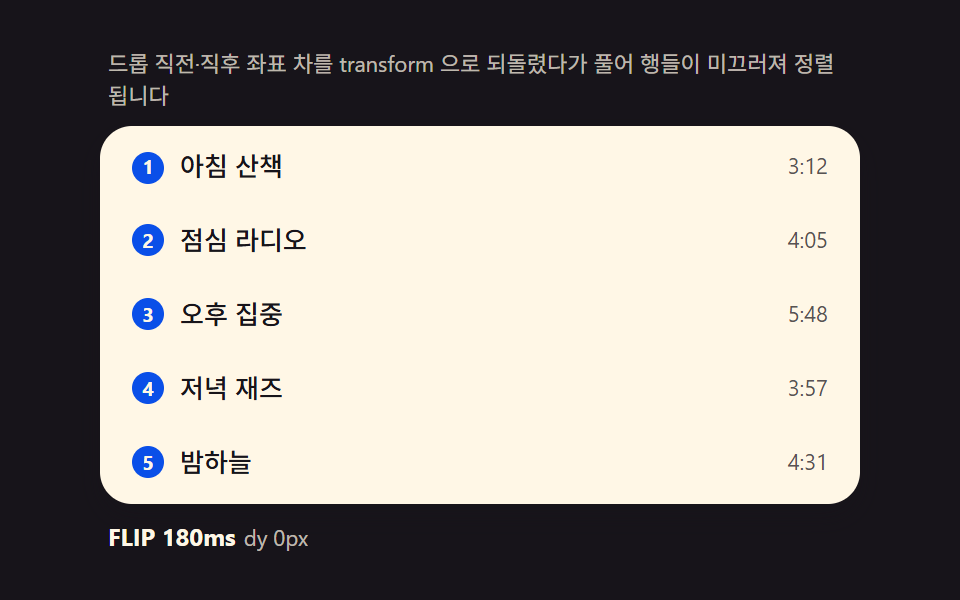 dragDrag to Reorder UI: 9 Lists, One Drop Index
 dragDrag and Drop File Upload UI: 9 Computed Dropzones
 Interactions9 CSS 3D Background Animation Depth Layers
 Galleries9 CSS Rain Animation Layers for a Storm Window
 Creative UIMesh Gradient Background: 9 Canvas Animations