Circular Text CSS: 9 Rings Spaced by Letter Width
Circular text css puts letters on a ring. Place twelve letters 30 degrees apart and an i floats while a W crowds.
Equal Angles Make Uneven Gaps: Glyph Width and Radius Decide Circular Text
 01 circtx-glyph-width-angle-badge
 02 circtx-scroll-velocity-spin-badge
 03 circtx-line-curl-constant-length
 04 circtx-cylinder-band-depth-mirror
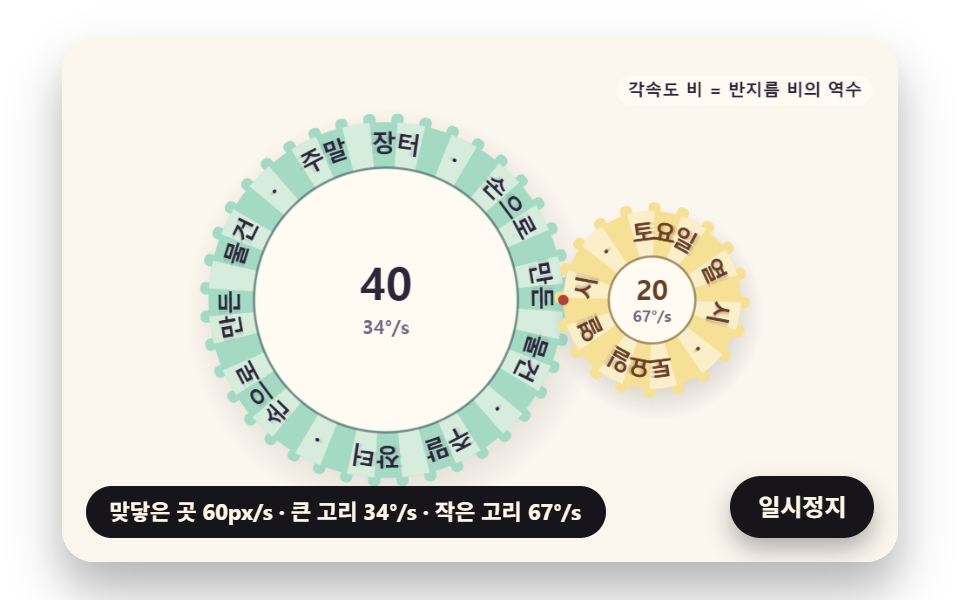 05 circtx-tangent-rings-gear-mesh
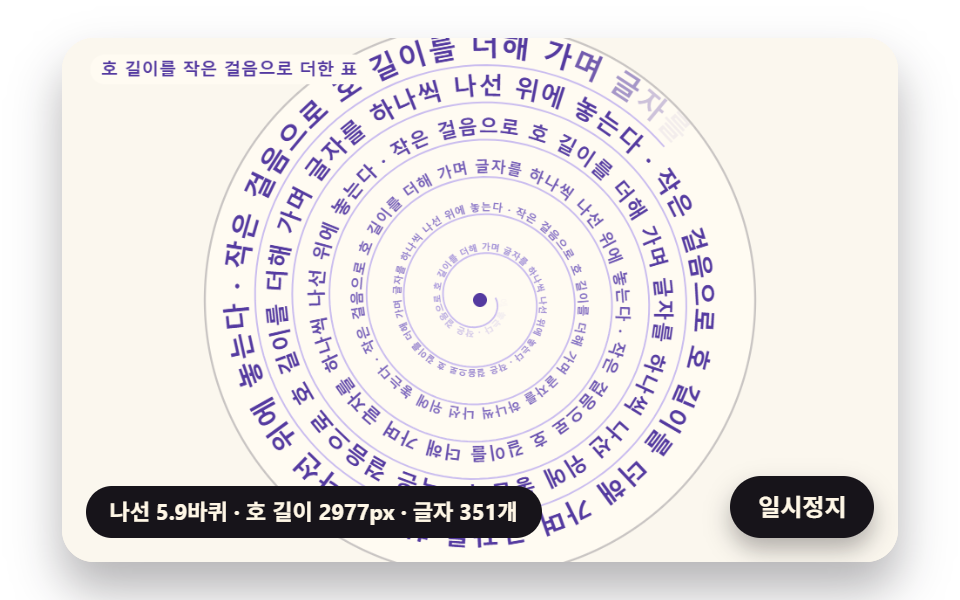 06 circtx-spiral-arclength-flow
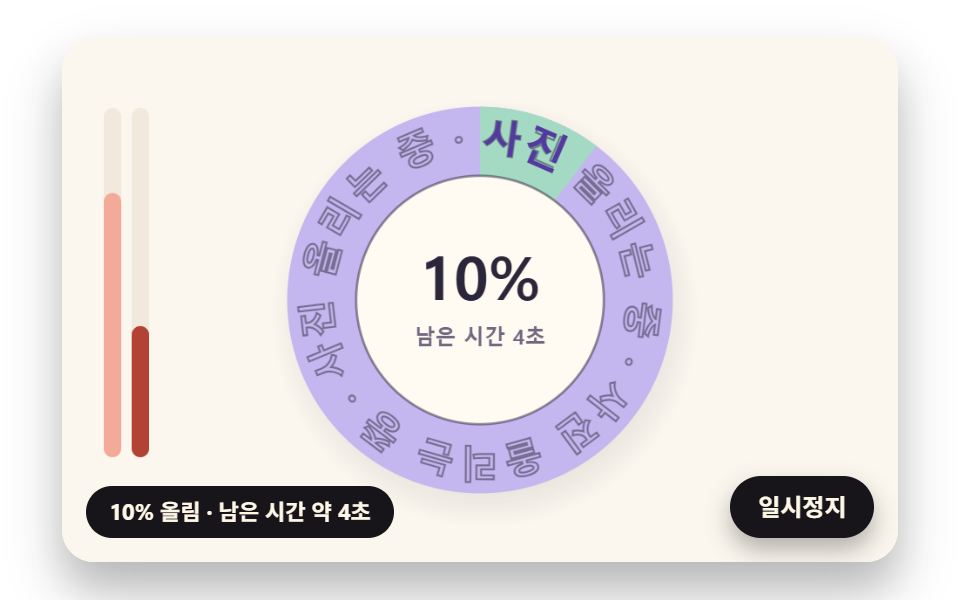 07 circtx-progress-ring-partial-letter-fill
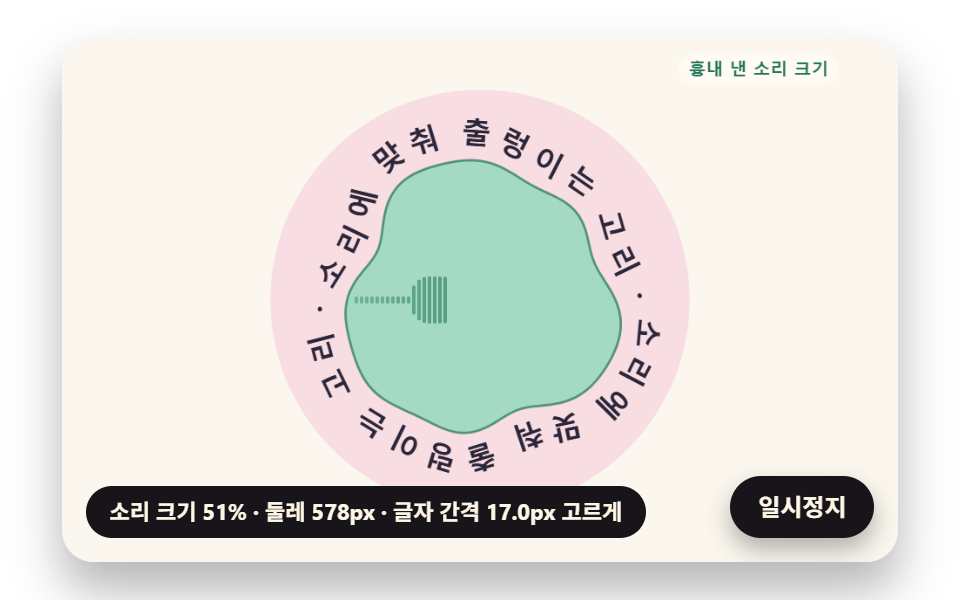 08 circtx-sound-ripple-normal-letters
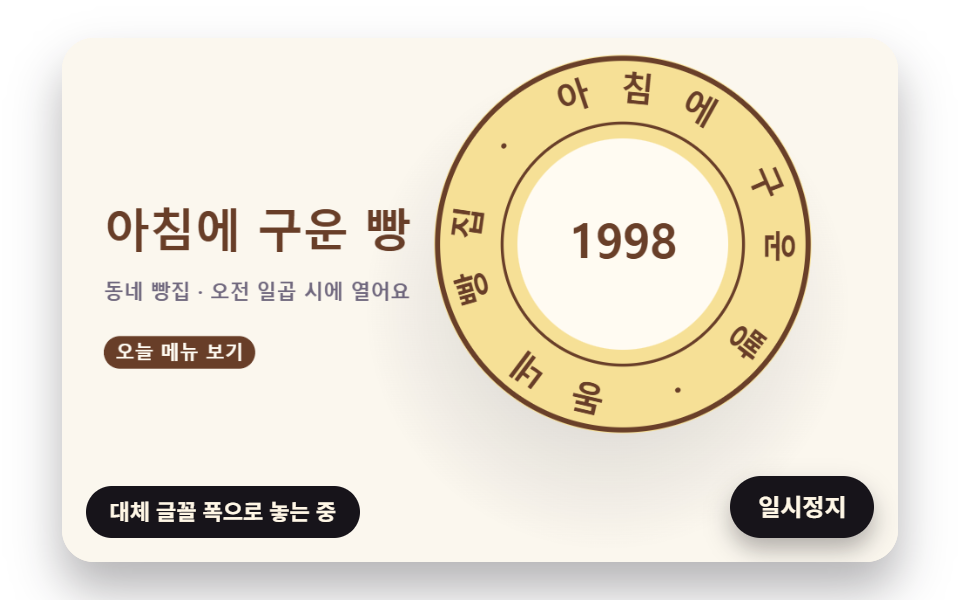 09 circtx-hero-seal-stamp-scene
Auto-plays · click a tile to jump to its section · all nine in one zip
- 01 A Round Badge That Splits Angles by Glyph Width
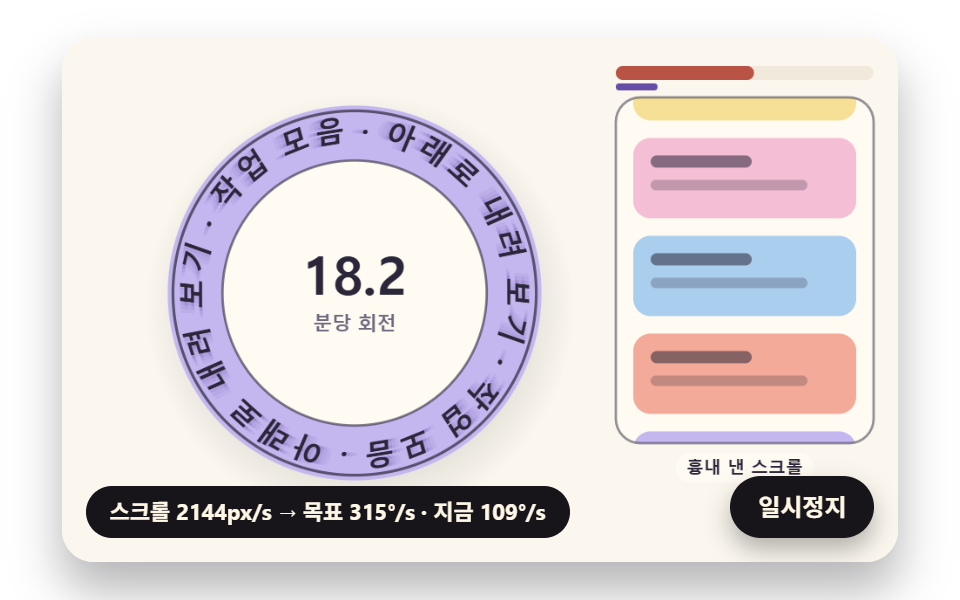
- 02 A Spinning Badge That Speeds Up with Scroll Velocity
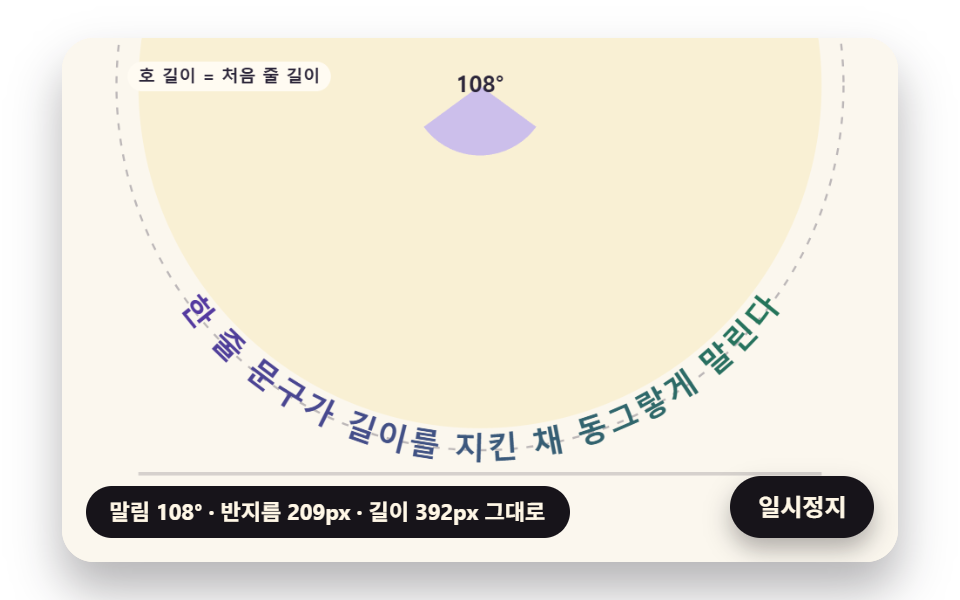
- 03 A Line of Text That Curls into a Ring at Constant Length
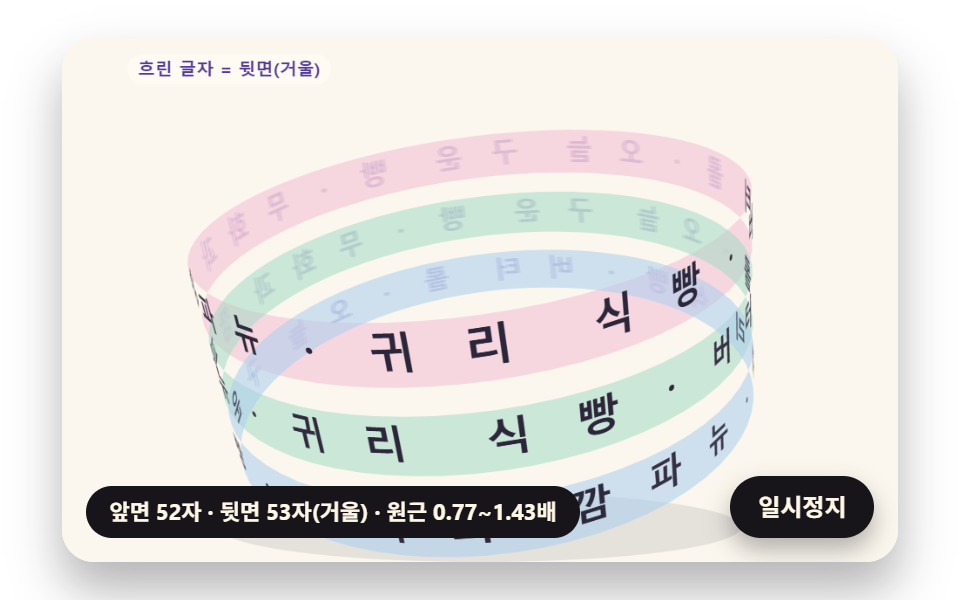
- 04 A Band of Text Wrapped Around a Cylinder
- 05 Two Touching Letter Rings That Turn Like Gears
- 06 Spiral Lettering Placed by Arc Length
- 07 A Progress Ring Whose Letters Fill as the Upload Advances
- 08 A Ring That Ripples with Sound Level, Letters Following Its Normal
- 09 A Bakery Hero with a Stamped Seal
A round badge looks finished when the space between neighboring letters reads the same all the way around, and an equal slice of the circle per letter does not give that. Glyphs differ in width, so the arc a glyph needs depends on its own width and on the radius it sits at. Each of the nine scenes is a canvas drawing computed in JavaScript: the SCSS sizes the stage, the card and its shadow, and the canvas works in a fixed 480×300 coordinate space inside that card, with the pixel ratio capped at 2.
Gaps on the equal-angle copy and on the width-fitted copy
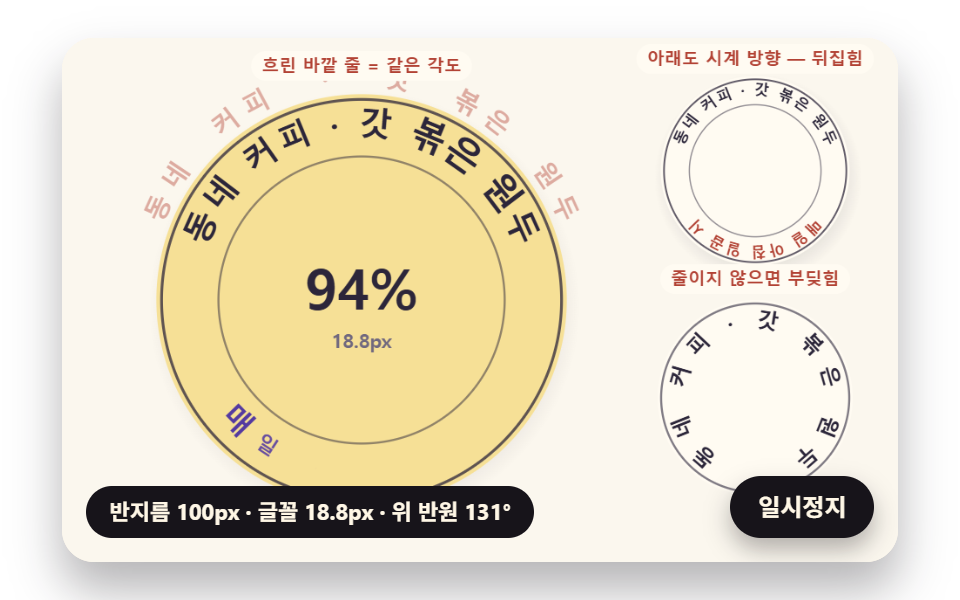
In 01, with the Korean copy at a 100px radius, splitting the top arc into equal angles leaves gaps from −2.4px (two letters overlapping) to 10.6px between neighbors, while giving each glyph its width over the radius keeps them between 2.15px and 3.5px. The two layouts drift apart by up to 5.8° at a single letter in the Korean copy and 4.9° in the English one; the Japanese copy uses glyphs of one width, so both layouts land on the same spots. The faint outer row in the demo is that equal-angle layout, drawn so you can hold it against the fitted ring inside it.
Why letters have to shrink when the radius shrinks
An upright glyph has its lower edge closer to the center than its middle, and on a small ring that lower edge runs out of room first. 01 fits widths at a radius half a glyph height inward (INNER_FIT 0.5) and shrinks the font once the top phrase needs more than its 2.5 rad budget: at a 58px radius the Korean badge drops to 54.4% (10.89px), the English one to 71.8% (14.35px) and the Japanese one to 83.3%. The share differs by locale because each language version of the demo lays out its own copy with that copy's glyph widths.
Angle Is Width over Radius, Spin Rate Falls with Radius, Spirals Need Arc Length — the Math Under Lettering on a Circle
Three formulas carry the nine scenes, and each one swaps a guessed step for a measured length.
Why width over radius is an angle
An angle in radians is arc length divided by radius, so a glyph w pixels wide needs w / r radians at radius r. placeArc adds up the widths of the glyphs before glyph i, adds half of its own width, subtracts half the phrase so the phrase centers on the arc, and divides by the placing radius. That is why an i and a W end up with the same visible gap: each one gets exactly the arc its width asks for. Most arc text css recipes rotate each letter by a fixed step in a stylesheet; the rotation here is the same move, but the step comes from measured widths.
Spin rates of two touching rings
Where two rings touch, their surfaces move at one shared speed v, so each ring turns at v / r. In 05 the edge speed is 60px/s, the large ring has a 101.86px radius and the small one 50.93px, which gives 33.8°/s and 67.5°/s, a ratio of exactly 2.000, and the two turn in opposite directions the way a pair of gears does.
Summing a spiral's arc length in short steps
A spiral r = a + bθ has no tidy length formula to place letters with, so 06 builds a table: for each step it takes ds = √(r² + (dr/dθ)²) dθ at the middle of the step and adds it to a running total. Looking a length up in that table returns the θ for each letter, so the distance along the curve between neighbors stays one glyph width while the spiral opens up.
Circular Text CSS: 9 Scenes — a Width-Fitted Badge, a Scroll-Speed Spin Badge, a Line That Curls into a Ring, a Cylinder Band, Two Meshing Rings, Spiral Lettering, a Letter Progress Ring, a Rippling Ring and a Bakery Seal Hero
The capture behind the table is the same for all nine: a 480×300 canvas recorded for 2 seconds in 24 frames, which leaves 23 frame-to-frame differences to count.
What moved in two seconds on a 480×300 canvas
| Scene | Area touched | Frames that moved | Mean intensity |
|---|---|---|---|
| 01 Width-fitted round badge | 25.6% | 23/23 | 58.0 |
| 02 Scroll-speed spin badge | 22.1% | 23/23 | 79.1 |
| 03 Line that curls into a ring | 39.9% | 23/23 | 66.5 |
| 04 Cylinder band | 33.8% | 23/23 | 57.0 |
| 05 Two meshing rings | 15.2% | 23/23 | 58.9 |
| 06 Spiral lettering | 28.3% | 23/23 | 74.9 |
| 07 Letter progress ring | 15.0% | 23/23 | 67.9 |
| 08 Rippling ring | 20.6% | 23/23 | 71.3 |
| 09 Bakery seal hero | 30.0% | 23/23 | 79.2 |
03 covers the largest share of the canvas (39.9%) because one line sweeps from flat to a closed ring, and 07 (15.0%) and 05 (15.2%) the smallest because only one ring or two thin bands of letters change. No scene sat still: each one changed in 23 of the 23 intervals.
01A Round Badge That Splits Angles by Glyph Width
For a neighborhood coffee shop logo, "CORNER COFFEE" runs clockwise over the top and "OPEN AT 7" counterclockwise under the bottom so both read upright, while the radius springs from 100px to 58px at 0.95 s and back to 100px at 2.6 s (stiffness 70, damping 11). badgeAt calls arcScale once per arc, keeps the smaller factor so both arcs share one font size, and passes it to placeArc; fitArc in the fence below is defined in the file but not called anywhere. Two failing copies sit on the right: the upper one keeps the bottom arc clockwise and comes out upside down, and the lower one is an unshrunk ring at 0.44 times the current radius with coral dots where letters collide.
<main class="stage">
<div class="cf is-demo" id="cf">
  <canvas class="cf__canvas" data-role="canvas" width="480" height="300" aria-hidden="true"></canvas>
  <p class="cf__sr">CORNER COFFEE — OPEN AT 7</p>
  <p class="cf__status" data-role="status" aria-live="off">Measuring glyph widths</p>
  <button class="cf__pause" data-role="pause" type="button" aria-pressed="false">Pause</button>
</div>
</main>
@use "../../../../site/static/demo-tokens" as *;
@include stage($stage-paper);
.cf {
position: relative;
width: min(92vw, calc(160vh - 12.8vw));
aspect-ratio: 480 / 300;
margin: 0 auto;
border-radius: $r-card;
overflow: hidden;
box-shadow: $shadow-raised;
background: $subject-cream;
}
.cf__canvas {
position: absolute;
inset: 0;
display: block;
width: 100%;
height: 100%;
}
.cf__pause {
position: absolute;
right: $sp-3;
bottom: $sp-3;
padding: $sp-1 $sp-3;
border: 2px solid $subject-ink;
border-radius: $r-pill;
background: $subject-ink;
color: $subject-cream;
font-family: inherit;
font-weight: 700;
font-size: 12px;
line-height: 1.6;
cursor: pointer;
box-shadow: $shadow-press;
transition: transform $dur-quick $ease-spring;
}
// 눌린 상태(멈춤) — 바탕과 글자색을 뒤집어 aria-pressed 가 눈에도 보이게
.cf__pause[aria-pressed="true"] {
background: $subject-cream;
color: $subject-ink;
}
.cf__pause:hover {
transform: translateY(-2px);
}
.cf__pause:active {
transform: translateY(1px);
}
.cf__pause:focus-visible {
outline: 3px solid $subject-ink;
outline-offset: 3px;
}
// 상태 줄 — 지금 고리에서 무슨 계산이 일어났는지 글자로. 시연 중에는 aria-live off, 사람이 처음 손대면 polite
.cf__status {
position: absolute;
left: $sp-3;
bottom: $sp-3;
max-width: calc(100% - 120px);
margin: 0;
padding: $sp-1 $sp-3;
border-radius: $r-pill;
background: $subject-ink;
color: $subject-cream;
font-weight: 700;
font-size: 11px;
line-height: 1.6;
white-space: nowrap;
overflow: hidden;
text-overflow: ellipsis;
pointer-events: none;
}
// 낭독용 원문 한 줄 — 화면에서는 숨기고 낭독기에만 읽힌다(원 위 글자는 캔버스라 aria-hidden)
.cf__sr {
position: absolute;
width: 1px;
height: 1px;
margin: -1px;
padding: 0;
overflow: hidden;
clip-path: inset(50%);
white-space: nowrap;
border: 0;
}
@media (max-width: 340px) {
.cf__pause,
.cf__status { font-size: 10px; padding: $sp-1 $sp-2; }
}
// 동작 줄이기 — 장면은 스크립트가 최종 배치 한 장으로 멈춘다. 버튼도 떠오르지 않게
@media (prefers-reduced-motion: reduce) {
.cf__pause { transition: none !important; }
.cf__pause:hover,
.cf__pause:active { transform: none !important; }
}html, body {
margin: 0;
overflow: hidden;
}
.stage {
box-sizing: border-box;
min-height: 100vh;
display: grid;
place-items: center;
margin: 0;
background: #ffffff;
font-family: -apple-system, "Segoe UI", "Noto Sans KR", sans-serif;
padding: clamp(8px, 4vw, 24px);
}
.cf {
position: relative;
width: min(92vw, 160vh - 12.8vw);
aspect-ratio: 480/300;
margin: 0 auto;
border-radius: 16px;
overflow: hidden;
box-shadow: 0 14px 24px rgba(23, 20, 26, 0.32);
background: #fff7e6;
}
.cf__canvas {
position: absolute;
inset: 0;
display: block;
width: 100%;
height: 100%;
}
.cf__pause {
position: absolute;
right: 12px;
bottom: 12px;
padding: 4px 12px;
border: 2px solid #17141a;
border-radius: 999px;
background: #17141a;
color: #fff7e6;
font-family: inherit;
font-weight: 700;
font-size: 12px;
line-height: 1.6;
cursor: pointer;
box-shadow: 0 6px 12px rgba(23, 20, 26, 0.32);
transition: transform 220ms cubic-bezier(0.2, 0.8, 0.2, 1);
}
.cf__pause[aria-pressed=true] {
background: #fff7e6;
color: #17141a;
}
.cf__pause:hover {
transform: translateY(-2px);
}
.cf__pause:active {
transform: translateY(1px);
}
.cf__pause:focus-visible {
outline: 3px solid #17141a;
outline-offset: 3px;
}
.cf__status {
position: absolute;
left: 12px;
bottom: 12px;
max-width: calc(100% - 120px);
margin: 0;
padding: 4px 12px;
border-radius: 999px;
background: #17141a;
color: #fff7e6;
font-weight: 700;
font-size: 11px;
line-height: 1.6;
white-space: nowrap;
overflow: hidden;
text-overflow: ellipsis;
pointer-events: none;
}
.cf__sr {
position: absolute;
width: 1px;
height: 1px;
margin: -1px;
padding: 0;
overflow: hidden;
clip-path: inset(50%);
white-space: nowrap;
border: 0;
}
@media (max-width: 340px) {
.cf__pause,
.cf__status {
font-size: 10px;
padding: 4px 8px;
}
}
@media (prefers-reduced-motion: reduce) {
.cf__pause {
transition: none !important;
}
.cf__pause:hover,
.cf__pause:active {
transform: none !important;
}
}(function () {
const root = document.getElementById("cf");
if (!root) return;
// 판 좌표 — 캔버스 안은 늘 480×300. 화면에 보이는 크기와 상관없이 계산은 이 좌표로 한다
const W = 480;
const H = 300;
const TAU = Math.PI * 2;
function clamp(v, lo, hi) { return v < lo ? lo : (v > hi ? hi : v); }
function lerp(a, b, k) { return a + (b - a) * k; }
function smooth(x) { const c = clamp(x, 0, 1); return c * c * (3 - 2 * c); }
// 따라가기 비율 — 1 − e^(−rate·dt). 프레임 시간이 달라도 1초에 같은 만큼 다가간다
function follow(rate, dt) { return 1 - Math.exp(-rate * dt); }
// 1/60초마다 ease 만큼 다가가는 비율을 dt 초로 환산 — 1 − (1 − ease)^(dt × 60)
function easeStep(ease, dt) { return 1 - Math.pow(1 - ease, dt * 60); }
// 시드 고정 난수 — 같은 시드면 같은 시연이 다시 나온다 (32비트 정수 섞기)
function makeRng(seed) {
let s = seed >>> 0;
return function () {
s = (s + 0x6d2b79f5) >>> 0;
let t = s;
t = Math.imul(t ^ (t >>> 15), t | 1);
t ^= t + Math.imul(t ^ (t >>> 7), t | 61);
return ((t ^ (t >>> 14)) >>> 0) / 4294967296;
};
}
function deg(rad) { return rad * 180 / Math.PI; }
function makeSpring(x) { return { x: x, v: 0, to: x }; }
const SPRING_SUBSTEP = 1 / 240;
function stepSpring(s, stiffness, damping, dt) {
let left = dt;
while (left > 1e-9) {
const h = Math.min(SPRING_SUBSTEP, left);
s.v += (stiffness * (s.to - s.x) - damping * s.v) * h;
s.x += s.v * h;
left -= h;
}
}
function snapSpring(s, x) { s.x = x; s.v = 0; s.to = x; }
function roughWidth(ch, px, weight) {
const wide = ch.charCodeAt(0) >= 0x1100;
const base = ch === ' ' ? 0.28 : (wide ? 0.95 : 0.6);
return px * base * (weight >= 700 ? 1.06 : 1);
}
// 글꼴이 다 온 뒤 잰 폭
let glyphWidth = roughWidth;
// 대체 글꼴로 잰 폭 — 09 가 「글꼴이 오기 전에 잰 폭」 을 흉내 낼 때만 쓴다
let fallbackWidth = roughWidth;
// 글자 나누기 — 한 글자씩(서로게이트 쌍도 한 글자)
function glyphsOf(s) { return Array.from(s); }
function widthsOf(gs, px, weight, m) {
return gs.map(function (g) { return m(g, px, weight); });
}
function sum(xs) { let s = 0; for (const x of xs) {
s += x;
} return s; }
function arcTotal(ws, tracking) { return sum(ws) + tracking * Math.max(0, ws.length - 1); }
// 글꼴 축소 몫 — 줄이지 않아도 들어가면 1
function arcScale(ws, px, tracking, r, inner, span) {
const total = arcTotal(ws, tracking);
const need = total / Math.max(1, r - inner * px);
return need > span ? span * r / (total + span * inner * px) : 1;
}
function fitArc(ws, px, tracking, r, inner, span, center, dir, allowShrink) {
return placeArc(ws, px, tracking, r, inner, allowShrink ? arcScale(ws, px, tracking, r, inner, span) : 1, center, dir);
}
// 정한 축소 몫으로 놓기 — 위·아래 반원이 같은 글꼴 크기를 쓰도록 둘 중 작은 몫을 넘겨받는다
function placeArc(ws, px, tracking, r, inner, scale, center, dir) {
const n = ws.length;
const total = arcTotal(ws, tracking);
const need = total / Math.max(1, r - inner * px);
const layR = Math.max(1, r - inner * px * scale);
const theta = [];
let acc = 0;
for (let i = 0; i < n; i += 1) {
theta.push(center + dir * (acc + ws[i] / 2 - total / 2) * scale / layR);
acc += ws[i] + tracking;
}
return { theta: theta, px: px * scale, scale: scale, total: total, layR: layR, need: need };
}
// 같은 각도로 놓기(비교판) — 폭은 보지 않고 전체 각을 글자 수로 똑같이 나눈다
function equalArc(n, spanUsed, center, dir) {
const out = [];
const step = spanUsed / Math.max(1, n);
for (let i = 0; i < n; i += 1) {
out.push(center + dir * (i + 0.5 - n / 2) * step);
}
return out;
}
// 이웃 두 글자가 글자 아래 모서리(반지름 r − 0.5·글자 높이)에서 겹친 길이(px). 양수면 부딪힌다.
// 각 간격 × 아래 모서리 반지름 − 두 글자 반폭 합 이 음수인 만큼이 겹침
const GLYPH_DROP = 0.5;
function innerOverlaps(theta, ws, scale, r, px) {
const rin = r - GLYPH_DROP * px;
const out = [];
for (let i = 0; i + 1 < theta.length; i += 1) {
const room = Math.abs(theta[i + 1] - theta[i]) * rin;
out.push((ws[i] + ws[i + 1]) / 2 * scale - room);
}
return out;
}
function arcTable(rf, drf, th0, th1, step) {
const th = [th0];
const s = [0];
let acc = 0;
const n = Math.max(1, Math.ceil((th1 - th0) / step));
const h = (th1 - th0) / n;
for (let i = 0; i < n; i += 1) {
// 걸음 가운데의 값으로 더한다 — 걸음 끝 값보다 같은 걸음에서 오차가 작다
const m = th0 + (i + 0.5) * h;
const r = rf(m);
const dr = drf(m);
acc += Math.sqrt(r * r + dr * dr) * h;
th.push(th0 + (i + 1) * h);
s.push(acc);
}
return { th: th, s: s };
}
function thetaAt(t, s) {
const last = t.s.length - 1;
if (s <= 0) {
return t.th[0];
}
if (s >= t.s[last]) {
return t.th[last];
}
let lo = 0;
let hi = last;
while (hi - lo > 1) {
const mid = (lo + hi) >> 1;
if (t.s[mid] <= s) {
lo = mid;
}
else {
hi = mid;
}
}
const k = (s - t.s[lo]) / Math.max(1e-9, t.s[hi] - t.s[lo]);
return lerp(t.th[lo], t.th[hi], k);
}
function arcLength(t) { return t.s[t.s.length - 1]; }
// 극좌표 곡선의 접선 각(화면 좌표, y 아래) — 점 (r cosθ, r sinθ) 을 θ 로 미분한 방향
function tangentAngle(r, dr, th) {
return Math.atan2(dr * Math.sin(th) + r * Math.cos(th), dr * Math.cos(th) - r * Math.sin(th));
}
// 장면 시계(s)와 상태 줄 글자 — 장면 계산이 고치고, 화면 쪽이 읽어 그린다
let sceneT = 0;
let simStatus = '';
// 파스텔 팔레트 — 크림 바탕 위 라벤더·민트·버터·산호. 글자는 진한 쪽으로 명도 차를 둔다
const PAPER = [251, 247, 238];
const PAPER_DIM = [241, 234, 220];
const INK = [44, 38, 58];
const INK_SOFT = [112, 104, 126];
const CREAM = [255, 251, 242];
const LAVENDER = [196, 182, 238];
const MINT = [164, 218, 196];
const BUTTER = [246, 224, 150];
const CORAL = [244, 170, 152];
const SKY = [170, 206, 238];
const PINK = [244, 190, 212];
const MINT_DEEP = [36, 116, 90];
const CORAL_DEEP = [178, 66, 52];
const VIOLET_DEEP = [84, 58, 160];
const BROWN_DEEP = [104, 62, 40];
function mix(a, b, k) { return [lerp(a[0], b[0], k), lerp(a[1], b[1], k), lerp(a[2], b[2], k)]; }
function rgba(c, a) {
return 'rgba(' + Math.round(clamp(c[0], 0, 255)) + ',' + Math.round(clamp(c[1], 0, 255)) + ',' + Math.round(clamp(c[2], 0, 255)) + ',' + clamp(a, 0, 1).toFixed(3) + ')';
}
const canvasEl = root.querySelector('[data-role="canvas"]');
const pauseEl = root.querySelector('[data-role="pause"]');
const statusEl = root.querySelector('[data-role="status"]');
const ctxRaw = canvasEl ? canvasEl.getContext('2d') : null;
if (!canvasEl || !ctxRaw || !pauseEl) {
return;
}
const cv = canvasEl;
const ctx = ctxRaw;
const pauseBtn = pauseEl;
// 외부 웹폰트는 부르지 않는다 — 기기에 있는 글꼴 목록만
const FONT_STACK = 'system-ui, -apple-system, "Segoe UI", "Noto Sans KR", sans-serif';
// 대체 글꼴 — 09 가 「글꼴이 오기 전에 잰 폭」 을 흉내 낼 때만 쓴다
const FALLBACK_STACK = 'monospace';
// 잰 폭은 100px 기준으로 한 번만 재 두고 크기에 비례해 쓴다. 글꼴이 새로 오면 통째로 비운다
const widthCache = {};
function measureWith(stack) {
return function (ch, px, weight) {
const key = stack + '|' + weight + '|' + ch;
let w = widthCache[key];
if (w === undefined) {
ctx.font = weight + ' 100px ' + stack;
w = ctx.measureText(ch).width;
widthCache[key] = w;
}
return w * px / 100;
};
}
function remeasure() {
for (const k of Object.keys(widthCache)) {
delete widthCache[k];
}
glyphWidth = measureWith(FONT_STACK);
fallbackWidth = measureWith(FALLBACK_STACK);
relayout();
}
function fitCanvas() {
// 배율은 2 에서 자른다 — 배율 3 기기에서 화소가 2.25배로 늘어 프레임마다 일이 그만큼 커지지 않게
const dpr = Math.min(window.devicePixelRatio || 1, 2);
cv.width = Math.round(W * dpr);
cv.height = Math.round(H * dpr);
ctx.setTransform(dpr, 0, 0, dpr, 0, 0);
}
function clearStage(c) {
ctx.fillStyle = rgba(c, 1);
ctx.fillRect(0, 0, W, H);
}
function setFont(px, weight, stack) {
ctx.font = weight + ' ' + px.toFixed(2) + 'px ' + stack;
}
function label(s, x, y, c, a, px, weight, align) {
setFont(px, weight, FONT_STACK);
ctx.textAlign = align;
ctx.textBaseline = 'middle';
ctx.fillStyle = rgba(c, a);
ctx.fillText(s, x, y);
}
// 글자 하나를 (x, y) 가운데에 rot 라디안 돌려 찍는다. sx·sy 는 가로·세로 배율(음수 sx 는 거울)
function glyphAt(ch, x, y, rot, px, weight, c, a, sx, sy) {
if (a <= 0.01 || px < 0.5) {
return;
}
ctx.save();
ctx.translate(x, y);
ctx.rotate(rot);
ctx.scale(sx, sy);
setFont(px, weight, FONT_STACK);
ctx.textAlign = 'center';
ctx.textBaseline = 'middle';
ctx.fillStyle = rgba(c, a);
ctx.fillText(ch, 0, 0);
ctx.restore();
}
// 기울인 글자 — 글자 자기 좌표에서 가로로 skew(라디안)만큼 민다(윗부분이 앞으로)
function glyphLean(ch, x, y, rot, px, weight, c, a, skew) {
if (a <= 0.01 || px < 0.5) {
return;
}
ctx.save();
ctx.translate(x, y);
ctx.rotate(rot);
ctx.transform(1, 0, -Math.tan(skew), 1, 0, 0);
setFont(px, weight, FONT_STACK);
ctx.textAlign = 'center';
ctx.textBaseline = 'middle';
ctx.fillStyle = rgba(c, a);
ctx.fillText(ch, 0, 0);
ctx.restore();
}
// 원 위 글자 — 중심 (cx, cy), 반지름 r, 각 th. turn 은 글자를 원에 맞춰 세우는 각(위 반원 +π/2, 아래 반원 −π/2)
function ringGlyph(ch, cx, cy, r, th, turn, px, weight, c, a) {
glyphAt(ch, cx + r * Math.cos(th), cy + r * Math.sin(th), th + turn, px, weight, c, a, 1, 1);
}
function roundRectPath(x, y, w, h, r) {
const rr = Math.max(0, Math.min(r, w / 2, h / 2));
ctx.beginPath();
ctx.moveTo(x + rr, y);
ctx.lineTo(x + w - rr, y);
ctx.arcTo(x + w, y, x + w, y + rr, rr);
ctx.lineTo(x + w, y + h - rr);
ctx.arcTo(x + w, y + h, x + w - rr, y + h, rr);
ctx.lineTo(x + rr, y + h);
ctx.arcTo(x, y + h, x, y + h - rr, rr);
ctx.lineTo(x, y + rr);
ctx.arcTo(x, y, x + rr, y, rr);
ctx.closePath();
}
function fillRound(x, y, w, h, r, c, a) {
if (w <= 0.2 || h <= 0.2 || a <= 0) {
return;
}
roundRectPath(x, y, w, h, r);
ctx.fillStyle = rgba(c, a);
ctx.fill();
}
function disc(x, y, r, c, a) {
if (r <= 0.2 || a <= 0) {
return;
}
ctx.beginPath();
ctx.arc(x, y, r, 0, TAU);
ctx.fillStyle = rgba(c, a);
ctx.fill();
}
function ring(x, y, r, width, c, a) {
if (r <= 0.2 || a <= 0) {
return;
}
ctx.beginPath();
ctx.arc(x, y, r, 0, TAU);
ctx.lineWidth = width;
ctx.strokeStyle = rgba(c, a);
ctx.stroke();
}
// 그림자 — 떠 있는 높이 lift(0~1)가 클수록 멀리·흐리게·넓게 떨어진다
function softShadow(x, y, r, lift) {
const off = 4 + 14 * lift;
const g = ctx.createRadialGradient(x + off * 0.4, y + off, r * 0.6, x + off * 0.4, y + off, r * (1.05 + 0.25 * lift));
g.addColorStop(0, rgba(INK, 0.26 - 0.14 * lift));
g.addColorStop(1, rgba(INK, 0));
ctx.fillStyle = g;
ctx.beginPath();
ctx.arc(x + off * 0.4, y + off, r * (1.05 + 0.25 * lift), 0, TAU);
ctx.fill();
}
// 작은 알약 이름표
function pill(s, x, y, bg, fg, a, px) {
setFont(px, 700, FONT_STACK);
const w = ctx.measureText(s).width + px * 1.2;
fillRound(x - w / 2, y - px * 0.85, w, px * 1.7, px * 0.85, bg, a);
label(s, x, y + 0.5, fg, a, px, 700, 'center');
}
// 상태 줄 — 바뀔 때만 글자를 고친다
let shownStatus = '';
function pushStatus() {
if (!statusEl || simStatus === shownStatus) {
return;
}
shownStatus = simStatus;
statusEl.textContent = simStatus;
}
// 01 — 글자 폭으로 각도를 나누는 원형 배지. 위 반원은 시계 방향, 아래 반원은 반대 방향으로 놓아 둘 다 바로 읽힌다.
// 배지 반지름이 좁아지면(좁은 칸에 들어간 배지) 글자 아래 모서리가 부딪히기 전에 글꼴을 줄인다
const TOP_TEXT = 'CORNER COFFEE';
const BOTTOM_TEXT = 'OPEN AT 7';
const BADGE_PX = 20;
const BADGE_WEIGHT = 800;
const TRACKING = 1.5;
// 글자 높이 가운데 이만큼 안쪽(원 중심 쪽) 반지름에서 폭을 맞춘다
const INNER_FIT = 0.5;
// 위·아래 반원이 쓸 수 있는 가장 큰 각(라디안) — 둘 사이에 남는 틈이 양옆 여백
const TOP_SPAN = 2.5;
const BOTTOM_SPAN = 1.9;
const RADIUS_WIDE = 100;
const RADIUS_NARROW = 58;
const RADIUS_STIFFNESS = 70;
const RADIUS_DAMPING = 11;
const NARROW_AT_S = 0.95;
const WIDE_AT_S = 2.6;
const LOOP_S = 3.8;
// 글자가 하나씩 튀어 오르는 간격과 스프링
const POP_START_S = 0.2;
const POP_STAGGER_S = 0.03;
const POP_STIFFNESS = 300;
const POP_DAMPING = 16;
const STATUS_FIT = 'radius {r}px · font {p}px · top arc {a}°';
const topGlyphs = glyphsOf(TOP_TEXT);
const bottomGlyphs = glyphsOf(BOTTOM_TEXT);
let topWidths = [];
let bottomWidths = [];
const radius01 = makeSpring(RADIUS_WIDE);
const pops01 = topGlyphs.concat(bottomGlyphs).map(function () { return makeSpring(0); });
function relayout() {
topWidths = widthsOf(topGlyphs, BADGE_PX, BADGE_WEIGHT, glyphWidth);
bottomWidths = widthsOf(bottomGlyphs, BADGE_PX, BADGE_WEIGHT, glyphWidth);
}
function badgeAt(r) {
const s = Math.min(arcScale(topWidths, BADGE_PX, TRACKING, r, INNER_FIT, TOP_SPAN), arcScale(bottomWidths, BADGE_PX, TRACKING, r, INNER_FIT, BOTTOM_SPAN));
return {
top: placeArc(topWidths, BADGE_PX, TRACKING, r, INNER_FIT, s, -Math.PI / 2, 1),
bottom: placeArc(bottomWidths, BADGE_PX, TRACKING, r, INNER_FIT, s, Math.PI / 2, -1),
scale: s
};
}
function radiusTarget01(t) { return t >= NARROW_AT_S && t < WIDE_AT_S ? RADIUS_NARROW : RADIUS_WIDE; }
function reset() {
snapSpring(radius01, RADIUS_WIDE);
for (const p of pops01) {
snapSpring(p, 0);
}
}
function statusFor01() {
const b = badgeAt(radius01.x);
const a = b.top.theta.length ? deg(b.top.theta[b.top.theta.length - 1] - b.top.theta[0]) : 0;
simStatus = STATUS_FIT.replace('{r}', String(Math.round(radius01.x))).replace('{p}', (BADGE_PX * b.scale).toFixed(1)).replace('{a}', String(Math.round(a)));
}
function update(dt) {
radius01.to = radiusTarget01(sceneT);
stepSpring(radius01, RADIUS_STIFFNESS, RADIUS_DAMPING, dt);
pops01.forEach(function (p, i) {
p.to = sceneT >= POP_START_S + i * POP_STAGGER_S ? 1 : 0;
stepSpring(p, POP_STIFFNESS, POP_DAMPING, dt);
});
statusFor01();
}
function restPose() {
snapSpring(radius01, RADIUS_WIDE);
for (const p of pops01) {
snapSpring(p, 1);
}
statusFor01();
}
// 01 화면 — 왼쪽 큰 배지(바깥 흐린 줄 = 같은 각도로 놓은 비교판), 오른쪽 위 = 아래 반원도 시계 방향으로 이어 놓은 실패판(뒤집힘),
// 오른쪽 아래 = 좁은 고리에서 줄이지 않고 놓은 실패판(글자 아래 모서리가 부딪힌 자리에 산호 점)
const B_CX = 172;
const B_CY = 150;
const LABEL_EQUAL = 'faint outer row = equal angles';
const LABEL_FLIP = 'bottom clockwise: flipped';
const LABEL_CLASH = 'no shrink: letters collide';
function bindInput(signal) { void signal; }
function drawBadgeText(cx, cy, r, b, popBase, flipBottom) {
const px = BADGE_PX * b.scale;
b.top.theta.forEach(function (th, i) {
const k = popBase >= 0 ? pops01[i].x : 1;
const rr = b.top.layR + INNER_FIT * px;
glyphAt(topGlyphs[i], cx + rr * Math.cos(th), cy + rr * Math.sin(th), th + Math.PI / 2, px, BADGE_WEIGHT, INK, clamp(k * 1.4, 0, 1), k, k);
});
b.bottom.theta.forEach(function (th, i) {
const k = popBase >= 0 ? pops01[topGlyphs.length + i].x : 1;
const rr = b.bottom.layR + INNER_FIT * px;
// 아래 반원 — 글자 머리를 원 중심 쪽으로(−π/2). 실패판은 위 반원처럼 +π/2 로 돌려 거꾸로 선다
const th2 = flipBottom ? Math.PI - th : th;
glyphAt(bottomGlyphs[i], cx + rr * Math.cos(th2), cy + rr * Math.sin(th2), th2 + (flipBottom ? Math.PI / 2 : -Math.PI / 2), px, BADGE_WEIGHT, flipBottom ? CORAL_DEEP : VIOLET_DEEP, clamp(k * 1.4, 0, 1), k, k);
});
}
function badgeDisc(cx, cy, r, px, lift, face) {
const outer = r + px * 0.95;
softShadow(cx, cy, outer, lift);
disc(cx, cy, outer, face, 1);
ring(cx, cy, outer - 3, 1.6, INK, 0.75);
ring(cx, cy, r - px * 0.95, 1.2, INK, 0.5);
}
function draw() {
clearStage(PAPER);
const r = radius01.x;
const b = badgeAt(r);
const px = BADGE_PX * b.scale;
// 반지름이 움직이는 빠르기만큼 배지가 떠오른다 — 그림자가 멀어지고 흐려진다
badgeDisc(B_CX, B_CY, r, px, clamp(Math.abs(radius01.v) / 260, 0, 1), BUTTER);
// 같은 각도 비교판 — 위 반원과 같은 전체 각을 글자 수로 똑같이 나눠 바깥 줄에 흐리게
const used = b.top.theta.length > 1 ? (b.top.theta[b.top.theta.length - 1] - b.top.theta[0]) * topGlyphs.length / (topGlyphs.length - 1) : 0;
const eq = equalArc(topGlyphs.length, used, -Math.PI / 2, 1);
eq.forEach(function (th, i) {
ringGlyph(topGlyphs[i], B_CX, B_CY, r + px * 1.45, th, Math.PI / 2, px * 0.8, 700, CORAL_DEEP, 0.42 * clamp(pops01[i].x, 0, 1));
});
drawBadgeText(B_CX, B_CY, r, b, 0, false);
label(Math.round(b.scale * 100) + '%', B_CX, B_CY - 4, INK, 1, clamp(r * 0.36, 14, 32), 800, 'center');
label(px.toFixed(1) + 'px', B_CX, B_CY + clamp(r * 0.26, 12, 24), INK_SOFT, 1, 11, 700, 'center');
// 실패판 1 — 아래 반원도 위처럼 시계 방향
const mr = 46;
const fb = (function () {
const s = Math.min(arcScale(topWidths, BADGE_PX, TRACKING, mr / 0.62, INNER_FIT, TOP_SPAN), arcScale(bottomWidths, BADGE_PX, TRACKING, mr / 0.62, INNER_FIT, BOTTOM_SPAN));
return { top: placeArc(topWidths, BADGE_PX, TRACKING, mr / 0.62, INNER_FIT, s, -Math.PI / 2, 1), bottom: placeArc(bottomWidths, BADGE_PX, TRACKING, mr / 0.62, INNER_FIT, s, Math.PI / 2, -1), scale: s };
})();
ctx.save();
ctx.translate(398, 76);
ctx.scale(0.62, 0.62);
badgeDisc(0, 0, mr / 0.62, BADGE_PX * fb.scale, 0.2, CREAM);
drawBadgeText(0, 0, mr / 0.62, fb, -1, true);
ctx.restore();
pill(LABEL_FLIP, 398, 12, CREAM, CORAL_DEEP, 1, 10);
// 실패판 2 — 지금 반지름의 0.44배 고리에 줄이지 않고, 폭도 글자 가운데 반지름에서 맞춘 판
const cr = r * 0.44;
const ctop = placeArc(topWidths, BADGE_PX * 0.62, TRACKING * 0.62, cr, 0, 1, -Math.PI / 2, 1);
const cws = topWidths.map(function (w) { return w * 0.62; });
disc(398, 206, cr + 12, CREAM, 1);
ring(398, 206, cr + 10, 1.2, INK, 0.6);
ctop.theta.forEach(function (th, i) {
ringGlyph(topGlyphs[i], 398, 206, cr, th, Math.PI / 2, BADGE_PX * 0.62, BADGE_WEIGHT, INK, clamp(pops01[i].x * 1.4, 0, 1));
});
innerOverlaps(ctop.theta, cws, 1, cr, BADGE_PX * 0.62).forEach(function (o, i) {
if (o <= 0) {
return;
}
const th = (ctop.theta[i] + ctop.theta[i + 1]) / 2;
const rin = cr - GLYPH_DROP * BADGE_PX * 0.62;
disc(398 + rin * Math.cos(th), 206 + rin * Math.sin(th), clamp(1.5 + o, 1.5, 4), CORAL_DEEP, 0.9);
});
pill(LABEL_CLASH, 398, 138, CREAM, CORAL_DEEP, 1, 10);
pill(LABEL_EQUAL, B_CX, 16, CREAM, CORAL_DEEP, 1, 10);
}
let paused = false;
const reduceQuery = window.matchMedia('(prefers-reduced-motion: reduce)');
// 페이지를 연 채 동작 줄이기 설정을 바꿔도 change 리스너가 이 값을 다시 읽는다
let still = reduceQuery.matches;
// 자동 시연 중인가 — 사람이 처음 손대면 시연 표시를 떼고 상태 줄을 polite 로 켠다
let demo = root.classList.contains('is-demo');
// 리스너는 한 묶음으로 달고 정리할 때 한 번에 뗀다
const off = new AbortController();
function wake() {
if (!demo) {
return;
}
demo = false;
root.classList.remove('is-demo');
if (statusEl) {
statusEl.setAttribute('aria-live', 'polite');
}
}
// 한 프레임에 넘기는 시간 상한(s) — 탭을 오래 숨겼다 돌아온 첫 프레임에도 50ms 까지만 계산에 넣는다
const DT_MAX = 0.05;
// 장면 시계를 dt 만큼 — 한 바퀴(LOOP_S)를 넘으면 처음 배치로 되돌려 다시 시연한다
function advance(dt) {
sceneT += dt;
if (sceneT >= LOOP_S) {
sceneT -= LOOP_S;
reset();
}
update(dt);
}
let rafId = 0;
let lastTs = -1;
function frame(ts) {
if (still || paused) {
rafId = 0;
return;
}
if (lastTs < 0) {
lastTs = ts;
}
const dt = Math.min((ts - lastTs) / 1000, DT_MAX);
lastTs = ts;
if (dt > 0) {
advance(dt);
}
draw();
pushStatus();
rafId = window.requestAnimationFrame(frame);
}
function startLoop() {
if (rafId) {
return;
}
// 시계 다시 맞추기 — 멈췄던 사이의 시간을 첫 프레임 dt 로 넘기지 않는다
lastTs = -1;
rafId = window.requestAnimationFrame(frame);
}
function stopLoop() {
if (rafId) {
window.cancelAnimationFrame(rafId);
rafId = 0;
}
}
// 동작 줄이기 — 루프를 돌리지 않고 시연이 끝난 최종 배치 한 장만 그린다
function showRest() {
stopLoop();
sceneT = 0;
reset();
restPose();
draw();
pushStatus();
}
function play() {
sceneT = 0;
reset();
draw();
pushStatus();
if (!paused) {
startLoop();
}
}
pauseBtn.addEventListener('click', function () {
paused = !paused;
pauseBtn.setAttribute('aria-pressed', paused ? 'true' : 'false');
wake();
if (paused) {
stopLoop();
}
else if (!still) {
startLoop();
}
}, { signal: off.signal });
// 탭이 숨으면 루프를 멈추고, 돌아오면 시계를 다시 맞춰 시작한다 — 숨은 동안의 몇 초가 한 프레임에 몰리지 않게
document.addEventListener('visibilitychange', function () {
if (document.hidden) {
stopLoop();
}
else if (!paused && !still && fontsReady) {
startLoop();
}
}, { signal: off.signal });
// 설정이 페이지를 연 채 바뀌면 — 켜지면 최종 배치로 멈추고, 꺼지면 시연을 처음부터
reduceQuery.addEventListener('change', function () {
still = reduceQuery.matches;
if (still) {
showRest();
}
else {
play();
}
}, { signal: off.signal });
window.addEventListener('resize', function () {
fitCanvas();
draw();
}, { signal: off.signal });
bindInput(off.signal);
fitCanvas();
// 글자 폭은 글꼴이 다 온 뒤에 잰다 — 그 전에 잰 폭은 대체 글꼴의 폭이라 글꼴이 바뀌는 순간 자리가 틀어진다.
// 나중에 다른 글꼴이 더 오면(loadingdone) 다시 잰다
let fontsReady = false;
document.fonts.addEventListener('loadingdone', function () {
if (!fontsReady) {
return;
}
remeasure();
draw();
}, { signal: off.signal });
document.fonts.ready.then(function () {
if (off.signal.aborted) {
return;
}
fontsReady = true;
remeasure();
if (still) {
showRest();
}
else {
play();
}
});
return function () {
stopLoop();
off.abort();
};
})();// GlyphWidthBadge - 같은 항목 vanilla 판 index.html 의 React 포트. 같은 계산을 useEffect 안에서 돌린다.
import { useEffect, useRef } from "react";
import styles from "./GlyphWidthBadge.module.scss";
const cx = (s: string): string => s.split(" ").map((n) => styles[n] ?? n).join(" ");
export default function GlyphWidthBadge() {
const rootRef = useRef<HTMLDivElement | null>(null);
useEffect(() => {
const rootEl = rootRef.current;
if (!rootEl) return;
const root: HTMLElement = rootEl;
type RGB = [number, number, number];
// 판 좌표 — 캔버스 안은 늘 480×300. 화면에 보이는 크기와 상관없이 계산은 이 좌표로 한다
const W = 480;
const H = 300;
const TAU = Math.PI * 2;
function clamp(v: number, lo: number, hi: number): number { return v < lo ? lo : (v > hi ? hi : v); }
function lerp(a: number, b: number, k: number): number { return a + (b - a) * k; }
function smooth(x: number): number { const c = clamp(x, 0, 1); return c * c * (3 - 2 * c); }
// 따라가기 비율 — 1 − e^(−rate·dt). 프레임 시간이 달라도 1초에 같은 만큼 다가간다
function follow(rate: number, dt: number): number { return 1 - Math.exp(-rate * dt); }
// 1/60초마다 ease 만큼 다가가는 비율을 dt 초로 환산 — 1 − (1 − ease)^(dt × 60)
function easeStep(ease: number, dt: number): number { return 1 - Math.pow(1 - ease, dt * 60); }
// 시드 고정 난수 — 같은 시드면 같은 시연이 다시 나온다 (32비트 정수 섞기)
function makeRng(seed: number): () => number {
let s = seed >>> 0;
return function (): number {
s = (s + 0x6d2b79f5) >>> 0;
let t = s;
t = Math.imul(t ^ (t >>> 15), t | 1);
t ^= t + Math.imul(t ^ (t >>> 7), t | 61);
return ((t ^ (t >>> 14)) >>> 0) / 4294967296;
};
}
function deg(rad: number): number { return rad * 180 / Math.PI; }
// ── 감쇠 스프링 ──────────────────────────────────────────────
// 가속 = 단단함 × (목표 − 위치) − 감쇠 × 속도. 속도를 먼저 고친 뒤 위치를 옮기는 적분을 1/240초 잔걸음으로 나눠 돌린다
type Spring = { x: number; v: number; to: number };
function makeSpring(x: number): Spring { return { x: x, v: 0, to: x }; }
const SPRING_SUBSTEP = 1 / 240;
function stepSpring(s: Spring, stiffness: number, damping: number, dt: number): void {
let left = dt;
while (left > 1e-9) {
const h = Math.min(SPRING_SUBSTEP, left);
s.v += (stiffness * (s.to - s.x) - damping * s.v) * h;
s.x += s.v * h;
left -= h;
}
}
function snapSpring(s: Spring, x: number): void { s.x = x; s.v = 0; s.to = x; }
// ── 글자 폭 ──────────────────────────────────────────────────
// 글자 하나의 가로 폭(px) — 글꼴 크기 px, 굵기 weight. 화면에서는 캔버스 measureText 로 잰 값으로 바뀐다(dom 쪽).
// 아래 대략 모형은 재기 전 자리 채움일 뿐 — 글자 폭은 반드시 글꼴이 다 온 뒤 다시 잰다
type Measure = (ch: string, px: number, weight: number) => number;
function roughWidth(ch: string, px: number, weight: number): number {
const wide = ch.charCodeAt(0) >= 0x1100;
const base = ch === ' ' ? 0.28 : (wide ? 0.95 : 0.6);
return px * base * (weight >= 700 ? 1.06 : 1);
}
// 글꼴이 다 온 뒤 잰 폭
let glyphWidth: Measure = roughWidth;
// 대체 글꼴로 잰 폭 — 09 가 「글꼴이 오기 전에 잰 폭」 을 흉내 낼 때만 쓴다
let fallbackWidth: Measure = roughWidth;
// 글자 나누기 — 한 글자씩(서로게이트 쌍도 한 글자)
function glyphsOf(s: string): string[] { return Array.from(s); }
function widthsOf(gs: string[], px: number, weight: number, m: Measure): number[] {
return gs.map(function (g: string): number { return m(g, px, weight); });
}
function sum(xs: number[]): number { let s = 0; for (const x of xs) { s += x; } return s; }
// ── 원 위에 글자 놓기 ────────────────────────────────────────
// 글자 i 의 각 = 가운데 각 + 방향 × (앞 글자 폭 합 + 자기 폭/2 − 전체/2) × 축소 / 놓는 반지름.
// 놓는 반지름은 글자 높이의 inner 몫만큼 안쪽 — 글자 아래 모서리(원 중심 쪽)에서 폭이 맞으면 바깥은 저절로 벌어진다.
// 전체 각이 span 을 넘으면 글꼴을 줄인다. 줄이면 글자 높이도 줄어 놓는 반지름이 커지므로
// 축소 = span·r / (전체 폭 + span·inner·px) 로 한 번에 푼다 (전체 폭 × 축소 = span × (r − inner·px·축소))
type ArcFit = { theta: number[]; px: number; scale: number; total: number; layR: number; need: number };
function arcTotal(ws: number[], tracking: number): number { return sum(ws) + tracking * Math.max(0, ws.length - 1); }
// 글꼴 축소 몫 — 줄이지 않아도 들어가면 1
function arcScale(ws: number[], px: number, tracking: number, r: number, inner: number, span: number): number {
const total = arcTotal(ws, tracking);
const need = total / Math.max(1, r - inner * px);
return need > span ? span * r / (total + span * inner * px) : 1;
}
function fitArc(ws: number[], px: number, tracking: number, r: number, inner: number, span: number, center: number, dir: number, allowShrink: boolean): ArcFit {
return placeArc(ws, px, tracking, r, inner, allowShrink ? arcScale(ws, px, tracking, r, inner, span) : 1, center, dir);
}
// 정한 축소 몫으로 놓기 — 위·아래 반원이 같은 글꼴 크기를 쓰도록 둘 중 작은 몫을 넘겨받는다
function placeArc(ws: number[], px: number, tracking: number, r: number, inner: number, scale: number, center: number, dir: number): ArcFit {
const n = ws.length;
const total = arcTotal(ws, tracking);
const need = total / Math.max(1, r - inner * px);
const layR = Math.max(1, r - inner * px * scale);
const theta: number[] = [];
let acc = 0;
for (let i = 0; i < n; i += 1) {
theta.push(center + dir * (acc + ws[i] / 2 - total / 2) * scale / layR);
acc += ws[i] + tracking;
}
return { theta: theta, px: px * scale, scale: scale, total: total, layR: layR, need: need };
}
// 같은 각도로 놓기(비교판) — 폭은 보지 않고 전체 각을 글자 수로 똑같이 나눈다
function equalArc(n: number, spanUsed: number, center: number, dir: number): number[] {
const out: number[] = [];
const step = spanUsed / Math.max(1, n);
for (let i = 0; i < n; i += 1) { out.push(center + dir * (i + 0.5 - n / 2) * step); }
return out;
}
// 이웃 두 글자가 글자 아래 모서리(반지름 r − 0.5·글자 높이)에서 겹친 길이(px). 양수면 부딪힌다.
// 각 간격 × 아래 모서리 반지름 − 두 글자 반폭 합 이 음수인 만큼이 겹침
const GLYPH_DROP = 0.5;
function innerOverlaps(theta: number[], ws: number[], scale: number, r: number, px: number): number[] {
const rin = r - GLYPH_DROP * px;
const out: number[] = [];
for (let i = 0; i + 1 < theta.length; i += 1) {
const room = Math.abs(theta[i + 1] - theta[i]) * rin;
out.push((ws[i] + ws[i + 1]) / 2 * scale - room);
}
return out;
}
// ── 곡선의 호 길이 표 ────────────────────────────────────────
// 극좌표 곡선 r(θ) 의 호 길이 ds = √(r² + (dr/dθ)²) dθ 를 θ 의 작은 걸음 step 으로 더해 누적표를 만든다.
// 거꾸로 「호 길이 s 인 자리의 θ」 는 표를 둘로 나눠 찾고 두 칸 사이를 곧게 잇는다
type ArcTable = { th: number[]; s: number[] };
function arcTable(rf: (th: number) => number, drf: (th: number) => number, th0: number, th1: number, step: number): ArcTable {
const th: number[] = [th0];
const s: number[] = [0];
let acc = 0;
const n = Math.max(1, Math.ceil((th1 - th0) / step));
const h = (th1 - th0) / n;
for (let i = 0; i < n; i += 1) {
// 걸음 가운데의 값으로 더한다 — 걸음 끝 값보다 같은 걸음에서 오차가 작다
const m = th0 + (i + 0.5) * h;
const r = rf(m);
const dr = drf(m);
acc += Math.sqrt(r * r + dr * dr) * h;
th.push(th0 + (i + 1) * h);
s.push(acc);
}
return { th: th, s: s };
}
function thetaAt(t: ArcTable, s: number): number {
const last = t.s.length - 1;
if (s <= 0) { return t.th[0]; }
if (s >= t.s[last]) { return t.th[last]; }
let lo = 0;
let hi = last;
while (hi - lo > 1) {
const mid = (lo + hi) >> 1;
if (t.s[mid] <= s) { lo = mid; } else { hi = mid; }
}
const k = (s - t.s[lo]) / Math.max(1e-9, t.s[hi] - t.s[lo]);
return lerp(t.th[lo], t.th[hi], k);
}
function arcLength(t: ArcTable): number { return t.s[t.s.length - 1]; }
// 극좌표 곡선의 접선 각(화면 좌표, y 아래) — 점 (r cosθ, r sinθ) 을 θ 로 미분한 방향
function tangentAngle(r: number, dr: number, th: number): number {
return Math.atan2(dr * Math.sin(th) + r * Math.cos(th), dr * Math.cos(th) - r * Math.sin(th));
}
// 장면 시계(초)와 상태 줄 글자 — 장면 계산이 고치고, 화면 쪽이 읽어 그린다
let sceneT = 0;
let simStatus = '';
// 파스텔 팔레트 — 크림 바탕 위 라벤더·민트·버터·산호. 글자는 진한 쪽으로 명도 차를 둔다
const PAPER: RGB = [251, 247, 238];
const PAPER_DIM: RGB = [241, 234, 220];
const INK: RGB = [44, 38, 58];
const INK_SOFT: RGB = [112, 104, 126];
const CREAM: RGB = [255, 251, 242];
const LAVENDER: RGB = [196, 182, 238];
const MINT: RGB = [164, 218, 196];
const BUTTER: RGB = [246, 224, 150];
const CORAL: RGB = [244, 170, 152];
const SKY: RGB = [170, 206, 238];
const PINK: RGB = [244, 190, 212];
const MINT_DEEP: RGB = [36, 116, 90];
const CORAL_DEEP: RGB = [178, 66, 52];
const VIOLET_DEEP: RGB = [84, 58, 160];
const BROWN_DEEP: RGB = [104, 62, 40];
function mix(a: RGB, b: RGB, k: number): RGB { return [lerp(a[0], b[0], k), lerp(a[1], b[1], k), lerp(a[2], b[2], k)]; }
function rgba(c: RGB, a: number): string {
return 'rgba(' + Math.round(clamp(c[0], 0, 255)) + ',' + Math.round(clamp(c[1], 0, 255)) + ',' + Math.round(clamp(c[2], 0, 255)) + ',' + clamp(a, 0, 1).toFixed(3) + ')';
}
const canvasEl = root.querySelector('[data-role="canvas"]') as HTMLCanvasElement | null;
const pauseEl = root.querySelector('[data-role="pause"]') as HTMLButtonElement | null;
const statusEl = root.querySelector('[data-role="status"]') as HTMLElement | null;
const ctxRaw = canvasEl ? canvasEl.getContext('2d') : null;
if (!canvasEl || !ctxRaw || !pauseEl) { return; }
const cv: HTMLCanvasElement = canvasEl;
const ctx: CanvasRenderingContext2D = ctxRaw;
const pauseBtn: HTMLButtonElement = pauseEl;
// 외부 웹폰트는 부르지 않는다 — 기기에 있는 글꼴 목록만
const FONT_STACK = 'system-ui, -apple-system, "Segoe UI", "Noto Sans KR", sans-serif';
// 대체 글꼴 — 09 가 「글꼴이 오기 전에 잰 폭」 을 흉내 낼 때만 쓴다
const FALLBACK_STACK = 'monospace';
// 잰 폭은 100px 기준으로 한 번만 재 두고 크기에 비례해 쓴다. 글꼴이 새로 오면 통째로 비운다
const widthCache: { [key: string]: number } = {};
function measureWith(stack: string): Measure {
return function (ch: string, px: number, weight: number): number {
const key = stack + '|' + weight + '|' + ch;
let w = widthCache[key];
if (w === undefined) {
ctx.font = weight + ' 100px ' + stack;
w = ctx.measureText(ch).width;
widthCache[key] = w;
}
return w * px / 100;
};
}
function remeasure(): void {
for (const k of Object.keys(widthCache)) { delete widthCache[k]; }
glyphWidth = measureWith(FONT_STACK);
fallbackWidth = measureWith(FALLBACK_STACK);
relayout();
}
function fitCanvas(): void {
// 배율은 2 에서 자른다 — 배율 3 기기에서 화소가 2.25배로 늘어 프레임마다 일이 그만큼 커지지 않게
const dpr = Math.min(window.devicePixelRatio || 1, 2);
cv.width = Math.round(W * dpr);
cv.height = Math.round(H * dpr);
ctx.setTransform(dpr, 0, 0, dpr, 0, 0);
}
function clearStage(c: RGB): void {
ctx.fillStyle = rgba(c, 1);
ctx.fillRect(0, 0, W, H);
}
function setFont(px: number, weight: number, stack: string): void {
ctx.font = weight + ' ' + px.toFixed(2) + 'px ' + stack;
}
function label(s: string, x: number, y: number, c: RGB, a: number, px: number, weight: number, align: CanvasTextAlign): void {
setFont(px, weight, FONT_STACK);
ctx.textAlign = align;
ctx.textBaseline = 'middle';
ctx.fillStyle = rgba(c, a);
ctx.fillText(s, x, y);
}
// 글자 하나를 (x, y) 가운데에 rot 라디안 돌려 찍는다. sx·sy 는 가로·세로 배율(음수 sx 는 거울)
function glyphAt(ch: string, x: number, y: number, rot: number, px: number, weight: number, c: RGB, a: number, sx: number, sy: number): void {
if (a <= 0.01 || px < 0.5) { return; }
ctx.save();
ctx.translate(x, y);
ctx.rotate(rot);
ctx.scale(sx, sy);
setFont(px, weight, FONT_STACK);
ctx.textAlign = 'center';
ctx.textBaseline = 'middle';
ctx.fillStyle = rgba(c, a);
ctx.fillText(ch, 0, 0);
ctx.restore();
}
// 기울인 글자 — 글자 자기 좌표에서 가로로 skew(라디안)만큼 민다(윗부분이 앞으로)
function glyphLean(ch: string, x: number, y: number, rot: number, px: number, weight: number, c: RGB, a: number, skew: number): void {
if (a <= 0.01 || px < 0.5) { return; }
ctx.save();
ctx.translate(x, y);
ctx.rotate(rot);
ctx.transform(1, 0, -Math.tan(skew), 1, 0, 0);
setFont(px, weight, FONT_STACK);
ctx.textAlign = 'center';
ctx.textBaseline = 'middle';
ctx.fillStyle = rgba(c, a);
ctx.fillText(ch, 0, 0);
ctx.restore();
}
// 원 위 글자 — 중심 (cx, cy), 반지름 r, 각 th. turn 은 글자를 원에 맞춰 세우는 각(위 반원 +π/2, 아래 반원 −π/2)
function ringGlyph(ch: string, cx: number, cy: number, r: number, th: number, turn: number, px: number, weight: number, c: RGB, a: number): void {
glyphAt(ch, cx + r * Math.cos(th), cy + r * Math.sin(th), th + turn, px, weight, c, a, 1, 1);
}
function roundRectPath(x: number, y: number, w: number, h: number, r: number): void {
const rr = Math.max(0, Math.min(r, w / 2, h / 2));
ctx.beginPath();
ctx.moveTo(x + rr, y);
ctx.lineTo(x + w - rr, y);
ctx.arcTo(x + w, y, x + w, y + rr, rr);
ctx.lineTo(x + w, y + h - rr);
ctx.arcTo(x + w, y + h, x + w - rr, y + h, rr);
ctx.lineTo(x + rr, y + h);
ctx.arcTo(x, y + h, x, y + h - rr, rr);
ctx.lineTo(x, y + rr);
ctx.arcTo(x, y, x + rr, y, rr);
ctx.closePath();
}
function fillRound(x: number, y: number, w: number, h: number, r: number, c: RGB, a: number): void {
if (w <= 0.2 || h <= 0.2 || a <= 0) { return; }
roundRectPath(x, y, w, h, r);
ctx.fillStyle = rgba(c, a);
ctx.fill();
}
function disc(x: number, y: number, r: number, c: RGB, a: number): void {
if (r <= 0.2 || a <= 0) { return; }
ctx.beginPath();
ctx.arc(x, y, r, 0, TAU);
ctx.fillStyle = rgba(c, a);
ctx.fill();
}
function ring(x: number, y: number, r: number, width: number, c: RGB, a: number): void {
if (r <= 0.2 || a <= 0) { return; }
ctx.beginPath();
ctx.arc(x, y, r, 0, TAU);
ctx.lineWidth = width;
ctx.strokeStyle = rgba(c, a);
ctx.stroke();
}
// 그림자 — 떠 있는 높이 lift(0~1)가 클수록 멀리·흐리게·넓게 떨어진다
function softShadow(x: number, y: number, r: number, lift: number): void {
const off = 4 + 14 * lift;
const g = ctx.createRadialGradient(x + off * 0.4, y + off, r * 0.6, x + off * 0.4, y + off, r * (1.05 + 0.25 * lift));
g.addColorStop(0, rgba(INK, 0.26 - 0.14 * lift));
g.addColorStop(1, rgba(INK, 0));
ctx.fillStyle = g;
ctx.beginPath();
ctx.arc(x + off * 0.4, y + off, r * (1.05 + 0.25 * lift), 0, TAU);
ctx.fill();
}
// 작은 알약 이름표
function pill(s: string, x: number, y: number, bg: RGB, fg: RGB, a: number, px: number): void {
setFont(px, 700, FONT_STACK);
const w = ctx.measureText(s).width + px * 1.2;
fillRound(x - w / 2, y - px * 0.85, w, px * 1.7, px * 0.85, bg, a);
label(s, x, y + 0.5, fg, a, px, 700, 'center');
}
// 상태 줄 — 바뀔 때만 글자를 고친다
let shownStatus = '';
function pushStatus(): void {
if (!statusEl || simStatus === shownStatus) { return; }
shownStatus = simStatus;
statusEl.textContent = simStatus;
}
// 01 — 글자 폭으로 각도를 나누는 원형 배지. 위 반원은 시계 방향, 아래 반원은 반대 방향으로 놓아 둘 다 바로 읽힌다.
// 배지 반지름이 좁아지면(좁은 칸에 들어간 배지) 글자 아래 모서리가 부딪히기 전에 글꼴을 줄인다
const TOP_TEXT = '동네 커피 · 갓 볶은 원두';
const BOTTOM_TEXT = '매일 아침 일곱 시';
const BADGE_PX = 20;
const BADGE_WEIGHT = 800;
const TRACKING = 1.5;
// 글자 높이 가운데 이만큼 안쪽(원 중심 쪽) 반지름에서 폭을 맞춘다
const INNER_FIT = 0.5;
// 위·아래 반원이 쓸 수 있는 가장 큰 각(라디안) — 둘 사이에 남는 틈이 양옆 여백
const TOP_SPAN = 2.5;
const BOTTOM_SPAN = 1.9;
const RADIUS_WIDE = 100;
const RADIUS_NARROW = 58;
const RADIUS_STIFFNESS = 70;
const RADIUS_DAMPING = 11;
const NARROW_AT_S = 0.95;
const WIDE_AT_S = 2.6;
const LOOP_S = 3.8;
// 글자가 하나씩 튀어 오르는 간격과 스프링
const POP_START_S = 0.2;
const POP_STAGGER_S = 0.03;
const POP_STIFFNESS = 300;
const POP_DAMPING = 16;
const STATUS_FIT = '반지름 {r}px · 글꼴 {p}px · 위 반원 {a}°';
const topGlyphs = glyphsOf(TOP_TEXT);
const bottomGlyphs = glyphsOf(BOTTOM_TEXT);
let topWidths: number[] = [];
let bottomWidths: number[] = [];
const radius01 = makeSpring(RADIUS_WIDE);
const pops01: Spring[] = topGlyphs.concat(bottomGlyphs).map(function (): Spring { return makeSpring(0); });
function relayout(): void {
topWidths = widthsOf(topGlyphs, BADGE_PX, BADGE_WEIGHT, glyphWidth);
bottomWidths = widthsOf(bottomGlyphs, BADGE_PX, BADGE_WEIGHT, glyphWidth);
}
// 배지 배치 — 위·아래 중 더 많이 줄여야 하는 쪽의 몫을 둘 다 쓴다(한 배지 안 글꼴 크기는 하나)
type Badge = { top: ArcFit; bottom: ArcFit; scale: number };
function badgeAt(r: number): Badge {
const s = Math.min(arcScale(topWidths, BADGE_PX, TRACKING, r, INNER_FIT, TOP_SPAN), arcScale(bottomWidths, BADGE_PX, TRACKING, r, INNER_FIT, BOTTOM_SPAN));
return {
top: placeArc(topWidths, BADGE_PX, TRACKING, r, INNER_FIT, s, -Math.PI / 2, 1),
bottom: placeArc(bottomWidths, BADGE_PX, TRACKING, r, INNER_FIT, s, Math.PI / 2, -1),
scale: s
};
}
function radiusTarget01(t: number): number { return t >= NARROW_AT_S && t < WIDE_AT_S ? RADIUS_NARROW : RADIUS_WIDE; }
function reset(): void {
snapSpring(radius01, RADIUS_WIDE);
for (const p of pops01) { snapSpring(p, 0); }
}
function statusFor01(): void {
const b = badgeAt(radius01.x);
const a = b.top.theta.length ? deg(b.top.theta[b.top.theta.length - 1] - b.top.theta[0]) : 0;
simStatus = STATUS_FIT.replace('{r}', String(Math.round(radius01.x))).replace('{p}', (BADGE_PX * b.scale).toFixed(1)).replace('{a}', String(Math.round(a)));
}
function update(dt: number): void {
radius01.to = radiusTarget01(sceneT);
stepSpring(radius01, RADIUS_STIFFNESS, RADIUS_DAMPING, dt);
pops01.forEach(function (p: Spring, i: number): void {
p.to = sceneT >= POP_START_S + i * POP_STAGGER_S ? 1 : 0;
stepSpring(p, POP_STIFFNESS, POP_DAMPING, dt);
});
statusFor01();
}
function restPose(): void {
snapSpring(radius01, RADIUS_WIDE);
for (const p of pops01) { snapSpring(p, 1); }
statusFor01();
}
// 01 화면 — 왼쪽 큰 배지(바깥 흐린 줄 = 같은 각도로 놓은 비교판), 오른쪽 위 = 아래 반원도 시계 방향으로 이어 놓은 실패판(뒤집힘),
// 오른쪽 아래 = 좁은 고리에서 줄이지 않고 놓은 실패판(글자 아래 모서리가 부딪힌 자리에 산호 점)
const B_CX = 172;
const B_CY = 150;
const LABEL_EQUAL = '흐린 바깥 줄 = 같은 각도';
const LABEL_FLIP = '아래도 시계 방향 — 뒤집힘';
const LABEL_CLASH = '줄이지 않으면 부딪힘';
function bindInput(signal: AbortSignal): void { void signal; }
function drawBadgeText(cx: number, cy: number, r: number, b: Badge, popBase: number, flipBottom: boolean): void {
const px = BADGE_PX * b.scale;
b.top.theta.forEach(function (th: number, i: number): void {
const k = popBase >= 0 ? pops01[i].x : 1;
const rr = b.top.layR + INNER_FIT * px;
glyphAt(topGlyphs[i], cx + rr * Math.cos(th), cy + rr * Math.sin(th), th + Math.PI / 2, px, BADGE_WEIGHT, INK, clamp(k * 1.4, 0, 1), k, k);
});
b.bottom.theta.forEach(function (th: number, i: number): void {
const k = popBase >= 0 ? pops01[topGlyphs.length + i].x : 1;
const rr = b.bottom.layR + INNER_FIT * px;
// 아래 반원 — 글자 머리를 원 중심 쪽으로(−π/2). 실패판은 위 반원처럼 +π/2 로 돌려 거꾸로 선다
const th2 = flipBottom ? Math.PI - th : th;
glyphAt(bottomGlyphs[i], cx + rr * Math.cos(th2), cy + rr * Math.sin(th2), th2 + (flipBottom ? Math.PI / 2 : -Math.PI / 2), px, BADGE_WEIGHT, flipBottom ? CORAL_DEEP : VIOLET_DEEP, clamp(k * 1.4, 0, 1), k, k);
});
}
function badgeDisc(cx: number, cy: number, r: number, px: number, lift: number, face: RGB): void {
const outer = r + px * 0.95;
softShadow(cx, cy, outer, lift);
disc(cx, cy, outer, face, 1);
ring(cx, cy, outer - 3, 1.6, INK, 0.75);
ring(cx, cy, r - px * 0.95, 1.2, INK, 0.5);
}
function draw(): void {
clearStage(PAPER);
const r = radius01.x;
const b = badgeAt(r);
const px = BADGE_PX * b.scale;
// 반지름이 움직이는 빠르기만큼 배지가 떠오른다 — 그림자가 멀어지고 흐려진다
badgeDisc(B_CX, B_CY, r, px, clamp(Math.abs(radius01.v) / 260, 0, 1), BUTTER);
// 같은 각도 비교판 — 위 반원과 같은 전체 각을 글자 수로 똑같이 나눠 바깥 줄에 흐리게
const used = b.top.theta.length > 1 ? (b.top.theta[b.top.theta.length - 1] - b.top.theta[0]) * topGlyphs.length / (topGlyphs.length - 1) : 0;
const eq = equalArc(topGlyphs.length, used, -Math.PI / 2, 1);
eq.forEach(function (th: number, i: number): void {
ringGlyph(topGlyphs[i], B_CX, B_CY, r + px * 1.45, th, Math.PI / 2, px * 0.8, 700, CORAL_DEEP, 0.42 * clamp(pops01[i].x, 0, 1));
});
drawBadgeText(B_CX, B_CY, r, b, 0, false);
label(Math.round(b.scale * 100) + '%', B_CX, B_CY - 4, INK, 1, clamp(r * 0.36, 14, 32), 800, 'center');
label(px.toFixed(1) + 'px', B_CX, B_CY + clamp(r * 0.26, 12, 24), INK_SOFT, 1, 11, 700, 'center');
// 실패판 1 — 아래 반원도 위처럼 시계 방향
const mr = 46;
const fb = (function (): Badge {
const s = Math.min(arcScale(topWidths, BADGE_PX, TRACKING, mr / 0.62, INNER_FIT, TOP_SPAN), arcScale(bottomWidths, BADGE_PX, TRACKING, mr / 0.62, INNER_FIT, BOTTOM_SPAN));
return { top: placeArc(topWidths, BADGE_PX, TRACKING, mr / 0.62, INNER_FIT, s, -Math.PI / 2, 1), bottom: placeArc(bottomWidths, BADGE_PX, TRACKING, mr / 0.62, INNER_FIT, s, Math.PI / 2, -1), scale: s };
})();
ctx.save();
ctx.translate(398, 76);
ctx.scale(0.62, 0.62);
badgeDisc(0, 0, mr / 0.62, BADGE_PX * fb.scale, 0.2, CREAM);
drawBadgeText(0, 0, mr / 0.62, fb, -1, true);
ctx.restore();
pill(LABEL_FLIP, 398, 12, CREAM, CORAL_DEEP, 1, 10);
// 실패판 2 — 지금 반지름의 0.44배 고리에 줄이지 않고, 폭도 글자 가운데 반지름에서 맞춘 판
const cr = r * 0.44;
const ctop = placeArc(topWidths, BADGE_PX * 0.62, TRACKING * 0.62, cr, 0, 1, -Math.PI / 2, 1);
const cws = topWidths.map(function (w: number): number { return w * 0.62; });
disc(398, 206, cr + 12, CREAM, 1);
ring(398, 206, cr + 10, 1.2, INK, 0.6);
ctop.theta.forEach(function (th: number, i: number): void {
ringGlyph(topGlyphs[i], 398, 206, cr, th, Math.PI / 2, BADGE_PX * 0.62, BADGE_WEIGHT, INK, clamp(pops01[i].x * 1.4, 0, 1));
});
innerOverlaps(ctop.theta, cws, 1, cr, BADGE_PX * 0.62).forEach(function (o: number, i: number): void {
if (o <= 0) { return; }
const th = (ctop.theta[i] + ctop.theta[i + 1]) / 2;
const rin = cr - GLYPH_DROP * BADGE_PX * 0.62;
disc(398 + rin * Math.cos(th), 206 + rin * Math.sin(th), clamp(1.5 + o, 1.5, 4), CORAL_DEEP, 0.9);
});
pill(LABEL_CLASH, 398, 138, CREAM, CORAL_DEEP, 1, 10);
pill(LABEL_EQUAL, B_CX, 16, CREAM, CORAL_DEEP, 1, 10);
}
let paused = false;
const reduceQuery = window.matchMedia('(prefers-reduced-motion: reduce)');
// 페이지를 연 채 동작 줄이기 설정을 바꿔도 change 리스너가 이 값을 다시 읽는다
let still = reduceQuery.matches;
// 자동 시연 중인가 — 사람이 처음 손대면 시연 표시를 떼고 상태 줄을 polite 로 켠다
let demo = root.classList.contains('is-demo');
// 리스너는 한 묶음으로 달고 정리할 때 한 번에 뗀다
const off = new AbortController();
function wake(): void {
if (!demo) { return; }
demo = false;
root.classList.remove('is-demo');
if (statusEl) { statusEl.setAttribute('aria-live', 'polite'); }
}
// 한 프레임에 넘기는 시간 상한(초) — 탭을 오래 숨겼다 돌아온 첫 프레임에도 50ms 까지만 계산에 넣는다
const DT_MAX = 0.05;
// 장면 시계를 dt 만큼 — 한 바퀴(LOOP_S)를 넘으면 처음 배치로 되돌려 다시 시연한다
function advance(dt: number): void {
sceneT += dt;
if (sceneT >= LOOP_S) {
sceneT -= LOOP_S;
reset();
}
update(dt);
}
let rafId = 0;
let lastTs = -1;
function frame(ts: number): void {
if (still || paused) { rafId = 0; return; }
if (lastTs < 0) { lastTs = ts; }
const dt = Math.min((ts - lastTs) / 1000, DT_MAX);
lastTs = ts;
if (dt > 0) { advance(dt); }
draw();
pushStatus();
rafId = window.requestAnimationFrame(frame);
}
function startLoop(): void {
if (rafId) { return; }
// 시계 다시 맞추기 — 멈췄던 사이의 시간을 첫 프레임 dt 로 넘기지 않는다
lastTs = -1;
rafId = window.requestAnimationFrame(frame);
}
function stopLoop(): void {
if (rafId) { window.cancelAnimationFrame(rafId); rafId = 0; }
}
// 동작 줄이기 — 루프를 돌리지 않고 시연이 끝난 최종 배치 한 장만 그린다
function showRest(): void {
stopLoop();
sceneT = 0;
reset();
restPose();
draw();
pushStatus();
}
function play(): void {
sceneT = 0;
reset();
draw();
pushStatus();
if (!paused) { startLoop(); }
}
pauseBtn.addEventListener('click', function (): void {
paused = !paused;
pauseBtn.setAttribute('aria-pressed', paused ? 'true' : 'false');
wake();
if (paused) { stopLoop(); } else if (!still) { startLoop(); }
}, { signal: off.signal });
// 탭이 숨으면 루프를 멈추고, 돌아오면 시계를 다시 맞춰 시작한다 — 숨은 동안의 몇 초가 한 프레임에 몰리지 않게
document.addEventListener('visibilitychange', function (): void {
if (document.hidden) { stopLoop(); } else if (!paused && !still && fontsReady) { startLoop(); }
}, { signal: off.signal });
// 설정이 페이지를 연 채 바뀌면 — 켜지면 최종 배치로 멈추고, 꺼지면 시연을 처음부터
reduceQuery.addEventListener('change', function (): void {
still = reduceQuery.matches;
if (still) { showRest(); } else { play(); }
}, { signal: off.signal });
window.addEventListener('resize', function (): void {
fitCanvas();
draw();
}, { signal: off.signal });
bindInput(off.signal);
fitCanvas();
// 글자 폭은 글꼴이 다 온 뒤에 잰다 — 그 전에 잰 폭은 대체 글꼴의 폭이라 글꼴이 바뀌는 순간 자리가 틀어진다.
// 나중에 다른 글꼴이 더 오면(loadingdone) 다시 잰다
let fontsReady = false;
document.fonts.addEventListener('loadingdone', function (): void {
if (!fontsReady) { return; }
remeasure();
draw();
}, { signal: off.signal });
document.fonts.ready.then(function (): void {
if (off.signal.aborted) { return; }
fontsReady = true;
remeasure();
if (still) { showRest(); } else { play(); }
});
return function (): void {
stopLoop();
off.abort();
};
}, []);
return (
<div className={cx("cf") + " is-demo"} ref={rootRef}>
<canvas className={cx("cf__canvas")} data-role="canvas" width={480} height={300} aria-hidden={true}></canvas>
<p className={cx("cf__sr")}>{'동네 커피 · 갓 볶은 원두 — 매일 아침 일곱 시'}</p>
<p className={cx("cf__status")} data-role="status" aria-live="off">{'글자 폭을 재는 중'}</p>
<button className={cx("cf__pause")} data-role="pause" type="button" aria-pressed="false">{'일시정지'}</button>
</div>
);
}01 · A Round Badge That Splits Angles by Glyph Width — Measured area 25.592% · moving frames 23/23Original by GODRICH · SCSS and React ship in the zip · See the password
    // Font shrink factor: 1 if the text fits without shrinking
    function arcScale(ws, px, tracking, r, inner, span) {
        const total = arcTotal(ws, tracking);
        const need = total / Math.max(1, r - inner * px);
        return need > span ? span * r / (total + span * inner * px) : 1;
    }
    function fitArc(ws, px, tracking, r, inner, span, center, dir, allowShrink) {
        return placeArc(ws, px, tracking, r, inner, allowShrink ? arcScale(ws, px, tracking, r, inner, span) : 1, center, dir);
    }
    // Place with a given shrink factor; it receives the smaller factor of the two arcs so top and bottom share one font size
    function placeArc(ws, px, tracking, r, inner, scale, center, dir) {
        const n = ws.length;
        const total = arcTotal(ws, tracking);
        const need = total / Math.max(1, r - inner * px);
        const layR = Math.max(1, r - inner * px * scale);
        const theta = [];
        let acc = 0;
        for (let i = 0; i < n; i += 1) {
            theta.push(center + dir * (acc + ws[i] / 2 - total / 2) * scale / layR);
            acc += ws[i] + tracking;
        }
        return { theta: theta, px: px * scale, scale: scale, total: total, layR: layR, need: need };
    }
02A Spinning Badge That Speeds Up with Scroll Velocity
This is circular rotating text css for a portfolio landing screen, with the spin rate worked out in script: a simulated scroll speed sets a target of 0.35 rad/s plus 0.0024 times the speed, the current rate closes 8% of the gap every 1/60 s (SPIN_EASE), and the scroll speed decays as e^(−2.6t) (SCROLL_FRICTION). Across four scripted flicks at 0.25, 0.9, 1.4 and 2.9 s, the rate peaks at 306.4°/s at 1.625 s against a target peak of 530.5°/s, reaches 47% of the target 0.1 s after the first flick and 96% after 0.25 s, then coasts back to 20.1°/s at rest. The letters lean by the spin rate times 0.06, capped at 24.1°, and tilt 18.4° at the peak.
<main class="stage">
<div class="cf is-demo" id="cf">
  <canvas class="cf__canvas" data-role="canvas" width="480" height="300" aria-hidden="true"></canvas>
  <p class="cf__sr">SCROLL DOWN · SELECTED WORK</p>
  <p class="cf__status" data-role="status" aria-live="off">Waiting for a scroll</p>
  <button class="cf__pause" data-role="pause" type="button" aria-pressed="false">Pause</button>
</div>
</main>
@use "../../../../site/static/demo-tokens" as *;
@include stage($stage-paper);
.cf {
position: relative;
width: min(92vw, calc(160vh - 12.8vw));
aspect-ratio: 480 / 300;
margin: 0 auto;
border-radius: $r-card;
overflow: hidden;
box-shadow: $shadow-raised;
background: $subject-cream;
}
.cf__canvas {
position: absolute;
inset: 0;
display: block;
width: 100%;
height: 100%;
}
.cf__pause {
position: absolute;
right: $sp-3;
bottom: $sp-3;
padding: $sp-1 $sp-3;
border: 2px solid $subject-ink;
border-radius: $r-pill;
background: $subject-ink;
color: $subject-cream;
font-family: inherit;
font-weight: 700;
font-size: 12px;
line-height: 1.6;
cursor: pointer;
box-shadow: $shadow-press;
transition: transform $dur-quick $ease-spring;
}
// 눌린 상태(멈춤) — 바탕과 글자색을 뒤집어 aria-pressed 가 눈에도 보이게
.cf__pause[aria-pressed="true"] {
background: $subject-cream;
color: $subject-ink;
}
.cf__pause:hover {
transform: translateY(-2px);
}
.cf__pause:active {
transform: translateY(1px);
}
.cf__pause:focus-visible {
outline: 3px solid $subject-ink;
outline-offset: 3px;
}
// 상태 줄 — 지금 고리에서 무슨 계산이 일어났는지 글자로. 시연 중에는 aria-live off, 사람이 처음 손대면 polite
.cf__status {
position: absolute;
left: $sp-3;
bottom: $sp-3;
max-width: calc(100% - 120px);
margin: 0;
padding: $sp-1 $sp-3;
border-radius: $r-pill;
background: $subject-ink;
color: $subject-cream;
font-weight: 700;
font-size: 11px;
line-height: 1.6;
white-space: nowrap;
overflow: hidden;
text-overflow: ellipsis;
pointer-events: none;
}
// 낭독용 원문 한 줄 — 화면에서는 숨기고 낭독기에만 읽힌다(원 위 글자는 캔버스라 aria-hidden)
.cf__sr {
position: absolute;
width: 1px;
height: 1px;
margin: -1px;
padding: 0;
overflow: hidden;
clip-path: inset(50%);
white-space: nowrap;
border: 0;
}
@media (max-width: 340px) {
.cf__pause,
.cf__status { font-size: 10px; padding: $sp-1 $sp-2; }
}
// 동작 줄이기 — 장면은 스크립트가 최종 배치 한 장으로 멈춘다. 버튼도 떠오르지 않게
@media (prefers-reduced-motion: reduce) {
.cf__pause { transition: none !important; }
.cf__pause:hover,
.cf__pause:active { transform: none !important; }
}html, body {
margin: 0;
overflow: hidden;
}
.stage {
box-sizing: border-box;
min-height: 100vh;
display: grid;
place-items: center;
margin: 0;
background: #ffffff;
font-family: -apple-system, "Segoe UI", "Noto Sans KR", sans-serif;
padding: clamp(8px, 4vw, 24px);
}
.cf {
position: relative;
width: min(92vw, 160vh - 12.8vw);
aspect-ratio: 480/300;
margin: 0 auto;
border-radius: 16px;
overflow: hidden;
box-shadow: 0 14px 24px rgba(23, 20, 26, 0.32);
background: #fff7e6;
}
.cf__canvas {
position: absolute;
inset: 0;
display: block;
width: 100%;
height: 100%;
}
.cf__pause {
position: absolute;
right: 12px;
bottom: 12px;
padding: 4px 12px;
border: 2px solid #17141a;
border-radius: 999px;
background: #17141a;
color: #fff7e6;
font-family: inherit;
font-weight: 700;
font-size: 12px;
line-height: 1.6;
cursor: pointer;
box-shadow: 0 6px 12px rgba(23, 20, 26, 0.32);
transition: transform 220ms cubic-bezier(0.2, 0.8, 0.2, 1);
}
.cf__pause[aria-pressed=true] {
background: #fff7e6;
color: #17141a;
}
.cf__pause:hover {
transform: translateY(-2px);
}
.cf__pause:active {
transform: translateY(1px);
}
.cf__pause:focus-visible {
outline: 3px solid #17141a;
outline-offset: 3px;
}
.cf__status {
position: absolute;
left: 12px;
bottom: 12px;
max-width: calc(100% - 120px);
margin: 0;
padding: 4px 12px;
border-radius: 999px;
background: #17141a;
color: #fff7e6;
font-weight: 700;
font-size: 11px;
line-height: 1.6;
white-space: nowrap;
overflow: hidden;
text-overflow: ellipsis;
pointer-events: none;
}
.cf__sr {
position: absolute;
width: 1px;
height: 1px;
margin: -1px;
padding: 0;
overflow: hidden;
clip-path: inset(50%);
white-space: nowrap;
border: 0;
}
@media (max-width: 340px) {
.cf__pause,
.cf__status {
font-size: 10px;
padding: 4px 8px;
}
}
@media (prefers-reduced-motion: reduce) {
.cf__pause {
transition: none !important;
}
.cf__pause:hover,
.cf__pause:active {
transform: none !important;
}
}(function () {
const root = document.getElementById("cf");
if (!root) return;
// 판 좌표 — 캔버스 안은 늘 480×300. 화면에 보이는 크기와 상관없이 계산은 이 좌표로 한다
const W = 480;
const H = 300;
const TAU = Math.PI * 2;
function clamp(v, lo, hi) { return v < lo ? lo : (v > hi ? hi : v); }
function lerp(a, b, k) { return a + (b - a) * k; }
function smooth(x) { const c = clamp(x, 0, 1); return c * c * (3 - 2 * c); }
// 따라가기 비율 — 1 − e^(−rate·dt). 프레임 시간이 달라도 1초에 같은 만큼 다가간다
function follow(rate, dt) { return 1 - Math.exp(-rate * dt); }
// 1/60초마다 ease 만큼 다가가는 비율을 dt 초로 환산 — 1 − (1 − ease)^(dt × 60)
function easeStep(ease, dt) { return 1 - Math.pow(1 - ease, dt * 60); }
// 시드 고정 난수 — 같은 시드면 같은 시연이 다시 나온다 (32비트 정수 섞기)
function makeRng(seed) {
let s = seed >>> 0;
return function () {
s = (s + 0x6d2b79f5) >>> 0;
let t = s;
t = Math.imul(t ^ (t >>> 15), t | 1);
t ^= t + Math.imul(t ^ (t >>> 7), t | 61);
return ((t ^ (t >>> 14)) >>> 0) / 4294967296;
};
}
function deg(rad) { return rad * 180 / Math.PI; }
function makeSpring(x) { return { x: x, v: 0, to: x }; }
const SPRING_SUBSTEP = 1 / 240;
function stepSpring(s, stiffness, damping, dt) {
let left = dt;
while (left > 1e-9) {
const h = Math.min(SPRING_SUBSTEP, left);
s.v += (stiffness * (s.to - s.x) - damping * s.v) * h;
s.x += s.v * h;
left -= h;
}
}
function snapSpring(s, x) { s.x = x; s.v = 0; s.to = x; }
function roughWidth(ch, px, weight) {
const wide = ch.charCodeAt(0) >= 0x1100;
const base = ch === ' ' ? 0.28 : (wide ? 0.95 : 0.6);
return px * base * (weight >= 700 ? 1.06 : 1);
}
// 글꼴이 다 온 뒤 잰 폭
let glyphWidth = roughWidth;
// 대체 글꼴로 잰 폭 — 09 가 「글꼴이 오기 전에 잰 폭」 을 흉내 낼 때만 쓴다
let fallbackWidth = roughWidth;
// 글자 나누기 — 한 글자씩(서로게이트 쌍도 한 글자)
function glyphsOf(s) { return Array.from(s); }
function widthsOf(gs, px, weight, m) {
return gs.map(function (g) { return m(g, px, weight); });
}
function sum(xs) { let s = 0; for (const x of xs) {
s += x;
} return s; }
function arcTotal(ws, tracking) { return sum(ws) + tracking * Math.max(0, ws.length - 1); }
// 글꼴 축소 몫 — 줄이지 않아도 들어가면 1
function arcScale(ws, px, tracking, r, inner, span) {
const total = arcTotal(ws, tracking);
const need = total / Math.max(1, r - inner * px);
return need > span ? span * r / (total + span * inner * px) : 1;
}
function fitArc(ws, px, tracking, r, inner, span, center, dir, allowShrink) {
return placeArc(ws, px, tracking, r, inner, allowShrink ? arcScale(ws, px, tracking, r, inner, span) : 1, center, dir);
}
// 정한 축소 몫으로 놓기 — 위·아래 반원이 같은 글꼴 크기를 쓰도록 둘 중 작은 몫을 넘겨받는다
function placeArc(ws, px, tracking, r, inner, scale, center, dir) {
const n = ws.length;
const total = arcTotal(ws, tracking);
const need = total / Math.max(1, r - inner * px);
const layR = Math.max(1, r - inner * px * scale);
const theta = [];
let acc = 0;
for (let i = 0; i < n; i += 1) {
theta.push(center + dir * (acc + ws[i] / 2 - total / 2) * scale / layR);
acc += ws[i] + tracking;
}
return { theta: theta, px: px * scale, scale: scale, total: total, layR: layR, need: need };
}
// 같은 각도로 놓기(비교판) — 폭은 보지 않고 전체 각을 글자 수로 똑같이 나눈다
function equalArc(n, spanUsed, center, dir) {
const out = [];
const step = spanUsed / Math.max(1, n);
for (let i = 0; i < n; i += 1) {
out.push(center + dir * (i + 0.5 - n / 2) * step);
}
return out;
}
// 이웃 두 글자가 글자 아래 모서리(반지름 r − 0.5·글자 높이)에서 겹친 길이(px). 양수면 부딪힌다.
// 각 간격 × 아래 모서리 반지름 − 두 글자 반폭 합 이 음수인 만큼이 겹침
const GLYPH_DROP = 0.5;
function innerOverlaps(theta, ws, scale, r, px) {
const rin = r - GLYPH_DROP * px;
const out = [];
for (let i = 0; i + 1 < theta.length; i += 1) {
const room = Math.abs(theta[i + 1] - theta[i]) * rin;
out.push((ws[i] + ws[i + 1]) / 2 * scale - room);
}
return out;
}
function arcTable(rf, drf, th0, th1, step) {
const th = [th0];
const s = [0];
let acc = 0;
const n = Math.max(1, Math.ceil((th1 - th0) / step));
const h = (th1 - th0) / n;
for (let i = 0; i < n; i += 1) {
// 걸음 가운데의 값으로 더한다 — 걸음 끝 값보다 같은 걸음에서 오차가 작다
const m = th0 + (i + 0.5) * h;
const r = rf(m);
const dr = drf(m);
acc += Math.sqrt(r * r + dr * dr) * h;
th.push(th0 + (i + 1) * h);
s.push(acc);
}
return { th: th, s: s };
}
function thetaAt(t, s) {
const last = t.s.length - 1;
if (s <= 0) {
return t.th[0];
}
if (s >= t.s[last]) {
return t.th[last];
}
let lo = 0;
let hi = last;
while (hi - lo > 1) {
const mid = (lo + hi) >> 1;
if (t.s[mid] <= s) {
lo = mid;
}
else {
hi = mid;
}
}
const k = (s - t.s[lo]) / Math.max(1e-9, t.s[hi] - t.s[lo]);
return lerp(t.th[lo], t.th[hi], k);
}
function arcLength(t) { return t.s[t.s.length - 1]; }
// 극좌표 곡선의 접선 각(화면 좌표, y 아래) — 점 (r cosθ, r sinθ) 을 θ 로 미분한 방향
function tangentAngle(r, dr, th) {
return Math.atan2(dr * Math.sin(th) + r * Math.cos(th), dr * Math.cos(th) - r * Math.sin(th));
}
// 장면 시계(s)와 상태 줄 글자 — 장면 계산이 고치고, 화면 쪽이 읽어 그린다
let sceneT = 0;
let simStatus = '';
// 파스텔 팔레트 — 크림 바탕 위 라벤더·민트·버터·산호. 글자는 진한 쪽으로 명도 차를 둔다
const PAPER = [251, 247, 238];
const PAPER_DIM = [241, 234, 220];
const INK = [44, 38, 58];
const INK_SOFT = [112, 104, 126];
const CREAM = [255, 251, 242];
const LAVENDER = [196, 182, 238];
const MINT = [164, 218, 196];
const BUTTER = [246, 224, 150];
const CORAL = [244, 170, 152];
const SKY = [170, 206, 238];
const PINK = [244, 190, 212];
const MINT_DEEP = [36, 116, 90];
const CORAL_DEEP = [178, 66, 52];
const VIOLET_DEEP = [84, 58, 160];
const BROWN_DEEP = [104, 62, 40];
function mix(a, b, k) { return [lerp(a[0], b[0], k), lerp(a[1], b[1], k), lerp(a[2], b[2], k)]; }
function rgba(c, a) {
return 'rgba(' + Math.round(clamp(c[0], 0, 255)) + ',' + Math.round(clamp(c[1], 0, 255)) + ',' + Math.round(clamp(c[2], 0, 255)) + ',' + clamp(a, 0, 1).toFixed(3) + ')';
}
const canvasEl = root.querySelector('[data-role="canvas"]');
const pauseEl = root.querySelector('[data-role="pause"]');
const statusEl = root.querySelector('[data-role="status"]');
const ctxRaw = canvasEl ? canvasEl.getContext('2d') : null;
if (!canvasEl || !ctxRaw || !pauseEl) {
return;
}
const cv = canvasEl;
const ctx = ctxRaw;
const pauseBtn = pauseEl;
// 외부 웹폰트는 부르지 않는다 — 기기에 있는 글꼴 목록만
const FONT_STACK = 'system-ui, -apple-system, "Segoe UI", "Noto Sans KR", sans-serif';
// 대체 글꼴 — 09 가 「글꼴이 오기 전에 잰 폭」 을 흉내 낼 때만 쓴다
const FALLBACK_STACK = 'monospace';
// 잰 폭은 100px 기준으로 한 번만 재 두고 크기에 비례해 쓴다. 글꼴이 새로 오면 통째로 비운다
const widthCache = {};
function measureWith(stack) {
return function (ch, px, weight) {
const key = stack + '|' + weight + '|' + ch;
let w = widthCache[key];
if (w === undefined) {
ctx.font = weight + ' 100px ' + stack;
w = ctx.measureText(ch).width;
widthCache[key] = w;
}
return w * px / 100;
};
}
function remeasure() {
for (const k of Object.keys(widthCache)) {
delete widthCache[k];
}
glyphWidth = measureWith(FONT_STACK);
fallbackWidth = measureWith(FALLBACK_STACK);
relayout();
}
function fitCanvas() {
// 배율은 2 에서 자른다 — 배율 3 기기에서 화소가 2.25배로 늘어 프레임마다 일이 그만큼 커지지 않게
const dpr = Math.min(window.devicePixelRatio || 1, 2);
cv.width = Math.round(W * dpr);
cv.height = Math.round(H * dpr);
ctx.setTransform(dpr, 0, 0, dpr, 0, 0);
}
function clearStage(c) {
ctx.fillStyle = rgba(c, 1);
ctx.fillRect(0, 0, W, H);
}
function setFont(px, weight, stack) {
ctx.font = weight + ' ' + px.toFixed(2) + 'px ' + stack;
}
function label(s, x, y, c, a, px, weight, align) {
setFont(px, weight, FONT_STACK);
ctx.textAlign = align;
ctx.textBaseline = 'middle';
ctx.fillStyle = rgba(c, a);
ctx.fillText(s, x, y);
}
// 글자 하나를 (x, y) 가운데에 rot 라디안 돌려 찍는다. sx·sy 는 가로·세로 배율(음수 sx 는 거울)
function glyphAt(ch, x, y, rot, px, weight, c, a, sx, sy) {
if (a <= 0.01 || px < 0.5) {
return;
}
ctx.save();
ctx.translate(x, y);
ctx.rotate(rot);
ctx.scale(sx, sy);
setFont(px, weight, FONT_STACK);
ctx.textAlign = 'center';
ctx.textBaseline = 'middle';
ctx.fillStyle = rgba(c, a);
ctx.fillText(ch, 0, 0);
ctx.restore();
}
// 기울인 글자 — 글자 자기 좌표에서 가로로 skew(라디안)만큼 민다(윗부분이 앞으로)
function glyphLean(ch, x, y, rot, px, weight, c, a, skew) {
if (a <= 0.01 || px < 0.5) {
return;
}
ctx.save();
ctx.translate(x, y);
ctx.rotate(rot);
ctx.transform(1, 0, -Math.tan(skew), 1, 0, 0);
setFont(px, weight, FONT_STACK);
ctx.textAlign = 'center';
ctx.textBaseline = 'middle';
ctx.fillStyle = rgba(c, a);
ctx.fillText(ch, 0, 0);
ctx.restore();
}
// 원 위 글자 — 중심 (cx, cy), 반지름 r, 각 th. turn 은 글자를 원에 맞춰 세우는 각(위 반원 +π/2, 아래 반원 −π/2)
function ringGlyph(ch, cx, cy, r, th, turn, px, weight, c, a) {
glyphAt(ch, cx + r * Math.cos(th), cy + r * Math.sin(th), th + turn, px, weight, c, a, 1, 1);
}
function roundRectPath(x, y, w, h, r) {
const rr = Math.max(0, Math.min(r, w / 2, h / 2));
ctx.beginPath();
ctx.moveTo(x + rr, y);
ctx.lineTo(x + w - rr, y);
ctx.arcTo(x + w, y, x + w, y + rr, rr);
ctx.lineTo(x + w, y + h - rr);
ctx.arcTo(x + w, y + h, x + w - rr, y + h, rr);
ctx.lineTo(x + rr, y + h);
ctx.arcTo(x, y + h, x, y + h - rr, rr);
ctx.lineTo(x, y + rr);
ctx.arcTo(x, y, x + rr, y, rr);
ctx.closePath();
}
function fillRound(x, y, w, h, r, c, a) {
if (w <= 0.2 || h <= 0.2 || a <= 0) {
return;
}
roundRectPath(x, y, w, h, r);
ctx.fillStyle = rgba(c, a);
ctx.fill();
}
function disc(x, y, r, c, a) {
if (r <= 0.2 || a <= 0) {
return;
}
ctx.beginPath();
ctx.arc(x, y, r, 0, TAU);
ctx.fillStyle = rgba(c, a);
ctx.fill();
}
function ring(x, y, r, width, c, a) {
if (r <= 0.2 || a <= 0) {
return;
}
ctx.beginPath();
ctx.arc(x, y, r, 0, TAU);
ctx.lineWidth = width;
ctx.strokeStyle = rgba(c, a);
ctx.stroke();
}
// 그림자 — 떠 있는 높이 lift(0~1)가 클수록 멀리·흐리게·넓게 떨어진다
function softShadow(x, y, r, lift) {
const off = 4 + 14 * lift;
const g = ctx.createRadialGradient(x + off * 0.4, y + off, r * 0.6, x + off * 0.4, y + off, r * (1.05 + 0.25 * lift));
g.addColorStop(0, rgba(INK, 0.26 - 0.14 * lift));
g.addColorStop(1, rgba(INK, 0));
ctx.fillStyle = g;
ctx.beginPath();
ctx.arc(x + off * 0.4, y + off, r * (1.05 + 0.25 * lift), 0, TAU);
ctx.fill();
}
// 작은 알약 이름표
function pill(s, x, y, bg, fg, a, px) {
setFont(px, 700, FONT_STACK);
const w = ctx.measureText(s).width + px * 1.2;
fillRound(x - w / 2, y - px * 0.85, w, px * 1.7, px * 0.85, bg, a);
label(s, x, y + 0.5, fg, a, px, 700, 'center');
}
// 상태 줄 — 바뀔 때만 글자를 고친다
let shownStatus = '';
function pushStatus() {
if (!statusEl || simStatus === shownStatus) {
return;
}
shownStatus = simStatus;
statusEl.textContent = simStatus;
}
// 02 — 스크롤 속도만큼 빨라지는 회전 배지. 무대 안에서 simulated scroll 속도 v 를 목표 각속도 ω* = IDLE_SPIN + SPIN_GAIN·v 로 바꾸고,
// 지금 각속도 ω 가 1/60초마다 남은 차이의 SPIN_EASE 만큼 따라붙는다. 스크롤이 멎으면 v 가 마찰로 줄어 ω 도 관성으로 잦아든다.
// 페이지 스크롤은 가로채지 않는다 — 시연은 시드 일정표, 사람 입력은 무대 위 휠(passive)만 더한다
const RING_TEXT = 'SCROLL DOWN · SELECTED WORK · ';
const RING_PX = 17;
const RING_WEIGHT = 800;
const RING_R = 92;
const INNER_FIT = 0.5;
const IDLE_SPIN = 0.35;
// 스크롤 1px/s 가 보태는 각속도(rad/s)
const SPIN_GAIN = 0.0024;
const SPIN_EASE = 0.08;
// 튕긴 스크롤 속도가 1초에 줄어드는 몫 — v(t) = v0 · e^(−SCROLL_FRICTION·t)
const SCROLL_FRICTION = 2.6;
// 글자 기울기 — 각속도 1rad/s 마다 이만큼(라디안) 앞으로 숙인다, 상한 LEAN_MAX
const LEAN_PER_SPIN = 0.06;
const LEAN_MAX = 0.42;
const WHEEL_GAIN = 9;
// 시연 일정표 — [시각(s), 튕긴 속도(px/s)]. 시드 난수로 속도만 조금 흔든다
const FLICK_PLAN = [[0.25, 2600], [0.9, 1500], [1.4, 3200], [2.9, 1100]];
const FLICK_SEED = 485;
const LOOP_S = 5;
const STATUS_SPIN = 'scroll {v}px/s → target {t}°/s · now {w}°/s';
const ringGlyphs02 = glyphsOf(RING_TEXT);
let ringWidths02 = [];
let repeat02 = 1;
let flicks02 = [];
let flickNext02 = 0;
let scrollV02 = 0;
let scrollY02 = 0;
let spin02 = IDLE_SPIN;
let angle02 = 0;
function relayout() {
ringWidths02 = widthsOf(ringGlyphs02, RING_PX, RING_WEIGHT, glyphWidth);
// 둘레를 문구 길이로 나눈 몫만큼 되풀이 — 남는 길이는 글자 사이에 고르게 나눈다(아래 ringAngles02)
const layR = RING_R - INNER_FIT * RING_PX;
repeat02 = Math.max(1, Math.floor(TAU * layR / sum(ringWidths02)));
}
// 되풀이한 글자 i 의 각 — 폭 누적을 둘레에 정확히 닫히게 늘린다
function ringAngles02() {
const n = ringGlyphs02.length;
const total = sum(ringWidths02) * repeat02;
const out = [];
let acc = 0;
for (let k = 0; k < n * repeat02; k += 1) {
const w = ringWidths02[k % n];
out.push(-Math.PI / 2 + angle02 + (acc + w / 2) / total * TAU);
acc += w;
}
return out;
}
function plan02() {
const rng = makeRng(FLICK_SEED);
return FLICK_PLAN.map(function (f) { return [f[0], f[1] * (0.85 + 0.3 * rng())]; });
}
function reset() {
flicks02 = plan02();
flickNext02 = 0;
scrollV02 = 0;
scrollY02 = 0;
spin02 = IDLE_SPIN;
angle02 = 0;
}
    function flick02(v0) { scrollV02 += v0; }
    function spinTarget02() { return IDLE_SPIN + SPIN_GAIN * scrollV02; }
    function lean02() { return clamp(spin02 * LEAN_PER_SPIN, -LEAN_MAX, LEAN_MAX); }
    function statusFor02() {
        simStatus = STATUS_SPIN.replace('{v}', String(Math.round(scrollV02))).replace('{t}', String(Math.round(deg(spinTarget02())))).replace('{w}', String(Math.round(deg(spin02))));
    }
    function update(dt) {
        while (flickNext02 < flicks02.length && sceneT >= flicks02[flickNext02][0]) {
            flick02(flicks02[flickNext02][1]);
            flickNext02 += 1;
        }
        scrollV02 *= Math.exp(-SCROLL_FRICTION * dt);
        if (Math.abs(scrollV02) < 1) {
            scrollV02 = 0;
        }
        scrollY02 += scrollV02 * dt;
        spin02 += (spinTarget02() - spin02) * easeStep(SPIN_EASE, dt);
        angle02 += spin02 * dt;
        statusFor02();
    }
function restPose() {
scrollV02 = 0;
spin02 = IDLE_SPIN;
angle02 = 0;
statusFor02();
}
// 02 화면 — 왼쪽 회전 배지(가운데 = 지금 분당 회전수), 오른쪽 = 흉내 낸 스크롤로 올라가는 작업 목록과 속도 막대.
// 빨리 돌수록 글자가 기울고 지나온 자리에 잔상이 남는다(잔상 간격 = 각속도 × 12ms)
const S_CX = 168;
const S_CY = 146;
const LIST_X = 318;
const LIST_W = 148;
const CARD_H = 46;
const CARD_GAP = 10;
const CARD_COLORS = [LAVENDER, MINT, BUTTER, PINK, SKY, CORAL];
const LABEL_RPM = 'turns per min';
const LABEL_SCROLL = 'simulated scroll';
function bindInput(signal) {
// 무대 위 휠 — passive 라 페이지 스크롤을 막지 않는다. 휠 한 칸이 그만큼 튕긴 스크롤 속도가 된다
cv.addEventListener('wheel', function (e) {
wake();
if (still) {
angle02 += e.deltaY * 0.002;
draw();
return;
}
flick02(e.deltaY * WHEEL_GAIN);
}, { passive: true, signal: signal });
}
function draw() {
clearStage(PAPER);
const lean = lean02();
const lift = clamp(spin02 / 6, 0, 1);
softShadow(S_CX, S_CY, RING_R + RING_PX, lift);
disc(S_CX, S_CY, RING_R + RING_PX * 0.9, LAVENDER, 1);
ring(S_CX, S_CY, RING_R + RING_PX * 0.9 - 3, 1.6, INK, 0.7);
disc(S_CX, S_CY, RING_R - RING_PX * 0.95, CREAM, 1);
ring(S_CX, S_CY, RING_R - RING_PX * 0.95, 1.4, INK, 0.6);
const th = ringAngles02();
const n = ringGlyphs02.length;
// 잔상 — 지나온 각에 흐린 사본 셋
for (let g = 3; g >= 0; g -= 1) {
const back = g * spin02 * 0.012;
const a = g === 0 ? 1 : clamp(spin02 / 8, 0, 0.5) * (1 - g / 4);
if (a <= 0.02) {
continue;
}
th.forEach(function (t, k) {
const tt = t - back;
glyphLean(ringGlyphs02[k % n], S_CX + RING_R * Math.cos(tt), S_CY + RING_R * Math.sin(tt), tt + Math.PI / 2, RING_PX, RING_WEIGHT, g === 0 ? INK : VIOLET_DEEP, a, lean);
});
}
const rpm = spin02 / TAU * 60;
label(rpm.toFixed(1), S_CX, S_CY - 8, INK, 1, 30, 800, 'center');
label(LABEL_RPM, S_CX, S_CY + 18, INK_SOFT, 1, 11, 700, 'center');
// 작업 목록 — 흉내 낸 스크롤만큼 위로 올라간다(한 장 높이 단위로 되풀이)
ctx.save();
roundRectPath(LIST_X, 34, LIST_W, 198, 14);
ctx.fillStyle = rgba(CREAM, 1);
ctx.fill();
ctx.clip();
const step = CARD_H + CARD_GAP;
const offset = scrollY02 % (step * CARD_COLORS.length);
for (let k = -1; k < 6; k += 1) {
const y = 42 + k * step - (offset % step);
const idx = (Math.floor(offset / step) + k + CARD_COLORS.length * 4) % CARD_COLORS.length;
fillRound(LIST_X + 10, y, LIST_W - 20, CARD_H, 10, CARD_COLORS[idx], 1);
fillRound(LIST_X + 20, y + 10, 58, 7, 3.5, INK, 0.55);
fillRound(LIST_X + 20, y + 24, 90, 6, 3, INK, 0.25);
}
ctx.restore();
roundRectPath(LIST_X, 34, LIST_W, 198, 14);
ctx.lineWidth = 1.4;
ctx.strokeStyle = rgba(INK, 0.5);
ctx.stroke();
// 속도 막대 — 지금 스크롤 속도(위 굵은 막대, 산호)와 각속도가 따라간 정도(아래 가는 막대, 보라)
const vk = clamp(scrollV02 / 4000, 0, 1);
const wk = clamp((spin02 - IDLE_SPIN) / (SPIN_GAIN * 4000), 0, 1);
fillRound(LIST_X, 16, LIST_W, 8, 4, PAPER_DIM, 1);
fillRound(LIST_X, 16, LIST_W * vk, 8, 4, CORAL_DEEP, 0.9);
fillRound(LIST_X, 26, LIST_W * wk, 4, 2, VIOLET_DEEP, 0.9);
pill(LABEL_SCROLL, LIST_X + LIST_W / 2, 246, CREAM, INK, 1, 10);
}
let paused = false;
const reduceQuery = window.matchMedia('(prefers-reduced-motion: reduce)');
// 페이지를 연 채 동작 줄이기 설정을 바꿔도 change 리스너가 이 값을 다시 읽는다
let still = reduceQuery.matches;
// 자동 시연 중인가 — 사람이 처음 손대면 시연 표시를 떼고 상태 줄을 polite 로 켠다
let demo = root.classList.contains('is-demo');
// 리스너는 한 묶음으로 달고 정리할 때 한 번에 뗀다
const off = new AbortController();
function wake() {
if (!demo) {
return;
}
demo = false;
root.classList.remove('is-demo');
if (statusEl) {
statusEl.setAttribute('aria-live', 'polite');
}
}
// 한 프레임에 넘기는 시간 상한(s) — 탭을 오래 숨겼다 돌아온 첫 프레임에도 50ms 까지만 계산에 넣는다
const DT_MAX = 0.05;
// 장면 시계를 dt 만큼 — 한 바퀴(LOOP_S)를 넘으면 처음 배치로 되돌려 다시 시연한다
function advance(dt) {
sceneT += dt;
if (sceneT >= LOOP_S) {
sceneT -= LOOP_S;
reset();
}
update(dt);
}
let rafId = 0;
let lastTs = -1;
function frame(ts) {
if (still || paused) {
rafId = 0;
return;
}
if (lastTs < 0) {
lastTs = ts;
}
const dt = Math.min((ts - lastTs) / 1000, DT_MAX);
lastTs = ts;
if (dt > 0) {
advance(dt);
}
draw();
pushStatus();
rafId = window.requestAnimationFrame(frame);
}
function startLoop() {
if (rafId) {
return;
}
// 시계 다시 맞추기 — 멈췄던 사이의 시간을 첫 프레임 dt 로 넘기지 않는다
lastTs = -1;
rafId = window.requestAnimationFrame(frame);
}
function stopLoop() {
if (rafId) {
window.cancelAnimationFrame(rafId);
rafId = 0;
}
}
// 동작 줄이기 — 루프를 돌리지 않고 시연이 끝난 최종 배치 한 장만 그린다
function showRest() {
stopLoop();
sceneT = 0;
reset();
restPose();
draw();
pushStatus();
}
function play() {
sceneT = 0;
reset();
draw();
pushStatus();
if (!paused) {
startLoop();
}
}
pauseBtn.addEventListener('click', function () {
paused = !paused;
pauseBtn.setAttribute('aria-pressed', paused ? 'true' : 'false');
wake();
if (paused) {
stopLoop();
}
else if (!still) {
startLoop();
}
}, { signal: off.signal });
// 탭이 숨으면 루프를 멈추고, 돌아오면 시계를 다시 맞춰 시작한다 — 숨은 동안의 몇 초가 한 프레임에 몰리지 않게
document.addEventListener('visibilitychange', function () {
if (document.hidden) {
stopLoop();
}
else if (!paused && !still && fontsReady) {
startLoop();
}
}, { signal: off.signal });
// 설정이 페이지를 연 채 바뀌면 — 켜지면 최종 배치로 멈추고, 꺼지면 시연을 처음부터
reduceQuery.addEventListener('change', function () {
still = reduceQuery.matches;
if (still) {
showRest();
}
else {
play();
}
}, { signal: off.signal });
window.addEventListener('resize', function () {
fitCanvas();
draw();
}, { signal: off.signal });
bindInput(off.signal);
fitCanvas();
// 글자 폭은 글꼴이 다 온 뒤에 잰다 — 그 전에 잰 폭은 대체 글꼴의 폭이라 글꼴이 바뀌는 순간 자리가 틀어진다.
// 나중에 다른 글꼴이 더 오면(loadingdone) 다시 잰다
let fontsReady = false;
document.fonts.addEventListener('loadingdone', function () {
if (!fontsReady) {
return;
}
remeasure();
draw();
}, { signal: off.signal });
document.fonts.ready.then(function () {
if (off.signal.aborted) {
return;
}
fontsReady = true;
remeasure();
if (still) {
showRest();
}
else {
play();
}
});
return function () {
stopLoop();
off.abort();
};
})();// ScrollSpinBadge - 같은 항목 vanilla 판 index.html 의 React 포트. 같은 계산을 useEffect 안에서 돌린다.
import { useEffect, useRef } from "react";
import styles from "./ScrollSpinBadge.module.scss";
const cx = (s: string): string => s.split(" ").map((n) => styles[n] ?? n).join(" ");
export default function ScrollSpinBadge() {
const rootRef = useRef<HTMLDivElement | null>(null);
useEffect(() => {
const rootEl = rootRef.current;
if (!rootEl) return;
const root: HTMLElement = rootEl;
type RGB = [number, number, number];
// 판 좌표 — 캔버스 안은 늘 480×300. 화면에 보이는 크기와 상관없이 계산은 이 좌표로 한다
const W = 480;
const H = 300;
const TAU = Math.PI * 2;
function clamp(v: number, lo: number, hi: number): number { return v < lo ? lo : (v > hi ? hi : v); }
function lerp(a: number, b: number, k: number): number { return a + (b - a) * k; }
function smooth(x: number): number { const c = clamp(x, 0, 1); return c * c * (3 - 2 * c); }
// 따라가기 비율 — 1 − e^(−rate·dt). 프레임 시간이 달라도 1초에 같은 만큼 다가간다
function follow(rate: number, dt: number): number { return 1 - Math.exp(-rate * dt); }
// 1/60초마다 ease 만큼 다가가는 비율을 dt 초로 환산 — 1 − (1 − ease)^(dt × 60)
function easeStep(ease: number, dt: number): number { return 1 - Math.pow(1 - ease, dt * 60); }
// 시드 고정 난수 — 같은 시드면 같은 시연이 다시 나온다 (32비트 정수 섞기)
function makeRng(seed: number): () => number {
let s = seed >>> 0;
return function (): number {
s = (s + 0x6d2b79f5) >>> 0;
let t = s;
t = Math.imul(t ^ (t >>> 15), t | 1);
t ^= t + Math.imul(t ^ (t >>> 7), t | 61);
return ((t ^ (t >>> 14)) >>> 0) / 4294967296;
};
}
function deg(rad: number): number { return rad * 180 / Math.PI; }
// ── 감쇠 스프링 ──────────────────────────────────────────────
// 가속 = 단단함 × (목표 − 위치) − 감쇠 × 속도. 속도를 먼저 고친 뒤 위치를 옮기는 적분을 1/240초 잔걸음으로 나눠 돌린다
type Spring = { x: number; v: number; to: number };
function makeSpring(x: number): Spring { return { x: x, v: 0, to: x }; }
const SPRING_SUBSTEP = 1 / 240;
function stepSpring(s: Spring, stiffness: number, damping: number, dt: number): void {
let left = dt;
while (left > 1e-9) {
const h = Math.min(SPRING_SUBSTEP, left);
s.v += (stiffness * (s.to - s.x) - damping * s.v) * h;
s.x += s.v * h;
left -= h;
}
}
function snapSpring(s: Spring, x: number): void { s.x = x; s.v = 0; s.to = x; }
// ── 글자 폭 ──────────────────────────────────────────────────
// 글자 하나의 가로 폭(px) — 글꼴 크기 px, 굵기 weight. 화면에서는 캔버스 measureText 로 잰 값으로 바뀐다(dom 쪽).
// 아래 대략 모형은 재기 전 자리 채움일 뿐 — 글자 폭은 반드시 글꼴이 다 온 뒤 다시 잰다
type Measure = (ch: string, px: number, weight: number) => number;
function roughWidth(ch: string, px: number, weight: number): number {
const wide = ch.charCodeAt(0) >= 0x1100;
const base = ch === ' ' ? 0.28 : (wide ? 0.95 : 0.6);
return px * base * (weight >= 700 ? 1.06 : 1);
}
// 글꼴이 다 온 뒤 잰 폭
let glyphWidth: Measure = roughWidth;
// 대체 글꼴로 잰 폭 — 09 가 「글꼴이 오기 전에 잰 폭」 을 흉내 낼 때만 쓴다
let fallbackWidth: Measure = roughWidth;
// 글자 나누기 — 한 글자씩(서로게이트 쌍도 한 글자)
function glyphsOf(s: string): string[] { return Array.from(s); }
function widthsOf(gs: string[], px: number, weight: number, m: Measure): number[] {
return gs.map(function (g: string): number { return m(g, px, weight); });
}
function sum(xs: number[]): number { let s = 0; for (const x of xs) { s += x; } return s; }
// ── 원 위에 글자 놓기 ────────────────────────────────────────
// 글자 i 의 각 = 가운데 각 + 방향 × (앞 글자 폭 합 + 자기 폭/2 − 전체/2) × 축소 / 놓는 반지름.
// 놓는 반지름은 글자 높이의 inner 몫만큼 안쪽 — 글자 아래 모서리(원 중심 쪽)에서 폭이 맞으면 바깥은 저절로 벌어진다.
// 전체 각이 span 을 넘으면 글꼴을 줄인다. 줄이면 글자 높이도 줄어 놓는 반지름이 커지므로
// 축소 = span·r / (전체 폭 + span·inner·px) 로 한 번에 푼다 (전체 폭 × 축소 = span × (r − inner·px·축소))
type ArcFit = { theta: number[]; px: number; scale: number; total: number; layR: number; need: number };
function arcTotal(ws: number[], tracking: number): number { return sum(ws) + tracking * Math.max(0, ws.length - 1); }
// 글꼴 축소 몫 — 줄이지 않아도 들어가면 1
function arcScale(ws: number[], px: number, tracking: number, r: number, inner: number, span: number): number {
const total = arcTotal(ws, tracking);
const need = total / Math.max(1, r - inner * px);
return need > span ? span * r / (total + span * inner * px) : 1;
}
function fitArc(ws: number[], px: number, tracking: number, r: number, inner: number, span: number, center: number, dir: number, allowShrink: boolean): ArcFit {
return placeArc(ws, px, tracking, r, inner, allowShrink ? arcScale(ws, px, tracking, r, inner, span) : 1, center, dir);
}
// 정한 축소 몫으로 놓기 — 위·아래 반원이 같은 글꼴 크기를 쓰도록 둘 중 작은 몫을 넘겨받는다
function placeArc(ws: number[], px: number, tracking: number, r: number, inner: number, scale: number, center: number, dir: number): ArcFit {
const n = ws.length;
const total = arcTotal(ws, tracking);
const need = total / Math.max(1, r - inner * px);
const layR = Math.max(1, r - inner * px * scale);
const theta: number[] = [];
let acc = 0;
for (let i = 0; i < n; i += 1) {
theta.push(center + dir * (acc + ws[i] / 2 - total / 2) * scale / layR);
acc += ws[i] + tracking;
}
return { theta: theta, px: px * scale, scale: scale, total: total, layR: layR, need: need };
}
// 같은 각도로 놓기(비교판) — 폭은 보지 않고 전체 각을 글자 수로 똑같이 나눈다
function equalArc(n: number, spanUsed: number, center: number, dir: number): number[] {
const out: number[] = [];
const step = spanUsed / Math.max(1, n);
for (let i = 0; i < n; i += 1) { out.push(center + dir * (i + 0.5 - n / 2) * step); }
return out;
}
// 이웃 두 글자가 글자 아래 모서리(반지름 r − 0.5·글자 높이)에서 겹친 길이(px). 양수면 부딪힌다.
// 각 간격 × 아래 모서리 반지름 − 두 글자 반폭 합 이 음수인 만큼이 겹침
const GLYPH_DROP = 0.5;
function innerOverlaps(theta: number[], ws: number[], scale: number, r: number, px: number): number[] {
const rin = r - GLYPH_DROP * px;
const out: number[] = [];
for (let i = 0; i + 1 < theta.length; i += 1) {
const room = Math.abs(theta[i + 1] - theta[i]) * rin;
out.push((ws[i] + ws[i + 1]) / 2 * scale - room);
}
return out;
}
// ── 곡선의 호 길이 표 ────────────────────────────────────────
// 극좌표 곡선 r(θ) 의 호 길이 ds = √(r² + (dr/dθ)²) dθ 를 θ 의 작은 걸음 step 으로 더해 누적표를 만든다.
// 거꾸로 「호 길이 s 인 자리의 θ」 는 표를 둘로 나눠 찾고 두 칸 사이를 곧게 잇는다
type ArcTable = { th: number[]; s: number[] };
function arcTable(rf: (th: number) => number, drf: (th: number) => number, th0: number, th1: number, step: number): ArcTable {
const th: number[] = [th0];
const s: number[] = [0];
let acc = 0;
const n = Math.max(1, Math.ceil((th1 - th0) / step));
const h = (th1 - th0) / n;
for (let i = 0; i < n; i += 1) {
// 걸음 가운데의 값으로 더한다 — 걸음 끝 값보다 같은 걸음에서 오차가 작다
const m = th0 + (i + 0.5) * h;
const r = rf(m);
const dr = drf(m);
acc += Math.sqrt(r * r + dr * dr) * h;
th.push(th0 + (i + 1) * h);
s.push(acc);
}
return { th: th, s: s };
}
function thetaAt(t: ArcTable, s: number): number {
const last = t.s.length - 1;
if (s <= 0) { return t.th[0]; }
if (s >= t.s[last]) { return t.th[last]; }
let lo = 0;
let hi = last;
while (hi - lo > 1) {
const mid = (lo + hi) >> 1;
if (t.s[mid] <= s) { lo = mid; } else { hi = mid; }
}
const k = (s - t.s[lo]) / Math.max(1e-9, t.s[hi] - t.s[lo]);
return lerp(t.th[lo], t.th[hi], k);
}
function arcLength(t: ArcTable): number { return t.s[t.s.length - 1]; }
// 극좌표 곡선의 접선 각(화면 좌표, y 아래) — 점 (r cosθ, r sinθ) 을 θ 로 미분한 방향
function tangentAngle(r: number, dr: number, th: number): number {
return Math.atan2(dr * Math.sin(th) + r * Math.cos(th), dr * Math.cos(th) - r * Math.sin(th));
}
// 장면 시계(초)와 상태 줄 글자 — 장면 계산이 고치고, 화면 쪽이 읽어 그린다
let sceneT = 0;
let simStatus = '';
// 파스텔 팔레트 — 크림 바탕 위 라벤더·민트·버터·산호. 글자는 진한 쪽으로 명도 차를 둔다
const PAPER: RGB = [251, 247, 238];
const PAPER_DIM: RGB = [241, 234, 220];
const INK: RGB = [44, 38, 58];
const INK_SOFT: RGB = [112, 104, 126];
const CREAM: RGB = [255, 251, 242];
const LAVENDER: RGB = [196, 182, 238];
const MINT: RGB = [164, 218, 196];
const BUTTER: RGB = [246, 224, 150];
const CORAL: RGB = [244, 170, 152];
const SKY: RGB = [170, 206, 238];
const PINK: RGB = [244, 190, 212];
const MINT_DEEP: RGB = [36, 116, 90];
const CORAL_DEEP: RGB = [178, 66, 52];
const VIOLET_DEEP: RGB = [84, 58, 160];
const BROWN_DEEP: RGB = [104, 62, 40];
function mix(a: RGB, b: RGB, k: number): RGB { return [lerp(a[0], b[0], k), lerp(a[1], b[1], k), lerp(a[2], b[2], k)]; }
function rgba(c: RGB, a: number): string {
return 'rgba(' + Math.round(clamp(c[0], 0, 255)) + ',' + Math.round(clamp(c[1], 0, 255)) + ',' + Math.round(clamp(c[2], 0, 255)) + ',' + clamp(a, 0, 1).toFixed(3) + ')';
}
const canvasEl = root.querySelector('[data-role="canvas"]') as HTMLCanvasElement | null;
const pauseEl = root.querySelector('[data-role="pause"]') as HTMLButtonElement | null;
const statusEl = root.querySelector('[data-role="status"]') as HTMLElement | null;
const ctxRaw = canvasEl ? canvasEl.getContext('2d') : null;
if (!canvasEl || !ctxRaw || !pauseEl) { return; }
const cv: HTMLCanvasElement = canvasEl;
const ctx: CanvasRenderingContext2D = ctxRaw;
const pauseBtn: HTMLButtonElement = pauseEl;
// 외부 웹폰트는 부르지 않는다 — 기기에 있는 글꼴 목록만
const FONT_STACK = 'system-ui, -apple-system, "Segoe UI", "Noto Sans KR", sans-serif';
// 대체 글꼴 — 09 가 「글꼴이 오기 전에 잰 폭」 을 흉내 낼 때만 쓴다
const FALLBACK_STACK = 'monospace';
// 잰 폭은 100px 기준으로 한 번만 재 두고 크기에 비례해 쓴다. 글꼴이 새로 오면 통째로 비운다
const widthCache: { [key: string]: number } = {};
function measureWith(stack: string): Measure {
return function (ch: string, px: number, weight: number): number {
const key = stack + '|' + weight + '|' + ch;
let w = widthCache[key];
if (w === undefined) {
ctx.font = weight + ' 100px ' + stack;
w = ctx.measureText(ch).width;
widthCache[key] = w;
}
return w * px / 100;
};
}
function remeasure(): void {
for (const k of Object.keys(widthCache)) { delete widthCache[k]; }
glyphWidth = measureWith(FONT_STACK);
fallbackWidth = measureWith(FALLBACK_STACK);
relayout();
}
function fitCanvas(): void {
// 배율은 2 에서 자른다 — 배율 3 기기에서 화소가 2.25배로 늘어 프레임마다 일이 그만큼 커지지 않게
const dpr = Math.min(window.devicePixelRatio || 1, 2);
cv.width = Math.round(W * dpr);
cv.height = Math.round(H * dpr);
ctx.setTransform(dpr, 0, 0, dpr, 0, 0);
}
function clearStage(c: RGB): void {
ctx.fillStyle = rgba(c, 1);
ctx.fillRect(0, 0, W, H);
}
function setFont(px: number, weight: number, stack: string): void {
ctx.font = weight + ' ' + px.toFixed(2) + 'px ' + stack;
}
function label(s: string, x: number, y: number, c: RGB, a: number, px: number, weight: number, align: CanvasTextAlign): void {
setFont(px, weight, FONT_STACK);
ctx.textAlign = align;
ctx.textBaseline = 'middle';
ctx.fillStyle = rgba(c, a);
ctx.fillText(s, x, y);
}
// 글자 하나를 (x, y) 가운데에 rot 라디안 돌려 찍는다. sx·sy 는 가로·세로 배율(음수 sx 는 거울)
function glyphAt(ch: string, x: number, y: number, rot: number, px: number, weight: number, c: RGB, a: number, sx: number, sy: number): void {
if (a <= 0.01 || px < 0.5) { return; }
ctx.save();
ctx.translate(x, y);
ctx.rotate(rot);
ctx.scale(sx, sy);
setFont(px, weight, FONT_STACK);
ctx.textAlign = 'center';
ctx.textBaseline = 'middle';
ctx.fillStyle = rgba(c, a);
ctx.fillText(ch, 0, 0);
ctx.restore();
}
// 기울인 글자 — 글자 자기 좌표에서 가로로 skew(라디안)만큼 민다(윗부분이 앞으로)
function glyphLean(ch: string, x: number, y: number, rot: number, px: number, weight: number, c: RGB, a: number, skew: number): void {
if (a <= 0.01 || px < 0.5) { return; }
ctx.save();
ctx.translate(x, y);
ctx.rotate(rot);
ctx.transform(1, 0, -Math.tan(skew), 1, 0, 0);
setFont(px, weight, FONT_STACK);
ctx.textAlign = 'center';
ctx.textBaseline = 'middle';
ctx.fillStyle = rgba(c, a);
ctx.fillText(ch, 0, 0);
ctx.restore();
}
// 원 위 글자 — 중심 (cx, cy), 반지름 r, 각 th. turn 은 글자를 원에 맞춰 세우는 각(위 반원 +π/2, 아래 반원 −π/2)
function ringGlyph(ch: string, cx: number, cy: number, r: number, th: number, turn: number, px: number, weight: number, c: RGB, a: number): void {
glyphAt(ch, cx + r * Math.cos(th), cy + r * Math.sin(th), th + turn, px, weight, c, a, 1, 1);
}
function roundRectPath(x: number, y: number, w: number, h: number, r: number): void {
const rr = Math.max(0, Math.min(r, w / 2, h / 2));
ctx.beginPath();
ctx.moveTo(x + rr, y);
ctx.lineTo(x + w - rr, y);
ctx.arcTo(x + w, y, x + w, y + rr, rr);
ctx.lineTo(x + w, y + h - rr);
ctx.arcTo(x + w, y + h, x + w - rr, y + h, rr);
ctx.lineTo(x + rr, y + h);
ctx.arcTo(x, y + h, x, y + h - rr, rr);
ctx.lineTo(x, y + rr);
ctx.arcTo(x, y, x + rr, y, rr);
ctx.closePath();
}
function fillRound(x: number, y: number, w: number, h: number, r: number, c: RGB, a: number): void {
if (w <= 0.2 || h <= 0.2 || a <= 0) { return; }
roundRectPath(x, y, w, h, r);
ctx.fillStyle = rgba(c, a);
ctx.fill();
}
function disc(x: number, y: number, r: number, c: RGB, a: number): void {
if (r <= 0.2 || a <= 0) { return; }
ctx.beginPath();
ctx.arc(x, y, r, 0, TAU);
ctx.fillStyle = rgba(c, a);
ctx.fill();
}
function ring(x: number, y: number, r: number, width: number, c: RGB, a: number): void {
if (r <= 0.2 || a <= 0) { return; }
ctx.beginPath();
ctx.arc(x, y, r, 0, TAU);
ctx.lineWidth = width;
ctx.strokeStyle = rgba(c, a);
ctx.stroke();
}
// 그림자 — 떠 있는 높이 lift(0~1)가 클수록 멀리·흐리게·넓게 떨어진다
function softShadow(x: number, y: number, r: number, lift: number): void {
const off = 4 + 14 * lift;
const g = ctx.createRadialGradient(x + off * 0.4, y + off, r * 0.6, x + off * 0.4, y + off, r * (1.05 + 0.25 * lift));
g.addColorStop(0, rgba(INK, 0.26 - 0.14 * lift));
g.addColorStop(1, rgba(INK, 0));
ctx.fillStyle = g;
ctx.beginPath();
ctx.arc(x + off * 0.4, y + off, r * (1.05 + 0.25 * lift), 0, TAU);
ctx.fill();
}
// 작은 알약 이름표
function pill(s: string, x: number, y: number, bg: RGB, fg: RGB, a: number, px: number): void {
setFont(px, 700, FONT_STACK);
const w = ctx.measureText(s).width + px * 1.2;
fillRound(x - w / 2, y - px * 0.85, w, px * 1.7, px * 0.85, bg, a);
label(s, x, y + 0.5, fg, a, px, 700, 'center');
}
// 상태 줄 — 바뀔 때만 글자를 고친다
let shownStatus = '';
function pushStatus(): void {
if (!statusEl || simStatus === shownStatus) { return; }
shownStatus = simStatus;
statusEl.textContent = simStatus;
}
// 02 — 스크롤 속도만큼 빨라지는 회전 배지. 무대 안에서 흉내 낸 스크롤 속도 v 를 목표 각속도 ω* = IDLE_SPIN + SPIN_GAIN·v 로 바꾸고,
// 지금 각속도 ω 가 1/60초마다 남은 차이의 SPIN_EASE 만큼 따라붙는다. 스크롤이 멎으면 v 가 마찰로 줄어 ω 도 관성으로 잦아든다.
// 페이지 스크롤은 가로채지 않는다 — 시연은 시드 일정표, 사람 입력은 무대 위 휠(passive)만 더한다
const RING_TEXT = '아래로 내려 보기 · 작업 모음 · ';
const RING_PX = 17;
const RING_WEIGHT = 800;
const RING_R = 92;
const INNER_FIT = 0.5;
const IDLE_SPIN = 0.35;
// 스크롤 1px/s 가 보태는 각속도(rad/s)
const SPIN_GAIN = 0.0024;
const SPIN_EASE = 0.08;
// 튕긴 스크롤 속도가 1초에 줄어드는 몫 — v(t) = v0 · e^(−SCROLL_FRICTION·t)
const SCROLL_FRICTION = 2.6;
// 글자 기울기 — 각속도 1rad/s 마다 이만큼(라디안) 앞으로 숙인다, 상한 LEAN_MAX
const LEAN_PER_SPIN = 0.06;
const LEAN_MAX = 0.42;
const WHEEL_GAIN = 9;
// 시연 일정표 — [시각(초), 튕긴 속도(px/s)]. 시드 난수로 속도만 조금 흔든다
const FLICK_PLAN: [number, number][] = [[0.25, 2600], [0.9, 1500], [1.4, 3200], [2.9, 1100]];
const FLICK_SEED = 485;
const LOOP_S = 5;
const STATUS_SPIN = '스크롤 {v}px/s → 목표 {t}°/s · 지금 {w}°/s';
const ringGlyphs02 = glyphsOf(RING_TEXT);
let ringWidths02: number[] = [];
let repeat02 = 1;
let flicks02: [number, number][] = [];
let flickNext02 = 0;
let scrollV02 = 0;
let scrollY02 = 0;
let spin02 = IDLE_SPIN;
let angle02 = 0;
function relayout(): void {
ringWidths02 = widthsOf(ringGlyphs02, RING_PX, RING_WEIGHT, glyphWidth);
// 둘레를 문구 길이로 나눈 몫만큼 되풀이 — 남는 길이는 글자 사이에 고르게 나눈다(아래 ringAngles02)
const layR = RING_R - INNER_FIT * RING_PX;
repeat02 = Math.max(1, Math.floor(TAU * layR / sum(ringWidths02)));
}
// 되풀이한 글자 i 의 각 — 폭 누적을 둘레에 정확히 닫히게 늘린다
function ringAngles02(): number[] {
const n = ringGlyphs02.length;
const total = sum(ringWidths02) * repeat02;
const out: number[] = [];
let acc = 0;
for (let k = 0; k < n * repeat02; k += 1) {
const w = ringWidths02[k % n];
out.push(-Math.PI / 2 + angle02 + (acc + w / 2) / total * TAU);
acc += w;
}
return out;
}
function plan02(): [number, number][] {
const rng = makeRng(FLICK_SEED);
return FLICK_PLAN.map(function (f: [number, number]): [number, number] { return [f[0], f[1] * (0.85 + 0.3 * rng())]; });
}
function reset(): void {
flicks02 = plan02();
flickNext02 = 0;
scrollV02 = 0;
scrollY02 = 0;
spin02 = IDLE_SPIN;
angle02 = 0;
}
function flick02(v0: number): void { scrollV02 += v0; }
function spinTarget02(): number { return IDLE_SPIN + SPIN_GAIN * scrollV02; }
function lean02(): number { return clamp(spin02 * LEAN_PER_SPIN, -LEAN_MAX, LEAN_MAX); }
function statusFor02(): void {
simStatus = STATUS_SPIN.replace('{v}', String(Math.round(scrollV02))).replace('{t}', String(Math.round(deg(spinTarget02())))).replace('{w}', String(Math.round(deg(spin02))));
}
function update(dt: number): void {
while (flickNext02 < flicks02.length && sceneT >= flicks02[flickNext02][0]) {
flick02(flicks02[flickNext02][1]);
flickNext02 += 1;
}
scrollV02 *= Math.exp(-SCROLL_FRICTION * dt);
if (Math.abs(scrollV02) < 1) { scrollV02 = 0; }
scrollY02 += scrollV02 * dt;
spin02 += (spinTarget02() - spin02) * easeStep(SPIN_EASE, dt);
angle02 += spin02 * dt;
statusFor02();
}
function restPose(): void {
scrollV02 = 0;
spin02 = IDLE_SPIN;
angle02 = 0;
statusFor02();
}
// 02 화면 — 왼쪽 회전 배지(가운데 = 지금 분당 회전수), 오른쪽 = 흉내 낸 스크롤로 올라가는 작업 목록과 속도 막대.
// 빨리 돌수록 글자가 기울고 지나온 자리에 잔상이 남는다(잔상 간격 = 각속도 × 12ms)
const S_CX = 168;
const S_CY = 146;
const LIST_X = 318;
const LIST_W = 148;
const CARD_H = 46;
const CARD_GAP = 10;
const CARD_COLORS: RGB[] = [LAVENDER, MINT, BUTTER, PINK, SKY, CORAL];
const LABEL_RPM = '분당 회전';
const LABEL_SCROLL = '흉내 낸 스크롤';
function bindInput(signal: AbortSignal): void {
// 무대 위 휠 — passive 라 페이지 스크롤을 막지 않는다. 휠 한 칸이 그만큼 튕긴 스크롤 속도가 된다
cv.addEventListener('wheel', function (e: WheelEvent): void {
wake();
if (still) {
angle02 += e.deltaY * 0.002;
draw();
return;
}
flick02(e.deltaY * WHEEL_GAIN);
}, { passive: true, signal: signal });
}
function draw(): void {
clearStage(PAPER);
const lean = lean02();
const lift = clamp(spin02 / 6, 0, 1);
softShadow(S_CX, S_CY, RING_R + RING_PX, lift);
disc(S_CX, S_CY, RING_R + RING_PX * 0.9, LAVENDER, 1);
ring(S_CX, S_CY, RING_R + RING_PX * 0.9 - 3, 1.6, INK, 0.7);
disc(S_CX, S_CY, RING_R - RING_PX * 0.95, CREAM, 1);
ring(S_CX, S_CY, RING_R - RING_PX * 0.95, 1.4, INK, 0.6);
const th = ringAngles02();
const n = ringGlyphs02.length;
// 잔상 — 지나온 각에 흐린 사본 셋
for (let g = 3; g >= 0; g -= 1) {
const back = g * spin02 * 0.012;
const a = g === 0 ? 1 : clamp(spin02 / 8, 0, 0.5) * (1 - g / 4);
if (a <= 0.02) { continue; }
th.forEach(function (t: number, k: number): void {
const tt = t - back;
glyphLean(ringGlyphs02[k % n], S_CX + RING_R * Math.cos(tt), S_CY + RING_R * Math.sin(tt), tt + Math.PI / 2, RING_PX, RING_WEIGHT, g === 0 ? INK : VIOLET_DEEP, a, lean);
});
}
const rpm = spin02 / TAU * 60;
label(rpm.toFixed(1), S_CX, S_CY - 8, INK, 1, 30, 800, 'center');
label(LABEL_RPM, S_CX, S_CY + 18, INK_SOFT, 1, 11, 700, 'center');
// 작업 목록 — 흉내 낸 스크롤만큼 위로 올라간다(한 장 높이 단위로 되풀이)
ctx.save();
roundRectPath(LIST_X, 34, LIST_W, 198, 14);
ctx.fillStyle = rgba(CREAM, 1);
ctx.fill();
ctx.clip();
const step = CARD_H + CARD_GAP;
const offset = scrollY02 % (step * CARD_COLORS.length);
for (let k = -1; k < 6; k += 1) {
const y = 42 + k * step - (offset % step);
const idx = (Math.floor(offset / step) + k + CARD_COLORS.length * 4) % CARD_COLORS.length;
fillRound(LIST_X + 10, y, LIST_W - 20, CARD_H, 10, CARD_COLORS[idx], 1);
fillRound(LIST_X + 20, y + 10, 58, 7, 3.5, INK, 0.55);
fillRound(LIST_X + 20, y + 24, 90, 6, 3, INK, 0.25);
}
ctx.restore();
roundRectPath(LIST_X, 34, LIST_W, 198, 14);
ctx.lineWidth = 1.4;
ctx.strokeStyle = rgba(INK, 0.5);
ctx.stroke();
// 속도 막대 — 지금 스크롤 속도(위 굵은 막대, 산호)와 각속도가 따라간 정도(아래 가는 막대, 보라)
const vk = clamp(scrollV02 / 4000, 0, 1);
const wk = clamp((spin02 - IDLE_SPIN) / (SPIN_GAIN * 4000), 0, 1);
fillRound(LIST_X, 16, LIST_W, 8, 4, PAPER_DIM, 1);
fillRound(LIST_X, 16, LIST_W * vk, 8, 4, CORAL_DEEP, 0.9);
fillRound(LIST_X, 26, LIST_W * wk, 4, 2, VIOLET_DEEP, 0.9);
pill(LABEL_SCROLL, LIST_X + LIST_W / 2, 246, CREAM, INK, 1, 10);
}
let paused = false;
const reduceQuery = window.matchMedia('(prefers-reduced-motion: reduce)');
// 페이지를 연 채 동작 줄이기 설정을 바꿔도 change 리스너가 이 값을 다시 읽는다
let still = reduceQuery.matches;
// 자동 시연 중인가 — 사람이 처음 손대면 시연 표시를 떼고 상태 줄을 polite 로 켠다
let demo = root.classList.contains('is-demo');
// 리스너는 한 묶음으로 달고 정리할 때 한 번에 뗀다
const off = new AbortController();
function wake(): void {
if (!demo) { return; }
demo = false;
root.classList.remove('is-demo');
if (statusEl) { statusEl.setAttribute('aria-live', 'polite'); }
}
// 한 프레임에 넘기는 시간 상한(초) — 탭을 오래 숨겼다 돌아온 첫 프레임에도 50ms 까지만 계산에 넣는다
const DT_MAX = 0.05;
// 장면 시계를 dt 만큼 — 한 바퀴(LOOP_S)를 넘으면 처음 배치로 되돌려 다시 시연한다
function advance(dt: number): void {
sceneT += dt;
if (sceneT >= LOOP_S) {
sceneT -= LOOP_S;
reset();
}
update(dt);
}
let rafId = 0;
let lastTs = -1;
function frame(ts: number): void {
if (still || paused) { rafId = 0; return; }
if (lastTs < 0) { lastTs = ts; }
const dt = Math.min((ts - lastTs) / 1000, DT_MAX);
lastTs = ts;
if (dt > 0) { advance(dt); }
draw();
pushStatus();
rafId = window.requestAnimationFrame(frame);
}
function startLoop(): void {
if (rafId) { return; }
// 시계 다시 맞추기 — 멈췄던 사이의 시간을 첫 프레임 dt 로 넘기지 않는다
lastTs = -1;
rafId = window.requestAnimationFrame(frame);
}
function stopLoop(): void {
if (rafId) { window.cancelAnimationFrame(rafId); rafId = 0; }
}
// 동작 줄이기 — 루프를 돌리지 않고 시연이 끝난 최종 배치 한 장만 그린다
function showRest(): void {
stopLoop();
sceneT = 0;
reset();
restPose();
draw();
pushStatus();
}
function play(): void {
sceneT = 0;
reset();
draw();
pushStatus();
if (!paused) { startLoop(); }
}
pauseBtn.addEventListener('click', function (): void {
paused = !paused;
pauseBtn.setAttribute('aria-pressed', paused ? 'true' : 'false');
wake();
if (paused) { stopLoop(); } else if (!still) { startLoop(); }
}, { signal: off.signal });
// 탭이 숨으면 루프를 멈추고, 돌아오면 시계를 다시 맞춰 시작한다 — 숨은 동안의 몇 초가 한 프레임에 몰리지 않게
document.addEventListener('visibilitychange', function (): void {
if (document.hidden) { stopLoop(); } else if (!paused && !still && fontsReady) { startLoop(); }
}, { signal: off.signal });
// 설정이 페이지를 연 채 바뀌면 — 켜지면 최종 배치로 멈추고, 꺼지면 시연을 처음부터
reduceQuery.addEventListener('change', function (): void {
still = reduceQuery.matches;
if (still) { showRest(); } else { play(); }
}, { signal: off.signal });
window.addEventListener('resize', function (): void {
fitCanvas();
draw();
}, { signal: off.signal });
bindInput(off.signal);
fitCanvas();
// 글자 폭은 글꼴이 다 온 뒤에 잰다 — 그 전에 잰 폭은 대체 글꼴의 폭이라 글꼴이 바뀌는 순간 자리가 틀어진다.
// 나중에 다른 글꼴이 더 오면(loadingdone) 다시 잰다
let fontsReady = false;
document.fonts.addEventListener('loadingdone', function (): void {
if (!fontsReady) { return; }
remeasure();
draw();
}, { signal: off.signal });
document.fonts.ready.then(function (): void {
if (off.signal.aborted) { return; }
fontsReady = true;
remeasure();
if (still) { showRest(); } else { play(); }
});
return function (): void {
stopLoop();
off.abort();
};
}, []);
return (
<div className={cx("cf") + " is-demo"} ref={rootRef}>
<canvas className={cx("cf__canvas")} data-role="canvas" width={480} height={300} aria-hidden={true}></canvas>
<p className={cx("cf__sr")}>{'아래로 내려 보기 · 작업 모음'}</p>
<p className={cx("cf__status")} data-role="status" aria-live="off">{'스크롤을 기다리는 중'}</p>
<button className={cx("cf__pause")} data-role="pause" type="button" aria-pressed="false">{'일시정지'}</button>
</div>
);
}02 · A Spinning Badge That Speeds Up with Scroll Velocity — Measured area 22.098% · moving frames 23/23Original by GODRICH · SCSS and React ship in the zip · See the password
function flick02(v0) { scrollV02 += v0; }
function spinTarget02() { return IDLE_SPIN + SPIN_GAIN * scrollV02; }
function lean02() { return clamp(spin02 * LEAN_PER_SPIN, -LEAN_MAX, LEAN_MAX); }
function statusFor02() {
simStatus = STATUS_SPIN.replace('{v}', String(Math.round(scrollV02))).replace('{t}', String(Math.round(deg(spinTarget02())))).replace('{w}', String(Math.round(deg(spin02))));
}
function update(dt) {
while (flickNext02 < flicks02.length && sceneT >= flicks02[flickNext02][0]) {
flick02(flicks02[flickNext02][1]);
flickNext02 += 1;
}
scrollV02 *= Math.exp(-SCROLL_FRICTION * dt);
if (Math.abs(scrollV02) < 1) {
scrollV02 = 0;
}
scrollY02 += scrollV02 * dt;
spin02 += (spinTarget02() - spin02) * easeStep(SPIN_EASE, dt);
angle02 += spin02 * dt;
statusFor02();
}
03A Line of Text That Curls into a Ring at Constant Length
For a logo entrance on a brand introduction page, a line springs from flat toward 331.2° (0.92 of a turn) from 0.2 s and uncurls at 1.9 s on a 3.2 s loop, and curlPoint recomputes the radius as length over curl angle so the letters keep their spacing. In the Korean copy the line is 392.3px long and closes to a 67.9px radius, the arc between the first and last glyph centers measures 374.3px straight, at a half turn and at 331°, and the curl overshoots to 410.3°, so the two ends overlap for a moment before the ring settles. Below STRAIGHT_EPS (0.001) the function returns a straight line rather than dividing by an angle that is nearly zero.
<main class="stage">
<div class="cf is-demo" id="cf">
  <canvas class="cf__canvas" data-role="canvas" width="480" height="300" aria-hidden="true"></canvas>
  <p class="cf__sr">ONE LINE CURLS INTO A RING AT FULL LENGTH</p>
  <p class="cf__status" data-role="status" aria-live="off">Curling the line</p>
  <button class="cf__pause" data-role="pause" type="button" aria-pressed="false">Pause</button>
</div>
</main>
@use "../../../../site/static/demo-tokens" as *;
@include stage($stage-paper);
.cf {
position: relative;
width: min(92vw, calc(160vh - 12.8vw));
aspect-ratio: 480 / 300;
margin: 0 auto;
border-radius: $r-card;
overflow: hidden;
box-shadow: $shadow-raised;
background: $subject-cream;
}
.cf__canvas {
position: absolute;
inset: 0;
display: block;
width: 100%;
height: 100%;
}
.cf__pause {
position: absolute;
right: $sp-3;
bottom: $sp-3;
padding: $sp-1 $sp-3;
border: 2px solid $subject-ink;
border-radius: $r-pill;
background: $subject-ink;
color: $subject-cream;
font-family: inherit;
font-weight: 700;
font-size: 12px;
line-height: 1.6;
cursor: pointer;
box-shadow: $shadow-press;
transition: transform $dur-quick $ease-spring;
}
// 눌린 상태(멈춤) — 바탕과 글자색을 뒤집어 aria-pressed 가 눈에도 보이게
.cf__pause[aria-pressed="true"] {
background: $subject-cream;
color: $subject-ink;
}
.cf__pause:hover {
transform: translateY(-2px);
}
.cf__pause:active {
transform: translateY(1px);
}
.cf__pause:focus-visible {
outline: 3px solid $subject-ink;
outline-offset: 3px;
}
// 상태 줄 — 지금 고리에서 무슨 계산이 일어났는지 글자로. 시연 중에는 aria-live off, 사람이 처음 손대면 polite
.cf__status {
position: absolute;
left: $sp-3;
bottom: $sp-3;
max-width: calc(100% - 120px);
margin: 0;
padding: $sp-1 $sp-3;
border-radius: $r-pill;
background: $subject-ink;
color: $subject-cream;
font-weight: 700;
font-size: 11px;
line-height: 1.6;
white-space: nowrap;
overflow: hidden;
text-overflow: ellipsis;
pointer-events: none;
}
// 낭독용 원문 한 줄 — 화면에서는 숨기고 낭독기에만 읽힌다(원 위 글자는 캔버스라 aria-hidden)
.cf__sr {
position: absolute;
width: 1px;
height: 1px;
margin: -1px;
padding: 0;
overflow: hidden;
clip-path: inset(50%);
white-space: nowrap;
border: 0;
}
@media (max-width: 340px) {
.cf__pause,
.cf__status { font-size: 10px; padding: $sp-1 $sp-2; }
}
// 동작 줄이기 — 장면은 스크립트가 최종 배치 한 장으로 멈춘다. 버튼도 떠오르지 않게
@media (prefers-reduced-motion: reduce) {
.cf__pause { transition: none !important; }
.cf__pause:hover,
.cf__pause:active { transform: none !important; }
}html, body {
margin: 0;
overflow: hidden;
}
.stage {
box-sizing: border-box;
min-height: 100vh;
display: grid;
place-items: center;
margin: 0;
background: #ffffff;
font-family: -apple-system, "Segoe UI", "Noto Sans KR", sans-serif;
padding: clamp(8px, 4vw, 24px);
}
.cf {
position: relative;
width: min(92vw, 160vh - 12.8vw);
aspect-ratio: 480/300;
margin: 0 auto;
border-radius: 16px;
overflow: hidden;
box-shadow: 0 14px 24px rgba(23, 20, 26, 0.32);
background: #fff7e6;
}
.cf__canvas {
position: absolute;
inset: 0;
display: block;
width: 100%;
height: 100%;
}
.cf__pause {
position: absolute;
right: 12px;
bottom: 12px;
padding: 4px 12px;
border: 2px solid #17141a;
border-radius: 999px;
background: #17141a;
color: #fff7e6;
font-family: inherit;
font-weight: 700;
font-size: 12px;
line-height: 1.6;
cursor: pointer;
box-shadow: 0 6px 12px rgba(23, 20, 26, 0.32);
transition: transform 220ms cubic-bezier(0.2, 0.8, 0.2, 1);
}
.cf__pause[aria-pressed=true] {
background: #fff7e6;
color: #17141a;
}
.cf__pause:hover {
transform: translateY(-2px);
}
.cf__pause:active {
transform: translateY(1px);
}
.cf__pause:focus-visible {
outline: 3px solid #17141a;
outline-offset: 3px;
}
.cf__status {
position: absolute;
left: 12px;
bottom: 12px;
max-width: calc(100% - 120px);
margin: 0;
padding: 4px 12px;
border-radius: 999px;
background: #17141a;
color: #fff7e6;
font-weight: 700;
font-size: 11px;
line-height: 1.6;
white-space: nowrap;
overflow: hidden;
text-overflow: ellipsis;
pointer-events: none;
}
.cf__sr {
position: absolute;
width: 1px;
height: 1px;
margin: -1px;
padding: 0;
overflow: hidden;
clip-path: inset(50%);
white-space: nowrap;
border: 0;
}
@media (max-width: 340px) {
.cf__pause,
.cf__status {
font-size: 10px;
padding: 4px 8px;
}
}
@media (prefers-reduced-motion: reduce) {
.cf__pause {
transition: none !important;
}
.cf__pause:hover,
.cf__pause:active {
transform: none !important;
}
}(function () {
const root = document.getElementById("cf");
if (!root) return;
// 판 좌표 — 캔버스 안은 늘 480×300. 화면에 보이는 크기와 상관없이 계산은 이 좌표로 한다
const W = 480;
const H = 300;
const TAU = Math.PI * 2;
function clamp(v, lo, hi) { return v < lo ? lo : (v > hi ? hi : v); }
function lerp(a, b, k) { return a + (b - a) * k; }
function smooth(x) { const c = clamp(x, 0, 1); return c * c * (3 - 2 * c); }
// 따라가기 비율 — 1 − e^(−rate·dt). 프레임 시간이 달라도 1초에 같은 만큼 다가간다
function follow(rate, dt) { return 1 - Math.exp(-rate * dt); }
// 1/60초마다 ease 만큼 다가가는 비율을 dt 초로 환산 — 1 − (1 − ease)^(dt × 60)
function easeStep(ease, dt) { return 1 - Math.pow(1 - ease, dt * 60); }
// 시드 고정 난수 — 같은 시드면 같은 시연이 다시 나온다 (32비트 정수 섞기)
function makeRng(seed) {
let s = seed >>> 0;
return function () {
s = (s + 0x6d2b79f5) >>> 0;
let t = s;
t = Math.imul(t ^ (t >>> 15), t | 1);
t ^= t + Math.imul(t ^ (t >>> 7), t | 61);
return ((t ^ (t >>> 14)) >>> 0) / 4294967296;
};
}
function deg(rad) { return rad * 180 / Math.PI; }
function makeSpring(x) { return { x: x, v: 0, to: x }; }
const SPRING_SUBSTEP = 1 / 240;
function stepSpring(s, stiffness, damping, dt) {
let left = dt;
while (left > 1e-9) {
const h = Math.min(SPRING_SUBSTEP, left);
s.v += (stiffness * (s.to - s.x) - damping * s.v) * h;
s.x += s.v * h;
left -= h;
}
}
function snapSpring(s, x) { s.x = x; s.v = 0; s.to = x; }
function roughWidth(ch, px, weight) {
const wide = ch.charCodeAt(0) >= 0x1100;
const base = ch === ' ' ? 0.28 : (wide ? 0.95 : 0.6);
return px * base * (weight >= 700 ? 1.06 : 1);
}
// 글꼴이 다 온 뒤 잰 폭
let glyphWidth = roughWidth;
// 대체 글꼴로 잰 폭 — 09 가 「글꼴이 오기 전에 잰 폭」 을 흉내 낼 때만 쓴다
let fallbackWidth = roughWidth;
// 글자 나누기 — 한 글자씩(서로게이트 쌍도 한 글자)
function glyphsOf(s) { return Array.from(s); }
function widthsOf(gs, px, weight, m) {
return gs.map(function (g) { return m(g, px, weight); });
}
function sum(xs) { let s = 0; for (const x of xs) {
s += x;
} return s; }
function arcTotal(ws, tracking) { return sum(ws) + tracking * Math.max(0, ws.length - 1); }
// 글꼴 축소 몫 — 줄이지 않아도 들어가면 1
function arcScale(ws, px, tracking, r, inner, span) {
const total = arcTotal(ws, tracking);
const need = total / Math.max(1, r - inner * px);
return need > span ? span * r / (total + span * inner * px) : 1;
}
function fitArc(ws, px, tracking, r, inner, span, center, dir, allowShrink) {
return placeArc(ws, px, tracking, r, inner, allowShrink ? arcScale(ws, px, tracking, r, inner, span) : 1, center, dir);
}
// 정한 축소 몫으로 놓기 — 위·아래 반원이 같은 글꼴 크기를 쓰도록 둘 중 작은 몫을 넘겨받는다
function placeArc(ws, px, tracking, r, inner, scale, center, dir) {
const n = ws.length;
const total = arcTotal(ws, tracking);
const need = total / Math.max(1, r - inner * px);
const layR = Math.max(1, r - inner * px * scale);
const theta = [];
let acc = 0;
for (let i = 0; i < n; i += 1) {
theta.push(center + dir * (acc + ws[i] / 2 - total / 2) * scale / layR);
acc += ws[i] + tracking;
}
return { theta: theta, px: px * scale, scale: scale, total: total, layR: layR, need: need };
}
// 같은 각도로 놓기(비교판) — 폭은 보지 않고 전체 각을 글자 수로 똑같이 나눈다
function equalArc(n, spanUsed, center, dir) {
const out = [];
const step = spanUsed / Math.max(1, n);
for (let i = 0; i < n; i += 1) {
out.push(center + dir * (i + 0.5 - n / 2) * step);
}
return out;
}
// 이웃 두 글자가 글자 아래 모서리(반지름 r − 0.5·글자 높이)에서 겹친 길이(px). 양수면 부딪힌다.
// 각 간격 × 아래 모서리 반지름 − 두 글자 반폭 합 이 음수인 만큼이 겹침
const GLYPH_DROP = 0.5;
function innerOverlaps(theta, ws, scale, r, px) {
const rin = r - GLYPH_DROP * px;
const out = [];
for (let i = 0; i + 1 < theta.length; i += 1) {
const room = Math.abs(theta[i + 1] - theta[i]) * rin;
out.push((ws[i] + ws[i + 1]) / 2 * scale - room);
}
return out;
}
function arcTable(rf, drf, th0, th1, step) {
const th = [th0];
const s = [0];
let acc = 0;
const n = Math.max(1, Math.ceil((th1 - th0) / step));
const h = (th1 - th0) / n;
for (let i = 0; i < n; i += 1) {
// 걸음 가운데의 값으로 더한다 — 걸음 끝 값보다 같은 걸음에서 오차가 작다
const m = th0 + (i + 0.5) * h;
const r = rf(m);
const dr = drf(m);
acc += Math.sqrt(r * r + dr * dr) * h;
th.push(th0 + (i + 1) * h);
s.push(acc);
}
return { th: th, s: s };
}
function thetaAt(t, s) {
const last = t.s.length - 1;
if (s <= 0) {
return t.th[0];
}
if (s >= t.s[last]) {
return t.th[last];
}
let lo = 0;
let hi = last;
while (hi - lo > 1) {
const mid = (lo + hi) >> 1;
if (t.s[mid] <= s) {
lo = mid;
}
else {
hi = mid;
}
}
const k = (s - t.s[lo]) / Math.max(1e-9, t.s[hi] - t.s[lo]);
return lerp(t.th[lo], t.th[hi], k);
}
function arcLength(t) { return t.s[t.s.length - 1]; }
// 극좌표 곡선의 접선 각(화면 좌표, y 아래) — 점 (r cosθ, r sinθ) 을 θ 로 미분한 방향
function tangentAngle(r, dr, th) {
return Math.atan2(dr * Math.sin(th) + r * Math.cos(th), dr * Math.cos(th) - r * Math.sin(th));
}
// 장면 시계(s)와 상태 줄 글자 — 장면 계산이 고치고, 화면 쪽이 읽어 그린다
let sceneT = 0;
let simStatus = '';
// 파스텔 팔레트 — 크림 바탕 위 라벤더·민트·버터·산호. 글자는 진한 쪽으로 명도 차를 둔다
const PAPER = [251, 247, 238];
const PAPER_DIM = [241, 234, 220];
const INK = [44, 38, 58];
const INK_SOFT = [112, 104, 126];
const CREAM = [255, 251, 242];
const LAVENDER = [196, 182, 238];
const MINT = [164, 218, 196];
const BUTTER = [246, 224, 150];
const CORAL = [244, 170, 152];
const SKY = [170, 206, 238];
const PINK = [244, 190, 212];
const MINT_DEEP = [36, 116, 90];
const CORAL_DEEP = [178, 66, 52];
const VIOLET_DEEP = [84, 58, 160];
const BROWN_DEEP = [104, 62, 40];
function mix(a, b, k) { return [lerp(a[0], b[0], k), lerp(a[1], b[1], k), lerp(a[2], b[2], k)]; }
function rgba(c, a) {
return 'rgba(' + Math.round(clamp(c[0], 0, 255)) + ',' + Math.round(clamp(c[1], 0, 255)) + ',' + Math.round(clamp(c[2], 0, 255)) + ',' + clamp(a, 0, 1).toFixed(3) + ')';
}
const canvasEl = root.querySelector('[data-role="canvas"]');
const pauseEl = root.querySelector('[data-role="pause"]');
const statusEl = root.querySelector('[data-role="status"]');
const ctxRaw = canvasEl ? canvasEl.getContext('2d') : null;
if (!canvasEl || !ctxRaw || !pauseEl) {
return;
}
const cv = canvasEl;
const ctx = ctxRaw;
const pauseBtn = pauseEl;
// 외부 웹폰트는 부르지 않는다 — 기기에 있는 글꼴 목록만
const FONT_STACK = 'system-ui, -apple-system, "Segoe UI", "Noto Sans KR", sans-serif';
// 대체 글꼴 — 09 가 「글꼴이 오기 전에 잰 폭」 을 흉내 낼 때만 쓴다
const FALLBACK_STACK = 'monospace';
// 잰 폭은 100px 기준으로 한 번만 재 두고 크기에 비례해 쓴다. 글꼴이 새로 오면 통째로 비운다
const widthCache = {};
function measureWith(stack) {
return function (ch, px, weight) {
const key = stack + '|' + weight + '|' + ch;
let w = widthCache[key];
if (w === undefined) {
ctx.font = weight + ' 100px ' + stack;
w = ctx.measureText(ch).width;
widthCache[key] = w;
}
return w * px / 100;
};
}
function remeasure() {
for (const k of Object.keys(widthCache)) {
delete widthCache[k];
}
glyphWidth = measureWith(FONT_STACK);
fallbackWidth = measureWith(FALLBACK_STACK);
relayout();
}
function fitCanvas() {
// 배율은 2 에서 자른다 — 배율 3 기기에서 화소가 2.25배로 늘어 프레임마다 일이 그만큼 커지지 않게
const dpr = Math.min(window.devicePixelRatio || 1, 2);
cv.width = Math.round(W * dpr);
cv.height = Math.round(H * dpr);
ctx.setTransform(dpr, 0, 0, dpr, 0, 0);
}
function clearStage(c) {
ctx.fillStyle = rgba(c, 1);
ctx.fillRect(0, 0, W, H);
}
function setFont(px, weight, stack) {
ctx.font = weight + ' ' + px.toFixed(2) + 'px ' + stack;
}
function label(s, x, y, c, a, px, weight, align) {
setFont(px, weight, FONT_STACK);
ctx.textAlign = align;
ctx.textBaseline = 'middle';
ctx.fillStyle = rgba(c, a);
ctx.fillText(s, x, y);
}
// 글자 하나를 (x, y) 가운데에 rot 라디안 돌려 찍는다. sx·sy 는 가로·세로 배율(음수 sx 는 거울)
function glyphAt(ch, x, y, rot, px, weight, c, a, sx, sy) {
if (a <= 0.01 || px < 0.5) {
return;
}
ctx.save();
ctx.translate(x, y);
ctx.rotate(rot);
ctx.scale(sx, sy);
setFont(px, weight, FONT_STACK);
ctx.textAlign = 'center';
ctx.textBaseline = 'middle';
ctx.fillStyle = rgba(c, a);
ctx.fillText(ch, 0, 0);
ctx.restore();
}
// 기울인 글자 — 글자 자기 좌표에서 가로로 skew(라디안)만큼 민다(윗부분이 앞으로)
function glyphLean(ch, x, y, rot, px, weight, c, a, skew) {
if (a <= 0.01 || px < 0.5) {
return;
}
ctx.save();
ctx.translate(x, y);
ctx.rotate(rot);
ctx.transform(1, 0, -Math.tan(skew), 1, 0, 0);
setFont(px, weight, FONT_STACK);
ctx.textAlign = 'center';
ctx.textBaseline = 'middle';
ctx.fillStyle = rgba(c, a);
ctx.fillText(ch, 0, 0);
ctx.restore();
}
// 원 위 글자 — 중심 (cx, cy), 반지름 r, 각 th. turn 은 글자를 원에 맞춰 세우는 각(위 반원 +π/2, 아래 반원 −π/2)
function ringGlyph(ch, cx, cy, r, th, turn, px, weight, c, a) {
glyphAt(ch, cx + r * Math.cos(th), cy + r * Math.sin(th), th + turn, px, weight, c, a, 1, 1);
}
function roundRectPath(x, y, w, h, r) {
const rr = Math.max(0, Math.min(r, w / 2, h / 2));
ctx.beginPath();
ctx.moveTo(x + rr, y);
ctx.lineTo(x + w - rr, y);
ctx.arcTo(x + w, y, x + w, y + rr, rr);
ctx.lineTo(x + w, y + h - rr);
ctx.arcTo(x + w, y + h, x + w - rr, y + h, rr);
ctx.lineTo(x + rr, y + h);
ctx.arcTo(x, y + h, x, y + h - rr, rr);
ctx.lineTo(x, y + rr);
ctx.arcTo(x, y, x + rr, y, rr);
ctx.closePath();
}
function fillRound(x, y, w, h, r, c, a) {
if (w <= 0.2 || h <= 0.2 || a <= 0) {
return;
}
roundRectPath(x, y, w, h, r);
ctx.fillStyle = rgba(c, a);
ctx.fill();
}
function disc(x, y, r, c, a) {
if (r <= 0.2 || a <= 0) {
return;
}
ctx.beginPath();
ctx.arc(x, y, r, 0, TAU);
ctx.fillStyle = rgba(c, a);
ctx.fill();
}
function ring(x, y, r, width, c, a) {
if (r <= 0.2 || a <= 0) {
return;
}
ctx.beginPath();
ctx.arc(x, y, r, 0, TAU);
ctx.lineWidth = width;
ctx.strokeStyle = rgba(c, a);
ctx.stroke();
}
// 그림자 — 떠 있는 높이 lift(0~1)가 클수록 멀리·흐리게·넓게 떨어진다
function softShadow(x, y, r, lift) {
const off = 4 + 14 * lift;
const g = ctx.createRadialGradient(x + off * 0.4, y + off, r * 0.6, x + off * 0.4, y + off, r * (1.05 + 0.25 * lift));
g.addColorStop(0, rgba(INK, 0.26 - 0.14 * lift));
g.addColorStop(1, rgba(INK, 0));
ctx.fillStyle = g;
ctx.beginPath();
ctx.arc(x + off * 0.4, y + off, r * (1.05 + 0.25 * lift), 0, TAU);
ctx.fill();
}
// 작은 알약 이름표
function pill(s, x, y, bg, fg, a, px) {
setFont(px, 700, FONT_STACK);
const w = ctx.measureText(s).width + px * 1.2;
fillRound(x - w / 2, y - px * 0.85, w, px * 1.7, px * 0.85, bg, a);
label(s, x, y + 0.5, fg, a, px, 700, 'center');
}
// 상태 줄 — 바뀔 때만 글자를 고친다
let shownStatus = '';
function pushStatus() {
if (!statusEl || simStatus === shownStatus) {
return;
}
shownStatus = simStatus;
statusEl.textContent = simStatus;
}
// 03 — 길이를 지킨 채 원으로 말리는 한 줄. 말림 각 φ 가 스프링으로 0 → CURL_TARGET 으로 가고, 반지름 R = 문구 길이 L / φ 라
// 어느 순간에도 호 길이가 L 그대로다. 원 중심은 문구 가운데 점의 위쪽 법선 위 R 거리.
// φ 가 STRAIGHT_EPS 보다 작으면 R 이 무한대로 커지므로 0 으로 나누지 않고 곧은 줄로 그린다
const LINE_TEXT = 'ONE LINE CURLS INTO A RING AT FULL LENGTH';
const LINE_PX = 18;
const LINE_WEIGHT = 800;
const LINE_TRACKING = 1;
const LINE_CX = 240;
const LINE_Y = 236;
const CURL_TARGET = TAU * 0.92;
const CURL_STIFFNESS = 120;
const CURL_DAMPING = 9;
const STRAIGHT_EPS = 1e-3;
const CURL_AT_S = 0.2;
const UNCURL_AT_S = 1.9;
const LOOP_S = 3.2;
const STATUS_CURL = 'curl {p}° · radius {r}px · length stays {l}px';
const lineGlyphs03 = glyphsOf(LINE_TEXT);
let lineWidths03 = [];
let lineLen03 = 1;
// 글자 i 의 가운데가 문구 가운데에서 떨어진 호 길이
let lineS03 = [];
const curl03 = makeSpring(0);
function relayout() {
lineWidths03 = widthsOf(lineGlyphs03, LINE_PX, LINE_WEIGHT, glyphWidth);
lineLen03 = arcTotal(lineWidths03, LINE_TRACKING);
lineS03 = [];
let acc = 0;
for (const w of lineWidths03) {
lineS03.push(acc + w / 2 - lineLen03 / 2);
acc += w + LINE_TRACKING;
}
}
// 호 길이 s 인 자리 — 곧은 줄이면 (가운데 + s, 바닥 줄), 말렸으면 반지름 R 원 위 각 α = s / R 자리
function curlPoint(s, phi, len, cx, y0) {
if (Math.abs(phi) < STRAIGHT_EPS) {
return { x: cx + s, y: y0, rot: 0 };
}
const r = len / phi;
const a = s / r;
return { x: cx + r * Math.sin(a), y: y0 - r + r * Math.cos(a), rot: -a };
}
function curlTarget03(t) { return t >= CURL_AT_S && t < UNCURL_AT_S ? CURL_TARGET : 0; }
function reset() { snapSpring(curl03, 0); }
function statusFor03() {
const phi = curl03.x;
const r = Math.abs(phi) < STRAIGHT_EPS ? 0 : lineLen03 / phi;
simStatus = STATUS_CURL.replace('{p}', String(Math.round(deg(phi)))).replace('{r}', r ? String(Math.round(r)) : '∞').replace('{l}', String(Math.round(lineLen03)));
}
function update(dt) {
curl03.to = curlTarget03(sceneT);
stepSpring(curl03, CURL_STIFFNESS, CURL_DAMPING, dt);
statusFor03();
}
function restPose() {
snapSpring(curl03, CURL_TARGET);
statusFor03();
}
// 03 화면 — 흐린 곧은 줄(처음 자리)과 지금 반지름의 안내 원, 가운데 말림 각 부채꼴. 글자 색은 문구 앞에서 뒤로 보라 → 초록
const LABEL_SAME = 'arc length = original line';
function bindInput(signal) { void signal; }
function draw() {
clearStage(PAPER);
const phi = curl03.x;
// 처음 자리 — 곧은 줄의 흐린 바닥 선
ctx.beginPath();
ctx.moveTo(LINE_CX - lineLen03 / 2, LINE_Y + LINE_PX * 0.75);
ctx.lineTo(LINE_CX + lineLen03 / 2, LINE_Y + LINE_PX * 0.75);
ctx.lineWidth = 2;
ctx.strokeStyle = rgba(INK, 0.18);
ctx.stroke();
if (Math.abs(phi) > 0.15) {
const r = lineLen03 / phi;
const cy = LINE_Y - r;
// 안내 원 — 말린 문구가 그 위에 놓이는 원. 반지름이 줄수록 안쪽 면이 진해진다
disc(LINE_CX, cy, Math.abs(r) - LINE_PX * 0.7, BUTTER, clamp(Math.abs(phi) / CURL_TARGET, 0, 1) * 0.9);
ctx.setLineDash([4, 5]);
ring(LINE_CX, cy, Math.abs(r), 1.2, INK, 0.3);
ctx.setLineDash([]);
// 말림 각 부채꼴 — 원 중심에서 문구 양 끝까지
const a0 = Math.PI / 2 - phi / 2;
ctx.beginPath();
ctx.moveTo(LINE_CX, cy);
ctx.arc(LINE_CX, cy, clamp(Math.abs(r) * 0.42, 10, 40), phi > 0 ? a0 : a0 + phi, phi > 0 ? a0 + phi : a0);
ctx.closePath();
ctx.fillStyle = rgba(LAVENDER, 0.85);
ctx.fill();
label(Math.round(deg(phi)) + '°', LINE_CX, cy, INK, 1, 13, 800, 'center');
}
const n = lineGlyphs03.length;
lineGlyphs03.forEach(function (g, i) {
const p = curlPoint(lineS03[i], phi, lineLen03, LINE_CX, LINE_Y);
glyphAt(g, p.x, p.y, p.rot, LINE_PX, LINE_WEIGHT, mix(VIOLET_DEEP, MINT_DEEP, i / Math.max(1, n - 1)), 1, 1, 1);
});
pill(LABEL_SAME, 96, 22, CREAM, INK, 1, 10);
}
let paused = false;
const reduceQuery = window.matchMedia('(prefers-reduced-motion: reduce)');
// 페이지를 연 채 동작 줄이기 설정을 바꿔도 change 리스너가 이 값을 다시 읽는다
let still = reduceQuery.matches;
// 자동 시연 중인가 — 사람이 처음 손대면 시연 표시를 떼고 상태 줄을 polite 로 켠다
let demo = root.classList.contains('is-demo');
// 리스너는 한 묶음으로 달고 정리할 때 한 번에 뗀다
const off = new AbortController();
function wake() {
if (!demo) {
return;
}
demo = false;
root.classList.remove('is-demo');
if (statusEl) {
statusEl.setAttribute('aria-live', 'polite');
}
}
// 한 프레임에 넘기는 시간 상한(s) — 탭을 오래 숨겼다 돌아온 첫 프레임에도 50ms 까지만 계산에 넣는다
const DT_MAX = 0.05;
// 장면 시계를 dt 만큼 — 한 바퀴(LOOP_S)를 넘으면 처음 배치로 되돌려 다시 시연한다
function advance(dt) {
sceneT += dt;
if (sceneT >= LOOP_S) {
sceneT -= LOOP_S;
reset();
}
update(dt);
}
let rafId = 0;
let lastTs = -1;
function frame(ts) {
if (still || paused) {
rafId = 0;
return;
}
if (lastTs < 0) {
lastTs = ts;
}
const dt = Math.min((ts - lastTs) / 1000, DT_MAX);
lastTs = ts;
if (dt > 0) {
advance(dt);
}
draw();
pushStatus();
rafId = window.requestAnimationFrame(frame);
}
function startLoop() {
if (rafId) {
return;
}
// 시계 다시 맞추기 — 멈췄던 사이의 시간을 첫 프레임 dt 로 넘기지 않는다
lastTs = -1;
rafId = window.requestAnimationFrame(frame);
}
function stopLoop() {
if (rafId) {
window.cancelAnimationFrame(rafId);
rafId = 0;
}
}
// 동작 줄이기 — 루프를 돌리지 않고 시연이 끝난 최종 배치 한 장만 그린다
function showRest() {
stopLoop();
sceneT = 0;
reset();
restPose();
draw();
pushStatus();
}
function play() {
sceneT = 0;
reset();
draw();
pushStatus();
if (!paused) {
startLoop();
}
}
pauseBtn.addEventListener('click', function () {
paused = !paused;
pauseBtn.setAttribute('aria-pressed', paused ? 'true' : 'false');
wake();
if (paused) {
stopLoop();
}
else if (!still) {
startLoop();
}
}, { signal: off.signal });
// 탭이 숨으면 루프를 멈추고, 돌아오면 시계를 다시 맞춰 시작한다 — 숨은 동안의 몇 초가 한 프레임에 몰리지 않게
document.addEventListener('visibilitychange', function () {
if (document.hidden) {
stopLoop();
}
else if (!paused && !still && fontsReady) {
startLoop();
}
}, { signal: off.signal });
// 설정이 페이지를 연 채 바뀌면 — 켜지면 최종 배치로 멈추고, 꺼지면 시연을 처음부터
reduceQuery.addEventListener('change', function () {
still = reduceQuery.matches;
if (still) {
showRest();
}
else {
play();
}
}, { signal: off.signal });
window.addEventListener('resize', function () {
fitCanvas();
draw();
}, { signal: off.signal });
bindInput(off.signal);
fitCanvas();
// 글자 폭은 글꼴이 다 온 뒤에 잰다 — 그 전에 잰 폭은 대체 글꼴의 폭이라 글꼴이 바뀌는 순간 자리가 틀어진다.
// 나중에 다른 글꼴이 더 오면(loadingdone) 다시 잰다
let fontsReady = false;
document.fonts.addEventListener('loadingdone', function () {
if (!fontsReady) {
return;
}
remeasure();
draw();
}, { signal: off.signal });
document.fonts.ready.then(function () {
if (off.signal.aborted) {
return;
}
fontsReady = true;
remeasure();
if (still) {
showRest();
}
else {
play();
}
});
return function () {
stopLoop();
off.abort();
};
})();// LineCurlRing - 같은 항목 vanilla 판 index.html 의 React 포트. 같은 계산을 useEffect 안에서 돌린다.
import { useEffect, useRef } from "react";
import styles from "./LineCurlRing.module.scss";
const cx = (s: string): string => s.split(" ").map((n) => styles[n] ?? n).join(" ");
export default function LineCurlRing() {
const rootRef = useRef<HTMLDivElement | null>(null);
useEffect(() => {
const rootEl = rootRef.current;
if (!rootEl) return;
const root: HTMLElement = rootEl;
type RGB = [number, number, number];
// 판 좌표 — 캔버스 안은 늘 480×300. 화면에 보이는 크기와 상관없이 계산은 이 좌표로 한다
const W = 480;
const H = 300;
const TAU = Math.PI * 2;
function clamp(v: number, lo: number, hi: number): number { return v < lo ? lo : (v > hi ? hi : v); }
function lerp(a: number, b: number, k: number): number { return a + (b - a) * k; }
function smooth(x: number): number { const c = clamp(x, 0, 1); return c * c * (3 - 2 * c); }
// 따라가기 비율 — 1 − e^(−rate·dt). 프레임 시간이 달라도 1초에 같은 만큼 다가간다
function follow(rate: number, dt: number): number { return 1 - Math.exp(-rate * dt); }
// 1/60초마다 ease 만큼 다가가는 비율을 dt 초로 환산 — 1 − (1 − ease)^(dt × 60)
function easeStep(ease: number, dt: number): number { return 1 - Math.pow(1 - ease, dt * 60); }
// 시드 고정 난수 — 같은 시드면 같은 시연이 다시 나온다 (32비트 정수 섞기)
function makeRng(seed: number): () => number {
let s = seed >>> 0;
return function (): number {
s = (s + 0x6d2b79f5) >>> 0;
let t = s;
t = Math.imul(t ^ (t >>> 15), t | 1);
t ^= t + Math.imul(t ^ (t >>> 7), t | 61);
return ((t ^ (t >>> 14)) >>> 0) / 4294967296;
};
}
function deg(rad: number): number { return rad * 180 / Math.PI; }
// ── 감쇠 스프링 ──────────────────────────────────────────────
// 가속 = 단단함 × (목표 − 위치) − 감쇠 × 속도. 속도를 먼저 고친 뒤 위치를 옮기는 적분을 1/240초 잔걸음으로 나눠 돌린다
type Spring = { x: number; v: number; to: number };
function makeSpring(x: number): Spring { return { x: x, v: 0, to: x }; }
const SPRING_SUBSTEP = 1 / 240;
function stepSpring(s: Spring, stiffness: number, damping: number, dt: number): void {
let left = dt;
while (left > 1e-9) {
const h = Math.min(SPRING_SUBSTEP, left);
s.v += (stiffness * (s.to - s.x) - damping * s.v) * h;
s.x += s.v * h;
left -= h;
}
}
function snapSpring(s: Spring, x: number): void { s.x = x; s.v = 0; s.to = x; }
// ── 글자 폭 ──────────────────────────────────────────────────
// 글자 하나의 가로 폭(px) — 글꼴 크기 px, 굵기 weight. 화면에서는 캔버스 measureText 로 잰 값으로 바뀐다(dom 쪽).
// 아래 대략 모형은 재기 전 자리 채움일 뿐 — 글자 폭은 반드시 글꼴이 다 온 뒤 다시 잰다
type Measure = (ch: string, px: number, weight: number) => number;
function roughWidth(ch: string, px: number, weight: number): number {
const wide = ch.charCodeAt(0) >= 0x1100;
const base = ch === ' ' ? 0.28 : (wide ? 0.95 : 0.6);
return px * base * (weight >= 700 ? 1.06 : 1);
}
// 글꼴이 다 온 뒤 잰 폭
let glyphWidth: Measure = roughWidth;
// 대체 글꼴로 잰 폭 — 09 가 「글꼴이 오기 전에 잰 폭」 을 흉내 낼 때만 쓴다
let fallbackWidth: Measure = roughWidth;
// 글자 나누기 — 한 글자씩(서로게이트 쌍도 한 글자)
function glyphsOf(s: string): string[] { return Array.from(s); }
function widthsOf(gs: string[], px: number, weight: number, m: Measure): number[] {
return gs.map(function (g: string): number { return m(g, px, weight); });
}
function sum(xs: number[]): number { let s = 0; for (const x of xs) { s += x; } return s; }
// ── 원 위에 글자 놓기 ────────────────────────────────────────
// 글자 i 의 각 = 가운데 각 + 방향 × (앞 글자 폭 합 + 자기 폭/2 − 전체/2) × 축소 / 놓는 반지름.
// 놓는 반지름은 글자 높이의 inner 몫만큼 안쪽 — 글자 아래 모서리(원 중심 쪽)에서 폭이 맞으면 바깥은 저절로 벌어진다.
// 전체 각이 span 을 넘으면 글꼴을 줄인다. 줄이면 글자 높이도 줄어 놓는 반지름이 커지므로
// 축소 = span·r / (전체 폭 + span·inner·px) 로 한 번에 푼다 (전체 폭 × 축소 = span × (r − inner·px·축소))
type ArcFit = { theta: number[]; px: number; scale: number; total: number; layR: number; need: number };
function arcTotal(ws: number[], tracking: number): number { return sum(ws) + tracking * Math.max(0, ws.length - 1); }
// 글꼴 축소 몫 — 줄이지 않아도 들어가면 1
function arcScale(ws: number[], px: number, tracking: number, r: number, inner: number, span: number): number {
const total = arcTotal(ws, tracking);
const need = total / Math.max(1, r - inner * px);
return need > span ? span * r / (total + span * inner * px) : 1;
}
function fitArc(ws: number[], px: number, tracking: number, r: number, inner: number, span: number, center: number, dir: number, allowShrink: boolean): ArcFit {
return placeArc(ws, px, tracking, r, inner, allowShrink ? arcScale(ws, px, tracking, r, inner, span) : 1, center, dir);
}
// 정한 축소 몫으로 놓기 — 위·아래 반원이 같은 글꼴 크기를 쓰도록 둘 중 작은 몫을 넘겨받는다
function placeArc(ws: number[], px: number, tracking: number, r: number, inner: number, scale: number, center: number, dir: number): ArcFit {
const n = ws.length;
const total = arcTotal(ws, tracking);
const need = total / Math.max(1, r - inner * px);
const layR = Math.max(1, r - inner * px * scale);
const theta: number[] = [];
let acc = 0;
for (let i = 0; i < n; i += 1) {
theta.push(center + dir * (acc + ws[i] / 2 - total / 2) * scale / layR);
acc += ws[i] + tracking;
}
return { theta: theta, px: px * scale, scale: scale, total: total, layR: layR, need: need };
}
// 같은 각도로 놓기(비교판) — 폭은 보지 않고 전체 각을 글자 수로 똑같이 나눈다
function equalArc(n: number, spanUsed: number, center: number, dir: number): number[] {
const out: number[] = [];
const step = spanUsed / Math.max(1, n);
for (let i = 0; i < n; i += 1) { out.push(center + dir * (i + 0.5 - n / 2) * step); }
return out;
}
// 이웃 두 글자가 글자 아래 모서리(반지름 r − 0.5·글자 높이)에서 겹친 길이(px). 양수면 부딪힌다.
// 각 간격 × 아래 모서리 반지름 − 두 글자 반폭 합 이 음수인 만큼이 겹침
const GLYPH_DROP = 0.5;
function innerOverlaps(theta: number[], ws: number[], scale: number, r: number, px: number): number[] {
const rin = r - GLYPH_DROP * px;
const out: number[] = [];
for (let i = 0; i + 1 < theta.length; i += 1) {
const room = Math.abs(theta[i + 1] - theta[i]) * rin;
out.push((ws[i] + ws[i + 1]) / 2 * scale - room);
}
return out;
}
// ── 곡선의 호 길이 표 ────────────────────────────────────────
// 극좌표 곡선 r(θ) 의 호 길이 ds = √(r² + (dr/dθ)²) dθ 를 θ 의 작은 걸음 step 으로 더해 누적표를 만든다.
// 거꾸로 「호 길이 s 인 자리의 θ」 는 표를 둘로 나눠 찾고 두 칸 사이를 곧게 잇는다
type ArcTable = { th: number[]; s: number[] };
function arcTable(rf: (th: number) => number, drf: (th: number) => number, th0: number, th1: number, step: number): ArcTable {
const th: number[] = [th0];
const s: number[] = [0];
let acc = 0;
const n = Math.max(1, Math.ceil((th1 - th0) / step));
const h = (th1 - th0) / n;
for (let i = 0; i < n; i += 1) {
// 걸음 가운데의 값으로 더한다 — 걸음 끝 값보다 같은 걸음에서 오차가 작다
const m = th0 + (i + 0.5) * h;
const r = rf(m);
const dr = drf(m);
acc += Math.sqrt(r * r + dr * dr) * h;
th.push(th0 + (i + 1) * h);
s.push(acc);
}
return { th: th, s: s };
}
function thetaAt(t: ArcTable, s: number): number {
const last = t.s.length - 1;
if (s <= 0) { return t.th[0]; }
if (s >= t.s[last]) { return t.th[last]; }
let lo = 0;
let hi = last;
while (hi - lo > 1) {
const mid = (lo + hi) >> 1;
if (t.s[mid] <= s) { lo = mid; } else { hi = mid; }
}
const k = (s - t.s[lo]) / Math.max(1e-9, t.s[hi] - t.s[lo]);
return lerp(t.th[lo], t.th[hi], k);
}
function arcLength(t: ArcTable): number { return t.s[t.s.length - 1]; }
// 극좌표 곡선의 접선 각(화면 좌표, y 아래) — 점 (r cosθ, r sinθ) 을 θ 로 미분한 방향
function tangentAngle(r: number, dr: number, th: number): number {
return Math.atan2(dr * Math.sin(th) + r * Math.cos(th), dr * Math.cos(th) - r * Math.sin(th));
}
// 장면 시계(초)와 상태 줄 글자 — 장면 계산이 고치고, 화면 쪽이 읽어 그린다
let sceneT = 0;
let simStatus = '';
// 파스텔 팔레트 — 크림 바탕 위 라벤더·민트·버터·산호. 글자는 진한 쪽으로 명도 차를 둔다
const PAPER: RGB = [251, 247, 238];
const PAPER_DIM: RGB = [241, 234, 220];
const INK: RGB = [44, 38, 58];
const INK_SOFT: RGB = [112, 104, 126];
const CREAM: RGB = [255, 251, 242];
const LAVENDER: RGB = [196, 182, 238];
const MINT: RGB = [164, 218, 196];
const BUTTER: RGB = [246, 224, 150];
const CORAL: RGB = [244, 170, 152];
const SKY: RGB = [170, 206, 238];
const PINK: RGB = [244, 190, 212];
const MINT_DEEP: RGB = [36, 116, 90];
const CORAL_DEEP: RGB = [178, 66, 52];
const VIOLET_DEEP: RGB = [84, 58, 160];
const BROWN_DEEP: RGB = [104, 62, 40];
function mix(a: RGB, b: RGB, k: number): RGB { return [lerp(a[0], b[0], k), lerp(a[1], b[1], k), lerp(a[2], b[2], k)]; }
function rgba(c: RGB, a: number): string {
return 'rgba(' + Math.round(clamp(c[0], 0, 255)) + ',' + Math.round(clamp(c[1], 0, 255)) + ',' + Math.round(clamp(c[2], 0, 255)) + ',' + clamp(a, 0, 1).toFixed(3) + ')';
}
const canvasEl = root.querySelector('[data-role="canvas"]') as HTMLCanvasElement | null;
const pauseEl = root.querySelector('[data-role="pause"]') as HTMLButtonElement | null;
const statusEl = root.querySelector('[data-role="status"]') as HTMLElement | null;
const ctxRaw = canvasEl ? canvasEl.getContext('2d') : null;
if (!canvasEl || !ctxRaw || !pauseEl) { return; }
const cv: HTMLCanvasElement = canvasEl;
const ctx: CanvasRenderingContext2D = ctxRaw;
const pauseBtn: HTMLButtonElement = pauseEl;
// 외부 웹폰트는 부르지 않는다 — 기기에 있는 글꼴 목록만
const FONT_STACK = 'system-ui, -apple-system, "Segoe UI", "Noto Sans KR", sans-serif';
// 대체 글꼴 — 09 가 「글꼴이 오기 전에 잰 폭」 을 흉내 낼 때만 쓴다
const FALLBACK_STACK = 'monospace';
// 잰 폭은 100px 기준으로 한 번만 재 두고 크기에 비례해 쓴다. 글꼴이 새로 오면 통째로 비운다
const widthCache: { [key: string]: number } = {};
function measureWith(stack: string): Measure {
return function (ch: string, px: number, weight: number): number {
const key = stack + '|' + weight + '|' + ch;
let w = widthCache[key];
if (w === undefined) {
ctx.font = weight + ' 100px ' + stack;
w = ctx.measureText(ch).width;
widthCache[key] = w;
}
return w * px / 100;
};
}
function remeasure(): void {
for (const k of Object.keys(widthCache)) { delete widthCache[k]; }
glyphWidth = measureWith(FONT_STACK);
fallbackWidth = measureWith(FALLBACK_STACK);
relayout();
}
function fitCanvas(): void {
// 배율은 2 에서 자른다 — 배율 3 기기에서 화소가 2.25배로 늘어 프레임마다 일이 그만큼 커지지 않게
const dpr = Math.min(window.devicePixelRatio || 1, 2);
cv.width = Math.round(W * dpr);
cv.height = Math.round(H * dpr);
ctx.setTransform(dpr, 0, 0, dpr, 0, 0);
}
function clearStage(c: RGB): void {
ctx.fillStyle = rgba(c, 1);
ctx.fillRect(0, 0, W, H);
}
function setFont(px: number, weight: number, stack: string): void {
ctx.font = weight + ' ' + px.toFixed(2) + 'px ' + stack;
}
function label(s: string, x: number, y: number, c: RGB, a: number, px: number, weight: number, align: CanvasTextAlign): void {
setFont(px, weight, FONT_STACK);
ctx.textAlign = align;
ctx.textBaseline = 'middle';
ctx.fillStyle = rgba(c, a);
ctx.fillText(s, x, y);
}
// 글자 하나를 (x, y) 가운데에 rot 라디안 돌려 찍는다. sx·sy 는 가로·세로 배율(음수 sx 는 거울)
function glyphAt(ch: string, x: number, y: number, rot: number, px: number, weight: number, c: RGB, a: number, sx: number, sy: number): void {
if (a <= 0.01 || px < 0.5) { return; }
ctx.save();
ctx.translate(x, y);
ctx.rotate(rot);
ctx.scale(sx, sy);
setFont(px, weight, FONT_STACK);
ctx.textAlign = 'center';
ctx.textBaseline = 'middle';
ctx.fillStyle = rgba(c, a);
ctx.fillText(ch, 0, 0);
ctx.restore();
}
// 기울인 글자 — 글자 자기 좌표에서 가로로 skew(라디안)만큼 민다(윗부분이 앞으로)
function glyphLean(ch: string, x: number, y: number, rot: number, px: number, weight: number, c: RGB, a: number, skew: number): void {
if (a <= 0.01 || px < 0.5) { return; }
ctx.save();
ctx.translate(x, y);
ctx.rotate(rot);
ctx.transform(1, 0, -Math.tan(skew), 1, 0, 0);
setFont(px, weight, FONT_STACK);
ctx.textAlign = 'center';
ctx.textBaseline = 'middle';
ctx.fillStyle = rgba(c, a);
ctx.fillText(ch, 0, 0);
ctx.restore();
}
// 원 위 글자 — 중심 (cx, cy), 반지름 r, 각 th. turn 은 글자를 원에 맞춰 세우는 각(위 반원 +π/2, 아래 반원 −π/2)
function ringGlyph(ch: string, cx: number, cy: number, r: number, th: number, turn: number, px: number, weight: number, c: RGB, a: number): void {
glyphAt(ch, cx + r * Math.cos(th), cy + r * Math.sin(th), th + turn, px, weight, c, a, 1, 1);
}
function roundRectPath(x: number, y: number, w: number, h: number, r: number): void {
const rr = Math.max(0, Math.min(r, w / 2, h / 2));
ctx.beginPath();
ctx.moveTo(x + rr, y);
ctx.lineTo(x + w - rr, y);
ctx.arcTo(x + w, y, x + w, y + rr, rr);
ctx.lineTo(x + w, y + h - rr);
ctx.arcTo(x + w, y + h, x + w - rr, y + h, rr);
ctx.lineTo(x + rr, y + h);
ctx.arcTo(x, y + h, x, y + h - rr, rr);
ctx.lineTo(x, y + rr);
ctx.arcTo(x, y, x + rr, y, rr);
ctx.closePath();
}
function fillRound(x: number, y: number, w: number, h: number, r: number, c: RGB, a: number): void {
if (w <= 0.2 || h <= 0.2 || a <= 0) { return; }
roundRectPath(x, y, w, h, r);
ctx.fillStyle = rgba(c, a);
ctx.fill();
}
function disc(x: number, y: number, r: number, c: RGB, a: number): void {
if (r <= 0.2 || a <= 0) { return; }
ctx.beginPath();
ctx.arc(x, y, r, 0, TAU);
ctx.fillStyle = rgba(c, a);
ctx.fill();
}
function ring(x: number, y: number, r: number, width: number, c: RGB, a: number): void {
if (r <= 0.2 || a <= 0) { return; }
ctx.beginPath();
ctx.arc(x, y, r, 0, TAU);
ctx.lineWidth = width;
ctx.strokeStyle = rgba(c, a);
ctx.stroke();
}
// 그림자 — 떠 있는 높이 lift(0~1)가 클수록 멀리·흐리게·넓게 떨어진다
function softShadow(x: number, y: number, r: number, lift: number): void {
const off = 4 + 14 * lift;
const g = ctx.createRadialGradient(x + off * 0.4, y + off, r * 0.6, x + off * 0.4, y + off, r * (1.05 + 0.25 * lift));
g.addColorStop(0, rgba(INK, 0.26 - 0.14 * lift));
g.addColorStop(1, rgba(INK, 0));
ctx.fillStyle = g;
ctx.beginPath();
ctx.arc(x + off * 0.4, y + off, r * (1.05 + 0.25 * lift), 0, TAU);
ctx.fill();
}
// 작은 알약 이름표
function pill(s: string, x: number, y: number, bg: RGB, fg: RGB, a: number, px: number): void {
setFont(px, 700, FONT_STACK);
const w = ctx.measureText(s).width + px * 1.2;
fillRound(x - w / 2, y - px * 0.85, w, px * 1.7, px * 0.85, bg, a);
label(s, x, y + 0.5, fg, a, px, 700, 'center');
}
// 상태 줄 — 바뀔 때만 글자를 고친다
let shownStatus = '';
function pushStatus(): void {
if (!statusEl || simStatus === shownStatus) { return; }
shownStatus = simStatus;
statusEl.textContent = simStatus;
}
// 03 — 길이를 지킨 채 원으로 말리는 한 줄. 말림 각 φ 가 스프링으로 0 → CURL_TARGET 으로 가고, 반지름 R = 문구 길이 L / φ 라
// 어느 순간에도 호 길이가 L 그대로다. 원 중심은 문구 가운데 점의 위쪽 법선 위 R 거리.
// φ 가 STRAIGHT_EPS 보다 작으면 R 이 무한대로 커지므로 0 으로 나누지 않고 곧은 줄로 그린다
const LINE_TEXT = '한 줄 문구가 길이를 지킨 채 동그랗게 말린다';
const LINE_PX = 18;
const LINE_WEIGHT = 800;
const LINE_TRACKING = 1;
const LINE_CX = 240;
const LINE_Y = 236;
const CURL_TARGET = TAU * 0.92;
const CURL_STIFFNESS = 120;
const CURL_DAMPING = 9;
const STRAIGHT_EPS = 1e-3;
const CURL_AT_S = 0.2;
const UNCURL_AT_S = 1.9;
const LOOP_S = 3.2;
const STATUS_CURL = '말림 {p}° · 반지름 {r}px · 길이 {l}px 그대로';
const lineGlyphs03 = glyphsOf(LINE_TEXT);
let lineWidths03: number[] = [];
let lineLen03 = 1;
// 글자 i 의 가운데가 문구 가운데에서 떨어진 호 길이
let lineS03: number[] = [];
const curl03 = makeSpring(0);
function relayout(): void {
lineWidths03 = widthsOf(lineGlyphs03, LINE_PX, LINE_WEIGHT, glyphWidth);
lineLen03 = arcTotal(lineWidths03, LINE_TRACKING);
lineS03 = [];
let acc = 0;
for (const w of lineWidths03) {
lineS03.push(acc + w / 2 - lineLen03 / 2);
acc += w + LINE_TRACKING;
}
}
type Placed = { x: number; y: number; rot: number };
// 호 길이 s 인 자리 — 곧은 줄이면 (가운데 + s, 바닥 줄), 말렸으면 반지름 R 원 위 각 α = s / R 자리
function curlPoint(s: number, phi: number, len: number, cx: number, y0: number): Placed {
if (Math.abs(phi) < STRAIGHT_EPS) { return { x: cx + s, y: y0, rot: 0 }; }
const r = len / phi;
const a = s / r;
return { x: cx + r * Math.sin(a), y: y0 - r + r * Math.cos(a), rot: -a };
}
function curlTarget03(t: number): number { return t >= CURL_AT_S && t < UNCURL_AT_S ? CURL_TARGET : 0; }
function reset(): void { snapSpring(curl03, 0); }
function statusFor03(): void {
const phi = curl03.x;
const r = Math.abs(phi) < STRAIGHT_EPS ? 0 : lineLen03 / phi;
simStatus = STATUS_CURL.replace('{p}', String(Math.round(deg(phi)))).replace('{r}', r ? String(Math.round(r)) : '∞').replace('{l}', String(Math.round(lineLen03)));
}
function update(dt: number): void {
curl03.to = curlTarget03(sceneT);
stepSpring(curl03, CURL_STIFFNESS, CURL_DAMPING, dt);
statusFor03();
}
function restPose(): void {
snapSpring(curl03, CURL_TARGET);
statusFor03();
}
// 03 화면 — 흐린 곧은 줄(처음 자리)과 지금 반지름의 안내 원, 가운데 말림 각 부채꼴. 글자 색은 문구 앞에서 뒤로 보라 → 초록
const LABEL_SAME = '호 길이 = 처음 줄 길이';
function bindInput(signal: AbortSignal): void { void signal; }
function draw(): void {
clearStage(PAPER);
const phi = curl03.x;
// 처음 자리 — 곧은 줄의 흐린 바닥 선
ctx.beginPath();
ctx.moveTo(LINE_CX - lineLen03 / 2, LINE_Y + LINE_PX * 0.75);
ctx.lineTo(LINE_CX + lineLen03 / 2, LINE_Y + LINE_PX * 0.75);
ctx.lineWidth = 2;
ctx.strokeStyle = rgba(INK, 0.18);
ctx.stroke();
if (Math.abs(phi) > 0.15) {
const r = lineLen03 / phi;
const cy = LINE_Y - r;
// 안내 원 — 말린 문구가 그 위에 놓이는 원. 반지름이 줄수록 안쪽 면이 진해진다
disc(LINE_CX, cy, Math.abs(r) - LINE_PX * 0.7, BUTTER, clamp(Math.abs(phi) / CURL_TARGET, 0, 1) * 0.9);
ctx.setLineDash([4, 5]);
ring(LINE_CX, cy, Math.abs(r), 1.2, INK, 0.3);
ctx.setLineDash([]);
// 말림 각 부채꼴 — 원 중심에서 문구 양 끝까지
const a0 = Math.PI / 2 - phi / 2;
ctx.beginPath();
ctx.moveTo(LINE_CX, cy);
ctx.arc(LINE_CX, cy, clamp(Math.abs(r) * 0.42, 10, 40), phi > 0 ? a0 : a0 + phi, phi > 0 ? a0 + phi : a0);
ctx.closePath();
ctx.fillStyle = rgba(LAVENDER, 0.85);
ctx.fill();
label(Math.round(deg(phi)) + '°', LINE_CX, cy, INK, 1, 13, 800, 'center');
}
const n = lineGlyphs03.length;
lineGlyphs03.forEach(function (g: string, i: number): void {
const p = curlPoint(lineS03[i], phi, lineLen03, LINE_CX, LINE_Y);
glyphAt(g, p.x, p.y, p.rot, LINE_PX, LINE_WEIGHT, mix(VIOLET_DEEP, MINT_DEEP, i / Math.max(1, n - 1)), 1, 1, 1);
});
pill(LABEL_SAME, 96, 22, CREAM, INK, 1, 10);
}
let paused = false;
const reduceQuery = window.matchMedia('(prefers-reduced-motion: reduce)');
// 페이지를 연 채 동작 줄이기 설정을 바꿔도 change 리스너가 이 값을 다시 읽는다
let still = reduceQuery.matches;
// 자동 시연 중인가 — 사람이 처음 손대면 시연 표시를 떼고 상태 줄을 polite 로 켠다
let demo = root.classList.contains('is-demo');
// 리스너는 한 묶음으로 달고 정리할 때 한 번에 뗀다
const off = new AbortController();
function wake(): void {
if (!demo) { return; }
demo = false;
root.classList.remove('is-demo');
if (statusEl) { statusEl.setAttribute('aria-live', 'polite'); }
}
// 한 프레임에 넘기는 시간 상한(초) — 탭을 오래 숨겼다 돌아온 첫 프레임에도 50ms 까지만 계산에 넣는다
const DT_MAX = 0.05;
// 장면 시계를 dt 만큼 — 한 바퀴(LOOP_S)를 넘으면 처음 배치로 되돌려 다시 시연한다
function advance(dt: number): void {
sceneT += dt;
if (sceneT >= LOOP_S) {
sceneT -= LOOP_S;
reset();
}
update(dt);
}
let rafId = 0;
let lastTs = -1;
function frame(ts: number): void {
if (still || paused) { rafId = 0; return; }
if (lastTs < 0) { lastTs = ts; }
const dt = Math.min((ts - lastTs) / 1000, DT_MAX);
lastTs = ts;
if (dt > 0) { advance(dt); }
draw();
pushStatus();
rafId = window.requestAnimationFrame(frame);
}
function startLoop(): void {
if (rafId) { return; }
// 시계 다시 맞추기 — 멈췄던 사이의 시간을 첫 프레임 dt 로 넘기지 않는다
lastTs = -1;
rafId = window.requestAnimationFrame(frame);
}
function stopLoop(): void {
if (rafId) { window.cancelAnimationFrame(rafId); rafId = 0; }
}
// 동작 줄이기 — 루프를 돌리지 않고 시연이 끝난 최종 배치 한 장만 그린다
function showRest(): void {
stopLoop();
sceneT = 0;
reset();
restPose();
draw();
pushStatus();
}
function play(): void {
sceneT = 0;
reset();
draw();
pushStatus();
if (!paused) { startLoop(); }
}
pauseBtn.addEventListener('click', function (): void {
paused = !paused;
pauseBtn.setAttribute('aria-pressed', paused ? 'true' : 'false');
wake();
if (paused) { stopLoop(); } else if (!still) { startLoop(); }
}, { signal: off.signal });
// 탭이 숨으면 루프를 멈추고, 돌아오면 시계를 다시 맞춰 시작한다 — 숨은 동안의 몇 초가 한 프레임에 몰리지 않게
document.addEventListener('visibilitychange', function (): void {
if (document.hidden) { stopLoop(); } else if (!paused && !still && fontsReady) { startLoop(); }
}, { signal: off.signal });
// 설정이 페이지를 연 채 바뀌면 — 켜지면 최종 배치로 멈추고, 꺼지면 시연을 처음부터
reduceQuery.addEventListener('change', function (): void {
still = reduceQuery.matches;
if (still) { showRest(); } else { play(); }
}, { signal: off.signal });
window.addEventListener('resize', function (): void {
fitCanvas();
draw();
}, { signal: off.signal });
bindInput(off.signal);
fitCanvas();
// 글자 폭은 글꼴이 다 온 뒤에 잰다 — 그 전에 잰 폭은 대체 글꼴의 폭이라 글꼴이 바뀌는 순간 자리가 틀어진다.
// 나중에 다른 글꼴이 더 오면(loadingdone) 다시 잰다
let fontsReady = false;
document.fonts.addEventListener('loadingdone', function (): void {
if (!fontsReady) { return; }
remeasure();
draw();
}, { signal: off.signal });
document.fonts.ready.then(function (): void {
if (off.signal.aborted) { return; }
fontsReady = true;
remeasure();
if (still) { showRest(); } else { play(); }
});
return function (): void {
stopLoop();
off.abort();
};
}, []);
return (
<div className={cx("cf") + " is-demo"} ref={rootRef}>
<canvas className={cx("cf__canvas")} data-role="canvas" width={480} height={300} aria-hidden={true}></canvas>
<p className={cx("cf__sr")}>{'한 줄 문구가 길이를 지킨 채 동그랗게 말린다'}</p>
<p className={cx("cf__status")} data-role="status" aria-live="off">{'한 줄을 마는 중'}</p>
<button className={cx("cf__pause")} data-role="pause" type="button" aria-pressed="false">{'일시정지'}</button>
</div>
);
}03 · A Line of Text That Curls into a Ring at Constant Length — Measured area 39.885% · moving frames 23/23Original by GODRICH · SCSS and React ship in the zip · See the password
    // Spot at arc length s: on a straight line (center + s, baseline), once curled the spot at angle α = s / R on a circle of radius R
    function curlPoint(s, phi, len, cx, y0) {
        if (Math.abs(phi) < STRAIGHT_EPS) {
            return { x: cx + s, y: y0, rot: 0 };
        }
        const r = len / phi;
        const a = s / r;
        return { x: cx + r * Math.sin(a), y: y0 - r + r * Math.cos(a), rot: -a };
    }
    function curlTarget03(t) { return t >= CURL_AT_S && t < UNCURL_AT_S ? CURL_TARGET : 0; }
04A Band of Text Wrapped Around a Cylinder
For a rotating slogan on a product detail page, three rows of letters at heights −44, 0 and 44 circle a 150px-radius cylinder at 0.75, −0.55 and 0.95 rad/s, tilted between 12.6° and 26.4° and projected with a scale of 520 / (520 + z). Each glyph is drawn on a small frame built from the two screen vectors that 1px along the circumference and 1px along the axis map to, so a letter on the far side comes out mirrored, and back-side letters are drawn as two faint copies 0.8px apart behind a translucent band body. At 0 s the Korean copy has 51 of its 105 glyphs in front and 54 behind, all 54 back glyphs have a negative frame area (the mirror), the sort runs from far to near, and the scale ranges from 0.77 to 1.43.
<main class="stage">
<div class="cf is-demo" id="cf">
  <canvas class="cf__canvas" data-role="canvas" width="480" height="300" aria-hidden="true"></canvas>
  <p class="cf__sr">BAKED TODAY · FIG LOAF · OAT BREAD · BUTTER ROLL</p>
  <p class="cf__status" data-role="status" aria-live="off">Turning the cylinder</p>
  <button class="cf__pause" data-role="pause" type="button" aria-pressed="false">Pause</button>
</div>
</main>
@use "../../../../site/static/demo-tokens" as *;
@include stage($stage-paper);
.cf {
position: relative;
width: min(92vw, calc(160vh - 12.8vw));
aspect-ratio: 480 / 300;
margin: 0 auto;
border-radius: $r-card;
overflow: hidden;
box-shadow: $shadow-raised;
background: $subject-cream;
}
.cf__canvas {
position: absolute;
inset: 0;
display: block;
width: 100%;
height: 100%;
}
.cf__pause {
position: absolute;
right: $sp-3;
bottom: $sp-3;
padding: $sp-1 $sp-3;
border: 2px solid $subject-ink;
border-radius: $r-pill;
background: $subject-ink;
color: $subject-cream;
font-family: inherit;
font-weight: 700;
font-size: 12px;
line-height: 1.6;
cursor: pointer;
box-shadow: $shadow-press;
transition: transform $dur-quick $ease-spring;
}
// 눌린 상태(멈춤) — 바탕과 글자색을 뒤집어 aria-pressed 가 눈에도 보이게
.cf__pause[aria-pressed="true"] {
background: $subject-cream;
color: $subject-ink;
}
.cf__pause:hover {
transform: translateY(-2px);
}
.cf__pause:active {
transform: translateY(1px);
}
.cf__pause:focus-visible {
outline: 3px solid $subject-ink;
outline-offset: 3px;
}
// 상태 줄 — 지금 고리에서 무슨 계산이 일어났는지 글자로. 시연 중에는 aria-live off, 사람이 처음 손대면 polite
.cf__status {
position: absolute;
left: $sp-3;
bottom: $sp-3;
max-width: calc(100% - 120px);
margin: 0;
padding: $sp-1 $sp-3;
border-radius: $r-pill;
background: $subject-ink;
color: $subject-cream;
font-weight: 700;
font-size: 11px;
line-height: 1.6;
white-space: nowrap;
overflow: hidden;
text-overflow: ellipsis;
pointer-events: none;
}
// 낭독용 원문 한 줄 — 화면에서는 숨기고 낭독기에만 읽힌다(원 위 글자는 캔버스라 aria-hidden)
.cf__sr {
position: absolute;
width: 1px;
height: 1px;
margin: -1px;
padding: 0;
overflow: hidden;
clip-path: inset(50%);
white-space: nowrap;
border: 0;
}
@media (max-width: 340px) {
.cf__pause,
.cf__status { font-size: 10px; padding: $sp-1 $sp-2; }
}
// 동작 줄이기 — 장면은 스크립트가 최종 배치 한 장으로 멈춘다. 버튼도 떠오르지 않게
@media (prefers-reduced-motion: reduce) {
.cf__pause { transition: none !important; }
.cf__pause:hover,
.cf__pause:active { transform: none !important; }
}html, body {
margin: 0;
overflow: hidden;
}
.stage {
box-sizing: border-box;
min-height: 100vh;
display: grid;
place-items: center;
margin: 0;
background: #ffffff;
font-family: -apple-system, "Segoe UI", "Noto Sans KR", sans-serif;
padding: clamp(8px, 4vw, 24px);
}
.cf {
position: relative;
width: min(92vw, 160vh - 12.8vw);
aspect-ratio: 480/300;
margin: 0 auto;
border-radius: 16px;
overflow: hidden;
box-shadow: 0 14px 24px rgba(23, 20, 26, 0.32);
background: #fff7e6;
}
.cf__canvas {
position: absolute;
inset: 0;
display: block;
width: 100%;
height: 100%;
}
.cf__pause {
position: absolute;
right: 12px;
bottom: 12px;
padding: 4px 12px;
border: 2px solid #17141a;
border-radius: 999px;
background: #17141a;
color: #fff7e6;
font-family: inherit;
font-weight: 700;
font-size: 12px;
line-height: 1.6;
cursor: pointer;
box-shadow: 0 6px 12px rgba(23, 20, 26, 0.32);
transition: transform 220ms cubic-bezier(0.2, 0.8, 0.2, 1);
}
.cf__pause[aria-pressed=true] {
background: #fff7e6;
color: #17141a;
}
.cf__pause:hover {
transform: translateY(-2px);
}
.cf__pause:active {
transform: translateY(1px);
}
.cf__pause:focus-visible {
outline: 3px solid #17141a;
outline-offset: 3px;
}
.cf__status {
position: absolute;
left: 12px;
bottom: 12px;
max-width: calc(100% - 120px);
margin: 0;
padding: 4px 12px;
border-radius: 999px;
background: #17141a;
color: #fff7e6;
font-weight: 700;
font-size: 11px;
line-height: 1.6;
white-space: nowrap;
overflow: hidden;
text-overflow: ellipsis;
pointer-events: none;
}
.cf__sr {
position: absolute;
width: 1px;
height: 1px;
margin: -1px;
padding: 0;
overflow: hidden;
clip-path: inset(50%);
white-space: nowrap;
border: 0;
}
@media (max-width: 340px) {
.cf__pause,
.cf__status {
font-size: 10px;
padding: 4px 8px;
}
}
@media (prefers-reduced-motion: reduce) {
.cf__pause {
transition: none !important;
}
.cf__pause:hover,
.cf__pause:active {
transform: none !important;
}
}(function () {
const root = document.getElementById("cf");
if (!root) return;
// 판 좌표 — 캔버스 안은 늘 480×300. 화면에 보이는 크기와 상관없이 계산은 이 좌표로 한다
const W = 480;
const H = 300;
const TAU = Math.PI * 2;
function clamp(v, lo, hi) { return v < lo ? lo : (v > hi ? hi : v); }
function lerp(a, b, k) { return a + (b - a) * k; }
function smooth(x) { const c = clamp(x, 0, 1); return c * c * (3 - 2 * c); }
// 따라가기 비율 — 1 − e^(−rate·dt). 프레임 시간이 달라도 1초에 같은 만큼 다가간다
function follow(rate, dt) { return 1 - Math.exp(-rate * dt); }
// 1/60초마다 ease 만큼 다가가는 비율을 dt 초로 환산 — 1 − (1 − ease)^(dt × 60)
function easeStep(ease, dt) { return 1 - Math.pow(1 - ease, dt * 60); }
// 시드 고정 난수 — 같은 시드면 같은 시연이 다시 나온다 (32비트 정수 섞기)
function makeRng(seed) {
let s = seed >>> 0;
return function () {
s = (s + 0x6d2b79f5) >>> 0;
let t = s;
t = Math.imul(t ^ (t >>> 15), t | 1);
t ^= t + Math.imul(t ^ (t >>> 7), t | 61);
return ((t ^ (t >>> 14)) >>> 0) / 4294967296;
};
}
function deg(rad) { return rad * 180 / Math.PI; }
function makeSpring(x) { return { x: x, v: 0, to: x }; }
const SPRING_SUBSTEP = 1 / 240;
function stepSpring(s, stiffness, damping, dt) {
let left = dt;
while (left > 1e-9) {
const h = Math.min(SPRING_SUBSTEP, left);
s.v += (stiffness * (s.to - s.x) - damping * s.v) * h;
s.x += s.v * h;
left -= h;
}
}
function snapSpring(s, x) { s.x = x; s.v = 0; s.to = x; }
function roughWidth(ch, px, weight) {
const wide = ch.charCodeAt(0) >= 0x1100;
const base = ch === ' ' ? 0.28 : (wide ? 0.95 : 0.6);
return px * base * (weight >= 700 ? 1.06 : 1);
}
// 글꼴이 다 온 뒤 잰 폭
let glyphWidth = roughWidth;
// 대체 글꼴로 잰 폭 — 09 가 「글꼴이 오기 전에 잰 폭」 을 흉내 낼 때만 쓴다
let fallbackWidth = roughWidth;
// 글자 나누기 — 한 글자씩(서로게이트 쌍도 한 글자)
function glyphsOf(s) { return Array.from(s); }
function widthsOf(gs, px, weight, m) {
return gs.map(function (g) { return m(g, px, weight); });
}
function sum(xs) { let s = 0; for (const x of xs) {
s += x;
} return s; }
function arcTotal(ws, tracking) { return sum(ws) + tracking * Math.max(0, ws.length - 1); }
// 글꼴 축소 몫 — 줄이지 않아도 들어가면 1
function arcScale(ws, px, tracking, r, inner, span) {
const total = arcTotal(ws, tracking);
const need = total / Math.max(1, r - inner * px);
return need > span ? span * r / (total + span * inner * px) : 1;
}
function fitArc(ws, px, tracking, r, inner, span, center, dir, allowShrink) {
return placeArc(ws, px, tracking, r, inner, allowShrink ? arcScale(ws, px, tracking, r, inner, span) : 1, center, dir);
}
// 정한 축소 몫으로 놓기 — 위·아래 반원이 같은 글꼴 크기를 쓰도록 둘 중 작은 몫을 넘겨받는다
function placeArc(ws, px, tracking, r, inner, scale, center, dir) {
const n = ws.length;
const total = arcTotal(ws, tracking);
const need = total / Math.max(1, r - inner * px);
const layR = Math.max(1, r - inner * px * scale);
const theta = [];
let acc = 0;
for (let i = 0; i < n; i += 1) {
theta.push(center + dir * (acc + ws[i] / 2 - total / 2) * scale / layR);
acc += ws[i] + tracking;
}
return { theta: theta, px: px * scale, scale: scale, total: total, layR: layR, need: need };
}
// 같은 각도로 놓기(비교판) — 폭은 보지 않고 전체 각을 글자 수로 똑같이 나눈다
function equalArc(n, spanUsed, center, dir) {
const out = [];
const step = spanUsed / Math.max(1, n);
for (let i = 0; i < n; i += 1) {
out.push(center + dir * (i + 0.5 - n / 2) * step);
}
return out;
}
// 이웃 두 글자가 글자 아래 모서리(반지름 r − 0.5·글자 높이)에서 겹친 길이(px). 양수면 부딪힌다.
// 각 간격 × 아래 모서리 반지름 − 두 글자 반폭 합 이 음수인 만큼이 겹침
const GLYPH_DROP = 0.5;
function innerOverlaps(theta, ws, scale, r, px) {
const rin = r - GLYPH_DROP * px;
const out = [];
for (let i = 0; i + 1 < theta.length; i += 1) {
const room = Math.abs(theta[i + 1] - theta[i]) * rin;
out.push((ws[i] + ws[i + 1]) / 2 * scale - room);
}
return out;
}
function arcTable(rf, drf, th0, th1, step) {
const th = [th0];
const s = [0];
let acc = 0;
const n = Math.max(1, Math.ceil((th1 - th0) / step));
const h = (th1 - th0) / n;
for (let i = 0; i < n; i += 1) {
// 걸음 가운데의 값으로 더한다 — 걸음 끝 값보다 같은 걸음에서 오차가 작다
const m = th0 + (i + 0.5) * h;
const r = rf(m);
const dr = drf(m);
acc += Math.sqrt(r * r + dr * dr) * h;
th.push(th0 + (i + 1) * h);
s.push(acc);
}
return { th: th, s: s };
}
function thetaAt(t, s) {
const last = t.s.length - 1;
if (s <= 0) {
return t.th[0];
}
if (s >= t.s[last]) {
return t.th[last];
}
let lo = 0;
let hi = last;
while (hi - lo > 1) {
const mid = (lo + hi) >> 1;
if (t.s[mid] <= s) {
lo = mid;
}
else {
hi = mid;
}
}
const k = (s - t.s[lo]) / Math.max(1e-9, t.s[hi] - t.s[lo]);
return lerp(t.th[lo], t.th[hi], k);
}
function arcLength(t) { return t.s[t.s.length - 1]; }
// 극좌표 곡선의 접선 각(화면 좌표, y 아래) — 점 (r cosθ, r sinθ) 을 θ 로 미분한 방향
function tangentAngle(r, dr, th) {
return Math.atan2(dr * Math.sin(th) + r * Math.cos(th), dr * Math.cos(th) - r * Math.sin(th));
}
// 장면 시계(s)와 상태 줄 글자 — 장면 계산이 고치고, 화면 쪽이 읽어 그린다
let sceneT = 0;
let simStatus = '';
// 파스텔 팔레트 — 크림 바탕 위 라벤더·민트·버터·산호. 글자는 진한 쪽으로 명도 차를 둔다
const PAPER = [251, 247, 238];
const PAPER_DIM = [241, 234, 220];
const INK = [44, 38, 58];
const INK_SOFT = [112, 104, 126];
const CREAM = [255, 251, 242];
const LAVENDER = [196, 182, 238];
const MINT = [164, 218, 196];
const BUTTER = [246, 224, 150];
const CORAL = [244, 170, 152];
const SKY = [170, 206, 238];
const PINK = [244, 190, 212];
const MINT_DEEP = [36, 116, 90];
const CORAL_DEEP = [178, 66, 52];
const VIOLET_DEEP = [84, 58, 160];
const BROWN_DEEP = [104, 62, 40];
function mix(a, b, k) { return [lerp(a[0], b[0], k), lerp(a[1], b[1], k), lerp(a[2], b[2], k)]; }
function rgba(c, a) {
return 'rgba(' + Math.round(clamp(c[0], 0, 255)) + ',' + Math.round(clamp(c[1], 0, 255)) + ',' + Math.round(clamp(c[2], 0, 255)) + ',' + clamp(a, 0, 1).toFixed(3) + ')';
}
const canvasEl = root.querySelector('[data-role="canvas"]');
const pauseEl = root.querySelector('[data-role="pause"]');
const statusEl = root.querySelector('[data-role="status"]');
const ctxRaw = canvasEl ? canvasEl.getContext('2d') : null;
if (!canvasEl || !ctxRaw || !pauseEl) {
return;
}
const cv = canvasEl;
const ctx = ctxRaw;
const pauseBtn = pauseEl;
// 외부 웹폰트는 부르지 않는다 — 기기에 있는 글꼴 목록만
const FONT_STACK = 'system-ui, -apple-system, "Segoe UI", "Noto Sans KR", sans-serif';
// 대체 글꼴 — 09 가 「글꼴이 오기 전에 잰 폭」 을 흉내 낼 때만 쓴다
const FALLBACK_STACK = 'monospace';
// 잰 폭은 100px 기준으로 한 번만 재 두고 크기에 비례해 쓴다. 글꼴이 새로 오면 통째로 비운다
const widthCache = {};
function measureWith(stack) {
return function (ch, px, weight) {
const key = stack + '|' + weight + '|' + ch;
let w = widthCache[key];
if (w === undefined) {
ctx.font = weight + ' 100px ' + stack;
w = ctx.measureText(ch).width;
widthCache[key] = w;
}
return w * px / 100;
};
}
function remeasure() {
for (const k of Object.keys(widthCache)) {
delete widthCache[k];
}
glyphWidth = measureWith(FONT_STACK);
fallbackWidth = measureWith(FALLBACK_STACK);
relayout();
}
function fitCanvas() {
// 배율은 2 에서 자른다 — 배율 3 기기에서 화소가 2.25배로 늘어 프레임마다 일이 그만큼 커지지 않게
const dpr = Math.min(window.devicePixelRatio || 1, 2);
cv.width = Math.round(W * dpr);
cv.height = Math.round(H * dpr);
ctx.setTransform(dpr, 0, 0, dpr, 0, 0);
}
function clearStage(c) {
ctx.fillStyle = rgba(c, 1);
ctx.fillRect(0, 0, W, H);
}
function setFont(px, weight, stack) {
ctx.font = weight + ' ' + px.toFixed(2) + 'px ' + stack;
}
function label(s, x, y, c, a, px, weight, align) {
setFont(px, weight, FONT_STACK);
ctx.textAlign = align;
ctx.textBaseline = 'middle';
ctx.fillStyle = rgba(c, a);
ctx.fillText(s, x, y);
}
// 글자 하나를 (x, y) 가운데에 rot 라디안 돌려 찍는다. sx·sy 는 가로·세로 배율(음수 sx 는 거울)
function glyphAt(ch, x, y, rot, px, weight, c, a, sx, sy) {
if (a <= 0.01 || px < 0.5) {
return;
}
ctx.save();
ctx.translate(x, y);
ctx.rotate(rot);
ctx.scale(sx, sy);
setFont(px, weight, FONT_STACK);
ctx.textAlign = 'center';
ctx.textBaseline = 'middle';
ctx.fillStyle = rgba(c, a);
ctx.fillText(ch, 0, 0);
ctx.restore();
}
// 기울인 글자 — 글자 자기 좌표에서 가로로 skew(라디안)만큼 민다(윗부분이 앞으로)
function glyphLean(ch, x, y, rot, px, weight, c, a, skew) {
if (a <= 0.01 || px < 0.5) {
return;
}
ctx.save();
ctx.translate(x, y);
ctx.rotate(rot);
ctx.transform(1, 0, -Math.tan(skew), 1, 0, 0);
setFont(px, weight, FONT_STACK);
ctx.textAlign = 'center';
ctx.textBaseline = 'middle';
ctx.fillStyle = rgba(c, a);
ctx.fillText(ch, 0, 0);
ctx.restore();
}
// 원 위 글자 — 중심 (cx, cy), 반지름 r, 각 th. turn 은 글자를 원에 맞춰 세우는 각(위 반원 +π/2, 아래 반원 −π/2)
function ringGlyph(ch, cx, cy, r, th, turn, px, weight, c, a) {
glyphAt(ch, cx + r * Math.cos(th), cy + r * Math.sin(th), th + turn, px, weight, c, a, 1, 1);
}
function roundRectPath(x, y, w, h, r) {
const rr = Math.max(0, Math.min(r, w / 2, h / 2));
ctx.beginPath();
ctx.moveTo(x + rr, y);
ctx.lineTo(x + w - rr, y);
ctx.arcTo(x + w, y, x + w, y + rr, rr);
ctx.lineTo(x + w, y + h - rr);
ctx.arcTo(x + w, y + h, x + w - rr, y + h, rr);
ctx.lineTo(x + rr, y + h);
ctx.arcTo(x, y + h, x, y + h - rr, rr);
ctx.lineTo(x, y + rr);
ctx.arcTo(x, y, x + rr, y, rr);
ctx.closePath();
}
function fillRound(x, y, w, h, r, c, a) {
if (w <= 0.2 || h <= 0.2 || a <= 0) {
return;
}
roundRectPath(x, y, w, h, r);
ctx.fillStyle = rgba(c, a);
ctx.fill();
}
function disc(x, y, r, c, a) {
if (r <= 0.2 || a <= 0) {
return;
}
ctx.beginPath();
ctx.arc(x, y, r, 0, TAU);
ctx.fillStyle = rgba(c, a);
ctx.fill();
}
function ring(x, y, r, width, c, a) {
if (r <= 0.2 || a <= 0) {
return;
}
ctx.beginPath();
ctx.arc(x, y, r, 0, TAU);
ctx.lineWidth = width;
ctx.strokeStyle = rgba(c, a);
ctx.stroke();
}
// 그림자 — 떠 있는 높이 lift(0~1)가 클수록 멀리·흐리게·넓게 떨어진다
function softShadow(x, y, r, lift) {
const off = 4 + 14 * lift;
const g = ctx.createRadialGradient(x + off * 0.4, y + off, r * 0.6, x + off * 0.4, y + off, r * (1.05 + 0.25 * lift));
g.addColorStop(0, rgba(INK, 0.26 - 0.14 * lift));
g.addColorStop(1, rgba(INK, 0));
ctx.fillStyle = g;
ctx.beginPath();
ctx.arc(x + off * 0.4, y + off, r * (1.05 + 0.25 * lift), 0, TAU);
ctx.fill();
}
// 작은 알약 이름표
function pill(s, x, y, bg, fg, a, px) {
setFont(px, 700, FONT_STACK);
const w = ctx.measureText(s).width + px * 1.2;
fillRound(x - w / 2, y - px * 0.85, w, px * 1.7, px * 0.85, bg, a);
label(s, x, y + 0.5, fg, a, px, 700, 'center');
}
// 상태 줄 — 바뀔 때만 글자를 고친다
let shownStatus = '';
function pushStatus() {
if (!statusEl || simStatus === shownStatus) {
return;
}
shownStatus = simStatus;
statusEl.textContent = simStatus;
}
// 04 — 원통을 감고 도는 띠 문구. 글자 자리 (R cos a, y, R sin a) 를 원통 축 기울기(x 축 둘레 TILT, 화면 둘레 ROLL)로 돌린 뒤
// 원근 투영 s = FOCAL / (FOCAL + z) 로 화면에 놓는다. 먼 글자부터 그리고(깊이 z 큰 것 먼저),
// 바깥 법선이 화면 반대쪽을 보는 뒷면 글자는 좌우가 뒤집혀(거울) 보이므로 흐리게 그린다
const BAND_TEXT = 'BAKED TODAY · FIG LOAF · OAT BREAD · BUTTER ROLL · ';
const BAND_PX = 20;
const BAND_WEIGHT = 800;
const CYL_R = 150;
const FOCAL = 520;
const TILT = 0.34;
const TILT_SWAY = 0.12;
const TILT_SWAY_HZ = 0.5;
const ROLL = -0.14;
// 띠 세 줄 — 원통 축 방향 높이(px)와 각속도(rad/s, 음수는 반대 방향)
const BAND_ROWS = [[-44, 0.75], [0, -0.55], [44, 0.95]];
const BACK_ALPHA = 0.32;
const LOOP_S = 6;
const STATUS_BAND = 'front {f} · back {b} mirrored · depth scale {n} to {x}';
const bandGlyphs04 = glyphsOf(BAND_TEXT);
let bandWidths04 = [];
let bandRepeat04 = 1;
let bandAngles04 = [];
let spinT04 = 0;
function relayout() {
bandWidths04 = widthsOf(bandGlyphs04, BAND_PX, BAND_WEIGHT, glyphWidth);
// 둘레에 문구를 되풀이해 채우고 남는 길이는 글자 사이에 고르게 — 글자 i 의 가운데 각
bandRepeat04 = Math.max(1, Math.floor(TAU * CYL_R / sum(bandWidths04)));
const total = sum(bandWidths04) * bandRepeat04;
bandAngles04 = [];
let acc = 0;
for (let k = 0; k < bandGlyphs04.length * bandRepeat04; k += 1) {
const w = bandWidths04[k % bandGlyphs04.length];
bandAngles04.push((acc + w / 2) / total * TAU);
acc += w;
}
}
// 원통 좌표 → 돌린 공간 좌표(화면 가운데 원점, y 아래, z 화면 안쪽)
function cylPoint(a, y, tilt) {
const x = CYL_R * Math.cos(a);
const z = CYL_R * Math.sin(a);
const y1 = y * Math.cos(tilt) - z * Math.sin(tilt);
const z1 = y * Math.sin(tilt) + z * Math.cos(tilt);
return [x * Math.cos(ROLL) - y1 * Math.sin(ROLL), x * Math.sin(ROLL) + y1 * Math.cos(ROLL), z1];
}
// 원근 투영 — 화면 (240 + x·s, 150 + y·s), s = FOCAL / (FOCAL + z)
function project04(p) {
const s = FOCAL / (FOCAL + p[2]);
return [240 + p[0] * s, 150 + p[1] * s, s];
}
function tiltAt04(t) { return TILT + TILT_SWAY * Math.sin(TAU * TILT_SWAY_HZ * t); }
// 이번 장면의 글자 전부 — 깊이 큰(먼) 것부터 정렬해 돌려준다
function bandGlyphs(t) {
const tilt = tiltAt04(t);
const out = [];
const n = bandGlyphs04.length;
BAND_ROWS.forEach(function (row, ri) {
const turn = row[1] * spinT04 + ri * 0.7;
bandAngles04.forEach(function (a0, k) {
const a = a0 + turn;
const p = cylPoint(a, row[0], tilt);
const sp = project04(p);
// 글자 가로 = 원통 둘레 방향 1px 이 화면에서 가는 벡터, 세로 = 축 방향 1px 이 가는 벡터
const pa = project04(cylPoint(a + 1 / CYL_R, row[0], tilt));
const py = project04(cylPoint(a, row[0] + 1, tilt));
// 바깥 법선 (cos a, 0, sin a) 을 같은 기울기로 돌린 z — 0 보다 크면 화면 반대쪽을 본다(뒷면)
const nz = Math.sin(a) * Math.cos(tilt);
out.push({ ch: bandGlyphs04[k % n], x: sp[0], y: sp[1], z: p[2], s: sp[2], tx: pa[0] - sp[0], ty: pa[1] - sp[1], ux: py[0] - sp[0], uy: py[1] - sp[1], back: nz > 0, row: ri });
});
});
out.sort(function (p, q) { return q.z - p.z; });
return out;
}
let front04 = 0;
let back04 = 0;
let sMin04 = 1;
let sMax04 = 1;
function statusFor04(gs) {
front04 = 0;
back04 = 0;
sMin04 = 9;
sMax04 = 0;
for (const g of gs) {
if (g.back) {
back04 += 1;
}
else {
front04 += 1;
}
sMin04 = Math.min(sMin04, g.s);
sMax04 = Math.max(sMax04, g.s);
}
simStatus = STATUS_BAND.replace('{f}', String(front04)).replace('{b}', String(back04)).replace('{n}', sMin04.toFixed(2)).replace('{x}', sMax04.toFixed(2));
}
function reset() { spinT04 = 0; }
function update(dt) {
spinT04 += dt;
statusFor04(bandGlyphs(sceneT));
}
function restPose() {
spinT04 = 0;
statusFor04(bandGlyphs(0));
}
// 04 화면 — 원통 몸통(줄마다 투영한 띠 바탕)을 먼저 깔고, 글자를 먼 것부터 차례로 그린다.
// 글자 하나 = 둘레 방향 벡터(가로)와 축 방향 벡터(세로)로 만든 기울어진 판 — 뒷면에서는 가로 벡터가 거꾸로라 저절로 거울이 된다
const ROW_FILLS = [PINK, MINT, SKY];
const LABEL_BACK = 'faint letters = back side, mirrored';
function bindInput(signal) { void signal; }
// 띠 바탕 — 줄 높이 ±BAND_PX·0.75 의 두 테두리를 투영해 잇는다. 뒷면 쪽은 옅게
function bandBody(row, tilt, c) {
const y = BAND_ROWS[row][0];
const steps = 72;
ctx.beginPath();
for (let k = 0; k <= steps; k += 1) {
const p = project04(cylPoint(k / steps * TAU, y - BAND_PX * 0.75, tilt));
if (k === 0) {
ctx.moveTo(p[0], p[1]);
}
else {
ctx.lineTo(p[0], p[1]);
}
}
for (let k = steps; k >= 0; k -= 1) {
const p = project04(cylPoint(k / steps * TAU, y + BAND_PX * 0.75, tilt));
ctx.lineTo(p[0], p[1]);
}
ctx.closePath();
ctx.fillStyle = rgba(c, 0.55);
ctx.fill('evenodd');
}
function bandGlyph(g, c, a, dx) {
ctx.save();
ctx.transform(g.tx, g.ty, g.ux, g.uy, g.x + dx, g.y);
setFont(BAND_PX, BAND_WEIGHT, FONT_STACK);
ctx.textAlign = 'center';
ctx.textBaseline = 'middle';
ctx.fillStyle = rgba(c, a);
ctx.fillText(g.ch, 0, 0);
ctx.restore();
}
function draw() {
clearStage(PAPER);
const tilt = tiltAt04(sceneT);
// 원통 그림자 — 기울기가 클수록 바닥 타원이 납작해진다
ctx.beginPath();
ctx.ellipse(240, 280, 150, 12 + 20 * Math.sin(tilt), 0, 0, TAU);
ctx.fillStyle = rgba(INK, 0.1);
ctx.fill();
const gs = bandGlyphs(sceneT);
// 뒷면 글자 → 반투명 띠 몸통 → 앞면 글자 순서. 먼 것부터 그리므로 앞면 띠가 뒷면 글자를 덮는다
for (const g of gs) {
if (g.back) {
// 뒷면 — 흐림 대신 좌우로 0.8px 어긋난 두 장을 옅게 겹친다(필터 없이 번진 느낌)
bandGlyph(g, VIOLET_DEEP, BACK_ALPHA * 0.6, -0.8);
bandGlyph(g, VIOLET_DEEP, BACK_ALPHA * 0.6, 0.8);
}
}
for (let r = 0; r < BAND_ROWS.length; r += 1) {
bandBody(r, tilt, ROW_FILLS[r]);
}
for (const g of gs) {
if (!g.back) {
// 앞면 — 가까울수록(투영 배율 큼) 진하게
bandGlyph(g, INK, clamp(0.55 + (g.s - 0.8) * 0.9, 0.55, 1), 0);
}
}
pill(LABEL_BACK, 96, 18, CREAM, VIOLET_DEEP, 1, 10);
}
let paused = false;
const reduceQuery = window.matchMedia('(prefers-reduced-motion: reduce)');
// 페이지를 연 채 동작 줄이기 설정을 바꿔도 change 리스너가 이 값을 다시 읽는다
let still = reduceQuery.matches;
// 자동 시연 중인가 — 사람이 처음 손대면 시연 표시를 떼고 상태 줄을 polite 로 켠다
let demo = root.classList.contains('is-demo');
// 리스너는 한 묶음으로 달고 정리할 때 한 번에 뗀다
const off = new AbortController();
function wake() {
if (!demo) {
return;
}
demo = false;
root.classList.remove('is-demo');
if (statusEl) {
statusEl.setAttribute('aria-live', 'polite');
}
}
// 한 프레임에 넘기는 시간 상한(s) — 탭을 오래 숨겼다 돌아온 첫 프레임에도 50ms 까지만 계산에 넣는다
const DT_MAX = 0.05;
// 장면 시계를 dt 만큼 — 한 바퀴(LOOP_S)를 넘으면 처음 배치로 되돌려 다시 시연한다
function advance(dt) {
sceneT += dt;
if (sceneT >= LOOP_S) {
sceneT -= LOOP_S;
reset();
}
update(dt);
}
let rafId = 0;
let lastTs = -1;
function frame(ts) {
if (still || paused) {
rafId = 0;
return;
}
if (lastTs < 0) {
lastTs = ts;
}
const dt = Math.min((ts - lastTs) / 1000, DT_MAX);
lastTs = ts;
if (dt > 0) {
advance(dt);
}
draw();
pushStatus();
rafId = window.requestAnimationFrame(frame);
}
function startLoop() {
if (rafId) {
return;
}
// 시계 다시 맞추기 — 멈췄던 사이의 시간을 첫 프레임 dt 로 넘기지 않는다
lastTs = -1;
rafId = window.requestAnimationFrame(frame);
}
function stopLoop() {
if (rafId) {
window.cancelAnimationFrame(rafId);
rafId = 0;
}
}
// 동작 줄이기 — 루프를 돌리지 않고 시연이 끝난 최종 배치 한 장만 그린다
function showRest() {
stopLoop();
sceneT = 0;
reset();
restPose();
draw();
pushStatus();
}
function play() {
sceneT = 0;
reset();
draw();
pushStatus();
if (!paused) {
startLoop();
}
}
pauseBtn.addEventListener('click', function () {
paused = !paused;
pauseBtn.setAttribute('aria-pressed', paused ? 'true' : 'false');
wake();
if (paused) {
stopLoop();
}
else if (!still) {
startLoop();
}
}, { signal: off.signal });
// 탭이 숨으면 루프를 멈추고, 돌아오면 시계를 다시 맞춰 시작한다 — 숨은 동안의 몇 초가 한 프레임에 몰리지 않게
document.addEventListener('visibilitychange', function () {
if (document.hidden) {
stopLoop();
}
else if (!paused && !still && fontsReady) {
startLoop();
}
}, { signal: off.signal });
// 설정이 페이지를 연 채 바뀌면 — 켜지면 최종 배치로 멈추고, 꺼지면 시연을 처음부터
reduceQuery.addEventListener('change', function () {
still = reduceQuery.matches;
if (still) {
showRest();
}
else {
play();
}
}, { signal: off.signal });
window.addEventListener('resize', function () {
fitCanvas();
draw();
}, { signal: off.signal });
bindInput(off.signal);
fitCanvas();
// 글자 폭은 글꼴이 다 온 뒤에 잰다 — 그 전에 잰 폭은 대체 글꼴의 폭이라 글꼴이 바뀌는 순간 자리가 틀어진다.
// 나중에 다른 글꼴이 더 오면(loadingdone) 다시 잰다
let fontsReady = false;
document.fonts.addEventListener('loadingdone', function () {
if (!fontsReady) {
return;
}
remeasure();
draw();
}, { signal: off.signal });
document.fonts.ready.then(function () {
if (off.signal.aborted) {
return;
}
fontsReady = true;
remeasure();
if (still) {
showRest();
}
else {
play();
}
});
return function () {
stopLoop();
off.abort();
};
})();// CylinderBandText - 같은 항목 vanilla 판 index.html 의 React 포트. 같은 계산을 useEffect 안에서 돌린다.
import { useEffect, useRef } from "react";
import styles from "./CylinderBandText.module.scss";
const cx = (s: string): string => s.split(" ").map((n) => styles[n] ?? n).join(" ");
export default function CylinderBandText() {
const rootRef = useRef<HTMLDivElement | null>(null);
useEffect(() => {
const rootEl = rootRef.current;
if (!rootEl) return;
const root: HTMLElement = rootEl;
type RGB = [number, number, number];
// 판 좌표 — 캔버스 안은 늘 480×300. 화면에 보이는 크기와 상관없이 계산은 이 좌표로 한다
const W = 480;
const H = 300;
const TAU = Math.PI * 2;
function clamp(v: number, lo: number, hi: number): number { return v < lo ? lo : (v > hi ? hi : v); }
function lerp(a: number, b: number, k: number): number { return a + (b - a) * k; }
function smooth(x: number): number { const c = clamp(x, 0, 1); return c * c * (3 - 2 * c); }
// 따라가기 비율 — 1 − e^(−rate·dt). 프레임 시간이 달라도 1초에 같은 만큼 다가간다
function follow(rate: number, dt: number): number { return 1 - Math.exp(-rate * dt); }
// 1/60초마다 ease 만큼 다가가는 비율을 dt 초로 환산 — 1 − (1 − ease)^(dt × 60)
function easeStep(ease: number, dt: number): number { return 1 - Math.pow(1 - ease, dt * 60); }
// 시드 고정 난수 — 같은 시드면 같은 시연이 다시 나온다 (32비트 정수 섞기)
function makeRng(seed: number): () => number {
let s = seed >>> 0;
return function (): number {
s = (s + 0x6d2b79f5) >>> 0;
let t = s;
t = Math.imul(t ^ (t >>> 15), t | 1);
t ^= t + Math.imul(t ^ (t >>> 7), t | 61);
return ((t ^ (t >>> 14)) >>> 0) / 4294967296;
};
}
function deg(rad: number): number { return rad * 180 / Math.PI; }
// ── 감쇠 스프링 ──────────────────────────────────────────────
// 가속 = 단단함 × (목표 − 위치) − 감쇠 × 속도. 속도를 먼저 고친 뒤 위치를 옮기는 적분을 1/240초 잔걸음으로 나눠 돌린다
type Spring = { x: number; v: number; to: number };
function makeSpring(x: number): Spring { return { x: x, v: 0, to: x }; }
const SPRING_SUBSTEP = 1 / 240;
function stepSpring(s: Spring, stiffness: number, damping: number, dt: number): void {
let left = dt;
while (left > 1e-9) {
const h = Math.min(SPRING_SUBSTEP, left);
s.v += (stiffness * (s.to - s.x) - damping * s.v) * h;
s.x += s.v * h;
left -= h;
}
}
function snapSpring(s: Spring, x: number): void { s.x = x; s.v = 0; s.to = x; }
// ── 글자 폭 ──────────────────────────────────────────────────
// 글자 하나의 가로 폭(px) — 글꼴 크기 px, 굵기 weight. 화면에서는 캔버스 measureText 로 잰 값으로 바뀐다(dom 쪽).
// 아래 대략 모형은 재기 전 자리 채움일 뿐 — 글자 폭은 반드시 글꼴이 다 온 뒤 다시 잰다
type Measure = (ch: string, px: number, weight: number) => number;
function roughWidth(ch: string, px: number, weight: number): number {
const wide = ch.charCodeAt(0) >= 0x1100;
const base = ch === ' ' ? 0.28 : (wide ? 0.95 : 0.6);
return px * base * (weight >= 700 ? 1.06 : 1);
}
// 글꼴이 다 온 뒤 잰 폭
let glyphWidth: Measure = roughWidth;
// 대체 글꼴로 잰 폭 — 09 가 「글꼴이 오기 전에 잰 폭」 을 흉내 낼 때만 쓴다
let fallbackWidth: Measure = roughWidth;
// 글자 나누기 — 한 글자씩(서로게이트 쌍도 한 글자)
function glyphsOf(s: string): string[] { return Array.from(s); }
function widthsOf(gs: string[], px: number, weight: number, m: Measure): number[] {
return gs.map(function (g: string): number { return m(g, px, weight); });
}
function sum(xs: number[]): number { let s = 0; for (const x of xs) { s += x; } return s; }
// ── 원 위에 글자 놓기 ────────────────────────────────────────
// 글자 i 의 각 = 가운데 각 + 방향 × (앞 글자 폭 합 + 자기 폭/2 − 전체/2) × 축소 / 놓는 반지름.
// 놓는 반지름은 글자 높이의 inner 몫만큼 안쪽 — 글자 아래 모서리(원 중심 쪽)에서 폭이 맞으면 바깥은 저절로 벌어진다.
// 전체 각이 span 을 넘으면 글꼴을 줄인다. 줄이면 글자 높이도 줄어 놓는 반지름이 커지므로
// 축소 = span·r / (전체 폭 + span·inner·px) 로 한 번에 푼다 (전체 폭 × 축소 = span × (r − inner·px·축소))
type ArcFit = { theta: number[]; px: number; scale: number; total: number; layR: number; need: number };
function arcTotal(ws: number[], tracking: number): number { return sum(ws) + tracking * Math.max(0, ws.length - 1); }
// 글꼴 축소 몫 — 줄이지 않아도 들어가면 1
function arcScale(ws: number[], px: number, tracking: number, r: number, inner: number, span: number): number {
const total = arcTotal(ws, tracking);
const need = total / Math.max(1, r - inner * px);
return need > span ? span * r / (total + span * inner * px) : 1;
}
function fitArc(ws: number[], px: number, tracking: number, r: number, inner: number, span: number, center: number, dir: number, allowShrink: boolean): ArcFit {
return placeArc(ws, px, tracking, r, inner, allowShrink ? arcScale(ws, px, tracking, r, inner, span) : 1, center, dir);
}
// 정한 축소 몫으로 놓기 — 위·아래 반원이 같은 글꼴 크기를 쓰도록 둘 중 작은 몫을 넘겨받는다
function placeArc(ws: number[], px: number, tracking: number, r: number, inner: number, scale: number, center: number, dir: number): ArcFit {
const n = ws.length;
const total = arcTotal(ws, tracking);
const need = total / Math.max(1, r - inner * px);
const layR = Math.max(1, r - inner * px * scale);
const theta: number[] = [];
let acc = 0;
for (let i = 0; i < n; i += 1) {
theta.push(center + dir * (acc + ws[i] / 2 - total / 2) * scale / layR);
acc += ws[i] + tracking;
}
return { theta: theta, px: px * scale, scale: scale, total: total, layR: layR, need: need };
}
// 같은 각도로 놓기(비교판) — 폭은 보지 않고 전체 각을 글자 수로 똑같이 나눈다
function equalArc(n: number, spanUsed: number, center: number, dir: number): number[] {
const out: number[] = [];
const step = spanUsed / Math.max(1, n);
for (let i = 0; i < n; i += 1) { out.push(center + dir * (i + 0.5 - n / 2) * step); }
return out;
}
// 이웃 두 글자가 글자 아래 모서리(반지름 r − 0.5·글자 높이)에서 겹친 길이(px). 양수면 부딪힌다.
// 각 간격 × 아래 모서리 반지름 − 두 글자 반폭 합 이 음수인 만큼이 겹침
const GLYPH_DROP = 0.5;
function innerOverlaps(theta: number[], ws: number[], scale: number, r: number, px: number): number[] {
const rin = r - GLYPH_DROP * px;
const out: number[] = [];
for (let i = 0; i + 1 < theta.length; i += 1) {
const room = Math.abs(theta[i + 1] - theta[i]) * rin;
out.push((ws[i] + ws[i + 1]) / 2 * scale - room);
}
return out;
}
// ── 곡선의 호 길이 표 ────────────────────────────────────────
// 극좌표 곡선 r(θ) 의 호 길이 ds = √(r² + (dr/dθ)²) dθ 를 θ 의 작은 걸음 step 으로 더해 누적표를 만든다.
// 거꾸로 「호 길이 s 인 자리의 θ」 는 표를 둘로 나눠 찾고 두 칸 사이를 곧게 잇는다
type ArcTable = { th: number[]; s: number[] };
function arcTable(rf: (th: number) => number, drf: (th: number) => number, th0: number, th1: number, step: number): ArcTable {
const th: number[] = [th0];
const s: number[] = [0];
let acc = 0;
const n = Math.max(1, Math.ceil((th1 - th0) / step));
const h = (th1 - th0) / n;
for (let i = 0; i < n; i += 1) {
// 걸음 가운데의 값으로 더한다 — 걸음 끝 값보다 같은 걸음에서 오차가 작다
const m = th0 + (i + 0.5) * h;
const r = rf(m);
const dr = drf(m);
acc += Math.sqrt(r * r + dr * dr) * h;
th.push(th0 + (i + 1) * h);
s.push(acc);
}
return { th: th, s: s };
}
function thetaAt(t: ArcTable, s: number): number {
const last = t.s.length - 1;
if (s <= 0) { return t.th[0]; }
if (s >= t.s[last]) { return t.th[last]; }
let lo = 0;
let hi = last;
while (hi - lo > 1) {
const mid = (lo + hi) >> 1;
if (t.s[mid] <= s) { lo = mid; } else { hi = mid; }
}
const k = (s - t.s[lo]) / Math.max(1e-9, t.s[hi] - t.s[lo]);
return lerp(t.th[lo], t.th[hi], k);
}
function arcLength(t: ArcTable): number { return t.s[t.s.length - 1]; }
// 극좌표 곡선의 접선 각(화면 좌표, y 아래) — 점 (r cosθ, r sinθ) 을 θ 로 미분한 방향
function tangentAngle(r: number, dr: number, th: number): number {
return Math.atan2(dr * Math.sin(th) + r * Math.cos(th), dr * Math.cos(th) - r * Math.sin(th));
}
// 장면 시계(초)와 상태 줄 글자 — 장면 계산이 고치고, 화면 쪽이 읽어 그린다
let sceneT = 0;
let simStatus = '';
// 파스텔 팔레트 — 크림 바탕 위 라벤더·민트·버터·산호. 글자는 진한 쪽으로 명도 차를 둔다
const PAPER: RGB = [251, 247, 238];
const PAPER_DIM: RGB = [241, 234, 220];
const INK: RGB = [44, 38, 58];
const INK_SOFT: RGB = [112, 104, 126];
const CREAM: RGB = [255, 251, 242];
const LAVENDER: RGB = [196, 182, 238];
const MINT: RGB = [164, 218, 196];
const BUTTER: RGB = [246, 224, 150];
const CORAL: RGB = [244, 170, 152];
const SKY: RGB = [170, 206, 238];
const PINK: RGB = [244, 190, 212];
const MINT_DEEP: RGB = [36, 116, 90];
const CORAL_DEEP: RGB = [178, 66, 52];
const VIOLET_DEEP: RGB = [84, 58, 160];
const BROWN_DEEP: RGB = [104, 62, 40];
function mix(a: RGB, b: RGB, k: number): RGB { return [lerp(a[0], b[0], k), lerp(a[1], b[1], k), lerp(a[2], b[2], k)]; }
function rgba(c: RGB, a: number): string {
return 'rgba(' + Math.round(clamp(c[0], 0, 255)) + ',' + Math.round(clamp(c[1], 0, 255)) + ',' + Math.round(clamp(c[2], 0, 255)) + ',' + clamp(a, 0, 1).toFixed(3) + ')';
}
const canvasEl = root.querySelector('[data-role="canvas"]') as HTMLCanvasElement | null;
const pauseEl = root.querySelector('[data-role="pause"]') as HTMLButtonElement | null;
const statusEl = root.querySelector('[data-role="status"]') as HTMLElement | null;
const ctxRaw = canvasEl ? canvasEl.getContext('2d') : null;
if (!canvasEl || !ctxRaw || !pauseEl) { return; }
const cv: HTMLCanvasElement = canvasEl;
const ctx: CanvasRenderingContext2D = ctxRaw;
const pauseBtn: HTMLButtonElement = pauseEl;
// 외부 웹폰트는 부르지 않는다 — 기기에 있는 글꼴 목록만
const FONT_STACK = 'system-ui, -apple-system, "Segoe UI", "Noto Sans KR", sans-serif';
// 대체 글꼴 — 09 가 「글꼴이 오기 전에 잰 폭」 을 흉내 낼 때만 쓴다
const FALLBACK_STACK = 'monospace';
// 잰 폭은 100px 기준으로 한 번만 재 두고 크기에 비례해 쓴다. 글꼴이 새로 오면 통째로 비운다
const widthCache: { [key: string]: number } = {};
function measureWith(stack: string): Measure {
return function (ch: string, px: number, weight: number): number {
const key = stack + '|' + weight + '|' + ch;
let w = widthCache[key];
if (w === undefined) {
ctx.font = weight + ' 100px ' + stack;
w = ctx.measureText(ch).width;
widthCache[key] = w;
}
return w * px / 100;
};
}
function remeasure(): void {
for (const k of Object.keys(widthCache)) { delete widthCache[k]; }
glyphWidth = measureWith(FONT_STACK);
fallbackWidth = measureWith(FALLBACK_STACK);
relayout();
}
function fitCanvas(): void {
// 배율은 2 에서 자른다 — 배율 3 기기에서 화소가 2.25배로 늘어 프레임마다 일이 그만큼 커지지 않게
const dpr = Math.min(window.devicePixelRatio || 1, 2);
cv.width = Math.round(W * dpr);
cv.height = Math.round(H * dpr);
ctx.setTransform(dpr, 0, 0, dpr, 0, 0);
}
function clearStage(c: RGB): void {
ctx.fillStyle = rgba(c, 1);
ctx.fillRect(0, 0, W, H);
}
function setFont(px: number, weight: number, stack: string): void {
ctx.font = weight + ' ' + px.toFixed(2) + 'px ' + stack;
}
function label(s: string, x: number, y: number, c: RGB, a: number, px: number, weight: number, align: CanvasTextAlign): void {
setFont(px, weight, FONT_STACK);
ctx.textAlign = align;
ctx.textBaseline = 'middle';
ctx.fillStyle = rgba(c, a);
ctx.fillText(s, x, y);
}
// 글자 하나를 (x, y) 가운데에 rot 라디안 돌려 찍는다. sx·sy 는 가로·세로 배율(음수 sx 는 거울)
function glyphAt(ch: string, x: number, y: number, rot: number, px: number, weight: number, c: RGB, a: number, sx: number, sy: number): void {
if (a <= 0.01 || px < 0.5) { return; }
ctx.save();
ctx.translate(x, y);
ctx.rotate(rot);
ctx.scale(sx, sy);
setFont(px, weight, FONT_STACK);
ctx.textAlign = 'center';
ctx.textBaseline = 'middle';
ctx.fillStyle = rgba(c, a);
ctx.fillText(ch, 0, 0);
ctx.restore();
}
// 기울인 글자 — 글자 자기 좌표에서 가로로 skew(라디안)만큼 민다(윗부분이 앞으로)
function glyphLean(ch: string, x: number, y: number, rot: number, px: number, weight: number, c: RGB, a: number, skew: number): void {
if (a <= 0.01 || px < 0.5) { return; }
ctx.save();
ctx.translate(x, y);
ctx.rotate(rot);
ctx.transform(1, 0, -Math.tan(skew), 1, 0, 0);
setFont(px, weight, FONT_STACK);
ctx.textAlign = 'center';
ctx.textBaseline = 'middle';
ctx.fillStyle = rgba(c, a);
ctx.fillText(ch, 0, 0);
ctx.restore();
}
// 원 위 글자 — 중심 (cx, cy), 반지름 r, 각 th. turn 은 글자를 원에 맞춰 세우는 각(위 반원 +π/2, 아래 반원 −π/2)
function ringGlyph(ch: string, cx: number, cy: number, r: number, th: number, turn: number, px: number, weight: number, c: RGB, a: number): void {
glyphAt(ch, cx + r * Math.cos(th), cy + r * Math.sin(th), th + turn, px, weight, c, a, 1, 1);
}
function roundRectPath(x: number, y: number, w: number, h: number, r: number): void {
const rr = Math.max(0, Math.min(r, w / 2, h / 2));
ctx.beginPath();
ctx.moveTo(x + rr, y);
ctx.lineTo(x + w - rr, y);
ctx.arcTo(x + w, y, x + w, y + rr, rr);
ctx.lineTo(x + w, y + h - rr);
ctx.arcTo(x + w, y + h, x + w - rr, y + h, rr);
ctx.lineTo(x + rr, y + h);
ctx.arcTo(x, y + h, x, y + h - rr, rr);
ctx.lineTo(x, y + rr);
ctx.arcTo(x, y, x + rr, y, rr);
ctx.closePath();
}
function fillRound(x: number, y: number, w: number, h: number, r: number, c: RGB, a: number): void {
if (w <= 0.2 || h <= 0.2 || a <= 0) { return; }
roundRectPath(x, y, w, h, r);
ctx.fillStyle = rgba(c, a);
ctx.fill();
}
function disc(x: number, y: number, r: number, c: RGB, a: number): void {
if (r <= 0.2 || a <= 0) { return; }
ctx.beginPath();
ctx.arc(x, y, r, 0, TAU);
ctx.fillStyle = rgba(c, a);
ctx.fill();
}
function ring(x: number, y: number, r: number, width: number, c: RGB, a: number): void {
if (r <= 0.2 || a <= 0) { return; }
ctx.beginPath();
ctx.arc(x, y, r, 0, TAU);
ctx.lineWidth = width;
ctx.strokeStyle = rgba(c, a);
ctx.stroke();
}
// 그림자 — 떠 있는 높이 lift(0~1)가 클수록 멀리·흐리게·넓게 떨어진다
function softShadow(x: number, y: number, r: number, lift: number): void {
const off = 4 + 14 * lift;
const g = ctx.createRadialGradient(x + off * 0.4, y + off, r * 0.6, x + off * 0.4, y + off, r * (1.05 + 0.25 * lift));
g.addColorStop(0, rgba(INK, 0.26 - 0.14 * lift));
g.addColorStop(1, rgba(INK, 0));
ctx.fillStyle = g;
ctx.beginPath();
ctx.arc(x + off * 0.4, y + off, r * (1.05 + 0.25 * lift), 0, TAU);
ctx.fill();
}
// 작은 알약 이름표
function pill(s: string, x: number, y: number, bg: RGB, fg: RGB, a: number, px: number): void {
setFont(px, 700, FONT_STACK);
const w = ctx.measureText(s).width + px * 1.2;
fillRound(x - w / 2, y - px * 0.85, w, px * 1.7, px * 0.85, bg, a);
label(s, x, y + 0.5, fg, a, px, 700, 'center');
}
// 상태 줄 — 바뀔 때만 글자를 고친다
let shownStatus = '';
function pushStatus(): void {
if (!statusEl || simStatus === shownStatus) { return; }
shownStatus = simStatus;
statusEl.textContent = simStatus;
}
// 04 — 원통을 감고 도는 띠 문구. 글자 자리 (R cos a, y, R sin a) 를 원통 축 기울기(x 축 둘레 TILT, 화면 둘레 ROLL)로 돌린 뒤
// 원근 투영 s = FOCAL / (FOCAL + z) 로 화면에 놓는다. 먼 글자부터 그리고(깊이 z 큰 것 먼저),
// 바깥 법선이 화면 반대쪽을 보는 뒷면 글자는 좌우가 뒤집혀(거울) 보이므로 흐리게 그린다
const BAND_TEXT = '오늘 구운 빵 · 무화과 깜파뉴 · 귀리 식빵 · 버터 롤 · ';
const BAND_PX = 20;
const BAND_WEIGHT = 800;
const CYL_R = 150;
const FOCAL = 520;
const TILT = 0.34;
const TILT_SWAY = 0.12;
const TILT_SWAY_HZ = 0.5;
const ROLL = -0.14;
// 띠 세 줄 — 원통 축 방향 높이(px)와 각속도(rad/s, 음수는 반대 방향)
const BAND_ROWS: [number, number][] = [[-44, 0.75], [0, -0.55], [44, 0.95]];
const BACK_ALPHA = 0.32;
const LOOP_S = 6;
const STATUS_BAND = '앞면 {f}자 · 뒷면 {b}자(거울) · 원근 {n}~{x}배';
const bandGlyphs04 = glyphsOf(BAND_TEXT);
let bandWidths04: number[] = [];
let bandRepeat04 = 1;
let bandAngles04: number[] = [];
let spinT04 = 0;
function relayout(): void {
bandWidths04 = widthsOf(bandGlyphs04, BAND_PX, BAND_WEIGHT, glyphWidth);
// 둘레에 문구를 되풀이해 채우고 남는 길이는 글자 사이에 고르게 — 글자 i 의 가운데 각
bandRepeat04 = Math.max(1, Math.floor(TAU * CYL_R / sum(bandWidths04)));
const total = sum(bandWidths04) * bandRepeat04;
bandAngles04 = [];
let acc = 0;
for (let k = 0; k < bandGlyphs04.length * bandRepeat04; k += 1) {
const w = bandWidths04[k % bandGlyphs04.length];
bandAngles04.push((acc + w / 2) / total * TAU);
acc += w;
}
}
type P3 = [number, number, number];
// 원통 좌표 → 돌린 공간 좌표(화면 가운데 원점, y 아래, z 화면 안쪽)
function cylPoint(a: number, y: number, tilt: number): P3 {
const x = CYL_R * Math.cos(a);
const z = CYL_R * Math.sin(a);
const y1 = y * Math.cos(tilt) - z * Math.sin(tilt);
const z1 = y * Math.sin(tilt) + z * Math.cos(tilt);
return [x * Math.cos(ROLL) - y1 * Math.sin(ROLL), x * Math.sin(ROLL) + y1 * Math.cos(ROLL), z1];
}
// 원근 투영 — 화면 (240 + x·s, 150 + y·s), s = FOCAL / (FOCAL + z)
function project04(p: P3): P3 {
const s = FOCAL / (FOCAL + p[2]);
return [240 + p[0] * s, 150 + p[1] * s, s];
}
type BandGlyph = { ch: string; x: number; y: number; z: number; s: number; tx: number; ty: number; ux: number; uy: number; back: boolean; row: number };
function tiltAt04(t: number): number { return TILT + TILT_SWAY * Math.sin(TAU * TILT_SWAY_HZ * t); }
// 이번 장면의 글자 전부 — 깊이 큰(먼) 것부터 정렬해 돌려준다
function bandGlyphs(t: number): BandGlyph[] {
const tilt = tiltAt04(t);
const out: BandGlyph[] = [];
const n = bandGlyphs04.length;
BAND_ROWS.forEach(function (row: [number, number], ri: number): void {
const turn = row[1] * spinT04 + ri * 0.7;
bandAngles04.forEach(function (a0: number, k: number): void {
const a = a0 + turn;
const p = cylPoint(a, row[0], tilt);
const sp = project04(p);
// 글자 가로 = 원통 둘레 방향 1px 이 화면에서 가는 벡터, 세로 = 축 방향 1px 이 가는 벡터
const pa = project04(cylPoint(a + 1 / CYL_R, row[0], tilt));
const py = project04(cylPoint(a, row[0] + 1, tilt));
// 바깥 법선 (cos a, 0, sin a) 을 같은 기울기로 돌린 z — 0 보다 크면 화면 반대쪽을 본다(뒷면)
const nz = Math.sin(a) * Math.cos(tilt);
out.push({ ch: bandGlyphs04[k % n], x: sp[0], y: sp[1], z: p[2], s: sp[2], tx: pa[0] - sp[0], ty: pa[1] - sp[1], ux: py[0] - sp[0], uy: py[1] - sp[1], back: nz > 0, row: ri });
});
});
out.sort(function (p: BandGlyph, q: BandGlyph): number { return q.z - p.z; });
return out;
}
let front04 = 0;
let back04 = 0;
let sMin04 = 1;
let sMax04 = 1;
function statusFor04(gs: BandGlyph[]): void {
front04 = 0; back04 = 0; sMin04 = 9; sMax04 = 0;
for (const g of gs) {
if (g.back) { back04 += 1; } else { front04 += 1; }
sMin04 = Math.min(sMin04, g.s);
sMax04 = Math.max(sMax04, g.s);
}
simStatus = STATUS_BAND.replace('{f}', String(front04)).replace('{b}', String(back04)).replace('{n}', sMin04.toFixed(2)).replace('{x}', sMax04.toFixed(2));
}
function reset(): void { spinT04 = 0; }
function update(dt: number): void {
spinT04 += dt;
statusFor04(bandGlyphs(sceneT));
}
function restPose(): void {
spinT04 = 0;
statusFor04(bandGlyphs(0));
}
// 04 화면 — 원통 몸통(줄마다 투영한 띠 바탕)을 먼저 깔고, 글자를 먼 것부터 차례로 그린다.
// 글자 하나 = 둘레 방향 벡터(가로)와 축 방향 벡터(세로)로 만든 기울어진 판 — 뒷면에서는 가로 벡터가 거꾸로라 저절로 거울이 된다
const ROW_FILLS: RGB[] = [PINK, MINT, SKY];
const LABEL_BACK = '흐린 글자 = 뒷면(거울)';
function bindInput(signal: AbortSignal): void { void signal; }
// 띠 바탕 — 줄 높이 ±BAND_PX·0.75 의 두 테두리를 투영해 잇는다. 뒷면 쪽은 옅게
function bandBody(row: number, tilt: number, c: RGB): void {
const y = BAND_ROWS[row][0];
const steps = 72;
ctx.beginPath();
for (let k = 0; k <= steps; k += 1) {
const p = project04(cylPoint(k / steps * TAU, y - BAND_PX * 0.75, tilt));
if (k === 0) { ctx.moveTo(p[0], p[1]); } else { ctx.lineTo(p[0], p[1]); }
}
for (let k = steps; k >= 0; k -= 1) {
const p = project04(cylPoint(k / steps * TAU, y + BAND_PX * 0.75, tilt));
ctx.lineTo(p[0], p[1]);
}
ctx.closePath();
ctx.fillStyle = rgba(c, 0.55);
ctx.fill('evenodd');
}
function bandGlyph(g: BandGlyph, c: RGB, a: number, dx: number): void {
ctx.save();
ctx.transform(g.tx, g.ty, g.ux, g.uy, g.x + dx, g.y);
setFont(BAND_PX, BAND_WEIGHT, FONT_STACK);
ctx.textAlign = 'center';
ctx.textBaseline = 'middle';
ctx.fillStyle = rgba(c, a);
ctx.fillText(g.ch, 0, 0);
ctx.restore();
}
function draw(): void {
clearStage(PAPER);
const tilt = tiltAt04(sceneT);
// 원통 그림자 — 기울기가 클수록 바닥 타원이 납작해진다
ctx.beginPath();
ctx.ellipse(240, 280, 150, 12 + 20 * Math.sin(tilt), 0, 0, TAU);
ctx.fillStyle = rgba(INK, 0.1);
ctx.fill();
const gs = bandGlyphs(sceneT);
// 뒷면 글자 → 반투명 띠 몸통 → 앞면 글자 순서. 먼 것부터 그리므로 앞면 띠가 뒷면 글자를 덮는다
for (const g of gs) {
if (g.back) {
// 뒷면 — 흐림 대신 좌우로 0.8px 어긋난 두 장을 옅게 겹친다(필터 없이 번진 느낌)
bandGlyph(g, VIOLET_DEEP, BACK_ALPHA * 0.6, -0.8);
bandGlyph(g, VIOLET_DEEP, BACK_ALPHA * 0.6, 0.8);
}
}
for (let r = 0; r < BAND_ROWS.length; r += 1) { bandBody(r, tilt, ROW_FILLS[r]); }
for (const g of gs) {
if (!g.back) {
// 앞면 — 가까울수록(투영 배율 큼) 진하게
bandGlyph(g, INK, clamp(0.55 + (g.s - 0.8) * 0.9, 0.55, 1), 0);
}
}
pill(LABEL_BACK, 96, 18, CREAM, VIOLET_DEEP, 1, 10);
}
let paused = false;
const reduceQuery = window.matchMedia('(prefers-reduced-motion: reduce)');
// 페이지를 연 채 동작 줄이기 설정을 바꿔도 change 리스너가 이 값을 다시 읽는다
let still = reduceQuery.matches;
// 자동 시연 중인가 — 사람이 처음 손대면 시연 표시를 떼고 상태 줄을 polite 로 켠다
let demo = root.classList.contains('is-demo');
// 리스너는 한 묶음으로 달고 정리할 때 한 번에 뗀다
const off = new AbortController();
function wake(): void {
if (!demo) { return; }
demo = false;
root.classList.remove('is-demo');
if (statusEl) { statusEl.setAttribute('aria-live', 'polite'); }
}
// 한 프레임에 넘기는 시간 상한(초) — 탭을 오래 숨겼다 돌아온 첫 프레임에도 50ms 까지만 계산에 넣는다
const DT_MAX = 0.05;
// 장면 시계를 dt 만큼 — 한 바퀴(LOOP_S)를 넘으면 처음 배치로 되돌려 다시 시연한다
function advance(dt: number): void {
sceneT += dt;
if (sceneT >= LOOP_S) {
sceneT -= LOOP_S;
reset();
}
update(dt);
}
let rafId = 0;
let lastTs = -1;
function frame(ts: number): void {
if (still || paused) { rafId = 0; return; }
if (lastTs < 0) { lastTs = ts; }
const dt = Math.min((ts - lastTs) / 1000, DT_MAX);
lastTs = ts;
if (dt > 0) { advance(dt); }
draw();
pushStatus();
rafId = window.requestAnimationFrame(frame);
}
function startLoop(): void {
if (rafId) { return; }
// 시계 다시 맞추기 — 멈췄던 사이의 시간을 첫 프레임 dt 로 넘기지 않는다
lastTs = -1;
rafId = window.requestAnimationFrame(frame);
}
function stopLoop(): void {
if (rafId) { window.cancelAnimationFrame(rafId); rafId = 0; }
}
// 동작 줄이기 — 루프를 돌리지 않고 시연이 끝난 최종 배치 한 장만 그린다
function showRest(): void {
stopLoop();
sceneT = 0;
reset();
restPose();
draw();
pushStatus();
}
function play(): void {
sceneT = 0;
reset();
draw();
pushStatus();
if (!paused) { startLoop(); }
}
pauseBtn.addEventListener('click', function (): void {
paused = !paused;
pauseBtn.setAttribute('aria-pressed', paused ? 'true' : 'false');
wake();
if (paused) { stopLoop(); } else if (!still) { startLoop(); }
}, { signal: off.signal });
// 탭이 숨으면 루프를 멈추고, 돌아오면 시계를 다시 맞춰 시작한다 — 숨은 동안의 몇 초가 한 프레임에 몰리지 않게
document.addEventListener('visibilitychange', function (): void {
if (document.hidden) { stopLoop(); } else if (!paused && !still && fontsReady) { startLoop(); }
}, { signal: off.signal });
// 설정이 페이지를 연 채 바뀌면 — 켜지면 최종 배치로 멈추고, 꺼지면 시연을 처음부터
reduceQuery.addEventListener('change', function (): void {
still = reduceQuery.matches;
if (still) { showRest(); } else { play(); }
}, { signal: off.signal });
window.addEventListener('resize', function (): void {
fitCanvas();
draw();
}, { signal: off.signal });
bindInput(off.signal);
fitCanvas();
// 글자 폭은 글꼴이 다 온 뒤에 잰다 — 그 전에 잰 폭은 대체 글꼴의 폭이라 글꼴이 바뀌는 순간 자리가 틀어진다.
// 나중에 다른 글꼴이 더 오면(loadingdone) 다시 잰다
let fontsReady = false;
document.fonts.addEventListener('loadingdone', function (): void {
if (!fontsReady) { return; }
remeasure();
draw();
}, { signal: off.signal });
document.fonts.ready.then(function (): void {
if (off.signal.aborted) { return; }
fontsReady = true;
remeasure();
if (still) { showRest(); } else { play(); }
});
return function (): void {
stopLoop();
off.abort();
};
}, []);
return (
<div className={cx("cf") + " is-demo"} ref={rootRef}>
<canvas className={cx("cf__canvas")} data-role="canvas" width={480} height={300} aria-hidden={true}></canvas>
<p className={cx("cf__sr")}>{'오늘 구운 빵 · 무화과 깜파뉴 · 귀리 식빵 · 버터 롤'}</p>
<p className={cx("cf__status")} data-role="status" aria-live="off">{'원통을 돌리는 중'}</p>
<button className={cx("cf__pause")} data-role="pause" type="button" aria-pressed="false">{'일시정지'}</button>
</div>
);
}04 · A Band of Text Wrapped Around a Cylinder — Measured area 33.824% · moving frames 23/23Original by GODRICH · SCSS and React ship in the zip · See the password
    // Every glyph in this frame, sorted with the deepest (farthest) first
    function bandGlyphs(t) {
        const tilt = tiltAt04(t);
        const out = [];
        const n = bandGlyphs04.length;
        BAND_ROWS.forEach(function (row, ri) {
            const turn = row[1] * spinT04 + ri * 0.7;
            bandAngles04.forEach(function (a0, k) {
                const a = a0 + turn;
                const p = cylPoint(a, row[0], tilt);
                const sp = project04(p);
                // Glyph x axis = where 1px along the cylinder's circumference lands on screen, y axis = where 1px along its axis lands
                const pa = project04(cylPoint(a + 1 / CYL_R, row[0], tilt));
                const py = project04(cylPoint(a, row[0] + 1, tilt));
                // z of the outward normal (cos a, 0, sin a) under the same tilt: above 0 it faces away from the screen (back side)
                const nz = Math.sin(a) * Math.cos(tilt);
                out.push({ ch: bandGlyphs04[k % n], x: sp[0], y: sp[1], z: p[2], s: sp[2], tx: pa[0] - sp[0], ty: pa[1] - sp[1], ux: py[0] - sp[0], uy: py[1] - sp[1], back: nz > 0, row: ri });
            });
        });
        out.sort(function (p, q) { return q.z - p.z; });
        return out;
    }
05Two Touching Letter Rings That Turn Like Gears
For a craft workshop banner, both rings use 16px slots (TOOTH_PITCH), and each slot count is the phrase length times a repeat count chosen to land the circumference near the wanted radius; in the Korean copy that gives 40 and 20 slots, radii of 101.86px and 50.93px, and a center distance of 152.79px, the sum of the two. The edge speed springs up to 60px/s from 0.2 s, the small ring starts at π + π/20 so the large ring's slot edge meets the middle of a small-ring slot at the contact point, and 2.5 s later the phases read 0.719 and 0.219 of a slot, exactly half a slot apart, with both surfaces moving down at 60px/s where they touch. Two ghost copies trail each ring, spaced by the angle it turns in 1.5 frames (omega / 60 * 1.5), so they sit 1.5 and 3 frames back.
<main class="stage">
<div class="cf is-demo" id="cf">
  <canvas class="cf__canvas" data-role="canvas" width="480" height="300" aria-hidden="true"></canvas>
  <p class="cf__sr">WEEKEND MARKET · HANDMADE GOODS — SATURDAY 10 AM</p>
  <p class="cf__status" data-role="status" aria-live="off">Meshing the two rings</p>
  <button class="cf__pause" data-role="pause" type="button" aria-pressed="false">Pause</button>
</div>
</main>
@use "../../../../site/static/demo-tokens" as *;
@include stage($stage-paper);
.cf {
position: relative;
width: min(92vw, calc(160vh - 12.8vw));
aspect-ratio: 480 / 300;
margin: 0 auto;
border-radius: $r-card;
overflow: hidden;
box-shadow: $shadow-raised;
background: $subject-cream;
}
.cf__canvas {
position: absolute;
inset: 0;
display: block;
width: 100%;
height: 100%;
}
.cf__pause {
position: absolute;
right: $sp-3;
bottom: $sp-3;
padding: $sp-1 $sp-3;
border: 2px solid $subject-ink;
border-radius: $r-pill;
background: $subject-ink;
color: $subject-cream;
font-family: inherit;
font-weight: 700;
font-size: 12px;
line-height: 1.6;
cursor: pointer;
box-shadow: $shadow-press;
transition: transform $dur-quick $ease-spring;
}
// 눌린 상태(멈춤) — 바탕과 글자색을 뒤집어 aria-pressed 가 눈에도 보이게
.cf__pause[aria-pressed="true"] {
background: $subject-cream;
color: $subject-ink;
}
.cf__pause:hover {
transform: translateY(-2px);
}
.cf__pause:active {
transform: translateY(1px);
}
.cf__pause:focus-visible {
outline: 3px solid $subject-ink;
outline-offset: 3px;
}
// 상태 줄 — 지금 고리에서 무슨 계산이 일어났는지 글자로. 시연 중에는 aria-live off, 사람이 처음 손대면 polite
.cf__status {
position: absolute;
left: $sp-3;
bottom: $sp-3;
max-width: calc(100% - 120px);
margin: 0;
padding: $sp-1 $sp-3;
border-radius: $r-pill;
background: $subject-ink;
color: $subject-cream;
font-weight: 700;
font-size: 11px;
line-height: 1.6;
white-space: nowrap;
overflow: hidden;
text-overflow: ellipsis;
pointer-events: none;
}
// 낭독용 원문 한 줄 — 화면에서는 숨기고 낭독기에만 읽힌다(원 위 글자는 캔버스라 aria-hidden)
.cf__sr {
position: absolute;
width: 1px;
height: 1px;
margin: -1px;
padding: 0;
overflow: hidden;
clip-path: inset(50%);
white-space: nowrap;
border: 0;
}
@media (max-width: 340px) {
.cf__pause,
.cf__status { font-size: 10px; padding: $sp-1 $sp-2; }
}
// 동작 줄이기 — 장면은 스크립트가 최종 배치 한 장으로 멈춘다. 버튼도 떠오르지 않게
@media (prefers-reduced-motion: reduce) {
.cf__pause { transition: none !important; }
.cf__pause:hover,
.cf__pause:active { transform: none !important; }
}html, body {
margin: 0;
overflow: hidden;
}
.stage {
box-sizing: border-box;
min-height: 100vh;
display: grid;
place-items: center;
margin: 0;
background: #ffffff;
font-family: -apple-system, "Segoe UI", "Noto Sans KR", sans-serif;
padding: clamp(8px, 4vw, 24px);
}
.cf {
position: relative;
width: min(92vw, 160vh - 12.8vw);
aspect-ratio: 480/300;
margin: 0 auto;
border-radius: 16px;
overflow: hidden;
box-shadow: 0 14px 24px rgba(23, 20, 26, 0.32);
background: #fff7e6;
}
.cf__canvas {
position: absolute;
inset: 0;
display: block;
width: 100%;
height: 100%;
}
.cf__pause {
position: absolute;
right: 12px;
bottom: 12px;
padding: 4px 12px;
border: 2px solid #17141a;
border-radius: 999px;
background: #17141a;
color: #fff7e6;
font-family: inherit;
font-weight: 700;
font-size: 12px;
line-height: 1.6;
cursor: pointer;
box-shadow: 0 6px 12px rgba(23, 20, 26, 0.32);
transition: transform 220ms cubic-bezier(0.2, 0.8, 0.2, 1);
}
.cf__pause[aria-pressed=true] {
background: #fff7e6;
color: #17141a;
}
.cf__pause:hover {
transform: translateY(-2px);
}
.cf__pause:active {
transform: translateY(1px);
}
.cf__pause:focus-visible {
outline: 3px solid #17141a;
outline-offset: 3px;
}
.cf__status {
position: absolute;
left: 12px;
bottom: 12px;
max-width: calc(100% - 120px);
margin: 0;
padding: 4px 12px;
border-radius: 999px;
background: #17141a;
color: #fff7e6;
font-weight: 700;
font-size: 11px;
line-height: 1.6;
white-space: nowrap;
overflow: hidden;
text-overflow: ellipsis;
pointer-events: none;
}
.cf__sr {
position: absolute;
width: 1px;
height: 1px;
margin: -1px;
padding: 0;
overflow: hidden;
clip-path: inset(50%);
white-space: nowrap;
border: 0;
}
@media (max-width: 340px) {
.cf__pause,
.cf__status {
font-size: 10px;
padding: 4px 8px;
}
}
@media (prefers-reduced-motion: reduce) {
.cf__pause {
transition: none !important;
}
.cf__pause:hover,
.cf__pause:active {
transform: none !important;
}
}(function () {
const root = document.getElementById("cf");
if (!root) return;
// 판 좌표 — 캔버스 안은 늘 480×300. 화면에 보이는 크기와 상관없이 계산은 이 좌표로 한다
const W = 480;
const H = 300;
const TAU = Math.PI * 2;
function clamp(v, lo, hi) { return v < lo ? lo : (v > hi ? hi : v); }
function lerp(a, b, k) { return a + (b - a) * k; }
function smooth(x) { const c = clamp(x, 0, 1); return c * c * (3 - 2 * c); }
// 따라가기 비율 — 1 − e^(−rate·dt). 프레임 시간이 달라도 1초에 같은 만큼 다가간다
function follow(rate, dt) { return 1 - Math.exp(-rate * dt); }
// 1/60초마다 ease 만큼 다가가는 비율을 dt 초로 환산 — 1 − (1 − ease)^(dt × 60)
function easeStep(ease, dt) { return 1 - Math.pow(1 - ease, dt * 60); }
// 시드 고정 난수 — 같은 시드면 같은 시연이 다시 나온다 (32비트 정수 섞기)
function makeRng(seed) {
let s = seed >>> 0;
return function () {
s = (s + 0x6d2b79f5) >>> 0;
let t = s;
t = Math.imul(t ^ (t >>> 15), t | 1);
t ^= t + Math.imul(t ^ (t >>> 7), t | 61);
return ((t ^ (t >>> 14)) >>> 0) / 4294967296;
};
}
function deg(rad) { return rad * 180 / Math.PI; }
function makeSpring(x) { return { x: x, v: 0, to: x }; }
const SPRING_SUBSTEP = 1 / 240;
function stepSpring(s, stiffness, damping, dt) {
let left = dt;
while (left > 1e-9) {
const h = Math.min(SPRING_SUBSTEP, left);
s.v += (stiffness * (s.to - s.x) - damping * s.v) * h;
s.x += s.v * h;
left -= h;
}
}
function snapSpring(s, x) { s.x = x; s.v = 0; s.to = x; }
function roughWidth(ch, px, weight) {
const wide = ch.charCodeAt(0) >= 0x1100;
const base = ch === ' ' ? 0.28 : (wide ? 0.95 : 0.6);
return px * base * (weight >= 700 ? 1.06 : 1);
}
// 글꼴이 다 온 뒤 잰 폭
let glyphWidth = roughWidth;
// 대체 글꼴로 잰 폭 — 09 가 「글꼴이 오기 전에 잰 폭」 을 흉내 낼 때만 쓴다
let fallbackWidth = roughWidth;
// 글자 나누기 — 한 글자씩(서로게이트 쌍도 한 글자)
function glyphsOf(s) { return Array.from(s); }
function widthsOf(gs, px, weight, m) {
return gs.map(function (g) { return m(g, px, weight); });
}
function sum(xs) { let s = 0; for (const x of xs) {
s += x;
} return s; }
function arcTotal(ws, tracking) { return sum(ws) + tracking * Math.max(0, ws.length - 1); }
// 글꼴 축소 몫 — 줄이지 않아도 들어가면 1
function arcScale(ws, px, tracking, r, inner, span) {
const total = arcTotal(ws, tracking);
const need = total / Math.max(1, r - inner * px);
return need > span ? span * r / (total + span * inner * px) : 1;
}
function fitArc(ws, px, tracking, r, inner, span, center, dir, allowShrink) {
return placeArc(ws, px, tracking, r, inner, allowShrink ? arcScale(ws, px, tracking, r, inner, span) : 1, center, dir);
}
// 정한 축소 몫으로 놓기 — 위·아래 반원이 같은 글꼴 크기를 쓰도록 둘 중 작은 몫을 넘겨받는다
function placeArc(ws, px, tracking, r, inner, scale, center, dir) {
const n = ws.length;
const total = arcTotal(ws, tracking);
const need = total / Math.max(1, r - inner * px);
const layR = Math.max(1, r - inner * px * scale);
const theta = [];
let acc = 0;
for (let i = 0; i < n; i += 1) {
theta.push(center + dir * (acc + ws[i] / 2 - total / 2) * scale / layR);
acc += ws[i] + tracking;
}
return { theta: theta, px: px * scale, scale: scale, total: total, layR: layR, need: need };
}
// 같은 각도로 놓기(비교판) — 폭은 보지 않고 전체 각을 글자 수로 똑같이 나눈다
function equalArc(n, spanUsed, center, dir) {
const out = [];
const step = spanUsed / Math.max(1, n);
for (let i = 0; i < n; i += 1) {
out.push(center + dir * (i + 0.5 - n / 2) * step);
}
return out;
}
// 이웃 두 글자가 글자 아래 모서리(반지름 r − 0.5·글자 높이)에서 겹친 길이(px). 양수면 부딪힌다.
// 각 간격 × 아래 모서리 반지름 − 두 글자 반폭 합 이 음수인 만큼이 겹침
const GLYPH_DROP = 0.5;
function innerOverlaps(theta, ws, scale, r, px) {
const rin = r - GLYPH_DROP * px;
const out = [];
for (let i = 0; i + 1 < theta.length; i += 1) {
const room = Math.abs(theta[i + 1] - theta[i]) * rin;
out.push((ws[i] + ws[i + 1]) / 2 * scale - room);
}
return out;
}
function arcTable(rf, drf, th0, th1, step) {
const th = [th0];
const s = [0];
let acc = 0;
const n = Math.max(1, Math.ceil((th1 - th0) / step));
const h = (th1 - th0) / n;
for (let i = 0; i < n; i += 1) {
// 걸음 가운데의 값으로 더한다 — 걸음 끝 값보다 같은 걸음에서 오차가 작다
const m = th0 + (i + 0.5) * h;
const r = rf(m);
const dr = drf(m);
acc += Math.sqrt(r * r + dr * dr) * h;
th.push(th0 + (i + 1) * h);
s.push(acc);
}
return { th: th, s: s };
}
function thetaAt(t, s) {
const last = t.s.length - 1;
if (s <= 0) {
return t.th[0];
}
if (s >= t.s[last]) {
return t.th[last];
}
let lo = 0;
let hi = last;
while (hi - lo > 1) {
const mid = (lo + hi) >> 1;
if (t.s[mid] <= s) {
lo = mid;
}
else {
hi = mid;
}
}
const k = (s - t.s[lo]) / Math.max(1e-9, t.s[hi] - t.s[lo]);
return lerp(t.th[lo], t.th[hi], k);
}
function arcLength(t) { return t.s[t.s.length - 1]; }
// 극좌표 곡선의 접선 각(화면 좌표, y 아래) — 점 (r cosθ, r sinθ) 을 θ 로 미분한 방향
function tangentAngle(r, dr, th) {
return Math.atan2(dr * Math.sin(th) + r * Math.cos(th), dr * Math.cos(th) - r * Math.sin(th));
}
// 장면 시계(s)와 상태 줄 글자 — 장면 계산이 고치고, 화면 쪽이 읽어 그린다
let sceneT = 0;
let simStatus = '';
// 파스텔 팔레트 — 크림 바탕 위 라벤더·민트·버터·산호. 글자는 진한 쪽으로 명도 차를 둔다
const PAPER = [251, 247, 238];
const PAPER_DIM = [241, 234, 220];
const INK = [44, 38, 58];
const INK_SOFT = [112, 104, 126];
const CREAM = [255, 251, 242];
const LAVENDER = [196, 182, 238];
const MINT = [164, 218, 196];
const BUTTER = [246, 224, 150];
const CORAL = [244, 170, 152];
const SKY = [170, 206, 238];
const PINK = [244, 190, 212];
const MINT_DEEP = [36, 116, 90];
const CORAL_DEEP = [178, 66, 52];
const VIOLET_DEEP = [84, 58, 160];
const BROWN_DEEP = [104, 62, 40];
function mix(a, b, k) { return [lerp(a[0], b[0], k), lerp(a[1], b[1], k), lerp(a[2], b[2], k)]; }
function rgba(c, a) {
return 'rgba(' + Math.round(clamp(c[0], 0, 255)) + ',' + Math.round(clamp(c[1], 0, 255)) + ',' + Math.round(clamp(c[2], 0, 255)) + ',' + clamp(a, 0, 1).toFixed(3) + ')';
}
const canvasEl = root.querySelector('[data-role="canvas"]');
const pauseEl = root.querySelector('[data-role="pause"]');
const statusEl = root.querySelector('[data-role="status"]');
const ctxRaw = canvasEl ? canvasEl.getContext('2d') : null;
if (!canvasEl || !ctxRaw || !pauseEl) {
return;
}
const cv = canvasEl;
const ctx = ctxRaw;
const pauseBtn = pauseEl;
// 외부 웹폰트는 부르지 않는다 — 기기에 있는 글꼴 목록만
const FONT_STACK = 'system-ui, -apple-system, "Segoe UI", "Noto Sans KR", sans-serif';
// 대체 글꼴 — 09 가 「글꼴이 오기 전에 잰 폭」 을 흉내 낼 때만 쓴다
const FALLBACK_STACK = 'monospace';
// 잰 폭은 100px 기준으로 한 번만 재 두고 크기에 비례해 쓴다. 글꼴이 새로 오면 통째로 비운다
const widthCache = {};
function measureWith(stack) {
return function (ch, px, weight) {
const key = stack + '|' + weight + '|' + ch;
let w = widthCache[key];
if (w === undefined) {
ctx.font = weight + ' 100px ' + stack;
w = ctx.measureText(ch).width;
widthCache[key] = w;
}
return w * px / 100;
};
}
function remeasure() {
for (const k of Object.keys(widthCache)) {
delete widthCache[k];
}
glyphWidth = measureWith(FONT_STACK);
fallbackWidth = measureWith(FALLBACK_STACK);
relayout();
}
function fitCanvas() {
// 배율은 2 에서 자른다 — 배율 3 기기에서 화소가 2.25배로 늘어 프레임마다 일이 그만큼 커지지 않게
const dpr = Math.min(window.devicePixelRatio || 1, 2);
cv.width = Math.round(W * dpr);
cv.height = Math.round(H * dpr);
ctx.setTransform(dpr, 0, 0, dpr, 0, 0);
}
function clearStage(c) {
ctx.fillStyle = rgba(c, 1);
ctx.fillRect(0, 0, W, H);
}
function setFont(px, weight, stack) {
ctx.font = weight + ' ' + px.toFixed(2) + 'px ' + stack;
}
function label(s, x, y, c, a, px, weight, align) {
setFont(px, weight, FONT_STACK);
ctx.textAlign = align;
ctx.textBaseline = 'middle';
ctx.fillStyle = rgba(c, a);
ctx.fillText(s, x, y);
}
// 글자 하나를 (x, y) 가운데에 rot 라디안 돌려 찍는다. sx·sy 는 가로·세로 배율(음수 sx 는 거울)
function glyphAt(ch, x, y, rot, px, weight, c, a, sx, sy) {
if (a <= 0.01 || px < 0.5) {
return;
}
ctx.save();
ctx.translate(x, y);
ctx.rotate(rot);
ctx.scale(sx, sy);
setFont(px, weight, FONT_STACK);
ctx.textAlign = 'center';
ctx.textBaseline = 'middle';
ctx.fillStyle = rgba(c, a);
ctx.fillText(ch, 0, 0);
ctx.restore();
}
// 기울인 글자 — 글자 자기 좌표에서 가로로 skew(라디안)만큼 민다(윗부분이 앞으로)
function glyphLean(ch, x, y, rot, px, weight, c, a, skew) {
if (a <= 0.01 || px < 0.5) {
return;
}
ctx.save();
ctx.translate(x, y);
ctx.rotate(rot);
ctx.transform(1, 0, -Math.tan(skew), 1, 0, 0);
setFont(px, weight, FONT_STACK);
ctx.textAlign = 'center';
ctx.textBaseline = 'middle';
ctx.fillStyle = rgba(c, a);
ctx.fillText(ch, 0, 0);
ctx.restore();
}
// 원 위 글자 — 중심 (cx, cy), 반지름 r, 각 th. turn 은 글자를 원에 맞춰 세우는 각(위 반원 +π/2, 아래 반원 −π/2)
function ringGlyph(ch, cx, cy, r, th, turn, px, weight, c, a) {
glyphAt(ch, cx + r * Math.cos(th), cy + r * Math.sin(th), th + turn, px, weight, c, a, 1, 1);
}
function roundRectPath(x, y, w, h, r) {
const rr = Math.max(0, Math.min(r, w / 2, h / 2));
ctx.beginPath();
ctx.moveTo(x + rr, y);
ctx.lineTo(x + w - rr, y);
ctx.arcTo(x + w, y, x + w, y + rr, rr);
ctx.lineTo(x + w, y + h - rr);
ctx.arcTo(x + w, y + h, x + w - rr, y + h, rr);
ctx.lineTo(x + rr, y + h);
ctx.arcTo(x, y + h, x, y + h - rr, rr);
ctx.lineTo(x, y + rr);
ctx.arcTo(x, y, x + rr, y, rr);
ctx.closePath();
}
function fillRound(x, y, w, h, r, c, a) {
if (w <= 0.2 || h <= 0.2 || a <= 0) {
return;
}
roundRectPath(x, y, w, h, r);
ctx.fillStyle = rgba(c, a);
ctx.fill();
}
function disc(x, y, r, c, a) {
if (r <= 0.2 || a <= 0) {
return;
}
ctx.beginPath();
ctx.arc(x, y, r, 0, TAU);
ctx.fillStyle = rgba(c, a);
ctx.fill();
}
function ring(x, y, r, width, c, a) {
if (r <= 0.2 || a <= 0) {
return;
}
ctx.beginPath();
ctx.arc(x, y, r, 0, TAU);
ctx.lineWidth = width;
ctx.strokeStyle = rgba(c, a);
ctx.stroke();
}
// 그림자 — 떠 있는 높이 lift(0~1)가 클수록 멀리·흐리게·넓게 떨어진다
function softShadow(x, y, r, lift) {
const off = 4 + 14 * lift;
const g = ctx.createRadialGradient(x + off * 0.4, y + off, r * 0.6, x + off * 0.4, y + off, r * (1.05 + 0.25 * lift));
g.addColorStop(0, rgba(INK, 0.26 - 0.14 * lift));
g.addColorStop(1, rgba(INK, 0));
ctx.fillStyle = g;
ctx.beginPath();
ctx.arc(x + off * 0.4, y + off, r * (1.05 + 0.25 * lift), 0, TAU);
ctx.fill();
}
// 작은 알약 이름표
function pill(s, x, y, bg, fg, a, px) {
setFont(px, 700, FONT_STACK);
const w = ctx.measureText(s).width + px * 1.2;
fillRound(x - w / 2, y - px * 0.85, w, px * 1.7, px * 0.85, bg, a);
label(s, x, y + 0.5, fg, a, px, 700, 'center');
}
// 상태 줄 — 바뀔 때만 글자를 고친다
let shownStatus = '';
function pushStatus() {
if (!statusEl || simStatus === shownStatus) {
return;
}
shownStatus = simStatus;
statusEl.textContent = simStatus;
}
// 05 — 맞닿아 톱니처럼 도는 두 글자 고리. 두 고리의 맞닿은 원(피치원)이 미끄러지지 않으려면 맞닿은 곳의 빠르기가 같아야 한다:
// ω1·R1 = ω2·R2 = EDGE_SPEED, 방향은 반대. 글자는 이 한 칸(TOOTH_PITCH)에 하나 — 칸 수 n ≈ 2πR / TOOTH_PITCH 를 문구 글자 수의 배수로 정하고
// 반지름을 n·TOOTH_PITCH / 2π 로 고쳐 두 고리의 칸 길이를 똑같이 맞춘다. 작은 고리는 맞닿은 곳에 이가 아니라 틈이 오도록 반 칸 돌려 둔다
const BIG_TEXT = 'WEEKEND MARKET · HANDMADE GOODS · ';
const SMALL_TEXT = 'SAT 10 AM · ';
const MESH_PX = 14;
const MESH_WEIGHT = 800;
const TOOTH_PITCH = 16;
// 피치원 바로 안쪽에 글자 줄 — 피치원에서 글자 가운데까지
const TEXT_INSET = 13;
const BIG_R_WANT = 96;
const SMALL_R_WANT = 54;
const EDGE_SPEED = 60;
const EDGE_STIFFNESS = 40;
const EDGE_DAMPING = 10;
const SPIN_UP_S = 0.2;
const LOOP_S = 6;
const STATUS_MESH = 'contact {v}px/s · large ring {a}°/s · small ring {b}°/s';
// 칸 수 = 문구 글자 수 × 되풀이 수(둘레가 바라는 반지름에 가장 가깝게) — 문구가 고리를 딱 맞게 한 바퀴 이상 돈다.
// 반지름은 칸 수 × TOOTH_PITCH / 2π 로 고친다(두 고리의 칸 길이가 같아야 이가 맞물린다)
function meshRing(text, rWant) {
const src = glyphsOf(text);
const reps = Math.max(1, Math.round(TAU * rWant / (TOOTH_PITCH * src.length)));
const slots = src.length * reps;
const gs = [];
for (let k = 0; k < slots; k += 1) {
gs.push(src[k % src.length]);
}
return { slots: slots, r: slots * TOOTH_PITCH / TAU, glyphs: gs, turn: 0 };
}
const bigRing05 = meshRing(BIG_TEXT, BIG_R_WANT);
const smallRing05 = meshRing(SMALL_TEXT, SMALL_R_WANT);
const edge05 = makeSpring(0);
// 큰 고리 중심과 작은 고리 중심 — 두 피치원이 맞닿게 중심 거리 = R1 + R2
const BIG_CX = 186;
const BIG_CY = 150;
const SMALL_CX = BIG_CX + bigRing05.r + smallRing05.r;
const SMALL_CY = BIG_CY;
// 작은 고리의 처음 각 — 맞닿은 곳(각 π)에 칸 경계가 아니라 칸 가운데가 오게
const SMALL_PHASE = Math.PI + Math.PI / smallRing05.slots;
// 칸에 한 글자씩 가운데 맞춰 놓는다 — 칸 길이가 곧 글자 간격. 칸의 SLOT_FILL 몫보다 넓은 글자(영문 W·M 류)만 가로로 눌러 담는다
const SLOT_FILL = 0.9;
let bigSquash05 = [];
let smallSquash05 = [];
function squashOf(gs) {
return gs.map(function (g) { return Math.min(1, TOOTH_PITCH * SLOT_FILL / Math.max(0.01, glyphWidth(g, MESH_PX, MESH_WEIGHT))); });
}
function relayout() {
bigSquash05 = squashOf(bigRing05.glyphs);
smallSquash05 = squashOf(smallRing05.glyphs);
}
function omegas05(v) { return [v / bigRing05.r, v / smallRing05.r]; }
function reset() {
snapSpring(edge05, 0);
bigRing05.turn = 0;
smallRing05.turn = SMALL_PHASE;
}
function statusFor05() {
const w = omegas05(edge05.x);
simStatus = STATUS_MESH.replace('{v}', String(Math.round(edge05.x))).replace('{a}', String(Math.round(deg(w[0])))).replace('{b}', String(Math.round(deg(w[1]))));
}
function update(dt) {
edge05.to = sceneT >= SPIN_UP_S ? EDGE_SPEED : 0;
stepSpring(edge05, EDGE_STIFFNESS, EDGE_DAMPING, dt);
const w = omegas05(edge05.x);
// 큰 고리는 시계 방향(+), 작은 고리는 반대(−) — 맞닿은 곳 두 표면이 같은 쪽(아래)으로 간다
bigRing05.turn += w[0] * dt;
smallRing05.turn -= w[1] * dt;
statusFor05();
}
function restPose() {
snapSpring(edge05, 0);
bigRing05.turn = 0;
smallRing05.turn = SMALL_PHASE;
statusFor05();
}
// 05 화면 — 두 고리 바탕, 피치원 바깥의 이(칸 경계마다 둥근 돌기), 칸마다 글자 하나. 빨리 도는 쪽일수록 지나온 각에 잔상이 남는다
const LABEL_RATIO = 'spin ratio = inverse radius ratio';
function bindInput(signal) { void signal; }
function meshDraw(m, cx, cy, face, ink, squash, omega, dir) {
const slotA = TAU / m.slots;
softShadow(cx, cy, m.r + 4, 0.25);
disc(cx, cy, m.r, face, 1);
// 이 — 칸 경계마다 피치원 밖으로 둥근 돌기
for (let k = 0; k < m.slots; k += 1) {
const a = m.turn + k * slotA;
ctx.save();
ctx.translate(cx + m.r * Math.cos(a), cy + m.r * Math.sin(a));
ctx.rotate(a);
fillRound(-2, -TOOTH_PITCH * 0.22, 7, TOOTH_PITCH * 0.44, 3, face, 1);
ctx.restore();
}
// 칸마다 번갈아 옅은 띠 — 칸이 곧 이 하나라 도는 모습이 띠 전체에 보인다
for (let k = 0; k < m.slots; k += 2) {
const a = m.turn + k * slotA;
ctx.beginPath();
ctx.arc(cx, cy, m.r, a, a + slotA);
ctx.arc(cx, cy, m.r - TEXT_INSET * 2, a + slotA, a, true);
ctx.closePath();
ctx.fillStyle = rgba(CREAM, 0.55);
ctx.fill();
}
ring(cx, cy, m.r - TEXT_INSET * 2, 1.2, INK, 0.45);
disc(cx, cy, m.r - TEXT_INSET * 2 - 1, CREAM, 1);
const tr = m.r - TEXT_INSET;
// 잔상 — 1.5 프레임(1.5/60s)에 도는 각씩 뒤로 두 장(1.5 · 3 프레임 뒤)
for (let g = 2; g >= 0; g -= 1) {
const back = -dir * g * omega / 60 * 1.5;
const a = g === 0 ? 1 : clamp(omega * 0.25, 0, 0.45) * (1 - g / 3);
if (a <= 0.02) {
continue;
}
m.glyphs.forEach(function (ch, k) {
const th = m.turn + (k + 0.5) * slotA + back;
glyphAt(ch, cx + tr * Math.cos(th), cy + tr * Math.sin(th), th + Math.PI / 2, MESH_PX, MESH_WEIGHT, ink, a, squash[k] || 1, 1);
});
}
}
function draw() {
clearStage(PAPER);
const w = omegas05(edge05.x);
meshDraw(bigRing05, BIG_CX, BIG_CY, MINT, INK, bigSquash05, w[0], 1);
meshDraw(smallRing05, SMALL_CX, SMALL_CY, BUTTER, BROWN_DEEP, smallSquash05, w[1], -1);
label(bigRing05.slots + '', BIG_CX, BIG_CY - 8, INK, 1, 26, 800, 'center');
label(Math.round(deg(w[0])) + '°/s', BIG_CX, BIG_CY + 16, INK_SOFT, 1, 11, 700, 'center');
label(smallRing05.slots + '', SMALL_CX, SMALL_CY - 5, BROWN_DEEP, 1, 16, 800, 'center');
label(Math.round(deg(w[1])) + '°/s', SMALL_CX, SMALL_CY + 10, INK_SOFT, 1, 9, 700, 'center');
// 맞닿은 곳 — 두 표면이 같은 빠르기로 아래로 지나간다는 표시
const cx = BIG_CX + bigRing05.r;
disc(cx, BIG_CY, 3, CORAL_DEEP, 1);
pill(LABEL_RATIO, 392, 30, CREAM, INK, 1, 10);
}
let paused = false;
const reduceQuery = window.matchMedia('(prefers-reduced-motion: reduce)');
// 페이지를 연 채 동작 줄이기 설정을 바꿔도 change 리스너가 이 값을 다시 읽는다
let still = reduceQuery.matches;
// 자동 시연 중인가 — 사람이 처음 손대면 시연 표시를 떼고 상태 줄을 polite 로 켠다
let demo = root.classList.contains('is-demo');
// 리스너는 한 묶음으로 달고 정리할 때 한 번에 뗀다
const off = new AbortController();
function wake() {
if (!demo) {
return;
}
demo = false;
root.classList.remove('is-demo');
if (statusEl) {
statusEl.setAttribute('aria-live', 'polite');
}
}
// 한 프레임에 넘기는 시간 상한(s) — 탭을 오래 숨겼다 돌아온 첫 프레임에도 50ms 까지만 계산에 넣는다
const DT_MAX = 0.05;
// 장면 시계를 dt 만큼 — 한 바퀴(LOOP_S)를 넘으면 처음 배치로 되돌려 다시 시연한다
function advance(dt) {
sceneT += dt;
if (sceneT >= LOOP_S) {
sceneT -= LOOP_S;
reset();
}
update(dt);
}
let rafId = 0;
let lastTs = -1;
function frame(ts) {
if (still || paused) {
rafId = 0;
return;
}
if (lastTs < 0) {
lastTs = ts;
}
const dt = Math.min((ts - lastTs) / 1000, DT_MAX);
lastTs = ts;
if (dt > 0) {
advance(dt);
}
draw();
pushStatus();
rafId = window.requestAnimationFrame(frame);
}
function startLoop() {
if (rafId) {
return;
}
// 시계 다시 맞추기 — 멈췄던 사이의 시간을 첫 프레임 dt 로 넘기지 않는다
lastTs = -1;
rafId = window.requestAnimationFrame(frame);
}
function stopLoop() {
if (rafId) {
window.cancelAnimationFrame(rafId);
rafId = 0;
}
}
// 동작 줄이기 — 루프를 돌리지 않고 시연이 끝난 최종 배치 한 장만 그린다
function showRest() {
stopLoop();
sceneT = 0;
reset();
restPose();
draw();
pushStatus();
}
function play() {
sceneT = 0;
reset();
draw();
pushStatus();
if (!paused) {
startLoop();
}
}
pauseBtn.addEventListener('click', function () {
paused = !paused;
pauseBtn.setAttribute('aria-pressed', paused ? 'true' : 'false');
wake();
if (paused) {
stopLoop();
}
else if (!still) {
startLoop();
}
}, { signal: off.signal });
// 탭이 숨으면 루프를 멈추고, 돌아오면 시계를 다시 맞춰 시작한다 — 숨은 동안의 몇 초가 한 프레임에 몰리지 않게
document.addEventListener('visibilitychange', function () {
if (document.hidden) {
stopLoop();
}
else if (!paused && !still && fontsReady) {
startLoop();
}
}, { signal: off.signal });
// 설정이 페이지를 연 채 바뀌면 — 켜지면 최종 배치로 멈추고, 꺼지면 시연을 처음부터
reduceQuery.addEventListener('change', function () {
still = reduceQuery.matches;
if (still) {
showRest();
}
else {
play();
}
}, { signal: off.signal });
window.addEventListener('resize', function () {
fitCanvas();
draw();
}, { signal: off.signal });
bindInput(off.signal);
fitCanvas();
// 글자 폭은 글꼴이 다 온 뒤에 잰다 — 그 전에 잰 폭은 대체 글꼴의 폭이라 글꼴이 바뀌는 순간 자리가 틀어진다.
// 나중에 다른 글꼴이 더 오면(loadingdone) 다시 잰다
let fontsReady = false;
document.fonts.addEventListener('loadingdone', function () {
if (!fontsReady) {
return;
}
remeasure();
draw();
}, { signal: off.signal });
document.fonts.ready.then(function () {
if (off.signal.aborted) {
return;
}
fontsReady = true;
remeasure();
if (still) {
showRest();
}
else {
play();
}
});
return function () {
stopLoop();
off.abort();
};
})();// MeshingTextRings - 같은 항목 vanilla 판 index.html 의 React 포트. 같은 계산을 useEffect 안에서 돌린다.
import { useEffect, useRef } from "react";
import styles from "./MeshingTextRings.module.scss";
const cx = (s: string): string => s.split(" ").map((n) => styles[n] ?? n).join(" ");
export default function MeshingTextRings() {
const rootRef = useRef<HTMLDivElement | null>(null);
useEffect(() => {
const rootEl = rootRef.current;
if (!rootEl) return;
const root: HTMLElement = rootEl;
type RGB = [number, number, number];
// 판 좌표 — 캔버스 안은 늘 480×300. 화면에 보이는 크기와 상관없이 계산은 이 좌표로 한다
const W = 480;
const H = 300;
const TAU = Math.PI * 2;
function clamp(v: number, lo: number, hi: number): number { return v < lo ? lo : (v > hi ? hi : v); }
function lerp(a: number, b: number, k: number): number { return a + (b - a) * k; }
function smooth(x: number): number { const c = clamp(x, 0, 1); return c * c * (3 - 2 * c); }
// 따라가기 비율 — 1 − e^(−rate·dt). 프레임 시간이 달라도 1초에 같은 만큼 다가간다
function follow(rate: number, dt: number): number { return 1 - Math.exp(-rate * dt); }
// 1/60초마다 ease 만큼 다가가는 비율을 dt 초로 환산 — 1 − (1 − ease)^(dt × 60)
function easeStep(ease: number, dt: number): number { return 1 - Math.pow(1 - ease, dt * 60); }
// 시드 고정 난수 — 같은 시드면 같은 시연이 다시 나온다 (32비트 정수 섞기)
function makeRng(seed: number): () => number {
let s = seed >>> 0;
return function (): number {
s = (s + 0x6d2b79f5) >>> 0;
let t = s;
t = Math.imul(t ^ (t >>> 15), t | 1);
t ^= t + Math.imul(t ^ (t >>> 7), t | 61);
return ((t ^ (t >>> 14)) >>> 0) / 4294967296;
};
}
function deg(rad: number): number { return rad * 180 / Math.PI; }
// ── 감쇠 스프링 ──────────────────────────────────────────────
// 가속 = 단단함 × (목표 − 위치) − 감쇠 × 속도. 속도를 먼저 고친 뒤 위치를 옮기는 적분을 1/240초 잔걸음으로 나눠 돌린다
type Spring = { x: number; v: number; to: number };
function makeSpring(x: number): Spring { return { x: x, v: 0, to: x }; }
const SPRING_SUBSTEP = 1 / 240;
function stepSpring(s: Spring, stiffness: number, damping: number, dt: number): void {
let left = dt;
while (left > 1e-9) {
const h = Math.min(SPRING_SUBSTEP, left);
s.v += (stiffness * (s.to - s.x) - damping * s.v) * h;
s.x += s.v * h;
left -= h;
}
}
function snapSpring(s: Spring, x: number): void { s.x = x; s.v = 0; s.to = x; }
// ── 글자 폭 ──────────────────────────────────────────────────
// 글자 하나의 가로 폭(px) — 글꼴 크기 px, 굵기 weight. 화면에서는 캔버스 measureText 로 잰 값으로 바뀐다(dom 쪽).
// 아래 대략 모형은 재기 전 자리 채움일 뿐 — 글자 폭은 반드시 글꼴이 다 온 뒤 다시 잰다
type Measure = (ch: string, px: number, weight: number) => number;
function roughWidth(ch: string, px: number, weight: number): number {
const wide = ch.charCodeAt(0) >= 0x1100;
const base = ch === ' ' ? 0.28 : (wide ? 0.95 : 0.6);
return px * base * (weight >= 700 ? 1.06 : 1);
}
// 글꼴이 다 온 뒤 잰 폭
let glyphWidth: Measure = roughWidth;
// 대체 글꼴로 잰 폭 — 09 가 「글꼴이 오기 전에 잰 폭」 을 흉내 낼 때만 쓴다
let fallbackWidth: Measure = roughWidth;
// 글자 나누기 — 한 글자씩(서로게이트 쌍도 한 글자)
function glyphsOf(s: string): string[] { return Array.from(s); }
function widthsOf(gs: string[], px: number, weight: number, m: Measure): number[] {
return gs.map(function (g: string): number { return m(g, px, weight); });
}
function sum(xs: number[]): number { let s = 0; for (const x of xs) { s += x; } return s; }
// ── 원 위에 글자 놓기 ────────────────────────────────────────
// 글자 i 의 각 = 가운데 각 + 방향 × (앞 글자 폭 합 + 자기 폭/2 − 전체/2) × 축소 / 놓는 반지름.
// 놓는 반지름은 글자 높이의 inner 몫만큼 안쪽 — 글자 아래 모서리(원 중심 쪽)에서 폭이 맞으면 바깥은 저절로 벌어진다.
// 전체 각이 span 을 넘으면 글꼴을 줄인다. 줄이면 글자 높이도 줄어 놓는 반지름이 커지므로
// 축소 = span·r / (전체 폭 + span·inner·px) 로 한 번에 푼다 (전체 폭 × 축소 = span × (r − inner·px·축소))
type ArcFit = { theta: number[]; px: number; scale: number; total: number; layR: number; need: number };
function arcTotal(ws: number[], tracking: number): number { return sum(ws) + tracking * Math.max(0, ws.length - 1); }
// 글꼴 축소 몫 — 줄이지 않아도 들어가면 1
function arcScale(ws: number[], px: number, tracking: number, r: number, inner: number, span: number): number {
const total = arcTotal(ws, tracking);
const need = total / Math.max(1, r - inner * px);
return need > span ? span * r / (total + span * inner * px) : 1;
}
function fitArc(ws: number[], px: number, tracking: number, r: number, inner: number, span: number, center: number, dir: number, allowShrink: boolean): ArcFit {
return placeArc(ws, px, tracking, r, inner, allowShrink ? arcScale(ws, px, tracking, r, inner, span) : 1, center, dir);
}
// 정한 축소 몫으로 놓기 — 위·아래 반원이 같은 글꼴 크기를 쓰도록 둘 중 작은 몫을 넘겨받는다
function placeArc(ws: number[], px: number, tracking: number, r: number, inner: number, scale: number, center: number, dir: number): ArcFit {
const n = ws.length;
const total = arcTotal(ws, tracking);
const need = total / Math.max(1, r - inner * px);
const layR = Math.max(1, r - inner * px * scale);
const theta: number[] = [];
let acc = 0;
for (let i = 0; i < n; i += 1) {
theta.push(center + dir * (acc + ws[i] / 2 - total / 2) * scale / layR);
acc += ws[i] + tracking;
}
return { theta: theta, px: px * scale, scale: scale, total: total, layR: layR, need: need };
}
// 같은 각도로 놓기(비교판) — 폭은 보지 않고 전체 각을 글자 수로 똑같이 나눈다
function equalArc(n: number, spanUsed: number, center: number, dir: number): number[] {
const out: number[] = [];
const step = spanUsed / Math.max(1, n);
for (let i = 0; i < n; i += 1) { out.push(center + dir * (i + 0.5 - n / 2) * step); }
return out;
}
// 이웃 두 글자가 글자 아래 모서리(반지름 r − 0.5·글자 높이)에서 겹친 길이(px). 양수면 부딪힌다.
// 각 간격 × 아래 모서리 반지름 − 두 글자 반폭 합 이 음수인 만큼이 겹침
const GLYPH_DROP = 0.5;
function innerOverlaps(theta: number[], ws: number[], scale: number, r: number, px: number): number[] {
const rin = r - GLYPH_DROP * px;
const out: number[] = [];
for (let i = 0; i + 1 < theta.length; i += 1) {
const room = Math.abs(theta[i + 1] - theta[i]) * rin;
out.push((ws[i] + ws[i + 1]) / 2 * scale - room);
}
return out;
}
// ── 곡선의 호 길이 표 ────────────────────────────────────────
// 극좌표 곡선 r(θ) 의 호 길이 ds = √(r² + (dr/dθ)²) dθ 를 θ 의 작은 걸음 step 으로 더해 누적표를 만든다.
// 거꾸로 「호 길이 s 인 자리의 θ」 는 표를 둘로 나눠 찾고 두 칸 사이를 곧게 잇는다
type ArcTable = { th: number[]; s: number[] };
function arcTable(rf: (th: number) => number, drf: (th: number) => number, th0: number, th1: number, step: number): ArcTable {
const th: number[] = [th0];
const s: number[] = [0];
let acc = 0;
const n = Math.max(1, Math.ceil((th1 - th0) / step));
const h = (th1 - th0) / n;
for (let i = 0; i < n; i += 1) {
// 걸음 가운데의 값으로 더한다 — 걸음 끝 값보다 같은 걸음에서 오차가 작다
const m = th0 + (i + 0.5) * h;
const r = rf(m);
const dr = drf(m);
acc += Math.sqrt(r * r + dr * dr) * h;
th.push(th0 + (i + 1) * h);
s.push(acc);
}
return { th: th, s: s };
}
function thetaAt(t: ArcTable, s: number): number {
const last = t.s.length - 1;
if (s <= 0) { return t.th[0]; }
if (s >= t.s[last]) { return t.th[last]; }
let lo = 0;
let hi = last;
while (hi - lo > 1) {
const mid = (lo + hi) >> 1;
if (t.s[mid] <= s) { lo = mid; } else { hi = mid; }
}
const k = (s - t.s[lo]) / Math.max(1e-9, t.s[hi] - t.s[lo]);
return lerp(t.th[lo], t.th[hi], k);
}
function arcLength(t: ArcTable): number { return t.s[t.s.length - 1]; }
// 극좌표 곡선의 접선 각(화면 좌표, y 아래) — 점 (r cosθ, r sinθ) 을 θ 로 미분한 방향
function tangentAngle(r: number, dr: number, th: number): number {
return Math.atan2(dr * Math.sin(th) + r * Math.cos(th), dr * Math.cos(th) - r * Math.sin(th));
}
// 장면 시계(초)와 상태 줄 글자 — 장면 계산이 고치고, 화면 쪽이 읽어 그린다
let sceneT = 0;
let simStatus = '';
// 파스텔 팔레트 — 크림 바탕 위 라벤더·민트·버터·산호. 글자는 진한 쪽으로 명도 차를 둔다
const PAPER: RGB = [251, 247, 238];
const PAPER_DIM: RGB = [241, 234, 220];
const INK: RGB = [44, 38, 58];
const INK_SOFT: RGB = [112, 104, 126];
const CREAM: RGB = [255, 251, 242];
const LAVENDER: RGB = [196, 182, 238];
const MINT: RGB = [164, 218, 196];
const BUTTER: RGB = [246, 224, 150];
const CORAL: RGB = [244, 170, 152];
const SKY: RGB = [170, 206, 238];
const PINK: RGB = [244, 190, 212];
const MINT_DEEP: RGB = [36, 116, 90];
const CORAL_DEEP: RGB = [178, 66, 52];
const VIOLET_DEEP: RGB = [84, 58, 160];
const BROWN_DEEP: RGB = [104, 62, 40];
function mix(a: RGB, b: RGB, k: number): RGB { return [lerp(a[0], b[0], k), lerp(a[1], b[1], k), lerp(a[2], b[2], k)]; }
function rgba(c: RGB, a: number): string {
return 'rgba(' + Math.round(clamp(c[0], 0, 255)) + ',' + Math.round(clamp(c[1], 0, 255)) + ',' + Math.round(clamp(c[2], 0, 255)) + ',' + clamp(a, 0, 1).toFixed(3) + ')';
}
const canvasEl = root.querySelector('[data-role="canvas"]') as HTMLCanvasElement | null;
const pauseEl = root.querySelector('[data-role="pause"]') as HTMLButtonElement | null;
const statusEl = root.querySelector('[data-role="status"]') as HTMLElement | null;
const ctxRaw = canvasEl ? canvasEl.getContext('2d') : null;
if (!canvasEl || !ctxRaw || !pauseEl) { return; }
const cv: HTMLCanvasElement = canvasEl;
const ctx: CanvasRenderingContext2D = ctxRaw;
const pauseBtn: HTMLButtonElement = pauseEl;
// 외부 웹폰트는 부르지 않는다 — 기기에 있는 글꼴 목록만
const FONT_STACK = 'system-ui, -apple-system, "Segoe UI", "Noto Sans KR", sans-serif';
// 대체 글꼴 — 09 가 「글꼴이 오기 전에 잰 폭」 을 흉내 낼 때만 쓴다
const FALLBACK_STACK = 'monospace';
// 잰 폭은 100px 기준으로 한 번만 재 두고 크기에 비례해 쓴다. 글꼴이 새로 오면 통째로 비운다
const widthCache: { [key: string]: number } = {};
function measureWith(stack: string): Measure {
return function (ch: string, px: number, weight: number): number {
const key = stack + '|' + weight + '|' + ch;
let w = widthCache[key];
if (w === undefined) {
ctx.font = weight + ' 100px ' + stack;
w = ctx.measureText(ch).width;
widthCache[key] = w;
}
return w * px / 100;
};
}
function remeasure(): void {
for (const k of Object.keys(widthCache)) { delete widthCache[k]; }
glyphWidth = measureWith(FONT_STACK);
fallbackWidth = measureWith(FALLBACK_STACK);
relayout();
}
function fitCanvas(): void {
// 배율은 2 에서 자른다 — 배율 3 기기에서 화소가 2.25배로 늘어 프레임마다 일이 그만큼 커지지 않게
const dpr = Math.min(window.devicePixelRatio || 1, 2);
cv.width = Math.round(W * dpr);
cv.height = Math.round(H * dpr);
ctx.setTransform(dpr, 0, 0, dpr, 0, 0);
}
function clearStage(c: RGB): void {
ctx.fillStyle = rgba(c, 1);
ctx.fillRect(0, 0, W, H);
}
function setFont(px: number, weight: number, stack: string): void {
ctx.font = weight + ' ' + px.toFixed(2) + 'px ' + stack;
}
function label(s: string, x: number, y: number, c: RGB, a: number, px: number, weight: number, align: CanvasTextAlign): void {
setFont(px, weight, FONT_STACK);
ctx.textAlign = align;
ctx.textBaseline = 'middle';
ctx.fillStyle = rgba(c, a);
ctx.fillText(s, x, y);
}
// 글자 하나를 (x, y) 가운데에 rot 라디안 돌려 찍는다. sx·sy 는 가로·세로 배율(음수 sx 는 거울)
function glyphAt(ch: string, x: number, y: number, rot: number, px: number, weight: number, c: RGB, a: number, sx: number, sy: number): void {
if (a <= 0.01 || px < 0.5) { return; }
ctx.save();
ctx.translate(x, y);
ctx.rotate(rot);
ctx.scale(sx, sy);
setFont(px, weight, FONT_STACK);
ctx.textAlign = 'center';
ctx.textBaseline = 'middle';
ctx.fillStyle = rgba(c, a);
ctx.fillText(ch, 0, 0);
ctx.restore();
}
// 기울인 글자 — 글자 자기 좌표에서 가로로 skew(라디안)만큼 민다(윗부분이 앞으로)
function glyphLean(ch: string, x: number, y: number, rot: number, px: number, weight: number, c: RGB, a: number, skew: number): void {
if (a <= 0.01 || px < 0.5) { return; }
ctx.save();
ctx.translate(x, y);
ctx.rotate(rot);
ctx.transform(1, 0, -Math.tan(skew), 1, 0, 0);
setFont(px, weight, FONT_STACK);
ctx.textAlign = 'center';
ctx.textBaseline = 'middle';
ctx.fillStyle = rgba(c, a);
ctx.fillText(ch, 0, 0);
ctx.restore();
}
// 원 위 글자 — 중심 (cx, cy), 반지름 r, 각 th. turn 은 글자를 원에 맞춰 세우는 각(위 반원 +π/2, 아래 반원 −π/2)
function ringGlyph(ch: string, cx: number, cy: number, r: number, th: number, turn: number, px: number, weight: number, c: RGB, a: number): void {
glyphAt(ch, cx + r * Math.cos(th), cy + r * Math.sin(th), th + turn, px, weight, c, a, 1, 1);
}
function roundRectPath(x: number, y: number, w: number, h: number, r: number): void {
const rr = Math.max(0, Math.min(r, w / 2, h / 2));
ctx.beginPath();
ctx.moveTo(x + rr, y);
ctx.lineTo(x + w - rr, y);
ctx.arcTo(x + w, y, x + w, y + rr, rr);
ctx.lineTo(x + w, y + h - rr);
ctx.arcTo(x + w, y + h, x + w - rr, y + h, rr);
ctx.lineTo(x + rr, y + h);
ctx.arcTo(x, y + h, x, y + h - rr, rr);
ctx.lineTo(x, y + rr);
ctx.arcTo(x, y, x + rr, y, rr);
ctx.closePath();
}
function fillRound(x: number, y: number, w: number, h: number, r: number, c: RGB, a: number): void {
if (w <= 0.2 || h <= 0.2 || a <= 0) { return; }
roundRectPath(x, y, w, h, r);
ctx.fillStyle = rgba(c, a);
ctx.fill();
}
function disc(x: number, y: number, r: number, c: RGB, a: number): void {
if (r <= 0.2 || a <= 0) { return; }
ctx.beginPath();
ctx.arc(x, y, r, 0, TAU);
ctx.fillStyle = rgba(c, a);
ctx.fill();
}
function ring(x: number, y: number, r: number, width: number, c: RGB, a: number): void {
if (r <= 0.2 || a <= 0) { return; }
ctx.beginPath();
ctx.arc(x, y, r, 0, TAU);
ctx.lineWidth = width;
ctx.strokeStyle = rgba(c, a);
ctx.stroke();
}
// 그림자 — 떠 있는 높이 lift(0~1)가 클수록 멀리·흐리게·넓게 떨어진다
function softShadow(x: number, y: number, r: number, lift: number): void {
const off = 4 + 14 * lift;
const g = ctx.createRadialGradient(x + off * 0.4, y + off, r * 0.6, x + off * 0.4, y + off, r * (1.05 + 0.25 * lift));
g.addColorStop(0, rgba(INK, 0.26 - 0.14 * lift));
g.addColorStop(1, rgba(INK, 0));
ctx.fillStyle = g;
ctx.beginPath();
ctx.arc(x + off * 0.4, y + off, r * (1.05 + 0.25 * lift), 0, TAU);
ctx.fill();
}
// 작은 알약 이름표
function pill(s: string, x: number, y: number, bg: RGB, fg: RGB, a: number, px: number): void {
setFont(px, 700, FONT_STACK);
const w = ctx.measureText(s).width + px * 1.2;
fillRound(x - w / 2, y - px * 0.85, w, px * 1.7, px * 0.85, bg, a);
label(s, x, y + 0.5, fg, a, px, 700, 'center');
}
// 상태 줄 — 바뀔 때만 글자를 고친다
let shownStatus = '';
function pushStatus(): void {
if (!statusEl || simStatus === shownStatus) { return; }
shownStatus = simStatus;
statusEl.textContent = simStatus;
}
// 05 — 맞닿아 톱니처럼 도는 두 글자 고리. 두 고리의 맞닿은 원(피치원)이 미끄러지지 않으려면 맞닿은 곳의 빠르기가 같아야 한다:
// ω1·R1 = ω2·R2 = EDGE_SPEED, 방향은 반대. 글자는 이 한 칸(TOOTH_PITCH)에 하나 — 칸 수 n ≈ 2πR / TOOTH_PITCH 를 문구 글자 수의 배수로 정하고
// 반지름을 n·TOOTH_PITCH / 2π 로 고쳐 두 고리의 칸 길이를 똑같이 맞춘다. 작은 고리는 맞닿은 곳에 이가 아니라 틈이 오도록 반 칸 돌려 둔다
const BIG_TEXT = '주말 장터 · 손으로 만든 물건 · ';
const SMALL_TEXT = '토요일 열 시 · ';
const MESH_PX = 14;
const MESH_WEIGHT = 800;
const TOOTH_PITCH = 16;
// 피치원 바로 안쪽에 글자 줄 — 피치원에서 글자 가운데까지
const TEXT_INSET = 13;
const BIG_R_WANT = 96;
const SMALL_R_WANT = 54;
const EDGE_SPEED = 60;
const EDGE_STIFFNESS = 40;
const EDGE_DAMPING = 10;
const SPIN_UP_S = 0.2;
const LOOP_S = 6;
const STATUS_MESH = '맞닿은 곳 {v}px/s · 큰 고리 {a}°/s · 작은 고리 {b}°/s';
type MeshRing = { slots: number; r: number; glyphs: string[]; turn: number };
// 칸 수 = 문구 글자 수 × 되풀이 수(둘레가 바라는 반지름에 가장 가깝게) — 문구가 고리를 딱 맞게 한 바퀴 이상 돈다.
// 반지름은 칸 수 × TOOTH_PITCH / 2π 로 고친다(두 고리의 칸 길이가 같아야 이가 맞물린다)
function meshRing(text: string, rWant: number): MeshRing {
const src = glyphsOf(text);
const reps = Math.max(1, Math.round(TAU * rWant / (TOOTH_PITCH * src.length)));
const slots = src.length * reps;
const gs: string[] = [];
for (let k = 0; k < slots; k += 1) { gs.push(src[k % src.length]); }
return { slots: slots, r: slots * TOOTH_PITCH / TAU, glyphs: gs, turn: 0 };
}
const bigRing05 = meshRing(BIG_TEXT, BIG_R_WANT);
const smallRing05 = meshRing(SMALL_TEXT, SMALL_R_WANT);
const edge05 = makeSpring(0);
// 큰 고리 중심과 작은 고리 중심 — 두 피치원이 맞닿게 중심 거리 = R1 + R2
const BIG_CX = 186;
const BIG_CY = 150;
const SMALL_CX = BIG_CX + bigRing05.r + smallRing05.r;
const SMALL_CY = BIG_CY;
// 작은 고리의 처음 각 — 맞닿은 곳(각 π)에 칸 경계가 아니라 칸 가운데가 오게
const SMALL_PHASE = Math.PI + Math.PI / smallRing05.slots;
// 칸에 한 글자씩 가운데 맞춰 놓는다 — 칸 길이가 곧 글자 간격. 칸의 SLOT_FILL 몫보다 넓은 글자(영문 W·M 류)만 가로로 눌러 담는다
const SLOT_FILL = 0.9;
let bigSquash05: number[] = [];
let smallSquash05: number[] = [];
function squashOf(gs: string[]): number[] {
return gs.map(function (g: string): number { return Math.min(1, TOOTH_PITCH * SLOT_FILL / Math.max(0.01, glyphWidth(g, MESH_PX, MESH_WEIGHT))); });
}
function relayout(): void {
bigSquash05 = squashOf(bigRing05.glyphs);
smallSquash05 = squashOf(smallRing05.glyphs);
}
function omegas05(v: number): [number, number] { return [v / bigRing05.r, v / smallRing05.r]; }
function reset(): void {
snapSpring(edge05, 0);
bigRing05.turn = 0;
smallRing05.turn = SMALL_PHASE;
}
function statusFor05(): void {
const w = omegas05(edge05.x);
simStatus = STATUS_MESH.replace('{v}', String(Math.round(edge05.x))).replace('{a}', String(Math.round(deg(w[0])))).replace('{b}', String(Math.round(deg(w[1]))));
}
function update(dt: number): void {
edge05.to = sceneT >= SPIN_UP_S ? EDGE_SPEED : 0;
stepSpring(edge05, EDGE_STIFFNESS, EDGE_DAMPING, dt);
const w = omegas05(edge05.x);
// 큰 고리는 시계 방향(+), 작은 고리는 반대(−) — 맞닿은 곳 두 표면이 같은 쪽(아래)으로 간다
bigRing05.turn += w[0] * dt;
smallRing05.turn -= w[1] * dt;
statusFor05();
}
function restPose(): void {
snapSpring(edge05, 0);
bigRing05.turn = 0;
smallRing05.turn = SMALL_PHASE;
statusFor05();
}
// 05 화면 — 두 고리 바탕, 피치원 바깥의 이(칸 경계마다 둥근 돌기), 칸마다 글자 하나. 빨리 도는 쪽일수록 지나온 각에 잔상이 남는다
const LABEL_RATIO = '각속도 비 = 반지름 비의 역수';
function bindInput(signal: AbortSignal): void { void signal; }
function meshDraw(m: MeshRing, cx: number, cy: number, face: RGB, ink: RGB, squash: number[], omega: number, dir: number): void {
const slotA = TAU / m.slots;
softShadow(cx, cy, m.r + 4, 0.25);
disc(cx, cy, m.r, face, 1);
// 이 — 칸 경계마다 피치원 밖으로 둥근 돌기
for (let k = 0; k < m.slots; k += 1) {
const a = m.turn + k * slotA;
ctx.save();
ctx.translate(cx + m.r * Math.cos(a), cy + m.r * Math.sin(a));
ctx.rotate(a);
fillRound(-2, -TOOTH_PITCH * 0.22, 7, TOOTH_PITCH * 0.44, 3, face, 1);
ctx.restore();
}
// 칸마다 번갈아 옅은 띠 — 칸이 곧 이 하나라 도는 모습이 띠 전체에 보인다
for (let k = 0; k < m.slots; k += 2) {
const a = m.turn + k * slotA;
ctx.beginPath();
ctx.arc(cx, cy, m.r, a, a + slotA);
ctx.arc(cx, cy, m.r - TEXT_INSET * 2, a + slotA, a, true);
ctx.closePath();
ctx.fillStyle = rgba(CREAM, 0.55);
ctx.fill();
}
ring(cx, cy, m.r - TEXT_INSET * 2, 1.2, INK, 0.45);
disc(cx, cy, m.r - TEXT_INSET * 2 - 1, CREAM, 1);
const tr = m.r - TEXT_INSET;
// 잔상 — 1.5 프레임(1.5/60초)에 도는 각씩 뒤로 두 장(1.5 · 3 프레임 뒤)
for (let g = 2; g >= 0; g -= 1) {
const back = -dir * g * omega / 60 * 1.5;
const a = g === 0 ? 1 : clamp(omega * 0.25, 0, 0.45) * (1 - g / 3);
if (a <= 0.02) { continue; }
m.glyphs.forEach(function (ch: string, k: number): void {
const th = m.turn + (k + 0.5) * slotA + back;
glyphAt(ch, cx + tr * Math.cos(th), cy + tr * Math.sin(th), th + Math.PI / 2, MESH_PX, MESH_WEIGHT, ink, a, squash[k] || 1, 1);
});
}
}
function draw(): void {
clearStage(PAPER);
const w = omegas05(edge05.x);
meshDraw(bigRing05, BIG_CX, BIG_CY, MINT, INK, bigSquash05, w[0], 1);
meshDraw(smallRing05, SMALL_CX, SMALL_CY, BUTTER, BROWN_DEEP, smallSquash05, w[1], -1);
label(bigRing05.slots + '', BIG_CX, BIG_CY - 8, INK, 1, 26, 800, 'center');
label(Math.round(deg(w[0])) + '°/s', BIG_CX, BIG_CY + 16, INK_SOFT, 1, 11, 700, 'center');
label(smallRing05.slots + '', SMALL_CX, SMALL_CY - 5, BROWN_DEEP, 1, 16, 800, 'center');
label(Math.round(deg(w[1])) + '°/s', SMALL_CX, SMALL_CY + 10, INK_SOFT, 1, 9, 700, 'center');
// 맞닿은 곳 — 두 표면이 같은 빠르기로 아래로 지나간다는 표시
const cx = BIG_CX + bigRing05.r;
disc(cx, BIG_CY, 3, CORAL_DEEP, 1);
pill(LABEL_RATIO, 392, 30, CREAM, INK, 1, 10);
}
let paused = false;
const reduceQuery = window.matchMedia('(prefers-reduced-motion: reduce)');
// 페이지를 연 채 동작 줄이기 설정을 바꿔도 change 리스너가 이 값을 다시 읽는다
let still = reduceQuery.matches;
// 자동 시연 중인가 — 사람이 처음 손대면 시연 표시를 떼고 상태 줄을 polite 로 켠다
let demo = root.classList.contains('is-demo');
// 리스너는 한 묶음으로 달고 정리할 때 한 번에 뗀다
const off = new AbortController();
function wake(): void {
if (!demo) { return; }
demo = false;
root.classList.remove('is-demo');
if (statusEl) { statusEl.setAttribute('aria-live', 'polite'); }
}
// 한 프레임에 넘기는 시간 상한(초) — 탭을 오래 숨겼다 돌아온 첫 프레임에도 50ms 까지만 계산에 넣는다
const DT_MAX = 0.05;
// 장면 시계를 dt 만큼 — 한 바퀴(LOOP_S)를 넘으면 처음 배치로 되돌려 다시 시연한다
function advance(dt: number): void {
sceneT += dt;
if (sceneT >= LOOP_S) {
sceneT -= LOOP_S;
reset();
}
update(dt);
}
let rafId = 0;
let lastTs = -1;
function frame(ts: number): void {
if (still || paused) { rafId = 0; return; }
if (lastTs < 0) { lastTs = ts; }
const dt = Math.min((ts - lastTs) / 1000, DT_MAX);
lastTs = ts;
if (dt > 0) { advance(dt); }
draw();
pushStatus();
rafId = window.requestAnimationFrame(frame);
}
function startLoop(): void {
if (rafId) { return; }
// 시계 다시 맞추기 — 멈췄던 사이의 시간을 첫 프레임 dt 로 넘기지 않는다
lastTs = -1;
rafId = window.requestAnimationFrame(frame);
}
function stopLoop(): void {
if (rafId) { window.cancelAnimationFrame(rafId); rafId = 0; }
}
// 동작 줄이기 — 루프를 돌리지 않고 시연이 끝난 최종 배치 한 장만 그린다
function showRest(): void {
stopLoop();
sceneT = 0;
reset();
restPose();
draw();
pushStatus();
}
function play(): void {
sceneT = 0;
reset();
draw();
pushStatus();
if (!paused) { startLoop(); }
}
pauseBtn.addEventListener('click', function (): void {
paused = !paused;
pauseBtn.setAttribute('aria-pressed', paused ? 'true' : 'false');
wake();
if (paused) { stopLoop(); } else if (!still) { startLoop(); }
}, { signal: off.signal });
// 탭이 숨으면 루프를 멈추고, 돌아오면 시계를 다시 맞춰 시작한다 — 숨은 동안의 몇 초가 한 프레임에 몰리지 않게
document.addEventListener('visibilitychange', function (): void {
if (document.hidden) { stopLoop(); } else if (!paused && !still && fontsReady) { startLoop(); }
}, { signal: off.signal });
// 설정이 페이지를 연 채 바뀌면 — 켜지면 최종 배치로 멈추고, 꺼지면 시연을 처음부터
reduceQuery.addEventListener('change', function (): void {
still = reduceQuery.matches;
if (still) { showRest(); } else { play(); }
}, { signal: off.signal });
window.addEventListener('resize', function (): void {
fitCanvas();
draw();
}, { signal: off.signal });
bindInput(off.signal);
fitCanvas();
// 글자 폭은 글꼴이 다 온 뒤에 잰다 — 그 전에 잰 폭은 대체 글꼴의 폭이라 글꼴이 바뀌는 순간 자리가 틀어진다.
// 나중에 다른 글꼴이 더 오면(loadingdone) 다시 잰다
let fontsReady = false;
document.fonts.addEventListener('loadingdone', function (): void {
if (!fontsReady) { return; }
remeasure();
draw();
}, { signal: off.signal });
document.fonts.ready.then(function (): void {
if (off.signal.aborted) { return; }
fontsReady = true;
remeasure();
if (still) { showRest(); } else { play(); }
});
return function (): void {
stopLoop();
off.abort();
};
}, []);
return (
<div className={cx("cf") + " is-demo"} ref={rootRef}>
<canvas className={cx("cf__canvas")} data-role="canvas" width={480} height={300} aria-hidden={true}></canvas>
<p className={cx("cf__sr")}>{'주말 장터 · 손으로 만든 물건 — 토요일 열 시'}</p>
<p className={cx("cf__status")} data-role="status" aria-live="off">{'두 고리를 맞물리는 중'}</p>
<button className={cx("cf__pause")} data-role="pause" type="button" aria-pressed="false">{'일시정지'}</button>
</div>
);
}05 · Two Touching Letter Rings That Turn Like Gears — Measured area 15.189% · moving frames 23/23Original by GODRICH · SCSS and React ship in the zip · See the password
    // Slots = phrase length × repeats (circumference closest to the wanted radius), so the phrase wraps the ring exactly once or more.
    // The radius is then corrected to slots × TOOTH_PITCH / 2π (both rings need the same slot length for the teeth to mesh)
    function meshRing(text, rWant) {
        const src = glyphsOf(text);
        const reps = Math.max(1, Math.round(TAU * rWant / (TOOTH_PITCH * src.length)));
        const slots = src.length * reps;
        const gs = [];
        for (let k = 0; k < slots; k += 1) {
            gs.push(src[k % src.length]);
        }
        return { slots: slots, r: slots * TOOTH_PITCH / TAU, glyphs: gs, turn: 0 };
    }
    const bigRing05 = meshRing(BIG_TEXT, BIG_R_WANT);
    const smallRing05 = meshRing(SMALL_TEXT, SMALL_R_WANT);
    const edge05 = makeSpring(0);
    // Centers of the large and small rings: center distance = R1 + R2 so the two pitch circles touch
    const BIG_CX = 186;
    const BIG_CY = 150;
    const SMALL_CX = BIG_CX + bigRing05.r + smallRing05.r;
    const SMALL_CY = BIG_CY;
    // Starting angle of the small ring: a slot middle, not a slot edge, sits at the contact point (angle π)
    const SMALL_PHASE = Math.PI + Math.PI / smallRing05.slots;
06Spiral Lettering Placed by Arc Length
For a lyric swirl on a music album page, the spiral r = 12 + bθ opens by 23px per turn (b = 23 / 2π) out to a 148px radius, 37.1 rad or 5.91 turns, and arcTable sums its length in 0.004 rad steps over 9,289 entries to 2,976.8px. Letters scale with the radius (0.115 times r, at least 5px, so 5 to 16.99px) and are remeasured at each size, the phrase flows outward at 46px/s with another letter inserted each time a gap of one glyph width opens, letters that reach the outer end run off the spiral, and the whole spiral turns at −0.22 rad/s; the Korean copy holds 350 letters on screen. Because each step uses the value at its middle, a 0.0002 rad step agrees to 0.000px and even a 0.5 rad step is off by only 0.002px, while dropping the b² term under the root comes out 4.6px short at 2,972.22px.
<main class="stage">
<div class="cf is-demo" id="cf">
  <canvas class="cf__canvas" data-role="canvas" width="480" height="300" aria-hidden="true"></canvas>
  <p class="cf__sr">ADD THE ARC LENGTH IN SMALL STEPS AND SET EACH LETTER ON THE SPIRAL</p>
  <p class="cf__status" data-role="status" aria-live="off">Measuring the spiral</p>
  <button class="cf__pause" data-role="pause" type="button" aria-pressed="false">Pause</button>
</div>
</main>
@use "../../../../site/static/demo-tokens" as *;
@include stage($stage-paper);
.cf {
position: relative;
width: min(92vw, calc(160vh - 12.8vw));
aspect-ratio: 480 / 300;
margin: 0 auto;
border-radius: $r-card;
overflow: hidden;
box-shadow: $shadow-raised;
background: $subject-cream;
}
.cf__canvas {
position: absolute;
inset: 0;
display: block;
width: 100%;
height: 100%;
}
.cf__pause {
position: absolute;
right: $sp-3;
bottom: $sp-3;
padding: $sp-1 $sp-3;
border: 2px solid $subject-ink;
border-radius: $r-pill;
background: $subject-ink;
color: $subject-cream;
font-family: inherit;
font-weight: 700;
font-size: 12px;
line-height: 1.6;
cursor: pointer;
box-shadow: $shadow-press;
transition: transform $dur-quick $ease-spring;
}
// 눌린 상태(멈춤) — 바탕과 글자색을 뒤집어 aria-pressed 가 눈에도 보이게
.cf__pause[aria-pressed="true"] {
background: $subject-cream;
color: $subject-ink;
}
.cf__pause:hover {
transform: translateY(-2px);
}
.cf__pause:active {
transform: translateY(1px);
}
.cf__pause:focus-visible {
outline: 3px solid $subject-ink;
outline-offset: 3px;
}
// 상태 줄 — 지금 고리에서 무슨 계산이 일어났는지 글자로. 시연 중에는 aria-live off, 사람이 처음 손대면 polite
.cf__status {
position: absolute;
left: $sp-3;
bottom: $sp-3;
max-width: calc(100% - 120px);
margin: 0;
padding: $sp-1 $sp-3;
border-radius: $r-pill;
background: $subject-ink;
color: $subject-cream;
font-weight: 700;
font-size: 11px;
line-height: 1.6;
white-space: nowrap;
overflow: hidden;
text-overflow: ellipsis;
pointer-events: none;
}
// 낭독용 원문 한 줄 — 화면에서는 숨기고 낭독기에만 읽힌다(원 위 글자는 캔버스라 aria-hidden)
.cf__sr {
position: absolute;
width: 1px;
height: 1px;
margin: -1px;
padding: 0;
overflow: hidden;
clip-path: inset(50%);
white-space: nowrap;
border: 0;
}
@media (max-width: 340px) {
.cf__pause,
.cf__status { font-size: 10px; padding: $sp-1 $sp-2; }
}
// 동작 줄이기 — 장면은 스크립트가 최종 배치 한 장으로 멈춘다. 버튼도 떠오르지 않게
@media (prefers-reduced-motion: reduce) {
.cf__pause { transition: none !important; }
.cf__pause:hover,
.cf__pause:active { transform: none !important; }
}html, body {
margin: 0;
overflow: hidden;
}
.stage {
box-sizing: border-box;
min-height: 100vh;
display: grid;
place-items: center;
margin: 0;
background: #ffffff;
font-family: -apple-system, "Segoe UI", "Noto Sans KR", sans-serif;
padding: clamp(8px, 4vw, 24px);
}
.cf {
position: relative;
width: min(92vw, 160vh - 12.8vw);
aspect-ratio: 480/300;
margin: 0 auto;
border-radius: 16px;
overflow: hidden;
box-shadow: 0 14px 24px rgba(23, 20, 26, 0.32);
background: #fff7e6;
}
.cf__canvas {
position: absolute;
inset: 0;
display: block;
width: 100%;
height: 100%;
}
.cf__pause {
position: absolute;
right: 12px;
bottom: 12px;
padding: 4px 12px;
border: 2px solid #17141a;
border-radius: 999px;
background: #17141a;
color: #fff7e6;
font-family: inherit;
font-weight: 700;
font-size: 12px;
line-height: 1.6;
cursor: pointer;
box-shadow: 0 6px 12px rgba(23, 20, 26, 0.32);
transition: transform 220ms cubic-bezier(0.2, 0.8, 0.2, 1);
}
.cf__pause[aria-pressed=true] {
background: #fff7e6;
color: #17141a;
}
.cf__pause:hover {
transform: translateY(-2px);
}
.cf__pause:active {
transform: translateY(1px);
}
.cf__pause:focus-visible {
outline: 3px solid #17141a;
outline-offset: 3px;
}
.cf__status {
position: absolute;
left: 12px;
bottom: 12px;
max-width: calc(100% - 120px);
margin: 0;
padding: 4px 12px;
border-radius: 999px;
background: #17141a;
color: #fff7e6;
font-weight: 700;
font-size: 11px;
line-height: 1.6;
white-space: nowrap;
overflow: hidden;
text-overflow: ellipsis;
pointer-events: none;
}
.cf__sr {
position: absolute;
width: 1px;
height: 1px;
margin: -1px;
padding: 0;
overflow: hidden;
clip-path: inset(50%);
white-space: nowrap;
border: 0;
}
@media (max-width: 340px) {
.cf__pause,
.cf__status {
font-size: 10px;
padding: 4px 8px;
}
}
@media (prefers-reduced-motion: reduce) {
.cf__pause {
transition: none !important;
}
.cf__pause:hover,
.cf__pause:active {
transform: none !important;
}
}(function () {
const root = document.getElementById("cf");
if (!root) return;
// 판 좌표 — 캔버스 안은 늘 480×300. 화면에 보이는 크기와 상관없이 계산은 이 좌표로 한다
const W = 480;
const H = 300;
const TAU = Math.PI * 2;
function clamp(v, lo, hi) { return v < lo ? lo : (v > hi ? hi : v); }
function lerp(a, b, k) { return a + (b - a) * k; }
function smooth(x) { const c = clamp(x, 0, 1); return c * c * (3 - 2 * c); }
// 따라가기 비율 — 1 − e^(−rate·dt). 프레임 시간이 달라도 1초에 같은 만큼 다가간다
function follow(rate, dt) { return 1 - Math.exp(-rate * dt); }
// 1/60초마다 ease 만큼 다가가는 비율을 dt 초로 환산 — 1 − (1 − ease)^(dt × 60)
function easeStep(ease, dt) { return 1 - Math.pow(1 - ease, dt * 60); }
// 시드 고정 난수 — 같은 시드면 같은 시연이 다시 나온다 (32비트 정수 섞기)
function makeRng(seed) {
let s = seed >>> 0;
return function () {
s = (s + 0x6d2b79f5) >>> 0;
let t = s;
t = Math.imul(t ^ (t >>> 15), t | 1);
t ^= t + Math.imul(t ^ (t >>> 7), t | 61);
return ((t ^ (t >>> 14)) >>> 0) / 4294967296;
};
}
function deg(rad) { return rad * 180 / Math.PI; }
function makeSpring(x) { return { x: x, v: 0, to: x }; }
const SPRING_SUBSTEP = 1 / 240;
function stepSpring(s, stiffness, damping, dt) {
let left = dt;
while (left > 1e-9) {
const h = Math.min(SPRING_SUBSTEP, left);
s.v += (stiffness * (s.to - s.x) - damping * s.v) * h;
s.x += s.v * h;
left -= h;
}
}
function snapSpring(s, x) { s.x = x; s.v = 0; s.to = x; }
function roughWidth(ch, px, weight) {
const wide = ch.charCodeAt(0) >= 0x1100;
const base = ch === ' ' ? 0.28 : (wide ? 0.95 : 0.6);
return px * base * (weight >= 700 ? 1.06 : 1);
}
// 글꼴이 다 온 뒤 잰 폭
let glyphWidth = roughWidth;
// 대체 글꼴로 잰 폭 — 09 가 「글꼴이 오기 전에 잰 폭」 을 흉내 낼 때만 쓴다
let fallbackWidth = roughWidth;
// 글자 나누기 — 한 글자씩(서로게이트 쌍도 한 글자)
function glyphsOf(s) { return Array.from(s); }
function widthsOf(gs, px, weight, m) {
return gs.map(function (g) { return m(g, px, weight); });
}
function sum(xs) { let s = 0; for (const x of xs) {
s += x;
} return s; }
function arcTotal(ws, tracking) { return sum(ws) + tracking * Math.max(0, ws.length - 1); }
// 글꼴 축소 몫 — 줄이지 않아도 들어가면 1
function arcScale(ws, px, tracking, r, inner, span) {
const total = arcTotal(ws, tracking);
const need = total / Math.max(1, r - inner * px);
return need > span ? span * r / (total + span * inner * px) : 1;
}
function fitArc(ws, px, tracking, r, inner, span, center, dir, allowShrink) {
return placeArc(ws, px, tracking, r, inner, allowShrink ? arcScale(ws, px, tracking, r, inner, span) : 1, center, dir);
}
// 정한 축소 몫으로 놓기 — 위·아래 반원이 같은 글꼴 크기를 쓰도록 둘 중 작은 몫을 넘겨받는다
function placeArc(ws, px, tracking, r, inner, scale, center, dir) {
const n = ws.length;
const total = arcTotal(ws, tracking);
const need = total / Math.max(1, r - inner * px);
const layR = Math.max(1, r - inner * px * scale);
const theta = [];
let acc = 0;
for (let i = 0; i < n; i += 1) {
theta.push(center + dir * (acc + ws[i] / 2 - total / 2) * scale / layR);
acc += ws[i] + tracking;
}
return { theta: theta, px: px * scale, scale: scale, total: total, layR: layR, need: need };
}
// 같은 각도로 놓기(비교판) — 폭은 보지 않고 전체 각을 글자 수로 똑같이 나눈다
function equalArc(n, spanUsed, center, dir) {
const out = [];
const step = spanUsed / Math.max(1, n);
for (let i = 0; i < n; i += 1) {
out.push(center + dir * (i + 0.5 - n / 2) * step);
}
return out;
}
// 이웃 두 글자가 글자 아래 모서리(반지름 r − 0.5·글자 높이)에서 겹친 길이(px). 양수면 부딪힌다.
// 각 간격 × 아래 모서리 반지름 − 두 글자 반폭 합 이 음수인 만큼이 겹침
const GLYPH_DROP = 0.5;
function innerOverlaps(theta, ws, scale, r, px) {
const rin = r - GLYPH_DROP * px;
const out = [];
for (let i = 0; i + 1 < theta.length; i += 1) {
const room = Math.abs(theta[i + 1] - theta[i]) * rin;
out.push((ws[i] + ws[i + 1]) / 2 * scale - room);
}
return out;
}
function arcTable(rf, drf, th0, th1, step) {
const th = [th0];
const s = [0];
let acc = 0;
const n = Math.max(1, Math.ceil((th1 - th0) / step));
const h = (th1 - th0) / n;
for (let i = 0; i < n; i += 1) {
// 걸음 가운데의 값으로 더한다 — 걸음 끝 값보다 같은 걸음에서 오차가 작다
const m = th0 + (i + 0.5) * h;
const r = rf(m);
const dr = drf(m);
acc += Math.sqrt(r * r + dr * dr) * h;
th.push(th0 + (i + 1) * h);
s.push(acc);
}
return { th: th, s: s };
}
function thetaAt(t, s) {
const last = t.s.length - 1;
if (s <= 0) {
return t.th[0];
}
if (s >= t.s[last]) {
return t.th[last];
}
let lo = 0;
let hi = last;
while (hi - lo > 1) {
const mid = (lo + hi) >> 1;
if (t.s[mid] <= s) {
lo = mid;
}
else {
hi = mid;
}
}
const k = (s - t.s[lo]) / Math.max(1e-9, t.s[hi] - t.s[lo]);
return lerp(t.th[lo], t.th[hi], k);
}
function arcLength(t) { return t.s[t.s.length - 1]; }
// 극좌표 곡선의 접선 각(화면 좌표, y 아래) — 점 (r cosθ, r sinθ) 을 θ 로 미분한 방향
function tangentAngle(r, dr, th) {
return Math.atan2(dr * Math.sin(th) + r * Math.cos(th), dr * Math.cos(th) - r * Math.sin(th));
}
// 장면 시계(s)와 상태 줄 글자 — 장면 계산이 고치고, 화면 쪽이 읽어 그린다
let sceneT = 0;
let simStatus = '';
// 파스텔 팔레트 — 크림 바탕 위 라벤더·민트·버터·산호. 글자는 진한 쪽으로 명도 차를 둔다
const PAPER = [251, 247, 238];
const PAPER_DIM = [241, 234, 220];
const INK = [44, 38, 58];
const INK_SOFT = [112, 104, 126];
const CREAM = [255, 251, 242];
const LAVENDER = [196, 182, 238];
const MINT = [164, 218, 196];
const BUTTER = [246, 224, 150];
const CORAL = [244, 170, 152];
const SKY = [170, 206, 238];
const PINK = [244, 190, 212];
const MINT_DEEP = [36, 116, 90];
const CORAL_DEEP = [178, 66, 52];
const VIOLET_DEEP = [84, 58, 160];
const BROWN_DEEP = [104, 62, 40];
function mix(a, b, k) { return [lerp(a[0], b[0], k), lerp(a[1], b[1], k), lerp(a[2], b[2], k)]; }
function rgba(c, a) {
return 'rgba(' + Math.round(clamp(c[0], 0, 255)) + ',' + Math.round(clamp(c[1], 0, 255)) + ',' + Math.round(clamp(c[2], 0, 255)) + ',' + clamp(a, 0, 1).toFixed(3) + ')';
}
const canvasEl = root.querySelector('[data-role="canvas"]');
const pauseEl = root.querySelector('[data-role="pause"]');
const statusEl = root.querySelector('[data-role="status"]');
const ctxRaw = canvasEl ? canvasEl.getContext('2d') : null;
if (!canvasEl || !ctxRaw || !pauseEl) {
return;
}
const cv = canvasEl;
const ctx = ctxRaw;
const pauseBtn = pauseEl;
// 외부 웹폰트는 부르지 않는다 — 기기에 있는 글꼴 목록만
const FONT_STACK = 'system-ui, -apple-system, "Segoe UI", "Noto Sans KR", sans-serif';
// 대체 글꼴 — 09 가 「글꼴이 오기 전에 잰 폭」 을 흉내 낼 때만 쓴다
const FALLBACK_STACK = 'monospace';
// 잰 폭은 100px 기준으로 한 번만 재 두고 크기에 비례해 쓴다. 글꼴이 새로 오면 통째로 비운다
const widthCache = {};
function measureWith(stack) {
return function (ch, px, weight) {
const key = stack + '|' + weight + '|' + ch;
let w = widthCache[key];
if (w === undefined) {
ctx.font = weight + ' 100px ' + stack;
w = ctx.measureText(ch).width;
widthCache[key] = w;
}
return w * px / 100;
};
}
function remeasure() {
for (const k of Object.keys(widthCache)) {
delete widthCache[k];
}
glyphWidth = measureWith(FONT_STACK);
fallbackWidth = measureWith(FALLBACK_STACK);
relayout();
}
function fitCanvas() {
// 배율은 2 에서 자른다 — 배율 3 기기에서 화소가 2.25배로 늘어 프레임마다 일이 그만큼 커지지 않게
const dpr = Math.min(window.devicePixelRatio || 1, 2);
cv.width = Math.round(W * dpr);
cv.height = Math.round(H * dpr);
ctx.setTransform(dpr, 0, 0, dpr, 0, 0);
}
function clearStage(c) {
ctx.fillStyle = rgba(c, 1);
ctx.fillRect(0, 0, W, H);
}
function setFont(px, weight, stack) {
ctx.font = weight + ' ' + px.toFixed(2) + 'px ' + stack;
}
function label(s, x, y, c, a, px, weight, align) {
setFont(px, weight, FONT_STACK);
ctx.textAlign = align;
ctx.textBaseline = 'middle';
ctx.fillStyle = rgba(c, a);
ctx.fillText(s, x, y);
}
// 글자 하나를 (x, y) 가운데에 rot 라디안 돌려 찍는다. sx·sy 는 가로·세로 배율(음수 sx 는 거울)
function glyphAt(ch, x, y, rot, px, weight, c, a, sx, sy) {
if (a <= 0.01 || px < 0.5) {
return;
}
ctx.save();
ctx.translate(x, y);
ctx.rotate(rot);
ctx.scale(sx, sy);
setFont(px, weight, FONT_STACK);
ctx.textAlign = 'center';
ctx.textBaseline = 'middle';
ctx.fillStyle = rgba(c, a);
ctx.fillText(ch, 0, 0);
ctx.restore();
}
// 기울인 글자 — 글자 자기 좌표에서 가로로 skew(라디안)만큼 민다(윗부분이 앞으로)
function glyphLean(ch, x, y, rot, px, weight, c, a, skew) {
if (a <= 0.01 || px < 0.5) {
return;
}
ctx.save();
ctx.translate(x, y);
ctx.rotate(rot);
ctx.transform(1, 0, -Math.tan(skew), 1, 0, 0);
setFont(px, weight, FONT_STACK);
ctx.textAlign = 'center';
ctx.textBaseline = 'middle';
ctx.fillStyle = rgba(c, a);
ctx.fillText(ch, 0, 0);
ctx.restore();
}
// 원 위 글자 — 중심 (cx, cy), 반지름 r, 각 th. turn 은 글자를 원에 맞춰 세우는 각(위 반원 +π/2, 아래 반원 −π/2)
function ringGlyph(ch, cx, cy, r, th, turn, px, weight, c, a) {
glyphAt(ch, cx + r * Math.cos(th), cy + r * Math.sin(th), th + turn, px, weight, c, a, 1, 1);
}
function roundRectPath(x, y, w, h, r) {
const rr = Math.max(0, Math.min(r, w / 2, h / 2));
ctx.beginPath();
ctx.moveTo(x + rr, y);
ctx.lineTo(x + w - rr, y);
ctx.arcTo(x + w, y, x + w, y + rr, rr);
ctx.lineTo(x + w, y + h - rr);
ctx.arcTo(x + w, y + h, x + w - rr, y + h, rr);
ctx.lineTo(x + rr, y + h);
ctx.arcTo(x, y + h, x, y + h - rr, rr);
ctx.lineTo(x, y + rr);
ctx.arcTo(x, y, x + rr, y, rr);
ctx.closePath();
}
function fillRound(x, y, w, h, r, c, a) {
if (w <= 0.2 || h <= 0.2 || a <= 0) {
return;
}
roundRectPath(x, y, w, h, r);
ctx.fillStyle = rgba(c, a);
ctx.fill();
}
function disc(x, y, r, c, a) {
if (r <= 0.2 || a <= 0) {
return;
}
ctx.beginPath();
ctx.arc(x, y, r, 0, TAU);
ctx.fillStyle = rgba(c, a);
ctx.fill();
}
function ring(x, y, r, width, c, a) {
if (r <= 0.2 || a <= 0) {
return;
}
ctx.beginPath();
ctx.arc(x, y, r, 0, TAU);
ctx.lineWidth = width;
ctx.strokeStyle = rgba(c, a);
ctx.stroke();
}
// 그림자 — 떠 있는 높이 lift(0~1)가 클수록 멀리·흐리게·넓게 떨어진다
function softShadow(x, y, r, lift) {
const off = 4 + 14 * lift;
const g = ctx.createRadialGradient(x + off * 0.4, y + off, r * 0.6, x + off * 0.4, y + off, r * (1.05 + 0.25 * lift));
g.addColorStop(0, rgba(INK, 0.26 - 0.14 * lift));
g.addColorStop(1, rgba(INK, 0));
ctx.fillStyle = g;
ctx.beginPath();
ctx.arc(x + off * 0.4, y + off, r * (1.05 + 0.25 * lift), 0, TAU);
ctx.fill();
}
// 작은 알약 이름표
function pill(s, x, y, bg, fg, a, px) {
setFont(px, 700, FONT_STACK);
const w = ctx.measureText(s).width + px * 1.2;
fillRound(x - w / 2, y - px * 0.85, w, px * 1.7, px * 0.85, bg, a);
label(s, x, y + 0.5, fg, a, px, 700, 'center');
}
// 상태 줄 — 바뀔 때만 글자를 고친다
let shownStatus = '';
function pushStatus() {
if (!statusEl || simStatus === shownStatus) {
return;
}
shownStatus = simStatus;
statusEl.textContent = simStatus;
}
// 06 — 호 길이로 글자를 놓는 나선 문구. 일정하게 벌어지는 나선 r = SPIRAL_A + bθ (한 바퀴마다 SPIRAL_GAP px 씩 벌어진다, b = GAP / 2π).
// 같은 각도로 놓으면 안쪽은 글자가 겹치고 바깥은 벌어진다 — 그래서 호 길이 ds = √(r² + b²) dθ 를 SPIRAL_STEP 라디안의 작은 걸음으로 더한 표를 만들고,
// 글자마다 「앞 글자 끝 + 자기 폭/2」 호 길이 자리의 θ 를 표에서 찾는다. 글자 크기는 반지름에 비례 — 안쪽은 작게, 바깥은 크게
const SPIRAL_TEXT = 'ADD THE ARC LENGTH IN SMALL STEPS AND SET EACH LETTER ON THE SPIRAL · ';
const SPIRAL_A = 12;
const SPIRAL_GAP = 23;
const SPIRAL_B = SPIRAL_GAP / TAU;
const SPIRAL_R_MAX = 148;
const SPIRAL_STEP = 0.004;
const SIZE_PER_R = 0.115;
const SIZE_MIN = 5;
const SPIRAL_WEIGHT = 700;
// 글자가 나선을 따라 바깥으로 흘러가는 빠르기(px/s, 호 길이)
const FLOW_SPEED = 46;
const SPIN_RATE = -0.22;
const SPIRAL_CX = 240;
const SPIRAL_CY = 150;
const LOOP_S = 8;
const STATUS_SPIRAL = 'spiral {t} turns · arc length {l}px · {n} letters';
const spiralGlyphs06 = glyphsOf(SPIRAL_TEXT);
const SPIRAL_TH_MAX = (SPIRAL_R_MAX - SPIRAL_A) / SPIRAL_B;
const spiralTable06 = arcTable(function (th) { return SPIRAL_A + SPIRAL_B * th; }, function () { return SPIRAL_B; }, 0, SPIRAL_TH_MAX, SPIRAL_STEP);
function relayout() { }
function sizeAt(r) { return Math.max(SIZE_MIN, r * SIZE_PER_R); }
// 맨 안쪽(머리) 글자의 호 길이 자리와 문구 속 번호 — 머리가 FLOW_SPEED 로 밀려 나가다 그 앞에 한 글자가 들어갈 틈이 생기면 앞 글자를 끼운다
let headS06 = 0;
let headIdx06 = 0;
let spin06 = 0;
function placeSpiral() {
const out = [];
const total = arcLength(spiralTable06);
let s = headS06;
let k = headIdx06;
while (s < total) {
const ch = spiralGlyphs06[k % spiralGlyphs06.length];
// 글자 크기는 글자 시작 자리의 반지름으로
const px = sizeAt(SPIRAL_A + SPIRAL_B * thetaAt(spiralTable06, s));
const w = glyphWidth(ch, px, SPIRAL_WEIGHT) + px * 0.06;
const mid = s + w / 2;
if (mid > total) {
break;
}
const th = thetaAt(spiralTable06, mid);
const r = SPIRAL_A + SPIRAL_B * th;
const a = th + spin06;
out.push({ ch: ch, s: mid, th: th, r: r, px: px, x: SPIRAL_CX + r * Math.cos(a), y: SPIRAL_CY + r * Math.sin(a), rot: tangentAngle(r, SPIRAL_B, a) });
s += w;
k += 1;
}
return out;
}
function flow06(ds) {
headS06 += ds;
// 머리 앞에 한 글자 넣을 틈이 생겼는가 — 앞 글자(문구 번호 −1)의 폭을 머리 자리 크기로 잰다
for (let guard = 0; guard < 8; guard += 1) {
const prev = (headIdx06 - 1 + spiralGlyphs06.length) % spiralGlyphs06.length;
const px = sizeAt(SPIRAL_A + SPIRAL_B * thetaAt(spiralTable06, headS06));
const w = glyphWidth(spiralGlyphs06[prev], px, SPIRAL_WEIGHT) + px * 0.06;
if (headS06 < w) {
break;
}
headS06 -= w;
headIdx06 = prev;
}
}
let count06 = 0;
function statusFor06() {
simStatus = STATUS_SPIRAL.replace('{t}', (SPIRAL_TH_MAX / TAU).toFixed(1)).replace('{l}', String(Math.round(arcLength(spiralTable06)))).replace('{n}', String(count06));
}
function reset() {
headS06 = 0;
headIdx06 = 0;
spin06 = 0;
count06 = placeSpiral().length;
}
function update(dt) {
flow06(FLOW_SPEED * dt);
spin06 += SPIN_RATE * dt;
count06 = placeSpiral().length;
statusFor06();
}
function restPose() {
reset();
statusFor06();
}
// 06 화면 — 흐린 나선 안내선과 글자. 글자 색은 안쪽 라벤더 → 바깥 진한 보라, 양 끝은 옅게 들고 난다
const LABEL_STEP = 'arc length table built in small steps';
function bindInput(signal) { void signal; }
function draw() {
clearStage(PAPER);
// 바탕 원 — 나선 바깥 끝까지
disc(SPIRAL_CX, SPIRAL_CY, SPIRAL_R_MAX + 10, CREAM, 1);
ring(SPIRAL_CX, SPIRAL_CY, SPIRAL_R_MAX + 10, 1.2, INK, 0.25);
// 안내선 — 표의 θ 를 따라 그린 나선(글자 아래쪽 가장자리)
ctx.beginPath();
for (let th = 0; th <= SPIRAL_TH_MAX; th += 0.05) {
const r = SPIRAL_A + SPIRAL_B * th - sizeAt(SPIRAL_A + SPIRAL_B * th) * 0.62;
const a = th + spin06;
const x = SPIRAL_CX + r * Math.cos(a);
const y = SPIRAL_CY + r * Math.sin(a);
if (th === 0) {
ctx.moveTo(x, y);
}
else {
ctx.lineTo(x, y);
}
}
ctx.lineWidth = 1;
ctx.strokeStyle = rgba(LAVENDER, 0.9);
ctx.stroke();
const total = arcLength(spiralTable06);
for (const g of placeSpiral()) {
const k = g.r / SPIRAL_R_MAX;
const fade = clamp(g.s / 60, 0, 1) * clamp((total - g.s) / 80, 0, 1);
glyphAt(g.ch, g.x, g.y, g.rot, g.px, SPIRAL_WEIGHT, mix(LAVENDER, VIOLET_DEEP, clamp(k * 1.4, 0, 1)), fade, 1, 1);
}
disc(SPIRAL_CX, SPIRAL_CY, 4, VIOLET_DEEP, 1);
pill(LABEL_STEP, 96, 18, CREAM, VIOLET_DEEP, 1, 10);
}
let paused = false;
const reduceQuery = window.matchMedia('(prefers-reduced-motion: reduce)');
// 페이지를 연 채 동작 줄이기 설정을 바꿔도 change 리스너가 이 값을 다시 읽는다
let still = reduceQuery.matches;
// 자동 시연 중인가 — 사람이 처음 손대면 시연 표시를 떼고 상태 줄을 polite 로 켠다
let demo = root.classList.contains('is-demo');
// 리스너는 한 묶음으로 달고 정리할 때 한 번에 뗀다
const off = new AbortController();
function wake() {
if (!demo) {
return;
}
demo = false;
root.classList.remove('is-demo');
if (statusEl) {
statusEl.setAttribute('aria-live', 'polite');
}
}
// 한 프레임에 넘기는 시간 상한(s) — 탭을 오래 숨겼다 돌아온 첫 프레임에도 50ms 까지만 계산에 넣는다
const DT_MAX = 0.05;
// 장면 시계를 dt 만큼 — 한 바퀴(LOOP_S)를 넘으면 처음 배치로 되돌려 다시 시연한다
function advance(dt) {
sceneT += dt;
if (sceneT >= LOOP_S) {
sceneT -= LOOP_S;
reset();
}
update(dt);
}
let rafId = 0;
let lastTs = -1;
function frame(ts) {
if (still || paused) {
rafId = 0;
return;
}
if (lastTs < 0) {
lastTs = ts;
}
const dt = Math.min((ts - lastTs) / 1000, DT_MAX);
lastTs = ts;
if (dt > 0) {
advance(dt);
}
draw();
pushStatus();
rafId = window.requestAnimationFrame(frame);
}
function startLoop() {
if (rafId) {
return;
}
// 시계 다시 맞추기 — 멈췄던 사이의 시간을 첫 프레임 dt 로 넘기지 않는다
lastTs = -1;
rafId = window.requestAnimationFrame(frame);
}
function stopLoop() {
if (rafId) {
window.cancelAnimationFrame(rafId);
rafId = 0;
}
}
// 동작 줄이기 — 루프를 돌리지 않고 시연이 끝난 최종 배치 한 장만 그린다
function showRest() {
stopLoop();
sceneT = 0;
reset();
restPose();
draw();
pushStatus();
}
function play() {
sceneT = 0;
reset();
draw();
pushStatus();
if (!paused) {
startLoop();
}
}
pauseBtn.addEventListener('click', function () {
paused = !paused;
pauseBtn.setAttribute('aria-pressed', paused ? 'true' : 'false');
wake();
if (paused) {
stopLoop();
}
else if (!still) {
startLoop();
}
}, { signal: off.signal });
// 탭이 숨으면 루프를 멈추고, 돌아오면 시계를 다시 맞춰 시작한다 — 숨은 동안의 몇 초가 한 프레임에 몰리지 않게
document.addEventListener('visibilitychange', function () {
if (document.hidden) {
stopLoop();
}
else if (!paused && !still && fontsReady) {
startLoop();
}
}, { signal: off.signal });
// 설정이 페이지를 연 채 바뀌면 — 켜지면 최종 배치로 멈추고, 꺼지면 시연을 처음부터
reduceQuery.addEventListener('change', function () {
still = reduceQuery.matches;
if (still) {
showRest();
}
else {
play();
}
}, { signal: off.signal });
window.addEventListener('resize', function () {
fitCanvas();
draw();
}, { signal: off.signal });
bindInput(off.signal);
fitCanvas();
// 글자 폭은 글꼴이 다 온 뒤에 잰다 — 그 전에 잰 폭은 대체 글꼴의 폭이라 글꼴이 바뀌는 순간 자리가 틀어진다.
// 나중에 다른 글꼴이 더 오면(loadingdone) 다시 잰다
let fontsReady = false;
document.fonts.addEventListener('loadingdone', function () {
if (!fontsReady) {
return;
}
remeasure();
draw();
}, { signal: off.signal });
document.fonts.ready.then(function () {
if (off.signal.aborted) {
return;
}
fontsReady = true;
remeasure();
if (still) {
showRest();
}
else {
play();
}
});
return function () {
stopLoop();
off.abort();
};
})();// SpiralArcText - 같은 항목 vanilla 판 index.html 의 React 포트. 같은 계산을 useEffect 안에서 돌린다.
import { useEffect, useRef } from "react";
import styles from "./SpiralArcText.module.scss";
const cx = (s: string): string => s.split(" ").map((n) => styles[n] ?? n).join(" ");
export default function SpiralArcText() {
const rootRef = useRef<HTMLDivElement | null>(null);
useEffect(() => {
const rootEl = rootRef.current;
if (!rootEl) return;
const root: HTMLElement = rootEl;
type RGB = [number, number, number];
// 판 좌표 — 캔버스 안은 늘 480×300. 화면에 보이는 크기와 상관없이 계산은 이 좌표로 한다
const W = 480;
const H = 300;
const TAU = Math.PI * 2;
function clamp(v: number, lo: number, hi: number): number { return v < lo ? lo : (v > hi ? hi : v); }
function lerp(a: number, b: number, k: number): number { return a + (b - a) * k; }
function smooth(x: number): number { const c = clamp(x, 0, 1); return c * c * (3 - 2 * c); }
// 따라가기 비율 — 1 − e^(−rate·dt). 프레임 시간이 달라도 1초에 같은 만큼 다가간다
function follow(rate: number, dt: number): number { return 1 - Math.exp(-rate * dt); }
// 1/60초마다 ease 만큼 다가가는 비율을 dt 초로 환산 — 1 − (1 − ease)^(dt × 60)
function easeStep(ease: number, dt: number): number { return 1 - Math.pow(1 - ease, dt * 60); }
// 시드 고정 난수 — 같은 시드면 같은 시연이 다시 나온다 (32비트 정수 섞기)
function makeRng(seed: number): () => number {
let s = seed >>> 0;
return function (): number {
s = (s + 0x6d2b79f5) >>> 0;
let t = s;
t = Math.imul(t ^ (t >>> 15), t | 1);
t ^= t + Math.imul(t ^ (t >>> 7), t | 61);
return ((t ^ (t >>> 14)) >>> 0) / 4294967296;
};
}
function deg(rad: number): number { return rad * 180 / Math.PI; }
// ── 감쇠 스프링 ──────────────────────────────────────────────
// 가속 = 단단함 × (목표 − 위치) − 감쇠 × 속도. 속도를 먼저 고친 뒤 위치를 옮기는 적분을 1/240초 잔걸음으로 나눠 돌린다
type Spring = { x: number; v: number; to: number };
function makeSpring(x: number): Spring { return { x: x, v: 0, to: x }; }
const SPRING_SUBSTEP = 1 / 240;
function stepSpring(s: Spring, stiffness: number, damping: number, dt: number): void {
let left = dt;
while (left > 1e-9) {
const h = Math.min(SPRING_SUBSTEP, left);
s.v += (stiffness * (s.to - s.x) - damping * s.v) * h;
s.x += s.v * h;
left -= h;
}
}
function snapSpring(s: Spring, x: number): void { s.x = x; s.v = 0; s.to = x; }
// ── 글자 폭 ──────────────────────────────────────────────────
// 글자 하나의 가로 폭(px) — 글꼴 크기 px, 굵기 weight. 화면에서는 캔버스 measureText 로 잰 값으로 바뀐다(dom 쪽).
// 아래 대략 모형은 재기 전 자리 채움일 뿐 — 글자 폭은 반드시 글꼴이 다 온 뒤 다시 잰다
type Measure = (ch: string, px: number, weight: number) => number;
function roughWidth(ch: string, px: number, weight: number): number {
const wide = ch.charCodeAt(0) >= 0x1100;
const base = ch === ' ' ? 0.28 : (wide ? 0.95 : 0.6);
return px * base * (weight >= 700 ? 1.06 : 1);
}
// 글꼴이 다 온 뒤 잰 폭
let glyphWidth: Measure = roughWidth;
// 대체 글꼴로 잰 폭 — 09 가 「글꼴이 오기 전에 잰 폭」 을 흉내 낼 때만 쓴다
let fallbackWidth: Measure = roughWidth;
// 글자 나누기 — 한 글자씩(서로게이트 쌍도 한 글자)
function glyphsOf(s: string): string[] { return Array.from(s); }
function widthsOf(gs: string[], px: number, weight: number, m: Measure): number[] {
return gs.map(function (g: string): number { return m(g, px, weight); });
}
function sum(xs: number[]): number { let s = 0; for (const x of xs) { s += x; } return s; }
// ── 원 위에 글자 놓기 ────────────────────────────────────────
// 글자 i 의 각 = 가운데 각 + 방향 × (앞 글자 폭 합 + 자기 폭/2 − 전체/2) × 축소 / 놓는 반지름.
// 놓는 반지름은 글자 높이의 inner 몫만큼 안쪽 — 글자 아래 모서리(원 중심 쪽)에서 폭이 맞으면 바깥은 저절로 벌어진다.
// 전체 각이 span 을 넘으면 글꼴을 줄인다. 줄이면 글자 높이도 줄어 놓는 반지름이 커지므로
// 축소 = span·r / (전체 폭 + span·inner·px) 로 한 번에 푼다 (전체 폭 × 축소 = span × (r − inner·px·축소))
type ArcFit = { theta: number[]; px: number; scale: number; total: number; layR: number; need: number };
function arcTotal(ws: number[], tracking: number): number { return sum(ws) + tracking * Math.max(0, ws.length - 1); }
// 글꼴 축소 몫 — 줄이지 않아도 들어가면 1
function arcScale(ws: number[], px: number, tracking: number, r: number, inner: number, span: number): number {
const total = arcTotal(ws, tracking);
const need = total / Math.max(1, r - inner * px);
return need > span ? span * r / (total + span * inner * px) : 1;
}
function fitArc(ws: number[], px: number, tracking: number, r: number, inner: number, span: number, center: number, dir: number, allowShrink: boolean): ArcFit {
return placeArc(ws, px, tracking, r, inner, allowShrink ? arcScale(ws, px, tracking, r, inner, span) : 1, center, dir);
}
// 정한 축소 몫으로 놓기 — 위·아래 반원이 같은 글꼴 크기를 쓰도록 둘 중 작은 몫을 넘겨받는다
function placeArc(ws: number[], px: number, tracking: number, r: number, inner: number, scale: number, center: number, dir: number): ArcFit {
const n = ws.length;
const total = arcTotal(ws, tracking);
const need = total / Math.max(1, r - inner * px);
const layR = Math.max(1, r - inner * px * scale);
const theta: number[] = [];
let acc = 0;
for (let i = 0; i < n; i += 1) {
theta.push(center + dir * (acc + ws[i] / 2 - total / 2) * scale / layR);
acc += ws[i] + tracking;
}
return { theta: theta, px: px * scale, scale: scale, total: total, layR: layR, need: need };
}
// 같은 각도로 놓기(비교판) — 폭은 보지 않고 전체 각을 글자 수로 똑같이 나눈다
function equalArc(n: number, spanUsed: number, center: number, dir: number): number[] {
const out: number[] = [];
const step = spanUsed / Math.max(1, n);
for (let i = 0; i < n; i += 1) { out.push(center + dir * (i + 0.5 - n / 2) * step); }
return out;
}
// 이웃 두 글자가 글자 아래 모서리(반지름 r − 0.5·글자 높이)에서 겹친 길이(px). 양수면 부딪힌다.
// 각 간격 × 아래 모서리 반지름 − 두 글자 반폭 합 이 음수인 만큼이 겹침
const GLYPH_DROP = 0.5;
function innerOverlaps(theta: number[], ws: number[], scale: number, r: number, px: number): number[] {
const rin = r - GLYPH_DROP * px;
const out: number[] = [];
for (let i = 0; i + 1 < theta.length; i += 1) {
const room = Math.abs(theta[i + 1] - theta[i]) * rin;
out.push((ws[i] + ws[i + 1]) / 2 * scale - room);
}
return out;
}
// ── 곡선의 호 길이 표 ────────────────────────────────────────
// 극좌표 곡선 r(θ) 의 호 길이 ds = √(r² + (dr/dθ)²) dθ 를 θ 의 작은 걸음 step 으로 더해 누적표를 만든다.
// 거꾸로 「호 길이 s 인 자리의 θ」 는 표를 둘로 나눠 찾고 두 칸 사이를 곧게 잇는다
type ArcTable = { th: number[]; s: number[] };
function arcTable(rf: (th: number) => number, drf: (th: number) => number, th0: number, th1: number, step: number): ArcTable {
const th: number[] = [th0];
const s: number[] = [0];
let acc = 0;
const n = Math.max(1, Math.ceil((th1 - th0) / step));
const h = (th1 - th0) / n;
for (let i = 0; i < n; i += 1) {
// 걸음 가운데의 값으로 더한다 — 걸음 끝 값보다 같은 걸음에서 오차가 작다
const m = th0 + (i + 0.5) * h;
const r = rf(m);
const dr = drf(m);
acc += Math.sqrt(r * r + dr * dr) * h;
th.push(th0 + (i + 1) * h);
s.push(acc);
}
return { th: th, s: s };
}
function thetaAt(t: ArcTable, s: number): number {
const last = t.s.length - 1;
if (s <= 0) { return t.th[0]; }
if (s >= t.s[last]) { return t.th[last]; }
let lo = 0;
let hi = last;
while (hi - lo > 1) {
const mid = (lo + hi) >> 1;
if (t.s[mid] <= s) { lo = mid; } else { hi = mid; }
}
const k = (s - t.s[lo]) / Math.max(1e-9, t.s[hi] - t.s[lo]);
return lerp(t.th[lo], t.th[hi], k);
}
function arcLength(t: ArcTable): number { return t.s[t.s.length - 1]; }
// 극좌표 곡선의 접선 각(화면 좌표, y 아래) — 점 (r cosθ, r sinθ) 을 θ 로 미분한 방향
function tangentAngle(r: number, dr: number, th: number): number {
return Math.atan2(dr * Math.sin(th) + r * Math.cos(th), dr * Math.cos(th) - r * Math.sin(th));
}
// 장면 시계(초)와 상태 줄 글자 — 장면 계산이 고치고, 화면 쪽이 읽어 그린다
let sceneT = 0;
let simStatus = '';
// 파스텔 팔레트 — 크림 바탕 위 라벤더·민트·버터·산호. 글자는 진한 쪽으로 명도 차를 둔다
const PAPER: RGB = [251, 247, 238];
const PAPER_DIM: RGB = [241, 234, 220];
const INK: RGB = [44, 38, 58];
const INK_SOFT: RGB = [112, 104, 126];
const CREAM: RGB = [255, 251, 242];
const LAVENDER: RGB = [196, 182, 238];
const MINT: RGB = [164, 218, 196];
const BUTTER: RGB = [246, 224, 150];
const CORAL: RGB = [244, 170, 152];
const SKY: RGB = [170, 206, 238];
const PINK: RGB = [244, 190, 212];
const MINT_DEEP: RGB = [36, 116, 90];
const CORAL_DEEP: RGB = [178, 66, 52];
const VIOLET_DEEP: RGB = [84, 58, 160];
const BROWN_DEEP: RGB = [104, 62, 40];
function mix(a: RGB, b: RGB, k: number): RGB { return [lerp(a[0], b[0], k), lerp(a[1], b[1], k), lerp(a[2], b[2], k)]; }
function rgba(c: RGB, a: number): string {
return 'rgba(' + Math.round(clamp(c[0], 0, 255)) + ',' + Math.round(clamp(c[1], 0, 255)) + ',' + Math.round(clamp(c[2], 0, 255)) + ',' + clamp(a, 0, 1).toFixed(3) + ')';
}
const canvasEl = root.querySelector('[data-role="canvas"]') as HTMLCanvasElement | null;
const pauseEl = root.querySelector('[data-role="pause"]') as HTMLButtonElement | null;
const statusEl = root.querySelector('[data-role="status"]') as HTMLElement | null;
const ctxRaw = canvasEl ? canvasEl.getContext('2d') : null;
if (!canvasEl || !ctxRaw || !pauseEl) { return; }
const cv: HTMLCanvasElement = canvasEl;
const ctx: CanvasRenderingContext2D = ctxRaw;
const pauseBtn: HTMLButtonElement = pauseEl;
// 외부 웹폰트는 부르지 않는다 — 기기에 있는 글꼴 목록만
const FONT_STACK = 'system-ui, -apple-system, "Segoe UI", "Noto Sans KR", sans-serif';
// 대체 글꼴 — 09 가 「글꼴이 오기 전에 잰 폭」 을 흉내 낼 때만 쓴다
const FALLBACK_STACK = 'monospace';
// 잰 폭은 100px 기준으로 한 번만 재 두고 크기에 비례해 쓴다. 글꼴이 새로 오면 통째로 비운다
const widthCache: { [key: string]: number } = {};
function measureWith(stack: string): Measure {
return function (ch: string, px: number, weight: number): number {
const key = stack + '|' + weight + '|' + ch;
let w = widthCache[key];
if (w === undefined) {
ctx.font = weight + ' 100px ' + stack;
w = ctx.measureText(ch).width;
widthCache[key] = w;
}
return w * px / 100;
};
}
function remeasure(): void {
for (const k of Object.keys(widthCache)) { delete widthCache[k]; }
glyphWidth = measureWith(FONT_STACK);
fallbackWidth = measureWith(FALLBACK_STACK);
relayout();
}
function fitCanvas(): void {
// 배율은 2 에서 자른다 — 배율 3 기기에서 화소가 2.25배로 늘어 프레임마다 일이 그만큼 커지지 않게
const dpr = Math.min(window.devicePixelRatio || 1, 2);
cv.width = Math.round(W * dpr);
cv.height = Math.round(H * dpr);
ctx.setTransform(dpr, 0, 0, dpr, 0, 0);
}
function clearStage(c: RGB): void {
ctx.fillStyle = rgba(c, 1);
ctx.fillRect(0, 0, W, H);
}
function setFont(px: number, weight: number, stack: string): void {
ctx.font = weight + ' ' + px.toFixed(2) + 'px ' + stack;
}
function label(s: string, x: number, y: number, c: RGB, a: number, px: number, weight: number, align: CanvasTextAlign): void {
setFont(px, weight, FONT_STACK);
ctx.textAlign = align;
ctx.textBaseline = 'middle';
ctx.fillStyle = rgba(c, a);
ctx.fillText(s, x, y);
}
// 글자 하나를 (x, y) 가운데에 rot 라디안 돌려 찍는다. sx·sy 는 가로·세로 배율(음수 sx 는 거울)
function glyphAt(ch: string, x: number, y: number, rot: number, px: number, weight: number, c: RGB, a: number, sx: number, sy: number): void {
if (a <= 0.01 || px < 0.5) { return; }
ctx.save();
ctx.translate(x, y);
ctx.rotate(rot);
ctx.scale(sx, sy);
setFont(px, weight, FONT_STACK);
ctx.textAlign = 'center';
ctx.textBaseline = 'middle';
ctx.fillStyle = rgba(c, a);
ctx.fillText(ch, 0, 0);
ctx.restore();
}
// 기울인 글자 — 글자 자기 좌표에서 가로로 skew(라디안)만큼 민다(윗부분이 앞으로)
function glyphLean(ch: string, x: number, y: number, rot: number, px: number, weight: number, c: RGB, a: number, skew: number): void {
if (a <= 0.01 || px < 0.5) { return; }
ctx.save();
ctx.translate(x, y);
ctx.rotate(rot);
ctx.transform(1, 0, -Math.tan(skew), 1, 0, 0);
setFont(px, weight, FONT_STACK);
ctx.textAlign = 'center';
ctx.textBaseline = 'middle';
ctx.fillStyle = rgba(c, a);
ctx.fillText(ch, 0, 0);
ctx.restore();
}
// 원 위 글자 — 중심 (cx, cy), 반지름 r, 각 th. turn 은 글자를 원에 맞춰 세우는 각(위 반원 +π/2, 아래 반원 −π/2)
function ringGlyph(ch: string, cx: number, cy: number, r: number, th: number, turn: number, px: number, weight: number, c: RGB, a: number): void {
glyphAt(ch, cx + r * Math.cos(th), cy + r * Math.sin(th), th + turn, px, weight, c, a, 1, 1);
}
function roundRectPath(x: number, y: number, w: number, h: number, r: number): void {
const rr = Math.max(0, Math.min(r, w / 2, h / 2));
ctx.beginPath();
ctx.moveTo(x + rr, y);
ctx.lineTo(x + w - rr, y);
ctx.arcTo(x + w, y, x + w, y + rr, rr);
ctx.lineTo(x + w, y + h - rr);
ctx.arcTo(x + w, y + h, x + w - rr, y + h, rr);
ctx.lineTo(x + rr, y + h);
ctx.arcTo(x, y + h, x, y + h - rr, rr);
ctx.lineTo(x, y + rr);
ctx.arcTo(x, y, x + rr, y, rr);
ctx.closePath();
}
function fillRound(x: number, y: number, w: number, h: number, r: number, c: RGB, a: number): void {
if (w <= 0.2 || h <= 0.2 || a <= 0) { return; }
roundRectPath(x, y, w, h, r);
ctx.fillStyle = rgba(c, a);
ctx.fill();
}
function disc(x: number, y: number, r: number, c: RGB, a: number): void {
if (r <= 0.2 || a <= 0) { return; }
ctx.beginPath();
ctx.arc(x, y, r, 0, TAU);
ctx.fillStyle = rgba(c, a);
ctx.fill();
}
function ring(x: number, y: number, r: number, width: number, c: RGB, a: number): void {
if (r <= 0.2 || a <= 0) { return; }
ctx.beginPath();
ctx.arc(x, y, r, 0, TAU);
ctx.lineWidth = width;
ctx.strokeStyle = rgba(c, a);
ctx.stroke();
}
// 그림자 — 떠 있는 높이 lift(0~1)가 클수록 멀리·흐리게·넓게 떨어진다
function softShadow(x: number, y: number, r: number, lift: number): void {
const off = 4 + 14 * lift;
const g = ctx.createRadialGradient(x + off * 0.4, y + off, r * 0.6, x + off * 0.4, y + off, r * (1.05 + 0.25 * lift));
g.addColorStop(0, rgba(INK, 0.26 - 0.14 * lift));
g.addColorStop(1, rgba(INK, 0));
ctx.fillStyle = g;
ctx.beginPath();
ctx.arc(x + off * 0.4, y + off, r * (1.05 + 0.25 * lift), 0, TAU);
ctx.fill();
}
// 작은 알약 이름표
function pill(s: string, x: number, y: number, bg: RGB, fg: RGB, a: number, px: number): void {
setFont(px, 700, FONT_STACK);
const w = ctx.measureText(s).width + px * 1.2;
fillRound(x - w / 2, y - px * 0.85, w, px * 1.7, px * 0.85, bg, a);
label(s, x, y + 0.5, fg, a, px, 700, 'center');
}
// 상태 줄 — 바뀔 때만 글자를 고친다
let shownStatus = '';
function pushStatus(): void {
if (!statusEl || simStatus === shownStatus) { return; }
shownStatus = simStatus;
statusEl.textContent = simStatus;
}
// 06 — 호 길이로 글자를 놓는 나선 문구. 일정하게 벌어지는 나선 r = SPIRAL_A + bθ (한 바퀴마다 SPIRAL_GAP px 씩 벌어진다, b = GAP / 2π).
// 같은 각도로 놓으면 안쪽은 글자가 겹치고 바깥은 벌어진다 — 그래서 호 길이 ds = √(r² + b²) dθ 를 SPIRAL_STEP 라디안의 작은 걸음으로 더한 표를 만들고,
// 글자마다 「앞 글자 끝 + 자기 폭/2」 호 길이 자리의 θ 를 표에서 찾는다. 글자 크기는 반지름에 비례 — 안쪽은 작게, 바깥은 크게
const SPIRAL_TEXT = '작은 걸음으로 호 길이를 더해 가며 글자를 하나씩 나선 위에 놓는다 · ';
const SPIRAL_A = 12;
const SPIRAL_GAP = 23;
const SPIRAL_B = SPIRAL_GAP / TAU;
const SPIRAL_R_MAX = 148;
const SPIRAL_STEP = 0.004;
const SIZE_PER_R = 0.115;
const SIZE_MIN = 5;
const SPIRAL_WEIGHT = 700;
// 글자가 나선을 따라 바깥으로 흘러가는 빠르기(px/초, 호 길이)
const FLOW_SPEED = 46;
const SPIN_RATE = -0.22;
const SPIRAL_CX = 240;
const SPIRAL_CY = 150;
const LOOP_S = 8;
const STATUS_SPIRAL = '나선 {t}바퀴 · 호 길이 {l}px · 글자 {n}개';
const spiralGlyphs06 = glyphsOf(SPIRAL_TEXT);
const SPIRAL_TH_MAX = (SPIRAL_R_MAX - SPIRAL_A) / SPIRAL_B;
const spiralTable06 = arcTable(function (th: number): number { return SPIRAL_A + SPIRAL_B * th; }, function (): number { return SPIRAL_B; }, 0, SPIRAL_TH_MAX, SPIRAL_STEP);
function relayout(): void { /* 글자 폭은 크기마다 다르므로 놓을 때마다 glyphWidth 로 잰다(잰 값은 100px 기준 표에서 비례) */ }
function sizeAt(r: number): number { return Math.max(SIZE_MIN, r * SIZE_PER_R); }
// 맨 안쪽(머리) 글자의 호 길이 자리와 문구 속 번호 — 머리가 FLOW_SPEED 로 밀려 나가다 그 앞에 한 글자가 들어갈 틈이 생기면 앞 글자를 끼운다
let headS06 = 0;
let headIdx06 = 0;
let spin06 = 0;
type SpiralGlyph = { ch: string; s: number; th: number; r: number; px: number; x: number; y: number; rot: number };
function placeSpiral(): SpiralGlyph[] {
const out: SpiralGlyph[] = [];
const total = arcLength(spiralTable06);
let s = headS06;
let k = headIdx06;
while (s < total) {
const ch = spiralGlyphs06[k % spiralGlyphs06.length];
// 글자 크기는 글자 시작 자리의 반지름으로
const px = sizeAt(SPIRAL_A + SPIRAL_B * thetaAt(spiralTable06, s));
const w = glyphWidth(ch, px, SPIRAL_WEIGHT) + px * 0.06;
const mid = s + w / 2;
if (mid > total) { break; }
const th = thetaAt(spiralTable06, mid);
const r = SPIRAL_A + SPIRAL_B * th;
const a = th + spin06;
out.push({ ch: ch, s: mid, th: th, r: r, px: px, x: SPIRAL_CX + r * Math.cos(a), y: SPIRAL_CY + r * Math.sin(a), rot: tangentAngle(r, SPIRAL_B, a) });
s += w;
k += 1;
}
return out;
}
function flow06(ds: number): void {
headS06 += ds;
// 머리 앞에 한 글자 넣을 틈이 생겼는가 — 앞 글자(문구 번호 −1)의 폭을 머리 자리 크기로 잰다
for (let guard = 0; guard < 8; guard += 1) {
const prev = (headIdx06 - 1 + spiralGlyphs06.length) % spiralGlyphs06.length;
const px = sizeAt(SPIRAL_A + SPIRAL_B * thetaAt(spiralTable06, headS06));
const w = glyphWidth(spiralGlyphs06[prev], px, SPIRAL_WEIGHT) + px * 0.06;
if (headS06 < w) { break; }
headS06 -= w;
headIdx06 = prev;
}
}
let count06 = 0;
function statusFor06(): void {
simStatus = STATUS_SPIRAL.replace('{t}', (SPIRAL_TH_MAX / TAU).toFixed(1)).replace('{l}', String(Math.round(arcLength(spiralTable06)))).replace('{n}', String(count06));
}
function reset(): void {
headS06 = 0;
headIdx06 = 0;
spin06 = 0;
count06 = placeSpiral().length;
}
function update(dt: number): void {
flow06(FLOW_SPEED * dt);
spin06 += SPIN_RATE * dt;
count06 = placeSpiral().length;
statusFor06();
}
function restPose(): void {
reset();
statusFor06();
}
// 06 화면 — 흐린 나선 안내선과 글자. 글자 색은 안쪽 라벤더 → 바깥 진한 보라, 양 끝은 옅게 들고 난다
const LABEL_STEP = '호 길이를 작은 걸음으로 더한 표';
function bindInput(signal: AbortSignal): void { void signal; }
function draw(): void {
clearStage(PAPER);
// 바탕 원 — 나선 바깥 끝까지
disc(SPIRAL_CX, SPIRAL_CY, SPIRAL_R_MAX + 10, CREAM, 1);
ring(SPIRAL_CX, SPIRAL_CY, SPIRAL_R_MAX + 10, 1.2, INK, 0.25);
// 안내선 — 표의 θ 를 따라 그린 나선(글자 아래쪽 가장자리)
ctx.beginPath();
for (let th = 0; th <= SPIRAL_TH_MAX; th += 0.05) {
const r = SPIRAL_A + SPIRAL_B * th - sizeAt(SPIRAL_A + SPIRAL_B * th) * 0.62;
const a = th + spin06;
const x = SPIRAL_CX + r * Math.cos(a);
const y = SPIRAL_CY + r * Math.sin(a);
if (th === 0) { ctx.moveTo(x, y); } else { ctx.lineTo(x, y); }
}
ctx.lineWidth = 1;
ctx.strokeStyle = rgba(LAVENDER, 0.9);
ctx.stroke();
const total = arcLength(spiralTable06);
for (const g of placeSpiral()) {
const k = g.r / SPIRAL_R_MAX;
const fade = clamp(g.s / 60, 0, 1) * clamp((total - g.s) / 80, 0, 1);
glyphAt(g.ch, g.x, g.y, g.rot, g.px, SPIRAL_WEIGHT, mix(LAVENDER, VIOLET_DEEP, clamp(k * 1.4, 0, 1)), fade, 1, 1);
}
disc(SPIRAL_CX, SPIRAL_CY, 4, VIOLET_DEEP, 1);
pill(LABEL_STEP, 96, 18, CREAM, VIOLET_DEEP, 1, 10);
}
let paused = false;
const reduceQuery = window.matchMedia('(prefers-reduced-motion: reduce)');
// 페이지를 연 채 동작 줄이기 설정을 바꿔도 change 리스너가 이 값을 다시 읽는다
let still = reduceQuery.matches;
// 자동 시연 중인가 — 사람이 처음 손대면 시연 표시를 떼고 상태 줄을 polite 로 켠다
let demo = root.classList.contains('is-demo');
// 리스너는 한 묶음으로 달고 정리할 때 한 번에 뗀다
const off = new AbortController();
function wake(): void {
if (!demo) { return; }
demo = false;
root.classList.remove('is-demo');
if (statusEl) { statusEl.setAttribute('aria-live', 'polite'); }
}
// 한 프레임에 넘기는 시간 상한(초) — 탭을 오래 숨겼다 돌아온 첫 프레임에도 50ms 까지만 계산에 넣는다
const DT_MAX = 0.05;
// 장면 시계를 dt 만큼 — 한 바퀴(LOOP_S)를 넘으면 처음 배치로 되돌려 다시 시연한다
function advance(dt: number): void {
sceneT += dt;
if (sceneT >= LOOP_S) {
sceneT -= LOOP_S;
reset();
}
update(dt);
}
let rafId = 0;
let lastTs = -1;
function frame(ts: number): void {
if (still || paused) { rafId = 0; return; }
if (lastTs < 0) { lastTs = ts; }
const dt = Math.min((ts - lastTs) / 1000, DT_MAX);
lastTs = ts;
if (dt > 0) { advance(dt); }
draw();
pushStatus();
rafId = window.requestAnimationFrame(frame);
}
function startLoop(): void {
if (rafId) { return; }
// 시계 다시 맞추기 — 멈췄던 사이의 시간을 첫 프레임 dt 로 넘기지 않는다
lastTs = -1;
rafId = window.requestAnimationFrame(frame);
}
function stopLoop(): void {
if (rafId) { window.cancelAnimationFrame(rafId); rafId = 0; }
}
// 동작 줄이기 — 루프를 돌리지 않고 시연이 끝난 최종 배치 한 장만 그린다
function showRest(): void {
stopLoop();
sceneT = 0;
reset();
restPose();
draw();
pushStatus();
}
function play(): void {
sceneT = 0;
reset();
draw();
pushStatus();
if (!paused) { startLoop(); }
}
pauseBtn.addEventListener('click', function (): void {
paused = !paused;
pauseBtn.setAttribute('aria-pressed', paused ? 'true' : 'false');
wake();
if (paused) { stopLoop(); } else if (!still) { startLoop(); }
}, { signal: off.signal });
// 탭이 숨으면 루프를 멈추고, 돌아오면 시계를 다시 맞춰 시작한다 — 숨은 동안의 몇 초가 한 프레임에 몰리지 않게
document.addEventListener('visibilitychange', function (): void {
if (document.hidden) { stopLoop(); } else if (!paused && !still && fontsReady) { startLoop(); }
}, { signal: off.signal });
// 설정이 페이지를 연 채 바뀌면 — 켜지면 최종 배치로 멈추고, 꺼지면 시연을 처음부터
reduceQuery.addEventListener('change', function (): void {
still = reduceQuery.matches;
if (still) { showRest(); } else { play(); }
}, { signal: off.signal });
window.addEventListener('resize', function (): void {
fitCanvas();
draw();
}, { signal: off.signal });
bindInput(off.signal);
fitCanvas();
// 글자 폭은 글꼴이 다 온 뒤에 잰다 — 그 전에 잰 폭은 대체 글꼴의 폭이라 글꼴이 바뀌는 순간 자리가 틀어진다.
// 나중에 다른 글꼴이 더 오면(loadingdone) 다시 잰다
let fontsReady = false;
document.fonts.addEventListener('loadingdone', function (): void {
if (!fontsReady) { return; }
remeasure();
draw();
}, { signal: off.signal });
document.fonts.ready.then(function (): void {
if (off.signal.aborted) { return; }
fontsReady = true;
remeasure();
if (still) { showRest(); } else { play(); }
});
return function (): void {
stopLoop();
off.abort();
};
}, []);
return (
<div className={cx("cf") + " is-demo"} ref={rootRef}>
<canvas className={cx("cf__canvas")} data-role="canvas" width={480} height={300} aria-hidden={true}></canvas>
<p className={cx("cf__sr")}>{'작은 걸음으로 호 길이를 더해 가며 글자를 하나씩 나선 위에 놓는다'}</p>
<p className={cx("cf__status")} data-role="status" aria-live="off">{'나선 길이를 재는 중'}</p>
<button className={cx("cf__pause")} data-role="pause" type="button" aria-pressed="false">{'일시정지'}</button>
</div>
);
}06 · Spiral Lettering Placed by Arc Length — Measured area 28.308% · moving frames 23/23Original by GODRICH · SCSS and React ship in the zip · See the password
    function arcTable(rf, drf, th0, th1, step) {
        const th = [th0];
        const s = [0];
        let acc = 0;
        const n = Math.max(1, Math.ceil((th1 - th0) / step));
        const h = (th1 - th0) / n;
        for (let i = 0; i < n; i += 1) {
            // Add the value at the middle of each step: a smaller error than the step-end value for the same step
            const m = th0 + (i + 0.5) * h;
            const r = rf(m);
            const dr = drf(m);
            acc += Math.sqrt(r * r + dr * dr) * h;
            th.push(th0 + (i + 1) * h);
            s.push(acc);
        }
        return { th: th, s: s };
    }
07A Progress Ring Whose Letters Fill as the Upload Advances
For a photo upload indicator, a simulated speed of 8.5MB/s ± 55% (with a 7% chance of a quarter-speed dip, seed 7) fills a 24MB file, and the time left is the remaining size over an exponential average that takes in 6% of each new reading per 1/60 s. Each glyph owns the span from its cumulative width over the total width, times 2π, measured clockwise from the top; cover07 only decides which glyphs get any fill, and the filled copies are drawn inside a wedge clipped from the ring's center between the top (−π/2) and the progress angle Θ, so the boundary between filled and empty runs along the radius, the letter at the boundary comes out partly colored, and a glyph that has just filled swells by up to 16% over the next 0.25 rad. On the scene clock the upload ends at 3.1 s, and since it starts at 0.2 s (START_S) it takes about 2.9 s; the raw speed swings from 1.01 to 13.16MB/s while the average stays between 1.1 and 8.72MB/s, so the time-left number moves 8.4 per second on average instead of the 232.7 it would move on the raw reading.
<main class="stage">
<div class="cf is-demo" id="cf">
  <canvas class="cf__canvas" data-role="canvas" width="480" height="300" aria-hidden="true"></canvas>
  <p class="cf__sr">UPLOADING PHOTOS</p>
  <p class="cf__status" data-role="status" aria-live="off">Ready to upload</p>
  <button class="cf__pause" data-role="pause" type="button" aria-pressed="false">Pause</button>
</div>
</main>
@use "../../../../site/static/demo-tokens" as *;
@include stage($stage-paper);
.cf {
position: relative;
width: min(92vw, calc(160vh - 12.8vw));
aspect-ratio: 480 / 300;
margin: 0 auto;
border-radius: $r-card;
overflow: hidden;
box-shadow: $shadow-raised;
background: $subject-cream;
}
.cf__canvas {
position: absolute;
inset: 0;
display: block;
width: 100%;
height: 100%;
}
.cf__pause {
position: absolute;
right: $sp-3;
bottom: $sp-3;
padding: $sp-1 $sp-3;
border: 2px solid $subject-ink;
border-radius: $r-pill;
background: $subject-ink;
color: $subject-cream;
font-family: inherit;
font-weight: 700;
font-size: 12px;
line-height: 1.6;
cursor: pointer;
box-shadow: $shadow-press;
transition: transform $dur-quick $ease-spring;
}
// 눌린 상태(멈춤) — 바탕과 글자색을 뒤집어 aria-pressed 가 눈에도 보이게
.cf__pause[aria-pressed="true"] {
background: $subject-cream;
color: $subject-ink;
}
.cf__pause:hover {
transform: translateY(-2px);
}
.cf__pause:active {
transform: translateY(1px);
}
.cf__pause:focus-visible {
outline: 3px solid $subject-ink;
outline-offset: 3px;
}
// 상태 줄 — 지금 고리에서 무슨 계산이 일어났는지 글자로. 시연 중에는 aria-live off, 사람이 처음 손대면 polite
.cf__status {
position: absolute;
left: $sp-3;
bottom: $sp-3;
max-width: calc(100% - 120px);
margin: 0;
padding: $sp-1 $sp-3;
border-radius: $r-pill;
background: $subject-ink;
color: $subject-cream;
font-weight: 700;
font-size: 11px;
line-height: 1.6;
white-space: nowrap;
overflow: hidden;
text-overflow: ellipsis;
pointer-events: none;
}
// 낭독용 원문 한 줄 — 화면에서는 숨기고 낭독기에만 읽힌다(원 위 글자는 캔버스라 aria-hidden)
.cf__sr {
position: absolute;
width: 1px;
height: 1px;
margin: -1px;
padding: 0;
overflow: hidden;
clip-path: inset(50%);
white-space: nowrap;
border: 0;
}
@media (max-width: 340px) {
.cf__pause,
.cf__status { font-size: 10px; padding: $sp-1 $sp-2; }
}
// 동작 줄이기 — 장면은 스크립트가 최종 배치 한 장으로 멈춘다. 버튼도 떠오르지 않게
@media (prefers-reduced-motion: reduce) {
.cf__pause { transition: none !important; }
.cf__pause:hover,
.cf__pause:active { transform: none !important; }
}html, body {
margin: 0;
overflow: hidden;
}
.stage {
box-sizing: border-box;
min-height: 100vh;
display: grid;
place-items: center;
margin: 0;
background: #ffffff;
font-family: -apple-system, "Segoe UI", "Noto Sans KR", sans-serif;
padding: clamp(8px, 4vw, 24px);
}
.cf {
position: relative;
width: min(92vw, 160vh - 12.8vw);
aspect-ratio: 480/300;
margin: 0 auto;
border-radius: 16px;
overflow: hidden;
box-shadow: 0 14px 24px rgba(23, 20, 26, 0.32);
background: #fff7e6;
}
.cf__canvas {
position: absolute;
inset: 0;
display: block;
width: 100%;
height: 100%;
}
.cf__pause {
position: absolute;
right: 12px;
bottom: 12px;
padding: 4px 12px;
border: 2px solid #17141a;
border-radius: 999px;
background: #17141a;
color: #fff7e6;
font-family: inherit;
font-weight: 700;
font-size: 12px;
line-height: 1.6;
cursor: pointer;
box-shadow: 0 6px 12px rgba(23, 20, 26, 0.32);
transition: transform 220ms cubic-bezier(0.2, 0.8, 0.2, 1);
}
.cf__pause[aria-pressed=true] {
background: #fff7e6;
color: #17141a;
}
.cf__pause:hover {
transform: translateY(-2px);
}
.cf__pause:active {
transform: translateY(1px);
}
.cf__pause:focus-visible {
outline: 3px solid #17141a;
outline-offset: 3px;
}
.cf__status {
position: absolute;
left: 12px;
bottom: 12px;
max-width: calc(100% - 120px);
margin: 0;
padding: 4px 12px;
border-radius: 999px;
background: #17141a;
color: #fff7e6;
font-weight: 700;
font-size: 11px;
line-height: 1.6;
white-space: nowrap;
overflow: hidden;
text-overflow: ellipsis;
pointer-events: none;
}
.cf__sr {
position: absolute;
width: 1px;
height: 1px;
margin: -1px;
padding: 0;
overflow: hidden;
clip-path: inset(50%);
white-space: nowrap;
border: 0;
}
@media (max-width: 340px) {
.cf__pause,
.cf__status {
font-size: 10px;
padding: 4px 8px;
}
}
@media (prefers-reduced-motion: reduce) {
.cf__pause {
transition: none !important;
}
.cf__pause:hover,
.cf__pause:active {
transform: none !important;
}
}(function () {
const root = document.getElementById("cf");
if (!root) return;
// 판 좌표 — 캔버스 안은 늘 480×300. 화면에 보이는 크기와 상관없이 계산은 이 좌표로 한다
const W = 480;
const H = 300;
const TAU = Math.PI * 2;
function clamp(v, lo, hi) { return v < lo ? lo : (v > hi ? hi : v); }
function lerp(a, b, k) { return a + (b - a) * k; }
function smooth(x) { const c = clamp(x, 0, 1); return c * c * (3 - 2 * c); }
// 따라가기 비율 — 1 − e^(−rate·dt). 프레임 시간이 달라도 1초에 같은 만큼 다가간다
function follow(rate, dt) { return 1 - Math.exp(-rate * dt); }
// 1/60초마다 ease 만큼 다가가는 비율을 dt 초로 환산 — 1 − (1 − ease)^(dt × 60)
function easeStep(ease, dt) { return 1 - Math.pow(1 - ease, dt * 60); }
// 시드 고정 난수 — 같은 시드면 같은 시연이 다시 나온다 (32비트 정수 섞기)
function makeRng(seed) {
let s = seed >>> 0;
return function () {
s = (s + 0x6d2b79f5) >>> 0;
let t = s;
t = Math.imul(t ^ (t >>> 15), t | 1);
t ^= t + Math.imul(t ^ (t >>> 7), t | 61);
return ((t ^ (t >>> 14)) >>> 0) / 4294967296;
};
}
function deg(rad) { return rad * 180 / Math.PI; }
function makeSpring(x) { return { x: x, v: 0, to: x }; }
const SPRING_SUBSTEP = 1 / 240;
function stepSpring(s, stiffness, damping, dt) {
let left = dt;
while (left > 1e-9) {
const h = Math.min(SPRING_SUBSTEP, left);
s.v += (stiffness * (s.to - s.x) - damping * s.v) * h;
s.x += s.v * h;
left -= h;
}
}
function snapSpring(s, x) { s.x = x; s.v = 0; s.to = x; }
function roughWidth(ch, px, weight) {
const wide = ch.charCodeAt(0) >= 0x1100;
const base = ch === ' ' ? 0.28 : (wide ? 0.95 : 0.6);
return px * base * (weight >= 700 ? 1.06 : 1);
}
// 글꼴이 다 온 뒤 잰 폭
let glyphWidth = roughWidth;
// 대체 글꼴로 잰 폭 — 09 가 「글꼴이 오기 전에 잰 폭」 을 흉내 낼 때만 쓴다
let fallbackWidth = roughWidth;
// 글자 나누기 — 한 글자씩(서로게이트 쌍도 한 글자)
function glyphsOf(s) { return Array.from(s); }
function widthsOf(gs, px, weight, m) {
return gs.map(function (g) { return m(g, px, weight); });
}
function sum(xs) { let s = 0; for (const x of xs) {
s += x;
} return s; }
function arcTotal(ws, tracking) { return sum(ws) + tracking * Math.max(0, ws.length - 1); }
// 글꼴 축소 몫 — 줄이지 않아도 들어가면 1
function arcScale(ws, px, tracking, r, inner, span) {
const total = arcTotal(ws, tracking);
const need = total / Math.max(1, r - inner * px);
return need > span ? span * r / (total + span * inner * px) : 1;
}
function fitArc(ws, px, tracking, r, inner, span, center, dir, allowShrink) {
return placeArc(ws, px, tracking, r, inner, allowShrink ? arcScale(ws, px, tracking, r, inner, span) : 1, center, dir);
}
// 정한 축소 몫으로 놓기 — 위·아래 반원이 같은 글꼴 크기를 쓰도록 둘 중 작은 몫을 넘겨받는다
function placeArc(ws, px, tracking, r, inner, scale, center, dir) {
const n = ws.length;
const total = arcTotal(ws, tracking);
const need = total / Math.max(1, r - inner * px);
const layR = Math.max(1, r - inner * px * scale);
const theta = [];
let acc = 0;
for (let i = 0; i < n; i += 1) {
theta.push(center + dir * (acc + ws[i] / 2 - total / 2) * scale / layR);
acc += ws[i] + tracking;
}
return { theta: theta, px: px * scale, scale: scale, total: total, layR: layR, need: need };
}
// 같은 각도로 놓기(비교판) — 폭은 보지 않고 전체 각을 글자 수로 똑같이 나눈다
function equalArc(n, spanUsed, center, dir) {
const out = [];
const step = spanUsed / Math.max(1, n);
for (let i = 0; i < n; i += 1) {
out.push(center + dir * (i + 0.5 - n / 2) * step);
}
return out;
}
// 이웃 두 글자가 글자 아래 모서리(반지름 r − 0.5·글자 높이)에서 겹친 길이(px). 양수면 부딪힌다.
// 각 간격 × 아래 모서리 반지름 − 두 글자 반폭 합 이 음수인 만큼이 겹침
const GLYPH_DROP = 0.5;
function innerOverlaps(theta, ws, scale, r, px) {
const rin = r - GLYPH_DROP * px;
const out = [];
for (let i = 0; i + 1 < theta.length; i += 1) {
const room = Math.abs(theta[i + 1] - theta[i]) * rin;
out.push((ws[i] + ws[i + 1]) / 2 * scale - room);
}
return out;
}
function arcTable(rf, drf, th0, th1, step) {
const th = [th0];
const s = [0];
let acc = 0;
const n = Math.max(1, Math.ceil((th1 - th0) / step));
const h = (th1 - th0) / n;
for (let i = 0; i < n; i += 1) {
// 걸음 가운데의 값으로 더한다 — 걸음 끝 값보다 같은 걸음에서 오차가 작다
const m = th0 + (i + 0.5) * h;
const r = rf(m);
const dr = drf(m);
acc += Math.sqrt(r * r + dr * dr) * h;
th.push(th0 + (i + 1) * h);
s.push(acc);
}
return { th: th, s: s };
}
function thetaAt(t, s) {
const last = t.s.length - 1;
if (s <= 0) {
return t.th[0];
}
if (s >= t.s[last]) {
return t.th[last];
}
let lo = 0;
let hi = last;
while (hi - lo > 1) {
const mid = (lo + hi) >> 1;
if (t.s[mid] <= s) {
lo = mid;
}
else {
hi = mid;
}
}
const k = (s - t.s[lo]) / Math.max(1e-9, t.s[hi] - t.s[lo]);
return lerp(t.th[lo], t.th[hi], k);
}
function arcLength(t) { return t.s[t.s.length - 1]; }
// 극좌표 곡선의 접선 각(화면 좌표, y 아래) — 점 (r cosθ, r sinθ) 을 θ 로 미분한 방향
function tangentAngle(r, dr, th) {
return Math.atan2(dr * Math.sin(th) + r * Math.cos(th), dr * Math.cos(th) - r * Math.sin(th));
}
// 장면 시계(s)와 상태 줄 글자 — 장면 계산이 고치고, 화면 쪽이 읽어 그린다
let sceneT = 0;
let simStatus = '';
// 파스텔 팔레트 — 크림 바탕 위 라벤더·민트·버터·산호. 글자는 진한 쪽으로 명도 차를 둔다
const PAPER = [251, 247, 238];
const PAPER_DIM = [241, 234, 220];
const INK = [44, 38, 58];
const INK_SOFT = [112, 104, 126];
const CREAM = [255, 251, 242];
const LAVENDER = [196, 182, 238];
const MINT = [164, 218, 196];
const BUTTER = [246, 224, 150];
const CORAL = [244, 170, 152];
const SKY = [170, 206, 238];
const PINK = [244, 190, 212];
const MINT_DEEP = [36, 116, 90];
const CORAL_DEEP = [178, 66, 52];
const VIOLET_DEEP = [84, 58, 160];
const BROWN_DEEP = [104, 62, 40];
function mix(a, b, k) { return [lerp(a[0], b[0], k), lerp(a[1], b[1], k), lerp(a[2], b[2], k)]; }
function rgba(c, a) {
return 'rgba(' + Math.round(clamp(c[0], 0, 255)) + ',' + Math.round(clamp(c[1], 0, 255)) + ',' + Math.round(clamp(c[2], 0, 255)) + ',' + clamp(a, 0, 1).toFixed(3) + ')';
}
const canvasEl = root.querySelector('[data-role="canvas"]');
const pauseEl = root.querySelector('[data-role="pause"]');
const statusEl = root.querySelector('[data-role="status"]');
const ctxRaw = canvasEl ? canvasEl.getContext('2d') : null;
if (!canvasEl || !ctxRaw || !pauseEl) {
return;
}
const cv = canvasEl;
const ctx = ctxRaw;
const pauseBtn = pauseEl;
// 외부 웹폰트는 부르지 않는다 — 기기에 있는 글꼴 목록만
const FONT_STACK = 'system-ui, -apple-system, "Segoe UI", "Noto Sans KR", sans-serif';
// 대체 글꼴 — 09 가 「글꼴이 오기 전에 잰 폭」 을 흉내 낼 때만 쓴다
const FALLBACK_STACK = 'monospace';
// 잰 폭은 100px 기준으로 한 번만 재 두고 크기에 비례해 쓴다. 글꼴이 새로 오면 통째로 비운다
const widthCache = {};
function measureWith(stack) {
return function (ch, px, weight) {
const key = stack + '|' + weight + '|' + ch;
let w = widthCache[key];
if (w === undefined) {
ctx.font = weight + ' 100px ' + stack;
w = ctx.measureText(ch).width;
widthCache[key] = w;
}
return w * px / 100;
};
}
function remeasure() {
for (const k of Object.keys(widthCache)) {
delete widthCache[k];
}
glyphWidth = measureWith(FONT_STACK);
fallbackWidth = measureWith(FALLBACK_STACK);
relayout();
}
function fitCanvas() {
// 배율은 2 에서 자른다 — 배율 3 기기에서 화소가 2.25배로 늘어 프레임마다 일이 그만큼 커지지 않게
const dpr = Math.min(window.devicePixelRatio || 1, 2);
cv.width = Math.round(W * dpr);
cv.height = Math.round(H * dpr);
ctx.setTransform(dpr, 0, 0, dpr, 0, 0);
}
function clearStage(c) {
ctx.fillStyle = rgba(c, 1);
ctx.fillRect(0, 0, W, H);
}
function setFont(px, weight, stack) {
ctx.font = weight + ' ' + px.toFixed(2) + 'px ' + stack;
}
function label(s, x, y, c, a, px, weight, align) {
setFont(px, weight, FONT_STACK);
ctx.textAlign = align;
ctx.textBaseline = 'middle';
ctx.fillStyle = rgba(c, a);
ctx.fillText(s, x, y);
}
// 글자 하나를 (x, y) 가운데에 rot 라디안 돌려 찍는다. sx·sy 는 가로·세로 배율(음수 sx 는 거울)
function glyphAt(ch, x, y, rot, px, weight, c, a, sx, sy) {
if (a <= 0.01 || px < 0.5) {
return;
}
ctx.save();
ctx.translate(x, y);
ctx.rotate(rot);
ctx.scale(sx, sy);
setFont(px, weight, FONT_STACK);
ctx.textAlign = 'center';
ctx.textBaseline = 'middle';
ctx.fillStyle = rgba(c, a);
ctx.fillText(ch, 0, 0);
ctx.restore();
}
// 기울인 글자 — 글자 자기 좌표에서 가로로 skew(라디안)만큼 민다(윗부분이 앞으로)
function glyphLean(ch, x, y, rot, px, weight, c, a, skew) {
if (a <= 0.01 || px < 0.5) {
return;
}
ctx.save();
ctx.translate(x, y);
ctx.rotate(rot);
ctx.transform(1, 0, -Math.tan(skew), 1, 0, 0);
setFont(px, weight, FONT_STACK);
ctx.textAlign = 'center';
ctx.textBaseline = 'middle';
ctx.fillStyle = rgba(c, a);
ctx.fillText(ch, 0, 0);
ctx.restore();
}
// 원 위 글자 — 중심 (cx, cy), 반지름 r, 각 th. turn 은 글자를 원에 맞춰 세우는 각(위 반원 +π/2, 아래 반원 −π/2)
function ringGlyph(ch, cx, cy, r, th, turn, px, weight, c, a) {
glyphAt(ch, cx + r * Math.cos(th), cy + r * Math.sin(th), th + turn, px, weight, c, a, 1, 1);
}
function roundRectPath(x, y, w, h, r) {
const rr = Math.max(0, Math.min(r, w / 2, h / 2));
ctx.beginPath();
ctx.moveTo(x + rr, y);
ctx.lineTo(x + w - rr, y);
ctx.arcTo(x + w, y, x + w, y + rr, rr);
ctx.lineTo(x + w, y + h - rr);
ctx.arcTo(x + w, y + h, x + w - rr, y + h, rr);
ctx.lineTo(x + rr, y + h);
ctx.arcTo(x, y + h, x, y + h - rr, rr);
ctx.lineTo(x, y + rr);
ctx.arcTo(x, y, x + rr, y, rr);
ctx.closePath();
}
function fillRound(x, y, w, h, r, c, a) {
if (w <= 0.2 || h <= 0.2 || a <= 0) {
return;
}
roundRectPath(x, y, w, h, r);
ctx.fillStyle = rgba(c, a);
ctx.fill();
}
function disc(x, y, r, c, a) {
if (r <= 0.2 || a <= 0) {
return;
}
ctx.beginPath();
ctx.arc(x, y, r, 0, TAU);
ctx.fillStyle = rgba(c, a);
ctx.fill();
}
function ring(x, y, r, width, c, a) {
if (r <= 0.2 || a <= 0) {
return;
}
ctx.beginPath();
ctx.arc(x, y, r, 0, TAU);
ctx.lineWidth = width;
ctx.strokeStyle = rgba(c, a);
ctx.stroke();
}
// 그림자 — 떠 있는 높이 lift(0~1)가 클수록 멀리·흐리게·넓게 떨어진다
function softShadow(x, y, r, lift) {
const off = 4 + 14 * lift;
const g = ctx.createRadialGradient(x + off * 0.4, y + off, r * 0.6, x + off * 0.4, y + off, r * (1.05 + 0.25 * lift));
g.addColorStop(0, rgba(INK, 0.26 - 0.14 * lift));
g.addColorStop(1, rgba(INK, 0));
ctx.fillStyle = g;
ctx.beginPath();
ctx.arc(x + off * 0.4, y + off, r * (1.05 + 0.25 * lift), 0, TAU);
ctx.fill();
}
// 작은 알약 이름표
function pill(s, x, y, bg, fg, a, px) {
setFont(px, 700, FONT_STACK);
const w = ctx.measureText(s).width + px * 1.2;
fillRound(x - w / 2, y - px * 0.85, w, px * 1.7, px * 0.85, bg, a);
label(s, x, y + 0.5, fg, a, px, 700, 'center');
}
// 상태 줄 — 바뀔 때만 글자를 고친다
let shownStatus = '';
function pushStatus() {
if (!statusEl || simStatus === shownStatus) {
return;
}
shownStatus = simStatus;
statusEl.textContent = simStatus;
}
// 07 — 진행률만큼 글자가 차오르는 원형 진행 고리. 흉내 낸 올리기 속도(시드 난수로 흔들림)를 지수 평균으로 다듬어 남은 시간을 내고,
// 진행 각 Θ = 2π·p 가 글자 i 의 각 구간 [a_i, b_i] 를 덮은 비율 clamp((Θ − a_i) / (b_i − a_i), 0, 1) 로 그 글자를 채울지 고르고(0 이면 건너뜀),
// 실제 채움은 원 중심에서 맨 위(−π/2) ~ Θ 부채꼴로 자른(clip) 안쪽만 칠한다 — 경계는 반지름 방향 선
const PROG_TEXT = 'UPLOADING PHOTOS · ';
const PROG_PX = 22;
const PROG_WEIGHT = 800;
const PROG_R = 92;
const INNER_FIT = 0.5;
const FILE_MB = 24;
// 올리기 속도(MB/s)의 평균과 흔들림 몫, 지수 평균 몫(1/60초마다 새 값 쪽으로 다가가는 비율)
const RATE_MEAN = 8.5;
const RATE_JITTER = 0.55;
const SPEED_SMOOTH = 0.06;
const RATE_SEED = 7;
const START_S = 0.2;
const LOOP_S = 5.4;
const STATUS_STEP = 10;
const STATUS_PROG = '{p}% uploaded · about {s} s left';
const STATUS_DONE = 'Upload done: 100%';
const progGlyphs07 = glyphsOf(PROG_TEXT);
let progRepeat07 = 1;
// 글자 i 의 각 구간 — 고리 맨 위(−π/2)에서 시계 방향으로 잰 시작·끝 각
let progA07 = [];
let progB07 = [];
let progAll07 = [];
let rng07 = makeRng(RATE_SEED);
let done07 = 0;
let speed07 = 0;
let raw07 = 0;
let doneAt07 = -1;
function relayout() {
const ws = widthsOf(progGlyphs07, PROG_PX, PROG_WEIGHT, glyphWidth);
const layR = PROG_R - INNER_FIT * PROG_PX;
progRepeat07 = Math.max(1, Math.floor(TAU * layR / sum(ws)));
const total = sum(ws) * progRepeat07;
progA07 = [];
progB07 = [];
progAll07 = [];
let acc = 0;
for (let k = 0; k < progGlyphs07.length * progRepeat07; k += 1) {
const w = ws[k % progGlyphs07.length];
progA07.push(acc / total * TAU);
progB07.push((acc + w) / total * TAU);
progAll07.push(progGlyphs07[k % progGlyphs07.length]);
acc += w;
}
}
function progress07() { return clamp(done07 / FILE_MB, 0, 1); }
function cover07(i, theta) { return clamp((theta - progA07[i]) / Math.max(1e-6, progB07[i] - progA07[i]), 0, 1); }
function remain07() { return speed07 > 0.01 ? (FILE_MB - done07) / speed07 : 0; }
// 상태 줄은 10% 단위가 바뀔 때만 새로 쓴다 — 남은 시간도 그 순간 값으로 굳혀 낭독기가 프레임마다 숫자를 읽지 않게
let statusStep07 = -1;
function statusFor07() {
const p = progress07();
if (p >= 1) {
simStatus = STATUS_DONE;
statusStep07 = 100;
return;
}
const step = Math.floor(p * 100 / STATUS_STEP) * STATUS_STEP;
if (step === statusStep07) {
return;
}
statusStep07 = step;
simStatus = STATUS_PROG.replace('{p}', String(step)).replace('{s}', String(Math.ceil(remain07())));
}
function reset() {
statusStep07 = -1;
rng07 = makeRng(RATE_SEED);
done07 = 0;
speed07 = 0;
raw07 = 0;
doneAt07 = -1;
}
function update(dt) {
if (sceneT >= START_S && done07 < FILE_MB) {
// 새 순간 속도 — 평균 둘레로 흔들리고, 가끔(난수 0.07 미만) 한 박자 크게 떨어진다
const u = rng07();
raw07 = RATE_MEAN * (1 + RATE_JITTER * (rng07() - 0.5) * 2) * (u < 0.07 ? 0.25 : 1);
speed07 = speed07 <= 0 ? raw07 : speed07 + (raw07 - speed07) * easeStep(SPEED_SMOOTH, dt);
done07 = Math.min(FILE_MB, done07 + raw07 * dt);
if (done07 >= FILE_MB && doneAt07 < 0) {
doneAt07 = sceneT;
}
}
statusFor07();
}
function restPose() {
done07 = FILE_MB;
speed07 = RATE_MEAN;
statusFor07();
}
// 07 화면 — 글자 윤곽(빈 글자) 위로 진행 각까지의 부채꼴 안만 채운 글자를 겹친다. 부채꼴 경계는 원 중심에서 뻗은 선이라
// 한 글자 안에서도 경계가 반지름 방향으로 지나간다. 글자 하나가 다 차면 그 글자만 잠깐 부풀었다 돌아온다
const LABEL_LEFT = 'time left';
const LABEL_SEC = 's';
const P_CX = 240;
const P_CY = 150;
function bindInput(signal) { void signal; }
function progGlyph(i, filled, bump) {
const px = PROG_PX;
const layR = PROG_R - INNER_FIT * px;
const mid = -Math.PI / 2 + (progA07[i] + progB07[i]) / 2;
const rr = layR + INNER_FIT * px;
const x = P_CX + rr * Math.cos(mid);
const y = P_CY + rr * Math.sin(mid);
ctx.save();
ctx.translate(x, y);
ctx.rotate(mid + Math.PI / 2);
ctx.scale(1 + bump, 1 + bump);
setFont(px, PROG_WEIGHT, FONT_STACK);
ctx.textAlign = 'center';
ctx.textBaseline = 'middle';
if (filled) {
ctx.fillStyle = rgba(VIOLET_DEEP, 1);
ctx.fillText(progAll07[i], 0, 0);
}
else {
ctx.lineWidth = 1.1;
ctx.strokeStyle = rgba(INK, 0.5);
ctx.strokeText(progAll07[i], 0, 0);
}
ctx.restore();
}
function draw() {
clearStage(PAPER);
const p = progress07();
const theta = TAU * p;
const rOut = PROG_R + PROG_PX * 0.85;
const rIn = PROG_R - PROG_PX * 0.95;
softShadow(P_CX, P_CY, rOut, 0.2 + 0.5 * p);
disc(P_CX, P_CY, rOut, LAVENDER, 1);
// 진행 띠 — 맨 위에서 Θ 까지
if (theta > 0.001) {
ctx.beginPath();
ctx.arc(P_CX, P_CY, rOut, -Math.PI / 2, -Math.PI / 2 + theta);
ctx.arc(P_CX, P_CY, rIn, -Math.PI / 2 + theta, -Math.PI / 2, true);
ctx.closePath();
ctx.fillStyle = rgba(MINT, 1);
ctx.fill();
}
disc(P_CX, P_CY, rIn, CREAM, 1);
ring(P_CX, P_CY, rIn, 1.4, INK, 0.5);
for (let i = 0; i < progAll07.length; i += 1) {
progGlyph(i, false, 0);
}
// 부채꼴로 자른 안쪽에만 채운 글자
ctx.save();
ctx.beginPath();
ctx.moveTo(P_CX, P_CY);
ctx.arc(P_CX, P_CY, rOut + 4, -Math.PI / 2, -Math.PI / 2 + theta);
ctx.closePath();
ctx.clip();
for (let i = 0; i < progAll07.length; i += 1) {
if (cover07(i, theta) <= 0) {
continue;
}
// 다 찬 직후 0.25 라디안 동안 부풀었다 돌아온다
const bump = 0.16 * Math.sin(Math.PI * clamp((theta - progB07[i]) / 0.25, 0, 1));
progGlyph(i, true, bump);
}
ctx.restore();
label(Math.floor(p * 100) + '%', P_CX, P_CY - 10, INK, 1, 34, 800, 'center');
label(LABEL_LEFT + ' ' + Math.ceil(remain07()) + LABEL_SEC, P_CX, P_CY + 22, INK_SOFT, 1, 12, 700, 'center');
// 순간 속도(흐린 막대)와 지수 평균(진한 막대) — 남은 시간은 진한 쪽으로 낸다
fillRound(24, 40, 10, 200, 5, PAPER_DIM, 1);
fillRound(24, 240 - 200 * clamp(raw07 / (RATE_MEAN * 2), 0, 1), 10, 200 * clamp(raw07 / (RATE_MEAN * 2), 0, 1), 5, CORAL, 1);
fillRound(40, 40, 10, 200, 5, PAPER_DIM, 1);
fillRound(40, 240 - 200 * clamp(speed07 / (RATE_MEAN * 2), 0, 1), 10, 200 * clamp(speed07 / (RATE_MEAN * 2), 0, 1), 5, CORAL_DEEP, 1);
}
let paused = false;
const reduceQuery = window.matchMedia('(prefers-reduced-motion: reduce)');
// 페이지를 연 채 동작 줄이기 설정을 바꿔도 change 리스너가 이 값을 다시 읽는다
let still = reduceQuery.matches;
// 자동 시연 중인가 — 사람이 처음 손대면 시연 표시를 떼고 상태 줄을 polite 로 켠다
let demo = root.classList.contains('is-demo');
// 리스너는 한 묶음으로 달고 정리할 때 한 번에 뗀다
const off = new AbortController();
function wake() {
if (!demo) {
return;
}
demo = false;
root.classList.remove('is-demo');
if (statusEl) {
statusEl.setAttribute('aria-live', 'polite');
}
}
// 한 프레임에 넘기는 시간 상한(s) — 탭을 오래 숨겼다 돌아온 첫 프레임에도 50ms 까지만 계산에 넣는다
const DT_MAX = 0.05;
// 장면 시계를 dt 만큼 — 한 바퀴(LOOP_S)를 넘으면 처음 배치로 되돌려 다시 시연한다
function advance(dt) {
sceneT += dt;
if (sceneT >= LOOP_S) {
sceneT -= LOOP_S;
reset();
}
update(dt);
}
let rafId = 0;
let lastTs = -1;
function frame(ts) {
if (still || paused) {
rafId = 0;
return;
}
if (lastTs < 0) {
lastTs = ts;
}
const dt = Math.min((ts - lastTs) / 1000, DT_MAX);
lastTs = ts;
if (dt > 0) {
advance(dt);
}
draw();
pushStatus();
rafId = window.requestAnimationFrame(frame);
}
function startLoop() {
if (rafId) {
return;
}
// 시계 다시 맞추기 — 멈췄던 사이의 시간을 첫 프레임 dt 로 넘기지 않는다
lastTs = -1;
rafId = window.requestAnimationFrame(frame);
}
function stopLoop() {
if (rafId) {
window.cancelAnimationFrame(rafId);
rafId = 0;
}
}
// 동작 줄이기 — 루프를 돌리지 않고 시연이 끝난 최종 배치 한 장만 그린다
function showRest() {
stopLoop();
sceneT = 0;
reset();
restPose();
draw();
pushStatus();
}
function play() {
sceneT = 0;
reset();
draw();
pushStatus();
if (!paused) {
startLoop();
}
}
pauseBtn.addEventListener('click', function () {
paused = !paused;
pauseBtn.setAttribute('aria-pressed', paused ? 'true' : 'false');
wake();
if (paused) {
stopLoop();
}
else if (!still) {
startLoop();
}
}, { signal: off.signal });
// 탭이 숨으면 루프를 멈추고, 돌아오면 시계를 다시 맞춰 시작한다 — 숨은 동안의 몇 초가 한 프레임에 몰리지 않게
document.addEventListener('visibilitychange', function () {
if (document.hidden) {
stopLoop();
}
else if (!paused && !still && fontsReady) {
startLoop();
}
}, { signal: off.signal });
// 설정이 페이지를 연 채 바뀌면 — 켜지면 최종 배치로 멈추고, 꺼지면 시연을 처음부터
reduceQuery.addEventListener('change', function () {
still = reduceQuery.matches;
if (still) {
showRest();
}
else {
play();
}
}, { signal: off.signal });
window.addEventListener('resize', function () {
fitCanvas();
draw();
}, { signal: off.signal });
bindInput(off.signal);
fitCanvas();
// 글자 폭은 글꼴이 다 온 뒤에 잰다 — 그 전에 잰 폭은 대체 글꼴의 폭이라 글꼴이 바뀌는 순간 자리가 틀어진다.
// 나중에 다른 글꼴이 더 오면(loadingdone) 다시 잰다
let fontsReady = false;
document.fonts.addEventListener('loadingdone', function () {
if (!fontsReady) {
return;
}
remeasure();
draw();
}, { signal: off.signal });
document.fonts.ready.then(function () {
if (off.signal.aborted) {
return;
}
fontsReady = true;
remeasure();
if (still) {
showRest();
}
else {
play();
}
});
return function () {
stopLoop();
off.abort();
};
})();// LetterProgressRing - 같은 항목 vanilla 판 index.html 의 React 포트. 같은 계산을 useEffect 안에서 돌린다.
import { useEffect, useRef } from "react";
import styles from "./LetterProgressRing.module.scss";
const cx = (s: string): string => s.split(" ").map((n) => styles[n] ?? n).join(" ");
export default function LetterProgressRing() {
const rootRef = useRef<HTMLDivElement | null>(null);
useEffect(() => {
const rootEl = rootRef.current;
if (!rootEl) return;
const root: HTMLElement = rootEl;
type RGB = [number, number, number];
// 판 좌표 — 캔버스 안은 늘 480×300. 화면에 보이는 크기와 상관없이 계산은 이 좌표로 한다
const W = 480;
const H = 300;
const TAU = Math.PI * 2;
function clamp(v: number, lo: number, hi: number): number { return v < lo ? lo : (v > hi ? hi : v); }
function lerp(a: number, b: number, k: number): number { return a + (b - a) * k; }
function smooth(x: number): number { const c = clamp(x, 0, 1); return c * c * (3 - 2 * c); }
// 따라가기 비율 — 1 − e^(−rate·dt). 프레임 시간이 달라도 1초에 같은 만큼 다가간다
function follow(rate: number, dt: number): number { return 1 - Math.exp(-rate * dt); }
// 1/60초마다 ease 만큼 다가가는 비율을 dt 초로 환산 — 1 − (1 − ease)^(dt × 60)
function easeStep(ease: number, dt: number): number { return 1 - Math.pow(1 - ease, dt * 60); }
// 시드 고정 난수 — 같은 시드면 같은 시연이 다시 나온다 (32비트 정수 섞기)
function makeRng(seed: number): () => number {
let s = seed >>> 0;
return function (): number {
s = (s + 0x6d2b79f5) >>> 0;
let t = s;
t = Math.imul(t ^ (t >>> 15), t | 1);
t ^= t + Math.imul(t ^ (t >>> 7), t | 61);
return ((t ^ (t >>> 14)) >>> 0) / 4294967296;
};
}
function deg(rad: number): number { return rad * 180 / Math.PI; }
// ── 감쇠 스프링 ──────────────────────────────────────────────
// 가속 = 단단함 × (목표 − 위치) − 감쇠 × 속도. 속도를 먼저 고친 뒤 위치를 옮기는 적분을 1/240초 잔걸음으로 나눠 돌린다
type Spring = { x: number; v: number; to: number };
function makeSpring(x: number): Spring { return { x: x, v: 0, to: x }; }
const SPRING_SUBSTEP = 1 / 240;
function stepSpring(s: Spring, stiffness: number, damping: number, dt: number): void {
let left = dt;
while (left > 1e-9) {
const h = Math.min(SPRING_SUBSTEP, left);
s.v += (stiffness * (s.to - s.x) - damping * s.v) * h;
s.x += s.v * h;
left -= h;
}
}
function snapSpring(s: Spring, x: number): void { s.x = x; s.v = 0; s.to = x; }
// ── 글자 폭 ──────────────────────────────────────────────────
// 글자 하나의 가로 폭(px) — 글꼴 크기 px, 굵기 weight. 화면에서는 캔버스 measureText 로 잰 값으로 바뀐다(dom 쪽).
// 아래 대략 모형은 재기 전 자리 채움일 뿐 — 글자 폭은 반드시 글꼴이 다 온 뒤 다시 잰다
type Measure = (ch: string, px: number, weight: number) => number;
function roughWidth(ch: string, px: number, weight: number): number {
const wide = ch.charCodeAt(0) >= 0x1100;
const base = ch === ' ' ? 0.28 : (wide ? 0.95 : 0.6);
return px * base * (weight >= 700 ? 1.06 : 1);
}
// 글꼴이 다 온 뒤 잰 폭
let glyphWidth: Measure = roughWidth;
// 대체 글꼴로 잰 폭 — 09 가 「글꼴이 오기 전에 잰 폭」 을 흉내 낼 때만 쓴다
let fallbackWidth: Measure = roughWidth;
// 글자 나누기 — 한 글자씩(서로게이트 쌍도 한 글자)
function glyphsOf(s: string): string[] { return Array.from(s); }
function widthsOf(gs: string[], px: number, weight: number, m: Measure): number[] {
return gs.map(function (g: string): number { return m(g, px, weight); });
}
function sum(xs: number[]): number { let s = 0; for (const x of xs) { s += x; } return s; }
// ── 원 위에 글자 놓기 ────────────────────────────────────────
// 글자 i 의 각 = 가운데 각 + 방향 × (앞 글자 폭 합 + 자기 폭/2 − 전체/2) × 축소 / 놓는 반지름.
// 놓는 반지름은 글자 높이의 inner 몫만큼 안쪽 — 글자 아래 모서리(원 중심 쪽)에서 폭이 맞으면 바깥은 저절로 벌어진다.
// 전체 각이 span 을 넘으면 글꼴을 줄인다. 줄이면 글자 높이도 줄어 놓는 반지름이 커지므로
// 축소 = span·r / (전체 폭 + span·inner·px) 로 한 번에 푼다 (전체 폭 × 축소 = span × (r − inner·px·축소))
type ArcFit = { theta: number[]; px: number; scale: number; total: number; layR: number; need: number };
function arcTotal(ws: number[], tracking: number): number { return sum(ws) + tracking * Math.max(0, ws.length - 1); }
// 글꼴 축소 몫 — 줄이지 않아도 들어가면 1
function arcScale(ws: number[], px: number, tracking: number, r: number, inner: number, span: number): number {
const total = arcTotal(ws, tracking);
const need = total / Math.max(1, r - inner * px);
return need > span ? span * r / (total + span * inner * px) : 1;
}
function fitArc(ws: number[], px: number, tracking: number, r: number, inner: number, span: number, center: number, dir: number, allowShrink: boolean): ArcFit {
return placeArc(ws, px, tracking, r, inner, allowShrink ? arcScale(ws, px, tracking, r, inner, span) : 1, center, dir);
}
// 정한 축소 몫으로 놓기 — 위·아래 반원이 같은 글꼴 크기를 쓰도록 둘 중 작은 몫을 넘겨받는다
function placeArc(ws: number[], px: number, tracking: number, r: number, inner: number, scale: number, center: number, dir: number): ArcFit {
const n = ws.length;
const total = arcTotal(ws, tracking);
const need = total / Math.max(1, r - inner * px);
const layR = Math.max(1, r - inner * px * scale);
const theta: number[] = [];
let acc = 0;
for (let i = 0; i < n; i += 1) {
theta.push(center + dir * (acc + ws[i] / 2 - total / 2) * scale / layR);
acc += ws[i] + tracking;
}
return { theta: theta, px: px * scale, scale: scale, total: total, layR: layR, need: need };
}
// 같은 각도로 놓기(비교판) — 폭은 보지 않고 전체 각을 글자 수로 똑같이 나눈다
function equalArc(n: number, spanUsed: number, center: number, dir: number): number[] {
const out: number[] = [];
const step = spanUsed / Math.max(1, n);
for (let i = 0; i < n; i += 1) { out.push(center + dir * (i + 0.5 - n / 2) * step); }
return out;
}
// 이웃 두 글자가 글자 아래 모서리(반지름 r − 0.5·글자 높이)에서 겹친 길이(px). 양수면 부딪힌다.
// 각 간격 × 아래 모서리 반지름 − 두 글자 반폭 합 이 음수인 만큼이 겹침
const GLYPH_DROP = 0.5;
function innerOverlaps(theta: number[], ws: number[], scale: number, r: number, px: number): number[] {
const rin = r - GLYPH_DROP * px;
const out: number[] = [];
for (let i = 0; i + 1 < theta.length; i += 1) {
const room = Math.abs(theta[i + 1] - theta[i]) * rin;
out.push((ws[i] + ws[i + 1]) / 2 * scale - room);
}
return out;
}
// ── 곡선의 호 길이 표 ────────────────────────────────────────
// 극좌표 곡선 r(θ) 의 호 길이 ds = √(r² + (dr/dθ)²) dθ 를 θ 의 작은 걸음 step 으로 더해 누적표를 만든다.
// 거꾸로 「호 길이 s 인 자리의 θ」 는 표를 둘로 나눠 찾고 두 칸 사이를 곧게 잇는다
type ArcTable = { th: number[]; s: number[] };
function arcTable(rf: (th: number) => number, drf: (th: number) => number, th0: number, th1: number, step: number): ArcTable {
const th: number[] = [th0];
const s: number[] = [0];
let acc = 0;
const n = Math.max(1, Math.ceil((th1 - th0) / step));
const h = (th1 - th0) / n;
for (let i = 0; i < n; i += 1) {
// 걸음 가운데의 값으로 더한다 — 걸음 끝 값보다 같은 걸음에서 오차가 작다
const m = th0 + (i + 0.5) * h;
const r = rf(m);
const dr = drf(m);
acc += Math.sqrt(r * r + dr * dr) * h;
th.push(th0 + (i + 1) * h);
s.push(acc);
}
return { th: th, s: s };
}
function thetaAt(t: ArcTable, s: number): number {
const last = t.s.length - 1;
if (s <= 0) { return t.th[0]; }
if (s >= t.s[last]) { return t.th[last]; }
let lo = 0;
let hi = last;
while (hi - lo > 1) {
const mid = (lo + hi) >> 1;
if (t.s[mid] <= s) { lo = mid; } else { hi = mid; }
}
const k = (s - t.s[lo]) / Math.max(1e-9, t.s[hi] - t.s[lo]);
return lerp(t.th[lo], t.th[hi], k);
}
function arcLength(t: ArcTable): number { return t.s[t.s.length - 1]; }
// 극좌표 곡선의 접선 각(화면 좌표, y 아래) — 점 (r cosθ, r sinθ) 을 θ 로 미분한 방향
function tangentAngle(r: number, dr: number, th: number): number {
return Math.atan2(dr * Math.sin(th) + r * Math.cos(th), dr * Math.cos(th) - r * Math.sin(th));
}
// 장면 시계(초)와 상태 줄 글자 — 장면 계산이 고치고, 화면 쪽이 읽어 그린다
let sceneT = 0;
let simStatus = '';
// 파스텔 팔레트 — 크림 바탕 위 라벤더·민트·버터·산호. 글자는 진한 쪽으로 명도 차를 둔다
const PAPER: RGB = [251, 247, 238];
const PAPER_DIM: RGB = [241, 234, 220];
const INK: RGB = [44, 38, 58];
const INK_SOFT: RGB = [112, 104, 126];
const CREAM: RGB = [255, 251, 242];
const LAVENDER: RGB = [196, 182, 238];
const MINT: RGB = [164, 218, 196];
const BUTTER: RGB = [246, 224, 150];
const CORAL: RGB = [244, 170, 152];
const SKY: RGB = [170, 206, 238];
const PINK: RGB = [244, 190, 212];
const MINT_DEEP: RGB = [36, 116, 90];
const CORAL_DEEP: RGB = [178, 66, 52];
const VIOLET_DEEP: RGB = [84, 58, 160];
const BROWN_DEEP: RGB = [104, 62, 40];
function mix(a: RGB, b: RGB, k: number): RGB { return [lerp(a[0], b[0], k), lerp(a[1], b[1], k), lerp(a[2], b[2], k)]; }
function rgba(c: RGB, a: number): string {
return 'rgba(' + Math.round(clamp(c[0], 0, 255)) + ',' + Math.round(clamp(c[1], 0, 255)) + ',' + Math.round(clamp(c[2], 0, 255)) + ',' + clamp(a, 0, 1).toFixed(3) + ')';
}
const canvasEl = root.querySelector('[data-role="canvas"]') as HTMLCanvasElement | null;
const pauseEl = root.querySelector('[data-role="pause"]') as HTMLButtonElement | null;
const statusEl = root.querySelector('[data-role="status"]') as HTMLElement | null;
const ctxRaw = canvasEl ? canvasEl.getContext('2d') : null;
if (!canvasEl || !ctxRaw || !pauseEl) { return; }
const cv: HTMLCanvasElement = canvasEl;
const ctx: CanvasRenderingContext2D = ctxRaw;
const pauseBtn: HTMLButtonElement = pauseEl;
// 외부 웹폰트는 부르지 않는다 — 기기에 있는 글꼴 목록만
const FONT_STACK = 'system-ui, -apple-system, "Segoe UI", "Noto Sans KR", sans-serif';
// 대체 글꼴 — 09 가 「글꼴이 오기 전에 잰 폭」 을 흉내 낼 때만 쓴다
const FALLBACK_STACK = 'monospace';
// 잰 폭은 100px 기준으로 한 번만 재 두고 크기에 비례해 쓴다. 글꼴이 새로 오면 통째로 비운다
const widthCache: { [key: string]: number } = {};
function measureWith(stack: string): Measure {
return function (ch: string, px: number, weight: number): number {
const key = stack + '|' + weight + '|' + ch;
let w = widthCache[key];
if (w === undefined) {
ctx.font = weight + ' 100px ' + stack;
w = ctx.measureText(ch).width;
widthCache[key] = w;
}
return w * px / 100;
};
}
function remeasure(): void {
for (const k of Object.keys(widthCache)) { delete widthCache[k]; }
glyphWidth = measureWith(FONT_STACK);
fallbackWidth = measureWith(FALLBACK_STACK);
relayout();
}
function fitCanvas(): void {
// 배율은 2 에서 자른다 — 배율 3 기기에서 화소가 2.25배로 늘어 프레임마다 일이 그만큼 커지지 않게
const dpr = Math.min(window.devicePixelRatio || 1, 2);
cv.width = Math.round(W * dpr);
cv.height = Math.round(H * dpr);
ctx.setTransform(dpr, 0, 0, dpr, 0, 0);
}
function clearStage(c: RGB): void {
ctx.fillStyle = rgba(c, 1);
ctx.fillRect(0, 0, W, H);
}
function setFont(px: number, weight: number, stack: string): void {
ctx.font = weight + ' ' + px.toFixed(2) + 'px ' + stack;
}
function label(s: string, x: number, y: number, c: RGB, a: number, px: number, weight: number, align: CanvasTextAlign): void {
setFont(px, weight, FONT_STACK);
ctx.textAlign = align;
ctx.textBaseline = 'middle';
ctx.fillStyle = rgba(c, a);
ctx.fillText(s, x, y);
}
// 글자 하나를 (x, y) 가운데에 rot 라디안 돌려 찍는다. sx·sy 는 가로·세로 배율(음수 sx 는 거울)
function glyphAt(ch: string, x: number, y: number, rot: number, px: number, weight: number, c: RGB, a: number, sx: number, sy: number): void {
if (a <= 0.01 || px < 0.5) { return; }
ctx.save();
ctx.translate(x, y);
ctx.rotate(rot);
ctx.scale(sx, sy);
setFont(px, weight, FONT_STACK);
ctx.textAlign = 'center';
ctx.textBaseline = 'middle';
ctx.fillStyle = rgba(c, a);
ctx.fillText(ch, 0, 0);
ctx.restore();
}
// 기울인 글자 — 글자 자기 좌표에서 가로로 skew(라디안)만큼 민다(윗부분이 앞으로)
function glyphLean(ch: string, x: number, y: number, rot: number, px: number, weight: number, c: RGB, a: number, skew: number): void {
if (a <= 0.01 || px < 0.5) { return; }
ctx.save();
ctx.translate(x, y);
ctx.rotate(rot);
ctx.transform(1, 0, -Math.tan(skew), 1, 0, 0);
setFont(px, weight, FONT_STACK);
ctx.textAlign = 'center';
ctx.textBaseline = 'middle';
ctx.fillStyle = rgba(c, a);
ctx.fillText(ch, 0, 0);
ctx.restore();
}
// 원 위 글자 — 중심 (cx, cy), 반지름 r, 각 th. turn 은 글자를 원에 맞춰 세우는 각(위 반원 +π/2, 아래 반원 −π/2)
function ringGlyph(ch: string, cx: number, cy: number, r: number, th: number, turn: number, px: number, weight: number, c: RGB, a: number): void {
glyphAt(ch, cx + r * Math.cos(th), cy + r * Math.sin(th), th + turn, px, weight, c, a, 1, 1);
}
function roundRectPath(x: number, y: number, w: number, h: number, r: number): void {
const rr = Math.max(0, Math.min(r, w / 2, h / 2));
ctx.beginPath();
ctx.moveTo(x + rr, y);
ctx.lineTo(x + w - rr, y);
ctx.arcTo(x + w, y, x + w, y + rr, rr);
ctx.lineTo(x + w, y + h - rr);
ctx.arcTo(x + w, y + h, x + w - rr, y + h, rr);
ctx.lineTo(x + rr, y + h);
ctx.arcTo(x, y + h, x, y + h - rr, rr);
ctx.lineTo(x, y + rr);
ctx.arcTo(x, y, x + rr, y, rr);
ctx.closePath();
}
function fillRound(x: number, y: number, w: number, h: number, r: number, c: RGB, a: number): void {
if (w <= 0.2 || h <= 0.2 || a <= 0) { return; }
roundRectPath(x, y, w, h, r);
ctx.fillStyle = rgba(c, a);
ctx.fill();
}
function disc(x: number, y: number, r: number, c: RGB, a: number): void {
if (r <= 0.2 || a <= 0) { return; }
ctx.beginPath();
ctx.arc(x, y, r, 0, TAU);
ctx.fillStyle = rgba(c, a);
ctx.fill();
}
function ring(x: number, y: number, r: number, width: number, c: RGB, a: number): void {
if (r <= 0.2 || a <= 0) { return; }
ctx.beginPath();
ctx.arc(x, y, r, 0, TAU);
ctx.lineWidth = width;
ctx.strokeStyle = rgba(c, a);
ctx.stroke();
}
// 그림자 — 떠 있는 높이 lift(0~1)가 클수록 멀리·흐리게·넓게 떨어진다
function softShadow(x: number, y: number, r: number, lift: number): void {
const off = 4 + 14 * lift;
const g = ctx.createRadialGradient(x + off * 0.4, y + off, r * 0.6, x + off * 0.4, y + off, r * (1.05 + 0.25 * lift));
g.addColorStop(0, rgba(INK, 0.26 - 0.14 * lift));
g.addColorStop(1, rgba(INK, 0));
ctx.fillStyle = g;
ctx.beginPath();
ctx.arc(x + off * 0.4, y + off, r * (1.05 + 0.25 * lift), 0, TAU);
ctx.fill();
}
// 작은 알약 이름표
function pill(s: string, x: number, y: number, bg: RGB, fg: RGB, a: number, px: number): void {
setFont(px, 700, FONT_STACK);
const w = ctx.measureText(s).width + px * 1.2;
fillRound(x - w / 2, y - px * 0.85, w, px * 1.7, px * 0.85, bg, a);
label(s, x, y + 0.5, fg, a, px, 700, 'center');
}
// 상태 줄 — 바뀔 때만 글자를 고친다
let shownStatus = '';
function pushStatus(): void {
if (!statusEl || simStatus === shownStatus) { return; }
shownStatus = simStatus;
statusEl.textContent = simStatus;
}
// 07 — 진행률만큼 글자가 차오르는 원형 진행 고리. 흉내 낸 올리기 속도(시드 난수로 흔들림)를 지수 평균으로 다듬어 남은 시간을 내고,
// 진행 각 Θ = 2π·p 가 글자 i 의 각 구간 [a_i, b_i] 를 덮은 비율 clamp((Θ − a_i) / (b_i − a_i), 0, 1) 로 그 글자를 채울지 고르고(0 이면 건너뜀),
// 실제 채움은 원 중심에서 맨 위(−π/2) ~ Θ 부채꼴로 자른(clip) 안쪽만 칠한다 — 경계는 반지름 방향 선
const PROG_TEXT = '사진 올리는 중 · ';
const PROG_PX = 22;
const PROG_WEIGHT = 800;
const PROG_R = 92;
const INNER_FIT = 0.5;
const FILE_MB = 24;
// 올리기 속도(MB/초)의 평균과 흔들림 몫, 지수 평균 몫(1/60초마다 새 값 쪽으로 다가가는 비율)
const RATE_MEAN = 8.5;
const RATE_JITTER = 0.55;
const SPEED_SMOOTH = 0.06;
const RATE_SEED = 7;
const START_S = 0.2;
const LOOP_S = 5.4;
const STATUS_STEP = 10;
const STATUS_PROG = '{p}% 올림 · 남은 시간 약 {s}초';
const STATUS_DONE = '올리기 끝 — 100%';
const progGlyphs07 = glyphsOf(PROG_TEXT);
let progRepeat07 = 1;
// 글자 i 의 각 구간 — 고리 맨 위(−π/2)에서 시계 방향으로 잰 시작·끝 각
let progA07: number[] = [];
let progB07: number[] = [];
let progAll07: string[] = [];
let rng07 = makeRng(RATE_SEED);
let done07 = 0;
let speed07 = 0;
let raw07 = 0;
let doneAt07 = -1;
function relayout(): void {
const ws = widthsOf(progGlyphs07, PROG_PX, PROG_WEIGHT, glyphWidth);
const layR = PROG_R - INNER_FIT * PROG_PX;
progRepeat07 = Math.max(1, Math.floor(TAU * layR / sum(ws)));
const total = sum(ws) * progRepeat07;
progA07 = [];
progB07 = [];
progAll07 = [];
let acc = 0;
for (let k = 0; k < progGlyphs07.length * progRepeat07; k += 1) {
const w = ws[k % progGlyphs07.length];
progA07.push(acc / total * TAU);
progB07.push((acc + w) / total * TAU);
progAll07.push(progGlyphs07[k % progGlyphs07.length]);
acc += w;
}
}
function progress07(): number { return clamp(done07 / FILE_MB, 0, 1); }
function cover07(i: number, theta: number): number { return clamp((theta - progA07[i]) / Math.max(1e-6, progB07[i] - progA07[i]), 0, 1); }
function remain07(): number { return speed07 > 0.01 ? (FILE_MB - done07) / speed07 : 0; }
// 상태 줄은 10% 단위가 바뀔 때만 새로 쓴다 — 남은 시간도 그 순간 값으로 굳혀 낭독기가 프레임마다 숫자를 읽지 않게
let statusStep07 = -1;
function statusFor07(): void {
const p = progress07();
if (p >= 1) { simStatus = STATUS_DONE; statusStep07 = 100; return; }
const step = Math.floor(p * 100 / STATUS_STEP) * STATUS_STEP;
if (step === statusStep07) { return; }
statusStep07 = step;
simStatus = STATUS_PROG.replace('{p}', String(step)).replace('{s}', String(Math.ceil(remain07())));
}
function reset(): void {
statusStep07 = -1;
rng07 = makeRng(RATE_SEED);
done07 = 0;
speed07 = 0;
raw07 = 0;
doneAt07 = -1;
}
function update(dt: number): void {
if (sceneT >= START_S && done07 < FILE_MB) {
// 새 순간 속도 — 평균 둘레로 흔들리고, 가끔(난수 0.07 미만) 한 박자 크게 떨어진다
const u = rng07();
raw07 = RATE_MEAN * (1 + RATE_JITTER * (rng07() - 0.5) * 2) * (u < 0.07 ? 0.25 : 1);
speed07 = speed07 <= 0 ? raw07 : speed07 + (raw07 - speed07) * easeStep(SPEED_SMOOTH, dt);
done07 = Math.min(FILE_MB, done07 + raw07 * dt);
if (done07 >= FILE_MB && doneAt07 < 0) { doneAt07 = sceneT; }
}
statusFor07();
}
function restPose(): void {
done07 = FILE_MB;
speed07 = RATE_MEAN;
statusFor07();
}
// 07 화면 — 글자 윤곽(빈 글자) 위로 진행 각까지의 부채꼴 안만 채운 글자를 겹친다. 부채꼴 경계는 원 중심에서 뻗은 선이라
// 한 글자 안에서도 경계가 반지름 방향으로 지나간다. 글자 하나가 다 차면 그 글자만 잠깐 부풀었다 돌아온다
const LABEL_LEFT = '남은 시간';
const LABEL_SEC = '초';
const P_CX = 240;
const P_CY = 150;
function bindInput(signal: AbortSignal): void { void signal; }
function progGlyph(i: number, filled: boolean, bump: number): void {
const px = PROG_PX;
const layR = PROG_R - INNER_FIT * px;
const mid = -Math.PI / 2 + (progA07[i] + progB07[i]) / 2;
const rr = layR + INNER_FIT * px;
const x = P_CX + rr * Math.cos(mid);
const y = P_CY + rr * Math.sin(mid);
ctx.save();
ctx.translate(x, y);
ctx.rotate(mid + Math.PI / 2);
ctx.scale(1 + bump, 1 + bump);
setFont(px, PROG_WEIGHT, FONT_STACK);
ctx.textAlign = 'center';
ctx.textBaseline = 'middle';
if (filled) {
ctx.fillStyle = rgba(VIOLET_DEEP, 1);
ctx.fillText(progAll07[i], 0, 0);
} else {
ctx.lineWidth = 1.1;
ctx.strokeStyle = rgba(INK, 0.5);
ctx.strokeText(progAll07[i], 0, 0);
}
ctx.restore();
}
function draw(): void {
clearStage(PAPER);
const p = progress07();
const theta = TAU * p;
const rOut = PROG_R + PROG_PX * 0.85;
const rIn = PROG_R - PROG_PX * 0.95;
softShadow(P_CX, P_CY, rOut, 0.2 + 0.5 * p);
disc(P_CX, P_CY, rOut, LAVENDER, 1);
// 진행 띠 — 맨 위에서 Θ 까지
if (theta > 0.001) {
ctx.beginPath();
ctx.arc(P_CX, P_CY, rOut, -Math.PI / 2, -Math.PI / 2 + theta);
ctx.arc(P_CX, P_CY, rIn, -Math.PI / 2 + theta, -Math.PI / 2, true);
ctx.closePath();
ctx.fillStyle = rgba(MINT, 1);
ctx.fill();
}
disc(P_CX, P_CY, rIn, CREAM, 1);
ring(P_CX, P_CY, rIn, 1.4, INK, 0.5);
for (let i = 0; i < progAll07.length; i += 1) { progGlyph(i, false, 0); }
// 부채꼴로 자른 안쪽에만 채운 글자
ctx.save();
ctx.beginPath();
ctx.moveTo(P_CX, P_CY);
ctx.arc(P_CX, P_CY, rOut + 4, -Math.PI / 2, -Math.PI / 2 + theta);
ctx.closePath();
ctx.clip();
for (let i = 0; i < progAll07.length; i += 1) {
if (cover07(i, theta) <= 0) { continue; }
// 다 찬 직후 0.25 라디안 동안 부풀었다 돌아온다
const bump = 0.16 * Math.sin(Math.PI * clamp((theta - progB07[i]) / 0.25, 0, 1));
progGlyph(i, true, bump);
}
ctx.restore();
label(Math.floor(p * 100) + '%', P_CX, P_CY - 10, INK, 1, 34, 800, 'center');
label(LABEL_LEFT + ' ' + Math.ceil(remain07()) + LABEL_SEC, P_CX, P_CY + 22, INK_SOFT, 1, 12, 700, 'center');
// 순간 속도(흐린 막대)와 지수 평균(진한 막대) — 남은 시간은 진한 쪽으로 낸다
fillRound(24, 40, 10, 200, 5, PAPER_DIM, 1);
fillRound(24, 240 - 200 * clamp(raw07 / (RATE_MEAN * 2), 0, 1), 10, 200 * clamp(raw07 / (RATE_MEAN * 2), 0, 1), 5, CORAL, 1);
fillRound(40, 40, 10, 200, 5, PAPER_DIM, 1);
fillRound(40, 240 - 200 * clamp(speed07 / (RATE_MEAN * 2), 0, 1), 10, 200 * clamp(speed07 / (RATE_MEAN * 2), 0, 1), 5, CORAL_DEEP, 1);
}
let paused = false;
const reduceQuery = window.matchMedia('(prefers-reduced-motion: reduce)');
// 페이지를 연 채 동작 줄이기 설정을 바꿔도 change 리스너가 이 값을 다시 읽는다
let still = reduceQuery.matches;
// 자동 시연 중인가 — 사람이 처음 손대면 시연 표시를 떼고 상태 줄을 polite 로 켠다
let demo = root.classList.contains('is-demo');
// 리스너는 한 묶음으로 달고 정리할 때 한 번에 뗀다
const off = new AbortController();
function wake(): void {
if (!demo) { return; }
demo = false;
root.classList.remove('is-demo');
if (statusEl) { statusEl.setAttribute('aria-live', 'polite'); }
}
// 한 프레임에 넘기는 시간 상한(초) — 탭을 오래 숨겼다 돌아온 첫 프레임에도 50ms 까지만 계산에 넣는다
const DT_MAX = 0.05;
// 장면 시계를 dt 만큼 — 한 바퀴(LOOP_S)를 넘으면 처음 배치로 되돌려 다시 시연한다
function advance(dt: number): void {
sceneT += dt;
if (sceneT >= LOOP_S) {
sceneT -= LOOP_S;
reset();
}
update(dt);
}
let rafId = 0;
let lastTs = -1;
function frame(ts: number): void {
if (still || paused) { rafId = 0; return; }
if (lastTs < 0) { lastTs = ts; }
const dt = Math.min((ts - lastTs) / 1000, DT_MAX);
lastTs = ts;
if (dt > 0) { advance(dt); }
draw();
pushStatus();
rafId = window.requestAnimationFrame(frame);
}
function startLoop(): void {
if (rafId) { return; }
// 시계 다시 맞추기 — 멈췄던 사이의 시간을 첫 프레임 dt 로 넘기지 않는다
lastTs = -1;
rafId = window.requestAnimationFrame(frame);
}
function stopLoop(): void {
if (rafId) { window.cancelAnimationFrame(rafId); rafId = 0; }
}
// 동작 줄이기 — 루프를 돌리지 않고 시연이 끝난 최종 배치 한 장만 그린다
function showRest(): void {
stopLoop();
sceneT = 0;
reset();
restPose();
draw();
pushStatus();
}
function play(): void {
sceneT = 0;
reset();
draw();
pushStatus();
if (!paused) { startLoop(); }
}
pauseBtn.addEventListener('click', function (): void {
paused = !paused;
pauseBtn.setAttribute('aria-pressed', paused ? 'true' : 'false');
wake();
if (paused) { stopLoop(); } else if (!still) { startLoop(); }
}, { signal: off.signal });
// 탭이 숨으면 루프를 멈추고, 돌아오면 시계를 다시 맞춰 시작한다 — 숨은 동안의 몇 초가 한 프레임에 몰리지 않게
document.addEventListener('visibilitychange', function (): void {
if (document.hidden) { stopLoop(); } else if (!paused && !still && fontsReady) { startLoop(); }
}, { signal: off.signal });
// 설정이 페이지를 연 채 바뀌면 — 켜지면 최종 배치로 멈추고, 꺼지면 시연을 처음부터
reduceQuery.addEventListener('change', function (): void {
still = reduceQuery.matches;
if (still) { showRest(); } else { play(); }
}, { signal: off.signal });
window.addEventListener('resize', function (): void {
fitCanvas();
draw();
}, { signal: off.signal });
bindInput(off.signal);
fitCanvas();
// 글자 폭은 글꼴이 다 온 뒤에 잰다 — 그 전에 잰 폭은 대체 글꼴의 폭이라 글꼴이 바뀌는 순간 자리가 틀어진다.
// 나중에 다른 글꼴이 더 오면(loadingdone) 다시 잰다
let fontsReady = false;
document.fonts.addEventListener('loadingdone', function (): void {
if (!fontsReady) { return; }
remeasure();
draw();
}, { signal: off.signal });
document.fonts.ready.then(function (): void {
if (off.signal.aborted) { return; }
fontsReady = true;
remeasure();
if (still) { showRest(); } else { play(); }
});
return function (): void {
stopLoop();
off.abort();
};
}, []);
return (
<div className={cx("cf") + " is-demo"} ref={rootRef}>
<canvas className={cx("cf__canvas")} data-role="canvas" width={480} height={300} aria-hidden={true}></canvas>
<p className={cx("cf__sr")}>{'사진 올리는 중'}</p>
<p className={cx("cf__status")} data-role="status" aria-live="off">{'올리기 준비'}</p>
<button className={cx("cf__pause")} data-role="pause" type="button" aria-pressed="false">{'일시정지'}</button>
</div>
);
}07 · A Progress Ring Whose Letters Fill as the Upload Advances — Measured area 14.951% · moving frames 23/23Original by GODRICH · SCSS and React ship in the zip · See the password
    function progress07() { return clamp(done07 / FILE_MB, 0, 1); }
    function cover07(i, theta) { return clamp((theta - progA07[i]) / Math.max(1e-6, progB07[i] - progA07[i]), 0, 1); }
    function remain07() { return speed07 > 0.01 ? (FILE_MB - done07) / speed07 : 0; }
    // Rewrite the status line only when the 10% step changes; time left is frozen at that moment so screen readers do not read a number every frame
    let statusStep07 = -1;
    function statusFor07() {
        const p = progress07();
        if (p >= 1) {
            simStatus = STATUS_DONE;
            statusStep07 = 100;
            return;
        }
        const step = Math.floor(p * 100 / STATUS_STEP) * STATUS_STEP;
        if (step === statusStep07) {
            return;
        }
        statusStep07 = step;
        simStatus = STATUS_PROG.replace('{p}', String(step)).replace('{s}', String(Math.ceil(remain07())));
    }
08A Ring That Ripples with Sound Level, Letters Following Its Normal
For the label around a voice memo record button, the radius is 90px plus three sine waves (harmonics 3, 5 and 8, amplitudes 11, 6 and 3.5px) scaled by a simulated level, and each frame rebuilds a 0.01 rad arc-length table and stretches the repeated phrase's widths to the current perimeter before thetaAt finds each letter's θ. The level follows scripted beats about 0.4 s apart (±25%, strength 0.45 to 1, seed 11), rising at rate 30 and falling at rate 4 with no audio API involved, and each letter turns to the curve's own tangent from tangentAngle, up to 30.8° away from the tangent of a plain circle. Over 4 s there were 10 beats and a peak level of 67%, and the perimeter swung from 565.5px (2π × 90 at rest) to 586.1px while the letter spacing stayed between 16.63 and 17.24px.
<main class="stage">
<div class="cf is-demo" id="cf">
  <canvas class="cf__canvas" data-role="canvas" width="480" height="300" aria-hidden="true"></canvas>
  <p class="cf__sr">A RING THAT RIPPLES WITH THE SOUND</p>
  <p class="cf__status" data-role="status" aria-live="off">Waiting for sound</p>
  <button class="cf__pause" data-role="pause" type="button" aria-pressed="false">Pause</button>
</div>
</main>
@use "../../../../site/static/demo-tokens" as *;
@include stage($stage-paper);
.cf {
position: relative;
width: min(92vw, calc(160vh - 12.8vw));
aspect-ratio: 480 / 300;
margin: 0 auto;
border-radius: $r-card;
overflow: hidden;
box-shadow: $shadow-raised;
background: $subject-cream;
}
.cf__canvas {
position: absolute;
inset: 0;
display: block;
width: 100%;
height: 100%;
}
.cf__pause {
position: absolute;
right: $sp-3;
bottom: $sp-3;
padding: $sp-1 $sp-3;
border: 2px solid $subject-ink;
border-radius: $r-pill;
background: $subject-ink;
color: $subject-cream;
font-family: inherit;
font-weight: 700;
font-size: 12px;
line-height: 1.6;
cursor: pointer;
box-shadow: $shadow-press;
transition: transform $dur-quick $ease-spring;
}
// 눌린 상태(멈춤) — 바탕과 글자색을 뒤집어 aria-pressed 가 눈에도 보이게
.cf__pause[aria-pressed="true"] {
background: $subject-cream;
color: $subject-ink;
}
.cf__pause:hover {
transform: translateY(-2px);
}
.cf__pause:active {
transform: translateY(1px);
}
.cf__pause:focus-visible {
outline: 3px solid $subject-ink;
outline-offset: 3px;
}
// 상태 줄 — 지금 고리에서 무슨 계산이 일어났는지 글자로. 시연 중에는 aria-live off, 사람이 처음 손대면 polite
.cf__status {
position: absolute;
left: $sp-3;
bottom: $sp-3;
max-width: calc(100% - 120px);
margin: 0;
padding: $sp-1 $sp-3;
border-radius: $r-pill;
background: $subject-ink;
color: $subject-cream;
font-weight: 700;
font-size: 11px;
line-height: 1.6;
white-space: nowrap;
overflow: hidden;
text-overflow: ellipsis;
pointer-events: none;
}
// 낭독용 원문 한 줄 — 화면에서는 숨기고 낭독기에만 읽힌다(원 위 글자는 캔버스라 aria-hidden)
.cf__sr {
position: absolute;
width: 1px;
height: 1px;
margin: -1px;
padding: 0;
overflow: hidden;
clip-path: inset(50%);
white-space: nowrap;
border: 0;
}
@media (max-width: 340px) {
.cf__pause,
.cf__status { font-size: 10px; padding: $sp-1 $sp-2; }
}
// 동작 줄이기 — 장면은 스크립트가 최종 배치 한 장으로 멈춘다. 버튼도 떠오르지 않게
@media (prefers-reduced-motion: reduce) {
.cf__pause { transition: none !important; }
.cf__pause:hover,
.cf__pause:active { transform: none !important; }
}html, body {
margin: 0;
overflow: hidden;
}
.stage {
box-sizing: border-box;
min-height: 100vh;
display: grid;
place-items: center;
margin: 0;
background: #ffffff;
font-family: -apple-system, "Segoe UI", "Noto Sans KR", sans-serif;
padding: clamp(8px, 4vw, 24px);
}
.cf {
position: relative;
width: min(92vw, 160vh - 12.8vw);
aspect-ratio: 480/300;
margin: 0 auto;
border-radius: 16px;
overflow: hidden;
box-shadow: 0 14px 24px rgba(23, 20, 26, 0.32);
background: #fff7e6;
}
.cf__canvas {
position: absolute;
inset: 0;
display: block;
width: 100%;
height: 100%;
}
.cf__pause {
position: absolute;
right: 12px;
bottom: 12px;
padding: 4px 12px;
border: 2px solid #17141a;
border-radius: 999px;
background: #17141a;
color: #fff7e6;
font-family: inherit;
font-weight: 700;
font-size: 12px;
line-height: 1.6;
cursor: pointer;
box-shadow: 0 6px 12px rgba(23, 20, 26, 0.32);
transition: transform 220ms cubic-bezier(0.2, 0.8, 0.2, 1);
}
.cf__pause[aria-pressed=true] {
background: #fff7e6;
color: #17141a;
}
.cf__pause:hover {
transform: translateY(-2px);
}
.cf__pause:active {
transform: translateY(1px);
}
.cf__pause:focus-visible {
outline: 3px solid #17141a;
outline-offset: 3px;
}
.cf__status {
position: absolute;
left: 12px;
bottom: 12px;
max-width: calc(100% - 120px);
margin: 0;
padding: 4px 12px;
border-radius: 999px;
background: #17141a;
color: #fff7e6;
font-weight: 700;
font-size: 11px;
line-height: 1.6;
white-space: nowrap;
overflow: hidden;
text-overflow: ellipsis;
pointer-events: none;
}
.cf__sr {
position: absolute;
width: 1px;
height: 1px;
margin: -1px;
padding: 0;
overflow: hidden;
clip-path: inset(50%);
white-space: nowrap;
border: 0;
}
@media (max-width: 340px) {
.cf__pause,
.cf__status {
font-size: 10px;
padding: 4px 8px;
}
}
@media (prefers-reduced-motion: reduce) {
.cf__pause {
transition: none !important;
}
.cf__pause:hover,
.cf__pause:active {
transform: none !important;
}
}(function () {
const root = document.getElementById("cf");
if (!root) return;
// 판 좌표 — 캔버스 안은 늘 480×300. 화면에 보이는 크기와 상관없이 계산은 이 좌표로 한다
const W = 480;
const H = 300;
const TAU = Math.PI * 2;
function clamp(v, lo, hi) { return v < lo ? lo : (v > hi ? hi : v); }
function lerp(a, b, k) { return a + (b - a) * k; }
function smooth(x) { const c = clamp(x, 0, 1); return c * c * (3 - 2 * c); }
// 따라가기 비율 — 1 − e^(−rate·dt). 프레임 시간이 달라도 1초에 같은 만큼 다가간다
function follow(rate, dt) { return 1 - Math.exp(-rate * dt); }
// 1/60초마다 ease 만큼 다가가는 비율을 dt 초로 환산 — 1 − (1 − ease)^(dt × 60)
function easeStep(ease, dt) { return 1 - Math.pow(1 - ease, dt * 60); }
// 시드 고정 난수 — 같은 시드면 같은 시연이 다시 나온다 (32비트 정수 섞기)
function makeRng(seed) {
let s = seed >>> 0;
return function () {
s = (s + 0x6d2b79f5) >>> 0;
let t = s;
t = Math.imul(t ^ (t >>> 15), t | 1);
t ^= t + Math.imul(t ^ (t >>> 7), t | 61);
return ((t ^ (t >>> 14)) >>> 0) / 4294967296;
};
}
function deg(rad) { return rad * 180 / Math.PI; }
function makeSpring(x) { return { x: x, v: 0, to: x }; }
const SPRING_SUBSTEP = 1 / 240;
function stepSpring(s, stiffness, damping, dt) {
let left = dt;
while (left > 1e-9) {
const h = Math.min(SPRING_SUBSTEP, left);
s.v += (stiffness * (s.to - s.x) - damping * s.v) * h;
s.x += s.v * h;
left -= h;
}
}
function snapSpring(s, x) { s.x = x; s.v = 0; s.to = x; }
function roughWidth(ch, px, weight) {
const wide = ch.charCodeAt(0) >= 0x1100;
const base = ch === ' ' ? 0.28 : (wide ? 0.95 : 0.6);
return px * base * (weight >= 700 ? 1.06 : 1);
}
// 글꼴이 다 온 뒤 잰 폭
let glyphWidth = roughWidth;
// 대체 글꼴로 잰 폭 — 09 가 「글꼴이 오기 전에 잰 폭」 을 흉내 낼 때만 쓴다
let fallbackWidth = roughWidth;
// 글자 나누기 — 한 글자씩(서로게이트 쌍도 한 글자)
function glyphsOf(s) { return Array.from(s); }
function widthsOf(gs, px, weight, m) {
return gs.map(function (g) { return m(g, px, weight); });
}
function sum(xs) { let s = 0; for (const x of xs) {
s += x;
} return s; }
function arcTotal(ws, tracking) { return sum(ws) + tracking * Math.max(0, ws.length - 1); }
// 글꼴 축소 몫 — 줄이지 않아도 들어가면 1
function arcScale(ws, px, tracking, r, inner, span) {
const total = arcTotal(ws, tracking);
const need = total / Math.max(1, r - inner * px);
return need > span ? span * r / (total + span * inner * px) : 1;
}
function fitArc(ws, px, tracking, r, inner, span, center, dir, allowShrink) {
return placeArc(ws, px, tracking, r, inner, allowShrink ? arcScale(ws, px, tracking, r, inner, span) : 1, center, dir);
}
// 정한 축소 몫으로 놓기 — 위·아래 반원이 같은 글꼴 크기를 쓰도록 둘 중 작은 몫을 넘겨받는다
function placeArc(ws, px, tracking, r, inner, scale, center, dir) {
const n = ws.length;
const total = arcTotal(ws, tracking);
const need = total / Math.max(1, r - inner * px);
const layR = Math.max(1, r - inner * px * scale);
const theta = [];
let acc = 0;
for (let i = 0; i < n; i += 1) {
theta.push(center + dir * (acc + ws[i] / 2 - total / 2) * scale / layR);
acc += ws[i] + tracking;
}
return { theta: theta, px: px * scale, scale: scale, total: total, layR: layR, need: need };
}
// 같은 각도로 놓기(비교판) — 폭은 보지 않고 전체 각을 글자 수로 똑같이 나눈다
function equalArc(n, spanUsed, center, dir) {
const out = [];
const step = spanUsed / Math.max(1, n);
for (let i = 0; i < n; i += 1) {
out.push(center + dir * (i + 0.5 - n / 2) * step);
}
return out;
}
// 이웃 두 글자가 글자 아래 모서리(반지름 r − 0.5·글자 높이)에서 겹친 길이(px). 양수면 부딪힌다.
// 각 간격 × 아래 모서리 반지름 − 두 글자 반폭 합 이 음수인 만큼이 겹침
const GLYPH_DROP = 0.5;
function innerOverlaps(theta, ws, scale, r, px) {
const rin = r - GLYPH_DROP * px;
const out = [];
for (let i = 0; i + 1 < theta.length; i += 1) {
const room = Math.abs(theta[i + 1] - theta[i]) * rin;
out.push((ws[i] + ws[i + 1]) / 2 * scale - room);
}
return out;
}
function arcTable(rf, drf, th0, th1, step) {
const th = [th0];
const s = [0];
let acc = 0;
const n = Math.max(1, Math.ceil((th1 - th0) / step));
const h = (th1 - th0) / n;
for (let i = 0; i < n; i += 1) {
// 걸음 가운데의 값으로 더한다 — 걸음 끝 값보다 같은 걸음에서 오차가 작다
const m = th0 + (i + 0.5) * h;
const r = rf(m);
const dr = drf(m);
acc += Math.sqrt(r * r + dr * dr) * h;
th.push(th0 + (i + 1) * h);
s.push(acc);
}
return { th: th, s: s };
}
function thetaAt(t, s) {
const last = t.s.length - 1;
if (s <= 0) {
return t.th[0];
}
if (s >= t.s[last]) {
return t.th[last];
}
let lo = 0;
let hi = last;
while (hi - lo > 1) {
const mid = (lo + hi) >> 1;
if (t.s[mid] <= s) {
lo = mid;
}
else {
hi = mid;
}
}
const k = (s - t.s[lo]) / Math.max(1e-9, t.s[hi] - t.s[lo]);
return lerp(t.th[lo], t.th[hi], k);
}
function arcLength(t) { return t.s[t.s.length - 1]; }
// 극좌표 곡선의 접선 각(화면 좌표, y 아래) — 점 (r cosθ, r sinθ) 을 θ 로 미분한 방향
function tangentAngle(r, dr, th) {
return Math.atan2(dr * Math.sin(th) + r * Math.cos(th), dr * Math.cos(th) - r * Math.sin(th));
}
// 장면 시계(s)와 상태 줄 글자 — 장면 계산이 고치고, 화면 쪽이 읽어 그린다
let sceneT = 0;
let simStatus = '';
// 파스텔 팔레트 — 크림 바탕 위 라벤더·민트·버터·산호. 글자는 진한 쪽으로 명도 차를 둔다
const PAPER = [251, 247, 238];
const PAPER_DIM = [241, 234, 220];
const INK = [44, 38, 58];
const INK_SOFT = [112, 104, 126];
const CREAM = [255, 251, 242];
const LAVENDER = [196, 182, 238];
const MINT = [164, 218, 196];
const BUTTER = [246, 224, 150];
const CORAL = [244, 170, 152];
const SKY = [170, 206, 238];
const PINK = [244, 190, 212];
const MINT_DEEP = [36, 116, 90];
const CORAL_DEEP = [178, 66, 52];
const VIOLET_DEEP = [84, 58, 160];
const BROWN_DEEP = [104, 62, 40];
function mix(a, b, k) { return [lerp(a[0], b[0], k), lerp(a[1], b[1], k), lerp(a[2], b[2], k)]; }
function rgba(c, a) {
return 'rgba(' + Math.round(clamp(c[0], 0, 255)) + ',' + Math.round(clamp(c[1], 0, 255)) + ',' + Math.round(clamp(c[2], 0, 255)) + ',' + clamp(a, 0, 1).toFixed(3) + ')';
}
const canvasEl = root.querySelector('[data-role="canvas"]');
const pauseEl = root.querySelector('[data-role="pause"]');
const statusEl = root.querySelector('[data-role="status"]');
const ctxRaw = canvasEl ? canvasEl.getContext('2d') : null;
if (!canvasEl || !ctxRaw || !pauseEl) {
return;
}
const cv = canvasEl;
const ctx = ctxRaw;
const pauseBtn = pauseEl;
// 외부 웹폰트는 부르지 않는다 — 기기에 있는 글꼴 목록만
const FONT_STACK = 'system-ui, -apple-system, "Segoe UI", "Noto Sans KR", sans-serif';
// 대체 글꼴 — 09 가 「글꼴이 오기 전에 잰 폭」 을 흉내 낼 때만 쓴다
const FALLBACK_STACK = 'monospace';
// 잰 폭은 100px 기준으로 한 번만 재 두고 크기에 비례해 쓴다. 글꼴이 새로 오면 통째로 비운다
const widthCache = {};
function measureWith(stack) {
return function (ch, px, weight) {
const key = stack + '|' + weight + '|' + ch;
let w = widthCache[key];
if (w === undefined) {
ctx.font = weight + ' 100px ' + stack;
w = ctx.measureText(ch).width;
widthCache[key] = w;
}
return w * px / 100;
};
}
function remeasure() {
for (const k of Object.keys(widthCache)) {
delete widthCache[k];
}
glyphWidth = measureWith(FONT_STACK);
fallbackWidth = measureWith(FALLBACK_STACK);
relayout();
}
function fitCanvas() {
// 배율은 2 에서 자른다 — 배율 3 기기에서 화소가 2.25배로 늘어 프레임마다 일이 그만큼 커지지 않게
const dpr = Math.min(window.devicePixelRatio || 1, 2);
cv.width = Math.round(W * dpr);
cv.height = Math.round(H * dpr);
ctx.setTransform(dpr, 0, 0, dpr, 0, 0);
}
function clearStage(c) {
ctx.fillStyle = rgba(c, 1);
ctx.fillRect(0, 0, W, H);
}
function setFont(px, weight, stack) {
ctx.font = weight + ' ' + px.toFixed(2) + 'px ' + stack;
}
function label(s, x, y, c, a, px, weight, align) {
setFont(px, weight, FONT_STACK);
ctx.textAlign = align;
ctx.textBaseline = 'middle';
ctx.fillStyle = rgba(c, a);
ctx.fillText(s, x, y);
}
// 글자 하나를 (x, y) 가운데에 rot 라디안 돌려 찍는다. sx·sy 는 가로·세로 배율(음수 sx 는 거울)
function glyphAt(ch, x, y, rot, px, weight, c, a, sx, sy) {
if (a <= 0.01 || px < 0.5) {
return;
}
ctx.save();
ctx.translate(x, y);
ctx.rotate(rot);
ctx.scale(sx, sy);
setFont(px, weight, FONT_STACK);
ctx.textAlign = 'center';
ctx.textBaseline = 'middle';
ctx.fillStyle = rgba(c, a);
ctx.fillText(ch, 0, 0);
ctx.restore();
}
// 기울인 글자 — 글자 자기 좌표에서 가로로 skew(라디안)만큼 민다(윗부분이 앞으로)
function glyphLean(ch, x, y, rot, px, weight, c, a, skew) {
if (a <= 0.01 || px < 0.5) {
return;
}
ctx.save();
ctx.translate(x, y);
ctx.rotate(rot);
ctx.transform(1, 0, -Math.tan(skew), 1, 0, 0);
setFont(px, weight, FONT_STACK);
ctx.textAlign = 'center';
ctx.textBaseline = 'middle';
ctx.fillStyle = rgba(c, a);
ctx.fillText(ch, 0, 0);
ctx.restore();
}
// 원 위 글자 — 중심 (cx, cy), 반지름 r, 각 th. turn 은 글자를 원에 맞춰 세우는 각(위 반원 +π/2, 아래 반원 −π/2)
function ringGlyph(ch, cx, cy, r, th, turn, px, weight, c, a) {
glyphAt(ch, cx + r * Math.cos(th), cy + r * Math.sin(th), th + turn, px, weight, c, a, 1, 1);
}
function roundRectPath(x, y, w, h, r) {
const rr = Math.max(0, Math.min(r, w / 2, h / 2));
ctx.beginPath();
ctx.moveTo(x + rr, y);
ctx.lineTo(x + w - rr, y);
ctx.arcTo(x + w, y, x + w, y + rr, rr);
ctx.lineTo(x + w, y + h - rr);
ctx.arcTo(x + w, y + h, x + w - rr, y + h, rr);
ctx.lineTo(x + rr, y + h);
ctx.arcTo(x, y + h, x, y + h - rr, rr);
ctx.lineTo(x, y + rr);
ctx.arcTo(x, y, x + rr, y, rr);
ctx.closePath();
}
function fillRound(x, y, w, h, r, c, a) {
if (w <= 0.2 || h <= 0.2 || a <= 0) {
return;
}
roundRectPath(x, y, w, h, r);
ctx.fillStyle = rgba(c, a);
ctx.fill();
}
function disc(x, y, r, c, a) {
if (r <= 0.2 || a <= 0) {
return;
}
ctx.beginPath();
ctx.arc(x, y, r, 0, TAU);
ctx.fillStyle = rgba(c, a);
ctx.fill();
}
function ring(x, y, r, width, c, a) {
if (r <= 0.2 || a <= 0) {
return;
}
ctx.beginPath();
ctx.arc(x, y, r, 0, TAU);
ctx.lineWidth = width;
ctx.strokeStyle = rgba(c, a);
ctx.stroke();
}
// 그림자 — 떠 있는 높이 lift(0~1)가 클수록 멀리·흐리게·넓게 떨어진다
function softShadow(x, y, r, lift) {
const off = 4 + 14 * lift;
const g = ctx.createRadialGradient(x + off * 0.4, y + off, r * 0.6, x + off * 0.4, y + off, r * (1.05 + 0.25 * lift));
g.addColorStop(0, rgba(INK, 0.26 - 0.14 * lift));
g.addColorStop(1, rgba(INK, 0));
ctx.fillStyle = g;
ctx.beginPath();
ctx.arc(x + off * 0.4, y + off, r * (1.05 + 0.25 * lift), 0, TAU);
ctx.fill();
}
// 작은 알약 이름표
function pill(s, x, y, bg, fg, a, px) {
setFont(px, 700, FONT_STACK);
const w = ctx.measureText(s).width + px * 1.2;
fillRound(x - w / 2, y - px * 0.85, w, px * 1.7, px * 0.85, bg, a);
label(s, x, y + 0.5, fg, a, px, 700, 'center');
}
// 상태 줄 — 바뀔 때만 글자를 고친다
let shownStatus = '';
function pushStatus() {
if (!statusEl || simStatus === shownStatus) {
return;
}
shownStatus = simStatus;
statusEl.textContent = simStatus;
}
// 08 — 소리 크기에 출렁이는 고리와 법선을 따르는 글자. 반지름 r(θ) = RIPPLE_R + Σ A_k·level·sin(kθ + ω_k·t) 에서
// dr/dθ = Σ A_k·level·k·cos(kθ + ω_k·t) 로 접선(그리고 그에 수직인 법선) 각을 내고, 글자는 그 법선을 머리 방향으로 선다.
// 고리가 출렁이면 둘레가 늘었다 줄었다 하므로 호 길이 누적표를 매 장면 다시 만들어 글자 간격을 둘레에 고르게 다시 나눈다.
// 소리는 마이크가 아니라 흉내 낸 박자(시드 난수 세기) — 오디오 API 를 쓰지 않는다
const RIPPLE_TEXT = 'A RING THAT RIPPLES WITH THE SOUND · ';
const RIPPLE_PX = 17;
const RIPPLE_WEIGHT = 800;
const RIPPLE_R = 90;
const RIPPLE_HARMONICS = [3, 5, 8];
const RIPPLE_AMPS = [11, 6, 3.5];
const RIPPLE_SPEEDS = [1.7, -2.4, 3.3];
const TABLE_STEP = 0.01;
const BEAT_S = 0.4;
const BEAT_DECAY = 5.5;
const BEAT_SEED = 11;
// 소리 크기를 따라가는 비율 — 올라갈 때는 빠르게, 내려갈 때는 천천히(1/s)
const LEVEL_ATTACK = 30;
const LEVEL_RELEASE = 4;
const RIPPLE_SPIN = 0.3;
const R_CX = 240;
const R_CY = 150;
const LOOP_S = 6.4;
const HISTORY = 48;
const STATUS_RIPPLE = 'level {l}% · perimeter {c}px · even {g}px letter spacing';
const rippleGlyphs08 = glyphsOf(RIPPLE_TEXT);
let rippleWidths08 = [];
let rippleRepeat08 = 1;
let level08 = 0;
let spin08 = 0;
let rngBeat08 = makeRng(BEAT_SEED);
let beatAmp08 = 0;
let beatAt08 = -1;
let nextBeat08 = 0;
const history08 = [];
function relayout() {
rippleWidths08 = widthsOf(rippleGlyphs08, RIPPLE_PX, RIPPLE_WEIGHT, glyphWidth);
rippleRepeat08 = Math.max(1, Math.floor(TAU * RIPPLE_R / sum(rippleWidths08)));
}
function rippleR(th, t, lv) {
let r = RIPPLE_R;
for (let k = 0; k < RIPPLE_HARMONICS.length; k += 1) {
r += RIPPLE_AMPS[k] * lv * Math.sin(RIPPLE_HARMONICS[k] * th + RIPPLE_SPEEDS[k] * t);
}
return r;
}
function rippleDr(th, t, lv) {
let d = 0;
for (let k = 0; k < RIPPLE_HARMONICS.length; k += 1) {
d += RIPPLE_AMPS[k] * lv * RIPPLE_HARMONICS[k] * Math.cos(RIPPLE_HARMONICS[k] * th + RIPPLE_SPEEDS[k] * t);
}
return d;
}
function rippleTable(t, lv) {
return arcTable(function (th) { return rippleR(th, t, lv); }, function (th) { return rippleDr(th, t, lv); }, 0, TAU, TABLE_STEP);
}
// 글자 자리 — 되풀이한 문구의 폭 누적을 지금 둘레에 맞게 늘이거나 줄여(간격 재분배) 표에서 θ 를 찾는다
function placeRipple(t, lv) {
const tab = rippleTable(t, lv);
const len = arcLength(tab);
const n = rippleGlyphs08.length;
const natural = sum(rippleWidths08) * rippleRepeat08;
const k = len / natural;
const gs = [];
let acc = 0;
const shift = (spin08 / TAU) * len;
for (let i = 0; i < n * rippleRepeat08; i += 1) {
const w = rippleWidths08[i % n];
let s = (acc + w / 2) * k + shift;
s = ((s % len) + len) % len;
const th = thetaAt(tab, s);
const r = rippleR(th, t, lv);
const dr = rippleDr(th, t, lv);
gs.push({ ch: rippleGlyphs08[i % n], x: R_CX + r * Math.cos(th), y: R_CY + r * Math.sin(th), rot: tangentAngle(r, dr, th), th: th });
acc += w;
}
return { gs: gs, len: len, gap: (natural / (n * rippleRepeat08)) * k };
}
function beatLevel08(t) { return beatAt08 < 0 ? 0 : beatAmp08 * Math.exp(-(t - beatAt08) * BEAT_DECAY); }
let len08 = 0;
let gap08 = 0;
function statusFor08() {
simStatus = STATUS_RIPPLE.replace('{l}', String(Math.round(level08 * 100))).replace('{c}', String(Math.round(len08))).replace('{g}', gap08.toFixed(1));
}
function reset() {
rngBeat08 = makeRng(BEAT_SEED);
level08 = 0;
spin08 = 0;
beatAmp08 = 0;
beatAt08 = -1;
nextBeat08 = 0.2;
history08.length = 0;
}
function update(dt) {
if (sceneT >= nextBeat08) {
beatAt08 = nextBeat08;
beatAmp08 = 0.45 + 0.55 * rngBeat08();
nextBeat08 += BEAT_S * (0.75 + 0.5 * rngBeat08());
}
const want = beatLevel08(sceneT);
level08 += (want - level08) * follow(want > level08 ? LEVEL_ATTACK : LEVEL_RELEASE, dt);
spin08 += RIPPLE_SPIN * dt;
history08.push(level08);
if (history08.length > HISTORY) {
history08.shift();
}
const p = placeRipple(sceneT, level08);
len08 = p.len;
gap08 = p.gap;
statusFor08();
}
function restPose() {
level08 = 0;
spin08 = 0;
const p = placeRipple(0, 0);
len08 = p.len;
gap08 = p.gap;
statusFor08();
}
// 08 화면 — 출렁이는 고리 안쪽 면(글자 바로 안쪽 곡선)과 글자, 가운데에 지난 소리 크기 막대
const LABEL_LEVEL = 'simulated sound level';
function bindInput(signal) { void signal; }
function draw() {
clearStage(PAPER);
const t = sceneT;
const lv = level08;
// 바깥 번짐 — 소리가 클수록 넓고 진하게
disc(R_CX, R_CY, RIPPLE_R + RIPPLE_PX + 26 * lv, PINK, 0.25 + 0.35 * lv);
// 안쪽 면 — 같은 r(θ) 를 글자 높이만큼 안으로
ctx.beginPath();
for (let k = 0; k <= 180; k += 1) {
const th = k / 180 * TAU;
const r = rippleR(th, t, lv) - RIPPLE_PX * 0.85;
const x = R_CX + r * Math.cos(th);
const y = R_CY + r * Math.sin(th);
if (k === 0) {
ctx.moveTo(x, y);
}
else {
ctx.lineTo(x, y);
}
}
ctx.closePath();
ctx.fillStyle = rgba(MINT, 1);
ctx.fill();
ctx.lineWidth = 1.4;
ctx.strokeStyle = rgba(MINT_DEEP, 0.7);
ctx.stroke();
const p = placeRipple(t, lv);
for (const g of p.gs) {
glyphAt(g.ch, g.x, g.y, g.rot, RIPPLE_PX, RIPPLE_WEIGHT, INK, 1, 1, 1);
}
// 지난 소리 크기 — 가운데 막대
const bw = 2;
const x0 = R_CX - HISTORY * (bw + 1) / 2;
history08.forEach(function (v, i) {
const h = 4 + 44 * v;
fillRound(x0 + i * (bw + 1), R_CY - h / 2, bw, h, 1, MINT_DEEP, 0.4 + 0.6 * (i / HISTORY));
});
pill(LABEL_LEVEL, 400, 18, CREAM, MINT_DEEP, 1, 10);
}
let paused = false;
const reduceQuery = window.matchMedia('(prefers-reduced-motion: reduce)');
// 페이지를 연 채 동작 줄이기 설정을 바꿔도 change 리스너가 이 값을 다시 읽는다
let still = reduceQuery.matches;
// 자동 시연 중인가 — 사람이 처음 손대면 시연 표시를 떼고 상태 줄을 polite 로 켠다
let demo = root.classList.contains('is-demo');
// 리스너는 한 묶음으로 달고 정리할 때 한 번에 뗀다
const off = new AbortController();
function wake() {
if (!demo) {
return;
}
demo = false;
root.classList.remove('is-demo');
if (statusEl) {
statusEl.setAttribute('aria-live', 'polite');
}
}
// 한 프레임에 넘기는 시간 상한(s) — 탭을 오래 숨겼다 돌아온 첫 프레임에도 50ms 까지만 계산에 넣는다
const DT_MAX = 0.05;
// 장면 시계를 dt 만큼 — 한 바퀴(LOOP_S)를 넘으면 처음 배치로 되돌려 다시 시연한다
function advance(dt) {
sceneT += dt;
if (sceneT >= LOOP_S) {
sceneT -= LOOP_S;
reset();
}
update(dt);
}
let rafId = 0;
let lastTs = -1;
function frame(ts) {
if (still || paused) {
rafId = 0;
return;
}
if (lastTs < 0) {
lastTs = ts;
}
const dt = Math.min((ts - lastTs) / 1000, DT_MAX);
lastTs = ts;
if (dt > 0) {
advance(dt);
}
draw();
pushStatus();
rafId = window.requestAnimationFrame(frame);
}
function startLoop() {
if (rafId) {
return;
}
// 시계 다시 맞추기 — 멈췄던 사이의 시간을 첫 프레임 dt 로 넘기지 않는다
lastTs = -1;
rafId = window.requestAnimationFrame(frame);
}
function stopLoop() {
if (rafId) {
window.cancelAnimationFrame(rafId);
rafId = 0;
}
}
// 동작 줄이기 — 루프를 돌리지 않고 시연이 끝난 최종 배치 한 장만 그린다
function showRest() {
stopLoop();
sceneT = 0;
reset();
restPose();
draw();
pushStatus();
}
function play() {
sceneT = 0;
reset();
draw();
pushStatus();
if (!paused) {
startLoop();
}
}
pauseBtn.addEventListener('click', function () {
paused = !paused;
pauseBtn.setAttribute('aria-pressed', paused ? 'true' : 'false');
wake();
if (paused) {
stopLoop();
}
else if (!still) {
startLoop();
}
}, { signal: off.signal });
// 탭이 숨으면 루프를 멈추고, 돌아오면 시계를 다시 맞춰 시작한다 — 숨은 동안의 몇 초가 한 프레임에 몰리지 않게
document.addEventListener('visibilitychange', function () {
if (document.hidden) {
stopLoop();
}
else if (!paused && !still && fontsReady) {
startLoop();
}
}, { signal: off.signal });
// 설정이 페이지를 연 채 바뀌면 — 켜지면 최종 배치로 멈추고, 꺼지면 시연을 처음부터
reduceQuery.addEventListener('change', function () {
still = reduceQuery.matches;
if (still) {
showRest();
}
else {
play();
}
}, { signal: off.signal });
window.addEventListener('resize', function () {
fitCanvas();
draw();
}, { signal: off.signal });
bindInput(off.signal);
fitCanvas();
// 글자 폭은 글꼴이 다 온 뒤에 잰다 — 그 전에 잰 폭은 대체 글꼴의 폭이라 글꼴이 바뀌는 순간 자리가 틀어진다.
// 나중에 다른 글꼴이 더 오면(loadingdone) 다시 잰다
let fontsReady = false;
document.fonts.addEventListener('loadingdone', function () {
if (!fontsReady) {
return;
}
remeasure();
draw();
}, { signal: off.signal });
document.fonts.ready.then(function () {
if (off.signal.aborted) {
return;
}
fontsReady = true;
remeasure();
if (still) {
showRest();
}
else {
play();
}
});
return function () {
stopLoop();
off.abort();
};
})();// RippleRingText - 같은 항목 vanilla 판 index.html 의 React 포트. 같은 계산을 useEffect 안에서 돌린다.
import { useEffect, useRef } from "react";
import styles from "./RippleRingText.module.scss";
const cx = (s: string): string => s.split(" ").map((n) => styles[n] ?? n).join(" ");
export default function RippleRingText() {
const rootRef = useRef<HTMLDivElement | null>(null);
useEffect(() => {
const rootEl = rootRef.current;
if (!rootEl) return;
const root: HTMLElement = rootEl;
type RGB = [number, number, number];
// 판 좌표 — 캔버스 안은 늘 480×300. 화면에 보이는 크기와 상관없이 계산은 이 좌표로 한다
const W = 480;
const H = 300;
const TAU = Math.PI * 2;
function clamp(v: number, lo: number, hi: number): number { return v < lo ? lo : (v > hi ? hi : v); }
function lerp(a: number, b: number, k: number): number { return a + (b - a) * k; }
function smooth(x: number): number { const c = clamp(x, 0, 1); return c * c * (3 - 2 * c); }
// 따라가기 비율 — 1 − e^(−rate·dt). 프레임 시간이 달라도 1초에 같은 만큼 다가간다
function follow(rate: number, dt: number): number { return 1 - Math.exp(-rate * dt); }
// 1/60초마다 ease 만큼 다가가는 비율을 dt 초로 환산 — 1 − (1 − ease)^(dt × 60)
function easeStep(ease: number, dt: number): number { return 1 - Math.pow(1 - ease, dt * 60); }
// 시드 고정 난수 — 같은 시드면 같은 시연이 다시 나온다 (32비트 정수 섞기)
function makeRng(seed: number): () => number {
let s = seed >>> 0;
return function (): number {
s = (s + 0x6d2b79f5) >>> 0;
let t = s;
t = Math.imul(t ^ (t >>> 15), t | 1);
t ^= t + Math.imul(t ^ (t >>> 7), t | 61);
return ((t ^ (t >>> 14)) >>> 0) / 4294967296;
};
}
function deg(rad: number): number { return rad * 180 / Math.PI; }
// ── 감쇠 스프링 ──────────────────────────────────────────────
// 가속 = 단단함 × (목표 − 위치) − 감쇠 × 속도. 속도를 먼저 고친 뒤 위치를 옮기는 적분을 1/240초 잔걸음으로 나눠 돌린다
type Spring = { x: number; v: number; to: number };
function makeSpring(x: number): Spring { return { x: x, v: 0, to: x }; }
const SPRING_SUBSTEP = 1 / 240;
function stepSpring(s: Spring, stiffness: number, damping: number, dt: number): void {
let left = dt;
while (left > 1e-9) {
const h = Math.min(SPRING_SUBSTEP, left);
s.v += (stiffness * (s.to - s.x) - damping * s.v) * h;
s.x += s.v * h;
left -= h;
}
}
function snapSpring(s: Spring, x: number): void { s.x = x; s.v = 0; s.to = x; }
// ── 글자 폭 ──────────────────────────────────────────────────
// 글자 하나의 가로 폭(px) — 글꼴 크기 px, 굵기 weight. 화면에서는 캔버스 measureText 로 잰 값으로 바뀐다(dom 쪽).
// 아래 대략 모형은 재기 전 자리 채움일 뿐 — 글자 폭은 반드시 글꼴이 다 온 뒤 다시 잰다
type Measure = (ch: string, px: number, weight: number) => number;
function roughWidth(ch: string, px: number, weight: number): number {
const wide = ch.charCodeAt(0) >= 0x1100;
const base = ch === ' ' ? 0.28 : (wide ? 0.95 : 0.6);
return px * base * (weight >= 700 ? 1.06 : 1);
}
// 글꼴이 다 온 뒤 잰 폭
let glyphWidth: Measure = roughWidth;
// 대체 글꼴로 잰 폭 — 09 가 「글꼴이 오기 전에 잰 폭」 을 흉내 낼 때만 쓴다
let fallbackWidth: Measure = roughWidth;
// 글자 나누기 — 한 글자씩(서로게이트 쌍도 한 글자)
function glyphsOf(s: string): string[] { return Array.from(s); }
function widthsOf(gs: string[], px: number, weight: number, m: Measure): number[] {
return gs.map(function (g: string): number { return m(g, px, weight); });
}
function sum(xs: number[]): number { let s = 0; for (const x of xs) { s += x; } return s; }
// ── 원 위에 글자 놓기 ────────────────────────────────────────
// 글자 i 의 각 = 가운데 각 + 방향 × (앞 글자 폭 합 + 자기 폭/2 − 전체/2) × 축소 / 놓는 반지름.
// 놓는 반지름은 글자 높이의 inner 몫만큼 안쪽 — 글자 아래 모서리(원 중심 쪽)에서 폭이 맞으면 바깥은 저절로 벌어진다.
// 전체 각이 span 을 넘으면 글꼴을 줄인다. 줄이면 글자 높이도 줄어 놓는 반지름이 커지므로
// 축소 = span·r / (전체 폭 + span·inner·px) 로 한 번에 푼다 (전체 폭 × 축소 = span × (r − inner·px·축소))
type ArcFit = { theta: number[]; px: number; scale: number; total: number; layR: number; need: number };
function arcTotal(ws: number[], tracking: number): number { return sum(ws) + tracking * Math.max(0, ws.length - 1); }
// 글꼴 축소 몫 — 줄이지 않아도 들어가면 1
function arcScale(ws: number[], px: number, tracking: number, r: number, inner: number, span: number): number {
const total = arcTotal(ws, tracking);
const need = total / Math.max(1, r - inner * px);
return need > span ? span * r / (total + span * inner * px) : 1;
}
function fitArc(ws: number[], px: number, tracking: number, r: number, inner: number, span: number, center: number, dir: number, allowShrink: boolean): ArcFit {
return placeArc(ws, px, tracking, r, inner, allowShrink ? arcScale(ws, px, tracking, r, inner, span) : 1, center, dir);
}
// 정한 축소 몫으로 놓기 — 위·아래 반원이 같은 글꼴 크기를 쓰도록 둘 중 작은 몫을 넘겨받는다
function placeArc(ws: number[], px: number, tracking: number, r: number, inner: number, scale: number, center: number, dir: number): ArcFit {
const n = ws.length;
const total = arcTotal(ws, tracking);
const need = total / Math.max(1, r - inner * px);
const layR = Math.max(1, r - inner * px * scale);
const theta: number[] = [];
let acc = 0;
for (let i = 0; i < n; i += 1) {
theta.push(center + dir * (acc + ws[i] / 2 - total / 2) * scale / layR);
acc += ws[i] + tracking;
}
return { theta: theta, px: px * scale, scale: scale, total: total, layR: layR, need: need };
}
// 같은 각도로 놓기(비교판) — 폭은 보지 않고 전체 각을 글자 수로 똑같이 나눈다
function equalArc(n: number, spanUsed: number, center: number, dir: number): number[] {
const out: number[] = [];
const step = spanUsed / Math.max(1, n);
for (let i = 0; i < n; i += 1) { out.push(center + dir * (i + 0.5 - n / 2) * step); }
return out;
}
// 이웃 두 글자가 글자 아래 모서리(반지름 r − 0.5·글자 높이)에서 겹친 길이(px). 양수면 부딪힌다.
// 각 간격 × 아래 모서리 반지름 − 두 글자 반폭 합 이 음수인 만큼이 겹침
const GLYPH_DROP = 0.5;
function innerOverlaps(theta: number[], ws: number[], scale: number, r: number, px: number): number[] {
const rin = r - GLYPH_DROP * px;
const out: number[] = [];
for (let i = 0; i + 1 < theta.length; i += 1) {
const room = Math.abs(theta[i + 1] - theta[i]) * rin;
out.push((ws[i] + ws[i + 1]) / 2 * scale - room);
}
return out;
}
// ── 곡선의 호 길이 표 ────────────────────────────────────────
// 극좌표 곡선 r(θ) 의 호 길이 ds = √(r² + (dr/dθ)²) dθ 를 θ 의 작은 걸음 step 으로 더해 누적표를 만든다.
// 거꾸로 「호 길이 s 인 자리의 θ」 는 표를 둘로 나눠 찾고 두 칸 사이를 곧게 잇는다
type ArcTable = { th: number[]; s: number[] };
function arcTable(rf: (th: number) => number, drf: (th: number) => number, th0: number, th1: number, step: number): ArcTable {
const th: number[] = [th0];
const s: number[] = [0];
let acc = 0;
const n = Math.max(1, Math.ceil((th1 - th0) / step));
const h = (th1 - th0) / n;
for (let i = 0; i < n; i += 1) {
// 걸음 가운데의 값으로 더한다 — 걸음 끝 값보다 같은 걸음에서 오차가 작다
const m = th0 + (i + 0.5) * h;
const r = rf(m);
const dr = drf(m);
acc += Math.sqrt(r * r + dr * dr) * h;
th.push(th0 + (i + 1) * h);
s.push(acc);
}
return { th: th, s: s };
}
function thetaAt(t: ArcTable, s: number): number {
const last = t.s.length - 1;
if (s <= 0) { return t.th[0]; }
if (s >= t.s[last]) { return t.th[last]; }
let lo = 0;
let hi = last;
while (hi - lo > 1) {
const mid = (lo + hi) >> 1;
if (t.s[mid] <= s) { lo = mid; } else { hi = mid; }
}
const k = (s - t.s[lo]) / Math.max(1e-9, t.s[hi] - t.s[lo]);
return lerp(t.th[lo], t.th[hi], k);
}
function arcLength(t: ArcTable): number { return t.s[t.s.length - 1]; }
// 극좌표 곡선의 접선 각(화면 좌표, y 아래) — 점 (r cosθ, r sinθ) 을 θ 로 미분한 방향
function tangentAngle(r: number, dr: number, th: number): number {
return Math.atan2(dr * Math.sin(th) + r * Math.cos(th), dr * Math.cos(th) - r * Math.sin(th));
}
// 장면 시계(초)와 상태 줄 글자 — 장면 계산이 고치고, 화면 쪽이 읽어 그린다
let sceneT = 0;
let simStatus = '';
// 파스텔 팔레트 — 크림 바탕 위 라벤더·민트·버터·산호. 글자는 진한 쪽으로 명도 차를 둔다
const PAPER: RGB = [251, 247, 238];
const PAPER_DIM: RGB = [241, 234, 220];
const INK: RGB = [44, 38, 58];
const INK_SOFT: RGB = [112, 104, 126];
const CREAM: RGB = [255, 251, 242];
const LAVENDER: RGB = [196, 182, 238];
const MINT: RGB = [164, 218, 196];
const BUTTER: RGB = [246, 224, 150];
const CORAL: RGB = [244, 170, 152];
const SKY: RGB = [170, 206, 238];
const PINK: RGB = [244, 190, 212];
const MINT_DEEP: RGB = [36, 116, 90];
const CORAL_DEEP: RGB = [178, 66, 52];
const VIOLET_DEEP: RGB = [84, 58, 160];
const BROWN_DEEP: RGB = [104, 62, 40];
function mix(a: RGB, b: RGB, k: number): RGB { return [lerp(a[0], b[0], k), lerp(a[1], b[1], k), lerp(a[2], b[2], k)]; }
function rgba(c: RGB, a: number): string {
return 'rgba(' + Math.round(clamp(c[0], 0, 255)) + ',' + Math.round(clamp(c[1], 0, 255)) + ',' + Math.round(clamp(c[2], 0, 255)) + ',' + clamp(a, 0, 1).toFixed(3) + ')';
}
const canvasEl = root.querySelector('[data-role="canvas"]') as HTMLCanvasElement | null;
const pauseEl = root.querySelector('[data-role="pause"]') as HTMLButtonElement | null;
const statusEl = root.querySelector('[data-role="status"]') as HTMLElement | null;
const ctxRaw = canvasEl ? canvasEl.getContext('2d') : null;
if (!canvasEl || !ctxRaw || !pauseEl) { return; }
const cv: HTMLCanvasElement = canvasEl;
const ctx: CanvasRenderingContext2D = ctxRaw;
const pauseBtn: HTMLButtonElement = pauseEl;
// 외부 웹폰트는 부르지 않는다 — 기기에 있는 글꼴 목록만
const FONT_STACK = 'system-ui, -apple-system, "Segoe UI", "Noto Sans KR", sans-serif';
// 대체 글꼴 — 09 가 「글꼴이 오기 전에 잰 폭」 을 흉내 낼 때만 쓴다
const FALLBACK_STACK = 'monospace';
// 잰 폭은 100px 기준으로 한 번만 재 두고 크기에 비례해 쓴다. 글꼴이 새로 오면 통째로 비운다
const widthCache: { [key: string]: number } = {};
function measureWith(stack: string): Measure {
return function (ch: string, px: number, weight: number): number {
const key = stack + '|' + weight + '|' + ch;
let w = widthCache[key];
if (w === undefined) {
ctx.font = weight + ' 100px ' + stack;
w = ctx.measureText(ch).width;
widthCache[key] = w;
}
return w * px / 100;
};
}
function remeasure(): void {
for (const k of Object.keys(widthCache)) { delete widthCache[k]; }
glyphWidth = measureWith(FONT_STACK);
fallbackWidth = measureWith(FALLBACK_STACK);
relayout();
}
function fitCanvas(): void {
// 배율은 2 에서 자른다 — 배율 3 기기에서 화소가 2.25배로 늘어 프레임마다 일이 그만큼 커지지 않게
const dpr = Math.min(window.devicePixelRatio || 1, 2);
cv.width = Math.round(W * dpr);
cv.height = Math.round(H * dpr);
ctx.setTransform(dpr, 0, 0, dpr, 0, 0);
}
function clearStage(c: RGB): void {
ctx.fillStyle = rgba(c, 1);
ctx.fillRect(0, 0, W, H);
}
function setFont(px: number, weight: number, stack: string): void {
ctx.font = weight + ' ' + px.toFixed(2) + 'px ' + stack;
}
function label(s: string, x: number, y: number, c: RGB, a: number, px: number, weight: number, align: CanvasTextAlign): void {
setFont(px, weight, FONT_STACK);
ctx.textAlign = align;
ctx.textBaseline = 'middle';
ctx.fillStyle = rgba(c, a);
ctx.fillText(s, x, y);
}
// 글자 하나를 (x, y) 가운데에 rot 라디안 돌려 찍는다. sx·sy 는 가로·세로 배율(음수 sx 는 거울)
function glyphAt(ch: string, x: number, y: number, rot: number, px: number, weight: number, c: RGB, a: number, sx: number, sy: number): void {
if (a <= 0.01 || px < 0.5) { return; }
ctx.save();
ctx.translate(x, y);
ctx.rotate(rot);
ctx.scale(sx, sy);
setFont(px, weight, FONT_STACK);
ctx.textAlign = 'center';
ctx.textBaseline = 'middle';
ctx.fillStyle = rgba(c, a);
ctx.fillText(ch, 0, 0);
ctx.restore();
}
// 기울인 글자 — 글자 자기 좌표에서 가로로 skew(라디안)만큼 민다(윗부분이 앞으로)
function glyphLean(ch: string, x: number, y: number, rot: number, px: number, weight: number, c: RGB, a: number, skew: number): void {
if (a <= 0.01 || px < 0.5) { return; }
ctx.save();
ctx.translate(x, y);
ctx.rotate(rot);
ctx.transform(1, 0, -Math.tan(skew), 1, 0, 0);
setFont(px, weight, FONT_STACK);
ctx.textAlign = 'center';
ctx.textBaseline = 'middle';
ctx.fillStyle = rgba(c, a);
ctx.fillText(ch, 0, 0);
ctx.restore();
}
// 원 위 글자 — 중심 (cx, cy), 반지름 r, 각 th. turn 은 글자를 원에 맞춰 세우는 각(위 반원 +π/2, 아래 반원 −π/2)
function ringGlyph(ch: string, cx: number, cy: number, r: number, th: number, turn: number, px: number, weight: number, c: RGB, a: number): void {
glyphAt(ch, cx + r * Math.cos(th), cy + r * Math.sin(th), th + turn, px, weight, c, a, 1, 1);
}
function roundRectPath(x: number, y: number, w: number, h: number, r: number): void {
const rr = Math.max(0, Math.min(r, w / 2, h / 2));
ctx.beginPath();
ctx.moveTo(x + rr, y);
ctx.lineTo(x + w - rr, y);
ctx.arcTo(x + w, y, x + w, y + rr, rr);
ctx.lineTo(x + w, y + h - rr);
ctx.arcTo(x + w, y + h, x + w - rr, y + h, rr);
ctx.lineTo(x + rr, y + h);
ctx.arcTo(x, y + h, x, y + h - rr, rr);
ctx.lineTo(x, y + rr);
ctx.arcTo(x, y, x + rr, y, rr);
ctx.closePath();
}
function fillRound(x: number, y: number, w: number, h: number, r: number, c: RGB, a: number): void {
if (w <= 0.2 || h <= 0.2 || a <= 0) { return; }
roundRectPath(x, y, w, h, r);
ctx.fillStyle = rgba(c, a);
ctx.fill();
}
function disc(x: number, y: number, r: number, c: RGB, a: number): void {
if (r <= 0.2 || a <= 0) { return; }
ctx.beginPath();
ctx.arc(x, y, r, 0, TAU);
ctx.fillStyle = rgba(c, a);
ctx.fill();
}
function ring(x: number, y: number, r: number, width: number, c: RGB, a: number): void {
if (r <= 0.2 || a <= 0) { return; }
ctx.beginPath();
ctx.arc(x, y, r, 0, TAU);
ctx.lineWidth = width;
ctx.strokeStyle = rgba(c, a);
ctx.stroke();
}
// 그림자 — 떠 있는 높이 lift(0~1)가 클수록 멀리·흐리게·넓게 떨어진다
function softShadow(x: number, y: number, r: number, lift: number): void {
const off = 4 + 14 * lift;
const g = ctx.createRadialGradient(x + off * 0.4, y + off, r * 0.6, x + off * 0.4, y + off, r * (1.05 + 0.25 * lift));
g.addColorStop(0, rgba(INK, 0.26 - 0.14 * lift));
g.addColorStop(1, rgba(INK, 0));
ctx.fillStyle = g;
ctx.beginPath();
ctx.arc(x + off * 0.4, y + off, r * (1.05 + 0.25 * lift), 0, TAU);
ctx.fill();
}
// 작은 알약 이름표
function pill(s: string, x: number, y: number, bg: RGB, fg: RGB, a: number, px: number): void {
setFont(px, 700, FONT_STACK);
const w = ctx.measureText(s).width + px * 1.2;
fillRound(x - w / 2, y - px * 0.85, w, px * 1.7, px * 0.85, bg, a);
label(s, x, y + 0.5, fg, a, px, 700, 'center');
}
// 상태 줄 — 바뀔 때만 글자를 고친다
let shownStatus = '';
function pushStatus(): void {
if (!statusEl || simStatus === shownStatus) { return; }
shownStatus = simStatus;
statusEl.textContent = simStatus;
}
// 08 — 소리 크기에 출렁이는 고리와 법선을 따르는 글자. 반지름 r(θ) = RIPPLE_R + Σ A_k·level·sin(kθ + ω_k·t) 에서
// dr/dθ = Σ A_k·level·k·cos(kθ + ω_k·t) 로 접선(그리고 그에 수직인 법선) 각을 내고, 글자는 그 법선을 머리 방향으로 선다.
// 고리가 출렁이면 둘레가 늘었다 줄었다 하므로 호 길이 누적표를 매 장면 다시 만들어 글자 간격을 둘레에 고르게 다시 나눈다.
// 소리는 마이크가 아니라 흉내 낸 박자(시드 난수 세기) — 오디오 API 를 쓰지 않는다
const RIPPLE_TEXT = '소리에 맞춰 출렁이는 고리 · ';
const RIPPLE_PX = 17;
const RIPPLE_WEIGHT = 800;
const RIPPLE_R = 90;
const RIPPLE_HARMONICS = [3, 5, 8];
const RIPPLE_AMPS = [11, 6, 3.5];
const RIPPLE_SPEEDS = [1.7, -2.4, 3.3];
const TABLE_STEP = 0.01;
const BEAT_S = 0.4;
const BEAT_DECAY = 5.5;
const BEAT_SEED = 11;
// 소리 크기를 따라가는 비율 — 올라갈 때는 빠르게, 내려갈 때는 천천히(1/초)
const LEVEL_ATTACK = 30;
const LEVEL_RELEASE = 4;
const RIPPLE_SPIN = 0.3;
const R_CX = 240;
const R_CY = 150;
const LOOP_S = 6.4;
const HISTORY = 48;
const STATUS_RIPPLE = '소리 크기 {l}% · 둘레 {c}px · 글자 간격 {g}px 고르게';
const rippleGlyphs08 = glyphsOf(RIPPLE_TEXT);
let rippleWidths08: number[] = [];
let rippleRepeat08 = 1;
let level08 = 0;
let spin08 = 0;
let rngBeat08 = makeRng(BEAT_SEED);
let beatAmp08 = 0;
let beatAt08 = -1;
let nextBeat08 = 0;
const history08: number[] = [];
function relayout(): void {
rippleWidths08 = widthsOf(rippleGlyphs08, RIPPLE_PX, RIPPLE_WEIGHT, glyphWidth);
rippleRepeat08 = Math.max(1, Math.floor(TAU * RIPPLE_R / sum(rippleWidths08)));
}
function rippleR(th: number, t: number, lv: number): number {
let r = RIPPLE_R;
for (let k = 0; k < RIPPLE_HARMONICS.length; k += 1) { r += RIPPLE_AMPS[k] * lv * Math.sin(RIPPLE_HARMONICS[k] * th + RIPPLE_SPEEDS[k] * t); }
return r;
}
function rippleDr(th: number, t: number, lv: number): number {
let d = 0;
for (let k = 0; k < RIPPLE_HARMONICS.length; k += 1) { d += RIPPLE_AMPS[k] * lv * RIPPLE_HARMONICS[k] * Math.cos(RIPPLE_HARMONICS[k] * th + RIPPLE_SPEEDS[k] * t); }
return d;
}
function rippleTable(t: number, lv: number): ArcTable {
return arcTable(function (th: number): number { return rippleR(th, t, lv); }, function (th: number): number { return rippleDr(th, t, lv); }, 0, TAU, TABLE_STEP);
}
type RippleGlyph = { ch: string; x: number; y: number; rot: number; th: number };
// 글자 자리 — 되풀이한 문구의 폭 누적을 지금 둘레에 맞게 늘이거나 줄여(간격 재분배) 표에서 θ 를 찾는다
function placeRipple(t: number, lv: number): { gs: RippleGlyph[]; len: number; gap: number } {
const tab = rippleTable(t, lv);
const len = arcLength(tab);
const n = rippleGlyphs08.length;
const natural = sum(rippleWidths08) * rippleRepeat08;
const k = len / natural;
const gs: RippleGlyph[] = [];
let acc = 0;
const shift = (spin08 / TAU) * len;
for (let i = 0; i < n * rippleRepeat08; i += 1) {
const w = rippleWidths08[i % n];
let s = (acc + w / 2) * k + shift;
s = ((s % len) + len) % len;
const th = thetaAt(tab, s);
const r = rippleR(th, t, lv);
const dr = rippleDr(th, t, lv);
gs.push({ ch: rippleGlyphs08[i % n], x: R_CX + r * Math.cos(th), y: R_CY + r * Math.sin(th), rot: tangentAngle(r, dr, th), th: th });
acc += w;
}
return { gs: gs, len: len, gap: (natural / (n * rippleRepeat08)) * k };
}
function beatLevel08(t: number): number { return beatAt08 < 0 ? 0 : beatAmp08 * Math.exp(-(t - beatAt08) * BEAT_DECAY); }
let len08 = 0;
let gap08 = 0;
function statusFor08(): void {
simStatus = STATUS_RIPPLE.replace('{l}', String(Math.round(level08 * 100))).replace('{c}', String(Math.round(len08))).replace('{g}', gap08.toFixed(1));
}
function reset(): void {
rngBeat08 = makeRng(BEAT_SEED);
level08 = 0;
spin08 = 0;
beatAmp08 = 0;
beatAt08 = -1;
nextBeat08 = 0.2;
history08.length = 0;
}
function update(dt: number): void {
if (sceneT >= nextBeat08) {
beatAt08 = nextBeat08;
beatAmp08 = 0.45 + 0.55 * rngBeat08();
nextBeat08 += BEAT_S * (0.75 + 0.5 * rngBeat08());
}
const want = beatLevel08(sceneT);
level08 += (want - level08) * follow(want > level08 ? LEVEL_ATTACK : LEVEL_RELEASE, dt);
spin08 += RIPPLE_SPIN * dt;
history08.push(level08);
if (history08.length > HISTORY) { history08.shift(); }
const p = placeRipple(sceneT, level08);
len08 = p.len;
gap08 = p.gap;
statusFor08();
}
function restPose(): void {
level08 = 0;
spin08 = 0;
const p = placeRipple(0, 0);
len08 = p.len;
gap08 = p.gap;
statusFor08();
}
// 08 화면 — 출렁이는 고리 안쪽 면(글자 바로 안쪽 곡선)과 글자, 가운데에 지난 소리 크기 막대
const LABEL_LEVEL = '흉내 낸 소리 크기';
function bindInput(signal: AbortSignal): void { void signal; }
function draw(): void {
clearStage(PAPER);
const t = sceneT;
const lv = level08;
// 바깥 번짐 — 소리가 클수록 넓고 진하게
disc(R_CX, R_CY, RIPPLE_R + RIPPLE_PX + 26 * lv, PINK, 0.25 + 0.35 * lv);
// 안쪽 면 — 같은 r(θ) 를 글자 높이만큼 안으로
ctx.beginPath();
for (let k = 0; k <= 180; k += 1) {
const th = k / 180 * TAU;
const r = rippleR(th, t, lv) - RIPPLE_PX * 0.85;
const x = R_CX + r * Math.cos(th);
const y = R_CY + r * Math.sin(th);
if (k === 0) { ctx.moveTo(x, y); } else { ctx.lineTo(x, y); }
}
ctx.closePath();
ctx.fillStyle = rgba(MINT, 1);
ctx.fill();
ctx.lineWidth = 1.4;
ctx.strokeStyle = rgba(MINT_DEEP, 0.7);
ctx.stroke();
const p = placeRipple(t, lv);
for (const g of p.gs) { glyphAt(g.ch, g.x, g.y, g.rot, RIPPLE_PX, RIPPLE_WEIGHT, INK, 1, 1, 1); }
// 지난 소리 크기 — 가운데 막대
const bw = 2;
const x0 = R_CX - HISTORY * (bw + 1) / 2;
history08.forEach(function (v: number, i: number): void {
const h = 4 + 44 * v;
fillRound(x0 + i * (bw + 1), R_CY - h / 2, bw, h, 1, MINT_DEEP, 0.4 + 0.6 * (i / HISTORY));
});
pill(LABEL_LEVEL, 400, 18, CREAM, MINT_DEEP, 1, 10);
}
let paused = false;
const reduceQuery = window.matchMedia('(prefers-reduced-motion: reduce)');
// 페이지를 연 채 동작 줄이기 설정을 바꿔도 change 리스너가 이 값을 다시 읽는다
let still = reduceQuery.matches;
// 자동 시연 중인가 — 사람이 처음 손대면 시연 표시를 떼고 상태 줄을 polite 로 켠다
let demo = root.classList.contains('is-demo');
// 리스너는 한 묶음으로 달고 정리할 때 한 번에 뗀다
const off = new AbortController();
function wake(): void {
if (!demo) { return; }
demo = false;
root.classList.remove('is-demo');
if (statusEl) { statusEl.setAttribute('aria-live', 'polite'); }
}
// 한 프레임에 넘기는 시간 상한(초) — 탭을 오래 숨겼다 돌아온 첫 프레임에도 50ms 까지만 계산에 넣는다
const DT_MAX = 0.05;
// 장면 시계를 dt 만큼 — 한 바퀴(LOOP_S)를 넘으면 처음 배치로 되돌려 다시 시연한다
function advance(dt: number): void {
sceneT += dt;
if (sceneT >= LOOP_S) {
sceneT -= LOOP_S;
reset();
}
update(dt);
}
let rafId = 0;
let lastTs = -1;
function frame(ts: number): void {
if (still || paused) { rafId = 0; return; }
if (lastTs < 0) { lastTs = ts; }
const dt = Math.min((ts - lastTs) / 1000, DT_MAX);
lastTs = ts;
if (dt > 0) { advance(dt); }
draw();
pushStatus();
rafId = window.requestAnimationFrame(frame);
}
function startLoop(): void {
if (rafId) { return; }
// 시계 다시 맞추기 — 멈췄던 사이의 시간을 첫 프레임 dt 로 넘기지 않는다
lastTs = -1;
rafId = window.requestAnimationFrame(frame);
}
function stopLoop(): void {
if (rafId) { window.cancelAnimationFrame(rafId); rafId = 0; }
}
// 동작 줄이기 — 루프를 돌리지 않고 시연이 끝난 최종 배치 한 장만 그린다
function showRest(): void {
stopLoop();
sceneT = 0;
reset();
restPose();
draw();
pushStatus();
}
function play(): void {
sceneT = 0;
reset();
draw();
pushStatus();
if (!paused) { startLoop(); }
}
pauseBtn.addEventListener('click', function (): void {
paused = !paused;
pauseBtn.setAttribute('aria-pressed', paused ? 'true' : 'false');
wake();
if (paused) { stopLoop(); } else if (!still) { startLoop(); }
}, { signal: off.signal });
// 탭이 숨으면 루프를 멈추고, 돌아오면 시계를 다시 맞춰 시작한다 — 숨은 동안의 몇 초가 한 프레임에 몰리지 않게
document.addEventListener('visibilitychange', function (): void {
if (document.hidden) { stopLoop(); } else if (!paused && !still && fontsReady) { startLoop(); }
}, { signal: off.signal });
// 설정이 페이지를 연 채 바뀌면 — 켜지면 최종 배치로 멈추고, 꺼지면 시연을 처음부터
reduceQuery.addEventListener('change', function (): void {
still = reduceQuery.matches;
if (still) { showRest(); } else { play(); }
}, { signal: off.signal });
window.addEventListener('resize', function (): void {
fitCanvas();
draw();
}, { signal: off.signal });
bindInput(off.signal);
fitCanvas();
// 글자 폭은 글꼴이 다 온 뒤에 잰다 — 그 전에 잰 폭은 대체 글꼴의 폭이라 글꼴이 바뀌는 순간 자리가 틀어진다.
// 나중에 다른 글꼴이 더 오면(loadingdone) 다시 잰다
let fontsReady = false;
document.fonts.addEventListener('loadingdone', function (): void {
if (!fontsReady) { return; }
remeasure();
draw();
}, { signal: off.signal });
document.fonts.ready.then(function (): void {
if (off.signal.aborted) { return; }
fontsReady = true;
remeasure();
if (still) { showRest(); } else { play(); }
});
return function (): void {
stopLoop();
off.abort();
};
}, []);
return (
<div className={cx("cf") + " is-demo"} ref={rootRef}>
<canvas className={cx("cf__canvas")} data-role="canvas" width={480} height={300} aria-hidden={true}></canvas>
<p className={cx("cf__sr")}>{'소리에 맞춰 출렁이는 고리'}</p>
<p className={cx("cf__status")} data-role="status" aria-live="off">{'소리를 기다리는 중'}</p>
<button className={cx("cf__pause")} data-role="pause" type="button" aria-pressed="false">{'일시정지'}</button>
</div>
);
}08 · A Ring That Ripples with Sound Level, Letters Following Its Normal — Measured area 20.627% · moving frames 23/23Original by GODRICH · SCSS and React ship in the zip · See the password
    // Glyph spots: stretch or shrink the repeated phrase's width sum to the current perimeter (spacing redistributed), then look θ up in the table
    function placeRipple(t, lv) {
        const tab = rippleTable(t, lv);
        const len = arcLength(tab);
        const n = rippleGlyphs08.length;
        const natural = sum(rippleWidths08) * rippleRepeat08;
        const k = len / natural;
        const gs = [];
        let acc = 0;
        const shift = (spin08 / TAU) * len;
        for (let i = 0; i < n * rippleRepeat08; i += 1) {
            const w = rippleWidths08[i % n];
            let s = (acc + w / 2) * k + shift;
            s = ((s % len) + len) % len;
            const th = thetaAt(tab, s);
            const r = rippleR(th, t, lv);
            const dr = rippleDr(th, t, lv);
            gs.push({ ch: rippleGlyphs08[i % n], x: R_CX + r * Math.cos(th), y: R_CY + r * Math.sin(th), rot: tangentAngle(r, dr, th), th: th });
            acc += w;
        }
        return { gs: gs, len: len, gap: (natural / (n * rippleRepeat08)) * k };
    }
09A Bakery Hero with a Stamped Seal
For a bakery landing page, "CORNER BAKERY · BAKED THIS MORNING ·" curls from a 2.6 rad arch into the 72px seal ring from 0.2 s the way 03 curls its line, its letters first sit at spots measured with a monospace fallback, and at 0.75 s, the moment the scene treats as the font arriving, each one springs to its remeasured spot (stiffness 180, damping 14). At 1.15 s a height spring (260, 13) drops the seal from 1 to 0 at a scale of 1 + 0.22 × height, the imprint appears at 1.275 s, the moment the height falls below 0.05, before the seal presses on down to −0.245 (squashed by 5.4%) and stays within ±0.02 from 0.512 s after contact. At 1.75 s it lifts to 0.35 (1.077 times its size) and turns at 28.6°/s while the touching "FRESH ·" ring turns the other way at 68.7°/s so the speeds match where they touch, as in 05, and the heading's font shrinks once its width would pass 176px (HEAD_MAX_W).
<main class="stage">
<div class="cf is-demo" id="cf">
  <canvas class="cf__canvas" data-role="canvas" width="480" height="300" aria-hidden="true"></canvas>
  <p class="cf__sr">CORNER BAKERY · BAKED THIS MORNING — FRESH</p>
  <p class="cf__status" data-role="status" aria-live="off">Getting the seal ready</p>
  <button class="cf__pause" data-role="pause" type="button" aria-pressed="false">Pause</button>
</div>
</main>
@use "../../../../site/static/demo-tokens" as *;
@include stage($stage-paper);
.cf {
position: relative;
width: min(92vw, calc(160vh - 12.8vw));
aspect-ratio: 480 / 300;
margin: 0 auto;
border-radius: $r-card;
overflow: hidden;
box-shadow: $shadow-raised;
background: $subject-cream;
}
.cf__canvas {
position: absolute;
inset: 0;
display: block;
width: 100%;
height: 100%;
}
.cf__pause {
position: absolute;
right: $sp-3;
bottom: $sp-3;
padding: $sp-1 $sp-3;
border: 2px solid $subject-ink;
border-radius: $r-pill;
background: $subject-ink;
color: $subject-cream;
font-family: inherit;
font-weight: 700;
font-size: 12px;
line-height: 1.6;
cursor: pointer;
box-shadow: $shadow-press;
transition: transform $dur-quick $ease-spring;
}
// 눌린 상태(멈춤) — 바탕과 글자색을 뒤집어 aria-pressed 가 눈에도 보이게
.cf__pause[aria-pressed="true"] {
background: $subject-cream;
color: $subject-ink;
}
.cf__pause:hover {
transform: translateY(-2px);
}
.cf__pause:active {
transform: translateY(1px);
}
.cf__pause:focus-visible {
outline: 3px solid $subject-ink;
outline-offset: 3px;
}
// 상태 줄 — 지금 고리에서 무슨 계산이 일어났는지 글자로. 시연 중에는 aria-live off, 사람이 처음 손대면 polite
.cf__status {
position: absolute;
left: $sp-3;
bottom: $sp-3;
max-width: calc(100% - 120px);
margin: 0;
padding: $sp-1 $sp-3;
border-radius: $r-pill;
background: $subject-ink;
color: $subject-cream;
font-weight: 700;
font-size: 11px;
line-height: 1.6;
white-space: nowrap;
overflow: hidden;
text-overflow: ellipsis;
pointer-events: none;
}
// 낭독용 원문 한 줄 — 화면에서는 숨기고 낭독기에만 읽힌다(원 위 글자는 캔버스라 aria-hidden)
.cf__sr {
position: absolute;
width: 1px;
height: 1px;
margin: -1px;
padding: 0;
overflow: hidden;
clip-path: inset(50%);
white-space: nowrap;
border: 0;
}
@media (max-width: 340px) {
.cf__pause,
.cf__status { font-size: 10px; padding: $sp-1 $sp-2; }
}
// 동작 줄이기 — 장면은 스크립트가 최종 배치 한 장으로 멈춘다. 버튼도 떠오르지 않게
@media (prefers-reduced-motion: reduce) {
.cf__pause { transition: none !important; }
.cf__pause:hover,
.cf__pause:active { transform: none !important; }
}html, body {
margin: 0;
overflow: hidden;
}
.stage {
box-sizing: border-box;
min-height: 100vh;
display: grid;
place-items: center;
margin: 0;
background: #ffffff;
font-family: -apple-system, "Segoe UI", "Noto Sans KR", sans-serif;
padding: clamp(8px, 4vw, 24px);
}
.cf {
position: relative;
width: min(92vw, 160vh - 12.8vw);
aspect-ratio: 480/300;
margin: 0 auto;
border-radius: 16px;
overflow: hidden;
box-shadow: 0 14px 24px rgba(23, 20, 26, 0.32);
background: #fff7e6;
}
.cf__canvas {
position: absolute;
inset: 0;
display: block;
width: 100%;
height: 100%;
}
.cf__pause {
position: absolute;
right: 12px;
bottom: 12px;
padding: 4px 12px;
border: 2px solid #17141a;
border-radius: 999px;
background: #17141a;
color: #fff7e6;
font-family: inherit;
font-weight: 700;
font-size: 12px;
line-height: 1.6;
cursor: pointer;
box-shadow: 0 6px 12px rgba(23, 20, 26, 0.32);
transition: transform 220ms cubic-bezier(0.2, 0.8, 0.2, 1);
}
.cf__pause[aria-pressed=true] {
background: #fff7e6;
color: #17141a;
}
.cf__pause:hover {
transform: translateY(-2px);
}
.cf__pause:active {
transform: translateY(1px);
}
.cf__pause:focus-visible {
outline: 3px solid #17141a;
outline-offset: 3px;
}
.cf__status {
position: absolute;
left: 12px;
bottom: 12px;
max-width: calc(100% - 120px);
margin: 0;
padding: 4px 12px;
border-radius: 999px;
background: #17141a;
color: #fff7e6;
font-weight: 700;
font-size: 11px;
line-height: 1.6;
white-space: nowrap;
overflow: hidden;
text-overflow: ellipsis;
pointer-events: none;
}
.cf__sr {
position: absolute;
width: 1px;
height: 1px;
margin: -1px;
padding: 0;
overflow: hidden;
clip-path: inset(50%);
white-space: nowrap;
border: 0;
}
@media (max-width: 340px) {
.cf__pause,
.cf__status {
font-size: 10px;
padding: 4px 8px;
}
}
@media (prefers-reduced-motion: reduce) {
.cf__pause {
transition: none !important;
}
.cf__pause:hover,
.cf__pause:active {
transform: none !important;
}
}(function () {
const root = document.getElementById("cf");
if (!root) return;
// 판 좌표 — 캔버스 안은 늘 480×300. 화면에 보이는 크기와 상관없이 계산은 이 좌표로 한다
const W = 480;
const H = 300;
const TAU = Math.PI * 2;
function clamp(v, lo, hi) { return v < lo ? lo : (v > hi ? hi : v); }
function lerp(a, b, k) { return a + (b - a) * k; }
function smooth(x) { const c = clamp(x, 0, 1); return c * c * (3 - 2 * c); }
// 따라가기 비율 — 1 − e^(−rate·dt). 프레임 시간이 달라도 1초에 같은 만큼 다가간다
function follow(rate, dt) { return 1 - Math.exp(-rate * dt); }
// 1/60초마다 ease 만큼 다가가는 비율을 dt 초로 환산 — 1 − (1 − ease)^(dt × 60)
function easeStep(ease, dt) { return 1 - Math.pow(1 - ease, dt * 60); }
// 시드 고정 난수 — 같은 시드면 같은 시연이 다시 나온다 (32비트 정수 섞기)
function makeRng(seed) {
let s = seed >>> 0;
return function () {
s = (s + 0x6d2b79f5) >>> 0;
let t = s;
t = Math.imul(t ^ (t >>> 15), t | 1);
t ^= t + Math.imul(t ^ (t >>> 7), t | 61);
return ((t ^ (t >>> 14)) >>> 0) / 4294967296;
};
}
function deg(rad) { return rad * 180 / Math.PI; }
function makeSpring(x) { return { x: x, v: 0, to: x }; }
const SPRING_SUBSTEP = 1 / 240;
function stepSpring(s, stiffness, damping, dt) {
let left = dt;
while (left > 1e-9) {
const h = Math.min(SPRING_SUBSTEP, left);
s.v += (stiffness * (s.to - s.x) - damping * s.v) * h;
s.x += s.v * h;
left -= h;
}
}
function snapSpring(s, x) { s.x = x; s.v = 0; s.to = x; }
function roughWidth(ch, px, weight) {
const wide = ch.charCodeAt(0) >= 0x1100;
const base = ch === ' ' ? 0.28 : (wide ? 0.95 : 0.6);
return px * base * (weight >= 700 ? 1.06 : 1);
}
// 글꼴이 다 온 뒤 잰 폭
let glyphWidth = roughWidth;
// 대체 글꼴로 잰 폭 — 09 가 「글꼴이 오기 전에 잰 폭」 을 흉내 낼 때만 쓴다
let fallbackWidth = roughWidth;
// 글자 나누기 — 한 글자씩(서로게이트 쌍도 한 글자)
function glyphsOf(s) { return Array.from(s); }
function widthsOf(gs, px, weight, m) {
return gs.map(function (g) { return m(g, px, weight); });
}
function sum(xs) { let s = 0; for (const x of xs) {
s += x;
} return s; }
function arcTotal(ws, tracking) { return sum(ws) + tracking * Math.max(0, ws.length - 1); }
// 글꼴 축소 몫 — 줄이지 않아도 들어가면 1
function arcScale(ws, px, tracking, r, inner, span) {
const total = arcTotal(ws, tracking);
const need = total / Math.max(1, r - inner * px);
return need > span ? span * r / (total + span * inner * px) : 1;
}
function fitArc(ws, px, tracking, r, inner, span, center, dir, allowShrink) {
return placeArc(ws, px, tracking, r, inner, allowShrink ? arcScale(ws, px, tracking, r, inner, span) : 1, center, dir);
}
// 정한 축소 몫으로 놓기 — 위·아래 반원이 같은 글꼴 크기를 쓰도록 둘 중 작은 몫을 넘겨받는다
function placeArc(ws, px, tracking, r, inner, scale, center, dir) {
const n = ws.length;
const total = arcTotal(ws, tracking);
const need = total / Math.max(1, r - inner * px);
const layR = Math.max(1, r - inner * px * scale);
const theta = [];
let acc = 0;
for (let i = 0; i < n; i += 1) {
theta.push(center + dir * (acc + ws[i] / 2 - total / 2) * scale / layR);
acc += ws[i] + tracking;
}
return { theta: theta, px: px * scale, scale: scale, total: total, layR: layR, need: need };
}
// 같은 각도로 놓기(비교판) — 폭은 보지 않고 전체 각을 글자 수로 똑같이 나눈다
function equalArc(n, spanUsed, center, dir) {
const out = [];
const step = spanUsed / Math.max(1, n);
for (let i = 0; i < n; i += 1) {
out.push(center + dir * (i + 0.5 - n / 2) * step);
}
return out;
}
// 이웃 두 글자가 글자 아래 모서리(반지름 r − 0.5·글자 높이)에서 겹친 길이(px). 양수면 부딪힌다.
// 각 간격 × 아래 모서리 반지름 − 두 글자 반폭 합 이 음수인 만큼이 겹침
const GLYPH_DROP = 0.5;
function innerOverlaps(theta, ws, scale, r, px) {
const rin = r - GLYPH_DROP * px;
const out = [];
for (let i = 0; i + 1 < theta.length; i += 1) {
const room = Math.abs(theta[i + 1] - theta[i]) * rin;
out.push((ws[i] + ws[i + 1]) / 2 * scale - room);
}
return out;
}
function arcTable(rf, drf, th0, th1, step) {
const th = [th0];
const s = [0];
let acc = 0;
const n = Math.max(1, Math.ceil((th1 - th0) / step));
const h = (th1 - th0) / n;
for (let i = 0; i < n; i += 1) {
// 걸음 가운데의 값으로 더한다 — 걸음 끝 값보다 같은 걸음에서 오차가 작다
const m = th0 + (i + 0.5) * h;
const r = rf(m);
const dr = drf(m);
acc += Math.sqrt(r * r + dr * dr) * h;
th.push(th0 + (i + 1) * h);
s.push(acc);
}
return { th: th, s: s };
}
function thetaAt(t, s) {
const last = t.s.length - 1;
if (s <= 0) {
return t.th[0];
}
if (s >= t.s[last]) {
return t.th[last];
}
let lo = 0;
let hi = last;
while (hi - lo > 1) {
const mid = (lo + hi) >> 1;
if (t.s[mid] <= s) {
lo = mid;
}
else {
hi = mid;
}
}
const k = (s - t.s[lo]) / Math.max(1e-9, t.s[hi] - t.s[lo]);
return lerp(t.th[lo], t.th[hi], k);
}
function arcLength(t) { return t.s[t.s.length - 1]; }
// 극좌표 곡선의 접선 각(화면 좌표, y 아래) — 점 (r cosθ, r sinθ) 을 θ 로 미분한 방향
function tangentAngle(r, dr, th) {
return Math.atan2(dr * Math.sin(th) + r * Math.cos(th), dr * Math.cos(th) - r * Math.sin(th));
}
// 장면 시계(s)와 상태 줄 글자 — 장면 계산이 고치고, 화면 쪽이 읽어 그린다
let sceneT = 0;
let simStatus = '';
// 파스텔 팔레트 — 크림 바탕 위 라벤더·민트·버터·산호. 글자는 진한 쪽으로 명도 차를 둔다
const PAPER = [251, 247, 238];
const PAPER_DIM = [241, 234, 220];
const INK = [44, 38, 58];
const INK_SOFT = [112, 104, 126];
const CREAM = [255, 251, 242];
const LAVENDER = [196, 182, 238];
const MINT = [164, 218, 196];
const BUTTER = [246, 224, 150];
const CORAL = [244, 170, 152];
const SKY = [170, 206, 238];
const PINK = [244, 190, 212];
const MINT_DEEP = [36, 116, 90];
const CORAL_DEEP = [178, 66, 52];
const VIOLET_DEEP = [84, 58, 160];
const BROWN_DEEP = [104, 62, 40];
function mix(a, b, k) { return [lerp(a[0], b[0], k), lerp(a[1], b[1], k), lerp(a[2], b[2], k)]; }
function rgba(c, a) {
return 'rgba(' + Math.round(clamp(c[0], 0, 255)) + ',' + Math.round(clamp(c[1], 0, 255)) + ',' + Math.round(clamp(c[2], 0, 255)) + ',' + clamp(a, 0, 1).toFixed(3) + ')';
}
const canvasEl = root.querySelector('[data-role="canvas"]');
const pauseEl = root.querySelector('[data-role="pause"]');
const statusEl = root.querySelector('[data-role="status"]');
const ctxRaw = canvasEl ? canvasEl.getContext('2d') : null;
if (!canvasEl || !ctxRaw || !pauseEl) {
return;
}
const cv = canvasEl;
const ctx = ctxRaw;
const pauseBtn = pauseEl;
// 외부 웹폰트는 부르지 않는다 — 기기에 있는 글꼴 목록만
const FONT_STACK = 'system-ui, -apple-system, "Segoe UI", "Noto Sans KR", sans-serif';
// 대체 글꼴 — 09 가 「글꼴이 오기 전에 잰 폭」 을 흉내 낼 때만 쓴다
const FALLBACK_STACK = 'monospace';
// 잰 폭은 100px 기준으로 한 번만 재 두고 크기에 비례해 쓴다. 글꼴이 새로 오면 통째로 비운다
const widthCache = {};
function measureWith(stack) {
return function (ch, px, weight) {
const key = stack + '|' + weight + '|' + ch;
let w = widthCache[key];
if (w === undefined) {
ctx.font = weight + ' 100px ' + stack;
w = ctx.measureText(ch).width;
widthCache[key] = w;
}
return w * px / 100;
};
}
function remeasure() {
for (const k of Object.keys(widthCache)) {
delete widthCache[k];
}
glyphWidth = measureWith(FONT_STACK);
fallbackWidth = measureWith(FALLBACK_STACK);
relayout();
}
function fitCanvas() {
// 배율은 2 에서 자른다 — 배율 3 기기에서 화소가 2.25배로 늘어 프레임마다 일이 그만큼 커지지 않게
const dpr = Math.min(window.devicePixelRatio || 1, 2);
cv.width = Math.round(W * dpr);
cv.height = Math.round(H * dpr);
ctx.setTransform(dpr, 0, 0, dpr, 0, 0);
}
function clearStage(c) {
ctx.fillStyle = rgba(c, 1);
ctx.fillRect(0, 0, W, H);
}
function setFont(px, weight, stack) {
ctx.font = weight + ' ' + px.toFixed(2) + 'px ' + stack;
}
function label(s, x, y, c, a, px, weight, align) {
setFont(px, weight, FONT_STACK);
ctx.textAlign = align;
ctx.textBaseline = 'middle';
ctx.fillStyle = rgba(c, a);
ctx.fillText(s, x, y);
}
// 글자 하나를 (x, y) 가운데에 rot 라디안 돌려 찍는다. sx·sy 는 가로·세로 배율(음수 sx 는 거울)
function glyphAt(ch, x, y, rot, px, weight, c, a, sx, sy) {
if (a <= 0.01 || px < 0.5) {
return;
}
ctx.save();
ctx.translate(x, y);
ctx.rotate(rot);
ctx.scale(sx, sy);
setFont(px, weight, FONT_STACK);
ctx.textAlign = 'center';
ctx.textBaseline = 'middle';
ctx.fillStyle = rgba(c, a);
ctx.fillText(ch, 0, 0);
ctx.restore();
}
// 기울인 글자 — 글자 자기 좌표에서 가로로 skew(라디안)만큼 민다(윗부분이 앞으로)
function glyphLean(ch, x, y, rot, px, weight, c, a, skew) {
if (a <= 0.01 || px < 0.5) {
return;
}
ctx.save();
ctx.translate(x, y);
ctx.rotate(rot);
ctx.transform(1, 0, -Math.tan(skew), 1, 0, 0);
setFont(px, weight, FONT_STACK);
ctx.textAlign = 'center';
ctx.textBaseline = 'middle';
ctx.fillStyle = rgba(c, a);
ctx.fillText(ch, 0, 0);
ctx.restore();
}
// 원 위 글자 — 중심 (cx, cy), 반지름 r, 각 th. turn 은 글자를 원에 맞춰 세우는 각(위 반원 +π/2, 아래 반원 −π/2)
function ringGlyph(ch, cx, cy, r, th, turn, px, weight, c, a) {
glyphAt(ch, cx + r * Math.cos(th), cy + r * Math.sin(th), th + turn, px, weight, c, a, 1, 1);
}
function roundRectPath(x, y, w, h, r) {
const rr = Math.max(0, Math.min(r, w / 2, h / 2));
ctx.beginPath();
ctx.moveTo(x + rr, y);
ctx.lineTo(x + w - rr, y);
ctx.arcTo(x + w, y, x + w, y + rr, rr);
ctx.lineTo(x + w, y + h - rr);
ctx.arcTo(x + w, y + h, x + w - rr, y + h, rr);
ctx.lineTo(x + rr, y + h);
ctx.arcTo(x, y + h, x, y + h - rr, rr);
ctx.lineTo(x, y + rr);
ctx.arcTo(x, y, x + rr, y, rr);
ctx.closePath();
}
function fillRound(x, y, w, h, r, c, a) {
if (w <= 0.2 || h <= 0.2 || a <= 0) {
return;
}
roundRectPath(x, y, w, h, r);
ctx.fillStyle = rgba(c, a);
ctx.fill();
}
function disc(x, y, r, c, a) {
if (r <= 0.2 || a <= 0) {
return;
}
ctx.beginPath();
ctx.arc(x, y, r, 0, TAU);
ctx.fillStyle = rgba(c, a);
ctx.fill();
}
function ring(x, y, r, width, c, a) {
if (r <= 0.2 || a <= 0) {
return;
}
ctx.beginPath();
ctx.arc(x, y, r, 0, TAU);
ctx.lineWidth = width;
ctx.strokeStyle = rgba(c, a);
ctx.stroke();
}
// 그림자 — 떠 있는 높이 lift(0~1)가 클수록 멀리·흐리게·넓게 떨어진다
function softShadow(x, y, r, lift) {
const off = 4 + 14 * lift;
const g = ctx.createRadialGradient(x + off * 0.4, y + off, r * 0.6, x + off * 0.4, y + off, r * (1.05 + 0.25 * lift));
g.addColorStop(0, rgba(INK, 0.26 - 0.14 * lift));
g.addColorStop(1, rgba(INK, 0));
ctx.fillStyle = g;
ctx.beginPath();
ctx.arc(x + off * 0.4, y + off, r * (1.05 + 0.25 * lift), 0, TAU);
ctx.fill();
}
// 작은 알약 이름표
function pill(s, x, y, bg, fg, a, px) {
setFont(px, 700, FONT_STACK);
const w = ctx.measureText(s).width + px * 1.2;
fillRound(x - w / 2, y - px * 0.85, w, px * 1.7, px * 0.85, bg, a);
label(s, x, y + 0.5, fg, a, px, 700, 'center');
}
// 상태 줄 — 바뀔 때만 글자를 고친다
let shownStatus = '';
function pushStatus() {
if (!statusEl || simStatus === shownStatus) {
return;
}
shownStatus = simStatus;
statusEl.textContent = simStatus;
}
// 09 — 베이커리 첫 화면의 도장 장면. 03 말림 → 01 폭 맞춤 → 도장 스프링 → 05 작은 고리 순서.
// ① 곧은 한 줄이 φ 스프링으로 말려 도장 테두리 고리가 된다(호 길이 = 문구 길이)
// ② 그 사이 글자 폭은 대체 글꼴로 잰 값 — FONT_ARRIVE_S 에 「글꼴이 도착」 하면 다시 재고, 글자마다 각이 새 폭 자리로 스프링으로 옮겨 간다(늦게 온 글꼴 함정)
// ③ 도장이 높이 z 스프링으로 내려와 눌린다 — 크기는 1 + STAMP_LIFT_SCALE·z, 그림자는 z 가 클수록 멀고 흐리다. 처음 닿은 순간 종이에 찍힌 자국이 남는다
// ④ 도장이 조금 떠오르면 옆의 작은 고리가 맞닿은 곳 빠르기를 같게(ω·R 같음) 반대로 돈다
const SEAL_TEXT = 'CORNER BAKERY · BAKED THIS MORNING · ';
const BADGE_TEXT = 'FRESH · ';
const SEAL_PX = 16;
const SEAL_WEIGHT = 800;
const SEAL_R = 72;
const SEAL_CX = 306;
const SEAL_CY = 136;
const CURL_STIFFNESS = 140;
const CURL_DAMPING = 12;
const STRAIGHT_EPS = 1e-3;
// 첫 장면은 곧은 줄이 아니라 이미 조금 휜 아치(φ = CURL_START) — 둘레 길이만 한 곧은 줄은 무대 폭을 넘는다
const CURL_START = 2.6;
const CURL_AT_S = 0.2;
const FONT_ARRIVE_S = 0.75;
const FONT_FIX_STIFFNESS = 180;
const FONT_FIX_DAMPING = 14;
const STAMP_AT_S = 1.15;
const LIFT_AT_S = 1.75;
const STAMP_STIFFNESS = 260;
const STAMP_DAMPING = 13;
const STAMP_LIFT_SCALE = 0.22;
const SEAL_SPIN = 0.5;
const BADGE_PX = 11;
const BADGE_R = 30;
// 도장 바깥 테두리와 작은 고리 바깥 테두리 — 맞닿는 두 원
const SEAL_OUTER = SEAL_R + SEAL_PX * 1.05;
const BADGE_OUTER = BADGE_R + BADGE_PX * 0.9;
const LOOP_S = 4.4;
const STATUS_FALLBACK = 'Placed with fallback font widths';
const STATUS_ARRIVE = 'Font arrived: remeasured, letters moved up to {d}°';
const STATUS_STAMP = 'seal height {z} · shadow {s}px';
const STATUS_RING = 'small ring {b}°/s · seal {a}°/s, same speed where they touch';
const sealGlyphs09 = glyphsOf(SEAL_TEXT);
const badgeGlyphs09 = glyphsOf(BADGE_TEXT);
let fallbackS09 = [];
let realS09 = [];
let fallbackLen09 = 1;
let realLen09 = 1;
// 글자마다 고리 위 자리(문구 가운데에서 잰 호 길이를 고리 둘레 몫으로) — 대체 폭 자리에서 진짜 폭 자리로 옮겨 가는 스프링
let slots09 = [];
const curl09 = makeSpring(0);
const stampZ09 = makeSpring(1);
let arrived09 = false;
let imprint09 = 0;
let spin09 = 0;
let maxShift09 = 0;
function centersOf(ws) {
const total = sum(ws);
const out = [];
let acc = 0;
for (const w of ws) {
out.push((acc + w / 2) / total - 0.5);
acc += w;
}
return [out, total];
}
function relayout() {
const a = centersOf(widthsOf(sealGlyphs09, SEAL_PX, SEAL_WEIGHT, fallbackWidth));
const b = centersOf(widthsOf(sealGlyphs09, SEAL_PX, SEAL_WEIGHT, glyphWidth));
fallbackS09 = a[0];
fallbackLen09 = a[1];
realS09 = b[0];
realLen09 = b[1];
maxShift09 = 0;
for (let i = 0; i < realS09.length; i += 1) {
maxShift09 = Math.max(maxShift09, Math.abs(realS09[i] - fallbackS09[i]) * 360);
}
slots09 = fallbackS09.map(function (v, i) { const s = makeSpring(arrived09 ? realS09[i] : v); s.to = arrived09 ? realS09[i] : v; return s; });
}
function sealPlace(i) {
const phi = curl09.x;
const ringLen = TAU * SEAL_R;
const s = slots09[i].x * ringLen;
const y0 = SEAL_CY - SEAL_R;
if (Math.abs(phi) < STRAIGHT_EPS) {
return { x: SEAL_CX + s, y: y0, rot: 0 };
}
const r = ringLen / phi;
const a = s / r;
return { x: SEAL_CX + r * Math.sin(a), y: y0 + r - r * Math.cos(a), rot: a };
}
// 작은 고리 각속도 = 도장 각속도 × 도장 바깥 반지름(떠 있는 배율 포함) / 작은 고리 바깥 반지름
function sealScale09() { return 1 + STAMP_LIFT_SCALE * stampZ09.x; }
function badgeOmega09() { return SEAL_SPIN * SEAL_OUTER * sealScale09() / BADGE_OUTER; }
function reset() {
snapSpring(curl09, CURL_START);
snapSpring(stampZ09, 1);
arrived09 = false;
imprint09 = 0;
spin09 = 0;
relayout();
}
function statusFor09() {
if (!arrived09) {
simStatus = STATUS_FALLBACK;
return;
}
if (sceneT < STAMP_AT_S) {
simStatus = STATUS_ARRIVE.replace('{d}', maxShift09.toFixed(1));
return;
}
if (sceneT < LIFT_AT_S + 0.2) {
simStatus = STATUS_STAMP.replace('{z}', stampZ09.x.toFixed(2)).replace('{s}', String(Math.round(4 + 14 * clamp(stampZ09.x, 0, 1))));
return;
}
simStatus = STATUS_RING.replace('{b}', String(Math.round(deg(badgeOmega09())))).replace('{a}', String(Math.round(deg(SEAL_SPIN))));
}
function update(dt) {
curl09.to = sceneT >= CURL_AT_S ? TAU : CURL_START;
stepSpring(curl09, CURL_STIFFNESS, CURL_DAMPING, dt);
if (!arrived09 && sceneT >= FONT_ARRIVE_S) {
arrived09 = true;
slots09.forEach(function (s, i) { s.to = realS09[i]; });
}
for (const s of slots09) {
stepSpring(s, FONT_FIX_STIFFNESS, FONT_FIX_DAMPING, dt);
}
stampZ09.to = sceneT >= LIFT_AT_S ? 0.35 : (sceneT >= STAMP_AT_S ? 0 : 1);
stepSpring(stampZ09, STAMP_STIFFNESS, STAMP_DAMPING, dt);
if (sceneT >= STAMP_AT_S && stampZ09.x < 0.05) {
imprint09 = 1;
}
if (sceneT >= LIFT_AT_S) {
spin09 += SEAL_SPIN * dt;
}
statusFor09();
}
function restPose() {
snapSpring(curl09, TAU);
arrived09 = true;
relayout();
snapSpring(stampZ09, 0.35);
imprint09 = 1;
spin09 = 0;
sceneT = LIFT_AT_S + 1;
statusFor09();
}
// 09 화면 — 왼쪽 머리글(폭이 HEAD_MAX_W 를 넘으면 글꼴을 줄여 맞춘다), 오른쪽 도장. 도장은 높이 z 만큼 위·오른쪽으로 떠 있고
// 크기·그림자가 z 를 따른다. 처음 닿은 순간의 자국은 종이에 남아 도장이 떠오르면 드러난다
const HEAD_TEXT = 'Baked this morning';
const SUB_TEXT = 'Corner bakery · open from 7 AM';
const CTA_TEXT = 'See the menu';
const HEAD_PX = 28;
const HEAD_MAX_W = 176;
const HEAD_X = 24;
function bindInput(signal) { void signal; }
function fitLabel(s, x, y, px, maxW, weight, c) {
setFont(px, weight, FONT_STACK);
const w = ctx.measureText(s).width;
label(s, x, y, c, 1, w > maxW ? px * maxW / w : px, weight, 'left');
}
function sealText(cx, cy, c, a, spin) {
for (let i = 0; i < sealGlyphs09.length; i += 1) {
const g = sealPlace(i);
// 도장 중심 둘레로 spin 만큼 돌린다
const dx = g.x - SEAL_CX;
const dy = g.y - SEAL_CY;
const cs = Math.cos(spin);
const sn = Math.sin(spin);
glyphAt(sealGlyphs09[i], cx + dx * cs - dy * sn, cy + dx * sn + dy * cs, g.rot + spin, SEAL_PX, SEAL_WEIGHT, c, a, 1, 1);
}
}
function draw() {
clearStage(PAPER);
fitLabel(HEAD_TEXT, HEAD_X, 112, HEAD_PX, HEAD_MAX_W, 800, BROWN_DEEP);
fitLabel(SUB_TEXT, HEAD_X, 146, 12, HEAD_MAX_W, 700, INK_SOFT);
setFont(11, 700, FONT_STACK);
pill(CTA_TEXT, HEAD_X + (ctx.measureText(CTA_TEXT).width + 13.2) / 2, 180, BROWN_DEEP, CREAM, 1, 11);
const z = stampZ09.x;
const closed = smooth((curl09.x - 4.6) / (TAU - 4.6));
// 종이에 찍힌 자국 — 도장이 닿은 자리(높이 0)에 산호빛으로
if (imprint09 > 0) {
ring(SEAL_CX, SEAL_CY, SEAL_R + SEAL_PX * 0.95, 3, CORAL_DEEP, 0.45);
ring(SEAL_CX, SEAL_CY, SEAL_R - SEAL_PX * 0.95, 1.6, CORAL_DEEP, 0.45);
sealText(SEAL_CX, SEAL_CY, CORAL_DEEP, 0.5, 0);
}
// 도장 — 높이 z 만큼 위·오른쪽으로 떠 있고 1 + STAMP_LIFT_SCALE·z 배로 크다
const ox = SEAL_CX + 16 * z;
const oy = SEAL_CY - 18 * z;
const k = sealScale09();
softShadow(ox - 16 * z, oy + 18 * z, (SEAL_R + SEAL_PX) * k, clamp(z, 0, 1));
ctx.save();
ctx.translate(ox, oy);
ctx.scale(k, k);
ctx.translate(-SEAL_CX, -SEAL_CY);
disc(SEAL_CX, SEAL_CY, SEAL_OUTER, BUTTER, closed);
ring(SEAL_CX, SEAL_CY, SEAL_R + SEAL_PX * 0.95, 2.4, BROWN_DEEP, closed);
ring(SEAL_CX, SEAL_CY, SEAL_R - SEAL_PX * 0.95, 1.4, BROWN_DEEP, closed);
disc(SEAL_CX, SEAL_CY, SEAL_R - SEAL_PX * 1.4, CREAM, closed);
label('1998', SEAL_CX, SEAL_CY, BROWN_DEEP, closed, 22, 800, 'center');
sealText(SEAL_CX, SEAL_CY, BROWN_DEEP, 1, spin09);
ctx.restore();
// 작은 고리 — 도장 오른쪽 아래에 맞닿아 반대로 돈다. 맞닿은 곳 빠르기가 같으려면 각속도 = 도장 각속도 × 도장 바깥 반지름 / 작은 고리 반지름
const ba = smooth((sceneT - LIFT_AT_S) / 0.3);
if (ba > 0) {
const d = SEAL_OUTER * k + BADGE_OUTER;
const bx = ox + d * Math.cos(0.62);
const by = oy + d * Math.sin(0.62);
const turn = -spin09 * SEAL_OUTER * k / BADGE_OUTER;
disc(bx, by, BADGE_OUTER, PINK, ba);
ring(bx, by, BADGE_OUTER, 1.4, BROWN_DEEP, ba);
const n = badgeGlyphs09.length;
const ws = widthsOf(badgeGlyphs09, BADGE_PX, 800, glyphWidth);
const reps = Math.max(1, Math.floor(TAU * BADGE_R / sum(ws)));
const total = sum(ws) * reps;
let acc = 0;
for (let i = 0; i < n * reps; i += 1) {
const w = ws[i % n];
const th = -Math.PI / 2 + turn + (acc + w / 2) / total * TAU;
ringGlyph(badgeGlyphs09[i % n], bx, by, BADGE_R, th, Math.PI / 2, BADGE_PX, 800, BROWN_DEEP, ba);
acc += w;
}
}
}
let paused = false;
const reduceQuery = window.matchMedia('(prefers-reduced-motion: reduce)');
// 페이지를 연 채 동작 줄이기 설정을 바꿔도 change 리스너가 이 값을 다시 읽는다
let still = reduceQuery.matches;
// 자동 시연 중인가 — 사람이 처음 손대면 시연 표시를 떼고 상태 줄을 polite 로 켠다
let demo = root.classList.contains('is-demo');
// 리스너는 한 묶음으로 달고 정리할 때 한 번에 뗀다
const off = new AbortController();
function wake() {
if (!demo) {
return;
}
demo = false;
root.classList.remove('is-demo');
if (statusEl) {
statusEl.setAttribute('aria-live', 'polite');
}
}
// 한 프레임에 넘기는 시간 상한(s) — 탭을 오래 숨겼다 돌아온 첫 프레임에도 50ms 까지만 계산에 넣는다
const DT_MAX = 0.05;
// 장면 시계를 dt 만큼 — 한 바퀴(LOOP_S)를 넘으면 처음 배치로 되돌려 다시 시연한다
function advance(dt) {
sceneT += dt;
if (sceneT >= LOOP_S) {
sceneT -= LOOP_S;
reset();
}
update(dt);
}
let rafId = 0;
let lastTs = -1;
function frame(ts) {
if (still || paused) {
rafId = 0;
return;
}
if (lastTs < 0) {
lastTs = ts;
}
const dt = Math.min((ts - lastTs) / 1000, DT_MAX);
lastTs = ts;
if (dt > 0) {
advance(dt);
}
draw();
pushStatus();
rafId = window.requestAnimationFrame(frame);
}
function startLoop() {
if (rafId) {
return;
}
// 시계 다시 맞추기 — 멈췄던 사이의 시간을 첫 프레임 dt 로 넘기지 않는다
lastTs = -1;
rafId = window.requestAnimationFrame(frame);
}
function stopLoop() {
if (rafId) {
window.cancelAnimationFrame(rafId);
rafId = 0;
}
}
// 동작 줄이기 — 루프를 돌리지 않고 시연이 끝난 최종 배치 한 장만 그린다
function showRest() {
stopLoop();
sceneT = 0;
reset();
restPose();
draw();
pushStatus();
}
function play() {
sceneT = 0;
reset();
draw();
pushStatus();
if (!paused) {
startLoop();
}
}
pauseBtn.addEventListener('click', function () {
paused = !paused;
pauseBtn.setAttribute('aria-pressed', paused ? 'true' : 'false');
wake();
if (paused) {
stopLoop();
}
else if (!still) {
startLoop();
}
}, { signal: off.signal });
// 탭이 숨으면 루프를 멈추고, 돌아오면 시계를 다시 맞춰 시작한다 — 숨은 동안의 몇 초가 한 프레임에 몰리지 않게
document.addEventListener('visibilitychange', function () {
if (document.hidden) {
stopLoop();
}
else if (!paused && !still && fontsReady) {
startLoop();
}
}, { signal: off.signal });
// 설정이 페이지를 연 채 바뀌면 — 켜지면 최종 배치로 멈추고, 꺼지면 시연을 처음부터
reduceQuery.addEventListener('change', function () {
still = reduceQuery.matches;
if (still) {
showRest();
}
else {
play();
}
}, { signal: off.signal });
window.addEventListener('resize', function () {
fitCanvas();
draw();
}, { signal: off.signal });
bindInput(off.signal);
fitCanvas();
// 글자 폭은 글꼴이 다 온 뒤에 잰다 — 그 전에 잰 폭은 대체 글꼴의 폭이라 글꼴이 바뀌는 순간 자리가 틀어진다.
// 나중에 다른 글꼴이 더 오면(loadingdone) 다시 잰다
let fontsReady = false;
document.fonts.addEventListener('loadingdone', function () {
if (!fontsReady) {
return;
}
remeasure();
draw();
}, { signal: off.signal });
document.fonts.ready.then(function () {
if (off.signal.aborted) {
return;
}
fontsReady = true;
remeasure();
if (still) {
showRest();
}
else {
play();
}
});
return function () {
stopLoop();
off.abort();
};
})();// BakerySealHero - 같은 항목 vanilla 판 index.html 의 React 포트. 같은 계산을 useEffect 안에서 돌린다.
import { useEffect, useRef } from "react";
import styles from "./BakerySealHero.module.scss";
const cx = (s: string): string => s.split(" ").map((n) => styles[n] ?? n).join(" ");
export default function BakerySealHero() {
const rootRef = useRef<HTMLDivElement | null>(null);
useEffect(() => {
const rootEl = rootRef.current;
if (!rootEl) return;
const root: HTMLElement = rootEl;
type RGB = [number, number, number];
// 판 좌표 — 캔버스 안은 늘 480×300. 화면에 보이는 크기와 상관없이 계산은 이 좌표로 한다
const W = 480;
const H = 300;
const TAU = Math.PI * 2;
function clamp(v: number, lo: number, hi: number): number { return v < lo ? lo : (v > hi ? hi : v); }
function lerp(a: number, b: number, k: number): number { return a + (b - a) * k; }
function smooth(x: number): number { const c = clamp(x, 0, 1); return c * c * (3 - 2 * c); }
// 따라가기 비율 — 1 − e^(−rate·dt). 프레임 시간이 달라도 1초에 같은 만큼 다가간다
function follow(rate: number, dt: number): number { return 1 - Math.exp(-rate * dt); }
// 1/60초마다 ease 만큼 다가가는 비율을 dt 초로 환산 — 1 − (1 − ease)^(dt × 60)
function easeStep(ease: number, dt: number): number { return 1 - Math.pow(1 - ease, dt * 60); }
// 시드 고정 난수 — 같은 시드면 같은 시연이 다시 나온다 (32비트 정수 섞기)
function makeRng(seed: number): () => number {
let s = seed >>> 0;
return function (): number {
s = (s + 0x6d2b79f5) >>> 0;
let t = s;
t = Math.imul(t ^ (t >>> 15), t | 1);
t ^= t + Math.imul(t ^ (t >>> 7), t | 61);
return ((t ^ (t >>> 14)) >>> 0) / 4294967296;
};
}
function deg(rad: number): number { return rad * 180 / Math.PI; }
// ── 감쇠 스프링 ──────────────────────────────────────────────
// 가속 = 단단함 × (목표 − 위치) − 감쇠 × 속도. 속도를 먼저 고친 뒤 위치를 옮기는 적분을 1/240초 잔걸음으로 나눠 돌린다
type Spring = { x: number; v: number; to: number };
function makeSpring(x: number): Spring { return { x: x, v: 0, to: x }; }
const SPRING_SUBSTEP = 1 / 240;
function stepSpring(s: Spring, stiffness: number, damping: number, dt: number): void {
let left = dt;
while (left > 1e-9) {
const h = Math.min(SPRING_SUBSTEP, left);
s.v += (stiffness * (s.to - s.x) - damping * s.v) * h;
s.x += s.v * h;
left -= h;
}
}
function snapSpring(s: Spring, x: number): void { s.x = x; s.v = 0; s.to = x; }
// ── 글자 폭 ──────────────────────────────────────────────────
// 글자 하나의 가로 폭(px) — 글꼴 크기 px, 굵기 weight. 화면에서는 캔버스 measureText 로 잰 값으로 바뀐다(dom 쪽).
// 아래 대략 모형은 재기 전 자리 채움일 뿐 — 글자 폭은 반드시 글꼴이 다 온 뒤 다시 잰다
type Measure = (ch: string, px: number, weight: number) => number;
function roughWidth(ch: string, px: number, weight: number): number {
const wide = ch.charCodeAt(0) >= 0x1100;
const base = ch === ' ' ? 0.28 : (wide ? 0.95 : 0.6);
return px * base * (weight >= 700 ? 1.06 : 1);
}
// 글꼴이 다 온 뒤 잰 폭
let glyphWidth: Measure = roughWidth;
// 대체 글꼴로 잰 폭 — 09 가 「글꼴이 오기 전에 잰 폭」 을 흉내 낼 때만 쓴다
let fallbackWidth: Measure = roughWidth;
// 글자 나누기 — 한 글자씩(서로게이트 쌍도 한 글자)
function glyphsOf(s: string): string[] { return Array.from(s); }
function widthsOf(gs: string[], px: number, weight: number, m: Measure): number[] {
return gs.map(function (g: string): number { return m(g, px, weight); });
}
function sum(xs: number[]): number { let s = 0; for (const x of xs) { s += x; } return s; }
// ── 원 위에 글자 놓기 ────────────────────────────────────────
// 글자 i 의 각 = 가운데 각 + 방향 × (앞 글자 폭 합 + 자기 폭/2 − 전체/2) × 축소 / 놓는 반지름.
// 놓는 반지름은 글자 높이의 inner 몫만큼 안쪽 — 글자 아래 모서리(원 중심 쪽)에서 폭이 맞으면 바깥은 저절로 벌어진다.
// 전체 각이 span 을 넘으면 글꼴을 줄인다. 줄이면 글자 높이도 줄어 놓는 반지름이 커지므로
// 축소 = span·r / (전체 폭 + span·inner·px) 로 한 번에 푼다 (전체 폭 × 축소 = span × (r − inner·px·축소))
type ArcFit = { theta: number[]; px: number; scale: number; total: number; layR: number; need: number };
function arcTotal(ws: number[], tracking: number): number { return sum(ws) + tracking * Math.max(0, ws.length - 1); }
// 글꼴 축소 몫 — 줄이지 않아도 들어가면 1
function arcScale(ws: number[], px: number, tracking: number, r: number, inner: number, span: number): number {
const total = arcTotal(ws, tracking);
const need = total / Math.max(1, r - inner * px);
return need > span ? span * r / (total + span * inner * px) : 1;
}
function fitArc(ws: number[], px: number, tracking: number, r: number, inner: number, span: number, center: number, dir: number, allowShrink: boolean): ArcFit {
return placeArc(ws, px, tracking, r, inner, allowShrink ? arcScale(ws, px, tracking, r, inner, span) : 1, center, dir);
}
// 정한 축소 몫으로 놓기 — 위·아래 반원이 같은 글꼴 크기를 쓰도록 둘 중 작은 몫을 넘겨받는다
function placeArc(ws: number[], px: number, tracking: number, r: number, inner: number, scale: number, center: number, dir: number): ArcFit {
const n = ws.length;
const total = arcTotal(ws, tracking);
const need = total / Math.max(1, r - inner * px);
const layR = Math.max(1, r - inner * px * scale);
const theta: number[] = [];
let acc = 0;
for (let i = 0; i < n; i += 1) {
theta.push(center + dir * (acc + ws[i] / 2 - total / 2) * scale / layR);
acc += ws[i] + tracking;
}
return { theta: theta, px: px * scale, scale: scale, total: total, layR: layR, need: need };
}
// 같은 각도로 놓기(비교판) — 폭은 보지 않고 전체 각을 글자 수로 똑같이 나눈다
function equalArc(n: number, spanUsed: number, center: number, dir: number): number[] {
const out: number[] = [];
const step = spanUsed / Math.max(1, n);
for (let i = 0; i < n; i += 1) { out.push(center + dir * (i + 0.5 - n / 2) * step); }
return out;
}
// 이웃 두 글자가 글자 아래 모서리(반지름 r − 0.5·글자 높이)에서 겹친 길이(px). 양수면 부딪힌다.
// 각 간격 × 아래 모서리 반지름 − 두 글자 반폭 합 이 음수인 만큼이 겹침
const GLYPH_DROP = 0.5;
function innerOverlaps(theta: number[], ws: number[], scale: number, r: number, px: number): number[] {
const rin = r - GLYPH_DROP * px;
const out: number[] = [];
for (let i = 0; i + 1 < theta.length; i += 1) {
const room = Math.abs(theta[i + 1] - theta[i]) * rin;
out.push((ws[i] + ws[i + 1]) / 2 * scale - room);
}
return out;
}
// ── 곡선의 호 길이 표 ────────────────────────────────────────
// 극좌표 곡선 r(θ) 의 호 길이 ds = √(r² + (dr/dθ)²) dθ 를 θ 의 작은 걸음 step 으로 더해 누적표를 만든다.
// 거꾸로 「호 길이 s 인 자리의 θ」 는 표를 둘로 나눠 찾고 두 칸 사이를 곧게 잇는다
type ArcTable = { th: number[]; s: number[] };
function arcTable(rf: (th: number) => number, drf: (th: number) => number, th0: number, th1: number, step: number): ArcTable {
const th: number[] = [th0];
const s: number[] = [0];
let acc = 0;
const n = Math.max(1, Math.ceil((th1 - th0) / step));
const h = (th1 - th0) / n;
for (let i = 0; i < n; i += 1) {
// 걸음 가운데의 값으로 더한다 — 걸음 끝 값보다 같은 걸음에서 오차가 작다
const m = th0 + (i + 0.5) * h;
const r = rf(m);
const dr = drf(m);
acc += Math.sqrt(r * r + dr * dr) * h;
th.push(th0 + (i + 1) * h);
s.push(acc);
}
return { th: th, s: s };
}
function thetaAt(t: ArcTable, s: number): number {
const last = t.s.length - 1;
if (s <= 0) { return t.th[0]; }
if (s >= t.s[last]) { return t.th[last]; }
let lo = 0;
let hi = last;
while (hi - lo > 1) {
const mid = (lo + hi) >> 1;
if (t.s[mid] <= s) { lo = mid; } else { hi = mid; }
}
const k = (s - t.s[lo]) / Math.max(1e-9, t.s[hi] - t.s[lo]);
return lerp(t.th[lo], t.th[hi], k);
}
function arcLength(t: ArcTable): number { return t.s[t.s.length - 1]; }
// 극좌표 곡선의 접선 각(화면 좌표, y 아래) — 점 (r cosθ, r sinθ) 을 θ 로 미분한 방향
function tangentAngle(r: number, dr: number, th: number): number {
return Math.atan2(dr * Math.sin(th) + r * Math.cos(th), dr * Math.cos(th) - r * Math.sin(th));
}
// 장면 시계(초)와 상태 줄 글자 — 장면 계산이 고치고, 화면 쪽이 읽어 그린다
let sceneT = 0;
let simStatus = '';
// 파스텔 팔레트 — 크림 바탕 위 라벤더·민트·버터·산호. 글자는 진한 쪽으로 명도 차를 둔다
const PAPER: RGB = [251, 247, 238];
const PAPER_DIM: RGB = [241, 234, 220];
const INK: RGB = [44, 38, 58];
const INK_SOFT: RGB = [112, 104, 126];
const CREAM: RGB = [255, 251, 242];
const LAVENDER: RGB = [196, 182, 238];
const MINT: RGB = [164, 218, 196];
const BUTTER: RGB = [246, 224, 150];
const CORAL: RGB = [244, 170, 152];
const SKY: RGB = [170, 206, 238];
const PINK: RGB = [244, 190, 212];
const MINT_DEEP: RGB = [36, 116, 90];
const CORAL_DEEP: RGB = [178, 66, 52];
const VIOLET_DEEP: RGB = [84, 58, 160];
const BROWN_DEEP: RGB = [104, 62, 40];
function mix(a: RGB, b: RGB, k: number): RGB { return [lerp(a[0], b[0], k), lerp(a[1], b[1], k), lerp(a[2], b[2], k)]; }
function rgba(c: RGB, a: number): string {
return 'rgba(' + Math.round(clamp(c[0], 0, 255)) + ',' + Math.round(clamp(c[1], 0, 255)) + ',' + Math.round(clamp(c[2], 0, 255)) + ',' + clamp(a, 0, 1).toFixed(3) + ')';
}
const canvasEl = root.querySelector('[data-role="canvas"]') as HTMLCanvasElement | null;
const pauseEl = root.querySelector('[data-role="pause"]') as HTMLButtonElement | null;
const statusEl = root.querySelector('[data-role="status"]') as HTMLElement | null;
const ctxRaw = canvasEl ? canvasEl.getContext('2d') : null;
if (!canvasEl || !ctxRaw || !pauseEl) { return; }
const cv: HTMLCanvasElement = canvasEl;
const ctx: CanvasRenderingContext2D = ctxRaw;
const pauseBtn: HTMLButtonElement = pauseEl;
// 외부 웹폰트는 부르지 않는다 — 기기에 있는 글꼴 목록만
const FONT_STACK = 'system-ui, -apple-system, "Segoe UI", "Noto Sans KR", sans-serif';
// 대체 글꼴 — 09 가 「글꼴이 오기 전에 잰 폭」 을 흉내 낼 때만 쓴다
const FALLBACK_STACK = 'monospace';
// 잰 폭은 100px 기준으로 한 번만 재 두고 크기에 비례해 쓴다. 글꼴이 새로 오면 통째로 비운다
const widthCache: { [key: string]: number } = {};
function measureWith(stack: string): Measure {
return function (ch: string, px: number, weight: number): number {
const key = stack + '|' + weight + '|' + ch;
let w = widthCache[key];
if (w === undefined) {
ctx.font = weight + ' 100px ' + stack;
w = ctx.measureText(ch).width;
widthCache[key] = w;
}
return w * px / 100;
};
}
function remeasure(): void {
for (const k of Object.keys(widthCache)) { delete widthCache[k]; }
glyphWidth = measureWith(FONT_STACK);
fallbackWidth = measureWith(FALLBACK_STACK);
relayout();
}
function fitCanvas(): void {
// 배율은 2 에서 자른다 — 배율 3 기기에서 화소가 2.25배로 늘어 프레임마다 일이 그만큼 커지지 않게
const dpr = Math.min(window.devicePixelRatio || 1, 2);
cv.width = Math.round(W * dpr);
cv.height = Math.round(H * dpr);
ctx.setTransform(dpr, 0, 0, dpr, 0, 0);
}
function clearStage(c: RGB): void {
ctx.fillStyle = rgba(c, 1);
ctx.fillRect(0, 0, W, H);
}
function setFont(px: number, weight: number, stack: string): void {
ctx.font = weight + ' ' + px.toFixed(2) + 'px ' + stack;
}
function label(s: string, x: number, y: number, c: RGB, a: number, px: number, weight: number, align: CanvasTextAlign): void {
setFont(px, weight, FONT_STACK);
ctx.textAlign = align;
ctx.textBaseline = 'middle';
ctx.fillStyle = rgba(c, a);
ctx.fillText(s, x, y);
}
// 글자 하나를 (x, y) 가운데에 rot 라디안 돌려 찍는다. sx·sy 는 가로·세로 배율(음수 sx 는 거울)
function glyphAt(ch: string, x: number, y: number, rot: number, px: number, weight: number, c: RGB, a: number, sx: number, sy: number): void {
if (a <= 0.01 || px < 0.5) { return; }
ctx.save();
ctx.translate(x, y);
ctx.rotate(rot);
ctx.scale(sx, sy);
setFont(px, weight, FONT_STACK);
ctx.textAlign = 'center';
ctx.textBaseline = 'middle';
ctx.fillStyle = rgba(c, a);
ctx.fillText(ch, 0, 0);
ctx.restore();
}
// 기울인 글자 — 글자 자기 좌표에서 가로로 skew(라디안)만큼 민다(윗부분이 앞으로)
function glyphLean(ch: string, x: number, y: number, rot: number, px: number, weight: number, c: RGB, a: number, skew: number): void {
if (a <= 0.01 || px < 0.5) { return; }
ctx.save();
ctx.translate(x, y);
ctx.rotate(rot);
ctx.transform(1, 0, -Math.tan(skew), 1, 0, 0);
setFont(px, weight, FONT_STACK);
ctx.textAlign = 'center';
ctx.textBaseline = 'middle';
ctx.fillStyle = rgba(c, a);
ctx.fillText(ch, 0, 0);
ctx.restore();
}
// 원 위 글자 — 중심 (cx, cy), 반지름 r, 각 th. turn 은 글자를 원에 맞춰 세우는 각(위 반원 +π/2, 아래 반원 −π/2)
function ringGlyph(ch: string, cx: number, cy: number, r: number, th: number, turn: number, px: number, weight: number, c: RGB, a: number): void {
glyphAt(ch, cx + r * Math.cos(th), cy + r * Math.sin(th), th + turn, px, weight, c, a, 1, 1);
}
function roundRectPath(x: number, y: number, w: number, h: number, r: number): void {
const rr = Math.max(0, Math.min(r, w / 2, h / 2));
ctx.beginPath();
ctx.moveTo(x + rr, y);
ctx.lineTo(x + w - rr, y);
ctx.arcTo(x + w, y, x + w, y + rr, rr);
ctx.lineTo(x + w, y + h - rr);
ctx.arcTo(x + w, y + h, x + w - rr, y + h, rr);
ctx.lineTo(x + rr, y + h);
ctx.arcTo(x, y + h, x, y + h - rr, rr);
ctx.lineTo(x, y + rr);
ctx.arcTo(x, y, x + rr, y, rr);
ctx.closePath();
}
function fillRound(x: number, y: number, w: number, h: number, r: number, c: RGB, a: number): void {
if (w <= 0.2 || h <= 0.2 || a <= 0) { return; }
roundRectPath(x, y, w, h, r);
ctx.fillStyle = rgba(c, a);
ctx.fill();
}
function disc(x: number, y: number, r: number, c: RGB, a: number): void {
if (r <= 0.2 || a <= 0) { return; }
ctx.beginPath();
ctx.arc(x, y, r, 0, TAU);
ctx.fillStyle = rgba(c, a);
ctx.fill();
}
function ring(x: number, y: number, r: number, width: number, c: RGB, a: number): void {
if (r <= 0.2 || a <= 0) { return; }
ctx.beginPath();
ctx.arc(x, y, r, 0, TAU);
ctx.lineWidth = width;
ctx.strokeStyle = rgba(c, a);
ctx.stroke();
}
// 그림자 — 떠 있는 높이 lift(0~1)가 클수록 멀리·흐리게·넓게 떨어진다
function softShadow(x: number, y: number, r: number, lift: number): void {
const off = 4 + 14 * lift;
const g = ctx.createRadialGradient(x + off * 0.4, y + off, r * 0.6, x + off * 0.4, y + off, r * (1.05 + 0.25 * lift));
g.addColorStop(0, rgba(INK, 0.26 - 0.14 * lift));
g.addColorStop(1, rgba(INK, 0));
ctx.fillStyle = g;
ctx.beginPath();
ctx.arc(x + off * 0.4, y + off, r * (1.05 + 0.25 * lift), 0, TAU);
ctx.fill();
}
// 작은 알약 이름표
function pill(s: string, x: number, y: number, bg: RGB, fg: RGB, a: number, px: number): void {
setFont(px, 700, FONT_STACK);
const w = ctx.measureText(s).width + px * 1.2;
fillRound(x - w / 2, y - px * 0.85, w, px * 1.7, px * 0.85, bg, a);
label(s, x, y + 0.5, fg, a, px, 700, 'center');
}
// 상태 줄 — 바뀔 때만 글자를 고친다
let shownStatus = '';
function pushStatus(): void {
if (!statusEl || simStatus === shownStatus) { return; }
shownStatus = simStatus;
statusEl.textContent = simStatus;
}
// 09 — 베이커리 첫 화면의 도장 장면. 03 말림 → 01 폭 맞춤 → 도장 스프링 → 05 작은 고리 순서.
// ① 곧은 한 줄이 φ 스프링으로 말려 도장 테두리 고리가 된다(호 길이 = 문구 길이)
// ② 그 사이 글자 폭은 대체 글꼴로 잰 값 — FONT_ARRIVE_S 에 「글꼴이 도착」 하면 다시 재고, 글자마다 각이 새 폭 자리로 스프링으로 옮겨 간다(늦게 온 글꼴 함정)
// ③ 도장이 높이 z 스프링으로 내려와 눌린다 — 크기는 1 + STAMP_LIFT_SCALE·z, 그림자는 z 가 클수록 멀고 흐리다. 처음 닿은 순간 종이에 찍힌 자국이 남는다
// ④ 도장이 조금 떠오르면 옆의 작은 고리가 맞닿은 곳 빠르기를 같게(ω·R 같음) 반대로 돈다
const SEAL_TEXT = '동네 빵집 · 아침에 구운 빵 · ';
const BADGE_TEXT = '갓 구움 · ';
const SEAL_PX = 16;
const SEAL_WEIGHT = 800;
const SEAL_R = 72;
const SEAL_CX = 306;
const SEAL_CY = 136;
const CURL_STIFFNESS = 140;
const CURL_DAMPING = 12;
const STRAIGHT_EPS = 1e-3;
// 첫 장면은 곧은 줄이 아니라 이미 조금 휜 아치(φ = CURL_START) — 둘레 길이만 한 곧은 줄은 무대 폭을 넘는다
const CURL_START = 2.6;
const CURL_AT_S = 0.2;
const FONT_ARRIVE_S = 0.75;
const FONT_FIX_STIFFNESS = 180;
const FONT_FIX_DAMPING = 14;
const STAMP_AT_S = 1.15;
const LIFT_AT_S = 1.75;
const STAMP_STIFFNESS = 260;
const STAMP_DAMPING = 13;
const STAMP_LIFT_SCALE = 0.22;
const SEAL_SPIN = 0.5;
const BADGE_PX = 11;
const BADGE_R = 30;
// 도장 바깥 테두리와 작은 고리 바깥 테두리 — 맞닿는 두 원
const SEAL_OUTER = SEAL_R + SEAL_PX * 1.05;
const BADGE_OUTER = BADGE_R + BADGE_PX * 0.9;
const LOOP_S = 4.4;
const STATUS_FALLBACK = '대체 글꼴 폭으로 놓는 중';
const STATUS_ARRIVE = '글꼴 도착 — 다시 잰 폭으로 {d}° 옮김';
const STATUS_STAMP = '도장 높이 {z} · 그림자 {s}px';
const STATUS_RING = '작은 고리 {b}°/s · 도장 {a}°/s — 맞닿은 곳 같은 빠르기';
const sealGlyphs09 = glyphsOf(SEAL_TEXT);
const badgeGlyphs09 = glyphsOf(BADGE_TEXT);
let fallbackS09: number[] = [];
let realS09: number[] = [];
let fallbackLen09 = 1;
let realLen09 = 1;
// 글자마다 고리 위 자리(문구 가운데에서 잰 호 길이를 고리 둘레 몫으로) — 대체 폭 자리에서 진짜 폭 자리로 옮겨 가는 스프링
let slots09: Spring[] = [];
const curl09 = makeSpring(0);
const stampZ09 = makeSpring(1);
let arrived09 = false;
let imprint09 = 0;
let spin09 = 0;
let maxShift09 = 0;
function centersOf(ws: number[]): [number[], number] {
const total = sum(ws);
const out: number[] = [];
let acc = 0;
for (const w of ws) { out.push((acc + w / 2) / total - 0.5); acc += w; }
return [out, total];
}
function relayout(): void {
const a = centersOf(widthsOf(sealGlyphs09, SEAL_PX, SEAL_WEIGHT, fallbackWidth));
const b = centersOf(widthsOf(sealGlyphs09, SEAL_PX, SEAL_WEIGHT, glyphWidth));
fallbackS09 = a[0];
fallbackLen09 = a[1];
realS09 = b[0];
realLen09 = b[1];
maxShift09 = 0;
for (let i = 0; i < realS09.length; i += 1) { maxShift09 = Math.max(maxShift09, Math.abs(realS09[i] - fallbackS09[i]) * 360); }
slots09 = fallbackS09.map(function (v: number, i: number): Spring { const s = makeSpring(arrived09 ? realS09[i] : v); s.to = arrived09 ? realS09[i] : v; return s; });
}
// 글자 i 가 놓일 자리 — 도장 맨 위 점에서 아래로 말린다: 원 중심은 문구 가운데 점(도장 위 끝)에서 아래쪽 법선 위 r = 둘레 길이 / φ.
// φ = 2π 이면 r = SEAL_R 이라 중심이 도장 중심과 같다. 글자 머리는 원 바깥을 본다(도장 글씨)
type SealGlyph = { x: number; y: number; rot: number };
function sealPlace(i: number): SealGlyph {
const phi = curl09.x;
const ringLen = TAU * SEAL_R;
const s = slots09[i].x * ringLen;
const y0 = SEAL_CY - SEAL_R;
if (Math.abs(phi) < STRAIGHT_EPS) { return { x: SEAL_CX + s, y: y0, rot: 0 }; }
const r = ringLen / phi;
const a = s / r;
return { x: SEAL_CX + r * Math.sin(a), y: y0 + r - r * Math.cos(a), rot: a };
}
// 작은 고리 각속도 = 도장 각속도 × 도장 바깥 반지름(떠 있는 배율 포함) / 작은 고리 바깥 반지름
function sealScale09(): number { return 1 + STAMP_LIFT_SCALE * stampZ09.x; }
function badgeOmega09(): number { return SEAL_SPIN * SEAL_OUTER * sealScale09() / BADGE_OUTER; }
function reset(): void {
snapSpring(curl09, CURL_START);
snapSpring(stampZ09, 1);
arrived09 = false;
imprint09 = 0;
spin09 = 0;
relayout();
}
function statusFor09(): void {
if (!arrived09) { simStatus = STATUS_FALLBACK; return; }
if (sceneT < STAMP_AT_S) { simStatus = STATUS_ARRIVE.replace('{d}', maxShift09.toFixed(1)); return; }
if (sceneT < LIFT_AT_S + 0.2) { simStatus = STATUS_STAMP.replace('{z}', stampZ09.x.toFixed(2)).replace('{s}', String(Math.round(4 + 14 * clamp(stampZ09.x, 0, 1)))); return; }
simStatus = STATUS_RING.replace('{b}', String(Math.round(deg(badgeOmega09())))).replace('{a}', String(Math.round(deg(SEAL_SPIN))));
}
function update(dt: number): void {
curl09.to = sceneT >= CURL_AT_S ? TAU : CURL_START;
stepSpring(curl09, CURL_STIFFNESS, CURL_DAMPING, dt);
if (!arrived09 && sceneT >= FONT_ARRIVE_S) {
arrived09 = true;
slots09.forEach(function (s: Spring, i: number): void { s.to = realS09[i]; });
}
for (const s of slots09) { stepSpring(s, FONT_FIX_STIFFNESS, FONT_FIX_DAMPING, dt); }
stampZ09.to = sceneT >= LIFT_AT_S ? 0.35 : (sceneT >= STAMP_AT_S ? 0 : 1);
stepSpring(stampZ09, STAMP_STIFFNESS, STAMP_DAMPING, dt);
if (sceneT >= STAMP_AT_S && stampZ09.x < 0.05) { imprint09 = 1; }
if (sceneT >= LIFT_AT_S) { spin09 += SEAL_SPIN * dt; }
statusFor09();
}
function restPose(): void {
snapSpring(curl09, TAU);
arrived09 = true;
relayout();
snapSpring(stampZ09, 0.35);
imprint09 = 1;
spin09 = 0;
sceneT = LIFT_AT_S + 1;
statusFor09();
}
// 09 화면 — 왼쪽 머리글(폭이 HEAD_MAX_W 를 넘으면 글꼴을 줄여 맞춘다), 오른쪽 도장. 도장은 높이 z 만큼 위·오른쪽으로 떠 있고
// 크기·그림자가 z 를 따른다. 처음 닿은 순간의 자국은 종이에 남아 도장이 떠오르면 드러난다
const HEAD_TEXT = '아침에 구운 빵';
const SUB_TEXT = '동네 빵집 · 오전 일곱 시에 열어요';
const CTA_TEXT = '오늘 메뉴 보기';
const HEAD_PX = 28;
const HEAD_MAX_W = 176;
const HEAD_X = 24;
function bindInput(signal: AbortSignal): void { void signal; }
function fitLabel(s: string, x: number, y: number, px: number, maxW: number, weight: number, c: RGB): void {
setFont(px, weight, FONT_STACK);
const w = ctx.measureText(s).width;
label(s, x, y, c, 1, w > maxW ? px * maxW / w : px, weight, 'left');
}
function sealText(cx: number, cy: number, c: RGB, a: number, spin: number): void {
for (let i = 0; i < sealGlyphs09.length; i += 1) {
const g = sealPlace(i);
// 도장 중심 둘레로 spin 만큼 돌린다
const dx = g.x - SEAL_CX;
const dy = g.y - SEAL_CY;
const cs = Math.cos(spin);
const sn = Math.sin(spin);
glyphAt(sealGlyphs09[i], cx + dx * cs - dy * sn, cy + dx * sn + dy * cs, g.rot + spin, SEAL_PX, SEAL_WEIGHT, c, a, 1, 1);
}
}
function draw(): void {
clearStage(PAPER);
fitLabel(HEAD_TEXT, HEAD_X, 112, HEAD_PX, HEAD_MAX_W, 800, BROWN_DEEP);
fitLabel(SUB_TEXT, HEAD_X, 146, 12, HEAD_MAX_W, 700, INK_SOFT);
setFont(11, 700, FONT_STACK);
pill(CTA_TEXT, HEAD_X + (ctx.measureText(CTA_TEXT).width + 13.2) / 2, 180, BROWN_DEEP, CREAM, 1, 11);
const z = stampZ09.x;
const closed = smooth((curl09.x - 4.6) / (TAU - 4.6));
// 종이에 찍힌 자국 — 도장이 닿은 자리(높이 0)에 산호빛으로
if (imprint09 > 0) {
ring(SEAL_CX, SEAL_CY, SEAL_R + SEAL_PX * 0.95, 3, CORAL_DEEP, 0.45);
ring(SEAL_CX, SEAL_CY, SEAL_R - SEAL_PX * 0.95, 1.6, CORAL_DEEP, 0.45);
sealText(SEAL_CX, SEAL_CY, CORAL_DEEP, 0.5, 0);
}
// 도장 — 높이 z 만큼 위·오른쪽으로 떠 있고 1 + STAMP_LIFT_SCALE·z 배로 크다
const ox = SEAL_CX + 16 * z;
const oy = SEAL_CY - 18 * z;
const k = sealScale09();
softShadow(ox - 16 * z, oy + 18 * z, (SEAL_R + SEAL_PX) * k, clamp(z, 0, 1));
ctx.save();
ctx.translate(ox, oy);
ctx.scale(k, k);
ctx.translate(-SEAL_CX, -SEAL_CY);
disc(SEAL_CX, SEAL_CY, SEAL_OUTER, BUTTER, closed);
ring(SEAL_CX, SEAL_CY, SEAL_R + SEAL_PX * 0.95, 2.4, BROWN_DEEP, closed);
ring(SEAL_CX, SEAL_CY, SEAL_R - SEAL_PX * 0.95, 1.4, BROWN_DEEP, closed);
disc(SEAL_CX, SEAL_CY, SEAL_R - SEAL_PX * 1.4, CREAM, closed);
label('1998', SEAL_CX, SEAL_CY, BROWN_DEEP, closed, 22, 800, 'center');
sealText(SEAL_CX, SEAL_CY, BROWN_DEEP, 1, spin09);
ctx.restore();
// 작은 고리 — 도장 오른쪽 아래에 맞닿아 반대로 돈다. 맞닿은 곳 빠르기가 같으려면 각속도 = 도장 각속도 × 도장 바깥 반지름 / 작은 고리 반지름
const ba = smooth((sceneT - LIFT_AT_S) / 0.3);
if (ba > 0) {
const d = SEAL_OUTER * k + BADGE_OUTER;
const bx = ox + d * Math.cos(0.62);
const by = oy + d * Math.sin(0.62);
const turn = -spin09 * SEAL_OUTER * k / BADGE_OUTER;
disc(bx, by, BADGE_OUTER, PINK, ba);
ring(bx, by, BADGE_OUTER, 1.4, BROWN_DEEP, ba);
const n = badgeGlyphs09.length;
const ws = widthsOf(badgeGlyphs09, BADGE_PX, 800, glyphWidth);
const reps = Math.max(1, Math.floor(TAU * BADGE_R / sum(ws)));
const total = sum(ws) * reps;
let acc = 0;
for (let i = 0; i < n * reps; i += 1) {
const w = ws[i % n];
const th = -Math.PI / 2 + turn + (acc + w / 2) / total * TAU;
ringGlyph(badgeGlyphs09[i % n], bx, by, BADGE_R, th, Math.PI / 2, BADGE_PX, 800, BROWN_DEEP, ba);
acc += w;
}
}
}
let paused = false;
const reduceQuery = window.matchMedia('(prefers-reduced-motion: reduce)');
// 페이지를 연 채 동작 줄이기 설정을 바꿔도 change 리스너가 이 값을 다시 읽는다
let still = reduceQuery.matches;
// 자동 시연 중인가 — 사람이 처음 손대면 시연 표시를 떼고 상태 줄을 polite 로 켠다
let demo = root.classList.contains('is-demo');
// 리스너는 한 묶음으로 달고 정리할 때 한 번에 뗀다
const off = new AbortController();
function wake(): void {
if (!demo) { return; }
demo = false;
root.classList.remove('is-demo');
if (statusEl) { statusEl.setAttribute('aria-live', 'polite'); }
}
// 한 프레임에 넘기는 시간 상한(초) — 탭을 오래 숨겼다 돌아온 첫 프레임에도 50ms 까지만 계산에 넣는다
const DT_MAX = 0.05;
// 장면 시계를 dt 만큼 — 한 바퀴(LOOP_S)를 넘으면 처음 배치로 되돌려 다시 시연한다
function advance(dt: number): void {
sceneT += dt;
if (sceneT >= LOOP_S) {
sceneT -= LOOP_S;
reset();
}
update(dt);
}
let rafId = 0;
let lastTs = -1;
function frame(ts: number): void {
if (still || paused) { rafId = 0; return; }
if (lastTs < 0) { lastTs = ts; }
const dt = Math.min((ts - lastTs) / 1000, DT_MAX);
lastTs = ts;
if (dt > 0) { advance(dt); }
draw();
pushStatus();
rafId = window.requestAnimationFrame(frame);
}
function startLoop(): void {
if (rafId) { return; }
// 시계 다시 맞추기 — 멈췄던 사이의 시간을 첫 프레임 dt 로 넘기지 않는다
lastTs = -1;
rafId = window.requestAnimationFrame(frame);
}
function stopLoop(): void {
if (rafId) { window.cancelAnimationFrame(rafId); rafId = 0; }
}
// 동작 줄이기 — 루프를 돌리지 않고 시연이 끝난 최종 배치 한 장만 그린다
function showRest(): void {
stopLoop();
sceneT = 0;
reset();
restPose();
draw();
pushStatus();
}
function play(): void {
sceneT = 0;
reset();
draw();
pushStatus();
if (!paused) { startLoop(); }
}
pauseBtn.addEventListener('click', function (): void {
paused = !paused;
pauseBtn.setAttribute('aria-pressed', paused ? 'true' : 'false');
wake();
if (paused) { stopLoop(); } else if (!still) { startLoop(); }
}, { signal: off.signal });
// 탭이 숨으면 루프를 멈추고, 돌아오면 시계를 다시 맞춰 시작한다 — 숨은 동안의 몇 초가 한 프레임에 몰리지 않게
document.addEventListener('visibilitychange', function (): void {
if (document.hidden) { stopLoop(); } else if (!paused && !still && fontsReady) { startLoop(); }
}, { signal: off.signal });
// 설정이 페이지를 연 채 바뀌면 — 켜지면 최종 배치로 멈추고, 꺼지면 시연을 처음부터
reduceQuery.addEventListener('change', function (): void {
still = reduceQuery.matches;
if (still) { showRest(); } else { play(); }
}, { signal: off.signal });
window.addEventListener('resize', function (): void {
fitCanvas();
draw();
}, { signal: off.signal });
bindInput(off.signal);
fitCanvas();
// 글자 폭은 글꼴이 다 온 뒤에 잰다 — 그 전에 잰 폭은 대체 글꼴의 폭이라 글꼴이 바뀌는 순간 자리가 틀어진다.
// 나중에 다른 글꼴이 더 오면(loadingdone) 다시 잰다
let fontsReady = false;
document.fonts.addEventListener('loadingdone', function (): void {
if (!fontsReady) { return; }
remeasure();
draw();
}, { signal: off.signal });
document.fonts.ready.then(function (): void {
if (off.signal.aborted) { return; }
fontsReady = true;
remeasure();
if (still) { showRest(); } else { play(); }
});
return function (): void {
stopLoop();
off.abort();
};
}, []);
return (
<div className={cx("cf") + " is-demo"} ref={rootRef}>
<canvas className={cx("cf__canvas")} data-role="canvas" width={480} height={300} aria-hidden={true}></canvas>
<p className={cx("cf__sr")}>{'동네 빵집 · 아침에 구운 빵 — 갓 구움'}</p>
<p className={cx("cf__status")} data-role="status" aria-live="off">{'도장을 준비하는 중'}</p>
<button className={cx("cf__pause")} data-role="pause" type="button" aria-pressed="false">{'일시정지'}</button>
</div>
);
}09 · A Bakery Hero with a Stamped Seal — Measured area 30.042% · moving frames 23/23Original by GODRICH · SCSS and React ship in the zip · See the password
    function sealPlace(i) {
        const phi = curl09.x;
        const ringLen = TAU * SEAL_R;
        const s = slots09[i].x * ringLen;
        const y0 = SEAL_CY - SEAL_R;
        if (Math.abs(phi) < STRAIGHT_EPS) {
            return { x: SEAL_CX + s, y: y0, rot: 0 };
        }
        const r = ringLen / phi;
        const a = s / r;
        return { x: SEAL_CX + r * Math.sin(a), y: y0 + r - r * Math.cos(a), rot: a };
    }
    // Small ring spin = seal spin × seal outer radius (including the lift scale) / small ring outer radius
    function sealScale09() { return 1 + STAMP_LIFT_SCALE * stampZ09.x; }
    function badgeOmega09() { return SEAL_SPIN * SEAL_OUTER * sealScale09() / BADGE_OUTER; }
What Does Curved Text CSS Actually Have to Calculate?
Lettering on a live page comes down to three jobs: fit a phrase of unknown length into a fixed arc, turn it at a rate tied to something real, and keep the words readable for people who do not see the ring.
A coffee shop badge and a bakery seal
A shop owner changes the name, and the badge has to cope without anyone adjusting angles by hand; that is the job of arcScale in 01, and 09 adds the other half of the problem, the font that turns up after the first layout. If you came here for bend text css you can paste, the lettering in these files bends on a canvas rather than in a stylesheet, and the card around it is plain SCSS you can restyle without touching the math.
An upload ring and a ring that answers sound
07 and 08 tie letters to a number that changes many times a second. 07 smooths the upload speed before it reaches the time-left label, and 08 spreads its letters evenly again on every frame because the perimeter grows and shrinks with the level; both inputs come from seeded random numbers, so the demos run without a file or a microphone.
How this differs from neighboring text effects
A ribbon of letters sliding sideways along a curve and turning with its slope is scene 09 in Horizontal Scroll Animation CSS: 9 Inertia Scenes, and letters that dodge a pointer and spring back are scene 04 in Falling Text Animation: 9 Letters With Physics. Dropping words one by one into free spots along a spiral is scene 02 in Word Cloud JavaScript: 9 Scenes, Spiral to 3D. This post stays with closed rings, where a phrase has to share out an exact circumference.
Where Circular Text Breaks: Upside-Down Letters on the Lower Arc, Widths Measured Before the Web Font Arrives and Bold Letters Colliding on a Tight Ring
Three failures came up while building these rings, and each failing version is drawn somewhere in the demos.
Letters standing on their heads along the lower arc
If the bottom phrase keeps running clockwise like the top one (direction +1, rotation θ + π/2), the glyph at the bottom center of the Korean copy rotates to 196.4° and reads upside down; running it counterclockwise (direction −1, rotation θ − π/2) gives −16.4°, exactly 180° apart. The fix lives in one call, placeArc(bottomWidths, BADGE_PX, TRACKING, r, INNER_FIT, s, Math.PI / 2, -1), plus the −π/2 in the glyph rotation, and the upper-right copy in 01 shows the flipped version next to the correct badge. To try the clockwise form yourself (1 and +π/2 in place of -1 and −π/2) and watch the bottom arc turn over at full badge size, type b68yeu36 when the zip asks for its password, then edit index.html in folder 01.
A seal phrase pushed out of place by a late font
For its first 0.75 s, 09 places letters with widths taken from a monospace fallback. At 100px the Korean glyphs measure the same in both fonts, but a space comes to 55.0 instead of 35.2 and a middle dot 55.0 instead of 26.2, and Latin letters swing harder: W 55.0 instead of 101.0, i 55.0 instead of 27.4. The English seal phrase measures 325.5px in the fallback against 341.6px in the device font (4.7% narrower), which moves letters on the ring by up to 11.7°; the Korean phrase is 15.1% wider in the fallback (239.2px against 207.7px) and moves 11.2°, about 14.1px along the ring, and the Japanese one moves 4.6°. Measured the same way, the 01 top phrase would move 17.4° in English, 7.3° in Korean and 0° in Japanese.
The demos load no external web font; the canvas draws with a device font list starting with system-ui and ending in sans-serif, and the guard below still runs in all nine scenes. Widths are measured only after document.fonts.ready resolves, the demo loop does not start before that, and a later loadingdone event calls remeasure() and draw() again.
    // Measure glyph widths after the fonts have arrived: widths measured earlier belong to the fallback font, so spots shift the moment the font swaps.
    // If another font arrives later (loadingdone), measure again
    let fontsReady = false;
    document.fonts.addEventListener('loadingdone', function () {
        if (!fontsReady) {
            return;
        }
        remeasure();
        draw();
    }, { signal: off.signal });
    document.fonts.ready.then(function () {
        if (off.signal.aborted) {
            return;
        }
        fontsReady = true;
        remeasure();
        if (still) {
            showRest();
        }
        else {
            play();
        }
    });
Each width comes from measureText, one glyph at a time at 100px, kept in a cache and scaled to the size in use, and remeasure() empties that cache before every item lays itself out again.
Bold letters colliding on a tight ring
Fit the Korean badge (weight 800) at the glyph-center radius without shrinking, and at 100px 12 of the 14 neighboring pairs on the top arc overlap at their lower edges by up to 0.65px; at 58px the overlap reaches 2.21px and the two phrases together need 410.9°, more than a full turn, so top and bottom run into each other. Fitting at the INNER_FIT 0.5 radius and shrinking with arcScale brings the 58px ring to 54.4% (10.89px) with a 0.82px clearance at the tightest pair. The English badge overlaps on 12 of its 12 pairs by up to 1.26px at 58px until the same shrink takes it to 71.8%, and the lower-right copy in 01 draws the unshrunk ring with a coral dot at each collision.
A Snappier Spin, Faster Rings, a Stiffer Curl — One Constant That Reshapes the Lettering
Each row changes one constant, and the numbers come from calling the same functions again with the new value; the 05 row uses the ring sizes of the Korean copy.
| Name | Changed value | What changes |
|---|---|---|
| A snappier spin | 02 SPIN_EASE 0.08 → 0.2 |
Gap half-life 138.5 → 51.8ms, 47 → 85% of the target 0.1 s after the first flick, peak 306.4 → 379.0°/s; the time to fall back within 1.1 times the idle rate after the last flick only drops 1.90 → 1.78 s, since SCROLL_FRICTION sets that tail |
| Faster rings | 05 EDGE_SPEED 60 → 140 |
Large ring 33.8 → 78.8°/s, small ring 67.5 → 157.5°/s, ratio still 2.000; one turn 10.67 and 5.33 s → 4.57 and 2.29 s; a letter at the contact point moves 1 → 2.33px per frame, so the trail gets longer and darker |
| A stiffer curl | 03 CURL_STIFFNESS 120 → 320 |
First reach of 331.2° 0.196 → 0.100 s, overshoot 79.1 → 145.2°, target crossings 5 → 9, settled within ±2° from 1.054 → 1.108 s; damping stays at 9, so the damping ratio falls 0.411 → 0.252; to keep the ratio, raise damping by √(320 ÷ 120) ≈ 1.63 times, to about 14.7 |
The stiffer curl is the one that surprises: the ring closes in half the time, yet it comes to rest later, because the same damping now has to calm a spring that stores more energy.
Readable Circular Text: One Plain Line for Screen Readers, a Pause Button and Reduced Motion for Accessibility
One plain line for screen readers
The canvas carries aria-hidden="true" in all nine scenes, so the ring is not announced letter by letter, and a visually hidden <p class="cf__sr"> (1px, clip-path: inset(50%)) holds the same phrase once as ordinary text. The status line starts as aria-live="off" and switches to polite after the first input, and 07 rewrites it only when progress crosses a new 10% step, 11 times over a run, so a screen reader hears a sentence in the form "{p}% uploaded · about {s} s left" instead of a number per frame.
A pause button and reduced motion
Each scene has a real <button type="button" aria-pressed="false"> for pausing, with a 3px :focus-visible outline; Enter and Space work through the button's default behavior, there are no keydown handlers, and pressing it sets aria-pressed to true. Under reduced motion showRest() stops the loop and draws the final layout from restPose() with every letter in place: captures at 0.4 s and 1.2 s differed by 0 pixels in 9 of 9 scenes, and clearing the setting starts them again. 02 is the only scene with input, and its wheel listener is passive and does not call preventDefault, so the page keeps scrolling; with motion reduced, a wheel turn rotates the badge by that amount and redraws once. Every scene also stops while the tab is hidden and resumes when it comes back.
Frequently Asked Questions About Building Circular Text for the Web
Can SVG textPath replace the canvas for arc text css
Yes, for a badge that stays put. SVG textPath flows letters along a circular path by their lengths, which covers a still badge like 01. Scenes that need each letter's spot and angle on every frame, such as the curl in 03, the half-filled letters in 07 or the meshing in 05, are easier to handle with the direct calculation used here.
Which lines do I change to put my own shop name on the 01 badge
Change TOP_TEXT and BOTTOM_TEXT in folder 01; in the English files they read "CORNER COFFEE" and "OPEN AT 7". If a longer name needs more than the 2.5 rad of TOP_SPAN, arcScale shrinks the font to fit, and the badge takes the smaller factor of the two arcs so top and bottom keep one size.
Do letters get too small when the phrase is long
On the 58px ring the 20px font drops to 14.35px in English and 10.89px in the 15-character Korean copy. Much below that, shorten the phrase or give it more length the way 06 does: a spiral holds 350 letters of the Korean copy on one screen.
You might also like
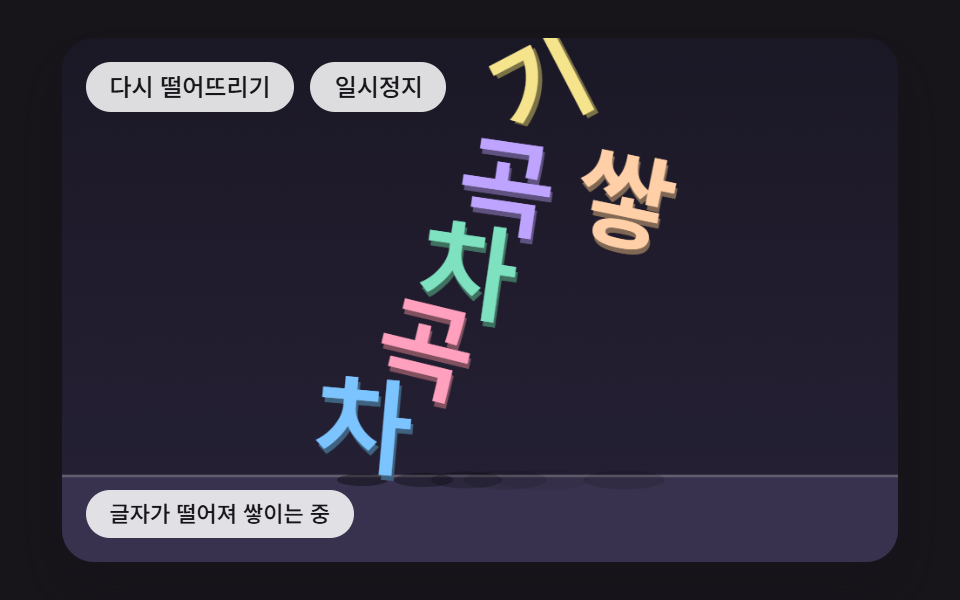 FeedbackFalling Text Animation: 9 Letters With Physics
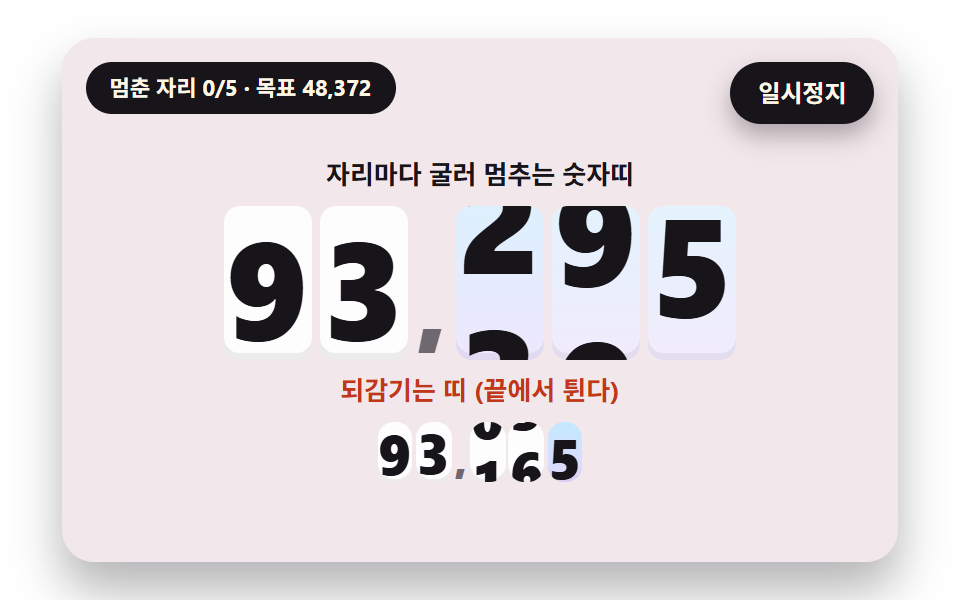 FeedbackNumber Rolling Animation JS: 9 Odometer Scenes
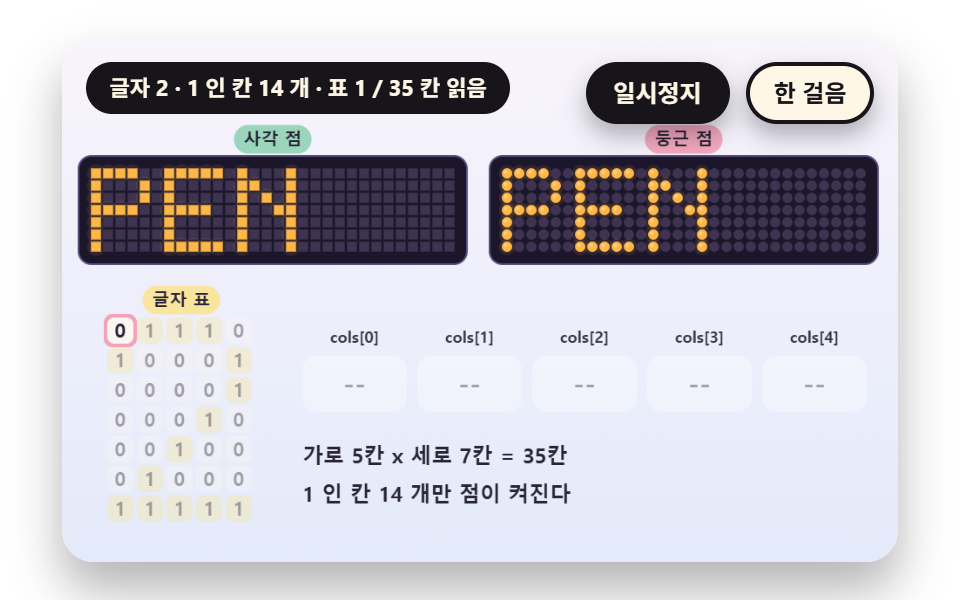 FeedbackDot Matrix Display: 9 Canvas LED Sign Scenes
 Feedback9 CSS Background Animation — One Line, Copy-Paste
 Feedback9 CSS Card Hover Effects — One Line, Copy-Paste
 Feedback9 CSS Text Shine Animation Effects — Copy-Paste
 Feedback9 CSS 3D Cube Effects — One Line, Copy-Paste
 Feedback9 CSS Particle Backgrounds — One Line, Copy-Paste
 FeedbackCookie Consent Banner UI — 9 Patterns to Paste In
 FeedbackToast Notification UI: 9 Stacking Patterns