Dot Matrix Display: 9 Canvas LED Sign Scenes
How does an LED sign turn a letter into dots? 01 lights only the 1 cells of a 5x7 table, 03 leaves an afterglow on dark dots, and 09 lights one row at a time
A Dot Matrix Display Is Not Writing Letters on a Screen but a Calculation That Turns Each Letter Into a 5 by 7 Table of Dots and Lights It Cell by Cell: Building One Starts by Deciding the Glyph Table and the Flowing Column Index
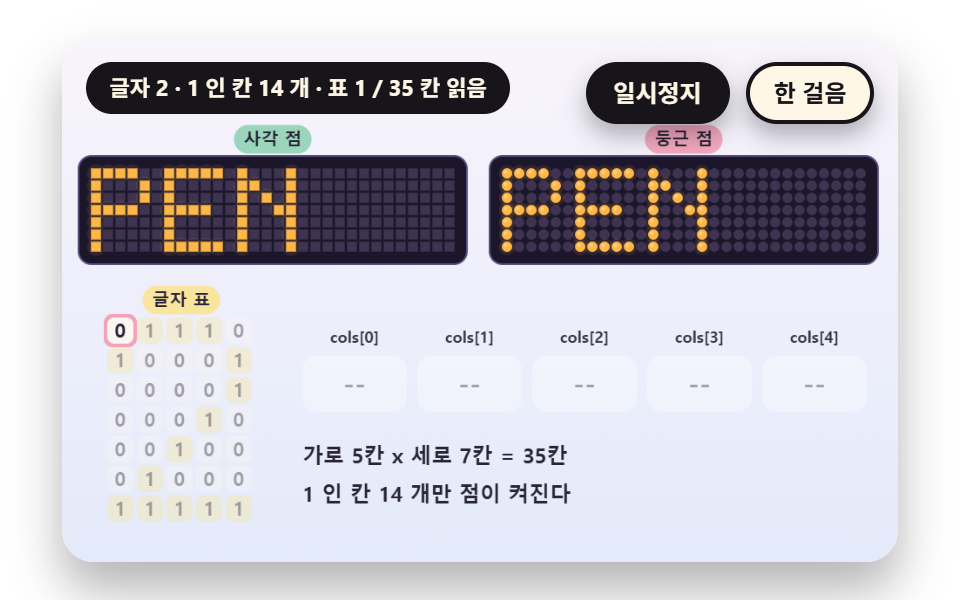 01 ld-bitmap-font-5x7-dot-grid
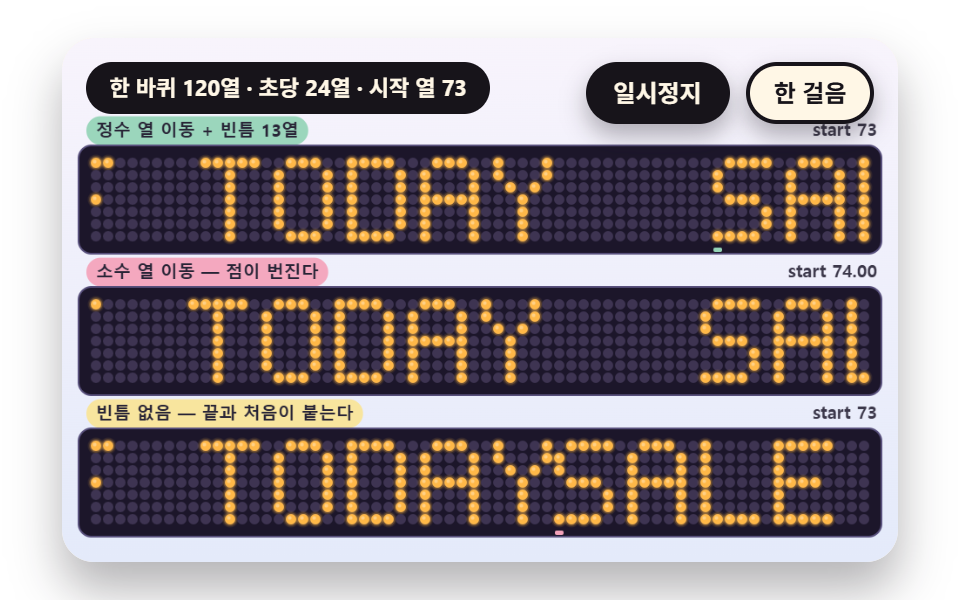 02 ld-column-scroll-seamless-loop
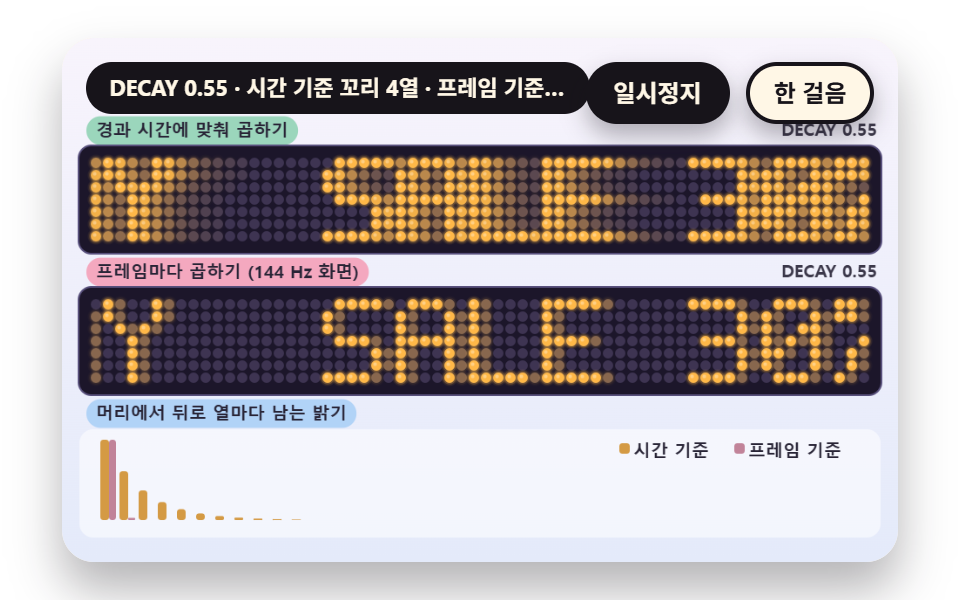 03 ld-glow-decay-afterimage-trail
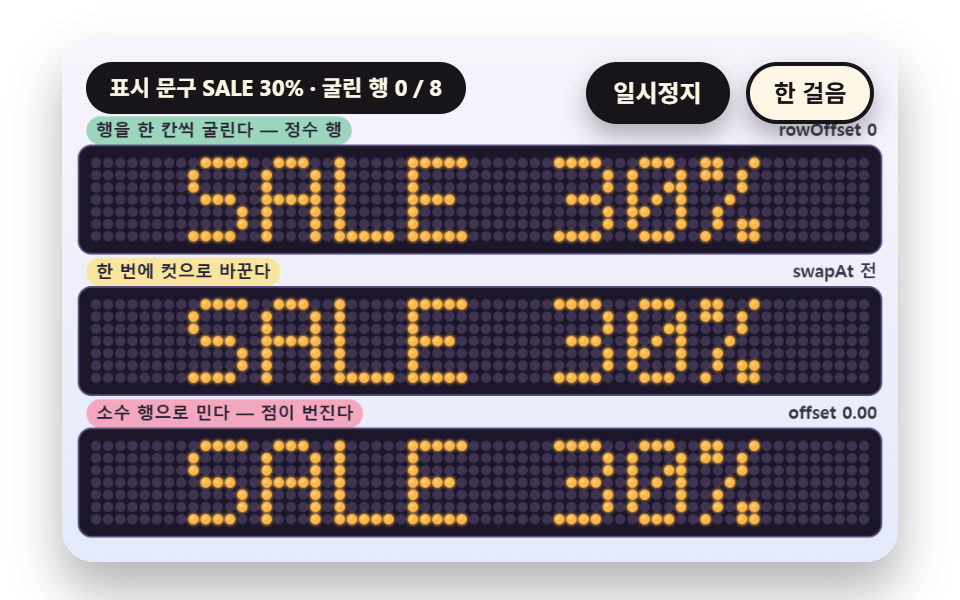 04 ld-row-roll-swap-transition
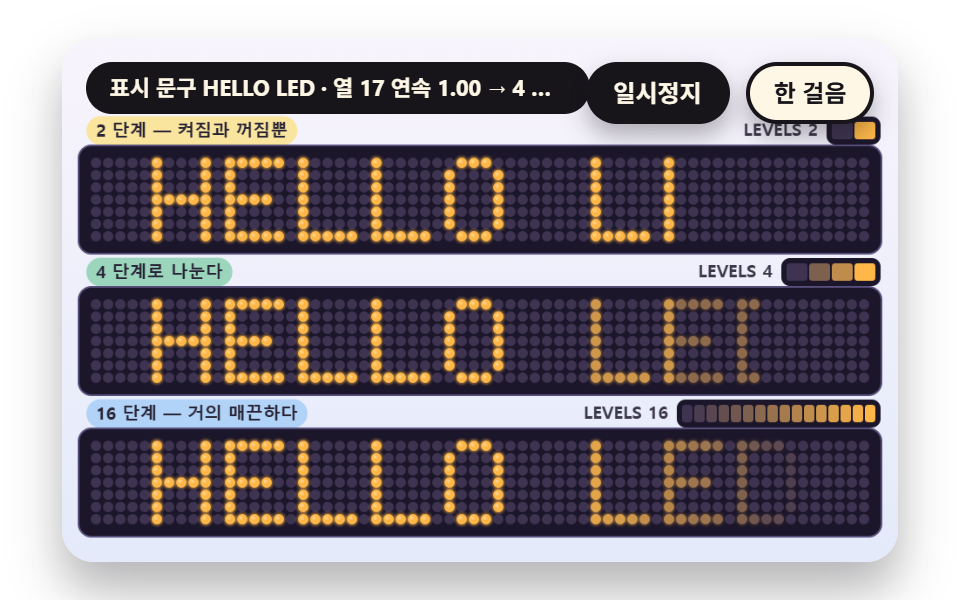 05 ld-brightness-level-quantize-fade
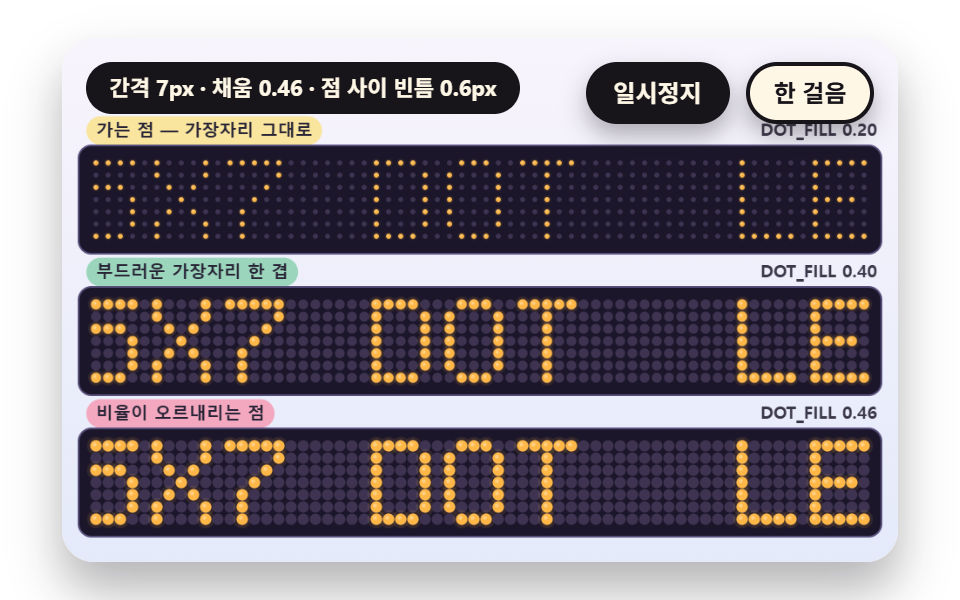 06 ld-dot-pitch-radius-soft-edge
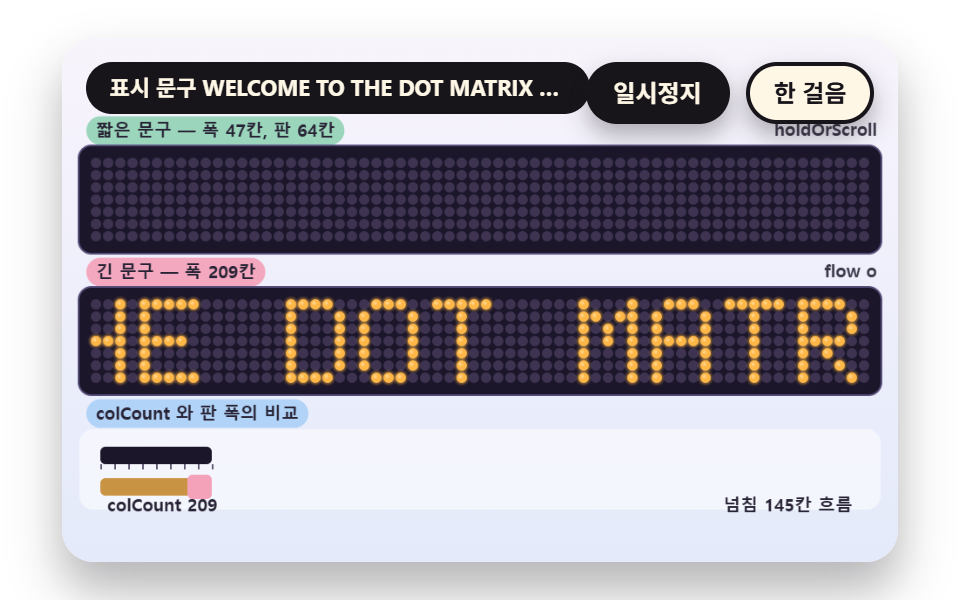 07 ld-width-measure-scroll-or-hold
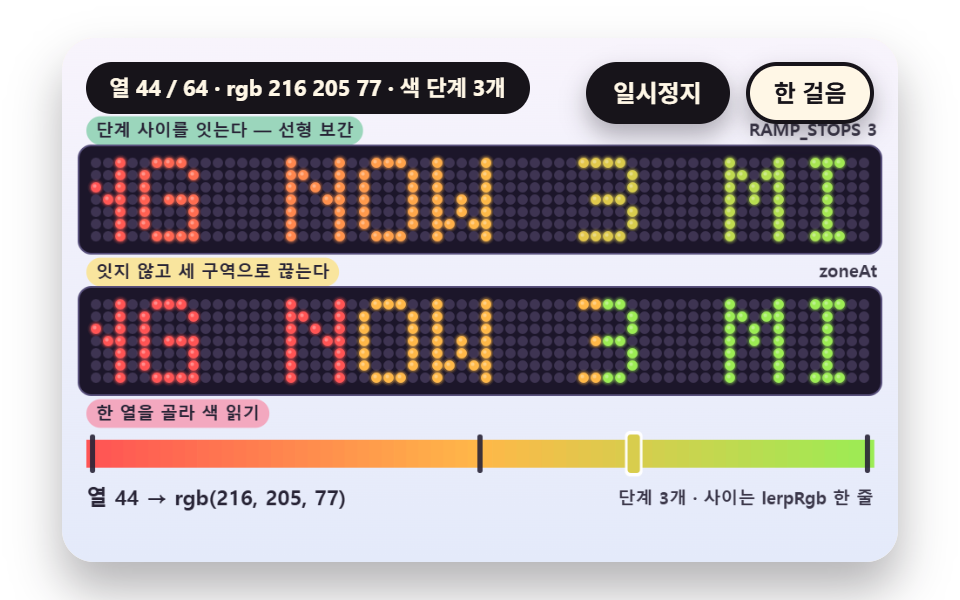 08 ld-column-position-color-ramp
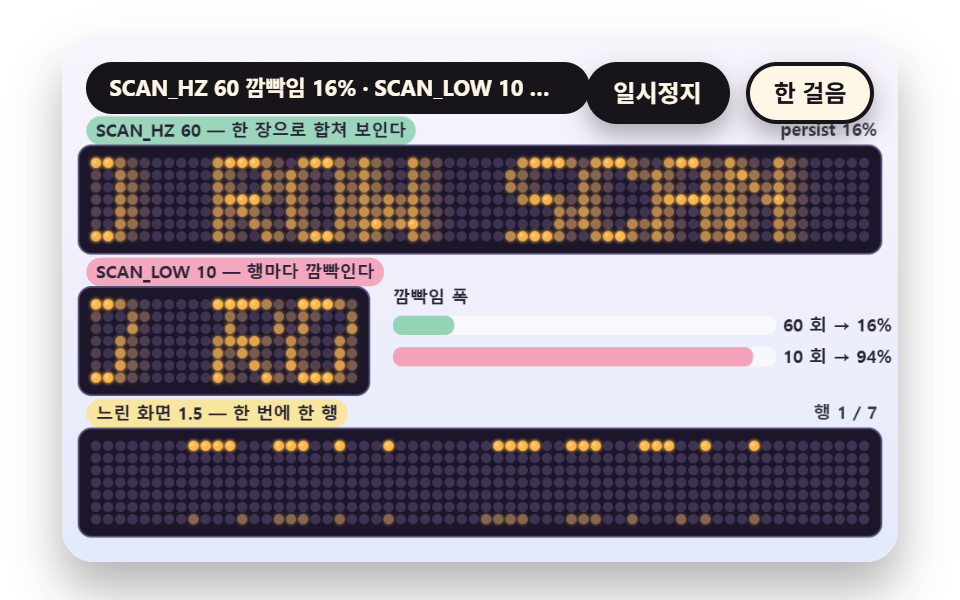 09 ld-row-scan-multiplex-persistence
Auto-plays · click a tile to jump to its section · all nine in one zip
- 01 A 5x7 Dot Font Stamped on a Grid
- 02 Scrolling by Whole Columns Without a Seam
- 03 The Afterglow Left on a Dot That Switched Off
- 04 A Row-by-Row Roll When the Phrase Changes
- 05 Fading Through a Few Brightness Levels
- 06 The Ratio of Dot Pitch to Radius
- 07 Measuring Width to Hold or Scroll
- 08 Dots Whose Color Follows Column Position
- 09 A Row Scan That Lights One Row at a Time
One frame carries the nine scenes. A 480x300 canvas holds two or three dot grid boards, and one board is usually 64 columns by 7 rows with a dot pitch of PITCH 7px. No library, WebGL or CDN is used, and all nine files contain zero random numbers, date calls, fetch requests or outside URLs, so motion comes from the elapsed time on the scene clock alone.
One function argument decides the brightness of a dot
board takes the board position, the pitch, the radius ratio and an lvAt(c, r) callback, and the brightness of a lit dot comes from the single value between 0 and 1 that lvAt returns. It paints the dark base dot first, adds a faint halo ring and the dot when brightness passes 0.03, and rounds dots above 0.85 with one small highlight. The callback appears 23 times across the nine scenes, and the only thing that changes between them is the arithmetic inside lvAt.
One letter becomes five 7-bit integers
The glyph table holds 45 characters: uppercase letters, digits, ! . - : % + > * and the space, each written as seven strings like '01110'. colsOf flattens a phrase into a list of columns where one column is a 7-bit integer with bit 0 on the top row, one blank column sits between letters, and the trailing blank column is dropped.
    // Flatten a phrase into a list of columns - one column is a 7-bit integer (bit 0 is the top row). The blank column between letters stays in the list and the trailing one is dropped
    function colsOf(s) {
        const out = [];
        for (let i = 0; i < s.length; i += 1) {
            const rows = glyphRows(s.charAt(i));
            for (let c = 0; c < GLYPH_W; c += 1) {
                let v = 0;
                for (let r = 0; r < GLYPH_H; r += 1) {
                    if (rows[r].charAt(c) === '1') {
                        v |= 1 << r;
                    }
                }
                out.push(v);
            }
            if (i < s.length - 1) {
                out.push(0);
            }
        }
        return out;
    }
An auto demo that runs on the timetable alone
Scenes move with no input at all. The first board starts START_S ahead so the page opens mid-scroll, and after LAP_S the scene repeats from the beginning. Time carried through one frame is capped at DT_MAX 0.05 seconds.
Dot Matrix Display: 9 Scenes — a 5x7 Dot Font, a Column Scroll Without a Seam, Afterglow on Dark Dots, a Row Roll Between Phrases, Brightness Levels, Dot Pitch and Radius, Measuring Width to Hold or Scroll, a Color Ramp by Column and a Row Scan Drive
Why the nine scenes sit in this order, and what the render measured
Scene 01 comes first because the glyph table is what the rest stand on, 02 to 05 cover how dots switch as time passes, and 06 to 08 are board-level decisions about dot shape, width and color. Scene 09 closes by explaining why a real sign reads as one picture.
| Scene | Cumulative area | Moving frames | Mean intensity |
|---|---|---|---|
| 01 5x7 font | 14.1% | 22/23 | 73.8 |
| 02 Column scroll | 37.4% | 23/23 | 105.8 |
| 03 Afterglow | 24.0% | 23/23 | 80.8 |
| 04 Row roll | 20.4% | 7/23 | 104.6 |
| 05 Brightness levels | 9.7% | 12/23 | 43.0 |
| 06 Dot pitch | 28.3% | 23/23 | 110.8 |
| 07 Width measure | 12.0% | 23/23 | 118.7 |
| 08 Color ramp | 28.1% | 23/23 | 114.5 |
| 09 Row scan | 19.9% | 23/23 | 58.2 |
Measured after rendering, 02 covers the widest area at 37.4% and 05 the narrowest at 9.7%, while mean intensity peaks at 118.7 in 07 and bottoms out at 43.0 in 05. Scene 04 holds still for 1.6 of the 2.16 seconds each phrase gets, so it moved in only 7/23 frames, and 05 has a rest between the brightening and the dimming span, which leaves it at 12/23.
01A 5x7 Dot Font Stamped on a Grid
The smallest way to draw a short phrase in dots with no font file. OPEN 24H is stamped one letter per 1.0 second, and inside a letter the first 84% of the time reads the 35 table cells in column order, while the left board draws square dots and the right board round dots from the same table. lvOf returns 0 when the column position inside a letter reaches GLYPH_W, which is the blank column between letters.
<main class="stage">
<div class="vj is-demo" id="vj">
  <div class="vj__pad" data-role="pad" tabindex="0" role="application" aria-label="LED sign demo stage - Enter or Space pauses, N steps once, R restarts">
    <canvas class="vj__canvas" data-role="canvas" width="480" height="300" role="img" aria-label="The phrase OPEN 24H is stamped one letter at a time with a 5x7 dot font. The left board draws square dots and the right board round dots from the same letter, and below them the 5 wide by 7 tall table of 0 and 1 for the letter being stamped fills in with five per-column integers as each cell is read. Only cells holding 1 light a dot and the cell being read gets a pink outline."></canvas>
  </div>
  <p class="vj__status" data-role="status" aria-live="off">LED sign demo</p>
  <div class="vj__ctrl">
    <button class="vj__pause" data-role="pause" type="button" aria-pressed="false">Pause</button>
    <button class="vj__step" data-role="step" type="button">Step</button>
  </div>
  <p class="vj__done" data-role="done" role="status" aria-live="polite"></p>
</div>
</main>
@use "../../../../site/static/demo-tokens" as *;
@include stage($stage-paper);
.vj {
position: relative;
width: min(92vw, calc(160vh - 12.8vw));
aspect-ratio: 480 / 300;
margin: 0 auto;
border-radius: $r-card;
overflow: hidden;
box-shadow: $shadow-raised;
background: $subject-cream;
}
// 무대 상자 — 여기서 시작한 터치만 칸 누르기로 읽는다(touch-action: none 은 이 상자에만). 무대 밖 터치는 페이지 스크롤 그대로
.vj__pad {
position: absolute;
inset: 0;
border-radius: inherit;
outline: none;
touch-action: none;
cursor: pointer;
}
// 바깥 .vj 가 넘침을 자르므로 포커스 테두리는 안쪽으로 들인다
.vj__pad:focus-visible {
outline: 3px solid $subject-ink;
outline-offset: -3px;
}
.vj__canvas {
position: absolute;
inset: 0;
display: block;
width: 100%;
height: 100%;
}
.vj__ctrl {
position: absolute;
right: $sp-3;
top: $sp-3;
display: flex;
gap: $sp-2;
}
.vj__pause,
.vj__step {
padding: $sp-1 $sp-3;
border: 2px solid $subject-ink;
border-radius: $r-pill;
background: $subject-ink;
color: $subject-cream;
font-family: inherit;
font-weight: 700;
font-size: 12px;
line-height: 1.6;
cursor: pointer;
box-shadow: $shadow-press;
transition: transform $dur-quick $ease-spring;
}
.vj__step {
background: $subject-cream;
color: $subject-ink;
}
// 스크린리더에만 읽히는 완료 알림
.vj__done {
position: absolute;
width: 1px;
height: 1px;
margin: 0;
overflow: hidden;
clip-path: inset(50%);
white-space: nowrap;
}
// 눌린 상태(멈춤) — 바탕과 글자색을 뒤집어 aria-pressed 가 눈에도 보이게
.vj__pause[aria-pressed="true"] {
background: $subject-cream;
color: $subject-ink;
}
.vj__pause:hover,
.vj__step:hover {
transform: translateY(-2px);
}
.vj__pause:active,
.vj__step:active {
transform: translateY(1px);
}
.vj__pause:focus-visible,
.vj__step:focus-visible {
outline: 3px solid $subject-ink;
outline-offset: 3px;
}
// 상태 줄 — 지금 장면의 수치를 글자로. 시연 중에는 aria-live off, 사람이 처음 손대면 polite
.vj__status {
position: absolute;
left: $sp-3;
top: $sp-3;
max-width: calc(100% - 190px);
margin: 0;
padding: $sp-1 $sp-3;
border-radius: $r-pill;
background: $subject-ink;
color: $subject-cream;
font-weight: 700;
font-size: 11px;
line-height: 1.6;
white-space: nowrap;
overflow: hidden;
text-overflow: ellipsis;
pointer-events: none;
}
@media (max-width: 340px) {
.vj__pause,
.vj__step,
.vj__status { font-size: 10px; padding: 0 $sp-2; }
}
// 움직임 줄이기 — 장면은 스크립트가 정지 장면 한 장으로 멈춘다. 버튼도 떠오르지 않게
@media (prefers-reduced-motion: reduce) {
.vj__pause,
.vj__step { transition: none !important; }
.vj__pause:hover,
.vj__pause:active,
.vj__step:hover,
.vj__step:active { transform: none !important; }
}html, body {
margin: 0;
overflow: hidden;
}
.stage {
box-sizing: border-box;
min-height: 100vh;
display: grid;
place-items: center;
margin: 0;
background: #ffffff;
font-family: -apple-system, "Segoe UI", "Noto Sans KR", sans-serif;
padding: clamp(8px, 4vw, 24px);
}
.vj {
position: relative;
width: min(92vw, 160vh - 12.8vw);
aspect-ratio: 480/300;
margin: 0 auto;
border-radius: 16px;
overflow: hidden;
box-shadow: 0 14px 24px rgba(23, 20, 26, 0.32);
background: #fff7e6;
}
.vj__pad {
position: absolute;
inset: 0;
border-radius: inherit;
outline: none;
touch-action: none;
cursor: pointer;
}
.vj__pad:focus-visible {
outline: 3px solid #17141a;
outline-offset: -3px;
}
.vj__canvas {
position: absolute;
inset: 0;
display: block;
width: 100%;
height: 100%;
}
.vj__ctrl {
position: absolute;
right: 12px;
top: 12px;
display: flex;
gap: 8px;
}
.vj__pause,
.vj__step {
padding: 4px 12px;
border: 2px solid #17141a;
border-radius: 999px;
background: #17141a;
color: #fff7e6;
font-family: inherit;
font-weight: 700;
font-size: 12px;
line-height: 1.6;
cursor: pointer;
box-shadow: 0 6px 12px rgba(23, 20, 26, 0.32);
transition: transform 220ms cubic-bezier(0.2, 0.8, 0.2, 1);
}
.vj__step {
background: #fff7e6;
color: #17141a;
}
.vj__done {
position: absolute;
width: 1px;
height: 1px;
margin: 0;
overflow: hidden;
clip-path: inset(50%);
white-space: nowrap;
}
.vj__pause[aria-pressed=true] {
background: #fff7e6;
color: #17141a;
}
.vj__pause:hover,
.vj__step:hover {
transform: translateY(-2px);
}
.vj__pause:active,
.vj__step:active {
transform: translateY(1px);
}
.vj__pause:focus-visible,
.vj__step:focus-visible {
outline: 3px solid #17141a;
outline-offset: 3px;
}
.vj__status {
position: absolute;
left: 12px;
top: 12px;
max-width: calc(100% - 190px);
margin: 0;
padding: 4px 12px;
border-radius: 999px;
background: #17141a;
color: #fff7e6;
font-weight: 700;
font-size: 11px;
line-height: 1.6;
white-space: nowrap;
overflow: hidden;
text-overflow: ellipsis;
pointer-events: none;
}
@media (max-width: 340px) {
.vj__pause,
.vj__step,
.vj__status {
font-size: 10px;
padding: 0 8px;
}
}
@media (prefers-reduced-motion: reduce) {
.vj__pause,
.vj__step {
transition: none !important;
}
.vj__pause:hover,
.vj__pause:active,
.vj__step:hover,
.vj__step:active {
transform: none !important;
}
}(function () {
const root = document.getElementById("vj");
if (!root) return;
// 무대 좌표 — 캔버스 안 계산은 늘 480×300. 화면에 보이는 크기와 상관없다
const W = 480;
const H = 300;
const TAU = Math.PI * 2;
function clamp(v, lo, hi) { return v < lo ? lo : (v > hi ? hi : v); }
function lerp(a, b, k) { return a + (b - a) * k; }
function ease(x) { const c = clamp(x, 0, 1); return c * c * (3 - 2 * c); }
// 파스텔 바깥 무대 — 판 바깥은 연한 면, 글자는 짙은 잉크
const BG_TOP = [248, 244, 252];
const BG_BOT = [228, 234, 250];
const INK = [40, 36, 54];
const PAPER = [250, 246, 240];
const WHITE = [255, 255, 255];
const ROSE = [244, 162, 186];
const MINT = [148, 212, 182];
const SKY = [172, 208, 246];
const BUTTER = [250, 228, 150];
// 전광판 판 — 짙은 남보라 바탕, 꺼진 점은 바탕보다 한 단계 밝은 보라, 켜진 점은 호박색(LED 색은 기능색이라 채도를 유지한다)
const BOARD = [28, 22, 42];
const BOARD_EDGE = [88, 80, 124];
const DOT_OFF = [62, 52, 82];
const AMBER = [255, 184, 72];
const AMBER_HI = [255, 232, 170];
function mix(a, b, k) { return [lerp(a[0], b[0], k), lerp(a[1], b[1], k), lerp(a[2], b[2], k)]; }
function rgba(c, a) {
return 'rgba(' + Math.round(clamp(c[0], 0, 255)) + ',' + Math.round(clamp(c[1], 0, 255)) + ',' + Math.round(clamp(c[2], 0, 255)) + ',' + clamp(a, 0, 1).toFixed(3) + ')';
}
// 장면 시계(초)·판 반복 번호
let sceneT = 0;
let lap = 0;
// ── 5x7 점 글꼴 — 자체 정의. 글자 하나는 가로 5칸 세로 7칸의 0·1 표이고 1 인 칸이 켜진다 ──
const GLYPH_W = 5;
const GLYPH_H = 7;
// 글자와 글자 사이 빈 col 한 줄
const LETTER_GAP = 1;
const ADV = GLYPH_W + LETTER_GAP;
const GL = {
' ': ['00000', '00000', '00000', '00000', '00000', '00000', '00000'],
'A': ['01110', '10001', '10001', '11111', '10001', '10001', '10001'],
'B': ['11110', '10001', '10001', '11110', '10001', '10001', '11110'],
'C': ['01110', '10001', '10000', '10000', '10000', '10001', '01110'],
'D': ['11110', '10001', '10001', '10001', '10001', '10001', '11110'],
'E': ['11111', '10000', '10000', '11110', '10000', '10000', '11111'],
'F': ['11111', '10000', '10000', '11110', '10000', '10000', '10000'],
'G': ['01110', '10001', '10000', '10111', '10001', '10001', '01111'],
'H': ['10001', '10001', '10001', '11111', '10001', '10001', '10001'],
'I': ['01110', '00100', '00100', '00100', '00100', '00100', '01110'],
'J': ['00111', '00010', '00010', '00010', '00010', '10010', '01100'],
'K': ['10001', '10010', '10100', '11000', '10100', '10010', '10001'],
'L': ['10000', '10000', '10000', '10000', '10000', '10000', '11111'],
'M': ['10001', '11011', '10101', '10101', '10001', '10001', '10001'],
'N': ['10001', '11001', '10101', '10011', '10001', '10001', '10001'],
'O': ['01110', '10001', '10001', '10001', '10001', '10001', '01110'],
'P': ['11110', '10001', '10001', '11110', '10000', '10000', '10000'],
'Q': ['01110', '10001', '10001', '10001', '10101', '10010', '01101'],
'R': ['11110', '10001', '10001', '11110', '10100', '10010', '10001'],
'S': ['01111', '10000', '10000', '01110', '00001', '00001', '11110'],
'T': ['11111', '00100', '00100', '00100', '00100', '00100', '00100'],
'U': ['10001', '10001', '10001', '10001', '10001', '10001', '01110'],
'V': ['10001', '10001', '10001', '10001', '10001', '01010', '00100'],
'W': ['10001', '10001', '10001', '10101', '10101', '11011', '10001'],
'X': ['10001', '10001', '01010', '00100', '01010', '10001', '10001'],
'Y': ['10001', '10001', '01010', '00100', '00100', '00100', '00100'],
'Z': ['11111', '00001', '00010', '00100', '01000', '10000', '11111'],
'0': ['01110', '10001', '10011', '10101', '11001', '10001', '01110'],
'1': ['00100', '01100', '00100', '00100', '00100', '00100', '01110'],
'2': ['01110', '10001', '00001', '00010', '00100', '01000', '11111'],
'3': ['11110', '00001', '00001', '01110', '00001', '00001', '11110'],
'4': ['00010', '00110', '01010', '10010', '11111', '00010', '00010'],
'5': ['11111', '10000', '11110', '00001', '00001', '10001', '01110'],
'6': ['00110', '01000', '10000', '11110', '10001', '10001', '01110'],
'7': ['11111', '00001', '00010', '00100', '01000', '01000', '01000'],
'8': ['01110', '10001', '10001', '01110', '10001', '10001', '01110'],
'9': ['01110', '10001', '10001', '01111', '00001', '00010', '01100'],
'!': ['00100', '00100', '00100', '00100', '00100', '00000', '00100'],
'.': ['00000', '00000', '00000', '00000', '00000', '01100', '01100'],
'-': ['00000', '00000', '00000', '11111', '00000', '00000', '00000'],
':': ['00000', '01100', '01100', '00000', '01100', '01100', '00000'],
'%': ['11001', '11010', '00010', '00100', '01000', '01011', '10011'],
'+': ['00000', '00100', '00100', '11111', '00100', '00100', '00000'],
'>': ['10000', '01000', '00100', '00010', '00100', '01000', '10000'],
'*': ['00000', '10101', '01110', '11111', '01110', '10101', '00000'],
};
function glyphRows(ch) { return GL[ch] ? GL[ch] : GL[' ']; }
// 문구를 col 목록으로 편다 — col 하나는 7 비트 정수(0 번 비트가 맨 윗줄). 글자 사이 빈 열도 목록에 들어 있고 맨 끝 빈 열은 뺀다
function colsOf(s) {
const out = [];
for (let i = 0; i < s.length; i += 1) {
const rows = glyphRows(s.charAt(i));
for (let c = 0; c < GLYPH_W; c += 1) {
let v = 0;
for (let r = 0; r < GLYPH_H; r += 1) {
if (rows[r].charAt(c) === '1') {
v |= 1 << r;
}
}
out.push(v);
}
if (i < s.length - 1) {
out.push(0);
}
}
return out;
}
function bitOf(cols, c, r) {
return c < 0 || c >= cols.length ? 0 : (cols[c] >> r) & 1;
}
// 순환 목록 — 문구 col 뒤에 gap 개의 빈 열을 이어 한 바퀴를 만든다. 번호는 한 바퀴 길이로 나머지를 취한다
function loopBit(cols, gap, c, r) {
const n = cols.length + gap;
const k = ((c % n) + n) % n;
return k < cols.length ? (cols[k] >> r) & 1 : 0;
}
// ── 판 그리기 도구 ──
let ctxRef = null;
const BOARD_PAD = 6;
function boardW(n, pitch) { return n * pitch + 2 * BOARD_PAD; }
// 점 하나 — halo 가 0 이면 가장자리가 딱 떨어지는 점, 0 보다 크면 그 배율 반지름의 옅은 테두리가 한 겹 더 번진다
function dotOne(cx, cy, rad, round, halo, c, a) {
if (a <= 0.01 || !ctxRef) {
return;
}
const ctx = ctxRef;
if (round) {
if (halo > 0) {
ctx.beginPath();
ctx.arc(cx, cy, rad * halo, 0, TAU);
ctx.fillStyle = rgba(c, a * 0.28);
ctx.fill();
}
ctx.beginPath();
ctx.arc(cx, cy, rad, 0, TAU);
ctx.fillStyle = rgba(c, a);
ctx.fill();
}
else {
const s = rad * 1.75;
if (halo > 0) {
ctx.fillStyle = rgba(c, a * 0.28);
ctx.fillRect(cx - s * halo / 2, cy - s * halo / 2, s * halo, s * halo);
}
ctx.fillStyle = rgba(c, a);
ctx.fillRect(cx - s / 2, cy - s / 2, s, s);
}
}
// 판 한 장 — 점 cols×rows. lvAt(c, r) 이 0 에서 1 의 밝기를 돌려주고 colAt 이 있으면 열마다 색을 고른다
function board(x, y, cols, rows, pitch, fill, round, halo, lvAt, colAt) {
if (!ctxRef) {
return;
}
const ctx = ctxRef;
const w = boardW(cols, pitch);
const h = boardW(rows, pitch);
ctx.beginPath();
ctx.roundRect(x - 1, y - 1, w + 2, h + 2, 8);
ctx.fillStyle = rgba(BOARD_EDGE, 1);
ctx.fill();
ctx.beginPath();
ctx.roundRect(x, y, w, h, 7);
ctx.fillStyle = rgba(BOARD, 1);
ctx.fill();
const rad = pitch * fill;
for (let c = 0; c < cols; c += 1) {
const col = colAt ? colAt(c) : AMBER;
const cx = x + BOARD_PAD + (c + 0.5) * pitch;
for (let r = 0; r < rows; r += 1) {
const cy = y + BOARD_PAD + (r + 0.5) * pitch;
dotOne(cx, cy, rad, round, 0, DOT_OFF, 1);
const lv = lvAt(c, r);
if (lv > 0.03) {
dotOne(cx, cy, rad * 1.6, true, 0, col, 0.1 * lv);
dotOne(cx, cy, rad, round, halo, col, lv);
if (lv > 0.85 && round) {
dotOne(cx - rad * 0.25, cy - rad * 0.25, rad * 0.34, true, 0, mix(col, [255, 255, 255], 0.6), 0.55 * lv);
}
}
}
}
}
// ── 바깥 무대 도구 ──
const FONT_STACK = 'system-ui, -apple-system, "Segoe UI", "Noto Sans KR", sans-serif';
function box(x, y, w, h, r, c, a) {
if (!ctxRef || w <= 0.2 || h <= 0.2 || a <= 0) {
return;
}
ctxRef.beginPath();
ctxRef.roundRect(x, y, w, h, Math.max(0, Math.min(r, w / 2, h / 2)));
ctxRef.fillStyle = rgba(c, a);
ctxRef.fill();
}
function text(s, x, y, c, a, px, weight, align) {
if (!ctxRef) {
return;
}
ctxRef.font = weight + ' ' + px + 'px ' + FONT_STACK;
ctxRef.textAlign = align;
ctxRef.textBaseline = 'middle';
ctxRef.fillStyle = rgba(c, a);
ctxRef.fillText(s, x, y);
}
// 글자 이름표 — 바탕 알약 위에 글자
function tag(s, x, y, bg, fg, px, align) {
if (!ctxRef) {
return;
}
ctxRef.font = '700 ' + px + 'px ' + FONT_STACK;
const w = ctxRef.measureText(s).width + px * 1.1;
const left = align === 'center' ? x - w / 2 : (align === 'right' ? x - w : x);
box(left, y - px * 0.82, w, px * 1.64, px * 0.82, bg, 0.92);
text(s, left + w / 2, y + 0.5, fg, 1, px, 700, 'center');
}
function skyFill() {
if (!ctxRef) {
return;
}
const g = ctxRef.createLinearGradient(0, 0, 0, H);
g.addColorStop(0, rgba(BG_TOP, 1));
g.addColorStop(1, rgba(BG_BOT, 1));
ctxRef.fillStyle = g;
ctxRef.fillRect(0, 0, W, H);
}
// 판 줄 배치 — 위 46 은 상태 줄·단추 자리. 블록 하나는 이름표 줄 + 판 한 장
const VIEW_X = 10;
const VIEW_COLS = 64;
const PITCH = 7;
const BLOCK_Y = [46, 127, 208];
// 블록 y0 에서 이름표는 y0+7, 판은 y0+16
function blockTag(i, s, bg, fg) { tag(s, VIEW_X + 4, BLOCK_Y[i] + 7, bg, fg, 10, 'left'); }
function blockRight(i, s) { text(s, VIEW_X + boardW(VIEW_COLS, PITCH) - 2, BLOCK_Y[i] + 7, INK, 0.9, 10, 700, 'right'); }
function boardY(i) { return BLOCK_Y[i] + 16; }
const canvasEl = root.querySelector('[data-role="canvas"]');
const padEl = root.querySelector('[data-role="pad"]');
const pauseEl = root.querySelector('[data-role="pause"]');
const statusEl = root.querySelector('[data-role="status"]');
const stepEl = root.querySelector('[data-role="step"]');
const doneEl = root.querySelector('[data-role="done"]');
const ctxRaw = canvasEl ? canvasEl.getContext('2d') : null;
if (!canvasEl || !ctxRaw || !pauseEl || !padEl || !stepEl || !doneEl) {
return;
}
const cv = canvasEl;
const ctx = ctxRaw;
ctxRef = ctx;
const pauseBtn = pauseEl;
const stepBtn = stepEl;
const doneP = doneEl;
const pad = padEl;
let dpr = 1;
function fitCanvas() {
// 배율은 2 에서 자른다 — 배율 3 기기에서 화소가 2.25배로 늘지 않게
dpr = Math.min(window.devicePixelRatio || 1, 2);
cv.width = Math.round(W * dpr);
cv.height = Math.round(H * dpr);
ctx.setTransform(dpr, 0, 0, dpr, 0, 0);
}
let shownStatus = '';
function pushStatus(s) {
if (!statusEl || s === shownStatus) {
return;
}
shownStatus = s;
statusEl.textContent = s;
}
// 화면 낭독기로 가는 문장 — 문구·모드가 바뀔 때만 달라진다. 보이는 상태 줄(statusText)은 따로 두어 계속 바뀌어도 읽히지 않는다
let spoken = '';
function pushSpeak(s) {
if (s === spoken) {
return;
}
spoken = s;
doneP.textContent = s;
}
let paused = false;
const reduceQuery = window.matchMedia('(prefers-reduced-motion: reduce)');
// 페이지를 연 채 움직임 줄이기 설정을 바꿔도 change 리스너가 다시 읽는다
let still = reduceQuery.matches;
// 자동 시연 표시 — 사람이 처음 손대면 떼고 낭독용 문장을 읽히기 시작한다
let demo = root.classList.contains('is-demo');
const off = new AbortController();
function wake() {
if (!demo) {
return;
}
demo = false;
root.classList.remove('is-demo');
pushSpeak(speakText());
}
// 한 판 시연이 끝났음을 스크린리더에 한 번만 알린다 — 판이 되풀이돼도 다시 읽지 않는다
let doneSaid = false;
function checkDone() {
if (!doneSaid && sceneT >= LAP_S - 0.6) {
doneSaid = true;
pushSpeak(speakText());
}
}
function advance(dt) {
sceneT += dt;
if (sceneT >= LAP_S) {
sceneT -= LAP_S;
lap += 1;
build();
}
update(dt);
}
// 첫 판은 START_S 만큼 앞서 시작한다 — 글자가 이미 흐르는 중인 장면에서 보인다
function runTo(t) {
while (sceneT < t - 1e-6) {
advance(Math.min(1 / 30, t - sceneT));
}
}
function begin() {
sceneT = 0;
build();
if (lap === 0 && !still) {
runTo(START_S);
}
}
const DT_MAX = 0.05;
const STEP_S = 0.4;
function showNow() {
draw();
pushStatus(statusText());
if (!demo) {
pushSpeak(speakText());
}
checkDone();
}
let rafId = 0;
let lastTs = -1;
function frame(ts) {
if (still || paused) {
rafId = 0;
return;
}
if (lastTs < 0) {
lastTs = ts;
}
const dt = Math.min((ts - lastTs) / 1000, DT_MAX);
lastTs = ts;
if (dt > 0) {
advance(dt);
}
showNow();
rafId = window.requestAnimationFrame(frame);
}
function startLoop() {
if (rafId) {
return;
}
// 멈췄던 사이의 시간을 첫 프레임 dt 로 넘기지 않는다
lastTs = -1;
rafId = window.requestAnimationFrame(frame);
}
function stopLoop() {
if (rafId) {
window.cancelAnimationFrame(rafId);
rafId = 0;
}
}
// 움직임 줄이기 — 루프 없이 글자가 읽히는 정지 장면 한 장
function showRest() {
stopLoop();
lap = 0;
sceneT = 0;
build();
runTo(REST_S);
showNow();
}
function play() {
begin();
showNow();
if (!paused) {
startLoop();
}
}
function togglePause() {
paused = !paused;
pauseBtn.setAttribute('aria-pressed', paused ? 'true' : 'false');
wake();
if (paused) {
stopLoop();
}
else if (!still) {
startLoop();
}
}
function restart() {
wake();
doneSaid = false;
lap += 1;
begin();
showNow();
}
// Step — 멈춘 채 장면 시계를 0.4 초 앞으로
function stepOnce() {
wake();
if (!paused) {
paused = true;
pauseBtn.setAttribute('aria-pressed', 'true');
stopLoop();
}
runTo(sceneT + STEP_S);
showNow();
}
pauseBtn.addEventListener('click', togglePause, { signal: off.signal });
stepBtn.addEventListener('click', stepOnce, { signal: off.signal });
// 키보드 — 무대에 포커스가 있을 때만. Enter·Space·P 는 Pause, N 은 Step, R 은 처음부터
pad.addEventListener('keydown', function (e) {
if (e.altKey || e.ctrlKey || e.metaKey) {
return;
}
const k = e.key;
if (k === 'Enter' || k === ' ' || k === 'p' || k === 'P') {
e.preventDefault();
togglePause();
}
else if (k === 'n' || k === 'N') {
e.preventDefault();
stepOnce();
}
else if (k === 'r' || k === 'R') {
e.preventDefault();
restart();
}
}, { signal: off.signal });
// 마우스·터치 — 무대를 누르면 Pause 토글
pad.addEventListener('click', function () { togglePause(); }, { signal: off.signal });
// 탭이 숨으면 멈추고, 돌아오면 시계를 다시 맞춰 시작 — 숨은 동안의 몇 초가 한 프레임에 몰리지 않게
document.addEventListener('visibilitychange', function () {
if (document.hidden) {
stopLoop();
}
else if (!paused && !still) {
startLoop();
}
}, { signal: off.signal });
// 설정이 바뀌면 — 켜지면 정지 장면 한 장, 꺼지면 다시 움직인다
reduceQuery.addEventListener('change', function () {
still = reduceQuery.matches;
if (still) {
showRest();
}
else {
lap = 0;
play();
}
}, { signal: off.signal });
window.addEventListener('resize', function () {
fitCanvas();
showNow();
}, { signal: off.signal });
// ── 01 5x7 점 글꼴을 격자에 찍기 — Glyph table(0·1)에서 1 인 칸만 켜고, 같은 표를 사각 점과 둥근 점으로 비교 ────
// 장면은 표를 col 순서로 한 칸씩 읽는다. 읽힌 칸만 두 판과 표에서 같이 켜지고, col 하나가 끝나면 그 열의 정수가 오른쪽에 찍힌다
const LAP_S = 9.6;
const START_S = 3.4;
const REST_S = 5.2;
const MSG = 'OPEN 24H';
const T0 = 0.3;
const TYPE_S = 1.0;
const SCAN_SHARE = 0.84;
const VIEW_CH = 5;
const TBL = 17;
const TBL_X = 26;
const TBL_Y = 160;
function build() { return; }
function update(dt) { if (dt < 0) {
return;
} }
// 지금 찍는 글자 번호 idx 와 그 글자 표에서 읽힌 칸 수 n
function cur() {
const u = Math.max(0, sceneT - T0);
const idx = Math.min(MSG.length - 1, Math.floor(u / TYPE_S));
const within = Math.min(1, (u - idx * TYPE_S) / (TYPE_S * SCAN_SHARE));
return { idx: idx, n: sceneT < T0 ? 0 : Math.ceil(within * GLYPH_W * GLYPH_H) };
}
function onesOf(ch) {
let n = 0;
for (const row of glyphRows(ch)) {
for (let c = 0; c < GLYPH_W; c += 1) {
if (row.charAt(c) === '1') {
n += 1;
}
}
}
return n;
}
    function lvOf(c, r, first, idx, n) {
        const s = Math.floor(c / ADV);
        const cc = c % ADV;
        if (cc >= GLYPH_W) {
            return 0;
        }
        const k = first + s;
        if (k > idx) {
            return 0;
        }
        if (glyphRows(MSG.charAt(k))[r].charAt(cc) !== '1') {
            return 0;
        }
        if (k < idx) {
            return 1;
        }
        const cell = cc * GLYPH_H + r;
        return cell < n ? (cell === n - 1 ? 1 : 0.9) : 0;
    }
function draw() {
skyFill();
const st = cur();
const first = Math.max(0, st.idx - (VIEW_CH - 1));
const bw = boardW(VIEW_CH * ADV, PITCH);
tag('Square dots', 10 + bw / 2, 58, MINT, INK, 10, 'center');
tag('Round dots', 246 + bw / 2, 58, ROSE, INK, 10, 'center');
board(10, 68, VIEW_CH * ADV, GLYPH_H, PITCH, 0.46, false, 0, function (c, r) { return lvOf(c, r, first, st.idx, st.n); }, null);
board(246, 68, VIEW_CH * ADV, GLYPH_H, PITCH, 0.42, true, 0, function (c, r) { return lvOf(c, r, first, st.idx, st.n); }, null);
// Glyph table — 같은 글자의 0·1 표. 읽는 칸에 분홍 테두리
const ch = MSG.charAt(st.idx);
const rows = glyphRows(ch);
tag('Glyph table', TBL_X + (GLYPH_W * TBL) / 2, 150, BUTTER, INK, 10, 'center');
for (let r = 0; r < GLYPH_H; r += 1) {
for (let cc = 0; cc < GLYPH_W; cc += 1) {
const x = TBL_X + cc * TBL;
const y = TBL_Y + r * TBL;
const cell = cc * GLYPH_H + r;
const seen = cell < st.n;
const one = rows[r].charAt(cc) === '1';
if (cell === st.n - 1) {
box(x - 2, y - 2, TBL + 2, TBL + 2, 5, ROSE, 1);
}
box(x, y, TBL - 2, TBL - 2, 4, one ? BUTTER : PAPER, seen ? 1 : 0.35);
text(one ? '1' : '0', x + (TBL - 2) / 2, y + (TBL - 2) / 2 + 0.5, INK, seen ? 1 : 0.4, 11, 700, 'center');
}
}
// col 정수 — 표의 col 하나를 위 비트가 0 번인 7 비트 정수로
const cols = colsOf(ch);
for (let cc = 0; cc < GLYPH_W; cc += 1) {
const done = (cc + 1) * GLYPH_H <= st.n;
const x = 138 + cc * 66;
text('cols[' + cc + ']', x + 30, 172, INK, 0.9, 9, 700, 'center');
box(x, 182, 60, 32, 8, done ? PAPER : WHITE, done ? 1 : 0.35);
text(done ? String(cols[cc]) : '--', x + 30, 198.5, INK, done ? 1 : 0.4, 16, 700, 'center');
}
text('{w} wide x {h} tall = {n} cells'.replace('{w}', String(GLYPH_W)).replace('{h}', String(GLYPH_H)).replace('{n}', String(GLYPH_W * GLYPH_H)), 138, 240, INK, 1, 12, 700, 'left');
text('Only the {a} cells holding 1 light a dot'.replace('{a}', String(onesOf(ch))), 138, 262, INK, 1, 12, 700, 'left');
}
// 화면 낭독기로 보내는 문장 — 표시 문구와 판 이름만 담아 장면이 흘러도 달라지지 않는다
function speakText() {
return 'Phrase {s} - 5x7 dot font boards'.replace('{s}', MSG);
}
function statusText() {
const st = cur();
return 'letter {c} · {a} cells hold 1 · read {n} / 35 cells'.replace('{c}', MSG.charAt(st.idx)).replace('{a}', String(onesOf(MSG.charAt(st.idx)))).replace('{n}', String(st.n));
}
fitCanvas();
if (still) {
showRest();
}
else {
play();
}
return function () {
stopLoop();
off.abort();
};
})();// BitmapFont5x7DotGrid - 같은 항목 vanilla index.html 의 React 판. 같은 계산을 useEffect 안에서 돌린다
import { useEffect, useRef } from "react";
import styles from "./BitmapFont5x7DotGrid.module.scss";
const cx = (s: string): string => s.split(" ").map((n) => styles[n] ?? n).join(" ");
export default function BitmapFont5x7DotGrid() {
const rootRef = useRef<HTMLDivElement | null>(null);
useEffect(() => {
const rootEl = rootRef.current;
if (!rootEl) return;
const root: HTMLElement = rootEl;
type RGB = [number, number, number];
// 무대 좌표 — 캔버스 안 계산은 늘 480×300. 화면에 보이는 크기와 상관없다
const W = 480;
const H = 300;
const TAU = Math.PI * 2;
function clamp(v: number, lo: number, hi: number): number { return v < lo ? lo : (v > hi ? hi : v); }
function lerp(a: number, b: number, k: number): number { return a + (b - a) * k; }
function ease(x: number): number { const c = clamp(x, 0, 1); return c * c * (3 - 2 * c); }
// 파스텔 바깥 무대 — 판 바깥은 연한 면, 글자는 짙은 잉크
const BG_TOP: RGB = [248, 244, 252];
const BG_BOT: RGB = [228, 234, 250];
const INK: RGB = [40, 36, 54];
const PAPER: RGB = [250, 246, 240];
const WHITE: RGB = [255, 255, 255];
const ROSE: RGB = [244, 162, 186];
const MINT: RGB = [148, 212, 182];
const SKY: RGB = [172, 208, 246];
const BUTTER: RGB = [250, 228, 150];
// 전광판 판 — 짙은 남보라 바탕, 꺼진 점은 바탕보다 한 단계 밝은 보라, 켜진 점은 호박색(LED 색은 기능색이라 채도를 유지한다)
const BOARD: RGB = [28, 22, 42];
const BOARD_EDGE: RGB = [88, 80, 124];
const DOT_OFF: RGB = [62, 52, 82];
const AMBER: RGB = [255, 184, 72];
const AMBER_HI: RGB = [255, 232, 170];
function mix(a: RGB, b: RGB, k: number): RGB { return [lerp(a[0], b[0], k), lerp(a[1], b[1], k), lerp(a[2], b[2], k)]; }
function rgba(c: RGB, a: number): string {
return 'rgba(' + Math.round(clamp(c[0], 0, 255)) + ',' + Math.round(clamp(c[1], 0, 255)) + ',' + Math.round(clamp(c[2], 0, 255)) + ',' + clamp(a, 0, 1).toFixed(3) + ')';
}
// 장면 시계(초)·판 반복 번호
let sceneT = 0;
let lap = 0;
// ── 5x7 점 글꼴 — 자체 정의. 글자 하나는 가로 5칸 세로 7칸의 0·1 표이고 1 인 칸이 켜진다 ──
const GLYPH_W = 5;
const GLYPH_H = 7;
// 글자와 글자 사이 빈 열 한 줄
const LETTER_GAP = 1;
const ADV = GLYPH_W + LETTER_GAP;
const GL: { [k: string]: string[] } = {
' ': ['00000', '00000', '00000', '00000', '00000', '00000', '00000'],
'A': ['01110', '10001', '10001', '11111', '10001', '10001', '10001'],
'B': ['11110', '10001', '10001', '11110', '10001', '10001', '11110'],
'C': ['01110', '10001', '10000', '10000', '10000', '10001', '01110'],
'D': ['11110', '10001', '10001', '10001', '10001', '10001', '11110'],
'E': ['11111', '10000', '10000', '11110', '10000', '10000', '11111'],
'F': ['11111', '10000', '10000', '11110', '10000', '10000', '10000'],
'G': ['01110', '10001', '10000', '10111', '10001', '10001', '01111'],
'H': ['10001', '10001', '10001', '11111', '10001', '10001', '10001'],
'I': ['01110', '00100', '00100', '00100', '00100', '00100', '01110'],
'J': ['00111', '00010', '00010', '00010', '00010', '10010', '01100'],
'K': ['10001', '10010', '10100', '11000', '10100', '10010', '10001'],
'L': ['10000', '10000', '10000', '10000', '10000', '10000', '11111'],
'M': ['10001', '11011', '10101', '10101', '10001', '10001', '10001'],
'N': ['10001', '11001', '10101', '10011', '10001', '10001', '10001'],
'O': ['01110', '10001', '10001', '10001', '10001', '10001', '01110'],
'P': ['11110', '10001', '10001', '11110', '10000', '10000', '10000'],
'Q': ['01110', '10001', '10001', '10001', '10101', '10010', '01101'],
'R': ['11110', '10001', '10001', '11110', '10100', '10010', '10001'],
'S': ['01111', '10000', '10000', '01110', '00001', '00001', '11110'],
'T': ['11111', '00100', '00100', '00100', '00100', '00100', '00100'],
'U': ['10001', '10001', '10001', '10001', '10001', '10001', '01110'],
'V': ['10001', '10001', '10001', '10001', '10001', '01010', '00100'],
'W': ['10001', '10001', '10001', '10101', '10101', '11011', '10001'],
'X': ['10001', '10001', '01010', '00100', '01010', '10001', '10001'],
'Y': ['10001', '10001', '01010', '00100', '00100', '00100', '00100'],
'Z': ['11111', '00001', '00010', '00100', '01000', '10000', '11111'],
'0': ['01110', '10001', '10011', '10101', '11001', '10001', '01110'],
'1': ['00100', '01100', '00100', '00100', '00100', '00100', '01110'],
'2': ['01110', '10001', '00001', '00010', '00100', '01000', '11111'],
'3': ['11110', '00001', '00001', '01110', '00001', '00001', '11110'],
'4': ['00010', '00110', '01010', '10010', '11111', '00010', '00010'],
'5': ['11111', '10000', '11110', '00001', '00001', '10001', '01110'],
'6': ['00110', '01000', '10000', '11110', '10001', '10001', '01110'],
'7': ['11111', '00001', '00010', '00100', '01000', '01000', '01000'],
'8': ['01110', '10001', '10001', '01110', '10001', '10001', '01110'],
'9': ['01110', '10001', '10001', '01111', '00001', '00010', '01100'],
'!': ['00100', '00100', '00100', '00100', '00100', '00000', '00100'],
'.': ['00000', '00000', '00000', '00000', '00000', '01100', '01100'],
'-': ['00000', '00000', '00000', '11111', '00000', '00000', '00000'],
':': ['00000', '01100', '01100', '00000', '01100', '01100', '00000'],
'%': ['11001', '11010', '00010', '00100', '01000', '01011', '10011'],
'+': ['00000', '00100', '00100', '11111', '00100', '00100', '00000'],
'>': ['10000', '01000', '00100', '00010', '00100', '01000', '10000'],
'*': ['00000', '10101', '01110', '11111', '01110', '10101', '00000'],
};
function glyphRows(ch: string): string[] { return GL[ch] ? GL[ch] : GL[' ']; }
// 문구를 열 목록으로 편다 — 열 하나는 7 비트 정수(0 번 비트가 맨 윗줄). 글자 사이 빈 열도 목록에 들어 있고 맨 끝 빈 열은 뺀다
function colsOf(s: string): number[] {
const out: number[] = [];
for (let i = 0; i < s.length; i += 1) {
const rows = glyphRows(s.charAt(i));
for (let c = 0; c < GLYPH_W; c += 1) {
let v = 0;
for (let r = 0; r < GLYPH_H; r += 1) {
if (rows[r].charAt(c) === '1') { v |= 1 << r; }
}
out.push(v);
}
if (i < s.length - 1) { out.push(0); }
}
return out;
}
function bitOf(cols: number[], c: number, r: number): number {
return c < 0 || c >= cols.length ? 0 : (cols[c] >> r) & 1;
}
// 순환 목록 — 문구 열 뒤에 gap 개의 빈 열을 이어 한 바퀴를 만든다. 번호는 한 바퀴 길이로 나머지를 취한다
function loopBit(cols: number[], gap: number, c: number, r: number): number {
const n = cols.length + gap;
const k = ((c % n) + n) % n;
return k < cols.length ? (cols[k] >> r) & 1 : 0;
}
// ── 판 그리기 도구 ──
let ctxRef: CanvasRenderingContext2D | null = null;
const BOARD_PAD = 6;
function boardW(n: number, pitch: number): number { return n * pitch + 2 * BOARD_PAD; }
// 점 하나 — halo 가 0 이면 가장자리가 딱 떨어지는 점, 0 보다 크면 그 배율 반지름의 옅은 테두리가 한 겹 더 번진다
function dotOne(cx: number, cy: number, rad: number, round: boolean, halo: number, c: RGB, a: number): void {
if (a <= 0.01 || !ctxRef) { return; }
const ctx = ctxRef;
if (round) {
if (halo > 0) {
ctx.beginPath();
ctx.arc(cx, cy, rad * halo, 0, TAU);
ctx.fillStyle = rgba(c, a * 0.28);
ctx.fill();
}
ctx.beginPath();
ctx.arc(cx, cy, rad, 0, TAU);
ctx.fillStyle = rgba(c, a);
ctx.fill();
} else {
const s = rad * 1.75;
if (halo > 0) {
ctx.fillStyle = rgba(c, a * 0.28);
ctx.fillRect(cx - s * halo / 2, cy - s * halo / 2, s * halo, s * halo);
}
ctx.fillStyle = rgba(c, a);
ctx.fillRect(cx - s / 2, cy - s / 2, s, s);
}
}
// 판 한 장 — 점 cols×rows. lvAt(c, r) 이 0 에서 1 의 밝기를 돌려주고 colAt 이 있으면 열마다 색을 고른다
function board(x: number, y: number, cols: number, rows: number, pitch: number, fill: number, round: boolean, halo: number,
lvAt: (c: number, r: number) => number, colAt: ((c: number) => RGB) | null): void {
if (!ctxRef) { return; }
const ctx = ctxRef;
const w = boardW(cols, pitch);
const h = boardW(rows, pitch);
ctx.beginPath();
ctx.roundRect(x - 1, y - 1, w + 2, h + 2, 8);
ctx.fillStyle = rgba(BOARD_EDGE, 1);
ctx.fill();
ctx.beginPath();
ctx.roundRect(x, y, w, h, 7);
ctx.fillStyle = rgba(BOARD, 1);
ctx.fill();
const rad = pitch * fill;
for (let c = 0; c < cols; c += 1) {
const col = colAt ? colAt(c) : AMBER;
const cx = x + BOARD_PAD + (c + 0.5) * pitch;
for (let r = 0; r < rows; r += 1) {
const cy = y + BOARD_PAD + (r + 0.5) * pitch;
dotOne(cx, cy, rad, round, 0, DOT_OFF, 1);
const lv = lvAt(c, r);
if (lv > 0.03) {
dotOne(cx, cy, rad * 1.6, true, 0, col, 0.1 * lv);
dotOne(cx, cy, rad, round, halo, col, lv);
if (lv > 0.85 && round) { dotOne(cx - rad * 0.25, cy - rad * 0.25, rad * 0.34, true, 0, mix(col, [255, 255, 255], 0.6), 0.55 * lv); }
}
}
}
}
// ── 바깥 무대 도구 ──
const FONT_STACK = 'system-ui, -apple-system, "Segoe UI", "Noto Sans KR", sans-serif';
function box(x: number, y: number, w: number, h: number, r: number, c: RGB, a: number): void {
if (!ctxRef || w <= 0.2 || h <= 0.2 || a <= 0) { return; }
ctxRef.beginPath();
ctxRef.roundRect(x, y, w, h, Math.max(0, Math.min(r, w / 2, h / 2)));
ctxRef.fillStyle = rgba(c, a);
ctxRef.fill();
}
function text(s: string, x: number, y: number, c: RGB, a: number, px: number, weight: number, align: CanvasTextAlign): void {
if (!ctxRef) { return; }
ctxRef.font = weight + ' ' + px + 'px ' + FONT_STACK;
ctxRef.textAlign = align;
ctxRef.textBaseline = 'middle';
ctxRef.fillStyle = rgba(c, a);
ctxRef.fillText(s, x, y);
}
// 글자 이름표 — 바탕 알약 위에 글자
function tag(s: string, x: number, y: number, bg: RGB, fg: RGB, px: number, align: CanvasTextAlign): void {
if (!ctxRef) { return; }
ctxRef.font = '700 ' + px + 'px ' + FONT_STACK;
const w = ctxRef.measureText(s).width + px * 1.1;
const left = align === 'center' ? x - w / 2 : (align === 'right' ? x - w : x);
box(left, y - px * 0.82, w, px * 1.64, px * 0.82, bg, 0.92);
text(s, left + w / 2, y + 0.5, fg, 1, px, 700, 'center');
}
function skyFill(): void {
if (!ctxRef) { return; }
const g = ctxRef.createLinearGradient(0, 0, 0, H);
g.addColorStop(0, rgba(BG_TOP, 1));
g.addColorStop(1, rgba(BG_BOT, 1));
ctxRef.fillStyle = g;
ctxRef.fillRect(0, 0, W, H);
}
// 판 줄 배치 — 위 46 은 상태 줄·단추 자리. 블록 하나는 이름표 줄 + 판 한 장
const VIEW_X = 10;
const VIEW_COLS = 64;
const PITCH = 7;
const BLOCK_Y = [46, 127, 208];
// 블록 y0 에서 이름표는 y0+7, 판은 y0+16
function blockTag(i: number, s: string, bg: RGB, fg: RGB): void { tag(s, VIEW_X + 4, BLOCK_Y[i] + 7, bg, fg, 10, 'left'); }
function blockRight(i: number, s: string): void { text(s, VIEW_X + boardW(VIEW_COLS, PITCH) - 2, BLOCK_Y[i] + 7, INK, 0.9, 10, 700, 'right'); }
function boardY(i: number): number { return BLOCK_Y[i] + 16; }
const canvasEl = root.querySelector('[data-role="canvas"]') as HTMLCanvasElement | null;
const padEl = root.querySelector('[data-role="pad"]') as HTMLElement | null;
const pauseEl = root.querySelector('[data-role="pause"]') as HTMLButtonElement | null;
const statusEl = root.querySelector('[data-role="status"]') as HTMLElement | null;
const stepEl = root.querySelector('[data-role="step"]') as HTMLButtonElement | null;
const doneEl = root.querySelector('[data-role="done"]') as HTMLElement | null;
const ctxRaw = canvasEl ? canvasEl.getContext('2d') : null;
if (!canvasEl || !ctxRaw || !pauseEl || !padEl || !stepEl || !doneEl) { return; }
const cv: HTMLCanvasElement = canvasEl;
const ctx: CanvasRenderingContext2D = ctxRaw;
ctxRef = ctx;
const pauseBtn: HTMLButtonElement = pauseEl;
const stepBtn: HTMLButtonElement = stepEl;
const doneP: HTMLElement = doneEl;
const pad: HTMLElement = padEl;
let dpr = 1;
function fitCanvas(): void {
// 배율은 2 에서 자른다 — 배율 3 기기에서 화소가 2.25배로 늘지 않게
dpr = Math.min(window.devicePixelRatio || 1, 2);
cv.width = Math.round(W * dpr);
cv.height = Math.round(H * dpr);
ctx.setTransform(dpr, 0, 0, dpr, 0, 0);
}
let shownStatus = '';
function pushStatus(s: string): void {
if (!statusEl || s === shownStatus) { return; }
shownStatus = s;
statusEl.textContent = s;
}
// 화면 낭독기로 가는 문장 — 문구·모드가 바뀔 때만 달라진다. 보이는 상태 줄(statusText)은 따로 두어 계속 바뀌어도 읽히지 않는다
let spoken = '';
function pushSpeak(s: string): void {
if (s === spoken) { return; }
spoken = s;
doneP.textContent = s;
}
let paused = false;
const reduceQuery = window.matchMedia('(prefers-reduced-motion: reduce)');
// 페이지를 연 채 움직임 줄이기 설정을 바꿔도 change 리스너가 다시 읽는다
let still = reduceQuery.matches;
// 자동 시연 표시 — 사람이 처음 손대면 떼고 낭독용 문장을 읽히기 시작한다
let demo = root.classList.contains('is-demo');
const off = new AbortController();
function wake(): void {
if (!demo) { return; }
demo = false;
root.classList.remove('is-demo');
pushSpeak(speakText());
}
// 한 판 시연이 끝났음을 스크린리더에 한 번만 알린다 — 판이 되풀이돼도 다시 읽지 않는다
let doneSaid = false;
function checkDone(): void {
if (!doneSaid && sceneT >= LAP_S - 0.6) {
doneSaid = true;
pushSpeak(speakText());
}
}
function advance(dt: number): void {
sceneT += dt;
if (sceneT >= LAP_S) { sceneT -= LAP_S; lap += 1; build(); }
update(dt);
}
// 첫 판은 START_S 만큼 앞서 시작한다 — 글자가 이미 흐르는 중인 장면에서 보인다
function runTo(t: number): void {
while (sceneT < t - 1e-6) { advance(Math.min(1 / 30, t - sceneT)); }
}
function begin(): void {
sceneT = 0;
build();
if (lap === 0 && !still) { runTo(START_S); }
}
const DT_MAX = 0.05;
const STEP_S = 0.4;
function showNow(): void {
draw();
pushStatus(statusText());
if (!demo) { pushSpeak(speakText()); }
checkDone();
}
let rafId = 0;
let lastTs = -1;
function frame(ts: number): void {
if (still || paused) { rafId = 0; return; }
if (lastTs < 0) { lastTs = ts; }
const dt = Math.min((ts - lastTs) / 1000, DT_MAX);
lastTs = ts;
if (dt > 0) { advance(dt); }
showNow();
rafId = window.requestAnimationFrame(frame);
}
function startLoop(): void {
if (rafId) { return; }
// 멈췄던 사이의 시간을 첫 프레임 dt 로 넘기지 않는다
lastTs = -1;
rafId = window.requestAnimationFrame(frame);
}
function stopLoop(): void {
if (rafId) { window.cancelAnimationFrame(rafId); rafId = 0; }
}
// 움직임 줄이기 — 루프 없이 글자가 읽히는 정지 장면 한 장
function showRest(): void {
stopLoop();
lap = 0;
sceneT = 0;
build();
runTo(REST_S);
showNow();
}
function play(): void {
begin();
showNow();
if (!paused) { startLoop(); }
}
function togglePause(): void {
paused = !paused;
pauseBtn.setAttribute('aria-pressed', paused ? 'true' : 'false');
wake();
if (paused) { stopLoop(); } else if (!still) { startLoop(); }
}
function restart(): void {
wake();
doneSaid = false;
lap += 1;
begin();
showNow();
}
// 한 걸음 — 멈춘 채 장면 시계를 0.4 초 앞으로
function stepOnce(): void {
wake();
if (!paused) {
paused = true;
pauseBtn.setAttribute('aria-pressed', 'true');
stopLoop();
}
runTo(sceneT + STEP_S);
showNow();
}
pauseBtn.addEventListener('click', togglePause, { signal: off.signal });
stepBtn.addEventListener('click', stepOnce, { signal: off.signal });
// 키보드 — 무대에 포커스가 있을 때만. Enter·Space·P 는 일시정지, N 은 한 걸음, R 은 처음부터
pad.addEventListener('keydown', function (e: KeyboardEvent): void {
if (e.altKey || e.ctrlKey || e.metaKey) { return; }
const k = e.key;
if (k === 'Enter' || k === ' ' || k === 'p' || k === 'P') {
e.preventDefault();
togglePause();
} else if (k === 'n' || k === 'N') {
e.preventDefault();
stepOnce();
} else if (k === 'r' || k === 'R') {
e.preventDefault();
restart();
}
}, { signal: off.signal });
// 마우스·터치 — 무대를 누르면 일시정지 토글
pad.addEventListener('click', function (): void { togglePause(); }, { signal: off.signal });
// 탭이 숨으면 멈추고, 돌아오면 시계를 다시 맞춰 시작 — 숨은 동안의 몇 초가 한 프레임에 몰리지 않게
document.addEventListener('visibilitychange', function (): void {
if (document.hidden) { stopLoop(); } else if (!paused && !still) { startLoop(); }
}, { signal: off.signal });
// 설정이 바뀌면 — 켜지면 정지 장면 한 장, 꺼지면 다시 움직인다
reduceQuery.addEventListener('change', function (): void {
still = reduceQuery.matches;
if (still) { showRest(); } else { lap = 0; play(); }
}, { signal: off.signal });
window.addEventListener('resize', function (): void {
fitCanvas();
showNow();
}, { signal: off.signal });
// ── 01 5x7 점 글꼴을 격자에 찍기 — 글자 표(0·1)에서 1 인 칸만 켜고, 같은 표를 사각 점과 둥근 점으로 비교 ────
// 장면은 표를 열 순서로 한 칸씩 읽는다. 읽힌 칸만 두 판과 표에서 같이 켜지고, 열 하나가 끝나면 그 열의 정수가 오른쪽에 찍힌다
const LAP_S = 9.6;
const START_S = 3.4;
const REST_S = 5.2;
const MSG = 'OPEN 24H';
const T0 = 0.3;
const TYPE_S = 1.0;
const SCAN_SHARE = 0.84;
const VIEW_CH = 5;
const TBL = 17;
const TBL_X = 26;
const TBL_Y = 160;
function build(): void { return; }
function update(dt: number): void { if (dt < 0) { return; } }
// 지금 찍는 글자 번호 idx 와 그 글자 표에서 읽힌 칸 수 n
function cur(): { idx: number; n: number } {
const u = Math.max(0, sceneT - T0);
const idx = Math.min(MSG.length - 1, Math.floor(u / TYPE_S));
const within = Math.min(1, (u - idx * TYPE_S) / (TYPE_S * SCAN_SHARE));
return { idx: idx, n: sceneT < T0 ? 0 : Math.ceil(within * GLYPH_W * GLYPH_H) };
}
function onesOf(ch: string): number {
let n = 0;
for (const row of glyphRows(ch)) {
for (let c = 0; c < GLYPH_W; c += 1) { if (row.charAt(c) === '1') { n += 1; } }
}
return n;
}
function lvOf(c: number, r: number, first: number, idx: number, n: number): number {
const s = Math.floor(c / ADV);
const cc = c % ADV;
if (cc >= GLYPH_W) { return 0; }
const k = first + s;
if (k > idx) { return 0; }
if (glyphRows(MSG.charAt(k))[r].charAt(cc) !== '1') { return 0; }
if (k < idx) { return 1; }
const cell = cc * GLYPH_H + r;
return cell < n ? (cell === n - 1 ? 1 : 0.9) : 0;
}
function draw(): void {
skyFill();
const st = cur();
const first = Math.max(0, st.idx - (VIEW_CH - 1));
const bw = boardW(VIEW_CH * ADV, PITCH);
tag('사각 점', 10 + bw / 2, 58, MINT, INK, 10, 'center');
tag('둥근 점', 246 + bw / 2, 58, ROSE, INK, 10, 'center');
board(10, 68, VIEW_CH * ADV, GLYPH_H, PITCH, 0.46, false, 0, function (c: number, r: number): number { return lvOf(c, r, first, st.idx, st.n); }, null);
board(246, 68, VIEW_CH * ADV, GLYPH_H, PITCH, 0.42, true, 0, function (c: number, r: number): number { return lvOf(c, r, first, st.idx, st.n); }, null);
// 글자 표 — 같은 글자의 0·1 표. 읽는 칸에 분홍 테두리
const ch = MSG.charAt(st.idx);
const rows = glyphRows(ch);
tag('글자 표', TBL_X + (GLYPH_W * TBL) / 2, 150, BUTTER, INK, 10, 'center');
for (let r = 0; r < GLYPH_H; r += 1) {
for (let cc = 0; cc < GLYPH_W; cc += 1) {
const x = TBL_X + cc * TBL;
const y = TBL_Y + r * TBL;
const cell = cc * GLYPH_H + r;
const seen = cell < st.n;
const one = rows[r].charAt(cc) === '1';
if (cell === st.n - 1) { box(x - 2, y - 2, TBL + 2, TBL + 2, 5, ROSE, 1); }
box(x, y, TBL - 2, TBL - 2, 4, one ? BUTTER : PAPER, seen ? 1 : 0.35);
text(one ? '1' : '0', x + (TBL - 2) / 2, y + (TBL - 2) / 2 + 0.5, INK, seen ? 1 : 0.4, 11, 700, 'center');
}
}
// 열 정수 — 표의 열 하나를 위 비트가 0 번인 7 비트 정수로
const cols = colsOf(ch);
for (let cc = 0; cc < GLYPH_W; cc += 1) {
const done = (cc + 1) * GLYPH_H <= st.n;
const x = 138 + cc * 66;
text('cols[' + cc + ']', x + 30, 172, INK, 0.9, 9, 700, 'center');
box(x, 182, 60, 32, 8, done ? PAPER : WHITE, done ? 1 : 0.35);
text(done ? String(cols[cc]) : '--', x + 30, 198.5, INK, done ? 1 : 0.4, 16, 700, 'center');
}
text('가로 {w}칸 x 세로 {h}칸 = {n}칸'.replace('{w}', String(GLYPH_W)).replace('{h}', String(GLYPH_H)).replace('{n}', String(GLYPH_W * GLYPH_H)), 138, 240, INK, 1, 12, 700, 'left');
text('1 인 칸 {a} 개만 점이 켜진다'.replace('{a}', String(onesOf(ch))), 138, 262, INK, 1, 12, 700, 'left');
}
// 화면 낭독기로 보내는 문장 — 표시 문구와 판 이름만 담아 장면이 흘러도 달라지지 않는다
function speakText(): string {
return '표시 문구 {s} · 5x7 점 글꼴 판'.replace('{s}', MSG);
}
function statusText(): string {
const st = cur();
return '글자 {c} · 1 인 칸 {a} 개 · 표 {n} / 35 칸 읽음'.replace('{c}', MSG.charAt(st.idx)).replace('{a}', String(onesOf(MSG.charAt(st.idx)))).replace('{n}', String(st.n));
}
fitCanvas();
if (still) { showRest(); } else { play(); }
return function (): void {
stopLoop();
off.abort();
};
}, []);
return (
<div className={cx("vj") + " is-demo"} ref={rootRef}>
<div className={cx("vj__pad")} data-role="pad" tabIndex={0} role="application" aria-label={'LED 전광판 시연 무대 — Enter 나 Space 로 일시정지, N 으로 한 걸음, R 로 처음부터'}>
<canvas className={cx("vj__canvas")} data-role="canvas" width={480} height={300} role="img" aria-label={'OPEN 24H 라는 문구를 한 글자씩 5x7 점 글꼴로 찍는다. 왼쪽 판은 사각 점, 오른쪽 판은 둥근 점으로 같은 글자를 그리고, 아래에는 지금 찍는 글자의 가로 5칸 세로 7칸 0과 1 표와 열마다 계산된 정수 다섯 개가 칸이 읽힐 때마다 채워진다. 표에서 1 인 칸만 점이 켜지고 읽는 칸에는 분홍 테두리가 붙는다'}></canvas>
</div>
<p className={cx("vj__status")} data-role="status" aria-live="off">{'LED 전광판 시연'}</p>
<div className={cx("vj__ctrl")}>
<button className={cx("vj__pause")} data-role="pause" type="button" aria-pressed="false">{'일시정지'}</button>
<button className={cx("vj__step")} data-role="step" type="button">{'한 걸음'}</button>
</div>
<p className={cx("vj__done")} data-role="done" role="status" aria-live="polite"></p>
</div>
);
}01 · A 5x7 Dot Font Stamped on a Grid — Measured area 14.124% · moving frames 22/23Original by GODRICH · SCSS and React ship in the zip · See the password
function lvOf(c, r, first, idx, n) {
const s = Math.floor(c / ADV);
const cc = c % ADV;
if (cc >= GLYPH_W) {
return 0;
}
const k = first + s;
if (k > idx) {
return 0;
}
if (glyphRows(MSG.charAt(k))[r].charAt(cc) !== '1') {
return 0;
}
if (k < idx) {
return 1;
}
const cell = cc * GLYPH_H + r;
return cell < n ? (cell === n - 1 ? 1 : 0.9) : 0;
}
02Scrolling by Whole Columns Without a Seam
The basic motion of a sign where one notice line flows without stopping. The start column index rises by SCROLL_SPEED 24 columns per second, and Math.floor keeps it whole so dots do not smear, while GAP_COLS 13 blank columns follow the 107 columns of SALE 30% OFF TODAY to make a 120-column loop. At the point where the end hands over to the start, 13 blank columns run in a row; set the gap to 0 and there are none, so the closing Y and the opening S touch.
<main class="stage">
<div class="vj is-demo" id="vj">
  <div class="vj__pad" data-role="pad" tabindex="0" role="application" aria-label="LED sign demo stage - Enter or Space pauses, N steps once, R restarts">
    <canvas class="vj__canvas" data-role="canvas" width="480" height="300" role="img" aria-label="The phrase SALE 30% OFF TODAY flows from right to left on three boards. The top board moves by whole columns only with a 13 column gap behind the phrase so there is no seam, the middle board moves by fractional columns so dots smear, and the bottom board has no gap so the end touches the start and the seam mark jumps."></canvas>
  </div>
  <p class="vj__status" data-role="status" aria-live="off">LED sign demo</p>
  <div class="vj__ctrl">
    <button class="vj__pause" data-role="pause" type="button" aria-pressed="false">Pause</button>
    <button class="vj__step" data-role="step" type="button">Step</button>
  </div>
  <p class="vj__done" data-role="done" role="status" aria-live="polite"></p>
</div>
</main>
@use "../../../../site/static/demo-tokens" as *;
@include stage($stage-paper);
.vj {
position: relative;
width: min(92vw, calc(160vh - 12.8vw));
aspect-ratio: 480 / 300;
margin: 0 auto;
border-radius: $r-card;
overflow: hidden;
box-shadow: $shadow-raised;
background: $subject-cream;
}
// 무대 상자 — 여기서 시작한 터치만 칸 누르기로 읽는다(touch-action: none 은 이 상자에만). 무대 밖 터치는 페이지 스크롤 그대로
.vj__pad {
position: absolute;
inset: 0;
border-radius: inherit;
outline: none;
touch-action: none;
cursor: pointer;
}
// 바깥 .vj 가 넘침을 자르므로 포커스 테두리는 안쪽으로 들인다
.vj__pad:focus-visible {
outline: 3px solid $subject-ink;
outline-offset: -3px;
}
.vj__canvas {
position: absolute;
inset: 0;
display: block;
width: 100%;
height: 100%;
}
.vj__ctrl {
position: absolute;
right: $sp-3;
top: $sp-3;
display: flex;
gap: $sp-2;
}
.vj__pause,
.vj__step {
padding: $sp-1 $sp-3;
border: 2px solid $subject-ink;
border-radius: $r-pill;
background: $subject-ink;
color: $subject-cream;
font-family: inherit;
font-weight: 700;
font-size: 12px;
line-height: 1.6;
cursor: pointer;
box-shadow: $shadow-press;
transition: transform $dur-quick $ease-spring;
}
.vj__step {
background: $subject-cream;
color: $subject-ink;
}
// 스크린리더에만 읽히는 완료 알림
.vj__done {
position: absolute;
width: 1px;
height: 1px;
margin: 0;
overflow: hidden;
clip-path: inset(50%);
white-space: nowrap;
}
// 눌린 상태(멈춤) — 바탕과 글자색을 뒤집어 aria-pressed 가 눈에도 보이게
.vj__pause[aria-pressed="true"] {
background: $subject-cream;
color: $subject-ink;
}
.vj__pause:hover,
.vj__step:hover {
transform: translateY(-2px);
}
.vj__pause:active,
.vj__step:active {
transform: translateY(1px);
}
.vj__pause:focus-visible,
.vj__step:focus-visible {
outline: 3px solid $subject-ink;
outline-offset: 3px;
}
// 상태 줄 — 지금 장면의 수치를 글자로. 시연 중에는 aria-live off, 사람이 처음 손대면 polite
.vj__status {
position: absolute;
left: $sp-3;
top: $sp-3;
max-width: calc(100% - 190px);
margin: 0;
padding: $sp-1 $sp-3;
border-radius: $r-pill;
background: $subject-ink;
color: $subject-cream;
font-weight: 700;
font-size: 11px;
line-height: 1.6;
white-space: nowrap;
overflow: hidden;
text-overflow: ellipsis;
pointer-events: none;
}
@media (max-width: 340px) {
.vj__pause,
.vj__step,
.vj__status { font-size: 10px; padding: 0 $sp-2; }
}
// 움직임 줄이기 — 장면은 스크립트가 정지 장면 한 장으로 멈춘다. 버튼도 떠오르지 않게
@media (prefers-reduced-motion: reduce) {
.vj__pause,
.vj__step { transition: none !important; }
.vj__pause:hover,
.vj__pause:active,
.vj__step:hover,
.vj__step:active { transform: none !important; }
}html, body {
margin: 0;
overflow: hidden;
}
.stage {
box-sizing: border-box;
min-height: 100vh;
display: grid;
place-items: center;
margin: 0;
background: #ffffff;
font-family: -apple-system, "Segoe UI", "Noto Sans KR", sans-serif;
padding: clamp(8px, 4vw, 24px);
}
.vj {
position: relative;
width: min(92vw, 160vh - 12.8vw);
aspect-ratio: 480/300;
margin: 0 auto;
border-radius: 16px;
overflow: hidden;
box-shadow: 0 14px 24px rgba(23, 20, 26, 0.32);
background: #fff7e6;
}
.vj__pad {
position: absolute;
inset: 0;
border-radius: inherit;
outline: none;
touch-action: none;
cursor: pointer;
}
.vj__pad:focus-visible {
outline: 3px solid #17141a;
outline-offset: -3px;
}
.vj__canvas {
position: absolute;
inset: 0;
display: block;
width: 100%;
height: 100%;
}
.vj__ctrl {
position: absolute;
right: 12px;
top: 12px;
display: flex;
gap: 8px;
}
.vj__pause,
.vj__step {
padding: 4px 12px;
border: 2px solid #17141a;
border-radius: 999px;
background: #17141a;
color: #fff7e6;
font-family: inherit;
font-weight: 700;
font-size: 12px;
line-height: 1.6;
cursor: pointer;
box-shadow: 0 6px 12px rgba(23, 20, 26, 0.32);
transition: transform 220ms cubic-bezier(0.2, 0.8, 0.2, 1);
}
.vj__step {
background: #fff7e6;
color: #17141a;
}
.vj__done {
position: absolute;
width: 1px;
height: 1px;
margin: 0;
overflow: hidden;
clip-path: inset(50%);
white-space: nowrap;
}
.vj__pause[aria-pressed=true] {
background: #fff7e6;
color: #17141a;
}
.vj__pause:hover,
.vj__step:hover {
transform: translateY(-2px);
}
.vj__pause:active,
.vj__step:active {
transform: translateY(1px);
}
.vj__pause:focus-visible,
.vj__step:focus-visible {
outline: 3px solid #17141a;
outline-offset: 3px;
}
.vj__status {
position: absolute;
left: 12px;
top: 12px;
max-width: calc(100% - 190px);
margin: 0;
padding: 4px 12px;
border-radius: 999px;
background: #17141a;
color: #fff7e6;
font-weight: 700;
font-size: 11px;
line-height: 1.6;
white-space: nowrap;
overflow: hidden;
text-overflow: ellipsis;
pointer-events: none;
}
@media (max-width: 340px) {
.vj__pause,
.vj__step,
.vj__status {
font-size: 10px;
padding: 0 8px;
}
}
@media (prefers-reduced-motion: reduce) {
.vj__pause,
.vj__step {
transition: none !important;
}
.vj__pause:hover,
.vj__pause:active,
.vj__step:hover,
.vj__step:active {
transform: none !important;
}
}(function () {
const root = document.getElementById("vj");
if (!root) return;
// 무대 좌표 — 캔버스 안 계산은 늘 480×300. 화면에 보이는 크기와 상관없다
const W = 480;
const H = 300;
const TAU = Math.PI * 2;
function clamp(v, lo, hi) { return v < lo ? lo : (v > hi ? hi : v); }
function lerp(a, b, k) { return a + (b - a) * k; }
function ease(x) { const c = clamp(x, 0, 1); return c * c * (3 - 2 * c); }
// 파스텔 바깥 무대 — 판 바깥은 연한 면, 글자는 짙은 잉크
const BG_TOP = [248, 244, 252];
const BG_BOT = [228, 234, 250];
const INK = [40, 36, 54];
const PAPER = [250, 246, 240];
const WHITE = [255, 255, 255];
const ROSE = [244, 162, 186];
const MINT = [148, 212, 182];
const SKY = [172, 208, 246];
const BUTTER = [250, 228, 150];
// 전광판 판 — 짙은 남보라 바탕, 꺼진 점은 바탕보다 한 단계 밝은 보라, 켜진 점은 호박색(LED 색은 기능색이라 채도를 유지한다)
const BOARD = [28, 22, 42];
const BOARD_EDGE = [88, 80, 124];
const DOT_OFF = [62, 52, 82];
const AMBER = [255, 184, 72];
const AMBER_HI = [255, 232, 170];
function mix(a, b, k) { return [lerp(a[0], b[0], k), lerp(a[1], b[1], k), lerp(a[2], b[2], k)]; }
function rgba(c, a) {
return 'rgba(' + Math.round(clamp(c[0], 0, 255)) + ',' + Math.round(clamp(c[1], 0, 255)) + ',' + Math.round(clamp(c[2], 0, 255)) + ',' + clamp(a, 0, 1).toFixed(3) + ')';
}
// 장면 시계(초)·판 반복 번호
let sceneT = 0;
let lap = 0;
// ── 5x7 점 글꼴 — 자체 정의. 글자 하나는 가로 5칸 세로 7칸의 0·1 표이고 1 인 칸이 켜진다 ──
const GLYPH_W = 5;
const GLYPH_H = 7;
// 글자와 글자 사이 빈 col 한 줄
const LETTER_GAP = 1;
const ADV = GLYPH_W + LETTER_GAP;
const GL = {
' ': ['00000', '00000', '00000', '00000', '00000', '00000', '00000'],
'A': ['01110', '10001', '10001', '11111', '10001', '10001', '10001'],
'B': ['11110', '10001', '10001', '11110', '10001', '10001', '11110'],
'C': ['01110', '10001', '10000', '10000', '10000', '10001', '01110'],
'D': ['11110', '10001', '10001', '10001', '10001', '10001', '11110'],
'E': ['11111', '10000', '10000', '11110', '10000', '10000', '11111'],
'F': ['11111', '10000', '10000', '11110', '10000', '10000', '10000'],
'G': ['01110', '10001', '10000', '10111', '10001', '10001', '01111'],
'H': ['10001', '10001', '10001', '11111', '10001', '10001', '10001'],
'I': ['01110', '00100', '00100', '00100', '00100', '00100', '01110'],
'J': ['00111', '00010', '00010', '00010', '00010', '10010', '01100'],
'K': ['10001', '10010', '10100', '11000', '10100', '10010', '10001'],
'L': ['10000', '10000', '10000', '10000', '10000', '10000', '11111'],
'M': ['10001', '11011', '10101', '10101', '10001', '10001', '10001'],
'N': ['10001', '11001', '10101', '10011', '10001', '10001', '10001'],
'O': ['01110', '10001', '10001', '10001', '10001', '10001', '01110'],
'P': ['11110', '10001', '10001', '11110', '10000', '10000', '10000'],
'Q': ['01110', '10001', '10001', '10001', '10101', '10010', '01101'],
'R': ['11110', '10001', '10001', '11110', '10100', '10010', '10001'],
'S': ['01111', '10000', '10000', '01110', '00001', '00001', '11110'],
'T': ['11111', '00100', '00100', '00100', '00100', '00100', '00100'],
'U': ['10001', '10001', '10001', '10001', '10001', '10001', '01110'],
'V': ['10001', '10001', '10001', '10001', '10001', '01010', '00100'],
'W': ['10001', '10001', '10001', '10101', '10101', '11011', '10001'],
'X': ['10001', '10001', '01010', '00100', '01010', '10001', '10001'],
'Y': ['10001', '10001', '01010', '00100', '00100', '00100', '00100'],
'Z': ['11111', '00001', '00010', '00100', '01000', '10000', '11111'],
'0': ['01110', '10001', '10011', '10101', '11001', '10001', '01110'],
'1': ['00100', '01100', '00100', '00100', '00100', '00100', '01110'],
'2': ['01110', '10001', '00001', '00010', '00100', '01000', '11111'],
'3': ['11110', '00001', '00001', '01110', '00001', '00001', '11110'],
'4': ['00010', '00110', '01010', '10010', '11111', '00010', '00010'],
'5': ['11111', '10000', '11110', '00001', '00001', '10001', '01110'],
'6': ['00110', '01000', '10000', '11110', '10001', '10001', '01110'],
'7': ['11111', '00001', '00010', '00100', '01000', '01000', '01000'],
'8': ['01110', '10001', '10001', '01110', '10001', '10001', '01110'],
'9': ['01110', '10001', '10001', '01111', '00001', '00010', '01100'],
'!': ['00100', '00100', '00100', '00100', '00100', '00000', '00100'],
'.': ['00000', '00000', '00000', '00000', '00000', '01100', '01100'],
'-': ['00000', '00000', '00000', '11111', '00000', '00000', '00000'],
':': ['00000', '01100', '01100', '00000', '01100', '01100', '00000'],
'%': ['11001', '11010', '00010', '00100', '01000', '01011', '10011'],
'+': ['00000', '00100', '00100', '11111', '00100', '00100', '00000'],
'>': ['10000', '01000', '00100', '00010', '00100', '01000', '10000'],
'*': ['00000', '10101', '01110', '11111', '01110', '10101', '00000'],
};
function glyphRows(ch) { return GL[ch] ? GL[ch] : GL[' ']; }
// 문구를 col 목록으로 편다 — col 하나는 7 비트 정수(0 번 비트가 맨 윗줄). 글자 사이 빈 열도 목록에 들어 있고 맨 끝 빈 열은 뺀다
function colsOf(s) {
const out = [];
for (let i = 0; i < s.length; i += 1) {
const rows = glyphRows(s.charAt(i));
for (let c = 0; c < GLYPH_W; c += 1) {
let v = 0;
for (let r = 0; r < GLYPH_H; r += 1) {
if (rows[r].charAt(c) === '1') {
v |= 1 << r;
}
}
out.push(v);
}
if (i < s.length - 1) {
out.push(0);
}
}
return out;
}
function bitOf(cols, c, r) {
return c < 0 || c >= cols.length ? 0 : (cols[c] >> r) & 1;
}
// 순환 목록 — 문구 col 뒤에 gap 개의 빈 열을 이어 한 바퀴를 만든다. 번호는 한 바퀴 길이로 나머지를 취한다
function loopBit(cols, gap, c, r) {
const n = cols.length + gap;
const k = ((c % n) + n) % n;
return k < cols.length ? (cols[k] >> r) & 1 : 0;
}
// ── 판 그리기 도구 ──
let ctxRef = null;
const BOARD_PAD = 6;
function boardW(n, pitch) { return n * pitch + 2 * BOARD_PAD; }
// 점 하나 — halo 가 0 이면 가장자리가 딱 떨어지는 점, 0 보다 크면 그 배율 반지름의 옅은 테두리가 한 겹 더 번진다
function dotOne(cx, cy, rad, round, halo, c, a) {
if (a <= 0.01 || !ctxRef) {
return;
}
const ctx = ctxRef;
if (round) {
if (halo > 0) {
ctx.beginPath();
ctx.arc(cx, cy, rad * halo, 0, TAU);
ctx.fillStyle = rgba(c, a * 0.28);
ctx.fill();
}
ctx.beginPath();
ctx.arc(cx, cy, rad, 0, TAU);
ctx.fillStyle = rgba(c, a);
ctx.fill();
}
else {
const s = rad * 1.75;
if (halo > 0) {
ctx.fillStyle = rgba(c, a * 0.28);
ctx.fillRect(cx - s * halo / 2, cy - s * halo / 2, s * halo, s * halo);
}
ctx.fillStyle = rgba(c, a);
ctx.fillRect(cx - s / 2, cy - s / 2, s, s);
}
}
// 판 한 장 — 점 cols×rows. lvAt(c, r) 이 0 에서 1 의 밝기를 돌려주고 colAt 이 있으면 열마다 색을 고른다
function board(x, y, cols, rows, pitch, fill, round, halo, lvAt, colAt) {
if (!ctxRef) {
return;
}
const ctx = ctxRef;
const w = boardW(cols, pitch);
const h = boardW(rows, pitch);
ctx.beginPath();
ctx.roundRect(x - 1, y - 1, w + 2, h + 2, 8);
ctx.fillStyle = rgba(BOARD_EDGE, 1);
ctx.fill();
ctx.beginPath();
ctx.roundRect(x, y, w, h, 7);
ctx.fillStyle = rgba(BOARD, 1);
ctx.fill();
const rad = pitch * fill;
for (let c = 0; c < cols; c += 1) {
const col = colAt ? colAt(c) : AMBER;
const cx = x + BOARD_PAD + (c + 0.5) * pitch;
for (let r = 0; r < rows; r += 1) {
const cy = y + BOARD_PAD + (r + 0.5) * pitch;
dotOne(cx, cy, rad, round, 0, DOT_OFF, 1);
const lv = lvAt(c, r);
if (lv > 0.03) {
dotOne(cx, cy, rad * 1.6, true, 0, col, 0.1 * lv);
dotOne(cx, cy, rad, round, halo, col, lv);
if (lv > 0.85 && round) {
dotOne(cx - rad * 0.25, cy - rad * 0.25, rad * 0.34, true, 0, mix(col, [255, 255, 255], 0.6), 0.55 * lv);
}
}
}
}
}
// ── 바깥 무대 도구 ──
const FONT_STACK = 'system-ui, -apple-system, "Segoe UI", "Noto Sans KR", sans-serif';
function box(x, y, w, h, r, c, a) {
if (!ctxRef || w <= 0.2 || h <= 0.2 || a <= 0) {
return;
}
ctxRef.beginPath();
ctxRef.roundRect(x, y, w, h, Math.max(0, Math.min(r, w / 2, h / 2)));
ctxRef.fillStyle = rgba(c, a);
ctxRef.fill();
}
function text(s, x, y, c, a, px, weight, align) {
if (!ctxRef) {
return;
}
ctxRef.font = weight + ' ' + px + 'px ' + FONT_STACK;
ctxRef.textAlign = align;
ctxRef.textBaseline = 'middle';
ctxRef.fillStyle = rgba(c, a);
ctxRef.fillText(s, x, y);
}
// 글자 이름표 — 바탕 알약 위에 글자
function tag(s, x, y, bg, fg, px, align) {
if (!ctxRef) {
return;
}
ctxRef.font = '700 ' + px + 'px ' + FONT_STACK;
const w = ctxRef.measureText(s).width + px * 1.1;
const left = align === 'center' ? x - w / 2 : (align === 'right' ? x - w : x);
box(left, y - px * 0.82, w, px * 1.64, px * 0.82, bg, 0.92);
text(s, left + w / 2, y + 0.5, fg, 1, px, 700, 'center');
}
function skyFill() {
if (!ctxRef) {
return;
}
const g = ctxRef.createLinearGradient(0, 0, 0, H);
g.addColorStop(0, rgba(BG_TOP, 1));
g.addColorStop(1, rgba(BG_BOT, 1));
ctxRef.fillStyle = g;
ctxRef.fillRect(0, 0, W, H);
}
// 판 줄 배치 — 위 46 은 상태 줄·단추 자리. 블록 하나는 이름표 줄 + 판 한 장
const VIEW_X = 10;
const VIEW_COLS = 64;
const PITCH = 7;
const BLOCK_Y = [46, 127, 208];
// 블록 y0 에서 이름표는 y0+7, 판은 y0+16
function blockTag(i, s, bg, fg) { tag(s, VIEW_X + 4, BLOCK_Y[i] + 7, bg, fg, 10, 'left'); }
function blockRight(i, s) { text(s, VIEW_X + boardW(VIEW_COLS, PITCH) - 2, BLOCK_Y[i] + 7, INK, 0.9, 10, 700, 'right'); }
function boardY(i) { return BLOCK_Y[i] + 16; }
const canvasEl = root.querySelector('[data-role="canvas"]');
const padEl = root.querySelector('[data-role="pad"]');
const pauseEl = root.querySelector('[data-role="pause"]');
const statusEl = root.querySelector('[data-role="status"]');
const stepEl = root.querySelector('[data-role="step"]');
const doneEl = root.querySelector('[data-role="done"]');
const ctxRaw = canvasEl ? canvasEl.getContext('2d') : null;
if (!canvasEl || !ctxRaw || !pauseEl || !padEl || !stepEl || !doneEl) {
return;
}
const cv = canvasEl;
const ctx = ctxRaw;
ctxRef = ctx;
const pauseBtn = pauseEl;
const stepBtn = stepEl;
const doneP = doneEl;
const pad = padEl;
let dpr = 1;
function fitCanvas() {
// 배율은 2 에서 자른다 — 배율 3 기기에서 화소가 2.25배로 늘지 않게
dpr = Math.min(window.devicePixelRatio || 1, 2);
cv.width = Math.round(W * dpr);
cv.height = Math.round(H * dpr);
ctx.setTransform(dpr, 0, 0, dpr, 0, 0);
}
let shownStatus = '';
function pushStatus(s) {
if (!statusEl || s === shownStatus) {
return;
}
shownStatus = s;
statusEl.textContent = s;
}
// 화면 낭독기로 가는 문장 — 문구·모드가 바뀔 때만 달라진다. 보이는 상태 줄(statusText)은 따로 두어 계속 바뀌어도 읽히지 않는다
let spoken = '';
function pushSpeak(s) {
if (s === spoken) {
return;
}
spoken = s;
doneP.textContent = s;
}
let paused = false;
const reduceQuery = window.matchMedia('(prefers-reduced-motion: reduce)');
// 페이지를 연 채 움직임 줄이기 설정을 바꿔도 change 리스너가 다시 읽는다
let still = reduceQuery.matches;
// 자동 시연 표시 — 사람이 처음 손대면 떼고 낭독용 문장을 읽히기 시작한다
let demo = root.classList.contains('is-demo');
const off = new AbortController();
function wake() {
if (!demo) {
return;
}
demo = false;
root.classList.remove('is-demo');
pushSpeak(speakText());
}
// 한 판 시연이 끝났음을 스크린리더에 한 번만 알린다 — 판이 되풀이돼도 다시 읽지 않는다
let doneSaid = false;
function checkDone() {
if (!doneSaid && sceneT >= LAP_S - 0.6) {
doneSaid = true;
pushSpeak(speakText());
}
}
function advance(dt) {
sceneT += dt;
if (sceneT >= LAP_S) {
sceneT -= LAP_S;
lap += 1;
build();
}
update(dt);
}
// 첫 판은 START_S 만큼 앞서 시작한다 — 글자가 이미 흐르는 중인 장면에서 보인다
function runTo(t) {
while (sceneT < t - 1e-6) {
advance(Math.min(1 / 30, t - sceneT));
}
}
function begin() {
sceneT = 0;
build();
if (lap === 0 && !still) {
runTo(START_S);
}
}
const DT_MAX = 0.05;
const STEP_S = 0.4;
function showNow() {
draw();
pushStatus(statusText());
if (!demo) {
pushSpeak(speakText());
}
checkDone();
}
let rafId = 0;
let lastTs = -1;
function frame(ts) {
if (still || paused) {
rafId = 0;
return;
}
if (lastTs < 0) {
lastTs = ts;
}
const dt = Math.min((ts - lastTs) / 1000, DT_MAX);
lastTs = ts;
if (dt > 0) {
advance(dt);
}
showNow();
rafId = window.requestAnimationFrame(frame);
}
function startLoop() {
if (rafId) {
return;
}
// 멈췄던 사이의 시간을 첫 프레임 dt 로 넘기지 않는다
lastTs = -1;
rafId = window.requestAnimationFrame(frame);
}
function stopLoop() {
if (rafId) {
window.cancelAnimationFrame(rafId);
rafId = 0;
}
}
// 움직임 줄이기 — 루프 없이 글자가 읽히는 정지 장면 한 장
function showRest() {
stopLoop();
lap = 0;
sceneT = 0;
build();
runTo(REST_S);
showNow();
}
function play() {
begin();
showNow();
if (!paused) {
startLoop();
}
}
function togglePause() {
paused = !paused;
pauseBtn.setAttribute('aria-pressed', paused ? 'true' : 'false');
wake();
if (paused) {
stopLoop();
}
else if (!still) {
startLoop();
}
}
function restart() {
wake();
doneSaid = false;
lap += 1;
begin();
showNow();
}
// Step — 멈춘 채 장면 시계를 0.4 초 앞으로
function stepOnce() {
wake();
if (!paused) {
paused = true;
pauseBtn.setAttribute('aria-pressed', 'true');
stopLoop();
}
runTo(sceneT + STEP_S);
showNow();
}
pauseBtn.addEventListener('click', togglePause, { signal: off.signal });
stepBtn.addEventListener('click', stepOnce, { signal: off.signal });
// 키보드 — 무대에 포커스가 있을 때만. Enter·Space·P 는 Pause, N 은 Step, R 은 처음부터
pad.addEventListener('keydown', function (e) {
if (e.altKey || e.ctrlKey || e.metaKey) {
return;
}
const k = e.key;
if (k === 'Enter' || k === ' ' || k === 'p' || k === 'P') {
e.preventDefault();
togglePause();
}
else if (k === 'n' || k === 'N') {
e.preventDefault();
stepOnce();
}
else if (k === 'r' || k === 'R') {
e.preventDefault();
restart();
}
}, { signal: off.signal });
// 마우스·터치 — 무대를 누르면 Pause 토글
pad.addEventListener('click', function () { togglePause(); }, { signal: off.signal });
// 탭이 숨으면 멈추고, 돌아오면 시계를 다시 맞춰 시작 — 숨은 동안의 몇 초가 한 프레임에 몰리지 않게
document.addEventListener('visibilitychange', function () {
if (document.hidden) {
stopLoop();
}
else if (!paused && !still) {
startLoop();
}
}, { signal: off.signal });
// 설정이 바뀌면 — 켜지면 정지 장면 한 장, 꺼지면 다시 움직인다
reduceQuery.addEventListener('change', function () {
still = reduceQuery.matches;
if (still) {
showRest();
}
else {
lap = 0;
play();
}
}, { signal: off.signal });
window.addEventListener('resize', function () {
fitCanvas();
showNow();
}, { signal: off.signal });
// ── 02 col 단위로 끊김 없이 흐르는 스크롤 — 정수 col 이동 + 빈틈 / 소수 col 이동(번짐) / 빈틈 없음(이음새) ────
// 위 판은 시작 col 번호를 정수로만 올리고 문구 뒤에 GAP_COLS col 빈틈을 이어 한 바퀴를 만든다. 가운데는 같은 속도를 소수 열로 옮겨 점이 번지고, 아래는 빈틈이 없어 끝과 처음이 붙는다
const SCROLL_SPEED = 24;
const GAP_COLS = 13;
const LEAD = 4;
const LAP_S = 10;
const START_S = 2.0;
const REST_S = 0;
const MSG = 'SALE 30% OFF TODAY';
const cols = colsOf(MSG);
// 한 판 시간은 시계가 이어지는 총 시간으로 센다 — 판이 되풀이돼도 위상이 끊기지 않게
function clock() { return sceneT + lap * LAP_S; }
function build() { return; }
function update(dt) { if (dt < 0) {
return;
} }
// 한 바퀴의 col 수 — 문구 col 뒤에 gap 개의 빈 col
function loopLen(gap) { return cols.length + gap; }
// 시작 col 번호 i 에서 보이는 칸 c 의 켜짐 — 순환 목록에서 읽는다
function colAt(i, c, r, gap) { return loopBit(cols, gap, i + c - LEAD, r); }
function headCol() { return Math.floor(clock() * SCROLL_SPEED); }
// 문구 첫 열이 보이는 칸 번호 — 보이는 범위 밖이면 -1
function seamCol(gap) {
const n = loopLen(gap);
const c = (((LEAD - headCol()) % n) + n) % n;
return c < VIEW_COLS ? c : -1;
}
function seamMark(i, gap, c) {
const sc = seamCol(gap);
if (sc < 0) {
return;
}
box(VIEW_X + BOARD_PAD + sc * PITCH + 1, boardY(i) + BOARD_PAD * 2 + GLYPH_H * PITCH - 3, PITCH - 2, 2.5, 1.2, c, 1);
}
function draw() {
skyFill();
const h = headCol();
const p = clock() * SCROLL_SPEED;
const fl = Math.floor(p);
const f = p - fl;
blockTag(0, 'Whole columns + {g} col gap'.replace('{g}', String(GAP_COLS)), MINT, INK);
blockTag(1, 'Fractional columns - dots smear', ROSE, INK);
blockTag(2, 'No gap - the end touches the start', BUTTER, INK);
blockRight(0, 'start ' + (h % loopLen(GAP_COLS)));
blockRight(1, 'start ' + p.toFixed(2));
blockRight(2, 'start ' + (h % loopLen(0)));
board(VIEW_X, boardY(0), VIEW_COLS, GLYPH_H, PITCH, 0.42, true, 1.3, function (c, r) { return colAt(h, c, r, GAP_COLS); }, null);
board(VIEW_X, boardY(1), VIEW_COLS, GLYPH_H, PITCH, 0.42, true, 1.3, function (c, r) {
return (1 - f) * colAt(fl, c, r, GAP_COLS) + f * colAt(fl + 1, c, r, GAP_COLS);
}, null);
board(VIEW_X, boardY(2), VIEW_COLS, GLYPH_H, PITCH, 0.42, true, 1.3, function (c, r) { return colAt(h, c, r, 0); }, null);
seamMark(0, GAP_COLS, MINT);
seamMark(2, 0, ROSE);
}
// 화면 낭독기로 보내는 문장 — 표시 문구와 판 이름만 담아 장면이 흘러도 달라지지 않는다
function speakText() {
return 'Phrase {s} - seamless column scroll boards'.replace('{s}', MSG);
}
function statusText() {
return 'loop {l} cols · {v} cols per second · start col {c}'.replace('{l}', String(loopLen(GAP_COLS))).replace('{v}', String(SCROLL_SPEED)).replace('{c}', String(headCol() % loopLen(GAP_COLS)));
}
fitCanvas();
if (still) {
showRest();
}
else {
play();
}
return function () {
stopLoop();
off.abort();
};
})();// ColumnScrollSeamlessLoop - 같은 항목 vanilla index.html 의 React 판. 같은 계산을 useEffect 안에서 돌린다
import { useEffect, useRef } from "react";
import styles from "./ColumnScrollSeamlessLoop.module.scss";
const cx = (s: string): string => s.split(" ").map((n) => styles[n] ?? n).join(" ");
export default function ColumnScrollSeamlessLoop() {
const rootRef = useRef<HTMLDivElement | null>(null);
useEffect(() => {
const rootEl = rootRef.current;
if (!rootEl) return;
const root: HTMLElement = rootEl;
type RGB = [number, number, number];
// 무대 좌표 — 캔버스 안 계산은 늘 480×300. 화면에 보이는 크기와 상관없다
const W = 480;
const H = 300;
const TAU = Math.PI * 2;
function clamp(v: number, lo: number, hi: number): number { return v < lo ? lo : (v > hi ? hi : v); }
function lerp(a: number, b: number, k: number): number { return a + (b - a) * k; }
function ease(x: number): number { const c = clamp(x, 0, 1); return c * c * (3 - 2 * c); }
// 파스텔 바깥 무대 — 판 바깥은 연한 면, 글자는 짙은 잉크
const BG_TOP: RGB = [248, 244, 252];
const BG_BOT: RGB = [228, 234, 250];
const INK: RGB = [40, 36, 54];
const PAPER: RGB = [250, 246, 240];
const WHITE: RGB = [255, 255, 255];
const ROSE: RGB = [244, 162, 186];
const MINT: RGB = [148, 212, 182];
const SKY: RGB = [172, 208, 246];
const BUTTER: RGB = [250, 228, 150];
// 전광판 판 — 짙은 남보라 바탕, 꺼진 점은 바탕보다 한 단계 밝은 보라, 켜진 점은 호박색(LED 색은 기능색이라 채도를 유지한다)
const BOARD: RGB = [28, 22, 42];
const BOARD_EDGE: RGB = [88, 80, 124];
const DOT_OFF: RGB = [62, 52, 82];
const AMBER: RGB = [255, 184, 72];
const AMBER_HI: RGB = [255, 232, 170];
function mix(a: RGB, b: RGB, k: number): RGB { return [lerp(a[0], b[0], k), lerp(a[1], b[1], k), lerp(a[2], b[2], k)]; }
function rgba(c: RGB, a: number): string {
return 'rgba(' + Math.round(clamp(c[0], 0, 255)) + ',' + Math.round(clamp(c[1], 0, 255)) + ',' + Math.round(clamp(c[2], 0, 255)) + ',' + clamp(a, 0, 1).toFixed(3) + ')';
}
// 장면 시계(초)·판 반복 번호
let sceneT = 0;
let lap = 0;
// ── 5x7 점 글꼴 — 자체 정의. 글자 하나는 가로 5칸 세로 7칸의 0·1 표이고 1 인 칸이 켜진다 ──
const GLYPH_W = 5;
const GLYPH_H = 7;
// 글자와 글자 사이 빈 열 한 줄
const LETTER_GAP = 1;
const ADV = GLYPH_W + LETTER_GAP;
const GL: { [k: string]: string[] } = {
' ': ['00000', '00000', '00000', '00000', '00000', '00000', '00000'],
'A': ['01110', '10001', '10001', '11111', '10001', '10001', '10001'],
'B': ['11110', '10001', '10001', '11110', '10001', '10001', '11110'],
'C': ['01110', '10001', '10000', '10000', '10000', '10001', '01110'],
'D': ['11110', '10001', '10001', '10001', '10001', '10001', '11110'],
'E': ['11111', '10000', '10000', '11110', '10000', '10000', '11111'],
'F': ['11111', '10000', '10000', '11110', '10000', '10000', '10000'],
'G': ['01110', '10001', '10000', '10111', '10001', '10001', '01111'],
'H': ['10001', '10001', '10001', '11111', '10001', '10001', '10001'],
'I': ['01110', '00100', '00100', '00100', '00100', '00100', '01110'],
'J': ['00111', '00010', '00010', '00010', '00010', '10010', '01100'],
'K': ['10001', '10010', '10100', '11000', '10100', '10010', '10001'],
'L': ['10000', '10000', '10000', '10000', '10000', '10000', '11111'],
'M': ['10001', '11011', '10101', '10101', '10001', '10001', '10001'],
'N': ['10001', '11001', '10101', '10011', '10001', '10001', '10001'],
'O': ['01110', '10001', '10001', '10001', '10001', '10001', '01110'],
'P': ['11110', '10001', '10001', '11110', '10000', '10000', '10000'],
'Q': ['01110', '10001', '10001', '10001', '10101', '10010', '01101'],
'R': ['11110', '10001', '10001', '11110', '10100', '10010', '10001'],
'S': ['01111', '10000', '10000', '01110', '00001', '00001', '11110'],
'T': ['11111', '00100', '00100', '00100', '00100', '00100', '00100'],
'U': ['10001', '10001', '10001', '10001', '10001', '10001', '01110'],
'V': ['10001', '10001', '10001', '10001', '10001', '01010', '00100'],
'W': ['10001', '10001', '10001', '10101', '10101', '11011', '10001'],
'X': ['10001', '10001', '01010', '00100', '01010', '10001', '10001'],
'Y': ['10001', '10001', '01010', '00100', '00100', '00100', '00100'],
'Z': ['11111', '00001', '00010', '00100', '01000', '10000', '11111'],
'0': ['01110', '10001', '10011', '10101', '11001', '10001', '01110'],
'1': ['00100', '01100', '00100', '00100', '00100', '00100', '01110'],
'2': ['01110', '10001', '00001', '00010', '00100', '01000', '11111'],
'3': ['11110', '00001', '00001', '01110', '00001', '00001', '11110'],
'4': ['00010', '00110', '01010', '10010', '11111', '00010', '00010'],
'5': ['11111', '10000', '11110', '00001', '00001', '10001', '01110'],
'6': ['00110', '01000', '10000', '11110', '10001', '10001', '01110'],
'7': ['11111', '00001', '00010', '00100', '01000', '01000', '01000'],
'8': ['01110', '10001', '10001', '01110', '10001', '10001', '01110'],
'9': ['01110', '10001', '10001', '01111', '00001', '00010', '01100'],
'!': ['00100', '00100', '00100', '00100', '00100', '00000', '00100'],
'.': ['00000', '00000', '00000', '00000', '00000', '01100', '01100'],
'-': ['00000', '00000', '00000', '11111', '00000', '00000', '00000'],
':': ['00000', '01100', '01100', '00000', '01100', '01100', '00000'],
'%': ['11001', '11010', '00010', '00100', '01000', '01011', '10011'],
'+': ['00000', '00100', '00100', '11111', '00100', '00100', '00000'],
'>': ['10000', '01000', '00100', '00010', '00100', '01000', '10000'],
'*': ['00000', '10101', '01110', '11111', '01110', '10101', '00000'],
};
function glyphRows(ch: string): string[] { return GL[ch] ? GL[ch] : GL[' ']; }
// 문구를 열 목록으로 편다 — 열 하나는 7 비트 정수(0 번 비트가 맨 윗줄). 글자 사이 빈 열도 목록에 들어 있고 맨 끝 빈 열은 뺀다
function colsOf(s: string): number[] {
const out: number[] = [];
for (let i = 0; i < s.length; i += 1) {
const rows = glyphRows(s.charAt(i));
for (let c = 0; c < GLYPH_W; c += 1) {
let v = 0;
for (let r = 0; r < GLYPH_H; r += 1) {
if (rows[r].charAt(c) === '1') { v |= 1 << r; }
}
out.push(v);
}
if (i < s.length - 1) { out.push(0); }
}
return out;
}
function bitOf(cols: number[], c: number, r: number): number {
return c < 0 || c >= cols.length ? 0 : (cols[c] >> r) & 1;
}
// 순환 목록 — 문구 열 뒤에 gap 개의 빈 열을 이어 한 바퀴를 만든다. 번호는 한 바퀴 길이로 나머지를 취한다
function loopBit(cols: number[], gap: number, c: number, r: number): number {
const n = cols.length + gap;
const k = ((c % n) + n) % n;
return k < cols.length ? (cols[k] >> r) & 1 : 0;
}
// ── 판 그리기 도구 ──
let ctxRef: CanvasRenderingContext2D | null = null;
const BOARD_PAD = 6;
function boardW(n: number, pitch: number): number { return n * pitch + 2 * BOARD_PAD; }
// 점 하나 — halo 가 0 이면 가장자리가 딱 떨어지는 점, 0 보다 크면 그 배율 반지름의 옅은 테두리가 한 겹 더 번진다
function dotOne(cx: number, cy: number, rad: number, round: boolean, halo: number, c: RGB, a: number): void {
if (a <= 0.01 || !ctxRef) { return; }
const ctx = ctxRef;
if (round) {
if (halo > 0) {
ctx.beginPath();
ctx.arc(cx, cy, rad * halo, 0, TAU);
ctx.fillStyle = rgba(c, a * 0.28);
ctx.fill();
}
ctx.beginPath();
ctx.arc(cx, cy, rad, 0, TAU);
ctx.fillStyle = rgba(c, a);
ctx.fill();
} else {
const s = rad * 1.75;
if (halo > 0) {
ctx.fillStyle = rgba(c, a * 0.28);
ctx.fillRect(cx - s * halo / 2, cy - s * halo / 2, s * halo, s * halo);
}
ctx.fillStyle = rgba(c, a);
ctx.fillRect(cx - s / 2, cy - s / 2, s, s);
}
}
// 판 한 장 — 점 cols×rows. lvAt(c, r) 이 0 에서 1 의 밝기를 돌려주고 colAt 이 있으면 열마다 색을 고른다
function board(x: number, y: number, cols: number, rows: number, pitch: number, fill: number, round: boolean, halo: number,
lvAt: (c: number, r: number) => number, colAt: ((c: number) => RGB) | null): void {
if (!ctxRef) { return; }
const ctx = ctxRef;
const w = boardW(cols, pitch);
const h = boardW(rows, pitch);
ctx.beginPath();
ctx.roundRect(x - 1, y - 1, w + 2, h + 2, 8);
ctx.fillStyle = rgba(BOARD_EDGE, 1);
ctx.fill();
ctx.beginPath();
ctx.roundRect(x, y, w, h, 7);
ctx.fillStyle = rgba(BOARD, 1);
ctx.fill();
const rad = pitch * fill;
for (let c = 0; c < cols; c += 1) {
const col = colAt ? colAt(c) : AMBER;
const cx = x + BOARD_PAD + (c + 0.5) * pitch;
for (let r = 0; r < rows; r += 1) {
const cy = y + BOARD_PAD + (r + 0.5) * pitch;
dotOne(cx, cy, rad, round, 0, DOT_OFF, 1);
const lv = lvAt(c, r);
if (lv > 0.03) {
dotOne(cx, cy, rad * 1.6, true, 0, col, 0.1 * lv);
dotOne(cx, cy, rad, round, halo, col, lv);
if (lv > 0.85 && round) { dotOne(cx - rad * 0.25, cy - rad * 0.25, rad * 0.34, true, 0, mix(col, [255, 255, 255], 0.6), 0.55 * lv); }
}
}
}
}
// ── 바깥 무대 도구 ──
const FONT_STACK = 'system-ui, -apple-system, "Segoe UI", "Noto Sans KR", sans-serif';
function box(x: number, y: number, w: number, h: number, r: number, c: RGB, a: number): void {
if (!ctxRef || w <= 0.2 || h <= 0.2 || a <= 0) { return; }
ctxRef.beginPath();
ctxRef.roundRect(x, y, w, h, Math.max(0, Math.min(r, w / 2, h / 2)));
ctxRef.fillStyle = rgba(c, a);
ctxRef.fill();
}
function text(s: string, x: number, y: number, c: RGB, a: number, px: number, weight: number, align: CanvasTextAlign): void {
if (!ctxRef) { return; }
ctxRef.font = weight + ' ' + px + 'px ' + FONT_STACK;
ctxRef.textAlign = align;
ctxRef.textBaseline = 'middle';
ctxRef.fillStyle = rgba(c, a);
ctxRef.fillText(s, x, y);
}
// 글자 이름표 — 바탕 알약 위에 글자
function tag(s: string, x: number, y: number, bg: RGB, fg: RGB, px: number, align: CanvasTextAlign): void {
if (!ctxRef) { return; }
ctxRef.font = '700 ' + px + 'px ' + FONT_STACK;
const w = ctxRef.measureText(s).width + px * 1.1;
const left = align === 'center' ? x - w / 2 : (align === 'right' ? x - w : x);
box(left, y - px * 0.82, w, px * 1.64, px * 0.82, bg, 0.92);
text(s, left + w / 2, y + 0.5, fg, 1, px, 700, 'center');
}
function skyFill(): void {
if (!ctxRef) { return; }
const g = ctxRef.createLinearGradient(0, 0, 0, H);
g.addColorStop(0, rgba(BG_TOP, 1));
g.addColorStop(1, rgba(BG_BOT, 1));
ctxRef.fillStyle = g;
ctxRef.fillRect(0, 0, W, H);
}
// 판 줄 배치 — 위 46 은 상태 줄·단추 자리. 블록 하나는 이름표 줄 + 판 한 장
const VIEW_X = 10;
const VIEW_COLS = 64;
const PITCH = 7;
const BLOCK_Y = [46, 127, 208];
// 블록 y0 에서 이름표는 y0+7, 판은 y0+16
function blockTag(i: number, s: string, bg: RGB, fg: RGB): void { tag(s, VIEW_X + 4, BLOCK_Y[i] + 7, bg, fg, 10, 'left'); }
function blockRight(i: number, s: string): void { text(s, VIEW_X + boardW(VIEW_COLS, PITCH) - 2, BLOCK_Y[i] + 7, INK, 0.9, 10, 700, 'right'); }
function boardY(i: number): number { return BLOCK_Y[i] + 16; }
const canvasEl = root.querySelector('[data-role="canvas"]') as HTMLCanvasElement | null;
const padEl = root.querySelector('[data-role="pad"]') as HTMLElement | null;
const pauseEl = root.querySelector('[data-role="pause"]') as HTMLButtonElement | null;
const statusEl = root.querySelector('[data-role="status"]') as HTMLElement | null;
const stepEl = root.querySelector('[data-role="step"]') as HTMLButtonElement | null;
const doneEl = root.querySelector('[data-role="done"]') as HTMLElement | null;
const ctxRaw = canvasEl ? canvasEl.getContext('2d') : null;
if (!canvasEl || !ctxRaw || !pauseEl || !padEl || !stepEl || !doneEl) { return; }
const cv: HTMLCanvasElement = canvasEl;
const ctx: CanvasRenderingContext2D = ctxRaw;
ctxRef = ctx;
const pauseBtn: HTMLButtonElement = pauseEl;
const stepBtn: HTMLButtonElement = stepEl;
const doneP: HTMLElement = doneEl;
const pad: HTMLElement = padEl;
let dpr = 1;
function fitCanvas(): void {
// 배율은 2 에서 자른다 — 배율 3 기기에서 화소가 2.25배로 늘지 않게
dpr = Math.min(window.devicePixelRatio || 1, 2);
cv.width = Math.round(W * dpr);
cv.height = Math.round(H * dpr);
ctx.setTransform(dpr, 0, 0, dpr, 0, 0);
}
let shownStatus = '';
function pushStatus(s: string): void {
if (!statusEl || s === shownStatus) { return; }
shownStatus = s;
statusEl.textContent = s;
}
// 화면 낭독기로 가는 문장 — 문구·모드가 바뀔 때만 달라진다. 보이는 상태 줄(statusText)은 따로 두어 계속 바뀌어도 읽히지 않는다
let spoken = '';
function pushSpeak(s: string): void {
if (s === spoken) { return; }
spoken = s;
doneP.textContent = s;
}
let paused = false;
const reduceQuery = window.matchMedia('(prefers-reduced-motion: reduce)');
// 페이지를 연 채 움직임 줄이기 설정을 바꿔도 change 리스너가 다시 읽는다
let still = reduceQuery.matches;
// 자동 시연 표시 — 사람이 처음 손대면 떼고 낭독용 문장을 읽히기 시작한다
let demo = root.classList.contains('is-demo');
const off = new AbortController();
function wake(): void {
if (!demo) { return; }
demo = false;
root.classList.remove('is-demo');
pushSpeak(speakText());
}
// 한 판 시연이 끝났음을 스크린리더에 한 번만 알린다 — 판이 되풀이돼도 다시 읽지 않는다
let doneSaid = false;
function checkDone(): void {
if (!doneSaid && sceneT >= LAP_S - 0.6) {
doneSaid = true;
pushSpeak(speakText());
}
}
function advance(dt: number): void {
sceneT += dt;
if (sceneT >= LAP_S) { sceneT -= LAP_S; lap += 1; build(); }
update(dt);
}
// 첫 판은 START_S 만큼 앞서 시작한다 — 글자가 이미 흐르는 중인 장면에서 보인다
function runTo(t: number): void {
while (sceneT < t - 1e-6) { advance(Math.min(1 / 30, t - sceneT)); }
}
function begin(): void {
sceneT = 0;
build();
if (lap === 0 && !still) { runTo(START_S); }
}
const DT_MAX = 0.05;
const STEP_S = 0.4;
function showNow(): void {
draw();
pushStatus(statusText());
if (!demo) { pushSpeak(speakText()); }
checkDone();
}
let rafId = 0;
let lastTs = -1;
function frame(ts: number): void {
if (still || paused) { rafId = 0; return; }
if (lastTs < 0) { lastTs = ts; }
const dt = Math.min((ts - lastTs) / 1000, DT_MAX);
lastTs = ts;
if (dt > 0) { advance(dt); }
showNow();
rafId = window.requestAnimationFrame(frame);
}
function startLoop(): void {
if (rafId) { return; }
// 멈췄던 사이의 시간을 첫 프레임 dt 로 넘기지 않는다
lastTs = -1;
rafId = window.requestAnimationFrame(frame);
}
function stopLoop(): void {
if (rafId) { window.cancelAnimationFrame(rafId); rafId = 0; }
}
// 움직임 줄이기 — 루프 없이 글자가 읽히는 정지 장면 한 장
function showRest(): void {
stopLoop();
lap = 0;
sceneT = 0;
build();
runTo(REST_S);
showNow();
}
function play(): void {
begin();
showNow();
if (!paused) { startLoop(); }
}
function togglePause(): void {
paused = !paused;
pauseBtn.setAttribute('aria-pressed', paused ? 'true' : 'false');
wake();
if (paused) { stopLoop(); } else if (!still) { startLoop(); }
}
function restart(): void {
wake();
doneSaid = false;
lap += 1;
begin();
showNow();
}
// 한 걸음 — 멈춘 채 장면 시계를 0.4 초 앞으로
function stepOnce(): void {
wake();
if (!paused) {
paused = true;
pauseBtn.setAttribute('aria-pressed', 'true');
stopLoop();
}
runTo(sceneT + STEP_S);
showNow();
}
pauseBtn.addEventListener('click', togglePause, { signal: off.signal });
stepBtn.addEventListener('click', stepOnce, { signal: off.signal });
// 키보드 — 무대에 포커스가 있을 때만. Enter·Space·P 는 일시정지, N 은 한 걸음, R 은 처음부터
pad.addEventListener('keydown', function (e: KeyboardEvent): void {
if (e.altKey || e.ctrlKey || e.metaKey) { return; }
const k = e.key;
if (k === 'Enter' || k === ' ' || k === 'p' || k === 'P') {
e.preventDefault();
togglePause();
} else if (k === 'n' || k === 'N') {
e.preventDefault();
stepOnce();
} else if (k === 'r' || k === 'R') {
e.preventDefault();
restart();
}
}, { signal: off.signal });
// 마우스·터치 — 무대를 누르면 일시정지 토글
pad.addEventListener('click', function (): void { togglePause(); }, { signal: off.signal });
// 탭이 숨으면 멈추고, 돌아오면 시계를 다시 맞춰 시작 — 숨은 동안의 몇 초가 한 프레임에 몰리지 않게
document.addEventListener('visibilitychange', function (): void {
if (document.hidden) { stopLoop(); } else if (!paused && !still) { startLoop(); }
}, { signal: off.signal });
// 설정이 바뀌면 — 켜지면 정지 장면 한 장, 꺼지면 다시 움직인다
reduceQuery.addEventListener('change', function (): void {
still = reduceQuery.matches;
if (still) { showRest(); } else { lap = 0; play(); }
}, { signal: off.signal });
window.addEventListener('resize', function (): void {
fitCanvas();
showNow();
}, { signal: off.signal });
// ── 02 열 단위로 끊김 없이 흐르는 스크롤 — 정수 열 이동 + 빈틈 / 소수 열 이동(번짐) / 빈틈 없음(이음새) ────
// 위 판은 시작 열 번호를 정수로만 올리고 문구 뒤에 GAP_COLS 열 빈틈을 이어 한 바퀴를 만든다. 가운데는 같은 속도를 소수 열로 옮겨 점이 번지고, 아래는 빈틈이 없어 끝과 처음이 붙는다
const SCROLL_SPEED = 24;
const GAP_COLS = 13;
const LEAD = 4;
const LAP_S = 10;
const START_S = 2.0;
const REST_S = 0;
const MSG = 'SALE 30% OFF TODAY';
const cols = colsOf(MSG);
// 한 판 시간은 시계가 이어지는 총 시간으로 센다 — 판이 되풀이돼도 위상이 끊기지 않게
function clock(): number { return sceneT + lap * LAP_S; }
function build(): void { return; }
function update(dt: number): void { if (dt < 0) { return; } }
// 한 바퀴의 열 수 — 문구 열 뒤에 gap 개의 빈 열
function loopLen(gap: number): number { return cols.length + gap; }
// 시작 열 번호 i 에서 보이는 칸 c 의 켜짐 — 순환 목록에서 읽는다
function colAt(i: number, c: number, r: number, gap: number): number { return loopBit(cols, gap, i + c - LEAD, r); }
function headCol(): number { return Math.floor(clock() * SCROLL_SPEED); }
// 문구 첫 열이 보이는 칸 번호 — 보이는 범위 밖이면 -1
function seamCol(gap: number): number {
const n = loopLen(gap);
const c = (((LEAD - headCol()) % n) + n) % n;
return c < VIEW_COLS ? c : -1;
}
function seamMark(i: number, gap: number, c: RGB): void {
const sc = seamCol(gap);
if (sc < 0) { return; }
box(VIEW_X + BOARD_PAD + sc * PITCH + 1, boardY(i) + BOARD_PAD * 2 + GLYPH_H * PITCH - 3, PITCH - 2, 2.5, 1.2, c, 1);
}
function draw(): void {
skyFill();
const h = headCol();
const p = clock() * SCROLL_SPEED;
const fl = Math.floor(p);
const f = p - fl;
blockTag(0, '정수 열 이동 + 빈틈 {g}열'.replace('{g}', String(GAP_COLS)), MINT, INK);
blockTag(1, '소수 열 이동 — 점이 번진다', ROSE, INK);
blockTag(2, '빈틈 없음 — 끝과 처음이 붙는다', BUTTER, INK);
blockRight(0, 'start ' + (h % loopLen(GAP_COLS)));
blockRight(1, 'start ' + p.toFixed(2));
blockRight(2, 'start ' + (h % loopLen(0)));
board(VIEW_X, boardY(0), VIEW_COLS, GLYPH_H, PITCH, 0.42, true, 1.3, function (c: number, r: number): number { return colAt(h, c, r, GAP_COLS); }, null);
board(VIEW_X, boardY(1), VIEW_COLS, GLYPH_H, PITCH, 0.42, true, 1.3, function (c: number, r: number): number {
return (1 - f) * colAt(fl, c, r, GAP_COLS) + f * colAt(fl + 1, c, r, GAP_COLS);
}, null);
board(VIEW_X, boardY(2), VIEW_COLS, GLYPH_H, PITCH, 0.42, true, 1.3, function (c: number, r: number): number { return colAt(h, c, r, 0); }, null);
seamMark(0, GAP_COLS, MINT);
seamMark(2, 0, ROSE);
}
// 화면 낭독기로 보내는 문장 — 표시 문구와 판 이름만 담아 장면이 흘러도 달라지지 않는다
function speakText(): string {
return '표시 문구 {s} · 이음새 없는 열 흐름 판'.replace('{s}', MSG);
}
function statusText(): string {
return '한 바퀴 {l}열 · 초당 {v}열 · 시작 열 {c}'.replace('{l}', String(loopLen(GAP_COLS))).replace('{v}', String(SCROLL_SPEED)).replace('{c}', String(headCol() % loopLen(GAP_COLS)));
}
fitCanvas();
if (still) { showRest(); } else { play(); }
return function (): void {
stopLoop();
off.abort();
};
}, []);
return (
<div className={cx("vj") + " is-demo"} ref={rootRef}>
<div className={cx("vj__pad")} data-role="pad" tabIndex={0} role="application" aria-label={'LED 전광판 시연 무대 — Enter 나 Space 로 일시정지, N 으로 한 걸음, R 로 처음부터'}>
<canvas className={cx("vj__canvas")} data-role="canvas" width={480} height={300} role="img" aria-label={'SALE 30% OFF TODAY 문구가 세 판에서 오른쪽에서 왼쪽으로 흐른다. 위 판은 정수 열로만 움직이고 문구 뒤에 13열 빈틈을 두어 이음새가 없으며, 가운데 판은 소수 열로 옮겨 점이 번지고, 아래 판은 빈틈이 없어 끝과 처음이 붙어 이음새 표시가 튄다'}></canvas>
</div>
<p className={cx("vj__status")} data-role="status" aria-live="off">{'LED 전광판 시연'}</p>
<div className={cx("vj__ctrl")}>
<button className={cx("vj__pause")} data-role="pause" type="button" aria-pressed="false">{'일시정지'}</button>
<button className={cx("vj__step")} data-role="step" type="button">{'한 걸음'}</button>
</div>
<p className={cx("vj__done")} data-role="done" role="status" aria-live="polite"></p>
</div>
);
}02 · Scrolling by Whole Columns Without a Seam — Measured area 37.431% · moving frames 23/23Original by GODRICH · SCSS and React ship in the zip · See the password
    // Loop length in columns - gap blank columns follow the phrase columns
    function loopLen(gap) { return cols.length + gap; }
    // Whether cell c is lit from start column i - read from the circular list
    function colAt(i, c, r, gap) { return loopBit(cols, gap, i + c - LEAD, r); }
    function headCol() { return Math.floor(clock() * SCROLL_SPEED); }
    // Board cell of the first phrase column - -1 when outside the visible range
    function seamCol(gap) {
        const n = loopLen(gap);
        const c = (((LEAD - headCol()) % n) + n) % n;
        return c < VIEW_COLS ? c : -1;
    }
03The Afterglow Left on a Dot That Switched Off
Afterimage handling that makes motion look smooth to the eye. Each dot keeps its own brightness, jumps straight to 1 when it should be lit and is multiplied down by a decay once it goes dark; the top board multiplies so that DECAY 0.55 applies per TICK_S 0.05 seconds of elapsed time, and the middle board multiplies 0.55 on each frame of a 144 Hz screen. One column behind the head the leftover brightness is 0.608 on the time basis and 0.028 on the frame basis, so the tail above 0.1 splits into 4 columns versus 0.
<main class="stage">
<div class="vj is-demo" id="vj">
  <div class="vj__pad" data-role="pad" tabindex="0" role="application" aria-label="LED sign demo stage - Enter or Space pauses, N steps once, R restarts">
    <canvas class="vj__canvas" data-role="canvas" width="480" height="300" role="img" aria-label="Behind two boards where the phrase SALE 30% OFF TODAY flows, the afterglow tail of dark dots remains. The top board multiplies the decay by elapsed time so the tail stays constant, the middle board multiplies the decay on every frame of a 144 Hz screen so the tail gets shorter. Below, the brightness left per column behind the head is compared as two bars."></canvas>
  </div>
  <p class="vj__status" data-role="status" aria-live="off">LED sign demo</p>
  <div class="vj__ctrl">
    <button class="vj__pause" data-role="pause" type="button" aria-pressed="false">Pause</button>
    <button class="vj__step" data-role="step" type="button">Step</button>
  </div>
  <p class="vj__done" data-role="done" role="status" aria-live="polite"></p>
</div>
</main>
@use "../../../../site/static/demo-tokens" as *;
@include stage($stage-paper);
.vj {
position: relative;
width: min(92vw, calc(160vh - 12.8vw));
aspect-ratio: 480 / 300;
margin: 0 auto;
border-radius: $r-card;
overflow: hidden;
box-shadow: $shadow-raised;
background: $subject-cream;
}
// 무대 상자 — 여기서 시작한 터치만 칸 누르기로 읽는다(touch-action: none 은 이 상자에만). 무대 밖 터치는 페이지 스크롤 그대로
.vj__pad {
position: absolute;
inset: 0;
border-radius: inherit;
outline: none;
touch-action: none;
cursor: pointer;
}
// 바깥 .vj 가 넘침을 자르므로 포커스 테두리는 안쪽으로 들인다
.vj__pad:focus-visible {
outline: 3px solid $subject-ink;
outline-offset: -3px;
}
.vj__canvas {
position: absolute;
inset: 0;
display: block;
width: 100%;
height: 100%;
}
.vj__ctrl {
position: absolute;
right: $sp-3;
top: $sp-3;
display: flex;
gap: $sp-2;
}
.vj__pause,
.vj__step {
padding: $sp-1 $sp-3;
border: 2px solid $subject-ink;
border-radius: $r-pill;
background: $subject-ink;
color: $subject-cream;
font-family: inherit;
font-weight: 700;
font-size: 12px;
line-height: 1.6;
cursor: pointer;
box-shadow: $shadow-press;
transition: transform $dur-quick $ease-spring;
}
.vj__step {
background: $subject-cream;
color: $subject-ink;
}
// 스크린리더에만 읽히는 완료 알림
.vj__done {
position: absolute;
width: 1px;
height: 1px;
margin: 0;
overflow: hidden;
clip-path: inset(50%);
white-space: nowrap;
}
// 눌린 상태(멈춤) — 바탕과 글자색을 뒤집어 aria-pressed 가 눈에도 보이게
.vj__pause[aria-pressed="true"] {
background: $subject-cream;
color: $subject-ink;
}
.vj__pause:hover,
.vj__step:hover {
transform: translateY(-2px);
}
.vj__pause:active,
.vj__step:active {
transform: translateY(1px);
}
.vj__pause:focus-visible,
.vj__step:focus-visible {
outline: 3px solid $subject-ink;
outline-offset: 3px;
}
// 상태 줄 — 지금 장면의 수치를 글자로. 시연 중에는 aria-live off, 사람이 처음 손대면 polite
.vj__status {
position: absolute;
left: $sp-3;
top: $sp-3;
max-width: calc(100% - 190px);
margin: 0;
padding: $sp-1 $sp-3;
border-radius: $r-pill;
background: $subject-ink;
color: $subject-cream;
font-weight: 700;
font-size: 11px;
line-height: 1.6;
white-space: nowrap;
overflow: hidden;
text-overflow: ellipsis;
pointer-events: none;
}
@media (max-width: 340px) {
.vj__pause,
.vj__step,
.vj__status { font-size: 10px; padding: 0 $sp-2; }
}
// 움직임 줄이기 — 장면은 스크립트가 정지 장면 한 장으로 멈춘다. 버튼도 떠오르지 않게
@media (prefers-reduced-motion: reduce) {
.vj__pause,
.vj__step { transition: none !important; }
.vj__pause:hover,
.vj__pause:active,
.vj__step:hover,
.vj__step:active { transform: none !important; }
}html, body {
margin: 0;
overflow: hidden;
}
.stage {
box-sizing: border-box;
min-height: 100vh;
display: grid;
place-items: center;
margin: 0;
background: #ffffff;
font-family: -apple-system, "Segoe UI", "Noto Sans KR", sans-serif;
padding: clamp(8px, 4vw, 24px);
}
.vj {
position: relative;
width: min(92vw, 160vh - 12.8vw);
aspect-ratio: 480/300;
margin: 0 auto;
border-radius: 16px;
overflow: hidden;
box-shadow: 0 14px 24px rgba(23, 20, 26, 0.32);
background: #fff7e6;
}
.vj__pad {
position: absolute;
inset: 0;
border-radius: inherit;
outline: none;
touch-action: none;
cursor: pointer;
}
.vj__pad:focus-visible {
outline: 3px solid #17141a;
outline-offset: -3px;
}
.vj__canvas {
position: absolute;
inset: 0;
display: block;
width: 100%;
height: 100%;
}
.vj__ctrl {
position: absolute;
right: 12px;
top: 12px;
display: flex;
gap: 8px;
}
.vj__pause,
.vj__step {
padding: 4px 12px;
border: 2px solid #17141a;
border-radius: 999px;
background: #17141a;
color: #fff7e6;
font-family: inherit;
font-weight: 700;
font-size: 12px;
line-height: 1.6;
cursor: pointer;
box-shadow: 0 6px 12px rgba(23, 20, 26, 0.32);
transition: transform 220ms cubic-bezier(0.2, 0.8, 0.2, 1);
}
.vj__step {
background: #fff7e6;
color: #17141a;
}
.vj__done {
position: absolute;
width: 1px;
height: 1px;
margin: 0;
overflow: hidden;
clip-path: inset(50%);
white-space: nowrap;
}
.vj__pause[aria-pressed=true] {
background: #fff7e6;
color: #17141a;
}
.vj__pause:hover,
.vj__step:hover {
transform: translateY(-2px);
}
.vj__pause:active,
.vj__step:active {
transform: translateY(1px);
}
.vj__pause:focus-visible,
.vj__step:focus-visible {
outline: 3px solid #17141a;
outline-offset: 3px;
}
.vj__status {
position: absolute;
left: 12px;
top: 12px;
max-width: calc(100% - 190px);
margin: 0;
padding: 4px 12px;
border-radius: 999px;
background: #17141a;
color: #fff7e6;
font-weight: 700;
font-size: 11px;
line-height: 1.6;
white-space: nowrap;
overflow: hidden;
text-overflow: ellipsis;
pointer-events: none;
}
@media (max-width: 340px) {
.vj__pause,
.vj__step,
.vj__status {
font-size: 10px;
padding: 0 8px;
}
}
@media (prefers-reduced-motion: reduce) {
.vj__pause,
.vj__step {
transition: none !important;
}
.vj__pause:hover,
.vj__pause:active,
.vj__step:hover,
.vj__step:active {
transform: none !important;
}
}(function () {
const root = document.getElementById("vj");
if (!root) return;
// 무대 좌표 — 캔버스 안 계산은 늘 480×300. 화면에 보이는 크기와 상관없다
const W = 480;
const H = 300;
const TAU = Math.PI * 2;
function clamp(v, lo, hi) { return v < lo ? lo : (v > hi ? hi : v); }
function lerp(a, b, k) { return a + (b - a) * k; }
function ease(x) { const c = clamp(x, 0, 1); return c * c * (3 - 2 * c); }
// 파스텔 바깥 무대 — 판 바깥은 연한 면, 글자는 짙은 잉크
const BG_TOP = [248, 244, 252];
const BG_BOT = [228, 234, 250];
const INK = [40, 36, 54];
const PAPER = [250, 246, 240];
const WHITE = [255, 255, 255];
const ROSE = [244, 162, 186];
const MINT = [148, 212, 182];
const SKY = [172, 208, 246];
const BUTTER = [250, 228, 150];
// 전광판 판 — 짙은 남보라 바탕, 꺼진 점은 바탕보다 한 단계 밝은 보라, 켜진 점은 호박색(LED 색은 기능색이라 채도를 유지한다)
const BOARD = [28, 22, 42];
const BOARD_EDGE = [88, 80, 124];
const DOT_OFF = [62, 52, 82];
const AMBER = [255, 184, 72];
const AMBER_HI = [255, 232, 170];
function mix(a, b, k) { return [lerp(a[0], b[0], k), lerp(a[1], b[1], k), lerp(a[2], b[2], k)]; }
function rgba(c, a) {
return 'rgba(' + Math.round(clamp(c[0], 0, 255)) + ',' + Math.round(clamp(c[1], 0, 255)) + ',' + Math.round(clamp(c[2], 0, 255)) + ',' + clamp(a, 0, 1).toFixed(3) + ')';
}
// 장면 시계(초)·판 반복 번호
let sceneT = 0;
let lap = 0;
// ── 5x7 점 글꼴 — 자체 정의. 글자 하나는 가로 5칸 세로 7칸의 0·1 표이고 1 인 칸이 켜진다 ──
const GLYPH_W = 5;
const GLYPH_H = 7;
// 글자와 글자 사이 빈 col 한 줄
const LETTER_GAP = 1;
const ADV = GLYPH_W + LETTER_GAP;
const GL = {
' ': ['00000', '00000', '00000', '00000', '00000', '00000', '00000'],
'A': ['01110', '10001', '10001', '11111', '10001', '10001', '10001'],
'B': ['11110', '10001', '10001', '11110', '10001', '10001', '11110'],
'C': ['01110', '10001', '10000', '10000', '10000', '10001', '01110'],
'D': ['11110', '10001', '10001', '10001', '10001', '10001', '11110'],
'E': ['11111', '10000', '10000', '11110', '10000', '10000', '11111'],
'F': ['11111', '10000', '10000', '11110', '10000', '10000', '10000'],
'G': ['01110', '10001', '10000', '10111', '10001', '10001', '01111'],
'H': ['10001', '10001', '10001', '11111', '10001', '10001', '10001'],
'I': ['01110', '00100', '00100', '00100', '00100', '00100', '01110'],
'J': ['00111', '00010', '00010', '00010', '00010', '10010', '01100'],
'K': ['10001', '10010', '10100', '11000', '10100', '10010', '10001'],
'L': ['10000', '10000', '10000', '10000', '10000', '10000', '11111'],
'M': ['10001', '11011', '10101', '10101', '10001', '10001', '10001'],
'N': ['10001', '11001', '10101', '10011', '10001', '10001', '10001'],
'O': ['01110', '10001', '10001', '10001', '10001', '10001', '01110'],
'P': ['11110', '10001', '10001', '11110', '10000', '10000', '10000'],
'Q': ['01110', '10001', '10001', '10001', '10101', '10010', '01101'],
'R': ['11110', '10001', '10001', '11110', '10100', '10010', '10001'],
'S': ['01111', '10000', '10000', '01110', '00001', '00001', '11110'],
'T': ['11111', '00100', '00100', '00100', '00100', '00100', '00100'],
'U': ['10001', '10001', '10001', '10001', '10001', '10001', '01110'],
'V': ['10001', '10001', '10001', '10001', '10001', '01010', '00100'],
'W': ['10001', '10001', '10001', '10101', '10101', '11011', '10001'],
'X': ['10001', '10001', '01010', '00100', '01010', '10001', '10001'],
'Y': ['10001', '10001', '01010', '00100', '00100', '00100', '00100'],
'Z': ['11111', '00001', '00010', '00100', '01000', '10000', '11111'],
'0': ['01110', '10001', '10011', '10101', '11001', '10001', '01110'],
'1': ['00100', '01100', '00100', '00100', '00100', '00100', '01110'],
'2': ['01110', '10001', '00001', '00010', '00100', '01000', '11111'],
'3': ['11110', '00001', '00001', '01110', '00001', '00001', '11110'],
'4': ['00010', '00110', '01010', '10010', '11111', '00010', '00010'],
'5': ['11111', '10000', '11110', '00001', '00001', '10001', '01110'],
'6': ['00110', '01000', '10000', '11110', '10001', '10001', '01110'],
'7': ['11111', '00001', '00010', '00100', '01000', '01000', '01000'],
'8': ['01110', '10001', '10001', '01110', '10001', '10001', '01110'],
'9': ['01110', '10001', '10001', '01111', '00001', '00010', '01100'],
'!': ['00100', '00100', '00100', '00100', '00100', '00000', '00100'],
'.': ['00000', '00000', '00000', '00000', '00000', '01100', '01100'],
'-': ['00000', '00000', '00000', '11111', '00000', '00000', '00000'],
':': ['00000', '01100', '01100', '00000', '01100', '01100', '00000'],
'%': ['11001', '11010', '00010', '00100', '01000', '01011', '10011'],
'+': ['00000', '00100', '00100', '11111', '00100', '00100', '00000'],
'>': ['10000', '01000', '00100', '00010', '00100', '01000', '10000'],
'*': ['00000', '10101', '01110', '11111', '01110', '10101', '00000'],
};
function glyphRows(ch) { return GL[ch] ? GL[ch] : GL[' ']; }
// 문구를 col 목록으로 편다 — col 하나는 7 비트 정수(0 번 비트가 맨 윗줄). 글자 사이 빈 열도 목록에 들어 있고 맨 끝 빈 열은 뺀다
function colsOf(s) {
const out = [];
for (let i = 0; i < s.length; i += 1) {
const rows = glyphRows(s.charAt(i));
for (let c = 0; c < GLYPH_W; c += 1) {
let v = 0;
for (let r = 0; r < GLYPH_H; r += 1) {
if (rows[r].charAt(c) === '1') {
v |= 1 << r;
}
}
out.push(v);
}
if (i < s.length - 1) {
out.push(0);
}
}
return out;
}
function bitOf(cols, c, r) {
return c < 0 || c >= cols.length ? 0 : (cols[c] >> r) & 1;
}
// 순환 목록 — 문구 col 뒤에 gap 개의 빈 열을 이어 한 바퀴를 만든다. 번호는 한 바퀴 길이로 나머지를 취한다
function loopBit(cols, gap, c, r) {
const n = cols.length + gap;
const k = ((c % n) + n) % n;
return k < cols.length ? (cols[k] >> r) & 1 : 0;
}
// ── 판 그리기 도구 ──
let ctxRef = null;
const BOARD_PAD = 6;
function boardW(n, pitch) { return n * pitch + 2 * BOARD_PAD; }
// 점 하나 — halo 가 0 이면 가장자리가 딱 떨어지는 점, 0 보다 크면 그 배율 반지름의 옅은 테두리가 한 겹 더 번진다
function dotOne(cx, cy, rad, round, halo, c, a) {
if (a <= 0.01 || !ctxRef) {
return;
}
const ctx = ctxRef;
if (round) {
if (halo > 0) {
ctx.beginPath();
ctx.arc(cx, cy, rad * halo, 0, TAU);
ctx.fillStyle = rgba(c, a * 0.28);
ctx.fill();
}
ctx.beginPath();
ctx.arc(cx, cy, rad, 0, TAU);
ctx.fillStyle = rgba(c, a);
ctx.fill();
}
else {
const s = rad * 1.75;
if (halo > 0) {
ctx.fillStyle = rgba(c, a * 0.28);
ctx.fillRect(cx - s * halo / 2, cy - s * halo / 2, s * halo, s * halo);
}
ctx.fillStyle = rgba(c, a);
ctx.fillRect(cx - s / 2, cy - s / 2, s, s);
}
}
// 판 한 장 — 점 cols×rows. lvAt(c, r) 이 0 에서 1 의 밝기를 돌려주고 colAt 이 있으면 열마다 색을 고른다
function board(x, y, cols, rows, pitch, fill, round, halo, lvAt, colAt) {
if (!ctxRef) {
return;
}
const ctx = ctxRef;
const w = boardW(cols, pitch);
const h = boardW(rows, pitch);
ctx.beginPath();
ctx.roundRect(x - 1, y - 1, w + 2, h + 2, 8);
ctx.fillStyle = rgba(BOARD_EDGE, 1);
ctx.fill();
ctx.beginPath();
ctx.roundRect(x, y, w, h, 7);
ctx.fillStyle = rgba(BOARD, 1);
ctx.fill();
const rad = pitch * fill;
for (let c = 0; c < cols; c += 1) {
const col = colAt ? colAt(c) : AMBER;
const cx = x + BOARD_PAD + (c + 0.5) * pitch;
for (let r = 0; r < rows; r += 1) {
const cy = y + BOARD_PAD + (r + 0.5) * pitch;
dotOne(cx, cy, rad, round, 0, DOT_OFF, 1);
const lv = lvAt(c, r);
if (lv > 0.03) {
dotOne(cx, cy, rad * 1.6, true, 0, col, 0.1 * lv);
dotOne(cx, cy, rad, round, halo, col, lv);
if (lv > 0.85 && round) {
dotOne(cx - rad * 0.25, cy - rad * 0.25, rad * 0.34, true, 0, mix(col, [255, 255, 255], 0.6), 0.55 * lv);
}
}
}
}
}
// ── 바깥 무대 도구 ──
const FONT_STACK = 'system-ui, -apple-system, "Segoe UI", "Noto Sans KR", sans-serif';
function box(x, y, w, h, r, c, a) {
if (!ctxRef || w <= 0.2 || h <= 0.2 || a <= 0) {
return;
}
ctxRef.beginPath();
ctxRef.roundRect(x, y, w, h, Math.max(0, Math.min(r, w / 2, h / 2)));
ctxRef.fillStyle = rgba(c, a);
ctxRef.fill();
}
function text(s, x, y, c, a, px, weight, align) {
if (!ctxRef) {
return;
}
ctxRef.font = weight + ' ' + px + 'px ' + FONT_STACK;
ctxRef.textAlign = align;
ctxRef.textBaseline = 'middle';
ctxRef.fillStyle = rgba(c, a);
ctxRef.fillText(s, x, y);
}
// 글자 이름표 — 바탕 알약 위에 글자
function tag(s, x, y, bg, fg, px, align) {
if (!ctxRef) {
return;
}
ctxRef.font = '700 ' + px + 'px ' + FONT_STACK;
const w = ctxRef.measureText(s).width + px * 1.1;
const left = align === 'center' ? x - w / 2 : (align === 'right' ? x - w : x);
box(left, y - px * 0.82, w, px * 1.64, px * 0.82, bg, 0.92);
text(s, left + w / 2, y + 0.5, fg, 1, px, 700, 'center');
}
function skyFill() {
if (!ctxRef) {
return;
}
const g = ctxRef.createLinearGradient(0, 0, 0, H);
g.addColorStop(0, rgba(BG_TOP, 1));
g.addColorStop(1, rgba(BG_BOT, 1));
ctxRef.fillStyle = g;
ctxRef.fillRect(0, 0, W, H);
}
// 판 줄 배치 — 위 46 은 상태 줄·단추 자리. 블록 하나는 이름표 줄 + 판 한 장
const VIEW_X = 10;
const VIEW_COLS = 64;
const PITCH = 7;
const BLOCK_Y = [46, 127, 208];
// 블록 y0 에서 이름표는 y0+7, 판은 y0+16
function blockTag(i, s, bg, fg) { tag(s, VIEW_X + 4, BLOCK_Y[i] + 7, bg, fg, 10, 'left'); }
function blockRight(i, s) { text(s, VIEW_X + boardW(VIEW_COLS, PITCH) - 2, BLOCK_Y[i] + 7, INK, 0.9, 10, 700, 'right'); }
function boardY(i) { return BLOCK_Y[i] + 16; }
const canvasEl = root.querySelector('[data-role="canvas"]');
const padEl = root.querySelector('[data-role="pad"]');
const pauseEl = root.querySelector('[data-role="pause"]');
const statusEl = root.querySelector('[data-role="status"]');
const stepEl = root.querySelector('[data-role="step"]');
const doneEl = root.querySelector('[data-role="done"]');
const ctxRaw = canvasEl ? canvasEl.getContext('2d') : null;
if (!canvasEl || !ctxRaw || !pauseEl || !padEl || !stepEl || !doneEl) {
return;
}
const cv = canvasEl;
const ctx = ctxRaw;
ctxRef = ctx;
const pauseBtn = pauseEl;
const stepBtn = stepEl;
const doneP = doneEl;
const pad = padEl;
let dpr = 1;
function fitCanvas() {
// 배율은 2 에서 자른다 — 배율 3 기기에서 화소가 2.25배로 늘지 않게
dpr = Math.min(window.devicePixelRatio || 1, 2);
cv.width = Math.round(W * dpr);
cv.height = Math.round(H * dpr);
ctx.setTransform(dpr, 0, 0, dpr, 0, 0);
}
let shownStatus = '';
function pushStatus(s) {
if (!statusEl || s === shownStatus) {
return;
}
shownStatus = s;
statusEl.textContent = s;
}
// 화면 낭독기로 가는 문장 — 문구·모드가 바뀔 때만 달라진다. 보이는 상태 줄(statusText)은 따로 두어 계속 바뀌어도 읽히지 않는다
let spoken = '';
function pushSpeak(s) {
if (s === spoken) {
return;
}
spoken = s;
doneP.textContent = s;
}
let paused = false;
const reduceQuery = window.matchMedia('(prefers-reduced-motion: reduce)');
// 페이지를 연 채 움직임 줄이기 설정을 바꿔도 change 리스너가 다시 읽는다
let still = reduceQuery.matches;
// 자동 시연 표시 — 사람이 처음 손대면 떼고 낭독용 문장을 읽히기 시작한다
let demo = root.classList.contains('is-demo');
const off = new AbortController();
function wake() {
if (!demo) {
return;
}
demo = false;
root.classList.remove('is-demo');
pushSpeak(speakText());
}
// 한 판 시연이 끝났음을 스크린리더에 한 번만 알린다 — 판이 되풀이돼도 다시 읽지 않는다
let doneSaid = false;
function checkDone() {
if (!doneSaid && sceneT >= LAP_S - 0.6) {
doneSaid = true;
pushSpeak(speakText());
}
}
function advance(dt) {
sceneT += dt;
if (sceneT >= LAP_S) {
sceneT -= LAP_S;
lap += 1;
build();
}
update(dt);
}
// 첫 판은 START_S 만큼 앞서 시작한다 — 글자가 이미 흐르는 중인 장면에서 보인다
function runTo(t) {
while (sceneT < t - 1e-6) {
advance(Math.min(1 / 30, t - sceneT));
}
}
function begin() {
sceneT = 0;
build();
if (lap === 0 && !still) {
runTo(START_S);
}
}
const DT_MAX = 0.05;
const STEP_S = 0.4;
function showNow() {
draw();
pushStatus(statusText());
if (!demo) {
pushSpeak(speakText());
}
checkDone();
}
let rafId = 0;
let lastTs = -1;
function frame(ts) {
if (still || paused) {
rafId = 0;
return;
}
if (lastTs < 0) {
lastTs = ts;
}
const dt = Math.min((ts - lastTs) / 1000, DT_MAX);
lastTs = ts;
if (dt > 0) {
advance(dt);
}
showNow();
rafId = window.requestAnimationFrame(frame);
}
function startLoop() {
if (rafId) {
return;
}
// 멈췄던 사이의 시간을 첫 프레임 dt 로 넘기지 않는다
lastTs = -1;
rafId = window.requestAnimationFrame(frame);
}
function stopLoop() {
if (rafId) {
window.cancelAnimationFrame(rafId);
rafId = 0;
}
}
// 움직임 줄이기 — 루프 없이 글자가 읽히는 정지 장면 한 장
function showRest() {
stopLoop();
lap = 0;
sceneT = 0;
build();
runTo(REST_S);
showNow();
}
function play() {
begin();
showNow();
if (!paused) {
startLoop();
}
}
function togglePause() {
paused = !paused;
pauseBtn.setAttribute('aria-pressed', paused ? 'true' : 'false');
wake();
if (paused) {
stopLoop();
}
else if (!still) {
startLoop();
}
}
function restart() {
wake();
doneSaid = false;
lap += 1;
begin();
showNow();
}
// Step — 멈춘 채 장면 시계를 0.4 초 앞으로
function stepOnce() {
wake();
if (!paused) {
paused = true;
pauseBtn.setAttribute('aria-pressed', 'true');
stopLoop();
}
runTo(sceneT + STEP_S);
showNow();
}
pauseBtn.addEventListener('click', togglePause, { signal: off.signal });
stepBtn.addEventListener('click', stepOnce, { signal: off.signal });
// 키보드 — 무대에 포커스가 있을 때만. Enter·Space·P 는 Pause, N 은 Step, R 은 처음부터
pad.addEventListener('keydown', function (e) {
if (e.altKey || e.ctrlKey || e.metaKey) {
return;
}
const k = e.key;
if (k === 'Enter' || k === ' ' || k === 'p' || k === 'P') {
e.preventDefault();
togglePause();
}
else if (k === 'n' || k === 'N') {
e.preventDefault();
stepOnce();
}
else if (k === 'r' || k === 'R') {
e.preventDefault();
restart();
}
}, { signal: off.signal });
// 마우스·터치 — 무대를 누르면 Pause 토글
pad.addEventListener('click', function () { togglePause(); }, { signal: off.signal });
// 탭이 숨으면 멈추고, 돌아오면 시계를 다시 맞춰 시작 — 숨은 동안의 몇 초가 한 프레임에 몰리지 않게
document.addEventListener('visibilitychange', function () {
if (document.hidden) {
stopLoop();
}
else if (!paused && !still) {
startLoop();
}
}, { signal: off.signal });
// 설정이 바뀌면 — 켜지면 정지 장면 한 장, 꺼지면 다시 움직인다
reduceQuery.addEventListener('change', function () {
still = reduceQuery.matches;
if (still) {
showRest();
}
else {
lap = 0;
play();
}
}, { signal: off.signal });
window.addEventListener('resize', function () {
fitCanvas();
showNow();
}, { signal: off.signal });
// ── 03 꺼진 점에 남는 잔광 — 점마다 밝기를 남기고 경과 시간으로 곱해 줄인다 / 프레임마다 곱하면 화면 주사율에 따라 꼬리가 달라진다 ────
// 켜져야 할 점은 밝기 1 로 올리고, 꺼져야 할 점은 이전 밝기에 감쇠를 곱한다. 감쇠는 TICK_S 초 동안 DECAY 배로 정의해 경과 시간 h 에는 DECAY 의 h / TICK_S 제곱을 곱한다
const SCROLL_SPEED = 24;
const DECAY = 0.55;
const TICK_S = 0.05;
const FRAME_HZ = 144;
const GAP_COLS = 13;
const LEAD = 4;
const LAP_S = 10;
const START_S = 2.4;
const REST_S = 3.1;
const MSG = 'SALE 30% OFF TODAY';
const cols = colsOf(MSG);
const N = VIEW_COLS * GLYPH_H;
const levelT = [];
const levelF = [];
for (let i = 0; i < N; i += 1) {
levelT.push(0);
levelF.push(0);
}
function clock() { return sceneT + lap * LAP_S; }
function build() { return; }
// 켜져야 하면 1, 아니면 이전 밝기에 k 를 곱한 값 — 둘 중 큰 쪽
function fadeStep(level, target, k) {
const v = level * k;
return target > v ? target : v;
}
function targetAt(t, c, r) {
return loopBit(cols, GAP_COLS, Math.floor(t * SCROLL_SPEED) + c - LEAD, r);
}
function update(dt) {
const t1 = clock();
// 경과 Time basis — 60 분의 1 초 조각마다 h 에 맞는 감쇠를 곱한다
const nT = Math.max(1, Math.ceil(dt * 60));
const hT = dt / nT;
const kT = Math.pow(DECAY, hT / TICK_S);
for (let s = 0; s < nT; s += 1) {
const t = t1 - dt + (s + 1) * hT;
for (let c = 0; c < VIEW_COLS; c += 1) {
for (let r = 0; r < GLYPH_H; r += 1) {
const i = c * GLYPH_H + r;
levelT[i] = fadeStep(levelT[i], targetAt(t, c, r), kT);
}
}
}
// Frame basis — 144 Hz 화면의 프레임마다 DECAY 를 한 번씩 곱한다
const nF = Math.max(1, Math.ceil(dt * FRAME_HZ));
const hF = dt / nF;
for (let s = 0; s < nF; s += 1) {
const t = t1 - dt + (s + 1) * hF;
for (let c = 0; c < VIEW_COLS; c += 1) {
for (let r = 0; r < GLYPH_H; r += 1) {
const i = c * GLYPH_H + r;
levelF[i] = fadeStep(levelF[i], targetAt(t, c, r), DECAY);
}
}
}
}
// 머리에서 뒤로 k col 떨어진 점의 남은 밝기 — 시간 기준과 Frame basis
function tailT(k) { return Math.pow(DECAY, k / SCROLL_SPEED / TICK_S); }
function tailF(k) { return Math.pow(DECAY, k / SCROLL_SPEED * FRAME_HZ); }
function tailLen(f) {
let n = 0;
while (n < 60 && f(n + 1) > 0.1) {
n += 1;
}
return n;
}
function draw() {
skyFill();
blockTag(0, 'Multiply by elapsed time', MINT, INK);
blockTag(1, 'Multiply every frame ({f} Hz screen)'.replace('{f}', String(FRAME_HZ)), ROSE, INK);
blockTag(2, 'Brightness left per column behind the head', SKY, INK);
blockRight(0, 'DECAY ' + DECAY);
blockRight(1, 'DECAY ' + DECAY);
board(VIEW_X, boardY(0), VIEW_COLS, GLYPH_H, PITCH, 0.42, true, 1.3, function (c, r) { return levelT[c * GLYPH_H + r]; }, null);
board(VIEW_X, boardY(1), VIEW_COLS, GLYPH_H, PITCH, 0.42, true, 1.3, function (c, r) { return levelF[c * GLYPH_H + r]; }, null);
// 꼬리 곡선 — col 간격 11px 막대 두 줄(Time basis 5px·Frame basis 4px 폭)
const base = 276;
box(VIEW_X, BLOCK_Y[2] + 16, boardW(VIEW_COLS, PITCH), 62, 8, WHITE, 0.55);
for (let k = 0; k < 40; k += 1) {
const a = tailT(k);
const b = tailF(k);
box(VIEW_X + 12 + k * 11, base - 46 * a, 5, 46 * a, 2, mix(AMBER, INK, 0.2), 1);
box(VIEW_X + 17 + k * 11, base - 46 * b, 4, 46 * b, 2, mix(ROSE, INK, 0.25), 1);
}
text('Time basis', VIEW_X + 318, BLOCK_Y[2] + 29, INK, 1, 10, 700, 'left');
text('Frame basis', VIEW_X + 384, BLOCK_Y[2] + 29, INK, 1, 10, 700, 'left');
box(VIEW_X + 310, BLOCK_Y[2] + 24, 6, 6, 2, mix(AMBER, INK, 0.2), 1);
box(VIEW_X + 376, BLOCK_Y[2] + 24, 6, 6, 2, mix(ROSE, INK, 0.25), 1);
}
// 화면 낭독기로 보내는 문장 — 표시 문구와 판 이름만 담아 장면이 흘러도 달라지지 않는다
function speakText() {
return 'Phrase {s} - afterglow tail comparison boards'.replace('{s}', MSG);
}
function statusText() {
return 'DECAY {d} · time-based tail {a} cols · frame-based tail {b} cols'.replace('{d}', String(DECAY)).replace('{a}', String(tailLen(tailT))).replace('{b}', String(tailLen(tailF)));
}
fitCanvas();
if (still) {
showRest();
}
else {
play();
}
return function () {
stopLoop();
off.abort();
};
})();// GlowDecayAfterimageTrail - 같은 항목 vanilla index.html 의 React 판. 같은 계산을 useEffect 안에서 돌린다
import { useEffect, useRef } from "react";
import styles from "./GlowDecayAfterimageTrail.module.scss";
const cx = (s: string): string => s.split(" ").map((n) => styles[n] ?? n).join(" ");
export default function GlowDecayAfterimageTrail() {
const rootRef = useRef<HTMLDivElement | null>(null);
useEffect(() => {
const rootEl = rootRef.current;
if (!rootEl) return;
const root: HTMLElement = rootEl;
type RGB = [number, number, number];
// 무대 좌표 — 캔버스 안 계산은 늘 480×300. 화면에 보이는 크기와 상관없다
const W = 480;
const H = 300;
const TAU = Math.PI * 2;
function clamp(v: number, lo: number, hi: number): number { return v < lo ? lo : (v > hi ? hi : v); }
function lerp(a: number, b: number, k: number): number { return a + (b - a) * k; }
function ease(x: number): number { const c = clamp(x, 0, 1); return c * c * (3 - 2 * c); }
// 파스텔 바깥 무대 — 판 바깥은 연한 면, 글자는 짙은 잉크
const BG_TOP: RGB = [248, 244, 252];
const BG_BOT: RGB = [228, 234, 250];
const INK: RGB = [40, 36, 54];
const PAPER: RGB = [250, 246, 240];
const WHITE: RGB = [255, 255, 255];
const ROSE: RGB = [244, 162, 186];
const MINT: RGB = [148, 212, 182];
const SKY: RGB = [172, 208, 246];
const BUTTER: RGB = [250, 228, 150];
// 전광판 판 — 짙은 남보라 바탕, 꺼진 점은 바탕보다 한 단계 밝은 보라, 켜진 점은 호박색(LED 색은 기능색이라 채도를 유지한다)
const BOARD: RGB = [28, 22, 42];
const BOARD_EDGE: RGB = [88, 80, 124];
const DOT_OFF: RGB = [62, 52, 82];
const AMBER: RGB = [255, 184, 72];
const AMBER_HI: RGB = [255, 232, 170];
function mix(a: RGB, b: RGB, k: number): RGB { return [lerp(a[0], b[0], k), lerp(a[1], b[1], k), lerp(a[2], b[2], k)]; }
function rgba(c: RGB, a: number): string {
return 'rgba(' + Math.round(clamp(c[0], 0, 255)) + ',' + Math.round(clamp(c[1], 0, 255)) + ',' + Math.round(clamp(c[2], 0, 255)) + ',' + clamp(a, 0, 1).toFixed(3) + ')';
}
// 장면 시계(초)·판 반복 번호
let sceneT = 0;
let lap = 0;
// ── 5x7 점 글꼴 — 자체 정의. 글자 하나는 가로 5칸 세로 7칸의 0·1 표이고 1 인 칸이 켜진다 ──
const GLYPH_W = 5;
const GLYPH_H = 7;
// 글자와 글자 사이 빈 열 한 줄
const LETTER_GAP = 1;
const ADV = GLYPH_W + LETTER_GAP;
const GL: { [k: string]: string[] } = {
' ': ['00000', '00000', '00000', '00000', '00000', '00000', '00000'],
'A': ['01110', '10001', '10001', '11111', '10001', '10001', '10001'],
'B': ['11110', '10001', '10001', '11110', '10001', '10001', '11110'],
'C': ['01110', '10001', '10000', '10000', '10000', '10001', '01110'],
'D': ['11110', '10001', '10001', '10001', '10001', '10001', '11110'],
'E': ['11111', '10000', '10000', '11110', '10000', '10000', '11111'],
'F': ['11111', '10000', '10000', '11110', '10000', '10000', '10000'],
'G': ['01110', '10001', '10000', '10111', '10001', '10001', '01111'],
'H': ['10001', '10001', '10001', '11111', '10001', '10001', '10001'],
'I': ['01110', '00100', '00100', '00100', '00100', '00100', '01110'],
'J': ['00111', '00010', '00010', '00010', '00010', '10010', '01100'],
'K': ['10001', '10010', '10100', '11000', '10100', '10010', '10001'],
'L': ['10000', '10000', '10000', '10000', '10000', '10000', '11111'],
'M': ['10001', '11011', '10101', '10101', '10001', '10001', '10001'],
'N': ['10001', '11001', '10101', '10011', '10001', '10001', '10001'],
'O': ['01110', '10001', '10001', '10001', '10001', '10001', '01110'],
'P': ['11110', '10001', '10001', '11110', '10000', '10000', '10000'],
'Q': ['01110', '10001', '10001', '10001', '10101', '10010', '01101'],
'R': ['11110', '10001', '10001', '11110', '10100', '10010', '10001'],
'S': ['01111', '10000', '10000', '01110', '00001', '00001', '11110'],
'T': ['11111', '00100', '00100', '00100', '00100', '00100', '00100'],
'U': ['10001', '10001', '10001', '10001', '10001', '10001', '01110'],
'V': ['10001', '10001', '10001', '10001', '10001', '01010', '00100'],
'W': ['10001', '10001', '10001', '10101', '10101', '11011', '10001'],
'X': ['10001', '10001', '01010', '00100', '01010', '10001', '10001'],
'Y': ['10001', '10001', '01010', '00100', '00100', '00100', '00100'],
'Z': ['11111', '00001', '00010', '00100', '01000', '10000', '11111'],
'0': ['01110', '10001', '10011', '10101', '11001', '10001', '01110'],
'1': ['00100', '01100', '00100', '00100', '00100', '00100', '01110'],
'2': ['01110', '10001', '00001', '00010', '00100', '01000', '11111'],
'3': ['11110', '00001', '00001', '01110', '00001', '00001', '11110'],
'4': ['00010', '00110', '01010', '10010', '11111', '00010', '00010'],
'5': ['11111', '10000', '11110', '00001', '00001', '10001', '01110'],
'6': ['00110', '01000', '10000', '11110', '10001', '10001', '01110'],
'7': ['11111', '00001', '00010', '00100', '01000', '01000', '01000'],
'8': ['01110', '10001', '10001', '01110', '10001', '10001', '01110'],
'9': ['01110', '10001', '10001', '01111', '00001', '00010', '01100'],
'!': ['00100', '00100', '00100', '00100', '00100', '00000', '00100'],
'.': ['00000', '00000', '00000', '00000', '00000', '01100', '01100'],
'-': ['00000', '00000', '00000', '11111', '00000', '00000', '00000'],
':': ['00000', '01100', '01100', '00000', '01100', '01100', '00000'],
'%': ['11001', '11010', '00010', '00100', '01000', '01011', '10011'],
'+': ['00000', '00100', '00100', '11111', '00100', '00100', '00000'],
'>': ['10000', '01000', '00100', '00010', '00100', '01000', '10000'],
'*': ['00000', '10101', '01110', '11111', '01110', '10101', '00000'],
};
function glyphRows(ch: string): string[] { return GL[ch] ? GL[ch] : GL[' ']; }
// 문구를 열 목록으로 편다 — 열 하나는 7 비트 정수(0 번 비트가 맨 윗줄). 글자 사이 빈 열도 목록에 들어 있고 맨 끝 빈 열은 뺀다
function colsOf(s: string): number[] {
const out: number[] = [];
for (let i = 0; i < s.length; i += 1) {
const rows = glyphRows(s.charAt(i));
for (let c = 0; c < GLYPH_W; c += 1) {
let v = 0;
for (let r = 0; r < GLYPH_H; r += 1) {
if (rows[r].charAt(c) === '1') { v |= 1 << r; }
}
out.push(v);
}
if (i < s.length - 1) { out.push(0); }
}
return out;
}
function bitOf(cols: number[], c: number, r: number): number {
return c < 0 || c >= cols.length ? 0 : (cols[c] >> r) & 1;
}
// 순환 목록 — 문구 열 뒤에 gap 개의 빈 열을 이어 한 바퀴를 만든다. 번호는 한 바퀴 길이로 나머지를 취한다
function loopBit(cols: number[], gap: number, c: number, r: number): number {
const n = cols.length + gap;
const k = ((c % n) + n) % n;
return k < cols.length ? (cols[k] >> r) & 1 : 0;
}
// ── 판 그리기 도구 ──
let ctxRef: CanvasRenderingContext2D | null = null;
const BOARD_PAD = 6;
function boardW(n: number, pitch: number): number { return n * pitch + 2 * BOARD_PAD; }
// 점 하나 — halo 가 0 이면 가장자리가 딱 떨어지는 점, 0 보다 크면 그 배율 반지름의 옅은 테두리가 한 겹 더 번진다
function dotOne(cx: number, cy: number, rad: number, round: boolean, halo: number, c: RGB, a: number): void {
if (a <= 0.01 || !ctxRef) { return; }
const ctx = ctxRef;
if (round) {
if (halo > 0) {
ctx.beginPath();
ctx.arc(cx, cy, rad * halo, 0, TAU);
ctx.fillStyle = rgba(c, a * 0.28);
ctx.fill();
}
ctx.beginPath();
ctx.arc(cx, cy, rad, 0, TAU);
ctx.fillStyle = rgba(c, a);
ctx.fill();
} else {
const s = rad * 1.75;
if (halo > 0) {
ctx.fillStyle = rgba(c, a * 0.28);
ctx.fillRect(cx - s * halo / 2, cy - s * halo / 2, s * halo, s * halo);
}
ctx.fillStyle = rgba(c, a);
ctx.fillRect(cx - s / 2, cy - s / 2, s, s);
}
}
// 판 한 장 — 점 cols×rows. lvAt(c, r) 이 0 에서 1 의 밝기를 돌려주고 colAt 이 있으면 열마다 색을 고른다
function board(x: number, y: number, cols: number, rows: number, pitch: number, fill: number, round: boolean, halo: number,
lvAt: (c: number, r: number) => number, colAt: ((c: number) => RGB) | null): void {
if (!ctxRef) { return; }
const ctx = ctxRef;
const w = boardW(cols, pitch);
const h = boardW(rows, pitch);
ctx.beginPath();
ctx.roundRect(x - 1, y - 1, w + 2, h + 2, 8);
ctx.fillStyle = rgba(BOARD_EDGE, 1);
ctx.fill();
ctx.beginPath();
ctx.roundRect(x, y, w, h, 7);
ctx.fillStyle = rgba(BOARD, 1);
ctx.fill();
const rad = pitch * fill;
for (let c = 0; c < cols; c += 1) {
const col = colAt ? colAt(c) : AMBER;
const cx = x + BOARD_PAD + (c + 0.5) * pitch;
for (let r = 0; r < rows; r += 1) {
const cy = y + BOARD_PAD + (r + 0.5) * pitch;
dotOne(cx, cy, rad, round, 0, DOT_OFF, 1);
const lv = lvAt(c, r);
if (lv > 0.03) {
dotOne(cx, cy, rad * 1.6, true, 0, col, 0.1 * lv);
dotOne(cx, cy, rad, round, halo, col, lv);
if (lv > 0.85 && round) { dotOne(cx - rad * 0.25, cy - rad * 0.25, rad * 0.34, true, 0, mix(col, [255, 255, 255], 0.6), 0.55 * lv); }
}
}
}
}
// ── 바깥 무대 도구 ──
const FONT_STACK = 'system-ui, -apple-system, "Segoe UI", "Noto Sans KR", sans-serif';
function box(x: number, y: number, w: number, h: number, r: number, c: RGB, a: number): void {
if (!ctxRef || w <= 0.2 || h <= 0.2 || a <= 0) { return; }
ctxRef.beginPath();
ctxRef.roundRect(x, y, w, h, Math.max(0, Math.min(r, w / 2, h / 2)));
ctxRef.fillStyle = rgba(c, a);
ctxRef.fill();
}
function text(s: string, x: number, y: number, c: RGB, a: number, px: number, weight: number, align: CanvasTextAlign): void {
if (!ctxRef) { return; }
ctxRef.font = weight + ' ' + px + 'px ' + FONT_STACK;
ctxRef.textAlign = align;
ctxRef.textBaseline = 'middle';
ctxRef.fillStyle = rgba(c, a);
ctxRef.fillText(s, x, y);
}
// 글자 이름표 — 바탕 알약 위에 글자
function tag(s: string, x: number, y: number, bg: RGB, fg: RGB, px: number, align: CanvasTextAlign): void {
if (!ctxRef) { return; }
ctxRef.font = '700 ' + px + 'px ' + FONT_STACK;
const w = ctxRef.measureText(s).width + px * 1.1;
const left = align === 'center' ? x - w / 2 : (align === 'right' ? x - w : x);
box(left, y - px * 0.82, w, px * 1.64, px * 0.82, bg, 0.92);
text(s, left + w / 2, y + 0.5, fg, 1, px, 700, 'center');
}
function skyFill(): void {
if (!ctxRef) { return; }
const g = ctxRef.createLinearGradient(0, 0, 0, H);
g.addColorStop(0, rgba(BG_TOP, 1));
g.addColorStop(1, rgba(BG_BOT, 1));
ctxRef.fillStyle = g;
ctxRef.fillRect(0, 0, W, H);
}
// 판 줄 배치 — 위 46 은 상태 줄·단추 자리. 블록 하나는 이름표 줄 + 판 한 장
const VIEW_X = 10;
const VIEW_COLS = 64;
const PITCH = 7;
const BLOCK_Y = [46, 127, 208];
// 블록 y0 에서 이름표는 y0+7, 판은 y0+16
function blockTag(i: number, s: string, bg: RGB, fg: RGB): void { tag(s, VIEW_X + 4, BLOCK_Y[i] + 7, bg, fg, 10, 'left'); }
function blockRight(i: number, s: string): void { text(s, VIEW_X + boardW(VIEW_COLS, PITCH) - 2, BLOCK_Y[i] + 7, INK, 0.9, 10, 700, 'right'); }
function boardY(i: number): number { return BLOCK_Y[i] + 16; }
const canvasEl = root.querySelector('[data-role="canvas"]') as HTMLCanvasElement | null;
const padEl = root.querySelector('[data-role="pad"]') as HTMLElement | null;
const pauseEl = root.querySelector('[data-role="pause"]') as HTMLButtonElement | null;
const statusEl = root.querySelector('[data-role="status"]') as HTMLElement | null;
const stepEl = root.querySelector('[data-role="step"]') as HTMLButtonElement | null;
const doneEl = root.querySelector('[data-role="done"]') as HTMLElement | null;
const ctxRaw = canvasEl ? canvasEl.getContext('2d') : null;
if (!canvasEl || !ctxRaw || !pauseEl || !padEl || !stepEl || !doneEl) { return; }
const cv: HTMLCanvasElement = canvasEl;
const ctx: CanvasRenderingContext2D = ctxRaw;
ctxRef = ctx;
const pauseBtn: HTMLButtonElement = pauseEl;
const stepBtn: HTMLButtonElement = stepEl;
const doneP: HTMLElement = doneEl;
const pad: HTMLElement = padEl;
let dpr = 1;
function fitCanvas(): void {
// 배율은 2 에서 자른다 — 배율 3 기기에서 화소가 2.25배로 늘지 않게
dpr = Math.min(window.devicePixelRatio || 1, 2);
cv.width = Math.round(W * dpr);
cv.height = Math.round(H * dpr);
ctx.setTransform(dpr, 0, 0, dpr, 0, 0);
}
let shownStatus = '';
function pushStatus(s: string): void {
if (!statusEl || s === shownStatus) { return; }
shownStatus = s;
statusEl.textContent = s;
}
// 화면 낭독기로 가는 문장 — 문구·모드가 바뀔 때만 달라진다. 보이는 상태 줄(statusText)은 따로 두어 계속 바뀌어도 읽히지 않는다
let spoken = '';
function pushSpeak(s: string): void {
if (s === spoken) { return; }
spoken = s;
doneP.textContent = s;
}
let paused = false;
const reduceQuery = window.matchMedia('(prefers-reduced-motion: reduce)');
// 페이지를 연 채 움직임 줄이기 설정을 바꿔도 change 리스너가 다시 읽는다
let still = reduceQuery.matches;
// 자동 시연 표시 — 사람이 처음 손대면 떼고 낭독용 문장을 읽히기 시작한다
let demo = root.classList.contains('is-demo');
const off = new AbortController();
function wake(): void {
if (!demo) { return; }
demo = false;
root.classList.remove('is-demo');
pushSpeak(speakText());
}
// 한 판 시연이 끝났음을 스크린리더에 한 번만 알린다 — 판이 되풀이돼도 다시 읽지 않는다
let doneSaid = false;
function checkDone(): void {
if (!doneSaid && sceneT >= LAP_S - 0.6) {
doneSaid = true;
pushSpeak(speakText());
}
}
function advance(dt: number): void {
sceneT += dt;
if (sceneT >= LAP_S) { sceneT -= LAP_S; lap += 1; build(); }
update(dt);
}
// 첫 판은 START_S 만큼 앞서 시작한다 — 글자가 이미 흐르는 중인 장면에서 보인다
function runTo(t: number): void {
while (sceneT < t - 1e-6) { advance(Math.min(1 / 30, t - sceneT)); }
}
function begin(): void {
sceneT = 0;
build();
if (lap === 0 && !still) { runTo(START_S); }
}
const DT_MAX = 0.05;
const STEP_S = 0.4;
function showNow(): void {
draw();
pushStatus(statusText());
if (!demo) { pushSpeak(speakText()); }
checkDone();
}
let rafId = 0;
let lastTs = -1;
function frame(ts: number): void {
if (still || paused) { rafId = 0; return; }
if (lastTs < 0) { lastTs = ts; }
const dt = Math.min((ts - lastTs) / 1000, DT_MAX);
lastTs = ts;
if (dt > 0) { advance(dt); }
showNow();
rafId = window.requestAnimationFrame(frame);
}
function startLoop(): void {
if (rafId) { return; }
// 멈췄던 사이의 시간을 첫 프레임 dt 로 넘기지 않는다
lastTs = -1;
rafId = window.requestAnimationFrame(frame);
}
function stopLoop(): void {
if (rafId) { window.cancelAnimationFrame(rafId); rafId = 0; }
}
// 움직임 줄이기 — 루프 없이 글자가 읽히는 정지 장면 한 장
function showRest(): void {
stopLoop();
lap = 0;
sceneT = 0;
build();
runTo(REST_S);
showNow();
}
function play(): void {
begin();
showNow();
if (!paused) { startLoop(); }
}
function togglePause(): void {
paused = !paused;
pauseBtn.setAttribute('aria-pressed', paused ? 'true' : 'false');
wake();
if (paused) { stopLoop(); } else if (!still) { startLoop(); }
}
function restart(): void {
wake();
doneSaid = false;
lap += 1;
begin();
showNow();
}
// 한 걸음 — 멈춘 채 장면 시계를 0.4 초 앞으로
function stepOnce(): void {
wake();
if (!paused) {
paused = true;
pauseBtn.setAttribute('aria-pressed', 'true');
stopLoop();
}
runTo(sceneT + STEP_S);
showNow();
}
pauseBtn.addEventListener('click', togglePause, { signal: off.signal });
stepBtn.addEventListener('click', stepOnce, { signal: off.signal });
// 키보드 — 무대에 포커스가 있을 때만. Enter·Space·P 는 일시정지, N 은 한 걸음, R 은 처음부터
pad.addEventListener('keydown', function (e: KeyboardEvent): void {
if (e.altKey || e.ctrlKey || e.metaKey) { return; }
const k = e.key;
if (k === 'Enter' || k === ' ' || k === 'p' || k === 'P') {
e.preventDefault();
togglePause();
} else if (k === 'n' || k === 'N') {
e.preventDefault();
stepOnce();
} else if (k === 'r' || k === 'R') {
e.preventDefault();
restart();
}
}, { signal: off.signal });
// 마우스·터치 — 무대를 누르면 일시정지 토글
pad.addEventListener('click', function (): void { togglePause(); }, { signal: off.signal });
// 탭이 숨으면 멈추고, 돌아오면 시계를 다시 맞춰 시작 — 숨은 동안의 몇 초가 한 프레임에 몰리지 않게
document.addEventListener('visibilitychange', function (): void {
if (document.hidden) { stopLoop(); } else if (!paused && !still) { startLoop(); }
}, { signal: off.signal });
// 설정이 바뀌면 — 켜지면 정지 장면 한 장, 꺼지면 다시 움직인다
reduceQuery.addEventListener('change', function (): void {
still = reduceQuery.matches;
if (still) { showRest(); } else { lap = 0; play(); }
}, { signal: off.signal });
window.addEventListener('resize', function (): void {
fitCanvas();
showNow();
}, { signal: off.signal });
// ── 03 꺼진 점에 남는 잔광 — 점마다 밝기를 남기고 경과 시간으로 곱해 줄인다 / 프레임마다 곱하면 화면 주사율에 따라 꼬리가 달라진다 ────
// 켜져야 할 점은 밝기 1 로 올리고, 꺼져야 할 점은 이전 밝기에 감쇠를 곱한다. 감쇠는 TICK_S 초 동안 DECAY 배로 정의해 경과 시간 h 에는 DECAY 의 h / TICK_S 제곱을 곱한다
const SCROLL_SPEED = 24;
const DECAY = 0.55;
const TICK_S = 0.05;
const FRAME_HZ = 144;
const GAP_COLS = 13;
const LEAD = 4;
const LAP_S = 10;
const START_S = 2.4;
const REST_S = 3.1;
const MSG = 'SALE 30% OFF TODAY';
const cols = colsOf(MSG);
const N = VIEW_COLS * GLYPH_H;
const levelT: number[] = [];
const levelF: number[] = [];
for (let i = 0; i < N; i += 1) { levelT.push(0); levelF.push(0); }
function clock(): number { return sceneT + lap * LAP_S; }
function build(): void { return; }
// 켜져야 하면 1, 아니면 이전 밝기에 k 를 곱한 값 — 둘 중 큰 쪽
function fadeStep(level: number, target: number, k: number): number {
const v = level * k;
return target > v ? target : v;
}
function targetAt(t: number, c: number, r: number): number {
return loopBit(cols, GAP_COLS, Math.floor(t * SCROLL_SPEED) + c - LEAD, r);
}
function update(dt: number): void {
const t1 = clock();
// 경과 시간 기준 — 60 분의 1 초 조각마다 h 에 맞는 감쇠를 곱한다
const nT = Math.max(1, Math.ceil(dt * 60));
const hT = dt / nT;
const kT = Math.pow(DECAY, hT / TICK_S);
for (let s = 0; s < nT; s += 1) {
const t = t1 - dt + (s + 1) * hT;
for (let c = 0; c < VIEW_COLS; c += 1) {
for (let r = 0; r < GLYPH_H; r += 1) {
const i = c * GLYPH_H + r;
levelT[i] = fadeStep(levelT[i], targetAt(t, c, r), kT);
}
}
}
// 프레임 기준 — 144 Hz 화면의 프레임마다 DECAY 를 한 번씩 곱한다
const nF = Math.max(1, Math.ceil(dt * FRAME_HZ));
const hF = dt / nF;
for (let s = 0; s < nF; s += 1) {
const t = t1 - dt + (s + 1) * hF;
for (let c = 0; c < VIEW_COLS; c += 1) {
for (let r = 0; r < GLYPH_H; r += 1) {
const i = c * GLYPH_H + r;
levelF[i] = fadeStep(levelF[i], targetAt(t, c, r), DECAY);
}
}
}
}
// 머리에서 뒤로 k 열 떨어진 점의 남은 밝기 — 시간 기준과 프레임 기준
function tailT(k: number): number { return Math.pow(DECAY, k / SCROLL_SPEED / TICK_S); }
function tailF(k: number): number { return Math.pow(DECAY, k / SCROLL_SPEED * FRAME_HZ); }
function tailLen(f: (k: number) => number): number {
let n = 0;
while (n < 60 && f(n + 1) > 0.1) { n += 1; }
return n;
}
function draw(): void {
skyFill();
blockTag(0, '경과 시간에 맞춰 곱하기', MINT, INK);
blockTag(1, '프레임마다 곱하기 ({f} Hz 화면)'.replace('{f}', String(FRAME_HZ)), ROSE, INK);
blockTag(2, '머리에서 뒤로 열마다 남는 밝기', SKY, INK);
blockRight(0, 'DECAY ' + DECAY);
blockRight(1, 'DECAY ' + DECAY);
board(VIEW_X, boardY(0), VIEW_COLS, GLYPH_H, PITCH, 0.42, true, 1.3, function (c: number, r: number): number { return levelT[c * GLYPH_H + r]; }, null);
board(VIEW_X, boardY(1), VIEW_COLS, GLYPH_H, PITCH, 0.42, true, 1.3, function (c: number, r: number): number { return levelF[c * GLYPH_H + r]; }, null);
// 꼬리 곡선 — 열 간격 11px 막대 두 줄(시간 기준 5px·프레임 기준 4px 폭)
const base = 276;
box(VIEW_X, BLOCK_Y[2] + 16, boardW(VIEW_COLS, PITCH), 62, 8, WHITE, 0.55);
for (let k = 0; k < 40; k += 1) {
const a = tailT(k);
const b = tailF(k);
box(VIEW_X + 12 + k * 11, base - 46 * a, 5, 46 * a, 2, mix(AMBER, INK, 0.2), 1);
box(VIEW_X + 17 + k * 11, base - 46 * b, 4, 46 * b, 2, mix(ROSE, INK, 0.25), 1);
}
text('시간 기준', VIEW_X + 318, BLOCK_Y[2] + 29, INK, 1, 10, 700, 'left');
text('프레임 기준', VIEW_X + 384, BLOCK_Y[2] + 29, INK, 1, 10, 700, 'left');
box(VIEW_X + 310, BLOCK_Y[2] + 24, 6, 6, 2, mix(AMBER, INK, 0.2), 1);
box(VIEW_X + 376, BLOCK_Y[2] + 24, 6, 6, 2, mix(ROSE, INK, 0.25), 1);
}
// 화면 낭독기로 보내는 문장 — 표시 문구와 판 이름만 담아 장면이 흘러도 달라지지 않는다
function speakText(): string {
return '표시 문구 {s} · 잔광 꼬리 비교 판'.replace('{s}', MSG);
}
function statusText(): string {
return 'DECAY {d} · 시간 기준 꼬리 {a}열 · 프레임 기준 꼬리 {b}열'.replace('{d}', String(DECAY)).replace('{a}', String(tailLen(tailT))).replace('{b}', String(tailLen(tailF)));
}
fitCanvas();
if (still) { showRest(); } else { play(); }
return function (): void {
stopLoop();
off.abort();
};
}, []);
return (
<div className={cx("vj") + " is-demo"} ref={rootRef}>
<div className={cx("vj__pad")} data-role="pad" tabIndex={0} role="application" aria-label={'LED 전광판 시연 무대 — Enter 나 Space 로 일시정지, N 으로 한 걸음, R 로 처음부터'}>
<canvas className={cx("vj__canvas")} data-role="canvas" width={480} height={300} role="img" aria-label={'SALE 30% OFF TODAY 문구가 흐르는 판 두 장 뒤로 꺼진 점의 잔광 꼬리가 남는다. 위 판은 경과 시간에 맞춰 감쇠를 곱해 꼬리가 일정하고, 가운데 판은 144 Hz 화면의 프레임마다 감쇠를 곱해 꼬리가 짧아진다. 아래에는 머리에서 뒤로 열마다 남는 밝기를 두 줄 막대로 비교한다'}></canvas>
</div>
<p className={cx("vj__status")} data-role="status" aria-live="off">{'LED 전광판 시연'}</p>
<div className={cx("vj__ctrl")}>
<button className={cx("vj__pause")} data-role="pause" type="button" aria-pressed="false">{'일시정지'}</button>
<button className={cx("vj__step")} data-role="step" type="button">{'한 걸음'}</button>
</div>
<p className={cx("vj__done")} data-role="done" role="status" aria-live="polite"></p>
</div>
);
}03 · The Afterglow Left on a Dot That Switched Off — Measured area 24.035% · moving frames 23/23Original by GODRICH · SCSS and React ship in the zip · See the password
    // Brightness left on a dot k columns behind the head - time basis and frame basis
    function tailT(k) { return Math.pow(DECAY, k / SCROLL_SPEED / TICK_S); }
    function tailF(k) { return Math.pow(DECAY, k / SCROLL_SPEED * FRAME_HZ); }
    function tailLen(f) {
        let n = 0;
        while (n < 60 && f(n + 1) > 0.1) {
            n += 1;
        }
        return n;
    }
04A Row-by-Row Roll When the Phrase Changes
A swap method for a notice board or a waiting-number board that cycles several messages. The 7 rows of the old phrase, one blank row and the 7 rows of the new phrase stack into a 15-row dummy, and a 7-row window rolls up one row every ROLL_STEP 0.07 seconds so 8 rows travel; whole rows mean dots do not smear, and the window stops exactly on the new phrase. The middle board swaps in one cut at swapAt, and the bottom board pushes by fractional rows so dots smear.
<main class="stage">
<div class="vj is-demo" id="vj">
  <div class="vj__pad" data-role="pad" tabindex="0" role="application" aria-label="LED sign demo stage - Enter or Space pauses, N steps once, R restarts">
    <canvas class="vj__canvas" data-role="canvas" width="480" height="300" role="img" aria-label="Four phrases OPEN 24H, SALE 30%, NEW MENU and THANK YOU change in turn. The top board rolls the seven rows up one by one at 0.07 second steps, the middle board swaps in one cut, and the bottom board pushes by fractional rows so dots smear."></canvas>
  </div>
  <p class="vj__status" data-role="status" aria-live="off">LED sign demo</p>
  <div class="vj__ctrl">
    <button class="vj__pause" data-role="pause" type="button" aria-pressed="false">Pause</button>
    <button class="vj__step" data-role="step" type="button">Step</button>
  </div>
  <p class="vj__done" data-role="done" role="status" aria-live="polite"></p>
</div>
</main>
@use "../../../../site/static/demo-tokens" as *;
@include stage($stage-paper);
.vj {
position: relative;
width: min(92vw, calc(160vh - 12.8vw));
aspect-ratio: 480 / 300;
margin: 0 auto;
border-radius: $r-card;
overflow: hidden;
box-shadow: $shadow-raised;
background: $subject-cream;
}
// 무대 상자 — 여기서 시작한 터치만 칸 누르기로 읽는다(touch-action: none 은 이 상자에만). 무대 밖 터치는 페이지 스크롤 그대로
.vj__pad {
position: absolute;
inset: 0;
border-radius: inherit;
outline: none;
touch-action: none;
cursor: pointer;
}
// 바깥 .vj 가 넘침을 자르므로 포커스 테두리는 안쪽으로 들인다
.vj__pad:focus-visible {
outline: 3px solid $subject-ink;
outline-offset: -3px;
}
.vj__canvas {
position: absolute;
inset: 0;
display: block;
width: 100%;
height: 100%;
}
.vj__ctrl {
position: absolute;
right: $sp-3;
top: $sp-3;
display: flex;
gap: $sp-2;
}
.vj__pause,
.vj__step {
padding: $sp-1 $sp-3;
border: 2px solid $subject-ink;
border-radius: $r-pill;
background: $subject-ink;
color: $subject-cream;
font-family: inherit;
font-weight: 700;
font-size: 12px;
line-height: 1.6;
cursor: pointer;
box-shadow: $shadow-press;
transition: transform $dur-quick $ease-spring;
}
.vj__step {
background: $subject-cream;
color: $subject-ink;
}
// 스크린리더에만 읽히는 완료 알림
.vj__done {
position: absolute;
width: 1px;
height: 1px;
margin: 0;
overflow: hidden;
clip-path: inset(50%);
white-space: nowrap;
}
// 눌린 상태(멈춤) — 바탕과 글자색을 뒤집어 aria-pressed 가 눈에도 보이게
.vj__pause[aria-pressed="true"] {
background: $subject-cream;
color: $subject-ink;
}
.vj__pause:hover,
.vj__step:hover {
transform: translateY(-2px);
}
.vj__pause:active,
.vj__step:active {
transform: translateY(1px);
}
.vj__pause:focus-visible,
.vj__step:focus-visible {
outline: 3px solid $subject-ink;
outline-offset: 3px;
}
// 상태 줄 — 지금 장면의 수치를 글자로. 시연 중에는 aria-live off, 사람이 처음 손대면 polite
.vj__status {
position: absolute;
left: $sp-3;
top: $sp-3;
max-width: calc(100% - 190px);
margin: 0;
padding: $sp-1 $sp-3;
border-radius: $r-pill;
background: $subject-ink;
color: $subject-cream;
font-weight: 700;
font-size: 11px;
line-height: 1.6;
white-space: nowrap;
overflow: hidden;
text-overflow: ellipsis;
pointer-events: none;
}
@media (max-width: 340px) {
.vj__pause,
.vj__step,
.vj__status { font-size: 10px; padding: 0 $sp-2; }
}
// 움직임 줄이기 — 장면은 스크립트가 정지 장면 한 장으로 멈춘다. 버튼도 떠오르지 않게
@media (prefers-reduced-motion: reduce) {
.vj__pause,
.vj__step { transition: none !important; }
.vj__pause:hover,
.vj__pause:active,
.vj__step:hover,
.vj__step:active { transform: none !important; }
}html, body {
margin: 0;
overflow: hidden;
}
.stage {
box-sizing: border-box;
min-height: 100vh;
display: grid;
place-items: center;
margin: 0;
background: #ffffff;
font-family: -apple-system, "Segoe UI", "Noto Sans KR", sans-serif;
padding: clamp(8px, 4vw, 24px);
}
.vj {
position: relative;
width: min(92vw, 160vh - 12.8vw);
aspect-ratio: 480/300;
margin: 0 auto;
border-radius: 16px;
overflow: hidden;
box-shadow: 0 14px 24px rgba(23, 20, 26, 0.32);
background: #fff7e6;
}
.vj__pad {
position: absolute;
inset: 0;
border-radius: inherit;
outline: none;
touch-action: none;
cursor: pointer;
}
.vj__pad:focus-visible {
outline: 3px solid #17141a;
outline-offset: -3px;
}
.vj__canvas {
position: absolute;
inset: 0;
display: block;
width: 100%;
height: 100%;
}
.vj__ctrl {
position: absolute;
right: 12px;
top: 12px;
display: flex;
gap: 8px;
}
.vj__pause,
.vj__step {
padding: 4px 12px;
border: 2px solid #17141a;
border-radius: 999px;
background: #17141a;
color: #fff7e6;
font-family: inherit;
font-weight: 700;
font-size: 12px;
line-height: 1.6;
cursor: pointer;
box-shadow: 0 6px 12px rgba(23, 20, 26, 0.32);
transition: transform 220ms cubic-bezier(0.2, 0.8, 0.2, 1);
}
.vj__step {
background: #fff7e6;
color: #17141a;
}
.vj__done {
position: absolute;
width: 1px;
height: 1px;
margin: 0;
overflow: hidden;
clip-path: inset(50%);
white-space: nowrap;
}
.vj__pause[aria-pressed=true] {
background: #fff7e6;
color: #17141a;
}
.vj__pause:hover,
.vj__step:hover {
transform: translateY(-2px);
}
.vj__pause:active,
.vj__step:active {
transform: translateY(1px);
}
.vj__pause:focus-visible,
.vj__step:focus-visible {
outline: 3px solid #17141a;
outline-offset: 3px;
}
.vj__status {
position: absolute;
left: 12px;
top: 12px;
max-width: calc(100% - 190px);
margin: 0;
padding: 4px 12px;
border-radius: 999px;
background: #17141a;
color: #fff7e6;
font-weight: 700;
font-size: 11px;
line-height: 1.6;
white-space: nowrap;
overflow: hidden;
text-overflow: ellipsis;
pointer-events: none;
}
@media (max-width: 340px) {
.vj__pause,
.vj__step,
.vj__status {
font-size: 10px;
padding: 0 8px;
}
}
@media (prefers-reduced-motion: reduce) {
.vj__pause,
.vj__step {
transition: none !important;
}
.vj__pause:hover,
.vj__pause:active,
.vj__step:hover,
.vj__step:active {
transform: none !important;
}
}(function () {
const root = document.getElementById("vj");
if (!root) return;
// 무대 좌표 — 캔버스 안 계산은 늘 480×300. 화면에 보이는 크기와 상관없다
const W = 480;
const H = 300;
const TAU = Math.PI * 2;
function clamp(v, lo, hi) { return v < lo ? lo : (v > hi ? hi : v); }
function lerp(a, b, k) { return a + (b - a) * k; }
function ease(x) { const c = clamp(x, 0, 1); return c * c * (3 - 2 * c); }
// 파스텔 바깥 무대 — 판 바깥은 연한 면, 글자는 짙은 잉크
const BG_TOP = [248, 244, 252];
const BG_BOT = [228, 234, 250];
const INK = [40, 36, 54];
const PAPER = [250, 246, 240];
const WHITE = [255, 255, 255];
const ROSE = [244, 162, 186];
const MINT = [148, 212, 182];
const SKY = [172, 208, 246];
const BUTTER = [250, 228, 150];
// 전광판 판 — 짙은 남보라 바탕, 꺼진 점은 바탕보다 한 단계 밝은 보라, 켜진 점은 호박색(LED 색은 기능색이라 채도를 유지한다)
const BOARD = [28, 22, 42];
const BOARD_EDGE = [88, 80, 124];
const DOT_OFF = [62, 52, 82];
const AMBER = [255, 184, 72];
const AMBER_HI = [255, 232, 170];
function mix(a, b, k) { return [lerp(a[0], b[0], k), lerp(a[1], b[1], k), lerp(a[2], b[2], k)]; }
function rgba(c, a) {
return 'rgba(' + Math.round(clamp(c[0], 0, 255)) + ',' + Math.round(clamp(c[1], 0, 255)) + ',' + Math.round(clamp(c[2], 0, 255)) + ',' + clamp(a, 0, 1).toFixed(3) + ')';
}
// 장면 시계(초)·판 반복 번호
let sceneT = 0;
let lap = 0;
// ── 5x7 점 글꼴 — 자체 정의. 글자 하나는 가로 5칸 세로 7칸의 0·1 표이고 1 인 칸이 켜진다 ──
const GLYPH_W = 5;
const GLYPH_H = 7;
// 글자와 글자 사이 빈 col 한 줄
const LETTER_GAP = 1;
const ADV = GLYPH_W + LETTER_GAP;
const GL = {
' ': ['00000', '00000', '00000', '00000', '00000', '00000', '00000'],
'A': ['01110', '10001', '10001', '11111', '10001', '10001', '10001'],
'B': ['11110', '10001', '10001', '11110', '10001', '10001', '11110'],
'C': ['01110', '10001', '10000', '10000', '10000', '10001', '01110'],
'D': ['11110', '10001', '10001', '10001', '10001', '10001', '11110'],
'E': ['11111', '10000', '10000', '11110', '10000', '10000', '11111'],
'F': ['11111', '10000', '10000', '11110', '10000', '10000', '10000'],
'G': ['01110', '10001', '10000', '10111', '10001', '10001', '01111'],
'H': ['10001', '10001', '10001', '11111', '10001', '10001', '10001'],
'I': ['01110', '00100', '00100', '00100', '00100', '00100', '01110'],
'J': ['00111', '00010', '00010', '00010', '00010', '10010', '01100'],
'K': ['10001', '10010', '10100', '11000', '10100', '10010', '10001'],
'L': ['10000', '10000', '10000', '10000', '10000', '10000', '11111'],
'M': ['10001', '11011', '10101', '10101', '10001', '10001', '10001'],
'N': ['10001', '11001', '10101', '10011', '10001', '10001', '10001'],
'O': ['01110', '10001', '10001', '10001', '10001', '10001', '01110'],
'P': ['11110', '10001', '10001', '11110', '10000', '10000', '10000'],
'Q': ['01110', '10001', '10001', '10001', '10101', '10010', '01101'],
'R': ['11110', '10001', '10001', '11110', '10100', '10010', '10001'],
'S': ['01111', '10000', '10000', '01110', '00001', '00001', '11110'],
'T': ['11111', '00100', '00100', '00100', '00100', '00100', '00100'],
'U': ['10001', '10001', '10001', '10001', '10001', '10001', '01110'],
'V': ['10001', '10001', '10001', '10001', '10001', '01010', '00100'],
'W': ['10001', '10001', '10001', '10101', '10101', '11011', '10001'],
'X': ['10001', '10001', '01010', '00100', '01010', '10001', '10001'],
'Y': ['10001', '10001', '01010', '00100', '00100', '00100', '00100'],
'Z': ['11111', '00001', '00010', '00100', '01000', '10000', '11111'],
'0': ['01110', '10001', '10011', '10101', '11001', '10001', '01110'],
'1': ['00100', '01100', '00100', '00100', '00100', '00100', '01110'],
'2': ['01110', '10001', '00001', '00010', '00100', '01000', '11111'],
'3': ['11110', '00001', '00001', '01110', '00001', '00001', '11110'],
'4': ['00010', '00110', '01010', '10010', '11111', '00010', '00010'],
'5': ['11111', '10000', '11110', '00001', '00001', '10001', '01110'],
'6': ['00110', '01000', '10000', '11110', '10001', '10001', '01110'],
'7': ['11111', '00001', '00010', '00100', '01000', '01000', '01000'],
'8': ['01110', '10001', '10001', '01110', '10001', '10001', '01110'],
'9': ['01110', '10001', '10001', '01111', '00001', '00010', '01100'],
'!': ['00100', '00100', '00100', '00100', '00100', '00000', '00100'],
'.': ['00000', '00000', '00000', '00000', '00000', '01100', '01100'],
'-': ['00000', '00000', '00000', '11111', '00000', '00000', '00000'],
':': ['00000', '01100', '01100', '00000', '01100', '01100', '00000'],
'%': ['11001', '11010', '00010', '00100', '01000', '01011', '10011'],
'+': ['00000', '00100', '00100', '11111', '00100', '00100', '00000'],
'>': ['10000', '01000', '00100', '00010', '00100', '01000', '10000'],
'*': ['00000', '10101', '01110', '11111', '01110', '10101', '00000'],
};
function glyphRows(ch) { return GL[ch] ? GL[ch] : GL[' ']; }
// 문구를 col 목록으로 편다 — col 하나는 7 비트 정수(0 번 비트가 맨 윗줄). 글자 사이 빈 열도 목록에 들어 있고 맨 끝 빈 열은 뺀다
function colsOf(s) {
const out = [];
for (let i = 0; i < s.length; i += 1) {
const rows = glyphRows(s.charAt(i));
for (let c = 0; c < GLYPH_W; c += 1) {
let v = 0;
for (let r = 0; r < GLYPH_H; r += 1) {
if (rows[r].charAt(c) === '1') {
v |= 1 << r;
}
}
out.push(v);
}
if (i < s.length - 1) {
out.push(0);
}
}
return out;
}
function bitOf(cols, c, r) {
return c < 0 || c >= cols.length ? 0 : (cols[c] >> r) & 1;
}
// 순환 목록 — 문구 col 뒤에 gap 개의 빈 열을 이어 한 바퀴를 만든다. 번호는 한 바퀴 길이로 나머지를 취한다
function loopBit(cols, gap, c, r) {
const n = cols.length + gap;
const k = ((c % n) + n) % n;
return k < cols.length ? (cols[k] >> r) & 1 : 0;
}
// ── 판 그리기 도구 ──
let ctxRef = null;
const BOARD_PAD = 6;
function boardW(n, pitch) { return n * pitch + 2 * BOARD_PAD; }
// 점 하나 — halo 가 0 이면 가장자리가 딱 떨어지는 점, 0 보다 크면 그 배율 반지름의 옅은 테두리가 한 겹 더 번진다
function dotOne(cx, cy, rad, round, halo, c, a) {
if (a <= 0.01 || !ctxRef) {
return;
}
const ctx = ctxRef;
if (round) {
if (halo > 0) {
ctx.beginPath();
ctx.arc(cx, cy, rad * halo, 0, TAU);
ctx.fillStyle = rgba(c, a * 0.28);
ctx.fill();
}
ctx.beginPath();
ctx.arc(cx, cy, rad, 0, TAU);
ctx.fillStyle = rgba(c, a);
ctx.fill();
}
else {
const s = rad * 1.75;
if (halo > 0) {
ctx.fillStyle = rgba(c, a * 0.28);
ctx.fillRect(cx - s * halo / 2, cy - s * halo / 2, s * halo, s * halo);
}
ctx.fillStyle = rgba(c, a);
ctx.fillRect(cx - s / 2, cy - s / 2, s, s);
}
}
// 판 한 장 — 점 cols×rows. lvAt(c, r) 이 0 에서 1 의 밝기를 돌려주고 colAt 이 있으면 열마다 색을 고른다
function board(x, y, cols, rows, pitch, fill, round, halo, lvAt, colAt) {
if (!ctxRef) {
return;
}
const ctx = ctxRef;
const w = boardW(cols, pitch);
const h = boardW(rows, pitch);
ctx.beginPath();
ctx.roundRect(x - 1, y - 1, w + 2, h + 2, 8);
ctx.fillStyle = rgba(BOARD_EDGE, 1);
ctx.fill();
ctx.beginPath();
ctx.roundRect(x, y, w, h, 7);
ctx.fillStyle = rgba(BOARD, 1);
ctx.fill();
const rad = pitch * fill;
for (let c = 0; c < cols; c += 1) {
const col = colAt ? colAt(c) : AMBER;
const cx = x + BOARD_PAD + (c + 0.5) * pitch;
for (let r = 0; r < rows; r += 1) {
const cy = y + BOARD_PAD + (r + 0.5) * pitch;
dotOne(cx, cy, rad, round, 0, DOT_OFF, 1);
const lv = lvAt(c, r);
if (lv > 0.03) {
dotOne(cx, cy, rad * 1.6, true, 0, col, 0.1 * lv);
dotOne(cx, cy, rad, round, halo, col, lv);
if (lv > 0.85 && round) {
dotOne(cx - rad * 0.25, cy - rad * 0.25, rad * 0.34, true, 0, mix(col, [255, 255, 255], 0.6), 0.55 * lv);
}
}
}
}
}
// ── 바깥 무대 도구 ──
const FONT_STACK = 'system-ui, -apple-system, "Segoe UI", "Noto Sans KR", sans-serif';
function box(x, y, w, h, r, c, a) {
if (!ctxRef || w <= 0.2 || h <= 0.2 || a <= 0) {
return;
}
ctxRef.beginPath();
ctxRef.roundRect(x, y, w, h, Math.max(0, Math.min(r, w / 2, h / 2)));
ctxRef.fillStyle = rgba(c, a);
ctxRef.fill();
}
function text(s, x, y, c, a, px, weight, align) {
if (!ctxRef) {
return;
}
ctxRef.font = weight + ' ' + px + 'px ' + FONT_STACK;
ctxRef.textAlign = align;
ctxRef.textBaseline = 'middle';
ctxRef.fillStyle = rgba(c, a);
ctxRef.fillText(s, x, y);
}
// 글자 이름표 — 바탕 알약 위에 글자
function tag(s, x, y, bg, fg, px, align) {
if (!ctxRef) {
return;
}
ctxRef.font = '700 ' + px + 'px ' + FONT_STACK;
const w = ctxRef.measureText(s).width + px * 1.1;
const left = align === 'center' ? x - w / 2 : (align === 'right' ? x - w : x);
box(left, y - px * 0.82, w, px * 1.64, px * 0.82, bg, 0.92);
text(s, left + w / 2, y + 0.5, fg, 1, px, 700, 'center');
}
function skyFill() {
if (!ctxRef) {
return;
}
const g = ctxRef.createLinearGradient(0, 0, 0, H);
g.addColorStop(0, rgba(BG_TOP, 1));
g.addColorStop(1, rgba(BG_BOT, 1));
ctxRef.fillStyle = g;
ctxRef.fillRect(0, 0, W, H);
}
// 판 줄 배치 — 위 46 은 상태 줄·단추 자리. 블록 하나는 이름표 줄 + 판 한 장
const VIEW_X = 10;
const VIEW_COLS = 64;
const PITCH = 7;
const BLOCK_Y = [46, 127, 208];
// 블록 y0 에서 이름표는 y0+7, 판은 y0+16
function blockTag(i, s, bg, fg) { tag(s, VIEW_X + 4, BLOCK_Y[i] + 7, bg, fg, 10, 'left'); }
function blockRight(i, s) { text(s, VIEW_X + boardW(VIEW_COLS, PITCH) - 2, BLOCK_Y[i] + 7, INK, 0.9, 10, 700, 'right'); }
function boardY(i) { return BLOCK_Y[i] + 16; }
const canvasEl = root.querySelector('[data-role="canvas"]');
const padEl = root.querySelector('[data-role="pad"]');
const pauseEl = root.querySelector('[data-role="pause"]');
const statusEl = root.querySelector('[data-role="status"]');
const stepEl = root.querySelector('[data-role="step"]');
const doneEl = root.querySelector('[data-role="done"]');
const ctxRaw = canvasEl ? canvasEl.getContext('2d') : null;
if (!canvasEl || !ctxRaw || !pauseEl || !padEl || !stepEl || !doneEl) {
return;
}
const cv = canvasEl;
const ctx = ctxRaw;
ctxRef = ctx;
const pauseBtn = pauseEl;
const stepBtn = stepEl;
const doneP = doneEl;
const pad = padEl;
let dpr = 1;
function fitCanvas() {
// 배율은 2 에서 자른다 — 배율 3 기기에서 화소가 2.25배로 늘지 않게
dpr = Math.min(window.devicePixelRatio || 1, 2);
cv.width = Math.round(W * dpr);
cv.height = Math.round(H * dpr);
ctx.setTransform(dpr, 0, 0, dpr, 0, 0);
}
let shownStatus = '';
function pushStatus(s) {
if (!statusEl || s === shownStatus) {
return;
}
shownStatus = s;
statusEl.textContent = s;
}
// 화면 낭독기로 가는 문장 — 문구·모드가 바뀔 때만 달라진다. 보이는 상태 줄(statusText)은 따로 두어 계속 바뀌어도 읽히지 않는다
let spoken = '';
function pushSpeak(s) {
if (s === spoken) {
return;
}
spoken = s;
doneP.textContent = s;
}
let paused = false;
const reduceQuery = window.matchMedia('(prefers-reduced-motion: reduce)');
// 페이지를 연 채 움직임 줄이기 설정을 바꿔도 change 리스너가 다시 읽는다
let still = reduceQuery.matches;
// 자동 시연 표시 — 사람이 처음 손대면 떼고 낭독용 문장을 읽히기 시작한다
let demo = root.classList.contains('is-demo');
const off = new AbortController();
function wake() {
if (!demo) {
return;
}
demo = false;
root.classList.remove('is-demo');
pushSpeak(speakText());
}
// 한 판 시연이 끝났음을 스크린리더에 한 번만 알린다 — 판이 되풀이돼도 다시 읽지 않는다
let doneSaid = false;
function checkDone() {
if (!doneSaid && sceneT >= LAP_S - 0.6) {
doneSaid = true;
pushSpeak(speakText());
}
}
function advance(dt) {
sceneT += dt;
if (sceneT >= LAP_S) {
sceneT -= LAP_S;
lap += 1;
build();
}
update(dt);
}
// 첫 판은 START_S 만큼 앞서 시작한다 — 글자가 이미 흐르는 중인 장면에서 보인다
function runTo(t) {
while (sceneT < t - 1e-6) {
advance(Math.min(1 / 30, t - sceneT));
}
}
function begin() {
sceneT = 0;
build();
if (lap === 0 && !still) {
runTo(START_S);
}
}
const DT_MAX = 0.05;
const STEP_S = 0.4;
function showNow() {
draw();
pushStatus(statusText());
if (!demo) {
pushSpeak(speakText());
}
checkDone();
}
let rafId = 0;
let lastTs = -1;
function frame(ts) {
if (still || paused) {
rafId = 0;
return;
}
if (lastTs < 0) {
lastTs = ts;
}
const dt = Math.min((ts - lastTs) / 1000, DT_MAX);
lastTs = ts;
if (dt > 0) {
advance(dt);
}
showNow();
rafId = window.requestAnimationFrame(frame);
}
function startLoop() {
if (rafId) {
return;
}
// 멈췄던 사이의 시간을 첫 프레임 dt 로 넘기지 않는다
lastTs = -1;
rafId = window.requestAnimationFrame(frame);
}
function stopLoop() {
if (rafId) {
window.cancelAnimationFrame(rafId);
rafId = 0;
}
}
// 움직임 줄이기 — 루프 없이 글자가 읽히는 정지 장면 한 장
function showRest() {
stopLoop();
lap = 0;
sceneT = 0;
build();
runTo(REST_S);
showNow();
}
function play() {
begin();
showNow();
if (!paused) {
startLoop();
}
}
function togglePause() {
paused = !paused;
pauseBtn.setAttribute('aria-pressed', paused ? 'true' : 'false');
wake();
if (paused) {
stopLoop();
}
else if (!still) {
startLoop();
}
}
function restart() {
wake();
doneSaid = false;
lap += 1;
begin();
showNow();
}
// Step — 멈춘 채 장면 시계를 0.4 초 앞으로
function stepOnce() {
wake();
if (!paused) {
paused = true;
pauseBtn.setAttribute('aria-pressed', 'true');
stopLoop();
}
runTo(sceneT + STEP_S);
showNow();
}
pauseBtn.addEventListener('click', togglePause, { signal: off.signal });
stepBtn.addEventListener('click', stepOnce, { signal: off.signal });
// 키보드 — 무대에 포커스가 있을 때만. Enter·Space·P 는 Pause, N 은 Step, R 은 처음부터
pad.addEventListener('keydown', function (e) {
if (e.altKey || e.ctrlKey || e.metaKey) {
return;
}
const k = e.key;
if (k === 'Enter' || k === ' ' || k === 'p' || k === 'P') {
e.preventDefault();
togglePause();
}
else if (k === 'n' || k === 'N') {
e.preventDefault();
stepOnce();
}
else if (k === 'r' || k === 'R') {
e.preventDefault();
restart();
}
}, { signal: off.signal });
// 마우스·터치 — 무대를 누르면 Pause 토글
pad.addEventListener('click', function () { togglePause(); }, { signal: off.signal });
// 탭이 숨으면 멈추고, 돌아오면 시계를 다시 맞춰 시작 — 숨은 동안의 몇 초가 한 프레임에 몰리지 않게
document.addEventListener('visibilitychange', function () {
if (document.hidden) {
stopLoop();
}
else if (!paused && !still) {
startLoop();
}
}, { signal: off.signal });
// 설정이 바뀌면 — 켜지면 정지 장면 한 장, 꺼지면 다시 움직인다
reduceQuery.addEventListener('change', function () {
still = reduceQuery.matches;
if (still) {
showRest();
}
else {
lap = 0;
play();
}
}, { signal: off.signal });
window.addEventListener('resize', function () {
fitCanvas();
showNow();
}, { signal: off.signal });
// ── 04 문장이 바뀔 때 행을 밀어 올리는 전환 — 정수 row 굴림 / 한 번에 컷 / 소수 row 이동 ────
// 옛 문구 일곱 row, 빈 row 하나, 새 문구 일곱 행을 위아래로 이어 세운 15 row 더미를 두고 일곱 row 창을 ROLL_STEP 초마다 한 행씩 올린다. 정수 행이라 점이 번지지 않는다
const ROLL_STEP = 0.07;
const HOLD_S = 1.6;
const ROLL_ROWS = GLYPH_H + 1;
const PHRASES = ['OPEN 24H', 'SALE 30%', 'NEW MENU', 'THANK YOU'];
const PH_COLS = PHRASES.map(function (s) { return colsOf(s); });
const PERIOD = HOLD_S + ROLL_ROWS * ROLL_STEP;
const LAP_S = PERIOD * PHRASES.length;
const START_S = HOLD_S + 3 * ROLL_STEP + 0.01;
const REST_S = 0.8;
function build() { return; }
function update(dt) { if (dt < 0) {
return;
} }
// 지금 몇 번째 문구 마디인지와 그 마디 안 경과 시간
function slot() {
const pi = Math.min(PHRASES.length - 1, Math.floor(sceneT / PERIOD));
return { pi: pi, u: sceneT - pi * PERIOD };
}
// 굴림이 시작된 뒤 몇 row 올라갔는지 — 0 에서 ROLL_ROWS 까지 정수
function rowOffset(u) {
return clamp(Math.floor((u - HOLD_S) / ROLL_STEP), 0, ROLL_ROWS);
}
// 컷 교체 — 굴림 구간의 한가운데에서 한 번에 바뀐다
function swapAt(u) { return u >= HOLD_S + (ROLL_ROWS / 2) * ROLL_STEP; }
// 더미 s 번 행의 c 번 col — 0 에서 6 은 옛 문구, 7 은 빈 row, 8 에서 14 는 새 문구
function stackBit(pi, s, c) {
if (s === GLYPH_H || s < 0 || s > GLYPH_H + GLYPH_H) {
return 0;
}
const old = s < GLYPH_H;
const cols = PH_COLS[old ? pi : (pi + 1) % PHRASES.length];
const start = Math.floor((VIEW_COLS - cols.length) / 2);
return bitOf(cols, c - start, old ? s : s - GLYPH_H - 1);
}
function draw() {
skyFill();
const sl = slot();
const o = rowOffset(sl.u);
const p = clamp((sl.u - HOLD_S) / ROLL_STEP, 0, ROLL_ROWS);
const fl = Math.floor(p);
const f = p - fl;
const cut = swapAt(sl.u);
blockTag(0, 'Roll one row at a time - whole rows', MINT, INK);
blockTag(1, 'Swap in one cut', BUTTER, INK);
blockTag(2, 'Push by fractional rows - dots smear', ROSE, INK);
blockRight(0, 'rowOffset ' + o);
blockRight(1, cut ? 'past swapAt' : 'before swapAt');
blockRight(2, 'offset ' + p.toFixed(2));
board(VIEW_X, boardY(0), VIEW_COLS, GLYPH_H, PITCH, 0.42, true, 1.3, function (c, r) { return stackBit(sl.pi, r + o, c); }, null);
board(VIEW_X, boardY(1), VIEW_COLS, GLYPH_H, PITCH, 0.42, true, 1.3, function (c, r) { return cut ? stackBit(sl.pi, r + GLYPH_H + 1, c) : stackBit(sl.pi, r, c); }, null);
board(VIEW_X, boardY(2), VIEW_COLS, GLYPH_H, PITCH, 0.42, true, 1.3, function (c, r) {
return (1 - f) * stackBit(sl.pi, r + fl, c) + f * stackBit(sl.pi, r + fl + 1, c);
}, null);
}
// 화면 낭독기로 보내는 문장 — 지금 표시 문구와 판 이름만 담아 문구가 바뀔 때만 달라진다
function speakText() {
const sl = slot();
const o = rowOffset(sl.u);
return 'Phrase {s} - row roll swap boards'.replace('{s}', PHRASES[o >= ROLL_ROWS ? (sl.pi + 1) % PHRASES.length : sl.pi]);
}
function statusText() {
const sl = slot();
const o = rowOffset(sl.u);
return 'phrase {s} · rolled rows {o} / {n}'.replace('{s}', PHRASES[o >= ROLL_ROWS ? (sl.pi + 1) % PHRASES.length : sl.pi]).replace('{o}', String(o)).replace('{n}', String(ROLL_ROWS));
}
fitCanvas();
if (still) {
showRest();
}
else {
play();
}
return function () {
stopLoop();
off.abort();
};
})();// RowRollSwapTransition - 같은 항목 vanilla index.html 의 React 판. 같은 계산을 useEffect 안에서 돌린다
import { useEffect, useRef } from "react";
import styles from "./RowRollSwapTransition.module.scss";
const cx = (s: string): string => s.split(" ").map((n) => styles[n] ?? n).join(" ");
export default function RowRollSwapTransition() {
const rootRef = useRef<HTMLDivElement | null>(null);
useEffect(() => {
const rootEl = rootRef.current;
if (!rootEl) return;
const root: HTMLElement = rootEl;
type RGB = [number, number, number];
// 무대 좌표 — 캔버스 안 계산은 늘 480×300. 화면에 보이는 크기와 상관없다
const W = 480;
const H = 300;
const TAU = Math.PI * 2;
function clamp(v: number, lo: number, hi: number): number { return v < lo ? lo : (v > hi ? hi : v); }
function lerp(a: number, b: number, k: number): number { return a + (b - a) * k; }
function ease(x: number): number { const c = clamp(x, 0, 1); return c * c * (3 - 2 * c); }
// 파스텔 바깥 무대 — 판 바깥은 연한 면, 글자는 짙은 잉크
const BG_TOP: RGB = [248, 244, 252];
const BG_BOT: RGB = [228, 234, 250];
const INK: RGB = [40, 36, 54];
const PAPER: RGB = [250, 246, 240];
const WHITE: RGB = [255, 255, 255];
const ROSE: RGB = [244, 162, 186];
const MINT: RGB = [148, 212, 182];
const SKY: RGB = [172, 208, 246];
const BUTTER: RGB = [250, 228, 150];
// 전광판 판 — 짙은 남보라 바탕, 꺼진 점은 바탕보다 한 단계 밝은 보라, 켜진 점은 호박색(LED 색은 기능색이라 채도를 유지한다)
const BOARD: RGB = [28, 22, 42];
const BOARD_EDGE: RGB = [88, 80, 124];
const DOT_OFF: RGB = [62, 52, 82];
const AMBER: RGB = [255, 184, 72];
const AMBER_HI: RGB = [255, 232, 170];
function mix(a: RGB, b: RGB, k: number): RGB { return [lerp(a[0], b[0], k), lerp(a[1], b[1], k), lerp(a[2], b[2], k)]; }
function rgba(c: RGB, a: number): string {
return 'rgba(' + Math.round(clamp(c[0], 0, 255)) + ',' + Math.round(clamp(c[1], 0, 255)) + ',' + Math.round(clamp(c[2], 0, 255)) + ',' + clamp(a, 0, 1).toFixed(3) + ')';
}
// 장면 시계(초)·판 반복 번호
let sceneT = 0;
let lap = 0;
// ── 5x7 점 글꼴 — 자체 정의. 글자 하나는 가로 5칸 세로 7칸의 0·1 표이고 1 인 칸이 켜진다 ──
const GLYPH_W = 5;
const GLYPH_H = 7;
// 글자와 글자 사이 빈 열 한 줄
const LETTER_GAP = 1;
const ADV = GLYPH_W + LETTER_GAP;
const GL: { [k: string]: string[] } = {
' ': ['00000', '00000', '00000', '00000', '00000', '00000', '00000'],
'A': ['01110', '10001', '10001', '11111', '10001', '10001', '10001'],
'B': ['11110', '10001', '10001', '11110', '10001', '10001', '11110'],
'C': ['01110', '10001', '10000', '10000', '10000', '10001', '01110'],
'D': ['11110', '10001', '10001', '10001', '10001', '10001', '11110'],
'E': ['11111', '10000', '10000', '11110', '10000', '10000', '11111'],
'F': ['11111', '10000', '10000', '11110', '10000', '10000', '10000'],
'G': ['01110', '10001', '10000', '10111', '10001', '10001', '01111'],
'H': ['10001', '10001', '10001', '11111', '10001', '10001', '10001'],
'I': ['01110', '00100', '00100', '00100', '00100', '00100', '01110'],
'J': ['00111', '00010', '00010', '00010', '00010', '10010', '01100'],
'K': ['10001', '10010', '10100', '11000', '10100', '10010', '10001'],
'L': ['10000', '10000', '10000', '10000', '10000', '10000', '11111'],
'M': ['10001', '11011', '10101', '10101', '10001', '10001', '10001'],
'N': ['10001', '11001', '10101', '10011', '10001', '10001', '10001'],
'O': ['01110', '10001', '10001', '10001', '10001', '10001', '01110'],
'P': ['11110', '10001', '10001', '11110', '10000', '10000', '10000'],
'Q': ['01110', '10001', '10001', '10001', '10101', '10010', '01101'],
'R': ['11110', '10001', '10001', '11110', '10100', '10010', '10001'],
'S': ['01111', '10000', '10000', '01110', '00001', '00001', '11110'],
'T': ['11111', '00100', '00100', '00100', '00100', '00100', '00100'],
'U': ['10001', '10001', '10001', '10001', '10001', '10001', '01110'],
'V': ['10001', '10001', '10001', '10001', '10001', '01010', '00100'],
'W': ['10001', '10001', '10001', '10101', '10101', '11011', '10001'],
'X': ['10001', '10001', '01010', '00100', '01010', '10001', '10001'],
'Y': ['10001', '10001', '01010', '00100', '00100', '00100', '00100'],
'Z': ['11111', '00001', '00010', '00100', '01000', '10000', '11111'],
'0': ['01110', '10001', '10011', '10101', '11001', '10001', '01110'],
'1': ['00100', '01100', '00100', '00100', '00100', '00100', '01110'],
'2': ['01110', '10001', '00001', '00010', '00100', '01000', '11111'],
'3': ['11110', '00001', '00001', '01110', '00001', '00001', '11110'],
'4': ['00010', '00110', '01010', '10010', '11111', '00010', '00010'],
'5': ['11111', '10000', '11110', '00001', '00001', '10001', '01110'],
'6': ['00110', '01000', '10000', '11110', '10001', '10001', '01110'],
'7': ['11111', '00001', '00010', '00100', '01000', '01000', '01000'],
'8': ['01110', '10001', '10001', '01110', '10001', '10001', '01110'],
'9': ['01110', '10001', '10001', '01111', '00001', '00010', '01100'],
'!': ['00100', '00100', '00100', '00100', '00100', '00000', '00100'],
'.': ['00000', '00000', '00000', '00000', '00000', '01100', '01100'],
'-': ['00000', '00000', '00000', '11111', '00000', '00000', '00000'],
':': ['00000', '01100', '01100', '00000', '01100', '01100', '00000'],
'%': ['11001', '11010', '00010', '00100', '01000', '01011', '10011'],
'+': ['00000', '00100', '00100', '11111', '00100', '00100', '00000'],
'>': ['10000', '01000', '00100', '00010', '00100', '01000', '10000'],
'*': ['00000', '10101', '01110', '11111', '01110', '10101', '00000'],
};
function glyphRows(ch: string): string[] { return GL[ch] ? GL[ch] : GL[' ']; }
// 문구를 열 목록으로 편다 — 열 하나는 7 비트 정수(0 번 비트가 맨 윗줄). 글자 사이 빈 열도 목록에 들어 있고 맨 끝 빈 열은 뺀다
function colsOf(s: string): number[] {
const out: number[] = [];
for (let i = 0; i < s.length; i += 1) {
const rows = glyphRows(s.charAt(i));
for (let c = 0; c < GLYPH_W; c += 1) {
let v = 0;
for (let r = 0; r < GLYPH_H; r += 1) {
if (rows[r].charAt(c) === '1') { v |= 1 << r; }
}
out.push(v);
}
if (i < s.length - 1) { out.push(0); }
}
return out;
}
function bitOf(cols: number[], c: number, r: number): number {
return c < 0 || c >= cols.length ? 0 : (cols[c] >> r) & 1;
}
// 순환 목록 — 문구 열 뒤에 gap 개의 빈 열을 이어 한 바퀴를 만든다. 번호는 한 바퀴 길이로 나머지를 취한다
function loopBit(cols: number[], gap: number, c: number, r: number): number {
const n = cols.length + gap;
const k = ((c % n) + n) % n;
return k < cols.length ? (cols[k] >> r) & 1 : 0;
}
// ── 판 그리기 도구 ──
let ctxRef: CanvasRenderingContext2D | null = null;
const BOARD_PAD = 6;
function boardW(n: number, pitch: number): number { return n * pitch + 2 * BOARD_PAD; }
// 점 하나 — halo 가 0 이면 가장자리가 딱 떨어지는 점, 0 보다 크면 그 배율 반지름의 옅은 테두리가 한 겹 더 번진다
function dotOne(cx: number, cy: number, rad: number, round: boolean, halo: number, c: RGB, a: number): void {
if (a <= 0.01 || !ctxRef) { return; }
const ctx = ctxRef;
if (round) {
if (halo > 0) {
ctx.beginPath();
ctx.arc(cx, cy, rad * halo, 0, TAU);
ctx.fillStyle = rgba(c, a * 0.28);
ctx.fill();
}
ctx.beginPath();
ctx.arc(cx, cy, rad, 0, TAU);
ctx.fillStyle = rgba(c, a);
ctx.fill();
} else {
const s = rad * 1.75;
if (halo > 0) {
ctx.fillStyle = rgba(c, a * 0.28);
ctx.fillRect(cx - s * halo / 2, cy - s * halo / 2, s * halo, s * halo);
}
ctx.fillStyle = rgba(c, a);
ctx.fillRect(cx - s / 2, cy - s / 2, s, s);
}
}
// 판 한 장 — 점 cols×rows. lvAt(c, r) 이 0 에서 1 의 밝기를 돌려주고 colAt 이 있으면 열마다 색을 고른다
function board(x: number, y: number, cols: number, rows: number, pitch: number, fill: number, round: boolean, halo: number,
lvAt: (c: number, r: number) => number, colAt: ((c: number) => RGB) | null): void {
if (!ctxRef) { return; }
const ctx = ctxRef;
const w = boardW(cols, pitch);
const h = boardW(rows, pitch);
ctx.beginPath();
ctx.roundRect(x - 1, y - 1, w + 2, h + 2, 8);
ctx.fillStyle = rgba(BOARD_EDGE, 1);
ctx.fill();
ctx.beginPath();
ctx.roundRect(x, y, w, h, 7);
ctx.fillStyle = rgba(BOARD, 1);
ctx.fill();
const rad = pitch * fill;
for (let c = 0; c < cols; c += 1) {
const col = colAt ? colAt(c) : AMBER;
const cx = x + BOARD_PAD + (c + 0.5) * pitch;
for (let r = 0; r < rows; r += 1) {
const cy = y + BOARD_PAD + (r + 0.5) * pitch;
dotOne(cx, cy, rad, round, 0, DOT_OFF, 1);
const lv = lvAt(c, r);
if (lv > 0.03) {
dotOne(cx, cy, rad * 1.6, true, 0, col, 0.1 * lv);
dotOne(cx, cy, rad, round, halo, col, lv);
if (lv > 0.85 && round) { dotOne(cx - rad * 0.25, cy - rad * 0.25, rad * 0.34, true, 0, mix(col, [255, 255, 255], 0.6), 0.55 * lv); }
}
}
}
}
// ── 바깥 무대 도구 ──
const FONT_STACK = 'system-ui, -apple-system, "Segoe UI", "Noto Sans KR", sans-serif';
function box(x: number, y: number, w: number, h: number, r: number, c: RGB, a: number): void {
if (!ctxRef || w <= 0.2 || h <= 0.2 || a <= 0) { return; }
ctxRef.beginPath();
ctxRef.roundRect(x, y, w, h, Math.max(0, Math.min(r, w / 2, h / 2)));
ctxRef.fillStyle = rgba(c, a);
ctxRef.fill();
}
function text(s: string, x: number, y: number, c: RGB, a: number, px: number, weight: number, align: CanvasTextAlign): void {
if (!ctxRef) { return; }
ctxRef.font = weight + ' ' + px + 'px ' + FONT_STACK;
ctxRef.textAlign = align;
ctxRef.textBaseline = 'middle';
ctxRef.fillStyle = rgba(c, a);
ctxRef.fillText(s, x, y);
}
// 글자 이름표 — 바탕 알약 위에 글자
function tag(s: string, x: number, y: number, bg: RGB, fg: RGB, px: number, align: CanvasTextAlign): void {
if (!ctxRef) { return; }
ctxRef.font = '700 ' + px + 'px ' + FONT_STACK;
const w = ctxRef.measureText(s).width + px * 1.1;
const left = align === 'center' ? x - w / 2 : (align === 'right' ? x - w : x);
box(left, y - px * 0.82, w, px * 1.64, px * 0.82, bg, 0.92);
text(s, left + w / 2, y + 0.5, fg, 1, px, 700, 'center');
}
function skyFill(): void {
if (!ctxRef) { return; }
const g = ctxRef.createLinearGradient(0, 0, 0, H);
g.addColorStop(0, rgba(BG_TOP, 1));
g.addColorStop(1, rgba(BG_BOT, 1));
ctxRef.fillStyle = g;
ctxRef.fillRect(0, 0, W, H);
}
// 판 줄 배치 — 위 46 은 상태 줄·단추 자리. 블록 하나는 이름표 줄 + 판 한 장
const VIEW_X = 10;
const VIEW_COLS = 64;
const PITCH = 7;
const BLOCK_Y = [46, 127, 208];
// 블록 y0 에서 이름표는 y0+7, 판은 y0+16
function blockTag(i: number, s: string, bg: RGB, fg: RGB): void { tag(s, VIEW_X + 4, BLOCK_Y[i] + 7, bg, fg, 10, 'left'); }
function blockRight(i: number, s: string): void { text(s, VIEW_X + boardW(VIEW_COLS, PITCH) - 2, BLOCK_Y[i] + 7, INK, 0.9, 10, 700, 'right'); }
function boardY(i: number): number { return BLOCK_Y[i] + 16; }
const canvasEl = root.querySelector('[data-role="canvas"]') as HTMLCanvasElement | null;
const padEl = root.querySelector('[data-role="pad"]') as HTMLElement | null;
const pauseEl = root.querySelector('[data-role="pause"]') as HTMLButtonElement | null;
const statusEl = root.querySelector('[data-role="status"]') as HTMLElement | null;
const stepEl = root.querySelector('[data-role="step"]') as HTMLButtonElement | null;
const doneEl = root.querySelector('[data-role="done"]') as HTMLElement | null;
const ctxRaw = canvasEl ? canvasEl.getContext('2d') : null;
if (!canvasEl || !ctxRaw || !pauseEl || !padEl || !stepEl || !doneEl) { return; }
const cv: HTMLCanvasElement = canvasEl;
const ctx: CanvasRenderingContext2D = ctxRaw;
ctxRef = ctx;
const pauseBtn: HTMLButtonElement = pauseEl;
const stepBtn: HTMLButtonElement = stepEl;
const doneP: HTMLElement = doneEl;
const pad: HTMLElement = padEl;
let dpr = 1;
function fitCanvas(): void {
// 배율은 2 에서 자른다 — 배율 3 기기에서 화소가 2.25배로 늘지 않게
dpr = Math.min(window.devicePixelRatio || 1, 2);
cv.width = Math.round(W * dpr);
cv.height = Math.round(H * dpr);
ctx.setTransform(dpr, 0, 0, dpr, 0, 0);
}
let shownStatus = '';
function pushStatus(s: string): void {
if (!statusEl || s === shownStatus) { return; }
shownStatus = s;
statusEl.textContent = s;
}
// 화면 낭독기로 가는 문장 — 문구·모드가 바뀔 때만 달라진다. 보이는 상태 줄(statusText)은 따로 두어 계속 바뀌어도 읽히지 않는다
let spoken = '';
function pushSpeak(s: string): void {
if (s === spoken) { return; }
spoken = s;
doneP.textContent = s;
}
let paused = false;
const reduceQuery = window.matchMedia('(prefers-reduced-motion: reduce)');
// 페이지를 연 채 움직임 줄이기 설정을 바꿔도 change 리스너가 다시 읽는다
let still = reduceQuery.matches;
// 자동 시연 표시 — 사람이 처음 손대면 떼고 낭독용 문장을 읽히기 시작한다
let demo = root.classList.contains('is-demo');
const off = new AbortController();
function wake(): void {
if (!demo) { return; }
demo = false;
root.classList.remove('is-demo');
pushSpeak(speakText());
}
// 한 판 시연이 끝났음을 스크린리더에 한 번만 알린다 — 판이 되풀이돼도 다시 읽지 않는다
let doneSaid = false;
function checkDone(): void {
if (!doneSaid && sceneT >= LAP_S - 0.6) {
doneSaid = true;
pushSpeak(speakText());
}
}
function advance(dt: number): void {
sceneT += dt;
if (sceneT >= LAP_S) { sceneT -= LAP_S; lap += 1; build(); }
update(dt);
}
// 첫 판은 START_S 만큼 앞서 시작한다 — 글자가 이미 흐르는 중인 장면에서 보인다
function runTo(t: number): void {
while (sceneT < t - 1e-6) { advance(Math.min(1 / 30, t - sceneT)); }
}
function begin(): void {
sceneT = 0;
build();
if (lap === 0 && !still) { runTo(START_S); }
}
const DT_MAX = 0.05;
const STEP_S = 0.4;
function showNow(): void {
draw();
pushStatus(statusText());
if (!demo) { pushSpeak(speakText()); }
checkDone();
}
let rafId = 0;
let lastTs = -1;
function frame(ts: number): void {
if (still || paused) { rafId = 0; return; }
if (lastTs < 0) { lastTs = ts; }
const dt = Math.min((ts - lastTs) / 1000, DT_MAX);
lastTs = ts;
if (dt > 0) { advance(dt); }
showNow();
rafId = window.requestAnimationFrame(frame);
}
function startLoop(): void {
if (rafId) { return; }
// 멈췄던 사이의 시간을 첫 프레임 dt 로 넘기지 않는다
lastTs = -1;
rafId = window.requestAnimationFrame(frame);
}
function stopLoop(): void {
if (rafId) { window.cancelAnimationFrame(rafId); rafId = 0; }
}
// 움직임 줄이기 — 루프 없이 글자가 읽히는 정지 장면 한 장
function showRest(): void {
stopLoop();
lap = 0;
sceneT = 0;
build();
runTo(REST_S);
showNow();
}
function play(): void {
begin();
showNow();
if (!paused) { startLoop(); }
}
function togglePause(): void {
paused = !paused;
pauseBtn.setAttribute('aria-pressed', paused ? 'true' : 'false');
wake();
if (paused) { stopLoop(); } else if (!still) { startLoop(); }
}
function restart(): void {
wake();
doneSaid = false;
lap += 1;
begin();
showNow();
}
// 한 걸음 — 멈춘 채 장면 시계를 0.4 초 앞으로
function stepOnce(): void {
wake();
if (!paused) {
paused = true;
pauseBtn.setAttribute('aria-pressed', 'true');
stopLoop();
}
runTo(sceneT + STEP_S);
showNow();
}
pauseBtn.addEventListener('click', togglePause, { signal: off.signal });
stepBtn.addEventListener('click', stepOnce, { signal: off.signal });
// 키보드 — 무대에 포커스가 있을 때만. Enter·Space·P 는 일시정지, N 은 한 걸음, R 은 처음부터
pad.addEventListener('keydown', function (e: KeyboardEvent): void {
if (e.altKey || e.ctrlKey || e.metaKey) { return; }
const k = e.key;
if (k === 'Enter' || k === ' ' || k === 'p' || k === 'P') {
e.preventDefault();
togglePause();
} else if (k === 'n' || k === 'N') {
e.preventDefault();
stepOnce();
} else if (k === 'r' || k === 'R') {
e.preventDefault();
restart();
}
}, { signal: off.signal });
// 마우스·터치 — 무대를 누르면 일시정지 토글
pad.addEventListener('click', function (): void { togglePause(); }, { signal: off.signal });
// 탭이 숨으면 멈추고, 돌아오면 시계를 다시 맞춰 시작 — 숨은 동안의 몇 초가 한 프레임에 몰리지 않게
document.addEventListener('visibilitychange', function (): void {
if (document.hidden) { stopLoop(); } else if (!paused && !still) { startLoop(); }
}, { signal: off.signal });
// 설정이 바뀌면 — 켜지면 정지 장면 한 장, 꺼지면 다시 움직인다
reduceQuery.addEventListener('change', function (): void {
still = reduceQuery.matches;
if (still) { showRest(); } else { lap = 0; play(); }
}, { signal: off.signal });
window.addEventListener('resize', function (): void {
fitCanvas();
showNow();
}, { signal: off.signal });
// ── 04 문장이 바뀔 때 행을 밀어 올리는 전환 — 정수 행 굴림 / 한 번에 컷 / 소수 행 이동 ────
// 옛 문구 일곱 행, 빈 행 하나, 새 문구 일곱 행을 위아래로 이어 세운 15 행 더미를 두고 일곱 행 창을 ROLL_STEP 초마다 한 행씩 올린다. 정수 행이라 점이 번지지 않는다
const ROLL_STEP = 0.07;
const HOLD_S = 1.6;
const ROLL_ROWS = GLYPH_H + 1;
const PHRASES = ['OPEN 24H', 'SALE 30%', 'NEW MENU', 'THANK YOU'];
const PH_COLS = PHRASES.map(function (s: string): number[] { return colsOf(s); });
const PERIOD = HOLD_S + ROLL_ROWS * ROLL_STEP;
const LAP_S = PERIOD * PHRASES.length;
const START_S = HOLD_S + 3 * ROLL_STEP + 0.01;
const REST_S = 0.8;
function build(): void { return; }
function update(dt: number): void { if (dt < 0) { return; } }
// 지금 몇 번째 문구 마디인지와 그 마디 안 경과 시간
function slot(): { pi: number; u: number } {
const pi = Math.min(PHRASES.length - 1, Math.floor(sceneT / PERIOD));
return { pi: pi, u: sceneT - pi * PERIOD };
}
// 굴림이 시작된 뒤 몇 행 올라갔는지 — 0 에서 ROLL_ROWS 까지 정수
function rowOffset(u: number): number {
return clamp(Math.floor((u - HOLD_S) / ROLL_STEP), 0, ROLL_ROWS);
}
// 컷 교체 — 굴림 구간의 한가운데에서 한 번에 바뀐다
function swapAt(u: number): boolean { return u >= HOLD_S + (ROLL_ROWS / 2) * ROLL_STEP; }
// 더미 s 번 행의 c 번 열 — 0 에서 6 은 옛 문구, 7 은 빈 행, 8 에서 14 는 새 문구
function stackBit(pi: number, s: number, c: number): number {
if (s === GLYPH_H || s < 0 || s > GLYPH_H + GLYPH_H) { return 0; }
const old = s < GLYPH_H;
const cols = PH_COLS[old ? pi : (pi + 1) % PHRASES.length];
const start = Math.floor((VIEW_COLS - cols.length) / 2);
return bitOf(cols, c - start, old ? s : s - GLYPH_H - 1);
}
function draw(): void {
skyFill();
const sl = slot();
const o = rowOffset(sl.u);
const p = clamp((sl.u - HOLD_S) / ROLL_STEP, 0, ROLL_ROWS);
const fl = Math.floor(p);
const f = p - fl;
const cut = swapAt(sl.u);
blockTag(0, '행을 한 칸씩 굴린다 — 정수 행', MINT, INK);
blockTag(1, '한 번에 컷으로 바꾼다', BUTTER, INK);
blockTag(2, '소수 행으로 민다 — 점이 번진다', ROSE, INK);
blockRight(0, 'rowOffset ' + o);
blockRight(1, cut ? 'swapAt 지남' : 'swapAt 전');
blockRight(2, 'offset ' + p.toFixed(2));
board(VIEW_X, boardY(0), VIEW_COLS, GLYPH_H, PITCH, 0.42, true, 1.3, function (c: number, r: number): number { return stackBit(sl.pi, r + o, c); }, null);
board(VIEW_X, boardY(1), VIEW_COLS, GLYPH_H, PITCH, 0.42, true, 1.3, function (c: number, r: number): number { return cut ? stackBit(sl.pi, r + GLYPH_H + 1, c) : stackBit(sl.pi, r, c); }, null);
board(VIEW_X, boardY(2), VIEW_COLS, GLYPH_H, PITCH, 0.42, true, 1.3, function (c: number, r: number): number {
return (1 - f) * stackBit(sl.pi, r + fl, c) + f * stackBit(sl.pi, r + fl + 1, c);
}, null);
}
// 화면 낭독기로 보내는 문장 — 지금 표시 문구와 판 이름만 담아 문구가 바뀔 때만 달라진다
function speakText(): string {
const sl = slot();
const o = rowOffset(sl.u);
return '표시 문구 {s} · 행 굴림 전환 판'.replace('{s}', PHRASES[o >= ROLL_ROWS ? (sl.pi + 1) % PHRASES.length : sl.pi]);
}
function statusText(): string {
const sl = slot();
const o = rowOffset(sl.u);
return '표시 문구 {s} · 굴린 행 {o} / {n}'.replace('{s}', PHRASES[o >= ROLL_ROWS ? (sl.pi + 1) % PHRASES.length : sl.pi]).replace('{o}', String(o)).replace('{n}', String(ROLL_ROWS));
}
fitCanvas();
if (still) { showRest(); } else { play(); }
return function (): void {
stopLoop();
off.abort();
};
}, []);
return (
<div className={cx("vj") + " is-demo"} ref={rootRef}>
<div className={cx("vj__pad")} data-role="pad" tabIndex={0} role="application" aria-label={'LED 전광판 시연 무대 — Enter 나 Space 로 일시정지, N 으로 한 걸음, R 로 처음부터'}>
<canvas className={cx("vj__canvas")} data-role="canvas" width={480} height={300} role="img" aria-label={'OPEN 24H, SALE 30%, NEW MENU, THANK YOU 네 문구가 차례로 바뀐다. 위 판은 일곱 행을 0.07초 간격으로 한 행씩 위로 굴려 바꾸고, 가운데 판은 한 번에 컷으로 바꾸며, 아래 판은 소수 행으로 밀어 점이 번진다'}></canvas>
</div>
<p className={cx("vj__status")} data-role="status" aria-live="off">{'LED 전광판 시연'}</p>
<div className={cx("vj__ctrl")}>
<button className={cx("vj__pause")} data-role="pause" type="button" aria-pressed="false">{'일시정지'}</button>
<button className={cx("vj__step")} data-role="step" type="button">{'한 걸음'}</button>
</div>
<p className={cx("vj__done")} data-role="done" role="status" aria-live="polite"></p>
</div>
);
}04 · A Row-by-Row Roll When the Phrase Changes — Measured area 20.402% · moving frames 7/23Original by GODRICH · SCSS and React ship in the zip · See the password
    // Rows rolled since the roll began - an integer from 0 to ROLL_ROWS
    function rowOffset(u) {
        return clamp(Math.floor((u - HOLD_S) / ROLL_STEP), 0, ROLL_ROWS);
    }
    // Cut swap - changes all at once halfway through the roll
    function swapAt(u) { return u >= HOLD_S + (ROLL_ROWS / 2) * ROLL_STEP; }
    // Column c of dummy row s - rows 0 to 6 are the old phrase, 7 is the blank row, 8 to 14 the new phrase
    function stackBit(pi, s, c) {
        if (s === GLYPH_H || s < 0 || s > GLYPH_H + GLYPH_H) {
            return 0;
        }
        const old = s < GLYPH_H;
        const cols = PH_COLS[old ? pi : (pi + 1) % PHRASES.length];
        const start = Math.floor((VIEW_COLS - cols.length) / 2);
        return bitOf(cols, c - start, old ? s : s - GLYPH_H - 1);
    }
05Fading Through a Few Brightness Levels
A yardstick for choosing between coarse and smooth brightness like cheap hardware. The phrase brightens through an incoming smear band RAMP_W 22 columns wide and dims in the same order, and quantize rounds the continuous brightness of each dot to the nearest step through stepOf. Drawing the same fade side by side in 2 levels, LEVELS 4 levels and 16 levels shows the band breaking into stair steps as levels get fewer.
<main class="stage">
<div class="vj is-demo" id="vj">
  <div class="vj__pad" data-role="pad" tabindex="0" role="application" aria-label="LED sign demo stage - Enter or Space pauses, N steps once, R restarts">
    <canvas class="vj__canvas" data-role="canvas" width="480" height="300" role="img" aria-label="The phrase HELLO LED brightens from the left and then switches off in the same order. The same smeared fade is drawn in 2 levels on the top board, 4 levels on the middle board and 16 levels on the bottom board, so fewer levels show stripes and more levels look smooth."></canvas>
  </div>
  <p class="vj__status" data-role="status" aria-live="off">LED sign demo</p>
  <div class="vj__ctrl">
    <button class="vj__pause" data-role="pause" type="button" aria-pressed="false">Pause</button>
    <button class="vj__step" data-role="step" type="button">Step</button>
  </div>
  <p class="vj__done" data-role="done" role="status" aria-live="polite"></p>
</div>
</main>
@use "../../../../site/static/demo-tokens" as *;
@include stage($stage-paper);
.vj {
position: relative;
width: min(92vw, calc(160vh - 12.8vw));
aspect-ratio: 480 / 300;
margin: 0 auto;
border-radius: $r-card;
overflow: hidden;
box-shadow: $shadow-raised;
background: $subject-cream;
}
// 무대 상자 — 여기서 시작한 터치만 칸 누르기로 읽는다(touch-action: none 은 이 상자에만). 무대 밖 터치는 페이지 스크롤 그대로
.vj__pad {
position: absolute;
inset: 0;
border-radius: inherit;
outline: none;
touch-action: none;
cursor: pointer;
}
// 바깥 .vj 가 넘침을 자르므로 포커스 테두리는 안쪽으로 들인다
.vj__pad:focus-visible {
outline: 3px solid $subject-ink;
outline-offset: -3px;
}
.vj__canvas {
position: absolute;
inset: 0;
display: block;
width: 100%;
height: 100%;
}
.vj__ctrl {
position: absolute;
right: $sp-3;
top: $sp-3;
display: flex;
gap: $sp-2;
}
.vj__pause,
.vj__step {
padding: $sp-1 $sp-3;
border: 2px solid $subject-ink;
border-radius: $r-pill;
background: $subject-ink;
color: $subject-cream;
font-family: inherit;
font-weight: 700;
font-size: 12px;
line-height: 1.6;
cursor: pointer;
box-shadow: $shadow-press;
transition: transform $dur-quick $ease-spring;
}
.vj__step {
background: $subject-cream;
color: $subject-ink;
}
// 스크린리더에만 읽히는 완료 알림
.vj__done {
position: absolute;
width: 1px;
height: 1px;
margin: 0;
overflow: hidden;
clip-path: inset(50%);
white-space: nowrap;
}
// 눌린 상태(멈춤) — 바탕과 글자색을 뒤집어 aria-pressed 가 눈에도 보이게
.vj__pause[aria-pressed="true"] {
background: $subject-cream;
color: $subject-ink;
}
.vj__pause:hover,
.vj__step:hover {
transform: translateY(-2px);
}
.vj__pause:active,
.vj__step:active {
transform: translateY(1px);
}
.vj__pause:focus-visible,
.vj__step:focus-visible {
outline: 3px solid $subject-ink;
outline-offset: 3px;
}
// 상태 줄 — 지금 장면의 수치를 글자로. 시연 중에는 aria-live off, 사람이 처음 손대면 polite
.vj__status {
position: absolute;
left: $sp-3;
top: $sp-3;
max-width: calc(100% - 190px);
margin: 0;
padding: $sp-1 $sp-3;
border-radius: $r-pill;
background: $subject-ink;
color: $subject-cream;
font-weight: 700;
font-size: 11px;
line-height: 1.6;
white-space: nowrap;
overflow: hidden;
text-overflow: ellipsis;
pointer-events: none;
}
@media (max-width: 340px) {
.vj__pause,
.vj__step,
.vj__status { font-size: 10px; padding: 0 $sp-2; }
}
// 움직임 줄이기 — 장면은 스크립트가 정지 장면 한 장으로 멈춘다. 버튼도 떠오르지 않게
@media (prefers-reduced-motion: reduce) {
.vj__pause,
.vj__step { transition: none !important; }
.vj__pause:hover,
.vj__pause:active,
.vj__step:hover,
.vj__step:active { transform: none !important; }
}html, body {
margin: 0;
overflow: hidden;
}
.stage {
box-sizing: border-box;
min-height: 100vh;
display: grid;
place-items: center;
margin: 0;
background: #ffffff;
font-family: -apple-system, "Segoe UI", "Noto Sans KR", sans-serif;
padding: clamp(8px, 4vw, 24px);
}
.vj {
position: relative;
width: min(92vw, 160vh - 12.8vw);
aspect-ratio: 480/300;
margin: 0 auto;
border-radius: 16px;
overflow: hidden;
box-shadow: 0 14px 24px rgba(23, 20, 26, 0.32);
background: #fff7e6;
}
.vj__pad {
position: absolute;
inset: 0;
border-radius: inherit;
outline: none;
touch-action: none;
cursor: pointer;
}
.vj__pad:focus-visible {
outline: 3px solid #17141a;
outline-offset: -3px;
}
.vj__canvas {
position: absolute;
inset: 0;
display: block;
width: 100%;
height: 100%;
}
.vj__ctrl {
position: absolute;
right: 12px;
top: 12px;
display: flex;
gap: 8px;
}
.vj__pause,
.vj__step {
padding: 4px 12px;
border: 2px solid #17141a;
border-radius: 999px;
background: #17141a;
color: #fff7e6;
font-family: inherit;
font-weight: 700;
font-size: 12px;
line-height: 1.6;
cursor: pointer;
box-shadow: 0 6px 12px rgba(23, 20, 26, 0.32);
transition: transform 220ms cubic-bezier(0.2, 0.8, 0.2, 1);
}
.vj__step {
background: #fff7e6;
color: #17141a;
}
.vj__done {
position: absolute;
width: 1px;
height: 1px;
margin: 0;
overflow: hidden;
clip-path: inset(50%);
white-space: nowrap;
}
.vj__pause[aria-pressed=true] {
background: #fff7e6;
color: #17141a;
}
.vj__pause:hover,
.vj__step:hover {
transform: translateY(-2px);
}
.vj__pause:active,
.vj__step:active {
transform: translateY(1px);
}
.vj__pause:focus-visible,
.vj__step:focus-visible {
outline: 3px solid #17141a;
outline-offset: 3px;
}
.vj__status {
position: absolute;
left: 12px;
top: 12px;
max-width: calc(100% - 190px);
margin: 0;
padding: 4px 12px;
border-radius: 999px;
background: #17141a;
color: #fff7e6;
font-weight: 700;
font-size: 11px;
line-height: 1.6;
white-space: nowrap;
overflow: hidden;
text-overflow: ellipsis;
pointer-events: none;
}
@media (max-width: 340px) {
.vj__pause,
.vj__step,
.vj__status {
font-size: 10px;
padding: 0 8px;
}
}
@media (prefers-reduced-motion: reduce) {
.vj__pause,
.vj__step {
transition: none !important;
}
.vj__pause:hover,
.vj__pause:active,
.vj__step:hover,
.vj__step:active {
transform: none !important;
}
}(function () {
const root = document.getElementById("vj");
if (!root) return;
// 무대 좌표 — 캔버스 안 계산은 늘 480×300. 화면에 보이는 크기와 상관없다
const W = 480;
const H = 300;
const TAU = Math.PI * 2;
function clamp(v, lo, hi) { return v < lo ? lo : (v > hi ? hi : v); }
function lerp(a, b, k) { return a + (b - a) * k; }
function ease(x) { const c = clamp(x, 0, 1); return c * c * (3 - 2 * c); }
// 파스텔 바깥 무대 — 판 바깥은 연한 면, 글자는 짙은 잉크
const BG_TOP = [248, 244, 252];
const BG_BOT = [228, 234, 250];
const INK = [40, 36, 54];
const PAPER = [250, 246, 240];
const WHITE = [255, 255, 255];
const ROSE = [244, 162, 186];
const MINT = [148, 212, 182];
const SKY = [172, 208, 246];
const BUTTER = [250, 228, 150];
// 전광판 판 — 짙은 남보라 바탕, 꺼진 점은 바탕보다 한 단계 밝은 보라, 켜진 점은 호박색(LED 색은 기능색이라 채도를 유지한다)
const BOARD = [28, 22, 42];
const BOARD_EDGE = [88, 80, 124];
const DOT_OFF = [62, 52, 82];
const AMBER = [255, 184, 72];
const AMBER_HI = [255, 232, 170];
function mix(a, b, k) { return [lerp(a[0], b[0], k), lerp(a[1], b[1], k), lerp(a[2], b[2], k)]; }
function rgba(c, a) {
return 'rgba(' + Math.round(clamp(c[0], 0, 255)) + ',' + Math.round(clamp(c[1], 0, 255)) + ',' + Math.round(clamp(c[2], 0, 255)) + ',' + clamp(a, 0, 1).toFixed(3) + ')';
}
// 장면 시계(초)·판 반복 번호
let sceneT = 0;
let lap = 0;
// ── 5x7 점 글꼴 — 자체 정의. 글자 하나는 가로 5칸 세로 7칸의 0·1 표이고 1 인 칸이 켜진다 ──
const GLYPH_W = 5;
const GLYPH_H = 7;
// 글자와 글자 사이 빈 col 한 줄
const LETTER_GAP = 1;
const ADV = GLYPH_W + LETTER_GAP;
const GL = {
' ': ['00000', '00000', '00000', '00000', '00000', '00000', '00000'],
'A': ['01110', '10001', '10001', '11111', '10001', '10001', '10001'],
'B': ['11110', '10001', '10001', '11110', '10001', '10001', '11110'],
'C': ['01110', '10001', '10000', '10000', '10000', '10001', '01110'],
'D': ['11110', '10001', '10001', '10001', '10001', '10001', '11110'],
'E': ['11111', '10000', '10000', '11110', '10000', '10000', '11111'],
'F': ['11111', '10000', '10000', '11110', '10000', '10000', '10000'],
'G': ['01110', '10001', '10000', '10111', '10001', '10001', '01111'],
'H': ['10001', '10001', '10001', '11111', '10001', '10001', '10001'],
'I': ['01110', '00100', '00100', '00100', '00100', '00100', '01110'],
'J': ['00111', '00010', '00010', '00010', '00010', '10010', '01100'],
'K': ['10001', '10010', '10100', '11000', '10100', '10010', '10001'],
'L': ['10000', '10000', '10000', '10000', '10000', '10000', '11111'],
'M': ['10001', '11011', '10101', '10101', '10001', '10001', '10001'],
'N': ['10001', '11001', '10101', '10011', '10001', '10001', '10001'],
'O': ['01110', '10001', '10001', '10001', '10001', '10001', '01110'],
'P': ['11110', '10001', '10001', '11110', '10000', '10000', '10000'],
'Q': ['01110', '10001', '10001', '10001', '10101', '10010', '01101'],
'R': ['11110', '10001', '10001', '11110', '10100', '10010', '10001'],
'S': ['01111', '10000', '10000', '01110', '00001', '00001', '11110'],
'T': ['11111', '00100', '00100', '00100', '00100', '00100', '00100'],
'U': ['10001', '10001', '10001', '10001', '10001', '10001', '01110'],
'V': ['10001', '10001', '10001', '10001', '10001', '01010', '00100'],
'W': ['10001', '10001', '10001', '10101', '10101', '11011', '10001'],
'X': ['10001', '10001', '01010', '00100', '01010', '10001', '10001'],
'Y': ['10001', '10001', '01010', '00100', '00100', '00100', '00100'],
'Z': ['11111', '00001', '00010', '00100', '01000', '10000', '11111'],
'0': ['01110', '10001', '10011', '10101', '11001', '10001', '01110'],
'1': ['00100', '01100', '00100', '00100', '00100', '00100', '01110'],
'2': ['01110', '10001', '00001', '00010', '00100', '01000', '11111'],
'3': ['11110', '00001', '00001', '01110', '00001', '00001', '11110'],
'4': ['00010', '00110', '01010', '10010', '11111', '00010', '00010'],
'5': ['11111', '10000', '11110', '00001', '00001', '10001', '01110'],
'6': ['00110', '01000', '10000', '11110', '10001', '10001', '01110'],
'7': ['11111', '00001', '00010', '00100', '01000', '01000', '01000'],
'8': ['01110', '10001', '10001', '01110', '10001', '10001', '01110'],
'9': ['01110', '10001', '10001', '01111', '00001', '00010', '01100'],
'!': ['00100', '00100', '00100', '00100', '00100', '00000', '00100'],
'.': ['00000', '00000', '00000', '00000', '00000', '01100', '01100'],
'-': ['00000', '00000', '00000', '11111', '00000', '00000', '00000'],
':': ['00000', '01100', '01100', '00000', '01100', '01100', '00000'],
'%': ['11001', '11010', '00010', '00100', '01000', '01011', '10011'],
'+': ['00000', '00100', '00100', '11111', '00100', '00100', '00000'],
'>': ['10000', '01000', '00100', '00010', '00100', '01000', '10000'],
'*': ['00000', '10101', '01110', '11111', '01110', '10101', '00000'],
};
function glyphRows(ch) { return GL[ch] ? GL[ch] : GL[' ']; }
// 문구를 col 목록으로 편다 — col 하나는 7 비트 정수(0 번 비트가 맨 윗줄). 글자 사이 빈 열도 목록에 들어 있고 맨 끝 빈 열은 뺀다
function colsOf(s) {
const out = [];
for (let i = 0; i < s.length; i += 1) {
const rows = glyphRows(s.charAt(i));
for (let c = 0; c < GLYPH_W; c += 1) {
let v = 0;
for (let r = 0; r < GLYPH_H; r += 1) {
if (rows[r].charAt(c) === '1') {
v |= 1 << r;
}
}
out.push(v);
}
if (i < s.length - 1) {
out.push(0);
}
}
return out;
}
function bitOf(cols, c, r) {
return c < 0 || c >= cols.length ? 0 : (cols[c] >> r) & 1;
}
// 순환 목록 — 문구 col 뒤에 gap 개의 빈 열을 이어 한 바퀴를 만든다. 번호는 한 바퀴 길이로 나머지를 취한다
function loopBit(cols, gap, c, r) {
const n = cols.length + gap;
const k = ((c % n) + n) % n;
return k < cols.length ? (cols[k] >> r) & 1 : 0;
}
// ── 판 그리기 도구 ──
let ctxRef = null;
const BOARD_PAD = 6;
function boardW(n, pitch) { return n * pitch + 2 * BOARD_PAD; }
// 점 하나 — halo 가 0 이면 가장자리가 딱 떨어지는 점, 0 보다 크면 그 배율 반지름의 옅은 테두리가 한 겹 더 번진다
function dotOne(cx, cy, rad, round, halo, c, a) {
if (a <= 0.01 || !ctxRef) {
return;
}
const ctx = ctxRef;
if (round) {
if (halo > 0) {
ctx.beginPath();
ctx.arc(cx, cy, rad * halo, 0, TAU);
ctx.fillStyle = rgba(c, a * 0.28);
ctx.fill();
}
ctx.beginPath();
ctx.arc(cx, cy, rad, 0, TAU);
ctx.fillStyle = rgba(c, a);
ctx.fill();
}
else {
const s = rad * 1.75;
if (halo > 0) {
ctx.fillStyle = rgba(c, a * 0.28);
ctx.fillRect(cx - s * halo / 2, cy - s * halo / 2, s * halo, s * halo);
}
ctx.fillStyle = rgba(c, a);
ctx.fillRect(cx - s / 2, cy - s / 2, s, s);
}
}
// 판 한 장 — 점 cols×rows. lvAt(c, r) 이 0 에서 1 의 밝기를 돌려주고 colAt 이 있으면 열마다 색을 고른다
function board(x, y, cols, rows, pitch, fill, round, halo, lvAt, colAt) {
if (!ctxRef) {
return;
}
const ctx = ctxRef;
const w = boardW(cols, pitch);
const h = boardW(rows, pitch);
ctx.beginPath();
ctx.roundRect(x - 1, y - 1, w + 2, h + 2, 8);
ctx.fillStyle = rgba(BOARD_EDGE, 1);
ctx.fill();
ctx.beginPath();
ctx.roundRect(x, y, w, h, 7);
ctx.fillStyle = rgba(BOARD, 1);
ctx.fill();
const rad = pitch * fill;
for (let c = 0; c < cols; c += 1) {
const col = colAt ? colAt(c) : AMBER;
const cx = x + BOARD_PAD + (c + 0.5) * pitch;
for (let r = 0; r < rows; r += 1) {
const cy = y + BOARD_PAD + (r + 0.5) * pitch;
dotOne(cx, cy, rad, round, 0, DOT_OFF, 1);
const lv = lvAt(c, r);
if (lv > 0.03) {
dotOne(cx, cy, rad * 1.6, true, 0, col, 0.1 * lv);
dotOne(cx, cy, rad, round, halo, col, lv);
if (lv > 0.85 && round) {
dotOne(cx - rad * 0.25, cy - rad * 0.25, rad * 0.34, true, 0, mix(col, [255, 255, 255], 0.6), 0.55 * lv);
}
}
}
}
}
// ── 바깥 무대 도구 ──
const FONT_STACK = 'system-ui, -apple-system, "Segoe UI", "Noto Sans KR", sans-serif';
function box(x, y, w, h, r, c, a) {
if (!ctxRef || w <= 0.2 || h <= 0.2 || a <= 0) {
return;
}
ctxRef.beginPath();
ctxRef.roundRect(x, y, w, h, Math.max(0, Math.min(r, w / 2, h / 2)));
ctxRef.fillStyle = rgba(c, a);
ctxRef.fill();
}
function text(s, x, y, c, a, px, weight, align) {
if (!ctxRef) {
return;
}
ctxRef.font = weight + ' ' + px + 'px ' + FONT_STACK;
ctxRef.textAlign = align;
ctxRef.textBaseline = 'middle';
ctxRef.fillStyle = rgba(c, a);
ctxRef.fillText(s, x, y);
}
// 글자 이름표 — 바탕 알약 위에 글자
function tag(s, x, y, bg, fg, px, align) {
if (!ctxRef) {
return;
}
ctxRef.font = '700 ' + px + 'px ' + FONT_STACK;
const w = ctxRef.measureText(s).width + px * 1.1;
const left = align === 'center' ? x - w / 2 : (align === 'right' ? x - w : x);
box(left, y - px * 0.82, w, px * 1.64, px * 0.82, bg, 0.92);
text(s, left + w / 2, y + 0.5, fg, 1, px, 700, 'center');
}
function skyFill() {
if (!ctxRef) {
return;
}
const g = ctxRef.createLinearGradient(0, 0, 0, H);
g.addColorStop(0, rgba(BG_TOP, 1));
g.addColorStop(1, rgba(BG_BOT, 1));
ctxRef.fillStyle = g;
ctxRef.fillRect(0, 0, W, H);
}
// 판 줄 배치 — 위 46 은 상태 줄·단추 자리. 블록 하나는 이름표 줄 + 판 한 장
const VIEW_X = 10;
const VIEW_COLS = 64;
const PITCH = 7;
const BLOCK_Y = [46, 127, 208];
// 블록 y0 에서 이름표는 y0+7, 판은 y0+16
function blockTag(i, s, bg, fg) { tag(s, VIEW_X + 4, BLOCK_Y[i] + 7, bg, fg, 10, 'left'); }
function blockRight(i, s) { text(s, VIEW_X + boardW(VIEW_COLS, PITCH) - 2, BLOCK_Y[i] + 7, INK, 0.9, 10, 700, 'right'); }
function boardY(i) { return BLOCK_Y[i] + 16; }
const canvasEl = root.querySelector('[data-role="canvas"]');
const padEl = root.querySelector('[data-role="pad"]');
const pauseEl = root.querySelector('[data-role="pause"]');
const statusEl = root.querySelector('[data-role="status"]');
const stepEl = root.querySelector('[data-role="step"]');
const doneEl = root.querySelector('[data-role="done"]');
const ctxRaw = canvasEl ? canvasEl.getContext('2d') : null;
if (!canvasEl || !ctxRaw || !pauseEl || !padEl || !stepEl || !doneEl) {
return;
}
const cv = canvasEl;
const ctx = ctxRaw;
ctxRef = ctx;
const pauseBtn = pauseEl;
const stepBtn = stepEl;
const doneP = doneEl;
const pad = padEl;
let dpr = 1;
function fitCanvas() {
// 배율은 2 에서 자른다 — 배율 3 기기에서 화소가 2.25배로 늘지 않게
dpr = Math.min(window.devicePixelRatio || 1, 2);
cv.width = Math.round(W * dpr);
cv.height = Math.round(H * dpr);
ctx.setTransform(dpr, 0, 0, dpr, 0, 0);
}
let shownStatus = '';
function pushStatus(s) {
if (!statusEl || s === shownStatus) {
return;
}
shownStatus = s;
statusEl.textContent = s;
}
// 화면 낭독기로 가는 문장 — 문구·모드가 바뀔 때만 달라진다. 보이는 상태 줄(statusText)은 따로 두어 계속 바뀌어도 읽히지 않는다
let spoken = '';
function pushSpeak(s) {
if (s === spoken) {
return;
}
spoken = s;
doneP.textContent = s;
}
let paused = false;
const reduceQuery = window.matchMedia('(prefers-reduced-motion: reduce)');
// 페이지를 연 채 움직임 줄이기 설정을 바꿔도 change 리스너가 다시 읽는다
let still = reduceQuery.matches;
// 자동 시연 표시 — 사람이 처음 손대면 떼고 낭독용 문장을 읽히기 시작한다
let demo = root.classList.contains('is-demo');
const off = new AbortController();
function wake() {
if (!demo) {
return;
}
demo = false;
root.classList.remove('is-demo');
pushSpeak(speakText());
}
// 한 판 시연이 끝났음을 스크린리더에 한 번만 알린다 — 판이 되풀이돼도 다시 읽지 않는다
let doneSaid = false;
function checkDone() {
if (!doneSaid && sceneT >= LAP_S - 0.6) {
doneSaid = true;
pushSpeak(speakText());
}
}
function advance(dt) {
sceneT += dt;
if (sceneT >= LAP_S) {
sceneT -= LAP_S;
lap += 1;
build();
}
update(dt);
}
// 첫 판은 START_S 만큼 앞서 시작한다 — 글자가 이미 흐르는 중인 장면에서 보인다
function runTo(t) {
while (sceneT < t - 1e-6) {
advance(Math.min(1 / 30, t - sceneT));
}
}
function begin() {
sceneT = 0;
build();
if (lap === 0 && !still) {
runTo(START_S);
}
}
const DT_MAX = 0.05;
const STEP_S = 0.4;
function showNow() {
draw();
pushStatus(statusText());
if (!demo) {
pushSpeak(speakText());
}
checkDone();
}
let rafId = 0;
let lastTs = -1;
function frame(ts) {
if (still || paused) {
rafId = 0;
return;
}
if (lastTs < 0) {
lastTs = ts;
}
const dt = Math.min((ts - lastTs) / 1000, DT_MAX);
lastTs = ts;
if (dt > 0) {
advance(dt);
}
showNow();
rafId = window.requestAnimationFrame(frame);
}
function startLoop() {
if (rafId) {
return;
}
// 멈췄던 사이의 시간을 첫 프레임 dt 로 넘기지 않는다
lastTs = -1;
rafId = window.requestAnimationFrame(frame);
}
function stopLoop() {
if (rafId) {
window.cancelAnimationFrame(rafId);
rafId = 0;
}
}
// 움직임 줄이기 — 루프 없이 글자가 읽히는 정지 장면 한 장
function showRest() {
stopLoop();
lap = 0;
sceneT = 0;
build();
runTo(REST_S);
showNow();
}
function play() {
begin();
showNow();
if (!paused) {
startLoop();
}
}
function togglePause() {
paused = !paused;
pauseBtn.setAttribute('aria-pressed', paused ? 'true' : 'false');
wake();
if (paused) {
stopLoop();
}
else if (!still) {
startLoop();
}
}
function restart() {
wake();
doneSaid = false;
lap += 1;
begin();
showNow();
}
// Step — 멈춘 채 장면 시계를 0.4 초 앞으로
function stepOnce() {
wake();
if (!paused) {
paused = true;
pauseBtn.setAttribute('aria-pressed', 'true');
stopLoop();
}
runTo(sceneT + STEP_S);
showNow();
}
pauseBtn.addEventListener('click', togglePause, { signal: off.signal });
stepBtn.addEventListener('click', stepOnce, { signal: off.signal });
// 키보드 — 무대에 포커스가 있을 때만. Enter·Space·P 는 Pause, N 은 Step, R 은 처음부터
pad.addEventListener('keydown', function (e) {
if (e.altKey || e.ctrlKey || e.metaKey) {
return;
}
const k = e.key;
if (k === 'Enter' || k === ' ' || k === 'p' || k === 'P') {
e.preventDefault();
togglePause();
}
else if (k === 'n' || k === 'N') {
e.preventDefault();
stepOnce();
}
else if (k === 'r' || k === 'R') {
e.preventDefault();
restart();
}
}, { signal: off.signal });
// 마우스·터치 — 무대를 누르면 Pause 토글
pad.addEventListener('click', function () { togglePause(); }, { signal: off.signal });
// 탭이 숨으면 멈추고, 돌아오면 시계를 다시 맞춰 시작 — 숨은 동안의 몇 초가 한 프레임에 몰리지 않게
document.addEventListener('visibilitychange', function () {
if (document.hidden) {
stopLoop();
}
else if (!paused && !still) {
startLoop();
}
}, { signal: off.signal });
// 설정이 바뀌면 — 켜지면 정지 장면 한 장, 꺼지면 다시 움직인다
reduceQuery.addEventListener('change', function () {
still = reduceQuery.matches;
if (still) {
showRest();
}
else {
lap = 0;
play();
}
}, { signal: off.signal });
window.addEventListener('resize', function () {
fitCanvas();
showNow();
}, { signal: off.signal });
// ── 05 밝기를 몇 단계로 나눠 켜고 끄기 — 같은 번짐 페이드를 2 단계 / LEVELS 단계 / 16 단계로 양자화 ────
// 문구는 왼쪽에서부터 밝아졌다가 같은 순서로 꺼진다. 점마다 연속 밝기를 구한 뒤 몇 단계 중 가장 가까운 단계로 반올림해 켠다. 단계가 적으면 줄무늬가 보이고 많으면 매끈하다
const LEVELS = 4;
const LEVELS_HARD = 2;
const LEVELS_FINE = 16;
const RAMP_W = 22;
const IN_T0 = 0.2;
const IN_T1 = 2.8;
const OUT_T0 = 3.8;
const OUT_T1 = 6.4;
const LAP_S = 7.0;
const START_S = 1.5;
const REST_S = 3.3;
const MSG = 'HELLO LED';
const cols = colsOf(MSG);
const START_COL = Math.floor((VIEW_COLS - cols.length) / 2);
function build() { return; }
function update(dt) { if (dt < 0) {
return;
} }
// 몇 번째 단계인지 — 0 에서 n - 1
function stepOf(v, n) { return Math.round(clamp(v, 0, 1) * (n - 1)); }
// 가장 가까운 단계의 밝기로 — n 단계면 0, 1/(n-1), ... 1
function quantize(v, n) { return n <= 1 ? 0 : stepOf(v, n) / (n - 1); }
// col c 의 연속 밝기 — 들어오는 번짐 띠에서 나가는 번짐 띠를 뺀 값
function fadeAt(c) {
const xin = lerp(0, VIEW_COLS + RAMP_W, clamp((sceneT - IN_T0) / (IN_T1 - IN_T0), 0, 1));
const xout = lerp(0, VIEW_COLS + RAMP_W, clamp((sceneT - OUT_T0) / (OUT_T1 - OUT_T0), 0, 1));
return clamp((xin - c) / RAMP_W, 0, 1) - clamp((xout - c) / RAMP_W, 0, 1);
}
function lv(c, r, n) {
return bitOf(cols, c - START_COL, r) === 1 ? quantize(fadeAt(c), n) : 0;
}
// 단계 사다리 — 이름표 줄 오른쪽에 n 칸, 오른쪽으로 갈수록 밝다
function ladder(i, n) {
const x1 = VIEW_X + boardW(VIEW_COLS, PITCH) - 2;
const wd = n > 8 ? 6 : 12;
const x0 = x1 - n * (wd + 1);
box(x0 - 3, BLOCK_Y[i] - 1, n * (wd + 1) + 5, 16, 5, BOARD, 1);
for (let k = 0; k < n; k += 1) {
box(x0 + k * (wd + 1), BLOCK_Y[i] + 2, wd, 10, 2, mix(DOT_OFF, AMBER, n <= 1 ? 0 : k / (n - 1)), 1);
}
text('LEVELS ' + n, x0 - 8, BLOCK_Y[i] + 7, INK, 0.9, 10, 700, 'right');
}
function draw() {
skyFill();
blockTag(0, '2 levels - only on and off', BUTTER, INK);
blockTag(1, 'Split into {n} levels'.replace('{n}', String(LEVELS)), MINT, INK);
blockTag(2, '{n} levels - nearly smooth'.replace('{n}', String(LEVELS_FINE)), SKY, INK);
ladder(0, LEVELS_HARD);
ladder(1, LEVELS);
ladder(2, LEVELS_FINE);
board(VIEW_X, boardY(0), VIEW_COLS, GLYPH_H, PITCH, 0.42, true, 1.3, function (c, r) { return lv(c, r, LEVELS_HARD); }, null);
board(VIEW_X, boardY(1), VIEW_COLS, GLYPH_H, PITCH, 0.42, true, 1.3, function (c, r) { return lv(c, r, LEVELS); }, null);
board(VIEW_X, boardY(2), VIEW_COLS, GLYPH_H, PITCH, 0.42, true, 1.3, function (c, r) { return lv(c, r, LEVELS_FINE); }, null);
}
// 화면 낭독기로 보내는 문장 — 표시 문구와 판 이름만 담아 장면이 흘러도 달라지지 않는다
function speakText() {
return 'Phrase {s} - brightness level fade boards'.replace('{s}', MSG);
}
function statusText() {
const c = START_COL + 12;
const v = fadeAt(c);
return 'phrase {s} · col {c} continuous {v} → step {k} of {n}'.replace('{s}', MSG).replace('{c}', String(c)).replace('{v}', v.toFixed(2)).replace('{n}', String(LEVELS)).replace('{k}', String(stepOf(v, LEVELS) + 1));
}
fitCanvas();
if (still) {
showRest();
}
else {
play();
}
return function () {
stopLoop();
off.abort();
};
})();// BrightnessLevelQuantizeFade - 같은 항목 vanilla index.html 의 React 판. 같은 계산을 useEffect 안에서 돌린다
import { useEffect, useRef } from "react";
import styles from "./BrightnessLevelQuantizeFade.module.scss";
const cx = (s: string): string => s.split(" ").map((n) => styles[n] ?? n).join(" ");
export default function BrightnessLevelQuantizeFade() {
const rootRef = useRef<HTMLDivElement | null>(null);
useEffect(() => {
const rootEl = rootRef.current;
if (!rootEl) return;
const root: HTMLElement = rootEl;
type RGB = [number, number, number];
// 무대 좌표 — 캔버스 안 계산은 늘 480×300. 화면에 보이는 크기와 상관없다
const W = 480;
const H = 300;
const TAU = Math.PI * 2;
function clamp(v: number, lo: number, hi: number): number { return v < lo ? lo : (v > hi ? hi : v); }
function lerp(a: number, b: number, k: number): number { return a + (b - a) * k; }
function ease(x: number): number { const c = clamp(x, 0, 1); return c * c * (3 - 2 * c); }
// 파스텔 바깥 무대 — 판 바깥은 연한 면, 글자는 짙은 잉크
const BG_TOP: RGB = [248, 244, 252];
const BG_BOT: RGB = [228, 234, 250];
const INK: RGB = [40, 36, 54];
const PAPER: RGB = [250, 246, 240];
const WHITE: RGB = [255, 255, 255];
const ROSE: RGB = [244, 162, 186];
const MINT: RGB = [148, 212, 182];
const SKY: RGB = [172, 208, 246];
const BUTTER: RGB = [250, 228, 150];
// 전광판 판 — 짙은 남보라 바탕, 꺼진 점은 바탕보다 한 단계 밝은 보라, 켜진 점은 호박색(LED 색은 기능색이라 채도를 유지한다)
const BOARD: RGB = [28, 22, 42];
const BOARD_EDGE: RGB = [88, 80, 124];
const DOT_OFF: RGB = [62, 52, 82];
const AMBER: RGB = [255, 184, 72];
const AMBER_HI: RGB = [255, 232, 170];
function mix(a: RGB, b: RGB, k: number): RGB { return [lerp(a[0], b[0], k), lerp(a[1], b[1], k), lerp(a[2], b[2], k)]; }
function rgba(c: RGB, a: number): string {
return 'rgba(' + Math.round(clamp(c[0], 0, 255)) + ',' + Math.round(clamp(c[1], 0, 255)) + ',' + Math.round(clamp(c[2], 0, 255)) + ',' + clamp(a, 0, 1).toFixed(3) + ')';
}
// 장면 시계(초)·판 반복 번호
let sceneT = 0;
let lap = 0;
// ── 5x7 점 글꼴 — 자체 정의. 글자 하나는 가로 5칸 세로 7칸의 0·1 표이고 1 인 칸이 켜진다 ──
const GLYPH_W = 5;
const GLYPH_H = 7;
// 글자와 글자 사이 빈 열 한 줄
const LETTER_GAP = 1;
const ADV = GLYPH_W + LETTER_GAP;
const GL: { [k: string]: string[] } = {
' ': ['00000', '00000', '00000', '00000', '00000', '00000', '00000'],
'A': ['01110', '10001', '10001', '11111', '10001', '10001', '10001'],
'B': ['11110', '10001', '10001', '11110', '10001', '10001', '11110'],
'C': ['01110', '10001', '10000', '10000', '10000', '10001', '01110'],
'D': ['11110', '10001', '10001', '10001', '10001', '10001', '11110'],
'E': ['11111', '10000', '10000', '11110', '10000', '10000', '11111'],
'F': ['11111', '10000', '10000', '11110', '10000', '10000', '10000'],
'G': ['01110', '10001', '10000', '10111', '10001', '10001', '01111'],
'H': ['10001', '10001', '10001', '11111', '10001', '10001', '10001'],
'I': ['01110', '00100', '00100', '00100', '00100', '00100', '01110'],
'J': ['00111', '00010', '00010', '00010', '00010', '10010', '01100'],
'K': ['10001', '10010', '10100', '11000', '10100', '10010', '10001'],
'L': ['10000', '10000', '10000', '10000', '10000', '10000', '11111'],
'M': ['10001', '11011', '10101', '10101', '10001', '10001', '10001'],
'N': ['10001', '11001', '10101', '10011', '10001', '10001', '10001'],
'O': ['01110', '10001', '10001', '10001', '10001', '10001', '01110'],
'P': ['11110', '10001', '10001', '11110', '10000', '10000', '10000'],
'Q': ['01110', '10001', '10001', '10001', '10101', '10010', '01101'],
'R': ['11110', '10001', '10001', '11110', '10100', '10010', '10001'],
'S': ['01111', '10000', '10000', '01110', '00001', '00001', '11110'],
'T': ['11111', '00100', '00100', '00100', '00100', '00100', '00100'],
'U': ['10001', '10001', '10001', '10001', '10001', '10001', '01110'],
'V': ['10001', '10001', '10001', '10001', '10001', '01010', '00100'],
'W': ['10001', '10001', '10001', '10101', '10101', '11011', '10001'],
'X': ['10001', '10001', '01010', '00100', '01010', '10001', '10001'],
'Y': ['10001', '10001', '01010', '00100', '00100', '00100', '00100'],
'Z': ['11111', '00001', '00010', '00100', '01000', '10000', '11111'],
'0': ['01110', '10001', '10011', '10101', '11001', '10001', '01110'],
'1': ['00100', '01100', '00100', '00100', '00100', '00100', '01110'],
'2': ['01110', '10001', '00001', '00010', '00100', '01000', '11111'],
'3': ['11110', '00001', '00001', '01110', '00001', '00001', '11110'],
'4': ['00010', '00110', '01010', '10010', '11111', '00010', '00010'],
'5': ['11111', '10000', '11110', '00001', '00001', '10001', '01110'],
'6': ['00110', '01000', '10000', '11110', '10001', '10001', '01110'],
'7': ['11111', '00001', '00010', '00100', '01000', '01000', '01000'],
'8': ['01110', '10001', '10001', '01110', '10001', '10001', '01110'],
'9': ['01110', '10001', '10001', '01111', '00001', '00010', '01100'],
'!': ['00100', '00100', '00100', '00100', '00100', '00000', '00100'],
'.': ['00000', '00000', '00000', '00000', '00000', '01100', '01100'],
'-': ['00000', '00000', '00000', '11111', '00000', '00000', '00000'],
':': ['00000', '01100', '01100', '00000', '01100', '01100', '00000'],
'%': ['11001', '11010', '00010', '00100', '01000', '01011', '10011'],
'+': ['00000', '00100', '00100', '11111', '00100', '00100', '00000'],
'>': ['10000', '01000', '00100', '00010', '00100', '01000', '10000'],
'*': ['00000', '10101', '01110', '11111', '01110', '10101', '00000'],
};
function glyphRows(ch: string): string[] { return GL[ch] ? GL[ch] : GL[' ']; }
// 문구를 열 목록으로 편다 — 열 하나는 7 비트 정수(0 번 비트가 맨 윗줄). 글자 사이 빈 열도 목록에 들어 있고 맨 끝 빈 열은 뺀다
function colsOf(s: string): number[] {
const out: number[] = [];
for (let i = 0; i < s.length; i += 1) {
const rows = glyphRows(s.charAt(i));
for (let c = 0; c < GLYPH_W; c += 1) {
let v = 0;
for (let r = 0; r < GLYPH_H; r += 1) {
if (rows[r].charAt(c) === '1') { v |= 1 << r; }
}
out.push(v);
}
if (i < s.length - 1) { out.push(0); }
}
return out;
}
function bitOf(cols: number[], c: number, r: number): number {
return c < 0 || c >= cols.length ? 0 : (cols[c] >> r) & 1;
}
// 순환 목록 — 문구 열 뒤에 gap 개의 빈 열을 이어 한 바퀴를 만든다. 번호는 한 바퀴 길이로 나머지를 취한다
function loopBit(cols: number[], gap: number, c: number, r: number): number {
const n = cols.length + gap;
const k = ((c % n) + n) % n;
return k < cols.length ? (cols[k] >> r) & 1 : 0;
}
// ── 판 그리기 도구 ──
let ctxRef: CanvasRenderingContext2D | null = null;
const BOARD_PAD = 6;
function boardW(n: number, pitch: number): number { return n * pitch + 2 * BOARD_PAD; }
// 점 하나 — halo 가 0 이면 가장자리가 딱 떨어지는 점, 0 보다 크면 그 배율 반지름의 옅은 테두리가 한 겹 더 번진다
function dotOne(cx: number, cy: number, rad: number, round: boolean, halo: number, c: RGB, a: number): void {
if (a <= 0.01 || !ctxRef) { return; }
const ctx = ctxRef;
if (round) {
if (halo > 0) {
ctx.beginPath();
ctx.arc(cx, cy, rad * halo, 0, TAU);
ctx.fillStyle = rgba(c, a * 0.28);
ctx.fill();
}
ctx.beginPath();
ctx.arc(cx, cy, rad, 0, TAU);
ctx.fillStyle = rgba(c, a);
ctx.fill();
} else {
const s = rad * 1.75;
if (halo > 0) {
ctx.fillStyle = rgba(c, a * 0.28);
ctx.fillRect(cx - s * halo / 2, cy - s * halo / 2, s * halo, s * halo);
}
ctx.fillStyle = rgba(c, a);
ctx.fillRect(cx - s / 2, cy - s / 2, s, s);
}
}
// 판 한 장 — 점 cols×rows. lvAt(c, r) 이 0 에서 1 의 밝기를 돌려주고 colAt 이 있으면 열마다 색을 고른다
function board(x: number, y: number, cols: number, rows: number, pitch: number, fill: number, round: boolean, halo: number,
lvAt: (c: number, r: number) => number, colAt: ((c: number) => RGB) | null): void {
if (!ctxRef) { return; }
const ctx = ctxRef;
const w = boardW(cols, pitch);
const h = boardW(rows, pitch);
ctx.beginPath();
ctx.roundRect(x - 1, y - 1, w + 2, h + 2, 8);
ctx.fillStyle = rgba(BOARD_EDGE, 1);
ctx.fill();
ctx.beginPath();
ctx.roundRect(x, y, w, h, 7);
ctx.fillStyle = rgba(BOARD, 1);
ctx.fill();
const rad = pitch * fill;
for (let c = 0; c < cols; c += 1) {
const col = colAt ? colAt(c) : AMBER;
const cx = x + BOARD_PAD + (c + 0.5) * pitch;
for (let r = 0; r < rows; r += 1) {
const cy = y + BOARD_PAD + (r + 0.5) * pitch;
dotOne(cx, cy, rad, round, 0, DOT_OFF, 1);
const lv = lvAt(c, r);
if (lv > 0.03) {
dotOne(cx, cy, rad * 1.6, true, 0, col, 0.1 * lv);
dotOne(cx, cy, rad, round, halo, col, lv);
if (lv > 0.85 && round) { dotOne(cx - rad * 0.25, cy - rad * 0.25, rad * 0.34, true, 0, mix(col, [255, 255, 255], 0.6), 0.55 * lv); }
}
}
}
}
// ── 바깥 무대 도구 ──
const FONT_STACK = 'system-ui, -apple-system, "Segoe UI", "Noto Sans KR", sans-serif';
function box(x: number, y: number, w: number, h: number, r: number, c: RGB, a: number): void {
if (!ctxRef || w <= 0.2 || h <= 0.2 || a <= 0) { return; }
ctxRef.beginPath();
ctxRef.roundRect(x, y, w, h, Math.max(0, Math.min(r, w / 2, h / 2)));
ctxRef.fillStyle = rgba(c, a);
ctxRef.fill();
}
function text(s: string, x: number, y: number, c: RGB, a: number, px: number, weight: number, align: CanvasTextAlign): void {
if (!ctxRef) { return; }
ctxRef.font = weight + ' ' + px + 'px ' + FONT_STACK;
ctxRef.textAlign = align;
ctxRef.textBaseline = 'middle';
ctxRef.fillStyle = rgba(c, a);
ctxRef.fillText(s, x, y);
}
// 글자 이름표 — 바탕 알약 위에 글자
function tag(s: string, x: number, y: number, bg: RGB, fg: RGB, px: number, align: CanvasTextAlign): void {
if (!ctxRef) { return; }
ctxRef.font = '700 ' + px + 'px ' + FONT_STACK;
const w = ctxRef.measureText(s).width + px * 1.1;
const left = align === 'center' ? x - w / 2 : (align === 'right' ? x - w : x);
box(left, y - px * 0.82, w, px * 1.64, px * 0.82, bg, 0.92);
text(s, left + w / 2, y + 0.5, fg, 1, px, 700, 'center');
}
function skyFill(): void {
if (!ctxRef) { return; }
const g = ctxRef.createLinearGradient(0, 0, 0, H);
g.addColorStop(0, rgba(BG_TOP, 1));
g.addColorStop(1, rgba(BG_BOT, 1));
ctxRef.fillStyle = g;
ctxRef.fillRect(0, 0, W, H);
}
// 판 줄 배치 — 위 46 은 상태 줄·단추 자리. 블록 하나는 이름표 줄 + 판 한 장
const VIEW_X = 10;
const VIEW_COLS = 64;
const PITCH = 7;
const BLOCK_Y = [46, 127, 208];
// 블록 y0 에서 이름표는 y0+7, 판은 y0+16
function blockTag(i: number, s: string, bg: RGB, fg: RGB): void { tag(s, VIEW_X + 4, BLOCK_Y[i] + 7, bg, fg, 10, 'left'); }
function blockRight(i: number, s: string): void { text(s, VIEW_X + boardW(VIEW_COLS, PITCH) - 2, BLOCK_Y[i] + 7, INK, 0.9, 10, 700, 'right'); }
function boardY(i: number): number { return BLOCK_Y[i] + 16; }
const canvasEl = root.querySelector('[data-role="canvas"]') as HTMLCanvasElement | null;
const padEl = root.querySelector('[data-role="pad"]') as HTMLElement | null;
const pauseEl = root.querySelector('[data-role="pause"]') as HTMLButtonElement | null;
const statusEl = root.querySelector('[data-role="status"]') as HTMLElement | null;
const stepEl = root.querySelector('[data-role="step"]') as HTMLButtonElement | null;
const doneEl = root.querySelector('[data-role="done"]') as HTMLElement | null;
const ctxRaw = canvasEl ? canvasEl.getContext('2d') : null;
if (!canvasEl || !ctxRaw || !pauseEl || !padEl || !stepEl || !doneEl) { return; }
const cv: HTMLCanvasElement = canvasEl;
const ctx: CanvasRenderingContext2D = ctxRaw;
ctxRef = ctx;
const pauseBtn: HTMLButtonElement = pauseEl;
const stepBtn: HTMLButtonElement = stepEl;
const doneP: HTMLElement = doneEl;
const pad: HTMLElement = padEl;
let dpr = 1;
function fitCanvas(): void {
// 배율은 2 에서 자른다 — 배율 3 기기에서 화소가 2.25배로 늘지 않게
dpr = Math.min(window.devicePixelRatio || 1, 2);
cv.width = Math.round(W * dpr);
cv.height = Math.round(H * dpr);
ctx.setTransform(dpr, 0, 0, dpr, 0, 0);
}
let shownStatus = '';
function pushStatus(s: string): void {
if (!statusEl || s === shownStatus) { return; }
shownStatus = s;
statusEl.textContent = s;
}
// 화면 낭독기로 가는 문장 — 문구·모드가 바뀔 때만 달라진다. 보이는 상태 줄(statusText)은 따로 두어 계속 바뀌어도 읽히지 않는다
let spoken = '';
function pushSpeak(s: string): void {
if (s === spoken) { return; }
spoken = s;
doneP.textContent = s;
}
let paused = false;
const reduceQuery = window.matchMedia('(prefers-reduced-motion: reduce)');
// 페이지를 연 채 움직임 줄이기 설정을 바꿔도 change 리스너가 다시 읽는다
let still = reduceQuery.matches;
// 자동 시연 표시 — 사람이 처음 손대면 떼고 낭독용 문장을 읽히기 시작한다
let demo = root.classList.contains('is-demo');
const off = new AbortController();
function wake(): void {
if (!demo) { return; }
demo = false;
root.classList.remove('is-demo');
pushSpeak(speakText());
}
// 한 판 시연이 끝났음을 스크린리더에 한 번만 알린다 — 판이 되풀이돼도 다시 읽지 않는다
let doneSaid = false;
function checkDone(): void {
if (!doneSaid && sceneT >= LAP_S - 0.6) {
doneSaid = true;
pushSpeak(speakText());
}
}
function advance(dt: number): void {
sceneT += dt;
if (sceneT >= LAP_S) { sceneT -= LAP_S; lap += 1; build(); }
update(dt);
}
// 첫 판은 START_S 만큼 앞서 시작한다 — 글자가 이미 흐르는 중인 장면에서 보인다
function runTo(t: number): void {
while (sceneT < t - 1e-6) { advance(Math.min(1 / 30, t - sceneT)); }
}
function begin(): void {
sceneT = 0;
build();
if (lap === 0 && !still) { runTo(START_S); }
}
const DT_MAX = 0.05;
const STEP_S = 0.4;
function showNow(): void {
draw();
pushStatus(statusText());
if (!demo) { pushSpeak(speakText()); }
checkDone();
}
let rafId = 0;
let lastTs = -1;
function frame(ts: number): void {
if (still || paused) { rafId = 0; return; }
if (lastTs < 0) { lastTs = ts; }
const dt = Math.min((ts - lastTs) / 1000, DT_MAX);
lastTs = ts;
if (dt > 0) { advance(dt); }
showNow();
rafId = window.requestAnimationFrame(frame);
}
function startLoop(): void {
if (rafId) { return; }
// 멈췄던 사이의 시간을 첫 프레임 dt 로 넘기지 않는다
lastTs = -1;
rafId = window.requestAnimationFrame(frame);
}
function stopLoop(): void {
if (rafId) { window.cancelAnimationFrame(rafId); rafId = 0; }
}
// 움직임 줄이기 — 루프 없이 글자가 읽히는 정지 장면 한 장
function showRest(): void {
stopLoop();
lap = 0;
sceneT = 0;
build();
runTo(REST_S);
showNow();
}
function play(): void {
begin();
showNow();
if (!paused) { startLoop(); }
}
function togglePause(): void {
paused = !paused;
pauseBtn.setAttribute('aria-pressed', paused ? 'true' : 'false');
wake();
if (paused) { stopLoop(); } else if (!still) { startLoop(); }
}
function restart(): void {
wake();
doneSaid = false;
lap += 1;
begin();
showNow();
}
// 한 걸음 — 멈춘 채 장면 시계를 0.4 초 앞으로
function stepOnce(): void {
wake();
if (!paused) {
paused = true;
pauseBtn.setAttribute('aria-pressed', 'true');
stopLoop();
}
runTo(sceneT + STEP_S);
showNow();
}
pauseBtn.addEventListener('click', togglePause, { signal: off.signal });
stepBtn.addEventListener('click', stepOnce, { signal: off.signal });
// 키보드 — 무대에 포커스가 있을 때만. Enter·Space·P 는 일시정지, N 은 한 걸음, R 은 처음부터
pad.addEventListener('keydown', function (e: KeyboardEvent): void {
if (e.altKey || e.ctrlKey || e.metaKey) { return; }
const k = e.key;
if (k === 'Enter' || k === ' ' || k === 'p' || k === 'P') {
e.preventDefault();
togglePause();
} else if (k === 'n' || k === 'N') {
e.preventDefault();
stepOnce();
} else if (k === 'r' || k === 'R') {
e.preventDefault();
restart();
}
}, { signal: off.signal });
// 마우스·터치 — 무대를 누르면 일시정지 토글
pad.addEventListener('click', function (): void { togglePause(); }, { signal: off.signal });
// 탭이 숨으면 멈추고, 돌아오면 시계를 다시 맞춰 시작 — 숨은 동안의 몇 초가 한 프레임에 몰리지 않게
document.addEventListener('visibilitychange', function (): void {
if (document.hidden) { stopLoop(); } else if (!paused && !still) { startLoop(); }
}, { signal: off.signal });
// 설정이 바뀌면 — 켜지면 정지 장면 한 장, 꺼지면 다시 움직인다
reduceQuery.addEventListener('change', function (): void {
still = reduceQuery.matches;
if (still) { showRest(); } else { lap = 0; play(); }
}, { signal: off.signal });
window.addEventListener('resize', function (): void {
fitCanvas();
showNow();
}, { signal: off.signal });
// ── 05 밝기를 몇 단계로 나눠 켜고 끄기 — 같은 번짐 페이드를 2 단계 / LEVELS 단계 / 16 단계로 양자화 ────
// 문구는 왼쪽에서부터 밝아졌다가 같은 순서로 꺼진다. 점마다 연속 밝기를 구한 뒤 몇 단계 중 가장 가까운 단계로 반올림해 켠다. 단계가 적으면 줄무늬가 보이고 많으면 매끈하다
const LEVELS = 4;
const LEVELS_HARD = 2;
const LEVELS_FINE = 16;
const RAMP_W = 22;
const IN_T0 = 0.2;
const IN_T1 = 2.8;
const OUT_T0 = 3.8;
const OUT_T1 = 6.4;
const LAP_S = 7.0;
const START_S = 1.5;
const REST_S = 3.3;
const MSG = 'HELLO LED';
const cols = colsOf(MSG);
const START_COL = Math.floor((VIEW_COLS - cols.length) / 2);
function build(): void { return; }
function update(dt: number): void { if (dt < 0) { return; } }
// 몇 번째 단계인지 — 0 에서 n - 1
function stepOf(v: number, n: number): number { return Math.round(clamp(v, 0, 1) * (n - 1)); }
// 가장 가까운 단계의 밝기로 — n 단계면 0, 1/(n-1), ... 1
function quantize(v: number, n: number): number { return n <= 1 ? 0 : stepOf(v, n) / (n - 1); }
// 열 c 의 연속 밝기 — 들어오는 번짐 띠에서 나가는 번짐 띠를 뺀 값
function fadeAt(c: number): number {
const xin = lerp(0, VIEW_COLS + RAMP_W, clamp((sceneT - IN_T0) / (IN_T1 - IN_T0), 0, 1));
const xout = lerp(0, VIEW_COLS + RAMP_W, clamp((sceneT - OUT_T0) / (OUT_T1 - OUT_T0), 0, 1));
return clamp((xin - c) / RAMP_W, 0, 1) - clamp((xout - c) / RAMP_W, 0, 1);
}
function lv(c: number, r: number, n: number): number {
return bitOf(cols, c - START_COL, r) === 1 ? quantize(fadeAt(c), n) : 0;
}
// 단계 사다리 — 이름표 줄 오른쪽에 n 칸, 오른쪽으로 갈수록 밝다
function ladder(i: number, n: number): void {
const x1 = VIEW_X + boardW(VIEW_COLS, PITCH) - 2;
const wd = n > 8 ? 6 : 12;
const x0 = x1 - n * (wd + 1);
box(x0 - 3, BLOCK_Y[i] - 1, n * (wd + 1) + 5, 16, 5, BOARD, 1);
for (let k = 0; k < n; k += 1) { box(x0 + k * (wd + 1), BLOCK_Y[i] + 2, wd, 10, 2, mix(DOT_OFF, AMBER, n <= 1 ? 0 : k / (n - 1)), 1); }
text('LEVELS ' + n, x0 - 8, BLOCK_Y[i] + 7, INK, 0.9, 10, 700, 'right');
}
function draw(): void {
skyFill();
blockTag(0, '2 단계 — 켜짐과 꺼짐뿐', BUTTER, INK);
blockTag(1, '{n} 단계로 나눈다'.replace('{n}', String(LEVELS)), MINT, INK);
blockTag(2, '{n} 단계 — 거의 매끈하다'.replace('{n}', String(LEVELS_FINE)), SKY, INK);
ladder(0, LEVELS_HARD);
ladder(1, LEVELS);
ladder(2, LEVELS_FINE);
board(VIEW_X, boardY(0), VIEW_COLS, GLYPH_H, PITCH, 0.42, true, 1.3, function (c: number, r: number): number { return lv(c, r, LEVELS_HARD); }, null);
board(VIEW_X, boardY(1), VIEW_COLS, GLYPH_H, PITCH, 0.42, true, 1.3, function (c: number, r: number): number { return lv(c, r, LEVELS); }, null);
board(VIEW_X, boardY(2), VIEW_COLS, GLYPH_H, PITCH, 0.42, true, 1.3, function (c: number, r: number): number { return lv(c, r, LEVELS_FINE); }, null);
}
// 화면 낭독기로 보내는 문장 — 표시 문구와 판 이름만 담아 장면이 흘러도 달라지지 않는다
function speakText(): string {
return '표시 문구 {s} · 밝기 단계 페이드 판'.replace('{s}', MSG);
}
function statusText(): string {
const c = START_COL + 12;
const v = fadeAt(c);
return '표시 문구 {s} · 열 {c} 연속 {v} → {n} 단계 중 {k} 번째'.replace('{s}', MSG).replace('{c}', String(c)).replace('{v}', v.toFixed(2)).replace('{n}', String(LEVELS)).replace('{k}', String(stepOf(v, LEVELS) + 1));
}
fitCanvas();
if (still) { showRest(); } else { play(); }
return function (): void {
stopLoop();
off.abort();
};
}, []);
return (
<div className={cx("vj") + " is-demo"} ref={rootRef}>
<div className={cx("vj__pad")} data-role="pad" tabIndex={0} role="application" aria-label={'LED 전광판 시연 무대 — Enter 나 Space 로 일시정지, N 으로 한 걸음, R 로 처음부터'}>
<canvas className={cx("vj__canvas")} data-role="canvas" width={480} height={300} role="img" aria-label={'HELLO LED 문구가 왼쪽부터 밝아졌다가 같은 순서로 꺼진다. 같은 번짐 페이드를 위 판은 2단계, 가운데 판은 4단계, 아래 판은 16단계로 나눠 그려 단계가 적을수록 줄무늬가 보이고 많을수록 매끈해진다'}></canvas>
</div>
<p className={cx("vj__status")} data-role="status" aria-live="off">{'LED 전광판 시연'}</p>
<div className={cx("vj__ctrl")}>
<button className={cx("vj__pause")} data-role="pause" type="button" aria-pressed="false">{'일시정지'}</button>
<button className={cx("vj__step")} data-role="step" type="button">{'한 걸음'}</button>
</div>
<p className={cx("vj__done")} data-role="done" role="status" aria-live="polite"></p>
</div>
);
}05 · Fading Through a Few Brightness Levels — Measured area 9.708% · moving frames 12/23Original by GODRICH · SCSS and React ship in the zip · See the password
    // Which step - 0 to n - 1
    function stepOf(v, n) { return Math.round(clamp(v, 0, 1) * (n - 1)); }
    // To the nearest step brightness - n steps means 0, 1/(n-1), up to 1
    function quantize(v, n) { return n <= 1 ? 0 : stepOf(v, n) / (n - 1); }
    // Continuous brightness of column c - the incoming smear band minus the outgoing smear band
    function fadeAt(c) {
        const xin = lerp(0, VIEW_COLS + RAMP_W, clamp((sceneT - IN_T0) / (IN_T1 - IN_T0), 0, 1));
        const xout = lerp(0, VIEW_COLS + RAMP_W, clamp((sceneT - OUT_T0) / (OUT_T1 - OUT_T0), 0, 1));
        return clamp((xin - c) / RAMP_W, 0, 1) - clamp((xout - c) / RAMP_W, 0, 1);
    }
    function lv(c, r, n) {
        return bitOf(cols, c - START_COL, r) === 1 ? quantize(fadeAt(c), n) : 0;
    }
06The Ratio of Dot Pitch to Radius
A grid setting that keeps the dot feel across screen sizes. DOT_FILL, the radius as a share of the PITCH 7px between dot centers, is a value with no unit: at 0.4 the radius is 2.8px with 1.4px of air between dots, and thin 0.2 dots sit at a 1.4px radius with 4.2px of air. On the bottom board the ratio swings between 0.18 and 0.5, where 0.5 leaves zero air and neighbors touch, while softEdge lowers the edge ring as the ratio grows.
<main class="stage">
<div class="vj is-demo" id="vj">
  <div class="vj__pad" data-role="pad" tabindex="0" role="application" aria-label="LED sign demo stage - Enter or Space pauses, N steps once, R restarts">
    <canvas class="vj__canvas" data-role="canvas" width="480" height="300" role="img" aria-label="The phrase LED 5X7 DOT flows on three boards. The top board uses thin dots with a hard edge, the middle board adds one faint ring outside the radius to soften the edge, and the bottom board moves the ratio of radius to dot pitch from 0.18 to 0.5 so dots scatter and then touch."></canvas>
  </div>
  <p class="vj__status" data-role="status" aria-live="off">LED sign demo</p>
  <div class="vj__ctrl">
    <button class="vj__pause" data-role="pause" type="button" aria-pressed="false">Pause</button>
    <button class="vj__step" data-role="step" type="button">Step</button>
  </div>
  <p class="vj__done" data-role="done" role="status" aria-live="polite"></p>
</div>
</main>
@use "../../../../site/static/demo-tokens" as *;
@include stage($stage-paper);
.vj {
position: relative;
width: min(92vw, calc(160vh - 12.8vw));
aspect-ratio: 480 / 300;
margin: 0 auto;
border-radius: $r-card;
overflow: hidden;
box-shadow: $shadow-raised;
background: $subject-cream;
}
// 무대 상자 — 여기서 시작한 터치만 칸 누르기로 읽는다(touch-action: none 은 이 상자에만). 무대 밖 터치는 페이지 스크롤 그대로
.vj__pad {
position: absolute;
inset: 0;
border-radius: inherit;
outline: none;
touch-action: none;
cursor: pointer;
}
// 바깥 .vj 가 넘침을 자르므로 포커스 테두리는 안쪽으로 들인다
.vj__pad:focus-visible {
outline: 3px solid $subject-ink;
outline-offset: -3px;
}
.vj__canvas {
position: absolute;
inset: 0;
display: block;
width: 100%;
height: 100%;
}
.vj__ctrl {
position: absolute;
right: $sp-3;
top: $sp-3;
display: flex;
gap: $sp-2;
}
.vj__pause,
.vj__step {
padding: $sp-1 $sp-3;
border: 2px solid $subject-ink;
border-radius: $r-pill;
background: $subject-ink;
color: $subject-cream;
font-family: inherit;
font-weight: 700;
font-size: 12px;
line-height: 1.6;
cursor: pointer;
box-shadow: $shadow-press;
transition: transform $dur-quick $ease-spring;
}
.vj__step {
background: $subject-cream;
color: $subject-ink;
}
// 스크린리더에만 읽히는 완료 알림
.vj__done {
position: absolute;
width: 1px;
height: 1px;
margin: 0;
overflow: hidden;
clip-path: inset(50%);
white-space: nowrap;
}
// 눌린 상태(멈춤) — 바탕과 글자색을 뒤집어 aria-pressed 가 눈에도 보이게
.vj__pause[aria-pressed="true"] {
background: $subject-cream;
color: $subject-ink;
}
.vj__pause:hover,
.vj__step:hover {
transform: translateY(-2px);
}
.vj__pause:active,
.vj__step:active {
transform: translateY(1px);
}
.vj__pause:focus-visible,
.vj__step:focus-visible {
outline: 3px solid $subject-ink;
outline-offset: 3px;
}
// 상태 줄 — 지금 장면의 수치를 글자로. 시연 중에는 aria-live off, 사람이 처음 손대면 polite
.vj__status {
position: absolute;
left: $sp-3;
top: $sp-3;
max-width: calc(100% - 190px);
margin: 0;
padding: $sp-1 $sp-3;
border-radius: $r-pill;
background: $subject-ink;
color: $subject-cream;
font-weight: 700;
font-size: 11px;
line-height: 1.6;
white-space: nowrap;
overflow: hidden;
text-overflow: ellipsis;
pointer-events: none;
}
@media (max-width: 340px) {
.vj__pause,
.vj__step,
.vj__status { font-size: 10px; padding: 0 $sp-2; }
}
// 움직임 줄이기 — 장면은 스크립트가 정지 장면 한 장으로 멈춘다. 버튼도 떠오르지 않게
@media (prefers-reduced-motion: reduce) {
.vj__pause,
.vj__step { transition: none !important; }
.vj__pause:hover,
.vj__pause:active,
.vj__step:hover,
.vj__step:active { transform: none !important; }
}html, body {
margin: 0;
overflow: hidden;
}
.stage {
box-sizing: border-box;
min-height: 100vh;
display: grid;
place-items: center;
margin: 0;
background: #ffffff;
font-family: -apple-system, "Segoe UI", "Noto Sans KR", sans-serif;
padding: clamp(8px, 4vw, 24px);
}
.vj {
position: relative;
width: min(92vw, 160vh - 12.8vw);
aspect-ratio: 480/300;
margin: 0 auto;
border-radius: 16px;
overflow: hidden;
box-shadow: 0 14px 24px rgba(23, 20, 26, 0.32);
background: #fff7e6;
}
.vj__pad {
position: absolute;
inset: 0;
border-radius: inherit;
outline: none;
touch-action: none;
cursor: pointer;
}
.vj__pad:focus-visible {
outline: 3px solid #17141a;
outline-offset: -3px;
}
.vj__canvas {
position: absolute;
inset: 0;
display: block;
width: 100%;
height: 100%;
}
.vj__ctrl {
position: absolute;
right: 12px;
top: 12px;
display: flex;
gap: 8px;
}
.vj__pause,
.vj__step {
padding: 4px 12px;
border: 2px solid #17141a;
border-radius: 999px;
background: #17141a;
color: #fff7e6;
font-family: inherit;
font-weight: 700;
font-size: 12px;
line-height: 1.6;
cursor: pointer;
box-shadow: 0 6px 12px rgba(23, 20, 26, 0.32);
transition: transform 220ms cubic-bezier(0.2, 0.8, 0.2, 1);
}
.vj__step {
background: #fff7e6;
color: #17141a;
}
.vj__done {
position: absolute;
width: 1px;
height: 1px;
margin: 0;
overflow: hidden;
clip-path: inset(50%);
white-space: nowrap;
}
.vj__pause[aria-pressed=true] {
background: #fff7e6;
color: #17141a;
}
.vj__pause:hover,
.vj__step:hover {
transform: translateY(-2px);
}
.vj__pause:active,
.vj__step:active {
transform: translateY(1px);
}
.vj__pause:focus-visible,
.vj__step:focus-visible {
outline: 3px solid #17141a;
outline-offset: 3px;
}
.vj__status {
position: absolute;
left: 12px;
top: 12px;
max-width: calc(100% - 190px);
margin: 0;
padding: 4px 12px;
border-radius: 999px;
background: #17141a;
color: #fff7e6;
font-weight: 700;
font-size: 11px;
line-height: 1.6;
white-space: nowrap;
overflow: hidden;
text-overflow: ellipsis;
pointer-events: none;
}
@media (max-width: 340px) {
.vj__pause,
.vj__step,
.vj__status {
font-size: 10px;
padding: 0 8px;
}
}
@media (prefers-reduced-motion: reduce) {
.vj__pause,
.vj__step {
transition: none !important;
}
.vj__pause:hover,
.vj__pause:active,
.vj__step:hover,
.vj__step:active {
transform: none !important;
}
}(function () {
const root = document.getElementById("vj");
if (!root) return;
// 무대 좌표 — 캔버스 안 계산은 늘 480×300. 화면에 보이는 크기와 상관없다
const W = 480;
const H = 300;
const TAU = Math.PI * 2;
function clamp(v, lo, hi) { return v < lo ? lo : (v > hi ? hi : v); }
function lerp(a, b, k) { return a + (b - a) * k; }
function ease(x) { const c = clamp(x, 0, 1); return c * c * (3 - 2 * c); }
// 파스텔 바깥 무대 — 판 바깥은 연한 면, 글자는 짙은 잉크
const BG_TOP = [248, 244, 252];
const BG_BOT = [228, 234, 250];
const INK = [40, 36, 54];
const PAPER = [250, 246, 240];
const WHITE = [255, 255, 255];
const ROSE = [244, 162, 186];
const MINT = [148, 212, 182];
const SKY = [172, 208, 246];
const BUTTER = [250, 228, 150];
// 전광판 판 — 짙은 남보라 바탕, 꺼진 점은 바탕보다 한 단계 밝은 보라, 켜진 점은 호박색(LED 색은 기능색이라 채도를 유지한다)
const BOARD = [28, 22, 42];
const BOARD_EDGE = [88, 80, 124];
const DOT_OFF = [62, 52, 82];
const AMBER = [255, 184, 72];
const AMBER_HI = [255, 232, 170];
function mix(a, b, k) { return [lerp(a[0], b[0], k), lerp(a[1], b[1], k), lerp(a[2], b[2], k)]; }
function rgba(c, a) {
return 'rgba(' + Math.round(clamp(c[0], 0, 255)) + ',' + Math.round(clamp(c[1], 0, 255)) + ',' + Math.round(clamp(c[2], 0, 255)) + ',' + clamp(a, 0, 1).toFixed(3) + ')';
}
// 장면 시계(초)·판 반복 번호
let sceneT = 0;
let lap = 0;
// ── 5x7 점 글꼴 — 자체 정의. 글자 하나는 가로 5칸 세로 7칸의 0·1 표이고 1 인 칸이 켜진다 ──
const GLYPH_W = 5;
const GLYPH_H = 7;
// 글자와 글자 사이 빈 col 한 줄
const LETTER_GAP = 1;
const ADV = GLYPH_W + LETTER_GAP;
const GL = {
' ': ['00000', '00000', '00000', '00000', '00000', '00000', '00000'],
'A': ['01110', '10001', '10001', '11111', '10001', '10001', '10001'],
'B': ['11110', '10001', '10001', '11110', '10001', '10001', '11110'],
'C': ['01110', '10001', '10000', '10000', '10000', '10001', '01110'],
'D': ['11110', '10001', '10001', '10001', '10001', '10001', '11110'],
'E': ['11111', '10000', '10000', '11110', '10000', '10000', '11111'],
'F': ['11111', '10000', '10000', '11110', '10000', '10000', '10000'],
'G': ['01110', '10001', '10000', '10111', '10001', '10001', '01111'],
'H': ['10001', '10001', '10001', '11111', '10001', '10001', '10001'],
'I': ['01110', '00100', '00100', '00100', '00100', '00100', '01110'],
'J': ['00111', '00010', '00010', '00010', '00010', '10010', '01100'],
'K': ['10001', '10010', '10100', '11000', '10100', '10010', '10001'],
'L': ['10000', '10000', '10000', '10000', '10000', '10000', '11111'],
'M': ['10001', '11011', '10101', '10101', '10001', '10001', '10001'],
'N': ['10001', '11001', '10101', '10011', '10001', '10001', '10001'],
'O': ['01110', '10001', '10001', '10001', '10001', '10001', '01110'],
'P': ['11110', '10001', '10001', '11110', '10000', '10000', '10000'],
'Q': ['01110', '10001', '10001', '10001', '10101', '10010', '01101'],
'R': ['11110', '10001', '10001', '11110', '10100', '10010', '10001'],
'S': ['01111', '10000', '10000', '01110', '00001', '00001', '11110'],
'T': ['11111', '00100', '00100', '00100', '00100', '00100', '00100'],
'U': ['10001', '10001', '10001', '10001', '10001', '10001', '01110'],
'V': ['10001', '10001', '10001', '10001', '10001', '01010', '00100'],
'W': ['10001', '10001', '10001', '10101', '10101', '11011', '10001'],
'X': ['10001', '10001', '01010', '00100', '01010', '10001', '10001'],
'Y': ['10001', '10001', '01010', '00100', '00100', '00100', '00100'],
'Z': ['11111', '00001', '00010', '00100', '01000', '10000', '11111'],
'0': ['01110', '10001', '10011', '10101', '11001', '10001', '01110'],
'1': ['00100', '01100', '00100', '00100', '00100', '00100', '01110'],
'2': ['01110', '10001', '00001', '00010', '00100', '01000', '11111'],
'3': ['11110', '00001', '00001', '01110', '00001', '00001', '11110'],
'4': ['00010', '00110', '01010', '10010', '11111', '00010', '00010'],
'5': ['11111', '10000', '11110', '00001', '00001', '10001', '01110'],
'6': ['00110', '01000', '10000', '11110', '10001', '10001', '01110'],
'7': ['11111', '00001', '00010', '00100', '01000', '01000', '01000'],
'8': ['01110', '10001', '10001', '01110', '10001', '10001', '01110'],
'9': ['01110', '10001', '10001', '01111', '00001', '00010', '01100'],
'!': ['00100', '00100', '00100', '00100', '00100', '00000', '00100'],
'.': ['00000', '00000', '00000', '00000', '00000', '01100', '01100'],
'-': ['00000', '00000', '00000', '11111', '00000', '00000', '00000'],
':': ['00000', '01100', '01100', '00000', '01100', '01100', '00000'],
'%': ['11001', '11010', '00010', '00100', '01000', '01011', '10011'],
'+': ['00000', '00100', '00100', '11111', '00100', '00100', '00000'],
'>': ['10000', '01000', '00100', '00010', '00100', '01000', '10000'],
'*': ['00000', '10101', '01110', '11111', '01110', '10101', '00000'],
};
function glyphRows(ch) { return GL[ch] ? GL[ch] : GL[' ']; }
// 문구를 col 목록으로 편다 — col 하나는 7 비트 정수(0 번 비트가 맨 윗줄). 글자 사이 빈 열도 목록에 들어 있고 맨 끝 빈 열은 뺀다
function colsOf(s) {
const out = [];
for (let i = 0; i < s.length; i += 1) {
const rows = glyphRows(s.charAt(i));
for (let c = 0; c < GLYPH_W; c += 1) {
let v = 0;
for (let r = 0; r < GLYPH_H; r += 1) {
if (rows[r].charAt(c) === '1') {
v |= 1 << r;
}
}
out.push(v);
}
if (i < s.length - 1) {
out.push(0);
}
}
return out;
}
function bitOf(cols, c, r) {
return c < 0 || c >= cols.length ? 0 : (cols[c] >> r) & 1;
}
// 순환 목록 — 문구 col 뒤에 gap 개의 빈 열을 이어 한 바퀴를 만든다. 번호는 한 바퀴 길이로 나머지를 취한다
function loopBit(cols, gap, c, r) {
const n = cols.length + gap;
const k = ((c % n) + n) % n;
return k < cols.length ? (cols[k] >> r) & 1 : 0;
}
// ── 판 그리기 도구 ──
let ctxRef = null;
const BOARD_PAD = 6;
function boardW(n, pitch) { return n * pitch + 2 * BOARD_PAD; }
// 점 하나 — halo 가 0 이면 가장자리가 딱 떨어지는 점, 0 보다 크면 그 배율 반지름의 옅은 테두리가 한 겹 더 번진다
function dotOne(cx, cy, rad, round, halo, c, a) {
if (a <= 0.01 || !ctxRef) {
return;
}
const ctx = ctxRef;
if (round) {
if (halo > 0) {
ctx.beginPath();
ctx.arc(cx, cy, rad * halo, 0, TAU);
ctx.fillStyle = rgba(c, a * 0.28);
ctx.fill();
}
ctx.beginPath();
ctx.arc(cx, cy, rad, 0, TAU);
ctx.fillStyle = rgba(c, a);
ctx.fill();
}
else {
const s = rad * 1.75;
if (halo > 0) {
ctx.fillStyle = rgba(c, a * 0.28);
ctx.fillRect(cx - s * halo / 2, cy - s * halo / 2, s * halo, s * halo);
}
ctx.fillStyle = rgba(c, a);
ctx.fillRect(cx - s / 2, cy - s / 2, s, s);
}
}
// 판 한 장 — 점 cols×rows. lvAt(c, r) 이 0 에서 1 의 밝기를 돌려주고 colAt 이 있으면 열마다 색을 고른다
function board(x, y, cols, rows, pitch, fill, round, halo, lvAt, colAt) {
if (!ctxRef) {
return;
}
const ctx = ctxRef;
const w = boardW(cols, pitch);
const h = boardW(rows, pitch);
ctx.beginPath();
ctx.roundRect(x - 1, y - 1, w + 2, h + 2, 8);
ctx.fillStyle = rgba(BOARD_EDGE, 1);
ctx.fill();
ctx.beginPath();
ctx.roundRect(x, y, w, h, 7);
ctx.fillStyle = rgba(BOARD, 1);
ctx.fill();
const rad = pitch * fill;
for (let c = 0; c < cols; c += 1) {
const col = colAt ? colAt(c) : AMBER;
const cx = x + BOARD_PAD + (c + 0.5) * pitch;
for (let r = 0; r < rows; r += 1) {
const cy = y + BOARD_PAD + (r + 0.5) * pitch;
dotOne(cx, cy, rad, round, 0, DOT_OFF, 1);
const lv = lvAt(c, r);
if (lv > 0.03) {
dotOne(cx, cy, rad * 1.6, true, 0, col, 0.1 * lv);
dotOne(cx, cy, rad, round, halo, col, lv);
if (lv > 0.85 && round) {
dotOne(cx - rad * 0.25, cy - rad * 0.25, rad * 0.34, true, 0, mix(col, [255, 255, 255], 0.6), 0.55 * lv);
}
}
}
}
}
// ── 바깥 무대 도구 ──
const FONT_STACK = 'system-ui, -apple-system, "Segoe UI", "Noto Sans KR", sans-serif';
function box(x, y, w, h, r, c, a) {
if (!ctxRef || w <= 0.2 || h <= 0.2 || a <= 0) {
return;
}
ctxRef.beginPath();
ctxRef.roundRect(x, y, w, h, Math.max(0, Math.min(r, w / 2, h / 2)));
ctxRef.fillStyle = rgba(c, a);
ctxRef.fill();
}
function text(s, x, y, c, a, px, weight, align) {
if (!ctxRef) {
return;
}
ctxRef.font = weight + ' ' + px + 'px ' + FONT_STACK;
ctxRef.textAlign = align;
ctxRef.textBaseline = 'middle';
ctxRef.fillStyle = rgba(c, a);
ctxRef.fillText(s, x, y);
}
// 글자 이름표 — 바탕 알약 위에 글자
function tag(s, x, y, bg, fg, px, align) {
if (!ctxRef) {
return;
}
ctxRef.font = '700 ' + px + 'px ' + FONT_STACK;
const w = ctxRef.measureText(s).width + px * 1.1;
const left = align === 'center' ? x - w / 2 : (align === 'right' ? x - w : x);
box(left, y - px * 0.82, w, px * 1.64, px * 0.82, bg, 0.92);
text(s, left + w / 2, y + 0.5, fg, 1, px, 700, 'center');
}
function skyFill() {
if (!ctxRef) {
return;
}
const g = ctxRef.createLinearGradient(0, 0, 0, H);
g.addColorStop(0, rgba(BG_TOP, 1));
g.addColorStop(1, rgba(BG_BOT, 1));
ctxRef.fillStyle = g;
ctxRef.fillRect(0, 0, W, H);
}
// 판 줄 배치 — 위 46 은 상태 줄·단추 자리. 블록 하나는 이름표 줄 + 판 한 장
const VIEW_X = 10;
const VIEW_COLS = 64;
const PITCH = 7;
const BLOCK_Y = [46, 127, 208];
// 블록 y0 에서 이름표는 y0+7, 판은 y0+16
function blockTag(i, s, bg, fg) { tag(s, VIEW_X + 4, BLOCK_Y[i] + 7, bg, fg, 10, 'left'); }
function blockRight(i, s) { text(s, VIEW_X + boardW(VIEW_COLS, PITCH) - 2, BLOCK_Y[i] + 7, INK, 0.9, 10, 700, 'right'); }
function boardY(i) { return BLOCK_Y[i] + 16; }
const canvasEl = root.querySelector('[data-role="canvas"]');
const padEl = root.querySelector('[data-role="pad"]');
const pauseEl = root.querySelector('[data-role="pause"]');
const statusEl = root.querySelector('[data-role="status"]');
const stepEl = root.querySelector('[data-role="step"]');
const doneEl = root.querySelector('[data-role="done"]');
const ctxRaw = canvasEl ? canvasEl.getContext('2d') : null;
if (!canvasEl || !ctxRaw || !pauseEl || !padEl || !stepEl || !doneEl) {
return;
}
const cv = canvasEl;
const ctx = ctxRaw;
ctxRef = ctx;
const pauseBtn = pauseEl;
const stepBtn = stepEl;
const doneP = doneEl;
const pad = padEl;
let dpr = 1;
function fitCanvas() {
// 배율은 2 에서 자른다 — 배율 3 기기에서 화소가 2.25배로 늘지 않게
dpr = Math.min(window.devicePixelRatio || 1, 2);
cv.width = Math.round(W * dpr);
cv.height = Math.round(H * dpr);
ctx.setTransform(dpr, 0, 0, dpr, 0, 0);
}
let shownStatus = '';
function pushStatus(s) {
if (!statusEl || s === shownStatus) {
return;
}
shownStatus = s;
statusEl.textContent = s;
}
// 화면 낭독기로 가는 문장 — 문구·모드가 바뀔 때만 달라진다. 보이는 상태 줄(statusText)은 따로 두어 계속 바뀌어도 읽히지 않는다
let spoken = '';
function pushSpeak(s) {
if (s === spoken) {
return;
}
spoken = s;
doneP.textContent = s;
}
let paused = false;
const reduceQuery = window.matchMedia('(prefers-reduced-motion: reduce)');
// 페이지를 연 채 움직임 줄이기 설정을 바꿔도 change 리스너가 다시 읽는다
let still = reduceQuery.matches;
// 자동 시연 표시 — 사람이 처음 손대면 떼고 낭독용 문장을 읽히기 시작한다
let demo = root.classList.contains('is-demo');
const off = new AbortController();
function wake() {
if (!demo) {
return;
}
demo = false;
root.classList.remove('is-demo');
pushSpeak(speakText());
}
// 한 판 시연이 끝났음을 스크린리더에 한 번만 알린다 — 판이 되풀이돼도 다시 읽지 않는다
let doneSaid = false;
function checkDone() {
if (!doneSaid && sceneT >= LAP_S - 0.6) {
doneSaid = true;
pushSpeak(speakText());
}
}
function advance(dt) {
sceneT += dt;
if (sceneT >= LAP_S) {
sceneT -= LAP_S;
lap += 1;
build();
}
update(dt);
}
// 첫 판은 START_S 만큼 앞서 시작한다 — 글자가 이미 흐르는 중인 장면에서 보인다
function runTo(t) {
while (sceneT < t - 1e-6) {
advance(Math.min(1 / 30, t - sceneT));
}
}
function begin() {
sceneT = 0;
build();
if (lap === 0 && !still) {
runTo(START_S);
}
}
const DT_MAX = 0.05;
const STEP_S = 0.4;
function showNow() {
draw();
pushStatus(statusText());
if (!demo) {
pushSpeak(speakText());
}
checkDone();
}
let rafId = 0;
let lastTs = -1;
function frame(ts) {
if (still || paused) {
rafId = 0;
return;
}
if (lastTs < 0) {
lastTs = ts;
}
const dt = Math.min((ts - lastTs) / 1000, DT_MAX);
lastTs = ts;
if (dt > 0) {
advance(dt);
}
showNow();
rafId = window.requestAnimationFrame(frame);
}
function startLoop() {
if (rafId) {
return;
}
// 멈췄던 사이의 시간을 첫 프레임 dt 로 넘기지 않는다
lastTs = -1;
rafId = window.requestAnimationFrame(frame);
}
function stopLoop() {
if (rafId) {
window.cancelAnimationFrame(rafId);
rafId = 0;
}
}
// 움직임 줄이기 — 루프 없이 글자가 읽히는 정지 장면 한 장
function showRest() {
stopLoop();
lap = 0;
sceneT = 0;
build();
runTo(REST_S);
showNow();
}
function play() {
begin();
showNow();
if (!paused) {
startLoop();
}
}
function togglePause() {
paused = !paused;
pauseBtn.setAttribute('aria-pressed', paused ? 'true' : 'false');
wake();
if (paused) {
stopLoop();
}
else if (!still) {
startLoop();
}
}
function restart() {
wake();
doneSaid = false;
lap += 1;
begin();
showNow();
}
// Step — 멈춘 채 장면 시계를 0.4 초 앞으로
function stepOnce() {
wake();
if (!paused) {
paused = true;
pauseBtn.setAttribute('aria-pressed', 'true');
stopLoop();
}
runTo(sceneT + STEP_S);
showNow();
}
pauseBtn.addEventListener('click', togglePause, { signal: off.signal });
stepBtn.addEventListener('click', stepOnce, { signal: off.signal });
// 키보드 — 무대에 포커스가 있을 때만. Enter·Space·P 는 Pause, N 은 Step, R 은 처음부터
pad.addEventListener('keydown', function (e) {
if (e.altKey || e.ctrlKey || e.metaKey) {
return;
}
const k = e.key;
if (k === 'Enter' || k === ' ' || k === 'p' || k === 'P') {
e.preventDefault();
togglePause();
}
else if (k === 'n' || k === 'N') {
e.preventDefault();
stepOnce();
}
else if (k === 'r' || k === 'R') {
e.preventDefault();
restart();
}
}, { signal: off.signal });
// 마우스·터치 — 무대를 누르면 Pause 토글
pad.addEventListener('click', function () { togglePause(); }, { signal: off.signal });
// 탭이 숨으면 멈추고, 돌아오면 시계를 다시 맞춰 시작 — 숨은 동안의 몇 초가 한 프레임에 몰리지 않게
document.addEventListener('visibilitychange', function () {
if (document.hidden) {
stopLoop();
}
else if (!paused && !still) {
startLoop();
}
}, { signal: off.signal });
// 설정이 바뀌면 — 켜지면 정지 장면 한 장, 꺼지면 다시 움직인다
reduceQuery.addEventListener('change', function () {
still = reduceQuery.matches;
if (still) {
showRest();
}
else {
lap = 0;
play();
}
}, { signal: off.signal });
window.addEventListener('resize', function () {
fitCanvas();
showNow();
}, { signal: off.signal });
// ── 06 점 간격과 반지름의 비율 — 가는 점 / 부드러운 가장자리 점 / Dots with a rising and falling ratio ────
// 점 간격 PITCH 에 대한 반지름의 비율이 DOT_FILL 이다. 비율이 작으면 점이 흩어져 보이고, 0.5 에 다가가면 이웃 점과 붙어 한 덩어리가 된다. softEdge 는 바깥에 옅은 둘레를 한 겹 더해 가장자리를 풀어 준다
const DOT_FILL = 0.4;
const DOT_THIN = 0.2;
const FILL_LO = 0.18;
const FILL_HI = 0.5;
const FILL_PERIOD = 6;
const SCROLL_SPEED = 13;
const GAP_COLS = 13;
const LEAD = 4;
const LAP_S = 6;
const START_S = 1.4;
const REST_S = 2.0;
const MSG = 'LED 5X7 DOT';
const cols = colsOf(MSG);
function clock() { return sceneT + lap * LAP_S; }
function build() { return; }
function update(dt) { if (dt < 0) {
return;
} }
// 가장자리 풀기 — 반지름 비율이 클수록 이웃과 겹치니 둘레 배율을 낮춘다. 0 이면 딱 떨어지는 점
function softEdge(fill) { return clamp(0.5 / fill * 0.92, 1.05, 1.9); }
// 오르내리는 판의 지금 비율 — 한 주기에 FILL_LO 에서 FILL_HI 로 갔다 온다
function fillNow() { return lerp(FILL_LO, FILL_HI, 0.5 - 0.5 * Math.cos(TAU * clock() / FILL_PERIOD)); }
function lvAt(c, r) {
return loopBit(cols, GAP_COLS, Math.floor(clock() * SCROLL_SPEED) + c - LEAD, r);
}
function gapPx(fill) { return PITCH - 2 * PITCH * fill; }
function draw() {
skyFill();
const fn = fillNow();
blockTag(0, 'Thin dots - edge left as is', BUTTER, INK);
blockTag(1, 'One layer of soft edge', MINT, INK);
blockTag(2, 'Dots with a rising and falling ratio', ROSE, INK);
blockRight(0, 'DOT_FILL ' + DOT_THIN.toFixed(2));
blockRight(1, 'DOT_FILL ' + DOT_FILL.toFixed(2));
blockRight(2, 'DOT_FILL ' + fn.toFixed(2));
board(VIEW_X, boardY(0), VIEW_COLS, GLYPH_H, PITCH, DOT_THIN, true, 0, lvAt, null);
board(VIEW_X, boardY(1), VIEW_COLS, GLYPH_H, PITCH, DOT_FILL, true, softEdge(DOT_FILL), lvAt, null);
board(VIEW_X, boardY(2), VIEW_COLS, GLYPH_H, PITCH, fn, true, softEdge(fn), lvAt, null);
}
// 화면 낭독기로 보내는 문장 — 표시 문구와 판 이름만 담아 장면이 흘러도 달라지지 않는다
function speakText() {
return 'Phrase {s} - dot pitch and radius boards'.replace('{s}', MSG);
}
function statusText() {
const fn = fillNow();
return 'pitch {p}px · fill {f} · gap between dots {g}px'.replace('{p}', String(PITCH)).replace('{f}', fn.toFixed(2)).replace('{g}', gapPx(fn).toFixed(1));
}
fitCanvas();
if (still) {
showRest();
}
else {
play();
}
return function () {
stopLoop();
off.abort();
};
})();// DotPitchRadiusSoftEdge - 같은 항목 vanilla index.html 의 React 판. 같은 계산을 useEffect 안에서 돌린다
import { useEffect, useRef } from "react";
import styles from "./DotPitchRadiusSoftEdge.module.scss";
const cx = (s: string): string => s.split(" ").map((n) => styles[n] ?? n).join(" ");
export default function DotPitchRadiusSoftEdge() {
const rootRef = useRef<HTMLDivElement | null>(null);
useEffect(() => {
const rootEl = rootRef.current;
if (!rootEl) return;
const root: HTMLElement = rootEl;
type RGB = [number, number, number];
// 무대 좌표 — 캔버스 안 계산은 늘 480×300. 화면에 보이는 크기와 상관없다
const W = 480;
const H = 300;
const TAU = Math.PI * 2;
function clamp(v: number, lo: number, hi: number): number { return v < lo ? lo : (v > hi ? hi : v); }
function lerp(a: number, b: number, k: number): number { return a + (b - a) * k; }
function ease(x: number): number { const c = clamp(x, 0, 1); return c * c * (3 - 2 * c); }
// 파스텔 바깥 무대 — 판 바깥은 연한 면, 글자는 짙은 잉크
const BG_TOP: RGB = [248, 244, 252];
const BG_BOT: RGB = [228, 234, 250];
const INK: RGB = [40, 36, 54];
const PAPER: RGB = [250, 246, 240];
const WHITE: RGB = [255, 255, 255];
const ROSE: RGB = [244, 162, 186];
const MINT: RGB = [148, 212, 182];
const SKY: RGB = [172, 208, 246];
const BUTTER: RGB = [250, 228, 150];
// 전광판 판 — 짙은 남보라 바탕, 꺼진 점은 바탕보다 한 단계 밝은 보라, 켜진 점은 호박색(LED 색은 기능색이라 채도를 유지한다)
const BOARD: RGB = [28, 22, 42];
const BOARD_EDGE: RGB = [88, 80, 124];
const DOT_OFF: RGB = [62, 52, 82];
const AMBER: RGB = [255, 184, 72];
const AMBER_HI: RGB = [255, 232, 170];
function mix(a: RGB, b: RGB, k: number): RGB { return [lerp(a[0], b[0], k), lerp(a[1], b[1], k), lerp(a[2], b[2], k)]; }
function rgba(c: RGB, a: number): string {
return 'rgba(' + Math.round(clamp(c[0], 0, 255)) + ',' + Math.round(clamp(c[1], 0, 255)) + ',' + Math.round(clamp(c[2], 0, 255)) + ',' + clamp(a, 0, 1).toFixed(3) + ')';
}
// 장면 시계(초)·판 반복 번호
let sceneT = 0;
let lap = 0;
// ── 5x7 점 글꼴 — 자체 정의. 글자 하나는 가로 5칸 세로 7칸의 0·1 표이고 1 인 칸이 켜진다 ──
const GLYPH_W = 5;
const GLYPH_H = 7;
// 글자와 글자 사이 빈 열 한 줄
const LETTER_GAP = 1;
const ADV = GLYPH_W + LETTER_GAP;
const GL: { [k: string]: string[] } = {
' ': ['00000', '00000', '00000', '00000', '00000', '00000', '00000'],
'A': ['01110', '10001', '10001', '11111', '10001', '10001', '10001'],
'B': ['11110', '10001', '10001', '11110', '10001', '10001', '11110'],
'C': ['01110', '10001', '10000', '10000', '10000', '10001', '01110'],
'D': ['11110', '10001', '10001', '10001', '10001', '10001', '11110'],
'E': ['11111', '10000', '10000', '11110', '10000', '10000', '11111'],
'F': ['11111', '10000', '10000', '11110', '10000', '10000', '10000'],
'G': ['01110', '10001', '10000', '10111', '10001', '10001', '01111'],
'H': ['10001', '10001', '10001', '11111', '10001', '10001', '10001'],
'I': ['01110', '00100', '00100', '00100', '00100', '00100', '01110'],
'J': ['00111', '00010', '00010', '00010', '00010', '10010', '01100'],
'K': ['10001', '10010', '10100', '11000', '10100', '10010', '10001'],
'L': ['10000', '10000', '10000', '10000', '10000', '10000', '11111'],
'M': ['10001', '11011', '10101', '10101', '10001', '10001', '10001'],
'N': ['10001', '11001', '10101', '10011', '10001', '10001', '10001'],
'O': ['01110', '10001', '10001', '10001', '10001', '10001', '01110'],
'P': ['11110', '10001', '10001', '11110', '10000', '10000', '10000'],
'Q': ['01110', '10001', '10001', '10001', '10101', '10010', '01101'],
'R': ['11110', '10001', '10001', '11110', '10100', '10010', '10001'],
'S': ['01111', '10000', '10000', '01110', '00001', '00001', '11110'],
'T': ['11111', '00100', '00100', '00100', '00100', '00100', '00100'],
'U': ['10001', '10001', '10001', '10001', '10001', '10001', '01110'],
'V': ['10001', '10001', '10001', '10001', '10001', '01010', '00100'],
'W': ['10001', '10001', '10001', '10101', '10101', '11011', '10001'],
'X': ['10001', '10001', '01010', '00100', '01010', '10001', '10001'],
'Y': ['10001', '10001', '01010', '00100', '00100', '00100', '00100'],
'Z': ['11111', '00001', '00010', '00100', '01000', '10000', '11111'],
'0': ['01110', '10001', '10011', '10101', '11001', '10001', '01110'],
'1': ['00100', '01100', '00100', '00100', '00100', '00100', '01110'],
'2': ['01110', '10001', '00001', '00010', '00100', '01000', '11111'],
'3': ['11110', '00001', '00001', '01110', '00001', '00001', '11110'],
'4': ['00010', '00110', '01010', '10010', '11111', '00010', '00010'],
'5': ['11111', '10000', '11110', '00001', '00001', '10001', '01110'],
'6': ['00110', '01000', '10000', '11110', '10001', '10001', '01110'],
'7': ['11111', '00001', '00010', '00100', '01000', '01000', '01000'],
'8': ['01110', '10001', '10001', '01110', '10001', '10001', '01110'],
'9': ['01110', '10001', '10001', '01111', '00001', '00010', '01100'],
'!': ['00100', '00100', '00100', '00100', '00100', '00000', '00100'],
'.': ['00000', '00000', '00000', '00000', '00000', '01100', '01100'],
'-': ['00000', '00000', '00000', '11111', '00000', '00000', '00000'],
':': ['00000', '01100', '01100', '00000', '01100', '01100', '00000'],
'%': ['11001', '11010', '00010', '00100', '01000', '01011', '10011'],
'+': ['00000', '00100', '00100', '11111', '00100', '00100', '00000'],
'>': ['10000', '01000', '00100', '00010', '00100', '01000', '10000'],
'*': ['00000', '10101', '01110', '11111', '01110', '10101', '00000'],
};
function glyphRows(ch: string): string[] { return GL[ch] ? GL[ch] : GL[' ']; }
// 문구를 열 목록으로 편다 — 열 하나는 7 비트 정수(0 번 비트가 맨 윗줄). 글자 사이 빈 열도 목록에 들어 있고 맨 끝 빈 열은 뺀다
function colsOf(s: string): number[] {
const out: number[] = [];
for (let i = 0; i < s.length; i += 1) {
const rows = glyphRows(s.charAt(i));
for (let c = 0; c < GLYPH_W; c += 1) {
let v = 0;
for (let r = 0; r < GLYPH_H; r += 1) {
if (rows[r].charAt(c) === '1') { v |= 1 << r; }
}
out.push(v);
}
if (i < s.length - 1) { out.push(0); }
}
return out;
}
function bitOf(cols: number[], c: number, r: number): number {
return c < 0 || c >= cols.length ? 0 : (cols[c] >> r) & 1;
}
// 순환 목록 — 문구 열 뒤에 gap 개의 빈 열을 이어 한 바퀴를 만든다. 번호는 한 바퀴 길이로 나머지를 취한다
function loopBit(cols: number[], gap: number, c: number, r: number): number {
const n = cols.length + gap;
const k = ((c % n) + n) % n;
return k < cols.length ? (cols[k] >> r) & 1 : 0;
}
// ── 판 그리기 도구 ──
let ctxRef: CanvasRenderingContext2D | null = null;
const BOARD_PAD = 6;
function boardW(n: number, pitch: number): number { return n * pitch + 2 * BOARD_PAD; }
// 점 하나 — halo 가 0 이면 가장자리가 딱 떨어지는 점, 0 보다 크면 그 배율 반지름의 옅은 테두리가 한 겹 더 번진다
function dotOne(cx: number, cy: number, rad: number, round: boolean, halo: number, c: RGB, a: number): void {
if (a <= 0.01 || !ctxRef) { return; }
const ctx = ctxRef;
if (round) {
if (halo > 0) {
ctx.beginPath();
ctx.arc(cx, cy, rad * halo, 0, TAU);
ctx.fillStyle = rgba(c, a * 0.28);
ctx.fill();
}
ctx.beginPath();
ctx.arc(cx, cy, rad, 0, TAU);
ctx.fillStyle = rgba(c, a);
ctx.fill();
} else {
const s = rad * 1.75;
if (halo > 0) {
ctx.fillStyle = rgba(c, a * 0.28);
ctx.fillRect(cx - s * halo / 2, cy - s * halo / 2, s * halo, s * halo);
}
ctx.fillStyle = rgba(c, a);
ctx.fillRect(cx - s / 2, cy - s / 2, s, s);
}
}
// 판 한 장 — 점 cols×rows. lvAt(c, r) 이 0 에서 1 의 밝기를 돌려주고 colAt 이 있으면 열마다 색을 고른다
function board(x: number, y: number, cols: number, rows: number, pitch: number, fill: number, round: boolean, halo: number,
lvAt: (c: number, r: number) => number, colAt: ((c: number) => RGB) | null): void {
if (!ctxRef) { return; }
const ctx = ctxRef;
const w = boardW(cols, pitch);
const h = boardW(rows, pitch);
ctx.beginPath();
ctx.roundRect(x - 1, y - 1, w + 2, h + 2, 8);
ctx.fillStyle = rgba(BOARD_EDGE, 1);
ctx.fill();
ctx.beginPath();
ctx.roundRect(x, y, w, h, 7);
ctx.fillStyle = rgba(BOARD, 1);
ctx.fill();
const rad = pitch * fill;
for (let c = 0; c < cols; c += 1) {
const col = colAt ? colAt(c) : AMBER;
const cx = x + BOARD_PAD + (c + 0.5) * pitch;
for (let r = 0; r < rows; r += 1) {
const cy = y + BOARD_PAD + (r + 0.5) * pitch;
dotOne(cx, cy, rad, round, 0, DOT_OFF, 1);
const lv = lvAt(c, r);
if (lv > 0.03) {
dotOne(cx, cy, rad * 1.6, true, 0, col, 0.1 * lv);
dotOne(cx, cy, rad, round, halo, col, lv);
if (lv > 0.85 && round) { dotOne(cx - rad * 0.25, cy - rad * 0.25, rad * 0.34, true, 0, mix(col, [255, 255, 255], 0.6), 0.55 * lv); }
}
}
}
}
// ── 바깥 무대 도구 ──
const FONT_STACK = 'system-ui, -apple-system, "Segoe UI", "Noto Sans KR", sans-serif';
function box(x: number, y: number, w: number, h: number, r: number, c: RGB, a: number): void {
if (!ctxRef || w <= 0.2 || h <= 0.2 || a <= 0) { return; }
ctxRef.beginPath();
ctxRef.roundRect(x, y, w, h, Math.max(0, Math.min(r, w / 2, h / 2)));
ctxRef.fillStyle = rgba(c, a);
ctxRef.fill();
}
function text(s: string, x: number, y: number, c: RGB, a: number, px: number, weight: number, align: CanvasTextAlign): void {
if (!ctxRef) { return; }
ctxRef.font = weight + ' ' + px + 'px ' + FONT_STACK;
ctxRef.textAlign = align;
ctxRef.textBaseline = 'middle';
ctxRef.fillStyle = rgba(c, a);
ctxRef.fillText(s, x, y);
}
// 글자 이름표 — 바탕 알약 위에 글자
function tag(s: string, x: number, y: number, bg: RGB, fg: RGB, px: number, align: CanvasTextAlign): void {
if (!ctxRef) { return; }
ctxRef.font = '700 ' + px + 'px ' + FONT_STACK;
const w = ctxRef.measureText(s).width + px * 1.1;
const left = align === 'center' ? x - w / 2 : (align === 'right' ? x - w : x);
box(left, y - px * 0.82, w, px * 1.64, px * 0.82, bg, 0.92);
text(s, left + w / 2, y + 0.5, fg, 1, px, 700, 'center');
}
function skyFill(): void {
if (!ctxRef) { return; }
const g = ctxRef.createLinearGradient(0, 0, 0, H);
g.addColorStop(0, rgba(BG_TOP, 1));
g.addColorStop(1, rgba(BG_BOT, 1));
ctxRef.fillStyle = g;
ctxRef.fillRect(0, 0, W, H);
}
// 판 줄 배치 — 위 46 은 상태 줄·단추 자리. 블록 하나는 이름표 줄 + 판 한 장
const VIEW_X = 10;
const VIEW_COLS = 64;
const PITCH = 7;
const BLOCK_Y = [46, 127, 208];
// 블록 y0 에서 이름표는 y0+7, 판은 y0+16
function blockTag(i: number, s: string, bg: RGB, fg: RGB): void { tag(s, VIEW_X + 4, BLOCK_Y[i] + 7, bg, fg, 10, 'left'); }
function blockRight(i: number, s: string): void { text(s, VIEW_X + boardW(VIEW_COLS, PITCH) - 2, BLOCK_Y[i] + 7, INK, 0.9, 10, 700, 'right'); }
function boardY(i: number): number { return BLOCK_Y[i] + 16; }
const canvasEl = root.querySelector('[data-role="canvas"]') as HTMLCanvasElement | null;
const padEl = root.querySelector('[data-role="pad"]') as HTMLElement | null;
const pauseEl = root.querySelector('[data-role="pause"]') as HTMLButtonElement | null;
const statusEl = root.querySelector('[data-role="status"]') as HTMLElement | null;
const stepEl = root.querySelector('[data-role="step"]') as HTMLButtonElement | null;
const doneEl = root.querySelector('[data-role="done"]') as HTMLElement | null;
const ctxRaw = canvasEl ? canvasEl.getContext('2d') : null;
if (!canvasEl || !ctxRaw || !pauseEl || !padEl || !stepEl || !doneEl) { return; }
const cv: HTMLCanvasElement = canvasEl;
const ctx: CanvasRenderingContext2D = ctxRaw;
ctxRef = ctx;
const pauseBtn: HTMLButtonElement = pauseEl;
const stepBtn: HTMLButtonElement = stepEl;
const doneP: HTMLElement = doneEl;
const pad: HTMLElement = padEl;
let dpr = 1;
function fitCanvas(): void {
// 배율은 2 에서 자른다 — 배율 3 기기에서 화소가 2.25배로 늘지 않게
dpr = Math.min(window.devicePixelRatio || 1, 2);
cv.width = Math.round(W * dpr);
cv.height = Math.round(H * dpr);
ctx.setTransform(dpr, 0, 0, dpr, 0, 0);
}
let shownStatus = '';
function pushStatus(s: string): void {
if (!statusEl || s === shownStatus) { return; }
shownStatus = s;
statusEl.textContent = s;
}
// 화면 낭독기로 가는 문장 — 문구·모드가 바뀔 때만 달라진다. 보이는 상태 줄(statusText)은 따로 두어 계속 바뀌어도 읽히지 않는다
let spoken = '';
function pushSpeak(s: string): void {
if (s === spoken) { return; }
spoken = s;
doneP.textContent = s;
}
let paused = false;
const reduceQuery = window.matchMedia('(prefers-reduced-motion: reduce)');
// 페이지를 연 채 움직임 줄이기 설정을 바꿔도 change 리스너가 다시 읽는다
let still = reduceQuery.matches;
// 자동 시연 표시 — 사람이 처음 손대면 떼고 낭독용 문장을 읽히기 시작한다
let demo = root.classList.contains('is-demo');
const off = new AbortController();
function wake(): void {
if (!demo) { return; }
demo = false;
root.classList.remove('is-demo');
pushSpeak(speakText());
}
// 한 판 시연이 끝났음을 스크린리더에 한 번만 알린다 — 판이 되풀이돼도 다시 읽지 않는다
let doneSaid = false;
function checkDone(): void {
if (!doneSaid && sceneT >= LAP_S - 0.6) {
doneSaid = true;
pushSpeak(speakText());
}
}
function advance(dt: number): void {
sceneT += dt;
if (sceneT >= LAP_S) { sceneT -= LAP_S; lap += 1; build(); }
update(dt);
}
// 첫 판은 START_S 만큼 앞서 시작한다 — 글자가 이미 흐르는 중인 장면에서 보인다
function runTo(t: number): void {
while (sceneT < t - 1e-6) { advance(Math.min(1 / 30, t - sceneT)); }
}
function begin(): void {
sceneT = 0;
build();
if (lap === 0 && !still) { runTo(START_S); }
}
const DT_MAX = 0.05;
const STEP_S = 0.4;
function showNow(): void {
draw();
pushStatus(statusText());
if (!demo) { pushSpeak(speakText()); }
checkDone();
}
let rafId = 0;
let lastTs = -1;
function frame(ts: number): void {
if (still || paused) { rafId = 0; return; }
if (lastTs < 0) { lastTs = ts; }
const dt = Math.min((ts - lastTs) / 1000, DT_MAX);
lastTs = ts;
if (dt > 0) { advance(dt); }
showNow();
rafId = window.requestAnimationFrame(frame);
}
function startLoop(): void {
if (rafId) { return; }
// 멈췄던 사이의 시간을 첫 프레임 dt 로 넘기지 않는다
lastTs = -1;
rafId = window.requestAnimationFrame(frame);
}
function stopLoop(): void {
if (rafId) { window.cancelAnimationFrame(rafId); rafId = 0; }
}
// 움직임 줄이기 — 루프 없이 글자가 읽히는 정지 장면 한 장
function showRest(): void {
stopLoop();
lap = 0;
sceneT = 0;
build();
runTo(REST_S);
showNow();
}
function play(): void {
begin();
showNow();
if (!paused) { startLoop(); }
}
function togglePause(): void {
paused = !paused;
pauseBtn.setAttribute('aria-pressed', paused ? 'true' : 'false');
wake();
if (paused) { stopLoop(); } else if (!still) { startLoop(); }
}
function restart(): void {
wake();
doneSaid = false;
lap += 1;
begin();
showNow();
}
// 한 걸음 — 멈춘 채 장면 시계를 0.4 초 앞으로
function stepOnce(): void {
wake();
if (!paused) {
paused = true;
pauseBtn.setAttribute('aria-pressed', 'true');
stopLoop();
}
runTo(sceneT + STEP_S);
showNow();
}
pauseBtn.addEventListener('click', togglePause, { signal: off.signal });
stepBtn.addEventListener('click', stepOnce, { signal: off.signal });
// 키보드 — 무대에 포커스가 있을 때만. Enter·Space·P 는 일시정지, N 은 한 걸음, R 은 처음부터
pad.addEventListener('keydown', function (e: KeyboardEvent): void {
if (e.altKey || e.ctrlKey || e.metaKey) { return; }
const k = e.key;
if (k === 'Enter' || k === ' ' || k === 'p' || k === 'P') {
e.preventDefault();
togglePause();
} else if (k === 'n' || k === 'N') {
e.preventDefault();
stepOnce();
} else if (k === 'r' || k === 'R') {
e.preventDefault();
restart();
}
}, { signal: off.signal });
// 마우스·터치 — 무대를 누르면 일시정지 토글
pad.addEventListener('click', function (): void { togglePause(); }, { signal: off.signal });
// 탭이 숨으면 멈추고, 돌아오면 시계를 다시 맞춰 시작 — 숨은 동안의 몇 초가 한 프레임에 몰리지 않게
document.addEventListener('visibilitychange', function (): void {
if (document.hidden) { stopLoop(); } else if (!paused && !still) { startLoop(); }
}, { signal: off.signal });
// 설정이 바뀌면 — 켜지면 정지 장면 한 장, 꺼지면 다시 움직인다
reduceQuery.addEventListener('change', function (): void {
still = reduceQuery.matches;
if (still) { showRest(); } else { lap = 0; play(); }
}, { signal: off.signal });
window.addEventListener('resize', function (): void {
fitCanvas();
showNow();
}, { signal: off.signal });
// ── 06 점 간격과 반지름의 비율 — 가는 점 / 부드러운 가장자리 점 / 비율이 오르내리는 점 ────
// 점 간격 PITCH 에 대한 반지름의 비율이 DOT_FILL 이다. 비율이 작으면 점이 흩어져 보이고, 0.5 에 다가가면 이웃 점과 붙어 한 덩어리가 된다. softEdge 는 바깥에 옅은 둘레를 한 겹 더해 가장자리를 풀어 준다
const DOT_FILL = 0.4;
const DOT_THIN = 0.2;
const FILL_LO = 0.18;
const FILL_HI = 0.5;
const FILL_PERIOD = 6;
const SCROLL_SPEED = 13;
const GAP_COLS = 13;
const LEAD = 4;
const LAP_S = 6;
const START_S = 1.4;
const REST_S = 2.0;
const MSG = 'LED 5X7 DOT';
const cols = colsOf(MSG);
function clock(): number { return sceneT + lap * LAP_S; }
function build(): void { return; }
function update(dt: number): void { if (dt < 0) { return; } }
// 가장자리 풀기 — 반지름 비율이 클수록 이웃과 겹치니 둘레 배율을 낮춘다. 0 이면 딱 떨어지는 점
function softEdge(fill: number): number { return clamp(0.5 / fill * 0.92, 1.05, 1.9); }
// 오르내리는 판의 지금 비율 — 한 주기에 FILL_LO 에서 FILL_HI 로 갔다 온다
function fillNow(): number { return lerp(FILL_LO, FILL_HI, 0.5 - 0.5 * Math.cos(TAU * clock() / FILL_PERIOD)); }
function lvAt(c: number, r: number): number {
return loopBit(cols, GAP_COLS, Math.floor(clock() * SCROLL_SPEED) + c - LEAD, r);
}
function gapPx(fill: number): number { return PITCH - 2 * PITCH * fill; }
function draw(): void {
skyFill();
const fn = fillNow();
blockTag(0, '가는 점 — 가장자리 그대로', BUTTER, INK);
blockTag(1, '부드러운 가장자리 한 겹', MINT, INK);
blockTag(2, '비율이 오르내리는 점', ROSE, INK);
blockRight(0, 'DOT_FILL ' + DOT_THIN.toFixed(2));
blockRight(1, 'DOT_FILL ' + DOT_FILL.toFixed(2));
blockRight(2, 'DOT_FILL ' + fn.toFixed(2));
board(VIEW_X, boardY(0), VIEW_COLS, GLYPH_H, PITCH, DOT_THIN, true, 0, lvAt, null);
board(VIEW_X, boardY(1), VIEW_COLS, GLYPH_H, PITCH, DOT_FILL, true, softEdge(DOT_FILL), lvAt, null);
board(VIEW_X, boardY(2), VIEW_COLS, GLYPH_H, PITCH, fn, true, softEdge(fn), lvAt, null);
}
// 화면 낭독기로 보내는 문장 — 표시 문구와 판 이름만 담아 장면이 흘러도 달라지지 않는다
function speakText(): string {
return '표시 문구 {s} · 점 간격 반지름 판'.replace('{s}', MSG);
}
function statusText(): string {
const fn = fillNow();
return '간격 {p}px · 채움 {f} · 점 사이 빈틈 {g}px'.replace('{p}', String(PITCH)).replace('{f}', fn.toFixed(2)).replace('{g}', gapPx(fn).toFixed(1));
}
fitCanvas();
if (still) { showRest(); } else { play(); }
return function (): void {
stopLoop();
off.abort();
};
}, []);
return (
<div className={cx("vj") + " is-demo"} ref={rootRef}>
<div className={cx("vj__pad")} data-role="pad" tabIndex={0} role="application" aria-label={'LED 전광판 시연 무대 — Enter 나 Space 로 일시정지, N 으로 한 걸음, R 로 처음부터'}>
<canvas className={cx("vj__canvas")} data-role="canvas" width={480} height={300} role="img" aria-label={'LED 5X7 DOT 문구가 세 판에 흐른다. 위 판은 가는 점에 가장자리가 그대로이고, 가운데 판은 반지름 바깥에 옅은 둘레를 한 겹 더해 가장자리를 풀며, 아래 판은 점 간격에 대한 반지름의 비율이 0.18 에서 0.5 까지 오르내려 점이 흩어졌다가 붙는다'}></canvas>
</div>
<p className={cx("vj__status")} data-role="status" aria-live="off">{'LED 전광판 시연'}</p>
<div className={cx("vj__ctrl")}>
<button className={cx("vj__pause")} data-role="pause" type="button" aria-pressed="false">{'일시정지'}</button>
<button className={cx("vj__step")} data-role="step" type="button">{'한 걸음'}</button>
</div>
<p className={cx("vj__done")} data-role="done" role="status" aria-live="polite"></p>
</div>
);
}06 · The Ratio of Dot Pitch to Radius — Measured area 28.342% · moving frames 23/23Original by GODRICH · SCSS and React ship in the zip · See the password
    // Edge softening - a larger radius ratio overlaps neighbors, so lower the ring multiplier. 0 gives a hard dot
    function softEdge(fill) { return clamp(0.5 / fill * 0.92, 1.05, 1.9); }
    // The swinging board's current ratio - one period runs FILL_LO to FILL_HI and back
    function fillNow() { return lerp(FILL_LO, FILL_HI, 0.5 - 0.5 * Math.cos(TAU * clock() / FILL_PERIOD)); }
    function lvAt(c, r) {
        return loopBit(cols, GAP_COLS, Math.floor(clock() * SCROLL_SPEED) + c - LEAD, r);
    }
    function gapPx(fill) { return PITCH - 2 * PITCH * fill; }
07Measuring Width to Hold or Scroll
A rule that picks the easier reading mode for a board whose phrase length changes each time. When the count from colCount runs past VIEW_COLS 64 the phrase scrolls, and otherwise it holds in the center of the board; the short OPEN 24H is 47 columns, leaving 8 columns on one side and 9 on the other. Every 6.5 seconds the board hangs the short phrase and the 209-column WELCOME TO THE DOT MATRIX SIGN 5X7 in turn, and the long one flows.
<main class="stage">
<div class="vj is-demo" id="vj">
  <div class="vj__pad" data-role="pad" tabindex="0" role="application" aria-label="LED sign demo stage - Enter or Space pauses, N steps once, R restarts">
    <canvas class="vj__canvas" data-role="canvas" width="480" height="300" role="img" aria-label="The short phrase OPEN 24H stops in the middle of the board and the long phrase WELCOME TO THE DOT MATRIX SIGN 5X7 scrolls. The phrases swap in turn, and below sits a bar comparing the column count colCount with the board width VIEW_COLS, with the number of overflowing columns marked in rose."></canvas>
  </div>
  <p class="vj__status" data-role="status" aria-live="off">LED sign demo</p>
  <div class="vj__ctrl">
    <button class="vj__pause" data-role="pause" type="button" aria-pressed="false">Pause</button>
    <button class="vj__step" data-role="step" type="button">Step</button>
  </div>
  <p class="vj__done" data-role="done" role="status" aria-live="polite"></p>
</div>
</main>
@use "../../../../site/static/demo-tokens" as *;
@include stage($stage-paper);
.vj {
position: relative;
width: min(92vw, calc(160vh - 12.8vw));
aspect-ratio: 480 / 300;
margin: 0 auto;
border-radius: $r-card;
overflow: hidden;
box-shadow: $shadow-raised;
background: $subject-cream;
}
// 무대 상자 — 여기서 시작한 터치만 칸 누르기로 읽는다(touch-action: none 은 이 상자에만). 무대 밖 터치는 페이지 스크롤 그대로
.vj__pad {
position: absolute;
inset: 0;
border-radius: inherit;
outline: none;
touch-action: none;
cursor: pointer;
}
// 바깥 .vj 가 넘침을 자르므로 포커스 테두리는 안쪽으로 들인다
.vj__pad:focus-visible {
outline: 3px solid $subject-ink;
outline-offset: -3px;
}
.vj__canvas {
position: absolute;
inset: 0;
display: block;
width: 100%;
height: 100%;
}
.vj__ctrl {
position: absolute;
right: $sp-3;
top: $sp-3;
display: flex;
gap: $sp-2;
}
.vj__pause,
.vj__step {
padding: $sp-1 $sp-3;
border: 2px solid $subject-ink;
border-radius: $r-pill;
background: $subject-ink;
color: $subject-cream;
font-family: inherit;
font-weight: 700;
font-size: 12px;
line-height: 1.6;
cursor: pointer;
box-shadow: $shadow-press;
transition: transform $dur-quick $ease-spring;
}
.vj__step {
background: $subject-cream;
color: $subject-ink;
}
// 스크린리더에만 읽히는 완료 알림
.vj__done {
position: absolute;
width: 1px;
height: 1px;
margin: 0;
overflow: hidden;
clip-path: inset(50%);
white-space: nowrap;
}
// 눌린 상태(멈춤) — 바탕과 글자색을 뒤집어 aria-pressed 가 눈에도 보이게
.vj__pause[aria-pressed="true"] {
background: $subject-cream;
color: $subject-ink;
}
.vj__pause:hover,
.vj__step:hover {
transform: translateY(-2px);
}
.vj__pause:active,
.vj__step:active {
transform: translateY(1px);
}
.vj__pause:focus-visible,
.vj__step:focus-visible {
outline: 3px solid $subject-ink;
outline-offset: 3px;
}
// 상태 줄 — 지금 장면의 수치를 글자로. 시연 중에는 aria-live off, 사람이 처음 손대면 polite
.vj__status {
position: absolute;
left: $sp-3;
top: $sp-3;
max-width: calc(100% - 190px);
margin: 0;
padding: $sp-1 $sp-3;
border-radius: $r-pill;
background: $subject-ink;
color: $subject-cream;
font-weight: 700;
font-size: 11px;
line-height: 1.6;
white-space: nowrap;
overflow: hidden;
text-overflow: ellipsis;
pointer-events: none;
}
@media (max-width: 340px) {
.vj__pause,
.vj__step,
.vj__status { font-size: 10px; padding: 0 $sp-2; }
}
// 움직임 줄이기 — 장면은 스크립트가 정지 장면 한 장으로 멈춘다. 버튼도 떠오르지 않게
@media (prefers-reduced-motion: reduce) {
.vj__pause,
.vj__step { transition: none !important; }
.vj__pause:hover,
.vj__pause:active,
.vj__step:hover,
.vj__step:active { transform: none !important; }
}html, body {
margin: 0;
overflow: hidden;
}
.stage {
box-sizing: border-box;
min-height: 100vh;
display: grid;
place-items: center;
margin: 0;
background: #ffffff;
font-family: -apple-system, "Segoe UI", "Noto Sans KR", sans-serif;
padding: clamp(8px, 4vw, 24px);
}
.vj {
position: relative;
width: min(92vw, 160vh - 12.8vw);
aspect-ratio: 480/300;
margin: 0 auto;
border-radius: 16px;
overflow: hidden;
box-shadow: 0 14px 24px rgba(23, 20, 26, 0.32);
background: #fff7e6;
}
.vj__pad {
position: absolute;
inset: 0;
border-radius: inherit;
outline: none;
touch-action: none;
cursor: pointer;
}
.vj__pad:focus-visible {
outline: 3px solid #17141a;
outline-offset: -3px;
}
.vj__canvas {
position: absolute;
inset: 0;
display: block;
width: 100%;
height: 100%;
}
.vj__ctrl {
position: absolute;
right: 12px;
top: 12px;
display: flex;
gap: 8px;
}
.vj__pause,
.vj__step {
padding: 4px 12px;
border: 2px solid #17141a;
border-radius: 999px;
background: #17141a;
color: #fff7e6;
font-family: inherit;
font-weight: 700;
font-size: 12px;
line-height: 1.6;
cursor: pointer;
box-shadow: 0 6px 12px rgba(23, 20, 26, 0.32);
transition: transform 220ms cubic-bezier(0.2, 0.8, 0.2, 1);
}
.vj__step {
background: #fff7e6;
color: #17141a;
}
.vj__done {
position: absolute;
width: 1px;
height: 1px;
margin: 0;
overflow: hidden;
clip-path: inset(50%);
white-space: nowrap;
}
.vj__pause[aria-pressed=true] {
background: #fff7e6;
color: #17141a;
}
.vj__pause:hover,
.vj__step:hover {
transform: translateY(-2px);
}
.vj__pause:active,
.vj__step:active {
transform: translateY(1px);
}
.vj__pause:focus-visible,
.vj__step:focus-visible {
outline: 3px solid #17141a;
outline-offset: 3px;
}
.vj__status {
position: absolute;
left: 12px;
top: 12px;
max-width: calc(100% - 190px);
margin: 0;
padding: 4px 12px;
border-radius: 999px;
background: #17141a;
color: #fff7e6;
font-weight: 700;
font-size: 11px;
line-height: 1.6;
white-space: nowrap;
overflow: hidden;
text-overflow: ellipsis;
pointer-events: none;
}
@media (max-width: 340px) {
.vj__pause,
.vj__step,
.vj__status {
font-size: 10px;
padding: 0 8px;
}
}
@media (prefers-reduced-motion: reduce) {
.vj__pause,
.vj__step {
transition: none !important;
}
.vj__pause:hover,
.vj__pause:active,
.vj__step:hover,
.vj__step:active {
transform: none !important;
}
}(function () {
const root = document.getElementById("vj");
if (!root) return;
// 무대 좌표 — 캔버스 안 계산은 늘 480×300. 화면에 보이는 크기와 상관없다
const W = 480;
const H = 300;
const TAU = Math.PI * 2;
function clamp(v, lo, hi) { return v < lo ? lo : (v > hi ? hi : v); }
function lerp(a, b, k) { return a + (b - a) * k; }
function ease(x) { const c = clamp(x, 0, 1); return c * c * (3 - 2 * c); }
// 파스텔 바깥 무대 — 판 바깥은 연한 면, 글자는 짙은 잉크
const BG_TOP = [248, 244, 252];
const BG_BOT = [228, 234, 250];
const INK = [40, 36, 54];
const PAPER = [250, 246, 240];
const WHITE = [255, 255, 255];
const ROSE = [244, 162, 186];
const MINT = [148, 212, 182];
const SKY = [172, 208, 246];
const BUTTER = [250, 228, 150];
// 전광판 판 — 짙은 남보라 바탕, 꺼진 점은 바탕보다 한 단계 밝은 보라, 켜진 점은 호박색(LED 색은 기능색이라 채도를 유지한다)
const BOARD = [28, 22, 42];
const BOARD_EDGE = [88, 80, 124];
const DOT_OFF = [62, 52, 82];
const AMBER = [255, 184, 72];
const AMBER_HI = [255, 232, 170];
function mix(a, b, k) { return [lerp(a[0], b[0], k), lerp(a[1], b[1], k), lerp(a[2], b[2], k)]; }
function rgba(c, a) {
return 'rgba(' + Math.round(clamp(c[0], 0, 255)) + ',' + Math.round(clamp(c[1], 0, 255)) + ',' + Math.round(clamp(c[2], 0, 255)) + ',' + clamp(a, 0, 1).toFixed(3) + ')';
}
// 장면 시계(초)·판 반복 번호
let sceneT = 0;
let lap = 0;
// ── 5x7 점 글꼴 — 자체 정의. 글자 하나는 가로 5칸 세로 7칸의 0·1 표이고 1 인 칸이 켜진다 ──
const GLYPH_W = 5;
const GLYPH_H = 7;
// 글자와 글자 사이 빈 col 한 줄
const LETTER_GAP = 1;
const ADV = GLYPH_W + LETTER_GAP;
const GL = {
' ': ['00000', '00000', '00000', '00000', '00000', '00000', '00000'],
'A': ['01110', '10001', '10001', '11111', '10001', '10001', '10001'],
'B': ['11110', '10001', '10001', '11110', '10001', '10001', '11110'],
'C': ['01110', '10001', '10000', '10000', '10000', '10001', '01110'],
'D': ['11110', '10001', '10001', '10001', '10001', '10001', '11110'],
'E': ['11111', '10000', '10000', '11110', '10000', '10000', '11111'],
'F': ['11111', '10000', '10000', '11110', '10000', '10000', '10000'],
'G': ['01110', '10001', '10000', '10111', '10001', '10001', '01111'],
'H': ['10001', '10001', '10001', '11111', '10001', '10001', '10001'],
'I': ['01110', '00100', '00100', '00100', '00100', '00100', '01110'],
'J': ['00111', '00010', '00010', '00010', '00010', '10010', '01100'],
'K': ['10001', '10010', '10100', '11000', '10100', '10010', '10001'],
'L': ['10000', '10000', '10000', '10000', '10000', '10000', '11111'],
'M': ['10001', '11011', '10101', '10101', '10001', '10001', '10001'],
'N': ['10001', '11001', '10101', '10011', '10001', '10001', '10001'],
'O': ['01110', '10001', '10001', '10001', '10001', '10001', '01110'],
'P': ['11110', '10001', '10001', '11110', '10000', '10000', '10000'],
'Q': ['01110', '10001', '10001', '10001', '10101', '10010', '01101'],
'R': ['11110', '10001', '10001', '11110', '10100', '10010', '10001'],
'S': ['01111', '10000', '10000', '01110', '00001', '00001', '11110'],
'T': ['11111', '00100', '00100', '00100', '00100', '00100', '00100'],
'U': ['10001', '10001', '10001', '10001', '10001', '10001', '01110'],
'V': ['10001', '10001', '10001', '10001', '10001', '01010', '00100'],
'W': ['10001', '10001', '10001', '10101', '10101', '11011', '10001'],
'X': ['10001', '10001', '01010', '00100', '01010', '10001', '10001'],
'Y': ['10001', '10001', '01010', '00100', '00100', '00100', '00100'],
'Z': ['11111', '00001', '00010', '00100', '01000', '10000', '11111'],
'0': ['01110', '10001', '10011', '10101', '11001', '10001', '01110'],
'1': ['00100', '01100', '00100', '00100', '00100', '00100', '01110'],
'2': ['01110', '10001', '00001', '00010', '00100', '01000', '11111'],
'3': ['11110', '00001', '00001', '01110', '00001', '00001', '11110'],
'4': ['00010', '00110', '01010', '10010', '11111', '00010', '00010'],
'5': ['11111', '10000', '11110', '00001', '00001', '10001', '01110'],
'6': ['00110', '01000', '10000', '11110', '10001', '10001', '01110'],
'7': ['11111', '00001', '00010', '00100', '01000', '01000', '01000'],
'8': ['01110', '10001', '10001', '01110', '10001', '10001', '01110'],
'9': ['01110', '10001', '10001', '01111', '00001', '00010', '01100'],
'!': ['00100', '00100', '00100', '00100', '00100', '00000', '00100'],
'.': ['00000', '00000', '00000', '00000', '00000', '01100', '01100'],
'-': ['00000', '00000', '00000', '11111', '00000', '00000', '00000'],
':': ['00000', '01100', '01100', '00000', '01100', '01100', '00000'],
'%': ['11001', '11010', '00010', '00100', '01000', '01011', '10011'],
'+': ['00000', '00100', '00100', '11111', '00100', '00100', '00000'],
'>': ['10000', '01000', '00100', '00010', '00100', '01000', '10000'],
'*': ['00000', '10101', '01110', '11111', '01110', '10101', '00000'],
};
function glyphRows(ch) { return GL[ch] ? GL[ch] : GL[' ']; }
// 문구를 col 목록으로 편다 — col 하나는 7 비트 정수(0 번 비트가 맨 윗줄). 글자 사이 빈 열도 목록에 들어 있고 맨 끝 빈 열은 뺀다
function colsOf(s) {
const out = [];
for (let i = 0; i < s.length; i += 1) {
const rows = glyphRows(s.charAt(i));
for (let c = 0; c < GLYPH_W; c += 1) {
let v = 0;
for (let r = 0; r < GLYPH_H; r += 1) {
if (rows[r].charAt(c) === '1') {
v |= 1 << r;
}
}
out.push(v);
}
if (i < s.length - 1) {
out.push(0);
}
}
return out;
}
function bitOf(cols, c, r) {
return c < 0 || c >= cols.length ? 0 : (cols[c] >> r) & 1;
}
// 순환 목록 — 문구 col 뒤에 gap 개의 빈 열을 이어 한 바퀴를 만든다. 번호는 한 바퀴 길이로 나머지를 취한다
function loopBit(cols, gap, c, r) {
const n = cols.length + gap;
const k = ((c % n) + n) % n;
return k < cols.length ? (cols[k] >> r) & 1 : 0;
}
// ── 판 그리기 도구 ──
let ctxRef = null;
const BOARD_PAD = 6;
function boardW(n, pitch) { return n * pitch + 2 * BOARD_PAD; }
// 점 하나 — halo 가 0 이면 가장자리가 딱 떨어지는 점, 0 보다 크면 그 배율 반지름의 옅은 테두리가 한 겹 더 번진다
function dotOne(cx, cy, rad, round, halo, c, a) {
if (a <= 0.01 || !ctxRef) {
return;
}
const ctx = ctxRef;
if (round) {
if (halo > 0) {
ctx.beginPath();
ctx.arc(cx, cy, rad * halo, 0, TAU);
ctx.fillStyle = rgba(c, a * 0.28);
ctx.fill();
}
ctx.beginPath();
ctx.arc(cx, cy, rad, 0, TAU);
ctx.fillStyle = rgba(c, a);
ctx.fill();
}
else {
const s = rad * 1.75;
if (halo > 0) {
ctx.fillStyle = rgba(c, a * 0.28);
ctx.fillRect(cx - s * halo / 2, cy - s * halo / 2, s * halo, s * halo);
}
ctx.fillStyle = rgba(c, a);
ctx.fillRect(cx - s / 2, cy - s / 2, s, s);
}
}
// 판 한 장 — 점 cols×rows. lvAt(c, r) 이 0 에서 1 의 밝기를 돌려주고 colAt 이 있으면 열마다 색을 고른다
function board(x, y, cols, rows, pitch, fill, round, halo, lvAt, colAt) {
if (!ctxRef) {
return;
}
const ctx = ctxRef;
const w = boardW(cols, pitch);
const h = boardW(rows, pitch);
ctx.beginPath();
ctx.roundRect(x - 1, y - 1, w + 2, h + 2, 8);
ctx.fillStyle = rgba(BOARD_EDGE, 1);
ctx.fill();
ctx.beginPath();
ctx.roundRect(x, y, w, h, 7);
ctx.fillStyle = rgba(BOARD, 1);
ctx.fill();
const rad = pitch * fill;
for (let c = 0; c < cols; c += 1) {
const col = colAt ? colAt(c) : AMBER;
const cx = x + BOARD_PAD + (c + 0.5) * pitch;
for (let r = 0; r < rows; r += 1) {
const cy = y + BOARD_PAD + (r + 0.5) * pitch;
dotOne(cx, cy, rad, round, 0, DOT_OFF, 1);
const lv = lvAt(c, r);
if (lv > 0.03) {
dotOne(cx, cy, rad * 1.6, true, 0, col, 0.1 * lv);
dotOne(cx, cy, rad, round, halo, col, lv);
if (lv > 0.85 && round) {
dotOne(cx - rad * 0.25, cy - rad * 0.25, rad * 0.34, true, 0, mix(col, [255, 255, 255], 0.6), 0.55 * lv);
}
}
}
}
}
// ── 바깥 무대 도구 ──
const FONT_STACK = 'system-ui, -apple-system, "Segoe UI", "Noto Sans KR", sans-serif';
function box(x, y, w, h, r, c, a) {
if (!ctxRef || w <= 0.2 || h <= 0.2 || a <= 0) {
return;
}
ctxRef.beginPath();
ctxRef.roundRect(x, y, w, h, Math.max(0, Math.min(r, w / 2, h / 2)));
ctxRef.fillStyle = rgba(c, a);
ctxRef.fill();
}
function text(s, x, y, c, a, px, weight, align) {
if (!ctxRef) {
return;
}
ctxRef.font = weight + ' ' + px + 'px ' + FONT_STACK;
ctxRef.textAlign = align;
ctxRef.textBaseline = 'middle';
ctxRef.fillStyle = rgba(c, a);
ctxRef.fillText(s, x, y);
}
// 글자 이름표 — 바탕 알약 위에 글자
function tag(s, x, y, bg, fg, px, align) {
if (!ctxRef) {
return;
}
ctxRef.font = '700 ' + px + 'px ' + FONT_STACK;
const w = ctxRef.measureText(s).width + px * 1.1;
const left = align === 'center' ? x - w / 2 : (align === 'right' ? x - w : x);
box(left, y - px * 0.82, w, px * 1.64, px * 0.82, bg, 0.92);
text(s, left + w / 2, y + 0.5, fg, 1, px, 700, 'center');
}
function skyFill() {
if (!ctxRef) {
return;
}
const g = ctxRef.createLinearGradient(0, 0, 0, H);
g.addColorStop(0, rgba(BG_TOP, 1));
g.addColorStop(1, rgba(BG_BOT, 1));
ctxRef.fillStyle = g;
ctxRef.fillRect(0, 0, W, H);
}
// 판 줄 배치 — 위 46 은 상태 줄·단추 자리. 블록 하나는 이름표 줄 + 판 한 장
const VIEW_X = 10;
const VIEW_COLS = 64;
const PITCH = 7;
const BLOCK_Y = [46, 127, 208];
// 블록 y0 에서 이름표는 y0+7, 판은 y0+16
function blockTag(i, s, bg, fg) { tag(s, VIEW_X + 4, BLOCK_Y[i] + 7, bg, fg, 10, 'left'); }
function blockRight(i, s) { text(s, VIEW_X + boardW(VIEW_COLS, PITCH) - 2, BLOCK_Y[i] + 7, INK, 0.9, 10, 700, 'right'); }
function boardY(i) { return BLOCK_Y[i] + 16; }
const canvasEl = root.querySelector('[data-role="canvas"]');
const padEl = root.querySelector('[data-role="pad"]');
const pauseEl = root.querySelector('[data-role="pause"]');
const statusEl = root.querySelector('[data-role="status"]');
const stepEl = root.querySelector('[data-role="step"]');
const doneEl = root.querySelector('[data-role="done"]');
const ctxRaw = canvasEl ? canvasEl.getContext('2d') : null;
if (!canvasEl || !ctxRaw || !pauseEl || !padEl || !stepEl || !doneEl) {
return;
}
const cv = canvasEl;
const ctx = ctxRaw;
ctxRef = ctx;
const pauseBtn = pauseEl;
const stepBtn = stepEl;
const doneP = doneEl;
const pad = padEl;
let dpr = 1;
function fitCanvas() {
// 배율은 2 에서 자른다 — 배율 3 기기에서 화소가 2.25배로 늘지 않게
dpr = Math.min(window.devicePixelRatio || 1, 2);
cv.width = Math.round(W * dpr);
cv.height = Math.round(H * dpr);
ctx.setTransform(dpr, 0, 0, dpr, 0, 0);
}
let shownStatus = '';
function pushStatus(s) {
if (!statusEl || s === shownStatus) {
return;
}
shownStatus = s;
statusEl.textContent = s;
}
// 화면 낭독기로 가는 문장 — 문구·모드가 바뀔 때만 달라진다. 보이는 상태 줄(statusText)은 따로 두어 계속 바뀌어도 읽히지 않는다
let spoken = '';
function pushSpeak(s) {
if (s === spoken) {
return;
}
spoken = s;
doneP.textContent = s;
}
let paused = false;
const reduceQuery = window.matchMedia('(prefers-reduced-motion: reduce)');
// 페이지를 연 채 움직임 줄이기 설정을 바꿔도 change 리스너가 다시 읽는다
let still = reduceQuery.matches;
// 자동 시연 표시 — 사람이 처음 손대면 떼고 낭독용 문장을 읽히기 시작한다
let demo = root.classList.contains('is-demo');
const off = new AbortController();
function wake() {
if (!demo) {
return;
}
demo = false;
root.classList.remove('is-demo');
pushSpeak(speakText());
}
// 한 판 시연이 끝났음을 스크린리더에 한 번만 알린다 — 판이 되풀이돼도 다시 읽지 않는다
let doneSaid = false;
function checkDone() {
if (!doneSaid && sceneT >= LAP_S - 0.6) {
doneSaid = true;
pushSpeak(speakText());
}
}
function advance(dt) {
sceneT += dt;
if (sceneT >= LAP_S) {
sceneT -= LAP_S;
lap += 1;
build();
}
update(dt);
}
// 첫 판은 START_S 만큼 앞서 시작한다 — 글자가 이미 흐르는 중인 장면에서 보인다
function runTo(t) {
while (sceneT < t - 1e-6) {
advance(Math.min(1 / 30, t - sceneT));
}
}
function begin() {
sceneT = 0;
build();
if (lap === 0 && !still) {
runTo(START_S);
}
}
const DT_MAX = 0.05;
const STEP_S = 0.4;
function showNow() {
draw();
pushStatus(statusText());
if (!demo) {
pushSpeak(speakText());
}
checkDone();
}
let rafId = 0;
let lastTs = -1;
function frame(ts) {
if (still || paused) {
rafId = 0;
return;
}
if (lastTs < 0) {
lastTs = ts;
}
const dt = Math.min((ts - lastTs) / 1000, DT_MAX);
lastTs = ts;
if (dt > 0) {
advance(dt);
}
showNow();
rafId = window.requestAnimationFrame(frame);
}
function startLoop() {
if (rafId) {
return;
}
// 멈췄던 사이의 시간을 첫 프레임 dt 로 넘기지 않는다
lastTs = -1;
rafId = window.requestAnimationFrame(frame);
}
function stopLoop() {
if (rafId) {
window.cancelAnimationFrame(rafId);
rafId = 0;
}
}
// 움직임 줄이기 — 루프 없이 글자가 읽히는 정지 장면 한 장
function showRest() {
stopLoop();
lap = 0;
sceneT = 0;
build();
runTo(REST_S);
showNow();
}
function play() {
begin();
showNow();
if (!paused) {
startLoop();
}
}
function togglePause() {
paused = !paused;
pauseBtn.setAttribute('aria-pressed', paused ? 'true' : 'false');
wake();
if (paused) {
stopLoop();
}
else if (!still) {
startLoop();
}
}
function restart() {
wake();
doneSaid = false;
lap += 1;
begin();
showNow();
}
// Step — 멈춘 채 장면 시계를 0.4 초 앞으로
function stepOnce() {
wake();
if (!paused) {
paused = true;
pauseBtn.setAttribute('aria-pressed', 'true');
stopLoop();
}
runTo(sceneT + STEP_S);
showNow();
}
pauseBtn.addEventListener('click', togglePause, { signal: off.signal });
stepBtn.addEventListener('click', stepOnce, { signal: off.signal });
// 키보드 — 무대에 포커스가 있을 때만. Enter·Space·P 는 Pause, N 은 Step, R 은 처음부터
pad.addEventListener('keydown', function (e) {
if (e.altKey || e.ctrlKey || e.metaKey) {
return;
}
const k = e.key;
if (k === 'Enter' || k === ' ' || k === 'p' || k === 'P') {
e.preventDefault();
togglePause();
}
else if (k === 'n' || k === 'N') {
e.preventDefault();
stepOnce();
}
else if (k === 'r' || k === 'R') {
e.preventDefault();
restart();
}
}, { signal: off.signal });
// 마우스·터치 — 무대를 누르면 Pause 토글
pad.addEventListener('click', function () { togglePause(); }, { signal: off.signal });
// 탭이 숨으면 멈추고, 돌아오면 시계를 다시 맞춰 시작 — 숨은 동안의 몇 초가 한 프레임에 몰리지 않게
document.addEventListener('visibilitychange', function () {
if (document.hidden) {
stopLoop();
}
else if (!paused && !still) {
startLoop();
}
}, { signal: off.signal });
// 설정이 바뀌면 — 켜지면 정지 장면 한 장, 꺼지면 다시 움직인다
reduceQuery.addEventListener('change', function () {
still = reduceQuery.matches;
if (still) {
showRest();
}
else {
lap = 0;
play();
}
}, { signal: off.signal });
window.addEventListener('resize', function () {
fitCanvas();
showNow();
}, { signal: off.signal });
// ── 07 폭을 재서 멈출지 흘릴지 정하기 — 두 문구를 한 판에 번갈아 걸고 colCount 와 VIEW_COLS 를 비교한다 ────
// 문구 폭이 판 칸 수보다 짧으면 판 가운데에 놓고 멈추고(hold), 길면 SCROLL_SPEED col 매 초로 scrolls. 멈춘 문구는 양옆에 몇 칸이 비는지, 흐르는 문구는 몇 칸이 넘치는지 아래 막대에 찍힌다
const SCROLL_SPEED = 24;
const GAP_COLS = 13;
const LEAD = 4;
const SHORT = 'OPEN 24H';
const LONG = 'WELCOME TO THE DOT MATRIX SIGN 5X7 ';
const LOOP_S = 6.5;
const LAP_S = LOOP_S * 2;
const START_S = 1.6;
const REST_S = 0.6;
const SHORT_COLS = colsOf(SHORT);
const LONG_COLS = colsOf(LONG);
const SHORT_LEN = SHORT_COLS.length + GAP_COLS;
const LONG_LEN = LONG_COLS.length + GAP_COLS;
function build() { return; }
function update(dt) { if (dt < 0) {
return;
} }
// 흐르기 시작한 뒤 경과 시간
function flowAt() { return sceneT % LOOP_S; }
// 지금 판에 걸린 문구 — 짧은 문구와 긴 문구가 한 판에 번갈아 들어온다
// 판은 긴 문구가 흐르는 장면으로 시작한다 — 0 이 짧은 문구, 1 이 긴 문구
function curIdx() { return (Math.floor(sceneT / LOOP_S) + 1) % 2; }
// 시작 col 번호 — 긴 문구만 시간에 따라 오른다(LOOP_S 마다 문구가 바뀌며 처음부터 다시 scrolls). 짧은 문구는 0 으로 멈춘다
function headCol() {
if (curIdx() === 1) {
return Math.floor(flowAt() * SCROLL_SPEED);
}
return 0;
}
// col 수를 세는 함수 하나가 두 갈래를 모두 정한다 — 판 칸 수보다 길면 흐르고 아니면 멈춘다
function colCount(cols) { return cols.length; }
function holdOrScroll(cols) { return colCount(cols) > VIEW_COLS ? 'scroll' : 'hold'; }
// 짧은 문구는 순환 없이 판 가운데에 한 번만 놓고, 긴 문구는 순환 목록에서 읽는다
function lvAt(c, r) {
if (curIdx() === 0) {
return bitOf(SHORT_COLS, c - Math.floor((VIEW_COLS - SHORT_COLS.length) / 2), r);
}
return loopBit(LONG_COLS, GAP_COLS, headCol() + c - LEAD, r);
}
function draw() {
skyFill();
const idx = curIdx();
const cur = idx === 0 ? SHORT_COLS : LONG_COLS;
const flows = holdOrScroll(cur) === 'scroll';
blockTag(0, 'Short phrase - width {c} cols, board {v} cols'.replace('{c}', String(SHORT_COLS.length)).replace('{v}', String(VIEW_COLS)), MINT, INK);
blockTag(1, 'Long phrase - width {c} cols'.replace('{c}', String(LONG_COLS.length)), ROSE, INK);
blockTag(2, 'colCount compared with the board width', SKY, INK);
blockRight(0, 'holdOrScroll');
blockRight(1, 'flow ' + (flows ? 'o' : 'x'));
blockRight(2, '');
board(VIEW_X, boardY(0), VIEW_COLS, GLYPH_H, PITCH, 0.42, true, 1.3, function (c, r) { return idx === 0 ? lvAt(c, r) : 0; }, null);
board(VIEW_X, boardY(1), VIEW_COLS, GLYPH_H, PITCH, 0.42, true, 1.3, function (c, r) { return idx === 1 ? lvAt(c, r) : 0; }, null);
// 비교대 — 위 검은 막대가 판 폭(칸 하나 1px), 아래 막대가 문구 폭(칸 하나 1px)이고 같은 눈금 안에서 비교한다
const by = BLOCK_Y[2] + 16;
const bw = boardW(VIEW_COLS, PITCH);
box(VIEW_X, by, bw, 46, 8, WHITE, 0.55);
const y1 = by + 10;
box(VIEW_X + 12, y1, VIEW_COLS, 10, 3, BOARD, 1);
for (let c = 0; c <= VIEW_COLS; c += 8) {
box(VIEW_X + 12 + c, y1 + 10, 1, 3, 0, DOT_OFF, 0.8);
}
const tw = colCount(cur);
// 문구 폭 막대는 칸 하나 1px — 판 폭을 넘으면 막대는 판 폭에서 잘리고 그 끝에 장미색 표시가 붙는다. 넘친 칸 수가 흘러야 하는 양
const barW = Math.min(tw, VIEW_COLS);
box(VIEW_X + 12, y1 + 18, barW, 10, 3, mix(AMBER, INK, 0.25), 1);
text('colCount ' + tw, VIEW_X + 16, y1 + 34, INK, 1, 10, 700, 'left');
if (tw > VIEW_COLS) {
box(VIEW_X + 12 + VIEW_COLS - 14, y1 + 16, 14, 14, 3, ROSE, 1);
text('Over ' + (tw - VIEW_COLS) + 'cols scroll', VIEW_X + bw - 16, y1 + 34, INK, 1, 10, 700, 'right');
}
else {
text('Spare ' + (VIEW_COLS - tw) + 'cols hold', VIEW_X + bw - 16, y1 + 34, INK, 1, 10, 700, 'right');
}
}
// 화면 낭독기로 보내는 문장 — 표시 문구와 흐름·정지 방식만 담아 문구가 바뀔 때만 달라진다
function speakText() {
const idx = curIdx();
const cur = idx === 0 ? SHORT_COLS : LONG_COLS;
return 'Phrase {s} - {m}'.replace('{s}', idx === 0 ? SHORT : LONG).replace('{m}', holdOrScroll(cur) === 'scroll' ? 'scrolls' : 'holds still');
}
function statusText() {
const idx = curIdx();
const cur = idx === 0 ? SHORT_COLS : LONG_COLS;
return 'phrase {s} · colCount {c} cols · board {v} cols · {m}'.replace('{s}', idx === 0 ? SHORT : LONG).replace('{c}', String(colCount(cur))).replace('{v}', String(VIEW_COLS)).replace('{m}', holdOrScroll(cur) === 'scroll' ? 'scrolls' : 'holds still');
}
fitCanvas();
if (still) {
showRest();
}
else {
play();
}
return function () {
stopLoop();
off.abort();
};
})();// WidthMeasureScrollOrHold - 같은 항목 vanilla index.html 의 React 판. 같은 계산을 useEffect 안에서 돌린다
import { useEffect, useRef } from "react";
import styles from "./WidthMeasureScrollOrHold.module.scss";
const cx = (s: string): string => s.split(" ").map((n) => styles[n] ?? n).join(" ");
export default function WidthMeasureScrollOrHold() {
const rootRef = useRef<HTMLDivElement | null>(null);
useEffect(() => {
const rootEl = rootRef.current;
if (!rootEl) return;
const root: HTMLElement = rootEl;
type RGB = [number, number, number];
// 무대 좌표 — 캔버스 안 계산은 늘 480×300. 화면에 보이는 크기와 상관없다
const W = 480;
const H = 300;
const TAU = Math.PI * 2;
function clamp(v: number, lo: number, hi: number): number { return v < lo ? lo : (v > hi ? hi : v); }
function lerp(a: number, b: number, k: number): number { return a + (b - a) * k; }
function ease(x: number): number { const c = clamp(x, 0, 1); return c * c * (3 - 2 * c); }
// 파스텔 바깥 무대 — 판 바깥은 연한 면, 글자는 짙은 잉크
const BG_TOP: RGB = [248, 244, 252];
const BG_BOT: RGB = [228, 234, 250];
const INK: RGB = [40, 36, 54];
const PAPER: RGB = [250, 246, 240];
const WHITE: RGB = [255, 255, 255];
const ROSE: RGB = [244, 162, 186];
const MINT: RGB = [148, 212, 182];
const SKY: RGB = [172, 208, 246];
const BUTTER: RGB = [250, 228, 150];
// 전광판 판 — 짙은 남보라 바탕, 꺼진 점은 바탕보다 한 단계 밝은 보라, 켜진 점은 호박색(LED 색은 기능색이라 채도를 유지한다)
const BOARD: RGB = [28, 22, 42];
const BOARD_EDGE: RGB = [88, 80, 124];
const DOT_OFF: RGB = [62, 52, 82];
const AMBER: RGB = [255, 184, 72];
const AMBER_HI: RGB = [255, 232, 170];
function mix(a: RGB, b: RGB, k: number): RGB { return [lerp(a[0], b[0], k), lerp(a[1], b[1], k), lerp(a[2], b[2], k)]; }
function rgba(c: RGB, a: number): string {
return 'rgba(' + Math.round(clamp(c[0], 0, 255)) + ',' + Math.round(clamp(c[1], 0, 255)) + ',' + Math.round(clamp(c[2], 0, 255)) + ',' + clamp(a, 0, 1).toFixed(3) + ')';
}
// 장면 시계(초)·판 반복 번호
let sceneT = 0;
let lap = 0;
// ── 5x7 점 글꼴 — 자체 정의. 글자 하나는 가로 5칸 세로 7칸의 0·1 표이고 1 인 칸이 켜진다 ──
const GLYPH_W = 5;
const GLYPH_H = 7;
// 글자와 글자 사이 빈 열 한 줄
const LETTER_GAP = 1;
const ADV = GLYPH_W + LETTER_GAP;
const GL: { [k: string]: string[] } = {
' ': ['00000', '00000', '00000', '00000', '00000', '00000', '00000'],
'A': ['01110', '10001', '10001', '11111', '10001', '10001', '10001'],
'B': ['11110', '10001', '10001', '11110', '10001', '10001', '11110'],
'C': ['01110', '10001', '10000', '10000', '10000', '10001', '01110'],
'D': ['11110', '10001', '10001', '10001', '10001', '10001', '11110'],
'E': ['11111', '10000', '10000', '11110', '10000', '10000', '11111'],
'F': ['11111', '10000', '10000', '11110', '10000', '10000', '10000'],
'G': ['01110', '10001', '10000', '10111', '10001', '10001', '01111'],
'H': ['10001', '10001', '10001', '11111', '10001', '10001', '10001'],
'I': ['01110', '00100', '00100', '00100', '00100', '00100', '01110'],
'J': ['00111', '00010', '00010', '00010', '00010', '10010', '01100'],
'K': ['10001', '10010', '10100', '11000', '10100', '10010', '10001'],
'L': ['10000', '10000', '10000', '10000', '10000', '10000', '11111'],
'M': ['10001', '11011', '10101', '10101', '10001', '10001', '10001'],
'N': ['10001', '11001', '10101', '10011', '10001', '10001', '10001'],
'O': ['01110', '10001', '10001', '10001', '10001', '10001', '01110'],
'P': ['11110', '10001', '10001', '11110', '10000', '10000', '10000'],
'Q': ['01110', '10001', '10001', '10001', '10101', '10010', '01101'],
'R': ['11110', '10001', '10001', '11110', '10100', '10010', '10001'],
'S': ['01111', '10000', '10000', '01110', '00001', '00001', '11110'],
'T': ['11111', '00100', '00100', '00100', '00100', '00100', '00100'],
'U': ['10001', '10001', '10001', '10001', '10001', '10001', '01110'],
'V': ['10001', '10001', '10001', '10001', '10001', '01010', '00100'],
'W': ['10001', '10001', '10001', '10101', '10101', '11011', '10001'],
'X': ['10001', '10001', '01010', '00100', '01010', '10001', '10001'],
'Y': ['10001', '10001', '01010', '00100', '00100', '00100', '00100'],
'Z': ['11111', '00001', '00010', '00100', '01000', '10000', '11111'],
'0': ['01110', '10001', '10011', '10101', '11001', '10001', '01110'],
'1': ['00100', '01100', '00100', '00100', '00100', '00100', '01110'],
'2': ['01110', '10001', '00001', '00010', '00100', '01000', '11111'],
'3': ['11110', '00001', '00001', '01110', '00001', '00001', '11110'],
'4': ['00010', '00110', '01010', '10010', '11111', '00010', '00010'],
'5': ['11111', '10000', '11110', '00001', '00001', '10001', '01110'],
'6': ['00110', '01000', '10000', '11110', '10001', '10001', '01110'],
'7': ['11111', '00001', '00010', '00100', '01000', '01000', '01000'],
'8': ['01110', '10001', '10001', '01110', '10001', '10001', '01110'],
'9': ['01110', '10001', '10001', '01111', '00001', '00010', '01100'],
'!': ['00100', '00100', '00100', '00100', '00100', '00000', '00100'],
'.': ['00000', '00000', '00000', '00000', '00000', '01100', '01100'],
'-': ['00000', '00000', '00000', '11111', '00000', '00000', '00000'],
':': ['00000', '01100', '01100', '00000', '01100', '01100', '00000'],
'%': ['11001', '11010', '00010', '00100', '01000', '01011', '10011'],
'+': ['00000', '00100', '00100', '11111', '00100', '00100', '00000'],
'>': ['10000', '01000', '00100', '00010', '00100', '01000', '10000'],
'*': ['00000', '10101', '01110', '11111', '01110', '10101', '00000'],
};
function glyphRows(ch: string): string[] { return GL[ch] ? GL[ch] : GL[' ']; }
// 문구를 열 목록으로 편다 — 열 하나는 7 비트 정수(0 번 비트가 맨 윗줄). 글자 사이 빈 열도 목록에 들어 있고 맨 끝 빈 열은 뺀다
function colsOf(s: string): number[] {
const out: number[] = [];
for (let i = 0; i < s.length; i += 1) {
const rows = glyphRows(s.charAt(i));
for (let c = 0; c < GLYPH_W; c += 1) {
let v = 0;
for (let r = 0; r < GLYPH_H; r += 1) {
if (rows[r].charAt(c) === '1') { v |= 1 << r; }
}
out.push(v);
}
if (i < s.length - 1) { out.push(0); }
}
return out;
}
function bitOf(cols: number[], c: number, r: number): number {
return c < 0 || c >= cols.length ? 0 : (cols[c] >> r) & 1;
}
// 순환 목록 — 문구 열 뒤에 gap 개의 빈 열을 이어 한 바퀴를 만든다. 번호는 한 바퀴 길이로 나머지를 취한다
function loopBit(cols: number[], gap: number, c: number, r: number): number {
const n = cols.length + gap;
const k = ((c % n) + n) % n;
return k < cols.length ? (cols[k] >> r) & 1 : 0;
}
// ── 판 그리기 도구 ──
let ctxRef: CanvasRenderingContext2D | null = null;
const BOARD_PAD = 6;
function boardW(n: number, pitch: number): number { return n * pitch + 2 * BOARD_PAD; }
// 점 하나 — halo 가 0 이면 가장자리가 딱 떨어지는 점, 0 보다 크면 그 배율 반지름의 옅은 테두리가 한 겹 더 번진다
function dotOne(cx: number, cy: number, rad: number, round: boolean, halo: number, c: RGB, a: number): void {
if (a <= 0.01 || !ctxRef) { return; }
const ctx = ctxRef;
if (round) {
if (halo > 0) {
ctx.beginPath();
ctx.arc(cx, cy, rad * halo, 0, TAU);
ctx.fillStyle = rgba(c, a * 0.28);
ctx.fill();
}
ctx.beginPath();
ctx.arc(cx, cy, rad, 0, TAU);
ctx.fillStyle = rgba(c, a);
ctx.fill();
} else {
const s = rad * 1.75;
if (halo > 0) {
ctx.fillStyle = rgba(c, a * 0.28);
ctx.fillRect(cx - s * halo / 2, cy - s * halo / 2, s * halo, s * halo);
}
ctx.fillStyle = rgba(c, a);
ctx.fillRect(cx - s / 2, cy - s / 2, s, s);
}
}
// 판 한 장 — 점 cols×rows. lvAt(c, r) 이 0 에서 1 의 밝기를 돌려주고 colAt 이 있으면 열마다 색을 고른다
function board(x: number, y: number, cols: number, rows: number, pitch: number, fill: number, round: boolean, halo: number,
lvAt: (c: number, r: number) => number, colAt: ((c: number) => RGB) | null): void {
if (!ctxRef) { return; }
const ctx = ctxRef;
const w = boardW(cols, pitch);
const h = boardW(rows, pitch);
ctx.beginPath();
ctx.roundRect(x - 1, y - 1, w + 2, h + 2, 8);
ctx.fillStyle = rgba(BOARD_EDGE, 1);
ctx.fill();
ctx.beginPath();
ctx.roundRect(x, y, w, h, 7);
ctx.fillStyle = rgba(BOARD, 1);
ctx.fill();
const rad = pitch * fill;
for (let c = 0; c < cols; c += 1) {
const col = colAt ? colAt(c) : AMBER;
const cx = x + BOARD_PAD + (c + 0.5) * pitch;
for (let r = 0; r < rows; r += 1) {
const cy = y + BOARD_PAD + (r + 0.5) * pitch;
dotOne(cx, cy, rad, round, 0, DOT_OFF, 1);
const lv = lvAt(c, r);
if (lv > 0.03) {
dotOne(cx, cy, rad * 1.6, true, 0, col, 0.1 * lv);
dotOne(cx, cy, rad, round, halo, col, lv);
if (lv > 0.85 && round) { dotOne(cx - rad * 0.25, cy - rad * 0.25, rad * 0.34, true, 0, mix(col, [255, 255, 255], 0.6), 0.55 * lv); }
}
}
}
}
// ── 바깥 무대 도구 ──
const FONT_STACK = 'system-ui, -apple-system, "Segoe UI", "Noto Sans KR", sans-serif';
function box(x: number, y: number, w: number, h: number, r: number, c: RGB, a: number): void {
if (!ctxRef || w <= 0.2 || h <= 0.2 || a <= 0) { return; }
ctxRef.beginPath();
ctxRef.roundRect(x, y, w, h, Math.max(0, Math.min(r, w / 2, h / 2)));
ctxRef.fillStyle = rgba(c, a);
ctxRef.fill();
}
function text(s: string, x: number, y: number, c: RGB, a: number, px: number, weight: number, align: CanvasTextAlign): void {
if (!ctxRef) { return; }
ctxRef.font = weight + ' ' + px + 'px ' + FONT_STACK;
ctxRef.textAlign = align;
ctxRef.textBaseline = 'middle';
ctxRef.fillStyle = rgba(c, a);
ctxRef.fillText(s, x, y);
}
// 글자 이름표 — 바탕 알약 위에 글자
function tag(s: string, x: number, y: number, bg: RGB, fg: RGB, px: number, align: CanvasTextAlign): void {
if (!ctxRef) { return; }
ctxRef.font = '700 ' + px + 'px ' + FONT_STACK;
const w = ctxRef.measureText(s).width + px * 1.1;
const left = align === 'center' ? x - w / 2 : (align === 'right' ? x - w : x);
box(left, y - px * 0.82, w, px * 1.64, px * 0.82, bg, 0.92);
text(s, left + w / 2, y + 0.5, fg, 1, px, 700, 'center');
}
function skyFill(): void {
if (!ctxRef) { return; }
const g = ctxRef.createLinearGradient(0, 0, 0, H);
g.addColorStop(0, rgba(BG_TOP, 1));
g.addColorStop(1, rgba(BG_BOT, 1));
ctxRef.fillStyle = g;
ctxRef.fillRect(0, 0, W, H);
}
// 판 줄 배치 — 위 46 은 상태 줄·단추 자리. 블록 하나는 이름표 줄 + 판 한 장
const VIEW_X = 10;
const VIEW_COLS = 64;
const PITCH = 7;
const BLOCK_Y = [46, 127, 208];
// 블록 y0 에서 이름표는 y0+7, 판은 y0+16
function blockTag(i: number, s: string, bg: RGB, fg: RGB): void { tag(s, VIEW_X + 4, BLOCK_Y[i] + 7, bg, fg, 10, 'left'); }
function blockRight(i: number, s: string): void { text(s, VIEW_X + boardW(VIEW_COLS, PITCH) - 2, BLOCK_Y[i] + 7, INK, 0.9, 10, 700, 'right'); }
function boardY(i: number): number { return BLOCK_Y[i] + 16; }
const canvasEl = root.querySelector('[data-role="canvas"]') as HTMLCanvasElement | null;
const padEl = root.querySelector('[data-role="pad"]') as HTMLElement | null;
const pauseEl = root.querySelector('[data-role="pause"]') as HTMLButtonElement | null;
const statusEl = root.querySelector('[data-role="status"]') as HTMLElement | null;
const stepEl = root.querySelector('[data-role="step"]') as HTMLButtonElement | null;
const doneEl = root.querySelector('[data-role="done"]') as HTMLElement | null;
const ctxRaw = canvasEl ? canvasEl.getContext('2d') : null;
if (!canvasEl || !ctxRaw || !pauseEl || !padEl || !stepEl || !doneEl) { return; }
const cv: HTMLCanvasElement = canvasEl;
const ctx: CanvasRenderingContext2D = ctxRaw;
ctxRef = ctx;
const pauseBtn: HTMLButtonElement = pauseEl;
const stepBtn: HTMLButtonElement = stepEl;
const doneP: HTMLElement = doneEl;
const pad: HTMLElement = padEl;
let dpr = 1;
function fitCanvas(): void {
// 배율은 2 에서 자른다 — 배율 3 기기에서 화소가 2.25배로 늘지 않게
dpr = Math.min(window.devicePixelRatio || 1, 2);
cv.width = Math.round(W * dpr);
cv.height = Math.round(H * dpr);
ctx.setTransform(dpr, 0, 0, dpr, 0, 0);
}
let shownStatus = '';
function pushStatus(s: string): void {
if (!statusEl || s === shownStatus) { return; }
shownStatus = s;
statusEl.textContent = s;
}
// 화면 낭독기로 가는 문장 — 문구·모드가 바뀔 때만 달라진다. 보이는 상태 줄(statusText)은 따로 두어 계속 바뀌어도 읽히지 않는다
let spoken = '';
function pushSpeak(s: string): void {
if (s === spoken) { return; }
spoken = s;
doneP.textContent = s;
}
let paused = false;
const reduceQuery = window.matchMedia('(prefers-reduced-motion: reduce)');
// 페이지를 연 채 움직임 줄이기 설정을 바꿔도 change 리스너가 다시 읽는다
let still = reduceQuery.matches;
// 자동 시연 표시 — 사람이 처음 손대면 떼고 낭독용 문장을 읽히기 시작한다
let demo = root.classList.contains('is-demo');
const off = new AbortController();
function wake(): void {
if (!demo) { return; }
demo = false;
root.classList.remove('is-demo');
pushSpeak(speakText());
}
// 한 판 시연이 끝났음을 스크린리더에 한 번만 알린다 — 판이 되풀이돼도 다시 읽지 않는다
let doneSaid = false;
function checkDone(): void {
if (!doneSaid && sceneT >= LAP_S - 0.6) {
doneSaid = true;
pushSpeak(speakText());
}
}
function advance(dt: number): void {
sceneT += dt;
if (sceneT >= LAP_S) { sceneT -= LAP_S; lap += 1; build(); }
update(dt);
}
// 첫 판은 START_S 만큼 앞서 시작한다 — 글자가 이미 흐르는 중인 장면에서 보인다
function runTo(t: number): void {
while (sceneT < t - 1e-6) { advance(Math.min(1 / 30, t - sceneT)); }
}
function begin(): void {
sceneT = 0;
build();
if (lap === 0 && !still) { runTo(START_S); }
}
const DT_MAX = 0.05;
const STEP_S = 0.4;
function showNow(): void {
draw();
pushStatus(statusText());
if (!demo) { pushSpeak(speakText()); }
checkDone();
}
let rafId = 0;
let lastTs = -1;
function frame(ts: number): void {
if (still || paused) { rafId = 0; return; }
if (lastTs < 0) { lastTs = ts; }
const dt = Math.min((ts - lastTs) / 1000, DT_MAX);
lastTs = ts;
if (dt > 0) { advance(dt); }
showNow();
rafId = window.requestAnimationFrame(frame);
}
function startLoop(): void {
if (rafId) { return; }
// 멈췄던 사이의 시간을 첫 프레임 dt 로 넘기지 않는다
lastTs = -1;
rafId = window.requestAnimationFrame(frame);
}
function stopLoop(): void {
if (rafId) { window.cancelAnimationFrame(rafId); rafId = 0; }
}
// 움직임 줄이기 — 루프 없이 글자가 읽히는 정지 장면 한 장
function showRest(): void {
stopLoop();
lap = 0;
sceneT = 0;
build();
runTo(REST_S);
showNow();
}
function play(): void {
begin();
showNow();
if (!paused) { startLoop(); }
}
function togglePause(): void {
paused = !paused;
pauseBtn.setAttribute('aria-pressed', paused ? 'true' : 'false');
wake();
if (paused) { stopLoop(); } else if (!still) { startLoop(); }
}
function restart(): void {
wake();
doneSaid = false;
lap += 1;
begin();
showNow();
}
// 한 걸음 — 멈춘 채 장면 시계를 0.4 초 앞으로
function stepOnce(): void {
wake();
if (!paused) {
paused = true;
pauseBtn.setAttribute('aria-pressed', 'true');
stopLoop();
}
runTo(sceneT + STEP_S);
showNow();
}
pauseBtn.addEventListener('click', togglePause, { signal: off.signal });
stepBtn.addEventListener('click', stepOnce, { signal: off.signal });
// 키보드 — 무대에 포커스가 있을 때만. Enter·Space·P 는 일시정지, N 은 한 걸음, R 은 처음부터
pad.addEventListener('keydown', function (e: KeyboardEvent): void {
if (e.altKey || e.ctrlKey || e.metaKey) { return; }
const k = e.key;
if (k === 'Enter' || k === ' ' || k === 'p' || k === 'P') {
e.preventDefault();
togglePause();
} else if (k === 'n' || k === 'N') {
e.preventDefault();
stepOnce();
} else if (k === 'r' || k === 'R') {
e.preventDefault();
restart();
}
}, { signal: off.signal });
// 마우스·터치 — 무대를 누르면 일시정지 토글
pad.addEventListener('click', function (): void { togglePause(); }, { signal: off.signal });
// 탭이 숨으면 멈추고, 돌아오면 시계를 다시 맞춰 시작 — 숨은 동안의 몇 초가 한 프레임에 몰리지 않게
document.addEventListener('visibilitychange', function (): void {
if (document.hidden) { stopLoop(); } else if (!paused && !still) { startLoop(); }
}, { signal: off.signal });
// 설정이 바뀌면 — 켜지면 정지 장면 한 장, 꺼지면 다시 움직인다
reduceQuery.addEventListener('change', function (): void {
still = reduceQuery.matches;
if (still) { showRest(); } else { lap = 0; play(); }
}, { signal: off.signal });
window.addEventListener('resize', function (): void {
fitCanvas();
showNow();
}, { signal: off.signal });
// ── 07 폭을 재서 멈출지 흘릴지 정하기 — 두 문구를 한 판에 번갈아 걸고 colCount 와 VIEW_COLS 를 비교한다 ────
// 문구 폭이 판 칸 수보다 짧으면 판 가운데에 놓고 멈추고(hold), 길면 SCROLL_SPEED 열 매 초로 흐른다. 멈춘 문구는 양옆에 몇 칸이 비는지, 흐르는 문구는 몇 칸이 넘치는지 아래 막대에 찍힌다
const SCROLL_SPEED = 24;
const GAP_COLS = 13;
const LEAD = 4;
const SHORT = 'OPEN 24H';
const LONG = 'WELCOME TO THE DOT MATRIX SIGN 5X7 ';
const LOOP_S = 6.5;
const LAP_S = LOOP_S * 2;
const START_S = 1.6;
const REST_S = 0.6;
const SHORT_COLS = colsOf(SHORT);
const LONG_COLS = colsOf(LONG);
const SHORT_LEN = SHORT_COLS.length + GAP_COLS;
const LONG_LEN = LONG_COLS.length + GAP_COLS;
function build(): void { return; }
function update(dt: number): void { if (dt < 0) { return; } }
// 흐르기 시작한 뒤 경과 시간
function flowAt(): number { return sceneT % LOOP_S; }
// 지금 판에 걸린 문구 — 짧은 문구와 긴 문구가 한 판에 번갈아 들어온다
// 판은 긴 문구가 흐르는 장면으로 시작한다 — 0 이 짧은 문구, 1 이 긴 문구
function curIdx(): number { return (Math.floor(sceneT / LOOP_S) + 1) % 2; }
// 시작 열 번호 — 긴 문구만 시간에 따라 오른다(LOOP_S 마다 문구가 바뀌며 처음부터 다시 흐른다). 짧은 문구는 0 으로 멈춘다
function headCol(): number {
if (curIdx() === 1) { return Math.floor(flowAt() * SCROLL_SPEED); }
return 0;
}
// 열 수를 세는 함수 하나가 두 갈래를 모두 정한다 — 판 칸 수보다 길면 흐르고 아니면 멈춘다
function colCount(cols: number[]): number { return cols.length; }
function holdOrScroll(cols: number[]): string { return colCount(cols) > VIEW_COLS ? 'scroll' : 'hold'; }
// 짧은 문구는 순환 없이 판 가운데에 한 번만 놓고, 긴 문구는 순환 목록에서 읽는다
function lvAt(c: number, r: number): number {
if (curIdx() === 0) { return bitOf(SHORT_COLS, c - Math.floor((VIEW_COLS - SHORT_COLS.length) / 2), r); }
return loopBit(LONG_COLS, GAP_COLS, headCol() + c - LEAD, r);
}
function draw(): void {
skyFill();
const idx = curIdx();
const cur = idx === 0 ? SHORT_COLS : LONG_COLS;
const flows = holdOrScroll(cur) === 'scroll';
blockTag(0, '짧은 문구 — 폭 {c}칸, 판 {v}칸'.replace('{c}', String(SHORT_COLS.length)).replace('{v}', String(VIEW_COLS)), MINT, INK);
blockTag(1, '긴 문구 — 폭 {c}칸'.replace('{c}', String(LONG_COLS.length)), ROSE, INK);
blockTag(2, 'colCount 와 판 폭의 비교', SKY, INK);
blockRight(0, 'holdOrScroll');
blockRight(1, 'flow ' + (flows ? 'o' : 'x'));
blockRight(2, '');
board(VIEW_X, boardY(0), VIEW_COLS, GLYPH_H, PITCH, 0.42, true, 1.3, function (c: number, r: number): number { return idx === 0 ? lvAt(c, r) : 0; }, null);
board(VIEW_X, boardY(1), VIEW_COLS, GLYPH_H, PITCH, 0.42, true, 1.3, function (c: number, r: number): number { return idx === 1 ? lvAt(c, r) : 0; }, null);
// 비교대 — 위 검은 막대가 판 폭(칸 하나 1px), 아래 막대가 문구 폭(칸 하나 1px)이고 같은 눈금 안에서 비교한다
const by = BLOCK_Y[2] + 16;
const bw = boardW(VIEW_COLS, PITCH);
box(VIEW_X, by, bw, 46, 8, WHITE, 0.55);
const y1 = by + 10;
box(VIEW_X + 12, y1, VIEW_COLS, 10, 3, BOARD, 1);
for (let c = 0; c <= VIEW_COLS; c += 8) {
box(VIEW_X + 12 + c, y1 + 10, 1, 3, 0, DOT_OFF, 0.8);
}
const tw = colCount(cur);
// 문구 폭 막대는 칸 하나 1px — 판 폭을 넘으면 막대는 판 폭에서 잘리고 그 끝에 장미색 표시가 붙는다. 넘친 칸 수가 흘러야 하는 양
const barW = Math.min(tw, VIEW_COLS);
box(VIEW_X + 12, y1 + 18, barW, 10, 3, mix(AMBER, INK, 0.25), 1);
text('colCount ' + tw, VIEW_X + 16, y1 + 34, INK, 1, 10, 700, 'left');
if (tw > VIEW_COLS) {
box(VIEW_X + 12 + VIEW_COLS - 14, y1 + 16, 14, 14, 3, ROSE, 1);
text('넘침 ' + (tw - VIEW_COLS) + '칸 흐름', VIEW_X + bw - 16, y1 + 34, INK, 1, 10, 700, 'right');
} else {
text('여백 ' + (VIEW_COLS - tw) + '칸 정지', VIEW_X + bw - 16, y1 + 34, INK, 1, 10, 700, 'right');
}
}
// 화면 낭독기로 보내는 문장 — 표시 문구와 흐름·정지 방식만 담아 문구가 바뀔 때만 달라진다
function speakText(): string {
const idx = curIdx();
const cur = idx === 0 ? SHORT_COLS : LONG_COLS;
return '표시 문구 {s} · {m}'.replace('{s}', idx === 0 ? SHORT : LONG).replace('{m}', holdOrScroll(cur) === 'scroll' ? '흐른다' : '정지한다');
}
function statusText(): string {
const idx = curIdx();
const cur = idx === 0 ? SHORT_COLS : LONG_COLS;
return '표시 문구 {s} · colCount {c}칸 · 판 {v}칸 · {m}'.replace('{s}', idx === 0 ? SHORT : LONG).replace('{c}', String(colCount(cur))).replace('{v}', String(VIEW_COLS)).replace('{m}', holdOrScroll(cur) === 'scroll' ? '흐른다' : '정지한다');
}
fitCanvas();
if (still) { showRest(); } else { play(); }
return function (): void {
stopLoop();
off.abort();
};
}, []);
return (
<div className={cx("vj") + " is-demo"} ref={rootRef}>
<div className={cx("vj__pad")} data-role="pad" tabIndex={0} role="application" aria-label={'LED 전광판 시연 무대 — Enter 나 Space 로 일시정지, N 으로 한 걸음, R 로 처음부터'}>
<canvas className={cx("vj__canvas")} data-role="canvas" width={480} height={300} role="img" aria-label={'짧은 문구 OPEN 24H 는 판 가운데에 멈추고 긴 문구 WELCOME TO THE DOT MATRIX SIGN 5X7 은 흐른다. 문구를 번갈아 걸며 열 수 colCount 를 판 폭 VIEW_COLS 와 비교하는 막대가 아래에 놓이고 넘치는 칸 수가 장미색으로 표시된다'}></canvas>
</div>
<p className={cx("vj__status")} data-role="status" aria-live="off">{'LED 전광판 시연'}</p>
<div className={cx("vj__ctrl")}>
<button className={cx("vj__pause")} data-role="pause" type="button" aria-pressed="false">{'일시정지'}</button>
<button className={cx("vj__step")} data-role="step" type="button">{'한 걸음'}</button>
</div>
<p className={cx("vj__done")} data-role="done" role="status" aria-live="polite"></p>
</div>
);
}07 · Measuring Width to Hold or Scroll — Measured area 12.04% · moving frames 23/23Original by GODRICH · SCSS and React ship in the zip · See the password
    // One column counter decides both branches - past the board width it scrolls, otherwise it holds
    function colCount(cols) { return cols.length; }
    function holdOrScroll(cols) { return colCount(cols) > VIEW_COLS ? 'scroll' : 'hold'; }
    // The short phrase sits once in the board center with no loop, the long phrase reads from the circular list
    function lvAt(c, r) {
        if (curIdx() === 0) {
            return bitOf(SHORT_COLS, c - Math.floor((VIEW_COLS - SHORT_COLS.length) / 2), r);
        }
        return loopBit(LONG_COLS, GAP_COLS, headCol() + c - LEAD, r);
    }
08Dots Whose Color Follows Column Position
A method for a station board or a waiting display that signals speed or state by color. Color belongs to the board column rather than the letter, so as the phrase flows past, the same letter reads red, then amber, then lime green, and colorAt blends linearly between the three RAMP_STOPS with lerpRgb so there is no sudden break. The middle board's zoneAt cuts into three zones with no blending, and the strip below reads the rgb of one column picked by sampleCol on a 5-second sweep.
<main class="stage">
<div class="vj is-demo" id="vj">
  <div class="vj__pad" data-role="pad" tabindex="0" role="application" aria-label="LED sign demo stage - Enter or Space pauses, N steps once, R restarts">
    <canvas class="vj__canvas" data-role="canvas" width="480" height="300" role="img" aria-label="The phrase ARRIVING NOW 3 MIN flows and reads red on the left, amber in the middle and lime green on the right depending on the board column. The top board joins the stops with linear blending, the middle board cuts into three zones, and on the color strip below the rgb value of the marked column is read as text."></canvas>
  </div>
  <p class="vj__status" data-role="status" aria-live="off">LED sign demo</p>
  <div class="vj__ctrl">
    <button class="vj__pause" data-role="pause" type="button" aria-pressed="false">Pause</button>
    <button class="vj__step" data-role="step" type="button">Step</button>
  </div>
  <p class="vj__done" data-role="done" role="status" aria-live="polite"></p>
</div>
</main>
@use "../../../../site/static/demo-tokens" as *;
@include stage($stage-paper);
.vj {
position: relative;
width: min(92vw, calc(160vh - 12.8vw));
aspect-ratio: 480 / 300;
margin: 0 auto;
border-radius: $r-card;
overflow: hidden;
box-shadow: $shadow-raised;
background: $subject-cream;
}
// 무대 상자 — 여기서 시작한 터치만 칸 누르기로 읽는다(touch-action: none 은 이 상자에만). 무대 밖 터치는 페이지 스크롤 그대로
.vj__pad {
position: absolute;
inset: 0;
border-radius: inherit;
outline: none;
touch-action: none;
cursor: pointer;
}
// 바깥 .vj 가 넘침을 자르므로 포커스 테두리는 안쪽으로 들인다
.vj__pad:focus-visible {
outline: 3px solid $subject-ink;
outline-offset: -3px;
}
.vj__canvas {
position: absolute;
inset: 0;
display: block;
width: 100%;
height: 100%;
}
.vj__ctrl {
position: absolute;
right: $sp-3;
top: $sp-3;
display: flex;
gap: $sp-2;
}
.vj__pause,
.vj__step {
padding: $sp-1 $sp-3;
border: 2px solid $subject-ink;
border-radius: $r-pill;
background: $subject-ink;
color: $subject-cream;
font-family: inherit;
font-weight: 700;
font-size: 12px;
line-height: 1.6;
cursor: pointer;
box-shadow: $shadow-press;
transition: transform $dur-quick $ease-spring;
}
.vj__step {
background: $subject-cream;
color: $subject-ink;
}
// 스크린리더에만 읽히는 완료 알림
.vj__done {
position: absolute;
width: 1px;
height: 1px;
margin: 0;
overflow: hidden;
clip-path: inset(50%);
white-space: nowrap;
}
// 눌린 상태(멈춤) — 바탕과 글자색을 뒤집어 aria-pressed 가 눈에도 보이게
.vj__pause[aria-pressed="true"] {
background: $subject-cream;
color: $subject-ink;
}
.vj__pause:hover,
.vj__step:hover {
transform: translateY(-2px);
}
.vj__pause:active,
.vj__step:active {
transform: translateY(1px);
}
.vj__pause:focus-visible,
.vj__step:focus-visible {
outline: 3px solid $subject-ink;
outline-offset: 3px;
}
// 상태 줄 — 지금 장면의 수치를 글자로. 시연 중에는 aria-live off, 사람이 처음 손대면 polite
.vj__status {
position: absolute;
left: $sp-3;
top: $sp-3;
max-width: calc(100% - 190px);
margin: 0;
padding: $sp-1 $sp-3;
border-radius: $r-pill;
background: $subject-ink;
color: $subject-cream;
font-weight: 700;
font-size: 11px;
line-height: 1.6;
white-space: nowrap;
overflow: hidden;
text-overflow: ellipsis;
pointer-events: none;
}
@media (max-width: 340px) {
.vj__pause,
.vj__step,
.vj__status { font-size: 10px; padding: 0 $sp-2; }
}
// 움직임 줄이기 — 장면은 스크립트가 정지 장면 한 장으로 멈춘다. 버튼도 떠오르지 않게
@media (prefers-reduced-motion: reduce) {
.vj__pause,
.vj__step { transition: none !important; }
.vj__pause:hover,
.vj__pause:active,
.vj__step:hover,
.vj__step:active { transform: none !important; }
}html, body {
margin: 0;
overflow: hidden;
}
.stage {
box-sizing: border-box;
min-height: 100vh;
display: grid;
place-items: center;
margin: 0;
background: #ffffff;
font-family: -apple-system, "Segoe UI", "Noto Sans KR", sans-serif;
padding: clamp(8px, 4vw, 24px);
}
.vj {
position: relative;
width: min(92vw, 160vh - 12.8vw);
aspect-ratio: 480/300;
margin: 0 auto;
border-radius: 16px;
overflow: hidden;
box-shadow: 0 14px 24px rgba(23, 20, 26, 0.32);
background: #fff7e6;
}
.vj__pad {
position: absolute;
inset: 0;
border-radius: inherit;
outline: none;
touch-action: none;
cursor: pointer;
}
.vj__pad:focus-visible {
outline: 3px solid #17141a;
outline-offset: -3px;
}
.vj__canvas {
position: absolute;
inset: 0;
display: block;
width: 100%;
height: 100%;
}
.vj__ctrl {
position: absolute;
right: 12px;
top: 12px;
display: flex;
gap: 8px;
}
.vj__pause,
.vj__step {
padding: 4px 12px;
border: 2px solid #17141a;
border-radius: 999px;
background: #17141a;
color: #fff7e6;
font-family: inherit;
font-weight: 700;
font-size: 12px;
line-height: 1.6;
cursor: pointer;
box-shadow: 0 6px 12px rgba(23, 20, 26, 0.32);
transition: transform 220ms cubic-bezier(0.2, 0.8, 0.2, 1);
}
.vj__step {
background: #fff7e6;
color: #17141a;
}
.vj__done {
position: absolute;
width: 1px;
height: 1px;
margin: 0;
overflow: hidden;
clip-path: inset(50%);
white-space: nowrap;
}
.vj__pause[aria-pressed=true] {
background: #fff7e6;
color: #17141a;
}
.vj__pause:hover,
.vj__step:hover {
transform: translateY(-2px);
}
.vj__pause:active,
.vj__step:active {
transform: translateY(1px);
}
.vj__pause:focus-visible,
.vj__step:focus-visible {
outline: 3px solid #17141a;
outline-offset: 3px;
}
.vj__status {
position: absolute;
left: 12px;
top: 12px;
max-width: calc(100% - 190px);
margin: 0;
padding: 4px 12px;
border-radius: 999px;
background: #17141a;
color: #fff7e6;
font-weight: 700;
font-size: 11px;
line-height: 1.6;
white-space: nowrap;
overflow: hidden;
text-overflow: ellipsis;
pointer-events: none;
}
@media (max-width: 340px) {
.vj__pause,
.vj__step,
.vj__status {
font-size: 10px;
padding: 0 8px;
}
}
@media (prefers-reduced-motion: reduce) {
.vj__pause,
.vj__step {
transition: none !important;
}
.vj__pause:hover,
.vj__pause:active,
.vj__step:hover,
.vj__step:active {
transform: none !important;
}
}(function () {
const root = document.getElementById("vj");
if (!root) return;
// 무대 좌표 — 캔버스 안 계산은 늘 480×300. 화면에 보이는 크기와 상관없다
const W = 480;
const H = 300;
const TAU = Math.PI * 2;
function clamp(v, lo, hi) { return v < lo ? lo : (v > hi ? hi : v); }
function lerp(a, b, k) { return a + (b - a) * k; }
function ease(x) { const c = clamp(x, 0, 1); return c * c * (3 - 2 * c); }
// 파스텔 바깥 무대 — 판 바깥은 연한 면, 글자는 짙은 잉크
const BG_TOP = [248, 244, 252];
const BG_BOT = [228, 234, 250];
const INK = [40, 36, 54];
const PAPER = [250, 246, 240];
const WHITE = [255, 255, 255];
const ROSE = [244, 162, 186];
const MINT = [148, 212, 182];
const SKY = [172, 208, 246];
const BUTTER = [250, 228, 150];
// 전광판 판 — 짙은 남보라 바탕, 꺼진 점은 바탕보다 한 단계 밝은 보라, 켜진 점은 호박색(LED 색은 기능색이라 채도를 유지한다)
const BOARD = [28, 22, 42];
const BOARD_EDGE = [88, 80, 124];
const DOT_OFF = [62, 52, 82];
const AMBER = [255, 184, 72];
const AMBER_HI = [255, 232, 170];
function mix(a, b, k) { return [lerp(a[0], b[0], k), lerp(a[1], b[1], k), lerp(a[2], b[2], k)]; }
function rgba(c, a) {
return 'rgba(' + Math.round(clamp(c[0], 0, 255)) + ',' + Math.round(clamp(c[1], 0, 255)) + ',' + Math.round(clamp(c[2], 0, 255)) + ',' + clamp(a, 0, 1).toFixed(3) + ')';
}
// 장면 시계(초)·판 반복 번호
let sceneT = 0;
let lap = 0;
// ── 5x7 점 글꼴 — 자체 정의. 글자 하나는 가로 5칸 세로 7칸의 0·1 표이고 1 인 칸이 켜진다 ──
const GLYPH_W = 5;
const GLYPH_H = 7;
// 글자와 글자 사이 빈 col 한 줄
const LETTER_GAP = 1;
const ADV = GLYPH_W + LETTER_GAP;
const GL = {
' ': ['00000', '00000', '00000', '00000', '00000', '00000', '00000'],
'A': ['01110', '10001', '10001', '11111', '10001', '10001', '10001'],
'B': ['11110', '10001', '10001', '11110', '10001', '10001', '11110'],
'C': ['01110', '10001', '10000', '10000', '10000', '10001', '01110'],
'D': ['11110', '10001', '10001', '10001', '10001', '10001', '11110'],
'E': ['11111', '10000', '10000', '11110', '10000', '10000', '11111'],
'F': ['11111', '10000', '10000', '11110', '10000', '10000', '10000'],
'G': ['01110', '10001', '10000', '10111', '10001', '10001', '01111'],
'H': ['10001', '10001', '10001', '11111', '10001', '10001', '10001'],
'I': ['01110', '00100', '00100', '00100', '00100', '00100', '01110'],
'J': ['00111', '00010', '00010', '00010', '00010', '10010', '01100'],
'K': ['10001', '10010', '10100', '11000', '10100', '10010', '10001'],
'L': ['10000', '10000', '10000', '10000', '10000', '10000', '11111'],
'M': ['10001', '11011', '10101', '10101', '10001', '10001', '10001'],
'N': ['10001', '11001', '10101', '10011', '10001', '10001', '10001'],
'O': ['01110', '10001', '10001', '10001', '10001', '10001', '01110'],
'P': ['11110', '10001', '10001', '11110', '10000', '10000', '10000'],
'Q': ['01110', '10001', '10001', '10001', '10101', '10010', '01101'],
'R': ['11110', '10001', '10001', '11110', '10100', '10010', '10001'],
'S': ['01111', '10000', '10000', '01110', '00001', '00001', '11110'],
'T': ['11111', '00100', '00100', '00100', '00100', '00100', '00100'],
'U': ['10001', '10001', '10001', '10001', '10001', '10001', '01110'],
'V': ['10001', '10001', '10001', '10001', '10001', '01010', '00100'],
'W': ['10001', '10001', '10001', '10101', '10101', '11011', '10001'],
'X': ['10001', '10001', '01010', '00100', '01010', '10001', '10001'],
'Y': ['10001', '10001', '01010', '00100', '00100', '00100', '00100'],
'Z': ['11111', '00001', '00010', '00100', '01000', '10000', '11111'],
'0': ['01110', '10001', '10011', '10101', '11001', '10001', '01110'],
'1': ['00100', '01100', '00100', '00100', '00100', '00100', '01110'],
'2': ['01110', '10001', '00001', '00010', '00100', '01000', '11111'],
'3': ['11110', '00001', '00001', '01110', '00001', '00001', '11110'],
'4': ['00010', '00110', '01010', '10010', '11111', '00010', '00010'],
'5': ['11111', '10000', '11110', '00001', '00001', '10001', '01110'],
'6': ['00110', '01000', '10000', '11110', '10001', '10001', '01110'],
'7': ['11111', '00001', '00010', '00100', '01000', '01000', '01000'],
'8': ['01110', '10001', '10001', '01110', '10001', '10001', '01110'],
'9': ['01110', '10001', '10001', '01111', '00001', '00010', '01100'],
'!': ['00100', '00100', '00100', '00100', '00100', '00000', '00100'],
'.': ['00000', '00000', '00000', '00000', '00000', '01100', '01100'],
'-': ['00000', '00000', '00000', '11111', '00000', '00000', '00000'],
':': ['00000', '01100', '01100', '00000', '01100', '01100', '00000'],
'%': ['11001', '11010', '00010', '00100', '01000', '01011', '10011'],
'+': ['00000', '00100', '00100', '11111', '00100', '00100', '00000'],
'>': ['10000', '01000', '00100', '00010', '00100', '01000', '10000'],
'*': ['00000', '10101', '01110', '11111', '01110', '10101', '00000'],
};
function glyphRows(ch) { return GL[ch] ? GL[ch] : GL[' ']; }
// 문구를 col 목록으로 편다 — col 하나는 7 비트 정수(0 번 비트가 맨 윗줄). 글자 사이 빈 열도 목록에 들어 있고 맨 끝 빈 열은 뺀다
function colsOf(s) {
const out = [];
for (let i = 0; i < s.length; i += 1) {
const rows = glyphRows(s.charAt(i));
for (let c = 0; c < GLYPH_W; c += 1) {
let v = 0;
for (let r = 0; r < GLYPH_H; r += 1) {
if (rows[r].charAt(c) === '1') {
v |= 1 << r;
}
}
out.push(v);
}
if (i < s.length - 1) {
out.push(0);
}
}
return out;
}
function bitOf(cols, c, r) {
return c < 0 || c >= cols.length ? 0 : (cols[c] >> r) & 1;
}
// 순환 목록 — 문구 col 뒤에 gap 개의 빈 열을 이어 한 바퀴를 만든다. 번호는 한 바퀴 길이로 나머지를 취한다
function loopBit(cols, gap, c, r) {
const n = cols.length + gap;
const k = ((c % n) + n) % n;
return k < cols.length ? (cols[k] >> r) & 1 : 0;
}
// ── 판 그리기 도구 ──
let ctxRef = null;
const BOARD_PAD = 6;
function boardW(n, pitch) { return n * pitch + 2 * BOARD_PAD; }
// 점 하나 — halo 가 0 이면 가장자리가 딱 떨어지는 점, 0 보다 크면 그 배율 반지름의 옅은 테두리가 한 겹 더 번진다
function dotOne(cx, cy, rad, round, halo, c, a) {
if (a <= 0.01 || !ctxRef) {
return;
}
const ctx = ctxRef;
if (round) {
if (halo > 0) {
ctx.beginPath();
ctx.arc(cx, cy, rad * halo, 0, TAU);
ctx.fillStyle = rgba(c, a * 0.28);
ctx.fill();
}
ctx.beginPath();
ctx.arc(cx, cy, rad, 0, TAU);
ctx.fillStyle = rgba(c, a);
ctx.fill();
}
else {
const s = rad * 1.75;
if (halo > 0) {
ctx.fillStyle = rgba(c, a * 0.28);
ctx.fillRect(cx - s * halo / 2, cy - s * halo / 2, s * halo, s * halo);
}
ctx.fillStyle = rgba(c, a);
ctx.fillRect(cx - s / 2, cy - s / 2, s, s);
}
}
// 판 한 장 — 점 cols×rows. lvAt(c, r) 이 0 에서 1 의 밝기를 돌려주고 colAt 이 있으면 열마다 색을 고른다
function board(x, y, cols, rows, pitch, fill, round, halo, lvAt, colAt) {
if (!ctxRef) {
return;
}
const ctx = ctxRef;
const w = boardW(cols, pitch);
const h = boardW(rows, pitch);
ctx.beginPath();
ctx.roundRect(x - 1, y - 1, w + 2, h + 2, 8);
ctx.fillStyle = rgba(BOARD_EDGE, 1);
ctx.fill();
ctx.beginPath();
ctx.roundRect(x, y, w, h, 7);
ctx.fillStyle = rgba(BOARD, 1);
ctx.fill();
const rad = pitch * fill;
for (let c = 0; c < cols; c += 1) {
const col = colAt ? colAt(c) : AMBER;
const cx = x + BOARD_PAD + (c + 0.5) * pitch;
for (let r = 0; r < rows; r += 1) {
const cy = y + BOARD_PAD + (r + 0.5) * pitch;
dotOne(cx, cy, rad, round, 0, DOT_OFF, 1);
const lv = lvAt(c, r);
if (lv > 0.03) {
dotOne(cx, cy, rad * 1.6, true, 0, col, 0.1 * lv);
dotOne(cx, cy, rad, round, halo, col, lv);
if (lv > 0.85 && round) {
dotOne(cx - rad * 0.25, cy - rad * 0.25, rad * 0.34, true, 0, mix(col, [255, 255, 255], 0.6), 0.55 * lv);
}
}
}
}
}
// ── 바깥 무대 도구 ──
const FONT_STACK = 'system-ui, -apple-system, "Segoe UI", "Noto Sans KR", sans-serif';
function box(x, y, w, h, r, c, a) {
if (!ctxRef || w <= 0.2 || h <= 0.2 || a <= 0) {
return;
}
ctxRef.beginPath();
ctxRef.roundRect(x, y, w, h, Math.max(0, Math.min(r, w / 2, h / 2)));
ctxRef.fillStyle = rgba(c, a);
ctxRef.fill();
}
function text(s, x, y, c, a, px, weight, align) {
if (!ctxRef) {
return;
}
ctxRef.font = weight + ' ' + px + 'px ' + FONT_STACK;
ctxRef.textAlign = align;
ctxRef.textBaseline = 'middle';
ctxRef.fillStyle = rgba(c, a);
ctxRef.fillText(s, x, y);
}
// 글자 이름표 — 바탕 알약 위에 글자
function tag(s, x, y, bg, fg, px, align) {
if (!ctxRef) {
return;
}
ctxRef.font = '700 ' + px + 'px ' + FONT_STACK;
const w = ctxRef.measureText(s).width + px * 1.1;
const left = align === 'center' ? x - w / 2 : (align === 'right' ? x - w : x);
box(left, y - px * 0.82, w, px * 1.64, px * 0.82, bg, 0.92);
text(s, left + w / 2, y + 0.5, fg, 1, px, 700, 'center');
}
function skyFill() {
if (!ctxRef) {
return;
}
const g = ctxRef.createLinearGradient(0, 0, 0, H);
g.addColorStop(0, rgba(BG_TOP, 1));
g.addColorStop(1, rgba(BG_BOT, 1));
ctxRef.fillStyle = g;
ctxRef.fillRect(0, 0, W, H);
}
// 판 줄 배치 — 위 46 은 상태 줄·단추 자리. 블록 하나는 이름표 줄 + 판 한 장
const VIEW_X = 10;
const VIEW_COLS = 64;
const PITCH = 7;
const BLOCK_Y = [46, 127, 208];
// 블록 y0 에서 이름표는 y0+7, 판은 y0+16
function blockTag(i, s, bg, fg) { tag(s, VIEW_X + 4, BLOCK_Y[i] + 7, bg, fg, 10, 'left'); }
function blockRight(i, s) { text(s, VIEW_X + boardW(VIEW_COLS, PITCH) - 2, BLOCK_Y[i] + 7, INK, 0.9, 10, 700, 'right'); }
function boardY(i) { return BLOCK_Y[i] + 16; }
const canvasEl = root.querySelector('[data-role="canvas"]');
const padEl = root.querySelector('[data-role="pad"]');
const pauseEl = root.querySelector('[data-role="pause"]');
const statusEl = root.querySelector('[data-role="status"]');
const stepEl = root.querySelector('[data-role="step"]');
const doneEl = root.querySelector('[data-role="done"]');
const ctxRaw = canvasEl ? canvasEl.getContext('2d') : null;
if (!canvasEl || !ctxRaw || !pauseEl || !padEl || !stepEl || !doneEl) {
return;
}
const cv = canvasEl;
const ctx = ctxRaw;
ctxRef = ctx;
const pauseBtn = pauseEl;
const stepBtn = stepEl;
const doneP = doneEl;
const pad = padEl;
let dpr = 1;
function fitCanvas() {
// 배율은 2 에서 자른다 — 배율 3 기기에서 화소가 2.25배로 늘지 않게
dpr = Math.min(window.devicePixelRatio || 1, 2);
cv.width = Math.round(W * dpr);
cv.height = Math.round(H * dpr);
ctx.setTransform(dpr, 0, 0, dpr, 0, 0);
}
let shownStatus = '';
function pushStatus(s) {
if (!statusEl || s === shownStatus) {
return;
}
shownStatus = s;
statusEl.textContent = s;
}
// 화면 낭독기로 가는 문장 — 문구·모드가 바뀔 때만 달라진다. 보이는 상태 줄(statusText)은 따로 두어 계속 바뀌어도 읽히지 않는다
let spoken = '';
function pushSpeak(s) {
if (s === spoken) {
return;
}
spoken = s;
doneP.textContent = s;
}
let paused = false;
const reduceQuery = window.matchMedia('(prefers-reduced-motion: reduce)');
// 페이지를 연 채 움직임 줄이기 설정을 바꿔도 change 리스너가 다시 읽는다
let still = reduceQuery.matches;
// 자동 시연 표시 — 사람이 처음 손대면 떼고 낭독용 문장을 읽히기 시작한다
let demo = root.classList.contains('is-demo');
const off = new AbortController();
function wake() {
if (!demo) {
return;
}
demo = false;
root.classList.remove('is-demo');
pushSpeak(speakText());
}
// 한 판 시연이 끝났음을 스크린리더에 한 번만 알린다 — 판이 되풀이돼도 다시 읽지 않는다
let doneSaid = false;
function checkDone() {
if (!doneSaid && sceneT >= LAP_S - 0.6) {
doneSaid = true;
pushSpeak(speakText());
}
}
function advance(dt) {
sceneT += dt;
if (sceneT >= LAP_S) {
sceneT -= LAP_S;
lap += 1;
build();
}
update(dt);
}
// 첫 판은 START_S 만큼 앞서 시작한다 — 글자가 이미 흐르는 중인 장면에서 보인다
function runTo(t) {
while (sceneT < t - 1e-6) {
advance(Math.min(1 / 30, t - sceneT));
}
}
function begin() {
sceneT = 0;
build();
if (lap === 0 && !still) {
runTo(START_S);
}
}
const DT_MAX = 0.05;
const STEP_S = 0.4;
function showNow() {
draw();
pushStatus(statusText());
if (!demo) {
pushSpeak(speakText());
}
checkDone();
}
let rafId = 0;
let lastTs = -1;
function frame(ts) {
if (still || paused) {
rafId = 0;
return;
}
if (lastTs < 0) {
lastTs = ts;
}
const dt = Math.min((ts - lastTs) / 1000, DT_MAX);
lastTs = ts;
if (dt > 0) {
advance(dt);
}
showNow();
rafId = window.requestAnimationFrame(frame);
}
function startLoop() {
if (rafId) {
return;
}
// 멈췄던 사이의 시간을 첫 프레임 dt 로 넘기지 않는다
lastTs = -1;
rafId = window.requestAnimationFrame(frame);
}
function stopLoop() {
if (rafId) {
window.cancelAnimationFrame(rafId);
rafId = 0;
}
}
// 움직임 줄이기 — 루프 없이 글자가 읽히는 정지 장면 한 장
function showRest() {
stopLoop();
lap = 0;
sceneT = 0;
build();
runTo(REST_S);
showNow();
}
function play() {
begin();
showNow();
if (!paused) {
startLoop();
}
}
function togglePause() {
paused = !paused;
pauseBtn.setAttribute('aria-pressed', paused ? 'true' : 'false');
wake();
if (paused) {
stopLoop();
}
else if (!still) {
startLoop();
}
}
function restart() {
wake();
doneSaid = false;
lap += 1;
begin();
showNow();
}
// Step — 멈춘 채 장면 시계를 0.4 초 앞으로
function stepOnce() {
wake();
if (!paused) {
paused = true;
pauseBtn.setAttribute('aria-pressed', 'true');
stopLoop();
}
runTo(sceneT + STEP_S);
showNow();
}
pauseBtn.addEventListener('click', togglePause, { signal: off.signal });
stepBtn.addEventListener('click', stepOnce, { signal: off.signal });
// 키보드 — 무대에 포커스가 있을 때만. Enter·Space·P 는 Pause, N 은 Step, R 은 처음부터
pad.addEventListener('keydown', function (e) {
if (e.altKey || e.ctrlKey || e.metaKey) {
return;
}
const k = e.key;
if (k === 'Enter' || k === ' ' || k === 'p' || k === 'P') {
e.preventDefault();
togglePause();
}
else if (k === 'n' || k === 'N') {
e.preventDefault();
stepOnce();
}
else if (k === 'r' || k === 'R') {
e.preventDefault();
restart();
}
}, { signal: off.signal });
// 마우스·터치 — 무대를 누르면 Pause 토글
pad.addEventListener('click', function () { togglePause(); }, { signal: off.signal });
// 탭이 숨으면 멈추고, 돌아오면 시계를 다시 맞춰 시작 — 숨은 동안의 몇 초가 한 프레임에 몰리지 않게
document.addEventListener('visibilitychange', function () {
if (document.hidden) {
stopLoop();
}
else if (!paused && !still) {
startLoop();
}
}, { signal: off.signal });
// 설정이 바뀌면 — 켜지면 정지 장면 한 장, 꺼지면 다시 움직인다
reduceQuery.addEventListener('change', function () {
still = reduceQuery.matches;
if (still) {
showRest();
}
else {
lap = 0;
play();
}
}, { signal: off.signal });
window.addEventListener('resize', function () {
fitCanvas();
showNow();
}, { signal: off.signal });
// ── 08 col 위치에 따라 색이 변하는 점 — 색 단계 사이를 선형 보간 / 단계 사이를 잇지 않는 세 구역 / 한 열을 골라 rgb 값 읽기 ────
// 문구는 오른쪽으로 갈수록 붉은색 → 호박색 → 연두색으로 읽힌다. 색은 글자가 아니라 판의 col 번호에 붙어 있어서 글자가 흘러가면 같은 글자의 색이 바뀐다
const SCROLL_SPEED = 12;
const GAP_COLS = 13;
const LEAD = 4;
const LAP_S = 10;
const START_S = 3.2;
const REST_S = 2.4;
const SWEEP_S = 5;
const MSG = 'ARRIVING NOW 3 MIN';
const LED_RED = [255, 84, 84];
const LED_AMBER = [255, 184, 72];
const LED_LIME = [156, 236, 84];
const RAMP_STOPS = [{ at: 0, c: LED_RED }, { at: 0.5, c: LED_AMBER }, { at: 1, c: LED_LIME }];
const cols = colsOf(MSG);
function clock() { return sceneT + lap * LAP_S; }
function build() { return; }
function update(dt) { if (dt < 0) {
return;
} }
// 두 색 사이를 k 비율로 섞는다 — 색 세 채널을 따로 선형으로
function lerpRgb(a, b, k) { return [lerp(a[0], b[0], k), lerp(a[1], b[1], k), lerp(a[2], b[2], k)]; }
// 판 안 위치 u(0 에서 1) 의 색 — 두 단계 사이에서는 보간한다
function colorAt(u) {
const x = clamp(u, 0, 1);
for (let i = 1; i < RAMP_STOPS.length; i += 1) {
if (x <= RAMP_STOPS[i].at) {
const a = RAMP_STOPS[i - 1];
const b = RAMP_STOPS[i];
return lerpRgb(a.c, b.c, (x - a.at) / (b.at - a.at));
}
}
return RAMP_STOPS[RAMP_STOPS.length - 1].c;
}
// 보간 없이 세 구역으로 끊는다 — 단계 색 그대로
function zoneAt(u) {
const i = Math.min(RAMP_STOPS.length - 1, Math.floor(clamp(u, 0, 0.999) * RAMP_STOPS.length));
return RAMP_STOPS[i].c;
}
function uOf(c) { return c / (VIEW_COLS - 1); }
function lvAt(c, r) { return loopBit(cols, GAP_COLS, Math.floor(clock() * SCROLL_SPEED) + c - LEAD, r); }
function sampleCol() { return Math.min(VIEW_COLS - 1, Math.floor(((clock() % SWEEP_S) / SWEEP_S) * VIEW_COLS)); }
function draw() {
skyFill();
blockTag(0, 'Join the stops - linear blend', MINT, INK);
blockTag(1, 'Cut into three zones with no blend', BUTTER, INK);
blockTag(2, 'Pick one column and read its color', ROSE, INK);
blockRight(0, 'RAMP_STOPS ' + RAMP_STOPS.length);
blockRight(1, 'zoneAt');
board(VIEW_X, boardY(0), VIEW_COLS, GLYPH_H, PITCH, 0.42, true, 1.3, lvAt, function (c) { return colorAt(uOf(c)); });
board(VIEW_X, boardY(1), VIEW_COLS, GLYPH_H, PITCH, 0.42, true, 1.3, lvAt, function (c) { return zoneAt(uOf(c)); });
// 색 띠 — 열마다 colorAt 값을 칠하고 고른 col 아래에 표시를 단다
const sx = VIEW_X + 4;
const sy = boardY(2) + 6;
const cw = (boardW(VIEW_COLS, PITCH) - 8) / VIEW_COLS;
for (let c = 0; c < VIEW_COLS; c += 1) {
box(sx + c * cw, sy, cw + 0.4, 16, 0, colorAt(uOf(c)), 1);
}
for (const s of RAMP_STOPS) {
box(sx + s.at * (VIEW_COLS - 1) * cw + cw / 2 - 1.5, sy - 3, 3, 22, 1.5, INK, 0.9);
}
const k = sampleCol();
const rgb = colorAt(uOf(k));
box(sx + k * cw - 1.5, sy - 5, cw + 3, 26, 3, WHITE, 0.95);
box(sx + k * cw, sy - 3, cw, 22, 2, rgb, 1);
text('col ' + k + ' → rgb(' + Math.round(rgb[0]) + ', ' + Math.round(rgb[1]) + ', ' + Math.round(rgb[2]) + ')', VIEW_X + 4, sy + 34, INK, 1, 12, 700, 'left');
text('3 stops · blend between with one lerpRgb line', VIEW_X + boardW(VIEW_COLS, PITCH) - 4, sy + 34, INK, 0.9, 10, 700, 'right');
}
// 화면 낭독기로 보내는 문장 — 표시 문구와 판 이름만 담아 장면이 흘러도 달라지지 않는다
function speakText() {
return 'Phrase {s} - column position color ramp boards'.replace('{s}', MSG);
}
function statusText() {
const k = sampleCol();
const rgb = colorAt(uOf(k));
return 'col {c} / {n} · rgb {r} {g} {b} · {s} color stops'.replace('{c}', String(k)).replace('{n}', String(VIEW_COLS)).replace('{r}', String(Math.round(rgb[0]))).replace('{g}', String(Math.round(rgb[1]))).replace('{b}', String(Math.round(rgb[2]))).replace('{s}', String(RAMP_STOPS.length));
}
fitCanvas();
if (still) {
showRest();
}
else {
play();
}
return function () {
stopLoop();
off.abort();
};
})();// ColumnPositionColorRamp - 같은 항목 vanilla index.html 의 React 판. 같은 계산을 useEffect 안에서 돌린다
import { useEffect, useRef } from "react";
import styles from "./ColumnPositionColorRamp.module.scss";
const cx = (s: string): string => s.split(" ").map((n) => styles[n] ?? n).join(" ");
export default function ColumnPositionColorRamp() {
const rootRef = useRef<HTMLDivElement | null>(null);
useEffect(() => {
const rootEl = rootRef.current;
if (!rootEl) return;
const root: HTMLElement = rootEl;
type RGB = [number, number, number];
// 무대 좌표 — 캔버스 안 계산은 늘 480×300. 화면에 보이는 크기와 상관없다
const W = 480;
const H = 300;
const TAU = Math.PI * 2;
function clamp(v: number, lo: number, hi: number): number { return v < lo ? lo : (v > hi ? hi : v); }
function lerp(a: number, b: number, k: number): number { return a + (b - a) * k; }
function ease(x: number): number { const c = clamp(x, 0, 1); return c * c * (3 - 2 * c); }
// 파스텔 바깥 무대 — 판 바깥은 연한 면, 글자는 짙은 잉크
const BG_TOP: RGB = [248, 244, 252];
const BG_BOT: RGB = [228, 234, 250];
const INK: RGB = [40, 36, 54];
const PAPER: RGB = [250, 246, 240];
const WHITE: RGB = [255, 255, 255];
const ROSE: RGB = [244, 162, 186];
const MINT: RGB = [148, 212, 182];
const SKY: RGB = [172, 208, 246];
const BUTTER: RGB = [250, 228, 150];
// 전광판 판 — 짙은 남보라 바탕, 꺼진 점은 바탕보다 한 단계 밝은 보라, 켜진 점은 호박색(LED 색은 기능색이라 채도를 유지한다)
const BOARD: RGB = [28, 22, 42];
const BOARD_EDGE: RGB = [88, 80, 124];
const DOT_OFF: RGB = [62, 52, 82];
const AMBER: RGB = [255, 184, 72];
const AMBER_HI: RGB = [255, 232, 170];
function mix(a: RGB, b: RGB, k: number): RGB { return [lerp(a[0], b[0], k), lerp(a[1], b[1], k), lerp(a[2], b[2], k)]; }
function rgba(c: RGB, a: number): string {
return 'rgba(' + Math.round(clamp(c[0], 0, 255)) + ',' + Math.round(clamp(c[1], 0, 255)) + ',' + Math.round(clamp(c[2], 0, 255)) + ',' + clamp(a, 0, 1).toFixed(3) + ')';
}
// 장면 시계(초)·판 반복 번호
let sceneT = 0;
let lap = 0;
// ── 5x7 점 글꼴 — 자체 정의. 글자 하나는 가로 5칸 세로 7칸의 0·1 표이고 1 인 칸이 켜진다 ──
const GLYPH_W = 5;
const GLYPH_H = 7;
// 글자와 글자 사이 빈 열 한 줄
const LETTER_GAP = 1;
const ADV = GLYPH_W + LETTER_GAP;
const GL: { [k: string]: string[] } = {
' ': ['00000', '00000', '00000', '00000', '00000', '00000', '00000'],
'A': ['01110', '10001', '10001', '11111', '10001', '10001', '10001'],
'B': ['11110', '10001', '10001', '11110', '10001', '10001', '11110'],
'C': ['01110', '10001', '10000', '10000', '10000', '10001', '01110'],
'D': ['11110', '10001', '10001', '10001', '10001', '10001', '11110'],
'E': ['11111', '10000', '10000', '11110', '10000', '10000', '11111'],
'F': ['11111', '10000', '10000', '11110', '10000', '10000', '10000'],
'G': ['01110', '10001', '10000', '10111', '10001', '10001', '01111'],
'H': ['10001', '10001', '10001', '11111', '10001', '10001', '10001'],
'I': ['01110', '00100', '00100', '00100', '00100', '00100', '01110'],
'J': ['00111', '00010', '00010', '00010', '00010', '10010', '01100'],
'K': ['10001', '10010', '10100', '11000', '10100', '10010', '10001'],
'L': ['10000', '10000', '10000', '10000', '10000', '10000', '11111'],
'M': ['10001', '11011', '10101', '10101', '10001', '10001', '10001'],
'N': ['10001', '11001', '10101', '10011', '10001', '10001', '10001'],
'O': ['01110', '10001', '10001', '10001', '10001', '10001', '01110'],
'P': ['11110', '10001', '10001', '11110', '10000', '10000', '10000'],
'Q': ['01110', '10001', '10001', '10001', '10101', '10010', '01101'],
'R': ['11110', '10001', '10001', '11110', '10100', '10010', '10001'],
'S': ['01111', '10000', '10000', '01110', '00001', '00001', '11110'],
'T': ['11111', '00100', '00100', '00100', '00100', '00100', '00100'],
'U': ['10001', '10001', '10001', '10001', '10001', '10001', '01110'],
'V': ['10001', '10001', '10001', '10001', '10001', '01010', '00100'],
'W': ['10001', '10001', '10001', '10101', '10101', '11011', '10001'],
'X': ['10001', '10001', '01010', '00100', '01010', '10001', '10001'],
'Y': ['10001', '10001', '01010', '00100', '00100', '00100', '00100'],
'Z': ['11111', '00001', '00010', '00100', '01000', '10000', '11111'],
'0': ['01110', '10001', '10011', '10101', '11001', '10001', '01110'],
'1': ['00100', '01100', '00100', '00100', '00100', '00100', '01110'],
'2': ['01110', '10001', '00001', '00010', '00100', '01000', '11111'],
'3': ['11110', '00001', '00001', '01110', '00001', '00001', '11110'],
'4': ['00010', '00110', '01010', '10010', '11111', '00010', '00010'],
'5': ['11111', '10000', '11110', '00001', '00001', '10001', '01110'],
'6': ['00110', '01000', '10000', '11110', '10001', '10001', '01110'],
'7': ['11111', '00001', '00010', '00100', '01000', '01000', '01000'],
'8': ['01110', '10001', '10001', '01110', '10001', '10001', '01110'],
'9': ['01110', '10001', '10001', '01111', '00001', '00010', '01100'],
'!': ['00100', '00100', '00100', '00100', '00100', '00000', '00100'],
'.': ['00000', '00000', '00000', '00000', '00000', '01100', '01100'],
'-': ['00000', '00000', '00000', '11111', '00000', '00000', '00000'],
':': ['00000', '01100', '01100', '00000', '01100', '01100', '00000'],
'%': ['11001', '11010', '00010', '00100', '01000', '01011', '10011'],
'+': ['00000', '00100', '00100', '11111', '00100', '00100', '00000'],
'>': ['10000', '01000', '00100', '00010', '00100', '01000', '10000'],
'*': ['00000', '10101', '01110', '11111', '01110', '10101', '00000'],
};
function glyphRows(ch: string): string[] { return GL[ch] ? GL[ch] : GL[' ']; }
// 문구를 열 목록으로 편다 — 열 하나는 7 비트 정수(0 번 비트가 맨 윗줄). 글자 사이 빈 열도 목록에 들어 있고 맨 끝 빈 열은 뺀다
function colsOf(s: string): number[] {
const out: number[] = [];
for (let i = 0; i < s.length; i += 1) {
const rows = glyphRows(s.charAt(i));
for (let c = 0; c < GLYPH_W; c += 1) {
let v = 0;
for (let r = 0; r < GLYPH_H; r += 1) {
if (rows[r].charAt(c) === '1') { v |= 1 << r; }
}
out.push(v);
}
if (i < s.length - 1) { out.push(0); }
}
return out;
}
function bitOf(cols: number[], c: number, r: number): number {
return c < 0 || c >= cols.length ? 0 : (cols[c] >> r) & 1;
}
// 순환 목록 — 문구 열 뒤에 gap 개의 빈 열을 이어 한 바퀴를 만든다. 번호는 한 바퀴 길이로 나머지를 취한다
function loopBit(cols: number[], gap: number, c: number, r: number): number {
const n = cols.length + gap;
const k = ((c % n) + n) % n;
return k < cols.length ? (cols[k] >> r) & 1 : 0;
}
// ── 판 그리기 도구 ──
let ctxRef: CanvasRenderingContext2D | null = null;
const BOARD_PAD = 6;
function boardW(n: number, pitch: number): number { return n * pitch + 2 * BOARD_PAD; }
// 점 하나 — halo 가 0 이면 가장자리가 딱 떨어지는 점, 0 보다 크면 그 배율 반지름의 옅은 테두리가 한 겹 더 번진다
function dotOne(cx: number, cy: number, rad: number, round: boolean, halo: number, c: RGB, a: number): void {
if (a <= 0.01 || !ctxRef) { return; }
const ctx = ctxRef;
if (round) {
if (halo > 0) {
ctx.beginPath();
ctx.arc(cx, cy, rad * halo, 0, TAU);
ctx.fillStyle = rgba(c, a * 0.28);
ctx.fill();
}
ctx.beginPath();
ctx.arc(cx, cy, rad, 0, TAU);
ctx.fillStyle = rgba(c, a);
ctx.fill();
} else {
const s = rad * 1.75;
if (halo > 0) {
ctx.fillStyle = rgba(c, a * 0.28);
ctx.fillRect(cx - s * halo / 2, cy - s * halo / 2, s * halo, s * halo);
}
ctx.fillStyle = rgba(c, a);
ctx.fillRect(cx - s / 2, cy - s / 2, s, s);
}
}
// 판 한 장 — 점 cols×rows. lvAt(c, r) 이 0 에서 1 의 밝기를 돌려주고 colAt 이 있으면 열마다 색을 고른다
function board(x: number, y: number, cols: number, rows: number, pitch: number, fill: number, round: boolean, halo: number,
lvAt: (c: number, r: number) => number, colAt: ((c: number) => RGB) | null): void {
if (!ctxRef) { return; }
const ctx = ctxRef;
const w = boardW(cols, pitch);
const h = boardW(rows, pitch);
ctx.beginPath();
ctx.roundRect(x - 1, y - 1, w + 2, h + 2, 8);
ctx.fillStyle = rgba(BOARD_EDGE, 1);
ctx.fill();
ctx.beginPath();
ctx.roundRect(x, y, w, h, 7);
ctx.fillStyle = rgba(BOARD, 1);
ctx.fill();
const rad = pitch * fill;
for (let c = 0; c < cols; c += 1) {
const col = colAt ? colAt(c) : AMBER;
const cx = x + BOARD_PAD + (c + 0.5) * pitch;
for (let r = 0; r < rows; r += 1) {
const cy = y + BOARD_PAD + (r + 0.5) * pitch;
dotOne(cx, cy, rad, round, 0, DOT_OFF, 1);
const lv = lvAt(c, r);
if (lv > 0.03) {
dotOne(cx, cy, rad * 1.6, true, 0, col, 0.1 * lv);
dotOne(cx, cy, rad, round, halo, col, lv);
if (lv > 0.85 && round) { dotOne(cx - rad * 0.25, cy - rad * 0.25, rad * 0.34, true, 0, mix(col, [255, 255, 255], 0.6), 0.55 * lv); }
}
}
}
}
// ── 바깥 무대 도구 ──
const FONT_STACK = 'system-ui, -apple-system, "Segoe UI", "Noto Sans KR", sans-serif';
function box(x: number, y: number, w: number, h: number, r: number, c: RGB, a: number): void {
if (!ctxRef || w <= 0.2 || h <= 0.2 || a <= 0) { return; }
ctxRef.beginPath();
ctxRef.roundRect(x, y, w, h, Math.max(0, Math.min(r, w / 2, h / 2)));
ctxRef.fillStyle = rgba(c, a);
ctxRef.fill();
}
function text(s: string, x: number, y: number, c: RGB, a: number, px: number, weight: number, align: CanvasTextAlign): void {
if (!ctxRef) { return; }
ctxRef.font = weight + ' ' + px + 'px ' + FONT_STACK;
ctxRef.textAlign = align;
ctxRef.textBaseline = 'middle';
ctxRef.fillStyle = rgba(c, a);
ctxRef.fillText(s, x, y);
}
// 글자 이름표 — 바탕 알약 위에 글자
function tag(s: string, x: number, y: number, bg: RGB, fg: RGB, px: number, align: CanvasTextAlign): void {
if (!ctxRef) { return; }
ctxRef.font = '700 ' + px + 'px ' + FONT_STACK;
const w = ctxRef.measureText(s).width + px * 1.1;
const left = align === 'center' ? x - w / 2 : (align === 'right' ? x - w : x);
box(left, y - px * 0.82, w, px * 1.64, px * 0.82, bg, 0.92);
text(s, left + w / 2, y + 0.5, fg, 1, px, 700, 'center');
}
function skyFill(): void {
if (!ctxRef) { return; }
const g = ctxRef.createLinearGradient(0, 0, 0, H);
g.addColorStop(0, rgba(BG_TOP, 1));
g.addColorStop(1, rgba(BG_BOT, 1));
ctxRef.fillStyle = g;
ctxRef.fillRect(0, 0, W, H);
}
// 판 줄 배치 — 위 46 은 상태 줄·단추 자리. 블록 하나는 이름표 줄 + 판 한 장
const VIEW_X = 10;
const VIEW_COLS = 64;
const PITCH = 7;
const BLOCK_Y = [46, 127, 208];
// 블록 y0 에서 이름표는 y0+7, 판은 y0+16
function blockTag(i: number, s: string, bg: RGB, fg: RGB): void { tag(s, VIEW_X + 4, BLOCK_Y[i] + 7, bg, fg, 10, 'left'); }
function blockRight(i: number, s: string): void { text(s, VIEW_X + boardW(VIEW_COLS, PITCH) - 2, BLOCK_Y[i] + 7, INK, 0.9, 10, 700, 'right'); }
function boardY(i: number): number { return BLOCK_Y[i] + 16; }
const canvasEl = root.querySelector('[data-role="canvas"]') as HTMLCanvasElement | null;
const padEl = root.querySelector('[data-role="pad"]') as HTMLElement | null;
const pauseEl = root.querySelector('[data-role="pause"]') as HTMLButtonElement | null;
const statusEl = root.querySelector('[data-role="status"]') as HTMLElement | null;
const stepEl = root.querySelector('[data-role="step"]') as HTMLButtonElement | null;
const doneEl = root.querySelector('[data-role="done"]') as HTMLElement | null;
const ctxRaw = canvasEl ? canvasEl.getContext('2d') : null;
if (!canvasEl || !ctxRaw || !pauseEl || !padEl || !stepEl || !doneEl) { return; }
const cv: HTMLCanvasElement = canvasEl;
const ctx: CanvasRenderingContext2D = ctxRaw;
ctxRef = ctx;
const pauseBtn: HTMLButtonElement = pauseEl;
const stepBtn: HTMLButtonElement = stepEl;
const doneP: HTMLElement = doneEl;
const pad: HTMLElement = padEl;
let dpr = 1;
function fitCanvas(): void {
// 배율은 2 에서 자른다 — 배율 3 기기에서 화소가 2.25배로 늘지 않게
dpr = Math.min(window.devicePixelRatio || 1, 2);
cv.width = Math.round(W * dpr);
cv.height = Math.round(H * dpr);
ctx.setTransform(dpr, 0, 0, dpr, 0, 0);
}
let shownStatus = '';
function pushStatus(s: string): void {
if (!statusEl || s === shownStatus) { return; }
shownStatus = s;
statusEl.textContent = s;
}
// 화면 낭독기로 가는 문장 — 문구·모드가 바뀔 때만 달라진다. 보이는 상태 줄(statusText)은 따로 두어 계속 바뀌어도 읽히지 않는다
let spoken = '';
function pushSpeak(s: string): void {
if (s === spoken) { return; }
spoken = s;
doneP.textContent = s;
}
let paused = false;
const reduceQuery = window.matchMedia('(prefers-reduced-motion: reduce)');
// 페이지를 연 채 움직임 줄이기 설정을 바꿔도 change 리스너가 다시 읽는다
let still = reduceQuery.matches;
// 자동 시연 표시 — 사람이 처음 손대면 떼고 낭독용 문장을 읽히기 시작한다
let demo = root.classList.contains('is-demo');
const off = new AbortController();
function wake(): void {
if (!demo) { return; }
demo = false;
root.classList.remove('is-demo');
pushSpeak(speakText());
}
// 한 판 시연이 끝났음을 스크린리더에 한 번만 알린다 — 판이 되풀이돼도 다시 읽지 않는다
let doneSaid = false;
function checkDone(): void {
if (!doneSaid && sceneT >= LAP_S - 0.6) {
doneSaid = true;
pushSpeak(speakText());
}
}
function advance(dt: number): void {
sceneT += dt;
if (sceneT >= LAP_S) { sceneT -= LAP_S; lap += 1; build(); }
update(dt);
}
// 첫 판은 START_S 만큼 앞서 시작한다 — 글자가 이미 흐르는 중인 장면에서 보인다
function runTo(t: number): void {
while (sceneT < t - 1e-6) { advance(Math.min(1 / 30, t - sceneT)); }
}
function begin(): void {
sceneT = 0;
build();
if (lap === 0 && !still) { runTo(START_S); }
}
const DT_MAX = 0.05;
const STEP_S = 0.4;
function showNow(): void {
draw();
pushStatus(statusText());
if (!demo) { pushSpeak(speakText()); }
checkDone();
}
let rafId = 0;
let lastTs = -1;
function frame(ts: number): void {
if (still || paused) { rafId = 0; return; }
if (lastTs < 0) { lastTs = ts; }
const dt = Math.min((ts - lastTs) / 1000, DT_MAX);
lastTs = ts;
if (dt > 0) { advance(dt); }
showNow();
rafId = window.requestAnimationFrame(frame);
}
function startLoop(): void {
if (rafId) { return; }
// 멈췄던 사이의 시간을 첫 프레임 dt 로 넘기지 않는다
lastTs = -1;
rafId = window.requestAnimationFrame(frame);
}
function stopLoop(): void {
if (rafId) { window.cancelAnimationFrame(rafId); rafId = 0; }
}
// 움직임 줄이기 — 루프 없이 글자가 읽히는 정지 장면 한 장
function showRest(): void {
stopLoop();
lap = 0;
sceneT = 0;
build();
runTo(REST_S);
showNow();
}
function play(): void {
begin();
showNow();
if (!paused) { startLoop(); }
}
function togglePause(): void {
paused = !paused;
pauseBtn.setAttribute('aria-pressed', paused ? 'true' : 'false');
wake();
if (paused) { stopLoop(); } else if (!still) { startLoop(); }
}
function restart(): void {
wake();
doneSaid = false;
lap += 1;
begin();
showNow();
}
// 한 걸음 — 멈춘 채 장면 시계를 0.4 초 앞으로
function stepOnce(): void {
wake();
if (!paused) {
paused = true;
pauseBtn.setAttribute('aria-pressed', 'true');
stopLoop();
}
runTo(sceneT + STEP_S);
showNow();
}
pauseBtn.addEventListener('click', togglePause, { signal: off.signal });
stepBtn.addEventListener('click', stepOnce, { signal: off.signal });
// 키보드 — 무대에 포커스가 있을 때만. Enter·Space·P 는 일시정지, N 은 한 걸음, R 은 처음부터
pad.addEventListener('keydown', function (e: KeyboardEvent): void {
if (e.altKey || e.ctrlKey || e.metaKey) { return; }
const k = e.key;
if (k === 'Enter' || k === ' ' || k === 'p' || k === 'P') {
e.preventDefault();
togglePause();
} else if (k === 'n' || k === 'N') {
e.preventDefault();
stepOnce();
} else if (k === 'r' || k === 'R') {
e.preventDefault();
restart();
}
}, { signal: off.signal });
// 마우스·터치 — 무대를 누르면 일시정지 토글
pad.addEventListener('click', function (): void { togglePause(); }, { signal: off.signal });
// 탭이 숨으면 멈추고, 돌아오면 시계를 다시 맞춰 시작 — 숨은 동안의 몇 초가 한 프레임에 몰리지 않게
document.addEventListener('visibilitychange', function (): void {
if (document.hidden) { stopLoop(); } else if (!paused && !still) { startLoop(); }
}, { signal: off.signal });
// 설정이 바뀌면 — 켜지면 정지 장면 한 장, 꺼지면 다시 움직인다
reduceQuery.addEventListener('change', function (): void {
still = reduceQuery.matches;
if (still) { showRest(); } else { lap = 0; play(); }
}, { signal: off.signal });
window.addEventListener('resize', function (): void {
fitCanvas();
showNow();
}, { signal: off.signal });
// ── 08 열 위치에 따라 색이 변하는 점 — 색 단계 사이를 선형 보간 / 단계 사이를 잇지 않는 세 구역 / 한 열을 골라 rgb 값 읽기 ────
// 문구는 오른쪽으로 갈수록 붉은색 → 호박색 → 연두색으로 읽힌다. 색은 글자가 아니라 판의 열 번호에 붙어 있어서 글자가 흘러가면 같은 글자의 색이 바뀐다
const SCROLL_SPEED = 12;
const GAP_COLS = 13;
const LEAD = 4;
const LAP_S = 10;
const START_S = 3.2;
const REST_S = 2.4;
const SWEEP_S = 5;
const MSG = 'ARRIVING NOW 3 MIN';
const LED_RED: RGB = [255, 84, 84];
const LED_AMBER: RGB = [255, 184, 72];
const LED_LIME: RGB = [156, 236, 84];
const RAMP_STOPS: Array<{ at: number; c: RGB }> = [{ at: 0, c: LED_RED }, { at: 0.5, c: LED_AMBER }, { at: 1, c: LED_LIME }];
const cols = colsOf(MSG);
function clock(): number { return sceneT + lap * LAP_S; }
function build(): void { return; }
function update(dt: number): void { if (dt < 0) { return; } }
// 두 색 사이를 k 비율로 섞는다 — 색 세 채널을 따로 선형으로
function lerpRgb(a: RGB, b: RGB, k: number): RGB { return [lerp(a[0], b[0], k), lerp(a[1], b[1], k), lerp(a[2], b[2], k)]; }
// 판 안 위치 u(0 에서 1) 의 색 — 두 단계 사이에서는 보간한다
function colorAt(u: number): RGB {
const x = clamp(u, 0, 1);
for (let i = 1; i < RAMP_STOPS.length; i += 1) {
if (x <= RAMP_STOPS[i].at) {
const a = RAMP_STOPS[i - 1];
const b = RAMP_STOPS[i];
return lerpRgb(a.c, b.c, (x - a.at) / (b.at - a.at));
}
}
return RAMP_STOPS[RAMP_STOPS.length - 1].c;
}
// 보간 없이 세 구역으로 끊는다 — 단계 색 그대로
function zoneAt(u: number): RGB {
const i = Math.min(RAMP_STOPS.length - 1, Math.floor(clamp(u, 0, 0.999) * RAMP_STOPS.length));
return RAMP_STOPS[i].c;
}
function uOf(c: number): number { return c / (VIEW_COLS - 1); }
function lvAt(c: number, r: number): number { return loopBit(cols, GAP_COLS, Math.floor(clock() * SCROLL_SPEED) + c - LEAD, r); }
function sampleCol(): number { return Math.min(VIEW_COLS - 1, Math.floor(((clock() % SWEEP_S) / SWEEP_S) * VIEW_COLS)); }
function draw(): void {
skyFill();
blockTag(0, '단계 사이를 잇는다 — 선형 보간', MINT, INK);
blockTag(1, '잇지 않고 세 구역으로 끊는다', BUTTER, INK);
blockTag(2, '한 열을 골라 색 읽기', ROSE, INK);
blockRight(0, 'RAMP_STOPS ' + RAMP_STOPS.length);
blockRight(1, 'zoneAt');
board(VIEW_X, boardY(0), VIEW_COLS, GLYPH_H, PITCH, 0.42, true, 1.3, lvAt, function (c: number): RGB { return colorAt(uOf(c)); });
board(VIEW_X, boardY(1), VIEW_COLS, GLYPH_H, PITCH, 0.42, true, 1.3, lvAt, function (c: number): RGB { return zoneAt(uOf(c)); });
// 색 띠 — 열마다 colorAt 값을 칠하고 고른 열 아래에 표시를 단다
const sx = VIEW_X + 4;
const sy = boardY(2) + 6;
const cw = (boardW(VIEW_COLS, PITCH) - 8) / VIEW_COLS;
for (let c = 0; c < VIEW_COLS; c += 1) { box(sx + c * cw, sy, cw + 0.4, 16, 0, colorAt(uOf(c)), 1); }
for (const s of RAMP_STOPS) { box(sx + s.at * (VIEW_COLS - 1) * cw + cw / 2 - 1.5, sy - 3, 3, 22, 1.5, INK, 0.9); }
const k = sampleCol();
const rgb = colorAt(uOf(k));
box(sx + k * cw - 1.5, sy - 5, cw + 3, 26, 3, WHITE, 0.95);
box(sx + k * cw, sy - 3, cw, 22, 2, rgb, 1);
text('열 ' + k + ' → rgb(' + Math.round(rgb[0]) + ', ' + Math.round(rgb[1]) + ', ' + Math.round(rgb[2]) + ')', VIEW_X + 4, sy + 34, INK, 1, 12, 700, 'left');
text('단계 3개 · 사이는 lerpRgb 한 줄', VIEW_X + boardW(VIEW_COLS, PITCH) - 4, sy + 34, INK, 0.9, 10, 700, 'right');
}
// 화면 낭독기로 보내는 문장 — 표시 문구와 판 이름만 담아 장면이 흘러도 달라지지 않는다
function speakText(): string {
return '표시 문구 {s} · 열 위치 색 띠 판'.replace('{s}', MSG);
}
function statusText(): string {
const k = sampleCol();
const rgb = colorAt(uOf(k));
return '열 {c} / {n} · rgb {r} {g} {b} · 색 단계 {s}개'.replace('{c}', String(k)).replace('{n}', String(VIEW_COLS)).replace('{r}', String(Math.round(rgb[0]))).replace('{g}', String(Math.round(rgb[1]))).replace('{b}', String(Math.round(rgb[2]))).replace('{s}', String(RAMP_STOPS.length));
}
fitCanvas();
if (still) { showRest(); } else { play(); }
return function (): void {
stopLoop();
off.abort();
};
}, []);
return (
<div className={cx("vj") + " is-demo"} ref={rootRef}>
<div className={cx("vj__pad")} data-role="pad" tabIndex={0} role="application" aria-label={'LED 전광판 시연 무대 — Enter 나 Space 로 일시정지, N 으로 한 걸음, R 로 처음부터'}>
<canvas className={cx("vj__canvas")} data-role="canvas" width={480} height={300} role="img" aria-label={'ARRIVING NOW 3 MIN 문구가 흐르면서 판의 열 위치에 따라 왼쪽은 붉은색 가운데는 호박색 오른쪽은 연두색으로 읽힌다. 위 판은 단계 사이를 선형 보간으로 잇고 가운데 판은 세 구역으로 끊으며, 아래 색 띠에서는 표시된 열의 rgb 값이 글자로 읽힌다'}></canvas>
</div>
<p className={cx("vj__status")} data-role="status" aria-live="off">{'LED 전광판 시연'}</p>
<div className={cx("vj__ctrl")}>
<button className={cx("vj__pause")} data-role="pause" type="button" aria-pressed="false">{'일시정지'}</button>
<button className={cx("vj__step")} data-role="step" type="button">{'한 걸음'}</button>
</div>
<p className={cx("vj__done")} data-role="done" role="status" aria-live="polite"></p>
</div>
);
}08 · Dots Whose Color Follows Column Position — Measured area 28.085% · moving frames 23/23Original by GODRICH · SCSS and React ship in the zip · See the password
    // Blend two colors by ratio k - each of the three channels linearly
    function lerpRgb(a, b, k) { return [lerp(a[0], b[0], k), lerp(a[1], b[1], k), lerp(a[2], b[2], k)]; }
    // Color at board position u (0 to 1) - interpolated between two stops
    function colorAt(u) {
        const x = clamp(u, 0, 1);
        for (let i = 1; i < RAMP_STOPS.length; i += 1) {
            if (x <= RAMP_STOPS[i].at) {
                const a = RAMP_STOPS[i - 1];
                const b = RAMP_STOPS[i];
                return lerpRgb(a.c, b.c, (x - a.at) / (b.at - a.at));
            }
        }
        return RAMP_STOPS[RAMP_STOPS.length - 1].c;
    }
    // Cut into three zones with no interpolation - the stop colors as they are
    function zoneAt(u) {
        const i = Math.min(RAMP_STOPS.length - 1, Math.floor(clamp(u, 0, 0.999) * RAMP_STOPS.length));
        return RAMP_STOPS[i].c;
    }
09A Row Scan That Lights One Row at a Time
A teaching scene that shows by eye why a cheap drive method looks like one picture. The board lights one row at a time at 7x strength, SCAN_HZ counts how many times per second the seven rows go around, and persistence of vision is imitated with an exponential average over EYE_S 0.09 seconds. At 60 sweeps one row swings 16% in brightness and the board merges into one picture, at SCAN_LOW 10 it swings 94% and rows flicker, and the bottom board turns at SLOW_HZ 1.5 so the lit row sweeps from top to bottom.
<main class="stage">
<div class="vj is-demo" id="vj">
  <div class="vj__pad" data-role="pad" tabindex="0" role="application" aria-label="LED sign demo stage - Enter or Space pauses, N steps once, R restarts">
    <canvas class="vj__canvas" data-role="canvas" width="480" height="300" role="img" aria-label="The phrase HELLO ROW SCAN flows on two boards drawn by lighting one row at a time. The top board makes 60 sweeps per second so it merges into one picture, the small middle board makes 10 sweeps per second so each row brightness swings while the bar on the right compares the flicker range. The bottom board is slowed to 1.5 sweeps per second so the single lit row sweeps from top to bottom."></canvas>
  </div>
  <p class="vj__status" data-role="status" aria-live="off">LED sign demo</p>
  <div class="vj__ctrl">
    <button class="vj__pause" data-role="pause" type="button" aria-pressed="false">Pause</button>
    <button class="vj__step" data-role="step" type="button">Step</button>
  </div>
  <p class="vj__done" data-role="done" role="status" aria-live="polite"></p>
</div>
</main>
@use "../../../../site/static/demo-tokens" as *;
@include stage($stage-paper);
.vj {
position: relative;
width: min(92vw, calc(160vh - 12.8vw));
aspect-ratio: 480 / 300;
margin: 0 auto;
border-radius: $r-card;
overflow: hidden;
box-shadow: $shadow-raised;
background: $subject-cream;
}
// 무대 상자 — 여기서 시작한 터치만 칸 누르기로 읽는다(touch-action: none 은 이 상자에만). 무대 밖 터치는 페이지 스크롤 그대로
.vj__pad {
position: absolute;
inset: 0;
border-radius: inherit;
outline: none;
touch-action: none;
cursor: pointer;
}
// 바깥 .vj 가 넘침을 자르므로 포커스 테두리는 안쪽으로 들인다
.vj__pad:focus-visible {
outline: 3px solid $subject-ink;
outline-offset: -3px;
}
.vj__canvas {
position: absolute;
inset: 0;
display: block;
width: 100%;
height: 100%;
}
.vj__ctrl {
position: absolute;
right: $sp-3;
top: $sp-3;
display: flex;
gap: $sp-2;
}
.vj__pause,
.vj__step {
padding: $sp-1 $sp-3;
border: 2px solid $subject-ink;
border-radius: $r-pill;
background: $subject-ink;
color: $subject-cream;
font-family: inherit;
font-weight: 700;
font-size: 12px;
line-height: 1.6;
cursor: pointer;
box-shadow: $shadow-press;
transition: transform $dur-quick $ease-spring;
}
.vj__step {
background: $subject-cream;
color: $subject-ink;
}
// 스크린리더에만 읽히는 완료 알림
.vj__done {
position: absolute;
width: 1px;
height: 1px;
margin: 0;
overflow: hidden;
clip-path: inset(50%);
white-space: nowrap;
}
// 눌린 상태(멈춤) — 바탕과 글자색을 뒤집어 aria-pressed 가 눈에도 보이게
.vj__pause[aria-pressed="true"] {
background: $subject-cream;
color: $subject-ink;
}
.vj__pause:hover,
.vj__step:hover {
transform: translateY(-2px);
}
.vj__pause:active,
.vj__step:active {
transform: translateY(1px);
}
.vj__pause:focus-visible,
.vj__step:focus-visible {
outline: 3px solid $subject-ink;
outline-offset: 3px;
}
// 상태 줄 — 지금 장면의 수치를 글자로. 시연 중에는 aria-live off, 사람이 처음 손대면 polite
.vj__status {
position: absolute;
left: $sp-3;
top: $sp-3;
max-width: calc(100% - 190px);
margin: 0;
padding: $sp-1 $sp-3;
border-radius: $r-pill;
background: $subject-ink;
color: $subject-cream;
font-weight: 700;
font-size: 11px;
line-height: 1.6;
white-space: nowrap;
overflow: hidden;
text-overflow: ellipsis;
pointer-events: none;
}
@media (max-width: 340px) {
.vj__pause,
.vj__step,
.vj__status { font-size: 10px; padding: 0 $sp-2; }
}
// 움직임 줄이기 — 장면은 스크립트가 정지 장면 한 장으로 멈춘다. 버튼도 떠오르지 않게
@media (prefers-reduced-motion: reduce) {
.vj__pause,
.vj__step { transition: none !important; }
.vj__pause:hover,
.vj__pause:active,
.vj__step:hover,
.vj__step:active { transform: none !important; }
}html, body {
margin: 0;
overflow: hidden;
}
.stage {
box-sizing: border-box;
min-height: 100vh;
display: grid;
place-items: center;
margin: 0;
background: #ffffff;
font-family: -apple-system, "Segoe UI", "Noto Sans KR", sans-serif;
padding: clamp(8px, 4vw, 24px);
}
.vj {
position: relative;
width: min(92vw, 160vh - 12.8vw);
aspect-ratio: 480/300;
margin: 0 auto;
border-radius: 16px;
overflow: hidden;
box-shadow: 0 14px 24px rgba(23, 20, 26, 0.32);
background: #fff7e6;
}
.vj__pad {
position: absolute;
inset: 0;
border-radius: inherit;
outline: none;
touch-action: none;
cursor: pointer;
}
.vj__pad:focus-visible {
outline: 3px solid #17141a;
outline-offset: -3px;
}
.vj__canvas {
position: absolute;
inset: 0;
display: block;
width: 100%;
height: 100%;
}
.vj__ctrl {
position: absolute;
right: 12px;
top: 12px;
display: flex;
gap: 8px;
}
.vj__pause,
.vj__step {
padding: 4px 12px;
border: 2px solid #17141a;
border-radius: 999px;
background: #17141a;
color: #fff7e6;
font-family: inherit;
font-weight: 700;
font-size: 12px;
line-height: 1.6;
cursor: pointer;
box-shadow: 0 6px 12px rgba(23, 20, 26, 0.32);
transition: transform 220ms cubic-bezier(0.2, 0.8, 0.2, 1);
}
.vj__step {
background: #fff7e6;
color: #17141a;
}
.vj__done {
position: absolute;
width: 1px;
height: 1px;
margin: 0;
overflow: hidden;
clip-path: inset(50%);
white-space: nowrap;
}
.vj__pause[aria-pressed=true] {
background: #fff7e6;
color: #17141a;
}
.vj__pause:hover,
.vj__step:hover {
transform: translateY(-2px);
}
.vj__pause:active,
.vj__step:active {
transform: translateY(1px);
}
.vj__pause:focus-visible,
.vj__step:focus-visible {
outline: 3px solid #17141a;
outline-offset: 3px;
}
.vj__status {
position: absolute;
left: 12px;
top: 12px;
max-width: calc(100% - 190px);
margin: 0;
padding: 4px 12px;
border-radius: 999px;
background: #17141a;
color: #fff7e6;
font-weight: 700;
font-size: 11px;
line-height: 1.6;
white-space: nowrap;
overflow: hidden;
text-overflow: ellipsis;
pointer-events: none;
}
@media (max-width: 340px) {
.vj__pause,
.vj__step,
.vj__status {
font-size: 10px;
padding: 0 8px;
}
}
@media (prefers-reduced-motion: reduce) {
.vj__pause,
.vj__step {
transition: none !important;
}
.vj__pause:hover,
.vj__pause:active,
.vj__step:hover,
.vj__step:active {
transform: none !important;
}
}(function () {
const root = document.getElementById("vj");
if (!root) return;
// 무대 좌표 — 캔버스 안 계산은 늘 480×300. 화면에 보이는 크기와 상관없다
const W = 480;
const H = 300;
const TAU = Math.PI * 2;
function clamp(v, lo, hi) { return v < lo ? lo : (v > hi ? hi : v); }
function lerp(a, b, k) { return a + (b - a) * k; }
function ease(x) { const c = clamp(x, 0, 1); return c * c * (3 - 2 * c); }
// 파스텔 바깥 무대 — 판 바깥은 연한 면, 글자는 짙은 잉크
const BG_TOP = [248, 244, 252];
const BG_BOT = [228, 234, 250];
const INK = [40, 36, 54];
const PAPER = [250, 246, 240];
const WHITE = [255, 255, 255];
const ROSE = [244, 162, 186];
const MINT = [148, 212, 182];
const SKY = [172, 208, 246];
const BUTTER = [250, 228, 150];
// 전광판 판 — 짙은 남보라 바탕, 꺼진 점은 바탕보다 한 단계 밝은 보라, 켜진 점은 호박색(LED 색은 기능색이라 채도를 유지한다)
const BOARD = [28, 22, 42];
const BOARD_EDGE = [88, 80, 124];
const DOT_OFF = [62, 52, 82];
const AMBER = [255, 184, 72];
const AMBER_HI = [255, 232, 170];
function mix(a, b, k) { return [lerp(a[0], b[0], k), lerp(a[1], b[1], k), lerp(a[2], b[2], k)]; }
function rgba(c, a) {
return 'rgba(' + Math.round(clamp(c[0], 0, 255)) + ',' + Math.round(clamp(c[1], 0, 255)) + ',' + Math.round(clamp(c[2], 0, 255)) + ',' + clamp(a, 0, 1).toFixed(3) + ')';
}
// 장면 시계(초)·판 반복 번호
let sceneT = 0;
let lap = 0;
// ── 5x7 점 글꼴 — 자체 정의. 글자 하나는 가로 5칸 세로 7칸의 0·1 표이고 1 인 칸이 켜진다 ──
const GLYPH_W = 5;
const GLYPH_H = 7;
// 글자와 글자 사이 빈 col 한 줄
const LETTER_GAP = 1;
const ADV = GLYPH_W + LETTER_GAP;
const GL = {
' ': ['00000', '00000', '00000', '00000', '00000', '00000', '00000'],
'A': ['01110', '10001', '10001', '11111', '10001', '10001', '10001'],
'B': ['11110', '10001', '10001', '11110', '10001', '10001', '11110'],
'C': ['01110', '10001', '10000', '10000', '10000', '10001', '01110'],
'D': ['11110', '10001', '10001', '10001', '10001', '10001', '11110'],
'E': ['11111', '10000', '10000', '11110', '10000', '10000', '11111'],
'F': ['11111', '10000', '10000', '11110', '10000', '10000', '10000'],
'G': ['01110', '10001', '10000', '10111', '10001', '10001', '01111'],
'H': ['10001', '10001', '10001', '11111', '10001', '10001', '10001'],
'I': ['01110', '00100', '00100', '00100', '00100', '00100', '01110'],
'J': ['00111', '00010', '00010', '00010', '00010', '10010', '01100'],
'K': ['10001', '10010', '10100', '11000', '10100', '10010', '10001'],
'L': ['10000', '10000', '10000', '10000', '10000', '10000', '11111'],
'M': ['10001', '11011', '10101', '10101', '10001', '10001', '10001'],
'N': ['10001', '11001', '10101', '10011', '10001', '10001', '10001'],
'O': ['01110', '10001', '10001', '10001', '10001', '10001', '01110'],
'P': ['11110', '10001', '10001', '11110', '10000', '10000', '10000'],
'Q': ['01110', '10001', '10001', '10001', '10101', '10010', '01101'],
'R': ['11110', '10001', '10001', '11110', '10100', '10010', '10001'],
'S': ['01111', '10000', '10000', '01110', '00001', '00001', '11110'],
'T': ['11111', '00100', '00100', '00100', '00100', '00100', '00100'],
'U': ['10001', '10001', '10001', '10001', '10001', '10001', '01110'],
'V': ['10001', '10001', '10001', '10001', '10001', '01010', '00100'],
'W': ['10001', '10001', '10001', '10101', '10101', '11011', '10001'],
'X': ['10001', '10001', '01010', '00100', '01010', '10001', '10001'],
'Y': ['10001', '10001', '01010', '00100', '00100', '00100', '00100'],
'Z': ['11111', '00001', '00010', '00100', '01000', '10000', '11111'],
'0': ['01110', '10001', '10011', '10101', '11001', '10001', '01110'],
'1': ['00100', '01100', '00100', '00100', '00100', '00100', '01110'],
'2': ['01110', '10001', '00001', '00010', '00100', '01000', '11111'],
'3': ['11110', '00001', '00001', '01110', '00001', '00001', '11110'],
'4': ['00010', '00110', '01010', '10010', '11111', '00010', '00010'],
'5': ['11111', '10000', '11110', '00001', '00001', '10001', '01110'],
'6': ['00110', '01000', '10000', '11110', '10001', '10001', '01110'],
'7': ['11111', '00001', '00010', '00100', '01000', '01000', '01000'],
'8': ['01110', '10001', '10001', '01110', '10001', '10001', '01110'],
'9': ['01110', '10001', '10001', '01111', '00001', '00010', '01100'],
'!': ['00100', '00100', '00100', '00100', '00100', '00000', '00100'],
'.': ['00000', '00000', '00000', '00000', '00000', '01100', '01100'],
'-': ['00000', '00000', '00000', '11111', '00000', '00000', '00000'],
':': ['00000', '01100', '01100', '00000', '01100', '01100', '00000'],
'%': ['11001', '11010', '00010', '00100', '01000', '01011', '10011'],
'+': ['00000', '00100', '00100', '11111', '00100', '00100', '00000'],
'>': ['10000', '01000', '00100', '00010', '00100', '01000', '10000'],
'*': ['00000', '10101', '01110', '11111', '01110', '10101', '00000'],
};
function glyphRows(ch) { return GL[ch] ? GL[ch] : GL[' ']; }
// 문구를 col 목록으로 편다 — col 하나는 7 비트 정수(0 번 비트가 맨 윗줄). 글자 사이 빈 열도 목록에 들어 있고 맨 끝 빈 열은 뺀다
function colsOf(s) {
const out = [];
for (let i = 0; i < s.length; i += 1) {
const rows = glyphRows(s.charAt(i));
for (let c = 0; c < GLYPH_W; c += 1) {
let v = 0;
for (let r = 0; r < GLYPH_H; r += 1) {
if (rows[r].charAt(c) === '1') {
v |= 1 << r;
}
}
out.push(v);
}
if (i < s.length - 1) {
out.push(0);
}
}
return out;
}
function bitOf(cols, c, r) {
return c < 0 || c >= cols.length ? 0 : (cols[c] >> r) & 1;
}
// 순환 목록 — 문구 col 뒤에 gap 개의 빈 열을 이어 한 바퀴를 만든다. 번호는 한 바퀴 길이로 나머지를 취한다
function loopBit(cols, gap, c, r) {
const n = cols.length + gap;
const k = ((c % n) + n) % n;
return k < cols.length ? (cols[k] >> r) & 1 : 0;
}
// ── 판 그리기 도구 ──
let ctxRef = null;
const BOARD_PAD = 6;
function boardW(n, pitch) { return n * pitch + 2 * BOARD_PAD; }
// 점 하나 — halo 가 0 이면 가장자리가 딱 떨어지는 점, 0 보다 크면 그 배율 반지름의 옅은 테두리가 한 겹 더 번진다
function dotOne(cx, cy, rad, round, halo, c, a) {
if (a <= 0.01 || !ctxRef) {
return;
}
const ctx = ctxRef;
if (round) {
if (halo > 0) {
ctx.beginPath();
ctx.arc(cx, cy, rad * halo, 0, TAU);
ctx.fillStyle = rgba(c, a * 0.28);
ctx.fill();
}
ctx.beginPath();
ctx.arc(cx, cy, rad, 0, TAU);
ctx.fillStyle = rgba(c, a);
ctx.fill();
}
else {
const s = rad * 1.75;
if (halo > 0) {
ctx.fillStyle = rgba(c, a * 0.28);
ctx.fillRect(cx - s * halo / 2, cy - s * halo / 2, s * halo, s * halo);
}
ctx.fillStyle = rgba(c, a);
ctx.fillRect(cx - s / 2, cy - s / 2, s, s);
}
}
// 판 한 장 — 점 cols×rows. lvAt(c, r) 이 0 에서 1 의 밝기를 돌려주고 colAt 이 있으면 열마다 색을 고른다
function board(x, y, cols, rows, pitch, fill, round, halo, lvAt, colAt) {
if (!ctxRef) {
return;
}
const ctx = ctxRef;
const w = boardW(cols, pitch);
const h = boardW(rows, pitch);
ctx.beginPath();
ctx.roundRect(x - 1, y - 1, w + 2, h + 2, 8);
ctx.fillStyle = rgba(BOARD_EDGE, 1);
ctx.fill();
ctx.beginPath();
ctx.roundRect(x, y, w, h, 7);
ctx.fillStyle = rgba(BOARD, 1);
ctx.fill();
const rad = pitch * fill;
for (let c = 0; c < cols; c += 1) {
const col = colAt ? colAt(c) : AMBER;
const cx = x + BOARD_PAD + (c + 0.5) * pitch;
for (let r = 0; r < rows; r += 1) {
const cy = y + BOARD_PAD + (r + 0.5) * pitch;
dotOne(cx, cy, rad, round, 0, DOT_OFF, 1);
const lv = lvAt(c, r);
if (lv > 0.03) {
dotOne(cx, cy, rad * 1.6, true, 0, col, 0.1 * lv);
dotOne(cx, cy, rad, round, halo, col, lv);
if (lv > 0.85 && round) {
dotOne(cx - rad * 0.25, cy - rad * 0.25, rad * 0.34, true, 0, mix(col, [255, 255, 255], 0.6), 0.55 * lv);
}
}
}
}
}
// ── 바깥 무대 도구 ──
const FONT_STACK = 'system-ui, -apple-system, "Segoe UI", "Noto Sans KR", sans-serif';
function box(x, y, w, h, r, c, a) {
if (!ctxRef || w <= 0.2 || h <= 0.2 || a <= 0) {
return;
}
ctxRef.beginPath();
ctxRef.roundRect(x, y, w, h, Math.max(0, Math.min(r, w / 2, h / 2)));
ctxRef.fillStyle = rgba(c, a);
ctxRef.fill();
}
function text(s, x, y, c, a, px, weight, align) {
if (!ctxRef) {
return;
}
ctxRef.font = weight + ' ' + px + 'px ' + FONT_STACK;
ctxRef.textAlign = align;
ctxRef.textBaseline = 'middle';
ctxRef.fillStyle = rgba(c, a);
ctxRef.fillText(s, x, y);
}
// 글자 이름표 — 바탕 알약 위에 글자
function tag(s, x, y, bg, fg, px, align) {
if (!ctxRef) {
return;
}
ctxRef.font = '700 ' + px + 'px ' + FONT_STACK;
const w = ctxRef.measureText(s).width + px * 1.1;
const left = align === 'center' ? x - w / 2 : (align === 'right' ? x - w : x);
box(left, y - px * 0.82, w, px * 1.64, px * 0.82, bg, 0.92);
text(s, left + w / 2, y + 0.5, fg, 1, px, 700, 'center');
}
function skyFill() {
if (!ctxRef) {
return;
}
const g = ctxRef.createLinearGradient(0, 0, 0, H);
g.addColorStop(0, rgba(BG_TOP, 1));
g.addColorStop(1, rgba(BG_BOT, 1));
ctxRef.fillStyle = g;
ctxRef.fillRect(0, 0, W, H);
}
// 판 줄 배치 — 위 46 은 상태 줄·단추 자리. 블록 하나는 이름표 줄 + 판 한 장
const VIEW_X = 10;
const VIEW_COLS = 64;
const PITCH = 7;
const BLOCK_Y = [46, 127, 208];
// 블록 y0 에서 이름표는 y0+7, 판은 y0+16
function blockTag(i, s, bg, fg) { tag(s, VIEW_X + 4, BLOCK_Y[i] + 7, bg, fg, 10, 'left'); }
function blockRight(i, s) { text(s, VIEW_X + boardW(VIEW_COLS, PITCH) - 2, BLOCK_Y[i] + 7, INK, 0.9, 10, 700, 'right'); }
function boardY(i) { return BLOCK_Y[i] + 16; }
const canvasEl = root.querySelector('[data-role="canvas"]');
const padEl = root.querySelector('[data-role="pad"]');
const pauseEl = root.querySelector('[data-role="pause"]');
const statusEl = root.querySelector('[data-role="status"]');
const stepEl = root.querySelector('[data-role="step"]');
const doneEl = root.querySelector('[data-role="done"]');
const ctxRaw = canvasEl ? canvasEl.getContext('2d') : null;
if (!canvasEl || !ctxRaw || !pauseEl || !padEl || !stepEl || !doneEl) {
return;
}
const cv = canvasEl;
const ctx = ctxRaw;
ctxRef = ctx;
const pauseBtn = pauseEl;
const stepBtn = stepEl;
const doneP = doneEl;
const pad = padEl;
let dpr = 1;
function fitCanvas() {
// 배율은 2 에서 자른다 — 배율 3 기기에서 화소가 2.25배로 늘지 않게
dpr = Math.min(window.devicePixelRatio || 1, 2);
cv.width = Math.round(W * dpr);
cv.height = Math.round(H * dpr);
ctx.setTransform(dpr, 0, 0, dpr, 0, 0);
}
let shownStatus = '';
function pushStatus(s) {
if (!statusEl || s === shownStatus) {
return;
}
shownStatus = s;
statusEl.textContent = s;
}
// 화면 낭독기로 가는 문장 — 문구·모드가 바뀔 때만 달라진다. 보이는 상태 줄(statusText)은 따로 두어 계속 바뀌어도 읽히지 않는다
let spoken = '';
function pushSpeak(s) {
if (s === spoken) {
return;
}
spoken = s;
doneP.textContent = s;
}
let paused = false;
const reduceQuery = window.matchMedia('(prefers-reduced-motion: reduce)');
// 페이지를 연 채 움직임 줄이기 설정을 바꿔도 change 리스너가 다시 읽는다
let still = reduceQuery.matches;
// 자동 시연 표시 — 사람이 처음 손대면 떼고 낭독용 문장을 읽히기 시작한다
let demo = root.classList.contains('is-demo');
const off = new AbortController();
function wake() {
if (!demo) {
return;
}
demo = false;
root.classList.remove('is-demo');
pushSpeak(speakText());
}
// 한 판 시연이 끝났음을 스크린리더에 한 번만 알린다 — 판이 되풀이돼도 다시 읽지 않는다
let doneSaid = false;
function checkDone() {
if (!doneSaid && sceneT >= LAP_S - 0.6) {
doneSaid = true;
pushSpeak(speakText());
}
}
function advance(dt) {
sceneT += dt;
if (sceneT >= LAP_S) {
sceneT -= LAP_S;
lap += 1;
build();
}
update(dt);
}
// 첫 판은 START_S 만큼 앞서 시작한다 — 글자가 이미 흐르는 중인 장면에서 보인다
function runTo(t) {
while (sceneT < t - 1e-6) {
advance(Math.min(1 / 30, t - sceneT));
}
}
function begin() {
sceneT = 0;
build();
if (lap === 0 && !still) {
runTo(START_S);
}
}
const DT_MAX = 0.05;
const STEP_S = 0.4;
function showNow() {
draw();
pushStatus(statusText());
if (!demo) {
pushSpeak(speakText());
}
checkDone();
}
let rafId = 0;
let lastTs = -1;
function frame(ts) {
if (still || paused) {
rafId = 0;
return;
}
if (lastTs < 0) {
lastTs = ts;
}
const dt = Math.min((ts - lastTs) / 1000, DT_MAX);
lastTs = ts;
if (dt > 0) {
advance(dt);
}
showNow();
rafId = window.requestAnimationFrame(frame);
}
function startLoop() {
if (rafId) {
return;
}
// 멈췄던 사이의 시간을 첫 프레임 dt 로 넘기지 않는다
lastTs = -1;
rafId = window.requestAnimationFrame(frame);
}
function stopLoop() {
if (rafId) {
window.cancelAnimationFrame(rafId);
rafId = 0;
}
}
// 움직임 줄이기 — 루프 없이 글자가 읽히는 정지 장면 한 장
function showRest() {
stopLoop();
lap = 0;
sceneT = 0;
build();
runTo(REST_S);
showNow();
}
function play() {
begin();
showNow();
if (!paused) {
startLoop();
}
}
function togglePause() {
paused = !paused;
pauseBtn.setAttribute('aria-pressed', paused ? 'true' : 'false');
wake();
if (paused) {
stopLoop();
}
else if (!still) {
startLoop();
}
}
function restart() {
wake();
doneSaid = false;
lap += 1;
begin();
showNow();
}
// Step — 멈춘 채 장면 시계를 0.4 초 앞으로
function stepOnce() {
wake();
if (!paused) {
paused = true;
pauseBtn.setAttribute('aria-pressed', 'true');
stopLoop();
}
runTo(sceneT + STEP_S);
showNow();
}
pauseBtn.addEventListener('click', togglePause, { signal: off.signal });
stepBtn.addEventListener('click', stepOnce, { signal: off.signal });
// 키보드 — 무대에 포커스가 있을 때만. Enter·Space·P 는 Pause, N 은 Step, R 은 처음부터
pad.addEventListener('keydown', function (e) {
if (e.altKey || e.ctrlKey || e.metaKey) {
return;
}
const k = e.key;
if (k === 'Enter' || k === ' ' || k === 'p' || k === 'P') {
e.preventDefault();
togglePause();
}
else if (k === 'n' || k === 'N') {
e.preventDefault();
stepOnce();
}
else if (k === 'r' || k === 'R') {
e.preventDefault();
restart();
}
}, { signal: off.signal });
// 마우스·터치 — 무대를 누르면 Pause 토글
pad.addEventListener('click', function () { togglePause(); }, { signal: off.signal });
// 탭이 숨으면 멈추고, 돌아오면 시계를 다시 맞춰 시작 — 숨은 동안의 몇 초가 한 프레임에 몰리지 않게
document.addEventListener('visibilitychange', function () {
if (document.hidden) {
stopLoop();
}
else if (!paused && !still) {
startLoop();
}
}, { signal: off.signal });
// 설정이 바뀌면 — 켜지면 정지 장면 한 장, 꺼지면 다시 움직인다
reduceQuery.addEventListener('change', function () {
still = reduceQuery.matches;
if (still) {
showRest();
}
else {
lap = 0;
play();
}
}, { signal: off.signal });
window.addEventListener('resize', function () {
fitCanvas();
showNow();
}, { signal: off.signal });
// ── 09 행을 차례로 켜는 스캔 구동 — SCAN_HZ 가 높으면 한 장 / 낮으면 깜빡임(작은 판) / 느린 화면으로 한 행씩 보기 ────
// 판은 한 번에 한 행만 켠다. 눈의 잔상을 EYE_S 초짜리 지수 평균으로 흉내 내고, SCAN_HZ 는 일곱 행을 한 바퀴 도는 횟수다. 낮으면 행마다 밝기가 크게 출렁인다
const SCAN_HZ = 60;
const SCAN_LOW = 10;
const SLOW_HZ = 1.5;
const EYE_S = 0.09;
const SCROLL_SPEED = 9;
const GAP_COLS = 13;
const LEAD = 4;
const LOW_COLS = 22;
const LAP_S = 10;
const START_S = 3.0;
const REST_S = 2.6;
const MSG = 'HELLO ROW SCAN';
const MSG2 = 'ROW SCAN';
const cols = colsOf(MSG);
const cols2 = colsOf(MSG2);
const N = VIEW_COLS * GLYPH_H;
const lvA = [];
const lvB = [];
for (let i = 0; i < N; i += 1) {
lvA.push(0);
lvB.push(0);
}
let tickA = 0;
let tickB = 0;
function clock() { return sceneT + lap * LAP_S; }
function build() { return; }
function targetOf(t, c, r) {
return loopBit(cols, GAP_COLS, Math.floor(t * SCROLL_SPEED) + c - LEAD, r);
}
// 한 틱 — row 하나만 7 배 세기로 켜고 눈 평균에 섞는다. 평균 밝기는 한 장으로 켠 것과 같다
function stepEye(lv, ncols, row, t, h) {
const e = Math.exp(-h / EYE_S);
for (let c = 0; c < ncols; c += 1) {
for (let r = 0; r < GLYPH_H; r += 1) {
const i = c * GLYPH_H + r;
const on = r === row ? 7 * targetOf(t, c, r) : 0;
lv[i] = lv[i] * e + on * (1 - e);
}
}
}
function update(dt) {
if (dt < 0) {
return;
}
const t1 = clock();
const rA = GLYPH_H * SCAN_HZ;
const rB = GLYPH_H * SCAN_LOW;
const goalA = Math.floor(t1 * rA);
const goalB = Math.floor(t1 * rB);
if (goalA - tickA > 600 || goalA < tickA) {
tickA = goalA - 600;
}
if (goalB - tickB > 600 || goalB < tickB) {
tickB = goalB - 600;
}
while (tickA < goalA) {
tickA += 1;
stepEye(lvA, VIEW_COLS, tickA % GLYPH_H, tickA / rA, 1 / rA);
}
while (tickB < goalB) {
tickB += 1;
stepEye(lvB, LOW_COLS, tickB % GLYPH_H, tickB / rB, 1 / rB);
}
}
// 켠 row 하나가 눈 평균에서 만드는 밝기 출렁임의 폭(평균 1 기준, 퍼센트) — 한 바퀴 hz 에서 해석식으로
function flickerOf(hz) {
const h = 1 / (GLYPH_H * hz);
const e = Math.exp(-h / EYE_S);
const d = Math.pow(e, GLYPH_H - 1);
const lo = 7 * (1 - e) * d / (1 - e * d);
const hi = lo * e + 7 * (1 - e);
return Math.round((hi - lo) * 100);
}
function rowIndex(t, hz) { return Math.floor(t * GLYPH_H * hz) % GLYPH_H; }
function draw() {
skyFill();
blockTag(0, 'SCAN_HZ {h} - merges into one picture'.replace('{h}', String(SCAN_HZ)), MINT, INK);
blockTag(1, 'SCAN_LOW {h} - each row flickers'.replace('{h}', String(SCAN_LOW)), ROSE, INK);
blockTag(2, 'Slow motion {h} - one row at a time'.replace('{h}', String(SLOW_HZ)), BUTTER, INK);
blockRight(0, 'persist ' + flickerOf(SCAN_HZ) + '%');
board(VIEW_X, boardY(0), VIEW_COLS, GLYPH_H, PITCH, 0.42, true, 1.3, function (c, r) { return Math.min(1, lvA[c * GLYPH_H + r]); }, null);
board(VIEW_X, boardY(1), LOW_COLS, GLYPH_H, PITCH, 0.42, true, 1.3, function (c, r) { return Math.min(1, lvB[c * GLYPH_H + r]); }, null);
// Flicker range 막대 — 정지한 그림이라 번쩍이지 않는다
const bx = VIEW_X + boardW(LOW_COLS, PITCH) + 14;
const bw = 220;
text('Flicker range', bx, boardY(1) + 6, INK, 1, 10, 700, 'left');
box(bx, boardY(1) + 16, bw, 11, 5, WHITE, 0.6);
box(bx, boardY(1) + 16, bw * Math.min(1, flickerOf(SCAN_HZ) / 100), 11, 5, MINT, 1);
text(SCAN_HZ + ' per sec → ' + flickerOf(SCAN_HZ) + '%', bx + bw + 4, boardY(1) + 22, INK, 1, 10, 700, 'left');
box(bx, boardY(1) + 34, bw, 11, 5, WHITE, 0.6);
box(bx, boardY(1) + 34, bw * Math.min(1, flickerOf(SCAN_LOW) / 100), 11, 5, ROSE, 1);
text(SCAN_LOW + ' per sec → ' + flickerOf(SCAN_LOW) + '%', bx + bw + 4, boardY(1) + 40, INK, 1, 10, 700, 'left');
// 느린 화면 — 지금 켜진 row 하나만 밝고 직전 행은 옅게 남는다
const t = clock();
const ri = rowIndex(t, SLOW_HZ);
const st = Math.floor((VIEW_COLS - cols2.length) / 2);
board(VIEW_X, boardY(2), VIEW_COLS, GLYPH_H, PITCH, 0.42, true, 1.3, function (c, r) {
const k = bitOf(cols2, c - st, r);
if (!k) {
return 0;
}
return r === ri ? 1 : (r === (ri + GLYPH_H - 1) % GLYPH_H ? 0.3 : 0);
}, null);
blockRight(2, 'row ' + (ri + 1) + ' / ' + GLYPH_H);
}
// 화면 낭독기로 보내는 문장 — 표시 문구와 판 이름만 담아 장면이 흘러도 달라지지 않는다
function speakText() {
return 'Phrase {s} - row scan boards'.replace('{s}', MSG);
}
function statusText() {
return 'SCAN_HZ {a} flicker {x}% · SCAN_LOW {b} flicker {y}% · lit row {r} / 7'.replace('{a}', String(SCAN_HZ)).replace('{x}', String(flickerOf(SCAN_HZ))).replace('{b}', String(SCAN_LOW)).replace('{y}', String(flickerOf(SCAN_LOW))).replace('{r}', String(rowIndex(clock(), SLOW_HZ) + 1));
}
fitCanvas();
if (still) {
showRest();
}
else {
play();
}
return function () {
stopLoop();
off.abort();
};
})();// RowScanMultiplexPersistence - 같은 항목 vanilla index.html 의 React 판. 같은 계산을 useEffect 안에서 돌린다
import { useEffect, useRef } from "react";
import styles from "./RowScanMultiplexPersistence.module.scss";
const cx = (s: string): string => s.split(" ").map((n) => styles[n] ?? n).join(" ");
export default function RowScanMultiplexPersistence() {
const rootRef = useRef<HTMLDivElement | null>(null);
useEffect(() => {
const rootEl = rootRef.current;
if (!rootEl) return;
const root: HTMLElement = rootEl;
type RGB = [number, number, number];
// 무대 좌표 — 캔버스 안 계산은 늘 480×300. 화면에 보이는 크기와 상관없다
const W = 480;
const H = 300;
const TAU = Math.PI * 2;
function clamp(v: number, lo: number, hi: number): number { return v < lo ? lo : (v > hi ? hi : v); }
function lerp(a: number, b: number, k: number): number { return a + (b - a) * k; }
function ease(x: number): number { const c = clamp(x, 0, 1); return c * c * (3 - 2 * c); }
// 파스텔 바깥 무대 — 판 바깥은 연한 면, 글자는 짙은 잉크
const BG_TOP: RGB = [248, 244, 252];
const BG_BOT: RGB = [228, 234, 250];
const INK: RGB = [40, 36, 54];
const PAPER: RGB = [250, 246, 240];
const WHITE: RGB = [255, 255, 255];
const ROSE: RGB = [244, 162, 186];
const MINT: RGB = [148, 212, 182];
const SKY: RGB = [172, 208, 246];
const BUTTER: RGB = [250, 228, 150];
// 전광판 판 — 짙은 남보라 바탕, 꺼진 점은 바탕보다 한 단계 밝은 보라, 켜진 점은 호박색(LED 색은 기능색이라 채도를 유지한다)
const BOARD: RGB = [28, 22, 42];
const BOARD_EDGE: RGB = [88, 80, 124];
const DOT_OFF: RGB = [62, 52, 82];
const AMBER: RGB = [255, 184, 72];
const AMBER_HI: RGB = [255, 232, 170];
function mix(a: RGB, b: RGB, k: number): RGB { return [lerp(a[0], b[0], k), lerp(a[1], b[1], k), lerp(a[2], b[2], k)]; }
function rgba(c: RGB, a: number): string {
return 'rgba(' + Math.round(clamp(c[0], 0, 255)) + ',' + Math.round(clamp(c[1], 0, 255)) + ',' + Math.round(clamp(c[2], 0, 255)) + ',' + clamp(a, 0, 1).toFixed(3) + ')';
}
// 장면 시계(초)·판 반복 번호
let sceneT = 0;
let lap = 0;
// ── 5x7 점 글꼴 — 자체 정의. 글자 하나는 가로 5칸 세로 7칸의 0·1 표이고 1 인 칸이 켜진다 ──
const GLYPH_W = 5;
const GLYPH_H = 7;
// 글자와 글자 사이 빈 열 한 줄
const LETTER_GAP = 1;
const ADV = GLYPH_W + LETTER_GAP;
const GL: { [k: string]: string[] } = {
' ': ['00000', '00000', '00000', '00000', '00000', '00000', '00000'],
'A': ['01110', '10001', '10001', '11111', '10001', '10001', '10001'],
'B': ['11110', '10001', '10001', '11110', '10001', '10001', '11110'],
'C': ['01110', '10001', '10000', '10000', '10000', '10001', '01110'],
'D': ['11110', '10001', '10001', '10001', '10001', '10001', '11110'],
'E': ['11111', '10000', '10000', '11110', '10000', '10000', '11111'],
'F': ['11111', '10000', '10000', '11110', '10000', '10000', '10000'],
'G': ['01110', '10001', '10000', '10111', '10001', '10001', '01111'],
'H': ['10001', '10001', '10001', '11111', '10001', '10001', '10001'],
'I': ['01110', '00100', '00100', '00100', '00100', '00100', '01110'],
'J': ['00111', '00010', '00010', '00010', '00010', '10010', '01100'],
'K': ['10001', '10010', '10100', '11000', '10100', '10010', '10001'],
'L': ['10000', '10000', '10000', '10000', '10000', '10000', '11111'],
'M': ['10001', '11011', '10101', '10101', '10001', '10001', '10001'],
'N': ['10001', '11001', '10101', '10011', '10001', '10001', '10001'],
'O': ['01110', '10001', '10001', '10001', '10001', '10001', '01110'],
'P': ['11110', '10001', '10001', '11110', '10000', '10000', '10000'],
'Q': ['01110', '10001', '10001', '10001', '10101', '10010', '01101'],
'R': ['11110', '10001', '10001', '11110', '10100', '10010', '10001'],
'S': ['01111', '10000', '10000', '01110', '00001', '00001', '11110'],
'T': ['11111', '00100', '00100', '00100', '00100', '00100', '00100'],
'U': ['10001', '10001', '10001', '10001', '10001', '10001', '01110'],
'V': ['10001', '10001', '10001', '10001', '10001', '01010', '00100'],
'W': ['10001', '10001', '10001', '10101', '10101', '11011', '10001'],
'X': ['10001', '10001', '01010', '00100', '01010', '10001', '10001'],
'Y': ['10001', '10001', '01010', '00100', '00100', '00100', '00100'],
'Z': ['11111', '00001', '00010', '00100', '01000', '10000', '11111'],
'0': ['01110', '10001', '10011', '10101', '11001', '10001', '01110'],
'1': ['00100', '01100', '00100', '00100', '00100', '00100', '01110'],
'2': ['01110', '10001', '00001', '00010', '00100', '01000', '11111'],
'3': ['11110', '00001', '00001', '01110', '00001', '00001', '11110'],
'4': ['00010', '00110', '01010', '10010', '11111', '00010', '00010'],
'5': ['11111', '10000', '11110', '00001', '00001', '10001', '01110'],
'6': ['00110', '01000', '10000', '11110', '10001', '10001', '01110'],
'7': ['11111', '00001', '00010', '00100', '01000', '01000', '01000'],
'8': ['01110', '10001', '10001', '01110', '10001', '10001', '01110'],
'9': ['01110', '10001', '10001', '01111', '00001', '00010', '01100'],
'!': ['00100', '00100', '00100', '00100', '00100', '00000', '00100'],
'.': ['00000', '00000', '00000', '00000', '00000', '01100', '01100'],
'-': ['00000', '00000', '00000', '11111', '00000', '00000', '00000'],
':': ['00000', '01100', '01100', '00000', '01100', '01100', '00000'],
'%': ['11001', '11010', '00010', '00100', '01000', '01011', '10011'],
'+': ['00000', '00100', '00100', '11111', '00100', '00100', '00000'],
'>': ['10000', '01000', '00100', '00010', '00100', '01000', '10000'],
'*': ['00000', '10101', '01110', '11111', '01110', '10101', '00000'],
};
function glyphRows(ch: string): string[] { return GL[ch] ? GL[ch] : GL[' ']; }
// 문구를 열 목록으로 편다 — 열 하나는 7 비트 정수(0 번 비트가 맨 윗줄). 글자 사이 빈 열도 목록에 들어 있고 맨 끝 빈 열은 뺀다
function colsOf(s: string): number[] {
const out: number[] = [];
for (let i = 0; i < s.length; i += 1) {
const rows = glyphRows(s.charAt(i));
for (let c = 0; c < GLYPH_W; c += 1) {
let v = 0;
for (let r = 0; r < GLYPH_H; r += 1) {
if (rows[r].charAt(c) === '1') { v |= 1 << r; }
}
out.push(v);
}
if (i < s.length - 1) { out.push(0); }
}
return out;
}
function bitOf(cols: number[], c: number, r: number): number {
return c < 0 || c >= cols.length ? 0 : (cols[c] >> r) & 1;
}
// 순환 목록 — 문구 열 뒤에 gap 개의 빈 열을 이어 한 바퀴를 만든다. 번호는 한 바퀴 길이로 나머지를 취한다
function loopBit(cols: number[], gap: number, c: number, r: number): number {
const n = cols.length + gap;
const k = ((c % n) + n) % n;
return k < cols.length ? (cols[k] >> r) & 1 : 0;
}
// ── 판 그리기 도구 ──
let ctxRef: CanvasRenderingContext2D | null = null;
const BOARD_PAD = 6;
function boardW(n: number, pitch: number): number { return n * pitch + 2 * BOARD_PAD; }
// 점 하나 — halo 가 0 이면 가장자리가 딱 떨어지는 점, 0 보다 크면 그 배율 반지름의 옅은 테두리가 한 겹 더 번진다
function dotOne(cx: number, cy: number, rad: number, round: boolean, halo: number, c: RGB, a: number): void {
if (a <= 0.01 || !ctxRef) { return; }
const ctx = ctxRef;
if (round) {
if (halo > 0) {
ctx.beginPath();
ctx.arc(cx, cy, rad * halo, 0, TAU);
ctx.fillStyle = rgba(c, a * 0.28);
ctx.fill();
}
ctx.beginPath();
ctx.arc(cx, cy, rad, 0, TAU);
ctx.fillStyle = rgba(c, a);
ctx.fill();
} else {
const s = rad * 1.75;
if (halo > 0) {
ctx.fillStyle = rgba(c, a * 0.28);
ctx.fillRect(cx - s * halo / 2, cy - s * halo / 2, s * halo, s * halo);
}
ctx.fillStyle = rgba(c, a);
ctx.fillRect(cx - s / 2, cy - s / 2, s, s);
}
}
// 판 한 장 — 점 cols×rows. lvAt(c, r) 이 0 에서 1 의 밝기를 돌려주고 colAt 이 있으면 열마다 색을 고른다
function board(x: number, y: number, cols: number, rows: number, pitch: number, fill: number, round: boolean, halo: number,
lvAt: (c: number, r: number) => number, colAt: ((c: number) => RGB) | null): void {
if (!ctxRef) { return; }
const ctx = ctxRef;
const w = boardW(cols, pitch);
const h = boardW(rows, pitch);
ctx.beginPath();
ctx.roundRect(x - 1, y - 1, w + 2, h + 2, 8);
ctx.fillStyle = rgba(BOARD_EDGE, 1);
ctx.fill();
ctx.beginPath();
ctx.roundRect(x, y, w, h, 7);
ctx.fillStyle = rgba(BOARD, 1);
ctx.fill();
const rad = pitch * fill;
for (let c = 0; c < cols; c += 1) {
const col = colAt ? colAt(c) : AMBER;
const cx = x + BOARD_PAD + (c + 0.5) * pitch;
for (let r = 0; r < rows; r += 1) {
const cy = y + BOARD_PAD + (r + 0.5) * pitch;
dotOne(cx, cy, rad, round, 0, DOT_OFF, 1);
const lv = lvAt(c, r);
if (lv > 0.03) {
dotOne(cx, cy, rad * 1.6, true, 0, col, 0.1 * lv);
dotOne(cx, cy, rad, round, halo, col, lv);
if (lv > 0.85 && round) { dotOne(cx - rad * 0.25, cy - rad * 0.25, rad * 0.34, true, 0, mix(col, [255, 255, 255], 0.6), 0.55 * lv); }
}
}
}
}
// ── 바깥 무대 도구 ──
const FONT_STACK = 'system-ui, -apple-system, "Segoe UI", "Noto Sans KR", sans-serif';
function box(x: number, y: number, w: number, h: number, r: number, c: RGB, a: number): void {
if (!ctxRef || w <= 0.2 || h <= 0.2 || a <= 0) { return; }
ctxRef.beginPath();
ctxRef.roundRect(x, y, w, h, Math.max(0, Math.min(r, w / 2, h / 2)));
ctxRef.fillStyle = rgba(c, a);
ctxRef.fill();
}
function text(s: string, x: number, y: number, c: RGB, a: number, px: number, weight: number, align: CanvasTextAlign): void {
if (!ctxRef) { return; }
ctxRef.font = weight + ' ' + px + 'px ' + FONT_STACK;
ctxRef.textAlign = align;
ctxRef.textBaseline = 'middle';
ctxRef.fillStyle = rgba(c, a);
ctxRef.fillText(s, x, y);
}
// 글자 이름표 — 바탕 알약 위에 글자
function tag(s: string, x: number, y: number, bg: RGB, fg: RGB, px: number, align: CanvasTextAlign): void {
if (!ctxRef) { return; }
ctxRef.font = '700 ' + px + 'px ' + FONT_STACK;
const w = ctxRef.measureText(s).width + px * 1.1;
const left = align === 'center' ? x - w / 2 : (align === 'right' ? x - w : x);
box(left, y - px * 0.82, w, px * 1.64, px * 0.82, bg, 0.92);
text(s, left + w / 2, y + 0.5, fg, 1, px, 700, 'center');
}
function skyFill(): void {
if (!ctxRef) { return; }
const g = ctxRef.createLinearGradient(0, 0, 0, H);
g.addColorStop(0, rgba(BG_TOP, 1));
g.addColorStop(1, rgba(BG_BOT, 1));
ctxRef.fillStyle = g;
ctxRef.fillRect(0, 0, W, H);
}
// 판 줄 배치 — 위 46 은 상태 줄·단추 자리. 블록 하나는 이름표 줄 + 판 한 장
const VIEW_X = 10;
const VIEW_COLS = 64;
const PITCH = 7;
const BLOCK_Y = [46, 127, 208];
// 블록 y0 에서 이름표는 y0+7, 판은 y0+16
function blockTag(i: number, s: string, bg: RGB, fg: RGB): void { tag(s, VIEW_X + 4, BLOCK_Y[i] + 7, bg, fg, 10, 'left'); }
function blockRight(i: number, s: string): void { text(s, VIEW_X + boardW(VIEW_COLS, PITCH) - 2, BLOCK_Y[i] + 7, INK, 0.9, 10, 700, 'right'); }
function boardY(i: number): number { return BLOCK_Y[i] + 16; }
const canvasEl = root.querySelector('[data-role="canvas"]') as HTMLCanvasElement | null;
const padEl = root.querySelector('[data-role="pad"]') as HTMLElement | null;
const pauseEl = root.querySelector('[data-role="pause"]') as HTMLButtonElement | null;
const statusEl = root.querySelector('[data-role="status"]') as HTMLElement | null;
const stepEl = root.querySelector('[data-role="step"]') as HTMLButtonElement | null;
const doneEl = root.querySelector('[data-role="done"]') as HTMLElement | null;
const ctxRaw = canvasEl ? canvasEl.getContext('2d') : null;
if (!canvasEl || !ctxRaw || !pauseEl || !padEl || !stepEl || !doneEl) { return; }
const cv: HTMLCanvasElement = canvasEl;
const ctx: CanvasRenderingContext2D = ctxRaw;
ctxRef = ctx;
const pauseBtn: HTMLButtonElement = pauseEl;
const stepBtn: HTMLButtonElement = stepEl;
const doneP: HTMLElement = doneEl;
const pad: HTMLElement = padEl;
let dpr = 1;
function fitCanvas(): void {
// 배율은 2 에서 자른다 — 배율 3 기기에서 화소가 2.25배로 늘지 않게
dpr = Math.min(window.devicePixelRatio || 1, 2);
cv.width = Math.round(W * dpr);
cv.height = Math.round(H * dpr);
ctx.setTransform(dpr, 0, 0, dpr, 0, 0);
}
let shownStatus = '';
function pushStatus(s: string): void {
if (!statusEl || s === shownStatus) { return; }
shownStatus = s;
statusEl.textContent = s;
}
// 화면 낭독기로 가는 문장 — 문구·모드가 바뀔 때만 달라진다. 보이는 상태 줄(statusText)은 따로 두어 계속 바뀌어도 읽히지 않는다
let spoken = '';
function pushSpeak(s: string): void {
if (s === spoken) { return; }
spoken = s;
doneP.textContent = s;
}
let paused = false;
const reduceQuery = window.matchMedia('(prefers-reduced-motion: reduce)');
// 페이지를 연 채 움직임 줄이기 설정을 바꿔도 change 리스너가 다시 읽는다
let still = reduceQuery.matches;
// 자동 시연 표시 — 사람이 처음 손대면 떼고 낭독용 문장을 읽히기 시작한다
let demo = root.classList.contains('is-demo');
const off = new AbortController();
function wake(): void {
if (!demo) { return; }
demo = false;
root.classList.remove('is-demo');
pushSpeak(speakText());
}
// 한 판 시연이 끝났음을 스크린리더에 한 번만 알린다 — 판이 되풀이돼도 다시 읽지 않는다
let doneSaid = false;
function checkDone(): void {
if (!doneSaid && sceneT >= LAP_S - 0.6) {
doneSaid = true;
pushSpeak(speakText());
}
}
function advance(dt: number): void {
sceneT += dt;
if (sceneT >= LAP_S) { sceneT -= LAP_S; lap += 1; build(); }
update(dt);
}
// 첫 판은 START_S 만큼 앞서 시작한다 — 글자가 이미 흐르는 중인 장면에서 보인다
function runTo(t: number): void {
while (sceneT < t - 1e-6) { advance(Math.min(1 / 30, t - sceneT)); }
}
function begin(): void {
sceneT = 0;
build();
if (lap === 0 && !still) { runTo(START_S); }
}
const DT_MAX = 0.05;
const STEP_S = 0.4;
function showNow(): void {
draw();
pushStatus(statusText());
if (!demo) { pushSpeak(speakText()); }
checkDone();
}
let rafId = 0;
let lastTs = -1;
function frame(ts: number): void {
if (still || paused) { rafId = 0; return; }
if (lastTs < 0) { lastTs = ts; }
const dt = Math.min((ts - lastTs) / 1000, DT_MAX);
lastTs = ts;
if (dt > 0) { advance(dt); }
showNow();
rafId = window.requestAnimationFrame(frame);
}
function startLoop(): void {
if (rafId) { return; }
// 멈췄던 사이의 시간을 첫 프레임 dt 로 넘기지 않는다
lastTs = -1;
rafId = window.requestAnimationFrame(frame);
}
function stopLoop(): void {
if (rafId) { window.cancelAnimationFrame(rafId); rafId = 0; }
}
// 움직임 줄이기 — 루프 없이 글자가 읽히는 정지 장면 한 장
function showRest(): void {
stopLoop();
lap = 0;
sceneT = 0;
build();
runTo(REST_S);
showNow();
}
function play(): void {
begin();
showNow();
if (!paused) { startLoop(); }
}
function togglePause(): void {
paused = !paused;
pauseBtn.setAttribute('aria-pressed', paused ? 'true' : 'false');
wake();
if (paused) { stopLoop(); } else if (!still) { startLoop(); }
}
function restart(): void {
wake();
doneSaid = false;
lap += 1;
begin();
showNow();
}
// 한 걸음 — 멈춘 채 장면 시계를 0.4 초 앞으로
function stepOnce(): void {
wake();
if (!paused) {
paused = true;
pauseBtn.setAttribute('aria-pressed', 'true');
stopLoop();
}
runTo(sceneT + STEP_S);
showNow();
}
pauseBtn.addEventListener('click', togglePause, { signal: off.signal });
stepBtn.addEventListener('click', stepOnce, { signal: off.signal });
// 키보드 — 무대에 포커스가 있을 때만. Enter·Space·P 는 일시정지, N 은 한 걸음, R 은 처음부터
pad.addEventListener('keydown', function (e: KeyboardEvent): void {
if (e.altKey || e.ctrlKey || e.metaKey) { return; }
const k = e.key;
if (k === 'Enter' || k === ' ' || k === 'p' || k === 'P') {
e.preventDefault();
togglePause();
} else if (k === 'n' || k === 'N') {
e.preventDefault();
stepOnce();
} else if (k === 'r' || k === 'R') {
e.preventDefault();
restart();
}
}, { signal: off.signal });
// 마우스·터치 — 무대를 누르면 일시정지 토글
pad.addEventListener('click', function (): void { togglePause(); }, { signal: off.signal });
// 탭이 숨으면 멈추고, 돌아오면 시계를 다시 맞춰 시작 — 숨은 동안의 몇 초가 한 프레임에 몰리지 않게
document.addEventListener('visibilitychange', function (): void {
if (document.hidden) { stopLoop(); } else if (!paused && !still) { startLoop(); }
}, { signal: off.signal });
// 설정이 바뀌면 — 켜지면 정지 장면 한 장, 꺼지면 다시 움직인다
reduceQuery.addEventListener('change', function (): void {
still = reduceQuery.matches;
if (still) { showRest(); } else { lap = 0; play(); }
}, { signal: off.signal });
window.addEventListener('resize', function (): void {
fitCanvas();
showNow();
}, { signal: off.signal });
// ── 09 행을 차례로 켜는 스캔 구동 — SCAN_HZ 가 높으면 한 장 / 낮으면 깜빡임(작은 판) / 느린 화면으로 한 행씩 보기 ────
// 판은 한 번에 한 행만 켠다. 눈의 잔상을 EYE_S 초짜리 지수 평균으로 흉내 내고, SCAN_HZ 는 일곱 행을 한 바퀴 도는 횟수다. 낮으면 행마다 밝기가 크게 출렁인다
const SCAN_HZ = 60;
const SCAN_LOW = 10;
const SLOW_HZ = 1.5;
const EYE_S = 0.09;
const SCROLL_SPEED = 9;
const GAP_COLS = 13;
const LEAD = 4;
const LOW_COLS = 22;
const LAP_S = 10;
const START_S = 3.0;
const REST_S = 2.6;
const MSG = 'HELLO ROW SCAN';
const MSG2 = 'ROW SCAN';
const cols = colsOf(MSG);
const cols2 = colsOf(MSG2);
const N = VIEW_COLS * GLYPH_H;
const lvA: number[] = [];
const lvB: number[] = [];
for (let i = 0; i < N; i += 1) { lvA.push(0); lvB.push(0); }
let tickA = 0;
let tickB = 0;
function clock(): number { return sceneT + lap * LAP_S; }
function build(): void { return; }
function targetOf(t: number, c: number, r: number): number {
return loopBit(cols, GAP_COLS, Math.floor(t * SCROLL_SPEED) + c - LEAD, r);
}
// 한 틱 — 행 하나만 7 배 세기로 켜고 눈 평균에 섞는다. 평균 밝기는 한 장으로 켠 것과 같다
function stepEye(lv: number[], ncols: number, row: number, t: number, h: number): void {
const e = Math.exp(-h / EYE_S);
for (let c = 0; c < ncols; c += 1) {
for (let r = 0; r < GLYPH_H; r += 1) {
const i = c * GLYPH_H + r;
const on = r === row ? 7 * targetOf(t, c, r) : 0;
lv[i] = lv[i] * e + on * (1 - e);
}
}
}
function update(dt: number): void {
if (dt < 0) { return; }
const t1 = clock();
const rA = GLYPH_H * SCAN_HZ;
const rB = GLYPH_H * SCAN_LOW;
const goalA = Math.floor(t1 * rA);
const goalB = Math.floor(t1 * rB);
if (goalA - tickA > 600 || goalA < tickA) { tickA = goalA - 600; }
if (goalB - tickB > 600 || goalB < tickB) { tickB = goalB - 600; }
while (tickA < goalA) { tickA += 1; stepEye(lvA, VIEW_COLS, tickA % GLYPH_H, tickA / rA, 1 / rA); }
while (tickB < goalB) { tickB += 1; stepEye(lvB, LOW_COLS, tickB % GLYPH_H, tickB / rB, 1 / rB); }
}
// 켠 행 하나가 눈 평균에서 만드는 밝기 출렁임의 폭(평균 1 기준, 퍼센트) — 한 바퀴 hz 에서 해석식으로
function flickerOf(hz: number): number {
const h = 1 / (GLYPH_H * hz);
const e = Math.exp(-h / EYE_S);
const d = Math.pow(e, GLYPH_H - 1);
const lo = 7 * (1 - e) * d / (1 - e * d);
const hi = lo * e + 7 * (1 - e);
return Math.round((hi - lo) * 100);
}
function rowIndex(t: number, hz: number): number { return Math.floor(t * GLYPH_H * hz) % GLYPH_H; }
function draw(): void {
skyFill();
blockTag(0, 'SCAN_HZ {h} — 한 장으로 합쳐 보인다'.replace('{h}', String(SCAN_HZ)), MINT, INK);
blockTag(1, 'SCAN_LOW {h} — 행마다 깜빡인다'.replace('{h}', String(SCAN_LOW)), ROSE, INK);
blockTag(2, '느린 화면 {h} — 한 번에 한 행'.replace('{h}', String(SLOW_HZ)), BUTTER, INK);
blockRight(0, 'persist ' + flickerOf(SCAN_HZ) + '%');
board(VIEW_X, boardY(0), VIEW_COLS, GLYPH_H, PITCH, 0.42, true, 1.3, function (c: number, r: number): number { return Math.min(1, lvA[c * GLYPH_H + r]); }, null);
board(VIEW_X, boardY(1), LOW_COLS, GLYPH_H, PITCH, 0.42, true, 1.3, function (c: number, r: number): number { return Math.min(1, lvB[c * GLYPH_H + r]); }, null);
// 깜빡임 폭 막대 — 정지한 그림이라 번쩍이지 않는다
const bx = VIEW_X + boardW(LOW_COLS, PITCH) + 14;
const bw = 220;
text('깜빡임 폭', bx, boardY(1) + 6, INK, 1, 10, 700, 'left');
box(bx, boardY(1) + 16, bw, 11, 5, WHITE, 0.6);
box(bx, boardY(1) + 16, bw * Math.min(1, flickerOf(SCAN_HZ) / 100), 11, 5, MINT, 1);
text(SCAN_HZ + ' 회 → ' + flickerOf(SCAN_HZ) + '%', bx + bw + 4, boardY(1) + 22, INK, 1, 10, 700, 'left');
box(bx, boardY(1) + 34, bw, 11, 5, WHITE, 0.6);
box(bx, boardY(1) + 34, bw * Math.min(1, flickerOf(SCAN_LOW) / 100), 11, 5, ROSE, 1);
text(SCAN_LOW + ' 회 → ' + flickerOf(SCAN_LOW) + '%', bx + bw + 4, boardY(1) + 40, INK, 1, 10, 700, 'left');
// 느린 화면 — 지금 켜진 행 하나만 밝고 직전 행은 옅게 남는다
const t = clock();
const ri = rowIndex(t, SLOW_HZ);
const st = Math.floor((VIEW_COLS - cols2.length) / 2);
board(VIEW_X, boardY(2), VIEW_COLS, GLYPH_H, PITCH, 0.42, true, 1.3, function (c: number, r: number): number {
const k = bitOf(cols2, c - st, r);
if (!k) { return 0; }
return r === ri ? 1 : (r === (ri + GLYPH_H - 1) % GLYPH_H ? 0.3 : 0);
}, null);
blockRight(2, '행 ' + (ri + 1) + ' / ' + GLYPH_H);
}
// 화면 낭독기로 보내는 문장 — 표시 문구와 판 이름만 담아 장면이 흘러도 달라지지 않는다
function speakText(): string {
return '표시 문구 {s} · 행 스캔 판'.replace('{s}', MSG);
}
function statusText(): string {
return 'SCAN_HZ {a} 깜빡임 {x}% · SCAN_LOW {b} 깜빡임 {y}% · 지금 켜진 행 {r} / 7'.replace('{a}', String(SCAN_HZ)).replace('{x}', String(flickerOf(SCAN_HZ))).replace('{b}', String(SCAN_LOW)).replace('{y}', String(flickerOf(SCAN_LOW))).replace('{r}', String(rowIndex(clock(), SLOW_HZ) + 1));
}
fitCanvas();
if (still) { showRest(); } else { play(); }
return function (): void {
stopLoop();
off.abort();
};
}, []);
return (
<div className={cx("vj") + " is-demo"} ref={rootRef}>
<div className={cx("vj__pad")} data-role="pad" tabIndex={0} role="application" aria-label={'LED 전광판 시연 무대 — Enter 나 Space 로 일시정지, N 으로 한 걸음, R 로 처음부터'}>
<canvas className={cx("vj__canvas")} data-role="canvas" width={480} height={300} role="img" aria-label={'HELLO ROW SCAN 문구가 흐르는 판 두 장을 행 하나씩만 켜는 방식으로 그린다. 위 판은 초당 60 바퀴라 한 장으로 합쳐 보이고, 가운데 작은 판은 초당 10 바퀴라 행마다 밝기가 출렁이며 오른쪽 막대가 깜빡임 폭을 비교한다. 아래 판은 초당 1.5 바퀴로 느리게 보여 한 번에 켜진 행이 위에서 아래로 훑는다'}></canvas>
</div>
<p className={cx("vj__status")} data-role="status" aria-live="off">{'LED 전광판 시연'}</p>
<div className={cx("vj__ctrl")}>
<button className={cx("vj__pause")} data-role="pause" type="button" aria-pressed="false">{'일시정지'}</button>
<button className={cx("vj__step")} data-role="step" type="button">{'한 걸음'}</button>
</div>
<p className={cx("vj__done")} data-role="done" role="status" aria-live="polite"></p>
</div>
);
}09 · A Row Scan That Lights One Row at a Time — Measured area 19.942% · moving frames 23/23Original by GODRICH · SCSS and React ship in the zip · See the password
    // One tick - light one row at 7x strength and blend into the eye average. The mean brightness matches lighting the whole frame
    function stepEye(lv, ncols, row, t, h) {
        const e = Math.exp(-h / EYE_S);
        for (let c = 0; c < ncols; c += 1) {
            for (let r = 0; r < GLYPH_H; r += 1) {
                const i = c * GLYPH_H + r;
                const on = r === row ? 7 * targetOf(t, c, r) : 0;
                lv[i] = lv[i] * e + on * (1 - e);
            }
        }
    }
When You Draw a Dot Matrix Display in Code, How Many Values Turn One Phrase Into Moving Dots?
A phrase comes down to one list of columns and one start column index, and each scene adds one value that bends dot brightness. That is why all nine scenes share colsOf, loopBit runs in 02, 03, 06, 07, 08 and 09, and bitOf in 04, 05, 07 and 09.
The values one dot carries and what they do
| Value | Where it comes from | What it does |
|---|---|---|
cols |
colsOf |
The phrase flattened into a list of 7-bit integer columns |
SCROLL_SPEED |
24 in 02, 03 and 07, 13 in 06, 12 in 08, 9 in 09 | Columns per second added to the start column index |
GAP_COLS |
13 | Blank columns appended after the phrase to make a loop |
lvAt(c, r) |
Different per scene | The 0-to-1 brightness handed to board |
DECAY, LEVELS, SCAN_HZ |
03, 05, 09 | Afterglow multiplier, level count, row scan rate |
Reading it in the opposite direction
The ASCII art edition reads a scene's pixels to pick letters, while this one lights dots from the 1 cells of a glyph table, so the direction of reading is reversed. Rolling a single number is covered in the number rolling edition, and this one stays with the calculation where dots gather into a phrase.
Flatten the Phrase Into Columns of the Glyph Table, Raise the Start Column With Time and Paint Each Dot While Its Brightness Falls: the Order in Which One Dot Matrix Display Frame Is Drawn
The five steps one frame takes
colsOfflattens the phrase into a list of column integers. One letter is 5 columns and one blank column sits between letters.- The start column index comes from time. Whole-column motion is
Math.floor(clock * SCROLL_SPEED). - Each board cell
(c, r)reads whether it is lit throughloopBit(cols, gap, start + c - LEAD, r).LEAD4 makes the first phrase column begin at the fourth board cell. - Scenes 03, 05 and 09 keep a brightness per dot and multiply it, cut it into steps or blend it into the eye average.
boardpaints the base dot, the halo, the dot and the highlight, in that order.
Read colsOf first and the rest shows up as layers stacked on that one list.
The start column index goes around a circular list
The phrase columns are followed by gap blank columns to close a loop, and the index is taken modulo the loop length, so however large the start column grows, the same phrase keeps coming around.
    // Circular list - gap blank columns follow the phrase columns to close one loop. The index is taken modulo the loop length
    function loopBit(cols, gap, c, r) {
        const n = cols.length + gap;
        const k = ((c % n) + n) % n;
        return k < cols.length ? (cols[k] >> r) & 1 : 0;
    }
Putting It on a Real Screen Like a Dot Matrix Display Simulator: Building Without a Library, Writing Phrases as an Array and When the Phrase Changes
One canvas, no library
A single index.html holds the canvas, the pause button and the status line, and dots are painted directly with roundRect, arc and fillRect. This code is written for someone putting a dot grid board on a web page rather than someone shopping for an LED module, so lifting out the scene clock and board alone turns it into a store sign or a notice strip.
Write phrases as an array and measure to pick the mode
Scene 04 keeps four phrases in the PHRASES array — OPEN 24H, SALE 30%, NEW MENU and THANK YOU — and hangs one per segment. When phrases are added or removed, LAP_S follows as the product of PERIOD and the phrase count, so the repeat length adjusts itself. Phrases of mixed length split into hold and scroll through the single holdOrScroll from scene 07.
Gather the moment a phrase changes in one place
Scene 04's slot derives the phrase index and the elapsed time inside that segment in one function, and the status sentence switches to the next phrase name the moment the rolled rows reach ROLL_ROWS. A waiting-number board only needs the number swapped into this structure, and keeping the phrase-change moment in the scene clock alone stops the board and the spoken sentence from drifting apart.
Where a Dot Matrix Display Breaks: a Trap of Moving by Fractional Columns So Dots Smear, a Seam Where the End Touches the Start and Cannot Be Read and an Afterglow That Slows Down Because It Relies on the Frame Gap
Moving by fractional columns smears dots
The middle board of 02 moves at the same speed in fractional columns. At start column 30.5, 159 of the 203 lit dots sit at mid brightness, while whole-column motion lights 120 dots fully and leaves 0 in between.
A seam where the end touches the start cannot be read
With a gap of 13 columns the loop seam runs 13 blank columns in a row, and with 0 it runs none. The blank columns between words inside the phrase number 7, so shrinking the gap to word spacing can make the end and the start read like one word.
An afterglow that leans on the frame gap changes with the screen
The middle board of 03 multiplies 0.55 on each frame, so on a 144 Hz screen the brightness one column back falls to 0.028 and the tail is 0 columns, while the elapsed-time side keeps 4 columns on the same screen. Tie the decay to frames and the tail length differs from device to device with the refresh rate.
Forcing a phrase that does not fit into one mode
Holding the 209-column long phrase still leaves the 64-column board showing 31%, with 139 of 421 lit dots visible and 145 columns hidden. Scrolling the 47-column short phrase instead leaves the board's columns 41% empty over 7 seconds, against 27% when held, with 8 and 9 columns to either side.
Letters missing from the glyph table turn blank
glyphRows maps any letter not in the table to the space glyph. The table holds 45 characters — uppercase letters, digits, seven symbols and the space — so lowercase text and other scripts come out as blank columns; write phrases in capitals or add the letters to the table.
The finished source of all nine scenes sits in the zip card below, and you unpack it by typing the password 7hnz4qjz exactly as shown.
Change the Scroll Speed, the Decay and the Scan Rate and How Much Does the Feel Shift? SCROLL_SPEED, DECAY and SCAN_HZ Compared
| Name | Value changed | Effect |
|---|---|---|
| A faster scroll | 02 SCROLL_SPEED 24 → 60 |
One loop shrinks from 5.00 s to 2.00 s and a letter (6 columns) passes in 100 ms instead of 250 ms, so it goes by before it can be read. Lowering it keeps each letter clear but a long phrase makes the loop drag |
| A longer afterglow | 03 DECAY 0.55 → 0.9 |
The time-based tail stretches from 4 to 26 columns, about four letters wide, and letter shapes blur and get harder to read. Lowering it is crisp but flickers more |
| Half the scan rate | 09 SCAN_HZ 60 → 30 |
One row's swing doubles from 16% to 32%, yet the whole board's brightness sways only from 2.1% to 4.2%, so it still reads as one picture |
What to check before changing a value
Raising the speed in 02 cuts the time the phrase takes to cross the board from 2.67 s to 1.07 s, so a long notice cannot be read in one pass. On the frame basis the same DECAY 0.9 only grows the tail from 0 to 3 columns, so one value reads as two different sizes under the two methods.
The scan rate has a floor
Dropping SCAN_HZ to 12 puts one row's swing at 79% with the whole board swaying 10.3%, and at SCAN_LOW 10 they reach 94% and 12.3%. The board starts to flash as a whole, so the lowest value worth trying as a variant is 30. Going down toward 10 makes the whole board flash, which can trigger seizures in sensitive viewers.
One Frozen Line of a Dot Matrix Display Under Reduced Motion: Accessibility Through a Sentence for the Scene and the Phrase on Show
Under reduced motion only one frame is drawn
When prefers-reduced-motion turns on, the requestAnimationFrame loop is not started; the scene clock is set to REST_S and one frame is drawn. The still frame lands at 5.2 s in 01, 0 s in 02, 3.1 s in 03, 0.8 s in 04, 3.3 s in 05, 2.0 s in 06, 0.6 s in 07, 2.4 s in 08 and 2.6 s in 09, and a change listener re-reads the setting even while the page stays open.
Pausing and restarting from the keyboard
The stage carries role="application" with tabindex 0, so focus makes Enter, Space and P pause, N step the scene clock 0.4 s forward, and R restart from the beginning. The two buttons are pause (aria-pressed) and one step, and pressing the stage toggles pause too.
The phrase on show is announced as a sentence
The canvas carries role="img" with an aria-label, and all nine item descriptions name the phrase on show. The on-screen status line holds values that change nonstop through statusText, but the sentence for screen readers is a separate speakText that names the phrase and the board — the current phrase plus the roll or scroll mode in 04 and 07. The status line itself keeps aria-live off at all times, and pushSpeak writes to the role="status" paragraph only when the sentence changes. During the demo it speaks once, 0.6 s before a board ends, and after a person interacts it speaks only when the phrase or the mode changes, so a stream of values does not flood the reader.
A hidden tab stops the clock
When the tab hides, stopLoop halts the loop, and on return lastTs is cleared so the first frame gap is thrown away and the hidden seconds do not pile into one frame.
Dot Matrix Display FAQ: Building Without a Library, Where a Dot Font Comes From and What You Need Before Putting It on the Web
Can I build a dot matrix display simulator without a library?
You can. The nine scenes run on the canvas 2D calls roundRect, arc and fillRect plus requestAnimationFrame, with no outside scripts.
Where does a 5x7 dot matrix display font come from?
This edition downloads no font file; the GL table writes each letter directly as seven lines like '00000'. To add a letter, write its cells in the same shape and glyphRows picks it up, and anything left unwritten comes out as a space.
What do I need before putting an 8x8-style dot board on the web?
The script lives inside index.html with no fetch and no outside URLs, so there is no server-side work to prepare. Canvas scaling caps devicePixelRatio at 2, so a device at ratio 3 does not grow its pixels 2.25 times over.
Canvas drawing follows the MDN references for Canvas 2D, the animation loop for requestAnimationFrame, a hidden tab for the Page Visibility API and reduced motion for prefers-reduced-motion. A board with values flowing across it continues in the live stock ticker edition.
You might also like
 FeedbackFalling Text Animation: 9 Letters With Physics
 FeedbackCircular Text CSS: 9 Rings Spaced by Letter Width
 FeedbackNumber Rolling Animation JS: 9 Odometer Scenes
 Feedback9 CSS Background Animation — One Line, Copy-Paste
 Feedback9 CSS Card Hover Effects — One Line, Copy-Paste
 Feedback9 CSS Text Shine Animation Effects — Copy-Paste
 Feedback9 CSS 3D Cube Effects — One Line, Copy-Paste
 Feedback9 CSS Particle Backgrounds — One Line, Copy-Paste
 FeedbackCookie Consent Banner UI — 9 Patterns to Paste In
 FeedbackToast Notification UI: 9 Stacking Patterns