Flipbook Animation: 9 Canvas Page Flip Scenes
How does a flipbook make motion from a few drawings? 02 overlays faint neighboring pages, 05 measures where the flip rate fuses into one line, and 09 fills the
A Flipbook Is Not Drawing a Picture on Sheet After Sheet but a Calculation That Raises the Page Index With Time and Leaves the Gap to Neighboring Pages to the Eye: Making One Starts by Choosing the Page Count and the Flip Rate
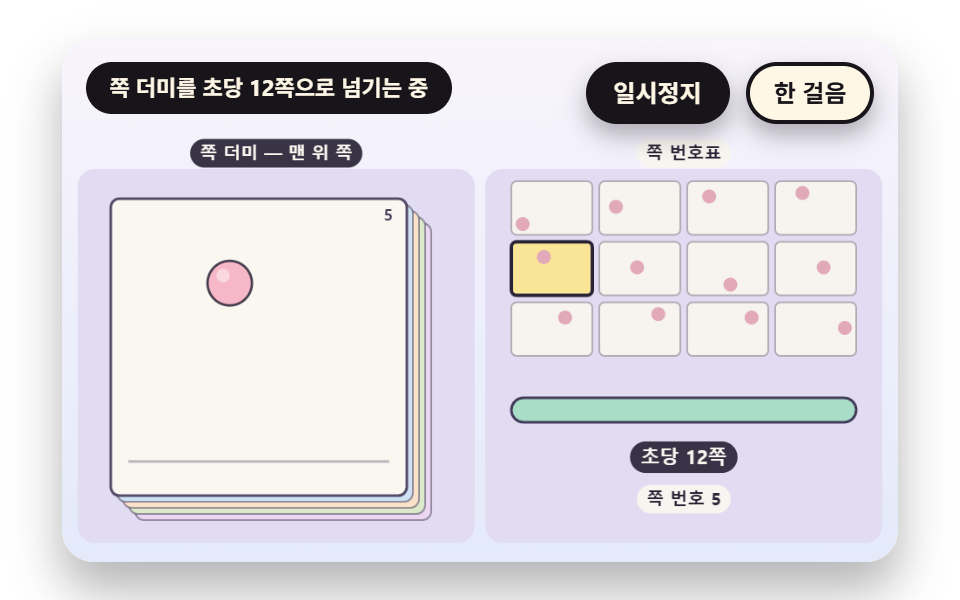 01 fb-frame-stack-riffle-rate
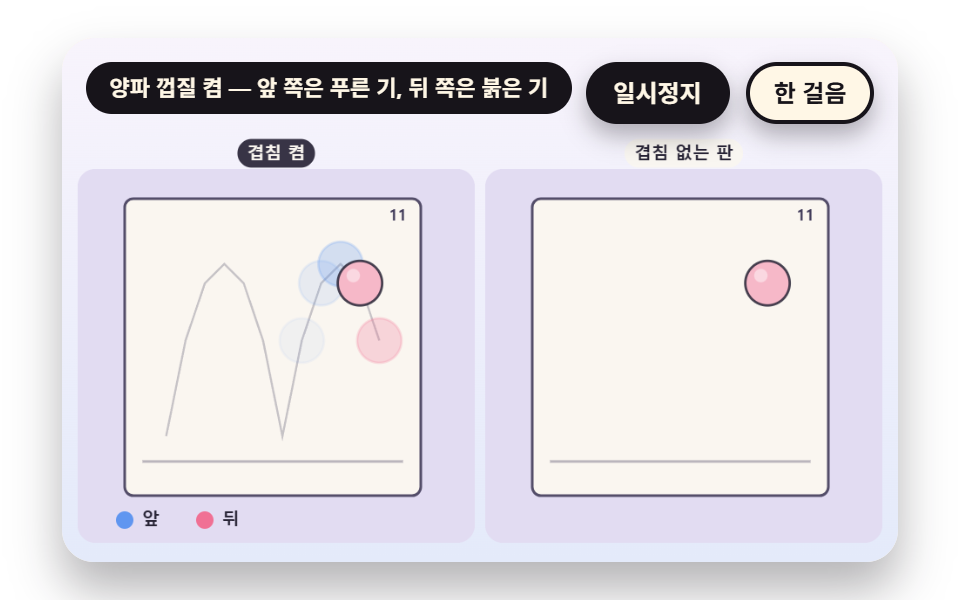 02 fb-onion-skin-neighbor-ghost
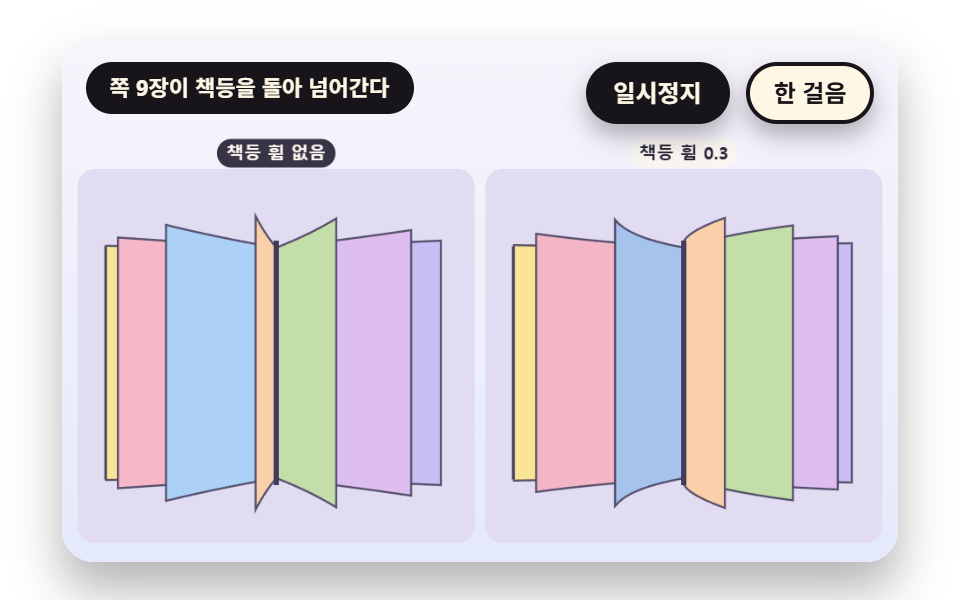 03 fb-spine-bend-fan-projection
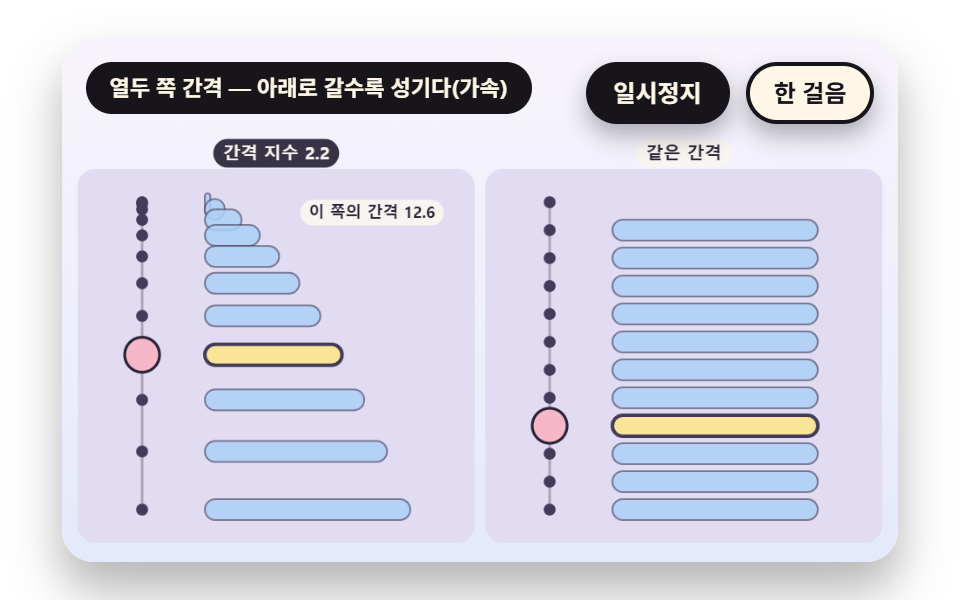 04 fb-ease-spacing-chart-twelve
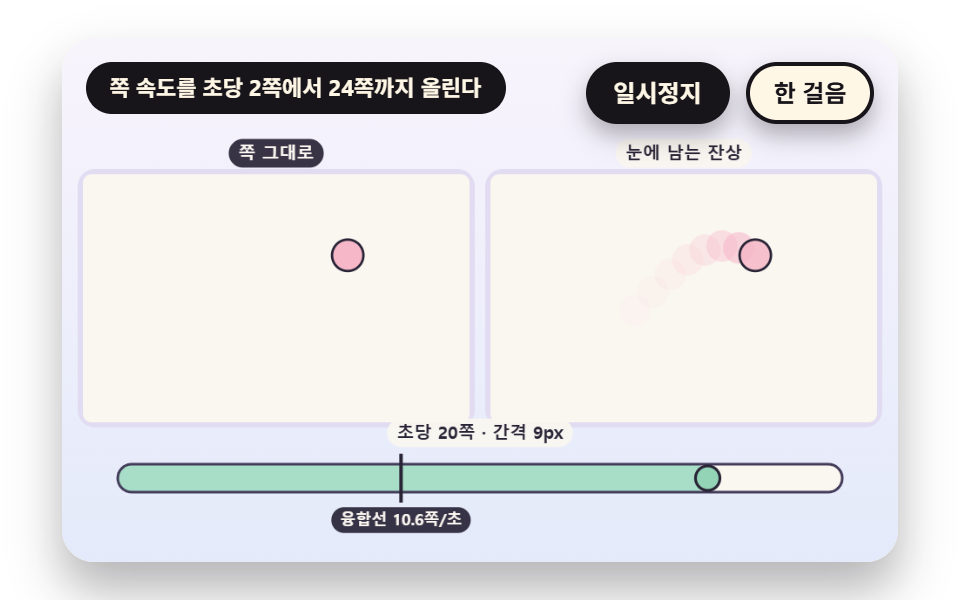 05 fb-persistence-fusion-threshold
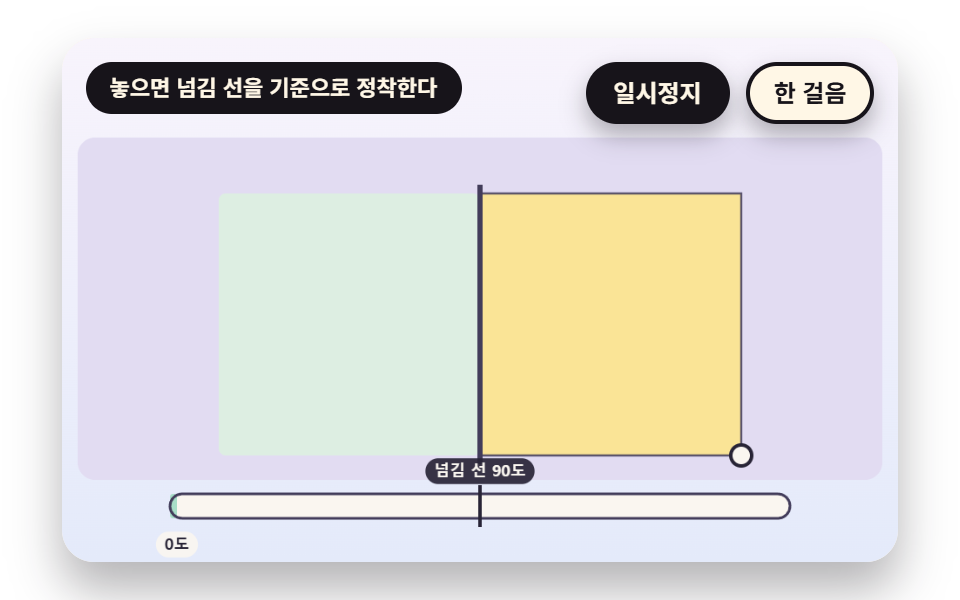 06 fb-corner-drag-snap-settle
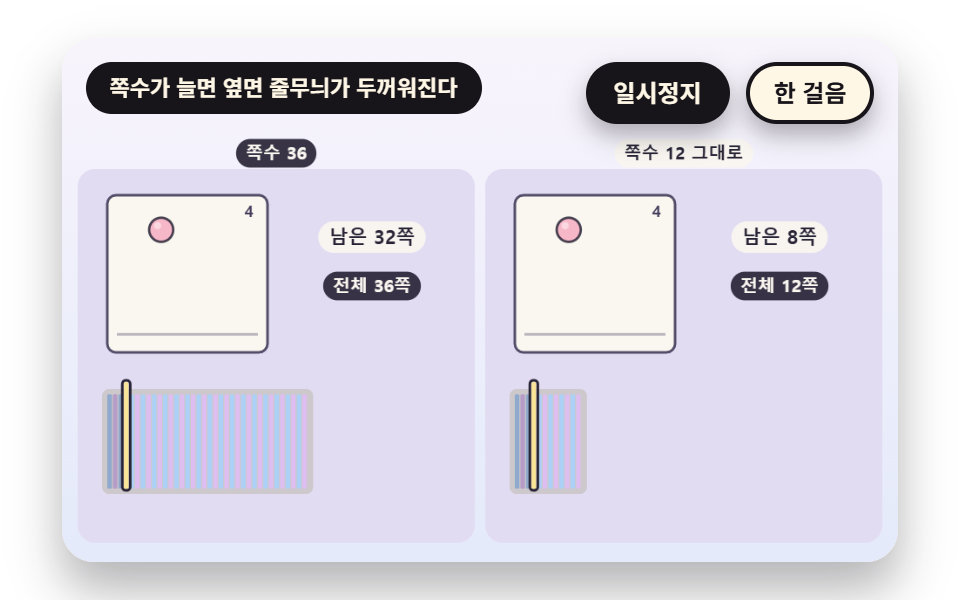 07 fb-edge-stripe-page-count
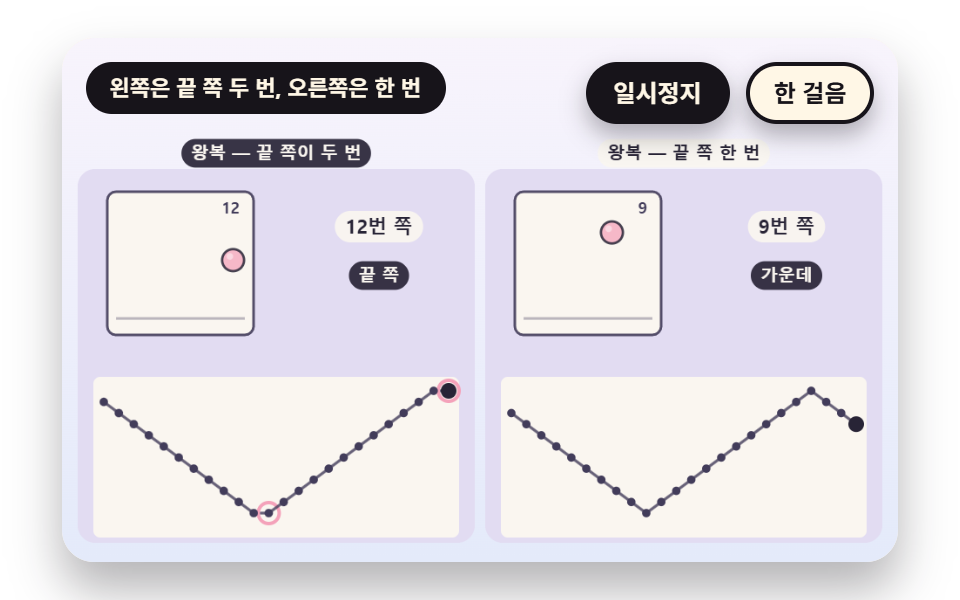 08 fb-loop-pingpong-reverse-index
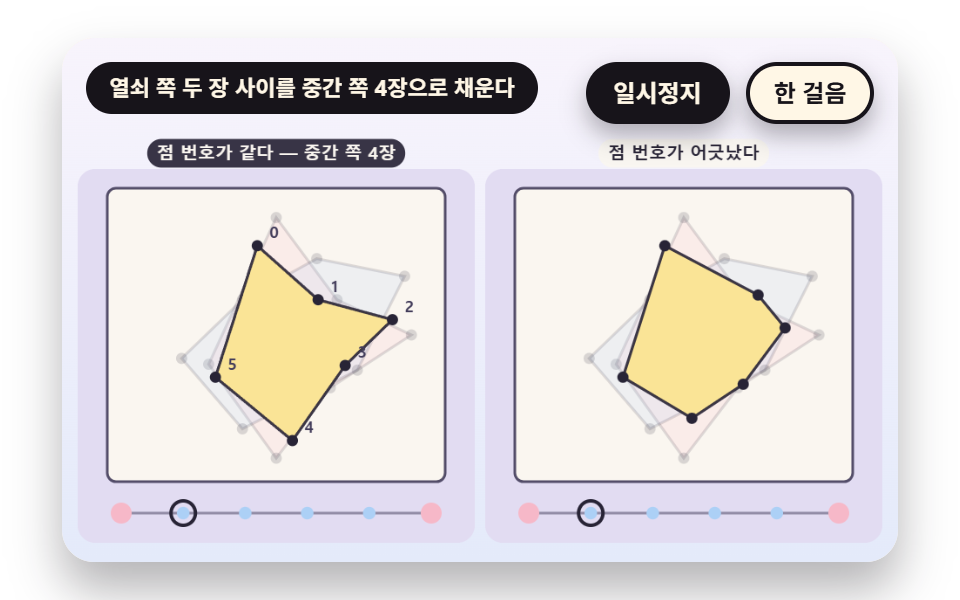 09 fb-inbetween-keyframe-lerp
Auto-plays · click a tile to jump to its section · all nine in one zip
- 01 The Rate a Thumb Riffles the Pages
- 02 An Onion Skin That Shows the Neighboring Pages
- 03 A Fan of Pages Bending Around the Spine
- 04 A Timing Chart That Spaces Each Page Differently
- 05 The Rate Where Flicker Fuses Into Motion
- 06 Drag a Corner, Release, and a Page Settles
- 07 A Book Edge Where Page Count Shows as Thickness and Stripes
- 08 Choosing the Page Index for Rewind and Round Trip
- 09 Filling the Pages Between Two Keyframes Automatically
One page-array design runs under the nine scenes. The drawings are twelve entries in a PAGES array, a page holds only the horizontal position, vertical position and squash of one ball, and the ball bounces twice across the twelve pages.
    function makePages(n) {
        const out = [];
        for (let i = 0; i < n; i += 1) {
            // Two bounces, so one bounce is half a pass: b is the position inside one bounce (0 to 1), h is the height (a parabola)
            const b = (i * 2 / n) % 1;
            const h = 4 * b * (1 - b);
            const sy = 0.8 + 0.2 * Math.min(1, h * 3);
            out.push({ x: 0.14 + 0.72 * (i / (n - 1)), y: FLOOR_Y - h * HOP_H, sx: 2 - sy, sy: sy });
        }
        return out;
    }
    const PAGES = makePages(FRAME_COUNT);
The page index is the whole part of a fractional phase
In 01, 02, 04 and 07 the function wrapIdx takes the whole part of the phase and returns it as the page index. The other scenes reach their pages another way, and each one says how in its own section. The clock is a single scene clock, and none of the nine sources calls Date or Math.random or loads an outside image.
Fix the page count and the flip rate first
A flipbook is a book of pages that seems to move when you riffle it, and in code it is a page index that climbs with time while it reads an array. The page count is FRAME_COUNT 12, and the rate is written as pages per second, like the FLIP_HZ of 12 in 01.
Flipbook Animation: 9 Scenes — the Rate a Thumb Riffles Pages, an Onion Skin Overlay, a Fan Bending Around the Spine, a Timing Chart With Uneven Spacing, the Rate Where Flicker Fuses, a Dragged Corner That Settles, Thickness and Edge Stripes, Rewind and Round-Trip Indexes and Automatic Middle Pages
The order starts at rate, then moves through overlay, bend and spacing, and ends with the eye's afterimage, a hand drag, the book's thickness, index math and filling middle pages. Scenes 01 to 05 run on a timetable, 06 is dragged by hand, and 07 to 09 change the page count, the index and the drawings themselves.
What the last full render measured for area, frames and intensity
The values in the table come from 측정.json. The largest cumulative areas are 32.8% in 06 and 32.6% in 03, the smallest is 6.8% in 05, and only 01 and 05 moved in 23/23 frames.
| Scene | Cumulative area | Moving frames | Mean intensity |
|---|---|---|---|
| 01 Flip rate | 15.6% | 23/23 | 86.4 |
| 02 Onion skin | 7.3% | 7/23 | 69.1 |
| 03 Spine fan | 32.6% | 12/23 | 52.7 |
| 04 Spacing chart | 25.8% | 17/23 | 80.2 |
| 05 Afterimage fusion | 6.8% | 23/23 | 68.5 |
| 06 Corner drag | 32.8% | 18/23 | 58.6 |
| 07 Edge stripes | 10.6% | 20/23 | 84.5 |
| 08 Loop and round trip | 17.4% | 16/23 | 99.5 |
| 09 Middle pages | 12.2% | 9/23 | 85.9 |
01The Rate a Thumb Riffles the Pages
phase accumulates the rate times the time, its whole part is pageIndex, and rate chases its target exponentially so it does not stop dead. With a 170px page, one pass of 12 pages takes 1.0 second at FLIP_HZ 12 and 4.0 seconds at 3, and the ball moves 33.5px on average (55.9px at most) between pages. The scene covers 15.6% cumulative area and moved in 23/23 frames.
<main class="stage">
<div class="vj is-demo" id="vj">
  <div class="vj__pad" data-role="pad" tabindex="0" role="application" aria-label="Flipbook stage: left and right arrow keys or Space flip pages, Enter pauses, N steps once, R restarts">
    <canvas class="vj__canvas" data-role="canvas" width="480" height="300" role="img" aria-label="On the left sits the top page of a stack of twelve loose pages, and on the right a twelve-cell page index. When the page number climbs at twelve pages a second, a ball bounces twice across, and the bright cell moves along with the page. A bar below fills with the flip rate, and when it drops to three pages a second each page reads on its own"></canvas>
  </div>
  <p class="vj__status" data-role="status" aria-live="off">Flipbook demo</p>
  <div class="vj__ctrl">
    <button class="vj__pause" data-role="pause" type="button" aria-pressed="false">Pause</button>
    <button class="vj__step" data-role="step" type="button">Step</button>
  </div>
  <p class="vj__done" data-role="done" role="status" aria-live="polite"></p>
</div>
</main>
@use "../../../../site/static/demo-tokens" as *;
@include stage($stage-paper);
.vj {
position: relative;
width: min(92vw, calc(160vh - 12.8vw));
aspect-ratio: 480 / 300;
margin: 0 auto;
border-radius: $r-card;
overflow: hidden;
box-shadow: $shadow-raised;
background: $subject-cream;
}
// 무대 상자 — 여기서 시작한 터치만 쪽 넘기기·모서리 끌기로 읽는다(touch-action: none 은 이 상자에만). 무대 밖 터치는 페이지 스크롤 그대로
.vj__pad {
position: absolute;
inset: 0;
border-radius: inherit;
outline: none;
touch-action: none;
cursor: pointer;
}
// 바깥 .vj 가 넘침을 자르므로 포커스 테두리는 안쪽으로 들인다
.vj__pad:focus-visible {
outline: 3px solid $subject-ink;
outline-offset: -3px;
}
.vj__canvas {
position: absolute;
inset: 0;
display: block;
width: 100%;
height: 100%;
}
.vj__ctrl {
position: absolute;
right: $sp-3;
top: $sp-3;
display: flex;
gap: $sp-2;
}
.vj__pause,
.vj__step {
padding: $sp-1 $sp-3;
border: 2px solid $subject-ink;
border-radius: $r-pill;
background: $subject-ink;
color: $subject-cream;
font-family: inherit;
font-weight: 700;
font-size: 12px;
line-height: 1.6;
cursor: pointer;
box-shadow: $shadow-press;
transition: transform $dur-quick $ease-spring;
}
.vj__step {
background: $subject-cream;
color: $subject-ink;
}
// 스크린리더에만 읽히는 완료 알림
.vj__done {
position: absolute;
width: 1px;
height: 1px;
margin: 0;
overflow: hidden;
clip-path: inset(50%);
white-space: nowrap;
}
// 눌린 상태(멈춤) — 바탕과 글자색을 뒤집어 aria-pressed 가 눈에도 보이게
.vj__pause[aria-pressed="true"] {
background: $subject-cream;
color: $subject-ink;
}
.vj__pause:hover,
.vj__step:hover {
transform: translateY(-2px);
}
.vj__pause:active,
.vj__step:active {
transform: translateY(1px);
}
.vj__pause:focus-visible,
.vj__step:focus-visible {
outline: 3px solid $subject-ink;
outline-offset: 3px;
}
// 상태 줄 — 지금 장면의 수치를 글자로. 시연 중에는 aria-live off, 사람이 처음 손대면 polite
.vj__status {
position: absolute;
left: $sp-3;
top: $sp-3;
max-width: calc(100% - 190px);
margin: 0;
padding: $sp-1 $sp-3;
border-radius: $r-pill;
background: $subject-ink;
color: $subject-cream;
font-weight: 700;
font-size: 11px;
line-height: 1.6;
white-space: nowrap;
overflow: hidden;
text-overflow: ellipsis;
pointer-events: none;
}
@media (max-width: 340px) {
.vj__pause,
.vj__step,
.vj__status { font-size: 10px; padding: 0 $sp-2; }
}
// 움직임 줄이기 — 장면은 스크립트가 정지 장면 한 장으로 멈춘다. 버튼도 떠오르지 않게
@media (prefers-reduced-motion: reduce) {
.vj__pause,
.vj__step { transition: none !important; }
.vj__pause:hover,
.vj__pause:active,
.vj__step:hover,
.vj__step:active { transform: none !important; }
}html, body {
margin: 0;
overflow: hidden;
}
.stage {
box-sizing: border-box;
min-height: 100vh;
display: grid;
place-items: center;
margin: 0;
background: #ffffff;
font-family: -apple-system, "Segoe UI", "Noto Sans KR", sans-serif;
padding: clamp(8px, 4vw, 24px);
}
.vj {
position: relative;
width: min(92vw, 160vh - 12.8vw);
aspect-ratio: 480/300;
margin: 0 auto;
border-radius: 16px;
overflow: hidden;
box-shadow: 0 14px 24px rgba(23, 20, 26, 0.32);
background: #fff7e6;
}
.vj__pad {
position: absolute;
inset: 0;
border-radius: inherit;
outline: none;
touch-action: none;
cursor: pointer;
}
.vj__pad:focus-visible {
outline: 3px solid #17141a;
outline-offset: -3px;
}
.vj__canvas {
position: absolute;
inset: 0;
display: block;
width: 100%;
height: 100%;
}
.vj__ctrl {
position: absolute;
right: 12px;
top: 12px;
display: flex;
gap: 8px;
}
.vj__pause,
.vj__step {
padding: 4px 12px;
border: 2px solid #17141a;
border-radius: 999px;
background: #17141a;
color: #fff7e6;
font-family: inherit;
font-weight: 700;
font-size: 12px;
line-height: 1.6;
cursor: pointer;
box-shadow: 0 6px 12px rgba(23, 20, 26, 0.32);
transition: transform 220ms cubic-bezier(0.2, 0.8, 0.2, 1);
}
.vj__step {
background: #fff7e6;
color: #17141a;
}
.vj__done {
position: absolute;
width: 1px;
height: 1px;
margin: 0;
overflow: hidden;
clip-path: inset(50%);
white-space: nowrap;
}
.vj__pause[aria-pressed=true] {
background: #fff7e6;
color: #17141a;
}
.vj__pause:hover,
.vj__step:hover {
transform: translateY(-2px);
}
.vj__pause:active,
.vj__step:active {
transform: translateY(1px);
}
.vj__pause:focus-visible,
.vj__step:focus-visible {
outline: 3px solid #17141a;
outline-offset: 3px;
}
.vj__status {
position: absolute;
left: 12px;
top: 12px;
max-width: calc(100% - 190px);
margin: 0;
padding: 4px 12px;
border-radius: 999px;
background: #17141a;
color: #fff7e6;
font-weight: 700;
font-size: 11px;
line-height: 1.6;
white-space: nowrap;
overflow: hidden;
text-overflow: ellipsis;
pointer-events: none;
}
@media (max-width: 340px) {
.vj__pause,
.vj__step,
.vj__status {
font-size: 10px;
padding: 0 8px;
}
}
@media (prefers-reduced-motion: reduce) {
.vj__pause,
.vj__step {
transition: none !important;
}
.vj__pause:hover,
.vj__pause:active,
.vj__step:hover,
.vj__step:active {
transform: none !important;
}
}(function () {
const root = document.getElementById("vj");
if (!root) return;
// 무대 좌표 — 캔버스 안 계산은 늘 480×300. 화면에 보이는 크기와 상관없다
const W = 480;
const H = 300;
const TAU = Math.PI * 2;
function clamp(v, lo, hi) { return v < lo ? lo : (v > hi ? hi : v); }
function lerp(a, b, k) { return a + (b - a) * k; }
function ease(x) { const c = clamp(x, 0, 1); return c * c * (3 - 2 * c); }
// 파스텔 팔레트 — 면은 연한 색, 글자는 늘 진한 잉크
const BG_TOP = [248, 244, 252];
const BG_BOT = [228, 234, 250];
const BED = [226, 220, 242];
const INK = [40, 36, 54];
const INK2 = [66, 60, 90];
const PAPER = [250, 246, 240];
const ROSE = [244, 162, 186];
const MINT = [148, 212, 182];
const SKY = [172, 208, 246];
const BALL = [246, 184, 200];
const TILES = [
[200, 190, 244], [168, 222, 200], [250, 228, 150], [246, 184, 200],
[172, 208, 246], [250, 208, 170], [196, 222, 170], [222, 190, 240],
];
function mix(a, b, k) { return [lerp(a[0], b[0], k), lerp(a[1], b[1], k), lerp(a[2], b[2], k)]; }
function rgba(c, a) {
return 'rgba(' + Math.round(clamp(c[0], 0, 255)) + ',' + Math.round(clamp(c[1], 0, 255)) + ',' + Math.round(clamp(c[2], 0, 255)) + ',' + clamp(a, 0, 1).toFixed(3) + ')';
}
// 장면 시계(초)·판 반복 번호·시간표 — 시간표는 (시각, 할 일) 목록이고 시각이 지나면 한 번씩 부른다
let sceneT = 0;
let lap = 0;
let script = [];
let evAt = 0;
// 문구 틀의 {a}·{b} 자리에 값을 끼운다 — 화면 문구는 늘 이 틀 한 줄로 두고 로케일 사전이 통째로 바꾼다
function fill(s, a, b) { return s.replace('{a}', a).replace('{b}', b === undefined ? '' : b); }
function r1(v) { return String(Math.round(v * 10) / 10); }
// 읽어 주는 문장은 사람이 직접 하거나 멈춘 때만 숫자를 싣는다 — 자동으로 흐르는 동안은 한 줄이 그대로여서 스크린리더가 매 프레임 읽지 않는다
function calm() { return !(paused || manual || still); }
const FRAME_COUNT = 12;
const FLOOR_Y = 0.8;
const HOP_H = 0.58;
function makePages(n) {
const out = [];
for (let i = 0; i < n; i += 1) {
// 두 번 튀므로 한 번 튀는 사이는 반 바퀴 — b 는 한 번 튀는 안의 위치 0~1, h 는 높이(포물선)
const b = (i * 2 / n) % 1;
const h = 4 * b * (1 - b);
const sy = 0.8 + 0.2 * Math.min(1, h * 3);
out.push({ x: 0.14 + 0.72 * (i / (n - 1)), y: FLOOR_Y - h * HOP_H, sx: 2 - sy, sy: sy });
}
return out;
}
const PAGES = makePages(FRAME_COUNT);
// 한 쪽의 종이 — 흰 바탕과 바닥 선
function paperBox(R, a, edge) {
box(R.x, R.y, R.w, R.h, 5, PAPER, a);
outline(R.x, R.y, R.w, R.h, 5, 1.5, edge, 0.9 * a);
const fy = R.y + R.h * (FLOOR_Y + 0.085);
line(R.x + R.w * 0.06, fy, R.x + R.w * 0.94, fy, 1.5, mix(PAPER, INK2, 0.35), a);
}
// 쪽 안의 공 한 개 — 눌림은 바닥에 닿은 쪽에서 가로로 퍼진다
function pageBall(R, p, c, a, edge, shine) {
if (a <= 0.01) {
return;
}
const rr = R.w * 0.075;
const cx = R.x + R.w * p.x;
const cy = R.y + R.h * p.y;
ctx.save();
ctx.translate(cx, cy);
ctx.scale(p.sx, p.sy);
ctx.beginPath();
ctx.arc(0, 0, rr, 0, TAU);
ctx.fillStyle = rgba(c, a);
ctx.fill();
ctx.lineWidth = 1.4 / Math.max(p.sx, p.sy);
ctx.strokeStyle = rgba(edge, 0.85 * a);
ctx.stroke();
if (shine) {
ctx.beginPath();
ctx.arc(-rr * 0.3, -rr * 0.34, rr * 0.3, 0, TAU);
ctx.fillStyle = rgba([255, 255, 255], 0.45 * a);
ctx.fill();
}
ctx.restore();
}
// 한 쪽을 통째로 — 종이·공·쪽 번호
function drawPage(R, i, a, label) {
paperBox(R, a, INK2);
pageBall(R, PAGES[i], BALL, a, INK, true);
if (label) {
text(String(i + 1), R.x + R.w - 8, R.y + 10, INK2, a, 9, 700, 'right');
}
}
// 정수부 — 쪽 번호는 늘 이 함수를 지난다(소수 쪽 번호가 그려지지 않게)
function wrapIdx(n, count) { return ((Math.floor(n + 1e-9) % count) + count) % count; }
// 쪽 번호 띠 — 작은 칸 count 개, 지금 쪽이 밝다
function thumbs(R, count, cols, cur) {
const rows = Math.ceil(count / cols);
const gap = 4;
const cw = (R.w - gap * (cols - 1)) / cols;
const ch = (R.h - gap * (rows - 1)) / rows;
for (let i = 0; i < count; i += 1) {
const cell = { x: R.x + (i % cols) * (cw + gap), y: R.y + Math.floor(i / cols) * (ch + gap), w: cw, h: ch };
const on = i === cur;
box(cell.x, cell.y, cell.w, cell.h, 3, on ? TILES[2] : PAPER, on ? 1 : 0.9);
outline(cell.x, cell.y, cell.w, cell.h, 3, on ? 2 : 1, on ? INK : mix(PAPER, INK2, 0.4), 1);
const p = PAGES[i % PAGES.length];
disc(cell.x + cell.w * p.x, cell.y + cell.h * p.y, Math.min(cell.w, cell.h) * 0.13, mix(BALL, INK, 0.1), 1);
}
}
const SEG = 8;
const PERSP = 0.0022;
function edgeProject(spineX, a, len, bendRad) {
const out = [{ x: spineX, z: 0, s: 1 }];
let x = spineX;
let z = 0;
const dl = len / SEG;
for (let k = 1; k <= SEG; k += 1) {
const ph = a - bendRad * Math.sin(a) * (k / SEG);
x += dl * Math.cos(ph);
z += dl * Math.sin(ph);
out.push({ x: x, z: z, s: 1 / (1 - z * PERSP) });
}
return out;
}
// 투영한 쪽 한 장을 윗변·아랫변을 따라 다각형으로 칠한다. 칠한 쪽의 평균 깊이를 돌려준다(그리는 순서 정렬용)
function flapPath(pts, cy, hp) {
ctx.beginPath();
ctx.moveTo(pts[0].x, cy - hp / 2 * pts[0].s);
for (let k = 1; k < pts.length; k += 1) {
ctx.lineTo(pts[k].x, cy - hp / 2 * pts[k].s);
}
for (let k = pts.length - 1; k >= 0; k -= 1) {
ctx.lineTo(pts[k].x, cy + hp / 2 * pts[k].s);
}
ctx.closePath();
}
function drawFlap(pts, cy, hp, c, a) {
// 모서리가 앞을 향할수록(옆으로 누울수록) 밝고, 책등 쪽으로 서서 얇아질수록 어둡다
const span = Math.abs(pts[pts.length - 1].x - pts[0].x);
const lit = clamp(span / (pts.length > 1 ? Math.max(1, Math.abs(pts[0].x - pts[1].x) * SEG) : 1), 0, 1);
flapPath(pts, cy, hp);
ctx.fillStyle = rgba(mix(c, [120, 110, 160], 0.4 * (1 - lit)), a);
ctx.fill();
ctx.lineWidth = 1.2;
ctx.strokeStyle = rgba(INK2, 0.85 * a);
ctx.stroke();
}
function meanZ(pts) {
let s = 0;
for (const p of pts) {
s += p.z;
}
return s / pts.length;
}
const canvasEl = root.querySelector('[data-role="canvas"]');
const padEl = root.querySelector('[data-role="pad"]');
const pauseEl = root.querySelector('[data-role="pause"]');
const statusEl = root.querySelector('[data-role="status"]');
const stepEl = root.querySelector('[data-role="step"]');
const doneEl = root.querySelector('[data-role="done"]');
const ctxRaw = canvasEl ? canvasEl.getContext('2d') : null;
if (!canvasEl || !ctxRaw || !pauseEl || !padEl || !stepEl || !doneEl) {
return;
}
const cv = canvasEl;
const ctx = ctxRaw;
const pauseBtn = pauseEl;
const stepBtn = stepEl;
const doneP = doneEl;
const pad = padEl;
// 외부 웹폰트는 부르지 않는다 — 기기에 있는 글꼴 목록만
const FONT_STACK = 'system-ui, -apple-system, "Segoe UI", "Noto Sans KR", sans-serif';
let dpr = 1;
function fitCanvas() {
// 배율은 2 에서 자른다 — 배율 3 기기에서 화소가 2.25배로 늘지 않게
dpr = Math.min(window.devicePixelRatio || 1, 2);
cv.width = Math.round(W * dpr);
cv.height = Math.round(H * dpr);
ctx.setTransform(dpr, 0, 0, dpr, 0, 0);
}
function skyFill(top, bot) {
const g = ctx.createLinearGradient(0, 0, 0, H);
g.addColorStop(0, rgba(top, 1));
g.addColorStop(1, rgba(bot, 1));
ctx.fillStyle = g;
ctx.fillRect(0, 0, W, H);
}
function disc(x, y, r, c, a) {
if (r <= 0.2 || a <= 0) {
return;
}
ctx.beginPath();
ctx.arc(x, y, r, 0, TAU);
ctx.fillStyle = rgba(c, a);
ctx.fill();
}
function box(x, y, w, h, r, c, a) {
if (w <= 0.2 || h <= 0.2 || a <= 0) {
return;
}
ctx.beginPath();
ctx.roundRect(x, y, w, h, Math.max(0, Math.min(r, w / 2, h / 2)));
ctx.fillStyle = rgba(c, a);
ctx.fill();
}
function outline(x, y, w, h, r, width, c, a) {
if (w <= 0.2 || h <= 0.2 || a <= 0) {
return;
}
ctx.beginPath();
ctx.roundRect(x, y, w, h, Math.max(0, Math.min(r, w / 2, h / 2)));
ctx.lineWidth = width;
ctx.strokeStyle = rgba(c, a);
ctx.stroke();
}
function text(s, x, y, c, a, px, weight, align) {
ctx.font = weight + ' ' + px + 'px ' + FONT_STACK;
ctx.textAlign = align;
ctx.textBaseline = 'middle';
ctx.fillStyle = rgba(c, a);
ctx.fillText(s, x, y);
}
// 글자 이름표 — 바탕 알약 위에 글자
function tag(s, x, y, bg, fg, px, align) {
ctx.font = '700 ' + px + 'px ' + FONT_STACK;
const w = ctx.measureText(s).width + px * 1.1;
const left = align === 'center' ? x - w / 2 : (align === 'right' ? x - w : x);
box(left, y - px * 0.82, w, px * 1.64, px * 0.82, bg, 0.92);
text(s, left + w / 2, y + 0.5, fg, 1, px, 700, 'center');
}
// 판 자리 — 왼쪽 판·오른쪽 판(대비판)·한 판짜리 히어로. 위쪽은 상태 줄·버튼 자리
const PANEL_L = { x: 12, y: 78, w: 222, h: 208 };
const PANEL_R = { x: 246, y: 78, w: 222, h: 208 };
const PANEL_ONE = { x: 12, y: 60, w: 456, h: 228 };
// 판 바닥 — 판 둘레로 비치는 연보라
function bed(R) {
box(R.x - 3, R.y - 3, R.w + 6, R.h + 6, 10, BED, 1);
}
function panelTags(a, b) {
tag(a, PANEL_L.x + PANEL_L.w / 2, 66, INK, PAPER, 10, 'center');
tag(b, PANEL_R.x + PANEL_R.w / 2, 66, PAPER, INK, 10, 'center');
}
// 공 한 개 — 면, 왼쪽 위 하이라이트, 옅은 윤곽
function orb(x, y, r, c, a) {
if (r <= 0.3 || a <= 0) {
return;
}
disc(x, y, r, c, a);
if (r > 5) {
disc(x - r * 0.28, y - r * 0.32, r * 0.42, [255, 255, 255], 0.3 * a);
}
ctx.beginPath();
ctx.arc(x, y, r, 0, TAU);
ctx.lineWidth = 1;
ctx.strokeStyle = rgba(mix(c, INK, 0.28), 0.55 * a);
ctx.stroke();
}
function line(x0, y0, x1, y1, width, c, a) {
if (a <= 0) {
return;
}
ctx.beginPath();
ctx.moveTo(x0, y0);
ctx.lineTo(x1, y1);
ctx.lineWidth = width;
ctx.strokeStyle = rgba(c, a);
ctx.stroke();
}
function ring(x, y, r, width, c, a) {
if (r <= 0.3 || a <= 0) {
return;
}
ctx.beginPath();
ctx.arc(x, y, r, 0, TAU);
ctx.lineWidth = width;
ctx.strokeStyle = rgba(c, a);
ctx.stroke();
}
let shownStatus = '';
function pushStatus(s) {
if (!statusEl || s === shownStatus) {
return;
}
shownStatus = s;
statusEl.textContent = s;
}
let paused = false;
const reduceQuery = window.matchMedia('(prefers-reduced-motion: reduce)');
// 페이지를 연 채 움직임 줄이기 설정을 바꿔도 change 리스너가 다시 읽는다
let still = reduceQuery.matches;
// 자동 시연 표시 — 사람이 처음 손대면 떼고 상태 줄을 polite 로 켠다
let demo = root.classList.contains('is-demo');
const off = new AbortController();
// 사람이 직접 하는 중이면 시간표는 멈추고 애니메이션만 흐른다
let manual = false;
function wake() {
if (!demo) {
return;
}
demo = false;
root.classList.remove('is-demo');
if (statusEl) {
statusEl.setAttribute('aria-live', 'polite');
}
}
function takeOver() {
if (manual) {
return;
}
manual = true;
onTake();
wake();
}
// 한 판 시연이 끝났음을 스크린리더에 한 번만 알린다 — 판이 되풀이돼도 다시 읽지 않는다
let doneSaid = false;
function checkDone() {
if (!manual && !doneSaid && sceneT >= LAP_S - 0.6) {
doneSaid = true;
doneP.textContent = statusText();
}
}
function advance(dt) {
sceneT += dt;
if (!manual) {
while (evAt < script.length && script[evAt].t <= sceneT) {
const ev = script[evAt];
evAt += 1;
ev.f();
}
if (sceneT >= LAP_S) {
lap += 1;
begin();
return;
}
}
update(dt);
}
// 첫 판은 START_S 만큼 앞서 시작한다 — 장면이 이미 움직이는 중인 장면에서 보인다
function runTo(t) {
while (sceneT < t - 1e-6) {
advance(Math.min(1 / 30, t - sceneT));
}
}
function begin() {
sceneT = 0;
evAt = 0;
script = [];
build();
if (lap === 0 && !still) {
runTo(START_S);
}
}
const DT_MAX = 0.05;
const SETTLE_FRAMES = 8;
const SETTLE_DT = 0.04;
function showNow() {
draw();
pushStatus(statusText());
checkDone();
}
let rafId = 0;
let lastTs = -1;
function frame(ts) {
if (still || paused) {
rafId = 0;
return;
}
if (lastTs < 0) {
lastTs = ts;
}
const dt = Math.min((ts - lastTs) / 1000, DT_MAX);
lastTs = ts;
if (dt > 0) {
advance(dt);
}
showNow();
rafId = window.requestAnimationFrame(frame);
}
function startLoop() {
if (rafId) {
return;
}
// 멈췄던 사이의 시간을 첫 프레임 dt 로 넘기지 않는다
lastTs = -1;
rafId = window.requestAnimationFrame(frame);
}
function stopLoop() {
if (rafId) {
window.cancelAnimationFrame(rafId);
rafId = 0;
}
}
// 움직임 줄이기 — 루프 없이 처음 판의 정지 장면 한 장
function showRest() {
stopLoop();
lap = 0;
sceneT = 0;
evAt = 0;
script = [];
build();
runTo(REST_S);
showNow();
}
// 움직임 줄이기이거나 멈춘 채 입력이 들어오면 애니메이션 없이 곧바로 끝 상태로 — 시간을 3초 흘려 움직임을 다 끝낸다
function settleStill() {
for (let k = 0; k < 90; k += 1) {
sceneT += 1 / 30;
update(1 / 30);
}
}
function play() {
begin();
showNow();
if (!paused) {
startLoop();
}
}
function togglePause() {
paused = !paused;
pauseBtn.setAttribute('aria-pressed', paused ? 'true' : 'false');
wake();
if (paused) {
stopLoop();
}
else if (!still) {
startLoop();
}
}
function restart() {
manual = false;
doneSaid = false;
lap += 1;
begin();
for (let k = 0; k < SETTLE_FRAMES; k += 1) {
update(SETTLE_DT);
}
showNow();
}
// Step — 멈춘 채 시간표의 다음 일 하나를 부른다. 더 부를 일이 없거나 직접 하던 중이면 다음 판을 연다
function stepOnce() {
wake();
if (!paused) {
paused = true;
pauseBtn.setAttribute('aria-pressed', 'true');
stopLoop();
}
if (manual || evAt >= script.length) {
restart();
return;
}
sceneT = Math.max(sceneT, script[evAt].t);
advance(0);
for (let k = 0; k < SETTLE_FRAMES; k += 1) {
sceneT += SETTLE_DT;
update(SETTLE_DT);
}
showNow();
}
pauseBtn.addEventListener('click', togglePause, { signal: off.signal });
stepBtn.addEventListener('click', stepOnce, { signal: off.signal });
// 쪽 넘기기 — 사람이 손대면 시간표는 멈추고 쪽만 바뀐다. 멈춘 채·움직임 줄이기에서도 한 번의 입력이 화면에 바로 반영되게 한다
function navPage(d) {
takeOver();
onNav(d);
if (still || paused) {
settleStill();
}
showNow();
}
// 키보드 — 무대에 포커스가 있을 때만. 왼쪽·위 = Prev 쪽, 오른쪽·아래·Space = 다음 쪽, Enter·P = Pause, N = Step, R = 처음부터
pad.addEventListener('keydown', function (e) {
if (e.altKey || e.ctrlKey || e.metaKey) {
return;
}
const k = e.key;
if (k === 'ArrowLeft' || k === 'ArrowUp') {
e.preventDefault();
navPage(-1);
}
else if (k === 'ArrowRight' || k === 'ArrowDown' || k === ' ') {
e.preventDefault();
navPage(1);
}
else if (k === 'Enter' || k === 'p' || k === 'P') {
e.preventDefault();
togglePause();
}
else if (k === 'n' || k === 'N') {
stepOnce();
}
else if (k === 'r' || k === 'R') {
restart();
}
}, { signal: off.signal });
// 마우스·터치 — 무대를 누르면 다음 쪽(06 은 모서리 끌기라 따로 받는다)
pad.addEventListener('click', function () {
if (!CLICK_NAV) {
return;
}
navPage(1);
}, { signal: off.signal });
// 탭이 숨으면 멈추고, 돌아오면 시계를 다시 맞춰 시작 — 숨은 동안의 몇 초가 한 프레임에 몰리지 않게
document.addEventListener('visibilitychange', function () {
if (document.hidden) {
stopLoop();
}
else if (!paused && !still) {
startLoop();
}
}, { signal: off.signal });
// 설정이 바뀌면 — 켜지면 정지 장면 한 장, 꺼지면 다시 움직인다
reduceQuery.addEventListener('change', function () {
still = reduceQuery.matches;
if (still) {
showRest();
}
else {
lap = 0;
play();
}
}, { signal: off.signal });
window.addEventListener('resize', function () {
fitCanvas();
showNow();
}, { signal: off.signal });
// 01 — 쪽 번호 pageIndex 는 쏟아낸 쪽 수 phase 의 정수 부분이다. phase 는 초당 rate 쪽씩 오르고 rate 는 FLIP_HZ 를 향해 오른다
const FLIP_HZ = 12;
const frameCount = FRAME_COUNT;
const LAP_S = 9.6;
const START_S = 3.2;
const REST_S = 4.0;
const CLICK_NAV = true;
const BOOK_R = { x: 28, y: 92, w: 170, h: 170 };
const GRID_R = { x: 258, y: 82, w: 198, h: 100 };
let phase = 0;
let rate = 0;
let rateTgt = 0;
let pageIndex = 0;
function setRate(v) { rateTgt = v; }
function build() {
phase = 0;
rate = 0;
rateTgt = 0;
pageIndex = 0;
script.push({ t: 0.3, f: function () { setRate(FLIP_HZ); } });
script.push({ t: 5.2, f: function () { setRate(3); } });
script.push({ t: 8.2, f: function () { setRate(0); } });
}
    function update(dt) {
        if (dt <= 0) {
            return;
        }
        rate += (rateTgt - rate) * (1 - Math.exp(-6 * dt));
        if (!manual) {
            phase += rate * dt;
        }
        pageIndex = wrapIdx(phase, frameCount);
    }
function drawStack() {
// 맨 위 쪽 뒤로 낱장 더미의 옆면이 비친다
for (let k = 4; k >= 1; k -= 1) {
box(BOOK_R.x + k * 3.5, BOOK_R.y + k * 3.5, BOOK_R.w, BOOK_R.h, 5, mix(PAPER, TILES[(k + 3) % 8], 0.55), 1);
outline(BOOK_R.x + k * 3.5, BOOK_R.y + k * 3.5, BOOK_R.w, BOOK_R.h, 5, 1, INK2, 0.5);
}
drawPage(BOOK_R, pageIndex, 1, true);
}
function draw() {
skyFill(BG_TOP, BG_BOT);
panelTags('Stack - top page', 'Page index');
bed(PANEL_L);
bed({ x: GRID_R.x - 12, y: PANEL_R.y, w: PANEL_R.w, h: PANEL_R.h });
drawStack();
thumbs(GRID_R, frameCount, 4, pageIndex);
// 넘기는 속도 막대 — FLIP_HZ 를 가득 찬 길이로
const bx = 258;
const bw = 198;
box(bx, 206, bw, 14, 7, PAPER, 1);
box(bx, 206, bw * clamp(rate / FLIP_HZ, 0, 1), 14, 7, TILES[1], 1);
outline(bx, 206, bw, 14, 7, 1.5, INK2, 1);
tag(fill('{a} pages/s', r1(rate)), bx + bw / 2, 240, INK, PAPER, 11, 'center');
tag(fill('Page number {a}', String(pageIndex + 1)), bx + bw / 2, 264, PAPER, INK, 10, 'center');
}
function statusText() {
if (calm()) {
return fill('Riffling the stack at {a} pages a second', String(FLIP_HZ));
}
return fill('Page {a} of {b}', String(pageIndex + 1), String(frameCount));
}
// 한 쪽씩 직접 넘긴다 — 속도는 0
function onNav(d) {
rate = 0;
rateTgt = 0;
phase = Math.floor(phase + 1e-9) + d;
pageIndex = wrapIdx(phase, frameCount);
}
function onTake() { rateTgt = 0; }
fitCanvas();
if (still) {
showRest();
}
else {
play();
}
return function () {
stopLoop();
off.abort();
};
})();// FrameStackRiffleRate - 같은 항목 vanilla index.html 의 React 판. 같은 계산을 useEffect 안에서 돌린다
import { useEffect, useRef } from "react";
import styles from "./FrameStackRiffleRate.module.scss";
const cx = (s: string): string => s.split(" ").map((n) => styles[n] ?? n).join(" ");
export default function FrameStackRiffleRate() {
const rootRef = useRef<HTMLDivElement | null>(null);
useEffect(() => {
const rootEl = rootRef.current;
if (!rootEl) return;
const root: HTMLElement = rootEl;
type RGB = [number, number, number];
type RGBA = [number, number, number, number];
// 무대 좌표 — 캔버스 안 계산은 늘 480×300. 화면에 보이는 크기와 상관없다
const W = 480;
const H = 300;
const TAU = Math.PI * 2;
function clamp(v: number, lo: number, hi: number): number { return v < lo ? lo : (v > hi ? hi : v); }
function lerp(a: number, b: number, k: number): number { return a + (b - a) * k; }
function ease(x: number): number { const c = clamp(x, 0, 1); return c * c * (3 - 2 * c); }
// 파스텔 팔레트 — 면은 연한 색, 글자는 늘 진한 잉크
const BG_TOP: RGB = [248, 244, 252];
const BG_BOT: RGB = [228, 234, 250];
const BED: RGB = [226, 220, 242];
const INK: RGB = [40, 36, 54];
const INK2: RGB = [66, 60, 90];
const PAPER: RGB = [250, 246, 240];
const ROSE: RGB = [244, 162, 186];
const MINT: RGB = [148, 212, 182];
const SKY: RGB = [172, 208, 246];
const BALL: RGB = [246, 184, 200];
const TILES: RGB[] = [
[200, 190, 244], [168, 222, 200], [250, 228, 150], [246, 184, 200],
[172, 208, 246], [250, 208, 170], [196, 222, 170], [222, 190, 240],
];
function mix(a: RGB, b: RGB, k: number): RGB { return [lerp(a[0], b[0], k), lerp(a[1], b[1], k), lerp(a[2], b[2], k)]; }
function rgba(c: RGB, a: number): string {
return 'rgba(' + Math.round(clamp(c[0], 0, 255)) + ',' + Math.round(clamp(c[1], 0, 255)) + ',' + Math.round(clamp(c[2], 0, 255)) + ',' + clamp(a, 0, 1).toFixed(3) + ')';
}
// 장면 시계(초)·판 반복 번호·시간표 — 시간표는 (시각, 할 일) 목록이고 시각이 지나면 한 번씩 부른다
let sceneT = 0;
let lap = 0;
type Ev = { t: number; f: () => void };
let script: Ev[] = [];
let evAt = 0;
type Rect = { x: number; y: number; w: number; h: number };
// 문구 틀의 {a}·{b} 자리에 값을 끼운다 — 화면 문구는 늘 이 틀 한 줄로 두고 로케일 사전이 통째로 바꾼다
function fill(s: string, a: string, b?: string): string { return s.replace('{a}', a).replace('{b}', b === undefined ? '' : b); }
function r1(v: number): string { return String(Math.round(v * 10) / 10); }
// 읽어 주는 문장은 사람이 직접 하거나 멈춘 때만 숫자를 싣는다 — 자동으로 흐르는 동안은 한 줄이 그대로여서 스크린리더가 매 프레임 읽지 않는다
function calm(): boolean { return !(paused || manual || still); }
// ── 쪽 그림 ───────────────────────────────────────────────
// 한 쪽에 그린 그림 = 공 하나의 (가로·세로 위치 0~1, 눌림). 12쪽이 한 번의 튀어 오름 두 번을 이룬다
type Pg = { x: number; y: number; sx: number; sy: number };
const FRAME_COUNT = 12;
const FLOOR_Y = 0.8;
const HOP_H = 0.58;
function makePages(n: number): Pg[] {
const out: Pg[] = [];
for (let i = 0; i < n; i += 1) {
// 두 번 튀므로 한 번 튀는 사이는 반 바퀴 — b 는 한 번 튀는 안의 위치 0~1, h 는 높이(포물선)
const b = (i * 2 / n) % 1;
const h = 4 * b * (1 - b);
const sy = 0.8 + 0.2 * Math.min(1, h * 3);
out.push({ x: 0.14 + 0.72 * (i / (n - 1)), y: FLOOR_Y - h * HOP_H, sx: 2 - sy, sy: sy });
}
return out;
}
const PAGES: Pg[] = makePages(FRAME_COUNT);
// 한 쪽의 종이 — 흰 바탕과 바닥 선
function paperBox(R: Rect, a: number, edge: RGB): void {
box(R.x, R.y, R.w, R.h, 5, PAPER, a);
outline(R.x, R.y, R.w, R.h, 5, 1.5, edge, 0.9 * a);
const fy = R.y + R.h * (FLOOR_Y + 0.085);
line(R.x + R.w * 0.06, fy, R.x + R.w * 0.94, fy, 1.5, mix(PAPER, INK2, 0.35), a);
}
// 쪽 안의 공 한 개 — 눌림은 바닥에 닿은 쪽에서 가로로 퍼진다
function pageBall(R: Rect, p: Pg, c: RGB, a: number, edge: RGB, shine: boolean): void {
if (a <= 0.01) { return; }
const rr = R.w * 0.075;
const cx = R.x + R.w * p.x;
const cy = R.y + R.h * p.y;
ctx.save();
ctx.translate(cx, cy);
ctx.scale(p.sx, p.sy);
ctx.beginPath();
ctx.arc(0, 0, rr, 0, TAU);
ctx.fillStyle = rgba(c, a);
ctx.fill();
ctx.lineWidth = 1.4 / Math.max(p.sx, p.sy);
ctx.strokeStyle = rgba(edge, 0.85 * a);
ctx.stroke();
if (shine) {
ctx.beginPath();
ctx.arc(-rr * 0.3, -rr * 0.34, rr * 0.3, 0, TAU);
ctx.fillStyle = rgba([255, 255, 255], 0.45 * a);
ctx.fill();
}
ctx.restore();
}
// 한 쪽을 통째로 — 종이·공·쪽 번호
function drawPage(R: Rect, i: number, a: number, label: boolean): void {
paperBox(R, a, INK2);
pageBall(R, PAGES[i], BALL, a, INK, true);
if (label) { text(String(i + 1), R.x + R.w - 8, R.y + 10, INK2, a, 9, 700, 'right'); }
}
// 정수부 — 쪽 번호는 늘 이 함수를 지난다(소수 쪽 번호가 그려지지 않게)
function wrapIdx(n: number, count: number): number { return ((Math.floor(n + 1e-9) % count) + count) % count; }
// 쪽 번호 띠 — 작은 칸 count 개, 지금 쪽이 밝다
function thumbs(R: Rect, count: number, cols: number, cur: number): void {
const rows = Math.ceil(count / cols);
const gap = 4;
const cw = (R.w - gap * (cols - 1)) / cols;
const ch = (R.h - gap * (rows - 1)) / rows;
for (let i = 0; i < count; i += 1) {
const cell: Rect = { x: R.x + (i % cols) * (cw + gap), y: R.y + Math.floor(i / cols) * (ch + gap), w: cw, h: ch };
const on = i === cur;
box(cell.x, cell.y, cell.w, cell.h, 3, on ? TILES[2] : PAPER, on ? 1 : 0.9);
outline(cell.x, cell.y, cell.w, cell.h, 3, on ? 2 : 1, on ? INK : mix(PAPER, INK2, 0.4), 1);
const p = PAGES[i % PAGES.length];
disc(cell.x + cell.w * p.x, cell.y + cell.h * p.y, Math.min(cell.w, cell.h) * 0.13, mix(BALL, INK, 0.1), 1);
}
}
// ── 책등 투영 ─────────────────────────────────────────────
// 책등(세로 선) 에서 시작하는 쪽 한 장을 SEG 조각으로 잇는다. 쪽 각도 a 는 0 이 오른쪽에 누운 때, π 가 왼쪽에 누운 때.
// 조각 k 의 방향은 a 에서 끝쪽일수록 bendRad × sin(a) 만큼 뒤처진다(책등에 묶인 안쪽이 먼저 돌고 가장자리가 따라온다).
// x 는 방향의 코사인, z(보는 사람 쪽 깊이)는 사인을 쌓은 값이고, 가까울수록(z 가 클수록) 위아래가 PERSP 만큼 커진다
type Pt = { x: number; z: number; s: number };
const SEG = 8;
const PERSP = 0.0022;
function edgeProject(spineX: number, a: number, len: number, bendRad: number): Pt[] {
const out: Pt[] = [{ x: spineX, z: 0, s: 1 }];
let x = spineX;
let z = 0;
const dl = len / SEG;
for (let k = 1; k <= SEG; k += 1) {
const ph = a - bendRad * Math.sin(a) * (k / SEG);
x += dl * Math.cos(ph);
z += dl * Math.sin(ph);
out.push({ x: x, z: z, s: 1 / (1 - z * PERSP) });
}
return out;
}
// 투영한 쪽 한 장을 윗변·아랫변을 따라 다각형으로 칠한다. 칠한 쪽의 평균 깊이를 돌려준다(그리는 순서 정렬용)
function flapPath(pts: Pt[], cy: number, hp: number): void {
ctx.beginPath();
ctx.moveTo(pts[0].x, cy - hp / 2 * pts[0].s);
for (let k = 1; k < pts.length; k += 1) { ctx.lineTo(pts[k].x, cy - hp / 2 * pts[k].s); }
for (let k = pts.length - 1; k >= 0; k -= 1) { ctx.lineTo(pts[k].x, cy + hp / 2 * pts[k].s); }
ctx.closePath();
}
function drawFlap(pts: Pt[], cy: number, hp: number, c: RGB, a: number): void {
// 모서리가 앞을 향할수록(옆으로 누울수록) 밝고, 책등 쪽으로 서서 얇아질수록 어둡다
const span = Math.abs(pts[pts.length - 1].x - pts[0].x);
const lit = clamp(span / (pts.length > 1 ? Math.max(1, Math.abs(pts[0].x - pts[1].x) * SEG) : 1), 0, 1);
flapPath(pts, cy, hp);
ctx.fillStyle = rgba(mix(c, [120, 110, 160], 0.4 * (1 - lit)), a);
ctx.fill();
ctx.lineWidth = 1.2;
ctx.strokeStyle = rgba(INK2, 0.85 * a);
ctx.stroke();
}
function meanZ(pts: Pt[]): number {
let s = 0;
for (const p of pts) { s += p.z; }
return s / pts.length;
}
const canvasEl = root.querySelector('[data-role="canvas"]') as HTMLCanvasElement | null;
const padEl = root.querySelector('[data-role="pad"]') as HTMLElement | null;
const pauseEl = root.querySelector('[data-role="pause"]') as HTMLButtonElement | null;
const statusEl = root.querySelector('[data-role="status"]') as HTMLElement | null;
const stepEl = root.querySelector('[data-role="step"]') as HTMLButtonElement | null;
const doneEl = root.querySelector('[data-role="done"]') as HTMLElement | null;
const ctxRaw = canvasEl ? canvasEl.getContext('2d') : null;
if (!canvasEl || !ctxRaw || !pauseEl || !padEl || !stepEl || !doneEl) { return; }
const cv: HTMLCanvasElement = canvasEl;
const ctx: CanvasRenderingContext2D = ctxRaw;
const pauseBtn: HTMLButtonElement = pauseEl;
const stepBtn: HTMLButtonElement = stepEl;
const doneP: HTMLElement = doneEl;
const pad: HTMLElement = padEl;
// 외부 웹폰트는 부르지 않는다 — 기기에 있는 글꼴 목록만
const FONT_STACK = 'system-ui, -apple-system, "Segoe UI", "Noto Sans KR", sans-serif';
let dpr = 1;
function fitCanvas(): void {
// 배율은 2 에서 자른다 — 배율 3 기기에서 화소가 2.25배로 늘지 않게
dpr = Math.min(window.devicePixelRatio || 1, 2);
cv.width = Math.round(W * dpr);
cv.height = Math.round(H * dpr);
ctx.setTransform(dpr, 0, 0, dpr, 0, 0);
}
function skyFill(top: RGB, bot: RGB): void {
const g = ctx.createLinearGradient(0, 0, 0, H);
g.addColorStop(0, rgba(top, 1));
g.addColorStop(1, rgba(bot, 1));
ctx.fillStyle = g;
ctx.fillRect(0, 0, W, H);
}
function disc(x: number, y: number, r: number, c: RGB, a: number): void {
if (r <= 0.2 || a <= 0) { return; }
ctx.beginPath();
ctx.arc(x, y, r, 0, TAU);
ctx.fillStyle = rgba(c, a);
ctx.fill();
}
function box(x: number, y: number, w: number, h: number, r: number, c: RGB, a: number): void {
if (w <= 0.2 || h <= 0.2 || a <= 0) { return; }
ctx.beginPath();
ctx.roundRect(x, y, w, h, Math.max(0, Math.min(r, w / 2, h / 2)));
ctx.fillStyle = rgba(c, a);
ctx.fill();
}
function outline(x: number, y: number, w: number, h: number, r: number, width: number, c: RGB, a: number): void {
if (w <= 0.2 || h <= 0.2 || a <= 0) { return; }
ctx.beginPath();
ctx.roundRect(x, y, w, h, Math.max(0, Math.min(r, w / 2, h / 2)));
ctx.lineWidth = width;
ctx.strokeStyle = rgba(c, a);
ctx.stroke();
}
function text(s: string, x: number, y: number, c: RGB, a: number, px: number, weight: number, align: CanvasTextAlign): void {
ctx.font = weight + ' ' + px + 'px ' + FONT_STACK;
ctx.textAlign = align;
ctx.textBaseline = 'middle';
ctx.fillStyle = rgba(c, a);
ctx.fillText(s, x, y);
}
// 글자 이름표 — 바탕 알약 위에 글자
function tag(s: string, x: number, y: number, bg: RGB, fg: RGB, px: number, align: CanvasTextAlign): void {
ctx.font = '700 ' + px + 'px ' + FONT_STACK;
const w = ctx.measureText(s).width + px * 1.1;
const left = align === 'center' ? x - w / 2 : (align === 'right' ? x - w : x);
box(left, y - px * 0.82, w, px * 1.64, px * 0.82, bg, 0.92);
text(s, left + w / 2, y + 0.5, fg, 1, px, 700, 'center');
}
// 판 자리 — 왼쪽 판·오른쪽 판(대비판)·한 판짜리 히어로. 위쪽은 상태 줄·버튼 자리
const PANEL_L: Rect = { x: 12, y: 78, w: 222, h: 208 };
const PANEL_R: Rect = { x: 246, y: 78, w: 222, h: 208 };
const PANEL_ONE: Rect = { x: 12, y: 60, w: 456, h: 228 };
// 판 바닥 — 판 둘레로 비치는 연보라
function bed(R: Rect): void {
box(R.x - 3, R.y - 3, R.w + 6, R.h + 6, 10, BED, 1);
}
function panelTags(a: string, b: string): void {
tag(a, PANEL_L.x + PANEL_L.w / 2, 66, INK, PAPER, 10, 'center');
tag(b, PANEL_R.x + PANEL_R.w / 2, 66, PAPER, INK, 10, 'center');
}
// 공 한 개 — 면, 왼쪽 위 하이라이트, 옅은 윤곽
function orb(x: number, y: number, r: number, c: RGB, a: number): void {
if (r <= 0.3 || a <= 0) { return; }
disc(x, y, r, c, a);
if (r > 5) { disc(x - r * 0.28, y - r * 0.32, r * 0.42, [255, 255, 255], 0.3 * a); }
ctx.beginPath();
ctx.arc(x, y, r, 0, TAU);
ctx.lineWidth = 1;
ctx.strokeStyle = rgba(mix(c, INK, 0.28), 0.55 * a);
ctx.stroke();
}
function line(x0: number, y0: number, x1: number, y1: number, width: number, c: RGB, a: number): void {
if (a <= 0) { return; }
ctx.beginPath();
ctx.moveTo(x0, y0);
ctx.lineTo(x1, y1);
ctx.lineWidth = width;
ctx.strokeStyle = rgba(c, a);
ctx.stroke();
}
function ring(x: number, y: number, r: number, width: number, c: RGB, a: number): void {
if (r <= 0.3 || a <= 0) { return; }
ctx.beginPath();
ctx.arc(x, y, r, 0, TAU);
ctx.lineWidth = width;
ctx.strokeStyle = rgba(c, a);
ctx.stroke();
}
let shownStatus = '';
function pushStatus(s: string): void {
if (!statusEl || s === shownStatus) { return; }
shownStatus = s;
statusEl.textContent = s;
}
let paused = false;
const reduceQuery = window.matchMedia('(prefers-reduced-motion: reduce)');
// 페이지를 연 채 움직임 줄이기 설정을 바꿔도 change 리스너가 다시 읽는다
let still = reduceQuery.matches;
// 자동 시연 표시 — 사람이 처음 손대면 떼고 상태 줄을 polite 로 켠다
let demo = root.classList.contains('is-demo');
const off = new AbortController();
// 사람이 직접 하는 중이면 시간표는 멈추고 애니메이션만 흐른다
let manual = false;
function wake(): void {
if (!demo) { return; }
demo = false;
root.classList.remove('is-demo');
if (statusEl) { statusEl.setAttribute('aria-live', 'polite'); }
}
function takeOver(): void {
if (manual) { return; }
manual = true;
onTake();
wake();
}
// 한 판 시연이 끝났음을 스크린리더에 한 번만 알린다 — 판이 되풀이돼도 다시 읽지 않는다
let doneSaid = false;
function checkDone(): void {
if (!manual && !doneSaid && sceneT >= LAP_S - 0.6) {
doneSaid = true;
doneP.textContent = statusText();
}
}
function advance(dt: number): void {
sceneT += dt;
if (!manual) {
while (evAt < script.length && script[evAt].t <= sceneT) {
const ev = script[evAt];
evAt += 1;
ev.f();
}
if (sceneT >= LAP_S) { lap += 1; begin(); return; }
}
update(dt);
}
// 첫 판은 START_S 만큼 앞서 시작한다 — 장면이 이미 움직이는 중인 장면에서 보인다
function runTo(t: number): void {
while (sceneT < t - 1e-6) { advance(Math.min(1 / 30, t - sceneT)); }
}
function begin(): void {
sceneT = 0;
evAt = 0;
script = [];
build();
if (lap === 0 && !still) { runTo(START_S); }
}
const DT_MAX = 0.05;
const SETTLE_FRAMES = 8;
const SETTLE_DT = 0.04;
function showNow(): void {
draw();
pushStatus(statusText());
checkDone();
}
let rafId = 0;
let lastTs = -1;
function frame(ts: number): void {
if (still || paused) { rafId = 0; return; }
if (lastTs < 0) { lastTs = ts; }
const dt = Math.min((ts - lastTs) / 1000, DT_MAX);
lastTs = ts;
if (dt > 0) { advance(dt); }
showNow();
rafId = window.requestAnimationFrame(frame);
}
function startLoop(): void {
if (rafId) { return; }
// 멈췄던 사이의 시간을 첫 프레임 dt 로 넘기지 않는다
lastTs = -1;
rafId = window.requestAnimationFrame(frame);
}
function stopLoop(): void {
if (rafId) { window.cancelAnimationFrame(rafId); rafId = 0; }
}
// 움직임 줄이기 — 루프 없이 처음 판의 정지 장면 한 장
function showRest(): void {
stopLoop();
lap = 0;
sceneT = 0;
evAt = 0;
script = [];
build();
runTo(REST_S);
showNow();
}
// 움직임 줄이기이거나 멈춘 채 입력이 들어오면 애니메이션 없이 곧바로 끝 상태로 — 시간을 3초 흘려 움직임을 다 끝낸다
function settleStill(): void {
for (let k = 0; k < 90; k += 1) { sceneT += 1 / 30; update(1 / 30); }
}
function play(): void {
begin();
showNow();
if (!paused) { startLoop(); }
}
function togglePause(): void {
paused = !paused;
pauseBtn.setAttribute('aria-pressed', paused ? 'true' : 'false');
wake();
if (paused) { stopLoop(); } else if (!still) { startLoop(); }
}
function restart(): void {
manual = false;
doneSaid = false;
lap += 1;
begin();
for (let k = 0; k < SETTLE_FRAMES; k += 1) { update(SETTLE_DT); }
showNow();
}
// 한 걸음 — 멈춘 채 시간표의 다음 일 하나를 부른다. 더 부를 일이 없거나 직접 하던 중이면 다음 판을 연다
function stepOnce(): void {
wake();
if (!paused) {
paused = true;
pauseBtn.setAttribute('aria-pressed', 'true');
stopLoop();
}
if (manual || evAt >= script.length) {
restart();
return;
}
sceneT = Math.max(sceneT, script[evAt].t);
advance(0);
for (let k = 0; k < SETTLE_FRAMES; k += 1) { sceneT += SETTLE_DT; update(SETTLE_DT); }
showNow();
}
pauseBtn.addEventListener('click', togglePause, { signal: off.signal });
stepBtn.addEventListener('click', stepOnce, { signal: off.signal });
// 쪽 넘기기 — 사람이 손대면 시간표는 멈추고 쪽만 바뀐다. 멈춘 채·움직임 줄이기에서도 한 번의 입력이 화면에 바로 반영되게 한다
function navPage(d: number): void {
takeOver();
onNav(d);
if (still || paused) { settleStill(); }
showNow();
}
// 키보드 — 무대에 포커스가 있을 때만. 왼쪽·위 = 앞 쪽, 오른쪽·아래·Space = 다음 쪽, Enter·P = 일시정지, N = 한 걸음, R = 처음부터
pad.addEventListener('keydown', function (e: KeyboardEvent): void {
if (e.altKey || e.ctrlKey || e.metaKey) { return; }
const k = e.key;
if (k === 'ArrowLeft' || k === 'ArrowUp') {
e.preventDefault();
navPage(-1);
} else if (k === 'ArrowRight' || k === 'ArrowDown' || k === ' ') {
e.preventDefault();
navPage(1);
} else if (k === 'Enter' || k === 'p' || k === 'P') {
e.preventDefault();
togglePause();
} else if (k === 'n' || k === 'N') {
stepOnce();
} else if (k === 'r' || k === 'R') {
restart();
}
}, { signal: off.signal });
// 마우스·터치 — 무대를 누르면 다음 쪽(06 은 모서리 끌기라 따로 받는다)
pad.addEventListener('click', function (): void {
if (!CLICK_NAV) { return; }
navPage(1);
}, { signal: off.signal });
// 탭이 숨으면 멈추고, 돌아오면 시계를 다시 맞춰 시작 — 숨은 동안의 몇 초가 한 프레임에 몰리지 않게
document.addEventListener('visibilitychange', function (): void {
if (document.hidden) { stopLoop(); } else if (!paused && !still) { startLoop(); }
}, { signal: off.signal });
// 설정이 바뀌면 — 켜지면 정지 장면 한 장, 꺼지면 다시 움직인다
reduceQuery.addEventListener('change', function (): void {
still = reduceQuery.matches;
if (still) { showRest(); } else { lap = 0; play(); }
}, { signal: off.signal });
window.addEventListener('resize', function (): void {
fitCanvas();
showNow();
}, { signal: off.signal });
// 01 — 쪽 번호 pageIndex 는 쏟아낸 쪽 수 phase 의 정수 부분이다. phase 는 초당 rate 쪽씩 오르고 rate 는 FLIP_HZ 를 향해 오른다
const FLIP_HZ = 12;
const frameCount = FRAME_COUNT;
const LAP_S = 9.6;
const START_S = 3.2;
const REST_S = 4.0;
const CLICK_NAV = true;
const BOOK_R: Rect = { x: 28, y: 92, w: 170, h: 170 };
const GRID_R: Rect = { x: 258, y: 82, w: 198, h: 100 };
let phase = 0;
let rate = 0;
let rateTgt = 0;
let pageIndex = 0;
function setRate(v: number): void { rateTgt = v; }
function build(): void {
phase = 0;
rate = 0;
rateTgt = 0;
pageIndex = 0;
script.push({ t: 0.3, f: function (): void { setRate(FLIP_HZ); } });
script.push({ t: 5.2, f: function (): void { setRate(3); } });
script.push({ t: 8.2, f: function (): void { setRate(0); } });
}
function update(dt: number): void {
if (dt <= 0) { return; }
rate += (rateTgt - rate) * (1 - Math.exp(-6 * dt));
if (!manual) { phase += rate * dt; }
pageIndex = wrapIdx(phase, frameCount);
}
function drawStack(): void {
// 맨 위 쪽 뒤로 낱장 더미의 옆면이 비친다
for (let k = 4; k >= 1; k -= 1) {
box(BOOK_R.x + k * 3.5, BOOK_R.y + k * 3.5, BOOK_R.w, BOOK_R.h, 5, mix(PAPER, TILES[(k + 3) % 8], 0.55), 1);
outline(BOOK_R.x + k * 3.5, BOOK_R.y + k * 3.5, BOOK_R.w, BOOK_R.h, 5, 1, INK2, 0.5);
}
drawPage(BOOK_R, pageIndex, 1, true);
}
function draw(): void {
skyFill(BG_TOP, BG_BOT);
panelTags('쪽 더미 — 맨 위 쪽', '쪽 번호표');
bed(PANEL_L);
bed({ x: GRID_R.x - 12, y: PANEL_R.y, w: PANEL_R.w, h: PANEL_R.h });
drawStack();
thumbs(GRID_R, frameCount, 4, pageIndex);
// 넘기는 속도 막대 — FLIP_HZ 를 가득 찬 길이로
const bx = 258;
const bw = 198;
box(bx, 206, bw, 14, 7, PAPER, 1);
box(bx, 206, bw * clamp(rate / FLIP_HZ, 0, 1), 14, 7, TILES[1], 1);
outline(bx, 206, bw, 14, 7, 1.5, INK2, 1);
tag(fill('초당 {a}쪽', r1(rate)), bx + bw / 2, 240, INK, PAPER, 11, 'center');
tag(fill('쪽 번호 {a}', String(pageIndex + 1)), bx + bw / 2, 264, PAPER, INK, 10, 'center');
}
function statusText(): string {
if (calm()) { return fill('쪽 더미를 초당 {a}쪽으로 넘기는 중', String(FLIP_HZ)); }
return fill('{b}쪽 중 {a}쪽', String(pageIndex + 1), String(frameCount));
}
// 한 쪽씩 직접 넘긴다 — 속도는 0
function onNav(d: number): void {
rate = 0;
rateTgt = 0;
phase = Math.floor(phase + 1e-9) + d;
pageIndex = wrapIdx(phase, frameCount);
}
function onTake(): void { rateTgt = 0; }
fitCanvas();
if (still) { showRest(); } else { play(); }
return function (): void {
stopLoop();
off.abort();
};
}, []);
return (
<div className={cx("vj") + " is-demo"} ref={rootRef}>
<div className={cx("vj__pad")} data-role="pad" tabIndex={0} role="application" aria-label={'플립북 시연 무대 — 왼쪽·오른쪽 방향키와 Space 로 쪽 넘기기, Enter 로 일시정지, N 으로 한 걸음, R 로 처음부터'}>
<canvas className={cx("vj__canvas")} data-role="canvas" width={480} height={300} role="img" aria-label={'왼쪽에는 열두 쪽 낱장 더미의 맨 위 쪽이, 오른쪽에는 열두 칸 쪽 번호표가 있다. 쪽 번호가 초당 열두 쪽 속도로 오르면 공이 두 번 튀며 지나가고, 칸의 밝은 표시가 쪽을 따라 옮겨 간다. 아래 막대가 넘기는 속도를 채우다가 초당 세 쪽으로 느려지면 쪽이 하나씩 따로 읽힌다'}></canvas>
</div>
<p className={cx("vj__status")} data-role="status" aria-live="off">{'플립북 시연'}</p>
<div className={cx("vj__ctrl")}>
<button className={cx("vj__pause")} data-role="pause" type="button" aria-pressed="false">{'일시정지'}</button>
<button className={cx("vj__step")} data-role="step" type="button">{'한 걸음'}</button>
</div>
<p className={cx("vj__done")} data-role="done" role="status" aria-live="polite"></p>
</div>
);
}01 · The Rate a Thumb Riffles the Pages — Measured area 15.619% · moving frames 23/23Original by GODRICH · SCSS and React ship in the zip · See the password
function update(dt) {
if (dt <= 0) {
return;
}
rate += (rateTgt - rate) * (1 - Math.exp(-6 * dt));
if (!manual) {
phase += rate * dt;
}
pageIndex = wrapIdx(phase, frameCount);
}
02An Onion Skin That Shows the Neighboring Pages
Over the current page, the ball of an earlier page is tinted blue and the ball of a later page red, and the alpha halves with each step of distance: 0.25, 0.125 and 0.0625. A page number outside the range is not drawn, so at the seam of a pass the first page does not show through behind the last, and the panel on the right shows the same page with no overlay. The scene covers 7.3% cumulative area and moved in 7/23 frames.
<main class="stage">
<div class="vj is-demo" id="vj">
  <div class="vj__pad" data-role="pad" tabindex="0" role="application" aria-label="Flipbook stage: left and right arrow keys or Space flip pages, Enter pauses, N steps once, R restarts">
    <canvas class="vj__canvas" data-role="canvas" width="480" height="300" role="img" aria-label="The same twelve-page flipbook is shown in two panels side by side. The left panel overlays the previous pages ball in a blue tint and the next pages ball in a red tint, fading by half with each step of distance, and joins the dots path with a thin line. Turning the overlay off leaves only the current page, and the right panel always shows no overlay"></canvas>
  </div>
  <p class="vj__status" data-role="status" aria-live="off">Flipbook demo</p>
  <div class="vj__ctrl">
    <button class="vj__pause" data-role="pause" type="button" aria-pressed="false">Pause</button>
    <button class="vj__step" data-role="step" type="button">Step</button>
  </div>
  <p class="vj__done" data-role="done" role="status" aria-live="polite"></p>
</div>
</main>
@use "../../../../site/static/demo-tokens" as *;
@include stage($stage-paper);
.vj {
position: relative;
width: min(92vw, calc(160vh - 12.8vw));
aspect-ratio: 480 / 300;
margin: 0 auto;
border-radius: $r-card;
overflow: hidden;
box-shadow: $shadow-raised;
background: $subject-cream;
}
// 무대 상자 — 여기서 시작한 터치만 쪽 넘기기·모서리 끌기로 읽는다(touch-action: none 은 이 상자에만). 무대 밖 터치는 페이지 스크롤 그대로
.vj__pad {
position: absolute;
inset: 0;
border-radius: inherit;
outline: none;
touch-action: none;
cursor: pointer;
}
// 바깥 .vj 가 넘침을 자르므로 포커스 테두리는 안쪽으로 들인다
.vj__pad:focus-visible {
outline: 3px solid $subject-ink;
outline-offset: -3px;
}
.vj__canvas {
position: absolute;
inset: 0;
display: block;
width: 100%;
height: 100%;
}
.vj__ctrl {
position: absolute;
right: $sp-3;
top: $sp-3;
display: flex;
gap: $sp-2;
}
.vj__pause,
.vj__step {
padding: $sp-1 $sp-3;
border: 2px solid $subject-ink;
border-radius: $r-pill;
background: $subject-ink;
color: $subject-cream;
font-family: inherit;
font-weight: 700;
font-size: 12px;
line-height: 1.6;
cursor: pointer;
box-shadow: $shadow-press;
transition: transform $dur-quick $ease-spring;
}
.vj__step {
background: $subject-cream;
color: $subject-ink;
}
// 스크린리더에만 읽히는 완료 알림
.vj__done {
position: absolute;
width: 1px;
height: 1px;
margin: 0;
overflow: hidden;
clip-path: inset(50%);
white-space: nowrap;
}
// 눌린 상태(멈춤) — 바탕과 글자색을 뒤집어 aria-pressed 가 눈에도 보이게
.vj__pause[aria-pressed="true"] {
background: $subject-cream;
color: $subject-ink;
}
.vj__pause:hover,
.vj__step:hover {
transform: translateY(-2px);
}
.vj__pause:active,
.vj__step:active {
transform: translateY(1px);
}
.vj__pause:focus-visible,
.vj__step:focus-visible {
outline: 3px solid $subject-ink;
outline-offset: 3px;
}
// 상태 줄 — 지금 장면의 수치를 글자로. 시연 중에는 aria-live off, 사람이 처음 손대면 polite
.vj__status {
position: absolute;
left: $sp-3;
top: $sp-3;
max-width: calc(100% - 190px);
margin: 0;
padding: $sp-1 $sp-3;
border-radius: $r-pill;
background: $subject-ink;
color: $subject-cream;
font-weight: 700;
font-size: 11px;
line-height: 1.6;
white-space: nowrap;
overflow: hidden;
text-overflow: ellipsis;
pointer-events: none;
}
@media (max-width: 340px) {
.vj__pause,
.vj__step,
.vj__status { font-size: 10px; padding: 0 $sp-2; }
}
// 움직임 줄이기 — 장면은 스크립트가 정지 장면 한 장으로 멈춘다. 버튼도 떠오르지 않게
@media (prefers-reduced-motion: reduce) {
.vj__pause,
.vj__step { transition: none !important; }
.vj__pause:hover,
.vj__pause:active,
.vj__step:hover,
.vj__step:active { transform: none !important; }
}html, body {
margin: 0;
overflow: hidden;
}
.stage {
box-sizing: border-box;
min-height: 100vh;
display: grid;
place-items: center;
margin: 0;
background: #ffffff;
font-family: -apple-system, "Segoe UI", "Noto Sans KR", sans-serif;
padding: clamp(8px, 4vw, 24px);
}
.vj {
position: relative;
width: min(92vw, 160vh - 12.8vw);
aspect-ratio: 480/300;
margin: 0 auto;
border-radius: 16px;
overflow: hidden;
box-shadow: 0 14px 24px rgba(23, 20, 26, 0.32);
background: #fff7e6;
}
.vj__pad {
position: absolute;
inset: 0;
border-radius: inherit;
outline: none;
touch-action: none;
cursor: pointer;
}
.vj__pad:focus-visible {
outline: 3px solid #17141a;
outline-offset: -3px;
}
.vj__canvas {
position: absolute;
inset: 0;
display: block;
width: 100%;
height: 100%;
}
.vj__ctrl {
position: absolute;
right: 12px;
top: 12px;
display: flex;
gap: 8px;
}
.vj__pause,
.vj__step {
padding: 4px 12px;
border: 2px solid #17141a;
border-radius: 999px;
background: #17141a;
color: #fff7e6;
font-family: inherit;
font-weight: 700;
font-size: 12px;
line-height: 1.6;
cursor: pointer;
box-shadow: 0 6px 12px rgba(23, 20, 26, 0.32);
transition: transform 220ms cubic-bezier(0.2, 0.8, 0.2, 1);
}
.vj__step {
background: #fff7e6;
color: #17141a;
}
.vj__done {
position: absolute;
width: 1px;
height: 1px;
margin: 0;
overflow: hidden;
clip-path: inset(50%);
white-space: nowrap;
}
.vj__pause[aria-pressed=true] {
background: #fff7e6;
color: #17141a;
}
.vj__pause:hover,
.vj__step:hover {
transform: translateY(-2px);
}
.vj__pause:active,
.vj__step:active {
transform: translateY(1px);
}
.vj__pause:focus-visible,
.vj__step:focus-visible {
outline: 3px solid #17141a;
outline-offset: 3px;
}
.vj__status {
position: absolute;
left: 12px;
top: 12px;
max-width: calc(100% - 190px);
margin: 0;
padding: 4px 12px;
border-radius: 999px;
background: #17141a;
color: #fff7e6;
font-weight: 700;
font-size: 11px;
line-height: 1.6;
white-space: nowrap;
overflow: hidden;
text-overflow: ellipsis;
pointer-events: none;
}
@media (max-width: 340px) {
.vj__pause,
.vj__step,
.vj__status {
font-size: 10px;
padding: 0 8px;
}
}
@media (prefers-reduced-motion: reduce) {
.vj__pause,
.vj__step {
transition: none !important;
}
.vj__pause:hover,
.vj__pause:active,
.vj__step:hover,
.vj__step:active {
transform: none !important;
}
}(function () {
const root = document.getElementById("vj");
if (!root) return;
// 무대 좌표 — 캔버스 안 계산은 늘 480×300. 화면에 보이는 크기와 상관없다
const W = 480;
const H = 300;
const TAU = Math.PI * 2;
function clamp(v, lo, hi) { return v < lo ? lo : (v > hi ? hi : v); }
function lerp(a, b, k) { return a + (b - a) * k; }
function ease(x) { const c = clamp(x, 0, 1); return c * c * (3 - 2 * c); }
// 파스텔 팔레트 — 면은 연한 색, 글자는 늘 진한 잉크
const BG_TOP = [248, 244, 252];
const BG_BOT = [228, 234, 250];
const BED = [226, 220, 242];
const INK = [40, 36, 54];
const INK2 = [66, 60, 90];
const PAPER = [250, 246, 240];
const ROSE = [244, 162, 186];
const MINT = [148, 212, 182];
const SKY = [172, 208, 246];
const BALL = [246, 184, 200];
const TILES = [
[200, 190, 244], [168, 222, 200], [250, 228, 150], [246, 184, 200],
[172, 208, 246], [250, 208, 170], [196, 222, 170], [222, 190, 240],
];
function mix(a, b, k) { return [lerp(a[0], b[0], k), lerp(a[1], b[1], k), lerp(a[2], b[2], k)]; }
function rgba(c, a) {
return 'rgba(' + Math.round(clamp(c[0], 0, 255)) + ',' + Math.round(clamp(c[1], 0, 255)) + ',' + Math.round(clamp(c[2], 0, 255)) + ',' + clamp(a, 0, 1).toFixed(3) + ')';
}
// 장면 시계(초)·판 반복 번호·시간표 — 시간표는 (시각, 할 일) 목록이고 시각이 지나면 한 번씩 부른다
let sceneT = 0;
let lap = 0;
let script = [];
let evAt = 0;
// 문구 틀의 {a}·{b} 자리에 값을 끼운다 — 화면 문구는 늘 이 틀 한 줄로 두고 로케일 사전이 통째로 바꾼다
function fill(s, a, b) { return s.replace('{a}', a).replace('{b}', b === undefined ? '' : b); }
function r1(v) { return String(Math.round(v * 10) / 10); }
// 읽어 주는 문장은 사람이 직접 하거나 멈춘 때만 숫자를 싣는다 — 자동으로 흐르는 동안은 한 줄이 그대로여서 스크린리더가 매 프레임 읽지 않는다
function calm() { return !(paused || manual || still); }
const FRAME_COUNT = 12;
const FLOOR_Y = 0.8;
const HOP_H = 0.58;
function makePages(n) {
const out = [];
for (let i = 0; i < n; i += 1) {
// 두 번 튀므로 한 번 튀는 사이는 반 바퀴 — b 는 한 번 튀는 안의 위치 0~1, h 는 높이(포물선)
const b = (i * 2 / n) % 1;
const h = 4 * b * (1 - b);
const sy = 0.8 + 0.2 * Math.min(1, h * 3);
out.push({ x: 0.14 + 0.72 * (i / (n - 1)), y: FLOOR_Y - h * HOP_H, sx: 2 - sy, sy: sy });
}
return out;
}
const PAGES = makePages(FRAME_COUNT);
// 한 쪽의 종이 — 흰 바탕과 바닥 선
function paperBox(R, a, edge) {
box(R.x, R.y, R.w, R.h, 5, PAPER, a);
outline(R.x, R.y, R.w, R.h, 5, 1.5, edge, 0.9 * a);
const fy = R.y + R.h * (FLOOR_Y + 0.085);
line(R.x + R.w * 0.06, fy, R.x + R.w * 0.94, fy, 1.5, mix(PAPER, INK2, 0.35), a);
}
// 쪽 안의 공 한 개 — 눌림은 바닥에 닿은 쪽에서 가로로 퍼진다
function pageBall(R, p, c, a, edge, shine) {
if (a <= 0.01) {
return;
}
const rr = R.w * 0.075;
const cx = R.x + R.w * p.x;
const cy = R.y + R.h * p.y;
ctx.save();
ctx.translate(cx, cy);
ctx.scale(p.sx, p.sy);
ctx.beginPath();
ctx.arc(0, 0, rr, 0, TAU);
ctx.fillStyle = rgba(c, a);
ctx.fill();
ctx.lineWidth = 1.4 / Math.max(p.sx, p.sy);
ctx.strokeStyle = rgba(edge, 0.85 * a);
ctx.stroke();
if (shine) {
ctx.beginPath();
ctx.arc(-rr * 0.3, -rr * 0.34, rr * 0.3, 0, TAU);
ctx.fillStyle = rgba([255, 255, 255], 0.45 * a);
ctx.fill();
}
ctx.restore();
}
// 한 쪽을 통째로 — 종이·공·쪽 번호
function drawPage(R, i, a, label) {
paperBox(R, a, INK2);
pageBall(R, PAGES[i], BALL, a, INK, true);
if (label) {
text(String(i + 1), R.x + R.w - 8, R.y + 10, INK2, a, 9, 700, 'right');
}
}
// 정수부 — 쪽 번호는 늘 이 함수를 지난다(소수 쪽 번호가 그려지지 않게)
function wrapIdx(n, count) { return ((Math.floor(n + 1e-9) % count) + count) % count; }
// 쪽 번호 띠 — 작은 칸 count 개, 지금 쪽이 밝다
function thumbs(R, count, cols, cur) {
const rows = Math.ceil(count / cols);
const gap = 4;
const cw = (R.w - gap * (cols - 1)) / cols;
const ch = (R.h - gap * (rows - 1)) / rows;
for (let i = 0; i < count; i += 1) {
const cell = { x: R.x + (i % cols) * (cw + gap), y: R.y + Math.floor(i / cols) * (ch + gap), w: cw, h: ch };
const on = i === cur;
box(cell.x, cell.y, cell.w, cell.h, 3, on ? TILES[2] : PAPER, on ? 1 : 0.9);
outline(cell.x, cell.y, cell.w, cell.h, 3, on ? 2 : 1, on ? INK : mix(PAPER, INK2, 0.4), 1);
const p = PAGES[i % PAGES.length];
disc(cell.x + cell.w * p.x, cell.y + cell.h * p.y, Math.min(cell.w, cell.h) * 0.13, mix(BALL, INK, 0.1), 1);
}
}
const SEG = 8;
const PERSP = 0.0022;
function edgeProject(spineX, a, len, bendRad) {
const out = [{ x: spineX, z: 0, s: 1 }];
let x = spineX;
let z = 0;
const dl = len / SEG;
for (let k = 1; k <= SEG; k += 1) {
const ph = a - bendRad * Math.sin(a) * (k / SEG);
x += dl * Math.cos(ph);
z += dl * Math.sin(ph);
out.push({ x: x, z: z, s: 1 / (1 - z * PERSP) });
}
return out;
}
// 투영한 쪽 한 장을 윗변·아랫변을 따라 다각형으로 칠한다. 칠한 쪽의 평균 깊이를 돌려준다(그리는 순서 정렬용)
function flapPath(pts, cy, hp) {
ctx.beginPath();
ctx.moveTo(pts[0].x, cy - hp / 2 * pts[0].s);
for (let k = 1; k < pts.length; k += 1) {
ctx.lineTo(pts[k].x, cy - hp / 2 * pts[k].s);
}
for (let k = pts.length - 1; k >= 0; k -= 1) {
ctx.lineTo(pts[k].x, cy + hp / 2 * pts[k].s);
}
ctx.closePath();
}
function drawFlap(pts, cy, hp, c, a) {
// 모서리가 앞을 향할수록(옆으로 누울수록) 밝고, 책등 쪽으로 서서 얇아질수록 어둡다
const span = Math.abs(pts[pts.length - 1].x - pts[0].x);
const lit = clamp(span / (pts.length > 1 ? Math.max(1, Math.abs(pts[0].x - pts[1].x) * SEG) : 1), 0, 1);
flapPath(pts, cy, hp);
ctx.fillStyle = rgba(mix(c, [120, 110, 160], 0.4 * (1 - lit)), a);
ctx.fill();
ctx.lineWidth = 1.2;
ctx.strokeStyle = rgba(INK2, 0.85 * a);
ctx.stroke();
}
function meanZ(pts) {
let s = 0;
for (const p of pts) {
s += p.z;
}
return s / pts.length;
}
const canvasEl = root.querySelector('[data-role="canvas"]');
const padEl = root.querySelector('[data-role="pad"]');
const pauseEl = root.querySelector('[data-role="pause"]');
const statusEl = root.querySelector('[data-role="status"]');
const stepEl = root.querySelector('[data-role="step"]');
const doneEl = root.querySelector('[data-role="done"]');
const ctxRaw = canvasEl ? canvasEl.getContext('2d') : null;
if (!canvasEl || !ctxRaw || !pauseEl || !padEl || !stepEl || !doneEl) {
return;
}
const cv = canvasEl;
const ctx = ctxRaw;
const pauseBtn = pauseEl;
const stepBtn = stepEl;
const doneP = doneEl;
const pad = padEl;
// 외부 웹폰트는 부르지 않는다 — 기기에 있는 글꼴 목록만
const FONT_STACK = 'system-ui, -apple-system, "Segoe UI", "Noto Sans KR", sans-serif';
let dpr = 1;
function fitCanvas() {
// 배율은 2 에서 자른다 — 배율 3 기기에서 화소가 2.25배로 늘지 않게
dpr = Math.min(window.devicePixelRatio || 1, 2);
cv.width = Math.round(W * dpr);
cv.height = Math.round(H * dpr);
ctx.setTransform(dpr, 0, 0, dpr, 0, 0);
}
function skyFill(top, bot) {
const g = ctx.createLinearGradient(0, 0, 0, H);
g.addColorStop(0, rgba(top, 1));
g.addColorStop(1, rgba(bot, 1));
ctx.fillStyle = g;
ctx.fillRect(0, 0, W, H);
}
function disc(x, y, r, c, a) {
if (r <= 0.2 || a <= 0) {
return;
}
ctx.beginPath();
ctx.arc(x, y, r, 0, TAU);
ctx.fillStyle = rgba(c, a);
ctx.fill();
}
function box(x, y, w, h, r, c, a) {
if (w <= 0.2 || h <= 0.2 || a <= 0) {
return;
}
ctx.beginPath();
ctx.roundRect(x, y, w, h, Math.max(0, Math.min(r, w / 2, h / 2)));
ctx.fillStyle = rgba(c, a);
ctx.fill();
}
function outline(x, y, w, h, r, width, c, a) {
if (w <= 0.2 || h <= 0.2 || a <= 0) {
return;
}
ctx.beginPath();
ctx.roundRect(x, y, w, h, Math.max(0, Math.min(r, w / 2, h / 2)));
ctx.lineWidth = width;
ctx.strokeStyle = rgba(c, a);
ctx.stroke();
}
function text(s, x, y, c, a, px, weight, align) {
ctx.font = weight + ' ' + px + 'px ' + FONT_STACK;
ctx.textAlign = align;
ctx.textBaseline = 'middle';
ctx.fillStyle = rgba(c, a);
ctx.fillText(s, x, y);
}
// 글자 이름표 — 바탕 알약 위에 글자
function tag(s, x, y, bg, fg, px, align) {
ctx.font = '700 ' + px + 'px ' + FONT_STACK;
const w = ctx.measureText(s).width + px * 1.1;
const left = align === 'center' ? x - w / 2 : (align === 'right' ? x - w : x);
box(left, y - px * 0.82, w, px * 1.64, px * 0.82, bg, 0.92);
text(s, left + w / 2, y + 0.5, fg, 1, px, 700, 'center');
}
// 판 자리 — 왼쪽 판·오른쪽 판(대비판)·한 판짜리 히어로. 위쪽은 상태 줄·버튼 자리
const PANEL_L = { x: 12, y: 78, w: 222, h: 208 };
const PANEL_R = { x: 246, y: 78, w: 222, h: 208 };
const PANEL_ONE = { x: 12, y: 60, w: 456, h: 228 };
// 판 바닥 — 판 둘레로 비치는 연보라
function bed(R) {
box(R.x - 3, R.y - 3, R.w + 6, R.h + 6, 10, BED, 1);
}
function panelTags(a, b) {
tag(a, PANEL_L.x + PANEL_L.w / 2, 66, INK, PAPER, 10, 'center');
tag(b, PANEL_R.x + PANEL_R.w / 2, 66, PAPER, INK, 10, 'center');
}
// 공 한 개 — 면, 왼쪽 위 하이라이트, 옅은 윤곽
function orb(x, y, r, c, a) {
if (r <= 0.3 || a <= 0) {
return;
}
disc(x, y, r, c, a);
if (r > 5) {
disc(x - r * 0.28, y - r * 0.32, r * 0.42, [255, 255, 255], 0.3 * a);
}
ctx.beginPath();
ctx.arc(x, y, r, 0, TAU);
ctx.lineWidth = 1;
ctx.strokeStyle = rgba(mix(c, INK, 0.28), 0.55 * a);
ctx.stroke();
}
function line(x0, y0, x1, y1, width, c, a) {
if (a <= 0) {
return;
}
ctx.beginPath();
ctx.moveTo(x0, y0);
ctx.lineTo(x1, y1);
ctx.lineWidth = width;
ctx.strokeStyle = rgba(c, a);
ctx.stroke();
}
function ring(x, y, r, width, c, a) {
if (r <= 0.3 || a <= 0) {
return;
}
ctx.beginPath();
ctx.arc(x, y, r, 0, TAU);
ctx.lineWidth = width;
ctx.strokeStyle = rgba(c, a);
ctx.stroke();
}
let shownStatus = '';
function pushStatus(s) {
if (!statusEl || s === shownStatus) {
return;
}
shownStatus = s;
statusEl.textContent = s;
}
let paused = false;
const reduceQuery = window.matchMedia('(prefers-reduced-motion: reduce)');
// 페이지를 연 채 움직임 줄이기 설정을 바꿔도 change 리스너가 다시 읽는다
let still = reduceQuery.matches;
// 자동 시연 표시 — 사람이 처음 손대면 떼고 상태 줄을 polite 로 켠다
let demo = root.classList.contains('is-demo');
const off = new AbortController();
// 사람이 직접 하는 중이면 시간표는 멈추고 애니메이션만 흐른다
let manual = false;
function wake() {
if (!demo) {
return;
}
demo = false;
root.classList.remove('is-demo');
if (statusEl) {
statusEl.setAttribute('aria-live', 'polite');
}
}
function takeOver() {
if (manual) {
return;
}
manual = true;
onTake();
wake();
}
// 한 판 시연이 끝났음을 스크린리더에 한 번만 알린다 — 판이 되풀이돼도 다시 읽지 않는다
let doneSaid = false;
function checkDone() {
if (!manual && !doneSaid && sceneT >= LAP_S - 0.6) {
doneSaid = true;
doneP.textContent = statusText();
}
}
function advance(dt) {
sceneT += dt;
if (!manual) {
while (evAt < script.length && script[evAt].t <= sceneT) {
const ev = script[evAt];
evAt += 1;
ev.f();
}
if (sceneT >= LAP_S) {
lap += 1;
begin();
return;
}
}
update(dt);
}
// 첫 판은 START_S 만큼 앞서 시작한다 — 장면이 이미 움직이는 중인 장면에서 보인다
function runTo(t) {
while (sceneT < t - 1e-6) {
advance(Math.min(1 / 30, t - sceneT));
}
}
function begin() {
sceneT = 0;
evAt = 0;
script = [];
build();
if (lap === 0 && !still) {
runTo(START_S);
}
}
const DT_MAX = 0.05;
const SETTLE_FRAMES = 8;
const SETTLE_DT = 0.04;
function showNow() {
draw();
pushStatus(statusText());
checkDone();
}
let rafId = 0;
let lastTs = -1;
function frame(ts) {
if (still || paused) {
rafId = 0;
return;
}
if (lastTs < 0) {
lastTs = ts;
}
const dt = Math.min((ts - lastTs) / 1000, DT_MAX);
lastTs = ts;
if (dt > 0) {
advance(dt);
}
showNow();
rafId = window.requestAnimationFrame(frame);
}
function startLoop() {
if (rafId) {
return;
}
// 멈췄던 사이의 시간을 첫 프레임 dt 로 넘기지 않는다
lastTs = -1;
rafId = window.requestAnimationFrame(frame);
}
function stopLoop() {
if (rafId) {
window.cancelAnimationFrame(rafId);
rafId = 0;
}
}
// 움직임 줄이기 — 루프 없이 처음 판의 정지 장면 한 장
function showRest() {
stopLoop();
lap = 0;
sceneT = 0;
evAt = 0;
script = [];
build();
runTo(REST_S);
showNow();
}
// 움직임 줄이기이거나 멈춘 채 입력이 들어오면 애니메이션 없이 곧바로 끝 상태로 — 시간을 3초 흘려 움직임을 다 끝낸다
function settleStill() {
for (let k = 0; k < 90; k += 1) {
sceneT += 1 / 30;
update(1 / 30);
}
}
function play() {
begin();
showNow();
if (!paused) {
startLoop();
}
}
function togglePause() {
paused = !paused;
pauseBtn.setAttribute('aria-pressed', paused ? 'true' : 'false');
wake();
if (paused) {
stopLoop();
}
else if (!still) {
startLoop();
}
}
function restart() {
manual = false;
doneSaid = false;
lap += 1;
begin();
for (let k = 0; k < SETTLE_FRAMES; k += 1) {
update(SETTLE_DT);
}
showNow();
}
// Step — 멈춘 채 시간표의 다음 일 하나를 부른다. 더 부를 일이 없거나 직접 하던 중이면 다음 판을 연다
function stepOnce() {
wake();
if (!paused) {
paused = true;
pauseBtn.setAttribute('aria-pressed', 'true');
stopLoop();
}
if (manual || evAt >= script.length) {
restart();
return;
}
sceneT = Math.max(sceneT, script[evAt].t);
advance(0);
for (let k = 0; k < SETTLE_FRAMES; k += 1) {
sceneT += SETTLE_DT;
update(SETTLE_DT);
}
showNow();
}
pauseBtn.addEventListener('click', togglePause, { signal: off.signal });
stepBtn.addEventListener('click', stepOnce, { signal: off.signal });
// 쪽 넘기기 — 사람이 손대면 시간표는 멈추고 쪽만 바뀐다. 멈춘 채·움직임 줄이기에서도 한 번의 입력이 화면에 바로 반영되게 한다
function navPage(d) {
takeOver();
onNav(d);
if (still || paused) {
settleStill();
}
showNow();
}
// 키보드 — 무대에 포커스가 있을 때만. 왼쪽·위 = Prev 쪽, 오른쪽·아래·Space = 다음 쪽, Enter·P = Pause, N = Step, R = 처음부터
pad.addEventListener('keydown', function (e) {
if (e.altKey || e.ctrlKey || e.metaKey) {
return;
}
const k = e.key;
if (k === 'ArrowLeft' || k === 'ArrowUp') {
e.preventDefault();
navPage(-1);
}
else if (k === 'ArrowRight' || k === 'ArrowDown' || k === ' ') {
e.preventDefault();
navPage(1);
}
else if (k === 'Enter' || k === 'p' || k === 'P') {
e.preventDefault();
togglePause();
}
else if (k === 'n' || k === 'N') {
stepOnce();
}
else if (k === 'r' || k === 'R') {
restart();
}
}, { signal: off.signal });
// 마우스·터치 — 무대를 누르면 다음 쪽(06 은 모서리 끌기라 따로 받는다)
pad.addEventListener('click', function () {
if (!CLICK_NAV) {
return;
}
navPage(1);
}, { signal: off.signal });
// 탭이 숨으면 멈추고, 돌아오면 시계를 다시 맞춰 시작 — 숨은 동안의 몇 초가 한 프레임에 몰리지 않게
document.addEventListener('visibilitychange', function () {
if (document.hidden) {
stopLoop();
}
else if (!paused && !still) {
startLoop();
}
}, { signal: off.signal });
// 설정이 바뀌면 — 켜지면 정지 장면 한 장, 꺼지면 다시 움직인다
reduceQuery.addEventListener('change', function () {
still = reduceQuery.matches;
if (still) {
showRest();
}
else {
lap = 0;
play();
}
}, { signal: off.signal });
window.addEventListener('resize', function () {
fitCanvas();
showNow();
}, { signal: off.signal });
// 02 — 지금 쪽 위에 Prev 쪽은 푸른 기, Next 쪽은 붉은 기로 겹쳐 그린다. 알파는 GHOST_ALPHA 에서 거리 한 칸마다 반으로 줄어 ghostSpan 칸까지
const GHOST_ALPHA = 0.25;
const ghostSpan = 3;
const tint = [[96, 150, 240], [240, 112, 148]];
const STEP_HZ = 2.4;
const LAP_S = 9.6;
const START_S = 3.0;
const REST_S = 4.2;
const CLICK_NAV = true;
const BOOK_L = { x: 36, y: 92, w: 170, h: 170 };
const BOOK_R = { x: 270, y: 92, w: 170, h: 170 };
let phase = 0;
let onion = true;
let gv = 1;
let pageIndex = 0;
function build() {
phase = 0;
onion = true;
gv = 1;
pageIndex = 0;
script.push({ t: 4.8, f: function () { onion = false; } });
script.push({ t: 7.0, f: function () { onion = true; } });
}
function update(dt) {
if (dt <= 0) {
return;
}
gv += ((onion ? 1 : 0) - gv) * (1 - Math.exp(-9 * dt));
if (!manual) {
phase += STEP_HZ * dt;
}
pageIndex = wrapIdx(phase, FRAME_COUNT);
}
// 겹침 — 거리 d(1 부터)의 쪽은 알파 GHOST_ALPHA × 0.5^(d-1). 한 바퀴 끝에서 처음으로 돌아가는 이음새는 겹치지 않는다
function ghosts(R, amount) {
for (let d = ghostSpan; d >= 1; d -= 1) {
const a = GHOST_ALPHA * Math.pow(0.5, d - 1) * amount;
for (let s = 0; s < 2; s += 1) {
const j = s === 0 ? pageIndex - d : pageIndex + d;
if (j < 0 || j >= FRAME_COUNT) {
continue;
}
pageBall(R, PAGES[j], tint[s], a, tint[s], false);
}
}
}
// 점이 지나온 길 — 모든 쪽의 점을 잇는 가는 선
function route(R, a) {
ctx.beginPath();
for (let i = 0; i < FRAME_COUNT; i += 1) {
const x = R.x + R.w * PAGES[i].x;
const y = R.y + R.h * PAGES[i].y;
if (i === 0) {
ctx.moveTo(x, y);
}
else {
ctx.lineTo(x, y);
}
}
ctx.lineWidth = 1.2;
ctx.strokeStyle = rgba(INK2, a);
ctx.stroke();
}
function draw() {
skyFill(BG_TOP, BG_BOT);
tag(onion ? 'Overlay on' : 'Overlay off', PANEL_L.x + PANEL_L.w / 2, 66, onion ? INK : PAPER, onion ? PAPER : INK, 10, 'center');
tag('No overlay', PANEL_R.x + PANEL_R.w / 2, 66, PAPER, INK, 10, 'center');
bed(PANEL_L);
bed(PANEL_R);
paperBox(BOOK_L, 1, INK2);
route(BOOK_L, 0.28 * gv);
ghosts(BOOK_L, gv);
pageBall(BOOK_L, PAGES[pageIndex], BALL, 1, INK, true);
text(String(pageIndex + 1), BOOK_L.x + BOOK_L.w - 8, BOOK_L.y + 10, INK2, 1, 9, 700, 'right');
drawPage(BOOK_R, pageIndex, 1, true);
// 색 안내 — Prev 쪽·Next 쪽
disc(PANEL_L.x + 24, 276, 5, tint[0], 1);
text('Prev', PANEL_L.x + 34, 276, INK, 1, 10, 700, 'left');
disc(PANEL_L.x + 70, 276, 5, tint[1], 1);
text('Next', PANEL_L.x + 80, 276, INK, 1, 10, 700, 'left');
}
function statusText() {
if (calm()) {
return onion ? 'Onion skin on - blue before, red after' : 'Onion skin off - current page only';
}
return fill('Page {a} of {b}', String(pageIndex + 1), String(FRAME_COUNT));
}
function onNav(d) {
phase = Math.floor(phase + 1e-9) + d;
pageIndex = wrapIdx(phase, FRAME_COUNT);
}
function onTake() { return; }
fitCanvas();
if (still) {
showRest();
}
else {
play();
}
return function () {
stopLoop();
off.abort();
};
})();// OnionSkinNeighborGhost - 같은 항목 vanilla index.html 의 React 판. 같은 계산을 useEffect 안에서 돌린다
import { useEffect, useRef } from "react";
import styles from "./OnionSkinNeighborGhost.module.scss";
const cx = (s: string): string => s.split(" ").map((n) => styles[n] ?? n).join(" ");
export default function OnionSkinNeighborGhost() {
const rootRef = useRef<HTMLDivElement | null>(null);
useEffect(() => {
const rootEl = rootRef.current;
if (!rootEl) return;
const root: HTMLElement = rootEl;
type RGB = [number, number, number];
type RGBA = [number, number, number, number];
// 무대 좌표 — 캔버스 안 계산은 늘 480×300. 화면에 보이는 크기와 상관없다
const W = 480;
const H = 300;
const TAU = Math.PI * 2;
function clamp(v: number, lo: number, hi: number): number { return v < lo ? lo : (v > hi ? hi : v); }
function lerp(a: number, b: number, k: number): number { return a + (b - a) * k; }
function ease(x: number): number { const c = clamp(x, 0, 1); return c * c * (3 - 2 * c); }
// 파스텔 팔레트 — 면은 연한 색, 글자는 늘 진한 잉크
const BG_TOP: RGB = [248, 244, 252];
const BG_BOT: RGB = [228, 234, 250];
const BED: RGB = [226, 220, 242];
const INK: RGB = [40, 36, 54];
const INK2: RGB = [66, 60, 90];
const PAPER: RGB = [250, 246, 240];
const ROSE: RGB = [244, 162, 186];
const MINT: RGB = [148, 212, 182];
const SKY: RGB = [172, 208, 246];
const BALL: RGB = [246, 184, 200];
const TILES: RGB[] = [
[200, 190, 244], [168, 222, 200], [250, 228, 150], [246, 184, 200],
[172, 208, 246], [250, 208, 170], [196, 222, 170], [222, 190, 240],
];
function mix(a: RGB, b: RGB, k: number): RGB { return [lerp(a[0], b[0], k), lerp(a[1], b[1], k), lerp(a[2], b[2], k)]; }
function rgba(c: RGB, a: number): string {
return 'rgba(' + Math.round(clamp(c[0], 0, 255)) + ',' + Math.round(clamp(c[1], 0, 255)) + ',' + Math.round(clamp(c[2], 0, 255)) + ',' + clamp(a, 0, 1).toFixed(3) + ')';
}
// 장면 시계(초)·판 반복 번호·시간표 — 시간표는 (시각, 할 일) 목록이고 시각이 지나면 한 번씩 부른다
let sceneT = 0;
let lap = 0;
type Ev = { t: number; f: () => void };
let script: Ev[] = [];
let evAt = 0;
type Rect = { x: number; y: number; w: number; h: number };
// 문구 틀의 {a}·{b} 자리에 값을 끼운다 — 화면 문구는 늘 이 틀 한 줄로 두고 로케일 사전이 통째로 바꾼다
function fill(s: string, a: string, b?: string): string { return s.replace('{a}', a).replace('{b}', b === undefined ? '' : b); }
function r1(v: number): string { return String(Math.round(v * 10) / 10); }
// 읽어 주는 문장은 사람이 직접 하거나 멈춘 때만 숫자를 싣는다 — 자동으로 흐르는 동안은 한 줄이 그대로여서 스크린리더가 매 프레임 읽지 않는다
function calm(): boolean { return !(paused || manual || still); }
// ── 쪽 그림 ───────────────────────────────────────────────
// 한 쪽에 그린 그림 = 공 하나의 (가로·세로 위치 0~1, 눌림). 12쪽이 한 번의 튀어 오름 두 번을 이룬다
type Pg = { x: number; y: number; sx: number; sy: number };
const FRAME_COUNT = 12;
const FLOOR_Y = 0.8;
const HOP_H = 0.58;
function makePages(n: number): Pg[] {
const out: Pg[] = [];
for (let i = 0; i < n; i += 1) {
// 두 번 튀므로 한 번 튀는 사이는 반 바퀴 — b 는 한 번 튀는 안의 위치 0~1, h 는 높이(포물선)
const b = (i * 2 / n) % 1;
const h = 4 * b * (1 - b);
const sy = 0.8 + 0.2 * Math.min(1, h * 3);
out.push({ x: 0.14 + 0.72 * (i / (n - 1)), y: FLOOR_Y - h * HOP_H, sx: 2 - sy, sy: sy });
}
return out;
}
const PAGES: Pg[] = makePages(FRAME_COUNT);
// 한 쪽의 종이 — 흰 바탕과 바닥 선
function paperBox(R: Rect, a: number, edge: RGB): void {
box(R.x, R.y, R.w, R.h, 5, PAPER, a);
outline(R.x, R.y, R.w, R.h, 5, 1.5, edge, 0.9 * a);
const fy = R.y + R.h * (FLOOR_Y + 0.085);
line(R.x + R.w * 0.06, fy, R.x + R.w * 0.94, fy, 1.5, mix(PAPER, INK2, 0.35), a);
}
// 쪽 안의 공 한 개 — 눌림은 바닥에 닿은 쪽에서 가로로 퍼진다
function pageBall(R: Rect, p: Pg, c: RGB, a: number, edge: RGB, shine: boolean): void {
if (a <= 0.01) { return; }
const rr = R.w * 0.075;
const cx = R.x + R.w * p.x;
const cy = R.y + R.h * p.y;
ctx.save();
ctx.translate(cx, cy);
ctx.scale(p.sx, p.sy);
ctx.beginPath();
ctx.arc(0, 0, rr, 0, TAU);
ctx.fillStyle = rgba(c, a);
ctx.fill();
ctx.lineWidth = 1.4 / Math.max(p.sx, p.sy);
ctx.strokeStyle = rgba(edge, 0.85 * a);
ctx.stroke();
if (shine) {
ctx.beginPath();
ctx.arc(-rr * 0.3, -rr * 0.34, rr * 0.3, 0, TAU);
ctx.fillStyle = rgba([255, 255, 255], 0.45 * a);
ctx.fill();
}
ctx.restore();
}
// 한 쪽을 통째로 — 종이·공·쪽 번호
function drawPage(R: Rect, i: number, a: number, label: boolean): void {
paperBox(R, a, INK2);
pageBall(R, PAGES[i], BALL, a, INK, true);
if (label) { text(String(i + 1), R.x + R.w - 8, R.y + 10, INK2, a, 9, 700, 'right'); }
}
// 정수부 — 쪽 번호는 늘 이 함수를 지난다(소수 쪽 번호가 그려지지 않게)
function wrapIdx(n: number, count: number): number { return ((Math.floor(n + 1e-9) % count) + count) % count; }
// 쪽 번호 띠 — 작은 칸 count 개, 지금 쪽이 밝다
function thumbs(R: Rect, count: number, cols: number, cur: number): void {
const rows = Math.ceil(count / cols);
const gap = 4;
const cw = (R.w - gap * (cols - 1)) / cols;
const ch = (R.h - gap * (rows - 1)) / rows;
for (let i = 0; i < count; i += 1) {
const cell: Rect = { x: R.x + (i % cols) * (cw + gap), y: R.y + Math.floor(i / cols) * (ch + gap), w: cw, h: ch };
const on = i === cur;
box(cell.x, cell.y, cell.w, cell.h, 3, on ? TILES[2] : PAPER, on ? 1 : 0.9);
outline(cell.x, cell.y, cell.w, cell.h, 3, on ? 2 : 1, on ? INK : mix(PAPER, INK2, 0.4), 1);
const p = PAGES[i % PAGES.length];
disc(cell.x + cell.w * p.x, cell.y + cell.h * p.y, Math.min(cell.w, cell.h) * 0.13, mix(BALL, INK, 0.1), 1);
}
}
// ── 책등 투영 ─────────────────────────────────────────────
// 책등(세로 선) 에서 시작하는 쪽 한 장을 SEG 조각으로 잇는다. 쪽 각도 a 는 0 이 오른쪽에 누운 때, π 가 왼쪽에 누운 때.
// 조각 k 의 방향은 a 에서 끝쪽일수록 bendRad × sin(a) 만큼 뒤처진다(책등에 묶인 안쪽이 먼저 돌고 가장자리가 따라온다).
// x 는 방향의 코사인, z(보는 사람 쪽 깊이)는 사인을 쌓은 값이고, 가까울수록(z 가 클수록) 위아래가 PERSP 만큼 커진다
type Pt = { x: number; z: number; s: number };
const SEG = 8;
const PERSP = 0.0022;
function edgeProject(spineX: number, a: number, len: number, bendRad: number): Pt[] {
const out: Pt[] = [{ x: spineX, z: 0, s: 1 }];
let x = spineX;
let z = 0;
const dl = len / SEG;
for (let k = 1; k <= SEG; k += 1) {
const ph = a - bendRad * Math.sin(a) * (k / SEG);
x += dl * Math.cos(ph);
z += dl * Math.sin(ph);
out.push({ x: x, z: z, s: 1 / (1 - z * PERSP) });
}
return out;
}
// 투영한 쪽 한 장을 윗변·아랫변을 따라 다각형으로 칠한다. 칠한 쪽의 평균 깊이를 돌려준다(그리는 순서 정렬용)
function flapPath(pts: Pt[], cy: number, hp: number): void {
ctx.beginPath();
ctx.moveTo(pts[0].x, cy - hp / 2 * pts[0].s);
for (let k = 1; k < pts.length; k += 1) { ctx.lineTo(pts[k].x, cy - hp / 2 * pts[k].s); }
for (let k = pts.length - 1; k >= 0; k -= 1) { ctx.lineTo(pts[k].x, cy + hp / 2 * pts[k].s); }
ctx.closePath();
}
function drawFlap(pts: Pt[], cy: number, hp: number, c: RGB, a: number): void {
// 모서리가 앞을 향할수록(옆으로 누울수록) 밝고, 책등 쪽으로 서서 얇아질수록 어둡다
const span = Math.abs(pts[pts.length - 1].x - pts[0].x);
const lit = clamp(span / (pts.length > 1 ? Math.max(1, Math.abs(pts[0].x - pts[1].x) * SEG) : 1), 0, 1);
flapPath(pts, cy, hp);
ctx.fillStyle = rgba(mix(c, [120, 110, 160], 0.4 * (1 - lit)), a);
ctx.fill();
ctx.lineWidth = 1.2;
ctx.strokeStyle = rgba(INK2, 0.85 * a);
ctx.stroke();
}
function meanZ(pts: Pt[]): number {
let s = 0;
for (const p of pts) { s += p.z; }
return s / pts.length;
}
const canvasEl = root.querySelector('[data-role="canvas"]') as HTMLCanvasElement | null;
const padEl = root.querySelector('[data-role="pad"]') as HTMLElement | null;
const pauseEl = root.querySelector('[data-role="pause"]') as HTMLButtonElement | null;
const statusEl = root.querySelector('[data-role="status"]') as HTMLElement | null;
const stepEl = root.querySelector('[data-role="step"]') as HTMLButtonElement | null;
const doneEl = root.querySelector('[data-role="done"]') as HTMLElement | null;
const ctxRaw = canvasEl ? canvasEl.getContext('2d') : null;
if (!canvasEl || !ctxRaw || !pauseEl || !padEl || !stepEl || !doneEl) { return; }
const cv: HTMLCanvasElement = canvasEl;
const ctx: CanvasRenderingContext2D = ctxRaw;
const pauseBtn: HTMLButtonElement = pauseEl;
const stepBtn: HTMLButtonElement = stepEl;
const doneP: HTMLElement = doneEl;
const pad: HTMLElement = padEl;
// 외부 웹폰트는 부르지 않는다 — 기기에 있는 글꼴 목록만
const FONT_STACK = 'system-ui, -apple-system, "Segoe UI", "Noto Sans KR", sans-serif';
let dpr = 1;
function fitCanvas(): void {
// 배율은 2 에서 자른다 — 배율 3 기기에서 화소가 2.25배로 늘지 않게
dpr = Math.min(window.devicePixelRatio || 1, 2);
cv.width = Math.round(W * dpr);
cv.height = Math.round(H * dpr);
ctx.setTransform(dpr, 0, 0, dpr, 0, 0);
}
function skyFill(top: RGB, bot: RGB): void {
const g = ctx.createLinearGradient(0, 0, 0, H);
g.addColorStop(0, rgba(top, 1));
g.addColorStop(1, rgba(bot, 1));
ctx.fillStyle = g;
ctx.fillRect(0, 0, W, H);
}
function disc(x: number, y: number, r: number, c: RGB, a: number): void {
if (r <= 0.2 || a <= 0) { return; }
ctx.beginPath();
ctx.arc(x, y, r, 0, TAU);
ctx.fillStyle = rgba(c, a);
ctx.fill();
}
function box(x: number, y: number, w: number, h: number, r: number, c: RGB, a: number): void {
if (w <= 0.2 || h <= 0.2 || a <= 0) { return; }
ctx.beginPath();
ctx.roundRect(x, y, w, h, Math.max(0, Math.min(r, w / 2, h / 2)));
ctx.fillStyle = rgba(c, a);
ctx.fill();
}
function outline(x: number, y: number, w: number, h: number, r: number, width: number, c: RGB, a: number): void {
if (w <= 0.2 || h <= 0.2 || a <= 0) { return; }
ctx.beginPath();
ctx.roundRect(x, y, w, h, Math.max(0, Math.min(r, w / 2, h / 2)));
ctx.lineWidth = width;
ctx.strokeStyle = rgba(c, a);
ctx.stroke();
}
function text(s: string, x: number, y: number, c: RGB, a: number, px: number, weight: number, align: CanvasTextAlign): void {
ctx.font = weight + ' ' + px + 'px ' + FONT_STACK;
ctx.textAlign = align;
ctx.textBaseline = 'middle';
ctx.fillStyle = rgba(c, a);
ctx.fillText(s, x, y);
}
// 글자 이름표 — 바탕 알약 위에 글자
function tag(s: string, x: number, y: number, bg: RGB, fg: RGB, px: number, align: CanvasTextAlign): void {
ctx.font = '700 ' + px + 'px ' + FONT_STACK;
const w = ctx.measureText(s).width + px * 1.1;
const left = align === 'center' ? x - w / 2 : (align === 'right' ? x - w : x);
box(left, y - px * 0.82, w, px * 1.64, px * 0.82, bg, 0.92);
text(s, left + w / 2, y + 0.5, fg, 1, px, 700, 'center');
}
// 판 자리 — 왼쪽 판·오른쪽 판(대비판)·한 판짜리 히어로. 위쪽은 상태 줄·버튼 자리
const PANEL_L: Rect = { x: 12, y: 78, w: 222, h: 208 };
const PANEL_R: Rect = { x: 246, y: 78, w: 222, h: 208 };
const PANEL_ONE: Rect = { x: 12, y: 60, w: 456, h: 228 };
// 판 바닥 — 판 둘레로 비치는 연보라
function bed(R: Rect): void {
box(R.x - 3, R.y - 3, R.w + 6, R.h + 6, 10, BED, 1);
}
function panelTags(a: string, b: string): void {
tag(a, PANEL_L.x + PANEL_L.w / 2, 66, INK, PAPER, 10, 'center');
tag(b, PANEL_R.x + PANEL_R.w / 2, 66, PAPER, INK, 10, 'center');
}
// 공 한 개 — 면, 왼쪽 위 하이라이트, 옅은 윤곽
function orb(x: number, y: number, r: number, c: RGB, a: number): void {
if (r <= 0.3 || a <= 0) { return; }
disc(x, y, r, c, a);
if (r > 5) { disc(x - r * 0.28, y - r * 0.32, r * 0.42, [255, 255, 255], 0.3 * a); }
ctx.beginPath();
ctx.arc(x, y, r, 0, TAU);
ctx.lineWidth = 1;
ctx.strokeStyle = rgba(mix(c, INK, 0.28), 0.55 * a);
ctx.stroke();
}
function line(x0: number, y0: number, x1: number, y1: number, width: number, c: RGB, a: number): void {
if (a <= 0) { return; }
ctx.beginPath();
ctx.moveTo(x0, y0);
ctx.lineTo(x1, y1);
ctx.lineWidth = width;
ctx.strokeStyle = rgba(c, a);
ctx.stroke();
}
function ring(x: number, y: number, r: number, width: number, c: RGB, a: number): void {
if (r <= 0.3 || a <= 0) { return; }
ctx.beginPath();
ctx.arc(x, y, r, 0, TAU);
ctx.lineWidth = width;
ctx.strokeStyle = rgba(c, a);
ctx.stroke();
}
let shownStatus = '';
function pushStatus(s: string): void {
if (!statusEl || s === shownStatus) { return; }
shownStatus = s;
statusEl.textContent = s;
}
let paused = false;
const reduceQuery = window.matchMedia('(prefers-reduced-motion: reduce)');
// 페이지를 연 채 움직임 줄이기 설정을 바꿔도 change 리스너가 다시 읽는다
let still = reduceQuery.matches;
// 자동 시연 표시 — 사람이 처음 손대면 떼고 상태 줄을 polite 로 켠다
let demo = root.classList.contains('is-demo');
const off = new AbortController();
// 사람이 직접 하는 중이면 시간표는 멈추고 애니메이션만 흐른다
let manual = false;
function wake(): void {
if (!demo) { return; }
demo = false;
root.classList.remove('is-demo');
if (statusEl) { statusEl.setAttribute('aria-live', 'polite'); }
}
function takeOver(): void {
if (manual) { return; }
manual = true;
onTake();
wake();
}
// 한 판 시연이 끝났음을 스크린리더에 한 번만 알린다 — 판이 되풀이돼도 다시 읽지 않는다
let doneSaid = false;
function checkDone(): void {
if (!manual && !doneSaid && sceneT >= LAP_S - 0.6) {
doneSaid = true;
doneP.textContent = statusText();
}
}
function advance(dt: number): void {
sceneT += dt;
if (!manual) {
while (evAt < script.length && script[evAt].t <= sceneT) {
const ev = script[evAt];
evAt += 1;
ev.f();
}
if (sceneT >= LAP_S) { lap += 1; begin(); return; }
}
update(dt);
}
// 첫 판은 START_S 만큼 앞서 시작한다 — 장면이 이미 움직이는 중인 장면에서 보인다
function runTo(t: number): void {
while (sceneT < t - 1e-6) { advance(Math.min(1 / 30, t - sceneT)); }
}
function begin(): void {
sceneT = 0;
evAt = 0;
script = [];
build();
if (lap === 0 && !still) { runTo(START_S); }
}
const DT_MAX = 0.05;
const SETTLE_FRAMES = 8;
const SETTLE_DT = 0.04;
function showNow(): void {
draw();
pushStatus(statusText());
checkDone();
}
let rafId = 0;
let lastTs = -1;
function frame(ts: number): void {
if (still || paused) { rafId = 0; return; }
if (lastTs < 0) { lastTs = ts; }
const dt = Math.min((ts - lastTs) / 1000, DT_MAX);
lastTs = ts;
if (dt > 0) { advance(dt); }
showNow();
rafId = window.requestAnimationFrame(frame);
}
function startLoop(): void {
if (rafId) { return; }
// 멈췄던 사이의 시간을 첫 프레임 dt 로 넘기지 않는다
lastTs = -1;
rafId = window.requestAnimationFrame(frame);
}
function stopLoop(): void {
if (rafId) { window.cancelAnimationFrame(rafId); rafId = 0; }
}
// 움직임 줄이기 — 루프 없이 처음 판의 정지 장면 한 장
function showRest(): void {
stopLoop();
lap = 0;
sceneT = 0;
evAt = 0;
script = [];
build();
runTo(REST_S);
showNow();
}
// 움직임 줄이기이거나 멈춘 채 입력이 들어오면 애니메이션 없이 곧바로 끝 상태로 — 시간을 3초 흘려 움직임을 다 끝낸다
function settleStill(): void {
for (let k = 0; k < 90; k += 1) { sceneT += 1 / 30; update(1 / 30); }
}
function play(): void {
begin();
showNow();
if (!paused) { startLoop(); }
}
function togglePause(): void {
paused = !paused;
pauseBtn.setAttribute('aria-pressed', paused ? 'true' : 'false');
wake();
if (paused) { stopLoop(); } else if (!still) { startLoop(); }
}
function restart(): void {
manual = false;
doneSaid = false;
lap += 1;
begin();
for (let k = 0; k < SETTLE_FRAMES; k += 1) { update(SETTLE_DT); }
showNow();
}
// 한 걸음 — 멈춘 채 시간표의 다음 일 하나를 부른다. 더 부를 일이 없거나 직접 하던 중이면 다음 판을 연다
function stepOnce(): void {
wake();
if (!paused) {
paused = true;
pauseBtn.setAttribute('aria-pressed', 'true');
stopLoop();
}
if (manual || evAt >= script.length) {
restart();
return;
}
sceneT = Math.max(sceneT, script[evAt].t);
advance(0);
for (let k = 0; k < SETTLE_FRAMES; k += 1) { sceneT += SETTLE_DT; update(SETTLE_DT); }
showNow();
}
pauseBtn.addEventListener('click', togglePause, { signal: off.signal });
stepBtn.addEventListener('click', stepOnce, { signal: off.signal });
// 쪽 넘기기 — 사람이 손대면 시간표는 멈추고 쪽만 바뀐다. 멈춘 채·움직임 줄이기에서도 한 번의 입력이 화면에 바로 반영되게 한다
function navPage(d: number): void {
takeOver();
onNav(d);
if (still || paused) { settleStill(); }
showNow();
}
// 키보드 — 무대에 포커스가 있을 때만. 왼쪽·위 = 앞 쪽, 오른쪽·아래·Space = 다음 쪽, Enter·P = 일시정지, N = 한 걸음, R = 처음부터
pad.addEventListener('keydown', function (e: KeyboardEvent): void {
if (e.altKey || e.ctrlKey || e.metaKey) { return; }
const k = e.key;
if (k === 'ArrowLeft' || k === 'ArrowUp') {
e.preventDefault();
navPage(-1);
} else if (k === 'ArrowRight' || k === 'ArrowDown' || k === ' ') {
e.preventDefault();
navPage(1);
} else if (k === 'Enter' || k === 'p' || k === 'P') {
e.preventDefault();
togglePause();
} else if (k === 'n' || k === 'N') {
stepOnce();
} else if (k === 'r' || k === 'R') {
restart();
}
}, { signal: off.signal });
// 마우스·터치 — 무대를 누르면 다음 쪽(06 은 모서리 끌기라 따로 받는다)
pad.addEventListener('click', function (): void {
if (!CLICK_NAV) { return; }
navPage(1);
}, { signal: off.signal });
// 탭이 숨으면 멈추고, 돌아오면 시계를 다시 맞춰 시작 — 숨은 동안의 몇 초가 한 프레임에 몰리지 않게
document.addEventListener('visibilitychange', function (): void {
if (document.hidden) { stopLoop(); } else if (!paused && !still) { startLoop(); }
}, { signal: off.signal });
// 설정이 바뀌면 — 켜지면 정지 장면 한 장, 꺼지면 다시 움직인다
reduceQuery.addEventListener('change', function (): void {
still = reduceQuery.matches;
if (still) { showRest(); } else { lap = 0; play(); }
}, { signal: off.signal });
window.addEventListener('resize', function (): void {
fitCanvas();
showNow();
}, { signal: off.signal });
// 02 — 지금 쪽 위에 앞 쪽은 푸른 기, 뒤 쪽은 붉은 기로 겹쳐 그린다. 알파는 GHOST_ALPHA 에서 거리 한 칸마다 반으로 줄어 ghostSpan 칸까지
const GHOST_ALPHA = 0.25;
const ghostSpan = 3;
const tint: RGB[] = [[96, 150, 240], [240, 112, 148]];
const STEP_HZ = 2.4;
const LAP_S = 9.6;
const START_S = 3.0;
const REST_S = 4.2;
const CLICK_NAV = true;
const BOOK_L: Rect = { x: 36, y: 92, w: 170, h: 170 };
const BOOK_R: Rect = { x: 270, y: 92, w: 170, h: 170 };
let phase = 0;
let onion = true;
let gv = 1;
let pageIndex = 0;
function build(): void {
phase = 0;
onion = true;
gv = 1;
pageIndex = 0;
script.push({ t: 4.8, f: function (): void { onion = false; } });
script.push({ t: 7.0, f: function (): void { onion = true; } });
}
function update(dt: number): void {
if (dt <= 0) { return; }
gv += ((onion ? 1 : 0) - gv) * (1 - Math.exp(-9 * dt));
if (!manual) { phase += STEP_HZ * dt; }
pageIndex = wrapIdx(phase, FRAME_COUNT);
}
// 겹침 — 거리 d(1 부터)의 쪽은 알파 GHOST_ALPHA × 0.5^(d-1). 한 바퀴 끝에서 처음으로 돌아가는 이음새는 겹치지 않는다
function ghosts(R: Rect, amount: number): void {
for (let d = ghostSpan; d >= 1; d -= 1) {
const a = GHOST_ALPHA * Math.pow(0.5, d - 1) * amount;
for (let s = 0; s < 2; s += 1) {
const j = s === 0 ? pageIndex - d : pageIndex + d;
if (j < 0 || j >= FRAME_COUNT) { continue; }
pageBall(R, PAGES[j], tint[s], a, tint[s], false);
}
}
}
// 점이 지나온 길 — 모든 쪽의 점을 잇는 가는 선
function route(R: Rect, a: number): void {
ctx.beginPath();
for (let i = 0; i < FRAME_COUNT; i += 1) {
const x = R.x + R.w * PAGES[i].x;
const y = R.y + R.h * PAGES[i].y;
if (i === 0) { ctx.moveTo(x, y); } else { ctx.lineTo(x, y); }
}
ctx.lineWidth = 1.2;
ctx.strokeStyle = rgba(INK2, a);
ctx.stroke();
}
function draw(): void {
skyFill(BG_TOP, BG_BOT);
tag(onion ? '겹침 켬' : '겹침 끔', PANEL_L.x + PANEL_L.w / 2, 66, onion ? INK : PAPER, onion ? PAPER : INK, 10, 'center');
tag('겹침 없는 판', PANEL_R.x + PANEL_R.w / 2, 66, PAPER, INK, 10, 'center');
bed(PANEL_L);
bed(PANEL_R);
paperBox(BOOK_L, 1, INK2);
route(BOOK_L, 0.28 * gv);
ghosts(BOOK_L, gv);
pageBall(BOOK_L, PAGES[pageIndex], BALL, 1, INK, true);
text(String(pageIndex + 1), BOOK_L.x + BOOK_L.w - 8, BOOK_L.y + 10, INK2, 1, 9, 700, 'right');
drawPage(BOOK_R, pageIndex, 1, true);
// 색 안내 — 앞 쪽·뒤 쪽
disc(PANEL_L.x + 24, 276, 5, tint[0], 1);
text('앞', PANEL_L.x + 34, 276, INK, 1, 10, 700, 'left');
disc(PANEL_L.x + 70, 276, 5, tint[1], 1);
text('뒤', PANEL_L.x + 80, 276, INK, 1, 10, 700, 'left');
}
function statusText(): string {
if (calm()) { return onion ? '양파 껍질 켬 — 앞 쪽은 푸른 기, 뒤 쪽은 붉은 기' : '양파 껍질 끔 — 지금 쪽만 보인다'; }
return fill('{b}쪽 중 {a}쪽', String(pageIndex + 1), String(FRAME_COUNT));
}
function onNav(d: number): void {
phase = Math.floor(phase + 1e-9) + d;
pageIndex = wrapIdx(phase, FRAME_COUNT);
}
function onTake(): void { return; }
fitCanvas();
if (still) { showRest(); } else { play(); }
return function (): void {
stopLoop();
off.abort();
};
}, []);
return (
<div className={cx("vj") + " is-demo"} ref={rootRef}>
<div className={cx("vj__pad")} data-role="pad" tabIndex={0} role="application" aria-label={'플립북 시연 무대 — 왼쪽·오른쪽 방향키와 Space 로 쪽 넘기기, Enter 로 일시정지, N 으로 한 걸음, R 로 처음부터'}>
<canvas className={cx("vj__canvas")} data-role="canvas" width={480} height={300} role="img" aria-label={'같은 열두 쪽 플립북을 두 판으로 나란히 보인다. 왼쪽 판은 지금 쪽 위에 앞 쪽의 공을 푸른 기로, 뒤 쪽의 공을 붉은 기로 거리마다 절반으로 옅게 겹쳐 그리고 점이 지나는 길을 가는 선으로 잇는다. 겹침을 끄면 지금 쪽만 남고 오른쪽 판은 늘 겹침 없이 보인다'}></canvas>
</div>
<p className={cx("vj__status")} data-role="status" aria-live="off">{'플립북 시연'}</p>
<div className={cx("vj__ctrl")}>
<button className={cx("vj__pause")} data-role="pause" type="button" aria-pressed="false">{'일시정지'}</button>
<button className={cx("vj__step")} data-role="step" type="button">{'한 걸음'}</button>
</div>
<p className={cx("vj__done")} data-role="done" role="status" aria-live="polite"></p>
</div>
);
}02 · An Onion Skin That Shows the Neighboring Pages — Measured area 7.299% · moving frames 7/23Original by GODRICH · SCSS and React ship in the zip · See the password
    // Overlay: the page at distance d (from 1) gets alpha GHOST_ALPHA x 0.5^(d-1). The seam where a pass wraps back to the start is not overlaid
    function ghosts(R, amount) {
        for (let d = ghostSpan; d >= 1; d -= 1) {
            const a = GHOST_ALPHA * Math.pow(0.5, d - 1) * amount;
            for (let s = 0; s < 2; s += 1) {
                const j = s === 0 ? pageIndex - d : pageIndex + d;
                if (j < 0 || j >= FRAME_COUNT) {
                    continue;
                }
                pageBall(R, PAGES[j], tint[s], a, tint[s], false);
            }
        }
    }
03A Fan of Pages Bending Around the Spine
edgeProject joins a page cross-section from SEG 8 pieces and lets each piece trail the page angle by more toward the tip, bendRad times sin(a), while near pages are enlarged above and below by 1/(1 - z × PERSP). The left panel has zero bend and stands flat, and the right panel lets the edge follow by BEND_K times BEND_SPAN so the pages fan out. Here the page number comes from an angle, not from wrapIdx, and the scene covers 32.6% cumulative area, the second largest, with movement in 12/23 frames.
<main class="stage">
<div class="vj is-demo" id="vj">
  <div class="vj__pad" data-role="pad" tabindex="0" role="application" aria-label="Flipbook stage: left and right arrow keys or Space flip pages, Enter pauses, N steps once, R restarts">
    <canvas class="vj__canvas" data-role="canvas" width="480" height="300" role="img" aria-label="Nine pages turn around the spine one after another from right to left and then come back. In the left panel the pages stand flat as they turn, and in the right panel the edges trail behind the spine-bound inner part in a bending fan, growing taller above and below as they come closer"></canvas>
  </div>
  <p class="vj__status" data-role="status" aria-live="off">Flipbook demo</p>
  <div class="vj__ctrl">
    <button class="vj__pause" data-role="pause" type="button" aria-pressed="false">Pause</button>
    <button class="vj__step" data-role="step" type="button">Step</button>
  </div>
  <p class="vj__done" data-role="done" role="status" aria-live="polite"></p>
</div>
</main>
@use "../../../../site/static/demo-tokens" as *;
@include stage($stage-paper);
.vj {
position: relative;
width: min(92vw, calc(160vh - 12.8vw));
aspect-ratio: 480 / 300;
margin: 0 auto;
border-radius: $r-card;
overflow: hidden;
box-shadow: $shadow-raised;
background: $subject-cream;
}
// 무대 상자 — 여기서 시작한 터치만 쪽 넘기기·모서리 끌기로 읽는다(touch-action: none 은 이 상자에만). 무대 밖 터치는 페이지 스크롤 그대로
.vj__pad {
position: absolute;
inset: 0;
border-radius: inherit;
outline: none;
touch-action: none;
cursor: pointer;
}
// 바깥 .vj 가 넘침을 자르므로 포커스 테두리는 안쪽으로 들인다
.vj__pad:focus-visible {
outline: 3px solid $subject-ink;
outline-offset: -3px;
}
.vj__canvas {
position: absolute;
inset: 0;
display: block;
width: 100%;
height: 100%;
}
.vj__ctrl {
position: absolute;
right: $sp-3;
top: $sp-3;
display: flex;
gap: $sp-2;
}
.vj__pause,
.vj__step {
padding: $sp-1 $sp-3;
border: 2px solid $subject-ink;
border-radius: $r-pill;
background: $subject-ink;
color: $subject-cream;
font-family: inherit;
font-weight: 700;
font-size: 12px;
line-height: 1.6;
cursor: pointer;
box-shadow: $shadow-press;
transition: transform $dur-quick $ease-spring;
}
.vj__step {
background: $subject-cream;
color: $subject-ink;
}
// 스크린리더에만 읽히는 완료 알림
.vj__done {
position: absolute;
width: 1px;
height: 1px;
margin: 0;
overflow: hidden;
clip-path: inset(50%);
white-space: nowrap;
}
// 눌린 상태(멈춤) — 바탕과 글자색을 뒤집어 aria-pressed 가 눈에도 보이게
.vj__pause[aria-pressed="true"] {
background: $subject-cream;
color: $subject-ink;
}
.vj__pause:hover,
.vj__step:hover {
transform: translateY(-2px);
}
.vj__pause:active,
.vj__step:active {
transform: translateY(1px);
}
.vj__pause:focus-visible,
.vj__step:focus-visible {
outline: 3px solid $subject-ink;
outline-offset: 3px;
}
// 상태 줄 — 지금 장면의 수치를 글자로. 시연 중에는 aria-live off, 사람이 처음 손대면 polite
.vj__status {
position: absolute;
left: $sp-3;
top: $sp-3;
max-width: calc(100% - 190px);
margin: 0;
padding: $sp-1 $sp-3;
border-radius: $r-pill;
background: $subject-ink;
color: $subject-cream;
font-weight: 700;
font-size: 11px;
line-height: 1.6;
white-space: nowrap;
overflow: hidden;
text-overflow: ellipsis;
pointer-events: none;
}
@media (max-width: 340px) {
.vj__pause,
.vj__step,
.vj__status { font-size: 10px; padding: 0 $sp-2; }
}
// 움직임 줄이기 — 장면은 스크립트가 정지 장면 한 장으로 멈춘다. 버튼도 떠오르지 않게
@media (prefers-reduced-motion: reduce) {
.vj__pause,
.vj__step { transition: none !important; }
.vj__pause:hover,
.vj__pause:active,
.vj__step:hover,
.vj__step:active { transform: none !important; }
}html, body {
margin: 0;
overflow: hidden;
}
.stage {
box-sizing: border-box;
min-height: 100vh;
display: grid;
place-items: center;
margin: 0;
background: #ffffff;
font-family: -apple-system, "Segoe UI", "Noto Sans KR", sans-serif;
padding: clamp(8px, 4vw, 24px);
}
.vj {
position: relative;
width: min(92vw, 160vh - 12.8vw);
aspect-ratio: 480/300;
margin: 0 auto;
border-radius: 16px;
overflow: hidden;
box-shadow: 0 14px 24px rgba(23, 20, 26, 0.32);
background: #fff7e6;
}
.vj__pad {
position: absolute;
inset: 0;
border-radius: inherit;
outline: none;
touch-action: none;
cursor: pointer;
}
.vj__pad:focus-visible {
outline: 3px solid #17141a;
outline-offset: -3px;
}
.vj__canvas {
position: absolute;
inset: 0;
display: block;
width: 100%;
height: 100%;
}
.vj__ctrl {
position: absolute;
right: 12px;
top: 12px;
display: flex;
gap: 8px;
}
.vj__pause,
.vj__step {
padding: 4px 12px;
border: 2px solid #17141a;
border-radius: 999px;
background: #17141a;
color: #fff7e6;
font-family: inherit;
font-weight: 700;
font-size: 12px;
line-height: 1.6;
cursor: pointer;
box-shadow: 0 6px 12px rgba(23, 20, 26, 0.32);
transition: transform 220ms cubic-bezier(0.2, 0.8, 0.2, 1);
}
.vj__step {
background: #fff7e6;
color: #17141a;
}
.vj__done {
position: absolute;
width: 1px;
height: 1px;
margin: 0;
overflow: hidden;
clip-path: inset(50%);
white-space: nowrap;
}
.vj__pause[aria-pressed=true] {
background: #fff7e6;
color: #17141a;
}
.vj__pause:hover,
.vj__step:hover {
transform: translateY(-2px);
}
.vj__pause:active,
.vj__step:active {
transform: translateY(1px);
}
.vj__pause:focus-visible,
.vj__step:focus-visible {
outline: 3px solid #17141a;
outline-offset: 3px;
}
.vj__status {
position: absolute;
left: 12px;
top: 12px;
max-width: calc(100% - 190px);
margin: 0;
padding: 4px 12px;
border-radius: 999px;
background: #17141a;
color: #fff7e6;
font-weight: 700;
font-size: 11px;
line-height: 1.6;
white-space: nowrap;
overflow: hidden;
text-overflow: ellipsis;
pointer-events: none;
}
@media (max-width: 340px) {
.vj__pause,
.vj__step,
.vj__status {
font-size: 10px;
padding: 0 8px;
}
}
@media (prefers-reduced-motion: reduce) {
.vj__pause,
.vj__step {
transition: none !important;
}
.vj__pause:hover,
.vj__pause:active,
.vj__step:hover,
.vj__step:active {
transform: none !important;
}
}(function () {
const root = document.getElementById("vj");
if (!root) return;
// 무대 좌표 — 캔버스 안 계산은 늘 480×300. 화면에 보이는 크기와 상관없다
const W = 480;
const H = 300;
const TAU = Math.PI * 2;
function clamp(v, lo, hi) { return v < lo ? lo : (v > hi ? hi : v); }
function lerp(a, b, k) { return a + (b - a) * k; }
function ease(x) { const c = clamp(x, 0, 1); return c * c * (3 - 2 * c); }
// 파스텔 팔레트 — 면은 연한 색, 글자는 늘 진한 잉크
const BG_TOP = [248, 244, 252];
const BG_BOT = [228, 234, 250];
const BED = [226, 220, 242];
const INK = [40, 36, 54];
const INK2 = [66, 60, 90];
const PAPER = [250, 246, 240];
const ROSE = [244, 162, 186];
const MINT = [148, 212, 182];
const SKY = [172, 208, 246];
const BALL = [246, 184, 200];
const TILES = [
[200, 190, 244], [168, 222, 200], [250, 228, 150], [246, 184, 200],
[172, 208, 246], [250, 208, 170], [196, 222, 170], [222, 190, 240],
];
function mix(a, b, k) { return [lerp(a[0], b[0], k), lerp(a[1], b[1], k), lerp(a[2], b[2], k)]; }
function rgba(c, a) {
return 'rgba(' + Math.round(clamp(c[0], 0, 255)) + ',' + Math.round(clamp(c[1], 0, 255)) + ',' + Math.round(clamp(c[2], 0, 255)) + ',' + clamp(a, 0, 1).toFixed(3) + ')';
}
// 장면 시계(초)·판 반복 번호·시간표 — 시간표는 (시각, 할 일) 목록이고 시각이 지나면 한 번씩 부른다
let sceneT = 0;
let lap = 0;
let script = [];
let evAt = 0;
// 문구 틀의 {a}·{b} 자리에 값을 끼운다 — 화면 문구는 늘 이 틀 한 줄로 두고 로케일 사전이 통째로 바꾼다
function fill(s, a, b) { return s.replace('{a}', a).replace('{b}', b === undefined ? '' : b); }
function r1(v) { return String(Math.round(v * 10) / 10); }
// 읽어 주는 문장은 사람이 직접 하거나 멈춘 때만 숫자를 싣는다 — 자동으로 흐르는 동안은 한 줄이 그대로여서 스크린리더가 매 프레임 읽지 않는다
function calm() { return !(paused || manual || still); }
const FRAME_COUNT = 12;
const FLOOR_Y = 0.8;
const HOP_H = 0.58;
function makePages(n) {
const out = [];
for (let i = 0; i < n; i += 1) {
// 두 번 튀므로 한 번 튀는 사이는 반 바퀴 — b 는 한 번 튀는 안의 위치 0~1, h 는 높이(포물선)
const b = (i * 2 / n) % 1;
const h = 4 * b * (1 - b);
const sy = 0.8 + 0.2 * Math.min(1, h * 3);
out.push({ x: 0.14 + 0.72 * (i / (n - 1)), y: FLOOR_Y - h * HOP_H, sx: 2 - sy, sy: sy });
}
return out;
}
const PAGES = makePages(FRAME_COUNT);
// 한 쪽의 종이 — 흰 바탕과 바닥 선
function paperBox(R, a, edge) {
box(R.x, R.y, R.w, R.h, 5, PAPER, a);
outline(R.x, R.y, R.w, R.h, 5, 1.5, edge, 0.9 * a);
const fy = R.y + R.h * (FLOOR_Y + 0.085);
line(R.x + R.w * 0.06, fy, R.x + R.w * 0.94, fy, 1.5, mix(PAPER, INK2, 0.35), a);
}
// 쪽 안의 공 한 개 — 눌림은 바닥에 닿은 쪽에서 가로로 퍼진다
function pageBall(R, p, c, a, edge, shine) {
if (a <= 0.01) {
return;
}
const rr = R.w * 0.075;
const cx = R.x + R.w * p.x;
const cy = R.y + R.h * p.y;
ctx.save();
ctx.translate(cx, cy);
ctx.scale(p.sx, p.sy);
ctx.beginPath();
ctx.arc(0, 0, rr, 0, TAU);
ctx.fillStyle = rgba(c, a);
ctx.fill();
ctx.lineWidth = 1.4 / Math.max(p.sx, p.sy);
ctx.strokeStyle = rgba(edge, 0.85 * a);
ctx.stroke();
if (shine) {
ctx.beginPath();
ctx.arc(-rr * 0.3, -rr * 0.34, rr * 0.3, 0, TAU);
ctx.fillStyle = rgba([255, 255, 255], 0.45 * a);
ctx.fill();
}
ctx.restore();
}
// 한 쪽을 통째로 — 종이·공·쪽 번호
function drawPage(R, i, a, label) {
paperBox(R, a, INK2);
pageBall(R, PAGES[i], BALL, a, INK, true);
if (label) {
text(String(i + 1), R.x + R.w - 8, R.y + 10, INK2, a, 9, 700, 'right');
}
}
// 정수부 — 쪽 번호는 늘 이 함수를 지난다(소수 쪽 번호가 그려지지 않게)
function wrapIdx(n, count) { return ((Math.floor(n + 1e-9) % count) + count) % count; }
// 쪽 번호 띠 — 작은 칸 count 개, 지금 쪽이 밝다
function thumbs(R, count, cols, cur) {
const rows = Math.ceil(count / cols);
const gap = 4;
const cw = (R.w - gap * (cols - 1)) / cols;
const ch = (R.h - gap * (rows - 1)) / rows;
for (let i = 0; i < count; i += 1) {
const cell = { x: R.x + (i % cols) * (cw + gap), y: R.y + Math.floor(i / cols) * (ch + gap), w: cw, h: ch };
const on = i === cur;
box(cell.x, cell.y, cell.w, cell.h, 3, on ? TILES[2] : PAPER, on ? 1 : 0.9);
outline(cell.x, cell.y, cell.w, cell.h, 3, on ? 2 : 1, on ? INK : mix(PAPER, INK2, 0.4), 1);
const p = PAGES[i % PAGES.length];
disc(cell.x + cell.w * p.x, cell.y + cell.h * p.y, Math.min(cell.w, cell.h) * 0.13, mix(BALL, INK, 0.1), 1);
}
}
const SEG = 8;
const PERSP = 0.0022;
    function edgeProject(spineX, a, len, bendRad) {
        const out = [{ x: spineX, z: 0, s: 1 }];
        let x = spineX;
        let z = 0;
        const dl = len / SEG;
        for (let k = 1; k <= SEG; k += 1) {
            const ph = a - bendRad * Math.sin(a) * (k / SEG);
            x += dl * Math.cos(ph);
            z += dl * Math.sin(ph);
            out.push({ x: x, z: z, s: 1 / (1 - z * PERSP) });
        }
        return out;
    }
// 투영한 쪽 한 장을 윗변·아랫변을 따라 다각형으로 칠한다. 칠한 쪽의 평균 깊이를 돌려준다(그리는 순서 정렬용)
function flapPath(pts, cy, hp) {
ctx.beginPath();
ctx.moveTo(pts[0].x, cy - hp / 2 * pts[0].s);
for (let k = 1; k < pts.length; k += 1) {
ctx.lineTo(pts[k].x, cy - hp / 2 * pts[k].s);
}
for (let k = pts.length - 1; k >= 0; k -= 1) {
ctx.lineTo(pts[k].x, cy + hp / 2 * pts[k].s);
}
ctx.closePath();
}
function drawFlap(pts, cy, hp, c, a) {
// 모서리가 앞을 향할수록(옆으로 누울수록) 밝고, 책등 쪽으로 서서 얇아질수록 어둡다
const span = Math.abs(pts[pts.length - 1].x - pts[0].x);
const lit = clamp(span / (pts.length > 1 ? Math.max(1, Math.abs(pts[0].x - pts[1].x) * SEG) : 1), 0, 1);
flapPath(pts, cy, hp);
ctx.fillStyle = rgba(mix(c, [120, 110, 160], 0.4 * (1 - lit)), a);
ctx.fill();
ctx.lineWidth = 1.2;
ctx.strokeStyle = rgba(INK2, 0.85 * a);
ctx.stroke();
}
function meanZ(pts) {
let s = 0;
for (const p of pts) {
s += p.z;
}
return s / pts.length;
}
const canvasEl = root.querySelector('[data-role="canvas"]');
const padEl = root.querySelector('[data-role="pad"]');
const pauseEl = root.querySelector('[data-role="pause"]');
const statusEl = root.querySelector('[data-role="status"]');
const stepEl = root.querySelector('[data-role="step"]');
const doneEl = root.querySelector('[data-role="done"]');
const ctxRaw = canvasEl ? canvasEl.getContext('2d') : null;
if (!canvasEl || !ctxRaw || !pauseEl || !padEl || !stepEl || !doneEl) {
return;
}
const cv = canvasEl;
const ctx = ctxRaw;
const pauseBtn = pauseEl;
const stepBtn = stepEl;
const doneP = doneEl;
const pad = padEl;
// 외부 웹폰트는 부르지 않는다 — 기기에 있는 글꼴 목록만
const FONT_STACK = 'system-ui, -apple-system, "Segoe UI", "Noto Sans KR", sans-serif';
let dpr = 1;
function fitCanvas() {
// 배율은 2 에서 자른다 — 배율 3 기기에서 화소가 2.25배로 늘지 않게
dpr = Math.min(window.devicePixelRatio || 1, 2);
cv.width = Math.round(W * dpr);
cv.height = Math.round(H * dpr);
ctx.setTransform(dpr, 0, 0, dpr, 0, 0);
}
function skyFill(top, bot) {
const g = ctx.createLinearGradient(0, 0, 0, H);
g.addColorStop(0, rgba(top, 1));
g.addColorStop(1, rgba(bot, 1));
ctx.fillStyle = g;
ctx.fillRect(0, 0, W, H);
}
function disc(x, y, r, c, a) {
if (r <= 0.2 || a <= 0) {
return;
}
ctx.beginPath();
ctx.arc(x, y, r, 0, TAU);
ctx.fillStyle = rgba(c, a);
ctx.fill();
}
function box(x, y, w, h, r, c, a) {
if (w <= 0.2 || h <= 0.2 || a <= 0) {
return;
}
ctx.beginPath();
ctx.roundRect(x, y, w, h, Math.max(0, Math.min(r, w / 2, h / 2)));
ctx.fillStyle = rgba(c, a);
ctx.fill();
}
function outline(x, y, w, h, r, width, c, a) {
if (w <= 0.2 || h <= 0.2 || a <= 0) {
return;
}
ctx.beginPath();
ctx.roundRect(x, y, w, h, Math.max(0, Math.min(r, w / 2, h / 2)));
ctx.lineWidth = width;
ctx.strokeStyle = rgba(c, a);
ctx.stroke();
}
function text(s, x, y, c, a, px, weight, align) {
ctx.font = weight + ' ' + px + 'px ' + FONT_STACK;
ctx.textAlign = align;
ctx.textBaseline = 'middle';
ctx.fillStyle = rgba(c, a);
ctx.fillText(s, x, y);
}
// 글자 이름표 — 바탕 알약 위에 글자
function tag(s, x, y, bg, fg, px, align) {
ctx.font = '700 ' + px + 'px ' + FONT_STACK;
const w = ctx.measureText(s).width + px * 1.1;
const left = align === 'center' ? x - w / 2 : (align === 'right' ? x - w : x);
box(left, y - px * 0.82, w, px * 1.64, px * 0.82, bg, 0.92);
text(s, left + w / 2, y + 0.5, fg, 1, px, 700, 'center');
}
// 판 자리 — 왼쪽 판·오른쪽 판(대비판)·한 판짜리 히어로. 위쪽은 상태 줄·버튼 자리
const PANEL_L = { x: 12, y: 78, w: 222, h: 208 };
const PANEL_R = { x: 246, y: 78, w: 222, h: 208 };
const PANEL_ONE = { x: 12, y: 60, w: 456, h: 228 };
// 판 바닥 — 판 둘레로 비치는 연보라
function bed(R) {
box(R.x - 3, R.y - 3, R.w + 6, R.h + 6, 10, BED, 1);
}
function panelTags(a, b) {
tag(a, PANEL_L.x + PANEL_L.w / 2, 66, INK, PAPER, 10, 'center');
tag(b, PANEL_R.x + PANEL_R.w / 2, 66, PAPER, INK, 10, 'center');
}
// 공 한 개 — 면, 왼쪽 위 하이라이트, 옅은 윤곽
function orb(x, y, r, c, a) {
if (r <= 0.3 || a <= 0) {
return;
}
disc(x, y, r, c, a);
if (r > 5) {
disc(x - r * 0.28, y - r * 0.32, r * 0.42, [255, 255, 255], 0.3 * a);
}
ctx.beginPath();
ctx.arc(x, y, r, 0, TAU);
ctx.lineWidth = 1;
ctx.strokeStyle = rgba(mix(c, INK, 0.28), 0.55 * a);
ctx.stroke();
}
function line(x0, y0, x1, y1, width, c, a) {
if (a <= 0) {
return;
}
ctx.beginPath();
ctx.moveTo(x0, y0);
ctx.lineTo(x1, y1);
ctx.lineWidth = width;
ctx.strokeStyle = rgba(c, a);
ctx.stroke();
}
function ring(x, y, r, width, c, a) {
if (r <= 0.3 || a <= 0) {
return;
}
ctx.beginPath();
ctx.arc(x, y, r, 0, TAU);
ctx.lineWidth = width;
ctx.strokeStyle = rgba(c, a);
ctx.stroke();
}
let shownStatus = '';
function pushStatus(s) {
if (!statusEl || s === shownStatus) {
return;
}
shownStatus = s;
statusEl.textContent = s;
}
let paused = false;
const reduceQuery = window.matchMedia('(prefers-reduced-motion: reduce)');
// 페이지를 연 채 움직임 줄이기 설정을 바꿔도 change 리스너가 다시 읽는다
let still = reduceQuery.matches;
// 자동 시연 표시 — 사람이 처음 손대면 떼고 상태 줄을 polite 로 켠다
let demo = root.classList.contains('is-demo');
const off = new AbortController();
// 사람이 직접 하는 중이면 시간표는 멈추고 애니메이션만 흐른다
let manual = false;
function wake() {
if (!demo) {
return;
}
demo = false;
root.classList.remove('is-demo');
if (statusEl) {
statusEl.setAttribute('aria-live', 'polite');
}
}
function takeOver() {
if (manual) {
return;
}
manual = true;
onTake();
wake();
}
// 한 판 시연이 끝났음을 스크린리더에 한 번만 알린다 — 판이 되풀이돼도 다시 읽지 않는다
let doneSaid = false;
function checkDone() {
if (!manual && !doneSaid && sceneT >= LAP_S - 0.6) {
doneSaid = true;
doneP.textContent = statusText();
}
}
function advance(dt) {
sceneT += dt;
if (!manual) {
while (evAt < script.length && script[evAt].t <= sceneT) {
const ev = script[evAt];
evAt += 1;
ev.f();
}
if (sceneT >= LAP_S) {
lap += 1;
begin();
return;
}
}
update(dt);
}
// 첫 판은 START_S 만큼 앞서 시작한다 — 장면이 이미 움직이는 중인 장면에서 보인다
function runTo(t) {
while (sceneT < t - 1e-6) {
advance(Math.min(1 / 30, t - sceneT));
}
}
function begin() {
sceneT = 0;
evAt = 0;
script = [];
build();
if (lap === 0 && !still) {
runTo(START_S);
}
}
const DT_MAX = 0.05;
const SETTLE_FRAMES = 8;
const SETTLE_DT = 0.04;
function showNow() {
draw();
pushStatus(statusText());
checkDone();
}
let rafId = 0;
let lastTs = -1;
function frame(ts) {
if (still || paused) {
rafId = 0;
return;
}
if (lastTs < 0) {
lastTs = ts;
}
const dt = Math.min((ts - lastTs) / 1000, DT_MAX);
lastTs = ts;
if (dt > 0) {
advance(dt);
}
showNow();
rafId = window.requestAnimationFrame(frame);
}
function startLoop() {
if (rafId) {
return;
}
// 멈췄던 사이의 시간을 첫 프레임 dt 로 넘기지 않는다
lastTs = -1;
rafId = window.requestAnimationFrame(frame);
}
function stopLoop() {
if (rafId) {
window.cancelAnimationFrame(rafId);
rafId = 0;
}
}
// 움직임 줄이기 — 루프 없이 처음 판의 정지 장면 한 장
function showRest() {
stopLoop();
lap = 0;
sceneT = 0;
evAt = 0;
script = [];
build();
runTo(REST_S);
showNow();
}
// 움직임 줄이기이거나 멈춘 채 입력이 들어오면 애니메이션 없이 곧바로 끝 상태로 — 시간을 3초 흘려 움직임을 다 끝낸다
function settleStill() {
for (let k = 0; k < 90; k += 1) {
sceneT += 1 / 30;
update(1 / 30);
}
}
function play() {
begin();
showNow();
if (!paused) {
startLoop();
}
}
function togglePause() {
paused = !paused;
pauseBtn.setAttribute('aria-pressed', paused ? 'true' : 'false');
wake();
if (paused) {
stopLoop();
}
else if (!still) {
startLoop();
}
}
function restart() {
manual = false;
doneSaid = false;
lap += 1;
begin();
for (let k = 0; k < SETTLE_FRAMES; k += 1) {
update(SETTLE_DT);
}
showNow();
}
// Step — 멈춘 채 시간표의 다음 일 하나를 부른다. 더 부를 일이 없거나 직접 하던 중이면 다음 판을 연다
function stepOnce() {
wake();
if (!paused) {
paused = true;
pauseBtn.setAttribute('aria-pressed', 'true');
stopLoop();
}
if (manual || evAt >= script.length) {
restart();
return;
}
sceneT = Math.max(sceneT, script[evAt].t);
advance(0);
for (let k = 0; k < SETTLE_FRAMES; k += 1) {
sceneT += SETTLE_DT;
update(SETTLE_DT);
}
showNow();
}
pauseBtn.addEventListener('click', togglePause, { signal: off.signal });
stepBtn.addEventListener('click', stepOnce, { signal: off.signal });
// 쪽 넘기기 — 사람이 손대면 시간표는 멈추고 쪽만 바뀐다. 멈춘 채·움직임 줄이기에서도 한 번의 입력이 화면에 바로 반영되게 한다
function navPage(d) {
takeOver();
onNav(d);
if (still || paused) {
settleStill();
}
showNow();
}
// 키보드 — 무대에 포커스가 있을 때만. 왼쪽·위 = Prev 쪽, 오른쪽·아래·Space = 다음 쪽, Enter·P = Pause, N = Step, R = 처음부터
pad.addEventListener('keydown', function (e) {
if (e.altKey || e.ctrlKey || e.metaKey) {
return;
}
const k = e.key;
if (k === 'ArrowLeft' || k === 'ArrowUp') {
e.preventDefault();
navPage(-1);
}
else if (k === 'ArrowRight' || k === 'ArrowDown' || k === ' ') {
e.preventDefault();
navPage(1);
}
else if (k === 'Enter' || k === 'p' || k === 'P') {
e.preventDefault();
togglePause();
}
else if (k === 'n' || k === 'N') {
stepOnce();
}
else if (k === 'r' || k === 'R') {
restart();
}
}, { signal: off.signal });
// 마우스·터치 — 무대를 누르면 다음 쪽(06 은 모서리 끌기라 따로 받는다)
pad.addEventListener('click', function () {
if (!CLICK_NAV) {
return;
}
navPage(1);
}, { signal: off.signal });
// 탭이 숨으면 멈추고, 돌아오면 시계를 다시 맞춰 시작 — 숨은 동안의 몇 초가 한 프레임에 몰리지 않게
document.addEventListener('visibilitychange', function () {
if (document.hidden) {
stopLoop();
}
else if (!paused && !still) {
startLoop();
}
}, { signal: off.signal });
// 설정이 바뀌면 — 켜지면 정지 장면 한 장, 꺼지면 다시 움직인다
reduceQuery.addEventListener('change', function () {
still = reduceQuery.matches;
if (still) {
showRest();
}
else {
lap = 0;
play();
}
}, { signal: off.signal });
window.addEventListener('resize', function () {
fitCanvas();
showNow();
}, { signal: off.signal });
// 03 — 책등(spineX)에서 쪽 아홉 장이 차례로 넘어간다. 왼쪽 판은 휨 0, 오른쪽 판은 BEND_K 만큼 가장자리가 뒤처진다
const BEND_K = 0.3;
const BEND_SPAN = 2.2;
const FAN_N = 9;
const FLIP_S = 1.3;
const STAGGER_S = 0.16;
const PAGE_LEN = 98;
const PAGE_HT = 132;
const LAP_S = 9.0;
const START_S = 1.45;
const REST_S = 3.9;
const CLICK_NAV = true;
let leaves = [];
function build() {
leaves = [];
for (let j = 0; j < FAN_N; j += 1) {
leaves.push({ q: 0, want: 0, delay: 0 });
}
script.push({ t: 0.4, f: function () { flipAll(1); } });
script.push({ t: 4.9, f: function () { flipAll(0); } });
}
// 모든 쪽을 차례로 — 넘길 때는 맨 위 쪽부터, 되돌릴 때는 맨 아래 쪽부터
function flipAll(to) {
for (let j = 0; j < FAN_N; j += 1) {
leaves[j].want = to;
leaves[j].delay = (to === 1 ? j : FAN_N - 1 - j) * STAGGER_S;
}
}
function update(dt) {
if (dt <= 0) {
return;
}
for (const lf of leaves) {
if (lf.delay > 0) {
lf.delay = Math.max(0, lf.delay - dt);
continue;
}
const step = dt / FLIP_S;
lf.q = lf.want > lf.q ? Math.min(lf.want, lf.q + step) : Math.max(lf.want, lf.q - step);
if (still) {
lf.q = lf.want;
}
}
}
function flipped() {
let n = 0;
for (const lf of leaves) {
if (lf.want === 1 && lf.q >= 0.999) {
n += 1;
}
}
return n;
}
// 한 판 — 판 가운데에 책등을 세우고 쪽을 깊이 순서로 칠한다. 오른쪽에 누운 쪽은 j 가 큰 것부터, 왼쪽에 누운 쪽은 작은 것부터 쌓는다
function drawFan(R, bend) {
const spineX = R.x + R.w / 2;
const cy = R.y + R.h / 2 + 4;
const items = [];
for (let j = 0; j < FAN_N; j += 1) {
const a = Math.PI * ease(leaves[j].q);
const pts = edgeProject(spineX, a, PAGE_LEN, bend * BEND_SPAN);
items.push({ j: j, pts: pts, key: meanZ(pts) * 100 + (a < Math.PI / 2 ? -j : j) * 0.01 });
}
items.sort(function (p, q) { return p.key - q.key; });
for (const it of items) {
drawFlap(it.pts, cy, PAGE_HT, TILES[it.j % 8], 1);
}
line(spineX, cy - PAGE_HT / 2 - 4, spineX, cy + PAGE_HT / 2 + 4, 3, INK2, 1);
}
function draw() {
skyFill(BG_TOP, BG_BOT);
tag('No spine bend', PANEL_L.x + PANEL_L.w / 2, 66, INK, PAPER, 10, 'center');
tag(fill('Spine bend {a}', r1(BEND_K)), PANEL_R.x + PANEL_R.w / 2, 66, PAPER, INK, 10, 'center');
bed(PANEL_L);
bed(PANEL_R);
drawFan(PANEL_L, 0);
drawFan(PANEL_R, BEND_K);
}
function statusText() {
if (calm()) {
return fill('{a} pages turn around the spine', String(FAN_N));
}
return fill('{a} of {b} pages turned', String(flipped()), String(FAN_N));
}
// 한 장 넘기기 — 앞으로는 아직 안 넘긴 맨 위 쪽, 뒤로는 turned Middle 맨 위
function onNav(d) {
if (d > 0) {
for (let j = 0; j < FAN_N; j += 1) {
if (leaves[j].want === 0) {
leaves[j].want = 1;
leaves[j].delay = 0;
return;
}
}
}
else {
for (let j = FAN_N - 1; j >= 0; j -= 1) {
if (leaves[j].want === 1) {
leaves[j].want = 0;
leaves[j].delay = 0;
return;
}
}
}
}
function onTake() { return; }
fitCanvas();
if (still) {
showRest();
}
else {
play();
}
return function () {
stopLoop();
off.abort();
};
})();// SpineBendFanProjection - 같은 항목 vanilla index.html 의 React 판. 같은 계산을 useEffect 안에서 돌린다
import { useEffect, useRef } from "react";
import styles from "./SpineBendFanProjection.module.scss";
const cx = (s: string): string => s.split(" ").map((n) => styles[n] ?? n).join(" ");
export default function SpineBendFanProjection() {
const rootRef = useRef<HTMLDivElement | null>(null);
useEffect(() => {
const rootEl = rootRef.current;
if (!rootEl) return;
const root: HTMLElement = rootEl;
type RGB = [number, number, number];
type RGBA = [number, number, number, number];
// 무대 좌표 — 캔버스 안 계산은 늘 480×300. 화면에 보이는 크기와 상관없다
const W = 480;
const H = 300;
const TAU = Math.PI * 2;
function clamp(v: number, lo: number, hi: number): number { return v < lo ? lo : (v > hi ? hi : v); }
function lerp(a: number, b: number, k: number): number { return a + (b - a) * k; }
function ease(x: number): number { const c = clamp(x, 0, 1); return c * c * (3 - 2 * c); }
// 파스텔 팔레트 — 면은 연한 색, 글자는 늘 진한 잉크
const BG_TOP: RGB = [248, 244, 252];
const BG_BOT: RGB = [228, 234, 250];
const BED: RGB = [226, 220, 242];
const INK: RGB = [40, 36, 54];
const INK2: RGB = [66, 60, 90];
const PAPER: RGB = [250, 246, 240];
const ROSE: RGB = [244, 162, 186];
const MINT: RGB = [148, 212, 182];
const SKY: RGB = [172, 208, 246];
const BALL: RGB = [246, 184, 200];
const TILES: RGB[] = [
[200, 190, 244], [168, 222, 200], [250, 228, 150], [246, 184, 200],
[172, 208, 246], [250, 208, 170], [196, 222, 170], [222, 190, 240],
];
function mix(a: RGB, b: RGB, k: number): RGB { return [lerp(a[0], b[0], k), lerp(a[1], b[1], k), lerp(a[2], b[2], k)]; }
function rgba(c: RGB, a: number): string {
return 'rgba(' + Math.round(clamp(c[0], 0, 255)) + ',' + Math.round(clamp(c[1], 0, 255)) + ',' + Math.round(clamp(c[2], 0, 255)) + ',' + clamp(a, 0, 1).toFixed(3) + ')';
}
// 장면 시계(초)·판 반복 번호·시간표 — 시간표는 (시각, 할 일) 목록이고 시각이 지나면 한 번씩 부른다
let sceneT = 0;
let lap = 0;
type Ev = { t: number; f: () => void };
let script: Ev[] = [];
let evAt = 0;
type Rect = { x: number; y: number; w: number; h: number };
// 문구 틀의 {a}·{b} 자리에 값을 끼운다 — 화면 문구는 늘 이 틀 한 줄로 두고 로케일 사전이 통째로 바꾼다
function fill(s: string, a: string, b?: string): string { return s.replace('{a}', a).replace('{b}', b === undefined ? '' : b); }
function r1(v: number): string { return String(Math.round(v * 10) / 10); }
// 읽어 주는 문장은 사람이 직접 하거나 멈춘 때만 숫자를 싣는다 — 자동으로 흐르는 동안은 한 줄이 그대로여서 스크린리더가 매 프레임 읽지 않는다
function calm(): boolean { return !(paused || manual || still); }
// ── 쪽 그림 ───────────────────────────────────────────────
// 한 쪽에 그린 그림 = 공 하나의 (가로·세로 위치 0~1, 눌림). 12쪽이 한 번의 튀어 오름 두 번을 이룬다
type Pg = { x: number; y: number; sx: number; sy: number };
const FRAME_COUNT = 12;
const FLOOR_Y = 0.8;
const HOP_H = 0.58;
function makePages(n: number): Pg[] {
const out: Pg[] = [];
for (let i = 0; i < n; i += 1) {
// 두 번 튀므로 한 번 튀는 사이는 반 바퀴 — b 는 한 번 튀는 안의 위치 0~1, h 는 높이(포물선)
const b = (i * 2 / n) % 1;
const h = 4 * b * (1 - b);
const sy = 0.8 + 0.2 * Math.min(1, h * 3);
out.push({ x: 0.14 + 0.72 * (i / (n - 1)), y: FLOOR_Y - h * HOP_H, sx: 2 - sy, sy: sy });
}
return out;
}
const PAGES: Pg[] = makePages(FRAME_COUNT);
// 한 쪽의 종이 — 흰 바탕과 바닥 선
function paperBox(R: Rect, a: number, edge: RGB): void {
box(R.x, R.y, R.w, R.h, 5, PAPER, a);
outline(R.x, R.y, R.w, R.h, 5, 1.5, edge, 0.9 * a);
const fy = R.y + R.h * (FLOOR_Y + 0.085);
line(R.x + R.w * 0.06, fy, R.x + R.w * 0.94, fy, 1.5, mix(PAPER, INK2, 0.35), a);
}
// 쪽 안의 공 한 개 — 눌림은 바닥에 닿은 쪽에서 가로로 퍼진다
function pageBall(R: Rect, p: Pg, c: RGB, a: number, edge: RGB, shine: boolean): void {
if (a <= 0.01) { return; }
const rr = R.w * 0.075;
const cx = R.x + R.w * p.x;
const cy = R.y + R.h * p.y;
ctx.save();
ctx.translate(cx, cy);
ctx.scale(p.sx, p.sy);
ctx.beginPath();
ctx.arc(0, 0, rr, 0, TAU);
ctx.fillStyle = rgba(c, a);
ctx.fill();
ctx.lineWidth = 1.4 / Math.max(p.sx, p.sy);
ctx.strokeStyle = rgba(edge, 0.85 * a);
ctx.stroke();
if (shine) {
ctx.beginPath();
ctx.arc(-rr * 0.3, -rr * 0.34, rr * 0.3, 0, TAU);
ctx.fillStyle = rgba([255, 255, 255], 0.45 * a);
ctx.fill();
}
ctx.restore();
}
// 한 쪽을 통째로 — 종이·공·쪽 번호
function drawPage(R: Rect, i: number, a: number, label: boolean): void {
paperBox(R, a, INK2);
pageBall(R, PAGES[i], BALL, a, INK, true);
if (label) { text(String(i + 1), R.x + R.w - 8, R.y + 10, INK2, a, 9, 700, 'right'); }
}
// 정수부 — 쪽 번호는 늘 이 함수를 지난다(소수 쪽 번호가 그려지지 않게)
function wrapIdx(n: number, count: number): number { return ((Math.floor(n + 1e-9) % count) + count) % count; }
// 쪽 번호 띠 — 작은 칸 count 개, 지금 쪽이 밝다
function thumbs(R: Rect, count: number, cols: number, cur: number): void {
const rows = Math.ceil(count / cols);
const gap = 4;
const cw = (R.w - gap * (cols - 1)) / cols;
const ch = (R.h - gap * (rows - 1)) / rows;
for (let i = 0; i < count; i += 1) {
const cell: Rect = { x: R.x + (i % cols) * (cw + gap), y: R.y + Math.floor(i / cols) * (ch + gap), w: cw, h: ch };
const on = i === cur;
box(cell.x, cell.y, cell.w, cell.h, 3, on ? TILES[2] : PAPER, on ? 1 : 0.9);
outline(cell.x, cell.y, cell.w, cell.h, 3, on ? 2 : 1, on ? INK : mix(PAPER, INK2, 0.4), 1);
const p = PAGES[i % PAGES.length];
disc(cell.x + cell.w * p.x, cell.y + cell.h * p.y, Math.min(cell.w, cell.h) * 0.13, mix(BALL, INK, 0.1), 1);
}
}
// ── 책등 투영 ─────────────────────────────────────────────
// 책등(세로 선) 에서 시작하는 쪽 한 장을 SEG 조각으로 잇는다. 쪽 각도 a 는 0 이 오른쪽에 누운 때, π 가 왼쪽에 누운 때.
// 조각 k 의 방향은 a 에서 끝쪽일수록 bendRad × sin(a) 만큼 뒤처진다(책등에 묶인 안쪽이 먼저 돌고 가장자리가 따라온다).
// x 는 방향의 코사인, z(보는 사람 쪽 깊이)는 사인을 쌓은 값이고, 가까울수록(z 가 클수록) 위아래가 PERSP 만큼 커진다
type Pt = { x: number; z: number; s: number };
const SEG = 8;
const PERSP = 0.0022;
function edgeProject(spineX: number, a: number, len: number, bendRad: number): Pt[] {
const out: Pt[] = [{ x: spineX, z: 0, s: 1 }];
let x = spineX;
let z = 0;
const dl = len / SEG;
for (let k = 1; k <= SEG; k += 1) {
const ph = a - bendRad * Math.sin(a) * (k / SEG);
x += dl * Math.cos(ph);
z += dl * Math.sin(ph);
out.push({ x: x, z: z, s: 1 / (1 - z * PERSP) });
}
return out;
}
// 투영한 쪽 한 장을 윗변·아랫변을 따라 다각형으로 칠한다. 칠한 쪽의 평균 깊이를 돌려준다(그리는 순서 정렬용)
function flapPath(pts: Pt[], cy: number, hp: number): void {
ctx.beginPath();
ctx.moveTo(pts[0].x, cy - hp / 2 * pts[0].s);
for (let k = 1; k < pts.length; k += 1) { ctx.lineTo(pts[k].x, cy - hp / 2 * pts[k].s); }
for (let k = pts.length - 1; k >= 0; k -= 1) { ctx.lineTo(pts[k].x, cy + hp / 2 * pts[k].s); }
ctx.closePath();
}
function drawFlap(pts: Pt[], cy: number, hp: number, c: RGB, a: number): void {
// 모서리가 앞을 향할수록(옆으로 누울수록) 밝고, 책등 쪽으로 서서 얇아질수록 어둡다
const span = Math.abs(pts[pts.length - 1].x - pts[0].x);
const lit = clamp(span / (pts.length > 1 ? Math.max(1, Math.abs(pts[0].x - pts[1].x) * SEG) : 1), 0, 1);
flapPath(pts, cy, hp);
ctx.fillStyle = rgba(mix(c, [120, 110, 160], 0.4 * (1 - lit)), a);
ctx.fill();
ctx.lineWidth = 1.2;
ctx.strokeStyle = rgba(INK2, 0.85 * a);
ctx.stroke();
}
function meanZ(pts: Pt[]): number {
let s = 0;
for (const p of pts) { s += p.z; }
return s / pts.length;
}
const canvasEl = root.querySelector('[data-role="canvas"]') as HTMLCanvasElement | null;
const padEl = root.querySelector('[data-role="pad"]') as HTMLElement | null;
const pauseEl = root.querySelector('[data-role="pause"]') as HTMLButtonElement | null;
const statusEl = root.querySelector('[data-role="status"]') as HTMLElement | null;
const stepEl = root.querySelector('[data-role="step"]') as HTMLButtonElement | null;
const doneEl = root.querySelector('[data-role="done"]') as HTMLElement | null;
const ctxRaw = canvasEl ? canvasEl.getContext('2d') : null;
if (!canvasEl || !ctxRaw || !pauseEl || !padEl || !stepEl || !doneEl) { return; }
const cv: HTMLCanvasElement = canvasEl;
const ctx: CanvasRenderingContext2D = ctxRaw;
const pauseBtn: HTMLButtonElement = pauseEl;
const stepBtn: HTMLButtonElement = stepEl;
const doneP: HTMLElement = doneEl;
const pad: HTMLElement = padEl;
// 외부 웹폰트는 부르지 않는다 — 기기에 있는 글꼴 목록만
const FONT_STACK = 'system-ui, -apple-system, "Segoe UI", "Noto Sans KR", sans-serif';
let dpr = 1;
function fitCanvas(): void {
// 배율은 2 에서 자른다 — 배율 3 기기에서 화소가 2.25배로 늘지 않게
dpr = Math.min(window.devicePixelRatio || 1, 2);
cv.width = Math.round(W * dpr);
cv.height = Math.round(H * dpr);
ctx.setTransform(dpr, 0, 0, dpr, 0, 0);
}
function skyFill(top: RGB, bot: RGB): void {
const g = ctx.createLinearGradient(0, 0, 0, H);
g.addColorStop(0, rgba(top, 1));
g.addColorStop(1, rgba(bot, 1));
ctx.fillStyle = g;
ctx.fillRect(0, 0, W, H);
}
function disc(x: number, y: number, r: number, c: RGB, a: number): void {
if (r <= 0.2 || a <= 0) { return; }
ctx.beginPath();
ctx.arc(x, y, r, 0, TAU);
ctx.fillStyle = rgba(c, a);
ctx.fill();
}
function box(x: number, y: number, w: number, h: number, r: number, c: RGB, a: number): void {
if (w <= 0.2 || h <= 0.2 || a <= 0) { return; }
ctx.beginPath();
ctx.roundRect(x, y, w, h, Math.max(0, Math.min(r, w / 2, h / 2)));
ctx.fillStyle = rgba(c, a);
ctx.fill();
}
function outline(x: number, y: number, w: number, h: number, r: number, width: number, c: RGB, a: number): void {
if (w <= 0.2 || h <= 0.2 || a <= 0) { return; }
ctx.beginPath();
ctx.roundRect(x, y, w, h, Math.max(0, Math.min(r, w / 2, h / 2)));
ctx.lineWidth = width;
ctx.strokeStyle = rgba(c, a);
ctx.stroke();
}
function text(s: string, x: number, y: number, c: RGB, a: number, px: number, weight: number, align: CanvasTextAlign): void {
ctx.font = weight + ' ' + px + 'px ' + FONT_STACK;
ctx.textAlign = align;
ctx.textBaseline = 'middle';
ctx.fillStyle = rgba(c, a);
ctx.fillText(s, x, y);
}
// 글자 이름표 — 바탕 알약 위에 글자
function tag(s: string, x: number, y: number, bg: RGB, fg: RGB, px: number, align: CanvasTextAlign): void {
ctx.font = '700 ' + px + 'px ' + FONT_STACK;
const w = ctx.measureText(s).width + px * 1.1;
const left = align === 'center' ? x - w / 2 : (align === 'right' ? x - w : x);
box(left, y - px * 0.82, w, px * 1.64, px * 0.82, bg, 0.92);
text(s, left + w / 2, y + 0.5, fg, 1, px, 700, 'center');
}
// 판 자리 — 왼쪽 판·오른쪽 판(대비판)·한 판짜리 히어로. 위쪽은 상태 줄·버튼 자리
const PANEL_L: Rect = { x: 12, y: 78, w: 222, h: 208 };
const PANEL_R: Rect = { x: 246, y: 78, w: 222, h: 208 };
const PANEL_ONE: Rect = { x: 12, y: 60, w: 456, h: 228 };
// 판 바닥 — 판 둘레로 비치는 연보라
function bed(R: Rect): void {
box(R.x - 3, R.y - 3, R.w + 6, R.h + 6, 10, BED, 1);
}
function panelTags(a: string, b: string): void {
tag(a, PANEL_L.x + PANEL_L.w / 2, 66, INK, PAPER, 10, 'center');
tag(b, PANEL_R.x + PANEL_R.w / 2, 66, PAPER, INK, 10, 'center');
}
// 공 한 개 — 면, 왼쪽 위 하이라이트, 옅은 윤곽
function orb(x: number, y: number, r: number, c: RGB, a: number): void {
if (r <= 0.3 || a <= 0) { return; }
disc(x, y, r, c, a);
if (r > 5) { disc(x - r * 0.28, y - r * 0.32, r * 0.42, [255, 255, 255], 0.3 * a); }
ctx.beginPath();
ctx.arc(x, y, r, 0, TAU);
ctx.lineWidth = 1;
ctx.strokeStyle = rgba(mix(c, INK, 0.28), 0.55 * a);
ctx.stroke();
}
function line(x0: number, y0: number, x1: number, y1: number, width: number, c: RGB, a: number): void {
if (a <= 0) { return; }
ctx.beginPath();
ctx.moveTo(x0, y0);
ctx.lineTo(x1, y1);
ctx.lineWidth = width;
ctx.strokeStyle = rgba(c, a);
ctx.stroke();
}
function ring(x: number, y: number, r: number, width: number, c: RGB, a: number): void {
if (r <= 0.3 || a <= 0) { return; }
ctx.beginPath();
ctx.arc(x, y, r, 0, TAU);
ctx.lineWidth = width;
ctx.strokeStyle = rgba(c, a);
ctx.stroke();
}
let shownStatus = '';
function pushStatus(s: string): void {
if (!statusEl || s === shownStatus) { return; }
shownStatus = s;
statusEl.textContent = s;
}
let paused = false;
const reduceQuery = window.matchMedia('(prefers-reduced-motion: reduce)');
// 페이지를 연 채 움직임 줄이기 설정을 바꿔도 change 리스너가 다시 읽는다
let still = reduceQuery.matches;
// 자동 시연 표시 — 사람이 처음 손대면 떼고 상태 줄을 polite 로 켠다
let demo = root.classList.contains('is-demo');
const off = new AbortController();
// 사람이 직접 하는 중이면 시간표는 멈추고 애니메이션만 흐른다
let manual = false;
function wake(): void {
if (!demo) { return; }
demo = false;
root.classList.remove('is-demo');
if (statusEl) { statusEl.setAttribute('aria-live', 'polite'); }
}
function takeOver(): void {
if (manual) { return; }
manual = true;
onTake();
wake();
}
// 한 판 시연이 끝났음을 스크린리더에 한 번만 알린다 — 판이 되풀이돼도 다시 읽지 않는다
let doneSaid = false;
function checkDone(): void {
if (!manual && !doneSaid && sceneT >= LAP_S - 0.6) {
doneSaid = true;
doneP.textContent = statusText();
}
}
function advance(dt: number): void {
sceneT += dt;
if (!manual) {
while (evAt < script.length && script[evAt].t <= sceneT) {
const ev = script[evAt];
evAt += 1;
ev.f();
}
if (sceneT >= LAP_S) { lap += 1; begin(); return; }
}
update(dt);
}
// 첫 판은 START_S 만큼 앞서 시작한다 — 장면이 이미 움직이는 중인 장면에서 보인다
function runTo(t: number): void {
while (sceneT < t - 1e-6) { advance(Math.min(1 / 30, t - sceneT)); }
}
function begin(): void {
sceneT = 0;
evAt = 0;
script = [];
build();
if (lap === 0 && !still) { runTo(START_S); }
}
const DT_MAX = 0.05;
const SETTLE_FRAMES = 8;
const SETTLE_DT = 0.04;
function showNow(): void {
draw();
pushStatus(statusText());
checkDone();
}
let rafId = 0;
let lastTs = -1;
function frame(ts: number): void {
if (still || paused) { rafId = 0; return; }
if (lastTs < 0) { lastTs = ts; }
const dt = Math.min((ts - lastTs) / 1000, DT_MAX);
lastTs = ts;
if (dt > 0) { advance(dt); }
showNow();
rafId = window.requestAnimationFrame(frame);
}
function startLoop(): void {
if (rafId) { return; }
// 멈췄던 사이의 시간을 첫 프레임 dt 로 넘기지 않는다
lastTs = -1;
rafId = window.requestAnimationFrame(frame);
}
function stopLoop(): void {
if (rafId) { window.cancelAnimationFrame(rafId); rafId = 0; }
}
// 움직임 줄이기 — 루프 없이 처음 판의 정지 장면 한 장
function showRest(): void {
stopLoop();
lap = 0;
sceneT = 0;
evAt = 0;
script = [];
build();
runTo(REST_S);
showNow();
}
// 움직임 줄이기이거나 멈춘 채 입력이 들어오면 애니메이션 없이 곧바로 끝 상태로 — 시간을 3초 흘려 움직임을 다 끝낸다
function settleStill(): void {
for (let k = 0; k < 90; k += 1) { sceneT += 1 / 30; update(1 / 30); }
}
function play(): void {
begin();
showNow();
if (!paused) { startLoop(); }
}
function togglePause(): void {
paused = !paused;
pauseBtn.setAttribute('aria-pressed', paused ? 'true' : 'false');
wake();
if (paused) { stopLoop(); } else if (!still) { startLoop(); }
}
function restart(): void {
manual = false;
doneSaid = false;
lap += 1;
begin();
for (let k = 0; k < SETTLE_FRAMES; k += 1) { update(SETTLE_DT); }
showNow();
}
// 한 걸음 — 멈춘 채 시간표의 다음 일 하나를 부른다. 더 부를 일이 없거나 직접 하던 중이면 다음 판을 연다
function stepOnce(): void {
wake();
if (!paused) {
paused = true;
pauseBtn.setAttribute('aria-pressed', 'true');
stopLoop();
}
if (manual || evAt >= script.length) {
restart();
return;
}
sceneT = Math.max(sceneT, script[evAt].t);
advance(0);
for (let k = 0; k < SETTLE_FRAMES; k += 1) { sceneT += SETTLE_DT; update(SETTLE_DT); }
showNow();
}
pauseBtn.addEventListener('click', togglePause, { signal: off.signal });
stepBtn.addEventListener('click', stepOnce, { signal: off.signal });
// 쪽 넘기기 — 사람이 손대면 시간표는 멈추고 쪽만 바뀐다. 멈춘 채·움직임 줄이기에서도 한 번의 입력이 화면에 바로 반영되게 한다
function navPage(d: number): void {
takeOver();
onNav(d);
if (still || paused) { settleStill(); }
showNow();
}
// 키보드 — 무대에 포커스가 있을 때만. 왼쪽·위 = 앞 쪽, 오른쪽·아래·Space = 다음 쪽, Enter·P = 일시정지, N = 한 걸음, R = 처음부터
pad.addEventListener('keydown', function (e: KeyboardEvent): void {
if (e.altKey || e.ctrlKey || e.metaKey) { return; }
const k = e.key;
if (k === 'ArrowLeft' || k === 'ArrowUp') {
e.preventDefault();
navPage(-1);
} else if (k === 'ArrowRight' || k === 'ArrowDown' || k === ' ') {
e.preventDefault();
navPage(1);
} else if (k === 'Enter' || k === 'p' || k === 'P') {
e.preventDefault();
togglePause();
} else if (k === 'n' || k === 'N') {
stepOnce();
} else if (k === 'r' || k === 'R') {
restart();
}
}, { signal: off.signal });
// 마우스·터치 — 무대를 누르면 다음 쪽(06 은 모서리 끌기라 따로 받는다)
pad.addEventListener('click', function (): void {
if (!CLICK_NAV) { return; }
navPage(1);
}, { signal: off.signal });
// 탭이 숨으면 멈추고, 돌아오면 시계를 다시 맞춰 시작 — 숨은 동안의 몇 초가 한 프레임에 몰리지 않게
document.addEventListener('visibilitychange', function (): void {
if (document.hidden) { stopLoop(); } else if (!paused && !still) { startLoop(); }
}, { signal: off.signal });
// 설정이 바뀌면 — 켜지면 정지 장면 한 장, 꺼지면 다시 움직인다
reduceQuery.addEventListener('change', function (): void {
still = reduceQuery.matches;
if (still) { showRest(); } else { lap = 0; play(); }
}, { signal: off.signal });
window.addEventListener('resize', function (): void {
fitCanvas();
showNow();
}, { signal: off.signal });
// 03 — 책등(spineX)에서 쪽 아홉 장이 차례로 넘어간다. 왼쪽 판은 휨 0, 오른쪽 판은 BEND_K 만큼 가장자리가 뒤처진다
const BEND_K = 0.3;
const BEND_SPAN = 2.2;
const FAN_N = 9;
const FLIP_S = 1.3;
const STAGGER_S = 0.16;
const PAGE_LEN = 98;
const PAGE_HT = 132;
const LAP_S = 9.0;
const START_S = 1.45;
const REST_S = 3.9;
const CLICK_NAV = true;
type Leaf = { q: number; want: number; delay: number };
let leaves: Leaf[] = [];
function build(): void {
leaves = [];
for (let j = 0; j < FAN_N; j += 1) { leaves.push({ q: 0, want: 0, delay: 0 }); }
script.push({ t: 0.4, f: function (): void { flipAll(1); } });
script.push({ t: 4.9, f: function (): void { flipAll(0); } });
}
// 모든 쪽을 차례로 — 넘길 때는 맨 위 쪽부터, 되돌릴 때는 맨 아래 쪽부터
function flipAll(to: number): void {
for (let j = 0; j < FAN_N; j += 1) {
leaves[j].want = to;
leaves[j].delay = (to === 1 ? j : FAN_N - 1 - j) * STAGGER_S;
}
}
function update(dt: number): void {
if (dt <= 0) { return; }
for (const lf of leaves) {
if (lf.delay > 0) { lf.delay = Math.max(0, lf.delay - dt); continue; }
const step = dt / FLIP_S;
lf.q = lf.want > lf.q ? Math.min(lf.want, lf.q + step) : Math.max(lf.want, lf.q - step);
if (still) { lf.q = lf.want; }
}
}
function flipped(): number {
let n = 0;
for (const lf of leaves) { if (lf.want === 1 && lf.q >= 0.999) { n += 1; } }
return n;
}
// 한 판 — 판 가운데에 책등을 세우고 쪽을 깊이 순서로 칠한다. 오른쪽에 누운 쪽은 j 가 큰 것부터, 왼쪽에 누운 쪽은 작은 것부터 쌓는다
function drawFan(R: Rect, bend: number): void {
const spineX = R.x + R.w / 2;
const cy = R.y + R.h / 2 + 4;
const items: { j: number; pts: Pt[]; key: number }[] = [];
for (let j = 0; j < FAN_N; j += 1) {
const a = Math.PI * ease(leaves[j].q);
const pts = edgeProject(spineX, a, PAGE_LEN, bend * BEND_SPAN);
items.push({ j: j, pts: pts, key: meanZ(pts) * 100 + (a < Math.PI / 2 ? -j : j) * 0.01 });
}
items.sort(function (p: { key: number }, q: { key: number }): number { return p.key - q.key; });
for (const it of items) { drawFlap(it.pts, cy, PAGE_HT, TILES[it.j % 8], 1); }
line(spineX, cy - PAGE_HT / 2 - 4, spineX, cy + PAGE_HT / 2 + 4, 3, INK2, 1);
}
function draw(): void {
skyFill(BG_TOP, BG_BOT);
tag('책등 휨 없음', PANEL_L.x + PANEL_L.w / 2, 66, INK, PAPER, 10, 'center');
tag(fill('책등 휨 {a}', r1(BEND_K)), PANEL_R.x + PANEL_R.w / 2, 66, PAPER, INK, 10, 'center');
bed(PANEL_L);
bed(PANEL_R);
drawFan(PANEL_L, 0);
drawFan(PANEL_R, BEND_K);
}
function statusText(): string {
if (calm()) { return fill('쪽 {a}장이 책등을 돌아 넘어간다', String(FAN_N)); }
return fill('{b}쪽 중 {a}쪽 넘김', String(flipped()), String(FAN_N));
}
// 한 장 넘기기 — 앞으로는 아직 안 넘긴 맨 위 쪽, 뒤로는 넘긴 쪽 가운데 맨 위
function onNav(d: number): void {
if (d > 0) {
for (let j = 0; j < FAN_N; j += 1) { if (leaves[j].want === 0) { leaves[j].want = 1; leaves[j].delay = 0; return; } }
} else {
for (let j = FAN_N - 1; j >= 0; j -= 1) { if (leaves[j].want === 1) { leaves[j].want = 0; leaves[j].delay = 0; return; } }
}
}
function onTake(): void { return; }
fitCanvas();
if (still) { showRest(); } else { play(); }
return function (): void {
stopLoop();
off.abort();
};
}, []);
return (
<div className={cx("vj") + " is-demo"} ref={rootRef}>
<div className={cx("vj__pad")} data-role="pad" tabIndex={0} role="application" aria-label={'플립북 시연 무대 — 왼쪽·오른쪽 방향키와 Space 로 쪽 넘기기, Enter 로 일시정지, N 으로 한 걸음, R 로 처음부터'}>
<canvas className={cx("vj__canvas")} data-role="canvas" width={480} height={300} role="img" aria-label={'쪽 아홉 장이 책등을 돌아 오른쪽에서 왼쪽으로 차례로 넘어갔다가 되돌아온다. 왼쪽 판은 쪽이 판판하게 서서 넘어가고, 오른쪽 판은 가장자리가 책등에 묶인 안쪽보다 늦게 따라와 휘는 부채꼴이며 가까워질수록 위아래가 커진다'}></canvas>
</div>
<p className={cx("vj__status")} data-role="status" aria-live="off">{'플립북 시연'}</p>
<div className={cx("vj__ctrl")}>
<button className={cx("vj__pause")} data-role="pause" type="button" aria-pressed="false">{'일시정지'}</button>
<button className={cx("vj__step")} data-role="step" type="button">{'한 걸음'}</button>
</div>
<p className={cx("vj__done")} data-role="done" role="status" aria-live="polite"></p>
</div>
);
}03 · A Fan of Pages Bending Around the Spine — Measured area 32.601% · moving frames 12/23Original by GODRICH · SCSS and React ship in the zip · See the password
function edgeProject(spineX, a, len, bendRad) {
const out = [{ x: spineX, z: 0, s: 1 }];
let x = spineX;
let z = 0;
const dl = len / SEG;
for (let k = 1; k <= SEG; k += 1) {
const ph = a - bendRad * Math.sin(a) * (k / SEG);
x += dl * Math.cos(ph);
z += dl * Math.sin(ph);
out.push({ x: x, z: z, s: 1 / (1 - z * PERSP) });
}
return out;
}
04A Timing Chart That Spaces Each Page Differently
frameY(i, p) is (i/11) raised to the power p, and spacing is the height difference from the neighboring page. At an exponent of 2.2 the first gap is 0.0051 and the last 0.1892, 37 times wider, the equal panel (exponent 1) holds 0.0909 everywhere, and an exponent of 0.5 flips it to 0.3015 first and 0.0465 last. The scene covers 25.8% cumulative area and moved in 17/23 frames.
<main class="stage">
<div class="vj is-demo" id="vj">
  <div class="vj__pad" data-role="pad" tabindex="0" role="application" aria-label="Flipbook stage: left and right arrow keys or Space flip pages, Enter pauses, N steps once, R restarts">
    <canvas class="vj__canvas" data-role="canvas" width="480" height="300" role="img" aria-label="The height of a falling ball over twelve pages is dotted on a vertical line, and the gap between neighbouring pages is shown as bars beside it. The left panel has an exponent of 2.2, so the gaps widen toward the bottom, and the right panel has all gaps equal. When the exponent switches to 0.5, the left panel gaps flip to widening toward the top"></canvas>
  </div>
  <p class="vj__status" data-role="status" aria-live="off">Flipbook demo</p>
  <div class="vj__ctrl">
    <button class="vj__pause" data-role="pause" type="button" aria-pressed="false">Pause</button>
    <button class="vj__step" data-role="step" type="button">Step</button>
  </div>
  <p class="vj__done" data-role="done" role="status" aria-live="polite"></p>
</div>
</main>
@use "../../../../site/static/demo-tokens" as *;
@include stage($stage-paper);
.vj {
position: relative;
width: min(92vw, calc(160vh - 12.8vw));
aspect-ratio: 480 / 300;
margin: 0 auto;
border-radius: $r-card;
overflow: hidden;
box-shadow: $shadow-raised;
background: $subject-cream;
}
// 무대 상자 — 여기서 시작한 터치만 쪽 넘기기·모서리 끌기로 읽는다(touch-action: none 은 이 상자에만). 무대 밖 터치는 페이지 스크롤 그대로
.vj__pad {
position: absolute;
inset: 0;
border-radius: inherit;
outline: none;
touch-action: none;
cursor: pointer;
}
// 바깥 .vj 가 넘침을 자르므로 포커스 테두리는 안쪽으로 들인다
.vj__pad:focus-visible {
outline: 3px solid $subject-ink;
outline-offset: -3px;
}
.vj__canvas {
position: absolute;
inset: 0;
display: block;
width: 100%;
height: 100%;
}
.vj__ctrl {
position: absolute;
right: $sp-3;
top: $sp-3;
display: flex;
gap: $sp-2;
}
.vj__pause,
.vj__step {
padding: $sp-1 $sp-3;
border: 2px solid $subject-ink;
border-radius: $r-pill;
background: $subject-ink;
color: $subject-cream;
font-family: inherit;
font-weight: 700;
font-size: 12px;
line-height: 1.6;
cursor: pointer;
box-shadow: $shadow-press;
transition: transform $dur-quick $ease-spring;
}
.vj__step {
background: $subject-cream;
color: $subject-ink;
}
// 스크린리더에만 읽히는 완료 알림
.vj__done {
position: absolute;
width: 1px;
height: 1px;
margin: 0;
overflow: hidden;
clip-path: inset(50%);
white-space: nowrap;
}
// 눌린 상태(멈춤) — 바탕과 글자색을 뒤집어 aria-pressed 가 눈에도 보이게
.vj__pause[aria-pressed="true"] {
background: $subject-cream;
color: $subject-ink;
}
.vj__pause:hover,
.vj__step:hover {
transform: translateY(-2px);
}
.vj__pause:active,
.vj__step:active {
transform: translateY(1px);
}
.vj__pause:focus-visible,
.vj__step:focus-visible {
outline: 3px solid $subject-ink;
outline-offset: 3px;
}
// 상태 줄 — 지금 장면의 수치를 글자로. 시연 중에는 aria-live off, 사람이 처음 손대면 polite
.vj__status {
position: absolute;
left: $sp-3;
top: $sp-3;
max-width: calc(100% - 190px);
margin: 0;
padding: $sp-1 $sp-3;
border-radius: $r-pill;
background: $subject-ink;
color: $subject-cream;
font-weight: 700;
font-size: 11px;
line-height: 1.6;
white-space: nowrap;
overflow: hidden;
text-overflow: ellipsis;
pointer-events: none;
}
@media (max-width: 340px) {
.vj__pause,
.vj__step,
.vj__status { font-size: 10px; padding: 0 $sp-2; }
}
// 움직임 줄이기 — 장면은 스크립트가 정지 장면 한 장으로 멈춘다. 버튼도 떠오르지 않게
@media (prefers-reduced-motion: reduce) {
.vj__pause,
.vj__step { transition: none !important; }
.vj__pause:hover,
.vj__pause:active,
.vj__step:hover,
.vj__step:active { transform: none !important; }
}html, body {
margin: 0;
overflow: hidden;
}
.stage {
box-sizing: border-box;
min-height: 100vh;
display: grid;
place-items: center;
margin: 0;
background: #ffffff;
font-family: -apple-system, "Segoe UI", "Noto Sans KR", sans-serif;
padding: clamp(8px, 4vw, 24px);
}
.vj {
position: relative;
width: min(92vw, 160vh - 12.8vw);
aspect-ratio: 480/300;
margin: 0 auto;
border-radius: 16px;
overflow: hidden;
box-shadow: 0 14px 24px rgba(23, 20, 26, 0.32);
background: #fff7e6;
}
.vj__pad {
position: absolute;
inset: 0;
border-radius: inherit;
outline: none;
touch-action: none;
cursor: pointer;
}
.vj__pad:focus-visible {
outline: 3px solid #17141a;
outline-offset: -3px;
}
.vj__canvas {
position: absolute;
inset: 0;
display: block;
width: 100%;
height: 100%;
}
.vj__ctrl {
position: absolute;
right: 12px;
top: 12px;
display: flex;
gap: 8px;
}
.vj__pause,
.vj__step {
padding: 4px 12px;
border: 2px solid #17141a;
border-radius: 999px;
background: #17141a;
color: #fff7e6;
font-family: inherit;
font-weight: 700;
font-size: 12px;
line-height: 1.6;
cursor: pointer;
box-shadow: 0 6px 12px rgba(23, 20, 26, 0.32);
transition: transform 220ms cubic-bezier(0.2, 0.8, 0.2, 1);
}
.vj__step {
background: #fff7e6;
color: #17141a;
}
.vj__done {
position: absolute;
width: 1px;
height: 1px;
margin: 0;
overflow: hidden;
clip-path: inset(50%);
white-space: nowrap;
}
.vj__pause[aria-pressed=true] {
background: #fff7e6;
color: #17141a;
}
.vj__pause:hover,
.vj__step:hover {
transform: translateY(-2px);
}
.vj__pause:active,
.vj__step:active {
transform: translateY(1px);
}
.vj__pause:focus-visible,
.vj__step:focus-visible {
outline: 3px solid #17141a;
outline-offset: 3px;
}
.vj__status {
position: absolute;
left: 12px;
top: 12px;
max-width: calc(100% - 190px);
margin: 0;
padding: 4px 12px;
border-radius: 999px;
background: #17141a;
color: #fff7e6;
font-weight: 700;
font-size: 11px;
line-height: 1.6;
white-space: nowrap;
overflow: hidden;
text-overflow: ellipsis;
pointer-events: none;
}
@media (max-width: 340px) {
.vj__pause,
.vj__step,
.vj__status {
font-size: 10px;
padding: 0 8px;
}
}
@media (prefers-reduced-motion: reduce) {
.vj__pause,
.vj__step {
transition: none !important;
}
.vj__pause:hover,
.vj__pause:active,
.vj__step:hover,
.vj__step:active {
transform: none !important;
}
}(function () {
const root = document.getElementById("vj");
if (!root) return;
// 무대 좌표 — 캔버스 안 계산은 늘 480×300. 화면에 보이는 크기와 상관없다
const W = 480;
const H = 300;
const TAU = Math.PI * 2;
function clamp(v, lo, hi) { return v < lo ? lo : (v > hi ? hi : v); }
function lerp(a, b, k) { return a + (b - a) * k; }
function ease(x) { const c = clamp(x, 0, 1); return c * c * (3 - 2 * c); }
// 파스텔 팔레트 — 면은 연한 색, 글자는 늘 진한 잉크
const BG_TOP = [248, 244, 252];
const BG_BOT = [228, 234, 250];
const BED = [226, 220, 242];
const INK = [40, 36, 54];
const INK2 = [66, 60, 90];
const PAPER = [250, 246, 240];
const ROSE = [244, 162, 186];
const MINT = [148, 212, 182];
const SKY = [172, 208, 246];
const BALL = [246, 184, 200];
const TILES = [
[200, 190, 244], [168, 222, 200], [250, 228, 150], [246, 184, 200],
[172, 208, 246], [250, 208, 170], [196, 222, 170], [222, 190, 240],
];
function mix(a, b, k) { return [lerp(a[0], b[0], k), lerp(a[1], b[1], k), lerp(a[2], b[2], k)]; }
function rgba(c, a) {
return 'rgba(' + Math.round(clamp(c[0], 0, 255)) + ',' + Math.round(clamp(c[1], 0, 255)) + ',' + Math.round(clamp(c[2], 0, 255)) + ',' + clamp(a, 0, 1).toFixed(3) + ')';
}
// 장면 시계(초)·판 반복 번호·시간표 — 시간표는 (시각, 할 일) 목록이고 시각이 지나면 한 번씩 부른다
let sceneT = 0;
let lap = 0;
let script = [];
let evAt = 0;
// 문구 틀의 {a}·{b} 자리에 값을 끼운다 — 화면 문구는 늘 이 틀 한 줄로 두고 로케일 사전이 통째로 바꾼다
function fill(s, a, b) { return s.replace('{a}', a).replace('{b}', b === undefined ? '' : b); }
function r1(v) { return String(Math.round(v * 10) / 10); }
// 읽어 주는 문장은 사람이 직접 하거나 멈춘 때만 숫자를 싣는다 — 자동으로 흐르는 동안은 한 줄이 그대로여서 스크린리더가 매 프레임 읽지 않는다
function calm() { return !(paused || manual || still); }
const FRAME_COUNT = 12;
const FLOOR_Y = 0.8;
const HOP_H = 0.58;
function makePages(n) {
const out = [];
for (let i = 0; i < n; i += 1) {
// 두 번 튀므로 한 번 튀는 사이는 반 바퀴 — b 는 한 번 튀는 안의 위치 0~1, h 는 높이(포물선)
const b = (i * 2 / n) % 1;
const h = 4 * b * (1 - b);
const sy = 0.8 + 0.2 * Math.min(1, h * 3);
out.push({ x: 0.14 + 0.72 * (i / (n - 1)), y: FLOOR_Y - h * HOP_H, sx: 2 - sy, sy: sy });
}
return out;
}
const PAGES = makePages(FRAME_COUNT);
// 한 쪽의 종이 — 흰 바탕과 바닥 선
function paperBox(R, a, edge) {
box(R.x, R.y, R.w, R.h, 5, PAPER, a);
outline(R.x, R.y, R.w, R.h, 5, 1.5, edge, 0.9 * a);
const fy = R.y + R.h * (FLOOR_Y + 0.085);
line(R.x + R.w * 0.06, fy, R.x + R.w * 0.94, fy, 1.5, mix(PAPER, INK2, 0.35), a);
}
// 쪽 안의 공 한 개 — 눌림은 바닥에 닿은 쪽에서 가로로 퍼진다
function pageBall(R, p, c, a, edge, shine) {
if (a <= 0.01) {
return;
}
const rr = R.w * 0.075;
const cx = R.x + R.w * p.x;
const cy = R.y + R.h * p.y;
ctx.save();
ctx.translate(cx, cy);
ctx.scale(p.sx, p.sy);
ctx.beginPath();
ctx.arc(0, 0, rr, 0, TAU);
ctx.fillStyle = rgba(c, a);
ctx.fill();
ctx.lineWidth = 1.4 / Math.max(p.sx, p.sy);
ctx.strokeStyle = rgba(edge, 0.85 * a);
ctx.stroke();
if (shine) {
ctx.beginPath();
ctx.arc(-rr * 0.3, -rr * 0.34, rr * 0.3, 0, TAU);
ctx.fillStyle = rgba([255, 255, 255], 0.45 * a);
ctx.fill();
}
ctx.restore();
}
// 한 쪽을 통째로 — 종이·공·쪽 번호
function drawPage(R, i, a, label) {
paperBox(R, a, INK2);
pageBall(R, PAGES[i], BALL, a, INK, true);
if (label) {
text(String(i + 1), R.x + R.w - 8, R.y + 10, INK2, a, 9, 700, 'right');
}
}
// 정수부 — 쪽 번호는 늘 이 함수를 지난다(소수 쪽 번호가 그려지지 않게)
function wrapIdx(n, count) { return ((Math.floor(n + 1e-9) % count) + count) % count; }
// 쪽 번호 띠 — 작은 칸 count 개, 지금 쪽이 밝다
function thumbs(R, count, cols, cur) {
const rows = Math.ceil(count / cols);
const gap = 4;
const cw = (R.w - gap * (cols - 1)) / cols;
const ch = (R.h - gap * (rows - 1)) / rows;
for (let i = 0; i < count; i += 1) {
const cell = { x: R.x + (i % cols) * (cw + gap), y: R.y + Math.floor(i / cols) * (ch + gap), w: cw, h: ch };
const on = i === cur;
box(cell.x, cell.y, cell.w, cell.h, 3, on ? TILES[2] : PAPER, on ? 1 : 0.9);
outline(cell.x, cell.y, cell.w, cell.h, 3, on ? 2 : 1, on ? INK : mix(PAPER, INK2, 0.4), 1);
const p = PAGES[i % PAGES.length];
disc(cell.x + cell.w * p.x, cell.y + cell.h * p.y, Math.min(cell.w, cell.h) * 0.13, mix(BALL, INK, 0.1), 1);
}
}
const SEG = 8;
const PERSP = 0.0022;
function edgeProject(spineX, a, len, bendRad) {
const out = [{ x: spineX, z: 0, s: 1 }];
let x = spineX;
let z = 0;
const dl = len / SEG;
for (let k = 1; k <= SEG; k += 1) {
const ph = a - bendRad * Math.sin(a) * (k / SEG);
x += dl * Math.cos(ph);
z += dl * Math.sin(ph);
out.push({ x: x, z: z, s: 1 / (1 - z * PERSP) });
}
return out;
}
// 투영한 쪽 한 장을 윗변·아랫변을 따라 다각형으로 칠한다. 칠한 쪽의 평균 깊이를 돌려준다(그리는 순서 정렬용)
function flapPath(pts, cy, hp) {
ctx.beginPath();
ctx.moveTo(pts[0].x, cy - hp / 2 * pts[0].s);
for (let k = 1; k < pts.length; k += 1) {
ctx.lineTo(pts[k].x, cy - hp / 2 * pts[k].s);
}
for (let k = pts.length - 1; k >= 0; k -= 1) {
ctx.lineTo(pts[k].x, cy + hp / 2 * pts[k].s);
}
ctx.closePath();
}
function drawFlap(pts, cy, hp, c, a) {
// 모서리가 앞을 향할수록(옆으로 누울수록) 밝고, 책등 쪽으로 서서 얇아질수록 어둡다
const span = Math.abs(pts[pts.length - 1].x - pts[0].x);
const lit = clamp(span / (pts.length > 1 ? Math.max(1, Math.abs(pts[0].x - pts[1].x) * SEG) : 1), 0, 1);
flapPath(pts, cy, hp);
ctx.fillStyle = rgba(mix(c, [120, 110, 160], 0.4 * (1 - lit)), a);
ctx.fill();
ctx.lineWidth = 1.2;
ctx.strokeStyle = rgba(INK2, 0.85 * a);
ctx.stroke();
}
function meanZ(pts) {
let s = 0;
for (const p of pts) {
s += p.z;
}
return s / pts.length;
}
const canvasEl = root.querySelector('[data-role="canvas"]');
const padEl = root.querySelector('[data-role="pad"]');
const pauseEl = root.querySelector('[data-role="pause"]');
const statusEl = root.querySelector('[data-role="status"]');
const stepEl = root.querySelector('[data-role="step"]');
const doneEl = root.querySelector('[data-role="done"]');
const ctxRaw = canvasEl ? canvasEl.getContext('2d') : null;
if (!canvasEl || !ctxRaw || !pauseEl || !padEl || !stepEl || !doneEl) {
return;
}
const cv = canvasEl;
const ctx = ctxRaw;
const pauseBtn = pauseEl;
const stepBtn = stepEl;
const doneP = doneEl;
const pad = padEl;
// 외부 웹폰트는 부르지 않는다 — 기기에 있는 글꼴 목록만
const FONT_STACK = 'system-ui, -apple-system, "Segoe UI", "Noto Sans KR", sans-serif';
let dpr = 1;
function fitCanvas() {
// 배율은 2 에서 자른다 — 배율 3 기기에서 화소가 2.25배로 늘지 않게
dpr = Math.min(window.devicePixelRatio || 1, 2);
cv.width = Math.round(W * dpr);
cv.height = Math.round(H * dpr);
ctx.setTransform(dpr, 0, 0, dpr, 0, 0);
}
function skyFill(top, bot) {
const g = ctx.createLinearGradient(0, 0, 0, H);
g.addColorStop(0, rgba(top, 1));
g.addColorStop(1, rgba(bot, 1));
ctx.fillStyle = g;
ctx.fillRect(0, 0, W, H);
}
function disc(x, y, r, c, a) {
if (r <= 0.2 || a <= 0) {
return;
}
ctx.beginPath();
ctx.arc(x, y, r, 0, TAU);
ctx.fillStyle = rgba(c, a);
ctx.fill();
}
function box(x, y, w, h, r, c, a) {
if (w <= 0.2 || h <= 0.2 || a <= 0) {
return;
}
ctx.beginPath();
ctx.roundRect(x, y, w, h, Math.max(0, Math.min(r, w / 2, h / 2)));
ctx.fillStyle = rgba(c, a);
ctx.fill();
}
function outline(x, y, w, h, r, width, c, a) {
if (w <= 0.2 || h <= 0.2 || a <= 0) {
return;
}
ctx.beginPath();
ctx.roundRect(x, y, w, h, Math.max(0, Math.min(r, w / 2, h / 2)));
ctx.lineWidth = width;
ctx.strokeStyle = rgba(c, a);
ctx.stroke();
}
function text(s, x, y, c, a, px, weight, align) {
ctx.font = weight + ' ' + px + 'px ' + FONT_STACK;
ctx.textAlign = align;
ctx.textBaseline = 'middle';
ctx.fillStyle = rgba(c, a);
ctx.fillText(s, x, y);
}
// 글자 이름표 — 바탕 알약 위에 글자
function tag(s, x, y, bg, fg, px, align) {
ctx.font = '700 ' + px + 'px ' + FONT_STACK;
const w = ctx.measureText(s).width + px * 1.1;
const left = align === 'center' ? x - w / 2 : (align === 'right' ? x - w : x);
box(left, y - px * 0.82, w, px * 1.64, px * 0.82, bg, 0.92);
text(s, left + w / 2, y + 0.5, fg, 1, px, 700, 'center');
}
// 판 자리 — 왼쪽 판·오른쪽 판(대비판)·한 판짜리 히어로. 위쪽은 상태 줄·버튼 자리
const PANEL_L = { x: 12, y: 78, w: 222, h: 208 };
const PANEL_R = { x: 246, y: 78, w: 222, h: 208 };
const PANEL_ONE = { x: 12, y: 60, w: 456, h: 228 };
// 판 바닥 — 판 둘레로 비치는 연보라
function bed(R) {
box(R.x - 3, R.y - 3, R.w + 6, R.h + 6, 10, BED, 1);
}
function panelTags(a, b) {
tag(a, PANEL_L.x + PANEL_L.w / 2, 66, INK, PAPER, 10, 'center');
tag(b, PANEL_R.x + PANEL_R.w / 2, 66, PAPER, INK, 10, 'center');
}
// 공 한 개 — 면, 왼쪽 위 하이라이트, 옅은 윤곽
function orb(x, y, r, c, a) {
if (r <= 0.3 || a <= 0) {
return;
}
disc(x, y, r, c, a);
if (r > 5) {
disc(x - r * 0.28, y - r * 0.32, r * 0.42, [255, 255, 255], 0.3 * a);
}
ctx.beginPath();
ctx.arc(x, y, r, 0, TAU);
ctx.lineWidth = 1;
ctx.strokeStyle = rgba(mix(c, INK, 0.28), 0.55 * a);
ctx.stroke();
}
function line(x0, y0, x1, y1, width, c, a) {
if (a <= 0) {
return;
}
ctx.beginPath();
ctx.moveTo(x0, y0);
ctx.lineTo(x1, y1);
ctx.lineWidth = width;
ctx.strokeStyle = rgba(c, a);
ctx.stroke();
}
function ring(x, y, r, width, c, a) {
if (r <= 0.3 || a <= 0) {
return;
}
ctx.beginPath();
ctx.arc(x, y, r, 0, TAU);
ctx.lineWidth = width;
ctx.strokeStyle = rgba(c, a);
ctx.stroke();
}
let shownStatus = '';
function pushStatus(s) {
if (!statusEl || s === shownStatus) {
return;
}
shownStatus = s;
statusEl.textContent = s;
}
let paused = false;
const reduceQuery = window.matchMedia('(prefers-reduced-motion: reduce)');
// 페이지를 연 채 움직임 줄이기 설정을 바꿔도 change 리스너가 다시 읽는다
let still = reduceQuery.matches;
// 자동 시연 표시 — 사람이 처음 손대면 떼고 상태 줄을 polite 로 켠다
let demo = root.classList.contains('is-demo');
const off = new AbortController();
// 사람이 직접 하는 중이면 시간표는 멈추고 애니메이션만 흐른다
let manual = false;
function wake() {
if (!demo) {
return;
}
demo = false;
root.classList.remove('is-demo');
if (statusEl) {
statusEl.setAttribute('aria-live', 'polite');
}
}
function takeOver() {
if (manual) {
return;
}
manual = true;
onTake();
wake();
}
// 한 판 시연이 끝났음을 스크린리더에 한 번만 알린다 — 판이 되풀이돼도 다시 읽지 않는다
let doneSaid = false;
function checkDone() {
if (!manual && !doneSaid && sceneT >= LAP_S - 0.6) {
doneSaid = true;
doneP.textContent = statusText();
}
}
function advance(dt) {
sceneT += dt;
if (!manual) {
while (evAt < script.length && script[evAt].t <= sceneT) {
const ev = script[evAt];
evAt += 1;
ev.f();
}
if (sceneT >= LAP_S) {
lap += 1;
begin();
return;
}
}
update(dt);
}
// 첫 판은 START_S 만큼 앞서 시작한다 — 장면이 이미 움직이는 중인 장면에서 보인다
function runTo(t) {
while (sceneT < t - 1e-6) {
advance(Math.min(1 / 30, t - sceneT));
}
}
function begin() {
sceneT = 0;
evAt = 0;
script = [];
build();
if (lap === 0 && !still) {
runTo(START_S);
}
}
const DT_MAX = 0.05;
const SETTLE_FRAMES = 8;
const SETTLE_DT = 0.04;
function showNow() {
draw();
pushStatus(statusText());
checkDone();
}
let rafId = 0;
let lastTs = -1;
function frame(ts) {
if (still || paused) {
rafId = 0;
return;
}
if (lastTs < 0) {
lastTs = ts;
}
const dt = Math.min((ts - lastTs) / 1000, DT_MAX);
lastTs = ts;
if (dt > 0) {
advance(dt);
}
showNow();
rafId = window.requestAnimationFrame(frame);
}
function startLoop() {
if (rafId) {
return;
}
// 멈췄던 사이의 시간을 첫 프레임 dt 로 넘기지 않는다
lastTs = -1;
rafId = window.requestAnimationFrame(frame);
}
function stopLoop() {
if (rafId) {
window.cancelAnimationFrame(rafId);
rafId = 0;
}
}
// 움직임 줄이기 — 루프 없이 처음 판의 정지 장면 한 장
function showRest() {
stopLoop();
lap = 0;
sceneT = 0;
evAt = 0;
script = [];
build();
runTo(REST_S);
showNow();
}
// 움직임 줄이기이거나 멈춘 채 입력이 들어오면 애니메이션 없이 곧바로 끝 상태로 — 시간을 3초 흘려 움직임을 다 끝낸다
function settleStill() {
for (let k = 0; k < 90; k += 1) {
sceneT += 1 / 30;
update(1 / 30);
}
}
function play() {
begin();
showNow();
if (!paused) {
startLoop();
}
}
function togglePause() {
paused = !paused;
pauseBtn.setAttribute('aria-pressed', paused ? 'true' : 'false');
wake();
if (paused) {
stopLoop();
}
else if (!still) {
startLoop();
}
}
function restart() {
manual = false;
doneSaid = false;
lap += 1;
begin();
for (let k = 0; k < SETTLE_FRAMES; k += 1) {
update(SETTLE_DT);
}
showNow();
}
// Step — 멈춘 채 시간표의 다음 일 하나를 부른다. 더 부를 일이 없거나 직접 하던 중이면 다음 판을 연다
function stepOnce() {
wake();
if (!paused) {
paused = true;
pauseBtn.setAttribute('aria-pressed', 'true');
stopLoop();
}
if (manual || evAt >= script.length) {
restart();
return;
}
sceneT = Math.max(sceneT, script[evAt].t);
advance(0);
for (let k = 0; k < SETTLE_FRAMES; k += 1) {
sceneT += SETTLE_DT;
update(SETTLE_DT);
}
showNow();
}
pauseBtn.addEventListener('click', togglePause, { signal: off.signal });
stepBtn.addEventListener('click', stepOnce, { signal: off.signal });
// 쪽 넘기기 — 사람이 손대면 시간표는 멈추고 쪽만 바뀐다. 멈춘 채·움직임 줄이기에서도 한 번의 입력이 화면에 바로 반영되게 한다
function navPage(d) {
takeOver();
onNav(d);
if (still || paused) {
settleStill();
}
showNow();
}
// 키보드 — 무대에 포커스가 있을 때만. 왼쪽·위 = Prev 쪽, 오른쪽·아래·Space = 다음 쪽, Enter·P = Pause, N = Step, R = 처음부터
pad.addEventListener('keydown', function (e) {
if (e.altKey || e.ctrlKey || e.metaKey) {
return;
}
const k = e.key;
if (k === 'ArrowLeft' || k === 'ArrowUp') {
e.preventDefault();
navPage(-1);
}
else if (k === 'ArrowRight' || k === 'ArrowDown' || k === ' ') {
e.preventDefault();
navPage(1);
}
else if (k === 'Enter' || k === 'p' || k === 'P') {
e.preventDefault();
togglePause();
}
else if (k === 'n' || k === 'N') {
stepOnce();
}
else if (k === 'r' || k === 'R') {
restart();
}
}, { signal: off.signal });
// 마우스·터치 — 무대를 누르면 다음 쪽(06 은 모서리 끌기라 따로 받는다)
pad.addEventListener('click', function () {
if (!CLICK_NAV) {
return;
}
navPage(1);
}, { signal: off.signal });
// 탭이 숨으면 멈추고, 돌아오면 시계를 다시 맞춰 시작 — 숨은 동안의 몇 초가 한 프레임에 몰리지 않게
document.addEventListener('visibilitychange', function () {
if (document.hidden) {
stopLoop();
}
else if (!paused && !still) {
startLoop();
}
}, { signal: off.signal });
// 설정이 바뀌면 — 켜지면 정지 장면 한 장, 꺼지면 다시 움직인다
reduceQuery.addEventListener('change', function () {
still = reduceQuery.matches;
if (still) {
showRest();
}
else {
lap = 0;
play();
}
}, { signal: off.signal });
window.addEventListener('resize', function () {
fitCanvas();
showNow();
}, { signal: off.signal });
// 04 — 열두 쪽의 점 높이 frameY(i) = (i / 11) 의 EASE_POW 제곱. 간격 spacing(i) 은 이웃 쪽 높이 차이이고 지수가 1 이면 Equal spacing, 크면 위가 촘촘하고 아래가 성기다
const EASE_POW = 2.2;
const SLOW_POW = 0.5;
const TRACK_HZ = 5;
const LAP_S = 9.6;
const START_S = 2.6;
const REST_S = 3.8;
const CLICK_NAV = true;
let phase = 0;
let powNow = EASE_POW;
let powTgt = EASE_POW;
let pageIndex = 0;
function build() {
phase = 0;
powNow = EASE_POW;
powTgt = EASE_POW;
pageIndex = 0;
script.push({ t: 4.6, f: function () { powTgt = SLOW_POW; } });
script.push({ t: 7.6, f: function () { powTgt = EASE_POW; } });
}
    function update(dt) {
        if (dt <= 0) {
            return;
        }
        powNow += (powTgt - powNow) * (1 - Math.exp(-5 * dt));
        if (!manual) {
            phase += TRACK_HZ * dt;
        }
        pageIndex = wrapIdx(phase, FRAME_COUNT);
    }
    function frameY(i, p) { return Math.pow(i / (FRAME_COUNT - 1), p); }
    function spacing(i, p) { return i <= 0 ? 0 : frameY(i, p) - frameY(i - 1, p); }
// 한 판 — 왼쪽 줄은 열두 쪽 점의 높이, 오른쪽 막대는 그 쪽과 Prev 쪽 사이 간격
function drawTrack(R, p) {
const top = R.y + 16;
const bot = R.y + R.h - 16;
const tx = R.x + 34;
let gmax = 0;
for (let i = 1; i < FRAME_COUNT; i += 1) {
gmax = Math.max(gmax, spacing(i, p));
}
line(tx, top, tx, bot, 1.5, INK2, 0.35);
for (let i = 0; i < FRAME_COUNT; i += 1) {
const y = top + (bot - top) * frameY(i, p);
const on = i === pageIndex;
if (i > 0) {
const gw = 118 * spacing(i, p) / Math.max(gmax, 1e-6);
box(R.x + 70, y - 6, Math.max(gw, 2), 12, 6, on ? TILES[2] : TILES[4], on ? 1 : 0.85);
outline(R.x + 70, y - 6, Math.max(gw, 2), 12, 6, on ? 2 : 1, INK2, on ? 1 : 0.6);
}
disc(tx, y, on ? 10 : 3.4, on ? BALL : INK2, 1);
if (on) {
ring(tx, y, 10, 1.6, INK, 1);
}
}
}
function draw() {
skyFill(BG_TOP, BG_BOT);
tag(fill('Spacing power {a}', r1(powNow)), PANEL_L.x + PANEL_L.w / 2, 66, INK, PAPER, 10, 'center');
tag('Equal spacing', PANEL_R.x + PANEL_R.w / 2, 66, PAPER, INK, 10, 'center');
bed(PANEL_L);
bed(PANEL_R);
drawTrack(PANEL_L, powNow);
drawTrack(PANEL_R, 1);
const g = spacing(Math.max(pageIndex, 1), powNow);
tag(fill('Gap {a}', r1(g * 100)), PANEL_L.x + PANEL_L.w - 56, PANEL_L.y + 22, PAPER, INK, 9, 'center');
}
function statusText() {
if (calm()) {
return powTgt > 1 ? 'Spacing widens downward (speeding up)' : 'Spacing widens upward (slowing down)';
}
return fill('Page {a} of {b}', String(pageIndex + 1), String(FRAME_COUNT));
}
function onNav(d) {
phase = Math.floor(phase + 1e-9) + d;
pageIndex = wrapIdx(phase, FRAME_COUNT);
}
function onTake() { return; }
fitCanvas();
if (still) {
showRest();
}
else {
play();
}
return function () {
stopLoop();
off.abort();
};
})();// EaseSpacingChartTwelve - 같은 항목 vanilla index.html 의 React 판. 같은 계산을 useEffect 안에서 돌린다
import { useEffect, useRef } from "react";
import styles from "./EaseSpacingChartTwelve.module.scss";
const cx = (s: string): string => s.split(" ").map((n) => styles[n] ?? n).join(" ");
export default function EaseSpacingChartTwelve() {
const rootRef = useRef<HTMLDivElement | null>(null);
useEffect(() => {
const rootEl = rootRef.current;
if (!rootEl) return;
const root: HTMLElement = rootEl;
type RGB = [number, number, number];
type RGBA = [number, number, number, number];
// 무대 좌표 — 캔버스 안 계산은 늘 480×300. 화면에 보이는 크기와 상관없다
const W = 480;
const H = 300;
const TAU = Math.PI * 2;
function clamp(v: number, lo: number, hi: number): number { return v < lo ? lo : (v > hi ? hi : v); }
function lerp(a: number, b: number, k: number): number { return a + (b - a) * k; }
function ease(x: number): number { const c = clamp(x, 0, 1); return c * c * (3 - 2 * c); }
// 파스텔 팔레트 — 면은 연한 색, 글자는 늘 진한 잉크
const BG_TOP: RGB = [248, 244, 252];
const BG_BOT: RGB = [228, 234, 250];
const BED: RGB = [226, 220, 242];
const INK: RGB = [40, 36, 54];
const INK2: RGB = [66, 60, 90];
const PAPER: RGB = [250, 246, 240];
const ROSE: RGB = [244, 162, 186];
const MINT: RGB = [148, 212, 182];
const SKY: RGB = [172, 208, 246];
const BALL: RGB = [246, 184, 200];
const TILES: RGB[] = [
[200, 190, 244], [168, 222, 200], [250, 228, 150], [246, 184, 200],
[172, 208, 246], [250, 208, 170], [196, 222, 170], [222, 190, 240],
];
function mix(a: RGB, b: RGB, k: number): RGB { return [lerp(a[0], b[0], k), lerp(a[1], b[1], k), lerp(a[2], b[2], k)]; }
function rgba(c: RGB, a: number): string {
return 'rgba(' + Math.round(clamp(c[0], 0, 255)) + ',' + Math.round(clamp(c[1], 0, 255)) + ',' + Math.round(clamp(c[2], 0, 255)) + ',' + clamp(a, 0, 1).toFixed(3) + ')';
}
// 장면 시계(초)·판 반복 번호·시간표 — 시간표는 (시각, 할 일) 목록이고 시각이 지나면 한 번씩 부른다
let sceneT = 0;
let lap = 0;
type Ev = { t: number; f: () => void };
let script: Ev[] = [];
let evAt = 0;
type Rect = { x: number; y: number; w: number; h: number };
// 문구 틀의 {a}·{b} 자리에 값을 끼운다 — 화면 문구는 늘 이 틀 한 줄로 두고 로케일 사전이 통째로 바꾼다
function fill(s: string, a: string, b?: string): string { return s.replace('{a}', a).replace('{b}', b === undefined ? '' : b); }
function r1(v: number): string { return String(Math.round(v * 10) / 10); }
// 읽어 주는 문장은 사람이 직접 하거나 멈춘 때만 숫자를 싣는다 — 자동으로 흐르는 동안은 한 줄이 그대로여서 스크린리더가 매 프레임 읽지 않는다
function calm(): boolean { return !(paused || manual || still); }
// ── 쪽 그림 ───────────────────────────────────────────────
// 한 쪽에 그린 그림 = 공 하나의 (가로·세로 위치 0~1, 눌림). 12쪽이 한 번의 튀어 오름 두 번을 이룬다
type Pg = { x: number; y: number; sx: number; sy: number };
const FRAME_COUNT = 12;
const FLOOR_Y = 0.8;
const HOP_H = 0.58;
function makePages(n: number): Pg[] {
const out: Pg[] = [];
for (let i = 0; i < n; i += 1) {
// 두 번 튀므로 한 번 튀는 사이는 반 바퀴 — b 는 한 번 튀는 안의 위치 0~1, h 는 높이(포물선)
const b = (i * 2 / n) % 1;
const h = 4 * b * (1 - b);
const sy = 0.8 + 0.2 * Math.min(1, h * 3);
out.push({ x: 0.14 + 0.72 * (i / (n - 1)), y: FLOOR_Y - h * HOP_H, sx: 2 - sy, sy: sy });
}
return out;
}
const PAGES: Pg[] = makePages(FRAME_COUNT);
// 한 쪽의 종이 — 흰 바탕과 바닥 선
function paperBox(R: Rect, a: number, edge: RGB): void {
box(R.x, R.y, R.w, R.h, 5, PAPER, a);
outline(R.x, R.y, R.w, R.h, 5, 1.5, edge, 0.9 * a);
const fy = R.y + R.h * (FLOOR_Y + 0.085);
line(R.x + R.w * 0.06, fy, R.x + R.w * 0.94, fy, 1.5, mix(PAPER, INK2, 0.35), a);
}
// 쪽 안의 공 한 개 — 눌림은 바닥에 닿은 쪽에서 가로로 퍼진다
function pageBall(R: Rect, p: Pg, c: RGB, a: number, edge: RGB, shine: boolean): void {
if (a <= 0.01) { return; }
const rr = R.w * 0.075;
const cx = R.x + R.w * p.x;
const cy = R.y + R.h * p.y;
ctx.save();
ctx.translate(cx, cy);
ctx.scale(p.sx, p.sy);
ctx.beginPath();
ctx.arc(0, 0, rr, 0, TAU);
ctx.fillStyle = rgba(c, a);
ctx.fill();
ctx.lineWidth = 1.4 / Math.max(p.sx, p.sy);
ctx.strokeStyle = rgba(edge, 0.85 * a);
ctx.stroke();
if (shine) {
ctx.beginPath();
ctx.arc(-rr * 0.3, -rr * 0.34, rr * 0.3, 0, TAU);
ctx.fillStyle = rgba([255, 255, 255], 0.45 * a);
ctx.fill();
}
ctx.restore();
}
// 한 쪽을 통째로 — 종이·공·쪽 번호
function drawPage(R: Rect, i: number, a: number, label: boolean): void {
paperBox(R, a, INK2);
pageBall(R, PAGES[i], BALL, a, INK, true);
if (label) { text(String(i + 1), R.x + R.w - 8, R.y + 10, INK2, a, 9, 700, 'right'); }
}
// 정수부 — 쪽 번호는 늘 이 함수를 지난다(소수 쪽 번호가 그려지지 않게)
function wrapIdx(n: number, count: number): number { return ((Math.floor(n + 1e-9) % count) + count) % count; }
// 쪽 번호 띠 — 작은 칸 count 개, 지금 쪽이 밝다
function thumbs(R: Rect, count: number, cols: number, cur: number): void {
const rows = Math.ceil(count / cols);
const gap = 4;
const cw = (R.w - gap * (cols - 1)) / cols;
const ch = (R.h - gap * (rows - 1)) / rows;
for (let i = 0; i < count; i += 1) {
const cell: Rect = { x: R.x + (i % cols) * (cw + gap), y: R.y + Math.floor(i / cols) * (ch + gap), w: cw, h: ch };
const on = i === cur;
box(cell.x, cell.y, cell.w, cell.h, 3, on ? TILES[2] : PAPER, on ? 1 : 0.9);
outline(cell.x, cell.y, cell.w, cell.h, 3, on ? 2 : 1, on ? INK : mix(PAPER, INK2, 0.4), 1);
const p = PAGES[i % PAGES.length];
disc(cell.x + cell.w * p.x, cell.y + cell.h * p.y, Math.min(cell.w, cell.h) * 0.13, mix(BALL, INK, 0.1), 1);
}
}
// ── 책등 투영 ─────────────────────────────────────────────
// 책등(세로 선) 에서 시작하는 쪽 한 장을 SEG 조각으로 잇는다. 쪽 각도 a 는 0 이 오른쪽에 누운 때, π 가 왼쪽에 누운 때.
// 조각 k 의 방향은 a 에서 끝쪽일수록 bendRad × sin(a) 만큼 뒤처진다(책등에 묶인 안쪽이 먼저 돌고 가장자리가 따라온다).
// x 는 방향의 코사인, z(보는 사람 쪽 깊이)는 사인을 쌓은 값이고, 가까울수록(z 가 클수록) 위아래가 PERSP 만큼 커진다
type Pt = { x: number; z: number; s: number };
const SEG = 8;
const PERSP = 0.0022;
function edgeProject(spineX: number, a: number, len: number, bendRad: number): Pt[] {
const out: Pt[] = [{ x: spineX, z: 0, s: 1 }];
let x = spineX;
let z = 0;
const dl = len / SEG;
for (let k = 1; k <= SEG; k += 1) {
const ph = a - bendRad * Math.sin(a) * (k / SEG);
x += dl * Math.cos(ph);
z += dl * Math.sin(ph);
out.push({ x: x, z: z, s: 1 / (1 - z * PERSP) });
}
return out;
}
// 투영한 쪽 한 장을 윗변·아랫변을 따라 다각형으로 칠한다. 칠한 쪽의 평균 깊이를 돌려준다(그리는 순서 정렬용)
function flapPath(pts: Pt[], cy: number, hp: number): void {
ctx.beginPath();
ctx.moveTo(pts[0].x, cy - hp / 2 * pts[0].s);
for (let k = 1; k < pts.length; k += 1) { ctx.lineTo(pts[k].x, cy - hp / 2 * pts[k].s); }
for (let k = pts.length - 1; k >= 0; k -= 1) { ctx.lineTo(pts[k].x, cy + hp / 2 * pts[k].s); }
ctx.closePath();
}
function drawFlap(pts: Pt[], cy: number, hp: number, c: RGB, a: number): void {
// 모서리가 앞을 향할수록(옆으로 누울수록) 밝고, 책등 쪽으로 서서 얇아질수록 어둡다
const span = Math.abs(pts[pts.length - 1].x - pts[0].x);
const lit = clamp(span / (pts.length > 1 ? Math.max(1, Math.abs(pts[0].x - pts[1].x) * SEG) : 1), 0, 1);
flapPath(pts, cy, hp);
ctx.fillStyle = rgba(mix(c, [120, 110, 160], 0.4 * (1 - lit)), a);
ctx.fill();
ctx.lineWidth = 1.2;
ctx.strokeStyle = rgba(INK2, 0.85 * a);
ctx.stroke();
}
function meanZ(pts: Pt[]): number {
let s = 0;
for (const p of pts) { s += p.z; }
return s / pts.length;
}
const canvasEl = root.querySelector('[data-role="canvas"]') as HTMLCanvasElement | null;
const padEl = root.querySelector('[data-role="pad"]') as HTMLElement | null;
const pauseEl = root.querySelector('[data-role="pause"]') as HTMLButtonElement | null;
const statusEl = root.querySelector('[data-role="status"]') as HTMLElement | null;
const stepEl = root.querySelector('[data-role="step"]') as HTMLButtonElement | null;
const doneEl = root.querySelector('[data-role="done"]') as HTMLElement | null;
const ctxRaw = canvasEl ? canvasEl.getContext('2d') : null;
if (!canvasEl || !ctxRaw || !pauseEl || !padEl || !stepEl || !doneEl) { return; }
const cv: HTMLCanvasElement = canvasEl;
const ctx: CanvasRenderingContext2D = ctxRaw;
const pauseBtn: HTMLButtonElement = pauseEl;
const stepBtn: HTMLButtonElement = stepEl;
const doneP: HTMLElement = doneEl;
const pad: HTMLElement = padEl;
// 외부 웹폰트는 부르지 않는다 — 기기에 있는 글꼴 목록만
const FONT_STACK = 'system-ui, -apple-system, "Segoe UI", "Noto Sans KR", sans-serif';
let dpr = 1;
function fitCanvas(): void {
// 배율은 2 에서 자른다 — 배율 3 기기에서 화소가 2.25배로 늘지 않게
dpr = Math.min(window.devicePixelRatio || 1, 2);
cv.width = Math.round(W * dpr);
cv.height = Math.round(H * dpr);
ctx.setTransform(dpr, 0, 0, dpr, 0, 0);
}
function skyFill(top: RGB, bot: RGB): void {
const g = ctx.createLinearGradient(0, 0, 0, H);
g.addColorStop(0, rgba(top, 1));
g.addColorStop(1, rgba(bot, 1));
ctx.fillStyle = g;
ctx.fillRect(0, 0, W, H);
}
function disc(x: number, y: number, r: number, c: RGB, a: number): void {
if (r <= 0.2 || a <= 0) { return; }
ctx.beginPath();
ctx.arc(x, y, r, 0, TAU);
ctx.fillStyle = rgba(c, a);
ctx.fill();
}
function box(x: number, y: number, w: number, h: number, r: number, c: RGB, a: number): void {
if (w <= 0.2 || h <= 0.2 || a <= 0) { return; }
ctx.beginPath();
ctx.roundRect(x, y, w, h, Math.max(0, Math.min(r, w / 2, h / 2)));
ctx.fillStyle = rgba(c, a);
ctx.fill();
}
function outline(x: number, y: number, w: number, h: number, r: number, width: number, c: RGB, a: number): void {
if (w <= 0.2 || h <= 0.2 || a <= 0) { return; }
ctx.beginPath();
ctx.roundRect(x, y, w, h, Math.max(0, Math.min(r, w / 2, h / 2)));
ctx.lineWidth = width;
ctx.strokeStyle = rgba(c, a);
ctx.stroke();
}
function text(s: string, x: number, y: number, c: RGB, a: number, px: number, weight: number, align: CanvasTextAlign): void {
ctx.font = weight + ' ' + px + 'px ' + FONT_STACK;
ctx.textAlign = align;
ctx.textBaseline = 'middle';
ctx.fillStyle = rgba(c, a);
ctx.fillText(s, x, y);
}
// 글자 이름표 — 바탕 알약 위에 글자
function tag(s: string, x: number, y: number, bg: RGB, fg: RGB, px: number, align: CanvasTextAlign): void {
ctx.font = '700 ' + px + 'px ' + FONT_STACK;
const w = ctx.measureText(s).width + px * 1.1;
const left = align === 'center' ? x - w / 2 : (align === 'right' ? x - w : x);
box(left, y - px * 0.82, w, px * 1.64, px * 0.82, bg, 0.92);
text(s, left + w / 2, y + 0.5, fg, 1, px, 700, 'center');
}
// 판 자리 — 왼쪽 판·오른쪽 판(대비판)·한 판짜리 히어로. 위쪽은 상태 줄·버튼 자리
const PANEL_L: Rect = { x: 12, y: 78, w: 222, h: 208 };
const PANEL_R: Rect = { x: 246, y: 78, w: 222, h: 208 };
const PANEL_ONE: Rect = { x: 12, y: 60, w: 456, h: 228 };
// 판 바닥 — 판 둘레로 비치는 연보라
function bed(R: Rect): void {
box(R.x - 3, R.y - 3, R.w + 6, R.h + 6, 10, BED, 1);
}
function panelTags(a: string, b: string): void {
tag(a, PANEL_L.x + PANEL_L.w / 2, 66, INK, PAPER, 10, 'center');
tag(b, PANEL_R.x + PANEL_R.w / 2, 66, PAPER, INK, 10, 'center');
}
// 공 한 개 — 면, 왼쪽 위 하이라이트, 옅은 윤곽
function orb(x: number, y: number, r: number, c: RGB, a: number): void {
if (r <= 0.3 || a <= 0) { return; }
disc(x, y, r, c, a);
if (r > 5) { disc(x - r * 0.28, y - r * 0.32, r * 0.42, [255, 255, 255], 0.3 * a); }
ctx.beginPath();
ctx.arc(x, y, r, 0, TAU);
ctx.lineWidth = 1;
ctx.strokeStyle = rgba(mix(c, INK, 0.28), 0.55 * a);
ctx.stroke();
}
function line(x0: number, y0: number, x1: number, y1: number, width: number, c: RGB, a: number): void {
if (a <= 0) { return; }
ctx.beginPath();
ctx.moveTo(x0, y0);
ctx.lineTo(x1, y1);
ctx.lineWidth = width;
ctx.strokeStyle = rgba(c, a);
ctx.stroke();
}
function ring(x: number, y: number, r: number, width: number, c: RGB, a: number): void {
if (r <= 0.3 || a <= 0) { return; }
ctx.beginPath();
ctx.arc(x, y, r, 0, TAU);
ctx.lineWidth = width;
ctx.strokeStyle = rgba(c, a);
ctx.stroke();
}
let shownStatus = '';
function pushStatus(s: string): void {
if (!statusEl || s === shownStatus) { return; }
shownStatus = s;
statusEl.textContent = s;
}
let paused = false;
const reduceQuery = window.matchMedia('(prefers-reduced-motion: reduce)');
// 페이지를 연 채 움직임 줄이기 설정을 바꿔도 change 리스너가 다시 읽는다
let still = reduceQuery.matches;
// 자동 시연 표시 — 사람이 처음 손대면 떼고 상태 줄을 polite 로 켠다
let demo = root.classList.contains('is-demo');
const off = new AbortController();
// 사람이 직접 하는 중이면 시간표는 멈추고 애니메이션만 흐른다
let manual = false;
function wake(): void {
if (!demo) { return; }
demo = false;
root.classList.remove('is-demo');
if (statusEl) { statusEl.setAttribute('aria-live', 'polite'); }
}
function takeOver(): void {
if (manual) { return; }
manual = true;
onTake();
wake();
}
// 한 판 시연이 끝났음을 스크린리더에 한 번만 알린다 — 판이 되풀이돼도 다시 읽지 않는다
let doneSaid = false;
function checkDone(): void {
if (!manual && !doneSaid && sceneT >= LAP_S - 0.6) {
doneSaid = true;
doneP.textContent = statusText();
}
}
function advance(dt: number): void {
sceneT += dt;
if (!manual) {
while (evAt < script.length && script[evAt].t <= sceneT) {
const ev = script[evAt];
evAt += 1;
ev.f();
}
if (sceneT >= LAP_S) { lap += 1; begin(); return; }
}
update(dt);
}
// 첫 판은 START_S 만큼 앞서 시작한다 — 장면이 이미 움직이는 중인 장면에서 보인다
function runTo(t: number): void {
while (sceneT < t - 1e-6) { advance(Math.min(1 / 30, t - sceneT)); }
}
function begin(): void {
sceneT = 0;
evAt = 0;
script = [];
build();
if (lap === 0 && !still) { runTo(START_S); }
}
const DT_MAX = 0.05;
const SETTLE_FRAMES = 8;
const SETTLE_DT = 0.04;
function showNow(): void {
draw();
pushStatus(statusText());
checkDone();
}
let rafId = 0;
let lastTs = -1;
function frame(ts: number): void {
if (still || paused) { rafId = 0; return; }
if (lastTs < 0) { lastTs = ts; }
const dt = Math.min((ts - lastTs) / 1000, DT_MAX);
lastTs = ts;
if (dt > 0) { advance(dt); }
showNow();
rafId = window.requestAnimationFrame(frame);
}
function startLoop(): void {
if (rafId) { return; }
// 멈췄던 사이의 시간을 첫 프레임 dt 로 넘기지 않는다
lastTs = -1;
rafId = window.requestAnimationFrame(frame);
}
function stopLoop(): void {
if (rafId) { window.cancelAnimationFrame(rafId); rafId = 0; }
}
// 움직임 줄이기 — 루프 없이 처음 판의 정지 장면 한 장
function showRest(): void {
stopLoop();
lap = 0;
sceneT = 0;
evAt = 0;
script = [];
build();
runTo(REST_S);
showNow();
}
// 움직임 줄이기이거나 멈춘 채 입력이 들어오면 애니메이션 없이 곧바로 끝 상태로 — 시간을 3초 흘려 움직임을 다 끝낸다
function settleStill(): void {
for (let k = 0; k < 90; k += 1) { sceneT += 1 / 30; update(1 / 30); }
}
function play(): void {
begin();
showNow();
if (!paused) { startLoop(); }
}
function togglePause(): void {
paused = !paused;
pauseBtn.setAttribute('aria-pressed', paused ? 'true' : 'false');
wake();
if (paused) { stopLoop(); } else if (!still) { startLoop(); }
}
function restart(): void {
manual = false;
doneSaid = false;
lap += 1;
begin();
for (let k = 0; k < SETTLE_FRAMES; k += 1) { update(SETTLE_DT); }
showNow();
}
// 한 걸음 — 멈춘 채 시간표의 다음 일 하나를 부른다. 더 부를 일이 없거나 직접 하던 중이면 다음 판을 연다
function stepOnce(): void {
wake();
if (!paused) {
paused = true;
pauseBtn.setAttribute('aria-pressed', 'true');
stopLoop();
}
if (manual || evAt >= script.length) {
restart();
return;
}
sceneT = Math.max(sceneT, script[evAt].t);
advance(0);
for (let k = 0; k < SETTLE_FRAMES; k += 1) { sceneT += SETTLE_DT; update(SETTLE_DT); }
showNow();
}
pauseBtn.addEventListener('click', togglePause, { signal: off.signal });
stepBtn.addEventListener('click', stepOnce, { signal: off.signal });
// 쪽 넘기기 — 사람이 손대면 시간표는 멈추고 쪽만 바뀐다. 멈춘 채·움직임 줄이기에서도 한 번의 입력이 화면에 바로 반영되게 한다
function navPage(d: number): void {
takeOver();
onNav(d);
if (still || paused) { settleStill(); }
showNow();
}
// 키보드 — 무대에 포커스가 있을 때만. 왼쪽·위 = 앞 쪽, 오른쪽·아래·Space = 다음 쪽, Enter·P = 일시정지, N = 한 걸음, R = 처음부터
pad.addEventListener('keydown', function (e: KeyboardEvent): void {
if (e.altKey || e.ctrlKey || e.metaKey) { return; }
const k = e.key;
if (k === 'ArrowLeft' || k === 'ArrowUp') {
e.preventDefault();
navPage(-1);
} else if (k === 'ArrowRight' || k === 'ArrowDown' || k === ' ') {
e.preventDefault();
navPage(1);
} else if (k === 'Enter' || k === 'p' || k === 'P') {
e.preventDefault();
togglePause();
} else if (k === 'n' || k === 'N') {
stepOnce();
} else if (k === 'r' || k === 'R') {
restart();
}
}, { signal: off.signal });
// 마우스·터치 — 무대를 누르면 다음 쪽(06 은 모서리 끌기라 따로 받는다)
pad.addEventListener('click', function (): void {
if (!CLICK_NAV) { return; }
navPage(1);
}, { signal: off.signal });
// 탭이 숨으면 멈추고, 돌아오면 시계를 다시 맞춰 시작 — 숨은 동안의 몇 초가 한 프레임에 몰리지 않게
document.addEventListener('visibilitychange', function (): void {
if (document.hidden) { stopLoop(); } else if (!paused && !still) { startLoop(); }
}, { signal: off.signal });
// 설정이 바뀌면 — 켜지면 정지 장면 한 장, 꺼지면 다시 움직인다
reduceQuery.addEventListener('change', function (): void {
still = reduceQuery.matches;
if (still) { showRest(); } else { lap = 0; play(); }
}, { signal: off.signal });
window.addEventListener('resize', function (): void {
fitCanvas();
showNow();
}, { signal: off.signal });
// 04 — 열두 쪽의 점 높이 frameY(i) = (i / 11) 의 EASE_POW 제곱. 간격 spacing(i) 은 이웃 쪽 높이 차이이고 지수가 1 이면 같은 간격, 크면 위가 촘촘하고 아래가 성기다
const EASE_POW = 2.2;
const SLOW_POW = 0.5;
const TRACK_HZ = 5;
const LAP_S = 9.6;
const START_S = 2.6;
const REST_S = 3.8;
const CLICK_NAV = true;
let phase = 0;
let powNow = EASE_POW;
let powTgt = EASE_POW;
let pageIndex = 0;
function build(): void {
phase = 0;
powNow = EASE_POW;
powTgt = EASE_POW;
pageIndex = 0;
script.push({ t: 4.6, f: function (): void { powTgt = SLOW_POW; } });
script.push({ t: 7.6, f: function (): void { powTgt = EASE_POW; } });
}
function update(dt: number): void {
if (dt <= 0) { return; }
powNow += (powTgt - powNow) * (1 - Math.exp(-5 * dt));
if (!manual) { phase += TRACK_HZ * dt; }
pageIndex = wrapIdx(phase, FRAME_COUNT);
}
function frameY(i: number, p: number): number { return Math.pow(i / (FRAME_COUNT - 1), p); }
function spacing(i: number, p: number): number { return i <= 0 ? 0 : frameY(i, p) - frameY(i - 1, p); }
// 한 판 — 왼쪽 줄은 열두 쪽 점의 높이, 오른쪽 막대는 그 쪽과 앞 쪽 사이 간격
function drawTrack(R: Rect, p: number): void {
const top = R.y + 16;
const bot = R.y + R.h - 16;
const tx = R.x + 34;
let gmax = 0;
for (let i = 1; i < FRAME_COUNT; i += 1) { gmax = Math.max(gmax, spacing(i, p)); }
line(tx, top, tx, bot, 1.5, INK2, 0.35);
for (let i = 0; i < FRAME_COUNT; i += 1) {
const y = top + (bot - top) * frameY(i, p);
const on = i === pageIndex;
if (i > 0) {
const gw = 118 * spacing(i, p) / Math.max(gmax, 1e-6);
box(R.x + 70, y - 6, Math.max(gw, 2), 12, 6, on ? TILES[2] : TILES[4], on ? 1 : 0.85);
outline(R.x + 70, y - 6, Math.max(gw, 2), 12, 6, on ? 2 : 1, INK2, on ? 1 : 0.6);
}
disc(tx, y, on ? 10 : 3.4, on ? BALL : INK2, 1);
if (on) { ring(tx, y, 10, 1.6, INK, 1); }
}
}
function draw(): void {
skyFill(BG_TOP, BG_BOT);
tag(fill('간격 지수 {a}', r1(powNow)), PANEL_L.x + PANEL_L.w / 2, 66, INK, PAPER, 10, 'center');
tag('같은 간격', PANEL_R.x + PANEL_R.w / 2, 66, PAPER, INK, 10, 'center');
bed(PANEL_L);
bed(PANEL_R);
drawTrack(PANEL_L, powNow);
drawTrack(PANEL_R, 1);
const g = spacing(Math.max(pageIndex, 1), powNow);
tag(fill('이 쪽의 간격 {a}', r1(g * 100)), PANEL_L.x + PANEL_L.w - 56, PANEL_L.y + 22, PAPER, INK, 9, 'center');
}
function statusText(): string {
if (calm()) { return powTgt > 1 ? '열두 쪽 간격 — 아래로 갈수록 성기다(가속)' : '열두 쪽 간격 — 위로 갈수록 성기다(감속)'; }
return fill('{b}쪽 중 {a}쪽', String(pageIndex + 1), String(FRAME_COUNT));
}
function onNav(d: number): void {
phase = Math.floor(phase + 1e-9) + d;
pageIndex = wrapIdx(phase, FRAME_COUNT);
}
function onTake(): void { return; }
fitCanvas();
if (still) { showRest(); } else { play(); }
return function (): void {
stopLoop();
off.abort();
};
}, []);
return (
<div className={cx("vj") + " is-demo"} ref={rootRef}>
<div className={cx("vj__pad")} data-role="pad" tabIndex={0} role="application" aria-label={'플립북 시연 무대 — 왼쪽·오른쪽 방향키와 Space 로 쪽 넘기기, Enter 로 일시정지, N 으로 한 걸음, R 로 처음부터'}>
<canvas className={cx("vj__canvas")} data-role="canvas" width={480} height={300} role="img" aria-label={'열두 쪽에서 공이 떨어지는 높이를 세로 줄에 점으로 찍고, 이웃 쪽 사이 간격을 옆의 막대로 보인다. 왼쪽 판은 지수 2.2 라 아래로 갈수록 간격이 성기고 오른쪽 판은 모든 간격이 같다. 지수가 0.5 로 바뀌면 왼쪽 판의 간격이 위로 갈수록 성긴 모양으로 뒤집힌다'}></canvas>
</div>
<p className={cx("vj__status")} data-role="status" aria-live="off">{'플립북 시연'}</p>
<div className={cx("vj__ctrl")}>
<button className={cx("vj__pause")} data-role="pause" type="button" aria-pressed="false">{'일시정지'}</button>
<button className={cx("vj__step")} data-role="step" type="button">{'한 걸음'}</button>
</div>
<p className={cx("vj__done")} data-role="done" role="status" aria-live="polite"></p>
</div>
);
}04 · A Timing Chart That Spaces Each Page Differently — Measured area 25.848% · moving frames 17/23Original by GODRICH · SCSS and React ship in the zip · See the password
function update(dt) {
if (dt <= 0) {
return;
}
powNow += (powTgt - powNow) * (1 - Math.exp(-5 * dt));
if (!manual) {
phase += TRACK_HZ * dt;
}
pageIndex = wrapIdx(phase, FRAME_COUNT);
}
function frameY(i, p) { return Math.pow(i / (FRAME_COUNT - 1), p); }
function spacing(i, p) { return i <= 0 ? 0 : frameY(i, p) - frameY(i - 1, p); }
05The Rate Where Flicker Fuses Into Motion
The ball moves steadily at 190px a second, and only the spot where it sat at the moment each page changed goes into hist; the distance between flips, stepPx, is BALL_V / h, which is 95px at 2 pages a second and 7.9px at 24. The gap equals the 18px ball diameter at fuseLine, 10.56 pages a second (at 3.61 seconds), and past that rate the dots in the afterimage panel join into one line. Here page changes are stamped with their time, and the scene covers 6.8% cumulative area, the smallest, yet moved in 23/23 frames.
<main class="stage">
<div class="vj is-demo" id="vj">
  <div class="vj__pad" data-role="pad" tabindex="0" role="application" aria-label="Flipbook stage: left and right arrow keys or Space flip pages, Enter pauses, N steps once, R restarts">
    <canvas class="vj__canvas" data-role="canvas" width="480" height="300" role="img" aria-label="While the flip rate rises from 2 to 24 pages a second, the path of the same ball is shown in two panels. The left panel shows only the ball at the moment the page changes, and the right panel keeps earlier pages faintly like an afterimage in the eye. A fuse line below marks where the gap becomes smaller than the ball diameter, and once the rate passes it the dots join into one line"></canvas>
  </div>
  <p class="vj__status" data-role="status" aria-live="off">Flipbook demo</p>
  <div class="vj__ctrl">
    <button class="vj__pause" data-role="pause" type="button" aria-pressed="false">Pause</button>
    <button class="vj__step" data-role="step" type="button">Step</button>
  </div>
  <p class="vj__done" data-role="done" role="status" aria-live="polite"></p>
</div>
</main>
@use "../../../../site/static/demo-tokens" as *;
@include stage($stage-paper);
.vj {
position: relative;
width: min(92vw, calc(160vh - 12.8vw));
aspect-ratio: 480 / 300;
margin: 0 auto;
border-radius: $r-card;
overflow: hidden;
box-shadow: $shadow-raised;
background: $subject-cream;
}
// 무대 상자 — 여기서 시작한 터치만 쪽 넘기기·모서리 끌기로 읽는다(touch-action: none 은 이 상자에만). 무대 밖 터치는 페이지 스크롤 그대로
.vj__pad {
position: absolute;
inset: 0;
border-radius: inherit;
outline: none;
touch-action: none;
cursor: pointer;
}
// 바깥 .vj 가 넘침을 자르므로 포커스 테두리는 안쪽으로 들인다
.vj__pad:focus-visible {
outline: 3px solid $subject-ink;
outline-offset: -3px;
}
.vj__canvas {
position: absolute;
inset: 0;
display: block;
width: 100%;
height: 100%;
}
.vj__ctrl {
position: absolute;
right: $sp-3;
top: $sp-3;
display: flex;
gap: $sp-2;
}
.vj__pause,
.vj__step {
padding: $sp-1 $sp-3;
border: 2px solid $subject-ink;
border-radius: $r-pill;
background: $subject-ink;
color: $subject-cream;
font-family: inherit;
font-weight: 700;
font-size: 12px;
line-height: 1.6;
cursor: pointer;
box-shadow: $shadow-press;
transition: transform $dur-quick $ease-spring;
}
.vj__step {
background: $subject-cream;
color: $subject-ink;
}
// 스크린리더에만 읽히는 완료 알림
.vj__done {
position: absolute;
width: 1px;
height: 1px;
margin: 0;
overflow: hidden;
clip-path: inset(50%);
white-space: nowrap;
}
// 눌린 상태(멈춤) — 바탕과 글자색을 뒤집어 aria-pressed 가 눈에도 보이게
.vj__pause[aria-pressed="true"] {
background: $subject-cream;
color: $subject-ink;
}
.vj__pause:hover,
.vj__step:hover {
transform: translateY(-2px);
}
.vj__pause:active,
.vj__step:active {
transform: translateY(1px);
}
.vj__pause:focus-visible,
.vj__step:focus-visible {
outline: 3px solid $subject-ink;
outline-offset: 3px;
}
// 상태 줄 — 지금 장면의 수치를 글자로. 시연 중에는 aria-live off, 사람이 처음 손대면 polite
.vj__status {
position: absolute;
left: $sp-3;
top: $sp-3;
max-width: calc(100% - 190px);
margin: 0;
padding: $sp-1 $sp-3;
border-radius: $r-pill;
background: $subject-ink;
color: $subject-cream;
font-weight: 700;
font-size: 11px;
line-height: 1.6;
white-space: nowrap;
overflow: hidden;
text-overflow: ellipsis;
pointer-events: none;
}
@media (max-width: 340px) {
.vj__pause,
.vj__step,
.vj__status { font-size: 10px; padding: 0 $sp-2; }
}
// 움직임 줄이기 — 장면은 스크립트가 정지 장면 한 장으로 멈춘다. 버튼도 떠오르지 않게
@media (prefers-reduced-motion: reduce) {
.vj__pause,
.vj__step { transition: none !important; }
.vj__pause:hover,
.vj__pause:active,
.vj__step:hover,
.vj__step:active { transform: none !important; }
}html, body {
margin: 0;
overflow: hidden;
}
.stage {
box-sizing: border-box;
min-height: 100vh;
display: grid;
place-items: center;
margin: 0;
background: #ffffff;
font-family: -apple-system, "Segoe UI", "Noto Sans KR", sans-serif;
padding: clamp(8px, 4vw, 24px);
}
.vj {
position: relative;
width: min(92vw, 160vh - 12.8vw);
aspect-ratio: 480/300;
margin: 0 auto;
border-radius: 16px;
overflow: hidden;
box-shadow: 0 14px 24px rgba(23, 20, 26, 0.32);
background: #fff7e6;
}
.vj__pad {
position: absolute;
inset: 0;
border-radius: inherit;
outline: none;
touch-action: none;
cursor: pointer;
}
.vj__pad:focus-visible {
outline: 3px solid #17141a;
outline-offset: -3px;
}
.vj__canvas {
position: absolute;
inset: 0;
display: block;
width: 100%;
height: 100%;
}
.vj__ctrl {
position: absolute;
right: 12px;
top: 12px;
display: flex;
gap: 8px;
}
.vj__pause,
.vj__step {
padding: 4px 12px;
border: 2px solid #17141a;
border-radius: 999px;
background: #17141a;
color: #fff7e6;
font-family: inherit;
font-weight: 700;
font-size: 12px;
line-height: 1.6;
cursor: pointer;
box-shadow: 0 6px 12px rgba(23, 20, 26, 0.32);
transition: transform 220ms cubic-bezier(0.2, 0.8, 0.2, 1);
}
.vj__step {
background: #fff7e6;
color: #17141a;
}
.vj__done {
position: absolute;
width: 1px;
height: 1px;
margin: 0;
overflow: hidden;
clip-path: inset(50%);
white-space: nowrap;
}
.vj__pause[aria-pressed=true] {
background: #fff7e6;
color: #17141a;
}
.vj__pause:hover,
.vj__step:hover {
transform: translateY(-2px);
}
.vj__pause:active,
.vj__step:active {
transform: translateY(1px);
}
.vj__pause:focus-visible,
.vj__step:focus-visible {
outline: 3px solid #17141a;
outline-offset: 3px;
}
.vj__status {
position: absolute;
left: 12px;
top: 12px;
max-width: calc(100% - 190px);
margin: 0;
padding: 4px 12px;
border-radius: 999px;
background: #17141a;
color: #fff7e6;
font-weight: 700;
font-size: 11px;
line-height: 1.6;
white-space: nowrap;
overflow: hidden;
text-overflow: ellipsis;
pointer-events: none;
}
@media (max-width: 340px) {
.vj__pause,
.vj__step,
.vj__status {
font-size: 10px;
padding: 0 8px;
}
}
@media (prefers-reduced-motion: reduce) {
.vj__pause,
.vj__step {
transition: none !important;
}
.vj__pause:hover,
.vj__pause:active,
.vj__step:hover,
.vj__step:active {
transform: none !important;
}
}(function () {
const root = document.getElementById("vj");
if (!root) return;
// 무대 좌표 — 캔버스 안 계산은 늘 480×300. 화면에 보이는 크기와 상관없다
const W = 480;
const H = 300;
const TAU = Math.PI * 2;
function clamp(v, lo, hi) { return v < lo ? lo : (v > hi ? hi : v); }
function lerp(a, b, k) { return a + (b - a) * k; }
function ease(x) { const c = clamp(x, 0, 1); return c * c * (3 - 2 * c); }
// 파스텔 팔레트 — 면은 연한 색, 글자는 늘 진한 잉크
const BG_TOP = [248, 244, 252];
const BG_BOT = [228, 234, 250];
const BED = [226, 220, 242];
const INK = [40, 36, 54];
const INK2 = [66, 60, 90];
const PAPER = [250, 246, 240];
const ROSE = [244, 162, 186];
const MINT = [148, 212, 182];
const SKY = [172, 208, 246];
const BALL = [246, 184, 200];
const TILES = [
[200, 190, 244], [168, 222, 200], [250, 228, 150], [246, 184, 200],
[172, 208, 246], [250, 208, 170], [196, 222, 170], [222, 190, 240],
];
function mix(a, b, k) { return [lerp(a[0], b[0], k), lerp(a[1], b[1], k), lerp(a[2], b[2], k)]; }
function rgba(c, a) {
return 'rgba(' + Math.round(clamp(c[0], 0, 255)) + ',' + Math.round(clamp(c[1], 0, 255)) + ',' + Math.round(clamp(c[2], 0, 255)) + ',' + clamp(a, 0, 1).toFixed(3) + ')';
}
// 장면 시계(초)·판 반복 번호·시간표 — 시간표는 (시각, 할 일) 목록이고 시각이 지나면 한 번씩 부른다
let sceneT = 0;
let lap = 0;
let script = [];
let evAt = 0;
// 문구 틀의 {a}·{b} 자리에 값을 끼운다 — 화면 문구는 늘 이 틀 한 줄로 두고 로케일 사전이 통째로 바꾼다
function fill(s, a, b) { return s.replace('{a}', a).replace('{b}', b === undefined ? '' : b); }
function r1(v) { return String(Math.round(v * 10) / 10); }
// 읽어 주는 문장은 사람이 직접 하거나 멈춘 때만 숫자를 싣는다 — 자동으로 흐르는 동안은 한 줄이 그대로여서 스크린리더가 매 프레임 읽지 않는다
function calm() { return !(paused || manual || still); }
const FRAME_COUNT = 12;
const FLOOR_Y = 0.8;
const HOP_H = 0.58;
function makePages(n) {
const out = [];
for (let i = 0; i < n; i += 1) {
// 두 번 튀므로 한 번 튀는 사이는 반 바퀴 — b 는 한 번 튀는 안의 위치 0~1, h 는 높이(포물선)
const b = (i * 2 / n) % 1;
const h = 4 * b * (1 - b);
const sy = 0.8 + 0.2 * Math.min(1, h * 3);
out.push({ x: 0.14 + 0.72 * (i / (n - 1)), y: FLOOR_Y - h * HOP_H, sx: 2 - sy, sy: sy });
}
return out;
}
const PAGES = makePages(FRAME_COUNT);
// 한 쪽의 종이 — 흰 바탕과 바닥 선
function paperBox(R, a, edge) {
box(R.x, R.y, R.w, R.h, 5, PAPER, a);
outline(R.x, R.y, R.w, R.h, 5, 1.5, edge, 0.9 * a);
const fy = R.y + R.h * (FLOOR_Y + 0.085);
line(R.x + R.w * 0.06, fy, R.x + R.w * 0.94, fy, 1.5, mix(PAPER, INK2, 0.35), a);
}
// 쪽 안의 공 한 개 — 눌림은 바닥에 닿은 쪽에서 가로로 퍼진다
function pageBall(R, p, c, a, edge, shine) {
if (a <= 0.01) {
return;
}
const rr = R.w * 0.075;
const cx = R.x + R.w * p.x;
const cy = R.y + R.h * p.y;
ctx.save();
ctx.translate(cx, cy);
ctx.scale(p.sx, p.sy);
ctx.beginPath();
ctx.arc(0, 0, rr, 0, TAU);
ctx.fillStyle = rgba(c, a);
ctx.fill();
ctx.lineWidth = 1.4 / Math.max(p.sx, p.sy);
ctx.strokeStyle = rgba(edge, 0.85 * a);
ctx.stroke();
if (shine) {
ctx.beginPath();
ctx.arc(-rr * 0.3, -rr * 0.34, rr * 0.3, 0, TAU);
ctx.fillStyle = rgba([255, 255, 255], 0.45 * a);
ctx.fill();
}
ctx.restore();
}
// 한 쪽을 통째로 — 종이·공·쪽 번호
function drawPage(R, i, a, label) {
paperBox(R, a, INK2);
pageBall(R, PAGES[i], BALL, a, INK, true);
if (label) {
text(String(i + 1), R.x + R.w - 8, R.y + 10, INK2, a, 9, 700, 'right');
}
}
// 정수부 — 쪽 번호는 늘 이 함수를 지난다(소수 쪽 번호가 그려지지 않게)
function wrapIdx(n, count) { return ((Math.floor(n + 1e-9) % count) + count) % count; }
// 쪽 번호 띠 — 작은 칸 count 개, 지금 쪽이 밝다
function thumbs(R, count, cols, cur) {
const rows = Math.ceil(count / cols);
const gap = 4;
const cw = (R.w - gap * (cols - 1)) / cols;
const ch = (R.h - gap * (rows - 1)) / rows;
for (let i = 0; i < count; i += 1) {
const cell = { x: R.x + (i % cols) * (cw + gap), y: R.y + Math.floor(i / cols) * (ch + gap), w: cw, h: ch };
const on = i === cur;
box(cell.x, cell.y, cell.w, cell.h, 3, on ? TILES[2] : PAPER, on ? 1 : 0.9);
outline(cell.x, cell.y, cell.w, cell.h, 3, on ? 2 : 1, on ? INK : mix(PAPER, INK2, 0.4), 1);
const p = PAGES[i % PAGES.length];
disc(cell.x + cell.w * p.x, cell.y + cell.h * p.y, Math.min(cell.w, cell.h) * 0.13, mix(BALL, INK, 0.1), 1);
}
}
const SEG = 8;
const PERSP = 0.0022;
function edgeProject(spineX, a, len, bendRad) {
const out = [{ x: spineX, z: 0, s: 1 }];
let x = spineX;
let z = 0;
const dl = len / SEG;
for (let k = 1; k <= SEG; k += 1) {
const ph = a - bendRad * Math.sin(a) * (k / SEG);
x += dl * Math.cos(ph);
z += dl * Math.sin(ph);
out.push({ x: x, z: z, s: 1 / (1 - z * PERSP) });
}
return out;
}
// 투영한 쪽 한 장을 윗변·아랫변을 따라 다각형으로 칠한다. 칠한 쪽의 평균 깊이를 돌려준다(그리는 순서 정렬용)
function flapPath(pts, cy, hp) {
ctx.beginPath();
ctx.moveTo(pts[0].x, cy - hp / 2 * pts[0].s);
for (let k = 1; k < pts.length; k += 1) {
ctx.lineTo(pts[k].x, cy - hp / 2 * pts[k].s);
}
for (let k = pts.length - 1; k >= 0; k -= 1) {
ctx.lineTo(pts[k].x, cy + hp / 2 * pts[k].s);
}
ctx.closePath();
}
function drawFlap(pts, cy, hp, c, a) {
// 모서리가 앞을 향할수록(옆으로 누울수록) 밝고, 책등 쪽으로 서서 얇아질수록 어둡다
const span = Math.abs(pts[pts.length - 1].x - pts[0].x);
const lit = clamp(span / (pts.length > 1 ? Math.max(1, Math.abs(pts[0].x - pts[1].x) * SEG) : 1), 0, 1);
flapPath(pts, cy, hp);
ctx.fillStyle = rgba(mix(c, [120, 110, 160], 0.4 * (1 - lit)), a);
ctx.fill();
ctx.lineWidth = 1.2;
ctx.strokeStyle = rgba(INK2, 0.85 * a);
ctx.stroke();
}
function meanZ(pts) {
let s = 0;
for (const p of pts) {
s += p.z;
}
return s / pts.length;
}
const canvasEl = root.querySelector('[data-role="canvas"]');
const padEl = root.querySelector('[data-role="pad"]');
const pauseEl = root.querySelector('[data-role="pause"]');
const statusEl = root.querySelector('[data-role="status"]');
const stepEl = root.querySelector('[data-role="step"]');
const doneEl = root.querySelector('[data-role="done"]');
const ctxRaw = canvasEl ? canvasEl.getContext('2d') : null;
if (!canvasEl || !ctxRaw || !pauseEl || !padEl || !stepEl || !doneEl) {
return;
}
const cv = canvasEl;
const ctx = ctxRaw;
const pauseBtn = pauseEl;
const stepBtn = stepEl;
const doneP = doneEl;
const pad = padEl;
// 외부 웹폰트는 부르지 않는다 — 기기에 있는 글꼴 목록만
const FONT_STACK = 'system-ui, -apple-system, "Segoe UI", "Noto Sans KR", sans-serif';
let dpr = 1;
function fitCanvas() {
// 배율은 2 에서 자른다 — 배율 3 기기에서 화소가 2.25배로 늘지 않게
dpr = Math.min(window.devicePixelRatio || 1, 2);
cv.width = Math.round(W * dpr);
cv.height = Math.round(H * dpr);
ctx.setTransform(dpr, 0, 0, dpr, 0, 0);
}
function skyFill(top, bot) {
const g = ctx.createLinearGradient(0, 0, 0, H);
g.addColorStop(0, rgba(top, 1));
g.addColorStop(1, rgba(bot, 1));
ctx.fillStyle = g;
ctx.fillRect(0, 0, W, H);
}
function disc(x, y, r, c, a) {
if (r <= 0.2 || a <= 0) {
return;
}
ctx.beginPath();
ctx.arc(x, y, r, 0, TAU);
ctx.fillStyle = rgba(c, a);
ctx.fill();
}
function box(x, y, w, h, r, c, a) {
if (w <= 0.2 || h <= 0.2 || a <= 0) {
return;
}
ctx.beginPath();
ctx.roundRect(x, y, w, h, Math.max(0, Math.min(r, w / 2, h / 2)));
ctx.fillStyle = rgba(c, a);
ctx.fill();
}
function outline(x, y, w, h, r, width, c, a) {
if (w <= 0.2 || h <= 0.2 || a <= 0) {
return;
}
ctx.beginPath();
ctx.roundRect(x, y, w, h, Math.max(0, Math.min(r, w / 2, h / 2)));
ctx.lineWidth = width;
ctx.strokeStyle = rgba(c, a);
ctx.stroke();
}
function text(s, x, y, c, a, px, weight, align) {
ctx.font = weight + ' ' + px + 'px ' + FONT_STACK;
ctx.textAlign = align;
ctx.textBaseline = 'middle';
ctx.fillStyle = rgba(c, a);
ctx.fillText(s, x, y);
}
// 글자 이름표 — 바탕 알약 위에 글자
function tag(s, x, y, bg, fg, px, align) {
ctx.font = '700 ' + px + 'px ' + FONT_STACK;
const w = ctx.measureText(s).width + px * 1.1;
const left = align === 'center' ? x - w / 2 : (align === 'right' ? x - w : x);
box(left, y - px * 0.82, w, px * 1.64, px * 0.82, bg, 0.92);
text(s, left + w / 2, y + 0.5, fg, 1, px, 700, 'center');
}
// 판 자리 — 왼쪽 판·오른쪽 판(대비판)·한 판짜리 히어로. 위쪽은 상태 줄·버튼 자리
const PANEL_L = { x: 12, y: 78, w: 222, h: 208 };
const PANEL_R = { x: 246, y: 78, w: 222, h: 208 };
const PANEL_ONE = { x: 12, y: 60, w: 456, h: 228 };
// 판 바닥 — 판 둘레로 비치는 연보라
function bed(R) {
box(R.x - 3, R.y - 3, R.w + 6, R.h + 6, 10, BED, 1);
}
function panelTags(a, b) {
tag(a, PANEL_L.x + PANEL_L.w / 2, 66, INK, PAPER, 10, 'center');
tag(b, PANEL_R.x + PANEL_R.w / 2, 66, PAPER, INK, 10, 'center');
}
// 공 한 개 — 면, 왼쪽 위 하이라이트, 옅은 윤곽
function orb(x, y, r, c, a) {
if (r <= 0.3 || a <= 0) {
return;
}
disc(x, y, r, c, a);
if (r > 5) {
disc(x - r * 0.28, y - r * 0.32, r * 0.42, [255, 255, 255], 0.3 * a);
}
ctx.beginPath();
ctx.arc(x, y, r, 0, TAU);
ctx.lineWidth = 1;
ctx.strokeStyle = rgba(mix(c, INK, 0.28), 0.55 * a);
ctx.stroke();
}
function line(x0, y0, x1, y1, width, c, a) {
if (a <= 0) {
return;
}
ctx.beginPath();
ctx.moveTo(x0, y0);
ctx.lineTo(x1, y1);
ctx.lineWidth = width;
ctx.strokeStyle = rgba(c, a);
ctx.stroke();
}
function ring(x, y, r, width, c, a) {
if (r <= 0.3 || a <= 0) {
return;
}
ctx.beginPath();
ctx.arc(x, y, r, 0, TAU);
ctx.lineWidth = width;
ctx.strokeStyle = rgba(c, a);
ctx.stroke();
}
let shownStatus = '';
function pushStatus(s) {
if (!statusEl || s === shownStatus) {
return;
}
shownStatus = s;
statusEl.textContent = s;
}
let paused = false;
const reduceQuery = window.matchMedia('(prefers-reduced-motion: reduce)');
// 페이지를 연 채 움직임 줄이기 설정을 바꿔도 change 리스너가 다시 읽는다
let still = reduceQuery.matches;
// 자동 시연 표시 — 사람이 처음 손대면 떼고 상태 줄을 polite 로 켠다
let demo = root.classList.contains('is-demo');
const off = new AbortController();
// 사람이 직접 하는 중이면 시간표는 멈추고 애니메이션만 흐른다
let manual = false;
function wake() {
if (!demo) {
return;
}
demo = false;
root.classList.remove('is-demo');
if (statusEl) {
statusEl.setAttribute('aria-live', 'polite');
}
}
function takeOver() {
if (manual) {
return;
}
manual = true;
onTake();
wake();
}
// 한 판 시연이 끝났음을 스크린리더에 한 번만 알린다 — 판이 되풀이돼도 다시 읽지 않는다
let doneSaid = false;
function checkDone() {
if (!manual && !doneSaid && sceneT >= LAP_S - 0.6) {
doneSaid = true;
doneP.textContent = statusText();
}
}
function advance(dt) {
sceneT += dt;
if (!manual) {
while (evAt < script.length && script[evAt].t <= sceneT) {
const ev = script[evAt];
evAt += 1;
ev.f();
}
if (sceneT >= LAP_S) {
lap += 1;
begin();
return;
}
}
update(dt);
}
// 첫 판은 START_S 만큼 앞서 시작한다 — 장면이 이미 움직이는 중인 장면에서 보인다
function runTo(t) {
while (sceneT < t - 1e-6) {
advance(Math.min(1 / 30, t - sceneT));
}
}
function begin() {
sceneT = 0;
evAt = 0;
script = [];
build();
if (lap === 0 && !still) {
runTo(START_S);
}
}
const DT_MAX = 0.05;
const SETTLE_FRAMES = 8;
const SETTLE_DT = 0.04;
function showNow() {
draw();
pushStatus(statusText());
checkDone();
}
let rafId = 0;
let lastTs = -1;
function frame(ts) {
if (still || paused) {
rafId = 0;
return;
}
if (lastTs < 0) {
lastTs = ts;
}
const dt = Math.min((ts - lastTs) / 1000, DT_MAX);
lastTs = ts;
if (dt > 0) {
advance(dt);
}
showNow();
rafId = window.requestAnimationFrame(frame);
}
function startLoop() {
if (rafId) {
return;
}
// 멈췄던 사이의 시간을 첫 프레임 dt 로 넘기지 않는다
lastTs = -1;
rafId = window.requestAnimationFrame(frame);
}
function stopLoop() {
if (rafId) {
window.cancelAnimationFrame(rafId);
rafId = 0;
}
}
// 움직임 줄이기 — 루프 없이 처음 판의 정지 장면 한 장
function showRest() {
stopLoop();
lap = 0;
sceneT = 0;
evAt = 0;
script = [];
build();
runTo(REST_S);
showNow();
}
// 움직임 줄이기이거나 멈춘 채 입력이 들어오면 애니메이션 없이 곧바로 끝 상태로 — 시간을 3초 흘려 움직임을 다 끝낸다
function settleStill() {
for (let k = 0; k < 90; k += 1) {
sceneT += 1 / 30;
update(1 / 30);
}
}
function play() {
begin();
showNow();
if (!paused) {
startLoop();
}
}
function togglePause() {
paused = !paused;
pauseBtn.setAttribute('aria-pressed', paused ? 'true' : 'false');
wake();
if (paused) {
stopLoop();
}
else if (!still) {
startLoop();
}
}
function restart() {
manual = false;
doneSaid = false;
lap += 1;
begin();
for (let k = 0; k < SETTLE_FRAMES; k += 1) {
update(SETTLE_DT);
}
showNow();
}
// Step — 멈춘 채 시간표의 다음 일 하나를 부른다. 더 부를 일이 없거나 직접 하던 중이면 다음 판을 연다
function stepOnce() {
wake();
if (!paused) {
paused = true;
pauseBtn.setAttribute('aria-pressed', 'true');
stopLoop();
}
if (manual || evAt >= script.length) {
restart();
return;
}
sceneT = Math.max(sceneT, script[evAt].t);
advance(0);
for (let k = 0; k < SETTLE_FRAMES; k += 1) {
sceneT += SETTLE_DT;
update(SETTLE_DT);
}
showNow();
}
pauseBtn.addEventListener('click', togglePause, { signal: off.signal });
stepBtn.addEventListener('click', stepOnce, { signal: off.signal });
// 쪽 넘기기 — 사람이 손대면 시간표는 멈추고 쪽만 바뀐다. 멈춘 채·움직임 줄이기에서도 한 번의 입력이 화면에 바로 반영되게 한다
function navPage(d) {
takeOver();
onNav(d);
if (still || paused) {
settleStill();
}
showNow();
}
// 키보드 — 무대에 포커스가 있을 때만. 왼쪽·위 = Prev 쪽, 오른쪽·아래·Space = 다음 쪽, Enter·P = Pause, N = Step, R = 처음부터
pad.addEventListener('keydown', function (e) {
if (e.altKey || e.ctrlKey || e.metaKey) {
return;
}
const k = e.key;
if (k === 'ArrowLeft' || k === 'ArrowUp') {
e.preventDefault();
navPage(-1);
}
else if (k === 'ArrowRight' || k === 'ArrowDown' || k === ' ') {
e.preventDefault();
navPage(1);
}
else if (k === 'Enter' || k === 'p' || k === 'P') {
e.preventDefault();
togglePause();
}
else if (k === 'n' || k === 'N') {
stepOnce();
}
else if (k === 'r' || k === 'R') {
restart();
}
}, { signal: off.signal });
// 마우스·터치 — 무대를 누르면 다음 쪽(06 은 모서리 끌기라 따로 받는다)
pad.addEventListener('click', function () {
if (!CLICK_NAV) {
return;
}
navPage(1);
}, { signal: off.signal });
// 탭이 숨으면 멈추고, 돌아오면 시계를 다시 맞춰 시작 — 숨은 동안의 몇 초가 한 프레임에 몰리지 않게
document.addEventListener('visibilitychange', function () {
if (document.hidden) {
stopLoop();
}
else if (!paused && !still) {
startLoop();
}
}, { signal: off.signal });
// 설정이 바뀌면 — 켜지면 정지 장면 한 장, 꺼지면 다시 움직인다
reduceQuery.addEventListener('change', function () {
still = reduceQuery.matches;
if (still) {
showRest();
}
else {
lap = 0;
play();
}
}, { signal: off.signal });
window.addEventListener('resize', function () {
fitCanvas();
showNow();
}, { signal: off.signal });
// 05 — 공은 일정한 빠르기 BALL_V 로 가고, 쪽이 넘어가는 순간의 자리만 그린다. 한 쪽 건너 움직인 거리 stepPx = BALL_V / 초당 쪽 수.
// 눈에는 EYE_TAU 초 남는 잔상이 있어 지난 쪽들이 옅게 겹쳐 보이고, 간격이 공 지름보다 작아지는 쪽 속도 fuseLine 부터 한 줄로 이어 보인다
const BALL_V = 190;
const BALL_R = 9;
const EYE_TAU = 0.12;
const HZ_MIN = 2;
const HZ_MAX = 24;
const fuseLine = BALL_V / (BALL_R * 2);
const LAP_S = 9.6;
const START_S = 4.3;
const REST_S = 5.0;
const CLICK_NAV = true;
const BOX_L = { x: 12, y: 78, w: 222, h: 142 };
const BOX_R = { x: 246, y: 78, w: 222, h: 142 };
let hist = [];
let phase = 0;
let flips = 0;
let hz = HZ_MIN;
let manHz = -1;
function build() {
hist = [];
phase = 0;
flips = 0;
hz = HZ_MIN;
manHz = -1;
}
// 쪽이 넘어간 시각 t 에 공이 있던 자리 — 시계 하나(sceneT)에서만 나온다
function ballX(t, R) { return R.x + 18 + (BALL_V * t) % (R.w - 36); }
function ballY(x, R) { return R.y + R.h / 2 + 30 * Math.sin((x - R.x) * 0.035); }
// 한 쪽 건너 공이 움직인 거리(화면 픽셀)
function stepPx(h) { return BALL_V / h; }
function hzAt(t) { return lerp(HZ_MIN, HZ_MAX, ease((t - 0.8) / 6.6)); }
function update(dt) {
if (dt <= 0) {
return;
}
hz = manHz > 0 ? manHz : hzAt(sceneT);
phase += hz * dt;
while (flips < Math.floor(phase)) {
flips += 1;
hist.push({ t: sceneT - (phase - flips) / hz, x: 0 });
}
while (hist.length > 0 && hist[0].t < sceneT - 0.6) {
hist.shift();
}
}
function drawHeld(R) {
// 왼쪽 판 — 쪽이 바뀐 순간의 공 하나만
if (hist.length === 0) {
return;
}
const m = hist[hist.length - 1];
const x = ballX(m.t, R);
disc(x, ballY(x, R), BALL_R, BALL, 1);
ring(x, ballY(x, R), BALL_R, 1.4, INK, 1);
}
function drawEye(R) {
// 오른쪽 판 — Afterimage in the eye: 지난 쪽일수록 e^(-경과/EYE_TAU) 로 옅게
for (const m of hist) {
const a = Math.exp(-(sceneT - m.t) / EYE_TAU);
if (a < 0.03) {
continue;
}
const x = ballX(m.t, R);
disc(x, ballY(x, R), BALL_R, BALL, a);
}
if (hist.length > 0) {
const x = ballX(hist[hist.length - 1].t, R);
ring(x, ballY(x, R), BALL_R, 1.4, INK, 1);
}
}
function drawMeter() {
const x0 = 36;
const x1 = 444;
const y = 252;
const pos = function (v) { return lerp(x0, x1, (v - HZ_MIN) / (HZ_MAX - HZ_MIN)); };
box(x0 - 4, y - 8, x1 - x0 + 8, 16, 8, PAPER, 1);
box(x0 - 4, y - 8, pos(hz) - x0 + 4, 16, 8, hz >= fuseLine ? TILES[1] : TILES[5], 1);
outline(x0 - 4, y - 8, x1 - x0 + 8, 16, 8, 1.5, INK2, 1);
line(pos(fuseLine), y - 14, pos(fuseLine), y + 14, 2, INK, 1);
tag(fill('Fuse line {a}/s', r1(fuseLine)), pos(fuseLine), y + 24, INK, PAPER, 9, 'center');
disc(pos(hz), y, 7, hz >= fuseLine ? MINT : ROSE, 1);
ring(pos(hz), y, 7, 1.6, INK, 1);
}
function draw() {
skyFill(BG_TOP, BG_BOT);
panelTags('Pages as they are', 'Afterimage in the eye');
bed(BOX_L);
bed(BOX_R);
box(BOX_L.x, BOX_L.y, BOX_L.w, BOX_L.h, 5, PAPER, 1);
box(BOX_R.x, BOX_R.y, BOX_R.w, BOX_R.h, 5, PAPER, 1);
drawHeld(BOX_L);
drawEye(BOX_R);
drawMeter();
tag(fill('{a} pages/s - gap {b}px', r1(hz), String(Math.round(stepPx(hz)))), 240, 226, PAPER, INK, 10, 'center');
}
function statusText() {
if (calm()) {
return fill('Flip rate rising from {a} to {b} pages/s', String(HZ_MIN), String(HZ_MAX));
}
return fill('{a} pages/s - gap {b}px', r1(hz), String(Math.round(stepPx(hz))));
}
// 속도를 초당 2쪽씩 직접 바꾼다
function onNav(d) {
manHz = clamp((manHz > 0 ? manHz : hz) + d * 2, HZ_MIN, HZ_MAX);
hz = manHz;
}
function onTake() { manHz = hz; }
fitCanvas();
if (still) {
showRest();
}
else {
play();
}
return function () {
stopLoop();
off.abort();
};
})();// PersistenceFusionThreshold - 같은 항목 vanilla index.html 의 React 판. 같은 계산을 useEffect 안에서 돌린다
import { useEffect, useRef } from "react";
import styles from "./PersistenceFusionThreshold.module.scss";
const cx = (s: string): string => s.split(" ").map((n) => styles[n] ?? n).join(" ");
export default function PersistenceFusionThreshold() {
const rootRef = useRef<HTMLDivElement | null>(null);
useEffect(() => {
const rootEl = rootRef.current;
if (!rootEl) return;
const root: HTMLElement = rootEl;
type RGB = [number, number, number];
type RGBA = [number, number, number, number];
// 무대 좌표 — 캔버스 안 계산은 늘 480×300. 화면에 보이는 크기와 상관없다
const W = 480;
const H = 300;
const TAU = Math.PI * 2;
function clamp(v: number, lo: number, hi: number): number { return v < lo ? lo : (v > hi ? hi : v); }
function lerp(a: number, b: number, k: number): number { return a + (b - a) * k; }
function ease(x: number): number { const c = clamp(x, 0, 1); return c * c * (3 - 2 * c); }
// 파스텔 팔레트 — 면은 연한 색, 글자는 늘 진한 잉크
const BG_TOP: RGB = [248, 244, 252];
const BG_BOT: RGB = [228, 234, 250];
const BED: RGB = [226, 220, 242];
const INK: RGB = [40, 36, 54];
const INK2: RGB = [66, 60, 90];
const PAPER: RGB = [250, 246, 240];
const ROSE: RGB = [244, 162, 186];
const MINT: RGB = [148, 212, 182];
const SKY: RGB = [172, 208, 246];
const BALL: RGB = [246, 184, 200];
const TILES: RGB[] = [
[200, 190, 244], [168, 222, 200], [250, 228, 150], [246, 184, 200],
[172, 208, 246], [250, 208, 170], [196, 222, 170], [222, 190, 240],
];
function mix(a: RGB, b: RGB, k: number): RGB { return [lerp(a[0], b[0], k), lerp(a[1], b[1], k), lerp(a[2], b[2], k)]; }
function rgba(c: RGB, a: number): string {
return 'rgba(' + Math.round(clamp(c[0], 0, 255)) + ',' + Math.round(clamp(c[1], 0, 255)) + ',' + Math.round(clamp(c[2], 0, 255)) + ',' + clamp(a, 0, 1).toFixed(3) + ')';
}
// 장면 시계(초)·판 반복 번호·시간표 — 시간표는 (시각, 할 일) 목록이고 시각이 지나면 한 번씩 부른다
let sceneT = 0;
let lap = 0;
type Ev = { t: number; f: () => void };
let script: Ev[] = [];
let evAt = 0;
type Rect = { x: number; y: number; w: number; h: number };
// 문구 틀의 {a}·{b} 자리에 값을 끼운다 — 화면 문구는 늘 이 틀 한 줄로 두고 로케일 사전이 통째로 바꾼다
function fill(s: string, a: string, b?: string): string { return s.replace('{a}', a).replace('{b}', b === undefined ? '' : b); }
function r1(v: number): string { return String(Math.round(v * 10) / 10); }
// 읽어 주는 문장은 사람이 직접 하거나 멈춘 때만 숫자를 싣는다 — 자동으로 흐르는 동안은 한 줄이 그대로여서 스크린리더가 매 프레임 읽지 않는다
function calm(): boolean { return !(paused || manual || still); }
// ── 쪽 그림 ───────────────────────────────────────────────
// 한 쪽에 그린 그림 = 공 하나의 (가로·세로 위치 0~1, 눌림). 12쪽이 한 번의 튀어 오름 두 번을 이룬다
type Pg = { x: number; y: number; sx: number; sy: number };
const FRAME_COUNT = 12;
const FLOOR_Y = 0.8;
const HOP_H = 0.58;
function makePages(n: number): Pg[] {
const out: Pg[] = [];
for (let i = 0; i < n; i += 1) {
// 두 번 튀므로 한 번 튀는 사이는 반 바퀴 — b 는 한 번 튀는 안의 위치 0~1, h 는 높이(포물선)
const b = (i * 2 / n) % 1;
const h = 4 * b * (1 - b);
const sy = 0.8 + 0.2 * Math.min(1, h * 3);
out.push({ x: 0.14 + 0.72 * (i / (n - 1)), y: FLOOR_Y - h * HOP_H, sx: 2 - sy, sy: sy });
}
return out;
}
const PAGES: Pg[] = makePages(FRAME_COUNT);
// 한 쪽의 종이 — 흰 바탕과 바닥 선
function paperBox(R: Rect, a: number, edge: RGB): void {
box(R.x, R.y, R.w, R.h, 5, PAPER, a);
outline(R.x, R.y, R.w, R.h, 5, 1.5, edge, 0.9 * a);
const fy = R.y + R.h * (FLOOR_Y + 0.085);
line(R.x + R.w * 0.06, fy, R.x + R.w * 0.94, fy, 1.5, mix(PAPER, INK2, 0.35), a);
}
// 쪽 안의 공 한 개 — 눌림은 바닥에 닿은 쪽에서 가로로 퍼진다
function pageBall(R: Rect, p: Pg, c: RGB, a: number, edge: RGB, shine: boolean): void {
if (a <= 0.01) { return; }
const rr = R.w * 0.075;
const cx = R.x + R.w * p.x;
const cy = R.y + R.h * p.y;
ctx.save();
ctx.translate(cx, cy);
ctx.scale(p.sx, p.sy);
ctx.beginPath();
ctx.arc(0, 0, rr, 0, TAU);
ctx.fillStyle = rgba(c, a);
ctx.fill();
ctx.lineWidth = 1.4 / Math.max(p.sx, p.sy);
ctx.strokeStyle = rgba(edge, 0.85 * a);
ctx.stroke();
if (shine) {
ctx.beginPath();
ctx.arc(-rr * 0.3, -rr * 0.34, rr * 0.3, 0, TAU);
ctx.fillStyle = rgba([255, 255, 255], 0.45 * a);
ctx.fill();
}
ctx.restore();
}
// 한 쪽을 통째로 — 종이·공·쪽 번호
function drawPage(R: Rect, i: number, a: number, label: boolean): void {
paperBox(R, a, INK2);
pageBall(R, PAGES[i], BALL, a, INK, true);
if (label) { text(String(i + 1), R.x + R.w - 8, R.y + 10, INK2, a, 9, 700, 'right'); }
}
// 정수부 — 쪽 번호는 늘 이 함수를 지난다(소수 쪽 번호가 그려지지 않게)
function wrapIdx(n: number, count: number): number { return ((Math.floor(n + 1e-9) % count) + count) % count; }
// 쪽 번호 띠 — 작은 칸 count 개, 지금 쪽이 밝다
function thumbs(R: Rect, count: number, cols: number, cur: number): void {
const rows = Math.ceil(count / cols);
const gap = 4;
const cw = (R.w - gap * (cols - 1)) / cols;
const ch = (R.h - gap * (rows - 1)) / rows;
for (let i = 0; i < count; i += 1) {
const cell: Rect = { x: R.x + (i % cols) * (cw + gap), y: R.y + Math.floor(i / cols) * (ch + gap), w: cw, h: ch };
const on = i === cur;
box(cell.x, cell.y, cell.w, cell.h, 3, on ? TILES[2] : PAPER, on ? 1 : 0.9);
outline(cell.x, cell.y, cell.w, cell.h, 3, on ? 2 : 1, on ? INK : mix(PAPER, INK2, 0.4), 1);
const p = PAGES[i % PAGES.length];
disc(cell.x + cell.w * p.x, cell.y + cell.h * p.y, Math.min(cell.w, cell.h) * 0.13, mix(BALL, INK, 0.1), 1);
}
}
// ── 책등 투영 ─────────────────────────────────────────────
// 책등(세로 선) 에서 시작하는 쪽 한 장을 SEG 조각으로 잇는다. 쪽 각도 a 는 0 이 오른쪽에 누운 때, π 가 왼쪽에 누운 때.
// 조각 k 의 방향은 a 에서 끝쪽일수록 bendRad × sin(a) 만큼 뒤처진다(책등에 묶인 안쪽이 먼저 돌고 가장자리가 따라온다).
// x 는 방향의 코사인, z(보는 사람 쪽 깊이)는 사인을 쌓은 값이고, 가까울수록(z 가 클수록) 위아래가 PERSP 만큼 커진다
type Pt = { x: number; z: number; s: number };
const SEG = 8;
const PERSP = 0.0022;
function edgeProject(spineX: number, a: number, len: number, bendRad: number): Pt[] {
const out: Pt[] = [{ x: spineX, z: 0, s: 1 }];
let x = spineX;
let z = 0;
const dl = len / SEG;
for (let k = 1; k <= SEG; k += 1) {
const ph = a - bendRad * Math.sin(a) * (k / SEG);
x += dl * Math.cos(ph);
z += dl * Math.sin(ph);
out.push({ x: x, z: z, s: 1 / (1 - z * PERSP) });
}
return out;
}
// 투영한 쪽 한 장을 윗변·아랫변을 따라 다각형으로 칠한다. 칠한 쪽의 평균 깊이를 돌려준다(그리는 순서 정렬용)
function flapPath(pts: Pt[], cy: number, hp: number): void {
ctx.beginPath();
ctx.moveTo(pts[0].x, cy - hp / 2 * pts[0].s);
for (let k = 1; k < pts.length; k += 1) { ctx.lineTo(pts[k].x, cy - hp / 2 * pts[k].s); }
for (let k = pts.length - 1; k >= 0; k -= 1) { ctx.lineTo(pts[k].x, cy + hp / 2 * pts[k].s); }
ctx.closePath();
}
function drawFlap(pts: Pt[], cy: number, hp: number, c: RGB, a: number): void {
// 모서리가 앞을 향할수록(옆으로 누울수록) 밝고, 책등 쪽으로 서서 얇아질수록 어둡다
const span = Math.abs(pts[pts.length - 1].x - pts[0].x);
const lit = clamp(span / (pts.length > 1 ? Math.max(1, Math.abs(pts[0].x - pts[1].x) * SEG) : 1), 0, 1);
flapPath(pts, cy, hp);
ctx.fillStyle = rgba(mix(c, [120, 110, 160], 0.4 * (1 - lit)), a);
ctx.fill();
ctx.lineWidth = 1.2;
ctx.strokeStyle = rgba(INK2, 0.85 * a);
ctx.stroke();
}
function meanZ(pts: Pt[]): number {
let s = 0;
for (const p of pts) { s += p.z; }
return s / pts.length;
}
const canvasEl = root.querySelector('[data-role="canvas"]') as HTMLCanvasElement | null;
const padEl = root.querySelector('[data-role="pad"]') as HTMLElement | null;
const pauseEl = root.querySelector('[data-role="pause"]') as HTMLButtonElement | null;
const statusEl = root.querySelector('[data-role="status"]') as HTMLElement | null;
const stepEl = root.querySelector('[data-role="step"]') as HTMLButtonElement | null;
const doneEl = root.querySelector('[data-role="done"]') as HTMLElement | null;
const ctxRaw = canvasEl ? canvasEl.getContext('2d') : null;
if (!canvasEl || !ctxRaw || !pauseEl || !padEl || !stepEl || !doneEl) { return; }
const cv: HTMLCanvasElement = canvasEl;
const ctx: CanvasRenderingContext2D = ctxRaw;
const pauseBtn: HTMLButtonElement = pauseEl;
const stepBtn: HTMLButtonElement = stepEl;
const doneP: HTMLElement = doneEl;
const pad: HTMLElement = padEl;
// 외부 웹폰트는 부르지 않는다 — 기기에 있는 글꼴 목록만
const FONT_STACK = 'system-ui, -apple-system, "Segoe UI", "Noto Sans KR", sans-serif';
let dpr = 1;
function fitCanvas(): void {
// 배율은 2 에서 자른다 — 배율 3 기기에서 화소가 2.25배로 늘지 않게
dpr = Math.min(window.devicePixelRatio || 1, 2);
cv.width = Math.round(W * dpr);
cv.height = Math.round(H * dpr);
ctx.setTransform(dpr, 0, 0, dpr, 0, 0);
}
function skyFill(top: RGB, bot: RGB): void {
const g = ctx.createLinearGradient(0, 0, 0, H);
g.addColorStop(0, rgba(top, 1));
g.addColorStop(1, rgba(bot, 1));
ctx.fillStyle = g;
ctx.fillRect(0, 0, W, H);
}
function disc(x: number, y: number, r: number, c: RGB, a: number): void {
if (r <= 0.2 || a <= 0) { return; }
ctx.beginPath();
ctx.arc(x, y, r, 0, TAU);
ctx.fillStyle = rgba(c, a);
ctx.fill();
}
function box(x: number, y: number, w: number, h: number, r: number, c: RGB, a: number): void {
if (w <= 0.2 || h <= 0.2 || a <= 0) { return; }
ctx.beginPath();
ctx.roundRect(x, y, w, h, Math.max(0, Math.min(r, w / 2, h / 2)));
ctx.fillStyle = rgba(c, a);
ctx.fill();
}
function outline(x: number, y: number, w: number, h: number, r: number, width: number, c: RGB, a: number): void {
if (w <= 0.2 || h <= 0.2 || a <= 0) { return; }
ctx.beginPath();
ctx.roundRect(x, y, w, h, Math.max(0, Math.min(r, w / 2, h / 2)));
ctx.lineWidth = width;
ctx.strokeStyle = rgba(c, a);
ctx.stroke();
}
function text(s: string, x: number, y: number, c: RGB, a: number, px: number, weight: number, align: CanvasTextAlign): void {
ctx.font = weight + ' ' + px + 'px ' + FONT_STACK;
ctx.textAlign = align;
ctx.textBaseline = 'middle';
ctx.fillStyle = rgba(c, a);
ctx.fillText(s, x, y);
}
// 글자 이름표 — 바탕 알약 위에 글자
function tag(s: string, x: number, y: number, bg: RGB, fg: RGB, px: number, align: CanvasTextAlign): void {
ctx.font = '700 ' + px + 'px ' + FONT_STACK;
const w = ctx.measureText(s).width + px * 1.1;
const left = align === 'center' ? x - w / 2 : (align === 'right' ? x - w : x);
box(left, y - px * 0.82, w, px * 1.64, px * 0.82, bg, 0.92);
text(s, left + w / 2, y + 0.5, fg, 1, px, 700, 'center');
}
// 판 자리 — 왼쪽 판·오른쪽 판(대비판)·한 판짜리 히어로. 위쪽은 상태 줄·버튼 자리
const PANEL_L: Rect = { x: 12, y: 78, w: 222, h: 208 };
const PANEL_R: Rect = { x: 246, y: 78, w: 222, h: 208 };
const PANEL_ONE: Rect = { x: 12, y: 60, w: 456, h: 228 };
// 판 바닥 — 판 둘레로 비치는 연보라
function bed(R: Rect): void {
box(R.x - 3, R.y - 3, R.w + 6, R.h + 6, 10, BED, 1);
}
function panelTags(a: string, b: string): void {
tag(a, PANEL_L.x + PANEL_L.w / 2, 66, INK, PAPER, 10, 'center');
tag(b, PANEL_R.x + PANEL_R.w / 2, 66, PAPER, INK, 10, 'center');
}
// 공 한 개 — 면, 왼쪽 위 하이라이트, 옅은 윤곽
function orb(x: number, y: number, r: number, c: RGB, a: number): void {
if (r <= 0.3 || a <= 0) { return; }
disc(x, y, r, c, a);
if (r > 5) { disc(x - r * 0.28, y - r * 0.32, r * 0.42, [255, 255, 255], 0.3 * a); }
ctx.beginPath();
ctx.arc(x, y, r, 0, TAU);
ctx.lineWidth = 1;
ctx.strokeStyle = rgba(mix(c, INK, 0.28), 0.55 * a);
ctx.stroke();
}
function line(x0: number, y0: number, x1: number, y1: number, width: number, c: RGB, a: number): void {
if (a <= 0) { return; }
ctx.beginPath();
ctx.moveTo(x0, y0);
ctx.lineTo(x1, y1);
ctx.lineWidth = width;
ctx.strokeStyle = rgba(c, a);
ctx.stroke();
}
function ring(x: number, y: number, r: number, width: number, c: RGB, a: number): void {
if (r <= 0.3 || a <= 0) { return; }
ctx.beginPath();
ctx.arc(x, y, r, 0, TAU);
ctx.lineWidth = width;
ctx.strokeStyle = rgba(c, a);
ctx.stroke();
}
let shownStatus = '';
function pushStatus(s: string): void {
if (!statusEl || s === shownStatus) { return; }
shownStatus = s;
statusEl.textContent = s;
}
let paused = false;
const reduceQuery = window.matchMedia('(prefers-reduced-motion: reduce)');
// 페이지를 연 채 움직임 줄이기 설정을 바꿔도 change 리스너가 다시 읽는다
let still = reduceQuery.matches;
// 자동 시연 표시 — 사람이 처음 손대면 떼고 상태 줄을 polite 로 켠다
let demo = root.classList.contains('is-demo');
const off = new AbortController();
// 사람이 직접 하는 중이면 시간표는 멈추고 애니메이션만 흐른다
let manual = false;
function wake(): void {
if (!demo) { return; }
demo = false;
root.classList.remove('is-demo');
if (statusEl) { statusEl.setAttribute('aria-live', 'polite'); }
}
function takeOver(): void {
if (manual) { return; }
manual = true;
onTake();
wake();
}
// 한 판 시연이 끝났음을 스크린리더에 한 번만 알린다 — 판이 되풀이돼도 다시 읽지 않는다
let doneSaid = false;
function checkDone(): void {
if (!manual && !doneSaid && sceneT >= LAP_S - 0.6) {
doneSaid = true;
doneP.textContent = statusText();
}
}
function advance(dt: number): void {
sceneT += dt;
if (!manual) {
while (evAt < script.length && script[evAt].t <= sceneT) {
const ev = script[evAt];
evAt += 1;
ev.f();
}
if (sceneT >= LAP_S) { lap += 1; begin(); return; }
}
update(dt);
}
// 첫 판은 START_S 만큼 앞서 시작한다 — 장면이 이미 움직이는 중인 장면에서 보인다
function runTo(t: number): void {
while (sceneT < t - 1e-6) { advance(Math.min(1 / 30, t - sceneT)); }
}
function begin(): void {
sceneT = 0;
evAt = 0;
script = [];
build();
if (lap === 0 && !still) { runTo(START_S); }
}
const DT_MAX = 0.05;
const SETTLE_FRAMES = 8;
const SETTLE_DT = 0.04;
function showNow(): void {
draw();
pushStatus(statusText());
checkDone();
}
let rafId = 0;
let lastTs = -1;
function frame(ts: number): void {
if (still || paused) { rafId = 0; return; }
if (lastTs < 0) { lastTs = ts; }
const dt = Math.min((ts - lastTs) / 1000, DT_MAX);
lastTs = ts;
if (dt > 0) { advance(dt); }
showNow();
rafId = window.requestAnimationFrame(frame);
}
function startLoop(): void {
if (rafId) { return; }
// 멈췄던 사이의 시간을 첫 프레임 dt 로 넘기지 않는다
lastTs = -1;
rafId = window.requestAnimationFrame(frame);
}
function stopLoop(): void {
if (rafId) { window.cancelAnimationFrame(rafId); rafId = 0; }
}
// 움직임 줄이기 — 루프 없이 처음 판의 정지 장면 한 장
function showRest(): void {
stopLoop();
lap = 0;
sceneT = 0;
evAt = 0;
script = [];
build();
runTo(REST_S);
showNow();
}
// 움직임 줄이기이거나 멈춘 채 입력이 들어오면 애니메이션 없이 곧바로 끝 상태로 — 시간을 3초 흘려 움직임을 다 끝낸다
function settleStill(): void {
for (let k = 0; k < 90; k += 1) { sceneT += 1 / 30; update(1 / 30); }
}
function play(): void {
begin();
showNow();
if (!paused) { startLoop(); }
}
function togglePause(): void {
paused = !paused;
pauseBtn.setAttribute('aria-pressed', paused ? 'true' : 'false');
wake();
if (paused) { stopLoop(); } else if (!still) { startLoop(); }
}
function restart(): void {
manual = false;
doneSaid = false;
lap += 1;
begin();
for (let k = 0; k < SETTLE_FRAMES; k += 1) { update(SETTLE_DT); }
showNow();
}
// 한 걸음 — 멈춘 채 시간표의 다음 일 하나를 부른다. 더 부를 일이 없거나 직접 하던 중이면 다음 판을 연다
function stepOnce(): void {
wake();
if (!paused) {
paused = true;
pauseBtn.setAttribute('aria-pressed', 'true');
stopLoop();
}
if (manual || evAt >= script.length) {
restart();
return;
}
sceneT = Math.max(sceneT, script[evAt].t);
advance(0);
for (let k = 0; k < SETTLE_FRAMES; k += 1) { sceneT += SETTLE_DT; update(SETTLE_DT); }
showNow();
}
pauseBtn.addEventListener('click', togglePause, { signal: off.signal });
stepBtn.addEventListener('click', stepOnce, { signal: off.signal });
// 쪽 넘기기 — 사람이 손대면 시간표는 멈추고 쪽만 바뀐다. 멈춘 채·움직임 줄이기에서도 한 번의 입력이 화면에 바로 반영되게 한다
function navPage(d: number): void {
takeOver();
onNav(d);
if (still || paused) { settleStill(); }
showNow();
}
// 키보드 — 무대에 포커스가 있을 때만. 왼쪽·위 = 앞 쪽, 오른쪽·아래·Space = 다음 쪽, Enter·P = 일시정지, N = 한 걸음, R = 처음부터
pad.addEventListener('keydown', function (e: KeyboardEvent): void {
if (e.altKey || e.ctrlKey || e.metaKey) { return; }
const k = e.key;
if (k === 'ArrowLeft' || k === 'ArrowUp') {
e.preventDefault();
navPage(-1);
} else if (k === 'ArrowRight' || k === 'ArrowDown' || k === ' ') {
e.preventDefault();
navPage(1);
} else if (k === 'Enter' || k === 'p' || k === 'P') {
e.preventDefault();
togglePause();
} else if (k === 'n' || k === 'N') {
stepOnce();
} else if (k === 'r' || k === 'R') {
restart();
}
}, { signal: off.signal });
// 마우스·터치 — 무대를 누르면 다음 쪽(06 은 모서리 끌기라 따로 받는다)
pad.addEventListener('click', function (): void {
if (!CLICK_NAV) { return; }
navPage(1);
}, { signal: off.signal });
// 탭이 숨으면 멈추고, 돌아오면 시계를 다시 맞춰 시작 — 숨은 동안의 몇 초가 한 프레임에 몰리지 않게
document.addEventListener('visibilitychange', function (): void {
if (document.hidden) { stopLoop(); } else if (!paused && !still) { startLoop(); }
}, { signal: off.signal });
// 설정이 바뀌면 — 켜지면 정지 장면 한 장, 꺼지면 다시 움직인다
reduceQuery.addEventListener('change', function (): void {
still = reduceQuery.matches;
if (still) { showRest(); } else { lap = 0; play(); }
}, { signal: off.signal });
window.addEventListener('resize', function (): void {
fitCanvas();
showNow();
}, { signal: off.signal });
// 05 — 공은 일정한 빠르기 BALL_V 로 가고, 쪽이 넘어가는 순간의 자리만 그린다. 한 쪽 건너 움직인 거리 stepPx = BALL_V / 초당 쪽 수.
// 눈에는 EYE_TAU 초 남는 잔상이 있어 지난 쪽들이 옅게 겹쳐 보이고, 간격이 공 지름보다 작아지는 쪽 속도 fuseLine 부터 한 줄로 이어 보인다
const BALL_V = 190;
const BALL_R = 9;
const EYE_TAU = 0.12;
const HZ_MIN = 2;
const HZ_MAX = 24;
const fuseLine = BALL_V / (BALL_R * 2);
const LAP_S = 9.6;
const START_S = 4.3;
const REST_S = 5.0;
const CLICK_NAV = true;
const BOX_L: Rect = { x: 12, y: 78, w: 222, h: 142 };
const BOX_R: Rect = { x: 246, y: 78, w: 222, h: 142 };
type Mark = { t: number; x: number };
let hist: Mark[] = [];
let phase = 0;
let flips = 0;
let hz = HZ_MIN;
let manHz = -1;
function build(): void {
hist = [];
phase = 0;
flips = 0;
hz = HZ_MIN;
manHz = -1;
}
// 쪽이 넘어간 시각 t 에 공이 있던 자리 — 시계 하나(sceneT)에서만 나온다
function ballX(t: number, R: Rect): number { return R.x + 18 + (BALL_V * t) % (R.w - 36); }
function ballY(x: number, R: Rect): number { return R.y + R.h / 2 + 30 * Math.sin((x - R.x) * 0.035); }
// 한 쪽 건너 공이 움직인 거리(화면 픽셀)
function stepPx(h: number): number { return BALL_V / h; }
function hzAt(t: number): number { return lerp(HZ_MIN, HZ_MAX, ease((t - 0.8) / 6.6)); }
function update(dt: number): void {
if (dt <= 0) { return; }
hz = manHz > 0 ? manHz : hzAt(sceneT);
phase += hz * dt;
while (flips < Math.floor(phase)) {
flips += 1;
hist.push({ t: sceneT - (phase - flips) / hz, x: 0 });
}
while (hist.length > 0 && hist[0].t < sceneT - 0.6) { hist.shift(); }
}
function drawHeld(R: Rect): void {
// 왼쪽 판 — 쪽이 바뀐 순간의 공 하나만
if (hist.length === 0) { return; }
const m = hist[hist.length - 1];
const x = ballX(m.t, R);
disc(x, ballY(x, R), BALL_R, BALL, 1);
ring(x, ballY(x, R), BALL_R, 1.4, INK, 1);
}
function drawEye(R: Rect): void {
// 오른쪽 판 — 눈에 남는 잔상: 지난 쪽일수록 e^(-경과/EYE_TAU) 로 옅게
for (const m of hist) {
const a = Math.exp(-(sceneT - m.t) / EYE_TAU);
if (a < 0.03) { continue; }
const x = ballX(m.t, R);
disc(x, ballY(x, R), BALL_R, BALL, a);
}
if (hist.length > 0) {
const x = ballX(hist[hist.length - 1].t, R);
ring(x, ballY(x, R), BALL_R, 1.4, INK, 1);
}
}
function drawMeter(): void {
const x0 = 36;
const x1 = 444;
const y = 252;
const pos = function (v: number): number { return lerp(x0, x1, (v - HZ_MIN) / (HZ_MAX - HZ_MIN)); };
box(x0 - 4, y - 8, x1 - x0 + 8, 16, 8, PAPER, 1);
box(x0 - 4, y - 8, pos(hz) - x0 + 4, 16, 8, hz >= fuseLine ? TILES[1] : TILES[5], 1);
outline(x0 - 4, y - 8, x1 - x0 + 8, 16, 8, 1.5, INK2, 1);
line(pos(fuseLine), y - 14, pos(fuseLine), y + 14, 2, INK, 1);
tag(fill('융합선 {a}쪽/초', r1(fuseLine)), pos(fuseLine), y + 24, INK, PAPER, 9, 'center');
disc(pos(hz), y, 7, hz >= fuseLine ? MINT : ROSE, 1);
ring(pos(hz), y, 7, 1.6, INK, 1);
}
function draw(): void {
skyFill(BG_TOP, BG_BOT);
panelTags('쪽 그대로', '눈에 남는 잔상');
bed(BOX_L);
bed(BOX_R);
box(BOX_L.x, BOX_L.y, BOX_L.w, BOX_L.h, 5, PAPER, 1);
box(BOX_R.x, BOX_R.y, BOX_R.w, BOX_R.h, 5, PAPER, 1);
drawHeld(BOX_L);
drawEye(BOX_R);
drawMeter();
tag(fill('초당 {a}쪽 · 간격 {b}px', r1(hz), String(Math.round(stepPx(hz)))), 240, 226, PAPER, INK, 10, 'center');
}
function statusText(): string {
if (calm()) { return fill('쪽 속도를 초당 {a}쪽에서 {b}쪽까지 올린다', String(HZ_MIN), String(HZ_MAX)); }
return fill('초당 {a}쪽 · 간격 {b}px', r1(hz), String(Math.round(stepPx(hz))));
}
// 속도를 초당 2쪽씩 직접 바꾼다
function onNav(d: number): void {
manHz = clamp((manHz > 0 ? manHz : hz) + d * 2, HZ_MIN, HZ_MAX);
hz = manHz;
}
function onTake(): void { manHz = hz; }
fitCanvas();
if (still) { showRest(); } else { play(); }
return function (): void {
stopLoop();
off.abort();
};
}, []);
return (
<div className={cx("vj") + " is-demo"} ref={rootRef}>
<div className={cx("vj__pad")} data-role="pad" tabIndex={0} role="application" aria-label={'플립북 시연 무대 — 왼쪽·오른쪽 방향키와 Space 로 쪽 넘기기, Enter 로 일시정지, N 으로 한 걸음, R 로 처음부터'}>
<canvas className={cx("vj__canvas")} data-role="canvas" width={480} height={300} role="img" aria-label={'쪽 속도를 초당 2쪽에서 24쪽까지 올리는 동안 같은 공의 길을 두 판으로 보인다. 왼쪽 판은 쪽이 바뀐 순간의 공 하나만 보이고, 오른쪽 판은 지난 쪽들이 눈의 잔상처럼 옅게 남는다. 아래 줄에는 간격이 공 지름보다 작아지는 융합선이 있고 속도 표시가 그 선을 넘으면 점들이 한 줄로 이어진다'}></canvas>
</div>
<p className={cx("vj__status")} data-role="status" aria-live="off">{'플립북 시연'}</p>
<div className={cx("vj__ctrl")}>
<button className={cx("vj__pause")} data-role="pause" type="button" aria-pressed="false">{'일시정지'}</button>
<button className={cx("vj__step")} data-role="step" type="button">{'한 걸음'}</button>
</div>
<p className={cx("vj__done")} data-role="done" role="status" aria-live="polite"></p>
</div>
);
}05 · The Rate Where Flicker Fuses Into Motion — Measured area 6.82% · moving frames 23/23Original by GODRICH · SCSS and React ship in the zip · See the password
    function ballX(t, R) { return R.x + 18 + (BALL_V * t) % (R.w - 36); }
    function ballY(x, R) { return R.y + R.h / 2 + 30 * Math.sin((x - R.x) * 0.035); }
    // Distance (screen pixels) the ball moved between two flips
    function stepPx(h) { return BALL_V / h; }
    function hzAt(t) { return lerp(HZ_MIN, HZ_MAX, ease((t - 0.8) / 6.6)); }
    function update(dt) {
        if (dt <= 0) {
            return;
        }
        hz = manHz > 0 ? manHz : hzAt(sceneT);
        phase += hz * dt;
        while (flips < Math.floor(phase)) {
            flips += 1;
            hist.push({ t: sceneT - (phase - flips) / hz, x: 0 });
        }
        while (hist.length > 0 && hist[0].t < sceneT - 0.6) {
            hist.shift();
        }
    }
06Drag a Corner, Release, and a Page Settles
If the angle at release is past SNAP_ANGLE (90 degrees) the target is 180 degrees, otherwise 0, and the spring integrates the acceleration -K(ang - tgtAng) - C × vel in 1/240 second pieces. K 140 and C 16 give a damping ratio of 0.676, so a page released at 2.7 radians reaches 90 percent in 0.217 seconds, overshoots the target by 5.1 percent and settles within 0.5 degrees at 0.496 seconds. The scene covers 32.8% cumulative area, the largest, and moved in 18/23 frames; when you drag it yourself, pointerdown calls setPointerCapture so pointermove keeps arriving after the pointer leaves the canvas.
<main class="stage">
<div class="vj is-demo" id="vj">
  <div class="vj__pad" data-role="pad" tabindex="0" role="application" aria-label="Flipbook corner drag stage: drag a corner to turn the page, arrow keys move between pages, Enter pauses, N steps once, R restarts">
    <canvas class="vj__canvas" data-role="canvas" width="480" height="300" role="img" aria-label="You drag the corner of the right page of a book to turn it. Drag a little and let go and the page returns, and drag past the 90 degree snap line and let go and the page settles on the left, overshooting slightly once before it rests. Dragging the other way brings it back. The line below shows the current angle and the snap line"></canvas>
  </div>
  <p class="vj__status" data-role="status" aria-live="off">Flipbook demo</p>
  <div class="vj__ctrl">
    <button class="vj__pause" data-role="pause" type="button" aria-pressed="false">Pause</button>
    <button class="vj__step" data-role="step" type="button">Step</button>
  </div>
  <p class="vj__done" data-role="done" role="status" aria-live="polite"></p>
</div>
</main>
@use "../../../../site/static/demo-tokens" as *;
@include stage($stage-paper);
.vj {
position: relative;
width: min(92vw, calc(160vh - 12.8vw));
aspect-ratio: 480 / 300;
margin: 0 auto;
border-radius: $r-card;
overflow: hidden;
box-shadow: $shadow-raised;
background: $subject-cream;
}
// 무대 상자 — 여기서 시작한 터치만 쪽 넘기기·모서리 끌기로 읽는다(touch-action: none 은 이 상자에만). 무대 밖 터치는 페이지 스크롤 그대로
.vj__pad {
position: absolute;
inset: 0;
border-radius: inherit;
outline: none;
touch-action: none;
cursor: pointer;
}
// 바깥 .vj 가 넘침을 자르므로 포커스 테두리는 안쪽으로 들인다
.vj__pad:focus-visible {
outline: 3px solid $subject-ink;
outline-offset: -3px;
}
.vj__canvas {
position: absolute;
inset: 0;
display: block;
width: 100%;
height: 100%;
}
.vj__ctrl {
position: absolute;
right: $sp-3;
top: $sp-3;
display: flex;
gap: $sp-2;
}
.vj__pause,
.vj__step {
padding: $sp-1 $sp-3;
border: 2px solid $subject-ink;
border-radius: $r-pill;
background: $subject-ink;
color: $subject-cream;
font-family: inherit;
font-weight: 700;
font-size: 12px;
line-height: 1.6;
cursor: pointer;
box-shadow: $shadow-press;
transition: transform $dur-quick $ease-spring;
}
.vj__step {
background: $subject-cream;
color: $subject-ink;
}
// 스크린리더에만 읽히는 완료 알림
.vj__done {
position: absolute;
width: 1px;
height: 1px;
margin: 0;
overflow: hidden;
clip-path: inset(50%);
white-space: nowrap;
}
// 눌린 상태(멈춤) — 바탕과 글자색을 뒤집어 aria-pressed 가 눈에도 보이게
.vj__pause[aria-pressed="true"] {
background: $subject-cream;
color: $subject-ink;
}
.vj__pause:hover,
.vj__step:hover {
transform: translateY(-2px);
}
.vj__pause:active,
.vj__step:active {
transform: translateY(1px);
}
.vj__pause:focus-visible,
.vj__step:focus-visible {
outline: 3px solid $subject-ink;
outline-offset: 3px;
}
// 상태 줄 — 지금 장면의 수치를 글자로. 시연 중에는 aria-live off, 사람이 처음 손대면 polite
.vj__status {
position: absolute;
left: $sp-3;
top: $sp-3;
max-width: calc(100% - 190px);
margin: 0;
padding: $sp-1 $sp-3;
border-radius: $r-pill;
background: $subject-ink;
color: $subject-cream;
font-weight: 700;
font-size: 11px;
line-height: 1.6;
white-space: nowrap;
overflow: hidden;
text-overflow: ellipsis;
pointer-events: none;
}
@media (max-width: 340px) {
.vj__pause,
.vj__step,
.vj__status { font-size: 10px; padding: 0 $sp-2; }
}
// 움직임 줄이기 — 장면은 스크립트가 정지 장면 한 장으로 멈춘다. 버튼도 떠오르지 않게
@media (prefers-reduced-motion: reduce) {
.vj__pause,
.vj__step { transition: none !important; }
.vj__pause:hover,
.vj__pause:active,
.vj__step:hover,
.vj__step:active { transform: none !important; }
}html, body {
margin: 0;
overflow: hidden;
}
.stage {
box-sizing: border-box;
min-height: 100vh;
display: grid;
place-items: center;
margin: 0;
background: #ffffff;
font-family: -apple-system, "Segoe UI", "Noto Sans KR", sans-serif;
padding: clamp(8px, 4vw, 24px);
}
.vj {
position: relative;
width: min(92vw, 160vh - 12.8vw);
aspect-ratio: 480/300;
margin: 0 auto;
border-radius: 16px;
overflow: hidden;
box-shadow: 0 14px 24px rgba(23, 20, 26, 0.32);
background: #fff7e6;
}
.vj__pad {
position: absolute;
inset: 0;
border-radius: inherit;
outline: none;
touch-action: none;
cursor: pointer;
}
.vj__pad:focus-visible {
outline: 3px solid #17141a;
outline-offset: -3px;
}
.vj__canvas {
position: absolute;
inset: 0;
display: block;
width: 100%;
height: 100%;
}
.vj__ctrl {
position: absolute;
right: 12px;
top: 12px;
display: flex;
gap: 8px;
}
.vj__pause,
.vj__step {
padding: 4px 12px;
border: 2px solid #17141a;
border-radius: 999px;
background: #17141a;
color: #fff7e6;
font-family: inherit;
font-weight: 700;
font-size: 12px;
line-height: 1.6;
cursor: pointer;
box-shadow: 0 6px 12px rgba(23, 20, 26, 0.32);
transition: transform 220ms cubic-bezier(0.2, 0.8, 0.2, 1);
}
.vj__step {
background: #fff7e6;
color: #17141a;
}
.vj__done {
position: absolute;
width: 1px;
height: 1px;
margin: 0;
overflow: hidden;
clip-path: inset(50%);
white-space: nowrap;
}
.vj__pause[aria-pressed=true] {
background: #fff7e6;
color: #17141a;
}
.vj__pause:hover,
.vj__step:hover {
transform: translateY(-2px);
}
.vj__pause:active,
.vj__step:active {
transform: translateY(1px);
}
.vj__pause:focus-visible,
.vj__step:focus-visible {
outline: 3px solid #17141a;
outline-offset: 3px;
}
.vj__status {
position: absolute;
left: 12px;
top: 12px;
max-width: calc(100% - 190px);
margin: 0;
padding: 4px 12px;
border-radius: 999px;
background: #17141a;
color: #fff7e6;
font-weight: 700;
font-size: 11px;
line-height: 1.6;
white-space: nowrap;
overflow: hidden;
text-overflow: ellipsis;
pointer-events: none;
}
@media (max-width: 340px) {
.vj__pause,
.vj__step,
.vj__status {
font-size: 10px;
padding: 0 8px;
}
}
@media (prefers-reduced-motion: reduce) {
.vj__pause,
.vj__step {
transition: none !important;
}
.vj__pause:hover,
.vj__pause:active,
.vj__step:hover,
.vj__step:active {
transform: none !important;
}
}(function () {
const root = document.getElementById("vj");
if (!root) return;
// 무대 좌표 — 캔버스 안 계산은 늘 480×300. 화면에 보이는 크기와 상관없다
const W = 480;
const H = 300;
const TAU = Math.PI * 2;
function clamp(v, lo, hi) { return v < lo ? lo : (v > hi ? hi : v); }
function lerp(a, b, k) { return a + (b - a) * k; }
function ease(x) { const c = clamp(x, 0, 1); return c * c * (3 - 2 * c); }
// 파스텔 팔레트 — 면은 연한 색, 글자는 늘 진한 잉크
const BG_TOP = [248, 244, 252];
const BG_BOT = [228, 234, 250];
const BED = [226, 220, 242];
const INK = [40, 36, 54];
const INK2 = [66, 60, 90];
const PAPER = [250, 246, 240];
const ROSE = [244, 162, 186];
const MINT = [148, 212, 182];
const SKY = [172, 208, 246];
const BALL = [246, 184, 200];
const TILES = [
[200, 190, 244], [168, 222, 200], [250, 228, 150], [246, 184, 200],
[172, 208, 246], [250, 208, 170], [196, 222, 170], [222, 190, 240],
];
function mix(a, b, k) { return [lerp(a[0], b[0], k), lerp(a[1], b[1], k), lerp(a[2], b[2], k)]; }
function rgba(c, a) {
return 'rgba(' + Math.round(clamp(c[0], 0, 255)) + ',' + Math.round(clamp(c[1], 0, 255)) + ',' + Math.round(clamp(c[2], 0, 255)) + ',' + clamp(a, 0, 1).toFixed(3) + ')';
}
// 장면 시계(초)·판 반복 번호·시간표 — 시간표는 (시각, 할 일) 목록이고 시각이 지나면 한 번씩 부른다
let sceneT = 0;
let lap = 0;
let script = [];
let evAt = 0;
// 문구 틀의 {a}·{b} 자리에 값을 끼운다 — 화면 문구는 늘 이 틀 한 줄로 두고 로케일 사전이 통째로 바꾼다
function fill(s, a, b) { return s.replace('{a}', a).replace('{b}', b === undefined ? '' : b); }
function r1(v) { return String(Math.round(v * 10) / 10); }
// 읽어 주는 문장은 사람이 직접 하거나 멈춘 때만 숫자를 싣는다 — 자동으로 흐르는 동안은 한 줄이 그대로여서 스크린리더가 매 프레임 읽지 않는다
function calm() { return !(paused || manual || still); }
const FRAME_COUNT = 12;
const FLOOR_Y = 0.8;
const HOP_H = 0.58;
function makePages(n) {
const out = [];
for (let i = 0; i < n; i += 1) {
// 두 번 튀므로 한 번 튀는 사이는 반 바퀴 — b 는 한 번 튀는 안의 위치 0~1, h 는 높이(포물선)
const b = (i * 2 / n) % 1;
const h = 4 * b * (1 - b);
const sy = 0.8 + 0.2 * Math.min(1, h * 3);
out.push({ x: 0.14 + 0.72 * (i / (n - 1)), y: FLOOR_Y - h * HOP_H, sx: 2 - sy, sy: sy });
}
return out;
}
const PAGES = makePages(FRAME_COUNT);
// 한 쪽의 종이 — 흰 바탕과 바닥 선
function paperBox(R, a, edge) {
box(R.x, R.y, R.w, R.h, 5, PAPER, a);
outline(R.x, R.y, R.w, R.h, 5, 1.5, edge, 0.9 * a);
const fy = R.y + R.h * (FLOOR_Y + 0.085);
line(R.x + R.w * 0.06, fy, R.x + R.w * 0.94, fy, 1.5, mix(PAPER, INK2, 0.35), a);
}
// 쪽 안의 공 한 개 — 눌림은 바닥에 닿은 쪽에서 가로로 퍼진다
function pageBall(R, p, c, a, edge, shine) {
if (a <= 0.01) {
return;
}
const rr = R.w * 0.075;
const cx = R.x + R.w * p.x;
const cy = R.y + R.h * p.y;
ctx.save();
ctx.translate(cx, cy);
ctx.scale(p.sx, p.sy);
ctx.beginPath();
ctx.arc(0, 0, rr, 0, TAU);
ctx.fillStyle = rgba(c, a);
ctx.fill();
ctx.lineWidth = 1.4 / Math.max(p.sx, p.sy);
ctx.strokeStyle = rgba(edge, 0.85 * a);
ctx.stroke();
if (shine) {
ctx.beginPath();
ctx.arc(-rr * 0.3, -rr * 0.34, rr * 0.3, 0, TAU);
ctx.fillStyle = rgba([255, 255, 255], 0.45 * a);
ctx.fill();
}
ctx.restore();
}
// 한 쪽을 통째로 — 종이·공·쪽 번호
function drawPage(R, i, a, label) {
paperBox(R, a, INK2);
pageBall(R, PAGES[i], BALL, a, INK, true);
if (label) {
text(String(i + 1), R.x + R.w - 8, R.y + 10, INK2, a, 9, 700, 'right');
}
}
// 정수부 — 쪽 번호는 늘 이 함수를 지난다(소수 쪽 번호가 그려지지 않게)
function wrapIdx(n, count) { return ((Math.floor(n + 1e-9) % count) + count) % count; }
// 쪽 번호 띠 — 작은 칸 count 개, 지금 쪽이 밝다
function thumbs(R, count, cols, cur) {
const rows = Math.ceil(count / cols);
const gap = 4;
const cw = (R.w - gap * (cols - 1)) / cols;
const ch = (R.h - gap * (rows - 1)) / rows;
for (let i = 0; i < count; i += 1) {
const cell = { x: R.x + (i % cols) * (cw + gap), y: R.y + Math.floor(i / cols) * (ch + gap), w: cw, h: ch };
const on = i === cur;
box(cell.x, cell.y, cell.w, cell.h, 3, on ? TILES[2] : PAPER, on ? 1 : 0.9);
outline(cell.x, cell.y, cell.w, cell.h, 3, on ? 2 : 1, on ? INK : mix(PAPER, INK2, 0.4), 1);
const p = PAGES[i % PAGES.length];
disc(cell.x + cell.w * p.x, cell.y + cell.h * p.y, Math.min(cell.w, cell.h) * 0.13, mix(BALL, INK, 0.1), 1);
}
}
const SEG = 8;
const PERSP = 0.0022;
function edgeProject(spineX, a, len, bendRad) {
const out = [{ x: spineX, z: 0, s: 1 }];
let x = spineX;
let z = 0;
const dl = len / SEG;
for (let k = 1; k <= SEG; k += 1) {
const ph = a - bendRad * Math.sin(a) * (k / SEG);
x += dl * Math.cos(ph);
z += dl * Math.sin(ph);
out.push({ x: x, z: z, s: 1 / (1 - z * PERSP) });
}
return out;
}
// 투영한 쪽 한 장을 윗변·아랫변을 따라 다각형으로 칠한다. 칠한 쪽의 평균 깊이를 돌려준다(그리는 순서 정렬용)
function flapPath(pts, cy, hp) {
ctx.beginPath();
ctx.moveTo(pts[0].x, cy - hp / 2 * pts[0].s);
for (let k = 1; k < pts.length; k += 1) {
ctx.lineTo(pts[k].x, cy - hp / 2 * pts[k].s);
}
for (let k = pts.length - 1; k >= 0; k -= 1) {
ctx.lineTo(pts[k].x, cy + hp / 2 * pts[k].s);
}
ctx.closePath();
}
function drawFlap(pts, cy, hp, c, a) {
// 모서리가 앞을 향할수록(옆으로 누울수록) 밝고, 책등 쪽으로 서서 얇아질수록 어둡다
const span = Math.abs(pts[pts.length - 1].x - pts[0].x);
const lit = clamp(span / (pts.length > 1 ? Math.max(1, Math.abs(pts[0].x - pts[1].x) * SEG) : 1), 0, 1);
flapPath(pts, cy, hp);
ctx.fillStyle = rgba(mix(c, [120, 110, 160], 0.4 * (1 - lit)), a);
ctx.fill();
ctx.lineWidth = 1.2;
ctx.strokeStyle = rgba(INK2, 0.85 * a);
ctx.stroke();
}
function meanZ(pts) {
let s = 0;
for (const p of pts) {
s += p.z;
}
return s / pts.length;
}
const canvasEl = root.querySelector('[data-role="canvas"]');
const padEl = root.querySelector('[data-role="pad"]');
const pauseEl = root.querySelector('[data-role="pause"]');
const statusEl = root.querySelector('[data-role="status"]');
const stepEl = root.querySelector('[data-role="step"]');
const doneEl = root.querySelector('[data-role="done"]');
const ctxRaw = canvasEl ? canvasEl.getContext('2d') : null;
if (!canvasEl || !ctxRaw || !pauseEl || !padEl || !stepEl || !doneEl) {
return;
}
const cv = canvasEl;
const ctx = ctxRaw;
const pauseBtn = pauseEl;
const stepBtn = stepEl;
const doneP = doneEl;
const pad = padEl;
// 외부 웹폰트는 부르지 않는다 — 기기에 있는 글꼴 목록만
const FONT_STACK = 'system-ui, -apple-system, "Segoe UI", "Noto Sans KR", sans-serif';
let dpr = 1;
function fitCanvas() {
// 배율은 2 에서 자른다 — 배율 3 기기에서 화소가 2.25배로 늘지 않게
dpr = Math.min(window.devicePixelRatio || 1, 2);
cv.width = Math.round(W * dpr);
cv.height = Math.round(H * dpr);
ctx.setTransform(dpr, 0, 0, dpr, 0, 0);
}
function skyFill(top, bot) {
const g = ctx.createLinearGradient(0, 0, 0, H);
g.addColorStop(0, rgba(top, 1));
g.addColorStop(1, rgba(bot, 1));
ctx.fillStyle = g;
ctx.fillRect(0, 0, W, H);
}
function disc(x, y, r, c, a) {
if (r <= 0.2 || a <= 0) {
return;
}
ctx.beginPath();
ctx.arc(x, y, r, 0, TAU);
ctx.fillStyle = rgba(c, a);
ctx.fill();
}
function box(x, y, w, h, r, c, a) {
if (w <= 0.2 || h <= 0.2 || a <= 0) {
return;
}
ctx.beginPath();
ctx.roundRect(x, y, w, h, Math.max(0, Math.min(r, w / 2, h / 2)));
ctx.fillStyle = rgba(c, a);
ctx.fill();
}
function outline(x, y, w, h, r, width, c, a) {
if (w <= 0.2 || h <= 0.2 || a <= 0) {
return;
}
ctx.beginPath();
ctx.roundRect(x, y, w, h, Math.max(0, Math.min(r, w / 2, h / 2)));
ctx.lineWidth = width;
ctx.strokeStyle = rgba(c, a);
ctx.stroke();
}
function text(s, x, y, c, a, px, weight, align) {
ctx.font = weight + ' ' + px + 'px ' + FONT_STACK;
ctx.textAlign = align;
ctx.textBaseline = 'middle';
ctx.fillStyle = rgba(c, a);
ctx.fillText(s, x, y);
}
// 글자 이름표 — 바탕 알약 위에 글자
function tag(s, x, y, bg, fg, px, align) {
ctx.font = '700 ' + px + 'px ' + FONT_STACK;
const w = ctx.measureText(s).width + px * 1.1;
const left = align === 'center' ? x - w / 2 : (align === 'right' ? x - w : x);
box(left, y - px * 0.82, w, px * 1.64, px * 0.82, bg, 0.92);
text(s, left + w / 2, y + 0.5, fg, 1, px, 700, 'center');
}
// 판 자리 — 왼쪽 판·오른쪽 판(대비판)·한 판짜리 히어로. 위쪽은 상태 줄·버튼 자리
const PANEL_L = { x: 12, y: 78, w: 222, h: 208 };
const PANEL_R = { x: 246, y: 78, w: 222, h: 208 };
const PANEL_ONE = { x: 12, y: 60, w: 456, h: 228 };
// 판 바닥 — 판 둘레로 비치는 연보라
function bed(R) {
box(R.x - 3, R.y - 3, R.w + 6, R.h + 6, 10, BED, 1);
}
function panelTags(a, b) {
tag(a, PANEL_L.x + PANEL_L.w / 2, 66, INK, PAPER, 10, 'center');
tag(b, PANEL_R.x + PANEL_R.w / 2, 66, PAPER, INK, 10, 'center');
}
// 공 한 개 — 면, 왼쪽 위 하이라이트, 옅은 윤곽
function orb(x, y, r, c, a) {
if (r <= 0.3 || a <= 0) {
return;
}
disc(x, y, r, c, a);
if (r > 5) {
disc(x - r * 0.28, y - r * 0.32, r * 0.42, [255, 255, 255], 0.3 * a);
}
ctx.beginPath();
ctx.arc(x, y, r, 0, TAU);
ctx.lineWidth = 1;
ctx.strokeStyle = rgba(mix(c, INK, 0.28), 0.55 * a);
ctx.stroke();
}
function line(x0, y0, x1, y1, width, c, a) {
if (a <= 0) {
return;
}
ctx.beginPath();
ctx.moveTo(x0, y0);
ctx.lineTo(x1, y1);
ctx.lineWidth = width;
ctx.strokeStyle = rgba(c, a);
ctx.stroke();
}
function ring(x, y, r, width, c, a) {
if (r <= 0.3 || a <= 0) {
return;
}
ctx.beginPath();
ctx.arc(x, y, r, 0, TAU);
ctx.lineWidth = width;
ctx.strokeStyle = rgba(c, a);
ctx.stroke();
}
let shownStatus = '';
function pushStatus(s) {
if (!statusEl || s === shownStatus) {
return;
}
shownStatus = s;
statusEl.textContent = s;
}
let paused = false;
const reduceQuery = window.matchMedia('(prefers-reduced-motion: reduce)');
// 페이지를 연 채 움직임 줄이기 설정을 바꿔도 change 리스너가 다시 읽는다
let still = reduceQuery.matches;
// 자동 시연 표시 — 사람이 처음 손대면 떼고 상태 줄을 polite 로 켠다
let demo = root.classList.contains('is-demo');
const off = new AbortController();
// 사람이 직접 하는 중이면 시간표는 멈추고 애니메이션만 흐른다
let manual = false;
function wake() {
if (!demo) {
return;
}
demo = false;
root.classList.remove('is-demo');
if (statusEl) {
statusEl.setAttribute('aria-live', 'polite');
}
}
function takeOver() {
if (manual) {
return;
}
manual = true;
onTake();
wake();
}
// 한 판 시연이 끝났음을 스크린리더에 한 번만 알린다 — 판이 되풀이돼도 다시 읽지 않는다
let doneSaid = false;
function checkDone() {
if (!manual && !doneSaid && sceneT >= LAP_S - 0.6) {
doneSaid = true;
doneP.textContent = statusText();
}
}
function advance(dt) {
sceneT += dt;
if (!manual) {
while (evAt < script.length && script[evAt].t <= sceneT) {
const ev = script[evAt];
evAt += 1;
ev.f();
}
if (sceneT >= LAP_S) {
lap += 1;
begin();
return;
}
}
update(dt);
}
// 첫 판은 START_S 만큼 앞서 시작한다 — 장면이 이미 움직이는 중인 장면에서 보인다
function runTo(t) {
while (sceneT < t - 1e-6) {
advance(Math.min(1 / 30, t - sceneT));
}
}
function begin() {
sceneT = 0;
evAt = 0;
script = [];
build();
if (lap === 0 && !still) {
runTo(START_S);
}
}
const DT_MAX = 0.05;
const SETTLE_FRAMES = 8;
const SETTLE_DT = 0.04;
function showNow() {
draw();
pushStatus(statusText());
checkDone();
}
let rafId = 0;
let lastTs = -1;
function frame(ts) {
if (still || paused) {
rafId = 0;
return;
}
if (lastTs < 0) {
lastTs = ts;
}
const dt = Math.min((ts - lastTs) / 1000, DT_MAX);
lastTs = ts;
if (dt > 0) {
advance(dt);
}
showNow();
rafId = window.requestAnimationFrame(frame);
}
function startLoop() {
if (rafId) {
return;
}
// 멈췄던 사이의 시간을 첫 프레임 dt 로 넘기지 않는다
lastTs = -1;
rafId = window.requestAnimationFrame(frame);
}
function stopLoop() {
if (rafId) {
window.cancelAnimationFrame(rafId);
rafId = 0;
}
}
// 움직임 줄이기 — 루프 없이 처음 판의 정지 장면 한 장
function showRest() {
stopLoop();
lap = 0;
sceneT = 0;
evAt = 0;
script = [];
build();
runTo(REST_S);
showNow();
}
// 움직임 줄이기이거나 멈춘 채 입력이 들어오면 애니메이션 없이 곧바로 끝 상태로 — 시간을 3초 흘려 움직임을 다 끝낸다
function settleStill() {
for (let k = 0; k < 90; k += 1) {
sceneT += 1 / 30;
update(1 / 30);
}
}
function play() {
begin();
showNow();
if (!paused) {
startLoop();
}
}
function togglePause() {
paused = !paused;
pauseBtn.setAttribute('aria-pressed', paused ? 'true' : 'false');
wake();
if (paused) {
stopLoop();
}
else if (!still) {
startLoop();
}
}
function restart() {
manual = false;
doneSaid = false;
lap += 1;
begin();
for (let k = 0; k < SETTLE_FRAMES; k += 1) {
update(SETTLE_DT);
}
showNow();
}
// Step — 멈춘 채 시간표의 다음 일 하나를 부른다. 더 부를 일이 없거나 직접 하던 중이면 다음 판을 연다
function stepOnce() {
wake();
if (!paused) {
paused = true;
pauseBtn.setAttribute('aria-pressed', 'true');
stopLoop();
}
if (manual || evAt >= script.length) {
restart();
return;
}
sceneT = Math.max(sceneT, script[evAt].t);
advance(0);
for (let k = 0; k < SETTLE_FRAMES; k += 1) {
sceneT += SETTLE_DT;
update(SETTLE_DT);
}
showNow();
}
pauseBtn.addEventListener('click', togglePause, { signal: off.signal });
stepBtn.addEventListener('click', stepOnce, { signal: off.signal });
// 쪽 넘기기 — 사람이 손대면 시간표는 멈추고 쪽만 바뀐다. 멈춘 채·움직임 줄이기에서도 한 번의 입력이 화면에 바로 반영되게 한다
function navPage(d) {
takeOver();
onNav(d);
if (still || paused) {
settleStill();
}
showNow();
}
// 키보드 — 무대에 포커스가 있을 때만. 왼쪽·위 = Prev 쪽, 오른쪽·아래·Space = 다음 쪽, Enter·P = Pause, N = Step, R = 처음부터
pad.addEventListener('keydown', function (e) {
if (e.altKey || e.ctrlKey || e.metaKey) {
return;
}
const k = e.key;
if (k === 'ArrowLeft' || k === 'ArrowUp') {
e.preventDefault();
navPage(-1);
}
else if (k === 'ArrowRight' || k === 'ArrowDown' || k === ' ') {
e.preventDefault();
navPage(1);
}
else if (k === 'Enter' || k === 'p' || k === 'P') {
e.preventDefault();
togglePause();
}
else if (k === 'n' || k === 'N') {
stepOnce();
}
else if (k === 'r' || k === 'R') {
restart();
}
}, { signal: off.signal });
// 마우스·터치 — 무대를 누르면 다음 쪽(06 은 모서리 끌기라 따로 받는다)
pad.addEventListener('click', function () {
if (!CLICK_NAV) {
return;
}
navPage(1);
}, { signal: off.signal });
// 탭이 숨으면 멈추고, 돌아오면 시계를 다시 맞춰 시작 — 숨은 동안의 몇 초가 한 프레임에 몰리지 않게
document.addEventListener('visibilitychange', function () {
if (document.hidden) {
stopLoop();
}
else if (!paused && !still) {
startLoop();
}
}, { signal: off.signal });
// 설정이 바뀌면 — 켜지면 정지 장면 한 장, 꺼지면 다시 움직인다
reduceQuery.addEventListener('change', function () {
still = reduceQuery.matches;
if (still) {
showRest();
}
else {
lap = 0;
play();
}
}, { signal: off.signal });
window.addEventListener('resize', function () {
fitCanvas();
showNow();
}, { signal: off.signal });
// 06 — 모서리를 끌어 쪽을 넘긴다. 놓은 순간의 각도 a 가 SNAP_ANGLE 를 넘었으면 반대편(π)으로, 아니면 in place(0)로 스프링이 끌고 간다.
// 스프링은 가속도 = -K × (a - 목표) - C × 속도, 작은 조각(1/240초)으로 적분한다
const SNAP_ANGLE = Math.PI / 2;
const K = 140;
const C = 16;
const SUB = 1 / 240;
const PAGE_LEN = 150;
const PAGE_HT = 150;
const LAP_S = 10.4;
const START_S = 1.7;
const REST_S = 3.4;
const CLICK_NAV = false;
const SPINE_X = 240;
const MID_Y = 164;
let ang = 0;
let vel = 0;
let held = false;
let dragTo = 0;
let tgtAng = 0;
let pointerId = -1;
function build() {
ang = 0;
vel = 0;
held = false;
dragTo = 0;
tgtAng = 0;
// 작게 끌었다 놓기(in place) → 크게 끌어 넘기기 → 반대로 끌어 되돌리기
script.push({ t: 0.4, f: function () { grab(0.9); } });
script.push({ t: 2.2, f: function () { release(); } });
script.push({ t: 3.8, f: function () { grab(2.7); } });
script.push({ t: 5.4, f: function () { release(); } });
script.push({ t: 7.4, f: function () { grab(1.0); } });
script.push({ t: 9.0, f: function () { release(); } });
}
function grab(to) { held = true; dragTo = to; }
function release() {
held = false;
tgtAng = ang > SNAP_ANGLE ? Math.PI : 0;
}
    function update(dt) {
        if (dt <= 0) {
            return;
        }
        if (held) {
            ang += (dragTo - ang) * (1 - Math.exp(-7 * dt));
            vel = 0;
            return;
        }
        if (still) {
            ang = tgtAng;
            vel = 0;
            return;
        }
        let left = dt;
        while (left > 1e-9) {
            const h = Math.min(SUB, left);
            vel += (-K * (ang - tgtAng) - C * vel) * h;
            ang += vel * h;
            left -= h;
        }
    }
// 끌고 있는 모서리 — 쪽 아랫변 바깥 끝
function corner() {
const pts = edgeProject(SPINE_X, ang, PAGE_LEN, 0);
const e = pts[pts.length - 1];
return { x: e.x, y: MID_Y + PAGE_HT / 2 * e.s };
}
function draw() {
skyFill(BG_TOP, BG_BOT);
bed({ x: 12, y: 60, w: 456, h: 190 });
// 밑에 깔린 두 쪽 — 오른쪽 쪽은 아직 안 넘긴 면, 왼쪽은 넘긴 면
box(SPINE_X, MID_Y - PAGE_HT / 2, PAGE_LEN, PAGE_HT, 4, PAPER, 1);
box(SPINE_X - PAGE_LEN, MID_Y - PAGE_HT / 2, PAGE_LEN, PAGE_HT, 4, mix(PAPER, TILES[1], 0.35), 1);
pageBall({ x: SPINE_X, y: MID_Y - PAGE_HT / 2, w: PAGE_LEN, h: PAGE_HT }, PAGES[7], BALL, 0.9, INK, true);
drawFlap(edgeProject(SPINE_X, ang, PAGE_LEN, 0.25 * Math.sin(ang)), MID_Y, PAGE_HT, TILES[2], 1);
line(SPINE_X, MID_Y - PAGE_HT / 2 - 5, SPINE_X, MID_Y + PAGE_HT / 2 + 5, 3, INK2, 1);
const c = corner();
disc(c.x, c.y, held ? 9 : 6, held ? ROSE : PAPER, 1);
ring(c.x, c.y, held ? 9 : 6, 2, INK, 1);
// 각도 줄 — 가운데가 SNAP_ANGLE
const x0 = 66;
const x1 = 414;
const y = 268;
box(x0 - 4, y - 7, x1 - x0 + 8, 14, 7, PAPER, 1);
box(x0 - 4, y - 7, (x1 - x0) * clamp(ang / Math.PI, 0, 1) + 4, 14, 7, held ? TILES[5] : TILES[1], 1);
outline(x0 - 4, y - 7, x1 - x0 + 8, 14, 7, 1.5, INK2, 1);
const sx = lerp(x0, x1, SNAP_ANGLE / Math.PI);
line(sx, y - 12, sx, y + 12, 2, INK, 1);
tag(fill('Snap line {a} deg', String(Math.round(SNAP_ANGLE * 180 / Math.PI))), sx, y - 20, INK, PAPER, 9, 'center');
tag(fill('{a} deg', String(Math.round(ang * 180 / Math.PI))), lerp(x0, x1, clamp(ang / Math.PI, 0, 1)), y + 22, PAPER, INK, 9, 'center');
}
function statusText() {
if (calm()) {
return held ? 'Dragging the corner' : 'On release the page settles by the snap line';
}
return fill('Angle {a} deg - {b}', String(Math.round(ang * 180 / Math.PI)), tgtAng > 0 ? 'turned' : 'in place');
}
// 키보드 — 앞뒤로 한 쪽
function onNav(d) {
held = false;
tgtAng = d > 0 ? Math.PI : 0;
}
function onTake() { held = false; }
// 모서리 끌기 — 포인터 이벤트와 setPointerCapture. 끌고 있는 동안 각도는 포인터의 가로 위치에서 acos 로 구한다
function canvasPoint(e) {
const r = cv.getBoundingClientRect();
return { x: (e.clientX - r.left) / r.width * W, y: (e.clientY - r.top) / r.height * H };
}
function angleAt(px) { return Math.acos(clamp((px - SPINE_X) / PAGE_LEN, -1, 1)); }
pad.addEventListener('pointerdown', function (e) {
const p = canvasPoint(e);
const c = corner();
if (Math.hypot(p.x - c.x, p.y - c.y) > 44) {
return;
}
takeOver();
pointerId = e.pointerId;
pad.setPointerCapture(e.pointerId);
held = true;
dragTo = angleAt(p.x);
ang = dragTo;
showNow();
}, { signal: off.signal });
pad.addEventListener('pointermove', function (e) {
if (e.pointerId !== pointerId || !held) {
return;
}
dragTo = angleAt(canvasPoint(e).x);
ang = dragTo;
if (still || paused) {
showNow();
}
}, { signal: off.signal });
function endDrag(e) {
if (e.pointerId !== pointerId) {
return;
}
pointerId = -1;
release();
if (still || paused) {
settleStill();
}
showNow();
}
pad.addEventListener('pointerup', endDrag, { signal: off.signal });
pad.addEventListener('pointercancel', endDrag, { signal: off.signal });
fitCanvas();
if (still) {
showRest();
}
else {
play();
}
return function () {
stopLoop();
off.abort();
};
})();// CornerDragSnapSettle - 같은 항목 vanilla index.html 의 React 판. 같은 계산을 useEffect 안에서 돌린다
import { useEffect, useRef } from "react";
import styles from "./CornerDragSnapSettle.module.scss";
const cx = (s: string): string => s.split(" ").map((n) => styles[n] ?? n).join(" ");
export default function CornerDragSnapSettle() {
const rootRef = useRef<HTMLDivElement | null>(null);
useEffect(() => {
const rootEl = rootRef.current;
if (!rootEl) return;
const root: HTMLElement = rootEl;
type RGB = [number, number, number];
type RGBA = [number, number, number, number];
// 무대 좌표 — 캔버스 안 계산은 늘 480×300. 화면에 보이는 크기와 상관없다
const W = 480;
const H = 300;
const TAU = Math.PI * 2;
function clamp(v: number, lo: number, hi: number): number { return v < lo ? lo : (v > hi ? hi : v); }
function lerp(a: number, b: number, k: number): number { return a + (b - a) * k; }
function ease(x: number): number { const c = clamp(x, 0, 1); return c * c * (3 - 2 * c); }
// 파스텔 팔레트 — 면은 연한 색, 글자는 늘 진한 잉크
const BG_TOP: RGB = [248, 244, 252];
const BG_BOT: RGB = [228, 234, 250];
const BED: RGB = [226, 220, 242];
const INK: RGB = [40, 36, 54];
const INK2: RGB = [66, 60, 90];
const PAPER: RGB = [250, 246, 240];
const ROSE: RGB = [244, 162, 186];
const MINT: RGB = [148, 212, 182];
const SKY: RGB = [172, 208, 246];
const BALL: RGB = [246, 184, 200];
const TILES: RGB[] = [
[200, 190, 244], [168, 222, 200], [250, 228, 150], [246, 184, 200],
[172, 208, 246], [250, 208, 170], [196, 222, 170], [222, 190, 240],
];
function mix(a: RGB, b: RGB, k: number): RGB { return [lerp(a[0], b[0], k), lerp(a[1], b[1], k), lerp(a[2], b[2], k)]; }
function rgba(c: RGB, a: number): string {
return 'rgba(' + Math.round(clamp(c[0], 0, 255)) + ',' + Math.round(clamp(c[1], 0, 255)) + ',' + Math.round(clamp(c[2], 0, 255)) + ',' + clamp(a, 0, 1).toFixed(3) + ')';
}
// 장면 시계(초)·판 반복 번호·시간표 — 시간표는 (시각, 할 일) 목록이고 시각이 지나면 한 번씩 부른다
let sceneT = 0;
let lap = 0;
type Ev = { t: number; f: () => void };
let script: Ev[] = [];
let evAt = 0;
type Rect = { x: number; y: number; w: number; h: number };
// 문구 틀의 {a}·{b} 자리에 값을 끼운다 — 화면 문구는 늘 이 틀 한 줄로 두고 로케일 사전이 통째로 바꾼다
function fill(s: string, a: string, b?: string): string { return s.replace('{a}', a).replace('{b}', b === undefined ? '' : b); }
function r1(v: number): string { return String(Math.round(v * 10) / 10); }
// 읽어 주는 문장은 사람이 직접 하거나 멈춘 때만 숫자를 싣는다 — 자동으로 흐르는 동안은 한 줄이 그대로여서 스크린리더가 매 프레임 읽지 않는다
function calm(): boolean { return !(paused || manual || still); }
// ── 쪽 그림 ───────────────────────────────────────────────
// 한 쪽에 그린 그림 = 공 하나의 (가로·세로 위치 0~1, 눌림). 12쪽이 한 번의 튀어 오름 두 번을 이룬다
type Pg = { x: number; y: number; sx: number; sy: number };
const FRAME_COUNT = 12;
const FLOOR_Y = 0.8;
const HOP_H = 0.58;
function makePages(n: number): Pg[] {
const out: Pg[] = [];
for (let i = 0; i < n; i += 1) {
// 두 번 튀므로 한 번 튀는 사이는 반 바퀴 — b 는 한 번 튀는 안의 위치 0~1, h 는 높이(포물선)
const b = (i * 2 / n) % 1;
const h = 4 * b * (1 - b);
const sy = 0.8 + 0.2 * Math.min(1, h * 3);
out.push({ x: 0.14 + 0.72 * (i / (n - 1)), y: FLOOR_Y - h * HOP_H, sx: 2 - sy, sy: sy });
}
return out;
}
const PAGES: Pg[] = makePages(FRAME_COUNT);
// 한 쪽의 종이 — 흰 바탕과 바닥 선
function paperBox(R: Rect, a: number, edge: RGB): void {
box(R.x, R.y, R.w, R.h, 5, PAPER, a);
outline(R.x, R.y, R.w, R.h, 5, 1.5, edge, 0.9 * a);
const fy = R.y + R.h * (FLOOR_Y + 0.085);
line(R.x + R.w * 0.06, fy, R.x + R.w * 0.94, fy, 1.5, mix(PAPER, INK2, 0.35), a);
}
// 쪽 안의 공 한 개 — 눌림은 바닥에 닿은 쪽에서 가로로 퍼진다
function pageBall(R: Rect, p: Pg, c: RGB, a: number, edge: RGB, shine: boolean): void {
if (a <= 0.01) { return; }
const rr = R.w * 0.075;
const cx = R.x + R.w * p.x;
const cy = R.y + R.h * p.y;
ctx.save();
ctx.translate(cx, cy);
ctx.scale(p.sx, p.sy);
ctx.beginPath();
ctx.arc(0, 0, rr, 0, TAU);
ctx.fillStyle = rgba(c, a);
ctx.fill();
ctx.lineWidth = 1.4 / Math.max(p.sx, p.sy);
ctx.strokeStyle = rgba(edge, 0.85 * a);
ctx.stroke();
if (shine) {
ctx.beginPath();
ctx.arc(-rr * 0.3, -rr * 0.34, rr * 0.3, 0, TAU);
ctx.fillStyle = rgba([255, 255, 255], 0.45 * a);
ctx.fill();
}
ctx.restore();
}
// 한 쪽을 통째로 — 종이·공·쪽 번호
function drawPage(R: Rect, i: number, a: number, label: boolean): void {
paperBox(R, a, INK2);
pageBall(R, PAGES[i], BALL, a, INK, true);
if (label) { text(String(i + 1), R.x + R.w - 8, R.y + 10, INK2, a, 9, 700, 'right'); }
}
// 정수부 — 쪽 번호는 늘 이 함수를 지난다(소수 쪽 번호가 그려지지 않게)
function wrapIdx(n: number, count: number): number { return ((Math.floor(n + 1e-9) % count) + count) % count; }
// 쪽 번호 띠 — 작은 칸 count 개, 지금 쪽이 밝다
function thumbs(R: Rect, count: number, cols: number, cur: number): void {
const rows = Math.ceil(count / cols);
const gap = 4;
const cw = (R.w - gap * (cols - 1)) / cols;
const ch = (R.h - gap * (rows - 1)) / rows;
for (let i = 0; i < count; i += 1) {
const cell: Rect = { x: R.x + (i % cols) * (cw + gap), y: R.y + Math.floor(i / cols) * (ch + gap), w: cw, h: ch };
const on = i === cur;
box(cell.x, cell.y, cell.w, cell.h, 3, on ? TILES[2] : PAPER, on ? 1 : 0.9);
outline(cell.x, cell.y, cell.w, cell.h, 3, on ? 2 : 1, on ? INK : mix(PAPER, INK2, 0.4), 1);
const p = PAGES[i % PAGES.length];
disc(cell.x + cell.w * p.x, cell.y + cell.h * p.y, Math.min(cell.w, cell.h) * 0.13, mix(BALL, INK, 0.1), 1);
}
}
// ── 책등 투영 ─────────────────────────────────────────────
// 책등(세로 선) 에서 시작하는 쪽 한 장을 SEG 조각으로 잇는다. 쪽 각도 a 는 0 이 오른쪽에 누운 때, π 가 왼쪽에 누운 때.
// 조각 k 의 방향은 a 에서 끝쪽일수록 bendRad × sin(a) 만큼 뒤처진다(책등에 묶인 안쪽이 먼저 돌고 가장자리가 따라온다).
// x 는 방향의 코사인, z(보는 사람 쪽 깊이)는 사인을 쌓은 값이고, 가까울수록(z 가 클수록) 위아래가 PERSP 만큼 커진다
type Pt = { x: number; z: number; s: number };
const SEG = 8;
const PERSP = 0.0022;
function edgeProject(spineX: number, a: number, len: number, bendRad: number): Pt[] {
const out: Pt[] = [{ x: spineX, z: 0, s: 1 }];
let x = spineX;
let z = 0;
const dl = len / SEG;
for (let k = 1; k <= SEG; k += 1) {
const ph = a - bendRad * Math.sin(a) * (k / SEG);
x += dl * Math.cos(ph);
z += dl * Math.sin(ph);
out.push({ x: x, z: z, s: 1 / (1 - z * PERSP) });
}
return out;
}
// 투영한 쪽 한 장을 윗변·아랫변을 따라 다각형으로 칠한다. 칠한 쪽의 평균 깊이를 돌려준다(그리는 순서 정렬용)
function flapPath(pts: Pt[], cy: number, hp: number): void {
ctx.beginPath();
ctx.moveTo(pts[0].x, cy - hp / 2 * pts[0].s);
for (let k = 1; k < pts.length; k += 1) { ctx.lineTo(pts[k].x, cy - hp / 2 * pts[k].s); }
for (let k = pts.length - 1; k >= 0; k -= 1) { ctx.lineTo(pts[k].x, cy + hp / 2 * pts[k].s); }
ctx.closePath();
}
function drawFlap(pts: Pt[], cy: number, hp: number, c: RGB, a: number): void {
// 모서리가 앞을 향할수록(옆으로 누울수록) 밝고, 책등 쪽으로 서서 얇아질수록 어둡다
const span = Math.abs(pts[pts.length - 1].x - pts[0].x);
const lit = clamp(span / (pts.length > 1 ? Math.max(1, Math.abs(pts[0].x - pts[1].x) * SEG) : 1), 0, 1);
flapPath(pts, cy, hp);
ctx.fillStyle = rgba(mix(c, [120, 110, 160], 0.4 * (1 - lit)), a);
ctx.fill();
ctx.lineWidth = 1.2;
ctx.strokeStyle = rgba(INK2, 0.85 * a);
ctx.stroke();
}
function meanZ(pts: Pt[]): number {
let s = 0;
for (const p of pts) { s += p.z; }
return s / pts.length;
}
const canvasEl = root.querySelector('[data-role="canvas"]') as HTMLCanvasElement | null;
const padEl = root.querySelector('[data-role="pad"]') as HTMLElement | null;
const pauseEl = root.querySelector('[data-role="pause"]') as HTMLButtonElement | null;
const statusEl = root.querySelector('[data-role="status"]') as HTMLElement | null;
const stepEl = root.querySelector('[data-role="step"]') as HTMLButtonElement | null;
const doneEl = root.querySelector('[data-role="done"]') as HTMLElement | null;
const ctxRaw = canvasEl ? canvasEl.getContext('2d') : null;
if (!canvasEl || !ctxRaw || !pauseEl || !padEl || !stepEl || !doneEl) { return; }
const cv: HTMLCanvasElement = canvasEl;
const ctx: CanvasRenderingContext2D = ctxRaw;
const pauseBtn: HTMLButtonElement = pauseEl;
const stepBtn: HTMLButtonElement = stepEl;
const doneP: HTMLElement = doneEl;
const pad: HTMLElement = padEl;
// 외부 웹폰트는 부르지 않는다 — 기기에 있는 글꼴 목록만
const FONT_STACK = 'system-ui, -apple-system, "Segoe UI", "Noto Sans KR", sans-serif';
let dpr = 1;
function fitCanvas(): void {
// 배율은 2 에서 자른다 — 배율 3 기기에서 화소가 2.25배로 늘지 않게
dpr = Math.min(window.devicePixelRatio || 1, 2);
cv.width = Math.round(W * dpr);
cv.height = Math.round(H * dpr);
ctx.setTransform(dpr, 0, 0, dpr, 0, 0);
}
function skyFill(top: RGB, bot: RGB): void {
const g = ctx.createLinearGradient(0, 0, 0, H);
g.addColorStop(0, rgba(top, 1));
g.addColorStop(1, rgba(bot, 1));
ctx.fillStyle = g;
ctx.fillRect(0, 0, W, H);
}
function disc(x: number, y: number, r: number, c: RGB, a: number): void {
if (r <= 0.2 || a <= 0) { return; }
ctx.beginPath();
ctx.arc(x, y, r, 0, TAU);
ctx.fillStyle = rgba(c, a);
ctx.fill();
}
function box(x: number, y: number, w: number, h: number, r: number, c: RGB, a: number): void {
if (w <= 0.2 || h <= 0.2 || a <= 0) { return; }
ctx.beginPath();
ctx.roundRect(x, y, w, h, Math.max(0, Math.min(r, w / 2, h / 2)));
ctx.fillStyle = rgba(c, a);
ctx.fill();
}
function outline(x: number, y: number, w: number, h: number, r: number, width: number, c: RGB, a: number): void {
if (w <= 0.2 || h <= 0.2 || a <= 0) { return; }
ctx.beginPath();
ctx.roundRect(x, y, w, h, Math.max(0, Math.min(r, w / 2, h / 2)));
ctx.lineWidth = width;
ctx.strokeStyle = rgba(c, a);
ctx.stroke();
}
function text(s: string, x: number, y: number, c: RGB, a: number, px: number, weight: number, align: CanvasTextAlign): void {
ctx.font = weight + ' ' + px + 'px ' + FONT_STACK;
ctx.textAlign = align;
ctx.textBaseline = 'middle';
ctx.fillStyle = rgba(c, a);
ctx.fillText(s, x, y);
}
// 글자 이름표 — 바탕 알약 위에 글자
function tag(s: string, x: number, y: number, bg: RGB, fg: RGB, px: number, align: CanvasTextAlign): void {
ctx.font = '700 ' + px + 'px ' + FONT_STACK;
const w = ctx.measureText(s).width + px * 1.1;
const left = align === 'center' ? x - w / 2 : (align === 'right' ? x - w : x);
box(left, y - px * 0.82, w, px * 1.64, px * 0.82, bg, 0.92);
text(s, left + w / 2, y + 0.5, fg, 1, px, 700, 'center');
}
// 판 자리 — 왼쪽 판·오른쪽 판(대비판)·한 판짜리 히어로. 위쪽은 상태 줄·버튼 자리
const PANEL_L: Rect = { x: 12, y: 78, w: 222, h: 208 };
const PANEL_R: Rect = { x: 246, y: 78, w: 222, h: 208 };
const PANEL_ONE: Rect = { x: 12, y: 60, w: 456, h: 228 };
// 판 바닥 — 판 둘레로 비치는 연보라
function bed(R: Rect): void {
box(R.x - 3, R.y - 3, R.w + 6, R.h + 6, 10, BED, 1);
}
function panelTags(a: string, b: string): void {
tag(a, PANEL_L.x + PANEL_L.w / 2, 66, INK, PAPER, 10, 'center');
tag(b, PANEL_R.x + PANEL_R.w / 2, 66, PAPER, INK, 10, 'center');
}
// 공 한 개 — 면, 왼쪽 위 하이라이트, 옅은 윤곽
function orb(x: number, y: number, r: number, c: RGB, a: number): void {
if (r <= 0.3 || a <= 0) { return; }
disc(x, y, r, c, a);
if (r > 5) { disc(x - r * 0.28, y - r * 0.32, r * 0.42, [255, 255, 255], 0.3 * a); }
ctx.beginPath();
ctx.arc(x, y, r, 0, TAU);
ctx.lineWidth = 1;
ctx.strokeStyle = rgba(mix(c, INK, 0.28), 0.55 * a);
ctx.stroke();
}
function line(x0: number, y0: number, x1: number, y1: number, width: number, c: RGB, a: number): void {
if (a <= 0) { return; }
ctx.beginPath();
ctx.moveTo(x0, y0);
ctx.lineTo(x1, y1);
ctx.lineWidth = width;
ctx.strokeStyle = rgba(c, a);
ctx.stroke();
}
function ring(x: number, y: number, r: number, width: number, c: RGB, a: number): void {
if (r <= 0.3 || a <= 0) { return; }
ctx.beginPath();
ctx.arc(x, y, r, 0, TAU);
ctx.lineWidth = width;
ctx.strokeStyle = rgba(c, a);
ctx.stroke();
}
let shownStatus = '';
function pushStatus(s: string): void {
if (!statusEl || s === shownStatus) { return; }
shownStatus = s;
statusEl.textContent = s;
}
let paused = false;
const reduceQuery = window.matchMedia('(prefers-reduced-motion: reduce)');
// 페이지를 연 채 움직임 줄이기 설정을 바꿔도 change 리스너가 다시 읽는다
let still = reduceQuery.matches;
// 자동 시연 표시 — 사람이 처음 손대면 떼고 상태 줄을 polite 로 켠다
let demo = root.classList.contains('is-demo');
const off = new AbortController();
// 사람이 직접 하는 중이면 시간표는 멈추고 애니메이션만 흐른다
let manual = false;
function wake(): void {
if (!demo) { return; }
demo = false;
root.classList.remove('is-demo');
if (statusEl) { statusEl.setAttribute('aria-live', 'polite'); }
}
function takeOver(): void {
if (manual) { return; }
manual = true;
onTake();
wake();
}
// 한 판 시연이 끝났음을 스크린리더에 한 번만 알린다 — 판이 되풀이돼도 다시 읽지 않는다
let doneSaid = false;
function checkDone(): void {
if (!manual && !doneSaid && sceneT >= LAP_S - 0.6) {
doneSaid = true;
doneP.textContent = statusText();
}
}
function advance(dt: number): void {
sceneT += dt;
if (!manual) {
while (evAt < script.length && script[evAt].t <= sceneT) {
const ev = script[evAt];
evAt += 1;
ev.f();
}
if (sceneT >= LAP_S) { lap += 1; begin(); return; }
}
update(dt);
}
// 첫 판은 START_S 만큼 앞서 시작한다 — 장면이 이미 움직이는 중인 장면에서 보인다
function runTo(t: number): void {
while (sceneT < t - 1e-6) { advance(Math.min(1 / 30, t - sceneT)); }
}
function begin(): void {
sceneT = 0;
evAt = 0;
script = [];
build();
if (lap === 0 && !still) { runTo(START_S); }
}
const DT_MAX = 0.05;
const SETTLE_FRAMES = 8;
const SETTLE_DT = 0.04;
function showNow(): void {
draw();
pushStatus(statusText());
checkDone();
}
let rafId = 0;
let lastTs = -1;
function frame(ts: number): void {
if (still || paused) { rafId = 0; return; }
if (lastTs < 0) { lastTs = ts; }
const dt = Math.min((ts - lastTs) / 1000, DT_MAX);
lastTs = ts;
if (dt > 0) { advance(dt); }
showNow();
rafId = window.requestAnimationFrame(frame);
}
function startLoop(): void {
if (rafId) { return; }
// 멈췄던 사이의 시간을 첫 프레임 dt 로 넘기지 않는다
lastTs = -1;
rafId = window.requestAnimationFrame(frame);
}
function stopLoop(): void {
if (rafId) { window.cancelAnimationFrame(rafId); rafId = 0; }
}
// 움직임 줄이기 — 루프 없이 처음 판의 정지 장면 한 장
function showRest(): void {
stopLoop();
lap = 0;
sceneT = 0;
evAt = 0;
script = [];
build();
runTo(REST_S);
showNow();
}
// 움직임 줄이기이거나 멈춘 채 입력이 들어오면 애니메이션 없이 곧바로 끝 상태로 — 시간을 3초 흘려 움직임을 다 끝낸다
function settleStill(): void {
for (let k = 0; k < 90; k += 1) { sceneT += 1 / 30; update(1 / 30); }
}
function play(): void {
begin();
showNow();
if (!paused) { startLoop(); }
}
function togglePause(): void {
paused = !paused;
pauseBtn.setAttribute('aria-pressed', paused ? 'true' : 'false');
wake();
if (paused) { stopLoop(); } else if (!still) { startLoop(); }
}
function restart(): void {
manual = false;
doneSaid = false;
lap += 1;
begin();
for (let k = 0; k < SETTLE_FRAMES; k += 1) { update(SETTLE_DT); }
showNow();
}
// 한 걸음 — 멈춘 채 시간표의 다음 일 하나를 부른다. 더 부를 일이 없거나 직접 하던 중이면 다음 판을 연다
function stepOnce(): void {
wake();
if (!paused) {
paused = true;
pauseBtn.setAttribute('aria-pressed', 'true');
stopLoop();
}
if (manual || evAt >= script.length) {
restart();
return;
}
sceneT = Math.max(sceneT, script[evAt].t);
advance(0);
for (let k = 0; k < SETTLE_FRAMES; k += 1) { sceneT += SETTLE_DT; update(SETTLE_DT); }
showNow();
}
pauseBtn.addEventListener('click', togglePause, { signal: off.signal });
stepBtn.addEventListener('click', stepOnce, { signal: off.signal });
// 쪽 넘기기 — 사람이 손대면 시간표는 멈추고 쪽만 바뀐다. 멈춘 채·움직임 줄이기에서도 한 번의 입력이 화면에 바로 반영되게 한다
function navPage(d: number): void {
takeOver();
onNav(d);
if (still || paused) { settleStill(); }
showNow();
}
// 키보드 — 무대에 포커스가 있을 때만. 왼쪽·위 = 앞 쪽, 오른쪽·아래·Space = 다음 쪽, Enter·P = 일시정지, N = 한 걸음, R = 처음부터
pad.addEventListener('keydown', function (e: KeyboardEvent): void {
if (e.altKey || e.ctrlKey || e.metaKey) { return; }
const k = e.key;
if (k === 'ArrowLeft' || k === 'ArrowUp') {
e.preventDefault();
navPage(-1);
} else if (k === 'ArrowRight' || k === 'ArrowDown' || k === ' ') {
e.preventDefault();
navPage(1);
} else if (k === 'Enter' || k === 'p' || k === 'P') {
e.preventDefault();
togglePause();
} else if (k === 'n' || k === 'N') {
stepOnce();
} else if (k === 'r' || k === 'R') {
restart();
}
}, { signal: off.signal });
// 마우스·터치 — 무대를 누르면 다음 쪽(06 은 모서리 끌기라 따로 받는다)
pad.addEventListener('click', function (): void {
if (!CLICK_NAV) { return; }
navPage(1);
}, { signal: off.signal });
// 탭이 숨으면 멈추고, 돌아오면 시계를 다시 맞춰 시작 — 숨은 동안의 몇 초가 한 프레임에 몰리지 않게
document.addEventListener('visibilitychange', function (): void {
if (document.hidden) { stopLoop(); } else if (!paused && !still) { startLoop(); }
}, { signal: off.signal });
// 설정이 바뀌면 — 켜지면 정지 장면 한 장, 꺼지면 다시 움직인다
reduceQuery.addEventListener('change', function (): void {
still = reduceQuery.matches;
if (still) { showRest(); } else { lap = 0; play(); }
}, { signal: off.signal });
window.addEventListener('resize', function (): void {
fitCanvas();
showNow();
}, { signal: off.signal });
// 06 — 모서리를 끌어 쪽을 넘긴다. 놓은 순간의 각도 a 가 SNAP_ANGLE 를 넘었으면 반대편(π)으로, 아니면 제자리(0)로 스프링이 끌고 간다.
// 스프링은 가속도 = -K × (a - 목표) - C × 속도, 작은 조각(1/240초)으로 적분한다
const SNAP_ANGLE = Math.PI / 2;
const K = 140;
const C = 16;
const SUB = 1 / 240;
const PAGE_LEN = 150;
const PAGE_HT = 150;
const LAP_S = 10.4;
const START_S = 1.7;
const REST_S = 3.4;
const CLICK_NAV = false;
const SPINE_X = 240;
const MID_Y = 164;
let ang = 0;
let vel = 0;
let held = false;
let dragTo = 0;
let tgtAng = 0;
let pointerId = -1;
function build(): void {
ang = 0;
vel = 0;
held = false;
dragTo = 0;
tgtAng = 0;
// 작게 끌었다 놓기(제자리) → 크게 끌어 넘기기 → 반대로 끌어 되돌리기
script.push({ t: 0.4, f: function (): void { grab(0.9); } });
script.push({ t: 2.2, f: function (): void { release(); } });
script.push({ t: 3.8, f: function (): void { grab(2.7); } });
script.push({ t: 5.4, f: function (): void { release(); } });
script.push({ t: 7.4, f: function (): void { grab(1.0); } });
script.push({ t: 9.0, f: function (): void { release(); } });
}
function grab(to: number): void { held = true; dragTo = to; }
function release(): void {
held = false;
tgtAng = ang > SNAP_ANGLE ? Math.PI : 0;
}
function update(dt: number): void {
if (dt <= 0) { return; }
if (held) {
ang += (dragTo - ang) * (1 - Math.exp(-7 * dt));
vel = 0;
return;
}
if (still) { ang = tgtAng; vel = 0; return; }
let left = dt;
while (left > 1e-9) {
const h = Math.min(SUB, left);
vel += (-K * (ang - tgtAng) - C * vel) * h;
ang += vel * h;
left -= h;
}
}
// 끌고 있는 모서리 — 쪽 아랫변 바깥 끝
function corner(): { x: number; y: number } {
const pts = edgeProject(SPINE_X, ang, PAGE_LEN, 0);
const e = pts[pts.length - 1];
return { x: e.x, y: MID_Y + PAGE_HT / 2 * e.s };
}
function draw(): void {
skyFill(BG_TOP, BG_BOT);
bed({ x: 12, y: 60, w: 456, h: 190 });
// 밑에 깔린 두 쪽 — 오른쪽 쪽은 아직 안 넘긴 면, 왼쪽은 넘긴 면
box(SPINE_X, MID_Y - PAGE_HT / 2, PAGE_LEN, PAGE_HT, 4, PAPER, 1);
box(SPINE_X - PAGE_LEN, MID_Y - PAGE_HT / 2, PAGE_LEN, PAGE_HT, 4, mix(PAPER, TILES[1], 0.35), 1);
pageBall({ x: SPINE_X, y: MID_Y - PAGE_HT / 2, w: PAGE_LEN, h: PAGE_HT }, PAGES[7], BALL, 0.9, INK, true);
drawFlap(edgeProject(SPINE_X, ang, PAGE_LEN, 0.25 * Math.sin(ang)), MID_Y, PAGE_HT, TILES[2], 1);
line(SPINE_X, MID_Y - PAGE_HT / 2 - 5, SPINE_X, MID_Y + PAGE_HT / 2 + 5, 3, INK2, 1);
const c = corner();
disc(c.x, c.y, held ? 9 : 6, held ? ROSE : PAPER, 1);
ring(c.x, c.y, held ? 9 : 6, 2, INK, 1);
// 각도 줄 — 가운데가 SNAP_ANGLE
const x0 = 66;
const x1 = 414;
const y = 268;
box(x0 - 4, y - 7, x1 - x0 + 8, 14, 7, PAPER, 1);
box(x0 - 4, y - 7, (x1 - x0) * clamp(ang / Math.PI, 0, 1) + 4, 14, 7, held ? TILES[5] : TILES[1], 1);
outline(x0 - 4, y - 7, x1 - x0 + 8, 14, 7, 1.5, INK2, 1);
const sx = lerp(x0, x1, SNAP_ANGLE / Math.PI);
line(sx, y - 12, sx, y + 12, 2, INK, 1);
tag(fill('넘김 선 {a}도', String(Math.round(SNAP_ANGLE * 180 / Math.PI))), sx, y - 20, INK, PAPER, 9, 'center');
tag(fill('{a}도', String(Math.round(ang * 180 / Math.PI))), lerp(x0, x1, clamp(ang / Math.PI, 0, 1)), y + 22, PAPER, INK, 9, 'center');
}
function statusText(): string {
if (calm()) { return held ? '모서리를 끄는 중' : '놓으면 넘김 선을 기준으로 정착한다'; }
return fill('각도 {a}도 · {b}', String(Math.round(ang * 180 / Math.PI)), tgtAng > 0 ? '넘긴 쪽' : '제자리');
}
// 키보드 — 앞뒤로 한 쪽
function onNav(d: number): void {
held = false;
tgtAng = d > 0 ? Math.PI : 0;
}
function onTake(): void { held = false; }
// 모서리 끌기 — 포인터 이벤트와 setPointerCapture. 끌고 있는 동안 각도는 포인터의 가로 위치에서 acos 로 구한다
function canvasPoint(e: PointerEvent): { x: number; y: number } {
const r = cv.getBoundingClientRect();
return { x: (e.clientX - r.left) / r.width * W, y: (e.clientY - r.top) / r.height * H };
}
function angleAt(px: number): number { return Math.acos(clamp((px - SPINE_X) / PAGE_LEN, -1, 1)); }
pad.addEventListener('pointerdown', function (e: PointerEvent): void {
const p = canvasPoint(e);
const c = corner();
if (Math.hypot(p.x - c.x, p.y - c.y) > 44) { return; }
takeOver();
pointerId = e.pointerId;
pad.setPointerCapture(e.pointerId);
held = true;
dragTo = angleAt(p.x);
ang = dragTo;
showNow();
}, { signal: off.signal });
pad.addEventListener('pointermove', function (e: PointerEvent): void {
if (e.pointerId !== pointerId || !held) { return; }
dragTo = angleAt(canvasPoint(e).x);
ang = dragTo;
if (still || paused) { showNow(); }
}, { signal: off.signal });
function endDrag(e: PointerEvent): void {
if (e.pointerId !== pointerId) { return; }
pointerId = -1;
release();
if (still || paused) { settleStill(); }
showNow();
}
pad.addEventListener('pointerup', endDrag, { signal: off.signal });
pad.addEventListener('pointercancel', endDrag, { signal: off.signal });
fitCanvas();
if (still) { showRest(); } else { play(); }
return function (): void {
stopLoop();
off.abort();
};
}, []);
return (
<div className={cx("vj") + " is-demo"} ref={rootRef}>
<div className={cx("vj__pad")} data-role="pad" tabIndex={0} role="application" aria-label={'플립북 모서리 끌기 무대 — 모서리를 끌어 쪽 넘기기, 방향키로 앞뒤 쪽, Enter 로 일시정지, N 으로 한 걸음, R 로 처음부터'}>
<canvas className={cx("vj__canvas")} data-role="canvas" width={480} height={300} role="img" aria-label={'책 한 권의 오른쪽 쪽 모서리를 끌어 넘긴다. 작게 끌었다 놓으면 쪽이 제자리로 돌아오고, 넘김 선인 90도를 넘겨 놓으면 쪽이 왼쪽으로 정착하며 한 번 살짝 넘쳤다 자리를 잡는다. 반대로 끌면 되돌아온다. 아래 줄이 지금 각도와 넘김 선을 보인다'}></canvas>
</div>
<p className={cx("vj__status")} data-role="status" aria-live="off">{'플립북 시연'}</p>
<div className={cx("vj__ctrl")}>
<button className={cx("vj__pause")} data-role="pause" type="button" aria-pressed="false">{'일시정지'}</button>
<button className={cx("vj__step")} data-role="step" type="button">{'한 걸음'}</button>
</div>
<p className={cx("vj__done")} data-role="done" role="status" aria-live="polite"></p>
</div>
);
}06 · Drag a Corner, Release, and a Page Settles — Measured area 32.812% · moving frames 18/23Original by GODRICH · SCSS and React ship in the zip · See the password
function update(dt) {
if (dt <= 0) {
return;
}
if (held) {
ang += (dragTo - ang) * (1 - Math.exp(-7 * dt));
vel = 0;
return;
}
if (still) {
ang = tgtAng;
vel = 0;
return;
}
let left = dt;
while (left > 1e-9) {
const h = Math.min(SUB, left);
vel += (-K * (ang - tgtAng) - C * vel) * h;
ang += vel * h;
left -= h;
}
}
07A Book Edge Where Page Count Shows as Thickness and Stripes
The page count, pageCount, becomes thickness: one STRIPE_W 3.2px stripe stands per page, and the current page, currentBand, rises bright with read pages to its left and pages remaining to its right. At 12, 24, 36 and 60 pages the band widens in proportion to 38.4, 76.8, 115.2 and 192px, and shownN chases the target count exponentially so the number does not jump. The scene covers 10.6% cumulative area and moved in 20/23 frames.
<main class="stage">
<div class="vj is-demo" id="vj">
  <div class="vj__pad" data-role="pad" tabindex="0" role="application" aria-label="Flipbook stage: left and right arrow keys or Space flip pages, Enter pauses, N steps once, R restarts">
    <canvas class="vj__canvas" data-role="canvas" width="480" height="300" role="img" aria-label="The page drawing and the edge stripe band of two books are shown one above the other. The left book grows from 12 to 24, 36 and 60 pages so its band lengthens, and the right book stays at 12 pages. The stripe for the current page rises and shines, pages to its left are read and pages to its right remain, and the remaining page count is written out"></canvas>
  </div>
  <p class="vj__status" data-role="status" aria-live="off">Flipbook demo</p>
  <div class="vj__ctrl">
    <button class="vj__pause" data-role="pause" type="button" aria-pressed="false">Pause</button>
    <button class="vj__step" data-role="step" type="button">Step</button>
  </div>
  <p class="vj__done" data-role="done" role="status" aria-live="polite"></p>
</div>
</main>
@use "../../../../site/static/demo-tokens" as *;
@include stage($stage-paper);
.vj {
position: relative;
width: min(92vw, calc(160vh - 12.8vw));
aspect-ratio: 480 / 300;
margin: 0 auto;
border-radius: $r-card;
overflow: hidden;
box-shadow: $shadow-raised;
background: $subject-cream;
}
// 무대 상자 — 여기서 시작한 터치만 쪽 넘기기·모서리 끌기로 읽는다(touch-action: none 은 이 상자에만). 무대 밖 터치는 페이지 스크롤 그대로
.vj__pad {
position: absolute;
inset: 0;
border-radius: inherit;
outline: none;
touch-action: none;
cursor: pointer;
}
// 바깥 .vj 가 넘침을 자르므로 포커스 테두리는 안쪽으로 들인다
.vj__pad:focus-visible {
outline: 3px solid $subject-ink;
outline-offset: -3px;
}
.vj__canvas {
position: absolute;
inset: 0;
display: block;
width: 100%;
height: 100%;
}
.vj__ctrl {
position: absolute;
right: $sp-3;
top: $sp-3;
display: flex;
gap: $sp-2;
}
.vj__pause,
.vj__step {
padding: $sp-1 $sp-3;
border: 2px solid $subject-ink;
border-radius: $r-pill;
background: $subject-ink;
color: $subject-cream;
font-family: inherit;
font-weight: 700;
font-size: 12px;
line-height: 1.6;
cursor: pointer;
box-shadow: $shadow-press;
transition: transform $dur-quick $ease-spring;
}
.vj__step {
background: $subject-cream;
color: $subject-ink;
}
// 스크린리더에만 읽히는 완료 알림
.vj__done {
position: absolute;
width: 1px;
height: 1px;
margin: 0;
overflow: hidden;
clip-path: inset(50%);
white-space: nowrap;
}
// 눌린 상태(멈춤) — 바탕과 글자색을 뒤집어 aria-pressed 가 눈에도 보이게
.vj__pause[aria-pressed="true"] {
background: $subject-cream;
color: $subject-ink;
}
.vj__pause:hover,
.vj__step:hover {
transform: translateY(-2px);
}
.vj__pause:active,
.vj__step:active {
transform: translateY(1px);
}
.vj__pause:focus-visible,
.vj__step:focus-visible {
outline: 3px solid $subject-ink;
outline-offset: 3px;
}
// 상태 줄 — 지금 장면의 수치를 글자로. 시연 중에는 aria-live off, 사람이 처음 손대면 polite
.vj__status {
position: absolute;
left: $sp-3;
top: $sp-3;
max-width: calc(100% - 190px);
margin: 0;
padding: $sp-1 $sp-3;
border-radius: $r-pill;
background: $subject-ink;
color: $subject-cream;
font-weight: 700;
font-size: 11px;
line-height: 1.6;
white-space: nowrap;
overflow: hidden;
text-overflow: ellipsis;
pointer-events: none;
}
@media (max-width: 340px) {
.vj__pause,
.vj__step,
.vj__status { font-size: 10px; padding: 0 $sp-2; }
}
// 움직임 줄이기 — 장면은 스크립트가 정지 장면 한 장으로 멈춘다. 버튼도 떠오르지 않게
@media (prefers-reduced-motion: reduce) {
.vj__pause,
.vj__step { transition: none !important; }
.vj__pause:hover,
.vj__pause:active,
.vj__step:hover,
.vj__step:active { transform: none !important; }
}html, body {
margin: 0;
overflow: hidden;
}
.stage {
box-sizing: border-box;
min-height: 100vh;
display: grid;
place-items: center;
margin: 0;
background: #ffffff;
font-family: -apple-system, "Segoe UI", "Noto Sans KR", sans-serif;
padding: clamp(8px, 4vw, 24px);
}
.vj {
position: relative;
width: min(92vw, 160vh - 12.8vw);
aspect-ratio: 480/300;
margin: 0 auto;
border-radius: 16px;
overflow: hidden;
box-shadow: 0 14px 24px rgba(23, 20, 26, 0.32);
background: #fff7e6;
}
.vj__pad {
position: absolute;
inset: 0;
border-radius: inherit;
outline: none;
touch-action: none;
cursor: pointer;
}
.vj__pad:focus-visible {
outline: 3px solid #17141a;
outline-offset: -3px;
}
.vj__canvas {
position: absolute;
inset: 0;
display: block;
width: 100%;
height: 100%;
}
.vj__ctrl {
position: absolute;
right: 12px;
top: 12px;
display: flex;
gap: 8px;
}
.vj__pause,
.vj__step {
padding: 4px 12px;
border: 2px solid #17141a;
border-radius: 999px;
background: #17141a;
color: #fff7e6;
font-family: inherit;
font-weight: 700;
font-size: 12px;
line-height: 1.6;
cursor: pointer;
box-shadow: 0 6px 12px rgba(23, 20, 26, 0.32);
transition: transform 220ms cubic-bezier(0.2, 0.8, 0.2, 1);
}
.vj__step {
background: #fff7e6;
color: #17141a;
}
.vj__done {
position: absolute;
width: 1px;
height: 1px;
margin: 0;
overflow: hidden;
clip-path: inset(50%);
white-space: nowrap;
}
.vj__pause[aria-pressed=true] {
background: #fff7e6;
color: #17141a;
}
.vj__pause:hover,
.vj__step:hover {
transform: translateY(-2px);
}
.vj__pause:active,
.vj__step:active {
transform: translateY(1px);
}
.vj__pause:focus-visible,
.vj__step:focus-visible {
outline: 3px solid #17141a;
outline-offset: 3px;
}
.vj__status {
position: absolute;
left: 12px;
top: 12px;
max-width: calc(100% - 190px);
margin: 0;
padding: 4px 12px;
border-radius: 999px;
background: #17141a;
color: #fff7e6;
font-weight: 700;
font-size: 11px;
line-height: 1.6;
white-space: nowrap;
overflow: hidden;
text-overflow: ellipsis;
pointer-events: none;
}
@media (max-width: 340px) {
.vj__pause,
.vj__step,
.vj__status {
font-size: 10px;
padding: 0 8px;
}
}
@media (prefers-reduced-motion: reduce) {
.vj__pause,
.vj__step {
transition: none !important;
}
.vj__pause:hover,
.vj__pause:active,
.vj__step:hover,
.vj__step:active {
transform: none !important;
}
}(function () {
const root = document.getElementById("vj");
if (!root) return;
// 무대 좌표 — 캔버스 안 계산은 늘 480×300. 화면에 보이는 크기와 상관없다
const W = 480;
const H = 300;
const TAU = Math.PI * 2;
function clamp(v, lo, hi) { return v < lo ? lo : (v > hi ? hi : v); }
function lerp(a, b, k) { return a + (b - a) * k; }
function ease(x) { const c = clamp(x, 0, 1); return c * c * (3 - 2 * c); }
// 파스텔 팔레트 — 면은 연한 색, 글자는 늘 진한 잉크
const BG_TOP = [248, 244, 252];
const BG_BOT = [228, 234, 250];
const BED = [226, 220, 242];
const INK = [40, 36, 54];
const INK2 = [66, 60, 90];
const PAPER = [250, 246, 240];
const ROSE = [244, 162, 186];
const MINT = [148, 212, 182];
const SKY = [172, 208, 246];
const BALL = [246, 184, 200];
const TILES = [
[200, 190, 244], [168, 222, 200], [250, 228, 150], [246, 184, 200],
[172, 208, 246], [250, 208, 170], [196, 222, 170], [222, 190, 240],
];
function mix(a, b, k) { return [lerp(a[0], b[0], k), lerp(a[1], b[1], k), lerp(a[2], b[2], k)]; }
function rgba(c, a) {
return 'rgba(' + Math.round(clamp(c[0], 0, 255)) + ',' + Math.round(clamp(c[1], 0, 255)) + ',' + Math.round(clamp(c[2], 0, 255)) + ',' + clamp(a, 0, 1).toFixed(3) + ')';
}
// 장면 시계(초)·판 반복 번호·시간표 — 시간표는 (시각, 할 일) 목록이고 시각이 지나면 한 번씩 부른다
let sceneT = 0;
let lap = 0;
let script = [];
let evAt = 0;
// 문구 틀의 {a}·{b} 자리에 값을 끼운다 — 화면 문구는 늘 이 틀 한 줄로 두고 로케일 사전이 통째로 바꾼다
function fill(s, a, b) { return s.replace('{a}', a).replace('{b}', b === undefined ? '' : b); }
function r1(v) { return String(Math.round(v * 10) / 10); }
// 읽어 주는 문장은 사람이 직접 하거나 멈춘 때만 숫자를 싣는다 — 자동으로 흐르는 동안은 한 줄이 그대로여서 스크린리더가 매 프레임 읽지 않는다
function calm() { return !(paused || manual || still); }
const FRAME_COUNT = 12;
const FLOOR_Y = 0.8;
const HOP_H = 0.58;
function makePages(n) {
const out = [];
for (let i = 0; i < n; i += 1) {
// 두 번 튀므로 한 번 튀는 사이는 반 바퀴 — b 는 한 번 튀는 안의 위치 0~1, h 는 높이(포물선)
const b = (i * 2 / n) % 1;
const h = 4 * b * (1 - b);
const sy = 0.8 + 0.2 * Math.min(1, h * 3);
out.push({ x: 0.14 + 0.72 * (i / (n - 1)), y: FLOOR_Y - h * HOP_H, sx: 2 - sy, sy: sy });
}
return out;
}
const PAGES = makePages(FRAME_COUNT);
// 한 쪽의 종이 — 흰 바탕과 바닥 선
function paperBox(R, a, edge) {
box(R.x, R.y, R.w, R.h, 5, PAPER, a);
outline(R.x, R.y, R.w, R.h, 5, 1.5, edge, 0.9 * a);
const fy = R.y + R.h * (FLOOR_Y + 0.085);
line(R.x + R.w * 0.06, fy, R.x + R.w * 0.94, fy, 1.5, mix(PAPER, INK2, 0.35), a);
}
// 쪽 안의 공 한 개 — 눌림은 바닥에 닿은 쪽에서 가로로 퍼진다
function pageBall(R, p, c, a, edge, shine) {
if (a <= 0.01) {
return;
}
const rr = R.w * 0.075;
const cx = R.x + R.w * p.x;
const cy = R.y + R.h * p.y;
ctx.save();
ctx.translate(cx, cy);
ctx.scale(p.sx, p.sy);
ctx.beginPath();
ctx.arc(0, 0, rr, 0, TAU);
ctx.fillStyle = rgba(c, a);
ctx.fill();
ctx.lineWidth = 1.4 / Math.max(p.sx, p.sy);
ctx.strokeStyle = rgba(edge, 0.85 * a);
ctx.stroke();
if (shine) {
ctx.beginPath();
ctx.arc(-rr * 0.3, -rr * 0.34, rr * 0.3, 0, TAU);
ctx.fillStyle = rgba([255, 255, 255], 0.45 * a);
ctx.fill();
}
ctx.restore();
}
// 한 쪽을 통째로 — 종이·공·쪽 번호
function drawPage(R, i, a, label) {
paperBox(R, a, INK2);
pageBall(R, PAGES[i], BALL, a, INK, true);
if (label) {
text(String(i + 1), R.x + R.w - 8, R.y + 10, INK2, a, 9, 700, 'right');
}
}
// 정수부 — 쪽 번호는 늘 이 함수를 지난다(소수 쪽 번호가 그려지지 않게)
function wrapIdx(n, count) { return ((Math.floor(n + 1e-9) % count) + count) % count; }
// 쪽 번호 띠 — 작은 칸 count 개, 지금 쪽이 밝다
function thumbs(R, count, cols, cur) {
const rows = Math.ceil(count / cols);
const gap = 4;
const cw = (R.w - gap * (cols - 1)) / cols;
const ch = (R.h - gap * (rows - 1)) / rows;
for (let i = 0; i < count; i += 1) {
const cell = { x: R.x + (i % cols) * (cw + gap), y: R.y + Math.floor(i / cols) * (ch + gap), w: cw, h: ch };
const on = i === cur;
box(cell.x, cell.y, cell.w, cell.h, 3, on ? TILES[2] : PAPER, on ? 1 : 0.9);
outline(cell.x, cell.y, cell.w, cell.h, 3, on ? 2 : 1, on ? INK : mix(PAPER, INK2, 0.4), 1);
const p = PAGES[i % PAGES.length];
disc(cell.x + cell.w * p.x, cell.y + cell.h * p.y, Math.min(cell.w, cell.h) * 0.13, mix(BALL, INK, 0.1), 1);
}
}
const SEG = 8;
const PERSP = 0.0022;
function edgeProject(spineX, a, len, bendRad) {
const out = [{ x: spineX, z: 0, s: 1 }];
let x = spineX;
let z = 0;
const dl = len / SEG;
for (let k = 1; k <= SEG; k += 1) {
const ph = a - bendRad * Math.sin(a) * (k / SEG);
x += dl * Math.cos(ph);
z += dl * Math.sin(ph);
out.push({ x: x, z: z, s: 1 / (1 - z * PERSP) });
}
return out;
}
// 투영한 쪽 한 장을 윗변·아랫변을 따라 다각형으로 칠한다. 칠한 쪽의 평균 깊이를 돌려준다(그리는 순서 정렬용)
function flapPath(pts, cy, hp) {
ctx.beginPath();
ctx.moveTo(pts[0].x, cy - hp / 2 * pts[0].s);
for (let k = 1; k < pts.length; k += 1) {
ctx.lineTo(pts[k].x, cy - hp / 2 * pts[k].s);
}
for (let k = pts.length - 1; k >= 0; k -= 1) {
ctx.lineTo(pts[k].x, cy + hp / 2 * pts[k].s);
}
ctx.closePath();
}
function drawFlap(pts, cy, hp, c, a) {
// 모서리가 앞을 향할수록(옆으로 누울수록) 밝고, 책등 쪽으로 서서 얇아질수록 어둡다
const span = Math.abs(pts[pts.length - 1].x - pts[0].x);
const lit = clamp(span / (pts.length > 1 ? Math.max(1, Math.abs(pts[0].x - pts[1].x) * SEG) : 1), 0, 1);
flapPath(pts, cy, hp);
ctx.fillStyle = rgba(mix(c, [120, 110, 160], 0.4 * (1 - lit)), a);
ctx.fill();
ctx.lineWidth = 1.2;
ctx.strokeStyle = rgba(INK2, 0.85 * a);
ctx.stroke();
}
function meanZ(pts) {
let s = 0;
for (const p of pts) {
s += p.z;
}
return s / pts.length;
}
const canvasEl = root.querySelector('[data-role="canvas"]');
const padEl = root.querySelector('[data-role="pad"]');
const pauseEl = root.querySelector('[data-role="pause"]');
const statusEl = root.querySelector('[data-role="status"]');
const stepEl = root.querySelector('[data-role="step"]');
const doneEl = root.querySelector('[data-role="done"]');
const ctxRaw = canvasEl ? canvasEl.getContext('2d') : null;
if (!canvasEl || !ctxRaw || !pauseEl || !padEl || !stepEl || !doneEl) {
return;
}
const cv = canvasEl;
const ctx = ctxRaw;
const pauseBtn = pauseEl;
const stepBtn = stepEl;
const doneP = doneEl;
const pad = padEl;
// 외부 웹폰트는 부르지 않는다 — 기기에 있는 글꼴 목록만
const FONT_STACK = 'system-ui, -apple-system, "Segoe UI", "Noto Sans KR", sans-serif';
let dpr = 1;
function fitCanvas() {
// 배율은 2 에서 자른다 — 배율 3 기기에서 화소가 2.25배로 늘지 않게
dpr = Math.min(window.devicePixelRatio || 1, 2);
cv.width = Math.round(W * dpr);
cv.height = Math.round(H * dpr);
ctx.setTransform(dpr, 0, 0, dpr, 0, 0);
}
function skyFill(top, bot) {
const g = ctx.createLinearGradient(0, 0, 0, H);
g.addColorStop(0, rgba(top, 1));
g.addColorStop(1, rgba(bot, 1));
ctx.fillStyle = g;
ctx.fillRect(0, 0, W, H);
}
function disc(x, y, r, c, a) {
if (r <= 0.2 || a <= 0) {
return;
}
ctx.beginPath();
ctx.arc(x, y, r, 0, TAU);
ctx.fillStyle = rgba(c, a);
ctx.fill();
}
function box(x, y, w, h, r, c, a) {
if (w <= 0.2 || h <= 0.2 || a <= 0) {
return;
}
ctx.beginPath();
ctx.roundRect(x, y, w, h, Math.max(0, Math.min(r, w / 2, h / 2)));
ctx.fillStyle = rgba(c, a);
ctx.fill();
}
function outline(x, y, w, h, r, width, c, a) {
if (w <= 0.2 || h <= 0.2 || a <= 0) {
return;
}
ctx.beginPath();
ctx.roundRect(x, y, w, h, Math.max(0, Math.min(r, w / 2, h / 2)));
ctx.lineWidth = width;
ctx.strokeStyle = rgba(c, a);
ctx.stroke();
}
function text(s, x, y, c, a, px, weight, align) {
ctx.font = weight + ' ' + px + 'px ' + FONT_STACK;
ctx.textAlign = align;
ctx.textBaseline = 'middle';
ctx.fillStyle = rgba(c, a);
ctx.fillText(s, x, y);
}
// 글자 이름표 — 바탕 알약 위에 글자
function tag(s, x, y, bg, fg, px, align) {
ctx.font = '700 ' + px + 'px ' + FONT_STACK;
const w = ctx.measureText(s).width + px * 1.1;
const left = align === 'center' ? x - w / 2 : (align === 'right' ? x - w : x);
box(left, y - px * 0.82, w, px * 1.64, px * 0.82, bg, 0.92);
text(s, left + w / 2, y + 0.5, fg, 1, px, 700, 'center');
}
// 판 자리 — 왼쪽 판·오른쪽 판(대비판)·한 판짜리 히어로. 위쪽은 상태 줄·버튼 자리
const PANEL_L = { x: 12, y: 78, w: 222, h: 208 };
const PANEL_R = { x: 246, y: 78, w: 222, h: 208 };
const PANEL_ONE = { x: 12, y: 60, w: 456, h: 228 };
// 판 바닥 — 판 둘레로 비치는 연보라
function bed(R) {
box(R.x - 3, R.y - 3, R.w + 6, R.h + 6, 10, BED, 1);
}
function panelTags(a, b) {
tag(a, PANEL_L.x + PANEL_L.w / 2, 66, INK, PAPER, 10, 'center');
tag(b, PANEL_R.x + PANEL_R.w / 2, 66, PAPER, INK, 10, 'center');
}
// 공 한 개 — 면, 왼쪽 위 하이라이트, 옅은 윤곽
function orb(x, y, r, c, a) {
if (r <= 0.3 || a <= 0) {
return;
}
disc(x, y, r, c, a);
if (r > 5) {
disc(x - r * 0.28, y - r * 0.32, r * 0.42, [255, 255, 255], 0.3 * a);
}
ctx.beginPath();
ctx.arc(x, y, r, 0, TAU);
ctx.lineWidth = 1;
ctx.strokeStyle = rgba(mix(c, INK, 0.28), 0.55 * a);
ctx.stroke();
}
function line(x0, y0, x1, y1, width, c, a) {
if (a <= 0) {
return;
}
ctx.beginPath();
ctx.moveTo(x0, y0);
ctx.lineTo(x1, y1);
ctx.lineWidth = width;
ctx.strokeStyle = rgba(c, a);
ctx.stroke();
}
function ring(x, y, r, width, c, a) {
if (r <= 0.3 || a <= 0) {
return;
}
ctx.beginPath();
ctx.arc(x, y, r, 0, TAU);
ctx.lineWidth = width;
ctx.strokeStyle = rgba(c, a);
ctx.stroke();
}
let shownStatus = '';
function pushStatus(s) {
if (!statusEl || s === shownStatus) {
return;
}
shownStatus = s;
statusEl.textContent = s;
}
let paused = false;
const reduceQuery = window.matchMedia('(prefers-reduced-motion: reduce)');
// 페이지를 연 채 움직임 줄이기 설정을 바꿔도 change 리스너가 다시 읽는다
let still = reduceQuery.matches;
// 자동 시연 표시 — 사람이 처음 손대면 떼고 상태 줄을 polite 로 켠다
let demo = root.classList.contains('is-demo');
const off = new AbortController();
// 사람이 직접 하는 중이면 시간표는 멈추고 애니메이션만 흐른다
let manual = false;
function wake() {
if (!demo) {
return;
}
demo = false;
root.classList.remove('is-demo');
if (statusEl) {
statusEl.setAttribute('aria-live', 'polite');
}
}
function takeOver() {
if (manual) {
return;
}
manual = true;
onTake();
wake();
}
// 한 판 시연이 끝났음을 스크린리더에 한 번만 알린다 — 판이 되풀이돼도 다시 읽지 않는다
let doneSaid = false;
function checkDone() {
if (!manual && !doneSaid && sceneT >= LAP_S - 0.6) {
doneSaid = true;
doneP.textContent = statusText();
}
}
function advance(dt) {
sceneT += dt;
if (!manual) {
while (evAt < script.length && script[evAt].t <= sceneT) {
const ev = script[evAt];
evAt += 1;
ev.f();
}
if (sceneT >= LAP_S) {
lap += 1;
begin();
return;
}
}
update(dt);
}
// 첫 판은 START_S 만큼 앞서 시작한다 — 장면이 이미 움직이는 중인 장면에서 보인다
function runTo(t) {
while (sceneT < t - 1e-6) {
advance(Math.min(1 / 30, t - sceneT));
}
}
function begin() {
sceneT = 0;
evAt = 0;
script = [];
build();
if (lap === 0 && !still) {
runTo(START_S);
}
}
const DT_MAX = 0.05;
const SETTLE_FRAMES = 8;
const SETTLE_DT = 0.04;
function showNow() {
draw();
pushStatus(statusText());
checkDone();
}
let rafId = 0;
let lastTs = -1;
function frame(ts) {
if (still || paused) {
rafId = 0;
return;
}
if (lastTs < 0) {
lastTs = ts;
}
const dt = Math.min((ts - lastTs) / 1000, DT_MAX);
lastTs = ts;
if (dt > 0) {
advance(dt);
}
showNow();
rafId = window.requestAnimationFrame(frame);
}
function startLoop() {
if (rafId) {
return;
}
// 멈췄던 사이의 시간을 첫 프레임 dt 로 넘기지 않는다
lastTs = -1;
rafId = window.requestAnimationFrame(frame);
}
function stopLoop() {
if (rafId) {
window.cancelAnimationFrame(rafId);
rafId = 0;
}
}
// 움직임 줄이기 — 루프 없이 처음 판의 정지 장면 한 장
function showRest() {
stopLoop();
lap = 0;
sceneT = 0;
evAt = 0;
script = [];
build();
runTo(REST_S);
showNow();
}
// 움직임 줄이기이거나 멈춘 채 입력이 들어오면 애니메이션 없이 곧바로 끝 상태로 — 시간을 3초 흘려 움직임을 다 끝낸다
function settleStill() {
for (let k = 0; k < 90; k += 1) {
sceneT += 1 / 30;
update(1 / 30);
}
}
function play() {
begin();
showNow();
if (!paused) {
startLoop();
}
}
function togglePause() {
paused = !paused;
pauseBtn.setAttribute('aria-pressed', paused ? 'true' : 'false');
wake();
if (paused) {
stopLoop();
}
else if (!still) {
startLoop();
}
}
function restart() {
manual = false;
doneSaid = false;
lap += 1;
begin();
for (let k = 0; k < SETTLE_FRAMES; k += 1) {
update(SETTLE_DT);
}
showNow();
}
// Step — 멈춘 채 시간표의 다음 일 하나를 부른다. 더 부를 일이 없거나 직접 하던 중이면 다음 판을 연다
function stepOnce() {
wake();
if (!paused) {
paused = true;
pauseBtn.setAttribute('aria-pressed', 'true');
stopLoop();
}
if (manual || evAt >= script.length) {
restart();
return;
}
sceneT = Math.max(sceneT, script[evAt].t);
advance(0);
for (let k = 0; k < SETTLE_FRAMES; k += 1) {
sceneT += SETTLE_DT;
update(SETTLE_DT);
}
showNow();
}
pauseBtn.addEventListener('click', togglePause, { signal: off.signal });
stepBtn.addEventListener('click', stepOnce, { signal: off.signal });
// 쪽 넘기기 — 사람이 손대면 시간표는 멈추고 쪽만 바뀐다. 멈춘 채·움직임 줄이기에서도 한 번의 입력이 화면에 바로 반영되게 한다
function navPage(d) {
takeOver();
onNav(d);
if (still || paused) {
settleStill();
}
showNow();
}
// 키보드 — 무대에 포커스가 있을 때만. 왼쪽·위 = Prev 쪽, 오른쪽·아래·Space = 다음 쪽, Enter·P = Pause, N = Step, R = 처음부터
pad.addEventListener('keydown', function (e) {
if (e.altKey || e.ctrlKey || e.metaKey) {
return;
}
const k = e.key;
if (k === 'ArrowLeft' || k === 'ArrowUp') {
e.preventDefault();
navPage(-1);
}
else if (k === 'ArrowRight' || k === 'ArrowDown' || k === ' ') {
e.preventDefault();
navPage(1);
}
else if (k === 'Enter' || k === 'p' || k === 'P') {
e.preventDefault();
togglePause();
}
else if (k === 'n' || k === 'N') {
stepOnce();
}
else if (k === 'r' || k === 'R') {
restart();
}
}, { signal: off.signal });
// 마우스·터치 — 무대를 누르면 다음 쪽(06 은 모서리 끌기라 따로 받는다)
pad.addEventListener('click', function () {
if (!CLICK_NAV) {
return;
}
navPage(1);
}, { signal: off.signal });
// 탭이 숨으면 멈추고, 돌아오면 시계를 다시 맞춰 시작 — 숨은 동안의 몇 초가 한 프레임에 몰리지 않게
document.addEventListener('visibilitychange', function () {
if (document.hidden) {
stopLoop();
}
else if (!paused && !still) {
startLoop();
}
}, { signal: off.signal });
// 설정이 바뀌면 — 켜지면 정지 장면 한 장, 꺼지면 다시 움직인다
reduceQuery.addEventListener('change', function () {
still = reduceQuery.matches;
if (still) {
showRest();
}
else {
lap = 0;
play();
}
}, { signal: off.signal });
window.addEventListener('resize', function () {
fitCanvas();
showNow();
}, { signal: off.signal });
// 07 — 쪽수 pageCount 가 두께를 정한다. 옆면에는 쪽마다 줄무늬 한 줄(너비 STRIPE_W)이 서고,
// 지금 쪽(currentBand)은 밝은 칸으로 솟아 오르며 그 왼쪽은 읽은 쪽, 오른쪽은 남은 쪽이다
const STRIPE_W = 3.2;
const PAGE_HZ = 7;
const COUNT_STEPS = [12, 24, 36, 60];
const LAP_S = 9.6;
const START_S = 5.2;
const REST_S = 6.2;
const CLICK_NAV = true;
let phase = 0;
let pageCount = COUNT_STEPS[0];
let shownN = COUNT_STEPS[0];
let pageNow = 0;
function build() {
phase = 0;
pageCount = COUNT_STEPS[0];
shownN = COUNT_STEPS[0];
pageNow = 0;
script.push({ t: 1.6, f: function () { pageCount = COUNT_STEPS[1]; } });
script.push({ t: 3.6, f: function () { pageCount = COUNT_STEPS[2]; } });
script.push({ t: 5.6, f: function () { pageCount = COUNT_STEPS[3]; } });
script.push({ t: 8.4, f: function () { pageCount = COUNT_STEPS[0]; } });
}
function update(dt) {
if (dt <= 0) {
return;
}
shownN += (pageCount - shownN) * (1 - Math.exp(-5 * dt));
if (!manual) {
phase += PAGE_HZ * dt;
}
pageNow = wrapIdx(phase, Math.max(1, Math.round(shownN)));
}
// 쪽 i 의 옆면 줄무늬 왼쪽 끝 — 쪽마다 STRIPE_W 씩 옆으로 선다
function edgeStripe(i) { return i * STRIPE_W; }
// 한 권 — 위쪽에 지금 쪽 그림, 아래쪽에 옆면 줄무늬 띠
function drawBook(R, n, cur) {
const currentBand = cur;
const art = { x: R.x + 14, y: R.y + 12, w: 92, h: 90 };
drawPage(art, cur % FRAME_COUNT, 1, true);
tag(fill('{a} pages left', String(n - 1 - cur)), R.x + R.w - 56, R.y + 36, PAPER, INK, 11, 'center');
tag(fill('{a} pages total', String(n)), R.x + R.w - 56, R.y + 64, INK, PAPER, 10, 'center');
const bx = R.x + 14;
const by = R.y + 126;
const bh = 54;
box(bx - 3, by - 3, n * STRIPE_W + 6, bh + 6, 4, mix(PAPER, INK2, 0.25), 1);
for (let i = 0; i < n; i += 1) {
const read = i < currentBand;
const on = i === currentBand;
const c = on ? TILES[2] : mix(TILES[i % 2 === 0 ? 4 : 7], INK, read ? 0.22 : 0);
const lift = on ? 7 : 0;
box(bx + edgeStripe(i), by - lift, STRIPE_W - 0.6, bh + lift, 1, c, 1);
}
outline(bx + edgeStripe(currentBand) - 1, by - 8, STRIPE_W + 1.4, bh + 9, 2, 1.5, INK, 1);
}
function draw() {
skyFill(BG_TOP, BG_BOT);
tag(fill('{a} pages', String(Math.round(shownN))), PANEL_L.x + PANEL_L.w / 2, 66, INK, PAPER, 10, 'center');
tag('Stays at 12 pages', PANEL_R.x + PANEL_R.w / 2, 66, PAPER, INK, 10, 'center');
bed(PANEL_L);
bed(PANEL_R);
const nL = Math.max(1, Math.round(shownN));
drawBook(PANEL_L, nL, pageNow);
drawBook(PANEL_R, COUNT_STEPS[0], wrapIdx(phase, COUNT_STEPS[0]));
}
function statusText() {
if (calm()) {
return 'More pages, thicker edge stripes';
}
return fill('Page {a} of {b}', String(pageNow + 1), String(Math.round(shownN)));
}
function onNav(d) {
phase = Math.floor(phase + 1e-9) + d;
pageNow = wrapIdx(phase, Math.max(1, Math.round(shownN)));
}
function onTake() { return; }
fitCanvas();
if (still) {
showRest();
}
else {
play();
}
return function () {
stopLoop();
off.abort();
};
})();// EdgeStripePageCount - 같은 항목 vanilla index.html 의 React 판. 같은 계산을 useEffect 안에서 돌린다
import { useEffect, useRef } from "react";
import styles from "./EdgeStripePageCount.module.scss";
const cx = (s: string): string => s.split(" ").map((n) => styles[n] ?? n).join(" ");
export default function EdgeStripePageCount() {
const rootRef = useRef<HTMLDivElement | null>(null);
useEffect(() => {
const rootEl = rootRef.current;
if (!rootEl) return;
const root: HTMLElement = rootEl;
type RGB = [number, number, number];
type RGBA = [number, number, number, number];
// 무대 좌표 — 캔버스 안 계산은 늘 480×300. 화면에 보이는 크기와 상관없다
const W = 480;
const H = 300;
const TAU = Math.PI * 2;
function clamp(v: number, lo: number, hi: number): number { return v < lo ? lo : (v > hi ? hi : v); }
function lerp(a: number, b: number, k: number): number { return a + (b - a) * k; }
function ease(x: number): number { const c = clamp(x, 0, 1); return c * c * (3 - 2 * c); }
// 파스텔 팔레트 — 면은 연한 색, 글자는 늘 진한 잉크
const BG_TOP: RGB = [248, 244, 252];
const BG_BOT: RGB = [228, 234, 250];
const BED: RGB = [226, 220, 242];
const INK: RGB = [40, 36, 54];
const INK2: RGB = [66, 60, 90];
const PAPER: RGB = [250, 246, 240];
const ROSE: RGB = [244, 162, 186];
const MINT: RGB = [148, 212, 182];
const SKY: RGB = [172, 208, 246];
const BALL: RGB = [246, 184, 200];
const TILES: RGB[] = [
[200, 190, 244], [168, 222, 200], [250, 228, 150], [246, 184, 200],
[172, 208, 246], [250, 208, 170], [196, 222, 170], [222, 190, 240],
];
function mix(a: RGB, b: RGB, k: number): RGB { return [lerp(a[0], b[0], k), lerp(a[1], b[1], k), lerp(a[2], b[2], k)]; }
function rgba(c: RGB, a: number): string {
return 'rgba(' + Math.round(clamp(c[0], 0, 255)) + ',' + Math.round(clamp(c[1], 0, 255)) + ',' + Math.round(clamp(c[2], 0, 255)) + ',' + clamp(a, 0, 1).toFixed(3) + ')';
}
// 장면 시계(초)·판 반복 번호·시간표 — 시간표는 (시각, 할 일) 목록이고 시각이 지나면 한 번씩 부른다
let sceneT = 0;
let lap = 0;
type Ev = { t: number; f: () => void };
let script: Ev[] = [];
let evAt = 0;
type Rect = { x: number; y: number; w: number; h: number };
// 문구 틀의 {a}·{b} 자리에 값을 끼운다 — 화면 문구는 늘 이 틀 한 줄로 두고 로케일 사전이 통째로 바꾼다
function fill(s: string, a: string, b?: string): string { return s.replace('{a}', a).replace('{b}', b === undefined ? '' : b); }
function r1(v: number): string { return String(Math.round(v * 10) / 10); }
// 읽어 주는 문장은 사람이 직접 하거나 멈춘 때만 숫자를 싣는다 — 자동으로 흐르는 동안은 한 줄이 그대로여서 스크린리더가 매 프레임 읽지 않는다
function calm(): boolean { return !(paused || manual || still); }
// ── 쪽 그림 ───────────────────────────────────────────────
// 한 쪽에 그린 그림 = 공 하나의 (가로·세로 위치 0~1, 눌림). 12쪽이 한 번의 튀어 오름 두 번을 이룬다
type Pg = { x: number; y: number; sx: number; sy: number };
const FRAME_COUNT = 12;
const FLOOR_Y = 0.8;
const HOP_H = 0.58;
function makePages(n: number): Pg[] {
const out: Pg[] = [];
for (let i = 0; i < n; i += 1) {
// 두 번 튀므로 한 번 튀는 사이는 반 바퀴 — b 는 한 번 튀는 안의 위치 0~1, h 는 높이(포물선)
const b = (i * 2 / n) % 1;
const h = 4 * b * (1 - b);
const sy = 0.8 + 0.2 * Math.min(1, h * 3);
out.push({ x: 0.14 + 0.72 * (i / (n - 1)), y: FLOOR_Y - h * HOP_H, sx: 2 - sy, sy: sy });
}
return out;
}
const PAGES: Pg[] = makePages(FRAME_COUNT);
// 한 쪽의 종이 — 흰 바탕과 바닥 선
function paperBox(R: Rect, a: number, edge: RGB): void {
box(R.x, R.y, R.w, R.h, 5, PAPER, a);
outline(R.x, R.y, R.w, R.h, 5, 1.5, edge, 0.9 * a);
const fy = R.y + R.h * (FLOOR_Y + 0.085);
line(R.x + R.w * 0.06, fy, R.x + R.w * 0.94, fy, 1.5, mix(PAPER, INK2, 0.35), a);
}
// 쪽 안의 공 한 개 — 눌림은 바닥에 닿은 쪽에서 가로로 퍼진다
function pageBall(R: Rect, p: Pg, c: RGB, a: number, edge: RGB, shine: boolean): void {
if (a <= 0.01) { return; }
const rr = R.w * 0.075;
const cx = R.x + R.w * p.x;
const cy = R.y + R.h * p.y;
ctx.save();
ctx.translate(cx, cy);
ctx.scale(p.sx, p.sy);
ctx.beginPath();
ctx.arc(0, 0, rr, 0, TAU);
ctx.fillStyle = rgba(c, a);
ctx.fill();
ctx.lineWidth = 1.4 / Math.max(p.sx, p.sy);
ctx.strokeStyle = rgba(edge, 0.85 * a);
ctx.stroke();
if (shine) {
ctx.beginPath();
ctx.arc(-rr * 0.3, -rr * 0.34, rr * 0.3, 0, TAU);
ctx.fillStyle = rgba([255, 255, 255], 0.45 * a);
ctx.fill();
}
ctx.restore();
}
// 한 쪽을 통째로 — 종이·공·쪽 번호
function drawPage(R: Rect, i: number, a: number, label: boolean): void {
paperBox(R, a, INK2);
pageBall(R, PAGES[i], BALL, a, INK, true);
if (label) { text(String(i + 1), R.x + R.w - 8, R.y + 10, INK2, a, 9, 700, 'right'); }
}
// 정수부 — 쪽 번호는 늘 이 함수를 지난다(소수 쪽 번호가 그려지지 않게)
function wrapIdx(n: number, count: number): number { return ((Math.floor(n + 1e-9) % count) + count) % count; }
// 쪽 번호 띠 — 작은 칸 count 개, 지금 쪽이 밝다
function thumbs(R: Rect, count: number, cols: number, cur: number): void {
const rows = Math.ceil(count / cols);
const gap = 4;
const cw = (R.w - gap * (cols - 1)) / cols;
const ch = (R.h - gap * (rows - 1)) / rows;
for (let i = 0; i < count; i += 1) {
const cell: Rect = { x: R.x + (i % cols) * (cw + gap), y: R.y + Math.floor(i / cols) * (ch + gap), w: cw, h: ch };
const on = i === cur;
box(cell.x, cell.y, cell.w, cell.h, 3, on ? TILES[2] : PAPER, on ? 1 : 0.9);
outline(cell.x, cell.y, cell.w, cell.h, 3, on ? 2 : 1, on ? INK : mix(PAPER, INK2, 0.4), 1);
const p = PAGES[i % PAGES.length];
disc(cell.x + cell.w * p.x, cell.y + cell.h * p.y, Math.min(cell.w, cell.h) * 0.13, mix(BALL, INK, 0.1), 1);
}
}
// ── 책등 투영 ─────────────────────────────────────────────
// 책등(세로 선) 에서 시작하는 쪽 한 장을 SEG 조각으로 잇는다. 쪽 각도 a 는 0 이 오른쪽에 누운 때, π 가 왼쪽에 누운 때.
// 조각 k 의 방향은 a 에서 끝쪽일수록 bendRad × sin(a) 만큼 뒤처진다(책등에 묶인 안쪽이 먼저 돌고 가장자리가 따라온다).
// x 는 방향의 코사인, z(보는 사람 쪽 깊이)는 사인을 쌓은 값이고, 가까울수록(z 가 클수록) 위아래가 PERSP 만큼 커진다
type Pt = { x: number; z: number; s: number };
const SEG = 8;
const PERSP = 0.0022;
function edgeProject(spineX: number, a: number, len: number, bendRad: number): Pt[] {
const out: Pt[] = [{ x: spineX, z: 0, s: 1 }];
let x = spineX;
let z = 0;
const dl = len / SEG;
for (let k = 1; k <= SEG; k += 1) {
const ph = a - bendRad * Math.sin(a) * (k / SEG);
x += dl * Math.cos(ph);
z += dl * Math.sin(ph);
out.push({ x: x, z: z, s: 1 / (1 - z * PERSP) });
}
return out;
}
// 투영한 쪽 한 장을 윗변·아랫변을 따라 다각형으로 칠한다. 칠한 쪽의 평균 깊이를 돌려준다(그리는 순서 정렬용)
function flapPath(pts: Pt[], cy: number, hp: number): void {
ctx.beginPath();
ctx.moveTo(pts[0].x, cy - hp / 2 * pts[0].s);
for (let k = 1; k < pts.length; k += 1) { ctx.lineTo(pts[k].x, cy - hp / 2 * pts[k].s); }
for (let k = pts.length - 1; k >= 0; k -= 1) { ctx.lineTo(pts[k].x, cy + hp / 2 * pts[k].s); }
ctx.closePath();
}
function drawFlap(pts: Pt[], cy: number, hp: number, c: RGB, a: number): void {
// 모서리가 앞을 향할수록(옆으로 누울수록) 밝고, 책등 쪽으로 서서 얇아질수록 어둡다
const span = Math.abs(pts[pts.length - 1].x - pts[0].x);
const lit = clamp(span / (pts.length > 1 ? Math.max(1, Math.abs(pts[0].x - pts[1].x) * SEG) : 1), 0, 1);
flapPath(pts, cy, hp);
ctx.fillStyle = rgba(mix(c, [120, 110, 160], 0.4 * (1 - lit)), a);
ctx.fill();
ctx.lineWidth = 1.2;
ctx.strokeStyle = rgba(INK2, 0.85 * a);
ctx.stroke();
}
function meanZ(pts: Pt[]): number {
let s = 0;
for (const p of pts) { s += p.z; }
return s / pts.length;
}
const canvasEl = root.querySelector('[data-role="canvas"]') as HTMLCanvasElement | null;
const padEl = root.querySelector('[data-role="pad"]') as HTMLElement | null;
const pauseEl = root.querySelector('[data-role="pause"]') as HTMLButtonElement | null;
const statusEl = root.querySelector('[data-role="status"]') as HTMLElement | null;
const stepEl = root.querySelector('[data-role="step"]') as HTMLButtonElement | null;
const doneEl = root.querySelector('[data-role="done"]') as HTMLElement | null;
const ctxRaw = canvasEl ? canvasEl.getContext('2d') : null;
if (!canvasEl || !ctxRaw || !pauseEl || !padEl || !stepEl || !doneEl) { return; }
const cv: HTMLCanvasElement = canvasEl;
const ctx: CanvasRenderingContext2D = ctxRaw;
const pauseBtn: HTMLButtonElement = pauseEl;
const stepBtn: HTMLButtonElement = stepEl;
const doneP: HTMLElement = doneEl;
const pad: HTMLElement = padEl;
// 외부 웹폰트는 부르지 않는다 — 기기에 있는 글꼴 목록만
const FONT_STACK = 'system-ui, -apple-system, "Segoe UI", "Noto Sans KR", sans-serif';
let dpr = 1;
function fitCanvas(): void {
// 배율은 2 에서 자른다 — 배율 3 기기에서 화소가 2.25배로 늘지 않게
dpr = Math.min(window.devicePixelRatio || 1, 2);
cv.width = Math.round(W * dpr);
cv.height = Math.round(H * dpr);
ctx.setTransform(dpr, 0, 0, dpr, 0, 0);
}
function skyFill(top: RGB, bot: RGB): void {
const g = ctx.createLinearGradient(0, 0, 0, H);
g.addColorStop(0, rgba(top, 1));
g.addColorStop(1, rgba(bot, 1));
ctx.fillStyle = g;
ctx.fillRect(0, 0, W, H);
}
function disc(x: number, y: number, r: number, c: RGB, a: number): void {
if (r <= 0.2 || a <= 0) { return; }
ctx.beginPath();
ctx.arc(x, y, r, 0, TAU);
ctx.fillStyle = rgba(c, a);
ctx.fill();
}
function box(x: number, y: number, w: number, h: number, r: number, c: RGB, a: number): void {
if (w <= 0.2 || h <= 0.2 || a <= 0) { return; }
ctx.beginPath();
ctx.roundRect(x, y, w, h, Math.max(0, Math.min(r, w / 2, h / 2)));
ctx.fillStyle = rgba(c, a);
ctx.fill();
}
function outline(x: number, y: number, w: number, h: number, r: number, width: number, c: RGB, a: number): void {
if (w <= 0.2 || h <= 0.2 || a <= 0) { return; }
ctx.beginPath();
ctx.roundRect(x, y, w, h, Math.max(0, Math.min(r, w / 2, h / 2)));
ctx.lineWidth = width;
ctx.strokeStyle = rgba(c, a);
ctx.stroke();
}
function text(s: string, x: number, y: number, c: RGB, a: number, px: number, weight: number, align: CanvasTextAlign): void {
ctx.font = weight + ' ' + px + 'px ' + FONT_STACK;
ctx.textAlign = align;
ctx.textBaseline = 'middle';
ctx.fillStyle = rgba(c, a);
ctx.fillText(s, x, y);
}
// 글자 이름표 — 바탕 알약 위에 글자
function tag(s: string, x: number, y: number, bg: RGB, fg: RGB, px: number, align: CanvasTextAlign): void {
ctx.font = '700 ' + px + 'px ' + FONT_STACK;
const w = ctx.measureText(s).width + px * 1.1;
const left = align === 'center' ? x - w / 2 : (align === 'right' ? x - w : x);
box(left, y - px * 0.82, w, px * 1.64, px * 0.82, bg, 0.92);
text(s, left + w / 2, y + 0.5, fg, 1, px, 700, 'center');
}
// 판 자리 — 왼쪽 판·오른쪽 판(대비판)·한 판짜리 히어로. 위쪽은 상태 줄·버튼 자리
const PANEL_L: Rect = { x: 12, y: 78, w: 222, h: 208 };
const PANEL_R: Rect = { x: 246, y: 78, w: 222, h: 208 };
const PANEL_ONE: Rect = { x: 12, y: 60, w: 456, h: 228 };
// 판 바닥 — 판 둘레로 비치는 연보라
function bed(R: Rect): void {
box(R.x - 3, R.y - 3, R.w + 6, R.h + 6, 10, BED, 1);
}
function panelTags(a: string, b: string): void {
tag(a, PANEL_L.x + PANEL_L.w / 2, 66, INK, PAPER, 10, 'center');
tag(b, PANEL_R.x + PANEL_R.w / 2, 66, PAPER, INK, 10, 'center');
}
// 공 한 개 — 면, 왼쪽 위 하이라이트, 옅은 윤곽
function orb(x: number, y: number, r: number, c: RGB, a: number): void {
if (r <= 0.3 || a <= 0) { return; }
disc(x, y, r, c, a);
if (r > 5) { disc(x - r * 0.28, y - r * 0.32, r * 0.42, [255, 255, 255], 0.3 * a); }
ctx.beginPath();
ctx.arc(x, y, r, 0, TAU);
ctx.lineWidth = 1;
ctx.strokeStyle = rgba(mix(c, INK, 0.28), 0.55 * a);
ctx.stroke();
}
function line(x0: number, y0: number, x1: number, y1: number, width: number, c: RGB, a: number): void {
if (a <= 0) { return; }
ctx.beginPath();
ctx.moveTo(x0, y0);
ctx.lineTo(x1, y1);
ctx.lineWidth = width;
ctx.strokeStyle = rgba(c, a);
ctx.stroke();
}
function ring(x: number, y: number, r: number, width: number, c: RGB, a: number): void {
if (r <= 0.3 || a <= 0) { return; }
ctx.beginPath();
ctx.arc(x, y, r, 0, TAU);
ctx.lineWidth = width;
ctx.strokeStyle = rgba(c, a);
ctx.stroke();
}
let shownStatus = '';
function pushStatus(s: string): void {
if (!statusEl || s === shownStatus) { return; }
shownStatus = s;
statusEl.textContent = s;
}
let paused = false;
const reduceQuery = window.matchMedia('(prefers-reduced-motion: reduce)');
// 페이지를 연 채 움직임 줄이기 설정을 바꿔도 change 리스너가 다시 읽는다
let still = reduceQuery.matches;
// 자동 시연 표시 — 사람이 처음 손대면 떼고 상태 줄을 polite 로 켠다
let demo = root.classList.contains('is-demo');
const off = new AbortController();
// 사람이 직접 하는 중이면 시간표는 멈추고 애니메이션만 흐른다
let manual = false;
function wake(): void {
if (!demo) { return; }
demo = false;
root.classList.remove('is-demo');
if (statusEl) { statusEl.setAttribute('aria-live', 'polite'); }
}
function takeOver(): void {
if (manual) { return; }
manual = true;
onTake();
wake();
}
// 한 판 시연이 끝났음을 스크린리더에 한 번만 알린다 — 판이 되풀이돼도 다시 읽지 않는다
let doneSaid = false;
function checkDone(): void {
if (!manual && !doneSaid && sceneT >= LAP_S - 0.6) {
doneSaid = true;
doneP.textContent = statusText();
}
}
function advance(dt: number): void {
sceneT += dt;
if (!manual) {
while (evAt < script.length && script[evAt].t <= sceneT) {
const ev = script[evAt];
evAt += 1;
ev.f();
}
if (sceneT >= LAP_S) { lap += 1; begin(); return; }
}
update(dt);
}
// 첫 판은 START_S 만큼 앞서 시작한다 — 장면이 이미 움직이는 중인 장면에서 보인다
function runTo(t: number): void {
while (sceneT < t - 1e-6) { advance(Math.min(1 / 30, t - sceneT)); }
}
function begin(): void {
sceneT = 0;
evAt = 0;
script = [];
build();
if (lap === 0 && !still) { runTo(START_S); }
}
const DT_MAX = 0.05;
const SETTLE_FRAMES = 8;
const SETTLE_DT = 0.04;
function showNow(): void {
draw();
pushStatus(statusText());
checkDone();
}
let rafId = 0;
let lastTs = -1;
function frame(ts: number): void {
if (still || paused) { rafId = 0; return; }
if (lastTs < 0) { lastTs = ts; }
const dt = Math.min((ts - lastTs) / 1000, DT_MAX);
lastTs = ts;
if (dt > 0) { advance(dt); }
showNow();
rafId = window.requestAnimationFrame(frame);
}
function startLoop(): void {
if (rafId) { return; }
// 멈췄던 사이의 시간을 첫 프레임 dt 로 넘기지 않는다
lastTs = -1;
rafId = window.requestAnimationFrame(frame);
}
function stopLoop(): void {
if (rafId) { window.cancelAnimationFrame(rafId); rafId = 0; }
}
// 움직임 줄이기 — 루프 없이 처음 판의 정지 장면 한 장
function showRest(): void {
stopLoop();
lap = 0;
sceneT = 0;
evAt = 0;
script = [];
build();
runTo(REST_S);
showNow();
}
// 움직임 줄이기이거나 멈춘 채 입력이 들어오면 애니메이션 없이 곧바로 끝 상태로 — 시간을 3초 흘려 움직임을 다 끝낸다
function settleStill(): void {
for (let k = 0; k < 90; k += 1) { sceneT += 1 / 30; update(1 / 30); }
}
function play(): void {
begin();
showNow();
if (!paused) { startLoop(); }
}
function togglePause(): void {
paused = !paused;
pauseBtn.setAttribute('aria-pressed', paused ? 'true' : 'false');
wake();
if (paused) { stopLoop(); } else if (!still) { startLoop(); }
}
function restart(): void {
manual = false;
doneSaid = false;
lap += 1;
begin();
for (let k = 0; k < SETTLE_FRAMES; k += 1) { update(SETTLE_DT); }
showNow();
}
// 한 걸음 — 멈춘 채 시간표의 다음 일 하나를 부른다. 더 부를 일이 없거나 직접 하던 중이면 다음 판을 연다
function stepOnce(): void {
wake();
if (!paused) {
paused = true;
pauseBtn.setAttribute('aria-pressed', 'true');
stopLoop();
}
if (manual || evAt >= script.length) {
restart();
return;
}
sceneT = Math.max(sceneT, script[evAt].t);
advance(0);
for (let k = 0; k < SETTLE_FRAMES; k += 1) { sceneT += SETTLE_DT; update(SETTLE_DT); }
showNow();
}
pauseBtn.addEventListener('click', togglePause, { signal: off.signal });
stepBtn.addEventListener('click', stepOnce, { signal: off.signal });
// 쪽 넘기기 — 사람이 손대면 시간표는 멈추고 쪽만 바뀐다. 멈춘 채·움직임 줄이기에서도 한 번의 입력이 화면에 바로 반영되게 한다
function navPage(d: number): void {
takeOver();
onNav(d);
if (still || paused) { settleStill(); }
showNow();
}
// 키보드 — 무대에 포커스가 있을 때만. 왼쪽·위 = 앞 쪽, 오른쪽·아래·Space = 다음 쪽, Enter·P = 일시정지, N = 한 걸음, R = 처음부터
pad.addEventListener('keydown', function (e: KeyboardEvent): void {
if (e.altKey || e.ctrlKey || e.metaKey) { return; }
const k = e.key;
if (k === 'ArrowLeft' || k === 'ArrowUp') {
e.preventDefault();
navPage(-1);
} else if (k === 'ArrowRight' || k === 'ArrowDown' || k === ' ') {
e.preventDefault();
navPage(1);
} else if (k === 'Enter' || k === 'p' || k === 'P') {
e.preventDefault();
togglePause();
} else if (k === 'n' || k === 'N') {
stepOnce();
} else if (k === 'r' || k === 'R') {
restart();
}
}, { signal: off.signal });
// 마우스·터치 — 무대를 누르면 다음 쪽(06 은 모서리 끌기라 따로 받는다)
pad.addEventListener('click', function (): void {
if (!CLICK_NAV) { return; }
navPage(1);
}, { signal: off.signal });
// 탭이 숨으면 멈추고, 돌아오면 시계를 다시 맞춰 시작 — 숨은 동안의 몇 초가 한 프레임에 몰리지 않게
document.addEventListener('visibilitychange', function (): void {
if (document.hidden) { stopLoop(); } else if (!paused && !still) { startLoop(); }
}, { signal: off.signal });
// 설정이 바뀌면 — 켜지면 정지 장면 한 장, 꺼지면 다시 움직인다
reduceQuery.addEventListener('change', function (): void {
still = reduceQuery.matches;
if (still) { showRest(); } else { lap = 0; play(); }
}, { signal: off.signal });
window.addEventListener('resize', function (): void {
fitCanvas();
showNow();
}, { signal: off.signal });
// 07 — 쪽수 pageCount 가 두께를 정한다. 옆면에는 쪽마다 줄무늬 한 줄(너비 STRIPE_W)이 서고,
// 지금 쪽(currentBand)은 밝은 칸으로 솟아 오르며 그 왼쪽은 읽은 쪽, 오른쪽은 남은 쪽이다
const STRIPE_W = 3.2;
const PAGE_HZ = 7;
const COUNT_STEPS = [12, 24, 36, 60];
const LAP_S = 9.6;
const START_S = 5.2;
const REST_S = 6.2;
const CLICK_NAV = true;
let phase = 0;
let pageCount = COUNT_STEPS[0];
let shownN = COUNT_STEPS[0];
let pageNow = 0;
function build(): void {
phase = 0;
pageCount = COUNT_STEPS[0];
shownN = COUNT_STEPS[0];
pageNow = 0;
script.push({ t: 1.6, f: function (): void { pageCount = COUNT_STEPS[1]; } });
script.push({ t: 3.6, f: function (): void { pageCount = COUNT_STEPS[2]; } });
script.push({ t: 5.6, f: function (): void { pageCount = COUNT_STEPS[3]; } });
script.push({ t: 8.4, f: function (): void { pageCount = COUNT_STEPS[0]; } });
}
function update(dt: number): void {
if (dt <= 0) { return; }
shownN += (pageCount - shownN) * (1 - Math.exp(-5 * dt));
if (!manual) { phase += PAGE_HZ * dt; }
pageNow = wrapIdx(phase, Math.max(1, Math.round(shownN)));
}
// 쪽 i 의 옆면 줄무늬 왼쪽 끝 — 쪽마다 STRIPE_W 씩 옆으로 선다
function edgeStripe(i: number): number { return i * STRIPE_W; }
// 한 권 — 위쪽에 지금 쪽 그림, 아래쪽에 옆면 줄무늬 띠
function drawBook(R: Rect, n: number, cur: number): void {
const currentBand = cur;
const art: Rect = { x: R.x + 14, y: R.y + 12, w: 92, h: 90 };
drawPage(art, cur % FRAME_COUNT, 1, true);
tag(fill('남은 {a}쪽', String(n - 1 - cur)), R.x + R.w - 56, R.y + 36, PAPER, INK, 11, 'center');
tag(fill('전체 {a}쪽', String(n)), R.x + R.w - 56, R.y + 64, INK, PAPER, 10, 'center');
const bx = R.x + 14;
const by = R.y + 126;
const bh = 54;
box(bx - 3, by - 3, n * STRIPE_W + 6, bh + 6, 4, mix(PAPER, INK2, 0.25), 1);
for (let i = 0; i < n; i += 1) {
const read = i < currentBand;
const on = i === currentBand;
const c = on ? TILES[2] : mix(TILES[i % 2 === 0 ? 4 : 7], INK, read ? 0.22 : 0);
const lift = on ? 7 : 0;
box(bx + edgeStripe(i), by - lift, STRIPE_W - 0.6, bh + lift, 1, c, 1);
}
outline(bx + edgeStripe(currentBand) - 1, by - 8, STRIPE_W + 1.4, bh + 9, 2, 1.5, INK, 1);
}
function draw(): void {
skyFill(BG_TOP, BG_BOT);
tag(fill('쪽수 {a}', String(Math.round(shownN))), PANEL_L.x + PANEL_L.w / 2, 66, INK, PAPER, 10, 'center');
tag('쪽수 12 그대로', PANEL_R.x + PANEL_R.w / 2, 66, PAPER, INK, 10, 'center');
bed(PANEL_L);
bed(PANEL_R);
const nL = Math.max(1, Math.round(shownN));
drawBook(PANEL_L, nL, pageNow);
drawBook(PANEL_R, COUNT_STEPS[0], wrapIdx(phase, COUNT_STEPS[0]));
}
function statusText(): string {
if (calm()) { return '쪽수가 늘면 옆면 줄무늬가 두꺼워진다'; }
return fill('{b}쪽 중 {a}쪽', String(pageNow + 1), String(Math.round(shownN)));
}
function onNav(d: number): void {
phase = Math.floor(phase + 1e-9) + d;
pageNow = wrapIdx(phase, Math.max(1, Math.round(shownN)));
}
function onTake(): void { return; }
fitCanvas();
if (still) { showRest(); } else { play(); }
return function (): void {
stopLoop();
off.abort();
};
}, []);
return (
<div className={cx("vj") + " is-demo"} ref={rootRef}>
<div className={cx("vj__pad")} data-role="pad" tabIndex={0} role="application" aria-label={'플립북 시연 무대 — 왼쪽·오른쪽 방향키와 Space 로 쪽 넘기기, Enter 로 일시정지, N 으로 한 걸음, R 로 처음부터'}>
<canvas className={cx("vj__canvas")} data-role="canvas" width={480} height={300} role="img" aria-label={'책 두 권의 쪽 그림과 옆면 줄무늬 띠를 위아래로 보인다. 왼쪽 책은 쪽수가 12에서 24, 36, 60으로 늘며 띠가 길어지고, 오른쪽 책은 12쪽 그대로다. 지금 쪽의 줄무늬는 솟아올라 밝게 보이고 왼쪽은 읽은 쪽, 오른쪽은 남은 쪽이며 남은 쪽 수가 글자로 적힌다'}></canvas>
</div>
<p className={cx("vj__status")} data-role="status" aria-live="off">{'플립북 시연'}</p>
<div className={cx("vj__ctrl")}>
<button className={cx("vj__pause")} data-role="pause" type="button" aria-pressed="false">{'일시정지'}</button>
<button className={cx("vj__step")} data-role="step" type="button">{'한 걸음'}</button>
</div>
<p className={cx("vj__done")} data-role="done" role="status" aria-live="polite"></p>
</div>
);
}07 · A Book Edge Where Page Count Shows as Thickness and Stripes — Measured area 10.568% · moving frames 20/23Original by GODRICH · SCSS and React ship in the zip · See the password
    function update(dt) {
        if (dt <= 0) {
            return;
        }
        shownN += (pageCount - shownN) * (1 - Math.exp(-5 * dt));
        if (!manual) {
            phase += PAGE_HZ * dt;
        }
        pageNow = wrapIdx(phase, Math.max(1, Math.round(shownN)));
    }
    // Left edge of the side stripe for page i: each page stands STRIPE_W further along
    function edgeStripe(i) { return i * STRIPE_W; }
08Choosing the Page Index for Rewind and Round Trip
The page number comes from a counting step n: when loopMode is loop, indexOf takes the remainder after dividing by 12, and when it is pingpong, triWave folds it. The left panel has period 24, so the last page (lastPage, number 11) and the first page each repeat back to back, 2 places per period, while the right panel has period 22 and has 0. The scene covers 17.4% cumulative area and moved in 16/23 frames, and its mean intensity of 99.5 is the largest of the nine.
<main class="stage">
<div class="vj is-demo" id="vj">
  <div class="vj__pad" data-role="pad" tabindex="0" role="application" aria-label="Flipbook stage: left and right arrow keys or Space flip pages, Enter pauses, N steps once, R restarts">
    <canvas class="vj__canvas" data-role="canvas" width="480" height="300" role="img" aria-label="The page number first climbs in a loop and then switches to a round trip. The left panel uses a clumsy triangle wave that shows the last page twice in a row, so flat spots and rose rings appear in the index graph. The right panel shows the last page only once and makes a smooth zigzag"></canvas>
  </div>
  <p class="vj__status" data-role="status" aria-live="off">Flipbook demo</p>
  <div class="vj__ctrl">
    <button class="vj__pause" data-role="pause" type="button" aria-pressed="false">Pause</button>
    <button class="vj__step" data-role="step" type="button">Step</button>
  </div>
  <p class="vj__done" data-role="done" role="status" aria-live="polite"></p>
</div>
</main>
@use "../../../../site/static/demo-tokens" as *;
@include stage($stage-paper);
.vj {
position: relative;
width: min(92vw, calc(160vh - 12.8vw));
aspect-ratio: 480 / 300;
margin: 0 auto;
border-radius: $r-card;
overflow: hidden;
box-shadow: $shadow-raised;
background: $subject-cream;
}
// 무대 상자 — 여기서 시작한 터치만 쪽 넘기기·모서리 끌기로 읽는다(touch-action: none 은 이 상자에만). 무대 밖 터치는 페이지 스크롤 그대로
.vj__pad {
position: absolute;
inset: 0;
border-radius: inherit;
outline: none;
touch-action: none;
cursor: pointer;
}
// 바깥 .vj 가 넘침을 자르므로 포커스 테두리는 안쪽으로 들인다
.vj__pad:focus-visible {
outline: 3px solid $subject-ink;
outline-offset: -3px;
}
.vj__canvas {
position: absolute;
inset: 0;
display: block;
width: 100%;
height: 100%;
}
.vj__ctrl {
position: absolute;
right: $sp-3;
top: $sp-3;
display: flex;
gap: $sp-2;
}
.vj__pause,
.vj__step {
padding: $sp-1 $sp-3;
border: 2px solid $subject-ink;
border-radius: $r-pill;
background: $subject-ink;
color: $subject-cream;
font-family: inherit;
font-weight: 700;
font-size: 12px;
line-height: 1.6;
cursor: pointer;
box-shadow: $shadow-press;
transition: transform $dur-quick $ease-spring;
}
.vj__step {
background: $subject-cream;
color: $subject-ink;
}
// 스크린리더에만 읽히는 완료 알림
.vj__done {
position: absolute;
width: 1px;
height: 1px;
margin: 0;
overflow: hidden;
clip-path: inset(50%);
white-space: nowrap;
}
// 눌린 상태(멈춤) — 바탕과 글자색을 뒤집어 aria-pressed 가 눈에도 보이게
.vj__pause[aria-pressed="true"] {
background: $subject-cream;
color: $subject-ink;
}
.vj__pause:hover,
.vj__step:hover {
transform: translateY(-2px);
}
.vj__pause:active,
.vj__step:active {
transform: translateY(1px);
}
.vj__pause:focus-visible,
.vj__step:focus-visible {
outline: 3px solid $subject-ink;
outline-offset: 3px;
}
// 상태 줄 — 지금 장면의 수치를 글자로. 시연 중에는 aria-live off, 사람이 처음 손대면 polite
.vj__status {
position: absolute;
left: $sp-3;
top: $sp-3;
max-width: calc(100% - 190px);
margin: 0;
padding: $sp-1 $sp-3;
border-radius: $r-pill;
background: $subject-ink;
color: $subject-cream;
font-weight: 700;
font-size: 11px;
line-height: 1.6;
white-space: nowrap;
overflow: hidden;
text-overflow: ellipsis;
pointer-events: none;
}
@media (max-width: 340px) {
.vj__pause,
.vj__step,
.vj__status { font-size: 10px; padding: 0 $sp-2; }
}
// 움직임 줄이기 — 장면은 스크립트가 정지 장면 한 장으로 멈춘다. 버튼도 떠오르지 않게
@media (prefers-reduced-motion: reduce) {
.vj__pause,
.vj__step { transition: none !important; }
.vj__pause:hover,
.vj__pause:active,
.vj__step:hover,
.vj__step:active { transform: none !important; }
}html, body {
margin: 0;
overflow: hidden;
}
.stage {
box-sizing: border-box;
min-height: 100vh;
display: grid;
place-items: center;
margin: 0;
background: #ffffff;
font-family: -apple-system, "Segoe UI", "Noto Sans KR", sans-serif;
padding: clamp(8px, 4vw, 24px);
}
.vj {
position: relative;
width: min(92vw, 160vh - 12.8vw);
aspect-ratio: 480/300;
margin: 0 auto;
border-radius: 16px;
overflow: hidden;
box-shadow: 0 14px 24px rgba(23, 20, 26, 0.32);
background: #fff7e6;
}
.vj__pad {
position: absolute;
inset: 0;
border-radius: inherit;
outline: none;
touch-action: none;
cursor: pointer;
}
.vj__pad:focus-visible {
outline: 3px solid #17141a;
outline-offset: -3px;
}
.vj__canvas {
position: absolute;
inset: 0;
display: block;
width: 100%;
height: 100%;
}
.vj__ctrl {
position: absolute;
right: 12px;
top: 12px;
display: flex;
gap: 8px;
}
.vj__pause,
.vj__step {
padding: 4px 12px;
border: 2px solid #17141a;
border-radius: 999px;
background: #17141a;
color: #fff7e6;
font-family: inherit;
font-weight: 700;
font-size: 12px;
line-height: 1.6;
cursor: pointer;
box-shadow: 0 6px 12px rgba(23, 20, 26, 0.32);
transition: transform 220ms cubic-bezier(0.2, 0.8, 0.2, 1);
}
.vj__step {
background: #fff7e6;
color: #17141a;
}
.vj__done {
position: absolute;
width: 1px;
height: 1px;
margin: 0;
overflow: hidden;
clip-path: inset(50%);
white-space: nowrap;
}
.vj__pause[aria-pressed=true] {
background: #fff7e6;
color: #17141a;
}
.vj__pause:hover,
.vj__step:hover {
transform: translateY(-2px);
}
.vj__pause:active,
.vj__step:active {
transform: translateY(1px);
}
.vj__pause:focus-visible,
.vj__step:focus-visible {
outline: 3px solid #17141a;
outline-offset: 3px;
}
.vj__status {
position: absolute;
left: 12px;
top: 12px;
max-width: calc(100% - 190px);
margin: 0;
padding: 4px 12px;
border-radius: 999px;
background: #17141a;
color: #fff7e6;
font-weight: 700;
font-size: 11px;
line-height: 1.6;
white-space: nowrap;
overflow: hidden;
text-overflow: ellipsis;
pointer-events: none;
}
@media (max-width: 340px) {
.vj__pause,
.vj__step,
.vj__status {
font-size: 10px;
padding: 0 8px;
}
}
@media (prefers-reduced-motion: reduce) {
.vj__pause,
.vj__step {
transition: none !important;
}
.vj__pause:hover,
.vj__pause:active,
.vj__step:hover,
.vj__step:active {
transform: none !important;
}
}(function () {
const root = document.getElementById("vj");
if (!root) return;
// 무대 좌표 — 캔버스 안 계산은 늘 480×300. 화면에 보이는 크기와 상관없다
const W = 480;
const H = 300;
const TAU = Math.PI * 2;
function clamp(v, lo, hi) { return v < lo ? lo : (v > hi ? hi : v); }
function lerp(a, b, k) { return a + (b - a) * k; }
function ease(x) { const c = clamp(x, 0, 1); return c * c * (3 - 2 * c); }
// 파스텔 팔레트 — 면은 연한 색, 글자는 늘 진한 잉크
const BG_TOP = [248, 244, 252];
const BG_BOT = [228, 234, 250];
const BED = [226, 220, 242];
const INK = [40, 36, 54];
const INK2 = [66, 60, 90];
const PAPER = [250, 246, 240];
const ROSE = [244, 162, 186];
const MINT = [148, 212, 182];
const SKY = [172, 208, 246];
const BALL = [246, 184, 200];
const TILES = [
[200, 190, 244], [168, 222, 200], [250, 228, 150], [246, 184, 200],
[172, 208, 246], [250, 208, 170], [196, 222, 170], [222, 190, 240],
];
function mix(a, b, k) { return [lerp(a[0], b[0], k), lerp(a[1], b[1], k), lerp(a[2], b[2], k)]; }
function rgba(c, a) {
return 'rgba(' + Math.round(clamp(c[0], 0, 255)) + ',' + Math.round(clamp(c[1], 0, 255)) + ',' + Math.round(clamp(c[2], 0, 255)) + ',' + clamp(a, 0, 1).toFixed(3) + ')';
}
// 장면 시계(초)·판 반복 번호·시간표 — 시간표는 (시각, 할 일) 목록이고 시각이 지나면 한 번씩 부른다
let sceneT = 0;
let lap = 0;
let script = [];
let evAt = 0;
// 문구 틀의 {a}·{b} 자리에 값을 끼운다 — 화면 문구는 늘 이 틀 한 줄로 두고 로케일 사전이 통째로 바꾼다
function fill(s, a, b) { return s.replace('{a}', a).replace('{b}', b === undefined ? '' : b); }
function r1(v) { return String(Math.round(v * 10) / 10); }
// 읽어 주는 문장은 사람이 직접 하거나 멈춘 때만 숫자를 싣는다 — 자동으로 흐르는 동안은 한 줄이 그대로여서 스크린리더가 매 프레임 읽지 않는다
function calm() { return !(paused || manual || still); }
const FRAME_COUNT = 12;
const FLOOR_Y = 0.8;
const HOP_H = 0.58;
function makePages(n) {
const out = [];
for (let i = 0; i < n; i += 1) {
// 두 번 튀므로 한 번 튀는 사이는 반 바퀴 — b 는 한 번 튀는 안의 위치 0~1, h 는 높이(포물선)
const b = (i * 2 / n) % 1;
const h = 4 * b * (1 - b);
const sy = 0.8 + 0.2 * Math.min(1, h * 3);
out.push({ x: 0.14 + 0.72 * (i / (n - 1)), y: FLOOR_Y - h * HOP_H, sx: 2 - sy, sy: sy });
}
return out;
}
const PAGES = makePages(FRAME_COUNT);
// 한 쪽의 종이 — 흰 바탕과 바닥 선
function paperBox(R, a, edge) {
box(R.x, R.y, R.w, R.h, 5, PAPER, a);
outline(R.x, R.y, R.w, R.h, 5, 1.5, edge, 0.9 * a);
const fy = R.y + R.h * (FLOOR_Y + 0.085);
line(R.x + R.w * 0.06, fy, R.x + R.w * 0.94, fy, 1.5, mix(PAPER, INK2, 0.35), a);
}
// 쪽 안의 공 한 개 — 눌림은 바닥에 닿은 쪽에서 가로로 퍼진다
function pageBall(R, p, c, a, edge, shine) {
if (a <= 0.01) {
return;
}
const rr = R.w * 0.075;
const cx = R.x + R.w * p.x;
const cy = R.y + R.h * p.y;
ctx.save();
ctx.translate(cx, cy);
ctx.scale(p.sx, p.sy);
ctx.beginPath();
ctx.arc(0, 0, rr, 0, TAU);
ctx.fillStyle = rgba(c, a);
ctx.fill();
ctx.lineWidth = 1.4 / Math.max(p.sx, p.sy);
ctx.strokeStyle = rgba(edge, 0.85 * a);
ctx.stroke();
if (shine) {
ctx.beginPath();
ctx.arc(-rr * 0.3, -rr * 0.34, rr * 0.3, 0, TAU);
ctx.fillStyle = rgba([255, 255, 255], 0.45 * a);
ctx.fill();
}
ctx.restore();
}
// 한 쪽을 통째로 — 종이·공·쪽 번호
function drawPage(R, i, a, label) {
paperBox(R, a, INK2);
pageBall(R, PAGES[i], BALL, a, INK, true);
if (label) {
text(String(i + 1), R.x + R.w - 8, R.y + 10, INK2, a, 9, 700, 'right');
}
}
// 정수부 — 쪽 번호는 늘 이 함수를 지난다(소수 쪽 번호가 그려지지 않게)
function wrapIdx(n, count) { return ((Math.floor(n + 1e-9) % count) + count) % count; }
// 쪽 번호 띠 — 작은 칸 count 개, 지금 쪽이 밝다
function thumbs(R, count, cols, cur) {
const rows = Math.ceil(count / cols);
const gap = 4;
const cw = (R.w - gap * (cols - 1)) / cols;
const ch = (R.h - gap * (rows - 1)) / rows;
for (let i = 0; i < count; i += 1) {
const cell = { x: R.x + (i % cols) * (cw + gap), y: R.y + Math.floor(i / cols) * (ch + gap), w: cw, h: ch };
const on = i === cur;
box(cell.x, cell.y, cell.w, cell.h, 3, on ? TILES[2] : PAPER, on ? 1 : 0.9);
outline(cell.x, cell.y, cell.w, cell.h, 3, on ? 2 : 1, on ? INK : mix(PAPER, INK2, 0.4), 1);
const p = PAGES[i % PAGES.length];
disc(cell.x + cell.w * p.x, cell.y + cell.h * p.y, Math.min(cell.w, cell.h) * 0.13, mix(BALL, INK, 0.1), 1);
}
}
const SEG = 8;
const PERSP = 0.0022;
function edgeProject(spineX, a, len, bendRad) {
const out = [{ x: spineX, z: 0, s: 1 }];
let x = spineX;
let z = 0;
const dl = len / SEG;
for (let k = 1; k <= SEG; k += 1) {
const ph = a - bendRad * Math.sin(a) * (k / SEG);
x += dl * Math.cos(ph);
z += dl * Math.sin(ph);
out.push({ x: x, z: z, s: 1 / (1 - z * PERSP) });
}
return out;
}
// 투영한 쪽 한 장을 윗변·아랫변을 따라 다각형으로 칠한다. 칠한 쪽의 평균 깊이를 돌려준다(그리는 순서 정렬용)
function flapPath(pts, cy, hp) {
ctx.beginPath();
ctx.moveTo(pts[0].x, cy - hp / 2 * pts[0].s);
for (let k = 1; k < pts.length; k += 1) {
ctx.lineTo(pts[k].x, cy - hp / 2 * pts[k].s);
}
for (let k = pts.length - 1; k >= 0; k -= 1) {
ctx.lineTo(pts[k].x, cy + hp / 2 * pts[k].s);
}
ctx.closePath();
}
function drawFlap(pts, cy, hp, c, a) {
// 모서리가 앞을 향할수록(옆으로 누울수록) 밝고, 책등 쪽으로 서서 얇아질수록 어둡다
const span = Math.abs(pts[pts.length - 1].x - pts[0].x);
const lit = clamp(span / (pts.length > 1 ? Math.max(1, Math.abs(pts[0].x - pts[1].x) * SEG) : 1), 0, 1);
flapPath(pts, cy, hp);
ctx.fillStyle = rgba(mix(c, [120, 110, 160], 0.4 * (1 - lit)), a);
ctx.fill();
ctx.lineWidth = 1.2;
ctx.strokeStyle = rgba(INK2, 0.85 * a);
ctx.stroke();
}
function meanZ(pts) {
let s = 0;
for (const p of pts) {
s += p.z;
}
return s / pts.length;
}
const canvasEl = root.querySelector('[data-role="canvas"]');
const padEl = root.querySelector('[data-role="pad"]');
const pauseEl = root.querySelector('[data-role="pause"]');
const statusEl = root.querySelector('[data-role="status"]');
const stepEl = root.querySelector('[data-role="step"]');
const doneEl = root.querySelector('[data-role="done"]');
const ctxRaw = canvasEl ? canvasEl.getContext('2d') : null;
if (!canvasEl || !ctxRaw || !pauseEl || !padEl || !stepEl || !doneEl) {
return;
}
const cv = canvasEl;
const ctx = ctxRaw;
const pauseBtn = pauseEl;
const stepBtn = stepEl;
const doneP = doneEl;
const pad = padEl;
// 외부 웹폰트는 부르지 않는다 — 기기에 있는 글꼴 목록만
const FONT_STACK = 'system-ui, -apple-system, "Segoe UI", "Noto Sans KR", sans-serif';
let dpr = 1;
function fitCanvas() {
// 배율은 2 에서 자른다 — 배율 3 기기에서 화소가 2.25배로 늘지 않게
dpr = Math.min(window.devicePixelRatio || 1, 2);
cv.width = Math.round(W * dpr);
cv.height = Math.round(H * dpr);
ctx.setTransform(dpr, 0, 0, dpr, 0, 0);
}
function skyFill(top, bot) {
const g = ctx.createLinearGradient(0, 0, 0, H);
g.addColorStop(0, rgba(top, 1));
g.addColorStop(1, rgba(bot, 1));
ctx.fillStyle = g;
ctx.fillRect(0, 0, W, H);
}
function disc(x, y, r, c, a) {
if (r <= 0.2 || a <= 0) {
return;
}
ctx.beginPath();
ctx.arc(x, y, r, 0, TAU);
ctx.fillStyle = rgba(c, a);
ctx.fill();
}
function box(x, y, w, h, r, c, a) {
if (w <= 0.2 || h <= 0.2 || a <= 0) {
return;
}
ctx.beginPath();
ctx.roundRect(x, y, w, h, Math.max(0, Math.min(r, w / 2, h / 2)));
ctx.fillStyle = rgba(c, a);
ctx.fill();
}
function outline(x, y, w, h, r, width, c, a) {
if (w <= 0.2 || h <= 0.2 || a <= 0) {
return;
}
ctx.beginPath();
ctx.roundRect(x, y, w, h, Math.max(0, Math.min(r, w / 2, h / 2)));
ctx.lineWidth = width;
ctx.strokeStyle = rgba(c, a);
ctx.stroke();
}
function text(s, x, y, c, a, px, weight, align) {
ctx.font = weight + ' ' + px + 'px ' + FONT_STACK;
ctx.textAlign = align;
ctx.textBaseline = 'middle';
ctx.fillStyle = rgba(c, a);
ctx.fillText(s, x, y);
}
// 글자 이름표 — 바탕 알약 위에 글자
function tag(s, x, y, bg, fg, px, align) {
ctx.font = '700 ' + px + 'px ' + FONT_STACK;
const w = ctx.measureText(s).width + px * 1.1;
const left = align === 'center' ? x - w / 2 : (align === 'right' ? x - w : x);
box(left, y - px * 0.82, w, px * 1.64, px * 0.82, bg, 0.92);
text(s, left + w / 2, y + 0.5, fg, 1, px, 700, 'center');
}
// 판 자리 — 왼쪽 판·오른쪽 판(대비판)·한 판짜리 히어로. 위쪽은 상태 줄·버튼 자리
const PANEL_L = { x: 12, y: 78, w: 222, h: 208 };
const PANEL_R = { x: 246, y: 78, w: 222, h: 208 };
const PANEL_ONE = { x: 12, y: 60, w: 456, h: 228 };
// 판 바닥 — 판 둘레로 비치는 연보라
function bed(R) {
box(R.x - 3, R.y - 3, R.w + 6, R.h + 6, 10, BED, 1);
}
function panelTags(a, b) {
tag(a, PANEL_L.x + PANEL_L.w / 2, 66, INK, PAPER, 10, 'center');
tag(b, PANEL_R.x + PANEL_R.w / 2, 66, PAPER, INK, 10, 'center');
}
// 공 한 개 — 면, 왼쪽 위 하이라이트, 옅은 윤곽
function orb(x, y, r, c, a) {
if (r <= 0.3 || a <= 0) {
return;
}
disc(x, y, r, c, a);
if (r > 5) {
disc(x - r * 0.28, y - r * 0.32, r * 0.42, [255, 255, 255], 0.3 * a);
}
ctx.beginPath();
ctx.arc(x, y, r, 0, TAU);
ctx.lineWidth = 1;
ctx.strokeStyle = rgba(mix(c, INK, 0.28), 0.55 * a);
ctx.stroke();
}
function line(x0, y0, x1, y1, width, c, a) {
if (a <= 0) {
return;
}
ctx.beginPath();
ctx.moveTo(x0, y0);
ctx.lineTo(x1, y1);
ctx.lineWidth = width;
ctx.strokeStyle = rgba(c, a);
ctx.stroke();
}
function ring(x, y, r, width, c, a) {
if (r <= 0.3 || a <= 0) {
return;
}
ctx.beginPath();
ctx.arc(x, y, r, 0, TAU);
ctx.lineWidth = width;
ctx.strokeStyle = rgba(c, a);
ctx.stroke();
}
let shownStatus = '';
function pushStatus(s) {
if (!statusEl || s === shownStatus) {
return;
}
shownStatus = s;
statusEl.textContent = s;
}
let paused = false;
const reduceQuery = window.matchMedia('(prefers-reduced-motion: reduce)');
// 페이지를 연 채 움직임 줄이기 설정을 바꿔도 change 리스너가 다시 읽는다
let still = reduceQuery.matches;
// 자동 시연 표시 — 사람이 처음 손대면 떼고 상태 줄을 polite 로 켠다
let demo = root.classList.contains('is-demo');
const off = new AbortController();
// 사람이 직접 하는 중이면 시간표는 멈추고 애니메이션만 흐른다
let manual = false;
function wake() {
if (!demo) {
return;
}
demo = false;
root.classList.remove('is-demo');
if (statusEl) {
statusEl.setAttribute('aria-live', 'polite');
}
}
function takeOver() {
if (manual) {
return;
}
manual = true;
onTake();
wake();
}
// 한 판 시연이 끝났음을 스크린리더에 한 번만 알린다 — 판이 되풀이돼도 다시 읽지 않는다
let doneSaid = false;
function checkDone() {
if (!manual && !doneSaid && sceneT >= LAP_S - 0.6) {
doneSaid = true;
doneP.textContent = statusText();
}
}
function advance(dt) {
sceneT += dt;
if (!manual) {
while (evAt < script.length && script[evAt].t <= sceneT) {
const ev = script[evAt];
evAt += 1;
ev.f();
}
if (sceneT >= LAP_S) {
lap += 1;
begin();
return;
}
}
update(dt);
}
// 첫 판은 START_S 만큼 앞서 시작한다 — 장면이 이미 움직이는 중인 장면에서 보인다
function runTo(t) {
while (sceneT < t - 1e-6) {
advance(Math.min(1 / 30, t - sceneT));
}
}
function begin() {
sceneT = 0;
evAt = 0;
script = [];
build();
if (lap === 0 && !still) {
runTo(START_S);
}
}
const DT_MAX = 0.05;
const SETTLE_FRAMES = 8;
const SETTLE_DT = 0.04;
function showNow() {
draw();
pushStatus(statusText());
checkDone();
}
let rafId = 0;
let lastTs = -1;
function frame(ts) {
if (still || paused) {
rafId = 0;
return;
}
if (lastTs < 0) {
lastTs = ts;
}
const dt = Math.min((ts - lastTs) / 1000, DT_MAX);
lastTs = ts;
if (dt > 0) {
advance(dt);
}
showNow();
rafId = window.requestAnimationFrame(frame);
}
function startLoop() {
if (rafId) {
return;
}
// 멈췄던 사이의 시간을 첫 프레임 dt 로 넘기지 않는다
lastTs = -1;
rafId = window.requestAnimationFrame(frame);
}
function stopLoop() {
if (rafId) {
window.cancelAnimationFrame(rafId);
rafId = 0;
}
}
// 움직임 줄이기 — 루프 없이 처음 판의 정지 장면 한 장
function showRest() {
stopLoop();
lap = 0;
sceneT = 0;
evAt = 0;
script = [];
build();
runTo(REST_S);
showNow();
}
// 움직임 줄이기이거나 멈춘 채 입력이 들어오면 애니메이션 없이 곧바로 끝 상태로 — 시간을 3초 흘려 움직임을 다 끝낸다
function settleStill() {
for (let k = 0; k < 90; k += 1) {
sceneT += 1 / 30;
update(1 / 30);
}
}
function play() {
begin();
showNow();
if (!paused) {
startLoop();
}
}
function togglePause() {
paused = !paused;
pauseBtn.setAttribute('aria-pressed', paused ? 'true' : 'false');
wake();
if (paused) {
stopLoop();
}
else if (!still) {
startLoop();
}
}
function restart() {
manual = false;
doneSaid = false;
lap += 1;
begin();
for (let k = 0; k < SETTLE_FRAMES; k += 1) {
update(SETTLE_DT);
}
showNow();
}
// Step — 멈춘 채 시간표의 다음 일 하나를 부른다. 더 부를 일이 없거나 직접 하던 중이면 다음 판을 연다
function stepOnce() {
wake();
if (!paused) {
paused = true;
pauseBtn.setAttribute('aria-pressed', 'true');
stopLoop();
}
if (manual || evAt >= script.length) {
restart();
return;
}
sceneT = Math.max(sceneT, script[evAt].t);
advance(0);
for (let k = 0; k < SETTLE_FRAMES; k += 1) {
sceneT += SETTLE_DT;
update(SETTLE_DT);
}
showNow();
}
pauseBtn.addEventListener('click', togglePause, { signal: off.signal });
stepBtn.addEventListener('click', stepOnce, { signal: off.signal });
// 쪽 넘기기 — 사람이 손대면 시간표는 멈추고 쪽만 바뀐다. 멈춘 채·움직임 줄이기에서도 한 번의 입력이 화면에 바로 반영되게 한다
function navPage(d) {
takeOver();
onNav(d);
if (still || paused) {
settleStill();
}
showNow();
}
// 키보드 — 무대에 포커스가 있을 때만. 왼쪽·위 = Prev 쪽, 오른쪽·아래·Space = 다음 쪽, Enter·P = Pause, N = Step, R = 처음부터
pad.addEventListener('keydown', function (e) {
if (e.altKey || e.ctrlKey || e.metaKey) {
return;
}
const k = e.key;
if (k === 'ArrowLeft' || k === 'ArrowUp') {
e.preventDefault();
navPage(-1);
}
else if (k === 'ArrowRight' || k === 'ArrowDown' || k === ' ') {
e.preventDefault();
navPage(1);
}
else if (k === 'Enter' || k === 'p' || k === 'P') {
e.preventDefault();
togglePause();
}
else if (k === 'n' || k === 'N') {
stepOnce();
}
else if (k === 'r' || k === 'R') {
restart();
}
}, { signal: off.signal });
// 마우스·터치 — 무대를 누르면 다음 쪽(06 은 모서리 끌기라 따로 받는다)
pad.addEventListener('click', function () {
if (!CLICK_NAV) {
return;
}
navPage(1);
}, { signal: off.signal });
// 탭이 숨으면 멈추고, 돌아오면 시계를 다시 맞춰 시작 — 숨은 동안의 몇 초가 한 프레임에 몰리지 않게
document.addEventListener('visibilitychange', function () {
if (document.hidden) {
stopLoop();
}
else if (!paused && !still) {
startLoop();
}
}, { signal: off.signal });
// 설정이 바뀌면 — 켜지면 정지 장면 한 장, 꺼지면 다시 움직인다
reduceQuery.addEventListener('change', function () {
still = reduceQuery.matches;
if (still) {
showRest();
}
else {
lap = 0;
play();
}
}, { signal: off.signal });
window.addEventListener('resize', function () {
fitCanvas();
showNow();
}, { signal: off.signal });
// 08 — 쪽 번호는 되풀이하는 걸음 수 n 에서 나온다. loop 는 n % 쪽수, pingpong 은 삼각파 — 왼쪽 판은 끝 쪽을 두 번 보이는 어설픈 식(주기 2N),
// 오른쪽 판은 끝 쪽을 한 번만 보이는 식(주기 2N - 2). lastPage 는 Last page 번호
const lastPage = FRAME_COUNT - 1;
const STEP_HZ = 6;
const LAP_S = 9.4;
const START_S = 5.4;
const REST_S = 6.6;
const CLICK_NAV = true;
const LOOP_END_S = 3.4;
let loopMode = 'loop';
let phase = 0;
// 삼각파 — dup 이면 주기 2N(끝 쪽이 연달아 두 번), 아니면 주기 2N - 2
function triWave(n, count, dup) {
const per = dup ? 2 * count : 2 * count - 2;
const m = ((n % per) + per) % per;
if (m < count) {
return m;
}
return dup ? 2 * count - 1 - m : 2 * count - 2 - m;
}
function indexOf(n, dup) {
if (loopMode === 'loop') {
return ((n % FRAME_COUNT) + FRAME_COUNT) % FRAME_COUNT;
}
return triWave(n, FRAME_COUNT, dup);
}
function build() {
phase = 0;
loopMode = 'loop';
script.push({ t: LOOP_END_S, f: function () { loopMode = 'pingpong'; } });
}
function update(dt) {
if (dt <= 0) {
return;
}
if (!manual) {
phase += STEP_HZ * dt;
}
}
// 쪽 번호 그래프 — 최근 24걸음의 번호를 점으로 잇고, 같은 번호가 이어지는 걸음에 장미색 고리를 붙인다
const GRAPH_N = 24;
function drawGraph(R, dup) {
const n0 = Math.floor(phase + 1e-9);
const x0 = R.x + 12;
const gw = R.w - 24;
const y0 = R.y + R.h - 14;
const gh = 70;
box(R.x + 6, y0 - gh - 8, R.w - 12, gh + 22, 4, PAPER, 1);
let px = 0;
let py = 0;
let prev = -1;
for (let k = 0; k < GRAPH_N; k += 1) {
const n = n0 - (GRAPH_N - 1) + k;
const idx = indexOf(n, dup);
const x = x0 + gw * k / (GRAPH_N - 1);
const y = y0 - gh * idx / lastPage;
if (k > 0) {
line(px, py, x, y, 1.6, INK2, 0.8);
}
px = x;
py = y;
if (idx === prev) {
ring(x, y, 6, 2, ROSE, 1);
}
prev = idx;
}
for (let k = 0; k < GRAPH_N; k += 1) {
const n = n0 - (GRAPH_N - 1) + k;
const idx = indexOf(n, dup);
disc(x0 + gw * k / (GRAPH_N - 1), y0 - gh * idx / lastPage, k === GRAPH_N - 1 ? 4.5 : 2.4, k === GRAPH_N - 1 ? INK : INK2, 1);
}
}
function drawHalf(R, dup) {
const n0 = Math.floor(phase + 1e-9);
const idx = indexOf(n0, dup);
drawPage({ x: R.x + 14, y: R.y + 10, w: 84, h: 82 }, idx, 1, true);
tag(fill('Page {a}', String(idx + 1)), R.x + R.w - 52, R.y + 30, PAPER, INK, 11, 'center');
tag(idx === lastPage ? 'Last page' : (idx === 0 ? 'First page' : 'Middle'), R.x + R.w - 52, R.y + 58, INK, PAPER, 10, 'center');
drawGraph(R, dup);
}
function draw() {
skyFill(BG_TOP, BG_BOT);
tag(loopMode === 'loop' ? 'Loop - end back to start' : 'Round trip - last page twice', PANEL_L.x + PANEL_L.w / 2, 66, INK, PAPER, 10, 'center');
tag(loopMode === 'loop' ? 'Loop - same rule' : 'Round trip - last page once', PANEL_R.x + PANEL_R.w / 2, 66, PAPER, INK, 10, 'center');
bed(PANEL_L);
bed(PANEL_R);
drawHalf(PANEL_L, true);
drawHalf(PANEL_R, false);
}
function statusText() {
if (calm()) {
return loopMode === 'loop' ? 'The page number returns from the end to the start' : 'Last page: twice on the left, once on the right';
}
return fill('Left page {a} - right page {b}', String(indexOf(Math.floor(phase + 1e-9), true) + 1), String(indexOf(Math.floor(phase + 1e-9), false) + 1));
}
function onNav(d) { phase = Math.floor(phase + 1e-9) + d; }
function onTake() { return; }
fitCanvas();
if (still) {
showRest();
}
else {
play();
}
return function () {
stopLoop();
off.abort();
};
})();// LoopPingpongReverseIndex - 같은 항목 vanilla index.html 의 React 판. 같은 계산을 useEffect 안에서 돌린다
import { useEffect, useRef } from "react";
import styles from "./LoopPingpongReverseIndex.module.scss";
const cx = (s: string): string => s.split(" ").map((n) => styles[n] ?? n).join(" ");
export default function LoopPingpongReverseIndex() {
const rootRef = useRef<HTMLDivElement | null>(null);
useEffect(() => {
const rootEl = rootRef.current;
if (!rootEl) return;
const root: HTMLElement = rootEl;
type RGB = [number, number, number];
type RGBA = [number, number, number, number];
// 무대 좌표 — 캔버스 안 계산은 늘 480×300. 화면에 보이는 크기와 상관없다
const W = 480;
const H = 300;
const TAU = Math.PI * 2;
function clamp(v: number, lo: number, hi: number): number { return v < lo ? lo : (v > hi ? hi : v); }
function lerp(a: number, b: number, k: number): number { return a + (b - a) * k; }
function ease(x: number): number { const c = clamp(x, 0, 1); return c * c * (3 - 2 * c); }
// 파스텔 팔레트 — 면은 연한 색, 글자는 늘 진한 잉크
const BG_TOP: RGB = [248, 244, 252];
const BG_BOT: RGB = [228, 234, 250];
const BED: RGB = [226, 220, 242];
const INK: RGB = [40, 36, 54];
const INK2: RGB = [66, 60, 90];
const PAPER: RGB = [250, 246, 240];
const ROSE: RGB = [244, 162, 186];
const MINT: RGB = [148, 212, 182];
const SKY: RGB = [172, 208, 246];
const BALL: RGB = [246, 184, 200];
const TILES: RGB[] = [
[200, 190, 244], [168, 222, 200], [250, 228, 150], [246, 184, 200],
[172, 208, 246], [250, 208, 170], [196, 222, 170], [222, 190, 240],
];
function mix(a: RGB, b: RGB, k: number): RGB { return [lerp(a[0], b[0], k), lerp(a[1], b[1], k), lerp(a[2], b[2], k)]; }
function rgba(c: RGB, a: number): string {
return 'rgba(' + Math.round(clamp(c[0], 0, 255)) + ',' + Math.round(clamp(c[1], 0, 255)) + ',' + Math.round(clamp(c[2], 0, 255)) + ',' + clamp(a, 0, 1).toFixed(3) + ')';
}
// 장면 시계(초)·판 반복 번호·시간표 — 시간표는 (시각, 할 일) 목록이고 시각이 지나면 한 번씩 부른다
let sceneT = 0;
let lap = 0;
type Ev = { t: number; f: () => void };
let script: Ev[] = [];
let evAt = 0;
type Rect = { x: number; y: number; w: number; h: number };
// 문구 틀의 {a}·{b} 자리에 값을 끼운다 — 화면 문구는 늘 이 틀 한 줄로 두고 로케일 사전이 통째로 바꾼다
function fill(s: string, a: string, b?: string): string { return s.replace('{a}', a).replace('{b}', b === undefined ? '' : b); }
function r1(v: number): string { return String(Math.round(v * 10) / 10); }
// 읽어 주는 문장은 사람이 직접 하거나 멈춘 때만 숫자를 싣는다 — 자동으로 흐르는 동안은 한 줄이 그대로여서 스크린리더가 매 프레임 읽지 않는다
function calm(): boolean { return !(paused || manual || still); }
// ── 쪽 그림 ───────────────────────────────────────────────
// 한 쪽에 그린 그림 = 공 하나의 (가로·세로 위치 0~1, 눌림). 12쪽이 한 번의 튀어 오름 두 번을 이룬다
type Pg = { x: number; y: number; sx: number; sy: number };
const FRAME_COUNT = 12;
const FLOOR_Y = 0.8;
const HOP_H = 0.58;
function makePages(n: number): Pg[] {
const out: Pg[] = [];
for (let i = 0; i < n; i += 1) {
// 두 번 튀므로 한 번 튀는 사이는 반 바퀴 — b 는 한 번 튀는 안의 위치 0~1, h 는 높이(포물선)
const b = (i * 2 / n) % 1;
const h = 4 * b * (1 - b);
const sy = 0.8 + 0.2 * Math.min(1, h * 3);
out.push({ x: 0.14 + 0.72 * (i / (n - 1)), y: FLOOR_Y - h * HOP_H, sx: 2 - sy, sy: sy });
}
return out;
}
const PAGES: Pg[] = makePages(FRAME_COUNT);
// 한 쪽의 종이 — 흰 바탕과 바닥 선
function paperBox(R: Rect, a: number, edge: RGB): void {
box(R.x, R.y, R.w, R.h, 5, PAPER, a);
outline(R.x, R.y, R.w, R.h, 5, 1.5, edge, 0.9 * a);
const fy = R.y + R.h * (FLOOR_Y + 0.085);
line(R.x + R.w * 0.06, fy, R.x + R.w * 0.94, fy, 1.5, mix(PAPER, INK2, 0.35), a);
}
// 쪽 안의 공 한 개 — 눌림은 바닥에 닿은 쪽에서 가로로 퍼진다
function pageBall(R: Rect, p: Pg, c: RGB, a: number, edge: RGB, shine: boolean): void {
if (a <= 0.01) { return; }
const rr = R.w * 0.075;
const cx = R.x + R.w * p.x;
const cy = R.y + R.h * p.y;
ctx.save();
ctx.translate(cx, cy);
ctx.scale(p.sx, p.sy);
ctx.beginPath();
ctx.arc(0, 0, rr, 0, TAU);
ctx.fillStyle = rgba(c, a);
ctx.fill();
ctx.lineWidth = 1.4 / Math.max(p.sx, p.sy);
ctx.strokeStyle = rgba(edge, 0.85 * a);
ctx.stroke();
if (shine) {
ctx.beginPath();
ctx.arc(-rr * 0.3, -rr * 0.34, rr * 0.3, 0, TAU);
ctx.fillStyle = rgba([255, 255, 255], 0.45 * a);
ctx.fill();
}
ctx.restore();
}
// 한 쪽을 통째로 — 종이·공·쪽 번호
function drawPage(R: Rect, i: number, a: number, label: boolean): void {
paperBox(R, a, INK2);
pageBall(R, PAGES[i], BALL, a, INK, true);
if (label) { text(String(i + 1), R.x + R.w - 8, R.y + 10, INK2, a, 9, 700, 'right'); }
}
// 정수부 — 쪽 번호는 늘 이 함수를 지난다(소수 쪽 번호가 그려지지 않게)
function wrapIdx(n: number, count: number): number { return ((Math.floor(n + 1e-9) % count) + count) % count; }
// 쪽 번호 띠 — 작은 칸 count 개, 지금 쪽이 밝다
function thumbs(R: Rect, count: number, cols: number, cur: number): void {
const rows = Math.ceil(count / cols);
const gap = 4;
const cw = (R.w - gap * (cols - 1)) / cols;
const ch = (R.h - gap * (rows - 1)) / rows;
for (let i = 0; i < count; i += 1) {
const cell: Rect = { x: R.x + (i % cols) * (cw + gap), y: R.y + Math.floor(i / cols) * (ch + gap), w: cw, h: ch };
const on = i === cur;
box(cell.x, cell.y, cell.w, cell.h, 3, on ? TILES[2] : PAPER, on ? 1 : 0.9);
outline(cell.x, cell.y, cell.w, cell.h, 3, on ? 2 : 1, on ? INK : mix(PAPER, INK2, 0.4), 1);
const p = PAGES[i % PAGES.length];
disc(cell.x + cell.w * p.x, cell.y + cell.h * p.y, Math.min(cell.w, cell.h) * 0.13, mix(BALL, INK, 0.1), 1);
}
}
// ── 책등 투영 ─────────────────────────────────────────────
// 책등(세로 선) 에서 시작하는 쪽 한 장을 SEG 조각으로 잇는다. 쪽 각도 a 는 0 이 오른쪽에 누운 때, π 가 왼쪽에 누운 때.
// 조각 k 의 방향은 a 에서 끝쪽일수록 bendRad × sin(a) 만큼 뒤처진다(책등에 묶인 안쪽이 먼저 돌고 가장자리가 따라온다).
// x 는 방향의 코사인, z(보는 사람 쪽 깊이)는 사인을 쌓은 값이고, 가까울수록(z 가 클수록) 위아래가 PERSP 만큼 커진다
type Pt = { x: number; z: number; s: number };
const SEG = 8;
const PERSP = 0.0022;
function edgeProject(spineX: number, a: number, len: number, bendRad: number): Pt[] {
const out: Pt[] = [{ x: spineX, z: 0, s: 1 }];
let x = spineX;
let z = 0;
const dl = len / SEG;
for (let k = 1; k <= SEG; k += 1) {
const ph = a - bendRad * Math.sin(a) * (k / SEG);
x += dl * Math.cos(ph);
z += dl * Math.sin(ph);
out.push({ x: x, z: z, s: 1 / (1 - z * PERSP) });
}
return out;
}
// 투영한 쪽 한 장을 윗변·아랫변을 따라 다각형으로 칠한다. 칠한 쪽의 평균 깊이를 돌려준다(그리는 순서 정렬용)
function flapPath(pts: Pt[], cy: number, hp: number): void {
ctx.beginPath();
ctx.moveTo(pts[0].x, cy - hp / 2 * pts[0].s);
for (let k = 1; k < pts.length; k += 1) { ctx.lineTo(pts[k].x, cy - hp / 2 * pts[k].s); }
for (let k = pts.length - 1; k >= 0; k -= 1) { ctx.lineTo(pts[k].x, cy + hp / 2 * pts[k].s); }
ctx.closePath();
}
function drawFlap(pts: Pt[], cy: number, hp: number, c: RGB, a: number): void {
// 모서리가 앞을 향할수록(옆으로 누울수록) 밝고, 책등 쪽으로 서서 얇아질수록 어둡다
const span = Math.abs(pts[pts.length - 1].x - pts[0].x);
const lit = clamp(span / (pts.length > 1 ? Math.max(1, Math.abs(pts[0].x - pts[1].x) * SEG) : 1), 0, 1);
flapPath(pts, cy, hp);
ctx.fillStyle = rgba(mix(c, [120, 110, 160], 0.4 * (1 - lit)), a);
ctx.fill();
ctx.lineWidth = 1.2;
ctx.strokeStyle = rgba(INK2, 0.85 * a);
ctx.stroke();
}
function meanZ(pts: Pt[]): number {
let s = 0;
for (const p of pts) { s += p.z; }
return s / pts.length;
}
const canvasEl = root.querySelector('[data-role="canvas"]') as HTMLCanvasElement | null;
const padEl = root.querySelector('[data-role="pad"]') as HTMLElement | null;
const pauseEl = root.querySelector('[data-role="pause"]') as HTMLButtonElement | null;
const statusEl = root.querySelector('[data-role="status"]') as HTMLElement | null;
const stepEl = root.querySelector('[data-role="step"]') as HTMLButtonElement | null;
const doneEl = root.querySelector('[data-role="done"]') as HTMLElement | null;
const ctxRaw = canvasEl ? canvasEl.getContext('2d') : null;
if (!canvasEl || !ctxRaw || !pauseEl || !padEl || !stepEl || !doneEl) { return; }
const cv: HTMLCanvasElement = canvasEl;
const ctx: CanvasRenderingContext2D = ctxRaw;
const pauseBtn: HTMLButtonElement = pauseEl;
const stepBtn: HTMLButtonElement = stepEl;
const doneP: HTMLElement = doneEl;
const pad: HTMLElement = padEl;
// 외부 웹폰트는 부르지 않는다 — 기기에 있는 글꼴 목록만
const FONT_STACK = 'system-ui, -apple-system, "Segoe UI", "Noto Sans KR", sans-serif';
let dpr = 1;
function fitCanvas(): void {
// 배율은 2 에서 자른다 — 배율 3 기기에서 화소가 2.25배로 늘지 않게
dpr = Math.min(window.devicePixelRatio || 1, 2);
cv.width = Math.round(W * dpr);
cv.height = Math.round(H * dpr);
ctx.setTransform(dpr, 0, 0, dpr, 0, 0);
}
function skyFill(top: RGB, bot: RGB): void {
const g = ctx.createLinearGradient(0, 0, 0, H);
g.addColorStop(0, rgba(top, 1));
g.addColorStop(1, rgba(bot, 1));
ctx.fillStyle = g;
ctx.fillRect(0, 0, W, H);
}
function disc(x: number, y: number, r: number, c: RGB, a: number): void {
if (r <= 0.2 || a <= 0) { return; }
ctx.beginPath();
ctx.arc(x, y, r, 0, TAU);
ctx.fillStyle = rgba(c, a);
ctx.fill();
}
function box(x: number, y: number, w: number, h: number, r: number, c: RGB, a: number): void {
if (w <= 0.2 || h <= 0.2 || a <= 0) { return; }
ctx.beginPath();
ctx.roundRect(x, y, w, h, Math.max(0, Math.min(r, w / 2, h / 2)));
ctx.fillStyle = rgba(c, a);
ctx.fill();
}
function outline(x: number, y: number, w: number, h: number, r: number, width: number, c: RGB, a: number): void {
if (w <= 0.2 || h <= 0.2 || a <= 0) { return; }
ctx.beginPath();
ctx.roundRect(x, y, w, h, Math.max(0, Math.min(r, w / 2, h / 2)));
ctx.lineWidth = width;
ctx.strokeStyle = rgba(c, a);
ctx.stroke();
}
function text(s: string, x: number, y: number, c: RGB, a: number, px: number, weight: number, align: CanvasTextAlign): void {
ctx.font = weight + ' ' + px + 'px ' + FONT_STACK;
ctx.textAlign = align;
ctx.textBaseline = 'middle';
ctx.fillStyle = rgba(c, a);
ctx.fillText(s, x, y);
}
// 글자 이름표 — 바탕 알약 위에 글자
function tag(s: string, x: number, y: number, bg: RGB, fg: RGB, px: number, align: CanvasTextAlign): void {
ctx.font = '700 ' + px + 'px ' + FONT_STACK;
const w = ctx.measureText(s).width + px * 1.1;
const left = align === 'center' ? x - w / 2 : (align === 'right' ? x - w : x);
box(left, y - px * 0.82, w, px * 1.64, px * 0.82, bg, 0.92);
text(s, left + w / 2, y + 0.5, fg, 1, px, 700, 'center');
}
// 판 자리 — 왼쪽 판·오른쪽 판(대비판)·한 판짜리 히어로. 위쪽은 상태 줄·버튼 자리
const PANEL_L: Rect = { x: 12, y: 78, w: 222, h: 208 };
const PANEL_R: Rect = { x: 246, y: 78, w: 222, h: 208 };
const PANEL_ONE: Rect = { x: 12, y: 60, w: 456, h: 228 };
// 판 바닥 — 판 둘레로 비치는 연보라
function bed(R: Rect): void {
box(R.x - 3, R.y - 3, R.w + 6, R.h + 6, 10, BED, 1);
}
function panelTags(a: string, b: string): void {
tag(a, PANEL_L.x + PANEL_L.w / 2, 66, INK, PAPER, 10, 'center');
tag(b, PANEL_R.x + PANEL_R.w / 2, 66, PAPER, INK, 10, 'center');
}
// 공 한 개 — 면, 왼쪽 위 하이라이트, 옅은 윤곽
function orb(x: number, y: number, r: number, c: RGB, a: number): void {
if (r <= 0.3 || a <= 0) { return; }
disc(x, y, r, c, a);
if (r > 5) { disc(x - r * 0.28, y - r * 0.32, r * 0.42, [255, 255, 255], 0.3 * a); }
ctx.beginPath();
ctx.arc(x, y, r, 0, TAU);
ctx.lineWidth = 1;
ctx.strokeStyle = rgba(mix(c, INK, 0.28), 0.55 * a);
ctx.stroke();
}
function line(x0: number, y0: number, x1: number, y1: number, width: number, c: RGB, a: number): void {
if (a <= 0) { return; }
ctx.beginPath();
ctx.moveTo(x0, y0);
ctx.lineTo(x1, y1);
ctx.lineWidth = width;
ctx.strokeStyle = rgba(c, a);
ctx.stroke();
}
function ring(x: number, y: number, r: number, width: number, c: RGB, a: number): void {
if (r <= 0.3 || a <= 0) { return; }
ctx.beginPath();
ctx.arc(x, y, r, 0, TAU);
ctx.lineWidth = width;
ctx.strokeStyle = rgba(c, a);
ctx.stroke();
}
let shownStatus = '';
function pushStatus(s: string): void {
if (!statusEl || s === shownStatus) { return; }
shownStatus = s;
statusEl.textContent = s;
}
let paused = false;
const reduceQuery = window.matchMedia('(prefers-reduced-motion: reduce)');
// 페이지를 연 채 움직임 줄이기 설정을 바꿔도 change 리스너가 다시 읽는다
let still = reduceQuery.matches;
// 자동 시연 표시 — 사람이 처음 손대면 떼고 상태 줄을 polite 로 켠다
let demo = root.classList.contains('is-demo');
const off = new AbortController();
// 사람이 직접 하는 중이면 시간표는 멈추고 애니메이션만 흐른다
let manual = false;
function wake(): void {
if (!demo) { return; }
demo = false;
root.classList.remove('is-demo');
if (statusEl) { statusEl.setAttribute('aria-live', 'polite'); }
}
function takeOver(): void {
if (manual) { return; }
manual = true;
onTake();
wake();
}
// 한 판 시연이 끝났음을 스크린리더에 한 번만 알린다 — 판이 되풀이돼도 다시 읽지 않는다
let doneSaid = false;
function checkDone(): void {
if (!manual && !doneSaid && sceneT >= LAP_S - 0.6) {
doneSaid = true;
doneP.textContent = statusText();
}
}
function advance(dt: number): void {
sceneT += dt;
if (!manual) {
while (evAt < script.length && script[evAt].t <= sceneT) {
const ev = script[evAt];
evAt += 1;
ev.f();
}
if (sceneT >= LAP_S) { lap += 1; begin(); return; }
}
update(dt);
}
// 첫 판은 START_S 만큼 앞서 시작한다 — 장면이 이미 움직이는 중인 장면에서 보인다
function runTo(t: number): void {
while (sceneT < t - 1e-6) { advance(Math.min(1 / 30, t - sceneT)); }
}
function begin(): void {
sceneT = 0;
evAt = 0;
script = [];
build();
if (lap === 0 && !still) { runTo(START_S); }
}
const DT_MAX = 0.05;
const SETTLE_FRAMES = 8;
const SETTLE_DT = 0.04;
function showNow(): void {
draw();
pushStatus(statusText());
checkDone();
}
let rafId = 0;
let lastTs = -1;
function frame(ts: number): void {
if (still || paused) { rafId = 0; return; }
if (lastTs < 0) { lastTs = ts; }
const dt = Math.min((ts - lastTs) / 1000, DT_MAX);
lastTs = ts;
if (dt > 0) { advance(dt); }
showNow();
rafId = window.requestAnimationFrame(frame);
}
function startLoop(): void {
if (rafId) { return; }
// 멈췄던 사이의 시간을 첫 프레임 dt 로 넘기지 않는다
lastTs = -1;
rafId = window.requestAnimationFrame(frame);
}
function stopLoop(): void {
if (rafId) { window.cancelAnimationFrame(rafId); rafId = 0; }
}
// 움직임 줄이기 — 루프 없이 처음 판의 정지 장면 한 장
function showRest(): void {
stopLoop();
lap = 0;
sceneT = 0;
evAt = 0;
script = [];
build();
runTo(REST_S);
showNow();
}
// 움직임 줄이기이거나 멈춘 채 입력이 들어오면 애니메이션 없이 곧바로 끝 상태로 — 시간을 3초 흘려 움직임을 다 끝낸다
function settleStill(): void {
for (let k = 0; k < 90; k += 1) { sceneT += 1 / 30; update(1 / 30); }
}
function play(): void {
begin();
showNow();
if (!paused) { startLoop(); }
}
function togglePause(): void {
paused = !paused;
pauseBtn.setAttribute('aria-pressed', paused ? 'true' : 'false');
wake();
if (paused) { stopLoop(); } else if (!still) { startLoop(); }
}
function restart(): void {
manual = false;
doneSaid = false;
lap += 1;
begin();
for (let k = 0; k < SETTLE_FRAMES; k += 1) { update(SETTLE_DT); }
showNow();
}
// 한 걸음 — 멈춘 채 시간표의 다음 일 하나를 부른다. 더 부를 일이 없거나 직접 하던 중이면 다음 판을 연다
function stepOnce(): void {
wake();
if (!paused) {
paused = true;
pauseBtn.setAttribute('aria-pressed', 'true');
stopLoop();
}
if (manual || evAt >= script.length) {
restart();
return;
}
sceneT = Math.max(sceneT, script[evAt].t);
advance(0);
for (let k = 0; k < SETTLE_FRAMES; k += 1) { sceneT += SETTLE_DT; update(SETTLE_DT); }
showNow();
}
pauseBtn.addEventListener('click', togglePause, { signal: off.signal });
stepBtn.addEventListener('click', stepOnce, { signal: off.signal });
// 쪽 넘기기 — 사람이 손대면 시간표는 멈추고 쪽만 바뀐다. 멈춘 채·움직임 줄이기에서도 한 번의 입력이 화면에 바로 반영되게 한다
function navPage(d: number): void {
takeOver();
onNav(d);
if (still || paused) { settleStill(); }
showNow();
}
// 키보드 — 무대에 포커스가 있을 때만. 왼쪽·위 = 앞 쪽, 오른쪽·아래·Space = 다음 쪽, Enter·P = 일시정지, N = 한 걸음, R = 처음부터
pad.addEventListener('keydown', function (e: KeyboardEvent): void {
if (e.altKey || e.ctrlKey || e.metaKey) { return; }
const k = e.key;
if (k === 'ArrowLeft' || k === 'ArrowUp') {
e.preventDefault();
navPage(-1);
} else if (k === 'ArrowRight' || k === 'ArrowDown' || k === ' ') {
e.preventDefault();
navPage(1);
} else if (k === 'Enter' || k === 'p' || k === 'P') {
e.preventDefault();
togglePause();
} else if (k === 'n' || k === 'N') {
stepOnce();
} else if (k === 'r' || k === 'R') {
restart();
}
}, { signal: off.signal });
// 마우스·터치 — 무대를 누르면 다음 쪽(06 은 모서리 끌기라 따로 받는다)
pad.addEventListener('click', function (): void {
if (!CLICK_NAV) { return; }
navPage(1);
}, { signal: off.signal });
// 탭이 숨으면 멈추고, 돌아오면 시계를 다시 맞춰 시작 — 숨은 동안의 몇 초가 한 프레임에 몰리지 않게
document.addEventListener('visibilitychange', function (): void {
if (document.hidden) { stopLoop(); } else if (!paused && !still) { startLoop(); }
}, { signal: off.signal });
// 설정이 바뀌면 — 켜지면 정지 장면 한 장, 꺼지면 다시 움직인다
reduceQuery.addEventListener('change', function (): void {
still = reduceQuery.matches;
if (still) { showRest(); } else { lap = 0; play(); }
}, { signal: off.signal });
window.addEventListener('resize', function (): void {
fitCanvas();
showNow();
}, { signal: off.signal });
// 08 — 쪽 번호는 되풀이하는 걸음 수 n 에서 나온다. loop 는 n % 쪽수, pingpong 은 삼각파 — 왼쪽 판은 끝 쪽을 두 번 보이는 어설픈 식(주기 2N),
// 오른쪽 판은 끝 쪽을 한 번만 보이는 식(주기 2N - 2). lastPage 는 끝 쪽 번호
const lastPage = FRAME_COUNT - 1;
const STEP_HZ = 6;
const LAP_S = 9.4;
const START_S = 5.4;
const REST_S = 6.6;
const CLICK_NAV = true;
const LOOP_END_S = 3.4;
type Mode = 'loop' | 'pingpong';
let loopMode: Mode = 'loop';
let phase = 0;
// 삼각파 — dup 이면 주기 2N(끝 쪽이 연달아 두 번), 아니면 주기 2N - 2
function triWave(n: number, count: number, dup: boolean): number {
const per = dup ? 2 * count : 2 * count - 2;
const m = ((n % per) + per) % per;
if (m < count) { return m; }
return dup ? 2 * count - 1 - m : 2 * count - 2 - m;
}
function indexOf(n: number, dup: boolean): number {
if (loopMode === 'loop') { return ((n % FRAME_COUNT) + FRAME_COUNT) % FRAME_COUNT; }
return triWave(n, FRAME_COUNT, dup);
}
function build(): void {
phase = 0;
loopMode = 'loop';
script.push({ t: LOOP_END_S, f: function (): void { loopMode = 'pingpong'; } });
}
function update(dt: number): void {
if (dt <= 0) { return; }
if (!manual) { phase += STEP_HZ * dt; }
}
// 쪽 번호 그래프 — 최근 24걸음의 번호를 점으로 잇고, 같은 번호가 이어지는 걸음에 장미색 고리를 붙인다
const GRAPH_N = 24;
function drawGraph(R: Rect, dup: boolean): void {
const n0 = Math.floor(phase + 1e-9);
const x0 = R.x + 12;
const gw = R.w - 24;
const y0 = R.y + R.h - 14;
const gh = 70;
box(R.x + 6, y0 - gh - 8, R.w - 12, gh + 22, 4, PAPER, 1);
let px = 0;
let py = 0;
let prev = -1;
for (let k = 0; k < GRAPH_N; k += 1) {
const n = n0 - (GRAPH_N - 1) + k;
const idx = indexOf(n, dup);
const x = x0 + gw * k / (GRAPH_N - 1);
const y = y0 - gh * idx / lastPage;
if (k > 0) { line(px, py, x, y, 1.6, INK2, 0.8); }
px = x;
py = y;
if (idx === prev) { ring(x, y, 6, 2, ROSE, 1); }
prev = idx;
}
for (let k = 0; k < GRAPH_N; k += 1) {
const n = n0 - (GRAPH_N - 1) + k;
const idx = indexOf(n, dup);
disc(x0 + gw * k / (GRAPH_N - 1), y0 - gh * idx / lastPage, k === GRAPH_N - 1 ? 4.5 : 2.4, k === GRAPH_N - 1 ? INK : INK2, 1);
}
}
function drawHalf(R: Rect, dup: boolean): void {
const n0 = Math.floor(phase + 1e-9);
const idx = indexOf(n0, dup);
drawPage({ x: R.x + 14, y: R.y + 10, w: 84, h: 82 }, idx, 1, true);
tag(fill('{a}번 쪽', String(idx + 1)), R.x + R.w - 52, R.y + 30, PAPER, INK, 11, 'center');
tag(idx === lastPage ? '끝 쪽' : (idx === 0 ? '첫 쪽' : '가운데'), R.x + R.w - 52, R.y + 58, INK, PAPER, 10, 'center');
drawGraph(R, dup);
}
function draw(): void {
skyFill(BG_TOP, BG_BOT);
tag(loopMode === 'loop' ? '되풀이 — 끝에서 처음으로' : '왕복 — 끝 쪽이 두 번', PANEL_L.x + PANEL_L.w / 2, 66, INK, PAPER, 10, 'center');
tag(loopMode === 'loop' ? '되풀이 — 같은 식' : '왕복 — 끝 쪽 한 번', PANEL_R.x + PANEL_R.w / 2, 66, PAPER, INK, 10, 'center');
bed(PANEL_L);
bed(PANEL_R);
drawHalf(PANEL_L, true);
drawHalf(PANEL_R, false);
}
function statusText(): string {
if (calm()) { return loopMode === 'loop' ? '쪽 번호가 끝에서 처음으로 되돌아간다' : '왼쪽은 끝 쪽 두 번, 오른쪽은 한 번'; }
return fill('왼쪽 {a}번 쪽 · 오른쪽 {b}번 쪽', String(indexOf(Math.floor(phase + 1e-9), true) + 1), String(indexOf(Math.floor(phase + 1e-9), false) + 1));
}
function onNav(d: number): void { phase = Math.floor(phase + 1e-9) + d; }
function onTake(): void { return; }
fitCanvas();
if (still) { showRest(); } else { play(); }
return function (): void {
stopLoop();
off.abort();
};
}, []);
return (
<div className={cx("vj") + " is-demo"} ref={rootRef}>
<div className={cx("vj__pad")} data-role="pad" tabIndex={0} role="application" aria-label={'플립북 시연 무대 — 왼쪽·오른쪽 방향키와 Space 로 쪽 넘기기, Enter 로 일시정지, N 으로 한 걸음, R 로 처음부터'}>
<canvas className={cx("vj__canvas")} data-role="canvas" width={480} height={300} role="img" aria-label={'쪽 번호가 되풀이로 오르다가 왕복으로 바뀐다. 왼쪽 판은 끝 쪽이 두 번 이어 보이는 어설픈 삼각파라 번호 그래프에 평평한 자리가 생기고 장미색 고리가 붙는다. 오른쪽 판은 끝 쪽을 한 번만 보여 매끈한 지그재그가 된다'}></canvas>
</div>
<p className={cx("vj__status")} data-role="status" aria-live="off">{'플립북 시연'}</p>
<div className={cx("vj__ctrl")}>
<button className={cx("vj__pause")} data-role="pause" type="button" aria-pressed="false">{'일시정지'}</button>
<button className={cx("vj__step")} data-role="step" type="button">{'한 걸음'}</button>
</div>
<p className={cx("vj__done")} data-role="done" role="status" aria-live="polite"></p>
</div>
);
}08 · Choosing the Page Index for Rewind and Round Trip — Measured area 17.37% · moving frames 16/23Original by GODRICH · SCSS and React ship in the zip · See the password
    // Triangle wave: with dup the period is 2N (the end page twice in a row), otherwise 2N - 2
    function triWave(n, count, dup) {
        const per = dup ? 2 * count : 2 * count - 2;
        const m = ((n % per) + per) % per;
        if (m < count) {
            return m;
        }
        return dup ? 2 * count - 1 - m : 2 * count - 2 - m;
    }
    function indexOf(n, dup) {
        if (loopMode === 'loop') {
            return ((n % FRAME_COUNT) + FRAME_COUNT) % FRAME_COUNT;
        }
        return triWave(n, FRAME_COUNT, dup);
    }
09Filling the Pages Between Two Keyframes Automatically
Only the first and last key pages carry a six-point shape, and lerpPoint makes the pages between from points that share a pointId. At MID_COUNT 0 a point jumps up to 97px in one page and at 4 it moves 19px per page, and with mismatched ids the middle page area on a 194×168px page shrinks from 6896 to 5344, 3869, 2470 and 1148 before it jumps to 6857 on the last key page. The page here comes from rounding the travel position, pageK, and the scene covers 12.2% cumulative area with movement in 9/23 frames.
<main class="stage">
<div class="vj is-demo" id="vj">
  <div class="vj__pad" data-role="pad" tabindex="0" role="application" aria-label="Flipbook stage: left and right arrow keys or Space flip pages, Enter pauses, N steps once, R restarts">
    <canvas class="vj__canvas" data-role="canvas" width="480" height="300" role="img" aria-label="Between two key pages drawn with six points, the middle pages are filled in and the figure travels back and forth. In the left panel points with the same number are joined, so the shape changes smoothly, and in the right panel the numbers are mismatched so the middle pages twist. When the middle page count drops from 4 to 1 to 0, the page dots shrink and the change looks choppy"></canvas>
  </div>
  <p class="vj__status" data-role="status" aria-live="off">Flipbook demo</p>
  <div class="vj__ctrl">
    <button class="vj__pause" data-role="pause" type="button" aria-pressed="false">Pause</button>
    <button class="vj__step" data-role="step" type="button">Step</button>
  </div>
  <p class="vj__done" data-role="done" role="status" aria-live="polite"></p>
</div>
</main>
@use "../../../../site/static/demo-tokens" as *;
@include stage($stage-paper);
.vj {
position: relative;
width: min(92vw, calc(160vh - 12.8vw));
aspect-ratio: 480 / 300;
margin: 0 auto;
border-radius: $r-card;
overflow: hidden;
box-shadow: $shadow-raised;
background: $subject-cream;
}
// 무대 상자 — 여기서 시작한 터치만 쪽 넘기기·모서리 끌기로 읽는다(touch-action: none 은 이 상자에만). 무대 밖 터치는 페이지 스크롤 그대로
.vj__pad {
position: absolute;
inset: 0;
border-radius: inherit;
outline: none;
touch-action: none;
cursor: pointer;
}
// 바깥 .vj 가 넘침을 자르므로 포커스 테두리는 안쪽으로 들인다
.vj__pad:focus-visible {
outline: 3px solid $subject-ink;
outline-offset: -3px;
}
.vj__canvas {
position: absolute;
inset: 0;
display: block;
width: 100%;
height: 100%;
}
.vj__ctrl {
position: absolute;
right: $sp-3;
top: $sp-3;
display: flex;
gap: $sp-2;
}
.vj__pause,
.vj__step {
padding: $sp-1 $sp-3;
border: 2px solid $subject-ink;
border-radius: $r-pill;
background: $subject-ink;
color: $subject-cream;
font-family: inherit;
font-weight: 700;
font-size: 12px;
line-height: 1.6;
cursor: pointer;
box-shadow: $shadow-press;
transition: transform $dur-quick $ease-spring;
}
.vj__step {
background: $subject-cream;
color: $subject-ink;
}
// 스크린리더에만 읽히는 완료 알림
.vj__done {
position: absolute;
width: 1px;
height: 1px;
margin: 0;
overflow: hidden;
clip-path: inset(50%);
white-space: nowrap;
}
// 눌린 상태(멈춤) — 바탕과 글자색을 뒤집어 aria-pressed 가 눈에도 보이게
.vj__pause[aria-pressed="true"] {
background: $subject-cream;
color: $subject-ink;
}
.vj__pause:hover,
.vj__step:hover {
transform: translateY(-2px);
}
.vj__pause:active,
.vj__step:active {
transform: translateY(1px);
}
.vj__pause:focus-visible,
.vj__step:focus-visible {
outline: 3px solid $subject-ink;
outline-offset: 3px;
}
// 상태 줄 — 지금 장면의 수치를 글자로. 시연 중에는 aria-live off, 사람이 처음 손대면 polite
.vj__status {
position: absolute;
left: $sp-3;
top: $sp-3;
max-width: calc(100% - 190px);
margin: 0;
padding: $sp-1 $sp-3;
border-radius: $r-pill;
background: $subject-ink;
color: $subject-cream;
font-weight: 700;
font-size: 11px;
line-height: 1.6;
white-space: nowrap;
overflow: hidden;
text-overflow: ellipsis;
pointer-events: none;
}
@media (max-width: 340px) {
.vj__pause,
.vj__step,
.vj__status { font-size: 10px; padding: 0 $sp-2; }
}
// 움직임 줄이기 — 장면은 스크립트가 정지 장면 한 장으로 멈춘다. 버튼도 떠오르지 않게
@media (prefers-reduced-motion: reduce) {
.vj__pause,
.vj__step { transition: none !important; }
.vj__pause:hover,
.vj__pause:active,
.vj__step:hover,
.vj__step:active { transform: none !important; }
}html, body {
margin: 0;
overflow: hidden;
}
.stage {
box-sizing: border-box;
min-height: 100vh;
display: grid;
place-items: center;
margin: 0;
background: #ffffff;
font-family: -apple-system, "Segoe UI", "Noto Sans KR", sans-serif;
padding: clamp(8px, 4vw, 24px);
}
.vj {
position: relative;
width: min(92vw, 160vh - 12.8vw);
aspect-ratio: 480/300;
margin: 0 auto;
border-radius: 16px;
overflow: hidden;
box-shadow: 0 14px 24px rgba(23, 20, 26, 0.32);
background: #fff7e6;
}
.vj__pad {
position: absolute;
inset: 0;
border-radius: inherit;
outline: none;
touch-action: none;
cursor: pointer;
}
.vj__pad:focus-visible {
outline: 3px solid #17141a;
outline-offset: -3px;
}
.vj__canvas {
position: absolute;
inset: 0;
display: block;
width: 100%;
height: 100%;
}
.vj__ctrl {
position: absolute;
right: 12px;
top: 12px;
display: flex;
gap: 8px;
}
.vj__pause,
.vj__step {
padding: 4px 12px;
border: 2px solid #17141a;
border-radius: 999px;
background: #17141a;
color: #fff7e6;
font-family: inherit;
font-weight: 700;
font-size: 12px;
line-height: 1.6;
cursor: pointer;
box-shadow: 0 6px 12px rgba(23, 20, 26, 0.32);
transition: transform 220ms cubic-bezier(0.2, 0.8, 0.2, 1);
}
.vj__step {
background: #fff7e6;
color: #17141a;
}
.vj__done {
position: absolute;
width: 1px;
height: 1px;
margin: 0;
overflow: hidden;
clip-path: inset(50%);
white-space: nowrap;
}
.vj__pause[aria-pressed=true] {
background: #fff7e6;
color: #17141a;
}
.vj__pause:hover,
.vj__step:hover {
transform: translateY(-2px);
}
.vj__pause:active,
.vj__step:active {
transform: translateY(1px);
}
.vj__pause:focus-visible,
.vj__step:focus-visible {
outline: 3px solid #17141a;
outline-offset: 3px;
}
.vj__status {
position: absolute;
left: 12px;
top: 12px;
max-width: calc(100% - 190px);
margin: 0;
padding: 4px 12px;
border-radius: 999px;
background: #17141a;
color: #fff7e6;
font-weight: 700;
font-size: 11px;
line-height: 1.6;
white-space: nowrap;
overflow: hidden;
text-overflow: ellipsis;
pointer-events: none;
}
@media (max-width: 340px) {
.vj__pause,
.vj__step,
.vj__status {
font-size: 10px;
padding: 0 8px;
}
}
@media (prefers-reduced-motion: reduce) {
.vj__pause,
.vj__step {
transition: none !important;
}
.vj__pause:hover,
.vj__pause:active,
.vj__step:hover,
.vj__step:active {
transform: none !important;
}
}(function () {
const root = document.getElementById("vj");
if (!root) return;
// 무대 좌표 — 캔버스 안 계산은 늘 480×300. 화면에 보이는 크기와 상관없다
const W = 480;
const H = 300;
const TAU = Math.PI * 2;
function clamp(v, lo, hi) { return v < lo ? lo : (v > hi ? hi : v); }
function lerp(a, b, k) { return a + (b - a) * k; }
function ease(x) { const c = clamp(x, 0, 1); return c * c * (3 - 2 * c); }
// 파스텔 팔레트 — 면은 연한 색, 글자는 늘 진한 잉크
const BG_TOP = [248, 244, 252];
const BG_BOT = [228, 234, 250];
const BED = [226, 220, 242];
const INK = [40, 36, 54];
const INK2 = [66, 60, 90];
const PAPER = [250, 246, 240];
const ROSE = [244, 162, 186];
const MINT = [148, 212, 182];
const SKY = [172, 208, 246];
const BALL = [246, 184, 200];
const TILES = [
[200, 190, 244], [168, 222, 200], [250, 228, 150], [246, 184, 200],
[172, 208, 246], [250, 208, 170], [196, 222, 170], [222, 190, 240],
];
function mix(a, b, k) { return [lerp(a[0], b[0], k), lerp(a[1], b[1], k), lerp(a[2], b[2], k)]; }
function rgba(c, a) {
return 'rgba(' + Math.round(clamp(c[0], 0, 255)) + ',' + Math.round(clamp(c[1], 0, 255)) + ',' + Math.round(clamp(c[2], 0, 255)) + ',' + clamp(a, 0, 1).toFixed(3) + ')';
}
// 장면 시계(초)·판 반복 번호·시간표 — 시간표는 (시각, 할 일) 목록이고 시각이 지나면 한 번씩 부른다
let sceneT = 0;
let lap = 0;
let script = [];
let evAt = 0;
// 문구 틀의 {a}·{b} 자리에 값을 끼운다 — 화면 문구는 늘 이 틀 한 줄로 두고 로케일 사전이 통째로 바꾼다
function fill(s, a, b) { return s.replace('{a}', a).replace('{b}', b === undefined ? '' : b); }
function r1(v) { return String(Math.round(v * 10) / 10); }
// 읽어 주는 문장은 사람이 직접 하거나 멈춘 때만 숫자를 싣는다 — 자동으로 흐르는 동안은 한 줄이 그대로여서 스크린리더가 매 프레임 읽지 않는다
function calm() { return !(paused || manual || still); }
const FRAME_COUNT = 12;
const FLOOR_Y = 0.8;
const HOP_H = 0.58;
function makePages(n) {
const out = [];
for (let i = 0; i < n; i += 1) {
// 두 번 튀므로 한 번 튀는 사이는 반 바퀴 — b 는 한 번 튀는 안의 위치 0~1, h 는 높이(포물선)
const b = (i * 2 / n) % 1;
const h = 4 * b * (1 - b);
const sy = 0.8 + 0.2 * Math.min(1, h * 3);
out.push({ x: 0.14 + 0.72 * (i / (n - 1)), y: FLOOR_Y - h * HOP_H, sx: 2 - sy, sy: sy });
}
return out;
}
const PAGES = makePages(FRAME_COUNT);
// 한 쪽의 종이 — 흰 바탕과 바닥 선
function paperBox(R, a, edge) {
box(R.x, R.y, R.w, R.h, 5, PAPER, a);
outline(R.x, R.y, R.w, R.h, 5, 1.5, edge, 0.9 * a);
const fy = R.y + R.h * (FLOOR_Y + 0.085);
line(R.x + R.w * 0.06, fy, R.x + R.w * 0.94, fy, 1.5, mix(PAPER, INK2, 0.35), a);
}
// 쪽 안의 공 한 개 — 눌림은 바닥에 닿은 쪽에서 가로로 퍼진다
function pageBall(R, p, c, a, edge, shine) {
if (a <= 0.01) {
return;
}
const rr = R.w * 0.075;
const cx = R.x + R.w * p.x;
const cy = R.y + R.h * p.y;
ctx.save();
ctx.translate(cx, cy);
ctx.scale(p.sx, p.sy);
ctx.beginPath();
ctx.arc(0, 0, rr, 0, TAU);
ctx.fillStyle = rgba(c, a);
ctx.fill();
ctx.lineWidth = 1.4 / Math.max(p.sx, p.sy);
ctx.strokeStyle = rgba(edge, 0.85 * a);
ctx.stroke();
if (shine) {
ctx.beginPath();
ctx.arc(-rr * 0.3, -rr * 0.34, rr * 0.3, 0, TAU);
ctx.fillStyle = rgba([255, 255, 255], 0.45 * a);
ctx.fill();
}
ctx.restore();
}
// 한 쪽을 통째로 — 종이·공·쪽 번호
function drawPage(R, i, a, label) {
paperBox(R, a, INK2);
pageBall(R, PAGES[i], BALL, a, INK, true);
if (label) {
text(String(i + 1), R.x + R.w - 8, R.y + 10, INK2, a, 9, 700, 'right');
}
}
// 정수부 — 쪽 번호는 늘 이 함수를 지난다(소수 쪽 번호가 그려지지 않게)
function wrapIdx(n, count) { return ((Math.floor(n + 1e-9) % count) + count) % count; }
// 쪽 번호 띠 — 작은 칸 count 개, 지금 쪽이 밝다
function thumbs(R, count, cols, cur) {
const rows = Math.ceil(count / cols);
const gap = 4;
const cw = (R.w - gap * (cols - 1)) / cols;
const ch = (R.h - gap * (rows - 1)) / rows;
for (let i = 0; i < count; i += 1) {
const cell = { x: R.x + (i % cols) * (cw + gap), y: R.y + Math.floor(i / cols) * (ch + gap), w: cw, h: ch };
const on = i === cur;
box(cell.x, cell.y, cell.w, cell.h, 3, on ? TILES[2] : PAPER, on ? 1 : 0.9);
outline(cell.x, cell.y, cell.w, cell.h, 3, on ? 2 : 1, on ? INK : mix(PAPER, INK2, 0.4), 1);
const p = PAGES[i % PAGES.length];
disc(cell.x + cell.w * p.x, cell.y + cell.h * p.y, Math.min(cell.w, cell.h) * 0.13, mix(BALL, INK, 0.1), 1);
}
}
const SEG = 8;
const PERSP = 0.0022;
function edgeProject(spineX, a, len, bendRad) {
const out = [{ x: spineX, z: 0, s: 1 }];
let x = spineX;
let z = 0;
const dl = len / SEG;
for (let k = 1; k <= SEG; k += 1) {
const ph = a - bendRad * Math.sin(a) * (k / SEG);
x += dl * Math.cos(ph);
z += dl * Math.sin(ph);
out.push({ x: x, z: z, s: 1 / (1 - z * PERSP) });
}
return out;
}
// 투영한 쪽 한 장을 윗변·아랫변을 따라 다각형으로 칠한다. 칠한 쪽의 평균 깊이를 돌려준다(그리는 순서 정렬용)
function flapPath(pts, cy, hp) {
ctx.beginPath();
ctx.moveTo(pts[0].x, cy - hp / 2 * pts[0].s);
for (let k = 1; k < pts.length; k += 1) {
ctx.lineTo(pts[k].x, cy - hp / 2 * pts[k].s);
}
for (let k = pts.length - 1; k >= 0; k -= 1) {
ctx.lineTo(pts[k].x, cy + hp / 2 * pts[k].s);
}
ctx.closePath();
}
function drawFlap(pts, cy, hp, c, a) {
// 모서리가 앞을 향할수록(옆으로 누울수록) 밝고, 책등 쪽으로 서서 얇아질수록 어둡다
const span = Math.abs(pts[pts.length - 1].x - pts[0].x);
const lit = clamp(span / (pts.length > 1 ? Math.max(1, Math.abs(pts[0].x - pts[1].x) * SEG) : 1), 0, 1);
flapPath(pts, cy, hp);
ctx.fillStyle = rgba(mix(c, [120, 110, 160], 0.4 * (1 - lit)), a);
ctx.fill();
ctx.lineWidth = 1.2;
ctx.strokeStyle = rgba(INK2, 0.85 * a);
ctx.stroke();
}
function meanZ(pts) {
let s = 0;
for (const p of pts) {
s += p.z;
}
return s / pts.length;
}
const canvasEl = root.querySelector('[data-role="canvas"]');
const padEl = root.querySelector('[data-role="pad"]');
const pauseEl = root.querySelector('[data-role="pause"]');
const statusEl = root.querySelector('[data-role="status"]');
const stepEl = root.querySelector('[data-role="step"]');
const doneEl = root.querySelector('[data-role="done"]');
const ctxRaw = canvasEl ? canvasEl.getContext('2d') : null;
if (!canvasEl || !ctxRaw || !pauseEl || !padEl || !stepEl || !doneEl) {
return;
}
const cv = canvasEl;
const ctx = ctxRaw;
const pauseBtn = pauseEl;
const stepBtn = stepEl;
const doneP = doneEl;
const pad = padEl;
// 외부 웹폰트는 부르지 않는다 — 기기에 있는 글꼴 목록만
const FONT_STACK = 'system-ui, -apple-system, "Segoe UI", "Noto Sans KR", sans-serif';
let dpr = 1;
function fitCanvas() {
// 배율은 2 에서 자른다 — 배율 3 기기에서 화소가 2.25배로 늘지 않게
dpr = Math.min(window.devicePixelRatio || 1, 2);
cv.width = Math.round(W * dpr);
cv.height = Math.round(H * dpr);
ctx.setTransform(dpr, 0, 0, dpr, 0, 0);
}
function skyFill(top, bot) {
const g = ctx.createLinearGradient(0, 0, 0, H);
g.addColorStop(0, rgba(top, 1));
g.addColorStop(1, rgba(bot, 1));
ctx.fillStyle = g;
ctx.fillRect(0, 0, W, H);
}
function disc(x, y, r, c, a) {
if (r <= 0.2 || a <= 0) {
return;
}
ctx.beginPath();
ctx.arc(x, y, r, 0, TAU);
ctx.fillStyle = rgba(c, a);
ctx.fill();
}
function box(x, y, w, h, r, c, a) {
if (w <= 0.2 || h <= 0.2 || a <= 0) {
return;
}
ctx.beginPath();
ctx.roundRect(x, y, w, h, Math.max(0, Math.min(r, w / 2, h / 2)));
ctx.fillStyle = rgba(c, a);
ctx.fill();
}
function outline(x, y, w, h, r, width, c, a) {
if (w <= 0.2 || h <= 0.2 || a <= 0) {
return;
}
ctx.beginPath();
ctx.roundRect(x, y, w, h, Math.max(0, Math.min(r, w / 2, h / 2)));
ctx.lineWidth = width;
ctx.strokeStyle = rgba(c, a);
ctx.stroke();
}
function text(s, x, y, c, a, px, weight, align) {
ctx.font = weight + ' ' + px + 'px ' + FONT_STACK;
ctx.textAlign = align;
ctx.textBaseline = 'middle';
ctx.fillStyle = rgba(c, a);
ctx.fillText(s, x, y);
}
// 글자 이름표 — 바탕 알약 위에 글자
function tag(s, x, y, bg, fg, px, align) {
ctx.font = '700 ' + px + 'px ' + FONT_STACK;
const w = ctx.measureText(s).width + px * 1.1;
const left = align === 'center' ? x - w / 2 : (align === 'right' ? x - w : x);
box(left, y - px * 0.82, w, px * 1.64, px * 0.82, bg, 0.92);
text(s, left + w / 2, y + 0.5, fg, 1, px, 700, 'center');
}
// 판 자리 — 왼쪽 판·오른쪽 판(대비판)·한 판짜리 히어로. 위쪽은 상태 줄·버튼 자리
const PANEL_L = { x: 12, y: 78, w: 222, h: 208 };
const PANEL_R = { x: 246, y: 78, w: 222, h: 208 };
const PANEL_ONE = { x: 12, y: 60, w: 456, h: 228 };
// 판 바닥 — 판 둘레로 비치는 연보라
function bed(R) {
box(R.x - 3, R.y - 3, R.w + 6, R.h + 6, 10, BED, 1);
}
function panelTags(a, b) {
tag(a, PANEL_L.x + PANEL_L.w / 2, 66, INK, PAPER, 10, 'center');
tag(b, PANEL_R.x + PANEL_R.w / 2, 66, PAPER, INK, 10, 'center');
}
// 공 한 개 — 면, 왼쪽 위 하이라이트, 옅은 윤곽
function orb(x, y, r, c, a) {
if (r <= 0.3 || a <= 0) {
return;
}
disc(x, y, r, c, a);
if (r > 5) {
disc(x - r * 0.28, y - r * 0.32, r * 0.42, [255, 255, 255], 0.3 * a);
}
ctx.beginPath();
ctx.arc(x, y, r, 0, TAU);
ctx.lineWidth = 1;
ctx.strokeStyle = rgba(mix(c, INK, 0.28), 0.55 * a);
ctx.stroke();
}
function line(x0, y0, x1, y1, width, c, a) {
if (a <= 0) {
return;
}
ctx.beginPath();
ctx.moveTo(x0, y0);
ctx.lineTo(x1, y1);
ctx.lineWidth = width;
ctx.strokeStyle = rgba(c, a);
ctx.stroke();
}
function ring(x, y, r, width, c, a) {
if (r <= 0.3 || a <= 0) {
return;
}
ctx.beginPath();
ctx.arc(x, y, r, 0, TAU);
ctx.lineWidth = width;
ctx.strokeStyle = rgba(c, a);
ctx.stroke();
}
let shownStatus = '';
function pushStatus(s) {
if (!statusEl || s === shownStatus) {
return;
}
shownStatus = s;
statusEl.textContent = s;
}
let paused = false;
const reduceQuery = window.matchMedia('(prefers-reduced-motion: reduce)');
// 페이지를 연 채 움직임 줄이기 설정을 바꿔도 change 리스너가 다시 읽는다
let still = reduceQuery.matches;
// 자동 시연 표시 — 사람이 처음 손대면 떼고 상태 줄을 polite 로 켠다
let demo = root.classList.contains('is-demo');
const off = new AbortController();
// 사람이 직접 하는 중이면 시간표는 멈추고 애니메이션만 흐른다
let manual = false;
function wake() {
if (!demo) {
return;
}
demo = false;
root.classList.remove('is-demo');
if (statusEl) {
statusEl.setAttribute('aria-live', 'polite');
}
}
function takeOver() {
if (manual) {
return;
}
manual = true;
onTake();
wake();
}
// 한 판 시연이 끝났음을 스크린리더에 한 번만 알린다 — 판이 되풀이돼도 다시 읽지 않는다
let doneSaid = false;
function checkDone() {
if (!manual && !doneSaid && sceneT >= LAP_S - 0.6) {
doneSaid = true;
doneP.textContent = statusText();
}
}
function advance(dt) {
sceneT += dt;
if (!manual) {
while (evAt < script.length && script[evAt].t <= sceneT) {
const ev = script[evAt];
evAt += 1;
ev.f();
}
if (sceneT >= LAP_S) {
lap += 1;
begin();
return;
}
}
update(dt);
}
// 첫 판은 START_S 만큼 앞서 시작한다 — 장면이 이미 움직이는 중인 장면에서 보인다
function runTo(t) {
while (sceneT < t - 1e-6) {
advance(Math.min(1 / 30, t - sceneT));
}
}
function begin() {
sceneT = 0;
evAt = 0;
script = [];
build();
if (lap === 0 && !still) {
runTo(START_S);
}
}
const DT_MAX = 0.05;
const SETTLE_FRAMES = 8;
const SETTLE_DT = 0.04;
function showNow() {
draw();
pushStatus(statusText());
checkDone();
}
let rafId = 0;
let lastTs = -1;
function frame(ts) {
if (still || paused) {
rafId = 0;
return;
}
if (lastTs < 0) {
lastTs = ts;
}
const dt = Math.min((ts - lastTs) / 1000, DT_MAX);
lastTs = ts;
if (dt > 0) {
advance(dt);
}
showNow();
rafId = window.requestAnimationFrame(frame);
}
function startLoop() {
if (rafId) {
return;
}
// 멈췄던 사이의 시간을 첫 프레임 dt 로 넘기지 않는다
lastTs = -1;
rafId = window.requestAnimationFrame(frame);
}
function stopLoop() {
if (rafId) {
window.cancelAnimationFrame(rafId);
rafId = 0;
}
}
// 움직임 줄이기 — 루프 없이 처음 판의 정지 장면 한 장
function showRest() {
stopLoop();
lap = 0;
sceneT = 0;
evAt = 0;
script = [];
build();
runTo(REST_S);
showNow();
}
// 움직임 줄이기이거나 멈춘 채 입력이 들어오면 애니메이션 없이 곧바로 끝 상태로 — 시간을 3초 흘려 움직임을 다 끝낸다
function settleStill() {
for (let k = 0; k < 90; k += 1) {
sceneT += 1 / 30;
update(1 / 30);
}
}
function play() {
begin();
showNow();
if (!paused) {
startLoop();
}
}
function togglePause() {
paused = !paused;
pauseBtn.setAttribute('aria-pressed', paused ? 'true' : 'false');
wake();
if (paused) {
stopLoop();
}
else if (!still) {
startLoop();
}
}
function restart() {
manual = false;
doneSaid = false;
lap += 1;
begin();
for (let k = 0; k < SETTLE_FRAMES; k += 1) {
update(SETTLE_DT);
}
showNow();
}
// Step — 멈춘 채 시간표의 다음 일 하나를 부른다. 더 부를 일이 없거나 직접 하던 중이면 다음 판을 연다
function stepOnce() {
wake();
if (!paused) {
paused = true;
pauseBtn.setAttribute('aria-pressed', 'true');
stopLoop();
}
if (manual || evAt >= script.length) {
restart();
return;
}
sceneT = Math.max(sceneT, script[evAt].t);
advance(0);
for (let k = 0; k < SETTLE_FRAMES; k += 1) {
sceneT += SETTLE_DT;
update(SETTLE_DT);
}
showNow();
}
pauseBtn.addEventListener('click', togglePause, { signal: off.signal });
stepBtn.addEventListener('click', stepOnce, { signal: off.signal });
// 쪽 넘기기 — 사람이 손대면 시간표는 멈추고 쪽만 바뀐다. 멈춘 채·움직임 줄이기에서도 한 번의 입력이 화면에 바로 반영되게 한다
function navPage(d) {
takeOver();
onNav(d);
if (still || paused) {
settleStill();
}
showNow();
}
// 키보드 — 무대에 포커스가 있을 때만. 왼쪽·위 = Prev 쪽, 오른쪽·아래·Space = 다음 쪽, Enter·P = Pause, N = Step, R = 처음부터
pad.addEventListener('keydown', function (e) {
if (e.altKey || e.ctrlKey || e.metaKey) {
return;
}
const k = e.key;
if (k === 'ArrowLeft' || k === 'ArrowUp') {
e.preventDefault();
navPage(-1);
}
else if (k === 'ArrowRight' || k === 'ArrowDown' || k === ' ') {
e.preventDefault();
navPage(1);
}
else if (k === 'Enter' || k === 'p' || k === 'P') {
e.preventDefault();
togglePause();
}
else if (k === 'n' || k === 'N') {
stepOnce();
}
else if (k === 'r' || k === 'R') {
restart();
}
}, { signal: off.signal });
// 마우스·터치 — 무대를 누르면 다음 쪽(06 은 모서리 끌기라 따로 받는다)
pad.addEventListener('click', function () {
if (!CLICK_NAV) {
return;
}
navPage(1);
}, { signal: off.signal });
// 탭이 숨으면 멈추고, 돌아오면 시계를 다시 맞춰 시작 — 숨은 동안의 몇 초가 한 프레임에 몰리지 않게
document.addEventListener('visibilitychange', function () {
if (document.hidden) {
stopLoop();
}
else if (!paused && !still) {
startLoop();
}
}, { signal: off.signal });
// 설정이 바뀌면 — 켜지면 정지 장면 한 장, 꺼지면 다시 움직인다
reduceQuery.addEventListener('change', function () {
still = reduceQuery.matches;
if (still) {
showRest();
}
else {
lap = 0;
play();
}
}, { signal: off.signal });
window.addEventListener('resize', function () {
fitCanvas();
showNow();
}, { signal: off.signal });
// 09 — 처음과 끝 두 쪽(열쇠 쪽)만 점 6개로 그려 두고, 그 사이 쪽은 같은 pointId 끼리 lerpPoint 로 채운다. 중간 쪽 수는 MID_COUNT.
// 왼쪽 판은 번호가 같은 점끼리, 오른쪽 판은 번호를 어긋나게(pointId 가 PAIR[i]) 이어 중간 쪽이 꼬인다
const MID_COUNT_LIST = [4, 1, 0];
let MID_COUNT = MID_COUNT_LIST[0];
const TRAVEL_S = 1.3;
const PAIR = [0, 3, 1, 4, 2, 5];
const LAP_S = 9.6;
const START_S = 1.0;
const REST_S = 2.2;
const CLICK_NAV = true;
// 열쇠 쪽 A — 별에 가까운 여섯 점, 열쇠 쪽 B — 길쭉하게 기운 여섯 점(같은 번호 = 같은 자리의 점)
const KEY_A = [{ x: 0.5, y: 0.1 }, { x: 0.68, y: 0.38 }, { x: 0.9, y: 0.5 }, { x: 0.66, y: 0.68 }, { x: 0.5, y: 0.92 }, { x: 0.3, y: 0.6 }];
const KEY_B = [{ x: 0.22, y: 0.58 }, { x: 0.4, y: 0.38 }, { x: 0.62, y: 0.24 }, { x: 0.88, y: 0.3 }, { x: 0.74, y: 0.62 }, { x: 0.4, y: 0.82 }];
let travel = 0;
let manK = -1;
let pageK = 0;
function build() {
MID_COUNT = MID_COUNT_LIST[0];
manK = -1;
travel = 0;
pageK = 0;
script.push({ t: 3.2, f: function () { MID_COUNT = MID_COUNT_LIST[1]; } });
script.push({ t: 6.4, f: function () { MID_COUNT = MID_COUNT_LIST[2]; } });
}
function lerpPoint(a, b, t) {
return { x: lerp(a.x, b.x, t), y: lerp(a.y, b.y, t) };
}
// 쪽 번호 k(0 = A, MID_COUNT + 1 = B)의 그림 — match 가 거짓이면 중간 쪽에서 A 의 점 i 를 B 의 점 PAIR[i] 와 짝짓는다
function figAt(k, match) {
// Last page(B)은 열쇠 Pages as they are — 어긋난 번호는 중간 쪽에서만 꼬인다
if (k === MID_COUNT + 1) {
return KEY_B.map(function (p) { return { x: p.x, y: p.y }; });
}
const t = k / (MID_COUNT + 1);
const out = [];
for (let pointId = 0; pointId < KEY_A.length; pointId += 1) {
out.push(lerpPoint(KEY_A[pointId], KEY_B[match ? pointId : PAIR[pointId]], t));
}
return out;
}
// 왕복 — 0 에서 1 로 TRAVEL_S 초, 다시 1 에서 0 으로. 쪽은 그 비율을 가장 가까운 쪽 번호로 반올림한다
function update(dt) {
if (dt <= 0) {
return;
}
if (!manual) {
travel += dt / TRAVEL_S;
}
const m = travel % 2;
const p = m < 1 ? m : 2 - m;
pageK = manK >= 0 ? Math.min(manK, MID_COUNT + 1) : Math.round(p * (MID_COUNT + 1));
}
function drawFig(R, f, c, a, ids) {
ctx.beginPath();
for (let i = 0; i < f.length; i += 1) {
const x = R.x + R.w * f[i].x;
const y = R.y + R.h * f[i].y;
if (i === 0) {
ctx.moveTo(x, y);
}
else {
ctx.lineTo(x, y);
}
}
ctx.closePath();
ctx.fillStyle = rgba(c, a);
ctx.fill();
ctx.lineWidth = 1.6;
ctx.strokeStyle = rgba(INK, 0.9 * a);
ctx.stroke();
for (let i = 0; i < f.length; i += 1) {
const x = R.x + R.w * f[i].x;
const y = R.y + R.h * f[i].y;
disc(x, y, 3.2, INK, a);
if (ids) {
text(String(i), x + 7, y - 7, INK2, a, 9, 700, 'left');
}
}
}
// 쪽 번호 점 — 열쇠 쪽은 큰 점, 중간 쪽은 작은 점, 지금 쪽은 고리
function drawStrip(R) {
const n = MID_COUNT + 2;
const y = R.y + R.h - 14;
const x0 = R.x + 22;
const x1 = R.x + R.w - 22;
line(x0, y, x1, y, 1.5, INK2, 0.5);
for (let k = 0; k < n; k += 1) {
const x = lerp(x0, x1, k / (n - 1));
const key = k === 0 || k === n - 1;
disc(x, y, key ? 6 : 3.6, key ? TILES[3] : TILES[4], 1);
if (k === pageK) {
ring(x, y, key ? 9 : 7, 2, INK, 1);
}
}
}
function drawHalf(R, match) {
const art = { x: R.x + 14, y: R.y + 8, w: R.w - 28, h: R.h - 40 };
box(art.x, art.y, art.w, art.h, 5, PAPER, 1);
outline(art.x, art.y, art.w, art.h, 5, 1.5, INK2, 0.9);
drawFig(art, figAt(0, match), TILES[3], 0.16, false);
drawFig(art, figAt(MID_COUNT + 1, match), TILES[4], 0.16, false);
drawFig(art, figAt(pageK, match), pageK === 0 || pageK === MID_COUNT + 1 ? TILES[3] : TILES[2], 1, match);
drawStrip(R);
}
function draw() {
skyFill(BG_TOP, BG_BOT);
tag(fill('Same point ids - {a} middle', String(MID_COUNT)), PANEL_L.x + PANEL_L.w / 2, 66, INK, PAPER, 10, 'center');
tag('Point ids mismatched', PANEL_R.x + PANEL_R.w / 2, 66, PAPER, INK, 10, 'center');
bed(PANEL_L);
bed(PANEL_R);
drawHalf(PANEL_L, true);
drawHalf(PANEL_R, false);
}
function statusText() {
if (calm()) {
return fill('Filling the gap with {a} middle pages', String(MID_COUNT));
}
return fill('Page {a} of {b}', String(pageK + 1), String(MID_COUNT + 2));
}
function onNav(d) {
const cur = manK >= 0 ? manK : pageK;
manK = clamp(cur + d, 0, MID_COUNT + 1);
pageK = manK;
}
function onTake() { manK = pageK; }
fitCanvas();
if (still) {
showRest();
}
else {
play();
}
return function () {
stopLoop();
off.abort();
};
})();// InbetweenKeyframeLerp - 같은 항목 vanilla index.html 의 React 판. 같은 계산을 useEffect 안에서 돌린다
import { useEffect, useRef } from "react";
import styles from "./InbetweenKeyframeLerp.module.scss";
const cx = (s: string): string => s.split(" ").map((n) => styles[n] ?? n).join(" ");
export default function InbetweenKeyframeLerp() {
const rootRef = useRef<HTMLDivElement | null>(null);
useEffect(() => {
const rootEl = rootRef.current;
if (!rootEl) return;
const root: HTMLElement = rootEl;
type RGB = [number, number, number];
type RGBA = [number, number, number, number];
// 무대 좌표 — 캔버스 안 계산은 늘 480×300. 화면에 보이는 크기와 상관없다
const W = 480;
const H = 300;
const TAU = Math.PI * 2;
function clamp(v: number, lo: number, hi: number): number { return v < lo ? lo : (v > hi ? hi : v); }
function lerp(a: number, b: number, k: number): number { return a + (b - a) * k; }
function ease(x: number): number { const c = clamp(x, 0, 1); return c * c * (3 - 2 * c); }
// 파스텔 팔레트 — 면은 연한 색, 글자는 늘 진한 잉크
const BG_TOP: RGB = [248, 244, 252];
const BG_BOT: RGB = [228, 234, 250];
const BED: RGB = [226, 220, 242];
const INK: RGB = [40, 36, 54];
const INK2: RGB = [66, 60, 90];
const PAPER: RGB = [250, 246, 240];
const ROSE: RGB = [244, 162, 186];
const MINT: RGB = [148, 212, 182];
const SKY: RGB = [172, 208, 246];
const BALL: RGB = [246, 184, 200];
const TILES: RGB[] = [
[200, 190, 244], [168, 222, 200], [250, 228, 150], [246, 184, 200],
[172, 208, 246], [250, 208, 170], [196, 222, 170], [222, 190, 240],
];
function mix(a: RGB, b: RGB, k: number): RGB { return [lerp(a[0], b[0], k), lerp(a[1], b[1], k), lerp(a[2], b[2], k)]; }
function rgba(c: RGB, a: number): string {
return 'rgba(' + Math.round(clamp(c[0], 0, 255)) + ',' + Math.round(clamp(c[1], 0, 255)) + ',' + Math.round(clamp(c[2], 0, 255)) + ',' + clamp(a, 0, 1).toFixed(3) + ')';
}
// 장면 시계(초)·판 반복 번호·시간표 — 시간표는 (시각, 할 일) 목록이고 시각이 지나면 한 번씩 부른다
let sceneT = 0;
let lap = 0;
type Ev = { t: number; f: () => void };
let script: Ev[] = [];
let evAt = 0;
type Rect = { x: number; y: number; w: number; h: number };
// 문구 틀의 {a}·{b} 자리에 값을 끼운다 — 화면 문구는 늘 이 틀 한 줄로 두고 로케일 사전이 통째로 바꾼다
function fill(s: string, a: string, b?: string): string { return s.replace('{a}', a).replace('{b}', b === undefined ? '' : b); }
function r1(v: number): string { return String(Math.round(v * 10) / 10); }
// 읽어 주는 문장은 사람이 직접 하거나 멈춘 때만 숫자를 싣는다 — 자동으로 흐르는 동안은 한 줄이 그대로여서 스크린리더가 매 프레임 읽지 않는다
function calm(): boolean { return !(paused || manual || still); }
// ── 쪽 그림 ───────────────────────────────────────────────
// 한 쪽에 그린 그림 = 공 하나의 (가로·세로 위치 0~1, 눌림). 12쪽이 한 번의 튀어 오름 두 번을 이룬다
type Pg = { x: number; y: number; sx: number; sy: number };
const FRAME_COUNT = 12;
const FLOOR_Y = 0.8;
const HOP_H = 0.58;
function makePages(n: number): Pg[] {
const out: Pg[] = [];
for (let i = 0; i < n; i += 1) {
// 두 번 튀므로 한 번 튀는 사이는 반 바퀴 — b 는 한 번 튀는 안의 위치 0~1, h 는 높이(포물선)
const b = (i * 2 / n) % 1;
const h = 4 * b * (1 - b);
const sy = 0.8 + 0.2 * Math.min(1, h * 3);
out.push({ x: 0.14 + 0.72 * (i / (n - 1)), y: FLOOR_Y - h * HOP_H, sx: 2 - sy, sy: sy });
}
return out;
}
const PAGES: Pg[] = makePages(FRAME_COUNT);
// 한 쪽의 종이 — 흰 바탕과 바닥 선
function paperBox(R: Rect, a: number, edge: RGB): void {
box(R.x, R.y, R.w, R.h, 5, PAPER, a);
outline(R.x, R.y, R.w, R.h, 5, 1.5, edge, 0.9 * a);
const fy = R.y + R.h * (FLOOR_Y + 0.085);
line(R.x + R.w * 0.06, fy, R.x + R.w * 0.94, fy, 1.5, mix(PAPER, INK2, 0.35), a);
}
// 쪽 안의 공 한 개 — 눌림은 바닥에 닿은 쪽에서 가로로 퍼진다
function pageBall(R: Rect, p: Pg, c: RGB, a: number, edge: RGB, shine: boolean): void {
if (a <= 0.01) { return; }
const rr = R.w * 0.075;
const cx = R.x + R.w * p.x;
const cy = R.y + R.h * p.y;
ctx.save();
ctx.translate(cx, cy);
ctx.scale(p.sx, p.sy);
ctx.beginPath();
ctx.arc(0, 0, rr, 0, TAU);
ctx.fillStyle = rgba(c, a);
ctx.fill();
ctx.lineWidth = 1.4 / Math.max(p.sx, p.sy);
ctx.strokeStyle = rgba(edge, 0.85 * a);
ctx.stroke();
if (shine) {
ctx.beginPath();
ctx.arc(-rr * 0.3, -rr * 0.34, rr * 0.3, 0, TAU);
ctx.fillStyle = rgba([255, 255, 255], 0.45 * a);
ctx.fill();
}
ctx.restore();
}
// 한 쪽을 통째로 — 종이·공·쪽 번호
function drawPage(R: Rect, i: number, a: number, label: boolean): void {
paperBox(R, a, INK2);
pageBall(R, PAGES[i], BALL, a, INK, true);
if (label) { text(String(i + 1), R.x + R.w - 8, R.y + 10, INK2, a, 9, 700, 'right'); }
}
// 정수부 — 쪽 번호는 늘 이 함수를 지난다(소수 쪽 번호가 그려지지 않게)
function wrapIdx(n: number, count: number): number { return ((Math.floor(n + 1e-9) % count) + count) % count; }
// 쪽 번호 띠 — 작은 칸 count 개, 지금 쪽이 밝다
function thumbs(R: Rect, count: number, cols: number, cur: number): void {
const rows = Math.ceil(count / cols);
const gap = 4;
const cw = (R.w - gap * (cols - 1)) / cols;
const ch = (R.h - gap * (rows - 1)) / rows;
for (let i = 0; i < count; i += 1) {
const cell: Rect = { x: R.x + (i % cols) * (cw + gap), y: R.y + Math.floor(i / cols) * (ch + gap), w: cw, h: ch };
const on = i === cur;
box(cell.x, cell.y, cell.w, cell.h, 3, on ? TILES[2] : PAPER, on ? 1 : 0.9);
outline(cell.x, cell.y, cell.w, cell.h, 3, on ? 2 : 1, on ? INK : mix(PAPER, INK2, 0.4), 1);
const p = PAGES[i % PAGES.length];
disc(cell.x + cell.w * p.x, cell.y + cell.h * p.y, Math.min(cell.w, cell.h) * 0.13, mix(BALL, INK, 0.1), 1);
}
}
// ── 책등 투영 ─────────────────────────────────────────────
// 책등(세로 선) 에서 시작하는 쪽 한 장을 SEG 조각으로 잇는다. 쪽 각도 a 는 0 이 오른쪽에 누운 때, π 가 왼쪽에 누운 때.
// 조각 k 의 방향은 a 에서 끝쪽일수록 bendRad × sin(a) 만큼 뒤처진다(책등에 묶인 안쪽이 먼저 돌고 가장자리가 따라온다).
// x 는 방향의 코사인, z(보는 사람 쪽 깊이)는 사인을 쌓은 값이고, 가까울수록(z 가 클수록) 위아래가 PERSP 만큼 커진다
type Pt = { x: number; z: number; s: number };
const SEG = 8;
const PERSP = 0.0022;
function edgeProject(spineX: number, a: number, len: number, bendRad: number): Pt[] {
const out: Pt[] = [{ x: spineX, z: 0, s: 1 }];
let x = spineX;
let z = 0;
const dl = len / SEG;
for (let k = 1; k <= SEG; k += 1) {
const ph = a - bendRad * Math.sin(a) * (k / SEG);
x += dl * Math.cos(ph);
z += dl * Math.sin(ph);
out.push({ x: x, z: z, s: 1 / (1 - z * PERSP) });
}
return out;
}
// 투영한 쪽 한 장을 윗변·아랫변을 따라 다각형으로 칠한다. 칠한 쪽의 평균 깊이를 돌려준다(그리는 순서 정렬용)
function flapPath(pts: Pt[], cy: number, hp: number): void {
ctx.beginPath();
ctx.moveTo(pts[0].x, cy - hp / 2 * pts[0].s);
for (let k = 1; k < pts.length; k += 1) { ctx.lineTo(pts[k].x, cy - hp / 2 * pts[k].s); }
for (let k = pts.length - 1; k >= 0; k -= 1) { ctx.lineTo(pts[k].x, cy + hp / 2 * pts[k].s); }
ctx.closePath();
}
function drawFlap(pts: Pt[], cy: number, hp: number, c: RGB, a: number): void {
// 모서리가 앞을 향할수록(옆으로 누울수록) 밝고, 책등 쪽으로 서서 얇아질수록 어둡다
const span = Math.abs(pts[pts.length - 1].x - pts[0].x);
const lit = clamp(span / (pts.length > 1 ? Math.max(1, Math.abs(pts[0].x - pts[1].x) * SEG) : 1), 0, 1);
flapPath(pts, cy, hp);
ctx.fillStyle = rgba(mix(c, [120, 110, 160], 0.4 * (1 - lit)), a);
ctx.fill();
ctx.lineWidth = 1.2;
ctx.strokeStyle = rgba(INK2, 0.85 * a);
ctx.stroke();
}
function meanZ(pts: Pt[]): number {
let s = 0;
for (const p of pts) { s += p.z; }
return s / pts.length;
}
const canvasEl = root.querySelector('[data-role="canvas"]') as HTMLCanvasElement | null;
const padEl = root.querySelector('[data-role="pad"]') as HTMLElement | null;
const pauseEl = root.querySelector('[data-role="pause"]') as HTMLButtonElement | null;
const statusEl = root.querySelector('[data-role="status"]') as HTMLElement | null;
const stepEl = root.querySelector('[data-role="step"]') as HTMLButtonElement | null;
const doneEl = root.querySelector('[data-role="done"]') as HTMLElement | null;
const ctxRaw = canvasEl ? canvasEl.getContext('2d') : null;
if (!canvasEl || !ctxRaw || !pauseEl || !padEl || !stepEl || !doneEl) { return; }
const cv: HTMLCanvasElement = canvasEl;
const ctx: CanvasRenderingContext2D = ctxRaw;
const pauseBtn: HTMLButtonElement = pauseEl;
const stepBtn: HTMLButtonElement = stepEl;
const doneP: HTMLElement = doneEl;
const pad: HTMLElement = padEl;
// 외부 웹폰트는 부르지 않는다 — 기기에 있는 글꼴 목록만
const FONT_STACK = 'system-ui, -apple-system, "Segoe UI", "Noto Sans KR", sans-serif';
let dpr = 1;
function fitCanvas(): void {
// 배율은 2 에서 자른다 — 배율 3 기기에서 화소가 2.25배로 늘지 않게
dpr = Math.min(window.devicePixelRatio || 1, 2);
cv.width = Math.round(W * dpr);
cv.height = Math.round(H * dpr);
ctx.setTransform(dpr, 0, 0, dpr, 0, 0);
}
function skyFill(top: RGB, bot: RGB): void {
const g = ctx.createLinearGradient(0, 0, 0, H);
g.addColorStop(0, rgba(top, 1));
g.addColorStop(1, rgba(bot, 1));
ctx.fillStyle = g;
ctx.fillRect(0, 0, W, H);
}
function disc(x: number, y: number, r: number, c: RGB, a: number): void {
if (r <= 0.2 || a <= 0) { return; }
ctx.beginPath();
ctx.arc(x, y, r, 0, TAU);
ctx.fillStyle = rgba(c, a);
ctx.fill();
}
function box(x: number, y: number, w: number, h: number, r: number, c: RGB, a: number): void {
if (w <= 0.2 || h <= 0.2 || a <= 0) { return; }
ctx.beginPath();
ctx.roundRect(x, y, w, h, Math.max(0, Math.min(r, w / 2, h / 2)));
ctx.fillStyle = rgba(c, a);
ctx.fill();
}
function outline(x: number, y: number, w: number, h: number, r: number, width: number, c: RGB, a: number): void {
if (w <= 0.2 || h <= 0.2 || a <= 0) { return; }
ctx.beginPath();
ctx.roundRect(x, y, w, h, Math.max(0, Math.min(r, w / 2, h / 2)));
ctx.lineWidth = width;
ctx.strokeStyle = rgba(c, a);
ctx.stroke();
}
function text(s: string, x: number, y: number, c: RGB, a: number, px: number, weight: number, align: CanvasTextAlign): void {
ctx.font = weight + ' ' + px + 'px ' + FONT_STACK;
ctx.textAlign = align;
ctx.textBaseline = 'middle';
ctx.fillStyle = rgba(c, a);
ctx.fillText(s, x, y);
}
// 글자 이름표 — 바탕 알약 위에 글자
function tag(s: string, x: number, y: number, bg: RGB, fg: RGB, px: number, align: CanvasTextAlign): void {
ctx.font = '700 ' + px + 'px ' + FONT_STACK;
const w = ctx.measureText(s).width + px * 1.1;
const left = align === 'center' ? x - w / 2 : (align === 'right' ? x - w : x);
box(left, y - px * 0.82, w, px * 1.64, px * 0.82, bg, 0.92);
text(s, left + w / 2, y + 0.5, fg, 1, px, 700, 'center');
}
// 판 자리 — 왼쪽 판·오른쪽 판(대비판)·한 판짜리 히어로. 위쪽은 상태 줄·버튼 자리
const PANEL_L: Rect = { x: 12, y: 78, w: 222, h: 208 };
const PANEL_R: Rect = { x: 246, y: 78, w: 222, h: 208 };
const PANEL_ONE: Rect = { x: 12, y: 60, w: 456, h: 228 };
// 판 바닥 — 판 둘레로 비치는 연보라
function bed(R: Rect): void {
box(R.x - 3, R.y - 3, R.w + 6, R.h + 6, 10, BED, 1);
}
function panelTags(a: string, b: string): void {
tag(a, PANEL_L.x + PANEL_L.w / 2, 66, INK, PAPER, 10, 'center');
tag(b, PANEL_R.x + PANEL_R.w / 2, 66, PAPER, INK, 10, 'center');
}
// 공 한 개 — 면, 왼쪽 위 하이라이트, 옅은 윤곽
function orb(x: number, y: number, r: number, c: RGB, a: number): void {
if (r <= 0.3 || a <= 0) { return; }
disc(x, y, r, c, a);
if (r > 5) { disc(x - r * 0.28, y - r * 0.32, r * 0.42, [255, 255, 255], 0.3 * a); }
ctx.beginPath();
ctx.arc(x, y, r, 0, TAU);
ctx.lineWidth = 1;
ctx.strokeStyle = rgba(mix(c, INK, 0.28), 0.55 * a);
ctx.stroke();
}
function line(x0: number, y0: number, x1: number, y1: number, width: number, c: RGB, a: number): void {
if (a <= 0) { return; }
ctx.beginPath();
ctx.moveTo(x0, y0);
ctx.lineTo(x1, y1);
ctx.lineWidth = width;
ctx.strokeStyle = rgba(c, a);
ctx.stroke();
}
function ring(x: number, y: number, r: number, width: number, c: RGB, a: number): void {
if (r <= 0.3 || a <= 0) { return; }
ctx.beginPath();
ctx.arc(x, y, r, 0, TAU);
ctx.lineWidth = width;
ctx.strokeStyle = rgba(c, a);
ctx.stroke();
}
let shownStatus = '';
function pushStatus(s: string): void {
if (!statusEl || s === shownStatus) { return; }
shownStatus = s;
statusEl.textContent = s;
}
let paused = false;
const reduceQuery = window.matchMedia('(prefers-reduced-motion: reduce)');
// 페이지를 연 채 움직임 줄이기 설정을 바꿔도 change 리스너가 다시 읽는다
let still = reduceQuery.matches;
// 자동 시연 표시 — 사람이 처음 손대면 떼고 상태 줄을 polite 로 켠다
let demo = root.classList.contains('is-demo');
const off = new AbortController();
// 사람이 직접 하는 중이면 시간표는 멈추고 애니메이션만 흐른다
let manual = false;
function wake(): void {
if (!demo) { return; }
demo = false;
root.classList.remove('is-demo');
if (statusEl) { statusEl.setAttribute('aria-live', 'polite'); }
}
function takeOver(): void {
if (manual) { return; }
manual = true;
onTake();
wake();
}
// 한 판 시연이 끝났음을 스크린리더에 한 번만 알린다 — 판이 되풀이돼도 다시 읽지 않는다
let doneSaid = false;
function checkDone(): void {
if (!manual && !doneSaid && sceneT >= LAP_S - 0.6) {
doneSaid = true;
doneP.textContent = statusText();
}
}
function advance(dt: number): void {
sceneT += dt;
if (!manual) {
while (evAt < script.length && script[evAt].t <= sceneT) {
const ev = script[evAt];
evAt += 1;
ev.f();
}
if (sceneT >= LAP_S) { lap += 1; begin(); return; }
}
update(dt);
}
// 첫 판은 START_S 만큼 앞서 시작한다 — 장면이 이미 움직이는 중인 장면에서 보인다
function runTo(t: number): void {
while (sceneT < t - 1e-6) { advance(Math.min(1 / 30, t - sceneT)); }
}
function begin(): void {
sceneT = 0;
evAt = 0;
script = [];
build();
if (lap === 0 && !still) { runTo(START_S); }
}
const DT_MAX = 0.05;
const SETTLE_FRAMES = 8;
const SETTLE_DT = 0.04;
function showNow(): void {
draw();
pushStatus(statusText());
checkDone();
}
let rafId = 0;
let lastTs = -1;
function frame(ts: number): void {
if (still || paused) { rafId = 0; return; }
if (lastTs < 0) { lastTs = ts; }
const dt = Math.min((ts - lastTs) / 1000, DT_MAX);
lastTs = ts;
if (dt > 0) { advance(dt); }
showNow();
rafId = window.requestAnimationFrame(frame);
}
function startLoop(): void {
if (rafId) { return; }
// 멈췄던 사이의 시간을 첫 프레임 dt 로 넘기지 않는다
lastTs = -1;
rafId = window.requestAnimationFrame(frame);
}
function stopLoop(): void {
if (rafId) { window.cancelAnimationFrame(rafId); rafId = 0; }
}
// 움직임 줄이기 — 루프 없이 처음 판의 정지 장면 한 장
function showRest(): void {
stopLoop();
lap = 0;
sceneT = 0;
evAt = 0;
script = [];
build();
runTo(REST_S);
showNow();
}
// 움직임 줄이기이거나 멈춘 채 입력이 들어오면 애니메이션 없이 곧바로 끝 상태로 — 시간을 3초 흘려 움직임을 다 끝낸다
function settleStill(): void {
for (let k = 0; k < 90; k += 1) { sceneT += 1 / 30; update(1 / 30); }
}
function play(): void {
begin();
showNow();
if (!paused) { startLoop(); }
}
function togglePause(): void {
paused = !paused;
pauseBtn.setAttribute('aria-pressed', paused ? 'true' : 'false');
wake();
if (paused) { stopLoop(); } else if (!still) { startLoop(); }
}
function restart(): void {
manual = false;
doneSaid = false;
lap += 1;
begin();
for (let k = 0; k < SETTLE_FRAMES; k += 1) { update(SETTLE_DT); }
showNow();
}
// 한 걸음 — 멈춘 채 시간표의 다음 일 하나를 부른다. 더 부를 일이 없거나 직접 하던 중이면 다음 판을 연다
function stepOnce(): void {
wake();
if (!paused) {
paused = true;
pauseBtn.setAttribute('aria-pressed', 'true');
stopLoop();
}
if (manual || evAt >= script.length) {
restart();
return;
}
sceneT = Math.max(sceneT, script[evAt].t);
advance(0);
for (let k = 0; k < SETTLE_FRAMES; k += 1) { sceneT += SETTLE_DT; update(SETTLE_DT); }
showNow();
}
pauseBtn.addEventListener('click', togglePause, { signal: off.signal });
stepBtn.addEventListener('click', stepOnce, { signal: off.signal });
// 쪽 넘기기 — 사람이 손대면 시간표는 멈추고 쪽만 바뀐다. 멈춘 채·움직임 줄이기에서도 한 번의 입력이 화면에 바로 반영되게 한다
function navPage(d: number): void {
takeOver();
onNav(d);
if (still || paused) { settleStill(); }
showNow();
}
// 키보드 — 무대에 포커스가 있을 때만. 왼쪽·위 = 앞 쪽, 오른쪽·아래·Space = 다음 쪽, Enter·P = 일시정지, N = 한 걸음, R = 처음부터
pad.addEventListener('keydown', function (e: KeyboardEvent): void {
if (e.altKey || e.ctrlKey || e.metaKey) { return; }
const k = e.key;
if (k === 'ArrowLeft' || k === 'ArrowUp') {
e.preventDefault();
navPage(-1);
} else if (k === 'ArrowRight' || k === 'ArrowDown' || k === ' ') {
e.preventDefault();
navPage(1);
} else if (k === 'Enter' || k === 'p' || k === 'P') {
e.preventDefault();
togglePause();
} else if (k === 'n' || k === 'N') {
stepOnce();
} else if (k === 'r' || k === 'R') {
restart();
}
}, { signal: off.signal });
// 마우스·터치 — 무대를 누르면 다음 쪽(06 은 모서리 끌기라 따로 받는다)
pad.addEventListener('click', function (): void {
if (!CLICK_NAV) { return; }
navPage(1);
}, { signal: off.signal });
// 탭이 숨으면 멈추고, 돌아오면 시계를 다시 맞춰 시작 — 숨은 동안의 몇 초가 한 프레임에 몰리지 않게
document.addEventListener('visibilitychange', function (): void {
if (document.hidden) { stopLoop(); } else if (!paused && !still) { startLoop(); }
}, { signal: off.signal });
// 설정이 바뀌면 — 켜지면 정지 장면 한 장, 꺼지면 다시 움직인다
reduceQuery.addEventListener('change', function (): void {
still = reduceQuery.matches;
if (still) { showRest(); } else { lap = 0; play(); }
}, { signal: off.signal });
window.addEventListener('resize', function (): void {
fitCanvas();
showNow();
}, { signal: off.signal });
// 09 — 처음과 끝 두 쪽(열쇠 쪽)만 점 6개로 그려 두고, 그 사이 쪽은 같은 pointId 끼리 lerpPoint 로 채운다. 중간 쪽 수는 MID_COUNT.
// 왼쪽 판은 번호가 같은 점끼리, 오른쪽 판은 번호를 어긋나게(pointId 가 PAIR[i]) 이어 중간 쪽이 꼬인다
const MID_COUNT_LIST = [4, 1, 0];
let MID_COUNT = MID_COUNT_LIST[0];
const TRAVEL_S = 1.3;
const PAIR = [0, 3, 1, 4, 2, 5];
const LAP_S = 9.6;
const START_S = 1.0;
const REST_S = 2.2;
const CLICK_NAV = true;
type Fig = { x: number; y: number }[];
// 열쇠 쪽 A — 별에 가까운 여섯 점, 열쇠 쪽 B — 길쭉하게 기운 여섯 점(같은 번호 = 같은 자리의 점)
const KEY_A: Fig = [{ x: 0.5, y: 0.1 }, { x: 0.68, y: 0.38 }, { x: 0.9, y: 0.5 }, { x: 0.66, y: 0.68 }, { x: 0.5, y: 0.92 }, { x: 0.3, y: 0.6 }];
const KEY_B: Fig = [{ x: 0.22, y: 0.58 }, { x: 0.4, y: 0.38 }, { x: 0.62, y: 0.24 }, { x: 0.88, y: 0.3 }, { x: 0.74, y: 0.62 }, { x: 0.4, y: 0.82 }];
let travel = 0;
let manK = -1;
let pageK = 0;
function build(): void {
MID_COUNT = MID_COUNT_LIST[0];
manK = -1;
travel = 0;
pageK = 0;
script.push({ t: 3.2, f: function (): void { MID_COUNT = MID_COUNT_LIST[1]; } });
script.push({ t: 6.4, f: function (): void { MID_COUNT = MID_COUNT_LIST[2]; } });
}
function lerpPoint(a: { x: number; y: number }, b: { x: number; y: number }, t: number): { x: number; y: number } {
return { x: lerp(a.x, b.x, t), y: lerp(a.y, b.y, t) };
}
// 쪽 번호 k(0 = A, MID_COUNT + 1 = B)의 그림 — match 가 거짓이면 중간 쪽에서 A 의 점 i 를 B 의 점 PAIR[i] 와 짝짓는다
function figAt(k: number, match: boolean): Fig {
// 끝 쪽(B)은 열쇠 쪽 그대로 — 어긋난 번호는 중간 쪽에서만 꼬인다
if (k === MID_COUNT + 1) { return KEY_B.map(function (p: { x: number; y: number }): { x: number; y: number } { return { x: p.x, y: p.y }; }); }
const t = k / (MID_COUNT + 1);
const out: Fig = [];
for (let pointId = 0; pointId < KEY_A.length; pointId += 1) { out.push(lerpPoint(KEY_A[pointId], KEY_B[match ? pointId : PAIR[pointId]], t)); }
return out;
}
// 왕복 — 0 에서 1 로 TRAVEL_S 초, 다시 1 에서 0 으로. 쪽은 그 비율을 가장 가까운 쪽 번호로 반올림한다
function update(dt: number): void {
if (dt <= 0) { return; }
if (!manual) { travel += dt / TRAVEL_S; }
const m = travel % 2;
const p = m < 1 ? m : 2 - m;
pageK = manK >= 0 ? Math.min(manK, MID_COUNT + 1) : Math.round(p * (MID_COUNT + 1));
}
function drawFig(R: Rect, f: Fig, c: RGB, a: number, ids: boolean): void {
ctx.beginPath();
for (let i = 0; i < f.length; i += 1) {
const x = R.x + R.w * f[i].x;
const y = R.y + R.h * f[i].y;
if (i === 0) { ctx.moveTo(x, y); } else { ctx.lineTo(x, y); }
}
ctx.closePath();
ctx.fillStyle = rgba(c, a);
ctx.fill();
ctx.lineWidth = 1.6;
ctx.strokeStyle = rgba(INK, 0.9 * a);
ctx.stroke();
for (let i = 0; i < f.length; i += 1) {
const x = R.x + R.w * f[i].x;
const y = R.y + R.h * f[i].y;
disc(x, y, 3.2, INK, a);
if (ids) { text(String(i), x + 7, y - 7, INK2, a, 9, 700, 'left'); }
}
}
// 쪽 번호 점 — 열쇠 쪽은 큰 점, 중간 쪽은 작은 점, 지금 쪽은 고리
function drawStrip(R: Rect): void {
const n = MID_COUNT + 2;
const y = R.y + R.h - 14;
const x0 = R.x + 22;
const x1 = R.x + R.w - 22;
line(x0, y, x1, y, 1.5, INK2, 0.5);
for (let k = 0; k < n; k += 1) {
const x = lerp(x0, x1, k / (n - 1));
const key = k === 0 || k === n - 1;
disc(x, y, key ? 6 : 3.6, key ? TILES[3] : TILES[4], 1);
if (k === pageK) { ring(x, y, key ? 9 : 7, 2, INK, 1); }
}
}
function drawHalf(R: Rect, match: boolean): void {
const art: Rect = { x: R.x + 14, y: R.y + 8, w: R.w - 28, h: R.h - 40 };
box(art.x, art.y, art.w, art.h, 5, PAPER, 1);
outline(art.x, art.y, art.w, art.h, 5, 1.5, INK2, 0.9);
drawFig(art, figAt(0, match), TILES[3], 0.16, false);
drawFig(art, figAt(MID_COUNT + 1, match), TILES[4], 0.16, false);
drawFig(art, figAt(pageK, match), pageK === 0 || pageK === MID_COUNT + 1 ? TILES[3] : TILES[2], 1, match);
drawStrip(R);
}
function draw(): void {
skyFill(BG_TOP, BG_BOT);
tag(fill('점 번호가 같다 — 중간 쪽 {a}장', String(MID_COUNT)), PANEL_L.x + PANEL_L.w / 2, 66, INK, PAPER, 10, 'center');
tag('점 번호가 어긋났다', PANEL_R.x + PANEL_R.w / 2, 66, PAPER, INK, 10, 'center');
bed(PANEL_L);
bed(PANEL_R);
drawHalf(PANEL_L, true);
drawHalf(PANEL_R, false);
}
function statusText(): string {
if (calm()) { return fill('열쇠 쪽 두 장 사이를 중간 쪽 {a}장으로 채운다', String(MID_COUNT)); }
return fill('{b}쪽 중 {a}쪽', String(pageK + 1), String(MID_COUNT + 2));
}
function onNav(d: number): void {
const cur = manK >= 0 ? manK : pageK;
manK = clamp(cur + d, 0, MID_COUNT + 1);
pageK = manK;
}
function onTake(): void { manK = pageK; }
fitCanvas();
if (still) { showRest(); } else { play(); }
return function (): void {
stopLoop();
off.abort();
};
}, []);
return (
<div className={cx("vj") + " is-demo"} ref={rootRef}>
<div className={cx("vj__pad")} data-role="pad" tabIndex={0} role="application" aria-label={'플립북 시연 무대 — 왼쪽·오른쪽 방향키와 Space 로 쪽 넘기기, Enter 로 일시정지, N 으로 한 걸음, R 로 처음부터'}>
<canvas className={cx("vj__canvas")} data-role="canvas" width={480} height={300} role="img" aria-label={'점 여섯 개로 그린 두 장의 열쇠 쪽 사이를 중간 쪽으로 채워 왕복한다. 왼쪽 판은 번호가 같은 점끼리 이어 도형이 매끈하게 변하고 오른쪽 판은 번호가 어긋나 중간 쪽이 꼬인다. 중간 쪽 수가 4장에서 1장, 0장으로 줄면 쪽 번호 점이 줄고 변화가 끊겨 보인다'}></canvas>
</div>
<p className={cx("vj__status")} data-role="status" aria-live="off">{'플립북 시연'}</p>
<div className={cx("vj__ctrl")}>
<button className={cx("vj__pause")} data-role="pause" type="button" aria-pressed="false">{'일시정지'}</button>
<button className={cx("vj__step")} data-role="step" type="button">{'한 걸음'}</button>
</div>
<p className={cx("vj__done")} data-role="done" role="status" aria-live="polite"></p>
</div>
);
}09 · Filling the Pages Between Two Keyframes Automatically — Measured area 12.199% · moving frames 9/23Original by GODRICH · SCSS and React ship in the zip · See the password
    function lerpPoint(a, b, t) {
        return { x: lerp(a.x, b.x, t), y: lerp(a.y, b.y, t) };
    }
    // Drawing for page number k (0 = A, MID_COUNT + 1 = B): when match is false, the middle pages pair point i of A with point PAIR[i] of B
    function figAt(k, match) {
        // The end page (B) is the key page itself: mismatched ids only twist the middle pages
        if (k === MID_COUNT + 1) {
            return KEY_B.map(function (p) { return { x: p.x, y: p.y }; });
        }
        const t = k / (MID_COUNT + 1);
        const out = [];
        for (let pointId = 0; pointId < KEY_A.length; pointId += 1) {
            out.push(lerpPoint(KEY_A[pointId], KEY_B[match ? pointId : PAIR[pointId]], t));
        }
        return out;
    }
When You Build a Flipbook in Code, How Many Values Turn Twelve Pages Into One Motion?
Four values tie twelve pages into one motion
The motion is set by the page count, the flip rate, the overlay alpha and the spine bend. With 12 pages at a rate of 12, one pass takes 1.0 second, and lowering the rate to 3 makes it 4.0 seconds, so the same twelve pages become another motion from a single value.
A page is a value with four slots
A page from makePages is an object holding the ball's horizontal position, vertical position and squash, and changing the drawing does not touch the index calculation. That split lets the overlay in 02, the bend in 03 and the middle pages in 09 run on the same kind of array.
Keep Each Page's Dot Position in a Table, Pick the Page Index From Elapsed Time and Paint the Neighboring Pages Faintly: the Order in Which One Flipbook Scene Is Drawn
Get the page index from elapsed time
01 accumulates time into a phase and takes the whole part as the page index. 05 adds a record of the moment each page changed and uses it for the afterimage.
Find the neighboring pages by index difference
02 pulls out pageIndex - d and pageIndex + d for each distance d and halves the alpha at each step. The overlay is painted first and the current ball goes on top of it, opaque.
Add bend and spacing after the index is settled
The bend in 03 and the spacing in 04 change only the drawn shape and height, not the number. That is why you can set a bend of 0 beside a bend of 0.3 at the same moment of the same page.
Putting It on a Real Screen Like a Flipbook Maker: Building Without a Library, Writing Page Drawings as an Array and When the Scene Changes
Where it fits
In hand-drawn animation practice, the overlay in 02 helps line up a new drawing with its neighbors and the spacing chart in 04 sets how far each page should move. For a storyboard you can size a scene from the page count and rate first, then use the fuse line in 05 to judge how many pages a second still read as connected. For a page-turn interface, the bend in 03 and the corner drag in 06 are parts you can lift out.
Swapping in real drawings
A real flipbook should store performance.now() at the start and, on each frame, recompute the page as the whole part of elapsed time times pages per second. The demo accumulates frame gaps into a phase, so moving it over by raising the page one at a time would change the speed on a slow device. Replace the PAGES[i] slot with an array of images and the calculation still works.
How this differs from the page curl post
Paper Page Curl Animation: 9 Scenes covers the shape of one sheet whose corner curls, and this post covers the numbers, spacing and overlay of many pages.
Drawing without a library
Canvas 2D and requestAnimationFrame run the nine scenes, with no WebGL and no CDN. To build a flipbook maker free of dependencies, you can cut out one scene and paste it, because the page array and the index calculation are enough.
Where a Flipbook Breaks: a Trap of Fractional Page Numbers That Smear Between Pages, a Seam Where the Last Page Shows Twice and Hitches and a Flip Rate That Drifts Because It Relies on the Frame Gap
Three traps come down to how the page number becomes an integer and where it is cut.
A fractional page number smears between pages
At a phase of 3.5, mixing pages 3 and 4 half and half would draw two faint balls that look just like the onion skin in 02. These scenes keep the whole part for the page and draw the overlay separately, with the alpha halved at each distance.
A seam where the last page shows twice
The period 24 rule in 08 repeats the same number in 2 places per period, 11 to 11 and 0 to 0, so the end page stays for two beats and hitches. The period 22 rule has 0 such places, and in a looping playback that difference is the seam.
The flip rate drifts when it leans on the frame gap
Code that raises the page one at a time slows down when frames arrive late. The demo cuts the accumulated time step at DT_MAX 0.05 seconds and drops the first frame gap after a hidden tab returns, so a pile of pages does not land in one frame.
If you want to press on the three traps and then touch the source, the card below holds the zip, the password is zyrzaf6v, and opening it gives you the source of the nine scenes.
Change the Flip Rate, the Overlay Alpha and the Spine Bend and How Much Does the Feel Shift? FLIP_HZ, GHOST_ALPHA and BEND_K Compared
| Name | Changed value | Feel |
|---|---|---|
| A slower flip | 01 FLIP_HZ 12 → 3 |
One pass stretches from 1 second to 4, each page reads on its own, and the ball seems to jump across 33.5px on average (55.9px at most) between pages |
| A stronger overlay | 02 GHOST_ALPHA 0.25 → 0.6 |
The alpha for one, two and three steps away grows to 0.6, 0.3 and 0.15 and shows clearly, but the nearest overlay is almost as dark as the current ball, so the page is told apart only by its outline |
| A stronger bend | 03 BEND_K 0.3 → 0.9 |
At 90 degrees the tip goes from 34.9px to 74.5px right of the spine, and at 135 degrees it folds back to the spine (0.2px) and mushes the page shape |
What to check before changing a value
Lowering FLIP_HZ leaves the movement between pages at 33.5px on average, because the page index decides it, and only the time of one pass changes. BEND_K cuts the scale above and below at 90 degrees from 1.246 to 1.088, so a stronger bend leans toward a page that looks smaller.
Lowering GHOST_ALPHA keeps the current page clean but blurs the overlay and weakens its help in lining up neighbors.
One Page of a Flipbook Under Reduced Motion: Accessibility Through a Sentence for the Scene and the Page Number on Show
Reduced motion and a hidden tab
The nine sources read prefers-reduced-motion, and when it is on they draw one still page of the REST_S second scene with no loop, while 03 and 06 put the page straight at its target angle. While the tab is hidden the clock stops, and on return the first frame gap is dropped and the scene carries on.
Keyboard and pointer
The stage box has role="application" and tabindex 0, with ← and ↑ for the previous page, → and ↓ and Space for the next, Enter and P to pause, N for one step and R to restart. 06 turns off click-to-flip and lets pointer events with setPointerCapture drag the corner.
The status line splits when it reads
During the demo the status line is aria-live="off", and touching the stage switches it to polite. While it flows on its own it writes one sentence with no number, and only when paused or flipped by hand does it add a number like "page M of N", and role="status" writes once when a pass ends.
Flipbook FAQ: Building Without a Library, Where the Page Drawings Come From and What You Need Before Putting It on the Web
Do you need a library to make a flipbook
Canvas 2D is enough, and the nine scenes load no library, no WebGL and no CDN. The page array and the index calculation are a few lines of pure function, so you can cut out only the scene you need and paste it.
Where do the page drawings come from
The pages here are an array drawn in code, and if you have your own drawings you swap the PAGES[i] slot for an array of images. If you made only two drawings, fill the middle pages by calculation from two key pages as 09 does.
What else do you need for a flipbook online free of friction
Give the stage role="application" and a descriptive sentence, draw one still page under reduced motion, and let people flip pages and pause from the keyboard. Storing the start time and recomputing the page from elapsed time keeps the speed the same on a slow device.
For reference, the MDN Canvas 2D page covers the drawing calls, requestAnimationFrame covers a loop that receives the time gap, Page Visibility API covers the moment a tab hides, and prefers-reduced-motion covers the reduced motion setting. Another way to turn a surface over is in Card Flip and Fold Effects, numbers that roll to a new value are in Number Rolling Animation, and timing scenes are in Stopwatch in JavaScript.
You might also like
 TransitionsImage Reveal Effect CSS — 9 Canvas-computed Wipes
 Transitions9 CSS Glitch Effect Transitions (No Codepen)
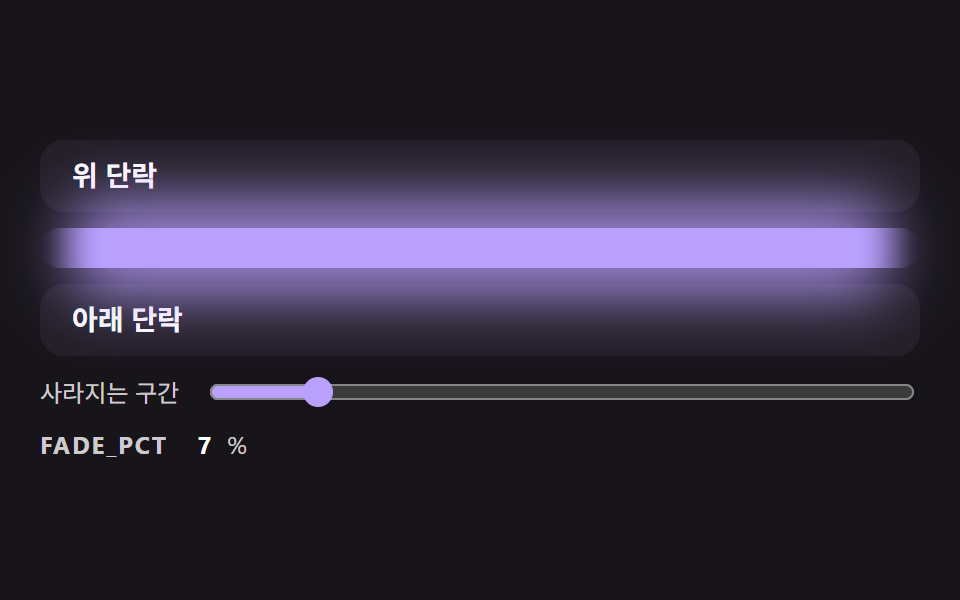 TransitionsCSS Divider: 9 Demos That Compute the Line Shape
 Transitions9 CSS Modal Animation Patterns, No Library Needed
 Transitions9 mega menu ui patterns, link list to site map
 Transitions9 Filter UI Patterns (Panel Slide to Chip Remove)
 TransitionsCart Drawer UI Patterns: 9 Motion Techniques
 TransitionsCarousel Slider UI Design — 9 Transitions
 Transitions9 CSS Page Transition Effects, Canvas Particles
 TransitionsModal Animation Examples: 9 Open and Close Effects