Glitch Text Effect: 9 Canvas Pixel Glitch Scenes
How does glitch text break a word? 02 pushes horizontal slices by hash into row tears, 03 drags bright pixels into a smear, and 09 breaks hard on press and
Glitch Text Is Not Drawing Letters Broken on Purpose but a Calculation That Moves and Mixes the Pixels of a Word Drawing on a Timetable: Making a Glitch Text Effect Starts by Choosing Which Value Slips, When and by How Much
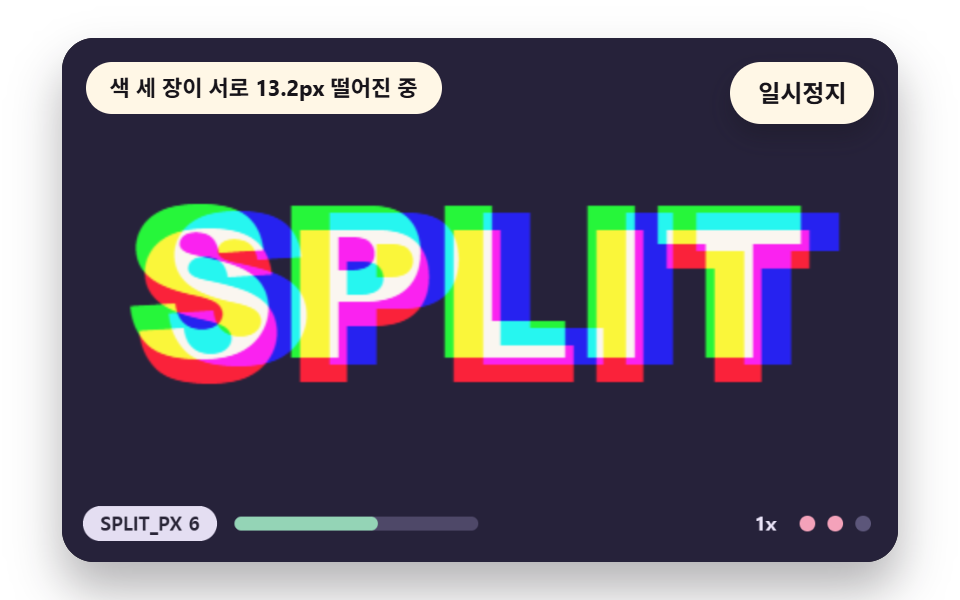 01 gt-rgb-channel-split
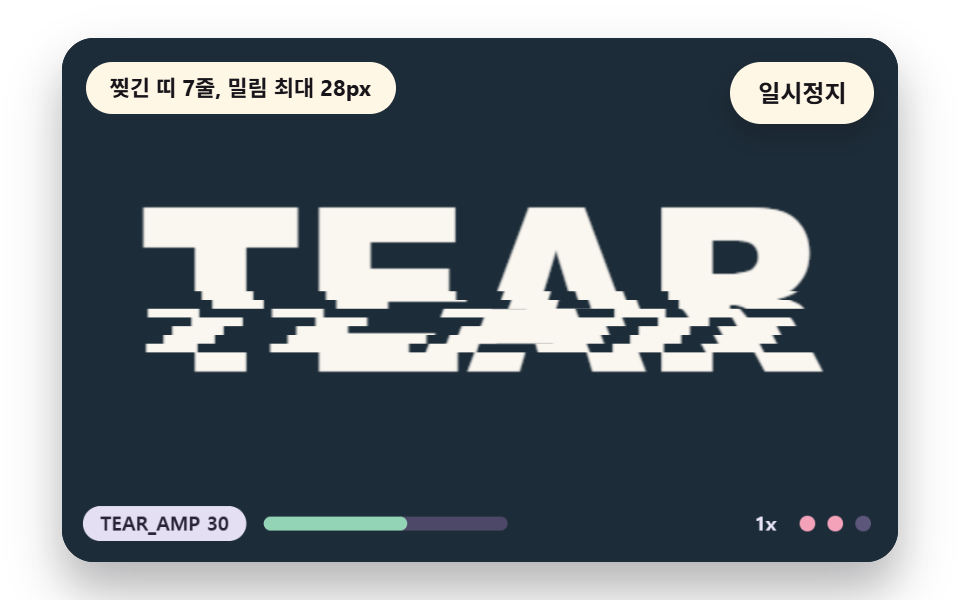 02 gt-scanline-slice-shift
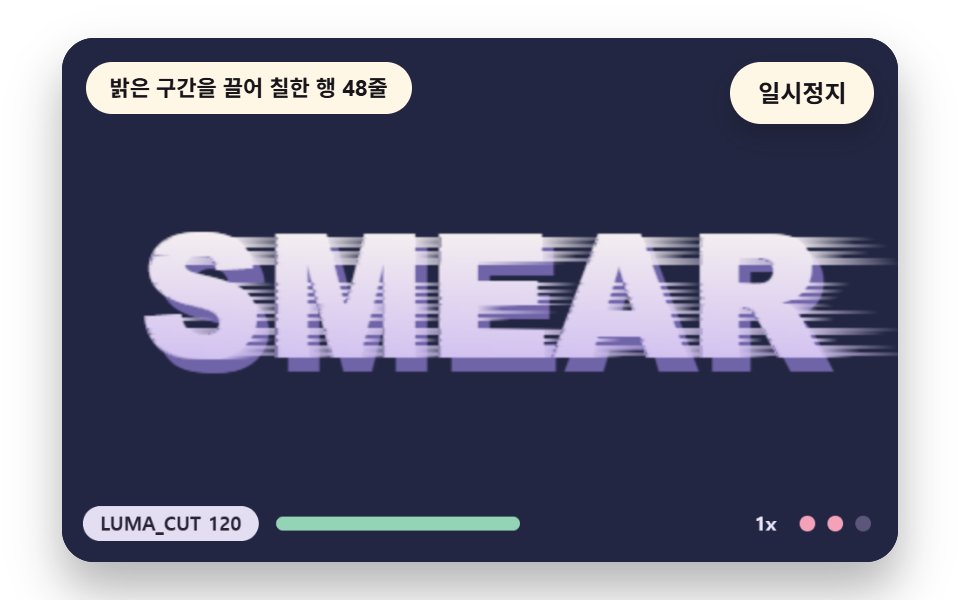 03 gt-pixel-sort-smear
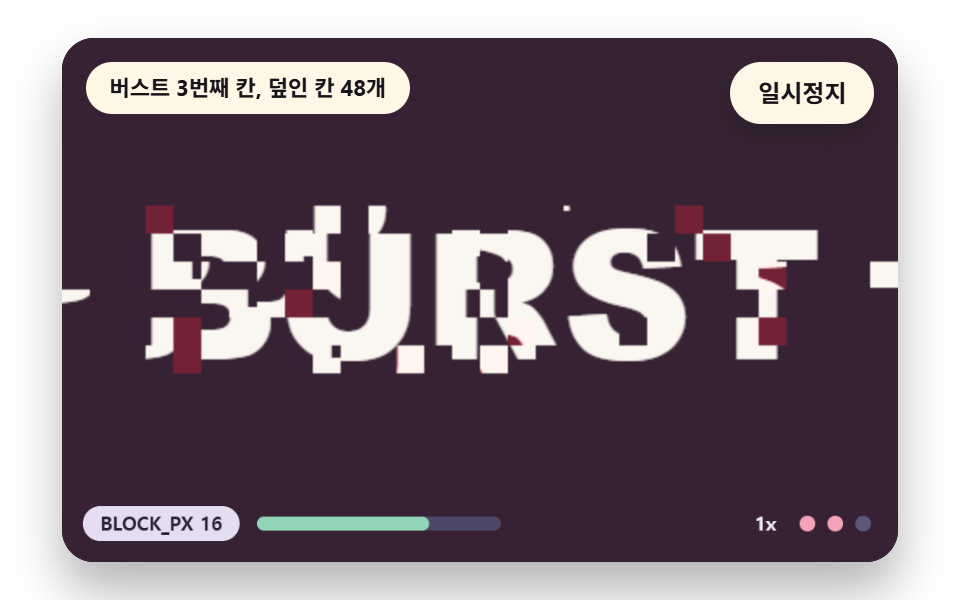 04 gt-block-displace-burst
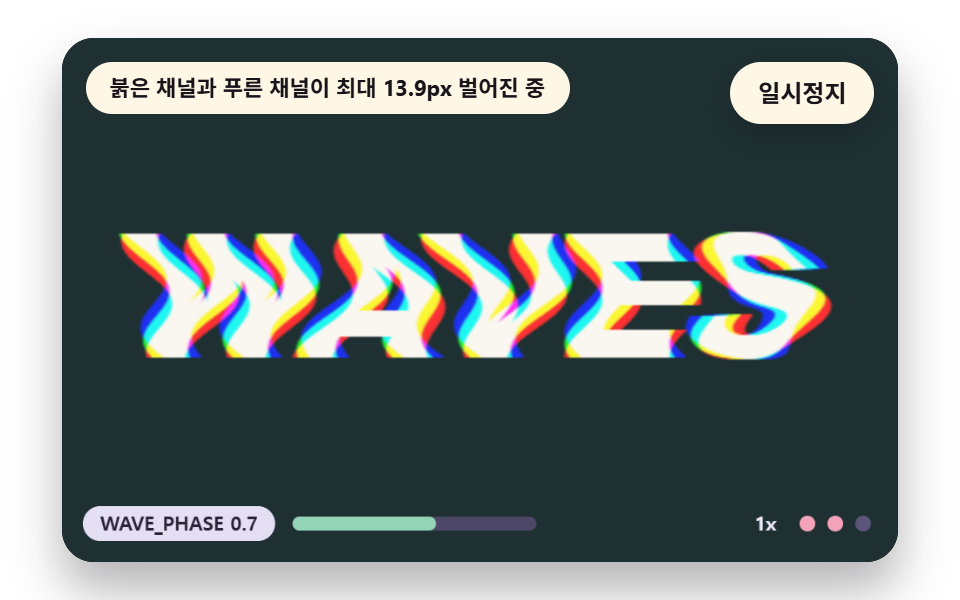 05 gt-chromatic-wave-warp
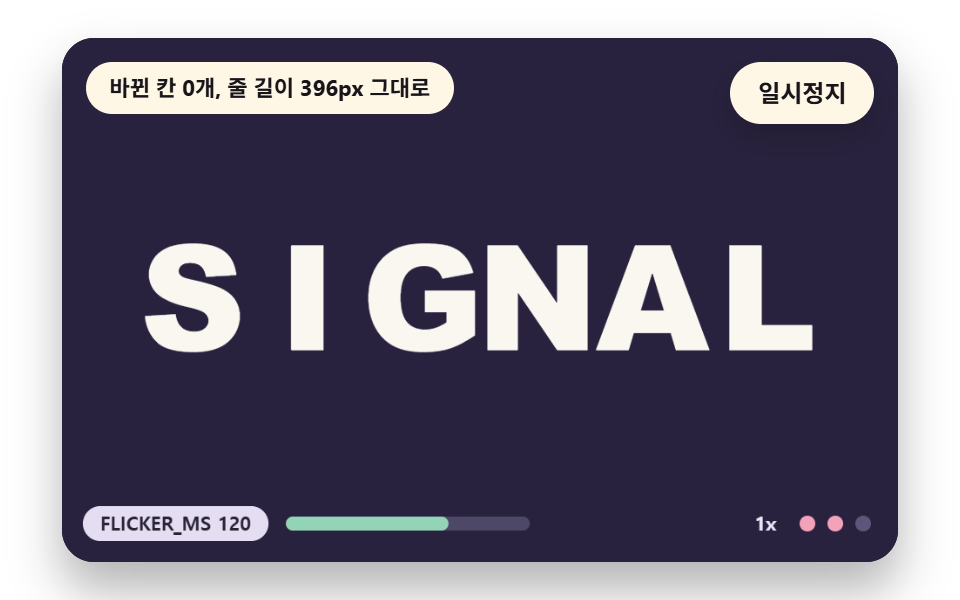 06 gt-char-swap-flicker
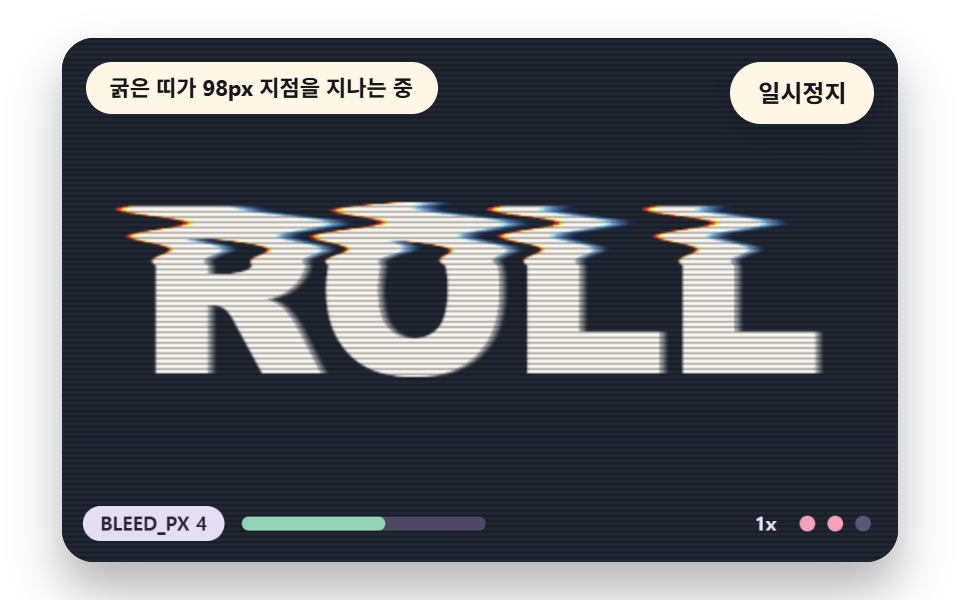 07 gt-scan-bleed-roll
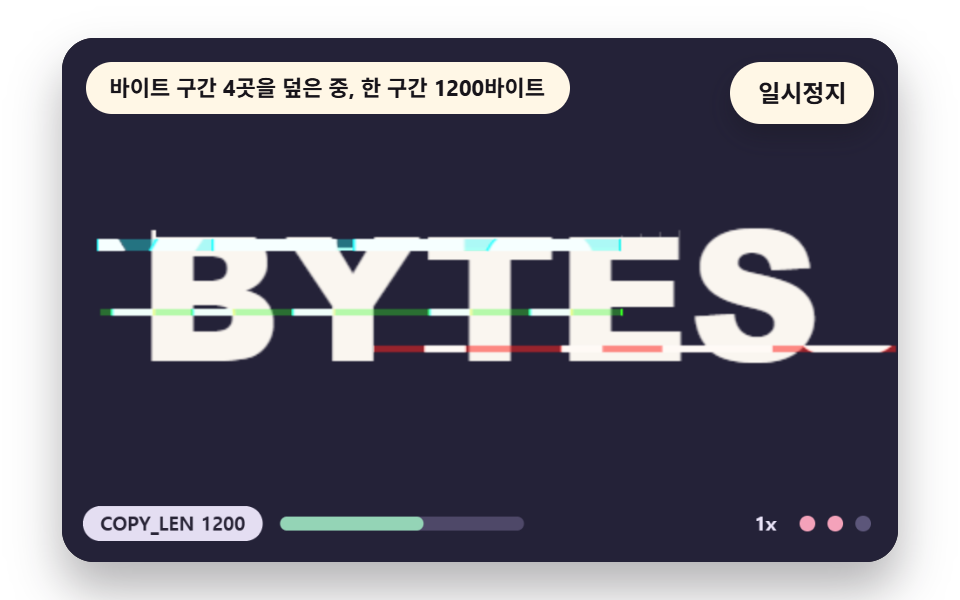 08 gt-data-corrupt-bytes
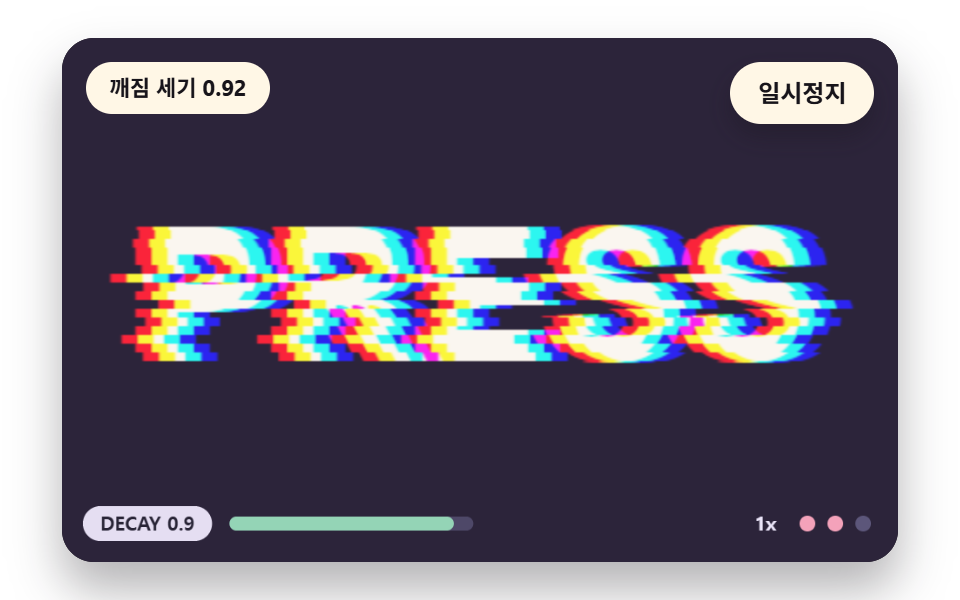 09 gt-envelope-trigger-decay
Auto-plays · click a tile to jump to its section · all nine in one zip
- 01 A Word Split Into Red, Green and Blue Sheets
- 02 Horizontal Slices That Tear Row by Row
- 03 Bright Pixels Dragged Sideways Into a Smear
- 04 Grid Blocks Jumping Out in a Burst
- 05 A Sine Ripple With a Different Phase per Color
- 06 Letters Flicking to Look-alike Shapes One by One
- 07 Scan Lines and Bleed Rolling Down the Screen
- 08 A Pixel Buffer Range Overwritten From Elsewhere
- 09 A Hard Break on Press That Settles Down
Nine scenes stand on one base. A 480x300 canvas gets a single word painted once on an offscreen canvas, getImageData reads it into a pixel array base, and each frame reads that array, writes the result into out and lifts it with putImageData. Nothing external is loaded, and a grep of the nine pages finds no random-number call, no date call, no fetch and no outside address, so the same input paints the same picture each time.
A hash, not a random number, seeds the shaking
A random number would tear different bands on each frame, and the picture would keep trembling without a pause. The scenes use one hash2(a, b) that turns integer multiplies and shifts into a value from 0 up to but not including 1 and returns the same value for the same input, so which band tears in which time step is already decided.
    // Hash - the same (a, b) gives the same value from 0 up to but not including 1. No random function is used
    function hash2(a, b) {
        let h = (Math.imul(a | 0, 374761393) + Math.imul(b | 0, 668265263)) | 0;
        h = Math.imul(h ^ (h >>> 13), 1274126177);
        h = h ^ (h >>> 16);
        return (h >>> 0) / 4294967296;
    }
    // 1D value noise - each integer cell has a hash value and the cells in between are joined smoothly
    function noise1(x, seed) {
        const i = Math.floor(x);
        const f = x - i;
        const u = f * f * (3 - 2 * f);
        return lerp(hash2(i, seed), hash2(i + 1, seed), u);
    }
Only the rows that hold the word are computed
loadWord draws the word, scans the pixel array once and finds the row range rowTop to rowBot where a pixel differs from the background by more than 24. The word spans rows 95 to 192 in 02 and rows 109 to 193 in 03, so 03 runs on 85 of the 300 rows and leaves the rest untouched.
    // Source pixel buffer - the word painted once and read back. Each glitch reads this base and writes out
    let base = new Uint8ClampedArray(W * H * 4);
    let rowTop = 0;
    let rowBot = H - 1;
    const img = wkCtx.createImageData(W, H);
    const out = img.data;
    function loadWord(paint) {
        wordCtx.fillStyle = rgba(BGC, 1);
        wordCtx.fillRect(0, 0, W, H);
        paint(wordCtx);
        base = wordCtx.getImageData(0, 0, W, H).data;
        // Row range that holds the word - the glitch calculation runs only on these rows
        let top = -1;
        let bot = -1;
        for (let y = 0; y < H; y += 1) {
            let hit = false;
            for (let x = 0; x < W && !hit; x += 2) {
                const p = (y * W + x) * 4;
                if (Math.abs(base[p] - BGC[0]) + Math.abs(base[p + 1] - BGC[1]) + Math.abs(base[p + 2] - BGC[2]) > 24) {
                    hit = true;
                }
            }
            if (hit) {
                if (top < 0) {
                    top = y;
                }
                bot = y;
            }
        }
        rowTop = Math.max(0, top - 2);
        rowBot = Math.min(H - 1, bot + 2);
    }
A timetable drives the demo, and a press adds a step
Scenes move without input, and the first change lands at 0.25 seconds. A press on the stage or an arrow key raises the break strength by one step, and when the tab is hidden the loop stops and the first frame after the return is dropped, so a few seconds cannot pile into one frame.
Glitch Text Effect: 9 Scenes — a Color Channel Split, Row Tears, a Brightness-Cut Pixel Smear, a Grid Block Burst, a Ripple With Different Color Phases, Look-alike Letter Swaps, Rolling Scan Lines, a Corrupted Byte Range and a Break Strength That Settles After a Press
Why this order of nine, and what the render measured
Scene 01 opens because it stacks three sheets without touching the pixel array, and 02 and 03 are the two basic axes that move the array by band and by row. Scenes 04 and 08 overwrite parts of the screen, 05 and 07 spread by channel and by bleed, 06 swaps shapes, and 09 handles the break strength itself.
| Scene | Cumulative area | Moving frames | Mean intensity |
|---|---|---|---|
| 01 Channel split | 18.4% | 22/23 | 91.3 |
| 02 Row tears | 9.5% | 7/23 | 153.8 |
| 03 Pixel smear | 4.9% | 11/23 | 38.3 |
| 04 Block burst | 15.8% | 8/23 | 150.9 |
| 05 Color ripple | 13.4% | 23/23 | 157.2 |
| 06 Letter swaps | 3.8% | 6/23 | 149.9 |
| 07 Scan roll | 18.0% | 23/23 | 124.5 |
| 08 Byte damage | 14.9% | 16/23 | 119.6 |
| 09 Decay on press | 14.2% | 12/23 | 78.6 |
The widest footprint belongs to 01 at 18.4% and the narrowest to 06 at 3.8%. Scene 02 tears only when the time step changes, so it moved in 7/23 frames, 06 swaps seven times per lap and moved in 6/23, and the ripple in 05 and the band in 07 keep going without a pause, so both read 23/23.
01A Word Split Into Red, Green and Blue Sheets
The fewest lines that give letter edges a color fringe. Three sheets of the word, each holding one channel of paper minus background, are stacked with lighter blending, so the overlap returns exactly to the original color and only the edges split.
<main class="stage">
<div class="vj is-demo" id="vj">
  <div class="vj__pad" data-role="pad" tabindex="0" role="application" aria-label="Glitch text stage: Enter or Space pauses, R restarts, the right arrow key, T or a press breaks it once">
    <canvas class="vj__canvas" data-role="canvas" width="480" height="300" role="img" aria-label="A word SPLIT sits on a dark plum background. It is three sheets, red, green and blue, laid on top of each other: it looks like one word at rest, and as the break strength rises the three sheets drift apart 120 degrees from each other so the edges split into colour while the direction slowly turns. The gauge below shows the setting and the strength step, and under reduced motion only one clean word is drawn"></canvas>
  </div>
  <p class="vj__status" data-role="status" aria-live="off">Glitch text scene</p>
  <div class="vj__ctrl">
    <button class="vj__pause" data-role="pause" type="button" aria-pressed="false">Pause</button>
  </div>
  <p class="vj__done" data-role="done" role="status" aria-live="polite"></p>
</div>
</main>
@use "../../../../site/static/demo-tokens" as *;
@include stage($stage-paper);
.vj {
position: relative;
width: min(92vw, calc(160vh - 12.8vw));
aspect-ratio: 480 / 300;
margin: 0 auto;
border-radius: $r-card;
overflow: hidden;
box-shadow: $shadow-raised;
background: $subject-ink;
}
// 무대 상자 — 눌러서 한 번 깨뜨리는 곳(touch-action: none 은 이 상자에만). 무대 밖 터치는 페이지 스크롤 그대로
.vj__pad {
position: absolute;
inset: 0;
border-radius: inherit;
outline: none;
touch-action: none;
cursor: pointer;
}
// 바깥 .vj 가 넘침을 자르므로 포커스 테두리는 안쪽으로 들인다
.vj__pad:focus-visible {
outline: 3px solid $subject-cream;
outline-offset: -3px;
}
.vj__canvas {
position: absolute;
inset: 0;
display: block;
width: 100%;
height: 100%;
}
.vj__ctrl {
position: absolute;
right: $sp-3;
top: $sp-3;
display: flex;
gap: $sp-2;
}
.vj__pause {
padding: $sp-1 $sp-3;
border: 2px solid $subject-cream;
border-radius: $r-pill;
background: $subject-cream;
color: $subject-ink;
font-family: inherit;
font-weight: 700;
font-size: 12px;
line-height: 1.6;
cursor: pointer;
box-shadow: $shadow-press;
transition: transform $dur-quick $ease-spring;
}
// 스크린리더에만 읽히는 낭독 문장 — 모드가 바뀔 때만 쓴다
.vj__done {
position: absolute;
width: 1px;
height: 1px;
margin: 0;
overflow: hidden;
clip-path: inset(50%);
white-space: nowrap;
}
// 눌린 상태(멈춤) — 바탕과 글자색을 뒤집어 aria-pressed 가 눈에도 보이게
.vj__pause[aria-pressed="true"] {
background: $subject-ink;
color: $subject-cream;
}
.vj__pause:hover {
transform: translateY(-2px);
}
.vj__pause:active {
transform: translateY(1px);
}
.vj__pause:focus-visible {
outline: 3px solid $subject-cream;
outline-offset: 3px;
}
// 상태 줄 — 지금 장면의 수치를 글자로. 화면에만 있고 aria-live 는 늘 off
.vj__status {
position: absolute;
left: $sp-3;
top: $sp-3;
max-width: calc(100% - 100px);
margin: 0;
padding: $sp-1 $sp-3;
border-radius: $r-pill;
background: $subject-cream;
color: $subject-ink;
font-weight: 700;
font-size: 11px;
line-height: 1.6;
white-space: nowrap;
overflow: hidden;
text-overflow: ellipsis;
pointer-events: none;
}
@media (max-width: 340px) {
.vj__pause,
.vj__status { font-size: 10px; padding: 0 $sp-2; }
}
// 움직임 줄이기 — 장면은 스크립트가 글리치 없는 원문 한 장으로 멈춘다. 버튼도 떠오르지 않게
@media (prefers-reduced-motion: reduce) {
.vj__pause { transition: none !important; }
.vj__pause:hover,
.vj__pause:active { transform: none !important; }
}html, body {
margin: 0;
overflow: hidden;
}
.stage {
box-sizing: border-box;
min-height: 100vh;
display: grid;
place-items: center;
margin: 0;
background: #ffffff;
font-family: -apple-system, "Segoe UI", "Noto Sans KR", sans-serif;
padding: clamp(8px, 4vw, 24px);
}
.vj {
position: relative;
width: min(92vw, 160vh - 12.8vw);
aspect-ratio: 480/300;
margin: 0 auto;
border-radius: 16px;
overflow: hidden;
box-shadow: 0 14px 24px rgba(23, 20, 26, 0.32);
background: #17141a;
}
.vj__pad {
position: absolute;
inset: 0;
border-radius: inherit;
outline: none;
touch-action: none;
cursor: pointer;
}
.vj__pad:focus-visible {
outline: 3px solid #fff7e6;
outline-offset: -3px;
}
.vj__canvas {
position: absolute;
inset: 0;
display: block;
width: 100%;
height: 100%;
}
.vj__ctrl {
position: absolute;
right: 12px;
top: 12px;
display: flex;
gap: 8px;
}
.vj__pause {
padding: 4px 12px;
border: 2px solid #fff7e6;
border-radius: 999px;
background: #fff7e6;
color: #17141a;
font-family: inherit;
font-weight: 700;
font-size: 12px;
line-height: 1.6;
cursor: pointer;
box-shadow: 0 6px 12px rgba(23, 20, 26, 0.32);
transition: transform 220ms cubic-bezier(0.2, 0.8, 0.2, 1);
}
.vj__done {
position: absolute;
width: 1px;
height: 1px;
margin: 0;
overflow: hidden;
clip-path: inset(50%);
white-space: nowrap;
}
.vj__pause[aria-pressed=true] {
background: #17141a;
color: #fff7e6;
}
.vj__pause:hover {
transform: translateY(-2px);
}
.vj__pause:active {
transform: translateY(1px);
}
.vj__pause:focus-visible {
outline: 3px solid #fff7e6;
outline-offset: 3px;
}
.vj__status {
position: absolute;
left: 12px;
top: 12px;
max-width: calc(100% - 100px);
margin: 0;
padding: 4px 12px;
border-radius: 999px;
background: #fff7e6;
color: #17141a;
font-weight: 700;
font-size: 11px;
line-height: 1.6;
white-space: nowrap;
overflow: hidden;
text-overflow: ellipsis;
pointer-events: none;
}
@media (max-width: 340px) {
.vj__pause,
.vj__status {
font-size: 10px;
padding: 0 8px;
}
}
@media (prefers-reduced-motion: reduce) {
.vj__pause {
transition: none !important;
}
.vj__pause:hover,
.vj__pause:active {
transform: none !important;
}
}(function () {
const root = document.getElementById("vj");
if (!root) return;
// 무대 좌표 — 캔버스 안 계산은 늘 480×300. 화면에 보이는 크기와 상관없다
const W = 480;
const H = 300;
const TAU = Math.PI * 2;
function clamp(v, lo, hi) { return v < lo ? lo : (v > hi ? hi : v); }
function lerp(a, b, k) { return a + (b - a) * k; }
// 파스텔 팔레트 — 바탕은 짙은 자두색, 글자는 연한 종이색, 눈금과 알약은 연한 색
const INK = [40, 36, 54];
const PAPER = [250, 246, 240];
const ROSE = [244, 162, 186];
const MINT = [148, 212, 182];
const NEU = [236, 230, 250];
function rgba(c, a) {
return 'rgba(' + Math.round(clamp(c[0], 0, 255)) + ',' + Math.round(clamp(c[1], 0, 255)) + ',' + Math.round(clamp(c[2], 0, 255)) + ',' + clamp(a, 0, 1).toFixed(3) + ')';
}
// 해시 — 같은 (a, b) 에는 늘 같은 0 이상 1 미만 값. 난수 함수는 쓰지 않는다
function hash2(a, b) {
let h = (Math.imul(a | 0, 374761393) + Math.imul(b | 0, 668265263)) | 0;
h = Math.imul(h ^ (h >>> 13), 1274126177);
h = h ^ (h >>> 16);
return (h >>> 0) / 4294967296;
}
// 1차원 값 잡음 — 정수 칸마다 해시 값이 있고 그 사이를 부드럽게 잇는다
function noise1(x, seed) {
const i = Math.floor(x);
const f = x - i;
const u = f * f * (3 - 2 * f);
return lerp(hash2(i, seed), hash2(i + 1, seed), u);
}
// 장면 시계(초)·판 반복 번호·시간표 — 시간표는 (시각, 할 일) 목록이고 시각이 지나면 한 번씩 부른다
let sceneT = 0;
let lap = 0;
let script = [];
let evAt = 0;
// 문구 틀의 {a}·{b} 자리에 값을 끼운다 — 화면 문구는 늘 이 틀 한 줄로 두고 로케일 사전이 통째로 바꾼다
function fill(s, a, b) { return s.replace('{a}', a).replace('{b}', b === undefined ? '' : b); }
function r1(v) { return String(Math.round(v * 10) / 10); }
// 세기 단계 — 장면을 누를 때마다 0 → 1 → 2 → 0 으로 돈다. 글리치의 크기에 이 배율이 곱해진다
const LVL_MUL = [0.5, 1, 1.7];
let lvl = 1;
// 깨짐 세기 g 는 시간표가 정한 목표 gTgt 를 따라간다. 손으로 누르면 holdUntil 까지 목표가 서 있다가 0 으로 돌아간다
let g = 0;
let gTgt = 0;
let holdUntil = 0;
function followG(dt, rate) {
if (manual && sceneT > holdUntil) {
gTgt = 0;
}
g += (gTgt - g) * (1 - Math.exp(-rate * dt));
if (g < 0.002 && gTgt === 0) {
g = 0;
}
}
function hitG(top) {
gTgt = top;
holdUntil = sceneT + 1.6;
}
// 움직임 줄이기에서는 글리치 없이 원문 한 장 — 세기 단계는 눈금에만 반영된다
function gainNow() { return still ? 0 : g * LVL_MUL[lvl]; }
const STILL_FMT = 'Reduced motion: one clean word, setting {a}';
const SPEAK_GLITCH = 'The word {a} is breaking, strength step {b}';
const SPEAK_CLEAN = 'The word {a} is shown clean, strength step {b}';
const SPEAK_STILL = 'Reduced motion: one still of the word {a}, strength step {b}';
function speakLine(word) {
if (still) {
return fill(SPEAK_STILL, word, String(lvl + 1));
}
return fill(modeId() === 1 ? SPEAK_GLITCH : SPEAK_CLEAN, word, String(lvl + 1));
}
const canvasEl = root.querySelector('[data-role="canvas"]');
const padEl = root.querySelector('[data-role="pad"]');
const pauseEl = root.querySelector('[data-role="pause"]');
const statusEl = root.querySelector('[data-role="status"]');
const doneEl = root.querySelector('[data-role="done"]');
const ctxRaw = canvasEl ? canvasEl.getContext('2d') : null;
const wkCv = document.createElement('canvas');
wkCv.width = W;
wkCv.height = H;
const wkRaw = wkCv.getContext('2d');
const wordCv = document.createElement('canvas');
wordCv.width = W;
wordCv.height = H;
const wordRaw = wordCv.getContext('2d', { willReadFrequently: true });
if (!canvasEl || !ctxRaw || !pauseEl || !padEl || !doneEl || !wkRaw || !wordRaw) {
return;
}
const cv = canvasEl;
const ctx = ctxRaw;
const wkCtx = wkRaw;
const wordCtx = wordRaw;
const pauseBtn = pauseEl;
const doneP = doneEl;
const pad = padEl;
// 외부 웹폰트는 부르지 않는다 — 기기에 있는 굵은 글꼴 목록만
const WORD_FONT = '"Arial Black", "Segoe UI Black", Impact, system-ui, sans-serif';
const UI_FONT = 'system-ui, -apple-system, "Segoe UI", "Noto Sans KR", sans-serif';
let dpr = 1;
function fitCanvas() {
// 배율은 2 에서 자른다 — 화소 계산은 늘 480×300 이고 화면 배율만 이 값
dpr = Math.min(window.devicePixelRatio || 1, 2);
cv.width = Math.round(W * dpr);
cv.height = Math.round(H * dpr);
ctx.setTransform(dpr, 0, 0, dpr, 0, 0);
}
const MAX_W = 392;
// 글자 한 줄을 무대 한가운데에 그린다 — dx·dy 는 그림자·겹침용 어긋남
function paintWord(c, word, px, fillStyle, dx, dy) {
// 글꼴이 기기마다 달라도 단어가 MAX_W 안에 들도록 크기를 줄여 맞춘다
c.font = '900 ' + px + 'px ' + WORD_FONT;
const wide = c.measureText(word).width;
const fit = wide > MAX_W ? px * MAX_W / wide : px;
c.font = '900 ' + fit + 'px ' + WORD_FONT;
c.textAlign = 'center';
c.textBaseline = 'middle';
c.fillStyle = fillStyle;
c.fillText(word, W / 2 + dx, H / 2 + 6 + dy);
}
// 원본 화소 버퍼 — 글자를 한 번 그려 읽어 둔 판. 모든 글리치는 이 base 를 읽어 out 에 쓴다
let base = new Uint8ClampedArray(W * H * 4);
let rowTop = 0;
let rowBot = H - 1;
const img = wkCtx.createImageData(W, H);
const out = img.data;
function loadWord(paint) {
wordCtx.fillStyle = rgba(BGC, 1);
wordCtx.fillRect(0, 0, W, H);
paint(wordCtx);
base = wordCtx.getImageData(0, 0, W, H).data;
// 글자가 있는 행 범위 — 글리치 계산은 이 행만 돈다
let top = -1;
let bot = -1;
for (let y = 0; y < H; y += 1) {
let hit = false;
for (let x = 0; x < W && !hit; x += 2) {
const p = (y * W + x) * 4;
if (Math.abs(base[p] - BGC[0]) + Math.abs(base[p + 1] - BGC[1]) + Math.abs(base[p + 2] - BGC[2]) > 24) {
hit = true;
}
}
if (hit) {
if (top < 0) {
top = y;
}
bot = y;
}
}
rowTop = Math.max(0, top - 2);
rowBot = Math.min(H - 1, bot + 2);
}
function present() {
wkCtx.putImageData(img, 0, 0);
ctx.drawImage(wkCv, 0, 0, W, H);
}
// 한 행을 채널마다 다른 가로 어긋남으로 읽어 tmp(길이 W×3)에 쓴다 — 어긋남이 소수여도 이웃 두 화소를 섞는다
function rowSample(y, dR, dG, dB, tmp) {
const o = y * W * 4;
const d = [dR, dG, dB];
for (let c = 0; c < 3; c += 1) {
for (let x = 0; x < W; x += 1) {
let sx = x - d[c];
if (sx < 0) {
sx = 0;
}
else if (sx > W - 1.001) {
sx = W - 1.001;
}
const i0 = Math.floor(sx);
const f = sx - i0;
const p = o + i0 * 4 + c;
tmp[x * 3 + c] = base[p] * (1 - f) + base[p + 4] * f;
}
}
}
const rowTmp = new Float32Array(W * 3);
function renderRows(y0, y1, dxR, dxG, dxB) {
for (let y = y0; y <= y1; y += 1) {
rowSample(y, dxR[y], dxG[y], dxB[y], rowTmp);
const o = y * W * 4;
for (let x = 0; x < W; x += 1) {
out[o + x * 4] = rowTmp[x * 3];
out[o + x * 4 + 1] = rowTmp[x * 3 + 1];
out[o + x * 4 + 2] = rowTmp[x * 3 + 2];
}
}
}
function box(x, y, w, h, r, c, a) {
if (w <= 0.2 || h <= 0.2 || a <= 0) {
return;
}
ctx.beginPath();
ctx.roundRect(x, y, w, h, Math.max(0, Math.min(r, w / 2, h / 2)));
ctx.fillStyle = rgba(c, a);
ctx.fill();
}
function disc(x, y, r, c) {
ctx.beginPath();
ctx.arc(x, y, r, 0, TAU);
ctx.fillStyle = rgba(c, 1);
ctx.fill();
}
function text(s, x, y, c, px, weight, align) {
ctx.font = weight + ' ' + px + 'px ' + UI_FONT;
ctx.textAlign = align;
ctx.textBaseline = 'middle';
ctx.fillStyle = rgba(c, 1);
ctx.fillText(s, x, y);
}
// 아래쪽 눈금 — 상수 이름과 지금 설정값 · 설정 크기 막대 · 세기 단계 점 셋. 값은 세기 단계가 곱해진 설정이다
function hud(name, val, frac) {
const label = name + ' ' + r1(val);
ctx.font = '700 11px ' + UI_FONT;
const w = ctx.measureText(label).width + 20;
const x = 12;
const y = H - 32;
box(x, y, w, 20, 10, NEU, 0.96);
text(label, x + w / 2, y + 10.5, INK, 11, 700, 'center');
const mx = x + w + 10;
box(mx, y + 6, 140, 8, 4, [78, 72, 104], 1);
box(mx, y + 6, 140 * clamp(frac, 0, 1), 8, 4, MINT, 1);
text(String(LVL_MUL[lvl]) + 'x', W - 70, y + 10.5, NEU, 11, 700, 'right');
for (let i = 0; i < 3; i += 1) {
disc(W - 52 + i * 16, y + 10, 4.5, i <= lvl ? ROSE : [92, 86, 122]);
}
}
let shownStatus = '';
function pushStatus(s) {
if (!statusEl || s === shownStatus) {
return;
}
shownStatus = s;
statusEl.textContent = s;
}
let paused = false;
const reduceQuery = window.matchMedia('(prefers-reduced-motion: reduce)');
// 페이지를 연 채 움직임 줄이기 설정을 바꿔도 change 리스너가 다시 읽는다
let still = reduceQuery.matches;
// 자동 시연 표시 — 사람이 처음 손대면 떼고, 그 뒤부터 모드가 바뀔 때만 낭독 문장을 쓴다
let demo = root.classList.contains('is-demo');
const off = new AbortController();
// 사람이 직접 누르는 중이면 시간표는 멈추고 계산만 흐른다
let manual = false;
function wake() {
if (!demo) {
return;
}
demo = false;
root.classList.remove('is-demo');
}
function takeOver() {
if (manual) {
return;
}
manual = true;
wake();
}
// 낭독 문장 — 화면 상태 줄(aria-live off)과 따로, 모드가 바뀔 때와 사람이 눌렀을 때만 role=status 에 쓴다
let lastMode = -9;
function say() {
doneP.textContent = speakLine(WORD);
lastMode = still ? -2 : modeId();
}
function advance(dt) {
sceneT += dt;
if (!manual) {
while (evAt < script.length && script[evAt].t <= sceneT) {
const ev = script[evAt];
evAt += 1;
ev.f();
}
if (sceneT >= LAP_S) {
lap += 1;
begin();
return;
}
}
update(dt);
}
function begin() {
sceneT = 0;
evAt = 0;
script = [];
build();
}
const DT_MAX = 0.05;
function showNow() {
draw();
pushStatus(statusText());
if (!demo) {
const m = still ? -2 : modeId();
if (m !== lastMode) {
say();
}
}
}
let rafId = 0;
let lastTs = -1;
function frame(ts) {
if (still || paused) {
rafId = 0;
return;
}
if (lastTs < 0) {
lastTs = ts;
}
const dt = Math.min((ts - lastTs) / 1000, DT_MAX);
lastTs = ts;
if (dt > 0) {
advance(dt);
}
showNow();
rafId = window.requestAnimationFrame(frame);
}
function startLoop() {
if (rafId) {
return;
}
// 멈췄던 사이의 시간을 첫 프레임 dt 로 넘기지 않는다
lastTs = -1;
rafId = window.requestAnimationFrame(frame);
}
function stopLoop() {
if (rafId) {
window.cancelAnimationFrame(rafId);
rafId = 0;
}
}
// 움직임 줄이기 — 루프 없이 글리치 없는 원문 한 장
function showRest() {
stopLoop();
lap = 0;
sceneT = 0;
evAt = 0;
script = [];
build();
update(0);
showNow();
}
function play() {
begin();
showNow();
if (!paused) {
startLoop();
}
}
function togglePause() {
paused = !paused;
pauseBtn.setAttribute('aria-pressed', paused ? 'true' : 'false');
wake();
if (paused) {
stopLoop();
}
else if (!still) {
startLoop();
}
say();
}
function restart() {
manual = false;
lap += 1;
g = 0;
gTgt = 0;
begin();
update(0);
showNow();
say();
}
// 누르기 — 세기 단계를 한 칸 올리고(0 → 1 → 2 → 0) 그 자리에서 한 번 깨뜨린다. 멈춘 채여도 세 걸음을 더 돌려 깨진 장면이 눈에 보이게
function tap() {
takeOver();
lvl = (lvl + 1) % 3;
if (!still) {
onHit();
if (paused) {
for (let k = 0; k < 3; k += 1) {
sceneT += 1 / 30;
update(1 / 30);
}
}
}
showNow();
say();
}
pauseBtn.addEventListener('click', togglePause, { signal: off.signal });
// 키보드 — 무대에 포커스가 있을 때만. Enter·Space = Pause, R = 처음부터, 오른쪽·위·T = 한 번 깨뜨리기
pad.addEventListener('keydown', function (e) {
if (e.altKey || e.ctrlKey || e.metaKey) {
return;
}
const k = e.key;
if (k === 'Enter' || k === ' ' || k === 'p' || k === 'P') {
e.preventDefault();
togglePause();
}
else if (k === 'r' || k === 'R') {
restart();
}
else if (k === 'ArrowRight' || k === 'ArrowUp' || k === 't' || k === 'T') {
e.preventDefault();
tap();
}
}, { signal: off.signal });
// 마우스·터치 — 무대를 누르는 순간 한 번 깨뜨린다
pad.addEventListener('pointerdown', function () { tap(); }, { signal: off.signal });
// 탭이 숨으면 멈추고, 돌아오면 시계를 다시 맞춰 시작 — 숨은 동안의 몇 초가 한 프레임에 몰리지 않게
document.addEventListener('visibilitychange', function () {
if (document.hidden) {
stopLoop();
}
else if (!paused && !still) {
startLoop();
}
}, { signal: off.signal });
// 설정이 바뀌면 — 켜지면 원문 한 장, 꺼지면 다시 움직인다
reduceQuery.addEventListener('change', function () {
still = reduceQuery.matches;
if (still) {
showRest();
}
else {
lap = 0;
play();
}
}, { signal: off.signal });
window.addEventListener('resize', function () {
fitCanvas();
showNow();
}, { signal: off.signal });
// 01 — 글자 한 줄을 빨강·초록·파랑 세 장으로 따로 그려 두고, lighter 합성으로 포갠다. 세 장은 SPLIT_PX × 깨짐 세기 만큼 120도씩 다른 방향으로 밀리고 그 방향이 천천히 돈다
const SPLIT_PX = 6;
const SPIN_RAD_S = 0.9;
const LAP_S = 6.8;
const BGC = [38, 34, 58];
const WORD = 'SPLIT';
// 한 장 = 종이색에서 바탕색을 뺀 값 중 한 채널만 가진 글자 — 세 장을 더하면 정확히 원래 종이색이 된다
function makeTint(ch) {
const c = document.createElement('canvas');
c.width = W;
c.height = H;
const x = c.getContext('2d');
const tint = [0, 0, 0];
tint[ch] = PAPER[ch] - BGC[ch];
if (x) {
paintWord(x, WORD, 150, rgba(tint, 1), 0, 0);
}
return c;
}
const tints = [makeTint(0), makeTint(1), makeTint(2)];
loadWord(function (c) { paintWord(c, WORD, 150, rgba(PAPER, 1), 0, 0); });
let spin = 0;
let splitNow = 0;
function setting() { return SPLIT_PX * LVL_MUL[lvl]; }
function build() {
g = 0;
gTgt = 0;
spin = 0;
script.push({ t: 0.25, f: function () { gTgt = 1; } });
script.push({ t: 1.5, f: function () { gTgt = 2.2; } });
script.push({ t: 2.7, f: function () { gTgt = 0.15; } });
script.push({ t: 4.4, f: function () { gTgt = 1.6; } });
script.push({ t: 5.6, f: function () { gTgt = 0; } });
}
function update(dt) {
followG(dt, 9);
spin += SPIN_RAD_S * dt;
}
function draw() {
ctx.fillStyle = rgba(BGC, 1);
ctx.fillRect(0, 0, W, H);
splitNow = still ? 0 : SPLIT_PX * g * LVL_MUL[lvl];
ctx.globalCompositeOperation = 'lighter';
for (let ch = 0; ch < 3; ch += 1) {
const a = spin + ch * TAU / 3;
ctx.drawImage(tints[ch], Math.round(Math.cos(a) * splitNow), Math.round(Math.sin(a) * splitNow * 0.6));
}
ctx.globalCompositeOperation = 'source-over';
hud('SPLIT_PX', setting(), LVL_MUL[lvl] / 1.7);
}
function statusText() {
if (still) {
return fill(STILL_FMT, r1(setting()) + 'px');
}
return fill('The three colour sheets are {a}px apart', r1(splitNow));
}
function modeId() { return g > 0.3 ? 1 : 0; }
function onHit() { hitG(1.4); }
fitCanvas();
if (still) {
showRest();
}
else {
play();
}
return function () {
stopLoop();
off.abort();
};
})();// RgbChannelSplit - 같은 항목 vanilla index.html 의 React 판. 같은 계산을 useEffect 안에서 돌린다
import { useEffect, useRef } from "react";
import styles from "./RgbChannelSplit.module.scss";
const cx = (s: string): string => s.split(" ").map((n) => styles[n] ?? n).join(" ");
export default function RgbChannelSplit() {
const rootRef = useRef<HTMLDivElement | null>(null);
useEffect(() => {
const rootEl = rootRef.current;
if (!rootEl) return;
const root: HTMLElement = rootEl;
type RGB = [number, number, number];
// 무대 좌표 — 캔버스 안 계산은 늘 480×300. 화면에 보이는 크기와 상관없다
const W = 480;
const H = 300;
const TAU = Math.PI * 2;
function clamp(v: number, lo: number, hi: number): number { return v < lo ? lo : (v > hi ? hi : v); }
function lerp(a: number, b: number, k: number): number { return a + (b - a) * k; }
// 파스텔 팔레트 — 바탕은 짙은 자두색, 글자는 연한 종이색, 눈금과 알약은 연한 색
const INK: RGB = [40, 36, 54];
const PAPER: RGB = [250, 246, 240];
const ROSE: RGB = [244, 162, 186];
const MINT: RGB = [148, 212, 182];
const NEU: RGB = [236, 230, 250];
function rgba(c: RGB, a: number): string {
return 'rgba(' + Math.round(clamp(c[0], 0, 255)) + ',' + Math.round(clamp(c[1], 0, 255)) + ',' + Math.round(clamp(c[2], 0, 255)) + ',' + clamp(a, 0, 1).toFixed(3) + ')';
}
// 해시 — 같은 (a, b) 에는 늘 같은 0 이상 1 미만 값. 난수 함수는 쓰지 않는다
function hash2(a: number, b: number): number {
let h = (Math.imul(a | 0, 374761393) + Math.imul(b | 0, 668265263)) | 0;
h = Math.imul(h ^ (h >>> 13), 1274126177);
h = h ^ (h >>> 16);
return (h >>> 0) / 4294967296;
}
// 1차원 값 잡음 — 정수 칸마다 해시 값이 있고 그 사이를 부드럽게 잇는다
function noise1(x: number, seed: number): number {
const i = Math.floor(x);
const f = x - i;
const u = f * f * (3 - 2 * f);
return lerp(hash2(i, seed), hash2(i + 1, seed), u);
}
// 장면 시계(초)·판 반복 번호·시간표 — 시간표는 (시각, 할 일) 목록이고 시각이 지나면 한 번씩 부른다
let sceneT = 0;
let lap = 0;
type Ev = { t: number; f: () => void };
let script: Ev[] = [];
let evAt = 0;
// 문구 틀의 {a}·{b} 자리에 값을 끼운다 — 화면 문구는 늘 이 틀 한 줄로 두고 로케일 사전이 통째로 바꾼다
function fill(s: string, a: string, b?: string): string { return s.replace('{a}', a).replace('{b}', b === undefined ? '' : b); }
function r1(v: number): string { return String(Math.round(v * 10) / 10); }
// 세기 단계 — 장면을 누를 때마다 0 → 1 → 2 → 0 으로 돈다. 글리치의 크기에 이 배율이 곱해진다
const LVL_MUL = [0.5, 1, 1.7];
let lvl = 1;
// 깨짐 세기 g 는 시간표가 정한 목표 gTgt 를 따라간다. 손으로 누르면 holdUntil 까지 목표가 서 있다가 0 으로 돌아간다
let g = 0;
let gTgt = 0;
let holdUntil = 0;
function followG(dt: number, rate: number): void {
if (manual && sceneT > holdUntil) { gTgt = 0; }
g += (gTgt - g) * (1 - Math.exp(-rate * dt));
if (g < 0.002 && gTgt === 0) { g = 0; }
}
function hitG(top: number): void {
gTgt = top;
holdUntil = sceneT + 1.6;
}
// 움직임 줄이기에서는 글리치 없이 원문 한 장 — 세기 단계는 눈금에만 반영된다
function gainNow(): number { return still ? 0 : g * LVL_MUL[lvl]; }
const STILL_FMT = '움직임 줄이기 — 깨끗한 글자 한 장, 설정 {a}';
const SPEAK_GLITCH = '글자 {a} 가 깨지는 중, 세기 {b}단계';
const SPEAK_CLEAN = '글자 {a} 가 깨끗하게 보이는 중, 세기 {b}단계';
const SPEAK_STILL = '움직임 줄이기 — 글자 {a} 한 장, 세기 {b}단계';
function speakLine(word: string): string {
if (still) { return fill(SPEAK_STILL, word, String(lvl + 1)); }
return fill(modeId() === 1 ? SPEAK_GLITCH : SPEAK_CLEAN, word, String(lvl + 1));
}
const canvasEl = root.querySelector('[data-role="canvas"]') as HTMLCanvasElement | null;
const padEl = root.querySelector('[data-role="pad"]') as HTMLElement | null;
const pauseEl = root.querySelector('[data-role="pause"]') as HTMLButtonElement | null;
const statusEl = root.querySelector('[data-role="status"]') as HTMLElement | null;
const doneEl = root.querySelector('[data-role="done"]') as HTMLElement | null;
const ctxRaw = canvasEl ? canvasEl.getContext('2d') : null;
const wkCv: HTMLCanvasElement = document.createElement('canvas');
wkCv.width = W;
wkCv.height = H;
const wkRaw = wkCv.getContext('2d');
const wordCv: HTMLCanvasElement = document.createElement('canvas');
wordCv.width = W;
wordCv.height = H;
const wordRaw = wordCv.getContext('2d', { willReadFrequently: true });
if (!canvasEl || !ctxRaw || !pauseEl || !padEl || !doneEl || !wkRaw || !wordRaw) { return; }
const cv: HTMLCanvasElement = canvasEl;
const ctx: CanvasRenderingContext2D = ctxRaw;
const wkCtx: CanvasRenderingContext2D = wkRaw;
const wordCtx: CanvasRenderingContext2D = wordRaw;
const pauseBtn: HTMLButtonElement = pauseEl;
const doneP: HTMLElement = doneEl;
const pad: HTMLElement = padEl;
// 외부 웹폰트는 부르지 않는다 — 기기에 있는 굵은 글꼴 목록만
const WORD_FONT = '"Arial Black", "Segoe UI Black", Impact, system-ui, sans-serif';
const UI_FONT = 'system-ui, -apple-system, "Segoe UI", "Noto Sans KR", sans-serif';
let dpr = 1;
function fitCanvas(): void {
// 배율은 2 에서 자른다 — 화소 계산은 늘 480×300 이고 화면 배율만 이 값
dpr = Math.min(window.devicePixelRatio || 1, 2);
cv.width = Math.round(W * dpr);
cv.height = Math.round(H * dpr);
ctx.setTransform(dpr, 0, 0, dpr, 0, 0);
}
const MAX_W = 392;
// 글자 한 줄을 무대 한가운데에 그린다 — dx·dy 는 그림자·겹침용 어긋남
function paintWord(c: CanvasRenderingContext2D, word: string, px: number, fillStyle: string | CanvasGradient, dx: number, dy: number): void {
// 글꼴이 기기마다 달라도 단어가 MAX_W 안에 들도록 크기를 줄여 맞춘다
c.font = '900 ' + px + 'px ' + WORD_FONT;
const wide = c.measureText(word).width;
const fit = wide > MAX_W ? px * MAX_W / wide : px;
c.font = '900 ' + fit + 'px ' + WORD_FONT;
c.textAlign = 'center';
c.textBaseline = 'middle';
c.fillStyle = fillStyle;
c.fillText(word, W / 2 + dx, H / 2 + 6 + dy);
}
// 원본 화소 버퍼 — 글자를 한 번 그려 읽어 둔 판. 모든 글리치는 이 base 를 읽어 out 에 쓴다
let base: Uint8ClampedArray = new Uint8ClampedArray(W * H * 4);
let rowTop = 0;
let rowBot = H - 1;
const img: ImageData = wkCtx.createImageData(W, H);
const out: Uint8ClampedArray = img.data;
function loadWord(paint: (c: CanvasRenderingContext2D) => void): void {
wordCtx.fillStyle = rgba(BGC, 1);
wordCtx.fillRect(0, 0, W, H);
paint(wordCtx);
base = wordCtx.getImageData(0, 0, W, H).data;
// 글자가 있는 행 범위 — 글리치 계산은 이 행만 돈다
let top = -1;
let bot = -1;
for (let y = 0; y < H; y += 1) {
let hit = false;
for (let x = 0; x < W && !hit; x += 2) {
const p = (y * W + x) * 4;
if (Math.abs(base[p] - BGC[0]) + Math.abs(base[p + 1] - BGC[1]) + Math.abs(base[p + 2] - BGC[2]) > 24) { hit = true; }
}
if (hit) {
if (top < 0) { top = y; }
bot = y;
}
}
rowTop = Math.max(0, top - 2);
rowBot = Math.min(H - 1, bot + 2);
}
function present(): void {
wkCtx.putImageData(img, 0, 0);
ctx.drawImage(wkCv, 0, 0, W, H);
}
// 한 행을 채널마다 다른 가로 어긋남으로 읽어 tmp(길이 W×3)에 쓴다 — 어긋남이 소수여도 이웃 두 화소를 섞는다
function rowSample(y: number, dR: number, dG: number, dB: number, tmp: Float32Array): void {
const o = y * W * 4;
const d = [dR, dG, dB];
for (let c = 0; c < 3; c += 1) {
for (let x = 0; x < W; x += 1) {
let sx = x - d[c];
if (sx < 0) { sx = 0; } else if (sx > W - 1.001) { sx = W - 1.001; }
const i0 = Math.floor(sx);
const f = sx - i0;
const p = o + i0 * 4 + c;
tmp[x * 3 + c] = base[p] * (1 - f) + base[p + 4] * f;
}
}
}
const rowTmp = new Float32Array(W * 3);
function renderRows(y0: number, y1: number, dxR: Float32Array, dxG: Float32Array, dxB: Float32Array): void {
for (let y = y0; y <= y1; y += 1) {
rowSample(y, dxR[y], dxG[y], dxB[y], rowTmp);
const o = y * W * 4;
for (let x = 0; x < W; x += 1) {
out[o + x * 4] = rowTmp[x * 3];
out[o + x * 4 + 1] = rowTmp[x * 3 + 1];
out[o + x * 4 + 2] = rowTmp[x * 3 + 2];
}
}
}
function box(x: number, y: number, w: number, h: number, r: number, c: RGB, a: number): void {
if (w <= 0.2 || h <= 0.2 || a <= 0) { return; }
ctx.beginPath();
ctx.roundRect(x, y, w, h, Math.max(0, Math.min(r, w / 2, h / 2)));
ctx.fillStyle = rgba(c, a);
ctx.fill();
}
function disc(x: number, y: number, r: number, c: RGB): void {
ctx.beginPath();
ctx.arc(x, y, r, 0, TAU);
ctx.fillStyle = rgba(c, 1);
ctx.fill();
}
function text(s: string, x: number, y: number, c: RGB, px: number, weight: number, align: CanvasTextAlign): void {
ctx.font = weight + ' ' + px + 'px ' + UI_FONT;
ctx.textAlign = align;
ctx.textBaseline = 'middle';
ctx.fillStyle = rgba(c, 1);
ctx.fillText(s, x, y);
}
// 아래쪽 눈금 — 상수 이름과 지금 설정값 · 설정 크기 막대 · 세기 단계 점 셋. 값은 세기 단계가 곱해진 설정이다
function hud(name: string, val: number, frac: number): void {
const label = name + ' ' + r1(val);
ctx.font = '700 11px ' + UI_FONT;
const w = ctx.measureText(label).width + 20;
const x = 12;
const y = H - 32;
box(x, y, w, 20, 10, NEU, 0.96);
text(label, x + w / 2, y + 10.5, INK, 11, 700, 'center');
const mx = x + w + 10;
box(mx, y + 6, 140, 8, 4, [78, 72, 104], 1);
box(mx, y + 6, 140 * clamp(frac, 0, 1), 8, 4, MINT, 1);
text(String(LVL_MUL[lvl]) + 'x', W - 70, y + 10.5, NEU, 11, 700, 'right');
for (let i = 0; i < 3; i += 1) { disc(W - 52 + i * 16, y + 10, 4.5, i <= lvl ? ROSE : [92, 86, 122]); }
}
let shownStatus = '';
function pushStatus(s: string): void {
if (!statusEl || s === shownStatus) { return; }
shownStatus = s;
statusEl.textContent = s;
}
let paused = false;
const reduceQuery = window.matchMedia('(prefers-reduced-motion: reduce)');
// 페이지를 연 채 움직임 줄이기 설정을 바꿔도 change 리스너가 다시 읽는다
let still = reduceQuery.matches;
// 자동 시연 표시 — 사람이 처음 손대면 떼고, 그 뒤부터 모드가 바뀔 때만 낭독 문장을 쓴다
let demo = root.classList.contains('is-demo');
const off = new AbortController();
// 사람이 직접 누르는 중이면 시간표는 멈추고 계산만 흐른다
let manual = false;
function wake(): void {
if (!demo) { return; }
demo = false;
root.classList.remove('is-demo');
}
function takeOver(): void {
if (manual) { return; }
manual = true;
wake();
}
// 낭독 문장 — 화면 상태 줄(aria-live off)과 따로, 모드가 바뀔 때와 사람이 눌렀을 때만 role=status 에 쓴다
let lastMode = -9;
function say(): void {
doneP.textContent = speakLine(WORD);
lastMode = still ? -2 : modeId();
}
function advance(dt: number): void {
sceneT += dt;
if (!manual) {
while (evAt < script.length && script[evAt].t <= sceneT) {
const ev = script[evAt];
evAt += 1;
ev.f();
}
if (sceneT >= LAP_S) { lap += 1; begin(); return; }
}
update(dt);
}
function begin(): void {
sceneT = 0;
evAt = 0;
script = [];
build();
}
const DT_MAX = 0.05;
function showNow(): void {
draw();
pushStatus(statusText());
if (!demo) {
const m = still ? -2 : modeId();
if (m !== lastMode) { say(); }
}
}
let rafId = 0;
let lastTs = -1;
function frame(ts: number): void {
if (still || paused) { rafId = 0; return; }
if (lastTs < 0) { lastTs = ts; }
const dt = Math.min((ts - lastTs) / 1000, DT_MAX);
lastTs = ts;
if (dt > 0) { advance(dt); }
showNow();
rafId = window.requestAnimationFrame(frame);
}
function startLoop(): void {
if (rafId) { return; }
// 멈췄던 사이의 시간을 첫 프레임 dt 로 넘기지 않는다
lastTs = -1;
rafId = window.requestAnimationFrame(frame);
}
function stopLoop(): void {
if (rafId) { window.cancelAnimationFrame(rafId); rafId = 0; }
}
// 움직임 줄이기 — 루프 없이 글리치 없는 원문 한 장
function showRest(): void {
stopLoop();
lap = 0;
sceneT = 0;
evAt = 0;
script = [];
build();
update(0);
showNow();
}
function play(): void {
begin();
showNow();
if (!paused) { startLoop(); }
}
function togglePause(): void {
paused = !paused;
pauseBtn.setAttribute('aria-pressed', paused ? 'true' : 'false');
wake();
if (paused) { stopLoop(); } else if (!still) { startLoop(); }
say();
}
function restart(): void {
manual = false;
lap += 1;
g = 0;
gTgt = 0;
begin();
update(0);
showNow();
say();
}
// 누르기 — 세기 단계를 한 칸 올리고(0 → 1 → 2 → 0) 그 자리에서 한 번 깨뜨린다. 멈춘 채여도 세 걸음을 더 돌려 깨진 장면이 눈에 보이게
function tap(): void {
takeOver();
lvl = (lvl + 1) % 3;
if (!still) {
onHit();
if (paused) {
for (let k = 0; k < 3; k += 1) { sceneT += 1 / 30; update(1 / 30); }
}
}
showNow();
say();
}
pauseBtn.addEventListener('click', togglePause, { signal: off.signal });
// 키보드 — 무대에 포커스가 있을 때만. Enter·Space = 일시정지, R = 처음부터, 오른쪽·위·T = 한 번 깨뜨리기
pad.addEventListener('keydown', function (e: KeyboardEvent): void {
if (e.altKey || e.ctrlKey || e.metaKey) { return; }
const k = e.key;
if (k === 'Enter' || k === ' ' || k === 'p' || k === 'P') {
e.preventDefault();
togglePause();
} else if (k === 'r' || k === 'R') {
restart();
} else if (k === 'ArrowRight' || k === 'ArrowUp' || k === 't' || k === 'T') {
e.preventDefault();
tap();
}
}, { signal: off.signal });
// 마우스·터치 — 무대를 누르는 순간 한 번 깨뜨린다
pad.addEventListener('pointerdown', function (): void { tap(); }, { signal: off.signal });
// 탭이 숨으면 멈추고, 돌아오면 시계를 다시 맞춰 시작 — 숨은 동안의 몇 초가 한 프레임에 몰리지 않게
document.addEventListener('visibilitychange', function (): void {
if (document.hidden) { stopLoop(); } else if (!paused && !still) { startLoop(); }
}, { signal: off.signal });
// 설정이 바뀌면 — 켜지면 원문 한 장, 꺼지면 다시 움직인다
reduceQuery.addEventListener('change', function (): void {
still = reduceQuery.matches;
if (still) { showRest(); } else { lap = 0; play(); }
}, { signal: off.signal });
window.addEventListener('resize', function (): void {
fitCanvas();
showNow();
}, { signal: off.signal });
// 01 — 글자 한 줄을 빨강·초록·파랑 세 장으로 따로 그려 두고, lighter 합성으로 포갠다. 세 장은 SPLIT_PX × 깨짐 세기 만큼 120도씩 다른 방향으로 밀리고 그 방향이 천천히 돈다
const SPLIT_PX = 6;
const SPIN_RAD_S = 0.9;
const LAP_S = 6.8;
const BGC: RGB = [38, 34, 58];
const WORD = 'SPLIT';
// 한 장 = 종이색에서 바탕색을 뺀 값 중 한 채널만 가진 글자 — 세 장을 더하면 정확히 원래 종이색이 된다
function makeTint(ch: number): HTMLCanvasElement {
const c = document.createElement('canvas');
c.width = W;
c.height = H;
const x = c.getContext('2d');
const tint: RGB = [0, 0, 0];
tint[ch] = PAPER[ch] - BGC[ch];
if (x) { paintWord(x, WORD, 150, rgba(tint, 1), 0, 0); }
return c;
}
const tints: HTMLCanvasElement[] = [makeTint(0), makeTint(1), makeTint(2)];
loadWord(function (c: CanvasRenderingContext2D): void { paintWord(c, WORD, 150, rgba(PAPER, 1), 0, 0); });
let spin = 0;
let splitNow = 0;
function setting(): number { return SPLIT_PX * LVL_MUL[lvl]; }
function build(): void {
g = 0;
gTgt = 0;
spin = 0;
script.push({ t: 0.25, f: function (): void { gTgt = 1; } });
script.push({ t: 1.5, f: function (): void { gTgt = 2.2; } });
script.push({ t: 2.7, f: function (): void { gTgt = 0.15; } });
script.push({ t: 4.4, f: function (): void { gTgt = 1.6; } });
script.push({ t: 5.6, f: function (): void { gTgt = 0; } });
}
function update(dt: number): void {
followG(dt, 9);
spin += SPIN_RAD_S * dt;
}
function draw(): void {
ctx.fillStyle = rgba(BGC, 1);
ctx.fillRect(0, 0, W, H);
splitNow = still ? 0 : SPLIT_PX * g * LVL_MUL[lvl];
ctx.globalCompositeOperation = 'lighter';
for (let ch = 0; ch < 3; ch += 1) {
const a = spin + ch * TAU / 3;
ctx.drawImage(tints[ch], Math.round(Math.cos(a) * splitNow), Math.round(Math.sin(a) * splitNow * 0.6));
}
ctx.globalCompositeOperation = 'source-over';
hud('SPLIT_PX', setting(), LVL_MUL[lvl] / 1.7);
}
function statusText(): string {
if (still) { return fill(STILL_FMT, r1(setting()) + 'px'); }
return fill('색 세 장이 서로 {a}px 떨어진 중', r1(splitNow));
}
function modeId(): number { return g > 0.3 ? 1 : 0; }
function onHit(): void { hitG(1.4); }
fitCanvas();
if (still) { showRest(); } else { play(); }
return function (): void {
stopLoop();
off.abort();
};
}, []);
return (
<div className={cx("vj") + " is-demo"} ref={rootRef}>
<div className={cx("vj__pad")} data-role="pad" tabIndex={0} role="application" aria-label={'글리치 텍스트 시연 무대 — Enter 또는 Space 로 일시정지, R 로 처음부터, 오른쪽 방향키나 T 나 누르기로 한 번 깨뜨리기'}>
<canvas className={cx("vj__canvas")} data-role="canvas" width={480} height={300} role="img" aria-label={'어두운 자두색 바탕에 SPLIT 이라는 글자가 있다. 글자는 빨강·초록·파랑 세 장이 겹친 것으로 평소에는 한 장으로 합쳐 보이고, 깨짐 세기가 오르면 세 장이 120도씩 다른 방향으로 벌어져 가장자리가 색으로 갈라지며 그 방향이 천천히 돈다. 아래 눈금은 설정값과 세기 단계를 보이고, 움직임 줄이기에서는 깨끗한 글자 한 장만 그려진다'}></canvas>
</div>
<p className={cx("vj__status")} data-role="status" aria-live="off">{'글리치 텍스트 장면'}</p>
<div className={cx("vj__ctrl")}>
<button className={cx("vj__pause")} data-role="pause" type="button" aria-pressed="false">{'일시정지'}</button>
</div>
<p className={cx("vj__done")} data-role="done" role="status" aria-live="polite"></p>
</div>
);
}01 · A Word Split Into Red, Green and Blue Sheets — Measured area 18.401% · moving frames 22/23Original by GODRICH · SCSS and React ship in the zip · See the password
    // One sheet = the word in only one channel of paper minus background - three sheets add up to exactly the paper color
    function makeTint(ch) {
        const c = document.createElement('canvas');
        c.width = W;
        c.height = H;
        const x = c.getContext('2d');
        const tint = [0, 0, 0];
        tint[ch] = PAPER[ch] - BGC[ch];
        if (x) {
            paintWord(x, WORD, 150, rgba(tint, 1), 0, 0);
        }
        return c;
    }
        ctx.globalCompositeOperation = 'lighter';
        for (let ch = 0; ch < 3; ch += 1) {
            const a = spin + ch * TAU / 3;
            ctx.drawImage(tints[ch], Math.round(Math.cos(a) * splitNow), Math.round(Math.sin(a) * splitNow * 0.6));
        }
        ctx.globalCompositeOperation = 'source-over';
The sheets sit 120 degrees apart and move SPLIT_PX 6 times the strength, so against strokes that are mostly 27 to 32px wide at the middle row the gap between sheets at strength 1 is 10.4px, narrower than one stroke.
02Horizontal Slices That Tear Row by Row
Reproducing a screen tear whose rows slip at different moments. The word drawing is cut into bands SLICE_H 5px tall and each band is pushed sideways by a hash, but the push is redrawn only once per 0.16 seconds, so it jumps in cuts instead of shaking.
<main class="stage">
<div class="vj is-demo" id="vj">
  <div class="vj__pad" data-role="pad" tabindex="0" role="application" aria-label="Glitch text stage: Enter or Space pauses, R restarts, the right arrow key, T or a press breaks it once">
    <canvas class="vj__canvas" data-role="canvas" width="480" height="300" role="img" aria-label="A word TEAR sits on a deep teal background. The word is cut into horizontal bands 5 pixels tall and neighbouring bands slide sideways together so it tears row by row, and a different set of bands tears each time the 0.16 second step changes. The gauge below shows the setting and the strength step, and under reduced motion only one clean word is drawn"></canvas>
  </div>
  <p class="vj__status" data-role="status" aria-live="off">Glitch text scene</p>
  <div class="vj__ctrl">
    <button class="vj__pause" data-role="pause" type="button" aria-pressed="false">Pause</button>
  </div>
  <p class="vj__done" data-role="done" role="status" aria-live="polite"></p>
</div>
</main>
@use "../../../../site/static/demo-tokens" as *;
@include stage($stage-paper);
.vj {
position: relative;
width: min(92vw, calc(160vh - 12.8vw));
aspect-ratio: 480 / 300;
margin: 0 auto;
border-radius: $r-card;
overflow: hidden;
box-shadow: $shadow-raised;
background: $subject-ink;
}
// 무대 상자 — 눌러서 한 번 깨뜨리는 곳(touch-action: none 은 이 상자에만). 무대 밖 터치는 페이지 스크롤 그대로
.vj__pad {
position: absolute;
inset: 0;
border-radius: inherit;
outline: none;
touch-action: none;
cursor: pointer;
}
// 바깥 .vj 가 넘침을 자르므로 포커스 테두리는 안쪽으로 들인다
.vj__pad:focus-visible {
outline: 3px solid $subject-cream;
outline-offset: -3px;
}
.vj__canvas {
position: absolute;
inset: 0;
display: block;
width: 100%;
height: 100%;
}
.vj__ctrl {
position: absolute;
right: $sp-3;
top: $sp-3;
display: flex;
gap: $sp-2;
}
.vj__pause {
padding: $sp-1 $sp-3;
border: 2px solid $subject-cream;
border-radius: $r-pill;
background: $subject-cream;
color: $subject-ink;
font-family: inherit;
font-weight: 700;
font-size: 12px;
line-height: 1.6;
cursor: pointer;
box-shadow: $shadow-press;
transition: transform $dur-quick $ease-spring;
}
// 스크린리더에만 읽히는 낭독 문장 — 모드가 바뀔 때만 쓴다
.vj__done {
position: absolute;
width: 1px;
height: 1px;
margin: 0;
overflow: hidden;
clip-path: inset(50%);
white-space: nowrap;
}
// 눌린 상태(멈춤) — 바탕과 글자색을 뒤집어 aria-pressed 가 눈에도 보이게
.vj__pause[aria-pressed="true"] {
background: $subject-ink;
color: $subject-cream;
}
.vj__pause:hover {
transform: translateY(-2px);
}
.vj__pause:active {
transform: translateY(1px);
}
.vj__pause:focus-visible {
outline: 3px solid $subject-cream;
outline-offset: 3px;
}
// 상태 줄 — 지금 장면의 수치를 글자로. 화면에만 있고 aria-live 는 늘 off
.vj__status {
position: absolute;
left: $sp-3;
top: $sp-3;
max-width: calc(100% - 100px);
margin: 0;
padding: $sp-1 $sp-3;
border-radius: $r-pill;
background: $subject-cream;
color: $subject-ink;
font-weight: 700;
font-size: 11px;
line-height: 1.6;
white-space: nowrap;
overflow: hidden;
text-overflow: ellipsis;
pointer-events: none;
}
@media (max-width: 340px) {
.vj__pause,
.vj__status { font-size: 10px; padding: 0 $sp-2; }
}
// 움직임 줄이기 — 장면은 스크립트가 글리치 없는 원문 한 장으로 멈춘다. 버튼도 떠오르지 않게
@media (prefers-reduced-motion: reduce) {
.vj__pause { transition: none !important; }
.vj__pause:hover,
.vj__pause:active { transform: none !important; }
}html, body {
margin: 0;
overflow: hidden;
}
.stage {
box-sizing: border-box;
min-height: 100vh;
display: grid;
place-items: center;
margin: 0;
background: #ffffff;
font-family: -apple-system, "Segoe UI", "Noto Sans KR", sans-serif;
padding: clamp(8px, 4vw, 24px);
}
.vj {
position: relative;
width: min(92vw, 160vh - 12.8vw);
aspect-ratio: 480/300;
margin: 0 auto;
border-radius: 16px;
overflow: hidden;
box-shadow: 0 14px 24px rgba(23, 20, 26, 0.32);
background: #17141a;
}
.vj__pad {
position: absolute;
inset: 0;
border-radius: inherit;
outline: none;
touch-action: none;
cursor: pointer;
}
.vj__pad:focus-visible {
outline: 3px solid #fff7e6;
outline-offset: -3px;
}
.vj__canvas {
position: absolute;
inset: 0;
display: block;
width: 100%;
height: 100%;
}
.vj__ctrl {
position: absolute;
right: 12px;
top: 12px;
display: flex;
gap: 8px;
}
.vj__pause {
padding: 4px 12px;
border: 2px solid #fff7e6;
border-radius: 999px;
background: #fff7e6;
color: #17141a;
font-family: inherit;
font-weight: 700;
font-size: 12px;
line-height: 1.6;
cursor: pointer;
box-shadow: 0 6px 12px rgba(23, 20, 26, 0.32);
transition: transform 220ms cubic-bezier(0.2, 0.8, 0.2, 1);
}
.vj__done {
position: absolute;
width: 1px;
height: 1px;
margin: 0;
overflow: hidden;
clip-path: inset(50%);
white-space: nowrap;
}
.vj__pause[aria-pressed=true] {
background: #17141a;
color: #fff7e6;
}
.vj__pause:hover {
transform: translateY(-2px);
}
.vj__pause:active {
transform: translateY(1px);
}
.vj__pause:focus-visible {
outline: 3px solid #fff7e6;
outline-offset: 3px;
}
.vj__status {
position: absolute;
left: 12px;
top: 12px;
max-width: calc(100% - 100px);
margin: 0;
padding: 4px 12px;
border-radius: 999px;
background: #fff7e6;
color: #17141a;
font-weight: 700;
font-size: 11px;
line-height: 1.6;
white-space: nowrap;
overflow: hidden;
text-overflow: ellipsis;
pointer-events: none;
}
@media (max-width: 340px) {
.vj__pause,
.vj__status {
font-size: 10px;
padding: 0 8px;
}
}
@media (prefers-reduced-motion: reduce) {
.vj__pause {
transition: none !important;
}
.vj__pause:hover,
.vj__pause:active {
transform: none !important;
}
}(function () {
const root = document.getElementById("vj");
if (!root) return;
// 무대 좌표 — 캔버스 안 계산은 늘 480×300. 화면에 보이는 크기와 상관없다
const W = 480;
const H = 300;
const TAU = Math.PI * 2;
function clamp(v, lo, hi) { return v < lo ? lo : (v > hi ? hi : v); }
function lerp(a, b, k) { return a + (b - a) * k; }
// 파스텔 팔레트 — 바탕은 짙은 자두색, 글자는 연한 종이색, 눈금과 알약은 연한 색
const INK = [40, 36, 54];
const PAPER = [250, 246, 240];
const ROSE = [244, 162, 186];
const MINT = [148, 212, 182];
const NEU = [236, 230, 250];
function rgba(c, a) {
return 'rgba(' + Math.round(clamp(c[0], 0, 255)) + ',' + Math.round(clamp(c[1], 0, 255)) + ',' + Math.round(clamp(c[2], 0, 255)) + ',' + clamp(a, 0, 1).toFixed(3) + ')';
}
// 해시 — 같은 (a, b) 에는 늘 같은 0 이상 1 미만 값. 난수 함수는 쓰지 않는다
function hash2(a, b) {
let h = (Math.imul(a | 0, 374761393) + Math.imul(b | 0, 668265263)) | 0;
h = Math.imul(h ^ (h >>> 13), 1274126177);
h = h ^ (h >>> 16);
return (h >>> 0) / 4294967296;
}
// 1차원 값 잡음 — 정수 칸마다 해시 값이 있고 그 사이를 부드럽게 잇는다
function noise1(x, seed) {
const i = Math.floor(x);
const f = x - i;
const u = f * f * (3 - 2 * f);
return lerp(hash2(i, seed), hash2(i + 1, seed), u);
}
// 장면 시계(초)·판 반복 번호·시간표 — 시간표는 (시각, 할 일) 목록이고 시각이 지나면 한 번씩 부른다
let sceneT = 0;
let lap = 0;
let script = [];
let evAt = 0;
// 문구 틀의 {a}·{b} 자리에 값을 끼운다 — 화면 문구는 늘 이 틀 한 줄로 두고 로케일 사전이 통째로 바꾼다
function fill(s, a, b) { return s.replace('{a}', a).replace('{b}', b === undefined ? '' : b); }
function r1(v) { return String(Math.round(v * 10) / 10); }
// 세기 단계 — 장면을 누를 때마다 0 → 1 → 2 → 0 으로 돈다. 글리치의 크기에 이 배율이 곱해진다
const LVL_MUL = [0.5, 1, 1.7];
let lvl = 1;
// 깨짐 세기 g 는 시간표가 정한 목표 gTgt 를 따라간다. 손으로 누르면 holdUntil 까지 목표가 서 있다가 0 으로 돌아간다
let g = 0;
let gTgt = 0;
let holdUntil = 0;
function followG(dt, rate) {
if (manual && sceneT > holdUntil) {
gTgt = 0;
}
g += (gTgt - g) * (1 - Math.exp(-rate * dt));
if (g < 0.002 && gTgt === 0) {
g = 0;
}
}
function hitG(top) {
gTgt = top;
holdUntil = sceneT + 1.6;
}
// 움직임 줄이기에서는 글리치 없이 원문 한 장 — 세기 단계는 눈금에만 반영된다
function gainNow() { return still ? 0 : g * LVL_MUL[lvl]; }
const STILL_FMT = 'Reduced motion: one clean word, setting {a}';
const SPEAK_GLITCH = 'The word {a} is breaking, strength step {b}';
const SPEAK_CLEAN = 'The word {a} is shown clean, strength step {b}';
const SPEAK_STILL = 'Reduced motion: one still of the word {a}, strength step {b}';
function speakLine(word) {
if (still) {
return fill(SPEAK_STILL, word, String(lvl + 1));
}
return fill(modeId() === 1 ? SPEAK_GLITCH : SPEAK_CLEAN, word, String(lvl + 1));
}
const canvasEl = root.querySelector('[data-role="canvas"]');
const padEl = root.querySelector('[data-role="pad"]');
const pauseEl = root.querySelector('[data-role="pause"]');
const statusEl = root.querySelector('[data-role="status"]');
const doneEl = root.querySelector('[data-role="done"]');
const ctxRaw = canvasEl ? canvasEl.getContext('2d') : null;
const wkCv = document.createElement('canvas');
wkCv.width = W;
wkCv.height = H;
const wkRaw = wkCv.getContext('2d');
const wordCv = document.createElement('canvas');
wordCv.width = W;
wordCv.height = H;
const wordRaw = wordCv.getContext('2d', { willReadFrequently: true });
if (!canvasEl || !ctxRaw || !pauseEl || !padEl || !doneEl || !wkRaw || !wordRaw) {
return;
}
const cv = canvasEl;
const ctx = ctxRaw;
const wkCtx = wkRaw;
const wordCtx = wordRaw;
const pauseBtn = pauseEl;
const doneP = doneEl;
const pad = padEl;
// 외부 웹폰트는 부르지 않는다 — 기기에 있는 굵은 글꼴 목록만
const WORD_FONT = '"Arial Black", "Segoe UI Black", Impact, system-ui, sans-serif';
const UI_FONT = 'system-ui, -apple-system, "Segoe UI", "Noto Sans KR", sans-serif';
let dpr = 1;
function fitCanvas() {
// 배율은 2 에서 자른다 — 화소 계산은 늘 480×300 이고 화면 배율만 이 값
dpr = Math.min(window.devicePixelRatio || 1, 2);
cv.width = Math.round(W * dpr);
cv.height = Math.round(H * dpr);
ctx.setTransform(dpr, 0, 0, dpr, 0, 0);
}
const MAX_W = 392;
// 글자 한 줄을 무대 한가운데에 그린다 — dx·dy 는 그림자·겹침용 어긋남
function paintWord(c, word, px, fillStyle, dx, dy) {
// 글꼴이 기기마다 달라도 단어가 MAX_W 안에 들도록 크기를 줄여 맞춘다
c.font = '900 ' + px + 'px ' + WORD_FONT;
const wide = c.measureText(word).width;
const fit = wide > MAX_W ? px * MAX_W / wide : px;
c.font = '900 ' + fit + 'px ' + WORD_FONT;
c.textAlign = 'center';
c.textBaseline = 'middle';
c.fillStyle = fillStyle;
c.fillText(word, W / 2 + dx, H / 2 + 6 + dy);
}
// 원본 화소 버퍼 — 글자를 한 번 그려 읽어 둔 판. 모든 글리치는 이 base 를 읽어 out 에 쓴다
let base = new Uint8ClampedArray(W * H * 4);
let rowTop = 0;
let rowBot = H - 1;
const img = wkCtx.createImageData(W, H);
const out = img.data;
function loadWord(paint) {
wordCtx.fillStyle = rgba(BGC, 1);
wordCtx.fillRect(0, 0, W, H);
paint(wordCtx);
base = wordCtx.getImageData(0, 0, W, H).data;
// 글자가 있는 행 범위 — 글리치 계산은 이 행만 돈다
let top = -1;
let bot = -1;
for (let y = 0; y < H; y += 1) {
let hit = false;
for (let x = 0; x < W && !hit; x += 2) {
const p = (y * W + x) * 4;
if (Math.abs(base[p] - BGC[0]) + Math.abs(base[p + 1] - BGC[1]) + Math.abs(base[p + 2] - BGC[2]) > 24) {
hit = true;
}
}
if (hit) {
if (top < 0) {
top = y;
}
bot = y;
}
}
rowTop = Math.max(0, top - 2);
rowBot = Math.min(H - 1, bot + 2);
}
function present() {
wkCtx.putImageData(img, 0, 0);
ctx.drawImage(wkCv, 0, 0, W, H);
}
// 한 행을 채널마다 다른 가로 어긋남으로 읽어 tmp(길이 W×3)에 쓴다 — 어긋남이 소수여도 이웃 두 화소를 섞는다
function rowSample(y, dR, dG, dB, tmp) {
const o = y * W * 4;
const d = [dR, dG, dB];
for (let c = 0; c < 3; c += 1) {
for (let x = 0; x < W; x += 1) {
let sx = x - d[c];
if (sx < 0) {
sx = 0;
}
else if (sx > W - 1.001) {
sx = W - 1.001;
}
const i0 = Math.floor(sx);
const f = sx - i0;
const p = o + i0 * 4 + c;
tmp[x * 3 + c] = base[p] * (1 - f) + base[p + 4] * f;
}
}
}
const rowTmp = new Float32Array(W * 3);
function renderRows(y0, y1, dxR, dxG, dxB) {
for (let y = y0; y <= y1; y += 1) {
rowSample(y, dxR[y], dxG[y], dxB[y], rowTmp);
const o = y * W * 4;
for (let x = 0; x < W; x += 1) {
out[o + x * 4] = rowTmp[x * 3];
out[o + x * 4 + 1] = rowTmp[x * 3 + 1];
out[o + x * 4 + 2] = rowTmp[x * 3 + 2];
}
}
}
function box(x, y, w, h, r, c, a) {
if (w <= 0.2 || h <= 0.2 || a <= 0) {
return;
}
ctx.beginPath();
ctx.roundRect(x, y, w, h, Math.max(0, Math.min(r, w / 2, h / 2)));
ctx.fillStyle = rgba(c, a);
ctx.fill();
}
function disc(x, y, r, c) {
ctx.beginPath();
ctx.arc(x, y, r, 0, TAU);
ctx.fillStyle = rgba(c, 1);
ctx.fill();
}
function text(s, x, y, c, px, weight, align) {
ctx.font = weight + ' ' + px + 'px ' + UI_FONT;
ctx.textAlign = align;
ctx.textBaseline = 'middle';
ctx.fillStyle = rgba(c, 1);
ctx.fillText(s, x, y);
}
// 아래쪽 눈금 — 상수 이름과 지금 설정값 · 설정 크기 막대 · 세기 단계 점 셋. 값은 세기 단계가 곱해진 설정이다
function hud(name, val, frac) {
const label = name + ' ' + r1(val);
ctx.font = '700 11px ' + UI_FONT;
const w = ctx.measureText(label).width + 20;
const x = 12;
const y = H - 32;
box(x, y, w, 20, 10, NEU, 0.96);
text(label, x + w / 2, y + 10.5, INK, 11, 700, 'center');
const mx = x + w + 10;
box(mx, y + 6, 140, 8, 4, [78, 72, 104], 1);
box(mx, y + 6, 140 * clamp(frac, 0, 1), 8, 4, MINT, 1);
text(String(LVL_MUL[lvl]) + 'x', W - 70, y + 10.5, NEU, 11, 700, 'right');
for (let i = 0; i < 3; i += 1) {
disc(W - 52 + i * 16, y + 10, 4.5, i <= lvl ? ROSE : [92, 86, 122]);
}
}
let shownStatus = '';
function pushStatus(s) {
if (!statusEl || s === shownStatus) {
return;
}
shownStatus = s;
statusEl.textContent = s;
}
let paused = false;
const reduceQuery = window.matchMedia('(prefers-reduced-motion: reduce)');
// 페이지를 연 채 움직임 줄이기 설정을 바꿔도 change 리스너가 다시 읽는다
let still = reduceQuery.matches;
// 자동 시연 표시 — 사람이 처음 손대면 떼고, 그 뒤부터 모드가 바뀔 때만 낭독 문장을 쓴다
let demo = root.classList.contains('is-demo');
const off = new AbortController();
// 사람이 직접 누르는 중이면 시간표는 멈추고 계산만 흐른다
let manual = false;
function wake() {
if (!demo) {
return;
}
demo = false;
root.classList.remove('is-demo');
}
function takeOver() {
if (manual) {
return;
}
manual = true;
wake();
}
// 낭독 문장 — 화면 상태 줄(aria-live off)과 따로, 모드가 바뀔 때와 사람이 눌렀을 때만 role=status 에 쓴다
let lastMode = -9;
function say() {
doneP.textContent = speakLine(WORD);
lastMode = still ? -2 : modeId();
}
function advance(dt) {
sceneT += dt;
if (!manual) {
while (evAt < script.length && script[evAt].t <= sceneT) {
const ev = script[evAt];
evAt += 1;
ev.f();
}
if (sceneT >= LAP_S) {
lap += 1;
begin();
return;
}
}
update(dt);
}
function begin() {
sceneT = 0;
evAt = 0;
script = [];
build();
}
const DT_MAX = 0.05;
function showNow() {
draw();
pushStatus(statusText());
if (!demo) {
const m = still ? -2 : modeId();
if (m !== lastMode) {
say();
}
}
}
let rafId = 0;
let lastTs = -1;
function frame(ts) {
if (still || paused) {
rafId = 0;
return;
}
if (lastTs < 0) {
lastTs = ts;
}
const dt = Math.min((ts - lastTs) / 1000, DT_MAX);
lastTs = ts;
if (dt > 0) {
advance(dt);
}
showNow();
rafId = window.requestAnimationFrame(frame);
}
function startLoop() {
if (rafId) {
return;
}
// 멈췄던 사이의 시간을 첫 프레임 dt 로 넘기지 않는다
lastTs = -1;
rafId = window.requestAnimationFrame(frame);
}
function stopLoop() {
if (rafId) {
window.cancelAnimationFrame(rafId);
rafId = 0;
}
}
// 움직임 줄이기 — 루프 없이 글리치 없는 원문 한 장
function showRest() {
stopLoop();
lap = 0;
sceneT = 0;
evAt = 0;
script = [];
build();
update(0);
showNow();
}
function play() {
begin();
showNow();
if (!paused) {
startLoop();
}
}
function togglePause() {
paused = !paused;
pauseBtn.setAttribute('aria-pressed', paused ? 'true' : 'false');
wake();
if (paused) {
stopLoop();
}
else if (!still) {
startLoop();
}
say();
}
function restart() {
manual = false;
lap += 1;
g = 0;
gTgt = 0;
begin();
update(0);
showNow();
say();
}
// 누르기 — 세기 단계를 한 칸 올리고(0 → 1 → 2 → 0) 그 자리에서 한 번 깨뜨린다. 멈춘 채여도 세 걸음을 더 돌려 깨진 장면이 눈에 보이게
function tap() {
takeOver();
lvl = (lvl + 1) % 3;
if (!still) {
onHit();
if (paused) {
for (let k = 0; k < 3; k += 1) {
sceneT += 1 / 30;
update(1 / 30);
}
}
}
showNow();
say();
}
pauseBtn.addEventListener('click', togglePause, { signal: off.signal });
// 키보드 — 무대에 포커스가 있을 때만. Enter·Space = Pause, R = 처음부터, 오른쪽·위·T = 한 번 깨뜨리기
pad.addEventListener('keydown', function (e) {
if (e.altKey || e.ctrlKey || e.metaKey) {
return;
}
const k = e.key;
if (k === 'Enter' || k === ' ' || k === 'p' || k === 'P') {
e.preventDefault();
togglePause();
}
else if (k === 'r' || k === 'R') {
restart();
}
else if (k === 'ArrowRight' || k === 'ArrowUp' || k === 't' || k === 'T') {
e.preventDefault();
tap();
}
}, { signal: off.signal });
// 마우스·터치 — 무대를 누르는 순간 한 번 깨뜨린다
pad.addEventListener('pointerdown', function () { tap(); }, { signal: off.signal });
// 탭이 숨으면 멈추고, 돌아오면 시계를 다시 맞춰 시작 — 숨은 동안의 몇 초가 한 프레임에 몰리지 않게
document.addEventListener('visibilitychange', function () {
if (document.hidden) {
stopLoop();
}
else if (!paused && !still) {
startLoop();
}
}, { signal: off.signal });
// 설정이 바뀌면 — 켜지면 원문 한 장, 꺼지면 다시 움직인다
reduceQuery.addEventListener('change', function () {
still = reduceQuery.matches;
if (still) {
showRest();
}
else {
lap = 0;
play();
}
}, { signal: off.signal });
window.addEventListener('resize', function () {
fitCanvas();
showNow();
}, { signal: off.signal });
// 02 — 글자 그림을 SLICE_H 높이 띠로 잘라, 띠마다 해시 값으로 좌우로 밀어 drawImage 로 다시 붙인다. 밀림은 STEP_S 칸이 바뀔 때만 새로 뽑고, 어느 띠가 찢길지는 이웃 띠가 함께 고르는 잡음이 정한다
const SLICE_H = 5;
const TEAR_AMP = 30;
const STEP_S = 0.16;
const LAP_S = 7.6;
const BGC = [28, 44, 56];
const WORD = 'TEAR';
loadWord(function (c) { paintWord(c, WORD, 168, rgba(PAPER, 1), 0, 0); });
let tornCount = 0;
let tornMax = 0;
function setting() { return TEAR_AMP * LVL_MUL[lvl]; }
function build() {
g = 0;
gTgt = 0;
tornCount = 0;
tornMax = 0;
script.push({ t: 0.25, f: function () { gTgt = 1; } });
script.push({ t: 1.6, f: function () { gTgt = 0; } });
script.push({ t: 3.1, f: function () { gTgt = 1; } });
script.push({ t: 4.4, f: function () { gTgt = 0; } });
script.push({ t: 5.6, f: function () { gTgt = 1; } });
script.push({ t: 6.6, f: function () { gTgt = 0; } });
}
function update(dt) { followG(dt, 10); }
// 시간 칸 k 에서 찢길 띠와 밀림 — 이웃 띠가 함께 찢기도록 잡음으로 고르고, 얼마나 밀지는 띠마다 해시로 정한다
function tearBands(k, gain, sliceH) {
const list = [];
const b0 = Math.floor(rowTop / sliceH);
const b1 = Math.floor(rowBot / sliceH);
for (let b = b0; b <= b1; b += 1) {
if (noise1(b * sliceH / 30 + k * 0.9, 17) < 1 - 0.5 * Math.min(1, gain)) {
continue;
}
const off = Math.round((hash2(b, k) - 0.5) * 2 * TEAR_AMP * gain);
if (off !== 0) {
list.push({ b: b, off: off });
}
}
return list;
}
function draw() {
ctx.drawImage(wordCv, 0, 0);
tornCount = 0;
tornMax = 0;
const gain = Math.min(1.4, gainNow());
if (gain > 0.02) {
const list = tearBands(Math.floor(sceneT / STEP_S), gain, SLICE_H);
for (let i = 0; i < list.length; i += 1) {
const y = list[i].b * SLICE_H;
ctx.fillStyle = rgba(BGC, 1);
ctx.fillRect(0, y, W, SLICE_H);
ctx.drawImage(wordCv, 0, y, W, SLICE_H, list[i].off, y, W, SLICE_H);
tornCount += 1;
tornMax = Math.max(tornMax, Math.abs(list[i].off));
}
}
hud('TEAR_AMP', setting(), LVL_MUL[lvl] / 1.7);
}
function statusText() {
if (still) {
return fill(STILL_FMT, r1(setting()) + 'px');
}
return fill('{a} torn bands, largest push {b}px', String(tornCount), String(tornMax));
}
function modeId() { return g > 0.3 ? 1 : 0; }
function onHit() { hitG(1); }
fitCanvas();
if (still) {
showRest();
}
else {
play();
}
return function () {
stopLoop();
off.abort();
};
})();// ScanlineSliceShift - 같은 항목 vanilla index.html 의 React 판. 같은 계산을 useEffect 안에서 돌린다
import { useEffect, useRef } from "react";
import styles from "./ScanlineSliceShift.module.scss";
const cx = (s: string): string => s.split(" ").map((n) => styles[n] ?? n).join(" ");
export default function ScanlineSliceShift() {
const rootRef = useRef<HTMLDivElement | null>(null);
useEffect(() => {
const rootEl = rootRef.current;
if (!rootEl) return;
const root: HTMLElement = rootEl;
type RGB = [number, number, number];
// 무대 좌표 — 캔버스 안 계산은 늘 480×300. 화면에 보이는 크기와 상관없다
const W = 480;
const H = 300;
const TAU = Math.PI * 2;
function clamp(v: number, lo: number, hi: number): number { return v < lo ? lo : (v > hi ? hi : v); }
function lerp(a: number, b: number, k: number): number { return a + (b - a) * k; }
// 파스텔 팔레트 — 바탕은 짙은 자두색, 글자는 연한 종이색, 눈금과 알약은 연한 색
const INK: RGB = [40, 36, 54];
const PAPER: RGB = [250, 246, 240];
const ROSE: RGB = [244, 162, 186];
const MINT: RGB = [148, 212, 182];
const NEU: RGB = [236, 230, 250];
function rgba(c: RGB, a: number): string {
return 'rgba(' + Math.round(clamp(c[0], 0, 255)) + ',' + Math.round(clamp(c[1], 0, 255)) + ',' + Math.round(clamp(c[2], 0, 255)) + ',' + clamp(a, 0, 1).toFixed(3) + ')';
}
// 해시 — 같은 (a, b) 에는 늘 같은 0 이상 1 미만 값. 난수 함수는 쓰지 않는다
function hash2(a: number, b: number): number {
let h = (Math.imul(a | 0, 374761393) + Math.imul(b | 0, 668265263)) | 0;
h = Math.imul(h ^ (h >>> 13), 1274126177);
h = h ^ (h >>> 16);
return (h >>> 0) / 4294967296;
}
// 1차원 값 잡음 — 정수 칸마다 해시 값이 있고 그 사이를 부드럽게 잇는다
function noise1(x: number, seed: number): number {
const i = Math.floor(x);
const f = x - i;
const u = f * f * (3 - 2 * f);
return lerp(hash2(i, seed), hash2(i + 1, seed), u);
}
// 장면 시계(초)·판 반복 번호·시간표 — 시간표는 (시각, 할 일) 목록이고 시각이 지나면 한 번씩 부른다
let sceneT = 0;
let lap = 0;
type Ev = { t: number; f: () => void };
let script: Ev[] = [];
let evAt = 0;
// 문구 틀의 {a}·{b} 자리에 값을 끼운다 — 화면 문구는 늘 이 틀 한 줄로 두고 로케일 사전이 통째로 바꾼다
function fill(s: string, a: string, b?: string): string { return s.replace('{a}', a).replace('{b}', b === undefined ? '' : b); }
function r1(v: number): string { return String(Math.round(v * 10) / 10); }
// 세기 단계 — 장면을 누를 때마다 0 → 1 → 2 → 0 으로 돈다. 글리치의 크기에 이 배율이 곱해진다
const LVL_MUL = [0.5, 1, 1.7];
let lvl = 1;
// 깨짐 세기 g 는 시간표가 정한 목표 gTgt 를 따라간다. 손으로 누르면 holdUntil 까지 목표가 서 있다가 0 으로 돌아간다
let g = 0;
let gTgt = 0;
let holdUntil = 0;
function followG(dt: number, rate: number): void {
if (manual && sceneT > holdUntil) { gTgt = 0; }
g += (gTgt - g) * (1 - Math.exp(-rate * dt));
if (g < 0.002 && gTgt === 0) { g = 0; }
}
function hitG(top: number): void {
gTgt = top;
holdUntil = sceneT + 1.6;
}
// 움직임 줄이기에서는 글리치 없이 원문 한 장 — 세기 단계는 눈금에만 반영된다
function gainNow(): number { return still ? 0 : g * LVL_MUL[lvl]; }
const STILL_FMT = '움직임 줄이기 — 깨끗한 글자 한 장, 설정 {a}';
const SPEAK_GLITCH = '글자 {a} 가 깨지는 중, 세기 {b}단계';
const SPEAK_CLEAN = '글자 {a} 가 깨끗하게 보이는 중, 세기 {b}단계';
const SPEAK_STILL = '움직임 줄이기 — 글자 {a} 한 장, 세기 {b}단계';
function speakLine(word: string): string {
if (still) { return fill(SPEAK_STILL, word, String(lvl + 1)); }
return fill(modeId() === 1 ? SPEAK_GLITCH : SPEAK_CLEAN, word, String(lvl + 1));
}
const canvasEl = root.querySelector('[data-role="canvas"]') as HTMLCanvasElement | null;
const padEl = root.querySelector('[data-role="pad"]') as HTMLElement | null;
const pauseEl = root.querySelector('[data-role="pause"]') as HTMLButtonElement | null;
const statusEl = root.querySelector('[data-role="status"]') as HTMLElement | null;
const doneEl = root.querySelector('[data-role="done"]') as HTMLElement | null;
const ctxRaw = canvasEl ? canvasEl.getContext('2d') : null;
const wkCv: HTMLCanvasElement = document.createElement('canvas');
wkCv.width = W;
wkCv.height = H;
const wkRaw = wkCv.getContext('2d');
const wordCv: HTMLCanvasElement = document.createElement('canvas');
wordCv.width = W;
wordCv.height = H;
const wordRaw = wordCv.getContext('2d', { willReadFrequently: true });
if (!canvasEl || !ctxRaw || !pauseEl || !padEl || !doneEl || !wkRaw || !wordRaw) { return; }
const cv: HTMLCanvasElement = canvasEl;
const ctx: CanvasRenderingContext2D = ctxRaw;
const wkCtx: CanvasRenderingContext2D = wkRaw;
const wordCtx: CanvasRenderingContext2D = wordRaw;
const pauseBtn: HTMLButtonElement = pauseEl;
const doneP: HTMLElement = doneEl;
const pad: HTMLElement = padEl;
// 외부 웹폰트는 부르지 않는다 — 기기에 있는 굵은 글꼴 목록만
const WORD_FONT = '"Arial Black", "Segoe UI Black", Impact, system-ui, sans-serif';
const UI_FONT = 'system-ui, -apple-system, "Segoe UI", "Noto Sans KR", sans-serif';
let dpr = 1;
function fitCanvas(): void {
// 배율은 2 에서 자른다 — 화소 계산은 늘 480×300 이고 화면 배율만 이 값
dpr = Math.min(window.devicePixelRatio || 1, 2);
cv.width = Math.round(W * dpr);
cv.height = Math.round(H * dpr);
ctx.setTransform(dpr, 0, 0, dpr, 0, 0);
}
const MAX_W = 392;
// 글자 한 줄을 무대 한가운데에 그린다 — dx·dy 는 그림자·겹침용 어긋남
function paintWord(c: CanvasRenderingContext2D, word: string, px: number, fillStyle: string | CanvasGradient, dx: number, dy: number): void {
// 글꼴이 기기마다 달라도 단어가 MAX_W 안에 들도록 크기를 줄여 맞춘다
c.font = '900 ' + px + 'px ' + WORD_FONT;
const wide = c.measureText(word).width;
const fit = wide > MAX_W ? px * MAX_W / wide : px;
c.font = '900 ' + fit + 'px ' + WORD_FONT;
c.textAlign = 'center';
c.textBaseline = 'middle';
c.fillStyle = fillStyle;
c.fillText(word, W / 2 + dx, H / 2 + 6 + dy);
}
// 원본 화소 버퍼 — 글자를 한 번 그려 읽어 둔 판. 모든 글리치는 이 base 를 읽어 out 에 쓴다
let base: Uint8ClampedArray = new Uint8ClampedArray(W * H * 4);
let rowTop = 0;
let rowBot = H - 1;
const img: ImageData = wkCtx.createImageData(W, H);
const out: Uint8ClampedArray = img.data;
function loadWord(paint: (c: CanvasRenderingContext2D) => void): void {
wordCtx.fillStyle = rgba(BGC, 1);
wordCtx.fillRect(0, 0, W, H);
paint(wordCtx);
base = wordCtx.getImageData(0, 0, W, H).data;
// 글자가 있는 행 범위 — 글리치 계산은 이 행만 돈다
let top = -1;
let bot = -1;
for (let y = 0; y < H; y += 1) {
let hit = false;
for (let x = 0; x < W && !hit; x += 2) {
const p = (y * W + x) * 4;
if (Math.abs(base[p] - BGC[0]) + Math.abs(base[p + 1] - BGC[1]) + Math.abs(base[p + 2] - BGC[2]) > 24) { hit = true; }
}
if (hit) {
if (top < 0) { top = y; }
bot = y;
}
}
rowTop = Math.max(0, top - 2);
rowBot = Math.min(H - 1, bot + 2);
}
function present(): void {
wkCtx.putImageData(img, 0, 0);
ctx.drawImage(wkCv, 0, 0, W, H);
}
// 한 행을 채널마다 다른 가로 어긋남으로 읽어 tmp(길이 W×3)에 쓴다 — 어긋남이 소수여도 이웃 두 화소를 섞는다
function rowSample(y: number, dR: number, dG: number, dB: number, tmp: Float32Array): void {
const o = y * W * 4;
const d = [dR, dG, dB];
for (let c = 0; c < 3; c += 1) {
for (let x = 0; x < W; x += 1) {
let sx = x - d[c];
if (sx < 0) { sx = 0; } else if (sx > W - 1.001) { sx = W - 1.001; }
const i0 = Math.floor(sx);
const f = sx - i0;
const p = o + i0 * 4 + c;
tmp[x * 3 + c] = base[p] * (1 - f) + base[p + 4] * f;
}
}
}
const rowTmp = new Float32Array(W * 3);
function renderRows(y0: number, y1: number, dxR: Float32Array, dxG: Float32Array, dxB: Float32Array): void {
for (let y = y0; y <= y1; y += 1) {
rowSample(y, dxR[y], dxG[y], dxB[y], rowTmp);
const o = y * W * 4;
for (let x = 0; x < W; x += 1) {
out[o + x * 4] = rowTmp[x * 3];
out[o + x * 4 + 1] = rowTmp[x * 3 + 1];
out[o + x * 4 + 2] = rowTmp[x * 3 + 2];
}
}
}
function box(x: number, y: number, w: number, h: number, r: number, c: RGB, a: number): void {
if (w <= 0.2 || h <= 0.2 || a <= 0) { return; }
ctx.beginPath();
ctx.roundRect(x, y, w, h, Math.max(0, Math.min(r, w / 2, h / 2)));
ctx.fillStyle = rgba(c, a);
ctx.fill();
}
function disc(x: number, y: number, r: number, c: RGB): void {
ctx.beginPath();
ctx.arc(x, y, r, 0, TAU);
ctx.fillStyle = rgba(c, 1);
ctx.fill();
}
function text(s: string, x: number, y: number, c: RGB, px: number, weight: number, align: CanvasTextAlign): void {
ctx.font = weight + ' ' + px + 'px ' + UI_FONT;
ctx.textAlign = align;
ctx.textBaseline = 'middle';
ctx.fillStyle = rgba(c, 1);
ctx.fillText(s, x, y);
}
// 아래쪽 눈금 — 상수 이름과 지금 설정값 · 설정 크기 막대 · 세기 단계 점 셋. 값은 세기 단계가 곱해진 설정이다
function hud(name: string, val: number, frac: number): void {
const label = name + ' ' + r1(val);
ctx.font = '700 11px ' + UI_FONT;
const w = ctx.measureText(label).width + 20;
const x = 12;
const y = H - 32;
box(x, y, w, 20, 10, NEU, 0.96);
text(label, x + w / 2, y + 10.5, INK, 11, 700, 'center');
const mx = x + w + 10;
box(mx, y + 6, 140, 8, 4, [78, 72, 104], 1);
box(mx, y + 6, 140 * clamp(frac, 0, 1), 8, 4, MINT, 1);
text(String(LVL_MUL[lvl]) + 'x', W - 70, y + 10.5, NEU, 11, 700, 'right');
for (let i = 0; i < 3; i += 1) { disc(W - 52 + i * 16, y + 10, 4.5, i <= lvl ? ROSE : [92, 86, 122]); }
}
let shownStatus = '';
function pushStatus(s: string): void {
if (!statusEl || s === shownStatus) { return; }
shownStatus = s;
statusEl.textContent = s;
}
let paused = false;
const reduceQuery = window.matchMedia('(prefers-reduced-motion: reduce)');
// 페이지를 연 채 움직임 줄이기 설정을 바꿔도 change 리스너가 다시 읽는다
let still = reduceQuery.matches;
// 자동 시연 표시 — 사람이 처음 손대면 떼고, 그 뒤부터 모드가 바뀔 때만 낭독 문장을 쓴다
let demo = root.classList.contains('is-demo');
const off = new AbortController();
// 사람이 직접 누르는 중이면 시간표는 멈추고 계산만 흐른다
let manual = false;
function wake(): void {
if (!demo) { return; }
demo = false;
root.classList.remove('is-demo');
}
function takeOver(): void {
if (manual) { return; }
manual = true;
wake();
}
// 낭독 문장 — 화면 상태 줄(aria-live off)과 따로, 모드가 바뀔 때와 사람이 눌렀을 때만 role=status 에 쓴다
let lastMode = -9;
function say(): void {
doneP.textContent = speakLine(WORD);
lastMode = still ? -2 : modeId();
}
function advance(dt: number): void {
sceneT += dt;
if (!manual) {
while (evAt < script.length && script[evAt].t <= sceneT) {
const ev = script[evAt];
evAt += 1;
ev.f();
}
if (sceneT >= LAP_S) { lap += 1; begin(); return; }
}
update(dt);
}
function begin(): void {
sceneT = 0;
evAt = 0;
script = [];
build();
}
const DT_MAX = 0.05;
function showNow(): void {
draw();
pushStatus(statusText());
if (!demo) {
const m = still ? -2 : modeId();
if (m !== lastMode) { say(); }
}
}
let rafId = 0;
let lastTs = -1;
function frame(ts: number): void {
if (still || paused) { rafId = 0; return; }
if (lastTs < 0) { lastTs = ts; }
const dt = Math.min((ts - lastTs) / 1000, DT_MAX);
lastTs = ts;
if (dt > 0) { advance(dt); }
showNow();
rafId = window.requestAnimationFrame(frame);
}
function startLoop(): void {
if (rafId) { return; }
// 멈췄던 사이의 시간을 첫 프레임 dt 로 넘기지 않는다
lastTs = -1;
rafId = window.requestAnimationFrame(frame);
}
function stopLoop(): void {
if (rafId) { window.cancelAnimationFrame(rafId); rafId = 0; }
}
// 움직임 줄이기 — 루프 없이 글리치 없는 원문 한 장
function showRest(): void {
stopLoop();
lap = 0;
sceneT = 0;
evAt = 0;
script = [];
build();
update(0);
showNow();
}
function play(): void {
begin();
showNow();
if (!paused) { startLoop(); }
}
function togglePause(): void {
paused = !paused;
pauseBtn.setAttribute('aria-pressed', paused ? 'true' : 'false');
wake();
if (paused) { stopLoop(); } else if (!still) { startLoop(); }
say();
}
function restart(): void {
manual = false;
lap += 1;
g = 0;
gTgt = 0;
begin();
update(0);
showNow();
say();
}
// 누르기 — 세기 단계를 한 칸 올리고(0 → 1 → 2 → 0) 그 자리에서 한 번 깨뜨린다. 멈춘 채여도 세 걸음을 더 돌려 깨진 장면이 눈에 보이게
function tap(): void {
takeOver();
lvl = (lvl + 1) % 3;
if (!still) {
onHit();
if (paused) {
for (let k = 0; k < 3; k += 1) { sceneT += 1 / 30; update(1 / 30); }
}
}
showNow();
say();
}
pauseBtn.addEventListener('click', togglePause, { signal: off.signal });
// 키보드 — 무대에 포커스가 있을 때만. Enter·Space = 일시정지, R = 처음부터, 오른쪽·위·T = 한 번 깨뜨리기
pad.addEventListener('keydown', function (e: KeyboardEvent): void {
if (e.altKey || e.ctrlKey || e.metaKey) { return; }
const k = e.key;
if (k === 'Enter' || k === ' ' || k === 'p' || k === 'P') {
e.preventDefault();
togglePause();
} else if (k === 'r' || k === 'R') {
restart();
} else if (k === 'ArrowRight' || k === 'ArrowUp' || k === 't' || k === 'T') {
e.preventDefault();
tap();
}
}, { signal: off.signal });
// 마우스·터치 — 무대를 누르는 순간 한 번 깨뜨린다
pad.addEventListener('pointerdown', function (): void { tap(); }, { signal: off.signal });
// 탭이 숨으면 멈추고, 돌아오면 시계를 다시 맞춰 시작 — 숨은 동안의 몇 초가 한 프레임에 몰리지 않게
document.addEventListener('visibilitychange', function (): void {
if (document.hidden) { stopLoop(); } else if (!paused && !still) { startLoop(); }
}, { signal: off.signal });
// 설정이 바뀌면 — 켜지면 원문 한 장, 꺼지면 다시 움직인다
reduceQuery.addEventListener('change', function (): void {
still = reduceQuery.matches;
if (still) { showRest(); } else { lap = 0; play(); }
}, { signal: off.signal });
window.addEventListener('resize', function (): void {
fitCanvas();
showNow();
}, { signal: off.signal });
// 02 — 글자 그림을 SLICE_H 높이 띠로 잘라, 띠마다 해시 값으로 좌우로 밀어 drawImage 로 다시 붙인다. 밀림은 STEP_S 칸이 바뀔 때만 새로 뽑고, 어느 띠가 찢길지는 이웃 띠가 함께 고르는 잡음이 정한다
const SLICE_H = 5;
const TEAR_AMP = 30;
const STEP_S = 0.16;
const LAP_S = 7.6;
const BGC: RGB = [28, 44, 56];
const WORD = 'TEAR';
loadWord(function (c: CanvasRenderingContext2D): void { paintWord(c, WORD, 168, rgba(PAPER, 1), 0, 0); });
let tornCount = 0;
let tornMax = 0;
function setting(): number { return TEAR_AMP * LVL_MUL[lvl]; }
function build(): void {
g = 0;
gTgt = 0;
tornCount = 0;
tornMax = 0;
script.push({ t: 0.25, f: function (): void { gTgt = 1; } });
script.push({ t: 1.6, f: function (): void { gTgt = 0; } });
script.push({ t: 3.1, f: function (): void { gTgt = 1; } });
script.push({ t: 4.4, f: function (): void { gTgt = 0; } });
script.push({ t: 5.6, f: function (): void { gTgt = 1; } });
script.push({ t: 6.6, f: function (): void { gTgt = 0; } });
}
function update(dt: number): void { followG(dt, 10); }
type Tear = { b: number; off: number };
// 시간 칸 k 에서 찢길 띠와 밀림 — 이웃 띠가 함께 찢기도록 잡음으로 고르고, 얼마나 밀지는 띠마다 해시로 정한다
function tearBands(k: number, gain: number, sliceH: number): Tear[] {
const list: Tear[] = [];
const b0 = Math.floor(rowTop / sliceH);
const b1 = Math.floor(rowBot / sliceH);
for (let b = b0; b <= b1; b += 1) {
if (noise1(b * sliceH / 30 + k * 0.9, 17) < 1 - 0.5 * Math.min(1, gain)) { continue; }
const off = Math.round((hash2(b, k) - 0.5) * 2 * TEAR_AMP * gain);
if (off !== 0) { list.push({ b: b, off: off }); }
}
return list;
}
function draw(): void {
ctx.drawImage(wordCv, 0, 0);
tornCount = 0;
tornMax = 0;
const gain = Math.min(1.4, gainNow());
if (gain > 0.02) {
const list = tearBands(Math.floor(sceneT / STEP_S), gain, SLICE_H);
for (let i = 0; i < list.length; i += 1) {
const y = list[i].b * SLICE_H;
ctx.fillStyle = rgba(BGC, 1);
ctx.fillRect(0, y, W, SLICE_H);
ctx.drawImage(wordCv, 0, y, W, SLICE_H, list[i].off, y, W, SLICE_H);
tornCount += 1;
tornMax = Math.max(tornMax, Math.abs(list[i].off));
}
}
hud('TEAR_AMP', setting(), LVL_MUL[lvl] / 1.7);
}
function statusText(): string {
if (still) { return fill(STILL_FMT, r1(setting()) + 'px'); }
return fill('찢긴 띠 {a}줄, 밀림 최대 {b}px', String(tornCount), String(tornMax));
}
function modeId(): number { return g > 0.3 ? 1 : 0; }
function onHit(): void { hitG(1); }
fitCanvas();
if (still) { showRest(); } else { play(); }
return function (): void {
stopLoop();
off.abort();
};
}, []);
return (
<div className={cx("vj") + " is-demo"} ref={rootRef}>
<div className={cx("vj__pad")} data-role="pad" tabIndex={0} role="application" aria-label={'글리치 텍스트 시연 무대 — Enter 또는 Space 로 일시정지, R 로 처음부터, 오른쪽 방향키나 T 나 누르기로 한 번 깨뜨리기'}>
<canvas className={cx("vj__canvas")} data-role="canvas" width={480} height={300} role="img" aria-label={'짙은 청록 바탕에 TEAR 라는 글자가 있다. 글자가 5픽셀 높이 가로 띠로 잘려 이웃한 띠들이 함께 좌우로 밀리며 줄 단위로 찢긴 모양이 되었다가 0.16초 칸이 바뀔 때마다 다른 띠가 찢긴다. 아래 눈금은 설정값과 세기 단계를 보이고, 움직임 줄이기에서는 깨끗한 글자 한 장만 그려진다'}></canvas>
</div>
<p className={cx("vj__status")} data-role="status" aria-live="off">{'글리치 텍스트 장면'}</p>
<div className={cx("vj__ctrl")}>
<button className={cx("vj__pause")} data-role="pause" type="button" aria-pressed="false">{'일시정지'}</button>
</div>
<p className={cx("vj__done")} data-role="done" role="status" aria-live="polite"></p>
</div>
);
}02 · Horizontal Slices That Tear Row by Row — Measured area 9.508% · moving frames 7/23Original by GODRICH · SCSS and React ship in the zip · See the password
    // Bands that tear at time step k and their push - noise picks them so neighbor bands tear together, and a hash sets how far each one is pushed
    function tearBands(k, gain, sliceH) {
        const list = [];
        const b0 = Math.floor(rowTop / sliceH);
        const b1 = Math.floor(rowBot / sliceH);
        for (let b = b0; b <= b1; b += 1) {
            if (noise1(b * sliceH / 30 + k * 0.9, 17) < 1 - 0.5 * Math.min(1, gain)) {
                continue;
            }
            const off = Math.round((hash2(b, k) - 0.5) * 2 * TEAR_AMP * gain);
            if (off !== 0) {
                list.push({ b: b, off: off });
            }
        }
        return list;
    }
            const list = tearBands(Math.floor(sceneT / STEP_S), gain, SLICE_H);
            for (let i = 0; i < list.length; i += 1) {
                const y = list[i].b * SLICE_H;
                ctx.fillStyle = rgba(BGC, 1);
                ctx.fillRect(0, y, W, SLICE_H);
                ctx.drawImage(wordCv, 0, y, W, SLICE_H, list[i].off, y, W, SLICE_H);
                tornCount += 1;
                tornMax = Math.max(tornMax, Math.abs(list[i].off));
            }
The bands that tear are picked by noise1, whose neighbors answer together, so the tears clump into stripes, and the push is capped at TEAR_AMP 30px with 9.3 of 20 bands (46%) torn per time step, averaged over 200 steps.
03Bright Pixels Dragged Sideways Into a Smear
An effect that drags pixels by a brightness cut, which is a calculation on the pixel array rather than a property tween. In each row the runs brighter than LUMA_CUT 120 are found and sorted from dark to bright, and the color at the end of each run is dragged to the right.
<main class="stage">
<div class="vj is-demo" id="vj">
  <div class="vj__pad" data-role="pad" tabindex="0" role="application" aria-label="Glitch text stage: Enter or Space pauses, R restarts, the right arrow key, T or a press breaks it once">
    <canvas class="vj__canvas" data-role="canvas" width="480" height="300" role="img" aria-label="A word SMEAR and a dark shadow copy behind it sit on a navy background. Bright runs above the brightness cut 120 are sorted from dark to bright row by row and dragged long to the right before returning, while the shadow copy, darker than the cut, stays where it is. The gauge below shows the setting and the strength step, and under reduced motion only one clean word is drawn"></canvas>
  </div>
  <p class="vj__status" data-role="status" aria-live="off">Glitch text scene</p>
  <div class="vj__ctrl">
    <button class="vj__pause" data-role="pause" type="button" aria-pressed="false">Pause</button>
  </div>
  <p class="vj__done" data-role="done" role="status" aria-live="polite"></p>
</div>
</main>
@use "../../../../site/static/demo-tokens" as *;
@include stage($stage-paper);
.vj {
position: relative;
width: min(92vw, calc(160vh - 12.8vw));
aspect-ratio: 480 / 300;
margin: 0 auto;
border-radius: $r-card;
overflow: hidden;
box-shadow: $shadow-raised;
background: $subject-ink;
}
// 무대 상자 — 눌러서 한 번 깨뜨리는 곳(touch-action: none 은 이 상자에만). 무대 밖 터치는 페이지 스크롤 그대로
.vj__pad {
position: absolute;
inset: 0;
border-radius: inherit;
outline: none;
touch-action: none;
cursor: pointer;
}
// 바깥 .vj 가 넘침을 자르므로 포커스 테두리는 안쪽으로 들인다
.vj__pad:focus-visible {
outline: 3px solid $subject-cream;
outline-offset: -3px;
}
.vj__canvas {
position: absolute;
inset: 0;
display: block;
width: 100%;
height: 100%;
}
.vj__ctrl {
position: absolute;
right: $sp-3;
top: $sp-3;
display: flex;
gap: $sp-2;
}
.vj__pause {
padding: $sp-1 $sp-3;
border: 2px solid $subject-cream;
border-radius: $r-pill;
background: $subject-cream;
color: $subject-ink;
font-family: inherit;
font-weight: 700;
font-size: 12px;
line-height: 1.6;
cursor: pointer;
box-shadow: $shadow-press;
transition: transform $dur-quick $ease-spring;
}
// 스크린리더에만 읽히는 낭독 문장 — 모드가 바뀔 때만 쓴다
.vj__done {
position: absolute;
width: 1px;
height: 1px;
margin: 0;
overflow: hidden;
clip-path: inset(50%);
white-space: nowrap;
}
// 눌린 상태(멈춤) — 바탕과 글자색을 뒤집어 aria-pressed 가 눈에도 보이게
.vj__pause[aria-pressed="true"] {
background: $subject-ink;
color: $subject-cream;
}
.vj__pause:hover {
transform: translateY(-2px);
}
.vj__pause:active {
transform: translateY(1px);
}
.vj__pause:focus-visible {
outline: 3px solid $subject-cream;
outline-offset: 3px;
}
// 상태 줄 — 지금 장면의 수치를 글자로. 화면에만 있고 aria-live 는 늘 off
.vj__status {
position: absolute;
left: $sp-3;
top: $sp-3;
max-width: calc(100% - 100px);
margin: 0;
padding: $sp-1 $sp-3;
border-radius: $r-pill;
background: $subject-cream;
color: $subject-ink;
font-weight: 700;
font-size: 11px;
line-height: 1.6;
white-space: nowrap;
overflow: hidden;
text-overflow: ellipsis;
pointer-events: none;
}
@media (max-width: 340px) {
.vj__pause,
.vj__status { font-size: 10px; padding: 0 $sp-2; }
}
// 움직임 줄이기 — 장면은 스크립트가 글리치 없는 원문 한 장으로 멈춘다. 버튼도 떠오르지 않게
@media (prefers-reduced-motion: reduce) {
.vj__pause { transition: none !important; }
.vj__pause:hover,
.vj__pause:active { transform: none !important; }
}html, body {
margin: 0;
overflow: hidden;
}
.stage {
box-sizing: border-box;
min-height: 100vh;
display: grid;
place-items: center;
margin: 0;
background: #ffffff;
font-family: -apple-system, "Segoe UI", "Noto Sans KR", sans-serif;
padding: clamp(8px, 4vw, 24px);
}
.vj {
position: relative;
width: min(92vw, 160vh - 12.8vw);
aspect-ratio: 480/300;
margin: 0 auto;
border-radius: 16px;
overflow: hidden;
box-shadow: 0 14px 24px rgba(23, 20, 26, 0.32);
background: #17141a;
}
.vj__pad {
position: absolute;
inset: 0;
border-radius: inherit;
outline: none;
touch-action: none;
cursor: pointer;
}
.vj__pad:focus-visible {
outline: 3px solid #fff7e6;
outline-offset: -3px;
}
.vj__canvas {
position: absolute;
inset: 0;
display: block;
width: 100%;
height: 100%;
}
.vj__ctrl {
position: absolute;
right: 12px;
top: 12px;
display: flex;
gap: 8px;
}
.vj__pause {
padding: 4px 12px;
border: 2px solid #fff7e6;
border-radius: 999px;
background: #fff7e6;
color: #17141a;
font-family: inherit;
font-weight: 700;
font-size: 12px;
line-height: 1.6;
cursor: pointer;
box-shadow: 0 6px 12px rgba(23, 20, 26, 0.32);
transition: transform 220ms cubic-bezier(0.2, 0.8, 0.2, 1);
}
.vj__done {
position: absolute;
width: 1px;
height: 1px;
margin: 0;
overflow: hidden;
clip-path: inset(50%);
white-space: nowrap;
}
.vj__pause[aria-pressed=true] {
background: #17141a;
color: #fff7e6;
}
.vj__pause:hover {
transform: translateY(-2px);
}
.vj__pause:active {
transform: translateY(1px);
}
.vj__pause:focus-visible {
outline: 3px solid #fff7e6;
outline-offset: 3px;
}
.vj__status {
position: absolute;
left: 12px;
top: 12px;
max-width: calc(100% - 100px);
margin: 0;
padding: 4px 12px;
border-radius: 999px;
background: #fff7e6;
color: #17141a;
font-weight: 700;
font-size: 11px;
line-height: 1.6;
white-space: nowrap;
overflow: hidden;
text-overflow: ellipsis;
pointer-events: none;
}
@media (max-width: 340px) {
.vj__pause,
.vj__status {
font-size: 10px;
padding: 0 8px;
}
}
@media (prefers-reduced-motion: reduce) {
.vj__pause {
transition: none !important;
}
.vj__pause:hover,
.vj__pause:active {
transform: none !important;
}
}(function () {
const root = document.getElementById("vj");
if (!root) return;
// 무대 좌표 — 캔버스 안 계산은 늘 480×300. 화면에 보이는 크기와 상관없다
const W = 480;
const H = 300;
const TAU = Math.PI * 2;
function clamp(v, lo, hi) { return v < lo ? lo : (v > hi ? hi : v); }
function lerp(a, b, k) { return a + (b - a) * k; }
// 파스텔 팔레트 — 바탕은 짙은 자두색, 글자는 연한 종이색, 눈금과 알약은 연한 색
const INK = [40, 36, 54];
const PAPER = [250, 246, 240];
const ROSE = [244, 162, 186];
const MINT = [148, 212, 182];
const NEU = [236, 230, 250];
function rgba(c, a) {
return 'rgba(' + Math.round(clamp(c[0], 0, 255)) + ',' + Math.round(clamp(c[1], 0, 255)) + ',' + Math.round(clamp(c[2], 0, 255)) + ',' + clamp(a, 0, 1).toFixed(3) + ')';
}
// 해시 — 같은 (a, b) 에는 늘 같은 0 이상 1 미만 값. 난수 함수는 쓰지 않는다
function hash2(a, b) {
let h = (Math.imul(a | 0, 374761393) + Math.imul(b | 0, 668265263)) | 0;
h = Math.imul(h ^ (h >>> 13), 1274126177);
h = h ^ (h >>> 16);
return (h >>> 0) / 4294967296;
}
// 1차원 값 잡음 — 정수 칸마다 해시 값이 있고 그 사이를 부드럽게 잇는다
function noise1(x, seed) {
const i = Math.floor(x);
const f = x - i;
const u = f * f * (3 - 2 * f);
return lerp(hash2(i, seed), hash2(i + 1, seed), u);
}
// 장면 시계(초)·판 반복 번호·시간표 — 시간표는 (시각, 할 일) 목록이고 시각이 지나면 한 번씩 부른다
let sceneT = 0;
let lap = 0;
let script = [];
let evAt = 0;
// 문구 틀의 {a}·{b} 자리에 값을 끼운다 — 화면 문구는 늘 이 틀 한 줄로 두고 로케일 사전이 통째로 바꾼다
function fill(s, a, b) { return s.replace('{a}', a).replace('{b}', b === undefined ? '' : b); }
function r1(v) { return String(Math.round(v * 10) / 10); }
// 세기 단계 — 장면을 누를 때마다 0 → 1 → 2 → 0 으로 돈다. 글리치의 크기에 이 배율이 곱해진다
const LVL_MUL = [0.5, 1, 1.7];
let lvl = 1;
// 깨짐 세기 g 는 시간표가 정한 목표 gTgt 를 따라간다. 손으로 누르면 holdUntil 까지 목표가 서 있다가 0 으로 돌아간다
let g = 0;
let gTgt = 0;
let holdUntil = 0;
function followG(dt, rate) {
if (manual && sceneT > holdUntil) {
gTgt = 0;
}
g += (gTgt - g) * (1 - Math.exp(-rate * dt));
if (g < 0.002 && gTgt === 0) {
g = 0;
}
}
function hitG(top) {
gTgt = top;
holdUntil = sceneT + 1.6;
}
// 움직임 줄이기에서는 글리치 없이 원문 한 장 — 세기 단계는 눈금에만 반영된다
function gainNow() { return still ? 0 : g * LVL_MUL[lvl]; }
const STILL_FMT = 'Reduced motion: one clean word, setting {a}';
const SPEAK_GLITCH = 'The word {a} is breaking, strength step {b}';
const SPEAK_CLEAN = 'The word {a} is shown clean, strength step {b}';
const SPEAK_STILL = 'Reduced motion: one still of the word {a}, strength step {b}';
function speakLine(word) {
if (still) {
return fill(SPEAK_STILL, word, String(lvl + 1));
}
return fill(modeId() === 1 ? SPEAK_GLITCH : SPEAK_CLEAN, word, String(lvl + 1));
}
const canvasEl = root.querySelector('[data-role="canvas"]');
const padEl = root.querySelector('[data-role="pad"]');
const pauseEl = root.querySelector('[data-role="pause"]');
const statusEl = root.querySelector('[data-role="status"]');
const doneEl = root.querySelector('[data-role="done"]');
const ctxRaw = canvasEl ? canvasEl.getContext('2d') : null;
const wkCv = document.createElement('canvas');
wkCv.width = W;
wkCv.height = H;
const wkRaw = wkCv.getContext('2d');
const wordCv = document.createElement('canvas');
wordCv.width = W;
wordCv.height = H;
const wordRaw = wordCv.getContext('2d', { willReadFrequently: true });
if (!canvasEl || !ctxRaw || !pauseEl || !padEl || !doneEl || !wkRaw || !wordRaw) {
return;
}
const cv = canvasEl;
const ctx = ctxRaw;
const wkCtx = wkRaw;
const wordCtx = wordRaw;
const pauseBtn = pauseEl;
const doneP = doneEl;
const pad = padEl;
// 외부 웹폰트는 부르지 않는다 — 기기에 있는 굵은 글꼴 목록만
const WORD_FONT = '"Arial Black", "Segoe UI Black", Impact, system-ui, sans-serif';
const UI_FONT = 'system-ui, -apple-system, "Segoe UI", "Noto Sans KR", sans-serif';
let dpr = 1;
function fitCanvas() {
// 배율은 2 에서 자른다 — 화소 계산은 늘 480×300 이고 화면 배율만 이 값
dpr = Math.min(window.devicePixelRatio || 1, 2);
cv.width = Math.round(W * dpr);
cv.height = Math.round(H * dpr);
ctx.setTransform(dpr, 0, 0, dpr, 0, 0);
}
const MAX_W = 392;
// 글자 한 줄을 무대 한가운데에 그린다 — dx·dy 는 그림자·겹침용 어긋남
function paintWord(c, word, px, fillStyle, dx, dy) {
// 글꼴이 기기마다 달라도 단어가 MAX_W 안에 들도록 크기를 줄여 맞춘다
c.font = '900 ' + px + 'px ' + WORD_FONT;
const wide = c.measureText(word).width;
const fit = wide > MAX_W ? px * MAX_W / wide : px;
c.font = '900 ' + fit + 'px ' + WORD_FONT;
c.textAlign = 'center';
c.textBaseline = 'middle';
c.fillStyle = fillStyle;
c.fillText(word, W / 2 + dx, H / 2 + 6 + dy);
}
// 원본 화소 버퍼 — 글자를 한 번 그려 읽어 둔 판. 모든 글리치는 이 base 를 읽어 out 에 쓴다
let base = new Uint8ClampedArray(W * H * 4);
let rowTop = 0;
let rowBot = H - 1;
const img = wkCtx.createImageData(W, H);
const out = img.data;
function loadWord(paint) {
wordCtx.fillStyle = rgba(BGC, 1);
wordCtx.fillRect(0, 0, W, H);
paint(wordCtx);
base = wordCtx.getImageData(0, 0, W, H).data;
// 글자가 있는 행 범위 — 글리치 계산은 이 행만 돈다
let top = -1;
let bot = -1;
for (let y = 0; y < H; y += 1) {
let hit = false;
for (let x = 0; x < W && !hit; x += 2) {
const p = (y * W + x) * 4;
if (Math.abs(base[p] - BGC[0]) + Math.abs(base[p + 1] - BGC[1]) + Math.abs(base[p + 2] - BGC[2]) > 24) {
hit = true;
}
}
if (hit) {
if (top < 0) {
top = y;
}
bot = y;
}
}
rowTop = Math.max(0, top - 2);
rowBot = Math.min(H - 1, bot + 2);
}
function present() {
wkCtx.putImageData(img, 0, 0);
ctx.drawImage(wkCv, 0, 0, W, H);
}
// 한 행을 채널마다 다른 가로 어긋남으로 읽어 tmp(길이 W×3)에 쓴다 — 어긋남이 소수여도 이웃 두 화소를 섞는다
function rowSample(y, dR, dG, dB, tmp) {
const o = y * W * 4;
const d = [dR, dG, dB];
for (let c = 0; c < 3; c += 1) {
for (let x = 0; x < W; x += 1) {
let sx = x - d[c];
if (sx < 0) {
sx = 0;
}
else if (sx > W - 1.001) {
sx = W - 1.001;
}
const i0 = Math.floor(sx);
const f = sx - i0;
const p = o + i0 * 4 + c;
tmp[x * 3 + c] = base[p] * (1 - f) + base[p + 4] * f;
}
}
}
const rowTmp = new Float32Array(W * 3);
function renderRows(y0, y1, dxR, dxG, dxB) {
for (let y = y0; y <= y1; y += 1) {
rowSample(y, dxR[y], dxG[y], dxB[y], rowTmp);
const o = y * W * 4;
for (let x = 0; x < W; x += 1) {
out[o + x * 4] = rowTmp[x * 3];
out[o + x * 4 + 1] = rowTmp[x * 3 + 1];
out[o + x * 4 + 2] = rowTmp[x * 3 + 2];
}
}
}
function box(x, y, w, h, r, c, a) {
if (w <= 0.2 || h <= 0.2 || a <= 0) {
return;
}
ctx.beginPath();
ctx.roundRect(x, y, w, h, Math.max(0, Math.min(r, w / 2, h / 2)));
ctx.fillStyle = rgba(c, a);
ctx.fill();
}
function disc(x, y, r, c) {
ctx.beginPath();
ctx.arc(x, y, r, 0, TAU);
ctx.fillStyle = rgba(c, 1);
ctx.fill();
}
function text(s, x, y, c, px, weight, align) {
ctx.font = weight + ' ' + px + 'px ' + UI_FONT;
ctx.textAlign = align;
ctx.textBaseline = 'middle';
ctx.fillStyle = rgba(c, 1);
ctx.fillText(s, x, y);
}
// 아래쪽 눈금 — 상수 이름과 지금 설정값 · 설정 크기 막대 · 세기 단계 점 셋. 값은 세기 단계가 곱해진 설정이다
function hud(name, val, frac) {
const label = name + ' ' + r1(val);
ctx.font = '700 11px ' + UI_FONT;
const w = ctx.measureText(label).width + 20;
const x = 12;
const y = H - 32;
box(x, y, w, 20, 10, NEU, 0.96);
text(label, x + w / 2, y + 10.5, INK, 11, 700, 'center');
const mx = x + w + 10;
box(mx, y + 6, 140, 8, 4, [78, 72, 104], 1);
box(mx, y + 6, 140 * clamp(frac, 0, 1), 8, 4, MINT, 1);
text(String(LVL_MUL[lvl]) + 'x', W - 70, y + 10.5, NEU, 11, 700, 'right');
for (let i = 0; i < 3; i += 1) {
disc(W - 52 + i * 16, y + 10, 4.5, i <= lvl ? ROSE : [92, 86, 122]);
}
}
let shownStatus = '';
function pushStatus(s) {
if (!statusEl || s === shownStatus) {
return;
}
shownStatus = s;
statusEl.textContent = s;
}
let paused = false;
const reduceQuery = window.matchMedia('(prefers-reduced-motion: reduce)');
// 페이지를 연 채 움직임 줄이기 설정을 바꿔도 change 리스너가 다시 읽는다
let still = reduceQuery.matches;
// 자동 시연 표시 — 사람이 처음 손대면 떼고, 그 뒤부터 모드가 바뀔 때만 낭독 문장을 쓴다
let demo = root.classList.contains('is-demo');
const off = new AbortController();
// 사람이 직접 누르는 중이면 시간표는 멈추고 계산만 흐른다
let manual = false;
function wake() {
if (!demo) {
return;
}
demo = false;
root.classList.remove('is-demo');
}
function takeOver() {
if (manual) {
return;
}
manual = true;
wake();
}
// 낭독 문장 — 화면 상태 줄(aria-live off)과 따로, 모드가 바뀔 때와 사람이 눌렀을 때만 role=status 에 쓴다
let lastMode = -9;
function say() {
doneP.textContent = speakLine(WORD);
lastMode = still ? -2 : modeId();
}
function advance(dt) {
sceneT += dt;
if (!manual) {
while (evAt < script.length && script[evAt].t <= sceneT) {
const ev = script[evAt];
evAt += 1;
ev.f();
}
if (sceneT >= LAP_S) {
lap += 1;
begin();
return;
}
}
update(dt);
}
function begin() {
sceneT = 0;
evAt = 0;
script = [];
build();
}
const DT_MAX = 0.05;
function showNow() {
draw();
pushStatus(statusText());
if (!demo) {
const m = still ? -2 : modeId();
if (m !== lastMode) {
say();
}
}
}
let rafId = 0;
let lastTs = -1;
function frame(ts) {
if (still || paused) {
rafId = 0;
return;
}
if (lastTs < 0) {
lastTs = ts;
}
const dt = Math.min((ts - lastTs) / 1000, DT_MAX);
lastTs = ts;
if (dt > 0) {
advance(dt);
}
showNow();
rafId = window.requestAnimationFrame(frame);
}
function startLoop() {
if (rafId) {
return;
}
// 멈췄던 사이의 시간을 첫 프레임 dt 로 넘기지 않는다
lastTs = -1;
rafId = window.requestAnimationFrame(frame);
}
function stopLoop() {
if (rafId) {
window.cancelAnimationFrame(rafId);
rafId = 0;
}
}
// 움직임 줄이기 — 루프 없이 글리치 없는 원문 한 장
function showRest() {
stopLoop();
lap = 0;
sceneT = 0;
evAt = 0;
script = [];
build();
update(0);
showNow();
}
function play() {
begin();
showNow();
if (!paused) {
startLoop();
}
}
function togglePause() {
paused = !paused;
pauseBtn.setAttribute('aria-pressed', paused ? 'true' : 'false');
wake();
if (paused) {
stopLoop();
}
else if (!still) {
startLoop();
}
say();
}
function restart() {
manual = false;
lap += 1;
g = 0;
gTgt = 0;
begin();
update(0);
showNow();
say();
}
// 누르기 — 세기 단계를 한 칸 올리고(0 → 1 → 2 → 0) 그 자리에서 한 번 깨뜨린다. 멈춘 채여도 세 걸음을 더 돌려 깨진 장면이 눈에 보이게
function tap() {
takeOver();
lvl = (lvl + 1) % 3;
if (!still) {
onHit();
if (paused) {
for (let k = 0; k < 3; k += 1) {
sceneT += 1 / 30;
update(1 / 30);
}
}
}
showNow();
say();
}
pauseBtn.addEventListener('click', togglePause, { signal: off.signal });
// 키보드 — 무대에 포커스가 있을 때만. Enter·Space = Pause, R = 처음부터, 오른쪽·위·T = 한 번 깨뜨리기
pad.addEventListener('keydown', function (e) {
if (e.altKey || e.ctrlKey || e.metaKey) {
return;
}
const k = e.key;
if (k === 'Enter' || k === ' ' || k === 'p' || k === 'P') {
e.preventDefault();
togglePause();
}
else if (k === 'r' || k === 'R') {
restart();
}
else if (k === 'ArrowRight' || k === 'ArrowUp' || k === 't' || k === 'T') {
e.preventDefault();
tap();
}
}, { signal: off.signal });
// 마우스·터치 — 무대를 누르는 순간 한 번 깨뜨린다
pad.addEventListener('pointerdown', function () { tap(); }, { signal: off.signal });
// 탭이 숨으면 멈추고, 돌아오면 시계를 다시 맞춰 시작 — 숨은 동안의 몇 초가 한 프레임에 몰리지 않게
document.addEventListener('visibilitychange', function () {
if (document.hidden) {
stopLoop();
}
else if (!paused && !still) {
startLoop();
}
}, { signal: off.signal });
// 설정이 바뀌면 — 켜지면 원문 한 장, 꺼지면 다시 움직인다
reduceQuery.addEventListener('change', function () {
still = reduceQuery.matches;
if (still) {
showRest();
}
else {
lap = 0;
play();
}
}, { signal: off.signal });
window.addEventListener('resize', function () {
fitCanvas();
showNow();
}, { signal: off.signal });
// 03 — getImageData 로 읽어 둔 글자 그림에서 밝기가 LUMA_CUT 을 넘는 구간을 행마다 찾아 어두운 쪽부터 밝은 쪽으로 정렬하고, 구간 끝의 색을 오른쪽으로 DRAG_MAX × 깨짐 세기 × 행마다 다른 해시 값(0.2 이상 1 이하) 만큼 끌어 칠한다
const LUMA_CUT = 120;
const DRAG_MAX = 120;
const LAP_S = 7.4;
const BGC = [34, 38, 66];
const ECHO = [112, 100, 168];
const WORD = 'SMEAR';
// 글자 뒤에 밝기가 낮은 그림자 글자를 한 겹 깐다 — LUMA_CUT 보다 어두워서 기준을 내리기 전에는 끌리지 않는다
loadWord(function (c) {
paintWord(c, WORD, 150, rgba(ECHO, 1), 7, 8);
const grad = c.createLinearGradient(0, 98, 0, 206);
grad.addColorStop(0, rgba(PAPER, 1));
grad.addColorStop(1, rgba([200, 180, 240], 1));
paintWord(c, WORD, 150, grad, 0, 0);
});
let smearRows = 0;
function lumaAt(p) { return 0.299 * base[p] + 0.587 * base[p + 1] + 0.114 * base[p + 2]; }
function setting() { return LUMA_CUT; }
function build() {
g = 0;
gTgt = 0;
smearRows = 0;
script.push({ t: 0.25, f: function () { gTgt = 1; } });
script.push({ t: 2.2, f: function () { gTgt = 0; } });
script.push({ t: 3.8, f: function () { gTgt = 1; } });
script.push({ t: 5.6, f: function () { gTgt = 0; } });
}
function update(dt) { followG(dt, 6); }
// 한 구간의 화소를 밝기 오름차순으로 다시 놓는다 — 어두운 화소가 왼쪽, 밝은 화소가 오른쪽
    function sortRun(o, a, b) {
        const px = [];
        for (let x = a; x < b; x += 1) {
            const p = o + x * 4;
            px.push([lumaAt(p), base[p], base[p + 1], base[p + 2]]);
        }
        px.sort(function (u, v) { return u[0] - v[0]; });
        for (let i = 0; i < px.length; i += 1) {
            const p = o + (a + i) * 4;
            out[p] = px[i][1];
            out[p + 1] = px[i][2];
            out[p + 2] = px[i][3];
        }
    }
function smearRow(y, drag) {
const o = y * W * 4;
let x = 0;
while (x < W) {
if (lumaAt(o + x * 4) <= LUMA_CUT) {
x += 1;
continue;
}
const a = x;
while (x < W && lumaAt(o + x * 4) > LUMA_CUT) {
x += 1;
}
const b = x;
if (b - a >= 3) {
sortRun(o, a, b);
}
const last = o + (b - 1) * 4;
const cr = out[last];
const cg = out[last + 1];
const cb = out[last + 2];
for (let j = 0; j < drag && b + j < W; j += 1) {
const p = o + (b + j) * 4;
if (lumaAt(p) > LUMA_CUT) {
break;
}
const k = 0.9 * (1 - j / drag);
out[p] = lerp(out[p], cr, k);
out[p + 1] = lerp(out[p + 1], cg, k);
out[p + 2] = lerp(out[p + 2], cb, k);
}
}
}
function draw() {
out.set(base);
smearRows = 0;
const gain = Math.min(1.4, gainNow());
if (gain > 0.02) {
for (let y = rowTop; y <= rowBot; y += 1) {
// 어느 행이 끌릴지, 얼마나 끌릴지는 행 쌍의 해시로 고정 — 세기가 오르내릴 때 같은 행이 같은 자리에서 길어졌다 줄어든다
const hh = hash2(y >> 1, 3);
if (hh > 0.62) {
continue;
}
smearRow(y, Math.round(DRAG_MAX * gain * (0.2 + 0.8 * hash2(y >> 1, 9))));
smearRows += 1;
}
}
present();
hud('LUMA_CUT', setting(), 1);
}
function statusText() {
if (still) {
return fill(STILL_FMT, String(LUMA_CUT));
}
return fill('{a} rows with a bright run dragged out', String(smearRows));
}
function modeId() { return g > 0.3 ? 1 : 0; }
function onHit() { hitG(1); }
fitCanvas();
if (still) {
showRest();
}
else {
play();
}
return function () {
stopLoop();
off.abort();
};
})();// PixelSortSmear - 같은 항목 vanilla index.html 의 React 판. 같은 계산을 useEffect 안에서 돌린다
import { useEffect, useRef } from "react";
import styles from "./PixelSortSmear.module.scss";
const cx = (s: string): string => s.split(" ").map((n) => styles[n] ?? n).join(" ");
export default function PixelSortSmear() {
const rootRef = useRef<HTMLDivElement | null>(null);
useEffect(() => {
const rootEl = rootRef.current;
if (!rootEl) return;
const root: HTMLElement = rootEl;
type RGB = [number, number, number];
// 무대 좌표 — 캔버스 안 계산은 늘 480×300. 화면에 보이는 크기와 상관없다
const W = 480;
const H = 300;
const TAU = Math.PI * 2;
function clamp(v: number, lo: number, hi: number): number { return v < lo ? lo : (v > hi ? hi : v); }
function lerp(a: number, b: number, k: number): number { return a + (b - a) * k; }
// 파스텔 팔레트 — 바탕은 짙은 자두색, 글자는 연한 종이색, 눈금과 알약은 연한 색
const INK: RGB = [40, 36, 54];
const PAPER: RGB = [250, 246, 240];
const ROSE: RGB = [244, 162, 186];
const MINT: RGB = [148, 212, 182];
const NEU: RGB = [236, 230, 250];
function rgba(c: RGB, a: number): string {
return 'rgba(' + Math.round(clamp(c[0], 0, 255)) + ',' + Math.round(clamp(c[1], 0, 255)) + ',' + Math.round(clamp(c[2], 0, 255)) + ',' + clamp(a, 0, 1).toFixed(3) + ')';
}
// 해시 — 같은 (a, b) 에는 늘 같은 0 이상 1 미만 값. 난수 함수는 쓰지 않는다
function hash2(a: number, b: number): number {
let h = (Math.imul(a | 0, 374761393) + Math.imul(b | 0, 668265263)) | 0;
h = Math.imul(h ^ (h >>> 13), 1274126177);
h = h ^ (h >>> 16);
return (h >>> 0) / 4294967296;
}
// 1차원 값 잡음 — 정수 칸마다 해시 값이 있고 그 사이를 부드럽게 잇는다
function noise1(x: number, seed: number): number {
const i = Math.floor(x);
const f = x - i;
const u = f * f * (3 - 2 * f);
return lerp(hash2(i, seed), hash2(i + 1, seed), u);
}
// 장면 시계(초)·판 반복 번호·시간표 — 시간표는 (시각, 할 일) 목록이고 시각이 지나면 한 번씩 부른다
let sceneT = 0;
let lap = 0;
type Ev = { t: number; f: () => void };
let script: Ev[] = [];
let evAt = 0;
// 문구 틀의 {a}·{b} 자리에 값을 끼운다 — 화면 문구는 늘 이 틀 한 줄로 두고 로케일 사전이 통째로 바꾼다
function fill(s: string, a: string, b?: string): string { return s.replace('{a}', a).replace('{b}', b === undefined ? '' : b); }
function r1(v: number): string { return String(Math.round(v * 10) / 10); }
// 세기 단계 — 장면을 누를 때마다 0 → 1 → 2 → 0 으로 돈다. 글리치의 크기에 이 배율이 곱해진다
const LVL_MUL = [0.5, 1, 1.7];
let lvl = 1;
// 깨짐 세기 g 는 시간표가 정한 목표 gTgt 를 따라간다. 손으로 누르면 holdUntil 까지 목표가 서 있다가 0 으로 돌아간다
let g = 0;
let gTgt = 0;
let holdUntil = 0;
function followG(dt: number, rate: number): void {
if (manual && sceneT > holdUntil) { gTgt = 0; }
g += (gTgt - g) * (1 - Math.exp(-rate * dt));
if (g < 0.002 && gTgt === 0) { g = 0; }
}
function hitG(top: number): void {
gTgt = top;
holdUntil = sceneT + 1.6;
}
// 움직임 줄이기에서는 글리치 없이 원문 한 장 — 세기 단계는 눈금에만 반영된다
function gainNow(): number { return still ? 0 : g * LVL_MUL[lvl]; }
const STILL_FMT = '움직임 줄이기 — 깨끗한 글자 한 장, 설정 {a}';
const SPEAK_GLITCH = '글자 {a} 가 깨지는 중, 세기 {b}단계';
const SPEAK_CLEAN = '글자 {a} 가 깨끗하게 보이는 중, 세기 {b}단계';
const SPEAK_STILL = '움직임 줄이기 — 글자 {a} 한 장, 세기 {b}단계';
function speakLine(word: string): string {
if (still) { return fill(SPEAK_STILL, word, String(lvl + 1)); }
return fill(modeId() === 1 ? SPEAK_GLITCH : SPEAK_CLEAN, word, String(lvl + 1));
}
const canvasEl = root.querySelector('[data-role="canvas"]') as HTMLCanvasElement | null;
const padEl = root.querySelector('[data-role="pad"]') as HTMLElement | null;
const pauseEl = root.querySelector('[data-role="pause"]') as HTMLButtonElement | null;
const statusEl = root.querySelector('[data-role="status"]') as HTMLElement | null;
const doneEl = root.querySelector('[data-role="done"]') as HTMLElement | null;
const ctxRaw = canvasEl ? canvasEl.getContext('2d') : null;
const wkCv: HTMLCanvasElement = document.createElement('canvas');
wkCv.width = W;
wkCv.height = H;
const wkRaw = wkCv.getContext('2d');
const wordCv: HTMLCanvasElement = document.createElement('canvas');
wordCv.width = W;
wordCv.height = H;
const wordRaw = wordCv.getContext('2d', { willReadFrequently: true });
if (!canvasEl || !ctxRaw || !pauseEl || !padEl || !doneEl || !wkRaw || !wordRaw) { return; }
const cv: HTMLCanvasElement = canvasEl;
const ctx: CanvasRenderingContext2D = ctxRaw;
const wkCtx: CanvasRenderingContext2D = wkRaw;
const wordCtx: CanvasRenderingContext2D = wordRaw;
const pauseBtn: HTMLButtonElement = pauseEl;
const doneP: HTMLElement = doneEl;
const pad: HTMLElement = padEl;
// 외부 웹폰트는 부르지 않는다 — 기기에 있는 굵은 글꼴 목록만
const WORD_FONT = '"Arial Black", "Segoe UI Black", Impact, system-ui, sans-serif';
const UI_FONT = 'system-ui, -apple-system, "Segoe UI", "Noto Sans KR", sans-serif';
let dpr = 1;
function fitCanvas(): void {
// 배율은 2 에서 자른다 — 화소 계산은 늘 480×300 이고 화면 배율만 이 값
dpr = Math.min(window.devicePixelRatio || 1, 2);
cv.width = Math.round(W * dpr);
cv.height = Math.round(H * dpr);
ctx.setTransform(dpr, 0, 0, dpr, 0, 0);
}
const MAX_W = 392;
// 글자 한 줄을 무대 한가운데에 그린다 — dx·dy 는 그림자·겹침용 어긋남
function paintWord(c: CanvasRenderingContext2D, word: string, px: number, fillStyle: string | CanvasGradient, dx: number, dy: number): void {
// 글꼴이 기기마다 달라도 단어가 MAX_W 안에 들도록 크기를 줄여 맞춘다
c.font = '900 ' + px + 'px ' + WORD_FONT;
const wide = c.measureText(word).width;
const fit = wide > MAX_W ? px * MAX_W / wide : px;
c.font = '900 ' + fit + 'px ' + WORD_FONT;
c.textAlign = 'center';
c.textBaseline = 'middle';
c.fillStyle = fillStyle;
c.fillText(word, W / 2 + dx, H / 2 + 6 + dy);
}
// 원본 화소 버퍼 — 글자를 한 번 그려 읽어 둔 판. 모든 글리치는 이 base 를 읽어 out 에 쓴다
let base: Uint8ClampedArray = new Uint8ClampedArray(W * H * 4);
let rowTop = 0;
let rowBot = H - 1;
const img: ImageData = wkCtx.createImageData(W, H);
const out: Uint8ClampedArray = img.data;
function loadWord(paint: (c: CanvasRenderingContext2D) => void): void {
wordCtx.fillStyle = rgba(BGC, 1);
wordCtx.fillRect(0, 0, W, H);
paint(wordCtx);
base = wordCtx.getImageData(0, 0, W, H).data;
// 글자가 있는 행 범위 — 글리치 계산은 이 행만 돈다
let top = -1;
let bot = -1;
for (let y = 0; y < H; y += 1) {
let hit = false;
for (let x = 0; x < W && !hit; x += 2) {
const p = (y * W + x) * 4;
if (Math.abs(base[p] - BGC[0]) + Math.abs(base[p + 1] - BGC[1]) + Math.abs(base[p + 2] - BGC[2]) > 24) { hit = true; }
}
if (hit) {
if (top < 0) { top = y; }
bot = y;
}
}
rowTop = Math.max(0, top - 2);
rowBot = Math.min(H - 1, bot + 2);
}
function present(): void {
wkCtx.putImageData(img, 0, 0);
ctx.drawImage(wkCv, 0, 0, W, H);
}
// 한 행을 채널마다 다른 가로 어긋남으로 읽어 tmp(길이 W×3)에 쓴다 — 어긋남이 소수여도 이웃 두 화소를 섞는다
function rowSample(y: number, dR: number, dG: number, dB: number, tmp: Float32Array): void {
const o = y * W * 4;
const d = [dR, dG, dB];
for (let c = 0; c < 3; c += 1) {
for (let x = 0; x < W; x += 1) {
let sx = x - d[c];
if (sx < 0) { sx = 0; } else if (sx > W - 1.001) { sx = W - 1.001; }
const i0 = Math.floor(sx);
const f = sx - i0;
const p = o + i0 * 4 + c;
tmp[x * 3 + c] = base[p] * (1 - f) + base[p + 4] * f;
}
}
}
const rowTmp = new Float32Array(W * 3);
function renderRows(y0: number, y1: number, dxR: Float32Array, dxG: Float32Array, dxB: Float32Array): void {
for (let y = y0; y <= y1; y += 1) {
rowSample(y, dxR[y], dxG[y], dxB[y], rowTmp);
const o = y * W * 4;
for (let x = 0; x < W; x += 1) {
out[o + x * 4] = rowTmp[x * 3];
out[o + x * 4 + 1] = rowTmp[x * 3 + 1];
out[o + x * 4 + 2] = rowTmp[x * 3 + 2];
}
}
}
function box(x: number, y: number, w: number, h: number, r: number, c: RGB, a: number): void {
if (w <= 0.2 || h <= 0.2 || a <= 0) { return; }
ctx.beginPath();
ctx.roundRect(x, y, w, h, Math.max(0, Math.min(r, w / 2, h / 2)));
ctx.fillStyle = rgba(c, a);
ctx.fill();
}
function disc(x: number, y: number, r: number, c: RGB): void {
ctx.beginPath();
ctx.arc(x, y, r, 0, TAU);
ctx.fillStyle = rgba(c, 1);
ctx.fill();
}
function text(s: string, x: number, y: number, c: RGB, px: number, weight: number, align: CanvasTextAlign): void {
ctx.font = weight + ' ' + px + 'px ' + UI_FONT;
ctx.textAlign = align;
ctx.textBaseline = 'middle';
ctx.fillStyle = rgba(c, 1);
ctx.fillText(s, x, y);
}
// 아래쪽 눈금 — 상수 이름과 지금 설정값 · 설정 크기 막대 · 세기 단계 점 셋. 값은 세기 단계가 곱해진 설정이다
function hud(name: string, val: number, frac: number): void {
const label = name + ' ' + r1(val);
ctx.font = '700 11px ' + UI_FONT;
const w = ctx.measureText(label).width + 20;
const x = 12;
const y = H - 32;
box(x, y, w, 20, 10, NEU, 0.96);
text(label, x + w / 2, y + 10.5, INK, 11, 700, 'center');
const mx = x + w + 10;
box(mx, y + 6, 140, 8, 4, [78, 72, 104], 1);
box(mx, y + 6, 140 * clamp(frac, 0, 1), 8, 4, MINT, 1);
text(String(LVL_MUL[lvl]) + 'x', W - 70, y + 10.5, NEU, 11, 700, 'right');
for (let i = 0; i < 3; i += 1) { disc(W - 52 + i * 16, y + 10, 4.5, i <= lvl ? ROSE : [92, 86, 122]); }
}
let shownStatus = '';
function pushStatus(s: string): void {
if (!statusEl || s === shownStatus) { return; }
shownStatus = s;
statusEl.textContent = s;
}
let paused = false;
const reduceQuery = window.matchMedia('(prefers-reduced-motion: reduce)');
// 페이지를 연 채 움직임 줄이기 설정을 바꿔도 change 리스너가 다시 읽는다
let still = reduceQuery.matches;
// 자동 시연 표시 — 사람이 처음 손대면 떼고, 그 뒤부터 모드가 바뀔 때만 낭독 문장을 쓴다
let demo = root.classList.contains('is-demo');
const off = new AbortController();
// 사람이 직접 누르는 중이면 시간표는 멈추고 계산만 흐른다
let manual = false;
function wake(): void {
if (!demo) { return; }
demo = false;
root.classList.remove('is-demo');
}
function takeOver(): void {
if (manual) { return; }
manual = true;
wake();
}
// 낭독 문장 — 화면 상태 줄(aria-live off)과 따로, 모드가 바뀔 때와 사람이 눌렀을 때만 role=status 에 쓴다
let lastMode = -9;
function say(): void {
doneP.textContent = speakLine(WORD);
lastMode = still ? -2 : modeId();
}
function advance(dt: number): void {
sceneT += dt;
if (!manual) {
while (evAt < script.length && script[evAt].t <= sceneT) {
const ev = script[evAt];
evAt += 1;
ev.f();
}
if (sceneT >= LAP_S) { lap += 1; begin(); return; }
}
update(dt);
}
function begin(): void {
sceneT = 0;
evAt = 0;
script = [];
build();
}
const DT_MAX = 0.05;
function showNow(): void {
draw();
pushStatus(statusText());
if (!demo) {
const m = still ? -2 : modeId();
if (m !== lastMode) { say(); }
}
}
let rafId = 0;
let lastTs = -1;
function frame(ts: number): void {
if (still || paused) { rafId = 0; return; }
if (lastTs < 0) { lastTs = ts; }
const dt = Math.min((ts - lastTs) / 1000, DT_MAX);
lastTs = ts;
if (dt > 0) { advance(dt); }
showNow();
rafId = window.requestAnimationFrame(frame);
}
function startLoop(): void {
if (rafId) { return; }
// 멈췄던 사이의 시간을 첫 프레임 dt 로 넘기지 않는다
lastTs = -1;
rafId = window.requestAnimationFrame(frame);
}
function stopLoop(): void {
if (rafId) { window.cancelAnimationFrame(rafId); rafId = 0; }
}
// 움직임 줄이기 — 루프 없이 글리치 없는 원문 한 장
function showRest(): void {
stopLoop();
lap = 0;
sceneT = 0;
evAt = 0;
script = [];
build();
update(0);
showNow();
}
function play(): void {
begin();
showNow();
if (!paused) { startLoop(); }
}
function togglePause(): void {
paused = !paused;
pauseBtn.setAttribute('aria-pressed', paused ? 'true' : 'false');
wake();
if (paused) { stopLoop(); } else if (!still) { startLoop(); }
say();
}
function restart(): void {
manual = false;
lap += 1;
g = 0;
gTgt = 0;
begin();
update(0);
showNow();
say();
}
// 누르기 — 세기 단계를 한 칸 올리고(0 → 1 → 2 → 0) 그 자리에서 한 번 깨뜨린다. 멈춘 채여도 세 걸음을 더 돌려 깨진 장면이 눈에 보이게
function tap(): void {
takeOver();
lvl = (lvl + 1) % 3;
if (!still) {
onHit();
if (paused) {
for (let k = 0; k < 3; k += 1) { sceneT += 1 / 30; update(1 / 30); }
}
}
showNow();
say();
}
pauseBtn.addEventListener('click', togglePause, { signal: off.signal });
// 키보드 — 무대에 포커스가 있을 때만. Enter·Space = 일시정지, R = 처음부터, 오른쪽·위·T = 한 번 깨뜨리기
pad.addEventListener('keydown', function (e: KeyboardEvent): void {
if (e.altKey || e.ctrlKey || e.metaKey) { return; }
const k = e.key;
if (k === 'Enter' || k === ' ' || k === 'p' || k === 'P') {
e.preventDefault();
togglePause();
} else if (k === 'r' || k === 'R') {
restart();
} else if (k === 'ArrowRight' || k === 'ArrowUp' || k === 't' || k === 'T') {
e.preventDefault();
tap();
}
}, { signal: off.signal });
// 마우스·터치 — 무대를 누르는 순간 한 번 깨뜨린다
pad.addEventListener('pointerdown', function (): void { tap(); }, { signal: off.signal });
// 탭이 숨으면 멈추고, 돌아오면 시계를 다시 맞춰 시작 — 숨은 동안의 몇 초가 한 프레임에 몰리지 않게
document.addEventListener('visibilitychange', function (): void {
if (document.hidden) { stopLoop(); } else if (!paused && !still) { startLoop(); }
}, { signal: off.signal });
// 설정이 바뀌면 — 켜지면 원문 한 장, 꺼지면 다시 움직인다
reduceQuery.addEventListener('change', function (): void {
still = reduceQuery.matches;
if (still) { showRest(); } else { lap = 0; play(); }
}, { signal: off.signal });
window.addEventListener('resize', function (): void {
fitCanvas();
showNow();
}, { signal: off.signal });
// 03 — getImageData 로 읽어 둔 글자 그림에서 밝기가 LUMA_CUT 을 넘는 구간을 행마다 찾아 어두운 쪽부터 밝은 쪽으로 정렬하고, 구간 끝의 색을 오른쪽으로 DRAG_MAX × 깨짐 세기 × 행마다 다른 해시 값(0.2 이상 1 이하) 만큼 끌어 칠한다
const LUMA_CUT = 120;
const DRAG_MAX = 120;
const LAP_S = 7.4;
const BGC: RGB = [34, 38, 66];
const ECHO: RGB = [112, 100, 168];
const WORD = 'SMEAR';
// 글자 뒤에 밝기가 낮은 그림자 글자를 한 겹 깐다 — LUMA_CUT 보다 어두워서 기준을 내리기 전에는 끌리지 않는다
loadWord(function (c: CanvasRenderingContext2D): void {
paintWord(c, WORD, 150, rgba(ECHO, 1), 7, 8);
const grad = c.createLinearGradient(0, 98, 0, 206);
grad.addColorStop(0, rgba(PAPER, 1));
grad.addColorStop(1, rgba([200, 180, 240], 1));
paintWord(c, WORD, 150, grad, 0, 0);
});
let smearRows = 0;
function lumaAt(p: number): number { return 0.299 * base[p] + 0.587 * base[p + 1] + 0.114 * base[p + 2]; }
function setting(): number { return LUMA_CUT; }
function build(): void {
g = 0;
gTgt = 0;
smearRows = 0;
script.push({ t: 0.25, f: function (): void { gTgt = 1; } });
script.push({ t: 2.2, f: function (): void { gTgt = 0; } });
script.push({ t: 3.8, f: function (): void { gTgt = 1; } });
script.push({ t: 5.6, f: function (): void { gTgt = 0; } });
}
function update(dt: number): void { followG(dt, 6); }
// 한 구간의 화소를 밝기 오름차순으로 다시 놓는다 — 어두운 화소가 왼쪽, 밝은 화소가 오른쪽
function sortRun(o: number, a: number, b: number): void {
const px: number[][] = [];
for (let x = a; x < b; x += 1) {
const p = o + x * 4;
px.push([lumaAt(p), base[p], base[p + 1], base[p + 2]]);
}
px.sort(function (u: number[], v: number[]): number { return u[0] - v[0]; });
for (let i = 0; i < px.length; i += 1) {
const p = o + (a + i) * 4;
out[p] = px[i][1];
out[p + 1] = px[i][2];
out[p + 2] = px[i][3];
}
}
function smearRow(y: number, drag: number): void {
const o = y * W * 4;
let x = 0;
while (x < W) {
if (lumaAt(o + x * 4) <= LUMA_CUT) { x += 1; continue; }
const a = x;
while (x < W && lumaAt(o + x * 4) > LUMA_CUT) { x += 1; }
const b = x;
if (b - a >= 3) { sortRun(o, a, b); }
const last = o + (b - 1) * 4;
const cr = out[last];
const cg = out[last + 1];
const cb = out[last + 2];
for (let j = 0; j < drag && b + j < W; j += 1) {
const p = o + (b + j) * 4;
if (lumaAt(p) > LUMA_CUT) { break; }
const k = 0.9 * (1 - j / drag);
out[p] = lerp(out[p], cr, k);
out[p + 1] = lerp(out[p + 1], cg, k);
out[p + 2] = lerp(out[p + 2], cb, k);
}
}
}
function draw(): void {
out.set(base);
smearRows = 0;
const gain = Math.min(1.4, gainNow());
if (gain > 0.02) {
for (let y = rowTop; y <= rowBot; y += 1) {
// 어느 행이 끌릴지, 얼마나 끌릴지는 행 쌍의 해시로 고정 — 세기가 오르내릴 때 같은 행이 같은 자리에서 길어졌다 줄어든다
const hh = hash2(y >> 1, 3);
if (hh > 0.62) { continue; }
smearRow(y, Math.round(DRAG_MAX * gain * (0.2 + 0.8 * hash2(y >> 1, 9))));
smearRows += 1;
}
}
present();
hud('LUMA_CUT', setting(), 1);
}
function statusText(): string {
if (still) { return fill(STILL_FMT, String(LUMA_CUT)); }
return fill('밝은 구간을 끌어 칠한 행 {a}줄', String(smearRows));
}
function modeId(): number { return g > 0.3 ? 1 : 0; }
function onHit(): void { hitG(1); }
fitCanvas();
if (still) { showRest(); } else { play(); }
return function (): void {
stopLoop();
off.abort();
};
}, []);
return (
<div className={cx("vj") + " is-demo"} ref={rootRef}>
<div className={cx("vj__pad")} data-role="pad" tabIndex={0} role="application" aria-label={'글리치 텍스트 시연 무대 — Enter 또는 Space 로 일시정지, R 로 처음부터, 오른쪽 방향키나 T 나 누르기로 한 번 깨뜨리기'}>
<canvas className={cx("vj__canvas")} data-role="canvas" width={480} height={300} role="img" aria-label={'남색 바탕에 SMEAR 라는 글자와 그 뒤의 어두운 그림자 글자가 있다. 밝기가 기준 120 을 넘는 밝은 글자 구간이 행마다 어둡고 밝은 순서로 정렬되고 오른쪽으로 길게 끌려 번졌다가 되돌아오며, 기준보다 어두운 그림자 글자는 그대로 있다. 아래 눈금은 설정값과 세기 단계를 보이고, 움직임 줄이기에서는 깨끗한 글자 한 장만 그려진다'}></canvas>
</div>
<p className={cx("vj__status")} data-role="status" aria-live="off">{'글리치 텍스트 장면'}</p>
<div className={cx("vj__ctrl")}>
<button className={cx("vj__pause")} data-role="pause" type="button" aria-pressed="false">{'일시정지'}</button>
</div>
<p className={cx("vj__done")} data-role="done" role="status" aria-live="polite"></p>
</div>
);
}03 · Bright Pixels Dragged Sideways Into a Smear — Measured area 4.937% · moving frames 11/23Original by GODRICH · SCSS and React ship in the zip · See the password
function sortRun(o, a, b) {
const px = [];
for (let x = a; x < b; x += 1) {
const p = o + x * 4;
px.push([lumaAt(p), base[p], base[p + 1], base[p + 2]]);
}
px.sort(function (u, v) { return u[0] - v[0]; });
for (let i = 0; i < px.length; i += 1) {
const p = o + (a + i) * 4;
out[p] = px[i][1];
out[p + 1] = px[i][2];
out[p + 2] = px[i][3];
}
}
Which rows drag is fixed by a hash of the row pair, so a row grows and shrinks in the same place as the strength moves, and at strength 1, 18,196 pixels pass the cut and 48 of 85 rows drag, 75.1px on average and 119px at most.
04Grid Blocks Jumping Out in a Burst
A breakup effect where screen pieces slip at set intervals. The screen is split into a BLOCK_PX 16px grid, hash-picked cells are overwritten by pixels copied from other cells, and the moments follow a burst table of 0.0, 0.25, 0.55, 0.9 and 1.3 seconds with the clean word resting between them.
<main class="stage">
<div class="vj is-demo" id="vj">
  <div class="vj__pad" data-role="pad" tabindex="0" role="application" aria-label="Glitch text stage: Enter or Space pauses, R restarts, the right arrow key, T or a press breaks it once">
    <canvas class="vj__canvas" data-role="canvas" width="480" height="300" role="img" aria-label="A word BURST sits on a deep grape background. At each of four burst moments many cells of a 16 pixel grid are overwritten by the look of other cells so pieces of the word fly off, and when the table ends the clean word returns. The gauge below shows the setting and the strength step, and under reduced motion only one clean word is drawn"></canvas>
  </div>
  <p class="vj__status" data-role="status" aria-live="off">Glitch text scene</p>
  <div class="vj__ctrl">
    <button class="vj__pause" data-role="pause" type="button" aria-pressed="false">Pause</button>
  </div>
  <p class="vj__done" data-role="done" role="status" aria-live="polite"></p>
</div>
</main>
@use "../../../../site/static/demo-tokens" as *;
@include stage($stage-paper);
.vj {
position: relative;
width: min(92vw, calc(160vh - 12.8vw));
aspect-ratio: 480 / 300;
margin: 0 auto;
border-radius: $r-card;
overflow: hidden;
box-shadow: $shadow-raised;
background: $subject-ink;
}
// 무대 상자 — 눌러서 한 번 깨뜨리는 곳(touch-action: none 은 이 상자에만). 무대 밖 터치는 페이지 스크롤 그대로
.vj__pad {
position: absolute;
inset: 0;
border-radius: inherit;
outline: none;
touch-action: none;
cursor: pointer;
}
// 바깥 .vj 가 넘침을 자르므로 포커스 테두리는 안쪽으로 들인다
.vj__pad:focus-visible {
outline: 3px solid $subject-cream;
outline-offset: -3px;
}
.vj__canvas {
position: absolute;
inset: 0;
display: block;
width: 100%;
height: 100%;
}
.vj__ctrl {
position: absolute;
right: $sp-3;
top: $sp-3;
display: flex;
gap: $sp-2;
}
.vj__pause {
padding: $sp-1 $sp-3;
border: 2px solid $subject-cream;
border-radius: $r-pill;
background: $subject-cream;
color: $subject-ink;
font-family: inherit;
font-weight: 700;
font-size: 12px;
line-height: 1.6;
cursor: pointer;
box-shadow: $shadow-press;
transition: transform $dur-quick $ease-spring;
}
// 스크린리더에만 읽히는 낭독 문장 — 모드가 바뀔 때만 쓴다
.vj__done {
position: absolute;
width: 1px;
height: 1px;
margin: 0;
overflow: hidden;
clip-path: inset(50%);
white-space: nowrap;
}
// 눌린 상태(멈춤) — 바탕과 글자색을 뒤집어 aria-pressed 가 눈에도 보이게
.vj__pause[aria-pressed="true"] {
background: $subject-ink;
color: $subject-cream;
}
.vj__pause:hover {
transform: translateY(-2px);
}
.vj__pause:active {
transform: translateY(1px);
}
.vj__pause:focus-visible {
outline: 3px solid $subject-cream;
outline-offset: 3px;
}
// 상태 줄 — 지금 장면의 수치를 글자로. 화면에만 있고 aria-live 는 늘 off
.vj__status {
position: absolute;
left: $sp-3;
top: $sp-3;
max-width: calc(100% - 100px);
margin: 0;
padding: $sp-1 $sp-3;
border-radius: $r-pill;
background: $subject-cream;
color: $subject-ink;
font-weight: 700;
font-size: 11px;
line-height: 1.6;
white-space: nowrap;
overflow: hidden;
text-overflow: ellipsis;
pointer-events: none;
}
@media (max-width: 340px) {
.vj__pause,
.vj__status { font-size: 10px; padding: 0 $sp-2; }
}
// 움직임 줄이기 — 장면은 스크립트가 글리치 없는 원문 한 장으로 멈춘다. 버튼도 떠오르지 않게
@media (prefers-reduced-motion: reduce) {
.vj__pause { transition: none !important; }
.vj__pause:hover,
.vj__pause:active { transform: none !important; }
}html, body {
margin: 0;
overflow: hidden;
}
.stage {
box-sizing: border-box;
min-height: 100vh;
display: grid;
place-items: center;
margin: 0;
background: #ffffff;
font-family: -apple-system, "Segoe UI", "Noto Sans KR", sans-serif;
padding: clamp(8px, 4vw, 24px);
}
.vj {
position: relative;
width: min(92vw, 160vh - 12.8vw);
aspect-ratio: 480/300;
margin: 0 auto;
border-radius: 16px;
overflow: hidden;
box-shadow: 0 14px 24px rgba(23, 20, 26, 0.32);
background: #17141a;
}
.vj__pad {
position: absolute;
inset: 0;
border-radius: inherit;
outline: none;
touch-action: none;
cursor: pointer;
}
.vj__pad:focus-visible {
outline: 3px solid #fff7e6;
outline-offset: -3px;
}
.vj__canvas {
position: absolute;
inset: 0;
display: block;
width: 100%;
height: 100%;
}
.vj__ctrl {
position: absolute;
right: 12px;
top: 12px;
display: flex;
gap: 8px;
}
.vj__pause {
padding: 4px 12px;
border: 2px solid #fff7e6;
border-radius: 999px;
background: #fff7e6;
color: #17141a;
font-family: inherit;
font-weight: 700;
font-size: 12px;
line-height: 1.6;
cursor: pointer;
box-shadow: 0 6px 12px rgba(23, 20, 26, 0.32);
transition: transform 220ms cubic-bezier(0.2, 0.8, 0.2, 1);
}
.vj__done {
position: absolute;
width: 1px;
height: 1px;
margin: 0;
overflow: hidden;
clip-path: inset(50%);
white-space: nowrap;
}
.vj__pause[aria-pressed=true] {
background: #17141a;
color: #fff7e6;
}
.vj__pause:hover {
transform: translateY(-2px);
}
.vj__pause:active {
transform: translateY(1px);
}
.vj__pause:focus-visible {
outline: 3px solid #fff7e6;
outline-offset: 3px;
}
.vj__status {
position: absolute;
left: 12px;
top: 12px;
max-width: calc(100% - 100px);
margin: 0;
padding: 4px 12px;
border-radius: 999px;
background: #fff7e6;
color: #17141a;
font-weight: 700;
font-size: 11px;
line-height: 1.6;
white-space: nowrap;
overflow: hidden;
text-overflow: ellipsis;
pointer-events: none;
}
@media (max-width: 340px) {
.vj__pause,
.vj__status {
font-size: 10px;
padding: 0 8px;
}
}
@media (prefers-reduced-motion: reduce) {
.vj__pause {
transition: none !important;
}
.vj__pause:hover,
.vj__pause:active {
transform: none !important;
}
}(function () {
const root = document.getElementById("vj");
if (!root) return;
// 무대 좌표 — 캔버스 안 계산은 늘 480×300. 화면에 보이는 크기와 상관없다
const W = 480;
const H = 300;
const TAU = Math.PI * 2;
function clamp(v, lo, hi) { return v < lo ? lo : (v > hi ? hi : v); }
function lerp(a, b, k) { return a + (b - a) * k; }
// 파스텔 팔레트 — 바탕은 짙은 자두색, 글자는 연한 종이색, 눈금과 알약은 연한 색
const INK = [40, 36, 54];
const PAPER = [250, 246, 240];
const ROSE = [244, 162, 186];
const MINT = [148, 212, 182];
const NEU = [236, 230, 250];
function rgba(c, a) {
return 'rgba(' + Math.round(clamp(c[0], 0, 255)) + ',' + Math.round(clamp(c[1], 0, 255)) + ',' + Math.round(clamp(c[2], 0, 255)) + ',' + clamp(a, 0, 1).toFixed(3) + ')';
}
// 해시 — 같은 (a, b) 에는 늘 같은 0 이상 1 미만 값. 난수 함수는 쓰지 않는다
function hash2(a, b) {
let h = (Math.imul(a | 0, 374761393) + Math.imul(b | 0, 668265263)) | 0;
h = Math.imul(h ^ (h >>> 13), 1274126177);
h = h ^ (h >>> 16);
return (h >>> 0) / 4294967296;
}
// 1차원 값 잡음 — 정수 칸마다 해시 값이 있고 그 사이를 부드럽게 잇는다
function noise1(x, seed) {
const i = Math.floor(x);
const f = x - i;
const u = f * f * (3 - 2 * f);
return lerp(hash2(i, seed), hash2(i + 1, seed), u);
}
// 장면 시계(초)·판 반복 번호·시간표 — 시간표는 (시각, 할 일) 목록이고 시각이 지나면 한 번씩 부른다
let sceneT = 0;
let lap = 0;
let script = [];
let evAt = 0;
// 문구 틀의 {a}·{b} 자리에 값을 끼운다 — 화면 문구는 늘 이 틀 한 줄로 두고 로케일 사전이 통째로 바꾼다
function fill(s, a, b) { return s.replace('{a}', a).replace('{b}', b === undefined ? '' : b); }
function r1(v) { return String(Math.round(v * 10) / 10); }
// 세기 단계 — 장면을 누를 때마다 0 → 1 → 2 → 0 으로 돈다. 글리치의 크기에 이 배율이 곱해진다
const LVL_MUL = [0.5, 1, 1.7];
let lvl = 1;
// 깨짐 세기 g 는 시간표가 정한 목표 gTgt 를 따라간다. 손으로 누르면 holdUntil 까지 목표가 서 있다가 0 으로 돌아간다
let g = 0;
let gTgt = 0;
let holdUntil = 0;
function followG(dt, rate) {
if (manual && sceneT > holdUntil) {
gTgt = 0;
}
g += (gTgt - g) * (1 - Math.exp(-rate * dt));
if (g < 0.002 && gTgt === 0) {
g = 0;
}
}
function hitG(top) {
gTgt = top;
holdUntil = sceneT + 1.6;
}
// 움직임 줄이기에서는 글리치 없이 원문 한 장 — 세기 단계는 눈금에만 반영된다
function gainNow() { return still ? 0 : g * LVL_MUL[lvl]; }
const STILL_FMT = 'Reduced motion: one clean word, setting {a}';
const SPEAK_GLITCH = 'The word {a} is breaking, strength step {b}';
const SPEAK_CLEAN = 'The word {a} is shown clean, strength step {b}';
const SPEAK_STILL = 'Reduced motion: one still of the word {a}, strength step {b}';
function speakLine(word) {
if (still) {
return fill(SPEAK_STILL, word, String(lvl + 1));
}
return fill(modeId() === 1 ? SPEAK_GLITCH : SPEAK_CLEAN, word, String(lvl + 1));
}
const canvasEl = root.querySelector('[data-role="canvas"]');
const padEl = root.querySelector('[data-role="pad"]');
const pauseEl = root.querySelector('[data-role="pause"]');
const statusEl = root.querySelector('[data-role="status"]');
const doneEl = root.querySelector('[data-role="done"]');
const ctxRaw = canvasEl ? canvasEl.getContext('2d') : null;
const wkCv = document.createElement('canvas');
wkCv.width = W;
wkCv.height = H;
const wkRaw = wkCv.getContext('2d');
const wordCv = document.createElement('canvas');
wordCv.width = W;
wordCv.height = H;
const wordRaw = wordCv.getContext('2d', { willReadFrequently: true });
if (!canvasEl || !ctxRaw || !pauseEl || !padEl || !doneEl || !wkRaw || !wordRaw) {
return;
}
const cv = canvasEl;
const ctx = ctxRaw;
const wkCtx = wkRaw;
const wordCtx = wordRaw;
const pauseBtn = pauseEl;
const doneP = doneEl;
const pad = padEl;
// 외부 웹폰트는 부르지 않는다 — 기기에 있는 굵은 글꼴 목록만
const WORD_FONT = '"Arial Black", "Segoe UI Black", Impact, system-ui, sans-serif';
const UI_FONT = 'system-ui, -apple-system, "Segoe UI", "Noto Sans KR", sans-serif';
let dpr = 1;
function fitCanvas() {
// 배율은 2 에서 자른다 — 화소 계산은 늘 480×300 이고 화면 배율만 이 값
dpr = Math.min(window.devicePixelRatio || 1, 2);
cv.width = Math.round(W * dpr);
cv.height = Math.round(H * dpr);
ctx.setTransform(dpr, 0, 0, dpr, 0, 0);
}
const MAX_W = 392;
// 글자 한 줄을 무대 한가운데에 그린다 — dx·dy 는 그림자·겹침용 어긋남
function paintWord(c, word, px, fillStyle, dx, dy) {
// 글꼴이 기기마다 달라도 단어가 MAX_W 안에 들도록 크기를 줄여 맞춘다
c.font = '900 ' + px + 'px ' + WORD_FONT;
const wide = c.measureText(word).width;
const fit = wide > MAX_W ? px * MAX_W / wide : px;
c.font = '900 ' + fit + 'px ' + WORD_FONT;
c.textAlign = 'center';
c.textBaseline = 'middle';
c.fillStyle = fillStyle;
c.fillText(word, W / 2 + dx, H / 2 + 6 + dy);
}
// 원본 화소 버퍼 — 글자를 한 번 그려 읽어 둔 판. 모든 글리치는 이 base 를 읽어 out 에 쓴다
let base = new Uint8ClampedArray(W * H * 4);
let rowTop = 0;
let rowBot = H - 1;
const img = wkCtx.createImageData(W, H);
const out = img.data;
function loadWord(paint) {
wordCtx.fillStyle = rgba(BGC, 1);
wordCtx.fillRect(0, 0, W, H);
paint(wordCtx);
base = wordCtx.getImageData(0, 0, W, H).data;
// 글자가 있는 행 범위 — 글리치 계산은 이 행만 돈다
let top = -1;
let bot = -1;
for (let y = 0; y < H; y += 1) {
let hit = false;
for (let x = 0; x < W && !hit; x += 2) {
const p = (y * W + x) * 4;
if (Math.abs(base[p] - BGC[0]) + Math.abs(base[p + 1] - BGC[1]) + Math.abs(base[p + 2] - BGC[2]) > 24) {
hit = true;
}
}
if (hit) {
if (top < 0) {
top = y;
}
bot = y;
}
}
rowTop = Math.max(0, top - 2);
rowBot = Math.min(H - 1, bot + 2);
}
function present() {
wkCtx.putImageData(img, 0, 0);
ctx.drawImage(wkCv, 0, 0, W, H);
}
// 한 행을 채널마다 다른 가로 어긋남으로 읽어 tmp(길이 W×3)에 쓴다 — 어긋남이 소수여도 이웃 두 화소를 섞는다
function rowSample(y, dR, dG, dB, tmp) {
const o = y * W * 4;
const d = [dR, dG, dB];
for (let c = 0; c < 3; c += 1) {
for (let x = 0; x < W; x += 1) {
let sx = x - d[c];
if (sx < 0) {
sx = 0;
}
else if (sx > W - 1.001) {
sx = W - 1.001;
}
const i0 = Math.floor(sx);
const f = sx - i0;
const p = o + i0 * 4 + c;
tmp[x * 3 + c] = base[p] * (1 - f) + base[p + 4] * f;
}
}
}
const rowTmp = new Float32Array(W * 3);
function renderRows(y0, y1, dxR, dxG, dxB) {
for (let y = y0; y <= y1; y += 1) {
rowSample(y, dxR[y], dxG[y], dxB[y], rowTmp);
const o = y * W * 4;
for (let x = 0; x < W; x += 1) {
out[o + x * 4] = rowTmp[x * 3];
out[o + x * 4 + 1] = rowTmp[x * 3 + 1];
out[o + x * 4 + 2] = rowTmp[x * 3 + 2];
}
}
}
function box(x, y, w, h, r, c, a) {
if (w <= 0.2 || h <= 0.2 || a <= 0) {
return;
}
ctx.beginPath();
ctx.roundRect(x, y, w, h, Math.max(0, Math.min(r, w / 2, h / 2)));
ctx.fillStyle = rgba(c, a);
ctx.fill();
}
function disc(x, y, r, c) {
ctx.beginPath();
ctx.arc(x, y, r, 0, TAU);
ctx.fillStyle = rgba(c, 1);
ctx.fill();
}
function text(s, x, y, c, px, weight, align) {
ctx.font = weight + ' ' + px + 'px ' + UI_FONT;
ctx.textAlign = align;
ctx.textBaseline = 'middle';
ctx.fillStyle = rgba(c, 1);
ctx.fillText(s, x, y);
}
// 아래쪽 눈금 — 상수 이름과 지금 설정값 · 설정 크기 막대 · 세기 단계 점 셋. 값은 세기 단계가 곱해진 설정이다
function hud(name, val, frac) {
const label = name + ' ' + r1(val);
ctx.font = '700 11px ' + UI_FONT;
const w = ctx.measureText(label).width + 20;
const x = 12;
const y = H - 32;
box(x, y, w, 20, 10, NEU, 0.96);
text(label, x + w / 2, y + 10.5, INK, 11, 700, 'center');
const mx = x + w + 10;
box(mx, y + 6, 140, 8, 4, [78, 72, 104], 1);
box(mx, y + 6, 140 * clamp(frac, 0, 1), 8, 4, MINT, 1);
text(String(LVL_MUL[lvl]) + 'x', W - 70, y + 10.5, NEU, 11, 700, 'right');
for (let i = 0; i < 3; i += 1) {
disc(W - 52 + i * 16, y + 10, 4.5, i <= lvl ? ROSE : [92, 86, 122]);
}
}
let shownStatus = '';
function pushStatus(s) {
if (!statusEl || s === shownStatus) {
return;
}
shownStatus = s;
statusEl.textContent = s;
}
let paused = false;
const reduceQuery = window.matchMedia('(prefers-reduced-motion: reduce)');
// 페이지를 연 채 움직임 줄이기 설정을 바꿔도 change 리스너가 다시 읽는다
let still = reduceQuery.matches;
// 자동 시연 표시 — 사람이 처음 손대면 떼고, 그 뒤부터 모드가 바뀔 때만 낭독 문장을 쓴다
let demo = root.classList.contains('is-demo');
const off = new AbortController();
// 사람이 직접 누르는 중이면 시간표는 멈추고 계산만 흐른다
let manual = false;
function wake() {
if (!demo) {
return;
}
demo = false;
root.classList.remove('is-demo');
}
function takeOver() {
if (manual) {
return;
}
manual = true;
wake();
}
// 낭독 문장 — 화면 상태 줄(aria-live off)과 따로, 모드가 바뀔 때와 사람이 눌렀을 때만 role=status 에 쓴다
let lastMode = -9;
function say() {
doneP.textContent = speakLine(WORD);
lastMode = still ? -2 : modeId();
}
function advance(dt) {
sceneT += dt;
if (!manual) {
while (evAt < script.length && script[evAt].t <= sceneT) {
const ev = script[evAt];
evAt += 1;
ev.f();
}
if (sceneT >= LAP_S) {
lap += 1;
begin();
return;
}
}
update(dt);
}
function begin() {
sceneT = 0;
evAt = 0;
script = [];
build();
}
const DT_MAX = 0.05;
function showNow() {
draw();
pushStatus(statusText());
if (!demo) {
const m = still ? -2 : modeId();
if (m !== lastMode) {
say();
}
}
}
let rafId = 0;
let lastTs = -1;
function frame(ts) {
if (still || paused) {
rafId = 0;
return;
}
if (lastTs < 0) {
lastTs = ts;
}
const dt = Math.min((ts - lastTs) / 1000, DT_MAX);
lastTs = ts;
if (dt > 0) {
advance(dt);
}
showNow();
rafId = window.requestAnimationFrame(frame);
}
function startLoop() {
if (rafId) {
return;
}
// 멈췄던 사이의 시간을 첫 프레임 dt 로 넘기지 않는다
lastTs = -1;
rafId = window.requestAnimationFrame(frame);
}
function stopLoop() {
if (rafId) {
window.cancelAnimationFrame(rafId);
rafId = 0;
}
}
// 움직임 줄이기 — 루프 없이 글리치 없는 원문 한 장
function showRest() {
stopLoop();
lap = 0;
sceneT = 0;
evAt = 0;
script = [];
build();
update(0);
showNow();
}
function play() {
begin();
showNow();
if (!paused) {
startLoop();
}
}
function togglePause() {
paused = !paused;
pauseBtn.setAttribute('aria-pressed', paused ? 'true' : 'false');
wake();
if (paused) {
stopLoop();
}
else if (!still) {
startLoop();
}
say();
}
function restart() {
manual = false;
lap += 1;
g = 0;
gTgt = 0;
begin();
update(0);
showNow();
say();
}
// 누르기 — 세기 단계를 한 칸 올리고(0 → 1 → 2 → 0) 그 자리에서 한 번 깨뜨린다. 멈춘 채여도 세 걸음을 더 돌려 깨진 장면이 눈에 보이게
function tap() {
takeOver();
lvl = (lvl + 1) % 3;
if (!still) {
onHit();
if (paused) {
for (let k = 0; k < 3; k += 1) {
sceneT += 1 / 30;
update(1 / 30);
}
}
}
showNow();
say();
}
pauseBtn.addEventListener('click', togglePause, { signal: off.signal });
// 키보드 — 무대에 포커스가 있을 때만. Enter·Space = Pause, R = 처음부터, 오른쪽·위·T = 한 번 깨뜨리기
pad.addEventListener('keydown', function (e) {
if (e.altKey || e.ctrlKey || e.metaKey) {
return;
}
const k = e.key;
if (k === 'Enter' || k === ' ' || k === 'p' || k === 'P') {
e.preventDefault();
togglePause();
}
else if (k === 'r' || k === 'R') {
restart();
}
else if (k === 'ArrowRight' || k === 'ArrowUp' || k === 't' || k === 'T') {
e.preventDefault();
tap();
}
}, { signal: off.signal });
// 마우스·터치 — 무대를 누르는 순간 한 번 깨뜨린다
pad.addEventListener('pointerdown', function () { tap(); }, { signal: off.signal });
// 탭이 숨으면 멈추고, 돌아오면 시계를 다시 맞춰 시작 — 숨은 동안의 몇 초가 한 프레임에 몰리지 않게
document.addEventListener('visibilitychange', function () {
if (document.hidden) {
stopLoop();
}
else if (!paused && !still) {
startLoop();
}
}, { signal: off.signal });
// 설정이 바뀌면 — 켜지면 원문 한 장, 꺼지면 다시 움직인다
reduceQuery.addEventListener('change', function () {
still = reduceQuery.matches;
if (still) {
showRest();
}
else {
lap = 0;
play();
}
}, { signal: off.signal });
window.addEventListener('resize', function () {
fitCanvas();
showNow();
}, { signal: off.signal });
// 04 — 화면을 BLOCK_PX 격자로 나눠, 버스트가 터진 순간(BURST_AT 표)마다 해시로 고른 칸에 다른 칸의 화소를 복사해 덮는다. 표가 끝나면 깨끗한 글자로 돌아온다
const BLOCK_PX = 16;
const BURST_AT = [0, 0.25, 0.55, 0.9, 1.3];
const BURST_END_S = 1.8;
const LAP_S = 7.6;
const BGC = [54, 34, 52];
const WORD = 'BURST';
loadWord(function (c) { paintWord(c, WORD, 150, rgba(PAPER, 1), 0, 0); });
const COLS = Math.ceil(W / BLOCK_PX);
let trigT = -99;
let trigN = 0;
let blockCount = 0;
function setting() { return Math.min(0.5, 0.24 * LVL_MUL[lvl]); }
function build() {
trigT = -99;
blockCount = 0;
script.push({ t: 0.25, f: function () { fire(); } });
script.push({ t: 2.1, f: function () { fire(); } });
script.push({ t: 4.2, f: function () { fire(); } });
script.push({ t: 6.1, f: function () { fire(); } });
}
function fire() {
trigT = sceneT;
trigN += 1;
}
// 지금 몇 번째 버스트 칸인지 — 표가 시작되기 전이거나 끝난 뒤면 -1
    function burstStep() {
        const since = sceneT - trigT;
        if (since < 0 || since >= BURST_END_S) {
            return -1;
        }
        let j = 0;
        for (let i = 0; i < BURST_AT.length; i += 1) {
            if (since >= BURST_AT[i]) {
                j = i;
            }
        }
        return j;
    }
function update(dt) { if (dt < 0) {
return;
} }
// 칸 하나 복사 — (sx, sy) 에서 읽어 (dx, dy) 에 쓴다. 범위 밖은 가장자리 화소로 채운다
function copyBlock(dx, dy, sx, sy, add) {
for (let y = 0; y < BLOCK_PX; y += 1) {
const ty = dy + y;
if (ty >= H) {
break;
}
const ry = clamp(sy + y, 0, H - 1);
for (let x = 0; x < BLOCK_PX; x += 1) {
const tx = dx + x;
if (tx >= W) {
break;
}
const rx = clamp(sx + x, 0, W - 1);
const p = (ty * W + tx) * 4;
const q = (ry * W + rx) * 4;
out[p] = base[q] + add;
out[p + 1] = base[q + 1];
out[p + 2] = base[q + 2];
}
}
}
// 버스트 칸 j 에서 덮일 칸 — 글자가 있는 행의 칸 중 해시가 frac 미만인 것만, 어디서 읽을지도 해시로 정한다
function pickBlocks(j, n, frac) {
const list = [];
const cy0 = Math.floor(rowTop / BLOCK_PX);
const cy1 = Math.floor(rowBot / BLOCK_PX);
for (let cy = cy0; cy <= cy1; cy += 1) {
for (let cx = 0; cx < COLS; cx += 1) {
const id = cy * COLS + cx;
if (hash2(id, j * 97 + n * 13) >= frac) {
continue;
}
const sx = cx * BLOCK_PX + (Math.floor(hash2(id, j + 5) * 13) - 6) * BLOCK_PX;
const sy = cy * BLOCK_PX + (Math.floor(hash2(id, j + 8) * 5) - 2) * BLOCK_PX;
// 네 칸 중 한 칸쯤은 붉은 채널을 더해 분홍 기가 돈다
list.push({ cx: cx, cy: cy, sx: sx, sy: sy, add: hash2(id, j + 11) < 0.25 ? 60 : 0 });
}
}
return list;
}
function draw() {
out.set(base);
blockCount = 0;
const j = still ? -1 : burstStep();
if (j >= 0) {
const list = pickBlocks(j, trigN, setting());
for (let i = 0; i < list.length; i += 1) {
copyBlock(list[i].cx * BLOCK_PX, list[i].cy * BLOCK_PX, list[i].sx, list[i].sy, list[i].add);
blockCount += 1;
}
}
present();
hud('BLOCK_PX', BLOCK_PX, setting() / 0.34);
}
function statusText() {
if (still) {
return fill(STILL_FMT, 'BLOCK_PX ' + String(BLOCK_PX));
}
const j = burstStep();
if (j < 0) {
return 'Between bursts, a clean word';
}
return fill('Burst step {a}, {b} blocks overwritten', String(j + 1), String(blockCount));
}
function modeId() { return burstStep() >= 0 ? 1 : 0; }
function onHit() { fire(); }
fitCanvas();
if (still) {
showRest();
}
else {
play();
}
return function () {
stopLoop();
off.abort();
};
})();// BlockDisplaceBurst - 같은 항목 vanilla index.html 의 React 판. 같은 계산을 useEffect 안에서 돌린다
import { useEffect, useRef } from "react";
import styles from "./BlockDisplaceBurst.module.scss";
const cx = (s: string): string => s.split(" ").map((n) => styles[n] ?? n).join(" ");
export default function BlockDisplaceBurst() {
const rootRef = useRef<HTMLDivElement | null>(null);
useEffect(() => {
const rootEl = rootRef.current;
if (!rootEl) return;
const root: HTMLElement = rootEl;
type RGB = [number, number, number];
// 무대 좌표 — 캔버스 안 계산은 늘 480×300. 화면에 보이는 크기와 상관없다
const W = 480;
const H = 300;
const TAU = Math.PI * 2;
function clamp(v: number, lo: number, hi: number): number { return v < lo ? lo : (v > hi ? hi : v); }
function lerp(a: number, b: number, k: number): number { return a + (b - a) * k; }
// 파스텔 팔레트 — 바탕은 짙은 자두색, 글자는 연한 종이색, 눈금과 알약은 연한 색
const INK: RGB = [40, 36, 54];
const PAPER: RGB = [250, 246, 240];
const ROSE: RGB = [244, 162, 186];
const MINT: RGB = [148, 212, 182];
const NEU: RGB = [236, 230, 250];
function rgba(c: RGB, a: number): string {
return 'rgba(' + Math.round(clamp(c[0], 0, 255)) + ',' + Math.round(clamp(c[1], 0, 255)) + ',' + Math.round(clamp(c[2], 0, 255)) + ',' + clamp(a, 0, 1).toFixed(3) + ')';
}
// 해시 — 같은 (a, b) 에는 늘 같은 0 이상 1 미만 값. 난수 함수는 쓰지 않는다
function hash2(a: number, b: number): number {
let h = (Math.imul(a | 0, 374761393) + Math.imul(b | 0, 668265263)) | 0;
h = Math.imul(h ^ (h >>> 13), 1274126177);
h = h ^ (h >>> 16);
return (h >>> 0) / 4294967296;
}
// 1차원 값 잡음 — 정수 칸마다 해시 값이 있고 그 사이를 부드럽게 잇는다
function noise1(x: number, seed: number): number {
const i = Math.floor(x);
const f = x - i;
const u = f * f * (3 - 2 * f);
return lerp(hash2(i, seed), hash2(i + 1, seed), u);
}
// 장면 시계(초)·판 반복 번호·시간표 — 시간표는 (시각, 할 일) 목록이고 시각이 지나면 한 번씩 부른다
let sceneT = 0;
let lap = 0;
type Ev = { t: number; f: () => void };
let script: Ev[] = [];
let evAt = 0;
// 문구 틀의 {a}·{b} 자리에 값을 끼운다 — 화면 문구는 늘 이 틀 한 줄로 두고 로케일 사전이 통째로 바꾼다
function fill(s: string, a: string, b?: string): string { return s.replace('{a}', a).replace('{b}', b === undefined ? '' : b); }
function r1(v: number): string { return String(Math.round(v * 10) / 10); }
// 세기 단계 — 장면을 누를 때마다 0 → 1 → 2 → 0 으로 돈다. 글리치의 크기에 이 배율이 곱해진다
const LVL_MUL = [0.5, 1, 1.7];
let lvl = 1;
// 깨짐 세기 g 는 시간표가 정한 목표 gTgt 를 따라간다. 손으로 누르면 holdUntil 까지 목표가 서 있다가 0 으로 돌아간다
let g = 0;
let gTgt = 0;
let holdUntil = 0;
function followG(dt: number, rate: number): void {
if (manual && sceneT > holdUntil) { gTgt = 0; }
g += (gTgt - g) * (1 - Math.exp(-rate * dt));
if (g < 0.002 && gTgt === 0) { g = 0; }
}
function hitG(top: number): void {
gTgt = top;
holdUntil = sceneT + 1.6;
}
// 움직임 줄이기에서는 글리치 없이 원문 한 장 — 세기 단계는 눈금에만 반영된다
function gainNow(): number { return still ? 0 : g * LVL_MUL[lvl]; }
const STILL_FMT = '움직임 줄이기 — 깨끗한 글자 한 장, 설정 {a}';
const SPEAK_GLITCH = '글자 {a} 가 깨지는 중, 세기 {b}단계';
const SPEAK_CLEAN = '글자 {a} 가 깨끗하게 보이는 중, 세기 {b}단계';
const SPEAK_STILL = '움직임 줄이기 — 글자 {a} 한 장, 세기 {b}단계';
function speakLine(word: string): string {
if (still) { return fill(SPEAK_STILL, word, String(lvl + 1)); }
return fill(modeId() === 1 ? SPEAK_GLITCH : SPEAK_CLEAN, word, String(lvl + 1));
}
const canvasEl = root.querySelector('[data-role="canvas"]') as HTMLCanvasElement | null;
const padEl = root.querySelector('[data-role="pad"]') as HTMLElement | null;
const pauseEl = root.querySelector('[data-role="pause"]') as HTMLButtonElement | null;
const statusEl = root.querySelector('[data-role="status"]') as HTMLElement | null;
const doneEl = root.querySelector('[data-role="done"]') as HTMLElement | null;
const ctxRaw = canvasEl ? canvasEl.getContext('2d') : null;
const wkCv: HTMLCanvasElement = document.createElement('canvas');
wkCv.width = W;
wkCv.height = H;
const wkRaw = wkCv.getContext('2d');
const wordCv: HTMLCanvasElement = document.createElement('canvas');
wordCv.width = W;
wordCv.height = H;
const wordRaw = wordCv.getContext('2d', { willReadFrequently: true });
if (!canvasEl || !ctxRaw || !pauseEl || !padEl || !doneEl || !wkRaw || !wordRaw) { return; }
const cv: HTMLCanvasElement = canvasEl;
const ctx: CanvasRenderingContext2D = ctxRaw;
const wkCtx: CanvasRenderingContext2D = wkRaw;
const wordCtx: CanvasRenderingContext2D = wordRaw;
const pauseBtn: HTMLButtonElement = pauseEl;
const doneP: HTMLElement = doneEl;
const pad: HTMLElement = padEl;
// 외부 웹폰트는 부르지 않는다 — 기기에 있는 굵은 글꼴 목록만
const WORD_FONT = '"Arial Black", "Segoe UI Black", Impact, system-ui, sans-serif';
const UI_FONT = 'system-ui, -apple-system, "Segoe UI", "Noto Sans KR", sans-serif';
let dpr = 1;
function fitCanvas(): void {
// 배율은 2 에서 자른다 — 화소 계산은 늘 480×300 이고 화면 배율만 이 값
dpr = Math.min(window.devicePixelRatio || 1, 2);
cv.width = Math.round(W * dpr);
cv.height = Math.round(H * dpr);
ctx.setTransform(dpr, 0, 0, dpr, 0, 0);
}
const MAX_W = 392;
// 글자 한 줄을 무대 한가운데에 그린다 — dx·dy 는 그림자·겹침용 어긋남
function paintWord(c: CanvasRenderingContext2D, word: string, px: number, fillStyle: string | CanvasGradient, dx: number, dy: number): void {
// 글꼴이 기기마다 달라도 단어가 MAX_W 안에 들도록 크기를 줄여 맞춘다
c.font = '900 ' + px + 'px ' + WORD_FONT;
const wide = c.measureText(word).width;
const fit = wide > MAX_W ? px * MAX_W / wide : px;
c.font = '900 ' + fit + 'px ' + WORD_FONT;
c.textAlign = 'center';
c.textBaseline = 'middle';
c.fillStyle = fillStyle;
c.fillText(word, W / 2 + dx, H / 2 + 6 + dy);
}
// 원본 화소 버퍼 — 글자를 한 번 그려 읽어 둔 판. 모든 글리치는 이 base 를 읽어 out 에 쓴다
let base: Uint8ClampedArray = new Uint8ClampedArray(W * H * 4);
let rowTop = 0;
let rowBot = H - 1;
const img: ImageData = wkCtx.createImageData(W, H);
const out: Uint8ClampedArray = img.data;
function loadWord(paint: (c: CanvasRenderingContext2D) => void): void {
wordCtx.fillStyle = rgba(BGC, 1);
wordCtx.fillRect(0, 0, W, H);
paint(wordCtx);
base = wordCtx.getImageData(0, 0, W, H).data;
// 글자가 있는 행 범위 — 글리치 계산은 이 행만 돈다
let top = -1;
let bot = -1;
for (let y = 0; y < H; y += 1) {
let hit = false;
for (let x = 0; x < W && !hit; x += 2) {
const p = (y * W + x) * 4;
if (Math.abs(base[p] - BGC[0]) + Math.abs(base[p + 1] - BGC[1]) + Math.abs(base[p + 2] - BGC[2]) > 24) { hit = true; }
}
if (hit) {
if (top < 0) { top = y; }
bot = y;
}
}
rowTop = Math.max(0, top - 2);
rowBot = Math.min(H - 1, bot + 2);
}
function present(): void {
wkCtx.putImageData(img, 0, 0);
ctx.drawImage(wkCv, 0, 0, W, H);
}
// 한 행을 채널마다 다른 가로 어긋남으로 읽어 tmp(길이 W×3)에 쓴다 — 어긋남이 소수여도 이웃 두 화소를 섞는다
function rowSample(y: number, dR: number, dG: number, dB: number, tmp: Float32Array): void {
const o = y * W * 4;
const d = [dR, dG, dB];
for (let c = 0; c < 3; c += 1) {
for (let x = 0; x < W; x += 1) {
let sx = x - d[c];
if (sx < 0) { sx = 0; } else if (sx > W - 1.001) { sx = W - 1.001; }
const i0 = Math.floor(sx);
const f = sx - i0;
const p = o + i0 * 4 + c;
tmp[x * 3 + c] = base[p] * (1 - f) + base[p + 4] * f;
}
}
}
const rowTmp = new Float32Array(W * 3);
function renderRows(y0: number, y1: number, dxR: Float32Array, dxG: Float32Array, dxB: Float32Array): void {
for (let y = y0; y <= y1; y += 1) {
rowSample(y, dxR[y], dxG[y], dxB[y], rowTmp);
const o = y * W * 4;
for (let x = 0; x < W; x += 1) {
out[o + x * 4] = rowTmp[x * 3];
out[o + x * 4 + 1] = rowTmp[x * 3 + 1];
out[o + x * 4 + 2] = rowTmp[x * 3 + 2];
}
}
}
function box(x: number, y: number, w: number, h: number, r: number, c: RGB, a: number): void {
if (w <= 0.2 || h <= 0.2 || a <= 0) { return; }
ctx.beginPath();
ctx.roundRect(x, y, w, h, Math.max(0, Math.min(r, w / 2, h / 2)));
ctx.fillStyle = rgba(c, a);
ctx.fill();
}
function disc(x: number, y: number, r: number, c: RGB): void {
ctx.beginPath();
ctx.arc(x, y, r, 0, TAU);
ctx.fillStyle = rgba(c, 1);
ctx.fill();
}
function text(s: string, x: number, y: number, c: RGB, px: number, weight: number, align: CanvasTextAlign): void {
ctx.font = weight + ' ' + px + 'px ' + UI_FONT;
ctx.textAlign = align;
ctx.textBaseline = 'middle';
ctx.fillStyle = rgba(c, 1);
ctx.fillText(s, x, y);
}
// 아래쪽 눈금 — 상수 이름과 지금 설정값 · 설정 크기 막대 · 세기 단계 점 셋. 값은 세기 단계가 곱해진 설정이다
function hud(name: string, val: number, frac: number): void {
const label = name + ' ' + r1(val);
ctx.font = '700 11px ' + UI_FONT;
const w = ctx.measureText(label).width + 20;
const x = 12;
const y = H - 32;
box(x, y, w, 20, 10, NEU, 0.96);
text(label, x + w / 2, y + 10.5, INK, 11, 700, 'center');
const mx = x + w + 10;
box(mx, y + 6, 140, 8, 4, [78, 72, 104], 1);
box(mx, y + 6, 140 * clamp(frac, 0, 1), 8, 4, MINT, 1);
text(String(LVL_MUL[lvl]) + 'x', W - 70, y + 10.5, NEU, 11, 700, 'right');
for (let i = 0; i < 3; i += 1) { disc(W - 52 + i * 16, y + 10, 4.5, i <= lvl ? ROSE : [92, 86, 122]); }
}
let shownStatus = '';
function pushStatus(s: string): void {
if (!statusEl || s === shownStatus) { return; }
shownStatus = s;
statusEl.textContent = s;
}
let paused = false;
const reduceQuery = window.matchMedia('(prefers-reduced-motion: reduce)');
// 페이지를 연 채 움직임 줄이기 설정을 바꿔도 change 리스너가 다시 읽는다
let still = reduceQuery.matches;
// 자동 시연 표시 — 사람이 처음 손대면 떼고, 그 뒤부터 모드가 바뀔 때만 낭독 문장을 쓴다
let demo = root.classList.contains('is-demo');
const off = new AbortController();
// 사람이 직접 누르는 중이면 시간표는 멈추고 계산만 흐른다
let manual = false;
function wake(): void {
if (!demo) { return; }
demo = false;
root.classList.remove('is-demo');
}
function takeOver(): void {
if (manual) { return; }
manual = true;
wake();
}
// 낭독 문장 — 화면 상태 줄(aria-live off)과 따로, 모드가 바뀔 때와 사람이 눌렀을 때만 role=status 에 쓴다
let lastMode = -9;
function say(): void {
doneP.textContent = speakLine(WORD);
lastMode = still ? -2 : modeId();
}
function advance(dt: number): void {
sceneT += dt;
if (!manual) {
while (evAt < script.length && script[evAt].t <= sceneT) {
const ev = script[evAt];
evAt += 1;
ev.f();
}
if (sceneT >= LAP_S) { lap += 1; begin(); return; }
}
update(dt);
}
function begin(): void {
sceneT = 0;
evAt = 0;
script = [];
build();
}
const DT_MAX = 0.05;
function showNow(): void {
draw();
pushStatus(statusText());
if (!demo) {
const m = still ? -2 : modeId();
if (m !== lastMode) { say(); }
}
}
let rafId = 0;
let lastTs = -1;
function frame(ts: number): void {
if (still || paused) { rafId = 0; return; }
if (lastTs < 0) { lastTs = ts; }
const dt = Math.min((ts - lastTs) / 1000, DT_MAX);
lastTs = ts;
if (dt > 0) { advance(dt); }
showNow();
rafId = window.requestAnimationFrame(frame);
}
function startLoop(): void {
if (rafId) { return; }
// 멈췄던 사이의 시간을 첫 프레임 dt 로 넘기지 않는다
lastTs = -1;
rafId = window.requestAnimationFrame(frame);
}
function stopLoop(): void {
if (rafId) { window.cancelAnimationFrame(rafId); rafId = 0; }
}
// 움직임 줄이기 — 루프 없이 글리치 없는 원문 한 장
function showRest(): void {
stopLoop();
lap = 0;
sceneT = 0;
evAt = 0;
script = [];
build();
update(0);
showNow();
}
function play(): void {
begin();
showNow();
if (!paused) { startLoop(); }
}
function togglePause(): void {
paused = !paused;
pauseBtn.setAttribute('aria-pressed', paused ? 'true' : 'false');
wake();
if (paused) { stopLoop(); } else if (!still) { startLoop(); }
say();
}
function restart(): void {
manual = false;
lap += 1;
g = 0;
gTgt = 0;
begin();
update(0);
showNow();
say();
}
// 누르기 — 세기 단계를 한 칸 올리고(0 → 1 → 2 → 0) 그 자리에서 한 번 깨뜨린다. 멈춘 채여도 세 걸음을 더 돌려 깨진 장면이 눈에 보이게
function tap(): void {
takeOver();
lvl = (lvl + 1) % 3;
if (!still) {
onHit();
if (paused) {
for (let k = 0; k < 3; k += 1) { sceneT += 1 / 30; update(1 / 30); }
}
}
showNow();
say();
}
pauseBtn.addEventListener('click', togglePause, { signal: off.signal });
// 키보드 — 무대에 포커스가 있을 때만. Enter·Space = 일시정지, R = 처음부터, 오른쪽·위·T = 한 번 깨뜨리기
pad.addEventListener('keydown', function (e: KeyboardEvent): void {
if (e.altKey || e.ctrlKey || e.metaKey) { return; }
const k = e.key;
if (k === 'Enter' || k === ' ' || k === 'p' || k === 'P') {
e.preventDefault();
togglePause();
} else if (k === 'r' || k === 'R') {
restart();
} else if (k === 'ArrowRight' || k === 'ArrowUp' || k === 't' || k === 'T') {
e.preventDefault();
tap();
}
}, { signal: off.signal });
// 마우스·터치 — 무대를 누르는 순간 한 번 깨뜨린다
pad.addEventListener('pointerdown', function (): void { tap(); }, { signal: off.signal });
// 탭이 숨으면 멈추고, 돌아오면 시계를 다시 맞춰 시작 — 숨은 동안의 몇 초가 한 프레임에 몰리지 않게
document.addEventListener('visibilitychange', function (): void {
if (document.hidden) { stopLoop(); } else if (!paused && !still) { startLoop(); }
}, { signal: off.signal });
// 설정이 바뀌면 — 켜지면 원문 한 장, 꺼지면 다시 움직인다
reduceQuery.addEventListener('change', function (): void {
still = reduceQuery.matches;
if (still) { showRest(); } else { lap = 0; play(); }
}, { signal: off.signal });
window.addEventListener('resize', function (): void {
fitCanvas();
showNow();
}, { signal: off.signal });
// 04 — 화면을 BLOCK_PX 격자로 나눠, 버스트가 터진 순간(BURST_AT 표)마다 해시로 고른 칸에 다른 칸의 화소를 복사해 덮는다. 표가 끝나면 깨끗한 글자로 돌아온다
const BLOCK_PX = 16;
const BURST_AT = [0, 0.25, 0.55, 0.9, 1.3];
const BURST_END_S = 1.8;
const LAP_S = 7.6;
const BGC: RGB = [54, 34, 52];
const WORD = 'BURST';
loadWord(function (c: CanvasRenderingContext2D): void { paintWord(c, WORD, 150, rgba(PAPER, 1), 0, 0); });
const COLS = Math.ceil(W / BLOCK_PX);
let trigT = -99;
let trigN = 0;
let blockCount = 0;
function setting(): number { return Math.min(0.5, 0.24 * LVL_MUL[lvl]); }
function build(): void {
trigT = -99;
blockCount = 0;
script.push({ t: 0.25, f: function (): void { fire(); } });
script.push({ t: 2.1, f: function (): void { fire(); } });
script.push({ t: 4.2, f: function (): void { fire(); } });
script.push({ t: 6.1, f: function (): void { fire(); } });
}
function fire(): void {
trigT = sceneT;
trigN += 1;
}
// 지금 몇 번째 버스트 칸인지 — 표가 시작되기 전이거나 끝난 뒤면 -1
function burstStep(): number {
const since = sceneT - trigT;
if (since < 0 || since >= BURST_END_S) { return -1; }
let j = 0;
for (let i = 0; i < BURST_AT.length; i += 1) { if (since >= BURST_AT[i]) { j = i; } }
return j;
}
function update(dt: number): void { if (dt < 0) { return; } }
// 칸 하나 복사 — (sx, sy) 에서 읽어 (dx, dy) 에 쓴다. 범위 밖은 가장자리 화소로 채운다
function copyBlock(dx: number, dy: number, sx: number, sy: number, add: number): void {
for (let y = 0; y < BLOCK_PX; y += 1) {
const ty = dy + y;
if (ty >= H) { break; }
const ry = clamp(sy + y, 0, H - 1);
for (let x = 0; x < BLOCK_PX; x += 1) {
const tx = dx + x;
if (tx >= W) { break; }
const rx = clamp(sx + x, 0, W - 1);
const p = (ty * W + tx) * 4;
const q = (ry * W + rx) * 4;
out[p] = base[q] + add;
out[p + 1] = base[q + 1];
out[p + 2] = base[q + 2];
}
}
}
type Pick = { cx: number; cy: number; sx: number; sy: number; add: number };
// 버스트 칸 j 에서 덮일 칸 — 글자가 있는 행의 칸 중 해시가 frac 미만인 것만, 어디서 읽을지도 해시로 정한다
function pickBlocks(j: number, n: number, frac: number): Pick[] {
const list: Pick[] = [];
const cy0 = Math.floor(rowTop / BLOCK_PX);
const cy1 = Math.floor(rowBot / BLOCK_PX);
for (let cy = cy0; cy <= cy1; cy += 1) {
for (let cx = 0; cx < COLS; cx += 1) {
const id = cy * COLS + cx;
if (hash2(id, j * 97 + n * 13) >= frac) { continue; }
const sx = cx * BLOCK_PX + (Math.floor(hash2(id, j + 5) * 13) - 6) * BLOCK_PX;
const sy = cy * BLOCK_PX + (Math.floor(hash2(id, j + 8) * 5) - 2) * BLOCK_PX;
// 네 칸 중 한 칸쯤은 붉은 채널을 더해 분홍 기가 돈다
list.push({ cx: cx, cy: cy, sx: sx, sy: sy, add: hash2(id, j + 11) < 0.25 ? 60 : 0 });
}
}
return list;
}
function draw(): void {
out.set(base);
blockCount = 0;
const j = still ? -1 : burstStep();
if (j >= 0) {
const list = pickBlocks(j, trigN, setting());
for (let i = 0; i < list.length; i += 1) {
copyBlock(list[i].cx * BLOCK_PX, list[i].cy * BLOCK_PX, list[i].sx, list[i].sy, list[i].add);
blockCount += 1;
}
}
present();
hud('BLOCK_PX', BLOCK_PX, setting() / 0.34);
}
function statusText(): string {
if (still) { return fill(STILL_FMT, 'BLOCK_PX ' + String(BLOCK_PX)); }
const j = burstStep();
if (j < 0) { return '버스트 사이, 깨끗한 글자'; }
return fill('버스트 {a}번째 칸, 덮인 칸 {b}개', String(j + 1), String(blockCount));
}
function modeId(): number { return burstStep() >= 0 ? 1 : 0; }
function onHit(): void { fire(); }
fitCanvas();
if (still) { showRest(); } else { play(); }
return function (): void {
stopLoop();
off.abort();
};
}, []);
return (
<div className={cx("vj") + " is-demo"} ref={rootRef}>
<div className={cx("vj__pad")} data-role="pad" tabIndex={0} role="application" aria-label={'글리치 텍스트 시연 무대 — Enter 또는 Space 로 일시정지, R 로 처음부터, 오른쪽 방향키나 T 나 누르기로 한 번 깨뜨리기'}>
<canvas className={cx("vj__canvas")} data-role="canvas" width={480} height={300} role="img" aria-label={'진한 포도색 바탕에 BURST 라는 글자가 있다. 버스트가 터지는 네 번의 순간마다 16픽셀 격자 칸 상당수가 다른 칸의 모습으로 덮여 글자 조각이 튀어 나가고, 표가 끝나면 깨끗한 글자로 돌아온다. 아래 눈금은 설정값과 세기 단계를 보이고, 움직임 줄이기에서는 깨끗한 글자 한 장만 그려진다'}></canvas>
</div>
<p className={cx("vj__status")} data-role="status" aria-live="off">{'글리치 텍스트 장면'}</p>
<div className={cx("vj__ctrl")}>
<button className={cx("vj__pause")} data-role="pause" type="button" aria-pressed="false">{'일시정지'}</button>
</div>
<p className={cx("vj__done")} data-role="done" role="status" aria-live="polite"></p>
</div>
);
}04 · Grid Blocks Jumping Out in a Burst — Measured area 15.841% · moving frames 8/23Original by GODRICH · SCSS and React ship in the zip · See the password
function burstStep() {
const since = sceneT - trigT;
if (since < 0 || since >= BURST_END_S) {
return -1;
}
let j = 0;
for (let i = 0; i < BURST_AT.length; i += 1) {
if (since >= BURST_AT[i]) {
j = i;
}
}
return j;
}
    // Cells overwritten in burst step j - only cells in word rows whose hash is under frac, and where to read from is also set by hash
    function pickBlocks(j, n, frac) {
        const list = [];
        const cy0 = Math.floor(rowTop / BLOCK_PX);
        const cy1 = Math.floor(rowBot / BLOCK_PX);
        for (let cy = cy0; cy <= cy1; cy += 1) {
            for (let cx = 0; cx < COLS; cx += 1) {
                const id = cy * COLS + cx;
                if (hash2(id, j * 97 + n * 13) >= frac) {
                    continue;
                }
                const sx = cx * BLOCK_PX + (Math.floor(hash2(id, j + 5) * 13) - 6) * BLOCK_PX;
                const sy = cy * BLOCK_PX + (Math.floor(hash2(id, j + 8) * 5) - 2) * BLOCK_PX;
                // About one cell in four gets extra red and takes on a pink tint
                list.push({ cx: cx, cy: cy, sx: sx, sy: sy, add: hash2(id, j + 11) < 0.25 ? 60 : 0 });
            }
        }
        return list;
    }
The source cell lies within 6 columns sideways and 2 rows up or down, about one cell in four gets 60 added to red for a pink tint, and the share overwritten climbs from 0.12 to 0.408 with the strength step across four bursts per lap.
05A Sine Ripple With a Different Phase per Color
When you want a lens-like fringe laid over the lettering. Each row gets a sideways push from a sine curve, and the red, green and blue channels are offset in phase by WAVE_PHASE 0.7 each, so the three ride the same ripple a little later and the colors spread apart as if through a lens.
<main class="stage">
<div class="vj is-demo" id="vj">
  <div class="vj__pad" data-role="pad" tabindex="0" role="application" aria-label="Glitch text stage: Enter or Space pauses, R restarts, the right arrow key, T or a press breaks it once">
    <canvas class="vj__canvas" data-role="canvas" width="480" height="300" role="img" aria-label="A word WAVES sits on a deep green background. Each row sways sideways along a sine curve, but the red, green and blue channels have slightly different phases so the edge colours split more as the ripple spreads. The gauge below shows the setting and the strength step, and under reduced motion only one clean word is drawn"></canvas>
  </div>
  <p class="vj__status" data-role="status" aria-live="off">Glitch text scene</p>
  <div class="vj__ctrl">
    <button class="vj__pause" data-role="pause" type="button" aria-pressed="false">Pause</button>
  </div>
  <p class="vj__done" data-role="done" role="status" aria-live="polite"></p>
</div>
</main>
@use "../../../../site/static/demo-tokens" as *;
@include stage($stage-paper);
.vj {
position: relative;
width: min(92vw, calc(160vh - 12.8vw));
aspect-ratio: 480 / 300;
margin: 0 auto;
border-radius: $r-card;
overflow: hidden;
box-shadow: $shadow-raised;
background: $subject-ink;
}
// 무대 상자 — 눌러서 한 번 깨뜨리는 곳(touch-action: none 은 이 상자에만). 무대 밖 터치는 페이지 스크롤 그대로
.vj__pad {
position: absolute;
inset: 0;
border-radius: inherit;
outline: none;
touch-action: none;
cursor: pointer;
}
// 바깥 .vj 가 넘침을 자르므로 포커스 테두리는 안쪽으로 들인다
.vj__pad:focus-visible {
outline: 3px solid $subject-cream;
outline-offset: -3px;
}
.vj__canvas {
position: absolute;
inset: 0;
display: block;
width: 100%;
height: 100%;
}
.vj__ctrl {
position: absolute;
right: $sp-3;
top: $sp-3;
display: flex;
gap: $sp-2;
}
.vj__pause {
padding: $sp-1 $sp-3;
border: 2px solid $subject-cream;
border-radius: $r-pill;
background: $subject-cream;
color: $subject-ink;
font-family: inherit;
font-weight: 700;
font-size: 12px;
line-height: 1.6;
cursor: pointer;
box-shadow: $shadow-press;
transition: transform $dur-quick $ease-spring;
}
// 스크린리더에만 읽히는 낭독 문장 — 모드가 바뀔 때만 쓴다
.vj__done {
position: absolute;
width: 1px;
height: 1px;
margin: 0;
overflow: hidden;
clip-path: inset(50%);
white-space: nowrap;
}
// 눌린 상태(멈춤) — 바탕과 글자색을 뒤집어 aria-pressed 가 눈에도 보이게
.vj__pause[aria-pressed="true"] {
background: $subject-ink;
color: $subject-cream;
}
.vj__pause:hover {
transform: translateY(-2px);
}
.vj__pause:active {
transform: translateY(1px);
}
.vj__pause:focus-visible {
outline: 3px solid $subject-cream;
outline-offset: 3px;
}
// 상태 줄 — 지금 장면의 수치를 글자로. 화면에만 있고 aria-live 는 늘 off
.vj__status {
position: absolute;
left: $sp-3;
top: $sp-3;
max-width: calc(100% - 100px);
margin: 0;
padding: $sp-1 $sp-3;
border-radius: $r-pill;
background: $subject-cream;
color: $subject-ink;
font-weight: 700;
font-size: 11px;
line-height: 1.6;
white-space: nowrap;
overflow: hidden;
text-overflow: ellipsis;
pointer-events: none;
}
@media (max-width: 340px) {
.vj__pause,
.vj__status { font-size: 10px; padding: 0 $sp-2; }
}
// 움직임 줄이기 — 장면은 스크립트가 글리치 없는 원문 한 장으로 멈춘다. 버튼도 떠오르지 않게
@media (prefers-reduced-motion: reduce) {
.vj__pause { transition: none !important; }
.vj__pause:hover,
.vj__pause:active { transform: none !important; }
}html, body {
margin: 0;
overflow: hidden;
}
.stage {
box-sizing: border-box;
min-height: 100vh;
display: grid;
place-items: center;
margin: 0;
background: #ffffff;
font-family: -apple-system, "Segoe UI", "Noto Sans KR", sans-serif;
padding: clamp(8px, 4vw, 24px);
}
.vj {
position: relative;
width: min(92vw, 160vh - 12.8vw);
aspect-ratio: 480/300;
margin: 0 auto;
border-radius: 16px;
overflow: hidden;
box-shadow: 0 14px 24px rgba(23, 20, 26, 0.32);
background: #17141a;
}
.vj__pad {
position: absolute;
inset: 0;
border-radius: inherit;
outline: none;
touch-action: none;
cursor: pointer;
}
.vj__pad:focus-visible {
outline: 3px solid #fff7e6;
outline-offset: -3px;
}
.vj__canvas {
position: absolute;
inset: 0;
display: block;
width: 100%;
height: 100%;
}
.vj__ctrl {
position: absolute;
right: 12px;
top: 12px;
display: flex;
gap: 8px;
}
.vj__pause {
padding: 4px 12px;
border: 2px solid #fff7e6;
border-radius: 999px;
background: #fff7e6;
color: #17141a;
font-family: inherit;
font-weight: 700;
font-size: 12px;
line-height: 1.6;
cursor: pointer;
box-shadow: 0 6px 12px rgba(23, 20, 26, 0.32);
transition: transform 220ms cubic-bezier(0.2, 0.8, 0.2, 1);
}
.vj__done {
position: absolute;
width: 1px;
height: 1px;
margin: 0;
overflow: hidden;
clip-path: inset(50%);
white-space: nowrap;
}
.vj__pause[aria-pressed=true] {
background: #17141a;
color: #fff7e6;
}
.vj__pause:hover {
transform: translateY(-2px);
}
.vj__pause:active {
transform: translateY(1px);
}
.vj__pause:focus-visible {
outline: 3px solid #fff7e6;
outline-offset: 3px;
}
.vj__status {
position: absolute;
left: 12px;
top: 12px;
max-width: calc(100% - 100px);
margin: 0;
padding: 4px 12px;
border-radius: 999px;
background: #fff7e6;
color: #17141a;
font-weight: 700;
font-size: 11px;
line-height: 1.6;
white-space: nowrap;
overflow: hidden;
text-overflow: ellipsis;
pointer-events: none;
}
@media (max-width: 340px) {
.vj__pause,
.vj__status {
font-size: 10px;
padding: 0 8px;
}
}
@media (prefers-reduced-motion: reduce) {
.vj__pause {
transition: none !important;
}
.vj__pause:hover,
.vj__pause:active {
transform: none !important;
}
}(function () {
const root = document.getElementById("vj");
if (!root) return;
// 무대 좌표 — 캔버스 안 계산은 늘 480×300. 화면에 보이는 크기와 상관없다
const W = 480;
const H = 300;
const TAU = Math.PI * 2;
function clamp(v, lo, hi) { return v < lo ? lo : (v > hi ? hi : v); }
function lerp(a, b, k) { return a + (b - a) * k; }
// 파스텔 팔레트 — 바탕은 짙은 자두색, 글자는 연한 종이색, 눈금과 알약은 연한 색
const INK = [40, 36, 54];
const PAPER = [250, 246, 240];
const ROSE = [244, 162, 186];
const MINT = [148, 212, 182];
const NEU = [236, 230, 250];
function rgba(c, a) {
return 'rgba(' + Math.round(clamp(c[0], 0, 255)) + ',' + Math.round(clamp(c[1], 0, 255)) + ',' + Math.round(clamp(c[2], 0, 255)) + ',' + clamp(a, 0, 1).toFixed(3) + ')';
}
// 해시 — 같은 (a, b) 에는 늘 같은 0 이상 1 미만 값. 난수 함수는 쓰지 않는다
function hash2(a, b) {
let h = (Math.imul(a | 0, 374761393) + Math.imul(b | 0, 668265263)) | 0;
h = Math.imul(h ^ (h >>> 13), 1274126177);
h = h ^ (h >>> 16);
return (h >>> 0) / 4294967296;
}
// 1차원 값 잡음 — 정수 칸마다 해시 값이 있고 그 사이를 부드럽게 잇는다
function noise1(x, seed) {
const i = Math.floor(x);
const f = x - i;
const u = f * f * (3 - 2 * f);
return lerp(hash2(i, seed), hash2(i + 1, seed), u);
}
// 장면 시계(초)·판 반복 번호·시간표 — 시간표는 (시각, 할 일) 목록이고 시각이 지나면 한 번씩 부른다
let sceneT = 0;
let lap = 0;
let script = [];
let evAt = 0;
// 문구 틀의 {a}·{b} 자리에 값을 끼운다 — 화면 문구는 늘 이 틀 한 줄로 두고 로케일 사전이 통째로 바꾼다
function fill(s, a, b) { return s.replace('{a}', a).replace('{b}', b === undefined ? '' : b); }
function r1(v) { return String(Math.round(v * 10) / 10); }
// 세기 단계 — 장면을 누를 때마다 0 → 1 → 2 → 0 으로 돈다. 글리치의 크기에 이 배율이 곱해진다
const LVL_MUL = [0.5, 1, 1.7];
let lvl = 1;
// 깨짐 세기 g 는 시간표가 정한 목표 gTgt 를 따라간다. 손으로 누르면 holdUntil 까지 목표가 서 있다가 0 으로 돌아간다
let g = 0;
let gTgt = 0;
let holdUntil = 0;
function followG(dt, rate) {
if (manual && sceneT > holdUntil) {
gTgt = 0;
}
g += (gTgt - g) * (1 - Math.exp(-rate * dt));
if (g < 0.002 && gTgt === 0) {
g = 0;
}
}
function hitG(top) {
gTgt = top;
holdUntil = sceneT + 1.6;
}
// 움직임 줄이기에서는 글리치 없이 원문 한 장 — 세기 단계는 눈금에만 반영된다
function gainNow() { return still ? 0 : g * LVL_MUL[lvl]; }
const STILL_FMT = 'Reduced motion: one clean word, setting {a}';
const SPEAK_GLITCH = 'The word {a} is breaking, strength step {b}';
const SPEAK_CLEAN = 'The word {a} is shown clean, strength step {b}';
const SPEAK_STILL = 'Reduced motion: one still of the word {a}, strength step {b}';
function speakLine(word) {
if (still) {
return fill(SPEAK_STILL, word, String(lvl + 1));
}
return fill(modeId() === 1 ? SPEAK_GLITCH : SPEAK_CLEAN, word, String(lvl + 1));
}
const canvasEl = root.querySelector('[data-role="canvas"]');
const padEl = root.querySelector('[data-role="pad"]');
const pauseEl = root.querySelector('[data-role="pause"]');
const statusEl = root.querySelector('[data-role="status"]');
const doneEl = root.querySelector('[data-role="done"]');
const ctxRaw = canvasEl ? canvasEl.getContext('2d') : null;
const wkCv = document.createElement('canvas');
wkCv.width = W;
wkCv.height = H;
const wkRaw = wkCv.getContext('2d');
const wordCv = document.createElement('canvas');
wordCv.width = W;
wordCv.height = H;
const wordRaw = wordCv.getContext('2d', { willReadFrequently: true });
if (!canvasEl || !ctxRaw || !pauseEl || !padEl || !doneEl || !wkRaw || !wordRaw) {
return;
}
const cv = canvasEl;
const ctx = ctxRaw;
const wkCtx = wkRaw;
const wordCtx = wordRaw;
const pauseBtn = pauseEl;
const doneP = doneEl;
const pad = padEl;
// 외부 웹폰트는 부르지 않는다 — 기기에 있는 굵은 글꼴 목록만
const WORD_FONT = '"Arial Black", "Segoe UI Black", Impact, system-ui, sans-serif';
const UI_FONT = 'system-ui, -apple-system, "Segoe UI", "Noto Sans KR", sans-serif';
let dpr = 1;
function fitCanvas() {
// 배율은 2 에서 자른다 — 화소 계산은 늘 480×300 이고 화면 배율만 이 값
dpr = Math.min(window.devicePixelRatio || 1, 2);
cv.width = Math.round(W * dpr);
cv.height = Math.round(H * dpr);
ctx.setTransform(dpr, 0, 0, dpr, 0, 0);
}
const MAX_W = 392;
// 글자 한 줄을 무대 한가운데에 그린다 — dx·dy 는 그림자·겹침용 어긋남
function paintWord(c, word, px, fillStyle, dx, dy) {
// 글꼴이 기기마다 달라도 단어가 MAX_W 안에 들도록 크기를 줄여 맞춘다
c.font = '900 ' + px + 'px ' + WORD_FONT;
const wide = c.measureText(word).width;
const fit = wide > MAX_W ? px * MAX_W / wide : px;
c.font = '900 ' + fit + 'px ' + WORD_FONT;
c.textAlign = 'center';
c.textBaseline = 'middle';
c.fillStyle = fillStyle;
c.fillText(word, W / 2 + dx, H / 2 + 6 + dy);
}
// 원본 화소 버퍼 — 글자를 한 번 그려 읽어 둔 판. 모든 글리치는 이 base 를 읽어 out 에 쓴다
let base = new Uint8ClampedArray(W * H * 4);
let rowTop = 0;
let rowBot = H - 1;
const img = wkCtx.createImageData(W, H);
const out = img.data;
function loadWord(paint) {
wordCtx.fillStyle = rgba(BGC, 1);
wordCtx.fillRect(0, 0, W, H);
paint(wordCtx);
base = wordCtx.getImageData(0, 0, W, H).data;
// 글자가 있는 행 범위 — 글리치 계산은 이 행만 돈다
let top = -1;
let bot = -1;
for (let y = 0; y < H; y += 1) {
let hit = false;
for (let x = 0; x < W && !hit; x += 2) {
const p = (y * W + x) * 4;
if (Math.abs(base[p] - BGC[0]) + Math.abs(base[p + 1] - BGC[1]) + Math.abs(base[p + 2] - BGC[2]) > 24) {
hit = true;
}
}
if (hit) {
if (top < 0) {
top = y;
}
bot = y;
}
}
rowTop = Math.max(0, top - 2);
rowBot = Math.min(H - 1, bot + 2);
}
function present() {
wkCtx.putImageData(img, 0, 0);
ctx.drawImage(wkCv, 0, 0, W, H);
}
// 한 행을 채널마다 다른 가로 어긋남으로 읽어 tmp(길이 W×3)에 쓴다 — 어긋남이 소수여도 이웃 두 화소를 섞는다
function rowSample(y, dR, dG, dB, tmp) {
const o = y * W * 4;
const d = [dR, dG, dB];
for (let c = 0; c < 3; c += 1) {
for (let x = 0; x < W; x += 1) {
let sx = x - d[c];
if (sx < 0) {
sx = 0;
}
else if (sx > W - 1.001) {
sx = W - 1.001;
}
const i0 = Math.floor(sx);
const f = sx - i0;
const p = o + i0 * 4 + c;
tmp[x * 3 + c] = base[p] * (1 - f) + base[p + 4] * f;
}
}
}
const rowTmp = new Float32Array(W * 3);
function renderRows(y0, y1, dxR, dxG, dxB) {
for (let y = y0; y <= y1; y += 1) {
rowSample(y, dxR[y], dxG[y], dxB[y], rowTmp);
const o = y * W * 4;
for (let x = 0; x < W; x += 1) {
out[o + x * 4] = rowTmp[x * 3];
out[o + x * 4 + 1] = rowTmp[x * 3 + 1];
out[o + x * 4 + 2] = rowTmp[x * 3 + 2];
}
}
}
function box(x, y, w, h, r, c, a) {
if (w <= 0.2 || h <= 0.2 || a <= 0) {
return;
}
ctx.beginPath();
ctx.roundRect(x, y, w, h, Math.max(0, Math.min(r, w / 2, h / 2)));
ctx.fillStyle = rgba(c, a);
ctx.fill();
}
function disc(x, y, r, c) {
ctx.beginPath();
ctx.arc(x, y, r, 0, TAU);
ctx.fillStyle = rgba(c, 1);
ctx.fill();
}
function text(s, x, y, c, px, weight, align) {
ctx.font = weight + ' ' + px + 'px ' + UI_FONT;
ctx.textAlign = align;
ctx.textBaseline = 'middle';
ctx.fillStyle = rgba(c, 1);
ctx.fillText(s, x, y);
}
// 아래쪽 눈금 — 상수 이름과 지금 설정값 · 설정 크기 막대 · 세기 단계 점 셋. 값은 세기 단계가 곱해진 설정이다
function hud(name, val, frac) {
const label = name + ' ' + r1(val);
ctx.font = '700 11px ' + UI_FONT;
const w = ctx.measureText(label).width + 20;
const x = 12;
const y = H - 32;
box(x, y, w, 20, 10, NEU, 0.96);
text(label, x + w / 2, y + 10.5, INK, 11, 700, 'center');
const mx = x + w + 10;
box(mx, y + 6, 140, 8, 4, [78, 72, 104], 1);
box(mx, y + 6, 140 * clamp(frac, 0, 1), 8, 4, MINT, 1);
text(String(LVL_MUL[lvl]) + 'x', W - 70, y + 10.5, NEU, 11, 700, 'right');
for (let i = 0; i < 3; i += 1) {
disc(W - 52 + i * 16, y + 10, 4.5, i <= lvl ? ROSE : [92, 86, 122]);
}
}
let shownStatus = '';
function pushStatus(s) {
if (!statusEl || s === shownStatus) {
return;
}
shownStatus = s;
statusEl.textContent = s;
}
let paused = false;
const reduceQuery = window.matchMedia('(prefers-reduced-motion: reduce)');
// 페이지를 연 채 움직임 줄이기 설정을 바꿔도 change 리스너가 다시 읽는다
let still = reduceQuery.matches;
// 자동 시연 표시 — 사람이 처음 손대면 떼고, 그 뒤부터 모드가 바뀔 때만 낭독 문장을 쓴다
let demo = root.classList.contains('is-demo');
const off = new AbortController();
// 사람이 직접 누르는 중이면 시간표는 멈추고 계산만 흐른다
let manual = false;
function wake() {
if (!demo) {
return;
}
demo = false;
root.classList.remove('is-demo');
}
function takeOver() {
if (manual) {
return;
}
manual = true;
wake();
}
// 낭독 문장 — 화면 상태 줄(aria-live off)과 따로, 모드가 바뀔 때와 사람이 눌렀을 때만 role=status 에 쓴다
let lastMode = -9;
function say() {
doneP.textContent = speakLine(WORD);
lastMode = still ? -2 : modeId();
}
function advance(dt) {
sceneT += dt;
if (!manual) {
while (evAt < script.length && script[evAt].t <= sceneT) {
const ev = script[evAt];
evAt += 1;
ev.f();
}
if (sceneT >= LAP_S) {
lap += 1;
begin();
return;
}
}
update(dt);
}
function begin() {
sceneT = 0;
evAt = 0;
script = [];
build();
}
const DT_MAX = 0.05;
function showNow() {
draw();
pushStatus(statusText());
if (!demo) {
const m = still ? -2 : modeId();
if (m !== lastMode) {
say();
}
}
}
let rafId = 0;
let lastTs = -1;
function frame(ts) {
if (still || paused) {
rafId = 0;
return;
}
if (lastTs < 0) {
lastTs = ts;
}
const dt = Math.min((ts - lastTs) / 1000, DT_MAX);
lastTs = ts;
if (dt > 0) {
advance(dt);
}
showNow();
rafId = window.requestAnimationFrame(frame);
}
function startLoop() {
if (rafId) {
return;
}
// 멈췄던 사이의 시간을 첫 프레임 dt 로 넘기지 않는다
lastTs = -1;
rafId = window.requestAnimationFrame(frame);
}
function stopLoop() {
if (rafId) {
window.cancelAnimationFrame(rafId);
rafId = 0;
}
}
// 움직임 줄이기 — 루프 없이 글리치 없는 원문 한 장
function showRest() {
stopLoop();
lap = 0;
sceneT = 0;
evAt = 0;
script = [];
build();
update(0);
showNow();
}
function play() {
begin();
showNow();
if (!paused) {
startLoop();
}
}
function togglePause() {
paused = !paused;
pauseBtn.setAttribute('aria-pressed', paused ? 'true' : 'false');
wake();
if (paused) {
stopLoop();
}
else if (!still) {
startLoop();
}
say();
}
function restart() {
manual = false;
lap += 1;
g = 0;
gTgt = 0;
begin();
update(0);
showNow();
say();
}
// 누르기 — 세기 단계를 한 칸 올리고(0 → 1 → 2 → 0) 그 자리에서 한 번 깨뜨린다. 멈춘 채여도 세 걸음을 더 돌려 깨진 장면이 눈에 보이게
function tap() {
takeOver();
lvl = (lvl + 1) % 3;
if (!still) {
onHit();
if (paused) {
for (let k = 0; k < 3; k += 1) {
sceneT += 1 / 30;
update(1 / 30);
}
}
}
showNow();
say();
}
pauseBtn.addEventListener('click', togglePause, { signal: off.signal });
// 키보드 — 무대에 포커스가 있을 때만. Enter·Space = Pause, R = 처음부터, 오른쪽·위·T = 한 번 깨뜨리기
pad.addEventListener('keydown', function (e) {
if (e.altKey || e.ctrlKey || e.metaKey) {
return;
}
const k = e.key;
if (k === 'Enter' || k === ' ' || k === 'p' || k === 'P') {
e.preventDefault();
togglePause();
}
else if (k === 'r' || k === 'R') {
restart();
}
else if (k === 'ArrowRight' || k === 'ArrowUp' || k === 't' || k === 'T') {
e.preventDefault();
tap();
}
}, { signal: off.signal });
// 마우스·터치 — 무대를 누르는 순간 한 번 깨뜨린다
pad.addEventListener('pointerdown', function () { tap(); }, { signal: off.signal });
// 탭이 숨으면 멈추고, 돌아오면 시계를 다시 맞춰 시작 — 숨은 동안의 몇 초가 한 프레임에 몰리지 않게
document.addEventListener('visibilitychange', function () {
if (document.hidden) {
stopLoop();
}
else if (!paused && !still) {
startLoop();
}
}, { signal: off.signal });
// 설정이 바뀌면 — 켜지면 원문 한 장, 꺼지면 다시 움직인다
reduceQuery.addEventListener('change', function () {
still = reduceQuery.matches;
if (still) {
showRest();
}
else {
lap = 0;
play();
}
}, { signal: off.signal });
window.addEventListener('resize', function () {
fitCanvas();
showNow();
}, { signal: off.signal });
// 05 — 행마다 사인 곡선으로 가로 밀림을 만들되, 붉은·초록·푸른 채널의 위상을 WAVE_PHASE 씩 어긋나게 둔다. 채널 셋이 같은 물결을 조금씩 늦게 타서 렌즈를 지난 듯한 색 갈라짐이 번진다
const WAVE_PHASE = 0.7;
const WAVE_AMP = 11;
const WAVE_LEN = 64;
const WAVE_RAD_S = 7;
const LAP_S = 7.2;
const BGC = [30, 48, 50];
const WORD = 'WAVES';
loadWord(function (c) { paintWord(c, WORD, 150, rgba(PAPER, 1), 0, 0); });
const dxR = new Float32Array(H);
const dxG = new Float32Array(H);
const dxB = new Float32Array(H);
let gapNow = 0;
function setting() { return WAVE_AMP * LVL_MUL[lvl]; }
function build() {
g = 0;
gTgt = 0;
script.push({ t: 0.25, f: function () { gTgt = 1; } });
script.push({ t: 2.6, f: function () { gTgt = 0; } });
script.push({ t: 3.8, f: function () { gTgt = 1.3; } });
script.push({ t: 6.0, f: function () { gTgt = 0; } });
}
function update(dt) { followG(dt, 7); }
function draw() {
out.set(base);
        const amp = WAVE_AMP * Math.min(1.5, gainNow());
        gapNow = 0;
        if (amp > 0.05) {
            for (let y = rowTop; y <= rowBot; y += 1) {
                const ph = y * TAU / WAVE_LEN + sceneT * WAVE_RAD_S;
                dxR[y] = amp * Math.sin(ph);
                dxG[y] = amp * Math.sin(ph + WAVE_PHASE);
                dxB[y] = amp * Math.sin(ph + 2 * WAVE_PHASE);
                gapNow = Math.max(gapNow, Math.abs(dxR[y] - dxB[y]));
            }
            renderRows(rowTop, rowBot, dxR, dxG, dxB);
        }
present();
hud('WAVE_PHASE', WAVE_PHASE, LVL_MUL[lvl] / 1.7);
}
function statusText() {
if (still) {
return fill(STILL_FMT, r1(setting()) + 'px');
}
return fill('The red and blue channels are up to {a}px apart', r1(gapNow));
}
function modeId() { return g > 0.3 ? 1 : 0; }
function onHit() { hitG(1.3); }
fitCanvas();
if (still) {
showRest();
}
else {
play();
}
return function () {
stopLoop();
off.abort();
};
})();// ChromaticWaveWarp - 같은 항목 vanilla index.html 의 React 판. 같은 계산을 useEffect 안에서 돌린다
import { useEffect, useRef } from "react";
import styles from "./ChromaticWaveWarp.module.scss";
const cx = (s: string): string => s.split(" ").map((n) => styles[n] ?? n).join(" ");
export default function ChromaticWaveWarp() {
const rootRef = useRef<HTMLDivElement | null>(null);
useEffect(() => {
const rootEl = rootRef.current;
if (!rootEl) return;
const root: HTMLElement = rootEl;
type RGB = [number, number, number];
// 무대 좌표 — 캔버스 안 계산은 늘 480×300. 화면에 보이는 크기와 상관없다
const W = 480;
const H = 300;
const TAU = Math.PI * 2;
function clamp(v: number, lo: number, hi: number): number { return v < lo ? lo : (v > hi ? hi : v); }
function lerp(a: number, b: number, k: number): number { return a + (b - a) * k; }
// 파스텔 팔레트 — 바탕은 짙은 자두색, 글자는 연한 종이색, 눈금과 알약은 연한 색
const INK: RGB = [40, 36, 54];
const PAPER: RGB = [250, 246, 240];
const ROSE: RGB = [244, 162, 186];
const MINT: RGB = [148, 212, 182];
const NEU: RGB = [236, 230, 250];
function rgba(c: RGB, a: number): string {
return 'rgba(' + Math.round(clamp(c[0], 0, 255)) + ',' + Math.round(clamp(c[1], 0, 255)) + ',' + Math.round(clamp(c[2], 0, 255)) + ',' + clamp(a, 0, 1).toFixed(3) + ')';
}
// 해시 — 같은 (a, b) 에는 늘 같은 0 이상 1 미만 값. 난수 함수는 쓰지 않는다
function hash2(a: number, b: number): number {
let h = (Math.imul(a | 0, 374761393) + Math.imul(b | 0, 668265263)) | 0;
h = Math.imul(h ^ (h >>> 13), 1274126177);
h = h ^ (h >>> 16);
return (h >>> 0) / 4294967296;
}
// 1차원 값 잡음 — 정수 칸마다 해시 값이 있고 그 사이를 부드럽게 잇는다
function noise1(x: number, seed: number): number {
const i = Math.floor(x);
const f = x - i;
const u = f * f * (3 - 2 * f);
return lerp(hash2(i, seed), hash2(i + 1, seed), u);
}
// 장면 시계(초)·판 반복 번호·시간표 — 시간표는 (시각, 할 일) 목록이고 시각이 지나면 한 번씩 부른다
let sceneT = 0;
let lap = 0;
type Ev = { t: number; f: () => void };
let script: Ev[] = [];
let evAt = 0;
// 문구 틀의 {a}·{b} 자리에 값을 끼운다 — 화면 문구는 늘 이 틀 한 줄로 두고 로케일 사전이 통째로 바꾼다
function fill(s: string, a: string, b?: string): string { return s.replace('{a}', a).replace('{b}', b === undefined ? '' : b); }
function r1(v: number): string { return String(Math.round(v * 10) / 10); }
// 세기 단계 — 장면을 누를 때마다 0 → 1 → 2 → 0 으로 돈다. 글리치의 크기에 이 배율이 곱해진다
const LVL_MUL = [0.5, 1, 1.7];
let lvl = 1;
// 깨짐 세기 g 는 시간표가 정한 목표 gTgt 를 따라간다. 손으로 누르면 holdUntil 까지 목표가 서 있다가 0 으로 돌아간다
let g = 0;
let gTgt = 0;
let holdUntil = 0;
function followG(dt: number, rate: number): void {
if (manual && sceneT > holdUntil) { gTgt = 0; }
g += (gTgt - g) * (1 - Math.exp(-rate * dt));
if (g < 0.002 && gTgt === 0) { g = 0; }
}
function hitG(top: number): void {
gTgt = top;
holdUntil = sceneT + 1.6;
}
// 움직임 줄이기에서는 글리치 없이 원문 한 장 — 세기 단계는 눈금에만 반영된다
function gainNow(): number { return still ? 0 : g * LVL_MUL[lvl]; }
const STILL_FMT = '움직임 줄이기 — 깨끗한 글자 한 장, 설정 {a}';
const SPEAK_GLITCH = '글자 {a} 가 깨지는 중, 세기 {b}단계';
const SPEAK_CLEAN = '글자 {a} 가 깨끗하게 보이는 중, 세기 {b}단계';
const SPEAK_STILL = '움직임 줄이기 — 글자 {a} 한 장, 세기 {b}단계';
function speakLine(word: string): string {
if (still) { return fill(SPEAK_STILL, word, String(lvl + 1)); }
return fill(modeId() === 1 ? SPEAK_GLITCH : SPEAK_CLEAN, word, String(lvl + 1));
}
const canvasEl = root.querySelector('[data-role="canvas"]') as HTMLCanvasElement | null;
const padEl = root.querySelector('[data-role="pad"]') as HTMLElement | null;
const pauseEl = root.querySelector('[data-role="pause"]') as HTMLButtonElement | null;
const statusEl = root.querySelector('[data-role="status"]') as HTMLElement | null;
const doneEl = root.querySelector('[data-role="done"]') as HTMLElement | null;
const ctxRaw = canvasEl ? canvasEl.getContext('2d') : null;
const wkCv: HTMLCanvasElement = document.createElement('canvas');
wkCv.width = W;
wkCv.height = H;
const wkRaw = wkCv.getContext('2d');
const wordCv: HTMLCanvasElement = document.createElement('canvas');
wordCv.width = W;
wordCv.height = H;
const wordRaw = wordCv.getContext('2d', { willReadFrequently: true });
if (!canvasEl || !ctxRaw || !pauseEl || !padEl || !doneEl || !wkRaw || !wordRaw) { return; }
const cv: HTMLCanvasElement = canvasEl;
const ctx: CanvasRenderingContext2D = ctxRaw;
const wkCtx: CanvasRenderingContext2D = wkRaw;
const wordCtx: CanvasRenderingContext2D = wordRaw;
const pauseBtn: HTMLButtonElement = pauseEl;
const doneP: HTMLElement = doneEl;
const pad: HTMLElement = padEl;
// 외부 웹폰트는 부르지 않는다 — 기기에 있는 굵은 글꼴 목록만
const WORD_FONT = '"Arial Black", "Segoe UI Black", Impact, system-ui, sans-serif';
const UI_FONT = 'system-ui, -apple-system, "Segoe UI", "Noto Sans KR", sans-serif';
let dpr = 1;
function fitCanvas(): void {
// 배율은 2 에서 자른다 — 화소 계산은 늘 480×300 이고 화면 배율만 이 값
dpr = Math.min(window.devicePixelRatio || 1, 2);
cv.width = Math.round(W * dpr);
cv.height = Math.round(H * dpr);
ctx.setTransform(dpr, 0, 0, dpr, 0, 0);
}
const MAX_W = 392;
// 글자 한 줄을 무대 한가운데에 그린다 — dx·dy 는 그림자·겹침용 어긋남
function paintWord(c: CanvasRenderingContext2D, word: string, px: number, fillStyle: string | CanvasGradient, dx: number, dy: number): void {
// 글꼴이 기기마다 달라도 단어가 MAX_W 안에 들도록 크기를 줄여 맞춘다
c.font = '900 ' + px + 'px ' + WORD_FONT;
const wide = c.measureText(word).width;
const fit = wide > MAX_W ? px * MAX_W / wide : px;
c.font = '900 ' + fit + 'px ' + WORD_FONT;
c.textAlign = 'center';
c.textBaseline = 'middle';
c.fillStyle = fillStyle;
c.fillText(word, W / 2 + dx, H / 2 + 6 + dy);
}
// 원본 화소 버퍼 — 글자를 한 번 그려 읽어 둔 판. 모든 글리치는 이 base 를 읽어 out 에 쓴다
let base: Uint8ClampedArray = new Uint8ClampedArray(W * H * 4);
let rowTop = 0;
let rowBot = H - 1;
const img: ImageData = wkCtx.createImageData(W, H);
const out: Uint8ClampedArray = img.data;
function loadWord(paint: (c: CanvasRenderingContext2D) => void): void {
wordCtx.fillStyle = rgba(BGC, 1);
wordCtx.fillRect(0, 0, W, H);
paint(wordCtx);
base = wordCtx.getImageData(0, 0, W, H).data;
// 글자가 있는 행 범위 — 글리치 계산은 이 행만 돈다
let top = -1;
let bot = -1;
for (let y = 0; y < H; y += 1) {
let hit = false;
for (let x = 0; x < W && !hit; x += 2) {
const p = (y * W + x) * 4;
if (Math.abs(base[p] - BGC[0]) + Math.abs(base[p + 1] - BGC[1]) + Math.abs(base[p + 2] - BGC[2]) > 24) { hit = true; }
}
if (hit) {
if (top < 0) { top = y; }
bot = y;
}
}
rowTop = Math.max(0, top - 2);
rowBot = Math.min(H - 1, bot + 2);
}
function present(): void {
wkCtx.putImageData(img, 0, 0);
ctx.drawImage(wkCv, 0, 0, W, H);
}
// 한 행을 채널마다 다른 가로 어긋남으로 읽어 tmp(길이 W×3)에 쓴다 — 어긋남이 소수여도 이웃 두 화소를 섞는다
function rowSample(y: number, dR: number, dG: number, dB: number, tmp: Float32Array): void {
const o = y * W * 4;
const d = [dR, dG, dB];
for (let c = 0; c < 3; c += 1) {
for (let x = 0; x < W; x += 1) {
let sx = x - d[c];
if (sx < 0) { sx = 0; } else if (sx > W - 1.001) { sx = W - 1.001; }
const i0 = Math.floor(sx);
const f = sx - i0;
const p = o + i0 * 4 + c;
tmp[x * 3 + c] = base[p] * (1 - f) + base[p + 4] * f;
}
}
}
const rowTmp = new Float32Array(W * 3);
function renderRows(y0: number, y1: number, dxR: Float32Array, dxG: Float32Array, dxB: Float32Array): void {
for (let y = y0; y <= y1; y += 1) {
rowSample(y, dxR[y], dxG[y], dxB[y], rowTmp);
const o = y * W * 4;
for (let x = 0; x < W; x += 1) {
out[o + x * 4] = rowTmp[x * 3];
out[o + x * 4 + 1] = rowTmp[x * 3 + 1];
out[o + x * 4 + 2] = rowTmp[x * 3 + 2];
}
}
}
function box(x: number, y: number, w: number, h: number, r: number, c: RGB, a: number): void {
if (w <= 0.2 || h <= 0.2 || a <= 0) { return; }
ctx.beginPath();
ctx.roundRect(x, y, w, h, Math.max(0, Math.min(r, w / 2, h / 2)));
ctx.fillStyle = rgba(c, a);
ctx.fill();
}
function disc(x: number, y: number, r: number, c: RGB): void {
ctx.beginPath();
ctx.arc(x, y, r, 0, TAU);
ctx.fillStyle = rgba(c, 1);
ctx.fill();
}
function text(s: string, x: number, y: number, c: RGB, px: number, weight: number, align: CanvasTextAlign): void {
ctx.font = weight + ' ' + px + 'px ' + UI_FONT;
ctx.textAlign = align;
ctx.textBaseline = 'middle';
ctx.fillStyle = rgba(c, 1);
ctx.fillText(s, x, y);
}
// 아래쪽 눈금 — 상수 이름과 지금 설정값 · 설정 크기 막대 · 세기 단계 점 셋. 값은 세기 단계가 곱해진 설정이다
function hud(name: string, val: number, frac: number): void {
const label = name + ' ' + r1(val);
ctx.font = '700 11px ' + UI_FONT;
const w = ctx.measureText(label).width + 20;
const x = 12;
const y = H - 32;
box(x, y, w, 20, 10, NEU, 0.96);
text(label, x + w / 2, y + 10.5, INK, 11, 700, 'center');
const mx = x + w + 10;
box(mx, y + 6, 140, 8, 4, [78, 72, 104], 1);
box(mx, y + 6, 140 * clamp(frac, 0, 1), 8, 4, MINT, 1);
text(String(LVL_MUL[lvl]) + 'x', W - 70, y + 10.5, NEU, 11, 700, 'right');
for (let i = 0; i < 3; i += 1) { disc(W - 52 + i * 16, y + 10, 4.5, i <= lvl ? ROSE : [92, 86, 122]); }
}
let shownStatus = '';
function pushStatus(s: string): void {
if (!statusEl || s === shownStatus) { return; }
shownStatus = s;
statusEl.textContent = s;
}
let paused = false;
const reduceQuery = window.matchMedia('(prefers-reduced-motion: reduce)');
// 페이지를 연 채 움직임 줄이기 설정을 바꿔도 change 리스너가 다시 읽는다
let still = reduceQuery.matches;
// 자동 시연 표시 — 사람이 처음 손대면 떼고, 그 뒤부터 모드가 바뀔 때만 낭독 문장을 쓴다
let demo = root.classList.contains('is-demo');
const off = new AbortController();
// 사람이 직접 누르는 중이면 시간표는 멈추고 계산만 흐른다
let manual = false;
function wake(): void {
if (!demo) { return; }
demo = false;
root.classList.remove('is-demo');
}
function takeOver(): void {
if (manual) { return; }
manual = true;
wake();
}
// 낭독 문장 — 화면 상태 줄(aria-live off)과 따로, 모드가 바뀔 때와 사람이 눌렀을 때만 role=status 에 쓴다
let lastMode = -9;
function say(): void {
doneP.textContent = speakLine(WORD);
lastMode = still ? -2 : modeId();
}
function advance(dt: number): void {
sceneT += dt;
if (!manual) {
while (evAt < script.length && script[evAt].t <= sceneT) {
const ev = script[evAt];
evAt += 1;
ev.f();
}
if (sceneT >= LAP_S) { lap += 1; begin(); return; }
}
update(dt);
}
function begin(): void {
sceneT = 0;
evAt = 0;
script = [];
build();
}
const DT_MAX = 0.05;
function showNow(): void {
draw();
pushStatus(statusText());
if (!demo) {
const m = still ? -2 : modeId();
if (m !== lastMode) { say(); }
}
}
let rafId = 0;
let lastTs = -1;
function frame(ts: number): void {
if (still || paused) { rafId = 0; return; }
if (lastTs < 0) { lastTs = ts; }
const dt = Math.min((ts - lastTs) / 1000, DT_MAX);
lastTs = ts;
if (dt > 0) { advance(dt); }
showNow();
rafId = window.requestAnimationFrame(frame);
}
function startLoop(): void {
if (rafId) { return; }
// 멈췄던 사이의 시간을 첫 프레임 dt 로 넘기지 않는다
lastTs = -1;
rafId = window.requestAnimationFrame(frame);
}
function stopLoop(): void {
if (rafId) { window.cancelAnimationFrame(rafId); rafId = 0; }
}
// 움직임 줄이기 — 루프 없이 글리치 없는 원문 한 장
function showRest(): void {
stopLoop();
lap = 0;
sceneT = 0;
evAt = 0;
script = [];
build();
update(0);
showNow();
}
function play(): void {
begin();
showNow();
if (!paused) { startLoop(); }
}
function togglePause(): void {
paused = !paused;
pauseBtn.setAttribute('aria-pressed', paused ? 'true' : 'false');
wake();
if (paused) { stopLoop(); } else if (!still) { startLoop(); }
say();
}
function restart(): void {
manual = false;
lap += 1;
g = 0;
gTgt = 0;
begin();
update(0);
showNow();
say();
}
// 누르기 — 세기 단계를 한 칸 올리고(0 → 1 → 2 → 0) 그 자리에서 한 번 깨뜨린다. 멈춘 채여도 세 걸음을 더 돌려 깨진 장면이 눈에 보이게
function tap(): void {
takeOver();
lvl = (lvl + 1) % 3;
if (!still) {
onHit();
if (paused) {
for (let k = 0; k < 3; k += 1) { sceneT += 1 / 30; update(1 / 30); }
}
}
showNow();
say();
}
pauseBtn.addEventListener('click', togglePause, { signal: off.signal });
// 키보드 — 무대에 포커스가 있을 때만. Enter·Space = 일시정지, R = 처음부터, 오른쪽·위·T = 한 번 깨뜨리기
pad.addEventListener('keydown', function (e: KeyboardEvent): void {
if (e.altKey || e.ctrlKey || e.metaKey) { return; }
const k = e.key;
if (k === 'Enter' || k === ' ' || k === 'p' || k === 'P') {
e.preventDefault();
togglePause();
} else if (k === 'r' || k === 'R') {
restart();
} else if (k === 'ArrowRight' || k === 'ArrowUp' || k === 't' || k === 'T') {
e.preventDefault();
tap();
}
}, { signal: off.signal });
// 마우스·터치 — 무대를 누르는 순간 한 번 깨뜨린다
pad.addEventListener('pointerdown', function (): void { tap(); }, { signal: off.signal });
// 탭이 숨으면 멈추고, 돌아오면 시계를 다시 맞춰 시작 — 숨은 동안의 몇 초가 한 프레임에 몰리지 않게
document.addEventListener('visibilitychange', function (): void {
if (document.hidden) { stopLoop(); } else if (!paused && !still) { startLoop(); }
}, { signal: off.signal });
// 설정이 바뀌면 — 켜지면 원문 한 장, 꺼지면 다시 움직인다
reduceQuery.addEventListener('change', function (): void {
still = reduceQuery.matches;
if (still) { showRest(); } else { lap = 0; play(); }
}, { signal: off.signal });
window.addEventListener('resize', function (): void {
fitCanvas();
showNow();
}, { signal: off.signal });
// 05 — 행마다 사인 곡선으로 가로 밀림을 만들되, 붉은·초록·푸른 채널의 위상을 WAVE_PHASE 씩 어긋나게 둔다. 채널 셋이 같은 물결을 조금씩 늦게 타서 렌즈를 지난 듯한 색 갈라짐이 번진다
const WAVE_PHASE = 0.7;
const WAVE_AMP = 11;
const WAVE_LEN = 64;
const WAVE_RAD_S = 7;
const LAP_S = 7.2;
const BGC: RGB = [30, 48, 50];
const WORD = 'WAVES';
loadWord(function (c: CanvasRenderingContext2D): void { paintWord(c, WORD, 150, rgba(PAPER, 1), 0, 0); });
const dxR = new Float32Array(H);
const dxG = new Float32Array(H);
const dxB = new Float32Array(H);
let gapNow = 0;
function setting(): number { return WAVE_AMP * LVL_MUL[lvl]; }
function build(): void {
g = 0;
gTgt = 0;
script.push({ t: 0.25, f: function (): void { gTgt = 1; } });
script.push({ t: 2.6, f: function (): void { gTgt = 0; } });
script.push({ t: 3.8, f: function (): void { gTgt = 1.3; } });
script.push({ t: 6.0, f: function (): void { gTgt = 0; } });
}
function update(dt: number): void { followG(dt, 7); }
function draw(): void {
out.set(base);
const amp = WAVE_AMP * Math.min(1.5, gainNow());
gapNow = 0;
if (amp > 0.05) {
for (let y = rowTop; y <= rowBot; y += 1) {
const ph = y * TAU / WAVE_LEN + sceneT * WAVE_RAD_S;
dxR[y] = amp * Math.sin(ph);
dxG[y] = amp * Math.sin(ph + WAVE_PHASE);
dxB[y] = amp * Math.sin(ph + 2 * WAVE_PHASE);
gapNow = Math.max(gapNow, Math.abs(dxR[y] - dxB[y]));
}
renderRows(rowTop, rowBot, dxR, dxG, dxB);
}
present();
hud('WAVE_PHASE', WAVE_PHASE, LVL_MUL[lvl] / 1.7);
}
function statusText(): string {
if (still) { return fill(STILL_FMT, r1(setting()) + 'px'); }
return fill('붉은 채널과 푸른 채널이 최대 {a}px 벌어진 중', r1(gapNow));
}
function modeId(): number { return g > 0.3 ? 1 : 0; }
function onHit(): void { hitG(1.3); }
fitCanvas();
if (still) { showRest(); } else { play(); }
return function (): void {
stopLoop();
off.abort();
};
}, []);
return (
<div className={cx("vj") + " is-demo"} ref={rootRef}>
<div className={cx("vj__pad")} data-role="pad" tabIndex={0} role="application" aria-label={'글리치 텍스트 시연 무대 — Enter 또는 Space 로 일시정지, R 로 처음부터, 오른쪽 방향키나 T 나 누르기로 한 번 깨뜨리기'}>
<canvas className={cx("vj__canvas")} data-role="canvas" width={480} height={300} role="img" aria-label={'짙은 초록 바탕에 WAVES 라는 글자가 있다. 행마다 사인 곡선으로 가로로 흔들리는데 붉은·초록·푸른 채널의 위상이 조금씩 달라서 물결이 번질수록 가장자리 색이 갈라진다. 아래 눈금은 설정값과 세기 단계를 보이고, 움직임 줄이기에서는 깨끗한 글자 한 장만 그려진다'}></canvas>
</div>
<p className={cx("vj__status")} data-role="status" aria-live="off">{'글리치 텍스트 장면'}</p>
<div className={cx("vj__ctrl")}>
<button className={cx("vj__pause")} data-role="pause" type="button" aria-pressed="false">{'일시정지'}</button>
</div>
<p className={cx("vj__done")} data-role="done" role="status" aria-live="polite"></p>
</div>
);
}05 · A Sine Ripple With a Different Phase per Color — Measured area 13.426% · moving frames 23/23Original by GODRICH · SCSS and React ship in the zip · See the password
const amp = WAVE_AMP * Math.min(1.5, gainNow());
gapNow = 0;
if (amp > 0.05) {
for (let y = rowTop; y <= rowBot; y += 1) {
const ph = y * TAU / WAVE_LEN + sceneT * WAVE_RAD_S;
dxR[y] = amp * Math.sin(ph);
dxG[y] = amp * Math.sin(ph + WAVE_PHASE);
dxB[y] = amp * Math.sin(ph + 2 * WAVE_PHASE);
gapNow = Math.max(gapNow, Math.abs(dxR[y] - dxB[y]));
}
renderRows(rowTop, rowBot, dxR, dxG, dxB);
}
    // Read one row with a different sideways offset per channel into tmp (length W x 3) - a fractional offset still mixes the two neighbor pixels
    function rowSample(y, dR, dG, dB, tmp) {
        const o = y * W * 4;
        const d = [dR, dG, dB];
        for (let c = 0; c < 3; c += 1) {
            for (let x = 0; x < W; x += 1) {
                let sx = x - d[c];
                if (sx < 0) {
                    sx = 0;
                }
                else if (sx > W - 1.001) {
                    sx = W - 1.001;
                }
                const i0 = Math.floor(sx);
                const f = sx - i0;
                const p = o + i0 * 4 + c;
                tmp[x * 3 + c] = base[p] * (1 - f) + base[p + 4] * f;
            }
        }
    }
rowSample mixes two neighbor pixels when the offset is fractional, so the split stays soft, and one ripple spans 64 rows or 0.9 seconds with a red-to-blue gap of at most 14.2px at strength 1.
06Letters Flicking to Look-alike Shapes One by One
A conversion effect that swaps characters for look-alikes, shown as a picture. For each letter a look-alike is picked from SWAP_SET by hash and drawn only at set moments, while the cell width stays CELL_W 66px so the line length does not change.
<main class="stage">
<div class="vj is-demo" id="vj">
  <div class="vj__pad" data-role="pad" tabindex="0" role="application" aria-label="Glitch text stage: Enter or Space pauses, R restarts, the right arrow key, T or a press breaks it once">
    <canvas class="vj__canvas" data-role="canvas" width="480" height="300" role="img" aria-label="A word SIGNAL sits on a plum background with every letter in a cell of the same width. At set moments one or two letters change into a look-alike shape (5, 1, 6, M, 4, 7 and so on) for 0.12 seconds and return, the changed cell splits into three colours, and the line length does not change. The gauge below shows the setting and the strength step, and under reduced motion only one clean word is drawn"></canvas>
  </div>
  <p class="vj__status" data-role="status" aria-live="off">Glitch text scene</p>
  <div class="vj__ctrl">
    <button class="vj__pause" data-role="pause" type="button" aria-pressed="false">Pause</button>
  </div>
  <p class="vj__done" data-role="done" role="status" aria-live="polite"></p>
</div>
</main>
@use "../../../../site/static/demo-tokens" as *;
@include stage($stage-paper);
.vj {
position: relative;
width: min(92vw, calc(160vh - 12.8vw));
aspect-ratio: 480 / 300;
margin: 0 auto;
border-radius: $r-card;
overflow: hidden;
box-shadow: $shadow-raised;
background: $subject-ink;
}
// 무대 상자 — 눌러서 한 번 깨뜨리는 곳(touch-action: none 은 이 상자에만). 무대 밖 터치는 페이지 스크롤 그대로
.vj__pad {
position: absolute;
inset: 0;
border-radius: inherit;
outline: none;
touch-action: none;
cursor: pointer;
}
// 바깥 .vj 가 넘침을 자르므로 포커스 테두리는 안쪽으로 들인다
.vj__pad:focus-visible {
outline: 3px solid $subject-cream;
outline-offset: -3px;
}
.vj__canvas {
position: absolute;
inset: 0;
display: block;
width: 100%;
height: 100%;
}
.vj__ctrl {
position: absolute;
right: $sp-3;
top: $sp-3;
display: flex;
gap: $sp-2;
}
.vj__pause {
padding: $sp-1 $sp-3;
border: 2px solid $subject-cream;
border-radius: $r-pill;
background: $subject-cream;
color: $subject-ink;
font-family: inherit;
font-weight: 700;
font-size: 12px;
line-height: 1.6;
cursor: pointer;
box-shadow: $shadow-press;
transition: transform $dur-quick $ease-spring;
}
// 스크린리더에만 읽히는 낭독 문장 — 모드가 바뀔 때만 쓴다
.vj__done {
position: absolute;
width: 1px;
height: 1px;
margin: 0;
overflow: hidden;
clip-path: inset(50%);
white-space: nowrap;
}
// 눌린 상태(멈춤) — 바탕과 글자색을 뒤집어 aria-pressed 가 눈에도 보이게
.vj__pause[aria-pressed="true"] {
background: $subject-ink;
color: $subject-cream;
}
.vj__pause:hover {
transform: translateY(-2px);
}
.vj__pause:active {
transform: translateY(1px);
}
.vj__pause:focus-visible {
outline: 3px solid $subject-cream;
outline-offset: 3px;
}
// 상태 줄 — 지금 장면의 수치를 글자로. 화면에만 있고 aria-live 는 늘 off
.vj__status {
position: absolute;
left: $sp-3;
top: $sp-3;
max-width: calc(100% - 100px);
margin: 0;
padding: $sp-1 $sp-3;
border-radius: $r-pill;
background: $subject-cream;
color: $subject-ink;
font-weight: 700;
font-size: 11px;
line-height: 1.6;
white-space: nowrap;
overflow: hidden;
text-overflow: ellipsis;
pointer-events: none;
}
@media (max-width: 340px) {
.vj__pause,
.vj__status { font-size: 10px; padding: 0 $sp-2; }
}
// 움직임 줄이기 — 장면은 스크립트가 글리치 없는 원문 한 장으로 멈춘다. 버튼도 떠오르지 않게
@media (prefers-reduced-motion: reduce) {
.vj__pause { transition: none !important; }
.vj__pause:hover,
.vj__pause:active { transform: none !important; }
}html, body {
margin: 0;
overflow: hidden;
}
.stage {
box-sizing: border-box;
min-height: 100vh;
display: grid;
place-items: center;
margin: 0;
background: #ffffff;
font-family: -apple-system, "Segoe UI", "Noto Sans KR", sans-serif;
padding: clamp(8px, 4vw, 24px);
}
.vj {
position: relative;
width: min(92vw, 160vh - 12.8vw);
aspect-ratio: 480/300;
margin: 0 auto;
border-radius: 16px;
overflow: hidden;
box-shadow: 0 14px 24px rgba(23, 20, 26, 0.32);
background: #17141a;
}
.vj__pad {
position: absolute;
inset: 0;
border-radius: inherit;
outline: none;
touch-action: none;
cursor: pointer;
}
.vj__pad:focus-visible {
outline: 3px solid #fff7e6;
outline-offset: -3px;
}
.vj__canvas {
position: absolute;
inset: 0;
display: block;
width: 100%;
height: 100%;
}
.vj__ctrl {
position: absolute;
right: 12px;
top: 12px;
display: flex;
gap: 8px;
}
.vj__pause {
padding: 4px 12px;
border: 2px solid #fff7e6;
border-radius: 999px;
background: #fff7e6;
color: #17141a;
font-family: inherit;
font-weight: 700;
font-size: 12px;
line-height: 1.6;
cursor: pointer;
box-shadow: 0 6px 12px rgba(23, 20, 26, 0.32);
transition: transform 220ms cubic-bezier(0.2, 0.8, 0.2, 1);
}
.vj__done {
position: absolute;
width: 1px;
height: 1px;
margin: 0;
overflow: hidden;
clip-path: inset(50%);
white-space: nowrap;
}
.vj__pause[aria-pressed=true] {
background: #17141a;
color: #fff7e6;
}
.vj__pause:hover {
transform: translateY(-2px);
}
.vj__pause:active {
transform: translateY(1px);
}
.vj__pause:focus-visible {
outline: 3px solid #fff7e6;
outline-offset: 3px;
}
.vj__status {
position: absolute;
left: 12px;
top: 12px;
max-width: calc(100% - 100px);
margin: 0;
padding: 4px 12px;
border-radius: 999px;
background: #fff7e6;
color: #17141a;
font-weight: 700;
font-size: 11px;
line-height: 1.6;
white-space: nowrap;
overflow: hidden;
text-overflow: ellipsis;
pointer-events: none;
}
@media (max-width: 340px) {
.vj__pause,
.vj__status {
font-size: 10px;
padding: 0 8px;
}
}
@media (prefers-reduced-motion: reduce) {
.vj__pause {
transition: none !important;
}
.vj__pause:hover,
.vj__pause:active {
transform: none !important;
}
}(function () {
const root = document.getElementById("vj");
if (!root) return;
// 무대 좌표 — 캔버스 안 계산은 늘 480×300. 화면에 보이는 크기와 상관없다
const W = 480;
const H = 300;
const TAU = Math.PI * 2;
function clamp(v, lo, hi) { return v < lo ? lo : (v > hi ? hi : v); }
function lerp(a, b, k) { return a + (b - a) * k; }
// 파스텔 팔레트 — 바탕은 짙은 자두색, 글자는 연한 종이색, 눈금과 알약은 연한 색
const INK = [40, 36, 54];
const PAPER = [250, 246, 240];
const ROSE = [244, 162, 186];
const MINT = [148, 212, 182];
const NEU = [236, 230, 250];
function rgba(c, a) {
return 'rgba(' + Math.round(clamp(c[0], 0, 255)) + ',' + Math.round(clamp(c[1], 0, 255)) + ',' + Math.round(clamp(c[2], 0, 255)) + ',' + clamp(a, 0, 1).toFixed(3) + ')';
}
// 해시 — 같은 (a, b) 에는 늘 같은 0 이상 1 미만 값. 난수 함수는 쓰지 않는다
function hash2(a, b) {
let h = (Math.imul(a | 0, 374761393) + Math.imul(b | 0, 668265263)) | 0;
h = Math.imul(h ^ (h >>> 13), 1274126177);
h = h ^ (h >>> 16);
return (h >>> 0) / 4294967296;
}
// 1차원 값 잡음 — 정수 칸마다 해시 값이 있고 그 사이를 부드럽게 잇는다
function noise1(x, seed) {
const i = Math.floor(x);
const f = x - i;
const u = f * f * (3 - 2 * f);
return lerp(hash2(i, seed), hash2(i + 1, seed), u);
}
// 장면 시계(초)·판 반복 번호·시간표 — 시간표는 (시각, 할 일) 목록이고 시각이 지나면 한 번씩 부른다
let sceneT = 0;
let lap = 0;
let script = [];
let evAt = 0;
// 문구 틀의 {a}·{b} 자리에 값을 끼운다 — 화면 문구는 늘 이 틀 한 줄로 두고 로케일 사전이 통째로 바꾼다
function fill(s, a, b) { return s.replace('{a}', a).replace('{b}', b === undefined ? '' : b); }
function r1(v) { return String(Math.round(v * 10) / 10); }
// 세기 단계 — 장면을 누를 때마다 0 → 1 → 2 → 0 으로 돈다. 글리치의 크기에 이 배율이 곱해진다
const LVL_MUL = [0.5, 1, 1.7];
let lvl = 1;
// 깨짐 세기 g 는 시간표가 정한 목표 gTgt 를 따라간다. 손으로 누르면 holdUntil 까지 목표가 서 있다가 0 으로 돌아간다
let g = 0;
let gTgt = 0;
let holdUntil = 0;
function followG(dt, rate) {
if (manual && sceneT > holdUntil) {
gTgt = 0;
}
g += (gTgt - g) * (1 - Math.exp(-rate * dt));
if (g < 0.002 && gTgt === 0) {
g = 0;
}
}
function hitG(top) {
gTgt = top;
holdUntil = sceneT + 1.6;
}
// 움직임 줄이기에서는 글리치 없이 원문 한 장 — 세기 단계는 눈금에만 반영된다
function gainNow() { return still ? 0 : g * LVL_MUL[lvl]; }
const STILL_FMT = 'Reduced motion: one clean word, setting {a}';
const SPEAK_GLITCH = 'The word {a} is breaking, strength step {b}';
const SPEAK_CLEAN = 'The word {a} is shown clean, strength step {b}';
const SPEAK_STILL = 'Reduced motion: one still of the word {a}, strength step {b}';
function speakLine(word) {
if (still) {
return fill(SPEAK_STILL, word, String(lvl + 1));
}
return fill(modeId() === 1 ? SPEAK_GLITCH : SPEAK_CLEAN, word, String(lvl + 1));
}
const canvasEl = root.querySelector('[data-role="canvas"]');
const padEl = root.querySelector('[data-role="pad"]');
const pauseEl = root.querySelector('[data-role="pause"]');
const statusEl = root.querySelector('[data-role="status"]');
const doneEl = root.querySelector('[data-role="done"]');
const ctxRaw = canvasEl ? canvasEl.getContext('2d') : null;
const wkCv = document.createElement('canvas');
wkCv.width = W;
wkCv.height = H;
const wkRaw = wkCv.getContext('2d');
const wordCv = document.createElement('canvas');
wordCv.width = W;
wordCv.height = H;
const wordRaw = wordCv.getContext('2d', { willReadFrequently: true });
if (!canvasEl || !ctxRaw || !pauseEl || !padEl || !doneEl || !wkRaw || !wordRaw) {
return;
}
const cv = canvasEl;
const ctx = ctxRaw;
const wkCtx = wkRaw;
const wordCtx = wordRaw;
const pauseBtn = pauseEl;
const doneP = doneEl;
const pad = padEl;
// 외부 웹폰트는 부르지 않는다 — 기기에 있는 굵은 글꼴 목록만
const WORD_FONT = '"Arial Black", "Segoe UI Black", Impact, system-ui, sans-serif';
const UI_FONT = 'system-ui, -apple-system, "Segoe UI", "Noto Sans KR", sans-serif';
let dpr = 1;
function fitCanvas() {
// 배율은 2 에서 자른다 — 화소 계산은 늘 480×300 이고 화면 배율만 이 값
dpr = Math.min(window.devicePixelRatio || 1, 2);
cv.width = Math.round(W * dpr);
cv.height = Math.round(H * dpr);
ctx.setTransform(dpr, 0, 0, dpr, 0, 0);
}
const MAX_W = 392;
// 글자 한 줄을 무대 한가운데에 그린다 — dx·dy 는 그림자·겹침용 어긋남
function paintWord(c, word, px, fillStyle, dx, dy) {
// 글꼴이 기기마다 달라도 단어가 MAX_W 안에 들도록 크기를 줄여 맞춘다
c.font = '900 ' + px + 'px ' + WORD_FONT;
const wide = c.measureText(word).width;
const fit = wide > MAX_W ? px * MAX_W / wide : px;
c.font = '900 ' + fit + 'px ' + WORD_FONT;
c.textAlign = 'center';
c.textBaseline = 'middle';
c.fillStyle = fillStyle;
c.fillText(word, W / 2 + dx, H / 2 + 6 + dy);
}
// 원본 화소 버퍼 — 글자를 한 번 그려 읽어 둔 판. 모든 글리치는 이 base 를 읽어 out 에 쓴다
let base = new Uint8ClampedArray(W * H * 4);
let rowTop = 0;
let rowBot = H - 1;
const img = wkCtx.createImageData(W, H);
const out = img.data;
function loadWord(paint) {
wordCtx.fillStyle = rgba(BGC, 1);
wordCtx.fillRect(0, 0, W, H);
paint(wordCtx);
base = wordCtx.getImageData(0, 0, W, H).data;
// 글자가 있는 행 범위 — 글리치 계산은 이 행만 돈다
let top = -1;
let bot = -1;
for (let y = 0; y < H; y += 1) {
let hit = false;
for (let x = 0; x < W && !hit; x += 2) {
const p = (y * W + x) * 4;
if (Math.abs(base[p] - BGC[0]) + Math.abs(base[p + 1] - BGC[1]) + Math.abs(base[p + 2] - BGC[2]) > 24) {
hit = true;
}
}
if (hit) {
if (top < 0) {
top = y;
}
bot = y;
}
}
rowTop = Math.max(0, top - 2);
rowBot = Math.min(H - 1, bot + 2);
}
function present() {
wkCtx.putImageData(img, 0, 0);
ctx.drawImage(wkCv, 0, 0, W, H);
}
// 한 행을 채널마다 다른 가로 어긋남으로 읽어 tmp(길이 W×3)에 쓴다 — 어긋남이 소수여도 이웃 두 화소를 섞는다
function rowSample(y, dR, dG, dB, tmp) {
const o = y * W * 4;
const d = [dR, dG, dB];
for (let c = 0; c < 3; c += 1) {
for (let x = 0; x < W; x += 1) {
let sx = x - d[c];
if (sx < 0) {
sx = 0;
}
else if (sx > W - 1.001) {
sx = W - 1.001;
}
const i0 = Math.floor(sx);
const f = sx - i0;
const p = o + i0 * 4 + c;
tmp[x * 3 + c] = base[p] * (1 - f) + base[p + 4] * f;
}
}
}
const rowTmp = new Float32Array(W * 3);
function renderRows(y0, y1, dxR, dxG, dxB) {
for (let y = y0; y <= y1; y += 1) {
rowSample(y, dxR[y], dxG[y], dxB[y], rowTmp);
const o = y * W * 4;
for (let x = 0; x < W; x += 1) {
out[o + x * 4] = rowTmp[x * 3];
out[o + x * 4 + 1] = rowTmp[x * 3 + 1];
out[o + x * 4 + 2] = rowTmp[x * 3 + 2];
}
}
}
function box(x, y, w, h, r, c, a) {
if (w <= 0.2 || h <= 0.2 || a <= 0) {
return;
}
ctx.beginPath();
ctx.roundRect(x, y, w, h, Math.max(0, Math.min(r, w / 2, h / 2)));
ctx.fillStyle = rgba(c, a);
ctx.fill();
}
function disc(x, y, r, c) {
ctx.beginPath();
ctx.arc(x, y, r, 0, TAU);
ctx.fillStyle = rgba(c, 1);
ctx.fill();
}
function text(s, x, y, c, px, weight, align) {
ctx.font = weight + ' ' + px + 'px ' + UI_FONT;
ctx.textAlign = align;
ctx.textBaseline = 'middle';
ctx.fillStyle = rgba(c, 1);
ctx.fillText(s, x, y);
}
// 아래쪽 눈금 — 상수 이름과 지금 설정값 · 설정 크기 막대 · 세기 단계 점 셋. 값은 세기 단계가 곱해진 설정이다
function hud(name, val, frac) {
const label = name + ' ' + r1(val);
ctx.font = '700 11px ' + UI_FONT;
const w = ctx.measureText(label).width + 20;
const x = 12;
const y = H - 32;
box(x, y, w, 20, 10, NEU, 0.96);
text(label, x + w / 2, y + 10.5, INK, 11, 700, 'center');
const mx = x + w + 10;
box(mx, y + 6, 140, 8, 4, [78, 72, 104], 1);
box(mx, y + 6, 140 * clamp(frac, 0, 1), 8, 4, MINT, 1);
text(String(LVL_MUL[lvl]) + 'x', W - 70, y + 10.5, NEU, 11, 700, 'right');
for (let i = 0; i < 3; i += 1) {
disc(W - 52 + i * 16, y + 10, 4.5, i <= lvl ? ROSE : [92, 86, 122]);
}
}
let shownStatus = '';
function pushStatus(s) {
if (!statusEl || s === shownStatus) {
return;
}
shownStatus = s;
statusEl.textContent = s;
}
let paused = false;
const reduceQuery = window.matchMedia('(prefers-reduced-motion: reduce)');
// 페이지를 연 채 움직임 줄이기 설정을 바꿔도 change 리스너가 다시 읽는다
let still = reduceQuery.matches;
// 자동 시연 표시 — 사람이 처음 손대면 떼고, 그 뒤부터 모드가 바뀔 때만 낭독 문장을 쓴다
let demo = root.classList.contains('is-demo');
const off = new AbortController();
// 사람이 직접 누르는 중이면 시간표는 멈추고 계산만 흐른다
let manual = false;
function wake() {
if (!demo) {
return;
}
demo = false;
root.classList.remove('is-demo');
}
function takeOver() {
if (manual) {
return;
}
manual = true;
wake();
}
// 낭독 문장 — 화면 상태 줄(aria-live off)과 따로, 모드가 바뀔 때와 사람이 눌렀을 때만 role=status 에 쓴다
let lastMode = -9;
function say() {
doneP.textContent = speakLine(WORD);
lastMode = still ? -2 : modeId();
}
function advance(dt) {
sceneT += dt;
if (!manual) {
while (evAt < script.length && script[evAt].t <= sceneT) {
const ev = script[evAt];
evAt += 1;
ev.f();
}
if (sceneT >= LAP_S) {
lap += 1;
begin();
return;
}
}
update(dt);
}
function begin() {
sceneT = 0;
evAt = 0;
script = [];
build();
}
const DT_MAX = 0.05;
function showNow() {
draw();
pushStatus(statusText());
if (!demo) {
const m = still ? -2 : modeId();
if (m !== lastMode) {
say();
}
}
}
let rafId = 0;
let lastTs = -1;
function frame(ts) {
if (still || paused) {
rafId = 0;
return;
}
if (lastTs < 0) {
lastTs = ts;
}
const dt = Math.min((ts - lastTs) / 1000, DT_MAX);
lastTs = ts;
if (dt > 0) {
advance(dt);
}
showNow();
rafId = window.requestAnimationFrame(frame);
}
function startLoop() {
if (rafId) {
return;
}
// 멈췄던 사이의 시간을 첫 프레임 dt 로 넘기지 않는다
lastTs = -1;
rafId = window.requestAnimationFrame(frame);
}
function stopLoop() {
if (rafId) {
window.cancelAnimationFrame(rafId);
rafId = 0;
}
}
// 움직임 줄이기 — 루프 없이 글리치 없는 원문 한 장
function showRest() {
stopLoop();
lap = 0;
sceneT = 0;
evAt = 0;
script = [];
build();
update(0);
showNow();
}
function play() {
begin();
showNow();
if (!paused) {
startLoop();
}
}
function togglePause() {
paused = !paused;
pauseBtn.setAttribute('aria-pressed', paused ? 'true' : 'false');
wake();
if (paused) {
stopLoop();
}
else if (!still) {
startLoop();
}
say();
}
function restart() {
manual = false;
lap += 1;
g = 0;
gTgt = 0;
begin();
update(0);
showNow();
say();
}
// 누르기 — 세기 단계를 한 칸 올리고(0 → 1 → 2 → 0) 그 자리에서 한 번 깨뜨린다. 멈춘 채여도 세 걸음을 더 돌려 깨진 장면이 눈에 보이게
function tap() {
takeOver();
lvl = (lvl + 1) % 3;
if (!still) {
onHit();
if (paused) {
for (let k = 0; k < 3; k += 1) {
sceneT += 1 / 30;
update(1 / 30);
}
}
}
showNow();
say();
}
pauseBtn.addEventListener('click', togglePause, { signal: off.signal });
// 키보드 — 무대에 포커스가 있을 때만. Enter·Space = Pause, R = 처음부터, 오른쪽·위·T = 한 번 깨뜨리기
pad.addEventListener('keydown', function (e) {
if (e.altKey || e.ctrlKey || e.metaKey) {
return;
}
const k = e.key;
if (k === 'Enter' || k === ' ' || k === 'p' || k === 'P') {
e.preventDefault();
togglePause();
}
else if (k === 'r' || k === 'R') {
restart();
}
else if (k === 'ArrowRight' || k === 'ArrowUp' || k === 't' || k === 'T') {
e.preventDefault();
tap();
}
}, { signal: off.signal });
// 마우스·터치 — 무대를 누르는 순간 한 번 깨뜨린다
pad.addEventListener('pointerdown', function () { tap(); }, { signal: off.signal });
// 탭이 숨으면 멈추고, 돌아오면 시계를 다시 맞춰 시작 — 숨은 동안의 몇 초가 한 프레임에 몰리지 않게
document.addEventListener('visibilitychange', function () {
if (document.hidden) {
stopLoop();
}
else if (!paused && !still) {
startLoop();
}
}, { signal: off.signal });
// 설정이 바뀌면 — 켜지면 원문 한 장, 꺼지면 다시 움직인다
reduceQuery.addEventListener('change', function () {
still = reduceQuery.matches;
if (still) {
showRest();
}
else {
lap = 0;
play();
}
}, { signal: off.signal });
window.addEventListener('resize', function () {
fitCanvas();
showNow();
}, { signal: off.signal });
// 06 — 글자마다 폭이 같은 칸(CELL_W)에 따로 그리고, 정해진 시각에 SWAP_SET 에서 닮은 모양을 해시로 골라 바꿔 그린다. 칸 폭이 고정이라 줄 길이가 변하지 않고, 바뀐 글자는 FLICKER_MS 뒤 제자리로 돌아온다
const WORD = 'SIGNAL';
const CELL_W = 66;
const WORD_PX = 84;
const FLICKER_MS = 120;
const LAP_S = 6.4;
const BGC = [40, 34, 62];
const SWAP_SET = {
S: ['5', '$', 'Z'],
I: ['1', 'l', '!'],
G: ['6', 'C', '0'],
N: ['M', 'H', 'W'],
A: ['4', 'R', 'H'],
L: ['1', 'I', '7'],
};
// 칸마다 바뀐 글자와 바뀐 시각 — 바뀐 시각이 FLICKER_MS 안이면 바뀐 모양, 아니면 제 글자
const swapGlyph = WORD.split('').map(function () { return ''; });
const swapAt = WORD.split('').map(function () { return -99; });
let eventN = 0;
let lastSwapT = -99;
let activeCells = 0;
const ROW_X = (W - CELL_W * WORD.length) / 2 + CELL_W / 2;
function setting() { return [1, 2, 3][lvl]; }
function build() {
for (let i = 0; i < swapAt.length; i += 1) {
swapAt[i] = -99;
swapGlyph[i] = '';
}
lastSwapT = -99;
eventN = 0;
activeCells = 0;
const times = [0.25, 0.9, 1.55, 3.0, 3.6, 4.4, 5.2];
for (let i = 0; i < times.length; i += 1) {
script.push({ t: times[i], f: function () { swapNow(); } });
}
}
// 한 번의 바꿔치기 — 글자를 고르는 건 해시, 몇 칸을 바꿀지는 세기 단계(1·2·3칸)
function swapNow() {
eventN += 1;
lastSwapT = sceneT;
const n = setting();
for (let k = 0; k < n; k += 1) {
const cell = Math.floor(hash2(eventN, k + 3) * WORD.length);
const set = SWAP_SET[WORD[cell]];
swapGlyph[cell] = set[Math.floor(hash2(eventN, k + 41) * set.length)];
swapAt[cell] = sceneT;
}
}
function update(dt) { if (dt < 0) {
return;
} }
function fixedCell(i, c, ox, oy, fillStyle) {
const swapped = sceneT - swapAt[i] < FLICKER_MS / 1000 && swapGlyph[i] !== '';
c.font = '900 ' + WORD_PX + 'px ' + WORD_FONT;
c.textAlign = 'center';
c.textBaseline = 'middle';
c.fillStyle = fillStyle;
c.fillText(swapped ? swapGlyph[i] : WORD[i], ROW_X + i * CELL_W + ox, H / 2 + 6 + oy);
}
function draw() {
ctx.fillStyle = rgba(BGC, 1);
ctx.fillRect(0, 0, W, H);
activeCells = 0;
for (let i = 0; i < WORD.length; i += 1) {
const swapped = !still && sceneT - swapAt[i] < FLICKER_MS / 1000 && swapGlyph[i] !== '';
if (!swapped) {
fixedCell(i, ctx, 0, 0, rgba(PAPER, 1));
continue;
}
activeCells += 1;
// 바뀐 칸은 세 채널로 갈라 그린다
ctx.globalCompositeOperation = 'lighter';
const s = 3 * LVL_MUL[lvl];
fixedCell(i, ctx, -s, 0, rgba([PAPER[0] - BGC[0], 0, 0], 1));
fixedCell(i, ctx, 0, 0, rgba([0, PAPER[1] - BGC[1], 0], 1));
fixedCell(i, ctx, s, 0, rgba([0, 0, PAPER[2] - BGC[2]], 1));
ctx.globalCompositeOperation = 'source-over';
}
hud('FLICKER_MS', FLICKER_MS, setting() / 3);
}
function statusText() {
if (still) {
return fill(STILL_FMT, String(setting()));
}
return fill('{a} cells swapped, the line stays {b}px long', String(activeCells), String(CELL_W * WORD.length));
}
function modeId() { return sceneT - lastSwapT < 1.0 ? 1 : 0; }
function onHit() { swapNow(); }
fitCanvas();
if (still) {
showRest();
}
else {
play();
}
return function () {
stopLoop();
off.abort();
};
})();// CharSwapFlicker - 같은 항목 vanilla index.html 의 React 판. 같은 계산을 useEffect 안에서 돌린다
import { useEffect, useRef } from "react";
import styles from "./CharSwapFlicker.module.scss";
const cx = (s: string): string => s.split(" ").map((n) => styles[n] ?? n).join(" ");
export default function CharSwapFlicker() {
const rootRef = useRef<HTMLDivElement | null>(null);
useEffect(() => {
const rootEl = rootRef.current;
if (!rootEl) return;
const root: HTMLElement = rootEl;
type RGB = [number, number, number];
// 무대 좌표 — 캔버스 안 계산은 늘 480×300. 화면에 보이는 크기와 상관없다
const W = 480;
const H = 300;
const TAU = Math.PI * 2;
function clamp(v: number, lo: number, hi: number): number { return v < lo ? lo : (v > hi ? hi : v); }
function lerp(a: number, b: number, k: number): number { return a + (b - a) * k; }
// 파스텔 팔레트 — 바탕은 짙은 자두색, 글자는 연한 종이색, 눈금과 알약은 연한 색
const INK: RGB = [40, 36, 54];
const PAPER: RGB = [250, 246, 240];
const ROSE: RGB = [244, 162, 186];
const MINT: RGB = [148, 212, 182];
const NEU: RGB = [236, 230, 250];
function rgba(c: RGB, a: number): string {
return 'rgba(' + Math.round(clamp(c[0], 0, 255)) + ',' + Math.round(clamp(c[1], 0, 255)) + ',' + Math.round(clamp(c[2], 0, 255)) + ',' + clamp(a, 0, 1).toFixed(3) + ')';
}
// 해시 — 같은 (a, b) 에는 늘 같은 0 이상 1 미만 값. 난수 함수는 쓰지 않는다
function hash2(a: number, b: number): number {
let h = (Math.imul(a | 0, 374761393) + Math.imul(b | 0, 668265263)) | 0;
h = Math.imul(h ^ (h >>> 13), 1274126177);
h = h ^ (h >>> 16);
return (h >>> 0) / 4294967296;
}
// 1차원 값 잡음 — 정수 칸마다 해시 값이 있고 그 사이를 부드럽게 잇는다
function noise1(x: number, seed: number): number {
const i = Math.floor(x);
const f = x - i;
const u = f * f * (3 - 2 * f);
return lerp(hash2(i, seed), hash2(i + 1, seed), u);
}
// 장면 시계(초)·판 반복 번호·시간표 — 시간표는 (시각, 할 일) 목록이고 시각이 지나면 한 번씩 부른다
let sceneT = 0;
let lap = 0;
type Ev = { t: number; f: () => void };
let script: Ev[] = [];
let evAt = 0;
// 문구 틀의 {a}·{b} 자리에 값을 끼운다 — 화면 문구는 늘 이 틀 한 줄로 두고 로케일 사전이 통째로 바꾼다
function fill(s: string, a: string, b?: string): string { return s.replace('{a}', a).replace('{b}', b === undefined ? '' : b); }
function r1(v: number): string { return String(Math.round(v * 10) / 10); }
// 세기 단계 — 장면을 누를 때마다 0 → 1 → 2 → 0 으로 돈다. 글리치의 크기에 이 배율이 곱해진다
const LVL_MUL = [0.5, 1, 1.7];
let lvl = 1;
// 깨짐 세기 g 는 시간표가 정한 목표 gTgt 를 따라간다. 손으로 누르면 holdUntil 까지 목표가 서 있다가 0 으로 돌아간다
let g = 0;
let gTgt = 0;
let holdUntil = 0;
function followG(dt: number, rate: number): void {
if (manual && sceneT > holdUntil) { gTgt = 0; }
g += (gTgt - g) * (1 - Math.exp(-rate * dt));
if (g < 0.002 && gTgt === 0) { g = 0; }
}
function hitG(top: number): void {
gTgt = top;
holdUntil = sceneT + 1.6;
}
// 움직임 줄이기에서는 글리치 없이 원문 한 장 — 세기 단계는 눈금에만 반영된다
function gainNow(): number { return still ? 0 : g * LVL_MUL[lvl]; }
const STILL_FMT = '움직임 줄이기 — 깨끗한 글자 한 장, 설정 {a}';
const SPEAK_GLITCH = '글자 {a} 가 깨지는 중, 세기 {b}단계';
const SPEAK_CLEAN = '글자 {a} 가 깨끗하게 보이는 중, 세기 {b}단계';
const SPEAK_STILL = '움직임 줄이기 — 글자 {a} 한 장, 세기 {b}단계';
function speakLine(word: string): string {
if (still) { return fill(SPEAK_STILL, word, String(lvl + 1)); }
return fill(modeId() === 1 ? SPEAK_GLITCH : SPEAK_CLEAN, word, String(lvl + 1));
}
const canvasEl = root.querySelector('[data-role="canvas"]') as HTMLCanvasElement | null;
const padEl = root.querySelector('[data-role="pad"]') as HTMLElement | null;
const pauseEl = root.querySelector('[data-role="pause"]') as HTMLButtonElement | null;
const statusEl = root.querySelector('[data-role="status"]') as HTMLElement | null;
const doneEl = root.querySelector('[data-role="done"]') as HTMLElement | null;
const ctxRaw = canvasEl ? canvasEl.getContext('2d') : null;
const wkCv: HTMLCanvasElement = document.createElement('canvas');
wkCv.width = W;
wkCv.height = H;
const wkRaw = wkCv.getContext('2d');
const wordCv: HTMLCanvasElement = document.createElement('canvas');
wordCv.width = W;
wordCv.height = H;
const wordRaw = wordCv.getContext('2d', { willReadFrequently: true });
if (!canvasEl || !ctxRaw || !pauseEl || !padEl || !doneEl || !wkRaw || !wordRaw) { return; }
const cv: HTMLCanvasElement = canvasEl;
const ctx: CanvasRenderingContext2D = ctxRaw;
const wkCtx: CanvasRenderingContext2D = wkRaw;
const wordCtx: CanvasRenderingContext2D = wordRaw;
const pauseBtn: HTMLButtonElement = pauseEl;
const doneP: HTMLElement = doneEl;
const pad: HTMLElement = padEl;
// 외부 웹폰트는 부르지 않는다 — 기기에 있는 굵은 글꼴 목록만
const WORD_FONT = '"Arial Black", "Segoe UI Black", Impact, system-ui, sans-serif';
const UI_FONT = 'system-ui, -apple-system, "Segoe UI", "Noto Sans KR", sans-serif';
let dpr = 1;
function fitCanvas(): void {
// 배율은 2 에서 자른다 — 화소 계산은 늘 480×300 이고 화면 배율만 이 값
dpr = Math.min(window.devicePixelRatio || 1, 2);
cv.width = Math.round(W * dpr);
cv.height = Math.round(H * dpr);
ctx.setTransform(dpr, 0, 0, dpr, 0, 0);
}
const MAX_W = 392;
// 글자 한 줄을 무대 한가운데에 그린다 — dx·dy 는 그림자·겹침용 어긋남
function paintWord(c: CanvasRenderingContext2D, word: string, px: number, fillStyle: string | CanvasGradient, dx: number, dy: number): void {
// 글꼴이 기기마다 달라도 단어가 MAX_W 안에 들도록 크기를 줄여 맞춘다
c.font = '900 ' + px + 'px ' + WORD_FONT;
const wide = c.measureText(word).width;
const fit = wide > MAX_W ? px * MAX_W / wide : px;
c.font = '900 ' + fit + 'px ' + WORD_FONT;
c.textAlign = 'center';
c.textBaseline = 'middle';
c.fillStyle = fillStyle;
c.fillText(word, W / 2 + dx, H / 2 + 6 + dy);
}
// 원본 화소 버퍼 — 글자를 한 번 그려 읽어 둔 판. 모든 글리치는 이 base 를 읽어 out 에 쓴다
let base: Uint8ClampedArray = new Uint8ClampedArray(W * H * 4);
let rowTop = 0;
let rowBot = H - 1;
const img: ImageData = wkCtx.createImageData(W, H);
const out: Uint8ClampedArray = img.data;
function loadWord(paint: (c: CanvasRenderingContext2D) => void): void {
wordCtx.fillStyle = rgba(BGC, 1);
wordCtx.fillRect(0, 0, W, H);
paint(wordCtx);
base = wordCtx.getImageData(0, 0, W, H).data;
// 글자가 있는 행 범위 — 글리치 계산은 이 행만 돈다
let top = -1;
let bot = -1;
for (let y = 0; y < H; y += 1) {
let hit = false;
for (let x = 0; x < W && !hit; x += 2) {
const p = (y * W + x) * 4;
if (Math.abs(base[p] - BGC[0]) + Math.abs(base[p + 1] - BGC[1]) + Math.abs(base[p + 2] - BGC[2]) > 24) { hit = true; }
}
if (hit) {
if (top < 0) { top = y; }
bot = y;
}
}
rowTop = Math.max(0, top - 2);
rowBot = Math.min(H - 1, bot + 2);
}
function present(): void {
wkCtx.putImageData(img, 0, 0);
ctx.drawImage(wkCv, 0, 0, W, H);
}
// 한 행을 채널마다 다른 가로 어긋남으로 읽어 tmp(길이 W×3)에 쓴다 — 어긋남이 소수여도 이웃 두 화소를 섞는다
function rowSample(y: number, dR: number, dG: number, dB: number, tmp: Float32Array): void {
const o = y * W * 4;
const d = [dR, dG, dB];
for (let c = 0; c < 3; c += 1) {
for (let x = 0; x < W; x += 1) {
let sx = x - d[c];
if (sx < 0) { sx = 0; } else if (sx > W - 1.001) { sx = W - 1.001; }
const i0 = Math.floor(sx);
const f = sx - i0;
const p = o + i0 * 4 + c;
tmp[x * 3 + c] = base[p] * (1 - f) + base[p + 4] * f;
}
}
}
const rowTmp = new Float32Array(W * 3);
function renderRows(y0: number, y1: number, dxR: Float32Array, dxG: Float32Array, dxB: Float32Array): void {
for (let y = y0; y <= y1; y += 1) {
rowSample(y, dxR[y], dxG[y], dxB[y], rowTmp);
const o = y * W * 4;
for (let x = 0; x < W; x += 1) {
out[o + x * 4] = rowTmp[x * 3];
out[o + x * 4 + 1] = rowTmp[x * 3 + 1];
out[o + x * 4 + 2] = rowTmp[x * 3 + 2];
}
}
}
function box(x: number, y: number, w: number, h: number, r: number, c: RGB, a: number): void {
if (w <= 0.2 || h <= 0.2 || a <= 0) { return; }
ctx.beginPath();
ctx.roundRect(x, y, w, h, Math.max(0, Math.min(r, w / 2, h / 2)));
ctx.fillStyle = rgba(c, a);
ctx.fill();
}
function disc(x: number, y: number, r: number, c: RGB): void {
ctx.beginPath();
ctx.arc(x, y, r, 0, TAU);
ctx.fillStyle = rgba(c, 1);
ctx.fill();
}
function text(s: string, x: number, y: number, c: RGB, px: number, weight: number, align: CanvasTextAlign): void {
ctx.font = weight + ' ' + px + 'px ' + UI_FONT;
ctx.textAlign = align;
ctx.textBaseline = 'middle';
ctx.fillStyle = rgba(c, 1);
ctx.fillText(s, x, y);
}
// 아래쪽 눈금 — 상수 이름과 지금 설정값 · 설정 크기 막대 · 세기 단계 점 셋. 값은 세기 단계가 곱해진 설정이다
function hud(name: string, val: number, frac: number): void {
const label = name + ' ' + r1(val);
ctx.font = '700 11px ' + UI_FONT;
const w = ctx.measureText(label).width + 20;
const x = 12;
const y = H - 32;
box(x, y, w, 20, 10, NEU, 0.96);
text(label, x + w / 2, y + 10.5, INK, 11, 700, 'center');
const mx = x + w + 10;
box(mx, y + 6, 140, 8, 4, [78, 72, 104], 1);
box(mx, y + 6, 140 * clamp(frac, 0, 1), 8, 4, MINT, 1);
text(String(LVL_MUL[lvl]) + 'x', W - 70, y + 10.5, NEU, 11, 700, 'right');
for (let i = 0; i < 3; i += 1) { disc(W - 52 + i * 16, y + 10, 4.5, i <= lvl ? ROSE : [92, 86, 122]); }
}
let shownStatus = '';
function pushStatus(s: string): void {
if (!statusEl || s === shownStatus) { return; }
shownStatus = s;
statusEl.textContent = s;
}
let paused = false;
const reduceQuery = window.matchMedia('(prefers-reduced-motion: reduce)');
// 페이지를 연 채 움직임 줄이기 설정을 바꿔도 change 리스너가 다시 읽는다
let still = reduceQuery.matches;
// 자동 시연 표시 — 사람이 처음 손대면 떼고, 그 뒤부터 모드가 바뀔 때만 낭독 문장을 쓴다
let demo = root.classList.contains('is-demo');
const off = new AbortController();
// 사람이 직접 누르는 중이면 시간표는 멈추고 계산만 흐른다
let manual = false;
function wake(): void {
if (!demo) { return; }
demo = false;
root.classList.remove('is-demo');
}
function takeOver(): void {
if (manual) { return; }
manual = true;
wake();
}
// 낭독 문장 — 화면 상태 줄(aria-live off)과 따로, 모드가 바뀔 때와 사람이 눌렀을 때만 role=status 에 쓴다
let lastMode = -9;
function say(): void {
doneP.textContent = speakLine(WORD);
lastMode = still ? -2 : modeId();
}
function advance(dt: number): void {
sceneT += dt;
if (!manual) {
while (evAt < script.length && script[evAt].t <= sceneT) {
const ev = script[evAt];
evAt += 1;
ev.f();
}
if (sceneT >= LAP_S) { lap += 1; begin(); return; }
}
update(dt);
}
function begin(): void {
sceneT = 0;
evAt = 0;
script = [];
build();
}
const DT_MAX = 0.05;
function showNow(): void {
draw();
pushStatus(statusText());
if (!demo) {
const m = still ? -2 : modeId();
if (m !== lastMode) { say(); }
}
}
let rafId = 0;
let lastTs = -1;
function frame(ts: number): void {
if (still || paused) { rafId = 0; return; }
if (lastTs < 0) { lastTs = ts; }
const dt = Math.min((ts - lastTs) / 1000, DT_MAX);
lastTs = ts;
if (dt > 0) { advance(dt); }
showNow();
rafId = window.requestAnimationFrame(frame);
}
function startLoop(): void {
if (rafId) { return; }
// 멈췄던 사이의 시간을 첫 프레임 dt 로 넘기지 않는다
lastTs = -1;
rafId = window.requestAnimationFrame(frame);
}
function stopLoop(): void {
if (rafId) { window.cancelAnimationFrame(rafId); rafId = 0; }
}
// 움직임 줄이기 — 루프 없이 글리치 없는 원문 한 장
function showRest(): void {
stopLoop();
lap = 0;
sceneT = 0;
evAt = 0;
script = [];
build();
update(0);
showNow();
}
function play(): void {
begin();
showNow();
if (!paused) { startLoop(); }
}
function togglePause(): void {
paused = !paused;
pauseBtn.setAttribute('aria-pressed', paused ? 'true' : 'false');
wake();
if (paused) { stopLoop(); } else if (!still) { startLoop(); }
say();
}
function restart(): void {
manual = false;
lap += 1;
g = 0;
gTgt = 0;
begin();
update(0);
showNow();
say();
}
// 누르기 — 세기 단계를 한 칸 올리고(0 → 1 → 2 → 0) 그 자리에서 한 번 깨뜨린다. 멈춘 채여도 세 걸음을 더 돌려 깨진 장면이 눈에 보이게
function tap(): void {
takeOver();
lvl = (lvl + 1) % 3;
if (!still) {
onHit();
if (paused) {
for (let k = 0; k < 3; k += 1) { sceneT += 1 / 30; update(1 / 30); }
}
}
showNow();
say();
}
pauseBtn.addEventListener('click', togglePause, { signal: off.signal });
// 키보드 — 무대에 포커스가 있을 때만. Enter·Space = 일시정지, R = 처음부터, 오른쪽·위·T = 한 번 깨뜨리기
pad.addEventListener('keydown', function (e: KeyboardEvent): void {
if (e.altKey || e.ctrlKey || e.metaKey) { return; }
const k = e.key;
if (k === 'Enter' || k === ' ' || k === 'p' || k === 'P') {
e.preventDefault();
togglePause();
} else if (k === 'r' || k === 'R') {
restart();
} else if (k === 'ArrowRight' || k === 'ArrowUp' || k === 't' || k === 'T') {
e.preventDefault();
tap();
}
}, { signal: off.signal });
// 마우스·터치 — 무대를 누르는 순간 한 번 깨뜨린다
pad.addEventListener('pointerdown', function (): void { tap(); }, { signal: off.signal });
// 탭이 숨으면 멈추고, 돌아오면 시계를 다시 맞춰 시작 — 숨은 동안의 몇 초가 한 프레임에 몰리지 않게
document.addEventListener('visibilitychange', function (): void {
if (document.hidden) { stopLoop(); } else if (!paused && !still) { startLoop(); }
}, { signal: off.signal });
// 설정이 바뀌면 — 켜지면 원문 한 장, 꺼지면 다시 움직인다
reduceQuery.addEventListener('change', function (): void {
still = reduceQuery.matches;
if (still) { showRest(); } else { lap = 0; play(); }
}, { signal: off.signal });
window.addEventListener('resize', function (): void {
fitCanvas();
showNow();
}, { signal: off.signal });
// 06 — 글자마다 폭이 같은 칸(CELL_W)에 따로 그리고, 정해진 시각에 SWAP_SET 에서 닮은 모양을 해시로 골라 바꿔 그린다. 칸 폭이 고정이라 줄 길이가 변하지 않고, 바뀐 글자는 FLICKER_MS 뒤 제자리로 돌아온다
const WORD = 'SIGNAL';
const CELL_W = 66;
const WORD_PX = 84;
const FLICKER_MS = 120;
const LAP_S = 6.4;
const BGC: RGB = [40, 34, 62];
const SWAP_SET: { [k: string]: string[] } = {
S: ['5', '$', 'Z'],
I: ['1', 'l', '!'],
G: ['6', 'C', '0'],
N: ['M', 'H', 'W'],
A: ['4', 'R', 'H'],
L: ['1', 'I', '7'],
};
// 칸마다 바뀐 글자와 바뀐 시각 — 바뀐 시각이 FLICKER_MS 안이면 바뀐 모양, 아니면 제 글자
const swapGlyph: string[] = WORD.split('').map(function (): string { return ''; });
const swapAt: number[] = WORD.split('').map(function (): number { return -99; });
let eventN = 0;
let lastSwapT = -99;
let activeCells = 0;
const ROW_X = (W - CELL_W * WORD.length) / 2 + CELL_W / 2;
function setting(): number { return [1, 2, 3][lvl]; }
function build(): void {
for (let i = 0; i < swapAt.length; i += 1) { swapAt[i] = -99; swapGlyph[i] = ''; }
lastSwapT = -99;
eventN = 0;
activeCells = 0;
const times = [0.25, 0.9, 1.55, 3.0, 3.6, 4.4, 5.2];
for (let i = 0; i < times.length; i += 1) {
script.push({ t: times[i], f: function (): void { swapNow(); } });
}
}
// 한 번의 바꿔치기 — 글자를 고르는 건 해시, 몇 칸을 바꿀지는 세기 단계(1·2·3칸)
function swapNow(): void {
eventN += 1;
lastSwapT = sceneT;
const n = setting();
for (let k = 0; k < n; k += 1) {
const cell = Math.floor(hash2(eventN, k + 3) * WORD.length);
const set = SWAP_SET[WORD[cell]];
swapGlyph[cell] = set[Math.floor(hash2(eventN, k + 41) * set.length)];
swapAt[cell] = sceneT;
}
}
function update(dt: number): void { if (dt < 0) { return; } }
function fixedCell(i: number, c: CanvasRenderingContext2D, ox: number, oy: number, fillStyle: string): void {
const swapped = sceneT - swapAt[i] < FLICKER_MS / 1000 && swapGlyph[i] !== '';
c.font = '900 ' + WORD_PX + 'px ' + WORD_FONT;
c.textAlign = 'center';
c.textBaseline = 'middle';
c.fillStyle = fillStyle;
c.fillText(swapped ? swapGlyph[i] : WORD[i], ROW_X + i * CELL_W + ox, H / 2 + 6 + oy);
}
function draw(): void {
ctx.fillStyle = rgba(BGC, 1);
ctx.fillRect(0, 0, W, H);
activeCells = 0;
for (let i = 0; i < WORD.length; i += 1) {
const swapped = !still && sceneT - swapAt[i] < FLICKER_MS / 1000 && swapGlyph[i] !== '';
if (!swapped) {
fixedCell(i, ctx, 0, 0, rgba(PAPER, 1));
continue;
}
activeCells += 1;
// 바뀐 칸은 세 채널로 갈라 그린다
ctx.globalCompositeOperation = 'lighter';
const s = 3 * LVL_MUL[lvl];
fixedCell(i, ctx, -s, 0, rgba([PAPER[0] - BGC[0], 0, 0], 1));
fixedCell(i, ctx, 0, 0, rgba([0, PAPER[1] - BGC[1], 0], 1));
fixedCell(i, ctx, s, 0, rgba([0, 0, PAPER[2] - BGC[2]], 1));
ctx.globalCompositeOperation = 'source-over';
}
hud('FLICKER_MS', FLICKER_MS, setting() / 3);
}
function statusText(): string {
if (still) { return fill(STILL_FMT, String(setting())); }
return fill('바뀐 칸 {a}개, 줄 길이 {b}px 그대로', String(activeCells), String(CELL_W * WORD.length));
}
function modeId(): number { return sceneT - lastSwapT < 1.0 ? 1 : 0; }
function onHit(): void { swapNow(); }
fitCanvas();
if (still) { showRest(); } else { play(); }
return function (): void {
stopLoop();
off.abort();
};
}, []);
return (
<div className={cx("vj") + " is-demo"} ref={rootRef}>
<div className={cx("vj__pad")} data-role="pad" tabIndex={0} role="application" aria-label={'글리치 텍스트 시연 무대 — Enter 또는 Space 로 일시정지, R 로 처음부터, 오른쪽 방향키나 T 나 누르기로 한 번 깨뜨리기'}>
<canvas className={cx("vj__canvas")} data-role="canvas" width={480} height={300} role="img" aria-label={'자두색 바탕에 SIGNAL 이라는 글자가 칸 폭이 같게 놓여 있다. 정해진 순간에 한두 글자가 닮은 모양(5·1·6·M·4·7 등)으로 0.12초 동안 바뀌었다가 제자리로 돌아오고, 바뀐 칸은 색이 세 갈래로 갈라지며 줄 길이는 변하지 않는다. 아래 눈금은 설정값과 세기 단계를 보이고, 움직임 줄이기에서는 깨끗한 글자 한 장만 그려진다'}></canvas>
</div>
<p className={cx("vj__status")} data-role="status" aria-live="off">{'글리치 텍스트 장면'}</p>
<div className={cx("vj__ctrl")}>
<button className={cx("vj__pause")} data-role="pause" type="button" aria-pressed="false">{'일시정지'}</button>
</div>
<p className={cx("vj__done")} data-role="done" role="status" aria-live="polite"></p>
</div>
);
}06 · Letters Flicking to Look-alike Shapes One by One — Measured area 3.829% · moving frames 6/23Original by GODRICH · SCSS and React ship in the zip · See the password
    // One swap - a hash picks the letters, and the strength step sets how many cells swap (1, 2 or 3)
    function swapNow() {
        eventN += 1;
        lastSwapT = sceneT;
        const n = setting();
        for (let k = 0; k < n; k += 1) {
            const cell = Math.floor(hash2(eventN, k + 3) * WORD.length);
            const set = SWAP_SET[WORD[cell]];
            swapGlyph[cell] = set[Math.floor(hash2(eventN, k + 41) * set.length)];
            swapAt[cell] = sceneT;
        }
    }
    function fixedCell(i, c, ox, oy, fillStyle) {
        const swapped = sceneT - swapAt[i] < FLICKER_MS / 1000 && swapGlyph[i] !== '';
        c.font = '900 ' + WORD_PX + 'px ' + WORD_FONT;
        c.textAlign = 'center';
        c.textBaseline = 'middle';
        c.fillStyle = fillStyle;
        c.fillText(swapped ? swapGlyph[i] : WORD[i], ROW_X + i * CELL_W + ox, H / 2 + 6 + oy);
    }
A swapped letter returns after FLICKER_MS 120, which is 7.2 frames at 60fps, and the swapped cell is drawn split into three channels, with seven swaps per lap and 1, 2 or 3 cells per swap by strength step.
07Scan Lines and Bleed Rolling Down the Screen
Laying stripes and blur like an old display. Dark lines ROLL_PX 3px apart cover the screen and the bright word bleeds sideways, then one thick band rolls from top to bottom at 130px per second, shifting only its own rows hard and tripling the bleed length.
<main class="stage">
<div class="vj is-demo" id="vj">
  <div class="vj__pad" data-role="pad" tabindex="0" role="application" aria-label="Glitch text stage: Enter or Space pauses, R restarts, the right arrow key, T or a press breaks it once">
    <canvas class="vj__canvas" data-role="canvas" width="480" height="300" role="img" aria-label="A word ROLL sits on a slate background. Dark lines 3 pixels apart cover the screen and the bright word bleeds 4 pixels to the right, and while one thick band rolls from top to bottom only the rows inside it shift hard sideways and the bleed gets longer. The gauge below shows the setting and the strength step, and under reduced motion only one clean word is drawn"></canvas>
  </div>
  <p class="vj__status" data-role="status" aria-live="off">Glitch text scene</p>
  <div class="vj__ctrl">
    <button class="vj__pause" data-role="pause" type="button" aria-pressed="false">Pause</button>
  </div>
  <p class="vj__done" data-role="done" role="status" aria-live="polite"></p>
</div>
</main>
@use "../../../../site/static/demo-tokens" as *;
@include stage($stage-paper);
.vj {
position: relative;
width: min(92vw, calc(160vh - 12.8vw));
aspect-ratio: 480 / 300;
margin: 0 auto;
border-radius: $r-card;
overflow: hidden;
box-shadow: $shadow-raised;
background: $subject-ink;
}
// 무대 상자 — 눌러서 한 번 깨뜨리는 곳(touch-action: none 은 이 상자에만). 무대 밖 터치는 페이지 스크롤 그대로
.vj__pad {
position: absolute;
inset: 0;
border-radius: inherit;
outline: none;
touch-action: none;
cursor: pointer;
}
// 바깥 .vj 가 넘침을 자르므로 포커스 테두리는 안쪽으로 들인다
.vj__pad:focus-visible {
outline: 3px solid $subject-cream;
outline-offset: -3px;
}
.vj__canvas {
position: absolute;
inset: 0;
display: block;
width: 100%;
height: 100%;
}
.vj__ctrl {
position: absolute;
right: $sp-3;
top: $sp-3;
display: flex;
gap: $sp-2;
}
.vj__pause {
padding: $sp-1 $sp-3;
border: 2px solid $subject-cream;
border-radius: $r-pill;
background: $subject-cream;
color: $subject-ink;
font-family: inherit;
font-weight: 700;
font-size: 12px;
line-height: 1.6;
cursor: pointer;
box-shadow: $shadow-press;
transition: transform $dur-quick $ease-spring;
}
// 스크린리더에만 읽히는 낭독 문장 — 모드가 바뀔 때만 쓴다
.vj__done {
position: absolute;
width: 1px;
height: 1px;
margin: 0;
overflow: hidden;
clip-path: inset(50%);
white-space: nowrap;
}
// 눌린 상태(멈춤) — 바탕과 글자색을 뒤집어 aria-pressed 가 눈에도 보이게
.vj__pause[aria-pressed="true"] {
background: $subject-ink;
color: $subject-cream;
}
.vj__pause:hover {
transform: translateY(-2px);
}
.vj__pause:active {
transform: translateY(1px);
}
.vj__pause:focus-visible {
outline: 3px solid $subject-cream;
outline-offset: 3px;
}
// 상태 줄 — 지금 장면의 수치를 글자로. 화면에만 있고 aria-live 는 늘 off
.vj__status {
position: absolute;
left: $sp-3;
top: $sp-3;
max-width: calc(100% - 100px);
margin: 0;
padding: $sp-1 $sp-3;
border-radius: $r-pill;
background: $subject-cream;
color: $subject-ink;
font-weight: 700;
font-size: 11px;
line-height: 1.6;
white-space: nowrap;
overflow: hidden;
text-overflow: ellipsis;
pointer-events: none;
}
@media (max-width: 340px) {
.vj__pause,
.vj__status { font-size: 10px; padding: 0 $sp-2; }
}
// 움직임 줄이기 — 장면은 스크립트가 글리치 없는 원문 한 장으로 멈춘다. 버튼도 떠오르지 않게
@media (prefers-reduced-motion: reduce) {
.vj__pause { transition: none !important; }
.vj__pause:hover,
.vj__pause:active { transform: none !important; }
}html, body {
margin: 0;
overflow: hidden;
}
.stage {
box-sizing: border-box;
min-height: 100vh;
display: grid;
place-items: center;
margin: 0;
background: #ffffff;
font-family: -apple-system, "Segoe UI", "Noto Sans KR", sans-serif;
padding: clamp(8px, 4vw, 24px);
}
.vj {
position: relative;
width: min(92vw, 160vh - 12.8vw);
aspect-ratio: 480/300;
margin: 0 auto;
border-radius: 16px;
overflow: hidden;
box-shadow: 0 14px 24px rgba(23, 20, 26, 0.32);
background: #17141a;
}
.vj__pad {
position: absolute;
inset: 0;
border-radius: inherit;
outline: none;
touch-action: none;
cursor: pointer;
}
.vj__pad:focus-visible {
outline: 3px solid #fff7e6;
outline-offset: -3px;
}
.vj__canvas {
position: absolute;
inset: 0;
display: block;
width: 100%;
height: 100%;
}
.vj__ctrl {
position: absolute;
right: 12px;
top: 12px;
display: flex;
gap: 8px;
}
.vj__pause {
padding: 4px 12px;
border: 2px solid #fff7e6;
border-radius: 999px;
background: #fff7e6;
color: #17141a;
font-family: inherit;
font-weight: 700;
font-size: 12px;
line-height: 1.6;
cursor: pointer;
box-shadow: 0 6px 12px rgba(23, 20, 26, 0.32);
transition: transform 220ms cubic-bezier(0.2, 0.8, 0.2, 1);
}
.vj__done {
position: absolute;
width: 1px;
height: 1px;
margin: 0;
overflow: hidden;
clip-path: inset(50%);
white-space: nowrap;
}
.vj__pause[aria-pressed=true] {
background: #17141a;
color: #fff7e6;
}
.vj__pause:hover {
transform: translateY(-2px);
}
.vj__pause:active {
transform: translateY(1px);
}
.vj__pause:focus-visible {
outline: 3px solid #fff7e6;
outline-offset: 3px;
}
.vj__status {
position: absolute;
left: 12px;
top: 12px;
max-width: calc(100% - 100px);
margin: 0;
padding: 4px 12px;
border-radius: 999px;
background: #fff7e6;
color: #17141a;
font-weight: 700;
font-size: 11px;
line-height: 1.6;
white-space: nowrap;
overflow: hidden;
text-overflow: ellipsis;
pointer-events: none;
}
@media (max-width: 340px) {
.vj__pause,
.vj__status {
font-size: 10px;
padding: 0 8px;
}
}
@media (prefers-reduced-motion: reduce) {
.vj__pause {
transition: none !important;
}
.vj__pause:hover,
.vj__pause:active {
transform: none !important;
}
}(function () {
const root = document.getElementById("vj");
if (!root) return;
// 무대 좌표 — 캔버스 안 계산은 늘 480×300. 화면에 보이는 크기와 상관없다
const W = 480;
const H = 300;
const TAU = Math.PI * 2;
function clamp(v, lo, hi) { return v < lo ? lo : (v > hi ? hi : v); }
function lerp(a, b, k) { return a + (b - a) * k; }
// 파스텔 팔레트 — 바탕은 짙은 자두색, 글자는 연한 종이색, 눈금과 알약은 연한 색
const INK = [40, 36, 54];
const PAPER = [250, 246, 240];
const ROSE = [244, 162, 186];
const MINT = [148, 212, 182];
const NEU = [236, 230, 250];
function rgba(c, a) {
return 'rgba(' + Math.round(clamp(c[0], 0, 255)) + ',' + Math.round(clamp(c[1], 0, 255)) + ',' + Math.round(clamp(c[2], 0, 255)) + ',' + clamp(a, 0, 1).toFixed(3) + ')';
}
// 해시 — 같은 (a, b) 에는 늘 같은 0 이상 1 미만 값. 난수 함수는 쓰지 않는다
function hash2(a, b) {
let h = (Math.imul(a | 0, 374761393) + Math.imul(b | 0, 668265263)) | 0;
h = Math.imul(h ^ (h >>> 13), 1274126177);
h = h ^ (h >>> 16);
return (h >>> 0) / 4294967296;
}
// 1차원 값 잡음 — 정수 칸마다 해시 값이 있고 그 사이를 부드럽게 잇는다
function noise1(x, seed) {
const i = Math.floor(x);
const f = x - i;
const u = f * f * (3 - 2 * f);
return lerp(hash2(i, seed), hash2(i + 1, seed), u);
}
// 장면 시계(초)·판 반복 번호·시간표 — 시간표는 (시각, 할 일) 목록이고 시각이 지나면 한 번씩 부른다
let sceneT = 0;
let lap = 0;
let script = [];
let evAt = 0;
// 문구 틀의 {a}·{b} 자리에 값을 끼운다 — 화면 문구는 늘 이 틀 한 줄로 두고 로케일 사전이 통째로 바꾼다
function fill(s, a, b) { return s.replace('{a}', a).replace('{b}', b === undefined ? '' : b); }
function r1(v) { return String(Math.round(v * 10) / 10); }
// 세기 단계 — 장면을 누를 때마다 0 → 1 → 2 → 0 으로 돈다. 글리치의 크기에 이 배율이 곱해진다
const LVL_MUL = [0.5, 1, 1.7];
let lvl = 1;
// 깨짐 세기 g 는 시간표가 정한 목표 gTgt 를 따라간다. 손으로 누르면 holdUntil 까지 목표가 서 있다가 0 으로 돌아간다
let g = 0;
let gTgt = 0;
let holdUntil = 0;
function followG(dt, rate) {
if (manual && sceneT > holdUntil) {
gTgt = 0;
}
g += (gTgt - g) * (1 - Math.exp(-rate * dt));
if (g < 0.002 && gTgt === 0) {
g = 0;
}
}
function hitG(top) {
gTgt = top;
holdUntil = sceneT + 1.6;
}
// 움직임 줄이기에서는 글리치 없이 원문 한 장 — 세기 단계는 눈금에만 반영된다
function gainNow() { return still ? 0 : g * LVL_MUL[lvl]; }
const STILL_FMT = 'Reduced motion: one clean word, setting {a}';
const SPEAK_GLITCH = 'The word {a} is breaking, strength step {b}';
const SPEAK_CLEAN = 'The word {a} is shown clean, strength step {b}';
const SPEAK_STILL = 'Reduced motion: one still of the word {a}, strength step {b}';
function speakLine(word) {
if (still) {
return fill(SPEAK_STILL, word, String(lvl + 1));
}
return fill(modeId() === 1 ? SPEAK_GLITCH : SPEAK_CLEAN, word, String(lvl + 1));
}
const canvasEl = root.querySelector('[data-role="canvas"]');
const padEl = root.querySelector('[data-role="pad"]');
const pauseEl = root.querySelector('[data-role="pause"]');
const statusEl = root.querySelector('[data-role="status"]');
const doneEl = root.querySelector('[data-role="done"]');
const ctxRaw = canvasEl ? canvasEl.getContext('2d') : null;
const wkCv = document.createElement('canvas');
wkCv.width = W;
wkCv.height = H;
const wkRaw = wkCv.getContext('2d');
const wordCv = document.createElement('canvas');
wordCv.width = W;
wordCv.height = H;
const wordRaw = wordCv.getContext('2d', { willReadFrequently: true });
if (!canvasEl || !ctxRaw || !pauseEl || !padEl || !doneEl || !wkRaw || !wordRaw) {
return;
}
const cv = canvasEl;
const ctx = ctxRaw;
const wkCtx = wkRaw;
const wordCtx = wordRaw;
const pauseBtn = pauseEl;
const doneP = doneEl;
const pad = padEl;
// 외부 웹폰트는 부르지 않는다 — 기기에 있는 굵은 글꼴 목록만
const WORD_FONT = '"Arial Black", "Segoe UI Black", Impact, system-ui, sans-serif';
const UI_FONT = 'system-ui, -apple-system, "Segoe UI", "Noto Sans KR", sans-serif';
let dpr = 1;
function fitCanvas() {
// 배율은 2 에서 자른다 — 화소 계산은 늘 480×300 이고 화면 배율만 이 값
dpr = Math.min(window.devicePixelRatio || 1, 2);
cv.width = Math.round(W * dpr);
cv.height = Math.round(H * dpr);
ctx.setTransform(dpr, 0, 0, dpr, 0, 0);
}
const MAX_W = 392;
// 글자 한 줄을 무대 한가운데에 그린다 — dx·dy 는 그림자·겹침용 어긋남
function paintWord(c, word, px, fillStyle, dx, dy) {
// 글꼴이 기기마다 달라도 단어가 MAX_W 안에 들도록 크기를 줄여 맞춘다
c.font = '900 ' + px + 'px ' + WORD_FONT;
const wide = c.measureText(word).width;
const fit = wide > MAX_W ? px * MAX_W / wide : px;
c.font = '900 ' + fit + 'px ' + WORD_FONT;
c.textAlign = 'center';
c.textBaseline = 'middle';
c.fillStyle = fillStyle;
c.fillText(word, W / 2 + dx, H / 2 + 6 + dy);
}
// 원본 화소 버퍼 — 글자를 한 번 그려 읽어 둔 판. 모든 글리치는 이 base 를 읽어 out 에 쓴다
let base = new Uint8ClampedArray(W * H * 4);
let rowTop = 0;
let rowBot = H - 1;
const img = wkCtx.createImageData(W, H);
const out = img.data;
function loadWord(paint) {
wordCtx.fillStyle = rgba(BGC, 1);
wordCtx.fillRect(0, 0, W, H);
paint(wordCtx);
base = wordCtx.getImageData(0, 0, W, H).data;
// 글자가 있는 행 범위 — 글리치 계산은 이 행만 돈다
let top = -1;
let bot = -1;
for (let y = 0; y < H; y += 1) {
let hit = false;
for (let x = 0; x < W && !hit; x += 2) {
const p = (y * W + x) * 4;
if (Math.abs(base[p] - BGC[0]) + Math.abs(base[p + 1] - BGC[1]) + Math.abs(base[p + 2] - BGC[2]) > 24) {
hit = true;
}
}
if (hit) {
if (top < 0) {
top = y;
}
bot = y;
}
}
rowTop = Math.max(0, top - 2);
rowBot = Math.min(H - 1, bot + 2);
}
function present() {
wkCtx.putImageData(img, 0, 0);
ctx.drawImage(wkCv, 0, 0, W, H);
}
// 한 행을 채널마다 다른 가로 어긋남으로 읽어 tmp(길이 W×3)에 쓴다 — 어긋남이 소수여도 이웃 두 화소를 섞는다
function rowSample(y, dR, dG, dB, tmp) {
const o = y * W * 4;
const d = [dR, dG, dB];
for (let c = 0; c < 3; c += 1) {
for (let x = 0; x < W; x += 1) {
let sx = x - d[c];
if (sx < 0) {
sx = 0;
}
else if (sx > W - 1.001) {
sx = W - 1.001;
}
const i0 = Math.floor(sx);
const f = sx - i0;
const p = o + i0 * 4 + c;
tmp[x * 3 + c] = base[p] * (1 - f) + base[p + 4] * f;
}
}
}
const rowTmp = new Float32Array(W * 3);
function renderRows(y0, y1, dxR, dxG, dxB) {
for (let y = y0; y <= y1; y += 1) {
rowSample(y, dxR[y], dxG[y], dxB[y], rowTmp);
const o = y * W * 4;
for (let x = 0; x < W; x += 1) {
out[o + x * 4] = rowTmp[x * 3];
out[o + x * 4 + 1] = rowTmp[x * 3 + 1];
out[o + x * 4 + 2] = rowTmp[x * 3 + 2];
}
}
}
function box(x, y, w, h, r, c, a) {
if (w <= 0.2 || h <= 0.2 || a <= 0) {
return;
}
ctx.beginPath();
ctx.roundRect(x, y, w, h, Math.max(0, Math.min(r, w / 2, h / 2)));
ctx.fillStyle = rgba(c, a);
ctx.fill();
}
function disc(x, y, r, c) {
ctx.beginPath();
ctx.arc(x, y, r, 0, TAU);
ctx.fillStyle = rgba(c, 1);
ctx.fill();
}
function text(s, x, y, c, px, weight, align) {
ctx.font = weight + ' ' + px + 'px ' + UI_FONT;
ctx.textAlign = align;
ctx.textBaseline = 'middle';
ctx.fillStyle = rgba(c, 1);
ctx.fillText(s, x, y);
}
// 아래쪽 눈금 — 상수 이름과 지금 설정값 · 설정 크기 막대 · 세기 단계 점 셋. 값은 세기 단계가 곱해진 설정이다
function hud(name, val, frac) {
const label = name + ' ' + r1(val);
ctx.font = '700 11px ' + UI_FONT;
const w = ctx.measureText(label).width + 20;
const x = 12;
const y = H - 32;
box(x, y, w, 20, 10, NEU, 0.96);
text(label, x + w / 2, y + 10.5, INK, 11, 700, 'center');
const mx = x + w + 10;
box(mx, y + 6, 140, 8, 4, [78, 72, 104], 1);
box(mx, y + 6, 140 * clamp(frac, 0, 1), 8, 4, MINT, 1);
text(String(LVL_MUL[lvl]) + 'x', W - 70, y + 10.5, NEU, 11, 700, 'right');
for (let i = 0; i < 3; i += 1) {
disc(W - 52 + i * 16, y + 10, 4.5, i <= lvl ? ROSE : [92, 86, 122]);
}
}
let shownStatus = '';
function pushStatus(s) {
if (!statusEl || s === shownStatus) {
return;
}
shownStatus = s;
statusEl.textContent = s;
}
let paused = false;
const reduceQuery = window.matchMedia('(prefers-reduced-motion: reduce)');
// 페이지를 연 채 움직임 줄이기 설정을 바꿔도 change 리스너가 다시 읽는다
let still = reduceQuery.matches;
// 자동 시연 표시 — 사람이 처음 손대면 떼고, 그 뒤부터 모드가 바뀔 때만 낭독 문장을 쓴다
let demo = root.classList.contains('is-demo');
const off = new AbortController();
// 사람이 직접 누르는 중이면 시간표는 멈추고 계산만 흐른다
let manual = false;
function wake() {
if (!demo) {
return;
}
demo = false;
root.classList.remove('is-demo');
}
function takeOver() {
if (manual) {
return;
}
manual = true;
wake();
}
// 낭독 문장 — 화면 상태 줄(aria-live off)과 따로, 모드가 바뀔 때와 사람이 눌렀을 때만 role=status 에 쓴다
let lastMode = -9;
function say() {
doneP.textContent = speakLine(WORD);
lastMode = still ? -2 : modeId();
}
function advance(dt) {
sceneT += dt;
if (!manual) {
while (evAt < script.length && script[evAt].t <= sceneT) {
const ev = script[evAt];
evAt += 1;
ev.f();
}
if (sceneT >= LAP_S) {
lap += 1;
begin();
return;
}
}
update(dt);
}
function begin() {
sceneT = 0;
evAt = 0;
script = [];
build();
}
const DT_MAX = 0.05;
function showNow() {
draw();
pushStatus(statusText());
if (!demo) {
const m = still ? -2 : modeId();
if (m !== lastMode) {
say();
}
}
}
let rafId = 0;
let lastTs = -1;
function frame(ts) {
if (still || paused) {
rafId = 0;
return;
}
if (lastTs < 0) {
lastTs = ts;
}
const dt = Math.min((ts - lastTs) / 1000, DT_MAX);
lastTs = ts;
if (dt > 0) {
advance(dt);
}
showNow();
rafId = window.requestAnimationFrame(frame);
}
function startLoop() {
if (rafId) {
return;
}
// 멈췄던 사이의 시간을 첫 프레임 dt 로 넘기지 않는다
lastTs = -1;
rafId = window.requestAnimationFrame(frame);
}
function stopLoop() {
if (rafId) {
window.cancelAnimationFrame(rafId);
rafId = 0;
}
}
// 움직임 줄이기 — 루프 없이 글리치 없는 원문 한 장
function showRest() {
stopLoop();
lap = 0;
sceneT = 0;
evAt = 0;
script = [];
build();
update(0);
showNow();
}
function play() {
begin();
showNow();
if (!paused) {
startLoop();
}
}
function togglePause() {
paused = !paused;
pauseBtn.setAttribute('aria-pressed', paused ? 'true' : 'false');
wake();
if (paused) {
stopLoop();
}
else if (!still) {
startLoop();
}
say();
}
function restart() {
manual = false;
lap += 1;
g = 0;
gTgt = 0;
begin();
update(0);
showNow();
say();
}
// 누르기 — 세기 단계를 한 칸 올리고(0 → 1 → 2 → 0) 그 자리에서 한 번 깨뜨린다. 멈춘 채여도 세 걸음을 더 돌려 깨진 장면이 눈에 보이게
function tap() {
takeOver();
lvl = (lvl + 1) % 3;
if (!still) {
onHit();
if (paused) {
for (let k = 0; k < 3; k += 1) {
sceneT += 1 / 30;
update(1 / 30);
}
}
}
showNow();
say();
}
pauseBtn.addEventListener('click', togglePause, { signal: off.signal });
// 키보드 — 무대에 포커스가 있을 때만. Enter·Space = Pause, R = 처음부터, 오른쪽·위·T = 한 번 깨뜨리기
pad.addEventListener('keydown', function (e) {
if (e.altKey || e.ctrlKey || e.metaKey) {
return;
}
const k = e.key;
if (k === 'Enter' || k === ' ' || k === 'p' || k === 'P') {
e.preventDefault();
togglePause();
}
else if (k === 'r' || k === 'R') {
restart();
}
else if (k === 'ArrowRight' || k === 'ArrowUp' || k === 't' || k === 'T') {
e.preventDefault();
tap();
}
}, { signal: off.signal });
// 마우스·터치 — 무대를 누르는 순간 한 번 깨뜨린다
pad.addEventListener('pointerdown', function () { tap(); }, { signal: off.signal });
// 탭이 숨으면 멈추고, 돌아오면 시계를 다시 맞춰 시작 — 숨은 동안의 몇 초가 한 프레임에 몰리지 않게
document.addEventListener('visibilitychange', function () {
if (document.hidden) {
stopLoop();
}
else if (!paused && !still) {
startLoop();
}
}, { signal: off.signal });
// 설정이 바뀌면 — 켜지면 원문 한 장, 꺼지면 다시 움직인다
reduceQuery.addEventListener('change', function () {
still = reduceQuery.matches;
if (still) {
showRest();
}
else {
lap = 0;
play();
}
}, { signal: off.signal });
window.addEventListener('resize', function () {
fitCanvas();
showNow();
}, { signal: off.signal });
// 07 — 화면 전체에 ROLL_PX 간격의 어두운 줄을 깔고, 밝은 글자는 오른쪽으로 BLEED_PX 번지게 한다. 굵은 띠(BAND_H) 하나가 위에서 아래로 BAND_SPEED 로 굴러 내려가며 그 안에서만 행이 가로로 어긋나고 번짐이 세 배로 길어진다
const ROLL_PX = 3;
const BLEED_PX = 4;
const BAND_H = 64;
const BAND_SPEED = 130;
const LAP_S = 7.6;
const BGC = [32, 40, 52];
const WORD = 'ROLL';
loadWord(function (c) { paintWord(c, WORD, 168, rgba(PAPER, 1), 0, 0); });
const dxAll = new Float32Array(H);
let bandY = -999;
let bandOn = false;
let bandRows = 0;
function setting() { return BLEED_PX * LVL_MUL[lvl]; }
function build() {
bandOn = false;
bandY = -999;
script.push({ t: 0.25, f: function () { roll(); } });
script.push({ t: 3.8, f: function () { roll(); } });
}
    function roll() {
        bandOn = true;
        bandY = -BAND_H;
    }
    function update(dt) {
        if (!bandOn) {
            return;
        }
        bandY += BAND_SPEED * dt;
        if (bandY > H) {
            bandOn = false;
        }
    }
function draw() {
out.set(base);
bandRows = 0;
// 움직임 줄이기 — 줄·번짐·띠 없이 원문 그대로
if (still) {
present();
hud('BLEED_PX', setting(), LVL_MUL[lvl] / 1.7);
return;
}
const bleedBase = Math.max(1, Math.round(setting()));
const mean = new Float32Array(3);
for (let y = rowTop; y <= rowBot; y += 1) {
// 띠 안의 행은 사인 가중치 w 만큼 가로로 어긋나고 번짐 길이가 길어진다
const u = (y - bandY) / BAND_H;
const w = !still && bandOn && u > 0 && u < 1 ? Math.sin(Math.PI * u) : 0;
if (w > 0.05) {
bandRows += 1;
}
const shift = w * 20 * LVL_MUL[lvl] * Math.sin(y * 0.4 + sceneT * 18);
dxAll[y] = shift;
rowSample(y, shift - 3 * w, shift, shift + 3 * w, rowTmp);
const bleed = bleedBase + Math.round(w * bleedBase * 2);
const o = y * W * 4;
for (let x = 0; x < W; x += 1) {
// 왼쪽 bleed 칸의 평균이 지금 값보다 밝으면 그만큼 번져 올라온다
for (let c = 0; c < 3; c += 1) {
let s = 0;
for (let k = 1; k <= bleed; k += 1) {
s += rowTmp[Math.max(0, x - k) * 3 + c];
}
mean[c] = s / bleed;
}
for (let c = 0; c < 3; c += 1) {
const v = rowTmp[x * 3 + c];
const bl = BGC[c] + (mean[c] - BGC[c]) * 0.62;
out[o + x * 4 + c] = bl > v ? bl : v;
}
}
}
// 어두운 줄 — 화면 전체에 ROLL_PX 행마다 한 줄
for (let y = 0; y < H; y += ROLL_PX) {
const o = y * W * 4;
for (let x = 0; x < W; x += 1) {
out[o + x * 4] *= 0.66;
out[o + x * 4 + 1] *= 0.66;
out[o + x * 4 + 2] *= 0.66;
}
}
present();
hud('BLEED_PX', setting(), LVL_MUL[lvl] / 1.7);
}
function statusText() {
if (still) {
return fill(STILL_FMT, r1(setting()) + 'px');
}
if (!bandOn) {
return 'After the thick band has passed, only the dark lines';
}
return fill('The thick band is passing the {a}px line', String(Math.round(bandY + BAND_H / 2)));
}
function modeId() { return bandOn ? 1 : 0; }
function onHit() { roll(); }
fitCanvas();
if (still) {
showRest();
}
else {
play();
}
return function () {
stopLoop();
off.abort();
};
})();// ScanBleedRoll - 같은 항목 vanilla index.html 의 React 판. 같은 계산을 useEffect 안에서 돌린다
import { useEffect, useRef } from "react";
import styles from "./ScanBleedRoll.module.scss";
const cx = (s: string): string => s.split(" ").map((n) => styles[n] ?? n).join(" ");
export default function ScanBleedRoll() {
const rootRef = useRef<HTMLDivElement | null>(null);
useEffect(() => {
const rootEl = rootRef.current;
if (!rootEl) return;
const root: HTMLElement = rootEl;
type RGB = [number, number, number];
// 무대 좌표 — 캔버스 안 계산은 늘 480×300. 화면에 보이는 크기와 상관없다
const W = 480;
const H = 300;
const TAU = Math.PI * 2;
function clamp(v: number, lo: number, hi: number): number { return v < lo ? lo : (v > hi ? hi : v); }
function lerp(a: number, b: number, k: number): number { return a + (b - a) * k; }
// 파스텔 팔레트 — 바탕은 짙은 자두색, 글자는 연한 종이색, 눈금과 알약은 연한 색
const INK: RGB = [40, 36, 54];
const PAPER: RGB = [250, 246, 240];
const ROSE: RGB = [244, 162, 186];
const MINT: RGB = [148, 212, 182];
const NEU: RGB = [236, 230, 250];
function rgba(c: RGB, a: number): string {
return 'rgba(' + Math.round(clamp(c[0], 0, 255)) + ',' + Math.round(clamp(c[1], 0, 255)) + ',' + Math.round(clamp(c[2], 0, 255)) + ',' + clamp(a, 0, 1).toFixed(3) + ')';
}
// 해시 — 같은 (a, b) 에는 늘 같은 0 이상 1 미만 값. 난수 함수는 쓰지 않는다
function hash2(a: number, b: number): number {
let h = (Math.imul(a | 0, 374761393) + Math.imul(b | 0, 668265263)) | 0;
h = Math.imul(h ^ (h >>> 13), 1274126177);
h = h ^ (h >>> 16);
return (h >>> 0) / 4294967296;
}
// 1차원 값 잡음 — 정수 칸마다 해시 값이 있고 그 사이를 부드럽게 잇는다
function noise1(x: number, seed: number): number {
const i = Math.floor(x);
const f = x - i;
const u = f * f * (3 - 2 * f);
return lerp(hash2(i, seed), hash2(i + 1, seed), u);
}
// 장면 시계(초)·판 반복 번호·시간표 — 시간표는 (시각, 할 일) 목록이고 시각이 지나면 한 번씩 부른다
let sceneT = 0;
let lap = 0;
type Ev = { t: number; f: () => void };
let script: Ev[] = [];
let evAt = 0;
// 문구 틀의 {a}·{b} 자리에 값을 끼운다 — 화면 문구는 늘 이 틀 한 줄로 두고 로케일 사전이 통째로 바꾼다
function fill(s: string, a: string, b?: string): string { return s.replace('{a}', a).replace('{b}', b === undefined ? '' : b); }
function r1(v: number): string { return String(Math.round(v * 10) / 10); }
// 세기 단계 — 장면을 누를 때마다 0 → 1 → 2 → 0 으로 돈다. 글리치의 크기에 이 배율이 곱해진다
const LVL_MUL = [0.5, 1, 1.7];
let lvl = 1;
// 깨짐 세기 g 는 시간표가 정한 목표 gTgt 를 따라간다. 손으로 누르면 holdUntil 까지 목표가 서 있다가 0 으로 돌아간다
let g = 0;
let gTgt = 0;
let holdUntil = 0;
function followG(dt: number, rate: number): void {
if (manual && sceneT > holdUntil) { gTgt = 0; }
g += (gTgt - g) * (1 - Math.exp(-rate * dt));
if (g < 0.002 && gTgt === 0) { g = 0; }
}
function hitG(top: number): void {
gTgt = top;
holdUntil = sceneT + 1.6;
}
// 움직임 줄이기에서는 글리치 없이 원문 한 장 — 세기 단계는 눈금에만 반영된다
function gainNow(): number { return still ? 0 : g * LVL_MUL[lvl]; }
const STILL_FMT = '움직임 줄이기 — 깨끗한 글자 한 장, 설정 {a}';
const SPEAK_GLITCH = '글자 {a} 가 깨지는 중, 세기 {b}단계';
const SPEAK_CLEAN = '글자 {a} 가 깨끗하게 보이는 중, 세기 {b}단계';
const SPEAK_STILL = '움직임 줄이기 — 글자 {a} 한 장, 세기 {b}단계';
function speakLine(word: string): string {
if (still) { return fill(SPEAK_STILL, word, String(lvl + 1)); }
return fill(modeId() === 1 ? SPEAK_GLITCH : SPEAK_CLEAN, word, String(lvl + 1));
}
const canvasEl = root.querySelector('[data-role="canvas"]') as HTMLCanvasElement | null;
const padEl = root.querySelector('[data-role="pad"]') as HTMLElement | null;
const pauseEl = root.querySelector('[data-role="pause"]') as HTMLButtonElement | null;
const statusEl = root.querySelector('[data-role="status"]') as HTMLElement | null;
const doneEl = root.querySelector('[data-role="done"]') as HTMLElement | null;
const ctxRaw = canvasEl ? canvasEl.getContext('2d') : null;
const wkCv: HTMLCanvasElement = document.createElement('canvas');
wkCv.width = W;
wkCv.height = H;
const wkRaw = wkCv.getContext('2d');
const wordCv: HTMLCanvasElement = document.createElement('canvas');
wordCv.width = W;
wordCv.height = H;
const wordRaw = wordCv.getContext('2d', { willReadFrequently: true });
if (!canvasEl || !ctxRaw || !pauseEl || !padEl || !doneEl || !wkRaw || !wordRaw) { return; }
const cv: HTMLCanvasElement = canvasEl;
const ctx: CanvasRenderingContext2D = ctxRaw;
const wkCtx: CanvasRenderingContext2D = wkRaw;
const wordCtx: CanvasRenderingContext2D = wordRaw;
const pauseBtn: HTMLButtonElement = pauseEl;
const doneP: HTMLElement = doneEl;
const pad: HTMLElement = padEl;
// 외부 웹폰트는 부르지 않는다 — 기기에 있는 굵은 글꼴 목록만
const WORD_FONT = '"Arial Black", "Segoe UI Black", Impact, system-ui, sans-serif';
const UI_FONT = 'system-ui, -apple-system, "Segoe UI", "Noto Sans KR", sans-serif';
let dpr = 1;
function fitCanvas(): void {
// 배율은 2 에서 자른다 — 화소 계산은 늘 480×300 이고 화면 배율만 이 값
dpr = Math.min(window.devicePixelRatio || 1, 2);
cv.width = Math.round(W * dpr);
cv.height = Math.round(H * dpr);
ctx.setTransform(dpr, 0, 0, dpr, 0, 0);
}
const MAX_W = 392;
// 글자 한 줄을 무대 한가운데에 그린다 — dx·dy 는 그림자·겹침용 어긋남
function paintWord(c: CanvasRenderingContext2D, word: string, px: number, fillStyle: string | CanvasGradient, dx: number, dy: number): void {
// 글꼴이 기기마다 달라도 단어가 MAX_W 안에 들도록 크기를 줄여 맞춘다
c.font = '900 ' + px + 'px ' + WORD_FONT;
const wide = c.measureText(word).width;
const fit = wide > MAX_W ? px * MAX_W / wide : px;
c.font = '900 ' + fit + 'px ' + WORD_FONT;
c.textAlign = 'center';
c.textBaseline = 'middle';
c.fillStyle = fillStyle;
c.fillText(word, W / 2 + dx, H / 2 + 6 + dy);
}
// 원본 화소 버퍼 — 글자를 한 번 그려 읽어 둔 판. 모든 글리치는 이 base 를 읽어 out 에 쓴다
let base: Uint8ClampedArray = new Uint8ClampedArray(W * H * 4);
let rowTop = 0;
let rowBot = H - 1;
const img: ImageData = wkCtx.createImageData(W, H);
const out: Uint8ClampedArray = img.data;
function loadWord(paint: (c: CanvasRenderingContext2D) => void): void {
wordCtx.fillStyle = rgba(BGC, 1);
wordCtx.fillRect(0, 0, W, H);
paint(wordCtx);
base = wordCtx.getImageData(0, 0, W, H).data;
// 글자가 있는 행 범위 — 글리치 계산은 이 행만 돈다
let top = -1;
let bot = -1;
for (let y = 0; y < H; y += 1) {
let hit = false;
for (let x = 0; x < W && !hit; x += 2) {
const p = (y * W + x) * 4;
if (Math.abs(base[p] - BGC[0]) + Math.abs(base[p + 1] - BGC[1]) + Math.abs(base[p + 2] - BGC[2]) > 24) { hit = true; }
}
if (hit) {
if (top < 0) { top = y; }
bot = y;
}
}
rowTop = Math.max(0, top - 2);
rowBot = Math.min(H - 1, bot + 2);
}
function present(): void {
wkCtx.putImageData(img, 0, 0);
ctx.drawImage(wkCv, 0, 0, W, H);
}
// 한 행을 채널마다 다른 가로 어긋남으로 읽어 tmp(길이 W×3)에 쓴다 — 어긋남이 소수여도 이웃 두 화소를 섞는다
function rowSample(y: number, dR: number, dG: number, dB: number, tmp: Float32Array): void {
const o = y * W * 4;
const d = [dR, dG, dB];
for (let c = 0; c < 3; c += 1) {
for (let x = 0; x < W; x += 1) {
let sx = x - d[c];
if (sx < 0) { sx = 0; } else if (sx > W - 1.001) { sx = W - 1.001; }
const i0 = Math.floor(sx);
const f = sx - i0;
const p = o + i0 * 4 + c;
tmp[x * 3 + c] = base[p] * (1 - f) + base[p + 4] * f;
}
}
}
const rowTmp = new Float32Array(W * 3);
function renderRows(y0: number, y1: number, dxR: Float32Array, dxG: Float32Array, dxB: Float32Array): void {
for (let y = y0; y <= y1; y += 1) {
rowSample(y, dxR[y], dxG[y], dxB[y], rowTmp);
const o = y * W * 4;
for (let x = 0; x < W; x += 1) {
out[o + x * 4] = rowTmp[x * 3];
out[o + x * 4 + 1] = rowTmp[x * 3 + 1];
out[o + x * 4 + 2] = rowTmp[x * 3 + 2];
}
}
}
function box(x: number, y: number, w: number, h: number, r: number, c: RGB, a: number): void {
if (w <= 0.2 || h <= 0.2 || a <= 0) { return; }
ctx.beginPath();
ctx.roundRect(x, y, w, h, Math.max(0, Math.min(r, w / 2, h / 2)));
ctx.fillStyle = rgba(c, a);
ctx.fill();
}
function disc(x: number, y: number, r: number, c: RGB): void {
ctx.beginPath();
ctx.arc(x, y, r, 0, TAU);
ctx.fillStyle = rgba(c, 1);
ctx.fill();
}
function text(s: string, x: number, y: number, c: RGB, px: number, weight: number, align: CanvasTextAlign): void {
ctx.font = weight + ' ' + px + 'px ' + UI_FONT;
ctx.textAlign = align;
ctx.textBaseline = 'middle';
ctx.fillStyle = rgba(c, 1);
ctx.fillText(s, x, y);
}
// 아래쪽 눈금 — 상수 이름과 지금 설정값 · 설정 크기 막대 · 세기 단계 점 셋. 값은 세기 단계가 곱해진 설정이다
function hud(name: string, val: number, frac: number): void {
const label = name + ' ' + r1(val);
ctx.font = '700 11px ' + UI_FONT;
const w = ctx.measureText(label).width + 20;
const x = 12;
const y = H - 32;
box(x, y, w, 20, 10, NEU, 0.96);
text(label, x + w / 2, y + 10.5, INK, 11, 700, 'center');
const mx = x + w + 10;
box(mx, y + 6, 140, 8, 4, [78, 72, 104], 1);
box(mx, y + 6, 140 * clamp(frac, 0, 1), 8, 4, MINT, 1);
text(String(LVL_MUL[lvl]) + 'x', W - 70, y + 10.5, NEU, 11, 700, 'right');
for (let i = 0; i < 3; i += 1) { disc(W - 52 + i * 16, y + 10, 4.5, i <= lvl ? ROSE : [92, 86, 122]); }
}
let shownStatus = '';
function pushStatus(s: string): void {
if (!statusEl || s === shownStatus) { return; }
shownStatus = s;
statusEl.textContent = s;
}
let paused = false;
const reduceQuery = window.matchMedia('(prefers-reduced-motion: reduce)');
// 페이지를 연 채 움직임 줄이기 설정을 바꿔도 change 리스너가 다시 읽는다
let still = reduceQuery.matches;
// 자동 시연 표시 — 사람이 처음 손대면 떼고, 그 뒤부터 모드가 바뀔 때만 낭독 문장을 쓴다
let demo = root.classList.contains('is-demo');
const off = new AbortController();
// 사람이 직접 누르는 중이면 시간표는 멈추고 계산만 흐른다
let manual = false;
function wake(): void {
if (!demo) { return; }
demo = false;
root.classList.remove('is-demo');
}
function takeOver(): void {
if (manual) { return; }
manual = true;
wake();
}
// 낭독 문장 — 화면 상태 줄(aria-live off)과 따로, 모드가 바뀔 때와 사람이 눌렀을 때만 role=status 에 쓴다
let lastMode = -9;
function say(): void {
doneP.textContent = speakLine(WORD);
lastMode = still ? -2 : modeId();
}
function advance(dt: number): void {
sceneT += dt;
if (!manual) {
while (evAt < script.length && script[evAt].t <= sceneT) {
const ev = script[evAt];
evAt += 1;
ev.f();
}
if (sceneT >= LAP_S) { lap += 1; begin(); return; }
}
update(dt);
}
function begin(): void {
sceneT = 0;
evAt = 0;
script = [];
build();
}
const DT_MAX = 0.05;
function showNow(): void {
draw();
pushStatus(statusText());
if (!demo) {
const m = still ? -2 : modeId();
if (m !== lastMode) { say(); }
}
}
let rafId = 0;
let lastTs = -1;
function frame(ts: number): void {
if (still || paused) { rafId = 0; return; }
if (lastTs < 0) { lastTs = ts; }
const dt = Math.min((ts - lastTs) / 1000, DT_MAX);
lastTs = ts;
if (dt > 0) { advance(dt); }
showNow();
rafId = window.requestAnimationFrame(frame);
}
function startLoop(): void {
if (rafId) { return; }
// 멈췄던 사이의 시간을 첫 프레임 dt 로 넘기지 않는다
lastTs = -1;
rafId = window.requestAnimationFrame(frame);
}
function stopLoop(): void {
if (rafId) { window.cancelAnimationFrame(rafId); rafId = 0; }
}
// 움직임 줄이기 — 루프 없이 글리치 없는 원문 한 장
function showRest(): void {
stopLoop();
lap = 0;
sceneT = 0;
evAt = 0;
script = [];
build();
update(0);
showNow();
}
function play(): void {
begin();
showNow();
if (!paused) { startLoop(); }
}
function togglePause(): void {
paused = !paused;
pauseBtn.setAttribute('aria-pressed', paused ? 'true' : 'false');
wake();
if (paused) { stopLoop(); } else if (!still) { startLoop(); }
say();
}
function restart(): void {
manual = false;
lap += 1;
g = 0;
gTgt = 0;
begin();
update(0);
showNow();
say();
}
// 누르기 — 세기 단계를 한 칸 올리고(0 → 1 → 2 → 0) 그 자리에서 한 번 깨뜨린다. 멈춘 채여도 세 걸음을 더 돌려 깨진 장면이 눈에 보이게
function tap(): void {
takeOver();
lvl = (lvl + 1) % 3;
if (!still) {
onHit();
if (paused) {
for (let k = 0; k < 3; k += 1) { sceneT += 1 / 30; update(1 / 30); }
}
}
showNow();
say();
}
pauseBtn.addEventListener('click', togglePause, { signal: off.signal });
// 키보드 — 무대에 포커스가 있을 때만. Enter·Space = 일시정지, R = 처음부터, 오른쪽·위·T = 한 번 깨뜨리기
pad.addEventListener('keydown', function (e: KeyboardEvent): void {
if (e.altKey || e.ctrlKey || e.metaKey) { return; }
const k = e.key;
if (k === 'Enter' || k === ' ' || k === 'p' || k === 'P') {
e.preventDefault();
togglePause();
} else if (k === 'r' || k === 'R') {
restart();
} else if (k === 'ArrowRight' || k === 'ArrowUp' || k === 't' || k === 'T') {
e.preventDefault();
tap();
}
}, { signal: off.signal });
// 마우스·터치 — 무대를 누르는 순간 한 번 깨뜨린다
pad.addEventListener('pointerdown', function (): void { tap(); }, { signal: off.signal });
// 탭이 숨으면 멈추고, 돌아오면 시계를 다시 맞춰 시작 — 숨은 동안의 몇 초가 한 프레임에 몰리지 않게
document.addEventListener('visibilitychange', function (): void {
if (document.hidden) { stopLoop(); } else if (!paused && !still) { startLoop(); }
}, { signal: off.signal });
// 설정이 바뀌면 — 켜지면 원문 한 장, 꺼지면 다시 움직인다
reduceQuery.addEventListener('change', function (): void {
still = reduceQuery.matches;
if (still) { showRest(); } else { lap = 0; play(); }
}, { signal: off.signal });
window.addEventListener('resize', function (): void {
fitCanvas();
showNow();
}, { signal: off.signal });
// 07 — 화면 전체에 ROLL_PX 간격의 어두운 줄을 깔고, 밝은 글자는 오른쪽으로 BLEED_PX 번지게 한다. 굵은 띠(BAND_H) 하나가 위에서 아래로 BAND_SPEED 로 굴러 내려가며 그 안에서만 행이 가로로 어긋나고 번짐이 세 배로 길어진다
const ROLL_PX = 3;
const BLEED_PX = 4;
const BAND_H = 64;
const BAND_SPEED = 130;
const LAP_S = 7.6;
const BGC: RGB = [32, 40, 52];
const WORD = 'ROLL';
loadWord(function (c: CanvasRenderingContext2D): void { paintWord(c, WORD, 168, rgba(PAPER, 1), 0, 0); });
const dxAll = new Float32Array(H);
let bandY = -999;
let bandOn = false;
let bandRows = 0;
function setting(): number { return BLEED_PX * LVL_MUL[lvl]; }
function build(): void {
bandOn = false;
bandY = -999;
script.push({ t: 0.25, f: function (): void { roll(); } });
script.push({ t: 3.8, f: function (): void { roll(); } });
}
function roll(): void {
bandOn = true;
bandY = -BAND_H;
}
function update(dt: number): void {
if (!bandOn) { return; }
bandY += BAND_SPEED * dt;
if (bandY > H) { bandOn = false; }
}
function draw(): void {
out.set(base);
bandRows = 0;
// 움직임 줄이기 — 줄·번짐·띠 없이 원문 그대로
if (still) {
present();
hud('BLEED_PX', setting(), LVL_MUL[lvl] / 1.7);
return;
}
const bleedBase = Math.max(1, Math.round(setting()));
const mean = new Float32Array(3);
for (let y = rowTop; y <= rowBot; y += 1) {
// 띠 안의 행은 사인 가중치 w 만큼 가로로 어긋나고 번짐 길이가 길어진다
const u = (y - bandY) / BAND_H;
const w = !still && bandOn && u > 0 && u < 1 ? Math.sin(Math.PI * u) : 0;
if (w > 0.05) { bandRows += 1; }
const shift = w * 20 * LVL_MUL[lvl] * Math.sin(y * 0.4 + sceneT * 18);
dxAll[y] = shift;
rowSample(y, shift - 3 * w, shift, shift + 3 * w, rowTmp);
const bleed = bleedBase + Math.round(w * bleedBase * 2);
const o = y * W * 4;
for (let x = 0; x < W; x += 1) {
// 왼쪽 bleed 칸의 평균이 지금 값보다 밝으면 그만큼 번져 올라온다
for (let c = 0; c < 3; c += 1) {
let s = 0;
for (let k = 1; k <= bleed; k += 1) { s += rowTmp[Math.max(0, x - k) * 3 + c]; }
mean[c] = s / bleed;
}
for (let c = 0; c < 3; c += 1) {
const v = rowTmp[x * 3 + c];
const bl = BGC[c] + (mean[c] - BGC[c]) * 0.62;
out[o + x * 4 + c] = bl > v ? bl : v;
}
}
}
// 어두운 줄 — 화면 전체에 ROLL_PX 행마다 한 줄
for (let y = 0; y < H; y += ROLL_PX) {
const o = y * W * 4;
for (let x = 0; x < W; x += 1) {
out[o + x * 4] *= 0.66;
out[o + x * 4 + 1] *= 0.66;
out[o + x * 4 + 2] *= 0.66;
}
}
present();
hud('BLEED_PX', setting(), LVL_MUL[lvl] / 1.7);
}
function statusText(): string {
if (still) { return fill(STILL_FMT, r1(setting()) + 'px'); }
if (!bandOn) { return '굵은 띠가 지나간 뒤, 어두운 줄만'; }
return fill('굵은 띠가 {a}px 지점을 지나는 중', String(Math.round(bandY + BAND_H / 2)));
}
function modeId(): number { return bandOn ? 1 : 0; }
function onHit(): void { roll(); }
fitCanvas();
if (still) { showRest(); } else { play(); }
return function (): void {
stopLoop();
off.abort();
};
}, []);
return (
<div className={cx("vj") + " is-demo"} ref={rootRef}>
<div className={cx("vj__pad")} data-role="pad" tabIndex={0} role="application" aria-label={'글리치 텍스트 시연 무대 — Enter 또는 Space 로 일시정지, R 로 처음부터, 오른쪽 방향키나 T 나 누르기로 한 번 깨뜨리기'}>
<canvas className={cx("vj__canvas")} data-role="canvas" width={480} height={300} role="img" aria-label={'슬레이트색 바탕에 ROLL 이라는 글자가 있다. 3픽셀 간격의 어두운 줄이 화면에 깔려 있고 밝은 글자는 오른쪽으로 4픽셀 번지며, 굵은 띠 하나가 위에서 아래로 굴러 내려가는 동안 그 안의 행만 크게 어긋나고 번짐이 길어진다. 아래 눈금은 설정값과 세기 단계를 보이고, 움직임 줄이기에서는 깨끗한 글자 한 장만 그려진다'}></canvas>
</div>
<p className={cx("vj__status")} data-role="status" aria-live="off">{'글리치 텍스트 장면'}</p>
<div className={cx("vj__ctrl")}>
<button className={cx("vj__pause")} data-role="pause" type="button" aria-pressed="false">{'일시정지'}</button>
</div>
<p className={cx("vj__done")} data-role="done" role="status" aria-live="polite"></p>
</div>
);
}07 · Scan Lines and Bleed Rolling Down the Screen — Measured area 17.951% · moving frames 23/23Original by GODRICH · SCSS and React ship in the zip · See the password
function roll() {
bandOn = true;
bandY = -BAND_H;
}
function update(dt) {
if (!bandOn) {
return;
}
bandY += BAND_SPEED * dt;
if (bandY > H) {
bandOn = false;
}
}
        for (let y = rowTop; y <= rowBot; y += 1) {
            // Rows inside the band shift sideways by the sine weight w and the bleed gets longer
            const u = (y - bandY) / BAND_H;
            const w = !still && bandOn && u > 0 && u < 1 ? Math.sin(Math.PI * u) : 0;
            if (w > 0.05) {
                bandRows += 1;
            }
            const shift = w * 20 * LVL_MUL[lvl] * Math.sin(y * 0.4 + sceneT * 18);
            dxAll[y] = shift;
            rowSample(y, shift - 3 * w, shift, shift + 3 * w, rowTmp);
            const bleed = bleedBase + Math.round(w * bleedBase * 2);
The band covers 21.3% of the screen and takes 2.8 seconds to cross it, only 1.28 of them over the word rows, and one row in three is darkened to 0.66 times its brightness.
08A Pixel Buffer Range Overwritten From Elsewhere
A color-streak texture like a broken file. The pixel buffer is treated as one byte row, a COPY_LEN 1200 byte range is overwritten from another place with copyWithin, and some ranges then get a single channel filled with 255.
<main class="stage">
<div class="vj is-demo" id="vj">
  <div class="vj__pad" data-role="pad" tabindex="0" role="application" aria-label="Glitch text stage: Enter or Space pauses, R restarts, the right arrow key, T or a press breaks it once">
    <canvas class="vj__canvas" data-role="canvas" width="480" height="300" role="img" aria-label="A word BYTES sits on a dark plum background. A 1200 byte range of the pixel buffer is overwritten by a copy from another place and one channel of that range is filled with 255, so red or blue bands cut across the word and then disappear. The gauge below shows the setting and the strength step, and under reduced motion only one clean word is drawn"></canvas>
  </div>
  <p class="vj__status" data-role="status" aria-live="off">Glitch text scene</p>
  <div class="vj__ctrl">
    <button class="vj__pause" data-role="pause" type="button" aria-pressed="false">Pause</button>
  </div>
  <p class="vj__done" data-role="done" role="status" aria-live="polite"></p>
</div>
</main>
@use "../../../../site/static/demo-tokens" as *;
@include stage($stage-paper);
.vj {
position: relative;
width: min(92vw, calc(160vh - 12.8vw));
aspect-ratio: 480 / 300;
margin: 0 auto;
border-radius: $r-card;
overflow: hidden;
box-shadow: $shadow-raised;
background: $subject-ink;
}
// 무대 상자 — 눌러서 한 번 깨뜨리는 곳(touch-action: none 은 이 상자에만). 무대 밖 터치는 페이지 스크롤 그대로
.vj__pad {
position: absolute;
inset: 0;
border-radius: inherit;
outline: none;
touch-action: none;
cursor: pointer;
}
// 바깥 .vj 가 넘침을 자르므로 포커스 테두리는 안쪽으로 들인다
.vj__pad:focus-visible {
outline: 3px solid $subject-cream;
outline-offset: -3px;
}
.vj__canvas {
position: absolute;
inset: 0;
display: block;
width: 100%;
height: 100%;
}
.vj__ctrl {
position: absolute;
right: $sp-3;
top: $sp-3;
display: flex;
gap: $sp-2;
}
.vj__pause {
padding: $sp-1 $sp-3;
border: 2px solid $subject-cream;
border-radius: $r-pill;
background: $subject-cream;
color: $subject-ink;
font-family: inherit;
font-weight: 700;
font-size: 12px;
line-height: 1.6;
cursor: pointer;
box-shadow: $shadow-press;
transition: transform $dur-quick $ease-spring;
}
// 스크린리더에만 읽히는 낭독 문장 — 모드가 바뀔 때만 쓴다
.vj__done {
position: absolute;
width: 1px;
height: 1px;
margin: 0;
overflow: hidden;
clip-path: inset(50%);
white-space: nowrap;
}
// 눌린 상태(멈춤) — 바탕과 글자색을 뒤집어 aria-pressed 가 눈에도 보이게
.vj__pause[aria-pressed="true"] {
background: $subject-ink;
color: $subject-cream;
}
.vj__pause:hover {
transform: translateY(-2px);
}
.vj__pause:active {
transform: translateY(1px);
}
.vj__pause:focus-visible {
outline: 3px solid $subject-cream;
outline-offset: 3px;
}
// 상태 줄 — 지금 장면의 수치를 글자로. 화면에만 있고 aria-live 는 늘 off
.vj__status {
position: absolute;
left: $sp-3;
top: $sp-3;
max-width: calc(100% - 100px);
margin: 0;
padding: $sp-1 $sp-3;
border-radius: $r-pill;
background: $subject-cream;
color: $subject-ink;
font-weight: 700;
font-size: 11px;
line-height: 1.6;
white-space: nowrap;
overflow: hidden;
text-overflow: ellipsis;
pointer-events: none;
}
@media (max-width: 340px) {
.vj__pause,
.vj__status { font-size: 10px; padding: 0 $sp-2; }
}
// 움직임 줄이기 — 장면은 스크립트가 글리치 없는 원문 한 장으로 멈춘다. 버튼도 떠오르지 않게
@media (prefers-reduced-motion: reduce) {
.vj__pause { transition: none !important; }
.vj__pause:hover,
.vj__pause:active { transform: none !important; }
}html, body {
margin: 0;
overflow: hidden;
}
.stage {
box-sizing: border-box;
min-height: 100vh;
display: grid;
place-items: center;
margin: 0;
background: #ffffff;
font-family: -apple-system, "Segoe UI", "Noto Sans KR", sans-serif;
padding: clamp(8px, 4vw, 24px);
}
.vj {
position: relative;
width: min(92vw, 160vh - 12.8vw);
aspect-ratio: 480/300;
margin: 0 auto;
border-radius: 16px;
overflow: hidden;
box-shadow: 0 14px 24px rgba(23, 20, 26, 0.32);
background: #17141a;
}
.vj__pad {
position: absolute;
inset: 0;
border-radius: inherit;
outline: none;
touch-action: none;
cursor: pointer;
}
.vj__pad:focus-visible {
outline: 3px solid #fff7e6;
outline-offset: -3px;
}
.vj__canvas {
position: absolute;
inset: 0;
display: block;
width: 100%;
height: 100%;
}
.vj__ctrl {
position: absolute;
right: 12px;
top: 12px;
display: flex;
gap: 8px;
}
.vj__pause {
padding: 4px 12px;
border: 2px solid #fff7e6;
border-radius: 999px;
background: #fff7e6;
color: #17141a;
font-family: inherit;
font-weight: 700;
font-size: 12px;
line-height: 1.6;
cursor: pointer;
box-shadow: 0 6px 12px rgba(23, 20, 26, 0.32);
transition: transform 220ms cubic-bezier(0.2, 0.8, 0.2, 1);
}
.vj__done {
position: absolute;
width: 1px;
height: 1px;
margin: 0;
overflow: hidden;
clip-path: inset(50%);
white-space: nowrap;
}
.vj__pause[aria-pressed=true] {
background: #17141a;
color: #fff7e6;
}
.vj__pause:hover {
transform: translateY(-2px);
}
.vj__pause:active {
transform: translateY(1px);
}
.vj__pause:focus-visible {
outline: 3px solid #fff7e6;
outline-offset: 3px;
}
.vj__status {
position: absolute;
left: 12px;
top: 12px;
max-width: calc(100% - 100px);
margin: 0;
padding: 4px 12px;
border-radius: 999px;
background: #fff7e6;
color: #17141a;
font-weight: 700;
font-size: 11px;
line-height: 1.6;
white-space: nowrap;
overflow: hidden;
text-overflow: ellipsis;
pointer-events: none;
}
@media (max-width: 340px) {
.vj__pause,
.vj__status {
font-size: 10px;
padding: 0 8px;
}
}
@media (prefers-reduced-motion: reduce) {
.vj__pause {
transition: none !important;
}
.vj__pause:hover,
.vj__pause:active {
transform: none !important;
}
}(function () {
const root = document.getElementById("vj");
if (!root) return;
// 무대 좌표 — 캔버스 안 계산은 늘 480×300. 화면에 보이는 크기와 상관없다
const W = 480;
const H = 300;
const TAU = Math.PI * 2;
function clamp(v, lo, hi) { return v < lo ? lo : (v > hi ? hi : v); }
function lerp(a, b, k) { return a + (b - a) * k; }
// 파스텔 팔레트 — 바탕은 짙은 자두색, 글자는 연한 종이색, 눈금과 알약은 연한 색
const INK = [40, 36, 54];
const PAPER = [250, 246, 240];
const ROSE = [244, 162, 186];
const MINT = [148, 212, 182];
const NEU = [236, 230, 250];
function rgba(c, a) {
return 'rgba(' + Math.round(clamp(c[0], 0, 255)) + ',' + Math.round(clamp(c[1], 0, 255)) + ',' + Math.round(clamp(c[2], 0, 255)) + ',' + clamp(a, 0, 1).toFixed(3) + ')';
}
// 해시 — 같은 (a, b) 에는 늘 같은 0 이상 1 미만 값. 난수 함수는 쓰지 않는다
function hash2(a, b) {
let h = (Math.imul(a | 0, 374761393) + Math.imul(b | 0, 668265263)) | 0;
h = Math.imul(h ^ (h >>> 13), 1274126177);
h = h ^ (h >>> 16);
return (h >>> 0) / 4294967296;
}
// 1차원 값 잡음 — 정수 칸마다 해시 값이 있고 그 사이를 부드럽게 잇는다
function noise1(x, seed) {
const i = Math.floor(x);
const f = x - i;
const u = f * f * (3 - 2 * f);
return lerp(hash2(i, seed), hash2(i + 1, seed), u);
}
// 장면 시계(초)·판 반복 번호·시간표 — 시간표는 (시각, 할 일) 목록이고 시각이 지나면 한 번씩 부른다
let sceneT = 0;
let lap = 0;
let script = [];
let evAt = 0;
// 문구 틀의 {a}·{b} 자리에 값을 끼운다 — 화면 문구는 늘 이 틀 한 줄로 두고 로케일 사전이 통째로 바꾼다
function fill(s, a, b) { return s.replace('{a}', a).replace('{b}', b === undefined ? '' : b); }
function r1(v) { return String(Math.round(v * 10) / 10); }
// 세기 단계 — 장면을 누를 때마다 0 → 1 → 2 → 0 으로 돈다. 글리치의 크기에 이 배율이 곱해진다
const LVL_MUL = [0.5, 1, 1.7];
let lvl = 1;
// 깨짐 세기 g 는 시간표가 정한 목표 gTgt 를 따라간다. 손으로 누르면 holdUntil 까지 목표가 서 있다가 0 으로 돌아간다
let g = 0;
let gTgt = 0;
let holdUntil = 0;
function followG(dt, rate) {
if (manual && sceneT > holdUntil) {
gTgt = 0;
}
g += (gTgt - g) * (1 - Math.exp(-rate * dt));
if (g < 0.002 && gTgt === 0) {
g = 0;
}
}
function hitG(top) {
gTgt = top;
holdUntil = sceneT + 1.6;
}
// 움직임 줄이기에서는 글리치 없이 원문 한 장 — 세기 단계는 눈금에만 반영된다
function gainNow() { return still ? 0 : g * LVL_MUL[lvl]; }
const STILL_FMT = 'Reduced motion: one clean word, setting {a}';
const SPEAK_GLITCH = 'The word {a} is breaking, strength step {b}';
const SPEAK_CLEAN = 'The word {a} is shown clean, strength step {b}';
const SPEAK_STILL = 'Reduced motion: one still of the word {a}, strength step {b}';
function speakLine(word) {
if (still) {
return fill(SPEAK_STILL, word, String(lvl + 1));
}
return fill(modeId() === 1 ? SPEAK_GLITCH : SPEAK_CLEAN, word, String(lvl + 1));
}
const canvasEl = root.querySelector('[data-role="canvas"]');
const padEl = root.querySelector('[data-role="pad"]');
const pauseEl = root.querySelector('[data-role="pause"]');
const statusEl = root.querySelector('[data-role="status"]');
const doneEl = root.querySelector('[data-role="done"]');
const ctxRaw = canvasEl ? canvasEl.getContext('2d') : null;
const wkCv = document.createElement('canvas');
wkCv.width = W;
wkCv.height = H;
const wkRaw = wkCv.getContext('2d');
const wordCv = document.createElement('canvas');
wordCv.width = W;
wordCv.height = H;
const wordRaw = wordCv.getContext('2d', { willReadFrequently: true });
if (!canvasEl || !ctxRaw || !pauseEl || !padEl || !doneEl || !wkRaw || !wordRaw) {
return;
}
const cv = canvasEl;
const ctx = ctxRaw;
const wkCtx = wkRaw;
const wordCtx = wordRaw;
const pauseBtn = pauseEl;
const doneP = doneEl;
const pad = padEl;
// 외부 웹폰트는 부르지 않는다 — 기기에 있는 굵은 글꼴 목록만
const WORD_FONT = '"Arial Black", "Segoe UI Black", Impact, system-ui, sans-serif';
const UI_FONT = 'system-ui, -apple-system, "Segoe UI", "Noto Sans KR", sans-serif';
let dpr = 1;
function fitCanvas() {
// 배율은 2 에서 자른다 — 화소 계산은 늘 480×300 이고 화면 배율만 이 값
dpr = Math.min(window.devicePixelRatio || 1, 2);
cv.width = Math.round(W * dpr);
cv.height = Math.round(H * dpr);
ctx.setTransform(dpr, 0, 0, dpr, 0, 0);
}
const MAX_W = 392;
// 글자 한 줄을 무대 한가운데에 그린다 — dx·dy 는 그림자·겹침용 어긋남
function paintWord(c, word, px, fillStyle, dx, dy) {
// 글꼴이 기기마다 달라도 단어가 MAX_W 안에 들도록 크기를 줄여 맞춘다
c.font = '900 ' + px + 'px ' + WORD_FONT;
const wide = c.measureText(word).width;
const fit = wide > MAX_W ? px * MAX_W / wide : px;
c.font = '900 ' + fit + 'px ' + WORD_FONT;
c.textAlign = 'center';
c.textBaseline = 'middle';
c.fillStyle = fillStyle;
c.fillText(word, W / 2 + dx, H / 2 + 6 + dy);
}
// 원본 화소 버퍼 — 글자를 한 번 그려 읽어 둔 판. 모든 글리치는 이 base 를 읽어 out 에 쓴다
let base = new Uint8ClampedArray(W * H * 4);
let rowTop = 0;
let rowBot = H - 1;
const img = wkCtx.createImageData(W, H);
const out = img.data;
function loadWord(paint) {
wordCtx.fillStyle = rgba(BGC, 1);
wordCtx.fillRect(0, 0, W, H);
paint(wordCtx);
base = wordCtx.getImageData(0, 0, W, H).data;
// 글자가 있는 행 범위 — 글리치 계산은 이 행만 돈다
let top = -1;
let bot = -1;
for (let y = 0; y < H; y += 1) {
let hit = false;
for (let x = 0; x < W && !hit; x += 2) {
const p = (y * W + x) * 4;
if (Math.abs(base[p] - BGC[0]) + Math.abs(base[p + 1] - BGC[1]) + Math.abs(base[p + 2] - BGC[2]) > 24) {
hit = true;
}
}
if (hit) {
if (top < 0) {
top = y;
}
bot = y;
}
}
rowTop = Math.max(0, top - 2);
rowBot = Math.min(H - 1, bot + 2);
}
function present() {
wkCtx.putImageData(img, 0, 0);
ctx.drawImage(wkCv, 0, 0, W, H);
}
// 한 행을 채널마다 다른 가로 어긋남으로 읽어 tmp(길이 W×3)에 쓴다 — 어긋남이 소수여도 이웃 두 화소를 섞는다
function rowSample(y, dR, dG, dB, tmp) {
const o = y * W * 4;
const d = [dR, dG, dB];
for (let c = 0; c < 3; c += 1) {
for (let x = 0; x < W; x += 1) {
let sx = x - d[c];
if (sx < 0) {
sx = 0;
}
else if (sx > W - 1.001) {
sx = W - 1.001;
}
const i0 = Math.floor(sx);
const f = sx - i0;
const p = o + i0 * 4 + c;
tmp[x * 3 + c] = base[p] * (1 - f) + base[p + 4] * f;
}
}
}
const rowTmp = new Float32Array(W * 3);
function renderRows(y0, y1, dxR, dxG, dxB) {
for (let y = y0; y <= y1; y += 1) {
rowSample(y, dxR[y], dxG[y], dxB[y], rowTmp);
const o = y * W * 4;
for (let x = 0; x < W; x += 1) {
out[o + x * 4] = rowTmp[x * 3];
out[o + x * 4 + 1] = rowTmp[x * 3 + 1];
out[o + x * 4 + 2] = rowTmp[x * 3 + 2];
}
}
}
function box(x, y, w, h, r, c, a) {
if (w <= 0.2 || h <= 0.2 || a <= 0) {
return;
}
ctx.beginPath();
ctx.roundRect(x, y, w, h, Math.max(0, Math.min(r, w / 2, h / 2)));
ctx.fillStyle = rgba(c, a);
ctx.fill();
}
function disc(x, y, r, c) {
ctx.beginPath();
ctx.arc(x, y, r, 0, TAU);
ctx.fillStyle = rgba(c, 1);
ctx.fill();
}
function text(s, x, y, c, px, weight, align) {
ctx.font = weight + ' ' + px + 'px ' + UI_FONT;
ctx.textAlign = align;
ctx.textBaseline = 'middle';
ctx.fillStyle = rgba(c, 1);
ctx.fillText(s, x, y);
}
// 아래쪽 눈금 — 상수 이름과 지금 설정값 · 설정 크기 막대 · 세기 단계 점 셋. 값은 세기 단계가 곱해진 설정이다
function hud(name, val, frac) {
const label = name + ' ' + r1(val);
ctx.font = '700 11px ' + UI_FONT;
const w = ctx.measureText(label).width + 20;
const x = 12;
const y = H - 32;
box(x, y, w, 20, 10, NEU, 0.96);
text(label, x + w / 2, y + 10.5, INK, 11, 700, 'center');
const mx = x + w + 10;
box(mx, y + 6, 140, 8, 4, [78, 72, 104], 1);
box(mx, y + 6, 140 * clamp(frac, 0, 1), 8, 4, MINT, 1);
text(String(LVL_MUL[lvl]) + 'x', W - 70, y + 10.5, NEU, 11, 700, 'right');
for (let i = 0; i < 3; i += 1) {
disc(W - 52 + i * 16, y + 10, 4.5, i <= lvl ? ROSE : [92, 86, 122]);
}
}
let shownStatus = '';
function pushStatus(s) {
if (!statusEl || s === shownStatus) {
return;
}
shownStatus = s;
statusEl.textContent = s;
}
let paused = false;
const reduceQuery = window.matchMedia('(prefers-reduced-motion: reduce)');
// 페이지를 연 채 움직임 줄이기 설정을 바꿔도 change 리스너가 다시 읽는다
let still = reduceQuery.matches;
// 자동 시연 표시 — 사람이 처음 손대면 떼고, 그 뒤부터 모드가 바뀔 때만 낭독 문장을 쓴다
let demo = root.classList.contains('is-demo');
const off = new AbortController();
// 사람이 직접 누르는 중이면 시간표는 멈추고 계산만 흐른다
let manual = false;
function wake() {
if (!demo) {
return;
}
demo = false;
root.classList.remove('is-demo');
}
function takeOver() {
if (manual) {
return;
}
manual = true;
wake();
}
// 낭독 문장 — 화면 상태 줄(aria-live off)과 따로, 모드가 바뀔 때와 사람이 눌렀을 때만 role=status 에 쓴다
let lastMode = -9;
function say() {
doneP.textContent = speakLine(WORD);
lastMode = still ? -2 : modeId();
}
function advance(dt) {
sceneT += dt;
if (!manual) {
while (evAt < script.length && script[evAt].t <= sceneT) {
const ev = script[evAt];
evAt += 1;
ev.f();
}
if (sceneT >= LAP_S) {
lap += 1;
begin();
return;
}
}
update(dt);
}
function begin() {
sceneT = 0;
evAt = 0;
script = [];
build();
}
const DT_MAX = 0.05;
function showNow() {
draw();
pushStatus(statusText());
if (!demo) {
const m = still ? -2 : modeId();
if (m !== lastMode) {
say();
}
}
}
let rafId = 0;
let lastTs = -1;
function frame(ts) {
if (still || paused) {
rafId = 0;
return;
}
if (lastTs < 0) {
lastTs = ts;
}
const dt = Math.min((ts - lastTs) / 1000, DT_MAX);
lastTs = ts;
if (dt > 0) {
advance(dt);
}
showNow();
rafId = window.requestAnimationFrame(frame);
}
function startLoop() {
if (rafId) {
return;
}
// 멈췄던 사이의 시간을 첫 프레임 dt 로 넘기지 않는다
lastTs = -1;
rafId = window.requestAnimationFrame(frame);
}
function stopLoop() {
if (rafId) {
window.cancelAnimationFrame(rafId);
rafId = 0;
}
}
// 움직임 줄이기 — 루프 없이 글리치 없는 원문 한 장
function showRest() {
stopLoop();
lap = 0;
sceneT = 0;
evAt = 0;
script = [];
build();
update(0);
showNow();
}
function play() {
begin();
showNow();
if (!paused) {
startLoop();
}
}
function togglePause() {
paused = !paused;
pauseBtn.setAttribute('aria-pressed', paused ? 'true' : 'false');
wake();
if (paused) {
stopLoop();
}
else if (!still) {
startLoop();
}
say();
}
function restart() {
manual = false;
lap += 1;
g = 0;
gTgt = 0;
begin();
update(0);
showNow();
say();
}
// 누르기 — 세기 단계를 한 칸 올리고(0 → 1 → 2 → 0) 그 자리에서 한 번 깨뜨린다. 멈춘 채여도 세 걸음을 더 돌려 깨진 장면이 눈에 보이게
function tap() {
takeOver();
lvl = (lvl + 1) % 3;
if (!still) {
onHit();
if (paused) {
for (let k = 0; k < 3; k += 1) {
sceneT += 1 / 30;
update(1 / 30);
}
}
}
showNow();
say();
}
pauseBtn.addEventListener('click', togglePause, { signal: off.signal });
// 키보드 — 무대에 포커스가 있을 때만. Enter·Space = Pause, R = 처음부터, 오른쪽·위·T = 한 번 깨뜨리기
pad.addEventListener('keydown', function (e) {
if (e.altKey || e.ctrlKey || e.metaKey) {
return;
}
const k = e.key;
if (k === 'Enter' || k === ' ' || k === 'p' || k === 'P') {
e.preventDefault();
togglePause();
}
else if (k === 'r' || k === 'R') {
restart();
}
else if (k === 'ArrowRight' || k === 'ArrowUp' || k === 't' || k === 'T') {
e.preventDefault();
tap();
}
}, { signal: off.signal });
// 마우스·터치 — 무대를 누르는 순간 한 번 깨뜨린다
pad.addEventListener('pointerdown', function () { tap(); }, { signal: off.signal });
// 탭이 숨으면 멈추고, 돌아오면 시계를 다시 맞춰 시작 — 숨은 동안의 몇 초가 한 프레임에 몰리지 않게
document.addEventListener('visibilitychange', function () {
if (document.hidden) {
stopLoop();
}
else if (!paused && !still) {
startLoop();
}
}, { signal: off.signal });
// 설정이 바뀌면 — 켜지면 원문 한 장, 꺼지면 다시 움직인다
reduceQuery.addEventListener('change', function () {
still = reduceQuery.matches;
if (still) {
showRest();
}
else {
lap = 0;
play();
}
}, { signal: off.signal });
window.addEventListener('resize', function () {
fitCanvas();
showNow();
}, { signal: off.signal });
// 08 — 화소 버퍼(Uint8ClampedArray)를 한 줄짜리 바이트 열로 보고, COPY_LEN 바이트 구간을 다른 위치에서 copyWithin 으로 복사해 덮고 그 구간의 한 채널만 255 로 채운다. 구간은 STEP_S 칸마다 해시로 정해진 자리만 쓴다
const COPY_LEN = 1200;
const STEP_S = 0.15;
const LAP_S = 7.6;
const BGC = [36, 34, 56];
const WORD = 'BYTES';
loadWord(function (c) { paintWord(c, WORD, 150, rgba(PAPER, 1), 0, 0); });
const bytes = out;
let rangeCount = 0;
function setting() { return COPY_LEN * LVL_MUL[lvl]; }
function build() {
g = 0;
gTgt = 0;
rangeCount = 0;
script.push({ t: 0.25, f: function () { gTgt = 1; } });
script.push({ t: 1.8, f: function () { gTgt = 0; } });
script.push({ t: 3.3, f: function () { gTgt = 1; } });
script.push({ t: 4.6, f: function () { gTgt = 0; } });
script.push({ t: 5.8, f: function () { gTgt = 1; } });
script.push({ t: 6.6, f: function () { gTgt = 0; } });
}
function update(dt) { followG(dt, 10); }
// 바이트 구간 하나 — dst 에서 시작하는 COPY_LEN 바이트를 src 에서 읽은 값으로 덮고, ch 채널(0 붉은·1 초록·2 푸른)을 255 로 채운다
function byteRange(dst, src, ch, flood) {
bytes.copyWithin(dst, src, src + COPY_LEN);
if (!flood) {
return;
}
for (let p = dst + ch; p < dst + COPY_LEN; p += 4) {
bytes[p] = 255;
}
}
function draw() {
out.set(base);
rangeCount = 0;
const gain = gainNow();
if (gain > 0.25) {
const k = Math.floor(sceneT / STEP_S);
const rowBytes = W * 4;
const rows = rowBot - rowTop + 1;
const n = Math.max(1, Math.round(4 * Math.min(1.5, gain)));
for (let r = 0; r < n; r += 1) {
const row = rowTop + Math.floor(hash2(r, k * 7 + 1) * rows);
const dst = row * rowBytes + Math.floor(hash2(r, k + 90) * (rowBytes - COPY_LEN));
// 읽는 자리는 가까운 위 아래 행이고, 바이트가 0~3 칸 어긋나면 채널이 서로 밀린다
const rowAt = clamp(row + Math.floor(hash2(r, k + 33) * 11) - 5, rowTop, rowBot);
const src = clamp(rowAt * rowBytes + Math.floor(hash2(r, k + 60) * (rowBytes - COPY_LEN)) + Math.floor(hash2(r, k + 71) * 4), 0, H * rowBytes - COPY_LEN);
// 같은 구간을 아래로 2~7행 이어 덮어 가로로 끊긴 띠가 된다
const tall = 2 + Math.floor(hash2(r, k + 5) * 6);
const flood = hash2(r, k + 17) < 0.5;
for (let t = 0; t < tall; t += 1) {
const d = dst + t * rowBytes;
const s = src + t * rowBytes;
if (d + COPY_LEN > H * rowBytes || s + COPY_LEN > H * rowBytes) {
break;
}
byteRange(d, s, r % 3, flood);
}
rangeCount += 1;
}
}
present();
hud('COPY_LEN', setting(), LVL_MUL[lvl] / 1.7);
}
function statusText() {
if (still) {
return fill(STILL_FMT, String(Math.round(setting())) + 'B');
}
return fill('{a} byte ranges overwritten, {b} bytes each', String(rangeCount), String(COPY_LEN));
}
function modeId() { return g > 0.3 ? 1 : 0; }
function onHit() { hitG(1); }
fitCanvas();
if (still) {
showRest();
}
else {
play();
}
return function () {
stopLoop();
off.abort();
};
})();// DataCorruptBytes - 같은 항목 vanilla index.html 의 React 판. 같은 계산을 useEffect 안에서 돌린다
import { useEffect, useRef } from "react";
import styles from "./DataCorruptBytes.module.scss";
const cx = (s: string): string => s.split(" ").map((n) => styles[n] ?? n).join(" ");
export default function DataCorruptBytes() {
const rootRef = useRef<HTMLDivElement | null>(null);
useEffect(() => {
const rootEl = rootRef.current;
if (!rootEl) return;
const root: HTMLElement = rootEl;
type RGB = [number, number, number];
// 무대 좌표 — 캔버스 안 계산은 늘 480×300. 화면에 보이는 크기와 상관없다
const W = 480;
const H = 300;
const TAU = Math.PI * 2;
function clamp(v: number, lo: number, hi: number): number { return v < lo ? lo : (v > hi ? hi : v); }
function lerp(a: number, b: number, k: number): number { return a + (b - a) * k; }
// 파스텔 팔레트 — 바탕은 짙은 자두색, 글자는 연한 종이색, 눈금과 알약은 연한 색
const INK: RGB = [40, 36, 54];
const PAPER: RGB = [250, 246, 240];
const ROSE: RGB = [244, 162, 186];
const MINT: RGB = [148, 212, 182];
const NEU: RGB = [236, 230, 250];
function rgba(c: RGB, a: number): string {
return 'rgba(' + Math.round(clamp(c[0], 0, 255)) + ',' + Math.round(clamp(c[1], 0, 255)) + ',' + Math.round(clamp(c[2], 0, 255)) + ',' + clamp(a, 0, 1).toFixed(3) + ')';
}
// 해시 — 같은 (a, b) 에는 늘 같은 0 이상 1 미만 값. 난수 함수는 쓰지 않는다
function hash2(a: number, b: number): number {
let h = (Math.imul(a | 0, 374761393) + Math.imul(b | 0, 668265263)) | 0;
h = Math.imul(h ^ (h >>> 13), 1274126177);
h = h ^ (h >>> 16);
return (h >>> 0) / 4294967296;
}
// 1차원 값 잡음 — 정수 칸마다 해시 값이 있고 그 사이를 부드럽게 잇는다
function noise1(x: number, seed: number): number {
const i = Math.floor(x);
const f = x - i;
const u = f * f * (3 - 2 * f);
return lerp(hash2(i, seed), hash2(i + 1, seed), u);
}
// 장면 시계(초)·판 반복 번호·시간표 — 시간표는 (시각, 할 일) 목록이고 시각이 지나면 한 번씩 부른다
let sceneT = 0;
let lap = 0;
type Ev = { t: number; f: () => void };
let script: Ev[] = [];
let evAt = 0;
// 문구 틀의 {a}·{b} 자리에 값을 끼운다 — 화면 문구는 늘 이 틀 한 줄로 두고 로케일 사전이 통째로 바꾼다
function fill(s: string, a: string, b?: string): string { return s.replace('{a}', a).replace('{b}', b === undefined ? '' : b); }
function r1(v: number): string { return String(Math.round(v * 10) / 10); }
// 세기 단계 — 장면을 누를 때마다 0 → 1 → 2 → 0 으로 돈다. 글리치의 크기에 이 배율이 곱해진다
const LVL_MUL = [0.5, 1, 1.7];
let lvl = 1;
// 깨짐 세기 g 는 시간표가 정한 목표 gTgt 를 따라간다. 손으로 누르면 holdUntil 까지 목표가 서 있다가 0 으로 돌아간다
let g = 0;
let gTgt = 0;
let holdUntil = 0;
function followG(dt: number, rate: number): void {
if (manual && sceneT > holdUntil) { gTgt = 0; }
g += (gTgt - g) * (1 - Math.exp(-rate * dt));
if (g < 0.002 && gTgt === 0) { g = 0; }
}
function hitG(top: number): void {
gTgt = top;
holdUntil = sceneT + 1.6;
}
// 움직임 줄이기에서는 글리치 없이 원문 한 장 — 세기 단계는 눈금에만 반영된다
function gainNow(): number { return still ? 0 : g * LVL_MUL[lvl]; }
const STILL_FMT = '움직임 줄이기 — 깨끗한 글자 한 장, 설정 {a}';
const SPEAK_GLITCH = '글자 {a} 가 깨지는 중, 세기 {b}단계';
const SPEAK_CLEAN = '글자 {a} 가 깨끗하게 보이는 중, 세기 {b}단계';
const SPEAK_STILL = '움직임 줄이기 — 글자 {a} 한 장, 세기 {b}단계';
function speakLine(word: string): string {
if (still) { return fill(SPEAK_STILL, word, String(lvl + 1)); }
return fill(modeId() === 1 ? SPEAK_GLITCH : SPEAK_CLEAN, word, String(lvl + 1));
}
const canvasEl = root.querySelector('[data-role="canvas"]') as HTMLCanvasElement | null;
const padEl = root.querySelector('[data-role="pad"]') as HTMLElement | null;
const pauseEl = root.querySelector('[data-role="pause"]') as HTMLButtonElement | null;
const statusEl = root.querySelector('[data-role="status"]') as HTMLElement | null;
const doneEl = root.querySelector('[data-role="done"]') as HTMLElement | null;
const ctxRaw = canvasEl ? canvasEl.getContext('2d') : null;
const wkCv: HTMLCanvasElement = document.createElement('canvas');
wkCv.width = W;
wkCv.height = H;
const wkRaw = wkCv.getContext('2d');
const wordCv: HTMLCanvasElement = document.createElement('canvas');
wordCv.width = W;
wordCv.height = H;
const wordRaw = wordCv.getContext('2d', { willReadFrequently: true });
if (!canvasEl || !ctxRaw || !pauseEl || !padEl || !doneEl || !wkRaw || !wordRaw) { return; }
const cv: HTMLCanvasElement = canvasEl;
const ctx: CanvasRenderingContext2D = ctxRaw;
const wkCtx: CanvasRenderingContext2D = wkRaw;
const wordCtx: CanvasRenderingContext2D = wordRaw;
const pauseBtn: HTMLButtonElement = pauseEl;
const doneP: HTMLElement = doneEl;
const pad: HTMLElement = padEl;
// 외부 웹폰트는 부르지 않는다 — 기기에 있는 굵은 글꼴 목록만
const WORD_FONT = '"Arial Black", "Segoe UI Black", Impact, system-ui, sans-serif';
const UI_FONT = 'system-ui, -apple-system, "Segoe UI", "Noto Sans KR", sans-serif';
let dpr = 1;
function fitCanvas(): void {
// 배율은 2 에서 자른다 — 화소 계산은 늘 480×300 이고 화면 배율만 이 값
dpr = Math.min(window.devicePixelRatio || 1, 2);
cv.width = Math.round(W * dpr);
cv.height = Math.round(H * dpr);
ctx.setTransform(dpr, 0, 0, dpr, 0, 0);
}
const MAX_W = 392;
// 글자 한 줄을 무대 한가운데에 그린다 — dx·dy 는 그림자·겹침용 어긋남
function paintWord(c: CanvasRenderingContext2D, word: string, px: number, fillStyle: string | CanvasGradient, dx: number, dy: number): void {
// 글꼴이 기기마다 달라도 단어가 MAX_W 안에 들도록 크기를 줄여 맞춘다
c.font = '900 ' + px + 'px ' + WORD_FONT;
const wide = c.measureText(word).width;
const fit = wide > MAX_W ? px * MAX_W / wide : px;
c.font = '900 ' + fit + 'px ' + WORD_FONT;
c.textAlign = 'center';
c.textBaseline = 'middle';
c.fillStyle = fillStyle;
c.fillText(word, W / 2 + dx, H / 2 + 6 + dy);
}
// 원본 화소 버퍼 — 글자를 한 번 그려 읽어 둔 판. 모든 글리치는 이 base 를 읽어 out 에 쓴다
let base: Uint8ClampedArray = new Uint8ClampedArray(W * H * 4);
let rowTop = 0;
let rowBot = H - 1;
const img: ImageData = wkCtx.createImageData(W, H);
const out: Uint8ClampedArray = img.data;
function loadWord(paint: (c: CanvasRenderingContext2D) => void): void {
wordCtx.fillStyle = rgba(BGC, 1);
wordCtx.fillRect(0, 0, W, H);
paint(wordCtx);
base = wordCtx.getImageData(0, 0, W, H).data;
// 글자가 있는 행 범위 — 글리치 계산은 이 행만 돈다
let top = -1;
let bot = -1;
for (let y = 0; y < H; y += 1) {
let hit = false;
for (let x = 0; x < W && !hit; x += 2) {
const p = (y * W + x) * 4;
if (Math.abs(base[p] - BGC[0]) + Math.abs(base[p + 1] - BGC[1]) + Math.abs(base[p + 2] - BGC[2]) > 24) { hit = true; }
}
if (hit) {
if (top < 0) { top = y; }
bot = y;
}
}
rowTop = Math.max(0, top - 2);
rowBot = Math.min(H - 1, bot + 2);
}
function present(): void {
wkCtx.putImageData(img, 0, 0);
ctx.drawImage(wkCv, 0, 0, W, H);
}
// 한 행을 채널마다 다른 가로 어긋남으로 읽어 tmp(길이 W×3)에 쓴다 — 어긋남이 소수여도 이웃 두 화소를 섞는다
function rowSample(y: number, dR: number, dG: number, dB: number, tmp: Float32Array): void {
const o = y * W * 4;
const d = [dR, dG, dB];
for (let c = 0; c < 3; c += 1) {
for (let x = 0; x < W; x += 1) {
let sx = x - d[c];
if (sx < 0) { sx = 0; } else if (sx > W - 1.001) { sx = W - 1.001; }
const i0 = Math.floor(sx);
const f = sx - i0;
const p = o + i0 * 4 + c;
tmp[x * 3 + c] = base[p] * (1 - f) + base[p + 4] * f;
}
}
}
const rowTmp = new Float32Array(W * 3);
function renderRows(y0: number, y1: number, dxR: Float32Array, dxG: Float32Array, dxB: Float32Array): void {
for (let y = y0; y <= y1; y += 1) {
rowSample(y, dxR[y], dxG[y], dxB[y], rowTmp);
const o = y * W * 4;
for (let x = 0; x < W; x += 1) {
out[o + x * 4] = rowTmp[x * 3];
out[o + x * 4 + 1] = rowTmp[x * 3 + 1];
out[o + x * 4 + 2] = rowTmp[x * 3 + 2];
}
}
}
function box(x: number, y: number, w: number, h: number, r: number, c: RGB, a: number): void {
if (w <= 0.2 || h <= 0.2 || a <= 0) { return; }
ctx.beginPath();
ctx.roundRect(x, y, w, h, Math.max(0, Math.min(r, w / 2, h / 2)));
ctx.fillStyle = rgba(c, a);
ctx.fill();
}
function disc(x: number, y: number, r: number, c: RGB): void {
ctx.beginPath();
ctx.arc(x, y, r, 0, TAU);
ctx.fillStyle = rgba(c, 1);
ctx.fill();
}
function text(s: string, x: number, y: number, c: RGB, px: number, weight: number, align: CanvasTextAlign): void {
ctx.font = weight + ' ' + px + 'px ' + UI_FONT;
ctx.textAlign = align;
ctx.textBaseline = 'middle';
ctx.fillStyle = rgba(c, 1);
ctx.fillText(s, x, y);
}
// 아래쪽 눈금 — 상수 이름과 지금 설정값 · 설정 크기 막대 · 세기 단계 점 셋. 값은 세기 단계가 곱해진 설정이다
function hud(name: string, val: number, frac: number): void {
const label = name + ' ' + r1(val);
ctx.font = '700 11px ' + UI_FONT;
const w = ctx.measureText(label).width + 20;
const x = 12;
const y = H - 32;
box(x, y, w, 20, 10, NEU, 0.96);
text(label, x + w / 2, y + 10.5, INK, 11, 700, 'center');
const mx = x + w + 10;
box(mx, y + 6, 140, 8, 4, [78, 72, 104], 1);
box(mx, y + 6, 140 * clamp(frac, 0, 1), 8, 4, MINT, 1);
text(String(LVL_MUL[lvl]) + 'x', W - 70, y + 10.5, NEU, 11, 700, 'right');
for (let i = 0; i < 3; i += 1) { disc(W - 52 + i * 16, y + 10, 4.5, i <= lvl ? ROSE : [92, 86, 122]); }
}
let shownStatus = '';
function pushStatus(s: string): void {
if (!statusEl || s === shownStatus) { return; }
shownStatus = s;
statusEl.textContent = s;
}
let paused = false;
const reduceQuery = window.matchMedia('(prefers-reduced-motion: reduce)');
// 페이지를 연 채 움직임 줄이기 설정을 바꿔도 change 리스너가 다시 읽는다
let still = reduceQuery.matches;
// 자동 시연 표시 — 사람이 처음 손대면 떼고, 그 뒤부터 모드가 바뀔 때만 낭독 문장을 쓴다
let demo = root.classList.contains('is-demo');
const off = new AbortController();
// 사람이 직접 누르는 중이면 시간표는 멈추고 계산만 흐른다
let manual = false;
function wake(): void {
if (!demo) { return; }
demo = false;
root.classList.remove('is-demo');
}
function takeOver(): void {
if (manual) { return; }
manual = true;
wake();
}
// 낭독 문장 — 화면 상태 줄(aria-live off)과 따로, 모드가 바뀔 때와 사람이 눌렀을 때만 role=status 에 쓴다
let lastMode = -9;
function say(): void {
doneP.textContent = speakLine(WORD);
lastMode = still ? -2 : modeId();
}
function advance(dt: number): void {
sceneT += dt;
if (!manual) {
while (evAt < script.length && script[evAt].t <= sceneT) {
const ev = script[evAt];
evAt += 1;
ev.f();
}
if (sceneT >= LAP_S) { lap += 1; begin(); return; }
}
update(dt);
}
function begin(): void {
sceneT = 0;
evAt = 0;
script = [];
build();
}
const DT_MAX = 0.05;
function showNow(): void {
draw();
pushStatus(statusText());
if (!demo) {
const m = still ? -2 : modeId();
if (m !== lastMode) { say(); }
}
}
let rafId = 0;
let lastTs = -1;
function frame(ts: number): void {
if (still || paused) { rafId = 0; return; }
if (lastTs < 0) { lastTs = ts; }
const dt = Math.min((ts - lastTs) / 1000, DT_MAX);
lastTs = ts;
if (dt > 0) { advance(dt); }
showNow();
rafId = window.requestAnimationFrame(frame);
}
function startLoop(): void {
if (rafId) { return; }
// 멈췄던 사이의 시간을 첫 프레임 dt 로 넘기지 않는다
lastTs = -1;
rafId = window.requestAnimationFrame(frame);
}
function stopLoop(): void {
if (rafId) { window.cancelAnimationFrame(rafId); rafId = 0; }
}
// 움직임 줄이기 — 루프 없이 글리치 없는 원문 한 장
function showRest(): void {
stopLoop();
lap = 0;
sceneT = 0;
evAt = 0;
script = [];
build();
update(0);
showNow();
}
function play(): void {
begin();
showNow();
if (!paused) { startLoop(); }
}
function togglePause(): void {
paused = !paused;
pauseBtn.setAttribute('aria-pressed', paused ? 'true' : 'false');
wake();
if (paused) { stopLoop(); } else if (!still) { startLoop(); }
say();
}
function restart(): void {
manual = false;
lap += 1;
g = 0;
gTgt = 0;
begin();
update(0);
showNow();
say();
}
// 누르기 — 세기 단계를 한 칸 올리고(0 → 1 → 2 → 0) 그 자리에서 한 번 깨뜨린다. 멈춘 채여도 세 걸음을 더 돌려 깨진 장면이 눈에 보이게
function tap(): void {
takeOver();
lvl = (lvl + 1) % 3;
if (!still) {
onHit();
if (paused) {
for (let k = 0; k < 3; k += 1) { sceneT += 1 / 30; update(1 / 30); }
}
}
showNow();
say();
}
pauseBtn.addEventListener('click', togglePause, { signal: off.signal });
// 키보드 — 무대에 포커스가 있을 때만. Enter·Space = 일시정지, R = 처음부터, 오른쪽·위·T = 한 번 깨뜨리기
pad.addEventListener('keydown', function (e: KeyboardEvent): void {
if (e.altKey || e.ctrlKey || e.metaKey) { return; }
const k = e.key;
if (k === 'Enter' || k === ' ' || k === 'p' || k === 'P') {
e.preventDefault();
togglePause();
} else if (k === 'r' || k === 'R') {
restart();
} else if (k === 'ArrowRight' || k === 'ArrowUp' || k === 't' || k === 'T') {
e.preventDefault();
tap();
}
}, { signal: off.signal });
// 마우스·터치 — 무대를 누르는 순간 한 번 깨뜨린다
pad.addEventListener('pointerdown', function (): void { tap(); }, { signal: off.signal });
// 탭이 숨으면 멈추고, 돌아오면 시계를 다시 맞춰 시작 — 숨은 동안의 몇 초가 한 프레임에 몰리지 않게
document.addEventListener('visibilitychange', function (): void {
if (document.hidden) { stopLoop(); } else if (!paused && !still) { startLoop(); }
}, { signal: off.signal });
// 설정이 바뀌면 — 켜지면 원문 한 장, 꺼지면 다시 움직인다
reduceQuery.addEventListener('change', function (): void {
still = reduceQuery.matches;
if (still) { showRest(); } else { lap = 0; play(); }
}, { signal: off.signal });
window.addEventListener('resize', function (): void {
fitCanvas();
showNow();
}, { signal: off.signal });
// 08 — 화소 버퍼(Uint8ClampedArray)를 한 줄짜리 바이트 열로 보고, COPY_LEN 바이트 구간을 다른 위치에서 copyWithin 으로 복사해 덮고 그 구간의 한 채널만 255 로 채운다. 구간은 STEP_S 칸마다 해시로 정해진 자리만 쓴다
const COPY_LEN = 1200;
const STEP_S = 0.15;
const LAP_S = 7.6;
const BGC: RGB = [36, 34, 56];
const WORD = 'BYTES';
loadWord(function (c: CanvasRenderingContext2D): void { paintWord(c, WORD, 150, rgba(PAPER, 1), 0, 0); });
const bytes: Uint8ClampedArray = out;
let rangeCount = 0;
function setting(): number { return COPY_LEN * LVL_MUL[lvl]; }
function build(): void {
g = 0;
gTgt = 0;
rangeCount = 0;
script.push({ t: 0.25, f: function (): void { gTgt = 1; } });
script.push({ t: 1.8, f: function (): void { gTgt = 0; } });
script.push({ t: 3.3, f: function (): void { gTgt = 1; } });
script.push({ t: 4.6, f: function (): void { gTgt = 0; } });
script.push({ t: 5.8, f: function (): void { gTgt = 1; } });
script.push({ t: 6.6, f: function (): void { gTgt = 0; } });
}
function update(dt: number): void { followG(dt, 10); }
// 바이트 구간 하나 — dst 에서 시작하는 COPY_LEN 바이트를 src 에서 읽은 값으로 덮고, ch 채널(0 붉은·1 초록·2 푸른)을 255 로 채운다
function byteRange(dst: number, src: number, ch: number, flood: boolean): void {
bytes.copyWithin(dst, src, src + COPY_LEN);
if (!flood) { return; }
for (let p = dst + ch; p < dst + COPY_LEN; p += 4) { bytes[p] = 255; }
}
function draw(): void {
out.set(base);
rangeCount = 0;
const gain = gainNow();
if (gain > 0.25) {
const k = Math.floor(sceneT / STEP_S);
const rowBytes = W * 4;
const rows = rowBot - rowTop + 1;
const n = Math.max(1, Math.round(4 * Math.min(1.5, gain)));
for (let r = 0; r < n; r += 1) {
const row = rowTop + Math.floor(hash2(r, k * 7 + 1) * rows);
const dst = row * rowBytes + Math.floor(hash2(r, k + 90) * (rowBytes - COPY_LEN));
// 읽는 자리는 가까운 위 아래 행이고, 바이트가 0~3 칸 어긋나면 채널이 서로 밀린다
const rowAt = clamp(row + Math.floor(hash2(r, k + 33) * 11) - 5, rowTop, rowBot);
const src = clamp(rowAt * rowBytes + Math.floor(hash2(r, k + 60) * (rowBytes - COPY_LEN)) + Math.floor(hash2(r, k + 71) * 4), 0, H * rowBytes - COPY_LEN);
// 같은 구간을 아래로 2~7행 이어 덮어 가로로 끊긴 띠가 된다
const tall = 2 + Math.floor(hash2(r, k + 5) * 6);
const flood = hash2(r, k + 17) < 0.5;
for (let t = 0; t < tall; t += 1) {
const d = dst + t * rowBytes;
const s = src + t * rowBytes;
if (d + COPY_LEN > H * rowBytes || s + COPY_LEN > H * rowBytes) { break; }
byteRange(d, s, r % 3, flood);
}
rangeCount += 1;
}
}
present();
hud('COPY_LEN', setting(), LVL_MUL[lvl] / 1.7);
}
function statusText(): string {
if (still) { return fill(STILL_FMT, String(Math.round(setting())) + 'B'); }
return fill('바이트 구간 {a}곳을 덮은 중, 한 구간 {b}바이트', String(rangeCount), String(COPY_LEN));
}
function modeId(): number { return g > 0.3 ? 1 : 0; }
function onHit(): void { hitG(1); }
fitCanvas();
if (still) { showRest(); } else { play(); }
return function (): void {
stopLoop();
off.abort();
};
}, []);
return (
<div className={cx("vj") + " is-demo"} ref={rootRef}>
<div className={cx("vj__pad")} data-role="pad" tabIndex={0} role="application" aria-label={'글리치 텍스트 시연 무대 — Enter 또는 Space 로 일시정지, R 로 처음부터, 오른쪽 방향키나 T 나 누르기로 한 번 깨뜨리기'}>
<canvas className={cx("vj__canvas")} data-role="canvas" width={480} height={300} role="img" aria-label={'어두운 자두색 바탕에 BYTES 라는 글자가 있다. 픽셀 버퍼의 1200바이트 구간이 다른 위치에서 복사되어 덮이고 그 구간의 한 채널이 255 로 채워져 글자 위에 가로로 붉거나 푸른 띠가 끊겨 나타났다가 사라진다. 아래 눈금은 설정값과 세기 단계를 보이고, 움직임 줄이기에서는 깨끗한 글자 한 장만 그려진다'}></canvas>
</div>
<p className={cx("vj__status")} data-role="status" aria-live="off">{'글리치 텍스트 장면'}</p>
<div className={cx("vj__ctrl")}>
<button className={cx("vj__pause")} data-role="pause" type="button" aria-pressed="false">{'일시정지'}</button>
</div>
<p className={cx("vj__done")} data-role="done" role="status" aria-live="polite"></p>
</div>
);
}08 · A Pixel Buffer Range Overwritten From Elsewhere — Measured area 14.923% · moving frames 16/23Original by GODRICH · SCSS and React ship in the zip · See the password
    // One byte range - overwrite COPY_LEN bytes starting at dst with the values read at src, then fill channel ch (0 red, 1 green, 2 blue) with 255
    function byteRange(dst, src, ch, flood) {
        bytes.copyWithin(dst, src, src + COPY_LEN);
        if (!flood) {
            return;
        }
        for (let p = dst + ch; p < dst + COPY_LEN; p += 4) {
            bytes[p] = 255;
        }
    }
            const k = Math.floor(sceneT / STEP_S);
            const rowBytes = W * 4;
            const rows = rowBot - rowTop + 1;
            const n = Math.max(1, Math.round(4 * Math.min(1.5, gain)));
            for (let r = 0; r < n; r += 1) {
                const row = rowTop + Math.floor(hash2(r, k * 7 + 1) * rows);
                const dst = row * rowBytes + Math.floor(hash2(r, k + 90) * (rowBytes - COPY_LEN));
                // The source row is a nearby row above or below, and a byte offset of 0 to 3 pushes the channels against each other
                const rowAt = clamp(row + Math.floor(hash2(r, k + 33) * 11) - 5, rowTop, rowBot);
                const src = clamp(rowAt * rowBytes + Math.floor(hash2(r, k + 60) * (rowBytes - COPY_LEN)) + Math.floor(hash2(r, k + 71) * 4), 0, H * rowBytes - COPY_LEN);
                // Overwrite the same range 2 to 7 rows down so it becomes a horizontally cut band
                const tall = 2 + Math.floor(hash2(r, k + 5) * 6);
                const flood = hash2(r, k + 17) < 0.5;
A pixel row is 1,920 bytes, so 1200 bytes is 62.5% of a row, and repeating the range 2 to 7 rows down makes a thick band cut sideways, with range positions moving only to hash-picked places at 0.15 second steps and 2, 4 or 6 ranges by strength step.
09A Hard Break on Press That Settles Down
How to attach it to a button or title that breaks only on click. The word stays clean most of the time, and on a press or a timetable signal the break strength starts at 1 and shrinks by DECAY 0.92 on each 1/30 second tick until it falls below TRIGGER_MIN 0.05 and the original returns.
<main class="stage">
<div class="vj is-demo" id="vj">
  <div class="vj__pad" data-role="pad" tabindex="0" role="application" aria-label="Glitch text stage: Enter or Space pauses, R restarts, the right arrow key, T or a press breaks it once">
    <canvas class="vj__canvas" data-role="canvas" width="480" height="300" role="img" aria-label="A word PRESS sits on a deep violet background. On a press or a signal the break strength starts at 1 and shrinks by a factor of 0.92 a step, so the word tears hard with a colour split and then calms slowly, and below 0.05 it snaps back to the original word. The bar below shows the current strength. The gauge below shows the setting and the strength step, and under reduced motion only one clean word is drawn"></canvas>
  </div>
  <p class="vj__status" data-role="status" aria-live="off">Glitch text scene</p>
  <div class="vj__ctrl">
    <button class="vj__pause" data-role="pause" type="button" aria-pressed="false">Pause</button>
  </div>
  <p class="vj__done" data-role="done" role="status" aria-live="polite"></p>
</div>
</main>
@use "../../../../site/static/demo-tokens" as *;
@include stage($stage-paper);
.vj {
position: relative;
width: min(92vw, calc(160vh - 12.8vw));
aspect-ratio: 480 / 300;
margin: 0 auto;
border-radius: $r-card;
overflow: hidden;
box-shadow: $shadow-raised;
background: $subject-ink;
}
// 무대 상자 — 눌러서 한 번 깨뜨리는 곳(touch-action: none 은 이 상자에만). 무대 밖 터치는 페이지 스크롤 그대로
.vj__pad {
position: absolute;
inset: 0;
border-radius: inherit;
outline: none;
touch-action: none;
cursor: pointer;
}
// 바깥 .vj 가 넘침을 자르므로 포커스 테두리는 안쪽으로 들인다
.vj__pad:focus-visible {
outline: 3px solid $subject-cream;
outline-offset: -3px;
}
.vj__canvas {
position: absolute;
inset: 0;
display: block;
width: 100%;
height: 100%;
}
.vj__ctrl {
position: absolute;
right: $sp-3;
top: $sp-3;
display: flex;
gap: $sp-2;
}
.vj__pause {
padding: $sp-1 $sp-3;
border: 2px solid $subject-cream;
border-radius: $r-pill;
background: $subject-cream;
color: $subject-ink;
font-family: inherit;
font-weight: 700;
font-size: 12px;
line-height: 1.6;
cursor: pointer;
box-shadow: $shadow-press;
transition: transform $dur-quick $ease-spring;
}
// 스크린리더에만 읽히는 낭독 문장 — 모드가 바뀔 때만 쓴다
.vj__done {
position: absolute;
width: 1px;
height: 1px;
margin: 0;
overflow: hidden;
clip-path: inset(50%);
white-space: nowrap;
}
// 눌린 상태(멈춤) — 바탕과 글자색을 뒤집어 aria-pressed 가 눈에도 보이게
.vj__pause[aria-pressed="true"] {
background: $subject-ink;
color: $subject-cream;
}
.vj__pause:hover {
transform: translateY(-2px);
}
.vj__pause:active {
transform: translateY(1px);
}
.vj__pause:focus-visible {
outline: 3px solid $subject-cream;
outline-offset: 3px;
}
// 상태 줄 — 지금 장면의 수치를 글자로. 화면에만 있고 aria-live 는 늘 off
.vj__status {
position: absolute;
left: $sp-3;
top: $sp-3;
max-width: calc(100% - 100px);
margin: 0;
padding: $sp-1 $sp-3;
border-radius: $r-pill;
background: $subject-cream;
color: $subject-ink;
font-weight: 700;
font-size: 11px;
line-height: 1.6;
white-space: nowrap;
overflow: hidden;
text-overflow: ellipsis;
pointer-events: none;
}
@media (max-width: 340px) {
.vj__pause,
.vj__status { font-size: 10px; padding: 0 $sp-2; }
}
// 움직임 줄이기 — 장면은 스크립트가 글리치 없는 원문 한 장으로 멈춘다. 버튼도 떠오르지 않게
@media (prefers-reduced-motion: reduce) {
.vj__pause { transition: none !important; }
.vj__pause:hover,
.vj__pause:active { transform: none !important; }
}html, body {
margin: 0;
overflow: hidden;
}
.stage {
box-sizing: border-box;
min-height: 100vh;
display: grid;
place-items: center;
margin: 0;
background: #ffffff;
font-family: -apple-system, "Segoe UI", "Noto Sans KR", sans-serif;
padding: clamp(8px, 4vw, 24px);
}
.vj {
position: relative;
width: min(92vw, 160vh - 12.8vw);
aspect-ratio: 480/300;
margin: 0 auto;
border-radius: 16px;
overflow: hidden;
box-shadow: 0 14px 24px rgba(23, 20, 26, 0.32);
background: #17141a;
}
.vj__pad {
position: absolute;
inset: 0;
border-radius: inherit;
outline: none;
touch-action: none;
cursor: pointer;
}
.vj__pad:focus-visible {
outline: 3px solid #fff7e6;
outline-offset: -3px;
}
.vj__canvas {
position: absolute;
inset: 0;
display: block;
width: 100%;
height: 100%;
}
.vj__ctrl {
position: absolute;
right: 12px;
top: 12px;
display: flex;
gap: 8px;
}
.vj__pause {
padding: 4px 12px;
border: 2px solid #fff7e6;
border-radius: 999px;
background: #fff7e6;
color: #17141a;
font-family: inherit;
font-weight: 700;
font-size: 12px;
line-height: 1.6;
cursor: pointer;
box-shadow: 0 6px 12px rgba(23, 20, 26, 0.32);
transition: transform 220ms cubic-bezier(0.2, 0.8, 0.2, 1);
}
.vj__done {
position: absolute;
width: 1px;
height: 1px;
margin: 0;
overflow: hidden;
clip-path: inset(50%);
white-space: nowrap;
}
.vj__pause[aria-pressed=true] {
background: #17141a;
color: #fff7e6;
}
.vj__pause:hover {
transform: translateY(-2px);
}
.vj__pause:active {
transform: translateY(1px);
}
.vj__pause:focus-visible {
outline: 3px solid #fff7e6;
outline-offset: 3px;
}
.vj__status {
position: absolute;
left: 12px;
top: 12px;
max-width: calc(100% - 100px);
margin: 0;
padding: 4px 12px;
border-radius: 999px;
background: #fff7e6;
color: #17141a;
font-weight: 700;
font-size: 11px;
line-height: 1.6;
white-space: nowrap;
overflow: hidden;
text-overflow: ellipsis;
pointer-events: none;
}
@media (max-width: 340px) {
.vj__pause,
.vj__status {
font-size: 10px;
padding: 0 8px;
}
}
@media (prefers-reduced-motion: reduce) {
.vj__pause {
transition: none !important;
}
.vj__pause:hover,
.vj__pause:active {
transform: none !important;
}
}(function () {
const root = document.getElementById("vj");
if (!root) return;
// 무대 좌표 — 캔버스 안 계산은 늘 480×300. 화면에 보이는 크기와 상관없다
const W = 480;
const H = 300;
const TAU = Math.PI * 2;
function clamp(v, lo, hi) { return v < lo ? lo : (v > hi ? hi : v); }
function lerp(a, b, k) { return a + (b - a) * k; }
// 파스텔 팔레트 — 바탕은 짙은 자두색, 글자는 연한 종이색, 눈금과 알약은 연한 색
const INK = [40, 36, 54];
const PAPER = [250, 246, 240];
const ROSE = [244, 162, 186];
const MINT = [148, 212, 182];
const NEU = [236, 230, 250];
function rgba(c, a) {
return 'rgba(' + Math.round(clamp(c[0], 0, 255)) + ',' + Math.round(clamp(c[1], 0, 255)) + ',' + Math.round(clamp(c[2], 0, 255)) + ',' + clamp(a, 0, 1).toFixed(3) + ')';
}
// 해시 — 같은 (a, b) 에는 늘 같은 0 이상 1 미만 값. 난수 함수는 쓰지 않는다
function hash2(a, b) {
let h = (Math.imul(a | 0, 374761393) + Math.imul(b | 0, 668265263)) | 0;
h = Math.imul(h ^ (h >>> 13), 1274126177);
h = h ^ (h >>> 16);
return (h >>> 0) / 4294967296;
}
// 1차원 값 잡음 — 정수 칸마다 해시 값이 있고 그 사이를 부드럽게 잇는다
function noise1(x, seed) {
const i = Math.floor(x);
const f = x - i;
const u = f * f * (3 - 2 * f);
return lerp(hash2(i, seed), hash2(i + 1, seed), u);
}
// 장면 시계(초)·판 반복 번호·시간표 — 시간표는 (시각, 할 일) 목록이고 시각이 지나면 한 번씩 부른다
let sceneT = 0;
let lap = 0;
let script = [];
let evAt = 0;
// 문구 틀의 {a}·{b} 자리에 값을 끼운다 — 화면 문구는 늘 이 틀 한 줄로 두고 로케일 사전이 통째로 바꾼다
function fill(s, a, b) { return s.replace('{a}', a).replace('{b}', b === undefined ? '' : b); }
function r1(v) { return String(Math.round(v * 10) / 10); }
// 세기 단계 — 장면을 누를 때마다 0 → 1 → 2 → 0 으로 돈다. 글리치의 크기에 이 배율이 곱해진다
const LVL_MUL = [0.5, 1, 1.7];
let lvl = 1;
// 깨짐 세기 g 는 시간표가 정한 목표 gTgt 를 따라간다. 손으로 누르면 holdUntil 까지 목표가 서 있다가 0 으로 돌아간다
let g = 0;
let gTgt = 0;
let holdUntil = 0;
function followG(dt, rate) {
if (manual && sceneT > holdUntil) {
gTgt = 0;
}
g += (gTgt - g) * (1 - Math.exp(-rate * dt));
if (g < 0.002 && gTgt === 0) {
g = 0;
}
}
function hitG(top) {
gTgt = top;
holdUntil = sceneT + 1.6;
}
// 움직임 줄이기에서는 글리치 없이 원문 한 장 — 세기 단계는 눈금에만 반영된다
function gainNow() { return still ? 0 : g * LVL_MUL[lvl]; }
const STILL_FMT = 'Reduced motion: one clean word, setting {a}';
const SPEAK_GLITCH = 'The word {a} is breaking, strength step {b}';
const SPEAK_CLEAN = 'The word {a} is shown clean, strength step {b}';
const SPEAK_STILL = 'Reduced motion: one still of the word {a}, strength step {b}';
function speakLine(word) {
if (still) {
return fill(SPEAK_STILL, word, String(lvl + 1));
}
return fill(modeId() === 1 ? SPEAK_GLITCH : SPEAK_CLEAN, word, String(lvl + 1));
}
const canvasEl = root.querySelector('[data-role="canvas"]');
const padEl = root.querySelector('[data-role="pad"]');
const pauseEl = root.querySelector('[data-role="pause"]');
const statusEl = root.querySelector('[data-role="status"]');
const doneEl = root.querySelector('[data-role="done"]');
const ctxRaw = canvasEl ? canvasEl.getContext('2d') : null;
const wkCv = document.createElement('canvas');
wkCv.width = W;
wkCv.height = H;
const wkRaw = wkCv.getContext('2d');
const wordCv = document.createElement('canvas');
wordCv.width = W;
wordCv.height = H;
const wordRaw = wordCv.getContext('2d', { willReadFrequently: true });
if (!canvasEl || !ctxRaw || !pauseEl || !padEl || !doneEl || !wkRaw || !wordRaw) {
return;
}
const cv = canvasEl;
const ctx = ctxRaw;
const wkCtx = wkRaw;
const wordCtx = wordRaw;
const pauseBtn = pauseEl;
const doneP = doneEl;
const pad = padEl;
// 외부 웹폰트는 부르지 않는다 — 기기에 있는 굵은 글꼴 목록만
const WORD_FONT = '"Arial Black", "Segoe UI Black", Impact, system-ui, sans-serif';
const UI_FONT = 'system-ui, -apple-system, "Segoe UI", "Noto Sans KR", sans-serif';
let dpr = 1;
function fitCanvas() {
// 배율은 2 에서 자른다 — 화소 계산은 늘 480×300 이고 화면 배율만 이 값
dpr = Math.min(window.devicePixelRatio || 1, 2);
cv.width = Math.round(W * dpr);
cv.height = Math.round(H * dpr);
ctx.setTransform(dpr, 0, 0, dpr, 0, 0);
}
const MAX_W = 392;
// 글자 한 줄을 무대 한가운데에 그린다 — dx·dy 는 그림자·겹침용 어긋남
function paintWord(c, word, px, fillStyle, dx, dy) {
// 글꼴이 기기마다 달라도 단어가 MAX_W 안에 들도록 크기를 줄여 맞춘다
c.font = '900 ' + px + 'px ' + WORD_FONT;
const wide = c.measureText(word).width;
const fit = wide > MAX_W ? px * MAX_W / wide : px;
c.font = '900 ' + fit + 'px ' + WORD_FONT;
c.textAlign = 'center';
c.textBaseline = 'middle';
c.fillStyle = fillStyle;
c.fillText(word, W / 2 + dx, H / 2 + 6 + dy);
}
// 원본 화소 버퍼 — 글자를 한 번 그려 읽어 둔 판. 모든 글리치는 이 base 를 읽어 out 에 쓴다
let base = new Uint8ClampedArray(W * H * 4);
let rowTop = 0;
let rowBot = H - 1;
const img = wkCtx.createImageData(W, H);
const out = img.data;
function loadWord(paint) {
wordCtx.fillStyle = rgba(BGC, 1);
wordCtx.fillRect(0, 0, W, H);
paint(wordCtx);
base = wordCtx.getImageData(0, 0, W, H).data;
// 글자가 있는 행 범위 — 글리치 계산은 이 행만 돈다
let top = -1;
let bot = -1;
for (let y = 0; y < H; y += 1) {
let hit = false;
for (let x = 0; x < W && !hit; x += 2) {
const p = (y * W + x) * 4;
if (Math.abs(base[p] - BGC[0]) + Math.abs(base[p + 1] - BGC[1]) + Math.abs(base[p + 2] - BGC[2]) > 24) {
hit = true;
}
}
if (hit) {
if (top < 0) {
top = y;
}
bot = y;
}
}
rowTop = Math.max(0, top - 2);
rowBot = Math.min(H - 1, bot + 2);
}
function present() {
wkCtx.putImageData(img, 0, 0);
ctx.drawImage(wkCv, 0, 0, W, H);
}
// 한 행을 채널마다 다른 가로 어긋남으로 읽어 tmp(길이 W×3)에 쓴다 — 어긋남이 소수여도 이웃 두 화소를 섞는다
function rowSample(y, dR, dG, dB, tmp) {
const o = y * W * 4;
const d = [dR, dG, dB];
for (let c = 0; c < 3; c += 1) {
for (let x = 0; x < W; x += 1) {
let sx = x - d[c];
if (sx < 0) {
sx = 0;
}
else if (sx > W - 1.001) {
sx = W - 1.001;
}
const i0 = Math.floor(sx);
const f = sx - i0;
const p = o + i0 * 4 + c;
tmp[x * 3 + c] = base[p] * (1 - f) + base[p + 4] * f;
}
}
}
const rowTmp = new Float32Array(W * 3);
function renderRows(y0, y1, dxR, dxG, dxB) {
for (let y = y0; y <= y1; y += 1) {
rowSample(y, dxR[y], dxG[y], dxB[y], rowTmp);
const o = y * W * 4;
for (let x = 0; x < W; x += 1) {
out[o + x * 4] = rowTmp[x * 3];
out[o + x * 4 + 1] = rowTmp[x * 3 + 1];
out[o + x * 4 + 2] = rowTmp[x * 3 + 2];
}
}
}
function box(x, y, w, h, r, c, a) {
if (w <= 0.2 || h <= 0.2 || a <= 0) {
return;
}
ctx.beginPath();
ctx.roundRect(x, y, w, h, Math.max(0, Math.min(r, w / 2, h / 2)));
ctx.fillStyle = rgba(c, a);
ctx.fill();
}
function disc(x, y, r, c) {
ctx.beginPath();
ctx.arc(x, y, r, 0, TAU);
ctx.fillStyle = rgba(c, 1);
ctx.fill();
}
function text(s, x, y, c, px, weight, align) {
ctx.font = weight + ' ' + px + 'px ' + UI_FONT;
ctx.textAlign = align;
ctx.textBaseline = 'middle';
ctx.fillStyle = rgba(c, 1);
ctx.fillText(s, x, y);
}
// 아래쪽 눈금 — 상수 이름과 지금 설정값 · 설정 크기 막대 · 세기 단계 점 셋. 값은 세기 단계가 곱해진 설정이다
function hud(name, val, frac) {
const label = name + ' ' + r1(val);
ctx.font = '700 11px ' + UI_FONT;
const w = ctx.measureText(label).width + 20;
const x = 12;
const y = H - 32;
box(x, y, w, 20, 10, NEU, 0.96);
text(label, x + w / 2, y + 10.5, INK, 11, 700, 'center');
const mx = x + w + 10;
box(mx, y + 6, 140, 8, 4, [78, 72, 104], 1);
box(mx, y + 6, 140 * clamp(frac, 0, 1), 8, 4, MINT, 1);
text(String(LVL_MUL[lvl]) + 'x', W - 70, y + 10.5, NEU, 11, 700, 'right');
for (let i = 0; i < 3; i += 1) {
disc(W - 52 + i * 16, y + 10, 4.5, i <= lvl ? ROSE : [92, 86, 122]);
}
}
let shownStatus = '';
function pushStatus(s) {
if (!statusEl || s === shownStatus) {
return;
}
shownStatus = s;
statusEl.textContent = s;
}
let paused = false;
const reduceQuery = window.matchMedia('(prefers-reduced-motion: reduce)');
// 페이지를 연 채 움직임 줄이기 설정을 바꿔도 change 리스너가 다시 읽는다
let still = reduceQuery.matches;
// 자동 시연 표시 — 사람이 처음 손대면 떼고, 그 뒤부터 모드가 바뀔 때만 낭독 문장을 쓴다
let demo = root.classList.contains('is-demo');
const off = new AbortController();
// 사람이 직접 누르는 중이면 시간표는 멈추고 계산만 흐른다
let manual = false;
function wake() {
if (!demo) {
return;
}
demo = false;
root.classList.remove('is-demo');
}
function takeOver() {
if (manual) {
return;
}
manual = true;
wake();
}
// 낭독 문장 — 화면 상태 줄(aria-live off)과 따로, 모드가 바뀔 때와 사람이 눌렀을 때만 role=status 에 쓴다
let lastMode = -9;
function say() {
doneP.textContent = speakLine(WORD);
lastMode = still ? -2 : modeId();
}
function advance(dt) {
sceneT += dt;
if (!manual) {
while (evAt < script.length && script[evAt].t <= sceneT) {
const ev = script[evAt];
evAt += 1;
ev.f();
}
if (sceneT >= LAP_S) {
lap += 1;
begin();
return;
}
}
update(dt);
}
function begin() {
sceneT = 0;
evAt = 0;
script = [];
build();
}
const DT_MAX = 0.05;
function showNow() {
draw();
pushStatus(statusText());
if (!demo) {
const m = still ? -2 : modeId();
if (m !== lastMode) {
say();
}
}
}
let rafId = 0;
let lastTs = -1;
function frame(ts) {
if (still || paused) {
rafId = 0;
return;
}
if (lastTs < 0) {
lastTs = ts;
}
const dt = Math.min((ts - lastTs) / 1000, DT_MAX);
lastTs = ts;
if (dt > 0) {
advance(dt);
}
showNow();
rafId = window.requestAnimationFrame(frame);
}
function startLoop() {
if (rafId) {
return;
}
// 멈췄던 사이의 시간을 첫 프레임 dt 로 넘기지 않는다
lastTs = -1;
rafId = window.requestAnimationFrame(frame);
}
function stopLoop() {
if (rafId) {
window.cancelAnimationFrame(rafId);
rafId = 0;
}
}
// 움직임 줄이기 — 루프 없이 글리치 없는 원문 한 장
function showRest() {
stopLoop();
lap = 0;
sceneT = 0;
evAt = 0;
script = [];
build();
update(0);
showNow();
}
function play() {
begin();
showNow();
if (!paused) {
startLoop();
}
}
function togglePause() {
paused = !paused;
pauseBtn.setAttribute('aria-pressed', paused ? 'true' : 'false');
wake();
if (paused) {
stopLoop();
}
else if (!still) {
startLoop();
}
say();
}
function restart() {
manual = false;
lap += 1;
g = 0;
gTgt = 0;
begin();
update(0);
showNow();
say();
}
// 누르기 — 세기 단계를 한 칸 올리고(0 → 1 → 2 → 0) 그 자리에서 한 번 깨뜨린다. 멈춘 채여도 세 걸음을 더 돌려 깨진 장면이 눈에 보이게
function tap() {
takeOver();
lvl = (lvl + 1) % 3;
if (!still) {
onHit();
if (paused) {
for (let k = 0; k < 3; k += 1) {
sceneT += 1 / 30;
update(1 / 30);
}
}
}
showNow();
say();
}
pauseBtn.addEventListener('click', togglePause, { signal: off.signal });
// 키보드 — 무대에 포커스가 있을 때만. Enter·Space = Pause, R = 처음부터, 오른쪽·위·T = 한 번 깨뜨리기
pad.addEventListener('keydown', function (e) {
if (e.altKey || e.ctrlKey || e.metaKey) {
return;
}
const k = e.key;
if (k === 'Enter' || k === ' ' || k === 'p' || k === 'P') {
e.preventDefault();
togglePause();
}
else if (k === 'r' || k === 'R') {
restart();
}
else if (k === 'ArrowRight' || k === 'ArrowUp' || k === 't' || k === 'T') {
e.preventDefault();
tap();
}
}, { signal: off.signal });
// 마우스·터치 — 무대를 누르는 순간 한 번 깨뜨린다
pad.addEventListener('pointerdown', function () { tap(); }, { signal: off.signal });
// 탭이 숨으면 멈추고, 돌아오면 시계를 다시 맞춰 시작 — 숨은 동안의 몇 초가 한 프레임에 몰리지 않게
document.addEventListener('visibilitychange', function () {
if (document.hidden) {
stopLoop();
}
else if (!paused && !still) {
startLoop();
}
}, { signal: off.signal });
// 설정이 바뀌면 — 켜지면 원문 한 장, 꺼지면 다시 움직인다
reduceQuery.addEventListener('change', function () {
still = reduceQuery.matches;
if (still) {
showRest();
}
else {
lap = 0;
play();
}
}, { signal: off.signal });
window.addEventListener('resize', function () {
fitCanvas();
showNow();
}, { signal: off.signal });
// 09 — 평소에는 깨끗한 글자. 누르거나 시간표의 신호가 오면 깨짐 세기 strength 가 1 에서 시작해 TICK_S 마다 DECAY 배씩 줄고, TRIGGER_MIN 아래로 내려가면 0 으로 잘라 원본으로 돌아온다. 세기가 같은 값 하나로 띠 밀림과 색 갈라짐을 함께 정한다
const DECAY = 0.92;
const TRIGGER_MIN = 0.05;
const TICK_S = 1 / 30;
const SHIFT_AMP = 28;
const SPLIT_AMP = 10;
const STEP_S = 0.16;
const LAP_S = 9.0;
const BGC = [44, 36, 58];
const WORD = 'PRESS';
loadWord(function (c) { paintWord(c, WORD, 150, rgba(PAPER, 1), 0, 0); });
const dxR = new Float32Array(H);
const dxG = new Float32Array(H);
const dxB = new Float32Array(H);
let strength = 0;
let acc = 0;
let hitN = 0;
function setting() { return SHIFT_AMP * LVL_MUL[lvl]; }
function trigger() {
strength = 1;
acc = 0;
hitN += 1;
}
function build() {
strength = 0;
acc = 0;
script.push({ t: 0.25, f: function () { trigger(); } });
script.push({ t: 3.6, f: function () { trigger(); } });
script.push({ t: 6.4, f: function () { trigger(); } });
}
    function update(dt) {
        if (strength <= 0) {
            return;
        }
        acc += dt;
        while (acc >= TICK_S && strength > 0) {
            acc -= TICK_S;
            strength *= DECAY;
            if (strength < TRIGGER_MIN) {
                strength = 0;
            }
        }
    }
function draw() {
out.set(base);
if (strength > 0 && !still) {
const k = Math.floor(sceneT / STEP_S);
const m = LVL_MUL[lvl];
for (let y = rowTop; y <= rowBot; y += 1) {
const b = Math.floor(y / 5);
// 세기가 클수록 더 많은 띠가 밀리고, 밀리는 폭도 세기에 비례한다
const moved = hash2(b, k + hitN * 31) < Math.min(1, strength * 0.7 * m);
const dx = moved ? (hash2(b, k + 7) - 0.5) * 2 * SHIFT_AMP * strength * m : 0;
dxR[y] = dx - SPLIT_AMP * strength * m;
dxG[y] = dx;
dxB[y] = dx + SPLIT_AMP * strength * m;
}
renderRows(rowTop, rowBot, dxR, dxG, dxB);
}
present();
hud('DECAY', DECAY, still ? 0 : strength);
}
function statusText() {
if (still) {
return fill(STILL_FMT, 'DECAY ' + String(DECAY));
}
if (strength <= 0) {
return 'Waiting for a signal, a clean word';
}
return fill('Break strength {a}', (Math.round(strength * 100) / 100).toFixed(2));
}
function modeId() { return strength > 0 ? 1 : 0; }
function onHit() { trigger(); }
fitCanvas();
if (still) {
showRest();
}
else {
play();
}
return function () {
stopLoop();
off.abort();
};
})();// EnvelopeTriggerDecay - 같은 항목 vanilla index.html 의 React 판. 같은 계산을 useEffect 안에서 돌린다
import { useEffect, useRef } from "react";
import styles from "./EnvelopeTriggerDecay.module.scss";
const cx = (s: string): string => s.split(" ").map((n) => styles[n] ?? n).join(" ");
export default function EnvelopeTriggerDecay() {
const rootRef = useRef<HTMLDivElement | null>(null);
useEffect(() => {
const rootEl = rootRef.current;
if (!rootEl) return;
const root: HTMLElement = rootEl;
type RGB = [number, number, number];
// 무대 좌표 — 캔버스 안 계산은 늘 480×300. 화면에 보이는 크기와 상관없다
const W = 480;
const H = 300;
const TAU = Math.PI * 2;
function clamp(v: number, lo: number, hi: number): number { return v < lo ? lo : (v > hi ? hi : v); }
function lerp(a: number, b: number, k: number): number { return a + (b - a) * k; }
// 파스텔 팔레트 — 바탕은 짙은 자두색, 글자는 연한 종이색, 눈금과 알약은 연한 색
const INK: RGB = [40, 36, 54];
const PAPER: RGB = [250, 246, 240];
const ROSE: RGB = [244, 162, 186];
const MINT: RGB = [148, 212, 182];
const NEU: RGB = [236, 230, 250];
function rgba(c: RGB, a: number): string {
return 'rgba(' + Math.round(clamp(c[0], 0, 255)) + ',' + Math.round(clamp(c[1], 0, 255)) + ',' + Math.round(clamp(c[2], 0, 255)) + ',' + clamp(a, 0, 1).toFixed(3) + ')';
}
// 해시 — 같은 (a, b) 에는 늘 같은 0 이상 1 미만 값. 난수 함수는 쓰지 않는다
function hash2(a: number, b: number): number {
let h = (Math.imul(a | 0, 374761393) + Math.imul(b | 0, 668265263)) | 0;
h = Math.imul(h ^ (h >>> 13), 1274126177);
h = h ^ (h >>> 16);
return (h >>> 0) / 4294967296;
}
// 1차원 값 잡음 — 정수 칸마다 해시 값이 있고 그 사이를 부드럽게 잇는다
function noise1(x: number, seed: number): number {
const i = Math.floor(x);
const f = x - i;
const u = f * f * (3 - 2 * f);
return lerp(hash2(i, seed), hash2(i + 1, seed), u);
}
// 장면 시계(초)·판 반복 번호·시간표 — 시간표는 (시각, 할 일) 목록이고 시각이 지나면 한 번씩 부른다
let sceneT = 0;
let lap = 0;
type Ev = { t: number; f: () => void };
let script: Ev[] = [];
let evAt = 0;
// 문구 틀의 {a}·{b} 자리에 값을 끼운다 — 화면 문구는 늘 이 틀 한 줄로 두고 로케일 사전이 통째로 바꾼다
function fill(s: string, a: string, b?: string): string { return s.replace('{a}', a).replace('{b}', b === undefined ? '' : b); }
function r1(v: number): string { return String(Math.round(v * 10) / 10); }
// 세기 단계 — 장면을 누를 때마다 0 → 1 → 2 → 0 으로 돈다. 글리치의 크기에 이 배율이 곱해진다
const LVL_MUL = [0.5, 1, 1.7];
let lvl = 1;
// 깨짐 세기 g 는 시간표가 정한 목표 gTgt 를 따라간다. 손으로 누르면 holdUntil 까지 목표가 서 있다가 0 으로 돌아간다
let g = 0;
let gTgt = 0;
let holdUntil = 0;
function followG(dt: number, rate: number): void {
if (manual && sceneT > holdUntil) { gTgt = 0; }
g += (gTgt - g) * (1 - Math.exp(-rate * dt));
if (g < 0.002 && gTgt === 0) { g = 0; }
}
function hitG(top: number): void {
gTgt = top;
holdUntil = sceneT + 1.6;
}
// 움직임 줄이기에서는 글리치 없이 원문 한 장 — 세기 단계는 눈금에만 반영된다
function gainNow(): number { return still ? 0 : g * LVL_MUL[lvl]; }
const STILL_FMT = '움직임 줄이기 — 깨끗한 글자 한 장, 설정 {a}';
const SPEAK_GLITCH = '글자 {a} 가 깨지는 중, 세기 {b}단계';
const SPEAK_CLEAN = '글자 {a} 가 깨끗하게 보이는 중, 세기 {b}단계';
const SPEAK_STILL = '움직임 줄이기 — 글자 {a} 한 장, 세기 {b}단계';
function speakLine(word: string): string {
if (still) { return fill(SPEAK_STILL, word, String(lvl + 1)); }
return fill(modeId() === 1 ? SPEAK_GLITCH : SPEAK_CLEAN, word, String(lvl + 1));
}
const canvasEl = root.querySelector('[data-role="canvas"]') as HTMLCanvasElement | null;
const padEl = root.querySelector('[data-role="pad"]') as HTMLElement | null;
const pauseEl = root.querySelector('[data-role="pause"]') as HTMLButtonElement | null;
const statusEl = root.querySelector('[data-role="status"]') as HTMLElement | null;
const doneEl = root.querySelector('[data-role="done"]') as HTMLElement | null;
const ctxRaw = canvasEl ? canvasEl.getContext('2d') : null;
const wkCv: HTMLCanvasElement = document.createElement('canvas');
wkCv.width = W;
wkCv.height = H;
const wkRaw = wkCv.getContext('2d');
const wordCv: HTMLCanvasElement = document.createElement('canvas');
wordCv.width = W;
wordCv.height = H;
const wordRaw = wordCv.getContext('2d', { willReadFrequently: true });
if (!canvasEl || !ctxRaw || !pauseEl || !padEl || !doneEl || !wkRaw || !wordRaw) { return; }
const cv: HTMLCanvasElement = canvasEl;
const ctx: CanvasRenderingContext2D = ctxRaw;
const wkCtx: CanvasRenderingContext2D = wkRaw;
const wordCtx: CanvasRenderingContext2D = wordRaw;
const pauseBtn: HTMLButtonElement = pauseEl;
const doneP: HTMLElement = doneEl;
const pad: HTMLElement = padEl;
// 외부 웹폰트는 부르지 않는다 — 기기에 있는 굵은 글꼴 목록만
const WORD_FONT = '"Arial Black", "Segoe UI Black", Impact, system-ui, sans-serif';
const UI_FONT = 'system-ui, -apple-system, "Segoe UI", "Noto Sans KR", sans-serif';
let dpr = 1;
function fitCanvas(): void {
// 배율은 2 에서 자른다 — 화소 계산은 늘 480×300 이고 화면 배율만 이 값
dpr = Math.min(window.devicePixelRatio || 1, 2);
cv.width = Math.round(W * dpr);
cv.height = Math.round(H * dpr);
ctx.setTransform(dpr, 0, 0, dpr, 0, 0);
}
const MAX_W = 392;
// 글자 한 줄을 무대 한가운데에 그린다 — dx·dy 는 그림자·겹침용 어긋남
function paintWord(c: CanvasRenderingContext2D, word: string, px: number, fillStyle: string | CanvasGradient, dx: number, dy: number): void {
// 글꼴이 기기마다 달라도 단어가 MAX_W 안에 들도록 크기를 줄여 맞춘다
c.font = '900 ' + px + 'px ' + WORD_FONT;
const wide = c.measureText(word).width;
const fit = wide > MAX_W ? px * MAX_W / wide : px;
c.font = '900 ' + fit + 'px ' + WORD_FONT;
c.textAlign = 'center';
c.textBaseline = 'middle';
c.fillStyle = fillStyle;
c.fillText(word, W / 2 + dx, H / 2 + 6 + dy);
}
// 원본 화소 버퍼 — 글자를 한 번 그려 읽어 둔 판. 모든 글리치는 이 base 를 읽어 out 에 쓴다
let base: Uint8ClampedArray = new Uint8ClampedArray(W * H * 4);
let rowTop = 0;
let rowBot = H - 1;
const img: ImageData = wkCtx.createImageData(W, H);
const out: Uint8ClampedArray = img.data;
function loadWord(paint: (c: CanvasRenderingContext2D) => void): void {
wordCtx.fillStyle = rgba(BGC, 1);
wordCtx.fillRect(0, 0, W, H);
paint(wordCtx);
base = wordCtx.getImageData(0, 0, W, H).data;
// 글자가 있는 행 범위 — 글리치 계산은 이 행만 돈다
let top = -1;
let bot = -1;
for (let y = 0; y < H; y += 1) {
let hit = false;
for (let x = 0; x < W && !hit; x += 2) {
const p = (y * W + x) * 4;
if (Math.abs(base[p] - BGC[0]) + Math.abs(base[p + 1] - BGC[1]) + Math.abs(base[p + 2] - BGC[2]) > 24) { hit = true; }
}
if (hit) {
if (top < 0) { top = y; }
bot = y;
}
}
rowTop = Math.max(0, top - 2);
rowBot = Math.min(H - 1, bot + 2);
}
function present(): void {
wkCtx.putImageData(img, 0, 0);
ctx.drawImage(wkCv, 0, 0, W, H);
}
// 한 행을 채널마다 다른 가로 어긋남으로 읽어 tmp(길이 W×3)에 쓴다 — 어긋남이 소수여도 이웃 두 화소를 섞는다
function rowSample(y: number, dR: number, dG: number, dB: number, tmp: Float32Array): void {
const o = y * W * 4;
const d = [dR, dG, dB];
for (let c = 0; c < 3; c += 1) {
for (let x = 0; x < W; x += 1) {
let sx = x - d[c];
if (sx < 0) { sx = 0; } else if (sx > W - 1.001) { sx = W - 1.001; }
const i0 = Math.floor(sx);
const f = sx - i0;
const p = o + i0 * 4 + c;
tmp[x * 3 + c] = base[p] * (1 - f) + base[p + 4] * f;
}
}
}
const rowTmp = new Float32Array(W * 3);
function renderRows(y0: number, y1: number, dxR: Float32Array, dxG: Float32Array, dxB: Float32Array): void {
for (let y = y0; y <= y1; y += 1) {
rowSample(y, dxR[y], dxG[y], dxB[y], rowTmp);
const o = y * W * 4;
for (let x = 0; x < W; x += 1) {
out[o + x * 4] = rowTmp[x * 3];
out[o + x * 4 + 1] = rowTmp[x * 3 + 1];
out[o + x * 4 + 2] = rowTmp[x * 3 + 2];
}
}
}
function box(x: number, y: number, w: number, h: number, r: number, c: RGB, a: number): void {
if (w <= 0.2 || h <= 0.2 || a <= 0) { return; }
ctx.beginPath();
ctx.roundRect(x, y, w, h, Math.max(0, Math.min(r, w / 2, h / 2)));
ctx.fillStyle = rgba(c, a);
ctx.fill();
}
function disc(x: number, y: number, r: number, c: RGB): void {
ctx.beginPath();
ctx.arc(x, y, r, 0, TAU);
ctx.fillStyle = rgba(c, 1);
ctx.fill();
}
function text(s: string, x: number, y: number, c: RGB, px: number, weight: number, align: CanvasTextAlign): void {
ctx.font = weight + ' ' + px + 'px ' + UI_FONT;
ctx.textAlign = align;
ctx.textBaseline = 'middle';
ctx.fillStyle = rgba(c, 1);
ctx.fillText(s, x, y);
}
// 아래쪽 눈금 — 상수 이름과 지금 설정값 · 설정 크기 막대 · 세기 단계 점 셋. 값은 세기 단계가 곱해진 설정이다
function hud(name: string, val: number, frac: number): void {
const label = name + ' ' + r1(val);
ctx.font = '700 11px ' + UI_FONT;
const w = ctx.measureText(label).width + 20;
const x = 12;
const y = H - 32;
box(x, y, w, 20, 10, NEU, 0.96);
text(label, x + w / 2, y + 10.5, INK, 11, 700, 'center');
const mx = x + w + 10;
box(mx, y + 6, 140, 8, 4, [78, 72, 104], 1);
box(mx, y + 6, 140 * clamp(frac, 0, 1), 8, 4, MINT, 1);
text(String(LVL_MUL[lvl]) + 'x', W - 70, y + 10.5, NEU, 11, 700, 'right');
for (let i = 0; i < 3; i += 1) { disc(W - 52 + i * 16, y + 10, 4.5, i <= lvl ? ROSE : [92, 86, 122]); }
}
let shownStatus = '';
function pushStatus(s: string): void {
if (!statusEl || s === shownStatus) { return; }
shownStatus = s;
statusEl.textContent = s;
}
let paused = false;
const reduceQuery = window.matchMedia('(prefers-reduced-motion: reduce)');
// 페이지를 연 채 움직임 줄이기 설정을 바꿔도 change 리스너가 다시 읽는다
let still = reduceQuery.matches;
// 자동 시연 표시 — 사람이 처음 손대면 떼고, 그 뒤부터 모드가 바뀔 때만 낭독 문장을 쓴다
let demo = root.classList.contains('is-demo');
const off = new AbortController();
// 사람이 직접 누르는 중이면 시간표는 멈추고 계산만 흐른다
let manual = false;
function wake(): void {
if (!demo) { return; }
demo = false;
root.classList.remove('is-demo');
}
function takeOver(): void {
if (manual) { return; }
manual = true;
wake();
}
// 낭독 문장 — 화면 상태 줄(aria-live off)과 따로, 모드가 바뀔 때와 사람이 눌렀을 때만 role=status 에 쓴다
let lastMode = -9;
function say(): void {
doneP.textContent = speakLine(WORD);
lastMode = still ? -2 : modeId();
}
function advance(dt: number): void {
sceneT += dt;
if (!manual) {
while (evAt < script.length && script[evAt].t <= sceneT) {
const ev = script[evAt];
evAt += 1;
ev.f();
}
if (sceneT >= LAP_S) { lap += 1; begin(); return; }
}
update(dt);
}
function begin(): void {
sceneT = 0;
evAt = 0;
script = [];
build();
}
const DT_MAX = 0.05;
function showNow(): void {
draw();
pushStatus(statusText());
if (!demo) {
const m = still ? -2 : modeId();
if (m !== lastMode) { say(); }
}
}
let rafId = 0;
let lastTs = -1;
function frame(ts: number): void {
if (still || paused) { rafId = 0; return; }
if (lastTs < 0) { lastTs = ts; }
const dt = Math.min((ts - lastTs) / 1000, DT_MAX);
lastTs = ts;
if (dt > 0) { advance(dt); }
showNow();
rafId = window.requestAnimationFrame(frame);
}
function startLoop(): void {
if (rafId) { return; }
// 멈췄던 사이의 시간을 첫 프레임 dt 로 넘기지 않는다
lastTs = -1;
rafId = window.requestAnimationFrame(frame);
}
function stopLoop(): void {
if (rafId) { window.cancelAnimationFrame(rafId); rafId = 0; }
}
// 움직임 줄이기 — 루프 없이 글리치 없는 원문 한 장
function showRest(): void {
stopLoop();
lap = 0;
sceneT = 0;
evAt = 0;
script = [];
build();
update(0);
showNow();
}
function play(): void {
begin();
showNow();
if (!paused) { startLoop(); }
}
function togglePause(): void {
paused = !paused;
pauseBtn.setAttribute('aria-pressed', paused ? 'true' : 'false');
wake();
if (paused) { stopLoop(); } else if (!still) { startLoop(); }
say();
}
function restart(): void {
manual = false;
lap += 1;
g = 0;
gTgt = 0;
begin();
update(0);
showNow();
say();
}
// 누르기 — 세기 단계를 한 칸 올리고(0 → 1 → 2 → 0) 그 자리에서 한 번 깨뜨린다. 멈춘 채여도 세 걸음을 더 돌려 깨진 장면이 눈에 보이게
function tap(): void {
takeOver();
lvl = (lvl + 1) % 3;
if (!still) {
onHit();
if (paused) {
for (let k = 0; k < 3; k += 1) { sceneT += 1 / 30; update(1 / 30); }
}
}
showNow();
say();
}
pauseBtn.addEventListener('click', togglePause, { signal: off.signal });
// 키보드 — 무대에 포커스가 있을 때만. Enter·Space = 일시정지, R = 처음부터, 오른쪽·위·T = 한 번 깨뜨리기
pad.addEventListener('keydown', function (e: KeyboardEvent): void {
if (e.altKey || e.ctrlKey || e.metaKey) { return; }
const k = e.key;
if (k === 'Enter' || k === ' ' || k === 'p' || k === 'P') {
e.preventDefault();
togglePause();
} else if (k === 'r' || k === 'R') {
restart();
} else if (k === 'ArrowRight' || k === 'ArrowUp' || k === 't' || k === 'T') {
e.preventDefault();
tap();
}
}, { signal: off.signal });
// 마우스·터치 — 무대를 누르는 순간 한 번 깨뜨린다
pad.addEventListener('pointerdown', function (): void { tap(); }, { signal: off.signal });
// 탭이 숨으면 멈추고, 돌아오면 시계를 다시 맞춰 시작 — 숨은 동안의 몇 초가 한 프레임에 몰리지 않게
document.addEventListener('visibilitychange', function (): void {
if (document.hidden) { stopLoop(); } else if (!paused && !still) { startLoop(); }
}, { signal: off.signal });
// 설정이 바뀌면 — 켜지면 원문 한 장, 꺼지면 다시 움직인다
reduceQuery.addEventListener('change', function (): void {
still = reduceQuery.matches;
if (still) { showRest(); } else { lap = 0; play(); }
}, { signal: off.signal });
window.addEventListener('resize', function (): void {
fitCanvas();
showNow();
}, { signal: off.signal });
// 09 — 평소에는 깨끗한 글자. 누르거나 시간표의 신호가 오면 깨짐 세기 strength 가 1 에서 시작해 TICK_S 마다 DECAY 배씩 줄고, TRIGGER_MIN 아래로 내려가면 0 으로 잘라 원본으로 돌아온다. 세기가 같은 값 하나로 띠 밀림과 색 갈라짐을 함께 정한다
const DECAY = 0.92;
const TRIGGER_MIN = 0.05;
const TICK_S = 1 / 30;
const SHIFT_AMP = 28;
const SPLIT_AMP = 10;
const STEP_S = 0.16;
const LAP_S = 9.0;
const BGC: RGB = [44, 36, 58];
const WORD = 'PRESS';
loadWord(function (c: CanvasRenderingContext2D): void { paintWord(c, WORD, 150, rgba(PAPER, 1), 0, 0); });
const dxR = new Float32Array(H);
const dxG = new Float32Array(H);
const dxB = new Float32Array(H);
let strength = 0;
let acc = 0;
let hitN = 0;
function setting(): number { return SHIFT_AMP * LVL_MUL[lvl]; }
function trigger(): void {
strength = 1;
acc = 0;
hitN += 1;
}
function build(): void {
strength = 0;
acc = 0;
script.push({ t: 0.25, f: function (): void { trigger(); } });
script.push({ t: 3.6, f: function (): void { trigger(); } });
script.push({ t: 6.4, f: function (): void { trigger(); } });
}
function update(dt: number): void {
if (strength <= 0) { return; }
acc += dt;
while (acc >= TICK_S && strength > 0) {
acc -= TICK_S;
strength *= DECAY;
if (strength < TRIGGER_MIN) { strength = 0; }
}
}
function draw(): void {
out.set(base);
if (strength > 0 && !still) {
const k = Math.floor(sceneT / STEP_S);
const m = LVL_MUL[lvl];
for (let y = rowTop; y <= rowBot; y += 1) {
const b = Math.floor(y / 5);
// 세기가 클수록 더 많은 띠가 밀리고, 밀리는 폭도 세기에 비례한다
const moved = hash2(b, k + hitN * 31) < Math.min(1, strength * 0.7 * m);
const dx = moved ? (hash2(b, k + 7) - 0.5) * 2 * SHIFT_AMP * strength * m : 0;
dxR[y] = dx - SPLIT_AMP * strength * m;
dxG[y] = dx;
dxB[y] = dx + SPLIT_AMP * strength * m;
}
renderRows(rowTop, rowBot, dxR, dxG, dxB);
}
present();
hud('DECAY', DECAY, still ? 0 : strength);
}
function statusText(): string {
if (still) { return fill(STILL_FMT, 'DECAY ' + String(DECAY)); }
if (strength <= 0) { return '신호를 기다리는 중, 깨끗한 글자'; }
return fill('깨짐 세기 {a}', (Math.round(strength * 100) / 100).toFixed(2));
}
function modeId(): number { return strength > 0 ? 1 : 0; }
function onHit(): void { trigger(); }
fitCanvas();
if (still) { showRest(); } else { play(); }
return function (): void {
stopLoop();
off.abort();
};
}, []);
return (
<div className={cx("vj") + " is-demo"} ref={rootRef}>
<div className={cx("vj__pad")} data-role="pad" tabIndex={0} role="application" aria-label={'글리치 텍스트 시연 무대 — Enter 또는 Space 로 일시정지, R 로 처음부터, 오른쪽 방향키나 T 나 누르기로 한 번 깨뜨리기'}>
<canvas className={cx("vj__canvas")} data-role="canvas" width={480} height={300} role="img" aria-label={'짙은 보라색 바탕에 PRESS 라는 글자가 있다. 누르거나 신호가 오면 깨짐 세기가 1 에서 시작해 0.92 배씩 줄어 글자가 크게 찢기고 색이 갈라졌다가 서서히 잦아들며, 세기가 0.05 아래로 내려가면 원본 글자로 딱 돌아온다. 아래 막대는 지금 세기를 보인다. 아래 눈금은 설정값과 세기 단계를 보이고, 움직임 줄이기에서는 깨끗한 글자 한 장만 그려진다'}></canvas>
</div>
<p className={cx("vj__status")} data-role="status" aria-live="off">{'글리치 텍스트 장면'}</p>
<div className={cx("vj__ctrl")}>
<button className={cx("vj__pause")} data-role="pause" type="button" aria-pressed="false">{'일시정지'}</button>
</div>
<p className={cx("vj__done")} data-role="done" role="status" aria-live="polite"></p>
</div>
);
}09 · A Hard Break on Press That Settles Down — Measured area 14.229% · moving frames 12/23Original by GODRICH · SCSS and React ship in the zip · See the password
function update(dt) {
if (strength <= 0) {
return;
}
acc += dt;
while (acc >= TICK_S && strength > 0) {
acc -= TICK_S;
strength *= DECAY;
if (strength < TRIGGER_MIN) {
strength = 0;
}
}
}
            for (let y = rowTop; y <= rowBot; y += 1) {
                const b = Math.floor(y / 5);
                // A stronger break moves more bands, and the push width grows with strength
                const moved = hash2(b, k + hitN * 31) < Math.min(1, strength * 0.7 * m);
                const dx = moved ? (hash2(b, k + 7) - 0.5) * 2 * SHIFT_AMP * strength * m : 0;
                dxR[y] = dx - SPLIT_AMP * strength * m;
                dxG[y] = dx;
                dxB[y] = dx + SPLIT_AMP * strength * m;
            }
            renderRows(rowTop, rowBot, dxR, dxG, dxB);
Tying the band shift and the color split to one strength value makes both fade at the same speed, and reaching 0 takes 36 ticks or 1.2 seconds, with a half-life of 0.277 seconds and 0.286 left after 0.5 seconds.
When You Build Glitch Text in Code, How Many Values Turn One Word Into a Broken Screen?
One word is one pixel array, and each scene adds one more value that reads it. Scenes 03, 04, 05, 07, 08 and 09 read base and write the result into out, while 01, 02 and 06 draw with drawImage and lighter blending.
The values that move one scene
| Value | Where it comes from | What it does |
|---|---|---|
base |
loadWord, which paints the word and reads it back |
The pixel array every scene reads |
hash2(a, b) |
Integer multiplies and shifts | The seed that decides where a band, cell or row breaks |
SPLIT_PX, SLICE_H, LUMA_CUT |
Scenes 01, 02 and 03 | Sheet gap, band height and the brightness cut for the smear |
DECAY, TRIGGER_MIN |
Scene 09 | The shrink factor and the floor that ends the break |
LVL_MUL |
Strength steps 0.5, 1 and 1.7 | The multiplier a press applies to each scene's strength |
Neighbors that read the same pixels through a different lens
The glitch transition post covers the short breakup between two screens, while this one covers a word that keeps breaking and sticking on a timetable. The calculation that samples a glyph's pixels and rebuilds a shape continues in glyph pixel sampling typography, and the property-only route to moving letters stays in CSS text animation.
Paint the Word Once, Pick Bands or Cells by Hash From Its Pixel Array to Move and Lay the Color Channels on Separately: the Order in Which One Glitch Text Scene Is Drawn
Four steps through one frame
loadWordpaints the word on an offscreen canvas, reads it asbaseand finds the rows that hold the word.- The time step number comes from
Math.floor(sceneT / STEP_S), so the same hash input repeats inside one step. - Each scene picks bands, cells or rows, computes a push, a copy or a sort, and writes it into
outor draws it withdrawImage. putImageDatalifts the result, and the gauge under the stage draws each constant name with the setting after the strength step is applied.
If this kind of calculation is new to you, read hash2 and loadWord first, since the other scenes sit on those two functions.
One strength step reshapes the whole scene
A press cycles LVL_MUL through 0.5, 1 and 1.7, and the value multiplies the constants of the scene. At the timetable peak the sheet travel radius in 01 is 6.6, 13.2 and 22.4px by step, and the cell share in 04 is 0.12, 0.24 and 0.408, so one place changes and the screen changes by more than threefold.
Putting It on a Real Screen Like a Glitch Text Maker: Building Without a Library, Laying It on a Title and When the Scene Changes
Building on one canvas without a library
index.html alone holds the canvas, the pause button and the status line, and the calculation uses only the getImageData array and an integer hash. It suits someone who wants the break on a web title more than someone looking for a glitch text generator that hands out copyable text, so you only need to lift out the scene clock and the break calculation. No font file is loaded either, because the word is painted from the list "Arial Black", "Segoe UI Black", Impact, system-ui and shrunk when it is wider than MAX_W 392.
On a title, leave the original word in the page
On a real title or button, save the performance.now() value at the moment of the event, such as a press, a hover or the end of loading, as trigT and recompute the strength from the elapsed time on each frame. Multiplying a value by the gap between frames would stretch the decay on a slow device. Paint the DOM text onto a canvas, reuse the same calculation, and keep the original DOM text visible while the canvas rides over it as an aria-hidden decoration.
One timetable decides when a scene changes
The break moments come from a list of time and action pairs, which works as an on and off list in 02 and as a send-a-signal list in 04 and 09. When you attach it to an error state or a loading effect, put the event into that timetable slot and the scene and the spoken sentence stay in step.
Where Glitch Text Breaks: a Trap of Large Pixel Arrays That Slow a Tall Screen, a Flicker That Hurts Because the Hash Changes Every Frame and a Stretch Where the Word Cannot Be Read
A tall screen grows the array fourfold
The pixel count is width times height, so 144,000 pixels at 480x300 become 576,000 at 960x600, four times as many. Looping over only the word rows cuts the work in 03 to 85 rows, but a structure that doubles the whole canvas pays for the array copy first. The answer in this source is to calculate at 480x300 and use the devicePixelRatio scale, capped at 2, only to enlarge the drawn picture.
Without a time step a different band tears on each frame
If the push is hashed from the band number alone, a small drift of the scene clock changes the input and a different band tears on each frame. This post mixes the time step number into the hash, so the same bands hold the same place for 0.16 seconds.
Keeping it easy on the eyes
Running one lap as consecutive 30fps frames and measuring the share of pixels whose brightness jumps by 10% or more between neighbor frames gives a peak of 10.8% in 09 (the first pressed frame), 10.3% in 02 and 7.2% in 04. Frames above 5% number 7 each in 02 and 09 and 15 in 04 per lap, no frame covers more than 25% of the screen, and the mean brightness change is at most 2.9 per frame out of 255.
A long unreadable stretch is a bug, not an effect
The word is hard to read in 07 only for the 1.28 seconds the band takes to pass over it, and 09 settles in 1.2 seconds. Holding the break strength high makes the viewer wait for the word instead of watching an effect, so this post sets the ratio of clean to broken time in the timetable.
The finished sources of the nine scenes and the React version sit in the zip below, and typing ejerp5wd when you extract it opens the archive.
Change the Split Width, the Slice Height and the Smear Cut and How Much Does the Feel Shift? SPLIT_PX, SLICE_H and LUMA_CUT Compared
| Name | Changed value | Feel |
|---|---|---|
| A wider color split | 01 SPLIT_PX 6 → 16 |
The gap between the three sheets opens from 10.4px to 27.7px, about the stroke width (mostly 27 to 32px), while lowering it only tints the edges |
| Thinner slices | 02 SLICE_H 5 → 2 |
The bands the word spans rise from 20 to 50 and the bands torn at one moment from 9.3 to 23.1 on average, so the tear looks like a fine ripple, while raising it leaves thick layers slipping like steps |
| A lower smear cut | 03 LUMA_CUT 120 → 60 |
The shadow copy, about brightness 111, is dragged as well and the target pixels rise from 18,196 to 24,314 (34% more), while raising it stretches only the brightest strokes at the top |
What to look at before changing a value
The sheet gap in 01 is SPLIT_PX times √3, so even at 16 the split stays about one stroke wide. In 02 thinner bands keep the 46% tear ratio and the 30px cap, so only the grain gets finer. In 03 a lower cut drags the shadow layer too and blurs the scene further, so you give up some contrast against the clean word.
One Clean Word Under Reduced Motion: Accessibility Through a Sentence for the Scene and the Current Break Strength
A reduced-motion setting draws one original word
When prefers-reduced-motion is on, the page starts no loop and draws a single original word with no glitch. A press then changes only the strength step dots and the setting values on the gauge below.
A broken word is not read aloud
The canvas aria-label holds the original word and a description of the scene, not the broken picture. The status line keeps aria-live at off, so numbers that change on each frame are not read, and speakLine writes into a role="status" paragraph only when the mode changes at the start and end of a break and when a person presses, pauses or restarts.
Pause and restart from the keyboard
The stage has role="application" and tabindex 0, so once it has focus Enter, Space and P pause and R restarts from the beginning. The right arrow, the up arrow, T and a press on the stage break the word once and raise the strength step by one, and a press that is held breaks only as far as it is pressed before it settles.
A hidden tab pauses the demo
When the tab is hidden the loop stops, and on return the time gap of the first frame is dropped, so no frame exceeds the DT_MAX cap of 0.05 seconds.
Glitch Text FAQ: Building Without a Library, How It Differs From a Text Converter and What You Need Before Putting It on the Web
Can I build glitch text without a library?
Yes. The canvas 2D calls getImageData, putImageData and drawImage plus requestAnimationFrame run the nine scenes, and no external script is loaded.
How is this different from a glitch text maker that converts what I type?
A converter swaps letters for look-alike symbols and hands you the result to copy, while this code moves the pixels of a word drawing on a timetable so it breaks on screen. Scene 06 shows the swap a converter makes as a picture, and the other eight break the word at the pixel level.
What do I need before putting it on the web?
The script sits inside one index.html file with no fetch call and no outside address, so there is no server-side work to prepare. The calculation runs on 480x300 pixels and the devicePixelRatio scale is cut at 2, so a high-density display does not add pixels to compute.
For the pixel array read, see the MDN getImageData page, for blending modes the globalCompositeOperation page, for the animation loop requestAnimationFrame and for the motion setting prefers-reduced-motion.
You might also like
 Creative UICSS Background Pattern Generator: 9 Seeded Scenes
 Creative UI3D Globe Website: 9 Canvas Orbit Scenes
 Creative UIVerlet Physics 9 Demos: No Library, Just Canvas
 Creative UIMesh Gradient Background: 9 Canvas Animations
 Creative UICSS Shadow Effects: 9 Demos That Compute the Cast
 Creative UIMarble Effect CSS: 9 Ink, Comb and Agate Patterns
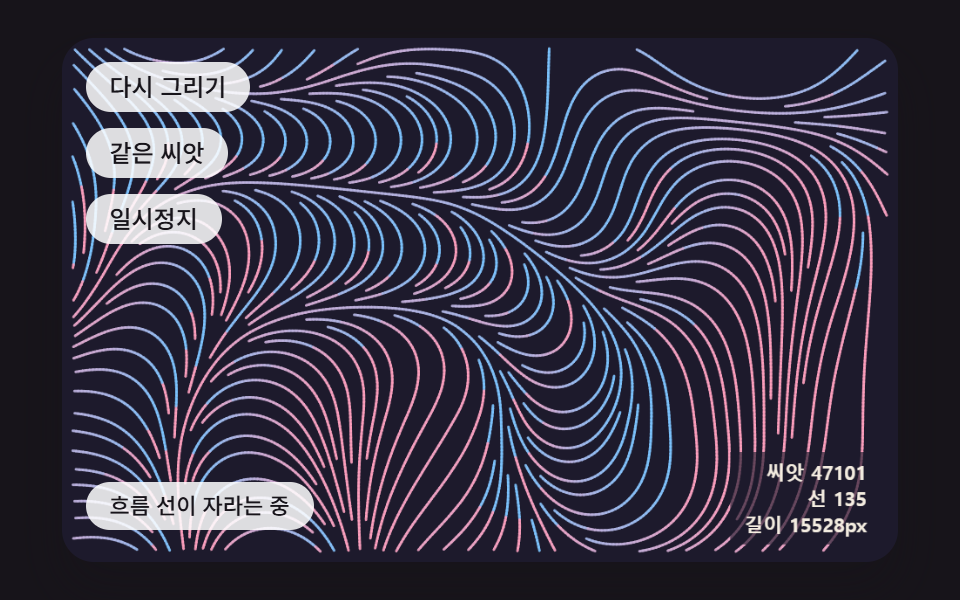 Creative UIGenerative Art JavaScript: 9 Patterns That Grow
 Creative UIAurora Background CSS: 9 Living Night-Sky Scenes
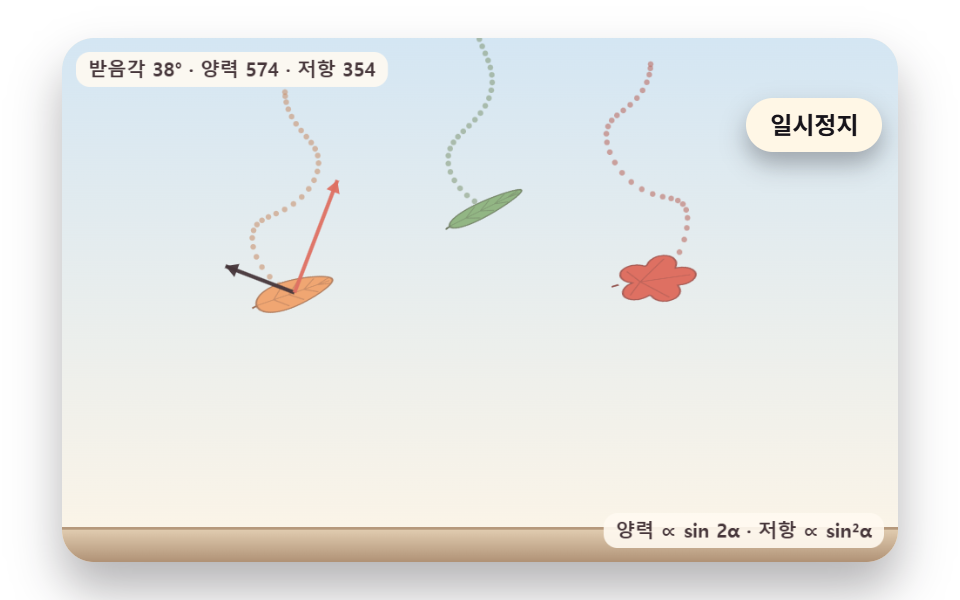 Creative UIFalling Leaves Animation: 9 Scenes, Sway to Pile
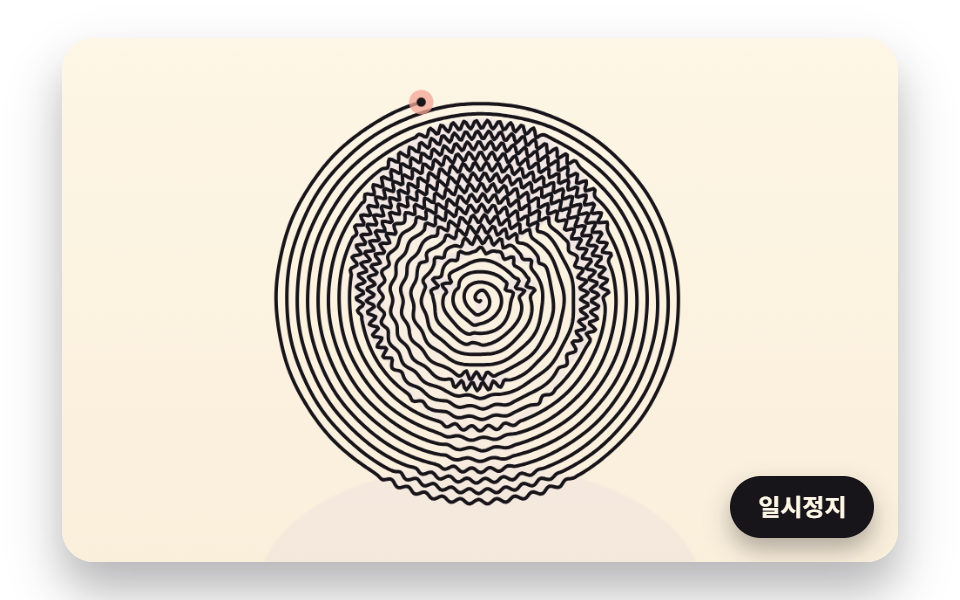 Creative UIOne Line Drawing Generator: 9 Canvas Scenes