CSS Shadow Effects: 9 Demos That Compute the Cast
With css shadow effects from one box-shadow line, the shadow stays put as the light circles, light leaks behind walls and two lights leave one shadow — scenes
See All Nine Shadow Scenes Running on This Page
 01 shcast-point-light-planar-projection
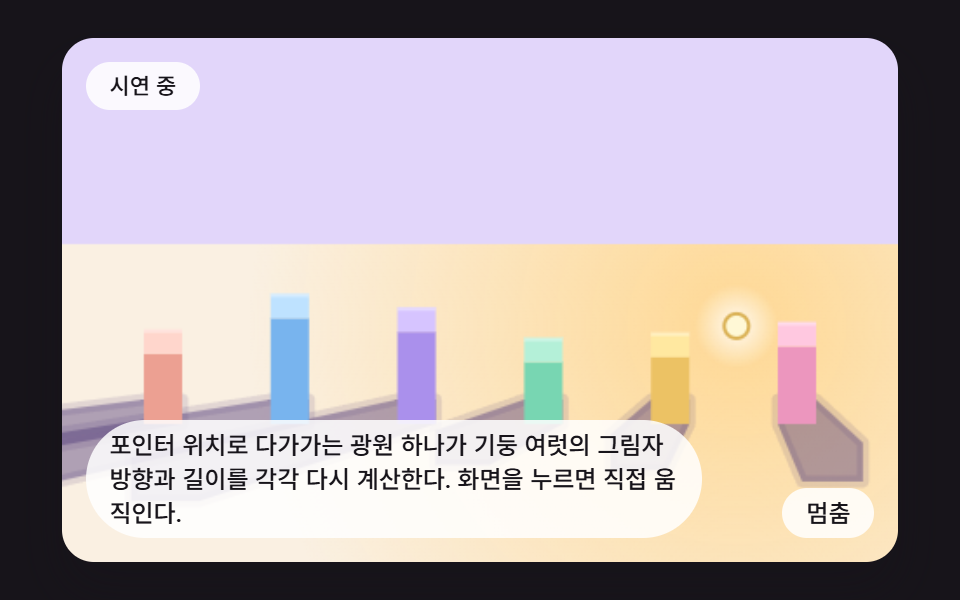 02 shcast-pointer-light-pillar-row
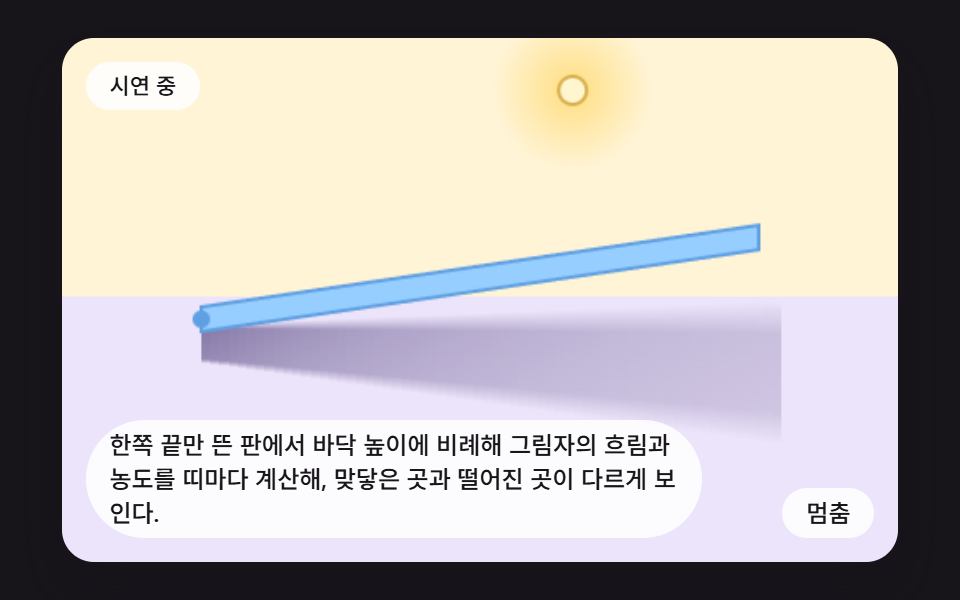 03 shcast-height-penumbra-blur
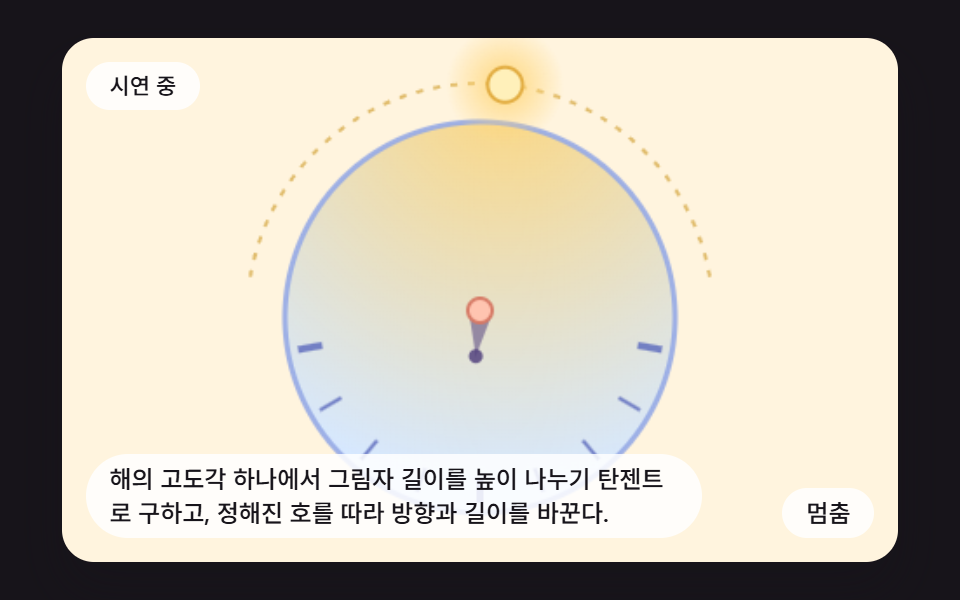 04 shcast-sun-arc-sundial
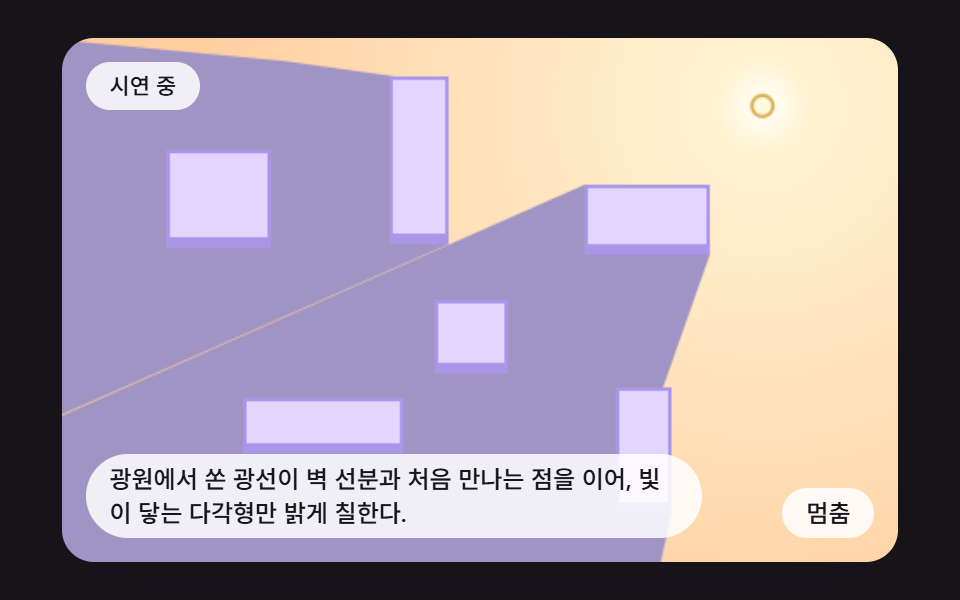 05 shcast-wall-visibility-polygon
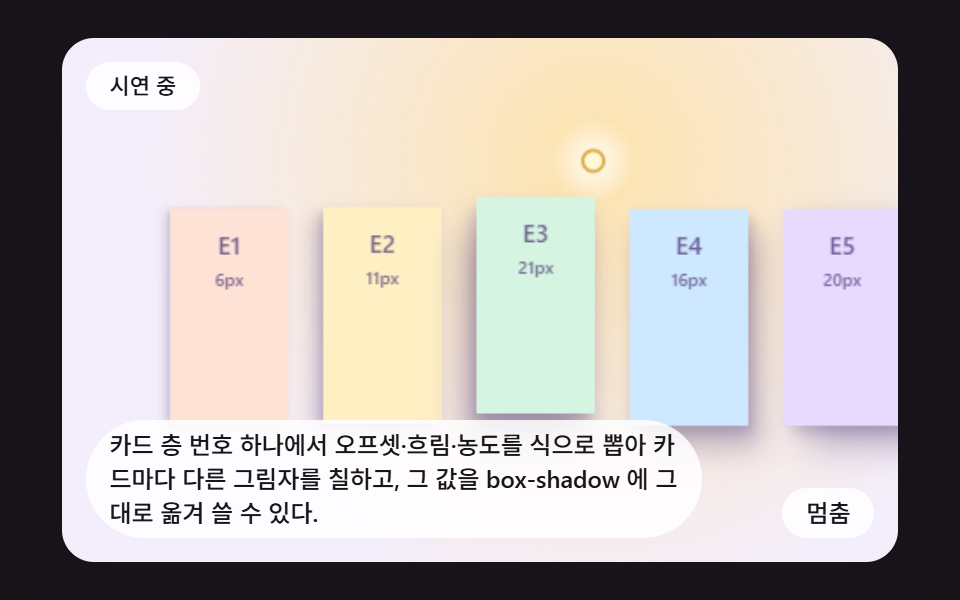 06 shcast-elevation-token-card-stack
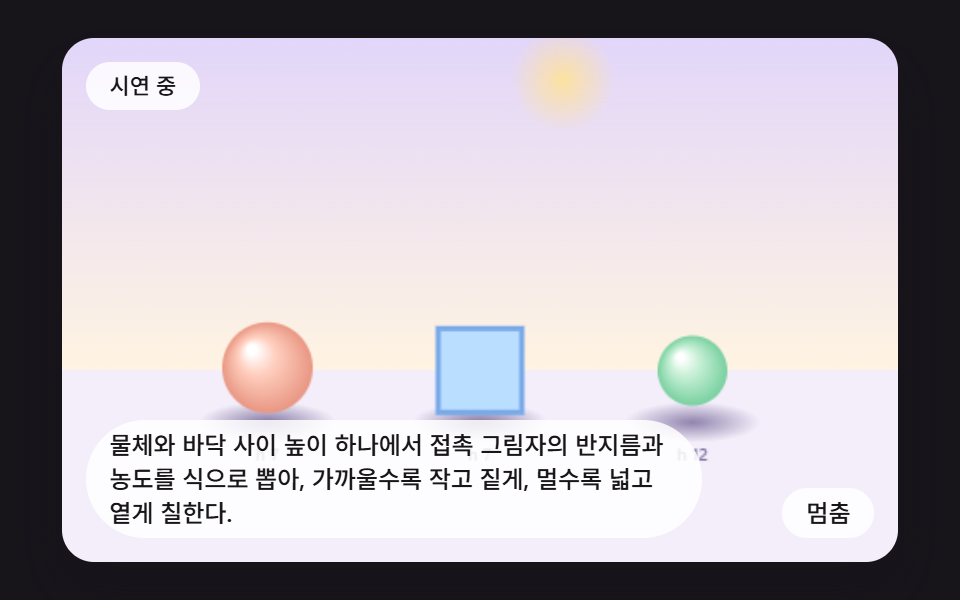 07 shcast-contact-occlusion-darken
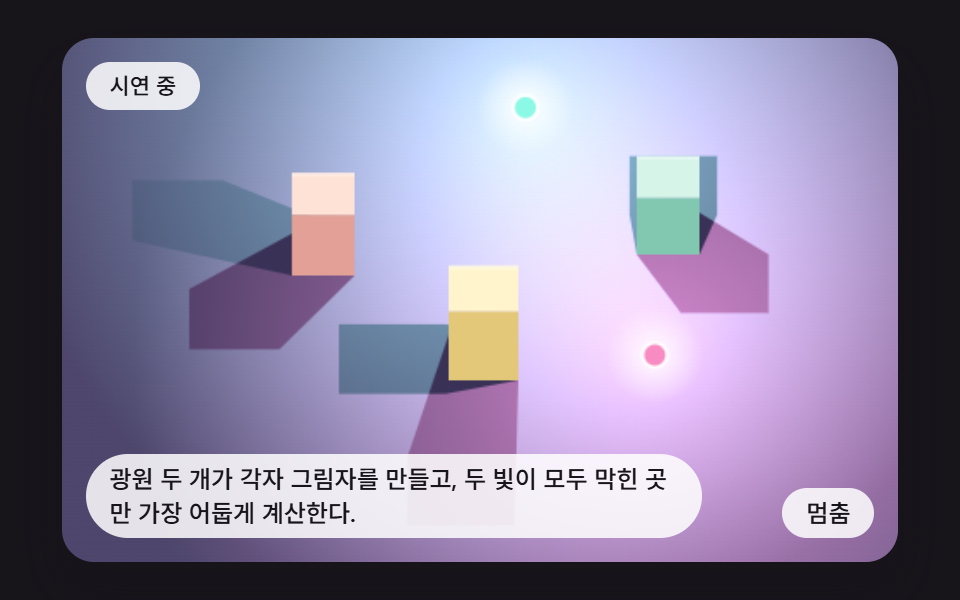 08 shcast-two-colored-lights-overlap
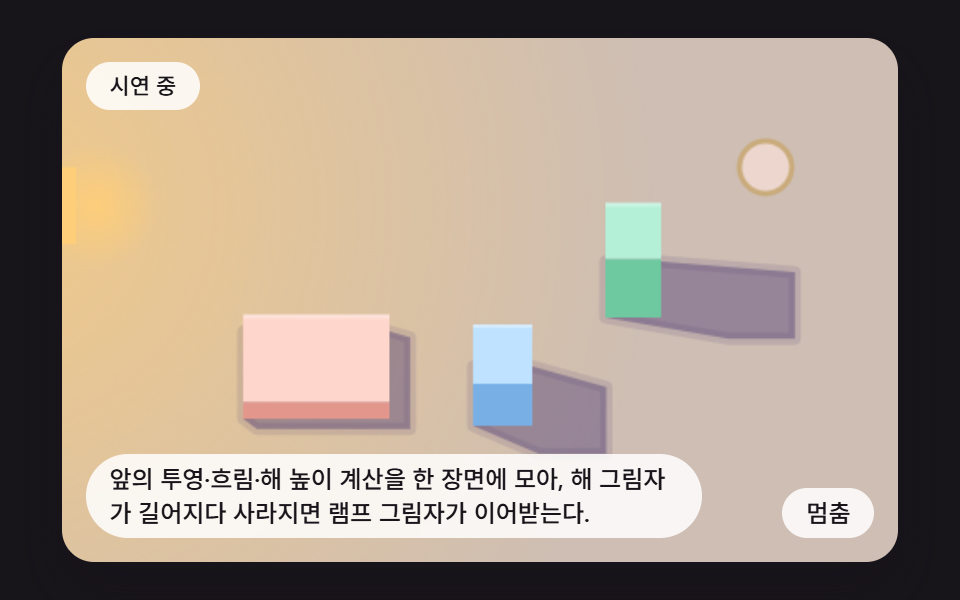 09 shcast-desk-lamp-dusk-hero-scene
Auto-plays · click a tile to jump to its section · all nine in one zip
- 01 Shadow Projected onto the Floor as the Light Circles
- 02 A Row of Pillars Lit by the Pointer
- 03 A Shadow That Blurs With Height
- 04 A Sundial Under a Virtual Sun on an Arc
- 05 The Area the Light Reaches Around Walls
- 06 Card Shadow Values Computed From the Elevation Level
- 07 A Contact Shadow That Darkens as the Object Settles
- 08 The Double Shadow of Two Colored Lights
- 09 A Desk Hero Where the Sun Sets and a Lamp Turns On
CSS Shadow Effects: 9 Demos Where the Cast Is Computed From the Light
Every scene draws on one 480 by 300 canvas (W and H), and the only input is a single light target. Until you press the canvas, a built-in path steers that light along a loop of about four seconds. After the press, the pointer takes over, and hovering alone changes nothing. The arrow keys nudge the target 12 pixels at a time. The scene eases toward the target by LIGHT_LERP and recomputes every shadow from scratch on each 16 ms step (FIXED_DT).
Most box shadow effects you copy from a gallery hide a fixed answer. An offset such as 8px 12px 20px was decided once, so the shadow keeps pointing the same way while the light goes around it. Here the offset is never typed. It is derived from where the light sits and how high it hangs.
The backbone is one line. For a light at (lx, ly) with height lh and a point of the object at (x, y) with height h, the floor shadow lands at the light plus (point minus light) times lh divided by (lh minus h). A higher point shrinks the denominator and is pushed farther from the light, and the denominator is clamped to at least 8 so it never reaches zero. Scenes 01, 02, 08 and 09 apply it to the four top corners of a box and wrap the results in a convex hull, while 03, 04, 06 and 07 turn the same idea into formulas that read blur, length or opacity off a height. Scene 05 skips projection and blocks light with rays.
If you want depth built on lettering rather than on boxes, CSS Text Shadow Effects — 9 Patterns covers stacked layers on type. This page stays on the shape of the shadow itself. The same input always paints the same picture, and no Date, fetch, storage, WebGL or library appears in any of the nine files.
Code for Each Shadow Technique
Each snippet is a run of consecutive lines cut from one scene's index.html, and the full files open from the zip. The scenes differ in makeScene, while main, which owns input, time and the button, is the same skeleton in all nine.
01Shadow Projected onto the Floor as the Light Circles
castPoint takes a light height of 220 and a box height of 70, gets the factor 220 / (220 − 70) = 1.47 and pushes the four top corners away from the light onto the floor, and boxShadow then joins the four base points and the four pushed points into one hull and fills it. As the light runs its elliptical orbit (ORBIT_RADIUS 110), the shadow stays on the far side and swings along with it. Measured at 63.4% accumulated area, 40.4 average intensity and 23/23 moved frames.
<main class="stage">
<div class="sc is-demo" id="scRoot">
  <canvas class="sc__canvas" id="scCanvas" width="480" height="300" tabindex="0" aria-label="Each corner of a box is projected onto the floor from the light position and its height, so the shadow swings to the opposite side as the light circles."></canvas>
  <p class="sc__status" id="scStatus" aria-live="polite">Demo running</p>
  <button class="sc__btn" id="scBtn" type="button">Pause</button>
  <p class="sc__caption">Each corner of a box is projected onto the floor from the light position and its height, so the shadow swings to the opposite side as the light circles.</p>
</div>
</main>
@use "../../../../site/static/demo-tokens" as *;
@include stage($stage-ink);
.sc {
position: relative;
width: min(92vw, calc(160vh - 12.8vw));
aspect-ratio: 480 / 300;
margin: 0 auto;
border-radius: $r-card;
overflow: hidden;
box-shadow: $shadow-raised;
background: $subject-ink;
}
.sc__canvas {
display: block;
width: 100%;
height: 100%;
touch-action: none;
}
.sc__canvas:focus-visible {
outline: 2px solid rgba(255, 255, 255, .85);
outline-offset: -6px;
}
.sc__status {
position: absolute;
left: $sp-3;
top: $sp-3;
max-width: 62%;
margin: 0;
padding: $sp-1 $sp-3;
border-radius: $r-pill;
background: rgba(255, 255, 255, .85);
color: $subject-ink;
font-weight: 500;
font-size: 11px;
line-height: 1.4;
pointer-events: none;
}
.sc__btn {
position: absolute;
right: $sp-3;
bottom: $sp-3;
margin: 0;
padding: $sp-1 $sp-3;
border: 0;
border-radius: $r-pill;
background: rgba(255, 255, 255, .85);
color: $subject-ink;
font: inherit;
font-weight: 500;
font-size: 12px;
line-height: 1.4;
cursor: pointer;
}
.sc__btn:focus-visible {
outline: 2px solid #ffffff;
outline-offset: 2px;
}
.sc__caption {
position: absolute;
left: $sp-3;
bottom: $sp-3;
max-width: 68%;
margin: 0;
padding: $sp-1 $sp-3;
border-radius: $r-pill;
background: rgba(255, 255, 255, .85);
color: $subject-ink;
font-weight: 500;
font-size: 12px;
line-height: 1.4;
pointer-events: none;
}
@media (max-width: 340px) {
.sc__caption, .sc__btn { font-size: 10px; padding: $sp-1 $sp-2; }
.sc__status { font-size: 10px; }
}
@media (prefers-reduced-motion: reduce) {
.sc { cursor: default; }
}html, body {
margin: 0;
overflow: hidden;
}
.stage {
box-sizing: border-box;
min-height: 100vh;
display: grid;
place-items: center;
margin: 0;
background: #17141a;
font-family: -apple-system, "Segoe UI", "Noto Sans KR", sans-serif;
padding: clamp(8px, 4vw, 24px);
}
.sc {
position: relative;
width: min(92vw, 160vh - 12.8vw);
aspect-ratio: 480/300;
margin: 0 auto;
border-radius: 16px;
overflow: hidden;
box-shadow: 0 14px 24px rgba(23, 20, 26, 0.32);
background: #17141a;
}
.sc__canvas {
display: block;
width: 100%;
height: 100%;
touch-action: none;
}
.sc__canvas:focus-visible {
outline: 2px solid rgba(255, 255, 255, 0.85);
outline-offset: -6px;
}
.sc__status {
position: absolute;
left: 12px;
top: 12px;
max-width: 62%;
margin: 0;
padding: 4px 12px;
border-radius: 999px;
background: rgba(255, 255, 255, 0.85);
color: #17141a;
font-weight: 500;
font-size: 11px;
line-height: 1.4;
pointer-events: none;
}
.sc__btn {
position: absolute;
right: 12px;
bottom: 12px;
margin: 0;
padding: 4px 12px;
border: 0;
border-radius: 999px;
background: rgba(255, 255, 255, 0.85);
color: #17141a;
font: inherit;
font-weight: 500;
font-size: 12px;
line-height: 1.4;
cursor: pointer;
}
.sc__btn:focus-visible {
outline: 2px solid #ffffff;
outline-offset: 2px;
}
.sc__caption {
position: absolute;
left: 12px;
bottom: 12px;
max-width: 68%;
margin: 0;
padding: 4px 12px;
border-radius: 999px;
background: rgba(255, 255, 255, 0.85);
color: #17141a;
font-weight: 500;
font-size: 12px;
line-height: 1.4;
pointer-events: none;
}
@media (max-width: 340px) {
.sc__caption, .sc__btn {
font-size: 10px;
padding: 4px 8px;
}
.sc__status {
font-size: 10px;
}
}
@media (prefers-reduced-motion: reduce) {
.sc {
cursor: default;
}
}(function () {
const W = 480;
const H = 300;
const PI2 = Math.PI * 2;
const FIXED_DT = 16;
const REDUCE_STEP_MS = 900;
const REDUCE_START_MS = 1000;
const PERIOD_MS = 4000;
const KEY_STEP = 12;
const FONT = '-apple-system, "Segoe UI", "Noto Sans KR", sans-serif';
function clamp(v, lo, hi) { return v < lo ? lo : (v > hi ? hi : v); }
function lerp(a, b, k) { return a + (b - a) * k; }
function smooth(x) { const c = clamp(x, 0, 1); return c * c * (3 - 2 * c); }
function rgba(c, a) {
return 'rgba(' + Math.round(c[0]) + ',' + Math.round(c[1]) + ',' + Math.round(c[2]) + ',' + a.toFixed(3) + ')';
}
// 시드 고정 난수 — 같은 시드면 언제나 같은 수열
function mulberry32(seed) {
let s = seed >>> 0;
return function () {
s = (s + 0x6D2B79F5) >>> 0;
let t = s;
t = Math.imul(t ^ (t >>> 15), t | 1);
t ^= t + Math.imul(t ^ (t >>> 7), t | 61);
return ((t ^ (t >>> 14)) >>> 0) / 4294967296;
};
}
function glow(ctx, x, y, r, c, a) {
const g = ctx.createRadialGradient(x, y, 0, x, y, r);
g.addColorStop(0, rgba(c, a));
g.addColorStop(1, rgba(c, 0));
ctx.fillStyle = g;
ctx.fillRect(x - r, y - r, r * 2, r * 2);
}
function polyPath(ctx, poly) {
ctx.beginPath();
for (let i = 0; i < poly.length; i += 1) {
if (i === 0) {
ctx.moveTo(poly[i][0], poly[i][1]);
}
else {
ctx.lineTo(poly[i][0], poly[i][1]);
}
}
ctx.closePath();
}
// 광원 (lx, ly, lh) 에서 점 (x, y, h) 를 바닥 높이 0 으로 내리는 투영 — 닮음비 lh / (lh - h)
    function castPoint(lx, ly, lh, x, y, h) {
        const k = lh / Math.max(lh - h, 8);
        return [lx + (x - lx) * k, ly + (y - ly) * k];
    }
// 볼록 껍질 (단조 체인) — 바닥 꼭짓점과 투영된 윗 꼭짓점을 한 덩어리 그림자로 묶는다
function hull(src) {
const p = src.slice().sort(function (a, b) { return a[0] - b[0] || a[1] - b[1]; });
function cross(o, a, b) { return (a[0] - o[0]) * (b[1] - o[1]) - (a[1] - o[1]) * (b[0] - o[0]); }
const lo = [];
for (let i = 0; i < p.length; i += 1) {
while (lo.length >= 2 && cross(lo[lo.length - 2], lo[lo.length - 1], p[i]) <= 0) {
lo.pop();
}
lo.push(p[i]);
}
const up = [];
for (let i = p.length - 1; i >= 0; i -= 1) {
while (up.length >= 2 && cross(up[up.length - 2], up[up.length - 1], p[i]) <= 0) {
up.pop();
}
up.push(p[i]);
}
lo.pop();
up.pop();
return lo.concat(up);
}
// 직육면체 한 개의 그림자 다각형 — 바닥 네 꼭짓점과 높이 h 위 네 꼭짓점을 광원에서 투영한다
    function boxShadow(lx, ly, lh, x0, y0, x1, y1, h) {
        const base = [[x0, y0], [x1, y0], [x1, y1], [x0, y1]];
        const pts = base.slice();
        for (let i = 0; i < base.length; i += 1) {
            pts.push(castPoint(lx, ly, lh, base[i][0], base[i][1], h));
        }
        return hull(pts);
    }
function fillShadow(ctx, poly, ink, alpha) {
polyPath(ctx, poly);
ctx.fillStyle = rgba(ink, alpha);
ctx.fill();
ctx.lineJoin = 'round';
ctx.lineWidth = 7;
ctx.strokeStyle = rgba(ink, alpha * 0.32);
ctx.stroke();
}
// 비스듬히 본 직육면체 — 윗면은 높이의 0.6 만큼 위로 밀고 앞면을 아래에 붙인다
function drawBlock(ctx, x0, y0, x1, y1, h, top, front) {
const vis = h * 0.6;
ctx.fillStyle = rgba(front, 1);
ctx.fillRect(x0, y1 - vis, x1 - x0, vis);
ctx.fillStyle = rgba(top, 1);
ctx.fillRect(x0, y0 - vis, x1 - x0, y1 - y0);
ctx.fillStyle = 'rgba(255,255,255,0.35)';
ctx.fillRect(x0, y0 - vis, x1 - x0, 2);
}
const LIGHT_HEIGHT = 220;
const ORBIT_RADIUS = 110;
const LIGHT_LERP = 0.2;
const BOX_HEIGHT = 70;
const BOX_RECT = [212, 140, 268, 178];
const CENTER_X = 240;
const CENTER_Y = 150;
const FLOOR_RGB = [243, 238, 250];
const SHADOW_RGB = [74, 56, 120];
const WARM_RGB = [255, 226, 150];
const LILAC_TOP = [196, 172, 255];
const LILAC_FRONT = [150, 120, 232];
function makeScene(ctx) {
let lx = CENTER_X + ORBIT_RADIUS;
let ly = CENTER_Y;
const scene = {
            path: function (t) {
                const a = PI2 * t / PERIOD_MS;
                return [CENTER_X + ORBIT_RADIUS * Math.cos(a), CENTER_Y + ORBIT_RADIUS * 0.72 * Math.sin(a)];
            },
            pos: function () { return [lx, ly]; },
            update: function (tx, ty) {
                lx = lerp(lx, tx, LIGHT_LERP);
                ly = lerp(ly, ty, LIGHT_LERP);
            },
snap: function (tx, ty) { lx = tx; ly = ty; },
draw: function () {
ctx.fillStyle = rgba(FLOOR_RGB, 1);
ctx.fillRect(0, 0, W, H);
glow(ctx, lx, ly, 300, WARM_RGB, 0.95);
const poly = boxShadow(lx, ly, LIGHT_HEIGHT, BOX_RECT[0], BOX_RECT[1], BOX_RECT[2], BOX_RECT[3], BOX_HEIGHT);
fillShadow(ctx, poly, SHADOW_RGB, 0.46);
drawBlock(ctx, BOX_RECT[0], BOX_RECT[1], BOX_RECT[2], BOX_RECT[3], BOX_HEIGHT, LILAC_TOP, LILAC_FRONT);
glow(ctx, lx, ly, 26, [255, 255, 255], 0.9);
ctx.beginPath();
ctx.arc(lx, ly, 7, 0, PI2);
ctx.fillStyle = 'rgba(255,248,214,1)';
ctx.fill();
ctx.lineWidth = 2;
ctx.strokeStyle = 'rgba(214,170,70,0.9)';
ctx.stroke();
}
};
return scene;
}
function main(rootEl, canvas, statusEl, btnEl) {
const ctx0 = canvas.getContext('2d');
if (!ctx0) {
return function () { return; };
}
canvas.width = W;
canvas.height = H;
const scene = makeScene(ctx0);
const reduce = window.matchMedia('(prefers-reduced-motion: reduce)').matches;
if (reduce) {
rootEl.classList.remove('is-demo');
}
let paused = false;
let autoplay = !reduce;
let elapsed = reduce ? REDUCE_START_MS : 0;
let rafId = 0;
let lastTs = null;
let accMs = 0;
let tgt = scene.path(elapsed);
const cleaners = [];
function listen(target, type, fn) {
target.addEventListener(type, fn);
cleaners.push(function () { target.removeEventListener(type, fn); });
}
function setMode() {
if (reduce) {
statusEl.textContent = 'Stepping one scene at a time';
btnEl.textContent = 'Next scene';
return;
}
statusEl.textContent = !autoplay ? 'Manual control' : (paused ? 'Paused' : 'Demo running');
btnEl.textContent = (autoplay && !paused) ? 'Pause' : 'Play';
}
function toLocal(e) {
const r = canvas.getBoundingClientRect();
return [clamp((e.clientX - r.left) * W / r.width, 0, W), clamp((e.clientY - r.top) * H / r.height, 0, H)];
}
function takeOver() {
if (reduce || !autoplay) {
return;
}
autoplay = false;
paused = false;
rootEl.classList.remove('is-demo');
const p = scene.pos();
tgt = [p[0], p[1]];
setMode();
}
function afterInput() {
if (reduce) {
scene.snap(tgt[0], tgt[1]);
scene.draw(elapsed);
}
}
function onButton() {
if (reduce) {
elapsed += REDUCE_STEP_MS;
tgt = scene.path(elapsed);
scene.snap(tgt[0], tgt[1]);
scene.draw(elapsed);
return;
}
if (autoplay && !paused) {
paused = true;
}
else {
paused = false;
autoplay = true;
rootEl.classList.add('is-demo');
}
setMode();
}
function tick(ts) {
if (lastTs === null) {
lastTs = ts;
}
const frameDt = Math.min(ts - lastTs, 160);
lastTs = ts;
if (!paused) {
accMs += frameDt;
while (accMs >= FIXED_DT) {
elapsed += FIXED_DT;
accMs -= FIXED_DT;
if (autoplay) {
tgt = scene.path(elapsed);
}
scene.update(tgt[0], tgt[1]);
}
scene.draw(elapsed);
}
rafId = requestAnimationFrame(tick);
}
listen(btnEl, 'click', function () { onButton(); });
listen(canvas, 'pointerdown', function (e) {
takeOver();
tgt = toLocal(e);
afterInput();
});
listen(canvas, 'pointermove', function (e) {
if (autoplay && !reduce) {
return;
}
tgt = toLocal(e);
afterInput();
});
listen(canvas, 'keydown', function (e) {
const k = e.key;
if (k === 'Enter' || k === ' ') {
e.preventDefault();
onButton();
return;
}
let dx = 0;
let dy = 0;
if (k === 'ArrowLeft') {
dx = -KEY_STEP;
}
else if (k === 'ArrowRight') {
dx = KEY_STEP;
}
else if (k === 'ArrowUp') {
dy = -KEY_STEP;
}
else if (k === 'ArrowDown') {
dy = KEY_STEP;
}
else {
return;
}
e.preventDefault();
takeOver();
tgt = [clamp(tgt[0] + dx, 0, W), clamp(tgt[1] + dy, 0, H)];
afterInput();
});
if (reduce) {
scene.snap(tgt[0], tgt[1]);
scene.draw(elapsed);
setMode();
}
else {
scene.draw(elapsed);
setMode();
rafId = requestAnimationFrame(tick);
}
function destroy() {
cancelAnimationFrame(rafId);
for (let i = 0; i < cleaners.length; i += 1) {
cleaners[i]();
}
}
return destroy;
}
main(document.getElementById('scRoot'), document.getElementById('scCanvas'), document.getElementById('scStatus'), document.getElementById('scBtn'));
})();import { useEffect, useRef } from "react";
import styles from "./ShcastPointLightPlanarProjection.module.scss";
const W = 480;
const H = 300;
const PI2 = Math.PI * 2;
const FIXED_DT = 16;
const REDUCE_STEP_MS = 900;
const REDUCE_START_MS = 1000;
const PERIOD_MS = 4000;
const KEY_STEP = 12;
const FONT = '-apple-system, "Segoe UI", "Noto Sans KR", sans-serif';
type Pt = [number, number];
interface Scene {
path(t: number): Pt;
pos(): Pt;
update(tx: number, ty: number): void;
snap(tx: number, ty: number): void;
draw(t: number): void;
}
function clamp(v: number, lo: number, hi: number): number { return v < lo ? lo : (v > hi ? hi : v); }
function lerp(a: number, b: number, k: number): number { return a + (b - a) * k; }
function smooth(x: number): number { const c = clamp(x, 0, 1); return c * c * (3 - 2 * c); }
function rgba(c: number[], a: number): string {
return 'rgba(' + Math.round(c[0]) + ',' + Math.round(c[1]) + ',' + Math.round(c[2]) + ',' + a.toFixed(3) + ')';
}
// 시드 고정 난수 — 같은 시드면 언제나 같은 수열
function mulberry32(seed: number): () => number {
let s = seed >>> 0;
return function (): number {
s = (s + 0x6D2B79F5) >>> 0;
let t = s;
t = Math.imul(t ^ (t >>> 15), t | 1);
t ^= t + Math.imul(t ^ (t >>> 7), t | 61);
return ((t ^ (t >>> 14)) >>> 0) / 4294967296;
};
}
function glow(ctx: CanvasRenderingContext2D, x: number, y: number, r: number, c: number[], a: number): void {
const g = ctx.createRadialGradient(x, y, 0, x, y, r);
g.addColorStop(0, rgba(c, a));
g.addColorStop(1, rgba(c, 0));
ctx.fillStyle = g;
ctx.fillRect(x - r, y - r, r * 2, r * 2);
}
function polyPath(ctx: CanvasRenderingContext2D, poly: Pt[]): void {
ctx.beginPath();
for (let i = 0; i < poly.length; i += 1) {
if (i === 0) { ctx.moveTo(poly[i][0], poly[i][1]); } else { ctx.lineTo(poly[i][0], poly[i][1]); }
}
ctx.closePath();
}
// 광원 (lx, ly, lh) 에서 점 (x, y, h) 를 바닥 높이 0 으로 내리는 투영 — 닮음비 lh / (lh - h)
function castPoint(lx: number, ly: number, lh: number, x: number, y: number, h: number): Pt {
const k = lh / Math.max(lh - h, 8);
return [lx + (x - lx) * k, ly + (y - ly) * k];
}
// 볼록 껍질 (단조 체인) — 바닥 꼭짓점과 투영된 윗 꼭짓점을 한 덩어리 그림자로 묶는다
function hull(src: Pt[]): Pt[] {
const p = src.slice().sort(function (a: Pt, b: Pt): number { return a[0] - b[0] || a[1] - b[1]; });
function cross(o: Pt, a: Pt, b: Pt): number { return (a[0] - o[0]) * (b[1] - o[1]) - (a[1] - o[1]) * (b[0] - o[0]); }
const lo: Pt[] = [];
for (let i = 0; i < p.length; i += 1) {
while (lo.length >= 2 && cross(lo[lo.length - 2], lo[lo.length - 1], p[i]) <= 0) { lo.pop(); }
lo.push(p[i]);
}
const up: Pt[] = [];
for (let i = p.length - 1; i >= 0; i -= 1) {
while (up.length >= 2 && cross(up[up.length - 2], up[up.length - 1], p[i]) <= 0) { up.pop(); }
up.push(p[i]);
}
lo.pop();
up.pop();
return lo.concat(up);
}
// 직육면체 한 개의 그림자 다각형 — 바닥 네 꼭짓점과 높이 h 위 네 꼭짓점을 광원에서 투영한다
function boxShadow(lx: number, ly: number, lh: number, x0: number, y0: number, x1: number, y1: number, h: number): Pt[] {
const base: Pt[] = [[x0, y0], [x1, y0], [x1, y1], [x0, y1]];
const pts: Pt[] = base.slice();
for (let i = 0; i < base.length; i += 1) { pts.push(castPoint(lx, ly, lh, base[i][0], base[i][1], h)); }
return hull(pts);
}
function fillShadow(ctx: CanvasRenderingContext2D, poly: Pt[], ink: number[], alpha: number): void {
polyPath(ctx, poly);
ctx.fillStyle = rgba(ink, alpha);
ctx.fill();
ctx.lineJoin = 'round';
ctx.lineWidth = 7;
ctx.strokeStyle = rgba(ink, alpha * 0.32);
ctx.stroke();
}
// 비스듬히 본 직육면체 — 윗면은 높이의 0.6 만큼 위로 밀고 앞면을 아래에 붙인다
function drawBlock(ctx: CanvasRenderingContext2D, x0: number, y0: number, x1: number, y1: number, h: number, top: number[], front: number[]): void {
const vis = h * 0.6;
ctx.fillStyle = rgba(front, 1);
ctx.fillRect(x0, y1 - vis, x1 - x0, vis);
ctx.fillStyle = rgba(top, 1);
ctx.fillRect(x0, y0 - vis, x1 - x0, y1 - y0);
ctx.fillStyle = 'rgba(255,255,255,0.35)';
ctx.fillRect(x0, y0 - vis, x1 - x0, 2);
}
const LIGHT_HEIGHT = 220;
const ORBIT_RADIUS = 110;
const LIGHT_LERP = 0.2;
const BOX_HEIGHT = 70;
const BOX_RECT = [212, 140, 268, 178];
const CENTER_X = 240;
const CENTER_Y = 150;
const FLOOR_RGB = [243, 238, 250];
const SHADOW_RGB = [74, 56, 120];
const WARM_RGB = [255, 226, 150];
const LILAC_TOP = [196, 172, 255];
const LILAC_FRONT = [150, 120, 232];
function makeScene(ctx: CanvasRenderingContext2D): Scene {
let lx = CENTER_X + ORBIT_RADIUS;
let ly = CENTER_Y;
const scene: Scene = {
path: function (t: number): Pt {
const a = PI2 * t / PERIOD_MS;
return [CENTER_X + ORBIT_RADIUS * Math.cos(a), CENTER_Y + ORBIT_RADIUS * 0.72 * Math.sin(a)];
},
pos: function (): Pt { return [lx, ly]; },
update: function (tx: number, ty: number): void {
lx = lerp(lx, tx, LIGHT_LERP);
ly = lerp(ly, ty, LIGHT_LERP);
},
snap: function (tx: number, ty: number): void { lx = tx; ly = ty; },
draw: function (): void {
ctx.fillStyle = rgba(FLOOR_RGB, 1);
ctx.fillRect(0, 0, W, H);
glow(ctx, lx, ly, 300, WARM_RGB, 0.95);
const poly = boxShadow(lx, ly, LIGHT_HEIGHT, BOX_RECT[0], BOX_RECT[1], BOX_RECT[2], BOX_RECT[3], BOX_HEIGHT);
fillShadow(ctx, poly, SHADOW_RGB, 0.46);
drawBlock(ctx, BOX_RECT[0], BOX_RECT[1], BOX_RECT[2], BOX_RECT[3], BOX_HEIGHT, LILAC_TOP, LILAC_FRONT);
glow(ctx, lx, ly, 26, [255, 255, 255], 0.9);
ctx.beginPath();
ctx.arc(lx, ly, 7, 0, PI2);
ctx.fillStyle = 'rgba(255,248,214,1)';
ctx.fill();
ctx.lineWidth = 2;
ctx.strokeStyle = 'rgba(214,170,70,0.9)';
ctx.stroke();
}
};
return scene;
}
function main(rootEl: HTMLElement, canvas: HTMLCanvasElement, statusEl: HTMLElement, btnEl: HTMLButtonElement): () => void {
const ctx0 = canvas.getContext('2d');
if (!ctx0) { return function (): void { return; }; }
canvas.width = W;
canvas.height = H;
const scene: Scene = makeScene(ctx0);
const reduce = window.matchMedia('(prefers-reduced-motion: reduce)').matches;
if (reduce) { rootEl.classList.remove('is-demo'); }
let paused = false;
let autoplay = !reduce;
let elapsed = reduce ? REDUCE_START_MS : 0;
let rafId = 0;
let lastTs: number | null = null;
let accMs = 0;
let tgt: Pt = scene.path(elapsed);
const cleaners: Array<() => void> = [];
function listen(target: EventTarget, type: string, fn: (e: Event) => void): void {
target.addEventListener(type, fn);
cleaners.push(function (): void { target.removeEventListener(type, fn); });
}
function setMode(): void {
if (reduce) {
statusEl.textContent = '한 장면씩 넘기는 중';
btnEl.textContent = '다음 장면';
return;
}
statusEl.textContent = !autoplay ? '직접 조작 중' : (paused ? '일시정지됨' : '시연 중');
btnEl.textContent = (autoplay && !paused) ? '멈춤' : '재생';
}
function toLocal(e: PointerEvent): Pt {
const r = canvas.getBoundingClientRect();
return [clamp((e.clientX - r.left) * W / r.width, 0, W), clamp((e.clientY - r.top) * H / r.height, 0, H)];
}
function takeOver(): void {
if (reduce || !autoplay) { return; }
autoplay = false;
paused = false;
rootEl.classList.remove('is-demo');
const p = scene.pos();
tgt = [p[0], p[1]];
setMode();
}
function afterInput(): void {
if (reduce) {
scene.snap(tgt[0], tgt[1]);
scene.draw(elapsed);
}
}
function onButton(): void {
if (reduce) {
elapsed += REDUCE_STEP_MS;
tgt = scene.path(elapsed);
scene.snap(tgt[0], tgt[1]);
scene.draw(elapsed);
return;
}
if (autoplay && !paused) {
paused = true;
} else {
paused = false;
autoplay = true;
rootEl.classList.add('is-demo');
}
setMode();
}
function tick(ts: number): void {
if (lastTs === null) { lastTs = ts; }
const frameDt = Math.min(ts - lastTs, 160);
lastTs = ts;
if (!paused) {
accMs += frameDt;
while (accMs >= FIXED_DT) {
elapsed += FIXED_DT;
accMs -= FIXED_DT;
if (autoplay) { tgt = scene.path(elapsed); }
scene.update(tgt[0], tgt[1]);
}
scene.draw(elapsed);
}
rafId = requestAnimationFrame(tick);
}
listen(btnEl, 'click', function (): void { onButton(); });
listen(canvas, 'pointerdown', function (e: Event): void {
takeOver();
tgt = toLocal(e as PointerEvent);
afterInput();
});
listen(canvas, 'pointermove', function (e: Event): void {
if (autoplay && !reduce) { return; }
tgt = toLocal(e as PointerEvent);
afterInput();
});
listen(canvas, 'keydown', function (e: Event): void {
const k = (e as KeyboardEvent).key;
if (k === 'Enter' || k === ' ') {
e.preventDefault();
onButton();
return;
}
let dx = 0;
let dy = 0;
if (k === 'ArrowLeft') { dx = -KEY_STEP; } else if (k === 'ArrowRight') { dx = KEY_STEP; }
else if (k === 'ArrowUp') { dy = -KEY_STEP; } else if (k === 'ArrowDown') { dy = KEY_STEP; }
else { return; }
e.preventDefault();
takeOver();
tgt = [clamp(tgt[0] + dx, 0, W), clamp(tgt[1] + dy, 0, H)];
afterInput();
});
if (reduce) {
scene.snap(tgt[0], tgt[1]);
scene.draw(elapsed);
setMode();
} else {
scene.draw(elapsed);
setMode();
rafId = requestAnimationFrame(tick);
}
function destroy(): void {
cancelAnimationFrame(rafId);
for (let i = 0; i < cleaners.length; i += 1) { cleaners[i](); }
}
return destroy;
}
export default function ShcastPointLightPlanarProjection() {
const rootRef = useRef<HTMLDivElement | null>(null);
const canvasRef = useRef<HTMLCanvasElement | null>(null);
const statusRef = useRef<HTMLParagraphElement | null>(null);
const btnRef = useRef<HTMLButtonElement | null>(null);
useEffect(() => {
const root = rootRef.current;
const canvas = canvasRef.current;
const statusEl = statusRef.current;
const btnEl = btnRef.current;
if (!root || !canvas || !statusEl || !btnEl) return;
return main(root, canvas, statusEl, btnEl);
}, []);
return (
<main className={styles.stage}>
<div className={`${styles.sc} is-demo`} ref={rootRef}>
<canvas className={styles.sc__canvas} ref={canvasRef} width={480} height={300} tabIndex={0} aria-label="광원의 위치와 물체 높이로 꼭짓점마다 바닥 좌표를 계산해, 광원이 돌면 그림자가 반대쪽으로 돌아간다." />
<p className={styles.sc__status} ref={statusRef} aria-live="polite">시연 중</p>
<button className={styles.sc__btn} ref={btnRef} type="button">멈춤</button>
<p className={styles.sc__caption}>광원의 위치와 물체 높이로 꼭짓점마다 바닥 좌표를 계산해, 광원이 돌면 그림자가 반대쪽으로 돌아간다.</p>
</div>
</main>
);
}01 · Shadow Projected onto the Floor as the Light Circles — Measured area 63.387% · moving frames 23/23Original by GODRICH · SCSS and React ship in the zip · See the password
function castPoint(lx, ly, lh, x, y, h) {
const k = lh / Math.max(lh - h, 8);
return [lx + (x - lx) * k, ly + (y - ly) * k];
}
function boxShadow(lx, ly, lh, x0, y0, x1, y1, h) {
const base = [[x0, y0], [x1, y0], [x1, y1], [x0, y1]];
const pts = base.slice();
for (let i = 0; i < base.length; i += 1) {
pts.push(castPoint(lx, ly, lh, base[i][0], base[i][1], h));
}
return hull(pts);
}
path: function (t) {
const a = PI2 * t / PERIOD_MS;
return [CENTER_X + ORBIT_RADIUS * Math.cos(a), CENTER_Y + ORBIT_RADIUS * 0.72 * Math.sin(a)];
},
pos: function () { return [lx, ly]; },
update: function (tx, ty) {
lx = lerp(lx, tx, LIGHT_LERP);
ly = lerp(ly, ty, LIGHT_LERP);
},
02A Row of Pillars Lit by the Pointer
One light follows the target at a LIGHT_LERP of 0.12, and six pillars of heights 67, 101, 88, 59, 64 and 74 (fixed by the seed 444) each get their own projection. The demo path drives the light until you press, and from then on the pointer does. Measured at 35.0% accumulated area, 44.0 average intensity and 23/23 moved frames.
<main class="stage">
<div class="sc is-demo" id="scRoot">
  <canvas class="sc__canvas" id="scCanvas" width="480" height="300" tabindex="0" aria-label="One light that eases toward the pointer recomputes the direction and length of every pillar shadow separately. Press the canvas to take control."></canvas>
  <p class="sc__status" id="scStatus" aria-live="polite">Demo running</p>
  <button class="sc__btn" id="scBtn" type="button">Pause</button>
  <p class="sc__caption">One light that eases toward the pointer recomputes the direction and length of every pillar shadow separately. Press the canvas to take control.</p>
</div>
</main>
@use "../../../../site/static/demo-tokens" as *;
@include stage($stage-ink);
.sc {
position: relative;
width: min(92vw, calc(160vh - 12.8vw));
aspect-ratio: 480 / 300;
margin: 0 auto;
border-radius: $r-card;
overflow: hidden;
box-shadow: $shadow-raised;
background: $subject-ink;
}
.sc__canvas {
display: block;
width: 100%;
height: 100%;
touch-action: none;
}
.sc__canvas:focus-visible {
outline: 2px solid rgba(255, 255, 255, .85);
outline-offset: -6px;
}
.sc__status {
position: absolute;
left: $sp-3;
top: $sp-3;
max-width: 62%;
margin: 0;
padding: $sp-1 $sp-3;
border-radius: $r-pill;
background: rgba(255, 255, 255, .85);
color: $subject-ink;
font-weight: 500;
font-size: 11px;
line-height: 1.4;
pointer-events: none;
}
.sc__btn {
position: absolute;
right: $sp-3;
bottom: $sp-3;
margin: 0;
padding: $sp-1 $sp-3;
border: 0;
border-radius: $r-pill;
background: rgba(255, 255, 255, .85);
color: $subject-ink;
font: inherit;
font-weight: 500;
font-size: 12px;
line-height: 1.4;
cursor: pointer;
}
.sc__btn:focus-visible {
outline: 2px solid #ffffff;
outline-offset: 2px;
}
.sc__caption {
position: absolute;
left: $sp-3;
bottom: $sp-3;
max-width: 68%;
margin: 0;
padding: $sp-1 $sp-3;
border-radius: $r-pill;
background: rgba(255, 255, 255, .85);
color: $subject-ink;
font-weight: 500;
font-size: 12px;
line-height: 1.4;
pointer-events: none;
}
@media (max-width: 340px) {
.sc__caption, .sc__btn { font-size: 10px; padding: $sp-1 $sp-2; }
.sc__status { font-size: 10px; }
}
@media (prefers-reduced-motion: reduce) {
.sc { cursor: default; }
}html, body {
margin: 0;
overflow: hidden;
}
.stage {
box-sizing: border-box;
min-height: 100vh;
display: grid;
place-items: center;
margin: 0;
background: #17141a;
font-family: -apple-system, "Segoe UI", "Noto Sans KR", sans-serif;
padding: clamp(8px, 4vw, 24px);
}
.sc {
position: relative;
width: min(92vw, 160vh - 12.8vw);
aspect-ratio: 480/300;
margin: 0 auto;
border-radius: 16px;
overflow: hidden;
box-shadow: 0 14px 24px rgba(23, 20, 26, 0.32);
background: #17141a;
}
.sc__canvas {
display: block;
width: 100%;
height: 100%;
touch-action: none;
}
.sc__canvas:focus-visible {
outline: 2px solid rgba(255, 255, 255, 0.85);
outline-offset: -6px;
}
.sc__status {
position: absolute;
left: 12px;
top: 12px;
max-width: 62%;
margin: 0;
padding: 4px 12px;
border-radius: 999px;
background: rgba(255, 255, 255, 0.85);
color: #17141a;
font-weight: 500;
font-size: 11px;
line-height: 1.4;
pointer-events: none;
}
.sc__btn {
position: absolute;
right: 12px;
bottom: 12px;
margin: 0;
padding: 4px 12px;
border: 0;
border-radius: 999px;
background: rgba(255, 255, 255, 0.85);
color: #17141a;
font: inherit;
font-weight: 500;
font-size: 12px;
line-height: 1.4;
cursor: pointer;
}
.sc__btn:focus-visible {
outline: 2px solid #ffffff;
outline-offset: 2px;
}
.sc__caption {
position: absolute;
left: 12px;
bottom: 12px;
max-width: 68%;
margin: 0;
padding: 4px 12px;
border-radius: 999px;
background: rgba(255, 255, 255, 0.85);
color: #17141a;
font-weight: 500;
font-size: 12px;
line-height: 1.4;
pointer-events: none;
}
@media (max-width: 340px) {
.sc__caption, .sc__btn {
font-size: 10px;
padding: 4px 8px;
}
.sc__status {
font-size: 10px;
}
}
@media (prefers-reduced-motion: reduce) {
.sc {
cursor: default;
}
}(function () {
const W = 480;
const H = 300;
const PI2 = Math.PI * 2;
const FIXED_DT = 16;
const REDUCE_STEP_MS = 900;
const REDUCE_START_MS = 1000;
const PERIOD_MS = 4000;
const KEY_STEP = 12;
const FONT = '-apple-system, "Segoe UI", "Noto Sans KR", sans-serif';
function clamp(v, lo, hi) { return v < lo ? lo : (v > hi ? hi : v); }
function lerp(a, b, k) { return a + (b - a) * k; }
function smooth(x) { const c = clamp(x, 0, 1); return c * c * (3 - 2 * c); }
function rgba(c, a) {
return 'rgba(' + Math.round(c[0]) + ',' + Math.round(c[1]) + ',' + Math.round(c[2]) + ',' + a.toFixed(3) + ')';
}
// 시드 고정 난수 — 같은 시드면 언제나 같은 수열
function mulberry32(seed) {
let s = seed >>> 0;
return function () {
s = (s + 0x6D2B79F5) >>> 0;
let t = s;
t = Math.imul(t ^ (t >>> 15), t | 1);
t ^= t + Math.imul(t ^ (t >>> 7), t | 61);
return ((t ^ (t >>> 14)) >>> 0) / 4294967296;
};
}
function glow(ctx, x, y, r, c, a) {
const g = ctx.createRadialGradient(x, y, 0, x, y, r);
g.addColorStop(0, rgba(c, a));
g.addColorStop(1, rgba(c, 0));
ctx.fillStyle = g;
ctx.fillRect(x - r, y - r, r * 2, r * 2);
}
function polyPath(ctx, poly) {
ctx.beginPath();
for (let i = 0; i < poly.length; i += 1) {
if (i === 0) {
ctx.moveTo(poly[i][0], poly[i][1]);
}
else {
ctx.lineTo(poly[i][0], poly[i][1]);
}
}
ctx.closePath();
}
// 광원 (lx, ly, lh) 에서 점 (x, y, h) 를 바닥 높이 0 으로 내리는 투영 — 닮음비 lh / (lh - h)
function castPoint(lx, ly, lh, x, y, h) {
const k = lh / Math.max(lh - h, 8);
return [lx + (x - lx) * k, ly + (y - ly) * k];
}
// 볼록 껍질 (단조 체인) — 바닥 꼭짓점과 투영된 윗 꼭짓점을 한 덩어리 그림자로 묶는다
function hull(src) {
const p = src.slice().sort(function (a, b) { return a[0] - b[0] || a[1] - b[1]; });
function cross(o, a, b) { return (a[0] - o[0]) * (b[1] - o[1]) - (a[1] - o[1]) * (b[0] - o[0]); }
const lo = [];
for (let i = 0; i < p.length; i += 1) {
while (lo.length >= 2 && cross(lo[lo.length - 2], lo[lo.length - 1], p[i]) <= 0) {
lo.pop();
}
lo.push(p[i]);
}
const up = [];
for (let i = p.length - 1; i >= 0; i -= 1) {
while (up.length >= 2 && cross(up[up.length - 2], up[up.length - 1], p[i]) <= 0) {
up.pop();
}
up.push(p[i]);
}
lo.pop();
up.pop();
return lo.concat(up);
}
// 직육면체 한 개의 그림자 다각형 — 바닥 네 꼭짓점과 높이 h 위 네 꼭짓점을 광원에서 투영한다
function boxShadow(lx, ly, lh, x0, y0, x1, y1, h) {
const base = [[x0, y0], [x1, y0], [x1, y1], [x0, y1]];
const pts = base.slice();
for (let i = 0; i < base.length; i += 1) {
pts.push(castPoint(lx, ly, lh, base[i][0], base[i][1], h));
}
return hull(pts);
}
function fillShadow(ctx, poly, ink, alpha) {
polyPath(ctx, poly);
ctx.fillStyle = rgba(ink, alpha);
ctx.fill();
ctx.lineJoin = 'round';
ctx.lineWidth = 7;
ctx.strokeStyle = rgba(ink, alpha * 0.32);
ctx.stroke();
}
// 비스듬히 본 직육면체 — 윗면은 높이의 0.6 만큼 위로 밀고 앞면을 아래에 붙인다
function drawBlock(ctx, x0, y0, x1, y1, h, top, front) {
const vis = h * 0.6;
ctx.fillStyle = rgba(front, 1);
ctx.fillRect(x0, y1 - vis, x1 - x0, vis);
ctx.fillStyle = rgba(top, 1);
ctx.fillRect(x0, y0 - vis, x1 - x0, y1 - y0);
ctx.fillStyle = 'rgba(255,255,255,0.35)';
ctx.fillRect(x0, y0 - vis, x1 - x0, 2);
}
const LIGHT_LERP = 0.12;
const LIGHT_HEIGHT = 200;
const PILLAR_COUNT = 6;
const PILLAR_WIDTH = 22;
const PILLAR_DEPTH = 14;
const FLOOR_TOP = 118;
const BASE_Y = 214;
const SEED = 444;
const WALL_RGB = [226, 214, 250];
const FLOOR_RGB = [250, 240, 226];
const SHADOW_RGB = [80, 58, 120];
const WARM_RGB = [255, 214, 140];
const PILLAR_TOPS = [[255, 214, 204], [190, 226, 255], [214, 196, 255], [180, 240, 216], [255, 232, 160], [255, 200, 224]];
const PILLAR_FRONTS = [[236, 160, 146], [120, 180, 238], [170, 144, 236], [120, 214, 178], [236, 194, 100], [236, 150, 190]];
    function makeScene(ctx) {
        let lx = 240;
        let ly = 200;
        const rnd = mulberry32(SEED);
        const heights = [];
        for (let i = 0; i < PILLAR_COUNT; i += 1) {
            heights.push(58 + Math.floor(rnd() * 44));
        }
        function pillarX(i) { return 58 + i * (364 / (PILLAR_COUNT - 1)); }
const scene = {
path: function (t) {
const a = PI2 * t / PERIOD_MS;
return [240 + 190 * Math.sin(a), 212 + 70 * Math.sin(2 * a + 1)];
},
pos: function () { return [lx, ly]; },
update: function (tx, ty) {
lx = lerp(lx, tx, LIGHT_LERP);
ly = lerp(ly, ty, LIGHT_LERP);
},
snap: function (tx, ty) { lx = tx; ly = ty; },
draw: function () {
const fy = clamp(ly, FLOOR_TOP + 24, H - 12);
ctx.fillStyle = rgba(WALL_RGB, 1);
ctx.fillRect(0, 0, W, FLOOR_TOP);
ctx.fillStyle = rgba(FLOOR_RGB, 1);
ctx.fillRect(0, FLOOR_TOP, W, H - FLOOR_TOP);
ctx.save();
ctx.beginPath();
ctx.rect(0, FLOOR_TOP, W, H - FLOOR_TOP);
ctx.clip();
glow(ctx, lx, fy, 280, WARM_RGB, 0.9);
                for (let i = 0; i < PILLAR_COUNT; i += 1) {
                    const x = pillarX(i);
                    const poly = boxShadow(lx, fy, LIGHT_HEIGHT, x - PILLAR_WIDTH / 2, BASE_Y - PILLAR_DEPTH / 2, x + PILLAR_WIDTH / 2, BASE_Y + PILLAR_DEPTH / 2, heights[i]);
                    fillShadow(ctx, poly, SHADOW_RGB, 0.44);
                }
ctx.restore();
for (let i = 0; i < PILLAR_COUNT; i += 1) {
const x = pillarX(i);
drawBlock(ctx, x - PILLAR_WIDTH / 2, BASE_Y - PILLAR_DEPTH / 2, x + PILLAR_WIDTH / 2, BASE_Y + PILLAR_DEPTH / 2, heights[i], PILLAR_TOPS[i], PILLAR_FRONTS[i]);
}
glow(ctx, lx, fy, 24, [255, 255, 255], 0.9);
ctx.beginPath();
ctx.arc(lx, fy, 7, 0, PI2);
ctx.fillStyle = 'rgba(255,248,214,1)';
ctx.fill();
ctx.lineWidth = 2;
ctx.strokeStyle = 'rgba(214,170,70,0.9)';
ctx.stroke();
}
};
return scene;
}
function main(rootEl, canvas, statusEl, btnEl) {
const ctx0 = canvas.getContext('2d');
if (!ctx0) {
return function () { return; };
}
canvas.width = W;
canvas.height = H;
const scene = makeScene(ctx0);
const reduce = window.matchMedia('(prefers-reduced-motion: reduce)').matches;
if (reduce) {
rootEl.classList.remove('is-demo');
}
let paused = false;
let autoplay = !reduce;
let elapsed = reduce ? REDUCE_START_MS : 0;
let rafId = 0;
let lastTs = null;
let accMs = 0;
let tgt = scene.path(elapsed);
const cleaners = [];
function listen(target, type, fn) {
target.addEventListener(type, fn);
cleaners.push(function () { target.removeEventListener(type, fn); });
}
function setMode() {
if (reduce) {
statusEl.textContent = 'Stepping one scene at a time';
btnEl.textContent = 'Next scene';
return;
}
statusEl.textContent = !autoplay ? 'Manual control' : (paused ? 'Paused' : 'Demo running');
btnEl.textContent = (autoplay && !paused) ? 'Pause' : 'Play';
}
function toLocal(e) {
const r = canvas.getBoundingClientRect();
return [clamp((e.clientX - r.left) * W / r.width, 0, W), clamp((e.clientY - r.top) * H / r.height, 0, H)];
}
function takeOver() {
if (reduce || !autoplay) {
return;
}
autoplay = false;
paused = false;
rootEl.classList.remove('is-demo');
const p = scene.pos();
tgt = [p[0], p[1]];
setMode();
}
function afterInput() {
if (reduce) {
scene.snap(tgt[0], tgt[1]);
scene.draw(elapsed);
}
}
function onButton() {
if (reduce) {
elapsed += REDUCE_STEP_MS;
tgt = scene.path(elapsed);
scene.snap(tgt[0], tgt[1]);
scene.draw(elapsed);
return;
}
if (autoplay && !paused) {
paused = true;
}
else {
paused = false;
autoplay = true;
rootEl.classList.add('is-demo');
}
setMode();
}
function tick(ts) {
if (lastTs === null) {
lastTs = ts;
}
const frameDt = Math.min(ts - lastTs, 160);
lastTs = ts;
if (!paused) {
accMs += frameDt;
while (accMs >= FIXED_DT) {
elapsed += FIXED_DT;
accMs -= FIXED_DT;
if (autoplay) {
tgt = scene.path(elapsed);
}
scene.update(tgt[0], tgt[1]);
}
scene.draw(elapsed);
}
rafId = requestAnimationFrame(tick);
}
listen(btnEl, 'click', function () { onButton(); });
listen(canvas, 'pointerdown', function (e) {
takeOver();
tgt = toLocal(e);
afterInput();
});
listen(canvas, 'pointermove', function (e) {
if (autoplay && !reduce) {
return;
}
tgt = toLocal(e);
afterInput();
});
listen(canvas, 'keydown', function (e) {
const k = e.key;
if (k === 'Enter' || k === ' ') {
e.preventDefault();
onButton();
return;
}
let dx = 0;
let dy = 0;
if (k === 'ArrowLeft') {
dx = -KEY_STEP;
}
else if (k === 'ArrowRight') {
dx = KEY_STEP;
}
else if (k === 'ArrowUp') {
dy = -KEY_STEP;
}
else if (k === 'ArrowDown') {
dy = KEY_STEP;
}
else {
return;
}
e.preventDefault();
takeOver();
tgt = [clamp(tgt[0] + dx, 0, W), clamp(tgt[1] + dy, 0, H)];
afterInput();
});
if (reduce) {
scene.snap(tgt[0], tgt[1]);
scene.draw(elapsed);
setMode();
}
else {
scene.draw(elapsed);
setMode();
rafId = requestAnimationFrame(tick);
}
function destroy() {
cancelAnimationFrame(rafId);
for (let i = 0; i < cleaners.length; i += 1) {
cleaners[i]();
}
}
return destroy;
}
main(document.getElementById('scRoot'), document.getElementById('scCanvas'), document.getElementById('scStatus'), document.getElementById('scBtn'));
})();import { useEffect, useRef } from "react";
import styles from "./ShcastPointerLightPillarRow.module.scss";
const W = 480;
const H = 300;
const PI2 = Math.PI * 2;
const FIXED_DT = 16;
const REDUCE_STEP_MS = 900;
const REDUCE_START_MS = 1000;
const PERIOD_MS = 4000;
const KEY_STEP = 12;
const FONT = '-apple-system, "Segoe UI", "Noto Sans KR", sans-serif';
type Pt = [number, number];
interface Scene {
path(t: number): Pt;
pos(): Pt;
update(tx: number, ty: number): void;
snap(tx: number, ty: number): void;
draw(t: number): void;
}
function clamp(v: number, lo: number, hi: number): number { return v < lo ? lo : (v > hi ? hi : v); }
function lerp(a: number, b: number, k: number): number { return a + (b - a) * k; }
function smooth(x: number): number { const c = clamp(x, 0, 1); return c * c * (3 - 2 * c); }
function rgba(c: number[], a: number): string {
return 'rgba(' + Math.round(c[0]) + ',' + Math.round(c[1]) + ',' + Math.round(c[2]) + ',' + a.toFixed(3) + ')';
}
// 시드 고정 난수 — 같은 시드면 언제나 같은 수열
function mulberry32(seed: number): () => number {
let s = seed >>> 0;
return function (): number {
s = (s + 0x6D2B79F5) >>> 0;
let t = s;
t = Math.imul(t ^ (t >>> 15), t | 1);
t ^= t + Math.imul(t ^ (t >>> 7), t | 61);
return ((t ^ (t >>> 14)) >>> 0) / 4294967296;
};
}
function glow(ctx: CanvasRenderingContext2D, x: number, y: number, r: number, c: number[], a: number): void {
const g = ctx.createRadialGradient(x, y, 0, x, y, r);
g.addColorStop(0, rgba(c, a));
g.addColorStop(1, rgba(c, 0));
ctx.fillStyle = g;
ctx.fillRect(x - r, y - r, r * 2, r * 2);
}
function polyPath(ctx: CanvasRenderingContext2D, poly: Pt[]): void {
ctx.beginPath();
for (let i = 0; i < poly.length; i += 1) {
if (i === 0) { ctx.moveTo(poly[i][0], poly[i][1]); } else { ctx.lineTo(poly[i][0], poly[i][1]); }
}
ctx.closePath();
}
// 광원 (lx, ly, lh) 에서 점 (x, y, h) 를 바닥 높이 0 으로 내리는 투영 — 닮음비 lh / (lh - h)
function castPoint(lx: number, ly: number, lh: number, x: number, y: number, h: number): Pt {
const k = lh / Math.max(lh - h, 8);
return [lx + (x - lx) * k, ly + (y - ly) * k];
}
// 볼록 껍질 (단조 체인) — 바닥 꼭짓점과 투영된 윗 꼭짓점을 한 덩어리 그림자로 묶는다
function hull(src: Pt[]): Pt[] {
const p = src.slice().sort(function (a: Pt, b: Pt): number { return a[0] - b[0] || a[1] - b[1]; });
function cross(o: Pt, a: Pt, b: Pt): number { return (a[0] - o[0]) * (b[1] - o[1]) - (a[1] - o[1]) * (b[0] - o[0]); }
const lo: Pt[] = [];
for (let i = 0; i < p.length; i += 1) {
while (lo.length >= 2 && cross(lo[lo.length - 2], lo[lo.length - 1], p[i]) <= 0) { lo.pop(); }
lo.push(p[i]);
}
const up: Pt[] = [];
for (let i = p.length - 1; i >= 0; i -= 1) {
while (up.length >= 2 && cross(up[up.length - 2], up[up.length - 1], p[i]) <= 0) { up.pop(); }
up.push(p[i]);
}
lo.pop();
up.pop();
return lo.concat(up);
}
// 직육면체 한 개의 그림자 다각형 — 바닥 네 꼭짓점과 높이 h 위 네 꼭짓점을 광원에서 투영한다
function boxShadow(lx: number, ly: number, lh: number, x0: number, y0: number, x1: number, y1: number, h: number): Pt[] {
const base: Pt[] = [[x0, y0], [x1, y0], [x1, y1], [x0, y1]];
const pts: Pt[] = base.slice();
for (let i = 0; i < base.length; i += 1) { pts.push(castPoint(lx, ly, lh, base[i][0], base[i][1], h)); }
return hull(pts);
}
function fillShadow(ctx: CanvasRenderingContext2D, poly: Pt[], ink: number[], alpha: number): void {
polyPath(ctx, poly);
ctx.fillStyle = rgba(ink, alpha);
ctx.fill();
ctx.lineJoin = 'round';
ctx.lineWidth = 7;
ctx.strokeStyle = rgba(ink, alpha * 0.32);
ctx.stroke();
}
// 비스듬히 본 직육면체 — 윗면은 높이의 0.6 만큼 위로 밀고 앞면을 아래에 붙인다
function drawBlock(ctx: CanvasRenderingContext2D, x0: number, y0: number, x1: number, y1: number, h: number, top: number[], front: number[]): void {
const vis = h * 0.6;
ctx.fillStyle = rgba(front, 1);
ctx.fillRect(x0, y1 - vis, x1 - x0, vis);
ctx.fillStyle = rgba(top, 1);
ctx.fillRect(x0, y0 - vis, x1 - x0, y1 - y0);
ctx.fillStyle = 'rgba(255,255,255,0.35)';
ctx.fillRect(x0, y0 - vis, x1 - x0, 2);
}
const LIGHT_LERP = 0.12;
const LIGHT_HEIGHT = 200;
const PILLAR_COUNT = 6;
const PILLAR_WIDTH = 22;
const PILLAR_DEPTH = 14;
const FLOOR_TOP = 118;
const BASE_Y = 214;
const SEED = 444;
const WALL_RGB = [226, 214, 250];
const FLOOR_RGB = [250, 240, 226];
const SHADOW_RGB = [80, 58, 120];
const WARM_RGB = [255, 214, 140];
const PILLAR_TOPS = [[255, 214, 204], [190, 226, 255], [214, 196, 255], [180, 240, 216], [255, 232, 160], [255, 200, 224]];
const PILLAR_FRONTS = [[236, 160, 146], [120, 180, 238], [170, 144, 236], [120, 214, 178], [236, 194, 100], [236, 150, 190]];
function makeScene(ctx: CanvasRenderingContext2D): Scene {
let lx = 240;
let ly = 200;
const rnd = mulberry32(SEED);
const heights: number[] = [];
for (let i = 0; i < PILLAR_COUNT; i += 1) { heights.push(58 + Math.floor(rnd() * 44)); }
function pillarX(i: number): number { return 58 + i * (364 / (PILLAR_COUNT - 1)); }
const scene: Scene = {
path: function (t: number): Pt {
const a = PI2 * t / PERIOD_MS;
return [240 + 190 * Math.sin(a), 212 + 70 * Math.sin(2 * a + 1)];
},
pos: function (): Pt { return [lx, ly]; },
update: function (tx: number, ty: number): void {
lx = lerp(lx, tx, LIGHT_LERP);
ly = lerp(ly, ty, LIGHT_LERP);
},
snap: function (tx: number, ty: number): void { lx = tx; ly = ty; },
draw: function (): void {
const fy = clamp(ly, FLOOR_TOP + 24, H - 12);
ctx.fillStyle = rgba(WALL_RGB, 1);
ctx.fillRect(0, 0, W, FLOOR_TOP);
ctx.fillStyle = rgba(FLOOR_RGB, 1);
ctx.fillRect(0, FLOOR_TOP, W, H - FLOOR_TOP);
ctx.save();
ctx.beginPath();
ctx.rect(0, FLOOR_TOP, W, H - FLOOR_TOP);
ctx.clip();
glow(ctx, lx, fy, 280, WARM_RGB, 0.9);
for (let i = 0; i < PILLAR_COUNT; i += 1) {
const x = pillarX(i);
const poly = boxShadow(lx, fy, LIGHT_HEIGHT, x - PILLAR_WIDTH / 2, BASE_Y - PILLAR_DEPTH / 2, x + PILLAR_WIDTH / 2, BASE_Y + PILLAR_DEPTH / 2, heights[i]);
fillShadow(ctx, poly, SHADOW_RGB, 0.44);
}
ctx.restore();
for (let i = 0; i < PILLAR_COUNT; i += 1) {
const x = pillarX(i);
drawBlock(ctx, x - PILLAR_WIDTH / 2, BASE_Y - PILLAR_DEPTH / 2, x + PILLAR_WIDTH / 2, BASE_Y + PILLAR_DEPTH / 2, heights[i], PILLAR_TOPS[i], PILLAR_FRONTS[i]);
}
glow(ctx, lx, fy, 24, [255, 255, 255], 0.9);
ctx.beginPath();
ctx.arc(lx, fy, 7, 0, PI2);
ctx.fillStyle = 'rgba(255,248,214,1)';
ctx.fill();
ctx.lineWidth = 2;
ctx.strokeStyle = 'rgba(214,170,70,0.9)';
ctx.stroke();
}
};
return scene;
}
function main(rootEl: HTMLElement, canvas: HTMLCanvasElement, statusEl: HTMLElement, btnEl: HTMLButtonElement): () => void {
const ctx0 = canvas.getContext('2d');
if (!ctx0) { return function (): void { return; }; }
canvas.width = W;
canvas.height = H;
const scene: Scene = makeScene(ctx0);
const reduce = window.matchMedia('(prefers-reduced-motion: reduce)').matches;
if (reduce) { rootEl.classList.remove('is-demo'); }
let paused = false;
let autoplay = !reduce;
let elapsed = reduce ? REDUCE_START_MS : 0;
let rafId = 0;
let lastTs: number | null = null;
let accMs = 0;
let tgt: Pt = scene.path(elapsed);
const cleaners: Array<() => void> = [];
function listen(target: EventTarget, type: string, fn: (e: Event) => void): void {
target.addEventListener(type, fn);
cleaners.push(function (): void { target.removeEventListener(type, fn); });
}
function setMode(): void {
if (reduce) {
statusEl.textContent = '한 장면씩 넘기는 중';
btnEl.textContent = '다음 장면';
return;
}
statusEl.textContent = !autoplay ? '직접 조작 중' : (paused ? '일시정지됨' : '시연 중');
btnEl.textContent = (autoplay && !paused) ? '멈춤' : '재생';
}
function toLocal(e: PointerEvent): Pt {
const r = canvas.getBoundingClientRect();
return [clamp((e.clientX - r.left) * W / r.width, 0, W), clamp((e.clientY - r.top) * H / r.height, 0, H)];
}
function takeOver(): void {
if (reduce || !autoplay) { return; }
autoplay = false;
paused = false;
rootEl.classList.remove('is-demo');
const p = scene.pos();
tgt = [p[0], p[1]];
setMode();
}
function afterInput(): void {
if (reduce) {
scene.snap(tgt[0], tgt[1]);
scene.draw(elapsed);
}
}
function onButton(): void {
if (reduce) {
elapsed += REDUCE_STEP_MS;
tgt = scene.path(elapsed);
scene.snap(tgt[0], tgt[1]);
scene.draw(elapsed);
return;
}
if (autoplay && !paused) {
paused = true;
} else {
paused = false;
autoplay = true;
rootEl.classList.add('is-demo');
}
setMode();
}
function tick(ts: number): void {
if (lastTs === null) { lastTs = ts; }
const frameDt = Math.min(ts - lastTs, 160);
lastTs = ts;
if (!paused) {
accMs += frameDt;
while (accMs >= FIXED_DT) {
elapsed += FIXED_DT;
accMs -= FIXED_DT;
if (autoplay) { tgt = scene.path(elapsed); }
scene.update(tgt[0], tgt[1]);
}
scene.draw(elapsed);
}
rafId = requestAnimationFrame(tick);
}
listen(btnEl, 'click', function (): void { onButton(); });
listen(canvas, 'pointerdown', function (e: Event): void {
takeOver();
tgt = toLocal(e as PointerEvent);
afterInput();
});
listen(canvas, 'pointermove', function (e: Event): void {
if (autoplay && !reduce) { return; }
tgt = toLocal(e as PointerEvent);
afterInput();
});
listen(canvas, 'keydown', function (e: Event): void {
const k = (e as KeyboardEvent).key;
if (k === 'Enter' || k === ' ') {
e.preventDefault();
onButton();
return;
}
let dx = 0;
let dy = 0;
if (k === 'ArrowLeft') { dx = -KEY_STEP; } else if (k === 'ArrowRight') { dx = KEY_STEP; }
else if (k === 'ArrowUp') { dy = -KEY_STEP; } else if (k === 'ArrowDown') { dy = KEY_STEP; }
else { return; }
e.preventDefault();
takeOver();
tgt = [clamp(tgt[0] + dx, 0, W), clamp(tgt[1] + dy, 0, H)];
afterInput();
});
if (reduce) {
scene.snap(tgt[0], tgt[1]);
scene.draw(elapsed);
setMode();
} else {
scene.draw(elapsed);
setMode();
rafId = requestAnimationFrame(tick);
}
function destroy(): void {
cancelAnimationFrame(rafId);
for (let i = 0; i < cleaners.length; i += 1) { cleaners[i](); }
}
return destroy;
}
export default function ShcastPointerLightPillarRow() {
const rootRef = useRef<HTMLDivElement | null>(null);
const canvasRef = useRef<HTMLCanvasElement | null>(null);
const statusRef = useRef<HTMLParagraphElement | null>(null);
const btnRef = useRef<HTMLButtonElement | null>(null);
useEffect(() => {
const root = rootRef.current;
const canvas = canvasRef.current;
const statusEl = statusRef.current;
const btnEl = btnRef.current;
if (!root || !canvas || !statusEl || !btnEl) return;
return main(root, canvas, statusEl, btnEl);
}, []);
return (
<main className={styles.stage}>
<div className={`${styles.sc} is-demo`} ref={rootRef}>
<canvas className={styles.sc__canvas} ref={canvasRef} width={480} height={300} tabIndex={0} aria-label="포인터 위치로 다가가는 광원 하나가 기둥 여럿의 그림자 방향과 길이를 각각 다시 계산한다. 화면을 누르면 직접 움직인다." />
<p className={styles.sc__status} ref={statusRef} aria-live="polite">시연 중</p>
<button className={styles.sc__btn} ref={btnRef} type="button">멈춤</button>
<p className={styles.sc__caption}>포인터 위치로 다가가는 광원 하나가 기둥 여럿의 그림자 방향과 길이를 각각 다시 계산한다. 화면을 누르면 직접 움직인다.</p>
</div>
</main>
);
}02 · A Row of Pillars Lit by the Pointer — Measured area 34.99% · moving frames 23/23Original by GODRICH · SCSS and React ship in the zip · See the password
function makeScene(ctx) {
let lx = 240;
let ly = 200;
const rnd = mulberry32(SEED);
const heights = [];
for (let i = 0; i < PILLAR_COUNT; i += 1) {
heights.push(58 + Math.floor(rnd() * 44));
}
function pillarX(i) { return 58 + i * (364 / (PILLAR_COUNT - 1)); }
for (let i = 0; i < PILLAR_COUNT; i += 1) {
const x = pillarX(i);
const poly = boxShadow(lx, fy, LIGHT_HEIGHT, x - PILLAR_WIDTH / 2, BASE_Y - PILLAR_DEPTH / 2, x + PILLAR_WIDTH / 2, BASE_Y + PILLAR_DEPTH / 2, heights[i]);
fillShadow(ctx, poly, SHADOW_RGB, 0.44);
}
03A Shadow That Blurs With Height
The plank is cut into 64 strips that each read their own height above the floor, with blur at 2 plus height times BLUR_PER_HEIGHT, opacity at CONTACT_ALPHA divided by (1 + height × 0.03), and every strip filled with a vertical gradient. The strip touching the floor (height 0.86) gets 2.17 px and 0.604, the raised end (height 109.14) gets 23.83 px and 0.145, so sharpness changes inside a single board. Measured at 32.8% accumulated area, 44.9 average intensity and 23/23 moved frames.
<main class="stage">
<div class="sc is-demo" id="scRoot">
  <canvas class="sc__canvas" id="scCanvas" width="480" height="300" tabindex="0" aria-label="On a plank with only one end lifted, blur and opacity are computed strip by strip from the height above the floor, so the touching end and the raised end read differently."></canvas>
  <p class="sc__status" id="scStatus" aria-live="polite">Demo running</p>
  <button class="sc__btn" id="scBtn" type="button">Pause</button>
  <p class="sc__caption">On a plank with only one end lifted, blur and opacity are computed strip by strip from the height above the floor, so the touching end and the raised end read differently.</p>
</div>
</main>
@use "../../../../site/static/demo-tokens" as *;
@include stage($stage-ink);
.sc {
position: relative;
width: min(92vw, calc(160vh - 12.8vw));
aspect-ratio: 480 / 300;
margin: 0 auto;
border-radius: $r-card;
overflow: hidden;
box-shadow: $shadow-raised;
background: $subject-ink;
}
.sc__canvas {
display: block;
width: 100%;
height: 100%;
touch-action: none;
}
.sc__canvas:focus-visible {
outline: 2px solid rgba(255, 255, 255, .85);
outline-offset: -6px;
}
.sc__status {
position: absolute;
left: $sp-3;
top: $sp-3;
max-width: 62%;
margin: 0;
padding: $sp-1 $sp-3;
border-radius: $r-pill;
background: rgba(255, 255, 255, .85);
color: $subject-ink;
font-weight: 500;
font-size: 11px;
line-height: 1.4;
pointer-events: none;
}
.sc__btn {
position: absolute;
right: $sp-3;
bottom: $sp-3;
margin: 0;
padding: $sp-1 $sp-3;
border: 0;
border-radius: $r-pill;
background: rgba(255, 255, 255, .85);
color: $subject-ink;
font: inherit;
font-weight: 500;
font-size: 12px;
line-height: 1.4;
cursor: pointer;
}
.sc__btn:focus-visible {
outline: 2px solid #ffffff;
outline-offset: 2px;
}
.sc__caption {
position: absolute;
left: $sp-3;
bottom: $sp-3;
max-width: 68%;
margin: 0;
padding: $sp-1 $sp-3;
border-radius: $r-pill;
background: rgba(255, 255, 255, .85);
color: $subject-ink;
font-weight: 500;
font-size: 12px;
line-height: 1.4;
pointer-events: none;
}
@media (max-width: 340px) {
.sc__caption, .sc__btn { font-size: 10px; padding: $sp-1 $sp-2; }
.sc__status { font-size: 10px; }
}
@media (prefers-reduced-motion: reduce) {
.sc { cursor: default; }
}html, body {
margin: 0;
overflow: hidden;
}
.stage {
box-sizing: border-box;
min-height: 100vh;
display: grid;
place-items: center;
margin: 0;
background: #17141a;
font-family: -apple-system, "Segoe UI", "Noto Sans KR", sans-serif;
padding: clamp(8px, 4vw, 24px);
}
.sc {
position: relative;
width: min(92vw, 160vh - 12.8vw);
aspect-ratio: 480/300;
margin: 0 auto;
border-radius: 16px;
overflow: hidden;
box-shadow: 0 14px 24px rgba(23, 20, 26, 0.32);
background: #17141a;
}
.sc__canvas {
display: block;
width: 100%;
height: 100%;
touch-action: none;
}
.sc__canvas:focus-visible {
outline: 2px solid rgba(255, 255, 255, 0.85);
outline-offset: -6px;
}
.sc__status {
position: absolute;
left: 12px;
top: 12px;
max-width: 62%;
margin: 0;
padding: 4px 12px;
border-radius: 999px;
background: rgba(255, 255, 255, 0.85);
color: #17141a;
font-weight: 500;
font-size: 11px;
line-height: 1.4;
pointer-events: none;
}
.sc__btn {
position: absolute;
right: 12px;
bottom: 12px;
margin: 0;
padding: 4px 12px;
border: 0;
border-radius: 999px;
background: rgba(255, 255, 255, 0.85);
color: #17141a;
font: inherit;
font-weight: 500;
font-size: 12px;
line-height: 1.4;
cursor: pointer;
}
.sc__btn:focus-visible {
outline: 2px solid #ffffff;
outline-offset: 2px;
}
.sc__caption {
position: absolute;
left: 12px;
bottom: 12px;
max-width: 68%;
margin: 0;
padding: 4px 12px;
border-radius: 999px;
background: rgba(255, 255, 255, 0.85);
color: #17141a;
font-weight: 500;
font-size: 12px;
line-height: 1.4;
pointer-events: none;
}
@media (max-width: 340px) {
.sc__caption, .sc__btn {
font-size: 10px;
padding: 4px 8px;
}
.sc__status {
font-size: 10px;
}
}
@media (prefers-reduced-motion: reduce) {
.sc {
cursor: default;
}
}(function () {
const W = 480;
const H = 300;
const PI2 = Math.PI * 2;
const FIXED_DT = 16;
const REDUCE_STEP_MS = 900;
const REDUCE_START_MS = 1000;
const PERIOD_MS = 4000;
const KEY_STEP = 12;
const FONT = '-apple-system, "Segoe UI", "Noto Sans KR", sans-serif';
function clamp(v, lo, hi) { return v < lo ? lo : (v > hi ? hi : v); }
function lerp(a, b, k) { return a + (b - a) * k; }
function smooth(x) { const c = clamp(x, 0, 1); return c * c * (3 - 2 * c); }
function rgba(c, a) {
return 'rgba(' + Math.round(c[0]) + ',' + Math.round(c[1]) + ',' + Math.round(c[2]) + ',' + a.toFixed(3) + ')';
}
// 시드 고정 난수 — 같은 시드면 언제나 같은 수열
function mulberry32(seed) {
let s = seed >>> 0;
return function () {
s = (s + 0x6D2B79F5) >>> 0;
let t = s;
t = Math.imul(t ^ (t >>> 15), t | 1);
t ^= t + Math.imul(t ^ (t >>> 7), t | 61);
return ((t ^ (t >>> 14)) >>> 0) / 4294967296;
};
}
function glow(ctx, x, y, r, c, a) {
const g = ctx.createRadialGradient(x, y, 0, x, y, r);
g.addColorStop(0, rgba(c, a));
g.addColorStop(1, rgba(c, 0));
ctx.fillStyle = g;
ctx.fillRect(x - r, y - r, r * 2, r * 2);
}
function polyPath(ctx, poly) {
ctx.beginPath();
for (let i = 0; i < poly.length; i += 1) {
if (i === 0) {
ctx.moveTo(poly[i][0], poly[i][1]);
}
else {
ctx.lineTo(poly[i][0], poly[i][1]);
}
}
ctx.closePath();
}
const BLUR_PER_HEIGHT = 0.2;
const CONTACT_ALPHA = 0.62;
const LIFT_MAX = 110;
const LIGHT_LERP = 0.16;
const PLANK_LEFT = 80;
const PLANK_LEN = 320;
const PLANK_THICK = 14;
const STRIPS = 64;
const BASE_Y = 168;
const WALL_RGB = [255, 244, 214];
const FLOOR_RGB = [236, 228, 250];
const SHADOW_RGB = [70, 54, 116];
const PLANK_TOP = [150, 206, 255];
const PLANK_EDGE = [96, 160, 226];
function makeScene(ctx) {
let px = 240;
let py = 160;
function lift() { return LIFT_MAX * clamp((py - 30) / 240, 0, 1); }
// 가로 위치 u (0 은 닿은 쪽, 1 은 뜬 쪽) 에서 판의 높이
function heightAt(u, total) { return total * u; }
const scene = {
path: function (t) {
const a = PI2 * t / PERIOD_MS;
return [240 + 170 * Math.sin(a * 2), 150 + 130 * Math.sin(a - 1.2)];
},
pos: function () { return [px, py]; },
update: function (tx, ty) {
px = lerp(px, tx, LIGHT_LERP);
py = lerp(py, ty, LIGHT_LERP);
},
snap: function (tx, ty) { px = tx; py = ty; },
draw: function () {
const total = lift();
const slide = (px - 240) / 240;
ctx.fillStyle = rgba(WALL_RGB, 1);
ctx.fillRect(0, 0, W, BASE_Y - 20);
ctx.fillStyle = rgba(FLOOR_RGB, 1);
ctx.fillRect(0, BASE_Y - 20, W, H - BASE_Y + 20);
// 그림자 띠 — 띠마다 높이로 번짐과 농도를 따로 계산한다
                for (let i = 0; i < STRIPS; i += 1) {
                    const h0 = heightAt(i / STRIPS, total);
                    const h1 = heightAt((i + 1) / STRIPS, total);
                    const hm = (h0 + h1) / 2;
                    const xa = Math.round(PLANK_LEFT + (PLANK_LEN * i) / STRIPS + h0 * slide * 0.9);
                    const xb = Math.round(PLANK_LEFT + (PLANK_LEN * (i + 1)) / STRIPS + h1 * slide * 0.9);
                    const blur = 2 + hm * BLUR_PER_HEIGHT;
                    const alpha = CONTACT_ALPHA / (1 + hm * 0.03);
                    const yTop = BASE_Y - 2;
                    const yBot = BASE_Y + 16 + hm * 0.5;
                    const g = ctx.createLinearGradient(0, yTop - blur, 0, yBot + blur);
                    const span = yBot - yTop + 2 * blur;
                    g.addColorStop(0, rgba(SHADOW_RGB, 0));
                    g.addColorStop(clamp(blur * 1.2 / span, 0, 0.45), rgba(SHADOW_RGB, alpha));
                    g.addColorStop(clamp(1 - blur * 1.2 / span, 0.55, 1), rgba(SHADOW_RGB, alpha * 0.85));
                    g.addColorStop(1, rgba(SHADOW_RGB, 0));
                    ctx.fillStyle = g;
                    ctx.fillRect(xa, yTop - blur, xb - xa, span);
                }
// 판 — 왼쪽 끝은 바닥에 닿고 오른쪽 끝만 들린다
ctx.beginPath();
for (let i = 0; i <= STRIPS; i += 1) {
const hh = heightAt(i / STRIPS, total);
const x = PLANK_LEFT + (PLANK_LEN * i) / STRIPS;
const y = BASE_Y - hh * 0.7 - PLANK_THICK;
if (i === 0) {
ctx.moveTo(x, y);
}
else {
ctx.lineTo(x, y);
}
}
for (let i = STRIPS; i >= 0; i -= 1) {
const hh = heightAt(i / STRIPS, total);
ctx.lineTo(PLANK_LEFT + (PLANK_LEN * i) / STRIPS, BASE_Y - hh * 0.7);
}
ctx.closePath();
ctx.fillStyle = rgba(PLANK_TOP, 1);
ctx.fill();
ctx.lineWidth = 2;
ctx.strokeStyle = rgba(PLANK_EDGE, 1);
ctx.stroke();
ctx.beginPath();
ctx.arc(PLANK_LEFT, BASE_Y - PLANK_THICK / 2, 5, 0, PI2);
ctx.fillStyle = rgba(PLANK_EDGE, 1);
ctx.fill();
// 광원 표시 — 가로 위치가 그림자가 쏠리는 쪽을 정한다
glow(ctx, px, 30, 46, [255, 220, 120], 0.9);
ctx.beginPath();
ctx.arc(px, 30, 8, 0, PI2);
ctx.fillStyle = 'rgba(255,246,208,1)';
ctx.fill();
ctx.lineWidth = 2;
ctx.strokeStyle = 'rgba(214,170,70,0.9)';
ctx.stroke();
}
};
return scene;
}
function main(rootEl, canvas, statusEl, btnEl) {
const ctx0 = canvas.getContext('2d');
if (!ctx0) {
return function () { return; };
}
canvas.width = W;
canvas.height = H;
const scene = makeScene(ctx0);
const reduce = window.matchMedia('(prefers-reduced-motion: reduce)').matches;
if (reduce) {
rootEl.classList.remove('is-demo');
}
let paused = false;
let autoplay = !reduce;
let elapsed = reduce ? REDUCE_START_MS : 0;
let rafId = 0;
let lastTs = null;
let accMs = 0;
let tgt = scene.path(elapsed);
const cleaners = [];
function listen(target, type, fn) {
target.addEventListener(type, fn);
cleaners.push(function () { target.removeEventListener(type, fn); });
}
function setMode() {
if (reduce) {
statusEl.textContent = 'Stepping one scene at a time';
btnEl.textContent = 'Next scene';
return;
}
statusEl.textContent = !autoplay ? 'Manual control' : (paused ? 'Paused' : 'Demo running');
btnEl.textContent = (autoplay && !paused) ? 'Pause' : 'Play';
}
function toLocal(e) {
const r = canvas.getBoundingClientRect();
return [clamp((e.clientX - r.left) * W / r.width, 0, W), clamp((e.clientY - r.top) * H / r.height, 0, H)];
}
function takeOver() {
if (reduce || !autoplay) {
return;
}
autoplay = false;
paused = false;
rootEl.classList.remove('is-demo');
const p = scene.pos();
tgt = [p[0], p[1]];
setMode();
}
function afterInput() {
if (reduce) {
scene.snap(tgt[0], tgt[1]);
scene.draw(elapsed);
}
}
function onButton() {
if (reduce) {
elapsed += REDUCE_STEP_MS;
tgt = scene.path(elapsed);
scene.snap(tgt[0], tgt[1]);
scene.draw(elapsed);
return;
}
if (autoplay && !paused) {
paused = true;
}
else {
paused = false;
autoplay = true;
rootEl.classList.add('is-demo');
}
setMode();
}
function tick(ts) {
if (lastTs === null) {
lastTs = ts;
}
const frameDt = Math.min(ts - lastTs, 160);
lastTs = ts;
if (!paused) {
accMs += frameDt;
while (accMs >= FIXED_DT) {
elapsed += FIXED_DT;
accMs -= FIXED_DT;
if (autoplay) {
tgt = scene.path(elapsed);
}
scene.update(tgt[0], tgt[1]);
}
scene.draw(elapsed);
}
rafId = requestAnimationFrame(tick);
}
listen(btnEl, 'click', function () { onButton(); });
listen(canvas, 'pointerdown', function (e) {
takeOver();
tgt = toLocal(e);
afterInput();
});
listen(canvas, 'pointermove', function (e) {
if (autoplay && !reduce) {
return;
}
tgt = toLocal(e);
afterInput();
});
listen(canvas, 'keydown', function (e) {
const k = e.key;
if (k === 'Enter' || k === ' ') {
e.preventDefault();
onButton();
return;
}
let dx = 0;
let dy = 0;
if (k === 'ArrowLeft') {
dx = -KEY_STEP;
}
else if (k === 'ArrowRight') {
dx = KEY_STEP;
}
else if (k === 'ArrowUp') {
dy = -KEY_STEP;
}
else if (k === 'ArrowDown') {
dy = KEY_STEP;
}
else {
return;
}
e.preventDefault();
takeOver();
tgt = [clamp(tgt[0] + dx, 0, W), clamp(tgt[1] + dy, 0, H)];
afterInput();
});
if (reduce) {
scene.snap(tgt[0], tgt[1]);
scene.draw(elapsed);
setMode();
}
else {
scene.draw(elapsed);
setMode();
rafId = requestAnimationFrame(tick);
}
function destroy() {
cancelAnimationFrame(rafId);
for (let i = 0; i < cleaners.length; i += 1) {
cleaners[i]();
}
}
return destroy;
}
main(document.getElementById('scRoot'), document.getElementById('scCanvas'), document.getElementById('scStatus'), document.getElementById('scBtn'));
})();import { useEffect, useRef } from "react";
import styles from "./ShcastHeightPenumbraBlur.module.scss";
const W = 480;
const H = 300;
const PI2 = Math.PI * 2;
const FIXED_DT = 16;
const REDUCE_STEP_MS = 900;
const REDUCE_START_MS = 1000;
const PERIOD_MS = 4000;
const KEY_STEP = 12;
const FONT = '-apple-system, "Segoe UI", "Noto Sans KR", sans-serif';
type Pt = [number, number];
interface Scene {
path(t: number): Pt;
pos(): Pt;
update(tx: number, ty: number): void;
snap(tx: number, ty: number): void;
draw(t: number): void;
}
function clamp(v: number, lo: number, hi: number): number { return v < lo ? lo : (v > hi ? hi : v); }
function lerp(a: number, b: number, k: number): number { return a + (b - a) * k; }
function smooth(x: number): number { const c = clamp(x, 0, 1); return c * c * (3 - 2 * c); }
function rgba(c: number[], a: number): string {
return 'rgba(' + Math.round(c[0]) + ',' + Math.round(c[1]) + ',' + Math.round(c[2]) + ',' + a.toFixed(3) + ')';
}
// 시드 고정 난수 — 같은 시드면 언제나 같은 수열
function mulberry32(seed: number): () => number {
let s = seed >>> 0;
return function (): number {
s = (s + 0x6D2B79F5) >>> 0;
let t = s;
t = Math.imul(t ^ (t >>> 15), t | 1);
t ^= t + Math.imul(t ^ (t >>> 7), t | 61);
return ((t ^ (t >>> 14)) >>> 0) / 4294967296;
};
}
function glow(ctx: CanvasRenderingContext2D, x: number, y: number, r: number, c: number[], a: number): void {
const g = ctx.createRadialGradient(x, y, 0, x, y, r);
g.addColorStop(0, rgba(c, a));
g.addColorStop(1, rgba(c, 0));
ctx.fillStyle = g;
ctx.fillRect(x - r, y - r, r * 2, r * 2);
}
function polyPath(ctx: CanvasRenderingContext2D, poly: Pt[]): void {
ctx.beginPath();
for (let i = 0; i < poly.length; i += 1) {
if (i === 0) { ctx.moveTo(poly[i][0], poly[i][1]); } else { ctx.lineTo(poly[i][0], poly[i][1]); }
}
ctx.closePath();
}
const BLUR_PER_HEIGHT = 0.2;
const CONTACT_ALPHA = 0.62;
const LIFT_MAX = 110;
const LIGHT_LERP = 0.16;
const PLANK_LEFT = 80;
const PLANK_LEN = 320;
const PLANK_THICK = 14;
const STRIPS = 64;
const BASE_Y = 168;
const WALL_RGB = [255, 244, 214];
const FLOOR_RGB = [236, 228, 250];
const SHADOW_RGB = [70, 54, 116];
const PLANK_TOP = [150, 206, 255];
const PLANK_EDGE = [96, 160, 226];
function makeScene(ctx: CanvasRenderingContext2D): Scene {
let px = 240;
let py = 160;
function lift(): number { return LIFT_MAX * clamp((py - 30) / 240, 0, 1); }
// 가로 위치 u (0 은 닿은 쪽, 1 은 뜬 쪽) 에서 판의 높이
function heightAt(u: number, total: number): number { return total * u; }
const scene: Scene = {
path: function (t: number): Pt {
const a = PI2 * t / PERIOD_MS;
return [240 + 170 * Math.sin(a * 2), 150 + 130 * Math.sin(a - 1.2)];
},
pos: function (): Pt { return [px, py]; },
update: function (tx: number, ty: number): void {
px = lerp(px, tx, LIGHT_LERP);
py = lerp(py, ty, LIGHT_LERP);
},
snap: function (tx: number, ty: number): void { px = tx; py = ty; },
draw: function (): void {
const total = lift();
const slide = (px - 240) / 240;
ctx.fillStyle = rgba(WALL_RGB, 1);
ctx.fillRect(0, 0, W, BASE_Y - 20);
ctx.fillStyle = rgba(FLOOR_RGB, 1);
ctx.fillRect(0, BASE_Y - 20, W, H - BASE_Y + 20);
// 그림자 띠 — 띠마다 높이로 번짐과 농도를 따로 계산한다
for (let i = 0; i < STRIPS; i += 1) {
const h0 = heightAt(i / STRIPS, total);
const h1 = heightAt((i + 1) / STRIPS, total);
const hm = (h0 + h1) / 2;
const xa = Math.round(PLANK_LEFT + (PLANK_LEN * i) / STRIPS + h0 * slide * 0.9);
const xb = Math.round(PLANK_LEFT + (PLANK_LEN * (i + 1)) / STRIPS + h1 * slide * 0.9);
const blur = 2 + hm * BLUR_PER_HEIGHT;
const alpha = CONTACT_ALPHA / (1 + hm * 0.03);
const yTop = BASE_Y - 2;
const yBot = BASE_Y + 16 + hm * 0.5;
const g = ctx.createLinearGradient(0, yTop - blur, 0, yBot + blur);
const span = yBot - yTop + 2 * blur;
g.addColorStop(0, rgba(SHADOW_RGB, 0));
g.addColorStop(clamp(blur * 1.2 / span, 0, 0.45), rgba(SHADOW_RGB, alpha));
g.addColorStop(clamp(1 - blur * 1.2 / span, 0.55, 1), rgba(SHADOW_RGB, alpha * 0.85));
g.addColorStop(1, rgba(SHADOW_RGB, 0));
ctx.fillStyle = g;
ctx.fillRect(xa, yTop - blur, xb - xa, span);
}
// 판 — 왼쪽 끝은 바닥에 닿고 오른쪽 끝만 들린다
ctx.beginPath();
for (let i = 0; i <= STRIPS; i += 1) {
const hh = heightAt(i / STRIPS, total);
const x = PLANK_LEFT + (PLANK_LEN * i) / STRIPS;
const y = BASE_Y - hh * 0.7 - PLANK_THICK;
if (i === 0) { ctx.moveTo(x, y); } else { ctx.lineTo(x, y); }
}
for (let i = STRIPS; i >= 0; i -= 1) {
const hh = heightAt(i / STRIPS, total);
ctx.lineTo(PLANK_LEFT + (PLANK_LEN * i) / STRIPS, BASE_Y - hh * 0.7);
}
ctx.closePath();
ctx.fillStyle = rgba(PLANK_TOP, 1);
ctx.fill();
ctx.lineWidth = 2;
ctx.strokeStyle = rgba(PLANK_EDGE, 1);
ctx.stroke();
ctx.beginPath();
ctx.arc(PLANK_LEFT, BASE_Y - PLANK_THICK / 2, 5, 0, PI2);
ctx.fillStyle = rgba(PLANK_EDGE, 1);
ctx.fill();
// 광원 표시 — 가로 위치가 그림자가 쏠리는 쪽을 정한다
glow(ctx, px, 30, 46, [255, 220, 120], 0.9);
ctx.beginPath();
ctx.arc(px, 30, 8, 0, PI2);
ctx.fillStyle = 'rgba(255,246,208,1)';
ctx.fill();
ctx.lineWidth = 2;
ctx.strokeStyle = 'rgba(214,170,70,0.9)';
ctx.stroke();
}
};
return scene;
}
function main(rootEl: HTMLElement, canvas: HTMLCanvasElement, statusEl: HTMLElement, btnEl: HTMLButtonElement): () => void {
const ctx0 = canvas.getContext('2d');
if (!ctx0) { return function (): void { return; }; }
canvas.width = W;
canvas.height = H;
const scene: Scene = makeScene(ctx0);
const reduce = window.matchMedia('(prefers-reduced-motion: reduce)').matches;
if (reduce) { rootEl.classList.remove('is-demo'); }
let paused = false;
let autoplay = !reduce;
let elapsed = reduce ? REDUCE_START_MS : 0;
let rafId = 0;
let lastTs: number | null = null;
let accMs = 0;
let tgt: Pt = scene.path(elapsed);
const cleaners: Array<() => void> = [];
function listen(target: EventTarget, type: string, fn: (e: Event) => void): void {
target.addEventListener(type, fn);
cleaners.push(function (): void { target.removeEventListener(type, fn); });
}
function setMode(): void {
if (reduce) {
statusEl.textContent = '한 장면씩 넘기는 중';
btnEl.textContent = '다음 장면';
return;
}
statusEl.textContent = !autoplay ? '직접 조작 중' : (paused ? '일시정지됨' : '시연 중');
btnEl.textContent = (autoplay && !paused) ? '멈춤' : '재생';
}
function toLocal(e: PointerEvent): Pt {
const r = canvas.getBoundingClientRect();
return [clamp((e.clientX - r.left) * W / r.width, 0, W), clamp((e.clientY - r.top) * H / r.height, 0, H)];
}
function takeOver(): void {
if (reduce || !autoplay) { return; }
autoplay = false;
paused = false;
rootEl.classList.remove('is-demo');
const p = scene.pos();
tgt = [p[0], p[1]];
setMode();
}
function afterInput(): void {
if (reduce) {
scene.snap(tgt[0], tgt[1]);
scene.draw(elapsed);
}
}
function onButton(): void {
if (reduce) {
elapsed += REDUCE_STEP_MS;
tgt = scene.path(elapsed);
scene.snap(tgt[0], tgt[1]);
scene.draw(elapsed);
return;
}
if (autoplay && !paused) {
paused = true;
} else {
paused = false;
autoplay = true;
rootEl.classList.add('is-demo');
}
setMode();
}
function tick(ts: number): void {
if (lastTs === null) { lastTs = ts; }
const frameDt = Math.min(ts - lastTs, 160);
lastTs = ts;
if (!paused) {
accMs += frameDt;
while (accMs >= FIXED_DT) {
elapsed += FIXED_DT;
accMs -= FIXED_DT;
if (autoplay) { tgt = scene.path(elapsed); }
scene.update(tgt[0], tgt[1]);
}
scene.draw(elapsed);
}
rafId = requestAnimationFrame(tick);
}
listen(btnEl, 'click', function (): void { onButton(); });
listen(canvas, 'pointerdown', function (e: Event): void {
takeOver();
tgt = toLocal(e as PointerEvent);
afterInput();
});
listen(canvas, 'pointermove', function (e: Event): void {
if (autoplay && !reduce) { return; }
tgt = toLocal(e as PointerEvent);
afterInput();
});
listen(canvas, 'keydown', function (e: Event): void {
const k = (e as KeyboardEvent).key;
if (k === 'Enter' || k === ' ') {
e.preventDefault();
onButton();
return;
}
let dx = 0;
let dy = 0;
if (k === 'ArrowLeft') { dx = -KEY_STEP; } else if (k === 'ArrowRight') { dx = KEY_STEP; }
else if (k === 'ArrowUp') { dy = -KEY_STEP; } else if (k === 'ArrowDown') { dy = KEY_STEP; }
else { return; }
e.preventDefault();
takeOver();
tgt = [clamp(tgt[0] + dx, 0, W), clamp(tgt[1] + dy, 0, H)];
afterInput();
});
if (reduce) {
scene.snap(tgt[0], tgt[1]);
scene.draw(elapsed);
setMode();
} else {
scene.draw(elapsed);
setMode();
rafId = requestAnimationFrame(tick);
}
function destroy(): void {
cancelAnimationFrame(rafId);
for (let i = 0; i < cleaners.length; i += 1) { cleaners[i](); }
}
return destroy;
}
export default function ShcastHeightPenumbraBlur() {
const rootRef = useRef<HTMLDivElement | null>(null);
const canvasRef = useRef<HTMLCanvasElement | null>(null);
const statusRef = useRef<HTMLParagraphElement | null>(null);
const btnRef = useRef<HTMLButtonElement | null>(null);
useEffect(() => {
const root = rootRef.current;
const canvas = canvasRef.current;
const statusEl = statusRef.current;
const btnEl = btnRef.current;
if (!root || !canvas || !statusEl || !btnEl) return;
return main(root, canvas, statusEl, btnEl);
}, []);
return (
<main className={styles.stage}>
<div className={`${styles.sc} is-demo`} ref={rootRef}>
<canvas className={styles.sc__canvas} ref={canvasRef} width={480} height={300} tabIndex={0} aria-label="한쪽 끝만 뜬 판에서 바닥 높이에 비례해 그림자의 흐림과 농도를 띠마다 계산해, 맞닿은 곳과 떨어진 곳이 다르게 보인다." />
<p className={styles.sc__status} ref={statusRef} aria-live="polite">시연 중</p>
<button className={styles.sc__btn} ref={btnRef} type="button">멈춤</button>
<p className={styles.sc__caption}>한쪽 끝만 뜬 판에서 바닥 높이에 비례해 그림자의 흐림과 농도를 띠마다 계산해, 맞닿은 곳과 떨어진 곳이 다르게 보인다.</p>
</div>
</main>
);
}03 · A Shadow That Blurs With Height — Measured area 32.814% · moving frames 23/23Original by GODRICH · SCSS and React ship in the zip · See the password
for (let i = 0; i < STRIPS; i += 1) {
const h0 = heightAt(i / STRIPS, total);
const h1 = heightAt((i + 1) / STRIPS, total);
const hm = (h0 + h1) / 2;
const xa = Math.round(PLANK_LEFT + (PLANK_LEN * i) / STRIPS + h0 * slide * 0.9);
const xb = Math.round(PLANK_LEFT + (PLANK_LEN * (i + 1)) / STRIPS + h1 * slide * 0.9);
const blur = 2 + hm * BLUR_PER_HEIGHT;
const alpha = CONTACT_ALPHA / (1 + hm * 0.03);
const yTop = BASE_Y - 2;
const yBot = BASE_Y + 16 + hm * 0.5;
const g = ctx.createLinearGradient(0, yTop - blur, 0, yBot + blur);
const span = yBot - yTop + 2 * blur;
g.addColorStop(0, rgba(SHADOW_RGB, 0));
g.addColorStop(clamp(blur * 1.2 / span, 0, 0.45), rgba(SHADOW_RGB, alpha));
g.addColorStop(clamp(1 - blur * 1.2 / span, 0.55, 1), rgba(SHADOW_RGB, alpha * 0.85));
g.addColorStop(1, rgba(SHADOW_RGB, 0));
ctx.fillStyle = g;
ctx.fillRect(xa, yTop - blur, xb - xa, span);
}
04A Sundial Under a Virtual Sun on an Arc
One sun progress value sets elevation as 14° + 56° × sin(π × progress), and the shadow length is GNOMON_HEIGHT divided by tan(elevation), cut at SHADOW_LEN_MAX 140. Because the direction is the sun angle turned around, the shadow lengthens and shortens while it sweeps the opposite way along the 160° arc. Measured at 28.5% accumulated area, 37.1 average intensity and 23/23 moved frames.
<main class="stage">
<div class="sc is-demo" id="scRoot">
  <canvas class="sc__canvas" id="scCanvas" width="480" height="300" tabindex="0" aria-label="The shadow length comes from height divided by the tangent of the sun elevation, and both direction and length follow a fixed arc."></canvas>
  <p class="sc__status" id="scStatus" aria-live="polite">Demo running</p>
  <button class="sc__btn" id="scBtn" type="button">Pause</button>
  <p class="sc__caption">The shadow length comes from height divided by the tangent of the sun elevation, and both direction and length follow a fixed arc.</p>
</div>
</main>
@use "../../../../site/static/demo-tokens" as *;
@include stage($stage-ink);
.sc {
position: relative;
width: min(92vw, calc(160vh - 12.8vw));
aspect-ratio: 480 / 300;
margin: 0 auto;
border-radius: $r-card;
overflow: hidden;
box-shadow: $shadow-raised;
background: $subject-ink;
}
.sc__canvas {
display: block;
width: 100%;
height: 100%;
touch-action: none;
}
.sc__canvas:focus-visible {
outline: 2px solid rgba(255, 255, 255, .85);
outline-offset: -6px;
}
.sc__status {
position: absolute;
left: $sp-3;
top: $sp-3;
max-width: 62%;
margin: 0;
padding: $sp-1 $sp-3;
border-radius: $r-pill;
background: rgba(255, 255, 255, .85);
color: $subject-ink;
font-weight: 500;
font-size: 11px;
line-height: 1.4;
pointer-events: none;
}
.sc__btn {
position: absolute;
right: $sp-3;
bottom: $sp-3;
margin: 0;
padding: $sp-1 $sp-3;
border: 0;
border-radius: $r-pill;
background: rgba(255, 255, 255, .85);
color: $subject-ink;
font: inherit;
font-weight: 500;
font-size: 12px;
line-height: 1.4;
cursor: pointer;
}
.sc__btn:focus-visible {
outline: 2px solid #ffffff;
outline-offset: 2px;
}
.sc__caption {
position: absolute;
left: $sp-3;
bottom: $sp-3;
max-width: 68%;
margin: 0;
padding: $sp-1 $sp-3;
border-radius: $r-pill;
background: rgba(255, 255, 255, .85);
color: $subject-ink;
font-weight: 500;
font-size: 12px;
line-height: 1.4;
pointer-events: none;
}
@media (max-width: 340px) {
.sc__caption, .sc__btn { font-size: 10px; padding: $sp-1 $sp-2; }
.sc__status { font-size: 10px; }
}
@media (prefers-reduced-motion: reduce) {
.sc { cursor: default; }
}html, body {
margin: 0;
overflow: hidden;
}
.stage {
box-sizing: border-box;
min-height: 100vh;
display: grid;
place-items: center;
margin: 0;
background: #17141a;
font-family: -apple-system, "Segoe UI", "Noto Sans KR", sans-serif;
padding: clamp(8px, 4vw, 24px);
}
.sc {
position: relative;
width: min(92vw, 160vh - 12.8vw);
aspect-ratio: 480/300;
margin: 0 auto;
border-radius: 16px;
overflow: hidden;
box-shadow: 0 14px 24px rgba(23, 20, 26, 0.32);
background: #17141a;
}
.sc__canvas {
display: block;
width: 100%;
height: 100%;
touch-action: none;
}
.sc__canvas:focus-visible {
outline: 2px solid rgba(255, 255, 255, 0.85);
outline-offset: -6px;
}
.sc__status {
position: absolute;
left: 12px;
top: 12px;
max-width: 62%;
margin: 0;
padding: 4px 12px;
border-radius: 999px;
background: rgba(255, 255, 255, 0.85);
color: #17141a;
font-weight: 500;
font-size: 11px;
line-height: 1.4;
pointer-events: none;
}
.sc__btn {
position: absolute;
right: 12px;
bottom: 12px;
margin: 0;
padding: 4px 12px;
border: 0;
border-radius: 999px;
background: rgba(255, 255, 255, 0.85);
color: #17141a;
font: inherit;
font-weight: 500;
font-size: 12px;
line-height: 1.4;
cursor: pointer;
}
.sc__btn:focus-visible {
outline: 2px solid #ffffff;
outline-offset: 2px;
}
.sc__caption {
position: absolute;
left: 12px;
bottom: 12px;
max-width: 68%;
margin: 0;
padding: 4px 12px;
border-radius: 999px;
background: rgba(255, 255, 255, 0.85);
color: #17141a;
font-weight: 500;
font-size: 12px;
line-height: 1.4;
pointer-events: none;
}
@media (max-width: 340px) {
.sc__caption, .sc__btn {
font-size: 10px;
padding: 4px 8px;
}
.sc__status {
font-size: 10px;
}
}
@media (prefers-reduced-motion: reduce) {
.sc {
cursor: default;
}
}(function () {
const W = 480;
const H = 300;
const PI2 = Math.PI * 2;
const FIXED_DT = 16;
const REDUCE_STEP_MS = 900;
const REDUCE_START_MS = 1000;
const PERIOD_MS = 4000;
const KEY_STEP = 12;
const FONT = '-apple-system, "Segoe UI", "Noto Sans KR", sans-serif';
function clamp(v, lo, hi) { return v < lo ? lo : (v > hi ? hi : v); }
function lerp(a, b, k) { return a + (b - a) * k; }
function smooth(x) { const c = clamp(x, 0, 1); return c * c * (3 - 2 * c); }
function rgba(c, a) {
return 'rgba(' + Math.round(c[0]) + ',' + Math.round(c[1]) + ',' + Math.round(c[2]) + ',' + a.toFixed(3) + ')';
}
// 시드 고정 난수 — 같은 시드면 언제나 같은 수열
function mulberry32(seed) {
let s = seed >>> 0;
return function () {
s = (s + 0x6D2B79F5) >>> 0;
let t = s;
t = Math.imul(t ^ (t >>> 15), t | 1);
t ^= t + Math.imul(t ^ (t >>> 7), t | 61);
return ((t ^ (t >>> 14)) >>> 0) / 4294967296;
};
}
function glow(ctx, x, y, r, c, a) {
const g = ctx.createRadialGradient(x, y, 0, x, y, r);
g.addColorStop(0, rgba(c, a));
g.addColorStop(1, rgba(c, 0));
ctx.fillStyle = g;
ctx.fillRect(x - r, y - r, r * 2, r * 2);
}
function polyPath(ctx, poly) {
ctx.beginPath();
for (let i = 0; i < poly.length; i += 1) {
if (i === 0) {
ctx.moveTo(poly[i][0], poly[i][1]);
}
else {
ctx.lineTo(poly[i][0], poly[i][1]);
}
}
ctx.closePath();
}
const SUN_ARC_DEG = 160;
const SHADOW_LEN_MAX = 140;
const GNOMON_HEIGHT = 60;
const DIAL_RADIUS = 112;
const SUN_RING_RADIUS = 134;
const ELEV_LOW_DEG = 14;
const ELEV_SPAN_DEG = 56;
const LIGHT_LERP = 0.2;
const DIAL_X = 240;
const DIAL_Y = 160;
const BG_RGB = [255, 244, 222];
const PLATE_RGB = [214, 232, 255];
const INK_RGB = [74, 56, 120];
const SUN_RGB = [255, 214, 120];
function makeScene(ctx) {
let ux = 0.04;
// 해의 진행 u (0 은 해 뜬 직후, 1 은 지기 직전) 를 화면 각도로 바꾼다
function sunAngle(u) {
const mid = 270;
return (mid - SUN_ARC_DEG / 2 + u * SUN_ARC_DEG) * Math.PI / 180;
}
function elevation(u) { return (ELEV_LOW_DEG + ELEV_SPAN_DEG * Math.sin(Math.PI * u)) * Math.PI / 180; }
const scene = {
path: function (t) {
const c = (t / PERIOD_MS) % 1;
const tri = c < 0.5 ? c * 2 : 2 - c * 2;
return [W * (0.04 + 0.92 * smooth(tri)), DIAL_Y];
},
pos: function () { return [ux * W, DIAL_Y]; },
update: function (tx) { ux = lerp(ux, clamp(tx / W, 0, 1), LIGHT_LERP); },
snap: function (tx) { ux = clamp(tx / W, 0, 1); },
draw: function () {
const phi = sunAngle(ux);
const e = elevation(ux);
const len = Math.min(SHADOW_LEN_MAX, GNOMON_HEIGHT / Math.tan(e));
ctx.fillStyle = rgba(BG_RGB, 1);
ctx.fillRect(0, 0, W, H);
// 해가 지나는 호
ctx.beginPath();
ctx.arc(DIAL_X, DIAL_Y, SUN_RING_RADIUS, sunAngle(0), sunAngle(1));
ctx.lineWidth = 2;
ctx.setLineDash([4, 6]);
ctx.strokeStyle = 'rgba(214,170,70,0.75)';
ctx.stroke();
ctx.setLineDash([]);
// 해시계 판 — 해가 높을수록 밝다
ctx.save();
ctx.beginPath();
ctx.arc(DIAL_X, DIAL_Y, DIAL_RADIUS, 0, PI2);
ctx.fillStyle = rgba(PLATE_RGB, 1);
ctx.fill();
ctx.clip();
const sx = DIAL_X + Math.cos(phi) * SUN_RING_RADIUS;
const sy = DIAL_Y + Math.sin(phi) * SUN_RING_RADIUS;
glow(ctx, sx, sy, 230, SUN_RGB, 0.55 + 0.4 * Math.sin(Math.PI * ux));
ctx.restore();
ctx.lineWidth = 3;
ctx.strokeStyle = 'rgba(150,170,230,0.9)';
ctx.beginPath();
ctx.arc(DIAL_X, DIAL_Y, DIAL_RADIUS, 0, PI2);
ctx.stroke();
// 눈금 — 해가 8 등분 지점에 있을 때 그림자 끝이 닿는 방향
for (let k = 0; k <= 8; k += 1) {
const a = sunAngle(k / 8) + Math.PI;
ctx.beginPath();
ctx.moveTo(DIAL_X + Math.cos(a) * 92, DIAL_Y + Math.sin(a) * 92);
ctx.lineTo(DIAL_X + Math.cos(a) * 106, DIAL_Y + Math.sin(a) * 106);
ctx.lineWidth = k % 4 === 0 ? 4 : 2;
ctx.strokeStyle = 'rgba(96,110,190,0.85)';
ctx.stroke();
}
// 그림자 — 해 반대쪽으로 길이 = 막대 높이 / tan(고도)
const da = phi + Math.PI;
const tipX = DIAL_X + Math.cos(da) * len;
const tipY = DIAL_Y + Math.sin(da) * len;
const nx = -Math.sin(da) * 6;
const ny = Math.cos(da) * 6;
ctx.beginPath();
ctx.moveTo(DIAL_X + nx, DIAL_Y + ny);
ctx.lineTo(tipX, tipY);
ctx.lineTo(DIAL_X - nx, DIAL_Y - ny);
ctx.closePath();
ctx.fillStyle = rgba(INK_RGB, 0.52);
ctx.fill();
ctx.beginPath();
ctx.arc(tipX, tipY, 4, 0, PI2);
ctx.fillStyle = rgba(INK_RGB, 0.8);
ctx.fill();
// 막대 윗부분과 해
ctx.beginPath();
ctx.arc(DIAL_X, DIAL_Y - 4, 7, 0, PI2);
ctx.fillStyle = 'rgba(255,196,176,1)';
ctx.fill();
ctx.lineWidth = 2;
ctx.strokeStyle = 'rgba(214,120,100,0.95)';
ctx.stroke();
glow(ctx, sx, sy, 34, SUN_RGB, 0.95);
ctx.beginPath();
ctx.arc(sx, sy, 10, 0, PI2);
ctx.fillStyle = 'rgba(255,240,186,1)';
ctx.fill();
ctx.strokeStyle = 'rgba(224,170,60,0.95)';
ctx.stroke();
}
};
return scene;
}
function main(rootEl, canvas, statusEl, btnEl) {
const ctx0 = canvas.getContext('2d');
if (!ctx0) {
return function () { return; };
}
canvas.width = W;
canvas.height = H;
const scene = makeScene(ctx0);
const reduce = window.matchMedia('(prefers-reduced-motion: reduce)').matches;
if (reduce) {
rootEl.classList.remove('is-demo');
}
let paused = false;
let autoplay = !reduce;
let elapsed = reduce ? REDUCE_START_MS : 0;
let rafId = 0;
let lastTs = null;
let accMs = 0;
let tgt = scene.path(elapsed);
const cleaners = [];
function listen(target, type, fn) {
target.addEventListener(type, fn);
cleaners.push(function () { target.removeEventListener(type, fn); });
}
function setMode() {
if (reduce) {
statusEl.textContent = 'Stepping one scene at a time';
btnEl.textContent = 'Next scene';
return;
}
statusEl.textContent = !autoplay ? 'Manual control' : (paused ? 'Paused' : 'Demo running');
btnEl.textContent = (autoplay && !paused) ? 'Pause' : 'Play';
}
function toLocal(e) {
const r = canvas.getBoundingClientRect();
return [clamp((e.clientX - r.left) * W / r.width, 0, W), clamp((e.clientY - r.top) * H / r.height, 0, H)];
}
function takeOver() {
if (reduce || !autoplay) {
return;
}
autoplay = false;
paused = false;
rootEl.classList.remove('is-demo');
const p = scene.pos();
tgt = [p[0], p[1]];
setMode();
}
function afterInput() {
if (reduce) {
scene.snap(tgt[0], tgt[1]);
scene.draw(elapsed);
}
}
function onButton() {
if (reduce) {
elapsed += REDUCE_STEP_MS;
tgt = scene.path(elapsed);
scene.snap(tgt[0], tgt[1]);
scene.draw(elapsed);
return;
}
if (autoplay && !paused) {
paused = true;
}
else {
paused = false;
autoplay = true;
rootEl.classList.add('is-demo');
}
setMode();
}
function tick(ts) {
if (lastTs === null) {
lastTs = ts;
}
const frameDt = Math.min(ts - lastTs, 160);
lastTs = ts;
if (!paused) {
accMs += frameDt;
while (accMs >= FIXED_DT) {
elapsed += FIXED_DT;
accMs -= FIXED_DT;
if (autoplay) {
tgt = scene.path(elapsed);
}
scene.update(tgt[0], tgt[1]);
}
scene.draw(elapsed);
}
rafId = requestAnimationFrame(tick);
}
listen(btnEl, 'click', function () { onButton(); });
listen(canvas, 'pointerdown', function (e) {
takeOver();
tgt = toLocal(e);
afterInput();
});
listen(canvas, 'pointermove', function (e) {
if (autoplay && !reduce) {
return;
}
tgt = toLocal(e);
afterInput();
});
listen(canvas, 'keydown', function (e) {
const k = e.key;
if (k === 'Enter' || k === ' ') {
e.preventDefault();
onButton();
return;
}
let dx = 0;
let dy = 0;
if (k === 'ArrowLeft') {
dx = -KEY_STEP;
}
else if (k === 'ArrowRight') {
dx = KEY_STEP;
}
else if (k === 'ArrowUp') {
dy = -KEY_STEP;
}
else if (k === 'ArrowDown') {
dy = KEY_STEP;
}
else {
return;
}
e.preventDefault();
takeOver();
tgt = [clamp(tgt[0] + dx, 0, W), clamp(tgt[1] + dy, 0, H)];
afterInput();
});
if (reduce) {
scene.snap(tgt[0], tgt[1]);
scene.draw(elapsed);
setMode();
}
else {
scene.draw(elapsed);
setMode();
rafId = requestAnimationFrame(tick);
}
function destroy() {
cancelAnimationFrame(rafId);
for (let i = 0; i < cleaners.length; i += 1) {
cleaners[i]();
}
}
return destroy;
}
main(document.getElementById('scRoot'), document.getElementById('scCanvas'), document.getElementById('scStatus'), document.getElementById('scBtn'));
})();import { useEffect, useRef } from "react";
import styles from "./ShcastSunArcSundial.module.scss";
const W = 480;
const H = 300;
const PI2 = Math.PI * 2;
const FIXED_DT = 16;
const REDUCE_STEP_MS = 900;
const REDUCE_START_MS = 1000;
const PERIOD_MS = 4000;
const KEY_STEP = 12;
const FONT = '-apple-system, "Segoe UI", "Noto Sans KR", sans-serif';
type Pt = [number, number];
interface Scene {
path(t: number): Pt;
pos(): Pt;
update(tx: number, ty: number): void;
snap(tx: number, ty: number): void;
draw(t: number): void;
}
function clamp(v: number, lo: number, hi: number): number { return v < lo ? lo : (v > hi ? hi : v); }
function lerp(a: number, b: number, k: number): number { return a + (b - a) * k; }
function smooth(x: number): number { const c = clamp(x, 0, 1); return c * c * (3 - 2 * c); }
function rgba(c: number[], a: number): string {
return 'rgba(' + Math.round(c[0]) + ',' + Math.round(c[1]) + ',' + Math.round(c[2]) + ',' + a.toFixed(3) + ')';
}
// 시드 고정 난수 — 같은 시드면 언제나 같은 수열
function mulberry32(seed: number): () => number {
let s = seed >>> 0;
return function (): number {
s = (s + 0x6D2B79F5) >>> 0;
let t = s;
t = Math.imul(t ^ (t >>> 15), t | 1);
t ^= t + Math.imul(t ^ (t >>> 7), t | 61);
return ((t ^ (t >>> 14)) >>> 0) / 4294967296;
};
}
function glow(ctx: CanvasRenderingContext2D, x: number, y: number, r: number, c: number[], a: number): void {
const g = ctx.createRadialGradient(x, y, 0, x, y, r);
g.addColorStop(0, rgba(c, a));
g.addColorStop(1, rgba(c, 0));
ctx.fillStyle = g;
ctx.fillRect(x - r, y - r, r * 2, r * 2);
}
function polyPath(ctx: CanvasRenderingContext2D, poly: Pt[]): void {
ctx.beginPath();
for (let i = 0; i < poly.length; i += 1) {
if (i === 0) { ctx.moveTo(poly[i][0], poly[i][1]); } else { ctx.lineTo(poly[i][0], poly[i][1]); }
}
ctx.closePath();
}
const SUN_ARC_DEG = 160;
const SHADOW_LEN_MAX = 140;
const GNOMON_HEIGHT = 60;
const DIAL_RADIUS = 112;
const SUN_RING_RADIUS = 134;
const ELEV_LOW_DEG = 14;
const ELEV_SPAN_DEG = 56;
const LIGHT_LERP = 0.2;
const DIAL_X = 240;
const DIAL_Y = 160;
const BG_RGB = [255, 244, 222];
const PLATE_RGB = [214, 232, 255];
const INK_RGB = [74, 56, 120];
const SUN_RGB = [255, 214, 120];
function makeScene(ctx: CanvasRenderingContext2D): Scene {
let ux = 0.04;
// 해의 진행 u (0 은 해 뜬 직후, 1 은 지기 직전) 를 화면 각도로 바꾼다
function sunAngle(u: number): number {
const mid = 270;
return (mid - SUN_ARC_DEG / 2 + u * SUN_ARC_DEG) * Math.PI / 180;
}
function elevation(u: number): number { return (ELEV_LOW_DEG + ELEV_SPAN_DEG * Math.sin(Math.PI * u)) * Math.PI / 180; }
const scene: Scene = {
path: function (t: number): Pt {
const c = (t / PERIOD_MS) % 1;
const tri = c < 0.5 ? c * 2 : 2 - c * 2;
return [W * (0.04 + 0.92 * smooth(tri)), DIAL_Y];
},
pos: function (): Pt { return [ux * W, DIAL_Y]; },
update: function (tx: number): void { ux = lerp(ux, clamp(tx / W, 0, 1), LIGHT_LERP); },
snap: function (tx: number): void { ux = clamp(tx / W, 0, 1); },
draw: function (): void {
const phi = sunAngle(ux);
const e = elevation(ux);
const len = Math.min(SHADOW_LEN_MAX, GNOMON_HEIGHT / Math.tan(e));
ctx.fillStyle = rgba(BG_RGB, 1);
ctx.fillRect(0, 0, W, H);
// 해가 지나는 호
ctx.beginPath();
ctx.arc(DIAL_X, DIAL_Y, SUN_RING_RADIUS, sunAngle(0), sunAngle(1));
ctx.lineWidth = 2;
ctx.setLineDash([4, 6]);
ctx.strokeStyle = 'rgba(214,170,70,0.75)';
ctx.stroke();
ctx.setLineDash([]);
// 해시계 판 — 해가 높을수록 밝다
ctx.save();
ctx.beginPath();
ctx.arc(DIAL_X, DIAL_Y, DIAL_RADIUS, 0, PI2);
ctx.fillStyle = rgba(PLATE_RGB, 1);
ctx.fill();
ctx.clip();
const sx = DIAL_X + Math.cos(phi) * SUN_RING_RADIUS;
const sy = DIAL_Y + Math.sin(phi) * SUN_RING_RADIUS;
glow(ctx, sx, sy, 230, SUN_RGB, 0.55 + 0.4 * Math.sin(Math.PI * ux));
ctx.restore();
ctx.lineWidth = 3;
ctx.strokeStyle = 'rgba(150,170,230,0.9)';
ctx.beginPath();
ctx.arc(DIAL_X, DIAL_Y, DIAL_RADIUS, 0, PI2);
ctx.stroke();
// 눈금 — 해가 8 등분 지점에 있을 때 그림자 끝이 닿는 방향
for (let k = 0; k <= 8; k += 1) {
const a = sunAngle(k / 8) + Math.PI;
ctx.beginPath();
ctx.moveTo(DIAL_X + Math.cos(a) * 92, DIAL_Y + Math.sin(a) * 92);
ctx.lineTo(DIAL_X + Math.cos(a) * 106, DIAL_Y + Math.sin(a) * 106);
ctx.lineWidth = k % 4 === 0 ? 4 : 2;
ctx.strokeStyle = 'rgba(96,110,190,0.85)';
ctx.stroke();
}
// 그림자 — 해 반대쪽으로 길이 = 막대 높이 / tan(고도)
const da = phi + Math.PI;
const tipX = DIAL_X + Math.cos(da) * len;
const tipY = DIAL_Y + Math.sin(da) * len;
const nx = -Math.sin(da) * 6;
const ny = Math.cos(da) * 6;
ctx.beginPath();
ctx.moveTo(DIAL_X + nx, DIAL_Y + ny);
ctx.lineTo(tipX, tipY);
ctx.lineTo(DIAL_X - nx, DIAL_Y - ny);
ctx.closePath();
ctx.fillStyle = rgba(INK_RGB, 0.52);
ctx.fill();
ctx.beginPath();
ctx.arc(tipX, tipY, 4, 0, PI2);
ctx.fillStyle = rgba(INK_RGB, 0.8);
ctx.fill();
// 막대 윗부분과 해
ctx.beginPath();
ctx.arc(DIAL_X, DIAL_Y - 4, 7, 0, PI2);
ctx.fillStyle = 'rgba(255,196,176,1)';
ctx.fill();
ctx.lineWidth = 2;
ctx.strokeStyle = 'rgba(214,120,100,0.95)';
ctx.stroke();
glow(ctx, sx, sy, 34, SUN_RGB, 0.95);
ctx.beginPath();
ctx.arc(sx, sy, 10, 0, PI2);
ctx.fillStyle = 'rgba(255,240,186,1)';
ctx.fill();
ctx.strokeStyle = 'rgba(224,170,60,0.95)';
ctx.stroke();
}
};
return scene;
}
function main(rootEl: HTMLElement, canvas: HTMLCanvasElement, statusEl: HTMLElement, btnEl: HTMLButtonElement): () => void {
const ctx0 = canvas.getContext('2d');
if (!ctx0) { return function (): void { return; }; }
canvas.width = W;
canvas.height = H;
const scene: Scene = makeScene(ctx0);
const reduce = window.matchMedia('(prefers-reduced-motion: reduce)').matches;
if (reduce) { rootEl.classList.remove('is-demo'); }
let paused = false;
let autoplay = !reduce;
let elapsed = reduce ? REDUCE_START_MS : 0;
let rafId = 0;
let lastTs: number | null = null;
let accMs = 0;
let tgt: Pt = scene.path(elapsed);
const cleaners: Array<() => void> = [];
function listen(target: EventTarget, type: string, fn: (e: Event) => void): void {
target.addEventListener(type, fn);
cleaners.push(function (): void { target.removeEventListener(type, fn); });
}
function setMode(): void {
if (reduce) {
statusEl.textContent = '한 장면씩 넘기는 중';
btnEl.textContent = '다음 장면';
return;
}
statusEl.textContent = !autoplay ? '직접 조작 중' : (paused ? '일시정지됨' : '시연 중');
btnEl.textContent = (autoplay && !paused) ? '멈춤' : '재생';
}
function toLocal(e: PointerEvent): Pt {
const r = canvas.getBoundingClientRect();
return [clamp((e.clientX - r.left) * W / r.width, 0, W), clamp((e.clientY - r.top) * H / r.height, 0, H)];
}
function takeOver(): void {
if (reduce || !autoplay) { return; }
autoplay = false;
paused = false;
rootEl.classList.remove('is-demo');
const p = scene.pos();
tgt = [p[0], p[1]];
setMode();
}
function afterInput(): void {
if (reduce) {
scene.snap(tgt[0], tgt[1]);
scene.draw(elapsed);
}
}
function onButton(): void {
if (reduce) {
elapsed += REDUCE_STEP_MS;
tgt = scene.path(elapsed);
scene.snap(tgt[0], tgt[1]);
scene.draw(elapsed);
return;
}
if (autoplay && !paused) {
paused = true;
} else {
paused = false;
autoplay = true;
rootEl.classList.add('is-demo');
}
setMode();
}
function tick(ts: number): void {
if (lastTs === null) { lastTs = ts; }
const frameDt = Math.min(ts - lastTs, 160);
lastTs = ts;
if (!paused) {
accMs += frameDt;
while (accMs >= FIXED_DT) {
elapsed += FIXED_DT;
accMs -= FIXED_DT;
if (autoplay) { tgt = scene.path(elapsed); }
scene.update(tgt[0], tgt[1]);
}
scene.draw(elapsed);
}
rafId = requestAnimationFrame(tick);
}
listen(btnEl, 'click', function (): void { onButton(); });
listen(canvas, 'pointerdown', function (e: Event): void {
takeOver();
tgt = toLocal(e as PointerEvent);
afterInput();
});
listen(canvas, 'pointermove', function (e: Event): void {
if (autoplay && !reduce) { return; }
tgt = toLocal(e as PointerEvent);
afterInput();
});
listen(canvas, 'keydown', function (e: Event): void {
const k = (e as KeyboardEvent).key;
if (k === 'Enter' || k === ' ') {
e.preventDefault();
onButton();
return;
}
let dx = 0;
let dy = 0;
if (k === 'ArrowLeft') { dx = -KEY_STEP; } else if (k === 'ArrowRight') { dx = KEY_STEP; }
else if (k === 'ArrowUp') { dy = -KEY_STEP; } else if (k === 'ArrowDown') { dy = KEY_STEP; }
else { return; }
e.preventDefault();
takeOver();
tgt = [clamp(tgt[0] + dx, 0, W), clamp(tgt[1] + dy, 0, H)];
afterInput();
});
if (reduce) {
scene.snap(tgt[0], tgt[1]);
scene.draw(elapsed);
setMode();
} else {
scene.draw(elapsed);
setMode();
rafId = requestAnimationFrame(tick);
}
function destroy(): void {
cancelAnimationFrame(rafId);
for (let i = 0; i < cleaners.length; i += 1) { cleaners[i](); }
}
return destroy;
}
export default function ShcastSunArcSundial() {
const rootRef = useRef<HTMLDivElement | null>(null);
const canvasRef = useRef<HTMLCanvasElement | null>(null);
const statusRef = useRef<HTMLParagraphElement | null>(null);
const btnRef = useRef<HTMLButtonElement | null>(null);
useEffect(() => {
const root = rootRef.current;
const canvas = canvasRef.current;
const statusEl = statusRef.current;
const btnEl = btnRef.current;
if (!root || !canvas || !statusEl || !btnEl) return;
return main(root, canvas, statusEl, btnEl);
}, []);
return (
<main className={styles.stage}>
<div className={`${styles.sc} is-demo`} ref={rootRef}>
<canvas className={styles.sc__canvas} ref={canvasRef} width={480} height={300} tabIndex={0} aria-label="해의 고도각 하나에서 그림자 길이를 높이 나누기 탄젠트로 구하고, 정해진 호를 따라 방향과 길이를 바꾼다." />
<p className={styles.sc__status} ref={statusRef} aria-live="polite">시연 중</p>
<button className={styles.sc__btn} ref={btnRef} type="button">멈춤</button>
<p className={styles.sc__caption}>해의 고도각 하나에서 그림자 길이를 높이 나누기 탄젠트로 구하고, 정해진 호를 따라 방향과 길이를 바꾼다.</p>
</div>
</main>
);
}04 · A Sundial Under a Virtual Sun on an Arc — Measured area 28.476% · moving frames 23/23Original by GODRICH · SCSS and React ship in the zip · See the password
        // turn sun progress u (0 just after sunrise, 1 just before sunset) into a screen angle
        function sunAngle(u) {
            const mid = 270;
            return (mid - SUN_ARC_DEG / 2 + u * SUN_ARC_DEG) * Math.PI / 180;
        }
        function elevation(u) { return (ELEV_LOW_DEG + ELEV_SPAN_DEG * Math.sin(Math.PI * u)) * Math.PI / 180; }
                const phi = sunAngle(ux);
                const e = elevation(ux);
                const len = Math.min(SHADOW_LEN_MAX, GNOMON_HEIGHT / Math.tan(e));
05The Area the Light Reaches Around Walls
visibilityPolygon gathers 180 evenly spaced rays (RAY_COUNT) plus three rays per wall endpoint, offset by −ANGLE_EPS, 0 and +ANGLE_EPS, and sorts them by angle, then castRay finds the nearest hit for each and the points are joined into the lit polygon. Only the inside of that polygon is clipped and brightened, so the space behind a wall stays dark. Measured at 65.6% accumulated area, 74.3 average intensity and 23/23 moved frames.
<main class="stage">
<div class="sc is-demo" id="scRoot">
  <canvas class="sc__canvas" id="scCanvas" width="480" height="300" tabindex="0" aria-label="Rays from the light stop at the first wall segment they meet, and the polygon joining those points is the only lit area."></canvas>
  <p class="sc__status" id="scStatus" aria-live="polite">Demo running</p>
  <button class="sc__btn" id="scBtn" type="button">Pause</button>
  <p class="sc__caption">Rays from the light stop at the first wall segment they meet, and the polygon joining those points is the only lit area.</p>
</div>
</main>
@use "../../../../site/static/demo-tokens" as *;
@include stage($stage-ink);
.sc {
position: relative;
width: min(92vw, calc(160vh - 12.8vw));
aspect-ratio: 480 / 300;
margin: 0 auto;
border-radius: $r-card;
overflow: hidden;
box-shadow: $shadow-raised;
background: $subject-ink;
}
.sc__canvas {
display: block;
width: 100%;
height: 100%;
touch-action: none;
}
.sc__canvas:focus-visible {
outline: 2px solid rgba(255, 255, 255, .85);
outline-offset: -6px;
}
.sc__status {
position: absolute;
left: $sp-3;
top: $sp-3;
max-width: 62%;
margin: 0;
padding: $sp-1 $sp-3;
border-radius: $r-pill;
background: rgba(255, 255, 255, .85);
color: $subject-ink;
font-weight: 500;
font-size: 11px;
line-height: 1.4;
pointer-events: none;
}
.sc__btn {
position: absolute;
right: $sp-3;
bottom: $sp-3;
margin: 0;
padding: $sp-1 $sp-3;
border: 0;
border-radius: $r-pill;
background: rgba(255, 255, 255, .85);
color: $subject-ink;
font: inherit;
font-weight: 500;
font-size: 12px;
line-height: 1.4;
cursor: pointer;
}
.sc__btn:focus-visible {
outline: 2px solid #ffffff;
outline-offset: 2px;
}
.sc__caption {
position: absolute;
left: $sp-3;
bottom: $sp-3;
max-width: 68%;
margin: 0;
padding: $sp-1 $sp-3;
border-radius: $r-pill;
background: rgba(255, 255, 255, .85);
color: $subject-ink;
font-weight: 500;
font-size: 12px;
line-height: 1.4;
pointer-events: none;
}
@media (max-width: 340px) {
.sc__caption, .sc__btn { font-size: 10px; padding: $sp-1 $sp-2; }
.sc__status { font-size: 10px; }
}
@media (prefers-reduced-motion: reduce) {
.sc { cursor: default; }
}html, body {
margin: 0;
overflow: hidden;
}
.stage {
box-sizing: border-box;
min-height: 100vh;
display: grid;
place-items: center;
margin: 0;
background: #17141a;
font-family: -apple-system, "Segoe UI", "Noto Sans KR", sans-serif;
padding: clamp(8px, 4vw, 24px);
}
.sc {
position: relative;
width: min(92vw, 160vh - 12.8vw);
aspect-ratio: 480/300;
margin: 0 auto;
border-radius: 16px;
overflow: hidden;
box-shadow: 0 14px 24px rgba(23, 20, 26, 0.32);
background: #17141a;
}
.sc__canvas {
display: block;
width: 100%;
height: 100%;
touch-action: none;
}
.sc__canvas:focus-visible {
outline: 2px solid rgba(255, 255, 255, 0.85);
outline-offset: -6px;
}
.sc__status {
position: absolute;
left: 12px;
top: 12px;
max-width: 62%;
margin: 0;
padding: 4px 12px;
border-radius: 999px;
background: rgba(255, 255, 255, 0.85);
color: #17141a;
font-weight: 500;
font-size: 11px;
line-height: 1.4;
pointer-events: none;
}
.sc__btn {
position: absolute;
right: 12px;
bottom: 12px;
margin: 0;
padding: 4px 12px;
border: 0;
border-radius: 999px;
background: rgba(255, 255, 255, 0.85);
color: #17141a;
font: inherit;
font-weight: 500;
font-size: 12px;
line-height: 1.4;
cursor: pointer;
}
.sc__btn:focus-visible {
outline: 2px solid #ffffff;
outline-offset: 2px;
}
.sc__caption {
position: absolute;
left: 12px;
bottom: 12px;
max-width: 68%;
margin: 0;
padding: 4px 12px;
border-radius: 999px;
background: rgba(255, 255, 255, 0.85);
color: #17141a;
font-weight: 500;
font-size: 12px;
line-height: 1.4;
pointer-events: none;
}
@media (max-width: 340px) {
.sc__caption, .sc__btn {
font-size: 10px;
padding: 4px 8px;
}
.sc__status {
font-size: 10px;
}
}
@media (prefers-reduced-motion: reduce) {
.sc {
cursor: default;
}
}(function () {
const W = 480;
const H = 300;
const PI2 = Math.PI * 2;
const FIXED_DT = 16;
const REDUCE_STEP_MS = 900;
const REDUCE_START_MS = 1000;
const PERIOD_MS = 4000;
const KEY_STEP = 12;
const FONT = '-apple-system, "Segoe UI", "Noto Sans KR", sans-serif';
function clamp(v, lo, hi) { return v < lo ? lo : (v > hi ? hi : v); }
function lerp(a, b, k) { return a + (b - a) * k; }
function smooth(x) { const c = clamp(x, 0, 1); return c * c * (3 - 2 * c); }
function rgba(c, a) {
return 'rgba(' + Math.round(c[0]) + ',' + Math.round(c[1]) + ',' + Math.round(c[2]) + ',' + a.toFixed(3) + ')';
}
// 시드 고정 난수 — 같은 시드면 언제나 같은 수열
function mulberry32(seed) {
let s = seed >>> 0;
return function () {
s = (s + 0x6D2B79F5) >>> 0;
let t = s;
t = Math.imul(t ^ (t >>> 15), t | 1);
t ^= t + Math.imul(t ^ (t >>> 7), t | 61);
return ((t ^ (t >>> 14)) >>> 0) / 4294967296;
};
}
function glow(ctx, x, y, r, c, a) {
const g = ctx.createRadialGradient(x, y, 0, x, y, r);
g.addColorStop(0, rgba(c, a));
g.addColorStop(1, rgba(c, 0));
ctx.fillStyle = g;
ctx.fillRect(x - r, y - r, r * 2, r * 2);
}
function polyPath(ctx, poly) {
ctx.beginPath();
for (let i = 0; i < poly.length; i += 1) {
if (i === 0) {
ctx.moveTo(poly[i][0], poly[i][1]);
}
else {
ctx.lineTo(poly[i][0], poly[i][1]);
}
}
ctx.closePath();
}
const RAY_COUNT = 180;
const ANGLE_EPS = 0.0004;
const LIGHT_RADIUS = 330;
const LIGHT_LERP = 0.2;
const WALL_MARGIN = 4;
const WALL_RECTS = [[60, 64, 60, 56], [188, 22, 34, 96], [300, 84, 72, 40], [104, 206, 92, 32], [318, 200, 32, 72], [214, 150, 42, 42]];
const FAR_RGB = [160, 148, 196];
const LIT_NEAR = [255, 246, 214];
const LIT_FAR = [255, 206, 160];
const WALL_TOP = [226, 214, 255];
const WALL_SIDE = [170, 150, 232];
function buildSegments() {
const out = [[0, 0, W, 0], [W, 0, W, H], [W, H, 0, H], [0, H, 0, 0]];
for (let i = 0; i < WALL_RECTS.length; i += 1) {
const r = WALL_RECTS[i];
out.push([r[0], r[1], r[0] + r[2], r[1]]);
out.push([r[0] + r[2], r[1], r[0] + r[2], r[1] + r[3]]);
out.push([r[0] + r[2], r[1] + r[3], r[0], r[1] + r[3]]);
out.push([r[0], r[1] + r[3], r[0], r[1]]);
}
return out;
}
const WALL_SEGMENTS = buildSegments();
// 광선 하나가 벽 선분 가운데 가장 가까이에서 부딪히는 거리
    function castRay(ox, oy, dx, dy) {
        let best = 4000;
        for (let i = 0; i < WALL_SEGMENTS.length; i += 1) {
            const s = WALL_SEGMENTS[i];
            const ex = s[2] - s[0];
            const ey = s[3] - s[1];
            const den = dx * ey - dy * ex;
            if (Math.abs(den) < 1e-9) {
                continue;
            }
            const t = ((s[0] - ox) * ey - (s[1] - oy) * ex) / den;
            const u = ((s[0] - ox) * dy - (s[1] - oy) * dx) / den;
            if (t > 0 && u >= 0 && u <= 1 && t < best) {
                best = t;
            }
        }
        return best;
    }
// 광원이 벽 안에 들어가면 가장 가까운 바깥 변으로 밀어낸다
function pushOut(p) {
let x = clamp(p[0], WALL_MARGIN, W - WALL_MARGIN);
let y = clamp(p[1], WALL_MARGIN, H - WALL_MARGIN);
for (let i = 0; i < WALL_RECTS.length; i += 1) {
const r = WALL_RECTS[i];
const x0 = r[0] - WALL_MARGIN;
const y0 = r[1] - WALL_MARGIN;
const x1 = r[0] + r[2] + WALL_MARGIN;
const y1 = r[1] + r[3] + WALL_MARGIN;
if (x > x0 && x < x1 && y > y0 && y < y1) {
const dl = x - x0;
const dr = x1 - x;
const dt = y - y0;
const db = y1 - y;
const m = Math.min(dl, dr, dt, db);
if (m === dl) {
x = x0;
}
else if (m === dr) {
x = x1;
}
else if (m === dt) {
y = y0;
}
else {
y = y1;
}
}
}
return [x, y];
}
    function visibilityPolygon(ox, oy) {
        const angles = [];
        for (let i = 0; i < RAY_COUNT; i += 1) {
            angles.push(PI2 * i / RAY_COUNT);
        }
        for (let i = 0; i < WALL_SEGMENTS.length; i += 1) {
            const s = WALL_SEGMENTS[i];
            const a = Math.atan2(s[1] - oy, s[0] - ox);
            angles.push(a - ANGLE_EPS, a, a + ANGLE_EPS);
        }
        angles.sort(function (p, q) { return p - q; });
        const out = [];
        for (let i = 0; i < angles.length; i += 1) {
            const dx = Math.cos(angles[i]);
            const dy = Math.sin(angles[i]);
            const d = castRay(ox, oy, dx, dy);
            out.push([ox + dx * d, oy + dy * d]);
        }
        return out;
    }
function makeScene(ctx) {
let lx = 240;
let ly = 120;
const scene = {
path: function (t) {
const a = PI2 * t / PERIOD_MS;
return pushOut([240 + 200 * Math.sin(a), 150 + 118 * Math.sin(a * 2 + 0.6)]);
},
pos: function () { return [lx, ly]; },
update: function (tx, ty) {
const p = pushOut([lerp(lx, tx, LIGHT_LERP), lerp(ly, ty, LIGHT_LERP)]);
lx = p[0];
ly = p[1];
},
snap: function (tx, ty) {
const p = pushOut([tx, ty]);
lx = p[0];
ly = p[1];
},
draw: function () {
ctx.fillStyle = rgba(FAR_RGB, 1);
ctx.fillRect(0, 0, W, H);
const poly = visibilityPolygon(lx, ly);
ctx.save();
polyPath(ctx, poly);
ctx.clip();
const g = ctx.createRadialGradient(lx, ly, 0, lx, ly, LIGHT_RADIUS);
g.addColorStop(0, rgba(LIT_NEAR, 1));
g.addColorStop(1, rgba(LIT_FAR, 1));
ctx.fillStyle = g;
ctx.fillRect(0, 0, W, H);
ctx.restore();
for (let i = 0; i < WALL_RECTS.length; i += 1) {
const r = WALL_RECTS[i];
ctx.fillStyle = rgba(WALL_SIDE, 1);
ctx.fillRect(r[0], r[1], r[2], r[3]);
ctx.fillStyle = rgba(WALL_TOP, 1);
ctx.fillRect(r[0] + 2, r[1] + 2, r[2] - 4, r[3] - 8);
}
glow(ctx, lx, ly, 26, [255, 255, 255], 0.9);
ctx.beginPath();
ctx.arc(lx, ly, 6, 0, PI2);
ctx.fillStyle = 'rgba(255,250,224,1)';
ctx.fill();
ctx.lineWidth = 2;
ctx.strokeStyle = 'rgba(214,170,70,0.9)';
ctx.stroke();
}
};
return scene;
}
function main(rootEl, canvas, statusEl, btnEl) {
const ctx0 = canvas.getContext('2d');
if (!ctx0) {
return function () { return; };
}
canvas.width = W;
canvas.height = H;
const scene = makeScene(ctx0);
const reduce = window.matchMedia('(prefers-reduced-motion: reduce)').matches;
if (reduce) {
rootEl.classList.remove('is-demo');
}
let paused = false;
let autoplay = !reduce;
let elapsed = reduce ? REDUCE_START_MS : 0;
let rafId = 0;
let lastTs = null;
let accMs = 0;
let tgt = scene.path(elapsed);
const cleaners = [];
function listen(target, type, fn) {
target.addEventListener(type, fn);
cleaners.push(function () { target.removeEventListener(type, fn); });
}
function setMode() {
if (reduce) {
statusEl.textContent = 'Stepping one scene at a time';
btnEl.textContent = 'Next scene';
return;
}
statusEl.textContent = !autoplay ? 'Manual control' : (paused ? 'Paused' : 'Demo running');
btnEl.textContent = (autoplay && !paused) ? 'Pause' : 'Play';
}
function toLocal(e) {
const r = canvas.getBoundingClientRect();
return [clamp((e.clientX - r.left) * W / r.width, 0, W), clamp((e.clientY - r.top) * H / r.height, 0, H)];
}
function takeOver() {
if (reduce || !autoplay) {
return;
}
autoplay = false;
paused = false;
rootEl.classList.remove('is-demo');
const p = scene.pos();
tgt = [p[0], p[1]];
setMode();
}
function afterInput() {
if (reduce) {
scene.snap(tgt[0], tgt[1]);
scene.draw(elapsed);
}
}
function onButton() {
if (reduce) {
elapsed += REDUCE_STEP_MS;
tgt = scene.path(elapsed);
scene.snap(tgt[0], tgt[1]);
scene.draw(elapsed);
return;
}
if (autoplay && !paused) {
paused = true;
}
else {
paused = false;
autoplay = true;
rootEl.classList.add('is-demo');
}
setMode();
}
function tick(ts) {
if (lastTs === null) {
lastTs = ts;
}
const frameDt = Math.min(ts - lastTs, 160);
lastTs = ts;
if (!paused) {
accMs += frameDt;
while (accMs >= FIXED_DT) {
elapsed += FIXED_DT;
accMs -= FIXED_DT;
if (autoplay) {
tgt = scene.path(elapsed);
}
scene.update(tgt[0], tgt[1]);
}
scene.draw(elapsed);
}
rafId = requestAnimationFrame(tick);
}
listen(btnEl, 'click', function () { onButton(); });
listen(canvas, 'pointerdown', function (e) {
takeOver();
tgt = toLocal(e);
afterInput();
});
listen(canvas, 'pointermove', function (e) {
if (autoplay && !reduce) {
return;
}
tgt = toLocal(e);
afterInput();
});
listen(canvas, 'keydown', function (e) {
const k = e.key;
if (k === 'Enter' || k === ' ') {
e.preventDefault();
onButton();
return;
}
let dx = 0;
let dy = 0;
if (k === 'ArrowLeft') {
dx = -KEY_STEP;
}
else if (k === 'ArrowRight') {
dx = KEY_STEP;
}
else if (k === 'ArrowUp') {
dy = -KEY_STEP;
}
else if (k === 'ArrowDown') {
dy = KEY_STEP;
}
else {
return;
}
e.preventDefault();
takeOver();
tgt = [clamp(tgt[0] + dx, 0, W), clamp(tgt[1] + dy, 0, H)];
afterInput();
});
if (reduce) {
scene.snap(tgt[0], tgt[1]);
scene.draw(elapsed);
setMode();
}
else {
scene.draw(elapsed);
setMode();
rafId = requestAnimationFrame(tick);
}
function destroy() {
cancelAnimationFrame(rafId);
for (let i = 0; i < cleaners.length; i += 1) {
cleaners[i]();
}
}
return destroy;
}
main(document.getElementById('scRoot'), document.getElementById('scCanvas'), document.getElementById('scStatus'), document.getElementById('scBtn'));
})();import { useEffect, useRef } from "react";
import styles from "./ShcastWallVisibilityPolygon.module.scss";
const W = 480;
const H = 300;
const PI2 = Math.PI * 2;
const FIXED_DT = 16;
const REDUCE_STEP_MS = 900;
const REDUCE_START_MS = 1000;
const PERIOD_MS = 4000;
const KEY_STEP = 12;
const FONT = '-apple-system, "Segoe UI", "Noto Sans KR", sans-serif';
type Pt = [number, number];
interface Scene {
path(t: number): Pt;
pos(): Pt;
update(tx: number, ty: number): void;
snap(tx: number, ty: number): void;
draw(t: number): void;
}
function clamp(v: number, lo: number, hi: number): number { return v < lo ? lo : (v > hi ? hi : v); }
function lerp(a: number, b: number, k: number): number { return a + (b - a) * k; }
function smooth(x: number): number { const c = clamp(x, 0, 1); return c * c * (3 - 2 * c); }
function rgba(c: number[], a: number): string {
return 'rgba(' + Math.round(c[0]) + ',' + Math.round(c[1]) + ',' + Math.round(c[2]) + ',' + a.toFixed(3) + ')';
}
// 시드 고정 난수 — 같은 시드면 언제나 같은 수열
function mulberry32(seed: number): () => number {
let s = seed >>> 0;
return function (): number {
s = (s + 0x6D2B79F5) >>> 0;
let t = s;
t = Math.imul(t ^ (t >>> 15), t | 1);
t ^= t + Math.imul(t ^ (t >>> 7), t | 61);
return ((t ^ (t >>> 14)) >>> 0) / 4294967296;
};
}
function glow(ctx: CanvasRenderingContext2D, x: number, y: number, r: number, c: number[], a: number): void {
const g = ctx.createRadialGradient(x, y, 0, x, y, r);
g.addColorStop(0, rgba(c, a));
g.addColorStop(1, rgba(c, 0));
ctx.fillStyle = g;
ctx.fillRect(x - r, y - r, r * 2, r * 2);
}
function polyPath(ctx: CanvasRenderingContext2D, poly: Pt[]): void {
ctx.beginPath();
for (let i = 0; i < poly.length; i += 1) {
if (i === 0) { ctx.moveTo(poly[i][0], poly[i][1]); } else { ctx.lineTo(poly[i][0], poly[i][1]); }
}
ctx.closePath();
}
type Seg = [number, number, number, number];
const RAY_COUNT = 180;
const ANGLE_EPS = 0.0004;
const LIGHT_RADIUS = 330;
const LIGHT_LERP = 0.2;
const WALL_MARGIN = 4;
const WALL_RECTS = [[60, 64, 60, 56], [188, 22, 34, 96], [300, 84, 72, 40], [104, 206, 92, 32], [318, 200, 32, 72], [214, 150, 42, 42]];
const FAR_RGB = [160, 148, 196];
const LIT_NEAR = [255, 246, 214];
const LIT_FAR = [255, 206, 160];
const WALL_TOP = [226, 214, 255];
const WALL_SIDE = [170, 150, 232];
function buildSegments(): Seg[] {
const out: Seg[] = [[0, 0, W, 0], [W, 0, W, H], [W, H, 0, H], [0, H, 0, 0]];
for (let i = 0; i < WALL_RECTS.length; i += 1) {
const r = WALL_RECTS[i];
out.push([r[0], r[1], r[0] + r[2], r[1]]);
out.push([r[0] + r[2], r[1], r[0] + r[2], r[1] + r[3]]);
out.push([r[0] + r[2], r[1] + r[3], r[0], r[1] + r[3]]);
out.push([r[0], r[1] + r[3], r[0], r[1]]);
}
return out;
}
const WALL_SEGMENTS: Seg[] = buildSegments();
// 광선 하나가 벽 선분 가운데 가장 가까이에서 부딪히는 거리
function castRay(ox: number, oy: number, dx: number, dy: number): number {
let best = 4000;
for (let i = 0; i < WALL_SEGMENTS.length; i += 1) {
const s = WALL_SEGMENTS[i];
const ex = s[2] - s[0];
const ey = s[3] - s[1];
const den = dx * ey - dy * ex;
if (Math.abs(den) < 1e-9) { continue; }
const t = ((s[0] - ox) * ey - (s[1] - oy) * ex) / den;
const u = ((s[0] - ox) * dy - (s[1] - oy) * dx) / den;
if (t > 0 && u >= 0 && u <= 1 && t < best) { best = t; }
}
return best;
}
// 광원이 벽 안에 들어가면 가장 가까운 바깥 변으로 밀어낸다
function pushOut(p: Pt): Pt {
let x = clamp(p[0], WALL_MARGIN, W - WALL_MARGIN);
let y = clamp(p[1], WALL_MARGIN, H - WALL_MARGIN);
for (let i = 0; i < WALL_RECTS.length; i += 1) {
const r = WALL_RECTS[i];
const x0 = r[0] - WALL_MARGIN;
const y0 = r[1] - WALL_MARGIN;
const x1 = r[0] + r[2] + WALL_MARGIN;
const y1 = r[1] + r[3] + WALL_MARGIN;
if (x > x0 && x < x1 && y > y0 && y < y1) {
const dl = x - x0;
const dr = x1 - x;
const dt = y - y0;
const db = y1 - y;
const m = Math.min(dl, dr, dt, db);
if (m === dl) { x = x0; } else if (m === dr) { x = x1; } else if (m === dt) { y = y0; } else { y = y1; }
}
}
return [x, y];
}
function visibilityPolygon(ox: number, oy: number): Pt[] {
const angles: number[] = [];
for (let i = 0; i < RAY_COUNT; i += 1) { angles.push(PI2 * i / RAY_COUNT); }
for (let i = 0; i < WALL_SEGMENTS.length; i += 1) {
const s = WALL_SEGMENTS[i];
const a = Math.atan2(s[1] - oy, s[0] - ox);
angles.push(a - ANGLE_EPS, a, a + ANGLE_EPS);
}
angles.sort(function (p: number, q: number): number { return p - q; });
const out: Pt[] = [];
for (let i = 0; i < angles.length; i += 1) {
const dx = Math.cos(angles[i]);
const dy = Math.sin(angles[i]);
const d = castRay(ox, oy, dx, dy);
out.push([ox + dx * d, oy + dy * d]);
}
return out;
}
function makeScene(ctx: CanvasRenderingContext2D): Scene {
let lx = 240;
let ly = 120;
const scene: Scene = {
path: function (t: number): Pt {
const a = PI2 * t / PERIOD_MS;
return pushOut([240 + 200 * Math.sin(a), 150 + 118 * Math.sin(a * 2 + 0.6)]);
},
pos: function (): Pt { return [lx, ly]; },
update: function (tx: number, ty: number): void {
const p = pushOut([lerp(lx, tx, LIGHT_LERP), lerp(ly, ty, LIGHT_LERP)]);
lx = p[0];
ly = p[1];
},
snap: function (tx: number, ty: number): void {
const p = pushOut([tx, ty]);
lx = p[0];
ly = p[1];
},
draw: function (): void {
ctx.fillStyle = rgba(FAR_RGB, 1);
ctx.fillRect(0, 0, W, H);
const poly = visibilityPolygon(lx, ly);
ctx.save();
polyPath(ctx, poly);
ctx.clip();
const g = ctx.createRadialGradient(lx, ly, 0, lx, ly, LIGHT_RADIUS);
g.addColorStop(0, rgba(LIT_NEAR, 1));
g.addColorStop(1, rgba(LIT_FAR, 1));
ctx.fillStyle = g;
ctx.fillRect(0, 0, W, H);
ctx.restore();
for (let i = 0; i < WALL_RECTS.length; i += 1) {
const r = WALL_RECTS[i];
ctx.fillStyle = rgba(WALL_SIDE, 1);
ctx.fillRect(r[0], r[1], r[2], r[3]);
ctx.fillStyle = rgba(WALL_TOP, 1);
ctx.fillRect(r[0] + 2, r[1] + 2, r[2] - 4, r[3] - 8);
}
glow(ctx, lx, ly, 26, [255, 255, 255], 0.9);
ctx.beginPath();
ctx.arc(lx, ly, 6, 0, PI2);
ctx.fillStyle = 'rgba(255,250,224,1)';
ctx.fill();
ctx.lineWidth = 2;
ctx.strokeStyle = 'rgba(214,170,70,0.9)';
ctx.stroke();
}
};
return scene;
}
function main(rootEl: HTMLElement, canvas: HTMLCanvasElement, statusEl: HTMLElement, btnEl: HTMLButtonElement): () => void {
const ctx0 = canvas.getContext('2d');
if (!ctx0) { return function (): void { return; }; }
canvas.width = W;
canvas.height = H;
const scene: Scene = makeScene(ctx0);
const reduce = window.matchMedia('(prefers-reduced-motion: reduce)').matches;
if (reduce) { rootEl.classList.remove('is-demo'); }
let paused = false;
let autoplay = !reduce;
let elapsed = reduce ? REDUCE_START_MS : 0;
let rafId = 0;
let lastTs: number | null = null;
let accMs = 0;
let tgt: Pt = scene.path(elapsed);
const cleaners: Array<() => void> = [];
function listen(target: EventTarget, type: string, fn: (e: Event) => void): void {
target.addEventListener(type, fn);
cleaners.push(function (): void { target.removeEventListener(type, fn); });
}
function setMode(): void {
if (reduce) {
statusEl.textContent = '한 장면씩 넘기는 중';
btnEl.textContent = '다음 장면';
return;
}
statusEl.textContent = !autoplay ? '직접 조작 중' : (paused ? '일시정지됨' : '시연 중');
btnEl.textContent = (autoplay && !paused) ? '멈춤' : '재생';
}
function toLocal(e: PointerEvent): Pt {
const r = canvas.getBoundingClientRect();
return [clamp((e.clientX - r.left) * W / r.width, 0, W), clamp((e.clientY - r.top) * H / r.height, 0, H)];
}
function takeOver(): void {
if (reduce || !autoplay) { return; }
autoplay = false;
paused = false;
rootEl.classList.remove('is-demo');
const p = scene.pos();
tgt = [p[0], p[1]];
setMode();
}
function afterInput(): void {
if (reduce) {
scene.snap(tgt[0], tgt[1]);
scene.draw(elapsed);
}
}
function onButton(): void {
if (reduce) {
elapsed += REDUCE_STEP_MS;
tgt = scene.path(elapsed);
scene.snap(tgt[0], tgt[1]);
scene.draw(elapsed);
return;
}
if (autoplay && !paused) {
paused = true;
} else {
paused = false;
autoplay = true;
rootEl.classList.add('is-demo');
}
setMode();
}
function tick(ts: number): void {
if (lastTs === null) { lastTs = ts; }
const frameDt = Math.min(ts - lastTs, 160);
lastTs = ts;
if (!paused) {
accMs += frameDt;
while (accMs >= FIXED_DT) {
elapsed += FIXED_DT;
accMs -= FIXED_DT;
if (autoplay) { tgt = scene.path(elapsed); }
scene.update(tgt[0], tgt[1]);
}
scene.draw(elapsed);
}
rafId = requestAnimationFrame(tick);
}
listen(btnEl, 'click', function (): void { onButton(); });
listen(canvas, 'pointerdown', function (e: Event): void {
takeOver();
tgt = toLocal(e as PointerEvent);
afterInput();
});
listen(canvas, 'pointermove', function (e: Event): void {
if (autoplay && !reduce) { return; }
tgt = toLocal(e as PointerEvent);
afterInput();
});
listen(canvas, 'keydown', function (e: Event): void {
const k = (e as KeyboardEvent).key;
if (k === 'Enter' || k === ' ') {
e.preventDefault();
onButton();
return;
}
let dx = 0;
let dy = 0;
if (k === 'ArrowLeft') { dx = -KEY_STEP; } else if (k === 'ArrowRight') { dx = KEY_STEP; }
else if (k === 'ArrowUp') { dy = -KEY_STEP; } else if (k === 'ArrowDown') { dy = KEY_STEP; }
else { return; }
e.preventDefault();
takeOver();
tgt = [clamp(tgt[0] + dx, 0, W), clamp(tgt[1] + dy, 0, H)];
afterInput();
});
if (reduce) {
scene.snap(tgt[0], tgt[1]);
scene.draw(elapsed);
setMode();
} else {
scene.draw(elapsed);
setMode();
rafId = requestAnimationFrame(tick);
}
function destroy(): void {
cancelAnimationFrame(rafId);
for (let i = 0; i < cleaners.length; i += 1) { cleaners[i](); }
}
return destroy;
}
export default function ShcastWallVisibilityPolygon() {
const rootRef = useRef<HTMLDivElement | null>(null);
const canvasRef = useRef<HTMLCanvasElement | null>(null);
const statusRef = useRef<HTMLParagraphElement | null>(null);
const btnRef = useRef<HTMLButtonElement | null>(null);
useEffect(() => {
const root = rootRef.current;
const canvas = canvasRef.current;
const statusEl = statusRef.current;
const btnEl = btnRef.current;
if (!root || !canvas || !statusEl || !btnEl) return;
return main(root, canvas, statusEl, btnEl);
}, []);
return (
<main className={styles.stage}>
<div className={`${styles.sc} is-demo`} ref={rootRef}>
<canvas className={styles.sc__canvas} ref={canvasRef} width={480} height={300} tabIndex={0} aria-label="광원에서 쏜 광선이 벽 선분과 처음 만나는 점을 이어, 빛이 닿는 다각형만 밝게 칠한다." />
<p className={styles.sc__status} ref={statusRef} aria-live="polite">시연 중</p>
<button className={styles.sc__btn} ref={btnRef} type="button">멈춤</button>
<p className={styles.sc__caption}>광원에서 쏜 광선이 벽 선분과 처음 만나는 점을 이어, 빛이 닿는 다각형만 밝게 칠한다.</p>
</div>
</main>
);
}05 · The Area the Light Reaches Around Walls — Measured area 65.603% · moving frames 23/23Original by GODRICH · SCSS and React ship in the zip · See the password
function castRay(ox, oy, dx, dy) {
let best = 4000;
for (let i = 0; i < WALL_SEGMENTS.length; i += 1) {
const s = WALL_SEGMENTS[i];
const ex = s[2] - s[0];
const ey = s[3] - s[1];
const den = dx * ey - dy * ex;
if (Math.abs(den) < 1e-9) {
continue;
}
const t = ((s[0] - ox) * ey - (s[1] - oy) * ex) / den;
const u = ((s[0] - ox) * dy - (s[1] - oy) * dx) / den;
if (t > 0 && u >= 0 && u <= 1 && t < best) {
best = t;
}
}
return best;
}
function visibilityPolygon(ox, oy) {
const angles = [];
for (let i = 0; i < RAY_COUNT; i += 1) {
angles.push(PI2 * i / RAY_COUNT);
}
for (let i = 0; i < WALL_SEGMENTS.length; i += 1) {
const s = WALL_SEGMENTS[i];
const a = Math.atan2(s[1] - oy, s[0] - ox);
angles.push(a - ANGLE_EPS, a, a + ANGLE_EPS);
}
angles.sort(function (p, q) { return p - q; });
const out = [];
for (let i = 0; i < angles.length; i += 1) {
const dx = Math.cos(angles[i]);
const dy = Math.sin(angles[i]);
const d = castRay(ox, oy, dx, dy);
out.push([ox + dx * d, oy + dy * d]);
}
return out;
}
06Card Shadow Values Computed From the Elevation Level
shadowOf turns one level number into an offset of level × ELEV_STEP × (LIGHT_HEIGHT / 180), a blur of 2 + level × ELEV_STEP × 0.9 and an opacity of min(0.12 + 0.045·level, 0.6), then paints two layers through the canvas shadowBlur. Level 1 gives 3.33 offset, 5.6 blur and 0.165 opacity, level 5 gives 16.67, 20.0 and 0.345, and all three numbers move straight into a box-shadow as offset, blur and alpha. Measured at 41.6% accumulated area, 28.5 average intensity and 23/23 moved frames.
<main class="stage">
<div class="sc is-demo" id="scRoot">
  <canvas class="sc__canvas" id="scCanvas" width="480" height="300" tabindex="0" aria-label="One elevation number yields the offset, blur and opacity by formula, each card gets its own shadow, and the same values drop straight into a box-shadow."></canvas>
  <p class="sc__status" id="scStatus" aria-live="polite">Demo running</p>
  <button class="sc__btn" id="scBtn" type="button">Pause</button>
  <p class="sc__caption">One elevation number yields the offset, blur and opacity by formula, each card gets its own shadow, and the same values drop straight into a box-shadow.</p>
</div>
</main>
@use "../../../../site/static/demo-tokens" as *;
@include stage($stage-ink);
.sc {
position: relative;
width: min(92vw, calc(160vh - 12.8vw));
aspect-ratio: 480 / 300;
margin: 0 auto;
border-radius: $r-card;
overflow: hidden;
box-shadow: $shadow-raised;
background: $subject-ink;
}
.sc__canvas {
display: block;
width: 100%;
height: 100%;
touch-action: none;
}
.sc__canvas:focus-visible {
outline: 2px solid rgba(255, 255, 255, .85);
outline-offset: -6px;
}
.sc__status {
position: absolute;
left: $sp-3;
top: $sp-3;
max-width: 62%;
margin: 0;
padding: $sp-1 $sp-3;
border-radius: $r-pill;
background: rgba(255, 255, 255, .85);
color: $subject-ink;
font-weight: 500;
font-size: 11px;
line-height: 1.4;
pointer-events: none;
}
.sc__btn {
position: absolute;
right: $sp-3;
bottom: $sp-3;
margin: 0;
padding: $sp-1 $sp-3;
border: 0;
border-radius: $r-pill;
background: rgba(255, 255, 255, .85);
color: $subject-ink;
font: inherit;
font-weight: 500;
font-size: 12px;
line-height: 1.4;
cursor: pointer;
}
.sc__btn:focus-visible {
outline: 2px solid #ffffff;
outline-offset: 2px;
}
.sc__caption {
position: absolute;
left: $sp-3;
bottom: $sp-3;
max-width: 68%;
margin: 0;
padding: $sp-1 $sp-3;
border-radius: $r-pill;
background: rgba(255, 255, 255, .85);
color: $subject-ink;
font-weight: 500;
font-size: 12px;
line-height: 1.4;
pointer-events: none;
}
@media (max-width: 340px) {
.sc__caption, .sc__btn { font-size: 10px; padding: $sp-1 $sp-2; }
.sc__status { font-size: 10px; }
}
@media (prefers-reduced-motion: reduce) {
.sc { cursor: default; }
}html, body {
margin: 0;
overflow: hidden;
}
.stage {
box-sizing: border-box;
min-height: 100vh;
display: grid;
place-items: center;
margin: 0;
background: #17141a;
font-family: -apple-system, "Segoe UI", "Noto Sans KR", sans-serif;
padding: clamp(8px, 4vw, 24px);
}
.sc {
position: relative;
width: min(92vw, 160vh - 12.8vw);
aspect-ratio: 480/300;
margin: 0 auto;
border-radius: 16px;
overflow: hidden;
box-shadow: 0 14px 24px rgba(23, 20, 26, 0.32);
background: #17141a;
}
.sc__canvas {
display: block;
width: 100%;
height: 100%;
touch-action: none;
}
.sc__canvas:focus-visible {
outline: 2px solid rgba(255, 255, 255, 0.85);
outline-offset: -6px;
}
.sc__status {
position: absolute;
left: 12px;
top: 12px;
max-width: 62%;
margin: 0;
padding: 4px 12px;
border-radius: 999px;
background: rgba(255, 255, 255, 0.85);
color: #17141a;
font-weight: 500;
font-size: 11px;
line-height: 1.4;
pointer-events: none;
}
.sc__btn {
position: absolute;
right: 12px;
bottom: 12px;
margin: 0;
padding: 4px 12px;
border: 0;
border-radius: 999px;
background: rgba(255, 255, 255, 0.85);
color: #17141a;
font: inherit;
font-weight: 500;
font-size: 12px;
line-height: 1.4;
cursor: pointer;
}
.sc__btn:focus-visible {
outline: 2px solid #ffffff;
outline-offset: 2px;
}
.sc__caption {
position: absolute;
left: 12px;
bottom: 12px;
max-width: 68%;
margin: 0;
padding: 4px 12px;
border-radius: 999px;
background: rgba(255, 255, 255, 0.85);
color: #17141a;
font-weight: 500;
font-size: 12px;
line-height: 1.4;
pointer-events: none;
}
@media (max-width: 340px) {
.sc__caption, .sc__btn {
font-size: 10px;
padding: 4px 8px;
}
.sc__status {
font-size: 10px;
}
}
@media (prefers-reduced-motion: reduce) {
.sc {
cursor: default;
}
}(function () {
const W = 480;
const H = 300;
const PI2 = Math.PI * 2;
const FIXED_DT = 16;
const REDUCE_STEP_MS = 900;
const REDUCE_START_MS = 1000;
const PERIOD_MS = 4000;
const KEY_STEP = 12;
const FONT = '-apple-system, "Segoe UI", "Noto Sans KR", sans-serif';
function clamp(v, lo, hi) { return v < lo ? lo : (v > hi ? hi : v); }
function lerp(a, b, k) { return a + (b - a) * k; }
function smooth(x) { const c = clamp(x, 0, 1); return c * c * (3 - 2 * c); }
function rgba(c, a) {
return 'rgba(' + Math.round(c[0]) + ',' + Math.round(c[1]) + ',' + Math.round(c[2]) + ',' + a.toFixed(3) + ')';
}
// 시드 고정 난수 — 같은 시드면 언제나 같은 수열
function mulberry32(seed) {
let s = seed >>> 0;
return function () {
s = (s + 0x6D2B79F5) >>> 0;
let t = s;
t = Math.imul(t ^ (t >>> 15), t | 1);
t ^= t + Math.imul(t ^ (t >>> 7), t | 61);
return ((t ^ (t >>> 14)) >>> 0) / 4294967296;
};
}
function glow(ctx, x, y, r, c, a) {
const g = ctx.createRadialGradient(x, y, 0, x, y, r);
g.addColorStop(0, rgba(c, a));
g.addColorStop(1, rgba(c, 0));
ctx.fillStyle = g;
ctx.fillRect(x - r, y - r, r * 2, r * 2);
}
function polyPath(ctx, poly) {
ctx.beginPath();
for (let i = 0; i < poly.length; i += 1) {
if (i === 0) {
ctx.moveTo(poly[i][0], poly[i][1]);
}
else {
ctx.lineTo(poly[i][0], poly[i][1]);
}
}
ctx.closePath();
}
const ELEV_STEP = 4;
const SHADOW_ALPHA_BASE = 0.12;
const CARD_COUNT = 5;
const CARD_W = 68;
const CARD_H = 124;
const CARD_Y = 98;
const HOVER_BONUS = 3;
const LIGHT_LERP = 0.16;
const LIGHT_HEIGHT = 150;
const FLOOR_RGB = [244, 238, 252];
const INK_RGB = [70, 50, 116];
const CARD_RGBS = [[255, 226, 214], [255, 240, 196], [214, 244, 226], [206, 232, 255], [232, 218, 255]];
// 층 번호 하나에서 그림자 값 하나를 계산한다 — 오프셋 · 번짐 · 농도
    function shadowOf(level, dx, dy) {
        const dist = Math.max(Math.sqrt(dx * dx + dy * dy), 1);
        const reach = level * ELEV_STEP * (LIGHT_HEIGHT / 180);
        return {
            ox: (dx / dist) * reach,
            oy: (dy / dist) * reach + level * 0.5,
            blur: 2 + level * ELEV_STEP * 0.9,
            alpha: Math.min(SHADOW_ALPHA_BASE + level * 0.045, 0.6)
        };
    }
function makeScene(ctx) {
let lx = 60;
let ly = 40;
const bonus = [];
for (let i = 0; i < CARD_COUNT; i += 1) {
bonus.push(0);
}
function cardX(i) { return 62 + i * 88; }
function nearest() {
let best = 0;
for (let i = 1; i < CARD_COUNT; i += 1) {
if (Math.abs(cardX(i) + CARD_W / 2 - lx) < Math.abs(cardX(best) + CARD_W / 2 - lx)) {
best = i;
}
}
return best;
}
const scene = {
path: function (t) {
const a = PI2 * t / PERIOD_MS;
return [240 + 210 * Math.sin(a), 52 + 30 * Math.sin(a * 2)];
},
pos: function () { return [lx, ly]; },
update: function (tx, ty) {
lx = lerp(lx, tx, LIGHT_LERP);
ly = lerp(ly, ty, LIGHT_LERP);
const n = nearest();
for (let i = 0; i < CARD_COUNT; i += 1) {
bonus[i] = lerp(bonus[i], i === n ? HOVER_BONUS : 0, 0.14);
}
},
snap: function (tx, ty) {
lx = tx;
ly = ty;
const n = nearest();
for (let i = 0; i < CARD_COUNT; i += 1) {
bonus[i] = i === n ? HOVER_BONUS : 0;
}
},
draw: function () {
ctx.fillStyle = rgba(FLOOR_RGB, 1);
ctx.fillRect(0, 0, W, H);
glow(ctx, lx, ly, 260, [255, 226, 160], 0.85);
for (let i = 0; i < CARD_COUNT; i += 1) {
const level = i + 1 + bonus[i];
const x = cardX(i);
const y = CARD_Y - bonus[i] * 3;
const s = shadowOf(level, x + CARD_W / 2 - lx, y + CARD_H / 2 - ly);
// 큰 번짐의 주변광 층과 짧은 주 그림자 층을 겹친다
ctx.shadowColor = rgba(INK_RGB, s.alpha);
ctx.shadowBlur = s.blur;
ctx.shadowOffsetX = s.ox;
ctx.shadowOffsetY = s.oy;
ctx.fillStyle = rgba(CARD_RGBS[i], 1);
ctx.fillRect(x, y, CARD_W, CARD_H);
ctx.shadowColor = rgba(INK_RGB, s.alpha * 0.7);
ctx.shadowBlur = s.blur * 0.4;
ctx.shadowOffsetX = s.ox * 0.35;
ctx.shadowOffsetY = s.oy * 0.35;
ctx.fillRect(x, y, CARD_W, CARD_H);
ctx.shadowColor = 'rgba(0,0,0,0)';
ctx.shadowBlur = 0;
ctx.shadowOffsetX = 0;
ctx.shadowOffsetY = 0;
ctx.fillStyle = rgba(INK_RGB, 0.72);
ctx.font = '600 14px ' + FONT;
ctx.textAlign = 'center';
ctx.fillText('E' + String(i + 1), x + CARD_W / 2, y + 26);
ctx.font = '500 10px ' + FONT;
ctx.fillText(String(Math.round(s.blur)) + 'px', x + CARD_W / 2, y + 44);
}
glow(ctx, lx, ly, 24, [255, 255, 255], 0.9);
ctx.beginPath();
ctx.arc(lx, ly, 6, 0, PI2);
ctx.fillStyle = 'rgba(255,248,214,1)';
ctx.fill();
ctx.lineWidth = 2;
ctx.strokeStyle = 'rgba(214,170,70,0.9)';
ctx.stroke();
}
};
return scene;
}
function main(rootEl, canvas, statusEl, btnEl) {
const ctx0 = canvas.getContext('2d');
if (!ctx0) {
return function () { return; };
}
canvas.width = W;
canvas.height = H;
const scene = makeScene(ctx0);
const reduce = window.matchMedia('(prefers-reduced-motion: reduce)').matches;
if (reduce) {
rootEl.classList.remove('is-demo');
}
let paused = false;
let autoplay = !reduce;
let elapsed = reduce ? REDUCE_START_MS : 0;
let rafId = 0;
let lastTs = null;
let accMs = 0;
let tgt = scene.path(elapsed);
const cleaners = [];
function listen(target, type, fn) {
target.addEventListener(type, fn);
cleaners.push(function () { target.removeEventListener(type, fn); });
}
function setMode() {
if (reduce) {
statusEl.textContent = 'Stepping one scene at a time';
btnEl.textContent = 'Next scene';
return;
}
statusEl.textContent = !autoplay ? 'Manual control' : (paused ? 'Paused' : 'Demo running');
btnEl.textContent = (autoplay && !paused) ? 'Pause' : 'Play';
}
function toLocal(e) {
const r = canvas.getBoundingClientRect();
return [clamp((e.clientX - r.left) * W / r.width, 0, W), clamp((e.clientY - r.top) * H / r.height, 0, H)];
}
function takeOver() {
if (reduce || !autoplay) {
return;
}
autoplay = false;
paused = false;
rootEl.classList.remove('is-demo');
const p = scene.pos();
tgt = [p[0], p[1]];
setMode();
}
function afterInput() {
if (reduce) {
scene.snap(tgt[0], tgt[1]);
scene.draw(elapsed);
}
}
function onButton() {
if (reduce) {
elapsed += REDUCE_STEP_MS;
tgt = scene.path(elapsed);
scene.snap(tgt[0], tgt[1]);
scene.draw(elapsed);
return;
}
if (autoplay && !paused) {
paused = true;
}
else {
paused = false;
autoplay = true;
rootEl.classList.add('is-demo');
}
setMode();
}
function tick(ts) {
if (lastTs === null) {
lastTs = ts;
}
const frameDt = Math.min(ts - lastTs, 160);
lastTs = ts;
if (!paused) {
accMs += frameDt;
while (accMs >= FIXED_DT) {
elapsed += FIXED_DT;
accMs -= FIXED_DT;
if (autoplay) {
tgt = scene.path(elapsed);
}
scene.update(tgt[0], tgt[1]);
}
scene.draw(elapsed);
}
rafId = requestAnimationFrame(tick);
}
listen(btnEl, 'click', function () { onButton(); });
listen(canvas, 'pointerdown', function (e) {
takeOver();
tgt = toLocal(e);
afterInput();
});
listen(canvas, 'pointermove', function (e) {
if (autoplay && !reduce) {
return;
}
tgt = toLocal(e);
afterInput();
});
listen(canvas, 'keydown', function (e) {
const k = e.key;
if (k === 'Enter' || k === ' ') {
e.preventDefault();
onButton();
return;
}
let dx = 0;
let dy = 0;
if (k === 'ArrowLeft') {
dx = -KEY_STEP;
}
else if (k === 'ArrowRight') {
dx = KEY_STEP;
}
else if (k === 'ArrowUp') {
dy = -KEY_STEP;
}
else if (k === 'ArrowDown') {
dy = KEY_STEP;
}
else {
return;
}
e.preventDefault();
takeOver();
tgt = [clamp(tgt[0] + dx, 0, W), clamp(tgt[1] + dy, 0, H)];
afterInput();
});
if (reduce) {
scene.snap(tgt[0], tgt[1]);
scene.draw(elapsed);
setMode();
}
else {
scene.draw(elapsed);
setMode();
rafId = requestAnimationFrame(tick);
}
function destroy() {
cancelAnimationFrame(rafId);
for (let i = 0; i < cleaners.length; i += 1) {
cleaners[i]();
}
}
return destroy;
}
main(document.getElementById('scRoot'), document.getElementById('scCanvas'), document.getElementById('scStatus'), document.getElementById('scBtn'));
})();import { useEffect, useRef } from "react";
import styles from "./ShcastElevationTokenCardStack.module.scss";
const W = 480;
const H = 300;
const PI2 = Math.PI * 2;
const FIXED_DT = 16;
const REDUCE_STEP_MS = 900;
const REDUCE_START_MS = 1000;
const PERIOD_MS = 4000;
const KEY_STEP = 12;
const FONT = '-apple-system, "Segoe UI", "Noto Sans KR", sans-serif';
type Pt = [number, number];
interface Scene {
path(t: number): Pt;
pos(): Pt;
update(tx: number, ty: number): void;
snap(tx: number, ty: number): void;
draw(t: number): void;
}
function clamp(v: number, lo: number, hi: number): number { return v < lo ? lo : (v > hi ? hi : v); }
function lerp(a: number, b: number, k: number): number { return a + (b - a) * k; }
function smooth(x: number): number { const c = clamp(x, 0, 1); return c * c * (3 - 2 * c); }
function rgba(c: number[], a: number): string {
return 'rgba(' + Math.round(c[0]) + ',' + Math.round(c[1]) + ',' + Math.round(c[2]) + ',' + a.toFixed(3) + ')';
}
// 시드 고정 난수 — 같은 시드면 언제나 같은 수열
function mulberry32(seed: number): () => number {
let s = seed >>> 0;
return function (): number {
s = (s + 0x6D2B79F5) >>> 0;
let t = s;
t = Math.imul(t ^ (t >>> 15), t | 1);
t ^= t + Math.imul(t ^ (t >>> 7), t | 61);
return ((t ^ (t >>> 14)) >>> 0) / 4294967296;
};
}
function glow(ctx: CanvasRenderingContext2D, x: number, y: number, r: number, c: number[], a: number): void {
const g = ctx.createRadialGradient(x, y, 0, x, y, r);
g.addColorStop(0, rgba(c, a));
g.addColorStop(1, rgba(c, 0));
ctx.fillStyle = g;
ctx.fillRect(x - r, y - r, r * 2, r * 2);
}
function polyPath(ctx: CanvasRenderingContext2D, poly: Pt[]): void {
ctx.beginPath();
for (let i = 0; i < poly.length; i += 1) {
if (i === 0) { ctx.moveTo(poly[i][0], poly[i][1]); } else { ctx.lineTo(poly[i][0], poly[i][1]); }
}
ctx.closePath();
}
const ELEV_STEP = 4;
const SHADOW_ALPHA_BASE = 0.12;
const CARD_COUNT = 5;
const CARD_W = 68;
const CARD_H = 124;
const CARD_Y = 98;
const HOVER_BONUS = 3;
const LIGHT_LERP = 0.16;
const LIGHT_HEIGHT = 150;
const FLOOR_RGB = [244, 238, 252];
const INK_RGB = [70, 50, 116];
const CARD_RGBS = [[255, 226, 214], [255, 240, 196], [214, 244, 226], [206, 232, 255], [232, 218, 255]];
// 층 번호 하나에서 그림자 값 하나를 계산한다 — 오프셋 · 번짐 · 농도
function shadowOf(level: number, dx: number, dy: number): { ox: number; oy: number; blur: number; alpha: number } {
const dist = Math.max(Math.sqrt(dx * dx + dy * dy), 1);
const reach = level * ELEV_STEP * (LIGHT_HEIGHT / 180);
return {
ox: (dx / dist) * reach,
oy: (dy / dist) * reach + level * 0.5,
blur: 2 + level * ELEV_STEP * 0.9,
alpha: Math.min(SHADOW_ALPHA_BASE + level * 0.045, 0.6)
};
}
function makeScene(ctx: CanvasRenderingContext2D): Scene {
let lx = 60;
let ly = 40;
const bonus: number[] = [];
for (let i = 0; i < CARD_COUNT; i += 1) { bonus.push(0); }
function cardX(i: number): number { return 62 + i * 88; }
function nearest(): number {
let best = 0;
for (let i = 1; i < CARD_COUNT; i += 1) {
if (Math.abs(cardX(i) + CARD_W / 2 - lx) < Math.abs(cardX(best) + CARD_W / 2 - lx)) { best = i; }
}
return best;
}
const scene: Scene = {
path: function (t: number): Pt {
const a = PI2 * t / PERIOD_MS;
return [240 + 210 * Math.sin(a), 52 + 30 * Math.sin(a * 2)];
},
pos: function (): Pt { return [lx, ly]; },
update: function (tx: number, ty: number): void {
lx = lerp(lx, tx, LIGHT_LERP);
ly = lerp(ly, ty, LIGHT_LERP);
const n = nearest();
for (let i = 0; i < CARD_COUNT; i += 1) { bonus[i] = lerp(bonus[i], i === n ? HOVER_BONUS : 0, 0.14); }
},
snap: function (tx: number, ty: number): void {
lx = tx;
ly = ty;
const n = nearest();
for (let i = 0; i < CARD_COUNT; i += 1) { bonus[i] = i === n ? HOVER_BONUS : 0; }
},
draw: function (): void {
ctx.fillStyle = rgba(FLOOR_RGB, 1);
ctx.fillRect(0, 0, W, H);
glow(ctx, lx, ly, 260, [255, 226, 160], 0.85);
for (let i = 0; i < CARD_COUNT; i += 1) {
const level = i + 1 + bonus[i];
const x = cardX(i);
const y = CARD_Y - bonus[i] * 3;
const s = shadowOf(level, x + CARD_W / 2 - lx, y + CARD_H / 2 - ly);
// 큰 번짐의 주변광 층과 짧은 주 그림자 층을 겹친다
ctx.shadowColor = rgba(INK_RGB, s.alpha);
ctx.shadowBlur = s.blur;
ctx.shadowOffsetX = s.ox;
ctx.shadowOffsetY = s.oy;
ctx.fillStyle = rgba(CARD_RGBS[i], 1);
ctx.fillRect(x, y, CARD_W, CARD_H);
ctx.shadowColor = rgba(INK_RGB, s.alpha * 0.7);
ctx.shadowBlur = s.blur * 0.4;
ctx.shadowOffsetX = s.ox * 0.35;
ctx.shadowOffsetY = s.oy * 0.35;
ctx.fillRect(x, y, CARD_W, CARD_H);
ctx.shadowColor = 'rgba(0,0,0,0)';
ctx.shadowBlur = 0;
ctx.shadowOffsetX = 0;
ctx.shadowOffsetY = 0;
ctx.fillStyle = rgba(INK_RGB, 0.72);
ctx.font = '600 14px ' + FONT;
ctx.textAlign = 'center';
ctx.fillText('E' + String(i + 1), x + CARD_W / 2, y + 26);
ctx.font = '500 10px ' + FONT;
ctx.fillText(String(Math.round(s.blur)) + 'px', x + CARD_W / 2, y + 44);
}
glow(ctx, lx, ly, 24, [255, 255, 255], 0.9);
ctx.beginPath();
ctx.arc(lx, ly, 6, 0, PI2);
ctx.fillStyle = 'rgba(255,248,214,1)';
ctx.fill();
ctx.lineWidth = 2;
ctx.strokeStyle = 'rgba(214,170,70,0.9)';
ctx.stroke();
}
};
return scene;
}
function main(rootEl: HTMLElement, canvas: HTMLCanvasElement, statusEl: HTMLElement, btnEl: HTMLButtonElement): () => void {
const ctx0 = canvas.getContext('2d');
if (!ctx0) { return function (): void { return; }; }
canvas.width = W;
canvas.height = H;
const scene: Scene = makeScene(ctx0);
const reduce = window.matchMedia('(prefers-reduced-motion: reduce)').matches;
if (reduce) { rootEl.classList.remove('is-demo'); }
let paused = false;
let autoplay = !reduce;
let elapsed = reduce ? REDUCE_START_MS : 0;
let rafId = 0;
let lastTs: number | null = null;
let accMs = 0;
let tgt: Pt = scene.path(elapsed);
const cleaners: Array<() => void> = [];
function listen(target: EventTarget, type: string, fn: (e: Event) => void): void {
target.addEventListener(type, fn);
cleaners.push(function (): void { target.removeEventListener(type, fn); });
}
function setMode(): void {
if (reduce) {
statusEl.textContent = '한 장면씩 넘기는 중';
btnEl.textContent = '다음 장면';
return;
}
statusEl.textContent = !autoplay ? '직접 조작 중' : (paused ? '일시정지됨' : '시연 중');
btnEl.textContent = (autoplay && !paused) ? '멈춤' : '재생';
}
function toLocal(e: PointerEvent): Pt {
const r = canvas.getBoundingClientRect();
return [clamp((e.clientX - r.left) * W / r.width, 0, W), clamp((e.clientY - r.top) * H / r.height, 0, H)];
}
function takeOver(): void {
if (reduce || !autoplay) { return; }
autoplay = false;
paused = false;
rootEl.classList.remove('is-demo');
const p = scene.pos();
tgt = [p[0], p[1]];
setMode();
}
function afterInput(): void {
if (reduce) {
scene.snap(tgt[0], tgt[1]);
scene.draw(elapsed);
}
}
function onButton(): void {
if (reduce) {
elapsed += REDUCE_STEP_MS;
tgt = scene.path(elapsed);
scene.snap(tgt[0], tgt[1]);
scene.draw(elapsed);
return;
}
if (autoplay && !paused) {
paused = true;
} else {
paused = false;
autoplay = true;
rootEl.classList.add('is-demo');
}
setMode();
}
function tick(ts: number): void {
if (lastTs === null) { lastTs = ts; }
const frameDt = Math.min(ts - lastTs, 160);
lastTs = ts;
if (!paused) {
accMs += frameDt;
while (accMs >= FIXED_DT) {
elapsed += FIXED_DT;
accMs -= FIXED_DT;
if (autoplay) { tgt = scene.path(elapsed); }
scene.update(tgt[0], tgt[1]);
}
scene.draw(elapsed);
}
rafId = requestAnimationFrame(tick);
}
listen(btnEl, 'click', function (): void { onButton(); });
listen(canvas, 'pointerdown', function (e: Event): void {
takeOver();
tgt = toLocal(e as PointerEvent);
afterInput();
});
listen(canvas, 'pointermove', function (e: Event): void {
if (autoplay && !reduce) { return; }
tgt = toLocal(e as PointerEvent);
afterInput();
});
listen(canvas, 'keydown', function (e: Event): void {
const k = (e as KeyboardEvent).key;
if (k === 'Enter' || k === ' ') {
e.preventDefault();
onButton();
return;
}
let dx = 0;
let dy = 0;
if (k === 'ArrowLeft') { dx = -KEY_STEP; } else if (k === 'ArrowRight') { dx = KEY_STEP; }
else if (k === 'ArrowUp') { dy = -KEY_STEP; } else if (k === 'ArrowDown') { dy = KEY_STEP; }
else { return; }
e.preventDefault();
takeOver();
tgt = [clamp(tgt[0] + dx, 0, W), clamp(tgt[1] + dy, 0, H)];
afterInput();
});
if (reduce) {
scene.snap(tgt[0], tgt[1]);
scene.draw(elapsed);
setMode();
} else {
scene.draw(elapsed);
setMode();
rafId = requestAnimationFrame(tick);
}
function destroy(): void {
cancelAnimationFrame(rafId);
for (let i = 0; i < cleaners.length; i += 1) { cleaners[i](); }
}
return destroy;
}
export default function ShcastElevationTokenCardStack() {
const rootRef = useRef<HTMLDivElement | null>(null);
const canvasRef = useRef<HTMLCanvasElement | null>(null);
const statusRef = useRef<HTMLParagraphElement | null>(null);
const btnRef = useRef<HTMLButtonElement | null>(null);
useEffect(() => {
const root = rootRef.current;
const canvas = canvasRef.current;
const statusEl = statusRef.current;
const btnEl = btnRef.current;
if (!root || !canvas || !statusEl || !btnEl) return;
return main(root, canvas, statusEl, btnEl);
}, []);
return (
<main className={styles.stage}>
<div className={`${styles.sc} is-demo`} ref={rootRef}>
<canvas className={styles.sc__canvas} ref={canvasRef} width={480} height={300} tabIndex={0} aria-label="카드 층 번호 하나에서 오프셋·흐림·농도를 식으로 뽑아 카드마다 다른 그림자를 칠하고, 그 값을 box-shadow 에 그대로 옮겨 쓸 수 있다." />
<p className={styles.sc__status} ref={statusRef} aria-live="polite">시연 중</p>
<button className={styles.sc__btn} ref={btnRef} type="button">멈춤</button>
<p className={styles.sc__caption}>카드 층 번호 하나에서 오프셋·흐림·농도를 식으로 뽑아 카드마다 다른 그림자를 칠하고, 그 값을 box-shadow 에 그대로 옮겨 쓸 수 있다.</p>
</div>
</main>
);
}06 · Card Shadow Values Computed From the Elevation Level — Measured area 41.603% · moving frames 23/23Original by GODRICH · SCSS and React ship in the zip · See the password
function shadowOf(level, dx, dy) {
const dist = Math.max(Math.sqrt(dx * dx + dy * dy), 1);
const reach = level * ELEV_STEP * (LIGHT_HEIGHT / 180);
return {
ox: (dx / dist) * reach,
oy: (dy / dist) * reach + level * 0.5,
blur: 2 + level * ELEV_STEP * 0.9,
alpha: Math.min(SHADOW_ALPHA_BASE + level * 0.045, 0.6)
};
}
                    const s = shadowOf(level, x + CARD_W / 2 - lx, y + CARD_H / 2 - ly);
                    // layer a wide ambient blur under a short key shadow
                    ctx.shadowColor = rgba(INK_RGB, s.alpha);
                    ctx.shadowBlur = s.blur;
                    ctx.shadowOffsetX = s.ox;
                    ctx.shadowOffsetY = s.oy;
                    ctx.fillStyle = rgba(CARD_RGBS[i], 1);
                    ctx.fillRect(x, y, CARD_W, CARD_H);
07A Contact Shadow That Darkens as the Object Settles
contactAlpha sets opacity from the height h over HEIGHT_MAX 96 as AO_STRENGTH × (1 − h / 96)² + 0.05, and contactRadius widens the radius to (AO_RADIUS + halfWidth × 0.4) × (1 + 1.2·h / 96). A sphere of half-width 26 resting on the floor gets opacity 0.71 at radius 36.4, and at the top height of 96 it relaxes to 0.05 at radius 80.1, painted as a canvas ellipse and not as a DOM box-shadow. Measured at 16.8% accumulated area, 41.9 average intensity and 23/23 moved frames.
<main class="stage">
<div class="sc is-demo" id="scRoot">
  <canvas class="sc__canvas" id="scCanvas" width="480" height="300" tabindex="0" aria-label="One gap between the object and the floor sets the radius and opacity of the contact shadow by formula: small and dark when close, wide and faint when far."></canvas>
  <p class="sc__status" id="scStatus" aria-live="polite">Demo running</p>
  <button class="sc__btn" id="scBtn" type="button">Pause</button>
  <p class="sc__caption">One gap between the object and the floor sets the radius and opacity of the contact shadow by formula: small and dark when close, wide and faint when far.</p>
</div>
</main>
@use "../../../../site/static/demo-tokens" as *;
@include stage($stage-ink);
.sc {
position: relative;
width: min(92vw, calc(160vh - 12.8vw));
aspect-ratio: 480 / 300;
margin: 0 auto;
border-radius: $r-card;
overflow: hidden;
box-shadow: $shadow-raised;
background: $subject-ink;
}
.sc__canvas {
display: block;
width: 100%;
height: 100%;
touch-action: none;
}
.sc__canvas:focus-visible {
outline: 2px solid rgba(255, 255, 255, .85);
outline-offset: -6px;
}
.sc__status {
position: absolute;
left: $sp-3;
top: $sp-3;
max-width: 62%;
margin: 0;
padding: $sp-1 $sp-3;
border-radius: $r-pill;
background: rgba(255, 255, 255, .85);
color: $subject-ink;
font-weight: 500;
font-size: 11px;
line-height: 1.4;
pointer-events: none;
}
.sc__btn {
position: absolute;
right: $sp-3;
bottom: $sp-3;
margin: 0;
padding: $sp-1 $sp-3;
border: 0;
border-radius: $r-pill;
background: rgba(255, 255, 255, .85);
color: $subject-ink;
font: inherit;
font-weight: 500;
font-size: 12px;
line-height: 1.4;
cursor: pointer;
}
.sc__btn:focus-visible {
outline: 2px solid #ffffff;
outline-offset: 2px;
}
.sc__caption {
position: absolute;
left: $sp-3;
bottom: $sp-3;
max-width: 68%;
margin: 0;
padding: $sp-1 $sp-3;
border-radius: $r-pill;
background: rgba(255, 255, 255, .85);
color: $subject-ink;
font-weight: 500;
font-size: 12px;
line-height: 1.4;
pointer-events: none;
}
@media (max-width: 340px) {
.sc__caption, .sc__btn { font-size: 10px; padding: $sp-1 $sp-2; }
.sc__status { font-size: 10px; }
}
@media (prefers-reduced-motion: reduce) {
.sc { cursor: default; }
}html, body {
margin: 0;
overflow: hidden;
}
.stage {
box-sizing: border-box;
min-height: 100vh;
display: grid;
place-items: center;
margin: 0;
background: #17141a;
font-family: -apple-system, "Segoe UI", "Noto Sans KR", sans-serif;
padding: clamp(8px, 4vw, 24px);
}
.sc {
position: relative;
width: min(92vw, 160vh - 12.8vw);
aspect-ratio: 480/300;
margin: 0 auto;
border-radius: 16px;
overflow: hidden;
box-shadow: 0 14px 24px rgba(23, 20, 26, 0.32);
background: #17141a;
}
.sc__canvas {
display: block;
width: 100%;
height: 100%;
touch-action: none;
}
.sc__canvas:focus-visible {
outline: 2px solid rgba(255, 255, 255, 0.85);
outline-offset: -6px;
}
.sc__status {
position: absolute;
left: 12px;
top: 12px;
max-width: 62%;
margin: 0;
padding: 4px 12px;
border-radius: 999px;
background: rgba(255, 255, 255, 0.85);
color: #17141a;
font-weight: 500;
font-size: 11px;
line-height: 1.4;
pointer-events: none;
}
.sc__btn {
position: absolute;
right: 12px;
bottom: 12px;
margin: 0;
padding: 4px 12px;
border: 0;
border-radius: 999px;
background: rgba(255, 255, 255, 0.85);
color: #17141a;
font: inherit;
font-weight: 500;
font-size: 12px;
line-height: 1.4;
cursor: pointer;
}
.sc__btn:focus-visible {
outline: 2px solid #ffffff;
outline-offset: 2px;
}
.sc__caption {
position: absolute;
left: 12px;
bottom: 12px;
max-width: 68%;
margin: 0;
padding: 4px 12px;
border-radius: 999px;
background: rgba(255, 255, 255, 0.85);
color: #17141a;
font-weight: 500;
font-size: 12px;
line-height: 1.4;
pointer-events: none;
}
@media (max-width: 340px) {
.sc__caption, .sc__btn {
font-size: 10px;
padding: 4px 8px;
}
.sc__status {
font-size: 10px;
}
}
@media (prefers-reduced-motion: reduce) {
.sc {
cursor: default;
}
}(function () {
const W = 480;
const H = 300;
const PI2 = Math.PI * 2;
const FIXED_DT = 16;
const REDUCE_STEP_MS = 900;
const REDUCE_START_MS = 1000;
const PERIOD_MS = 4000;
const KEY_STEP = 12;
const FONT = '-apple-system, "Segoe UI", "Noto Sans KR", sans-serif';
function clamp(v, lo, hi) { return v < lo ? lo : (v > hi ? hi : v); }
function lerp(a, b, k) { return a + (b - a) * k; }
function smooth(x) { const c = clamp(x, 0, 1); return c * c * (3 - 2 * c); }
function rgba(c, a) {
return 'rgba(' + Math.round(c[0]) + ',' + Math.round(c[1]) + ',' + Math.round(c[2]) + ',' + a.toFixed(3) + ')';
}
// 시드 고정 난수 — 같은 시드면 언제나 같은 수열
function mulberry32(seed) {
let s = seed >>> 0;
return function () {
s = (s + 0x6D2B79F5) >>> 0;
let t = s;
t = Math.imul(t ^ (t >>> 15), t | 1);
t ^= t + Math.imul(t ^ (t >>> 7), t | 61);
return ((t ^ (t >>> 14)) >>> 0) / 4294967296;
};
}
function glow(ctx, x, y, r, c, a) {
const g = ctx.createRadialGradient(x, y, 0, x, y, r);
g.addColorStop(0, rgba(c, a));
g.addColorStop(1, rgba(c, 0));
ctx.fillStyle = g;
ctx.fillRect(x - r, y - r, r * 2, r * 2);
}
function polyPath(ctx, poly) {
ctx.beginPath();
for (let i = 0; i < poly.length; i += 1) {
if (i === 0) {
ctx.moveTo(poly[i][0], poly[i][1]);
}
else {
ctx.lineTo(poly[i][0], poly[i][1]);
}
}
ctx.closePath();
}
const AO_RADIUS = 26;
const AO_STRENGTH = 0.66;
const HEIGHT_MAX = 96;
const OBJECT_COUNT = 3;
const LIGHT_LERP = 0.16;
const GROUND_Y = 220;
const FLOOR_RGB = [243, 238, 250];
const INK_RGB = [66, 48, 112];
const OBJ_XS = [118, 240, 362];
const OBJ_HALF = [26, 24, 20];
const OBJ_REACH = [1, 0.72, 0.88];
const OBJ_FOLLOW = [0.12, 0.09, 0.07];
const OBJ_RGBS = [[255, 206, 190], [186, 222, 255], [200, 240, 214]];
const OBJ_EDGE = [[232, 150, 130], [120, 170, 232], [120, 208, 160]];
// 높이 h 의 물체 아래 접촉 그림자 — 가까울수록 작고 진하고, 멀수록 넓고 옅다
    function contactAlpha(h) {
        const near = 1 - clamp(h / HEIGHT_MAX, 0, 1);
        return AO_STRENGTH * near * near + 0.05;
    }
    function contactRadius(h, half) {
        return (AO_RADIUS + half * 0.4) * (1 + 1.2 * clamp(h / HEIGHT_MAX, 0, 1));
    }
function makeScene(ctx) {
let lx = 240;
let ly = 150;
const level = [];
for (let i = 0; i < OBJECT_COUNT; i += 1) {
level.push(0.5);
}
function follow(k) {
const s = clamp((ly - 20) / 260, 0, 1);
for (let i = 0; i < OBJECT_COUNT; i += 1) {
level[i] = lerp(level[i], s, k * OBJ_FOLLOW[i] / 0.12);
}
}
const scene = {
path: function (t) {
const a = PI2 * t / PERIOD_MS;
return [240 + 140 * Math.sin(a), 150 + 138 * Math.sin(a * 1.0 - 1.57)];
},
pos: function () { return [lx, ly]; },
update: function (tx, ty) {
lx = lerp(lx, tx, LIGHT_LERP);
ly = lerp(ly, ty, LIGHT_LERP);
follow(0.16);
},
snap: function (tx, ty) {
lx = tx;
ly = ty;
for (let i = 0; i < OBJECT_COUNT; i += 1) {
level[i] = clamp((ly - 20) / 260, 0, 1);
}
},
draw: function () {
ctx.fillStyle = rgba(FLOOR_RGB, 1);
ctx.fillRect(0, 0, W, H);
const wall = ctx.createLinearGradient(0, 0, 0, GROUND_Y - 30);
wall.addColorStop(0, 'rgba(226,214,250,1)');
wall.addColorStop(1, 'rgba(255,244,226,1)');
ctx.fillStyle = wall;
ctx.fillRect(0, 0, W, GROUND_Y - 30);
for (let i = 0; i < OBJECT_COUNT; i += 1) {
const h = HEIGHT_MAX * level[i] * OBJ_REACH[i];
const half = OBJ_HALF[i];
const x = OBJ_XS[i];
const rx = contactRadius(h, half);
const a = contactAlpha(h);
// 번진 바깥 층과 맞닿은 안쪽 핵 — 두 반지름이 높이에 따라 따로 변한다
ctx.save();
ctx.translate(x, GROUND_Y);
ctx.scale(1, 0.3);
const g = ctx.createRadialGradient(0, 0, 0, 0, 0, rx);
g.addColorStop(0, rgba(INK_RGB, a));
g.addColorStop(0.55, rgba(INK_RGB, a * 0.45));
g.addColorStop(1, rgba(INK_RGB, 0));
ctx.fillStyle = g;
ctx.beginPath();
ctx.arc(0, 0, rx, 0, PI2);
ctx.fill();
ctx.restore();
const cy = GROUND_Y - h * 0.8 - half;
if (i === 1) {
ctx.fillStyle = rgba(OBJ_RGBS[i], 1);
ctx.fillRect(x - half, cy - half, half * 2, half * 2);
ctx.lineWidth = 3;
ctx.strokeStyle = rgba(OBJ_EDGE[i], 1);
ctx.strokeRect(x - half, cy - half, half * 2, half * 2);
}
else {
const sg = ctx.createRadialGradient(x - half * 0.35, cy - half * 0.4, half * 0.1, x, cy, half);
sg.addColorStop(0, 'rgba(255,255,255,1)');
sg.addColorStop(0.35, rgba(OBJ_RGBS[i], 1));
sg.addColorStop(1, rgba(OBJ_EDGE[i], 1));
ctx.fillStyle = sg;
ctx.beginPath();
ctx.arc(x, cy, half, 0, PI2);
ctx.fill();
}
ctx.fillStyle = rgba(INK_RGB, 0.7);
ctx.font = '500 10px ' + FONT;
ctx.textAlign = 'center';
ctx.fillText('h ' + String(Math.round(h)), x, GROUND_Y + 22);
}
glow(ctx, lx, 24, 30, [255, 226, 150], 0.9);
}
};
return scene;
}
function main(rootEl, canvas, statusEl, btnEl) {
const ctx0 = canvas.getContext('2d');
if (!ctx0) {
return function () { return; };
}
canvas.width = W;
canvas.height = H;
const scene = makeScene(ctx0);
const reduce = window.matchMedia('(prefers-reduced-motion: reduce)').matches;
if (reduce) {
rootEl.classList.remove('is-demo');
}
let paused = false;
let autoplay = !reduce;
let elapsed = reduce ? REDUCE_START_MS : 0;
let rafId = 0;
let lastTs = null;
let accMs = 0;
let tgt = scene.path(elapsed);
const cleaners = [];
function listen(target, type, fn) {
target.addEventListener(type, fn);
cleaners.push(function () { target.removeEventListener(type, fn); });
}
function setMode() {
if (reduce) {
statusEl.textContent = 'Stepping one scene at a time';
btnEl.textContent = 'Next scene';
return;
}
statusEl.textContent = !autoplay ? 'Manual control' : (paused ? 'Paused' : 'Demo running');
btnEl.textContent = (autoplay && !paused) ? 'Pause' : 'Play';
}
function toLocal(e) {
const r = canvas.getBoundingClientRect();
return [clamp((e.clientX - r.left) * W / r.width, 0, W), clamp((e.clientY - r.top) * H / r.height, 0, H)];
}
function takeOver() {
if (reduce || !autoplay) {
return;
}
autoplay = false;
paused = false;
rootEl.classList.remove('is-demo');
const p = scene.pos();
tgt = [p[0], p[1]];
setMode();
}
function afterInput() {
if (reduce) {
scene.snap(tgt[0], tgt[1]);
scene.draw(elapsed);
}
}
function onButton() {
if (reduce) {
elapsed += REDUCE_STEP_MS;
tgt = scene.path(elapsed);
scene.snap(tgt[0], tgt[1]);
scene.draw(elapsed);
return;
}
if (autoplay && !paused) {
paused = true;
}
else {
paused = false;
autoplay = true;
rootEl.classList.add('is-demo');
}
setMode();
}
function tick(ts) {
if (lastTs === null) {
lastTs = ts;
}
const frameDt = Math.min(ts - lastTs, 160);
lastTs = ts;
if (!paused) {
accMs += frameDt;
while (accMs >= FIXED_DT) {
elapsed += FIXED_DT;
accMs -= FIXED_DT;
if (autoplay) {
tgt = scene.path(elapsed);
}
scene.update(tgt[0], tgt[1]);
}
scene.draw(elapsed);
}
rafId = requestAnimationFrame(tick);
}
listen(btnEl, 'click', function () { onButton(); });
listen(canvas, 'pointerdown', function (e) {
takeOver();
tgt = toLocal(e);
afterInput();
});
listen(canvas, 'pointermove', function (e) {
if (autoplay && !reduce) {
return;
}
tgt = toLocal(e);
afterInput();
});
listen(canvas, 'keydown', function (e) {
const k = e.key;
if (k === 'Enter' || k === ' ') {
e.preventDefault();
onButton();
return;
}
let dx = 0;
let dy = 0;
if (k === 'ArrowLeft') {
dx = -KEY_STEP;
}
else if (k === 'ArrowRight') {
dx = KEY_STEP;
}
else if (k === 'ArrowUp') {
dy = -KEY_STEP;
}
else if (k === 'ArrowDown') {
dy = KEY_STEP;
}
else {
return;
}
e.preventDefault();
takeOver();
tgt = [clamp(tgt[0] + dx, 0, W), clamp(tgt[1] + dy, 0, H)];
afterInput();
});
if (reduce) {
scene.snap(tgt[0], tgt[1]);
scene.draw(elapsed);
setMode();
}
else {
scene.draw(elapsed);
setMode();
rafId = requestAnimationFrame(tick);
}
function destroy() {
cancelAnimationFrame(rafId);
for (let i = 0; i < cleaners.length; i += 1) {
cleaners[i]();
}
}
return destroy;
}
main(document.getElementById('scRoot'), document.getElementById('scCanvas'), document.getElementById('scStatus'), document.getElementById('scBtn'));
})();import { useEffect, useRef } from "react";
import styles from "./ShcastContactOcclusionDarken.module.scss";
const W = 480;
const H = 300;
const PI2 = Math.PI * 2;
const FIXED_DT = 16;
const REDUCE_STEP_MS = 900;
const REDUCE_START_MS = 1000;
const PERIOD_MS = 4000;
const KEY_STEP = 12;
const FONT = '-apple-system, "Segoe UI", "Noto Sans KR", sans-serif';
type Pt = [number, number];
interface Scene {
path(t: number): Pt;
pos(): Pt;
update(tx: number, ty: number): void;
snap(tx: number, ty: number): void;
draw(t: number): void;
}
function clamp(v: number, lo: number, hi: number): number { return v < lo ? lo : (v > hi ? hi : v); }
function lerp(a: number, b: number, k: number): number { return a + (b - a) * k; }
function smooth(x: number): number { const c = clamp(x, 0, 1); return c * c * (3 - 2 * c); }
function rgba(c: number[], a: number): string {
return 'rgba(' + Math.round(c[0]) + ',' + Math.round(c[1]) + ',' + Math.round(c[2]) + ',' + a.toFixed(3) + ')';
}
// 시드 고정 난수 — 같은 시드면 언제나 같은 수열
function mulberry32(seed: number): () => number {
let s = seed >>> 0;
return function (): number {
s = (s + 0x6D2B79F5) >>> 0;
let t = s;
t = Math.imul(t ^ (t >>> 15), t | 1);
t ^= t + Math.imul(t ^ (t >>> 7), t | 61);
return ((t ^ (t >>> 14)) >>> 0) / 4294967296;
};
}
function glow(ctx: CanvasRenderingContext2D, x: number, y: number, r: number, c: number[], a: number): void {
const g = ctx.createRadialGradient(x, y, 0, x, y, r);
g.addColorStop(0, rgba(c, a));
g.addColorStop(1, rgba(c, 0));
ctx.fillStyle = g;
ctx.fillRect(x - r, y - r, r * 2, r * 2);
}
function polyPath(ctx: CanvasRenderingContext2D, poly: Pt[]): void {
ctx.beginPath();
for (let i = 0; i < poly.length; i += 1) {
if (i === 0) { ctx.moveTo(poly[i][0], poly[i][1]); } else { ctx.lineTo(poly[i][0], poly[i][1]); }
}
ctx.closePath();
}
const AO_RADIUS = 26;
const AO_STRENGTH = 0.66;
const HEIGHT_MAX = 96;
const OBJECT_COUNT = 3;
const LIGHT_LERP = 0.16;
const GROUND_Y = 220;
const FLOOR_RGB = [243, 238, 250];
const INK_RGB = [66, 48, 112];
const OBJ_XS = [118, 240, 362];
const OBJ_HALF = [26, 24, 20];
const OBJ_REACH = [1, 0.72, 0.88];
const OBJ_FOLLOW = [0.12, 0.09, 0.07];
const OBJ_RGBS = [[255, 206, 190], [186, 222, 255], [200, 240, 214]];
const OBJ_EDGE = [[232, 150, 130], [120, 170, 232], [120, 208, 160]];
// 높이 h 의 물체 아래 접촉 그림자 — 가까울수록 작고 진하고, 멀수록 넓고 옅다
function contactAlpha(h: number): number {
const near = 1 - clamp(h / HEIGHT_MAX, 0, 1);
return AO_STRENGTH * near * near + 0.05;
}
function contactRadius(h: number, half: number): number {
return (AO_RADIUS + half * 0.4) * (1 + 1.2 * clamp(h / HEIGHT_MAX, 0, 1));
}
function makeScene(ctx: CanvasRenderingContext2D): Scene {
let lx = 240;
let ly = 150;
const level: number[] = [];
for (let i = 0; i < OBJECT_COUNT; i += 1) { level.push(0.5); }
function follow(k: number): void {
const s = clamp((ly - 20) / 260, 0, 1);
for (let i = 0; i < OBJECT_COUNT; i += 1) { level[i] = lerp(level[i], s, k * OBJ_FOLLOW[i] / 0.12); }
}
const scene: Scene = {
path: function (t: number): Pt {
const a = PI2 * t / PERIOD_MS;
return [240 + 140 * Math.sin(a), 150 + 138 * Math.sin(a * 1.0 - 1.57)];
},
pos: function (): Pt { return [lx, ly]; },
update: function (tx: number, ty: number): void {
lx = lerp(lx, tx, LIGHT_LERP);
ly = lerp(ly, ty, LIGHT_LERP);
follow(0.16);
},
snap: function (tx: number, ty: number): void {
lx = tx;
ly = ty;
for (let i = 0; i < OBJECT_COUNT; i += 1) { level[i] = clamp((ly - 20) / 260, 0, 1); }
},
draw: function (): void {
ctx.fillStyle = rgba(FLOOR_RGB, 1);
ctx.fillRect(0, 0, W, H);
const wall = ctx.createLinearGradient(0, 0, 0, GROUND_Y - 30);
wall.addColorStop(0, 'rgba(226,214,250,1)');
wall.addColorStop(1, 'rgba(255,244,226,1)');
ctx.fillStyle = wall;
ctx.fillRect(0, 0, W, GROUND_Y - 30);
for (let i = 0; i < OBJECT_COUNT; i += 1) {
const h = HEIGHT_MAX * level[i] * OBJ_REACH[i];
const half = OBJ_HALF[i];
const x = OBJ_XS[i];
const rx = contactRadius(h, half);
const a = contactAlpha(h);
// 번진 바깥 층과 맞닿은 안쪽 핵 — 두 반지름이 높이에 따라 따로 변한다
ctx.save();
ctx.translate(x, GROUND_Y);
ctx.scale(1, 0.3);
const g = ctx.createRadialGradient(0, 0, 0, 0, 0, rx);
g.addColorStop(0, rgba(INK_RGB, a));
g.addColorStop(0.55, rgba(INK_RGB, a * 0.45));
g.addColorStop(1, rgba(INK_RGB, 0));
ctx.fillStyle = g;
ctx.beginPath();
ctx.arc(0, 0, rx, 0, PI2);
ctx.fill();
ctx.restore();
const cy = GROUND_Y - h * 0.8 - half;
if (i === 1) {
ctx.fillStyle = rgba(OBJ_RGBS[i], 1);
ctx.fillRect(x - half, cy - half, half * 2, half * 2);
ctx.lineWidth = 3;
ctx.strokeStyle = rgba(OBJ_EDGE[i], 1);
ctx.strokeRect(x - half, cy - half, half * 2, half * 2);
} else {
const sg = ctx.createRadialGradient(x - half * 0.35, cy - half * 0.4, half * 0.1, x, cy, half);
sg.addColorStop(0, 'rgba(255,255,255,1)');
sg.addColorStop(0.35, rgba(OBJ_RGBS[i], 1));
sg.addColorStop(1, rgba(OBJ_EDGE[i], 1));
ctx.fillStyle = sg;
ctx.beginPath();
ctx.arc(x, cy, half, 0, PI2);
ctx.fill();
}
ctx.fillStyle = rgba(INK_RGB, 0.7);
ctx.font = '500 10px ' + FONT;
ctx.textAlign = 'center';
ctx.fillText('h ' + String(Math.round(h)), x, GROUND_Y + 22);
}
glow(ctx, lx, 24, 30, [255, 226, 150], 0.9);
}
};
return scene;
}
function main(rootEl: HTMLElement, canvas: HTMLCanvasElement, statusEl: HTMLElement, btnEl: HTMLButtonElement): () => void {
const ctx0 = canvas.getContext('2d');
if (!ctx0) { return function (): void { return; }; }
canvas.width = W;
canvas.height = H;
const scene: Scene = makeScene(ctx0);
const reduce = window.matchMedia('(prefers-reduced-motion: reduce)').matches;
if (reduce) { rootEl.classList.remove('is-demo'); }
let paused = false;
let autoplay = !reduce;
let elapsed = reduce ? REDUCE_START_MS : 0;
let rafId = 0;
let lastTs: number | null = null;
let accMs = 0;
let tgt: Pt = scene.path(elapsed);
const cleaners: Array<() => void> = [];
function listen(target: EventTarget, type: string, fn: (e: Event) => void): void {
target.addEventListener(type, fn);
cleaners.push(function (): void { target.removeEventListener(type, fn); });
}
function setMode(): void {
if (reduce) {
statusEl.textContent = '한 장면씩 넘기는 중';
btnEl.textContent = '다음 장면';
return;
}
statusEl.textContent = !autoplay ? '직접 조작 중' : (paused ? '일시정지됨' : '시연 중');
btnEl.textContent = (autoplay && !paused) ? '멈춤' : '재생';
}
function toLocal(e: PointerEvent): Pt {
const r = canvas.getBoundingClientRect();
return [clamp((e.clientX - r.left) * W / r.width, 0, W), clamp((e.clientY - r.top) * H / r.height, 0, H)];
}
function takeOver(): void {
if (reduce || !autoplay) { return; }
autoplay = false;
paused = false;
rootEl.classList.remove('is-demo');
const p = scene.pos();
tgt = [p[0], p[1]];
setMode();
}
function afterInput(): void {
if (reduce) {
scene.snap(tgt[0], tgt[1]);
scene.draw(elapsed);
}
}
function onButton(): void {
if (reduce) {
elapsed += REDUCE_STEP_MS;
tgt = scene.path(elapsed);
scene.snap(tgt[0], tgt[1]);
scene.draw(elapsed);
return;
}
if (autoplay && !paused) {
paused = true;
} else {
paused = false;
autoplay = true;
rootEl.classList.add('is-demo');
}
setMode();
}
function tick(ts: number): void {
if (lastTs === null) { lastTs = ts; }
const frameDt = Math.min(ts - lastTs, 160);
lastTs = ts;
if (!paused) {
accMs += frameDt;
while (accMs >= FIXED_DT) {
elapsed += FIXED_DT;
accMs -= FIXED_DT;
if (autoplay) { tgt = scene.path(elapsed); }
scene.update(tgt[0], tgt[1]);
}
scene.draw(elapsed);
}
rafId = requestAnimationFrame(tick);
}
listen(btnEl, 'click', function (): void { onButton(); });
listen(canvas, 'pointerdown', function (e: Event): void {
takeOver();
tgt = toLocal(e as PointerEvent);
afterInput();
});
listen(canvas, 'pointermove', function (e: Event): void {
if (autoplay && !reduce) { return; }
tgt = toLocal(e as PointerEvent);
afterInput();
});
listen(canvas, 'keydown', function (e: Event): void {
const k = (e as KeyboardEvent).key;
if (k === 'Enter' || k === ' ') {
e.preventDefault();
onButton();
return;
}
let dx = 0;
let dy = 0;
if (k === 'ArrowLeft') { dx = -KEY_STEP; } else if (k === 'ArrowRight') { dx = KEY_STEP; }
else if (k === 'ArrowUp') { dy = -KEY_STEP; } else if (k === 'ArrowDown') { dy = KEY_STEP; }
else { return; }
e.preventDefault();
takeOver();
tgt = [clamp(tgt[0] + dx, 0, W), clamp(tgt[1] + dy, 0, H)];
afterInput();
});
if (reduce) {
scene.snap(tgt[0], tgt[1]);
scene.draw(elapsed);
setMode();
} else {
scene.draw(elapsed);
setMode();
rafId = requestAnimationFrame(tick);
}
function destroy(): void {
cancelAnimationFrame(rafId);
for (let i = 0; i < cleaners.length; i += 1) { cleaners[i](); }
}
return destroy;
}
export default function ShcastContactOcclusionDarken() {
const rootRef = useRef<HTMLDivElement | null>(null);
const canvasRef = useRef<HTMLCanvasElement | null>(null);
const statusRef = useRef<HTMLParagraphElement | null>(null);
const btnRef = useRef<HTMLButtonElement | null>(null);
useEffect(() => {
const root = rootRef.current;
const canvas = canvasRef.current;
const statusEl = statusRef.current;
const btnEl = btnRef.current;
if (!root || !canvas || !statusEl || !btnEl) return;
return main(root, canvas, statusEl, btnEl);
}, []);
return (
<main className={styles.stage}>
<div className={`${styles.sc} is-demo`} ref={rootRef}>
<canvas className={styles.sc__canvas} ref={canvasRef} width={480} height={300} tabIndex={0} aria-label="물체와 바닥 사이 높이 하나에서 접촉 그림자의 반지름과 농도를 식으로 뽑아, 가까울수록 작고 짙게, 멀수록 넓고 옅게 칠한다." />
<p className={styles.sc__status} ref={statusRef} aria-live="polite">시연 중</p>
<button className={styles.sc__btn} ref={btnRef} type="button">멈춤</button>
<p className={styles.sc__caption}>물체와 바닥 사이 높이 하나에서 접촉 그림자의 반지름과 농도를 식으로 뽑아, 가까울수록 작고 짙게, 멀수록 넓고 옅게 칠한다.</p>
</div>
</main>
);
}07 · A Contact Shadow That Darkens as the Object Settles — Measured area 16.829% · moving frames 23/23Original by GODRICH · SCSS and React ship in the zip · See the password
function contactAlpha(h) {
const near = 1 - clamp(h / HEIGHT_MAX, 0, 1);
return AO_STRENGTH * near * near + 0.05;
}
function contactRadius(h, half) {
return (AO_RADIUS + half * 0.4) * (1 + 1.2 * clamp(h / HEIGHT_MAX, 0, 1));
}
08The Double Shadow of Two Colored Lights
Each light paints a pool of color on its own offscreen layer, erases only its own shadow polygon with destination-out, and adds the layer to the main canvas with lighter. Where one light is blocked the other light's color remains, and only where both are blocked does the bare floor show, the darkest spot. Measured at 66.3% accumulated area, 34.1 average intensity and 23/23 moved frames.
<main class="stage">
<div class="sc is-demo" id="scRoot">
  <canvas class="sc__canvas" id="scCanvas" width="480" height="300" tabindex="0" aria-label="Two lights each cast their own shadow, and only where both lights are blocked is the floor computed darkest."></canvas>
  <p class="sc__status" id="scStatus" aria-live="polite">Demo running</p>
  <button class="sc__btn" id="scBtn" type="button">Pause</button>
  <p class="sc__caption">Two lights each cast their own shadow, and only where both lights are blocked is the floor computed darkest.</p>
</div>
</main>
@use "../../../../site/static/demo-tokens" as *;
@include stage($stage-ink);
.sc {
position: relative;
width: min(92vw, calc(160vh - 12.8vw));
aspect-ratio: 480 / 300;
margin: 0 auto;
border-radius: $r-card;
overflow: hidden;
box-shadow: $shadow-raised;
background: $subject-ink;
}
.sc__canvas {
display: block;
width: 100%;
height: 100%;
touch-action: none;
}
.sc__canvas:focus-visible {
outline: 2px solid rgba(255, 255, 255, .85);
outline-offset: -6px;
}
.sc__status {
position: absolute;
left: $sp-3;
top: $sp-3;
max-width: 62%;
margin: 0;
padding: $sp-1 $sp-3;
border-radius: $r-pill;
background: rgba(255, 255, 255, .85);
color: $subject-ink;
font-weight: 500;
font-size: 11px;
line-height: 1.4;
pointer-events: none;
}
.sc__btn {
position: absolute;
right: $sp-3;
bottom: $sp-3;
margin: 0;
padding: $sp-1 $sp-3;
border: 0;
border-radius: $r-pill;
background: rgba(255, 255, 255, .85);
color: $subject-ink;
font: inherit;
font-weight: 500;
font-size: 12px;
line-height: 1.4;
cursor: pointer;
}
.sc__btn:focus-visible {
outline: 2px solid #ffffff;
outline-offset: 2px;
}
.sc__caption {
position: absolute;
left: $sp-3;
bottom: $sp-3;
max-width: 68%;
margin: 0;
padding: $sp-1 $sp-3;
border-radius: $r-pill;
background: rgba(255, 255, 255, .85);
color: $subject-ink;
font-weight: 500;
font-size: 12px;
line-height: 1.4;
pointer-events: none;
}
@media (max-width: 340px) {
.sc__caption, .sc__btn { font-size: 10px; padding: $sp-1 $sp-2; }
.sc__status { font-size: 10px; }
}
@media (prefers-reduced-motion: reduce) {
.sc { cursor: default; }
}html, body {
margin: 0;
overflow: hidden;
}
.stage {
box-sizing: border-box;
min-height: 100vh;
display: grid;
place-items: center;
margin: 0;
background: #17141a;
font-family: -apple-system, "Segoe UI", "Noto Sans KR", sans-serif;
padding: clamp(8px, 4vw, 24px);
}
.sc {
position: relative;
width: min(92vw, 160vh - 12.8vw);
aspect-ratio: 480/300;
margin: 0 auto;
border-radius: 16px;
overflow: hidden;
box-shadow: 0 14px 24px rgba(23, 20, 26, 0.32);
background: #17141a;
}
.sc__canvas {
display: block;
width: 100%;
height: 100%;
touch-action: none;
}
.sc__canvas:focus-visible {
outline: 2px solid rgba(255, 255, 255, 0.85);
outline-offset: -6px;
}
.sc__status {
position: absolute;
left: 12px;
top: 12px;
max-width: 62%;
margin: 0;
padding: 4px 12px;
border-radius: 999px;
background: rgba(255, 255, 255, 0.85);
color: #17141a;
font-weight: 500;
font-size: 11px;
line-height: 1.4;
pointer-events: none;
}
.sc__btn {
position: absolute;
right: 12px;
bottom: 12px;
margin: 0;
padding: 4px 12px;
border: 0;
border-radius: 999px;
background: rgba(255, 255, 255, 0.85);
color: #17141a;
font: inherit;
font-weight: 500;
font-size: 12px;
line-height: 1.4;
cursor: pointer;
}
.sc__btn:focus-visible {
outline: 2px solid #ffffff;
outline-offset: 2px;
}
.sc__caption {
position: absolute;
left: 12px;
bottom: 12px;
max-width: 68%;
margin: 0;
padding: 4px 12px;
border-radius: 999px;
background: rgba(255, 255, 255, 0.85);
color: #17141a;
font-weight: 500;
font-size: 12px;
line-height: 1.4;
pointer-events: none;
}
@media (max-width: 340px) {
.sc__caption, .sc__btn {
font-size: 10px;
padding: 4px 8px;
}
.sc__status {
font-size: 10px;
}
}
@media (prefers-reduced-motion: reduce) {
.sc {
cursor: default;
}
}(function () {
const W = 480;
const H = 300;
const PI2 = Math.PI * 2;
const FIXED_DT = 16;
const REDUCE_STEP_MS = 900;
const REDUCE_START_MS = 1000;
const PERIOD_MS = 4000;
const KEY_STEP = 12;
const FONT = '-apple-system, "Segoe UI", "Noto Sans KR", sans-serif';
function clamp(v, lo, hi) { return v < lo ? lo : (v > hi ? hi : v); }
function lerp(a, b, k) { return a + (b - a) * k; }
function smooth(x) { const c = clamp(x, 0, 1); return c * c * (3 - 2 * c); }
function rgba(c, a) {
return 'rgba(' + Math.round(c[0]) + ',' + Math.round(c[1]) + ',' + Math.round(c[2]) + ',' + a.toFixed(3) + ')';
}
// 시드 고정 난수 — 같은 시드면 언제나 같은 수열
function mulberry32(seed) {
let s = seed >>> 0;
return function () {
s = (s + 0x6D2B79F5) >>> 0;
let t = s;
t = Math.imul(t ^ (t >>> 15), t | 1);
t ^= t + Math.imul(t ^ (t >>> 7), t | 61);
return ((t ^ (t >>> 14)) >>> 0) / 4294967296;
};
}
function glow(ctx, x, y, r, c, a) {
const g = ctx.createRadialGradient(x, y, 0, x, y, r);
g.addColorStop(0, rgba(c, a));
g.addColorStop(1, rgba(c, 0));
ctx.fillStyle = g;
ctx.fillRect(x - r, y - r, r * 2, r * 2);
}
function polyPath(ctx, poly) {
ctx.beginPath();
for (let i = 0; i < poly.length; i += 1) {
if (i === 0) {
ctx.moveTo(poly[i][0], poly[i][1]);
}
else {
ctx.lineTo(poly[i][0], poly[i][1]);
}
}
ctx.closePath();
}
// 광원 (lx, ly, lh) 에서 점 (x, y, h) 를 바닥 높이 0 으로 내리는 투영 — 닮음비 lh / (lh - h)
function castPoint(lx, ly, lh, x, y, h) {
const k = lh / Math.max(lh - h, 8);
return [lx + (x - lx) * k, ly + (y - ly) * k];
}
// 볼록 껍질 (단조 체인) — 바닥 꼭짓점과 투영된 윗 꼭짓점을 한 덩어리 그림자로 묶는다
function hull(src) {
const p = src.slice().sort(function (a, b) { return a[0] - b[0] || a[1] - b[1]; });
function cross(o, a, b) { return (a[0] - o[0]) * (b[1] - o[1]) - (a[1] - o[1]) * (b[0] - o[0]); }
const lo = [];
for (let i = 0; i < p.length; i += 1) {
while (lo.length >= 2 && cross(lo[lo.length - 2], lo[lo.length - 1], p[i]) <= 0) {
lo.pop();
}
lo.push(p[i]);
}
const up = [];
for (let i = p.length - 1; i >= 0; i -= 1) {
while (up.length >= 2 && cross(up[up.length - 2], up[up.length - 1], p[i]) <= 0) {
up.pop();
}
up.push(p[i]);
}
lo.pop();
up.pop();
return lo.concat(up);
}
// 직육면체 한 개의 그림자 다각형 — 바닥 네 꼭짓점과 높이 h 위 네 꼭짓점을 광원에서 투영한다
function boxShadow(lx, ly, lh, x0, y0, x1, y1, h) {
const base = [[x0, y0], [x1, y0], [x1, y1], [x0, y1]];
const pts = base.slice();
for (let i = 0; i < base.length; i += 1) {
pts.push(castPoint(lx, ly, lh, base[i][0], base[i][1], h));
}
return hull(pts);
}
function fillShadow(ctx, poly, ink, alpha) {
polyPath(ctx, poly);
ctx.fillStyle = rgba(ink, alpha);
ctx.fill();
ctx.lineJoin = 'round';
ctx.lineWidth = 7;
ctx.strokeStyle = rgba(ink, alpha * 0.32);
ctx.stroke();
}
// 비스듬히 본 직육면체 — 윗면은 높이의 0.6 만큼 위로 밀고 앞면을 아래에 붙인다
function drawBlock(ctx, x0, y0, x1, y1, h, top, front) {
const vis = h * 0.6;
ctx.fillStyle = rgba(front, 1);
ctx.fillRect(x0, y1 - vis, x1 - x0, vis);
ctx.fillStyle = rgba(top, 1);
ctx.fillRect(x0, y0 - vis, x1 - x0, y1 - y0);
ctx.fillStyle = 'rgba(255,255,255,0.35)';
ctx.fillRect(x0, y0 - vis, x1 - x0, 2);
}
const LIGHT_A_HUE = 330;
const LIGHT_B_HUE = 170;
const LIGHT_GAP = 160;
const LIGHT_HEIGHT = 190;
const AXIS_SPEED = 0.0008;
const LIGHT_LERP = 0.14;
const POOL_RADIUS = 300;
const FLOOR_RGB = [58, 50, 86];
const SHADOW_FLOOR = [58, 50, 86];
const BLOCKS = [[132, 112, 168, 136, 58], [222, 170, 262, 196, 66], [330, 100, 366, 124, 54]];
const BLOCK_TOPS = [[255, 226, 214], [255, 244, 204], [214, 244, 232]];
const BLOCK_FRONTS = [[226, 160, 150], [226, 200, 120], [130, 200, 176]];
function lightColor(hue, a) { return 'hsla(' + hue + ',88%,76%,' + a.toFixed(3) + ')'; }
function makeScene(ctx) {
const layer = document.createElement('canvas');
layer.width = W;
layer.height = H;
const lctx0 = layer.getContext('2d');
if (!lctx0) {
throw new Error('canvas 2d unavailable');
}
const lctx = lctx0;
let cx = 240;
let cy = 150;
        function lights(t) {
            const a = t * AXIS_SPEED;
            const dx = Math.cos(a) * LIGHT_GAP / 2;
            const dy = Math.sin(a) * LIGHT_GAP / 2;
            return [
                [clamp(cx + dx, 10, W - 10), clamp(cy + dy, 10, H - 10)],
                [clamp(cx - dx, 10, W - 10), clamp(cy - dy, 10, H - 10)]
            ];
        }
const scene = {
path: function (t) {
const a = PI2 * t / PERIOD_MS;
return [240 + 70 * Math.sin(a), 150 + 56 * Math.sin(a * 2)];
},
pos: function () { return [cx, cy]; },
update: function (tx, ty) {
cx = lerp(cx, tx, LIGHT_LERP);
cy = lerp(cy, ty, LIGHT_LERP);
},
snap: function (tx, ty) { cx = tx; cy = ty; },
draw: function (t) {
ctx.globalCompositeOperation = 'source-over';
ctx.fillStyle = rgba(FLOOR_RGB, 1);
ctx.fillRect(0, 0, W, H);
const ls = lights(t);
const hues = [LIGHT_A_HUE, LIGHT_B_HUE];
for (let i = 0; i < 2; i += 1) {
// 광원마다 빛 웅덩이에서 자기 그림자만 지운 층을 만들어 더한다
                    lctx.globalCompositeOperation = 'source-over';
                    lctx.clearRect(0, 0, W, H);
                    const g = lctx.createRadialGradient(ls[i][0], ls[i][1], 0, ls[i][0], ls[i][1], POOL_RADIUS);
                    g.addColorStop(0, lightColor(hues[i], 0.62));
                    g.addColorStop(1, lightColor(hues[i], 0.05));
                    lctx.fillStyle = g;
                    lctx.fillRect(0, 0, W, H);
                    lctx.globalCompositeOperation = 'destination-out';
                    lctx.fillStyle = 'rgba(0,0,0,1)';
                    for (let b = 0; b < BLOCKS.length; b += 1) {
                        const r = BLOCKS[b];
                        const poly = boxShadow(ls[i][0], ls[i][1], LIGHT_HEIGHT, r[0], r[1], r[2], r[3], r[4]);
                        polyPath(lctx, poly);
                        lctx.fill();
                    }
                    ctx.globalCompositeOperation = 'lighter';
                    ctx.drawImage(layer, 0, 0);
                }
ctx.globalCompositeOperation = 'source-over';
for (let b = 0; b < BLOCKS.length; b += 1) {
const r = BLOCKS[b];
drawBlock(ctx, r[0], r[1], r[2], r[3], r[4], BLOCK_TOPS[b], BLOCK_FRONTS[b]);
}
for (let i = 0; i < 2; i += 1) {
glow(ctx, ls[i][0], ls[i][1], 28, [255, 255, 255], 0.9);
ctx.beginPath();
ctx.arc(ls[i][0], ls[i][1], 7, 0, PI2);
ctx.fillStyle = lightColor(hues[i], 1);
ctx.fill();
ctx.lineWidth = 2;
ctx.strokeStyle = 'rgba(255,255,255,0.95)';
ctx.stroke();
}
}
};
return scene;
}
function main(rootEl, canvas, statusEl, btnEl) {
const ctx0 = canvas.getContext('2d');
if (!ctx0) {
return function () { return; };
}
canvas.width = W;
canvas.height = H;
const scene = makeScene(ctx0);
const reduce = window.matchMedia('(prefers-reduced-motion: reduce)').matches;
if (reduce) {
rootEl.classList.remove('is-demo');
}
let paused = false;
let autoplay = !reduce;
let elapsed = reduce ? REDUCE_START_MS : 0;
let rafId = 0;
let lastTs = null;
let accMs = 0;
let tgt = scene.path(elapsed);
const cleaners = [];
function listen(target, type, fn) {
target.addEventListener(type, fn);
cleaners.push(function () { target.removeEventListener(type, fn); });
}
function setMode() {
if (reduce) {
statusEl.textContent = 'Stepping one scene at a time';
btnEl.textContent = 'Next scene';
return;
}
statusEl.textContent = !autoplay ? 'Manual control' : (paused ? 'Paused' : 'Demo running');
btnEl.textContent = (autoplay && !paused) ? 'Pause' : 'Play';
}
function toLocal(e) {
const r = canvas.getBoundingClientRect();
return [clamp((e.clientX - r.left) * W / r.width, 0, W), clamp((e.clientY - r.top) * H / r.height, 0, H)];
}
function takeOver() {
if (reduce || !autoplay) {
return;
}
autoplay = false;
paused = false;
rootEl.classList.remove('is-demo');
const p = scene.pos();
tgt = [p[0], p[1]];
setMode();
}
function afterInput() {
if (reduce) {
scene.snap(tgt[0], tgt[1]);
scene.draw(elapsed);
}
}
function onButton() {
if (reduce) {
elapsed += REDUCE_STEP_MS;
tgt = scene.path(elapsed);
scene.snap(tgt[0], tgt[1]);
scene.draw(elapsed);
return;
}
if (autoplay && !paused) {
paused = true;
}
else {
paused = false;
autoplay = true;
rootEl.classList.add('is-demo');
}
setMode();
}
function tick(ts) {
if (lastTs === null) {
lastTs = ts;
}
const frameDt = Math.min(ts - lastTs, 160);
lastTs = ts;
if (!paused) {
accMs += frameDt;
while (accMs >= FIXED_DT) {
elapsed += FIXED_DT;
accMs -= FIXED_DT;
if (autoplay) {
tgt = scene.path(elapsed);
}
scene.update(tgt[0], tgt[1]);
}
scene.draw(elapsed);
}
rafId = requestAnimationFrame(tick);
}
listen(btnEl, 'click', function () { onButton(); });
listen(canvas, 'pointerdown', function (e) {
takeOver();
tgt = toLocal(e);
afterInput();
});
listen(canvas, 'pointermove', function (e) {
if (autoplay && !reduce) {
return;
}
tgt = toLocal(e);
afterInput();
});
listen(canvas, 'keydown', function (e) {
const k = e.key;
if (k === 'Enter' || k === ' ') {
e.preventDefault();
onButton();
return;
}
let dx = 0;
let dy = 0;
if (k === 'ArrowLeft') {
dx = -KEY_STEP;
}
else if (k === 'ArrowRight') {
dx = KEY_STEP;
}
else if (k === 'ArrowUp') {
dy = -KEY_STEP;
}
else if (k === 'ArrowDown') {
dy = KEY_STEP;
}
else {
return;
}
e.preventDefault();
takeOver();
tgt = [clamp(tgt[0] + dx, 0, W), clamp(tgt[1] + dy, 0, H)];
afterInput();
});
if (reduce) {
scene.snap(tgt[0], tgt[1]);
scene.draw(elapsed);
setMode();
}
else {
scene.draw(elapsed);
setMode();
rafId = requestAnimationFrame(tick);
}
function destroy() {
cancelAnimationFrame(rafId);
for (let i = 0; i < cleaners.length; i += 1) {
cleaners[i]();
}
}
return destroy;
}
main(document.getElementById('scRoot'), document.getElementById('scCanvas'), document.getElementById('scStatus'), document.getElementById('scBtn'));
})();import { useEffect, useRef } from "react";
import styles from "./ShcastTwoColoredLightsOverlap.module.scss";
const W = 480;
const H = 300;
const PI2 = Math.PI * 2;
const FIXED_DT = 16;
const REDUCE_STEP_MS = 900;
const REDUCE_START_MS = 1000;
const PERIOD_MS = 4000;
const KEY_STEP = 12;
const FONT = '-apple-system, "Segoe UI", "Noto Sans KR", sans-serif';
type Pt = [number, number];
interface Scene {
path(t: number): Pt;
pos(): Pt;
update(tx: number, ty: number): void;
snap(tx: number, ty: number): void;
draw(t: number): void;
}
function clamp(v: number, lo: number, hi: number): number { return v < lo ? lo : (v > hi ? hi : v); }
function lerp(a: number, b: number, k: number): number { return a + (b - a) * k; }
function smooth(x: number): number { const c = clamp(x, 0, 1); return c * c * (3 - 2 * c); }
function rgba(c: number[], a: number): string {
return 'rgba(' + Math.round(c[0]) + ',' + Math.round(c[1]) + ',' + Math.round(c[2]) + ',' + a.toFixed(3) + ')';
}
// 시드 고정 난수 — 같은 시드면 언제나 같은 수열
function mulberry32(seed: number): () => number {
let s = seed >>> 0;
return function (): number {
s = (s + 0x6D2B79F5) >>> 0;
let t = s;
t = Math.imul(t ^ (t >>> 15), t | 1);
t ^= t + Math.imul(t ^ (t >>> 7), t | 61);
return ((t ^ (t >>> 14)) >>> 0) / 4294967296;
};
}
function glow(ctx: CanvasRenderingContext2D, x: number, y: number, r: number, c: number[], a: number): void {
const g = ctx.createRadialGradient(x, y, 0, x, y, r);
g.addColorStop(0, rgba(c, a));
g.addColorStop(1, rgba(c, 0));
ctx.fillStyle = g;
ctx.fillRect(x - r, y - r, r * 2, r * 2);
}
function polyPath(ctx: CanvasRenderingContext2D, poly: Pt[]): void {
ctx.beginPath();
for (let i = 0; i < poly.length; i += 1) {
if (i === 0) { ctx.moveTo(poly[i][0], poly[i][1]); } else { ctx.lineTo(poly[i][0], poly[i][1]); }
}
ctx.closePath();
}
// 광원 (lx, ly, lh) 에서 점 (x, y, h) 를 바닥 높이 0 으로 내리는 투영 — 닮음비 lh / (lh - h)
function castPoint(lx: number, ly: number, lh: number, x: number, y: number, h: number): Pt {
const k = lh / Math.max(lh - h, 8);
return [lx + (x - lx) * k, ly + (y - ly) * k];
}
// 볼록 껍질 (단조 체인) — 바닥 꼭짓점과 투영된 윗 꼭짓점을 한 덩어리 그림자로 묶는다
function hull(src: Pt[]): Pt[] {
const p = src.slice().sort(function (a: Pt, b: Pt): number { return a[0] - b[0] || a[1] - b[1]; });
function cross(o: Pt, a: Pt, b: Pt): number { return (a[0] - o[0]) * (b[1] - o[1]) - (a[1] - o[1]) * (b[0] - o[0]); }
const lo: Pt[] = [];
for (let i = 0; i < p.length; i += 1) {
while (lo.length >= 2 && cross(lo[lo.length - 2], lo[lo.length - 1], p[i]) <= 0) { lo.pop(); }
lo.push(p[i]);
}
const up: Pt[] = [];
for (let i = p.length - 1; i >= 0; i -= 1) {
while (up.length >= 2 && cross(up[up.length - 2], up[up.length - 1], p[i]) <= 0) { up.pop(); }
up.push(p[i]);
}
lo.pop();
up.pop();
return lo.concat(up);
}
// 직육면체 한 개의 그림자 다각형 — 바닥 네 꼭짓점과 높이 h 위 네 꼭짓점을 광원에서 투영한다
function boxShadow(lx: number, ly: number, lh: number, x0: number, y0: number, x1: number, y1: number, h: number): Pt[] {
const base: Pt[] = [[x0, y0], [x1, y0], [x1, y1], [x0, y1]];
const pts: Pt[] = base.slice();
for (let i = 0; i < base.length; i += 1) { pts.push(castPoint(lx, ly, lh, base[i][0], base[i][1], h)); }
return hull(pts);
}
function fillShadow(ctx: CanvasRenderingContext2D, poly: Pt[], ink: number[], alpha: number): void {
polyPath(ctx, poly);
ctx.fillStyle = rgba(ink, alpha);
ctx.fill();
ctx.lineJoin = 'round';
ctx.lineWidth = 7;
ctx.strokeStyle = rgba(ink, alpha * 0.32);
ctx.stroke();
}
// 비스듬히 본 직육면체 — 윗면은 높이의 0.6 만큼 위로 밀고 앞면을 아래에 붙인다
function drawBlock(ctx: CanvasRenderingContext2D, x0: number, y0: number, x1: number, y1: number, h: number, top: number[], front: number[]): void {
const vis = h * 0.6;
ctx.fillStyle = rgba(front, 1);
ctx.fillRect(x0, y1 - vis, x1 - x0, vis);
ctx.fillStyle = rgba(top, 1);
ctx.fillRect(x0, y0 - vis, x1 - x0, y1 - y0);
ctx.fillStyle = 'rgba(255,255,255,0.35)';
ctx.fillRect(x0, y0 - vis, x1 - x0, 2);
}
const LIGHT_A_HUE = 330;
const LIGHT_B_HUE = 170;
const LIGHT_GAP = 160;
const LIGHT_HEIGHT = 190;
const AXIS_SPEED = 0.0008;
const LIGHT_LERP = 0.14;
const POOL_RADIUS = 300;
const FLOOR_RGB = [58, 50, 86];
const SHADOW_FLOOR = [58, 50, 86];
const BLOCKS = [[132, 112, 168, 136, 58], [222, 170, 262, 196, 66], [330, 100, 366, 124, 54]];
const BLOCK_TOPS = [[255, 226, 214], [255, 244, 204], [214, 244, 232]];
const BLOCK_FRONTS = [[226, 160, 150], [226, 200, 120], [130, 200, 176]];
function lightColor(hue: number, a: number): string { return 'hsla(' + hue + ',88%,76%,' + a.toFixed(3) + ')'; }
function makeScene(ctx: CanvasRenderingContext2D): Scene {
const layer = document.createElement('canvas');
layer.width = W;
layer.height = H;
const lctx0 = layer.getContext('2d');
if (!lctx0) { throw new Error('canvas 2d unavailable'); }
const lctx: CanvasRenderingContext2D = lctx0;
let cx = 240;
let cy = 150;
function lights(t: number): Pt[] {
const a = t * AXIS_SPEED;
const dx = Math.cos(a) * LIGHT_GAP / 2;
const dy = Math.sin(a) * LIGHT_GAP / 2;
return [
[clamp(cx + dx, 10, W - 10), clamp(cy + dy, 10, H - 10)],
[clamp(cx - dx, 10, W - 10), clamp(cy - dy, 10, H - 10)]
];
}
const scene: Scene = {
path: function (t: number): Pt {
const a = PI2 * t / PERIOD_MS;
return [240 + 70 * Math.sin(a), 150 + 56 * Math.sin(a * 2)];
},
pos: function (): Pt { return [cx, cy]; },
update: function (tx: number, ty: number): void {
cx = lerp(cx, tx, LIGHT_LERP);
cy = lerp(cy, ty, LIGHT_LERP);
},
snap: function (tx: number, ty: number): void { cx = tx; cy = ty; },
draw: function (t: number): void {
ctx.globalCompositeOperation = 'source-over';
ctx.fillStyle = rgba(FLOOR_RGB, 1);
ctx.fillRect(0, 0, W, H);
const ls = lights(t);
const hues = [LIGHT_A_HUE, LIGHT_B_HUE];
for (let i = 0; i < 2; i += 1) {
// 광원마다 빛 웅덩이에서 자기 그림자만 지운 층을 만들어 더한다
lctx.globalCompositeOperation = 'source-over';
lctx.clearRect(0, 0, W, H);
const g = lctx.createRadialGradient(ls[i][0], ls[i][1], 0, ls[i][0], ls[i][1], POOL_RADIUS);
g.addColorStop(0, lightColor(hues[i], 0.62));
g.addColorStop(1, lightColor(hues[i], 0.05));
lctx.fillStyle = g;
lctx.fillRect(0, 0, W, H);
lctx.globalCompositeOperation = 'destination-out';
lctx.fillStyle = 'rgba(0,0,0,1)';
for (let b = 0; b < BLOCKS.length; b += 1) {
const r = BLOCKS[b];
const poly = boxShadow(ls[i][0], ls[i][1], LIGHT_HEIGHT, r[0], r[1], r[2], r[3], r[4]);
polyPath(lctx, poly);
lctx.fill();
}
ctx.globalCompositeOperation = 'lighter';
ctx.drawImage(layer, 0, 0);
}
ctx.globalCompositeOperation = 'source-over';
for (let b = 0; b < BLOCKS.length; b += 1) {
const r = BLOCKS[b];
drawBlock(ctx, r[0], r[1], r[2], r[3], r[4], BLOCK_TOPS[b], BLOCK_FRONTS[b]);
}
for (let i = 0; i < 2; i += 1) {
glow(ctx, ls[i][0], ls[i][1], 28, [255, 255, 255], 0.9);
ctx.beginPath();
ctx.arc(ls[i][0], ls[i][1], 7, 0, PI2);
ctx.fillStyle = lightColor(hues[i], 1);
ctx.fill();
ctx.lineWidth = 2;
ctx.strokeStyle = 'rgba(255,255,255,0.95)';
ctx.stroke();
}
}
};
return scene;
}
function main(rootEl: HTMLElement, canvas: HTMLCanvasElement, statusEl: HTMLElement, btnEl: HTMLButtonElement): () => void {
const ctx0 = canvas.getContext('2d');
if (!ctx0) { return function (): void { return; }; }
canvas.width = W;
canvas.height = H;
const scene: Scene = makeScene(ctx0);
const reduce = window.matchMedia('(prefers-reduced-motion: reduce)').matches;
if (reduce) { rootEl.classList.remove('is-demo'); }
let paused = false;
let autoplay = !reduce;
let elapsed = reduce ? REDUCE_START_MS : 0;
let rafId = 0;
let lastTs: number | null = null;
let accMs = 0;
let tgt: Pt = scene.path(elapsed);
const cleaners: Array<() => void> = [];
function listen(target: EventTarget, type: string, fn: (e: Event) => void): void {
target.addEventListener(type, fn);
cleaners.push(function (): void { target.removeEventListener(type, fn); });
}
function setMode(): void {
if (reduce) {
statusEl.textContent = '한 장면씩 넘기는 중';
btnEl.textContent = '다음 장면';
return;
}
statusEl.textContent = !autoplay ? '직접 조작 중' : (paused ? '일시정지됨' : '시연 중');
btnEl.textContent = (autoplay && !paused) ? '멈춤' : '재생';
}
function toLocal(e: PointerEvent): Pt {
const r = canvas.getBoundingClientRect();
return [clamp((e.clientX - r.left) * W / r.width, 0, W), clamp((e.clientY - r.top) * H / r.height, 0, H)];
}
function takeOver(): void {
if (reduce || !autoplay) { return; }
autoplay = false;
paused = false;
rootEl.classList.remove('is-demo');
const p = scene.pos();
tgt = [p[0], p[1]];
setMode();
}
function afterInput(): void {
if (reduce) {
scene.snap(tgt[0], tgt[1]);
scene.draw(elapsed);
}
}
function onButton(): void {
if (reduce) {
elapsed += REDUCE_STEP_MS;
tgt = scene.path(elapsed);
scene.snap(tgt[0], tgt[1]);
scene.draw(elapsed);
return;
}
if (autoplay && !paused) {
paused = true;
} else {
paused = false;
autoplay = true;
rootEl.classList.add('is-demo');
}
setMode();
}
function tick(ts: number): void {
if (lastTs === null) { lastTs = ts; }
const frameDt = Math.min(ts - lastTs, 160);
lastTs = ts;
if (!paused) {
accMs += frameDt;
while (accMs >= FIXED_DT) {
elapsed += FIXED_DT;
accMs -= FIXED_DT;
if (autoplay) { tgt = scene.path(elapsed); }
scene.update(tgt[0], tgt[1]);
}
scene.draw(elapsed);
}
rafId = requestAnimationFrame(tick);
}
listen(btnEl, 'click', function (): void { onButton(); });
listen(canvas, 'pointerdown', function (e: Event): void {
takeOver();
tgt = toLocal(e as PointerEvent);
afterInput();
});
listen(canvas, 'pointermove', function (e: Event): void {
if (autoplay && !reduce) { return; }
tgt = toLocal(e as PointerEvent);
afterInput();
});
listen(canvas, 'keydown', function (e: Event): void {
const k = (e as KeyboardEvent).key;
if (k === 'Enter' || k === ' ') {
e.preventDefault();
onButton();
return;
}
let dx = 0;
let dy = 0;
if (k === 'ArrowLeft') { dx = -KEY_STEP; } else if (k === 'ArrowRight') { dx = KEY_STEP; }
else if (k === 'ArrowUp') { dy = -KEY_STEP; } else if (k === 'ArrowDown') { dy = KEY_STEP; }
else { return; }
e.preventDefault();
takeOver();
tgt = [clamp(tgt[0] + dx, 0, W), clamp(tgt[1] + dy, 0, H)];
afterInput();
});
if (reduce) {
scene.snap(tgt[0], tgt[1]);
scene.draw(elapsed);
setMode();
} else {
scene.draw(elapsed);
setMode();
rafId = requestAnimationFrame(tick);
}
function destroy(): void {
cancelAnimationFrame(rafId);
for (let i = 0; i < cleaners.length; i += 1) { cleaners[i](); }
}
return destroy;
}
export default function ShcastTwoColoredLightsOverlap() {
const rootRef = useRef<HTMLDivElement | null>(null);
const canvasRef = useRef<HTMLCanvasElement | null>(null);
const statusRef = useRef<HTMLParagraphElement | null>(null);
const btnRef = useRef<HTMLButtonElement | null>(null);
useEffect(() => {
const root = rootRef.current;
const canvas = canvasRef.current;
const statusEl = statusRef.current;
const btnEl = btnRef.current;
if (!root || !canvas || !statusEl || !btnEl) return;
return main(root, canvas, statusEl, btnEl);
}, []);
return (
<main className={styles.stage}>
<div className={`${styles.sc} is-demo`} ref={rootRef}>
<canvas className={styles.sc__canvas} ref={canvasRef} width={480} height={300} tabIndex={0} aria-label="광원 두 개가 각자 그림자를 만들고, 두 빛이 모두 막힌 곳만 가장 어둡게 계산한다." />
<p className={styles.sc__status} ref={statusRef} aria-live="polite">시연 중</p>
<button className={styles.sc__btn} ref={btnRef} type="button">멈춤</button>
<p className={styles.sc__caption}>광원 두 개가 각자 그림자를 만들고, 두 빛이 모두 막힌 곳만 가장 어둡게 계산한다.</p>
</div>
</main>
);
}08 · The Double Shadow of Two Colored Lights — Measured area 66.294% · moving frames 23/23Original by GODRICH · SCSS and React ship in the zip · See the password
function lights(t) {
const a = t * AXIS_SPEED;
const dx = Math.cos(a) * LIGHT_GAP / 2;
const dy = Math.sin(a) * LIGHT_GAP / 2;
return [
[clamp(cx + dx, 10, W - 10), clamp(cy + dy, 10, H - 10)],
[clamp(cx - dx, 10, W - 10), clamp(cy - dy, 10, H - 10)]
];
}
lctx.globalCompositeOperation = 'source-over';
lctx.clearRect(0, 0, W, H);
const g = lctx.createRadialGradient(ls[i][0], ls[i][1], 0, ls[i][0], ls[i][1], POOL_RADIUS);
g.addColorStop(0, lightColor(hues[i], 0.62));
g.addColorStop(1, lightColor(hues[i], 0.05));
lctx.fillStyle = g;
lctx.fillRect(0, 0, W, H);
lctx.globalCompositeOperation = 'destination-out';
lctx.fillStyle = 'rgba(0,0,0,1)';
for (let b = 0; b < BLOCKS.length; b += 1) {
const r = BLOCKS[b];
const poly = boxShadow(ls[i][0], ls[i][1], LIGHT_HEIGHT, r[0], r[1], r[2], r[3], r[4]);
polyPath(lctx, poly);
lctx.fill();
}
ctx.globalCompositeOperation = 'lighter';
ctx.drawImage(layer, 0, 0);
}
09A Desk Hero Where the Sun Sets and a Lamp Turns On
One progress value lerps the sun height from 420 down to 70, switches the lamp on by smooth((p − 0.35) / 0.4) and fades the sun's opacity by 1 − 0.9·smooth((p − 0.55) / 0.45), so the same three boxes carry a sun shadow and a lamp shadow layered separately. At progress 0.75 the sun height is 124.7, the lamp is fully on and the sun opacity is 0.625, so both shadows show, and at 1 only the sun opacity of 0.1 remains. Measured at 70.1% accumulated area, 21.4 average intensity and 18/23 moved frames.
<main class="stage">
<div class="sc is-demo" id="scRoot">
  <canvas class="sc__canvas" id="scCanvas" width="480" height="300" tabindex="0" aria-label="The projection, blur and sun-height calculations meet in one scene: the sun shadow stretches and fades, then a lamp shadow takes over."></canvas>
  <p class="sc__status" id="scStatus" aria-live="polite">Demo running</p>
  <button class="sc__btn" id="scBtn" type="button">Pause</button>
  <p class="sc__caption">The projection, blur and sun-height calculations meet in one scene: the sun shadow stretches and fades, then a lamp shadow takes over.</p>
</div>
</main>
@use "../../../../site/static/demo-tokens" as *;
@include stage($stage-ink);
.sc {
position: relative;
width: min(92vw, calc(160vh - 12.8vw));
aspect-ratio: 480 / 300;
margin: 0 auto;
border-radius: $r-card;
overflow: hidden;
box-shadow: $shadow-raised;
background: $subject-ink;
}
.sc__canvas {
display: block;
width: 100%;
height: 100%;
touch-action: none;
}
.sc__canvas:focus-visible {
outline: 2px solid rgba(255, 255, 255, .85);
outline-offset: -6px;
}
.sc__status {
position: absolute;
left: $sp-3;
top: $sp-3;
max-width: 62%;
margin: 0;
padding: $sp-1 $sp-3;
border-radius: $r-pill;
background: rgba(255, 255, 255, .85);
color: $subject-ink;
font-weight: 500;
font-size: 11px;
line-height: 1.4;
pointer-events: none;
}
.sc__btn {
position: absolute;
right: $sp-3;
bottom: $sp-3;
margin: 0;
padding: $sp-1 $sp-3;
border: 0;
border-radius: $r-pill;
background: rgba(255, 255, 255, .85);
color: $subject-ink;
font: inherit;
font-weight: 500;
font-size: 12px;
line-height: 1.4;
cursor: pointer;
}
.sc__btn:focus-visible {
outline: 2px solid #ffffff;
outline-offset: 2px;
}
.sc__caption {
position: absolute;
left: $sp-3;
bottom: $sp-3;
max-width: 68%;
margin: 0;
padding: $sp-1 $sp-3;
border-radius: $r-pill;
background: rgba(255, 255, 255, .85);
color: $subject-ink;
font-weight: 500;
font-size: 12px;
line-height: 1.4;
pointer-events: none;
}
@media (max-width: 340px) {
.sc__caption, .sc__btn { font-size: 10px; padding: $sp-1 $sp-2; }
.sc__status { font-size: 10px; }
}
@media (prefers-reduced-motion: reduce) {
.sc { cursor: default; }
}html, body {
margin: 0;
overflow: hidden;
}
.stage {
box-sizing: border-box;
min-height: 100vh;
display: grid;
place-items: center;
margin: 0;
background: #17141a;
font-family: -apple-system, "Segoe UI", "Noto Sans KR", sans-serif;
padding: clamp(8px, 4vw, 24px);
}
.sc {
position: relative;
width: min(92vw, 160vh - 12.8vw);
aspect-ratio: 480/300;
margin: 0 auto;
border-radius: 16px;
overflow: hidden;
box-shadow: 0 14px 24px rgba(23, 20, 26, 0.32);
background: #17141a;
}
.sc__canvas {
display: block;
width: 100%;
height: 100%;
touch-action: none;
}
.sc__canvas:focus-visible {
outline: 2px solid rgba(255, 255, 255, 0.85);
outline-offset: -6px;
}
.sc__status {
position: absolute;
left: 12px;
top: 12px;
max-width: 62%;
margin: 0;
padding: 4px 12px;
border-radius: 999px;
background: rgba(255, 255, 255, 0.85);
color: #17141a;
font-weight: 500;
font-size: 11px;
line-height: 1.4;
pointer-events: none;
}
.sc__btn {
position: absolute;
right: 12px;
bottom: 12px;
margin: 0;
padding: 4px 12px;
border: 0;
border-radius: 999px;
background: rgba(255, 255, 255, 0.85);
color: #17141a;
font: inherit;
font-weight: 500;
font-size: 12px;
line-height: 1.4;
cursor: pointer;
}
.sc__btn:focus-visible {
outline: 2px solid #ffffff;
outline-offset: 2px;
}
.sc__caption {
position: absolute;
left: 12px;
bottom: 12px;
max-width: 68%;
margin: 0;
padding: 4px 12px;
border-radius: 999px;
background: rgba(255, 255, 255, 0.85);
color: #17141a;
font-weight: 500;
font-size: 12px;
line-height: 1.4;
pointer-events: none;
}
@media (max-width: 340px) {
.sc__caption, .sc__btn {
font-size: 10px;
padding: 4px 8px;
}
.sc__status {
font-size: 10px;
}
}
@media (prefers-reduced-motion: reduce) {
.sc {
cursor: default;
}
}(function () {
const W = 480;
const H = 300;
const PI2 = Math.PI * 2;
const FIXED_DT = 16;
const REDUCE_STEP_MS = 900;
const REDUCE_START_MS = 1000;
const PERIOD_MS = 4000;
const KEY_STEP = 12;
const FONT = '-apple-system, "Segoe UI", "Noto Sans KR", sans-serif';
function clamp(v, lo, hi) { return v < lo ? lo : (v > hi ? hi : v); }
function lerp(a, b, k) { return a + (b - a) * k; }
function smooth(x) { const c = clamp(x, 0, 1); return c * c * (3 - 2 * c); }
function rgba(c, a) {
return 'rgba(' + Math.round(c[0]) + ',' + Math.round(c[1]) + ',' + Math.round(c[2]) + ',' + a.toFixed(3) + ')';
}
// 시드 고정 난수 — 같은 시드면 언제나 같은 수열
function mulberry32(seed) {
let s = seed >>> 0;
return function () {
s = (s + 0x6D2B79F5) >>> 0;
let t = s;
t = Math.imul(t ^ (t >>> 15), t | 1);
t ^= t + Math.imul(t ^ (t >>> 7), t | 61);
return ((t ^ (t >>> 14)) >>> 0) / 4294967296;
};
}
function glow(ctx, x, y, r, c, a) {
const g = ctx.createRadialGradient(x, y, 0, x, y, r);
g.addColorStop(0, rgba(c, a));
g.addColorStop(1, rgba(c, 0));
ctx.fillStyle = g;
ctx.fillRect(x - r, y - r, r * 2, r * 2);
}
function polyPath(ctx, poly) {
ctx.beginPath();
for (let i = 0; i < poly.length; i += 1) {
if (i === 0) {
ctx.moveTo(poly[i][0], poly[i][1]);
}
else {
ctx.lineTo(poly[i][0], poly[i][1]);
}
}
ctx.closePath();
}
// 광원 (lx, ly, lh) 에서 점 (x, y, h) 를 바닥 높이 0 으로 내리는 투영 — 닮음비 lh / (lh - h)
function castPoint(lx, ly, lh, x, y, h) {
const k = lh / Math.max(lh - h, 8);
return [lx + (x - lx) * k, ly + (y - ly) * k];
}
// 볼록 껍질 (단조 체인) — 바닥 꼭짓점과 투영된 윗 꼭짓점을 한 덩어리 그림자로 묶는다
function hull(src) {
const p = src.slice().sort(function (a, b) { return a[0] - b[0] || a[1] - b[1]; });
function cross(o, a, b) { return (a[0] - o[0]) * (b[1] - o[1]) - (a[1] - o[1]) * (b[0] - o[0]); }
const lo = [];
for (let i = 0; i < p.length; i += 1) {
while (lo.length >= 2 && cross(lo[lo.length - 2], lo[lo.length - 1], p[i]) <= 0) {
lo.pop();
}
lo.push(p[i]);
}
const up = [];
for (let i = p.length - 1; i >= 0; i -= 1) {
while (up.length >= 2 && cross(up[up.length - 2], up[up.length - 1], p[i]) <= 0) {
up.pop();
}
up.push(p[i]);
}
lo.pop();
up.pop();
return lo.concat(up);
}
// 직육면체 한 개의 그림자 다각형 — 바닥 네 꼭짓점과 높이 h 위 네 꼭짓점을 광원에서 투영한다
function boxShadow(lx, ly, lh, x0, y0, x1, y1, h) {
const base = [[x0, y0], [x1, y0], [x1, y1], [x0, y1]];
const pts = base.slice();
for (let i = 0; i < base.length; i += 1) {
pts.push(castPoint(lx, ly, lh, base[i][0], base[i][1], h));
}
return hull(pts);
}
function fillShadow(ctx, poly, ink, alpha) {
polyPath(ctx, poly);
ctx.fillStyle = rgba(ink, alpha);
ctx.fill();
ctx.lineJoin = 'round';
ctx.lineWidth = 7;
ctx.strokeStyle = rgba(ink, alpha * 0.32);
ctx.stroke();
}
// 비스듬히 본 직육면체 — 윗면은 높이의 0.6 만큼 위로 밀고 앞면을 아래에 붙인다
function drawBlock(ctx, x0, y0, x1, y1, h, top, front) {
const vis = h * 0.6;
ctx.fillStyle = rgba(front, 1);
ctx.fillRect(x0, y1 - vis, x1 - x0, vis);
ctx.fillStyle = rgba(top, 1);
ctx.fillRect(x0, y0 - vis, x1 - x0, y1 - y0);
ctx.fillStyle = 'rgba(255,255,255,0.35)';
ctx.fillRect(x0, y0 - vis, x1 - x0, 2);
}
const DUSK_FRAMES = 125;
const LAMP_HEIGHT = 150;
const SUN_HEIGHT_NOON = 420;
const SUN_HEIGHT_DUSK = 70;
const LIGHT_LERP = 0.2;
const DUSK_MS = DUSK_FRAMES * FIXED_DT;
const DESK_DAY = [244, 226, 200];
const DESK_NIGHT = [52, 46, 92];
const INK_RGB = [66, 48, 112];
const SUN_RGB = [255, 206, 120];
const LAMP_RGB = [255, 214, 140];
const LAMP_SPOT = [404, 74];
const SUN_SPOT = [-60, 96];
const ITEMS = [[104, 168, 188, 218, 16], [236, 188, 270, 222, 40], [312, 128, 344, 160, 56]];
const ITEM_TOPS = [[255, 214, 204], [190, 226, 255], [180, 240, 216]];
const ITEM_FRONTS = [[226, 150, 140], [120, 176, 230], [110, 200, 160]];
function makeScene(ctx) {
let px = 0;
const scene = {
path: function (t) {
const c = (t / (DUSK_MS * 2)) % 1;
const tri = c < 0.5 ? c * 2 : 2 - c * 2;
return [W * smooth(tri), 150];
},
pos: function () { return [px, 150]; },
update: function (tx) { px = lerp(px, tx, LIGHT_LERP); },
snap: function (tx) { px = tx; },
draw: function () {
const p = clamp(px / W, 0, 1);
                const night = smooth(p);
                const lampOn = smooth((p - 0.35) / 0.4);
                const sunAlpha = 1 - 0.9 * smooth((p - 0.55) / 0.45);
                const desk = [lerp(DESK_DAY[0], DESK_NIGHT[0], night), lerp(DESK_DAY[1], DESK_NIGHT[1], night), lerp(DESK_DAY[2], DESK_NIGHT[2], night)];
                ctx.fillStyle = rgba(desk, 1);
                ctx.fillRect(0, 0, W, H);
                glow(ctx, SUN_SPOT[0] + 20, SUN_SPOT[1], 380, SUN_RGB, 0.7 * sunAlpha);
                glow(ctx, LAMP_SPOT[0], LAMP_SPOT[1], 280, LAMP_RGB, 0.9 * lampOn);
                const sunH = lerp(SUN_HEIGHT_NOON, SUN_HEIGHT_DUSK, smooth(p));
                for (let i = 0; i < ITEMS.length; i += 1) {
                    const r = ITEMS[i];
                    fillShadow(ctx, boxShadow(SUN_SPOT[0], SUN_SPOT[1], sunH, r[0], r[1], r[2], r[3], r[4]), INK_RGB, 0.4 * sunAlpha);
                    fillShadow(ctx, boxShadow(LAMP_SPOT[0], LAMP_SPOT[1], LAMP_HEIGHT, r[0], r[1], r[2], r[3], r[4]), INK_RGB, 0.5 * lampOn);
                }
for (let i = 0; i < ITEMS.length; i += 1) {
const r = ITEMS[i];
drawBlock(ctx, r[0], r[1], r[2], r[3], r[4], ITEM_TOPS[i], ITEM_FRONTS[i]);
}
// 램프 머리 — 켜지면 빛이 번진다
ctx.beginPath();
ctx.arc(LAMP_SPOT[0], LAMP_SPOT[1], 15, 0, PI2);
ctx.fillStyle = rgba([lerp(236, 255, lampOn), lerp(214, 244, lampOn), lerp(206, 186, lampOn)], 1);
ctx.fill();
ctx.lineWidth = 3;
ctx.strokeStyle = 'rgba(200,170,120,0.95)';
ctx.stroke();
// 해의 높이를 알려 주는 창 표시
glow(ctx, 20, SUN_SPOT[1], 36, SUN_RGB, 0.9 * sunAlpha);
ctx.fillStyle = rgba(SUN_RGB, Math.max(sunAlpha, 0.15));
ctx.fillRect(0, SUN_SPOT[1] - 22, 8, 44);
}
};
return scene;
}
function main(rootEl, canvas, statusEl, btnEl) {
const ctx0 = canvas.getContext('2d');
if (!ctx0) {
return function () { return; };
}
canvas.width = W;
canvas.height = H;
const scene = makeScene(ctx0);
const reduce = window.matchMedia('(prefers-reduced-motion: reduce)').matches;
if (reduce) {
rootEl.classList.remove('is-demo');
}
let paused = false;
let autoplay = !reduce;
let elapsed = reduce ? REDUCE_START_MS : 0;
let rafId = 0;
let lastTs = null;
let accMs = 0;
let tgt = scene.path(elapsed);
const cleaners = [];
function listen(target, type, fn) {
target.addEventListener(type, fn);
cleaners.push(function () { target.removeEventListener(type, fn); });
}
function setMode() {
if (reduce) {
statusEl.textContent = 'Stepping one scene at a time';
btnEl.textContent = 'Next scene';
return;
}
statusEl.textContent = !autoplay ? 'Manual control' : (paused ? 'Paused' : 'Demo running');
btnEl.textContent = (autoplay && !paused) ? 'Pause' : 'Play';
}
function toLocal(e) {
const r = canvas.getBoundingClientRect();
return [clamp((e.clientX - r.left) * W / r.width, 0, W), clamp((e.clientY - r.top) * H / r.height, 0, H)];
}
function takeOver() {
if (reduce || !autoplay) {
return;
}
autoplay = false;
paused = false;
rootEl.classList.remove('is-demo');
const p = scene.pos();
tgt = [p[0], p[1]];
setMode();
}
function afterInput() {
if (reduce) {
scene.snap(tgt[0], tgt[1]);
scene.draw(elapsed);
}
}
function onButton() {
if (reduce) {
elapsed += REDUCE_STEP_MS;
tgt = scene.path(elapsed);
scene.snap(tgt[0], tgt[1]);
scene.draw(elapsed);
return;
}
if (autoplay && !paused) {
paused = true;
}
else {
paused = false;
autoplay = true;
rootEl.classList.add('is-demo');
}
setMode();
}
function tick(ts) {
if (lastTs === null) {
lastTs = ts;
}
const frameDt = Math.min(ts - lastTs, 160);
lastTs = ts;
if (!paused) {
accMs += frameDt;
while (accMs >= FIXED_DT) {
elapsed += FIXED_DT;
accMs -= FIXED_DT;
if (autoplay) {
tgt = scene.path(elapsed);
}
scene.update(tgt[0], tgt[1]);
}
scene.draw(elapsed);
}
rafId = requestAnimationFrame(tick);
}
listen(btnEl, 'click', function () { onButton(); });
listen(canvas, 'pointerdown', function (e) {
takeOver();
tgt = toLocal(e);
afterInput();
});
listen(canvas, 'pointermove', function (e) {
if (autoplay && !reduce) {
return;
}
tgt = toLocal(e);
afterInput();
});
listen(canvas, 'keydown', function (e) {
const k = e.key;
if (k === 'Enter' || k === ' ') {
e.preventDefault();
onButton();
return;
}
let dx = 0;
let dy = 0;
if (k === 'ArrowLeft') {
dx = -KEY_STEP;
}
else if (k === 'ArrowRight') {
dx = KEY_STEP;
}
else if (k === 'ArrowUp') {
dy = -KEY_STEP;
}
else if (k === 'ArrowDown') {
dy = KEY_STEP;
}
else {
return;
}
e.preventDefault();
takeOver();
tgt = [clamp(tgt[0] + dx, 0, W), clamp(tgt[1] + dy, 0, H)];
afterInput();
});
if (reduce) {
scene.snap(tgt[0], tgt[1]);
scene.draw(elapsed);
setMode();
}
else {
scene.draw(elapsed);
setMode();
rafId = requestAnimationFrame(tick);
}
function destroy() {
cancelAnimationFrame(rafId);
for (let i = 0; i < cleaners.length; i += 1) {
cleaners[i]();
}
}
return destroy;
}
main(document.getElementById('scRoot'), document.getElementById('scCanvas'), document.getElementById('scStatus'), document.getElementById('scBtn'));
})();import { useEffect, useRef } from "react";
import styles from "./ShcastDeskLampDuskHeroScene.module.scss";
const W = 480;
const H = 300;
const PI2 = Math.PI * 2;
const FIXED_DT = 16;
const REDUCE_STEP_MS = 900;
const REDUCE_START_MS = 1000;
const PERIOD_MS = 4000;
const KEY_STEP = 12;
const FONT = '-apple-system, "Segoe UI", "Noto Sans KR", sans-serif';
type Pt = [number, number];
interface Scene {
path(t: number): Pt;
pos(): Pt;
update(tx: number, ty: number): void;
snap(tx: number, ty: number): void;
draw(t: number): void;
}
function clamp(v: number, lo: number, hi: number): number { return v < lo ? lo : (v > hi ? hi : v); }
function lerp(a: number, b: number, k: number): number { return a + (b - a) * k; }
function smooth(x: number): number { const c = clamp(x, 0, 1); return c * c * (3 - 2 * c); }
function rgba(c: number[], a: number): string {
return 'rgba(' + Math.round(c[0]) + ',' + Math.round(c[1]) + ',' + Math.round(c[2]) + ',' + a.toFixed(3) + ')';
}
// 시드 고정 난수 — 같은 시드면 언제나 같은 수열
function mulberry32(seed: number): () => number {
let s = seed >>> 0;
return function (): number {
s = (s + 0x6D2B79F5) >>> 0;
let t = s;
t = Math.imul(t ^ (t >>> 15), t | 1);
t ^= t + Math.imul(t ^ (t >>> 7), t | 61);
return ((t ^ (t >>> 14)) >>> 0) / 4294967296;
};
}
function glow(ctx: CanvasRenderingContext2D, x: number, y: number, r: number, c: number[], a: number): void {
const g = ctx.createRadialGradient(x, y, 0, x, y, r);
g.addColorStop(0, rgba(c, a));
g.addColorStop(1, rgba(c, 0));
ctx.fillStyle = g;
ctx.fillRect(x - r, y - r, r * 2, r * 2);
}
function polyPath(ctx: CanvasRenderingContext2D, poly: Pt[]): void {
ctx.beginPath();
for (let i = 0; i < poly.length; i += 1) {
if (i === 0) { ctx.moveTo(poly[i][0], poly[i][1]); } else { ctx.lineTo(poly[i][0], poly[i][1]); }
}
ctx.closePath();
}
// 광원 (lx, ly, lh) 에서 점 (x, y, h) 를 바닥 높이 0 으로 내리는 투영 — 닮음비 lh / (lh - h)
function castPoint(lx: number, ly: number, lh: number, x: number, y: number, h: number): Pt {
const k = lh / Math.max(lh - h, 8);
return [lx + (x - lx) * k, ly + (y - ly) * k];
}
// 볼록 껍질 (단조 체인) — 바닥 꼭짓점과 투영된 윗 꼭짓점을 한 덩어리 그림자로 묶는다
function hull(src: Pt[]): Pt[] {
const p = src.slice().sort(function (a: Pt, b: Pt): number { return a[0] - b[0] || a[1] - b[1]; });
function cross(o: Pt, a: Pt, b: Pt): number { return (a[0] - o[0]) * (b[1] - o[1]) - (a[1] - o[1]) * (b[0] - o[0]); }
const lo: Pt[] = [];
for (let i = 0; i < p.length; i += 1) {
while (lo.length >= 2 && cross(lo[lo.length - 2], lo[lo.length - 1], p[i]) <= 0) { lo.pop(); }
lo.push(p[i]);
}
const up: Pt[] = [];
for (let i = p.length - 1; i >= 0; i -= 1) {
while (up.length >= 2 && cross(up[up.length - 2], up[up.length - 1], p[i]) <= 0) { up.pop(); }
up.push(p[i]);
}
lo.pop();
up.pop();
return lo.concat(up);
}
// 직육면체 한 개의 그림자 다각형 — 바닥 네 꼭짓점과 높이 h 위 네 꼭짓점을 광원에서 투영한다
function boxShadow(lx: number, ly: number, lh: number, x0: number, y0: number, x1: number, y1: number, h: number): Pt[] {
const base: Pt[] = [[x0, y0], [x1, y0], [x1, y1], [x0, y1]];
const pts: Pt[] = base.slice();
for (let i = 0; i < base.length; i += 1) { pts.push(castPoint(lx, ly, lh, base[i][0], base[i][1], h)); }
return hull(pts);
}
function fillShadow(ctx: CanvasRenderingContext2D, poly: Pt[], ink: number[], alpha: number): void {
polyPath(ctx, poly);
ctx.fillStyle = rgba(ink, alpha);
ctx.fill();
ctx.lineJoin = 'round';
ctx.lineWidth = 7;
ctx.strokeStyle = rgba(ink, alpha * 0.32);
ctx.stroke();
}
// 비스듬히 본 직육면체 — 윗면은 높이의 0.6 만큼 위로 밀고 앞면을 아래에 붙인다
function drawBlock(ctx: CanvasRenderingContext2D, x0: number, y0: number, x1: number, y1: number, h: number, top: number[], front: number[]): void {
const vis = h * 0.6;
ctx.fillStyle = rgba(front, 1);
ctx.fillRect(x0, y1 - vis, x1 - x0, vis);
ctx.fillStyle = rgba(top, 1);
ctx.fillRect(x0, y0 - vis, x1 - x0, y1 - y0);
ctx.fillStyle = 'rgba(255,255,255,0.35)';
ctx.fillRect(x0, y0 - vis, x1 - x0, 2);
}
const DUSK_FRAMES = 125;
const LAMP_HEIGHT = 150;
const SUN_HEIGHT_NOON = 420;
const SUN_HEIGHT_DUSK = 70;
const LIGHT_LERP = 0.2;
const DUSK_MS = DUSK_FRAMES * FIXED_DT;
const DESK_DAY = [244, 226, 200];
const DESK_NIGHT = [52, 46, 92];
const INK_RGB = [66, 48, 112];
const SUN_RGB = [255, 206, 120];
const LAMP_RGB = [255, 214, 140];
const LAMP_SPOT = [404, 74];
const SUN_SPOT = [-60, 96];
const ITEMS = [[104, 168, 188, 218, 16], [236, 188, 270, 222, 40], [312, 128, 344, 160, 56]];
const ITEM_TOPS = [[255, 214, 204], [190, 226, 255], [180, 240, 216]];
const ITEM_FRONTS = [[226, 150, 140], [120, 176, 230], [110, 200, 160]];
function makeScene(ctx: CanvasRenderingContext2D): Scene {
let px = 0;
const scene: Scene = {
path: function (t: number): Pt {
const c = (t / (DUSK_MS * 2)) % 1;
const tri = c < 0.5 ? c * 2 : 2 - c * 2;
return [W * smooth(tri), 150];
},
pos: function (): Pt { return [px, 150]; },
update: function (tx: number): void { px = lerp(px, tx, LIGHT_LERP); },
snap: function (tx: number): void { px = tx; },
draw: function (): void {
const p = clamp(px / W, 0, 1);
const night = smooth(p);
const lampOn = smooth((p - 0.35) / 0.4);
const sunAlpha = 1 - 0.9 * smooth((p - 0.55) / 0.45);
const desk = [lerp(DESK_DAY[0], DESK_NIGHT[0], night), lerp(DESK_DAY[1], DESK_NIGHT[1], night), lerp(DESK_DAY[2], DESK_NIGHT[2], night)];
ctx.fillStyle = rgba(desk, 1);
ctx.fillRect(0, 0, W, H);
glow(ctx, SUN_SPOT[0] + 20, SUN_SPOT[1], 380, SUN_RGB, 0.7 * sunAlpha);
glow(ctx, LAMP_SPOT[0], LAMP_SPOT[1], 280, LAMP_RGB, 0.9 * lampOn);
const sunH = lerp(SUN_HEIGHT_NOON, SUN_HEIGHT_DUSK, smooth(p));
for (let i = 0; i < ITEMS.length; i += 1) {
const r = ITEMS[i];
fillShadow(ctx, boxShadow(SUN_SPOT[0], SUN_SPOT[1], sunH, r[0], r[1], r[2], r[3], r[4]), INK_RGB, 0.4 * sunAlpha);
fillShadow(ctx, boxShadow(LAMP_SPOT[0], LAMP_SPOT[1], LAMP_HEIGHT, r[0], r[1], r[2], r[3], r[4]), INK_RGB, 0.5 * lampOn);
}
for (let i = 0; i < ITEMS.length; i += 1) {
const r = ITEMS[i];
drawBlock(ctx, r[0], r[1], r[2], r[3], r[4], ITEM_TOPS[i], ITEM_FRONTS[i]);
}
// 램프 머리 — 켜지면 빛이 번진다
ctx.beginPath();
ctx.arc(LAMP_SPOT[0], LAMP_SPOT[1], 15, 0, PI2);
ctx.fillStyle = rgba([lerp(236, 255, lampOn), lerp(214, 244, lampOn), lerp(206, 186, lampOn)], 1);
ctx.fill();
ctx.lineWidth = 3;
ctx.strokeStyle = 'rgba(200,170,120,0.95)';
ctx.stroke();
// 해의 높이를 알려 주는 창 표시
glow(ctx, 20, SUN_SPOT[1], 36, SUN_RGB, 0.9 * sunAlpha);
ctx.fillStyle = rgba(SUN_RGB, Math.max(sunAlpha, 0.15));
ctx.fillRect(0, SUN_SPOT[1] - 22, 8, 44);
}
};
return scene;
}
function main(rootEl: HTMLElement, canvas: HTMLCanvasElement, statusEl: HTMLElement, btnEl: HTMLButtonElement): () => void {
const ctx0 = canvas.getContext('2d');
if (!ctx0) { return function (): void { return; }; }
canvas.width = W;
canvas.height = H;
const scene: Scene = makeScene(ctx0);
const reduce = window.matchMedia('(prefers-reduced-motion: reduce)').matches;
if (reduce) { rootEl.classList.remove('is-demo'); }
let paused = false;
let autoplay = !reduce;
let elapsed = reduce ? REDUCE_START_MS : 0;
let rafId = 0;
let lastTs: number | null = null;
let accMs = 0;
let tgt: Pt = scene.path(elapsed);
const cleaners: Array<() => void> = [];
function listen(target: EventTarget, type: string, fn: (e: Event) => void): void {
target.addEventListener(type, fn);
cleaners.push(function (): void { target.removeEventListener(type, fn); });
}
function setMode(): void {
if (reduce) {
statusEl.textContent = '한 장면씩 넘기는 중';
btnEl.textContent = '다음 장면';
return;
}
statusEl.textContent = !autoplay ? '직접 조작 중' : (paused ? '일시정지됨' : '시연 중');
btnEl.textContent = (autoplay && !paused) ? '멈춤' : '재생';
}
function toLocal(e: PointerEvent): Pt {
const r = canvas.getBoundingClientRect();
return [clamp((e.clientX - r.left) * W / r.width, 0, W), clamp((e.clientY - r.top) * H / r.height, 0, H)];
}
function takeOver(): void {
if (reduce || !autoplay) { return; }
autoplay = false;
paused = false;
rootEl.classList.remove('is-demo');
const p = scene.pos();
tgt = [p[0], p[1]];
setMode();
}
function afterInput(): void {
if (reduce) {
scene.snap(tgt[0], tgt[1]);
scene.draw(elapsed);
}
}
function onButton(): void {
if (reduce) {
elapsed += REDUCE_STEP_MS;
tgt = scene.path(elapsed);
scene.snap(tgt[0], tgt[1]);
scene.draw(elapsed);
return;
}
if (autoplay && !paused) {
paused = true;
} else {
paused = false;
autoplay = true;
rootEl.classList.add('is-demo');
}
setMode();
}
function tick(ts: number): void {
if (lastTs === null) { lastTs = ts; }
const frameDt = Math.min(ts - lastTs, 160);
lastTs = ts;
if (!paused) {
accMs += frameDt;
while (accMs >= FIXED_DT) {
elapsed += FIXED_DT;
accMs -= FIXED_DT;
if (autoplay) { tgt = scene.path(elapsed); }
scene.update(tgt[0], tgt[1]);
}
scene.draw(elapsed);
}
rafId = requestAnimationFrame(tick);
}
listen(btnEl, 'click', function (): void { onButton(); });
listen(canvas, 'pointerdown', function (e: Event): void {
takeOver();
tgt = toLocal(e as PointerEvent);
afterInput();
});
listen(canvas, 'pointermove', function (e: Event): void {
if (autoplay && !reduce) { return; }
tgt = toLocal(e as PointerEvent);
afterInput();
});
listen(canvas, 'keydown', function (e: Event): void {
const k = (e as KeyboardEvent).key;
if (k === 'Enter' || k === ' ') {
e.preventDefault();
onButton();
return;
}
let dx = 0;
let dy = 0;
if (k === 'ArrowLeft') { dx = -KEY_STEP; } else if (k === 'ArrowRight') { dx = KEY_STEP; }
else if (k === 'ArrowUp') { dy = -KEY_STEP; } else if (k === 'ArrowDown') { dy = KEY_STEP; }
else { return; }
e.preventDefault();
takeOver();
tgt = [clamp(tgt[0] + dx, 0, W), clamp(tgt[1] + dy, 0, H)];
afterInput();
});
if (reduce) {
scene.snap(tgt[0], tgt[1]);
scene.draw(elapsed);
setMode();
} else {
scene.draw(elapsed);
setMode();
rafId = requestAnimationFrame(tick);
}
function destroy(): void {
cancelAnimationFrame(rafId);
for (let i = 0; i < cleaners.length; i += 1) { cleaners[i](); }
}
return destroy;
}
export default function ShcastDeskLampDuskHeroScene() {
const rootRef = useRef<HTMLDivElement | null>(null);
const canvasRef = useRef<HTMLCanvasElement | null>(null);
const statusRef = useRef<HTMLParagraphElement | null>(null);
const btnRef = useRef<HTMLButtonElement | null>(null);
useEffect(() => {
const root = rootRef.current;
const canvas = canvasRef.current;
const statusEl = statusRef.current;
const btnEl = btnRef.current;
if (!root || !canvas || !statusEl || !btnEl) return;
return main(root, canvas, statusEl, btnEl);
}, []);
return (
<main className={styles.stage}>
<div className={`${styles.sc} is-demo`} ref={rootRef}>
<canvas className={styles.sc__canvas} ref={canvasRef} width={480} height={300} tabIndex={0} aria-label="앞의 투영·흐림·해 높이 계산을 한 장면에 모아, 해 그림자가 길어지다 사라지면 램프 그림자가 이어받는다." />
<p className={styles.sc__status} ref={statusRef} aria-live="polite">시연 중</p>
<button className={styles.sc__btn} ref={btnRef} type="button">멈춤</button>
<p className={styles.sc__caption}>앞의 투영·흐림·해 높이 계산을 한 장면에 모아, 해 그림자가 길어지다 사라지면 램프 그림자가 이어받는다.</p>
</div>
</main>
);
}09 · A Desk Hero Where the Sun Sets and a Lamp Turns On — Measured area 70.11% · moving frames 18/23Original by GODRICH · SCSS and React ship in the zip · See the password
const night = smooth(p);
const lampOn = smooth((p - 0.35) / 0.4);
const sunAlpha = 1 - 0.9 * smooth((p - 0.55) / 0.45);
const desk = [lerp(DESK_DAY[0], DESK_NIGHT[0], night), lerp(DESK_DAY[1], DESK_NIGHT[1], night), lerp(DESK_DAY[2], DESK_NIGHT[2], night)];
ctx.fillStyle = rgba(desk, 1);
ctx.fillRect(0, 0, W, H);
glow(ctx, SUN_SPOT[0] + 20, SUN_SPOT[1], 380, SUN_RGB, 0.7 * sunAlpha);
glow(ctx, LAMP_SPOT[0], LAMP_SPOT[1], 280, LAMP_RGB, 0.9 * lampOn);
const sunH = lerp(SUN_HEIGHT_NOON, SUN_HEIGHT_DUSK, smooth(p));
for (let i = 0; i < ITEMS.length; i += 1) {
const r = ITEMS[i];
fillShadow(ctx, boxShadow(SUN_SPOT[0], SUN_SPOT[1], sunH, r[0], r[1], r[2], r[3], r[4]), INK_RGB, 0.4 * sunAlpha);
fillShadow(ctx, boxShadow(LAMP_SPOT[0], LAMP_SPOT[1], LAMP_HEIGHT, r[0], r[1], r[2], r[3], r[4]), INK_RGB, 0.5 * lampOn);
}
Where the Values Change the Scene — Light Height, Ray Count, Gap Between Lights
Three constants reshape a scene: LIGHT_HEIGHT in 01, RAY_COUNT in 05 and LIGHT_GAP in 08. Softness is owned by BLUR_PER_HEIGHT in 03, and the opacity a designer would call css shadow transparency comes from SHADOW_ALPHA_BASE and ELEV_STEP in 06.
Lowering the Light Stretches the Shadow
At LIGHT_HEIGHT 220 the box top (height 70) has a factor of 220 / 150 = 1.47. Dropping it to 120 gives 120 / 50 = 2.4 and the shadow reaches far across the floor, while raising it to 400 gives 400 / 330 = 1.21 and the shadow hugs the box.
Doubling the Rays Leaves the Lit Shape Alone
Raising RAY_COUNT in 05 from 180 to 360 grows the polygon from 264 vertices (180 + 3 × 28) to 444, yet the lit shape is the same. The rays aimed at wall corners decide the outline, and the evenly spaced rays only split straight edges, so the one thing that grows is the ray-by-segment intersection cost.
Pulling the Lights Apart Shrinks the Overlap
Widening LIGHT_GAP from 160 to 260 spreads each box's two colored shadows (light hues 330 and 170) farther apart and shrinks the dark region where both lights are blocked. The two lights sit on an axis that turns around their midpoint at AXIS_SPEED 0.0008 radians per ms, and the gap opens along that axis.
All nine scenes were rendered and measured, and the table collects the numbers. Seven scenes pass 30% accumulated area, 01, 05, 08 and 09 pass 60%, and even 07, a single contact shadow, holds 16.8%, so no scene falls under 10%. Only 09 skips frames, at 18/23, and the other eight move on all 23.
| Scene | Accumulated area | Average intensity | Moved frames |
|---|---|---|---|
| 01 Light orbit projection | 63.4% | 40.4 | 23/23 |
| 02 Pointer pillar row | 35.0% | 44.0 | 23/23 |
| 03 Blur by height | 32.8% | 44.9 | 23/23 |
| 04 Sundial | 28.5% | 37.1 | 23/23 |
| 05 Wall visibility polygon | 65.6% | 74.3 | 23/23 |
| 06 Elevation cards | 41.6% | 28.5 | 23/23 |
| 07 Contact shadow | 16.8% | 41.9 | 23/23 |
| 08 Two colored lights | 66.3% | 34.1 | 23/23 |
| 09 Lamp hero | 70.1% | 21.4 | 18/23 |
Where It Breaks — Narrow Screens, a Light Inside an Object, Low Contrast
A Light Lower Than the Object Makes the Factor Jump
In 01, once the light height falls to the box height of 70 or less, the denominator lh − h is clamped to 8 and the factor leaps to 70 / 8 = 8.75. The formula itself no longer holds for a light below the object, so the clamp is only a safety net, and the light should stay above the object. Scene 02 hits the same clamp first if you lower LIGHT_HEIGHT toward its tallest pillar of 101.
A Low Sun Gets Its Shadow Cut Off
In 04, a sun progress of 0.04 gives an elevation of 21.0°, where the natural length of 156.2 is cut to SHADOW_LEN_MAX 140. At progress 0.25 the elevation is 53.6° and the length 44.2, and at 0.5 it is 70° and 21.8, which makes midday the shortest shadow.
Narrow Wall Gaps Keep the Light Out
In 05, pushOut grows each wall rectangle by WALL_MARGIN (4) on every side and moves a light that lands inside to the nearest edge of the grown rectangle. A gap narrower than twice that margin (4 times 2 = 8) therefore cannot hold the light, and the light is kept out of the walls.
Near the Edge the Two Lights Draw Closer
Each light in 08 is clamped 10 px inside the canvas edge. When the midpoint nears an edge the real gap is smaller than LIGHT_GAP, so the same value gives a bigger overlap.
On a Dark Floor the Shadow Color Disappears
Scene 01 lays the shadow color [74, 56, 120] at 0.46 opacity over a light floor [243, 238, 250]. Move the same values onto a dark purple floor and the shadow sinks into it. The floor in 08 is a dark purple [58, 50, 86] only as a stage exception to show colored light overlapping, and since it adds light instead of painting a shadow, the overlap still reads there.
Narrow Screens and the Moved-Frame Count
The canvas keeps aspect-ratio 480 / 300 and only its width shrinks, and the overflow and phone-width overflow checks came out negative for all nine. The 18/23 in 09 comes from the demo path, which swings across the full canvas width and slows near both ends, so some captures differ very little from the one before.
Editing Constants to Find the Boundary
Change the box height in 01, the light height in 02, the cap in 04 and the margin in 05 one at a time to find the values where each break above starts. To try this on real files, open the zip below with the password 6bvjpvkj and edit these constants one by one.
Three Variants and Accessibility
| Name | Changed value | Feel |
|---|---|---|
| Change the light height | 01 LIGHT_HEIGHT 220 → 120 | The projection factor of the box top rises from 1.47 (220 / 150) to 2.4 (120 / 50), so the shadow stretches much longer, while 400 drops the factor to 1.21 and shortens it. |
| Raise the ray count | 05 RAY_COUNT 180 → 360 | The polygon grows from 264 to 444 vertices but the lit shape stays identical, and the only thing that grows is the ray-by-segment intersection cost. |
| Change the gap between lights | 08 LIGHT_GAP 160 → 260 | Each box's two colored shadows (hues 330 and 170) separate by a wider margin and the dark overlap where both lights are blocked shrinks. |
With prefers-reduced-motion set to reduce, none of the nine scenes starts its requestAnimationFrame loop. Each paints one still frame taken 1000 ms into the path, the button reads "Next scene", and each press jumps the path ahead 900 ms and draws it at once. Pointer moves, presses and arrow-key input are drawn immediately in the same way, without easing, and in this mode the light follows the pointer even without a press. All nine canvases carry tabindex 0, so they take focus, the arrow keys move the light 12 px per press, and Enter or Space acts like the button. One aria-live="polite" line reports the state, and a single <button> switches between pause and play.
Is box-shadow Enough for a CSS Shadow Effect on Image Cards?
It is enough when the light is fixed and the object is a rectangle. box-shadow needs only an offset, a blur and a color, and for a static grid of cards, adding light math just adds cost. Once the values must follow a light, calculation starts to pay, and that holds for a css shadow effect on div elements as much as for canvas art.
The scenes fit different places. Scene 01 suits a product box, 02 and 09 a landing hero background, 03 floating cards and floating buttons, 04 a section about times of day, 05 a dungeon map or room layout intro, 06 dashboard panels and stacked cards, 07 desk props and product photo compositing, and 08 an event banner lit like a stage. The three values of 06 carry over to CSS as they are, while 07 is an elliptical gradient, so take its opacity and radius formulas rather than a box-shadow value.
For objects drawn by rotation math, Dice Roll Animation: 9 Scenes with Top-Face Math and Spinning Top Animation: 9 Canvas Physics Scenes continue from here, and this page stops at one and two lights.
Frequently Asked Questions Before Building CSS Shadow Effects
Can a Plain Box Shadow Effect CSS Rule Fade Out Like a Gradient?
Scene 03 is that calculation. Each strip raises its blur and lowers its opacity in proportion to height and is filled with a vertical gradient, so the touching end stays dark and the raised end spreads wide and faint. When you move the values, start with BLUR_PER_HEIGHT and CONTACT_ALPHA.
Which Part Do I Edit to Fit My Own Page?
Open one scene's index.html from the zip and change the top constants, LIGHT_HEIGHT first and then the color arrays. The canvas keeps its 480 by 300 ratio, so only the CSS width needs adjusting for your slot.
Do I Need a Library or an Image?
No. Every box, label and shadow is painted through the canvas 2d context, and no library, image or outside address is called, so a single file is enough to run it.
You might also like
 Creative UICSS Background Pattern Generator: 9 Seeded Scenes
 Creative UI3D Globe Website: 9 Canvas Orbit Scenes
 Creative UIVerlet Physics 9 Demos: No Library, Just Canvas
 Creative UIMesh Gradient Background: 9 Canvas Animations
 Creative UIMarble Effect CSS: 9 Ink, Comb and Agate Patterns
 Creative UIGenerative Art JavaScript: 9 Patterns That Grow
 Creative UIAurora Background CSS: 9 Living Night-Sky Scenes
 Creative UIFalling Leaves Animation: 9 Scenes, Sway to Pile
 Creative UIOne Line Drawing Generator: 9 Canvas Scenes
 Creative UICSS Cloud Animation: 9 Sky Scenes in Canvas