One Line Drawing Generator: 9 Canvas Scenes
In a one line drawing generator, join each dot to its nearest neighbor and the line keeps crossing itself, so 04 flips crossed segments to shorten it, 03
What Does a Continuous Line Drawing Generator Need to Compute?
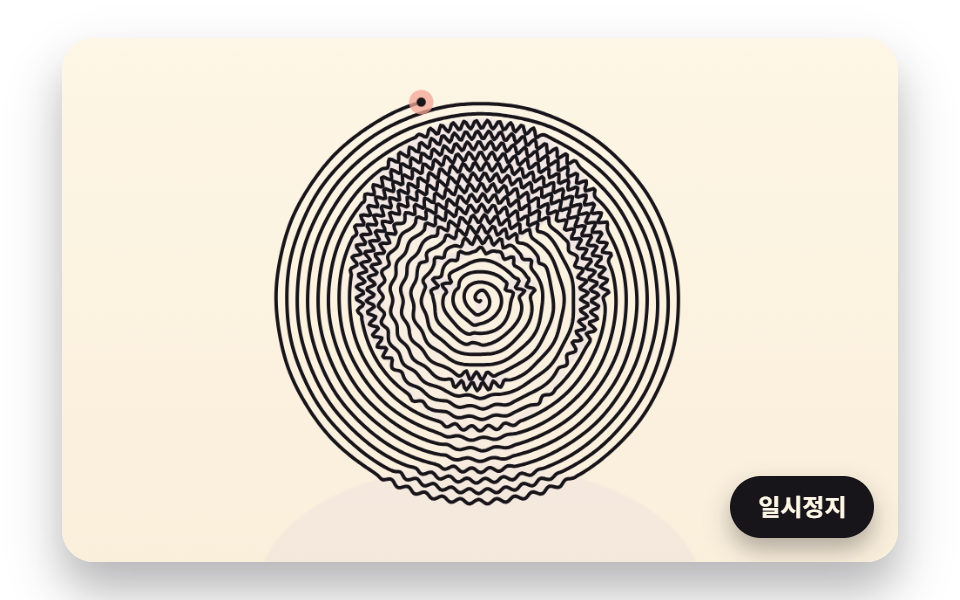 01 oneline-spiral-brightness-wobble
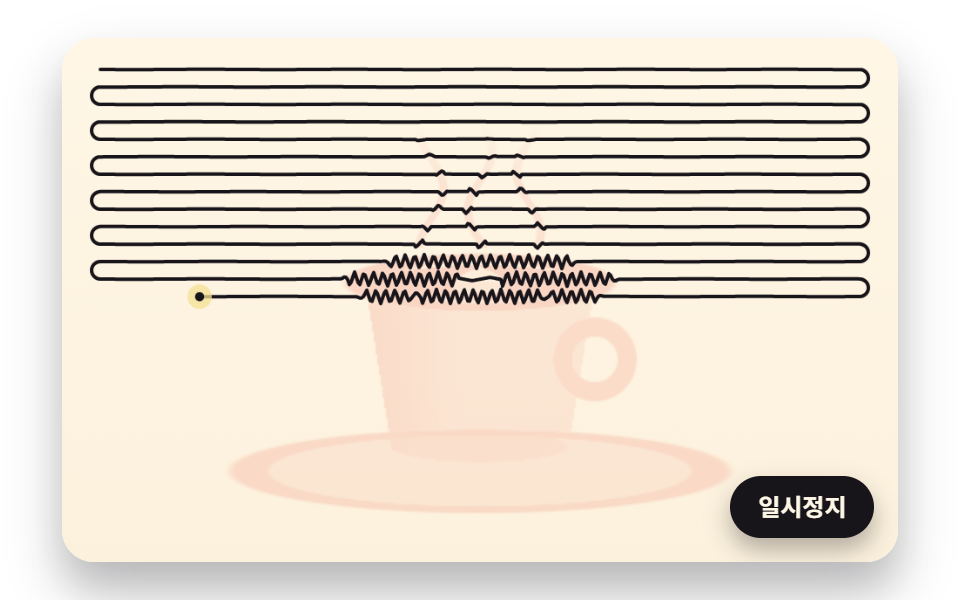 02 oneline-zigzag-row-hatching
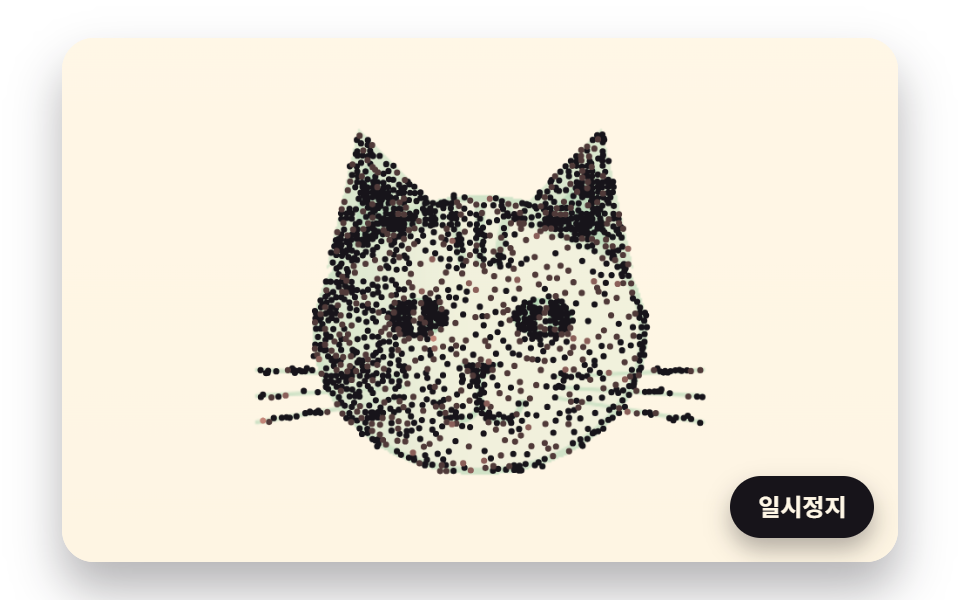 03 oneline-stipple-centroid-relax
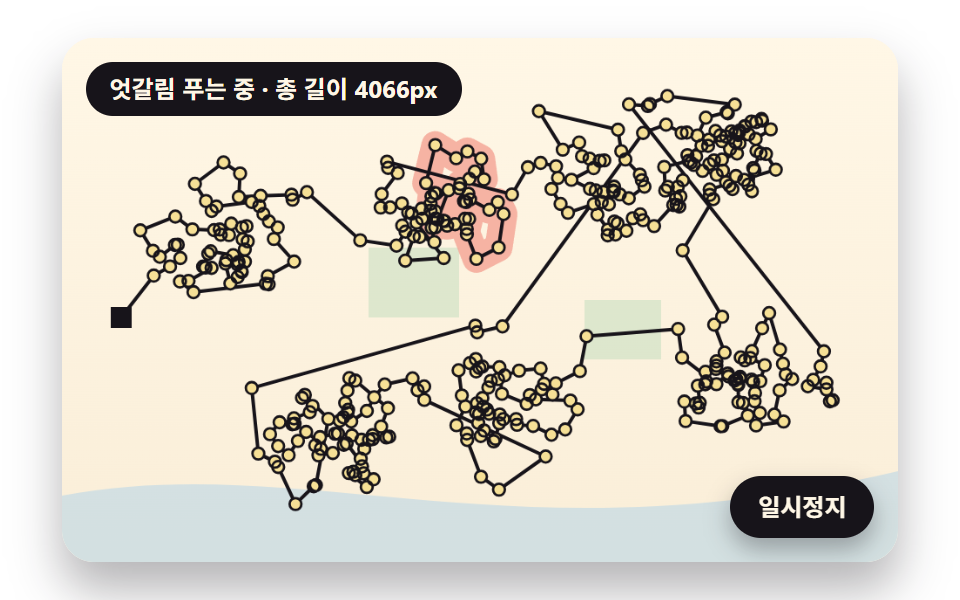 04 oneline-nearest-path-uncross
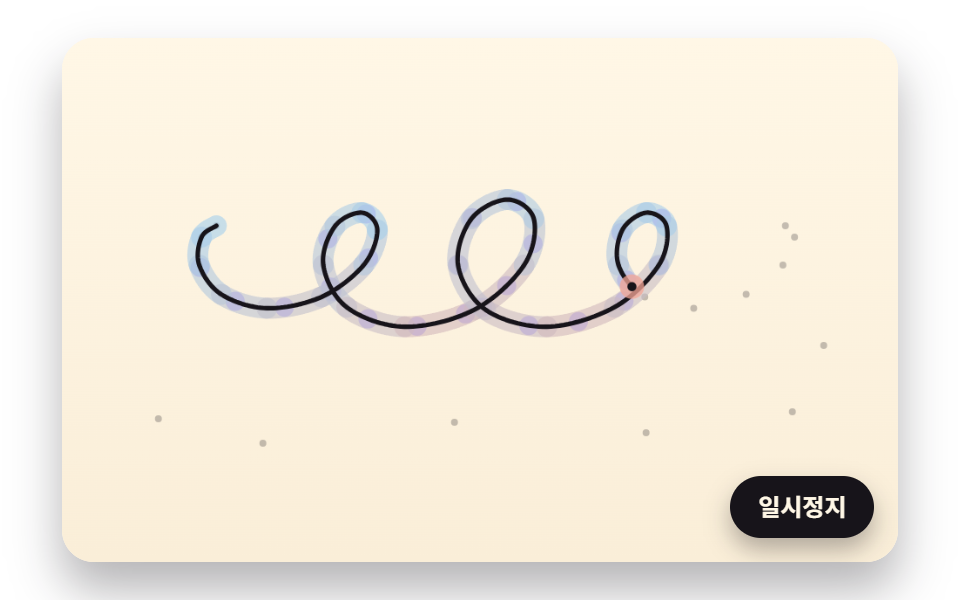 05 oneline-smooth-pen-constant-speed
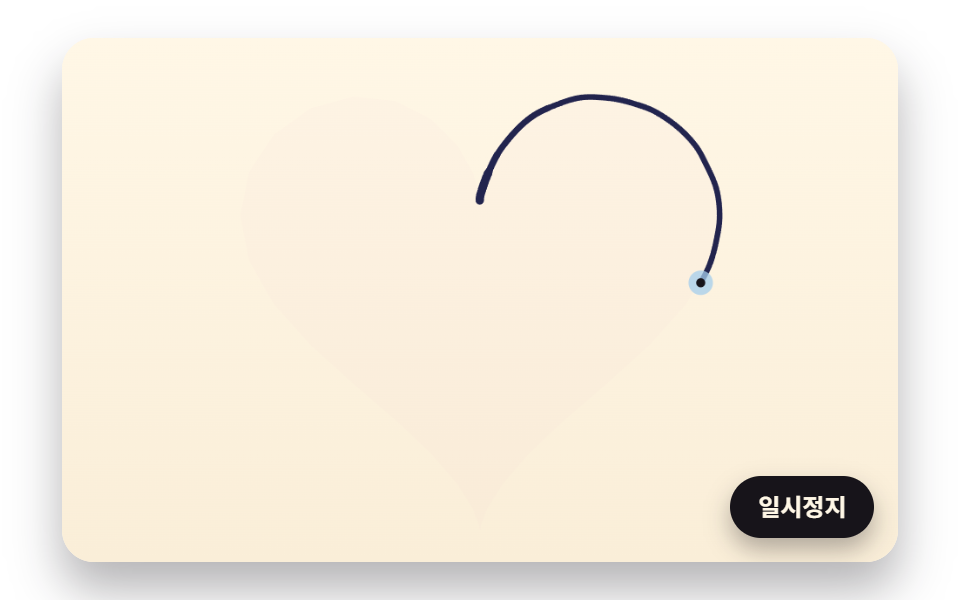 06 oneline-hand-tremor-speed-width
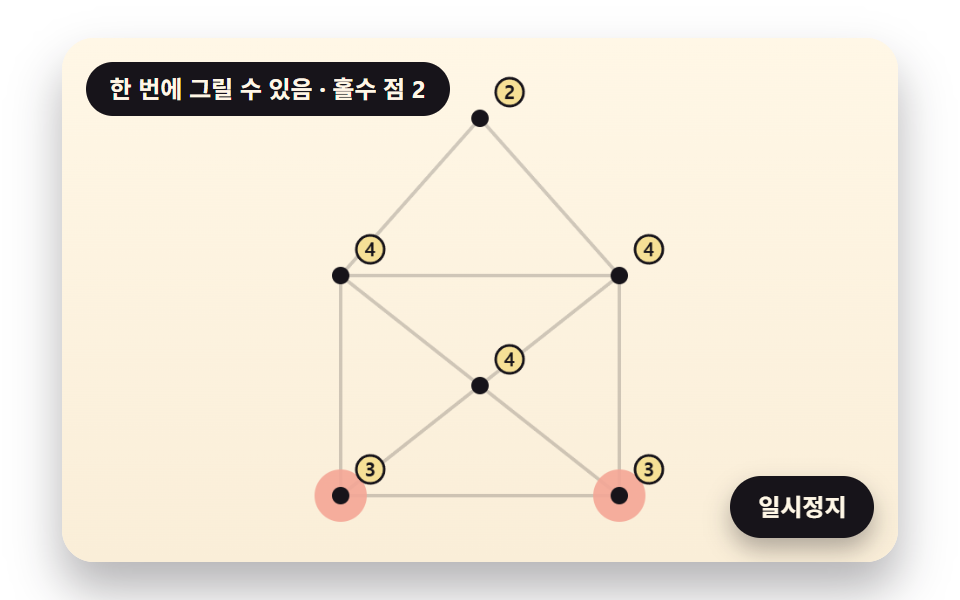 07 oneline-single-stroke-figure-check
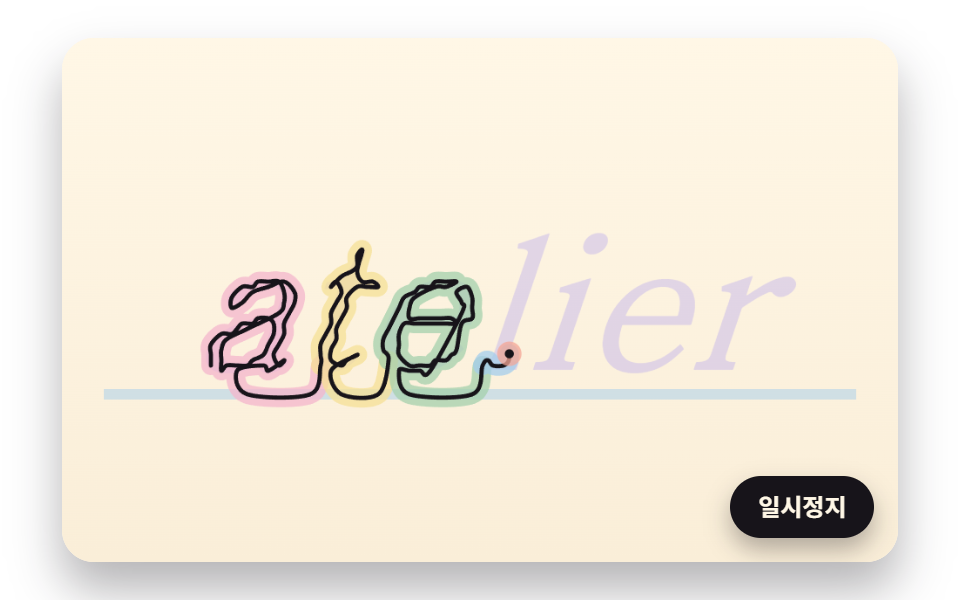 08 oneline-text-outline-cursive
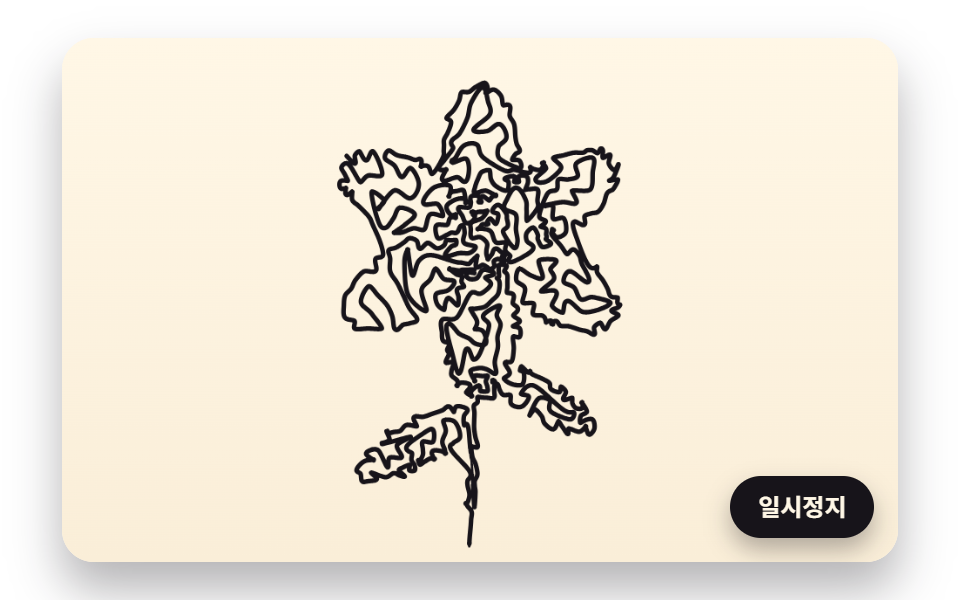 09 oneline-hero-flower-draw-wash
Auto-plays · click a tile to jump to its section · all nine in one zip
- 01 A Single Spiral That Wobbles with Darkness Until a Picture Appears
- 02 One Zigzag Line That Packs Tighter in the Shadows
- 03 Stippled Dots That Spread Evenly by Moving to Their Darkness-Weighted Centers
- 04 A One-Line Path That Untangles by Flipping Crossed Segments
- 05 A Pen That Keeps the Same Speed Even Through the Curves
- 06 A Ballpoint Line That Trembles and Changes Width with Speed
- 07 Single-Stroke Figures Solved by Counting Corners with an Odd Number of Lines
- 08 A Cursive Name Written in One Line by Joining the Letters
- 09 A Flower Hero Drawn in One Line, Then Washed with Color
A one line drawing is a face, a flower or a word made from one stroke with no pen lifts. Moving a picture into one stroke takes three decisions in order: where the line should spend most of its length, in what order it passes those places, and how fast that order gets drawn. Each of the nine scenes digs deep into one of those decisions or chains several of them together.
| Decision | Scenes | What gets computed | Value measured here |
|---|---|---|---|
| Where | 01 · 02 · 03 | Cell darkness from 0 to 1 raises the wobble size, the zigzag turns or the dot count | 01 wobble up to 2.43px · 02 10 to 61 turns per row · 03 1,800 dots |
| In what order | 04 · 07 · 08 · 09 | Join the nearest dot next and flip the crossings, or count the lines that meet at each corner | 04 4,080 → 3,864px · 07 the envelope has 4 odd corners, so it is impossible |
| How fast | 05 · 06 · 08 · 09 | A running-length table gives an even speed, or the bends set both speed and width | 05 240px per second · 06 70 to 492px per second · 08 620px per second |
The source pictures are shapes built in code
The face in 01, the steaming coffee cup in 02, the cat face in 03 and the flower in 09 are functions that layer distances to ellipses, line segments and triangles and hand back a darkness from 0 to 1 for each cell. No outside photo or image file is involved; only 08 paints letters onto an offscreen canvas and reads those pixels back. 01 and 03 weight by darkness rather than brightness, so the blacker the cell, the bigger the wobble and the denser the dots. Using your own picture means swapping that darkness function for one that reads pixels, and the FAQ at the end walks through it.
Pages where it fits
The about-me block on a portfolio suits the spiral face from 01 or the flower from 09, and the signature slot under a brand hero suits the even-speed pen from 05. The double heart in 06 belongs on the first card of a wedding invitation, and the untangling route in 04 fits a page that explains a delivery round to customers. Where a gallery of finished line art files hands over the result, these scenes put the act of drawing itself on screen.
Why a Drawing Made Without Lifting the Pen Holds the Eye: Outlines Made by Dot Order and Line Length
With only one line, the order in which it visits the dots is the picture. The same 420 dots joined in a poor order give a line that cuts across the picture and tangles, while a better order pulls an outline out of the very same dots. A picture that is still being drawn likely holds attention longer than a finished one, because the viewer follows the pen tip and waits to see where the next stroke heads.
Why nearest-first joining crosses itself
04 starts at a depot and joins 420 delivery stops, each time moving to the closest stop not yet visited. That pass compares distances 87,990 times and yields a first route 4,080px long, yet the route holds 34 pairs of segments that cross. Choosing only the closest stop appears to leave skipped stops behind, and the trip back to them later cuts across lines already drawn. After 32 flips the length falls to 3,864px (−5.3%) and the crossings drop to 0. The flower in 09 runs the same math, flipping 61 times to clear 74 crossings and shortening 4,094px to 3,826px (−6.6%).
Line length becomes drawing time
For anyone asking how to animate a line drawing, the move here is to turn its length into time. The spiral in 01 lays down 11,160px in 4.6 seconds and the zigzag in 02 lays down 13,688px in 5 seconds, both above 2,400px per second and quick enough to fill the board. The signature in 05 covers 1,312.6px in 5.47 seconds and the heart in 06 covers 1,742.1px in 7.45 seconds, slow enough for the eye to stay with the tip. A quick pen is for filling a picture; a slow pen is for the feel of handwriting.
One Line Drawing Generator: 9 Scenes — a Brightness Spiral, Zigzag Shading, Evenly Spread Dots, an Untangled Path, a Constant-Speed Pen, Tremor-Driven Width, a Single-Stroke Figure Check, One-Line Cursive and a Hero Drawn in One Stroke
01 and 02 shake a line along a fixed path, a spiral or a set of rows, to build shading. 03 and 04 handle where dots go and the order they are visited in, 05 and 06 handle the pen's speed and width, and 07 and 08 test whether a figure or a word can be drawn in one go. 09 is a hero that chains the math from 03, 04, 05 and 06 into one flower. Each scene draws on a single 2D canvas with no outside library, no WebGL and no image file, and a seeded random generator gives the same picture on every load. The only control is a pause button; the drawing runs by itself.
What the 480×300 board recorded over 2 seconds
The render captured 24 frames, and the table counts how many of the 23 frame-to-frame comparisons showed a change and what share of the board changed at least once. 09, where color washes in, covers the most at 35.0%, while 05 and 08, where only one line and the band beneath it grow behind the pen tip, stay between 4% and 6%.
| Scene | Changed area | Moving frames | Mean intensity |
|---|---|---|---|
| 01 Brightness spiral | 23.1% | 23/23 | 92.9 |
| 02 Zigzag shading | 21.4% | 21/23 | 123.7 |
| 03 Stippling | 12.4% | 14/23 | 40.1 |
| 04 Delivery route untangle | 18.4% | 20/23 | 74.4 |
| 05 Constant-speed pen | 4.4% | 23/23 | 73.1 |
| 06 Ballpoint heart | 23.4% | 23/23 | 84.1 |
| 07 Single-stroke check | 11.5% | 23/23 | 84.9 |
| 08 One-line cursive | 5.7% | 19/23 | 81.5 |
| 09 Flower hero | 35.0% | 19/23 | 79.4 |
The 14/23 for 03 appears to come from dots that move every 0.22 seconds and then rest in their new spots until the next step. The 20/23 for 04 and 19/23 for 08 and 09 likely reflect the short holds where the board sits still between stages.
Where this differs from the neighboring posts
Tracing a logo outline is the subject of logo loading animation, stretching thread by sampled darkness belongs to string art, reading letter pixels as dots is in glyph pixel sampling, and the speed and width of a handwritten signature are in signature canvas. This post builds on those by fixing the order of the dots and turning line length into time. For color that bleeds under the line the way it does in 09, continue to watercolor effect.
01A Single Spiral That Wobbles with Darkness Until a Picture Appears
A spiral wound 6px apart is followed in 1.2px steps, and the darker the spot it passes, the farther it swings across the spiral and the shorter its ripples become (one ripple spans 62.83px in light areas and 5.71px in the darkest), so a face surfaces. The pen covers 24.33 turns, 9,301 vertices and 11,160px at 2,426.1px per second in 4.6 seconds, and in the darkest spots two 2.43px swings plus the 2px stroke overrun the 6px gap by 0.86px, so neighboring turns touch and clump black. It works as a continuous line drawing portrait in the profile photo slot of a portfolio front page.
<main class="stage">
<div class="ld is-demo" id="ld">
  <canvas class="ld__canvas" data-role="canvas" width="480" height="300" role="img" aria-label="A single spiral winding out from the center that wobbles harder in the dark areas until a face appears."></canvas>
  <button class="ld__pause" data-role="pause" type="button" aria-pressed="false">Pause</button>
</div>
</main>
@use "../../../../site/static/demo-tokens" as *;
@include stage($stage-paper);
.ld {
position: relative;
width: min(92vw, calc(160vh - 12.8vw));
aspect-ratio: 480 / 300;
margin: 0 auto;
border-radius: $r-card;
overflow: hidden;
box-shadow: $shadow-raised;
background: $subject-cream;
}
.ld__canvas {
position: absolute;
inset: 0;
display: block;
width: 100%;
height: 100%;
}
.ld__pause {
position: absolute;
right: $sp-3;
bottom: $sp-3;
padding: $sp-1 $sp-3;
border: 2px solid $subject-ink;
border-radius: $r-pill;
background: $subject-ink;
color: $subject-cream;
font-family: inherit;
font-weight: 700;
font-size: 12px;
line-height: 1.6;
cursor: pointer;
box-shadow: $shadow-press;
transition: transform $dur-quick $ease-spring;
}
// 눌린 상태(멈춤) — 바탕과 글자색을 뒤집어 aria-pressed 가 눈에도 보이게
.ld__pause[aria-pressed="true"] {
background: $subject-cream;
color: $subject-ink;
}
.ld__pause:hover {
transform: translateY(-2px);
}
.ld__pause:active {
transform: translateY(1px);
}
.ld__pause:focus-visible {
outline: 3px solid $subject-ink;
outline-offset: 3px;
}
// 상태 줄 — 지금 어떤 행동 중인지 글자로. 시연 중에는 aria-live off, 사람이 처음 손대면 polite
.ld__status {
position: absolute;
left: $sp-3;
top: $sp-3;
margin: 0;
padding: $sp-1 $sp-3;
border-radius: $r-pill;
background: $subject-ink;
color: $subject-cream;
font-weight: 700;
font-size: 12px;
line-height: 1.6;
pointer-events: none;
}
@media (max-width: 340px) {
.ld__pause,
.ld__status { font-size: 11px; padding: $sp-1 $sp-2; }
}
// 동작 줄이기 — 장면은 스크립트가 쉬는 자세 한 장으로 멈춘다. 버튼도 떠오르지 않게
@media (prefers-reduced-motion: reduce) {
.ld__pause { transition: none !important; }
.ld__pause:hover,
.ld__pause:active { transform: none !important; }
}html, body {
margin: 0;
overflow: hidden;
}
.stage {
box-sizing: border-box;
min-height: 100vh;
display: grid;
place-items: center;
margin: 0;
background: #ffffff;
font-family: -apple-system, "Segoe UI", "Noto Sans KR", sans-serif;
padding: clamp(8px, 4vw, 24px);
}
.ld {
position: relative;
width: min(92vw, 160vh - 12.8vw);
aspect-ratio: 480/300;
margin: 0 auto;
border-radius: 16px;
overflow: hidden;
box-shadow: 0 14px 24px rgba(23, 20, 26, 0.32);
background: #fff7e6;
}
.ld__canvas {
position: absolute;
inset: 0;
display: block;
width: 100%;
height: 100%;
}
.ld__pause {
position: absolute;
right: 12px;
bottom: 12px;
padding: 4px 12px;
border: 2px solid #17141a;
border-radius: 999px;
background: #17141a;
color: #fff7e6;
font-family: inherit;
font-weight: 700;
font-size: 12px;
line-height: 1.6;
cursor: pointer;
box-shadow: 0 6px 12px rgba(23, 20, 26, 0.32);
transition: transform 220ms cubic-bezier(0.2, 0.8, 0.2, 1);
}
.ld__pause[aria-pressed=true] {
background: #fff7e6;
color: #17141a;
}
.ld__pause:hover {
transform: translateY(-2px);
}
.ld__pause:active {
transform: translateY(1px);
}
.ld__pause:focus-visible {
outline: 3px solid #17141a;
outline-offset: 3px;
}
.ld__status {
position: absolute;
left: 12px;
top: 12px;
margin: 0;
padding: 4px 12px;
border-radius: 999px;
background: #17141a;
color: #fff7e6;
font-weight: 700;
font-size: 12px;
line-height: 1.6;
pointer-events: none;
}
@media (max-width: 340px) {
.ld__pause,
.ld__status {
font-size: 11px;
padding: 4px 8px;
}
}
@media (prefers-reduced-motion: reduce) {
.ld__pause {
transition: none !important;
}
.ld__pause:hover,
.ld__pause:active {
transform: none !important;
}
}(function () {
const root = document.getElementById("ld");
if (!root) return;
// 판 좌표 — 캔버스 안은 늘 480×300. 화면에 보이는 크기와 상관없이 계산은 이 좌표로 한다
const W = 480;
const H = 300;
const TAU = Math.PI * 2;
function clamp(v, lo, hi) { return v < lo ? lo : (v > hi ? hi : v); }
function lerp(a, b, k) { return a + (b - a) * k; }
function smooth(x) { const c = clamp(x, 0, 1); return c * c * (3 - 2 * c); }
// 시드 고정 난수 — 같은 시드면 같은 점 배치·같은 떨림이 다시 나온다 (32비트 정수 섞기)
function makeRng(seed) {
let s = seed >>> 0;
return function () {
s = (s + 0x6d2b79f5) >>> 0;
let t = s;
t = Math.imul(t ^ (t >>> 15), t | 1);
t ^= t + Math.imul(t ^ (t >>> 7), t | 61);
return ((t ^ (t >>> 14)) >>> 0) / 4294967296;
};
}
// 1차원 값 노이즈 — 정수 자리마다 시드로 정한 값(-1~1)을 두고 사이는 부드러운 보간. 손 떨림에 쓴다
const NOISE_TABLE = new Float32Array(256);
const noiseRng = makeRng(483);
for (let i = 0; i < 256; i += 1) {
NOISE_TABLE[i] = noiseRng() * 2 - 1;
}
function smoothNoise(x) {
const i = Math.floor(x);
const f = x - i;
const u = f * f * (3 - 2 * f);
return lerp(NOISE_TABLE[i & 255], NOISE_TABLE[(i + 1) & 255], u);
}
// 도형 거리 — 타원 안이면 음수, 밖이면 양수(px 에 가까운 근사). 원본 그림을 코드로 그릴 때 쓴다
function ellipseDist(x, y, cx, cy, rx, ry) {
const dx = (x - cx) / rx;
const dy = (y - cy) / ry;
return (Math.sqrt(dx * dx + dy * dy) - 1) * Math.min(rx, ry);
}
// 선분까지의 거리(px)
function segmentDist(x, y, ax, ay, bx, by) {
const vx = bx - ax;
const vy = by - ay;
const k = clamp(((x - ax) * vx + (y - ay) * vy) / Math.max(1e-9, vx * vx + vy * vy), 0, 1);
const ex = x - (ax + vx * k);
const ey = y - (ay + vy * k);
return Math.sqrt(ex * ex + ey * ey);
}
// 거리 → 칠한 정도 0~1. 경계 1px 를 부드럽게 넘긴다
function fillOf(dist) { return clamp(0.5 - dist, 0, 1); }
// 두 점 사이 거리
function dist2(ax, ay, bx, by) {
const dx = ax - bx;
const dy = ay - by;
return Math.sqrt(dx * dx + dy * dy);
}
// 꺾은선 길이 — xs·ys 를 order 순서로 이었을 때(닫지 않음)
function pathLength(xs, ys, order, n) {
let sum = 0;
for (let i = 1; i < n; i += 1) {
sum += dist2(xs[order[i - 1]], ys[order[i - 1]], xs[order[i]], ys[order[i]]);
}
return sum;
}
// 파스텔 팔레트 — 미색 종이 바탕 위에 진한 잉크 선. 잉크·종이는 데모 토큰($subject-ink·$subject-cream)과 같은 값
const PAPER = [255, 247, 230];
const INK = [23, 20, 26];
const CORAL = [244, 166, 150];
const LAVENDER = [192, 176, 236];
const BUTTER = [246, 224, 150];
const SAGE = [164, 208, 172];
const PINK = [244, 182, 204];
const SKY = [164, 206, 236];
function rgba(c, a) {
return 'rgba(' + Math.round(clamp(c[0], 0, 255)) + ',' + Math.round(clamp(c[1], 0, 255)) + ',' + Math.round(clamp(c[2], 0, 255)) + ',' + clamp(a, 0, 1).toFixed(3) + ')';
}
// 한 장면의 순환 — 그리기 → 머묾 → 지움. 지움이 끝나면 처음부터 다시
function cyclePhase(t, drawTime, holdTime) {
// 0~1 은 그리는 중, 1~2 는 머무는 중, 2~3 은 지우는 중
if (t < drawTime) {
return t / drawTime;
}
if (t < drawTime + holdTime) {
return 1 + (t - drawTime) / holdTime;
}
return 2 + (t - drawTime - holdTime) / ERASE_TIME;
}
// 지우기 시간(초) — 모든 장면이 같은 빠르기로 종이색으로 돌아간다
const ERASE_TIME = 1;
// 원본 그림 1 — 코드로 만든 얼굴. 칸마다 어둡기 0(종이)~1(가장 어두움)을 돌려준다. 외부 사진을 읽지 않는다
function faceDark(x, y) {
let d = 0.04;
// 어깨와 목
d = Math.max(d, 0.5 * fillOf(ellipseDist(x, y, 240, 318, 128, 74)));
d = Math.max(d, 0.34 * fillOf(Math.max(Math.abs(x - 240) - 20, Math.abs(y - 238) - 34)));
// 머리카락 — 얼굴 타원보다 큰 타원에서 얼굴을 뺀 자리
const face = ellipseDist(x, y, 240, 150, 58, 76);
const hair = ellipseDist(x, y, 240, 128, 74, 82);
const fringe = y < 108 + 14 * Math.cos((x - 240) / 22);
if (hair < 0 && (face > 0 || fringe)) {
d = Math.max(d, 0.86);
}
// 얼굴 — 왼쪽 볼에 그늘, 윤곽선은 조금 더 어둡게
if (face < 0 && !fringe) {
d = Math.max(d, 0.14 + 0.2 * smooth((246 - x) / 60));
d = Math.max(d, 0.55 * fillOf(-face - 3));
}
// 눈썹·눈·코·입
d = Math.max(d, 0.8 * fillOf(segmentDist(x, y, 206, 128, 228, 125) - 2.5));
d = Math.max(d, 0.8 * fillOf(segmentDist(x, y, 252, 125, 274, 128) - 2.5));
d = Math.max(d, 0.95 * fillOf(ellipseDist(x, y, 217, 142, 10, 5)));
d = Math.max(d, 0.95 * fillOf(ellipseDist(x, y, 263, 142, 10, 5)));
d = Math.max(d, 0.6 * fillOf(segmentDist(x, y, 241, 146, 235, 175) - 2));
d = Math.max(d, 0.5 * fillOf(ellipseDist(x, y, 242, 178, 8, 3)));
d = Math.max(d, 0.9 * fillOf(ellipseDist(x, y, 240, 196, 17, 4.5)));
return d;
}
const canvasEl = root.querySelector('[data-role="canvas"]');
const pauseEl = root.querySelector('[data-role="pause"]');
const statusEl = root.querySelector('[data-role="status"]');
const ctxRaw = canvasEl ? canvasEl.getContext('2d') : null;
if (!canvasEl || !ctxRaw || !pauseEl) {
return;
}
const cv = canvasEl;
const ctx = ctxRaw;
const pauseBtn = pauseEl;
function fitCanvas() {
// 배율은 2 에서 자른다 — 배율 3 기기에서 화소가 2.25배로 늘어 프레임마다 일이 그만큼 커지지 않게
const dpr = Math.min(window.devicePixelRatio || 1, 2);
cv.width = Math.round(W * dpr);
cv.height = Math.round(H * dpr);
ctx.setTransform(dpr, 0, 0, dpr, 0, 0);
}
// 미색 종이 — 위는 조금 밝고 아래는 조금 따뜻하게
function clearPaper() {
const g = ctx.createLinearGradient(0, 0, 0, H);
g.addColorStop(0, rgba(PAPER, 1));
g.addColorStop(1, rgba([250, 238, 216], 1));
ctx.fillStyle = g;
ctx.fillRect(0, 0, W, H);
}
// 상태 줄 — 같은 글자면 DOM 을 건드리지 않는다
let statusText = '';
function setStatus(s) {
if (!statusEl || s === statusText) {
return;
}
statusText = s;
statusEl.textContent = s;
}
// 꺾은선 — xs·ys 의 0 번부터 count 개(소수 부분은 마지막 마디를 그만큼만)를 한 번에 긋는다
function strokeRun(xs, ys, count, width, color, alpha) {
const whole = Math.floor(count);
if (whole < 1) {
return;
}
ctx.beginPath();
ctx.moveTo(xs[0], ys[0]);
const last = Math.min(whole, xs.length - 1);
for (let i = 1; i <= last; i += 1) {
ctx.lineTo(xs[i], ys[i]);
}
const f = count - whole;
if (f > 0 && whole + 1 < xs.length) {
ctx.lineTo(lerp(xs[whole], xs[whole + 1], f), lerp(ys[whole], ys[whole + 1], f));
}
ctx.lineWidth = width;
ctx.lineJoin = 'round';
ctx.lineCap = 'round';
ctx.strokeStyle = rgba(color, alpha);
ctx.stroke();
}
// 꺾은선 한 토막 — from 번째 꼭짓점부터 to 번째까지(to 의 소수 부분은 마지막 마디를 그만큼만)
function strokeSpan(xs, ys, from, to, width, color, alpha) {
const end = Math.min(Math.floor(to), xs.length - 1);
if (end <= from) {
return;
}
ctx.beginPath();
ctx.moveTo(xs[from], ys[from]);
for (let i = from + 1; i <= end; i += 1) {
ctx.lineTo(xs[i], ys[i]);
}
const f = to - Math.floor(to);
if (f > 0 && end + 1 < xs.length) {
ctx.lineTo(lerp(xs[end], xs[end + 1], f), lerp(ys[end], ys[end + 1], f));
}
ctx.lineWidth = width;
ctx.lineJoin = 'round';
ctx.lineCap = 'round';
ctx.strokeStyle = rgba(color, alpha);
ctx.stroke();
}
// 펜촉 — 지금 긋고 있는 자리. 잉크 점 둘레에 파스텔 고리
function drawNib(x, y, ring) {
ctx.beginPath();
ctx.arc(x, y, 7, 0, TAU);
ctx.fillStyle = rgba(ring, 0.75);
ctx.fill();
ctx.beginPath();
ctx.arc(x, y, 2.6, 0, TAU);
ctx.fillStyle = rgba(INK, 1);
ctx.fill();
}
// 원본 그림 판 — 어둡기 함수(0~1)를 칸마다 칠한 화면 밖 캔버스. 펜이 그리기 전에 옅게 깔아 무엇을 따라 그리는지 보인다
function makeSourceLayer(dark, tint) {
const layer = document.createElement('canvas');
layer.width = W;
layer.height = H;
const lc = layer.getContext('2d');
if (!lc) {
return layer;
}
const img = lc.createImageData(W, H);
for (let y = 0; y < H; y += 1) {
for (let x = 0; x < W; x += 1) {
const d = dark(x + 0.5, y + 0.5);
const o = (y * W + x) * 4;
img.data[o] = Math.round(lerp(PAPER[0], tint[0], d));
img.data[o + 1] = Math.round(lerp(PAPER[1], tint[1], d));
img.data[o + 2] = Math.round(lerp(PAPER[2], tint[2], d));
img.data[o + 3] = 255;
}
}
lc.putImageData(img, 0, 0);
return layer;
}
// 지우는 중이면 그림 전체를 종이색으로 덮어 간다 — phase 2~3 에서 덮개 불투명도 0→1
function eraseVeil(phase) {
if (phase <= 2) {
return;
}
ctx.fillStyle = rgba(PAPER, smooth(phase - 2));
ctx.fillRect(0, 0, W, H);
}
// 01 같은 간격으로 감기는 나선 — r = (SPIRAL_GAP / 2π)·θ. 펜이 지나는 칸의 어둡기 d 만큼
// 나선과 직각 방향으로 사인 흔들림을 얹는다 — 폭은 WOBBLE_AMP·d, 빠르기는 d 가 클수록 촘촘하게
const SPIRAL_GAP = 6;
const SPIRAL_RADIUS = 146;
const WOBBLE_AMP = 2.7;
const WOBBLE_FREQ_LIGHT = 0.1;
const WOBBLE_FREQ_DARK = 1.1;
// 꼭짓점 사이 간격(px) — 흔들림 한 주기(가장 촘촘할 때 2π/1.1 ≈ 5.7px)를 네 번 넘게 찍는다
const SAMPLE_STEP = 1.2;
// 어둡기를 길 따라 고르게 — 칸 경계에서 폭이 한 번에 튀지 않게 이 길이(px)로 이동평균
const DARK_SMOOTH = 4;
const DRAW_TIME = 4.6;
const HOLD_TIME = 2;
const CYCLE = DRAW_TIME + HOLD_TIME + ERASE_TIME;
// 첫 화면이 비지 않게 나선이 가운데 몇 바퀴를 감은 자리(1.5초)에서 시작한다 — 순환이 돌면 처음부터 다시 그린다
const START_AT = 1.5;
const FINISH_T = DRAW_TIME + 0.5;
const CX = 240;
const CY = 150;
function buildSpiral(dark) {
const a = SPIRAL_GAP / TAU;
const xs = [];
const ys = [];
let theta = 0.6;
let phase = 0;
let dSmooth = 0;
let maxOffset = 0;
while (a * theta < SPIRAL_RADIUS) {
const r = a * theta;
const c = Math.cos(theta);
const s = Math.sin(theta);
const bx = CX + r * c;
const by = CY + r * s;
// 접선 = d/dθ (r cosθ, r sinθ) = (a cosθ − r sinθ, a sinθ + r cosθ), 법선은 접선을 90° 돌린 것
const tx = a * c - r * s;
const ty = a * s + r * c;
const tl = Math.sqrt(tx * tx + ty * ty);
const nx = -ty / tl;
const ny = tx / tl;
dSmooth = lerp(dSmooth, dark(bx, by), SAMPLE_STEP / DARK_SMOOTH);
phase += lerp(WOBBLE_FREQ_LIGHT, WOBBLE_FREQ_DARK, dSmooth) * SAMPLE_STEP;
const off = WOBBLE_AMP * dSmooth * Math.sin(phase);
maxOffset = Math.max(maxOffset, Math.abs(off));
xs.push(bx + nx * off);
ys.push(by + ny * off);
// 호 길이 ds = √(r² + a²)·dθ 이므로 같은 걸음을 가려면 dθ = ds / √(r² + a²)
theta += SAMPLE_STEP / Math.sqrt(r * r + a * a);
}
return { xs: Float32Array.from(xs), ys: Float32Array.from(ys), turns: theta / TAU, maxOffset: maxOffset };
}
const spiral = buildSpiral(faceDark);
// 그린 꼭짓점 수 — 꼭짓점이 같은 걸음(SAMPLE_STEP)이라 시간에 비례해 늘리면 펜이 같은 빠르기로 간다
let drawn = 0;
function reset() { drawn = 0; }
function update(t, dt) {
drawn = (spiral.xs.length - 1) * Math.min(1, t / DRAW_TIME);
}
// 원본 얼굴 판 — 그리기 시작에는 옅게 보였다가 선이 다 그려질 무렵 사라진다
const source01 = makeSourceLayer(faceDark, LAVENDER);
function draw(t) {
const phase = cyclePhase(t, DRAW_TIME, HOLD_TIME);
clearPaper();
ctx.globalAlpha = 0.85 * (1 - smooth(Math.min(1, phase)));
ctx.drawImage(source01, 0, 0, W, H);
ctx.globalAlpha = 1;
strokeRun(spiral.xs, spiral.ys, drawn, 2, INK, 1);
if (phase < 1) {
const i = Math.floor(drawn);
drawNib(spiral.xs[i], spiral.ys[i], CORAL);
}
eraseVeil(phase);
}
// 한 프레임에 넘기는 시간 상한(초) — 탭을 오래 숨겼다 돌아온 첫 프레임에도 50ms 까지만 계산에 넣는다
const DT_MAX = 0.05;
// 앞당겨 돌리기 걸음(초) — 시작 자리(START_AT)나 완성 판(FINISH_T)까지 1/60초씩 계산만 하고 그리지 않는다
const SKIP_STEP = 1 / 60;
// 장면 시계(초) — 순환 하나 안에서의 자리. CYCLE 을 넘으면 0 으로 돌아가 처음부터 다시 그린다
let cycleT = 0;
let paused = false;
const reduceQuery = window.matchMedia('(prefers-reduced-motion: reduce)');
// 페이지를 연 채 동작 줄이기 설정을 바꿔도 change 리스너가 이 값을 다시 읽는다
let still = reduceQuery.matches;
// 자동 시연 중인가 — 사람이 처음 손대면 시연 표시를 떼고 상태 줄을 polite 로 켠다
let demo = root.classList.contains('is-demo');
// 리스너는 한 묶음으로 달고 정리할 때 한 번에 뗀다
const off = new AbortController();
function wake() {
if (!demo) {
return;
}
demo = false;
root.classList.remove('is-demo');
const live = root.querySelector('[aria-live]');
if (live) {
live.setAttribute('aria-live', 'polite');
}
}
// 시계를 to 초까지 계산만 하고 넘긴다
function skipTo(to) {
while (cycleT + SKIP_STEP <= to) {
cycleT += SKIP_STEP;
update(cycleT, SKIP_STEP);
}
}
function advance(dt) {
cycleT += dt;
if (cycleT >= CYCLE) {
cycleT = 0;
reset();
}
update(cycleT, dt);
}
let rafId = 0;
let lastTs = -1;
function frame(ts) {
if (still || paused) {
rafId = 0;
return;
}
if (lastTs < 0) {
lastTs = ts;
}
const dt = Math.min((ts - lastTs) / 1000, DT_MAX);
lastTs = ts;
if (dt > 0) {
advance(dt);
}
draw(cycleT);
rafId = window.requestAnimationFrame(frame);
}
function startLoop() {
if (rafId) {
return;
}
// 시계 다시 맞추기 — 멈췄던 사이의 시간을 첫 프레임 dt 로 넘기지 않는다
lastTs = -1;
rafId = window.requestAnimationFrame(frame);
}
function stopLoop() {
if (rafId) {
window.cancelAnimationFrame(rafId);
rafId = 0;
}
}
// 동작 줄이기 — 루프를 돌리지 않고 다 그려진 한 장(FINISH_T)만 그린다
function showFinished() {
stopLoop();
cycleT = 0;
reset();
skipTo(FINISH_T);
draw(cycleT);
}
function play() {
cycleT = 0;
reset();
skipTo(START_AT);
draw(cycleT);
if (!paused) {
startLoop();
}
}
pauseBtn.addEventListener('click', function () {
paused = !paused;
pauseBtn.setAttribute('aria-pressed', paused ? 'true' : 'false');
wake();
if (paused) {
stopLoop();
}
else if (!still) {
startLoop();
}
}, { signal: off.signal });
// 탭이 숨으면 루프를 멈추고, 돌아오면 시계를 다시 맞춰 이어 그린다 — 숨은 동안의 몇 초가 한 프레임에 몰리지 않게
document.addEventListener('visibilitychange', function () {
if (document.hidden) {
stopLoop();
}
else if (!paused && !still) {
startLoop();
}
}, { signal: off.signal });
// 설정이 페이지를 연 채 바뀌면 — 켜지면 완성 판으로 멈추고, 꺼지면 시연을 처음부터
reduceQuery.addEventListener('change', function () {
still = reduceQuery.matches;
if (still) {
showFinished();
}
else {
play();
}
}, { signal: off.signal });
window.addEventListener('resize', function () {
fitCanvas();
draw(cycleT);
}, { signal: off.signal });
fitCanvas();
if (still) {
showFinished();
}
else {
play();
}
return function () {
stopLoop();
off.abort();
};
})();// SpiralBrightnessWobble - vanilla 판(01-oneline-spiral-brightness-wobble) 의 React 포트. 같은 계산을 useEffect 안에서 돌린다.
import { useEffect, useRef } from "react";
import styles from "./SpiralBrightnessWobble.module.scss";
const cx = (s: string): string => s.split(" ").map((n) => styles[n] ?? n).join(" ");
export default function SpiralBrightnessWobble() {
const rootRef = useRef<HTMLDivElement | null>(null);
useEffect(() => {
const rootEl = rootRef.current;
if (!rootEl) return;
const root: HTMLElement = rootEl;
type Pt = [number, number];
type RGB = [number, number, number];
// 점 묶음 — 좌표 두 배열과 점 수
type Dots = { xs: Float32Array; ys: Float32Array; n: number };
// 판 좌표 — 캔버스 안은 늘 480×300. 화면에 보이는 크기와 상관없이 계산은 이 좌표로 한다
const W = 480;
const H = 300;
const TAU = Math.PI * 2;
function clamp(v: number, lo: number, hi: number): number { return v < lo ? lo : (v > hi ? hi : v); }
function lerp(a: number, b: number, k: number): number { return a + (b - a) * k; }
function smooth(x: number): number { const c = clamp(x, 0, 1); return c * c * (3 - 2 * c); }
// 시드 고정 난수 — 같은 시드면 같은 점 배치·같은 떨림이 다시 나온다 (32비트 정수 섞기)
function makeRng(seed: number): () => number {
let s = seed >>> 0;
return function (): number {
s = (s + 0x6d2b79f5) >>> 0;
let t = s;
t = Math.imul(t ^ (t >>> 15), t | 1);
t ^= t + Math.imul(t ^ (t >>> 7), t | 61);
return ((t ^ (t >>> 14)) >>> 0) / 4294967296;
};
}
// 1차원 값 노이즈 — 정수 자리마다 시드로 정한 값(-1~1)을 두고 사이는 부드러운 보간. 손 떨림에 쓴다
const NOISE_TABLE = new Float32Array(256);
const noiseRng = makeRng(483);
for (let i = 0; i < 256; i += 1) { NOISE_TABLE[i] = noiseRng() * 2 - 1; }
function smoothNoise(x: number): number {
const i = Math.floor(x);
const f = x - i;
const u = f * f * (3 - 2 * f);
return lerp(NOISE_TABLE[i & 255], NOISE_TABLE[(i + 1) & 255], u);
}
// 도형 거리 — 타원 안이면 음수, 밖이면 양수(px 에 가까운 근사). 원본 그림을 코드로 그릴 때 쓴다
function ellipseDist(x: number, y: number, cx: number, cy: number, rx: number, ry: number): number {
const dx = (x - cx) / rx;
const dy = (y - cy) / ry;
return (Math.sqrt(dx * dx + dy * dy) - 1) * Math.min(rx, ry);
}
// 선분까지의 거리(px)
function segmentDist(x: number, y: number, ax: number, ay: number, bx: number, by: number): number {
const vx = bx - ax;
const vy = by - ay;
const k = clamp(((x - ax) * vx + (y - ay) * vy) / Math.max(1e-9, vx * vx + vy * vy), 0, 1);
const ex = x - (ax + vx * k);
const ey = y - (ay + vy * k);
return Math.sqrt(ex * ex + ey * ey);
}
// 거리 → 칠한 정도 0~1. 경계 1px 를 부드럽게 넘긴다
function fillOf(dist: number): number { return clamp(0.5 - dist, 0, 1); }
// 두 점 사이 거리
function dist2(ax: number, ay: number, bx: number, by: number): number {
const dx = ax - bx;
const dy = ay - by;
return Math.sqrt(dx * dx + dy * dy);
}
// 꺾은선 길이 — xs·ys 를 order 순서로 이었을 때(닫지 않음)
function pathLength(xs: Float32Array, ys: Float32Array, order: Int32Array, n: number): number {
let sum = 0;
for (let i = 1; i < n; i += 1) { sum += dist2(xs[order[i - 1]], ys[order[i - 1]], xs[order[i]], ys[order[i]]); }
return sum;
}
// 파스텔 팔레트 — 미색 종이 바탕 위에 진한 잉크 선. 잉크·종이는 데모 토큰($subject-ink·$subject-cream)과 같은 값
const PAPER: RGB = [255, 247, 230];
const INK: RGB = [23, 20, 26];
const CORAL: RGB = [244, 166, 150];
const LAVENDER: RGB = [192, 176, 236];
const BUTTER: RGB = [246, 224, 150];
const SAGE: RGB = [164, 208, 172];
const PINK: RGB = [244, 182, 204];
const SKY: RGB = [164, 206, 236];
function rgba(c: RGB, a: number): string {
return 'rgba(' + Math.round(clamp(c[0], 0, 255)) + ',' + Math.round(clamp(c[1], 0, 255)) + ',' + Math.round(clamp(c[2], 0, 255)) + ',' + clamp(a, 0, 1).toFixed(3) + ')';
}
// 한 장면의 순환 — 그리기 → 머묾 → 지움. 지움이 끝나면 처음부터 다시
function cyclePhase(t: number, drawTime: number, holdTime: number): number {
// 0~1 은 그리는 중, 1~2 는 머무는 중, 2~3 은 지우는 중
if (t < drawTime) { return t / drawTime; }
if (t < drawTime + holdTime) { return 1 + (t - drawTime) / holdTime; }
return 2 + (t - drawTime - holdTime) / ERASE_TIME;
}
// 지우기 시간(초) — 모든 장면이 같은 빠르기로 종이색으로 돌아간다
const ERASE_TIME = 1;
// 원본 그림 1 — 코드로 만든 얼굴. 칸마다 어둡기 0(종이)~1(가장 어두움)을 돌려준다. 외부 사진을 읽지 않는다
function faceDark(x: number, y: number): number {
let d = 0.04;
// 어깨와 목
d = Math.max(d, 0.5 * fillOf(ellipseDist(x, y, 240, 318, 128, 74)));
d = Math.max(d, 0.34 * fillOf(Math.max(Math.abs(x - 240) - 20, Math.abs(y - 238) - 34)));
// 머리카락 — 얼굴 타원보다 큰 타원에서 얼굴을 뺀 자리
const face = ellipseDist(x, y, 240, 150, 58, 76);
const hair = ellipseDist(x, y, 240, 128, 74, 82);
const fringe = y < 108 + 14 * Math.cos((x - 240) / 22);
if (hair < 0 && (face > 0 || fringe)) { d = Math.max(d, 0.86); }
// 얼굴 — 왼쪽 볼에 그늘, 윤곽선은 조금 더 어둡게
if (face < 0 && !fringe) {
d = Math.max(d, 0.14 + 0.2 * smooth((246 - x) / 60));
d = Math.max(d, 0.55 * fillOf(-face - 3));
}
// 눈썹·눈·코·입
d = Math.max(d, 0.8 * fillOf(segmentDist(x, y, 206, 128, 228, 125) - 2.5));
d = Math.max(d, 0.8 * fillOf(segmentDist(x, y, 252, 125, 274, 128) - 2.5));
d = Math.max(d, 0.95 * fillOf(ellipseDist(x, y, 217, 142, 10, 5)));
d = Math.max(d, 0.95 * fillOf(ellipseDist(x, y, 263, 142, 10, 5)));
d = Math.max(d, 0.6 * fillOf(segmentDist(x, y, 241, 146, 235, 175) - 2));
d = Math.max(d, 0.5 * fillOf(ellipseDist(x, y, 242, 178, 8, 3)));
d = Math.max(d, 0.9 * fillOf(ellipseDist(x, y, 240, 196, 17, 4.5)));
return d;
}
const canvasEl = root.querySelector('[data-role="canvas"]') as HTMLCanvasElement | null;
const pauseEl = root.querySelector('[data-role="pause"]') as HTMLButtonElement | null;
const statusEl = root.querySelector('[data-role="status"]') as HTMLElement | null;
const ctxRaw = canvasEl ? canvasEl.getContext('2d') : null;
if (!canvasEl || !ctxRaw || !pauseEl) { return; }
const cv: HTMLCanvasElement = canvasEl;
const ctx: CanvasRenderingContext2D = ctxRaw;
const pauseBtn: HTMLButtonElement = pauseEl;
function fitCanvas(): void {
// 배율은 2 에서 자른다 — 배율 3 기기에서 화소가 2.25배로 늘어 프레임마다 일이 그만큼 커지지 않게
const dpr = Math.min(window.devicePixelRatio || 1, 2);
cv.width = Math.round(W * dpr);
cv.height = Math.round(H * dpr);
ctx.setTransform(dpr, 0, 0, dpr, 0, 0);
}
// 미색 종이 — 위는 조금 밝고 아래는 조금 따뜻하게
function clearPaper(): void {
const g = ctx.createLinearGradient(0, 0, 0, H);
g.addColorStop(0, rgba(PAPER, 1));
g.addColorStop(1, rgba([250, 238, 216], 1));
ctx.fillStyle = g;
ctx.fillRect(0, 0, W, H);
}
// 상태 줄 — 같은 글자면 DOM 을 건드리지 않는다
let statusText = '';
function setStatus(s: string): void {
if (!statusEl || s === statusText) { return; }
statusText = s;
statusEl.textContent = s;
}
// 꺾은선 — xs·ys 의 0 번부터 count 개(소수 부분은 마지막 마디를 그만큼만)를 한 번에 긋는다
function strokeRun(xs: Float32Array, ys: Float32Array, count: number, width: number, color: RGB, alpha: number): void {
const whole = Math.floor(count);
if (whole < 1) { return; }
ctx.beginPath();
ctx.moveTo(xs[0], ys[0]);
const last = Math.min(whole, xs.length - 1);
for (let i = 1; i <= last; i += 1) { ctx.lineTo(xs[i], ys[i]); }
const f = count - whole;
if (f > 0 && whole + 1 < xs.length) { ctx.lineTo(lerp(xs[whole], xs[whole + 1], f), lerp(ys[whole], ys[whole + 1], f)); }
ctx.lineWidth = width;
ctx.lineJoin = 'round';
ctx.lineCap = 'round';
ctx.strokeStyle = rgba(color, alpha);
ctx.stroke();
}
// 꺾은선 한 토막 — from 번째 꼭짓점부터 to 번째까지(to 의 소수 부분은 마지막 마디를 그만큼만)
function strokeSpan(xs: Float32Array, ys: Float32Array, from: number, to: number, width: number, color: RGB, alpha: number): void {
const end = Math.min(Math.floor(to), xs.length - 1);
if (end <= from) { return; }
ctx.beginPath();
ctx.moveTo(xs[from], ys[from]);
for (let i = from + 1; i <= end; i += 1) { ctx.lineTo(xs[i], ys[i]); }
const f = to - Math.floor(to);
if (f > 0 && end + 1 < xs.length) { ctx.lineTo(lerp(xs[end], xs[end + 1], f), lerp(ys[end], ys[end + 1], f)); }
ctx.lineWidth = width;
ctx.lineJoin = 'round';
ctx.lineCap = 'round';
ctx.strokeStyle = rgba(color, alpha);
ctx.stroke();
}
// 펜촉 — 지금 긋고 있는 자리. 잉크 점 둘레에 파스텔 고리
function drawNib(x: number, y: number, ring: RGB): void {
ctx.beginPath();
ctx.arc(x, y, 7, 0, TAU);
ctx.fillStyle = rgba(ring, 0.75);
ctx.fill();
ctx.beginPath();
ctx.arc(x, y, 2.6, 0, TAU);
ctx.fillStyle = rgba(INK, 1);
ctx.fill();
}
// 원본 그림 판 — 어둡기 함수(0~1)를 칸마다 칠한 화면 밖 캔버스. 펜이 그리기 전에 옅게 깔아 무엇을 따라 그리는지 보인다
function makeSourceLayer(dark: (x: number, y: number) => number, tint: RGB): HTMLCanvasElement {
const layer = document.createElement('canvas');
layer.width = W;
layer.height = H;
const lc = layer.getContext('2d');
if (!lc) { return layer; }
const img = lc.createImageData(W, H);
for (let y = 0; y < H; y += 1) {
for (let x = 0; x < W; x += 1) {
const d = dark(x + 0.5, y + 0.5);
const o = (y * W + x) * 4;
img.data[o] = Math.round(lerp(PAPER[0], tint[0], d));
img.data[o + 1] = Math.round(lerp(PAPER[1], tint[1], d));
img.data[o + 2] = Math.round(lerp(PAPER[2], tint[2], d));
img.data[o + 3] = 255;
}
}
lc.putImageData(img, 0, 0);
return layer;
}
// 지우는 중이면 그림 전체를 종이색으로 덮어 간다 — phase 2~3 에서 덮개 불투명도 0→1
function eraseVeil(phase: number): void {
if (phase <= 2) { return; }
ctx.fillStyle = rgba(PAPER, smooth(phase - 2));
ctx.fillRect(0, 0, W, H);
}
// 01 같은 간격으로 감기는 나선 — r = (SPIRAL_GAP / 2π)·θ. 펜이 지나는 칸의 어둡기 d 만큼
// 나선과 직각 방향으로 사인 흔들림을 얹는다 — 폭은 WOBBLE_AMP·d, 빠르기는 d 가 클수록 촘촘하게
const SPIRAL_GAP = 6;
const SPIRAL_RADIUS = 146;
const WOBBLE_AMP = 2.7;
const WOBBLE_FREQ_LIGHT = 0.1;
const WOBBLE_FREQ_DARK = 1.1;
// 꼭짓점 사이 간격(px) — 흔들림 한 주기(가장 촘촘할 때 2π/1.1 ≈ 5.7px)를 네 번 넘게 찍는다
const SAMPLE_STEP = 1.2;
// 어둡기를 길 따라 고르게 — 칸 경계에서 폭이 한 번에 튀지 않게 이 길이(px)로 이동평균
const DARK_SMOOTH = 4;
const DRAW_TIME = 4.6;
const HOLD_TIME = 2;
const CYCLE = DRAW_TIME + HOLD_TIME + ERASE_TIME;
// 첫 화면이 비지 않게 나선이 가운데 몇 바퀴를 감은 자리(1.5초)에서 시작한다 — 순환이 돌면 처음부터 다시 그린다
const START_AT = 1.5;
const FINISH_T = DRAW_TIME + 0.5;
const CX = 240;
const CY = 150;
type Spiral = { xs: Float32Array; ys: Float32Array; turns: number; maxOffset: number };
function buildSpiral(dark: (x: number, y: number) => number): Spiral {
const a = SPIRAL_GAP / TAU;
const xs: number[] = [];
const ys: number[] = [];
let theta = 0.6;
let phase = 0;
let dSmooth = 0;
let maxOffset = 0;
while (a * theta < SPIRAL_RADIUS) {
const r = a * theta;
const c = Math.cos(theta);
const s = Math.sin(theta);
const bx = CX + r * c;
const by = CY + r * s;
// 접선 = d/dθ (r cosθ, r sinθ) = (a cosθ − r sinθ, a sinθ + r cosθ), 법선은 접선을 90° 돌린 것
const tx = a * c - r * s;
const ty = a * s + r * c;
const tl = Math.sqrt(tx * tx + ty * ty);
const nx = -ty / tl;
const ny = tx / tl;
dSmooth = lerp(dSmooth, dark(bx, by), SAMPLE_STEP / DARK_SMOOTH);
phase += lerp(WOBBLE_FREQ_LIGHT, WOBBLE_FREQ_DARK, dSmooth) * SAMPLE_STEP;
const off = WOBBLE_AMP * dSmooth * Math.sin(phase);
maxOffset = Math.max(maxOffset, Math.abs(off));
xs.push(bx + nx * off);
ys.push(by + ny * off);
// 호 길이 ds = √(r² + a²)·dθ 이므로 같은 걸음을 가려면 dθ = ds / √(r² + a²)
theta += SAMPLE_STEP / Math.sqrt(r * r + a * a);
}
return { xs: Float32Array.from(xs), ys: Float32Array.from(ys), turns: theta / TAU, maxOffset: maxOffset };
}
const spiral: Spiral = buildSpiral(faceDark);
// 그린 꼭짓점 수 — 꼭짓점이 같은 걸음(SAMPLE_STEP)이라 시간에 비례해 늘리면 펜이 같은 빠르기로 간다
let drawn = 0;
function reset(): void { drawn = 0; }
function update(t: number, dt: number): void {
drawn = (spiral.xs.length - 1) * Math.min(1, t / DRAW_TIME);
}
// 원본 얼굴 판 — 그리기 시작에는 옅게 보였다가 선이 다 그려질 무렵 사라진다
const source01 = makeSourceLayer(faceDark, LAVENDER);
function draw(t: number): void {
const phase = cyclePhase(t, DRAW_TIME, HOLD_TIME);
clearPaper();
ctx.globalAlpha = 0.85 * (1 - smooth(Math.min(1, phase)));
ctx.drawImage(source01, 0, 0, W, H);
ctx.globalAlpha = 1;
strokeRun(spiral.xs, spiral.ys, drawn, 2, INK, 1);
if (phase < 1) {
const i = Math.floor(drawn);
drawNib(spiral.xs[i], spiral.ys[i], CORAL);
}
eraseVeil(phase);
}
// 한 프레임에 넘기는 시간 상한(초) — 탭을 오래 숨겼다 돌아온 첫 프레임에도 50ms 까지만 계산에 넣는다
const DT_MAX = 0.05;
// 앞당겨 돌리기 걸음(초) — 시작 자리(START_AT)나 완성 판(FINISH_T)까지 1/60초씩 계산만 하고 그리지 않는다
const SKIP_STEP = 1 / 60;
// 장면 시계(초) — 순환 하나 안에서의 자리. CYCLE 을 넘으면 0 으로 돌아가 처음부터 다시 그린다
let cycleT = 0;
let paused = false;
const reduceQuery = window.matchMedia('(prefers-reduced-motion: reduce)');
// 페이지를 연 채 동작 줄이기 설정을 바꿔도 change 리스너가 이 값을 다시 읽는다
let still = reduceQuery.matches;
// 자동 시연 중인가 — 사람이 처음 손대면 시연 표시를 떼고 상태 줄을 polite 로 켠다
let demo = root.classList.contains('is-demo');
// 리스너는 한 묶음으로 달고 정리할 때 한 번에 뗀다
const off = new AbortController();
function wake(): void {
if (!demo) { return; }
demo = false;
root.classList.remove('is-demo');
const live = root.querySelector('[aria-live]');
if (live) { live.setAttribute('aria-live', 'polite'); }
}
// 시계를 to 초까지 계산만 하고 넘긴다
function skipTo(to: number): void {
while (cycleT + SKIP_STEP <= to) {
cycleT += SKIP_STEP;
update(cycleT, SKIP_STEP);
}
}
function advance(dt: number): void {
cycleT += dt;
if (cycleT >= CYCLE) {
cycleT = 0;
reset();
}
update(cycleT, dt);
}
let rafId = 0;
let lastTs = -1;
function frame(ts: number): void {
if (still || paused) { rafId = 0; return; }
if (lastTs < 0) { lastTs = ts; }
const dt = Math.min((ts - lastTs) / 1000, DT_MAX);
lastTs = ts;
if (dt > 0) { advance(dt); }
draw(cycleT);
rafId = window.requestAnimationFrame(frame);
}
function startLoop(): void {
if (rafId) { return; }
// 시계 다시 맞추기 — 멈췄던 사이의 시간을 첫 프레임 dt 로 넘기지 않는다
lastTs = -1;
rafId = window.requestAnimationFrame(frame);
}
function stopLoop(): void {
if (rafId) { window.cancelAnimationFrame(rafId); rafId = 0; }
}
// 동작 줄이기 — 루프를 돌리지 않고 다 그려진 한 장(FINISH_T)만 그린다
function showFinished(): void {
stopLoop();
cycleT = 0;
reset();
skipTo(FINISH_T);
draw(cycleT);
}
function play(): void {
cycleT = 0;
reset();
skipTo(START_AT);
draw(cycleT);
if (!paused) { startLoop(); }
}
pauseBtn.addEventListener('click', function (): void {
paused = !paused;
pauseBtn.setAttribute('aria-pressed', paused ? 'true' : 'false');
wake();
if (paused) { stopLoop(); } else if (!still) { startLoop(); }
}, { signal: off.signal });
// 탭이 숨으면 루프를 멈추고, 돌아오면 시계를 다시 맞춰 이어 그린다 — 숨은 동안의 몇 초가 한 프레임에 몰리지 않게
document.addEventListener('visibilitychange', function (): void {
if (document.hidden) { stopLoop(); } else if (!paused && !still) { startLoop(); }
}, { signal: off.signal });
// 설정이 페이지를 연 채 바뀌면 — 켜지면 완성 판으로 멈추고, 꺼지면 시연을 처음부터
reduceQuery.addEventListener('change', function (): void {
still = reduceQuery.matches;
if (still) { showFinished(); } else { play(); }
}, { signal: off.signal });
window.addEventListener('resize', function (): void {
fitCanvas();
draw(cycleT);
}, { signal: off.signal });
fitCanvas();
if (still) { showFinished(); } else { play(); }
return function (): void {
stopLoop();
off.abort();
};
}, []);
return (
<div className={cx("ld") + " is-demo"} ref={rootRef}>
<canvas className={cx("ld__canvas")} data-role="canvas" width={480} height={300} role="img" aria-label="가운데서 바깥으로 감기는 나선 한 줄이 어두운 곳에서 크게 흔들리며 얼굴을 그려 내는 그림."></canvas>
<button className={cx("ld__pause")} data-role="pause" type="button" aria-pressed="false">{'일시정지'}</button>
</div>
);
}01 · A Single Spiral That Wobbles with Darkness Until a Picture Appears — Measured area 23.066% · moving frames 23/23Original by GODRICH · SCSS and React ship in the zip · See the password
        while (a * theta < SPIRAL_RADIUS) {
            const r = a * theta;
            const c = Math.cos(theta);
            const s = Math.sin(theta);
            const bx = CX + r * c;
            const by = CY + r * s;
            // tangent = d/dθ (r cosθ, r sinθ) = (a cosθ − r sinθ, a sinθ + r cosθ); the normal is the tangent turned 90°
            const tx = a * c - r * s;
            const ty = a * s + r * c;
            const tl = Math.sqrt(tx * tx + ty * ty);
            const nx = -ty / tl;
            const ny = tx / tl;
            dSmooth = lerp(dSmooth, dark(bx, by), SAMPLE_STEP / DARK_SMOOTH);
            phase += lerp(WOBBLE_FREQ_LIGHT, WOBBLE_FREQ_DARK, dSmooth) * SAMPLE_STEP;
            const off = WOBBLE_AMP * dSmooth * Math.sin(phase);
            maxOffset = Math.max(maxOffset, Math.abs(off));
            xs.push(bx + nx * off);
            ys.push(by + ny * off);
            // arc length ds = √(r² + a²)·dθ, so an equal step needs dθ = ds / √(r² + a²)
            theta += SAMPLE_STEP / Math.sqrt(r * r + a * a);
        }
        return { xs: Float32Array.from(xs), ys: Float32Array.from(ys), turns: theta / TAU, maxOffset: maxOffset };
02One Zigzag Line That Packs Tighter in the Shadows
One line runs back and forth across 27 rows set 10px apart, 1px at a time, and darkness raises both the zigzag height (up to 4.4px) and how fast its phase advances, so shadows fill with tight peaks while the row ends link through 14-step half circles. The result is 12,137 vertices and 13,688px drawn at 2,738px per second in 5 seconds, with 10 to 61 turns per row (806 in all), and even an empty row at background darkness 0.03 still turns 10 times, so no row is perfectly flat. It suits a cafe menu header or a product sketch where a hand-shaded cup should fill in.
<main class="stage">
<div class="ld is-demo" id="ld">
  <canvas class="ld__canvas" data-role="canvas" width="480" height="300" role="img" aria-label="One zigzag line sweeping left and right row by row, packing tighter in the dark areas to shade a steaming coffee cup."></canvas>
  <button class="ld__pause" data-role="pause" type="button" aria-pressed="false">Pause</button>
</div>
</main>
@use "../../../../site/static/demo-tokens" as *;
@include stage($stage-paper);
.ld {
position: relative;
width: min(92vw, calc(160vh - 12.8vw));
aspect-ratio: 480 / 300;
margin: 0 auto;
border-radius: $r-card;
overflow: hidden;
box-shadow: $shadow-raised;
background: $subject-cream;
}
.ld__canvas {
position: absolute;
inset: 0;
display: block;
width: 100%;
height: 100%;
}
.ld__pause {
position: absolute;
right: $sp-3;
bottom: $sp-3;
padding: $sp-1 $sp-3;
border: 2px solid $subject-ink;
border-radius: $r-pill;
background: $subject-ink;
color: $subject-cream;
font-family: inherit;
font-weight: 700;
font-size: 12px;
line-height: 1.6;
cursor: pointer;
box-shadow: $shadow-press;
transition: transform $dur-quick $ease-spring;
}
// 눌린 상태(멈춤) — 바탕과 글자색을 뒤집어 aria-pressed 가 눈에도 보이게
.ld__pause[aria-pressed="true"] {
background: $subject-cream;
color: $subject-ink;
}
.ld__pause:hover {
transform: translateY(-2px);
}
.ld__pause:active {
transform: translateY(1px);
}
.ld__pause:focus-visible {
outline: 3px solid $subject-ink;
outline-offset: 3px;
}
// 상태 줄 — 지금 어떤 행동 중인지 글자로. 시연 중에는 aria-live off, 사람이 처음 손대면 polite
.ld__status {
position: absolute;
left: $sp-3;
top: $sp-3;
margin: 0;
padding: $sp-1 $sp-3;
border-radius: $r-pill;
background: $subject-ink;
color: $subject-cream;
font-weight: 700;
font-size: 12px;
line-height: 1.6;
pointer-events: none;
}
@media (max-width: 340px) {
.ld__pause,
.ld__status { font-size: 11px; padding: $sp-1 $sp-2; }
}
// 동작 줄이기 — 장면은 스크립트가 쉬는 자세 한 장으로 멈춘다. 버튼도 떠오르지 않게
@media (prefers-reduced-motion: reduce) {
.ld__pause { transition: none !important; }
.ld__pause:hover,
.ld__pause:active { transform: none !important; }
}html, body {
margin: 0;
overflow: hidden;
}
.stage {
box-sizing: border-box;
min-height: 100vh;
display: grid;
place-items: center;
margin: 0;
background: #ffffff;
font-family: -apple-system, "Segoe UI", "Noto Sans KR", sans-serif;
padding: clamp(8px, 4vw, 24px);
}
.ld {
position: relative;
width: min(92vw, 160vh - 12.8vw);
aspect-ratio: 480/300;
margin: 0 auto;
border-radius: 16px;
overflow: hidden;
box-shadow: 0 14px 24px rgba(23, 20, 26, 0.32);
background: #fff7e6;
}
.ld__canvas {
position: absolute;
inset: 0;
display: block;
width: 100%;
height: 100%;
}
.ld__pause {
position: absolute;
right: 12px;
bottom: 12px;
padding: 4px 12px;
border: 2px solid #17141a;
border-radius: 999px;
background: #17141a;
color: #fff7e6;
font-family: inherit;
font-weight: 700;
font-size: 12px;
line-height: 1.6;
cursor: pointer;
box-shadow: 0 6px 12px rgba(23, 20, 26, 0.32);
transition: transform 220ms cubic-bezier(0.2, 0.8, 0.2, 1);
}
.ld__pause[aria-pressed=true] {
background: #fff7e6;
color: #17141a;
}
.ld__pause:hover {
transform: translateY(-2px);
}
.ld__pause:active {
transform: translateY(1px);
}
.ld__pause:focus-visible {
outline: 3px solid #17141a;
outline-offset: 3px;
}
.ld__status {
position: absolute;
left: 12px;
top: 12px;
margin: 0;
padding: 4px 12px;
border-radius: 999px;
background: #17141a;
color: #fff7e6;
font-weight: 700;
font-size: 12px;
line-height: 1.6;
pointer-events: none;
}
@media (max-width: 340px) {
.ld__pause,
.ld__status {
font-size: 11px;
padding: 4px 8px;
}
}
@media (prefers-reduced-motion: reduce) {
.ld__pause {
transition: none !important;
}
.ld__pause:hover,
.ld__pause:active {
transform: none !important;
}
}(function () {
const root = document.getElementById("ld");
if (!root) return;
// 판 좌표 — 캔버스 안은 늘 480×300. 화면에 보이는 크기와 상관없이 계산은 이 좌표로 한다
const W = 480;
const H = 300;
const TAU = Math.PI * 2;
function clamp(v, lo, hi) { return v < lo ? lo : (v > hi ? hi : v); }
function lerp(a, b, k) { return a + (b - a) * k; }
function smooth(x) { const c = clamp(x, 0, 1); return c * c * (3 - 2 * c); }
// 시드 고정 난수 — 같은 시드면 같은 점 배치·같은 떨림이 다시 나온다 (32비트 정수 섞기)
function makeRng(seed) {
let s = seed >>> 0;
return function () {
s = (s + 0x6d2b79f5) >>> 0;
let t = s;
t = Math.imul(t ^ (t >>> 15), t | 1);
t ^= t + Math.imul(t ^ (t >>> 7), t | 61);
return ((t ^ (t >>> 14)) >>> 0) / 4294967296;
};
}
// 1차원 값 노이즈 — 정수 자리마다 시드로 정한 값(-1~1)을 두고 사이는 부드러운 보간. 손 떨림에 쓴다
const NOISE_TABLE = new Float32Array(256);
const noiseRng = makeRng(483);
for (let i = 0; i < 256; i += 1) {
NOISE_TABLE[i] = noiseRng() * 2 - 1;
}
function smoothNoise(x) {
const i = Math.floor(x);
const f = x - i;
const u = f * f * (3 - 2 * f);
return lerp(NOISE_TABLE[i & 255], NOISE_TABLE[(i + 1) & 255], u);
}
// 도형 거리 — 타원 안이면 음수, 밖이면 양수(px 에 가까운 근사). 원본 그림을 코드로 그릴 때 쓴다
function ellipseDist(x, y, cx, cy, rx, ry) {
const dx = (x - cx) / rx;
const dy = (y - cy) / ry;
return (Math.sqrt(dx * dx + dy * dy) - 1) * Math.min(rx, ry);
}
// 선분까지의 거리(px)
function segmentDist(x, y, ax, ay, bx, by) {
const vx = bx - ax;
const vy = by - ay;
const k = clamp(((x - ax) * vx + (y - ay) * vy) / Math.max(1e-9, vx * vx + vy * vy), 0, 1);
const ex = x - (ax + vx * k);
const ey = y - (ay + vy * k);
return Math.sqrt(ex * ex + ey * ey);
}
// 거리 → 칠한 정도 0~1. 경계 1px 를 부드럽게 넘긴다
function fillOf(dist) { return clamp(0.5 - dist, 0, 1); }
// 두 점 사이 거리
function dist2(ax, ay, bx, by) {
const dx = ax - bx;
const dy = ay - by;
return Math.sqrt(dx * dx + dy * dy);
}
// 꺾은선 길이 — xs·ys 를 order 순서로 이었을 때(닫지 않음)
function pathLength(xs, ys, order, n) {
let sum = 0;
for (let i = 1; i < n; i += 1) {
sum += dist2(xs[order[i - 1]], ys[order[i - 1]], xs[order[i]], ys[order[i]]);
}
return sum;
}
// 파스텔 팔레트 — 미색 종이 바탕 위에 진한 잉크 선. 잉크·종이는 데모 토큰($subject-ink·$subject-cream)과 같은 값
const PAPER = [255, 247, 230];
const INK = [23, 20, 26];
const CORAL = [244, 166, 150];
const LAVENDER = [192, 176, 236];
const BUTTER = [246, 224, 150];
const SAGE = [164, 208, 172];
const PINK = [244, 182, 204];
const SKY = [164, 206, 236];
function rgba(c, a) {
return 'rgba(' + Math.round(clamp(c[0], 0, 255)) + ',' + Math.round(clamp(c[1], 0, 255)) + ',' + Math.round(clamp(c[2], 0, 255)) + ',' + clamp(a, 0, 1).toFixed(3) + ')';
}
// 한 장면의 순환 — 그리기 → 머묾 → 지움. 지움이 끝나면 처음부터 다시
function cyclePhase(t, drawTime, holdTime) {
// 0~1 은 그리는 중, 1~2 는 머무는 중, 2~3 은 지우는 중
if (t < drawTime) {
return t / drawTime;
}
if (t < drawTime + holdTime) {
return 1 + (t - drawTime) / holdTime;
}
return 2 + (t - drawTime - holdTime) / ERASE_TIME;
}
// 지우기 시간(초) — 모든 장면이 같은 빠르기로 종이색으로 돌아간다
const ERASE_TIME = 1;
// 원본 그림 2 — 코드로 만든 김 나는 커피잔. 칸마다 어둡기 0~1. 외부 사진을 읽지 않는다
function cupDark(x, y) {
let d = 0.03;
// 받침 접시 — 테두리가 조금 더 어둡다
const saucer = ellipseDist(x, y, 240, 248, 132, 22);
d = Math.max(d, 0.4 * fillOf(saucer), 0.75 * fillOf(Math.abs(saucer) - 2));
// 손잡이 — 바깥 반지름 24, 안 반지름 13 의 고리
const hr = dist2(x, y, 306, 184);
d = Math.max(d, 0.72 * fillOf(Math.abs(hr - 18.5) - 5.5));
// 잔 몸통 — 아래로 갈수록 좁아지고, 왼쪽에 그늘
const half = 66 - (y - 140) * 0.16;
if (y > 140 && y < 236 && Math.abs(x - 240) < half) {
d = Math.max(d, 0.42 + 0.34 * smooth((236 - x) / 70));
}
d = Math.max(d, 0.6 * fillOf(ellipseDist(x, y, 240, 234, 52, 9)));
// 커피 면과 잔 입구 테두리, 가운데 우유 거품 하트(밝게)
const rim = ellipseDist(x, y, 240, 140, 66, 14);
d = Math.max(d, 0.92 * fillOf(Math.abs(rim) - 2.5));
const coffee = ellipseDist(x, y, 240, 140, 58, 10);
if (coffee < 0) {
const hx = (x - 240) / 13;
const hy = (y - 138) / 7;
const heart = Math.pow(hx * hx + hy * hy - 1, 3) - hx * hx * hy * hy * hy;
d = Math.max(d, heart < 0 ? 0.22 : 0.95);
}
// 김 세 줄 — 위로 갈수록 흐려지는 물결
for (let k = 0; k < 3; k += 1) {
const sx = 212 + k * 28 + 7 * Math.sin(y / 11 + k * 2);
if (y > 40 && y < 120) {
d = Math.max(d, 0.55 * smooth((y - 40) / 50) * fillOf(Math.abs(x - sx) - 2.5));
}
}
return d;
}
const canvasEl = root.querySelector('[data-role="canvas"]');
const pauseEl = root.querySelector('[data-role="pause"]');
const statusEl = root.querySelector('[data-role="status"]');
const ctxRaw = canvasEl ? canvasEl.getContext('2d') : null;
if (!canvasEl || !ctxRaw || !pauseEl) {
return;
}
const cv = canvasEl;
const ctx = ctxRaw;
const pauseBtn = pauseEl;
function fitCanvas() {
// 배율은 2 에서 자른다 — 배율 3 기기에서 화소가 2.25배로 늘어 프레임마다 일이 그만큼 커지지 않게
const dpr = Math.min(window.devicePixelRatio || 1, 2);
cv.width = Math.round(W * dpr);
cv.height = Math.round(H * dpr);
ctx.setTransform(dpr, 0, 0, dpr, 0, 0);
}
// 미색 종이 — 위는 조금 밝고 아래는 조금 따뜻하게
function clearPaper() {
const g = ctx.createLinearGradient(0, 0, 0, H);
g.addColorStop(0, rgba(PAPER, 1));
g.addColorStop(1, rgba([250, 238, 216], 1));
ctx.fillStyle = g;
ctx.fillRect(0, 0, W, H);
}
// 상태 줄 — 같은 글자면 DOM 을 건드리지 않는다
let statusText = '';
function setStatus(s) {
if (!statusEl || s === statusText) {
return;
}
statusText = s;
statusEl.textContent = s;
}
// 꺾은선 — xs·ys 의 0 번부터 count 개(소수 부분은 마지막 마디를 그만큼만)를 한 번에 긋는다
function strokeRun(xs, ys, count, width, color, alpha) {
const whole = Math.floor(count);
if (whole < 1) {
return;
}
ctx.beginPath();
ctx.moveTo(xs[0], ys[0]);
const last = Math.min(whole, xs.length - 1);
for (let i = 1; i <= last; i += 1) {
ctx.lineTo(xs[i], ys[i]);
}
const f = count - whole;
if (f > 0 && whole + 1 < xs.length) {
ctx.lineTo(lerp(xs[whole], xs[whole + 1], f), lerp(ys[whole], ys[whole + 1], f));
}
ctx.lineWidth = width;
ctx.lineJoin = 'round';
ctx.lineCap = 'round';
ctx.strokeStyle = rgba(color, alpha);
ctx.stroke();
}
// 꺾은선 한 토막 — from 번째 꼭짓점부터 to 번째까지(to 의 소수 부분은 마지막 마디를 그만큼만)
function strokeSpan(xs, ys, from, to, width, color, alpha) {
const end = Math.min(Math.floor(to), xs.length - 1);
if (end <= from) {
return;
}
ctx.beginPath();
ctx.moveTo(xs[from], ys[from]);
for (let i = from + 1; i <= end; i += 1) {
ctx.lineTo(xs[i], ys[i]);
}
const f = to - Math.floor(to);
if (f > 0 && end + 1 < xs.length) {
ctx.lineTo(lerp(xs[end], xs[end + 1], f), lerp(ys[end], ys[end + 1], f));
}
ctx.lineWidth = width;
ctx.lineJoin = 'round';
ctx.lineCap = 'round';
ctx.strokeStyle = rgba(color, alpha);
ctx.stroke();
}
// 펜촉 — 지금 긋고 있는 자리. 잉크 점 둘레에 파스텔 고리
function drawNib(x, y, ring) {
ctx.beginPath();
ctx.arc(x, y, 7, 0, TAU);
ctx.fillStyle = rgba(ring, 0.75);
ctx.fill();
ctx.beginPath();
ctx.arc(x, y, 2.6, 0, TAU);
ctx.fillStyle = rgba(INK, 1);
ctx.fill();
}
// 원본 그림 판 — 어둡기 함수(0~1)를 칸마다 칠한 화면 밖 캔버스. 펜이 그리기 전에 옅게 깔아 무엇을 따라 그리는지 보인다
function makeSourceLayer(dark, tint) {
const layer = document.createElement('canvas');
layer.width = W;
layer.height = H;
const lc = layer.getContext('2d');
if (!lc) {
return layer;
}
const img = lc.createImageData(W, H);
for (let y = 0; y < H; y += 1) {
for (let x = 0; x < W; x += 1) {
const d = dark(x + 0.5, y + 0.5);
const o = (y * W + x) * 4;
img.data[o] = Math.round(lerp(PAPER[0], tint[0], d));
img.data[o + 1] = Math.round(lerp(PAPER[1], tint[1], d));
img.data[o + 2] = Math.round(lerp(PAPER[2], tint[2], d));
img.data[o + 3] = 255;
}
}
lc.putImageData(img, 0, 0);
return layer;
}
// 지우는 중이면 그림 전체를 종이색으로 덮어 간다 — phase 2~3 에서 덮개 불투명도 0→1
function eraseVeil(phase) {
if (phase <= 2) {
return;
}
ctx.fillStyle = rgba(PAPER, smooth(phase - 2));
ctx.fillRect(0, 0, W, H);
}
// 02 지그재그 한 줄 음영 — 가로줄마다 방향을 바꿔 지나가며, 칸의 어둡기 d 로 위아래 폭(ZIG_AMP·d)과
// 꺾이는 빠르기(ZIG_FREQ_LIGHT → ZIG_FREQ_DARK)를 정한다. 줄 끝은 반원으로 다음 줄에 이어 펜을 떼지 않는다
const ROW_GAP = 10;
const ZIG_AMP = 4.4;
const ZIG_FREQ_LIGHT = 0.04;
const ZIG_FREQ_DARK = 1.25;
const ROW_LEFT = 22;
const ROW_RIGHT = 458;
const ROW_TOP = 18;
// 반원을 몇 마디로 쪼개 긋는가
const TURN_STEPS = 14;
const DRAW_TIME = 5;
const HOLD_TIME = 2;
const CYCLE = DRAW_TIME + HOLD_TIME + ERASE_TIME;
// 첫 화면이 비지 않게 잔 위쪽 줄까지 칠한 자리(2초)에서 시작한다 — 순환이 돌면 처음부터 다시 그린다
const START_AT = 2;
const FINISH_T = DRAW_TIME + 0.5;
// 삼각파 — 위상 p 에서 -1~1 을 곧은 기울기로 오간다. 사인과 달리 꼭짓점이 뾰족해 「꺾임」 이 된다
function triangleWave(p) { return (2 / Math.PI) * Math.asin(Math.sin(p)); }
function buildHatch(dark) {
const xs = [];
const ys = [];
const turnsPerRow = [];
let rows = 0;
for (let ry = ROW_TOP; ry <= H - ROW_TOP; ry += ROW_GAP) {
const dir = rows % 2 === 0 ? 1 : -1;
let phase = 0;
for (let k = 0; k <= ROW_RIGHT - ROW_LEFT; k += 1) {
const x = dir > 0 ? ROW_LEFT + k : ROW_RIGHT - k;
const d = dark(x, ry);
phase += lerp(ZIG_FREQ_LIGHT, ZIG_FREQ_DARK, d);
xs.push(x);
ys.push(ry + ZIG_AMP * d * triangleWave(phase));
}
// 꺾임 수 — 삼각파는 위상 π 마다 한 번 방향을 바꾼다
turnsPerRow.push(Math.floor(phase / Math.PI));
rows += 1;
if (ry + ROW_GAP > H - ROW_TOP) {
break;
}
// 줄 끝 반원 — 지금 줄 끝에서 다음 줄 끝까지, 바깥쪽으로 부푼 반지름 ROW_GAP/2
const ex = dir > 0 ? ROW_RIGHT : ROW_LEFT;
const cy = ry + ROW_GAP / 2;
for (let j = 1; j < TURN_STEPS; j += 1) {
const a = -Math.PI / 2 + Math.PI * j / TURN_STEPS;
xs.push(ex + dir * Math.cos(a) * ROW_GAP / 2);
ys.push(cy + Math.sin(a) * ROW_GAP / 2);
}
}
return { xs: Float32Array.from(xs), ys: Float32Array.from(ys), rows: rows, turnsPerRow: turnsPerRow };
}
const hatch = buildHatch(cupDark);
let drawn = 0;
function reset() { drawn = 0; }
function update(t, dt) {
drawn = (hatch.xs.length - 1) * Math.min(1, t / DRAW_TIME);
}
// 원본 커피잔 판 — 그리기 시작에는 옅게 보였다가 지그재그가 다 덮을 무렵 사라진다
const source02 = makeSourceLayer(cupDark, CORAL);
function draw(t) {
const phase = cyclePhase(t, DRAW_TIME, HOLD_TIME);
clearPaper();
ctx.globalAlpha = 0.85 * (1 - smooth(Math.min(1, phase)));
ctx.drawImage(source02, 0, 0, W, H);
ctx.globalAlpha = 1;
strokeRun(hatch.xs, hatch.ys, drawn, 2, INK, 1);
if (phase < 1) {
const i = Math.floor(drawn);
drawNib(hatch.xs[i], hatch.ys[i], BUTTER);
}
eraseVeil(phase);
}
// 한 프레임에 넘기는 시간 상한(초) — 탭을 오래 숨겼다 돌아온 첫 프레임에도 50ms 까지만 계산에 넣는다
const DT_MAX = 0.05;
// 앞당겨 돌리기 걸음(초) — 시작 자리(START_AT)나 완성 판(FINISH_T)까지 1/60초씩 계산만 하고 그리지 않는다
const SKIP_STEP = 1 / 60;
// 장면 시계(초) — 순환 하나 안에서의 자리. CYCLE 을 넘으면 0 으로 돌아가 처음부터 다시 그린다
let cycleT = 0;
let paused = false;
const reduceQuery = window.matchMedia('(prefers-reduced-motion: reduce)');
// 페이지를 연 채 동작 줄이기 설정을 바꿔도 change 리스너가 이 값을 다시 읽는다
let still = reduceQuery.matches;
// 자동 시연 중인가 — 사람이 처음 손대면 시연 표시를 떼고 상태 줄을 polite 로 켠다
let demo = root.classList.contains('is-demo');
// 리스너는 한 묶음으로 달고 정리할 때 한 번에 뗀다
const off = new AbortController();
function wake() {
if (!demo) {
return;
}
demo = false;
root.classList.remove('is-demo');
const live = root.querySelector('[aria-live]');
if (live) {
live.setAttribute('aria-live', 'polite');
}
}
// 시계를 to 초까지 계산만 하고 넘긴다
function skipTo(to) {
while (cycleT + SKIP_STEP <= to) {
cycleT += SKIP_STEP;
update(cycleT, SKIP_STEP);
}
}
function advance(dt) {
cycleT += dt;
if (cycleT >= CYCLE) {
cycleT = 0;
reset();
}
update(cycleT, dt);
}
let rafId = 0;
let lastTs = -1;
function frame(ts) {
if (still || paused) {
rafId = 0;
return;
}
if (lastTs < 0) {
lastTs = ts;
}
const dt = Math.min((ts - lastTs) / 1000, DT_MAX);
lastTs = ts;
if (dt > 0) {
advance(dt);
}
draw(cycleT);
rafId = window.requestAnimationFrame(frame);
}
function startLoop() {
if (rafId) {
return;
}
// 시계 다시 맞추기 — 멈췄던 사이의 시간을 첫 프레임 dt 로 넘기지 않는다
lastTs = -1;
rafId = window.requestAnimationFrame(frame);
}
function stopLoop() {
if (rafId) {
window.cancelAnimationFrame(rafId);
rafId = 0;
}
}
// 동작 줄이기 — 루프를 돌리지 않고 다 그려진 한 장(FINISH_T)만 그린다
function showFinished() {
stopLoop();
cycleT = 0;
reset();
skipTo(FINISH_T);
draw(cycleT);
}
function play() {
cycleT = 0;
reset();
skipTo(START_AT);
draw(cycleT);
if (!paused) {
startLoop();
}
}
pauseBtn.addEventListener('click', function () {
paused = !paused;
pauseBtn.setAttribute('aria-pressed', paused ? 'true' : 'false');
wake();
if (paused) {
stopLoop();
}
else if (!still) {
startLoop();
}
}, { signal: off.signal });
// 탭이 숨으면 루프를 멈추고, 돌아오면 시계를 다시 맞춰 이어 그린다 — 숨은 동안의 몇 초가 한 프레임에 몰리지 않게
document.addEventListener('visibilitychange', function () {
if (document.hidden) {
stopLoop();
}
else if (!paused && !still) {
startLoop();
}
}, { signal: off.signal });
// 설정이 페이지를 연 채 바뀌면 — 켜지면 완성 판으로 멈추고, 꺼지면 시연을 처음부터
reduceQuery.addEventListener('change', function () {
still = reduceQuery.matches;
if (still) {
showFinished();
}
else {
play();
}
}, { signal: off.signal });
window.addEventListener('resize', function () {
fitCanvas();
draw(cycleT);
}, { signal: off.signal });
fitCanvas();
if (still) {
showFinished();
}
else {
play();
}
return function () {
stopLoop();
off.abort();
};
})();// ZigzagRowHatching - vanilla 판(02-oneline-zigzag-row-hatching) 의 React 포트. 같은 계산을 useEffect 안에서 돌린다.
import { useEffect, useRef } from "react";
import styles from "./ZigzagRowHatching.module.scss";
const cx = (s: string): string => s.split(" ").map((n) => styles[n] ?? n).join(" ");
export default function ZigzagRowHatching() {
const rootRef = useRef<HTMLDivElement | null>(null);
useEffect(() => {
const rootEl = rootRef.current;
if (!rootEl) return;
const root: HTMLElement = rootEl;
type Pt = [number, number];
type RGB = [number, number, number];
// 점 묶음 — 좌표 두 배열과 점 수
type Dots = { xs: Float32Array; ys: Float32Array; n: number };
// 판 좌표 — 캔버스 안은 늘 480×300. 화면에 보이는 크기와 상관없이 계산은 이 좌표로 한다
const W = 480;
const H = 300;
const TAU = Math.PI * 2;
function clamp(v: number, lo: number, hi: number): number { return v < lo ? lo : (v > hi ? hi : v); }
function lerp(a: number, b: number, k: number): number { return a + (b - a) * k; }
function smooth(x: number): number { const c = clamp(x, 0, 1); return c * c * (3 - 2 * c); }
// 시드 고정 난수 — 같은 시드면 같은 점 배치·같은 떨림이 다시 나온다 (32비트 정수 섞기)
function makeRng(seed: number): () => number {
let s = seed >>> 0;
return function (): number {
s = (s + 0x6d2b79f5) >>> 0;
let t = s;
t = Math.imul(t ^ (t >>> 15), t | 1);
t ^= t + Math.imul(t ^ (t >>> 7), t | 61);
return ((t ^ (t >>> 14)) >>> 0) / 4294967296;
};
}
// 1차원 값 노이즈 — 정수 자리마다 시드로 정한 값(-1~1)을 두고 사이는 부드러운 보간. 손 떨림에 쓴다
const NOISE_TABLE = new Float32Array(256);
const noiseRng = makeRng(483);
for (let i = 0; i < 256; i += 1) { NOISE_TABLE[i] = noiseRng() * 2 - 1; }
function smoothNoise(x: number): number {
const i = Math.floor(x);
const f = x - i;
const u = f * f * (3 - 2 * f);
return lerp(NOISE_TABLE[i & 255], NOISE_TABLE[(i + 1) & 255], u);
}
// 도형 거리 — 타원 안이면 음수, 밖이면 양수(px 에 가까운 근사). 원본 그림을 코드로 그릴 때 쓴다
function ellipseDist(x: number, y: number, cx: number, cy: number, rx: number, ry: number): number {
const dx = (x - cx) / rx;
const dy = (y - cy) / ry;
return (Math.sqrt(dx * dx + dy * dy) - 1) * Math.min(rx, ry);
}
// 선분까지의 거리(px)
function segmentDist(x: number, y: number, ax: number, ay: number, bx: number, by: number): number {
const vx = bx - ax;
const vy = by - ay;
const k = clamp(((x - ax) * vx + (y - ay) * vy) / Math.max(1e-9, vx * vx + vy * vy), 0, 1);
const ex = x - (ax + vx * k);
const ey = y - (ay + vy * k);
return Math.sqrt(ex * ex + ey * ey);
}
// 거리 → 칠한 정도 0~1. 경계 1px 를 부드럽게 넘긴다
function fillOf(dist: number): number { return clamp(0.5 - dist, 0, 1); }
// 두 점 사이 거리
function dist2(ax: number, ay: number, bx: number, by: number): number {
const dx = ax - bx;
const dy = ay - by;
return Math.sqrt(dx * dx + dy * dy);
}
// 꺾은선 길이 — xs·ys 를 order 순서로 이었을 때(닫지 않음)
function pathLength(xs: Float32Array, ys: Float32Array, order: Int32Array, n: number): number {
let sum = 0;
for (let i = 1; i < n; i += 1) { sum += dist2(xs[order[i - 1]], ys[order[i - 1]], xs[order[i]], ys[order[i]]); }
return sum;
}
// 파스텔 팔레트 — 미색 종이 바탕 위에 진한 잉크 선. 잉크·종이는 데모 토큰($subject-ink·$subject-cream)과 같은 값
const PAPER: RGB = [255, 247, 230];
const INK: RGB = [23, 20, 26];
const CORAL: RGB = [244, 166, 150];
const LAVENDER: RGB = [192, 176, 236];
const BUTTER: RGB = [246, 224, 150];
const SAGE: RGB = [164, 208, 172];
const PINK: RGB = [244, 182, 204];
const SKY: RGB = [164, 206, 236];
function rgba(c: RGB, a: number): string {
return 'rgba(' + Math.round(clamp(c[0], 0, 255)) + ',' + Math.round(clamp(c[1], 0, 255)) + ',' + Math.round(clamp(c[2], 0, 255)) + ',' + clamp(a, 0, 1).toFixed(3) + ')';
}
// 한 장면의 순환 — 그리기 → 머묾 → 지움. 지움이 끝나면 처음부터 다시
function cyclePhase(t: number, drawTime: number, holdTime: number): number {
// 0~1 은 그리는 중, 1~2 는 머무는 중, 2~3 은 지우는 중
if (t < drawTime) { return t / drawTime; }
if (t < drawTime + holdTime) { return 1 + (t - drawTime) / holdTime; }
return 2 + (t - drawTime - holdTime) / ERASE_TIME;
}
// 지우기 시간(초) — 모든 장면이 같은 빠르기로 종이색으로 돌아간다
const ERASE_TIME = 1;
// 원본 그림 2 — 코드로 만든 김 나는 커피잔. 칸마다 어둡기 0~1. 외부 사진을 읽지 않는다
function cupDark(x: number, y: number): number {
let d = 0.03;
// 받침 접시 — 테두리가 조금 더 어둡다
const saucer = ellipseDist(x, y, 240, 248, 132, 22);
d = Math.max(d, 0.4 * fillOf(saucer), 0.75 * fillOf(Math.abs(saucer) - 2));
// 손잡이 — 바깥 반지름 24, 안 반지름 13 의 고리
const hr = dist2(x, y, 306, 184);
d = Math.max(d, 0.72 * fillOf(Math.abs(hr - 18.5) - 5.5));
// 잔 몸통 — 아래로 갈수록 좁아지고, 왼쪽에 그늘
const half = 66 - (y - 140) * 0.16;
if (y > 140 && y < 236 && Math.abs(x - 240) < half) {
d = Math.max(d, 0.42 + 0.34 * smooth((236 - x) / 70));
}
d = Math.max(d, 0.6 * fillOf(ellipseDist(x, y, 240, 234, 52, 9)));
// 커피 면과 잔 입구 테두리, 가운데 우유 거품 하트(밝게)
const rim = ellipseDist(x, y, 240, 140, 66, 14);
d = Math.max(d, 0.92 * fillOf(Math.abs(rim) - 2.5));
const coffee = ellipseDist(x, y, 240, 140, 58, 10);
if (coffee < 0) {
const hx = (x - 240) / 13;
const hy = (y - 138) / 7;
const heart = Math.pow(hx * hx + hy * hy - 1, 3) - hx * hx * hy * hy * hy;
d = Math.max(d, heart < 0 ? 0.22 : 0.95);
}
// 김 세 줄 — 위로 갈수록 흐려지는 물결
for (let k = 0; k < 3; k += 1) {
const sx = 212 + k * 28 + 7 * Math.sin(y / 11 + k * 2);
if (y > 40 && y < 120) { d = Math.max(d, 0.55 * smooth((y - 40) / 50) * fillOf(Math.abs(x - sx) - 2.5)); }
}
return d;
}
const canvasEl = root.querySelector('[data-role="canvas"]') as HTMLCanvasElement | null;
const pauseEl = root.querySelector('[data-role="pause"]') as HTMLButtonElement | null;
const statusEl = root.querySelector('[data-role="status"]') as HTMLElement | null;
const ctxRaw = canvasEl ? canvasEl.getContext('2d') : null;
if (!canvasEl || !ctxRaw || !pauseEl) { return; }
const cv: HTMLCanvasElement = canvasEl;
const ctx: CanvasRenderingContext2D = ctxRaw;
const pauseBtn: HTMLButtonElement = pauseEl;
function fitCanvas(): void {
// 배율은 2 에서 자른다 — 배율 3 기기에서 화소가 2.25배로 늘어 프레임마다 일이 그만큼 커지지 않게
const dpr = Math.min(window.devicePixelRatio || 1, 2);
cv.width = Math.round(W * dpr);
cv.height = Math.round(H * dpr);
ctx.setTransform(dpr, 0, 0, dpr, 0, 0);
}
// 미색 종이 — 위는 조금 밝고 아래는 조금 따뜻하게
function clearPaper(): void {
const g = ctx.createLinearGradient(0, 0, 0, H);
g.addColorStop(0, rgba(PAPER, 1));
g.addColorStop(1, rgba([250, 238, 216], 1));
ctx.fillStyle = g;
ctx.fillRect(0, 0, W, H);
}
// 상태 줄 — 같은 글자면 DOM 을 건드리지 않는다
let statusText = '';
function setStatus(s: string): void {
if (!statusEl || s === statusText) { return; }
statusText = s;
statusEl.textContent = s;
}
// 꺾은선 — xs·ys 의 0 번부터 count 개(소수 부분은 마지막 마디를 그만큼만)를 한 번에 긋는다
function strokeRun(xs: Float32Array, ys: Float32Array, count: number, width: number, color: RGB, alpha: number): void {
const whole = Math.floor(count);
if (whole < 1) { return; }
ctx.beginPath();
ctx.moveTo(xs[0], ys[0]);
const last = Math.min(whole, xs.length - 1);
for (let i = 1; i <= last; i += 1) { ctx.lineTo(xs[i], ys[i]); }
const f = count - whole;
if (f > 0 && whole + 1 < xs.length) { ctx.lineTo(lerp(xs[whole], xs[whole + 1], f), lerp(ys[whole], ys[whole + 1], f)); }
ctx.lineWidth = width;
ctx.lineJoin = 'round';
ctx.lineCap = 'round';
ctx.strokeStyle = rgba(color, alpha);
ctx.stroke();
}
// 꺾은선 한 토막 — from 번째 꼭짓점부터 to 번째까지(to 의 소수 부분은 마지막 마디를 그만큼만)
function strokeSpan(xs: Float32Array, ys: Float32Array, from: number, to: number, width: number, color: RGB, alpha: number): void {
const end = Math.min(Math.floor(to), xs.length - 1);
if (end <= from) { return; }
ctx.beginPath();
ctx.moveTo(xs[from], ys[from]);
for (let i = from + 1; i <= end; i += 1) { ctx.lineTo(xs[i], ys[i]); }
const f = to - Math.floor(to);
if (f > 0 && end + 1 < xs.length) { ctx.lineTo(lerp(xs[end], xs[end + 1], f), lerp(ys[end], ys[end + 1], f)); }
ctx.lineWidth = width;
ctx.lineJoin = 'round';
ctx.lineCap = 'round';
ctx.strokeStyle = rgba(color, alpha);
ctx.stroke();
}
// 펜촉 — 지금 긋고 있는 자리. 잉크 점 둘레에 파스텔 고리
function drawNib(x: number, y: number, ring: RGB): void {
ctx.beginPath();
ctx.arc(x, y, 7, 0, TAU);
ctx.fillStyle = rgba(ring, 0.75);
ctx.fill();
ctx.beginPath();
ctx.arc(x, y, 2.6, 0, TAU);
ctx.fillStyle = rgba(INK, 1);
ctx.fill();
}
// 원본 그림 판 — 어둡기 함수(0~1)를 칸마다 칠한 화면 밖 캔버스. 펜이 그리기 전에 옅게 깔아 무엇을 따라 그리는지 보인다
function makeSourceLayer(dark: (x: number, y: number) => number, tint: RGB): HTMLCanvasElement {
const layer = document.createElement('canvas');
layer.width = W;
layer.height = H;
const lc = layer.getContext('2d');
if (!lc) { return layer; }
const img = lc.createImageData(W, H);
for (let y = 0; y < H; y += 1) {
for (let x = 0; x < W; x += 1) {
const d = dark(x + 0.5, y + 0.5);
const o = (y * W + x) * 4;
img.data[o] = Math.round(lerp(PAPER[0], tint[0], d));
img.data[o + 1] = Math.round(lerp(PAPER[1], tint[1], d));
img.data[o + 2] = Math.round(lerp(PAPER[2], tint[2], d));
img.data[o + 3] = 255;
}
}
lc.putImageData(img, 0, 0);
return layer;
}
// 지우는 중이면 그림 전체를 종이색으로 덮어 간다 — phase 2~3 에서 덮개 불투명도 0→1
function eraseVeil(phase: number): void {
if (phase <= 2) { return; }
ctx.fillStyle = rgba(PAPER, smooth(phase - 2));
ctx.fillRect(0, 0, W, H);
}
// 02 지그재그 한 줄 음영 — 가로줄마다 방향을 바꿔 지나가며, 칸의 어둡기 d 로 위아래 폭(ZIG_AMP·d)과
// 꺾이는 빠르기(ZIG_FREQ_LIGHT → ZIG_FREQ_DARK)를 정한다. 줄 끝은 반원으로 다음 줄에 이어 펜을 떼지 않는다
const ROW_GAP = 10;
const ZIG_AMP = 4.4;
const ZIG_FREQ_LIGHT = 0.04;
const ZIG_FREQ_DARK = 1.25;
const ROW_LEFT = 22;
const ROW_RIGHT = 458;
const ROW_TOP = 18;
// 반원을 몇 마디로 쪼개 긋는가
const TURN_STEPS = 14;
const DRAW_TIME = 5;
const HOLD_TIME = 2;
const CYCLE = DRAW_TIME + HOLD_TIME + ERASE_TIME;
// 첫 화면이 비지 않게 잔 위쪽 줄까지 칠한 자리(2초)에서 시작한다 — 순환이 돌면 처음부터 다시 그린다
const START_AT = 2;
const FINISH_T = DRAW_TIME + 0.5;
type Hatch = { xs: Float32Array; ys: Float32Array; rows: number; turnsPerRow: number[] };
// 삼각파 — 위상 p 에서 -1~1 을 곧은 기울기로 오간다. 사인과 달리 꼭짓점이 뾰족해 「꺾임」 이 된다
function triangleWave(p: number): number { return (2 / Math.PI) * Math.asin(Math.sin(p)); }
function buildHatch(dark: (x: number, y: number) => number): Hatch {
const xs: number[] = [];
const ys: number[] = [];
const turnsPerRow: number[] = [];
let rows = 0;
for (let ry = ROW_TOP; ry <= H - ROW_TOP; ry += ROW_GAP) {
const dir = rows % 2 === 0 ? 1 : -1;
let phase = 0;
for (let k = 0; k <= ROW_RIGHT - ROW_LEFT; k += 1) {
const x = dir > 0 ? ROW_LEFT + k : ROW_RIGHT - k;
const d = dark(x, ry);
phase += lerp(ZIG_FREQ_LIGHT, ZIG_FREQ_DARK, d);
xs.push(x);
ys.push(ry + ZIG_AMP * d * triangleWave(phase));
}
// 꺾임 수 — 삼각파는 위상 π 마다 한 번 방향을 바꾼다
turnsPerRow.push(Math.floor(phase / Math.PI));
rows += 1;
if (ry + ROW_GAP > H - ROW_TOP) { break; }
// 줄 끝 반원 — 지금 줄 끝에서 다음 줄 끝까지, 바깥쪽으로 부푼 반지름 ROW_GAP/2
const ex = dir > 0 ? ROW_RIGHT : ROW_LEFT;
const cy = ry + ROW_GAP / 2;
for (let j = 1; j < TURN_STEPS; j += 1) {
const a = -Math.PI / 2 + Math.PI * j / TURN_STEPS;
xs.push(ex + dir * Math.cos(a) * ROW_GAP / 2);
ys.push(cy + Math.sin(a) * ROW_GAP / 2);
}
}
return { xs: Float32Array.from(xs), ys: Float32Array.from(ys), rows: rows, turnsPerRow: turnsPerRow };
}
const hatch: Hatch = buildHatch(cupDark);
let drawn = 0;
function reset(): void { drawn = 0; }
function update(t: number, dt: number): void {
drawn = (hatch.xs.length - 1) * Math.min(1, t / DRAW_TIME);
}
// 원본 커피잔 판 — 그리기 시작에는 옅게 보였다가 지그재그가 다 덮을 무렵 사라진다
const source02 = makeSourceLayer(cupDark, CORAL);
function draw(t: number): void {
const phase = cyclePhase(t, DRAW_TIME, HOLD_TIME);
clearPaper();
ctx.globalAlpha = 0.85 * (1 - smooth(Math.min(1, phase)));
ctx.drawImage(source02, 0, 0, W, H);
ctx.globalAlpha = 1;
strokeRun(hatch.xs, hatch.ys, drawn, 2, INK, 1);
if (phase < 1) {
const i = Math.floor(drawn);
drawNib(hatch.xs[i], hatch.ys[i], BUTTER);
}
eraseVeil(phase);
}
// 한 프레임에 넘기는 시간 상한(초) — 탭을 오래 숨겼다 돌아온 첫 프레임에도 50ms 까지만 계산에 넣는다
const DT_MAX = 0.05;
// 앞당겨 돌리기 걸음(초) — 시작 자리(START_AT)나 완성 판(FINISH_T)까지 1/60초씩 계산만 하고 그리지 않는다
const SKIP_STEP = 1 / 60;
// 장면 시계(초) — 순환 하나 안에서의 자리. CYCLE 을 넘으면 0 으로 돌아가 처음부터 다시 그린다
let cycleT = 0;
let paused = false;
const reduceQuery = window.matchMedia('(prefers-reduced-motion: reduce)');
// 페이지를 연 채 동작 줄이기 설정을 바꿔도 change 리스너가 이 값을 다시 읽는다
let still = reduceQuery.matches;
// 자동 시연 중인가 — 사람이 처음 손대면 시연 표시를 떼고 상태 줄을 polite 로 켠다
let demo = root.classList.contains('is-demo');
// 리스너는 한 묶음으로 달고 정리할 때 한 번에 뗀다
const off = new AbortController();
function wake(): void {
if (!demo) { return; }
demo = false;
root.classList.remove('is-demo');
const live = root.querySelector('[aria-live]');
if (live) { live.setAttribute('aria-live', 'polite'); }
}
// 시계를 to 초까지 계산만 하고 넘긴다
function skipTo(to: number): void {
while (cycleT + SKIP_STEP <= to) {
cycleT += SKIP_STEP;
update(cycleT, SKIP_STEP);
}
}
function advance(dt: number): void {
cycleT += dt;
if (cycleT >= CYCLE) {
cycleT = 0;
reset();
}
update(cycleT, dt);
}
let rafId = 0;
let lastTs = -1;
function frame(ts: number): void {
if (still || paused) { rafId = 0; return; }
if (lastTs < 0) { lastTs = ts; }
const dt = Math.min((ts - lastTs) / 1000, DT_MAX);
lastTs = ts;
if (dt > 0) { advance(dt); }
draw(cycleT);
rafId = window.requestAnimationFrame(frame);
}
function startLoop(): void {
if (rafId) { return; }
// 시계 다시 맞추기 — 멈췄던 사이의 시간을 첫 프레임 dt 로 넘기지 않는다
lastTs = -1;
rafId = window.requestAnimationFrame(frame);
}
function stopLoop(): void {
if (rafId) { window.cancelAnimationFrame(rafId); rafId = 0; }
}
// 동작 줄이기 — 루프를 돌리지 않고 다 그려진 한 장(FINISH_T)만 그린다
function showFinished(): void {
stopLoop();
cycleT = 0;
reset();
skipTo(FINISH_T);
draw(cycleT);
}
function play(): void {
cycleT = 0;
reset();
skipTo(START_AT);
draw(cycleT);
if (!paused) { startLoop(); }
}
pauseBtn.addEventListener('click', function (): void {
paused = !paused;
pauseBtn.setAttribute('aria-pressed', paused ? 'true' : 'false');
wake();
if (paused) { stopLoop(); } else if (!still) { startLoop(); }
}, { signal: off.signal });
// 탭이 숨으면 루프를 멈추고, 돌아오면 시계를 다시 맞춰 이어 그린다 — 숨은 동안의 몇 초가 한 프레임에 몰리지 않게
document.addEventListener('visibilitychange', function (): void {
if (document.hidden) { stopLoop(); } else if (!paused && !still) { startLoop(); }
}, { signal: off.signal });
// 설정이 페이지를 연 채 바뀌면 — 켜지면 완성 판으로 멈추고, 꺼지면 시연을 처음부터
reduceQuery.addEventListener('change', function (): void {
still = reduceQuery.matches;
if (still) { showFinished(); } else { play(); }
}, { signal: off.signal });
window.addEventListener('resize', function (): void {
fitCanvas();
draw(cycleT);
}, { signal: off.signal });
fitCanvas();
if (still) { showFinished(); } else { play(); }
return function (): void {
stopLoop();
off.abort();
};
}, []);
return (
<div className={cx("ld") + " is-demo"} ref={rootRef}>
<canvas className={cx("ld__canvas")} data-role="canvas" width={480} height={300} role="img" aria-label="가로줄마다 좌우로 오가는 지그재그 한 줄이 어두운 곳에서 촘촘해지며 김이 나는 커피잔을 칠하는 그림."></canvas>
<button className={cx("ld__pause")} data-role="pause" type="button" aria-pressed="false">{'일시정지'}</button>
</div>
);
}02 · One Zigzag Line That Packs Tighter in the Shadows — Measured area 21.386% · moving frames 21/23Original by GODRICH · SCSS and React ship in the zip · See the password
        for (let ry = ROW_TOP; ry <= H - ROW_TOP; ry += ROW_GAP) {
            const dir = rows % 2 === 0 ? 1 : -1;
            let phase = 0;
            for (let k = 0; k <= ROW_RIGHT - ROW_LEFT; k += 1) {
                const x = dir > 0 ? ROW_LEFT + k : ROW_RIGHT - k;
                const d = dark(x, ry);
                phase += lerp(ZIG_FREQ_LIGHT, ZIG_FREQ_DARK, d);
                xs.push(x);
                ys.push(ry + ZIG_AMP * d * triangleWave(phase));
            }
            // turn count — the triangle wave changes direction once every π of phase
            turnsPerRow.push(Math.floor(phase / Math.PI));
            rows += 1;
            if (ry + ROW_GAP > H - ROW_TOP) {
                break;
            }
            // row-end half circle — from this row's end to the next row's end, bulging outward with radius ROW_GAP/2
            const ex = dir > 0 ? ROW_RIGHT : ROW_LEFT;
            const cy = ry + ROW_GAP / 2;
            for (let j = 1; j < TURN_STEPS; j += 1) {
                const a = -Math.PI / 2 + Math.PI * j / TURN_STEPS;
                xs.push(ex + dir * Math.cos(a) * ROW_GAP / 2);
                ys.push(cy + Math.sin(a) * ROW_GAP / 2);
            }
        }
03Stippled Dots That Spread Evenly by Moving to Their Darkness-Weighted Centers
1,800 dots are scattered toward the dark areas, and then 14 times, every 0.22 seconds starting at 0.25 seconds, each dot is sent to the darkness-weighted center of the cells for which it is the nearest dot and glides there, with dots moving faster than 30px per second shown in coral and settled dots in ink. The mean distance to the nearest neighbor goes from 1.88px with a spread of 0.68 right after scattering to 2.88px and 0.5 at the end, the average move per step drops from 1.07px to 0, and 204 dots end up on the two eyes. It fits a pet brand landing page where a portrait should come into focus out of dots.
<main class="stage">
<div class="ld is-demo" id="ld">
  <canvas class="ld__canvas" data-role="canvas" width="480" height="300" role="img" aria-label="Clumped dots that step toward their darkness centers and spread evenly until a cat face sharpens."></canvas>
  <button class="ld__pause" data-role="pause" type="button" aria-pressed="false">Pause</button>
</div>
</main>
@use "../../../../site/static/demo-tokens" as *;
@include stage($stage-paper);
.ld {
position: relative;
width: min(92vw, calc(160vh - 12.8vw));
aspect-ratio: 480 / 300;
margin: 0 auto;
border-radius: $r-card;
overflow: hidden;
box-shadow: $shadow-raised;
background: $subject-cream;
}
.ld__canvas {
position: absolute;
inset: 0;
display: block;
width: 100%;
height: 100%;
}
.ld__pause {
position: absolute;
right: $sp-3;
bottom: $sp-3;
padding: $sp-1 $sp-3;
border: 2px solid $subject-ink;
border-radius: $r-pill;
background: $subject-ink;
color: $subject-cream;
font-family: inherit;
font-weight: 700;
font-size: 12px;
line-height: 1.6;
cursor: pointer;
box-shadow: $shadow-press;
transition: transform $dur-quick $ease-spring;
}
// 눌린 상태(멈춤) — 바탕과 글자색을 뒤집어 aria-pressed 가 눈에도 보이게
.ld__pause[aria-pressed="true"] {
background: $subject-cream;
color: $subject-ink;
}
.ld__pause:hover {
transform: translateY(-2px);
}
.ld__pause:active {
transform: translateY(1px);
}
.ld__pause:focus-visible {
outline: 3px solid $subject-ink;
outline-offset: 3px;
}
// 상태 줄 — 지금 어떤 행동 중인지 글자로. 시연 중에는 aria-live off, 사람이 처음 손대면 polite
.ld__status {
position: absolute;
left: $sp-3;
top: $sp-3;
margin: 0;
padding: $sp-1 $sp-3;
border-radius: $r-pill;
background: $subject-ink;
color: $subject-cream;
font-weight: 700;
font-size: 12px;
line-height: 1.6;
pointer-events: none;
}
@media (max-width: 340px) {
.ld__pause,
.ld__status { font-size: 11px; padding: $sp-1 $sp-2; }
}
// 동작 줄이기 — 장면은 스크립트가 쉬는 자세 한 장으로 멈춘다. 버튼도 떠오르지 않게
@media (prefers-reduced-motion: reduce) {
.ld__pause { transition: none !important; }
.ld__pause:hover,
.ld__pause:active { transform: none !important; }
}html, body {
margin: 0;
overflow: hidden;
}
.stage {
box-sizing: border-box;
min-height: 100vh;
display: grid;
place-items: center;
margin: 0;
background: #ffffff;
font-family: -apple-system, "Segoe UI", "Noto Sans KR", sans-serif;
padding: clamp(8px, 4vw, 24px);
}
.ld {
position: relative;
width: min(92vw, 160vh - 12.8vw);
aspect-ratio: 480/300;
margin: 0 auto;
border-radius: 16px;
overflow: hidden;
box-shadow: 0 14px 24px rgba(23, 20, 26, 0.32);
background: #fff7e6;
}
.ld__canvas {
position: absolute;
inset: 0;
display: block;
width: 100%;
height: 100%;
}
.ld__pause {
position: absolute;
right: 12px;
bottom: 12px;
padding: 4px 12px;
border: 2px solid #17141a;
border-radius: 999px;
background: #17141a;
color: #fff7e6;
font-family: inherit;
font-weight: 700;
font-size: 12px;
line-height: 1.6;
cursor: pointer;
box-shadow: 0 6px 12px rgba(23, 20, 26, 0.32);
transition: transform 220ms cubic-bezier(0.2, 0.8, 0.2, 1);
}
.ld__pause[aria-pressed=true] {
background: #fff7e6;
color: #17141a;
}
.ld__pause:hover {
transform: translateY(-2px);
}
.ld__pause:active {
transform: translateY(1px);
}
.ld__pause:focus-visible {
outline: 3px solid #17141a;
outline-offset: 3px;
}
.ld__status {
position: absolute;
left: 12px;
top: 12px;
margin: 0;
padding: 4px 12px;
border-radius: 999px;
background: #17141a;
color: #fff7e6;
font-weight: 700;
font-size: 12px;
line-height: 1.6;
pointer-events: none;
}
@media (max-width: 340px) {
.ld__pause,
.ld__status {
font-size: 11px;
padding: 4px 8px;
}
}
@media (prefers-reduced-motion: reduce) {
.ld__pause {
transition: none !important;
}
.ld__pause:hover,
.ld__pause:active {
transform: none !important;
}
}(function () {
const root = document.getElementById("ld");
if (!root) return;
// 판 좌표 — 캔버스 안은 늘 480×300. 화면에 보이는 크기와 상관없이 계산은 이 좌표로 한다
const W = 480;
const H = 300;
const TAU = Math.PI * 2;
function clamp(v, lo, hi) { return v < lo ? lo : (v > hi ? hi : v); }
function lerp(a, b, k) { return a + (b - a) * k; }
function smooth(x) { const c = clamp(x, 0, 1); return c * c * (3 - 2 * c); }
// 시드 고정 난수 — 같은 시드면 같은 점 배치·같은 떨림이 다시 나온다 (32비트 정수 섞기)
function makeRng(seed) {
let s = seed >>> 0;
return function () {
s = (s + 0x6d2b79f5) >>> 0;
let t = s;
t = Math.imul(t ^ (t >>> 15), t | 1);
t ^= t + Math.imul(t ^ (t >>> 7), t | 61);
return ((t ^ (t >>> 14)) >>> 0) / 4294967296;
};
}
// 1차원 값 노이즈 — 정수 자리마다 시드로 정한 값(-1~1)을 두고 사이는 부드러운 보간. 손 떨림에 쓴다
const NOISE_TABLE = new Float32Array(256);
const noiseRng = makeRng(483);
for (let i = 0; i < 256; i += 1) {
NOISE_TABLE[i] = noiseRng() * 2 - 1;
}
function smoothNoise(x) {
const i = Math.floor(x);
const f = x - i;
const u = f * f * (3 - 2 * f);
return lerp(NOISE_TABLE[i & 255], NOISE_TABLE[(i + 1) & 255], u);
}
// 도형 거리 — 타원 안이면 음수, 밖이면 양수(px 에 가까운 근사). 원본 그림을 코드로 그릴 때 쓴다
function ellipseDist(x, y, cx, cy, rx, ry) {
const dx = (x - cx) / rx;
const dy = (y - cy) / ry;
return (Math.sqrt(dx * dx + dy * dy) - 1) * Math.min(rx, ry);
}
// 선분까지의 거리(px)
function segmentDist(x, y, ax, ay, bx, by) {
const vx = bx - ax;
const vy = by - ay;
const k = clamp(((x - ax) * vx + (y - ay) * vy) / Math.max(1e-9, vx * vx + vy * vy), 0, 1);
const ex = x - (ax + vx * k);
const ey = y - (ay + vy * k);
return Math.sqrt(ex * ex + ey * ey);
}
// 거리 → 칠한 정도 0~1. 경계 1px 를 부드럽게 넘긴다
function fillOf(dist) { return clamp(0.5 - dist, 0, 1); }
// 두 점 사이 거리
function dist2(ax, ay, bx, by) {
const dx = ax - bx;
const dy = ay - by;
return Math.sqrt(dx * dx + dy * dy);
}
// 꺾은선 길이 — xs·ys 를 order 순서로 이었을 때(닫지 않음)
function pathLength(xs, ys, order, n) {
let sum = 0;
for (let i = 1; i < n; i += 1) {
sum += dist2(xs[order[i - 1]], ys[order[i - 1]], xs[order[i]], ys[order[i]]);
}
return sum;
}
// 파스텔 팔레트 — 미색 종이 바탕 위에 진한 잉크 선. 잉크·종이는 데모 토큰($subject-ink·$subject-cream)과 같은 값
const PAPER = [255, 247, 230];
const INK = [23, 20, 26];
const CORAL = [244, 166, 150];
const LAVENDER = [192, 176, 236];
const BUTTER = [246, 224, 150];
const SAGE = [164, 208, 172];
const PINK = [244, 182, 204];
const SKY = [164, 206, 236];
function rgba(c, a) {
return 'rgba(' + Math.round(clamp(c[0], 0, 255)) + ',' + Math.round(clamp(c[1], 0, 255)) + ',' + Math.round(clamp(c[2], 0, 255)) + ',' + clamp(a, 0, 1).toFixed(3) + ')';
}
// 한 장면의 순환 — 그리기 → 머묾 → 지움. 지움이 끝나면 처음부터 다시
function cyclePhase(t, drawTime, holdTime) {
// 0~1 은 그리는 중, 1~2 는 머무는 중, 2~3 은 지우는 중
if (t < drawTime) {
return t / drawTime;
}
if (t < drawTime + holdTime) {
return 1 + (t - drawTime) / holdTime;
}
return 2 + (t - drawTime - holdTime) / ERASE_TIME;
}
// 지우기 시간(초) — 모든 장면이 같은 빠르기로 종이색으로 돌아간다
const ERASE_TIME = 1;
// 원본 그림 3 — 코드로 만든 고양이 얼굴. 칸마다 어둡기 0~1. 외부 사진을 읽지 않는다
// 삼각형 안인가 — 세 변에 대해 외적의 부호가 모두 같으면 안
function inTriangle(x, y, ax, ay, bx, by, cx, cy) {
const c1 = (bx - ax) * (y - ay) - (by - ay) * (x - ax);
const c2 = (cx - bx) * (y - by) - (cy - by) * (x - bx);
const c3 = (ax - cx) * (y - cy) - (ay - cy) * (x - cx);
return (c1 >= 0 && c2 >= 0 && c3 >= 0) || (c1 <= 0 && c2 <= 0 && c3 <= 0);
}
function catDark(x, y) {
let d = 0;
const head = ellipseDist(x, y, 240, 170, 96, 80);
// 귀 — 바깥은 털색, 안쪽 삼각형은 더 어둡게
if (inTriangle(x, y, 152, 132, 170, 52, 222, 104) || inTriangle(x, y, 328, 132, 310, 52, 258, 104)) {
d = Math.max(d, 0.5);
}
if (inTriangle(x, y, 166, 120, 174, 72, 206, 106) || inTriangle(x, y, 314, 120, 306, 72, 274, 106)) {
d = Math.max(d, 0.85);
}
if (head < 0) {
d = Math.max(d, 0.18 + 0.3 * smooth((236 - x) / 90));
d = Math.max(d, 0.6 * fillOf(-head - 4));
// 이마 줄무늬 셋
for (let k = -1; k <= 1; k += 1) {
d = Math.max(d, 0.62 * fillOf(segmentDist(x, y, 240 + k * 16, 98, 240 + k * 10, 128) - 3));
}
}
// 눈 — 흰자 없이 어두운 아몬드, 가운데 밝은 세로 눈동자 틈
const eyeL = ellipseDist(x, y, 204, 160, 17, 11);
const eyeR = ellipseDist(x, y, 276, 160, 17, 11);
if (eyeL < 0 || eyeR < 0) {
d = Math.max(d, 0.95);
}
if (fillOf(ellipseDist(x, y, 204, 160, 3, 9)) > 0 || fillOf(ellipseDist(x, y, 276, 160, 3, 9)) > 0) {
d = 0.3;
}
// 코와 입, 수염
if (inTriangle(x, y, 229, 186, 251, 186, 240, 198)) {
d = Math.max(d, 0.9);
}
d = Math.max(d, 0.75 * fillOf(segmentDist(x, y, 240, 198, 240, 208) - 1.8));
d = Math.max(d, 0.75 * fillOf(Math.abs(dist2(x, y, 228, 207) - 12) - 1.8) * (y > 207 ? 1 : 0));
d = Math.max(d, 0.75 * fillOf(Math.abs(dist2(x, y, 252, 207) - 12) - 1.8) * (y > 207 ? 1 : 0));
for (let k = 0; k < 3; k += 1) {
const yy = 196 + k * 9;
d = Math.max(d, 0.6 * fillOf(segmentDist(x, y, 196, 194 + k * 6, 112, yy - 6 + k * 6) - 1.2));
d = Math.max(d, 0.6 * fillOf(segmentDist(x, y, 284, 194 + k * 6, 368, yy - 6 + k * 6) - 1.2));
}
return d;
}
// 점 찍기 공용 — 어둡기만큼 점을 뿌리고, 점마다 「자기에게 가장 가까운 칸들」 의 어둡기 무게중심으로 옮긴다
// 점 수 상한 — 칸 수(아래 STIPPLE_CELL 로 160×100)와 함께 한 번 옮기기의 일이 점 수에 비례해 커진다
const MAX_DOTS = 2400;
// 칸 한 변(px) — 어둡기를 이 크기 칸의 가운데에서 한 번 재어 무게로 쓴다
const STIPPLE_CELL = 3;
// 가까운 점 찾기용 바구니 한 변(px) — 칸마다 점 전부를 훑지 않고 둘레 바구니만 본다
const BUCKET = 12;
const COLS = Math.ceil(W / STIPPLE_CELL);
const ROWS = Math.ceil(H / STIPPLE_CELL);
const BCOLS = Math.ceil(W / BUCKET);
const BROWS = Math.ceil(H / BUCKET);
// 칸 무게 — 어둡기를 칸 가운데에서 한 번만 잰다. 옮기기를 몇 번 되풀이해도 그림 함수는 다시 부르지 않는다
function makeWeights(dark) {
const w = new Float32Array(COLS * ROWS);
for (let r = 0; r < ROWS; r += 1) {
for (let c = 0; c < COLS; c += 1) {
w[r * COLS + c] = dark((c + 0.5) * STIPPLE_CELL, (r + 0.5) * STIPPLE_CELL);
}
}
return w;
}
// 어둡기만큼 뿌리기 — 아무 자리나 뽑아 그 칸 무게의 GAMMA 제곱 확률로 받아들인다(어두운 곳에 더 많이)
const SCATTER_GAMMA = 1.4;
function scatterDots(weights, count, seed) {
const n = Math.min(count, MAX_DOTS);
const rng = makeRng(seed);
const xs = new Float32Array(n);
const ys = new Float32Array(n);
let k = 0;
while (k < n) {
const x = rng() * W;
const y = rng() * H;
const wv = weights[Math.min(ROWS - 1, Math.floor(y / STIPPLE_CELL)) * COLS + Math.min(COLS - 1, Math.floor(x / STIPPLE_CELL))];
if (rng() < Math.pow(wv, SCATTER_GAMMA)) {
xs[k] = x;
ys[k] = y;
k += 1;
}
}
return { xs: xs, ys: ys, n: n };
}
// 거리 비교 횟수 — 바구니 덕에 얼마나 덜 훑는지 사실 측정이 읽는다
let nearestChecks = 0;
const bucketHead = new Int32Array(BCOLS * BROWS);
const bucketNext = new Int32Array(MAX_DOTS);
const sumX = new Float64Array(MAX_DOTS);
const sumY = new Float64Array(MAX_DOTS);
const sumW = new Float64Array(MAX_DOTS);
// 한 번 옮기기 — 칸마다 가장 가까운 점을 찾아 그 점의 합에 (칸 위치 × 무게) 를 더한 뒤, 점을 합 ÷ 무게 자리로.
// 결과는 toX·toY 에 쓰고 점들의 평균 이동 거리(px)를 돌려준다
function relaxStep(dots, weights, toX, toY) {
bucketHead.fill(-1);
for (let i = 0; i < dots.n; i += 1) {
const b = clamp(Math.floor(dots.ys[i] / BUCKET), 0, BROWS - 1) * BCOLS + clamp(Math.floor(dots.xs[i] / BUCKET), 0, BCOLS - 1);
bucketNext[i] = bucketHead[b];
bucketHead[b] = i;
sumX[i] = 0;
sumY[i] = 0;
sumW[i] = 0;
}
for (let r = 0; r < ROWS; r += 1) {
for (let c = 0; c < COLS; c += 1) {
const wv = weights[r * COLS + c];
if (wv <= 0.05) {
continue;
}
const px = (c + 0.5) * STIPPLE_CELL;
const py = (r + 0.5) * STIPPLE_CELL;
const bc = Math.floor(px / BUCKET);
const br = Math.floor(py / BUCKET);
let best = -1;
let bestD = 1e18;
// 둘레 바구니를 한 겹씩 넓힌다 — 찾은 점이 다음 겹보다 가까우면 거기서 멈춘다
for (let ring = 0; ring < Math.max(BCOLS, BROWS); ring += 1) {
for (let yy = br - ring; yy <= br + ring; yy += 1) {
if (yy < 0 || yy >= BROWS) {
continue;
}
for (let xx = bc - ring; xx <= bc + ring; xx += 1) {
if (xx < 0 || xx >= BCOLS) {
continue;
}
if (Math.max(Math.abs(xx - bc), Math.abs(yy - br)) !== ring) {
continue;
}
for (let i = bucketHead[yy * BCOLS + xx]; i >= 0; i = bucketNext[i]) {
nearestChecks += 1;
const dx = dots.xs[i] - px;
const dy = dots.ys[i] - py;
const dd = dx * dx + dy * dy;
if (dd < bestD) {
bestD = dd;
best = i;
}
}
}
}
if (best >= 0 && Math.sqrt(bestD) <= ring * BUCKET) {
break;
}
}
if (best < 0) {
continue;
}
sumX[best] += px * wv;
sumY[best] += py * wv;
sumW[best] += wv;
}
}
let moved = 0;
for (let i = 0; i < dots.n; i += 1) {
// 맡은 칸이 없는 점은 제자리 — 0 으로 나누지 않는다
toX[i] = sumW[i] > 0 ? sumX[i] / sumW[i] : dots.xs[i];
toY[i] = sumW[i] > 0 ? sumY[i] / sumW[i] : dots.ys[i];
moved += dist2(toX[i], toY[i], dots.xs[i], dots.ys[i]);
}
return moved / Math.max(1, dots.n);
}
const canvasEl = root.querySelector('[data-role="canvas"]');
const pauseEl = root.querySelector('[data-role="pause"]');
const statusEl = root.querySelector('[data-role="status"]');
const ctxRaw = canvasEl ? canvasEl.getContext('2d') : null;
if (!canvasEl || !ctxRaw || !pauseEl) {
return;
}
const cv = canvasEl;
const ctx = ctxRaw;
const pauseBtn = pauseEl;
function fitCanvas() {
// 배율은 2 에서 자른다 — 배율 3 기기에서 화소가 2.25배로 늘어 프레임마다 일이 그만큼 커지지 않게
const dpr = Math.min(window.devicePixelRatio || 1, 2);
cv.width = Math.round(W * dpr);
cv.height = Math.round(H * dpr);
ctx.setTransform(dpr, 0, 0, dpr, 0, 0);
}
// 미색 종이 — 위는 조금 밝고 아래는 조금 따뜻하게
function clearPaper() {
const g = ctx.createLinearGradient(0, 0, 0, H);
g.addColorStop(0, rgba(PAPER, 1));
g.addColorStop(1, rgba([250, 238, 216], 1));
ctx.fillStyle = g;
ctx.fillRect(0, 0, W, H);
}
// 상태 줄 — 같은 글자면 DOM 을 건드리지 않는다
let statusText = '';
function setStatus(s) {
if (!statusEl || s === statusText) {
return;
}
statusText = s;
statusEl.textContent = s;
}
// 꺾은선 — xs·ys 의 0 번부터 count 개(소수 부분은 마지막 마디를 그만큼만)를 한 번에 긋는다
function strokeRun(xs, ys, count, width, color, alpha) {
const whole = Math.floor(count);
if (whole < 1) {
return;
}
ctx.beginPath();
ctx.moveTo(xs[0], ys[0]);
const last = Math.min(whole, xs.length - 1);
for (let i = 1; i <= last; i += 1) {
ctx.lineTo(xs[i], ys[i]);
}
const f = count - whole;
if (f > 0 && whole + 1 < xs.length) {
ctx.lineTo(lerp(xs[whole], xs[whole + 1], f), lerp(ys[whole], ys[whole + 1], f));
}
ctx.lineWidth = width;
ctx.lineJoin = 'round';
ctx.lineCap = 'round';
ctx.strokeStyle = rgba(color, alpha);
ctx.stroke();
}
// 꺾은선 한 토막 — from 번째 꼭짓점부터 to 번째까지(to 의 소수 부분은 마지막 마디를 그만큼만)
function strokeSpan(xs, ys, from, to, width, color, alpha) {
const end = Math.min(Math.floor(to), xs.length - 1);
if (end <= from) {
return;
}
ctx.beginPath();
ctx.moveTo(xs[from], ys[from]);
for (let i = from + 1; i <= end; i += 1) {
ctx.lineTo(xs[i], ys[i]);
}
const f = to - Math.floor(to);
if (f > 0 && end + 1 < xs.length) {
ctx.lineTo(lerp(xs[end], xs[end + 1], f), lerp(ys[end], ys[end + 1], f));
}
ctx.lineWidth = width;
ctx.lineJoin = 'round';
ctx.lineCap = 'round';
ctx.strokeStyle = rgba(color, alpha);
ctx.stroke();
}
// 펜촉 — 지금 긋고 있는 자리. 잉크 점 둘레에 파스텔 고리
function drawNib(x, y, ring) {
ctx.beginPath();
ctx.arc(x, y, 7, 0, TAU);
ctx.fillStyle = rgba(ring, 0.75);
ctx.fill();
ctx.beginPath();
ctx.arc(x, y, 2.6, 0, TAU);
ctx.fillStyle = rgba(INK, 1);
ctx.fill();
}
// 원본 그림 판 — 어둡기 함수(0~1)를 칸마다 칠한 화면 밖 캔버스. 펜이 그리기 전에 옅게 깔아 무엇을 따라 그리는지 보인다
function makeSourceLayer(dark, tint) {
const layer = document.createElement('canvas');
layer.width = W;
layer.height = H;
const lc = layer.getContext('2d');
if (!lc) {
return layer;
}
const img = lc.createImageData(W, H);
for (let y = 0; y < H; y += 1) {
for (let x = 0; x < W; x += 1) {
const d = dark(x + 0.5, y + 0.5);
const o = (y * W + x) * 4;
img.data[o] = Math.round(lerp(PAPER[0], tint[0], d));
img.data[o + 1] = Math.round(lerp(PAPER[1], tint[1], d));
img.data[o + 2] = Math.round(lerp(PAPER[2], tint[2], d));
img.data[o + 3] = 255;
}
}
lc.putImageData(img, 0, 0);
return layer;
}
// 지우는 중이면 그림 전체를 종이색으로 덮어 간다 — phase 2~3 에서 덮개 불투명도 0→1
function eraseVeil(phase) {
if (phase <= 2) {
return;
}
ctx.fillStyle = rgba(PAPER, smooth(phase - 2));
ctx.fillRect(0, 0, W, H);
}
// 03 점 찍기 — 어두운 칸일수록 점을 많이 뿌린 뒤, RELAX_ROUNDS 번 「가장 가까운 칸들의 어둡기 무게중심」 으로 옮긴다
const STIPPLE_COUNT = 1800;
const RELAX_ROUNDS = 14;
// 한 번 옮기기마다 걸리는 시간(초) — 그 사이 점은 새 자리로 미끄러진다
const RELAX_INTERVAL = 0.22;
// 점이 새 자리를 따라가는 빠르기(1/초) — 1 − e^(−rate·dt) 만큼씩 다가간다
const GLIDE_RATE = 16;
const DRAW_TIME = RELAX_ROUNDS * RELAX_INTERVAL + 0.3;
const HOLD_TIME = 2;
const CYCLE = DRAW_TIME + HOLD_TIME + ERASE_TIME;
const START_AT = 0;
const FINISH_T = DRAW_TIME + 0.4;
const catWeights = makeWeights(catDark);
const dots03 = scatterDots(catWeights, STIPPLE_COUNT, 31);
const home03X = Float32Array.from(dots03.xs);
const home03Y = Float32Array.from(dots03.ys);
const goal03X = new Float32Array(dots03.n);
const goal03Y = new Float32Array(dots03.n);
// 점마다 최근 이동량(px) — 그리기에서 많이 움직이는 점을 산호색으로 물들인다
const motion03 = new Float32Array(dots03.n);
let rounds = 0;
let meanMove = 0;
function reset() {
dots03.xs.set(home03X);
dots03.ys.set(home03Y);
goal03X.set(home03X);
goal03Y.set(home03Y);
motion03.fill(0);
rounds = 0;
meanMove = 0;
}
function update(t, dt) {
// 정해진 시각마다 한 번 옮기기 — 새 목표는 지금 자리(미끄러지는 중이면 그 자리)에서 다시 계산한다
while (rounds < RELAX_ROUNDS && t >= 0.25 + rounds * RELAX_INTERVAL) {
meanMove = relaxStep(dots03, catWeights, goal03X, goal03Y);
rounds += 1;
}
const k = 1 - Math.exp(-GLIDE_RATE * dt);
for (let i = 0; i < dots03.n; i += 1) {
const mx = (goal03X[i] - dots03.xs[i]) * k;
const my = (goal03Y[i] - dots03.ys[i]) * k;
dots03.xs[i] += mx;
dots03.ys[i] += my;
motion03[i] = lerp(motion03[i], Math.sqrt(mx * mx + my * my) / Math.max(dt, 1e-3), 1 - Math.exp(-10 * dt));
}
}
// 원본 고양이 판 — 점이 펴지는 동안 옅어진다
const source03 = makeSourceLayer(catDark, SAGE);
// 빠르기 → 색 — 초당 MOTION_HOT px 이상 움직이는 점은 산호색, 멈춘 점은 잉크색
const MOTION_HOT = 30;
function draw(t) {
const phase = cyclePhase(t, DRAW_TIME, HOLD_TIME);
clearPaper();
ctx.globalAlpha = 0.85 * (1 - smooth(Math.min(1, phase)));
ctx.drawImage(source03, 0, 0, W, H);
ctx.globalAlpha = 1;
// 색 묶음 넷으로 나눠 경로 하나씩 칠한다 — 점마다 fill 을 부르지 않게
for (let band = 0; band < 4; band += 1) {
ctx.beginPath();
for (let i = 0; i < dots03.n; i += 1) {
const hot = clamp(motion03[i] / MOTION_HOT, 0, 1);
if (Math.min(3, Math.floor(hot * 4)) !== band) {
continue;
}
ctx.moveTo(dots03.xs[i] + 1.8, dots03.ys[i]);
ctx.arc(dots03.xs[i], dots03.ys[i], 1.8, 0, TAU);
}
const c = [lerp(INK[0], CORAL[0] * 0.8, band / 3), lerp(INK[1], CORAL[1] * 0.8, band / 3), lerp(INK[2], CORAL[2] * 0.8, band / 3)];
ctx.fillStyle = rgba(c, 1);
ctx.fill();
}
eraseVeil(phase);
}
// 한 프레임에 넘기는 시간 상한(초) — 탭을 오래 숨겼다 돌아온 첫 프레임에도 50ms 까지만 계산에 넣는다
const DT_MAX = 0.05;
// 앞당겨 돌리기 걸음(초) — 시작 자리(START_AT)나 완성 판(FINISH_T)까지 1/60초씩 계산만 하고 그리지 않는다
const SKIP_STEP = 1 / 60;
// 장면 시계(초) — 순환 하나 안에서의 자리. CYCLE 을 넘으면 0 으로 돌아가 처음부터 다시 그린다
let cycleT = 0;
let paused = false;
const reduceQuery = window.matchMedia('(prefers-reduced-motion: reduce)');
// 페이지를 연 채 동작 줄이기 설정을 바꿔도 change 리스너가 이 값을 다시 읽는다
let still = reduceQuery.matches;
// 자동 시연 중인가 — 사람이 처음 손대면 시연 표시를 떼고 상태 줄을 polite 로 켠다
let demo = root.classList.contains('is-demo');
// 리스너는 한 묶음으로 달고 정리할 때 한 번에 뗀다
const off = new AbortController();
function wake() {
if (!demo) {
return;
}
demo = false;
root.classList.remove('is-demo');
const live = root.querySelector('[aria-live]');
if (live) {
live.setAttribute('aria-live', 'polite');
}
}
// 시계를 to 초까지 계산만 하고 넘긴다
function skipTo(to) {
while (cycleT + SKIP_STEP <= to) {
cycleT += SKIP_STEP;
update(cycleT, SKIP_STEP);
}
}
function advance(dt) {
cycleT += dt;
if (cycleT >= CYCLE) {
cycleT = 0;
reset();
}
update(cycleT, dt);
}
let rafId = 0;
let lastTs = -1;
function frame(ts) {
if (still || paused) {
rafId = 0;
return;
}
if (lastTs < 0) {
lastTs = ts;
}
const dt = Math.min((ts - lastTs) / 1000, DT_MAX);
lastTs = ts;
if (dt > 0) {
advance(dt);
}
draw(cycleT);
rafId = window.requestAnimationFrame(frame);
}
function startLoop() {
if (rafId) {
return;
}
// 시계 다시 맞추기 — 멈췄던 사이의 시간을 첫 프레임 dt 로 넘기지 않는다
lastTs = -1;
rafId = window.requestAnimationFrame(frame);
}
function stopLoop() {
if (rafId) {
window.cancelAnimationFrame(rafId);
rafId = 0;
}
}
// 동작 줄이기 — 루프를 돌리지 않고 다 그려진 한 장(FINISH_T)만 그린다
function showFinished() {
stopLoop();
cycleT = 0;
reset();
skipTo(FINISH_T);
draw(cycleT);
}
function play() {
cycleT = 0;
reset();
skipTo(START_AT);
draw(cycleT);
if (!paused) {
startLoop();
}
}
pauseBtn.addEventListener('click', function () {
paused = !paused;
pauseBtn.setAttribute('aria-pressed', paused ? 'true' : 'false');
wake();
if (paused) {
stopLoop();
}
else if (!still) {
startLoop();
}
}, { signal: off.signal });
// 탭이 숨으면 루프를 멈추고, 돌아오면 시계를 다시 맞춰 이어 그린다 — 숨은 동안의 몇 초가 한 프레임에 몰리지 않게
document.addEventListener('visibilitychange', function () {
if (document.hidden) {
stopLoop();
}
else if (!paused && !still) {
startLoop();
}
}, { signal: off.signal });
// 설정이 페이지를 연 채 바뀌면 — 켜지면 완성 판으로 멈추고, 꺼지면 시연을 처음부터
reduceQuery.addEventListener('change', function () {
still = reduceQuery.matches;
if (still) {
showFinished();
}
else {
play();
}
}, { signal: off.signal });
window.addEventListener('resize', function () {
fitCanvas();
draw(cycleT);
}, { signal: off.signal });
fitCanvas();
if (still) {
showFinished();
}
else {
play();
}
return function () {
stopLoop();
off.abort();
};
})();// StippleCentroidRelax - vanilla 판(03-oneline-stipple-centroid-relax) 의 React 포트. 같은 계산을 useEffect 안에서 돌린다.
import { useEffect, useRef } from "react";
import styles from "./StippleCentroidRelax.module.scss";
const cx = (s: string): string => s.split(" ").map((n) => styles[n] ?? n).join(" ");
export default function StippleCentroidRelax() {
const rootRef = useRef<HTMLDivElement | null>(null);
useEffect(() => {
const rootEl = rootRef.current;
if (!rootEl) return;
const root: HTMLElement = rootEl;
type Pt = [number, number];
type RGB = [number, number, number];
// 점 묶음 — 좌표 두 배열과 점 수
type Dots = { xs: Float32Array; ys: Float32Array; n: number };
// 판 좌표 — 캔버스 안은 늘 480×300. 화면에 보이는 크기와 상관없이 계산은 이 좌표로 한다
const W = 480;
const H = 300;
const TAU = Math.PI * 2;
function clamp(v: number, lo: number, hi: number): number { return v < lo ? lo : (v > hi ? hi : v); }
function lerp(a: number, b: number, k: number): number { return a + (b - a) * k; }
function smooth(x: number): number { const c = clamp(x, 0, 1); return c * c * (3 - 2 * c); }
// 시드 고정 난수 — 같은 시드면 같은 점 배치·같은 떨림이 다시 나온다 (32비트 정수 섞기)
function makeRng(seed: number): () => number {
let s = seed >>> 0;
return function (): number {
s = (s + 0x6d2b79f5) >>> 0;
let t = s;
t = Math.imul(t ^ (t >>> 15), t | 1);
t ^= t + Math.imul(t ^ (t >>> 7), t | 61);
return ((t ^ (t >>> 14)) >>> 0) / 4294967296;
};
}
// 1차원 값 노이즈 — 정수 자리마다 시드로 정한 값(-1~1)을 두고 사이는 부드러운 보간. 손 떨림에 쓴다
const NOISE_TABLE = new Float32Array(256);
const noiseRng = makeRng(483);
for (let i = 0; i < 256; i += 1) { NOISE_TABLE[i] = noiseRng() * 2 - 1; }
function smoothNoise(x: number): number {
const i = Math.floor(x);
const f = x - i;
const u = f * f * (3 - 2 * f);
return lerp(NOISE_TABLE[i & 255], NOISE_TABLE[(i + 1) & 255], u);
}
// 도형 거리 — 타원 안이면 음수, 밖이면 양수(px 에 가까운 근사). 원본 그림을 코드로 그릴 때 쓴다
function ellipseDist(x: number, y: number, cx: number, cy: number, rx: number, ry: number): number {
const dx = (x - cx) / rx;
const dy = (y - cy) / ry;
return (Math.sqrt(dx * dx + dy * dy) - 1) * Math.min(rx, ry);
}
// 선분까지의 거리(px)
function segmentDist(x: number, y: number, ax: number, ay: number, bx: number, by: number): number {
const vx = bx - ax;
const vy = by - ay;
const k = clamp(((x - ax) * vx + (y - ay) * vy) / Math.max(1e-9, vx * vx + vy * vy), 0, 1);
const ex = x - (ax + vx * k);
const ey = y - (ay + vy * k);
return Math.sqrt(ex * ex + ey * ey);
}
// 거리 → 칠한 정도 0~1. 경계 1px 를 부드럽게 넘긴다
function fillOf(dist: number): number { return clamp(0.5 - dist, 0, 1); }
// 두 점 사이 거리
function dist2(ax: number, ay: number, bx: number, by: number): number {
const dx = ax - bx;
const dy = ay - by;
return Math.sqrt(dx * dx + dy * dy);
}
// 꺾은선 길이 — xs·ys 를 order 순서로 이었을 때(닫지 않음)
function pathLength(xs: Float32Array, ys: Float32Array, order: Int32Array, n: number): number {
let sum = 0;
for (let i = 1; i < n; i += 1) { sum += dist2(xs[order[i - 1]], ys[order[i - 1]], xs[order[i]], ys[order[i]]); }
return sum;
}
// 파스텔 팔레트 — 미색 종이 바탕 위에 진한 잉크 선. 잉크·종이는 데모 토큰($subject-ink·$subject-cream)과 같은 값
const PAPER: RGB = [255, 247, 230];
const INK: RGB = [23, 20, 26];
const CORAL: RGB = [244, 166, 150];
const LAVENDER: RGB = [192, 176, 236];
const BUTTER: RGB = [246, 224, 150];
const SAGE: RGB = [164, 208, 172];
const PINK: RGB = [244, 182, 204];
const SKY: RGB = [164, 206, 236];
function rgba(c: RGB, a: number): string {
return 'rgba(' + Math.round(clamp(c[0], 0, 255)) + ',' + Math.round(clamp(c[1], 0, 255)) + ',' + Math.round(clamp(c[2], 0, 255)) + ',' + clamp(a, 0, 1).toFixed(3) + ')';
}
// 한 장면의 순환 — 그리기 → 머묾 → 지움. 지움이 끝나면 처음부터 다시
function cyclePhase(t: number, drawTime: number, holdTime: number): number {
// 0~1 은 그리는 중, 1~2 는 머무는 중, 2~3 은 지우는 중
if (t < drawTime) { return t / drawTime; }
if (t < drawTime + holdTime) { return 1 + (t - drawTime) / holdTime; }
return 2 + (t - drawTime - holdTime) / ERASE_TIME;
}
// 지우기 시간(초) — 모든 장면이 같은 빠르기로 종이색으로 돌아간다
const ERASE_TIME = 1;
// 원본 그림 3 — 코드로 만든 고양이 얼굴. 칸마다 어둡기 0~1. 외부 사진을 읽지 않는다
// 삼각형 안인가 — 세 변에 대해 외적의 부호가 모두 같으면 안
function inTriangle(x: number, y: number, ax: number, ay: number, bx: number, by: number, cx: number, cy: number): boolean {
const c1 = (bx - ax) * (y - ay) - (by - ay) * (x - ax);
const c2 = (cx - bx) * (y - by) - (cy - by) * (x - bx);
const c3 = (ax - cx) * (y - cy) - (ay - cy) * (x - cx);
return (c1 >= 0 && c2 >= 0 && c3 >= 0) || (c1 <= 0 && c2 <= 0 && c3 <= 0);
}
function catDark(x: number, y: number): number {
let d = 0;
const head = ellipseDist(x, y, 240, 170, 96, 80);
// 귀 — 바깥은 털색, 안쪽 삼각형은 더 어둡게
if (inTriangle(x, y, 152, 132, 170, 52, 222, 104) || inTriangle(x, y, 328, 132, 310, 52, 258, 104)) { d = Math.max(d, 0.5); }
if (inTriangle(x, y, 166, 120, 174, 72, 206, 106) || inTriangle(x, y, 314, 120, 306, 72, 274, 106)) { d = Math.max(d, 0.85); }
if (head < 0) {
d = Math.max(d, 0.18 + 0.3 * smooth((236 - x) / 90));
d = Math.max(d, 0.6 * fillOf(-head - 4));
// 이마 줄무늬 셋
for (let k = -1; k <= 1; k += 1) { d = Math.max(d, 0.62 * fillOf(segmentDist(x, y, 240 + k * 16, 98, 240 + k * 10, 128) - 3)); }
}
// 눈 — 흰자 없이 어두운 아몬드, 가운데 밝은 세로 눈동자 틈
const eyeL = ellipseDist(x, y, 204, 160, 17, 11);
const eyeR = ellipseDist(x, y, 276, 160, 17, 11);
if (eyeL < 0 || eyeR < 0) { d = Math.max(d, 0.95); }
if (fillOf(ellipseDist(x, y, 204, 160, 3, 9)) > 0 || fillOf(ellipseDist(x, y, 276, 160, 3, 9)) > 0) { d = 0.3; }
// 코와 입, 수염
if (inTriangle(x, y, 229, 186, 251, 186, 240, 198)) { d = Math.max(d, 0.9); }
d = Math.max(d, 0.75 * fillOf(segmentDist(x, y, 240, 198, 240, 208) - 1.8));
d = Math.max(d, 0.75 * fillOf(Math.abs(dist2(x, y, 228, 207) - 12) - 1.8) * (y > 207 ? 1 : 0));
d = Math.max(d, 0.75 * fillOf(Math.abs(dist2(x, y, 252, 207) - 12) - 1.8) * (y > 207 ? 1 : 0));
for (let k = 0; k < 3; k += 1) {
const yy = 196 + k * 9;
d = Math.max(d, 0.6 * fillOf(segmentDist(x, y, 196, 194 + k * 6, 112, yy - 6 + k * 6) - 1.2));
d = Math.max(d, 0.6 * fillOf(segmentDist(x, y, 284, 194 + k * 6, 368, yy - 6 + k * 6) - 1.2));
}
return d;
}
// 점 찍기 공용 — 어둡기만큼 점을 뿌리고, 점마다 「자기에게 가장 가까운 칸들」 의 어둡기 무게중심으로 옮긴다
// 점 수 상한 — 칸 수(아래 STIPPLE_CELL 로 160×100)와 함께 한 번 옮기기의 일이 점 수에 비례해 커진다
const MAX_DOTS = 2400;
// 칸 한 변(px) — 어둡기를 이 크기 칸의 가운데에서 한 번 재어 무게로 쓴다
const STIPPLE_CELL = 3;
// 가까운 점 찾기용 바구니 한 변(px) — 칸마다 점 전부를 훑지 않고 둘레 바구니만 본다
const BUCKET = 12;
const COLS = Math.ceil(W / STIPPLE_CELL);
const ROWS = Math.ceil(H / STIPPLE_CELL);
const BCOLS = Math.ceil(W / BUCKET);
const BROWS = Math.ceil(H / BUCKET);
// 칸 무게 — 어둡기를 칸 가운데에서 한 번만 잰다. 옮기기를 몇 번 되풀이해도 그림 함수는 다시 부르지 않는다
function makeWeights(dark: (x: number, y: number) => number): Float32Array {
const w = new Float32Array(COLS * ROWS);
for (let r = 0; r < ROWS; r += 1) {
for (let c = 0; c < COLS; c += 1) { w[r * COLS + c] = dark((c + 0.5) * STIPPLE_CELL, (r + 0.5) * STIPPLE_CELL); }
}
return w;
}
// 어둡기만큼 뿌리기 — 아무 자리나 뽑아 그 칸 무게의 GAMMA 제곱 확률로 받아들인다(어두운 곳에 더 많이)
const SCATTER_GAMMA = 1.4;
function scatterDots(weights: Float32Array, count: number, seed: number): Dots {
const n = Math.min(count, MAX_DOTS);
const rng = makeRng(seed);
const xs = new Float32Array(n);
const ys = new Float32Array(n);
let k = 0;
while (k < n) {
const x = rng() * W;
const y = rng() * H;
const wv = weights[Math.min(ROWS - 1, Math.floor(y / STIPPLE_CELL)) * COLS + Math.min(COLS - 1, Math.floor(x / STIPPLE_CELL))];
if (rng() < Math.pow(wv, SCATTER_GAMMA)) { xs[k] = x; ys[k] = y; k += 1; }
}
return { xs: xs, ys: ys, n: n };
}
// 거리 비교 횟수 — 바구니 덕에 얼마나 덜 훑는지 사실 측정이 읽는다
let nearestChecks = 0;
const bucketHead = new Int32Array(BCOLS * BROWS);
const bucketNext = new Int32Array(MAX_DOTS);
const sumX = new Float64Array(MAX_DOTS);
const sumY = new Float64Array(MAX_DOTS);
const sumW = new Float64Array(MAX_DOTS);
// 한 번 옮기기 — 칸마다 가장 가까운 점을 찾아 그 점의 합에 (칸 위치 × 무게) 를 더한 뒤, 점을 합 ÷ 무게 자리로.
// 결과는 toX·toY 에 쓰고 점들의 평균 이동 거리(px)를 돌려준다
function relaxStep(dots: Dots, weights: Float32Array, toX: Float32Array, toY: Float32Array): number {
bucketHead.fill(-1);
for (let i = 0; i < dots.n; i += 1) {
const b = clamp(Math.floor(dots.ys[i] / BUCKET), 0, BROWS - 1) * BCOLS + clamp(Math.floor(dots.xs[i] / BUCKET), 0, BCOLS - 1);
bucketNext[i] = bucketHead[b];
bucketHead[b] = i;
sumX[i] = 0;
sumY[i] = 0;
sumW[i] = 0;
}
for (let r = 0; r < ROWS; r += 1) {
for (let c = 0; c < COLS; c += 1) {
const wv = weights[r * COLS + c];
if (wv <= 0.05) { continue; }
const px = (c + 0.5) * STIPPLE_CELL;
const py = (r + 0.5) * STIPPLE_CELL;
const bc = Math.floor(px / BUCKET);
const br = Math.floor(py / BUCKET);
let best = -1;
let bestD = 1e18;
// 둘레 바구니를 한 겹씩 넓힌다 — 찾은 점이 다음 겹보다 가까우면 거기서 멈춘다
for (let ring = 0; ring < Math.max(BCOLS, BROWS); ring += 1) {
for (let yy = br - ring; yy <= br + ring; yy += 1) {
if (yy < 0 || yy >= BROWS) { continue; }
for (let xx = bc - ring; xx <= bc + ring; xx += 1) {
if (xx < 0 || xx >= BCOLS) { continue; }
if (Math.max(Math.abs(xx - bc), Math.abs(yy - br)) !== ring) { continue; }
for (let i = bucketHead[yy * BCOLS + xx]; i >= 0; i = bucketNext[i]) {
nearestChecks += 1;
const dx = dots.xs[i] - px;
const dy = dots.ys[i] - py;
const dd = dx * dx + dy * dy;
if (dd < bestD) { bestD = dd; best = i; }
}
}
}
if (best >= 0 && Math.sqrt(bestD) <= ring * BUCKET) { break; }
}
if (best < 0) { continue; }
sumX[best] += px * wv;
sumY[best] += py * wv;
sumW[best] += wv;
}
}
let moved = 0;
for (let i = 0; i < dots.n; i += 1) {
// 맡은 칸이 없는 점은 제자리 — 0 으로 나누지 않는다
toX[i] = sumW[i] > 0 ? sumX[i] / sumW[i] : dots.xs[i];
toY[i] = sumW[i] > 0 ? sumY[i] / sumW[i] : dots.ys[i];
moved += dist2(toX[i], toY[i], dots.xs[i], dots.ys[i]);
}
return moved / Math.max(1, dots.n);
}
const canvasEl = root.querySelector('[data-role="canvas"]') as HTMLCanvasElement | null;
const pauseEl = root.querySelector('[data-role="pause"]') as HTMLButtonElement | null;
const statusEl = root.querySelector('[data-role="status"]') as HTMLElement | null;
const ctxRaw = canvasEl ? canvasEl.getContext('2d') : null;
if (!canvasEl || !ctxRaw || !pauseEl) { return; }
const cv: HTMLCanvasElement = canvasEl;
const ctx: CanvasRenderingContext2D = ctxRaw;
const pauseBtn: HTMLButtonElement = pauseEl;
function fitCanvas(): void {
// 배율은 2 에서 자른다 — 배율 3 기기에서 화소가 2.25배로 늘어 프레임마다 일이 그만큼 커지지 않게
const dpr = Math.min(window.devicePixelRatio || 1, 2);
cv.width = Math.round(W * dpr);
cv.height = Math.round(H * dpr);
ctx.setTransform(dpr, 0, 0, dpr, 0, 0);
}
// 미색 종이 — 위는 조금 밝고 아래는 조금 따뜻하게
function clearPaper(): void {
const g = ctx.createLinearGradient(0, 0, 0, H);
g.addColorStop(0, rgba(PAPER, 1));
g.addColorStop(1, rgba([250, 238, 216], 1));
ctx.fillStyle = g;
ctx.fillRect(0, 0, W, H);
}
// 상태 줄 — 같은 글자면 DOM 을 건드리지 않는다
let statusText = '';
function setStatus(s: string): void {
if (!statusEl || s === statusText) { return; }
statusText = s;
statusEl.textContent = s;
}
// 꺾은선 — xs·ys 의 0 번부터 count 개(소수 부분은 마지막 마디를 그만큼만)를 한 번에 긋는다
function strokeRun(xs: Float32Array, ys: Float32Array, count: number, width: number, color: RGB, alpha: number): void {
const whole = Math.floor(count);
if (whole < 1) { return; }
ctx.beginPath();
ctx.moveTo(xs[0], ys[0]);
const last = Math.min(whole, xs.length - 1);
for (let i = 1; i <= last; i += 1) { ctx.lineTo(xs[i], ys[i]); }
const f = count - whole;
if (f > 0 && whole + 1 < xs.length) { ctx.lineTo(lerp(xs[whole], xs[whole + 1], f), lerp(ys[whole], ys[whole + 1], f)); }
ctx.lineWidth = width;
ctx.lineJoin = 'round';
ctx.lineCap = 'round';
ctx.strokeStyle = rgba(color, alpha);
ctx.stroke();
}
// 꺾은선 한 토막 — from 번째 꼭짓점부터 to 번째까지(to 의 소수 부분은 마지막 마디를 그만큼만)
function strokeSpan(xs: Float32Array, ys: Float32Array, from: number, to: number, width: number, color: RGB, alpha: number): void {
const end = Math.min(Math.floor(to), xs.length - 1);
if (end <= from) { return; }
ctx.beginPath();
ctx.moveTo(xs[from], ys[from]);
for (let i = from + 1; i <= end; i += 1) { ctx.lineTo(xs[i], ys[i]); }
const f = to - Math.floor(to);
if (f > 0 && end + 1 < xs.length) { ctx.lineTo(lerp(xs[end], xs[end + 1], f), lerp(ys[end], ys[end + 1], f)); }
ctx.lineWidth = width;
ctx.lineJoin = 'round';
ctx.lineCap = 'round';
ctx.strokeStyle = rgba(color, alpha);
ctx.stroke();
}
// 펜촉 — 지금 긋고 있는 자리. 잉크 점 둘레에 파스텔 고리
function drawNib(x: number, y: number, ring: RGB): void {
ctx.beginPath();
ctx.arc(x, y, 7, 0, TAU);
ctx.fillStyle = rgba(ring, 0.75);
ctx.fill();
ctx.beginPath();
ctx.arc(x, y, 2.6, 0, TAU);
ctx.fillStyle = rgba(INK, 1);
ctx.fill();
}
// 원본 그림 판 — 어둡기 함수(0~1)를 칸마다 칠한 화면 밖 캔버스. 펜이 그리기 전에 옅게 깔아 무엇을 따라 그리는지 보인다
function makeSourceLayer(dark: (x: number, y: number) => number, tint: RGB): HTMLCanvasElement {
const layer = document.createElement('canvas');
layer.width = W;
layer.height = H;
const lc = layer.getContext('2d');
if (!lc) { return layer; }
const img = lc.createImageData(W, H);
for (let y = 0; y < H; y += 1) {
for (let x = 0; x < W; x += 1) {
const d = dark(x + 0.5, y + 0.5);
const o = (y * W + x) * 4;
img.data[o] = Math.round(lerp(PAPER[0], tint[0], d));
img.data[o + 1] = Math.round(lerp(PAPER[1], tint[1], d));
img.data[o + 2] = Math.round(lerp(PAPER[2], tint[2], d));
img.data[o + 3] = 255;
}
}
lc.putImageData(img, 0, 0);
return layer;
}
// 지우는 중이면 그림 전체를 종이색으로 덮어 간다 — phase 2~3 에서 덮개 불투명도 0→1
function eraseVeil(phase: number): void {
if (phase <= 2) { return; }
ctx.fillStyle = rgba(PAPER, smooth(phase - 2));
ctx.fillRect(0, 0, W, H);
}
// 03 점 찍기 — 어두운 칸일수록 점을 많이 뿌린 뒤, RELAX_ROUNDS 번 「가장 가까운 칸들의 어둡기 무게중심」 으로 옮긴다
const STIPPLE_COUNT = 1800;
const RELAX_ROUNDS = 14;
// 한 번 옮기기마다 걸리는 시간(초) — 그 사이 점은 새 자리로 미끄러진다
const RELAX_INTERVAL = 0.22;
// 점이 새 자리를 따라가는 빠르기(1/초) — 1 − e^(−rate·dt) 만큼씩 다가간다
const GLIDE_RATE = 16;
const DRAW_TIME = RELAX_ROUNDS * RELAX_INTERVAL + 0.3;
const HOLD_TIME = 2;
const CYCLE = DRAW_TIME + HOLD_TIME + ERASE_TIME;
const START_AT = 0;
const FINISH_T = DRAW_TIME + 0.4;
const catWeights = makeWeights(catDark);
const dots03: Dots = scatterDots(catWeights, STIPPLE_COUNT, 31);
const home03X = Float32Array.from(dots03.xs);
const home03Y = Float32Array.from(dots03.ys);
const goal03X = new Float32Array(dots03.n);
const goal03Y = new Float32Array(dots03.n);
// 점마다 최근 이동량(px) — 그리기에서 많이 움직이는 점을 산호색으로 물들인다
const motion03 = new Float32Array(dots03.n);
let rounds = 0;
let meanMove = 0;
function reset(): void {
dots03.xs.set(home03X);
dots03.ys.set(home03Y);
goal03X.set(home03X);
goal03Y.set(home03Y);
motion03.fill(0);
rounds = 0;
meanMove = 0;
}
function update(t: number, dt: number): void {
// 정해진 시각마다 한 번 옮기기 — 새 목표는 지금 자리(미끄러지는 중이면 그 자리)에서 다시 계산한다
while (rounds < RELAX_ROUNDS && t >= 0.25 + rounds * RELAX_INTERVAL) {
meanMove = relaxStep(dots03, catWeights, goal03X, goal03Y);
rounds += 1;
}
const k = 1 - Math.exp(-GLIDE_RATE * dt);
for (let i = 0; i < dots03.n; i += 1) {
const mx = (goal03X[i] - dots03.xs[i]) * k;
const my = (goal03Y[i] - dots03.ys[i]) * k;
dots03.xs[i] += mx;
dots03.ys[i] += my;
motion03[i] = lerp(motion03[i], Math.sqrt(mx * mx + my * my) / Math.max(dt, 1e-3), 1 - Math.exp(-10 * dt));
}
}
// 원본 고양이 판 — 점이 펴지는 동안 옅어진다
const source03 = makeSourceLayer(catDark, SAGE);
// 빠르기 → 색 — 초당 MOTION_HOT px 이상 움직이는 점은 산호색, 멈춘 점은 잉크색
const MOTION_HOT = 30;
function draw(t: number): void {
const phase = cyclePhase(t, DRAW_TIME, HOLD_TIME);
clearPaper();
ctx.globalAlpha = 0.85 * (1 - smooth(Math.min(1, phase)));
ctx.drawImage(source03, 0, 0, W, H);
ctx.globalAlpha = 1;
// 색 묶음 넷으로 나눠 경로 하나씩 칠한다 — 점마다 fill 을 부르지 않게
for (let band = 0; band < 4; band += 1) {
ctx.beginPath();
for (let i = 0; i < dots03.n; i += 1) {
const hot = clamp(motion03[i] / MOTION_HOT, 0, 1);
if (Math.min(3, Math.floor(hot * 4)) !== band) { continue; }
ctx.moveTo(dots03.xs[i] + 1.8, dots03.ys[i]);
ctx.arc(dots03.xs[i], dots03.ys[i], 1.8, 0, TAU);
}
const c: RGB = [lerp(INK[0], CORAL[0] * 0.8, band / 3), lerp(INK[1], CORAL[1] * 0.8, band / 3), lerp(INK[2], CORAL[2] * 0.8, band / 3)];
ctx.fillStyle = rgba(c, 1);
ctx.fill();
}
eraseVeil(phase);
}
// 한 프레임에 넘기는 시간 상한(초) — 탭을 오래 숨겼다 돌아온 첫 프레임에도 50ms 까지만 계산에 넣는다
const DT_MAX = 0.05;
// 앞당겨 돌리기 걸음(초) — 시작 자리(START_AT)나 완성 판(FINISH_T)까지 1/60초씩 계산만 하고 그리지 않는다
const SKIP_STEP = 1 / 60;
// 장면 시계(초) — 순환 하나 안에서의 자리. CYCLE 을 넘으면 0 으로 돌아가 처음부터 다시 그린다
let cycleT = 0;
let paused = false;
const reduceQuery = window.matchMedia('(prefers-reduced-motion: reduce)');
// 페이지를 연 채 동작 줄이기 설정을 바꿔도 change 리스너가 이 값을 다시 읽는다
let still = reduceQuery.matches;
// 자동 시연 중인가 — 사람이 처음 손대면 시연 표시를 떼고 상태 줄을 polite 로 켠다
let demo = root.classList.contains('is-demo');
// 리스너는 한 묶음으로 달고 정리할 때 한 번에 뗀다
const off = new AbortController();
function wake(): void {
if (!demo) { return; }
demo = false;
root.classList.remove('is-demo');
const live = root.querySelector('[aria-live]');
if (live) { live.setAttribute('aria-live', 'polite'); }
}
// 시계를 to 초까지 계산만 하고 넘긴다
function skipTo(to: number): void {
while (cycleT + SKIP_STEP <= to) {
cycleT += SKIP_STEP;
update(cycleT, SKIP_STEP);
}
}
function advance(dt: number): void {
cycleT += dt;
if (cycleT >= CYCLE) {
cycleT = 0;
reset();
}
update(cycleT, dt);
}
let rafId = 0;
let lastTs = -1;
function frame(ts: number): void {
if (still || paused) { rafId = 0; return; }
if (lastTs < 0) { lastTs = ts; }
const dt = Math.min((ts - lastTs) / 1000, DT_MAX);
lastTs = ts;
if (dt > 0) { advance(dt); }
draw(cycleT);
rafId = window.requestAnimationFrame(frame);
}
function startLoop(): void {
if (rafId) { return; }
// 시계 다시 맞추기 — 멈췄던 사이의 시간을 첫 프레임 dt 로 넘기지 않는다
lastTs = -1;
rafId = window.requestAnimationFrame(frame);
}
function stopLoop(): void {
if (rafId) { window.cancelAnimationFrame(rafId); rafId = 0; }
}
// 동작 줄이기 — 루프를 돌리지 않고 다 그려진 한 장(FINISH_T)만 그린다
function showFinished(): void {
stopLoop();
cycleT = 0;
reset();
skipTo(FINISH_T);
draw(cycleT);
}
function play(): void {
cycleT = 0;
reset();
skipTo(START_AT);
draw(cycleT);
if (!paused) { startLoop(); }
}
pauseBtn.addEventListener('click', function (): void {
paused = !paused;
pauseBtn.setAttribute('aria-pressed', paused ? 'true' : 'false');
wake();
if (paused) { stopLoop(); } else if (!still) { startLoop(); }
}, { signal: off.signal });
// 탭이 숨으면 루프를 멈추고, 돌아오면 시계를 다시 맞춰 이어 그린다 — 숨은 동안의 몇 초가 한 프레임에 몰리지 않게
document.addEventListener('visibilitychange', function (): void {
if (document.hidden) { stopLoop(); } else if (!paused && !still) { startLoop(); }
}, { signal: off.signal });
// 설정이 페이지를 연 채 바뀌면 — 켜지면 완성 판으로 멈추고, 꺼지면 시연을 처음부터
reduceQuery.addEventListener('change', function (): void {
still = reduceQuery.matches;
if (still) { showFinished(); } else { play(); }
}, { signal: off.signal });
window.addEventListener('resize', function (): void {
fitCanvas();
draw(cycleT);
}, { signal: off.signal });
fitCanvas();
if (still) { showFinished(); } else { play(); }
return function (): void {
stopLoop();
off.abort();
};
}, []);
return (
<div className={cx("ld") + " is-demo"} ref={rootRef}>
<canvas className={cx("ld__canvas")} data-role="canvas" width={480} height={300} role="img" aria-label="뭉쳐 뿌려진 점들이 어둡기 무게중심으로 조금씩 옮겨 가며 고르게 펴져 고양이 얼굴이 또렷해지는 그림."></canvas>
<button className={cx("ld__pause")} data-role="pause" type="button" aria-pressed="false">{'일시정지'}</button>
</div>
);
}03 · Stippled Dots That Spread Evenly by Moving to Their Darkness-Weighted Centers — Measured area 12.4% · moving frames 14/23Original by GODRICH · SCSS and React ship in the zip · See the password
        let moved = 0;
        for (let i = 0; i < dots.n; i += 1) {
            // a dot with no cells assigned stays put — no division by zero
            toX[i] = sumW[i] > 0 ? sumX[i] / sumW[i] : dots.xs[i];
            toY[i] = sumW[i] > 0 ? sumY[i] / sumW[i] : dots.ys[i];
            moved += dist2(toX[i], toY[i], dots.xs[i], dots.ys[i]);
        }
        return moved / Math.max(1, dots.n);
04A One-Line Path That Untangles by Flipping Crossed Segments
The 420 stops, depot included, are joined nearest-first over 1.4 seconds, and from 1.55 seconds each frame compares 1,200 segment pairs, reverses the order between any two that cross and flashes the flipped stretch as a coral band. Clearing 34 crossed pairs takes 32 flips and 261,459 compared pairs, and at 60Hz, after 218 frames at 5.18 seconds, the start of the status line switches from “Untangling crossings” to “Untangled”, while the “· Total length” readout stays on after the route is clear. It fits a florist or subscription delivery page that shows customers the order of a day's round.
<main class="stage">
<div class="ld is-demo" id="ld">
  <canvas class="ld__canvas" data-role="canvas" width="480" height="300" role="img" aria-label="A delivery route joined from nearest stops that flips its crossings one by one while the total length drops."></canvas>
  <p class="ld__status" data-role="status" aria-live="off">Measuring total length</p>
  <button class="ld__pause" data-role="pause" type="button" aria-pressed="false">Pause</button>
</div>
</main>
@use "../../../../site/static/demo-tokens" as *;
@include stage($stage-paper);
.ld {
position: relative;
width: min(92vw, calc(160vh - 12.8vw));
aspect-ratio: 480 / 300;
margin: 0 auto;
border-radius: $r-card;
overflow: hidden;
box-shadow: $shadow-raised;
background: $subject-cream;
}
.ld__canvas {
position: absolute;
inset: 0;
display: block;
width: 100%;
height: 100%;
}
.ld__pause {
position: absolute;
right: $sp-3;
bottom: $sp-3;
padding: $sp-1 $sp-3;
border: 2px solid $subject-ink;
border-radius: $r-pill;
background: $subject-ink;
color: $subject-cream;
font-family: inherit;
font-weight: 700;
font-size: 12px;
line-height: 1.6;
cursor: pointer;
box-shadow: $shadow-press;
transition: transform $dur-quick $ease-spring;
}
// 눌린 상태(멈춤) — 바탕과 글자색을 뒤집어 aria-pressed 가 눈에도 보이게
.ld__pause[aria-pressed="true"] {
background: $subject-cream;
color: $subject-ink;
}
.ld__pause:hover {
transform: translateY(-2px);
}
.ld__pause:active {
transform: translateY(1px);
}
.ld__pause:focus-visible {
outline: 3px solid $subject-ink;
outline-offset: 3px;
}
// 상태 줄 — 지금 어떤 행동 중인지 글자로. 시연 중에는 aria-live off, 사람이 처음 손대면 polite
.ld__status {
position: absolute;
left: $sp-3;
top: $sp-3;
margin: 0;
padding: $sp-1 $sp-3;
border-radius: $r-pill;
background: $subject-ink;
color: $subject-cream;
font-weight: 700;
font-size: 12px;
line-height: 1.6;
pointer-events: none;
}
@media (max-width: 340px) {
.ld__pause,
.ld__status { font-size: 11px; padding: $sp-1 $sp-2; }
}
// 동작 줄이기 — 장면은 스크립트가 쉬는 자세 한 장으로 멈춘다. 버튼도 떠오르지 않게
@media (prefers-reduced-motion: reduce) {
.ld__pause { transition: none !important; }
.ld__pause:hover,
.ld__pause:active { transform: none !important; }
}html, body {
margin: 0;
overflow: hidden;
}
.stage {
box-sizing: border-box;
min-height: 100vh;
display: grid;
place-items: center;
margin: 0;
background: #ffffff;
font-family: -apple-system, "Segoe UI", "Noto Sans KR", sans-serif;
padding: clamp(8px, 4vw, 24px);
}
.ld {
position: relative;
width: min(92vw, 160vh - 12.8vw);
aspect-ratio: 480/300;
margin: 0 auto;
border-radius: 16px;
overflow: hidden;
box-shadow: 0 14px 24px rgba(23, 20, 26, 0.32);
background: #fff7e6;
}
.ld__canvas {
position: absolute;
inset: 0;
display: block;
width: 100%;
height: 100%;
}
.ld__pause {
position: absolute;
right: 12px;
bottom: 12px;
padding: 4px 12px;
border: 2px solid #17141a;
border-radius: 999px;
background: #17141a;
color: #fff7e6;
font-family: inherit;
font-weight: 700;
font-size: 12px;
line-height: 1.6;
cursor: pointer;
box-shadow: 0 6px 12px rgba(23, 20, 26, 0.32);
transition: transform 220ms cubic-bezier(0.2, 0.8, 0.2, 1);
}
.ld__pause[aria-pressed=true] {
background: #fff7e6;
color: #17141a;
}
.ld__pause:hover {
transform: translateY(-2px);
}
.ld__pause:active {
transform: translateY(1px);
}
.ld__pause:focus-visible {
outline: 3px solid #17141a;
outline-offset: 3px;
}
.ld__status {
position: absolute;
left: 12px;
top: 12px;
margin: 0;
padding: 4px 12px;
border-radius: 999px;
background: #17141a;
color: #fff7e6;
font-weight: 700;
font-size: 12px;
line-height: 1.6;
pointer-events: none;
}
@media (max-width: 340px) {
.ld__pause,
.ld__status {
font-size: 11px;
padding: 4px 8px;
}
}
@media (prefers-reduced-motion: reduce) {
.ld__pause {
transition: none !important;
}
.ld__pause:hover,
.ld__pause:active {
transform: none !important;
}
}(function () {
const root = document.getElementById("ld");
if (!root) return;
// 판 좌표 — 캔버스 안은 늘 480×300. 화면에 보이는 크기와 상관없이 계산은 이 좌표로 한다
const W = 480;
const H = 300;
const TAU = Math.PI * 2;
function clamp(v, lo, hi) { return v < lo ? lo : (v > hi ? hi : v); }
function lerp(a, b, k) { return a + (b - a) * k; }
function smooth(x) { const c = clamp(x, 0, 1); return c * c * (3 - 2 * c); }
// 시드 고정 난수 — 같은 시드면 같은 점 배치·같은 떨림이 다시 나온다 (32비트 정수 섞기)
function makeRng(seed) {
let s = seed >>> 0;
return function () {
s = (s + 0x6d2b79f5) >>> 0;
let t = s;
t = Math.imul(t ^ (t >>> 15), t | 1);
t ^= t + Math.imul(t ^ (t >>> 7), t | 61);
return ((t ^ (t >>> 14)) >>> 0) / 4294967296;
};
}
// 1차원 값 노이즈 — 정수 자리마다 시드로 정한 값(-1~1)을 두고 사이는 부드러운 보간. 손 떨림에 쓴다
const NOISE_TABLE = new Float32Array(256);
const noiseRng = makeRng(483);
for (let i = 0; i < 256; i += 1) {
NOISE_TABLE[i] = noiseRng() * 2 - 1;
}
function smoothNoise(x) {
const i = Math.floor(x);
const f = x - i;
const u = f * f * (3 - 2 * f);
return lerp(NOISE_TABLE[i & 255], NOISE_TABLE[(i + 1) & 255], u);
}
// 도형 거리 — 타원 안이면 음수, 밖이면 양수(px 에 가까운 근사). 원본 그림을 코드로 그릴 때 쓴다
function ellipseDist(x, y, cx, cy, rx, ry) {
const dx = (x - cx) / rx;
const dy = (y - cy) / ry;
return (Math.sqrt(dx * dx + dy * dy) - 1) * Math.min(rx, ry);
}
// 선분까지의 거리(px)
function segmentDist(x, y, ax, ay, bx, by) {
const vx = bx - ax;
const vy = by - ay;
const k = clamp(((x - ax) * vx + (y - ay) * vy) / Math.max(1e-9, vx * vx + vy * vy), 0, 1);
const ex = x - (ax + vx * k);
const ey = y - (ay + vy * k);
return Math.sqrt(ex * ex + ey * ey);
}
// 거리 → 칠한 정도 0~1. 경계 1px 를 부드럽게 넘긴다
function fillOf(dist) { return clamp(0.5 - dist, 0, 1); }
// 두 점 사이 거리
function dist2(ax, ay, bx, by) {
const dx = ax - bx;
const dy = ay - by;
return Math.sqrt(dx * dx + dy * dy);
}
// 꺾은선 길이 — xs·ys 를 order 순서로 이었을 때(닫지 않음)
function pathLength(xs, ys, order, n) {
let sum = 0;
for (let i = 1; i < n; i += 1) {
sum += dist2(xs[order[i - 1]], ys[order[i - 1]], xs[order[i]], ys[order[i]]);
}
return sum;
}
// 파스텔 팔레트 — 미색 종이 바탕 위에 진한 잉크 선. 잉크·종이는 데모 토큰($subject-ink·$subject-cream)과 같은 값
const PAPER = [255, 247, 230];
const INK = [23, 20, 26];
const CORAL = [244, 166, 150];
const LAVENDER = [192, 176, 236];
const BUTTER = [246, 224, 150];
const SAGE = [164, 208, 172];
const PINK = [244, 182, 204];
const SKY = [164, 206, 236];
function rgba(c, a) {
return 'rgba(' + Math.round(clamp(c[0], 0, 255)) + ',' + Math.round(clamp(c[1], 0, 255)) + ',' + Math.round(clamp(c[2], 0, 255)) + ',' + clamp(a, 0, 1).toFixed(3) + ')';
}
// 한 장면의 순환 — 그리기 → 머묾 → 지움. 지움이 끝나면 처음부터 다시
function cyclePhase(t, drawTime, holdTime) {
// 0~1 은 그리는 중, 1~2 는 머무는 중, 2~3 은 지우는 중
if (t < drawTime) {
return t / drawTime;
}
if (t < drawTime + holdTime) {
return 1 + (t - drawTime) / holdTime;
}
return 2 + (t - drawTime - holdTime) / ERASE_TIME;
}
// 지우기 시간(초) — 모든 장면이 같은 빠르기로 종이색으로 돌아간다
const ERASE_TIME = 1;
// 한 줄 경로 공용 — 가장 가까운 점부터 잇고, 엇갈린 두 구간을 찾아 그 사이 순서를 뒤집어 푼다
// 거리 비교 횟수 — 사실 측정이 점 수에 따라 일이 얼마나 커지는지 읽는다
let greedyChecks = 0;
// 가장 가까운 점부터 — start 에서 출발해 아직 안 간 점 가운데 가장 가까운 점으로 간다. 점 n 개면 비교가 약 n²/2 번
function greedyOrder(xs, ys, n, start) {
const order = new Int32Array(n);
const used = new Uint8Array(n);
let cur = start;
used[cur] = 1;
order[0] = cur;
for (let k = 1; k < n; k += 1) {
let best = -1;
let bestD = 1e18;
for (let i = 0; i < n; i += 1) {
if (used[i]) {
continue;
}
greedyChecks += 1;
const dx = xs[i] - xs[cur];
const dy = ys[i] - ys[cur];
const dd = dx * dx + dy * dy;
if (dd < bestD) {
bestD = dd;
best = i;
}
}
used[best] = 1;
order[k] = best;
cur = best;
}
return order;
}
// 외적 — (b − a) × (c − a). 부호가 c 가 선분 ab 의 왼쪽(+)인지 오른쪽(−)인지 알려 준다
function cross3(ax, ay, bx, by, cx, cy) {
return (bx - ax) * (cy - ay) - (by - ay) * (cx - ax);
}
// 두 선분 ab·cd 가 엇갈리는가 — c·d 가 ab 의 서로 다른 쪽에 있고, a·b 도 cd 의 서로 다른 쪽에 있을 때
    function segmentsCross(ax, ay, bx, by, cx, cy, dx, dy) {
        const d1 = cross3(ax, ay, bx, by, cx, cy);
        const d2 = cross3(ax, ay, bx, by, dx, dy);
        const d3 = cross3(cx, cy, dx, dy, ax, ay);
        const d4 = cross3(cx, cy, dx, dy, bx, by);
        return ((d1 > 0 && d2 < 0) || (d1 < 0 && d2 > 0)) && ((d3 > 0 && d4 < 0) || (d3 < 0 && d4 > 0));
    }
function makeUntangle(order) {
return { order: order, n: order.length, i: 0, j: 2, flips: 0, checks: 0, flipsThisPass: 0, done: order.length < 4, lastLo: -1, lastHi: -1 };
}
// tries 쌍까지만 견주고 돌아온다 — 점이 많아도 한 프레임이 이 일만큼만 붙잡힌다. 이번에 뒤집은 수를 돌려준다
function untangleStep(u, xs, ys, tries) {
let flipped = 0;
const o = u.order;
for (let k = 0; k < tries && !u.done; k += 1) {
const a = o[u.i];
const b = o[u.i + 1];
const c = o[u.j];
const d = o[u.j + 1];
u.checks += 1;
if (segmentsCross(xs[a], ys[a], xs[b], ys[b], xs[c], ys[c], xs[d], ys[d])) {
// i+1 부터 j 까지 순서를 거꾸로 — a→c, b→d 로 다시 이어져 엇갈림이 사라지고 길이가 줄어든다
let lo = u.i + 1;
let hi = u.j;
u.lastLo = lo;
u.lastHi = hi;
while (lo < hi) {
const tmp = o[lo];
o[lo] = o[hi];
o[hi] = tmp;
lo += 1;
hi -= 1;
}
u.flips += 1;
u.flipsThisPass += 1;
flipped += 1;
}
u.j += 1;
if (u.j > u.n - 2) {
u.i += 1;
u.j = u.i + 2;
if (u.i > u.n - 4) {
if (u.flipsThisPass === 0) {
u.done = true;
}
u.i = 0;
u.j = 2;
u.flipsThisPass = 0;
}
}
}
return flipped;
}
// 엇갈린 구간 쌍의 수 — 모든 쌍을 견줘 센다(사실 측정·완성 판 확인용, 프레임마다 부르지 않는다)
function countCrossings(xs, ys, o) {
let c = 0;
for (let i = 0; i < o.length - 3; i += 1) {
for (let j = i + 2; j < o.length - 1; j += 1) {
if (segmentsCross(xs[o[i]], ys[o[i]], xs[o[i + 1]], ys[o[i + 1]], xs[o[j]], ys[o[j]], xs[o[j + 1]], ys[o[j + 1]])) {
c += 1;
}
}
}
return c;
}
const canvasEl = root.querySelector('[data-role="canvas"]');
const pauseEl = root.querySelector('[data-role="pause"]');
const statusEl = root.querySelector('[data-role="status"]');
const ctxRaw = canvasEl ? canvasEl.getContext('2d') : null;
if (!canvasEl || !ctxRaw || !pauseEl) {
return;
}
const cv = canvasEl;
const ctx = ctxRaw;
const pauseBtn = pauseEl;
function fitCanvas() {
// 배율은 2 에서 자른다 — 배율 3 기기에서 화소가 2.25배로 늘어 프레임마다 일이 그만큼 커지지 않게
const dpr = Math.min(window.devicePixelRatio || 1, 2);
cv.width = Math.round(W * dpr);
cv.height = Math.round(H * dpr);
ctx.setTransform(dpr, 0, 0, dpr, 0, 0);
}
// 미색 종이 — 위는 조금 밝고 아래는 조금 따뜻하게
function clearPaper() {
const g = ctx.createLinearGradient(0, 0, 0, H);
g.addColorStop(0, rgba(PAPER, 1));
g.addColorStop(1, rgba([250, 238, 216], 1));
ctx.fillStyle = g;
ctx.fillRect(0, 0, W, H);
}
// 상태 줄 — 같은 글자면 DOM 을 건드리지 않는다
let statusText = '';
function setStatus(s) {
if (!statusEl || s === statusText) {
return;
}
statusText = s;
statusEl.textContent = s;
}
// 꺾은선 — xs·ys 의 0 번부터 count 개(소수 부분은 마지막 마디를 그만큼만)를 한 번에 긋는다
function strokeRun(xs, ys, count, width, color, alpha) {
const whole = Math.floor(count);
if (whole < 1) {
return;
}
ctx.beginPath();
ctx.moveTo(xs[0], ys[0]);
const last = Math.min(whole, xs.length - 1);
for (let i = 1; i <= last; i += 1) {
ctx.lineTo(xs[i], ys[i]);
}
const f = count - whole;
if (f > 0 && whole + 1 < xs.length) {
ctx.lineTo(lerp(xs[whole], xs[whole + 1], f), lerp(ys[whole], ys[whole + 1], f));
}
ctx.lineWidth = width;
ctx.lineJoin = 'round';
ctx.lineCap = 'round';
ctx.strokeStyle = rgba(color, alpha);
ctx.stroke();
}
// 꺾은선 한 토막 — from 번째 꼭짓점부터 to 번째까지(to 의 소수 부분은 마지막 마디를 그만큼만)
function strokeSpan(xs, ys, from, to, width, color, alpha) {
const end = Math.min(Math.floor(to), xs.length - 1);
if (end <= from) {
return;
}
ctx.beginPath();
ctx.moveTo(xs[from], ys[from]);
for (let i = from + 1; i <= end; i += 1) {
ctx.lineTo(xs[i], ys[i]);
}
const f = to - Math.floor(to);
if (f > 0 && end + 1 < xs.length) {
ctx.lineTo(lerp(xs[end], xs[end + 1], f), lerp(ys[end], ys[end + 1], f));
}
ctx.lineWidth = width;
ctx.lineJoin = 'round';
ctx.lineCap = 'round';
ctx.strokeStyle = rgba(color, alpha);
ctx.stroke();
}
// 펜촉 — 지금 긋고 있는 자리. 잉크 점 둘레에 파스텔 고리
function drawNib(x, y, ring) {
ctx.beginPath();
ctx.arc(x, y, 7, 0, TAU);
ctx.fillStyle = rgba(ring, 0.75);
ctx.fill();
ctx.beginPath();
ctx.arc(x, y, 2.6, 0, TAU);
ctx.fillStyle = rgba(INK, 1);
ctx.fill();
}
// 원본 그림 판 — 어둡기 함수(0~1)를 칸마다 칠한 화면 밖 캔버스. 펜이 그리기 전에 옅게 깔아 무엇을 따라 그리는지 보인다
function makeSourceLayer(dark, tint) {
const layer = document.createElement('canvas');
layer.width = W;
layer.height = H;
const lc = layer.getContext('2d');
if (!lc) {
return layer;
}
const img = lc.createImageData(W, H);
for (let y = 0; y < H; y += 1) {
for (let x = 0; x < W; x += 1) {
const d = dark(x + 0.5, y + 0.5);
const o = (y * W + x) * 4;
img.data[o] = Math.round(lerp(PAPER[0], tint[0], d));
img.data[o + 1] = Math.round(lerp(PAPER[1], tint[1], d));
img.data[o + 2] = Math.round(lerp(PAPER[2], tint[2], d));
img.data[o + 3] = 255;
}
}
lc.putImageData(img, 0, 0);
return layer;
}
// 지우는 중이면 그림 전체를 종이색으로 덮어 간다 — phase 2~3 에서 덮개 불투명도 0→1
function eraseVeil(phase) {
if (phase <= 2) {
return;
}
ctx.fillStyle = rgba(PAPER, smooth(phase - 2));
ctx.fillRect(0, 0, W, H);
}
// 04 배송 경로 — 동네 일곱 곳에 모인 배송지 STOP_COUNT 개를 가장 가까운 점부터 한 줄로 잇고,
// 프레임마다 TRIES_PER_FRAME 쌍까지만 견줘 엇갈린 두 구간 사이를 뒤집는다. 총 길이는 상태 줄에 숫자로
const STOP_COUNT = 420;
const TRIES_PER_FRAME = 1200;
// 가장 가까운 점부터 이은 첫 줄을 펜이 긋는 시간(초)
const GREEDY_TIME = 1.4;
const UNTANGLE_START = GREEDY_TIME + 0.15;
// 그리기 단계 길이(초) — 첫 줄 긋기와 엇갈림 풀기가 이 안에서 진행된다. 풀리는 데 걸리는 시간은 그때그때 다르므로 넉넉히 잡고, 그 뒤 HOLD_TIME(2초) 동안 머문다
const DRAW_TIME = 5.2;
const HOLD_TIME = 2;
const CYCLE = DRAW_TIME + HOLD_TIME + ERASE_TIME;
const START_AT = 0;
const FINISH_T = DRAW_TIME + 0.2;
const TOWNS = [96, 112, 34, 214, 96, 30, 318, 84, 36, 396, 196, 32, 250, 210, 40, 150, 230, 30, 380, 60, 26];
function makeStops(n, seed) {
const rng = makeRng(seed);
const xs = new Float32Array(n);
const ys = new Float32Array(n);
// 0 번은 물류 창고 — 왼쪽 가운데
xs[0] = 34;
ys[0] = 160;
for (let i = 1; i < n; i += 1) {
const t = i % (TOWNS.length / 3);
// 균등 난수 두 개의 합 − 1 = 가운데로 몰리는 삼각 분포
xs[i] = clamp(TOWNS[3 * t] + (rng() + rng() - 1) * TOWNS[3 * t + 2] * 1.6, 14, W - 14);
ys[i] = clamp(TOWNS[3 * t + 1] + (rng() + rng() - 1) * TOWNS[3 * t + 2] * 1.3, 14, H - 14);
}
return { xs: xs, ys: ys, n: n };
}
const stops = makeStops(STOP_COUNT, 4);
const greedyBase = greedyOrder(stops.xs, stops.ys, stops.n, 0);
const greedyLength = pathLength(stops.xs, stops.ys, greedyBase, stops.n);
let route04 = makeUntangle(Int32Array.from(greedyBase));
let routeLength = greedyLength;
// 번쩍임이 1 에서 0 으로 줄어드는 빠르기(1/초)
const FLASH_FADE = 1.2;
// 뒤집은 구간의 번쩍임 — 1 에서 0 으로 줄며 그 구간을 파스텔 굵은 띠로 보인다
let flash = 0;
let flashLo = -1;
let flashHi = -1;
let greedyDrawn = 0;
function reset() {
route04 = makeUntangle(Int32Array.from(greedyBase));
routeLength = greedyLength;
flash = 0;
flashLo = -1;
flashHi = -1;
greedyDrawn = 0;
}
function update(t, dt) {
greedyDrawn = (stops.n - 1) * Math.min(1, t / GREEDY_TIME);
flash = Math.max(0, flash - dt * FLASH_FADE);
if (t < UNTANGLE_START || route04.done) {
return;
}
if (untangleStep(route04, stops.xs, stops.ys, TRIES_PER_FRAME) > 0) {
routeLength = pathLength(stops.xs, stops.ys, route04.order, stops.n);
flash = 1;
flashLo = route04.lastLo;
flashHi = route04.lastHi;
}
}
// 지도 바탕 — 강 한 줄기와 공원 두 곳을 옅은 파스텔로. 계산에는 쓰지 않는 배경
function drawMap() {
ctx.beginPath();
ctx.moveTo(0, 262);
ctx.bezierCurveTo(140, 236, 260, 300, 480, 248);
ctx.lineTo(480, 300);
ctx.lineTo(0, 300);
ctx.closePath();
ctx.fillStyle = rgba(SKY, 0.45);
ctx.fill();
ctx.fillStyle = rgba(SAGE, 0.35);
ctx.fillRect(176, 120, 52, 40);
ctx.fillRect(300, 150, 44, 34);
}
// 순서대로 잇기 — order 의 from 번째부터 to 번째까지(to 의 소수 부분은 마지막 구간을 그만큼만)
function strokeOrder(order, from, to, width, color, alpha) {
const end = Math.min(Math.floor(to), order.length - 1);
if (end <= from) {
return;
}
ctx.beginPath();
ctx.moveTo(stops.xs[order[from]], stops.ys[order[from]]);
for (let k = from + 1; k <= end; k += 1) {
ctx.lineTo(stops.xs[order[k]], stops.ys[order[k]]);
}
const f = to - Math.floor(to);
if (f > 0 && end + 1 < order.length) {
const a = order[end];
const b = order[end + 1];
ctx.lineTo(lerp(stops.xs[a], stops.xs[b], f), lerp(stops.ys[a], stops.ys[b], f));
}
ctx.lineWidth = width;
ctx.lineJoin = 'round';
ctx.lineCap = 'round';
ctx.strokeStyle = rgba(color, alpha);
ctx.stroke();
}
function draw(t) {
const phase = cyclePhase(t, DRAW_TIME, HOLD_TIME);
clearPaper();
drawMap();
const o = route04.order;
// 방금 뒤집은 구간 — 앞뒤 한 칸씩 더해 새로 이어진 두 변까지 굵기 16 산호색 띠로
if (flash > 0 && flashLo > 0) {
strokeOrder(o, flashLo - 1, Math.min(flashHi + 1, o.length - 1), 16, CORAL, 0.85 * flash);
}
const shown = t < GREEDY_TIME ? greedyDrawn : o.length - 1;
strokeOrder(o, 0, shown, 2, INK, 1);
// 배송지 — 잉크 테 동그라미. 펜이 아직 들르지 않은 곳은 종이색 속, 들른 곳은 버터색 속으로 조금 크게(들른 순서 = 경로 순서)
const visited = t < GREEDY_TIME ? Math.floor(greedyDrawn) : o.length - 1;
for (let pass = 0; pass < 2; pass += 1) {
ctx.beginPath();
for (let k = 1; k < o.length; k += 1) {
const i = o[k];
if (i === 0 || (k <= visited ? 1 : 0) !== pass) {
continue;
}
const r = pass === 1 ? 3.4 : 2.6;
ctx.moveTo(stops.xs[i] + r, stops.ys[i]);
ctx.arc(stops.xs[i], stops.ys[i], r, 0, TAU);
}
ctx.fillStyle = rgba(pass === 1 ? BUTTER : PAPER, 1);
ctx.fill();
ctx.lineWidth = 1.4;
ctx.strokeStyle = rgba(INK, 1);
ctx.stroke();
}
ctx.fillStyle = rgba(INK, 1);
ctx.fillRect(stops.xs[0] - 6, stops.ys[0] - 6, 12, 12);
if (t < GREEDY_TIME) {
const k = Math.min(Math.floor(greedyDrawn), o.length - 2);
const f = greedyDrawn - k;
drawNib(lerp(stops.xs[o[k]], stops.xs[o[k + 1]], f), lerp(stops.ys[o[k]], stops.ys[o[k + 1]], f), CORAL);
setStatus('Joining nearest dots');
}
else {
const label = route04.done ? 'Untangled' : 'Untangling crossings';
setStatus(label + ' · ' + 'Total length' + ' ' + Math.round(t < UNTANGLE_START ? greedyLength : routeLength) + 'px');
}
eraseVeil(phase);
}
// 한 프레임에 넘기는 시간 상한(초) — 탭을 오래 숨겼다 돌아온 첫 프레임에도 50ms 까지만 계산에 넣는다
const DT_MAX = 0.05;
// 앞당겨 돌리기 걸음(초) — 시작 자리(START_AT)나 완성 판(FINISH_T)까지 1/60초씩 계산만 하고 그리지 않는다
const SKIP_STEP = 1 / 60;
// 장면 시계(초) — 순환 하나 안에서의 자리. CYCLE 을 넘으면 0 으로 돌아가 처음부터 다시 그린다
let cycleT = 0;
let paused = false;
const reduceQuery = window.matchMedia('(prefers-reduced-motion: reduce)');
// 페이지를 연 채 동작 줄이기 설정을 바꿔도 change 리스너가 이 값을 다시 읽는다
let still = reduceQuery.matches;
// 자동 시연 중인가 — 사람이 처음 손대면 시연 표시를 떼고 상태 줄을 polite 로 켠다
let demo = root.classList.contains('is-demo');
// 리스너는 한 묶음으로 달고 정리할 때 한 번에 뗀다
const off = new AbortController();
function wake() {
if (!demo) {
return;
}
demo = false;
root.classList.remove('is-demo');
const live = root.querySelector('[aria-live]');
if (live) {
live.setAttribute('aria-live', 'polite');
}
}
// 시계를 to 초까지 계산만 하고 넘긴다
function skipTo(to) {
while (cycleT + SKIP_STEP <= to) {
cycleT += SKIP_STEP;
update(cycleT, SKIP_STEP);
}
}
function advance(dt) {
cycleT += dt;
if (cycleT >= CYCLE) {
cycleT = 0;
reset();
}
update(cycleT, dt);
}
let rafId = 0;
let lastTs = -1;
function frame(ts) {
if (still || paused) {
rafId = 0;
return;
}
if (lastTs < 0) {
lastTs = ts;
}
const dt = Math.min((ts - lastTs) / 1000, DT_MAX);
lastTs = ts;
if (dt > 0) {
advance(dt);
}
draw(cycleT);
rafId = window.requestAnimationFrame(frame);
}
function startLoop() {
if (rafId) {
return;
}
// 시계 다시 맞추기 — 멈췄던 사이의 시간을 첫 프레임 dt 로 넘기지 않는다
lastTs = -1;
rafId = window.requestAnimationFrame(frame);
}
function stopLoop() {
if (rafId) {
window.cancelAnimationFrame(rafId);
rafId = 0;
}
}
// 동작 줄이기 — 루프를 돌리지 않고 다 그려진 한 장(FINISH_T)만 그린다
function showFinished() {
stopLoop();
cycleT = 0;
reset();
skipTo(FINISH_T);
draw(cycleT);
}
function play() {
cycleT = 0;
reset();
skipTo(START_AT);
draw(cycleT);
if (!paused) {
startLoop();
}
}
pauseBtn.addEventListener('click', function () {
paused = !paused;
pauseBtn.setAttribute('aria-pressed', paused ? 'true' : 'false');
wake();
if (paused) {
stopLoop();
}
else if (!still) {
startLoop();
}
}, { signal: off.signal });
// 탭이 숨으면 루프를 멈추고, 돌아오면 시계를 다시 맞춰 이어 그린다 — 숨은 동안의 몇 초가 한 프레임에 몰리지 않게
document.addEventListener('visibilitychange', function () {
if (document.hidden) {
stopLoop();
}
else if (!paused && !still) {
startLoop();
}
}, { signal: off.signal });
// 설정이 페이지를 연 채 바뀌면 — 켜지면 완성 판으로 멈추고, 꺼지면 시연을 처음부터
reduceQuery.addEventListener('change', function () {
still = reduceQuery.matches;
if (still) {
showFinished();
}
else {
play();
}
}, { signal: off.signal });
window.addEventListener('resize', function () {
fitCanvas();
draw(cycleT);
}, { signal: off.signal });
fitCanvas();
if (still) {
showFinished();
}
else {
play();
}
return function () {
stopLoop();
off.abort();
};
})();// NearestPathUncross - vanilla 판(04-oneline-nearest-path-uncross) 의 React 포트. 같은 계산을 useEffect 안에서 돌린다.
import { useEffect, useRef } from "react";
import styles from "./NearestPathUncross.module.scss";
const cx = (s: string): string => s.split(" ").map((n) => styles[n] ?? n).join(" ");
export default function NearestPathUncross() {
const rootRef = useRef<HTMLDivElement | null>(null);
useEffect(() => {
const rootEl = rootRef.current;
if (!rootEl) return;
const root: HTMLElement = rootEl;
type Pt = [number, number];
type RGB = [number, number, number];
// 점 묶음 — 좌표 두 배열과 점 수
type Dots = { xs: Float32Array; ys: Float32Array; n: number };
// 판 좌표 — 캔버스 안은 늘 480×300. 화면에 보이는 크기와 상관없이 계산은 이 좌표로 한다
const W = 480;
const H = 300;
const TAU = Math.PI * 2;
function clamp(v: number, lo: number, hi: number): number { return v < lo ? lo : (v > hi ? hi : v); }
function lerp(a: number, b: number, k: number): number { return a + (b - a) * k; }
function smooth(x: number): number { const c = clamp(x, 0, 1); return c * c * (3 - 2 * c); }
// 시드 고정 난수 — 같은 시드면 같은 점 배치·같은 떨림이 다시 나온다 (32비트 정수 섞기)
function makeRng(seed: number): () => number {
let s = seed >>> 0;
return function (): number {
s = (s + 0x6d2b79f5) >>> 0;
let t = s;
t = Math.imul(t ^ (t >>> 15), t | 1);
t ^= t + Math.imul(t ^ (t >>> 7), t | 61);
return ((t ^ (t >>> 14)) >>> 0) / 4294967296;
};
}
// 1차원 값 노이즈 — 정수 자리마다 시드로 정한 값(-1~1)을 두고 사이는 부드러운 보간. 손 떨림에 쓴다
const NOISE_TABLE = new Float32Array(256);
const noiseRng = makeRng(483);
for (let i = 0; i < 256; i += 1) { NOISE_TABLE[i] = noiseRng() * 2 - 1; }
function smoothNoise(x: number): number {
const i = Math.floor(x);
const f = x - i;
const u = f * f * (3 - 2 * f);
return lerp(NOISE_TABLE[i & 255], NOISE_TABLE[(i + 1) & 255], u);
}
// 도형 거리 — 타원 안이면 음수, 밖이면 양수(px 에 가까운 근사). 원본 그림을 코드로 그릴 때 쓴다
function ellipseDist(x: number, y: number, cx: number, cy: number, rx: number, ry: number): number {
const dx = (x - cx) / rx;
const dy = (y - cy) / ry;
return (Math.sqrt(dx * dx + dy * dy) - 1) * Math.min(rx, ry);
}
// 선분까지의 거리(px)
function segmentDist(x: number, y: number, ax: number, ay: number, bx: number, by: number): number {
const vx = bx - ax;
const vy = by - ay;
const k = clamp(((x - ax) * vx + (y - ay) * vy) / Math.max(1e-9, vx * vx + vy * vy), 0, 1);
const ex = x - (ax + vx * k);
const ey = y - (ay + vy * k);
return Math.sqrt(ex * ex + ey * ey);
}
// 거리 → 칠한 정도 0~1. 경계 1px 를 부드럽게 넘긴다
function fillOf(dist: number): number { return clamp(0.5 - dist, 0, 1); }
// 두 점 사이 거리
function dist2(ax: number, ay: number, bx: number, by: number): number {
const dx = ax - bx;
const dy = ay - by;
return Math.sqrt(dx * dx + dy * dy);
}
// 꺾은선 길이 — xs·ys 를 order 순서로 이었을 때(닫지 않음)
function pathLength(xs: Float32Array, ys: Float32Array, order: Int32Array, n: number): number {
let sum = 0;
for (let i = 1; i < n; i += 1) { sum += dist2(xs[order[i - 1]], ys[order[i - 1]], xs[order[i]], ys[order[i]]); }
return sum;
}
// 파스텔 팔레트 — 미색 종이 바탕 위에 진한 잉크 선. 잉크·종이는 데모 토큰($subject-ink·$subject-cream)과 같은 값
const PAPER: RGB = [255, 247, 230];
const INK: RGB = [23, 20, 26];
const CORAL: RGB = [244, 166, 150];
const LAVENDER: RGB = [192, 176, 236];
const BUTTER: RGB = [246, 224, 150];
const SAGE: RGB = [164, 208, 172];
const PINK: RGB = [244, 182, 204];
const SKY: RGB = [164, 206, 236];
function rgba(c: RGB, a: number): string {
return 'rgba(' + Math.round(clamp(c[0], 0, 255)) + ',' + Math.round(clamp(c[1], 0, 255)) + ',' + Math.round(clamp(c[2], 0, 255)) + ',' + clamp(a, 0, 1).toFixed(3) + ')';
}
// 한 장면의 순환 — 그리기 → 머묾 → 지움. 지움이 끝나면 처음부터 다시
function cyclePhase(t: number, drawTime: number, holdTime: number): number {
// 0~1 은 그리는 중, 1~2 는 머무는 중, 2~3 은 지우는 중
if (t < drawTime) { return t / drawTime; }
if (t < drawTime + holdTime) { return 1 + (t - drawTime) / holdTime; }
return 2 + (t - drawTime - holdTime) / ERASE_TIME;
}
// 지우기 시간(초) — 모든 장면이 같은 빠르기로 종이색으로 돌아간다
const ERASE_TIME = 1;
// 한 줄 경로 공용 — 가장 가까운 점부터 잇고, 엇갈린 두 구간을 찾아 그 사이 순서를 뒤집어 푼다
// 거리 비교 횟수 — 사실 측정이 점 수에 따라 일이 얼마나 커지는지 읽는다
let greedyChecks = 0;
// 가장 가까운 점부터 — start 에서 출발해 아직 안 간 점 가운데 가장 가까운 점으로 간다. 점 n 개면 비교가 약 n²/2 번
function greedyOrder(xs: Float32Array, ys: Float32Array, n: number, start: number): Int32Array {
const order = new Int32Array(n);
const used = new Uint8Array(n);
let cur = start;
used[cur] = 1;
order[0] = cur;
for (let k = 1; k < n; k += 1) {
let best = -1;
let bestD = 1e18;
for (let i = 0; i < n; i += 1) {
if (used[i]) { continue; }
greedyChecks += 1;
const dx = xs[i] - xs[cur];
const dy = ys[i] - ys[cur];
const dd = dx * dx + dy * dy;
if (dd < bestD) { bestD = dd; best = i; }
}
used[best] = 1;
order[k] = best;
cur = best;
}
return order;
}
// 외적 — (b − a) × (c − a). 부호가 c 가 선분 ab 의 왼쪽(+)인지 오른쪽(−)인지 알려 준다
function cross3(ax: number, ay: number, bx: number, by: number, cx: number, cy: number): number {
return (bx - ax) * (cy - ay) - (by - ay) * (cx - ax);
}
// 두 선분 ab·cd 가 엇갈리는가 — c·d 가 ab 의 서로 다른 쪽에 있고, a·b 도 cd 의 서로 다른 쪽에 있을 때
function segmentsCross(ax: number, ay: number, bx: number, by: number, cx: number, cy: number, dx: number, dy: number): boolean {
const d1 = cross3(ax, ay, bx, by, cx, cy);
const d2 = cross3(ax, ay, bx, by, dx, dy);
const d3 = cross3(cx, cy, dx, dy, ax, ay);
const d4 = cross3(cx, cy, dx, dy, bx, by);
return ((d1 > 0 && d2 < 0) || (d1 < 0 && d2 > 0)) && ((d3 > 0 && d4 < 0) || (d3 < 0 && d4 > 0));
}
// 엇갈림 풀기 진행 상태 — i·j 는 지금 견주는 두 구간(i→i+1, j→j+1). 한 바퀴 동안 뒤집기가 0 이면 다 풀렸다
type Untangle = { order: Int32Array; n: number; i: number; j: number; flips: number; checks: number; flipsThisPass: number; done: boolean; lastLo: number; lastHi: number };
function makeUntangle(order: Int32Array): Untangle {
return { order: order, n: order.length, i: 0, j: 2, flips: 0, checks: 0, flipsThisPass: 0, done: order.length < 4, lastLo: -1, lastHi: -1 };
}
// tries 쌍까지만 견주고 돌아온다 — 점이 많아도 한 프레임이 이 일만큼만 붙잡힌다. 이번에 뒤집은 수를 돌려준다
function untangleStep(u: Untangle, xs: Float32Array, ys: Float32Array, tries: number): number {
let flipped = 0;
const o = u.order;
for (let k = 0; k < tries && !u.done; k += 1) {
const a = o[u.i];
const b = o[u.i + 1];
const c = o[u.j];
const d = o[u.j + 1];
u.checks += 1;
if (segmentsCross(xs[a], ys[a], xs[b], ys[b], xs[c], ys[c], xs[d], ys[d])) {
// i+1 부터 j 까지 순서를 거꾸로 — a→c, b→d 로 다시 이어져 엇갈림이 사라지고 길이가 줄어든다
let lo = u.i + 1;
let hi = u.j;
u.lastLo = lo;
u.lastHi = hi;
while (lo < hi) {
const tmp = o[lo];
o[lo] = o[hi];
o[hi] = tmp;
lo += 1;
hi -= 1;
}
u.flips += 1;
u.flipsThisPass += 1;
flipped += 1;
}
u.j += 1;
if (u.j > u.n - 2) {
u.i += 1;
u.j = u.i + 2;
if (u.i > u.n - 4) {
if (u.flipsThisPass === 0) { u.done = true; }
u.i = 0;
u.j = 2;
u.flipsThisPass = 0;
}
}
}
return flipped;
}
// 엇갈린 구간 쌍의 수 — 모든 쌍을 견줘 센다(사실 측정·완성 판 확인용, 프레임마다 부르지 않는다)
function countCrossings(xs: Float32Array, ys: Float32Array, o: Int32Array): number {
let c = 0;
for (let i = 0; i < o.length - 3; i += 1) {
for (let j = i + 2; j < o.length - 1; j += 1) {
if (segmentsCross(xs[o[i]], ys[o[i]], xs[o[i + 1]], ys[o[i + 1]], xs[o[j]], ys[o[j]], xs[o[j + 1]], ys[o[j + 1]])) { c += 1; }
}
}
return c;
}
const canvasEl = root.querySelector('[data-role="canvas"]') as HTMLCanvasElement | null;
const pauseEl = root.querySelector('[data-role="pause"]') as HTMLButtonElement | null;
const statusEl = root.querySelector('[data-role="status"]') as HTMLElement | null;
const ctxRaw = canvasEl ? canvasEl.getContext('2d') : null;
if (!canvasEl || !ctxRaw || !pauseEl) { return; }
const cv: HTMLCanvasElement = canvasEl;
const ctx: CanvasRenderingContext2D = ctxRaw;
const pauseBtn: HTMLButtonElement = pauseEl;
function fitCanvas(): void {
// 배율은 2 에서 자른다 — 배율 3 기기에서 화소가 2.25배로 늘어 프레임마다 일이 그만큼 커지지 않게
const dpr = Math.min(window.devicePixelRatio || 1, 2);
cv.width = Math.round(W * dpr);
cv.height = Math.round(H * dpr);
ctx.setTransform(dpr, 0, 0, dpr, 0, 0);
}
// 미색 종이 — 위는 조금 밝고 아래는 조금 따뜻하게
function clearPaper(): void {
const g = ctx.createLinearGradient(0, 0, 0, H);
g.addColorStop(0, rgba(PAPER, 1));
g.addColorStop(1, rgba([250, 238, 216], 1));
ctx.fillStyle = g;
ctx.fillRect(0, 0, W, H);
}
// 상태 줄 — 같은 글자면 DOM 을 건드리지 않는다
let statusText = '';
function setStatus(s: string): void {
if (!statusEl || s === statusText) { return; }
statusText = s;
statusEl.textContent = s;
}
// 꺾은선 — xs·ys 의 0 번부터 count 개(소수 부분은 마지막 마디를 그만큼만)를 한 번에 긋는다
function strokeRun(xs: Float32Array, ys: Float32Array, count: number, width: number, color: RGB, alpha: number): void {
const whole = Math.floor(count);
if (whole < 1) { return; }
ctx.beginPath();
ctx.moveTo(xs[0], ys[0]);
const last = Math.min(whole, xs.length - 1);
for (let i = 1; i <= last; i += 1) { ctx.lineTo(xs[i], ys[i]); }
const f = count - whole;
if (f > 0 && whole + 1 < xs.length) { ctx.lineTo(lerp(xs[whole], xs[whole + 1], f), lerp(ys[whole], ys[whole + 1], f)); }
ctx.lineWidth = width;
ctx.lineJoin = 'round';
ctx.lineCap = 'round';
ctx.strokeStyle = rgba(color, alpha);
ctx.stroke();
}
// 꺾은선 한 토막 — from 번째 꼭짓점부터 to 번째까지(to 의 소수 부분은 마지막 마디를 그만큼만)
function strokeSpan(xs: Float32Array, ys: Float32Array, from: number, to: number, width: number, color: RGB, alpha: number): void {
const end = Math.min(Math.floor(to), xs.length - 1);
if (end <= from) { return; }
ctx.beginPath();
ctx.moveTo(xs[from], ys[from]);
for (let i = from + 1; i <= end; i += 1) { ctx.lineTo(xs[i], ys[i]); }
const f = to - Math.floor(to);
if (f > 0 && end + 1 < xs.length) { ctx.lineTo(lerp(xs[end], xs[end + 1], f), lerp(ys[end], ys[end + 1], f)); }
ctx.lineWidth = width;
ctx.lineJoin = 'round';
ctx.lineCap = 'round';
ctx.strokeStyle = rgba(color, alpha);
ctx.stroke();
}
// 펜촉 — 지금 긋고 있는 자리. 잉크 점 둘레에 파스텔 고리
function drawNib(x: number, y: number, ring: RGB): void {
ctx.beginPath();
ctx.arc(x, y, 7, 0, TAU);
ctx.fillStyle = rgba(ring, 0.75);
ctx.fill();
ctx.beginPath();
ctx.arc(x, y, 2.6, 0, TAU);
ctx.fillStyle = rgba(INK, 1);
ctx.fill();
}
// 원본 그림 판 — 어둡기 함수(0~1)를 칸마다 칠한 화면 밖 캔버스. 펜이 그리기 전에 옅게 깔아 무엇을 따라 그리는지 보인다
function makeSourceLayer(dark: (x: number, y: number) => number, tint: RGB): HTMLCanvasElement {
const layer = document.createElement('canvas');
layer.width = W;
layer.height = H;
const lc = layer.getContext('2d');
if (!lc) { return layer; }
const img = lc.createImageData(W, H);
for (let y = 0; y < H; y += 1) {
for (let x = 0; x < W; x += 1) {
const d = dark(x + 0.5, y + 0.5);
const o = (y * W + x) * 4;
img.data[o] = Math.round(lerp(PAPER[0], tint[0], d));
img.data[o + 1] = Math.round(lerp(PAPER[1], tint[1], d));
img.data[o + 2] = Math.round(lerp(PAPER[2], tint[2], d));
img.data[o + 3] = 255;
}
}
lc.putImageData(img, 0, 0);
return layer;
}
// 지우는 중이면 그림 전체를 종이색으로 덮어 간다 — phase 2~3 에서 덮개 불투명도 0→1
function eraseVeil(phase: number): void {
if (phase <= 2) { return; }
ctx.fillStyle = rgba(PAPER, smooth(phase - 2));
ctx.fillRect(0, 0, W, H);
}
// 04 배송 경로 — 동네 일곱 곳에 모인 배송지 STOP_COUNT 개를 가장 가까운 점부터 한 줄로 잇고,
// 프레임마다 TRIES_PER_FRAME 쌍까지만 견줘 엇갈린 두 구간 사이를 뒤집는다. 총 길이는 상태 줄에 숫자로
const STOP_COUNT = 420;
const TRIES_PER_FRAME = 1200;
// 가장 가까운 점부터 이은 첫 줄을 펜이 긋는 시간(초)
const GREEDY_TIME = 1.4;
const UNTANGLE_START = GREEDY_TIME + 0.15;
// 그리기 단계 길이(초) — 첫 줄 긋기와 엇갈림 풀기가 이 안에서 진행된다. 풀리는 데 걸리는 시간은 그때그때 다르므로 넉넉히 잡고, 그 뒤 HOLD_TIME(2초) 동안 머문다
const DRAW_TIME = 5.2;
const HOLD_TIME = 2;
const CYCLE = DRAW_TIME + HOLD_TIME + ERASE_TIME;
const START_AT = 0;
const FINISH_T = DRAW_TIME + 0.2;
const TOWNS: number[] = [96, 112, 34, 214, 96, 30, 318, 84, 36, 396, 196, 32, 250, 210, 40, 150, 230, 30, 380, 60, 26];
function makeStops(n: number, seed: number): Dots {
const rng = makeRng(seed);
const xs = new Float32Array(n);
const ys = new Float32Array(n);
// 0 번은 물류 창고 — 왼쪽 가운데
xs[0] = 34;
ys[0] = 160;
for (let i = 1; i < n; i += 1) {
const t = i % (TOWNS.length / 3);
// 균등 난수 두 개의 합 − 1 = 가운데로 몰리는 삼각 분포
xs[i] = clamp(TOWNS[3 * t] + (rng() + rng() - 1) * TOWNS[3 * t + 2] * 1.6, 14, W - 14);
ys[i] = clamp(TOWNS[3 * t + 1] + (rng() + rng() - 1) * TOWNS[3 * t + 2] * 1.3, 14, H - 14);
}
return { xs: xs, ys: ys, n: n };
}
const stops: Dots = makeStops(STOP_COUNT, 4);
const greedyBase: Int32Array = greedyOrder(stops.xs, stops.ys, stops.n, 0);
const greedyLength = pathLength(stops.xs, stops.ys, greedyBase, stops.n);
let route04: Untangle = makeUntangle(Int32Array.from(greedyBase));
let routeLength = greedyLength;
// 번쩍임이 1 에서 0 으로 줄어드는 빠르기(1/초)
const FLASH_FADE = 1.2;
// 뒤집은 구간의 번쩍임 — 1 에서 0 으로 줄며 그 구간을 파스텔 굵은 띠로 보인다
let flash = 0;
let flashLo = -1;
let flashHi = -1;
let greedyDrawn = 0;
function reset(): void {
route04 = makeUntangle(Int32Array.from(greedyBase));
routeLength = greedyLength;
flash = 0;
flashLo = -1;
flashHi = -1;
greedyDrawn = 0;
}
function update(t: number, dt: number): void {
greedyDrawn = (stops.n - 1) * Math.min(1, t / GREEDY_TIME);
flash = Math.max(0, flash - dt * FLASH_FADE);
if (t < UNTANGLE_START || route04.done) { return; }
if (untangleStep(route04, stops.xs, stops.ys, TRIES_PER_FRAME) > 0) {
routeLength = pathLength(stops.xs, stops.ys, route04.order, stops.n);
flash = 1;
flashLo = route04.lastLo;
flashHi = route04.lastHi;
}
}
// 지도 바탕 — 강 한 줄기와 공원 두 곳을 옅은 파스텔로. 계산에는 쓰지 않는 배경
function drawMap(): void {
ctx.beginPath();
ctx.moveTo(0, 262);
ctx.bezierCurveTo(140, 236, 260, 300, 480, 248);
ctx.lineTo(480, 300);
ctx.lineTo(0, 300);
ctx.closePath();
ctx.fillStyle = rgba(SKY, 0.45);
ctx.fill();
ctx.fillStyle = rgba(SAGE, 0.35);
ctx.fillRect(176, 120, 52, 40);
ctx.fillRect(300, 150, 44, 34);
}
// 순서대로 잇기 — order 의 from 번째부터 to 번째까지(to 의 소수 부분은 마지막 구간을 그만큼만)
function strokeOrder(order: Int32Array, from: number, to: number, width: number, color: RGB, alpha: number): void {
const end = Math.min(Math.floor(to), order.length - 1);
if (end <= from) { return; }
ctx.beginPath();
ctx.moveTo(stops.xs[order[from]], stops.ys[order[from]]);
for (let k = from + 1; k <= end; k += 1) { ctx.lineTo(stops.xs[order[k]], stops.ys[order[k]]); }
const f = to - Math.floor(to);
if (f > 0 && end + 1 < order.length) {
const a = order[end];
const b = order[end + 1];
ctx.lineTo(lerp(stops.xs[a], stops.xs[b], f), lerp(stops.ys[a], stops.ys[b], f));
}
ctx.lineWidth = width;
ctx.lineJoin = 'round';
ctx.lineCap = 'round';
ctx.strokeStyle = rgba(color, alpha);
ctx.stroke();
}
function draw(t: number): void {
const phase = cyclePhase(t, DRAW_TIME, HOLD_TIME);
clearPaper();
drawMap();
const o = route04.order;
// 방금 뒤집은 구간 — 앞뒤 한 칸씩 더해 새로 이어진 두 변까지 굵기 16 산호색 띠로
if (flash > 0 && flashLo > 0) {
strokeOrder(o, flashLo - 1, Math.min(flashHi + 1, o.length - 1), 16, CORAL, 0.85 * flash);
}
const shown = t < GREEDY_TIME ? greedyDrawn : o.length - 1;
strokeOrder(o, 0, shown, 2, INK, 1);
// 배송지 — 잉크 테 동그라미. 펜이 아직 들르지 않은 곳은 종이색 속, 들른 곳은 버터색 속으로 조금 크게(들른 순서 = 경로 순서)
const visited = t < GREEDY_TIME ? Math.floor(greedyDrawn) : o.length - 1;
for (let pass = 0; pass < 2; pass += 1) {
ctx.beginPath();
for (let k = 1; k < o.length; k += 1) {
const i = o[k];
if (i === 0 || (k <= visited ? 1 : 0) !== pass) { continue; }
const r = pass === 1 ? 3.4 : 2.6;
ctx.moveTo(stops.xs[i] + r, stops.ys[i]);
ctx.arc(stops.xs[i], stops.ys[i], r, 0, TAU);
}
ctx.fillStyle = rgba(pass === 1 ? BUTTER : PAPER, 1);
ctx.fill();
ctx.lineWidth = 1.4;
ctx.strokeStyle = rgba(INK, 1);
ctx.stroke();
}
ctx.fillStyle = rgba(INK, 1);
ctx.fillRect(stops.xs[0] - 6, stops.ys[0] - 6, 12, 12);
if (t < GREEDY_TIME) {
const k = Math.min(Math.floor(greedyDrawn), o.length - 2);
const f = greedyDrawn - k;
drawNib(lerp(stops.xs[o[k]], stops.xs[o[k + 1]], f), lerp(stops.ys[o[k]], stops.ys[o[k + 1]], f), CORAL);
setStatus('가장 가까운 점부터 잇는 중');
} else {
const label = route04.done ? '다 풀림' : '엇갈림 푸는 중';
setStatus(label + ' · ' + '총 길이' + ' ' + Math.round(t < UNTANGLE_START ? greedyLength : routeLength) + 'px');
}
eraseVeil(phase);
}
// 한 프레임에 넘기는 시간 상한(초) — 탭을 오래 숨겼다 돌아온 첫 프레임에도 50ms 까지만 계산에 넣는다
const DT_MAX = 0.05;
// 앞당겨 돌리기 걸음(초) — 시작 자리(START_AT)나 완성 판(FINISH_T)까지 1/60초씩 계산만 하고 그리지 않는다
const SKIP_STEP = 1 / 60;
// 장면 시계(초) — 순환 하나 안에서의 자리. CYCLE 을 넘으면 0 으로 돌아가 처음부터 다시 그린다
let cycleT = 0;
let paused = false;
const reduceQuery = window.matchMedia('(prefers-reduced-motion: reduce)');
// 페이지를 연 채 동작 줄이기 설정을 바꿔도 change 리스너가 이 값을 다시 읽는다
let still = reduceQuery.matches;
// 자동 시연 중인가 — 사람이 처음 손대면 시연 표시를 떼고 상태 줄을 polite 로 켠다
let demo = root.classList.contains('is-demo');
// 리스너는 한 묶음으로 달고 정리할 때 한 번에 뗀다
const off = new AbortController();
function wake(): void {
if (!demo) { return; }
demo = false;
root.classList.remove('is-demo');
const live = root.querySelector('[aria-live]');
if (live) { live.setAttribute('aria-live', 'polite'); }
}
// 시계를 to 초까지 계산만 하고 넘긴다
function skipTo(to: number): void {
while (cycleT + SKIP_STEP <= to) {
cycleT += SKIP_STEP;
update(cycleT, SKIP_STEP);
}
}
function advance(dt: number): void {
cycleT += dt;
if (cycleT >= CYCLE) {
cycleT = 0;
reset();
}
update(cycleT, dt);
}
let rafId = 0;
let lastTs = -1;
function frame(ts: number): void {
if (still || paused) { rafId = 0; return; }
if (lastTs < 0) { lastTs = ts; }
const dt = Math.min((ts - lastTs) / 1000, DT_MAX);
lastTs = ts;
if (dt > 0) { advance(dt); }
draw(cycleT);
rafId = window.requestAnimationFrame(frame);
}
function startLoop(): void {
if (rafId) { return; }
// 시계 다시 맞추기 — 멈췄던 사이의 시간을 첫 프레임 dt 로 넘기지 않는다
lastTs = -1;
rafId = window.requestAnimationFrame(frame);
}
function stopLoop(): void {
if (rafId) { window.cancelAnimationFrame(rafId); rafId = 0; }
}
// 동작 줄이기 — 루프를 돌리지 않고 다 그려진 한 장(FINISH_T)만 그린다
function showFinished(): void {
stopLoop();
cycleT = 0;
reset();
skipTo(FINISH_T);
draw(cycleT);
}
function play(): void {
cycleT = 0;
reset();
skipTo(START_AT);
draw(cycleT);
if (!paused) { startLoop(); }
}
pauseBtn.addEventListener('click', function (): void {
paused = !paused;
pauseBtn.setAttribute('aria-pressed', paused ? 'true' : 'false');
wake();
if (paused) { stopLoop(); } else if (!still) { startLoop(); }
}, { signal: off.signal });
// 탭이 숨으면 루프를 멈추고, 돌아오면 시계를 다시 맞춰 이어 그린다 — 숨은 동안의 몇 초가 한 프레임에 몰리지 않게
document.addEventListener('visibilitychange', function (): void {
if (document.hidden) { stopLoop(); } else if (!paused && !still) { startLoop(); }
}, { signal: off.signal });
// 설정이 페이지를 연 채 바뀌면 — 켜지면 완성 판으로 멈추고, 꺼지면 시연을 처음부터
reduceQuery.addEventListener('change', function (): void {
still = reduceQuery.matches;
if (still) { showFinished(); } else { play(); }
}, { signal: off.signal });
window.addEventListener('resize', function (): void {
fitCanvas();
draw(cycleT);
}, { signal: off.signal });
fitCanvas();
if (still) { showFinished(); } else { play(); }
return function (): void {
stopLoop();
off.abort();
};
}, []);
return (
<div className={cx("ld") + " is-demo"} ref={rootRef}>
<canvas className={cx("ld__canvas")} data-role="canvas" width={480} height={300} role="img" aria-label="가장 가까운 점부터 이은 배송 경로 한 줄이 엇갈린 곳을 하나씩 뒤집어 풀며 총 길이가 줄어드는 지도 그림."></canvas>
<p className={cx("ld__status")} data-role="status" aria-live="off">{'총 길이 계산 중'}</p>
<button className={cx("ld__pause")} data-role="pause" type="button" aria-pressed="false">{'일시정지'}</button>
</div>
);
}04 · A One-Line Path That Untangles by Flipping Crossed Segments — Measured area 18.442% · moving frames 20/23Original by GODRICH · SCSS and React ship in the zip · See the password
function segmentsCross(ax, ay, bx, by, cx, cy, dx, dy) {
const d1 = cross3(ax, ay, bx, by, cx, cy);
const d2 = cross3(ax, ay, bx, by, dx, dy);
const d3 = cross3(cx, cy, dx, dy, ax, ay);
const d4 = cross3(cx, cy, dx, dy, bx, by);
return ((d1 > 0 && d2 < 0) || (d1 < 0 && d2 > 0)) && ((d3 > 0 && d4 < 0) || (d3 < 0 && d4 > 0));
}
            if (segmentsCross(xs[a], ys[a], xs[b], ys[b], xs[c], ys[c], xs[d], ys[d])) {
                // reverse the order from i+1 to j — rejoined as a→c and b→d, the crossing disappears and the length shrinks
                let lo = u.i + 1;
                let hi = u.j;
                u.lastLo = lo;
                u.lastHi = hi;
                while (lo < hi) {
                    const tmp = o[lo];
                    o[lo] = o[hi];
                    o[hi] = tmp;
                    lo += 1;
                    hi -= 1;
                }
                u.flips += 1;
                u.flipsThisPass += 1;
                flipped += 1;
            }
05A Pen That Keeps the Same Speed Even Through the Curves
A signature of 39 points, four loops plus a 6-point underline, is joined by a cubic curve whose slope at each point comes from its two neighbors, and a 609-entry running-length table lets the pen hold 240px per second over the whole 1,312.6px for 5.47 seconds. A lavender dot dropped every 0.12 seconds lands 28.8px further along the curve each time (45 dots, though the straight-line gap shrinks to 3.4px at the loop tops), and the band under the line marks where a pen given equal time per piece would have run slow (sky) or fast (coral). It belongs under a brand hero as a founder's signature or as the sign-off on a thank-you page.
<main class="stage">
<div class="ld is-demo" id="ld">
  <canvas class="ld__canvas" data-role="canvas" width="480" height="300" role="img" aria-label="A pen tip drawing a looping signature at the same speed through every bend, leaving evenly spaced dots at equal time steps."></canvas>
  <button class="ld__pause" data-role="pause" type="button" aria-pressed="false">Pause</button>
</div>
</main>
@use "../../../../site/static/demo-tokens" as *;
@include stage($stage-paper);
.ld {
position: relative;
width: min(92vw, calc(160vh - 12.8vw));
aspect-ratio: 480 / 300;
margin: 0 auto;
border-radius: $r-card;
overflow: hidden;
box-shadow: $shadow-raised;
background: $subject-cream;
}
.ld__canvas {
position: absolute;
inset: 0;
display: block;
width: 100%;
height: 100%;
}
.ld__pause {
position: absolute;
right: $sp-3;
bottom: $sp-3;
padding: $sp-1 $sp-3;
border: 2px solid $subject-ink;
border-radius: $r-pill;
background: $subject-ink;
color: $subject-cream;
font-family: inherit;
font-weight: 700;
font-size: 12px;
line-height: 1.6;
cursor: pointer;
box-shadow: $shadow-press;
transition: transform $dur-quick $ease-spring;
}
// 눌린 상태(멈춤) — 바탕과 글자색을 뒤집어 aria-pressed 가 눈에도 보이게
.ld__pause[aria-pressed="true"] {
background: $subject-cream;
color: $subject-ink;
}
.ld__pause:hover {
transform: translateY(-2px);
}
.ld__pause:active {
transform: translateY(1px);
}
.ld__pause:focus-visible {
outline: 3px solid $subject-ink;
outline-offset: 3px;
}
// 상태 줄 — 지금 어떤 행동 중인지 글자로. 시연 중에는 aria-live off, 사람이 처음 손대면 polite
.ld__status {
position: absolute;
left: $sp-3;
top: $sp-3;
margin: 0;
padding: $sp-1 $sp-3;
border-radius: $r-pill;
background: $subject-ink;
color: $subject-cream;
font-weight: 700;
font-size: 12px;
line-height: 1.6;
pointer-events: none;
}
@media (max-width: 340px) {
.ld__pause,
.ld__status { font-size: 11px; padding: $sp-1 $sp-2; }
}
// 동작 줄이기 — 장면은 스크립트가 쉬는 자세 한 장으로 멈춘다. 버튼도 떠오르지 않게
@media (prefers-reduced-motion: reduce) {
.ld__pause { transition: none !important; }
.ld__pause:hover,
.ld__pause:active { transform: none !important; }
}html, body {
margin: 0;
overflow: hidden;
}
.stage {
box-sizing: border-box;
min-height: 100vh;
display: grid;
place-items: center;
margin: 0;
background: #ffffff;
font-family: -apple-system, "Segoe UI", "Noto Sans KR", sans-serif;
padding: clamp(8px, 4vw, 24px);
}
.ld {
position: relative;
width: min(92vw, 160vh - 12.8vw);
aspect-ratio: 480/300;
margin: 0 auto;
border-radius: 16px;
overflow: hidden;
box-shadow: 0 14px 24px rgba(23, 20, 26, 0.32);
background: #fff7e6;
}
.ld__canvas {
position: absolute;
inset: 0;
display: block;
width: 100%;
height: 100%;
}
.ld__pause {
position: absolute;
right: 12px;
bottom: 12px;
padding: 4px 12px;
border: 2px solid #17141a;
border-radius: 999px;
background: #17141a;
color: #fff7e6;
font-family: inherit;
font-weight: 700;
font-size: 12px;
line-height: 1.6;
cursor: pointer;
box-shadow: 0 6px 12px rgba(23, 20, 26, 0.32);
transition: transform 220ms cubic-bezier(0.2, 0.8, 0.2, 1);
}
.ld__pause[aria-pressed=true] {
background: #fff7e6;
color: #17141a;
}
.ld__pause:hover {
transform: translateY(-2px);
}
.ld__pause:active {
transform: translateY(1px);
}
.ld__pause:focus-visible {
outline: 3px solid #17141a;
outline-offset: 3px;
}
.ld__status {
position: absolute;
left: 12px;
top: 12px;
margin: 0;
padding: 4px 12px;
border-radius: 999px;
background: #17141a;
color: #fff7e6;
font-weight: 700;
font-size: 12px;
line-height: 1.6;
pointer-events: none;
}
@media (max-width: 340px) {
.ld__pause,
.ld__status {
font-size: 11px;
padding: 4px 8px;
}
}
@media (prefers-reduced-motion: reduce) {
.ld__pause {
transition: none !important;
}
.ld__pause:hover,
.ld__pause:active {
transform: none !important;
}
}(function () {
const root = document.getElementById("ld");
if (!root) return;
// 판 좌표 — 캔버스 안은 늘 480×300. 화면에 보이는 크기와 상관없이 계산은 이 좌표로 한다
const W = 480;
const H = 300;
const TAU = Math.PI * 2;
function clamp(v, lo, hi) { return v < lo ? lo : (v > hi ? hi : v); }
function lerp(a, b, k) { return a + (b - a) * k; }
function smooth(x) { const c = clamp(x, 0, 1); return c * c * (3 - 2 * c); }
// 시드 고정 난수 — 같은 시드면 같은 점 배치·같은 떨림이 다시 나온다 (32비트 정수 섞기)
function makeRng(seed) {
let s = seed >>> 0;
return function () {
s = (s + 0x6d2b79f5) >>> 0;
let t = s;
t = Math.imul(t ^ (t >>> 15), t | 1);
t ^= t + Math.imul(t ^ (t >>> 7), t | 61);
return ((t ^ (t >>> 14)) >>> 0) / 4294967296;
};
}
// 1차원 값 노이즈 — 정수 자리마다 시드로 정한 값(-1~1)을 두고 사이는 부드러운 보간. 손 떨림에 쓴다
const NOISE_TABLE = new Float32Array(256);
const noiseRng = makeRng(483);
for (let i = 0; i < 256; i += 1) {
NOISE_TABLE[i] = noiseRng() * 2 - 1;
}
function smoothNoise(x) {
const i = Math.floor(x);
const f = x - i;
const u = f * f * (3 - 2 * f);
return lerp(NOISE_TABLE[i & 255], NOISE_TABLE[(i + 1) & 255], u);
}
// 도형 거리 — 타원 안이면 음수, 밖이면 양수(px 에 가까운 근사). 원본 그림을 코드로 그릴 때 쓴다
function ellipseDist(x, y, cx, cy, rx, ry) {
const dx = (x - cx) / rx;
const dy = (y - cy) / ry;
return (Math.sqrt(dx * dx + dy * dy) - 1) * Math.min(rx, ry);
}
// 선분까지의 거리(px)
function segmentDist(x, y, ax, ay, bx, by) {
const vx = bx - ax;
const vy = by - ay;
const k = clamp(((x - ax) * vx + (y - ay) * vy) / Math.max(1e-9, vx * vx + vy * vy), 0, 1);
const ex = x - (ax + vx * k);
const ey = y - (ay + vy * k);
return Math.sqrt(ex * ex + ey * ey);
}
// 거리 → 칠한 정도 0~1. 경계 1px 를 부드럽게 넘긴다
function fillOf(dist) { return clamp(0.5 - dist, 0, 1); }
// 두 점 사이 거리
function dist2(ax, ay, bx, by) {
const dx = ax - bx;
const dy = ay - by;
return Math.sqrt(dx * dx + dy * dy);
}
// 꺾은선 길이 — xs·ys 를 order 순서로 이었을 때(닫지 않음)
function pathLength(xs, ys, order, n) {
let sum = 0;
for (let i = 1; i < n; i += 1) {
sum += dist2(xs[order[i - 1]], ys[order[i - 1]], xs[order[i]], ys[order[i]]);
}
return sum;
}
// 파스텔 팔레트 — 미색 종이 바탕 위에 진한 잉크 선. 잉크·종이는 데모 토큰($subject-ink·$subject-cream)과 같은 값
const PAPER = [255, 247, 230];
const INK = [23, 20, 26];
const CORAL = [244, 166, 150];
const LAVENDER = [192, 176, 236];
const BUTTER = [246, 224, 150];
const SAGE = [164, 208, 172];
const PINK = [244, 182, 204];
const SKY = [164, 206, 236];
function rgba(c, a) {
return 'rgba(' + Math.round(clamp(c[0], 0, 255)) + ',' + Math.round(clamp(c[1], 0, 255)) + ',' + Math.round(clamp(c[2], 0, 255)) + ',' + clamp(a, 0, 1).toFixed(3) + ')';
}
// 한 장면의 순환 — 그리기 → 머묾 → 지움. 지움이 끝나면 처음부터 다시
function cyclePhase(t, drawTime, holdTime) {
// 0~1 은 그리는 중, 1~2 는 머무는 중, 2~3 은 지우는 중
if (t < drawTime) {
return t / drawTime;
}
if (t < drawTime + holdTime) {
return 1 + (t - drawTime) / holdTime;
}
return 2 + (t - drawTime - holdTime) / ERASE_TIME;
}
// 지우기 시간(초) — 모든 장면이 같은 빠르기로 종이색으로 돌아간다
const ERASE_TIME = 1;
// 곡선 공용 — 점 사이를 「이웃 네 점으로 정하는 3차 곡선」(조각마다 가운데 두 점을 지나고 바깥 두 점으로 기울기를 정한다)으로 메우고, 짧은 마디로 쪼개 누적 길이 표를 만든다
// 3차 조각 — 두 끝점 p1·p2 와 그 자리의 접선 m1·m2 로 정하는 곡선. t 는 0~1
function cubicPiece(p1, p2, m1, m2, t) {
const t2 = t * t;
const t3 = t2 * t;
return (2 * t3 - 3 * t2 + 1) * p1 + (t3 - 2 * t2 + t) * m1 + (-2 * t3 + 3 * t2) * p2 + (t3 - t2) * m2;
}
// 이웃 접선 — 점 i 의 접선 = (다음 점 − 앞 점) ÷ 2. 이음매 양쪽 조각이 같은 접선을 쓰므로 꺾이지 않는다
function neighborTangents(px) {
const n = px.length;
const m = [];
for (let i = 0; i < n; i += 1) {
m.push((px[Math.min(n - 1, i + 1)] - px[Math.max(0, i - 1)]) / 2);
}
return m;
}
// 조각마다 CURVE_STEPS 마디 — 마디 끝마다 누적 길이를 적어 둔다. 길이 표의 칸 수 = 조각 수 × CURVE_STEPS + 1
const CURVE_STEPS = 16;
function buildCurve(px, py, mx, my) {
const xs = [px[0]];
const ys = [py[0]];
const lens = [0];
let total = 0;
for (let i = 0; i + 1 < px.length; i += 1) {
for (let k = 1; k <= CURVE_STEPS; k += 1) {
const t = k / CURVE_STEPS;
const x = cubicPiece(px[i], px[i + 1], mx[i], mx[i + 1], t);
const y = cubicPiece(py[i], py[i + 1], my[i], my[i + 1], t);
total += dist2(x, y, xs[xs.length - 1], ys[ys.length - 1]);
xs.push(x);
ys.push(y);
lens.push(total);
}
}
return { xs: Float32Array.from(xs), ys: Float32Array.from(ys), lens: Float32Array.from(lens), total: total, seams: px.length - 2 };
}
// 지나는 점들로 곡선 — 이웃 접선을 붙여 buildCurve
function curveThrough(px, py) { return buildCurve(px, py, neighborTangents(px), neighborTangents(py)); }
// 꺾은선 그대로 — 곡선으로 메우지 않고 점 사이를 곧게 잇되 같은 누적 길이 표를 만든다
function polylineCurve(px, py) {
const lens = [0];
let total = 0;
for (let i = 1; i < px.length; i += 1) {
total += dist2(px[i], py[i], px[i - 1], py[i - 1]);
lens.push(total);
}
return { xs: Float32Array.from(px), ys: Float32Array.from(py), lens: Float32Array.from(lens), total: total, seams: 0 };
}
// 길이 s 자리 — 누적 길이 표를 이진 탐색해 s 가 든 마디를 찾고, 그 마디 안에서 비율만큼. 소수 꼭짓점 번호를 돌려준다
    function indexAtLength(c, s) {
        if (s <= 0) {
            return 0;
        }
        if (s >= c.total) {
            return c.lens.length - 1;
        }
        let lo = 0;
        let hi = c.lens.length - 1;
        while (hi - lo > 1) {
            const mid = (lo + hi) >> 1;
            if (c.lens[mid] < s) {
                lo = mid;
            }
            else {
                hi = mid;
            }
        }
        return lo + (s - c.lens[lo]) / Math.max(1e-9, c.lens[hi] - c.lens[lo]);
    }
// 소수 꼭짓점 번호 → 좌표
function pointAtIndex(c, f) {
const i = Math.min(Math.floor(f), c.xs.length - 2);
const k = f - i;
return [lerp(c.xs[i], c.xs[i + 1], k), lerp(c.ys[i], c.ys[i + 1], k)];
}
const canvasEl = root.querySelector('[data-role="canvas"]');
const pauseEl = root.querySelector('[data-role="pause"]');
const statusEl = root.querySelector('[data-role="status"]');
const ctxRaw = canvasEl ? canvasEl.getContext('2d') : null;
if (!canvasEl || !ctxRaw || !pauseEl) {
return;
}
const cv = canvasEl;
const ctx = ctxRaw;
const pauseBtn = pauseEl;
function fitCanvas() {
// 배율은 2 에서 자른다 — 배율 3 기기에서 화소가 2.25배로 늘어 프레임마다 일이 그만큼 커지지 않게
const dpr = Math.min(window.devicePixelRatio || 1, 2);
cv.width = Math.round(W * dpr);
cv.height = Math.round(H * dpr);
ctx.setTransform(dpr, 0, 0, dpr, 0, 0);
}
// 미색 종이 — 위는 조금 밝고 아래는 조금 따뜻하게
function clearPaper() {
const g = ctx.createLinearGradient(0, 0, 0, H);
g.addColorStop(0, rgba(PAPER, 1));
g.addColorStop(1, rgba([250, 238, 216], 1));
ctx.fillStyle = g;
ctx.fillRect(0, 0, W, H);
}
// 상태 줄 — 같은 글자면 DOM 을 건드리지 않는다
let statusText = '';
function setStatus(s) {
if (!statusEl || s === statusText) {
return;
}
statusText = s;
statusEl.textContent = s;
}
// 꺾은선 — xs·ys 의 0 번부터 count 개(소수 부분은 마지막 마디를 그만큼만)를 한 번에 긋는다
function strokeRun(xs, ys, count, width, color, alpha) {
const whole = Math.floor(count);
if (whole < 1) {
return;
}
ctx.beginPath();
ctx.moveTo(xs[0], ys[0]);
const last = Math.min(whole, xs.length - 1);
for (let i = 1; i <= last; i += 1) {
ctx.lineTo(xs[i], ys[i]);
}
const f = count - whole;
if (f > 0 && whole + 1 < xs.length) {
ctx.lineTo(lerp(xs[whole], xs[whole + 1], f), lerp(ys[whole], ys[whole + 1], f));
}
ctx.lineWidth = width;
ctx.lineJoin = 'round';
ctx.lineCap = 'round';
ctx.strokeStyle = rgba(color, alpha);
ctx.stroke();
}
// 꺾은선 한 토막 — from 번째 꼭짓점부터 to 번째까지(to 의 소수 부분은 마지막 마디를 그만큼만)
function strokeSpan(xs, ys, from, to, width, color, alpha) {
const end = Math.min(Math.floor(to), xs.length - 1);
if (end <= from) {
return;
}
ctx.beginPath();
ctx.moveTo(xs[from], ys[from]);
for (let i = from + 1; i <= end; i += 1) {
ctx.lineTo(xs[i], ys[i]);
}
const f = to - Math.floor(to);
if (f > 0 && end + 1 < xs.length) {
ctx.lineTo(lerp(xs[end], xs[end + 1], f), lerp(ys[end], ys[end + 1], f));
}
ctx.lineWidth = width;
ctx.lineJoin = 'round';
ctx.lineCap = 'round';
ctx.strokeStyle = rgba(color, alpha);
ctx.stroke();
}
// 펜촉 — 지금 긋고 있는 자리. 잉크 점 둘레에 파스텔 고리
function drawNib(x, y, ring) {
ctx.beginPath();
ctx.arc(x, y, 7, 0, TAU);
ctx.fillStyle = rgba(ring, 0.75);
ctx.fill();
ctx.beginPath();
ctx.arc(x, y, 2.6, 0, TAU);
ctx.fillStyle = rgba(INK, 1);
ctx.fill();
}
// 원본 그림 판 — 어둡기 함수(0~1)를 칸마다 칠한 화면 밖 캔버스. 펜이 그리기 전에 옅게 깔아 무엇을 따라 그리는지 보인다
function makeSourceLayer(dark, tint) {
const layer = document.createElement('canvas');
layer.width = W;
layer.height = H;
const lc = layer.getContext('2d');
if (!lc) {
return layer;
}
const img = lc.createImageData(W, H);
for (let y = 0; y < H; y += 1) {
for (let x = 0; x < W; x += 1) {
const d = dark(x + 0.5, y + 0.5);
const o = (y * W + x) * 4;
img.data[o] = Math.round(lerp(PAPER[0], tint[0], d));
img.data[o + 1] = Math.round(lerp(PAPER[1], tint[1], d));
img.data[o + 2] = Math.round(lerp(PAPER[2], tint[2], d));
img.data[o + 3] = 255;
}
}
lc.putImageData(img, 0, 0);
return layer;
}
// 지우는 중이면 그림 전체를 종이색으로 덮어 간다 — phase 2~3 에서 덮개 불투명도 0→1
function eraseVeil(phase) {
if (phase <= 2) {
return;
}
ctx.fillStyle = rgba(PAPER, smooth(phase - 2));
ctx.fillRect(0, 0, W, H);
}
// 05 같은 빠르기 펜 — 고리가 이어진 서명 점들을 이웃 네 점으로 정하는 곡선으로 잇고, 누적 길이 표로 「시간 × PEN_SPEED」 자리를 찾는다
const PEN_SPEED = 240;
// 같은 시간 간격 점 — TICK_EVERY 초마다 펜 자리에 점을 남긴다. 빠르기가 같으면 점 간격도 같다
const TICK_EVERY = 0.12;
const HOLD_TIME = 2;
// 서명 점 — 늘어진 사이클로이드를 θ 가 π/4 갈 때마다 찍어 고리 넷, 끝에 밑줄 한 번.
// 부풂 s = 1 − 0.25 cos(θ/4) 로 고리 크기가 달라지고, x = 78 + 13θ − 32·s·sin θ + (20 + 30·s·cos θ)·0.25, y = 130 − 30·s·cos θ
// — 마지막 항 (20 + 30·s·cos θ)·0.25 가 위로 갈수록(cos θ 가 클수록) 점을 오른쪽으로 밀어 기울인다
function signaturePoints() {
const px = [];
const py = [];
for (let k = 0; k <= 32; k += 1) {
const th = k * Math.PI / 4;
const swell = 1 - 0.25 * Math.cos(th / 4);
px.push(78 + 13 * th - 32 * swell * Math.sin(th) + (20 + 30 * swell * Math.cos(th)) * 0.25);
py.push(130 - 30 * swell * Math.cos(th));
}
const ex = px[px.length - 1];
px.push(ex + 22, ex + 4, ex - 80, ex - 190, ex - 300, ex - 360);
py.push(176, 214, 226, 220, 232, 218);
return [px, py];
}
const sig = signaturePoints();
const pen05 = curveThrough(sig[0], sig[1]);
const DRAW_TIME = pen05.total / PEN_SPEED;
const CYCLE = DRAW_TIME + HOLD_TIME + ERASE_TIME;
// 첫 화면이 비지 않게 고리 둘을 그린 자리(2.6초)에서 시작한다 — 순환이 돌면 처음부터 다시 그린다
const START_AT = 2.6;
const FINISH_T = DRAW_TIME + 0.3;
let penIndex = 0;
let ticks = 0;
function reset() { penIndex = 0; ticks = 0; }
function update(t, dt) {
penIndex = indexAtLength(pen05, Math.min(t, DRAW_TIME) * PEN_SPEED);
ticks = Math.floor(Math.min(t, DRAW_TIME) / TICK_EVERY);
}
// 비교 띠 — 길이 표 없이 조각마다 같은 시간을 줬다면 펜이 냈을 빠르기(조각 길이 ÷ 조각 시간)를 색으로.
// 하늘색 = 그 방식이면 느렸을 조각, 산호색 = 빨랐을 조각. 실제 펜은 길이 표 덕에 어디서나 PEN_SPEED
const pieceCount05 = sig[0].length - 1;
const meanPiece05 = pen05.total / pieceCount05;
function naiveSpeedColor(i) {
const len = pen05.lens[(i + 1) * CURVE_STEPS] - pen05.lens[i * CURVE_STEPS];
const k = clamp((len / meanPiece05 - 0.4) / 1.4, 0, 1);
return [lerp(SKY[0], CORAL[0], k), lerp(SKY[1], CORAL[1], k), lerp(SKY[2], CORAL[2], k)];
}
function draw(t) {
const phase = cyclePhase(t, DRAW_TIME, HOLD_TIME);
clearPaper();
// 같은 시간 간격 점 — 라벤더 동그라미. 굽은 곳에서도 간격이 같으면 펜 빠르기가 같은 것
ctx.beginPath();
for (let k = 1; k <= ticks; k += 1) {
const p = pointAtIndex(pen05, indexAtLength(pen05, k * TICK_EVERY * PEN_SPEED));
ctx.moveTo(p[0] + 5.5, p[1]);
ctx.arc(p[0], p[1], 5.5, 0, TAU);
}
ctx.fillStyle = rgba(LAVENDER, 0.9);
ctx.fill();
// 지나는 점(서명 점) — 곡선이 반드시 지나가는 자리를 옅게
ctx.beginPath();
for (let i = 0; i < sig[0].length; i += 1) {
ctx.moveTo(sig[0][i] + 2, sig[1][i]);
ctx.arc(sig[0][i], sig[1][i], 2, 0, TAU);
}
ctx.fillStyle = rgba(INK, 0.25);
ctx.fill();
for (let i = 0; i < pieceCount05; i += 1) {
const from = i * CURVE_STEPS;
if (from >= penIndex) {
break;
}
strokeSpan(pen05.xs, pen05.ys, from, Math.min(penIndex, from + CURVE_STEPS), 12, naiveSpeedColor(i), 0.6);
}
strokeRun(pen05.xs, pen05.ys, penIndex, 2.6, INK, 1);
if (phase < 1) {
const p = pointAtIndex(pen05, penIndex);
drawNib(p[0], p[1], CORAL);
}
eraseVeil(phase);
}
// 한 프레임에 넘기는 시간 상한(초) — 탭을 오래 숨겼다 돌아온 첫 프레임에도 50ms 까지만 계산에 넣는다
const DT_MAX = 0.05;
// 앞당겨 돌리기 걸음(초) — 시작 자리(START_AT)나 완성 판(FINISH_T)까지 1/60초씩 계산만 하고 그리지 않는다
const SKIP_STEP = 1 / 60;
// 장면 시계(초) — 순환 하나 안에서의 자리. CYCLE 을 넘으면 0 으로 돌아가 처음부터 다시 그린다
let cycleT = 0;
let paused = false;
const reduceQuery = window.matchMedia('(prefers-reduced-motion: reduce)');
// 페이지를 연 채 동작 줄이기 설정을 바꿔도 change 리스너가 이 값을 다시 읽는다
let still = reduceQuery.matches;
// 자동 시연 중인가 — 사람이 처음 손대면 시연 표시를 떼고 상태 줄을 polite 로 켠다
let demo = root.classList.contains('is-demo');
// 리스너는 한 묶음으로 달고 정리할 때 한 번에 뗀다
const off = new AbortController();
function wake() {
if (!demo) {
return;
}
demo = false;
root.classList.remove('is-demo');
const live = root.querySelector('[aria-live]');
if (live) {
live.setAttribute('aria-live', 'polite');
}
}
// 시계를 to 초까지 계산만 하고 넘긴다
function skipTo(to) {
while (cycleT + SKIP_STEP <= to) {
cycleT += SKIP_STEP;
update(cycleT, SKIP_STEP);
}
}
function advance(dt) {
cycleT += dt;
if (cycleT >= CYCLE) {
cycleT = 0;
reset();
}
update(cycleT, dt);
}
let rafId = 0;
let lastTs = -1;
function frame(ts) {
if (still || paused) {
rafId = 0;
return;
}
if (lastTs < 0) {
lastTs = ts;
}
const dt = Math.min((ts - lastTs) / 1000, DT_MAX);
lastTs = ts;
if (dt > 0) {
advance(dt);
}
draw(cycleT);
rafId = window.requestAnimationFrame(frame);
}
function startLoop() {
if (rafId) {
return;
}
// 시계 다시 맞추기 — 멈췄던 사이의 시간을 첫 프레임 dt 로 넘기지 않는다
lastTs = -1;
rafId = window.requestAnimationFrame(frame);
}
function stopLoop() {
if (rafId) {
window.cancelAnimationFrame(rafId);
rafId = 0;
}
}
// 동작 줄이기 — 루프를 돌리지 않고 다 그려진 한 장(FINISH_T)만 그린다
function showFinished() {
stopLoop();
cycleT = 0;
reset();
skipTo(FINISH_T);
draw(cycleT);
}
function play() {
cycleT = 0;
reset();
skipTo(START_AT);
draw(cycleT);
if (!paused) {
startLoop();
}
}
pauseBtn.addEventListener('click', function () {
paused = !paused;
pauseBtn.setAttribute('aria-pressed', paused ? 'true' : 'false');
wake();
if (paused) {
stopLoop();
}
else if (!still) {
startLoop();
}
}, { signal: off.signal });
// 탭이 숨으면 루프를 멈추고, 돌아오면 시계를 다시 맞춰 이어 그린다 — 숨은 동안의 몇 초가 한 프레임에 몰리지 않게
document.addEventListener('visibilitychange', function () {
if (document.hidden) {
stopLoop();
}
else if (!paused && !still) {
startLoop();
}
}, { signal: off.signal });
// 설정이 페이지를 연 채 바뀌면 — 켜지면 완성 판으로 멈추고, 꺼지면 시연을 처음부터
reduceQuery.addEventListener('change', function () {
still = reduceQuery.matches;
if (still) {
showFinished();
}
else {
play();
}
}, { signal: off.signal });
window.addEventListener('resize', function () {
fitCanvas();
draw(cycleT);
}, { signal: off.signal });
fitCanvas();
if (still) {
showFinished();
}
else {
play();
}
return function () {
stopLoop();
off.abort();
};
})();// SmoothPenConstantSpeed - vanilla 판(05-oneline-smooth-pen-constant-speed) 의 React 포트. 같은 계산을 useEffect 안에서 돌린다.
import { useEffect, useRef } from "react";
import styles from "./SmoothPenConstantSpeed.module.scss";
const cx = (s: string): string => s.split(" ").map((n) => styles[n] ?? n).join(" ");
export default function SmoothPenConstantSpeed() {
const rootRef = useRef<HTMLDivElement | null>(null);
useEffect(() => {
const rootEl = rootRef.current;
if (!rootEl) return;
const root: HTMLElement = rootEl;
type Pt = [number, number];
type RGB = [number, number, number];
// 점 묶음 — 좌표 두 배열과 점 수
type Dots = { xs: Float32Array; ys: Float32Array; n: number };
// 판 좌표 — 캔버스 안은 늘 480×300. 화면에 보이는 크기와 상관없이 계산은 이 좌표로 한다
const W = 480;
const H = 300;
const TAU = Math.PI * 2;
function clamp(v: number, lo: number, hi: number): number { return v < lo ? lo : (v > hi ? hi : v); }
function lerp(a: number, b: number, k: number): number { return a + (b - a) * k; }
function smooth(x: number): number { const c = clamp(x, 0, 1); return c * c * (3 - 2 * c); }
// 시드 고정 난수 — 같은 시드면 같은 점 배치·같은 떨림이 다시 나온다 (32비트 정수 섞기)
function makeRng(seed: number): () => number {
let s = seed >>> 0;
return function (): number {
s = (s + 0x6d2b79f5) >>> 0;
let t = s;
t = Math.imul(t ^ (t >>> 15), t | 1);
t ^= t + Math.imul(t ^ (t >>> 7), t | 61);
return ((t ^ (t >>> 14)) >>> 0) / 4294967296;
};
}
// 1차원 값 노이즈 — 정수 자리마다 시드로 정한 값(-1~1)을 두고 사이는 부드러운 보간. 손 떨림에 쓴다
const NOISE_TABLE = new Float32Array(256);
const noiseRng = makeRng(483);
for (let i = 0; i < 256; i += 1) { NOISE_TABLE[i] = noiseRng() * 2 - 1; }
function smoothNoise(x: number): number {
const i = Math.floor(x);
const f = x - i;
const u = f * f * (3 - 2 * f);
return lerp(NOISE_TABLE[i & 255], NOISE_TABLE[(i + 1) & 255], u);
}
// 도형 거리 — 타원 안이면 음수, 밖이면 양수(px 에 가까운 근사). 원본 그림을 코드로 그릴 때 쓴다
function ellipseDist(x: number, y: number, cx: number, cy: number, rx: number, ry: number): number {
const dx = (x - cx) / rx;
const dy = (y - cy) / ry;
return (Math.sqrt(dx * dx + dy * dy) - 1) * Math.min(rx, ry);
}
// 선분까지의 거리(px)
function segmentDist(x: number, y: number, ax: number, ay: number, bx: number, by: number): number {
const vx = bx - ax;
const vy = by - ay;
const k = clamp(((x - ax) * vx + (y - ay) * vy) / Math.max(1e-9, vx * vx + vy * vy), 0, 1);
const ex = x - (ax + vx * k);
const ey = y - (ay + vy * k);
return Math.sqrt(ex * ex + ey * ey);
}
// 거리 → 칠한 정도 0~1. 경계 1px 를 부드럽게 넘긴다
function fillOf(dist: number): number { return clamp(0.5 - dist, 0, 1); }
// 두 점 사이 거리
function dist2(ax: number, ay: number, bx: number, by: number): number {
const dx = ax - bx;
const dy = ay - by;
return Math.sqrt(dx * dx + dy * dy);
}
// 꺾은선 길이 — xs·ys 를 order 순서로 이었을 때(닫지 않음)
function pathLength(xs: Float32Array, ys: Float32Array, order: Int32Array, n: number): number {
let sum = 0;
for (let i = 1; i < n; i += 1) { sum += dist2(xs[order[i - 1]], ys[order[i - 1]], xs[order[i]], ys[order[i]]); }
return sum;
}
// 파스텔 팔레트 — 미색 종이 바탕 위에 진한 잉크 선. 잉크·종이는 데모 토큰($subject-ink·$subject-cream)과 같은 값
const PAPER: RGB = [255, 247, 230];
const INK: RGB = [23, 20, 26];
const CORAL: RGB = [244, 166, 150];
const LAVENDER: RGB = [192, 176, 236];
const BUTTER: RGB = [246, 224, 150];
const SAGE: RGB = [164, 208, 172];
const PINK: RGB = [244, 182, 204];
const SKY: RGB = [164, 206, 236];
function rgba(c: RGB, a: number): string {
return 'rgba(' + Math.round(clamp(c[0], 0, 255)) + ',' + Math.round(clamp(c[1], 0, 255)) + ',' + Math.round(clamp(c[2], 0, 255)) + ',' + clamp(a, 0, 1).toFixed(3) + ')';
}
// 한 장면의 순환 — 그리기 → 머묾 → 지움. 지움이 끝나면 처음부터 다시
function cyclePhase(t: number, drawTime: number, holdTime: number): number {
// 0~1 은 그리는 중, 1~2 는 머무는 중, 2~3 은 지우는 중
if (t < drawTime) { return t / drawTime; }
if (t < drawTime + holdTime) { return 1 + (t - drawTime) / holdTime; }
return 2 + (t - drawTime - holdTime) / ERASE_TIME;
}
// 지우기 시간(초) — 모든 장면이 같은 빠르기로 종이색으로 돌아간다
const ERASE_TIME = 1;
// 곡선 공용 — 점 사이를 「이웃 네 점으로 정하는 3차 곡선」(조각마다 가운데 두 점을 지나고 바깥 두 점으로 기울기를 정한다)으로 메우고, 짧은 마디로 쪼개 누적 길이 표를 만든다
// 3차 조각 — 두 끝점 p1·p2 와 그 자리의 접선 m1·m2 로 정하는 곡선. t 는 0~1
function cubicPiece(p1: number, p2: number, m1: number, m2: number, t: number): number {
const t2 = t * t;
const t3 = t2 * t;
return (2 * t3 - 3 * t2 + 1) * p1 + (t3 - 2 * t2 + t) * m1 + (-2 * t3 + 3 * t2) * p2 + (t3 - t2) * m2;
}
// 이웃 접선 — 점 i 의 접선 = (다음 점 − 앞 점) ÷ 2. 이음매 양쪽 조각이 같은 접선을 쓰므로 꺾이지 않는다
function neighborTangents(px: number[]): number[] {
const n = px.length;
const m: number[] = [];
for (let i = 0; i < n; i += 1) { m.push((px[Math.min(n - 1, i + 1)] - px[Math.max(0, i - 1)]) / 2); }
return m;
}
type Curve = { xs: Float32Array; ys: Float32Array; lens: Float32Array; total: number; seams: number };
// 조각마다 CURVE_STEPS 마디 — 마디 끝마다 누적 길이를 적어 둔다. 길이 표의 칸 수 = 조각 수 × CURVE_STEPS + 1
const CURVE_STEPS = 16;
function buildCurve(px: number[], py: number[], mx: number[], my: number[]): Curve {
const xs: number[] = [px[0]];
const ys: number[] = [py[0]];
const lens: number[] = [0];
let total = 0;
for (let i = 0; i + 1 < px.length; i += 1) {
for (let k = 1; k <= CURVE_STEPS; k += 1) {
const t = k / CURVE_STEPS;
const x = cubicPiece(px[i], px[i + 1], mx[i], mx[i + 1], t);
const y = cubicPiece(py[i], py[i + 1], my[i], my[i + 1], t);
total += dist2(x, y, xs[xs.length - 1], ys[ys.length - 1]);
xs.push(x);
ys.push(y);
lens.push(total);
}
}
return { xs: Float32Array.from(xs), ys: Float32Array.from(ys), lens: Float32Array.from(lens), total: total, seams: px.length - 2 };
}
// 지나는 점들로 곡선 — 이웃 접선을 붙여 buildCurve
function curveThrough(px: number[], py: number[]): Curve { return buildCurve(px, py, neighborTangents(px), neighborTangents(py)); }
// 꺾은선 그대로 — 곡선으로 메우지 않고 점 사이를 곧게 잇되 같은 누적 길이 표를 만든다
function polylineCurve(px: number[], py: number[]): Curve {
const lens: number[] = [0];
let total = 0;
for (let i = 1; i < px.length; i += 1) { total += dist2(px[i], py[i], px[i - 1], py[i - 1]); lens.push(total); }
return { xs: Float32Array.from(px), ys: Float32Array.from(py), lens: Float32Array.from(lens), total: total, seams: 0 };
}
// 길이 s 자리 — 누적 길이 표를 이진 탐색해 s 가 든 마디를 찾고, 그 마디 안에서 비율만큼. 소수 꼭짓점 번호를 돌려준다
function indexAtLength(c: Curve, s: number): number {
if (s <= 0) { return 0; }
if (s >= c.total) { return c.lens.length - 1; }
let lo = 0;
let hi = c.lens.length - 1;
while (hi - lo > 1) {
const mid = (lo + hi) >> 1;
if (c.lens[mid] < s) { lo = mid; } else { hi = mid; }
}
return lo + (s - c.lens[lo]) / Math.max(1e-9, c.lens[hi] - c.lens[lo]);
}
// 소수 꼭짓점 번호 → 좌표
function pointAtIndex(c: Curve, f: number): Pt {
const i = Math.min(Math.floor(f), c.xs.length - 2);
const k = f - i;
return [lerp(c.xs[i], c.xs[i + 1], k), lerp(c.ys[i], c.ys[i + 1], k)];
}
const canvasEl = root.querySelector('[data-role="canvas"]') as HTMLCanvasElement | null;
const pauseEl = root.querySelector('[data-role="pause"]') as HTMLButtonElement | null;
const statusEl = root.querySelector('[data-role="status"]') as HTMLElement | null;
const ctxRaw = canvasEl ? canvasEl.getContext('2d') : null;
if (!canvasEl || !ctxRaw || !pauseEl) { return; }
const cv: HTMLCanvasElement = canvasEl;
const ctx: CanvasRenderingContext2D = ctxRaw;
const pauseBtn: HTMLButtonElement = pauseEl;
function fitCanvas(): void {
// 배율은 2 에서 자른다 — 배율 3 기기에서 화소가 2.25배로 늘어 프레임마다 일이 그만큼 커지지 않게
const dpr = Math.min(window.devicePixelRatio || 1, 2);
cv.width = Math.round(W * dpr);
cv.height = Math.round(H * dpr);
ctx.setTransform(dpr, 0, 0, dpr, 0, 0);
}
// 미색 종이 — 위는 조금 밝고 아래는 조금 따뜻하게
function clearPaper(): void {
const g = ctx.createLinearGradient(0, 0, 0, H);
g.addColorStop(0, rgba(PAPER, 1));
g.addColorStop(1, rgba([250, 238, 216], 1));
ctx.fillStyle = g;
ctx.fillRect(0, 0, W, H);
}
// 상태 줄 — 같은 글자면 DOM 을 건드리지 않는다
let statusText = '';
function setStatus(s: string): void {
if (!statusEl || s === statusText) { return; }
statusText = s;
statusEl.textContent = s;
}
// 꺾은선 — xs·ys 의 0 번부터 count 개(소수 부분은 마지막 마디를 그만큼만)를 한 번에 긋는다
function strokeRun(xs: Float32Array, ys: Float32Array, count: number, width: number, color: RGB, alpha: number): void {
const whole = Math.floor(count);
if (whole < 1) { return; }
ctx.beginPath();
ctx.moveTo(xs[0], ys[0]);
const last = Math.min(whole, xs.length - 1);
for (let i = 1; i <= last; i += 1) { ctx.lineTo(xs[i], ys[i]); }
const f = count - whole;
if (f > 0 && whole + 1 < xs.length) { ctx.lineTo(lerp(xs[whole], xs[whole + 1], f), lerp(ys[whole], ys[whole + 1], f)); }
ctx.lineWidth = width;
ctx.lineJoin = 'round';
ctx.lineCap = 'round';
ctx.strokeStyle = rgba(color, alpha);
ctx.stroke();
}
// 꺾은선 한 토막 — from 번째 꼭짓점부터 to 번째까지(to 의 소수 부분은 마지막 마디를 그만큼만)
function strokeSpan(xs: Float32Array, ys: Float32Array, from: number, to: number, width: number, color: RGB, alpha: number): void {
const end = Math.min(Math.floor(to), xs.length - 1);
if (end <= from) { return; }
ctx.beginPath();
ctx.moveTo(xs[from], ys[from]);
for (let i = from + 1; i <= end; i += 1) { ctx.lineTo(xs[i], ys[i]); }
const f = to - Math.floor(to);
if (f > 0 && end + 1 < xs.length) { ctx.lineTo(lerp(xs[end], xs[end + 1], f), lerp(ys[end], ys[end + 1], f)); }
ctx.lineWidth = width;
ctx.lineJoin = 'round';
ctx.lineCap = 'round';
ctx.strokeStyle = rgba(color, alpha);
ctx.stroke();
}
// 펜촉 — 지금 긋고 있는 자리. 잉크 점 둘레에 파스텔 고리
function drawNib(x: number, y: number, ring: RGB): void {
ctx.beginPath();
ctx.arc(x, y, 7, 0, TAU);
ctx.fillStyle = rgba(ring, 0.75);
ctx.fill();
ctx.beginPath();
ctx.arc(x, y, 2.6, 0, TAU);
ctx.fillStyle = rgba(INK, 1);
ctx.fill();
}
// 원본 그림 판 — 어둡기 함수(0~1)를 칸마다 칠한 화면 밖 캔버스. 펜이 그리기 전에 옅게 깔아 무엇을 따라 그리는지 보인다
function makeSourceLayer(dark: (x: number, y: number) => number, tint: RGB): HTMLCanvasElement {
const layer = document.createElement('canvas');
layer.width = W;
layer.height = H;
const lc = layer.getContext('2d');
if (!lc) { return layer; }
const img = lc.createImageData(W, H);
for (let y = 0; y < H; y += 1) {
for (let x = 0; x < W; x += 1) {
const d = dark(x + 0.5, y + 0.5);
const o = (y * W + x) * 4;
img.data[o] = Math.round(lerp(PAPER[0], tint[0], d));
img.data[o + 1] = Math.round(lerp(PAPER[1], tint[1], d));
img.data[o + 2] = Math.round(lerp(PAPER[2], tint[2], d));
img.data[o + 3] = 255;
}
}
lc.putImageData(img, 0, 0);
return layer;
}
// 지우는 중이면 그림 전체를 종이색으로 덮어 간다 — phase 2~3 에서 덮개 불투명도 0→1
function eraseVeil(phase: number): void {
if (phase <= 2) { return; }
ctx.fillStyle = rgba(PAPER, smooth(phase - 2));
ctx.fillRect(0, 0, W, H);
}
// 05 같은 빠르기 펜 — 고리가 이어진 서명 점들을 이웃 네 점으로 정하는 곡선으로 잇고, 누적 길이 표로 「시간 × PEN_SPEED」 자리를 찾는다
const PEN_SPEED = 240;
// 같은 시간 간격 점 — TICK_EVERY 초마다 펜 자리에 점을 남긴다. 빠르기가 같으면 점 간격도 같다
const TICK_EVERY = 0.12;
const HOLD_TIME = 2;
// 서명 점 — 늘어진 사이클로이드를 θ 가 π/4 갈 때마다 찍어 고리 넷, 끝에 밑줄 한 번.
// 부풂 s = 1 − 0.25 cos(θ/4) 로 고리 크기가 달라지고, x = 78 + 13θ − 32·s·sin θ + (20 + 30·s·cos θ)·0.25, y = 130 − 30·s·cos θ
// — 마지막 항 (20 + 30·s·cos θ)·0.25 가 위로 갈수록(cos θ 가 클수록) 점을 오른쪽으로 밀어 기울인다
function signaturePoints(): number[][] {
const px: number[] = [];
const py: number[] = [];
for (let k = 0; k <= 32; k += 1) {
const th = k * Math.PI / 4;
const swell = 1 - 0.25 * Math.cos(th / 4);
px.push(78 + 13 * th - 32 * swell * Math.sin(th) + (20 + 30 * swell * Math.cos(th)) * 0.25);
py.push(130 - 30 * swell * Math.cos(th));
}
const ex = px[px.length - 1];
px.push(ex + 22, ex + 4, ex - 80, ex - 190, ex - 300, ex - 360);
py.push(176, 214, 226, 220, 232, 218);
return [px, py];
}
const sig = signaturePoints();
const pen05: Curve = curveThrough(sig[0], sig[1]);
const DRAW_TIME = pen05.total / PEN_SPEED;
const CYCLE = DRAW_TIME + HOLD_TIME + ERASE_TIME;
// 첫 화면이 비지 않게 고리 둘을 그린 자리(2.6초)에서 시작한다 — 순환이 돌면 처음부터 다시 그린다
const START_AT = 2.6;
const FINISH_T = DRAW_TIME + 0.3;
let penIndex = 0;
let ticks = 0;
function reset(): void { penIndex = 0; ticks = 0; }
function update(t: number, dt: number): void {
penIndex = indexAtLength(pen05, Math.min(t, DRAW_TIME) * PEN_SPEED);
ticks = Math.floor(Math.min(t, DRAW_TIME) / TICK_EVERY);
}
// 비교 띠 — 길이 표 없이 조각마다 같은 시간을 줬다면 펜이 냈을 빠르기(조각 길이 ÷ 조각 시간)를 색으로.
// 하늘색 = 그 방식이면 느렸을 조각, 산호색 = 빨랐을 조각. 실제 펜은 길이 표 덕에 어디서나 PEN_SPEED
const pieceCount05 = sig[0].length - 1;
const meanPiece05 = pen05.total / pieceCount05;
function naiveSpeedColor(i: number): RGB {
const len = pen05.lens[(i + 1) * CURVE_STEPS] - pen05.lens[i * CURVE_STEPS];
const k = clamp((len / meanPiece05 - 0.4) / 1.4, 0, 1);
return [lerp(SKY[0], CORAL[0], k), lerp(SKY[1], CORAL[1], k), lerp(SKY[2], CORAL[2], k)];
}
function draw(t: number): void {
const phase = cyclePhase(t, DRAW_TIME, HOLD_TIME);
clearPaper();
// 같은 시간 간격 점 — 라벤더 동그라미. 굽은 곳에서도 간격이 같으면 펜 빠르기가 같은 것
ctx.beginPath();
for (let k = 1; k <= ticks; k += 1) {
const p = pointAtIndex(pen05, indexAtLength(pen05, k * TICK_EVERY * PEN_SPEED));
ctx.moveTo(p[0] + 5.5, p[1]);
ctx.arc(p[0], p[1], 5.5, 0, TAU);
}
ctx.fillStyle = rgba(LAVENDER, 0.9);
ctx.fill();
// 지나는 점(서명 점) — 곡선이 반드시 지나가는 자리를 옅게
ctx.beginPath();
for (let i = 0; i < sig[0].length; i += 1) {
ctx.moveTo(sig[0][i] + 2, sig[1][i]);
ctx.arc(sig[0][i], sig[1][i], 2, 0, TAU);
}
ctx.fillStyle = rgba(INK, 0.25);
ctx.fill();
for (let i = 0; i < pieceCount05; i += 1) {
const from = i * CURVE_STEPS;
if (from >= penIndex) { break; }
strokeSpan(pen05.xs, pen05.ys, from, Math.min(penIndex, from + CURVE_STEPS), 12, naiveSpeedColor(i), 0.6);
}
strokeRun(pen05.xs, pen05.ys, penIndex, 2.6, INK, 1);
if (phase < 1) {
const p = pointAtIndex(pen05, penIndex);
drawNib(p[0], p[1], CORAL);
}
eraseVeil(phase);
}
// 한 프레임에 넘기는 시간 상한(초) — 탭을 오래 숨겼다 돌아온 첫 프레임에도 50ms 까지만 계산에 넣는다
const DT_MAX = 0.05;
// 앞당겨 돌리기 걸음(초) — 시작 자리(START_AT)나 완성 판(FINISH_T)까지 1/60초씩 계산만 하고 그리지 않는다
const SKIP_STEP = 1 / 60;
// 장면 시계(초) — 순환 하나 안에서의 자리. CYCLE 을 넘으면 0 으로 돌아가 처음부터 다시 그린다
let cycleT = 0;
let paused = false;
const reduceQuery = window.matchMedia('(prefers-reduced-motion: reduce)');
// 페이지를 연 채 동작 줄이기 설정을 바꿔도 change 리스너가 이 값을 다시 읽는다
let still = reduceQuery.matches;
// 자동 시연 중인가 — 사람이 처음 손대면 시연 표시를 떼고 상태 줄을 polite 로 켠다
let demo = root.classList.contains('is-demo');
// 리스너는 한 묶음으로 달고 정리할 때 한 번에 뗀다
const off = new AbortController();
function wake(): void {
if (!demo) { return; }
demo = false;
root.classList.remove('is-demo');
const live = root.querySelector('[aria-live]');
if (live) { live.setAttribute('aria-live', 'polite'); }
}
// 시계를 to 초까지 계산만 하고 넘긴다
function skipTo(to: number): void {
while (cycleT + SKIP_STEP <= to) {
cycleT += SKIP_STEP;
update(cycleT, SKIP_STEP);
}
}
function advance(dt: number): void {
cycleT += dt;
if (cycleT >= CYCLE) {
cycleT = 0;
reset();
}
update(cycleT, dt);
}
let rafId = 0;
let lastTs = -1;
function frame(ts: number): void {
if (still || paused) { rafId = 0; return; }
if (lastTs < 0) { lastTs = ts; }
const dt = Math.min((ts - lastTs) / 1000, DT_MAX);
lastTs = ts;
if (dt > 0) { advance(dt); }
draw(cycleT);
rafId = window.requestAnimationFrame(frame);
}
function startLoop(): void {
if (rafId) { return; }
// 시계 다시 맞추기 — 멈췄던 사이의 시간을 첫 프레임 dt 로 넘기지 않는다
lastTs = -1;
rafId = window.requestAnimationFrame(frame);
}
function stopLoop(): void {
if (rafId) { window.cancelAnimationFrame(rafId); rafId = 0; }
}
// 동작 줄이기 — 루프를 돌리지 않고 다 그려진 한 장(FINISH_T)만 그린다
function showFinished(): void {
stopLoop();
cycleT = 0;
reset();
skipTo(FINISH_T);
draw(cycleT);
}
function play(): void {
cycleT = 0;
reset();
skipTo(START_AT);
draw(cycleT);
if (!paused) { startLoop(); }
}
pauseBtn.addEventListener('click', function (): void {
paused = !paused;
pauseBtn.setAttribute('aria-pressed', paused ? 'true' : 'false');
wake();
if (paused) { stopLoop(); } else if (!still) { startLoop(); }
}, { signal: off.signal });
// 탭이 숨으면 루프를 멈추고, 돌아오면 시계를 다시 맞춰 이어 그린다 — 숨은 동안의 몇 초가 한 프레임에 몰리지 않게
document.addEventListener('visibilitychange', function (): void {
if (document.hidden) { stopLoop(); } else if (!paused && !still) { startLoop(); }
}, { signal: off.signal });
// 설정이 페이지를 연 채 바뀌면 — 켜지면 완성 판으로 멈추고, 꺼지면 시연을 처음부터
reduceQuery.addEventListener('change', function (): void {
still = reduceQuery.matches;
if (still) { showFinished(); } else { play(); }
}, { signal: off.signal });
window.addEventListener('resize', function (): void {
fitCanvas();
draw(cycleT);
}, { signal: off.signal });
fitCanvas();
if (still) { showFinished(); } else { play(); }
return function (): void {
stopLoop();
off.abort();
};
}, []);
return (
<div className={cx("ld") + " is-demo"} ref={rootRef}>
<canvas className={cx("ld__canvas")} data-role="canvas" width={480} height={300} role="img" aria-label="고리가 이어진 서명 한 줄을 펜촉이 굽은 곳에서도 같은 빠르기로 그려 나가고 같은 시간 간격의 점이 고르게 찍히는 그림."></canvas>
<button className={cx("ld__pause")} data-role="pause" type="button" aria-pressed="false">{'일시정지'}</button>
</div>
);
}05 · A Pen That Keeps the Same Speed Even Through the Curves — Measured area 4.36% · moving frames 23/23Original by GODRICH · SCSS and React ship in the zip · See the password
function indexAtLength(c, s) {
if (s <= 0) {
return 0;
}
if (s >= c.total) {
return c.lens.length - 1;
}
let lo = 0;
let hi = c.lens.length - 1;
while (hi - lo > 1) {
const mid = (lo + hi) >> 1;
if (c.lens[mid] < s) {
lo = mid;
}
else {
hi = mid;
}
}
return lo + (s - c.lens[lo]) / Math.max(1e-9, c.lens[hi] - c.lens[lo]);
}
06A Ballpoint Line That Trembles and Changes Width with Speed
An outer heart of 40 points, one step inward and an inner heart pushed 7px in along the normal are drawn as one line, and at each spot the sharpest bend within 14px on either side sets the speed (70 to 492px per second here), the speed alone sets the width, and a noise tremor scaled by TREMOR_AMP 1.2 nudges the line sideways. Width runs from 2.42 to 4.96px, thin on the quick stretches and thick at the slow corners, the full 1,742.1px takes 7.45 seconds, and the pink felt inside rises from 0 to 0.55 opacity as the line advances. It suits the first card of a wedding invitation or a handwritten note on an anniversary page.
<main class="stage">
<div class="ld is-demo" id="ld">
  <canvas class="ld__canvas" data-role="canvas" width="480" height="300" role="img" aria-label="A heart framed by a double stitch line, drawn by a trembling ballpoint stroke that thins where it is fast and thickens at the corners."></canvas>
  <button class="ld__pause" data-role="pause" type="button" aria-pressed="false">Pause</button>
</div>
</main>
@use "../../../../site/static/demo-tokens" as *;
@include stage($stage-paper);
.ld {
position: relative;
width: min(92vw, calc(160vh - 12.8vw));
aspect-ratio: 480 / 300;
margin: 0 auto;
border-radius: $r-card;
overflow: hidden;
box-shadow: $shadow-raised;
background: $subject-cream;
}
.ld__canvas {
position: absolute;
inset: 0;
display: block;
width: 100%;
height: 100%;
}
.ld__pause {
position: absolute;
right: $sp-3;
bottom: $sp-3;
padding: $sp-1 $sp-3;
border: 2px solid $subject-ink;
border-radius: $r-pill;
background: $subject-ink;
color: $subject-cream;
font-family: inherit;
font-weight: 700;
font-size: 12px;
line-height: 1.6;
cursor: pointer;
box-shadow: $shadow-press;
transition: transform $dur-quick $ease-spring;
}
// 눌린 상태(멈춤) — 바탕과 글자색을 뒤집어 aria-pressed 가 눈에도 보이게
.ld__pause[aria-pressed="true"] {
background: $subject-cream;
color: $subject-ink;
}
.ld__pause:hover {
transform: translateY(-2px);
}
.ld__pause:active {
transform: translateY(1px);
}
.ld__pause:focus-visible {
outline: 3px solid $subject-ink;
outline-offset: 3px;
}
// 상태 줄 — 지금 어떤 행동 중인지 글자로. 시연 중에는 aria-live off, 사람이 처음 손대면 polite
.ld__status {
position: absolute;
left: $sp-3;
top: $sp-3;
margin: 0;
padding: $sp-1 $sp-3;
border-radius: $r-pill;
background: $subject-ink;
color: $subject-cream;
font-weight: 700;
font-size: 12px;
line-height: 1.6;
pointer-events: none;
}
@media (max-width: 340px) {
.ld__pause,
.ld__status { font-size: 11px; padding: $sp-1 $sp-2; }
}
// 동작 줄이기 — 장면은 스크립트가 쉬는 자세 한 장으로 멈춘다. 버튼도 떠오르지 않게
@media (prefers-reduced-motion: reduce) {
.ld__pause { transition: none !important; }
.ld__pause:hover,
.ld__pause:active { transform: none !important; }
}html, body {
margin: 0;
overflow: hidden;
}
.stage {
box-sizing: border-box;
min-height: 100vh;
display: grid;
place-items: center;
margin: 0;
background: #ffffff;
font-family: -apple-system, "Segoe UI", "Noto Sans KR", sans-serif;
padding: clamp(8px, 4vw, 24px);
}
.ld {
position: relative;
width: min(92vw, 160vh - 12.8vw);
aspect-ratio: 480/300;
margin: 0 auto;
border-radius: 16px;
overflow: hidden;
box-shadow: 0 14px 24px rgba(23, 20, 26, 0.32);
background: #fff7e6;
}
.ld__canvas {
position: absolute;
inset: 0;
display: block;
width: 100%;
height: 100%;
}
.ld__pause {
position: absolute;
right: 12px;
bottom: 12px;
padding: 4px 12px;
border: 2px solid #17141a;
border-radius: 999px;
background: #17141a;
color: #fff7e6;
font-family: inherit;
font-weight: 700;
font-size: 12px;
line-height: 1.6;
cursor: pointer;
box-shadow: 0 6px 12px rgba(23, 20, 26, 0.32);
transition: transform 220ms cubic-bezier(0.2, 0.8, 0.2, 1);
}
.ld__pause[aria-pressed=true] {
background: #fff7e6;
color: #17141a;
}
.ld__pause:hover {
transform: translateY(-2px);
}
.ld__pause:active {
transform: translateY(1px);
}
.ld__pause:focus-visible {
outline: 3px solid #17141a;
outline-offset: 3px;
}
.ld__status {
position: absolute;
left: 12px;
top: 12px;
margin: 0;
padding: 4px 12px;
border-radius: 999px;
background: #17141a;
color: #fff7e6;
font-weight: 700;
font-size: 12px;
line-height: 1.6;
pointer-events: none;
}
@media (max-width: 340px) {
.ld__pause,
.ld__status {
font-size: 11px;
padding: 4px 8px;
}
}
@media (prefers-reduced-motion: reduce) {
.ld__pause {
transition: none !important;
}
.ld__pause:hover,
.ld__pause:active {
transform: none !important;
}
}(function () {
const root = document.getElementById("ld");
if (!root) return;
// 판 좌표 — 캔버스 안은 늘 480×300. 화면에 보이는 크기와 상관없이 계산은 이 좌표로 한다
const W = 480;
const H = 300;
const TAU = Math.PI * 2;
function clamp(v, lo, hi) { return v < lo ? lo : (v > hi ? hi : v); }
function lerp(a, b, k) { return a + (b - a) * k; }
function smooth(x) { const c = clamp(x, 0, 1); return c * c * (3 - 2 * c); }
// 시드 고정 난수 — 같은 시드면 같은 점 배치·같은 떨림이 다시 나온다 (32비트 정수 섞기)
function makeRng(seed) {
let s = seed >>> 0;
return function () {
s = (s + 0x6d2b79f5) >>> 0;
let t = s;
t = Math.imul(t ^ (t >>> 15), t | 1);
t ^= t + Math.imul(t ^ (t >>> 7), t | 61);
return ((t ^ (t >>> 14)) >>> 0) / 4294967296;
};
}
// 1차원 값 노이즈 — 정수 자리마다 시드로 정한 값(-1~1)을 두고 사이는 부드러운 보간. 손 떨림에 쓴다
const NOISE_TABLE = new Float32Array(256);
const noiseRng = makeRng(483);
for (let i = 0; i < 256; i += 1) {
NOISE_TABLE[i] = noiseRng() * 2 - 1;
}
function smoothNoise(x) {
const i = Math.floor(x);
const f = x - i;
const u = f * f * (3 - 2 * f);
return lerp(NOISE_TABLE[i & 255], NOISE_TABLE[(i + 1) & 255], u);
}
// 도형 거리 — 타원 안이면 음수, 밖이면 양수(px 에 가까운 근사). 원본 그림을 코드로 그릴 때 쓴다
function ellipseDist(x, y, cx, cy, rx, ry) {
const dx = (x - cx) / rx;
const dy = (y - cy) / ry;
return (Math.sqrt(dx * dx + dy * dy) - 1) * Math.min(rx, ry);
}
// 선분까지의 거리(px)
function segmentDist(x, y, ax, ay, bx, by) {
const vx = bx - ax;
const vy = by - ay;
const k = clamp(((x - ax) * vx + (y - ay) * vy) / Math.max(1e-9, vx * vx + vy * vy), 0, 1);
const ex = x - (ax + vx * k);
const ey = y - (ay + vy * k);
return Math.sqrt(ex * ex + ey * ey);
}
// 거리 → 칠한 정도 0~1. 경계 1px 를 부드럽게 넘긴다
function fillOf(dist) { return clamp(0.5 - dist, 0, 1); }
// 두 점 사이 거리
function dist2(ax, ay, bx, by) {
const dx = ax - bx;
const dy = ay - by;
return Math.sqrt(dx * dx + dy * dy);
}
// 꺾은선 길이 — xs·ys 를 order 순서로 이었을 때(닫지 않음)
function pathLength(xs, ys, order, n) {
let sum = 0;
for (let i = 1; i < n; i += 1) {
sum += dist2(xs[order[i - 1]], ys[order[i - 1]], xs[order[i]], ys[order[i]]);
}
return sum;
}
// 파스텔 팔레트 — 미색 종이 바탕 위에 진한 잉크 선. 잉크·종이는 데모 토큰($subject-ink·$subject-cream)과 같은 값
const PAPER = [255, 247, 230];
const INK = [23, 20, 26];
const CORAL = [244, 166, 150];
const LAVENDER = [192, 176, 236];
const BUTTER = [246, 224, 150];
const SAGE = [164, 208, 172];
const PINK = [244, 182, 204];
const SKY = [164, 206, 236];
function rgba(c, a) {
return 'rgba(' + Math.round(clamp(c[0], 0, 255)) + ',' + Math.round(clamp(c[1], 0, 255)) + ',' + Math.round(clamp(c[2], 0, 255)) + ',' + clamp(a, 0, 1).toFixed(3) + ')';
}
// 한 장면의 순환 — 그리기 → 머묾 → 지움. 지움이 끝나면 처음부터 다시
function cyclePhase(t, drawTime, holdTime) {
// 0~1 은 그리는 중, 1~2 는 머무는 중, 2~3 은 지우는 중
if (t < drawTime) {
return t / drawTime;
}
if (t < drawTime + holdTime) {
return 1 + (t - drawTime) / holdTime;
}
return 2 + (t - drawTime - holdTime) / ERASE_TIME;
}
// 지우기 시간(초) — 모든 장면이 같은 빠르기로 종이색으로 돌아간다
const ERASE_TIME = 1;
// 곡선 공용 — 점 사이를 「이웃 네 점으로 정하는 3차 곡선」(조각마다 가운데 두 점을 지나고 바깥 두 점으로 기울기를 정한다)으로 메우고, 짧은 마디로 쪼개 누적 길이 표를 만든다
// 3차 조각 — 두 끝점 p1·p2 와 그 자리의 접선 m1·m2 로 정하는 곡선. t 는 0~1
function cubicPiece(p1, p2, m1, m2, t) {
const t2 = t * t;
const t3 = t2 * t;
return (2 * t3 - 3 * t2 + 1) * p1 + (t3 - 2 * t2 + t) * m1 + (-2 * t3 + 3 * t2) * p2 + (t3 - t2) * m2;
}
// 이웃 접선 — 점 i 의 접선 = (다음 점 − 앞 점) ÷ 2. 이음매 양쪽 조각이 같은 접선을 쓰므로 꺾이지 않는다
function neighborTangents(px) {
const n = px.length;
const m = [];
for (let i = 0; i < n; i += 1) {
m.push((px[Math.min(n - 1, i + 1)] - px[Math.max(0, i - 1)]) / 2);
}
return m;
}
// 조각마다 CURVE_STEPS 마디 — 마디 끝마다 누적 길이를 적어 둔다. 길이 표의 칸 수 = 조각 수 × CURVE_STEPS + 1
const CURVE_STEPS = 16;
function buildCurve(px, py, mx, my) {
const xs = [px[0]];
const ys = [py[0]];
const lens = [0];
let total = 0;
for (let i = 0; i + 1 < px.length; i += 1) {
for (let k = 1; k <= CURVE_STEPS; k += 1) {
const t = k / CURVE_STEPS;
const x = cubicPiece(px[i], px[i + 1], mx[i], mx[i + 1], t);
const y = cubicPiece(py[i], py[i + 1], my[i], my[i + 1], t);
total += dist2(x, y, xs[xs.length - 1], ys[ys.length - 1]);
xs.push(x);
ys.push(y);
lens.push(total);
}
}
return { xs: Float32Array.from(xs), ys: Float32Array.from(ys), lens: Float32Array.from(lens), total: total, seams: px.length - 2 };
}
// 지나는 점들로 곡선 — 이웃 접선을 붙여 buildCurve
function curveThrough(px, py) { return buildCurve(px, py, neighborTangents(px), neighborTangents(py)); }
// 꺾은선 그대로 — 곡선으로 메우지 않고 점 사이를 곧게 잇되 같은 누적 길이 표를 만든다
function polylineCurve(px, py) {
const lens = [0];
let total = 0;
for (let i = 1; i < px.length; i += 1) {
total += dist2(px[i], py[i], px[i - 1], py[i - 1]);
lens.push(total);
}
return { xs: Float32Array.from(px), ys: Float32Array.from(py), lens: Float32Array.from(lens), total: total, seams: 0 };
}
// 길이 s 자리 — 누적 길이 표를 이진 탐색해 s 가 든 마디를 찾고, 그 마디 안에서 비율만큼. 소수 꼭짓점 번호를 돌려준다
function indexAtLength(c, s) {
if (s <= 0) {
return 0;
}
if (s >= c.total) {
return c.lens.length - 1;
}
let lo = 0;
let hi = c.lens.length - 1;
while (hi - lo > 1) {
const mid = (lo + hi) >> 1;
if (c.lens[mid] < s) {
lo = mid;
}
else {
hi = mid;
}
}
return lo + (s - c.lens[lo]) / Math.max(1e-9, c.lens[hi] - c.lens[lo]);
}
// 소수 꼭짓점 번호 → 좌표
function pointAtIndex(c, f) {
const i = Math.min(Math.floor(f), c.xs.length - 2);
const k = f - i;
return [lerp(c.xs[i], c.xs[i + 1], k), lerp(c.ys[i], c.ys[i + 1], k)];
}
// 볼펜 잉크 공용 — 곡선의 법선 방향으로 느린 노이즈를 얹어 손 떨림을 주고, 굽은 곳에서 펜이 느려지게 한 뒤
// 굵기 w = PEN_WIDTH / (1 + WIDTH_K·v) 로 빠른 곳은 가늘게, 느린 곳은 굵게
// 떨림 한 물결의 길이(px) — 짧을수록 잘게 떤다
const TREMOR_WAVE = 34;
const PEN_FAST = 560;
// 모서리 감속 — 꺾임(라디안/px)이 클수록 v = PEN_FAST / (1 + CORNER_SLOW·꺾임)
const CORNER_SLOW = 60;
// 감속을 미리 — 앞뒤 이 길이(px) 안에서 가장 큰 꺾임으로 느려진다. 모서리에 닿기 전에 머뭇거린다
const CORNER_LOOK = 14;
// 가장 느린 빠르기(px/초) — 뾰족한 끝에서 꺾임이 한없이 커져도 펜이 멈춰 서지 않게 바닥을 둔다
const PEN_SLOWEST = 70;
const PEN_WIDTH = 6;
const WIDTH_K = 0.003;
// 꼭짓점마다 꺾임(방향 변화 ÷ 마디 길이) → 감속 → 빠르기 v → 굵기, 그리고 지나는 시각 표(∫ ds / v)
function inkLine(c, tremor) {
const n = c.xs.length;
const bend = new Float32Array(n);
for (let i = 1; i < n - 1; i += 1) {
const a1 = Math.atan2(c.ys[i] - c.ys[i - 1], c.xs[i] - c.xs[i - 1]);
const a2 = Math.atan2(c.ys[i + 1] - c.ys[i], c.xs[i + 1] - c.xs[i]);
let da = a2 - a1;
while (da > Math.PI) {
da -= TAU;
}
while (da < -Math.PI) {
da += TAU;
}
bend[i] = Math.abs(da) / Math.max(1e-6, c.lens[i + 1] - c.lens[i - 1]) * 2;
}
const xs = new Float32Array(n);
const ys = new Float32Array(n);
const widths = new Float32Array(n);
const times = new Float32Array(n);
const speeds = new Float32Array(n);
let lo = 0;
for (let i = 0; i < n; i += 1) {
// 앞뒤 CORNER_LOOK 안의 가장 큰 꺾임
while (c.lens[i] - c.lens[lo] > CORNER_LOOK) {
lo += 1;
}
            let peak = 0;
            for (let j = lo; j < n && c.lens[j] - c.lens[i] <= CORNER_LOOK; j += 1) {
                peak = Math.max(peak, bend[j]);
            }
            const v = Math.max(PEN_SLOWEST, PEN_FAST / (1 + CORNER_SLOW * peak));
            speeds[i] = v;
            widths[i] = PEN_WIDTH / (1 + WIDTH_K * v);
            if (i > 0) {
                times[i] = times[i - 1] + (c.lens[i] - c.lens[i - 1]) / ((v + speeds[i - 1]) / 2);
            }
// 법선 = 진행 방향을 90° 돌린 것. 두 겹 노이즈(긴 물결 + 짧은 물결 절반 세기)를 1.5 로 나눠 −1~1 안팎으로
const k0 = Math.max(0, i - 1);
const k1 = Math.min(n - 1, i + 1);
const tx = c.xs[k1] - c.xs[k0];
const ty = c.ys[k1] - c.ys[k0];
const tl = Math.max(1e-6, Math.sqrt(tx * tx + ty * ty));
const s = c.lens[i];
const wob = tremor * (smoothNoise(s / TREMOR_WAVE) + 0.5 * smoothNoise(s / (TREMOR_WAVE / 2.3) + 40)) / 1.5;
xs[i] = c.xs[i] - ty / tl * wob;
ys[i] = c.ys[i] + tx / tl * wob;
}
return { xs: xs, ys: ys, widths: widths, times: times, speeds: speeds, total: times[n - 1] };
}
// 시각 → 소수 꼭짓점 번호 — 지나는 시각 표를 이진 탐색
function indexAtTime(ink, t) {
if (t <= 0) {
return 0;
}
if (t >= ink.total) {
return ink.times.length - 1;
}
let lo = 0;
let hi = ink.times.length - 1;
while (hi - lo > 1) {
const mid = (lo + hi) >> 1;
if (ink.times[mid] < t) {
lo = mid;
}
else {
hi = mid;
}
}
return lo + (t - ink.times[lo]) / Math.max(1e-9, ink.times[hi] - ink.times[lo]);
}
const canvasEl = root.querySelector('[data-role="canvas"]');
const pauseEl = root.querySelector('[data-role="pause"]');
const statusEl = root.querySelector('[data-role="status"]');
const ctxRaw = canvasEl ? canvasEl.getContext('2d') : null;
if (!canvasEl || !ctxRaw || !pauseEl) {
return;
}
const cv = canvasEl;
const ctx = ctxRaw;
const pauseBtn = pauseEl;
function fitCanvas() {
// 배율은 2 에서 자른다 — 배율 3 기기에서 화소가 2.25배로 늘어 프레임마다 일이 그만큼 커지지 않게
const dpr = Math.min(window.devicePixelRatio || 1, 2);
cv.width = Math.round(W * dpr);
cv.height = Math.round(H * dpr);
ctx.setTransform(dpr, 0, 0, dpr, 0, 0);
}
// 미색 종이 — 위는 조금 밝고 아래는 조금 따뜻하게
function clearPaper() {
const g = ctx.createLinearGradient(0, 0, 0, H);
g.addColorStop(0, rgba(PAPER, 1));
g.addColorStop(1, rgba([250, 238, 216], 1));
ctx.fillStyle = g;
ctx.fillRect(0, 0, W, H);
}
// 상태 줄 — 같은 글자면 DOM 을 건드리지 않는다
let statusText = '';
function setStatus(s) {
if (!statusEl || s === statusText) {
return;
}
statusText = s;
statusEl.textContent = s;
}
// 꺾은선 — xs·ys 의 0 번부터 count 개(소수 부분은 마지막 마디를 그만큼만)를 한 번에 긋는다
function strokeRun(xs, ys, count, width, color, alpha) {
const whole = Math.floor(count);
if (whole < 1) {
return;
}
ctx.beginPath();
ctx.moveTo(xs[0], ys[0]);
const last = Math.min(whole, xs.length - 1);
for (let i = 1; i <= last; i += 1) {
ctx.lineTo(xs[i], ys[i]);
}
const f = count - whole;
if (f > 0 && whole + 1 < xs.length) {
ctx.lineTo(lerp(xs[whole], xs[whole + 1], f), lerp(ys[whole], ys[whole + 1], f));
}
ctx.lineWidth = width;
ctx.lineJoin = 'round';
ctx.lineCap = 'round';
ctx.strokeStyle = rgba(color, alpha);
ctx.stroke();
}
// 꺾은선 한 토막 — from 번째 꼭짓점부터 to 번째까지(to 의 소수 부분은 마지막 마디를 그만큼만)
function strokeSpan(xs, ys, from, to, width, color, alpha) {
const end = Math.min(Math.floor(to), xs.length - 1);
if (end <= from) {
return;
}
ctx.beginPath();
ctx.moveTo(xs[from], ys[from]);
for (let i = from + 1; i <= end; i += 1) {
ctx.lineTo(xs[i], ys[i]);
}
const f = to - Math.floor(to);
if (f > 0 && end + 1 < xs.length) {
ctx.lineTo(lerp(xs[end], xs[end + 1], f), lerp(ys[end], ys[end + 1], f));
}
ctx.lineWidth = width;
ctx.lineJoin = 'round';
ctx.lineCap = 'round';
ctx.strokeStyle = rgba(color, alpha);
ctx.stroke();
}
// 펜촉 — 지금 긋고 있는 자리. 잉크 점 둘레에 파스텔 고리
function drawNib(x, y, ring) {
ctx.beginPath();
ctx.arc(x, y, 7, 0, TAU);
ctx.fillStyle = rgba(ring, 0.75);
ctx.fill();
ctx.beginPath();
ctx.arc(x, y, 2.6, 0, TAU);
ctx.fillStyle = rgba(INK, 1);
ctx.fill();
}
// 원본 그림 판 — 어둡기 함수(0~1)를 칸마다 칠한 화면 밖 캔버스. 펜이 그리기 전에 옅게 깔아 무엇을 따라 그리는지 보인다
function makeSourceLayer(dark, tint) {
const layer = document.createElement('canvas');
layer.width = W;
layer.height = H;
const lc = layer.getContext('2d');
if (!lc) {
return layer;
}
const img = lc.createImageData(W, H);
for (let y = 0; y < H; y += 1) {
for (let x = 0; x < W; x += 1) {
const d = dark(x + 0.5, y + 0.5);
const o = (y * W + x) * 4;
img.data[o] = Math.round(lerp(PAPER[0], tint[0], d));
img.data[o + 1] = Math.round(lerp(PAPER[1], tint[1], d));
img.data[o + 2] = Math.round(lerp(PAPER[2], tint[2], d));
img.data[o + 3] = 255;
}
}
lc.putImageData(img, 0, 0);
return layer;
}
// 지우는 중이면 그림 전체를 종이색으로 덮어 간다 — phase 2~3 에서 덮개 불투명도 0→1
function eraseVeil(phase) {
if (phase <= 2) {
return;
}
ctx.fillStyle = rgba(PAPER, smooth(phase - 2));
ctx.fillRect(0, 0, W, H);
}
// 굵기 칸 — 굵기를 WIDTH_BINS 칸으로 나눠 칸마다 경로 하나로 긋는다(마디마다 stroke 를 부르지 않게)
const WIDTH_BINS = 8;
function drawInk(ink, upto, color, scale) {
const last = Math.min(Math.floor(upto), ink.xs.length - 1);
let wMin = 1e9;
let wMax = 0;
for (let i = 0; i < ink.widths.length; i += 1) {
wMin = Math.min(wMin, ink.widths[i]);
wMax = Math.max(wMax, ink.widths[i]);
}
for (let b = 0; b < WIDTH_BINS; b += 1) {
ctx.beginPath();
let any = false;
for (let i = 1; i <= last; i += 1) {
const w = (ink.widths[i] + ink.widths[i - 1]) / 2;
if (Math.min(WIDTH_BINS - 1, Math.floor((w - wMin) / Math.max(1e-6, wMax - wMin) * WIDTH_BINS)) !== b) {
continue;
}
ctx.moveTo(ink.xs[i - 1], ink.ys[i - 1]);
ctx.lineTo(ink.xs[i], ink.ys[i]);
any = true;
}
if (!any) {
continue;
}
ctx.lineWidth = scale * lerp(wMin, wMax, (b + 0.5) / WIDTH_BINS);
ctx.lineCap = 'round';
ctx.strokeStyle = rgba(color, 1);
ctx.stroke();
}
}
// 06 볼펜 선 — 두 겹 바느질 하트를 한 줄로. 떨림 폭은 TREMOR_AMP(px), 굵기와 감속은 잉크 공용(inkLine)
const TREMOR_AMP = 1.2;
const HOLD_TIME = 2;
// 하트 — x = 16 sin³t, y = −(13 cos t − 5 cos 2t − 2 cos 3t − cos 4t). scale 배로 키워 (240, 136) 에 놓는다
function heartPoints(scale, count, reverse) {
const px = [];
const py = [];
for (let k = 0; k <= count; k += 1) {
const t = (reverse ? count - k : k) / count * TAU;
const s = Math.sin(t);
px.push(240 + scale * 16 * s * s * s);
py.push(136 - scale * (13 * Math.cos(t) - 5 * Math.cos(2 * t) - 2 * Math.cos(3 * t) - Math.cos(4 * t)));
}
return [px, py];
}
// 바깥 하트 한 바퀴 → 안쪽으로 한 걸음 → 안쪽 하트를 거꾸로 한 바퀴. 펜을 떼지 않는다.
// 안쪽 하트는 바깥 점을 법선 방향 안쪽으로 STITCH_GAP 만큼 민 것 — 크기만 줄이면 뾰족한 곳에서 두 줄이 붙는다
const HEART_SCALE = 8.6;
const STITCH_GAP = 7;
function stitchedHeart() {
const outer = heartPoints(HEART_SCALE, 40, false);
const ix = [];
const iy = [];
const n = outer[0].length - 1;
for (let k = n; k >= 0; k -= 1) {
const a = (k + n - 1) % n;
const b = (k + 1) % n;
const tx = outer[0][b] - outer[0][a];
const ty = outer[1][b] - outer[1][a];
const tl = Math.max(1e-6, Math.sqrt(tx * tx + ty * ty));
let nx = -ty / tl;
let ny = tx / tl;
// 안쪽 = 하트 가운데(240, 150) 쪽으로 가까워지는 법선
if (dist2(outer[0][k] + nx, outer[1][k] + ny, 240, 150) > dist2(outer[0][k], outer[1][k], 240, 150)) {
nx = -nx;
ny = -ny;
}
ix.push(outer[0][k] + nx * STITCH_GAP);
iy.push(outer[1][k] + ny * STITCH_GAP);
}
return [outer[0].concat(ix), outer[1].concat(iy)];
}
const heartSrc = stitchedHeart();
const heart06 = curveThrough(heartSrc[0], heartSrc[1]);
const ink06 = inkLine(heart06, TREMOR_AMP);
const DRAW_TIME = ink06.total;
const CYCLE = DRAW_TIME + HOLD_TIME + ERASE_TIME;
// 첫 화면이 비지 않게 바깥 하트를 조금 그린 자리(0.8초)에서 시작한다 — 순환이 돌면 처음부터 다시 그린다
const START_AT = 0.8;
const FINISH_T = DRAW_TIME + 0.3;
let inkIndex = 0;
function reset() { inkIndex = 0; }
function update(t, dt) { inkIndex = indexAtTime(ink06, t); }
function draw(t) {
const phase = cyclePhase(t, DRAW_TIME, HOLD_TIME);
clearPaper();
// 펠트 조각 — 하트 안을 옅은 분홍으로. 그리는 비율만큼 차오른다
ctx.save();
ctx.globalAlpha = 0.55 * smooth(Math.min(1, phase) * 1.4);
ctx.beginPath();
for (let i = 0; i <= 40; i += 1) {
if (i === 0) {
ctx.moveTo(heartSrc[0][i], heartSrc[1][i]);
}
else {
ctx.lineTo(heartSrc[0][i], heartSrc[1][i]);
}
}
ctx.fillStyle = rgba(PINK, 1);
ctx.fill();
ctx.restore();
// 볼펜 잉크는 남색에 가까운 잉크색 — 바탕 대비를 위해 글자용 잉크와 같은 명도
drawInk(ink06, inkIndex, [34, 36, 78], 1);
if (phase < 1) {
const i = Math.min(Math.floor(inkIndex), ink06.xs.length - 1);
drawNib(ink06.xs[i], ink06.ys[i], SKY);
}
eraseVeil(phase);
}
// 한 프레임에 넘기는 시간 상한(초) — 탭을 오래 숨겼다 돌아온 첫 프레임에도 50ms 까지만 계산에 넣는다
const DT_MAX = 0.05;
// 앞당겨 돌리기 걸음(초) — 시작 자리(START_AT)나 완성 판(FINISH_T)까지 1/60초씩 계산만 하고 그리지 않는다
const SKIP_STEP = 1 / 60;
// 장면 시계(초) — 순환 하나 안에서의 자리. CYCLE 을 넘으면 0 으로 돌아가 처음부터 다시 그린다
let cycleT = 0;
let paused = false;
const reduceQuery = window.matchMedia('(prefers-reduced-motion: reduce)');
// 페이지를 연 채 동작 줄이기 설정을 바꿔도 change 리스너가 이 값을 다시 읽는다
let still = reduceQuery.matches;
// 자동 시연 중인가 — 사람이 처음 손대면 시연 표시를 떼고 상태 줄을 polite 로 켠다
let demo = root.classList.contains('is-demo');
// 리스너는 한 묶음으로 달고 정리할 때 한 번에 뗀다
const off = new AbortController();
function wake() {
if (!demo) {
return;
}
demo = false;
root.classList.remove('is-demo');
const live = root.querySelector('[aria-live]');
if (live) {
live.setAttribute('aria-live', 'polite');
}
}
// 시계를 to 초까지 계산만 하고 넘긴다
function skipTo(to) {
while (cycleT + SKIP_STEP <= to) {
cycleT += SKIP_STEP;
update(cycleT, SKIP_STEP);
}
}
function advance(dt) {
cycleT += dt;
if (cycleT >= CYCLE) {
cycleT = 0;
reset();
}
update(cycleT, dt);
}
let rafId = 0;
let lastTs = -1;
function frame(ts) {
if (still || paused) {
rafId = 0;
return;
}
if (lastTs < 0) {
lastTs = ts;
}
const dt = Math.min((ts - lastTs) / 1000, DT_MAX);
lastTs = ts;
if (dt > 0) {
advance(dt);
}
draw(cycleT);
rafId = window.requestAnimationFrame(frame);
}
function startLoop() {
if (rafId) {
return;
}
// 시계 다시 맞추기 — 멈췄던 사이의 시간을 첫 프레임 dt 로 넘기지 않는다
lastTs = -1;
rafId = window.requestAnimationFrame(frame);
}
function stopLoop() {
if (rafId) {
window.cancelAnimationFrame(rafId);
rafId = 0;
}
}
// 동작 줄이기 — 루프를 돌리지 않고 다 그려진 한 장(FINISH_T)만 그린다
function showFinished() {
stopLoop();
cycleT = 0;
reset();
skipTo(FINISH_T);
draw(cycleT);
}
function play() {
cycleT = 0;
reset();
skipTo(START_AT);
draw(cycleT);
if (!paused) {
startLoop();
}
}
pauseBtn.addEventListener('click', function () {
paused = !paused;
pauseBtn.setAttribute('aria-pressed', paused ? 'true' : 'false');
wake();
if (paused) {
stopLoop();
}
else if (!still) {
startLoop();
}
}, { signal: off.signal });
// 탭이 숨으면 루프를 멈추고, 돌아오면 시계를 다시 맞춰 이어 그린다 — 숨은 동안의 몇 초가 한 프레임에 몰리지 않게
document.addEventListener('visibilitychange', function () {
if (document.hidden) {
stopLoop();
}
else if (!paused && !still) {
startLoop();
}
}, { signal: off.signal });
// 설정이 페이지를 연 채 바뀌면 — 켜지면 완성 판으로 멈추고, 꺼지면 시연을 처음부터
reduceQuery.addEventListener('change', function () {
still = reduceQuery.matches;
if (still) {
showFinished();
}
else {
play();
}
}, { signal: off.signal });
window.addEventListener('resize', function () {
fitCanvas();
draw(cycleT);
}, { signal: off.signal });
fitCanvas();
if (still) {
showFinished();
}
else {
play();
}
return function () {
stopLoop();
off.abort();
};
})();// HandTremorSpeedWidth - vanilla 판(06-oneline-hand-tremor-speed-width) 의 React 포트. 같은 계산을 useEffect 안에서 돌린다.
import { useEffect, useRef } from "react";
import styles from "./HandTremorSpeedWidth.module.scss";
const cx = (s: string): string => s.split(" ").map((n) => styles[n] ?? n).join(" ");
export default function HandTremorSpeedWidth() {
const rootRef = useRef<HTMLDivElement | null>(null);
useEffect(() => {
const rootEl = rootRef.current;
if (!rootEl) return;
const root: HTMLElement = rootEl;
type Pt = [number, number];
type RGB = [number, number, number];
// 점 묶음 — 좌표 두 배열과 점 수
type Dots = { xs: Float32Array; ys: Float32Array; n: number };
// 판 좌표 — 캔버스 안은 늘 480×300. 화면에 보이는 크기와 상관없이 계산은 이 좌표로 한다
const W = 480;
const H = 300;
const TAU = Math.PI * 2;
function clamp(v: number, lo: number, hi: number): number { return v < lo ? lo : (v > hi ? hi : v); }
function lerp(a: number, b: number, k: number): number { return a + (b - a) * k; }
function smooth(x: number): number { const c = clamp(x, 0, 1); return c * c * (3 - 2 * c); }
// 시드 고정 난수 — 같은 시드면 같은 점 배치·같은 떨림이 다시 나온다 (32비트 정수 섞기)
function makeRng(seed: number): () => number {
let s = seed >>> 0;
return function (): number {
s = (s + 0x6d2b79f5) >>> 0;
let t = s;
t = Math.imul(t ^ (t >>> 15), t | 1);
t ^= t + Math.imul(t ^ (t >>> 7), t | 61);
return ((t ^ (t >>> 14)) >>> 0) / 4294967296;
};
}
// 1차원 값 노이즈 — 정수 자리마다 시드로 정한 값(-1~1)을 두고 사이는 부드러운 보간. 손 떨림에 쓴다
const NOISE_TABLE = new Float32Array(256);
const noiseRng = makeRng(483);
for (let i = 0; i < 256; i += 1) { NOISE_TABLE[i] = noiseRng() * 2 - 1; }
function smoothNoise(x: number): number {
const i = Math.floor(x);
const f = x - i;
const u = f * f * (3 - 2 * f);
return lerp(NOISE_TABLE[i & 255], NOISE_TABLE[(i + 1) & 255], u);
}
// 도형 거리 — 타원 안이면 음수, 밖이면 양수(px 에 가까운 근사). 원본 그림을 코드로 그릴 때 쓴다
function ellipseDist(x: number, y: number, cx: number, cy: number, rx: number, ry: number): number {
const dx = (x - cx) / rx;
const dy = (y - cy) / ry;
return (Math.sqrt(dx * dx + dy * dy) - 1) * Math.min(rx, ry);
}
// 선분까지의 거리(px)
function segmentDist(x: number, y: number, ax: number, ay: number, bx: number, by: number): number {
const vx = bx - ax;
const vy = by - ay;
const k = clamp(((x - ax) * vx + (y - ay) * vy) / Math.max(1e-9, vx * vx + vy * vy), 0, 1);
const ex = x - (ax + vx * k);
const ey = y - (ay + vy * k);
return Math.sqrt(ex * ex + ey * ey);
}
// 거리 → 칠한 정도 0~1. 경계 1px 를 부드럽게 넘긴다
function fillOf(dist: number): number { return clamp(0.5 - dist, 0, 1); }
// 두 점 사이 거리
function dist2(ax: number, ay: number, bx: number, by: number): number {
const dx = ax - bx;
const dy = ay - by;
return Math.sqrt(dx * dx + dy * dy);
}
// 꺾은선 길이 — xs·ys 를 order 순서로 이었을 때(닫지 않음)
function pathLength(xs: Float32Array, ys: Float32Array, order: Int32Array, n: number): number {
let sum = 0;
for (let i = 1; i < n; i += 1) { sum += dist2(xs[order[i - 1]], ys[order[i - 1]], xs[order[i]], ys[order[i]]); }
return sum;
}
// 파스텔 팔레트 — 미색 종이 바탕 위에 진한 잉크 선. 잉크·종이는 데모 토큰($subject-ink·$subject-cream)과 같은 값
const PAPER: RGB = [255, 247, 230];
const INK: RGB = [23, 20, 26];
const CORAL: RGB = [244, 166, 150];
const LAVENDER: RGB = [192, 176, 236];
const BUTTER: RGB = [246, 224, 150];
const SAGE: RGB = [164, 208, 172];
const PINK: RGB = [244, 182, 204];
const SKY: RGB = [164, 206, 236];
function rgba(c: RGB, a: number): string {
return 'rgba(' + Math.round(clamp(c[0], 0, 255)) + ',' + Math.round(clamp(c[1], 0, 255)) + ',' + Math.round(clamp(c[2], 0, 255)) + ',' + clamp(a, 0, 1).toFixed(3) + ')';
}
// 한 장면의 순환 — 그리기 → 머묾 → 지움. 지움이 끝나면 처음부터 다시
function cyclePhase(t: number, drawTime: number, holdTime: number): number {
// 0~1 은 그리는 중, 1~2 는 머무는 중, 2~3 은 지우는 중
if (t < drawTime) { return t / drawTime; }
if (t < drawTime + holdTime) { return 1 + (t - drawTime) / holdTime; }
return 2 + (t - drawTime - holdTime) / ERASE_TIME;
}
// 지우기 시간(초) — 모든 장면이 같은 빠르기로 종이색으로 돌아간다
const ERASE_TIME = 1;
// 곡선 공용 — 점 사이를 「이웃 네 점으로 정하는 3차 곡선」(조각마다 가운데 두 점을 지나고 바깥 두 점으로 기울기를 정한다)으로 메우고, 짧은 마디로 쪼개 누적 길이 표를 만든다
// 3차 조각 — 두 끝점 p1·p2 와 그 자리의 접선 m1·m2 로 정하는 곡선. t 는 0~1
function cubicPiece(p1: number, p2: number, m1: number, m2: number, t: number): number {
const t2 = t * t;
const t3 = t2 * t;
return (2 * t3 - 3 * t2 + 1) * p1 + (t3 - 2 * t2 + t) * m1 + (-2 * t3 + 3 * t2) * p2 + (t3 - t2) * m2;
}
// 이웃 접선 — 점 i 의 접선 = (다음 점 − 앞 점) ÷ 2. 이음매 양쪽 조각이 같은 접선을 쓰므로 꺾이지 않는다
function neighborTangents(px: number[]): number[] {
const n = px.length;
const m: number[] = [];
for (let i = 0; i < n; i += 1) { m.push((px[Math.min(n - 1, i + 1)] - px[Math.max(0, i - 1)]) / 2); }
return m;
}
type Curve = { xs: Float32Array; ys: Float32Array; lens: Float32Array; total: number; seams: number };
// 조각마다 CURVE_STEPS 마디 — 마디 끝마다 누적 길이를 적어 둔다. 길이 표의 칸 수 = 조각 수 × CURVE_STEPS + 1
const CURVE_STEPS = 16;
function buildCurve(px: number[], py: number[], mx: number[], my: number[]): Curve {
const xs: number[] = [px[0]];
const ys: number[] = [py[0]];
const lens: number[] = [0];
let total = 0;
for (let i = 0; i + 1 < px.length; i += 1) {
for (let k = 1; k <= CURVE_STEPS; k += 1) {
const t = k / CURVE_STEPS;
const x = cubicPiece(px[i], px[i + 1], mx[i], mx[i + 1], t);
const y = cubicPiece(py[i], py[i + 1], my[i], my[i + 1], t);
total += dist2(x, y, xs[xs.length - 1], ys[ys.length - 1]);
xs.push(x);
ys.push(y);
lens.push(total);
}
}
return { xs: Float32Array.from(xs), ys: Float32Array.from(ys), lens: Float32Array.from(lens), total: total, seams: px.length - 2 };
}
// 지나는 점들로 곡선 — 이웃 접선을 붙여 buildCurve
function curveThrough(px: number[], py: number[]): Curve { return buildCurve(px, py, neighborTangents(px), neighborTangents(py)); }
// 꺾은선 그대로 — 곡선으로 메우지 않고 점 사이를 곧게 잇되 같은 누적 길이 표를 만든다
function polylineCurve(px: number[], py: number[]): Curve {
const lens: number[] = [0];
let total = 0;
for (let i = 1; i < px.length; i += 1) { total += dist2(px[i], py[i], px[i - 1], py[i - 1]); lens.push(total); }
return { xs: Float32Array.from(px), ys: Float32Array.from(py), lens: Float32Array.from(lens), total: total, seams: 0 };
}
// 길이 s 자리 — 누적 길이 표를 이진 탐색해 s 가 든 마디를 찾고, 그 마디 안에서 비율만큼. 소수 꼭짓점 번호를 돌려준다
function indexAtLength(c: Curve, s: number): number {
if (s <= 0) { return 0; }
if (s >= c.total) { return c.lens.length - 1; }
let lo = 0;
let hi = c.lens.length - 1;
while (hi - lo > 1) {
const mid = (lo + hi) >> 1;
if (c.lens[mid] < s) { lo = mid; } else { hi = mid; }
}
return lo + (s - c.lens[lo]) / Math.max(1e-9, c.lens[hi] - c.lens[lo]);
}
// 소수 꼭짓점 번호 → 좌표
function pointAtIndex(c: Curve, f: number): Pt {
const i = Math.min(Math.floor(f), c.xs.length - 2);
const k = f - i;
return [lerp(c.xs[i], c.xs[i + 1], k), lerp(c.ys[i], c.ys[i + 1], k)];
}
// 볼펜 잉크 공용 — 곡선의 법선 방향으로 느린 노이즈를 얹어 손 떨림을 주고, 굽은 곳에서 펜이 느려지게 한 뒤
// 굵기 w = PEN_WIDTH / (1 + WIDTH_K·v) 로 빠른 곳은 가늘게, 느린 곳은 굵게
// 떨림 한 물결의 길이(px) — 짧을수록 잘게 떤다
const TREMOR_WAVE = 34;
const PEN_FAST = 560;
// 모서리 감속 — 꺾임(라디안/px)이 클수록 v = PEN_FAST / (1 + CORNER_SLOW·꺾임)
const CORNER_SLOW = 60;
// 감속을 미리 — 앞뒤 이 길이(px) 안에서 가장 큰 꺾임으로 느려진다. 모서리에 닿기 전에 머뭇거린다
const CORNER_LOOK = 14;
// 가장 느린 빠르기(px/초) — 뾰족한 끝에서 꺾임이 한없이 커져도 펜이 멈춰 서지 않게 바닥을 둔다
const PEN_SLOWEST = 70;
const PEN_WIDTH = 6;
const WIDTH_K = 0.003;
type Ink = { xs: Float32Array; ys: Float32Array; widths: Float32Array; times: Float32Array; speeds: Float32Array; total: number };
// 꼭짓점마다 꺾임(방향 변화 ÷ 마디 길이) → 감속 → 빠르기 v → 굵기, 그리고 지나는 시각 표(∫ ds / v)
function inkLine(c: Curve, tremor: number): Ink {
const n = c.xs.length;
const bend = new Float32Array(n);
for (let i = 1; i < n - 1; i += 1) {
const a1 = Math.atan2(c.ys[i] - c.ys[i - 1], c.xs[i] - c.xs[i - 1]);
const a2 = Math.atan2(c.ys[i + 1] - c.ys[i], c.xs[i + 1] - c.xs[i]);
let da = a2 - a1;
while (da > Math.PI) { da -= TAU; }
while (da < -Math.PI) { da += TAU; }
bend[i] = Math.abs(da) / Math.max(1e-6, c.lens[i + 1] - c.lens[i - 1]) * 2;
}
const xs = new Float32Array(n);
const ys = new Float32Array(n);
const widths = new Float32Array(n);
const times = new Float32Array(n);
const speeds = new Float32Array(n);
let lo = 0;
for (let i = 0; i < n; i += 1) {
// 앞뒤 CORNER_LOOK 안의 가장 큰 꺾임
while (c.lens[i] - c.lens[lo] > CORNER_LOOK) { lo += 1; }
let peak = 0;
for (let j = lo; j < n && c.lens[j] - c.lens[i] <= CORNER_LOOK; j += 1) { peak = Math.max(peak, bend[j]); }
const v = Math.max(PEN_SLOWEST, PEN_FAST / (1 + CORNER_SLOW * peak));
speeds[i] = v;
widths[i] = PEN_WIDTH / (1 + WIDTH_K * v);
if (i > 0) { times[i] = times[i - 1] + (c.lens[i] - c.lens[i - 1]) / ((v + speeds[i - 1]) / 2); }
// 법선 = 진행 방향을 90° 돌린 것. 두 겹 노이즈(긴 물결 + 짧은 물결 절반 세기)를 1.5 로 나눠 −1~1 안팎으로
const k0 = Math.max(0, i - 1);
const k1 = Math.min(n - 1, i + 1);
const tx = c.xs[k1] - c.xs[k0];
const ty = c.ys[k1] - c.ys[k0];
const tl = Math.max(1e-6, Math.sqrt(tx * tx + ty * ty));
const s = c.lens[i];
const wob = tremor * (smoothNoise(s / TREMOR_WAVE) + 0.5 * smoothNoise(s / (TREMOR_WAVE / 2.3) + 40)) / 1.5;
xs[i] = c.xs[i] - ty / tl * wob;
ys[i] = c.ys[i] + tx / tl * wob;
}
return { xs: xs, ys: ys, widths: widths, times: times, speeds: speeds, total: times[n - 1] };
}
// 시각 → 소수 꼭짓점 번호 — 지나는 시각 표를 이진 탐색
function indexAtTime(ink: Ink, t: number): number {
if (t <= 0) { return 0; }
if (t >= ink.total) { return ink.times.length - 1; }
let lo = 0;
let hi = ink.times.length - 1;
while (hi - lo > 1) {
const mid = (lo + hi) >> 1;
if (ink.times[mid] < t) { lo = mid; } else { hi = mid; }
}
return lo + (t - ink.times[lo]) / Math.max(1e-9, ink.times[hi] - ink.times[lo]);
}
const canvasEl = root.querySelector('[data-role="canvas"]') as HTMLCanvasElement | null;
const pauseEl = root.querySelector('[data-role="pause"]') as HTMLButtonElement | null;
const statusEl = root.querySelector('[data-role="status"]') as HTMLElement | null;
const ctxRaw = canvasEl ? canvasEl.getContext('2d') : null;
if (!canvasEl || !ctxRaw || !pauseEl) { return; }
const cv: HTMLCanvasElement = canvasEl;
const ctx: CanvasRenderingContext2D = ctxRaw;
const pauseBtn: HTMLButtonElement = pauseEl;
function fitCanvas(): void {
// 배율은 2 에서 자른다 — 배율 3 기기에서 화소가 2.25배로 늘어 프레임마다 일이 그만큼 커지지 않게
const dpr = Math.min(window.devicePixelRatio || 1, 2);
cv.width = Math.round(W * dpr);
cv.height = Math.round(H * dpr);
ctx.setTransform(dpr, 0, 0, dpr, 0, 0);
}
// 미색 종이 — 위는 조금 밝고 아래는 조금 따뜻하게
function clearPaper(): void {
const g = ctx.createLinearGradient(0, 0, 0, H);
g.addColorStop(0, rgba(PAPER, 1));
g.addColorStop(1, rgba([250, 238, 216], 1));
ctx.fillStyle = g;
ctx.fillRect(0, 0, W, H);
}
// 상태 줄 — 같은 글자면 DOM 을 건드리지 않는다
let statusText = '';
function setStatus(s: string): void {
if (!statusEl || s === statusText) { return; }
statusText = s;
statusEl.textContent = s;
}
// 꺾은선 — xs·ys 의 0 번부터 count 개(소수 부분은 마지막 마디를 그만큼만)를 한 번에 긋는다
function strokeRun(xs: Float32Array, ys: Float32Array, count: number, width: number, color: RGB, alpha: number): void {
const whole = Math.floor(count);
if (whole < 1) { return; }
ctx.beginPath();
ctx.moveTo(xs[0], ys[0]);
const last = Math.min(whole, xs.length - 1);
for (let i = 1; i <= last; i += 1) { ctx.lineTo(xs[i], ys[i]); }
const f = count - whole;
if (f > 0 && whole + 1 < xs.length) { ctx.lineTo(lerp(xs[whole], xs[whole + 1], f), lerp(ys[whole], ys[whole + 1], f)); }
ctx.lineWidth = width;
ctx.lineJoin = 'round';
ctx.lineCap = 'round';
ctx.strokeStyle = rgba(color, alpha);
ctx.stroke();
}
// 꺾은선 한 토막 — from 번째 꼭짓점부터 to 번째까지(to 의 소수 부분은 마지막 마디를 그만큼만)
function strokeSpan(xs: Float32Array, ys: Float32Array, from: number, to: number, width: number, color: RGB, alpha: number): void {
const end = Math.min(Math.floor(to), xs.length - 1);
if (end <= from) { return; }
ctx.beginPath();
ctx.moveTo(xs[from], ys[from]);
for (let i = from + 1; i <= end; i += 1) { ctx.lineTo(xs[i], ys[i]); }
const f = to - Math.floor(to);
if (f > 0 && end + 1 < xs.length) { ctx.lineTo(lerp(xs[end], xs[end + 1], f), lerp(ys[end], ys[end + 1], f)); }
ctx.lineWidth = width;
ctx.lineJoin = 'round';
ctx.lineCap = 'round';
ctx.strokeStyle = rgba(color, alpha);
ctx.stroke();
}
// 펜촉 — 지금 긋고 있는 자리. 잉크 점 둘레에 파스텔 고리
function drawNib(x: number, y: number, ring: RGB): void {
ctx.beginPath();
ctx.arc(x, y, 7, 0, TAU);
ctx.fillStyle = rgba(ring, 0.75);
ctx.fill();
ctx.beginPath();
ctx.arc(x, y, 2.6, 0, TAU);
ctx.fillStyle = rgba(INK, 1);
ctx.fill();
}
// 원본 그림 판 — 어둡기 함수(0~1)를 칸마다 칠한 화면 밖 캔버스. 펜이 그리기 전에 옅게 깔아 무엇을 따라 그리는지 보인다
function makeSourceLayer(dark: (x: number, y: number) => number, tint: RGB): HTMLCanvasElement {
const layer = document.createElement('canvas');
layer.width = W;
layer.height = H;
const lc = layer.getContext('2d');
if (!lc) { return layer; }
const img = lc.createImageData(W, H);
for (let y = 0; y < H; y += 1) {
for (let x = 0; x < W; x += 1) {
const d = dark(x + 0.5, y + 0.5);
const o = (y * W + x) * 4;
img.data[o] = Math.round(lerp(PAPER[0], tint[0], d));
img.data[o + 1] = Math.round(lerp(PAPER[1], tint[1], d));
img.data[o + 2] = Math.round(lerp(PAPER[2], tint[2], d));
img.data[o + 3] = 255;
}
}
lc.putImageData(img, 0, 0);
return layer;
}
// 지우는 중이면 그림 전체를 종이색으로 덮어 간다 — phase 2~3 에서 덮개 불투명도 0→1
function eraseVeil(phase: number): void {
if (phase <= 2) { return; }
ctx.fillStyle = rgba(PAPER, smooth(phase - 2));
ctx.fillRect(0, 0, W, H);
}
// 굵기 칸 — 굵기를 WIDTH_BINS 칸으로 나눠 칸마다 경로 하나로 긋는다(마디마다 stroke 를 부르지 않게)
const WIDTH_BINS = 8;
function drawInk(ink: Ink, upto: number, color: RGB, scale: number): void {
const last = Math.min(Math.floor(upto), ink.xs.length - 1);
let wMin = 1e9;
let wMax = 0;
for (let i = 0; i < ink.widths.length; i += 1) { wMin = Math.min(wMin, ink.widths[i]); wMax = Math.max(wMax, ink.widths[i]); }
for (let b = 0; b < WIDTH_BINS; b += 1) {
ctx.beginPath();
let any = false;
for (let i = 1; i <= last; i += 1) {
const w = (ink.widths[i] + ink.widths[i - 1]) / 2;
if (Math.min(WIDTH_BINS - 1, Math.floor((w - wMin) / Math.max(1e-6, wMax - wMin) * WIDTH_BINS)) !== b) { continue; }
ctx.moveTo(ink.xs[i - 1], ink.ys[i - 1]);
ctx.lineTo(ink.xs[i], ink.ys[i]);
any = true;
}
if (!any) { continue; }
ctx.lineWidth = scale * lerp(wMin, wMax, (b + 0.5) / WIDTH_BINS);
ctx.lineCap = 'round';
ctx.strokeStyle = rgba(color, 1);
ctx.stroke();
}
}
// 06 볼펜 선 — 두 겹 바느질 하트를 한 줄로. 떨림 폭은 TREMOR_AMP(px), 굵기와 감속은 잉크 공용(inkLine)
const TREMOR_AMP = 1.2;
const HOLD_TIME = 2;
// 하트 — x = 16 sin³t, y = −(13 cos t − 5 cos 2t − 2 cos 3t − cos 4t). scale 배로 키워 (240, 136) 에 놓는다
function heartPoints(scale: number, count: number, reverse: boolean): number[][] {
const px: number[] = [];
const py: number[] = [];
for (let k = 0; k <= count; k += 1) {
const t = (reverse ? count - k : k) / count * TAU;
const s = Math.sin(t);
px.push(240 + scale * 16 * s * s * s);
py.push(136 - scale * (13 * Math.cos(t) - 5 * Math.cos(2 * t) - 2 * Math.cos(3 * t) - Math.cos(4 * t)));
}
return [px, py];
}
// 바깥 하트 한 바퀴 → 안쪽으로 한 걸음 → 안쪽 하트를 거꾸로 한 바퀴. 펜을 떼지 않는다.
// 안쪽 하트는 바깥 점을 법선 방향 안쪽으로 STITCH_GAP 만큼 민 것 — 크기만 줄이면 뾰족한 곳에서 두 줄이 붙는다
const HEART_SCALE = 8.6;
const STITCH_GAP = 7;
function stitchedHeart(): number[][] {
const outer = heartPoints(HEART_SCALE, 40, false);
const ix: number[] = [];
const iy: number[] = [];
const n = outer[0].length - 1;
for (let k = n; k >= 0; k -= 1) {
const a = (k + n - 1) % n;
const b = (k + 1) % n;
const tx = outer[0][b] - outer[0][a];
const ty = outer[1][b] - outer[1][a];
const tl = Math.max(1e-6, Math.sqrt(tx * tx + ty * ty));
let nx = -ty / tl;
let ny = tx / tl;
// 안쪽 = 하트 가운데(240, 150) 쪽으로 가까워지는 법선
if (dist2(outer[0][k] + nx, outer[1][k] + ny, 240, 150) > dist2(outer[0][k], outer[1][k], 240, 150)) { nx = -nx; ny = -ny; }
ix.push(outer[0][k] + nx * STITCH_GAP);
iy.push(outer[1][k] + ny * STITCH_GAP);
}
return [outer[0].concat(ix), outer[1].concat(iy)];
}
const heartSrc = stitchedHeart();
const heart06: Curve = curveThrough(heartSrc[0], heartSrc[1]);
const ink06: Ink = inkLine(heart06, TREMOR_AMP);
const DRAW_TIME = ink06.total;
const CYCLE = DRAW_TIME + HOLD_TIME + ERASE_TIME;
// 첫 화면이 비지 않게 바깥 하트를 조금 그린 자리(0.8초)에서 시작한다 — 순환이 돌면 처음부터 다시 그린다
const START_AT = 0.8;
const FINISH_T = DRAW_TIME + 0.3;
let inkIndex = 0;
function reset(): void { inkIndex = 0; }
function update(t: number, dt: number): void { inkIndex = indexAtTime(ink06, t); }
function draw(t: number): void {
const phase = cyclePhase(t, DRAW_TIME, HOLD_TIME);
clearPaper();
// 펠트 조각 — 하트 안을 옅은 분홍으로. 그리는 비율만큼 차오른다
ctx.save();
ctx.globalAlpha = 0.55 * smooth(Math.min(1, phase) * 1.4);
ctx.beginPath();
for (let i = 0; i <= 40; i += 1) {
if (i === 0) { ctx.moveTo(heartSrc[0][i], heartSrc[1][i]); } else { ctx.lineTo(heartSrc[0][i], heartSrc[1][i]); }
}
ctx.fillStyle = rgba(PINK, 1);
ctx.fill();
ctx.restore();
// 볼펜 잉크는 남색에 가까운 잉크색 — 바탕 대비를 위해 글자용 잉크와 같은 명도
drawInk(ink06, inkIndex, [34, 36, 78], 1);
if (phase < 1) {
const i = Math.min(Math.floor(inkIndex), ink06.xs.length - 1);
drawNib(ink06.xs[i], ink06.ys[i], SKY);
}
eraseVeil(phase);
}
// 한 프레임에 넘기는 시간 상한(초) — 탭을 오래 숨겼다 돌아온 첫 프레임에도 50ms 까지만 계산에 넣는다
const DT_MAX = 0.05;
// 앞당겨 돌리기 걸음(초) — 시작 자리(START_AT)나 완성 판(FINISH_T)까지 1/60초씩 계산만 하고 그리지 않는다
const SKIP_STEP = 1 / 60;
// 장면 시계(초) — 순환 하나 안에서의 자리. CYCLE 을 넘으면 0 으로 돌아가 처음부터 다시 그린다
let cycleT = 0;
let paused = false;
const reduceQuery = window.matchMedia('(prefers-reduced-motion: reduce)');
// 페이지를 연 채 동작 줄이기 설정을 바꿔도 change 리스너가 이 값을 다시 읽는다
let still = reduceQuery.matches;
// 자동 시연 중인가 — 사람이 처음 손대면 시연 표시를 떼고 상태 줄을 polite 로 켠다
let demo = root.classList.contains('is-demo');
// 리스너는 한 묶음으로 달고 정리할 때 한 번에 뗀다
const off = new AbortController();
function wake(): void {
if (!demo) { return; }
demo = false;
root.classList.remove('is-demo');
const live = root.querySelector('[aria-live]');
if (live) { live.setAttribute('aria-live', 'polite'); }
}
// 시계를 to 초까지 계산만 하고 넘긴다
function skipTo(to: number): void {
while (cycleT + SKIP_STEP <= to) {
cycleT += SKIP_STEP;
update(cycleT, SKIP_STEP);
}
}
function advance(dt: number): void {
cycleT += dt;
if (cycleT >= CYCLE) {
cycleT = 0;
reset();
}
update(cycleT, dt);
}
let rafId = 0;
let lastTs = -1;
function frame(ts: number): void {
if (still || paused) { rafId = 0; return; }
if (lastTs < 0) { lastTs = ts; }
const dt = Math.min((ts - lastTs) / 1000, DT_MAX);
lastTs = ts;
if (dt > 0) { advance(dt); }
draw(cycleT);
rafId = window.requestAnimationFrame(frame);
}
function startLoop(): void {
if (rafId) { return; }
// 시계 다시 맞추기 — 멈췄던 사이의 시간을 첫 프레임 dt 로 넘기지 않는다
lastTs = -1;
rafId = window.requestAnimationFrame(frame);
}
function stopLoop(): void {
if (rafId) { window.cancelAnimationFrame(rafId); rafId = 0; }
}
// 동작 줄이기 — 루프를 돌리지 않고 다 그려진 한 장(FINISH_T)만 그린다
function showFinished(): void {
stopLoop();
cycleT = 0;
reset();
skipTo(FINISH_T);
draw(cycleT);
}
function play(): void {
cycleT = 0;
reset();
skipTo(START_AT);
draw(cycleT);
if (!paused) { startLoop(); }
}
pauseBtn.addEventListener('click', function (): void {
paused = !paused;
pauseBtn.setAttribute('aria-pressed', paused ? 'true' : 'false');
wake();
if (paused) { stopLoop(); } else if (!still) { startLoop(); }
}, { signal: off.signal });
// 탭이 숨으면 루프를 멈추고, 돌아오면 시계를 다시 맞춰 이어 그린다 — 숨은 동안의 몇 초가 한 프레임에 몰리지 않게
document.addEventListener('visibilitychange', function (): void {
if (document.hidden) { stopLoop(); } else if (!paused && !still) { startLoop(); }
}, { signal: off.signal });
// 설정이 페이지를 연 채 바뀌면 — 켜지면 완성 판으로 멈추고, 꺼지면 시연을 처음부터
reduceQuery.addEventListener('change', function (): void {
still = reduceQuery.matches;
if (still) { showFinished(); } else { play(); }
}, { signal: off.signal });
window.addEventListener('resize', function (): void {
fitCanvas();
draw(cycleT);
}, { signal: off.signal });
fitCanvas();
if (still) { showFinished(); } else { play(); }
return function (): void {
stopLoop();
off.abort();
};
}, []);
return (
<div className={cx("ld") + " is-demo"} ref={rootRef}>
<canvas className={cx("ld__canvas")} data-role="canvas" width={480} height={300} role="img" aria-label="두 겹 바느질 선으로 두른 하트를 손 떨림이 섞인 볼펜 선이 빠른 곳은 가늘게 모서리는 굵게 그리는 그림."></canvas>
<button className={cx("ld__pause")} data-role="pause" type="button" aria-pressed="false">{'일시정지'}</button>
</div>
);
}06 · A Ballpoint Line That Trembles and Changes Width with Speed — Measured area 23.39% · moving frames 23/23Original by GODRICH · SCSS and React ship in the zip · See the password
let peak = 0;
for (let j = lo; j < n && c.lens[j] - c.lens[i] <= CORNER_LOOK; j += 1) {
peak = Math.max(peak, bend[j]);
}
const v = Math.max(PEN_SLOWEST, PEN_FAST / (1 + CORNER_SLOW * peak));
speeds[i] = v;
widths[i] = PEN_WIDTH / (1 + WIDTH_K * v);
if (i > 0) {
times[i] = times[i - 1] + (c.lens[i] - c.lens[i - 1]) / ((v + speeds[i - 1]) / 2);
}
07Single-Stroke Figures Solved by Counting Corners with an Odd Number of Lines
Four figures take turns: for 0.45 seconds each corner shows how many lines meet there and odd corners get a coral ring, then a figure with 0 or 2 odd corners is traced in its found order at 520px per second as pastel bands with a step number on each line. The house (2 odd) starts at corner 0 and ends at corner 1 over ten strokes in 2.35 seconds, the bow (0 odd) splices in one loop for six strokes in 1.79 seconds, the star takes ten strokes in 3.27 seconds, and the envelope, with four odd corners, gets an X stamp for 1.8 seconds. It fits a kids' worksheet or a puzzle page that reveals, like an answer key, whether a figure can be drawn and in what order.
<main class="stage">
<div class="ld is-demo" id="ld">
  <canvas class="ld__canvas" data-role="canvas" width="480" height="300" role="img" aria-label="Figures whose corners are counted for meeting lines: drawable ones are traced with numbered steps, and the one with four odd corners is marked impossible."></canvas>
  <p class="ld__status" data-role="status" aria-live="off">Counting corners</p>
  <button class="ld__pause" data-role="pause" type="button" aria-pressed="false">Pause</button>
</div>
</main>
@use "../../../../site/static/demo-tokens" as *;
@include stage($stage-paper);
.ld {
position: relative;
width: min(92vw, calc(160vh - 12.8vw));
aspect-ratio: 480 / 300;
margin: 0 auto;
border-radius: $r-card;
overflow: hidden;
box-shadow: $shadow-raised;
background: $subject-cream;
}
.ld__canvas {
position: absolute;
inset: 0;
display: block;
width: 100%;
height: 100%;
}
.ld__pause {
position: absolute;
right: $sp-3;
bottom: $sp-3;
padding: $sp-1 $sp-3;
border: 2px solid $subject-ink;
border-radius: $r-pill;
background: $subject-ink;
color: $subject-cream;
font-family: inherit;
font-weight: 700;
font-size: 12px;
line-height: 1.6;
cursor: pointer;
box-shadow: $shadow-press;
transition: transform $dur-quick $ease-spring;
}
// 눌린 상태(멈춤) — 바탕과 글자색을 뒤집어 aria-pressed 가 눈에도 보이게
.ld__pause[aria-pressed="true"] {
background: $subject-cream;
color: $subject-ink;
}
.ld__pause:hover {
transform: translateY(-2px);
}
.ld__pause:active {
transform: translateY(1px);
}
.ld__pause:focus-visible {
outline: 3px solid $subject-ink;
outline-offset: 3px;
}
// 상태 줄 — 지금 어떤 행동 중인지 글자로. 시연 중에는 aria-live off, 사람이 처음 손대면 polite
.ld__status {
position: absolute;
left: $sp-3;
top: $sp-3;
margin: 0;
padding: $sp-1 $sp-3;
border-radius: $r-pill;
background: $subject-ink;
color: $subject-cream;
font-weight: 700;
font-size: 12px;
line-height: 1.6;
pointer-events: none;
}
@media (max-width: 340px) {
.ld__pause,
.ld__status { font-size: 11px; padding: $sp-1 $sp-2; }
}
// 동작 줄이기 — 장면은 스크립트가 쉬는 자세 한 장으로 멈춘다. 버튼도 떠오르지 않게
@media (prefers-reduced-motion: reduce) {
.ld__pause { transition: none !important; }
.ld__pause:hover,
.ld__pause:active { transform: none !important; }
}html, body {
margin: 0;
overflow: hidden;
}
.stage {
box-sizing: border-box;
min-height: 100vh;
display: grid;
place-items: center;
margin: 0;
background: #ffffff;
font-family: -apple-system, "Segoe UI", "Noto Sans KR", sans-serif;
padding: clamp(8px, 4vw, 24px);
}
.ld {
position: relative;
width: min(92vw, 160vh - 12.8vw);
aspect-ratio: 480/300;
margin: 0 auto;
border-radius: 16px;
overflow: hidden;
box-shadow: 0 14px 24px rgba(23, 20, 26, 0.32);
background: #fff7e6;
}
.ld__canvas {
position: absolute;
inset: 0;
display: block;
width: 100%;
height: 100%;
}
.ld__pause {
position: absolute;
right: 12px;
bottom: 12px;
padding: 4px 12px;
border: 2px solid #17141a;
border-radius: 999px;
background: #17141a;
color: #fff7e6;
font-family: inherit;
font-weight: 700;
font-size: 12px;
line-height: 1.6;
cursor: pointer;
box-shadow: 0 6px 12px rgba(23, 20, 26, 0.32);
transition: transform 220ms cubic-bezier(0.2, 0.8, 0.2, 1);
}
.ld__pause[aria-pressed=true] {
background: #fff7e6;
color: #17141a;
}
.ld__pause:hover {
transform: translateY(-2px);
}
.ld__pause:active {
transform: translateY(1px);
}
.ld__pause:focus-visible {
outline: 3px solid #17141a;
outline-offset: 3px;
}
.ld__status {
position: absolute;
left: 12px;
top: 12px;
margin: 0;
padding: 4px 12px;
border-radius: 999px;
background: #17141a;
color: #fff7e6;
font-weight: 700;
font-size: 12px;
line-height: 1.6;
pointer-events: none;
}
@media (max-width: 340px) {
.ld__pause,
.ld__status {
font-size: 11px;
padding: 4px 8px;
}
}
@media (prefers-reduced-motion: reduce) {
.ld__pause {
transition: none !important;
}
.ld__pause:hover,
.ld__pause:active {
transform: none !important;
}
}(function () {
const root = document.getElementById("ld");
if (!root) return;
// 판 좌표 — 캔버스 안은 늘 480×300. 화면에 보이는 크기와 상관없이 계산은 이 좌표로 한다
const W = 480;
const H = 300;
const TAU = Math.PI * 2;
function clamp(v, lo, hi) { return v < lo ? lo : (v > hi ? hi : v); }
function lerp(a, b, k) { return a + (b - a) * k; }
function smooth(x) { const c = clamp(x, 0, 1); return c * c * (3 - 2 * c); }
// 시드 고정 난수 — 같은 시드면 같은 점 배치·같은 떨림이 다시 나온다 (32비트 정수 섞기)
function makeRng(seed) {
let s = seed >>> 0;
return function () {
s = (s + 0x6d2b79f5) >>> 0;
let t = s;
t = Math.imul(t ^ (t >>> 15), t | 1);
t ^= t + Math.imul(t ^ (t >>> 7), t | 61);
return ((t ^ (t >>> 14)) >>> 0) / 4294967296;
};
}
// 1차원 값 노이즈 — 정수 자리마다 시드로 정한 값(-1~1)을 두고 사이는 부드러운 보간. 손 떨림에 쓴다
const NOISE_TABLE = new Float32Array(256);
const noiseRng = makeRng(483);
for (let i = 0; i < 256; i += 1) {
NOISE_TABLE[i] = noiseRng() * 2 - 1;
}
function smoothNoise(x) {
const i = Math.floor(x);
const f = x - i;
const u = f * f * (3 - 2 * f);
return lerp(NOISE_TABLE[i & 255], NOISE_TABLE[(i + 1) & 255], u);
}
// 도형 거리 — 타원 안이면 음수, 밖이면 양수(px 에 가까운 근사). 원본 그림을 코드로 그릴 때 쓴다
function ellipseDist(x, y, cx, cy, rx, ry) {
const dx = (x - cx) / rx;
const dy = (y - cy) / ry;
return (Math.sqrt(dx * dx + dy * dy) - 1) * Math.min(rx, ry);
}
// 선분까지의 거리(px)
function segmentDist(x, y, ax, ay, bx, by) {
const vx = bx - ax;
const vy = by - ay;
const k = clamp(((x - ax) * vx + (y - ay) * vy) / Math.max(1e-9, vx * vx + vy * vy), 0, 1);
const ex = x - (ax + vx * k);
const ey = y - (ay + vy * k);
return Math.sqrt(ex * ex + ey * ey);
}
// 거리 → 칠한 정도 0~1. 경계 1px 를 부드럽게 넘긴다
function fillOf(dist) { return clamp(0.5 - dist, 0, 1); }
// 두 점 사이 거리
function dist2(ax, ay, bx, by) {
const dx = ax - bx;
const dy = ay - by;
return Math.sqrt(dx * dx + dy * dy);
}
// 꺾은선 길이 — xs·ys 를 order 순서로 이었을 때(닫지 않음)
function pathLength(xs, ys, order, n) {
let sum = 0;
for (let i = 1; i < n; i += 1) {
sum += dist2(xs[order[i - 1]], ys[order[i - 1]], xs[order[i]], ys[order[i]]);
}
return sum;
}
// 파스텔 팔레트 — 미색 종이 바탕 위에 진한 잉크 선. 잉크·종이는 데모 토큰($subject-ink·$subject-cream)과 같은 값
const PAPER = [255, 247, 230];
const INK = [23, 20, 26];
const CORAL = [244, 166, 150];
const LAVENDER = [192, 176, 236];
const BUTTER = [246, 224, 150];
const SAGE = [164, 208, 172];
const PINK = [244, 182, 204];
const SKY = [164, 206, 236];
function rgba(c, a) {
return 'rgba(' + Math.round(clamp(c[0], 0, 255)) + ',' + Math.round(clamp(c[1], 0, 255)) + ',' + Math.round(clamp(c[2], 0, 255)) + ',' + clamp(a, 0, 1).toFixed(3) + ')';
}
// 한 장면의 순환 — 그리기 → 머묾 → 지움. 지움이 끝나면 처음부터 다시
function cyclePhase(t, drawTime, holdTime) {
// 0~1 은 그리는 중, 1~2 는 머무는 중, 2~3 은 지우는 중
if (t < drawTime) {
return t / drawTime;
}
if (t < drawTime + holdTime) {
return 1 + (t - drawTime) / holdTime;
}
return 2 + (t - drawTime - holdTime) / ERASE_TIME;
}
// 지우기 시간(초) — 모든 장면이 같은 빠르기로 종이색으로 돌아간다
const ERASE_TIME = 1;
const FIGURES = [
// 집 — 네모 + 대각선 둘(가운데 꼭짓점) + 지붕
{ pts: [160, 262, 320, 262, 320, 136, 160, 136, 240, 46, 240, 199], edges: [0, 1, 1, 2, 2, 3, 3, 0, 3, 4, 4, 2, 0, 5, 5, 2, 1, 5, 5, 3] },
// 나비 리본 — 가운데 꼭짓점을 함께 쓰는 세모 둘
{ pts: [118, 66, 240, 150, 118, 234, 362, 66, 362, 234], edges: [0, 1, 1, 2, 2, 0, 1, 3, 3, 4, 4, 1] },
// 봉투 — 네모 + 가운데에서 만나는 대각선 넷. 네 모서리가 모두 선 셋
{ pts: [140, 60, 340, 60, 340, 240, 140, 240, 240, 150], edges: [0, 1, 1, 2, 2, 3, 3, 0, 0, 4, 1, 4, 2, 4, 3, 4] },
// 별 — 오각형 + 꼭짓점 하나 건너 잇는 별
{ pts: [240, 40, 345, 116, 305, 240, 175, 240, 135, 116], edges: [0, 1, 1, 2, 2, 3, 3, 4, 4, 0, 0, 2, 2, 4, 4, 1, 1, 3, 3, 0] },
];
// 꼭짓점 차수 — 꼭짓점마다 이어진 선의 수
function degrees(f) {
const deg = [];
for (let i = 0; i < f.pts.length / 2; i += 1) {
deg.push(0);
}
for (let e = 0; e < f.edges.length; e += 2) {
deg[f.edges[e]] += 1;
deg[f.edges[e + 1]] += 1;
}
return deg;
}
// 한 번에 그릴 순서 — 홀수 꼭짓점이 0개면 0 번에서, 2개면 그 하나에서 출발. 4개 이상이면 불가.
// 갈 수 있는 동안 아직 안 쓴 선 가운데 목록에서 앞선 것을 따라가고(스택에 쌓기), 막다른 곳에서는 한 걸음씩 되돌아오며
// 꺼낸 꼭짓점을 순서에 적는다. 되돌아온 자리에 남은 선이 있으면 거기서 다시 걸어 남은 고리를 순서 사이에 끼워 넣는다
function planStroke(f) {
        const deg = degrees(f);
        const odd = [];
        for (let i = 0; i < deg.length; i += 1) {
            if (deg[i] % 2 === 1) {
                odd.push(i);
            }
        }
        if (odd.length > 2) {
            return { possible: false, odd: odd, order: [], splices: 0 };
        }
const used = new Uint8Array(f.edges.length / 2);
const stack = [odd.length === 2 ? odd[0] : 0];
const out = [];
let splices = 0;
let backing = false;
while (stack.length > 0) {
const v = stack[stack.length - 1];
let next = -1;
for (let e = 0; e < used.length; e += 1) {
if (used[e]) {
continue;
}
if (f.edges[2 * e] === v) {
next = f.edges[2 * e + 1];
}
else if (f.edges[2 * e + 1] === v) {
next = f.edges[2 * e];
}
else {
continue;
}
used[e] = 1;
break;
}
if (next >= 0) {
// 되돌아오다가 다시 걷기 시작했다 = 남은 고리 하나를 끼워 넣는다
if (backing) {
splices += 1;
backing = false;
}
stack.push(next);
}
else {
out.push(stack.pop());
backing = true;
}
}
// 꺼낸 순서를 뒤집으면 출발점에서 시작하는 한 번 그리기 순서
out.reverse();
return { possible: out.length === used.length + 1, odd: odd, order: out, splices: splices };
}
const canvasEl = root.querySelector('[data-role="canvas"]');
const pauseEl = root.querySelector('[data-role="pause"]');
const statusEl = root.querySelector('[data-role="status"]');
const ctxRaw = canvasEl ? canvasEl.getContext('2d') : null;
if (!canvasEl || !ctxRaw || !pauseEl) {
return;
}
const cv = canvasEl;
const ctx = ctxRaw;
const pauseBtn = pauseEl;
function fitCanvas() {
// 배율은 2 에서 자른다 — 배율 3 기기에서 화소가 2.25배로 늘어 프레임마다 일이 그만큼 커지지 않게
const dpr = Math.min(window.devicePixelRatio || 1, 2);
cv.width = Math.round(W * dpr);
cv.height = Math.round(H * dpr);
ctx.setTransform(dpr, 0, 0, dpr, 0, 0);
}
// 미색 종이 — 위는 조금 밝고 아래는 조금 따뜻하게
function clearPaper() {
const g = ctx.createLinearGradient(0, 0, 0, H);
g.addColorStop(0, rgba(PAPER, 1));
g.addColorStop(1, rgba([250, 238, 216], 1));
ctx.fillStyle = g;
ctx.fillRect(0, 0, W, H);
}
// 상태 줄 — 같은 글자면 DOM 을 건드리지 않는다
let statusText = '';
function setStatus(s) {
if (!statusEl || s === statusText) {
return;
}
statusText = s;
statusEl.textContent = s;
}
// 꺾은선 — xs·ys 의 0 번부터 count 개(소수 부분은 마지막 마디를 그만큼만)를 한 번에 긋는다
function strokeRun(xs, ys, count, width, color, alpha) {
const whole = Math.floor(count);
if (whole < 1) {
return;
}
ctx.beginPath();
ctx.moveTo(xs[0], ys[0]);
const last = Math.min(whole, xs.length - 1);
for (let i = 1; i <= last; i += 1) {
ctx.lineTo(xs[i], ys[i]);
}
const f = count - whole;
if (f > 0 && whole + 1 < xs.length) {
ctx.lineTo(lerp(xs[whole], xs[whole + 1], f), lerp(ys[whole], ys[whole + 1], f));
}
ctx.lineWidth = width;
ctx.lineJoin = 'round';
ctx.lineCap = 'round';
ctx.strokeStyle = rgba(color, alpha);
ctx.stroke();
}
// 꺾은선 한 토막 — from 번째 꼭짓점부터 to 번째까지(to 의 소수 부분은 마지막 마디를 그만큼만)
function strokeSpan(xs, ys, from, to, width, color, alpha) {
const end = Math.min(Math.floor(to), xs.length - 1);
if (end <= from) {
return;
}
ctx.beginPath();
ctx.moveTo(xs[from], ys[from]);
for (let i = from + 1; i <= end; i += 1) {
ctx.lineTo(xs[i], ys[i]);
}
const f = to - Math.floor(to);
if (f > 0 && end + 1 < xs.length) {
ctx.lineTo(lerp(xs[end], xs[end + 1], f), lerp(ys[end], ys[end + 1], f));
}
ctx.lineWidth = width;
ctx.lineJoin = 'round';
ctx.lineCap = 'round';
ctx.strokeStyle = rgba(color, alpha);
ctx.stroke();
}
// 펜촉 — 지금 긋고 있는 자리. 잉크 점 둘레에 파스텔 고리
function drawNib(x, y, ring) {
ctx.beginPath();
ctx.arc(x, y, 7, 0, TAU);
ctx.fillStyle = rgba(ring, 0.75);
ctx.fill();
ctx.beginPath();
ctx.arc(x, y, 2.6, 0, TAU);
ctx.fillStyle = rgba(INK, 1);
ctx.fill();
}
// 원본 그림 판 — 어둡기 함수(0~1)를 칸마다 칠한 화면 밖 캔버스. 펜이 그리기 전에 옅게 깔아 무엇을 따라 그리는지 보인다
function makeSourceLayer(dark, tint) {
const layer = document.createElement('canvas');
layer.width = W;
layer.height = H;
const lc = layer.getContext('2d');
if (!lc) {
return layer;
}
const img = lc.createImageData(W, H);
for (let y = 0; y < H; y += 1) {
for (let x = 0; x < W; x += 1) {
const d = dark(x + 0.5, y + 0.5);
const o = (y * W + x) * 4;
img.data[o] = Math.round(lerp(PAPER[0], tint[0], d));
img.data[o + 1] = Math.round(lerp(PAPER[1], tint[1], d));
img.data[o + 2] = Math.round(lerp(PAPER[2], tint[2], d));
img.data[o + 3] = 255;
}
}
lc.putImageData(img, 0, 0);
return layer;
}
// 지우는 중이면 그림 전체를 종이색으로 덮어 간다 — phase 2~3 에서 덮개 불투명도 0→1
function eraseVeil(phase) {
if (phase <= 2) {
return;
}
ctx.fillStyle = rgba(PAPER, smooth(phase - 2));
ctx.fillRect(0, 0, W, H);
}
// 07 한붓그리기 도안 넷 — 차수를 세고(COUNT_TIME), 그릴 수 있으면 찾은 순서대로 TRACE_SPEED 로 긋는다.
// 홀수 꼭짓점이 넷인 봉투 도안은 긋지 않고 불가 표시를 IMPOSSIBLE_TIME 동안 보인다
const COUNT_TIME = 0.45;
const TRACE_SPEED = 520;
const FIGURE_HOLD = 0.8;
const IMPOSSIBLE_TIME = 1.8;
// 도안이 바뀔 때 앞 도안이 옅어지는 시간(초)
const FIGURE_FADE = 0.3;
function edgeLen(f, a, b) { return dist2(f.pts[2 * a], f.pts[2 * a + 1], f.pts[2 * b], f.pts[2 * b + 1]); }
function makeSlots() {
const slots = [];
let t = 0;
for (let k = 0; k < FIGURES.length; k += 1) {
const f = FIGURES[k];
const plan = planStroke(f);
const lens = [];
let total = 0;
for (let i = 1; i < plan.order.length; i += 1) {
total += edgeLen(f, plan.order[i - 1], plan.order[i]);
lens.push(total);
}
const traceTime = plan.possible ? total / TRACE_SPEED : 0;
const span = COUNT_TIME + (plan.possible ? traceTime + FIGURE_HOLD : IMPOSSIBLE_TIME) + FIGURE_FADE;
slots.push({ plan: plan, deg: degrees(f), start: t, traceTime: traceTime, end: t + span, lens: lens });
t += span;
}
return slots;
}
const slots07 = makeSlots();
const CYCLE = slots07[slots07.length - 1].end;
const START_AT = 0;
// 동작 줄이기 — 첫 도안(집)을 다 그은 자리에서 멈춘다
const FINISH_T = COUNT_TIME + slots07[0].traceTime + 0.2;
let slotIndex = 0;
let slotT = 0;
function reset() { slotIndex = 0; slotT = 0; }
function update(t, dt) {
slotIndex = 0;
while (slotIndex < slots07.length - 1 && t >= slots07[slotIndex].end) {
slotIndex += 1;
}
slotT = t - slots07[slotIndex].start;
}
// 순서 띠 색 — 몇 번째 선인지에 따라 파스텔을 돌려 쓴다
const ORDER_COLORS = [LAVENDER, SKY, SAGE, BUTTER, PINK];
function drawEdge(f, a, b, k, width, color, alpha) {
const ax = f.pts[2 * a];
const ay = f.pts[2 * a + 1];
ctx.beginPath();
ctx.moveTo(ax, ay);
ctx.lineTo(lerp(ax, f.pts[2 * b], k), lerp(ay, f.pts[2 * b + 1], k));
ctx.lineWidth = width;
ctx.lineCap = 'round';
ctx.strokeStyle = rgba(color, alpha);
ctx.stroke();
}
function badge(x, y, r, fill, text) {
ctx.beginPath();
ctx.arc(x, y, r, 0, TAU);
ctx.fillStyle = rgba(fill, 1);
ctx.fill();
ctx.lineWidth = 1.5;
ctx.strokeStyle = rgba(INK, 1);
ctx.stroke();
ctx.fillStyle = rgba(INK, 1);
ctx.font = '700 11px system-ui, sans-serif';
ctx.textAlign = 'center';
ctx.textBaseline = 'middle';
ctx.fillText(text, x, y + 0.5);
}
function draw(t) {
const slot = slots07[slotIndex];
const f = FIGURES[slotIndex];
const span = slot.end - slot.start;
clearPaper();
ctx.save();
ctx.globalAlpha = 1 - smooth((slotT - (span - FIGURE_FADE)) / FIGURE_FADE);
// 밑그림 — 도안의 선 전부를 옅게
for (let e = 0; e < f.edges.length; e += 2) {
drawEdge(f, f.edges[e], f.edges[e + 1], 1, 2, INK, 0.2);
}
const counted = smooth(slotT / COUNT_TIME);
const traced = Math.max(0, slotT - COUNT_TIME) * TRACE_SPEED;
if (slot.plan.possible) {
const o = slot.plan.order;
let prev = 0;
for (let i = 1; i < o.length; i += 1) {
const len = slot.lens[i - 1];
if (traced <= prev) {
break;
}
const k = clamp((traced - prev) / (len - prev), 0, 1);
drawEdge(f, o[i - 1], o[i], k, 14, ORDER_COLORS[(i - 1) % ORDER_COLORS.length], 0.85);
drawEdge(f, o[i - 1], o[i], k, 3, INK, 1);
prev = len;
}
// 다 그은 선마다 가운데에 순서 번호
prev = 0;
for (let i = 1; i < o.length; i += 1) {
if (traced < slot.lens[i - 1]) {
break;
}
badge((f.pts[2 * o[i - 1]] + f.pts[2 * o[i]]) / 2, (f.pts[2 * o[i - 1] + 1] + f.pts[2 * o[i] + 1]) / 2, 9, PAPER, String(i));
}
if (traced > 0 && traced < slot.lens[slot.lens.length - 1]) {
let i = 0;
while (slot.lens[i] < traced) {
i += 1;
}
const p0 = i === 0 ? 0 : slot.lens[i - 1];
const k = (traced - p0) / (slot.lens[i] - p0);
drawNib(lerp(f.pts[2 * o[i]], f.pts[2 * o[i + 1]], k), lerp(f.pts[2 * o[i] + 1], f.pts[2 * o[i + 1] + 1], k), CORAL);
}
}
else if (slotT > COUNT_TIME) {
// 불가 표시 — 도안 위에 산호색 엑스 도장. 홀수 꼭짓점 고리가 함께 뛴다
const k = smooth((slotT - COUNT_TIME) / 0.35);
ctx.lineCap = 'round';
ctx.lineWidth = 12;
ctx.strokeStyle = rgba(CORAL, 0.85 * k);
ctx.beginPath();
ctx.moveTo(150, 70);
ctx.lineTo(330, 230);
ctx.moveTo(330, 70);
ctx.lineTo(150, 230);
ctx.stroke();
}
// 꼭짓점과 차수 — 홀수 꼭짓점은 산호색 고리
const deg = slot.deg;
const pulse = slot.plan.possible ? 1 : 1 + 0.25 * Math.sin(slotT * 9);
for (let v = 0; v < deg.length; v += 1) {
const x = f.pts[2 * v];
const y = f.pts[2 * v + 1];
if (deg[v] % 2 === 1 && counted > 0) {
ctx.beginPath();
ctx.arc(x, y, 15 * counted * pulse, 0, TAU);
ctx.fillStyle = rgba(CORAL, 0.9);
ctx.fill();
}
ctx.beginPath();
ctx.arc(x, y, 5, 0, TAU);
ctx.fillStyle = rgba(INK, 1);
ctx.fill();
if (counted > (v + 1) / (deg.length + 1)) {
badge(x + 17, y - 15, 8, BUTTER, String(deg[v]));
}
}
ctx.restore();
if (slotT < COUNT_TIME) {
setStatus('Counting corners');
}
else {
setStatus((slot.plan.possible ? 'Drawable in one stroke' : 'Not drawable in one stroke') + ' · ' + 'odd corners' + ' ' + slot.plan.odd.length);
}
}
// 한 프레임에 넘기는 시간 상한(초) — 탭을 오래 숨겼다 돌아온 첫 프레임에도 50ms 까지만 계산에 넣는다
const DT_MAX = 0.05;
// 앞당겨 돌리기 걸음(초) — 시작 자리(START_AT)나 완성 판(FINISH_T)까지 1/60초씩 계산만 하고 그리지 않는다
const SKIP_STEP = 1 / 60;
// 장면 시계(초) — 순환 하나 안에서의 자리. CYCLE 을 넘으면 0 으로 돌아가 처음부터 다시 그린다
let cycleT = 0;
let paused = false;
const reduceQuery = window.matchMedia('(prefers-reduced-motion: reduce)');
// 페이지를 연 채 동작 줄이기 설정을 바꿔도 change 리스너가 이 값을 다시 읽는다
let still = reduceQuery.matches;
// 자동 시연 중인가 — 사람이 처음 손대면 시연 표시를 떼고 상태 줄을 polite 로 켠다
let demo = root.classList.contains('is-demo');
// 리스너는 한 묶음으로 달고 정리할 때 한 번에 뗀다
const off = new AbortController();
function wake() {
if (!demo) {
return;
}
demo = false;
root.classList.remove('is-demo');
const live = root.querySelector('[aria-live]');
if (live) {
live.setAttribute('aria-live', 'polite');
}
}
// 시계를 to 초까지 계산만 하고 넘긴다
function skipTo(to) {
while (cycleT + SKIP_STEP <= to) {
cycleT += SKIP_STEP;
update(cycleT, SKIP_STEP);
}
}
function advance(dt) {
cycleT += dt;
if (cycleT >= CYCLE) {
cycleT = 0;
reset();
}
update(cycleT, dt);
}
let rafId = 0;
let lastTs = -1;
function frame(ts) {
if (still || paused) {
rafId = 0;
return;
}
if (lastTs < 0) {
lastTs = ts;
}
const dt = Math.min((ts - lastTs) / 1000, DT_MAX);
lastTs = ts;
if (dt > 0) {
advance(dt);
}
draw(cycleT);
rafId = window.requestAnimationFrame(frame);
}
function startLoop() {
if (rafId) {
return;
}
// 시계 다시 맞추기 — 멈췄던 사이의 시간을 첫 프레임 dt 로 넘기지 않는다
lastTs = -1;
rafId = window.requestAnimationFrame(frame);
}
function stopLoop() {
if (rafId) {
window.cancelAnimationFrame(rafId);
rafId = 0;
}
}
// 동작 줄이기 — 루프를 돌리지 않고 다 그려진 한 장(FINISH_T)만 그린다
function showFinished() {
stopLoop();
cycleT = 0;
reset();
skipTo(FINISH_T);
draw(cycleT);
}
function play() {
cycleT = 0;
reset();
skipTo(START_AT);
draw(cycleT);
if (!paused) {
startLoop();
}
}
pauseBtn.addEventListener('click', function () {
paused = !paused;
pauseBtn.setAttribute('aria-pressed', paused ? 'true' : 'false');
wake();
if (paused) {
stopLoop();
}
else if (!still) {
startLoop();
}
}, { signal: off.signal });
// 탭이 숨으면 루프를 멈추고, 돌아오면 시계를 다시 맞춰 이어 그린다 — 숨은 동안의 몇 초가 한 프레임에 몰리지 않게
document.addEventListener('visibilitychange', function () {
if (document.hidden) {
stopLoop();
}
else if (!paused && !still) {
startLoop();
}
}, { signal: off.signal });
// 설정이 페이지를 연 채 바뀌면 — 켜지면 완성 판으로 멈추고, 꺼지면 시연을 처음부터
reduceQuery.addEventListener('change', function () {
still = reduceQuery.matches;
if (still) {
showFinished();
}
else {
play();
}
}, { signal: off.signal });
window.addEventListener('resize', function () {
fitCanvas();
draw(cycleT);
}, { signal: off.signal });
fitCanvas();
if (still) {
showFinished();
}
else {
play();
}
return function () {
stopLoop();
off.abort();
};
})();// SingleStrokeFigureCheck - vanilla 판(07-oneline-single-stroke-figure-check) 의 React 포트. 같은 계산을 useEffect 안에서 돌린다.
import { useEffect, useRef } from "react";
import styles from "./SingleStrokeFigureCheck.module.scss";
const cx = (s: string): string => s.split(" ").map((n) => styles[n] ?? n).join(" ");
export default function SingleStrokeFigureCheck() {
const rootRef = useRef<HTMLDivElement | null>(null);
useEffect(() => {
const rootEl = rootRef.current;
if (!rootEl) return;
const root: HTMLElement = rootEl;
type Pt = [number, number];
type RGB = [number, number, number];
// 점 묶음 — 좌표 두 배열과 점 수
type Dots = { xs: Float32Array; ys: Float32Array; n: number };
// 판 좌표 — 캔버스 안은 늘 480×300. 화면에 보이는 크기와 상관없이 계산은 이 좌표로 한다
const W = 480;
const H = 300;
const TAU = Math.PI * 2;
function clamp(v: number, lo: number, hi: number): number { return v < lo ? lo : (v > hi ? hi : v); }
function lerp(a: number, b: number, k: number): number { return a + (b - a) * k; }
function smooth(x: number): number { const c = clamp(x, 0, 1); return c * c * (3 - 2 * c); }
// 시드 고정 난수 — 같은 시드면 같은 점 배치·같은 떨림이 다시 나온다 (32비트 정수 섞기)
function makeRng(seed: number): () => number {
let s = seed >>> 0;
return function (): number {
s = (s + 0x6d2b79f5) >>> 0;
let t = s;
t = Math.imul(t ^ (t >>> 15), t | 1);
t ^= t + Math.imul(t ^ (t >>> 7), t | 61);
return ((t ^ (t >>> 14)) >>> 0) / 4294967296;
};
}
// 1차원 값 노이즈 — 정수 자리마다 시드로 정한 값(-1~1)을 두고 사이는 부드러운 보간. 손 떨림에 쓴다
const NOISE_TABLE = new Float32Array(256);
const noiseRng = makeRng(483);
for (let i = 0; i < 256; i += 1) { NOISE_TABLE[i] = noiseRng() * 2 - 1; }
function smoothNoise(x: number): number {
const i = Math.floor(x);
const f = x - i;
const u = f * f * (3 - 2 * f);
return lerp(NOISE_TABLE[i & 255], NOISE_TABLE[(i + 1) & 255], u);
}
// 도형 거리 — 타원 안이면 음수, 밖이면 양수(px 에 가까운 근사). 원본 그림을 코드로 그릴 때 쓴다
function ellipseDist(x: number, y: number, cx: number, cy: number, rx: number, ry: number): number {
const dx = (x - cx) / rx;
const dy = (y - cy) / ry;
return (Math.sqrt(dx * dx + dy * dy) - 1) * Math.min(rx, ry);
}
// 선분까지의 거리(px)
function segmentDist(x: number, y: number, ax: number, ay: number, bx: number, by: number): number {
const vx = bx - ax;
const vy = by - ay;
const k = clamp(((x - ax) * vx + (y - ay) * vy) / Math.max(1e-9, vx * vx + vy * vy), 0, 1);
const ex = x - (ax + vx * k);
const ey = y - (ay + vy * k);
return Math.sqrt(ex * ex + ey * ey);
}
// 거리 → 칠한 정도 0~1. 경계 1px 를 부드럽게 넘긴다
function fillOf(dist: number): number { return clamp(0.5 - dist, 0, 1); }
// 두 점 사이 거리
function dist2(ax: number, ay: number, bx: number, by: number): number {
const dx = ax - bx;
const dy = ay - by;
return Math.sqrt(dx * dx + dy * dy);
}
// 꺾은선 길이 — xs·ys 를 order 순서로 이었을 때(닫지 않음)
function pathLength(xs: Float32Array, ys: Float32Array, order: Int32Array, n: number): number {
let sum = 0;
for (let i = 1; i < n; i += 1) { sum += dist2(xs[order[i - 1]], ys[order[i - 1]], xs[order[i]], ys[order[i]]); }
return sum;
}
// 파스텔 팔레트 — 미색 종이 바탕 위에 진한 잉크 선. 잉크·종이는 데모 토큰($subject-ink·$subject-cream)과 같은 값
const PAPER: RGB = [255, 247, 230];
const INK: RGB = [23, 20, 26];
const CORAL: RGB = [244, 166, 150];
const LAVENDER: RGB = [192, 176, 236];
const BUTTER: RGB = [246, 224, 150];
const SAGE: RGB = [164, 208, 172];
const PINK: RGB = [244, 182, 204];
const SKY: RGB = [164, 206, 236];
function rgba(c: RGB, a: number): string {
return 'rgba(' + Math.round(clamp(c[0], 0, 255)) + ',' + Math.round(clamp(c[1], 0, 255)) + ',' + Math.round(clamp(c[2], 0, 255)) + ',' + clamp(a, 0, 1).toFixed(3) + ')';
}
// 한 장면의 순환 — 그리기 → 머묾 → 지움. 지움이 끝나면 처음부터 다시
function cyclePhase(t: number, drawTime: number, holdTime: number): number {
// 0~1 은 그리는 중, 1~2 는 머무는 중, 2~3 은 지우는 중
if (t < drawTime) { return t / drawTime; }
if (t < drawTime + holdTime) { return 1 + (t - drawTime) / holdTime; }
return 2 + (t - drawTime - holdTime) / ERASE_TIME;
}
// 지우기 시간(초) — 모든 장면이 같은 빠르기로 종이색으로 돌아간다
const ERASE_TIME = 1;
// 한붓그리기 도안 — 꼭짓점 좌표(x, y 번갈아)와 선(꼭짓점 번호 두 개씩)
type Figure = { pts: number[]; edges: number[] };
const FIGURES: Figure[] = [
// 집 — 네모 + 대각선 둘(가운데 꼭짓점) + 지붕
{ pts: [160, 262, 320, 262, 320, 136, 160, 136, 240, 46, 240, 199], edges: [0, 1, 1, 2, 2, 3, 3, 0, 3, 4, 4, 2, 0, 5, 5, 2, 1, 5, 5, 3] },
// 나비 리본 — 가운데 꼭짓점을 함께 쓰는 세모 둘
{ pts: [118, 66, 240, 150, 118, 234, 362, 66, 362, 234], edges: [0, 1, 1, 2, 2, 0, 1, 3, 3, 4, 4, 1] },
// 봉투 — 네모 + 가운데에서 만나는 대각선 넷. 네 모서리가 모두 선 셋
{ pts: [140, 60, 340, 60, 340, 240, 140, 240, 240, 150], edges: [0, 1, 1, 2, 2, 3, 3, 0, 0, 4, 1, 4, 2, 4, 3, 4] },
// 별 — 오각형 + 꼭짓점 하나 건너 잇는 별
{ pts: [240, 40, 345, 116, 305, 240, 175, 240, 135, 116], edges: [0, 1, 1, 2, 2, 3, 3, 4, 4, 0, 0, 2, 2, 4, 4, 1, 1, 3, 3, 0] },
];
// 꼭짓점 차수 — 꼭짓점마다 이어진 선의 수
function degrees(f: Figure): number[] {
const deg: number[] = [];
for (let i = 0; i < f.pts.length / 2; i += 1) { deg.push(0); }
for (let e = 0; e < f.edges.length; e += 2) { deg[f.edges[e]] += 1; deg[f.edges[e + 1]] += 1; }
return deg;
}
type StrokePlan = { possible: boolean; odd: number[]; order: number[]; splices: number };
// 한 번에 그릴 순서 — 홀수 꼭짓점이 0개면 0 번에서, 2개면 그 하나에서 출발. 4개 이상이면 불가.
// 갈 수 있는 동안 아직 안 쓴 선 가운데 목록에서 앞선 것을 따라가고(스택에 쌓기), 막다른 곳에서는 한 걸음씩 되돌아오며
// 꺼낸 꼭짓점을 순서에 적는다. 되돌아온 자리에 남은 선이 있으면 거기서 다시 걸어 남은 고리를 순서 사이에 끼워 넣는다
function planStroke(f: Figure): StrokePlan {
const deg = degrees(f);
const odd: number[] = [];
for (let i = 0; i < deg.length; i += 1) { if (deg[i] % 2 === 1) { odd.push(i); } }
if (odd.length > 2) { return { possible: false, odd: odd, order: [], splices: 0 }; }
const used = new Uint8Array(f.edges.length / 2);
const stack: number[] = [odd.length === 2 ? odd[0] : 0];
const out: number[] = [];
let splices = 0;
let backing = false;
while (stack.length > 0) {
const v = stack[stack.length - 1];
let next = -1;
for (let e = 0; e < used.length; e += 1) {
if (used[e]) { continue; }
if (f.edges[2 * e] === v) { next = f.edges[2 * e + 1]; } else if (f.edges[2 * e + 1] === v) { next = f.edges[2 * e]; } else { continue; }
used[e] = 1;
break;
}
if (next >= 0) {
// 되돌아오다가 다시 걷기 시작했다 = 남은 고리 하나를 끼워 넣는다
if (backing) { splices += 1; backing = false; }
stack.push(next);
} else {
out.push(stack.pop() as number);
backing = true;
}
}
// 꺼낸 순서를 뒤집으면 출발점에서 시작하는 한 번 그리기 순서
out.reverse();
return { possible: out.length === used.length + 1, odd: odd, order: out, splices: splices };
}
const canvasEl = root.querySelector('[data-role="canvas"]') as HTMLCanvasElement | null;
const pauseEl = root.querySelector('[data-role="pause"]') as HTMLButtonElement | null;
const statusEl = root.querySelector('[data-role="status"]') as HTMLElement | null;
const ctxRaw = canvasEl ? canvasEl.getContext('2d') : null;
if (!canvasEl || !ctxRaw || !pauseEl) { return; }
const cv: HTMLCanvasElement = canvasEl;
const ctx: CanvasRenderingContext2D = ctxRaw;
const pauseBtn: HTMLButtonElement = pauseEl;
function fitCanvas(): void {
// 배율은 2 에서 자른다 — 배율 3 기기에서 화소가 2.25배로 늘어 프레임마다 일이 그만큼 커지지 않게
const dpr = Math.min(window.devicePixelRatio || 1, 2);
cv.width = Math.round(W * dpr);
cv.height = Math.round(H * dpr);
ctx.setTransform(dpr, 0, 0, dpr, 0, 0);
}
// 미색 종이 — 위는 조금 밝고 아래는 조금 따뜻하게
function clearPaper(): void {
const g = ctx.createLinearGradient(0, 0, 0, H);
g.addColorStop(0, rgba(PAPER, 1));
g.addColorStop(1, rgba([250, 238, 216], 1));
ctx.fillStyle = g;
ctx.fillRect(0, 0, W, H);
}
// 상태 줄 — 같은 글자면 DOM 을 건드리지 않는다
let statusText = '';
function setStatus(s: string): void {
if (!statusEl || s === statusText) { return; }
statusText = s;
statusEl.textContent = s;
}
// 꺾은선 — xs·ys 의 0 번부터 count 개(소수 부분은 마지막 마디를 그만큼만)를 한 번에 긋는다
function strokeRun(xs: Float32Array, ys: Float32Array, count: number, width: number, color: RGB, alpha: number): void {
const whole = Math.floor(count);
if (whole < 1) { return; }
ctx.beginPath();
ctx.moveTo(xs[0], ys[0]);
const last = Math.min(whole, xs.length - 1);
for (let i = 1; i <= last; i += 1) { ctx.lineTo(xs[i], ys[i]); }
const f = count - whole;
if (f > 0 && whole + 1 < xs.length) { ctx.lineTo(lerp(xs[whole], xs[whole + 1], f), lerp(ys[whole], ys[whole + 1], f)); }
ctx.lineWidth = width;
ctx.lineJoin = 'round';
ctx.lineCap = 'round';
ctx.strokeStyle = rgba(color, alpha);
ctx.stroke();
}
// 꺾은선 한 토막 — from 번째 꼭짓점부터 to 번째까지(to 의 소수 부분은 마지막 마디를 그만큼만)
function strokeSpan(xs: Float32Array, ys: Float32Array, from: number, to: number, width: number, color: RGB, alpha: number): void {
const end = Math.min(Math.floor(to), xs.length - 1);
if (end <= from) { return; }
ctx.beginPath();
ctx.moveTo(xs[from], ys[from]);
for (let i = from + 1; i <= end; i += 1) { ctx.lineTo(xs[i], ys[i]); }
const f = to - Math.floor(to);
if (f > 0 && end + 1 < xs.length) { ctx.lineTo(lerp(xs[end], xs[end + 1], f), lerp(ys[end], ys[end + 1], f)); }
ctx.lineWidth = width;
ctx.lineJoin = 'round';
ctx.lineCap = 'round';
ctx.strokeStyle = rgba(color, alpha);
ctx.stroke();
}
// 펜촉 — 지금 긋고 있는 자리. 잉크 점 둘레에 파스텔 고리
function drawNib(x: number, y: number, ring: RGB): void {
ctx.beginPath();
ctx.arc(x, y, 7, 0, TAU);
ctx.fillStyle = rgba(ring, 0.75);
ctx.fill();
ctx.beginPath();
ctx.arc(x, y, 2.6, 0, TAU);
ctx.fillStyle = rgba(INK, 1);
ctx.fill();
}
// 원본 그림 판 — 어둡기 함수(0~1)를 칸마다 칠한 화면 밖 캔버스. 펜이 그리기 전에 옅게 깔아 무엇을 따라 그리는지 보인다
function makeSourceLayer(dark: (x: number, y: number) => number, tint: RGB): HTMLCanvasElement {
const layer = document.createElement('canvas');
layer.width = W;
layer.height = H;
const lc = layer.getContext('2d');
if (!lc) { return layer; }
const img = lc.createImageData(W, H);
for (let y = 0; y < H; y += 1) {
for (let x = 0; x < W; x += 1) {
const d = dark(x + 0.5, y + 0.5);
const o = (y * W + x) * 4;
img.data[o] = Math.round(lerp(PAPER[0], tint[0], d));
img.data[o + 1] = Math.round(lerp(PAPER[1], tint[1], d));
img.data[o + 2] = Math.round(lerp(PAPER[2], tint[2], d));
img.data[o + 3] = 255;
}
}
lc.putImageData(img, 0, 0);
return layer;
}
// 지우는 중이면 그림 전체를 종이색으로 덮어 간다 — phase 2~3 에서 덮개 불투명도 0→1
function eraseVeil(phase: number): void {
if (phase <= 2) { return; }
ctx.fillStyle = rgba(PAPER, smooth(phase - 2));
ctx.fillRect(0, 0, W, H);
}
// 07 한붓그리기 도안 넷 — 차수를 세고(COUNT_TIME), 그릴 수 있으면 찾은 순서대로 TRACE_SPEED 로 긋는다.
// 홀수 꼭짓점이 넷인 봉투 도안은 긋지 않고 불가 표시를 IMPOSSIBLE_TIME 동안 보인다
const COUNT_TIME = 0.45;
const TRACE_SPEED = 520;
const FIGURE_HOLD = 0.8;
const IMPOSSIBLE_TIME = 1.8;
// 도안이 바뀔 때 앞 도안이 옅어지는 시간(초)
const FIGURE_FADE = 0.3;
type FigureSlot = { plan: StrokePlan; deg: number[]; start: number; traceTime: number; end: number; lens: number[] };
function edgeLen(f: Figure, a: number, b: number): number { return dist2(f.pts[2 * a], f.pts[2 * a + 1], f.pts[2 * b], f.pts[2 * b + 1]); }
function makeSlots(): FigureSlot[] {
const slots: FigureSlot[] = [];
let t = 0;
for (let k = 0; k < FIGURES.length; k += 1) {
const f = FIGURES[k];
const plan = planStroke(f);
const lens: number[] = [];
let total = 0;
for (let i = 1; i < plan.order.length; i += 1) { total += edgeLen(f, plan.order[i - 1], plan.order[i]); lens.push(total); }
const traceTime = plan.possible ? total / TRACE_SPEED : 0;
const span = COUNT_TIME + (plan.possible ? traceTime + FIGURE_HOLD : IMPOSSIBLE_TIME) + FIGURE_FADE;
slots.push({ plan: plan, deg: degrees(f), start: t, traceTime: traceTime, end: t + span, lens: lens });
t += span;
}
return slots;
}
const slots07: FigureSlot[] = makeSlots();
const CYCLE = slots07[slots07.length - 1].end;
const START_AT = 0;
// 동작 줄이기 — 첫 도안(집)을 다 그은 자리에서 멈춘다
const FINISH_T = COUNT_TIME + slots07[0].traceTime + 0.2;
let slotIndex = 0;
let slotT = 0;
function reset(): void { slotIndex = 0; slotT = 0; }
function update(t: number, dt: number): void {
slotIndex = 0;
while (slotIndex < slots07.length - 1 && t >= slots07[slotIndex].end) { slotIndex += 1; }
slotT = t - slots07[slotIndex].start;
}
// 순서 띠 색 — 몇 번째 선인지에 따라 파스텔을 돌려 쓴다
const ORDER_COLORS: RGB[] = [LAVENDER, SKY, SAGE, BUTTER, PINK];
function drawEdge(f: Figure, a: number, b: number, k: number, width: number, color: RGB, alpha: number): void {
const ax = f.pts[2 * a];
const ay = f.pts[2 * a + 1];
ctx.beginPath();
ctx.moveTo(ax, ay);
ctx.lineTo(lerp(ax, f.pts[2 * b], k), lerp(ay, f.pts[2 * b + 1], k));
ctx.lineWidth = width;
ctx.lineCap = 'round';
ctx.strokeStyle = rgba(color, alpha);
ctx.stroke();
}
function badge(x: number, y: number, r: number, fill: RGB, text: string): void {
ctx.beginPath();
ctx.arc(x, y, r, 0, TAU);
ctx.fillStyle = rgba(fill, 1);
ctx.fill();
ctx.lineWidth = 1.5;
ctx.strokeStyle = rgba(INK, 1);
ctx.stroke();
ctx.fillStyle = rgba(INK, 1);
ctx.font = '700 11px system-ui, sans-serif';
ctx.textAlign = 'center';
ctx.textBaseline = 'middle';
ctx.fillText(text, x, y + 0.5);
}
function draw(t: number): void {
const slot = slots07[slotIndex];
const f = FIGURES[slotIndex];
const span = slot.end - slot.start;
clearPaper();
ctx.save();
ctx.globalAlpha = 1 - smooth((slotT - (span - FIGURE_FADE)) / FIGURE_FADE);
// 밑그림 — 도안의 선 전부를 옅게
for (let e = 0; e < f.edges.length; e += 2) { drawEdge(f, f.edges[e], f.edges[e + 1], 1, 2, INK, 0.2); }
const counted = smooth(slotT / COUNT_TIME);
const traced = Math.max(0, slotT - COUNT_TIME) * TRACE_SPEED;
if (slot.plan.possible) {
const o = slot.plan.order;
let prev = 0;
for (let i = 1; i < o.length; i += 1) {
const len = slot.lens[i - 1];
if (traced <= prev) { break; }
const k = clamp((traced - prev) / (len - prev), 0, 1);
drawEdge(f, o[i - 1], o[i], k, 14, ORDER_COLORS[(i - 1) % ORDER_COLORS.length], 0.85);
drawEdge(f, o[i - 1], o[i], k, 3, INK, 1);
prev = len;
}
// 다 그은 선마다 가운데에 순서 번호
prev = 0;
for (let i = 1; i < o.length; i += 1) {
if (traced < slot.lens[i - 1]) { break; }
badge((f.pts[2 * o[i - 1]] + f.pts[2 * o[i]]) / 2, (f.pts[2 * o[i - 1] + 1] + f.pts[2 * o[i] + 1]) / 2, 9, PAPER, String(i));
}
if (traced > 0 && traced < slot.lens[slot.lens.length - 1]) {
let i = 0;
while (slot.lens[i] < traced) { i += 1; }
const p0 = i === 0 ? 0 : slot.lens[i - 1];
const k = (traced - p0) / (slot.lens[i] - p0);
drawNib(lerp(f.pts[2 * o[i]], f.pts[2 * o[i + 1]], k), lerp(f.pts[2 * o[i] + 1], f.pts[2 * o[i + 1] + 1], k), CORAL);
}
} else if (slotT > COUNT_TIME) {
// 불가 표시 — 도안 위에 산호색 엑스 도장. 홀수 꼭짓점 고리가 함께 뛴다
const k = smooth((slotT - COUNT_TIME) / 0.35);
ctx.lineCap = 'round';
ctx.lineWidth = 12;
ctx.strokeStyle = rgba(CORAL, 0.85 * k);
ctx.beginPath();
ctx.moveTo(150, 70);
ctx.lineTo(330, 230);
ctx.moveTo(330, 70);
ctx.lineTo(150, 230);
ctx.stroke();
}
// 꼭짓점과 차수 — 홀수 꼭짓점은 산호색 고리
const deg = slot.deg;
const pulse = slot.plan.possible ? 1 : 1 + 0.25 * Math.sin(slotT * 9);
for (let v = 0; v < deg.length; v += 1) {
const x = f.pts[2 * v];
const y = f.pts[2 * v + 1];
if (deg[v] % 2 === 1 && counted > 0) {
ctx.beginPath();
ctx.arc(x, y, 15 * counted * pulse, 0, TAU);
ctx.fillStyle = rgba(CORAL, 0.9);
ctx.fill();
}
ctx.beginPath();
ctx.arc(x, y, 5, 0, TAU);
ctx.fillStyle = rgba(INK, 1);
ctx.fill();
if (counted > (v + 1) / (deg.length + 1)) { badge(x + 17, y - 15, 8, BUTTER, String(deg[v])); }
}
ctx.restore();
if (slotT < COUNT_TIME) {
setStatus('꼭짓점 세는 중');
} else {
setStatus((slot.plan.possible ? '한 번에 그릴 수 있음' : '한 번에 못 그림') + ' · ' + '홀수 점' + ' ' + slot.plan.odd.length);
}
}
// 한 프레임에 넘기는 시간 상한(초) — 탭을 오래 숨겼다 돌아온 첫 프레임에도 50ms 까지만 계산에 넣는다
const DT_MAX = 0.05;
// 앞당겨 돌리기 걸음(초) — 시작 자리(START_AT)나 완성 판(FINISH_T)까지 1/60초씩 계산만 하고 그리지 않는다
const SKIP_STEP = 1 / 60;
// 장면 시계(초) — 순환 하나 안에서의 자리. CYCLE 을 넘으면 0 으로 돌아가 처음부터 다시 그린다
let cycleT = 0;
let paused = false;
const reduceQuery = window.matchMedia('(prefers-reduced-motion: reduce)');
// 페이지를 연 채 동작 줄이기 설정을 바꿔도 change 리스너가 이 값을 다시 읽는다
let still = reduceQuery.matches;
// 자동 시연 중인가 — 사람이 처음 손대면 시연 표시를 떼고 상태 줄을 polite 로 켠다
let demo = root.classList.contains('is-demo');
// 리스너는 한 묶음으로 달고 정리할 때 한 번에 뗀다
const off = new AbortController();
function wake(): void {
if (!demo) { return; }
demo = false;
root.classList.remove('is-demo');
const live = root.querySelector('[aria-live]');
if (live) { live.setAttribute('aria-live', 'polite'); }
}
// 시계를 to 초까지 계산만 하고 넘긴다
function skipTo(to: number): void {
while (cycleT + SKIP_STEP <= to) {
cycleT += SKIP_STEP;
update(cycleT, SKIP_STEP);
}
}
function advance(dt: number): void {
cycleT += dt;
if (cycleT >= CYCLE) {
cycleT = 0;
reset();
}
update(cycleT, dt);
}
let rafId = 0;
let lastTs = -1;
function frame(ts: number): void {
if (still || paused) { rafId = 0; return; }
if (lastTs < 0) { lastTs = ts; }
const dt = Math.min((ts - lastTs) / 1000, DT_MAX);
lastTs = ts;
if (dt > 0) { advance(dt); }
draw(cycleT);
rafId = window.requestAnimationFrame(frame);
}
function startLoop(): void {
if (rafId) { return; }
// 시계 다시 맞추기 — 멈췄던 사이의 시간을 첫 프레임 dt 로 넘기지 않는다
lastTs = -1;
rafId = window.requestAnimationFrame(frame);
}
function stopLoop(): void {
if (rafId) { window.cancelAnimationFrame(rafId); rafId = 0; }
}
// 동작 줄이기 — 루프를 돌리지 않고 다 그려진 한 장(FINISH_T)만 그린다
function showFinished(): void {
stopLoop();
cycleT = 0;
reset();
skipTo(FINISH_T);
draw(cycleT);
}
function play(): void {
cycleT = 0;
reset();
skipTo(START_AT);
draw(cycleT);
if (!paused) { startLoop(); }
}
pauseBtn.addEventListener('click', function (): void {
paused = !paused;
pauseBtn.setAttribute('aria-pressed', paused ? 'true' : 'false');
wake();
if (paused) { stopLoop(); } else if (!still) { startLoop(); }
}, { signal: off.signal });
// 탭이 숨으면 루프를 멈추고, 돌아오면 시계를 다시 맞춰 이어 그린다 — 숨은 동안의 몇 초가 한 프레임에 몰리지 않게
document.addEventListener('visibilitychange', function (): void {
if (document.hidden) { stopLoop(); } else if (!paused && !still) { startLoop(); }
}, { signal: off.signal });
// 설정이 페이지를 연 채 바뀌면 — 켜지면 완성 판으로 멈추고, 꺼지면 시연을 처음부터
reduceQuery.addEventListener('change', function (): void {
still = reduceQuery.matches;
if (still) { showFinished(); } else { play(); }
}, { signal: off.signal });
window.addEventListener('resize', function (): void {
fitCanvas();
draw(cycleT);
}, { signal: off.signal });
fitCanvas();
if (still) { showFinished(); } else { play(); }
return function (): void {
stopLoop();
off.abort();
};
}, []);
return (
<div className={cx("ld") + " is-demo"} ref={rootRef}>
<canvas className={cx("ld__canvas")} data-role="canvas" width={480} height={300} role="img" aria-label="꼭짓점마다 이어진 선 수를 세어 한 번에 그릴 수 있는 도안은 순서 번호를 붙여 그리고 홀수 점이 넷인 도안에는 불가 표시를 하는 그림."></canvas>
<p className={cx("ld__status")} data-role="status" aria-live="off">{'꼭짓점 세는 중'}</p>
<button className={cx("ld__pause")} data-role="pause" type="button" aria-pressed="false">{'일시정지'}</button>
</div>
);
}07 · Single-Stroke Figures Solved by Counting Corners with an Odd Number of Lines — Measured area 11.544% · moving frames 23/23Original by GODRICH · SCSS and React ship in the zip · See the password
const deg = degrees(f);
const odd = [];
for (let i = 0; i < deg.length; i += 1) {
if (deg[i] % 2 === 1) {
odd.push(i);
}
}
if (odd.length > 2) {
return { possible: false, odd: odd, order: [], splices: 0 };
}
            if (next >= 0) {
                // started walking again while backing up = splice in one leftover loop
                if (backing) {
                    splices += 1;
                    backing = false;
                }
                stack.push(next);
            }
            else {
                out.push(stack.pop());
                backing = true;
            }
08A Cursive Name Written in One Line by Joining the Letters
Each letter of the word atelier is painted offscreen in an italic 700 104px serif face and read back, and on a 3px grid its edge cells (535 here, a count that depends on the serif font the device has) are chained nearest-first and joined to the next letter by a stroke through two points 14px below the baseline, one 6px right of the previous letter's end and one 6px left of the next letter's first dot. The 280 points and 6 joining strokes become one 2,299px curve written at 620px per second in 3.71 seconds, with a highlighter band under each letter in its own pastel. It suits a studio or shop name under a logo, or the name line on a personal home page.
<main class="stage">
<div class="ld is-demo" id="ld">
  <canvas class="ld__canvas" data-role="canvas" width="480" height="300" role="img" aria-label="Letter outlines turned into dots, then joined along the baseline so atelier is written as one cursive line."></canvas>
  <button class="ld__pause" data-role="pause" type="button" aria-pressed="false">Pause</button>
</div>
</main>
@use "../../../../site/static/demo-tokens" as *;
@include stage($stage-paper);
.ld {
position: relative;
width: min(92vw, calc(160vh - 12.8vw));
aspect-ratio: 480 / 300;
margin: 0 auto;
border-radius: $r-card;
overflow: hidden;
box-shadow: $shadow-raised;
background: $subject-cream;
}
.ld__canvas {
position: absolute;
inset: 0;
display: block;
width: 100%;
height: 100%;
}
.ld__pause {
position: absolute;
right: $sp-3;
bottom: $sp-3;
padding: $sp-1 $sp-3;
border: 2px solid $subject-ink;
border-radius: $r-pill;
background: $subject-ink;
color: $subject-cream;
font-family: inherit;
font-weight: 700;
font-size: 12px;
line-height: 1.6;
cursor: pointer;
box-shadow: $shadow-press;
transition: transform $dur-quick $ease-spring;
}
// 눌린 상태(멈춤) — 바탕과 글자색을 뒤집어 aria-pressed 가 눈에도 보이게
.ld__pause[aria-pressed="true"] {
background: $subject-cream;
color: $subject-ink;
}
.ld__pause:hover {
transform: translateY(-2px);
}
.ld__pause:active {
transform: translateY(1px);
}
.ld__pause:focus-visible {
outline: 3px solid $subject-ink;
outline-offset: 3px;
}
// 상태 줄 — 지금 어떤 행동 중인지 글자로. 시연 중에는 aria-live off, 사람이 처음 손대면 polite
.ld__status {
position: absolute;
left: $sp-3;
top: $sp-3;
margin: 0;
padding: $sp-1 $sp-3;
border-radius: $r-pill;
background: $subject-ink;
color: $subject-cream;
font-weight: 700;
font-size: 12px;
line-height: 1.6;
pointer-events: none;
}
@media (max-width: 340px) {
.ld__pause,
.ld__status { font-size: 11px; padding: $sp-1 $sp-2; }
}
// 동작 줄이기 — 장면은 스크립트가 쉬는 자세 한 장으로 멈춘다. 버튼도 떠오르지 않게
@media (prefers-reduced-motion: reduce) {
.ld__pause { transition: none !important; }
.ld__pause:hover,
.ld__pause:active { transform: none !important; }
}html, body {
margin: 0;
overflow: hidden;
}
.stage {
box-sizing: border-box;
min-height: 100vh;
display: grid;
place-items: center;
margin: 0;
background: #ffffff;
font-family: -apple-system, "Segoe UI", "Noto Sans KR", sans-serif;
padding: clamp(8px, 4vw, 24px);
}
.ld {
position: relative;
width: min(92vw, 160vh - 12.8vw);
aspect-ratio: 480/300;
margin: 0 auto;
border-radius: 16px;
overflow: hidden;
box-shadow: 0 14px 24px rgba(23, 20, 26, 0.32);
background: #fff7e6;
}
.ld__canvas {
position: absolute;
inset: 0;
display: block;
width: 100%;
height: 100%;
}
.ld__pause {
position: absolute;
right: 12px;
bottom: 12px;
padding: 4px 12px;
border: 2px solid #17141a;
border-radius: 999px;
background: #17141a;
color: #fff7e6;
font-family: inherit;
font-weight: 700;
font-size: 12px;
line-height: 1.6;
cursor: pointer;
box-shadow: 0 6px 12px rgba(23, 20, 26, 0.32);
transition: transform 220ms cubic-bezier(0.2, 0.8, 0.2, 1);
}
.ld__pause[aria-pressed=true] {
background: #fff7e6;
color: #17141a;
}
.ld__pause:hover {
transform: translateY(-2px);
}
.ld__pause:active {
transform: translateY(1px);
}
.ld__pause:focus-visible {
outline: 3px solid #17141a;
outline-offset: 3px;
}
.ld__status {
position: absolute;
left: 12px;
top: 12px;
margin: 0;
padding: 4px 12px;
border-radius: 999px;
background: #17141a;
color: #fff7e6;
font-weight: 700;
font-size: 12px;
line-height: 1.6;
pointer-events: none;
}
@media (max-width: 340px) {
.ld__pause,
.ld__status {
font-size: 11px;
padding: 4px 8px;
}
}
@media (prefers-reduced-motion: reduce) {
.ld__pause {
transition: none !important;
}
.ld__pause:hover,
.ld__pause:active {
transform: none !important;
}
}(function () {
const root = document.getElementById("ld");
if (!root) return;
// 판 좌표 — 캔버스 안은 늘 480×300. 화면에 보이는 크기와 상관없이 계산은 이 좌표로 한다
const W = 480;
const H = 300;
const TAU = Math.PI * 2;
function clamp(v, lo, hi) { return v < lo ? lo : (v > hi ? hi : v); }
function lerp(a, b, k) { return a + (b - a) * k; }
function smooth(x) { const c = clamp(x, 0, 1); return c * c * (3 - 2 * c); }
// 시드 고정 난수 — 같은 시드면 같은 점 배치·같은 떨림이 다시 나온다 (32비트 정수 섞기)
function makeRng(seed) {
let s = seed >>> 0;
return function () {
s = (s + 0x6d2b79f5) >>> 0;
let t = s;
t = Math.imul(t ^ (t >>> 15), t | 1);
t ^= t + Math.imul(t ^ (t >>> 7), t | 61);
return ((t ^ (t >>> 14)) >>> 0) / 4294967296;
};
}
// 1차원 값 노이즈 — 정수 자리마다 시드로 정한 값(-1~1)을 두고 사이는 부드러운 보간. 손 떨림에 쓴다
const NOISE_TABLE = new Float32Array(256);
const noiseRng = makeRng(483);
for (let i = 0; i < 256; i += 1) {
NOISE_TABLE[i] = noiseRng() * 2 - 1;
}
function smoothNoise(x) {
const i = Math.floor(x);
const f = x - i;
const u = f * f * (3 - 2 * f);
return lerp(NOISE_TABLE[i & 255], NOISE_TABLE[(i + 1) & 255], u);
}
// 도형 거리 — 타원 안이면 음수, 밖이면 양수(px 에 가까운 근사). 원본 그림을 코드로 그릴 때 쓴다
function ellipseDist(x, y, cx, cy, rx, ry) {
const dx = (x - cx) / rx;
const dy = (y - cy) / ry;
return (Math.sqrt(dx * dx + dy * dy) - 1) * Math.min(rx, ry);
}
// 선분까지의 거리(px)
function segmentDist(x, y, ax, ay, bx, by) {
const vx = bx - ax;
const vy = by - ay;
const k = clamp(((x - ax) * vx + (y - ay) * vy) / Math.max(1e-9, vx * vx + vy * vy), 0, 1);
const ex = x - (ax + vx * k);
const ey = y - (ay + vy * k);
return Math.sqrt(ex * ex + ey * ey);
}
// 거리 → 칠한 정도 0~1. 경계 1px 를 부드럽게 넘긴다
function fillOf(dist) { return clamp(0.5 - dist, 0, 1); }
// 두 점 사이 거리
function dist2(ax, ay, bx, by) {
const dx = ax - bx;
const dy = ay - by;
return Math.sqrt(dx * dx + dy * dy);
}
// 꺾은선 길이 — xs·ys 를 order 순서로 이었을 때(닫지 않음)
function pathLength(xs, ys, order, n) {
let sum = 0;
for (let i = 1; i < n; i += 1) {
sum += dist2(xs[order[i - 1]], ys[order[i - 1]], xs[order[i]], ys[order[i]]);
}
return sum;
}
// 파스텔 팔레트 — 미색 종이 바탕 위에 진한 잉크 선. 잉크·종이는 데모 토큰($subject-ink·$subject-cream)과 같은 값
const PAPER = [255, 247, 230];
const INK = [23, 20, 26];
const CORAL = [244, 166, 150];
const LAVENDER = [192, 176, 236];
const BUTTER = [246, 224, 150];
const SAGE = [164, 208, 172];
const PINK = [244, 182, 204];
const SKY = [164, 206, 236];
function rgba(c, a) {
return 'rgba(' + Math.round(clamp(c[0], 0, 255)) + ',' + Math.round(clamp(c[1], 0, 255)) + ',' + Math.round(clamp(c[2], 0, 255)) + ',' + clamp(a, 0, 1).toFixed(3) + ')';
}
// 한 장면의 순환 — 그리기 → 머묾 → 지움. 지움이 끝나면 처음부터 다시
function cyclePhase(t, drawTime, holdTime) {
// 0~1 은 그리는 중, 1~2 는 머무는 중, 2~3 은 지우는 중
if (t < drawTime) {
return t / drawTime;
}
if (t < drawTime + holdTime) {
return 1 + (t - drawTime) / holdTime;
}
return 2 + (t - drawTime - holdTime) / ERASE_TIME;
}
// 지우기 시간(초) — 모든 장면이 같은 빠르기로 종이색으로 돌아간다
const ERASE_TIME = 1;
// 곡선 공용 — 점 사이를 「이웃 네 점으로 정하는 3차 곡선」(조각마다 가운데 두 점을 지나고 바깥 두 점으로 기울기를 정한다)으로 메우고, 짧은 마디로 쪼개 누적 길이 표를 만든다
// 3차 조각 — 두 끝점 p1·p2 와 그 자리의 접선 m1·m2 로 정하는 곡선. t 는 0~1
function cubicPiece(p1, p2, m1, m2, t) {
const t2 = t * t;
const t3 = t2 * t;
return (2 * t3 - 3 * t2 + 1) * p1 + (t3 - 2 * t2 + t) * m1 + (-2 * t3 + 3 * t2) * p2 + (t3 - t2) * m2;
}
// 이웃 접선 — 점 i 의 접선 = (다음 점 − 앞 점) ÷ 2. 이음매 양쪽 조각이 같은 접선을 쓰므로 꺾이지 않는다
function neighborTangents(px) {
const n = px.length;
const m = [];
for (let i = 0; i < n; i += 1) {
m.push((px[Math.min(n - 1, i + 1)] - px[Math.max(0, i - 1)]) / 2);
}
return m;
}
// 조각마다 CURVE_STEPS 마디 — 마디 끝마다 누적 길이를 적어 둔다. 길이 표의 칸 수 = 조각 수 × CURVE_STEPS + 1
const CURVE_STEPS = 16;
function buildCurve(px, py, mx, my) {
const xs = [px[0]];
const ys = [py[0]];
const lens = [0];
let total = 0;
for (let i = 0; i + 1 < px.length; i += 1) {
for (let k = 1; k <= CURVE_STEPS; k += 1) {
const t = k / CURVE_STEPS;
const x = cubicPiece(px[i], px[i + 1], mx[i], mx[i + 1], t);
const y = cubicPiece(py[i], py[i + 1], my[i], my[i + 1], t);
total += dist2(x, y, xs[xs.length - 1], ys[ys.length - 1]);
xs.push(x);
ys.push(y);
lens.push(total);
}
}
return { xs: Float32Array.from(xs), ys: Float32Array.from(ys), lens: Float32Array.from(lens), total: total, seams: px.length - 2 };
}
// 지나는 점들로 곡선 — 이웃 접선을 붙여 buildCurve
function curveThrough(px, py) { return buildCurve(px, py, neighborTangents(px), neighborTangents(py)); }
// 꺾은선 그대로 — 곡선으로 메우지 않고 점 사이를 곧게 잇되 같은 누적 길이 표를 만든다
function polylineCurve(px, py) {
const lens = [0];
let total = 0;
for (let i = 1; i < px.length; i += 1) {
total += dist2(px[i], py[i], px[i - 1], py[i - 1]);
lens.push(total);
}
return { xs: Float32Array.from(px), ys: Float32Array.from(py), lens: Float32Array.from(lens), total: total, seams: 0 };
}
// 길이 s 자리 — 누적 길이 표를 이진 탐색해 s 가 든 마디를 찾고, 그 마디 안에서 비율만큼. 소수 꼭짓점 번호를 돌려준다
function indexAtLength(c, s) {
if (s <= 0) {
return 0;
}
if (s >= c.total) {
return c.lens.length - 1;
}
let lo = 0;
let hi = c.lens.length - 1;
while (hi - lo > 1) {
const mid = (lo + hi) >> 1;
if (c.lens[mid] < s) {
lo = mid;
}
else {
hi = mid;
}
}
return lo + (s - c.lens[lo]) / Math.max(1e-9, c.lens[hi] - c.lens[lo]);
}
// 소수 꼭짓점 번호 → 좌표
function pointAtIndex(c, f) {
const i = Math.min(Math.floor(f), c.xs.length - 2);
const k = f - i;
return [lerp(c.xs[i], c.xs[i + 1], k), lerp(c.ys[i], c.ys[i + 1], k)];
}
const canvasEl = root.querySelector('[data-role="canvas"]');
const pauseEl = root.querySelector('[data-role="pause"]');
const statusEl = root.querySelector('[data-role="status"]');
const ctxRaw = canvasEl ? canvasEl.getContext('2d') : null;
if (!canvasEl || !ctxRaw || !pauseEl) {
return;
}
const cv = canvasEl;
const ctx = ctxRaw;
const pauseBtn = pauseEl;
function fitCanvas() {
// 배율은 2 에서 자른다 — 배율 3 기기에서 화소가 2.25배로 늘어 프레임마다 일이 그만큼 커지지 않게
const dpr = Math.min(window.devicePixelRatio || 1, 2);
cv.width = Math.round(W * dpr);
cv.height = Math.round(H * dpr);
ctx.setTransform(dpr, 0, 0, dpr, 0, 0);
}
// 미색 종이 — 위는 조금 밝고 아래는 조금 따뜻하게
function clearPaper() {
const g = ctx.createLinearGradient(0, 0, 0, H);
g.addColorStop(0, rgba(PAPER, 1));
g.addColorStop(1, rgba([250, 238, 216], 1));
ctx.fillStyle = g;
ctx.fillRect(0, 0, W, H);
}
// 상태 줄 — 같은 글자면 DOM 을 건드리지 않는다
let statusText = '';
function setStatus(s) {
if (!statusEl || s === statusText) {
return;
}
statusText = s;
statusEl.textContent = s;
}
// 꺾은선 — xs·ys 의 0 번부터 count 개(소수 부분은 마지막 마디를 그만큼만)를 한 번에 긋는다
function strokeRun(xs, ys, count, width, color, alpha) {
const whole = Math.floor(count);
if (whole < 1) {
return;
}
ctx.beginPath();
ctx.moveTo(xs[0], ys[0]);
const last = Math.min(whole, xs.length - 1);
for (let i = 1; i <= last; i += 1) {
ctx.lineTo(xs[i], ys[i]);
}
const f = count - whole;
if (f > 0 && whole + 1 < xs.length) {
ctx.lineTo(lerp(xs[whole], xs[whole + 1], f), lerp(ys[whole], ys[whole + 1], f));
}
ctx.lineWidth = width;
ctx.lineJoin = 'round';
ctx.lineCap = 'round';
ctx.strokeStyle = rgba(color, alpha);
ctx.stroke();
}
// 꺾은선 한 토막 — from 번째 꼭짓점부터 to 번째까지(to 의 소수 부분은 마지막 마디를 그만큼만)
function strokeSpan(xs, ys, from, to, width, color, alpha) {
const end = Math.min(Math.floor(to), xs.length - 1);
if (end <= from) {
return;
}
ctx.beginPath();
ctx.moveTo(xs[from], ys[from]);
for (let i = from + 1; i <= end; i += 1) {
ctx.lineTo(xs[i], ys[i]);
}
const f = to - Math.floor(to);
if (f > 0 && end + 1 < xs.length) {
ctx.lineTo(lerp(xs[end], xs[end + 1], f), lerp(ys[end], ys[end + 1], f));
}
ctx.lineWidth = width;
ctx.lineJoin = 'round';
ctx.lineCap = 'round';
ctx.strokeStyle = rgba(color, alpha);
ctx.stroke();
}
// 펜촉 — 지금 긋고 있는 자리. 잉크 점 둘레에 파스텔 고리
function drawNib(x, y, ring) {
ctx.beginPath();
ctx.arc(x, y, 7, 0, TAU);
ctx.fillStyle = rgba(ring, 0.75);
ctx.fill();
ctx.beginPath();
ctx.arc(x, y, 2.6, 0, TAU);
ctx.fillStyle = rgba(INK, 1);
ctx.fill();
}
// 원본 그림 판 — 어둡기 함수(0~1)를 칸마다 칠한 화면 밖 캔버스. 펜이 그리기 전에 옅게 깔아 무엇을 따라 그리는지 보인다
function makeSourceLayer(dark, tint) {
const layer = document.createElement('canvas');
layer.width = W;
layer.height = H;
const lc = layer.getContext('2d');
if (!lc) {
return layer;
}
const img = lc.createImageData(W, H);
for (let y = 0; y < H; y += 1) {
for (let x = 0; x < W; x += 1) {
const d = dark(x + 0.5, y + 0.5);
const o = (y * W + x) * 4;
img.data[o] = Math.round(lerp(PAPER[0], tint[0], d));
img.data[o + 1] = Math.round(lerp(PAPER[1], tint[1], d));
img.data[o + 2] = Math.round(lerp(PAPER[2], tint[2], d));
img.data[o + 3] = 255;
}
}
lc.putImageData(img, 0, 0);
return layer;
}
// 지우는 중이면 그림 전체를 종이색으로 덮어 간다 — phase 2~3 에서 덮개 불투명도 0→1
function eraseVeil(phase) {
if (phase <= 2) {
return;
}
ctx.fillStyle = rgba(PAPER, smooth(phase - 2));
ctx.fillRect(0, 0, W, H);
}
// 08 한 줄 필기체 — 화면 밖 캔버스에 글자를 하나씩 그려 픽셀을 읽고, 윤곽이 지나는 칸(GLYPH_CELL)을 점으로 바꾼다.
// 글자마다 가장 가까운 점부터 이어 경로를 만들고, 글자와 글자 사이는 기준선 아래(BASELINE_DIP)로 내려가 이어 붙인다
const WORD = 'atelier';
const GLYPH_FONT = 'italic 700 104px serif';
const GLYPH_CELL = 3;
// 글자 칸을 몇 개 건너 하나씩 쓸 것인가 — 2 면 윤곽 점의 절반으로 곡선을 메운다
const DOT_STRIDE = 2;
const BASE_Y = 190;
const BASELINE_DIP = 14;
const WRITE_SPEED = 620;
const HOLD_TIME = 2;
// 글자 하나의 윤곽 칸 — 안쪽 칸(알파 > 128) 가운데 위·아래·왼·오른쪽 이웃 하나라도 바깥인 칸
function glyphOutline(ch, x) {
const off = document.createElement('canvas');
off.width = W;
off.height = H;
const oc = off.getContext('2d');
const g = { xs: [], ys: [], cells: 0 };
if (!oc) {
return g;
}
oc.font = GLYPH_FONT;
oc.fillStyle = rgba(INK, 1);
oc.fillText(ch, x, BASE_Y);
let data;
try {
// 같은 페이지에서 코드로 그린 글자라 읽기가 막히지 않는다. 다른 출처 그림을 그린 캔버스는 여기서 보안 오류가 난다
data = oc.getImageData(0, 0, W, H).data;
}
catch (err) {
return g;
}
const cols = Math.floor(W / GLYPH_CELL);
const rows = Math.floor(H / GLYPH_CELL);
const inside = new Uint8Array(cols * rows);
for (let r = 0; r < rows; r += 1) {
for (let c = 0; c < cols; c += 1) {
const px = Math.floor((c + 0.5) * GLYPH_CELL);
const py = Math.floor((r + 0.5) * GLYPH_CELL);
inside[r * cols + c] = data[(py * W + px) * 4 + 3] > 128 ? 1 : 0;
}
}
for (let r = 1; r < rows - 1; r += 1) {
for (let c = 1; c < cols - 1; c += 1) {
const i = r * cols + c;
if (!inside[i]) {
continue;
}
if (inside[i - 1] && inside[i + 1] && inside[i - cols] && inside[i + cols]) {
continue;
}
g.xs.push((c + 0.5) * GLYPH_CELL);
g.ys.push((r + 0.5) * GLYPH_CELL);
g.cells += 1;
}
}
return g;
}
// 글자 안 경로 — 가장 왼쪽 아래 점에서 출발해 가장 가까운 점으로. DOT_STRIDE 개마다 하나만 남긴다
function glyphPath(g) {
const n = g.xs.length;
if (n === 0) {
return [[], []];
}
const xs = Float32Array.from(g.xs);
const ys = Float32Array.from(g.ys);
let start = 0;
for (let i = 1; i < n; i += 1) {
if (xs[i] - ys[i] < xs[start] - ys[start]) {
start = i;
}
}
const order = greedyChain(xs, ys, n, start);
const px = [];
const py = [];
for (let k = 0; k < n; k += DOT_STRIDE) {
px.push(xs[order[k]]);
py.push(ys[order[k]]);
}
return [px, py];
}
// 가장 가까운 점 잇기 — 글자 하나는 점이 수백 개라 다 훑어도 가볍다
function greedyChain(xs, ys, n, start) {
const order = new Int32Array(n);
const used = new Uint8Array(n);
let cur = start;
used[cur] = 1;
order[0] = cur;
for (let k = 1; k < n; k += 1) {
let best = -1;
let bestD = 1e18;
for (let i = 0; i < n; i += 1) {
if (used[i]) {
continue;
}
const dd = (xs[i] - xs[cur]) * (xs[i] - xs[cur]) + (ys[i] - ys[cur]) * (ys[i] - ys[cur]);
if (dd < bestD) {
bestD = dd;
best = i;
}
}
used[best] = 1;
order[k] = best;
cur = best;
}
return order;
}
function buildCursive() {
const m = document.createElement('canvas').getContext('2d');
const px = [];
const py = [];
const lefts = [];
const starts = [];
let cells = 0;
let joins = 0;
if (!m) {
return { curve: polylineCurve([0, 1], [0, 0]), letters: 0, cells: 0, dots: 0, joins: 0, lefts: lefts, starts: [] };
}
m.font = GLYPH_FONT;
const left = (W - m.measureText(WORD).width) / 2;
for (let k = 0; k < WORD.length; k += 1) {
const x = left + m.measureText(WORD.slice(0, k)).width;
lefts.push(x);
const g = glyphOutline(WORD[k], x);
cells += g.cells;
const path = glyphPath(g);
if (path[0].length === 0) {
continue;
}
if (px.length > 0) {
// 앞 글자 끝 → 기준선 아래로 내려가 → 다음 글자 첫 점 아래 → 첫 점. 필기체의 이음 획
px.push(px[px.length - 1] + 6, path[0][0] - 6);
py.push(BASE_Y + BASELINE_DIP, BASE_Y + BASELINE_DIP);
joins += 1;
}
starts.push(px.length * CURVE_STEPS);
for (let i = 0; i < path[0].length; i += 1) {
px.push(path[0][i]);
py.push(path[1][i]);
}
}
return { curve: curveThrough(px, py), letters: WORD.length, cells: cells, dots: px.length, joins: joins, lefts: lefts, starts: starts };
}
const cursive = buildCursive();
const DRAW_TIME = cursive.curve.total / WRITE_SPEED;
const CYCLE = DRAW_TIME + HOLD_TIME + ERASE_TIME;
// 첫 화면이 비지 않게 첫 세 글자를 쓴 자리(1.4초)에서 시작한다 — 순환이 돌면 처음부터 다시 그린다
const START_AT = 1.4;
const FINISH_T = DRAW_TIME + 0.3;
let writeIndex = 0;
function reset() { writeIndex = 0; }
function update(t, dt) { writeIndex = indexAtLength(cursive.curve, Math.min(t, DRAW_TIME) * WRITE_SPEED); }
const LETTER_COLORS = [PINK, BUTTER, SAGE, SKY, LAVENDER, CORAL];
function draw(t) {
const phase = cyclePhase(t, DRAW_TIME, HOLD_TIME);
clearPaper();
// 기준선 — 이음 획이 내려가는 자리를 옅은 하늘색 띠로
ctx.fillStyle = rgba(SKY, 0.5);
ctx.fillRect(24, BASE_Y + BASELINE_DIP - 3, W - 48, 6);
// 원본 글자 — 옅은 라벤더로 깔았다가 써 나가는 동안 사라진다
ctx.globalAlpha = 0.9 * (1 - smooth(Math.min(1, phase)));
ctx.font = GLYPH_FONT;
ctx.textAlign = 'left';
ctx.textBaseline = 'alphabetic';
ctx.fillStyle = rgba(LAVENDER, 1);
for (let k = 0; k < WORD.length; k += 1) {
ctx.fillText(WORD[k], cursive.lefts[k], BASE_Y);
}
ctx.globalAlpha = 1;
// 글자별 형광 띠 — 같은 글자의 윤곽 점에서 나온 구간은 같은 파스텔. 이음 획은 앞 글자 색을 이어 쓴다
for (let k = 0; k < cursive.starts.length; k += 1) {
const from = cursive.starts[k];
const to = Math.min(writeIndex, k + 1 < cursive.starts.length ? cursive.starts[k + 1] : cursive.curve.xs.length - 1);
if (to > from) {
strokeSpan(cursive.curve.xs, cursive.curve.ys, from, to, 11, LETTER_COLORS[k % LETTER_COLORS.length], 0.75);
}
}
strokeRun(cursive.curve.xs, cursive.curve.ys, writeIndex, 2.4, INK, 1);
if (phase < 1) {
const p = pointAtIndex(cursive.curve, writeIndex);
drawNib(p[0], p[1], CORAL);
}
eraseVeil(phase);
}
// 한 프레임에 넘기는 시간 상한(초) — 탭을 오래 숨겼다 돌아온 첫 프레임에도 50ms 까지만 계산에 넣는다
const DT_MAX = 0.05;
// 앞당겨 돌리기 걸음(초) — 시작 자리(START_AT)나 완성 판(FINISH_T)까지 1/60초씩 계산만 하고 그리지 않는다
const SKIP_STEP = 1 / 60;
// 장면 시계(초) — 순환 하나 안에서의 자리. CYCLE 을 넘으면 0 으로 돌아가 처음부터 다시 그린다
let cycleT = 0;
let paused = false;
const reduceQuery = window.matchMedia('(prefers-reduced-motion: reduce)');
// 페이지를 연 채 동작 줄이기 설정을 바꿔도 change 리스너가 이 값을 다시 읽는다
let still = reduceQuery.matches;
// 자동 시연 중인가 — 사람이 처음 손대면 시연 표시를 떼고 상태 줄을 polite 로 켠다
let demo = root.classList.contains('is-demo');
// 리스너는 한 묶음으로 달고 정리할 때 한 번에 뗀다
const off = new AbortController();
function wake() {
if (!demo) {
return;
}
demo = false;
root.classList.remove('is-demo');
const live = root.querySelector('[aria-live]');
if (live) {
live.setAttribute('aria-live', 'polite');
}
}
// 시계를 to 초까지 계산만 하고 넘긴다
function skipTo(to) {
while (cycleT + SKIP_STEP <= to) {
cycleT += SKIP_STEP;
update(cycleT, SKIP_STEP);
}
}
function advance(dt) {
cycleT += dt;
if (cycleT >= CYCLE) {
cycleT = 0;
reset();
}
update(cycleT, dt);
}
let rafId = 0;
let lastTs = -1;
function frame(ts) {
if (still || paused) {
rafId = 0;
return;
}
if (lastTs < 0) {
lastTs = ts;
}
const dt = Math.min((ts - lastTs) / 1000, DT_MAX);
lastTs = ts;
if (dt > 0) {
advance(dt);
}
draw(cycleT);
rafId = window.requestAnimationFrame(frame);
}
function startLoop() {
if (rafId) {
return;
}
// 시계 다시 맞추기 — 멈췄던 사이의 시간을 첫 프레임 dt 로 넘기지 않는다
lastTs = -1;
rafId = window.requestAnimationFrame(frame);
}
function stopLoop() {
if (rafId) {
window.cancelAnimationFrame(rafId);
rafId = 0;
}
}
// 동작 줄이기 — 루프를 돌리지 않고 다 그려진 한 장(FINISH_T)만 그린다
function showFinished() {
stopLoop();
cycleT = 0;
reset();
skipTo(FINISH_T);
draw(cycleT);
}
function play() {
cycleT = 0;
reset();
skipTo(START_AT);
draw(cycleT);
if (!paused) {
startLoop();
}
}
pauseBtn.addEventListener('click', function () {
paused = !paused;
pauseBtn.setAttribute('aria-pressed', paused ? 'true' : 'false');
wake();
if (paused) {
stopLoop();
}
else if (!still) {
startLoop();
}
}, { signal: off.signal });
// 탭이 숨으면 루프를 멈추고, 돌아오면 시계를 다시 맞춰 이어 그린다 — 숨은 동안의 몇 초가 한 프레임에 몰리지 않게
document.addEventListener('visibilitychange', function () {
if (document.hidden) {
stopLoop();
}
else if (!paused && !still) {
startLoop();
}
}, { signal: off.signal });
// 설정이 페이지를 연 채 바뀌면 — 켜지면 완성 판으로 멈추고, 꺼지면 시연을 처음부터
reduceQuery.addEventListener('change', function () {
still = reduceQuery.matches;
if (still) {
showFinished();
}
else {
play();
}
}, { signal: off.signal });
window.addEventListener('resize', function () {
fitCanvas();
draw(cycleT);
}, { signal: off.signal });
fitCanvas();
if (still) {
showFinished();
}
else {
play();
}
return function () {
stopLoop();
off.abort();
};
})();// TextOutlineCursive - vanilla 판(08-oneline-text-outline-cursive) 의 React 포트. 같은 계산을 useEffect 안에서 돌린다.
import { useEffect, useRef } from "react";
import styles from "./TextOutlineCursive.module.scss";
const cx = (s: string): string => s.split(" ").map((n) => styles[n] ?? n).join(" ");
export default function TextOutlineCursive() {
const rootRef = useRef<HTMLDivElement | null>(null);
useEffect(() => {
const rootEl = rootRef.current;
if (!rootEl) return;
const root: HTMLElement = rootEl;
type Pt = [number, number];
type RGB = [number, number, number];
// 점 묶음 — 좌표 두 배열과 점 수
type Dots = { xs: Float32Array; ys: Float32Array; n: number };
// 판 좌표 — 캔버스 안은 늘 480×300. 화면에 보이는 크기와 상관없이 계산은 이 좌표로 한다
const W = 480;
const H = 300;
const TAU = Math.PI * 2;
function clamp(v: number, lo: number, hi: number): number { return v < lo ? lo : (v > hi ? hi : v); }
function lerp(a: number, b: number, k: number): number { return a + (b - a) * k; }
function smooth(x: number): number { const c = clamp(x, 0, 1); return c * c * (3 - 2 * c); }
// 시드 고정 난수 — 같은 시드면 같은 점 배치·같은 떨림이 다시 나온다 (32비트 정수 섞기)
function makeRng(seed: number): () => number {
let s = seed >>> 0;
return function (): number {
s = (s + 0x6d2b79f5) >>> 0;
let t = s;
t = Math.imul(t ^ (t >>> 15), t | 1);
t ^= t + Math.imul(t ^ (t >>> 7), t | 61);
return ((t ^ (t >>> 14)) >>> 0) / 4294967296;
};
}
// 1차원 값 노이즈 — 정수 자리마다 시드로 정한 값(-1~1)을 두고 사이는 부드러운 보간. 손 떨림에 쓴다
const NOISE_TABLE = new Float32Array(256);
const noiseRng = makeRng(483);
for (let i = 0; i < 256; i += 1) { NOISE_TABLE[i] = noiseRng() * 2 - 1; }
function smoothNoise(x: number): number {
const i = Math.floor(x);
const f = x - i;
const u = f * f * (3 - 2 * f);
return lerp(NOISE_TABLE[i & 255], NOISE_TABLE[(i + 1) & 255], u);
}
// 도형 거리 — 타원 안이면 음수, 밖이면 양수(px 에 가까운 근사). 원본 그림을 코드로 그릴 때 쓴다
function ellipseDist(x: number, y: number, cx: number, cy: number, rx: number, ry: number): number {
const dx = (x - cx) / rx;
const dy = (y - cy) / ry;
return (Math.sqrt(dx * dx + dy * dy) - 1) * Math.min(rx, ry);
}
// 선분까지의 거리(px)
function segmentDist(x: number, y: number, ax: number, ay: number, bx: number, by: number): number {
const vx = bx - ax;
const vy = by - ay;
const k = clamp(((x - ax) * vx + (y - ay) * vy) / Math.max(1e-9, vx * vx + vy * vy), 0, 1);
const ex = x - (ax + vx * k);
const ey = y - (ay + vy * k);
return Math.sqrt(ex * ex + ey * ey);
}
// 거리 → 칠한 정도 0~1. 경계 1px 를 부드럽게 넘긴다
function fillOf(dist: number): number { return clamp(0.5 - dist, 0, 1); }
// 두 점 사이 거리
function dist2(ax: number, ay: number, bx: number, by: number): number {
const dx = ax - bx;
const dy = ay - by;
return Math.sqrt(dx * dx + dy * dy);
}
// 꺾은선 길이 — xs·ys 를 order 순서로 이었을 때(닫지 않음)
function pathLength(xs: Float32Array, ys: Float32Array, order: Int32Array, n: number): number {
let sum = 0;
for (let i = 1; i < n; i += 1) { sum += dist2(xs[order[i - 1]], ys[order[i - 1]], xs[order[i]], ys[order[i]]); }
return sum;
}
// 파스텔 팔레트 — 미색 종이 바탕 위에 진한 잉크 선. 잉크·종이는 데모 토큰($subject-ink·$subject-cream)과 같은 값
const PAPER: RGB = [255, 247, 230];
const INK: RGB = [23, 20, 26];
const CORAL: RGB = [244, 166, 150];
const LAVENDER: RGB = [192, 176, 236];
const BUTTER: RGB = [246, 224, 150];
const SAGE: RGB = [164, 208, 172];
const PINK: RGB = [244, 182, 204];
const SKY: RGB = [164, 206, 236];
function rgba(c: RGB, a: number): string {
return 'rgba(' + Math.round(clamp(c[0], 0, 255)) + ',' + Math.round(clamp(c[1], 0, 255)) + ',' + Math.round(clamp(c[2], 0, 255)) + ',' + clamp(a, 0, 1).toFixed(3) + ')';
}
// 한 장면의 순환 — 그리기 → 머묾 → 지움. 지움이 끝나면 처음부터 다시
function cyclePhase(t: number, drawTime: number, holdTime: number): number {
// 0~1 은 그리는 중, 1~2 는 머무는 중, 2~3 은 지우는 중
if (t < drawTime) { return t / drawTime; }
if (t < drawTime + holdTime) { return 1 + (t - drawTime) / holdTime; }
return 2 + (t - drawTime - holdTime) / ERASE_TIME;
}
// 지우기 시간(초) — 모든 장면이 같은 빠르기로 종이색으로 돌아간다
const ERASE_TIME = 1;
// 곡선 공용 — 점 사이를 「이웃 네 점으로 정하는 3차 곡선」(조각마다 가운데 두 점을 지나고 바깥 두 점으로 기울기를 정한다)으로 메우고, 짧은 마디로 쪼개 누적 길이 표를 만든다
// 3차 조각 — 두 끝점 p1·p2 와 그 자리의 접선 m1·m2 로 정하는 곡선. t 는 0~1
function cubicPiece(p1: number, p2: number, m1: number, m2: number, t: number): number {
const t2 = t * t;
const t3 = t2 * t;
return (2 * t3 - 3 * t2 + 1) * p1 + (t3 - 2 * t2 + t) * m1 + (-2 * t3 + 3 * t2) * p2 + (t3 - t2) * m2;
}
// 이웃 접선 — 점 i 의 접선 = (다음 점 − 앞 점) ÷ 2. 이음매 양쪽 조각이 같은 접선을 쓰므로 꺾이지 않는다
function neighborTangents(px: number[]): number[] {
const n = px.length;
const m: number[] = [];
for (let i = 0; i < n; i += 1) { m.push((px[Math.min(n - 1, i + 1)] - px[Math.max(0, i - 1)]) / 2); }
return m;
}
type Curve = { xs: Float32Array; ys: Float32Array; lens: Float32Array; total: number; seams: number };
// 조각마다 CURVE_STEPS 마디 — 마디 끝마다 누적 길이를 적어 둔다. 길이 표의 칸 수 = 조각 수 × CURVE_STEPS + 1
const CURVE_STEPS = 16;
function buildCurve(px: number[], py: number[], mx: number[], my: number[]): Curve {
const xs: number[] = [px[0]];
const ys: number[] = [py[0]];
const lens: number[] = [0];
let total = 0;
for (let i = 0; i + 1 < px.length; i += 1) {
for (let k = 1; k <= CURVE_STEPS; k += 1) {
const t = k / CURVE_STEPS;
const x = cubicPiece(px[i], px[i + 1], mx[i], mx[i + 1], t);
const y = cubicPiece(py[i], py[i + 1], my[i], my[i + 1], t);
total += dist2(x, y, xs[xs.length - 1], ys[ys.length - 1]);
xs.push(x);
ys.push(y);
lens.push(total);
}
}
return { xs: Float32Array.from(xs), ys: Float32Array.from(ys), lens: Float32Array.from(lens), total: total, seams: px.length - 2 };
}
// 지나는 점들로 곡선 — 이웃 접선을 붙여 buildCurve
function curveThrough(px: number[], py: number[]): Curve { return buildCurve(px, py, neighborTangents(px), neighborTangents(py)); }
// 꺾은선 그대로 — 곡선으로 메우지 않고 점 사이를 곧게 잇되 같은 누적 길이 표를 만든다
function polylineCurve(px: number[], py: number[]): Curve {
const lens: number[] = [0];
let total = 0;
for (let i = 1; i < px.length; i += 1) { total += dist2(px[i], py[i], px[i - 1], py[i - 1]); lens.push(total); }
return { xs: Float32Array.from(px), ys: Float32Array.from(py), lens: Float32Array.from(lens), total: total, seams: 0 };
}
// 길이 s 자리 — 누적 길이 표를 이진 탐색해 s 가 든 마디를 찾고, 그 마디 안에서 비율만큼. 소수 꼭짓점 번호를 돌려준다
function indexAtLength(c: Curve, s: number): number {
if (s <= 0) { return 0; }
if (s >= c.total) { return c.lens.length - 1; }
let lo = 0;
let hi = c.lens.length - 1;
while (hi - lo > 1) {
const mid = (lo + hi) >> 1;
if (c.lens[mid] < s) { lo = mid; } else { hi = mid; }
}
return lo + (s - c.lens[lo]) / Math.max(1e-9, c.lens[hi] - c.lens[lo]);
}
// 소수 꼭짓점 번호 → 좌표
function pointAtIndex(c: Curve, f: number): Pt {
const i = Math.min(Math.floor(f), c.xs.length - 2);
const k = f - i;
return [lerp(c.xs[i], c.xs[i + 1], k), lerp(c.ys[i], c.ys[i + 1], k)];
}
const canvasEl = root.querySelector('[data-role="canvas"]') as HTMLCanvasElement | null;
const pauseEl = root.querySelector('[data-role="pause"]') as HTMLButtonElement | null;
const statusEl = root.querySelector('[data-role="status"]') as HTMLElement | null;
const ctxRaw = canvasEl ? canvasEl.getContext('2d') : null;
if (!canvasEl || !ctxRaw || !pauseEl) { return; }
const cv: HTMLCanvasElement = canvasEl;
const ctx: CanvasRenderingContext2D = ctxRaw;
const pauseBtn: HTMLButtonElement = pauseEl;
function fitCanvas(): void {
// 배율은 2 에서 자른다 — 배율 3 기기에서 화소가 2.25배로 늘어 프레임마다 일이 그만큼 커지지 않게
const dpr = Math.min(window.devicePixelRatio || 1, 2);
cv.width = Math.round(W * dpr);
cv.height = Math.round(H * dpr);
ctx.setTransform(dpr, 0, 0, dpr, 0, 0);
}
// 미색 종이 — 위는 조금 밝고 아래는 조금 따뜻하게
function clearPaper(): void {
const g = ctx.createLinearGradient(0, 0, 0, H);
g.addColorStop(0, rgba(PAPER, 1));
g.addColorStop(1, rgba([250, 238, 216], 1));
ctx.fillStyle = g;
ctx.fillRect(0, 0, W, H);
}
// 상태 줄 — 같은 글자면 DOM 을 건드리지 않는다
let statusText = '';
function setStatus(s: string): void {
if (!statusEl || s === statusText) { return; }
statusText = s;
statusEl.textContent = s;
}
// 꺾은선 — xs·ys 의 0 번부터 count 개(소수 부분은 마지막 마디를 그만큼만)를 한 번에 긋는다
function strokeRun(xs: Float32Array, ys: Float32Array, count: number, width: number, color: RGB, alpha: number): void {
const whole = Math.floor(count);
if (whole < 1) { return; }
ctx.beginPath();
ctx.moveTo(xs[0], ys[0]);
const last = Math.min(whole, xs.length - 1);
for (let i = 1; i <= last; i += 1) { ctx.lineTo(xs[i], ys[i]); }
const f = count - whole;
if (f > 0 && whole + 1 < xs.length) { ctx.lineTo(lerp(xs[whole], xs[whole + 1], f), lerp(ys[whole], ys[whole + 1], f)); }
ctx.lineWidth = width;
ctx.lineJoin = 'round';
ctx.lineCap = 'round';
ctx.strokeStyle = rgba(color, alpha);
ctx.stroke();
}
// 꺾은선 한 토막 — from 번째 꼭짓점부터 to 번째까지(to 의 소수 부분은 마지막 마디를 그만큼만)
function strokeSpan(xs: Float32Array, ys: Float32Array, from: number, to: number, width: number, color: RGB, alpha: number): void {
const end = Math.min(Math.floor(to), xs.length - 1);
if (end <= from) { return; }
ctx.beginPath();
ctx.moveTo(xs[from], ys[from]);
for (let i = from + 1; i <= end; i += 1) { ctx.lineTo(xs[i], ys[i]); }
const f = to - Math.floor(to);
if (f > 0 && end + 1 < xs.length) { ctx.lineTo(lerp(xs[end], xs[end + 1], f), lerp(ys[end], ys[end + 1], f)); }
ctx.lineWidth = width;
ctx.lineJoin = 'round';
ctx.lineCap = 'round';
ctx.strokeStyle = rgba(color, alpha);
ctx.stroke();
}
// 펜촉 — 지금 긋고 있는 자리. 잉크 점 둘레에 파스텔 고리
function drawNib(x: number, y: number, ring: RGB): void {
ctx.beginPath();
ctx.arc(x, y, 7, 0, TAU);
ctx.fillStyle = rgba(ring, 0.75);
ctx.fill();
ctx.beginPath();
ctx.arc(x, y, 2.6, 0, TAU);
ctx.fillStyle = rgba(INK, 1);
ctx.fill();
}
// 원본 그림 판 — 어둡기 함수(0~1)를 칸마다 칠한 화면 밖 캔버스. 펜이 그리기 전에 옅게 깔아 무엇을 따라 그리는지 보인다
function makeSourceLayer(dark: (x: number, y: number) => number, tint: RGB): HTMLCanvasElement {
const layer = document.createElement('canvas');
layer.width = W;
layer.height = H;
const lc = layer.getContext('2d');
if (!lc) { return layer; }
const img = lc.createImageData(W, H);
for (let y = 0; y < H; y += 1) {
for (let x = 0; x < W; x += 1) {
const d = dark(x + 0.5, y + 0.5);
const o = (y * W + x) * 4;
img.data[o] = Math.round(lerp(PAPER[0], tint[0], d));
img.data[o + 1] = Math.round(lerp(PAPER[1], tint[1], d));
img.data[o + 2] = Math.round(lerp(PAPER[2], tint[2], d));
img.data[o + 3] = 255;
}
}
lc.putImageData(img, 0, 0);
return layer;
}
// 지우는 중이면 그림 전체를 종이색으로 덮어 간다 — phase 2~3 에서 덮개 불투명도 0→1
function eraseVeil(phase: number): void {
if (phase <= 2) { return; }
ctx.fillStyle = rgba(PAPER, smooth(phase - 2));
ctx.fillRect(0, 0, W, H);
}
// 08 한 줄 필기체 — 화면 밖 캔버스에 글자를 하나씩 그려 픽셀을 읽고, 윤곽이 지나는 칸(GLYPH_CELL)을 점으로 바꾼다.
// 글자마다 가장 가까운 점부터 이어 경로를 만들고, 글자와 글자 사이는 기준선 아래(BASELINE_DIP)로 내려가 이어 붙인다
const WORD = 'atelier';
const GLYPH_FONT = 'italic 700 104px serif';
const GLYPH_CELL = 3;
// 글자 칸을 몇 개 건너 하나씩 쓸 것인가 — 2 면 윤곽 점의 절반으로 곡선을 메운다
const DOT_STRIDE = 2;
const BASE_Y = 190;
const BASELINE_DIP = 14;
const WRITE_SPEED = 620;
const HOLD_TIME = 2;
type Glyph = { xs: number[]; ys: number[]; cells: number };
// 글자 하나의 윤곽 칸 — 안쪽 칸(알파 > 128) 가운데 위·아래·왼·오른쪽 이웃 하나라도 바깥인 칸
function glyphOutline(ch: string, x: number): Glyph {
const off = document.createElement('canvas');
off.width = W;
off.height = H;
const oc = off.getContext('2d');
const g: Glyph = { xs: [], ys: [], cells: 0 };
if (!oc) { return g; }
oc.font = GLYPH_FONT;
oc.fillStyle = rgba(INK, 1);
oc.fillText(ch, x, BASE_Y);
let data: Uint8ClampedArray;
try {
// 같은 페이지에서 코드로 그린 글자라 읽기가 막히지 않는다. 다른 출처 그림을 그린 캔버스는 여기서 보안 오류가 난다
data = oc.getImageData(0, 0, W, H).data;
} catch (err) {
return g;
}
const cols = Math.floor(W / GLYPH_CELL);
const rows = Math.floor(H / GLYPH_CELL);
const inside = new Uint8Array(cols * rows);
for (let r = 0; r < rows; r += 1) {
for (let c = 0; c < cols; c += 1) {
const px = Math.floor((c + 0.5) * GLYPH_CELL);
const py = Math.floor((r + 0.5) * GLYPH_CELL);
inside[r * cols + c] = data[(py * W + px) * 4 + 3] > 128 ? 1 : 0;
}
}
for (let r = 1; r < rows - 1; r += 1) {
for (let c = 1; c < cols - 1; c += 1) {
const i = r * cols + c;
if (!inside[i]) { continue; }
if (inside[i - 1] && inside[i + 1] && inside[i - cols] && inside[i + cols]) { continue; }
g.xs.push((c + 0.5) * GLYPH_CELL);
g.ys.push((r + 0.5) * GLYPH_CELL);
g.cells += 1;
}
}
return g;
}
// 글자 안 경로 — 가장 왼쪽 아래 점에서 출발해 가장 가까운 점으로. DOT_STRIDE 개마다 하나만 남긴다
function glyphPath(g: Glyph): number[][] {
const n = g.xs.length;
if (n === 0) { return [[], []]; }
const xs = Float32Array.from(g.xs);
const ys = Float32Array.from(g.ys);
let start = 0;
for (let i = 1; i < n; i += 1) { if (xs[i] - ys[i] < xs[start] - ys[start]) { start = i; } }
const order = greedyChain(xs, ys, n, start);
const px: number[] = [];
const py: number[] = [];
for (let k = 0; k < n; k += DOT_STRIDE) { px.push(xs[order[k]]); py.push(ys[order[k]]); }
return [px, py];
}
// 가장 가까운 점 잇기 — 글자 하나는 점이 수백 개라 다 훑어도 가볍다
function greedyChain(xs: Float32Array, ys: Float32Array, n: number, start: number): Int32Array {
const order = new Int32Array(n);
const used = new Uint8Array(n);
let cur = start;
used[cur] = 1;
order[0] = cur;
for (let k = 1; k < n; k += 1) {
let best = -1;
let bestD = 1e18;
for (let i = 0; i < n; i += 1) {
if (used[i]) { continue; }
const dd = (xs[i] - xs[cur]) * (xs[i] - xs[cur]) + (ys[i] - ys[cur]) * (ys[i] - ys[cur]);
if (dd < bestD) { bestD = dd; best = i; }
}
used[best] = 1;
order[k] = best;
cur = best;
}
return order;
}
// starts = 글자마다 첫 점의 곡선 꼭짓점 번호(점 번호 × CURVE_STEPS) — 그리기에서 글자별 색 띠를 나눈다
type Cursive = { curve: Curve; letters: number; cells: number; dots: number; joins: number; lefts: number[]; starts: number[] };
function buildCursive(): Cursive {
const m = document.createElement('canvas').getContext('2d');
const px: number[] = [];
const py: number[] = [];
const lefts: number[] = [];
const starts: number[] = [];
let cells = 0;
let joins = 0;
if (!m) { return { curve: polylineCurve([0, 1], [0, 0]), letters: 0, cells: 0, dots: 0, joins: 0, lefts: lefts, starts: [] }; }
m.font = GLYPH_FONT;
const left = (W - m.measureText(WORD).width) / 2;
for (let k = 0; k < WORD.length; k += 1) {
const x = left + m.measureText(WORD.slice(0, k)).width;
lefts.push(x);
const g = glyphOutline(WORD[k], x);
cells += g.cells;
const path = glyphPath(g);
if (path[0].length === 0) { continue; }
if (px.length > 0) {
// 앞 글자 끝 → 기준선 아래로 내려가 → 다음 글자 첫 점 아래 → 첫 점. 필기체의 이음 획
px.push(px[px.length - 1] + 6, path[0][0] - 6);
py.push(BASE_Y + BASELINE_DIP, BASE_Y + BASELINE_DIP);
joins += 1;
}
starts.push(px.length * CURVE_STEPS);
for (let i = 0; i < path[0].length; i += 1) { px.push(path[0][i]); py.push(path[1][i]); }
}
return { curve: curveThrough(px, py), letters: WORD.length, cells: cells, dots: px.length, joins: joins, lefts: lefts, starts: starts };
}
const cursive: Cursive = buildCursive();
const DRAW_TIME = cursive.curve.total / WRITE_SPEED;
const CYCLE = DRAW_TIME + HOLD_TIME + ERASE_TIME;
// 첫 화면이 비지 않게 첫 세 글자를 쓴 자리(1.4초)에서 시작한다 — 순환이 돌면 처음부터 다시 그린다
const START_AT = 1.4;
const FINISH_T = DRAW_TIME + 0.3;
let writeIndex = 0;
function reset(): void { writeIndex = 0; }
function update(t: number, dt: number): void { writeIndex = indexAtLength(cursive.curve, Math.min(t, DRAW_TIME) * WRITE_SPEED); }
const LETTER_COLORS: RGB[] = [PINK, BUTTER, SAGE, SKY, LAVENDER, CORAL];
function draw(t: number): void {
const phase = cyclePhase(t, DRAW_TIME, HOLD_TIME);
clearPaper();
// 기준선 — 이음 획이 내려가는 자리를 옅은 하늘색 띠로
ctx.fillStyle = rgba(SKY, 0.5);
ctx.fillRect(24, BASE_Y + BASELINE_DIP - 3, W - 48, 6);
// 원본 글자 — 옅은 라벤더로 깔았다가 써 나가는 동안 사라진다
ctx.globalAlpha = 0.9 * (1 - smooth(Math.min(1, phase)));
ctx.font = GLYPH_FONT;
ctx.textAlign = 'left';
ctx.textBaseline = 'alphabetic';
ctx.fillStyle = rgba(LAVENDER, 1);
for (let k = 0; k < WORD.length; k += 1) { ctx.fillText(WORD[k], cursive.lefts[k], BASE_Y); }
ctx.globalAlpha = 1;
// 글자별 형광 띠 — 같은 글자의 윤곽 점에서 나온 구간은 같은 파스텔. 이음 획은 앞 글자 색을 이어 쓴다
for (let k = 0; k < cursive.starts.length; k += 1) {
const from = cursive.starts[k];
const to = Math.min(writeIndex, k + 1 < cursive.starts.length ? cursive.starts[k + 1] : cursive.curve.xs.length - 1);
if (to > from) { strokeSpan(cursive.curve.xs, cursive.curve.ys, from, to, 11, LETTER_COLORS[k % LETTER_COLORS.length], 0.75); }
}
strokeRun(cursive.curve.xs, cursive.curve.ys, writeIndex, 2.4, INK, 1);
if (phase < 1) {
const p = pointAtIndex(cursive.curve, writeIndex);
drawNib(p[0], p[1], CORAL);
}
eraseVeil(phase);
}
// 한 프레임에 넘기는 시간 상한(초) — 탭을 오래 숨겼다 돌아온 첫 프레임에도 50ms 까지만 계산에 넣는다
const DT_MAX = 0.05;
// 앞당겨 돌리기 걸음(초) — 시작 자리(START_AT)나 완성 판(FINISH_T)까지 1/60초씩 계산만 하고 그리지 않는다
const SKIP_STEP = 1 / 60;
// 장면 시계(초) — 순환 하나 안에서의 자리. CYCLE 을 넘으면 0 으로 돌아가 처음부터 다시 그린다
let cycleT = 0;
let paused = false;
const reduceQuery = window.matchMedia('(prefers-reduced-motion: reduce)');
// 페이지를 연 채 동작 줄이기 설정을 바꿔도 change 리스너가 이 값을 다시 읽는다
let still = reduceQuery.matches;
// 자동 시연 중인가 — 사람이 처음 손대면 시연 표시를 떼고 상태 줄을 polite 로 켠다
let demo = root.classList.contains('is-demo');
// 리스너는 한 묶음으로 달고 정리할 때 한 번에 뗀다
const off = new AbortController();
function wake(): void {
if (!demo) { return; }
demo = false;
root.classList.remove('is-demo');
const live = root.querySelector('[aria-live]');
if (live) { live.setAttribute('aria-live', 'polite'); }
}
// 시계를 to 초까지 계산만 하고 넘긴다
function skipTo(to: number): void {
while (cycleT + SKIP_STEP <= to) {
cycleT += SKIP_STEP;
update(cycleT, SKIP_STEP);
}
}
function advance(dt: number): void {
cycleT += dt;
if (cycleT >= CYCLE) {
cycleT = 0;
reset();
}
update(cycleT, dt);
}
let rafId = 0;
let lastTs = -1;
function frame(ts: number): void {
if (still || paused) { rafId = 0; return; }
if (lastTs < 0) { lastTs = ts; }
const dt = Math.min((ts - lastTs) / 1000, DT_MAX);
lastTs = ts;
if (dt > 0) { advance(dt); }
draw(cycleT);
rafId = window.requestAnimationFrame(frame);
}
function startLoop(): void {
if (rafId) { return; }
// 시계 다시 맞추기 — 멈췄던 사이의 시간을 첫 프레임 dt 로 넘기지 않는다
lastTs = -1;
rafId = window.requestAnimationFrame(frame);
}
function stopLoop(): void {
if (rafId) { window.cancelAnimationFrame(rafId); rafId = 0; }
}
// 동작 줄이기 — 루프를 돌리지 않고 다 그려진 한 장(FINISH_T)만 그린다
function showFinished(): void {
stopLoop();
cycleT = 0;
reset();
skipTo(FINISH_T);
draw(cycleT);
}
function play(): void {
cycleT = 0;
reset();
skipTo(START_AT);
draw(cycleT);
if (!paused) { startLoop(); }
}
pauseBtn.addEventListener('click', function (): void {
paused = !paused;
pauseBtn.setAttribute('aria-pressed', paused ? 'true' : 'false');
wake();
if (paused) { stopLoop(); } else if (!still) { startLoop(); }
}, { signal: off.signal });
// 탭이 숨으면 루프를 멈추고, 돌아오면 시계를 다시 맞춰 이어 그린다 — 숨은 동안의 몇 초가 한 프레임에 몰리지 않게
document.addEventListener('visibilitychange', function (): void {
if (document.hidden) { stopLoop(); } else if (!paused && !still) { startLoop(); }
}, { signal: off.signal });
// 설정이 페이지를 연 채 바뀌면 — 켜지면 완성 판으로 멈추고, 꺼지면 시연을 처음부터
reduceQuery.addEventListener('change', function (): void {
still = reduceQuery.matches;
if (still) { showFinished(); } else { play(); }
}, { signal: off.signal });
window.addEventListener('resize', function (): void {
fitCanvas();
draw(cycleT);
}, { signal: off.signal });
fitCanvas();
if (still) { showFinished(); } else { play(); }
return function (): void {
stopLoop();
off.abort();
};
}, []);
return (
<div className={cx("ld") + " is-demo"} ref={rootRef}>
<canvas className={cx("ld__canvas")} data-role="canvas" width={480} height={300} role="img" aria-label="글자 윤곽을 점으로 바꾼 뒤 글자 사이를 아랫선으로 이어 한 줄 필기체로 atelier 를 쓰는 그림."></canvas>
<button className={cx("ld__pause")} data-role="pause" type="button" aria-pressed="false">{'일시정지'}</button>
</div>
);
}08 · A Cursive Name Written in One Line by Joining the Letters — Measured area 5.701% · moving frames 19/23Original by GODRICH · SCSS and React ship in the zip · See the password
        for (let k = 0; k < WORD.length; k += 1) {
            const x = left + m.measureText(WORD.slice(0, k)).width;
            lefts.push(x);
            const g = glyphOutline(WORD[k], x);
            cells += g.cells;
            const path = glyphPath(g);
            if (path[0].length === 0) {
                continue;
            }
            if (px.length > 0) {
                // end of the previous letter → down below the baseline → under the next letter's first dot → first dot: the cursive joining stroke
                px.push(px[px.length - 1] + 6, path[0][0] - 6);
                py.push(BASE_Y + BASELINE_DIP, BASE_Y + BASELINE_DIP);
                joins += 1;
            }
            starts.push(px.length * CURVE_STEPS);
            for (let i = 0; i < path[0].length; i += 1) {
                px.push(path[0][i]);
                py.push(path[1][i]);
            }
        }
09A Flower Hero Drawn in One Line, Then Washed with Color
700 dots are evened out over 6 steps, joined nearest-first from the foot of the stem and untangled on screen at 14,000 pairs per frame, while the pen draws the fully solved order computed up front as an ink line like the one in 06, with a 1.4 tremor and corner slowdowns, retimed to finish in 3.4 seconds. The first route shrinks from 4,094px to 3,826px as 74 crossings fall to 0 after 61 flips, the on-screen untangle wraps up in 70 frames, by 2.71 seconds at 60Hz and so before the pen sets off at 2.84 seconds, and from 6.24 seconds ten color patches wash in under the line for 1.4 seconds, completing the picture at 7.64 seconds. It works as the landing hero for a flower shop or a portfolio that wants the drawing first and the color after.
<main class="stage">
<div class="ld is-demo" id="ld">
  <canvas class="ld__canvas" data-role="canvas" width="480" height="300" role="img" aria-label="A hero where a flower becomes evenly spread dots and an untangled path, a trembling pen draws it in one line and pastel color seeps in beneath."></canvas>
  <button class="ld__pause" data-role="pause" type="button" aria-pressed="false">Pause</button>
</div>
</main>
@use "../../../../site/static/demo-tokens" as *;
@include stage($stage-paper);
.ld {
position: relative;
width: min(92vw, calc(160vh - 12.8vw));
aspect-ratio: 480 / 300;
margin: 0 auto;
border-radius: $r-card;
overflow: hidden;
box-shadow: $shadow-raised;
background: $subject-cream;
}
.ld__canvas {
position: absolute;
inset: 0;
display: block;
width: 100%;
height: 100%;
}
.ld__pause {
position: absolute;
right: $sp-3;
bottom: $sp-3;
padding: $sp-1 $sp-3;
border: 2px solid $subject-ink;
border-radius: $r-pill;
background: $subject-ink;
color: $subject-cream;
font-family: inherit;
font-weight: 700;
font-size: 12px;
line-height: 1.6;
cursor: pointer;
box-shadow: $shadow-press;
transition: transform $dur-quick $ease-spring;
}
// 눌린 상태(멈춤) — 바탕과 글자색을 뒤집어 aria-pressed 가 눈에도 보이게
.ld__pause[aria-pressed="true"] {
background: $subject-cream;
color: $subject-ink;
}
.ld__pause:hover {
transform: translateY(-2px);
}
.ld__pause:active {
transform: translateY(1px);
}
.ld__pause:focus-visible {
outline: 3px solid $subject-ink;
outline-offset: 3px;
}
// 상태 줄 — 지금 어떤 행동 중인지 글자로. 시연 중에는 aria-live off, 사람이 처음 손대면 polite
.ld__status {
position: absolute;
left: $sp-3;
top: $sp-3;
margin: 0;
padding: $sp-1 $sp-3;
border-radius: $r-pill;
background: $subject-ink;
color: $subject-cream;
font-weight: 700;
font-size: 12px;
line-height: 1.6;
pointer-events: none;
}
@media (max-width: 340px) {
.ld__pause,
.ld__status { font-size: 11px; padding: $sp-1 $sp-2; }
}
// 동작 줄이기 — 장면은 스크립트가 쉬는 자세 한 장으로 멈춘다. 버튼도 떠오르지 않게
@media (prefers-reduced-motion: reduce) {
.ld__pause { transition: none !important; }
.ld__pause:hover,
.ld__pause:active { transform: none !important; }
}html, body {
margin: 0;
overflow: hidden;
}
.stage {
box-sizing: border-box;
min-height: 100vh;
display: grid;
place-items: center;
margin: 0;
background: #ffffff;
font-family: -apple-system, "Segoe UI", "Noto Sans KR", sans-serif;
padding: clamp(8px, 4vw, 24px);
}
.ld {
position: relative;
width: min(92vw, 160vh - 12.8vw);
aspect-ratio: 480/300;
margin: 0 auto;
border-radius: 16px;
overflow: hidden;
box-shadow: 0 14px 24px rgba(23, 20, 26, 0.32);
background: #fff7e6;
}
.ld__canvas {
position: absolute;
inset: 0;
display: block;
width: 100%;
height: 100%;
}
.ld__pause {
position: absolute;
right: 12px;
bottom: 12px;
padding: 4px 12px;
border: 2px solid #17141a;
border-radius: 999px;
background: #17141a;
color: #fff7e6;
font-family: inherit;
font-weight: 700;
font-size: 12px;
line-height: 1.6;
cursor: pointer;
box-shadow: 0 6px 12px rgba(23, 20, 26, 0.32);
transition: transform 220ms cubic-bezier(0.2, 0.8, 0.2, 1);
}
.ld__pause[aria-pressed=true] {
background: #fff7e6;
color: #17141a;
}
.ld__pause:hover {
transform: translateY(-2px);
}
.ld__pause:active {
transform: translateY(1px);
}
.ld__pause:focus-visible {
outline: 3px solid #17141a;
outline-offset: 3px;
}
.ld__status {
position: absolute;
left: 12px;
top: 12px;
margin: 0;
padding: 4px 12px;
border-radius: 999px;
background: #17141a;
color: #fff7e6;
font-weight: 700;
font-size: 12px;
line-height: 1.6;
pointer-events: none;
}
@media (max-width: 340px) {
.ld__pause,
.ld__status {
font-size: 11px;
padding: 4px 8px;
}
}
@media (prefers-reduced-motion: reduce) {
.ld__pause {
transition: none !important;
}
.ld__pause:hover,
.ld__pause:active {
transform: none !important;
}
}(function () {
const root = document.getElementById("ld");
if (!root) return;
// 판 좌표 — 캔버스 안은 늘 480×300. 화면에 보이는 크기와 상관없이 계산은 이 좌표로 한다
const W = 480;
const H = 300;
const TAU = Math.PI * 2;
function clamp(v, lo, hi) { return v < lo ? lo : (v > hi ? hi : v); }
function lerp(a, b, k) { return a + (b - a) * k; }
function smooth(x) { const c = clamp(x, 0, 1); return c * c * (3 - 2 * c); }
// 시드 고정 난수 — 같은 시드면 같은 점 배치·같은 떨림이 다시 나온다 (32비트 정수 섞기)
function makeRng(seed) {
let s = seed >>> 0;
return function () {
s = (s + 0x6d2b79f5) >>> 0;
let t = s;
t = Math.imul(t ^ (t >>> 15), t | 1);
t ^= t + Math.imul(t ^ (t >>> 7), t | 61);
return ((t ^ (t >>> 14)) >>> 0) / 4294967296;
};
}
// 1차원 값 노이즈 — 정수 자리마다 시드로 정한 값(-1~1)을 두고 사이는 부드러운 보간. 손 떨림에 쓴다
const NOISE_TABLE = new Float32Array(256);
const noiseRng = makeRng(483);
for (let i = 0; i < 256; i += 1) {
NOISE_TABLE[i] = noiseRng() * 2 - 1;
}
function smoothNoise(x) {
const i = Math.floor(x);
const f = x - i;
const u = f * f * (3 - 2 * f);
return lerp(NOISE_TABLE[i & 255], NOISE_TABLE[(i + 1) & 255], u);
}
// 도형 거리 — 타원 안이면 음수, 밖이면 양수(px 에 가까운 근사). 원본 그림을 코드로 그릴 때 쓴다
function ellipseDist(x, y, cx, cy, rx, ry) {
const dx = (x - cx) / rx;
const dy = (y - cy) / ry;
return (Math.sqrt(dx * dx + dy * dy) - 1) * Math.min(rx, ry);
}
// 선분까지의 거리(px)
function segmentDist(x, y, ax, ay, bx, by) {
const vx = bx - ax;
const vy = by - ay;
const k = clamp(((x - ax) * vx + (y - ay) * vy) / Math.max(1e-9, vx * vx + vy * vy), 0, 1);
const ex = x - (ax + vx * k);
const ey = y - (ay + vy * k);
return Math.sqrt(ex * ex + ey * ey);
}
// 거리 → 칠한 정도 0~1. 경계 1px 를 부드럽게 넘긴다
function fillOf(dist) { return clamp(0.5 - dist, 0, 1); }
// 두 점 사이 거리
function dist2(ax, ay, bx, by) {
const dx = ax - bx;
const dy = ay - by;
return Math.sqrt(dx * dx + dy * dy);
}
// 꺾은선 길이 — xs·ys 를 order 순서로 이었을 때(닫지 않음)
function pathLength(xs, ys, order, n) {
let sum = 0;
for (let i = 1; i < n; i += 1) {
sum += dist2(xs[order[i - 1]], ys[order[i - 1]], xs[order[i]], ys[order[i]]);
}
return sum;
}
// 파스텔 팔레트 — 미색 종이 바탕 위에 진한 잉크 선. 잉크·종이는 데모 토큰($subject-ink·$subject-cream)과 같은 값
const PAPER = [255, 247, 230];
const INK = [23, 20, 26];
const CORAL = [244, 166, 150];
const LAVENDER = [192, 176, 236];
const BUTTER = [246, 224, 150];
const SAGE = [164, 208, 172];
const PINK = [244, 182, 204];
const SKY = [164, 206, 236];
function rgba(c, a) {
return 'rgba(' + Math.round(clamp(c[0], 0, 255)) + ',' + Math.round(clamp(c[1], 0, 255)) + ',' + Math.round(clamp(c[2], 0, 255)) + ',' + clamp(a, 0, 1).toFixed(3) + ')';
}
// 한 장면의 순환 — 그리기 → 머묾 → 지움. 지움이 끝나면 처음부터 다시
function cyclePhase(t, drawTime, holdTime) {
// 0~1 은 그리는 중, 1~2 는 머무는 중, 2~3 은 지우는 중
if (t < drawTime) {
return t / drawTime;
}
if (t < drawTime + holdTime) {
return 1 + (t - drawTime) / holdTime;
}
return 2 + (t - drawTime - holdTime) / ERASE_TIME;
}
// 지우기 시간(초) — 모든 장면이 같은 빠르기로 종이색으로 돌아간다
const ERASE_TIME = 1;
// 원본 그림 4 — 코드로 만든 꽃 한 송이. 칸마다 어둡기 0~1. 외부 사진을 읽지 않는다
const FLOWER_X = 240;
const FLOWER_Y = 116;
const PETALS = 6;
// 돌린 타원 거리 — 각 a 만큼 돌린 좌표에서 잰다
function rotatedEllipseDist(x, y, cx, cy, rx, ry, a) {
const c = Math.cos(a);
const s = Math.sin(a);
const dx = x - cx;
const dy = y - cy;
return ellipseDist(c * dx + s * dy, -s * dx + c * dy, 0, 0, rx, ry);
}
function flowerDark(x, y) {
let d = 0;
// 줄기와 잎 둘
d = Math.max(d, 0.75 * fillOf(segmentDist(x, y, FLOWER_X, FLOWER_Y + 30, FLOWER_X - 6, 290) - 3.5));
const leafL = rotatedEllipseDist(x, y, 204, 232, 34, 12, -0.5);
const leafR = rotatedEllipseDist(x, y, 274, 206, 32, 11, 0.55);
d = Math.max(d, 0.45 * fillOf(Math.min(leafL, leafR)), 0.8 * fillOf(Math.abs(Math.min(leafL, leafR)) - 2));
// 꽃잎 여섯 — 속은 옅게, 테두리는 진하게, 가운데 쪽으로 그늘
for (let k = 0; k < PETALS; k += 1) {
const a = k * TAU / PETALS - Math.PI / 2;
const pd = rotatedEllipseDist(x, y, FLOWER_X + Math.cos(a) * 50, FLOWER_Y + Math.sin(a) * 50, 38, 21, a);
if (pd < 0) {
d = Math.max(d, 0.22 + 0.3 * smooth(1 - dist2(x, y, FLOWER_X, FLOWER_Y) / 80));
}
d = Math.max(d, 0.85 * fillOf(Math.abs(pd) - 2));
}
// 꽃술 — 가운데 원
const core = dist2(x, y, FLOWER_X, FLOWER_Y);
if (core < 22) {
d = Math.max(d, 0.92);
}
return d;
}
// 점 찍기 공용 — 어둡기만큼 점을 뿌리고, 점마다 「자기에게 가장 가까운 칸들」 의 어둡기 무게중심으로 옮긴다
// 점 수 상한 — 칸 수(아래 STIPPLE_CELL 로 160×100)와 함께 한 번 옮기기의 일이 점 수에 비례해 커진다
const MAX_DOTS = 2400;
// 칸 한 변(px) — 어둡기를 이 크기 칸의 가운데에서 한 번 재어 무게로 쓴다
const STIPPLE_CELL = 3;
// 가까운 점 찾기용 바구니 한 변(px) — 칸마다 점 전부를 훑지 않고 둘레 바구니만 본다
const BUCKET = 12;
const COLS = Math.ceil(W / STIPPLE_CELL);
const ROWS = Math.ceil(H / STIPPLE_CELL);
const BCOLS = Math.ceil(W / BUCKET);
const BROWS = Math.ceil(H / BUCKET);
// 칸 무게 — 어둡기를 칸 가운데에서 한 번만 잰다. 옮기기를 몇 번 되풀이해도 그림 함수는 다시 부르지 않는다
function makeWeights(dark) {
const w = new Float32Array(COLS * ROWS);
for (let r = 0; r < ROWS; r += 1) {
for (let c = 0; c < COLS; c += 1) {
w[r * COLS + c] = dark((c + 0.5) * STIPPLE_CELL, (r + 0.5) * STIPPLE_CELL);
}
}
return w;
}
// 어둡기만큼 뿌리기 — 아무 자리나 뽑아 그 칸 무게의 GAMMA 제곱 확률로 받아들인다(어두운 곳에 더 많이)
const SCATTER_GAMMA = 1.4;
function scatterDots(weights, count, seed) {
const n = Math.min(count, MAX_DOTS);
const rng = makeRng(seed);
const xs = new Float32Array(n);
const ys = new Float32Array(n);
let k = 0;
while (k < n) {
const x = rng() * W;
const y = rng() * H;
const wv = weights[Math.min(ROWS - 1, Math.floor(y / STIPPLE_CELL)) * COLS + Math.min(COLS - 1, Math.floor(x / STIPPLE_CELL))];
if (rng() < Math.pow(wv, SCATTER_GAMMA)) {
xs[k] = x;
ys[k] = y;
k += 1;
}
}
return { xs: xs, ys: ys, n: n };
}
// 거리 비교 횟수 — 바구니 덕에 얼마나 덜 훑는지 사실 측정이 읽는다
let nearestChecks = 0;
const bucketHead = new Int32Array(BCOLS * BROWS);
const bucketNext = new Int32Array(MAX_DOTS);
const sumX = new Float64Array(MAX_DOTS);
const sumY = new Float64Array(MAX_DOTS);
const sumW = new Float64Array(MAX_DOTS);
// 한 번 옮기기 — 칸마다 가장 가까운 점을 찾아 그 점의 합에 (칸 위치 × 무게) 를 더한 뒤, 점을 합 ÷ 무게 자리로.
// 결과는 toX·toY 에 쓰고 점들의 평균 이동 거리(px)를 돌려준다
function relaxStep(dots, weights, toX, toY) {
bucketHead.fill(-1);
for (let i = 0; i < dots.n; i += 1) {
const b = clamp(Math.floor(dots.ys[i] / BUCKET), 0, BROWS - 1) * BCOLS + clamp(Math.floor(dots.xs[i] / BUCKET), 0, BCOLS - 1);
bucketNext[i] = bucketHead[b];
bucketHead[b] = i;
sumX[i] = 0;
sumY[i] = 0;
sumW[i] = 0;
}
for (let r = 0; r < ROWS; r += 1) {
for (let c = 0; c < COLS; c += 1) {
const wv = weights[r * COLS + c];
if (wv <= 0.05) {
continue;
}
const px = (c + 0.5) * STIPPLE_CELL;
const py = (r + 0.5) * STIPPLE_CELL;
const bc = Math.floor(px / BUCKET);
const br = Math.floor(py / BUCKET);
let best = -1;
let bestD = 1e18;
// 둘레 바구니를 한 겹씩 넓힌다 — 찾은 점이 다음 겹보다 가까우면 거기서 멈춘다
for (let ring = 0; ring < Math.max(BCOLS, BROWS); ring += 1) {
for (let yy = br - ring; yy <= br + ring; yy += 1) {
if (yy < 0 || yy >= BROWS) {
continue;
}
for (let xx = bc - ring; xx <= bc + ring; xx += 1) {
if (xx < 0 || xx >= BCOLS) {
continue;
}
if (Math.max(Math.abs(xx - bc), Math.abs(yy - br)) !== ring) {
continue;
}
for (let i = bucketHead[yy * BCOLS + xx]; i >= 0; i = bucketNext[i]) {
nearestChecks += 1;
const dx = dots.xs[i] - px;
const dy = dots.ys[i] - py;
const dd = dx * dx + dy * dy;
if (dd < bestD) {
bestD = dd;
best = i;
}
}
}
}
if (best >= 0 && Math.sqrt(bestD) <= ring * BUCKET) {
break;
}
}
if (best < 0) {
continue;
}
sumX[best] += px * wv;
sumY[best] += py * wv;
sumW[best] += wv;
}
}
let moved = 0;
for (let i = 0; i < dots.n; i += 1) {
// 맡은 칸이 없는 점은 제자리 — 0 으로 나누지 않는다
toX[i] = sumW[i] > 0 ? sumX[i] / sumW[i] : dots.xs[i];
toY[i] = sumW[i] > 0 ? sumY[i] / sumW[i] : dots.ys[i];
moved += dist2(toX[i], toY[i], dots.xs[i], dots.ys[i]);
}
return moved / Math.max(1, dots.n);
}
// 한 줄 경로 공용 — 가장 가까운 점부터 잇고, 엇갈린 두 구간을 찾아 그 사이 순서를 뒤집어 푼다
// 거리 비교 횟수 — 사실 측정이 점 수에 따라 일이 얼마나 커지는지 읽는다
let greedyChecks = 0;
// 가장 가까운 점부터 — start 에서 출발해 아직 안 간 점 가운데 가장 가까운 점으로 간다. 점 n 개면 비교가 약 n²/2 번
function greedyOrder(xs, ys, n, start) {
const order = new Int32Array(n);
const used = new Uint8Array(n);
let cur = start;
used[cur] = 1;
order[0] = cur;
for (let k = 1; k < n; k += 1) {
let best = -1;
let bestD = 1e18;
for (let i = 0; i < n; i += 1) {
if (used[i]) {
continue;
}
greedyChecks += 1;
const dx = xs[i] - xs[cur];
const dy = ys[i] - ys[cur];
const dd = dx * dx + dy * dy;
if (dd < bestD) {
bestD = dd;
best = i;
}
}
used[best] = 1;
order[k] = best;
cur = best;
}
return order;
}
// 외적 — (b − a) × (c − a). 부호가 c 가 선분 ab 의 왼쪽(+)인지 오른쪽(−)인지 알려 준다
function cross3(ax, ay, bx, by, cx, cy) {
return (bx - ax) * (cy - ay) - (by - ay) * (cx - ax);
}
// 두 선분 ab·cd 가 엇갈리는가 — c·d 가 ab 의 서로 다른 쪽에 있고, a·b 도 cd 의 서로 다른 쪽에 있을 때
function segmentsCross(ax, ay, bx, by, cx, cy, dx, dy) {
const d1 = cross3(ax, ay, bx, by, cx, cy);
const d2 = cross3(ax, ay, bx, by, dx, dy);
const d3 = cross3(cx, cy, dx, dy, ax, ay);
const d4 = cross3(cx, cy, dx, dy, bx, by);
return ((d1 > 0 && d2 < 0) || (d1 < 0 && d2 > 0)) && ((d3 > 0 && d4 < 0) || (d3 < 0 && d4 > 0));
}
function makeUntangle(order) {
return { order: order, n: order.length, i: 0, j: 2, flips: 0, checks: 0, flipsThisPass: 0, done: order.length < 4, lastLo: -1, lastHi: -1 };
}
// tries 쌍까지만 견주고 돌아온다 — 점이 많아도 한 프레임이 이 일만큼만 붙잡힌다. 이번에 뒤집은 수를 돌려준다
function untangleStep(u, xs, ys, tries) {
let flipped = 0;
const o = u.order;
for (let k = 0; k < tries && !u.done; k += 1) {
const a = o[u.i];
const b = o[u.i + 1];
const c = o[u.j];
const d = o[u.j + 1];
u.checks += 1;
if (segmentsCross(xs[a], ys[a], xs[b], ys[b], xs[c], ys[c], xs[d], ys[d])) {
// i+1 부터 j 까지 순서를 거꾸로 — a→c, b→d 로 다시 이어져 엇갈림이 사라지고 길이가 줄어든다
let lo = u.i + 1;
let hi = u.j;
u.lastLo = lo;
u.lastHi = hi;
while (lo < hi) {
const tmp = o[lo];
o[lo] = o[hi];
o[hi] = tmp;
lo += 1;
hi -= 1;
}
u.flips += 1;
u.flipsThisPass += 1;
flipped += 1;
}
u.j += 1;
if (u.j > u.n - 2) {
u.i += 1;
u.j = u.i + 2;
if (u.i > u.n - 4) {
if (u.flipsThisPass === 0) {
u.done = true;
}
u.i = 0;
u.j = 2;
u.flipsThisPass = 0;
}
}
}
return flipped;
}
// 엇갈린 구간 쌍의 수 — 모든 쌍을 견줘 센다(사실 측정·완성 판 확인용, 프레임마다 부르지 않는다)
function countCrossings(xs, ys, o) {
let c = 0;
for (let i = 0; i < o.length - 3; i += 1) {
for (let j = i + 2; j < o.length - 1; j += 1) {
if (segmentsCross(xs[o[i]], ys[o[i]], xs[o[i + 1]], ys[o[i + 1]], xs[o[j]], ys[o[j]], xs[o[j + 1]], ys[o[j + 1]])) {
c += 1;
}
}
}
return c;
}
// 곡선 공용 — 점 사이를 「이웃 네 점으로 정하는 3차 곡선」(조각마다 가운데 두 점을 지나고 바깥 두 점으로 기울기를 정한다)으로 메우고, 짧은 마디로 쪼개 누적 길이 표를 만든다
// 3차 조각 — 두 끝점 p1·p2 와 그 자리의 접선 m1·m2 로 정하는 곡선. t 는 0~1
function cubicPiece(p1, p2, m1, m2, t) {
const t2 = t * t;
const t3 = t2 * t;
return (2 * t3 - 3 * t2 + 1) * p1 + (t3 - 2 * t2 + t) * m1 + (-2 * t3 + 3 * t2) * p2 + (t3 - t2) * m2;
}
// 이웃 접선 — 점 i 의 접선 = (다음 점 − 앞 점) ÷ 2. 이음매 양쪽 조각이 같은 접선을 쓰므로 꺾이지 않는다
function neighborTangents(px) {
const n = px.length;
const m = [];
for (let i = 0; i < n; i += 1) {
m.push((px[Math.min(n - 1, i + 1)] - px[Math.max(0, i - 1)]) / 2);
}
return m;
}
// 조각마다 CURVE_STEPS 마디 — 마디 끝마다 누적 길이를 적어 둔다. 길이 표의 칸 수 = 조각 수 × CURVE_STEPS + 1
const CURVE_STEPS = 16;
function buildCurve(px, py, mx, my) {
const xs = [px[0]];
const ys = [py[0]];
const lens = [0];
let total = 0;
for (let i = 0; i + 1 < px.length; i += 1) {
for (let k = 1; k <= CURVE_STEPS; k += 1) {
const t = k / CURVE_STEPS;
const x = cubicPiece(px[i], px[i + 1], mx[i], mx[i + 1], t);
const y = cubicPiece(py[i], py[i + 1], my[i], my[i + 1], t);
total += dist2(x, y, xs[xs.length - 1], ys[ys.length - 1]);
xs.push(x);
ys.push(y);
lens.push(total);
}
}
return { xs: Float32Array.from(xs), ys: Float32Array.from(ys), lens: Float32Array.from(lens), total: total, seams: px.length - 2 };
}
// 지나는 점들로 곡선 — 이웃 접선을 붙여 buildCurve
function curveThrough(px, py) { return buildCurve(px, py, neighborTangents(px), neighborTangents(py)); }
// 꺾은선 그대로 — 곡선으로 메우지 않고 점 사이를 곧게 잇되 같은 누적 길이 표를 만든다
function polylineCurve(px, py) {
const lens = [0];
let total = 0;
for (let i = 1; i < px.length; i += 1) {
total += dist2(px[i], py[i], px[i - 1], py[i - 1]);
lens.push(total);
}
return { xs: Float32Array.from(px), ys: Float32Array.from(py), lens: Float32Array.from(lens), total: total, seams: 0 };
}
// 길이 s 자리 — 누적 길이 표를 이진 탐색해 s 가 든 마디를 찾고, 그 마디 안에서 비율만큼. 소수 꼭짓점 번호를 돌려준다
function indexAtLength(c, s) {
if (s <= 0) {
return 0;
}
if (s >= c.total) {
return c.lens.length - 1;
}
let lo = 0;
let hi = c.lens.length - 1;
while (hi - lo > 1) {
const mid = (lo + hi) >> 1;
if (c.lens[mid] < s) {
lo = mid;
}
else {
hi = mid;
}
}
return lo + (s - c.lens[lo]) / Math.max(1e-9, c.lens[hi] - c.lens[lo]);
}
// 소수 꼭짓점 번호 → 좌표
function pointAtIndex(c, f) {
const i = Math.min(Math.floor(f), c.xs.length - 2);
const k = f - i;
return [lerp(c.xs[i], c.xs[i + 1], k), lerp(c.ys[i], c.ys[i + 1], k)];
}
// 볼펜 잉크 공용 — 곡선의 법선 방향으로 느린 노이즈를 얹어 손 떨림을 주고, 굽은 곳에서 펜이 느려지게 한 뒤
// 굵기 w = PEN_WIDTH / (1 + WIDTH_K·v) 로 빠른 곳은 가늘게, 느린 곳은 굵게
// 떨림 한 물결의 길이(px) — 짧을수록 잘게 떤다
const TREMOR_WAVE = 34;
const PEN_FAST = 560;
// 모서리 감속 — 꺾임(라디안/px)이 클수록 v = PEN_FAST / (1 + CORNER_SLOW·꺾임)
const CORNER_SLOW = 60;
// 감속을 미리 — 앞뒤 이 길이(px) 안에서 가장 큰 꺾임으로 느려진다. 모서리에 닿기 전에 머뭇거린다
const CORNER_LOOK = 14;
// 가장 느린 빠르기(px/초) — 뾰족한 끝에서 꺾임이 한없이 커져도 펜이 멈춰 서지 않게 바닥을 둔다
const PEN_SLOWEST = 70;
const PEN_WIDTH = 6;
const WIDTH_K = 0.003;
// 꼭짓점마다 꺾임(방향 변화 ÷ 마디 길이) → 감속 → 빠르기 v → 굵기, 그리고 지나는 시각 표(∫ ds / v)
function inkLine(c, tremor) {
const n = c.xs.length;
const bend = new Float32Array(n);
for (let i = 1; i < n - 1; i += 1) {
const a1 = Math.atan2(c.ys[i] - c.ys[i - 1], c.xs[i] - c.xs[i - 1]);
const a2 = Math.atan2(c.ys[i + 1] - c.ys[i], c.xs[i + 1] - c.xs[i]);
let da = a2 - a1;
while (da > Math.PI) {
da -= TAU;
}
while (da < -Math.PI) {
da += TAU;
}
bend[i] = Math.abs(da) / Math.max(1e-6, c.lens[i + 1] - c.lens[i - 1]) * 2;
}
const xs = new Float32Array(n);
const ys = new Float32Array(n);
const widths = new Float32Array(n);
const times = new Float32Array(n);
const speeds = new Float32Array(n);
let lo = 0;
for (let i = 0; i < n; i += 1) {
// 앞뒤 CORNER_LOOK 안의 가장 큰 꺾임
while (c.lens[i] - c.lens[lo] > CORNER_LOOK) {
lo += 1;
}
let peak = 0;
for (let j = lo; j < n && c.lens[j] - c.lens[i] <= CORNER_LOOK; j += 1) {
peak = Math.max(peak, bend[j]);
}
const v = Math.max(PEN_SLOWEST, PEN_FAST / (1 + CORNER_SLOW * peak));
speeds[i] = v;
widths[i] = PEN_WIDTH / (1 + WIDTH_K * v);
if (i > 0) {
times[i] = times[i - 1] + (c.lens[i] - c.lens[i - 1]) / ((v + speeds[i - 1]) / 2);
}
// 법선 = 진행 방향을 90° 돌린 것. 두 겹 노이즈(긴 물결 + 짧은 물결 절반 세기)를 1.5 로 나눠 −1~1 안팎으로
const k0 = Math.max(0, i - 1);
const k1 = Math.min(n - 1, i + 1);
const tx = c.xs[k1] - c.xs[k0];
const ty = c.ys[k1] - c.ys[k0];
const tl = Math.max(1e-6, Math.sqrt(tx * tx + ty * ty));
const s = c.lens[i];
const wob = tremor * (smoothNoise(s / TREMOR_WAVE) + 0.5 * smoothNoise(s / (TREMOR_WAVE / 2.3) + 40)) / 1.5;
xs[i] = c.xs[i] - ty / tl * wob;
ys[i] = c.ys[i] + tx / tl * wob;
}
return { xs: xs, ys: ys, widths: widths, times: times, speeds: speeds, total: times[n - 1] };
}
// 시각 → 소수 꼭짓점 번호 — 지나는 시각 표를 이진 탐색
function indexAtTime(ink, t) {
if (t <= 0) {
return 0;
}
if (t >= ink.total) {
return ink.times.length - 1;
}
let lo = 0;
let hi = ink.times.length - 1;
while (hi - lo > 1) {
const mid = (lo + hi) >> 1;
if (ink.times[mid] < t) {
lo = mid;
}
else {
hi = mid;
}
}
return lo + (t - ink.times[lo]) / Math.max(1e-9, ink.times[hi] - ink.times[lo]);
}
const canvasEl = root.querySelector('[data-role="canvas"]');
const pauseEl = root.querySelector('[data-role="pause"]');
const statusEl = root.querySelector('[data-role="status"]');
const ctxRaw = canvasEl ? canvasEl.getContext('2d') : null;
if (!canvasEl || !ctxRaw || !pauseEl) {
return;
}
const cv = canvasEl;
const ctx = ctxRaw;
const pauseBtn = pauseEl;
function fitCanvas() {
// 배율은 2 에서 자른다 — 배율 3 기기에서 화소가 2.25배로 늘어 프레임마다 일이 그만큼 커지지 않게
const dpr = Math.min(window.devicePixelRatio || 1, 2);
cv.width = Math.round(W * dpr);
cv.height = Math.round(H * dpr);
ctx.setTransform(dpr, 0, 0, dpr, 0, 0);
}
// 미색 종이 — 위는 조금 밝고 아래는 조금 따뜻하게
function clearPaper() {
const g = ctx.createLinearGradient(0, 0, 0, H);
g.addColorStop(0, rgba(PAPER, 1));
g.addColorStop(1, rgba([250, 238, 216], 1));
ctx.fillStyle = g;
ctx.fillRect(0, 0, W, H);
}
// 상태 줄 — 같은 글자면 DOM 을 건드리지 않는다
let statusText = '';
function setStatus(s) {
if (!statusEl || s === statusText) {
return;
}
statusText = s;
statusEl.textContent = s;
}
// 꺾은선 — xs·ys 의 0 번부터 count 개(소수 부분은 마지막 마디를 그만큼만)를 한 번에 긋는다
function strokeRun(xs, ys, count, width, color, alpha) {
const whole = Math.floor(count);
if (whole < 1) {
return;
}
ctx.beginPath();
ctx.moveTo(xs[0], ys[0]);
const last = Math.min(whole, xs.length - 1);
for (let i = 1; i <= last; i += 1) {
ctx.lineTo(xs[i], ys[i]);
}
const f = count - whole;
if (f > 0 && whole + 1 < xs.length) {
ctx.lineTo(lerp(xs[whole], xs[whole + 1], f), lerp(ys[whole], ys[whole + 1], f));
}
ctx.lineWidth = width;
ctx.lineJoin = 'round';
ctx.lineCap = 'round';
ctx.strokeStyle = rgba(color, alpha);
ctx.stroke();
}
// 꺾은선 한 토막 — from 번째 꼭짓점부터 to 번째까지(to 의 소수 부분은 마지막 마디를 그만큼만)
function strokeSpan(xs, ys, from, to, width, color, alpha) {
const end = Math.min(Math.floor(to), xs.length - 1);
if (end <= from) {
return;
}
ctx.beginPath();
ctx.moveTo(xs[from], ys[from]);
for (let i = from + 1; i <= end; i += 1) {
ctx.lineTo(xs[i], ys[i]);
}
const f = to - Math.floor(to);
if (f > 0 && end + 1 < xs.length) {
ctx.lineTo(lerp(xs[end], xs[end + 1], f), lerp(ys[end], ys[end + 1], f));
}
ctx.lineWidth = width;
ctx.lineJoin = 'round';
ctx.lineCap = 'round';
ctx.strokeStyle = rgba(color, alpha);
ctx.stroke();
}
// 펜촉 — 지금 긋고 있는 자리. 잉크 점 둘레에 파스텔 고리
function drawNib(x, y, ring) {
ctx.beginPath();
ctx.arc(x, y, 7, 0, TAU);
ctx.fillStyle = rgba(ring, 0.75);
ctx.fill();
ctx.beginPath();
ctx.arc(x, y, 2.6, 0, TAU);
ctx.fillStyle = rgba(INK, 1);
ctx.fill();
}
// 원본 그림 판 — 어둡기 함수(0~1)를 칸마다 칠한 화면 밖 캔버스. 펜이 그리기 전에 옅게 깔아 무엇을 따라 그리는지 보인다
function makeSourceLayer(dark, tint) {
const layer = document.createElement('canvas');
layer.width = W;
layer.height = H;
const lc = layer.getContext('2d');
if (!lc) {
return layer;
}
const img = lc.createImageData(W, H);
for (let y = 0; y < H; y += 1) {
for (let x = 0; x < W; x += 1) {
const d = dark(x + 0.5, y + 0.5);
const o = (y * W + x) * 4;
img.data[o] = Math.round(lerp(PAPER[0], tint[0], d));
img.data[o + 1] = Math.round(lerp(PAPER[1], tint[1], d));
img.data[o + 2] = Math.round(lerp(PAPER[2], tint[2], d));
img.data[o + 3] = 255;
}
}
lc.putImageData(img, 0, 0);
return layer;
}
// 지우는 중이면 그림 전체를 종이색으로 덮어 간다 — phase 2~3 에서 덮개 불투명도 0→1
function eraseVeil(phase) {
if (phase <= 2) {
return;
}
ctx.fillStyle = rgba(PAPER, smooth(phase - 2));
ctx.fillRect(0, 0, W, H);
}
// 굵기 칸 — 굵기를 WIDTH_BINS 칸으로 나눠 칸마다 경로 하나로 긋는다(마디마다 stroke 를 부르지 않게)
const WIDTH_BINS = 8;
function drawInk(ink, upto, color, scale) {
const last = Math.min(Math.floor(upto), ink.xs.length - 1);
let wMin = 1e9;
let wMax = 0;
for (let i = 0; i < ink.widths.length; i += 1) {
wMin = Math.min(wMin, ink.widths[i]);
wMax = Math.max(wMax, ink.widths[i]);
}
for (let b = 0; b < WIDTH_BINS; b += 1) {
ctx.beginPath();
let any = false;
for (let i = 1; i <= last; i += 1) {
const w = (ink.widths[i] + ink.widths[i - 1]) / 2;
if (Math.min(WIDTH_BINS - 1, Math.floor((w - wMin) / Math.max(1e-6, wMax - wMin) * WIDTH_BINS)) !== b) {
continue;
}
ctx.moveTo(ink.xs[i - 1], ink.ys[i - 1]);
ctx.lineTo(ink.xs[i], ink.ys[i]);
any = true;
}
if (!any) {
continue;
}
ctx.lineWidth = scale * lerp(wMin, wMax, (b + 0.5) / WIDTH_BINS);
ctx.lineCap = 'round';
ctx.strokeStyle = rgba(color, 1);
ctx.stroke();
}
}
// 09 히어로 — 꽃 그림을 03 처럼 점으로 펴고(RELAX_ROUNDS_09), 04 처럼 가장 가까운 점부터 이어 엇갈림을 풀고(TRIES_09),
// 그 순서의 점들을 05 처럼 이웃 네 점으로 정하는 곡선으로 잇고 06 의 떨리는 펜(모서리에서 느려짐)으로 한 줄에 그린 뒤, 선 아래로 파스텔 색면이 번져 든다
const FLOWER_DOTS = 700;
const RELAX_ROUNDS_09 = 6;
const RELAX_INTERVAL_09 = 0.14;
const TRIES_09 = 14000;
const TREMOR_09 = 1.4;
// 꽃 선은 점이 촘촘해 06 보다 가늘게 — 잉크 굵기에 곱한다
const INK_SCALE_09 = 0.55;
// 펜 단계에 쓰는 시간(초) — 잉크 시각 표(펜 빠르기 PEN_FAST 기준)를 이 시간에 맞게 줄여 그린다
const PEN_TIME_09 = 3.4;
const WASH_TIME = 1.4;
const HOLD_TIME = 1.6;
// 단계 시각(초)
const T_RELAX = 0.2;
const T_PATH = T_RELAX + RELAX_ROUNDS_09 * RELAX_INTERVAL_09 + 0.15;
const T_UNTANGLE = T_PATH + 0.35;
const T_PEN = T_UNTANGLE + 1.3;
const T_WASH = T_PEN + PEN_TIME_09;
const DRAW_TIME = T_WASH + WASH_TIME;
const CYCLE = DRAW_TIME + HOLD_TIME + ERASE_TIME;
// 첫 화면이 비지 않게 펜이 꽃의 절반 넘게 그린 자리(4.6초)에서 시작한다 — 순환이 돌면 처음부터 다시 그린다
const START_AT = 4.6;
const FINISH_T = DRAW_TIME + 0.2;
const flowerWeights = makeWeights(flowerDark);
const seed09 = scatterDots(flowerWeights, FLOWER_DOTS, 9);
// 펴기 단계별 자리 — 처음 한 번 다 계산해 두고 순환마다 다시 쓴다(프레임에서 옮기기를 다시 돌리지 않는다)
const relaxed09X = [Float32Array.from(seed09.xs)];
const relaxed09Y = [Float32Array.from(seed09.ys)];
(function () {
const work = { xs: Float32Array.from(seed09.xs), ys: Float32Array.from(seed09.ys), n: seed09.n };
const tx = new Float32Array(work.n);
const ty = new Float32Array(work.n);
for (let r = 0; r < RELAX_ROUNDS_09; r += 1) {
relaxStep(work, flowerWeights, tx, ty);
work.xs.set(tx);
work.ys.set(ty);
relaxed09X.push(Float32Array.from(tx));
relaxed09Y.push(Float32Array.from(ty));
}
})();
const final09 = { xs: relaxed09X[RELAX_ROUNDS_09], ys: relaxed09Y[RELAX_ROUNDS_09], n: seed09.n };
// 출발점 — 줄기 맨 아래에서 가장 가까운 점
let start09 = 0;
for (let i = 1; i < final09.n; i += 1) {
if (dist2(final09.xs[i], final09.ys[i], 234, 296) < dist2(final09.xs[start09], final09.ys[start09], 234, 296)) {
start09 = i;
}
}
const greedy09 = greedyOrder(final09.xs, final09.ys, final09.n, start09);
const greedy09Length = pathLength(final09.xs, final09.ys, greedy09, final09.n);
// 다 푼 순서 — 같은 계산을 끝까지 돌려 둔다. 화면의 풀기 단계가 시간 안에 못 끝내도 펜은 이 순서를 그린다
const solved09 = makeUntangle(Int32Array.from(greedy09));
while (!solved09.done) {
untangleStep(solved09, final09.xs, final09.ys, TRIES_09);
}
const solved09Length = pathLength(final09.xs, final09.ys, solved09.order, final09.n);
function orderedCurve(o) {
const px = [];
const py = [];
for (let k = 0; k < o.length; k += 1) {
px.push(final09.xs[o[k]]);
py.push(final09.ys[o[k]]);
}
return curveThrough(px, py);
}
const ink09 = inkLine(orderedCurve(solved09.order), TREMOR_09);
const dots09 = { xs: Float32Array.from(seed09.xs), ys: Float32Array.from(seed09.ys), n: seed09.n };
let route09 = makeUntangle(Int32Array.from(greedy09));
let pen09 = 0;
function reset() {
dots09.xs.set(seed09.xs);
dots09.ys.set(seed09.ys);
route09 = makeUntangle(Int32Array.from(greedy09));
pen09 = 0;
}
function update(t, dt) {
// 펴기 — 단계 사이를 부드럽게 보간
const r = clamp((t - T_RELAX) / RELAX_INTERVAL_09, 0, RELAX_ROUNDS_09);
const r0 = Math.min(Math.floor(r), RELAX_ROUNDS_09 - 1);
const k = smooth(r - r0);
for (let i = 0; i < dots09.n; i += 1) {
dots09.xs[i] = lerp(relaxed09X[r0][i], relaxed09X[r0 + 1][i], k);
dots09.ys[i] = lerp(relaxed09Y[r0][i], relaxed09Y[r0 + 1][i], k);
}
if (t >= T_UNTANGLE && !route09.done) {
untangleStep(route09, final09.xs, final09.ys, TRIES_09);
}
pen09 = indexAtTime(ink09, (t - T_PEN) / PEN_TIME_09 * ink09.total);
}
const source09 = makeSourceLayer(flowerDark, PINK);
// 색면 — [x, y, 반지름, 팔레트 번호]. 꽃잎·꽃술·잎 자리에서 번져 나온다. 맨 앞은 꽃 뒤의 큰 하늘색 번짐
const WASH_SPOTS = [240, 150, 150, 0, 204, 232, 40, 3, 274, 206, 38, 3];
const WASH_COLORS = [SKY, PINK, CORAL, SAGE, BUTTER];
(function () {
for (let k = 0; k < PETALS; k += 1) {
const a = k * TAU / PETALS - Math.PI / 2;
WASH_SPOTS.push(FLOWER_X + Math.cos(a) * 52, FLOWER_Y + Math.sin(a) * 52, 40, k % 2 === 0 ? 1 : 2);
}
WASH_SPOTS.push(FLOWER_X, FLOWER_Y, 28, 4);
})();
// 번짐 한 덩이 — 반지름을 각도마다 노이즈로 흔든 둥근 덩어리 셋을 겹쳐, 가장자리가 물감처럼 고르지 않게
function washBlob(x, y, r, c, k, seed) {
for (let layer = 0; layer < 3; layer += 1) {
const rr = r * k * (1 - layer * 0.18);
ctx.beginPath();
for (let s = 0; s <= 36; s += 1) {
const a = s / 36 * TAU;
const wob = 1 + 0.16 * smoothNoise(seed + layer * 7 + Math.cos(a) * 1.7 + 3) * Math.sin(a * 3 + seed);
const px = x + Math.cos(a) * rr * wob;
const py = y + Math.sin(a) * rr * wob;
if (s === 0) {
ctx.moveTo(px, py);
}
else {
ctx.lineTo(px, py);
}
}
ctx.closePath();
ctx.fillStyle = rgba(c, 0.3);
ctx.fill();
}
}
function draw(t) {
const phase = cyclePhase(t, DRAW_TIME, HOLD_TIME);
clearPaper();
if (t > T_WASH) {
const k = smooth((t - T_WASH) / WASH_TIME);
for (let i = 0; i < WASH_SPOTS.length; i += 4) {
washBlob(WASH_SPOTS[i], WASH_SPOTS[i + 1], WASH_SPOTS[i + 2], WASH_COLORS[WASH_SPOTS[i + 3]], smooth(k * 1.3 - i / WASH_SPOTS.length * 0.3), i);
}
}
// 원본 꽃 — 점이 펴지는 동안 옅어진다
if (t < T_PEN) {
ctx.globalAlpha = 0.85 * (1 - smooth(t / T_PEN));
ctx.drawImage(source09, 0, 0, W, H);
ctx.globalAlpha = 1;
}
// 점 — 펜이 지나가기 시작하면 사라진다
const dotAlpha = 1 - smooth((t - T_PEN) / 0.8);
if (dotAlpha > 0) {
ctx.beginPath();
for (let i = 0; i < dots09.n; i += 1) {
ctx.moveTo(dots09.xs[i] + 2, dots09.ys[i]);
ctx.arc(dots09.xs[i], dots09.ys[i], 2, 0, TAU);
}
ctx.fillStyle = rgba(INK, dotAlpha);
ctx.fill();
}
// 길 — 가장 가까운 점부터 이은 줄이 나타나 엇갈림이 풀리고, 펜이 시작하면 옅어진다
if (t > T_PATH && t < T_PEN + 0.8) {
const o = route09.order;
const shown = (o.length - 1) * Math.min(1, (t - T_PATH) / 0.35);
ctx.beginPath();
ctx.moveTo(final09.xs[o[0]], final09.ys[o[0]]);
for (let k = 1; k <= shown; k += 1) {
ctx.lineTo(final09.xs[o[k]], final09.ys[o[k]]);
}
ctx.lineWidth = 1.5;
ctx.lineJoin = 'round';
ctx.strokeStyle = rgba(CORAL, 0.9 * (1 - smooth((t - T_PEN) / 0.8)));
ctx.stroke();
}
if (t > T_PEN) {
drawInk(ink09, pen09, INK, INK_SCALE_09);
if (t < T_WASH) {
const i = Math.min(Math.floor(pen09), ink09.xs.length - 1);
drawNib(ink09.xs[i], ink09.ys[i], CORAL);
}
}
eraseVeil(phase);
}
// 한 프레임에 넘기는 시간 상한(초) — 탭을 오래 숨겼다 돌아온 첫 프레임에도 50ms 까지만 계산에 넣는다
const DT_MAX = 0.05;
// 앞당겨 돌리기 걸음(초) — 시작 자리(START_AT)나 완성 판(FINISH_T)까지 1/60초씩 계산만 하고 그리지 않는다
const SKIP_STEP = 1 / 60;
// 장면 시계(초) — 순환 하나 안에서의 자리. CYCLE 을 넘으면 0 으로 돌아가 처음부터 다시 그린다
let cycleT = 0;
let paused = false;
const reduceQuery = window.matchMedia('(prefers-reduced-motion: reduce)');
// 페이지를 연 채 동작 줄이기 설정을 바꿔도 change 리스너가 이 값을 다시 읽는다
let still = reduceQuery.matches;
// 자동 시연 중인가 — 사람이 처음 손대면 시연 표시를 떼고 상태 줄을 polite 로 켠다
let demo = root.classList.contains('is-demo');
// 리스너는 한 묶음으로 달고 정리할 때 한 번에 뗀다
const off = new AbortController();
function wake() {
if (!demo) {
return;
}
demo = false;
root.classList.remove('is-demo');
const live = root.querySelector('[aria-live]');
if (live) {
live.setAttribute('aria-live', 'polite');
}
}
// 시계를 to 초까지 계산만 하고 넘긴다
function skipTo(to) {
while (cycleT + SKIP_STEP <= to) {
cycleT += SKIP_STEP;
update(cycleT, SKIP_STEP);
}
}
function advance(dt) {
cycleT += dt;
if (cycleT >= CYCLE) {
cycleT = 0;
reset();
}
update(cycleT, dt);
}
let rafId = 0;
let lastTs = -1;
function frame(ts) {
if (still || paused) {
rafId = 0;
return;
}
if (lastTs < 0) {
lastTs = ts;
}
const dt = Math.min((ts - lastTs) / 1000, DT_MAX);
lastTs = ts;
if (dt > 0) {
advance(dt);
}
draw(cycleT);
rafId = window.requestAnimationFrame(frame);
}
function startLoop() {
if (rafId) {
return;
}
// 시계 다시 맞추기 — 멈췄던 사이의 시간을 첫 프레임 dt 로 넘기지 않는다
lastTs = -1;
rafId = window.requestAnimationFrame(frame);
}
function stopLoop() {
if (rafId) {
window.cancelAnimationFrame(rafId);
rafId = 0;
}
}
// 동작 줄이기 — 루프를 돌리지 않고 다 그려진 한 장(FINISH_T)만 그린다
function showFinished() {
stopLoop();
cycleT = 0;
reset();
skipTo(FINISH_T);
draw(cycleT);
}
function play() {
cycleT = 0;
reset();
skipTo(START_AT);
draw(cycleT);
if (!paused) {
startLoop();
}
}
pauseBtn.addEventListener('click', function () {
paused = !paused;
pauseBtn.setAttribute('aria-pressed', paused ? 'true' : 'false');
wake();
if (paused) {
stopLoop();
}
else if (!still) {
startLoop();
}
}, { signal: off.signal });
// 탭이 숨으면 루프를 멈추고, 돌아오면 시계를 다시 맞춰 이어 그린다 — 숨은 동안의 몇 초가 한 프레임에 몰리지 않게
document.addEventListener('visibilitychange', function () {
if (document.hidden) {
stopLoop();
}
else if (!paused && !still) {
startLoop();
}
}, { signal: off.signal });
// 설정이 페이지를 연 채 바뀌면 — 켜지면 완성 판으로 멈추고, 꺼지면 시연을 처음부터
reduceQuery.addEventListener('change', function () {
still = reduceQuery.matches;
if (still) {
showFinished();
}
else {
play();
}
}, { signal: off.signal });
window.addEventListener('resize', function () {
fitCanvas();
draw(cycleT);
}, { signal: off.signal });
fitCanvas();
if (still) {
showFinished();
}
else {
play();
}
return function () {
stopLoop();
off.abort();
};
})();// HeroFlowerDrawWash - vanilla 판(09-oneline-hero-flower-draw-wash) 의 React 포트. 같은 계산을 useEffect 안에서 돌린다.
import { useEffect, useRef } from "react";
import styles from "./HeroFlowerDrawWash.module.scss";
const cx = (s: string): string => s.split(" ").map((n) => styles[n] ?? n).join(" ");
export default function HeroFlowerDrawWash() {
const rootRef = useRef<HTMLDivElement | null>(null);
useEffect(() => {
const rootEl = rootRef.current;
if (!rootEl) return;
const root: HTMLElement = rootEl;
type Pt = [number, number];
type RGB = [number, number, number];
// 점 묶음 — 좌표 두 배열과 점 수
type Dots = { xs: Float32Array; ys: Float32Array; n: number };
// 판 좌표 — 캔버스 안은 늘 480×300. 화면에 보이는 크기와 상관없이 계산은 이 좌표로 한다
const W = 480;
const H = 300;
const TAU = Math.PI * 2;
function clamp(v: number, lo: number, hi: number): number { return v < lo ? lo : (v > hi ? hi : v); }
function lerp(a: number, b: number, k: number): number { return a + (b - a) * k; }
function smooth(x: number): number { const c = clamp(x, 0, 1); return c * c * (3 - 2 * c); }
// 시드 고정 난수 — 같은 시드면 같은 점 배치·같은 떨림이 다시 나온다 (32비트 정수 섞기)
function makeRng(seed: number): () => number {
let s = seed >>> 0;
return function (): number {
s = (s + 0x6d2b79f5) >>> 0;
let t = s;
t = Math.imul(t ^ (t >>> 15), t | 1);
t ^= t + Math.imul(t ^ (t >>> 7), t | 61);
return ((t ^ (t >>> 14)) >>> 0) / 4294967296;
};
}
// 1차원 값 노이즈 — 정수 자리마다 시드로 정한 값(-1~1)을 두고 사이는 부드러운 보간. 손 떨림에 쓴다
const NOISE_TABLE = new Float32Array(256);
const noiseRng = makeRng(483);
for (let i = 0; i < 256; i += 1) { NOISE_TABLE[i] = noiseRng() * 2 - 1; }
function smoothNoise(x: number): number {
const i = Math.floor(x);
const f = x - i;
const u = f * f * (3 - 2 * f);
return lerp(NOISE_TABLE[i & 255], NOISE_TABLE[(i + 1) & 255], u);
}
// 도형 거리 — 타원 안이면 음수, 밖이면 양수(px 에 가까운 근사). 원본 그림을 코드로 그릴 때 쓴다
function ellipseDist(x: number, y: number, cx: number, cy: number, rx: number, ry: number): number {
const dx = (x - cx) / rx;
const dy = (y - cy) / ry;
return (Math.sqrt(dx * dx + dy * dy) - 1) * Math.min(rx, ry);
}
// 선분까지의 거리(px)
function segmentDist(x: number, y: number, ax: number, ay: number, bx: number, by: number): number {
const vx = bx - ax;
const vy = by - ay;
const k = clamp(((x - ax) * vx + (y - ay) * vy) / Math.max(1e-9, vx * vx + vy * vy), 0, 1);
const ex = x - (ax + vx * k);
const ey = y - (ay + vy * k);
return Math.sqrt(ex * ex + ey * ey);
}
// 거리 → 칠한 정도 0~1. 경계 1px 를 부드럽게 넘긴다
function fillOf(dist: number): number { return clamp(0.5 - dist, 0, 1); }
// 두 점 사이 거리
function dist2(ax: number, ay: number, bx: number, by: number): number {
const dx = ax - bx;
const dy = ay - by;
return Math.sqrt(dx * dx + dy * dy);
}
// 꺾은선 길이 — xs·ys 를 order 순서로 이었을 때(닫지 않음)
function pathLength(xs: Float32Array, ys: Float32Array, order: Int32Array, n: number): number {
let sum = 0;
for (let i = 1; i < n; i += 1) { sum += dist2(xs[order[i - 1]], ys[order[i - 1]], xs[order[i]], ys[order[i]]); }
return sum;
}
// 파스텔 팔레트 — 미색 종이 바탕 위에 진한 잉크 선. 잉크·종이는 데모 토큰($subject-ink·$subject-cream)과 같은 값
const PAPER: RGB = [255, 247, 230];
const INK: RGB = [23, 20, 26];
const CORAL: RGB = [244, 166, 150];
const LAVENDER: RGB = [192, 176, 236];
const BUTTER: RGB = [246, 224, 150];
const SAGE: RGB = [164, 208, 172];
const PINK: RGB = [244, 182, 204];
const SKY: RGB = [164, 206, 236];
function rgba(c: RGB, a: number): string {
return 'rgba(' + Math.round(clamp(c[0], 0, 255)) + ',' + Math.round(clamp(c[1], 0, 255)) + ',' + Math.round(clamp(c[2], 0, 255)) + ',' + clamp(a, 0, 1).toFixed(3) + ')';
}
// 한 장면의 순환 — 그리기 → 머묾 → 지움. 지움이 끝나면 처음부터 다시
function cyclePhase(t: number, drawTime: number, holdTime: number): number {
// 0~1 은 그리는 중, 1~2 는 머무는 중, 2~3 은 지우는 중
if (t < drawTime) { return t / drawTime; }
if (t < drawTime + holdTime) { return 1 + (t - drawTime) / holdTime; }
return 2 + (t - drawTime - holdTime) / ERASE_TIME;
}
// 지우기 시간(초) — 모든 장면이 같은 빠르기로 종이색으로 돌아간다
const ERASE_TIME = 1;
// 원본 그림 4 — 코드로 만든 꽃 한 송이. 칸마다 어둡기 0~1. 외부 사진을 읽지 않는다
const FLOWER_X = 240;
const FLOWER_Y = 116;
const PETALS = 6;
// 돌린 타원 거리 — 각 a 만큼 돌린 좌표에서 잰다
function rotatedEllipseDist(x: number, y: number, cx: number, cy: number, rx: number, ry: number, a: number): number {
const c = Math.cos(a);
const s = Math.sin(a);
const dx = x - cx;
const dy = y - cy;
return ellipseDist(c * dx + s * dy, -s * dx + c * dy, 0, 0, rx, ry);
}
function flowerDark(x: number, y: number): number {
let d = 0;
// 줄기와 잎 둘
d = Math.max(d, 0.75 * fillOf(segmentDist(x, y, FLOWER_X, FLOWER_Y + 30, FLOWER_X - 6, 290) - 3.5));
const leafL = rotatedEllipseDist(x, y, 204, 232, 34, 12, -0.5);
const leafR = rotatedEllipseDist(x, y, 274, 206, 32, 11, 0.55);
d = Math.max(d, 0.45 * fillOf(Math.min(leafL, leafR)), 0.8 * fillOf(Math.abs(Math.min(leafL, leafR)) - 2));
// 꽃잎 여섯 — 속은 옅게, 테두리는 진하게, 가운데 쪽으로 그늘
for (let k = 0; k < PETALS; k += 1) {
const a = k * TAU / PETALS - Math.PI / 2;
const pd = rotatedEllipseDist(x, y, FLOWER_X + Math.cos(a) * 50, FLOWER_Y + Math.sin(a) * 50, 38, 21, a);
if (pd < 0) { d = Math.max(d, 0.22 + 0.3 * smooth(1 - dist2(x, y, FLOWER_X, FLOWER_Y) / 80)); }
d = Math.max(d, 0.85 * fillOf(Math.abs(pd) - 2));
}
// 꽃술 — 가운데 원
const core = dist2(x, y, FLOWER_X, FLOWER_Y);
if (core < 22) { d = Math.max(d, 0.92); }
return d;
}
// 점 찍기 공용 — 어둡기만큼 점을 뿌리고, 점마다 「자기에게 가장 가까운 칸들」 의 어둡기 무게중심으로 옮긴다
// 점 수 상한 — 칸 수(아래 STIPPLE_CELL 로 160×100)와 함께 한 번 옮기기의 일이 점 수에 비례해 커진다
const MAX_DOTS = 2400;
// 칸 한 변(px) — 어둡기를 이 크기 칸의 가운데에서 한 번 재어 무게로 쓴다
const STIPPLE_CELL = 3;
// 가까운 점 찾기용 바구니 한 변(px) — 칸마다 점 전부를 훑지 않고 둘레 바구니만 본다
const BUCKET = 12;
const COLS = Math.ceil(W / STIPPLE_CELL);
const ROWS = Math.ceil(H / STIPPLE_CELL);
const BCOLS = Math.ceil(W / BUCKET);
const BROWS = Math.ceil(H / BUCKET);
// 칸 무게 — 어둡기를 칸 가운데에서 한 번만 잰다. 옮기기를 몇 번 되풀이해도 그림 함수는 다시 부르지 않는다
function makeWeights(dark: (x: number, y: number) => number): Float32Array {
const w = new Float32Array(COLS * ROWS);
for (let r = 0; r < ROWS; r += 1) {
for (let c = 0; c < COLS; c += 1) { w[r * COLS + c] = dark((c + 0.5) * STIPPLE_CELL, (r + 0.5) * STIPPLE_CELL); }
}
return w;
}
// 어둡기만큼 뿌리기 — 아무 자리나 뽑아 그 칸 무게의 GAMMA 제곱 확률로 받아들인다(어두운 곳에 더 많이)
const SCATTER_GAMMA = 1.4;
function scatterDots(weights: Float32Array, count: number, seed: number): Dots {
const n = Math.min(count, MAX_DOTS);
const rng = makeRng(seed);
const xs = new Float32Array(n);
const ys = new Float32Array(n);
let k = 0;
while (k < n) {
const x = rng() * W;
const y = rng() * H;
const wv = weights[Math.min(ROWS - 1, Math.floor(y / STIPPLE_CELL)) * COLS + Math.min(COLS - 1, Math.floor(x / STIPPLE_CELL))];
if (rng() < Math.pow(wv, SCATTER_GAMMA)) { xs[k] = x; ys[k] = y; k += 1; }
}
return { xs: xs, ys: ys, n: n };
}
// 거리 비교 횟수 — 바구니 덕에 얼마나 덜 훑는지 사실 측정이 읽는다
let nearestChecks = 0;
const bucketHead = new Int32Array(BCOLS * BROWS);
const bucketNext = new Int32Array(MAX_DOTS);
const sumX = new Float64Array(MAX_DOTS);
const sumY = new Float64Array(MAX_DOTS);
const sumW = new Float64Array(MAX_DOTS);
// 한 번 옮기기 — 칸마다 가장 가까운 점을 찾아 그 점의 합에 (칸 위치 × 무게) 를 더한 뒤, 점을 합 ÷ 무게 자리로.
// 결과는 toX·toY 에 쓰고 점들의 평균 이동 거리(px)를 돌려준다
function relaxStep(dots: Dots, weights: Float32Array, toX: Float32Array, toY: Float32Array): number {
bucketHead.fill(-1);
for (let i = 0; i < dots.n; i += 1) {
const b = clamp(Math.floor(dots.ys[i] / BUCKET), 0, BROWS - 1) * BCOLS + clamp(Math.floor(dots.xs[i] / BUCKET), 0, BCOLS - 1);
bucketNext[i] = bucketHead[b];
bucketHead[b] = i;
sumX[i] = 0;
sumY[i] = 0;
sumW[i] = 0;
}
for (let r = 0; r < ROWS; r += 1) {
for (let c = 0; c < COLS; c += 1) {
const wv = weights[r * COLS + c];
if (wv <= 0.05) { continue; }
const px = (c + 0.5) * STIPPLE_CELL;
const py = (r + 0.5) * STIPPLE_CELL;
const bc = Math.floor(px / BUCKET);
const br = Math.floor(py / BUCKET);
let best = -1;
let bestD = 1e18;
// 둘레 바구니를 한 겹씩 넓힌다 — 찾은 점이 다음 겹보다 가까우면 거기서 멈춘다
for (let ring = 0; ring < Math.max(BCOLS, BROWS); ring += 1) {
for (let yy = br - ring; yy <= br + ring; yy += 1) {
if (yy < 0 || yy >= BROWS) { continue; }
for (let xx = bc - ring; xx <= bc + ring; xx += 1) {
if (xx < 0 || xx >= BCOLS) { continue; }
if (Math.max(Math.abs(xx - bc), Math.abs(yy - br)) !== ring) { continue; }
for (let i = bucketHead[yy * BCOLS + xx]; i >= 0; i = bucketNext[i]) {
nearestChecks += 1;
const dx = dots.xs[i] - px;
const dy = dots.ys[i] - py;
const dd = dx * dx + dy * dy;
if (dd < bestD) { bestD = dd; best = i; }
}
}
}
if (best >= 0 && Math.sqrt(bestD) <= ring * BUCKET) { break; }
}
if (best < 0) { continue; }
sumX[best] += px * wv;
sumY[best] += py * wv;
sumW[best] += wv;
}
}
let moved = 0;
for (let i = 0; i < dots.n; i += 1) {
// 맡은 칸이 없는 점은 제자리 — 0 으로 나누지 않는다
toX[i] = sumW[i] > 0 ? sumX[i] / sumW[i] : dots.xs[i];
toY[i] = sumW[i] > 0 ? sumY[i] / sumW[i] : dots.ys[i];
moved += dist2(toX[i], toY[i], dots.xs[i], dots.ys[i]);
}
return moved / Math.max(1, dots.n);
}
// 한 줄 경로 공용 — 가장 가까운 점부터 잇고, 엇갈린 두 구간을 찾아 그 사이 순서를 뒤집어 푼다
// 거리 비교 횟수 — 사실 측정이 점 수에 따라 일이 얼마나 커지는지 읽는다
let greedyChecks = 0;
// 가장 가까운 점부터 — start 에서 출발해 아직 안 간 점 가운데 가장 가까운 점으로 간다. 점 n 개면 비교가 약 n²/2 번
function greedyOrder(xs: Float32Array, ys: Float32Array, n: number, start: number): Int32Array {
const order = new Int32Array(n);
const used = new Uint8Array(n);
let cur = start;
used[cur] = 1;
order[0] = cur;
for (let k = 1; k < n; k += 1) {
let best = -1;
let bestD = 1e18;
for (let i = 0; i < n; i += 1) {
if (used[i]) { continue; }
greedyChecks += 1;
const dx = xs[i] - xs[cur];
const dy = ys[i] - ys[cur];
const dd = dx * dx + dy * dy;
if (dd < bestD) { bestD = dd; best = i; }
}
used[best] = 1;
order[k] = best;
cur = best;
}
return order;
}
// 외적 — (b − a) × (c − a). 부호가 c 가 선분 ab 의 왼쪽(+)인지 오른쪽(−)인지 알려 준다
function cross3(ax: number, ay: number, bx: number, by: number, cx: number, cy: number): number {
return (bx - ax) * (cy - ay) - (by - ay) * (cx - ax);
}
// 두 선분 ab·cd 가 엇갈리는가 — c·d 가 ab 의 서로 다른 쪽에 있고, a·b 도 cd 의 서로 다른 쪽에 있을 때
function segmentsCross(ax: number, ay: number, bx: number, by: number, cx: number, cy: number, dx: number, dy: number): boolean {
const d1 = cross3(ax, ay, bx, by, cx, cy);
const d2 = cross3(ax, ay, bx, by, dx, dy);
const d3 = cross3(cx, cy, dx, dy, ax, ay);
const d4 = cross3(cx, cy, dx, dy, bx, by);
return ((d1 > 0 && d2 < 0) || (d1 < 0 && d2 > 0)) && ((d3 > 0 && d4 < 0) || (d3 < 0 && d4 > 0));
}
// 엇갈림 풀기 진행 상태 — i·j 는 지금 견주는 두 구간(i→i+1, j→j+1). 한 바퀴 동안 뒤집기가 0 이면 다 풀렸다
type Untangle = { order: Int32Array; n: number; i: number; j: number; flips: number; checks: number; flipsThisPass: number; done: boolean; lastLo: number; lastHi: number };
function makeUntangle(order: Int32Array): Untangle {
return { order: order, n: order.length, i: 0, j: 2, flips: 0, checks: 0, flipsThisPass: 0, done: order.length < 4, lastLo: -1, lastHi: -1 };
}
// tries 쌍까지만 견주고 돌아온다 — 점이 많아도 한 프레임이 이 일만큼만 붙잡힌다. 이번에 뒤집은 수를 돌려준다
function untangleStep(u: Untangle, xs: Float32Array, ys: Float32Array, tries: number): number {
let flipped = 0;
const o = u.order;
for (let k = 0; k < tries && !u.done; k += 1) {
const a = o[u.i];
const b = o[u.i + 1];
const c = o[u.j];
const d = o[u.j + 1];
u.checks += 1;
if (segmentsCross(xs[a], ys[a], xs[b], ys[b], xs[c], ys[c], xs[d], ys[d])) {
// i+1 부터 j 까지 순서를 거꾸로 — a→c, b→d 로 다시 이어져 엇갈림이 사라지고 길이가 줄어든다
let lo = u.i + 1;
let hi = u.j;
u.lastLo = lo;
u.lastHi = hi;
while (lo < hi) {
const tmp = o[lo];
o[lo] = o[hi];
o[hi] = tmp;
lo += 1;
hi -= 1;
}
u.flips += 1;
u.flipsThisPass += 1;
flipped += 1;
}
u.j += 1;
if (u.j > u.n - 2) {
u.i += 1;
u.j = u.i + 2;
if (u.i > u.n - 4) {
if (u.flipsThisPass === 0) { u.done = true; }
u.i = 0;
u.j = 2;
u.flipsThisPass = 0;
}
}
}
return flipped;
}
// 엇갈린 구간 쌍의 수 — 모든 쌍을 견줘 센다(사실 측정·완성 판 확인용, 프레임마다 부르지 않는다)
function countCrossings(xs: Float32Array, ys: Float32Array, o: Int32Array): number {
let c = 0;
for (let i = 0; i < o.length - 3; i += 1) {
for (let j = i + 2; j < o.length - 1; j += 1) {
if (segmentsCross(xs[o[i]], ys[o[i]], xs[o[i + 1]], ys[o[i + 1]], xs[o[j]], ys[o[j]], xs[o[j + 1]], ys[o[j + 1]])) { c += 1; }
}
}
return c;
}
// 곡선 공용 — 점 사이를 「이웃 네 점으로 정하는 3차 곡선」(조각마다 가운데 두 점을 지나고 바깥 두 점으로 기울기를 정한다)으로 메우고, 짧은 마디로 쪼개 누적 길이 표를 만든다
// 3차 조각 — 두 끝점 p1·p2 와 그 자리의 접선 m1·m2 로 정하는 곡선. t 는 0~1
function cubicPiece(p1: number, p2: number, m1: number, m2: number, t: number): number {
const t2 = t * t;
const t3 = t2 * t;
return (2 * t3 - 3 * t2 + 1) * p1 + (t3 - 2 * t2 + t) * m1 + (-2 * t3 + 3 * t2) * p2 + (t3 - t2) * m2;
}
// 이웃 접선 — 점 i 의 접선 = (다음 점 − 앞 점) ÷ 2. 이음매 양쪽 조각이 같은 접선을 쓰므로 꺾이지 않는다
function neighborTangents(px: number[]): number[] {
const n = px.length;
const m: number[] = [];
for (let i = 0; i < n; i += 1) { m.push((px[Math.min(n - 1, i + 1)] - px[Math.max(0, i - 1)]) / 2); }
return m;
}
type Curve = { xs: Float32Array; ys: Float32Array; lens: Float32Array; total: number; seams: number };
// 조각마다 CURVE_STEPS 마디 — 마디 끝마다 누적 길이를 적어 둔다. 길이 표의 칸 수 = 조각 수 × CURVE_STEPS + 1
const CURVE_STEPS = 16;
function buildCurve(px: number[], py: number[], mx: number[], my: number[]): Curve {
const xs: number[] = [px[0]];
const ys: number[] = [py[0]];
const lens: number[] = [0];
let total = 0;
for (let i = 0; i + 1 < px.length; i += 1) {
for (let k = 1; k <= CURVE_STEPS; k += 1) {
const t = k / CURVE_STEPS;
const x = cubicPiece(px[i], px[i + 1], mx[i], mx[i + 1], t);
const y = cubicPiece(py[i], py[i + 1], my[i], my[i + 1], t);
total += dist2(x, y, xs[xs.length - 1], ys[ys.length - 1]);
xs.push(x);
ys.push(y);
lens.push(total);
}
}
return { xs: Float32Array.from(xs), ys: Float32Array.from(ys), lens: Float32Array.from(lens), total: total, seams: px.length - 2 };
}
// 지나는 점들로 곡선 — 이웃 접선을 붙여 buildCurve
function curveThrough(px: number[], py: number[]): Curve { return buildCurve(px, py, neighborTangents(px), neighborTangents(py)); }
// 꺾은선 그대로 — 곡선으로 메우지 않고 점 사이를 곧게 잇되 같은 누적 길이 표를 만든다
function polylineCurve(px: number[], py: number[]): Curve {
const lens: number[] = [0];
let total = 0;
for (let i = 1; i < px.length; i += 1) { total += dist2(px[i], py[i], px[i - 1], py[i - 1]); lens.push(total); }
return { xs: Float32Array.from(px), ys: Float32Array.from(py), lens: Float32Array.from(lens), total: total, seams: 0 };
}
// 길이 s 자리 — 누적 길이 표를 이진 탐색해 s 가 든 마디를 찾고, 그 마디 안에서 비율만큼. 소수 꼭짓점 번호를 돌려준다
function indexAtLength(c: Curve, s: number): number {
if (s <= 0) { return 0; }
if (s >= c.total) { return c.lens.length - 1; }
let lo = 0;
let hi = c.lens.length - 1;
while (hi - lo > 1) {
const mid = (lo + hi) >> 1;
if (c.lens[mid] < s) { lo = mid; } else { hi = mid; }
}
return lo + (s - c.lens[lo]) / Math.max(1e-9, c.lens[hi] - c.lens[lo]);
}
// 소수 꼭짓점 번호 → 좌표
function pointAtIndex(c: Curve, f: number): Pt {
const i = Math.min(Math.floor(f), c.xs.length - 2);
const k = f - i;
return [lerp(c.xs[i], c.xs[i + 1], k), lerp(c.ys[i], c.ys[i + 1], k)];
}
// 볼펜 잉크 공용 — 곡선의 법선 방향으로 느린 노이즈를 얹어 손 떨림을 주고, 굽은 곳에서 펜이 느려지게 한 뒤
// 굵기 w = PEN_WIDTH / (1 + WIDTH_K·v) 로 빠른 곳은 가늘게, 느린 곳은 굵게
// 떨림 한 물결의 길이(px) — 짧을수록 잘게 떤다
const TREMOR_WAVE = 34;
const PEN_FAST = 560;
// 모서리 감속 — 꺾임(라디안/px)이 클수록 v = PEN_FAST / (1 + CORNER_SLOW·꺾임)
const CORNER_SLOW = 60;
// 감속을 미리 — 앞뒤 이 길이(px) 안에서 가장 큰 꺾임으로 느려진다. 모서리에 닿기 전에 머뭇거린다
const CORNER_LOOK = 14;
// 가장 느린 빠르기(px/초) — 뾰족한 끝에서 꺾임이 한없이 커져도 펜이 멈춰 서지 않게 바닥을 둔다
const PEN_SLOWEST = 70;
const PEN_WIDTH = 6;
const WIDTH_K = 0.003;
type Ink = { xs: Float32Array; ys: Float32Array; widths: Float32Array; times: Float32Array; speeds: Float32Array; total: number };
// 꼭짓점마다 꺾임(방향 변화 ÷ 마디 길이) → 감속 → 빠르기 v → 굵기, 그리고 지나는 시각 표(∫ ds / v)
function inkLine(c: Curve, tremor: number): Ink {
const n = c.xs.length;
const bend = new Float32Array(n);
for (let i = 1; i < n - 1; i += 1) {
const a1 = Math.atan2(c.ys[i] - c.ys[i - 1], c.xs[i] - c.xs[i - 1]);
const a2 = Math.atan2(c.ys[i + 1] - c.ys[i], c.xs[i + 1] - c.xs[i]);
let da = a2 - a1;
while (da > Math.PI) { da -= TAU; }
while (da < -Math.PI) { da += TAU; }
bend[i] = Math.abs(da) / Math.max(1e-6, c.lens[i + 1] - c.lens[i - 1]) * 2;
}
const xs = new Float32Array(n);
const ys = new Float32Array(n);
const widths = new Float32Array(n);
const times = new Float32Array(n);
const speeds = new Float32Array(n);
let lo = 0;
for (let i = 0; i < n; i += 1) {
// 앞뒤 CORNER_LOOK 안의 가장 큰 꺾임
while (c.lens[i] - c.lens[lo] > CORNER_LOOK) { lo += 1; }
let peak = 0;
for (let j = lo; j < n && c.lens[j] - c.lens[i] <= CORNER_LOOK; j += 1) { peak = Math.max(peak, bend[j]); }
const v = Math.max(PEN_SLOWEST, PEN_FAST / (1 + CORNER_SLOW * peak));
speeds[i] = v;
widths[i] = PEN_WIDTH / (1 + WIDTH_K * v);
if (i > 0) { times[i] = times[i - 1] + (c.lens[i] - c.lens[i - 1]) / ((v + speeds[i - 1]) / 2); }
// 법선 = 진행 방향을 90° 돌린 것. 두 겹 노이즈(긴 물결 + 짧은 물결 절반 세기)를 1.5 로 나눠 −1~1 안팎으로
const k0 = Math.max(0, i - 1);
const k1 = Math.min(n - 1, i + 1);
const tx = c.xs[k1] - c.xs[k0];
const ty = c.ys[k1] - c.ys[k0];
const tl = Math.max(1e-6, Math.sqrt(tx * tx + ty * ty));
const s = c.lens[i];
const wob = tremor * (smoothNoise(s / TREMOR_WAVE) + 0.5 * smoothNoise(s / (TREMOR_WAVE / 2.3) + 40)) / 1.5;
xs[i] = c.xs[i] - ty / tl * wob;
ys[i] = c.ys[i] + tx / tl * wob;
}
return { xs: xs, ys: ys, widths: widths, times: times, speeds: speeds, total: times[n - 1] };
}
// 시각 → 소수 꼭짓점 번호 — 지나는 시각 표를 이진 탐색
function indexAtTime(ink: Ink, t: number): number {
if (t <= 0) { return 0; }
if (t >= ink.total) { return ink.times.length - 1; }
let lo = 0;
let hi = ink.times.length - 1;
while (hi - lo > 1) {
const mid = (lo + hi) >> 1;
if (ink.times[mid] < t) { lo = mid; } else { hi = mid; }
}
return lo + (t - ink.times[lo]) / Math.max(1e-9, ink.times[hi] - ink.times[lo]);
}
const canvasEl = root.querySelector('[data-role="canvas"]') as HTMLCanvasElement | null;
const pauseEl = root.querySelector('[data-role="pause"]') as HTMLButtonElement | null;
const statusEl = root.querySelector('[data-role="status"]') as HTMLElement | null;
const ctxRaw = canvasEl ? canvasEl.getContext('2d') : null;
if (!canvasEl || !ctxRaw || !pauseEl) { return; }
const cv: HTMLCanvasElement = canvasEl;
const ctx: CanvasRenderingContext2D = ctxRaw;
const pauseBtn: HTMLButtonElement = pauseEl;
function fitCanvas(): void {
// 배율은 2 에서 자른다 — 배율 3 기기에서 화소가 2.25배로 늘어 프레임마다 일이 그만큼 커지지 않게
const dpr = Math.min(window.devicePixelRatio || 1, 2);
cv.width = Math.round(W * dpr);
cv.height = Math.round(H * dpr);
ctx.setTransform(dpr, 0, 0, dpr, 0, 0);
}
// 미색 종이 — 위는 조금 밝고 아래는 조금 따뜻하게
function clearPaper(): void {
const g = ctx.createLinearGradient(0, 0, 0, H);
g.addColorStop(0, rgba(PAPER, 1));
g.addColorStop(1, rgba([250, 238, 216], 1));
ctx.fillStyle = g;
ctx.fillRect(0, 0, W, H);
}
// 상태 줄 — 같은 글자면 DOM 을 건드리지 않는다
let statusText = '';
function setStatus(s: string): void {
if (!statusEl || s === statusText) { return; }
statusText = s;
statusEl.textContent = s;
}
// 꺾은선 — xs·ys 의 0 번부터 count 개(소수 부분은 마지막 마디를 그만큼만)를 한 번에 긋는다
function strokeRun(xs: Float32Array, ys: Float32Array, count: number, width: number, color: RGB, alpha: number): void {
const whole = Math.floor(count);
if (whole < 1) { return; }
ctx.beginPath();
ctx.moveTo(xs[0], ys[0]);
const last = Math.min(whole, xs.length - 1);
for (let i = 1; i <= last; i += 1) { ctx.lineTo(xs[i], ys[i]); }
const f = count - whole;
if (f > 0 && whole + 1 < xs.length) { ctx.lineTo(lerp(xs[whole], xs[whole + 1], f), lerp(ys[whole], ys[whole + 1], f)); }
ctx.lineWidth = width;
ctx.lineJoin = 'round';
ctx.lineCap = 'round';
ctx.strokeStyle = rgba(color, alpha);
ctx.stroke();
}
// 꺾은선 한 토막 — from 번째 꼭짓점부터 to 번째까지(to 의 소수 부분은 마지막 마디를 그만큼만)
function strokeSpan(xs: Float32Array, ys: Float32Array, from: number, to: number, width: number, color: RGB, alpha: number): void {
const end = Math.min(Math.floor(to), xs.length - 1);
if (end <= from) { return; }
ctx.beginPath();
ctx.moveTo(xs[from], ys[from]);
for (let i = from + 1; i <= end; i += 1) { ctx.lineTo(xs[i], ys[i]); }
const f = to - Math.floor(to);
if (f > 0 && end + 1 < xs.length) { ctx.lineTo(lerp(xs[end], xs[end + 1], f), lerp(ys[end], ys[end + 1], f)); }
ctx.lineWidth = width;
ctx.lineJoin = 'round';
ctx.lineCap = 'round';
ctx.strokeStyle = rgba(color, alpha);
ctx.stroke();
}
// 펜촉 — 지금 긋고 있는 자리. 잉크 점 둘레에 파스텔 고리
function drawNib(x: number, y: number, ring: RGB): void {
ctx.beginPath();
ctx.arc(x, y, 7, 0, TAU);
ctx.fillStyle = rgba(ring, 0.75);
ctx.fill();
ctx.beginPath();
ctx.arc(x, y, 2.6, 0, TAU);
ctx.fillStyle = rgba(INK, 1);
ctx.fill();
}
// 원본 그림 판 — 어둡기 함수(0~1)를 칸마다 칠한 화면 밖 캔버스. 펜이 그리기 전에 옅게 깔아 무엇을 따라 그리는지 보인다
function makeSourceLayer(dark: (x: number, y: number) => number, tint: RGB): HTMLCanvasElement {
const layer = document.createElement('canvas');
layer.width = W;
layer.height = H;
const lc = layer.getContext('2d');
if (!lc) { return layer; }
const img = lc.createImageData(W, H);
for (let y = 0; y < H; y += 1) {
for (let x = 0; x < W; x += 1) {
const d = dark(x + 0.5, y + 0.5);
const o = (y * W + x) * 4;
img.data[o] = Math.round(lerp(PAPER[0], tint[0], d));
img.data[o + 1] = Math.round(lerp(PAPER[1], tint[1], d));
img.data[o + 2] = Math.round(lerp(PAPER[2], tint[2], d));
img.data[o + 3] = 255;
}
}
lc.putImageData(img, 0, 0);
return layer;
}
// 지우는 중이면 그림 전체를 종이색으로 덮어 간다 — phase 2~3 에서 덮개 불투명도 0→1
function eraseVeil(phase: number): void {
if (phase <= 2) { return; }
ctx.fillStyle = rgba(PAPER, smooth(phase - 2));
ctx.fillRect(0, 0, W, H);
}
// 굵기 칸 — 굵기를 WIDTH_BINS 칸으로 나눠 칸마다 경로 하나로 긋는다(마디마다 stroke 를 부르지 않게)
const WIDTH_BINS = 8;
function drawInk(ink: Ink, upto: number, color: RGB, scale: number): void {
const last = Math.min(Math.floor(upto), ink.xs.length - 1);
let wMin = 1e9;
let wMax = 0;
for (let i = 0; i < ink.widths.length; i += 1) { wMin = Math.min(wMin, ink.widths[i]); wMax = Math.max(wMax, ink.widths[i]); }
for (let b = 0; b < WIDTH_BINS; b += 1) {
ctx.beginPath();
let any = false;
for (let i = 1; i <= last; i += 1) {
const w = (ink.widths[i] + ink.widths[i - 1]) / 2;
if (Math.min(WIDTH_BINS - 1, Math.floor((w - wMin) / Math.max(1e-6, wMax - wMin) * WIDTH_BINS)) !== b) { continue; }
ctx.moveTo(ink.xs[i - 1], ink.ys[i - 1]);
ctx.lineTo(ink.xs[i], ink.ys[i]);
any = true;
}
if (!any) { continue; }
ctx.lineWidth = scale * lerp(wMin, wMax, (b + 0.5) / WIDTH_BINS);
ctx.lineCap = 'round';
ctx.strokeStyle = rgba(color, 1);
ctx.stroke();
}
}
// 09 히어로 — 꽃 그림을 03 처럼 점으로 펴고(RELAX_ROUNDS_09), 04 처럼 가장 가까운 점부터 이어 엇갈림을 풀고(TRIES_09),
// 그 순서의 점들을 05 처럼 이웃 네 점으로 정하는 곡선으로 잇고 06 의 떨리는 펜(모서리에서 느려짐)으로 한 줄에 그린 뒤, 선 아래로 파스텔 색면이 번져 든다
const FLOWER_DOTS = 700;
const RELAX_ROUNDS_09 = 6;
const RELAX_INTERVAL_09 = 0.14;
const TRIES_09 = 14000;
const TREMOR_09 = 1.4;
// 꽃 선은 점이 촘촘해 06 보다 가늘게 — 잉크 굵기에 곱한다
const INK_SCALE_09 = 0.55;
// 펜 단계에 쓰는 시간(초) — 잉크 시각 표(펜 빠르기 PEN_FAST 기준)를 이 시간에 맞게 줄여 그린다
const PEN_TIME_09 = 3.4;
const WASH_TIME = 1.4;
const HOLD_TIME = 1.6;
// 단계 시각(초)
const T_RELAX = 0.2;
const T_PATH = T_RELAX + RELAX_ROUNDS_09 * RELAX_INTERVAL_09 + 0.15;
const T_UNTANGLE = T_PATH + 0.35;
const T_PEN = T_UNTANGLE + 1.3;
const T_WASH = T_PEN + PEN_TIME_09;
const DRAW_TIME = T_WASH + WASH_TIME;
const CYCLE = DRAW_TIME + HOLD_TIME + ERASE_TIME;
// 첫 화면이 비지 않게 펜이 꽃의 절반 넘게 그린 자리(4.6초)에서 시작한다 — 순환이 돌면 처음부터 다시 그린다
const START_AT = 4.6;
const FINISH_T = DRAW_TIME + 0.2;
const flowerWeights = makeWeights(flowerDark);
const seed09: Dots = scatterDots(flowerWeights, FLOWER_DOTS, 9);
// 펴기 단계별 자리 — 처음 한 번 다 계산해 두고 순환마다 다시 쓴다(프레임에서 옮기기를 다시 돌리지 않는다)
const relaxed09X: Float32Array[] = [Float32Array.from(seed09.xs)];
const relaxed09Y: Float32Array[] = [Float32Array.from(seed09.ys)];
(function (): void {
const work: Dots = { xs: Float32Array.from(seed09.xs), ys: Float32Array.from(seed09.ys), n: seed09.n };
const tx = new Float32Array(work.n);
const ty = new Float32Array(work.n);
for (let r = 0; r < RELAX_ROUNDS_09; r += 1) {
relaxStep(work, flowerWeights, tx, ty);
work.xs.set(tx);
work.ys.set(ty);
relaxed09X.push(Float32Array.from(tx));
relaxed09Y.push(Float32Array.from(ty));
}
})();
const final09: Dots = { xs: relaxed09X[RELAX_ROUNDS_09], ys: relaxed09Y[RELAX_ROUNDS_09], n: seed09.n };
// 출발점 — 줄기 맨 아래에서 가장 가까운 점
let start09 = 0;
for (let i = 1; i < final09.n; i += 1) {
if (dist2(final09.xs[i], final09.ys[i], 234, 296) < dist2(final09.xs[start09], final09.ys[start09], 234, 296)) { start09 = i; }
}
const greedy09: Int32Array = greedyOrder(final09.xs, final09.ys, final09.n, start09);
const greedy09Length = pathLength(final09.xs, final09.ys, greedy09, final09.n);
// 다 푼 순서 — 같은 계산을 끝까지 돌려 둔다. 화면의 풀기 단계가 시간 안에 못 끝내도 펜은 이 순서를 그린다
const solved09: Untangle = makeUntangle(Int32Array.from(greedy09));
while (!solved09.done) { untangleStep(solved09, final09.xs, final09.ys, TRIES_09); }
const solved09Length = pathLength(final09.xs, final09.ys, solved09.order, final09.n);
function orderedCurve(o: Int32Array): Curve {
const px: number[] = [];
const py: number[] = [];
for (let k = 0; k < o.length; k += 1) { px.push(final09.xs[o[k]]); py.push(final09.ys[o[k]]); }
return curveThrough(px, py);
}
const ink09: Ink = inkLine(orderedCurve(solved09.order), TREMOR_09);
const dots09: Dots = { xs: Float32Array.from(seed09.xs), ys: Float32Array.from(seed09.ys), n: seed09.n };
let route09: Untangle = makeUntangle(Int32Array.from(greedy09));
let pen09 = 0;
function reset(): void {
dots09.xs.set(seed09.xs);
dots09.ys.set(seed09.ys);
route09 = makeUntangle(Int32Array.from(greedy09));
pen09 = 0;
}
function update(t: number, dt: number): void {
// 펴기 — 단계 사이를 부드럽게 보간
const r = clamp((t - T_RELAX) / RELAX_INTERVAL_09, 0, RELAX_ROUNDS_09);
const r0 = Math.min(Math.floor(r), RELAX_ROUNDS_09 - 1);
const k = smooth(r - r0);
for (let i = 0; i < dots09.n; i += 1) {
dots09.xs[i] = lerp(relaxed09X[r0][i], relaxed09X[r0 + 1][i], k);
dots09.ys[i] = lerp(relaxed09Y[r0][i], relaxed09Y[r0 + 1][i], k);
}
if (t >= T_UNTANGLE && !route09.done) { untangleStep(route09, final09.xs, final09.ys, TRIES_09); }
pen09 = indexAtTime(ink09, (t - T_PEN) / PEN_TIME_09 * ink09.total);
}
const source09 = makeSourceLayer(flowerDark, PINK);
// 색면 — [x, y, 반지름, 팔레트 번호]. 꽃잎·꽃술·잎 자리에서 번져 나온다. 맨 앞은 꽃 뒤의 큰 하늘색 번짐
const WASH_SPOTS: number[] = [240, 150, 150, 0, 204, 232, 40, 3, 274, 206, 38, 3];
const WASH_COLORS: RGB[] = [SKY, PINK, CORAL, SAGE, BUTTER];
(function (): void {
for (let k = 0; k < PETALS; k += 1) {
const a = k * TAU / PETALS - Math.PI / 2;
WASH_SPOTS.push(FLOWER_X + Math.cos(a) * 52, FLOWER_Y + Math.sin(a) * 52, 40, k % 2 === 0 ? 1 : 2);
}
WASH_SPOTS.push(FLOWER_X, FLOWER_Y, 28, 4);
})();
// 번짐 한 덩이 — 반지름을 각도마다 노이즈로 흔든 둥근 덩어리 셋을 겹쳐, 가장자리가 물감처럼 고르지 않게
function washBlob(x: number, y: number, r: number, c: RGB, k: number, seed: number): void {
for (let layer = 0; layer < 3; layer += 1) {
const rr = r * k * (1 - layer * 0.18);
ctx.beginPath();
for (let s = 0; s <= 36; s += 1) {
const a = s / 36 * TAU;
const wob = 1 + 0.16 * smoothNoise(seed + layer * 7 + Math.cos(a) * 1.7 + 3) * Math.sin(a * 3 + seed);
const px = x + Math.cos(a) * rr * wob;
const py = y + Math.sin(a) * rr * wob;
if (s === 0) { ctx.moveTo(px, py); } else { ctx.lineTo(px, py); }
}
ctx.closePath();
ctx.fillStyle = rgba(c, 0.3);
ctx.fill();
}
}
function draw(t: number): void {
const phase = cyclePhase(t, DRAW_TIME, HOLD_TIME);
clearPaper();
if (t > T_WASH) {
const k = smooth((t - T_WASH) / WASH_TIME);
for (let i = 0; i < WASH_SPOTS.length; i += 4) {
washBlob(WASH_SPOTS[i], WASH_SPOTS[i + 1], WASH_SPOTS[i + 2], WASH_COLORS[WASH_SPOTS[i + 3]], smooth(k * 1.3 - i / WASH_SPOTS.length * 0.3), i);
}
}
// 원본 꽃 — 점이 펴지는 동안 옅어진다
if (t < T_PEN) {
ctx.globalAlpha = 0.85 * (1 - smooth(t / T_PEN));
ctx.drawImage(source09, 0, 0, W, H);
ctx.globalAlpha = 1;
}
// 점 — 펜이 지나가기 시작하면 사라진다
const dotAlpha = 1 - smooth((t - T_PEN) / 0.8);
if (dotAlpha > 0) {
ctx.beginPath();
for (let i = 0; i < dots09.n; i += 1) {
ctx.moveTo(dots09.xs[i] + 2, dots09.ys[i]);
ctx.arc(dots09.xs[i], dots09.ys[i], 2, 0, TAU);
}
ctx.fillStyle = rgba(INK, dotAlpha);
ctx.fill();
}
// 길 — 가장 가까운 점부터 이은 줄이 나타나 엇갈림이 풀리고, 펜이 시작하면 옅어진다
if (t > T_PATH && t < T_PEN + 0.8) {
const o = route09.order;
const shown = (o.length - 1) * Math.min(1, (t - T_PATH) / 0.35);
ctx.beginPath();
ctx.moveTo(final09.xs[o[0]], final09.ys[o[0]]);
for (let k = 1; k <= shown; k += 1) { ctx.lineTo(final09.xs[o[k]], final09.ys[o[k]]); }
ctx.lineWidth = 1.5;
ctx.lineJoin = 'round';
ctx.strokeStyle = rgba(CORAL, 0.9 * (1 - smooth((t - T_PEN) / 0.8)));
ctx.stroke();
}
if (t > T_PEN) {
drawInk(ink09, pen09, INK, INK_SCALE_09);
if (t < T_WASH) {
const i = Math.min(Math.floor(pen09), ink09.xs.length - 1);
drawNib(ink09.xs[i], ink09.ys[i], CORAL);
}
}
eraseVeil(phase);
}
// 한 프레임에 넘기는 시간 상한(초) — 탭을 오래 숨겼다 돌아온 첫 프레임에도 50ms 까지만 계산에 넣는다
const DT_MAX = 0.05;
// 앞당겨 돌리기 걸음(초) — 시작 자리(START_AT)나 완성 판(FINISH_T)까지 1/60초씩 계산만 하고 그리지 않는다
const SKIP_STEP = 1 / 60;
// 장면 시계(초) — 순환 하나 안에서의 자리. CYCLE 을 넘으면 0 으로 돌아가 처음부터 다시 그린다
let cycleT = 0;
let paused = false;
const reduceQuery = window.matchMedia('(prefers-reduced-motion: reduce)');
// 페이지를 연 채 동작 줄이기 설정을 바꿔도 change 리스너가 이 값을 다시 읽는다
let still = reduceQuery.matches;
// 자동 시연 중인가 — 사람이 처음 손대면 시연 표시를 떼고 상태 줄을 polite 로 켠다
let demo = root.classList.contains('is-demo');
// 리스너는 한 묶음으로 달고 정리할 때 한 번에 뗀다
const off = new AbortController();
function wake(): void {
if (!demo) { return; }
demo = false;
root.classList.remove('is-demo');
const live = root.querySelector('[aria-live]');
if (live) { live.setAttribute('aria-live', 'polite'); }
}
// 시계를 to 초까지 계산만 하고 넘긴다
function skipTo(to: number): void {
while (cycleT + SKIP_STEP <= to) {
cycleT += SKIP_STEP;
update(cycleT, SKIP_STEP);
}
}
function advance(dt: number): void {
cycleT += dt;
if (cycleT >= CYCLE) {
cycleT = 0;
reset();
}
update(cycleT, dt);
}
let rafId = 0;
let lastTs = -1;
function frame(ts: number): void {
if (still || paused) { rafId = 0; return; }
if (lastTs < 0) { lastTs = ts; }
const dt = Math.min((ts - lastTs) / 1000, DT_MAX);
lastTs = ts;
if (dt > 0) { advance(dt); }
draw(cycleT);
rafId = window.requestAnimationFrame(frame);
}
function startLoop(): void {
if (rafId) { return; }
// 시계 다시 맞추기 — 멈췄던 사이의 시간을 첫 프레임 dt 로 넘기지 않는다
lastTs = -1;
rafId = window.requestAnimationFrame(frame);
}
function stopLoop(): void {
if (rafId) { window.cancelAnimationFrame(rafId); rafId = 0; }
}
// 동작 줄이기 — 루프를 돌리지 않고 다 그려진 한 장(FINISH_T)만 그린다
function showFinished(): void {
stopLoop();
cycleT = 0;
reset();
skipTo(FINISH_T);
draw(cycleT);
}
function play(): void {
cycleT = 0;
reset();
skipTo(START_AT);
draw(cycleT);
if (!paused) { startLoop(); }
}
pauseBtn.addEventListener('click', function (): void {
paused = !paused;
pauseBtn.setAttribute('aria-pressed', paused ? 'true' : 'false');
wake();
if (paused) { stopLoop(); } else if (!still) { startLoop(); }
}, { signal: off.signal });
// 탭이 숨으면 루프를 멈추고, 돌아오면 시계를 다시 맞춰 이어 그린다 — 숨은 동안의 몇 초가 한 프레임에 몰리지 않게
document.addEventListener('visibilitychange', function (): void {
if (document.hidden) { stopLoop(); } else if (!paused && !still) { startLoop(); }
}, { signal: off.signal });
// 설정이 페이지를 연 채 바뀌면 — 켜지면 완성 판으로 멈추고, 꺼지면 시연을 처음부터
reduceQuery.addEventListener('change', function (): void {
still = reduceQuery.matches;
if (still) { showFinished(); } else { play(); }
}, { signal: off.signal });
window.addEventListener('resize', function (): void {
fitCanvas();
draw(cycleT);
}, { signal: off.signal });
fitCanvas();
if (still) { showFinished(); } else { play(); }
return function (): void {
stopLoop();
off.abort();
};
}, []);
return (
<div className={cx("ld") + " is-demo"} ref={rootRef}>
<canvas className={cx("ld__canvas")} data-role="canvas" width={480} height={300} role="img" aria-label="꽃 그림을 점으로 펴고 엉킨 길을 푼 뒤 떨리는 펜이 한 줄로 그리고 그 아래로 파스텔 색이 번져 드는 첫 화면."></canvas>
<button className={cx("ld__pause")} data-role="pause" type="button" aria-pressed="false">{'일시정지'}</button>
</div>
);
}09 · A Flower Hero Drawn in One Line, Then Washed with Color — Measured area 35.003% · moving frames 19/23Original by GODRICH · SCSS and React ship in the zip · See the password
    const greedy09 = greedyOrder(final09.xs, final09.ys, final09.n, start09);
    const greedy09Length = pathLength(final09.xs, final09.ys, greedy09, final09.n);
    // the fully untangled order — the same computation is run to the end up front. Even if the on-screen untangle step runs out of time, the pen draws this order
    const solved09 = makeUntangle(Int32Array.from(greedy09));
    while (!solved09.done) {
        untangleStep(solved09, final09.xs, final09.ys, TRIES_09);
    }
    const solved09Length = pathLength(final09.xs, final09.ys, solved09.order, final09.n);
    function orderedCurve(o) {
        const px = [];
        const py = [];
        for (let k = 0; k < o.length; k += 1) {
            px.push(final09.xs[o[k]]);
            py.push(final09.ys[o[k]]);
        }
        return curveThrough(px, py);
    }
    const ink09 = inkLine(orderedCurve(solved09.order), TREMOR_09);
Dots from Brightness, Order from Uncrossing, Speed from Running Length — the Math Behind a Single Line
Turning darkness into odds
03 measures darkness once in each of 16,000 cells (3px cells, 160 by 100) to build a weight table, and 09 scatters its flower dots with the same function. It then picks random spots and keeps each one with a probability equal to that cell's weight raised to the power 1.4. A cell at darkness 0.5 keeps a dot with probability 0.5^1.4 ≈ 0.38 and a cell at 0.9 with 0.9^1.4 ≈ 0.86, so a 1.8-to-1 darkness ratio widens to about 2.3 to 1. The higher exponent leaves fewer stray dots on the pale background and crowds more of them onto the dark outline.
Working the crossing test by hand
segmentsCross decides with four cross products. Feed it a(0,0)–b(10,10) and c(0,10)–d(10,0): seen from a–b, c gives +100 and d gives −100, and seen from c–d, a gives −100 and b gives +100, so both pairs change sign and the segments cross. The two segments add up to 14.14 + 14.14 = 28.28, and reversing the order between them rejoins the ends as a→c and b→d for 10 + 10 = 20. Rejoining two crossed segments so they no longer cross does not lengthen the route, so repeated flips can only shrink the total. A cross product of exactly 0, meaning three points on one line, does not count as a crossing, which appears to stop flips that would not shorten the route from bouncing back and forth over the same spot.
Length into time, bends into speed
05's pen turns elapsed time × 240 into a length s, and indexAtLength halves the 609-entry running-length table until it reaches the step that holds s. The 608 steps are cut in half each round and 2^10 = 1,024 is larger than 608, so the step is settled in at most 10 rounds. 06 works the other way and derives speed from the bends: a straight spot with bend 0 gets v = 560 and width 6 ÷ (1 + 0.003 × 560) ≈ 2.24px, while a bend of 0.1 rad per px gets v = 560 ÷ (1 + 60 × 0.1) = 80 and width 6 ÷ 1.24 ≈ 4.84px. On the heart even the straightest stretch only reaches 492px per second, so the real width starts at 2.42px. Because a canvas path is stroked with one lineWidth, 06 sorts its widths into 8 bins and strokes one path per bin.
Where the Line Breaks: a Reordering Pass That Stalls at Ten Thousand Dots, Curves That Kink at the Seams and Figures with Four Odd Corners
Ten thousand dots and the reordering pass holds the screen
One full pass of untangleStep compares (N − 3)(N − 2) ÷ 2 pairs. With 420 dots that is 87,153 pairs, so at 1,200 pairs per frame a pass takes 73 frames, but with 10,000 dots one pass grows to 49,975,003 pairs, or 41,646 frames at the same rate (11.6 minutes at 60 frames per second). Run the whole pass inside one frame with no cap and that single frame holds 50 million pairs, and even the nearest-first join takes 49,995,000 comparisons. A per-frame cap swaps that for a different catch, since the untangle time then follows the display's refresh rate. 04's 218 frames take 3.63 seconds at 60 frames per second and 7.27 seconds at 30, which by this arithmetic likely runs past the 5.2-second drawing phase (DRAW_TIME) before “Untangled” appears, and 1.82 seconds at 120. 03, asked for 10,000 dots, stops at 2,400 through MAX_DOTS, and its 12px buckets cut one relaxation step from 5,731,200 comparisons to 218,776, about 26.2 times fewer.
Pieces with their own tangents kink at the seams
Join the 39 signature points of 05 with pieces that each use their own chord as the tangent at both ends, and the direction one piece ends with stops matching the direction the next one starts with. Measured on the same points, the 37 seams bend by up to 158.8° and by 44.6° on average, with 34 of them past 20°. Tangents taken from each point's two neighbors are shared by the pieces on both sides of a seam, so the kink there is 0°. Drop the length table as well and give each piece the same time, and piece length turns into speed, so the pen swings between 76 and 769px per second, a 10.17-to-1 range. To watch the seams kink yourself, swap the two tangents that buildCurve passes to cubicPiece for that piece's chord in the 05 folder's index.html, after opening the downloaded archive with the password hqaux5m7.
Four corners with three lines each cannot be drawn in one stroke
The envelope in 07 is a rectangle plus four diagonals that meet in the middle, so its degree list is [3, 3, 3, 3, 4] and it has four odd corners. planStroke does not search for an order at all and returns impossible on the spot. The house has degrees [3, 3, 4, 4, 2, 4], two odd corners, so it starts at one and ends at the other, and the bow and the star have no odd corners, so they return to where they began. When you design a figure, adding or removing one line flips the parity of both of its end corners, so a figure with four odd corners becomes drawable once a single extra line joins two of them.
Sparser Dots, Stronger Tremor, a Faster Pen — One Value That Changes the Hand-Drawn Feel
Each row below edits one constant in one file and reruns the same functions to measure the change.
| Variant | Value changed | What changes |
|---|---|---|
| Sparser dots | 03 STIPPLE_COUNT 1800 → 700 |
Mean neighbor distance 2.88 → 5.09px and spread 0.50 → 0.42, so the dots sit more evenly, but the two eyes get 73 dots instead of 204 and look thin; comparisons per step fall from 218,776 to 84,284, and the 6.38-second cycle stays the same |
| Stronger tremor | 06 TREMOR_AMP 1.2 → 3 |
The narrowest gap between the two heart outlines goes from 2.16 to −0.13px, so the lines touch in 2 places instead of 0; length, timing and width are unchanged |
| Faster pen | 05 PEN_SPEED 240 → 520 |
Drawing time 5.47 → 2.52 seconds, cycle 8.47 → 5.52 seconds, spacing of the 0.12-second dots 28.8 → 62.4px, dot count 45 → 21 |
Stopping on the Finished Drawing: Reduced Motion, a Pause Button and a Scene Description for Accessibility
What remains under reduced motion
All nine scenes read prefers-reduced-motion: reduce, and when it is on they skip the loop, compute up to the end time in 1/60-second steps and show the finished drawing. Switching the setting midway is caught by the change listener, which jumps to the same finished frame. For 07 that frame is the house fully traced. On first load, 01, 02, 05, 06, 08 and 09 open their first cycle partway in (01 at 1.5, 02 at 2, 05 at 2.6, 06 at 0.8, 08 at 1.4 and 09 at 4.6 seconds) so the board does not open blank, while 03, 04 and 07 start at 0.
The button and screen readers
Each of the nine canvases carries role="img" with an aria-label describing the picture, the pause button at the bottom right reports its state through aria-pressed, and keyboard focus draws a 3px ink outline. 04 and 07, the two scenes with a status line, keep aria-live off during the demo and announce changed text only after the first press of the button. When the tab is hidden the loop stops, and on return the clock is reset so the drawing picks up where it left off. The references are MDN prefers-reduced-motion and MDN requestAnimationFrame.
Questions to Answer Before Adding One Line Art Animation to a Web Page
Where do I change the code to build this from my own photo?
01, 02, 03 and 09 call a darkness function such as faceDark that returns 0 to 1 per cell, so draw your photo onto an offscreen canvas, read it with getImageData and return 1 minus the brightness in its place. A canvas that has drawn an image from another origin throws a security error on that read, so wrap the line in try as 08 does and keep the photo on the same site.
Can a single line drawing animation with thousands of dots run smoothly on a phone?
04 compares at most 1,200 pairs per frame and 09 at most 14,000, and 03 and 09 stop scattering at 2,400 dots. The canvas pixel ratio is capped at 2 as well. Before adding more dots, run the numbers from the section on where the line breaks, because reordering time grows with the square of the dot count.
What do I write to add my own single-stroke figure to 07?
Each entry in 07's FIGURES holds two flat arrays: pts, the corner coordinates listed as alternating x and y, and edges, the pairs of corner numbers that are joined. Add a figure in that shape and the degree count, odd-corner rings, order search and impossible stamp all run unchanged. More than 2 odd corners earns the impossible stamp, and each added line that joins two odd corners removes 2 of them.
You might also like
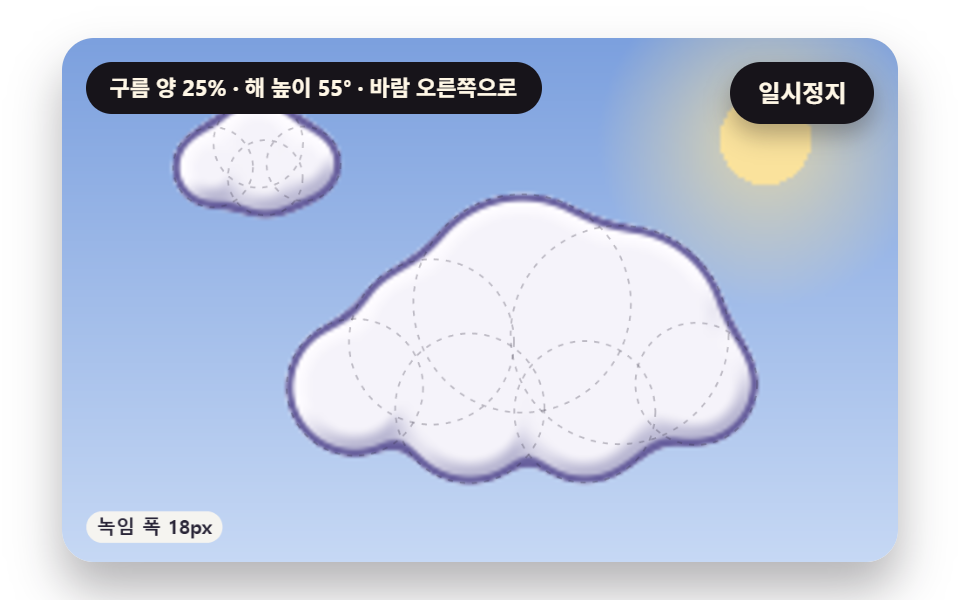 Creative UICSS Cloud Animation: 9 Sky Scenes in Canvas
 Creative UICSS Background Pattern Generator: 9 Seeded Scenes
 Creative UI3D Globe Website: 9 Canvas Orbit Scenes
 Creative UIVerlet Physics 9 Demos: No Library, Just Canvas
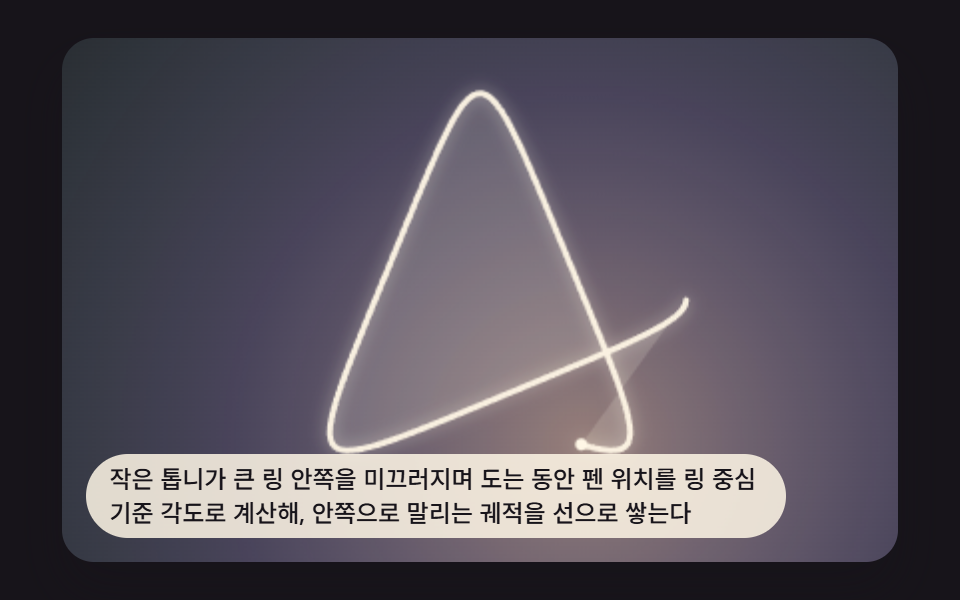 Creative UISpirograph Generator: 9 Gear-Ratio Curve Patterns
 Creative UIMesh Gradient Background: 9 Canvas Animations
 Creative UICSS Shadow Effects: 9 Demos That Compute the Cast
 Creative UIMarble Effect CSS: 9 Ink, Comb and Agate Patterns
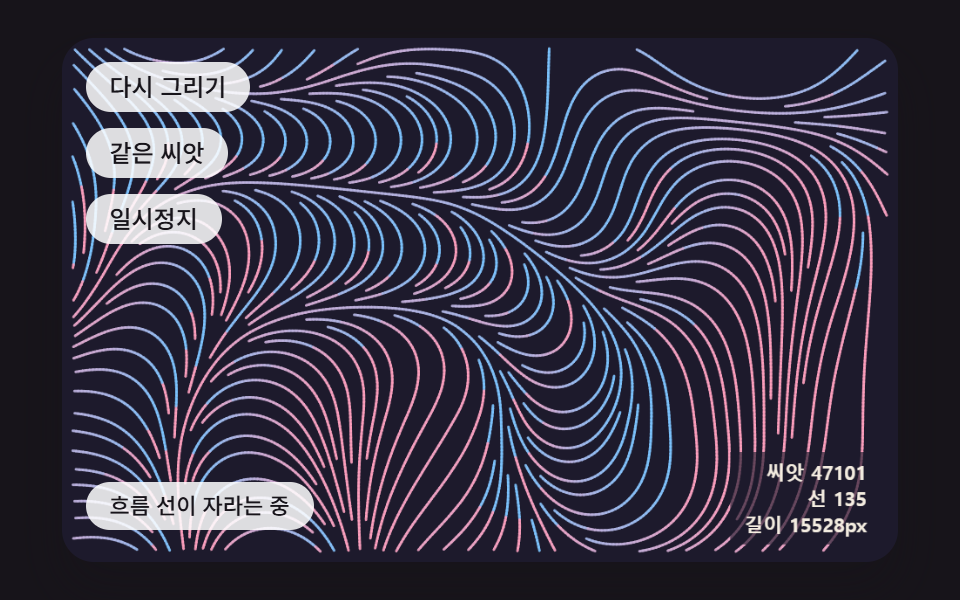 Creative UIGenerative Art JavaScript: 9 Patterns That Grow
 Creative UIAurora Background CSS: 9 Living Night-Sky Scenes