Cart Drawer UI Patterns: 9 Motion Techniques
One panel overshoots its open position before a spring curve settles it, one drag distance meets growing resistance past a threshold, and a badge number closes
 01 cart-drawer-slide-spring-overshoot
 02 cart-drawer-backdrop-depth-scale
 03 cart-drawer-item-stagger-cascade
 04 cart-drawer-qty-bump-elastic
 05 cart-drawer-swipe-dismiss-rubberband
 06 cart-drawer-empty-state-crossfade
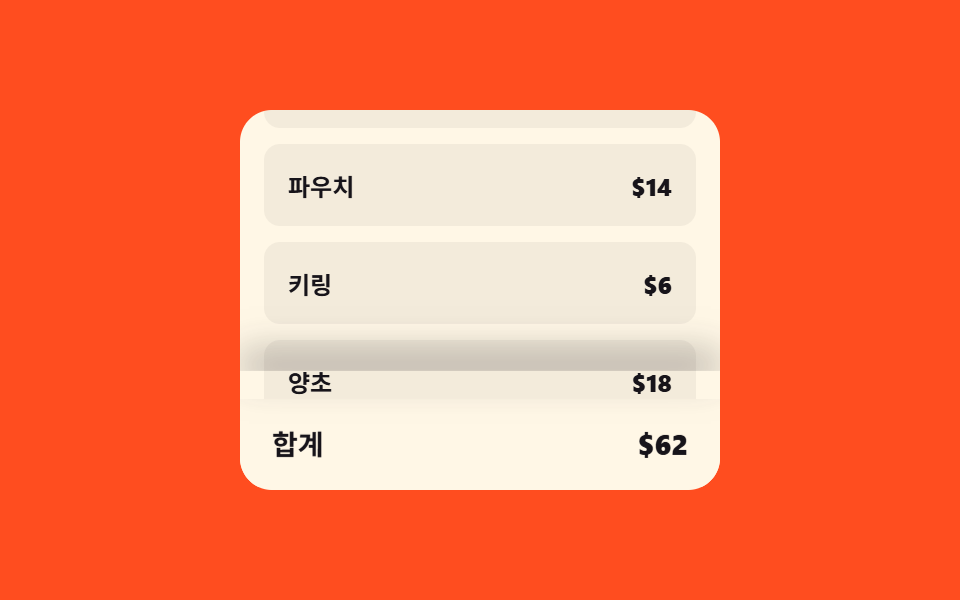 07 cart-drawer-sticky-checkout-reveal
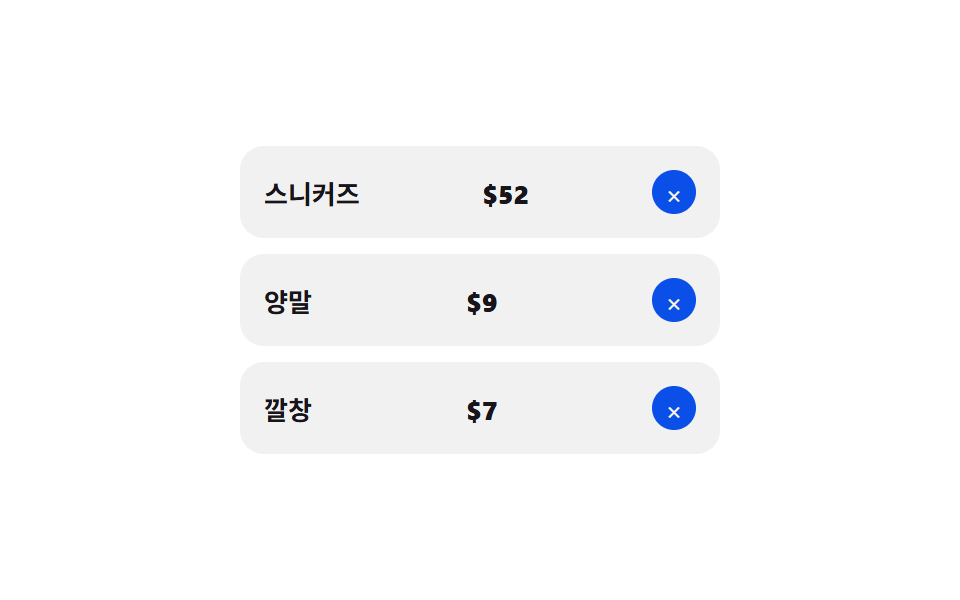 08 cart-drawer-remove-item-collapse
 09 cart-drawer-badge-count-inertia
Auto-plays · click a tile to jump to its section · all nine in one zip
- 01 Slide overshoot — a cart panel whose open position value passes its target before settling back
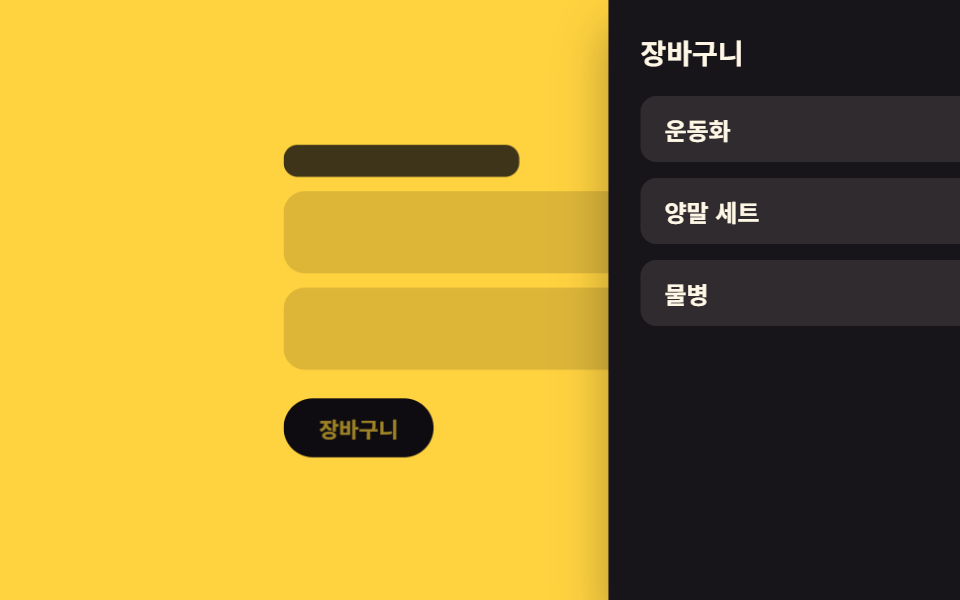
- 02 Backdrop scale-back — the page behind shrinks in proportion to how far the panel has opened
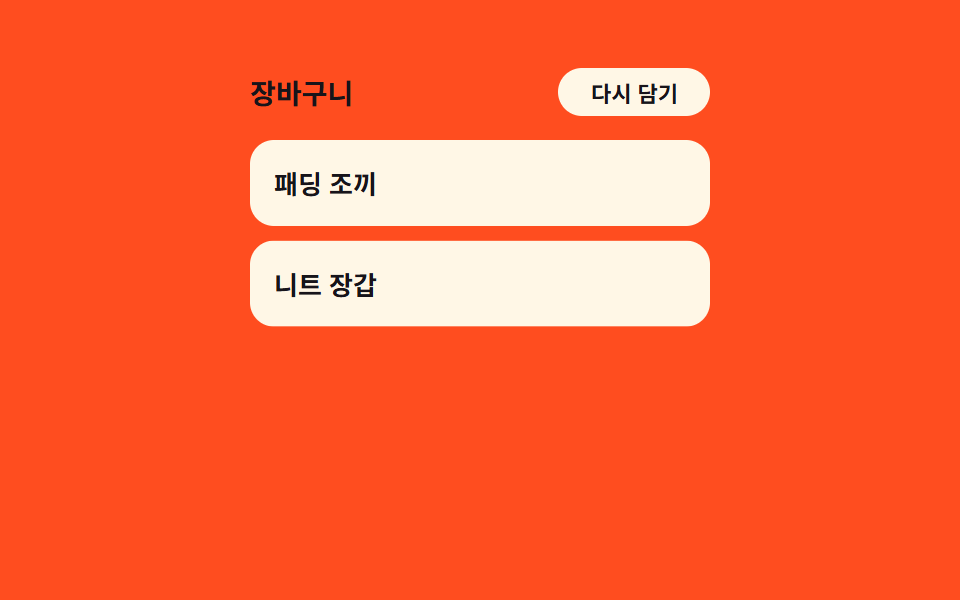
- 03 Item stagger cascade — each row's delay grows with its position value in the list
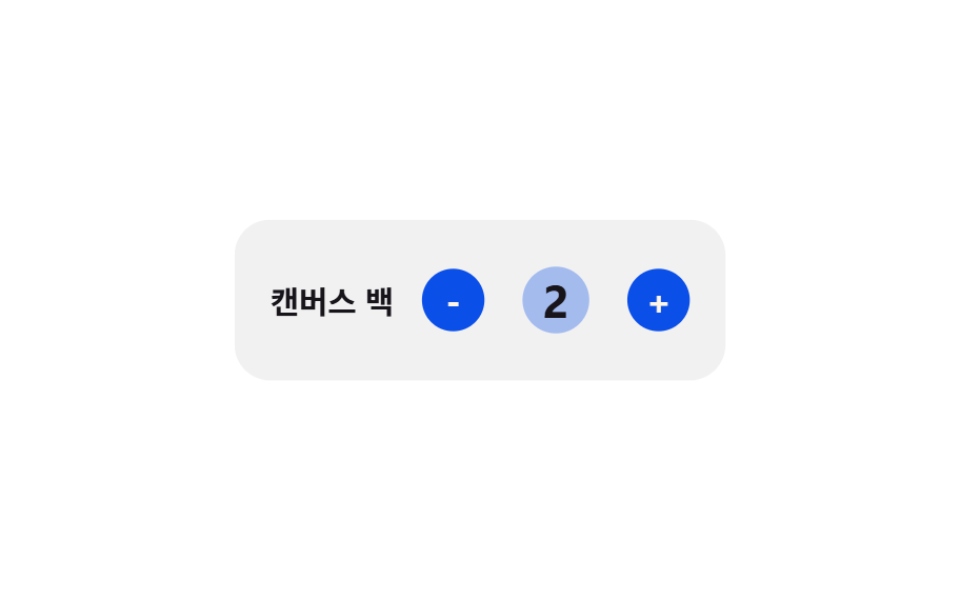
- 04 Elastic quantity bump — a quantity number that grows then eases back by the size of its change
- 05 Rubber-band drag close — a drag distance value that meets growing resistance past a threshold
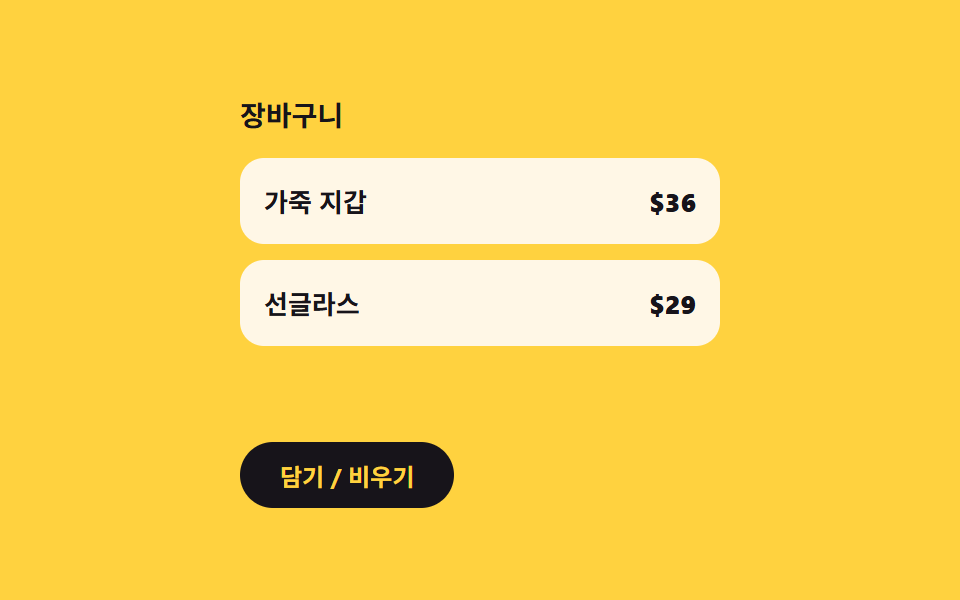
- 06 Empty-state crossfade — a message that fades out the instant the item count value leaves zero
- 07 Checkout bar lift — a bottom bar whose shadow and height values grow with scroll position
- 08 Remove-item collapse — a removed row's height value shrinking to zero as rows below close the gap
- 09 Badge count inertia — a number on the icon that eases toward a changed value frame by frame
None of the nine ever process a real order — the checkout bar in 07 and the drawer's own open state only ever transition locally, and nothing here calls fetch or submits a payment; every product name and price is invented, and zero real brand appears anywhere in the set. All nine also answer something a visitor actually does: 01, 02, 03, 04, 06, 08, and 09 each answer a real click, 05 answers pointerdown, pointermove, and pointerup together as a single drag, and 07 answers wheel, pointerdown, scroll, and resize — not one of the nine only plays on autoplay.
Anatomy of nine patterns — when position, distance, and count values recompute
Nine patterns split into three ways of turning a click, a drag, or an item count into a value worth animating, and skipping this layer is what makes a cart drawer ui pattern read as a handful of disconnected transitions instead of nine small calculators.
Why three patterns tween a fixed 0-to-1 progress value against a duration constant
02, 06, and 08 each start a requestAnimationFrame loop the instant a state flips — the drawer opens, the item count leaves zero, or a row gets removed — and divide elapsed time by a duration constant to get a progress value between 0 and 1 that an easing function then reshapes. 02's easeInOutCubic turns that progress into a paired scale and brightness value for the page behind the panel. 06 runs the same easing function toward the opposite goal, turning progress into two opacity values that cross as one rises and the other falls. 08 uses easeInCubic instead, so a removed row's height, opacity, and horizontal offset all start shrinking slowly and accelerate as the row finishes collapsing.
Why three patterns solve a decay or resistance formula directly from elapsed time or drag distance
01, 04, and 05 never touch a bounded progress ratio at all — each one solves a closed-form equation instead. 01's springProgress plugs elapsed time straight into a damped harmonic oscillator equation, so the position value can pass 1 and swing back before settling, something an easing curve alone cannot produce. 04's elasticPulse solves a decaying sine wave of elapsed time for the quantity number's size, while a second function, easeOutCubic, separately grows and fades a ripple around it. 05's rubberband takes live drag distance, not time, and compresses it through an exponential formula the instant a pointer moves past a threshold.
Why three patterns keep recomputing a value that chases a moving target instead of completing
03, 07, and 09 never reach a final resting value the way a tween does — each one keeps recomputing against a target that itself keeps changing. 03's computeDelay divides a fixed total spread time by the current row count every time the list reorders, so a delay value is a function of position, not a fixed per-row number. 07's lerp closes part of the gap between a shadow value and a scroll-derived target on every tick, so the target itself moves as a visitor scrolls. 09's lerp does the same for a badge number, closing part of the remaining difference every frame until the displayed number catches the target count.
Code per pattern — how does each value get computed?
01Slide overshoot — a cart panel whose open position value passes its target before settling back
Once the panel enters its open state, its position value follows a spring curve that overshoots the target slightly before settling, and once it closes that value retreats along the same curve in reverse.
<main class="stage">
<div class="cdso is-demo" id="cdso">
  <div class="cdso__page">
    <div class="cdso__card"></div>
    <div class="cdso__card"></div>
    <div class="cdso__card"></div>
    <button class="cdso__toggle" id="cdsoToggle" type="button">Open cart</button>
  </div>
  <div class="cdso__backdrop" id="cdsoBackdrop"></div>
  <aside class="cdso__panel" id="cdsoPanel">
    <header class="cdso__head">
      <span class="cdso__title">Cart</span>
      <button class="cdso__close" id="cdsoClose" type="button" aria-label="Close">
        <svg viewBox="0 0 256 256" width="16" height="16" aria-hidden="true"><g fill="currentColor"><path d="M205.66 194.34a8 8 0 0 1-11.32 11.32L128 139.31l-66.34 66.35a8 8 0 0 1-11.32-11.32L116.69 128L50.34 61.66a8 8 0 0 1 11.32-11.32L128 116.69l66.34-66.35a8 8 0 0 1 11.32 11.32L139.31 128Z"/></g></svg>
      </button>
    </header>
    <ul class="cdso__list">
      <li class="cdso__row"><span>Cotton Tee</span><b>$24</b></li>
      <li class="cdso__row"><span>Canvas Tote</span><b>$18</b></li>
      <li class="cdso__row"><span>Ceramic Mug</span><b>$12</b></li>
    </ul>
    <footer class="cdso__foot"><span>Total</span><b>$54</b></footer>
  </aside>
</div>
</main>@use "../../../../site/static/demo-tokens" as *;
// 계산 겹: JS 가 감쇠 조화진동자 방정식(springProgress())으로 위치 값을 매 프레임 직접 계산해
// translateX 에 대입한다 — CSS 는 결과를 받기만 하고 @keyframes 로 흉내내지 않는다.
$duration: $dur-enter;
$easing: $ease-spring;
$color: $subject-cream;
@include stage($stage-ink);
.stage { position: relative; }
.cdso__page {
display: flex;
flex-direction: column;
align-items: center;
gap: $sp-3;
width: min(200px, 62vw);
}
.cdso__card {
width: 100%;
height: 40px;
border-radius: $r-control;
background: rgba(255, 247, 230, .12);
}
.cdso__toggle {
margin-top: $sp-2;
border: 0;
border-radius: $r-pill;
padding: $sp-2 $sp-5;
background: $color;
color: $subject-ink;
font-family: inherit;
font-weight: 700;
font-size: 12px;
cursor: pointer;
}
.cdso__backdrop {
position: fixed;
inset: 0;
background: rgba(0, 0, 0, .55);
opacity: 0;
pointer-events: none;
}
.cdso__panel {
position: fixed;
top: 0;
right: 0;
bottom: 0;
width: min(72%, 240px);
box-sizing: border-box;
display: flex;
flex-direction: column;
background: $subject-cream;
padding: $sp-4;
gap: $sp-3;
transform: translateX(100%);
box-shadow: $shadow-raised;
}
.cdso__head {
display: flex;
align-items: center;
justify-content: space-between;
}
.cdso__title {
color: $subject-ink;
font-weight: 700;
font-size: 14px;
}
.cdso__close {
width: 28px;
height: 28px;
border: 0;
border-radius: $r-pill;
background: rgba(23, 20, 26, .08);
color: $subject-ink;
display: grid;
place-items: center;
cursor: pointer;
}
.cdso__list {
list-style: none;
margin: 0;
padding: 0;
display: flex;
flex-direction: column;
gap: $sp-2;
}
.cdso__row {
display: flex;
align-items: center;
justify-content: space-between;
padding: $sp-2 $sp-3;
border-radius: $r-sm;
background: rgba(23, 20, 26, .06);
color: $subject-ink;
font-size: 12px;
font-weight: 600;
}
.cdso__foot {
margin-top: auto;
display: flex;
align-items: center;
justify-content: space-between;
padding-top: $sp-3;
border-top: 1px solid rgba(23, 20, 26, .12);
color: $subject-ink;
font-weight: 700;
font-size: 14px;
}
@media (max-width: 340px) {
.cdso__page { width: min(170px, 60vw); gap: $sp-2; }
.cdso__card { height: 32px; }
.cdso__panel { width: min(78%, 200px); padding: $sp-3; gap: $sp-2; }
.cdso__row { font-size: 11px; }
}
@media (prefers-reduced-motion: reduce) {
.cdso__panel, .cdso__backdrop { transition: none !important; }
}html, body {
margin: 0;
overflow: hidden;
}
.stage {
box-sizing: border-box;
min-height: 100vh;
display: grid;
place-items: center;
margin: 0;
background: #17141a;
font-family: -apple-system, "Segoe UI", "Noto Sans KR", sans-serif;
padding: clamp(8px, 4vw, 24px);
}
.stage {
position: relative;
}
.cdso__page {
display: flex;
flex-direction: column;
align-items: center;
gap: 12px;
width: min(200px, 62vw);
}
.cdso__card {
width: 100%;
height: 40px;
border-radius: 12px;
background: rgba(255, 247, 230, 0.12);
}
.cdso__toggle {
margin-top: 8px;
border: 0;
border-radius: 999px;
padding: 8px 20px;
background: #fff7e6;
color: #17141a;
font-family: inherit;
font-weight: 700;
font-size: 12px;
cursor: pointer;
}
.cdso__backdrop {
position: fixed;
inset: 0;
background: rgba(0, 0, 0, 0.55);
opacity: 0;
pointer-events: none;
}
.cdso__panel {
position: fixed;
top: 0;
right: 0;
bottom: 0;
width: min(72%, 240px);
box-sizing: border-box;
display: flex;
flex-direction: column;
background: #fff7e6;
padding: 16px;
gap: 12px;
transform: translateX(100%);
box-shadow: 0 14px 24px rgba(23, 20, 26, 0.32);
}
.cdso__head {
display: flex;
align-items: center;
justify-content: space-between;
}
.cdso__title {
color: #17141a;
font-weight: 700;
font-size: 14px;
}
.cdso__close {
width: 28px;
height: 28px;
border: 0;
border-radius: 999px;
background: rgba(23, 20, 26, 0.08);
color: #17141a;
display: grid;
place-items: center;
cursor: pointer;
}
.cdso__list {
list-style: none;
margin: 0;
padding: 0;
display: flex;
flex-direction: column;
gap: 8px;
}
.cdso__row {
display: flex;
align-items: center;
justify-content: space-between;
padding: 8px 12px;
border-radius: 8px;
background: rgba(23, 20, 26, 0.06);
color: #17141a;
font-size: 12px;
font-weight: 600;
}
.cdso__foot {
margin-top: auto;
display: flex;
align-items: center;
justify-content: space-between;
padding-top: 12px;
border-top: 1px solid rgba(23, 20, 26, 0.12);
color: #17141a;
font-weight: 700;
font-size: 14px;
}
@media (max-width: 340px) {
.cdso__page {
width: min(170px, 60vw);
gap: 8px;
}
.cdso__card {
height: 32px;
}
.cdso__panel {
width: min(78%, 200px);
padding: 12px;
gap: 8px;
}
.cdso__row {
font-size: 11px;
}
}
@media (prefers-reduced-motion: reduce) {
.cdso__panel, .cdso__backdrop {
transition: none !important;
}
}(function () {
var root = document.getElementById('cdso');
var panel = document.getElementById('cdsoPanel');
var backdrop = document.getElementById('cdsoBackdrop');
var toggle = document.getElementById('cdsoToggle');
var closeBtn = document.getElementById('cdsoClose');
// 계산 겹: 감쇠 조화진동자(스프링) 방정식을 매 프레임 직접 풀어 위치 값을 만든다 — easing 곡선을
// 빌려 쓰는 게 아니라 감쇠비(ZETA)·고유진동수(OMEGA) 로 목표를 넘었다가(오버슛) 되돌아오는 값을 계산한다.
var ZETA = 0.42;
var OMEGA = 9.5;
var OMEGA_D = OMEGA * Math.sqrt(1 - ZETA * ZETA);
function springProgress(tSec) {
if (tSec <= 0) { return 0; }
var env = Math.exp(-ZETA * OMEGA * tSec);
return 1 - env * (Math.cos(OMEGA_D * tSec) + (ZETA * OMEGA / OMEGA_D) * Math.sin(OMEGA_D * tSec));
}
var DURATION_S = 0.85;
var isOpen = false;
var raf = null;
function apply(v) {
var pct = (1 - v) * 100;
panel.style.transform = 'translateX(' + pct.toFixed(2) + '%)';
backdrop.style.opacity = Math.min(1, Math.max(0, v)).toFixed(3);
}
function run(closing) {
if (raf) { cancelAnimationFrame(raf); }
var start = performance.now();
function frame(now) {
var t = (now - start) / 1000;
var raw = springProgress(Math.min(t, DURATION_S));
var v = closing ? (1 - raw) : raw;
apply(v);
if (t < DURATION_S) {
raf = requestAnimationFrame(frame);
} else {
apply(closing ? 0 : 1);
raf = null;
isOpen = !closing;
}
}
raf = requestAnimationFrame(frame);
}
function stopAutoplay() {
if (autoplayTimer) { clearInterval(autoplayTimer); autoplayTimer = null; }
}
toggle.addEventListener('click', function () {
root.classList.remove('is-demo');
stopAutoplay();
run(isOpen);
});
closeBtn.addEventListener('click', function () {
root.classList.remove('is-demo');
stopAutoplay();
run(true);
});
backdrop.addEventListener('click', function () {
root.classList.remove('is-demo');
stopAutoplay();
run(true);
});
var autoplayTimer = null;
function autoplayTick() {
run(isOpen);
}
var reduce = window.matchMedia('(prefers-reduced-motion: reduce)').matches;
if (reduce) {
apply(1);
} else {
run(false);
autoplayTimer = setInterval(autoplayTick, 1050);
}
})();import { useEffect, useRef } from "react";
import type { CSSProperties } from "react";
import styles from "./CartDrawerSlideSpringOvershoot.module.scss";
export type CartDrawerSlideSpringOvershootProps = {
/** 스프링이 정착하는 데 걸리는 대략 시간 (기본 850ms) */
duration?: number;
color?: string;
};
// 계산 겹: 감쇠 조화진동자(스프링) 방정식을 매 프레임 직접 풀어 위치 값을 만든다 — easing 곡선을
// 빌려 쓰는 게 아니라 감쇠비(ZETA)·고유진동수(OMEGA) 로 목표를 넘었다가(오버슛) 되돌아오는 값을 계산한다.
const ZETA = 0.42;
const OMEGA = 9.5;
const OMEGA_D = OMEGA * Math.sqrt(1 - ZETA * ZETA);
function springProgress(tSec: number): number {
if (tSec <= 0) return 0;
const env = Math.exp(-ZETA * OMEGA * tSec);
return 1 - env * (Math.cos(OMEGA_D * tSec) + ((ZETA * OMEGA) / OMEGA_D) * Math.sin(OMEGA_D * tSec));
}
export default function CartDrawerSlideSpringOvershoot({
duration = 850,
color = "#fff7e6",
}: CartDrawerSlideSpringOvershootProps) {
const rootRef = useRef<HTMLDivElement | null>(null);
const panelRef = useRef<HTMLElement | null>(null);
const backdropRef = useRef<HTMLDivElement | null>(null);
const isOpenRef = useRef(false);
const rafRef = useRef<number | null>(null);
const timerRef = useRef<ReturnType<typeof setInterval> | null>(null);
useEffect(() => {
const durationS = duration / 1000;
function apply(v: number) {
const panel = panelRef.current;
const backdrop = backdropRef.current;
if (!panel || !backdrop) return;
const pct = (1 - v) * 100;
panel.style.transform = `translateX(${pct.toFixed(2)}%)`;
backdrop.style.opacity = Math.min(1, Math.max(0, v)).toFixed(3);
}
function run(closing: boolean) {
if (rafRef.current) cancelAnimationFrame(rafRef.current);
const start = performance.now();
function frame(now: number) {
const t = (now - start) / 1000;
const raw = springProgress(Math.min(t, durationS));
const v = closing ? 1 - raw : raw;
apply(v);
if (t < durationS) {
rafRef.current = requestAnimationFrame(frame);
} else {
apply(closing ? 0 : 1);
rafRef.current = null;
isOpenRef.current = !closing;
}
}
rafRef.current = requestAnimationFrame(frame);
}
function stopAutoplay() {
if (timerRef.current) {
clearInterval(timerRef.current);
timerRef.current = null;
}
}
function onRealInput(closing: boolean) {
rootRef.current?.classList.remove(styles.isDemo);
stopAutoplay();
run(closing);
}
const toggle = () => onRealInput(!!isOpenRef.current);
const close = () => onRealInput(true);
const toggleEl = rootRef.current?.querySelector<HTMLButtonElement>(`.${styles.toggle}`);
const closeEl = rootRef.current?.querySelector<HTMLButtonElement>(`.${styles.close}`);
toggleEl?.addEventListener("click", toggle);
closeEl?.addEventListener("click", close);
backdropRef.current?.addEventListener("click", close);
const reduce = window.matchMedia("(prefers-reduced-motion: reduce)").matches;
if (reduce) {
apply(1);
} else {
run(false);
timerRef.current = setInterval(() => run(!!isOpenRef.current), 1050);
}
return () => {
stopAutoplay();
if (rafRef.current) cancelAnimationFrame(rafRef.current);
toggleEl?.removeEventListener("click", toggle);
closeEl?.removeEventListener("click", close);
backdropRef.current?.removeEventListener("click", close);
};
}, [duration]);
return (
<div ref={rootRef} className={`${styles.stage} ${styles.isDemo}`} style={{ "--color": color } as CSSProperties}>
<div className={styles.page}>
<div className={styles.card} />
<div className={styles.card} />
<div className={styles.card} />
<button className={styles.toggle} type="button">장바구니 열기</button>
</div>
<div ref={backdropRef} className={styles.backdrop} />
<aside ref={panelRef} className={styles.panel}>
<header className={styles.head}>
<span className={styles.title}>장바구니</span>
<button className={styles.close} type="button" aria-label="닫기">
<svg viewBox="0 0 256 256" width="16" height="16" aria-hidden="true"><g fill="currentColor"><path d="M205.66 194.34a8 8 0 0 1-11.32 11.32L128 139.31l-66.34 66.35a8 8 0 0 1-11.32-11.32L116.69 128L50.34 61.66a8 8 0 0 1 11.32-11.32L128 116.69l66.34-66.35a8 8 0 0 1 11.32 11.32L139.31 128Z"/></g></svg>
</button>
</header>
<ul className={styles.list}>
<li className={styles.row}><span>코튼 티셔츠</span><b>$24</b></li>
<li className={styles.row}><span>캔버스 백</span><b>$18</b></li>
<li className={styles.row}><span>세라믹 머그</span><b>$12</b></li>
</ul>
<footer className={styles.foot}><span>합계</span><b>$54</b></footer>
</aside>
</div>
);
}01 · Slide overshoot — a cart panel whose open position value passes its target before settling back — Measured area 100.0% · moving frames 19/23Original by GODRICH · SCSS and React ship in the zip · See the password
What the numbers say
Across 23 tracked frames, 01 moves on 19 of them, covering 100.0% cumulative area at a 165.3 average intensity — the highest area score of the nine, because an underdamped spring keeps repainting the panel's transform well past the moment a plain slide-in would have already stopped. ZETA sets how quickly that motion decays and OMEGA sets how fast it oscillates while decaying, and springProgress is what turns those two constants and elapsed time into the single position value apply writes to the panel's transform and the backdrop's opacity.
  // calc layer: solves a damped harmonic oscillator (spring) equation directly every frame to build the position value —
  // not borrowing an easing curve, but computing a value that overshoots the target and returns, driven by the damping ratio (ZETA) and natural frequency (OMEGA).
  var ZETA = 0.42;
  var OMEGA = 9.5;
  var OMEGA_D = OMEGA * Math.sqrt(1 - ZETA * ZETA);
  function springProgress(tSec) {
    if (tSec <= 0) { return 0; }
    var env = Math.exp(-ZETA * OMEGA * tSec);
    return 1 - env * (Math.cos(OMEGA_D * tSec) + (ZETA * OMEGA / OMEGA_D) * Math.sin(OMEGA_D * tSec));
  }

  var DURATION_S = 0.85;
  var isOpen = false;
  var raf = null;

  function apply(v) {
    var pct = (1 - v) * 100;
    panel.style.transform = 'translateX(' + pct.toFixed(2) + '%)';
    backdrop.style.opacity = Math.min(1, Math.max(0, v)).toFixed(3);
  }
02Backdrop scale-back — the page behind shrinks in proportion to how far the panel has opened
As the panel's open progress value increases, the page behind it shrinks and dims by a matched amount so the panel appears to float forward, and both values reverse at the same rate as it closes.
<main class="stage">
<div class="cdbd is-demo" id="cdbd">
  <div class="cdbd__page" id="cdbdPage">
    <div class="cdbd__bar"></div>
    <div class="cdbd__card"></div>
    <div class="cdbd__card"></div>
    <button class="cdbd__toggle" id="cdbdToggle" type="button">Cart</button>
  </div>
  <aside class="cdbd__panel" id="cdbdPanel">
    <header class="cdbd__head"><span>Cart</span><b>3</b></header>
    <ul class="cdbd__list">
      <li>Sneakers</li>
      <li>Sock Set</li>
      <li>Water Bottle</li>
    </ul>
  </aside>
</div>
</main>
@use "../../../../site/static/demo-tokens" as *;
// 계산 겹: 열림 진행 값(0~1)을 easeInOutCubic() 으로 보간해 뒤 화면의 scale·brightness 값을
// 같은 비율로 도출한다(apply()) — 두 속성을 따로 애니메이션하지 않고 한 계산에서 나온다.
$duration: $dur-base;
$easing: $ease-out;
$color: $subject-ink;
@include stage($stage-yellow);
.stage { position: relative; overflow: hidden; }
.cdbd__page {
display: flex;
flex-direction: column;
align-items: stretch;
gap: $sp-2;
width: min(220px, 66vw);
transform-origin: center;
will-change: transform, filter;
}
.cdbd__bar {
height: 18px;
border-radius: $r-sm;
background: rgba(23, 20, 26, .8);
width: 60%;
}
.cdbd__card {
height: 46px;
border-radius: $r-control;
background: rgba(23, 20, 26, .14);
}
.cdbd__toggle {
margin-top: $sp-2;
border: 0;
border-radius: $r-pill;
padding: $sp-2 $sp-5;
background: $color;
color: $stage-yellow;
font-family: inherit;
font-weight: 700;
font-size: 12px;
cursor: pointer;
align-self: flex-start;
}
.cdbd__panel {
position: fixed;
top: 0;
right: 0;
bottom: 0;
width: min(70%, 230px);
box-sizing: border-box;
display: flex;
flex-direction: column;
gap: $sp-3;
padding: $sp-4;
background: $color;
color: $subject-cream;
transform: translateX(100%);
box-shadow: $shadow-raised;
}
.cdbd__head {
display: flex;
align-items: center;
justify-content: space-between;
font-weight: 700;
font-size: 14px;
}
.cdbd__list {
list-style: none;
margin: 0;
padding: 0;
display: flex;
flex-direction: column;
gap: $sp-2;
}
.cdbd__list li {
padding: $sp-2 $sp-3;
border-radius: $r-sm;
background: rgba(255, 247, 230, .1);
font-size: 12px;
font-weight: 600;
}
@media (max-width: 340px) {
.cdbd__page { width: min(180px, 62vw); }
.cdbd__card { height: 36px; }
.cdbd__panel { width: min(76%, 190px); padding: $sp-3; gap: $sp-2; }
}
@media (prefers-reduced-motion: reduce) {
.cdbd__page, .cdbd__panel { transition: none !important; }
}html, body {
margin: 0;
overflow: hidden;
}
.stage {
box-sizing: border-box;
min-height: 100vh;
display: grid;
place-items: center;
margin: 0;
background: #ffd23f;
font-family: -apple-system, "Segoe UI", "Noto Sans KR", sans-serif;
padding: clamp(8px, 4vw, 24px);
}
.stage {
position: relative;
overflow: hidden;
}
.cdbd__page {
display: flex;
flex-direction: column;
align-items: stretch;
gap: 8px;
width: min(220px, 66vw);
transform-origin: center;
will-change: transform, filter;
}
.cdbd__bar {
height: 18px;
border-radius: 8px;
background: rgba(23, 20, 26, 0.8);
width: 60%;
}
.cdbd__card {
height: 46px;
border-radius: 12px;
background: rgba(23, 20, 26, 0.14);
}
.cdbd__toggle {
margin-top: 8px;
border: 0;
border-radius: 999px;
padding: 8px 20px;
background: #17141a;
color: #ffd23f;
font-family: inherit;
font-weight: 700;
font-size: 12px;
cursor: pointer;
align-self: flex-start;
}
.cdbd__panel {
position: fixed;
top: 0;
right: 0;
bottom: 0;
width: min(70%, 230px);
box-sizing: border-box;
display: flex;
flex-direction: column;
gap: 12px;
padding: 16px;
background: #17141a;
color: #fff7e6;
transform: translateX(100%);
box-shadow: 0 14px 24px rgba(23, 20, 26, 0.32);
}
.cdbd__head {
display: flex;
align-items: center;
justify-content: space-between;
font-weight: 700;
font-size: 14px;
}
.cdbd__list {
list-style: none;
margin: 0;
padding: 0;
display: flex;
flex-direction: column;
gap: 8px;
}
.cdbd__list li {
padding: 8px 12px;
border-radius: 8px;
background: rgba(255, 247, 230, 0.1);
font-size: 12px;
font-weight: 600;
}
@media (max-width: 340px) {
.cdbd__page {
width: min(180px, 62vw);
}
.cdbd__card {
height: 36px;
}
.cdbd__panel {
width: min(76%, 190px);
padding: 12px;
gap: 8px;
}
}
@media (prefers-reduced-motion: reduce) {
.cdbd__page, .cdbd__panel {
transition: none !important;
}
}(function () {
var root = document.getElementById('cdbd');
var page = document.getElementById('cdbdPage');
var panel = document.getElementById('cdbdPanel');
var toggle = document.getElementById('cdbdToggle');
// 계산 겹: 패널의 열림 진행 값(progress, 0~1)을 이징 함수로 보간해 뒤 화면의 크기 값과
// 어둡기 값을 같은 비율로 계산한다 — scale·filter 를 각자 애니메이션하지 않고 한 값에서 둘을 도출한다.
function easeInOutCubic(p) {
return p < 0.5 ? 4 * p * p * p : 1 - Math.pow(-2 * p + 2, 3) / 2;
}
var DURATION_S = 0.5;
var MIN_SCALE = 0.86;
var MAX_DIM = 0.5;
var isOpen = false;
var raf = null;
function apply(progress) {
var eased = easeInOutCubic(Math.min(1, Math.max(0, progress)));
var scale = 1 - eased * (1 - MIN_SCALE);
var dim = eased * MAX_DIM;
page.style.transform = 'scale(' + scale.toFixed(4) + ')';
page.style.filter = 'brightness(' + (1 - dim).toFixed(3) + ')';
panel.style.transform = 'translateX(' + ((1 - eased) * 100).toFixed(2) + '%)';
}
function run(closing) {
if (raf) { cancelAnimationFrame(raf); }
var start = performance.now();
var from = closing ? 1 : 0;
var to = closing ? 0 : 1;
function frame(now) {
var t = Math.min(1, (now - start) / (DURATION_S * 1000));
apply(from + (to - from) * t);
if (t < 1) {
raf = requestAnimationFrame(frame);
} else {
raf = null;
isOpen = !closing;
}
}
raf = requestAnimationFrame(frame);
}
function stopAutoplay() {
if (autoplayTimer) { clearInterval(autoplayTimer); autoplayTimer = null; }
}
toggle.addEventListener('click', function () {
root.classList.remove('is-demo');
stopAutoplay();
run(isOpen);
});
var autoplayTimer = null;
function autoplayTick() { run(isOpen); }
var reduce = window.matchMedia('(prefers-reduced-motion: reduce)').matches;
if (reduce) {
apply(1);
} else {
run(false);
autoplayTimer = setInterval(autoplayTick, 900);
}
})();import { useEffect, useRef } from "react";
import type { CSSProperties } from "react";
import styles from "./CartDrawerBackdropDepthScale.module.scss";
export type CartDrawerBackdropDepthScaleProps = {
duration?: number;
color?: string;
};
// 계산 겹: 열림 진행 값(0~1)을 easeInOutCubic() 으로 보간해 뒤 화면의 크기 값과
// 어둡기 값을 같은 비율로 계산한다 — scale·filter 를 각자 애니메이션하지 않고 한 값에서 둘을 도출한다.
function easeInOutCubic(p: number): number {
return p < 0.5 ? 4 * p * p * p : 1 - Math.pow(-2 * p + 2, 3) / 2;
}
const MIN_SCALE = 0.86;
const MAX_DIM = 0.5;
export default function CartDrawerBackdropDepthScale({
duration = 500,
color = "#17141a",
}: CartDrawerBackdropDepthScaleProps) {
const rootRef = useRef<HTMLDivElement | null>(null);
const pageRef = useRef<HTMLDivElement | null>(null);
const panelRef = useRef<HTMLElement | null>(null);
const isOpenRef = useRef(false);
const rafRef = useRef<number | null>(null);
const timerRef = useRef<ReturnType<typeof setInterval> | null>(null);
useEffect(() => {
function apply(progress: number) {
const page = pageRef.current;
const panel = panelRef.current;
if (!page || !panel) return;
const eased = easeInOutCubic(Math.min(1, Math.max(0, progress)));
const scale = 1 - eased * (1 - MIN_SCALE);
const dim = eased * MAX_DIM;
page.style.transform = `scale(${scale.toFixed(4)})`;
page.style.filter = `brightness(${(1 - dim).toFixed(3)})`;
panel.style.transform = `translateX(${((1 - eased) * 100).toFixed(2)}%)`;
}
function run(closing: boolean) {
if (rafRef.current) cancelAnimationFrame(rafRef.current);
const start = performance.now();
const from = closing ? 1 : 0;
const to = closing ? 0 : 1;
function frame(now: number) {
const t = Math.min(1, (now - start) / duration);
apply(from + (to - from) * t);
if (t < 1) {
rafRef.current = requestAnimationFrame(frame);
} else {
rafRef.current = null;
isOpenRef.current = !closing;
}
}
rafRef.current = requestAnimationFrame(frame);
}
function stopAutoplay() {
if (timerRef.current) {
clearInterval(timerRef.current);
timerRef.current = null;
}
}
const toggle = () => {
rootRef.current?.classList.remove(styles.isDemo);
stopAutoplay();
run(!!isOpenRef.current);
};
const toggleEl = rootRef.current?.querySelector<HTMLButtonElement>(`.${styles.toggle}`);
toggleEl?.addEventListener("click", toggle);
const reduce = window.matchMedia("(prefers-reduced-motion: reduce)").matches;
if (reduce) {
apply(1);
} else {
run(false);
timerRef.current = setInterval(() => run(!!isOpenRef.current), 900);
}
return () => {
stopAutoplay();
if (rafRef.current) cancelAnimationFrame(rafRef.current);
toggleEl?.removeEventListener("click", toggle);
};
}, [duration]);
return (
<div ref={rootRef} className={`${styles.stage} ${styles.isDemo}`} style={{ "--color": color } as CSSProperties}>
<div ref={pageRef} className={styles.page}>
<div className={styles.bar} />
<div className={styles.card} />
<div className={styles.card} />
<button className={styles.toggle} type="button">장바구니</button>
</div>
<aside ref={panelRef} className={styles.panel}>
<header className={styles.head}><span>장바구니</span><b>3</b></header>
<ul className={styles.list}>
<li>운동화</li>
<li>양말 세트</li>
<li>물병</li>
</ul>
</aside>
</div>
);
}02 · Backdrop scale-back — the page behind shrinks in proportion to how far the panel has opened — Measured area 55.719% · moving frames 15/23Original by GODRICH · SCSS and React ship in the zip · See the password
What the numbers say
02 moves on 15 of 23 frames, covering 55.719% cumulative area at a 133.1 average intensity, since every tick that updates the panel also has to repaint the full-page backdrop behind it. MIN_SCALE sets the floor the page's scale value shrinks toward and MAX_DIM sets how far its brightness value falls, while easeInOutCubic is the one function that reshapes a single progress number into both the scale and the dim value at once, so they can never visibly drift out of step with each other.
  // calc layer: interpolates the panel's open progress value (0-1) through an easing function to compute the page-behind's
  // scale value and dim value at the same rate — deriving both from one value instead of animating scale and filter separately.
  function easeInOutCubic(p) {
    return p < 0.5 ? 4 * p * p * p : 1 - Math.pow(-2 * p + 2, 3) / 2;
  }

  var DURATION_S = 0.5;
  var MIN_SCALE = 0.86;
  var MAX_DIM = 0.5;
  var isOpen = false;
  var raf = null;

  function apply(progress) {
    var eased = easeInOutCubic(Math.min(1, Math.max(0, progress)));
    var scale = 1 - eased * (1 - MIN_SCALE);
    var dim = eased * MAX_DIM;
    page.style.transform = 'scale(' + scale.toFixed(4) + ')';
    page.style.filter = 'brightness(' + (1 - dim).toFixed(3) + ')';
    panel.style.transform = 'translateX(' + ((1 - eased) * 100).toFixed(2) + '%)';
  }
03Item stagger cascade — each row's delay grows with its position value in the list
Once the panel opens, each row receives a delay value proportional to its position in the list so rows appear top to bottom in sequence, and when items are reordered that delay value is recomputed for the new order.
<main class="stage">
<div class="cdis is-demo" id="cdis">
  <header class="cdis__head"><span>Cart</span>
    <button class="cdis__shuffle" id="cdisShuffle" type="button">Restock</button>
  </header>
  <ul class="cdis__list" id="cdisList"></ul>
</div>
</main>
@use "../../../../site/static/demo-tokens" as *;
// 계산 겹: 총 등장 시간(TOTAL_SPREAD_MS)을 현재 항목 수로 나눠 항목마다 지연 값을 다시 구한다
// (computeDelay(), index.html) — 순서가 바뀌면 같은 규칙으로 각 자리의 지연 값이 새로 계산된다.
$duration: $dur-base;
$easing: $ease-pop;
$color: $subject-cream;
@include stage($stage-orange);
.stage { position: relative; }
.cdis {
width: min(230px, 68vw);
display: flex;
flex-direction: column;
gap: $sp-3;
}
.cdis__head {
display: flex;
align-items: center;
justify-content: space-between;
color: $subject-ink;
font-weight: 700;
font-size: 14px;
}
.cdis__shuffle {
border: 0;
border-radius: $r-pill;
padding: $sp-1 $sp-4;
background: $color;
color: $subject-ink;
font-family: inherit;
font-weight: 700;
font-size: 11px;
cursor: pointer;
}
.cdis__list {
list-style: none;
margin: 0;
padding: 0;
display: flex;
flex-direction: column;
gap: $sp-2;
}
.cdis__row {
padding: $sp-3;
border-radius: $r-control;
background: $color;
color: $subject-ink;
font-weight: 600;
font-size: 13px;
opacity: 0;
transform: translateY(14px);
animation-name: cdisRise;
animation-duration: $duration;
animation-timing-function: $easing;
animation-fill-mode: forwards;
animation-delay: var(--delay, 0ms);
}
@keyframes cdisRise {
from { opacity: 0; transform: translateY(14px); }
to { opacity: 1; transform: translateY(0); }
}
@media (max-width: 340px) {
.cdis { width: min(180px, 64vw); gap: $sp-1; }
.cdis__head { font-size: 12px; }
.cdis__list { gap: $sp-1; }
.cdis__row { font-size: 11px; padding: $sp-1 $sp-2; }
}
@media (prefers-reduced-motion: reduce) {
.cdis__row { animation: none !important; opacity: 1; transform: none; }
}html, body {
margin: 0;
overflow: hidden;
}
.stage {
box-sizing: border-box;
min-height: 100vh;
display: grid;
place-items: center;
margin: 0;
background: #ff4d1f;
font-family: -apple-system, "Segoe UI", "Noto Sans KR", sans-serif;
padding: clamp(8px, 4vw, 24px);
}
.stage {
position: relative;
}
.cdis {
width: min(230px, 68vw);
display: flex;
flex-direction: column;
gap: 12px;
}
.cdis__head {
display: flex;
align-items: center;
justify-content: space-between;
color: #17141a;
font-weight: 700;
font-size: 14px;
}
.cdis__shuffle {
border: 0;
border-radius: 999px;
padding: 4px 16px;
background: #fff7e6;
color: #17141a;
font-family: inherit;
font-weight: 700;
font-size: 11px;
cursor: pointer;
}
.cdis__list {
list-style: none;
margin: 0;
padding: 0;
display: flex;
flex-direction: column;
gap: 8px;
}
.cdis__row {
padding: 12px;
border-radius: 12px;
background: #fff7e6;
color: #17141a;
font-weight: 600;
font-size: 13px;
opacity: 0;
transform: translateY(14px);
animation-name: cdisRise;
animation-duration: 300ms;
animation-timing-function: cubic-bezier(0.2, 1.4, 0.4, 1);
animation-fill-mode: forwards;
animation-delay: var(--delay, 0ms);
}
@keyframes cdisRise {
from {
opacity: 0;
transform: translateY(14px);
}
to {
opacity: 1;
transform: translateY(0);
}
}
@media (max-width: 340px) {
.cdis {
width: min(180px, 64vw);
gap: 4px;
}
.cdis__head {
font-size: 12px;
}
.cdis__list {
gap: 4px;
}
.cdis__row {
font-size: 11px;
padding: 4px 8px;
}
}
@media (prefers-reduced-motion: reduce) {
.cdis__row {
animation: none !important;
opacity: 1;
transform: none;
}
}(function () {
var root = document.getElementById('cdis');
var list = document.getElementById('cdisList');
var shuffleBtn = document.getElementById('cdisShuffle');
var NAMES = ['Puffer Vest', 'Knit Gloves', 'Check Scarf', 'Winter Boots'];
// 계산 겹: 총 등장 시간(TOTAL_SPREAD_MS)을 현재 항목 수로 나눠 항목마다 지연 값을 다시 구한다
// (computeDelay()) — 순서가 바뀌면 같은 규칙으로 각 자리의 지연 값이 새로 계산된다.
var BASE_MS = 40;
var TOTAL_SPREAD_MS = 480;
function computeDelay(indexInOrder, total) {
var steps = Math.max(1, total - 1);
var perStep = TOTAL_SPREAD_MS / steps;
return BASE_MS + indexInOrder * perStep;
}
var order = NAMES.map(function (_, i) { return i; });
function render() {
list.textContent = '';
order.forEach(function (nameIndex, pos) {
var li = document.createElement('li');
li.className = 'cdis__row';
li.style.setProperty('--delay', computeDelay(pos, order.length) + 'ms');
li.textContent = NAMES[nameIndex];
list.appendChild(li);
});
}
function shuffle() {
for (var i = order.length - 1; i > 0; i -= 1) {
var j = Math.floor(Math.random() * (i + 1));
var tmp = order[i]; order[i] = order[j]; order[j] = tmp;
}
render();
}
shuffleBtn.addEventListener('click', function () {
root.classList.remove('is-demo');
stopAutoplay();
shuffle();
});
var autoplayTimer = null;
function stopAutoplay() {
if (autoplayTimer) { clearInterval(autoplayTimer); autoplayTimer = null; }
}
render();
var reduce = window.matchMedia('(prefers-reduced-motion: reduce)').matches;
if (!reduce) {
autoplayTimer = setInterval(shuffle, 1800);
}
})();import { useEffect, useRef, useState } from "react";
import type { CSSProperties } from "react";
import styles from "./CartDrawerItemStaggerCascade.module.scss";
export type CartDrawerItemStaggerCascadeProps = {
duration?: number;
color?: string;
};
const NAMES = ["패딩 조끼", "니트 장갑", "체크 목도리", "방한 부츠"];
// 계산 겹: 총 등장 시간(TOTAL_SPREAD_MS)을 현재 항목 수로 나눠 항목마다 지연 값을 다시 구한다
// (computeDelay()) — 순서가 바뀌면 같은 규칙으로 각 자리의 지연 값이 새로 계산된다.
const BASE_MS = 40;
const TOTAL_SPREAD_MS = 480;
function computeDelay(indexInOrder: number, total: number): number {
const steps = Math.max(1, total - 1);
const perStep = TOTAL_SPREAD_MS / steps;
return BASE_MS + indexInOrder * perStep;
}
export default function CartDrawerItemStaggerCascade({
color = "#fff7e6",
}: CartDrawerItemStaggerCascadeProps) {
const rootRef = useRef<HTMLDivElement | null>(null);
const [order, setOrder] = useState<number[]>(NAMES.map((_, i) => i));
const [tick, setTick] = useState(0);
const timerRef = useRef<ReturnType<typeof setInterval> | null>(null);
function shuffle() {
setOrder((prev) => {
const next = prev.slice();
for (let i = next.length - 1; i > 0; i -= 1) {
const j = Math.floor(Math.random() * (i + 1));
const tmp = next[i];
next[i] = next[j];
next[j] = tmp;
}
return next;
});
setTick((t) => t + 1);
}
function stopAutoplay() {
if (timerRef.current) {
clearInterval(timerRef.current);
timerRef.current = null;
}
}
useEffect(() => {
const reduce = window.matchMedia("(prefers-reduced-motion: reduce)").matches;
if (!reduce) {
timerRef.current = setInterval(shuffle, 1800);
}
return stopAutoplay;
}, []);
return (
<div ref={rootRef} className={`${styles.stage} ${styles.isDemo}`} style={{ "--color": color } as CSSProperties}>
<div className={styles.cdis}>
<header className={styles.head}>
<span>장바구니</span>
<button
className={styles.shuffle}
type="button"
onClick={() => {
rootRef.current?.classList.remove(styles.isDemo);
stopAutoplay();
shuffle();
}}
>
다시 담기
</button>
</header>
<ul className={styles.list} key={tick}>
{order.map((nameIndex, pos) => (
<li
key={nameIndex}
className={styles.row}
style={{ "--delay": `${computeDelay(pos, order.length)}ms` } as CSSProperties}
>
{NAMES[nameIndex]}
</li>
))}
</ul>
</div>
</div>
);
}03 · Item stagger cascade — each row's delay grows with its position value in the list — Measured area 29.915% · moving frames 10/23Original by GODRICH · SCSS and React ship in the zip · See the password
What the numbers say
03 moves on 10 of 23 frames, covering 29.915% cumulative area at a 96.6 average intensity, a mid-range score that reflects rows entering once each rather than repainting continuously like a tween. BASE_MS sets the smallest delay any row can get and TOTAL_SPREAD_MS sets the full window every row's delay has to fit inside, and computeDelay divides that window by the current row count so a four-item cart drawer and a two-item one both finish their cascade in the same total time.
  var NAMES = ['Puffer Vest', 'Knit Gloves', 'Check Scarf', 'Winter Boots'];

  // calc layer: divides the total spread time (TOTAL_SPREAD_MS) by the current item count to recompute each row's delay value
  // (computeDelay()) — once the order changes, every position's delay value is recomputed under the same rule.
  var BASE_MS = 40;
  var TOTAL_SPREAD_MS = 480;

  function computeDelay(indexInOrder, total) {
    var steps = Math.max(1, total - 1);
    var perStep = TOTAL_SPREAD_MS / steps;
    return BASE_MS + indexInOrder * perStep;
  }

  var order = NAMES.map(function (_, i) { return i; });

  function render() {
    list.textContent = '';
    order.forEach(function (nameIndex, pos) {
      var li = document.createElement('li');
      li.className = 'cdis__row';
      li.style.setProperty('--delay', computeDelay(pos, order.length) + 'ms');
      li.textContent = NAMES[nameIndex];
      list.appendChild(li);
    });
  }
04Elastic quantity bump — a quantity number that grows then eases back by the size of its change
Once the quantity value changes, the number's size value grows in proportion to the change before easing back along an elastic curve, and a decreasing value dips slightly smaller before returning the same way.
<main class="stage">
<div class="cqbe is-demo" id="cqbe">
  <div class="cqbe__row">
    <span class="cqbe__name">Canvas Tote</span>
    <div class="cqbe__stepper">
      <button class="cqbe__btn" id="cqbeMinus" type="button" aria-label="Decrease quantity">-</button>
      <span class="cqbe__badge">
        <span class="cqbe__ripple" id="cqbeRipple"></span>
        <span class="cqbe__qty" id="cqbeQty">1</span>
      </span>
      <button class="cqbe__btn" id="cqbePlus" type="button" aria-label="Increase quantity">+</button>
    </div>
  </div>
</div>
</main>
@use "../../../../site/static/demo-tokens" as *;
// 계산 겹: 값이 바뀐 시각부터 지난 시간에 감쇠 사인파(elasticPulse(), index.html)를 매 프레임
// 계산해 scale 에 대입한다 — 고정 keyframes 곡선이 아니라 변경 시각 기준으로 다시 푼다.
$duration: $dur-quick;
$easing: $ease-pop;
$color: $subject-blue-deep;
@include stage($stage-paper);
.stage { position: relative; }
.cqbe {
width: min(220px, 68vw);
}
.cqbe__row {
display: flex;
align-items: center;
justify-content: space-between;
padding: $sp-4;
border-radius: $r-card;
background: rgba(23, 20, 26, .06);
transform-origin: center;
will-change: transform;
}
.cqbe__name {
color: $subject-ink;
font-weight: 700;
font-size: 14px;
}
.cqbe__stepper {
display: flex;
align-items: center;
gap: $sp-3;
}
.cqbe__btn {
width: 28px;
height: 28px;
border: 0;
border-radius: $r-pill;
background: $color;
color: $subject-cream;
font-family: inherit;
font-weight: 700;
font-size: 16px;
line-height: 1;
display: grid;
place-items: center;
cursor: pointer;
}
.cqbe__badge {
position: relative;
width: 40px;
height: 40px;
display: grid;
place-items: center;
}
.cqbe__ripple {
position: absolute;
left: 50%;
top: 50%;
width: 40px;
height: 40px;
border-radius: $r-pill;
background: $color;
opacity: 0;
transform: translate(-50%, -50%) scale(.4);
transform-origin: center;
pointer-events: none;
}
.cqbe__qty {
position: relative;
min-width: 20px;
text-align: center;
color: $subject-ink;
font-weight: 700;
font-size: 18px;
display: inline-block;
transform-origin: center;
}
@media (max-width: 340px) {
.cqbe__row { padding: $sp-3; }
.cqbe__btn { width: 24px; height: 24px; font-size: 14px; }
}
@media (prefers-reduced-motion: reduce) {
.cqbe__qty { transition: none !important; }
}html, body {
margin: 0;
overflow: hidden;
}
.stage {
box-sizing: border-box;
min-height: 100vh;
display: grid;
place-items: center;
margin: 0;
background: #ffffff;
font-family: -apple-system, "Segoe UI", "Noto Sans KR", sans-serif;
padding: clamp(8px, 4vw, 24px);
}
.stage {
position: relative;
}
.cqbe {
width: min(220px, 68vw);
}
.cqbe__row {
display: flex;
align-items: center;
justify-content: space-between;
padding: 16px;
border-radius: 16px;
background: rgba(23, 20, 26, 0.06);
transform-origin: center;
will-change: transform;
}
.cqbe__name {
color: #17141a;
font-weight: 700;
font-size: 14px;
}
.cqbe__stepper {
display: flex;
align-items: center;
gap: 12px;
}
.cqbe__btn {
width: 28px;
height: 28px;
border: 0;
border-radius: 999px;
background: #0a4fe8;
color: #fff7e6;
font-family: inherit;
font-weight: 700;
font-size: 16px;
line-height: 1;
display: grid;
place-items: center;
cursor: pointer;
}
.cqbe__badge {
position: relative;
width: 40px;
height: 40px;
display: grid;
place-items: center;
}
.cqbe__ripple {
position: absolute;
left: 50%;
top: 50%;
width: 40px;
height: 40px;
border-radius: 999px;
background: #0a4fe8;
opacity: 0;
transform: translate(-50%, -50%) scale(0.4);
transform-origin: center;
pointer-events: none;
}
.cqbe__qty {
position: relative;
min-width: 20px;
text-align: center;
color: #17141a;
font-weight: 700;
font-size: 18px;
display: inline-block;
transform-origin: center;
}
@media (max-width: 340px) {
.cqbe__row {
padding: 12px;
}
.cqbe__btn {
width: 24px;
height: 24px;
font-size: 14px;
}
}
@media (prefers-reduced-motion: reduce) {
.cqbe__qty {
transition: none !important;
}
}(function () {
var root = document.getElementById('cqbe');
var qtyEl = document.getElementById('cqbeQty');
var minusBtn = document.getElementById('cqbeMinus');
var plusBtn = document.getElementById('cqbePlus');
// 계산 겹: 값이 바뀐 순간부터 지난 시간(t)에 감쇠 사인파(elasticPulse())를 매 프레임 계산해
// scale 에 대입한다 — CSS keyframes 의 고정 퍼센트 곡선이 아니라 값 변경 시각을 기준으로 다시 푼다.
var AMPLITUDE = 0.3;
var FREQ = 18;
var DECAY = 9;
function elasticPulse(tSec) {
if (tSec <= 0) { return 1; }
return 1 + AMPLITUDE * Math.sin(tSec * FREQ) * Math.exp(-DECAY * tSec);
}
// 계산 겹 2: 범프와 별도로, 배지 둘레의 번짐(ripple)은 ease-out 곡선으로 반지름을 키우고
// 동시에 옅어지게 계산한다 — 하나의 진행값(p)에서 scale·opacity 둘을 같이 뽑는다(depth-scale 항목과 같은 패턴, 다른 대상).
function easeOutCubic(p) { return 1 - Math.pow(1 - p, 3); }
var rippleEl = document.getElementById('cqbeRipple');
function applyRipple(tSec) {
var p = Math.min(1, Math.max(0, tSec / 0.5));
var eased = easeOutCubic(p);
var s = 0.4 + eased * 2.1;
var op = (1 - eased) * 0.4;
rippleEl.style.transform = 'translate(-50%, -50%) scale(' + s.toFixed(3) + ')';
rippleEl.style.opacity = op.toFixed(3);
}
var qty = 1;
var pulseStart = null;
var raf = null;
var rowEl = root.querySelector('.cqbe__row');
function frame(now) {
var t = (now - pulseStart) / 1000;
var scale = elasticPulse(t);
rowEl.style.transform = 'scale(' + scale.toFixed(4) + ')';
qtyEl.style.transform = 'scale(' + scale.toFixed(4) + ')';
applyRipple(t);
if (t < 0.5) {
raf = requestAnimationFrame(frame);
} else {
rowEl.style.transform = 'scale(1)';
qtyEl.style.transform = 'scale(1)';
rippleEl.style.opacity = '0';
raf = null;
}
}
function bump() {
if (raf) { cancelAnimationFrame(raf); }
pulseStart = performance.now();
raf = requestAnimationFrame(frame);
}
function setQty(n) {
qty = Math.max(1, Math.min(9, n));
qtyEl.textContent = String(qty);
bump();
}
minusBtn.addEventListener('click', function () {
root.classList.remove('is-demo');
stopAutoplay();
setQty(qty - 1);
});
plusBtn.addEventListener('click', function () {
root.classList.remove('is-demo');
stopAutoplay();
setQty(qty + 1);
});
var autoplayTimer = null;
var dir = 1;
function stopAutoplay() {
if (autoplayTimer) { clearInterval(autoplayTimer); autoplayTimer = null; }
}
function autoplayTick() {
if (qty >= 5) { dir = -1; }
if (qty <= 1) { dir = 1; }
setQty(qty + dir);
}
var reduce = window.matchMedia('(prefers-reduced-motion: reduce)').matches;
if (!reduce) {
autoplayTimer = setInterval(autoplayTick, 700);
}
})();import { useEffect, useRef, useState } from "react";
import type { CSSProperties } from "react";
import styles from "./CartDrawerQtyBumpElastic.module.scss";
export type CartDrawerQtyBumpElasticProps = {
duration?: number;
color?: string;
};
// 계산 겹: 값이 바뀐 순간부터 지난 시간(t)에 감쇠 사인파(elasticPulse())를 매 프레임 계산해
// scale 에 대입한다 — CSS keyframes 의 고정 퍼센트 곡선이 아니라 값 변경 시각을 기준으로 다시 푼다.
const AMPLITUDE = 0.3;
const FREQ = 18;
const DECAY = 9;
function elasticPulse(tSec: number): number {
if (tSec <= 0) return 1;
return 1 + AMPLITUDE * Math.sin(tSec * FREQ) * Math.exp(-DECAY * tSec);
}
// 계산 겹 2: 범프와 별도로, 배지 둘레의 번짐(ripple)은 ease-out 곡선으로 반지름을 키우고
// 동시에 옅어지게 계산한다 — 하나의 진행값(p)에서 scale·opacity 둘을 같이 뽑는다.
function easeOutCubic(p: number): number {
return 1 - Math.pow(1 - p, 3);
}
export default function CartDrawerQtyBumpElastic({
color = "#0a4fe8",
}: CartDrawerQtyBumpElasticProps) {
const rootRef = useRef<HTMLDivElement | null>(null);
const rowRef = useRef<HTMLDivElement | null>(null);
const qtyRef = useRef<HTMLSpanElement | null>(null);
const rippleRef = useRef<HTMLSpanElement | null>(null);
const [qty, setQtyState] = useState(1);
const qtyValRef = useRef(1);
const rafRef = useRef<number | null>(null);
const timerRef = useRef<ReturnType<typeof setInterval> | null>(null);
useEffect(() => {
function applyRipple(tSec: number) {
const el = rippleRef.current;
if (!el) return;
const p = Math.min(1, Math.max(0, tSec / 0.5));
const eased = easeOutCubic(p);
const s = 0.4 + eased * 2.1;
const op = (1 - eased) * 0.4;
el.style.transform = `translate(-50%, -50%) scale(${s.toFixed(3)})`;
el.style.opacity = op.toFixed(3);
}
function bump() {
if (rafRef.current) cancelAnimationFrame(rafRef.current);
const start = performance.now();
function frame(now: number) {
const t = (now - start) / 1000;
const scale = elasticPulse(t);
if (rowRef.current) rowRef.current.style.transform = `scale(${scale.toFixed(4)})`;
if (qtyRef.current) qtyRef.current.style.transform = `scale(${scale.toFixed(4)})`;
applyRipple(t);
if (t < 0.5) {
rafRef.current = requestAnimationFrame(frame);
} else {
if (rowRef.current) rowRef.current.style.transform = "scale(1)";
if (qtyRef.current) qtyRef.current.style.transform = "scale(1)";
if (rippleRef.current) rippleRef.current.style.opacity = "0";
rafRef.current = null;
}
}
rafRef.current = requestAnimationFrame(frame);
}
function setQty(n: number) {
qtyValRef.current = Math.max(1, Math.min(9, n));
setQtyState(qtyValRef.current);
bump();
}
function stopAutoplay() {
if (timerRef.current) {
clearInterval(timerRef.current);
timerRef.current = null;
}
}
const onMinus = () => {
rootRef.current?.classList.remove(styles.isDemo);
stopAutoplay();
setQty((qtyValRef.current ?? 1) - 1);
};
const onPlus = () => {
rootRef.current?.classList.remove(styles.isDemo);
stopAutoplay();
setQty((qtyValRef.current ?? 1) + 1);
};
const minusEl = rootRef.current?.querySelector<HTMLButtonElement>(`.${styles.minus}`);
const plusEl = rootRef.current?.querySelector<HTMLButtonElement>(`.${styles.plus}`);
minusEl?.addEventListener("click", onMinus);
plusEl?.addEventListener("click", onPlus);
let dir = 1;
function autoplayTick() {
const cur = qtyValRef.current ?? 1;
if (cur >= 5) dir = -1;
if (cur <= 1) dir = 1;
setQty(cur + dir);
}
const reduce = window.matchMedia("(prefers-reduced-motion: reduce)").matches;
if (!reduce) {
timerRef.current = setInterval(autoplayTick, 700);
}
return () => {
stopAutoplay();
if (rafRef.current) cancelAnimationFrame(rafRef.current);
minusEl?.removeEventListener("click", onMinus);
plusEl?.removeEventListener("click", onPlus);
};
}, []);
return (
<div ref={rootRef} className={`${styles.stage} ${styles.isDemo}`} style={{ "--color": color } as CSSProperties}>
<div ref={rowRef} className={styles.row}>
<span className={styles.name}>캔버스 백</span>
<div className={styles.stepper}>
<button className={styles.minus} type="button" aria-label="수량 줄이기">-</button>
<span className={styles.badge}>
<span ref={rippleRef} className={styles.ripple} />
<span ref={qtyRef} className={styles.qty}>{qty}</span>
</span>
<button className={styles.plus} type="button" aria-label="수량 늘리기">+</button>
</div>
</div>
</div>
);
}04 · Elastic quantity bump — a quantity number that grows then eases back by the size of its change — Measured area 8.746% · moving frames 16/23Original by GODRICH · SCSS and React ship in the zip · See the password
What the numbers say
04 moves on 16 of 23 frames but covers only 8.746% cumulative area at a 45.1 average intensity, the lowest intensity of the nine, because the moving region is just the quantity number and a small ripple rather than a full panel or page. AMPLITUDE, FREQ, and DECAY are the three constants elasticPulse combines into a decaying sine wave for the number's scale, while applyRipple runs a completely separate easeOutCubic curve on the same elapsed time to grow and fade a ring around it — two values from one clock, not one value reused twice.
  // calc layer: computes a decaying sine wave (elasticPulse()) every frame from the elapsed time (t) since the value changed
  // and assigns it to scale — solved fresh from the moment the value changed, not a fixed percentage curve from CSS keyframes.
  var AMPLITUDE = 0.3;
  var FREQ = 18;
  var DECAY = 9;
  function elasticPulse(tSec) {
    if (tSec <= 0) { return 1; }
    return 1 + AMPLITUDE * Math.sin(tSec * FREQ) * Math.exp(-DECAY * tSec);
  }

  // calc layer 2: separately from the bump, the ripple around the badge grows its radius on an ease-out curve
  // while fading at the same time — pulling both scale and opacity from one progress value (p), the same pattern as the depth-scale item, on a different target.
  function easeOutCubic(p) { return 1 - Math.pow(1 - p, 3); }
  var rippleEl = document.getElementById('cqbeRipple');
  function applyRipple(tSec) {
    var p = Math.min(1, Math.max(0, tSec / 0.5));
    var eased = easeOutCubic(p);
    var s = 0.4 + eased * 2.1;
    var op = (1 - eased) * 0.4;
    rippleEl.style.transform = 'translate(-50%, -50%) scale(' + s.toFixed(3) + ')';
    rippleEl.style.opacity = op.toFixed(3);
  }
05Rubber-band drag close — a drag distance value that meets growing resistance past a threshold
As the drag distance value increases, the panel's movement follows a resistance curve where the ratio of travel shrinks, and once that distance value crosses a threshold the remaining distance value collapses at once to the closed position.
<main class="stage">
<div class="cswr is-demo" id="cswr">
  <ul class="cswr__list">
    <li class="cswr__row" id="cswrRow">
      <span class="cswr__trash" aria-hidden="true">
        <svg viewBox="0 0 256 256" width="18" height="18"><g fill="currentColor"><path d="M216 48h-40v-8a24 24 0 0 0-24-24h-48a24 24 0 0 0-24 24v8H40a8 8 0 0 0 0 16h8v144a16 16 0 0 0 16 16h128a16 16 0 0 0 16-16V64h8a8 8 0 0 0 0-16ZM96 40a8 8 0 0 1 8-8h48a8 8 0 0 1 8 8v8H96Zm96 168H64V64h128Zm-80-104v64a8 8 0 0 1-16 0v-64a8 8 0 0 1 16 0Zm48 0v64a8 8 0 0 1-16 0v-64a8 8 0 0 1 16 0Z"/></g></svg>
      </span>
      <span class="cswr__card" id="cswrCard">
        <span class="cswr__name">Running Shoes</span>
        <span class="cswr__price">$41</span>
      </span>
    </li>
  </ul>
</div>
</main>
@use "../../../../site/static/demo-tokens" as *;
// 계산 겹: 드래그 거리가 임계값(THRESHOLD)을 넘으면 저항 함수 rubberband() 가 지수 감쇠로
// 이동량을 압축한다(index.html) — 당길수록 화면 반영 비율이 줄어드는 고무줄 공식.
$duration: $dur-quick;
$easing: $ease-out;
$color: $error;
@include stage($stage-ink);
.stage { position: relative; overflow: hidden; }
.cswr {
width: min(330px, 84vw);
}
.cswr__list {
list-style: none;
margin: 0;
padding: 0;
}
.cswr__row {
position: relative;
border-radius: $r-control;
overflow: hidden;
--trash-opacity: 0;
}
.cswr__trash {
position: absolute;
inset: 0;
display: flex;
align-items: center;
justify-content: center;
background: $color;
color: $subject-cream;
opacity: var(--trash-opacity);
}
.cswr__card {
position: relative;
display: flex;
align-items: center;
justify-content: space-between;
padding: $sp-5;
border-radius: $r-control;
background: $subject-cream;
touch-action: none;
cursor: grab;
will-change: transform;
}
.cswr__name {
color: $subject-ink;
font-weight: 700;
font-size: 14px;
}
.cswr__price {
color: $subject-ink;
font-weight: 600;
font-size: 13px;
}
@media (max-width: 340px) {
.cswr { width: min(220px, 70vw); }
.cswr__card { padding: $sp-3; }
}
@media (prefers-reduced-motion: reduce) {
.cswr__card { transition: none !important; }
}html, body {
margin: 0;
overflow: hidden;
}
.stage {
box-sizing: border-box;
min-height: 100vh;
display: grid;
place-items: center;
margin: 0;
background: #17141a;
font-family: -apple-system, "Segoe UI", "Noto Sans KR", sans-serif;
padding: clamp(8px, 4vw, 24px);
}
.stage {
position: relative;
overflow: hidden;
}
.cswr {
width: min(330px, 84vw);
}
.cswr__list {
list-style: none;
margin: 0;
padding: 0;
}
.cswr__row {
position: relative;
border-radius: 12px;
overflow: hidden;
--trash-opacity: 0;
}
.cswr__trash {
position: absolute;
inset: 0;
display: flex;
align-items: center;
justify-content: center;
background: #c2361a;
color: #fff7e6;
opacity: var(--trash-opacity);
}
.cswr__card {
position: relative;
display: flex;
align-items: center;
justify-content: space-between;
padding: 20px;
border-radius: 12px;
background: #fff7e6;
touch-action: none;
cursor: grab;
will-change: transform;
}
.cswr__name {
color: #17141a;
font-weight: 700;
font-size: 14px;
}
.cswr__price {
color: #17141a;
font-weight: 600;
font-size: 13px;
}
@media (max-width: 340px) {
.cswr {
width: min(220px, 70vw);
}
.cswr__card {
padding: 12px;
}
}
@media (prefers-reduced-motion: reduce) {
.cswr__card {
transition: none !important;
}
}(function () {
var root = document.getElementById('cswr');
var card = document.getElementById('cswrCard');
var row = document.getElementById('cswrRow');
// 계산 겹: 드래그 거리가 임계값을 넘으면 저항 함수(rubberband())로 이동량을 압축한다 —
// 당길수록 화면에 반영되는 비율이 줄어드는 진짜 고무줄 공식(iOS 오버스크롤과 같은 계열),
// 단순 clamp 가 아니다.
var THRESHOLD = 90;
var MAX_PULL = 140;
function rubberband(dx) {
var sign = dx < 0 ? -1 : 1;
var abs = Math.abs(dx);
if (abs <= THRESHOLD) { return dx; }
var over = abs - THRESHOLD;
var compressed = MAX_PULL * (1 - Math.exp(-over / MAX_PULL));
return sign * (THRESHOLD + compressed);
}
var dragging = false;
var startX = 0;
var current = 0;
function apply(dx) {
var x = rubberband(dx);
card.style.transform = 'translateX(' + x.toFixed(2) + 'px)';
var trashOpacity = Math.min(1, Math.abs(x) / THRESHOLD);
row.style.setProperty('--trash-opacity', trashOpacity.toFixed(3));
}
function onDown(clientX) {
dragging = true;
startX = clientX - current;
root.classList.remove('is-demo');
stopAutoplay();
}
function onMove(clientX) {
if (!dragging) { return; }
current = clientX - startX;
apply(current);
}
function onUp() {
if (!dragging) { return; }
dragging = false;
if (Math.abs(current) > THRESHOLD * 1.3) {
dismiss(current < 0 ? -1 : 1);
} else {
current = 0;
card.style.transition = 'transform ' + DUR + 'ms';
apply(0);
setTimeout(function () { card.style.transition = ''; }, DUR);
}
}
var DUR = 260;
function dismiss(dir) {
card.style.transition = 'transform 320ms ease-in, opacity 320ms ease-in';
card.style.transform = 'translateX(' + (dir * 420) + 'px)';
card.style.opacity = '0';
setTimeout(function () {
card.style.transition = '';
card.style.transform = 'translateX(0)';
card.style.opacity = '1';
current = 0;
row.style.setProperty('--trash-opacity', '0');
}, 420);
}
card.addEventListener('pointerdown', function (e) { onDown(e.clientX); });
window.addEventListener('pointermove', function (e) { onMove(e.clientX); });
window.addEventListener('pointerup', onUp);
var autoplayTimer = null;
function stopAutoplay() {
if (autoplayTimer) { clearInterval(autoplayTimer); autoplayTimer = null; }
}
function autoStep() {
var t0 = performance.now();
var DUR_MS = 900;
function anim(now) {
var p = Math.min(1, (now - t0) / DUR_MS);
var dx = p < 0.7 ? (p / 0.7) * 270 : 270 * (1 - (p - 0.7) / 0.3);
apply(dx);
if (p < 1) { requestAnimationFrame(anim); } else { apply(0); }
}
requestAnimationFrame(anim);
}
var reduce = window.matchMedia('(prefers-reduced-motion: reduce)').matches;
if (!reduce) {
autoStep();
autoplayTimer = setInterval(autoStep, 1500);
}
})();import { useEffect, useRef } from "react";
import type { CSSProperties } from "react";
import styles from "./CartDrawerSwipeDismissRubberband.module.scss";
export type CartDrawerSwipeDismissRubberbandProps = {
duration?: number;
color?: string;
};
// 계산 겹: 드래그 거리가 임계값을 넘으면 저항 함수(rubberband())로 이동량을 압축한다 —
// 당길수록 화면에 반영되는 비율이 줄어드는 진짜 고무줄 공식(iOS 오버스크롤과 같은 계열),
// 단순 clamp 가 아니다.
const THRESHOLD = 90;
const MAX_PULL = 140;
function rubberband(dx: number): number {
const sign = dx < 0 ? -1 : 1;
const abs = Math.abs(dx);
if (abs <= THRESHOLD) return dx;
const over = abs - THRESHOLD;
const compressed = MAX_PULL * (1 - Math.exp(-over / MAX_PULL));
return sign * (THRESHOLD + compressed);
}
const DUR = 260;
export default function CartDrawerSwipeDismissRubberband({
color = "#c2361a",
}: CartDrawerSwipeDismissRubberbandProps) {
const rootRef = useRef<HTMLDivElement | null>(null);
const cardRef = useRef<HTMLSpanElement | null>(null);
const rowRef = useRef<HTMLLIElement | null>(null);
const draggingRef = useRef(false);
const startXRef = useRef(0);
const currentRef = useRef(0);
const timerRef = useRef<ReturnType<typeof setInterval> | null>(null);
useEffect(() => {
function apply(dx: number) {
const card = cardRef.current;
const row = rowRef.current;
if (!card || !row) return;
const x = rubberband(dx);
card.style.transform = `translateX(${x.toFixed(2)}px)`;
const trashOpacity = Math.min(1, Math.abs(x) / THRESHOLD);
row.style.setProperty("--trash-opacity", trashOpacity.toFixed(3));
}
function stopAutoplay() {
if (timerRef.current) {
clearInterval(timerRef.current);
timerRef.current = null;
}
}
function dismiss(dir: number) {
const card = cardRef.current;
const row = rowRef.current;
if (!card || !row) return;
card.style.transition = "transform 320ms ease-in, opacity 320ms ease-in";
card.style.transform = `translateX(${dir * 420}px)`;
card.style.opacity = "0";
setTimeout(() => {
card.style.transition = "";
card.style.transform = "translateX(0)";
card.style.opacity = "1";
currentRef.current = 0;
row.style.setProperty("--trash-opacity", "0");
}, 420);
}
function onDown(clientX: number) {
draggingRef.current = true;
startXRef.current = clientX - (currentRef.current ?? 0);
rootRef.current?.classList.remove(styles.isDemo);
stopAutoplay();
}
function onMove(clientX: number) {
if (!draggingRef.current) return;
currentRef.current = clientX - (startXRef.current ?? 0);
apply(currentRef.current ?? 0);
}
function onUp() {
if (!draggingRef.current) return;
draggingRef.current = false;
const card = cardRef.current;
const cur = currentRef.current ?? 0;
if (Math.abs(cur) > THRESHOLD * 1.3) {
dismiss(cur < 0 ? -1 : 1);
} else {
currentRef.current = 0;
if (card) {
card.style.transition = `transform ${DUR}ms`;
apply(0);
setTimeout(() => {
card.style.transition = "";
}, DUR);
}
}
}
const onPointerDown = (e: PointerEvent) => onDown(e.clientX);
const onPointerMove = (e: PointerEvent) => onMove(e.clientX);
cardRef.current?.addEventListener("pointerdown", onPointerDown);
window.addEventListener("pointermove", onPointerMove);
window.addEventListener("pointerup", onUp);
function autoStep() {
const t0 = performance.now();
const DUR_MS = 900;
function anim(now: number) {
const p = Math.min(1, (now - t0) / DUR_MS);
const dx = p < 0.7 ? (p / 0.7) * 270 : 270 * (1 - (p - 0.7) / 0.3);
apply(dx);
if (p < 1) {
requestAnimationFrame(anim);
} else {
apply(0);
}
}
requestAnimationFrame(anim);
}
const reduce = window.matchMedia("(prefers-reduced-motion: reduce)").matches;
if (!reduce) {
autoStep();
timerRef.current = setInterval(autoStep, 1500);
}
return () => {
stopAutoplay();
cardRef.current?.removeEventListener("pointerdown", onPointerDown);
window.removeEventListener("pointermove", onPointerMove);
window.removeEventListener("pointerup", onUp);
};
}, []);
return (
<div ref={rootRef} className={`${styles.stage} ${styles.isDemo}`} style={{ "--color": color } as CSSProperties}>
<ul className={styles.list}>
<li ref={rowRef} className={styles.row}>
<span className={styles.trash} aria-hidden="true">
<svg viewBox="0 0 256 256" width="18" height="18"><g fill="currentColor"><path d="M216 48h-40v-8a24 24 0 0 0-24-24h-48a24 24 0 0 0-24 24v8H40a8 8 0 0 0 0 16h8v144a16 16 0 0 0 16 16h128a16 16 0 0 0 16-16V64h8a8 8 0 0 0 0-16ZM96 40a8 8 0 0 1 8-8h48a8 8 0 0 1 8 8v8H96Zm96 168H64V64h128Zm-80-104v64a8 8 0 0 1-16 0v-64a8 8 0 0 1 16 0Zm48 0v64a8 8 0 0 1-16 0v-64a8 8 0 0 1 16 0Z"/></g></svg>
</span>
<span ref={cardRef} className={styles.card}>
<span className={styles.name}>런닝화</span>
<span className={styles.price}>$41</span>
</span>
</li>
</ul>
</div>
);
}05 · Rubber-band drag close — a drag distance value that meets growing resistance past a threshold — Measured area 8.522% · moving frames 16/23Original by GODRICH · SCSS and React ship in the zip · See the password
What the numbers say
05 moves on 16 of 23 frames, covering 8.522% cumulative area at a 161.6 average intensity, the second-highest intensity of the nine — the visible region stays small but changes sharply every frame a pointer is dragging. THRESHOLD marks where the resistance curve begins and MAX_PULL caps how much extra travel the exponential formula inside rubberband will ever add past that point, so a card can be pulled indefinitely far without ever visually leaving the drawer.
  // calc layer: once the drag distance passes a threshold, a resistance function (rubberband()) compresses the travel amount —
  // a real rubber-band formula (the same family as iOS overscroll) where the ratio reflected on screen shrinks the further it's pulled,
  // not a simple clamp.
  var THRESHOLD = 90;
  var MAX_PULL = 140;
  function rubberband(dx) {
    var sign = dx < 0 ? -1 : 1;
    var abs = Math.abs(dx);
    if (abs <= THRESHOLD) { return dx; }
    var over = abs - THRESHOLD;
    var compressed = MAX_PULL * (1 - Math.exp(-over / MAX_PULL));
    return sign * (THRESHOLD + compressed);
  }

  var dragging = false;
  var startX = 0;
  var current = 0;

  function apply(dx) {
    var x = rubberband(dx);
    card.style.transform = 'translateX(' + x.toFixed(2) + 'px)';
    var trashOpacity = Math.min(1, Math.abs(x) / THRESHOLD);
    row.style.setProperty('--trash-opacity', trashOpacity.toFixed(3));
  }
06Empty-state crossfade — a message that fades out the instant the item count value leaves zero
While the item count value stays at zero, the message keeps its opacity value, and once that count value moves to one or more, the message's opacity value falls as the list's opacity value rises in a crossing pair.
<main class="stage">
<div class="cesc is-demo" id="cesc">
  <div class="cesc__panel">
    <header class="cesc__head">Cart</header>
    <div class="cesc__body">
      <div class="cesc__empty" id="cescEmpty">
        <span class="cesc__icon" aria-hidden="true">
          <svg viewBox="0 0 256 256" width="34" height="34"><g fill="currentColor" opacity=".6"><path d="M216 48h-40v-8a24 24 0 0 0-24-24h-48a24 24 0 0 0-24 24v8H40a8 8 0 0 0 0 16h8v144a16 16 0 0 0 16 16h128a16 16 0 0 0 16-16V64h8a8 8 0 0 0 0-16ZM96 40a8 8 0 0 1 8-8h48a8 8 0 0 1 8 8v8H96Zm96 168H64V64h128Z"/></g></svg>
        </span>
        <p class="cesc__msg">Your cart is empty</p>
      </div>
      <ul class="cesc__list" id="cescList">
        <li class="cesc__row"><span>Leather Wallet</span><b>$36</b></li>
        <li class="cesc__row"><span>Sunglasses</span><b>$29</b></li>
      </ul>
    </div>
    <button class="cesc__toggle" id="cescToggle" type="button">Fill / Empty</button>
  </div>
</div>
</main>
@use "../../../../site/static/demo-tokens" as *;
// 계산 겹: 하나의 진행값(p)을 이징해 두 상태의 opacity·scale 을 상보적으로 계산한다
// (crossfadeApply(), index.html) — 빈 상태와 목록을 각각 애니메이션하지 않고 한 값에서 도출.
$duration: $dur-base;
$easing: $ease-out;
$color: $subject-ink;
@include stage($stage-yellow);
.stage { position: relative; }
.cesc__panel {
width: min(240px, 70vw);
display: flex;
flex-direction: column;
gap: $sp-3;
}
.cesc__head {
color: $color;
font-weight: 700;
font-size: 14px;
}
.cesc__body {
position: relative;
height: 130px;
}
.cesc__empty,
.cesc__list {
position: absolute;
inset: 0;
transform-origin: center;
}
.cesc__empty {
display: flex;
flex-direction: column;
align-items: center;
justify-content: center;
gap: $sp-2;
color: $color;
text-align: center;
}
.cesc__msg {
margin: 0;
font-size: 12px;
font-weight: 600;
opacity: .72;
}
.cesc__list {
list-style: none;
margin: 0;
padding: 0;
display: flex;
flex-direction: column;
gap: $sp-2;
}
.cesc__row {
display: flex;
align-items: center;
justify-content: space-between;
padding: $sp-3;
border-radius: $r-control;
background: $subject-cream;
color: $color;
font-weight: 600;
font-size: 13px;
}
.cesc__toggle {
border: 0;
border-radius: $r-pill;
padding: $sp-2 $sp-5;
background: $color;
color: $stage-yellow;
font-family: inherit;
font-weight: 700;
font-size: 12px;
cursor: pointer;
align-self: flex-start;
}
@media (max-width: 340px) {
.cesc__panel { width: min(190px, 66vw); gap: $sp-2; }
.cesc__head { font-size: 12px; }
.cesc__body { height: 84px; }
.cesc__row { padding: $sp-2; font-size: 12px; }
.cesc__toggle { padding: $sp-1 $sp-4; font-size: 11px; }
}
@media (prefers-reduced-motion: reduce) {
.cesc__empty, .cesc__list { transition: none !important; }
}html, body {
margin: 0;
overflow: hidden;
}
.stage {
box-sizing: border-box;
min-height: 100vh;
display: grid;
place-items: center;
margin: 0;
background: #ffd23f;
font-family: -apple-system, "Segoe UI", "Noto Sans KR", sans-serif;
padding: clamp(8px, 4vw, 24px);
}
.stage {
position: relative;
}
.cesc__panel {
width: min(240px, 70vw);
display: flex;
flex-direction: column;
gap: 12px;
}
.cesc__head {
color: #17141a;
font-weight: 700;
font-size: 14px;
}
.cesc__body {
position: relative;
height: 130px;
}
.cesc__empty,
.cesc__list {
position: absolute;
inset: 0;
transform-origin: center;
}
.cesc__empty {
display: flex;
flex-direction: column;
align-items: center;
justify-content: center;
gap: 8px;
color: #17141a;
text-align: center;
}
.cesc__msg {
margin: 0;
font-size: 12px;
font-weight: 600;
opacity: 0.72;
}
.cesc__list {
list-style: none;
margin: 0;
padding: 0;
display: flex;
flex-direction: column;
gap: 8px;
}
.cesc__row {
display: flex;
align-items: center;
justify-content: space-between;
padding: 12px;
border-radius: 12px;
background: #fff7e6;
color: #17141a;
font-weight: 600;
font-size: 13px;
}
.cesc__toggle {
border: 0;
border-radius: 999px;
padding: 8px 20px;
background: #17141a;
color: #ffd23f;
font-family: inherit;
font-weight: 700;
font-size: 12px;
cursor: pointer;
align-self: flex-start;
}
@media (max-width: 340px) {
.cesc__panel {
width: min(190px, 66vw);
gap: 8px;
}
.cesc__head {
font-size: 12px;
}
.cesc__body {
height: 84px;
}
.cesc__row {
padding: 8px;
font-size: 12px;
}
.cesc__toggle {
padding: 4px 16px;
font-size: 11px;
}
}
@media (prefers-reduced-motion: reduce) {
.cesc__empty, .cesc__list {
transition: none !important;
}
}(function () {
var root = document.getElementById('cesc');
var emptyEl = document.getElementById('cescEmpty');
var listEl = document.getElementById('cescList');
var toggleBtn = document.getElementById('cescToggle');
// 계산 겹: 하나의 진행값(p, 0~1)을 이징해 두 상태의 opacity 를 서로 반대 방향으로 동시에
// 계산한다(crossfadeApply()) — 두 애니메이션을 따로 걸지 않고 한 값에서 상보적으로 도출한다.
function easeInOutCubic(p) {
return p < 0.5 ? 4 * p * p * p : 1 - Math.pow(-2 * p + 2, 3) / 2;
}
var DUR_MS = 420;
var hasItems = false;
var raf = null;
function crossfadeApply(p, toItems) {
var eased = easeInOutCubic(p);
var itemsOpacity = toItems ? eased : 1 - eased;
var emptyOpacity = 1 - itemsOpacity;
listEl.style.opacity = itemsOpacity.toFixed(3);
listEl.style.transform = 'scale(' + (0.96 + itemsOpacity * 0.04).toFixed(3) + ')';
emptyEl.style.opacity = emptyOpacity.toFixed(3);
emptyEl.style.transform = 'scale(' + (0.96 + emptyOpacity * 0.04).toFixed(3) + ')';
}
function run(toItems) {
if (raf) { cancelAnimationFrame(raf); }
var start = performance.now();
function frame(now) {
var p = Math.min(1, (now - start) / DUR_MS);
crossfadeApply(p, toItems);
if (p < 1) {
raf = requestAnimationFrame(frame);
} else {
raf = null;
hasItems = toItems;
}
}
raf = requestAnimationFrame(frame);
}
toggleBtn.addEventListener('click', function () {
root.classList.remove('is-demo');
stopAutoplay();
run(!hasItems);
});
var autoplayTimer = null;
function stopAutoplay() {
if (autoplayTimer) { clearInterval(autoplayTimer); autoplayTimer = null; }
}
crossfadeApply(0, false);
var reduce = window.matchMedia('(prefers-reduced-motion: reduce)').matches;
if (!reduce) {
autoplayTimer = setInterval(function () { run(!hasItems); }, 1300);
}
})();import { useEffect, useRef } from "react";
import type { CSSProperties } from "react";
import styles from "./CartDrawerEmptyStateCrossfade.module.scss";
export type CartDrawerEmptyStateCrossfadeProps = {
duration?: number;
color?: string;
};
// 계산 겹: 하나의 진행값(p, 0~1)을 이징해 두 상태의 opacity 를 서로 반대 방향으로 동시에
// 계산한다(crossfadeApply()) — 두 애니메이션을 따로 걸지 않고 한 값에서 상보적으로 도출한다.
function easeInOutCubic(p: number): number {
return p < 0.5 ? 4 * p * p * p : 1 - Math.pow(-2 * p + 2, 3) / 2;
}
const DUR_MS = 420;
export default function CartDrawerEmptyStateCrossfade({
color = "#17141a",
}: CartDrawerEmptyStateCrossfadeProps) {
const rootRef = useRef<HTMLDivElement | null>(null);
const emptyRef = useRef<HTMLDivElement | null>(null);
const listRef = useRef<HTMLUListElement | null>(null);
const hasItemsRef = useRef(false);
const rafRef = useRef<number | null>(null);
const timerRef = useRef<ReturnType<typeof setInterval> | null>(null);
useEffect(() => {
function crossfadeApply(p: number, toItems: boolean) {
const list = listRef.current;
const empty = emptyRef.current;
if (!list || !empty) return;
const eased = easeInOutCubic(p);
const itemsOpacity = toItems ? eased : 1 - eased;
const emptyOpacity = 1 - itemsOpacity;
list.style.opacity = itemsOpacity.toFixed(3);
list.style.transform = `scale(${(0.96 + itemsOpacity * 0.04).toFixed(3)})`;
empty.style.opacity = emptyOpacity.toFixed(3);
empty.style.transform = `scale(${(0.96 + emptyOpacity * 0.04).toFixed(3)})`;
}
function run(toItems: boolean) {
if (rafRef.current) cancelAnimationFrame(rafRef.current);
const start = performance.now();
function frame(now: number) {
const p = Math.min(1, (now - start) / DUR_MS);
crossfadeApply(p, toItems);
if (p < 1) {
rafRef.current = requestAnimationFrame(frame);
} else {
rafRef.current = null;
hasItemsRef.current = toItems;
}
}
rafRef.current = requestAnimationFrame(frame);
}
function stopAutoplay() {
if (timerRef.current) {
clearInterval(timerRef.current);
timerRef.current = null;
}
}
const onToggle = () => {
rootRef.current?.classList.remove(styles.isDemo);
stopAutoplay();
run(!hasItemsRef.current);
};
const toggleEl = rootRef.current?.querySelector<HTMLButtonElement>(`.${styles.toggle}`);
toggleEl?.addEventListener("click", onToggle);
crossfadeApply(0, false);
const reduce = window.matchMedia("(prefers-reduced-motion: reduce)").matches;
if (!reduce) {
timerRef.current = setInterval(() => run(!hasItemsRef.current), 1300);
}
return () => {
stopAutoplay();
if (rafRef.current) cancelAnimationFrame(rafRef.current);
toggleEl?.removeEventListener("click", onToggle);
};
}, []);
return (
<div ref={rootRef} className={`${styles.stage} ${styles.isDemo}`} style={{ "--color": color } as CSSProperties}>
<div className={styles.panel}>
<header className={styles.head}>장바구니</header>
<div className={styles.body}>
<div ref={emptyRef} className={styles.empty}>
<span className={styles.icon} aria-hidden="true">
<svg viewBox="0 0 256 256" width="34" height="34"><g fill="currentColor" opacity=".6"><path d="M216 48h-40v-8a24 24 0 0 0-24-24h-48a24 24 0 0 0-24 24v8H40a8 8 0 0 0 0 16h8v144a16 16 0 0 0 16 16h128a16 16 0 0 0 16-16V64h8a8 8 0 0 0 0-16ZM96 40a8 8 0 0 1 8-8h48a8 8 0 0 1 8 8v8H96Zm96 168H64V64h128Z"/></g></svg>
</span>
<p className={styles.msg}>장바구니가 비어 있어요</p>
</div>
<ul ref={listRef} className={styles.list}>
<li className={styles.row}><span>가죽 지갑</span><b>$36</b></li>
<li className={styles.row}><span>선글라스</span><b>$29</b></li>
</ul>
</div>
<button className={styles.toggle} type="button">담기 / 비우기</button>
</div>
</div>
);
}06 · Empty-state crossfade — a message that fades out the instant the item count value leaves zero — Measured area 14.408% · moving frames 8/23Original by GODRICH · SCSS and React ship in the zip · See the password
What the numbers say
06 moves on only 8 of 23 frames, covering 14.408% cumulative area at a 74.6 average intensity, because the crossfade only ever runs once per direction — the moment the count crosses zero, not on every tick after. DUR_MS sets how long that single crossfade takes, and crossfadeApply is what keeps the two opacity values complementary: it computes one directly from the eased progress and derives the other by subtracting from 1, so the list and the empty message are never both fully visible at once.
  // calc layer: eases a single progress value (p, 0-1) to compute both states' opacity in opposite directions at the same time
  // (crossfadeApply()) — deriving both complementarily from one value instead of running two separate animations.
  function easeInOutCubic(p) {
    return p < 0.5 ? 4 * p * p * p : 1 - Math.pow(-2 * p + 2, 3) / 2;
  }
  var DUR_MS = 420;
  var hasItems = false;
  var raf = null;

  function crossfadeApply(p, toItems) {
    var eased = easeInOutCubic(p);
    var itemsOpacity = toItems ? eased : 1 - eased;
    var emptyOpacity = 1 - itemsOpacity;
    listEl.style.opacity = itemsOpacity.toFixed(3);
    listEl.style.transform = 'scale(' + (0.96 + itemsOpacity * 0.04).toFixed(3) + ')';
    emptyEl.style.opacity = emptyOpacity.toFixed(3);
    emptyEl.style.transform = 'scale(' + (0.96 + emptyOpacity * 0.04).toFixed(3) + ')';
  }
07Checkout bar lift — a bottom bar whose shadow and height values grow with scroll position
Once the list's scroll position value nears the bottom, the bottom bar's shadow depth value and height value both grow so it lifts forward, and as the scroll position value moves back up both values shrink to their resting size.
<main class="stage">
<div class="cscr is-demo" id="cscr">
  <div class="cscr__panel">
    <div class="cscr__scroll" id="cscrScroll">
      <ul class="cscr__list">
        <li class="cscr__row"><span>Tumbler</span><b>$16</b></li>
        <li class="cscr__row"><span>Notebook</span><b>$8</b></li>
        <li class="cscr__row"><span>Pouch</span><b>$14</b></li>
        <li class="cscr__row"><span>Keyring</span><b>$6</b></li>
        <li class="cscr__row"><span>Candle</span><b>$18</b></li>
      </ul>
    </div>
    <footer class="cscr__bar" id="cscrBar">
      <span>Total</span>
      <b id="cscrTotal">$62</b>
    </footer>
  </div>
</div>
</main>
@use "../../../../site/static/demo-tokens" as *;
// 계산 겹: 스크롤 진행률을 목표값으로 두고 매 프레임 lerp() 로 그림자 세기 쪽에 관성 있게
// 다가간다(tick(), index.html) — 스크롤 위치를 그대로 쓰지 않고 보간된 값만 opacity 로 반영한다.
$duration: $dur-quick;
$easing: $ease-out;
$color: $subject-ink;
@include stage($stage-orange);
.stage { position: relative; }
.cscr__panel {
width: min(240px, 70vw);
height: 190px;
display: flex;
flex-direction: column;
border-radius: $r-card;
overflow: hidden;
background: $subject-cream;
}
.cscr__scroll {
flex: 1 1 auto;
overflow-y: auto;
padding: $sp-3;
}
.cscr__list {
list-style: none;
margin: 0;
padding: 0;
display: flex;
flex-direction: column;
gap: $sp-2;
}
.cscr__row {
display: flex;
align-items: center;
justify-content: space-between;
padding: $sp-3;
border-radius: $r-sm;
background: rgba(23, 20, 26, .05);
color: $color;
font-weight: 600;
font-size: 12px;
}
.cscr__bar {
position: relative;
flex: 0 0 auto;
display: flex;
align-items: center;
justify-content: space-between;
padding: $sp-3 $sp-4;
background: $subject-cream;
color: $color;
font-weight: 700;
font-size: 14px;
--shadow-op: 0;
will-change: transform;
}
.cscr__bar::before {
content: '';
position: absolute;
left: 0;
right: 0;
bottom: 100%;
height: 14px;
box-shadow: 0 -10px 18px rgba(23, 20, 26, .4);
opacity: var(--shadow-op);
pointer-events: none;
}
@media (max-width: 340px) {
.cscr__panel { width: min(190px, 66vw); height: 160px; }
}
@media (prefers-reduced-motion: reduce) {
.cscr__bar { transition: none !important; }
}html, body {
margin: 0;
overflow: hidden;
}
.stage {
box-sizing: border-box;
min-height: 100vh;
display: grid;
place-items: center;
margin: 0;
background: #ff4d1f;
font-family: -apple-system, "Segoe UI", "Noto Sans KR", sans-serif;
padding: clamp(8px, 4vw, 24px);
}
.stage {
position: relative;
}
.cscr__panel {
width: min(240px, 70vw);
height: 190px;
display: flex;
flex-direction: column;
border-radius: 16px;
overflow: hidden;
background: #fff7e6;
}
.cscr__scroll {
flex: 1 1 auto;
overflow-y: auto;
padding: 12px;
}
.cscr__list {
list-style: none;
margin: 0;
padding: 0;
display: flex;
flex-direction: column;
gap: 8px;
}
.cscr__row {
display: flex;
align-items: center;
justify-content: space-between;
padding: 12px;
border-radius: 8px;
background: rgba(23, 20, 26, 0.05);
color: #17141a;
font-weight: 600;
font-size: 12px;
}
.cscr__bar {
position: relative;
flex: 0 0 auto;
display: flex;
align-items: center;
justify-content: space-between;
padding: 12px 16px;
background: #fff7e6;
color: #17141a;
font-weight: 700;
font-size: 14px;
--shadow-op: 0;
will-change: transform;
}
.cscr__bar::before {
content: "";
position: absolute;
left: 0;
right: 0;
bottom: 100%;
height: 14px;
box-shadow: 0 -10px 18px rgba(23, 20, 26, 0.4);
opacity: var(--shadow-op);
pointer-events: none;
}
@media (max-width: 340px) {
.cscr__panel {
width: min(190px, 66vw);
height: 160px;
}
}
@media (prefers-reduced-motion: reduce) {
.cscr__bar {
transition: none !important;
}
}(function () {
var root = document.getElementById('cscr');
var scrollEl = document.getElementById('cscrScroll');
var bar = document.getElementById('cscrBar');
// 계산 겹: 스크롤 진행률(0~1)을 매 프레임 lerp() 로 그림자 강도·bar 높이 값에 보간한다 —
// 스크롤 위치를 그대로 쓰지 않고 목표 값 쪽으로 매 프레임 조금씩 다가가는 관성 보간이다.
function lerp(a, b, t) { return a + (b - a) * t; }
var maxScroll = 1;
function computeMax() {
maxScroll = Math.max(1, scrollEl.scrollHeight - scrollEl.clientHeight);
}
var shadow = 0;
var raf = null;
function tick() {
var target = Math.min(1, scrollEl.scrollTop / maxScroll);
shadow = lerp(shadow, target, 0.18);
bar.style.setProperty('--shadow-op', shadow.toFixed(3));
bar.style.transform = 'translateY(' + (-shadow * 2).toFixed(2) + 'px)';
if (Math.abs(target - shadow) > 0.002) {
raf = requestAnimationFrame(tick);
} else {
raf = null;
}
}
function kick() {
if (!raf) { raf = requestAnimationFrame(tick); }
}
function stopOnRealInput() {
root.classList.remove('is-demo');
stopAutoplay();
}
scrollEl.addEventListener('wheel', stopOnRealInput, { passive: true });
scrollEl.addEventListener('pointerdown', stopOnRealInput);
scrollEl.addEventListener('scroll', kick);
var autoplayRaf = null;
function stopAutoplay() {
if (autoplayRaf) { cancelAnimationFrame(autoplayRaf); autoplayRaf = null; }
}
computeMax();
window.addEventListener('resize', computeMax);
var CYCLE_MS = 1600;
function autoLoop(now) {
var p = (now % CYCLE_MS) / CYCLE_MS;
var tri = p < 0.5 ? p * 2 : 2 - p * 2;
scrollEl.scrollTop = tri * maxScroll;
var target = Math.min(1, scrollEl.scrollTop / maxScroll);
shadow = lerp(shadow, target, 0.18);
bar.style.setProperty('--shadow-op', shadow.toFixed(3));
bar.style.transform = 'translateY(' + (-shadow * 2).toFixed(2) + 'px)';
autoplayRaf = requestAnimationFrame(autoLoop);
}
var reduce = window.matchMedia('(prefers-reduced-motion: reduce)').matches;
if (!reduce) {
autoplayRaf = requestAnimationFrame(autoLoop);
}
})();import { useEffect, useRef } from "react";
import type { CSSProperties } from "react";
import styles from "./CartDrawerStickyCheckoutReveal.module.scss";
export type CartDrawerStickyCheckoutRevealProps = {
duration?: number;
color?: string;
};
// 계산 겹: 스크롤 진행률(0~1)을 매 프레임 lerp() 로 그림자 강도·bar 높이 값에 보간한다 —
// 스크롤 위치를 그대로 쓰지 않고 목표 값 쪽으로 매 프레임 조금씩 다가가는 관성 보간이다.
function lerp(a: number, b: number, t: number): number {
return a + (b - a) * t;
}
export default function CartDrawerStickyCheckoutReveal({
color = "#17141a",
}: CartDrawerStickyCheckoutRevealProps) {
const rootRef = useRef<HTMLDivElement | null>(null);
const scrollRef = useRef<HTMLDivElement | null>(null);
const barRef = useRef<HTMLElement | null>(null);
const shadowRef = useRef(0);
const maxScrollRef = useRef(1);
const rafRef = useRef<number | null>(null);
const autoplayRafRef = useRef<number | null>(null);
useEffect(() => {
const scrollEl = scrollRef.current;
const bar = barRef.current;
if (!scrollEl || !bar) return;
function computeMax() {
maxScrollRef.current = Math.max(1, (scrollEl as HTMLDivElement).scrollHeight - (scrollEl as HTMLDivElement).clientHeight);
}
function tick() {
const target = Math.min(1, scrollEl!.scrollTop / (maxScrollRef.current ?? 1));
const shadow = lerp(shadowRef.current ?? 0, target, 0.18);
shadowRef.current = shadow;
bar!.style.setProperty("--shadow-op", shadow.toFixed(3));
bar!.style.transform = `translateY(${(-shadow * 2).toFixed(2)}px)`;
if (Math.abs(target - shadow) > 0.002) {
rafRef.current = requestAnimationFrame(tick);
} else {
rafRef.current = null;
}
}
function kick() {
if (!rafRef.current) rafRef.current = requestAnimationFrame(tick);
}
function stopAutoplay() {
if (autoplayRafRef.current) {
cancelAnimationFrame(autoplayRafRef.current);
autoplayRafRef.current = null;
}
}
function stopOnRealInput() {
rootRef.current?.classList.remove(styles.isDemo);
stopAutoplay();
}
scrollEl.addEventListener("wheel", stopOnRealInput, { passive: true });
scrollEl.addEventListener("pointerdown", stopOnRealInput);
scrollEl.addEventListener("scroll", kick);
window.addEventListener("resize", computeMax);
computeMax();
const CYCLE_MS = 1600;
function autoLoop(now: number) {
const p = (now % CYCLE_MS) / CYCLE_MS;
const tri = p < 0.5 ? p * 2 : 2 - p * 2;
const maxScroll = maxScrollRef.current ?? 1;
scrollEl!.scrollTop = tri * maxScroll;
const target = Math.min(1, scrollEl!.scrollTop / maxScroll);
const shadow = lerp(shadowRef.current ?? 0, target, 0.18);
shadowRef.current = shadow;
bar!.style.setProperty("--shadow-op", shadow.toFixed(3));
bar!.style.transform = `translateY(${(-shadow * 2).toFixed(2)}px)`;
autoplayRafRef.current = requestAnimationFrame(autoLoop);
}
const reduce = window.matchMedia("(prefers-reduced-motion: reduce)").matches;
if (!reduce) {
autoplayRafRef.current = requestAnimationFrame(autoLoop);
}
return () => {
stopAutoplay();
if (rafRef.current) cancelAnimationFrame(rafRef.current);
scrollEl.removeEventListener("wheel", stopOnRealInput);
scrollEl.removeEventListener("pointerdown", stopOnRealInput);
scrollEl.removeEventListener("scroll", kick);
window.removeEventListener("resize", computeMax);
};
}, []);
return (
<div ref={rootRef} className={`${styles.stage} ${styles.isDemo}`} style={{ "--color": color } as CSSProperties}>
<div className={styles.panel}>
<div ref={scrollRef} className={styles.scroll}>
<ul className={styles.list}>
<li className={styles.row}><span>텀블러</span><b>$16</b></li>
<li className={styles.row}><span>노트</span><b>$8</b></li>
<li className={styles.row}><span>파우치</span><b>$14</b></li>
<li className={styles.row}><span>키링</span><b>$6</b></li>
<li className={styles.row}><span>양초</span><b>$18</b></li>
</ul>
</div>
<footer ref={barRef} className={styles.bar}>
<span>합계</span>
<b>$62</b>
</footer>
</div>
</div>
);
}07 · Checkout bar lift — a bottom bar whose shadow and height values grow with scroll position — Measured area 8.047% · moving frames 23/23Original by GODRICH · SCSS and React ship in the zip · See the password
What the numbers say
07 is the only item in this set that moves on all 23 of 23 tracked frames, though it covers just 8.047% cumulative area at a 110.1 average intensity — a shadow's opacity and a small transform change on almost every tick, but never across a large region. lerp closes part of the gap between the current shadow value and a target computed fresh each tick from scrollTop, and computeMax recomputes the scrollable range itself from scrollHeight and clientHeight rather than assuming a fixed list length.
  // calc layer: interpolates the scroll progress (0-1) into the shadow intensity and bar height values every frame via lerp() —
  // not using the scroll position directly, but an inertial interpolation that closes toward the target value a little each frame.
  function lerp(a, b, t) { return a + (b - a) * t; }

  var maxScroll = 1;
  function computeMax() {
    maxScroll = Math.max(1, scrollEl.scrollHeight - scrollEl.clientHeight);
  }

  var shadow = 0;
  var raf = null;
  function tick() {
    var target = Math.min(1, scrollEl.scrollTop / maxScroll);
    shadow = lerp(shadow, target, 0.18);
    bar.style.setProperty('--shadow-op', shadow.toFixed(3));
    bar.style.transform = 'translateY(' + (-shadow * 2).toFixed(2) + 'px)';
    if (Math.abs(target - shadow) > 0.002) {
      raf = requestAnimationFrame(tick);
    } else {
      raf = null;
    }
  }
08Remove-item collapse — a removed row's height value shrinking to zero as rows below close the gap
Once a row is removed, its height value shrinks to zero while the rows below follow with a matching position value that closes the gap, and once that value reaches zero the row leaves the list.
<main class="stage">
<div class="cric is-demo" id="cric">
  <ul class="cric__list" id="cricList">
    <li class="cric__row" data-name="Sneakers"><span>Sneakers</span><b>$52</b>
      <button class="cric__x" type="button" aria-label="Remove">×</button>
    </li>
    <li class="cric__row" data-name="Socks"><span>Socks</span><b>$9</b>
      <button class="cric__x" type="button" aria-label="Remove">×</button>
    </li>
    <li class="cric__row" data-name="Insoles"><span>Insoles</span><b>$7</b>
      <button class="cric__x" type="button" aria-label="Remove">×</button>
    </li>
  </ul>
</div>
</main>
@use "../../../../site/static/demo-tokens" as *;
// 계산 겹: 삭제된 행의 실측 높이(px)에서 시작해 매 프레임 3제곱 이징으로 0 에 다가가는 값을
// 계산한다(collapseRow(), index.html) — CSS max-height 전환이 아니라 실측치 기반 보간이다.
$duration: $dur-base;
$easing: $ease-out;
$color: $subject-blue-deep;
@include stage($stage-paper);
.cric {
width: min(240px, 70vw);
}
.cric__list {
list-style: none;
margin: 0;
padding: 0;
display: flex;
flex-direction: column;
gap: $sp-2;
}
.cric__row {
position: relative;
display: flex;
align-items: center;
justify-content: space-between;
gap: $sp-2;
padding: $sp-3;
border-radius: $r-control;
background: rgba(23, 20, 26, .06);
color: $subject-ink;
font-weight: 600;
font-size: 13px;
transform-origin: left center;
}
.cric__x {
border: 0;
border-radius: $r-pill;
width: 22px;
height: 22px;
flex: 0 0 auto;
background: $color;
color: $subject-cream;
font-family: inherit;
font-size: 13px;
line-height: 1;
display: grid;
place-items: center;
cursor: pointer;
}
@media (max-width: 340px) {
.cric { width: min(190px, 66vw); }
.cric__row { font-size: 12px; padding: $sp-2; }
}
@media (prefers-reduced-motion: reduce) {
.cric__row { transition: none !important; }
}html, body {
margin: 0;
overflow: hidden;
}
.stage {
box-sizing: border-box;
min-height: 100vh;
display: grid;
place-items: center;
margin: 0;
background: #ffffff;
font-family: -apple-system, "Segoe UI", "Noto Sans KR", sans-serif;
padding: clamp(8px, 4vw, 24px);
}
.cric {
width: min(240px, 70vw);
}
.cric__list {
list-style: none;
margin: 0;
padding: 0;
display: flex;
flex-direction: column;
gap: 8px;
}
.cric__row {
position: relative;
display: flex;
align-items: center;
justify-content: space-between;
gap: 8px;
padding: 12px;
border-radius: 12px;
background: rgba(23, 20, 26, 0.06);
color: #17141a;
font-weight: 600;
font-size: 13px;
transform-origin: left center;
}
.cric__x {
border: 0;
border-radius: 999px;
width: 22px;
height: 22px;
flex: 0 0 auto;
background: #0a4fe8;
color: #fff7e6;
font-family: inherit;
font-size: 13px;
line-height: 1;
display: grid;
place-items: center;
cursor: pointer;
}
@media (max-width: 340px) {
.cric {
width: min(190px, 66vw);
}
.cric__row {
font-size: 12px;
padding: 8px;
}
}
@media (prefers-reduced-motion: reduce) {
.cric__row {
transition: none !important;
}
}(function () {
var root = document.getElementById('cric');
var list = document.getElementById('cricList');
// 계산 겹: 삭제된 행의 실제 높이(px)를 시작값으로 두고 매 프레임 지수 감쇠로 0에 다가가게
// 계산한다(collapseTo0()) — max-height 전환 곡선이 아니라 실측 높이에서 시작하는 보간이다.
var DUR_MS = 320;
function easeInCubic(p) { return p * p * p; }
  function collapseRow(row) {
    var h = row.getBoundingClientRect().height;
    row.style.overflow = 'hidden';
    row.style.height = h + 'px';
    row.style.willChange = 'height, opacity, transform';
    var start = performance.now();
    function frame(now) {
      var p = Math.min(1, (now - start) / DUR_MS);
      var eased = easeInCubic(p);
      row.style.height = (h * (1 - eased)) + 'px';
      row.style.opacity = String(1 - eased);
      row.style.transform = 'translateX(' + (-eased * 24) + 'px)';
      if (p < 1) {
        requestAnimationFrame(frame);
      } else {
        row.remove();
        refillIfEmpty();
      }
    }
    requestAnimationFrame(frame);
  }
var STOCK = [
['Eco Bag', '$11'], ['Mug', '$13'], ['Card Wallet', '$22'],
['Umbrella', '$17'], ['Ball Cap', '$19']
];
var stockIndex = 0;
function addRow() {
var item = STOCK[stockIndex % STOCK.length];
stockIndex += 1;
var li = document.createElement('li');
li.className = 'cric__row';
li.innerHTML = '<span>' + item[0] + '</span><b>' + item[1] + '</b><button class="cric__x" type="button" aria-label="Remove">×</button>';
list.appendChild(li);
bindRow(li);
}
function refillIfEmpty() {
if (list.children.length < 2) {
addRow();
}
}
function bindRow(row) {
var btn = row.querySelector('.cric__x');
btn.addEventListener('click', function () {
root.classList.remove('is-demo');
stopAutoplay();
collapseRow(row);
});
}
Array.prototype.forEach.call(list.querySelectorAll('.cric__row'), bindRow);
var autoplayTimer = null;
function stopAutoplay() {
if (autoplayTimer) { clearInterval(autoplayTimer); autoplayTimer = null; }
}
function autoTick() {
var rows = list.querySelectorAll('.cric__row');
if (rows.length) {
collapseRow(rows[0]);
}
}
var reduce = window.matchMedia('(prefers-reduced-motion: reduce)').matches;
if (!reduce) {
autoplayTimer = setInterval(autoTick, 1100);
}
})();import { useEffect, useRef, useState } from "react";
import type { CSSProperties } from "react";
import styles from "./CartDrawerRemoveItemCollapse.module.scss";
export type CartDrawerRemoveItemCollapseProps = {
duration?: number;
color?: string;
};
type Row = { id: number; name: string; price: string };
const STOCK: [string, string][] = [
["에코백", "$11"], ["머그컵", "$13"], ["카드지갑", "$22"],
["우산", "$17"], ["볼캡", "$19"],
];
const DUR_MS = 320;
// 계산 겹: 삭제된 행의 실제 높이(px)를 시작값으로 두고 매 프레임 3제곱 이징으로 0 에 다가가게
// 계산한다(collapseRow()) — max-height 전환 곡선이 아니라 실측 높이에서 시작하는 보간이다.
function easeInCubic(p: number): number {
return p * p * p;
}
export default function CartDrawerRemoveItemCollapse({
color = "#0a4fe8",
}: CartDrawerRemoveItemCollapseProps) {
const rootRef = useRef<HTMLDivElement | null>(null);
const listRef = useRef<HTMLUListElement | null>(null);
const [rows, setRows] = useState<Row[]>([
{ id: 0, name: "스니커즈", price: "$52" },
{ id: 1, name: "양말", price: "$9" },
{ id: 2, name: "깔창", price: "$7" },
]);
const stockIndexRef = useRef(0);
const nextIdRef = useRef(3);
const timerRef = useRef<ReturnType<typeof setInterval> | null>(null);
function refillIfEmpty(count: number) {
if (count < 2) {
const item = STOCK[(stockIndexRef.current ?? 0) % STOCK.length];
stockIndexRef.current = (stockIndexRef.current ?? 0) + 1;
const id = nextIdRef.current ?? 3;
nextIdRef.current = (nextIdRef.current ?? 3) + 1;
setRows((prev) => [...prev, { id, name: item[0], price: item[1] }]);
}
}
function collapseRow(id: number) {
const li = listRef.current?.querySelector<HTMLLIElement>(`[data-id="${id}"]`);
if (!li) return;
const h = li.getBoundingClientRect().height;
li.style.overflow = "hidden";
li.style.height = `${h}px`;
li.style.willChange = "height, opacity, transform";
const start = performance.now();
function frame(now: number) {
const p = Math.min(1, (now - start) / DUR_MS);
const eased = easeInCubic(p);
li!.style.height = `${h * (1 - eased)}px`;
li!.style.opacity = String(1 - eased);
li!.style.transform = `translateX(${-eased * 24}px)`;
if (p < 1) {
requestAnimationFrame(frame);
} else {
setRows((prev) => {
const next = prev.filter((r) => r.id !== id);
refillIfEmpty(next.length);
return next;
});
}
}
requestAnimationFrame(frame);
}
function stopAutoplay() {
if (timerRef.current) {
clearInterval(timerRef.current);
timerRef.current = null;
}
}
useEffect(() => {
function autoTick() {
const first = listRef.current?.querySelector<HTMLLIElement>(`.${styles.row}`);
const id = first?.getAttribute("data-id");
if (id != null) collapseRow(Number(id));
}
const reduce = window.matchMedia("(prefers-reduced-motion: reduce)").matches;
if (!reduce) {
timerRef.current = setInterval(autoTick, 1100);
}
return stopAutoplay;
// eslint-disable-next-line react-hooks/exhaustive-deps
}, []);
return (
<div ref={rootRef} className={`${styles.stage} ${styles.isDemo}`} style={{ "--color": color } as CSSProperties}>
<div className={styles.cric}>
<ul ref={listRef} className={styles.list}>
{rows.map((row) => (
<li key={row.id} data-id={row.id} className={styles.row}>
<span>{row.name}</span>
<b>{row.price}</b>
<button
className={styles.x}
type="button"
aria-label="삭제"
onClick={() => {
rootRef.current?.classList.remove(styles.isDemo);
stopAutoplay();
collapseRow(row.id);
}}
>
×
</button>
</li>
))}
</ul>
</div>
</div>
);
}08 · Remove-item collapse — a removed row's height value shrinking to zero as rows below close the gap — Measured area 26.947% · moving frames 8/23Original by GODRICH · SCSS and React ship in the zip · See the password
What the numbers say
08 moves on 8 of 23 frames, covering 26.947% cumulative area at a 47.6 average intensity — the area score is mid-range because a full row's height, opacity, and horizontal offset shrink together, but it only happens once per removal rather than continuously. DUR_MS sets how long that single collapse takes and easeInCubic shapes the row's height so it starts slow and finishes fast, while refillIfEmpty calls a fixed STOCK array to replace a removed row the moment fewer than two remain in the list.
function collapseRow(row) {
var h = row.getBoundingClientRect().height;
row.style.overflow = 'hidden';
row.style.height = h + 'px';
row.style.willChange = 'height, opacity, transform';
var start = performance.now();
function frame(now) {
var p = Math.min(1, (now - start) / DUR_MS);
var eased = easeInCubic(p);
row.style.height = (h * (1 - eased)) + 'px';
row.style.opacity = String(1 - eased);
row.style.transform = 'translateX(' + (-eased * 24) + 'px)';
if (p < 1) {
requestAnimationFrame(frame);
} else {
row.remove();
refillIfEmpty();
}
}
requestAnimationFrame(frame);
}
09Badge count inertia — a number on the icon that eases toward a changed value frame by frame
Once the item count value changes, the number on the icon doesn't jump straight to it — each frame it closes only part of the remaining difference value until it arrives, and its size value briefly grows then shrinks along the way.
<main class="stage">
<div class="cbci is-demo" id="cbci">
  <button class="cbci__fab" id="cbciAdd" type="button" aria-label="Add">
    <svg viewBox="0 0 256 256" width="26" height="26" aria-hidden="true"><g fill="currentColor"><path d="M222.14 58.87A8 8 0 0 0 216 56H62.68L56.16 22.35A8 8 0 0 0 48 16H16a8 8 0 0 0 0 16h25.6l32 165.4A24 24 0 1 0 105.14 224a23.94 23.94 0 0 0 15.5-8h34.72a23.94 23.94 0 1 0 22.32-32h-51a8 8 0 0 1-7.86-6.43L114.68 160H188a24 24 0 0 0 23.53-19.24l16.29-75.63A8 8 0 0 0 222.14 58.87Z"/></g></svg>
    <span class="cbci__badge" id="cbciBadge">0</span>
  </button>
</div>
</main>
@use "../../../../site/static/demo-tokens" as *;
// 계산 겹: 표시 숫자가 목표 숫자를 매 프레임 lerp() 로 따라잡는다(tick(), index.html) —
// 값이 바뀔 때마다 즉시 세지 않고 차이를 매 프레임 조금씩 줄이는 관성 계산이다.
$duration: $dur-quick;
$easing: $ease-pop;
$color: $error;
@include stage($stage-ink);
.stage { position: relative; }
.cbci__fab {
position: relative;
width: 64px;
height: 64px;
border: 0;
border-radius: $r-pill;
background: $subject-cream;
color: $subject-ink;
display: grid;
place-items: center;
cursor: pointer;
box-shadow: $shadow-raised;
}
.cbci__badge {
position: absolute;
top: -6px;
right: -6px;
min-width: 22px;
height: 22px;
padding: 0 $sp-1;
border-radius: $r-pill;
background: $color;
color: $subject-cream;
font-family: inherit;
font-weight: 700;
font-size: 12px;
display: grid;
place-items: center;
transform-origin: center;
}
@media (max-width: 340px) {
.cbci__fab { width: 52px; height: 52px; }
.cbci__badge { min-width: 18px; height: 18px; font-size: 10px; }
}
@media (prefers-reduced-motion: reduce) {
.cbci__badge { transition: none !important; }
}html, body {
margin: 0;
overflow: hidden;
}
.stage {
box-sizing: border-box;
min-height: 100vh;
display: grid;
place-items: center;
margin: 0;
background: #17141a;
font-family: -apple-system, "Segoe UI", "Noto Sans KR", sans-serif;
padding: clamp(8px, 4vw, 24px);
}
.stage {
position: relative;
}
.cbci__fab {
position: relative;
width: 64px;
height: 64px;
border: 0;
border-radius: 999px;
background: #fff7e6;
color: #17141a;
display: grid;
place-items: center;
cursor: pointer;
box-shadow: 0 14px 24px rgba(23, 20, 26, 0.32);
}
.cbci__badge {
position: absolute;
top: -6px;
right: -6px;
min-width: 22px;
height: 22px;
padding: 0 4px;
border-radius: 999px;
background: #c2361a;
color: #fff7e6;
font-family: inherit;
font-weight: 700;
font-size: 12px;
display: grid;
place-items: center;
transform-origin: center;
}
@media (max-width: 340px) {
.cbci__fab {
width: 52px;
height: 52px;
}
.cbci__badge {
min-width: 18px;
height: 18px;
font-size: 10px;
}
}
@media (prefers-reduced-motion: reduce) {
.cbci__badge {
transition: none !important;
}
}(function () {
var root = document.getElementById('cbci');
var addBtn = document.getElementById('cbciAdd');
var badge = document.getElementById('cbciBadge');
// 계산 겹: 표시 숫자(displayed)가 목표 숫자(target)를 매 프레임 향해 관성 lerp() 로
// 따라잡는다 — 값이 바뀔 때마다 다시 세지 않고, 두 값의 차이를 매 프레임 조금씩 줄인다.
function lerp(a, b, t) { return a + (b - a) * t; }
var target = 0;
var displayed = 0;
var raf = null;
function tick() {
displayed = lerp(displayed, target, 0.16);
var shown = Math.round(displayed);
badge.textContent = String(shown);
var pulse = 1 + Math.min(0.3, Math.abs(target - displayed) / (target + 1) * 0.6);
badge.style.transform = 'scale(' + pulse.toFixed(3) + ')';
if (Math.abs(target - displayed) > 0.03) {
raf = requestAnimationFrame(tick);
} else {
displayed = target;
badge.textContent = String(target);
badge.style.transform = 'scale(1)';
raf = null;
}
}
function kick() {
if (!raf) { raf = requestAnimationFrame(tick); }
}
function addOne() {
target += 1;
if (target > 9) { target = 0; displayed = 0; badge.textContent = '0'; }
kick();
}
addBtn.addEventListener('click', function () {
root.classList.remove('is-demo');
stopAutoplay();
addOne();
});
var autoplayTimer = null;
function stopAutoplay() {
if (autoplayTimer) { clearInterval(autoplayTimer); autoplayTimer = null; }
}
var reduce = window.matchMedia('(prefers-reduced-motion: reduce)').matches;
if (!reduce) {
autoplayTimer = setInterval(addOne, 380);
}
})();import { useEffect, useRef } from "react";
import type { CSSProperties } from "react";
import styles from "./CartDrawerBadgeCountInertia.module.scss";
export type CartDrawerBadgeCountInertiaProps = {
duration?: number;
color?: string;
};
// 계산 겹: 목표 수량으로 즉시 점프하지 않고 매 프레임 lerp() 로 표시 숫자를 목표 쪽으로
// 끌어당긴다(관성) — 거리(distance)가 클수록 배지 pulse 스케일도 함께 커진다.
function lerp(a: number, b: number, t: number): number {
return a + (b - a) * t;
}
const INERTIA = 0.16;
const MAX_COUNT = 9;
const TICK_MS = 380;
export default function CartDrawerBadgeCountInertia({
color = "#c2361a",
}: CartDrawerBadgeCountInertiaProps) {
const rootRef = useRef<HTMLDivElement | null>(null);
const badgeRef = useRef<HTMLSpanElement | null>(null);
const fabRef = useRef<HTMLButtonElement | null>(null);
const targetRef = useRef(0);
const displayedRef = useRef(0);
const rafRef = useRef<number | null>(null);
const timerRef = useRef<ReturnType<typeof setInterval> | null>(null);
useEffect(() => {
const badge = badgeRef.current;
const fab = fabRef.current;
if (!badge || !fab) return;
function ensureLoop() {
if (rafRef.current) return;
const step = () => {
const target = targetRef.current ?? 0;
const dist = target - (displayedRef.current ?? 0);
displayedRef.current = lerp(displayedRef.current ?? 0, target, INERTIA);
const shown = Math.round(displayedRef.current ?? 0);
badge!.textContent = String(shown);
const pulse = 1 + Math.min(0.4, Math.abs(dist) * 0.05);
badge!.style.transform = `scale(${pulse.toFixed(3)})`;
if (Math.abs(dist) > 0.02) {
rafRef.current = requestAnimationFrame(step);
} else {
displayedRef.current = target;
badge!.textContent = String(target);
badge!.style.transform = "scale(1)";
rafRef.current = null;
}
};
rafRef.current = requestAnimationFrame(step);
}
function addOne() {
const t = targetRef.current ?? 0;
targetRef.current = t >= MAX_COUNT ? 0 : t + 1;
ensureLoop();
}
function stopAutoplay() {
if (timerRef.current) {
clearInterval(timerRef.current);
timerRef.current = null;
}
}
const onClick = () => {
rootRef.current?.classList.remove(styles.isDemo);
stopAutoplay();
addOne();
};
fab.addEventListener("click", onClick);
const reduce = window.matchMedia("(prefers-reduced-motion: reduce)").matches;
if (!reduce) {
timerRef.current = setInterval(addOne, TICK_MS);
}
return () => {
stopAutoplay();
if (rafRef.current) cancelAnimationFrame(rafRef.current);
fab.removeEventListener("click", onClick);
};
}, []);
return (
<div ref={rootRef} className={`${styles.stage} ${styles.isDemo}`} style={{ "--color": color } as CSSProperties}>
<button ref={fabRef} type="button" className={styles.fab} aria-label="담기">
<svg viewBox="0 0 256 256" width="26" height="26" aria-hidden="true">
<g fill="currentColor">
<path opacity=".5" d="M216 48h-40v-8a24 24 0 0 0-24-24h-48a24 24 0 0 0-24 24v8H40a8 8 0 0 0 0 16h8v144a16 16 0 0 0 16 16h128a16 16 0 0 0 16-16V64h8a8 8 0 0 0 0-16ZM96 40a8 8 0 0 1 8-8h48a8 8 0 0 1 8 8v8H96Zm96 168H64V64h128Z" />
</g>
</svg>
<span ref={badgeRef} className={styles.badge}>0</span>
</button>
</div>
);
}09 · Badge count inertia — a number on the icon that eases toward a changed value frame by frame — Measured area 0.232% · moving frames 22/23Original by GODRICH · SCSS and React ship in the zip · See the password
What the numbers say
09 moves on 22 of 23 frames but covers just 0.232% cumulative area at a 70.4 average intensity, the smallest area score of the nine, since only a small badge and a single digit ever change. The same lerp function from 07 reappears here closing part of the gap between displayed and target every frame at a fixed rate, and a pulse value derived from how far apart those two numbers still are briefly enlarges the badge while it's catching up.
  // calc layer: the displayed number (displayed) catches up toward the target number (target) every frame via an inertial lerp() —
  // instead of recounting whenever the value changes, it shrinks the gap between the two values a little each frame.
  function lerp(a, b, t) { return a + (b - a) * t; }

  var target = 0;
  var displayed = 0;
  var raf = null;

  function tick() {
    displayed = lerp(displayed, target, 0.16);
    var shown = Math.round(displayed);
    badge.textContent = String(shown);
    var pulse = 1 + Math.min(0.3, Math.abs(target - displayed) / (target + 1) * 0.6);
    badge.style.transform = 'scale(' + pulse.toFixed(3) + ')';
    if (Math.abs(target - displayed) > 0.03) {
      raf = requestAnimationFrame(tick);
    } else {
      displayed = target;
      badge.textContent = String(target);
      badge.style.transform = 'scale(1)';
      raf = null;
    }
  }
Where values reshape a pattern — overshoot factor, resistance curve, delay value
Swap out the value a pattern is built on and the interaction it produces shifts with it, even though the markup underneath never changes — this is the difference a drawer panel's feel actually lives or dies on.
Why 01's damping ratio decides how many times the panel overshoots before settling
ZETA is not a duration — it's a damping ratio, and reading it that way is what explains why the panel can pass its target and swing back rather than simply arriving late. A value close to 1 barely overshoots at all, while a lower value lets the underdamped term in springProgress dominate for longer, producing two or three visible swings before the position value settles inside the resting range.
Why 05's threshold distance decides where resistance begins, not how strong it becomes
THRESHOLD only marks the distance at which rubberband switches from returning dx unchanged to compressing it — it has no effect on how much resistance a pull past that point actually feels, since MAX_PULL alone controls how far the compressed value can still travel. Reading THRESHOLD as a starting line rather than a strength dial is what keeps a short drag feeling identical regardless of where the resistance curve begins.
Why 03's delay value has to be recomputed from position, not assigned once per row
Assigning a fixed delay to each row by name would break the moment the cart reorders, since computeDelay only produces a coherent cascade when it divides the current total spread time by the row's live index in order. Reading the delay as a value tied to position rather than identity is what lets the same four constants keep working after the demo's own reorder button runs.
Where it breaks — fast drags, quantity spikes, an empty cart
Where this set differs from 9 CSS Sidebar Animations — Minimal JS, Checkout Page Design — 9 Cart Patterns, No Library, and 9 Filter UI Patterns (Panel Slide to Chip Remove) is which value each set's panel actually recomputes. That sidebar set recomputes a slide offset from a fixed open-or-closed state, not a spring value that can overshoot its own target. The checkout set recomputes a step index across a multi-page flow rather than a single panel's position or drag value. The filter set recomputes a chip's removal from a click, but never a drag distance compressed through resistance the way 05 does here. Every one of these nine computations, unlocked with gnavhgub, ships ready to drop into a real cart drawer website.
What a fast, short drag does to 05's dismiss decision
onUp only checks Math.abs(current) > THRESHOLD * 1.3 — a final distance, not a speed — so a fast flick that releases before the card has actually traveled past that distance snaps right back to center exactly like a slow, hesitant one would. A real product wants both signals: this demo shows why distance alone is easy to reach for, and where a velocity check would need to be added alongside it.
What happens once a count target passes nine in 09
addOne adds one to target and then checks if (target > 9) { target = 0; displayed = 0; badge.textContent = '0'; }, so once a tenth item would arrive the badge silently resets to zero instead of showing a capped "9+" the way many real cart icons do. Because lerp only ever eases toward whatever target currently holds, it eases toward zero here exactly as smoothly as it eases toward any other number, which is what makes the reset easy to miss during a quick glance.
What refillIfEmpty in 08 quietly prevents, and where 06 actually handles it
08's refillIfEmpty calls addRow from a fixed STOCK array the instant fewer than two rows remain, so this demo's cart can never actually reach a true empty state no matter how many times a visitor removes a row. 06 is the pattern built to handle that moment for real — its crossfade only runs once the item count value actually reaches zero, which is exactly the state 08 is designed never to produce.
Three variants and accessibility
Treat the numbers below as a starting point once the demo items have been swapped for a real product feed — the computed value stays the same, only the constant changes.
| Variant | What changes | What it trades off |
|---|---|---|
| Spring damping ratio | Item 01's ZETA constant from 0.42 to 0.22 |
At 0.42 the panel overshoots once and settles quickly; at 0.22 the underdamped term stays dominant longer, so the panel visibly swings past its target two or three more times before the position value finally holds still |
| Rubber-band resistance threshold | Item 05's THRESHOLD constant from 90px to 150px |
At 90px resistance begins almost as soon as a drag starts, leaving little room to feel the curve before the dismiss check fires; at 150px the resistance zone is longer, so a visitor feels the pull building and the snap-back on release before the card would ever leave the drawer |
| Remove-item collapse duration | Item 08's DUR_MS constant from 320ms to 620ms |
At 320ms a removed row collapses fast enough that the rows below appear to jump up instantly; at 620ms the same shrink plays slowly enough to watch the gap close, at the cost of the drawer feeling less snappy right after a click |
This zip ships the 0.42, 90px, and 320ms values.
Why prefers-reduced-motion still leaves every computed value reachable by hand
All nine check prefers-reduced-motion in both JS and CSS before starting their own autoplay preview loop, so a reduced-motion visitor who clicks, drags, or scrolls by hand still reaches the same recomputed position, distance, or count value — only the demo's self-playing loop is what stops. Decorative glyphs are marked aria-hidden="true" rather than announced on their own: 01's close icon, 05's trash icon, 06's empty-cart icon, and 09's cart icon under the badge number all fall into this group, leaving each real control's own aria-label — "Close," "Remove," "Decrease quantity," "Increase quantity," and "Add" — as the only text a screen reader reads for that button.
FAQ
Should a cart drawer design start with the panel's open animation or the empty-state message?
Start with whichever value a visitor sees most often — for most carts that's 01's open-position value, since a visitor opens the drawer far more times than they ever see it empty, while 06's crossfade only matters the first time a cart with zero items in it gets its first row.
Do any of these nine patterns touch a real checkout or payment backend?
No — every quantity change, removal, and the checkout bar's own scroll reveal in 07 stays a local state transition, nothing here calls fetch or a payment API, and every product name and price in the set is invented rather than pulled from a real catalog.
Is this a cart drawer ui design example only, or code meant to ship?
It's meant to be used directly rather than kept as a demo alone — each of the nine is 25 lines or fewer of the core computation shown above, none of the nine reaches outside itself for a library, and the fixed local arrays are the only part meant to be replaced with a real product feed.
Sources: MDN — easing-function · MDN — Pointer events · MDN — Window.requestAnimationFrame · MDN — ARIA dialog role · MDN — prefers-reduced-motion
You might also like
 Transitions9 Filter UI Patterns (Panel Slide to Chip Remove)
 Transitions9 CSS Modal Animation Patterns, No Library Needed
 Transitions9 mega menu ui patterns, link list to site map
 TransitionsCSS Bottom Navigation Bar: 9 Transition Patterns
 TransitionsCarousel Slider UI Design — 9 Transitions
 TransitionsImage Reveal Effect CSS — 9 Canvas-computed Wipes
 Transitions9 CSS Glitch Effect Transitions (No Codepen)
 Transitions9 CSS Page Transition Effects, Canvas Particles
 TransitionsModal Animation Examples: 9 Open and Close Effects
 Transitions9 CSS Page Transitions — No Library, Pure CSS