CSS Bottom Navigation Bar: 9 Transition Patterns
CSS Bottom Navigation Bar: One of nine slides the highlight to the new tab as selection changes, one grows a badge briefly as its count rises, and one moves
 01 bottom-nav-bar-indicator-slide-morph
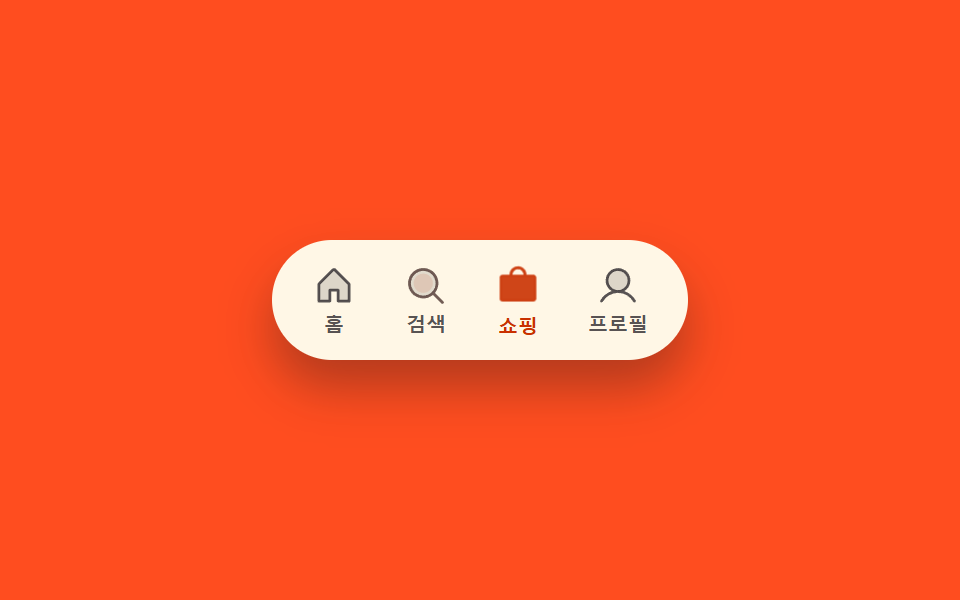 02 bottom-nav-bar-icon-fill-swap
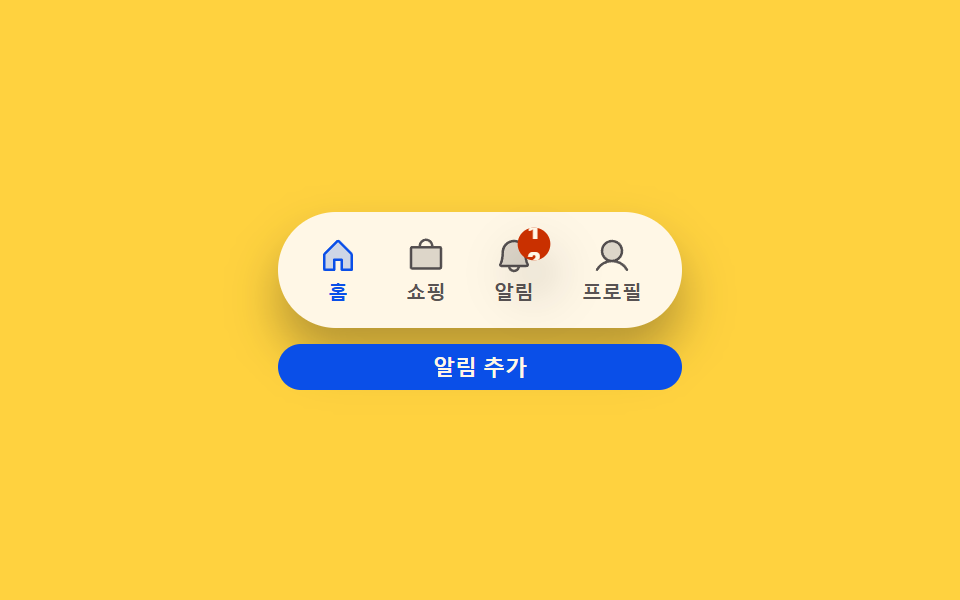 03 bottom-nav-bar-badge-count-bump
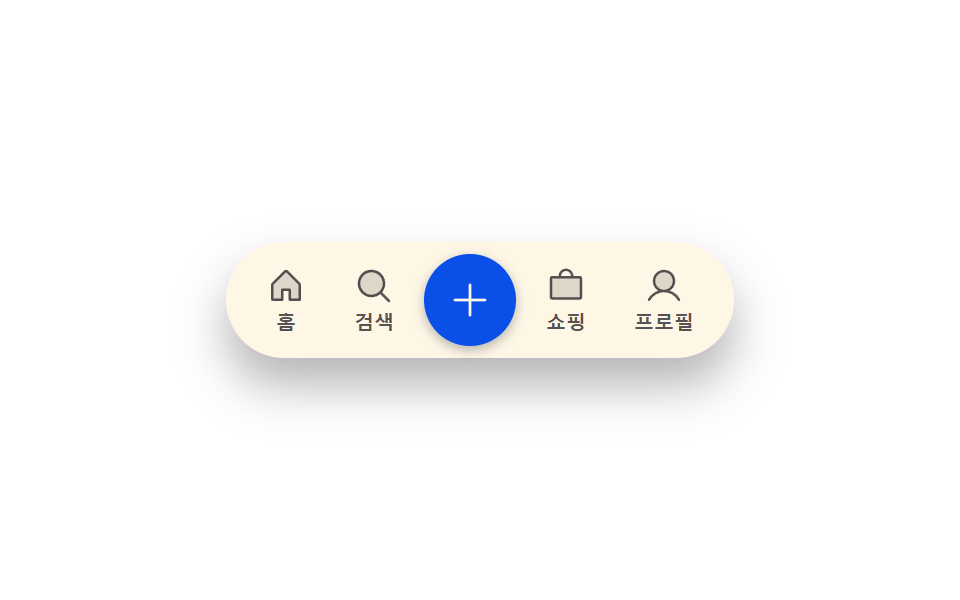 04 bottom-nav-bar-center-lift-scale
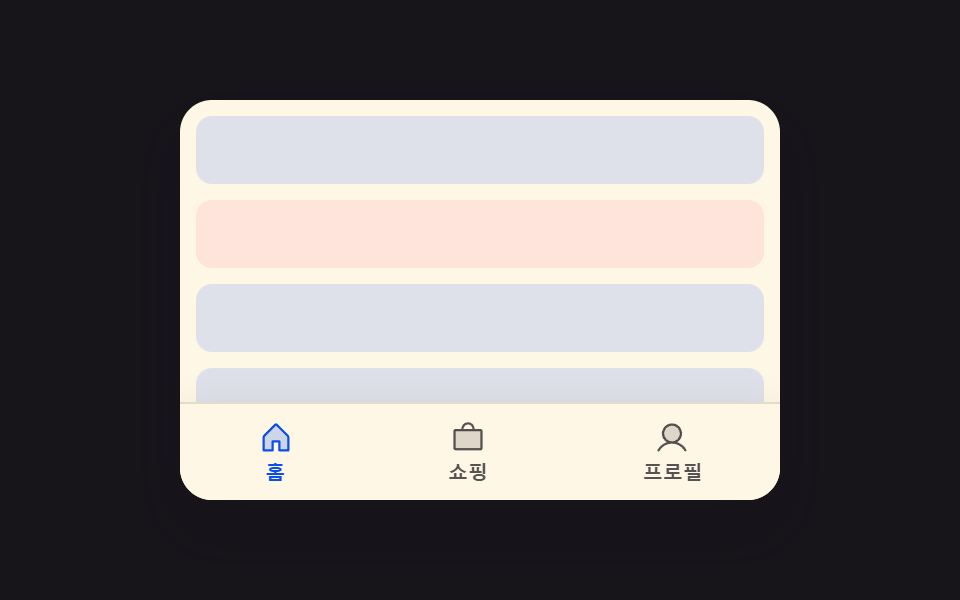 05 bottom-nav-bar-scroll-hide-reveal
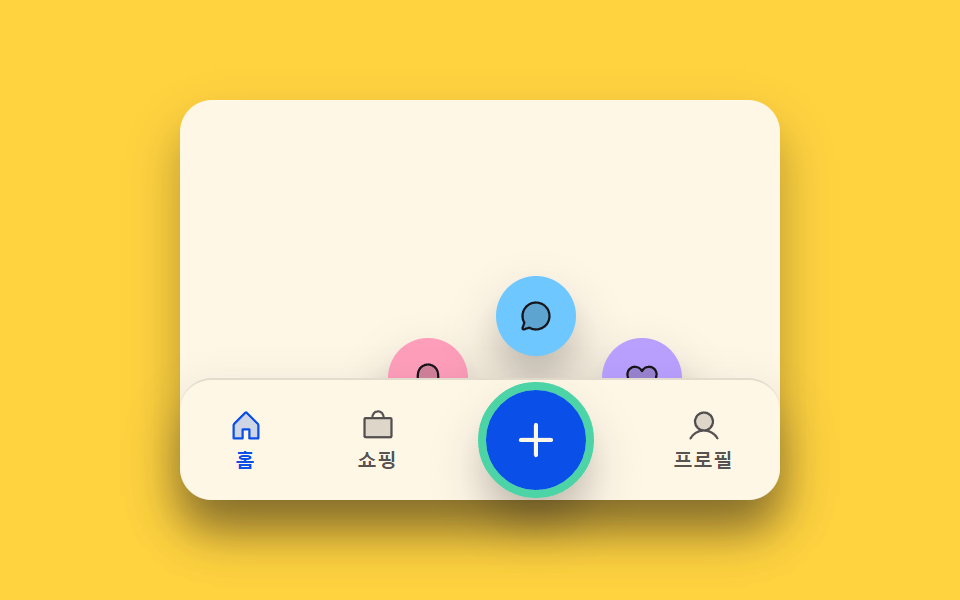 06 bottom-nav-bar-longpress-reveal
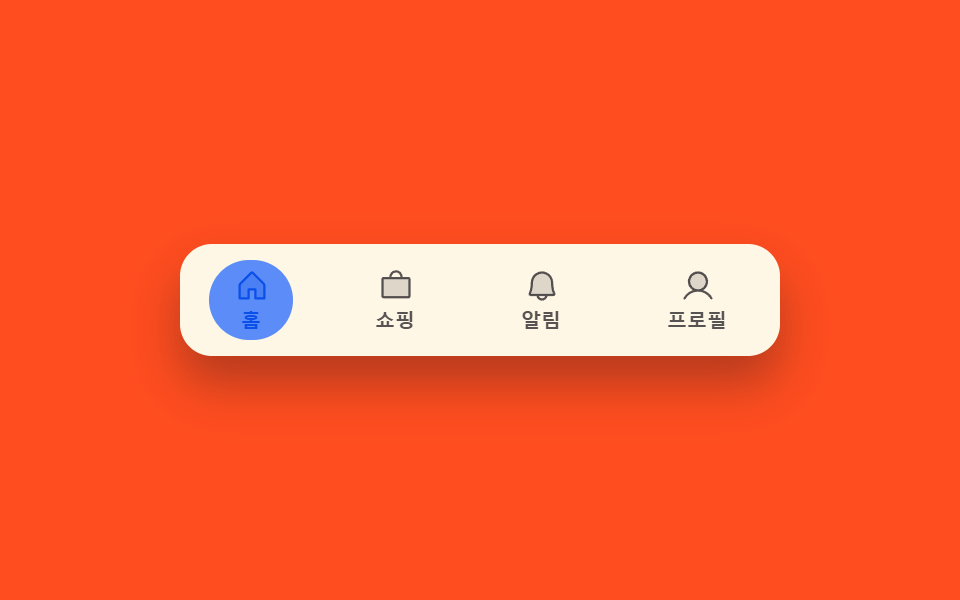 07 bottom-nav-bar-swipe-follow
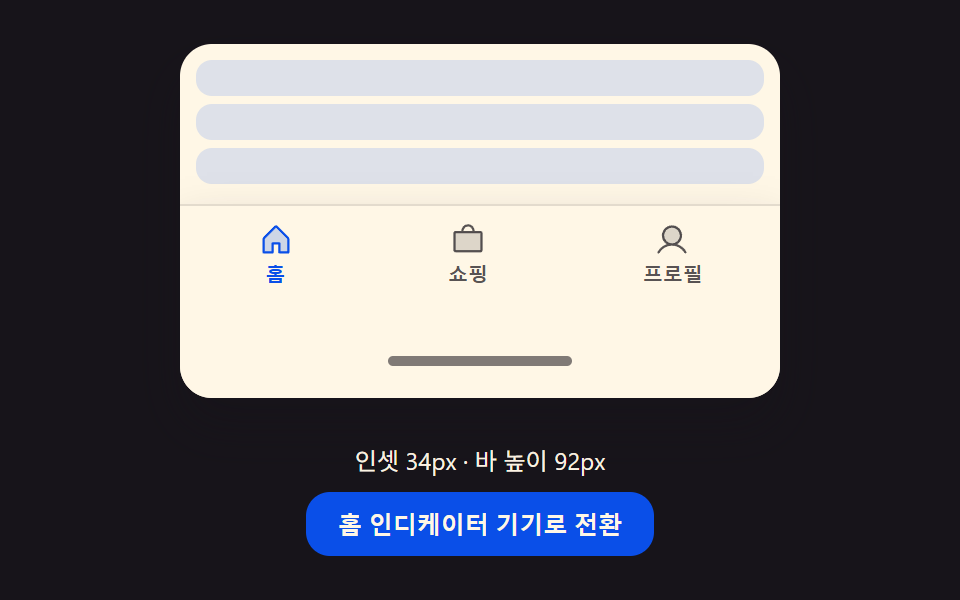 08 bottom-nav-bar-safe-area-inset-resize
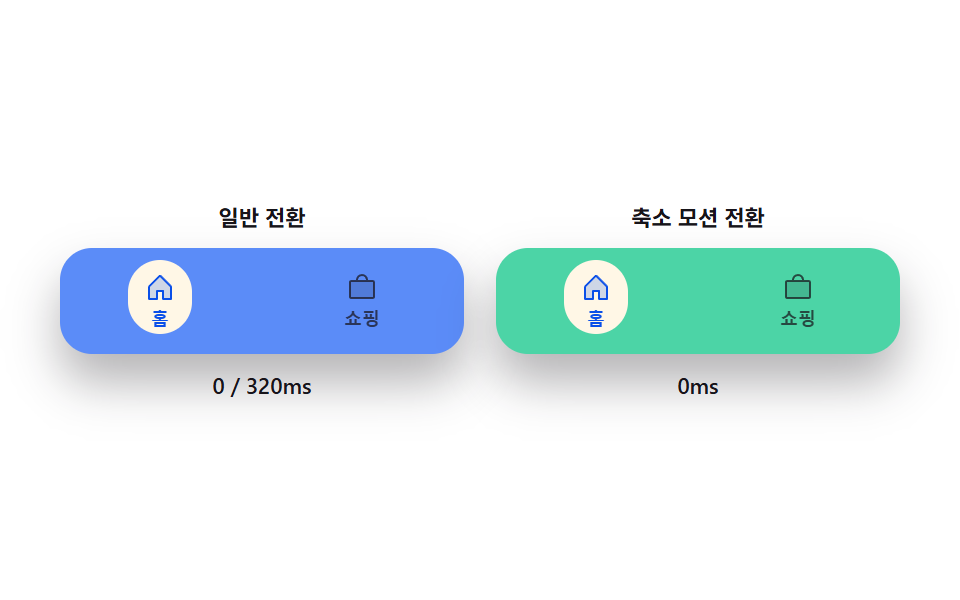 09 bottom-nav-bar-reduced-motion-instant
Auto-plays · click a tile to jump to its section · all nine in one zip
- 01 Active-indicator slide-morph toggle — when the selected tab changes, the highlight's position and width values shift together from the old spot to the new one
- 02 Icon fill-swap toggle — when the selected tab changes, that spot's fill-amount value switches from low to full
- 03 Badge count-bump toggle — each time a notification count value rises, that display's size value grows once then settles back
- 04 Center-lift scale toggle — when the middle tab's selection value turns on, only that spot's height value grows above the background
- 05 Scroll-direction hide-reveal toggle — when the scroll-direction value is downward the whole bar hides offscreen, and upward brings it back
- 06 Long-press reveal toggle — once a press-duration value passes a threshold, that spot's expand-amount value grows and extra spots appear above it
- 07 Swipe-follow toggle — while a horizontal drag-distance value grows, the highlight's position value follows toward the side tab by that same ratio
- 08 Inset-resize toggle — when the bottom-inset value grows, the bar's overall height and inner-padding values grow together by that same difference
- 09 Reduced-motion instant toggle — with reduced motion on, every transition from the prior eight bars switches straight to its target value
None of the nine reaches out to a server, writes to localStorage, or calls Math.random anywhere in its script — each is a small, self-contained bottom tab bar built around one state value (which tab is selected, how long a press has lasted, which way the page just scrolled, how tall the device's safe-area inset is) and a short list of constants that decide exactly how a change in that value looks on screen. Because the scope stays this narrow, naming which value actually moves — a selection index, a count, a scroll direction, or an inset in pixels — is enough to tell which of these nine bottom navigation bar examples fits a given screen before any of the code gets opened.
Anatomy of nine patterns — which value changes and when
All nine run their own requestAnimationFrame loop, and none of them ever calls Math.random: every one steps forward from a real interaction rather than a randomized script, so the same demo plays out the same way on every visit. Several also compute a real spring or decay every frame rather than leaning on a CSS transition alone: item 01's springTo() carries both the indicator's position and its width toward the active tab under one shared SPRING_K 210 / SPRING_C 19 pair, item 03's bumpScale() shapes the badge's brief pop through a Math.exp-based BUMP_ZETA 4.8 decay multiplied by a BUMP_FREQ cosine, item 04's render() turns a single liftT value into height, scale, and a SHADOW_BLUR_GAIN 20 shadow all at once, item 05's onScrollFrame() derives a real velocity from the scrollTop delta and compares it against asymmetric VEL_HIDE 90 / VEL_SHOW 40 thresholds, item 06's placeActions() runs actual trigonometry over its FAN_ANGLES array to place three buttons around a real FAN_R radius, item 07's drag carries a separate settle spring (SPRING_K 240) that pulls the indicator to the nearest tab once a pointer lifts, and item 08's render() re-derives the bar's total height from a live inset value eased by LERP_RATE 10 every frame. Item 02 keeps its exponential smoothing to a single FILL_RATE value swapping between two tabs, and item 09 sets the comparison up on purpose: its normal-side panel eases through DURATION_MS 320 while its reduced-motion partner assigns the same target directly, with no easing step at all. Every listener answers a real interaction and none comes from the autoplay script: items 02, 04, and 09 answer a plain click, items 03 and 08 pair that click with a keydown for Enter or Space, items 01 and 05 add a resize listener alongside click, item 06 wires click, pointerdown, and resize together, and item 07 is the outlier, adding pointermove, pointerup, and pointercancel to click, pointerdown, and resize so a full drag gesture registers the same way a tap does. All nine start in an isDemo autoplay state that cycles on its own until the first click, pointerdown, or keydown calls human(), which strips the is-demo class and stops the scripted cycle for good; each of items 01 through 05 also checks matchMedia('(prefers-reduced-motion: reduce)') once at load and skips starting its loop entirely when it matches, while items 06 through 09 only use that same flag to gate their own autoplay cycle — 06 through 08 so a real press, drag, or toggle still answers in real time no matter what the system setting says, and 09 because comparing what reduced motion changes is its whole reason to exist.
Code per pattern
01Active-indicator slide-morph toggle — when the selected tab changes, the highlight's position and width values shift together from the old spot to the new one
The moment the selection value changes, the highlight's horizontal position and width values move together to the new tab's spot. A mobile bottom navigation bar css pattern like this suits a phone screen switching between bottom tabs, since the shared SPRING_K/SPRING_C pair lets the same spring narrate both a short hop and a long cross-bar jump without a separate rule for each distance.
<main class="stage">
<div class="bn is-demo" id="bn">
  <div class="bn__phone">
    <div class="bn__track" id="bnTrack">
      <span class="bn__indicator" id="bnIndicator"></span>
      <button type="button" class="bn__tab is-active" data-idx="0" id="bnTab0" aria-current="true">
        <svg class="bn__icon" viewBox="0 0 256 256" aria-hidden="true"><g fill="currentColor"><path d="M216 120v96h-64v-64h-48v64H40v-96a8 8 0 0 1 2.34-5.66l80-80a8 8 0 0 1 11.32 0l80 80A8 8 0 0 1 216 120" opacity=".2"/><path d="m219.31 108.68l-80-80a16 16 0 0 0-22.62 0l-80 80A15.87 15.87 0 0 0 32 120v96a8 8 0 0 0 8 8h64a8 8 0 0 0 8-8v-56h32v56a8 8 0 0 0 8 8h64a8 8 0 0 0 8-8v-96a15.87 15.87 0 0 0-4.69-11.32M208 208h-48v-56a8 8 0 0 0-8-8h-48a8 8 0 0 0-8 8v56H48v-88l80-80l80 80Z"/></g></svg>
        <span class="bn__label">Home</span>
      </button>
      <button type="button" class="bn__tab" data-idx="1" id="bnTab1">
        <svg class="bn__icon" viewBox="0 0 256 256" aria-hidden="true"><g fill="currentColor"><path d="M192 112a80 80 0 1 1-80-80a80 80 0 0 1 80 80" opacity=".2"/><path d="m229.66 218.34l-50.06-50.06a88.21 88.21 0 1 0-11.32 11.31l50.06 50.07a8 8 0 0 0 11.32-11.32M40 112a72 72 0 1 1 72 72a72.08 72.08 0 0 1-72-72"/></g></svg>
        <span class="bn__label">Search</span>
      </button>
      <button type="button" class="bn__tab" data-idx="2" id="bnTab2">
        <svg class="bn__icon" viewBox="0 0 256 256" aria-hidden="true"><g fill="currentColor"><path d="M224 80v120a8 8 0 0 1-8 8H40a8 8 0 0 1-8-8V80a8 8 0 0 1 8-8h176a8 8 0 0 1 8 8" opacity=".2"/><path d="M216 64h-40a48 48 0 0 0-96 0H40a16 16 0 0 0-16 16v120a16 16 0 0 0 16 16h176a16 16 0 0 0 16-16V80a16 16 0 0 0-16-16m-88-32a32 32 0 0 1 32 32H96a32 32 0 0 1 32-32m88 168H40V80h176Z"/></g></svg>
        <span class="bn__label">Shopping</span>
      </button>
      <button type="button" class="bn__tab" data-idx="3" id="bnTab3">
        <svg class="bn__icon" viewBox="0 0 256 256" aria-hidden="true"><g fill="currentColor"><path d="M192 96a64 64 0 1 1-64-64a64 64 0 0 1 64 64" opacity=".2"/><path d="M230.92 212c-15.23-26.33-38.7-45.21-66.09-54.16a72 72 0 1 0-73.66 0c-27.39 8.94-50.86 27.82-66.09 54.16a8 8 0 1 0 13.85 8c18.84-32.56 52.14-52 89.07-52s70.23 19.44 89.07 52a8 8 0 1 0 13.85-8M72 96a56 56 0 1 1 56 56a56.06 56.06 0 0 1-56-56"/></g></svg>
        <span class="bn__label">Profile</span>
      </button>
    </div>
  </div>
</div>
</main>@use "../../../../site/static/demo-tokens" as *;
// 계산 겹: index.html measure() 가 Playwright/브라우저 실측(getBoundingClientRect)으로 탭 폭·좌표를
// 얻고, springTo() 가 감쇠 조화진동자로 인디케이터 위치·너비를 매 프레임 목표로 당긴다(오버슛 포함).
@include stage($stage-ink);
.bn__phone { width: 100%; max-width: 300px; }
.bn__track {
position: relative; display: flex; background: $subject-cream; border-radius: $r-pill;
box-shadow: $shadow-raised; padding: $sp-1; box-sizing: border-box;
}
.bn__indicator {
position: absolute; top: $sp-1; left: 0; height: calc(100% - #{$sp-1} * 2);
border-radius: $r-pill; background: rgba($subject-blue, .16);
will-change: transform, width;
}
.bn__tab {
position: relative; flex: 0 0 auto; display: flex; flex-direction: column; align-items: center;
gap: $sp-1; border: none; background: transparent; cursor: pointer;
padding: $sp-2 $sp-3; color: rgba($subject-ink, .72); z-index: 1;
}
.bn__icon { width: 20px; height: 20px; }
.bn__label { font-size: 10px; font-weight: 700; line-height: 1; }
.bn__tab.is-active { color: $subject-blue-deep; }
@media (max-width: 340px) {
.bn__phone { max-width: 230px; }
.bn__tab { padding: $sp-1 $sp-2; }
.bn__icon { width: 18px; height: 18px; }
}
@media (prefers-reduced-motion: reduce) {
.bn__indicator { transition: none; }
}html, body {
margin: 0;
overflow: hidden;
}
.stage {
box-sizing: border-box;
min-height: 100vh;
display: grid;
place-items: center;
margin: 0;
background: #17141a;
font-family: -apple-system, "Segoe UI", "Noto Sans KR", sans-serif;
padding: clamp(8px, 4vw, 24px);
}
.bn__phone {
width: 100%;
max-width: 300px;
}
.bn__track {
position: relative;
display: flex;
background: #fff7e6;
border-radius: 999px;
box-shadow: 0 14px 24px rgba(23, 20, 26, 0.32);
padding: 4px;
box-sizing: border-box;
}
.bn__indicator {
position: absolute;
top: 4px;
left: 0;
height: calc(100% - 4px * 2);
border-radius: 999px;
background: rgba(47, 109, 246, 0.16);
will-change: transform, width;
}
.bn__tab {
position: relative;
flex: 0 0 auto;
display: flex;
flex-direction: column;
align-items: center;
gap: 4px;
border: none;
background: transparent;
cursor: pointer;
padding: 8px 12px;
color: rgba(23, 20, 26, 0.72);
z-index: 1;
}
.bn__icon {
width: 20px;
height: 20px;
}
.bn__label {
font-size: 10px;
font-weight: 700;
line-height: 1;
}
.bn__tab.is-active {
color: #0a4fe8;
}
@media (max-width: 340px) {
.bn__phone {
max-width: 230px;
}
.bn__tab {
padding: 4px 8px;
}
.bn__icon {
width: 18px;
height: 18px;
}
}
@media (prefers-reduced-motion: reduce) {
.bn__indicator {
transition: none;
}
}(function () {
var HOLD_MS = 650; // 계산 겹 상수: 자동 루프가 각 탭에 머무는 시간
var SPRING_K = 210; // 계산 겹: 스프링 상수(위치·너비 공용) — 값이 클수록 빨리 목표에 붙는다
var SPRING_C = 19; // 계산 겹: 감쇠 상수 — 낮을수록 목표를 지나쳤다 되돌아오는 정도가 크다
var TAB_COUNT = 4;
var reduce = window.matchMedia('(prefers-reduced-motion: reduce)').matches;
var bn = document.getElementById('bn');
var track = document.getElementById('bnTrack');
var indicator = document.getElementById('bnIndicator');
var tabs = [0, 1, 2, 3].map(function (i) { return document.getElementById('bnTab' + i); });
var isDemo = true;
var activeIdx = 0;
var rects = [];
var posX = 0, velX = 0, posW = 0, velW = 0;
var lastTs = 0;
var cycleStart = 0;
function measure() {
// 계산 겹: 탭 폭·위치를 실측해 인디케이터 목표 좌표를 만든다 — 짐작 px 를 쓰지 않는다
var tRect = track.getBoundingClientRect();
rects = tabs.map(function (t) {
var r = t.getBoundingClientRect();
return { x: r.left - tRect.left, w: r.width };
});
if (!posW) { posX = rects[0].x; posW = rects[0].w; }
}
function setActive(idx) {
activeIdx = idx;
tabs.forEach(function (t, i) {
t.classList.toggle('is-active', i === idx);
t.setAttribute('aria-current', i === idx ? 'true' : 'false');
});
}
  function springTo(pos, vel, target, dt) {
    var acc = (target - pos) * SPRING_K - vel * SPRING_C;
    vel += acc * dt;
    pos += vel * dt;
    return [pos, vel];
  }

  function render() {
    indicator.style.transform = 'translateX(' + posX.toFixed(2) + 'px)';
    indicator.style.width = posW.toFixed(2) + 'px';
  }
function human() {
if (isDemo) { bn.classList.remove('is-demo'); isDemo = false; }
}
tabs.forEach(function (t, i) {
t.addEventListener('click', function () { human(); setActive(i); });
});
function loop(ts) {
if (!lastTs) { lastTs = ts; cycleStart = ts; }
var dt = Math.min(0.05, (ts - lastTs) / 1000);
lastTs = ts;
if (isDemo) {
var elapsed = ts - cycleStart;
var idx = Math.floor(elapsed / HOLD_MS) % TAB_COUNT;
if (idx !== activeIdx) setActive(idx);
}
var target = rects[activeIdx] || rects[0] || { x: posX, w: posW };
var rx = springTo(posX, velX, target.x, dt);
posX = rx[0]; velX = rx[1];
var rw = springTo(posW, velW, target.w, dt);
posW = rw[0]; velW = rw[1];
render();
requestAnimationFrame(loop);
}
window.addEventListener('resize', measure);
measure();
render();
if (!reduce) {
requestAnimationFrame(loop);
}
})();// IndicatorSlideMorph — vanilla 판(run/367/demo/01-bottom-nav-bar-indicator-slide-morph/index.html) 의 React 포트.
// 탭 폭·좌표를 getBoundingClientRect 로 실측하고, springTo() 감쇠 조화진동자가 인디케이터의
// x·width 를 매 프레임 목표로 당긴다(오버슛 포함) — CSS transition 이 아니라 rAF 계산이 위치를 만든다.
import { useEffect, useRef } from "react";
import styles from "./IndicatorSlideMorph.module.scss";
type Box<T> = { current: T };
type ClickEvt = { preventDefault(): void };
const HOLD_MS = 650; // 계산 겹 상수: 자동 루프가 각 탭에 머무는 시간
const SPRING_K = 210; // 계산 겹: 스프링 상수(위치·너비 공용)
const SPRING_C = 19; // 계산 겹: 감쇠 상수
const TABS = [
{ label: "홈", d: "M216 120v96h-64v-64h-48v64H40v-96a8 8 0 0 1 2.34-5.66l80-80a8 8 0 0 1 11.32 0l80 80A8 8 0 0 1 216 120|.2#m219.31 108.68l-80-80a16 16 0 0 0-22.62 0l-80 80A15.87 15.87 0 0 0 32 120v96a8 8 0 0 0 8 8h64a8 8 0 0 0 8-8v-56h32v56a8 8 0 0 0 8 8h64a8 8 0 0 0 8-8v-96a15.87 15.87 0 0 0-4.69-11.32M208 208h-48v-56a8 8 0 0 0-8-8h-48a8 8 0 0 0-8 8v56H48v-88l80-80l80 80Z" },
{ label: "검색", d: "M192 112a80 80 0 1 1-80-80a80 80 0 0 1 80 80|.2#m229.66 218.34l-50.06-50.06a88.21 88.21 0 1 0-11.32 11.31l50.06 50.07a8 8 0 0 0 11.32-11.32M40 112a72 72 0 1 1 72 72a72.08 72.08 0 0 1-72-72" },
{ label: "쇼핑", d: "M224 80v120a8 8 0 0 1-8 8H40a8 8 0 0 1-8-8V80a8 8 0 0 1 8-8h176a8 8 0 0 1 8 8|.2#M216 64h-40a48 48 0 0 0-96 0H40a16 16 0 0 0-16 16v120a16 16 0 0 0 16 16h176a16 16 0 0 0 16-16V80a16 16 0 0 0-16-16m-88-32a32 32 0 0 1 32 32H96a32 32 0 0 1 32-32m88 168H40V80h176Z" },
{ label: "프로필", d: "M192 96a64 64 0 1 1-64-64a64 64 0 0 1 64 64|.2#M230.92 212c-15.23-26.33-38.7-45.21-66.09-54.16a72 72 0 1 0-73.66 0c-27.39 8.94-50.86 27.82-66.09 54.16a8 8 0 1 0 13.85 8c18.84-32.56 52.14-52 89.07-52s70.23 19.44 89.07 52a8 8 0 1 0 13.85-8M72 96a56 56 0 1 1 56 56a56.06 56.06 0 0 1-56-56" },
];
function Icon({ spec }: { spec: string }) {
const [a, b] = spec.split("#");
const [pathA, opacity] = a.split("|");
return (
<svg className={styles.icon} viewBox="0 0 256 256" aria-hidden="true">
<g fill="currentColor">
<path d={pathA} opacity={opacity} />
<path d={b} />
</g>
</svg>
);
}
export default function IndicatorSlideMorph() {
const rootRef = useRef(null) as unknown as Box<HTMLDivElement>;
const trackRef = useRef(null) as unknown as Box<HTMLDivElement>;
const indicatorRef = useRef(null) as unknown as Box<HTMLSpanElement>;
const tabRefs = useRef([null, null, null, null]) as unknown as Box<(HTMLButtonElement | null)[]>;
const rafRef = useRef(0) as unknown as Box<number>;
useEffect(() => {
const reduce = window.matchMedia("(prefers-reduced-motion: reduce)").matches;
let isDemo = true;
let activeIdx = 0;
let rects: { x: number; w: number }[] = [];
let posX = 0, velX = 0, posW = 0, velW = 0;
let lastTs = 0, cycleStart = 0;
function measure() {
const track = trackRef.current;
if (!track) return;
const tRect = track.getBoundingClientRect();
rects = tabRefs.current.map((t) => {
if (!t) return { x: 0, w: 0 };
const r = t.getBoundingClientRect();
return { x: r.left - tRect.left, w: r.width };
});
if (!posW) { posX = rects[0].x; posW = rects[0].w; }
}
function setActive(idx: number) {
activeIdx = idx;
tabRefs.current.forEach((t, i) => {
if (!t) return;
t.classList.toggle(styles.isActive, i === idx);
t.setAttribute("aria-current", i === idx ? "true" : "false");
});
}
function springTo(pos: number, vel: number, target: number, dt: number): [number, number] {
const acc = (target - pos) * SPRING_K - vel * SPRING_C;
vel += acc * dt;
pos += vel * dt;
return [pos, vel];
}
function render() {
const ind = indicatorRef.current;
if (!ind) return;
ind.style.transform = "translateX(" + posX.toFixed(2) + "px)";
ind.style.width = posW.toFixed(2) + "px";
}
function human() {
if (isDemo) { rootRef.current?.classList.remove(styles.isDemo); isDemo = false; }
}
function onTabClick(i: number) { return () => { human(); setActive(i); }; }
const handlers = TABS.map((_, i) => onTabClick(i));
tabRefs.current.forEach((t, i) => t?.addEventListener("click", handlers[i]));
function loop(ts: number) {
if (!lastTs) { lastTs = ts; cycleStart = ts; }
const dt = Math.min(0.05, (ts - lastTs) / 1000);
lastTs = ts;
if (isDemo) {
const elapsed = ts - cycleStart;
const idx = Math.floor(elapsed / HOLD_MS) % TABS.length;
if (idx !== activeIdx) setActive(idx);
}
const target = rects[activeIdx] || rects[0] || { x: posX, w: posW };
const rx = springTo(posX, velX, target.x, dt); posX = rx[0]; velX = rx[1];
const rw = springTo(posW, velW, target.w, dt); posW = rw[0]; velW = rw[1];
render();
rafRef.current = requestAnimationFrame(loop);
}
function onResize() { measure(); }
window.addEventListener("resize", onResize);
measure();
render();
if (!reduce) { rafRef.current = requestAnimationFrame(loop); }
return () => {
window.removeEventListener("resize", onResize);
cancelAnimationFrame(rafRef.current);
tabRefs.current.forEach((t, i) => t?.removeEventListener("click", handlers[i]));
};
}, []);
return (
<main className={styles.stage}>
<div className={styles.root + " " + styles.isDemo} ref={rootRef}>
<div className={styles.phone}>
<div className={styles.track} ref={trackRef}>
<span className={styles.indicator} ref={indicatorRef} />
{TABS.map((t, i) => (
<button
key={t.label}
type="button"
className={styles.tab + (i === 0 ? " " + styles.isActive : "")}
aria-current={i === 0 ? "true" : undefined}
ref={(el: HTMLButtonElement | null) => { tabRefs.current[i] = el; }}
>
<Icon spec={t.d} />
<span className={styles.label}>{t.label}</span>
</button>
))}
</div>
</div>
</div>
</main>
);
}01 · Active-indicator slide-morph toggle — when the selected tab changes, the highlight's position and width values shift together from the old spot to the new one — Measured area 6.096% · moving frames 17/23Original by GODRICH · SCSS and React ship in the zip · See the password
function springTo(pos, vel, target, dt) {
var acc = (target - pos) * SPRING_K - vel * SPRING_C;
vel += acc * dt;
pos += vel * dt;
return [pos, vel];
}
function render() {
indicator.style.transform = 'translateX(' + posX.toFixed(2) + 'px)';
indicator.style.width = posW.toFixed(2) + 'px';
}
What the numbers say
Item 01 fills 6.10% of the frame cumulatively at a 32.0 average intensity while moving in 17 of 23 sampled frames, because springTo() recomputes both posX and posW from the same SPRING_K 210 / SPRING_C 19 pair every frame the spring hasn't settled, so the indicator's slide and its resize always finish on the same beat instead of two easings drifting apart.
02Icon fill-swap toggle — when the selected tab changes, that spot's fill-amount value switches from low to full
The instant the selection value turns on, that spot's fill-amount value rises to its maximum while the other spots' values drop back down. An icon-centric bottom navigation suits this pattern, since the fill and outline read as one continuous handoff rather than two icons blinking independently.
<main class="stage">
<div class="bf is-demo" id="bf">
  <div class="bf__phone">
    <div class="bf__track">
      <button type="button" class="bf__tab is-active" data-idx="0" id="bfTab0" aria-current="true">
        <span class="bf__iconWrap" id="bfIcon0">
          <svg class="bf__icon bf__icon--outline" viewBox="0 0 256 256" aria-hidden="true"><g fill="currentColor"><path d="M216 120v96h-64v-64h-48v64H40v-96a8 8 0 0 1 2.34-5.66l80-80a8 8 0 0 1 11.32 0l80 80A8 8 0 0 1 216 120" opacity=".2"/><path d="m219.31 108.68l-80-80a16 16 0 0 0-22.62 0l-80 80A15.87 15.87 0 0 0 32 120v96a8 8 0 0 0 8 8h64a8 8 0 0 0 8-8v-56h32v56a8 8 0 0 0 8 8h64a8 8 0 0 0 8-8v-96a15.87 15.87 0 0 0-4.69-11.32M208 208h-48v-56a8 8 0 0 0-8-8h-48a8 8 0 0 0-8 8v56H48v-88l80-80l80 80Z"/></g></svg>
          <svg class="bf__icon bf__icon--fill" viewBox="0 0 256 256" aria-hidden="true"><path fill="currentColor" d="M224 120v96a8 8 0 0 1-8 8h-56a8 8 0 0 1-8-8v-52a4 4 0 0 0-4-4h-40a4 4 0 0 0-4 4v52a8 8 0 0 1-8 8H40a8 8 0 0 1-8-8v-96a16 16 0 0 1 4.69-11.31l80-80a16 16 0 0 1 22.62 0l80 80A16 16 0 0 1 224 120"/></svg>
        </span>
        <span class="bf__label">Home</span>
      </button>
      <button type="button" class="bf__tab" data-idx="1" id="bfTab1">
        <span class="bf__iconWrap" id="bfIcon1">
          <svg class="bf__icon bf__icon--outline" viewBox="0 0 256 256" aria-hidden="true"><g fill="currentColor"><path d="M192 112a80 80 0 1 1-80-80a80 80 0 0 1 80 80" opacity=".2"/><path d="m229.66 218.34l-50.06-50.06a88.21 88.21 0 1 0-11.32 11.31l50.06 50.07a8 8 0 0 0 11.32-11.32M40 112a72 72 0 1 1 72 72a72.08 72.08 0 0 1-72-72"/></g></svg>
          <svg class="bf__icon bf__icon--fill" viewBox="0 0 256 256" aria-hidden="true"><path fill="currentColor" d="M168 112a56 56 0 1 1-56-56a56 56 0 0 1 56 56m61.66 117.66a8 8 0 0 1-11.32 0l-50.06-50.07a88 88 0 1 1 11.32-11.31l50.06 50.06a8 8 0 0 1 0 11.32M112 184a72 72 0 1 0-72-72a72.08 72.08 0 0 0 72 72"/></svg>
        </span>
        <span class="bf__label">Search</span>
      </button>
      <button type="button" class="bf__tab" data-idx="2" id="bfTab2">
        <span class="bf__iconWrap" id="bfIcon2">
          <svg class="bf__icon bf__icon--outline" viewBox="0 0 256 256" aria-hidden="true"><g fill="currentColor"><path d="M224 80v120a8 8 0 0 1-8 8H40a8 8 0 0 1-8-8V80a8 8 0 0 1 8-8h176a8 8 0 0 1 8 8" opacity=".2"/><path d="M216 64h-40a48 48 0 0 0-96 0H40a16 16 0 0 0-16 16v120a16 16 0 0 0 16 16h176a16 16 0 0 0 16-16V80a16 16 0 0 0-16-16m-88-32a32 32 0 0 1 32 32H96a32 32 0 0 1 32-32m88 168H40V80h176Z"/></g></svg>
          <svg class="bf__icon bf__icon--fill" viewBox="0 0 256 256" aria-hidden="true"><path fill="currentColor" d="M216 64h-40a48 48 0 0 0-96 0H40a16 16 0 0 0-16 16v120a16 16 0 0 0 16 16h176a16 16 0 0 0 16-16V80a16 16 0 0 0-16-16m-88-32a32 32 0 0 1 32 32H96a32 32 0 0 1 32-32"/></svg>
        </span>
        <span class="bf__label">Shopping</span>
      </button>
      <button type="button" class="bf__tab" data-idx="3" id="bfTab3">
        <span class="bf__iconWrap" id="bfIcon3">
          <svg class="bf__icon bf__icon--outline" viewBox="0 0 256 256" aria-hidden="true"><g fill="currentColor"><path d="M192 96a64 64 0 1 1-64-64a64 64 0 0 1 64 64" opacity=".2"/><path d="M230.92 212c-15.23-26.33-38.7-45.21-66.09-54.16a72 72 0 1 0-73.66 0c-27.39 8.94-50.86 27.82-66.09 54.16a8 8 0 1 0 13.85 8c18.84-32.56 52.14-52 89.07-52s70.23 19.44 89.07 52a8 8 0 1 0 13.85-8M72 96a56 56 0 1 1 56 56a56.06 56.06 0 0 1-56-56"/></g></svg>
          <svg class="bf__icon bf__icon--fill" viewBox="0 0 256 256" aria-hidden="true"><path fill="currentColor" d="M230.93 220a8 8 0 0 1-6.93 4H32a8 8 0 0 1-6.92-12c15.23-26.33 38.7-45.21 66.09-54.16a72 72 0 1 1 73.66 0c27.39 8.95 50.86 27.83 66.09 54.16a8 8 0 0 1 .01 8"/></svg>
        </span>
        <span class="bf__label">Profile</span>
      </button>
    </div>
  </div>
</div>
</main>@use "../../../../site/static/demo-tokens" as *;
// 계산 겹: index.html 이 채움 정도(fillAmt)를 지수 평활로 목표(0/1)에 붙이고, 활성화 순간엔
// pulseScale() 감쇠 코사인 진동으로 아이콘이 살짝 튀어올랐다 가라앉는 스케일 펄스를 얹는다.
@include stage($stage-orange);
.bf__phone { width: 100%; max-width: 300px; }
.bf__track {
display: flex; justify-content: space-between; background: $subject-cream; border-radius: $r-pill;
box-shadow: $shadow-raised; padding: $sp-1 $sp-2; box-sizing: border-box;
}
.bf__tab {
flex: 0 0 auto; display: flex; flex-direction: column; align-items: center; gap: $sp-1;
border: none; background: transparent; cursor: pointer; padding: $sp-2 $sp-3; color: rgba($subject-ink, .72);
}
.bf__iconWrap { position: relative; width: 22px; height: 22px; transform-origin: 50% 50%; }
.bf__icon { position: absolute; inset: 0; width: 22px; height: 22px; will-change: opacity; }
.bf__icon--fill { opacity: 0; color: $subject-orange-deep; }
.bf__icon--outline { opacity: 1; }
.bf__label { font-size: 10px; font-weight: 700; line-height: 1; }
.bf__tab.is-active { color: $subject-orange-deep; }
.bf__tab.is-active .bf__label { font-weight: 800; }
@media (max-width: 340px) {
.bf__phone { max-width: 230px; }
.bf__tab { padding: $sp-1 $sp-2; }
.bf__iconWrap, .bf__icon { width: 19px; height: 19px; }
}
@media (prefers-reduced-motion: reduce) {
.bf__icon, .bf__iconWrap { transition: none; }
}html, body {
margin: 0;
overflow: hidden;
}
.stage {
box-sizing: border-box;
min-height: 100vh;
display: grid;
place-items: center;
margin: 0;
background: #ff4d1f;
font-family: -apple-system, "Segoe UI", "Noto Sans KR", sans-serif;
padding: clamp(8px, 4vw, 24px);
}
.bf__phone {
width: 100%;
max-width: 300px;
}
.bf__track {
display: flex;
justify-content: space-between;
background: #fff7e6;
border-radius: 999px;
box-shadow: 0 14px 24px rgba(23, 20, 26, 0.32);
padding: 4px 8px;
box-sizing: border-box;
}
.bf__tab {
flex: 0 0 auto;
display: flex;
flex-direction: column;
align-items: center;
gap: 4px;
border: none;
background: transparent;
cursor: pointer;
padding: 8px 12px;
color: rgba(23, 20, 26, 0.72);
}
.bf__iconWrap {
position: relative;
width: 22px;
height: 22px;
transform-origin: 50% 50%;
}
.bf__icon {
position: absolute;
inset: 0;
width: 22px;
height: 22px;
will-change: opacity;
}
.bf__icon--fill {
opacity: 0;
color: #c93000;
}
.bf__icon--outline {
opacity: 1;
}
.bf__label {
font-size: 10px;
font-weight: 700;
line-height: 1;
}
.bf__tab.is-active {
color: #c93000;
}
.bf__tab.is-active .bf__label {
font-weight: 800;
}
@media (max-width: 340px) {
.bf__phone {
max-width: 230px;
}
.bf__tab {
padding: 4px 8px;
}
.bf__iconWrap, .bf__icon {
width: 19px;
height: 19px;
}
}
@media (prefers-reduced-motion: reduce) {
.bf__icon, .bf__iconWrap {
transition: none;
}
}(function () {
var HOLD_MS = 650; // 계산 겹 상수: 자동 루프가 각 탭에 머무는 시간
var FILL_RATE = 0.012; // 계산 겹: 채움 정도 지수 평활 상수(ms 기준)
var PULSE_DUR = 360; // ms, 활성화 순간 스케일 펄스 지속
var PULSE_FREQ = 2 * Math.PI * 1.6 / PULSE_DUR; // 계산 겹: 펄스 각속도
var PULSE_ZETA = 4.4; // 계산 겹: 펄스 감쇠 상수
var TAB_COUNT = 4;
var reduce = window.matchMedia('(prefers-reduced-motion: reduce)').matches;
var bf = document.getElementById('bf');
var tabs = [0, 1, 2, 3].map(function (i) { return document.getElementById('bfTab' + i); });
var wraps = [0, 1, 2, 3].map(function (i) { return document.getElementById('bfIcon' + i); });
var isDemo = true;
var activeIdx = 0;
var fillAmt = [1, 0, 0, 0];
var pulseStart = [-9999, -9999, -9999, -9999];
var cycleStart = 0;
var lastTs = 0;
function pulseScale(t) {
// 계산 겹: 활성화 순간의 스케일 펄스 — 감쇠 코사인 진동으로 목표를 넘어섰다 되돌아온다
if (t < 0 || t > PULSE_DUR) return 1;
var amp = Math.exp(-PULSE_ZETA * (t / PULSE_DUR));
return 1 + amp * (1 - Math.cos(PULSE_FREQ * t)) * 0.16;
}
function setActive(idx, ts) {
if (idx === activeIdx) return;
activeIdx = idx;
pulseStart[idx] = ts;
tabs.forEach(function (t, i) {
t.classList.toggle('is-active', i === idx);
t.setAttribute('aria-current', i === idx ? 'true' : 'false');
});
}
function render(ts) {
wraps.forEach(function (w, i) {
var outline = w.children[0], fill = w.children[1];
var f = fillAmt[i];
fill.style.opacity = f.toFixed(3);
outline.style.opacity = (1 - f * 0.85).toFixed(3);
var s = pulseScale(ts - pulseStart[i]);
w.style.transform = 'scale(' + s.toFixed(3) + ')';
});
}
function human() {
if (isDemo) { bf.classList.remove('is-demo'); isDemo = false; }
}
tabs.forEach(function (t, i) {
t.addEventListener('click', function () { human(); setActive(i, performance.now()); });
});
  function loop(ts) {
    if (!lastTs) { lastTs = ts; cycleStart = ts; }
    var dt = ts - lastTs;
    lastTs = ts;

    if (isDemo) {
      var elapsed = ts - cycleStart;
      var idx = Math.floor(elapsed / HOLD_MS) % TAB_COUNT;
      if (idx !== activeIdx) setActive(idx, ts);
    }

    for (var i = 0; i < TAB_COUNT; i++) {
      var target = i === activeIdx ? 1 : 0;
      fillAmt[i] += (target - fillAmt[i]) * (1 - Math.exp(-FILL_RATE * dt));
    }

    render(ts);
    requestAnimationFrame(loop);
  }
render(0);
if (!reduce) {
requestAnimationFrame(loop);
}
})();// IconFillSwap — vanilla 판(run/367/demo/02-bottom-nav-bar-icon-fill-swap/index.html) 의 React 포트.
// fillAmt(0~1) 를 지수 평활로 목표까지 움직이고, 활성화 순간엔 pulseScale() 감쇠 코사인
// 진동으로 아이콘이 살짝 튀어올랐다 가라앉는다 — 둘 다 rAF 계산, CSS transition 아님.
import { useEffect, useRef } from "react";
import styles from "./IconFillSwap.module.scss";
type Box<T> = { current: T };
const HOLD_MS = 650; // 계산 겹 상수: 자동 루프가 각 탭에 머무는 시간
const FILL_RATE = 0.012; // 계산 겹: 채움 정도 지수 평활 상수(ms 기준)
const PULSE_DUR = 360; // ms, 활성화 순간 스케일 펄스 지속
const PULSE_FREQ = (2 * Math.PI * 1.6) / PULSE_DUR; // 계산 겹: 펄스 각속도
const PULSE_ZETA = 4.4; // 계산 겹: 펄스 감쇠 상수
const TABS = [
{ label: "홈",
outline: ["M216 120v96h-64v-64h-48v64H40v-96a8 8 0 0 1 2.34-5.66l80-80a8 8 0 0 1 11.32 0l80 80A8 8 0 0 1 216 120", "m219.31 108.68l-80-80a16 16 0 0 0-22.62 0l-80 80A15.87 15.87 0 0 0 32 120v96a8 8 0 0 0 8 8h64a8 8 0 0 0 8-8v-56h32v56a8 8 0 0 0 8 8h64a8 8 0 0 0 8-8v-96a15.87 15.87 0 0 0-4.69-11.32M208 208h-48v-56a8 8 0 0 0-8-8h-48a8 8 0 0 0-8 8v56H48v-88l80-80l80 80Z"],
fill: "M224 120v96a8 8 0 0 1-8 8h-56a8 8 0 0 1-8-8v-52a4 4 0 0 0-4-4h-40a4 4 0 0 0-4 4v52a8 8 0 0 1-8 8H40a8 8 0 0 1-8-8v-96a16 16 0 0 1 4.69-11.31l80-80a16 16 0 0 1 22.62 0l80 80A16 16 0 0 1 224 120" },
{ label: "검색",
outline: ["M192 112a80 80 0 1 1-80-80a80 80 0 0 1 80 80", "m229.66 218.34l-50.06-50.06a88.21 88.21 0 1 0-11.32 11.31l50.06 50.07a8 8 0 0 0 11.32-11.32M40 112a72 72 0 1 1 72 72a72.08 72.08 0 0 1-72-72"],
fill: "M168 112a56 56 0 1 1-56-56a56 56 0 0 1 56 56m61.66 117.66a8 8 0 0 1-11.32 0l-50.06-50.07a88 88 0 1 1 11.32-11.31l50.06 50.06a8 8 0 0 1 0 11.32M112 184a72 72 0 1 0-72-72a72.08 72.08 0 0 0 72 72" },
{ label: "쇼핑",
outline: ["M224 80v120a8 8 0 0 1-8 8H40a8 8 0 0 1-8-8V80a8 8 0 0 1 8-8h176a8 8 0 0 1 8 8", "M216 64h-40a48 48 0 0 0-96 0H40a16 16 0 0 0-16 16v120a16 16 0 0 0 16 16h176a16 16 0 0 0 16-16V80a16 16 0 0 0-16-16m-88-32a32 32 0 0 1 32 32H96a32 32 0 0 1 32-32m88 168H40V80h176Z"],
fill: "M216 64h-40a48 48 0 0 0-96 0H40a16 16 0 0 0-16 16v120a16 16 0 0 0 16 16h176a16 16 0 0 0 16-16V80a16 16 0 0 0-16-16m-88-32a32 32 0 0 1 32 32H96a32 32 0 0 1 32-32" },
{ label: "프로필",
outline: ["M192 96a64 64 0 1 1-64-64a64 64 0 0 1 64 64", "M230.92 212c-15.23-26.33-38.7-45.21-66.09-54.16a72 72 0 1 0-73.66 0c-27.39 8.94-50.86 27.82-66.09 54.16a8 8 0 1 0 13.85 8c18.84-32.56 52.14-52 89.07-52s70.23 19.44 89.07 52a8 8 0 1 0 13.85-8M72 96a56 56 0 1 1 56 56a56.06 56.06 0 0 1-56-56"],
fill: "M230.93 220a8 8 0 0 1-6.93 4H32a8 8 0 0 1-6.92-12c15.23-26.33 38.7-45.21 66.09-54.16a72 72 0 1 1 73.66 0c27.39 8.95 50.86 27.83 66.09 54.16a8 8 0 0 1 .01 8" },
];
function pulseScale(t: number): number {
if (t < 0 || t > PULSE_DUR) return 1;
const amp = Math.exp(-PULSE_ZETA * (t / PULSE_DUR));
return 1 + amp * (1 - Math.cos(PULSE_FREQ * t)) * 0.16;
}
export default function IconFillSwap() {
const rootRef = useRef(null) as unknown as Box<HTMLDivElement>;
const tabRefs = useRef([null, null, null, null]) as unknown as Box<(HTMLButtonElement | null)[]>;
const wrapRefs = useRef([null, null, null, null]) as unknown as Box<(HTMLSpanElement | null)[]>;
const rafRef = useRef(0) as unknown as Box<number>;
useEffect(() => {
const reduce = window.matchMedia("(prefers-reduced-motion: reduce)").matches;
let isDemo = true;
let activeIdx = 0;
const fillAmt = [1, 0, 0, 0];
const pulseStart = [-9999, -9999, -9999, -9999];
let cycleStart = 0, lastTs = 0;
function setActive(idx: number, ts: number) {
if (idx === activeIdx) return;
activeIdx = idx;
pulseStart[idx] = ts;
tabRefs.current.forEach((t, i) => {
if (!t) return;
t.classList.toggle(styles.isActive, i === idx);
t.setAttribute("aria-current", i === idx ? "true" : "false");
});
}
function render(ts: number) {
wrapRefs.current.forEach((w, i) => {
if (!w) return;
const outline = w.children[0] as HTMLElement;
const fill = w.children[1] as HTMLElement;
const f = fillAmt[i];
fill.style.opacity = f.toFixed(3);
outline.style.opacity = (1 - f * 0.85).toFixed(3);
const s = pulseScale(ts - pulseStart[i]);
w.style.transform = "scale(" + s.toFixed(3) + ")";
});
}
function human() {
if (isDemo) { rootRef.current?.classList.remove(styles.isDemo); isDemo = false; }
}
const handlers = TABS.map((_, i) => () => { human(); setActive(i, performance.now()); });
tabRefs.current.forEach((t, i) => t?.addEventListener("click", handlers[i]));
function loop(ts: number) {
if (!lastTs) { lastTs = ts; cycleStart = ts; }
const dt = ts - lastTs;
lastTs = ts;
if (isDemo) {
const elapsed = ts - cycleStart;
const idx = Math.floor(elapsed / HOLD_MS) % TABS.length;
if (idx !== activeIdx) setActive(idx, ts);
}
for (let i = 0; i < TABS.length; i++) {
const target = i === activeIdx ? 1 : 0;
fillAmt[i] += (target - fillAmt[i]) * (1 - Math.exp(-FILL_RATE * dt));
}
render(ts);
rafRef.current = requestAnimationFrame(loop);
}
render(0);
if (!reduce) { rafRef.current = requestAnimationFrame(loop); }
return () => {
cancelAnimationFrame(rafRef.current);
tabRefs.current.forEach((t, i) => t?.removeEventListener("click", handlers[i]));
};
}, []);
return (
<main className={styles.stage}>
<div className={styles.root + " " + styles.isDemo} ref={rootRef}>
<div className={styles.phone}>
<div className={styles.track}>
{TABS.map((t, i) => (
<button
key={t.label}
type="button"
className={styles.tab + (i === 0 ? " " + styles.isActive : "")}
aria-current={i === 0 ? "true" : undefined}
ref={(el: HTMLButtonElement | null) => { tabRefs.current[i] = el; }}
>
<span className={styles.iconWrap} ref={(el: HTMLSpanElement | null) => { wrapRefs.current[i] = el; }}>
<svg className={styles.icon + " " + styles.iconOutline} viewBox="0 0 256 256" aria-hidden="true">
<g fill="currentColor"><path d={t.outline[0]} opacity=".2" /><path d={t.outline[1]} /></g>
</svg>
<svg className={styles.icon + " " + styles.iconFill} viewBox="0 0 256 256" aria-hidden="true">
<path fill="currentColor" d={t.fill} />
</svg>
</span>
<span className={styles.label}>{t.label}</span>
</button>
))}
</div>
</div>
</div>
</main>
);
}02 · Icon fill-swap toggle — when the selected tab changes, that spot's fill-amount value switches from low to full — Measured area 1.267% · moving frames 14/23Original by GODRICH · SCSS and React ship in the zip · See the password
function loop(ts) {
if (!lastTs) { lastTs = ts; cycleStart = ts; }
var dt = ts - lastTs;
lastTs = ts;
if (isDemo) {
var elapsed = ts - cycleStart;
var idx = Math.floor(elapsed / HOLD_MS) % TAB_COUNT;
if (idx !== activeIdx) setActive(idx, ts);
}
for (var i = 0; i < TAB_COUNT; i++) {
var target = i === activeIdx ? 1 : 0;
fillAmt[i] += (target - fillAmt[i]) * (1 - Math.exp(-FILL_RATE * dt));
}
render(ts);
requestAnimationFrame(loop);
}
What the numbers say
Item 02 fills 1.27% of the frame cumulatively at a 56.3 average intensity while moving in 14 of 23 sampled frames, because only the fillAmt array changes — one entry easing up toward 1 while the rest ease down toward 0 through the same exponential FILL_RATE, so the icon swap stays a small, contained shift even though it fires on every tab change.
03Badge count-bump toggle — each time a notification count value rises, that display's size value grows once then settles back
The moment the count value rises, that display's size value briefly grows larger, then settles back to its original size. A tab showing an unread notification count suits this pattern, since the bump itself becomes the only cue a visitor gets that the count just changed, without needing to re-read the number.
<main class="stage">
<div class="bg is-demo" id="bg">
  <div class="bg__phone">
    <div class="bg__track">
      <button type="button" class="bg__tab is-active" data-idx="0">
        <svg class="bg__icon" viewBox="0 0 256 256" aria-hidden="true"><g fill="currentColor"><path d="M216 120v96h-64v-64h-48v64H40v-96a8 8 0 0 1 2.34-5.66l80-80a8 8 0 0 1 11.32 0l80 80A8 8 0 0 1 216 120" opacity=".2"/><path d="m219.31 108.68l-80-80a16 16 0 0 0-22.62 0l-80 80A15.87 15.87 0 0 0 32 120v96a8 8 0 0 0 8 8h64a8 8 0 0 0 8-8v-56h32v56a8 8 0 0 0 8 8h64a8 8 0 0 0 8-8v-96a15.87 15.87 0 0 0-4.69-11.32M208 208h-48v-56a8 8 0 0 0-8-8h-48a8 8 0 0 0-8 8v56H48v-88l80-80l80 80Z"/></g></svg>
        <span class="bg__label">Home</span>
      </button>
      <button type="button" class="bg__tab" data-idx="1">
        <svg class="bg__icon" viewBox="0 0 256 256" aria-hidden="true"><g fill="currentColor"><path d="M224 80v120a8 8 0 0 1-8 8H40a8 8 0 0 1-8-8V80a8 8 0 0 1 8-8h176a8 8 0 0 1 8 8" opacity=".2"/><path d="M216 64h-40a48 48 0 0 0-96 0H40a16 16 0 0 0-16 16v120a16 16 0 0 0 16 16h176a16 16 0 0 0 16-16V80a16 16 0 0 0-16-16m-88-32a32 32 0 0 1 32 32H96a32 32 0 0 1 32-32m88 168H40V80h176Z"/></g></svg>
        <span class="bg__label">Shopping</span>
      </button>
      <button type="button" class="bg__tab" data-idx="2" id="bgAlertTab">
        <span class="bg__iconWrap">
          <svg class="bg__icon" viewBox="0 0 256 256" aria-hidden="true"><g fill="currentColor"><path d="M208 192H48a8 8 0 0 1-6.88-12C47.71 168.6 56 139.81 56 104a72 72 0 0 1 144 0c0 35.82 8.3 64.6 14.9 76a8 8 0 0 1-6.9 12" opacity=".2"/><path d="M221.8 175.94c-5.55-9.56-13.8-36.61-13.8-71.94a80 80 0 1 0-160 0c0 35.34-8.26 62.38-13.81 71.94A16 16 0 0 0 48 200h40.81a40 40 0 0 0 78.38 0H208a16 16 0 0 0 13.8-24.06M128 216a24 24 0 0 1-22.62-16h45.24A24 24 0 0 1 128 216m-80-32c7.7-13.24 16-43.92 16-80a64 64 0 1 1 128 0c0 36.05 8.28 66.73 16 80Z"/></g></svg>
          <span class="bg__badge" id="bgBadge">
            <span class="bg__strip" id="bgStrip">
              <span>0</span><span>1</span><span>2</span><span>3</span><span>4</span><span>5</span><span>6</span><span>7</span><span>8</span><span>9</span>
            </span>
          </span>
        </span>
        <span class="bg__label">Notifications</span>
      </button>
      <button type="button" class="bg__tab" data-idx="3">
        <svg class="bg__icon" viewBox="0 0 256 256" aria-hidden="true"><g fill="currentColor"><path d="M192 96a64 64 0 1 1-64-64a64 64 0 0 1 64 64" opacity=".2"/><path d="M230.92 212c-15.23-26.33-38.7-45.21-66.09-54.16a72 72 0 1 0-73.66 0c-27.39 8.94-50.86 27.82-66.09 54.16a8 8 0 1 0 13.85 8c18.84-32.56 52.14-52 89.07-52s70.23 19.44 89.07 52a8 8 0 1 0 13.85-8M72 96a56 56 0 1 1 56 56a56.06 56.06 0 0 1-56-56"/></g></svg>
        <span class="bg__label">Profile</span>
      </button>
    </div>
    <button type="button" class="bg__hit" id="bgAdd">Add notification</button>
  </div>
</div>
</main>@use "../../../../site/static/demo-tokens" as *;
// 계산 겹: index.html increment() 가 카운트를 올릴 때마다 springTo 감쇠 조화진동자가
// 숫자 롤(strip)의 translateY 를 목표 칸으로 당기고(오버슛 포함), badge 자체는
// bumpScale() 감쇠 코사인 진동으로 짧게 튀어올랐다 가라앉는다.
@include stage($stage-yellow);
.bg__phone { width: 100%; max-width: 300px; }
.bg__track {
display: flex; justify-content: space-between; background: $subject-cream; border-radius: $r-pill;
box-shadow: $shadow-raised; padding: $sp-1 $sp-2; box-sizing: border-box;
}
.bg__tab {
position: relative; flex: 0 0 auto; display: flex; flex-direction: column; align-items: center;
gap: $sp-1; border: none; background: transparent; cursor: pointer; padding: $sp-2 $sp-3;
color: rgba($subject-ink, .72);
}
.bg__tab.is-active { color: $subject-blue-deep; }
.bg__icon { width: 20px; height: 20px; }
.bg__label { font-size: 10px; font-weight: 700; line-height: 1; }
.bg__iconWrap { position: relative; display: inline-flex; }
.bg__badge {
position: absolute; top: -4px; right: -8px; min-width: $sp-4; height: $sp-4;
border-radius: $r-pill; background: $subject-orange-deep; color: $subject-cream;
display: none; align-items: center; justify-content: center; overflow: hidden;
box-shadow: $shadow-raised; transform-origin: 50% 50%;
}
.bg__strip {
display: flex; flex-direction: column; align-items: center; line-height: 14px;
font-size: 10px; font-weight: 800;
span { height: 14px; display: block; }
}
.bg__hit {
margin-top: $sp-2; width: 100%; border: none; border-radius: $r-control;
background: $subject-blue-deep; color: $subject-cream; font-weight: 700; font-size: 11px;
padding: $sp-1 0; cursor: pointer;
}
@media (max-width: 340px) {
.bg__phone { max-width: 230px; }
.bg__tab { padding: $sp-1 $sp-2; }
.bg__icon { width: 18px; height: 18px; }
}
@media (prefers-reduced-motion: reduce) {
.bg__badge, .bg__strip { transition: none; }
}html, body {
margin: 0;
overflow: hidden;
}
.stage {
box-sizing: border-box;
min-height: 100vh;
display: grid;
place-items: center;
margin: 0;
background: #ffd23f;
font-family: -apple-system, "Segoe UI", "Noto Sans KR", sans-serif;
padding: clamp(8px, 4vw, 24px);
}
.bg__phone {
width: 100%;
max-width: 300px;
}
.bg__track {
display: flex;
justify-content: space-between;
background: #fff7e6;
border-radius: 999px;
box-shadow: 0 14px 24px rgba(23, 20, 26, 0.32);
padding: 4px 8px;
box-sizing: border-box;
}
.bg__tab {
position: relative;
flex: 0 0 auto;
display: flex;
flex-direction: column;
align-items: center;
gap: 4px;
border: none;
background: transparent;
cursor: pointer;
padding: 8px 12px;
color: rgba(23, 20, 26, 0.72);
}
.bg__tab.is-active {
color: #0a4fe8;
}
.bg__icon {
width: 20px;
height: 20px;
}
.bg__label {
font-size: 10px;
font-weight: 700;
line-height: 1;
}
.bg__iconWrap {
position: relative;
display: inline-flex;
}
.bg__badge {
position: absolute;
top: -4px;
right: -8px;
min-width: 16px;
height: 16px;
border-radius: 999px;
background: #c93000;
color: #fff7e6;
display: none;
align-items: center;
justify-content: center;
overflow: hidden;
box-shadow: 0 14px 24px rgba(23, 20, 26, 0.32);
transform-origin: 50% 50%;
}
.bg__strip {
display: flex;
flex-direction: column;
align-items: center;
line-height: 14px;
font-size: 10px;
font-weight: 800;
}
.bg__strip span {
height: 14px;
display: block;
}
.bg__hit {
margin-top: 8px;
width: 100%;
border: none;
border-radius: 12px;
background: #0a4fe8;
color: #fff7e6;
font-weight: 700;
font-size: 11px;
padding: 4px 0;
cursor: pointer;
}
@media (max-width: 340px) {
.bg__phone {
max-width: 230px;
}
.bg__tab {
padding: 4px 8px;
}
.bg__icon {
width: 18px;
height: 18px;
}
}
@media (prefers-reduced-motion: reduce) {
.bg__badge, .bg__strip {
transition: none;
}
}(function () {
var ROW_H = 14; // px, 숫자 롤 한 칸 높이
var INCR_MS = 520; // 계산 겹 상수: 자동 루프가 수량을 올리는 간격
var SPRING_K = 260; // 계산 겹: 숫자 롤 스프링 상수
var SPRING_C = 22; // 계산 겹: 숫자 롤 감쇠 상수
var BUMP_DUR = 320; // ms, 배지 bump 지속
var BUMP_FREQ = 2 * Math.PI * 1.8 / BUMP_DUR; // 계산 겹: bump 각속도
var BUMP_ZETA = 4.8; // 계산 겹: bump 감쇠 상수
var reduce = window.matchMedia('(prefers-reduced-motion: reduce)').matches;
var bg = document.getElementById('bg');
var badge = document.getElementById('bgBadge');
var strip = document.getElementById('bgStrip');
var addBtn = document.getElementById('bgAdd');
var alertTab = document.getElementById('bgAlertTab');
var isDemo = true;
var count = 0;
var pos = 0, vel = 0;
var bumpStart = -9999;
var lastTs = 0;
var cycleStart = 0;
function bumpScale(t) {
// 계산 겹: 배지 bump — 감쇠 코사인 진동
if (t < 0 || t > BUMP_DUR) return 1;
var amp = Math.exp(-BUMP_ZETA * (t / BUMP_DUR));
return 1 + amp * (1 - Math.cos(BUMP_FREQ * t)) * 0.5;
}
function bump(ts) {
bumpStart = ts;
}
function increment(ts) {
count = (count + 1) % 10;
badge.style.display = 'inline-flex';
bump(ts);
}
function render(ts) {
var s = bumpScale(ts - bumpStart);
badge.style.transform = 'scale(' + s.toFixed(3) + ')';
strip.style.transform = 'translateY(' + (-pos).toFixed(2) + 'px)';
}
function human() {
if (isDemo) { bg.classList.remove('is-demo'); isDemo = false; }
}
addBtn.addEventListener('click', function () { human(); increment(performance.now()); });
addBtn.addEventListener('keydown', function (ev) {
if (ev.key !== 'Enter' && ev.key !== ' ') return;
ev.preventDefault();
addBtn.click();
});
alertTab.addEventListener('click', function () { human(); });
function loop(ts) {
if (!lastTs) { lastTs = ts; cycleStart = ts; }
var dt = Math.min(0.05, (ts - lastTs) / 1000);
lastTs = ts;
if (isDemo) {
var n = Math.floor((ts - cycleStart) / INCR_MS);
if (n > loop._lastN) {
loop._lastN = n;
increment(ts);
}
}
var target = -count * ROW_H;
var acc = (target - pos) * SPRING_K - vel * SPRING_C;
vel += acc * dt;
pos += vel * dt;
render(ts);
requestAnimationFrame(loop);
}
loop._lastN = -1;
render(0);
if (!reduce) {
requestAnimationFrame(loop);
}
})();// BadgeCountBump — vanilla 판(run/367/demo/03-bottom-nav-bar-badge-count-bump/index.html) 의 React 포트.
// increment() 가 카운트를 올릴 때마다 springTo 감쇠 조화진동자가 숫자 롤(strip)의
// translateY 를 목표 칸으로 당기고(오버슛 포함), badge 자체는 bumpScale() 감쇠 코사인
// 진동으로 짧게 튀어올랐다 가라앉는다 — 둘 다 rAF 계산, CSS transition 아님.
import { useEffect, useRef } from "react";
import styles from "./BadgeCountBump.module.scss";
type Box<T> = { current: T };
const ROW_H = 14; // px, 숫자 롤 한 칸 높이
const INCR_MS = 520; // 계산 겹 상수: 자동 루프가 수량을 올리는 간격
const SPRING_K = 260; // 계산 겹: 숫자 롤 스프링 상수
const SPRING_C = 22; // 계산 겹: 숫자 롤 감쇠 상수
const BUMP_DUR = 320; // ms, 배지 bump 지속
const BUMP_FREQ = (2 * Math.PI * 1.8) / BUMP_DUR; // 계산 겹: bump 각속도
const BUMP_ZETA = 4.8; // 계산 겹: bump 감쇠 상수
const TABS = [
{ label: "홈", d: "M216 120v96h-64v-64h-48v64H40v-96a8 8 0 0 1 2.34-5.66l80-80a8 8 0 0 1 11.32 0l80 80A8 8 0 0 1 216 120|.2#m219.31 108.68l-80-80a16 16 0 0 0-22.62 0l-80 80A15.87 15.87 0 0 0 32 120v96a8 8 0 0 0 8 8h64a8 8 0 0 0 8-8v-56h32v56a8 8 0 0 0 8 8h64a8 8 0 0 0 8-8v-96a15.87 15.87 0 0 0-4.69-11.32M208 208h-48v-56a8 8 0 0 0-8-8h-48a8 8 0 0 0-8 8v56H48v-88l80-80l80 80Z" },
{ label: "쇼핑", d: "M224 80v120a8 8 0 0 1-8 8H40a8 8 0 0 1-8-8V80a8 8 0 0 1 8-8h176a8 8 0 0 1 8 8|.2#M216 64h-40a48 48 0 0 0-96 0H40a16 16 0 0 0-16 16v120a16 16 0 0 0 16 16h176a16 16 0 0 0 16-16V80a16 16 0 0 0-16-16m-88-32a32 32 0 0 1 32 32H96a32 32 0 0 1 32-32m88 168H40V80h176Z" },
{ label: "프로필", d: "M192 96a64 64 0 1 1-64-64a64 64 0 0 1 64 64|.2#M230.92 212c-15.23-26.33-38.7-45.21-66.09-54.16a72 72 0 1 0-73.66 0c-27.39 8.94-50.86 27.82-66.09 54.16a8 8 0 1 0 13.85 8c18.84-32.56 52.14-52 89.07-52s70.23 19.44 89.07 52a8 8 0 1 0 13.85-8M72 96a56 56 0 1 1 56 56a56.06 56.06 0 0 1-56-56" },
];
const ALERT_D = "M208 192H48a8 8 0 0 1-6.88-12C47.71 168.6 56 139.81 56 104a72 72 0 0 1 144 0c0 35.82 8.3 64.6 14.9 76a8 8 0 0 1-6.9 12|.2#M221.8 175.94c-5.55-9.56-13.8-36.61-13.8-71.94a80 80 0 1 0-160 0c0 35.34-8.26 62.38-13.81 71.94A16 16 0 0 0 48 200h40.81a40 40 0 0 0 78.38 0H208a16 16 0 0 0 13.8-24.06M128 216a24 24 0 0 1-22.62-16h45.24A24 24 0 0 1 128 216m-80-32c7.7-13.24 16-43.92 16-80a64 64 0 1 1 128 0c0 36.05 8.28 66.73 16 80Z";
function Icon({ spec, className }: { spec: string; className?: string }) {
const [a, b] = spec.split("#");
const [pathA, opacity] = a.split("|");
return (
<svg className={className || styles.icon} viewBox="0 0 256 256" aria-hidden="true">
<g fill="currentColor">
<path d={pathA} opacity={opacity} />
<path d={b} />
</g>
</svg>
);
}
function bumpScale(t: number): number {
if (t < 0 || t > BUMP_DUR) return 1;
const amp = Math.exp(-BUMP_ZETA * (t / BUMP_DUR));
return 1 + amp * (1 - Math.cos(BUMP_FREQ * t)) * 0.5;
}
export default function BadgeCountBump() {
const rootRef = useRef(null) as unknown as Box<HTMLDivElement>;
const badgeRef = useRef(null) as unknown as Box<HTMLSpanElement>;
const stripRef = useRef(null) as unknown as Box<HTMLSpanElement>;
const addRef = useRef(null) as unknown as Box<HTMLButtonElement>;
const alertTabRef = useRef(null) as unknown as Box<HTMLButtonElement>;
const rafRef = useRef(0) as unknown as Box<number>;
useEffect(() => {
const reduce = window.matchMedia("(prefers-reduced-motion: reduce)").matches;
let isDemo = true;
let count = 0;
let pos = 0, vel = 0;
let bumpStart = -9999;
let lastTs = 0, cycleStart = 0;
let lastN = -1;
function bump(ts: number) { bumpStart = ts; }
function increment(ts: number) {
count = (count + 1) % 10;
const badge = badgeRef.current;
if (badge) badge.style.display = "inline-flex";
bump(ts);
}
function render(ts: number) {
const badge = badgeRef.current;
const strip = stripRef.current;
if (!badge || !strip) return;
const s = bumpScale(ts - bumpStart);
badge.style.transform = "scale(" + s.toFixed(3) + ")";
strip.style.transform = "translateY(" + (-pos).toFixed(2) + "px)";
}
function human() {
if (isDemo) { rootRef.current?.classList.remove(styles.isDemo); isDemo = false; }
}
function onAddClick() { human(); increment(performance.now()); }
function onAddKeydown(ev: KeyboardEvent) {
if (ev.key !== "Enter" && ev.key !== " ") return;
ev.preventDefault();
addRef.current?.click();
}
function onAlertClick() { human(); }
addRef.current?.addEventListener("click", onAddClick);
addRef.current?.addEventListener("keydown", onAddKeydown);
alertTabRef.current?.addEventListener("click", onAlertClick);
function loop(ts: number) {
if (!lastTs) { lastTs = ts; cycleStart = ts; }
const dt = Math.min(0.05, (ts - lastTs) / 1000);
lastTs = ts;
if (isDemo) {
const n = Math.floor((ts - cycleStart) / INCR_MS);
if (n > lastN) { lastN = n; increment(ts); }
}
const target = -count * ROW_H;
const acc = (target - pos) * SPRING_K - vel * SPRING_C;
vel += acc * dt;
pos += vel * dt;
render(ts);
rafRef.current = requestAnimationFrame(loop);
}
render(0);
if (!reduce) { rafRef.current = requestAnimationFrame(loop); }
return () => {
cancelAnimationFrame(rafRef.current);
addRef.current?.removeEventListener("click", onAddClick);
addRef.current?.removeEventListener("keydown", onAddKeydown);
alertTabRef.current?.removeEventListener("click", onAlertClick);
};
}, []);
return (
<main className={styles.stage}>
<div className={styles.root + " " + styles.isDemo} ref={rootRef}>
<div className={styles.phone}>
<div className={styles.track}>
{TABS.slice(0, 2).map((t, i) => (
<button key={t.label} type="button"
className={styles.tab + (i === 0 ? " " + styles.isActive : "")}
aria-current={i === 0 ? "true" : undefined}>
<Icon spec={t.d} />
<span className={styles.label}>{t.label}</span>
</button>
))}
<button type="button" className={styles.tab} ref={alertTabRef}>
<span className={styles.iconWrap}>
<Icon spec={ALERT_D} />
<span className={styles.badge} ref={badgeRef}>
<span className={styles.strip} ref={stripRef}>
<span>0</span><span>1</span><span>2</span><span>3</span><span>4</span>
<span>5</span><span>6</span><span>7</span><span>8</span><span>9</span>
</span>
</span>
</span>
<span className={styles.label}>알림</span>
</button>
<button type="button" className={styles.tab}>
<Icon spec={TABS[2].d} />
<span className={styles.label}>{TABS[2].label}</span>
</button>
</div>
<button type="button" className={styles.hit} ref={addRef}>알림 추가</button>
</div>
</div>
</main>
);
}03 · Badge count-bump toggle — each time a notification count value rises, that display's size value grows once then settles back — Measured area 0.217% · moving frames 20/23Original by GODRICH · SCSS and React ship in the zip · See the password
  function bumpScale(t) {
    // calc layer: badge bump — damped cosine oscillation
    if (t < 0 || t > BUMP_DUR) return 1;
    var amp = Math.exp(-BUMP_ZETA * (t / BUMP_DUR));
    return 1 + amp * (1 - Math.cos(BUMP_FREQ * t)) * 0.5;
  }

  function bump(ts) {
    bumpStart = ts;
  }

  function increment(ts) {
    count = (count + 1) % 10;
    badge.style.display = 'inline-flex';
    bump(ts);
  }

  function render(ts) {
    var s = bumpScale(ts - bumpStart);
    badge.style.transform = 'scale(' + s.toFixed(3) + ')';
    strip.style.transform = 'translateY(' + (-pos).toFixed(2) + 'px)';
  }
What the numbers say
Item 03 fills 0.22% of the frame cumulatively at a 97.3 average intensity while moving in 20 of 23 sampled frames, because bumpScale() only lifts the badge for the brief BUMP_DUR 320ms window right after increment() fires, driven by a BUMP_ZETA 4.8 decay multiplied against a BUMP_FREQ cosine — a short, high-intensity flick rather than a sustained shift.
04Center-lift scale toggle — when the middle tab's selection value turns on, only that spot's height value grows above the background
The instant the center spot's selection value turns on, its height and size values grow together, standing out above the other spots. A bottom navigation with a primary action in the middle suits this pattern, since one shared liftT value moving four visual properties in lockstep reads as a single physical lift rather than four separate rules drifting apart.
<main class="stage">
<div class="cl is-demo" id="cl">
  <div class="cl__phone">
    <div class="cl__track">
      <button type="button" class="cl__tab is-active" data-idx="0">
        <svg class="cl__icon" viewBox="0 0 256 256" aria-hidden="true"><g fill="currentColor"><path d="M216 120v96h-64v-64h-48v64H40v-96a8 8 0 0 1 2.34-5.66l80-80a8 8 0 0 1 11.32 0l80 80A8 8 0 0 1 216 120" opacity=".2"/><path d="m219.31 108.68l-80-80a16 16 0 0 0-22.62 0l-80 80A15.87 15.87 0 0 0 32 120v96a8 8 0 0 0 8 8h64a8 8 0 0 0 8-8v-56h32v56a8 8 0 0 0 8 8h64a8 8 0 0 0 8-8v-96a15.87 15.87 0 0 0-4.69-11.32M208 208h-48v-56a8 8 0 0 0-8-8h-48a8 8 0 0 0-8 8v56H48v-88l80-80l80 80Z"/></g></svg>
        <span class="cl__label">Home</span>
      </button>
      <button type="button" class="cl__tab" data-idx="1">
        <svg class="cl__icon" viewBox="0 0 256 256" aria-hidden="true"><g fill="currentColor"><path d="M192 112a80 80 0 1 1-80-80a80 80 0 0 1 80 80" opacity=".2"/><path d="m229.66 218.34l-50.06-50.06a88.21 88.21 0 1 0-11.32 11.31l50.06 50.07a8 8 0 0 0 11.32-11.32M40 112a72 72 0 1 1 72 72a72.08 72.08 0 0 1-72-72"/></g></svg>
        <span class="cl__label">Search</span>
      </button>
      <div class="cl__centerSlot">
        <button type="button" class="cl__center" id="clCenter" data-idx="2">
          <svg class="cl__centerIcon" viewBox="0 0 256 256" aria-hidden="true"><path fill="currentColor" d="M224 128a8 8 0 0 1-8 8h-80v80a8 8 0 0 1-16 0v-80H40a8 8 0 0 1 0-16h80V40a8 8 0 0 1 16 0v80h80a8 8 0 0 1 8 8"/></svg>
        </button>
      </div>
      <button type="button" class="cl__tab" data-idx="3">
        <svg class="cl__icon" viewBox="0 0 256 256" aria-hidden="true"><g fill="currentColor"><path d="M224 80v120a8 8 0 0 1-8 8H40a8 8 0 0 1-8-8V80a8 8 0 0 1 8-8h176a8 8 0 0 1 8 8" opacity=".2"/><path d="M216 64h-40a48 48 0 0 0-96 0H40a16 16 0 0 0-16 16v120a16 16 0 0 0 16 16h176a16 16 0 0 0 16-16V80a16 16 0 0 0-16-16m-88-32a32 32 0 0 1 32 32H96a32 32 0 0 1 32-32m88 168H40V80h176Z"/></g></svg>
        <span class="cl__label">Shopping</span>
      </button>
      <button type="button" class="cl__tab" data-idx="4">
        <svg class="cl__icon" viewBox="0 0 256 256" aria-hidden="true"><g fill="currentColor"><path d="M192 96a64 64 0 1 1-64-64a64 64 0 0 1 64 64" opacity=".2"/><path d="M230.92 212c-15.23-26.33-38.7-45.21-66.09-54.16a72 72 0 1 0-73.66 0c-27.39 8.94-50.86 27.82-66.09 54.16a8 8 0 1 0 13.85 8c18.84-32.56 52.14-52 89.07-52s70.23 19.44 89.07 52a8 8 0 1 0 13.85-8M72 96a56 56 0 1 1 56 56a56.06 56.06 0 0 1-56-56"/></g></svg>
        <span class="cl__label">Profile</span>
      </button>
    </div>
  </div>
</div>
</main>@use "../../../../site/static/demo-tokens" as *;
// 계산 겹: index.html 이 liftT(0~1) 를 springTo 감쇠 조화진동자로 목표까지 당기고,
// 그 값으로 translateY·scale 뿐 아니라 box-shadow 의 blur·y오프셋·alpha 까지 매 프레임 다시 계산한다
// (들릴수록 그림자가 커지고 옅어지는 물리적 높이감).
@include stage($stage-paper);
.cl__phone { width: 100%; max-width: 300px; }
.cl__track {
position: relative; display: flex; align-items: center; justify-content: space-between;
background: $subject-cream; border-radius: $r-pill; box-shadow: $shadow-raised;
padding: $sp-1 $sp-2; box-sizing: border-box;
}
.cl__tab {
flex: 0 0 auto; display: flex; flex-direction: column; align-items: center; gap: $sp-1;
border: none; background: transparent; cursor: pointer; padding: $sp-2 $sp-3;
color: rgba($subject-ink, .72);
}
.cl__tab.is-active { color: $subject-blue-deep; }
.cl__icon { width: 20px; height: 20px; }
.cl__label { font-size: 10px; font-weight: 700; line-height: 1; }
.cl__centerSlot { flex: 0 0 auto; width: 52px; display: flex; justify-content: center; }
.cl__center {
width: 46px; height: 46px; border-radius: 50%; border: none; cursor: pointer;
background: $subject-blue-deep; color: $subject-cream; display: flex; align-items: center;
justify-content: center; transform-origin: 50% 50%; will-change: transform, box-shadow;
box-shadow: 0 2px 6px rgba(10, 20, 40, .32);
}
.cl__center.is-lifted { background: $subject-orange-deep; }
.cl__centerIcon { width: 22px; height: 22px; }
@media (max-width: 340px) {
.cl__phone { max-width: 230px; }
.cl__tab { padding: $sp-1 $sp-2; }
.cl__icon { width: 18px; height: 18px; }
.cl__center { width: 40px; height: 40px; }
}
@media (prefers-reduced-motion: reduce) {
.cl__center { transition: none; }
}html, body {
margin: 0;
overflow: hidden;
}
.stage {
box-sizing: border-box;
min-height: 100vh;
display: grid;
place-items: center;
margin: 0;
background: #ffffff;
font-family: -apple-system, "Segoe UI", "Noto Sans KR", sans-serif;
padding: clamp(8px, 4vw, 24px);
}
.cl__phone {
width: 100%;
max-width: 300px;
}
.cl__track {
position: relative;
display: flex;
align-items: center;
justify-content: space-between;
background: #fff7e6;
border-radius: 999px;
box-shadow: 0 14px 24px rgba(23, 20, 26, 0.32);
padding: 4px 8px;
box-sizing: border-box;
}
.cl__tab {
flex: 0 0 auto;
display: flex;
flex-direction: column;
align-items: center;
gap: 4px;
border: none;
background: transparent;
cursor: pointer;
padding: 8px 12px;
color: rgba(23, 20, 26, 0.72);
}
.cl__tab.is-active {
color: #0a4fe8;
}
.cl__icon {
width: 20px;
height: 20px;
}
.cl__label {
font-size: 10px;
font-weight: 700;
line-height: 1;
}
.cl__centerSlot {
flex: 0 0 auto;
width: 52px;
display: flex;
justify-content: center;
}
.cl__center {
width: 46px;
height: 46px;
border-radius: 50%;
border: none;
cursor: pointer;
background: #0a4fe8;
color: #fff7e6;
display: flex;
align-items: center;
justify-content: center;
transform-origin: 50% 50%;
will-change: transform, box-shadow;
box-shadow: 0 2px 6px rgba(10, 20, 40, 0.32);
}
.cl__center.is-lifted {
background: #c93000;
}
.cl__centerIcon {
width: 22px;
height: 22px;
}
@media (max-width: 340px) {
.cl__phone {
max-width: 230px;
}
.cl__tab {
padding: 4px 8px;
}
.cl__icon {
width: 18px;
height: 18px;
}
.cl__center {
width: 40px;
height: 40px;
}
}
@media (prefers-reduced-motion: reduce) {
.cl__center {
transition: none;
}
}(function () {
var HOLD_MS = 900; // 계산 겹 상수: 자동 루프가 각 상태에 머무는 시간
var LIFT_PX = 22; // px, 완전히 들렸을 때 위로 이동하는 거리
var SCALE_MAX = 1.14; // 완전히 들렸을 때 배율
var SHADOW_BLUR_BASE = 6, SHADOW_BLUR_GAIN = 20; // 계산 겹: 들림 정도(liftT)에 따라 blur 를 늘린다
var SHADOW_Y_BASE = 2, SHADOW_Y_GAIN = 14; // 계산 겹: 들림 정도에 따라 그림자 y 오프셋을 늘린다(높이감)
var SHADOW_ALPHA_BASE = 0.32, SHADOW_ALPHA_GAIN = -0.10; // 계산 겹: 들릴수록 그림자가 옅어진다(광원과 멀어짐)
var SPRING_K = 190, SPRING_C = 18; // 계산 겹: liftT 스프링 상수·감쇠
var cl = document.getElementById('cl');
var center = document.getElementById('clCenter');
var tabs = Array.prototype.slice.call(document.querySelectorAll('.cl__tab'));
var reduce = window.matchMedia('(prefers-reduced-motion: reduce)').matches;
var isDemo = true;
var lifted = false;
var liftT = 0, liftV = 0;
var lastTs = 0;
var cycleStart = 0;
function setLifted(v) {
lifted = v;
center.classList.toggle('is-lifted', v);
tabs.forEach(function (t) { t.classList.toggle('is-active', false); });
}
function render() {
// 계산 겹: 물리 그림자 근사 — 들린 높이(liftT)가 클수록 blur·y오프셋은 커지고 alpha는 옅어진다
var ty = -(LIFT_PX * liftT);
var scale = 1 + (SCALE_MAX - 1) * liftT;
var blur = SHADOW_BLUR_BASE + SHADOW_BLUR_GAIN * liftT;
var y = SHADOW_Y_BASE + SHADOW_Y_GAIN * liftT;
var alpha = Math.max(0.08, SHADOW_ALPHA_BASE + SHADOW_ALPHA_GAIN * liftT);
center.style.transform = 'translateY(' + ty.toFixed(2) + 'px) scale(' + scale.toFixed(3) + ')';
center.style.boxShadow = '0 ' + y.toFixed(1) + 'px ' + blur.toFixed(1) + 'px rgba(10, 20, 40,' + alpha.toFixed(3) + ')';
}
function human() {
if (isDemo) { cl.classList.remove('is-demo'); isDemo = false; }
}
center.addEventListener('click', function () { human(); setLifted(!lifted); });
tabs.forEach(function (t) {
t.addEventListener('click', function () { human(); setLifted(false); tabs.forEach(function (o) { o.classList.remove('is-active'); }); t.classList.add('is-active'); });
});
function loop(ts) {
if (!lastTs) { lastTs = ts; cycleStart = ts; }
var dt = Math.min(0.05, (ts - lastTs) / 1000);
lastTs = ts;
if (isDemo) {
var phase = Math.floor((ts - cycleStart) / HOLD_MS) % 2;
setLifted(phase === 1);
}
var target = lifted ? 1 : 0;
var acc = (target - liftT) * SPRING_K - liftV * SPRING_C;
liftV += acc * dt;
liftT += liftV * dt;
render();
requestAnimationFrame(loop);
}
render();
if (!reduce) {
requestAnimationFrame(loop);
}
})();// CenterLiftScale — vanilla 판(run/367/demo/04-bottom-nav-bar-center-lift-scale/index.html) 의 React 포트.
// liftT(0~1) 를 springTo 감쇠 조화진동자로 목표까지 당기고, 그 값으로 translateY·scale 뿐 아니라
// box-shadow 의 blur·y오프셋·alpha 까지 매 프레임 다시 계산한다(들릴수록 그림자가 커지고 옅어지는
// 물리적 높이감) — CSS transition 이 아니라 rAF 계산이 만든다.
import { useEffect, useRef } from "react";
import styles from "./CenterLiftScale.module.scss";
type Box<T> = { current: T };
const HOLD_MS = 900; // 계산 겹 상수: 자동 루프가 각 상태에 머무는 시간
const LIFT_PX = 22; // px, 완전히 들렸을 때 위로 이동하는 거리
const SCALE_MAX = 1.14; // 완전히 들렸을 때 배율
const SHADOW_BLUR_BASE = 6, SHADOW_BLUR_GAIN = 20; // 계산 겹: 들림 정도(liftT)에 따라 blur 를 늘린다
const SHADOW_Y_BASE = 2, SHADOW_Y_GAIN = 14; // 계산 겹: 들림 정도에 따라 그림자 y 오프셋을 늘린다(높이감)
const SHADOW_ALPHA_BASE = 0.32, SHADOW_ALPHA_GAIN = -0.10; // 계산 겹: 들릴수록 그림자가 옅어진다(광원과 멀어짐)
const SPRING_K = 190, SPRING_C = 18; // 계산 겹: liftT 스프링 상수·감쇠
const TABS = [
{ label: "홈", d: "M216 120v96h-64v-64h-48v64H40v-96a8 8 0 0 1 2.34-5.66l80-80a8 8 0 0 1 11.32 0l80 80A8 8 0 0 1 216 120|.2#m219.31 108.68l-80-80a16 16 0 0 0-22.62 0l-80 80A15.87 15.87 0 0 0 32 120v96a8 8 0 0 0 8 8h64a8 8 0 0 0 8-8v-56h32v56a8 8 0 0 0 8 8h64a8 8 0 0 0 8-8v-96a15.87 15.87 0 0 0-4.69-11.32M208 208h-48v-56a8 8 0 0 0-8-8h-48a8 8 0 0 0-8 8v56H48v-88l80-80l80 80Z" },
{ label: "검색", d: "M192 112a80 80 0 1 1-80-80a80 80 0 0 1 80 80|.2#m229.66 218.34l-50.06-50.06a88.21 88.21 0 1 0-11.32 11.31l50.06 50.07a8 8 0 0 0 11.32-11.32M40 112a72 72 0 1 1 72 72a72.08 72.08 0 0 1-72-72" },
{ label: "쇼핑", d: "M224 80v120a8 8 0 0 1-8 8H40a8 8 0 0 1-8-8V80a8 8 0 0 1 8-8h176a8 8 0 0 1 8 8|.2#M216 64h-40a48 48 0 0 0-96 0H40a16 16 0 0 0-16 16v120a16 16 0 0 0 16 16h176a16 16 0 0 0 16-16V80a16 16 0 0 0-16-16m-88-32a32 32 0 0 1 32 32H96a32 32 0 0 1 32-32m88 168H40V80h176Z" },
{ label: "프로필", d: "M192 96a64 64 0 1 1-64-64a64 64 0 0 1 64 64|.2#M230.92 212c-15.23-26.33-38.7-45.21-66.09-54.16a72 72 0 1 0-73.66 0c-27.39 8.94-50.86 27.82-66.09 54.16a8 8 0 1 0 13.85 8c18.84-32.56 52.14-52 89.07-52s70.23 19.44 89.07 52a8 8 0 1 0 13.85-8M72 96a56 56 0 1 1 56 56a56.06 56.06 0 0 1-56-56" },
];
function Icon({ spec, className }: { spec: string; className?: string }) {
const [a, b] = spec.split("#");
const [pathA, opacity] = a.split("|");
return (
<svg className={className || styles.icon} viewBox="0 0 256 256" aria-hidden="true">
<g fill="currentColor">
<path d={pathA} opacity={opacity} />
<path d={b} />
</g>
</svg>
);
}
export default function CenterLiftScale() {
const rootRef = useRef(null) as unknown as Box<HTMLDivElement>;
const centerRef = useRef(null) as unknown as Box<HTMLButtonElement>;
const tabRefs = useRef([null, null, null, null]) as unknown as Box<(HTMLButtonElement | null)[]>;
const rafRef = useRef(0) as unknown as Box<number>;
useEffect(() => {
const reduce = window.matchMedia("(prefers-reduced-motion: reduce)").matches;
let isDemo = true;
let lifted = false;
let liftT = 0, liftV = 0;
let lastTs = 0, cycleStart = 0;
function setLifted(v: boolean) {
lifted = v;
centerRef.current?.classList.toggle(styles.isLifted, v);
tabRefs.current.forEach((t) => t?.classList.toggle(styles.isActive, false));
}
function render() {
const center = centerRef.current;
if (!center) return;
const ty = -(LIFT_PX * liftT);
const scale = 1 + (SCALE_MAX - 1) * liftT;
const blur = SHADOW_BLUR_BASE + SHADOW_BLUR_GAIN * liftT;
const y = SHADOW_Y_BASE + SHADOW_Y_GAIN * liftT;
const alpha = Math.max(0.08, SHADOW_ALPHA_BASE + SHADOW_ALPHA_GAIN * liftT);
center.style.transform = "translateY(" + ty.toFixed(2) + "px) scale(" + scale.toFixed(3) + ")";
center.style.boxShadow = "0 " + y.toFixed(1) + "px " + blur.toFixed(1) + "px rgba(10, 20, 40," + alpha.toFixed(3) + ")";
}
function human() {
if (isDemo) { rootRef.current?.classList.remove(styles.isDemo); isDemo = false; }
}
function onCenterClick() { human(); setLifted(!lifted); }
centerRef.current?.addEventListener("click", onCenterClick);
const tabHandlers = tabRefs.current.map((_, i) => () => {
human(); setLifted(false);
tabRefs.current.forEach((o) => o?.classList.remove(styles.isActive));
tabRefs.current[i]?.classList.add(styles.isActive);
});
tabRefs.current.forEach((t, i) => t?.addEventListener("click", tabHandlers[i]));
function loop(ts: number) {
if (!lastTs) { lastTs = ts; cycleStart = ts; }
const dt = Math.min(0.05, (ts - lastTs) / 1000);
lastTs = ts;
if (isDemo) {
const phase = Math.floor((ts - cycleStart) / HOLD_MS) % 2;
setLifted(phase === 1);
}
const target = lifted ? 1 : 0;
const acc = (target - liftT) * SPRING_K - liftV * SPRING_C;
liftV += acc * dt;
liftT += liftV * dt;
render();
rafRef.current = requestAnimationFrame(loop);
}
render();
if (!reduce) { rafRef.current = requestAnimationFrame(loop); }
return () => {
cancelAnimationFrame(rafRef.current);
centerRef.current?.removeEventListener("click", onCenterClick);
tabRefs.current.forEach((t, i) => t?.removeEventListener("click", tabHandlers[i]));
};
}, []);
return (
<main className={styles.stage}>
<div className={styles.root + " " + styles.isDemo} ref={rootRef}>
<div className={styles.phone}>
<div className={styles.track}>
{TABS.slice(0, 2).map((t, i) => (
<button key={t.label} type="button"
className={styles.tab + (i === 0 ? " " + styles.isActive : "")}
aria-current={i === 0 ? "true" : undefined}
ref={(el: HTMLButtonElement | null) => { tabRefs.current[i] = el; }}>
<Icon spec={t.d} />
<span className={styles.label}>{t.label}</span>
</button>
))}
<div className={styles.centerSlot}>
<button type="button" className={styles.center} ref={centerRef}>
<svg className={styles.centerIcon} viewBox="0 0 256 256" aria-hidden="true">
<path fill="currentColor" d="M224 128a8 8 0 0 1-8 8h-80v80a8 8 0 0 1-16 0v-80H40a8 8 0 0 1 0-16h80V40a8 8 0 0 1 16 0v80h80a8 8 0 0 1 8 8" />
</svg>
</button>
</div>
{TABS.slice(2).map((t, i) => (
<button key={t.label} type="button"
className={styles.tab}
ref={(el: HTMLButtonElement | null) => { tabRefs.current[i + 2] = el; }}>
<Icon spec={t.d} />
<span className={styles.label}>{t.label}</span>
</button>
))}
</div>
</div>
</div>
</main>
);
}04 · Center-lift scale toggle — when the middle tab's selection value turns on, only that spot's height value grows above the background — Measured area 2.599% · moving frames 12/23Original by GODRICH · SCSS and React ship in the zip · See the password
  function render() {
    // calc layer: physical shadow approximation — the larger the lift height (liftT), the bigger blur/y-offset grow and the fainter alpha gets
    var ty = -(LIFT_PX * liftT);
    var scale = 1 + (SCALE_MAX - 1) * liftT;
    var blur = SHADOW_BLUR_BASE + SHADOW_BLUR_GAIN * liftT;
    var y = SHADOW_Y_BASE + SHADOW_Y_GAIN * liftT;
    var alpha = Math.max(0.08, SHADOW_ALPHA_BASE + SHADOW_ALPHA_GAIN * liftT);
    center.style.transform = 'translateY(' + ty.toFixed(2) + 'px) scale(' + scale.toFixed(3) + ')';
    center.style.boxShadow = '0 ' + y.toFixed(1) + 'px ' + blur.toFixed(1) + 'px rgba(10, 20, 40,' + alpha.toFixed(3) + ')';
  }
What the numbers say
Item 04 fills 2.60% of the frame cumulatively at a 116.0 average intensity while moving in 12 of 23 sampled frames, because liftT drives translateY, scale, and the box-shadow's blur, y-offset, and alpha together through a single SHADOW_BLUR_GAIN 20 term, so the center tab reads as physically closer rather than just visually bigger.
05Scroll-direction hide-reveal toggle — when the scroll-direction value is downward the whole bar hides offscreen, and upward brings it back
The moment the scroll-direction value changes, the bar's vertical position value moves between offscreen and its resting spot. A screen that wants to show content full-width suits this pattern, since asymmetric thresholds (VEL_HIDE 90 above VEL_SHOW 40) make the bar reluctant to hide but quick to return.
<main class="stage">
<div class="sh is-demo" id="sh">
  <div class="sh__phone">
    <div class="sh__scrollArea" id="shScroll">
      <div class="sh__row" data-n="1"></div>
      <div class="sh__row" data-n="2"></div>
      <div class="sh__row" data-n="3"></div>
      <div class="sh__row" data-n="4"></div>
      <div class="sh__row" data-n="5"></div>
      <div class="sh__row" data-n="6"></div>
      <div class="sh__row" data-n="7"></div>
      <div class="sh__row" data-n="8"></div>
      <div class="sh__row" data-n="9"></div>
    </div>
    <div class="sh__track" id="shTrack">
      <button type="button" class="sh__tab is-active" data-idx="0">
        <svg class="sh__icon" viewBox="0 0 256 256" aria-hidden="true"><g fill="currentColor"><path d="M216 120v96h-64v-64h-48v64H40v-96a8 8 0 0 1 2.34-5.66l80-80a8 8 0 0 1 11.32 0l80 80A8 8 0 0 1 216 120" opacity=".2"/><path d="m219.31 108.68l-80-80a16 16 0 0 0-22.62 0l-80 80A15.87 15.87 0 0 0 32 120v96a8 8 0 0 0 8 8h64a8 8 0 0 0 8-8v-56h32v56a8 8 0 0 0 8 8h64a8 8 0 0 0 8-8v-96a15.87 15.87 0 0 0-4.69-11.32M208 208h-48v-56a8 8 0 0 0-8-8h-48a8 8 0 0 0-8 8v56H48v-88l80-80l80 80Z"/></g></svg>
        <span class="sh__label">Home</span>
      </button>
      <button type="button" class="sh__tab" data-idx="1">
        <svg class="sh__icon" viewBox="0 0 256 256" aria-hidden="true"><g fill="currentColor"><path d="M224 80v120a8 8 0 0 1-8 8H40a8 8 0 0 1-8-8V80a8 8 0 0 1 8-8h176a8 8 0 0 1 8 8" opacity=".2"/><path d="M216 64h-40a48 48 0 0 0-96 0H40a16 16 0 0 0-16 16v120a16 16 0 0 0 16 16h176a16 16 0 0 0 16-16V80a16 16 0 0 0-16-16m-88-32a32 32 0 0 1 32 32H96a32 32 0 0 1 32-32m88 168H40V80h176Z"/></g></svg>
        <span class="sh__label">Shopping</span>
      </button>
      <button type="button" class="sh__tab" data-idx="2">
        <svg class="sh__icon" viewBox="0 0 256 256" aria-hidden="true"><g fill="currentColor"><path d="M192 96a64 64 0 1 1-64-64a64 64 0 0 1 64 64" opacity=".2"/><path d="M230.92 212c-15.23-26.33-38.7-45.21-66.09-54.16a72 72 0 1 0-73.66 0c-27.39 8.94-50.86 27.82-66.09 54.16a8 8 0 1 0 13.85 8c18.84-32.56 52.14-52 89.07-52s70.23 19.44 89.07 52a8 8 0 1 0 13.85-8M72 96a56 56 0 1 1 56 56a56.06 56.06 0 0 1-56-56"/></g></svg>
        <span class="sh__label">Profile</span>
      </button>
    </div>
  </div>
</div>
</main>@use "../../../../site/static/demo-tokens" as *;
// 계산 겹: 자기 완결 스크롤 상자(shScroll) 의 실제 scrollTop 변화량으로 속도(px/s)를 구하고,
// 비대칭 임계(VEL_HIDE·VEL_SHOW)와 비교해 목표를 정한 뒤 지수 평활(LERP_RATE)로 translateY 를 따라간다.
@include stage($stage-ink);
// .sh 는 is-demo 클래스만 들고 있는 래퍼 — 상자를 만들면 .stage 의 grid
// place-items:center 밑에서 .sh__phone 의 width:100% 가 부모(래퍼)의
// 그리드-아이템 자동 크기(고유 크기)에 걸려 0으로 무너진다. display:contents
// 로 래퍼를 트리에서만 지워 .sh__phone 이 다시 직계 그리드 아이템이 되게 한다.
.sh { display: contents; }
.sh__phone {
width: 100%; max-width: 300px; position: relative; height: 200px;
border-radius: $r-card; overflow: hidden; box-shadow: $shadow-raised; background: $subject-cream;
}
.sh__scrollArea {
position: absolute; inset: 0; overflow-y: auto; padding: $sp-2; box-sizing: border-box;
display: flex; flex-direction: column; gap: $sp-2;
scrollbar-width: none;
&::-webkit-scrollbar { display: none; }
}
.sh__row {
flex: 0 0 auto; height: 34px; border-radius: $r-sm; background: rgba($subject-blue, .16);
&[data-n="3"], &[data-n="6"] { background: rgba($subject-pink, .22); }
}
.sh__track {
position: absolute; left: 0; right: 0; bottom: 0; display: flex; justify-content: space-around;
background: $subject-cream; border-top: 1px solid rgba($subject-ink, .12);
padding: $sp-1 0; will-change: transform; box-shadow: $shadow-raised;
}
.sh__tab {
flex: 0 0 auto; display: flex; flex-direction: column; align-items: center; gap: $sp-1;
border: none; background: transparent; cursor: pointer; padding: $sp-1 $sp-3;
color: rgba($subject-ink, .72);
}
.sh__tab.is-active { color: $subject-blue-deep; }
.sh__icon { width: 18px; height: 18px; }
.sh__label { font-size: 10px; font-weight: 700; line-height: 1; }
@media (max-width: 340px) {
// 320px 뷰포트 예산(174.4px = 200 - stage 패딩 2×12.8) 안에 들어오도록 축소 (BD9 실측)
.sh__phone { max-width: 230px; height: 160px; }
}
@media (prefers-reduced-motion: reduce) {
.sh__track { transition: none; }
}html, body {
margin: 0;
overflow: hidden;
}
.stage {
box-sizing: border-box;
min-height: 100vh;
display: grid;
place-items: center;
margin: 0;
background: #17141a;
font-family: -apple-system, "Segoe UI", "Noto Sans KR", sans-serif;
padding: clamp(8px, 4vw, 24px);
}
.sh {
display: contents;
}
.sh__phone {
width: 100%;
max-width: 300px;
position: relative;
height: 200px;
border-radius: 16px;
overflow: hidden;
box-shadow: 0 14px 24px rgba(23, 20, 26, 0.32);
background: #fff7e6;
}
.sh__scrollArea {
position: absolute;
inset: 0;
overflow-y: auto;
padding: 8px;
box-sizing: border-box;
display: flex;
flex-direction: column;
gap: 8px;
scrollbar-width: none;
}
.sh__scrollArea::-webkit-scrollbar {
display: none;
}
.sh__row {
flex: 0 0 auto;
height: 34px;
border-radius: 8px;
background: rgba(47, 109, 246, 0.16);
}
.sh__row[data-n="3"], .sh__row[data-n="6"] {
background: rgba(255, 158, 187, 0.22);
}
.sh__track {
position: absolute;
left: 0;
right: 0;
bottom: 0;
display: flex;
justify-content: space-around;
background: #fff7e6;
border-top: 1px solid rgba(23, 20, 26, 0.12);
padding: 4px 0;
will-change: transform;
box-shadow: 0 14px 24px rgba(23, 20, 26, 0.32);
}
.sh__tab {
flex: 0 0 auto;
display: flex;
flex-direction: column;
align-items: center;
gap: 4px;
border: none;
background: transparent;
cursor: pointer;
padding: 4px 12px;
color: rgba(23, 20, 26, 0.72);
}
.sh__tab.is-active {
color: #0a4fe8;
}
.sh__icon {
width: 18px;
height: 18px;
}
.sh__label {
font-size: 10px;
font-weight: 700;
line-height: 1;
}
@media (max-width: 340px) {
.sh__phone {
max-width: 230px;
height: 160px;
}
}
@media (prefers-reduced-motion: reduce) {
.sh__track {
transition: none;
}
}(function () {
var BAR_H = 58; // px, 숨을 때 내려가는 거리(바 자신의 높이)
var VEL_HIDE = 90; // px/s, 이 이상 빠르게 내려 스크롤하면 숨긴다
var VEL_SHOW = 40; // px/s, 이 이상 빠르게 올려 스크롤하면 보인다(임계가 비대칭 — 덜 민감하게 다시 나타남)
var LERP_RATE = 14; // 계산 겹: navY 목표 추종 지수 평활 상수(1/s)
var CYCLE_MS = 2200; // 계산 겹: 자동 루프 왕복 주기
var reduce = window.matchMedia('(prefers-reduced-motion: reduce)').matches;
var sh = document.getElementById('sh');
var scrollArea = document.getElementById('shScroll');
var track = document.getElementById('shTrack');
var tabs = Array.prototype.slice.call(document.querySelectorAll('.sh__tab'));
var isDemo = true;
var hiddenTarget = 0;
var navY = 0;
var lastScrollTop = 0;
var lastTs = 0;
var cycleStart = 0;
var maxScroll = 1;
function measure() {
maxScroll = Math.max(1, scrollArea.scrollHeight - scrollArea.clientHeight);
}
function onScrollFrame(scrollTop, dtSec) {
// 계산 겹: 실제 scrollTop 변화량으로 속도(px/s)를 구해 비대칭 임계와 비교한다
if (dtSec <= 0) return;
var delta = scrollTop - lastScrollTop;
lastScrollTop = scrollTop;
var vel = delta / dtSec;
if (scrollTop <= 2) {
hiddenTarget = 0;
} else if (vel > VEL_HIDE) {
hiddenTarget = 1;
} else if (vel < -VEL_SHOW) {
hiddenTarget = 0;
}
}
function render(dtSec) {
navY += (hiddenTarget * BAR_H - navY) * (1 - Math.exp(-LERP_RATE * dtSec));
track.style.transform = 'translateY(' + navY.toFixed(2) + 'px)';
}
function human() {
if (isDemo) { sh.classList.remove('is-demo'); isDemo = false; }
}
['wheel', 'touchstart', 'pointerdown'].forEach(function (evt) {
scrollArea.addEventListener(evt, human, { passive: true });
});
tabs.forEach(function (t) {
t.addEventListener('click', function () {
human();
tabs.forEach(function (o) { o.classList.remove('is-active'); });
t.classList.add('is-active');
});
});
function triangle(t) {
// 0..1..0 삼각파 — 내려갔다 다시 올라오는 스크롤을 흉내낸다
var x = (t % CYCLE_MS) / CYCLE_MS;
return x < 0.5 ? x * 2 : 2 - x * 2;
}
function loop(ts) {
if (!lastTs) { lastTs = ts; cycleStart = ts; }
var dtSec = Math.min(0.05, (ts - lastTs) / 1000);
lastTs = ts;
if (isDemo) {
var st = triangle(ts - cycleStart) * maxScroll;
scrollArea.scrollTop = st;
}
onScrollFrame(scrollArea.scrollTop, dtSec);
render(dtSec);
requestAnimationFrame(loop);
}
measure();
window.addEventListener('resize', measure);
render(0);
if (!reduce) {
requestAnimationFrame(loop);
}
})();// ScrollHideReveal — vanilla 판(run/367/demo/05-bottom-nav-bar-scroll-hide-reveal/index.html) 의 React 포트.
// 자기 완결 스크롤 상자의 실제 scrollTop 변화량으로 속도(px/s)를 구하고, 비대칭 임계
// (VEL_HIDE·VEL_SHOW)와 비교해 목표를 정한 뒤 지수 평활(LERP_RATE)로 translateY 를 따라간다.
import { useEffect, useRef } from "react";
import styles from "./ScrollHideReveal.module.scss";
type Box<T> = { current: T };
const BAR_H = 58; // px, 숨을 때 내려가는 거리(바 자신의 높이)
const VEL_HIDE = 90; // px/s, 이 이상 빠르게 내려 스크롤하면 숨긴다
const VEL_SHOW = 40; // px/s, 이 이상 빠르게 올려 스크롤하면 보인다(임계가 비대칭 — 덜 민감하게 다시 나타남)
const LERP_RATE = 14; // 계산 겹: navY 목표 추종 지수 평활 상수(1/s)
const CYCLE_MS = 2200; // 계산 겹: 자동 루프 왕복 주기
const TABS = [
{ label: "홈", d: "M216 120v96h-64v-64h-48v64H40v-96a8 8 0 0 1 2.34-5.66l80-80a8 8 0 0 1 11.32 0l80 80A8 8 0 0 1 216 120|.2#m219.31 108.68l-80-80a16 16 0 0 0-22.62 0l-80 80A15.87 15.87 0 0 0 32 120v96a8 8 0 0 0 8 8h64a8 8 0 0 0 8-8v-56h32v56a8 8 0 0 0 8 8h64a8 8 0 0 0 8-8v-96a15.87 15.87 0 0 0-4.69-11.32M208 208h-48v-56a8 8 0 0 0-8-8h-48a8 8 0 0 0-8 8v56H48v-88l80-80l80 80Z" },
{ label: "쇼핑", d: "M224 80v120a8 8 0 0 1-8 8H40a8 8 0 0 1-8-8V80a8 8 0 0 1 8-8h176a8 8 0 0 1 8 8|.2#M216 64h-40a48 48 0 0 0-96 0H40a16 16 0 0 0-16 16v120a16 16 0 0 0 16 16h176a16 16 0 0 0 16-16V80a16 16 0 0 0-16-16m-88-32a32 32 0 0 1 32 32H96a32 32 0 0 1 32-32m88 168H40V80h176Z" },
{ label: "프로필", d: "M192 96a64 64 0 1 1-64-64a64 64 0 0 1 64 64|.2#M230.92 212c-15.23-26.33-38.7-45.21-66.09-54.16a72 72 0 1 0-73.66 0c-27.39 8.94-50.86 27.82-66.09 54.16a8 8 0 1 0 13.85 8c18.84-32.56 52.14-52 89.07-52s70.23 19.44 89.07 52a8 8 0 1 0 13.85-8M72 96a56 56 0 1 1 56 56a56.06 56.06 0 0 1-56-56" },
];
function Icon({ spec }: { spec: string }) {
const [a, b] = spec.split("#");
const [pathA, opacity] = a.split("|");
return (
<svg className={styles.icon} viewBox="0 0 256 256" aria-hidden="true">
<g fill="currentColor">
<path d={pathA} opacity={opacity} />
<path d={b} />
</g>
</svg>
);
}
function triangle(t: number): number {
const x = (t % CYCLE_MS) / CYCLE_MS;
return x < 0.5 ? x * 2 : 2 - x * 2;
}
export default function ScrollHideReveal() {
const rootRef = useRef(null) as unknown as Box<HTMLDivElement>;
const scrollRef = useRef(null) as unknown as Box<HTMLDivElement>;
const trackRef = useRef(null) as unknown as Box<HTMLDivElement>;
const tabRefs = useRef([null, null, null]) as unknown as Box<(HTMLButtonElement | null)[]>;
const rafRef = useRef(0) as unknown as Box<number>;
useEffect(() => {
const reduce = window.matchMedia("(prefers-reduced-motion: reduce)").matches;
let isDemo = true;
let hiddenTarget = 0;
let navY = 0;
let lastScrollTop = 0;
let lastTs = 0, cycleStart = 0;
let maxScroll = 1;
function measure() {
const el = scrollRef.current;
if (!el) return;
maxScroll = Math.max(1, el.scrollHeight - el.clientHeight);
}
function onScrollFrame(scrollTop: number, dtSec: number) {
if (dtSec <= 0) return;
const delta = scrollTop - lastScrollTop;
lastScrollTop = scrollTop;
const vel = delta / dtSec;
if (scrollTop <= 2) {
hiddenTarget = 0;
} else if (vel > VEL_HIDE) {
hiddenTarget = 1;
} else if (vel < -VEL_SHOW) {
hiddenTarget = 0;
}
}
function render(dtSec: number) {
const track = trackRef.current;
if (!track) return;
navY += (hiddenTarget * BAR_H - navY) * (1 - Math.exp(-LERP_RATE * dtSec));
track.style.transform = "translateY(" + navY.toFixed(2) + "px)";
}
function human() {
if (isDemo) { rootRef.current?.classList.remove(styles.isDemo); isDemo = false; }
}
const scrollEl = scrollRef.current;
["wheel", "touchstart", "pointerdown"].forEach((evt) => {
scrollEl?.addEventListener(evt, human, { passive: true });
});
const tabHandlers = tabRefs.current.map((_, i) => () => {
human();
tabRefs.current.forEach((o) => o?.classList.remove(styles.isActive));
tabRefs.current[i]?.classList.add(styles.isActive);
});
tabRefs.current.forEach((t, i) => t?.addEventListener("click", tabHandlers[i]));
function loop(ts: number) {
if (!lastTs) { lastTs = ts; cycleStart = ts; }
const dtSec = Math.min(0.05, (ts - lastTs) / 1000);
lastTs = ts;
const el = scrollRef.current;
if (isDemo && el) {
const st = triangle(ts - cycleStart) * maxScroll;
el.scrollTop = st;
}
if (el) onScrollFrame(el.scrollTop, dtSec);
render(dtSec);
rafRef.current = requestAnimationFrame(loop);
}
function onResize() { measure(); }
measure();
window.addEventListener("resize", onResize);
render(0);
if (!reduce) { rafRef.current = requestAnimationFrame(loop); }
return () => {
window.removeEventListener("resize", onResize);
cancelAnimationFrame(rafRef.current);
["wheel", "touchstart", "pointerdown"].forEach((evt) => {
scrollEl?.removeEventListener(evt, human);
});
tabRefs.current.forEach((t, i) => t?.removeEventListener("click", tabHandlers[i]));
};
}, []);
return (
<main className={styles.stage}>
<div className={styles.root + " " + styles.isDemo} ref={rootRef}>
<div className={styles.phone}>
<div className={styles.scrollArea} ref={scrollRef}>
<div className={styles.row} />
<div className={styles.row} />
<div className={styles.row + " " + styles.rowPink} />
<div className={styles.row} />
<div className={styles.row} />
<div className={styles.row + " " + styles.rowPink} />
<div className={styles.row} />
<div className={styles.row} />
<div className={styles.row} />
</div>
<div className={styles.track} ref={trackRef}>
{TABS.map((t, i) => (
<button key={t.label} type="button"
className={styles.tab + (i === 0 ? " " + styles.isActive : "")}
aria-current={i === 0 ? "true" : undefined}
ref={(el: HTMLButtonElement | null) => { tabRefs.current[i] = el; }}>
<Icon spec={t.d} />
<span className={styles.label}>{t.label}</span>
</button>
))}
</div>
</div>
</div>
</main>
);
}05 · Scroll-direction hide-reveal toggle — when the scroll-direction value is downward the whole bar hides offscreen, and upward brings it back — Measured area 39.533% · moving frames 23/23Original by GODRICH · SCSS and React ship in the zip · See the password
  function onScrollFrame(scrollTop, dtSec) {
    // calc layer: derives velocity (px/s) from the real scrollTop delta and compares it against the asymmetric thresholds
    if (dtSec <= 0) return;
    var delta = scrollTop - lastScrollTop;
    lastScrollTop = scrollTop;
    var vel = delta / dtSec;
    if (scrollTop <= 2) {
      hiddenTarget = 0;
    } else if (vel > VEL_HIDE) {
      hiddenTarget = 1;
    } else if (vel < -VEL_SHOW) {
      hiddenTarget = 0;
    }
  }

  function render(dtSec) {
    navY += (hiddenTarget * BAR_H - navY) * (1 - Math.exp(-LERP_RATE * dtSec));
    track.style.transform = 'translateY(' + navY.toFixed(2) + 'px)';
  }
What the numbers say
Item 05 fills 39.53% of the frame cumulatively at a 30.5 average intensity while moving in all 23 of 23 sampled frames, because onScrollFrame() recomputes a real velocity from the scrollTop delta on every frame regardless of whether hiddenTarget actually flips that frame, and render()'s LERP_RATE 14 easing keeps navY adjusting for a few frames after every flip — the widest, steadiest motion of the nine.
06Long-press reveal toggle — once a press-duration value passes a threshold, that spot's expand-amount value grows and extra spots appear above it
The instant the press-duration value passes the threshold, the expand-amount value above that spot switches from zero to its maximum. A navigation hiding sub-options behind each tab suits this pattern, since the ring's own HOLD_MS 650 fill time doubles as a visible cancel window before the fan menu commits.
<main class="stage">
<div class="lp is-demo" id="lp">
  <div class="lp__phone">
    <div class="lp__menu" id="lpMenu">
      <button type="button" class="lp__action" data-i="0" aria-label="Notifications">
        <svg viewBox="0 0 256 256" aria-hidden="true"><g fill="currentColor"><path d="M208 192H48a8 8 0 0 1-6.88-12C47.71 168.6 56 139.81 56 104a72 72 0 0 1 144 0c0 35.82 8.3 64.6 14.9 76a8 8 0 0 1-6.9 12" opacity=".2"/><path d="M221.8 175.94c-5.55-9.56-13.8-36.61-13.8-71.94a80 80 0 1 0-160 0c0 35.34-8.26 62.38-13.81 71.94A16 16 0 0 0 48 200h40.81a40 40 0 0 0 78.38 0H208a16 16 0 0 0 13.8-24.06M128 216a24 24 0 0 1-22.62-16h45.24A24 24 0 0 1 128 216m-80-32c7.7-13.24 16-43.92 16-80a64 64 0 1 1 128 0c0 36.05 8.28 66.73 16 80Z"/></g></svg>
      </button>
      <button type="button" class="lp__action" data-i="1" aria-label="Messages">
        <svg viewBox="0 0 256 256" aria-hidden="true"><g fill="currentColor"><path d="M224 128a96 96 0 0 1-144.07 83.11l-37.39 12.47a8 8 0 0 1-10.12-10.12l12.47-37.39A96 96 0 1 1 224 128" opacity=".2"/><path d="M128 24a104 104 0 0 0-91.82 152.88l-11.35 34.05a16 16 0 0 0 20.24 20.24l34.05-11.35A104 104 0 1 0 128 24m0 192a87.87 87.87 0 0 1-44.06-11.81a8 8 0 0 0-6.54-.67L40 216l12.47-37.4a8 8 0 0 0-.66-6.54A88 88 0 1 1 128 216"/></g></svg>
      </button>
      <button type="button" class="lp__action" data-i="2" aria-label="Likes">
        <svg viewBox="0 0 256 256" aria-hidden="true"><g fill="currentColor"><path d="M232 102c0 66-104 122-104 122S24 168 24 102a54 54 0 0 1 54-54c22.59 0 41.94 12.31 50 32c8.06-19.69 27.41-32 50-32a54 54 0 0 1 54 54" opacity=".2"/><path d="M178 40c-20.65 0-38.73 8.88-50 23.89C116.73 48.88 98.65 40 78 40a62.07 62.07 0 0 0-62 62c0 70 103.79 126.66 108.21 129a8 8 0 0 0 7.58 0C136.21 228.66 240 172 240 102a62.07 62.07 0 0 0-62-62m-50 174.8c-18.26-10.64-96-59.11-96-112.8a46.06 46.06 0 0 1 46-46c19.45 0 35.78 10.36 42.6 27a8 8 0 0 0 14.8 0c6.82-16.67 23.15-27 42.6-27a46.06 46.06 0 0 1 46 46c0 53.61-77.76 102.15-96 112.8"/></g></svg>
      </button>
    </div>
    <div class="lp__track">
      <button type="button" class="lp__tab is-active" data-idx="0">
        <svg class="lp__icon" viewBox="0 0 256 256" aria-hidden="true"><g fill="currentColor"><path d="M216 120v96h-64v-64h-48v64H40v-96a8 8 0 0 1 2.34-5.66l80-80a8 8 0 0 1 11.32 0l80 80A8 8 0 0 1 216 120" opacity=".2"/><path d="m219.31 108.68l-80-80a16 16 0 0 0-22.62 0l-80 80A15.87 15.87 0 0 0 32 120v96a8 8 0 0 0 8 8h64a8 8 0 0 0 8-8v-56h32v56a8 8 0 0 0 8 8h64a8 8 0 0 0 8-8v-96a15.87 15.87 0 0 0-4.69-11.32M208 208h-48v-56a8 8 0 0 0-8-8h-48a8 8 0 0 0-8 8v56H48v-88l80-80l80 80Z"/></g></svg>
        <span class="lp__label">Home</span>
      </button>
      <button type="button" class="lp__tab" data-idx="1">
        <svg class="lp__icon" viewBox="0 0 256 256" aria-hidden="true"><g fill="currentColor"><path d="M224 80v120a8 8 0 0 1-8 8H40a8 8 0 0 1-8-8V80a8 8 0 0 1 8-8h176a8 8 0 0 1 8 8" opacity=".2"/><path d="M216 64h-40a48 48 0 0 0-96 0H40a16 16 0 0 0-16 16v120a16 16 0 0 0 16 16h176a16 16 0 0 0 16-16V80a16 16 0 0 0-16-16m-88-32a32 32 0 0 1 32 32H96a32 32 0 0 1 32-32m88 168H40V80h176Z"/></g></svg>
        <span class="lp__label">Shopping</span>
      </button>
      <button type="button" class="lp__fab" id="lpFab" aria-label="Long-press for quick menu">
        <svg class="lp__ring" viewBox="0 0 64 64" aria-hidden="true">
          <circle class="lp__ringTrack" cx="32" cy="32" r="27"/>
          <circle class="lp__ringProgress" id="lpRingProgress" cx="32" cy="32" r="27"/>
        </svg>
        <svg class="lp__fabIcon" viewBox="0 0 256 256" aria-hidden="true"><path fill="currentColor" d="M228 128a12 12 0 0 1-12 12h-76v76a12 12 0 0 1-24 0v-76H40a12 12 0 0 1 0-24h76V40a12 12 0 0 1 24 0v76h76a12 12 0 0 1 12 12"/></svg>
      </button>
      <button type="button" class="lp__tab" data-idx="2">
        <svg class="lp__icon" viewBox="0 0 256 256" aria-hidden="true"><g fill="currentColor"><path d="M192 96a64 64 0 1 1-64-64a64 64 0 0 1 64 64" opacity=".2"/><path d="M230.92 212c-15.23-26.33-38.7-45.21-66.09-54.16a72 72 0 1 0-73.66 0c-27.39 8.94-50.86 27.82-66.09 54.16a8 8 0 1 0 13.85 8c18.84-32.56 52.14-52 89.07-52s70.23 19.44 89.07 52a8 8 0 1 0 13.85-8M72 96a56 56 0 1 1 56 56a56.06 56.06 0 0 1-56-56"/></g></svg>
        <span class="lp__label">Profile</span>
      </button>
    </div>
  </div>
</div>
</main>@use "../../../../site/static/demo-tokens" as *;
// 계산 겹: 누른 시간(ms)을 HOLD_MS 로 나눈 비율을 svg 원의 실제 둘레(2*PI*r)에
// 곱해 stroke-dashoffset 을 계산하고, 다 차면(1) 메뉴를 연다. 메뉴 3항목의 위치는
// FAB 중심에서 각도(FAN_ANGLES)를 sin/cos 로 변환해 자리를 잡는다.
@include stage($stage-yellow);
// .lp 는 is-demo 클래스만 들고 있는 래퍼 — 상자를 만들면 .stage 의 grid
// place-items:center 밑에서 .lp__phone 의 width:100% 가 래퍼의 그리드-아이템
// 고유 크기에 걸려 0으로 무너진다(367-05 실측). display:contents 로 트리에서
// 지워 .lp__phone 이 직계 그리드 아이템이 되게 한다.
.lp { display: contents; }
.lp__phone {
width: 100%; max-width: 300px; position: relative; height: 200px;
border-radius: $r-card; overflow: visible; box-shadow: $shadow-raised; background: $subject-cream;
}
.lp__track {
position: absolute; left: 0; right: 0; bottom: 0; display: flex; align-items: center;
justify-content: space-around; background: $subject-cream; border-radius: $r-card;
border-top: 1px solid rgba($subject-ink, .12); padding: $sp-1 0; box-shadow: $shadow-raised;
}
.lp__tab {
flex: 0 0 auto; display: flex; flex-direction: column; align-items: center; gap: $sp-1;
border: none; background: transparent; cursor: pointer; padding: $sp-1 $sp-3;
color: rgba($subject-ink, .72);
}
.lp__tab.is-active { color: $subject-blue-deep; }
.lp__icon { width: 18px; height: 18px; }
.lp__label { font-size: 10px; font-weight: 700; line-height: 1; }
.lp__fab {
flex: 0 0 auto; position: relative; width: 52px; height: 52px; margin: 0 $sp-2;
border: none; border-radius: $r-pill; background: $subject-blue-deep; color: $subject-cream;
display: flex; align-items: center; justify-content: center; cursor: pointer;
box-shadow: $shadow-raised;
}
.lp__ring {
position: absolute; inset: -6px; width: 64px; height: 64px; transform: rotate(-90deg);
pointer-events: none;
}
.lp__ringTrack, .lp__ringProgress {
fill: none; stroke-width: 4px;
}
.lp__ringTrack { stroke: rgba($subject-cream, .3); }
.lp__ringProgress { stroke: $subject-mint; stroke-dashoffset: 999px; stroke-linecap: round; }
.lp__fabIcon { width: 22px; height: 22px; }
.lp__menu {
position: absolute; inset: 0; opacity: 0; pointer-events: none;
}
.lp__action {
position: absolute; left: 0; top: 0; width: 40px; height: 40px; border: none;
border-radius: $r-pill; background: $subject-blue-light; color: $subject-blue-deep;
display: flex; align-items: center; justify-content: center; cursor: pointer;
box-shadow: $shadow-raised; transform: translate(-50%, -50%) scale(.6);
}
.lp__action svg { width: 18px; height: 18px; }
.lp__action[data-i="0"] { background: $subject-pink; color: $subject-ink; }
.lp__action[data-i="1"] { background: $subject-sky; color: $subject-ink; }
.lp__action[data-i="2"] { background: $subject-lilac; color: $subject-ink; }
@media (max-width: 340px) {
// 320px 뷰포트 예산(174.4px) 안에 들어오도록 축소 (BD9 실측)
.lp__phone { max-width: 230px; height: 160px; }
.lp__fab { width: 46px; height: 46px; }
}
@media (prefers-reduced-motion: reduce) {
.lp__ringProgress, .lp__action { transition: none; }
}html, body {
margin: 0;
overflow: hidden;
}
.stage {
box-sizing: border-box;
min-height: 100vh;
display: grid;
place-items: center;
margin: 0;
background: #ffd23f;
font-family: -apple-system, "Segoe UI", "Noto Sans KR", sans-serif;
padding: clamp(8px, 4vw, 24px);
}
.lp {
display: contents;
}
.lp__phone {
width: 100%;
max-width: 300px;
position: relative;
height: 200px;
border-radius: 16px;
overflow: visible;
box-shadow: 0 14px 24px rgba(23, 20, 26, 0.32);
background: #fff7e6;
}
.lp__track {
position: absolute;
left: 0;
right: 0;
bottom: 0;
display: flex;
align-items: center;
justify-content: space-around;
background: #fff7e6;
border-radius: 16px;
border-top: 1px solid rgba(23, 20, 26, 0.12);
padding: 4px 0;
box-shadow: 0 14px 24px rgba(23, 20, 26, 0.32);
}
.lp__tab {
flex: 0 0 auto;
display: flex;
flex-direction: column;
align-items: center;
gap: 4px;
border: none;
background: transparent;
cursor: pointer;
padding: 4px 12px;
color: rgba(23, 20, 26, 0.72);
}
.lp__tab.is-active {
color: #0a4fe8;
}
.lp__icon {
width: 18px;
height: 18px;
}
.lp__label {
font-size: 10px;
font-weight: 700;
line-height: 1;
}
.lp__fab {
flex: 0 0 auto;
position: relative;
width: 52px;
height: 52px;
margin: 0 8px;
border: none;
border-radius: 999px;
background: #0a4fe8;
color: #fff7e6;
display: flex;
align-items: center;
justify-content: center;
cursor: pointer;
box-shadow: 0 14px 24px rgba(23, 20, 26, 0.32);
}
.lp__ring {
position: absolute;
inset: -6px;
width: 64px;
height: 64px;
transform: rotate(-90deg);
pointer-events: none;
}
.lp__ringTrack, .lp__ringProgress {
fill: none;
stroke-width: 4px;
}
.lp__ringTrack {
stroke: rgba(255, 247, 230, 0.3);
}
.lp__ringProgress {
stroke: #4cd4a6;
stroke-dashoffset: 999px;
stroke-linecap: round;
}
.lp__fabIcon {
width: 22px;
height: 22px;
}
.lp__menu {
position: absolute;
inset: 0;
opacity: 0;
pointer-events: none;
}
.lp__action {
position: absolute;
left: 0;
top: 0;
width: 40px;
height: 40px;
border: none;
border-radius: 999px;
background: #5b8cf8;
color: #0a4fe8;
display: flex;
align-items: center;
justify-content: center;
cursor: pointer;
box-shadow: 0 14px 24px rgba(23, 20, 26, 0.32);
transform: translate(-50%, -50%) scale(0.6);
}
.lp__action svg {
width: 18px;
height: 18px;
}
.lp__action[data-i="0"] {
background: #ff9ebb;
color: #17141a;
}
.lp__action[data-i="1"] {
background: #6ec8ff;
color: #17141a;
}
.lp__action[data-i="2"] {
background: #b9a0ff;
color: #17141a;
}
@media (max-width: 340px) {
.lp__phone {
max-width: 230px;
height: 160px;
}
.lp__fab {
width: 46px;
height: 46px;
}
}
@media (prefers-reduced-motion: reduce) {
.lp__ringProgress, .lp__action {
transition: none;
}
}(function () {
var HOLD_MS = 650; // 계산 겹: 이 길이만큼 눌러야 링이 다 차서 메뉴가 열린다
var OPEN_MS = 900; // 열린 채로 머무는 시간(자동 루프용)
var CYCLE_MS = 2600; // 자동 루프 왕복 주기
var RING_R = 27; // svg 링 반지름(px, viewBox 좌표) — 원둘레 계산의 재료
var RING_CIRC = 2 * Math.PI * RING_R; // 계산 겹: 원둘레를 실제로 계산해 stroke-dashoffset 에 쓴다
var SPRING_RATE = 16; // 지수 평활 상수(1/s) — 뗄 때 링이 되돌아가는 속도
var MENU_RATE = 20; // 메뉴 등장/퇴장 지수 평활 상수(1/s)
var FAN_R = 62; // 부채꼴 반경(px) — 액션 버튼이 FAB 로부터 떨어지는 거리
var FAN_ANGLES = [-150, -90, -30]; // 계산 겹: 각 액션 버튼의 각도(도) — sin/cos 로 좌표를 만든다
var reduce = window.matchMedia('(prefers-reduced-motion: reduce)').matches;
var lp = document.getElementById('lp');
var fab = document.getElementById('lpFab');
var ring = document.getElementById('lpRingProgress');
var menu = document.getElementById('lpMenu');
var actions = Array.prototype.slice.call(menu.querySelectorAll('.lp__action'));
var tabs = Array.prototype.slice.call(document.querySelectorAll('.lp__tab'));
var isDemo = true;
var isPressing = false;
var pressStart = 0;
var opened = false;
var progress = 0; // 0..1, 링이 찬 비율
var menuT = 0; // 0..1, 메뉴 등장 비율
var lastTs = 0;
var cycleStart = 0;
var closeTimer = null;
ring.style.strokeDasharray = RING_CIRC.toFixed(2);
function human() {
if (isDemo) { lp.classList.remove('is-demo'); isDemo = false; }
}
function placeActions() {
// 계산 겹: FAB 중심을 기준으로 각도(FAN_ANGLES)를 실제 삼각함수로 좌표 변환한다
var fabRect = fab.getBoundingClientRect();
var phoneRect = fab.closest('.lp__phone').getBoundingClientRect();
var cx = fabRect.left + fabRect.width / 2 - phoneRect.left;
var cy = fabRect.top + fabRect.height / 2 - phoneRect.top;
actions.forEach(function (btn, i) {
var rad = FAN_ANGLES[i] * Math.PI / 180;
var x = cx + FAN_R * Math.cos(rad);
var y = cy + FAN_R * Math.sin(rad);
btn.style.left = x.toFixed(1) + 'px';
btn.style.top = y.toFixed(1) + 'px';
});
}
function openMenu() {
opened = true;
placeActions();
clearTimeout(closeTimer);
closeTimer = setTimeout(closeMenu, OPEN_MS);
}
function closeMenu() {
opened = false;
isPressing = false;
clearTimeout(closeTimer);
}
fab.addEventListener('pointerdown', function (e) {
human();
if (opened) { closeMenu(); return; }
isPressing = true;
pressStart = performance.now();
});
['pointerup', 'pointercancel', 'pointerleave'].forEach(function (evt) {
fab.addEventListener(evt, function () {
if (!opened) { isPressing = false; }
});
});
actions.forEach(function (btn) {
btn.addEventListener('click', function () { human(); closeMenu(); });
});
tabs.forEach(function (t) {
t.addEventListener('click', function () {
human();
tabs.forEach(function (o) { o.classList.remove('is-active'); });
t.classList.add('is-active');
});
});
function demoPhase(cycleT) {
if (cycleT < HOLD_MS) { return { pressing: true, held: cycleT, opened: false }; }
if (cycleT < HOLD_MS + OPEN_MS) { return { pressing: false, held: HOLD_MS, opened: true }; }
return { pressing: false, held: 0, opened: false };
}
function tick(ts) {
if (!lastTs) { lastTs = ts; cycleStart = ts; }
var dt = Math.min(0.05, (ts - lastTs) / 1000);
lastTs = ts;
if (isDemo && !reduce) {
var cycleT = (ts - cycleStart) % CYCLE_MS;
var phase = demoPhase(cycleT);
if (phase.pressing) {
progress = Math.min(1, phase.held / HOLD_MS);
if (progress >= 1 && !opened) { openMenu(); }
} else if (phase.opened) {
if (!opened) { openMenu(); }
progress = 1;
} else {
if (opened) { closeMenu(); }
progress += (0 - progress) * (1 - Math.exp(-SPRING_RATE * dt));
}
} else if (isPressing) {
var heldMs = ts - pressStart;
progress = Math.min(1, heldMs / HOLD_MS);
if (progress >= 1 && !opened) { openMenu(); }
} else if (opened) {
progress = 1;
} else {
progress += (0 - progress) * (1 - Math.exp(-SPRING_RATE * dt));
}
var menuTarget = opened ? 1 : 0;
menuT += (menuTarget - menuT) * (1 - Math.exp(-MENU_RATE * dt));
ring.style.strokeDashoffset = (RING_CIRC * (1 - progress)).toFixed(2);
menu.style.opacity = menuT.toFixed(3);
var menuScale = 0.6 + 0.4 * menuT;
actions.forEach(function (btn) {
btn.style.transform = 'translate(-50%, -50%) scale(' + menuScale.toFixed(3) + ')';
});
menu.style.pointerEvents = menuT > 0.5 ? 'auto' : 'none';
requestAnimationFrame(tick);
}
placeActions();
window.addEventListener('resize', placeActions);
requestAnimationFrame(tick);
})();// LongpressReveal — vanilla 판(run/367/demo/06-bottom-nav-bar-longpress-reveal/index.html) 의 React 포트.
// 누른 시간(ms)을 HOLD_MS 로 나눈 비율을 svg 원의 실제 둘레(2*PI*r)에 곱해 stroke-dashoffset 을
// 계산하고, 다 차면(1) 메뉴를 연다. 메뉴 3항목의 위치는 FAB 중심에서 각도(FAN_ANGLES)를
// sin/cos 로 변환해 자리를 잡는다 — 전부 rAF 계산, CSS transition 아님.
import { useEffect, useRef } from "react";
import styles from "./LongpressReveal.module.scss";
type Box<T> = { current: T };
type PtrEvt = { clientX: number; clientY: number; pointerId: number };
const HOLD_MS = 650; // 계산 겹: 이 길이만큼 눌러야 링이 다 차서 메뉴가 열린다
const OPEN_MS = 900; // 열린 채로 머무는 시간(자동 루프용)
const CYCLE_MS = 2600; // 자동 루프 왕복 주기
const RING_R = 27; // svg 링 반지름(px, viewBox 좌표) — 원둘레 계산의 재료
const RING_CIRC = 2 * Math.PI * RING_R; // 계산 겹: 원둘레를 실제로 계산해 stroke-dashoffset 에 쓴다
const SPRING_RATE = 16; // 지수 평활 상수(1/s) — 뗄 때 링이 되돌아가는 속도
const MENU_RATE = 20; // 메뉴 등장/퇴장 지수 평활 상수(1/s)
const FAN_R = 62; // 부채꼴 반경(px) — 액션 버튼이 FAB 로부터 떨어지는 거리
const FAN_ANGLES = [-150, -90, -30]; // 계산 겹: 각 액션 버튼의 각도(도) — sin/cos 로 좌표를 만든다
const ACTIONS = [
{ label: "알림", d: "M208 192H48a8 8 0 0 1-6.88-12C47.71 168.6 56 139.81 56 104a72 72 0 0 1 144 0c0 35.82 8.3 64.6 14.9 76a8 8 0 0 1-6.9 12|.2#M221.8 175.94c-5.55-9.56-13.8-36.61-13.8-71.94a80 80 0 1 0-160 0c0 35.34-8.26 62.38-13.81 71.94A16 16 0 0 0 48 200h40.81a40 40 0 0 0 78.38 0H208a16 16 0 0 0 13.8-24.06M128 216a24 24 0 0 1-22.62-16h45.24A24 24 0 0 1 128 216m-80-32c7.7-13.24 16-43.92 16-80a64 64 0 1 1 128 0c0 36.05 8.28 66.73 16 80Z" },
{ label: "메시지", d: "M224 128a96 96 0 0 1-144.07 83.11l-37.39 12.47a8 8 0 0 1-10.12-10.12l12.47-37.39A96 96 0 1 1 224 128|.2#M128 24a104 104 0 0 0-91.82 152.88l-11.35 34.05a16 16 0 0 0 20.24 20.24l34.05-11.35A104 104 0 1 0 128 24m0 192a87.87 87.87 0 0 1-44.06-11.81a8 8 0 0 0-6.54-.67L40 216l12.47-37.4a8 8 0 0 0-.66-6.54A88 88 0 1 1 128 216" },
{ label: "좋아요", d: "M232 102c0 66-104 122-104 122S24 168 24 102a54 54 0 0 1 54-54c22.59 0 41.94 12.31 50 32c8.06-19.69 27.41-32 50-32a54 54 0 0 1 54 54|.2#M178 40c-20.65 0-38.73 8.88-50 23.89C116.73 48.88 98.65 40 78 40a62.07 62.07 0 0 0-62 62c0 70 103.79 126.66 108.21 129a8 8 0 0 0 7.58 0C136.21 228.66 240 172 240 102a62.07 62.07 0 0 0-62-62m-50 174.8c-18.26-10.64-96-59.11-96-112.8a46.06 46.06 0 0 1 46-46c19.45 0 35.78 10.36 42.6 27a8 8 0 0 0 14.8 0c6.82-16.67 23.15-27 42.6-27a46.06 46.06 0 0 1 46 46c0 53.61-77.76 102.15-96 112.8" },
];
const TABS = [
{ label: "홈", d: "M216 120v96h-64v-64h-48v64H40v-96a8 8 0 0 1 2.34-5.66l80-80a8 8 0 0 1 11.32 0l80 80A8 8 0 0 1 216 120|.2#m219.31 108.68l-80-80a16 16 0 0 0-22.62 0l-80 80A15.87 15.87 0 0 0 32 120v96a8 8 0 0 0 8 8h64a8 8 0 0 0 8-8v-56h32v56a8 8 0 0 0 8 8h64a8 8 0 0 0 8-8v-96a15.87 15.87 0 0 0-4.69-11.32M208 208h-48v-56a8 8 0 0 0-8-8h-48a8 8 0 0 0-8 8v56H48v-88l80-80l80 80Z" },
{ label: "쇼핑", d: "M224 80v120a8 8 0 0 1-8 8H40a8 8 0 0 1-8-8V80a8 8 0 0 1 8-8h176a8 8 0 0 1 8 8|.2#M216 64h-40a48 48 0 0 0-96 0H40a16 16 0 0 0-16 16v120a16 16 0 0 0 16 16h176a16 16 0 0 0 16-16V80a16 16 0 0 0-16-16m-88-32a32 32 0 0 1 32 32H96a32 32 0 0 1 32-32m88 168H40V80h176Z" },
{ label: "프로필", d: "M192 96a64 64 0 1 1-64-64a64 64 0 0 1 64 64|.2#M230.92 212c-15.23-26.33-38.7-45.21-66.09-54.16a72 72 0 1 0-73.66 0c-27.39 8.94-50.86 27.82-66.09 54.16a8 8 0 1 0 13.85 8c18.84-32.56 52.14-52 89.07-52s70.23 19.44 89.07 52a8 8 0 1 0 13.85-8M72 96a56 56 0 1 1 56 56a56.06 56.06 0 0 1-56-56" },
];
function Icon({ spec, cls }: { spec: string; cls?: string }) {
const [a, b] = spec.split("#");
const [pathA, opacity] = a.split("|");
return (
<svg className={cls} viewBox="0 0 256 256" aria-hidden="true">
<g fill="currentColor">
<path d={pathA} opacity={opacity} />
<path d={b} />
</g>
</svg>
);
}
export default function LongpressReveal() {
const rootRef = useRef(null) as unknown as Box<HTMLDivElement>;
const phoneRef = useRef(null) as unknown as Box<HTMLDivElement>;
const fabRef = useRef(null) as unknown as Box<HTMLButtonElement>;
const ringRef = useRef(null) as unknown as Box<SVGCircleElement>;
const menuRef = useRef(null) as unknown as Box<HTMLDivElement>;
const actionRefs = useRef([null, null, null]) as unknown as Box<(HTMLButtonElement | null)[]>;
const tabRefs = useRef([null, null, null]) as unknown as Box<(HTMLButtonElement | null)[]>;
const rafRef = useRef(0) as unknown as Box<number>;
useEffect(() => {
const reduce = window.matchMedia("(prefers-reduced-motion: reduce)").matches;
let isDemo = true;
let isPressing = false;
let pressStart = 0;
let opened = false;
let progress = 0;
let menuT = 0;
let lastTs = 0, cycleStart = 0;
let closeTimer: number | undefined;
const ring = ringRef.current;
if (ring) ring.style.strokeDasharray = RING_CIRC.toFixed(2);
function human() {
if (isDemo) { rootRef.current?.classList.remove(styles.isDemo); isDemo = false; }
}
function placeActions() {
const fab = fabRef.current;
const phone = phoneRef.current;
if (!fab || !phone) return;
const fabRect = fab.getBoundingClientRect();
const phoneRect = phone.getBoundingClientRect();
const cx = fabRect.left + fabRect.width / 2 - phoneRect.left;
const cy = fabRect.top + fabRect.height / 2 - phoneRect.top;
actionRefs.current.forEach((btn, i) => {
if (!btn) return;
const rad = (FAN_ANGLES[i] * Math.PI) / 180;
const x = cx + FAN_R * Math.cos(rad);
const y = cy + FAN_R * Math.sin(rad);
btn.style.left = x.toFixed(1) + "px";
btn.style.top = y.toFixed(1) + "px";
});
}
function openMenu() {
opened = true;
placeActions();
window.clearTimeout(closeTimer);
closeTimer = window.setTimeout(closeMenu, OPEN_MS);
}
function closeMenu() {
opened = false;
isPressing = false;
window.clearTimeout(closeTimer);
}
function onFabPointerDown() {
human();
if (opened) { closeMenu(); return; }
isPressing = true;
pressStart = performance.now();
}
function onFabRelease() {
if (!opened) { isPressing = false; }
}
fabRef.current?.addEventListener("pointerdown", onFabPointerDown);
["pointerup", "pointercancel", "pointerleave"].forEach((evt) => {
fabRef.current?.addEventListener(evt, onFabRelease);
});
const actionHandlers = actionRefs.current.map(() => () => { human(); closeMenu(); });
actionRefs.current.forEach((btn, i) => btn?.addEventListener("click", actionHandlers[i]));
const tabHandlers = tabRefs.current.map((_, i) => () => {
human();
tabRefs.current.forEach((o) => o?.classList.remove(styles.isActive));
tabRefs.current[i]?.classList.add(styles.isActive);
});
tabRefs.current.forEach((t, i) => t?.addEventListener("click", tabHandlers[i]));
function demoPhase(cycleT: number) {
if (cycleT < HOLD_MS) return { pressing: true, held: cycleT, opened: false };
if (cycleT < HOLD_MS + OPEN_MS) return { pressing: false, held: HOLD_MS, opened: true };
return { pressing: false, held: 0, opened: false };
}
function tick(ts: number) {
if (!lastTs) { lastTs = ts; cycleStart = ts; }
const dt = Math.min(0.05, (ts - lastTs) / 1000);
lastTs = ts;
if (isDemo && !reduce) {
const cycleT = (ts - cycleStart) % CYCLE_MS;
const phase = demoPhase(cycleT);
if (phase.pressing) {
progress = Math.min(1, phase.held / HOLD_MS);
if (progress >= 1 && !opened) openMenu();
} else if (phase.opened) {
if (!opened) openMenu();
progress = 1;
} else {
if (opened) closeMenu();
progress += (0 - progress) * (1 - Math.exp(-SPRING_RATE * dt));
}
} else if (isPressing) {
const heldMs = ts - pressStart;
progress = Math.min(1, heldMs / HOLD_MS);
if (progress >= 1 && !opened) openMenu();
} else if (opened) {
progress = 1;
} else {
progress += (0 - progress) * (1 - Math.exp(-SPRING_RATE * dt));
}
const menuTarget = opened ? 1 : 0;
menuT += (menuTarget - menuT) * (1 - Math.exp(-MENU_RATE * dt));
if (ring) ring.style.strokeDashoffset = (RING_CIRC * (1 - progress)).toFixed(2);
const menu = menuRef.current;
if (menu) {
menu.style.opacity = menuT.toFixed(3);
menu.style.pointerEvents = menuT > 0.5 ? "auto" : "none";
}
const menuScale = 0.6 + 0.4 * menuT;
actionRefs.current.forEach((btn) => {
if (btn) btn.style.transform = "translate(-50%, -50%) scale(" + menuScale.toFixed(3) + ")";
});
rafRef.current = requestAnimationFrame(tick);
}
function onResize() { placeActions(); }
placeActions();
window.addEventListener("resize", onResize);
rafRef.current = requestAnimationFrame(tick);
return () => {
window.removeEventListener("resize", onResize);
window.clearTimeout(closeTimer);
cancelAnimationFrame(rafRef.current);
fabRef.current?.removeEventListener("pointerdown", onFabPointerDown);
["pointerup", "pointercancel", "pointerleave"].forEach((evt) => {
fabRef.current?.removeEventListener(evt, onFabRelease);
});
actionRefs.current.forEach((btn, i) => btn?.removeEventListener("click", actionHandlers[i]));
tabRefs.current.forEach((t, i) => t?.removeEventListener("click", tabHandlers[i]));
};
}, []);
return (
<main className={styles.stage}>
<div className={styles.root + " " + styles.isDemo} ref={rootRef}>
<div className={styles.phone} ref={phoneRef}>
<div className={styles.menu} ref={menuRef}>
{ACTIONS.map((a, i) => (
<button key={a.label} type="button"
className={styles.action}
data-i={i}
aria-label={a.label}
ref={(el: HTMLButtonElement | null) => { actionRefs.current[i] = el; }}>
<Icon spec={a.d} />
</button>
))}
</div>
<div className={styles.track}>
<button type="button"
className={styles.tab + " " + styles.isActive}
aria-current="true"
ref={(el: HTMLButtonElement | null) => { tabRefs.current[0] = el; }}>
<Icon spec={TABS[0].d} cls={styles.icon} />
<span className={styles.label}>{TABS[0].label}</span>
</button>
<button type="button" className={styles.tab} ref={(el: HTMLButtonElement | null) => { tabRefs.current[1] = el; }}>
<Icon spec={TABS[1].d} cls={styles.icon} />
<span className={styles.label}>{TABS[1].label}</span>
</button>
<button type="button" className={styles.fab} aria-label="빠른메뉴 길게 누르기" ref={fabRef}>
<svg className={styles.ring} viewBox="0 0 64 64" aria-hidden="true">
<circle className={styles.ringTrack} cx={32} cy={32} r={RING_R} />
<circle className={styles.ringProgress} ref={ringRef} cx={32} cy={32} r={RING_R} />
</svg>
<svg className={styles.fabIcon} viewBox="0 0 256 256" aria-hidden="true">
<path fill="currentColor" d="M228 128a12 12 0 0 1-12 12h-76v76a12 12 0 0 1-24 0v-76H40a12 12 0 0 1 0-24h76V40a12 12 0 0 1 24 0v76h76a12 12 0 0 1 12 12" />
</svg>
</button>
<button type="button" className={styles.tab} ref={(el: HTMLButtonElement | null) => { tabRefs.current[2] = el; }}>
<Icon spec={TABS[2].d} cls={styles.icon} />
<span className={styles.label}>{TABS[2].label}</span>
</button>
</div>
</div>
</div>
</main>
);
}06 · Long-press reveal toggle — once a press-duration value passes a threshold, that spot's expand-amount value grows and extra spots appear above it — Measured area 3.297% · moving frames 16/23Original by GODRICH · SCSS and React ship in the zip · See the password
  function placeActions() {
    // calc layer: converts each angle in FAN_ANGLES to coordinates around the FAB's center using real trigonometry
    var fabRect = fab.getBoundingClientRect();
    var phoneRect = fab.closest('.lp__phone').getBoundingClientRect();
    var cx = fabRect.left + fabRect.width / 2 - phoneRect.left;
    var cy = fabRect.top + fabRect.height / 2 - phoneRect.top;
    actions.forEach(function (btn, i) {
      var rad = FAN_ANGLES[i] * Math.PI / 180;
      var x = cx + FAN_R * Math.cos(rad);
      var y = cy + FAN_R * Math.sin(rad);
      btn.style.left = x.toFixed(1) + 'px';
      btn.style.top = y.toFixed(1) + 'px';
    });
  }
What the numbers say
Item 06 fills 3.30% of the frame cumulatively at a 74.2 average intensity while moving in 16 of 23 sampled frames, because placeActions() only recomputes each action's x/y once the ring passes its HOLD_MS threshold, converting the FAN_ANGLES array (-150, -90, -30 degrees) into coordinates around a real FAN_R 62px radius — a burst of trigonometry rather than a continuous background cost.
07Swipe-follow toggle — while a horizontal drag-distance value grows, the highlight's position value follows toward the side tab by that same ratio
While the drag-distance value grows, the highlight's position value moves toward the side tab by that same proportion. A mobile navigation that changes tabs on a horizontal swipe suits this pattern, since the indicator tracks the drag in real time instead of jumping only after the finger lifts.
<main class="stage">
<div class="sf is-demo" id="sf">
  <div class="sf__phone">
    <div class="sf__track" id="sfTrack">
      <div class="sf__indicator" id="sfIndicator"></div>
      <button type="button" class="sf__tab is-active" data-idx="0">
        <svg class="sf__icon" viewBox="0 0 256 256" aria-hidden="true"><g fill="currentColor"><path d="M216 120v96h-64v-64h-48v64H40v-96a8 8 0 0 1 2.34-5.66l80-80a8 8 0 0 1 11.32 0l80 80A8 8 0 0 1 216 120" opacity=".2"/><path d="m219.31 108.68l-80-80a16 16 0 0 0-22.62 0l-80 80A15.87 15.87 0 0 0 32 120v96a8 8 0 0 0 8 8h64a8 8 0 0 0 8-8v-56h32v56a8 8 0 0 0 8 8h64a8 8 0 0 0 8-8v-96a15.87 15.87 0 0 0-4.69-11.32M208 208h-48v-56a8 8 0 0 0-8-8h-48a8 8 0 0 0-8 8v56H48v-88l80-80l80 80Z"/></g></svg>
        <span class="sf__label">Home</span>
      </button>
      <button type="button" class="sf__tab" data-idx="1">
        <svg class="sf__icon" viewBox="0 0 256 256" aria-hidden="true"><g fill="currentColor"><path d="M224 80v120a8 8 0 0 1-8 8H40a8 8 0 0 1-8-8V80a8 8 0 0 1 8-8h176a8 8 0 0 1 8 8" opacity=".2"/><path d="M216 64h-40a48 48 0 0 0-96 0H40a16 16 0 0 0-16 16v120a16 16 0 0 0 16 16h176a16 16 0 0 0 16-16V80a16 16 0 0 0-16-16m-88-32a32 32 0 0 1 32 32H96a32 32 0 0 1 32-32m88 168H40V80h176Z"/></g></svg>
        <span class="sf__label">Shopping</span>
      </button>
      <button type="button" class="sf__tab" data-idx="2">
        <svg class="sf__icon" viewBox="0 0 256 256" aria-hidden="true"><g fill="currentColor"><path d="M208 192H48a8 8 0 0 1-6.88-12C47.71 168.6 56 139.81 56 104a72 72 0 0 1 144 0c0 35.82 8.3 64.6 14.9 76a8 8 0 0 1-6.9 12" opacity=".2"/><path d="M221.8 175.94c-5.55-9.56-13.8-36.61-13.8-71.94a80 80 0 1 0-160 0c0 35.34-8.26 62.38-13.81 71.94A16 16 0 0 0 48 200h40.81a40 40 0 0 0 78.38 0H208a16 16 0 0 0 13.8-24.06M128 216a24 24 0 0 1-22.62-16h45.24A24 24 0 0 1 128 216m-80-32c7.7-13.24 16-43.92 16-80a64 64 0 1 1 128 0c0 36.05 8.28 66.73 16 80Z"/></g></svg>
        <span class="sf__label">Notifications</span>
      </button>
      <button type="button" class="sf__tab" data-idx="3">
        <svg class="sf__icon" viewBox="0 0 256 256" aria-hidden="true"><g fill="currentColor"><path d="M192 96a64 64 0 1 1-64-64a64 64 0 0 1 64 64" opacity=".2"/><path d="M230.92 212c-15.23-26.33-38.7-45.21-66.09-54.16a72 72 0 1 0-73.66 0c-27.39 8.94-50.86 27.82-66.09 54.16a8 8 0 1 0 13.85 8c18.84-32.56 52.14-52 89.07-52s70.23 19.44 89.07 52a8 8 0 1 0 13.85-8M72 96a56 56 0 1 1 56 56a56.06 56.06 0 0 1-56-56"/></g></svg>
        <span class="sf__label">Profile</span>
      </button>
    </div>
  </div>
</div>
</main>@use "../../../../site/static/demo-tokens" as *;
// 계산 겹: 드래그 중엔 포인터 x 를 그대로 clamp 해 인디케이터가 1:1 로 따라오고,
// 놓으면 가장 가까운 탭의 실측 rect(getBoundingClientRect) 로 스프링(SPRING_K·C) 정착한다.
@include stage($stage-orange);
// .sf 는 is-demo 클래스만 들고 있는 래퍼 — display:contents 로 트리에서 지워
// .sf__phone 이 .stage 그리드의 직계 아이템이 되게 한다(367-05 실측 버그 회피).
.sf { display: contents; }
.sf__phone {
width: 100%; max-width: 300px; position: relative; height: 96px;
display: flex; align-items: center;
}
.sf__track {
position: relative; width: 100%; display: flex; justify-content: space-around;
background: $subject-cream; border-radius: $r-card; padding: $sp-2 0;
box-shadow: $shadow-raised; touch-action: none; cursor: grab;
}
.sf__indicator {
position: absolute; left: 0; top: 8px;
border-radius: $r-pill; background: $subject-blue-light; will-change: transform;
}
.sf__tab {
position: relative; z-index: 1; flex: 0 0 auto; display: flex; flex-direction: column;
align-items: center; gap: $sp-1; border: none; background: transparent; cursor: pointer;
padding: $sp-1 $sp-3; color: rgba($subject-ink, .72);
}
.sf__tab.is-active { color: $subject-blue-deep; }
.sf__icon { width: 18px; height: 18px; }
.sf__label { font-size: 10px; font-weight: 700; line-height: 1; }
@media (max-width: 340px) {
.sf__phone { max-width: 230px; }
.sf__tab { padding: $sp-1 $sp-2; }
}
@media (prefers-reduced-motion: reduce) {
.sf__indicator { transition: none; }
}html, body {
margin: 0;
overflow: hidden;
}
.stage {
box-sizing: border-box;
min-height: 100vh;
display: grid;
place-items: center;
margin: 0;
background: #ff4d1f;
font-family: -apple-system, "Segoe UI", "Noto Sans KR", sans-serif;
padding: clamp(8px, 4vw, 24px);
}
.sf {
display: contents;
}
.sf__phone {
width: 100%;
max-width: 300px;
position: relative;
height: 96px;
display: flex;
align-items: center;
}
.sf__track {
position: relative;
width: 100%;
display: flex;
justify-content: space-around;
background: #fff7e6;
border-radius: 16px;
padding: 8px 0;
box-shadow: 0 14px 24px rgba(23, 20, 26, 0.32);
touch-action: none;
cursor: grab;
}
.sf__indicator {
position: absolute;
left: 0;
top: 8px;
border-radius: 999px;
background: #5b8cf8;
will-change: transform;
}
.sf__tab {
position: relative;
z-index: 1;
flex: 0 0 auto;
display: flex;
flex-direction: column;
align-items: center;
gap: 4px;
border: none;
background: transparent;
cursor: pointer;
padding: 4px 12px;
color: rgba(23, 20, 26, 0.72);
}
.sf__tab.is-active {
color: #0a4fe8;
}
.sf__icon {
width: 18px;
height: 18px;
}
.sf__label {
font-size: 10px;
font-weight: 700;
line-height: 1;
}
@media (max-width: 340px) {
.sf__phone {
max-width: 230px;
}
.sf__tab {
padding: 4px 8px;
}
}
@media (prefers-reduced-motion: reduce) {
.sf__indicator {
transition: none;
}
}(function () {
var SPRING_K = 240; // 계산 겹: 정착(settle) 스프링 상수 — 드래그를 놓은 뒤 가장 가까운 탭으로 당긴다
var SPRING_C = 20; // 감쇠 상수
var DRAG_MS = 520; // 자동 루프에서 가상 손가락이 다음 탭까지 이동하는 시간
var WAIT_MS = 700; // 정착 뒤 머무는 시간
var reduce = window.matchMedia('(prefers-reduced-motion: reduce)').matches;
var sf = document.getElementById('sf');
var track = document.getElementById('sfTrack');
var indicator = document.getElementById('sfIndicator');
var tabs = Array.prototype.slice.call(document.querySelectorAll('.sf__tab'));
var isDemo = true;
var geo = []; // 계산 겹: 탭마다 실제 렌더 폭·left 오프셋(getBoundingClientRect 실측)
var maxX = 0;
var indW = 0, indH = 0;
var activeIdx = 0;
var posX = 0; // 인디케이터 현재 x(px)
var vel = 0; // 정착 스프링 속도
var settling = false;
var settleTarget = 0;
var dragging = false;
var dragStartClientX = 0;
var dragStartX = 0;
var lastTs = 0;
function measure() {
var trackRect = track.getBoundingClientRect();
geo = tabs.map(function (t) {
var r = t.getBoundingClientRect();
return { left: r.left - trackRect.left, width: r.width, height: r.height };
});
var first = geo[0];
indW = first.width; indH = first.height;
indicator.style.width = indW + 'px';
indicator.style.height = indH + 'px';
maxX = geo[geo.length - 1].left;
posX = geo[activeIdx].left;
indicator.style.transform = 'translateX(' + posX.toFixed(1) + 'px)';
}
function human() {
if (isDemo) { sf.classList.remove('is-demo'); isDemo = false; }
}
function nearestIndex(centerX) {
var best = 0, bestDist = Infinity;
geo.forEach(function (g, i) {
var c = g.left + g.width / 2;
var d = Math.abs(c - centerX);
if (d < bestDist) { bestDist = d; best = i; }
});
return best;
}
function setActive(idx) {
activeIdx = idx;
tabs.forEach(function (t, i) { t.classList.toggle('is-active', i === idx); });
}
  function onPointerDown(e) {
    human();
    dragging = true;
    settling = false;
    dragStartClientX = e.clientX;
    dragStartX = posX;
    track.setPointerCapture && e.pointerId != null && track.setPointerCapture(e.pointerId);
  }
  function onPointerMove(e) {
    if (!dragging) return;
    var dx = e.clientX - dragStartClientX;
    posX = Math.max(0, Math.min(maxX, dragStartX + dx));
    indicator.style.transform = 'translateX(' + posX.toFixed(1) + 'px)';
  }
  function onPointerUp() {
    if (!dragging) return;
    dragging = false;
    var idx = nearestIndex(posX + indW / 2);
    setActive(idx);
    settling = true;
    settleTarget = geo[idx].left;
    vel = 0;
  }
track.addEventListener('pointerdown', onPointerDown);
window.addEventListener('pointermove', onPointerMove);
window.addEventListener('pointerup', onPointerUp);
window.addEventListener('pointercancel', onPointerUp);
tabs.forEach(function (t, i) {
t.addEventListener('click', function () {
human();
if (dragging) return;
setActive(i);
settling = true;
settleTarget = geo[i].left;
vel = 0;
});
});
var demoOrder = [2, 1, 3, 0]; // 자동 루프가 방문할 탭 순서
var demoStep = 0;
var demoPhase = 'wait'; // 'drag' | 'settle' | 'wait'
var demoElapsed = 0;
var demoFromIdx = 0;
function tick(ts) {
if (!lastTs) { lastTs = ts; }
var dt = Math.min(0.05, (ts - lastTs) / 1000);
lastTs = ts;
if (isDemo && !reduce && !dragging) {
demoElapsed += dt * 1000;
if (demoPhase === 'drag') {
var t = Math.min(1, demoElapsed / DRAG_MS);
var toIdx = demoOrder[demoStep];
var fromCenter = geo[demoFromIdx].left + indW / 2;
var toCenter = geo[toIdx].left + indW / 2;
var virtualCenter = fromCenter + (toCenter - fromCenter) * t;
posX = Math.max(0, Math.min(maxX, virtualCenter - indW / 2));
indicator.style.transform = 'translateX(' + posX.toFixed(1) + 'px)';
if (t >= 1) {
setActive(toIdx);
settling = true; settleTarget = geo[toIdx].left; vel = 0;
demoPhase = 'settle'; demoElapsed = 0;
}
} else if (demoPhase === 'settle') {
if (!settling) {
demoPhase = 'wait'; demoElapsed = 0;
}
} else if (demoPhase === 'wait') {
if (demoElapsed >= WAIT_MS) {
demoFromIdx = demoOrder[demoStep];
demoStep = (demoStep + 1) % demoOrder.length;
demoPhase = 'drag'; demoElapsed = 0;
}
}
}
if (settling) {
var acc = (settleTarget - posX) * SPRING_K - vel * SPRING_C;
vel += acc * dt;
posX += vel * dt;
if (Math.abs(settleTarget - posX) < 0.4 && Math.abs(vel) < 4) {
posX = settleTarget; vel = 0; settling = false;
}
indicator.style.transform = 'translateX(' + posX.toFixed(1) + 'px)';
}
requestAnimationFrame(tick);
}
measure();
window.addEventListener('resize', measure);
requestAnimationFrame(tick);
})();// SwipeFollow — vanilla 판(run/367/demo/07-bottom-nav-bar-swipe-follow/index.html) 의 React 포트.
// 드래그 중엔 포인터 x 를 그대로 clamp 해 인디케이터가 1:1 로 따라오고, 놓으면 가장 가까운
// 탭의 실측 rect(getBoundingClientRect) 로 스프링(SPRING_K·C) 정착한다.
import { useEffect, useRef } from "react";
import styles from "./SwipeFollow.module.scss";
type Box<T> = { current: T };
type Geo = { left: number; width: number; height: number };
const SPRING_K = 240; // 계산 겹: 정착(settle) 스프링 상수 — 드래그를 놓은 뒤 가장 가까운 탭으로 당긴다
const SPRING_C = 20; // 감쇠 상수
const DRAG_MS = 520; // 자동 루프에서 가상 손가락이 다음 탭까지 이동하는 시간
const WAIT_MS = 700; // 정착 뒤 머무는 시간
const TABS = [
{ label: "홈", d: "M216 120v96h-64v-64h-48v64H40v-96a8 8 0 0 1 2.34-5.66l80-80a8 8 0 0 1 11.32 0l80 80A8 8 0 0 1 216 120|.2#m219.31 108.68l-80-80a16 16 0 0 0-22.62 0l-80 80A15.87 15.87 0 0 0 32 120v96a8 8 0 0 0 8 8h64a8 8 0 0 0 8-8v-56h32v56a8 8 0 0 0 8 8h64a8 8 0 0 0 8-8v-96a15.87 15.87 0 0 0-4.69-11.32M208 208h-48v-56a8 8 0 0 0-8-8h-48a8 8 0 0 0-8 8v56H48v-88l80-80l80 80Z" },
{ label: "쇼핑", d: "M224 80v120a8 8 0 0 1-8 8H40a8 8 0 0 1-8-8V80a8 8 0 0 1 8-8h176a8 8 0 0 1 8 8|.2#M216 64h-40a48 48 0 0 0-96 0H40a16 16 0 0 0-16 16v120a16 16 0 0 0 16 16h176a16 16 0 0 0 16-16V80a16 16 0 0 0-16-16m-88-32a32 32 0 0 1 32 32H96a32 32 0 0 1 32-32m88 168H40V80h176Z" },
{ label: "알림", d: "M208 192H48a8 8 0 0 1-6.88-12C47.71 168.6 56 139.81 56 104a72 72 0 0 1 144 0c0 35.82 8.3 64.6 14.9 76a8 8 0 0 1-6.9 12|.2#M221.8 175.94c-5.55-9.56-13.8-36.61-13.8-71.94a80 80 0 1 0-160 0c0 35.34-8.26 62.38-13.81 71.94A16 16 0 0 0 48 200h40.81a40 40 0 0 0 78.38 0H208a16 16 0 0 0 13.8-24.06M128 216a24 24 0 0 1-22.62-16h45.24A24 24 0 0 1 128 216m-80-32c7.7-13.24 16-43.92 16-80a64 64 0 1 1 128 0c0 36.05 8.28 66.73 16 80Z" },
{ label: "프로필", d: "M192 96a64 64 0 1 1-64-64a64 64 0 0 1 64 64|.2#M230.92 212c-15.23-26.33-38.7-45.21-66.09-54.16a72 72 0 1 0-73.66 0c-27.39 8.94-50.86 27.82-66.09 54.16a8 8 0 1 0 13.85 8c18.84-32.56 52.14-52 89.07-52s70.23 19.44 89.07 52a8 8 0 1 0 13.85-8M72 96a56 56 0 1 1 56 56a56.06 56.06 0 0 1-56-56" },
];
function Icon({ spec }: { spec: string }) {
const [a, b] = spec.split("#");
const [pathA, opacity] = a.split("|");
return (
<svg className={styles.icon} viewBox="0 0 256 256" aria-hidden="true">
<g fill="currentColor">
<path d={pathA} opacity={opacity} />
<path d={b} />
</g>
</svg>
);
}
export default function SwipeFollow() {
const rootRef = useRef(null) as unknown as Box<HTMLDivElement>;
const trackRef = useRef(null) as unknown as Box<HTMLDivElement>;
const indicatorRef = useRef(null) as unknown as Box<HTMLDivElement>;
const tabRefs = useRef([null, null, null, null]) as unknown as Box<(HTMLButtonElement | null)[]>;
const rafRef = useRef(0) as unknown as Box<number>;
useEffect(() => {
const reduce = window.matchMedia("(prefers-reduced-motion: reduce)").matches;
const track = trackRef.current;
const indicator = indicatorRef.current;
const tabs = tabRefs.current;
if (!track || !indicator) return;
let isDemo = true;
let geo: Geo[] = [];
let maxX = 0, indW = 0, indH = 0;
let activeIdx = 0;
let posX = 0;
let vel = 0;
let settling = false;
let settleTarget = 0;
let dragging = false;
let dragStartClientX = 0;
let dragStartX = 0;
let lastTs = 0;
function measure() {
const trackRect = track!.getBoundingClientRect();
geo = tabs.map((t) => {
const r = t!.getBoundingClientRect();
return { left: r.left - trackRect.left, width: r.width, height: r.height };
});
const first = geo[0];
indW = first.width; indH = first.height;
indicator!.style.width = indW + "px";
indicator!.style.height = indH + "px";
maxX = geo[geo.length - 1].left;
posX = geo[activeIdx].left;
indicator!.style.transform = "translateX(" + posX.toFixed(1) + "px)";
}
function human() {
if (isDemo) { rootRef.current?.classList.remove(styles.isDemo); isDemo = false; }
}
function nearestIndex(centerX: number) {
let best = 0, bestDist = Infinity;
geo.forEach((g, i) => {
const c = g.left + g.width / 2;
const d = Math.abs(c - centerX);
if (d < bestDist) { bestDist = d; best = i; }
});
return best;
}
function setActive(idx: number) {
activeIdx = idx;
tabs.forEach((t, i) => t?.classList.toggle(styles.isActive, i === idx));
}
function onPointerDown(e: PointerEvent) {
human();
dragging = true;
settling = false;
dragStartClientX = e.clientX;
dragStartX = posX;
if (e.pointerId != null) {
try { track!.setPointerCapture(e.pointerId); } catch { /* noop */ }
}
}
function onPointerMove(e: PointerEvent) {
if (!dragging) return;
const dx = e.clientX - dragStartClientX;
posX = Math.max(0, Math.min(maxX, dragStartX + dx));
indicator!.style.transform = "translateX(" + posX.toFixed(1) + "px)";
}
function onPointerUp() {
if (!dragging) return;
dragging = false;
const idx = nearestIndex(posX + indW / 2);
setActive(idx);
settling = true;
settleTarget = geo[idx].left;
vel = 0;
}
track.addEventListener("pointerdown", onPointerDown);
window.addEventListener("pointermove", onPointerMove);
window.addEventListener("pointerup", onPointerUp);
window.addEventListener("pointercancel", onPointerUp);
const tabHandlers = tabs.map((_, i) => () => {
human();
if (dragging) return;
setActive(i);
settling = true;
settleTarget = geo[i].left;
vel = 0;
});
tabs.forEach((t, i) => t?.addEventListener("click", tabHandlers[i]));
const demoOrder = [2, 1, 3, 0]; // 자동 루프가 방문할 탭 순서
let demoStep = 0;
let demoPhase: "drag" | "settle" | "wait" = "wait";
let demoElapsed = 0;
let demoFromIdx = 0;
function tick(ts: number) {
if (!lastTs) { lastTs = ts; }
const dt = Math.min(0.05, (ts - lastTs) / 1000);
lastTs = ts;
if (isDemo && !reduce && !dragging) {
demoElapsed += dt * 1000;
if (demoPhase === "drag") {
const t = Math.min(1, demoElapsed / DRAG_MS);
const toIdx = demoOrder[demoStep];
const fromCenter = geo[demoFromIdx].left + indW / 2;
const toCenter = geo[toIdx].left + indW / 2;
const virtualCenter = fromCenter + (toCenter - fromCenter) * t;
posX = Math.max(0, Math.min(maxX, virtualCenter - indW / 2));
indicator!.style.transform = "translateX(" + posX.toFixed(1) + "px)";
if (t >= 1) {
setActive(toIdx);
settling = true; settleTarget = geo[toIdx].left; vel = 0;
demoPhase = "settle"; demoElapsed = 0;
}
} else if (demoPhase === "settle") {
if (!settling) { demoPhase = "wait"; demoElapsed = 0; }
} else if (demoPhase === "wait") {
if (demoElapsed >= WAIT_MS) {
demoFromIdx = demoOrder[demoStep];
demoStep = (demoStep + 1) % demoOrder.length;
demoPhase = "drag"; demoElapsed = 0;
}
}
}
if (settling) {
const acc = (settleTarget - posX) * SPRING_K - vel * SPRING_C;
vel += acc * dt;
posX += vel * dt;
if (Math.abs(settleTarget - posX) < 0.4 && Math.abs(vel) < 4) {
posX = settleTarget; vel = 0; settling = false;
}
indicator!.style.transform = "translateX(" + posX.toFixed(1) + "px)";
}
rafRef.current = requestAnimationFrame(tick);
}
function onResize() { measure(); }
measure();
window.addEventListener("resize", onResize);
rafRef.current = requestAnimationFrame(tick);
return () => {
window.removeEventListener("resize", onResize);
cancelAnimationFrame(rafRef.current);
track.removeEventListener("pointerdown", onPointerDown);
window.removeEventListener("pointermove", onPointerMove);
window.removeEventListener("pointerup", onPointerUp);
window.removeEventListener("pointercancel", onPointerUp);
tabs.forEach((t, i) => t?.removeEventListener("click", tabHandlers[i]));
};
}, []);
return (
<main className={styles.stage}>
<div className={styles.root + " " + styles.isDemo} ref={rootRef}>
<div className={styles.phone}>
<div className={styles.track} ref={trackRef}>
<div className={styles.indicator} ref={indicatorRef} />
{TABS.map((t, i) => (
<button key={t.label} type="button"
className={styles.tab + (i === 0 ? " " + styles.isActive : "")}
aria-current={i === 0 ? "true" : undefined}
ref={(el: HTMLButtonElement | null) => { tabRefs.current[i] = el; }}>
<Icon spec={t.d} />
<span className={styles.label}>{t.label}</span>
</button>
))}
</div>
</div>
</div>
</main>
);
}07 · Swipe-follow toggle — while a horizontal drag-distance value grows, the highlight's position value follows toward the side tab by that same ratio — Measured area 5.814% · moving frames 10/23Original by GODRICH · SCSS and React ship in the zip · See the password
function onPointerDown(e) {
human();
dragging = true;
settling = false;
dragStartClientX = e.clientX;
dragStartX = posX;
track.setPointerCapture && e.pointerId != null && track.setPointerCapture(e.pointerId);
}
function onPointerMove(e) {
if (!dragging) return;
var dx = e.clientX - dragStartClientX;
posX = Math.max(0, Math.min(maxX, dragStartX + dx));
indicator.style.transform = 'translateX(' + posX.toFixed(1) + 'px)';
}
function onPointerUp() {
if (!dragging) return;
dragging = false;
var idx = nearestIndex(posX + indW / 2);
setActive(idx);
settling = true;
settleTarget = geo[idx].left;
vel = 0;
}
What the numbers say
Item 07 fills 5.81% of the frame cumulatively at a 141.6 average intensity — the highest intensity of the nine — while moving in 10 of 23 sampled frames, because posX only changes while a pointer is actually down, or while the settle spring (SPRING_K 240) is still pulling it toward geo[idx].left afterward, so the ten moved frames concentrate tightly inside the drag-and-settle window instead of spreading evenly across the sample.
08Inset-resize toggle — when the bottom-inset value grows, the bar's overall height and inner-padding values grow together by that same difference
The moment the bottom-inset value grows, the bar's overall height value and inner-padding value grow together by that same amount. A navigation adapting to different device bottom insets suits this pattern, since the same LERP_RATE 10 that eases the bar's height also eases the indicator underneath it, so neither one snaps ahead of the other.
<main class="stage">
<div class="ai is-demo" id="ai">
  <div class="ai__phone">
    <div class="ai__screen">
      <div class="ai__row"></div>
      <div class="ai__row"></div>
      <div class="ai__row"></div>
    </div>
    <div class="ai__nav" id="aiNav">
      <button type="button" class="ai__tab is-active" data-idx="0">
        <svg class="ai__icon" viewBox="0 0 256 256" aria-hidden="true"><g fill="currentColor"><path d="M216 120v96h-64v-64h-48v64H40v-96a8 8 0 0 1 2.34-5.66l80-80a8 8 0 0 1 11.32 0l80 80A8 8 0 0 1 216 120" opacity=".2"/><path d="m219.31 108.68l-80-80a16 16 0 0 0-22.62 0l-80 80A15.87 15.87 0 0 0 32 120v96a8 8 0 0 0 8 8h64a8 8 0 0 0 8-8v-56h32v56a8 8 0 0 0 8 8h64a8 8 0 0 0 8-8v-96a15.87 15.87 0 0 0-4.69-11.32M208 208h-48v-56a8 8 0 0 0-8-8h-48a8 8 0 0 0-8 8v56H48v-88l80-80l80 80Z"/></g></svg>
        <span class="ai__label">Home</span>
      </button>
      <button type="button" class="ai__tab" data-idx="1">
        <svg class="ai__icon" viewBox="0 0 256 256" aria-hidden="true"><g fill="currentColor"><path d="M224 80v120a8 8 0 0 1-8 8H40a8 8 0 0 1-8-8V80a8 8 0 0 1 8-8h176a8 8 0 0 1 8 8" opacity=".2"/><path d="M216 64h-40a48 48 0 0 0-96 0H40a16 16 0 0 0-16 16v120a16 16 0 0 0 16 16h176a16 16 0 0 0 16-16V80a16 16 0 0 0-16-16m-88-32a32 32 0 0 1 32 32H96a32 32 0 0 1 32-32m88 168H40V80h176Z"/></g></svg>
        <span class="ai__label">Shopping</span>
      </button>
      <button type="button" class="ai__tab" data-idx="2">
        <svg class="ai__icon" viewBox="0 0 256 256" aria-hidden="true"><g fill="currentColor"><path d="M192 96a64 64 0 1 1-64-64a64 64 0 0 1 64 64" opacity=".2"/><path d="M230.92 212c-15.23-26.33-38.7-45.21-66.09-54.16a72 72 0 1 0-73.66 0c-27.39 8.94-50.86 27.82-66.09 54.16a8 8 0 1 0 13.85 8c18.84-32.56 52.14-52 89.07-52s70.23 19.44 89.07 52a8 8 0 1 0 13.85-8M72 96a56 56 0 1 1 56 56a56.06 56.06 0 0 1-56-56"/></g></svg>
        <span class="ai__label">Profile</span>
      </button>
      <div class="ai__inset" id="aiInset">
        <span class="ai__homeIndicator" id="aiIndicator"></span>
      </div>
    </div>
  </div>
  <div class="ai__info">
    <span id="aiReadout">Inset 0px · bar height 58px</span>
    <button type="button" class="ai__toggle" id="aiToggle">Switch to home-indicator device</button>
  </div>
</div>
</main>@use "../../../../site/static/demo-tokens" as *;
// 계산 겹: 안전영역 인셋 값(0↔34px)을 지수 평활로 따라가며, 바의 총 높이를
// "콘텐츠 높이 + 인셋" 으로 매 프레임 다시 계산해 style.height 에 직접 쓴다.
@include stage($stage-ink);
// .ai 는 is-demo 클래스만 들고 있는 래퍼 — display:contents 로 트리에서 지워
// .stage 그리드의 직계 아이템이 되게 한다(367-05 실측 버그 회피).
.ai { display: contents; }
.ai__phone {
width: 100%; max-width: 300px; position: relative;
border-radius: $r-card; overflow: hidden; box-shadow: $shadow-raised; background: $subject-cream;
display: flex; flex-direction: column;
}
.ai__screen {
flex: 0 0 64px; padding: $sp-2; display: flex; flex-direction: column; gap: $sp-1;
}
.ai__row {
flex: 0 0 auto; height: 18px; border-radius: $r-sm; background: rgba($subject-blue, .16);
}
.ai__nav {
flex: 0 0 auto; position: relative; display: flex; justify-content: space-around;
align-items: flex-start; padding-top: $sp-1; background: $subject-cream;
border-top: 1px solid rgba($subject-ink, .12); box-shadow: $shadow-raised; will-change: height;
}
.ai__tab {
flex: 0 0 auto; display: flex; flex-direction: column; align-items: center; gap: $sp-1;
border: none; background: transparent; cursor: pointer; padding: $sp-1 $sp-3;
color: rgba($subject-ink, .72);
}
.ai__tab.is-active { color: $subject-blue-deep; }
.ai__icon { width: 18px; height: 18px; }
.ai__label { font-size: 10px; font-weight: 700; line-height: 1; }
.ai__inset {
position: absolute; left: 0; right: 0; bottom: 0; display: flex; align-items: center;
justify-content: center; will-change: height; overflow: hidden;
}
.ai__homeIndicator {
width: 92px; height: 5px; border-radius: $r-pill; background: rgba($subject-ink, .55);
margin-bottom: $sp-1;
}
.ai__info {
display: flex; flex-direction: column; align-items: center; gap: $sp-2; margin-top: $sp-4;
color: $subject-cream; font-size: 12px; text-align: center;
}
.ai__toggle {
border: none; border-radius: $r-control; background: $subject-blue-deep; color: $subject-cream;
padding: $sp-2 $sp-4; font-size: 12px; font-weight: 700; cursor: pointer;
}
@media (max-width: 340px) {
// .ai 는 display:contents 로 .ai__phone·.ai__info 둘 다 .stage 의 직계 그리드 아이템이라
// 두 블록 높이 합이 320px 예산(174.4px) 안에 들어와야 한다. .ai__nav 의 최대 높이(BASE_H+INSET_ON
// 실측 약 97px, JS 실측값이라 안 줄인다)는 고정이므로 .ai__screen·.ai__info 를 인셋 최대 상태로
// Playwright 실측해 더 줄였다 — 패딩·행간격 0, 행 높이 8px, info 는 세로 2줄 대신 가로 1줄 (BD9 재실측).
.ai__phone { max-width: 230px; }
.ai__screen { flex: 0 0 auto; padding: 0; gap: 0; }
.ai__row { height: 8px; }
.ai__info {
flex-direction: row; align-items: center; justify-content: center;
margin-top: $sp-1; gap: $sp-1; font-size: 10px;
}
.ai__toggle { padding: $sp-1 $sp-2; font-size: 10px; }
}
@media (prefers-reduced-motion: reduce) {
.ai__nav, .ai__inset, .ai__homeIndicator { transition: none; }
}html, body {
margin: 0;
overflow: hidden;
}
.stage {
box-sizing: border-box;
min-height: 100vh;
display: grid;
place-items: center;
margin: 0;
background: #17141a;
font-family: -apple-system, "Segoe UI", "Noto Sans KR", sans-serif;
padding: clamp(8px, 4vw, 24px);
}
.ai {
display: contents;
}
.ai__phone {
width: 100%;
max-width: 300px;
position: relative;
border-radius: 16px;
overflow: hidden;
box-shadow: 0 14px 24px rgba(23, 20, 26, 0.32);
background: #fff7e6;
display: flex;
flex-direction: column;
}
.ai__screen {
flex: 0 0 64px;
padding: 8px;
display: flex;
flex-direction: column;
gap: 4px;
}
.ai__row {
flex: 0 0 auto;
height: 18px;
border-radius: 8px;
background: rgba(47, 109, 246, 0.16);
}
.ai__nav {
flex: 0 0 auto;
position: relative;
display: flex;
justify-content: space-around;
align-items: flex-start;
padding-top: 4px;
background: #fff7e6;
border-top: 1px solid rgba(23, 20, 26, 0.12);
box-shadow: 0 14px 24px rgba(23, 20, 26, 0.32);
will-change: height;
}
.ai__tab {
flex: 0 0 auto;
display: flex;
flex-direction: column;
align-items: center;
gap: 4px;
border: none;
background: transparent;
cursor: pointer;
padding: 4px 12px;
color: rgba(23, 20, 26, 0.72);
}
.ai__tab.is-active {
color: #0a4fe8;
}
.ai__icon {
width: 18px;
height: 18px;
}
.ai__label {
font-size: 10px;
font-weight: 700;
line-height: 1;
}
.ai__inset {
position: absolute;
left: 0;
right: 0;
bottom: 0;
display: flex;
align-items: center;
justify-content: center;
will-change: height;
overflow: hidden;
}
.ai__homeIndicator {
width: 92px;
height: 5px;
border-radius: 999px;
background: rgba(23, 20, 26, 0.55);
margin-bottom: 4px;
}
.ai__info {
display: flex;
flex-direction: column;
align-items: center;
gap: 8px;
margin-top: 16px;
color: #fff7e6;
font-size: 12px;
text-align: center;
}
.ai__toggle {
border: none;
border-radius: 12px;
background: #0a4fe8;
color: #fff7e6;
padding: 8px 16px;
font-size: 12px;
font-weight: 700;
cursor: pointer;
}
@media (max-width: 340px) {
.ai__phone {
max-width: 230px;
}
.ai__screen {
flex: 0 0 auto;
padding: 0;
gap: 0;
}
.ai__row {
height: 8px;
}
.ai__info {
flex-direction: row;
align-items: center;
justify-content: center;
margin-top: 4px;
gap: 4px;
font-size: 10px;
}
.ai__toggle {
padding: 4px 8px;
font-size: 10px;
}
}
@media (prefers-reduced-motion: reduce) {
.ai__nav, .ai__inset, .ai__homeIndicator {
transition: none;
}
}(function () {
var BASE_H = 58; // px, Inset 0일 때 바 콘텐츠 높이 — 계산 겹의 기준값
var INSET_ON = 34; // px, 계산 겹: Home 인디케이터가 있는 기기의 안전영역 Inset(데모용 가정값)
var LERP_RATE = 10; // Inset 값이 목표로 지수 평활되는 속도(1/s)
var CYCLE_MS = 2600; // 자동 루프 왕복 주기
var reduce = window.matchMedia('(prefers-reduced-motion: reduce)').matches;
var ai = document.getElementById('ai');
var nav = document.getElementById('aiNav');
var inset = document.getElementById('aiInset');
var indicator = document.getElementById('aiIndicator');
var readout = document.getElementById('aiReadout');
var toggle = document.getElementById('aiToggle');
var tabs = Array.prototype.slice.call(document.querySelectorAll('.ai__tab'));
var isDemo = true;
var manualOn = false;
var insetTarget = 0;
var insetPx = 0;
var lastTs = 0;
var cycleStart = 0;
function human() {
if (isDemo) { ai.classList.remove('is-demo'); isDemo = false; }
}
function render() {
// 계산 겹: 바 전체 높이는 콘텐츠 높이(BASE_H) + 실시간 Inset 값을 더해 매번 다시 계산한다
var totalH = BASE_H + insetPx;
nav.style.height = totalH.toFixed(1) + 'px';
inset.style.height = insetPx.toFixed(1) + 'px';
var t = insetPx / INSET_ON;
indicator.style.opacity = t.toFixed(3);
indicator.style.transform = 'translateY(' + ((1 - t) * 6).toFixed(1) + 'px) scaleX(' + (0.6 + 0.4 * t).toFixed(3) + ')';
readout.textContent = 'Inset ' + Math.round(insetPx) + 'px · bar height ' + Math.round(totalH) + 'px';
}
toggle.addEventListener('click', function () {
human();
manualOn = !manualOn;
insetTarget = manualOn ? INSET_ON : 0;
toggle.textContent = manualOn ? 'Switch to home-button device' : 'Switch to home-indicator device';
});
toggle.addEventListener('keydown', function (e) {
if (e.key === 'Enter' || e.key === ' ') { e.preventDefault(); toggle.click(); }
});
tabs.forEach(function (t) {
t.addEventListener('click', function () {
human();
tabs.forEach(function (o) { o.classList.remove('is-active'); });
t.classList.add('is-active');
});
});
function tick(ts) {
if (!lastTs) { lastTs = ts; cycleStart = ts; }
var dt = Math.min(0.05, (ts - lastTs) / 1000);
lastTs = ts;
if (isDemo && !reduce) {
var cycleT = (ts - cycleStart) % CYCLE_MS;
insetTarget = cycleT < CYCLE_MS / 2 ? INSET_ON : 0;
}
insetPx += (insetTarget - insetPx) * (1 - Math.exp(-LERP_RATE * dt));
render();
requestAnimationFrame(tick);
}
render();
requestAnimationFrame(tick);
})();// SafeAreaInsetResize — vanilla 판(run/367/demo/08-bottom-nav-bar-safe-area-inset-resize/index.html) 의
// React 포트. 계산 겹: 안전영역 인셋 값(0↔34px)을 지수 평활로 따라가며, 바의 총 높이를
// "콘텐츠 높이 + 인셋" 으로 매 프레임 다시 계산해 style.height 에 직접 쓴다.
import { useEffect, useRef } from "react";
import styles from "./SafeAreaInsetResize.module.scss";
type Box<T> = { current: T };
const BASE_H = 58; // px, 인셋 0일 때 바 콘텐츠 높이 — 계산 겹의 기준값
const INSET_ON = 34; // px, 계산 겹: 홈 인디케이터가 있는 기기의 안전영역 인셋(데모용 가정값)
const LERP_RATE = 10; // 인셋 값이 목표로 지수 평활되는 속도(1/s)
const CYCLE_MS = 2600; // 자동 루프 왕복 주기
const TABS = [
{ label: "홈", d: "M216 120v96h-64v-64h-48v64H40v-96a8 8 0 0 1 2.34-5.66l80-80a8 8 0 0 1 11.32 0l80 80A8 8 0 0 1 216 120|.2#m219.31 108.68l-80-80a16 16 0 0 0-22.62 0l-80 80A15.87 15.87 0 0 0 32 120v96a8 8 0 0 0 8 8h64a8 8 0 0 0 8-8v-56h32v56a8 8 0 0 0 8 8h64a8 8 0 0 0 8-8v-96a15.87 15.87 0 0 0-4.69-11.32M208 208h-48v-56a8 8 0 0 0-8-8h-48a8 8 0 0 0-8 8v56H48v-88l80-80l80 80Z" },
{ label: "쇼핑", d: "M224 80v120a8 8 0 0 1-8 8H40a8 8 0 0 1-8-8V80a8 8 0 0 1 8-8h176a8 8 0 0 1 8 8|.2#M216 64h-40a48 48 0 0 0-96 0H40a16 16 0 0 0-16 16v120a16 16 0 0 0 16 16h176a16 16 0 0 0 16-16V80a16 16 0 0 0-16-16m-88-32a32 32 0 0 1 32 32H96a32 32 0 0 1 32-32m88 168H40V80h176Z" },
{ label: "프로필", d: "M192 96a64 64 0 1 1-64-64a64 64 0 0 1 64 64|.2#M230.92 212c-15.23-26.33-38.7-45.21-66.09-54.16a72 72 0 1 0-73.66 0c-27.39 8.94-50.86 27.82-66.09 54.16a8 8 0 1 0 13.85 8c18.84-32.56 52.14-52 89.07-52s70.23 19.44 89.07 52a8 8 0 1 0 13.85-8M72 96a56 56 0 1 1 56 56a56.06 56.06 0 0 1-56-56" },
];
function Icon({ spec }: { spec: string }) {
const [a, b] = spec.split("#");
const [pathA, opacity] = a.split("|");
return (
<svg className={styles.icon} viewBox="0 0 256 256" aria-hidden="true">
<g fill="currentColor">
<path d={pathA} opacity={opacity} />
<path d={b} />
</g>
</svg>
);
}
export default function SafeAreaInsetResize() {
const rootRef = useRef(null) as unknown as Box<HTMLDivElement>;
const navRef = useRef(null) as unknown as Box<HTMLDivElement>;
const insetRef = useRef(null) as unknown as Box<HTMLDivElement>;
const indicatorRef = useRef(null) as unknown as Box<HTMLSpanElement>;
const readoutRef = useRef(null) as unknown as Box<HTMLSpanElement>;
const toggleRef = useRef(null) as unknown as Box<HTMLButtonElement>;
const tabRefs = useRef([null, null, null]) as unknown as Box<(HTMLButtonElement | null)[]>;
const rafRef = useRef(0) as unknown as Box<number>;
useEffect(() => {
const reduce = window.matchMedia("(prefers-reduced-motion: reduce)").matches;
let isDemo = true;
let manualOn = false;
let insetTarget = 0;
let insetPx = 0;
let lastTs = 0, cycleStart = 0;
function human() {
if (isDemo) { rootRef.current?.classList.remove(styles.isDemo); isDemo = false; }
}
function render() {
const nav = navRef.current, inset = insetRef.current;
const indicator = indicatorRef.current, readout = readoutRef.current;
if (!nav || !inset || !indicator || !readout) return;
const totalH = BASE_H + insetPx;
nav.style.height = totalH.toFixed(1) + "px";
inset.style.height = insetPx.toFixed(1) + "px";
const t = insetPx / INSET_ON;
indicator.style.opacity = t.toFixed(3);
indicator.style.transform = "translateY(" + ((1 - t) * 6).toFixed(1) + "px) scaleX(" + (0.6 + 0.4 * t).toFixed(3) + ")";
readout.textContent = "인셋 " + Math.round(insetPx) + "px · 바 높이 " + Math.round(totalH) + "px";
}
function onToggleClick() {
human();
manualOn = !manualOn;
insetTarget = manualOn ? INSET_ON : 0;
if (toggleRef.current) {
toggleRef.current.textContent = manualOn ? "홈 버튼 기기로 전환" : "홈 인디케이터 기기로 전환";
}
}
function onToggleKeydown(e: KeyboardEvent) {
if (e.key === "Enter" || e.key === " ") { e.preventDefault(); toggleRef.current?.click(); }
}
toggleRef.current?.addEventListener("click", onToggleClick);
toggleRef.current?.addEventListener("keydown", onToggleKeydown);
const tabHandlers = tabRefs.current.map((_, i) => () => {
human();
tabRefs.current.forEach((o) => o?.classList.remove(styles.isActive));
tabRefs.current[i]?.classList.add(styles.isActive);
});
tabRefs.current.forEach((t, i) => t?.addEventListener("click", tabHandlers[i]));
function tick(ts: number) {
if (!lastTs) { lastTs = ts; cycleStart = ts; }
const dt = Math.min(0.05, (ts - lastTs) / 1000);
lastTs = ts;
if (isDemo && !reduce) {
const cycleT = (ts - cycleStart) % CYCLE_MS;
insetTarget = cycleT < CYCLE_MS / 2 ? INSET_ON : 0;
}
insetPx += (insetTarget - insetPx) * (1 - Math.exp(-LERP_RATE * dt));
render();
rafRef.current = requestAnimationFrame(tick);
}
render();
rafRef.current = requestAnimationFrame(tick);
return () => {
cancelAnimationFrame(rafRef.current);
toggleRef.current?.removeEventListener("click", onToggleClick);
toggleRef.current?.removeEventListener("keydown", onToggleKeydown);
tabRefs.current.forEach((t, i) => t?.removeEventListener("click", tabHandlers[i]));
};
}, []);
return (
<main className={styles.stage}>
<div className={styles.root + " " + styles.isDemo} ref={rootRef}>
<div className={styles.phone}>
<div className={styles.screen}>
<div className={styles.row} />
<div className={styles.row} />
<div className={styles.row} />
</div>
<div className={styles.nav} ref={navRef}>
{TABS.map((t, i) => (
<button key={t.label} type="button"
className={styles.tab + (i === 0 ? " " + styles.isActive : "")}
aria-current={i === 0 ? "true" : undefined}
ref={(el: HTMLButtonElement | null) => { tabRefs.current[i] = el; }}>
<Icon spec={t.d} />
<span className={styles.label}>{t.label}</span>
</button>
))}
<div className={styles.inset} ref={insetRef}>
<span className={styles.homeIndicator} ref={indicatorRef} />
</div>
</div>
</div>
<div className={styles.info}>
<span ref={readoutRef}>인셋 0px · 바 높이 58px</span>
<button type="button" className={styles.toggle} ref={toggleRef}>홈 인디케이터 기기로 전환</button>
</div>
</div>
</main>
);
}08 · Inset-resize toggle — when the bottom-inset value grows, the bar's overall height and inner-padding values grow together by that same difference — Measured area 22.792% · moving frames 17/23Original by GODRICH · SCSS and React ship in the zip · See the password
  function render() {
    // calc layer: total bar height is BASE_H (content height) plus the live inset value, recomputed every frame
    var totalH = BASE_H + insetPx;
    nav.style.height = totalH.toFixed(1) + 'px';
    inset.style.height = insetPx.toFixed(1) + 'px';
    var t = insetPx / INSET_ON;
    indicator.style.opacity = t.toFixed(3);
    indicator.style.transform = 'translateY(' + ((1 - t) * 6).toFixed(1) + 'px) scaleX(' + (0.6 + 0.4 * t).toFixed(3) + ')';
    readout.textContent = 'Inset ' + Math.round(insetPx) + 'px · bar height ' + Math.round(totalH) + 'px';
  }

  toggle.addEventListener('click', function () {
    human();
    manualOn = !manualOn;
    insetTarget = manualOn ? INSET_ON : 0;
    toggle.textContent = manualOn ? 'Switch to home-button device' : 'Switch to home-indicator device';
  });
What the numbers say
Item 08 fills 22.79% of the frame cumulatively at an 89.8 average intensity while moving in 17 of 23 sampled frames, because render() re-derives totalH from BASE_H 58 plus the live insetPx every frame the inset is still easing toward INSET_ON 34 or back to 0, so the bar's own height keeps shifting for as long as that LERP_RATE catch-up lasts.
09Reduced-motion instant toggle — with reduced motion on, every transition from the prior eight bars switches straight to its target value
When the reduced-motion flag is on, all eight prior spots switch straight to their target value with no in-between steps. A screen for users with the accessibility setting on suits this pattern, since comparing two panels side by side is the clearest way to show what the eight prior toggles give up under reduced motion.
<main class="stage">
<div class="rm is-demo" id="rm">
  <div class="rm__panel" data-role="normal">
    <p class="rm__caption">Normal transition</p>
    <div class="rm__track" id="rmTrackA">
      <div class="rm__indicator rm__indicator--a" id="rmIndicatorA"></div>
      <button type="button" class="rm__tab is-active" data-idx="0">
        <svg class="rm__icon" viewBox="0 0 256 256" aria-hidden="true"><g fill="currentColor"><path d="M216 120v96h-64v-64h-48v64H40v-96a8 8 0 0 1 2.34-5.66l80-80a8 8 0 0 1 11.32 0l80 80A8 8 0 0 1 216 120" opacity=".2"/><path d="m219.31 108.68l-80-80a16 16 0 0 0-22.62 0l-80 80A15.87 15.87 0 0 0 32 120v96a8 8 0 0 0 8 8h64a8 8 0 0 0 8-8v-56h32v56a8 8 0 0 0 8 8h64a8 8 0 0 0 8-8v-96a15.87 15.87 0 0 0-4.69-11.32M208 208h-48v-56a8 8 0 0 0-8-8h-48a8 8 0 0 0-8 8v56H48v-88l80-80l80 80Z"/></g></svg>
        <span class="rm__label">Home</span>
      </button>
      <button type="button" class="rm__tab" data-idx="1">
        <svg class="rm__icon" viewBox="0 0 256 256" aria-hidden="true"><g fill="currentColor"><path d="M224 80v120a8 8 0 0 1-8 8H40a8 8 0 0 1-8-8V80a8 8 0 0 1 8-8h176a8 8 0 0 1 8 8" opacity=".2"/><path d="M216 64h-40a48 48 0 0 0-96 0H40a16 16 0 0 0-16 16v120a16 16 0 0 0 16 16h176a16 16 0 0 0 16-16V80a16 16 0 0 0-16-16m-88-32a32 32 0 0 1 32 32H96a32 32 0 0 1 32-32m88 168H40V80h176Z"/></g></svg>
        <span class="rm__label">Shopping</span>
      </button>
    </div>
    <p class="rm__readout" id="rmReadoutA">0 / 320ms</p>
  </div>
  <div class="rm__panel" data-role="reduced">
    <p class="rm__caption">Reduced-motion transition</p>
    <div class="rm__track" id="rmTrackB">
      <div class="rm__indicator rm__indicator--b" id="rmIndicatorB"></div>
      <button type="button" class="rm__tab is-active" data-idx="0">
        <svg class="rm__icon" viewBox="0 0 256 256" aria-hidden="true"><g fill="currentColor"><path d="M216 120v96h-64v-64h-48v64H40v-96a8 8 0 0 1 2.34-5.66l80-80a8 8 0 0 1 11.32 0l80 80A8 8 0 0 1 216 120" opacity=".2"/><path d="m219.31 108.68l-80-80a16 16 0 0 0-22.62 0l-80 80A15.87 15.87 0 0 0 32 120v96a8 8 0 0 0 8 8h64a8 8 0 0 0 8-8v-56h32v56a8 8 0 0 0 8 8h64a8 8 0 0 0 8-8v-96a15.87 15.87 0 0 0-4.69-11.32M208 208h-48v-56a8 8 0 0 0-8-8h-48a8 8 0 0 0-8 8v56H48v-88l80-80l80 80Z"/></g></svg>
        <span class="rm__label">Home</span>
      </button>
      <button type="button" class="rm__tab" data-idx="1">
        <svg class="rm__icon" viewBox="0 0 256 256" aria-hidden="true"><g fill="currentColor"><path d="M224 80v120a8 8 0 0 1-8 8H40a8 8 0 0 1-8-8V80a8 8 0 0 1 8-8h176a8 8 0 0 1 8 8" opacity=".2"/><path d="M216 64h-40a48 48 0 0 0-96 0H40a16 16 0 0 0-16 16v120a16 16 0 0 0 16 16h176a16 16 0 0 0 16-16V80a16 16 0 0 0-16-16m-88-32a32 32 0 0 1 32 32H96a32 32 0 0 1 32-32m88 168H40V80h176Z"/></g></svg>
        <span class="rm__label">Shopping</span>
      </button>
    </div>
    <p class="rm__readout" id="rmReadoutB">0ms</p>
  </div>
</div>
</main>@use "../../../../site/static/demo-tokens" as *;
// 계산 겹: 일반 패널은 easeOutCubic 을 rAF 로 직접 적분해 실제 경과시간(ms)을
// 화면에 그대로 찍고, 축소 패널은 보간 없이 즉시 놓은 뒤 perf.now 차로 실제
// 지연시간을 측정해 찍는다 — 두 패널 다 CSS transition 이 아니라 계산이 위치를 만든다.
@include stage($stage-paper);
// .rm 은 is-demo 클래스와 실제 레이아웃 규칙(너비·flex)을 함께 들고 있는 그리드
// 직계 아이템이다 — is-demo 만 들고 아무 규칙도 없는 빈 래퍼를 한 겹 더 두면
// .stage 의 grid place-items:center 밑에서 자식 width:100% 가 0으로 무너진다
// (367-05 실측). 여기서는 그 빈 래퍼 자체를 두지 않는다.
.rm {
width: 100%; max-width: 420px; display: flex; gap: $sp-4; justify-content: center;
}
.rm__panel {
flex: 1 1 0; min-width: 0; display: flex; flex-direction: column; align-items: center; gap: $sp-2;
}
.rm__caption { font-size: 11px; font-weight: 700; color: $subject-ink; margin: 0; }
.rm__track {
position: relative; width: 100%; display: flex; justify-content: space-around;
background: $subject-blue-light; border-radius: $r-card; padding: $sp-2 0;
box-shadow: $shadow-raised;
}
.rm__panel[data-role="reduced"] .rm__track { background: $subject-mint; }
.rm__indicator {
position: absolute; left: 0; top: 6px; border-radius: $r-pill; background: $subject-cream;
will-change: transform;
}
.rm__tab {
position: relative; z-index: 1; flex: 0 0 auto; display: flex; flex-direction: column;
align-items: center; gap: $sp-1; border: none; background: transparent; cursor: pointer;
padding: $sp-1 $sp-2; color: rgba($subject-ink, .72); transition: color .15s ease;
}
.rm__tab.is-active { color: $subject-blue-deep; }
.rm__icon { width: 16px; height: 16px; }
.rm__label { font-size: 9px; font-weight: 700; line-height: 1; }
.rm__readout { font-size: 11px; color: $subject-ink; margin: 0; font-weight: 600; }
@media (max-width: 340px) {
.rm { gap: $sp-2; }
.rm__tab { padding: $sp-1; }
}
// 장식 요소(탭 글자색 전환)만 줄인다 — 일반 패널의 비교용 이동 자체는 rAF 계산이라
// 이 블록과 무관하게 항상 그대로 재생된다(비교를 보여주는 목적이 실제 설정보다 먼저다).
@media (prefers-reduced-motion: reduce) {
.rm__tab { transition: none; }
}html, body {
margin: 0;
overflow: hidden;
}
.stage {
box-sizing: border-box;
min-height: 100vh;
display: grid;
place-items: center;
margin: 0;
background: #ffffff;
font-family: -apple-system, "Segoe UI", "Noto Sans KR", sans-serif;
padding: clamp(8px, 4vw, 24px);
}
.rm {
width: 100%;
max-width: 420px;
display: flex;
gap: 16px;
justify-content: center;
}
.rm__panel {
flex: 1 1 0;
min-width: 0;
display: flex;
flex-direction: column;
align-items: center;
gap: 8px;
}
.rm__caption {
font-size: 11px;
font-weight: 700;
color: #17141a;
margin: 0;
}
.rm__track {
position: relative;
width: 100%;
display: flex;
justify-content: space-around;
background: #5b8cf8;
border-radius: 16px;
padding: 8px 0;
box-shadow: 0 14px 24px rgba(23, 20, 26, 0.32);
}
.rm__panel[data-role=reduced] .rm__track {
background: #4cd4a6;
}
.rm__indicator {
position: absolute;
left: 0;
top: 6px;
border-radius: 999px;
background: #fff7e6;
will-change: transform;
}
.rm__tab {
position: relative;
z-index: 1;
flex: 0 0 auto;
display: flex;
flex-direction: column;
align-items: center;
gap: 4px;
border: none;
background: transparent;
cursor: pointer;
padding: 4px 8px;
color: rgba(23, 20, 26, 0.72);
transition: color 0.15s ease;
}
.rm__tab.is-active {
color: #0a4fe8;
}
.rm__icon {
width: 16px;
height: 16px;
}
.rm__label {
font-size: 9px;
font-weight: 700;
line-height: 1;
}
.rm__readout {
font-size: 11px;
color: #17141a;
margin: 0;
font-weight: 600;
}
@media (max-width: 340px) {
.rm {
gap: 8px;
}
.rm__tab {
padding: 4px;
}
}
@media (prefers-reduced-motion: reduce) {
.rm__tab {
transition: none;
}
}(function () {
var DURATION_MS = 320; // 계산 겹: 일반 패널의 전환 실제 시간(ms) — CSS transition 이 아니라 rAF 로 직접 적분
var CYCLE_MS = 700; // 자동 루프가 좌우 탭을 오가는 간격
var reduce = window.matchMedia('(prefers-reduced-motion: reduce)').matches;
var rm = document.getElementById('rm');
var trackA = document.getElementById('rmTrackA');
var indicatorA = document.getElementById('rmIndicatorA');
var readoutA = document.getElementById('rmReadoutA');
var trackB = document.getElementById('rmTrackB');
var indicatorB = document.getElementById('rmIndicatorB');
var readoutB = document.getElementById('rmReadoutB');
var tabsA = Array.prototype.slice.call(trackA.querySelectorAll('.rm__tab'));
var tabsB = Array.prototype.slice.call(trackB.querySelectorAll('.rm__tab'));
var isDemo = true;
function human() {
if (isDemo) { rm.classList.remove('is-demo'); isDemo = false; }
}
function measure(track, tabs) {
var trackRect = track.getBoundingClientRect();
return tabs.map(function (t) {
var r = t.getBoundingClientRect();
return { left: r.left - trackRect.left, width: r.width, height: r.height };
});
}
// ---- 패널 A: Normal transition — easeOutCubic 을 rAF 로 직접 적분해 진짜 경과시간을 잰다.
// 실제 OS/브라우저의 prefers-reduced-motion 설정과 무관하게 항상 이 계산을 수행한다.
var geoA = measure(trackA, tabsA);
indicatorA.style.width = geoA[0].width + 'px';
indicatorA.style.height = geoA[0].height + 'px';
var activeA = 0;
var fromXA = geoA[0].left, toXA = geoA[0].left;
var transStartA = 0;
var transitioningA = false;
indicatorA.style.transform = 'translateX(' + geoA[0].left.toFixed(1) + 'px)';
function easeOutCubic(t) { return 1 - Math.pow(1 - t, 3); }
  function goToA(idx, ts) {
    activeA = idx;
    tabsA.forEach(function (t, i) { t.classList.toggle('is-active', i === idx); });
    fromXA = currentXA(ts);
    toXA = geoA[idx].left;
    transStartA = ts;
    transitioningA = true;
  }
  function currentXA(ts) {
    if (!transitioningA) return toXA;
    var t = Math.min(1, (ts - transStartA) / DURATION_MS);
    return fromXA + (toXA - fromXA) * easeOutCubic(t);
  }
// ---- 패널 B: Reduced-motion transition — 보간 없이 즉시 위치를 놓고, 실제 지연시간(perf.now 차)만 잰다.
// 이 패널은 늘 즉시 전환한다는 사실을 보여주는 쪽이라 실제 설정과 무관하게 동작을 고정한다.
var geoB = measure(trackB, tabsB);
indicatorB.style.width = geoB[0].width + 'px';
indicatorB.style.height = geoB[0].height + 'px';
var activeB = 0;
var switchAtB = 0;
var latencyMeasured = true;
indicatorB.style.transform = 'translateX(' + geoB[0].left.toFixed(1) + 'px)';
function goToB(idx, ts) {
activeB = idx;
tabsB.forEach(function (t, i) { t.classList.toggle('is-active', i === idx); });
indicatorB.style.transform = 'translateX(' + geoB[idx].left.toFixed(1) + 'px)';
switchAtB = ts;
latencyMeasured = false;
}
tabsA.forEach(function (t, i) {
t.addEventListener('click', function () { human(); if (i !== activeA) goToA(i, performance.now()); });
});
tabsB.forEach(function (t, i) {
t.addEventListener('click', function () { human(); if (i !== activeB) goToB(i, performance.now()); });
});
var cycleStart = 0;
var lastCycleIdx = 0;
function tick(ts) {
if (!cycleStart) cycleStart = ts;
if (isDemo && !reduce) {
var step = Math.floor((ts - cycleStart) / CYCLE_MS);
var idx = step % 2;
if (idx !== lastCycleIdx) {
lastCycleIdx = idx;
if (idx !== activeA) goToA(idx, ts);
if (idx !== activeB) goToB(idx, ts);
}
}
if (transitioningA) {
var x = currentXA(ts);
indicatorA.style.transform = 'translateX(' + x.toFixed(1) + 'px)';
var elapsed = Math.min(DURATION_MS, ts - transStartA);
readoutA.textContent = Math.round(elapsed) + ' / ' + DURATION_MS + 'ms';
if (elapsed >= DURATION_MS) { transitioningA = false; }
}
if (!latencyMeasured) {
var lat = ts - switchAtB;
readoutB.textContent = Math.round(lat) + 'ms (1 frame)';
latencyMeasured = true;
}
requestAnimationFrame(tick);
}
requestAnimationFrame(tick);
})();// ReducedMotionInstant — vanilla 판(run/367/demo/09-bottom-nav-bar-reduced-motion-instant/index.html) 의
// React 포트. 패널 A(일반)는 easeOutCubic 을 rAF 로 직접 적분해 실제 경과시간(ms)을 화면에
// 그대로 찍고, 패널 B(축소)는 보간 없이 즉시 놓은 뒤 perf.now 차로 실제 지연시간을 측정해
// 찍는다 — 두 패널 다 CSS transition 이 아니라 계산이 위치를 만든다.
import { useEffect, useRef } from "react";
import styles from "./ReducedMotionInstant.module.scss";
type Box<T> = { current: T };
type Geo = { left: number; width: number; height: number };
const DURATION_MS = 320; // 계산 겹: 일반 패널의 전환 실제 시간(ms) — CSS transition 이 아니라 rAF 로 직접 적분
const CYCLE_MS = 700; // 자동 루프가 좌우 탭을 오가는 간격
const TABS = [
{ label: "홈", d: "M216 120v96h-64v-64h-48v64H40v-96a8 8 0 0 1 2.34-5.66l80-80a8 8 0 0 1 11.32 0l80 80A8 8 0 0 1 216 120|.2#m219.31 108.68l-80-80a16 16 0 0 0-22.62 0l-80 80A15.87 15.87 0 0 0 32 120v96a8 8 0 0 0 8 8h64a8 8 0 0 0 8-8v-56h32v56a8 8 0 0 0 8 8h64a8 8 0 0 0 8-8v-96a15.87 15.87 0 0 0-4.69-11.32M208 208h-48v-56a8 8 0 0 0-8-8h-48a8 8 0 0 0-8 8v56H48v-88l80-80l80 80Z" },
{ label: "쇼핑", d: "M224 80v120a8 8 0 0 1-8 8H40a8 8 0 0 1-8-8V80a8 8 0 0 1 8-8h176a8 8 0 0 1 8 8|.2#M216 64h-40a48 48 0 0 0-96 0H40a16 16 0 0 0-16 16v120a16 16 0 0 0 16 16h176a16 16 0 0 0 16-16V80a16 16 0 0 0-16-16m-88-32a32 32 0 0 1 32 32H96a32 32 0 0 1 32-32m88 168H40V80h176Z" },
];
function Icon({ spec }: { spec: string }) {
const [a, b] = spec.split("#");
const [pathA, opacity] = a.split("|");
return (
<svg className={styles.icon} viewBox="0 0 256 256" aria-hidden="true">
<g fill="currentColor">
<path d={pathA} opacity={opacity} />
<path d={b} />
</g>
</svg>
);
}
function easeOutCubic(t: number): number { return 1 - Math.pow(1 - t, 3); }
export default function ReducedMotionInstant() {
const rootRef = useRef(null) as unknown as Box<HTMLDivElement>;
const trackARef = useRef(null) as unknown as Box<HTMLDivElement>;
const indicatorARef = useRef(null) as unknown as Box<HTMLDivElement>;
const readoutARef = useRef(null) as unknown as Box<HTMLParagraphElement>;
const tabARefs = useRef([null, null]) as unknown as Box<(HTMLButtonElement | null)[]>;
const trackBRef = useRef(null) as unknown as Box<HTMLDivElement>;
const indicatorBRef = useRef(null) as unknown as Box<HTMLDivElement>;
const readoutBRef = useRef(null) as unknown as Box<HTMLParagraphElement>;
const tabBRefs = useRef([null, null]) as unknown as Box<(HTMLButtonElement | null)[]>;
const rafRef = useRef(0) as unknown as Box<number>;
useEffect(() => {
const reduce = window.matchMedia("(prefers-reduced-motion: reduce)").matches;
const trackA = trackARef.current, indicatorA = indicatorARef.current, readoutA = readoutARef.current;
const trackB = trackBRef.current, indicatorB = indicatorBRef.current, readoutB = readoutBRef.current;
const tabsA = tabARefs.current, tabsB = tabBRefs.current;
if (!trackA || !indicatorA || !readoutA || !trackB || !indicatorB || !readoutB) return;
let isDemo = true;
function human() {
if (isDemo) { rootRef.current?.classList.remove(styles.isDemo); isDemo = false; }
}
function measure(track: HTMLDivElement, tabs: (HTMLButtonElement | null)[]): Geo[] {
const trackRect = track.getBoundingClientRect();
return tabs.map((t) => {
const r = t!.getBoundingClientRect();
return { left: r.left - trackRect.left, width: r.width, height: r.height };
});
}
// ---- 패널 A: 일반 전환
const geoA = measure(trackA, tabsA);
indicatorA.style.width = geoA[0].width + "px";
indicatorA.style.height = geoA[0].height + "px";
let activeA = 0;
let fromXA = geoA[0].left, toXA = geoA[0].left;
let transStartA = 0;
let transitioningA = false;
indicatorA.style.transform = "translateX(" + geoA[0].left.toFixed(1) + "px)";
function currentXA(ts: number) {
if (!transitioningA) return toXA;
const t = Math.min(1, (ts - transStartA) / DURATION_MS);
return fromXA + (toXA - fromXA) * easeOutCubic(t);
}
function goToA(idx: number, ts: number) {
activeA = idx;
tabsA.forEach((t, i) => t?.classList.toggle(styles.isActive, i === idx));
fromXA = currentXA(ts);
toXA = geoA[idx].left;
transStartA = ts;
transitioningA = true;
}
// ---- 패널 B: 축소 모션 전환
const geoB = measure(trackB, tabsB);
indicatorB.style.width = geoB[0].width + "px";
indicatorB.style.height = geoB[0].height + "px";
let activeB = 0;
let switchAtB = 0;
let latencyMeasured = true;
indicatorB.style.transform = "translateX(" + geoB[0].left.toFixed(1) + "px)";
function goToB(idx: number, ts: number) {
activeB = idx;
tabsB.forEach((t, i) => t?.classList.toggle(styles.isActive, i === idx));
indicatorB.style.transform = "translateX(" + geoB[idx].left.toFixed(1) + "px)";
switchAtB = ts;
latencyMeasured = false;
}
const handlersA = tabsA.map((_, i) => () => { human(); if (i !== activeA) goToA(i, performance.now()); });
tabsA.forEach((t, i) => t?.addEventListener("click", handlersA[i]));
const handlersB = tabsB.map((_, i) => () => { human(); if (i !== activeB) goToB(i, performance.now()); });
tabsB.forEach((t, i) => t?.addEventListener("click", handlersB[i]));
let cycleStart = 0;
let lastCycleIdx = 0;
function tick(ts: number) {
if (!cycleStart) cycleStart = ts;
if (isDemo && !reduce) {
const step = Math.floor((ts - cycleStart) / CYCLE_MS);
const idx = step % 2;
if (idx !== lastCycleIdx) {
lastCycleIdx = idx;
if (idx !== activeA) goToA(idx, ts);
if (idx !== activeB) goToB(idx, ts);
}
}
if (transitioningA) {
const x = currentXA(ts);
indicatorA.style.transform = "translateX(" + x.toFixed(1) + "px)";
const elapsed = Math.min(DURATION_MS, ts - transStartA);
readoutA.textContent = Math.round(elapsed) + " / " + DURATION_MS + "ms";
if (elapsed >= DURATION_MS) { transitioningA = false; }
}
if (!latencyMeasured) {
const lat = ts - switchAtB;
readoutB.textContent = Math.round(lat) + "ms (1프레임)";
latencyMeasured = true;
}
rafRef.current = requestAnimationFrame(tick);
}
rafRef.current = requestAnimationFrame(tick);
return () => {
cancelAnimationFrame(rafRef.current);
tabsA.forEach((t, i) => t?.removeEventListener("click", handlersA[i]));
tabsB.forEach((t, i) => t?.removeEventListener("click", handlersB[i]));
};
}, []);
return (
<main className={styles.stage}>
<div className={styles.root + " " + styles.isDemo} ref={rootRef}>
<div className={styles.panel}>
<p className={styles.caption}>일반 전환</p>
<div className={styles.track} ref={trackARef}>
<div className={styles.indicatorA} ref={indicatorARef} />
{TABS.map((t, i) => (
<button key={t.label} type="button"
className={styles.tab + (i === 0 ? " " + styles.isActive : "")}
aria-current={i === 0 ? "true" : undefined}
ref={(el: HTMLButtonElement | null) => { tabARefs.current[i] = el; }}>
<Icon spec={t.d} />
<span className={styles.label}>{t.label}</span>
</button>
))}
</div>
<p className={styles.readout} ref={readoutARef}>0 / 320ms</p>
</div>
<div className={styles.panel}>
<p className={styles.caption}>축소 모션 전환</p>
<div className={styles.track + " " + styles.trackReduced} ref={trackBRef}>
<div className={styles.indicatorB} ref={indicatorBRef} />
{TABS.map((t, i) => (
<button key={t.label} type="button"
className={styles.tab + (i === 0 ? " " + styles.isActive : "")}
aria-current={i === 0 ? "true" : undefined}
ref={(el: HTMLButtonElement | null) => { tabBRefs.current[i] = el; }}>
<Icon spec={t.d} />
<span className={styles.label}>{t.label}</span>
</button>
))}
</div>
<p className={styles.readout} ref={readoutBRef}>0ms</p>
</div>
</div>
</main>
);
}09 · Reduced-motion instant toggle — with reduced motion on, every transition from the prior eight bars switches straight to its target value — Measured area 5.072% · moving frames 12/23Original by GODRICH · SCSS and React ship in the zip · See the password
function goToA(idx, ts) {
activeA = idx;
tabsA.forEach(function (t, i) { t.classList.toggle('is-active', i === idx); });
fromXA = currentXA(ts);
toXA = geoA[idx].left;
transStartA = ts;
transitioningA = true;
}
function currentXA(ts) {
if (!transitioningA) return toXA;
var t = Math.min(1, (ts - transStartA) / DURATION_MS);
return fromXA + (toXA - fromXA) * easeOutCubic(t);
}
What the numbers say
Item 09 fills 5.07% of the frame cumulatively at a 133.8 average intensity while moving in 12 of 23 sampled frames, because currentXA() eases the normal-side panel toward toXA through DURATION_MS 320 and an easeOutCubic curve, while its reduced-motion partner assigns the same target directly — the moved-frame count here comes entirely from that one easing side, not from its instant comparison partner.
Where values move position and size — selection, count, scroll-direction basis
Item 01's springTo() and its SPRING_K 210 / SPRING_C 19 pair are what let one shared spring drive both position and width at once: every frame the spring hasn't settled, the same acceleration term feeds both posX and posW, so the indicator's slide and its resize always finish on the same beat instead of two easings drifting apart.
Item 06's placeActions() and its FAN_ANGLES array are what turn a flat list of extra actions into a real fan: each angle in [-150, -90, -30] degrees runs through actual sine and cosine against a FAN_R 62px radius, so the three buttons land in a genuine arc around the FAB rather than a straight row that only looks curved.
Item 08's render() and its INSET_ON 34 / BASE_H 58 pair are what let the bar's own height track a live safe-area inset instead of sitting at one fixed constant: totalH is recomputed from BASE_H plus the eased inset every frame, so a taller inset genuinely grows the bar rather than just padding its content.
Looking past this single post, 9 CSS Tab Switch Animations — No Library, Pure CSS works a different axis — nine ways a tab bar stages its own switch animation, rather than nine ways a bottom bar's state value moves. Mac Dock CSS — 9 Floating Dock Styles, No Library keeps the single-row-of-destinations idea close to this post's own, but swaps a fixed bottom bar for a dock that floats and reshapes on hover instead of on a state change. 9 mega menu ui patterns, link list to site map drops the single-row constraint entirely and organizes a whole site map into one open panel instead of nine value-driven bars. Weighing these three against the nine bottom navigation bar patterns above is the quickest way to tell which axis actually matters for a given screen, and zwxer7f5 is what unlocks the zip sitting just below.
Where it breaks — rapid switching, inset values, reduced motion
None of the nine reads a value from outside itself — every change comes from the demo's own click, pointer, or keyboard handler, which is what keeps a bottom navigation bar html css js build this deterministic to test even though the motion underneath runs through real spring, decay, or trigonometry math.
Rapid switching before the spring settles
Item 01's springTo() never blocks a second selection change while the first is still catching up — a visitor tapping through all four tabs in quick succession restarts the acceleration term from wherever posX/posW currently sit, so the indicator can visibly head toward a third tab before it ever reaches the second one it was aimed at a moment earlier.
An inset that never resolves to a whole pixel
Item 08's INSET_ON 34 target is a demo assumption, not a measured value — a real device's safe-area inset can land anywhere in between, and because LERP_RATE 10 keeps insetPx easing rather than snapping, totalH and the indicator's scaleX sit at a fractional, in-between height for as long as the inset keeps changing, which is normal here but worth rounding deliberately in a production build rather than trusting the raw float.
Reduced motion
Items 01 through 05 each check matchMedia('(prefers-reduced-motion: reduce)') once at load and skip starting their requestAnimationFrame loop entirely when it matches — a single static frame draws at the resting state and the bar simply stops there. Items 06 through 09 only use that same flag to gate their own autoplay cycle (isDemo && !reduce); each of their tick() loops keeps running unconditionally either way, because a visitor's own press, drag, or toggle still needs to answer in real time no matter what the system setting says — and for item 09 specifically, comparing the two panels side by side only works if both of them can still move.
Three variants and accessibility
Grow the center-lift scale (SCALE_MAX 1.14 to 1.28) — raising the scale from 1.14 to 1.28 makes the center tab pop up much more dramatically the instant it's selected, reinforcing that it's the primary action.
Lengthen the long-press threshold (HOLD_MS 650 to 1200) — stretching the threshold from 650 to 1200ms makes the ring take almost twice as long to fill, cutting down on menus opening from accidental presses.
Slow down the inset response (LERP_RATE 10 to 4) — lowering the smoothing rate from 10 to 4 makes the bar height stretch toward its target far more leisurely, so the inset change feels less abrupt.
| Variant | What changes | What it doesn't touch |
|---|---|---|
Grow the center-lift scale (SCALE_MAX 1.14→1.28) |
Item 04's center-tab pop height only | LIFT_PX, SHADOW_BLUR_GAIN, HOLD_MS |
Lengthen the long-press threshold (HOLD_MS 650→1200) |
Item 06's ring-fill duration only | FAN_ANGLES, RING_CIRC, FAN_R |
Slow down the inset response (LERP_RATE 10→4) |
Item 08's inset-easing speed only | BASE_H, INSET_ON, matchMedia |
Two of the nine — items 01 and 02 — toggle a real aria-current value between 'true' and 'false' on each tab button as the selection changes, giving a screen-reader visitor the same which-tab-is-active signal a sighted visitor gets from the sliding indicator or the fill swap. The other seven don't carry that attribute, so a real integration wiring any of items 03 through 09 into an actual site navigation would need to add aria-current (or a paired tablist/tab role) itself rather than assume the demo already covers it. Every one of the nine builds its interactive controls out of real <button> elements rather than a styled <div>, and none of the nine ever sets a disabled attribute anywhere, so tab order and keyboard focus never shift with whatever phase a bar happens to be in.
FAQ
Why does a bottom navigation bar need nine different transition patterns instead of one generic bar?
Because the value driving a bottom bar rarely means the same thing twice: a selection index, a count that only rises, a scroll direction, a press duration, and a safe-area inset each call for a different transform. Naming which value is actually moving — selection, count, or inset — is what tells you which of these nine fits a given screen, before a single line of it gets copied.
Does item 06's long-press ring fill through a CSS @keyframes animation, or is it computed by hand?
The ring's fill runs on a hand-written formula, not a @keyframes rule. Every frame while a pointer is down, the ring's stroke-dashoffset is derived directly from the elapsed hold time against HOLD_MS, and RING_CIRC itself comes from 2 * Math.PI * RING_R rather than a hardcoded number, so the same math would still hold if the ring's radius ever changed.
Does this set include a top tab bar style, or are all nine anchored to the bottom?
All nine here are bottom-anchored — every one assumes a fixed bar sitting under the content, never a bar docked to the top or the side. 9 CSS Tab Switch Animations — No Library, Pure CSS, linked above, is the collection built around a tab bar that isn't tied to any one screen edge.
Sources: MDN — Using CSS transitions · MDN — prefers-reduced-motion · MDN — env() · MDN — ARIA tablist role
You might also like
 Transitions9 mega menu ui patterns, link list to site map
 TransitionsCart Drawer UI Patterns: 9 Motion Techniques
 TransitionsContext Menu UI: 9 Right-Click Menu Patterns
 Transitions9 CSS Modal Animation Patterns, No Library Needed
 Transitions9 CSS Page Transitions — No Library, Pure CSS
 Transitions9 CSS Hamburger Menu Animations, No Library
 Transitions9 CSS Dropdown Menu Animation—No Library, Pure CSS
 Transitions9 CSS Sidebar Animations — Minimal JS
 Transitions9 Filter UI Patterns (Panel Slide to Chip Remove)
 TransitionsCollapsible Table Row: 9 UI Patterns