Bubble Chart: 9 Canvas Scenes
How does a bubble chart turn one row of data into a circle? 01 uses the square root of the value as radius, 02 pushes overlapping circles apart, 09 zooms into
A Bubble Chart Is Not Dots on a Plot but a Calculation That Folds Horizontal Position, Vertical Position and Area Into One Circle: Making a Bubble Chart Starts by Deciding Which Value Goes to Position and Which Goes to Size
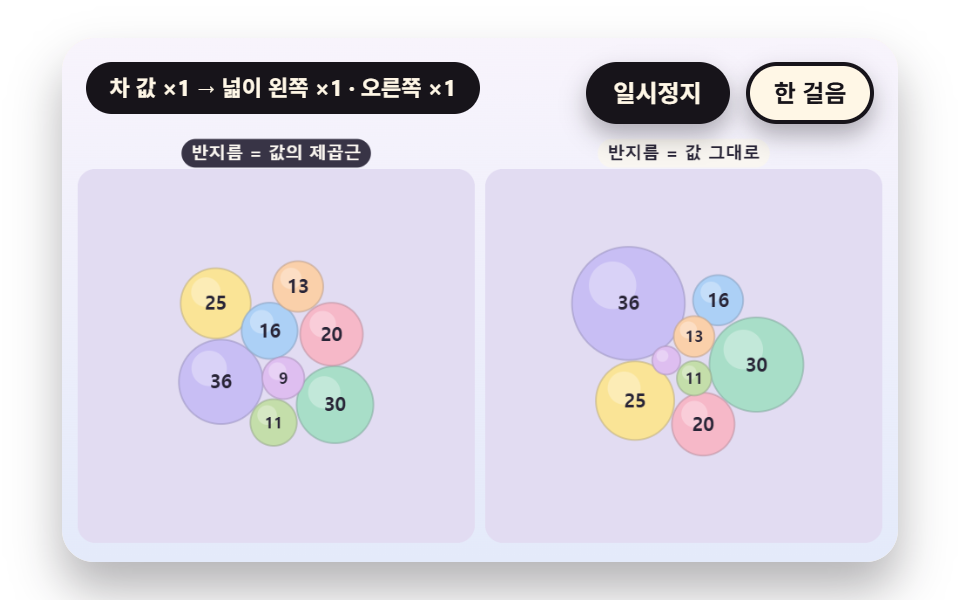 01 bc-area-sqrt-radius-scale
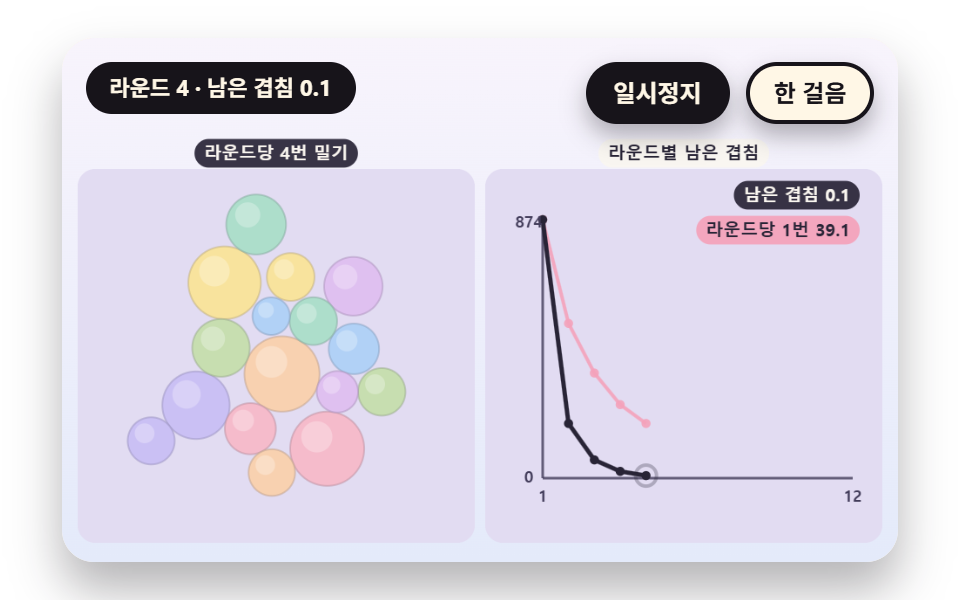 02 bc-overlap-relax-iterative-push
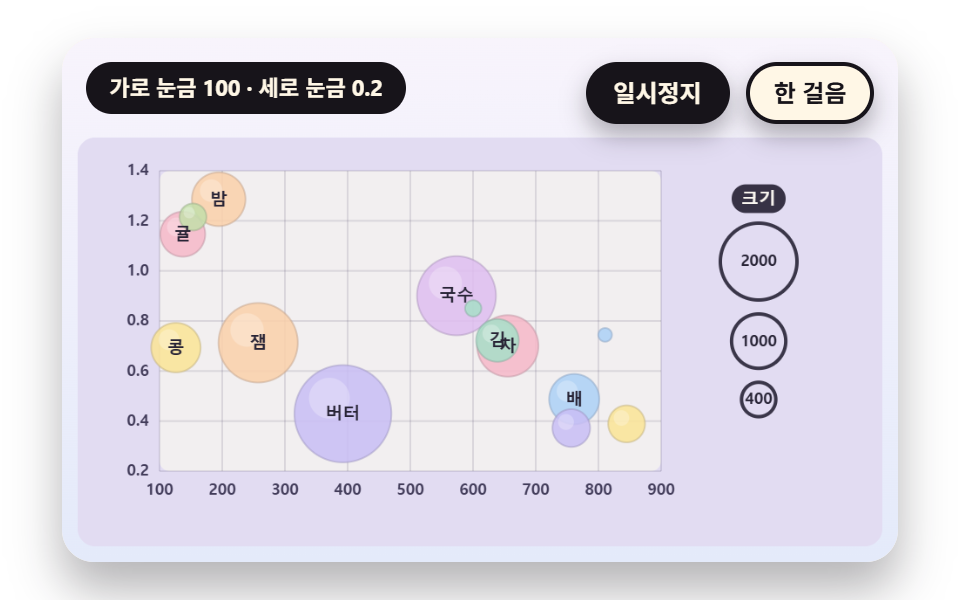 03 bc-three-axis-nice-tick-scatter
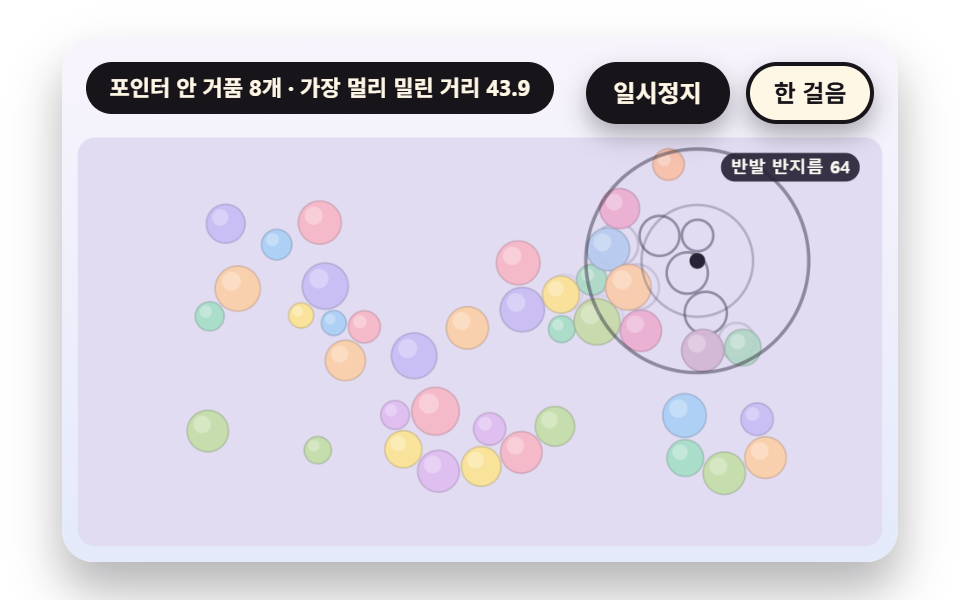 04 bc-pointer-repel-falloff-field
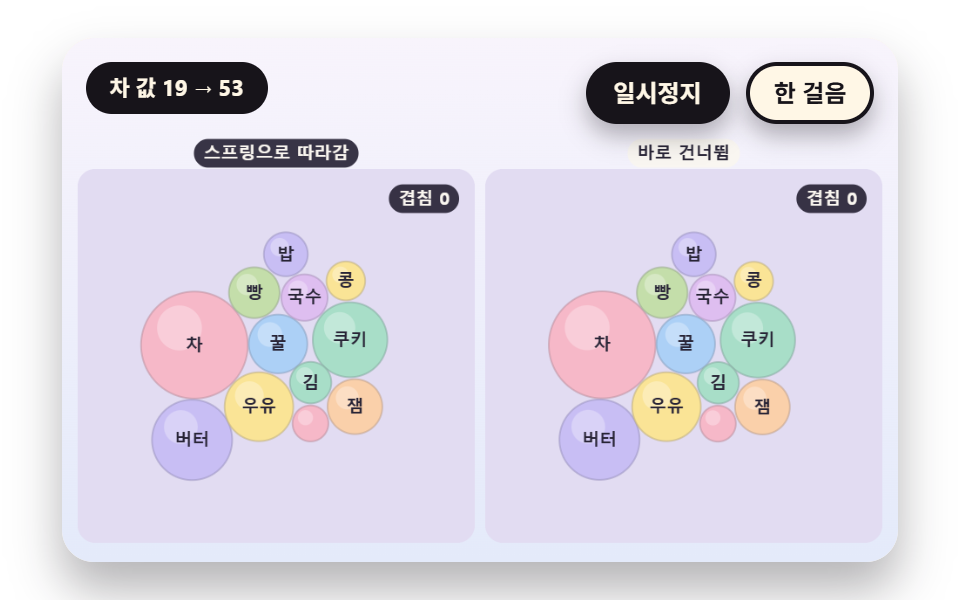 05 bc-value-change-spring-reflow
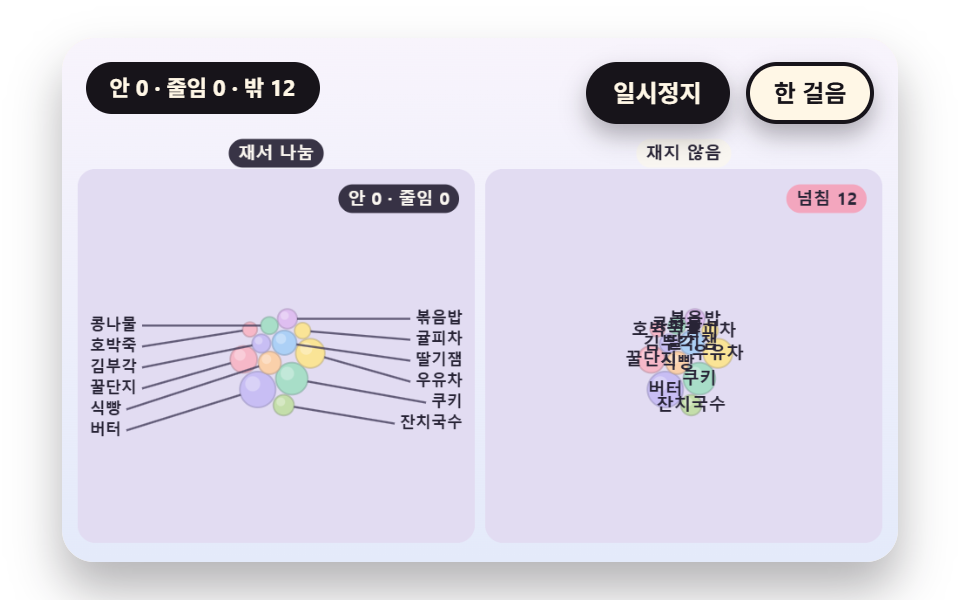 06 bc-label-fit-width-clip-outside
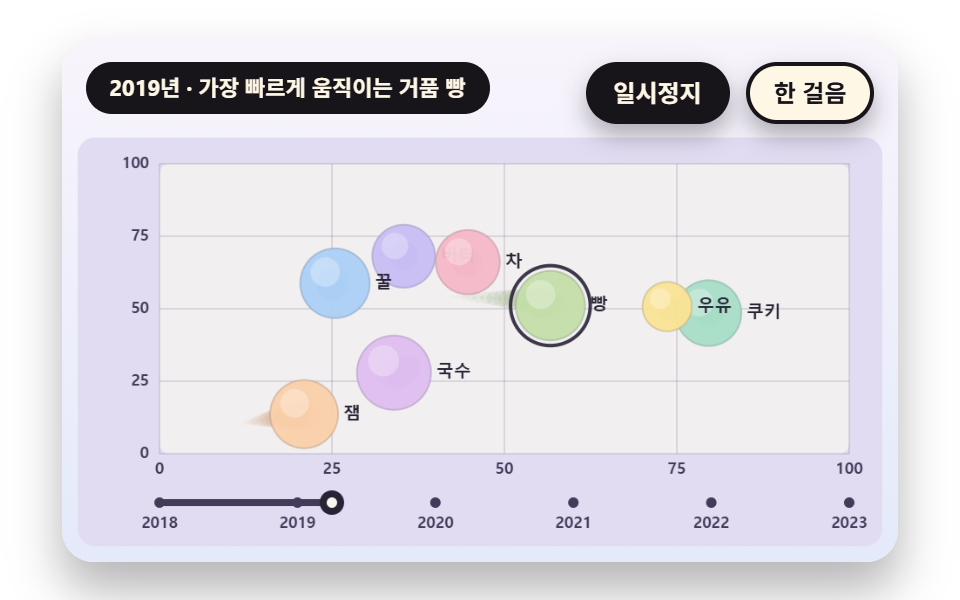 07 bc-year-step-motion-trail-interp
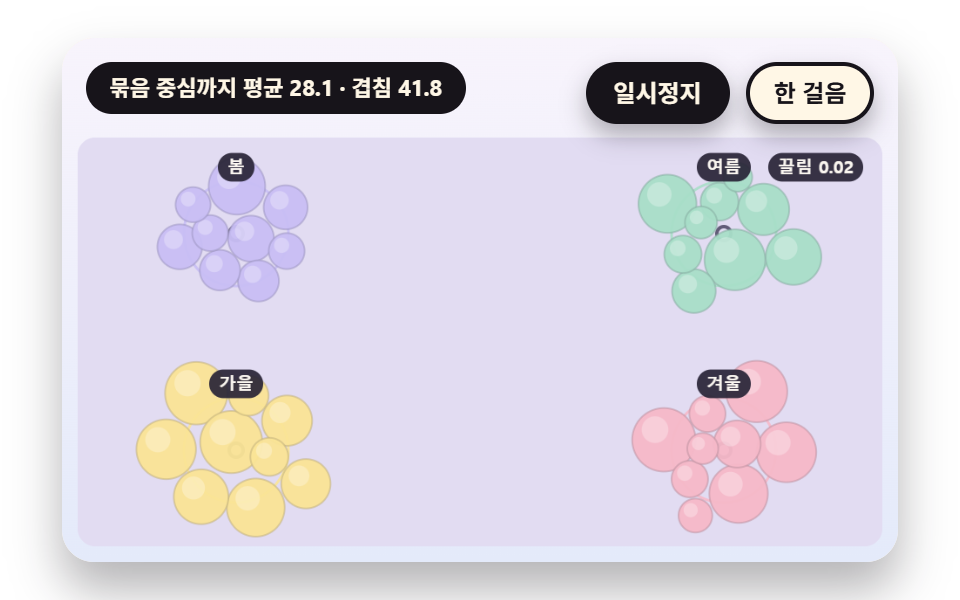 08 bc-group-gravity-cluster-pull
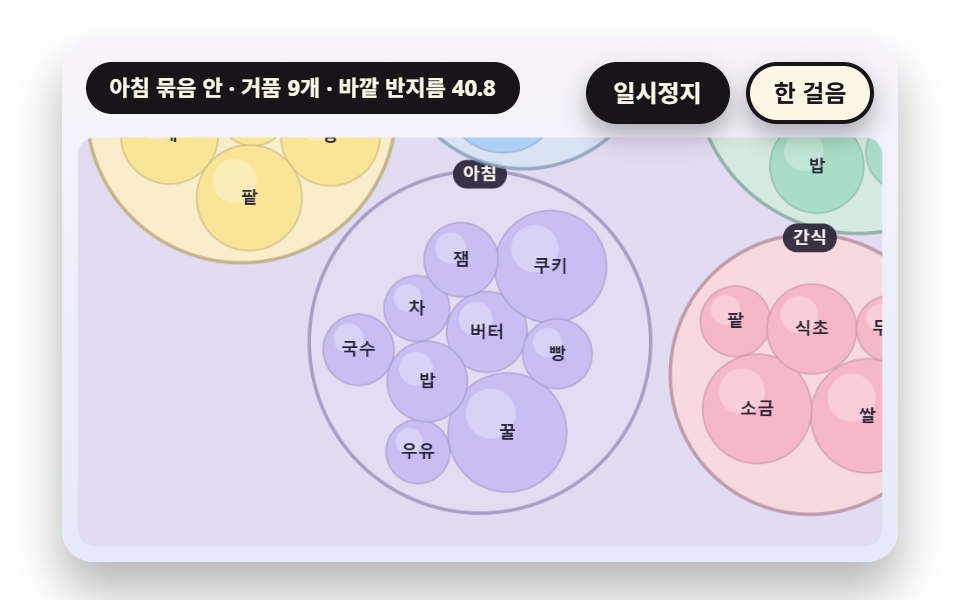 09 bc-nested-pack-drill-zoom
Auto-plays · click a tile to jump to its section · all nine in one zip
- 01 Radius Scaled to Area
- 02 Overlap Relaxed by Repeated Pushes
- 03 Ticks for the Three Values of X, Y and Size
- 04 Bubbles Pushed Away From the Pointer
- 05 Springing to a New Size When the Value Changes
- 06 Measuring Whether a Label Fits Inside
- 07 A Motion Trail Joining Time Steps
- 08 Gravity Pulling to Each Group Center
- 09 Zooming Into a Circle Packed Inside a Circle
Every scene here builds on one shared object. A bubble is an object with five fields, { x, y, r, v, g }, the overlap function changes x and y, the radius function sets r, and the screen only reads that object list and the scene clock to paint. The canvas does not decide a position on its own.
Where the three values go is the first decision of the chart
The horizontal and vertical values pass through ticks and become coordinates, and the size value becomes a radius. A size value has no axis, so scene 03 draws a legend of three sample circles instead. A bubble chart diagram that skips this decision ends up with circles whose sizes mean nothing.
The clock and the random source are fixed inside each scene
A scene calls neither Date nor Math.random. Progress comes from the elapsed time on the scene timetable, and scattered starting spots come from a seeded generator, so one scene builds the same bubble layout each run. The names and values are made up.
Bubble Chart: 9 Scenes — Radius Scaled to Area, Overlap Relaxed by Repeated Pushes, Ticks for Three Values, Bubbles Pushed Away From the Pointer, a Spring Move When a Value Changes, Labels Fitted by Measure, a Motion Trail Between Time Steps, Group Gravity and a Zoom Into a Group
The order runs from size to neighbors, then time, then groups. 01 to 03 cover radius, placement and ticks, 04 and 05 cover the pointer and value updates, 06 covers labels, 07 covers movement between time steps, and 08 and 09 cover groups and layers.
What nine renders measured for area, frames and intensity
| Scene | Cumulative area | Moving frames | Mean intensity |
|---|---|---|---|
| 01 Area radius | 11.0% | 23/23 | 44.3 |
| 02 Overlap relaxation | 1.7% | 20/23 | 50.6 |
| 03 Three-value ticks | 29.9% | 19/23 | 50.0 |
| 04 Pointer repel | 17.1% | 23/23 | 50.7 |
| 05 Spring reflow | 9.0% | 23/23 | 38.4 |
| 06 Label fit | 14.0% | 19/23 | 41.7 |
| 07 Motion trail | 14.9% | 23/23 | 58.6 |
| 08 Group gravity | 37.2% | 23/23 | 28.5 |
| 09 Zoom into a group | 43.4% | 19/23 | 35.5 |
Scene 09 covers the most area at 43.4% and 02 the least at 1.7%, while mean intensity peaks at 58.6 in 07 and bottoms out at 28.5 in 08. Scenes 01, 04, 05, 07 and 08 moved in 23/23 frames, and 03, 06 and 09 in 19/23.
01Radius Scaled to Area
A reader judges size by area, so the area has to follow the value and the radius cannot. radiusOf takes radius 18 at value 20, scales with the square root of the value and clamps between R_MIN 6 and R_MAX 46, while radiusLinear on the right is a deliberate contrast that scales the radius straight to the value. The scene covers 11.0% cumulative area and moved in 23/23 frames.
<main class="stage">
<div class="vj is-demo" id="vj">
  <div class="vj__pad" data-role="pad" tabindex="0" role="application" aria-label="Bubble chart stage: arrow keys move between bubbles, Enter picks, P pauses, N steps once, R restarts">
    <canvas class="vj__canvas" data-role="canvas" width="480" height="300" role="img" aria-label="The same eight values drawn as bubbles twice: on the left the radius is the square root of the value, on the right the radius is simply proportional to the value. Bubbles pop out one by one every 0.12 seconds, and when the fourth value doubles the left area doubles while the right area quadruples, with a pill under each bubble showing the area ratio. The grown bubble pushes its neighbors away and they gather again when the value returns"></canvas>
  </div>
  <p class="vj__status" data-role="status" aria-live="off">Bubble chart demo</p>
  <div class="vj__ctrl">
    <button class="vj__pause" data-role="pause" type="button" aria-pressed="false">Pause</button>
    <button class="vj__step" data-role="step" type="button">Step</button>
  </div>
  <p class="vj__done" data-role="done" role="status" aria-live="polite"></p>
</div>
</main>
@use "../../../../site/static/demo-tokens" as *;
@include stage($stage-paper);
.vj {
position: relative;
width: min(92vw, calc(160vh - 12.8vw));
aspect-ratio: 480 / 300;
margin: 0 auto;
border-radius: $r-card;
overflow: hidden;
box-shadow: $shadow-raised;
background: $subject-cream;
}
// 무대 상자 — 여기서 시작한 터치만 칸 누르기로 읽는다(touch-action: none 은 이 상자에만). 무대 밖 터치는 페이지 스크롤 그대로
.vj__pad {
position: absolute;
inset: 0;
border-radius: inherit;
outline: none;
touch-action: none;
cursor: pointer;
}
// 바깥 .vj 가 넘침을 자르므로 포커스 테두리는 안쪽으로 들인다
.vj__pad:focus-visible {
outline: 3px solid $subject-ink;
outline-offset: -3px;
}
.vj__canvas {
position: absolute;
inset: 0;
display: block;
width: 100%;
height: 100%;
}
.vj__ctrl {
position: absolute;
right: $sp-3;
top: $sp-3;
display: flex;
gap: $sp-2;
}
.vj__pause,
.vj__step {
padding: $sp-1 $sp-3;
border: 2px solid $subject-ink;
border-radius: $r-pill;
background: $subject-ink;
color: $subject-cream;
font-family: inherit;
font-weight: 700;
font-size: 12px;
line-height: 1.6;
cursor: pointer;
box-shadow: $shadow-press;
transition: transform $dur-quick $ease-spring;
}
.vj__step {
background: $subject-cream;
color: $subject-ink;
}
// 스크린리더에만 읽히는 완료 알림
.vj__done {
position: absolute;
width: 1px;
height: 1px;
margin: 0;
overflow: hidden;
clip-path: inset(50%);
white-space: nowrap;
}
// 눌린 상태(멈춤) — 바탕과 글자색을 뒤집어 aria-pressed 가 눈에도 보이게
.vj__pause[aria-pressed="true"] {
background: $subject-cream;
color: $subject-ink;
}
.vj__pause:hover,
.vj__step:hover {
transform: translateY(-2px);
}
.vj__pause:active,
.vj__step:active {
transform: translateY(1px);
}
.vj__pause:focus-visible,
.vj__step:focus-visible {
outline: 3px solid $subject-ink;
outline-offset: 3px;
}
// 상태 줄 — 지금 장면의 수치를 글자로. 시연 중에는 aria-live off, 사람이 처음 손대면 polite
.vj__status {
position: absolute;
left: $sp-3;
top: $sp-3;
max-width: calc(100% - 190px);
margin: 0;
padding: $sp-1 $sp-3;
border-radius: $r-pill;
background: $subject-ink;
color: $subject-cream;
font-weight: 700;
font-size: 11px;
line-height: 1.6;
white-space: nowrap;
overflow: hidden;
text-overflow: ellipsis;
pointer-events: none;
}
@media (max-width: 340px) {
.vj__pause,
.vj__step,
.vj__status { font-size: 10px; padding: 0 $sp-2; }
}
// 움직임 줄이기 — 장면은 스크립트가 정지 장면 한 장으로 멈춘다. 버튼도 떠오르지 않게
@media (prefers-reduced-motion: reduce) {
.vj__pause,
.vj__step { transition: none !important; }
.vj__pause:hover,
.vj__pause:active,
.vj__step:hover,
.vj__step:active { transform: none !important; }
}html, body {
margin: 0;
overflow: hidden;
}
.stage {
box-sizing: border-box;
min-height: 100vh;
display: grid;
place-items: center;
margin: 0;
background: #ffffff;
font-family: -apple-system, "Segoe UI", "Noto Sans KR", sans-serif;
padding: clamp(8px, 4vw, 24px);
}
.vj {
position: relative;
width: min(92vw, 160vh - 12.8vw);
aspect-ratio: 480/300;
margin: 0 auto;
border-radius: 16px;
overflow: hidden;
box-shadow: 0 14px 24px rgba(23, 20, 26, 0.32);
background: #fff7e6;
}
.vj__pad {
position: absolute;
inset: 0;
border-radius: inherit;
outline: none;
touch-action: none;
cursor: pointer;
}
.vj__pad:focus-visible {
outline: 3px solid #17141a;
outline-offset: -3px;
}
.vj__canvas {
position: absolute;
inset: 0;
display: block;
width: 100%;
height: 100%;
}
.vj__ctrl {
position: absolute;
right: 12px;
top: 12px;
display: flex;
gap: 8px;
}
.vj__pause,
.vj__step {
padding: 4px 12px;
border: 2px solid #17141a;
border-radius: 999px;
background: #17141a;
color: #fff7e6;
font-family: inherit;
font-weight: 700;
font-size: 12px;
line-height: 1.6;
cursor: pointer;
box-shadow: 0 6px 12px rgba(23, 20, 26, 0.32);
transition: transform 220ms cubic-bezier(0.2, 0.8, 0.2, 1);
}
.vj__step {
background: #fff7e6;
color: #17141a;
}
.vj__done {
position: absolute;
width: 1px;
height: 1px;
margin: 0;
overflow: hidden;
clip-path: inset(50%);
white-space: nowrap;
}
.vj__pause[aria-pressed=true] {
background: #fff7e6;
color: #17141a;
}
.vj__pause:hover,
.vj__step:hover {
transform: translateY(-2px);
}
.vj__pause:active,
.vj__step:active {
transform: translateY(1px);
}
.vj__pause:focus-visible,
.vj__step:focus-visible {
outline: 3px solid #17141a;
outline-offset: 3px;
}
.vj__status {
position: absolute;
left: 12px;
top: 12px;
max-width: calc(100% - 190px);
margin: 0;
padding: 4px 12px;
border-radius: 999px;
background: #17141a;
color: #fff7e6;
font-weight: 700;
font-size: 11px;
line-height: 1.6;
white-space: nowrap;
overflow: hidden;
text-overflow: ellipsis;
pointer-events: none;
}
@media (max-width: 340px) {
.vj__pause,
.vj__step,
.vj__status {
font-size: 10px;
padding: 0 8px;
}
}
@media (prefers-reduced-motion: reduce) {
.vj__pause,
.vj__step {
transition: none !important;
}
.vj__pause:hover,
.vj__pause:active,
.vj__step:hover,
.vj__step:active {
transform: none !important;
}
}(function () {
const root = document.getElementById("vj");
if (!root) return;
// 무대 좌표 — 캔버스 안 계산은 늘 480×300. 화면에 보이는 크기와 상관없다
const W = 480;
const H = 300;
const TAU = Math.PI * 2;
function clamp(v, lo, hi) { return v < lo ? lo : (v > hi ? hi : v); }
function lerp(a, b, k) { return a + (b - a) * k; }
function ease(x) { const c = clamp(x, 0, 1); return c * c * (3 - 2 * c); }
// 끝에서 한 번 넘쳤다 돌아오는 곡선 — 거품이 자리에 튀어 나올 때
function backOut(x) {
const c = clamp(x, 0, 1) - 1;
return 1 + 2.70158 * c * c * c + 1.70158 * c * c;
}
// 시드 고정 난수 — 선형 합동 생성기(곱 1664525, 더함 1013904223). 같은 시드면 같은 수열
function seeded(seed) {
let s = (seed >>> 0) || 1;
return function () {
s = (Math.imul(s, 1664525) + 1013904223) >>> 0;
return s / 4294967296;
};
}
// 파스텔 팔레트 — 거품은 연한 면, 글자는 늘 진한 잉크
const BG_TOP = [248, 244, 252];
const BG_BOT = [228, 234, 250];
const BED = [226, 220, 242];
const INK = [40, 36, 54];
const INK2 = [66, 60, 90];
const PAPER = [250, 246, 240];
const ROSE = [244, 162, 186];
const MINT = [148, 212, 182];
const TILES = [
[200, 190, 244], [168, 222, 200], [250, 228, 150], [246, 184, 200],
[172, 208, 246], [250, 208, 170], [196, 222, 170], [222, 190, 240],
];
function mix(a, b, k) { return [lerp(a[0], b[0], k), lerp(a[1], b[1], k), lerp(a[2], b[2], k)]; }
function rgba(c, a) {
return 'rgba(' + Math.round(clamp(c[0], 0, 255)) + ',' + Math.round(clamp(c[1], 0, 255)) + ',' + Math.round(clamp(c[2], 0, 255)) + ',' + clamp(a, 0, 1).toFixed(3) + ')';
}
// 장면 시계(초)·판 반복 번호·시간표 — 시간표는 (시각, 할 일) 목록이고 시각이 지나면 한 번씩 부른다
let sceneT = 0;
let lap = 0;
let script = [];
let evAt = 0;
// 겹침 한 번 풀기 — 두 원의 중심 거리 d 가 반지름 합에 gap 을 더한 값보다 작으면 모자란 만큼(o)을 두 원의 Size 비율로 나눠 서로 밀어낸다(작은 원이 더 많이 움직인다)
function relaxPass(bs, gap) {
for (let i = 0; i < bs.length; i += 1) {
for (let j = i + 1; j < bs.length; j += 1) {
const a = bs[i];
const b = bs[j];
let dx = b.x - a.x;
let dy = b.y - a.y;
let d = Math.sqrt(dx * dx + dy * dy);
const need = a.r + b.r + gap;
if (d >= need) {
continue;
}
if (d < 1e-6) {
dx = Math.cos(i * 2.399 + j * 1.131);
dy = Math.sin(i * 2.399 + j * 1.131);
d = 1;
}
const o = need - d;
const ux = dx / d;
const uy = dy / d;
const sa = b.r / (a.r + b.r);
const sb = a.r / (a.r + b.r);
a.x -= ux * o * sa;
a.y -= uy * o * sa;
b.x += ux * o * sb;
b.y += uy * o * sb;
}
}
}
// 판 안에 가두기 — 원 전체가 사각형 안에 있게 중심을 자른다
function keepIn(bs, R) {
for (const b of bs) {
b.x = clamp(b.x, R.x + b.r, R.x + R.w - b.r);
b.y = clamp(b.y, R.y + b.r, R.y + R.h - b.r);
}
}
// 겹침 합 — 모든 원 쌍에서 (반지름 합 - 중심 거리) 가 양수인 만큼을 더한 값. 0 이면 겹침이 없다
function overlapOf(bs) {
let s = 0;
for (let i = 0; i < bs.length; i += 1) {
for (let j = i + 1; j < bs.length; j += 1) {
const d = Math.hypot(bs[j].x - bs[i].x, bs[j].y - bs[i].y);
const o = bs[i].r + bs[j].r - d;
if (o > 0) {
s += o;
}
}
}
return s;
}
// 반복해서 풀기 — passes 번 겹침을 밀고, 매번 판 중심으로 pull 만큼 끌어당긴 뒤 판 안으로 자른다. 끝난 뒤 남은 겹침 합을 돌려준다
function relax(bs, R, passes, gap, pull) {
const cx = R.x + R.w / 2;
const cy = R.y + R.h / 2;
for (let p = 0; p < passes; p += 1) {
relaxPass(bs, gap);
if (pull > 0) {
for (const b of bs) {
b.x += (cx - b.x) * pull;
b.y += (cy - b.y) * pull;
}
}
keepIn(bs, R);
}
return overlapOf(bs);
}
function sumOf(vals) { let s = 0; for (const v of vals) {
s += v;
} return s; }
function r1(v) { return String(Math.round(v * 10) / 10); }
// ── 자체 가상 데이터 ──────────────────────────────────────
const NAMES = [
'Butter', 'Cookie', 'Milk', 'Tea', 'Honey', 'Jam', 'Bread', 'Noodle', 'Rice', 'Nori', 'Bean', 'Citrus',
'Pear', 'Chestnut', 'Sesame', 'Adzuki', 'Grain', 'Salt', 'Vinegar', 'Tofu', 'Kelp', 'Squash', 'Persimmon', 'Mugwort',
];
// ── 글자 폭 어림 ──────────────────────────────────────────
// 한글·한자·가나는 글자 크기만큼, 로마자는 0.56 배로 어림한다 — 실제 폭을 재지 않고 문자 수에서 곧바로 구한다
function glyphW(s, px) {
let w = 0;
for (let i = 0; i < s.length; i += 1) {
w += (s.charCodeAt(i) >= 0x2e80 ? 1 : 0.56) * px;
}
return w;
}
// 문구 틀의 {a}·{b} 자리에 값을 끼운다 — 화면 문구는 늘 이 틀 한 줄로 두고 로케일 사전이 통째로 바꾼다
function fill(s, a, b) { return s.replace('{a}', a).replace('{b}', b === undefined ? '' : b); }
const canvasEl = root.querySelector('[data-role="canvas"]');
const padEl = root.querySelector('[data-role="pad"]');
const pauseEl = root.querySelector('[data-role="pause"]');
const statusEl = root.querySelector('[data-role="status"]');
const stepEl = root.querySelector('[data-role="step"]');
const doneEl = root.querySelector('[data-role="done"]');
const ctxRaw = canvasEl ? canvasEl.getContext('2d') : null;
if (!canvasEl || !ctxRaw || !pauseEl || !padEl || !stepEl || !doneEl) {
return;
}
const cv = canvasEl;
const ctx = ctxRaw;
const pauseBtn = pauseEl;
const stepBtn = stepEl;
const doneP = doneEl;
const pad = padEl;
// 외부 웹폰트는 부르지 않는다 — 기기에 있는 글꼴 목록만
const FONT_STACK = 'system-ui, -apple-system, "Segoe UI", "Noto Sans KR", sans-serif';
let dpr = 1;
function fitCanvas() {
// 배율은 2 에서 자른다 — 배율 3 기기에서 화소가 2.25배로 늘지 않게
dpr = Math.min(window.devicePixelRatio || 1, 2);
cv.width = Math.round(W * dpr);
cv.height = Math.round(H * dpr);
ctx.setTransform(dpr, 0, 0, dpr, 0, 0);
}
function skyFill(top, bot) {
const g = ctx.createLinearGradient(0, 0, 0, H);
g.addColorStop(0, rgba(top, 1));
g.addColorStop(1, rgba(bot, 1));
ctx.fillStyle = g;
ctx.fillRect(0, 0, W, H);
}
function disc(x, y, r, c, a) {
if (r <= 0.2 || a <= 0) {
return;
}
ctx.beginPath();
ctx.arc(x, y, r, 0, TAU);
ctx.fillStyle = rgba(c, a);
ctx.fill();
}
function box(x, y, w, h, r, c, a) {
if (w <= 0.2 || h <= 0.2 || a <= 0) {
return;
}
ctx.beginPath();
ctx.roundRect(x, y, w, h, Math.max(0, Math.min(r, w / 2, h / 2)));
ctx.fillStyle = rgba(c, a);
ctx.fill();
}
function outline(x, y, w, h, r, width, c, a) {
if (w <= 0.2 || h <= 0.2 || a <= 0) {
return;
}
ctx.beginPath();
ctx.roundRect(x, y, w, h, Math.max(0, Math.min(r, w / 2, h / 2)));
ctx.lineWidth = width;
ctx.strokeStyle = rgba(c, a);
ctx.stroke();
}
function text(s, x, y, c, a, px, weight, align) {
ctx.font = weight + ' ' + px + 'px ' + FONT_STACK;
ctx.textAlign = align;
ctx.textBaseline = 'middle';
ctx.fillStyle = rgba(c, a);
ctx.fillText(s, x, y);
}
// 글자 이름표 — 바탕 알약 위에 글자
function tag(s, x, y, bg, fg, px, align) {
ctx.font = '700 ' + px + 'px ' + FONT_STACK;
const w = ctx.measureText(s).width + px * 1.1;
const left = align === 'center' ? x - w / 2 : (align === 'right' ? x - w : x);
box(left, y - px * 0.82, w, px * 1.64, px * 0.82, bg, 0.92);
text(s, left + w / 2, y + 0.5, fg, 1, px, 700, 'center');
}
// 판 자리 — 왼쪽 판·오른쪽 판(대비판)·한 판짜리 히어로. 위쪽은 상태 줄·버튼 자리
const PANEL_L = { x: 12, y: 78, w: 222, h: 208 };
const PANEL_R = { x: 246, y: 78, w: 222, h: 208 };
const PANEL_ONE = { x: 12, y: 60, w: 456, h: 228 };
// 판 바닥 — 칸 사이 틈으로 비치는 연보라
function bed(R) {
box(R.x - 3, R.y - 3, R.w + 6, R.h + 6, 10, BED, 1);
}
function panelTags(a, b) {
tag(a, PANEL_L.x + PANEL_L.w / 2, 66, INK, PAPER, 10, 'center');
tag(b, PANEL_R.x + PANEL_R.w / 2, 66, PAPER, INK, 10, 'center');
}
// 거품 한 개 — 면, 왼쪽 위 하이라이트, 옅은 윤곽
function orb(x, y, r, c, a) {
if (r <= 0.3 || a <= 0) {
return;
}
disc(x, y, r, c, a);
if (r > 5) {
disc(x - r * 0.28, y - r * 0.32, r * 0.42, [255, 255, 255], 0.3 * a);
}
ctx.beginPath();
ctx.arc(x, y, r, 0, TAU);
ctx.lineWidth = 1;
ctx.strokeStyle = rgba(mix(c, INK, 0.28), 0.55 * a);
ctx.stroke();
}
function line(x0, y0, x1, y1, width, c, a) {
if (a <= 0) {
return;
}
ctx.beginPath();
ctx.moveTo(x0, y0);
ctx.lineTo(x1, y1);
ctx.lineWidth = width;
ctx.strokeStyle = rgba(c, a);
ctx.stroke();
}
function ring(x, y, r, width, c, a) {
if (r <= 0.3 || a <= 0) {
return;
}
ctx.beginPath();
ctx.arc(x, y, r, 0, TAU);
ctx.lineWidth = width;
ctx.strokeStyle = rgba(c, a);
ctx.stroke();
}
function ballHit(b, label) {
return { x: b.x - b.r, y: b.y - b.r, w: b.r * 2, h: b.r * 2, label: label };
}
let shownStatus = '';
function pushStatus(s) {
if (!statusEl || s === shownStatus) {
return;
}
shownStatus = s;
statusEl.textContent = s;
}
let paused = false;
const reduceQuery = window.matchMedia('(prefers-reduced-motion: reduce)');
// 페이지를 연 채 움직임 줄이기 설정을 바꿔도 change 리스너가 다시 읽는다
let still = reduceQuery.matches;
// 자동 시연 표시 — 사람이 처음 손대면 떼고 상태 줄을 polite 로 켠다
let demo = root.classList.contains('is-demo');
const off = new AbortController();
// 사람이 직접 하는 중이면 시간표는 멈추고 애니메이션만 흐른다
let manual = false;
// curOn 이면 키보드 칸 고르기가 켜진 것 — ki 가 hits() 안 번호
let curOn = false;
let ki = 0;
function wake() {
if (!demo) {
return;
}
demo = false;
root.classList.remove('is-demo');
if (statusEl) {
statusEl.setAttribute('aria-live', 'polite');
}
}
function takeOver() {
if (manual) {
return;
}
manual = true;
onTake();
wake();
if (!curOn) {
curOn = true;
ki = 0;
}
}
// 한 판 시연이 끝났음을 스크린리더에 한 번만 알린다 — 판이 되풀이돼도 다시 읽지 않는다
let doneSaid = false;
function checkDone() {
if (!manual && !doneSaid && sceneT >= LAP_S - 0.6) {
doneSaid = true;
doneP.textContent = statusText();
}
}
function advance(dt) {
sceneT += dt;
if (!manual) {
while (evAt < script.length && script[evAt].t <= sceneT) {
const ev = script[evAt];
evAt += 1;
ev.f();
}
if (sceneT >= LAP_S) {
lap += 1;
begin();
return;
}
}
update(dt);
}
// 첫 판은 START_S 만큼 앞서 시작한다 — 칸이 이미 움직이는 중인 장면에서 보인다
function runTo(t) {
while (sceneT < t - 1e-6) {
advance(Math.min(1 / 30, t - sceneT));
}
}
function begin() {
sceneT = 0;
evAt = 0;
script = [];
build();
if (lap === 0 && !still) {
runTo(START_S);
}
}
const DT_MAX = 0.05;
const SETTLE_FRAMES = 8;
const SETTLE_DT = 0.04;
function drawCursor() {
if (!curOn) {
return;
}
const hs = hits();
if (hs.length === 0) {
return;
}
const h = hs[clamp(ki, 0, hs.length - 1)];
outline(h.x + 1, h.y + 1, h.w - 2, h.h - 2, 5, 3, INK, 1);
outline(h.x - 1, h.y - 1, h.w + 2, h.h + 2, 6, 1.5, PAPER, 0.9);
}
function cursorLabel() {
const hs = hits();
return hs.length === 0 ? statusText() : hs[clamp(ki, 0, hs.length - 1)].label;
}
function showNow() {
draw();
drawCursor();
pushStatus(curOn ? cursorLabel() : statusText());
checkDone();
}
let rafId = 0;
let lastTs = -1;
function frame(ts) {
if (still || paused) {
rafId = 0;
return;
}
if (lastTs < 0) {
lastTs = ts;
}
const dt = Math.min((ts - lastTs) / 1000, DT_MAX);
lastTs = ts;
if (dt > 0) {
advance(dt);
}
showNow();
rafId = window.requestAnimationFrame(frame);
}
function startLoop() {
if (rafId) {
return;
}
// 멈췄던 사이의 시간을 첫 프레임 dt 로 넘기지 않는다
lastTs = -1;
rafId = window.requestAnimationFrame(frame);
}
function stopLoop() {
if (rafId) {
window.cancelAnimationFrame(rafId);
rafId = 0;
}
}
// 움직임 줄이기 — 루프 없이 배치가 끝난 정지 장면 한 장
function showRest() {
stopLoop();
lap = 0;
sceneT = 0;
evAt = 0;
script = [];
build();
runTo(REST_S);
showNow();
}
// 움직임 줄이기이거나 멈춘 채 입력이 들어오면 트윈 없이 곧바로 끝 배치로 — 시간을 3초 흘려 스프링·애니메이션을 다 끝낸다
function settleStill() {
for (let k = 0; k < 90; k += 1) {
sceneT += 1 / 30;
update(1 / 30);
}
}
function play() {
begin();
showNow();
if (!paused) {
startLoop();
}
}
function togglePause() {
paused = !paused;
pauseBtn.setAttribute('aria-pressed', paused ? 'true' : 'false');
wake();
if (paused) {
stopLoop();
}
else if (!still) {
startLoop();
}
}
function restart() {
manual = false;
curOn = false;
doneSaid = false;
lap += 1;
begin();
for (let k = 0; k < SETTLE_FRAMES; k += 1) {
update(SETTLE_DT);
}
showNow();
}
// Step — 멈춘 채 시간표의 다음 일 하나를 부른다. 더 부를 일이 없거나 직접 하던 중이면 다음 판을 연다
function stepOnce() {
wake();
if (!paused) {
paused = true;
pauseBtn.setAttribute('aria-pressed', 'true');
stopLoop();
}
if (manual || evAt >= script.length) {
restart();
return;
}
sceneT = Math.max(sceneT, script[evAt].t);
advance(0);
for (let k = 0; k < SETTLE_FRAMES; k += 1) {
sceneT += SETTLE_DT;
update(SETTLE_DT);
}
showNow();
}
function moveCur(d) {
const n = hits().length;
if (n === 0) {
return;
}
ki = (ki + d + n) % n;
}
function actCur(i) {
onAct(i);
// 멈춘 채·움직임 줄이기에서도 입력이 화면에 바로 반영되게 한다
if (still || paused) {
settleStill();
}
}
pauseBtn.addEventListener('click', togglePause, { signal: off.signal });
stepBtn.addEventListener('click', stepOnce, { signal: off.signal });
// 키보드 — 무대에 포커스가 있을 때만. 방향키는 칸 이동, Enter·Space 는 칸 고르기, P 는 Pause, N 은 Step, R 은 다시
pad.addEventListener('keydown', function (e) {
if (e.altKey || e.ctrlKey || e.metaKey) {
return;
}
const k = e.key;
if (k === 'ArrowLeft' || k === 'ArrowUp') {
e.preventDefault();
takeOver();
moveCur(-1);
showNow();
}
else if (k === 'ArrowRight' || k === 'ArrowDown') {
e.preventDefault();
takeOver();
moveCur(1);
showNow();
}
else if (k === 'Enter' || k === ' ') {
e.preventDefault();
takeOver();
actCur(ki);
showNow();
}
else if (k === 'p' || k === 'P') {
togglePause();
}
else if (k === 'n' || k === 'N') {
stepOnce();
}
else if (k === 'r' || k === 'R') {
restart();
}
}, { signal: off.signal });
// 마우스·터치 — 누른 자리의 칸을 고른다
pad.addEventListener('click', function (e) {
const rect = cv.getBoundingClientRect();
const px = (e.clientX - rect.left) / rect.width * W;
const py = (e.clientY - rect.top) / rect.height * H;
const hs = hits();
let at = -1;
for (let i = 0; i < hs.length; i += 1) {
if (px >= hs[i].x && px <= hs[i].x + hs[i].w && py >= hs[i].y && py <= hs[i].y + hs[i].h) {
at = i;
}
}
if (at < 0) {
return;
}
takeOver();
ki = at;
actCur(at);
showNow();
}, { signal: off.signal });
// 탭이 숨으면 멈추고, 돌아오면 시계를 다시 맞춰 시작 — 숨은 동안의 몇 초가 한 프레임에 몰리지 않게
document.addEventListener('visibilitychange', function () {
if (document.hidden) {
stopLoop();
}
else if (!paused && !still) {
startLoop();
}
}, { signal: off.signal });
// 설정이 바뀌면 — 켜지면 배치가 끝난 한 장, 꺼지면 다시 움직인다
reduceQuery.addEventListener('change', function () {
still = reduceQuery.matches;
if (still) {
showRest();
}
else {
lap = 0;
play();
}
}, { signal: off.signal });
window.addEventListener('resize', function () {
fitCanvas();
showNow();
}, { signal: off.signal });
// 01 — 반지름을 값의 제곱근으로 잡아 넓이가 값에 비례하게 한다(왼쪽). 오른쪽은 반지름을 값에 그대로 비례시킨 대비판이라 값이 두 배면 넓이가 네 배가 된다
const R_MIN = 6;
const R_MAX = 46;
// 반지름 18 은 값 20 에서 출발한다 — 두 판이 같은 기준 거품에서 갈라진다
const R_REF = 18;
const V_REF = 20;
const VALS = [36, 30, 25, 20, 16, 13, 11, 9];
const GROW_I = 3;
const LAP_S = 9.6;
const START_S = 1.6;
const REST_S = 5.2;
// 넓이 기준 — 반지름은 값의 제곱근에 비례한다
function radiusOf(v) { return clamp(R_REF * Math.sqrt(v / V_REF), R_MIN, R_MAX); }
// 대비판 — 반지름이 값에 그대로 비례한다
function radiusLinear(v) { return clamp(R_REF * v / V_REF, R_MIN, R_MAX); }
let mul = [];
let tgtMul = [];
let ballsL = [];
let ballsR = [];
let lastI = GROW_I;
function place(R, rnd) {
return VALS.map(function (v, i) {
return { x: R.x + R.w * (0.15 + 0.7 * rnd()), y: R.y + R.h * (0.15 + 0.7 * rnd()), r: 4, v: v, g: i };
});
}
function setMul(i, m) { tgtMul[i] = m; lastI = i; }
function build() {
mul = VALS.map(function () { return 1; });
tgtMul = mul.slice();
lastI = GROW_I;
const rnd = seeded(61 + (lap % 3) * 17);
ballsL = place(PANEL_L, rnd);
ballsR = place(PANEL_R, rnd);
script.push({ t: 2.4, f: function () { setMul(GROW_I, 2); } });
script.push({ t: 5.6, f: function () { setMul(GROW_I, 1); } });
script.push({ t: 7.0, f: function () { setMul(0, 0.5); } });
script.push({ t: 8.6, f: function () { setMul(0, 1); } });
}
function popOf(i) { return backOut((sceneT - 0.15 - i * 0.12) / 0.5); }
function update(dt) {
if (dt <= 0) {
return;
}
const k = 1 - Math.exp(-6 * dt);
for (let i = 0; i < mul.length; i += 1) {
mul[i] += (tgtMul[i] - mul[i]) * k;
}
for (let i = 0; i < VALS.length; i += 1) {
const p = Math.max(0, popOf(i));
ballsL[i].r = radiusOf(VALS[i] * mul[i]) * p;
ballsR[i].r = radiusLinear(VALS[i] * mul[i]) * p;
}
relax(ballsL, PANEL_L, 4, 1.5, 0.03);
relax(ballsR, PANEL_R, 4, 1.5, 0.03);
}
function drawPanel(R, bs, valueOf) {
bed(R);
const order = bs.map(function (_b, i) { return i; }).sort(function (a, b) { return bs[b].r - bs[a].r; });
for (const i of order) {
orb(bs[i].x, bs[i].y, bs[i].r, TILES[i % 8], 1);
}
for (const i of order) {
if (bs[i].r >= 9) {
text(valueOf(i), bs[i].x, bs[i].y + 0.5, INK, 1, bs[i].r >= 14 ? 11 : 9, 700, 'center');
}
}
}
function areaRatio(i, left) {
const r0 = left ? radiusOf(VALS[i]) : radiusLinear(VALS[i]);
const r = left ? ballsL[i].r / Math.max(popOf(i), 1e-6) : ballsR[i].r / Math.max(popOf(i), 1e-6);
return (r / r0) * (r / r0);
}
function draw() {
skyFill(BG_TOP, BG_BOT);
panelTags('Radius = square root of value', 'Radius = value as is');
drawPanel(PANEL_L, ballsL, function (i) { return String(Math.round(VALS[i] * mul[i])); });
drawPanel(PANEL_R, ballsR, function (i) { return String(Math.round(VALS[i] * mul[i])); });
// 값이 바뀐 거품의 넓이 배율 — 두 판 모두 같은 거품을 따로 잰다
if (mul[lastI] > 1.02 || mul[lastI] < 0.98) {
tag(fill('Area ×{a}', r1(areaRatio(lastI, true))), ballsL[lastI].x, ballsL[lastI].y + ballsL[lastI].r + 11, INK, PAPER, 10, 'center');
tag(fill('Area ×{a}', r1(areaRatio(lastI, false))), ballsR[lastI].x, ballsR[lastI].y + ballsR[lastI].r + 11, INK, PAPER, 10, 'center');
}
}
function statusText() {
return '{n} value ×{v} → area left ×{a} · right ×{b}'.replace('{n}', NAMES[lastI]).replace('{v}', r1(mul[lastI])).replace('{a}', r1(areaRatio(lastI, true))).replace('{b}', r1(areaRatio(lastI, false)));
}
function hits() {
return ballsL.map(function (b, i) {
return ballHit(b, '{n} value {v} · radius {r} · area {a}'.replace('{n}', NAMES[i]).replace('{v}', String(Math.round(VALS[i] * mul[i]))).replace('{r}', r1(b.r)).replace('{a}', String(Math.round(Math.PI * b.r * b.r))));
});
}
// 고른 거품의 값을 두 배로 — 한 번 더 고르면 처음 값으로
function onAct(i) { setMul(i, tgtMul[i] > 1.5 ? 1 : 2); }
function onTake() { return; }
fitCanvas();
if (still) {
showRest();
}
else {
play();
}
return function () {
stopLoop();
off.abort();
};
})();// AreaSqrtRadiusScale - 같은 항목 vanilla index.html 의 React 판. 같은 계산을 useEffect 안에서 돌린다
import { useEffect, useRef } from "react";
import styles from "./AreaSqrtRadiusScale.module.scss";
const cx = (s: string): string => s.split(" ").map((n) => styles[n] ?? n).join(" ");
export default function AreaSqrtRadiusScale() {
const rootRef = useRef<HTMLDivElement | null>(null);
useEffect(() => {
const rootEl = rootRef.current;
if (!rootEl) return;
const root: HTMLElement = rootEl;
type RGB = [number, number, number];
type RGBA = [number, number, number, number];
// 무대 좌표 — 캔버스 안 계산은 늘 480×300. 화면에 보이는 크기와 상관없다
const W = 480;
const H = 300;
const TAU = Math.PI * 2;
function clamp(v: number, lo: number, hi: number): number { return v < lo ? lo : (v > hi ? hi : v); }
function lerp(a: number, b: number, k: number): number { return a + (b - a) * k; }
function ease(x: number): number { const c = clamp(x, 0, 1); return c * c * (3 - 2 * c); }
// 끝에서 한 번 넘쳤다 돌아오는 곡선 — 거품이 자리에 튀어 나올 때
function backOut(x: number): number {
const c = clamp(x, 0, 1) - 1;
return 1 + 2.70158 * c * c * c + 1.70158 * c * c;
}
// 시드 고정 난수 — 선형 합동 생성기(곱 1664525, 더함 1013904223). 같은 시드면 같은 수열
function seeded(seed: number): () => number {
let s = (seed >>> 0) || 1;
return function (): number {
s = (Math.imul(s, 1664525) + 1013904223) >>> 0;
return s / 4294967296;
};
}
// 파스텔 팔레트 — 거품은 연한 면, 글자는 늘 진한 잉크
const BG_TOP: RGB = [248, 244, 252];
const BG_BOT: RGB = [228, 234, 250];
const BED: RGB = [226, 220, 242];
const INK: RGB = [40, 36, 54];
const INK2: RGB = [66, 60, 90];
const PAPER: RGB = [250, 246, 240];
const ROSE: RGB = [244, 162, 186];
const MINT: RGB = [148, 212, 182];
const TILES: RGB[] = [
[200, 190, 244], [168, 222, 200], [250, 228, 150], [246, 184, 200],
[172, 208, 246], [250, 208, 170], [196, 222, 170], [222, 190, 240],
];
function mix(a: RGB, b: RGB, k: number): RGB { return [lerp(a[0], b[0], k), lerp(a[1], b[1], k), lerp(a[2], b[2], k)]; }
function rgba(c: RGB, a: number): string {
return 'rgba(' + Math.round(clamp(c[0], 0, 255)) + ',' + Math.round(clamp(c[1], 0, 255)) + ',' + Math.round(clamp(c[2], 0, 255)) + ',' + clamp(a, 0, 1).toFixed(3) + ')';
}
// 장면 시계(초)·판 반복 번호·시간표 — 시간표는 (시각, 할 일) 목록이고 시각이 지나면 한 번씩 부른다
let sceneT = 0;
let lap = 0;
type Ev = { t: number; f: () => void };
let script: Ev[] = [];
let evAt = 0;
type Rect = { x: number; y: number; w: number; h: number };
// 키보드·클릭 대상 — 거품 하나의 사각형(캔버스 좌표)과 읽어 줄 문장
type Hit = { x: number; y: number; w: number; h: number; label: string };
// ── 거품 계산 ─────────────────────────────────────────────
// 거품 하나 — 중심 (x, y), 반지름 r, 값 v, 묶음 번호 g
type Ball = { x: number; y: number; r: number; v: number; g: number };
// 겹침 한 번 풀기 — 두 원의 중심 거리 d 가 반지름 합에 gap 을 더한 값보다 작으면 모자란 만큼(o)을 두 원의 크기 비율로 나눠 서로 밀어낸다(작은 원이 더 많이 움직인다)
function relaxPass(bs: Ball[], gap: number): void {
for (let i = 0; i < bs.length; i += 1) {
for (let j = i + 1; j < bs.length; j += 1) {
const a = bs[i];
const b = bs[j];
let dx = b.x - a.x;
let dy = b.y - a.y;
let d = Math.sqrt(dx * dx + dy * dy);
const need = a.r + b.r + gap;
if (d >= need) { continue; }
if (d < 1e-6) { dx = Math.cos(i * 2.399 + j * 1.131); dy = Math.sin(i * 2.399 + j * 1.131); d = 1; }
const o = need - d;
const ux = dx / d;
const uy = dy / d;
const sa = b.r / (a.r + b.r);
const sb = a.r / (a.r + b.r);
a.x -= ux * o * sa;
a.y -= uy * o * sa;
b.x += ux * o * sb;
b.y += uy * o * sb;
}
}
}
// 판 안에 가두기 — 원 전체가 사각형 안에 있게 중심을 자른다
function keepIn(bs: Ball[], R: Rect): void {
for (const b of bs) {
b.x = clamp(b.x, R.x + b.r, R.x + R.w - b.r);
b.y = clamp(b.y, R.y + b.r, R.y + R.h - b.r);
}
}
// 겹침 합 — 모든 원 쌍에서 (반지름 합 - 중심 거리) 가 양수인 만큼을 더한 값. 0 이면 겹침이 없다
function overlapOf(bs: Ball[]): number {
let s = 0;
for (let i = 0; i < bs.length; i += 1) {
for (let j = i + 1; j < bs.length; j += 1) {
const d = Math.hypot(bs[j].x - bs[i].x, bs[j].y - bs[i].y);
const o = bs[i].r + bs[j].r - d;
if (o > 0) { s += o; }
}
}
return s;
}
// 반복해서 풀기 — passes 번 겹침을 밀고, 매번 판 중심으로 pull 만큼 끌어당긴 뒤 판 안으로 자른다. 끝난 뒤 남은 겹침 합을 돌려준다
function relax(bs: Ball[], R: Rect, passes: number, gap: number, pull: number): number {
const cx = R.x + R.w / 2;
const cy = R.y + R.h / 2;
for (let p = 0; p < passes; p += 1) {
relaxPass(bs, gap);
if (pull > 0) {
for (const b of bs) { b.x += (cx - b.x) * pull; b.y += (cy - b.y) * pull; }
}
keepIn(bs, R);
}
return overlapOf(bs);
}
function sumOf(vals: number[]): number { let s = 0; for (const v of vals) { s += v; } return s; }
function r1(v: number): string { return String(Math.round(v * 10) / 10); }
// ── 자체 가상 데이터 ──────────────────────────────────────
const NAMES: string[] = [
'버터', '쿠키', '우유', '차', '꿀', '잼', '빵', '국수', '밥', '김', '콩', '귤',
'배', '밤', '깨', '팥', '쌀', '소금', '식초', '두부', '미역', '호박', '감', '쑥',
];
// ── 글자 폭 어림 ──────────────────────────────────────────
// 한글·한자·가나는 글자 크기만큼, 로마자는 0.56 배로 어림한다 — 실제 폭을 재지 않고 문자 수에서 곧바로 구한다
function glyphW(s: string, px: number): number {
let w = 0;
for (let i = 0; i < s.length; i += 1) { w += (s.charCodeAt(i) >= 0x2e80 ? 1 : 0.56) * px; }
return w;
}
// 문구 틀의 {a}·{b} 자리에 값을 끼운다 — 화면 문구는 늘 이 틀 한 줄로 두고 로케일 사전이 통째로 바꾼다
function fill(s: string, a: string, b?: string): string { return s.replace('{a}', a).replace('{b}', b === undefined ? '' : b); }
const canvasEl = root.querySelector('[data-role="canvas"]') as HTMLCanvasElement | null;
const padEl = root.querySelector('[data-role="pad"]') as HTMLElement | null;
const pauseEl = root.querySelector('[data-role="pause"]') as HTMLButtonElement | null;
const statusEl = root.querySelector('[data-role="status"]') as HTMLElement | null;
const stepEl = root.querySelector('[data-role="step"]') as HTMLButtonElement | null;
const doneEl = root.querySelector('[data-role="done"]') as HTMLElement | null;
const ctxRaw = canvasEl ? canvasEl.getContext('2d') : null;
if (!canvasEl || !ctxRaw || !pauseEl || !padEl || !stepEl || !doneEl) { return; }
const cv: HTMLCanvasElement = canvasEl;
const ctx: CanvasRenderingContext2D = ctxRaw;
const pauseBtn: HTMLButtonElement = pauseEl;
const stepBtn: HTMLButtonElement = stepEl;
const doneP: HTMLElement = doneEl;
const pad: HTMLElement = padEl;
// 외부 웹폰트는 부르지 않는다 — 기기에 있는 글꼴 목록만
const FONT_STACK = 'system-ui, -apple-system, "Segoe UI", "Noto Sans KR", sans-serif';
let dpr = 1;
function fitCanvas(): void {
// 배율은 2 에서 자른다 — 배율 3 기기에서 화소가 2.25배로 늘지 않게
dpr = Math.min(window.devicePixelRatio || 1, 2);
cv.width = Math.round(W * dpr);
cv.height = Math.round(H * dpr);
ctx.setTransform(dpr, 0, 0, dpr, 0, 0);
}
function skyFill(top: RGB, bot: RGB): void {
const g = ctx.createLinearGradient(0, 0, 0, H);
g.addColorStop(0, rgba(top, 1));
g.addColorStop(1, rgba(bot, 1));
ctx.fillStyle = g;
ctx.fillRect(0, 0, W, H);
}
function disc(x: number, y: number, r: number, c: RGB, a: number): void {
if (r <= 0.2 || a <= 0) { return; }
ctx.beginPath();
ctx.arc(x, y, r, 0, TAU);
ctx.fillStyle = rgba(c, a);
ctx.fill();
}
function box(x: number, y: number, w: number, h: number, r: number, c: RGB, a: number): void {
if (w <= 0.2 || h <= 0.2 || a <= 0) { return; }
ctx.beginPath();
ctx.roundRect(x, y, w, h, Math.max(0, Math.min(r, w / 2, h / 2)));
ctx.fillStyle = rgba(c, a);
ctx.fill();
}
function outline(x: number, y: number, w: number, h: number, r: number, width: number, c: RGB, a: number): void {
if (w <= 0.2 || h <= 0.2 || a <= 0) { return; }
ctx.beginPath();
ctx.roundRect(x, y, w, h, Math.max(0, Math.min(r, w / 2, h / 2)));
ctx.lineWidth = width;
ctx.strokeStyle = rgba(c, a);
ctx.stroke();
}
function text(s: string, x: number, y: number, c: RGB, a: number, px: number, weight: number, align: CanvasTextAlign): void {
ctx.font = weight + ' ' + px + 'px ' + FONT_STACK;
ctx.textAlign = align;
ctx.textBaseline = 'middle';
ctx.fillStyle = rgba(c, a);
ctx.fillText(s, x, y);
}
// 글자 이름표 — 바탕 알약 위에 글자
function tag(s: string, x: number, y: number, bg: RGB, fg: RGB, px: number, align: CanvasTextAlign): void {
ctx.font = '700 ' + px + 'px ' + FONT_STACK;
const w = ctx.measureText(s).width + px * 1.1;
const left = align === 'center' ? x - w / 2 : (align === 'right' ? x - w : x);
box(left, y - px * 0.82, w, px * 1.64, px * 0.82, bg, 0.92);
text(s, left + w / 2, y + 0.5, fg, 1, px, 700, 'center');
}
// 판 자리 — 왼쪽 판·오른쪽 판(대비판)·한 판짜리 히어로. 위쪽은 상태 줄·버튼 자리
const PANEL_L: Rect = { x: 12, y: 78, w: 222, h: 208 };
const PANEL_R: Rect = { x: 246, y: 78, w: 222, h: 208 };
const PANEL_ONE: Rect = { x: 12, y: 60, w: 456, h: 228 };
// 판 바닥 — 칸 사이 틈으로 비치는 연보라
function bed(R: Rect): void {
box(R.x - 3, R.y - 3, R.w + 6, R.h + 6, 10, BED, 1);
}
function panelTags(a: string, b: string): void {
tag(a, PANEL_L.x + PANEL_L.w / 2, 66, INK, PAPER, 10, 'center');
tag(b, PANEL_R.x + PANEL_R.w / 2, 66, PAPER, INK, 10, 'center');
}
// 거품 한 개 — 면, 왼쪽 위 하이라이트, 옅은 윤곽
function orb(x: number, y: number, r: number, c: RGB, a: number): void {
if (r <= 0.3 || a <= 0) { return; }
disc(x, y, r, c, a);
if (r > 5) { disc(x - r * 0.28, y - r * 0.32, r * 0.42, [255, 255, 255], 0.3 * a); }
ctx.beginPath();
ctx.arc(x, y, r, 0, TAU);
ctx.lineWidth = 1;
ctx.strokeStyle = rgba(mix(c, INK, 0.28), 0.55 * a);
ctx.stroke();
}
function line(x0: number, y0: number, x1: number, y1: number, width: number, c: RGB, a: number): void {
if (a <= 0) { return; }
ctx.beginPath();
ctx.moveTo(x0, y0);
ctx.lineTo(x1, y1);
ctx.lineWidth = width;
ctx.strokeStyle = rgba(c, a);
ctx.stroke();
}
function ring(x: number, y: number, r: number, width: number, c: RGB, a: number): void {
if (r <= 0.3 || a <= 0) { return; }
ctx.beginPath();
ctx.arc(x, y, r, 0, TAU);
ctx.lineWidth = width;
ctx.strokeStyle = rgba(c, a);
ctx.stroke();
}
function ballHit(b: Ball, label: string): Hit {
return { x: b.x - b.r, y: b.y - b.r, w: b.r * 2, h: b.r * 2, label: label };
}
let shownStatus = '';
function pushStatus(s: string): void {
if (!statusEl || s === shownStatus) { return; }
shownStatus = s;
statusEl.textContent = s;
}
let paused = false;
const reduceQuery = window.matchMedia('(prefers-reduced-motion: reduce)');
// 페이지를 연 채 움직임 줄이기 설정을 바꿔도 change 리스너가 다시 읽는다
let still = reduceQuery.matches;
// 자동 시연 표시 — 사람이 처음 손대면 떼고 상태 줄을 polite 로 켠다
let demo = root.classList.contains('is-demo');
const off = new AbortController();
// 사람이 직접 하는 중이면 시간표는 멈추고 애니메이션만 흐른다
let manual = false;
// curOn 이면 키보드 칸 고르기가 켜진 것 — ki 가 hits() 안 번호
let curOn = false;
let ki = 0;
function wake(): void {
if (!demo) { return; }
demo = false;
root.classList.remove('is-demo');
if (statusEl) { statusEl.setAttribute('aria-live', 'polite'); }
}
function takeOver(): void {
if (manual) { return; }
manual = true;
onTake();
wake();
if (!curOn) { curOn = true; ki = 0; }
}
// 한 판 시연이 끝났음을 스크린리더에 한 번만 알린다 — 판이 되풀이돼도 다시 읽지 않는다
let doneSaid = false;
function checkDone(): void {
if (!manual && !doneSaid && sceneT >= LAP_S - 0.6) {
doneSaid = true;
doneP.textContent = statusText();
}
}
function advance(dt: number): void {
sceneT += dt;
if (!manual) {
while (evAt < script.length && script[evAt].t <= sceneT) {
const ev = script[evAt];
evAt += 1;
ev.f();
}
if (sceneT >= LAP_S) { lap += 1; begin(); return; }
}
update(dt);
}
// 첫 판은 START_S 만큼 앞서 시작한다 — 칸이 이미 움직이는 중인 장면에서 보인다
function runTo(t: number): void {
while (sceneT < t - 1e-6) { advance(Math.min(1 / 30, t - sceneT)); }
}
function begin(): void {
sceneT = 0;
evAt = 0;
script = [];
build();
if (lap === 0 && !still) { runTo(START_S); }
}
const DT_MAX = 0.05;
const SETTLE_FRAMES = 8;
const SETTLE_DT = 0.04;
function drawCursor(): void {
if (!curOn) { return; }
const hs = hits();
if (hs.length === 0) { return; }
const h = hs[clamp(ki, 0, hs.length - 1)];
outline(h.x + 1, h.y + 1, h.w - 2, h.h - 2, 5, 3, INK, 1);
outline(h.x - 1, h.y - 1, h.w + 2, h.h + 2, 6, 1.5, PAPER, 0.9);
}
function cursorLabel(): string {
const hs = hits();
return hs.length === 0 ? statusText() : hs[clamp(ki, 0, hs.length - 1)].label;
}
function showNow(): void {
draw();
drawCursor();
pushStatus(curOn ? cursorLabel() : statusText());
checkDone();
}
let rafId = 0;
let lastTs = -1;
function frame(ts: number): void {
if (still || paused) { rafId = 0; return; }
if (lastTs < 0) { lastTs = ts; }
const dt = Math.min((ts - lastTs) / 1000, DT_MAX);
lastTs = ts;
if (dt > 0) { advance(dt); }
showNow();
rafId = window.requestAnimationFrame(frame);
}
function startLoop(): void {
if (rafId) { return; }
// 멈췄던 사이의 시간을 첫 프레임 dt 로 넘기지 않는다
lastTs = -1;
rafId = window.requestAnimationFrame(frame);
}
function stopLoop(): void {
if (rafId) { window.cancelAnimationFrame(rafId); rafId = 0; }
}
// 움직임 줄이기 — 루프 없이 배치가 끝난 정지 장면 한 장
function showRest(): void {
stopLoop();
lap = 0;
sceneT = 0;
evAt = 0;
script = [];
build();
runTo(REST_S);
showNow();
}
// 움직임 줄이기이거나 멈춘 채 입력이 들어오면 트윈 없이 곧바로 끝 배치로 — 시간을 3초 흘려 스프링·애니메이션을 다 끝낸다
function settleStill(): void {
for (let k = 0; k < 90; k += 1) { sceneT += 1 / 30; update(1 / 30); }
}
function play(): void {
begin();
showNow();
if (!paused) { startLoop(); }
}
function togglePause(): void {
paused = !paused;
pauseBtn.setAttribute('aria-pressed', paused ? 'true' : 'false');
wake();
if (paused) { stopLoop(); } else if (!still) { startLoop(); }
}
function restart(): void {
manual = false;
curOn = false;
doneSaid = false;
lap += 1;
begin();
for (let k = 0; k < SETTLE_FRAMES; k += 1) { update(SETTLE_DT); }
showNow();
}
// 한 걸음 — 멈춘 채 시간표의 다음 일 하나를 부른다. 더 부를 일이 없거나 직접 하던 중이면 다음 판을 연다
function stepOnce(): void {
wake();
if (!paused) {
paused = true;
pauseBtn.setAttribute('aria-pressed', 'true');
stopLoop();
}
if (manual || evAt >= script.length) {
restart();
return;
}
sceneT = Math.max(sceneT, script[evAt].t);
advance(0);
for (let k = 0; k < SETTLE_FRAMES; k += 1) { sceneT += SETTLE_DT; update(SETTLE_DT); }
showNow();
}
function moveCur(d: number): void {
const n = hits().length;
if (n === 0) { return; }
ki = (ki + d + n) % n;
}
function actCur(i: number): void {
onAct(i);
// 멈춘 채·움직임 줄이기에서도 입력이 화면에 바로 반영되게 한다
if (still || paused) { settleStill(); }
}
pauseBtn.addEventListener('click', togglePause, { signal: off.signal });
stepBtn.addEventListener('click', stepOnce, { signal: off.signal });
// 키보드 — 무대에 포커스가 있을 때만. 방향키는 칸 이동, Enter·Space 는 칸 고르기, P 는 일시정지, N 은 한 걸음, R 은 다시
pad.addEventListener('keydown', function (e: KeyboardEvent): void {
if (e.altKey || e.ctrlKey || e.metaKey) { return; }
const k = e.key;
if (k === 'ArrowLeft' || k === 'ArrowUp') {
e.preventDefault();
takeOver();
moveCur(-1);
showNow();
} else if (k === 'ArrowRight' || k === 'ArrowDown') {
e.preventDefault();
takeOver();
moveCur(1);
showNow();
} else if (k === 'Enter' || k === ' ') {
e.preventDefault();
takeOver();
actCur(ki);
showNow();
} else if (k === 'p' || k === 'P') {
togglePause();
} else if (k === 'n' || k === 'N') {
stepOnce();
} else if (k === 'r' || k === 'R') {
restart();
}
}, { signal: off.signal });
// 마우스·터치 — 누른 자리의 칸을 고른다
pad.addEventListener('click', function (e: MouseEvent): void {
const rect = cv.getBoundingClientRect();
const px = (e.clientX - rect.left) / rect.width * W;
const py = (e.clientY - rect.top) / rect.height * H;
const hs = hits();
let at = -1;
for (let i = 0; i < hs.length; i += 1) {
if (px >= hs[i].x && px <= hs[i].x + hs[i].w && py >= hs[i].y && py <= hs[i].y + hs[i].h) { at = i; }
}
if (at < 0) { return; }
takeOver();
ki = at;
actCur(at);
showNow();
}, { signal: off.signal });
// 탭이 숨으면 멈추고, 돌아오면 시계를 다시 맞춰 시작 — 숨은 동안의 몇 초가 한 프레임에 몰리지 않게
document.addEventListener('visibilitychange', function (): void {
if (document.hidden) { stopLoop(); } else if (!paused && !still) { startLoop(); }
}, { signal: off.signal });
// 설정이 바뀌면 — 켜지면 배치가 끝난 한 장, 꺼지면 다시 움직인다
reduceQuery.addEventListener('change', function (): void {
still = reduceQuery.matches;
if (still) { showRest(); } else { lap = 0; play(); }
}, { signal: off.signal });
window.addEventListener('resize', function (): void {
fitCanvas();
showNow();
}, { signal: off.signal });
// 01 — 반지름을 값의 제곱근으로 잡아 넓이가 값에 비례하게 한다(왼쪽). 오른쪽은 반지름을 값에 그대로 비례시킨 대비판이라 값이 두 배면 넓이가 네 배가 된다
const R_MIN = 6;
const R_MAX = 46;
// 반지름 18 은 값 20 에서 출발한다 — 두 판이 같은 기준 거품에서 갈라진다
const R_REF = 18;
const V_REF = 20;
const VALS: number[] = [36, 30, 25, 20, 16, 13, 11, 9];
const GROW_I = 3;
const LAP_S = 9.6;
const START_S = 1.6;
const REST_S = 5.2;
// 넓이 기준 — 반지름은 값의 제곱근에 비례한다
function radiusOf(v: number): number { return clamp(R_REF * Math.sqrt(v / V_REF), R_MIN, R_MAX); }
// 대비판 — 반지름이 값에 그대로 비례한다
function radiusLinear(v: number): number { return clamp(R_REF * v / V_REF, R_MIN, R_MAX); }
let mul: number[] = [];
let tgtMul: number[] = [];
let ballsL: Ball[] = [];
let ballsR: Ball[] = [];
let lastI = GROW_I;
function place(R: Rect, rnd: () => number): Ball[] {
return VALS.map(function (v: number, i: number): Ball {
return { x: R.x + R.w * (0.15 + 0.7 * rnd()), y: R.y + R.h * (0.15 + 0.7 * rnd()), r: 4, v: v, g: i };
});
}
function setMul(i: number, m: number): void { tgtMul[i] = m; lastI = i; }
function build(): void {
mul = VALS.map(function (): number { return 1; });
tgtMul = mul.slice();
lastI = GROW_I;
const rnd = seeded(61 + (lap % 3) * 17);
ballsL = place(PANEL_L, rnd);
ballsR = place(PANEL_R, rnd);
script.push({ t: 2.4, f: function (): void { setMul(GROW_I, 2); } });
script.push({ t: 5.6, f: function (): void { setMul(GROW_I, 1); } });
script.push({ t: 7.0, f: function (): void { setMul(0, 0.5); } });
script.push({ t: 8.6, f: function (): void { setMul(0, 1); } });
}
function popOf(i: number): number { return backOut((sceneT - 0.15 - i * 0.12) / 0.5); }
function update(dt: number): void {
if (dt <= 0) { return; }
const k = 1 - Math.exp(-6 * dt);
for (let i = 0; i < mul.length; i += 1) { mul[i] += (tgtMul[i] - mul[i]) * k; }
for (let i = 0; i < VALS.length; i += 1) {
const p = Math.max(0, popOf(i));
ballsL[i].r = radiusOf(VALS[i] * mul[i]) * p;
ballsR[i].r = radiusLinear(VALS[i] * mul[i]) * p;
}
relax(ballsL, PANEL_L, 4, 1.5, 0.03);
relax(ballsR, PANEL_R, 4, 1.5, 0.03);
}
function drawPanel(R: Rect, bs: Ball[], valueOf: (i: number) => string): void {
bed(R);
const order = bs.map(function (_b: Ball, i: number): number { return i; }).sort(function (a: number, b: number): number { return bs[b].r - bs[a].r; });
for (const i of order) {
orb(bs[i].x, bs[i].y, bs[i].r, TILES[i % 8], 1);
}
for (const i of order) {
if (bs[i].r >= 9) { text(valueOf(i), bs[i].x, bs[i].y + 0.5, INK, 1, bs[i].r >= 14 ? 11 : 9, 700, 'center'); }
}
}
function areaRatio(i: number, left: boolean): number {
const r0 = left ? radiusOf(VALS[i]) : radiusLinear(VALS[i]);
const r = left ? ballsL[i].r / Math.max(popOf(i), 1e-6) : ballsR[i].r / Math.max(popOf(i), 1e-6);
return (r / r0) * (r / r0);
}
function draw(): void {
skyFill(BG_TOP, BG_BOT);
panelTags('반지름 = 값의 제곱근', '반지름 = 값 그대로');
drawPanel(PANEL_L, ballsL, function (i: number): string { return String(Math.round(VALS[i] * mul[i])); });
drawPanel(PANEL_R, ballsR, function (i: number): string { return String(Math.round(VALS[i] * mul[i])); });
// 값이 바뀐 거품의 넓이 배율 — 두 판 모두 같은 거품을 따로 잰다
if (mul[lastI] > 1.02 || mul[lastI] < 0.98) {
tag(fill('넓이 ×{a}', r1(areaRatio(lastI, true))), ballsL[lastI].x, ballsL[lastI].y + ballsL[lastI].r + 11, INK, PAPER, 10, 'center');
tag(fill('넓이 ×{a}', r1(areaRatio(lastI, false))), ballsR[lastI].x, ballsR[lastI].y + ballsR[lastI].r + 11, INK, PAPER, 10, 'center');
}
}
function statusText(): string {
return '{n} 값 ×{v} → 넓이 왼쪽 ×{a} · 오른쪽 ×{b}'.replace('{n}', NAMES[lastI]).replace('{v}', r1(mul[lastI])).replace('{a}', r1(areaRatio(lastI, true))).replace('{b}', r1(areaRatio(lastI, false)));
}
function hits(): Hit[] {
return ballsL.map(function (b: Ball, i: number): Hit {
return ballHit(b, '{n} 값 {v} · 반지름 {r} · 넓이 {a}'.replace('{n}', NAMES[i]).replace('{v}', String(Math.round(VALS[i] * mul[i]))).replace('{r}', r1(b.r)).replace('{a}', String(Math.round(Math.PI * b.r * b.r))));
});
}
// 고른 거품의 값을 두 배로 — 한 번 더 고르면 처음 값으로
function onAct(i: number): void { setMul(i, tgtMul[i] > 1.5 ? 1 : 2); }
function onTake(): void { return; }
fitCanvas();
if (still) { showRest(); } else { play(); }
return function (): void {
stopLoop();
off.abort();
};
}, []);
return (
<div className={cx("vj") + " is-demo"} ref={rootRef}>
<div className={cx("vj__pad")} data-role="pad" tabIndex={0} role="application" aria-label={'버블 차트 시연 무대 — 방향키로 거품 이동, Enter 로 고르기, P 로 일시정지, N 으로 한 걸음, R 로 다시'}>
<canvas className={cx("vj__canvas")} data-role="canvas" width={480} height={300} role="img" aria-label={'같은 값 여덟 개를 왼쪽은 반지름을 값의 제곱근으로, 오른쪽은 반지름을 값에 그대로 비례시켜 거품으로 그린다. 거품이 0.12초 간격으로 하나씩 튀어나오고, 네 번째 값이 두 배로 커질 때 왼쪽은 넓이가 두 배, 오른쪽은 넓이가 네 배가 되며 거품 아래 알약이 넓이 배율을 보인다. 커진 거품이 이웃을 밀어내고 값이 돌아오면 다시 모인다'}></canvas>
</div>
<p className={cx("vj__status")} data-role="status" aria-live="off">{'버블 차트 시연'}</p>
<div className={cx("vj__ctrl")}>
<button className={cx("vj__pause")} data-role="pause" type="button" aria-pressed="false">{'일시정지'}</button>
<button className={cx("vj__step")} data-role="step" type="button">{'한 걸음'}</button>
</div>
<p className={cx("vj__done")} data-role="done" role="status" aria-live="polite"></p>
</div>
);
}01 · Radius Scaled to Area — Measured area 11.014% · moving frames 23/23Original by GODRICH · SCSS and React ship in the zip · See the password
    // Radius 18 starts from value 20, so both boards split from the same reference bubble
    const R_REF = 18;
    const V_REF = 20;
    const VALS = [36, 30, 25, 20, 16, 13, 11, 9];
    const GROW_I = 3;
    const LAP_S = 9.6;
    const START_S = 1.6;
    const REST_S = 5.2;
    // Area basis: the radius follows the square root of the value
    function radiusOf(v) { return clamp(R_REF * Math.sqrt(v / V_REF), R_MIN, R_MAX); }
    // Contrast board: the radius follows the value directly
    function radiusLinear(v) { return clamp(R_REF * v / V_REF, R_MIN, R_MAX); }
02Overlap Relaxed by Repeated Pushes
Bubbles stay readable when overlap is pushed away PACK_ITER times per round, even if the data points coincide. When two centers sit closer than the sum of their radii, the overlap is split by the opposite radius ratio, so the smaller circle moves more, and the line on the right plots the leftover overlap sum after each round. The scene covers 1.7% cumulative area, the smallest, and moved in 20/23 frames.
<main class="stage">
<div class="vj is-demo" id="vj">
  <div class="vj__pad" data-role="pad" tabindex="0" role="application" aria-label="Bubble chart stage: arrow keys move between bubbles, Enter picks, P pauses, N steps once, R restarts">
    <canvas class="vj__canvas" data-role="canvas" width="480" height="300" role="img" aria-label="Sixteen bubbles lumped together are spread out slowly by pushing the overlap four times per round. Overlapping bubbles get a rose ring, and the line chart on the right plots the overlap total shrinking per round, while the dotted side is the case of one push per round. After twelve rounds the scene rests with no overlap, then starts over"></canvas>
  </div>
  <p class="vj__status" data-role="status" aria-live="off">Bubble chart demo</p>
  <div class="vj__ctrl">
    <button class="vj__pause" data-role="pause" type="button" aria-pressed="false">Pause</button>
    <button class="vj__step" data-role="step" type="button">Step</button>
  </div>
  <p class="vj__done" data-role="done" role="status" aria-live="polite"></p>
</div>
</main>
@use "../../../../site/static/demo-tokens" as *;
@include stage($stage-paper);
.vj {
position: relative;
width: min(92vw, calc(160vh - 12.8vw));
aspect-ratio: 480 / 300;
margin: 0 auto;
border-radius: $r-card;
overflow: hidden;
box-shadow: $shadow-raised;
background: $subject-cream;
}
// 무대 상자 — 여기서 시작한 터치만 칸 누르기로 읽는다(touch-action: none 은 이 상자에만). 무대 밖 터치는 페이지 스크롤 그대로
.vj__pad {
position: absolute;
inset: 0;
border-radius: inherit;
outline: none;
touch-action: none;
cursor: pointer;
}
// 바깥 .vj 가 넘침을 자르므로 포커스 테두리는 안쪽으로 들인다
.vj__pad:focus-visible {
outline: 3px solid $subject-ink;
outline-offset: -3px;
}
.vj__canvas {
position: absolute;
inset: 0;
display: block;
width: 100%;
height: 100%;
}
.vj__ctrl {
position: absolute;
right: $sp-3;
top: $sp-3;
display: flex;
gap: $sp-2;
}
.vj__pause,
.vj__step {
padding: $sp-1 $sp-3;
border: 2px solid $subject-ink;
border-radius: $r-pill;
background: $subject-ink;
color: $subject-cream;
font-family: inherit;
font-weight: 700;
font-size: 12px;
line-height: 1.6;
cursor: pointer;
box-shadow: $shadow-press;
transition: transform $dur-quick $ease-spring;
}
.vj__step {
background: $subject-cream;
color: $subject-ink;
}
// 스크린리더에만 읽히는 완료 알림
.vj__done {
position: absolute;
width: 1px;
height: 1px;
margin: 0;
overflow: hidden;
clip-path: inset(50%);
white-space: nowrap;
}
// 눌린 상태(멈춤) — 바탕과 글자색을 뒤집어 aria-pressed 가 눈에도 보이게
.vj__pause[aria-pressed="true"] {
background: $subject-cream;
color: $subject-ink;
}
.vj__pause:hover,
.vj__step:hover {
transform: translateY(-2px);
}
.vj__pause:active,
.vj__step:active {
transform: translateY(1px);
}
.vj__pause:focus-visible,
.vj__step:focus-visible {
outline: 3px solid $subject-ink;
outline-offset: 3px;
}
// 상태 줄 — 지금 장면의 수치를 글자로. 시연 중에는 aria-live off, 사람이 처음 손대면 polite
.vj__status {
position: absolute;
left: $sp-3;
top: $sp-3;
max-width: calc(100% - 190px);
margin: 0;
padding: $sp-1 $sp-3;
border-radius: $r-pill;
background: $subject-ink;
color: $subject-cream;
font-weight: 700;
font-size: 11px;
line-height: 1.6;
white-space: nowrap;
overflow: hidden;
text-overflow: ellipsis;
pointer-events: none;
}
@media (max-width: 340px) {
.vj__pause,
.vj__step,
.vj__status { font-size: 10px; padding: 0 $sp-2; }
}
// 움직임 줄이기 — 장면은 스크립트가 정지 장면 한 장으로 멈춘다. 버튼도 떠오르지 않게
@media (prefers-reduced-motion: reduce) {
.vj__pause,
.vj__step { transition: none !important; }
.vj__pause:hover,
.vj__pause:active,
.vj__step:hover,
.vj__step:active { transform: none !important; }
}html, body {
margin: 0;
overflow: hidden;
}
.stage {
box-sizing: border-box;
min-height: 100vh;
display: grid;
place-items: center;
margin: 0;
background: #ffffff;
font-family: -apple-system, "Segoe UI", "Noto Sans KR", sans-serif;
padding: clamp(8px, 4vw, 24px);
}
.vj {
position: relative;
width: min(92vw, 160vh - 12.8vw);
aspect-ratio: 480/300;
margin: 0 auto;
border-radius: 16px;
overflow: hidden;
box-shadow: 0 14px 24px rgba(23, 20, 26, 0.32);
background: #fff7e6;
}
.vj__pad {
position: absolute;
inset: 0;
border-radius: inherit;
outline: none;
touch-action: none;
cursor: pointer;
}
.vj__pad:focus-visible {
outline: 3px solid #17141a;
outline-offset: -3px;
}
.vj__canvas {
position: absolute;
inset: 0;
display: block;
width: 100%;
height: 100%;
}
.vj__ctrl {
position: absolute;
right: 12px;
top: 12px;
display: flex;
gap: 8px;
}
.vj__pause,
.vj__step {
padding: 4px 12px;
border: 2px solid #17141a;
border-radius: 999px;
background: #17141a;
color: #fff7e6;
font-family: inherit;
font-weight: 700;
font-size: 12px;
line-height: 1.6;
cursor: pointer;
box-shadow: 0 6px 12px rgba(23, 20, 26, 0.32);
transition: transform 220ms cubic-bezier(0.2, 0.8, 0.2, 1);
}
.vj__step {
background: #fff7e6;
color: #17141a;
}
.vj__done {
position: absolute;
width: 1px;
height: 1px;
margin: 0;
overflow: hidden;
clip-path: inset(50%);
white-space: nowrap;
}
.vj__pause[aria-pressed=true] {
background: #fff7e6;
color: #17141a;
}
.vj__pause:hover,
.vj__step:hover {
transform: translateY(-2px);
}
.vj__pause:active,
.vj__step:active {
transform: translateY(1px);
}
.vj__pause:focus-visible,
.vj__step:focus-visible {
outline: 3px solid #17141a;
outline-offset: 3px;
}
.vj__status {
position: absolute;
left: 12px;
top: 12px;
max-width: calc(100% - 190px);
margin: 0;
padding: 4px 12px;
border-radius: 999px;
background: #17141a;
color: #fff7e6;
font-weight: 700;
font-size: 11px;
line-height: 1.6;
white-space: nowrap;
overflow: hidden;
text-overflow: ellipsis;
pointer-events: none;
}
@media (max-width: 340px) {
.vj__pause,
.vj__step,
.vj__status {
font-size: 10px;
padding: 0 8px;
}
}
@media (prefers-reduced-motion: reduce) {
.vj__pause,
.vj__step {
transition: none !important;
}
.vj__pause:hover,
.vj__pause:active,
.vj__step:hover,
.vj__step:active {
transform: none !important;
}
}(function () {
const root = document.getElementById("vj");
if (!root) return;
// 무대 좌표 — 캔버스 안 계산은 늘 480×300. 화면에 보이는 크기와 상관없다
const W = 480;
const H = 300;
const TAU = Math.PI * 2;
function clamp(v, lo, hi) { return v < lo ? lo : (v > hi ? hi : v); }
function lerp(a, b, k) { return a + (b - a) * k; }
function ease(x) { const c = clamp(x, 0, 1); return c * c * (3 - 2 * c); }
// 끝에서 한 번 넘쳤다 돌아오는 곡선 — 거품이 자리에 튀어 나올 때
function backOut(x) {
const c = clamp(x, 0, 1) - 1;
return 1 + 2.70158 * c * c * c + 1.70158 * c * c;
}
// 시드 고정 난수 — 선형 합동 생성기(곱 1664525, 더함 1013904223). 같은 시드면 같은 수열
function seeded(seed) {
let s = (seed >>> 0) || 1;
return function () {
s = (Math.imul(s, 1664525) + 1013904223) >>> 0;
return s / 4294967296;
};
}
// 파스텔 팔레트 — 거품은 연한 면, 글자는 늘 진한 잉크
const BG_TOP = [248, 244, 252];
const BG_BOT = [228, 234, 250];
const BED = [226, 220, 242];
const INK = [40, 36, 54];
const INK2 = [66, 60, 90];
const PAPER = [250, 246, 240];
const ROSE = [244, 162, 186];
const MINT = [148, 212, 182];
const TILES = [
[200, 190, 244], [168, 222, 200], [250, 228, 150], [246, 184, 200],
[172, 208, 246], [250, 208, 170], [196, 222, 170], [222, 190, 240],
];
function mix(a, b, k) { return [lerp(a[0], b[0], k), lerp(a[1], b[1], k), lerp(a[2], b[2], k)]; }
function rgba(c, a) {
return 'rgba(' + Math.round(clamp(c[0], 0, 255)) + ',' + Math.round(clamp(c[1], 0, 255)) + ',' + Math.round(clamp(c[2], 0, 255)) + ',' + clamp(a, 0, 1).toFixed(3) + ')';
}
// 장면 시계(초)·판 반복 번호·시간표 — 시간표는 (시각, 할 일) 목록이고 시각이 지나면 한 번씩 부른다
let sceneT = 0;
let lap = 0;
let script = [];
let evAt = 0;
// 겹침 한 번 풀기 — 두 원의 중심 거리 d 가 반지름 합에 gap 을 더한 값보다 작으면 모자란 만큼(o)을 두 원의 Size 비율로 나눠 서로 밀어낸다(작은 원이 더 많이 움직인다)
function relaxPass(bs, gap) {
for (let i = 0; i < bs.length; i += 1) {
for (let j = i + 1; j < bs.length; j += 1) {
const a = bs[i];
const b = bs[j];
let dx = b.x - a.x;
let dy = b.y - a.y;
let d = Math.sqrt(dx * dx + dy * dy);
const need = a.r + b.r + gap;
if (d >= need) {
continue;
}
if (d < 1e-6) {
dx = Math.cos(i * 2.399 + j * 1.131);
dy = Math.sin(i * 2.399 + j * 1.131);
d = 1;
}
const o = need - d;
const ux = dx / d;
const uy = dy / d;
const sa = b.r / (a.r + b.r);
const sb = a.r / (a.r + b.r);
a.x -= ux * o * sa;
a.y -= uy * o * sa;
b.x += ux * o * sb;
b.y += uy * o * sb;
}
}
}
// 판 안에 가두기 — 원 전체가 사각형 안에 있게 중심을 자른다
function keepIn(bs, R) {
for (const b of bs) {
b.x = clamp(b.x, R.x + b.r, R.x + R.w - b.r);
b.y = clamp(b.y, R.y + b.r, R.y + R.h - b.r);
}
}
// 겹침 합 — 모든 원 쌍에서 (반지름 합 - 중심 거리) 가 양수인 만큼을 더한 값. 0 이면 겹침이 없다
function overlapOf(bs) {
let s = 0;
for (let i = 0; i < bs.length; i += 1) {
for (let j = i + 1; j < bs.length; j += 1) {
const d = Math.hypot(bs[j].x - bs[i].x, bs[j].y - bs[i].y);
const o = bs[i].r + bs[j].r - d;
if (o > 0) {
s += o;
}
}
}
return s;
}
// 반복해서 풀기 — passes 번 겹침을 밀고, 매번 판 중심으로 pull 만큼 끌어당긴 뒤 판 안으로 자른다. 끝난 뒤 남은 겹침 합을 돌려준다
function relax(bs, R, passes, gap, pull) {
const cx = R.x + R.w / 2;
const cy = R.y + R.h / 2;
for (let p = 0; p < passes; p += 1) {
relaxPass(bs, gap);
if (pull > 0) {
for (const b of bs) {
b.x += (cx - b.x) * pull;
b.y += (cy - b.y) * pull;
}
}
keepIn(bs, R);
}
return overlapOf(bs);
}
function sumOf(vals) { let s = 0; for (const v of vals) {
s += v;
} return s; }
function r1(v) { return String(Math.round(v * 10) / 10); }
// ── 자체 가상 데이터 ──────────────────────────────────────
const NAMES = [
'Butter', 'Cookie', 'Milk', 'Tea', 'Honey', 'Jam', 'Bread', 'Noodle', 'Rice', 'Nori', 'Bean', 'Citrus',
'Pear', 'Chestnut', 'Sesame', 'Adzuki', 'Grain', 'Salt', 'Vinegar', 'Tofu', 'Kelp', 'Squash', 'Persimmon', 'Mugwort',
];
// ── 글자 폭 어림 ──────────────────────────────────────────
// 한글·한자·가나는 글자 크기만큼, 로마자는 0.56 배로 어림한다 — 실제 폭을 재지 않고 문자 수에서 곧바로 구한다
function glyphW(s, px) {
let w = 0;
for (let i = 0; i < s.length; i += 1) {
w += (s.charCodeAt(i) >= 0x2e80 ? 1 : 0.56) * px;
}
return w;
}
// 문구 틀의 {a}·{b} 자리에 값을 끼운다 — 화면 문구는 늘 이 틀 한 줄로 두고 로케일 사전이 통째로 바꾼다
function fill(s, a, b) { return s.replace('{a}', a).replace('{b}', b === undefined ? '' : b); }
const canvasEl = root.querySelector('[data-role="canvas"]');
const padEl = root.querySelector('[data-role="pad"]');
const pauseEl = root.querySelector('[data-role="pause"]');
const statusEl = root.querySelector('[data-role="status"]');
const stepEl = root.querySelector('[data-role="step"]');
const doneEl = root.querySelector('[data-role="done"]');
const ctxRaw = canvasEl ? canvasEl.getContext('2d') : null;
if (!canvasEl || !ctxRaw || !pauseEl || !padEl || !stepEl || !doneEl) {
return;
}
const cv = canvasEl;
const ctx = ctxRaw;
const pauseBtn = pauseEl;
const stepBtn = stepEl;
const doneP = doneEl;
const pad = padEl;
// 외부 웹폰트는 부르지 않는다 — 기기에 있는 글꼴 목록만
const FONT_STACK = 'system-ui, -apple-system, "Segoe UI", "Noto Sans KR", sans-serif';
let dpr = 1;
function fitCanvas() {
// 배율은 2 에서 자른다 — 배율 3 기기에서 화소가 2.25배로 늘지 않게
dpr = Math.min(window.devicePixelRatio || 1, 2);
cv.width = Math.round(W * dpr);
cv.height = Math.round(H * dpr);
ctx.setTransform(dpr, 0, 0, dpr, 0, 0);
}
function skyFill(top, bot) {
const g = ctx.createLinearGradient(0, 0, 0, H);
g.addColorStop(0, rgba(top, 1));
g.addColorStop(1, rgba(bot, 1));
ctx.fillStyle = g;
ctx.fillRect(0, 0, W, H);
}
function disc(x, y, r, c, a) {
if (r <= 0.2 || a <= 0) {
return;
}
ctx.beginPath();
ctx.arc(x, y, r, 0, TAU);
ctx.fillStyle = rgba(c, a);
ctx.fill();
}
function box(x, y, w, h, r, c, a) {
if (w <= 0.2 || h <= 0.2 || a <= 0) {
return;
}
ctx.beginPath();
ctx.roundRect(x, y, w, h, Math.max(0, Math.min(r, w / 2, h / 2)));
ctx.fillStyle = rgba(c, a);
ctx.fill();
}
function outline(x, y, w, h, r, width, c, a) {
if (w <= 0.2 || h <= 0.2 || a <= 0) {
return;
}
ctx.beginPath();
ctx.roundRect(x, y, w, h, Math.max(0, Math.min(r, w / 2, h / 2)));
ctx.lineWidth = width;
ctx.strokeStyle = rgba(c, a);
ctx.stroke();
}
function text(s, x, y, c, a, px, weight, align) {
ctx.font = weight + ' ' + px + 'px ' + FONT_STACK;
ctx.textAlign = align;
ctx.textBaseline = 'middle';
ctx.fillStyle = rgba(c, a);
ctx.fillText(s, x, y);
}
// 글자 이름표 — 바탕 알약 위에 글자
function tag(s, x, y, bg, fg, px, align) {
ctx.font = '700 ' + px + 'px ' + FONT_STACK;
const w = ctx.measureText(s).width + px * 1.1;
const left = align === 'center' ? x - w / 2 : (align === 'right' ? x - w : x);
box(left, y - px * 0.82, w, px * 1.64, px * 0.82, bg, 0.92);
text(s, left + w / 2, y + 0.5, fg, 1, px, 700, 'center');
}
// 판 자리 — 왼쪽 판·오른쪽 판(대비판)·한 판짜리 히어로. 위쪽은 상태 줄·버튼 자리
const PANEL_L = { x: 12, y: 78, w: 222, h: 208 };
const PANEL_R = { x: 246, y: 78, w: 222, h: 208 };
const PANEL_ONE = { x: 12, y: 60, w: 456, h: 228 };
// 판 바닥 — 칸 사이 틈으로 비치는 연보라
function bed(R) {
box(R.x - 3, R.y - 3, R.w + 6, R.h + 6, 10, BED, 1);
}
function panelTags(a, b) {
tag(a, PANEL_L.x + PANEL_L.w / 2, 66, INK, PAPER, 10, 'center');
tag(b, PANEL_R.x + PANEL_R.w / 2, 66, PAPER, INK, 10, 'center');
}
// 거품 한 개 — 면, 왼쪽 위 하이라이트, 옅은 윤곽
function orb(x, y, r, c, a) {
if (r <= 0.3 || a <= 0) {
return;
}
disc(x, y, r, c, a);
if (r > 5) {
disc(x - r * 0.28, y - r * 0.32, r * 0.42, [255, 255, 255], 0.3 * a);
}
ctx.beginPath();
ctx.arc(x, y, r, 0, TAU);
ctx.lineWidth = 1;
ctx.strokeStyle = rgba(mix(c, INK, 0.28), 0.55 * a);
ctx.stroke();
}
function line(x0, y0, x1, y1, width, c, a) {
if (a <= 0) {
return;
}
ctx.beginPath();
ctx.moveTo(x0, y0);
ctx.lineTo(x1, y1);
ctx.lineWidth = width;
ctx.strokeStyle = rgba(c, a);
ctx.stroke();
}
function ring(x, y, r, width, c, a) {
if (r <= 0.3 || a <= 0) {
return;
}
ctx.beginPath();
ctx.arc(x, y, r, 0, TAU);
ctx.lineWidth = width;
ctx.strokeStyle = rgba(c, a);
ctx.stroke();
}
function ballHit(b, label) {
return { x: b.x - b.r, y: b.y - b.r, w: b.r * 2, h: b.r * 2, label: label };
}
let shownStatus = '';
function pushStatus(s) {
if (!statusEl || s === shownStatus) {
return;
}
shownStatus = s;
statusEl.textContent = s;
}
let paused = false;
const reduceQuery = window.matchMedia('(prefers-reduced-motion: reduce)');
// 페이지를 연 채 움직임 줄이기 설정을 바꿔도 change 리스너가 다시 읽는다
let still = reduceQuery.matches;
// 자동 시연 표시 — 사람이 처음 손대면 떼고 상태 줄을 polite 로 켠다
let demo = root.classList.contains('is-demo');
const off = new AbortController();
// 사람이 직접 하는 중이면 시간표는 멈추고 애니메이션만 흐른다
let manual = false;
// curOn 이면 키보드 칸 고르기가 켜진 것 — ki 가 hits() 안 번호
let curOn = false;
let ki = 0;
function wake() {
if (!demo) {
return;
}
demo = false;
root.classList.remove('is-demo');
if (statusEl) {
statusEl.setAttribute('aria-live', 'polite');
}
}
function takeOver() {
if (manual) {
return;
}
manual = true;
onTake();
wake();
if (!curOn) {
curOn = true;
ki = 0;
}
}
// 한 판 시연이 끝났음을 스크린리더에 한 번만 알린다 — 판이 되풀이돼도 다시 읽지 않는다
let doneSaid = false;
function checkDone() {
if (!manual && !doneSaid && sceneT >= LAP_S - 0.6) {
doneSaid = true;
doneP.textContent = statusText();
}
}
function advance(dt) {
sceneT += dt;
if (!manual) {
while (evAt < script.length && script[evAt].t <= sceneT) {
const ev = script[evAt];
evAt += 1;
ev.f();
}
if (sceneT >= LAP_S) {
lap += 1;
begin();
return;
}
}
update(dt);
}
// 첫 판은 START_S 만큼 앞서 시작한다 — 칸이 이미 움직이는 중인 장면에서 보인다
function runTo(t) {
while (sceneT < t - 1e-6) {
advance(Math.min(1 / 30, t - sceneT));
}
}
function begin() {
sceneT = 0;
evAt = 0;
script = [];
build();
if (lap === 0 && !still) {
runTo(START_S);
}
}
const DT_MAX = 0.05;
const SETTLE_FRAMES = 8;
const SETTLE_DT = 0.04;
function drawCursor() {
if (!curOn) {
return;
}
const hs = hits();
if (hs.length === 0) {
return;
}
const h = hs[clamp(ki, 0, hs.length - 1)];
outline(h.x + 1, h.y + 1, h.w - 2, h.h - 2, 5, 3, INK, 1);
outline(h.x - 1, h.y - 1, h.w + 2, h.h + 2, 6, 1.5, PAPER, 0.9);
}
function cursorLabel() {
const hs = hits();
return hs.length === 0 ? statusText() : hs[clamp(ki, 0, hs.length - 1)].label;
}
function showNow() {
draw();
drawCursor();
pushStatus(curOn ? cursorLabel() : statusText());
checkDone();
}
let rafId = 0;
let lastTs = -1;
function frame(ts) {
if (still || paused) {
rafId = 0;
return;
}
if (lastTs < 0) {
lastTs = ts;
}
const dt = Math.min((ts - lastTs) / 1000, DT_MAX);
lastTs = ts;
if (dt > 0) {
advance(dt);
}
showNow();
rafId = window.requestAnimationFrame(frame);
}
function startLoop() {
if (rafId) {
return;
}
// 멈췄던 사이의 시간을 첫 프레임 dt 로 넘기지 않는다
lastTs = -1;
rafId = window.requestAnimationFrame(frame);
}
function stopLoop() {
if (rafId) {
window.cancelAnimationFrame(rafId);
rafId = 0;
}
}
// 움직임 줄이기 — 루프 없이 배치가 끝난 정지 장면 한 장
function showRest() {
stopLoop();
lap = 0;
sceneT = 0;
evAt = 0;
script = [];
build();
runTo(REST_S);
showNow();
}
// 움직임 줄이기이거나 멈춘 채 입력이 들어오면 트윈 없이 곧바로 끝 배치로 — 시간을 3초 흘려 스프링·애니메이션을 다 끝낸다
function settleStill() {
for (let k = 0; k < 90; k += 1) {
sceneT += 1 / 30;
update(1 / 30);
}
}
function play() {
begin();
showNow();
if (!paused) {
startLoop();
}
}
function togglePause() {
paused = !paused;
pauseBtn.setAttribute('aria-pressed', paused ? 'true' : 'false');
wake();
if (paused) {
stopLoop();
}
else if (!still) {
startLoop();
}
}
function restart() {
manual = false;
curOn = false;
doneSaid = false;
lap += 1;
begin();
for (let k = 0; k < SETTLE_FRAMES; k += 1) {
update(SETTLE_DT);
}
showNow();
}
// Step — 멈춘 채 시간표의 다음 일 하나를 부른다. 더 부를 일이 없거나 직접 하던 중이면 다음 판을 연다
function stepOnce() {
wake();
if (!paused) {
paused = true;
pauseBtn.setAttribute('aria-pressed', 'true');
stopLoop();
}
if (manual || evAt >= script.length) {
restart();
return;
}
sceneT = Math.max(sceneT, script[evAt].t);
advance(0);
for (let k = 0; k < SETTLE_FRAMES; k += 1) {
sceneT += SETTLE_DT;
update(SETTLE_DT);
}
showNow();
}
function moveCur(d) {
const n = hits().length;
if (n === 0) {
return;
}
ki = (ki + d + n) % n;
}
function actCur(i) {
onAct(i);
// 멈춘 채·움직임 줄이기에서도 입력이 화면에 바로 반영되게 한다
if (still || paused) {
settleStill();
}
}
pauseBtn.addEventListener('click', togglePause, { signal: off.signal });
stepBtn.addEventListener('click', stepOnce, { signal: off.signal });
// 키보드 — 무대에 포커스가 있을 때만. 방향키는 칸 이동, Enter·Space 는 칸 고르기, P 는 Pause, N 은 Step, R 은 다시
pad.addEventListener('keydown', function (e) {
if (e.altKey || e.ctrlKey || e.metaKey) {
return;
}
const k = e.key;
if (k === 'ArrowLeft' || k === 'ArrowUp') {
e.preventDefault();
takeOver();
moveCur(-1);
showNow();
}
else if (k === 'ArrowRight' || k === 'ArrowDown') {
e.preventDefault();
takeOver();
moveCur(1);
showNow();
}
else if (k === 'Enter' || k === ' ') {
e.preventDefault();
takeOver();
actCur(ki);
showNow();
}
else if (k === 'p' || k === 'P') {
togglePause();
}
else if (k === 'n' || k === 'N') {
stepOnce();
}
else if (k === 'r' || k === 'R') {
restart();
}
}, { signal: off.signal });
// 마우스·터치 — 누른 자리의 칸을 고른다
pad.addEventListener('click', function (e) {
const rect = cv.getBoundingClientRect();
const px = (e.clientX - rect.left) / rect.width * W;
const py = (e.clientY - rect.top) / rect.height * H;
const hs = hits();
let at = -1;
for (let i = 0; i < hs.length; i += 1) {
if (px >= hs[i].x && px <= hs[i].x + hs[i].w && py >= hs[i].y && py <= hs[i].y + hs[i].h) {
at = i;
}
}
if (at < 0) {
return;
}
takeOver();
ki = at;
actCur(at);
showNow();
}, { signal: off.signal });
// 탭이 숨으면 멈추고, 돌아오면 시계를 다시 맞춰 시작 — 숨은 동안의 몇 초가 한 프레임에 몰리지 않게
document.addEventListener('visibilitychange', function () {
if (document.hidden) {
stopLoop();
}
else if (!paused && !still) {
startLoop();
}
}, { signal: off.signal });
// 설정이 바뀌면 — 켜지면 배치가 끝난 한 장, 꺼지면 다시 움직인다
reduceQuery.addEventListener('change', function () {
still = reduceQuery.matches;
if (still) {
showRest();
}
else {
lap = 0;
play();
}
}, { signal: off.signal });
window.addEventListener('resize', function () {
fitCanvas();
showNow();
}, { signal: off.signal });
// 02 — 뭉쳐 있던 거품을 겹침 풀기로 퍼뜨린다. 한 라운드마다 PACK_ITER 번 밀고(왼쪽), 라운드마다 남은 겹침 합을 오른쪽 선에 찍는다. 점선은 라운드마다 1번만 미는 경우
const PACK_ITER = 4;
const ROUND_S = 0.55;
const ROUNDS = 12;
const N = 16;
const LAP_S = 9.6;
const START_S = 1.4;
const REST_S = 8.0;
let bs = [];
let bsSlow = [];
let shown = [];
let hist = [];
let histSlow = [];
let round = 0;
function cloneBalls(a) { return a.map(function (b) { return { x: b.x, y: b.y, r: b.r, v: b.v, g: b.g }; }); }
    function doRound() {
        for (let p = 0; p < PACK_ITER; p += 1) {
            relaxPass(bs, 0);
            keepIn(bs, PANEL_L);
        }
        relaxPass(bsSlow, 0);
        keepIn(bsSlow, PANEL_L);
        hist.push(overlapOf(bs));
        histSlow.push(overlapOf(bsSlow));
        round += 1;
    }
function build() {
const rnd = seeded(23 + (lap % 3) * 31);
const cx = PANEL_L.x + PANEL_L.w / 2;
const cy = PANEL_L.y + PANEL_L.h / 2;
bs = [];
for (let i = 0; i < N; i += 1) {
const v = 8 + rnd() * 40;
const a = rnd() * TAU;
const d = 28 * Math.sqrt(rnd());
bs.push({ x: cx + Math.cos(a) * d, y: cy + Math.sin(a) * d, r: 3.2 * Math.sqrt(v), v: v, g: i });
}
bsSlow = cloneBalls(bs);
shown = bs.map(function (b) { return [b.x, b.y]; });
hist = [overlapOf(bs)];
histSlow = [overlapOf(bsSlow)];
round = 0;
for (let k = 0; k < ROUNDS; k += 1) {
script.push({ t: 0.3 + k * ROUND_S, f: doRound });
}
}
function update(dt) {
if (dt <= 0) {
return;
}
const k = 1 - Math.exp(-9 * dt);
for (let i = 0; i < bs.length; i += 1) {
shown[i][0] += (bs[i].x - shown[i][0]) * k;
shown[i][1] += (bs[i].y - shown[i][1]) * k;
}
}
function drawChart() {
const R = PANEL_R;
bed(R);
const gx = R.x + 30;
const gy = R.y + 26;
const gw = R.w - 44;
const gh = R.h - 60;
line(gx, gy + gh, gx + gw, gy + gh, 1.5, INK2, 0.8);
line(gx, gy, gx, gy + gh, 1.5, INK2, 0.8);
const top = Math.max(hist[0], 1);
const px = function (k) { return gx + gw * k / ROUNDS; };
// 세로는 겹침 합의 제곱근 — 첫 라운드에 크게 줄어든 뒤의 작은 값도 선에서 보이게
const py = function (v) { return gy + gh - gh * Math.sqrt(v / top); };
const plot = function (h, c, w, a) {
for (let k = 1; k < h.length; k += 1) {
line(px(k - 1), py(h[k - 1]), px(k), py(h[k]), w, c, a);
}
for (let k = 0; k < h.length; k += 1) {
disc(px(k), py(h[k]), 2.6, c, a);
}
};
plot(histSlow, ROSE, 2, 0.9);
plot(hist, INK, 2.5, 1);
const last = hist.length - 1;
ring(px(last), py(hist[last]), 6, 2, INK, 0.5 + 0.5 * Math.sin(sceneT * 8));
text('0', gx - 8, gy + gh, INK2, 1, 9, 700, 'center');
text(String(Math.round(top)), gx - 8, gy + 2, INK2, 1, 9, 700, 'center');
text('1', gx, gy + gh + 11, INK2, 1, 9, 700, 'center');
text(String(ROUNDS), gx + gw, gy + gh + 11, INK2, 1, 9, 700, 'center');
tag(fill('Overlap left {a}', r1(hist[last])), R.x + R.w - 10, R.y + 12, INK, PAPER, 10, 'right');
tag(fill('1 push per round {a}', r1(histSlow[last])), R.x + R.w - 10, R.y + 32, ROSE, INK, 10, 'right');
}
function draw() {
skyFill(BG_TOP, BG_BOT);
panelTags(fill('{a} pushes per round', String(PACK_ITER)), 'Overlap left per round');
bed(PANEL_L);
const order = bs.map(function (_b, i) { return i; }).sort(function (a, b) { return bs[b].r - bs[a].r; });
for (const i of order) {
let hit = false;
for (let j = 0; j < bs.length; j += 1) {
if (j !== i && Math.hypot(bs[i].x - bs[j].x, bs[i].y - bs[j].y) < bs[i].r + bs[j].r - 0.5) {
hit = true;
}
}
orb(shown[i][0], shown[i][1], bs[i].r, TILES[i % 8], 0.92);
if (hit) {
ring(shown[i][0], shown[i][1], bs[i].r + 1.5, 2, ROSE, 0.95);
}
}
drawChart();
}
function statusText() {
return 'Round {n} · overlap left {o}'.replace('{n}', String(round)).replace('{o}', r1(hist[hist.length - 1]));
}
function hits() {
return bs.map(function (b, i) {
return ballHit({ x: shown[i][0], y: shown[i][1], r: b.r, v: b.v, g: b.g }, '{n} value {v}'.replace('{n}', NAMES[i]).replace('{v}', String(Math.round(b.v))));
});
}
// 직접 고르면 라운드를 한 번 더 돌린다
function onAct(_i) { if (round < ROUNDS) {
doRound();
} }
function onTake() { return; }
fitCanvas();
if (still) {
showRest();
}
else {
play();
}
return function () {
stopLoop();
off.abort();
};
})();// OverlapRelaxIterativePush - 같은 항목 vanilla index.html 의 React 판. 같은 계산을 useEffect 안에서 돌린다
import { useEffect, useRef } from "react";
import styles from "./OverlapRelaxIterativePush.module.scss";
const cx = (s: string): string => s.split(" ").map((n) => styles[n] ?? n).join(" ");
export default function OverlapRelaxIterativePush() {
const rootRef = useRef<HTMLDivElement | null>(null);
useEffect(() => {
const rootEl = rootRef.current;
if (!rootEl) return;
const root: HTMLElement = rootEl;
type RGB = [number, number, number];
type RGBA = [number, number, number, number];
// 무대 좌표 — 캔버스 안 계산은 늘 480×300. 화면에 보이는 크기와 상관없다
const W = 480;
const H = 300;
const TAU = Math.PI * 2;
function clamp(v: number, lo: number, hi: number): number { return v < lo ? lo : (v > hi ? hi : v); }
function lerp(a: number, b: number, k: number): number { return a + (b - a) * k; }
function ease(x: number): number { const c = clamp(x, 0, 1); return c * c * (3 - 2 * c); }
// 끝에서 한 번 넘쳤다 돌아오는 곡선 — 거품이 자리에 튀어 나올 때
function backOut(x: number): number {
const c = clamp(x, 0, 1) - 1;
return 1 + 2.70158 * c * c * c + 1.70158 * c * c;
}
// 시드 고정 난수 — 선형 합동 생성기(곱 1664525, 더함 1013904223). 같은 시드면 같은 수열
function seeded(seed: number): () => number {
let s = (seed >>> 0) || 1;
return function (): number {
s = (Math.imul(s, 1664525) + 1013904223) >>> 0;
return s / 4294967296;
};
}
// 파스텔 팔레트 — 거품은 연한 면, 글자는 늘 진한 잉크
const BG_TOP: RGB = [248, 244, 252];
const BG_BOT: RGB = [228, 234, 250];
const BED: RGB = [226, 220, 242];
const INK: RGB = [40, 36, 54];
const INK2: RGB = [66, 60, 90];
const PAPER: RGB = [250, 246, 240];
const ROSE: RGB = [244, 162, 186];
const MINT: RGB = [148, 212, 182];
const TILES: RGB[] = [
[200, 190, 244], [168, 222, 200], [250, 228, 150], [246, 184, 200],
[172, 208, 246], [250, 208, 170], [196, 222, 170], [222, 190, 240],
];
function mix(a: RGB, b: RGB, k: number): RGB { return [lerp(a[0], b[0], k), lerp(a[1], b[1], k), lerp(a[2], b[2], k)]; }
function rgba(c: RGB, a: number): string {
return 'rgba(' + Math.round(clamp(c[0], 0, 255)) + ',' + Math.round(clamp(c[1], 0, 255)) + ',' + Math.round(clamp(c[2], 0, 255)) + ',' + clamp(a, 0, 1).toFixed(3) + ')';
}
// 장면 시계(초)·판 반복 번호·시간표 — 시간표는 (시각, 할 일) 목록이고 시각이 지나면 한 번씩 부른다
let sceneT = 0;
let lap = 0;
type Ev = { t: number; f: () => void };
let script: Ev[] = [];
let evAt = 0;
type Rect = { x: number; y: number; w: number; h: number };
// 키보드·클릭 대상 — 거품 하나의 사각형(캔버스 좌표)과 읽어 줄 문장
type Hit = { x: number; y: number; w: number; h: number; label: string };
// ── 거품 계산 ─────────────────────────────────────────────
// 거품 하나 — 중심 (x, y), 반지름 r, 값 v, 묶음 번호 g
type Ball = { x: number; y: number; r: number; v: number; g: number };
// 겹침 한 번 풀기 — 두 원의 중심 거리 d 가 반지름 합에 gap 을 더한 값보다 작으면 모자란 만큼(o)을 두 원의 크기 비율로 나눠 서로 밀어낸다(작은 원이 더 많이 움직인다)
function relaxPass(bs: Ball[], gap: number): void {
for (let i = 0; i < bs.length; i += 1) {
for (let j = i + 1; j < bs.length; j += 1) {
const a = bs[i];
const b = bs[j];
let dx = b.x - a.x;
let dy = b.y - a.y;
let d = Math.sqrt(dx * dx + dy * dy);
const need = a.r + b.r + gap;
if (d >= need) { continue; }
if (d < 1e-6) { dx = Math.cos(i * 2.399 + j * 1.131); dy = Math.sin(i * 2.399 + j * 1.131); d = 1; }
const o = need - d;
const ux = dx / d;
const uy = dy / d;
const sa = b.r / (a.r + b.r);
const sb = a.r / (a.r + b.r);
a.x -= ux * o * sa;
a.y -= uy * o * sa;
b.x += ux * o * sb;
b.y += uy * o * sb;
}
}
}
// 판 안에 가두기 — 원 전체가 사각형 안에 있게 중심을 자른다
function keepIn(bs: Ball[], R: Rect): void {
for (const b of bs) {
b.x = clamp(b.x, R.x + b.r, R.x + R.w - b.r);
b.y = clamp(b.y, R.y + b.r, R.y + R.h - b.r);
}
}
// 겹침 합 — 모든 원 쌍에서 (반지름 합 - 중심 거리) 가 양수인 만큼을 더한 값. 0 이면 겹침이 없다
function overlapOf(bs: Ball[]): number {
let s = 0;
for (let i = 0; i < bs.length; i += 1) {
for (let j = i + 1; j < bs.length; j += 1) {
const d = Math.hypot(bs[j].x - bs[i].x, bs[j].y - bs[i].y);
const o = bs[i].r + bs[j].r - d;
if (o > 0) { s += o; }
}
}
return s;
}
// 반복해서 풀기 — passes 번 겹침을 밀고, 매번 판 중심으로 pull 만큼 끌어당긴 뒤 판 안으로 자른다. 끝난 뒤 남은 겹침 합을 돌려준다
function relax(bs: Ball[], R: Rect, passes: number, gap: number, pull: number): number {
const cx = R.x + R.w / 2;
const cy = R.y + R.h / 2;
for (let p = 0; p < passes; p += 1) {
relaxPass(bs, gap);
if (pull > 0) {
for (const b of bs) { b.x += (cx - b.x) * pull; b.y += (cy - b.y) * pull; }
}
keepIn(bs, R);
}
return overlapOf(bs);
}
function sumOf(vals: number[]): number { let s = 0; for (const v of vals) { s += v; } return s; }
function r1(v: number): string { return String(Math.round(v * 10) / 10); }
// ── 자체 가상 데이터 ──────────────────────────────────────
const NAMES: string[] = [
'버터', '쿠키', '우유', '차', '꿀', '잼', '빵', '국수', '밥', '김', '콩', '귤',
'배', '밤', '깨', '팥', '쌀', '소금', '식초', '두부', '미역', '호박', '감', '쑥',
];
// ── 글자 폭 어림 ──────────────────────────────────────────
// 한글·한자·가나는 글자 크기만큼, 로마자는 0.56 배로 어림한다 — 실제 폭을 재지 않고 문자 수에서 곧바로 구한다
function glyphW(s: string, px: number): number {
let w = 0;
for (let i = 0; i < s.length; i += 1) { w += (s.charCodeAt(i) >= 0x2e80 ? 1 : 0.56) * px; }
return w;
}
// 문구 틀의 {a}·{b} 자리에 값을 끼운다 — 화면 문구는 늘 이 틀 한 줄로 두고 로케일 사전이 통째로 바꾼다
function fill(s: string, a: string, b?: string): string { return s.replace('{a}', a).replace('{b}', b === undefined ? '' : b); }
const canvasEl = root.querySelector('[data-role="canvas"]') as HTMLCanvasElement | null;
const padEl = root.querySelector('[data-role="pad"]') as HTMLElement | null;
const pauseEl = root.querySelector('[data-role="pause"]') as HTMLButtonElement | null;
const statusEl = root.querySelector('[data-role="status"]') as HTMLElement | null;
const stepEl = root.querySelector('[data-role="step"]') as HTMLButtonElement | null;
const doneEl = root.querySelector('[data-role="done"]') as HTMLElement | null;
const ctxRaw = canvasEl ? canvasEl.getContext('2d') : null;
if (!canvasEl || !ctxRaw || !pauseEl || !padEl || !stepEl || !doneEl) { return; }
const cv: HTMLCanvasElement = canvasEl;
const ctx: CanvasRenderingContext2D = ctxRaw;
const pauseBtn: HTMLButtonElement = pauseEl;
const stepBtn: HTMLButtonElement = stepEl;
const doneP: HTMLElement = doneEl;
const pad: HTMLElement = padEl;
// 외부 웹폰트는 부르지 않는다 — 기기에 있는 글꼴 목록만
const FONT_STACK = 'system-ui, -apple-system, "Segoe UI", "Noto Sans KR", sans-serif';
let dpr = 1;
function fitCanvas(): void {
// 배율은 2 에서 자른다 — 배율 3 기기에서 화소가 2.25배로 늘지 않게
dpr = Math.min(window.devicePixelRatio || 1, 2);
cv.width = Math.round(W * dpr);
cv.height = Math.round(H * dpr);
ctx.setTransform(dpr, 0, 0, dpr, 0, 0);
}
function skyFill(top: RGB, bot: RGB): void {
const g = ctx.createLinearGradient(0, 0, 0, H);
g.addColorStop(0, rgba(top, 1));
g.addColorStop(1, rgba(bot, 1));
ctx.fillStyle = g;
ctx.fillRect(0, 0, W, H);
}
function disc(x: number, y: number, r: number, c: RGB, a: number): void {
if (r <= 0.2 || a <= 0) { return; }
ctx.beginPath();
ctx.arc(x, y, r, 0, TAU);
ctx.fillStyle = rgba(c, a);
ctx.fill();
}
function box(x: number, y: number, w: number, h: number, r: number, c: RGB, a: number): void {
if (w <= 0.2 || h <= 0.2 || a <= 0) { return; }
ctx.beginPath();
ctx.roundRect(x, y, w, h, Math.max(0, Math.min(r, w / 2, h / 2)));
ctx.fillStyle = rgba(c, a);
ctx.fill();
}
function outline(x: number, y: number, w: number, h: number, r: number, width: number, c: RGB, a: number): void {
if (w <= 0.2 || h <= 0.2 || a <= 0) { return; }
ctx.beginPath();
ctx.roundRect(x, y, w, h, Math.max(0, Math.min(r, w / 2, h / 2)));
ctx.lineWidth = width;
ctx.strokeStyle = rgba(c, a);
ctx.stroke();
}
function text(s: string, x: number, y: number, c: RGB, a: number, px: number, weight: number, align: CanvasTextAlign): void {
ctx.font = weight + ' ' + px + 'px ' + FONT_STACK;
ctx.textAlign = align;
ctx.textBaseline = 'middle';
ctx.fillStyle = rgba(c, a);
ctx.fillText(s, x, y);
}
// 글자 이름표 — 바탕 알약 위에 글자
function tag(s: string, x: number, y: number, bg: RGB, fg: RGB, px: number, align: CanvasTextAlign): void {
ctx.font = '700 ' + px + 'px ' + FONT_STACK;
const w = ctx.measureText(s).width + px * 1.1;
const left = align === 'center' ? x - w / 2 : (align === 'right' ? x - w : x);
box(left, y - px * 0.82, w, px * 1.64, px * 0.82, bg, 0.92);
text(s, left + w / 2, y + 0.5, fg, 1, px, 700, 'center');
}
// 판 자리 — 왼쪽 판·오른쪽 판(대비판)·한 판짜리 히어로. 위쪽은 상태 줄·버튼 자리
const PANEL_L: Rect = { x: 12, y: 78, w: 222, h: 208 };
const PANEL_R: Rect = { x: 246, y: 78, w: 222, h: 208 };
const PANEL_ONE: Rect = { x: 12, y: 60, w: 456, h: 228 };
// 판 바닥 — 칸 사이 틈으로 비치는 연보라
function bed(R: Rect): void {
box(R.x - 3, R.y - 3, R.w + 6, R.h + 6, 10, BED, 1);
}
function panelTags(a: string, b: string): void {
tag(a, PANEL_L.x + PANEL_L.w / 2, 66, INK, PAPER, 10, 'center');
tag(b, PANEL_R.x + PANEL_R.w / 2, 66, PAPER, INK, 10, 'center');
}
// 거품 한 개 — 면, 왼쪽 위 하이라이트, 옅은 윤곽
function orb(x: number, y: number, r: number, c: RGB, a: number): void {
if (r <= 0.3 || a <= 0) { return; }
disc(x, y, r, c, a);
if (r > 5) { disc(x - r * 0.28, y - r * 0.32, r * 0.42, [255, 255, 255], 0.3 * a); }
ctx.beginPath();
ctx.arc(x, y, r, 0, TAU);
ctx.lineWidth = 1;
ctx.strokeStyle = rgba(mix(c, INK, 0.28), 0.55 * a);
ctx.stroke();
}
function line(x0: number, y0: number, x1: number, y1: number, width: number, c: RGB, a: number): void {
if (a <= 0) { return; }
ctx.beginPath();
ctx.moveTo(x0, y0);
ctx.lineTo(x1, y1);
ctx.lineWidth = width;
ctx.strokeStyle = rgba(c, a);
ctx.stroke();
}
function ring(x: number, y: number, r: number, width: number, c: RGB, a: number): void {
if (r <= 0.3 || a <= 0) { return; }
ctx.beginPath();
ctx.arc(x, y, r, 0, TAU);
ctx.lineWidth = width;
ctx.strokeStyle = rgba(c, a);
ctx.stroke();
}
function ballHit(b: Ball, label: string): Hit {
return { x: b.x - b.r, y: b.y - b.r, w: b.r * 2, h: b.r * 2, label: label };
}
let shownStatus = '';
function pushStatus(s: string): void {
if (!statusEl || s === shownStatus) { return; }
shownStatus = s;
statusEl.textContent = s;
}
let paused = false;
const reduceQuery = window.matchMedia('(prefers-reduced-motion: reduce)');
// 페이지를 연 채 움직임 줄이기 설정을 바꿔도 change 리스너가 다시 읽는다
let still = reduceQuery.matches;
// 자동 시연 표시 — 사람이 처음 손대면 떼고 상태 줄을 polite 로 켠다
let demo = root.classList.contains('is-demo');
const off = new AbortController();
// 사람이 직접 하는 중이면 시간표는 멈추고 애니메이션만 흐른다
let manual = false;
// curOn 이면 키보드 칸 고르기가 켜진 것 — ki 가 hits() 안 번호
let curOn = false;
let ki = 0;
function wake(): void {
if (!demo) { return; }
demo = false;
root.classList.remove('is-demo');
if (statusEl) { statusEl.setAttribute('aria-live', 'polite'); }
}
function takeOver(): void {
if (manual) { return; }
manual = true;
onTake();
wake();
if (!curOn) { curOn = true; ki = 0; }
}
// 한 판 시연이 끝났음을 스크린리더에 한 번만 알린다 — 판이 되풀이돼도 다시 읽지 않는다
let doneSaid = false;
function checkDone(): void {
if (!manual && !doneSaid && sceneT >= LAP_S - 0.6) {
doneSaid = true;
doneP.textContent = statusText();
}
}
function advance(dt: number): void {
sceneT += dt;
if (!manual) {
while (evAt < script.length && script[evAt].t <= sceneT) {
const ev = script[evAt];
evAt += 1;
ev.f();
}
if (sceneT >= LAP_S) { lap += 1; begin(); return; }
}
update(dt);
}
// 첫 판은 START_S 만큼 앞서 시작한다 — 칸이 이미 움직이는 중인 장면에서 보인다
function runTo(t: number): void {
while (sceneT < t - 1e-6) { advance(Math.min(1 / 30, t - sceneT)); }
}
function begin(): void {
sceneT = 0;
evAt = 0;
script = [];
build();
if (lap === 0 && !still) { runTo(START_S); }
}
const DT_MAX = 0.05;
const SETTLE_FRAMES = 8;
const SETTLE_DT = 0.04;
function drawCursor(): void {
if (!curOn) { return; }
const hs = hits();
if (hs.length === 0) { return; }
const h = hs[clamp(ki, 0, hs.length - 1)];
outline(h.x + 1, h.y + 1, h.w - 2, h.h - 2, 5, 3, INK, 1);
outline(h.x - 1, h.y - 1, h.w + 2, h.h + 2, 6, 1.5, PAPER, 0.9);
}
function cursorLabel(): string {
const hs = hits();
return hs.length === 0 ? statusText() : hs[clamp(ki, 0, hs.length - 1)].label;
}
function showNow(): void {
draw();
drawCursor();
pushStatus(curOn ? cursorLabel() : statusText());
checkDone();
}
let rafId = 0;
let lastTs = -1;
function frame(ts: number): void {
if (still || paused) { rafId = 0; return; }
if (lastTs < 0) { lastTs = ts; }
const dt = Math.min((ts - lastTs) / 1000, DT_MAX);
lastTs = ts;
if (dt > 0) { advance(dt); }
showNow();
rafId = window.requestAnimationFrame(frame);
}
function startLoop(): void {
if (rafId) { return; }
// 멈췄던 사이의 시간을 첫 프레임 dt 로 넘기지 않는다
lastTs = -1;
rafId = window.requestAnimationFrame(frame);
}
function stopLoop(): void {
if (rafId) { window.cancelAnimationFrame(rafId); rafId = 0; }
}
// 움직임 줄이기 — 루프 없이 배치가 끝난 정지 장면 한 장
function showRest(): void {
stopLoop();
lap = 0;
sceneT = 0;
evAt = 0;
script = [];
build();
runTo(REST_S);
showNow();
}
// 움직임 줄이기이거나 멈춘 채 입력이 들어오면 트윈 없이 곧바로 끝 배치로 — 시간을 3초 흘려 스프링·애니메이션을 다 끝낸다
function settleStill(): void {
for (let k = 0; k < 90; k += 1) { sceneT += 1 / 30; update(1 / 30); }
}
function play(): void {
begin();
showNow();
if (!paused) { startLoop(); }
}
function togglePause(): void {
paused = !paused;
pauseBtn.setAttribute('aria-pressed', paused ? 'true' : 'false');
wake();
if (paused) { stopLoop(); } else if (!still) { startLoop(); }
}
function restart(): void {
manual = false;
curOn = false;
doneSaid = false;
lap += 1;
begin();
for (let k = 0; k < SETTLE_FRAMES; k += 1) { update(SETTLE_DT); }
showNow();
}
// 한 걸음 — 멈춘 채 시간표의 다음 일 하나를 부른다. 더 부를 일이 없거나 직접 하던 중이면 다음 판을 연다
function stepOnce(): void {
wake();
if (!paused) {
paused = true;
pauseBtn.setAttribute('aria-pressed', 'true');
stopLoop();
}
if (manual || evAt >= script.length) {
restart();
return;
}
sceneT = Math.max(sceneT, script[evAt].t);
advance(0);
for (let k = 0; k < SETTLE_FRAMES; k += 1) { sceneT += SETTLE_DT; update(SETTLE_DT); }
showNow();
}
function moveCur(d: number): void {
const n = hits().length;
if (n === 0) { return; }
ki = (ki + d + n) % n;
}
function actCur(i: number): void {
onAct(i);
// 멈춘 채·움직임 줄이기에서도 입력이 화면에 바로 반영되게 한다
if (still || paused) { settleStill(); }
}
pauseBtn.addEventListener('click', togglePause, { signal: off.signal });
stepBtn.addEventListener('click', stepOnce, { signal: off.signal });
// 키보드 — 무대에 포커스가 있을 때만. 방향키는 칸 이동, Enter·Space 는 칸 고르기, P 는 일시정지, N 은 한 걸음, R 은 다시
pad.addEventListener('keydown', function (e: KeyboardEvent): void {
if (e.altKey || e.ctrlKey || e.metaKey) { return; }
const k = e.key;
if (k === 'ArrowLeft' || k === 'ArrowUp') {
e.preventDefault();
takeOver();
moveCur(-1);
showNow();
} else if (k === 'ArrowRight' || k === 'ArrowDown') {
e.preventDefault();
takeOver();
moveCur(1);
showNow();
} else if (k === 'Enter' || k === ' ') {
e.preventDefault();
takeOver();
actCur(ki);
showNow();
} else if (k === 'p' || k === 'P') {
togglePause();
} else if (k === 'n' || k === 'N') {
stepOnce();
} else if (k === 'r' || k === 'R') {
restart();
}
}, { signal: off.signal });
// 마우스·터치 — 누른 자리의 칸을 고른다
pad.addEventListener('click', function (e: MouseEvent): void {
const rect = cv.getBoundingClientRect();
const px = (e.clientX - rect.left) / rect.width * W;
const py = (e.clientY - rect.top) / rect.height * H;
const hs = hits();
let at = -1;
for (let i = 0; i < hs.length; i += 1) {
if (px >= hs[i].x && px <= hs[i].x + hs[i].w && py >= hs[i].y && py <= hs[i].y + hs[i].h) { at = i; }
}
if (at < 0) { return; }
takeOver();
ki = at;
actCur(at);
showNow();
}, { signal: off.signal });
// 탭이 숨으면 멈추고, 돌아오면 시계를 다시 맞춰 시작 — 숨은 동안의 몇 초가 한 프레임에 몰리지 않게
document.addEventListener('visibilitychange', function (): void {
if (document.hidden) { stopLoop(); } else if (!paused && !still) { startLoop(); }
}, { signal: off.signal });
// 설정이 바뀌면 — 켜지면 배치가 끝난 한 장, 꺼지면 다시 움직인다
reduceQuery.addEventListener('change', function (): void {
still = reduceQuery.matches;
if (still) { showRest(); } else { lap = 0; play(); }
}, { signal: off.signal });
window.addEventListener('resize', function (): void {
fitCanvas();
showNow();
}, { signal: off.signal });
// 02 — 뭉쳐 있던 거품을 겹침 풀기로 퍼뜨린다. 한 라운드마다 PACK_ITER 번 밀고(왼쪽), 라운드마다 남은 겹침 합을 오른쪽 선에 찍는다. 점선은 라운드마다 1번만 미는 경우
const PACK_ITER = 4;
const ROUND_S = 0.55;
const ROUNDS = 12;
const N = 16;
const LAP_S = 9.6;
const START_S = 1.4;
const REST_S = 8.0;
let bs: Ball[] = [];
let bsSlow: Ball[] = [];
let shown: number[][] = [];
let hist: number[] = [];
let histSlow: number[] = [];
let round = 0;
function cloneBalls(a: Ball[]): Ball[] { return a.map(function (b: Ball): Ball { return { x: b.x, y: b.y, r: b.r, v: b.v, g: b.g }; }); }
function doRound(): void {
for (let p = 0; p < PACK_ITER; p += 1) { relaxPass(bs, 0); keepIn(bs, PANEL_L); }
relaxPass(bsSlow, 0);
keepIn(bsSlow, PANEL_L);
hist.push(overlapOf(bs));
histSlow.push(overlapOf(bsSlow));
round += 1;
}
function build(): void {
const rnd = seeded(23 + (lap % 3) * 31);
const cx = PANEL_L.x + PANEL_L.w / 2;
const cy = PANEL_L.y + PANEL_L.h / 2;
bs = [];
for (let i = 0; i < N; i += 1) {
const v = 8 + rnd() * 40;
const a = rnd() * TAU;
const d = 28 * Math.sqrt(rnd());
bs.push({ x: cx + Math.cos(a) * d, y: cy + Math.sin(a) * d, r: 3.2 * Math.sqrt(v), v: v, g: i });
}
bsSlow = cloneBalls(bs);
shown = bs.map(function (b: Ball): number[] { return [b.x, b.y]; });
hist = [overlapOf(bs)];
histSlow = [overlapOf(bsSlow)];
round = 0;
for (let k = 0; k < ROUNDS; k += 1) { script.push({ t: 0.3 + k * ROUND_S, f: doRound }); }
}
function update(dt: number): void {
if (dt <= 0) { return; }
const k = 1 - Math.exp(-9 * dt);
for (let i = 0; i < bs.length; i += 1) {
shown[i][0] += (bs[i].x - shown[i][0]) * k;
shown[i][1] += (bs[i].y - shown[i][1]) * k;
}
}
function drawChart(): void {
const R = PANEL_R;
bed(R);
const gx = R.x + 30;
const gy = R.y + 26;
const gw = R.w - 44;
const gh = R.h - 60;
line(gx, gy + gh, gx + gw, gy + gh, 1.5, INK2, 0.8);
line(gx, gy, gx, gy + gh, 1.5, INK2, 0.8);
const top = Math.max(hist[0], 1);
const px = function (k: number): number { return gx + gw * k / ROUNDS; };
// 세로는 겹침 합의 제곱근 — 첫 라운드에 크게 줄어든 뒤의 작은 값도 선에서 보이게
const py = function (v: number): number { return gy + gh - gh * Math.sqrt(v / top); };
const plot = function (h: number[], c: RGB, w: number, a: number): void {
for (let k = 1; k < h.length; k += 1) { line(px(k - 1), py(h[k - 1]), px(k), py(h[k]), w, c, a); }
for (let k = 0; k < h.length; k += 1) { disc(px(k), py(h[k]), 2.6, c, a); }
};
plot(histSlow, ROSE, 2, 0.9);
plot(hist, INK, 2.5, 1);
const last = hist.length - 1;
ring(px(last), py(hist[last]), 6, 2, INK, 0.5 + 0.5 * Math.sin(sceneT * 8));
text('0', gx - 8, gy + gh, INK2, 1, 9, 700, 'center');
text(String(Math.round(top)), gx - 8, gy + 2, INK2, 1, 9, 700, 'center');
text('1', gx, gy + gh + 11, INK2, 1, 9, 700, 'center');
text(String(ROUNDS), gx + gw, gy + gh + 11, INK2, 1, 9, 700, 'center');
tag(fill('남은 겹침 {a}', r1(hist[last])), R.x + R.w - 10, R.y + 12, INK, PAPER, 10, 'right');
tag(fill('라운드당 1번 {a}', r1(histSlow[last])), R.x + R.w - 10, R.y + 32, ROSE, INK, 10, 'right');
}
function draw(): void {
skyFill(BG_TOP, BG_BOT);
panelTags(fill('라운드당 {a}번 밀기', String(PACK_ITER)), '라운드별 남은 겹침');
bed(PANEL_L);
const order = bs.map(function (_b: Ball, i: number): number { return i; }).sort(function (a: number, b: number): number { return bs[b].r - bs[a].r; });
for (const i of order) {
let hit = false;
for (let j = 0; j < bs.length; j += 1) {
if (j !== i && Math.hypot(bs[i].x - bs[j].x, bs[i].y - bs[j].y) < bs[i].r + bs[j].r - 0.5) { hit = true; }
}
orb(shown[i][0], shown[i][1], bs[i].r, TILES[i % 8], 0.92);
if (hit) { ring(shown[i][0], shown[i][1], bs[i].r + 1.5, 2, ROSE, 0.95); }
}
drawChart();
}
function statusText(): string {
return '라운드 {n} · 남은 겹침 {o}'.replace('{n}', String(round)).replace('{o}', r1(hist[hist.length - 1]));
}
function hits(): Hit[] {
return bs.map(function (b: Ball, i: number): Hit {
return ballHit({ x: shown[i][0], y: shown[i][1], r: b.r, v: b.v, g: b.g }, '{n} 값 {v}'.replace('{n}', NAMES[i]).replace('{v}', String(Math.round(b.v))));
});
}
// 직접 고르면 라운드를 한 번 더 돌린다
function onAct(_i: number): void { if (round < ROUNDS) { doRound(); } }
function onTake(): void { return; }
fitCanvas();
if (still) { showRest(); } else { play(); }
return function (): void {
stopLoop();
off.abort();
};
}, []);
return (
<div className={cx("vj") + " is-demo"} ref={rootRef}>
<div className={cx("vj__pad")} data-role="pad" tabIndex={0} role="application" aria-label={'버블 차트 시연 무대 — 방향키로 거품 이동, Enter 로 고르기, P 로 일시정지, N 으로 한 걸음, R 로 다시'}>
<canvas className={cx("vj__canvas")} data-role="canvas" width={480} height={300} role="img" aria-label={'한 덩어리로 뭉친 거품 열여섯 개를 라운드마다 네 번씩 겹침을 밀어 서서히 퍼뜨린다. 겹친 거품에는 장미색 테두리가 붙고, 오른쪽 선그래프는 라운드마다 남은 겹침 합이 줄어드는 모습을 찍으며 점선 쪽은 라운드마다 한 번만 미는 경우다. 열두 라운드 뒤 겹침이 없어진 장면에서 쉬었다가 다시 시작한다'}></canvas>
</div>
<p className={cx("vj__status")} data-role="status" aria-live="off">{'버블 차트 시연'}</p>
<div className={cx("vj__ctrl")}>
<button className={cx("vj__pause")} data-role="pause" type="button" aria-pressed="false">{'일시정지'}</button>
<button className={cx("vj__step")} data-role="step" type="button">{'한 걸음'}</button>
</div>
<p className={cx("vj__done")} data-role="done" role="status" aria-live="polite"></p>
</div>
);
}02 · Overlap Relaxed by Repeated Pushes — Measured area 1.684% · moving frames 20/23Original by GODRICH · SCSS and React ship in the zip · See the password
function doRound() {
for (let p = 0; p < PACK_ITER; p += 1) {
relaxPass(bs, 0);
keepIn(bs, PANEL_L);
}
relaxPass(bsSlow, 0);
keepIn(bsSlow, PANEL_L);
hist.push(overlapOf(bs));
histSlow.push(overlapOf(bsSlow));
round += 1;
}
03Ticks for the Three Values of X, Y and Size
Three variables on one sheet are hard to read when an axis ends at an awkward number. niceStep divides the range by TICK_TARGET 5 and picks a step of 1, 2 or 5 times a power of ten, and the size legend draws three circles from the largest such number not above the maximum, plus its half and its fifth. The scene covers 29.9% cumulative area and moved in 19/23 frames.
<main class="stage">
<div class="vj is-demo" id="vj">
  <div class="vj__pad" data-role="pad" tabindex="0" role="application" aria-label="Bubble chart stage: arrow keys move between bubbles, Enter picks, P pauses, N steps once, R restarts">
    <canvas class="vj__canvas" data-role="canvas" width="480" height="300" role="img" aria-label="Fourteen bubbles are placed on horizontal and vertical ticks, and the size is read from three sample circles in the legend on the right. Each time the data changes three times, the tick step is picked again from 1, 2 or 5 times a power of ten so the axis ends stretch to round numbers, and bubbles and ticks move to their new places together while the legend values change too"></canvas>
  </div>
  <p class="vj__status" data-role="status" aria-live="off">Bubble chart demo</p>
  <div class="vj__ctrl">
    <button class="vj__pause" data-role="pause" type="button" aria-pressed="false">Pause</button>
    <button class="vj__step" data-role="step" type="button">Step</button>
  </div>
  <p class="vj__done" data-role="done" role="status" aria-live="polite"></p>
</div>
</main>
@use "../../../../site/static/demo-tokens" as *;
@include stage($stage-paper);
.vj {
position: relative;
width: min(92vw, calc(160vh - 12.8vw));
aspect-ratio: 480 / 300;
margin: 0 auto;
border-radius: $r-card;
overflow: hidden;
box-shadow: $shadow-raised;
background: $subject-cream;
}
// 무대 상자 — 여기서 시작한 터치만 칸 누르기로 읽는다(touch-action: none 은 이 상자에만). 무대 밖 터치는 페이지 스크롤 그대로
.vj__pad {
position: absolute;
inset: 0;
border-radius: inherit;
outline: none;
touch-action: none;
cursor: pointer;
}
// 바깥 .vj 가 넘침을 자르므로 포커스 테두리는 안쪽으로 들인다
.vj__pad:focus-visible {
outline: 3px solid $subject-ink;
outline-offset: -3px;
}
.vj__canvas {
position: absolute;
inset: 0;
display: block;
width: 100%;
height: 100%;
}
.vj__ctrl {
position: absolute;
right: $sp-3;
top: $sp-3;
display: flex;
gap: $sp-2;
}
.vj__pause,
.vj__step {
padding: $sp-1 $sp-3;
border: 2px solid $subject-ink;
border-radius: $r-pill;
background: $subject-ink;
color: $subject-cream;
font-family: inherit;
font-weight: 700;
font-size: 12px;
line-height: 1.6;
cursor: pointer;
box-shadow: $shadow-press;
transition: transform $dur-quick $ease-spring;
}
.vj__step {
background: $subject-cream;
color: $subject-ink;
}
// 스크린리더에만 읽히는 완료 알림
.vj__done {
position: absolute;
width: 1px;
height: 1px;
margin: 0;
overflow: hidden;
clip-path: inset(50%);
white-space: nowrap;
}
// 눌린 상태(멈춤) — 바탕과 글자색을 뒤집어 aria-pressed 가 눈에도 보이게
.vj__pause[aria-pressed="true"] {
background: $subject-cream;
color: $subject-ink;
}
.vj__pause:hover,
.vj__step:hover {
transform: translateY(-2px);
}
.vj__pause:active,
.vj__step:active {
transform: translateY(1px);
}
.vj__pause:focus-visible,
.vj__step:focus-visible {
outline: 3px solid $subject-ink;
outline-offset: 3px;
}
// 상태 줄 — 지금 장면의 수치를 글자로. 시연 중에는 aria-live off, 사람이 처음 손대면 polite
.vj__status {
position: absolute;
left: $sp-3;
top: $sp-3;
max-width: calc(100% - 190px);
margin: 0;
padding: $sp-1 $sp-3;
border-radius: $r-pill;
background: $subject-ink;
color: $subject-cream;
font-weight: 700;
font-size: 11px;
line-height: 1.6;
white-space: nowrap;
overflow: hidden;
text-overflow: ellipsis;
pointer-events: none;
}
@media (max-width: 340px) {
.vj__pause,
.vj__step,
.vj__status { font-size: 10px; padding: 0 $sp-2; }
}
// 움직임 줄이기 — 장면은 스크립트가 정지 장면 한 장으로 멈춘다. 버튼도 떠오르지 않게
@media (prefers-reduced-motion: reduce) {
.vj__pause,
.vj__step { transition: none !important; }
.vj__pause:hover,
.vj__pause:active,
.vj__step:hover,
.vj__step:active { transform: none !important; }
}html, body {
margin: 0;
overflow: hidden;
}
.stage {
box-sizing: border-box;
min-height: 100vh;
display: grid;
place-items: center;
margin: 0;
background: #ffffff;
font-family: -apple-system, "Segoe UI", "Noto Sans KR", sans-serif;
padding: clamp(8px, 4vw, 24px);
}
.vj {
position: relative;
width: min(92vw, 160vh - 12.8vw);
aspect-ratio: 480/300;
margin: 0 auto;
border-radius: 16px;
overflow: hidden;
box-shadow: 0 14px 24px rgba(23, 20, 26, 0.32);
background: #fff7e6;
}
.vj__pad {
position: absolute;
inset: 0;
border-radius: inherit;
outline: none;
touch-action: none;
cursor: pointer;
}
.vj__pad:focus-visible {
outline: 3px solid #17141a;
outline-offset: -3px;
}
.vj__canvas {
position: absolute;
inset: 0;
display: block;
width: 100%;
height: 100%;
}
.vj__ctrl {
position: absolute;
right: 12px;
top: 12px;
display: flex;
gap: 8px;
}
.vj__pause,
.vj__step {
padding: 4px 12px;
border: 2px solid #17141a;
border-radius: 999px;
background: #17141a;
color: #fff7e6;
font-family: inherit;
font-weight: 700;
font-size: 12px;
line-height: 1.6;
cursor: pointer;
box-shadow: 0 6px 12px rgba(23, 20, 26, 0.32);
transition: transform 220ms cubic-bezier(0.2, 0.8, 0.2, 1);
}
.vj__step {
background: #fff7e6;
color: #17141a;
}
.vj__done {
position: absolute;
width: 1px;
height: 1px;
margin: 0;
overflow: hidden;
clip-path: inset(50%);
white-space: nowrap;
}
.vj__pause[aria-pressed=true] {
background: #fff7e6;
color: #17141a;
}
.vj__pause:hover,
.vj__step:hover {
transform: translateY(-2px);
}
.vj__pause:active,
.vj__step:active {
transform: translateY(1px);
}
.vj__pause:focus-visible,
.vj__step:focus-visible {
outline: 3px solid #17141a;
outline-offset: 3px;
}
.vj__status {
position: absolute;
left: 12px;
top: 12px;
max-width: calc(100% - 190px);
margin: 0;
padding: 4px 12px;
border-radius: 999px;
background: #17141a;
color: #fff7e6;
font-weight: 700;
font-size: 11px;
line-height: 1.6;
white-space: nowrap;
overflow: hidden;
text-overflow: ellipsis;
pointer-events: none;
}
@media (max-width: 340px) {
.vj__pause,
.vj__step,
.vj__status {
font-size: 10px;
padding: 0 8px;
}
}
@media (prefers-reduced-motion: reduce) {
.vj__pause,
.vj__step {
transition: none !important;
}
.vj__pause:hover,
.vj__pause:active,
.vj__step:hover,
.vj__step:active {
transform: none !important;
}
}(function () {
const root = document.getElementById("vj");
if (!root) return;
// 무대 좌표 — 캔버스 안 계산은 늘 480×300. 화면에 보이는 크기와 상관없다
const W = 480;
const H = 300;
const TAU = Math.PI * 2;
function clamp(v, lo, hi) { return v < lo ? lo : (v > hi ? hi : v); }
function lerp(a, b, k) { return a + (b - a) * k; }
function ease(x) { const c = clamp(x, 0, 1); return c * c * (3 - 2 * c); }
// 끝에서 한 번 넘쳤다 돌아오는 곡선 — 거품이 자리에 튀어 나올 때
function backOut(x) {
const c = clamp(x, 0, 1) - 1;
return 1 + 2.70158 * c * c * c + 1.70158 * c * c;
}
// 시드 고정 난수 — 선형 합동 생성기(곱 1664525, 더함 1013904223). 같은 시드면 같은 수열
function seeded(seed) {
let s = (seed >>> 0) || 1;
return function () {
s = (Math.imul(s, 1664525) + 1013904223) >>> 0;
return s / 4294967296;
};
}
// 파스텔 팔레트 — 거품은 연한 면, 글자는 늘 진한 잉크
const BG_TOP = [248, 244, 252];
const BG_BOT = [228, 234, 250];
const BED = [226, 220, 242];
const INK = [40, 36, 54];
const INK2 = [66, 60, 90];
const PAPER = [250, 246, 240];
const ROSE = [244, 162, 186];
const MINT = [148, 212, 182];
const TILES = [
[200, 190, 244], [168, 222, 200], [250, 228, 150], [246, 184, 200],
[172, 208, 246], [250, 208, 170], [196, 222, 170], [222, 190, 240],
];
function mix(a, b, k) { return [lerp(a[0], b[0], k), lerp(a[1], b[1], k), lerp(a[2], b[2], k)]; }
function rgba(c, a) {
return 'rgba(' + Math.round(clamp(c[0], 0, 255)) + ',' + Math.round(clamp(c[1], 0, 255)) + ',' + Math.round(clamp(c[2], 0, 255)) + ',' + clamp(a, 0, 1).toFixed(3) + ')';
}
// 장면 시계(초)·판 반복 번호·시간표 — 시간표는 (시각, 할 일) 목록이고 시각이 지나면 한 번씩 부른다
let sceneT = 0;
let lap = 0;
let script = [];
let evAt = 0;
// 겹침 한 번 풀기 — 두 원의 중심 거리 d 가 반지름 합에 gap 을 더한 값보다 작으면 모자란 만큼(o)을 두 원의 Size 비율로 나눠 서로 밀어낸다(작은 원이 더 많이 움직인다)
function relaxPass(bs, gap) {
for (let i = 0; i < bs.length; i += 1) {
for (let j = i + 1; j < bs.length; j += 1) {
const a = bs[i];
const b = bs[j];
let dx = b.x - a.x;
let dy = b.y - a.y;
let d = Math.sqrt(dx * dx + dy * dy);
const need = a.r + b.r + gap;
if (d >= need) {
continue;
}
if (d < 1e-6) {
dx = Math.cos(i * 2.399 + j * 1.131);
dy = Math.sin(i * 2.399 + j * 1.131);
d = 1;
}
const o = need - d;
const ux = dx / d;
const uy = dy / d;
const sa = b.r / (a.r + b.r);
const sb = a.r / (a.r + b.r);
a.x -= ux * o * sa;
a.y -= uy * o * sa;
b.x += ux * o * sb;
b.y += uy * o * sb;
}
}
}
// 판 안에 가두기 — 원 전체가 사각형 안에 있게 중심을 자른다
function keepIn(bs, R) {
for (const b of bs) {
b.x = clamp(b.x, R.x + b.r, R.x + R.w - b.r);
b.y = clamp(b.y, R.y + b.r, R.y + R.h - b.r);
}
}
// 겹침 합 — 모든 원 쌍에서 (반지름 합 - 중심 거리) 가 양수인 만큼을 더한 값. 0 이면 겹침이 없다
function overlapOf(bs) {
let s = 0;
for (let i = 0; i < bs.length; i += 1) {
for (let j = i + 1; j < bs.length; j += 1) {
const d = Math.hypot(bs[j].x - bs[i].x, bs[j].y - bs[i].y);
const o = bs[i].r + bs[j].r - d;
if (o > 0) {
s += o;
}
}
}
return s;
}
// 반복해서 풀기 — passes 번 겹침을 밀고, 매번 판 중심으로 pull 만큼 끌어당긴 뒤 판 안으로 자른다. 끝난 뒤 남은 겹침 합을 돌려준다
function relax(bs, R, passes, gap, pull) {
const cx = R.x + R.w / 2;
const cy = R.y + R.h / 2;
for (let p = 0; p < passes; p += 1) {
relaxPass(bs, gap);
if (pull > 0) {
for (const b of bs) {
b.x += (cx - b.x) * pull;
b.y += (cy - b.y) * pull;
}
}
keepIn(bs, R);
}
return overlapOf(bs);
}
function sumOf(vals) { let s = 0; for (const v of vals) {
s += v;
} return s; }
function r1(v) { return String(Math.round(v * 10) / 10); }
// ── 자체 가상 데이터 ──────────────────────────────────────
const NAMES = [
'Butter', 'Cookie', 'Milk', 'Tea', 'Honey', 'Jam', 'Bread', 'Noodle', 'Rice', 'Nori', 'Bean', 'Citrus',
'Pear', 'Chestnut', 'Sesame', 'Adzuki', 'Grain', 'Salt', 'Vinegar', 'Tofu', 'Kelp', 'Squash', 'Persimmon', 'Mugwort',
];
// ── 글자 폭 어림 ──────────────────────────────────────────
// 한글·한자·가나는 글자 크기만큼, 로마자는 0.56 배로 어림한다 — 실제 폭을 재지 않고 문자 수에서 곧바로 구한다
function glyphW(s, px) {
let w = 0;
for (let i = 0; i < s.length; i += 1) {
w += (s.charCodeAt(i) >= 0x2e80 ? 1 : 0.56) * px;
}
return w;
}
// 문구 틀의 {a}·{b} 자리에 값을 끼운다 — 화면 문구는 늘 이 틀 한 줄로 두고 로케일 사전이 통째로 바꾼다
function fill(s, a, b) { return s.replace('{a}', a).replace('{b}', b === undefined ? '' : b); }
const canvasEl = root.querySelector('[data-role="canvas"]');
const padEl = root.querySelector('[data-role="pad"]');
const pauseEl = root.querySelector('[data-role="pause"]');
const statusEl = root.querySelector('[data-role="status"]');
const stepEl = root.querySelector('[data-role="step"]');
const doneEl = root.querySelector('[data-role="done"]');
const ctxRaw = canvasEl ? canvasEl.getContext('2d') : null;
if (!canvasEl || !ctxRaw || !pauseEl || !padEl || !stepEl || !doneEl) {
return;
}
const cv = canvasEl;
const ctx = ctxRaw;
const pauseBtn = pauseEl;
const stepBtn = stepEl;
const doneP = doneEl;
const pad = padEl;
// 외부 웹폰트는 부르지 않는다 — 기기에 있는 글꼴 목록만
const FONT_STACK = 'system-ui, -apple-system, "Segoe UI", "Noto Sans KR", sans-serif';
let dpr = 1;
function fitCanvas() {
// 배율은 2 에서 자른다 — 배율 3 기기에서 화소가 2.25배로 늘지 않게
dpr = Math.min(window.devicePixelRatio || 1, 2);
cv.width = Math.round(W * dpr);
cv.height = Math.round(H * dpr);
ctx.setTransform(dpr, 0, 0, dpr, 0, 0);
}
function skyFill(top, bot) {
const g = ctx.createLinearGradient(0, 0, 0, H);
g.addColorStop(0, rgba(top, 1));
g.addColorStop(1, rgba(bot, 1));
ctx.fillStyle = g;
ctx.fillRect(0, 0, W, H);
}
function disc(x, y, r, c, a) {
if (r <= 0.2 || a <= 0) {
return;
}
ctx.beginPath();
ctx.arc(x, y, r, 0, TAU);
ctx.fillStyle = rgba(c, a);
ctx.fill();
}
function box(x, y, w, h, r, c, a) {
if (w <= 0.2 || h <= 0.2 || a <= 0) {
return;
}
ctx.beginPath();
ctx.roundRect(x, y, w, h, Math.max(0, Math.min(r, w / 2, h / 2)));
ctx.fillStyle = rgba(c, a);
ctx.fill();
}
function outline(x, y, w, h, r, width, c, a) {
if (w <= 0.2 || h <= 0.2 || a <= 0) {
return;
}
ctx.beginPath();
ctx.roundRect(x, y, w, h, Math.max(0, Math.min(r, w / 2, h / 2)));
ctx.lineWidth = width;
ctx.strokeStyle = rgba(c, a);
ctx.stroke();
}
function text(s, x, y, c, a, px, weight, align) {
ctx.font = weight + ' ' + px + 'px ' + FONT_STACK;
ctx.textAlign = align;
ctx.textBaseline = 'middle';
ctx.fillStyle = rgba(c, a);
ctx.fillText(s, x, y);
}
// 글자 이름표 — 바탕 알약 위에 글자
function tag(s, x, y, bg, fg, px, align) {
ctx.font = '700 ' + px + 'px ' + FONT_STACK;
const w = ctx.measureText(s).width + px * 1.1;
const left = align === 'center' ? x - w / 2 : (align === 'right' ? x - w : x);
box(left, y - px * 0.82, w, px * 1.64, px * 0.82, bg, 0.92);
text(s, left + w / 2, y + 0.5, fg, 1, px, 700, 'center');
}
// 판 자리 — 왼쪽 판·오른쪽 판(대비판)·한 판짜리 히어로. 위쪽은 상태 줄·버튼 자리
const PANEL_L = { x: 12, y: 78, w: 222, h: 208 };
const PANEL_R = { x: 246, y: 78, w: 222, h: 208 };
const PANEL_ONE = { x: 12, y: 60, w: 456, h: 228 };
// 판 바닥 — 칸 사이 틈으로 비치는 연보라
function bed(R) {
box(R.x - 3, R.y - 3, R.w + 6, R.h + 6, 10, BED, 1);
}
function panelTags(a, b) {
tag(a, PANEL_L.x + PANEL_L.w / 2, 66, INK, PAPER, 10, 'center');
tag(b, PANEL_R.x + PANEL_R.w / 2, 66, PAPER, INK, 10, 'center');
}
// 거품 한 개 — 면, 왼쪽 위 하이라이트, 옅은 윤곽
function orb(x, y, r, c, a) {
if (r <= 0.3 || a <= 0) {
return;
}
disc(x, y, r, c, a);
if (r > 5) {
disc(x - r * 0.28, y - r * 0.32, r * 0.42, [255, 255, 255], 0.3 * a);
}
ctx.beginPath();
ctx.arc(x, y, r, 0, TAU);
ctx.lineWidth = 1;
ctx.strokeStyle = rgba(mix(c, INK, 0.28), 0.55 * a);
ctx.stroke();
}
function line(x0, y0, x1, y1, width, c, a) {
if (a <= 0) {
return;
}
ctx.beginPath();
ctx.moveTo(x0, y0);
ctx.lineTo(x1, y1);
ctx.lineWidth = width;
ctx.strokeStyle = rgba(c, a);
ctx.stroke();
}
function ring(x, y, r, width, c, a) {
if (r <= 0.3 || a <= 0) {
return;
}
ctx.beginPath();
ctx.arc(x, y, r, 0, TAU);
ctx.lineWidth = width;
ctx.strokeStyle = rgba(c, a);
ctx.stroke();
}
function ballHit(b, label) {
return { x: b.x - b.r, y: b.y - b.r, w: b.r * 2, h: b.r * 2, label: label };
}
let shownStatus = '';
function pushStatus(s) {
if (!statusEl || s === shownStatus) {
return;
}
shownStatus = s;
statusEl.textContent = s;
}
let paused = false;
const reduceQuery = window.matchMedia('(prefers-reduced-motion: reduce)');
// 페이지를 연 채 움직임 줄이기 설정을 바꿔도 change 리스너가 다시 읽는다
let still = reduceQuery.matches;
// 자동 시연 표시 — 사람이 처음 손대면 떼고 상태 줄을 polite 로 켠다
let demo = root.classList.contains('is-demo');
const off = new AbortController();
// 사람이 직접 하는 중이면 시간표는 멈추고 애니메이션만 흐른다
let manual = false;
// curOn 이면 키보드 칸 고르기가 켜진 것 — ki 가 hits() 안 번호
let curOn = false;
let ki = 0;
function wake() {
if (!demo) {
return;
}
demo = false;
root.classList.remove('is-demo');
if (statusEl) {
statusEl.setAttribute('aria-live', 'polite');
}
}
function takeOver() {
if (manual) {
return;
}
manual = true;
onTake();
wake();
if (!curOn) {
curOn = true;
ki = 0;
}
}
// 한 판 시연이 끝났음을 스크린리더에 한 번만 알린다 — 판이 되풀이돼도 다시 읽지 않는다
let doneSaid = false;
function checkDone() {
if (!manual && !doneSaid && sceneT >= LAP_S - 0.6) {
doneSaid = true;
doneP.textContent = statusText();
}
}
function advance(dt) {
sceneT += dt;
if (!manual) {
while (evAt < script.length && script[evAt].t <= sceneT) {
const ev = script[evAt];
evAt += 1;
ev.f();
}
if (sceneT >= LAP_S) {
lap += 1;
begin();
return;
}
}
update(dt);
}
// 첫 판은 START_S 만큼 앞서 시작한다 — 칸이 이미 움직이는 중인 장면에서 보인다
function runTo(t) {
while (sceneT < t - 1e-6) {
advance(Math.min(1 / 30, t - sceneT));
}
}
function begin() {
sceneT = 0;
evAt = 0;
script = [];
build();
if (lap === 0 && !still) {
runTo(START_S);
}
}
const DT_MAX = 0.05;
const SETTLE_FRAMES = 8;
const SETTLE_DT = 0.04;
function drawCursor() {
if (!curOn) {
return;
}
const hs = hits();
if (hs.length === 0) {
return;
}
const h = hs[clamp(ki, 0, hs.length - 1)];
outline(h.x + 1, h.y + 1, h.w - 2, h.h - 2, 5, 3, INK, 1);
outline(h.x - 1, h.y - 1, h.w + 2, h.h + 2, 6, 1.5, PAPER, 0.9);
}
function cursorLabel() {
const hs = hits();
return hs.length === 0 ? statusText() : hs[clamp(ki, 0, hs.length - 1)].label;
}
function showNow() {
draw();
drawCursor();
pushStatus(curOn ? cursorLabel() : statusText());
checkDone();
}
let rafId = 0;
let lastTs = -1;
function frame(ts) {
if (still || paused) {
rafId = 0;
return;
}
if (lastTs < 0) {
lastTs = ts;
}
const dt = Math.min((ts - lastTs) / 1000, DT_MAX);
lastTs = ts;
if (dt > 0) {
advance(dt);
}
showNow();
rafId = window.requestAnimationFrame(frame);
}
function startLoop() {
if (rafId) {
return;
}
// 멈췄던 사이의 시간을 첫 프레임 dt 로 넘기지 않는다
lastTs = -1;
rafId = window.requestAnimationFrame(frame);
}
function stopLoop() {
if (rafId) {
window.cancelAnimationFrame(rafId);
rafId = 0;
}
}
// 움직임 줄이기 — 루프 없이 배치가 끝난 정지 장면 한 장
function showRest() {
stopLoop();
lap = 0;
sceneT = 0;
evAt = 0;
script = [];
build();
runTo(REST_S);
showNow();
}
// 움직임 줄이기이거나 멈춘 채 입력이 들어오면 트윈 없이 곧바로 끝 배치로 — 시간을 3초 흘려 스프링·애니메이션을 다 끝낸다
function settleStill() {
for (let k = 0; k < 90; k += 1) {
sceneT += 1 / 30;
update(1 / 30);
}
}
function play() {
begin();
showNow();
if (!paused) {
startLoop();
}
}
function togglePause() {
paused = !paused;
pauseBtn.setAttribute('aria-pressed', paused ? 'true' : 'false');
wake();
if (paused) {
stopLoop();
}
else if (!still) {
startLoop();
}
}
function restart() {
manual = false;
curOn = false;
doneSaid = false;
lap += 1;
begin();
for (let k = 0; k < SETTLE_FRAMES; k += 1) {
update(SETTLE_DT);
}
showNow();
}
// Step — 멈춘 채 시간표의 다음 일 하나를 부른다. 더 부를 일이 없거나 직접 하던 중이면 다음 판을 연다
function stepOnce() {
wake();
if (!paused) {
paused = true;
pauseBtn.setAttribute('aria-pressed', 'true');
stopLoop();
}
if (manual || evAt >= script.length) {
restart();
return;
}
sceneT = Math.max(sceneT, script[evAt].t);
advance(0);
for (let k = 0; k < SETTLE_FRAMES; k += 1) {
sceneT += SETTLE_DT;
update(SETTLE_DT);
}
showNow();
}
function moveCur(d) {
const n = hits().length;
if (n === 0) {
return;
}
ki = (ki + d + n) % n;
}
function actCur(i) {
onAct(i);
// 멈춘 채·움직임 줄이기에서도 입력이 화면에 바로 반영되게 한다
if (still || paused) {
settleStill();
}
}
pauseBtn.addEventListener('click', togglePause, { signal: off.signal });
stepBtn.addEventListener('click', stepOnce, { signal: off.signal });
// 키보드 — 무대에 포커스가 있을 때만. 방향키는 칸 이동, Enter·Space 는 칸 고르기, P 는 Pause, N 은 Step, R 은 다시
pad.addEventListener('keydown', function (e) {
if (e.altKey || e.ctrlKey || e.metaKey) {
return;
}
const k = e.key;
if (k === 'ArrowLeft' || k === 'ArrowUp') {
e.preventDefault();
takeOver();
moveCur(-1);
showNow();
}
else if (k === 'ArrowRight' || k === 'ArrowDown') {
e.preventDefault();
takeOver();
moveCur(1);
showNow();
}
else if (k === 'Enter' || k === ' ') {
e.preventDefault();
takeOver();
actCur(ki);
showNow();
}
else if (k === 'p' || k === 'P') {
togglePause();
}
else if (k === 'n' || k === 'N') {
stepOnce();
}
else if (k === 'r' || k === 'R') {
restart();
}
}, { signal: off.signal });
// 마우스·터치 — 누른 자리의 칸을 고른다
pad.addEventListener('click', function (e) {
const rect = cv.getBoundingClientRect();
const px = (e.clientX - rect.left) / rect.width * W;
const py = (e.clientY - rect.top) / rect.height * H;
const hs = hits();
let at = -1;
for (let i = 0; i < hs.length; i += 1) {
if (px >= hs[i].x && px <= hs[i].x + hs[i].w && py >= hs[i].y && py <= hs[i].y + hs[i].h) {
at = i;
}
}
if (at < 0) {
return;
}
takeOver();
ki = at;
actCur(at);
showNow();
}, { signal: off.signal });
// 탭이 숨으면 멈추고, 돌아오면 시계를 다시 맞춰 시작 — 숨은 동안의 몇 초가 한 프레임에 몰리지 않게
document.addEventListener('visibilitychange', function () {
if (document.hidden) {
stopLoop();
}
else if (!paused && !still) {
startLoop();
}
}, { signal: off.signal });
// 설정이 바뀌면 — 켜지면 배치가 끝난 한 장, 꺼지면 다시 움직인다
reduceQuery.addEventListener('change', function () {
still = reduceQuery.matches;
if (still) {
showRest();
}
else {
lap = 0;
play();
}
}, { signal: off.signal });
window.addEventListener('resize', function () {
fitCanvas();
showNow();
}, { signal: off.signal });
// 03 — 자료의 범위에서 눈금 간격을 1·2·5 에 10 의 거듭제곱을 곱한 값으로 골라 축 끝을 깔끔한 수로 늘린다. 크기는 축이 없어 대표 원 세 개로 범례를 그린다. 자료를 바꾸면 눈금과 거품이 한 번에 따라 움직인다
const TICK_TARGET = 5;
const N = 14;
const TRANS_S = 1.3;
const LAP_S = 10.2;
const START_S = 1.0;
const REST_S = 3.2;
const PLOT = { x: 56, y: 76, w: 288, h: 172 };
const LEGEND_X = 400;
const R_TOP = 22;
// 눈금 간격 — 범위를 목표 칸 수로 나눈 값에 가장 가까운 1·2·5 × 10 의 거듭제곱
function niceStep(range, target) {
const raw = range / target;
const p = Math.pow(10, Math.floor(Math.log10(raw)));
const f = raw / p;
const m = f <= 1.5 ? 1 : (f <= 3.5 ? 2 : (f <= 7.5 ? 5 : 10));
return m * p;
}
function niceAxis(lo, hi) {
const step = niceStep(hi - lo, TICK_TARGET);
return { a: Math.floor(lo / step + 1e-9) * step, b: Math.ceil(hi / step - 1e-9) * step, step: step };
}
// Size 범례 — 최댓값을 넘지 않는 가장 큰 1·2·5 × 10 의 거듭제곱을 맨 위로 두고 그 절반과 5분의 1 을 더한다
function floorNice(v) {
const p = Math.pow(10, Math.floor(Math.log10(v)));
const f = v / p;
return (f >= 5 ? 5 : (f >= 2 ? 2 : 1)) * p;
}
function legendSizes(vmax) {
const top = floorNice(vmax);
return [top, top / 2, top / 5];
}
function fmt(v, step) {
const dec = step >= 1 ? 0 : Math.ceil(-Math.log10(step) - 1e-9);
const s = (Math.abs(v) < step * 1e-6 ? 0 : v).toFixed(dec);
return s;
}
const RANGES = [[3, 38, 12, 94, 8, 640], [120, 860, 0.2, 1.3, 40, 3200], [-12, 26, 400, 2900, 2, 45]];
function makeSet(k) {
const rnd = seeded(300 + k * 41 + (lap % 2) * 7);
const g = RANGES[k];
const d = { xs: [], ys: [], ss: [] };
for (let i = 0; i < N; i += 1) {
d.xs.push(lerp(g[0], g[1], rnd()));
d.ys.push(lerp(g[2], g[3], rnd()));
d.ss.push(lerp(g[4], g[5], rnd() * rnd()));
}
d.ss[0] = g[5];
return d;
}
let sets = [];
let axX = [];
let axY = [];
let legT = [];
let from = 0;
let to = 0;
let prog = 1;
function axisOf(d) {
axX.push(niceAxis(Math.min.apply(null, d.xs), Math.max.apply(null, d.xs)));
axY.push(niceAxis(Math.min.apply(null, d.ys), Math.max.apply(null, d.ys)));
legT.push(floorNice(Math.max.apply(null, d.ss)));
}
function goTo(k) { from = to; to = k % 3; prog = 0; }
function build() {
sets = [makeSet(0), makeSet(1), makeSet(2)];
axX = [];
axY = [];
legT = [];
sets.forEach(axisOf);
from = 0;
to = 0;
prog = 1;
script.push({ t: 0.4, f: function () { goTo(1); } });
script.push({ t: 2.0, f: function () { goTo(2); } });
script.push({ t: 3.6, f: function () { goTo(0); } });
}
function update(dt) {
if (dt > 0 && prog < 1) {
prog = Math.min(1, prog + dt / TRANS_S);
}
}
function blend(a, b) { return lerp(a, b, ease(prog)); }
function curAxis(xAxis) {
const A = xAxis ? axX : axY;
return { a: blend(A[from].a, A[to].a), b: blend(A[from].b, A[to].b), step: A[to].step };
}
function mapX(v, ax) { return PLOT.x + PLOT.w * (v - ax.a) / (ax.b - ax.a); }
function mapY(v, ax) { return PLOT.y + PLOT.h - PLOT.h * (v - ax.a) / (ax.b - ax.a); }
function rOf(s, top) { return R_TOP * Math.sqrt(Math.max(s, 0) / top); }
function curTop() { return blend(legT[from], legT[to]); }
function bubbleAt(i) {
const ax = curAxis(true);
const ay = curAxis(false);
const x = blend(sets[from].xs[i], sets[to].xs[i]);
const y = blend(sets[from].ys[i], sets[to].ys[i]);
const s = blend(sets[from].ss[i], sets[to].ss[i]);
return { x: mapX(x, ax), y: mapY(y, ay), r: rOf(s, curTop()), v: s, g: i };
}
function drawTicks(k, a) {
if (a <= 0.01) {
return;
}
const ax = curAxis(true);
const ay = curAxis(false);
const tx = axX[k];
const ty = axY[k];
for (let v = tx.a; v <= tx.b + tx.step * 1e-6; v += tx.step) {
const x = mapX(v, ax);
if (x < PLOT.x - 1 || x > PLOT.x + PLOT.w + 1) {
continue;
}
line(x, PLOT.y, x, PLOT.y + PLOT.h, 1, INK2, 0.14 * a);
text(fmt(v, tx.step), x, PLOT.y + PLOT.h + 11, INK2, a, 9, 700, 'center');
}
for (let v = ty.a; v <= ty.b + ty.step * 1e-6; v += ty.step) {
const y = mapY(v, ay);
if (y < PLOT.y - 1 || y > PLOT.y + PLOT.h + 1) {
continue;
}
line(PLOT.x, y, PLOT.x + PLOT.w, y, 1, INK2, 0.14 * a);
text(fmt(v, ty.step), PLOT.x - 6, y, INK2, a, 9, 700, 'right');
}
}
function draw() {
skyFill(BG_TOP, BG_BOT);
bed(PANEL_ONE);
box(PLOT.x, PLOT.y, PLOT.w, PLOT.h, 6, PAPER, 0.7);
const e = ease(prog);
if (from !== to) {
drawTicks(from, 1 - e);
}
drawTicks(to, from !== to ? e : 1);
const bs = [];
for (let i = 0; i < N; i += 1) {
bs.push(bubbleAt(i));
}
const order = bs.map(function (_b, i) { return i; }).sort(function (a, b) { return bs[b].r - bs[a].r; });
for (const i of order) {
orb(bs[i].x, bs[i].y, bs[i].r, TILES[i % 8], 0.86);
}
for (const i of order) {
if (bs[i].r >= 11) {
text(NAMES[i], bs[i].x, bs[i].y + 0.5, INK, 1, 10, 700, 'center');
}
}
// 범례 — 대표 원 세 개의 반지름도 같은 rOf 로 그린다
const top = curTop();
const sizes = legendSizes(top);
tag('Size', LEGEND_X, 92, INK, PAPER, 10, 'center');
let y = 106;
for (const s of sizes) {
const r = rOf(s, top);
ring(LEGEND_X, y + r, r, 2, INK, 0.9);
text(fmt(s, niceStep(s, 2)), LEGEND_X, y + r, INK, 1, 9, 700, 'center');
y += r * 2 + 8;
}
}
function statusText() {
return 'X tick {a} · Y tick {b}'.replace('{a}', fmt(axX[to].step, axX[to].step)).replace('{b}', fmt(axY[to].step, axY[to].step));
}
function hits() {
const bs = [];
for (let i = 0; i < N; i += 1) {
bs.push(bubbleAt(i));
}
return bs.map(function (b, i) {
const x = blend(sets[from].xs[i], sets[to].xs[i]);
const y = blend(sets[from].ys[i], sets[to].ys[i]);
return ballHit(b, '{n} x {x} · y {y} · size {s}'.replace('{n}', NAMES[i]).replace('{x}', fmt(x, axX[to].step / 10)).replace('{y}', fmt(y, axY[to].step / 10)).replace('{s}', String(Math.round(b.v))));
});
}
// 직접 고르면 다음 자료로 바꾼다
function onAct(_i) { goTo(to + 1); }
function onTake() { return; }
fitCanvas();
if (still) {
showRest();
}
else {
play();
}
return function () {
stopLoop();
off.abort();
};
})();// ThreeAxisNiceTickScatter - 같은 항목 vanilla index.html 의 React 판. 같은 계산을 useEffect 안에서 돌린다
import { useEffect, useRef } from "react";
import styles from "./ThreeAxisNiceTickScatter.module.scss";
const cx = (s: string): string => s.split(" ").map((n) => styles[n] ?? n).join(" ");
export default function ThreeAxisNiceTickScatter() {
const rootRef = useRef<HTMLDivElement | null>(null);
useEffect(() => {
const rootEl = rootRef.current;
if (!rootEl) return;
const root: HTMLElement = rootEl;
type RGB = [number, number, number];
type RGBA = [number, number, number, number];
// 무대 좌표 — 캔버스 안 계산은 늘 480×300. 화면에 보이는 크기와 상관없다
const W = 480;
const H = 300;
const TAU = Math.PI * 2;
function clamp(v: number, lo: number, hi: number): number { return v < lo ? lo : (v > hi ? hi : v); }
function lerp(a: number, b: number, k: number): number { return a + (b - a) * k; }
function ease(x: number): number { const c = clamp(x, 0, 1); return c * c * (3 - 2 * c); }
// 끝에서 한 번 넘쳤다 돌아오는 곡선 — 거품이 자리에 튀어 나올 때
function backOut(x: number): number {
const c = clamp(x, 0, 1) - 1;
return 1 + 2.70158 * c * c * c + 1.70158 * c * c;
}
// 시드 고정 난수 — 선형 합동 생성기(곱 1664525, 더함 1013904223). 같은 시드면 같은 수열
function seeded(seed: number): () => number {
let s = (seed >>> 0) || 1;
return function (): number {
s = (Math.imul(s, 1664525) + 1013904223) >>> 0;
return s / 4294967296;
};
}
// 파스텔 팔레트 — 거품은 연한 면, 글자는 늘 진한 잉크
const BG_TOP: RGB = [248, 244, 252];
const BG_BOT: RGB = [228, 234, 250];
const BED: RGB = [226, 220, 242];
const INK: RGB = [40, 36, 54];
const INK2: RGB = [66, 60, 90];
const PAPER: RGB = [250, 246, 240];
const ROSE: RGB = [244, 162, 186];
const MINT: RGB = [148, 212, 182];
const TILES: RGB[] = [
[200, 190, 244], [168, 222, 200], [250, 228, 150], [246, 184, 200],
[172, 208, 246], [250, 208, 170], [196, 222, 170], [222, 190, 240],
];
function mix(a: RGB, b: RGB, k: number): RGB { return [lerp(a[0], b[0], k), lerp(a[1], b[1], k), lerp(a[2], b[2], k)]; }
function rgba(c: RGB, a: number): string {
return 'rgba(' + Math.round(clamp(c[0], 0, 255)) + ',' + Math.round(clamp(c[1], 0, 255)) + ',' + Math.round(clamp(c[2], 0, 255)) + ',' + clamp(a, 0, 1).toFixed(3) + ')';
}
// 장면 시계(초)·판 반복 번호·시간표 — 시간표는 (시각, 할 일) 목록이고 시각이 지나면 한 번씩 부른다
let sceneT = 0;
let lap = 0;
type Ev = { t: number; f: () => void };
let script: Ev[] = [];
let evAt = 0;
type Rect = { x: number; y: number; w: number; h: number };
// 키보드·클릭 대상 — 거품 하나의 사각형(캔버스 좌표)과 읽어 줄 문장
type Hit = { x: number; y: number; w: number; h: number; label: string };
// ── 거품 계산 ─────────────────────────────────────────────
// 거품 하나 — 중심 (x, y), 반지름 r, 값 v, 묶음 번호 g
type Ball = { x: number; y: number; r: number; v: number; g: number };
// 겹침 한 번 풀기 — 두 원의 중심 거리 d 가 반지름 합에 gap 을 더한 값보다 작으면 모자란 만큼(o)을 두 원의 크기 비율로 나눠 서로 밀어낸다(작은 원이 더 많이 움직인다)
function relaxPass(bs: Ball[], gap: number): void {
for (let i = 0; i < bs.length; i += 1) {
for (let j = i + 1; j < bs.length; j += 1) {
const a = bs[i];
const b = bs[j];
let dx = b.x - a.x;
let dy = b.y - a.y;
let d = Math.sqrt(dx * dx + dy * dy);
const need = a.r + b.r + gap;
if (d >= need) { continue; }
if (d < 1e-6) { dx = Math.cos(i * 2.399 + j * 1.131); dy = Math.sin(i * 2.399 + j * 1.131); d = 1; }
const o = need - d;
const ux = dx / d;
const uy = dy / d;
const sa = b.r / (a.r + b.r);
const sb = a.r / (a.r + b.r);
a.x -= ux * o * sa;
a.y -= uy * o * sa;
b.x += ux * o * sb;
b.y += uy * o * sb;
}
}
}
// 판 안에 가두기 — 원 전체가 사각형 안에 있게 중심을 자른다
function keepIn(bs: Ball[], R: Rect): void {
for (const b of bs) {
b.x = clamp(b.x, R.x + b.r, R.x + R.w - b.r);
b.y = clamp(b.y, R.y + b.r, R.y + R.h - b.r);
}
}
// 겹침 합 — 모든 원 쌍에서 (반지름 합 - 중심 거리) 가 양수인 만큼을 더한 값. 0 이면 겹침이 없다
function overlapOf(bs: Ball[]): number {
let s = 0;
for (let i = 0; i < bs.length; i += 1) {
for (let j = i + 1; j < bs.length; j += 1) {
const d = Math.hypot(bs[j].x - bs[i].x, bs[j].y - bs[i].y);
const o = bs[i].r + bs[j].r - d;
if (o > 0) { s += o; }
}
}
return s;
}
// 반복해서 풀기 — passes 번 겹침을 밀고, 매번 판 중심으로 pull 만큼 끌어당긴 뒤 판 안으로 자른다. 끝난 뒤 남은 겹침 합을 돌려준다
function relax(bs: Ball[], R: Rect, passes: number, gap: number, pull: number): number {
const cx = R.x + R.w / 2;
const cy = R.y + R.h / 2;
for (let p = 0; p < passes; p += 1) {
relaxPass(bs, gap);
if (pull > 0) {
for (const b of bs) { b.x += (cx - b.x) * pull; b.y += (cy - b.y) * pull; }
}
keepIn(bs, R);
}
return overlapOf(bs);
}
function sumOf(vals: number[]): number { let s = 0; for (const v of vals) { s += v; } return s; }
function r1(v: number): string { return String(Math.round(v * 10) / 10); }
// ── 자체 가상 데이터 ──────────────────────────────────────
const NAMES: string[] = [
'버터', '쿠키', '우유', '차', '꿀', '잼', '빵', '국수', '밥', '김', '콩', '귤',
'배', '밤', '깨', '팥', '쌀', '소금', '식초', '두부', '미역', '호박', '감', '쑥',
];
// ── 글자 폭 어림 ──────────────────────────────────────────
// 한글·한자·가나는 글자 크기만큼, 로마자는 0.56 배로 어림한다 — 실제 폭을 재지 않고 문자 수에서 곧바로 구한다
function glyphW(s: string, px: number): number {
let w = 0;
for (let i = 0; i < s.length; i += 1) { w += (s.charCodeAt(i) >= 0x2e80 ? 1 : 0.56) * px; }
return w;
}
// 문구 틀의 {a}·{b} 자리에 값을 끼운다 — 화면 문구는 늘 이 틀 한 줄로 두고 로케일 사전이 통째로 바꾼다
function fill(s: string, a: string, b?: string): string { return s.replace('{a}', a).replace('{b}', b === undefined ? '' : b); }
const canvasEl = root.querySelector('[data-role="canvas"]') as HTMLCanvasElement | null;
const padEl = root.querySelector('[data-role="pad"]') as HTMLElement | null;
const pauseEl = root.querySelector('[data-role="pause"]') as HTMLButtonElement | null;
const statusEl = root.querySelector('[data-role="status"]') as HTMLElement | null;
const stepEl = root.querySelector('[data-role="step"]') as HTMLButtonElement | null;
const doneEl = root.querySelector('[data-role="done"]') as HTMLElement | null;
const ctxRaw = canvasEl ? canvasEl.getContext('2d') : null;
if (!canvasEl || !ctxRaw || !pauseEl || !padEl || !stepEl || !doneEl) { return; }
const cv: HTMLCanvasElement = canvasEl;
const ctx: CanvasRenderingContext2D = ctxRaw;
const pauseBtn: HTMLButtonElement = pauseEl;
const stepBtn: HTMLButtonElement = stepEl;
const doneP: HTMLElement = doneEl;
const pad: HTMLElement = padEl;
// 외부 웹폰트는 부르지 않는다 — 기기에 있는 글꼴 목록만
const FONT_STACK = 'system-ui, -apple-system, "Segoe UI", "Noto Sans KR", sans-serif';
let dpr = 1;
function fitCanvas(): void {
// 배율은 2 에서 자른다 — 배율 3 기기에서 화소가 2.25배로 늘지 않게
dpr = Math.min(window.devicePixelRatio || 1, 2);
cv.width = Math.round(W * dpr);
cv.height = Math.round(H * dpr);
ctx.setTransform(dpr, 0, 0, dpr, 0, 0);
}
function skyFill(top: RGB, bot: RGB): void {
const g = ctx.createLinearGradient(0, 0, 0, H);
g.addColorStop(0, rgba(top, 1));
g.addColorStop(1, rgba(bot, 1));
ctx.fillStyle = g;
ctx.fillRect(0, 0, W, H);
}
function disc(x: number, y: number, r: number, c: RGB, a: number): void {
if (r <= 0.2 || a <= 0) { return; }
ctx.beginPath();
ctx.arc(x, y, r, 0, TAU);
ctx.fillStyle = rgba(c, a);
ctx.fill();
}
function box(x: number, y: number, w: number, h: number, r: number, c: RGB, a: number): void {
if (w <= 0.2 || h <= 0.2 || a <= 0) { return; }
ctx.beginPath();
ctx.roundRect(x, y, w, h, Math.max(0, Math.min(r, w / 2, h / 2)));
ctx.fillStyle = rgba(c, a);
ctx.fill();
}
function outline(x: number, y: number, w: number, h: number, r: number, width: number, c: RGB, a: number): void {
if (w <= 0.2 || h <= 0.2 || a <= 0) { return; }
ctx.beginPath();
ctx.roundRect(x, y, w, h, Math.max(0, Math.min(r, w / 2, h / 2)));
ctx.lineWidth = width;
ctx.strokeStyle = rgba(c, a);
ctx.stroke();
}
function text(s: string, x: number, y: number, c: RGB, a: number, px: number, weight: number, align: CanvasTextAlign): void {
ctx.font = weight + ' ' + px + 'px ' + FONT_STACK;
ctx.textAlign = align;
ctx.textBaseline = 'middle';
ctx.fillStyle = rgba(c, a);
ctx.fillText(s, x, y);
}
// 글자 이름표 — 바탕 알약 위에 글자
function tag(s: string, x: number, y: number, bg: RGB, fg: RGB, px: number, align: CanvasTextAlign): void {
ctx.font = '700 ' + px + 'px ' + FONT_STACK;
const w = ctx.measureText(s).width + px * 1.1;
const left = align === 'center' ? x - w / 2 : (align === 'right' ? x - w : x);
box(left, y - px * 0.82, w, px * 1.64, px * 0.82, bg, 0.92);
text(s, left + w / 2, y + 0.5, fg, 1, px, 700, 'center');
}
// 판 자리 — 왼쪽 판·오른쪽 판(대비판)·한 판짜리 히어로. 위쪽은 상태 줄·버튼 자리
const PANEL_L: Rect = { x: 12, y: 78, w: 222, h: 208 };
const PANEL_R: Rect = { x: 246, y: 78, w: 222, h: 208 };
const PANEL_ONE: Rect = { x: 12, y: 60, w: 456, h: 228 };
// 판 바닥 — 칸 사이 틈으로 비치는 연보라
function bed(R: Rect): void {
box(R.x - 3, R.y - 3, R.w + 6, R.h + 6, 10, BED, 1);
}
function panelTags(a: string, b: string): void {
tag(a, PANEL_L.x + PANEL_L.w / 2, 66, INK, PAPER, 10, 'center');
tag(b, PANEL_R.x + PANEL_R.w / 2, 66, PAPER, INK, 10, 'center');
}
// 거품 한 개 — 면, 왼쪽 위 하이라이트, 옅은 윤곽
function orb(x: number, y: number, r: number, c: RGB, a: number): void {
if (r <= 0.3 || a <= 0) { return; }
disc(x, y, r, c, a);
if (r > 5) { disc(x - r * 0.28, y - r * 0.32, r * 0.42, [255, 255, 255], 0.3 * a); }
ctx.beginPath();
ctx.arc(x, y, r, 0, TAU);
ctx.lineWidth = 1;
ctx.strokeStyle = rgba(mix(c, INK, 0.28), 0.55 * a);
ctx.stroke();
}
function line(x0: number, y0: number, x1: number, y1: number, width: number, c: RGB, a: number): void {
if (a <= 0) { return; }
ctx.beginPath();
ctx.moveTo(x0, y0);
ctx.lineTo(x1, y1);
ctx.lineWidth = width;
ctx.strokeStyle = rgba(c, a);
ctx.stroke();
}
function ring(x: number, y: number, r: number, width: number, c: RGB, a: number): void {
if (r <= 0.3 || a <= 0) { return; }
ctx.beginPath();
ctx.arc(x, y, r, 0, TAU);
ctx.lineWidth = width;
ctx.strokeStyle = rgba(c, a);
ctx.stroke();
}
function ballHit(b: Ball, label: string): Hit {
return { x: b.x - b.r, y: b.y - b.r, w: b.r * 2, h: b.r * 2, label: label };
}
let shownStatus = '';
function pushStatus(s: string): void {
if (!statusEl || s === shownStatus) { return; }
shownStatus = s;
statusEl.textContent = s;
}
let paused = false;
const reduceQuery = window.matchMedia('(prefers-reduced-motion: reduce)');
// 페이지를 연 채 움직임 줄이기 설정을 바꿔도 change 리스너가 다시 읽는다
let still = reduceQuery.matches;
// 자동 시연 표시 — 사람이 처음 손대면 떼고 상태 줄을 polite 로 켠다
let demo = root.classList.contains('is-demo');
const off = new AbortController();
// 사람이 직접 하는 중이면 시간표는 멈추고 애니메이션만 흐른다
let manual = false;
// curOn 이면 키보드 칸 고르기가 켜진 것 — ki 가 hits() 안 번호
let curOn = false;
let ki = 0;
function wake(): void {
if (!demo) { return; }
demo = false;
root.classList.remove('is-demo');
if (statusEl) { statusEl.setAttribute('aria-live', 'polite'); }
}
function takeOver(): void {
if (manual) { return; }
manual = true;
onTake();
wake();
if (!curOn) { curOn = true; ki = 0; }
}
// 한 판 시연이 끝났음을 스크린리더에 한 번만 알린다 — 판이 되풀이돼도 다시 읽지 않는다
let doneSaid = false;
function checkDone(): void {
if (!manual && !doneSaid && sceneT >= LAP_S - 0.6) {
doneSaid = true;
doneP.textContent = statusText();
}
}
function advance(dt: number): void {
sceneT += dt;
if (!manual) {
while (evAt < script.length && script[evAt].t <= sceneT) {
const ev = script[evAt];
evAt += 1;
ev.f();
}
if (sceneT >= LAP_S) { lap += 1; begin(); return; }
}
update(dt);
}
// 첫 판은 START_S 만큼 앞서 시작한다 — 칸이 이미 움직이는 중인 장면에서 보인다
function runTo(t: number): void {
while (sceneT < t - 1e-6) { advance(Math.min(1 / 30, t - sceneT)); }
}
function begin(): void {
sceneT = 0;
evAt = 0;
script = [];
build();
if (lap === 0 && !still) { runTo(START_S); }
}
const DT_MAX = 0.05;
const SETTLE_FRAMES = 8;
const SETTLE_DT = 0.04;
function drawCursor(): void {
if (!curOn) { return; }
const hs = hits();
if (hs.length === 0) { return; }
const h = hs[clamp(ki, 0, hs.length - 1)];
outline(h.x + 1, h.y + 1, h.w - 2, h.h - 2, 5, 3, INK, 1);
outline(h.x - 1, h.y - 1, h.w + 2, h.h + 2, 6, 1.5, PAPER, 0.9);
}
function cursorLabel(): string {
const hs = hits();
return hs.length === 0 ? statusText() : hs[clamp(ki, 0, hs.length - 1)].label;
}
function showNow(): void {
draw();
drawCursor();
pushStatus(curOn ? cursorLabel() : statusText());
checkDone();
}
let rafId = 0;
let lastTs = -1;
function frame(ts: number): void {
if (still || paused) { rafId = 0; return; }
if (lastTs < 0) { lastTs = ts; }
const dt = Math.min((ts - lastTs) / 1000, DT_MAX);
lastTs = ts;
if (dt > 0) { advance(dt); }
showNow();
rafId = window.requestAnimationFrame(frame);
}
function startLoop(): void {
if (rafId) { return; }
// 멈췄던 사이의 시간을 첫 프레임 dt 로 넘기지 않는다
lastTs = -1;
rafId = window.requestAnimationFrame(frame);
}
function stopLoop(): void {
if (rafId) { window.cancelAnimationFrame(rafId); rafId = 0; }
}
// 움직임 줄이기 — 루프 없이 배치가 끝난 정지 장면 한 장
function showRest(): void {
stopLoop();
lap = 0;
sceneT = 0;
evAt = 0;
script = [];
build();
runTo(REST_S);
showNow();
}
// 움직임 줄이기이거나 멈춘 채 입력이 들어오면 트윈 없이 곧바로 끝 배치로 — 시간을 3초 흘려 스프링·애니메이션을 다 끝낸다
function settleStill(): void {
for (let k = 0; k < 90; k += 1) { sceneT += 1 / 30; update(1 / 30); }
}
function play(): void {
begin();
showNow();
if (!paused) { startLoop(); }
}
function togglePause(): void {
paused = !paused;
pauseBtn.setAttribute('aria-pressed', paused ? 'true' : 'false');
wake();
if (paused) { stopLoop(); } else if (!still) { startLoop(); }
}
function restart(): void {
manual = false;
curOn = false;
doneSaid = false;
lap += 1;
begin();
for (let k = 0; k < SETTLE_FRAMES; k += 1) { update(SETTLE_DT); }
showNow();
}
// 한 걸음 — 멈춘 채 시간표의 다음 일 하나를 부른다. 더 부를 일이 없거나 직접 하던 중이면 다음 판을 연다
function stepOnce(): void {
wake();
if (!paused) {
paused = true;
pauseBtn.setAttribute('aria-pressed', 'true');
stopLoop();
}
if (manual || evAt >= script.length) {
restart();
return;
}
sceneT = Math.max(sceneT, script[evAt].t);
advance(0);
for (let k = 0; k < SETTLE_FRAMES; k += 1) { sceneT += SETTLE_DT; update(SETTLE_DT); }
showNow();
}
function moveCur(d: number): void {
const n = hits().length;
if (n === 0) { return; }
ki = (ki + d + n) % n;
}
function actCur(i: number): void {
onAct(i);
// 멈춘 채·움직임 줄이기에서도 입력이 화면에 바로 반영되게 한다
if (still || paused) { settleStill(); }
}
pauseBtn.addEventListener('click', togglePause, { signal: off.signal });
stepBtn.addEventListener('click', stepOnce, { signal: off.signal });
// 키보드 — 무대에 포커스가 있을 때만. 방향키는 칸 이동, Enter·Space 는 칸 고르기, P 는 일시정지, N 은 한 걸음, R 은 다시
pad.addEventListener('keydown', function (e: KeyboardEvent): void {
if (e.altKey || e.ctrlKey || e.metaKey) { return; }
const k = e.key;
if (k === 'ArrowLeft' || k === 'ArrowUp') {
e.preventDefault();
takeOver();
moveCur(-1);
showNow();
} else if (k === 'ArrowRight' || k === 'ArrowDown') {
e.preventDefault();
takeOver();
moveCur(1);
showNow();
} else if (k === 'Enter' || k === ' ') {
e.preventDefault();
takeOver();
actCur(ki);
showNow();
} else if (k === 'p' || k === 'P') {
togglePause();
} else if (k === 'n' || k === 'N') {
stepOnce();
} else if (k === 'r' || k === 'R') {
restart();
}
}, { signal: off.signal });
// 마우스·터치 — 누른 자리의 칸을 고른다
pad.addEventListener('click', function (e: MouseEvent): void {
const rect = cv.getBoundingClientRect();
const px = (e.clientX - rect.left) / rect.width * W;
const py = (e.clientY - rect.top) / rect.height * H;
const hs = hits();
let at = -1;
for (let i = 0; i < hs.length; i += 1) {
if (px >= hs[i].x && px <= hs[i].x + hs[i].w && py >= hs[i].y && py <= hs[i].y + hs[i].h) { at = i; }
}
if (at < 0) { return; }
takeOver();
ki = at;
actCur(at);
showNow();
}, { signal: off.signal });
// 탭이 숨으면 멈추고, 돌아오면 시계를 다시 맞춰 시작 — 숨은 동안의 몇 초가 한 프레임에 몰리지 않게
document.addEventListener('visibilitychange', function (): void {
if (document.hidden) { stopLoop(); } else if (!paused && !still) { startLoop(); }
}, { signal: off.signal });
// 설정이 바뀌면 — 켜지면 배치가 끝난 한 장, 꺼지면 다시 움직인다
reduceQuery.addEventListener('change', function (): void {
still = reduceQuery.matches;
if (still) { showRest(); } else { lap = 0; play(); }
}, { signal: off.signal });
window.addEventListener('resize', function (): void {
fitCanvas();
showNow();
}, { signal: off.signal });
// 03 — 자료의 범위에서 눈금 간격을 1·2·5 에 10 의 거듭제곱을 곱한 값으로 골라 축 끝을 깔끔한 수로 늘린다. 크기는 축이 없어 대표 원 세 개로 범례를 그린다. 자료를 바꾸면 눈금과 거품이 한 번에 따라 움직인다
const TICK_TARGET = 5;
const N = 14;
const TRANS_S = 1.3;
const LAP_S = 10.2;
const START_S = 1.0;
const REST_S = 3.2;
const PLOT: Rect = { x: 56, y: 76, w: 288, h: 172 };
const LEGEND_X = 400;
const R_TOP = 22;
type DS = { xs: number[]; ys: number[]; ss: number[] };
type Axis = { a: number; b: number; step: number };
// 눈금 간격 — 범위를 목표 칸 수로 나눈 값에 가장 가까운 1·2·5 × 10 의 거듭제곱
function niceStep(range: number, target: number): number {
const raw = range / target;
const p = Math.pow(10, Math.floor(Math.log10(raw)));
const f = raw / p;
const m = f <= 1.5 ? 1 : (f <= 3.5 ? 2 : (f <= 7.5 ? 5 : 10));
return m * p;
}
function niceAxis(lo: number, hi: number): Axis {
const step = niceStep(hi - lo, TICK_TARGET);
return { a: Math.floor(lo / step + 1e-9) * step, b: Math.ceil(hi / step - 1e-9) * step, step: step };
}
// 크기 범례 — 최댓값을 넘지 않는 가장 큰 1·2·5 × 10 의 거듭제곱을 맨 위로 두고 그 절반과 5분의 1 을 더한다
function floorNice(v: number): number {
const p = Math.pow(10, Math.floor(Math.log10(v)));
const f = v / p;
return (f >= 5 ? 5 : (f >= 2 ? 2 : 1)) * p;
}
function legendSizes(vmax: number): number[] {
const top = floorNice(vmax);
return [top, top / 2, top / 5];
}
function fmt(v: number, step: number): string {
const dec = step >= 1 ? 0 : Math.ceil(-Math.log10(step) - 1e-9);
const s = (Math.abs(v) < step * 1e-6 ? 0 : v).toFixed(dec);
return s;
}
const RANGES: number[][] = [[3, 38, 12, 94, 8, 640], [120, 860, 0.2, 1.3, 40, 3200], [-12, 26, 400, 2900, 2, 45]];
function makeSet(k: number): DS {
const rnd = seeded(300 + k * 41 + (lap % 2) * 7);
const g = RANGES[k];
const d: DS = { xs: [], ys: [], ss: [] };
for (let i = 0; i < N; i += 1) {
d.xs.push(lerp(g[0], g[1], rnd()));
d.ys.push(lerp(g[2], g[3], rnd()));
d.ss.push(lerp(g[4], g[5], rnd() * rnd()));
}
d.ss[0] = g[5];
return d;
}
let sets: DS[] = [];
let axX: Axis[] = [];
let axY: Axis[] = [];
let legT: number[] = [];
let from = 0;
let to = 0;
let prog = 1;
function axisOf(d: DS): void {
axX.push(niceAxis(Math.min.apply(null, d.xs), Math.max.apply(null, d.xs)));
axY.push(niceAxis(Math.min.apply(null, d.ys), Math.max.apply(null, d.ys)));
legT.push(floorNice(Math.max.apply(null, d.ss)));
}
function goTo(k: number): void { from = to; to = k % 3; prog = 0; }
function build(): void {
sets = [makeSet(0), makeSet(1), makeSet(2)];
axX = [];
axY = [];
legT = [];
sets.forEach(axisOf);
from = 0;
to = 0;
prog = 1;
script.push({ t: 0.4, f: function (): void { goTo(1); } });
script.push({ t: 2.0, f: function (): void { goTo(2); } });
script.push({ t: 3.6, f: function (): void { goTo(0); } });
}
function update(dt: number): void {
if (dt > 0 && prog < 1) { prog = Math.min(1, prog + dt / TRANS_S); }
}
function blend(a: number, b: number): number { return lerp(a, b, ease(prog)); }
function curAxis(xAxis: boolean): Axis {
const A = xAxis ? axX : axY;
return { a: blend(A[from].a, A[to].a), b: blend(A[from].b, A[to].b), step: A[to].step };
}
function mapX(v: number, ax: Axis): number { return PLOT.x + PLOT.w * (v - ax.a) / (ax.b - ax.a); }
function mapY(v: number, ax: Axis): number { return PLOT.y + PLOT.h - PLOT.h * (v - ax.a) / (ax.b - ax.a); }
function rOf(s: number, top: number): number { return R_TOP * Math.sqrt(Math.max(s, 0) / top); }
function curTop(): number { return blend(legT[from], legT[to]); }
function bubbleAt(i: number): Ball {
const ax = curAxis(true);
const ay = curAxis(false);
const x = blend(sets[from].xs[i], sets[to].xs[i]);
const y = blend(sets[from].ys[i], sets[to].ys[i]);
const s = blend(sets[from].ss[i], sets[to].ss[i]);
return { x: mapX(x, ax), y: mapY(y, ay), r: rOf(s, curTop()), v: s, g: i };
}
function drawTicks(k: number, a: number): void {
if (a <= 0.01) { return; }
const ax = curAxis(true);
const ay = curAxis(false);
const tx = axX[k];
const ty = axY[k];
for (let v = tx.a; v <= tx.b + tx.step * 1e-6; v += tx.step) {
const x = mapX(v, ax);
if (x < PLOT.x - 1 || x > PLOT.x + PLOT.w + 1) { continue; }
line(x, PLOT.y, x, PLOT.y + PLOT.h, 1, INK2, 0.14 * a);
text(fmt(v, tx.step), x, PLOT.y + PLOT.h + 11, INK2, a, 9, 700, 'center');
}
for (let v = ty.a; v <= ty.b + ty.step * 1e-6; v += ty.step) {
const y = mapY(v, ay);
if (y < PLOT.y - 1 || y > PLOT.y + PLOT.h + 1) { continue; }
line(PLOT.x, y, PLOT.x + PLOT.w, y, 1, INK2, 0.14 * a);
text(fmt(v, ty.step), PLOT.x - 6, y, INK2, a, 9, 700, 'right');
}
}
function draw(): void {
skyFill(BG_TOP, BG_BOT);
bed(PANEL_ONE);
box(PLOT.x, PLOT.y, PLOT.w, PLOT.h, 6, PAPER, 0.7);
const e = ease(prog);
if (from !== to) { drawTicks(from, 1 - e); }
drawTicks(to, from !== to ? e : 1);
const bs: Ball[] = [];
for (let i = 0; i < N; i += 1) { bs.push(bubbleAt(i)); }
const order = bs.map(function (_b: Ball, i: number): number { return i; }).sort(function (a: number, b: number): number { return bs[b].r - bs[a].r; });
for (const i of order) { orb(bs[i].x, bs[i].y, bs[i].r, TILES[i % 8], 0.86); }
for (const i of order) { if (bs[i].r >= 11) { text(NAMES[i], bs[i].x, bs[i].y + 0.5, INK, 1, 10, 700, 'center'); } }
// 범례 — 대표 원 세 개의 반지름도 같은 rOf 로 그린다
const top = curTop();
const sizes = legendSizes(top);
tag('크기', LEGEND_X, 92, INK, PAPER, 10, 'center');
let y = 106;
for (const s of sizes) {
const r = rOf(s, top);
ring(LEGEND_X, y + r, r, 2, INK, 0.9);
text(fmt(s, niceStep(s, 2)), LEGEND_X, y + r, INK, 1, 9, 700, 'center');
y += r * 2 + 8;
}
}
function statusText(): string {
return '가로 눈금 {a} · 세로 눈금 {b}'.replace('{a}', fmt(axX[to].step, axX[to].step)).replace('{b}', fmt(axY[to].step, axY[to].step));
}
function hits(): Hit[] {
const bs: Ball[] = [];
for (let i = 0; i < N; i += 1) { bs.push(bubbleAt(i)); }
return bs.map(function (b: Ball, i: number): Hit {
const x = blend(sets[from].xs[i], sets[to].xs[i]);
const y = blend(sets[from].ys[i], sets[to].ys[i]);
return ballHit(b, '{n} 가로 {x} · 세로 {y} · 크기 {s}'.replace('{n}', NAMES[i]).replace('{x}', fmt(x, axX[to].step / 10)).replace('{y}', fmt(y, axY[to].step / 10)).replace('{s}', String(Math.round(b.v))));
});
}
// 직접 고르면 다음 자료로 바꾼다
function onAct(_i: number): void { goTo(to + 1); }
function onTake(): void { return; }
fitCanvas();
if (still) { showRest(); } else { play(); }
return function (): void {
stopLoop();
off.abort();
};
}, []);
return (
<div className={cx("vj") + " is-demo"} ref={rootRef}>
<div className={cx("vj__pad")} data-role="pad" tabIndex={0} role="application" aria-label={'버블 차트 시연 무대 — 방향키로 거품 이동, Enter 로 고르기, P 로 일시정지, N 으로 한 걸음, R 로 다시'}>
<canvas className={cx("vj__canvas")} data-role="canvas" width={480} height={300} role="img" aria-label={'거품 열네 개를 가로·세로 눈금 위에 찍고 크기는 오른쪽 범례의 대표 원 세 개로 읽는다. 자료가 세 번 바뀔 때마다 눈금 간격을 1·2·5 에 10의 거듭제곱을 곱한 값으로 다시 골라 축 끝이 깔끔한 수로 늘어나고, 거품과 눈금이 한 번에 새 자리로 옮겨 가며 범례 원의 값도 함께 바뀐다'}></canvas>
</div>
<p className={cx("vj__status")} data-role="status" aria-live="off">{'버블 차트 시연'}</p>
<div className={cx("vj__ctrl")}>
<button className={cx("vj__pause")} data-role="pause" type="button" aria-pressed="false">{'일시정지'}</button>
<button className={cx("vj__step")} data-role="step" type="button">{'한 걸음'}</button>
</div>
<p className={cx("vj__done")} data-role="done" role="status" aria-live="polite"></p>
</div>
);
}03 · Ticks for the Three Values of X, Y and Size — Measured area 29.922% · moving frames 19/23Original by GODRICH · SCSS and React ship in the zip · See the password
    function niceStep(range, target) {
        const raw = range / target;
        const p = Math.pow(10, Math.floor(Math.log10(raw)));
        const f = raw / p;
        const m = f <= 1.5 ? 1 : (f <= 3.5 ? 2 : (f <= 7.5 ? 5 : 10));
        return m * p;
    }
    function niceAxis(lo, hi) {
        const step = niceStep(hi - lo, TICK_TARGET);
        return { a: Math.floor(lo / step + 1e-9) * step, b: Math.ceil(hi / step - 1e-9) * step, step: step };
    }
    // Size legend: the largest 1, 2 or 5 times a power of ten not above the max goes on top, then its half and its fifth
    function floorNice(v) {
        const p = Math.pow(10, Math.floor(Math.log10(v)));
        const f = v / p;
        return (f >= 5 ? 5 : (f >= 2 ? 2 : 1)) * p;
    }
    function legendSizes(vmax) {
        const top = floorNice(vmax);
        return [top, top / 2, top / 5];
    }
04Bubbles Pushed Away From the Pointer
A hover that lets you read one bubble needs its neighbors to step aside, and this scene shows it with a fake pointer moved by the timetable. falloff reaches 1 at distance 0 and 0 at REPEL_R 64, so no bubble pops at the edge, and pushed targets are followed with FOLLOW and settle back with DAMP 0.78. The scene covers 17.1% cumulative area and moved in 23/23 frames.
<main class="stage">
<div class="vj is-demo" id="vj">
  <div class="vj__pad" data-role="pad" tabindex="0" role="application" aria-label="Bubble chart stage: arrow keys move between bubbles, Enter picks, P pauses, N steps once, R restarts">
    <canvas class="vj__canvas" data-role="canvas" width="480" height="300" role="img" aria-label="A fake pointer driven by a timetable sweeps across a board of forty bubbles. Only the bubbles within the repel radius around the pointer are pushed outward by a force that shrinks with distance, turning pinker the farther they are pushed, and a faint outline stays where each pushed bubble was. After the pointer passes, the bubbles damp back to their places"></canvas>
  </div>
  <p class="vj__status" data-role="status" aria-live="off">Bubble chart demo</p>
  <div class="vj__ctrl">
    <button class="vj__pause" data-role="pause" type="button" aria-pressed="false">Pause</button>
    <button class="vj__step" data-role="step" type="button">Step</button>
  </div>
  <p class="vj__done" data-role="done" role="status" aria-live="polite"></p>
</div>
</main>
@use "../../../../site/static/demo-tokens" as *;
@include stage($stage-paper);
.vj {
position: relative;
width: min(92vw, calc(160vh - 12.8vw));
aspect-ratio: 480 / 300;
margin: 0 auto;
border-radius: $r-card;
overflow: hidden;
box-shadow: $shadow-raised;
background: $subject-cream;
}
// 무대 상자 — 여기서 시작한 터치만 칸 누르기로 읽는다(touch-action: none 은 이 상자에만). 무대 밖 터치는 페이지 스크롤 그대로
.vj__pad {
position: absolute;
inset: 0;
border-radius: inherit;
outline: none;
touch-action: none;
cursor: pointer;
}
// 바깥 .vj 가 넘침을 자르므로 포커스 테두리는 안쪽으로 들인다
.vj__pad:focus-visible {
outline: 3px solid $subject-ink;
outline-offset: -3px;
}
.vj__canvas {
position: absolute;
inset: 0;
display: block;
width: 100%;
height: 100%;
}
.vj__ctrl {
position: absolute;
right: $sp-3;
top: $sp-3;
display: flex;
gap: $sp-2;
}
.vj__pause,
.vj__step {
padding: $sp-1 $sp-3;
border: 2px solid $subject-ink;
border-radius: $r-pill;
background: $subject-ink;
color: $subject-cream;
font-family: inherit;
font-weight: 700;
font-size: 12px;
line-height: 1.6;
cursor: pointer;
box-shadow: $shadow-press;
transition: transform $dur-quick $ease-spring;
}
.vj__step {
background: $subject-cream;
color: $subject-ink;
}
// 스크린리더에만 읽히는 완료 알림
.vj__done {
position: absolute;
width: 1px;
height: 1px;
margin: 0;
overflow: hidden;
clip-path: inset(50%);
white-space: nowrap;
}
// 눌린 상태(멈춤) — 바탕과 글자색을 뒤집어 aria-pressed 가 눈에도 보이게
.vj__pause[aria-pressed="true"] {
background: $subject-cream;
color: $subject-ink;
}
.vj__pause:hover,
.vj__step:hover {
transform: translateY(-2px);
}
.vj__pause:active,
.vj__step:active {
transform: translateY(1px);
}
.vj__pause:focus-visible,
.vj__step:focus-visible {
outline: 3px solid $subject-ink;
outline-offset: 3px;
}
// 상태 줄 — 지금 장면의 수치를 글자로. 시연 중에는 aria-live off, 사람이 처음 손대면 polite
.vj__status {
position: absolute;
left: $sp-3;
top: $sp-3;
max-width: calc(100% - 190px);
margin: 0;
padding: $sp-1 $sp-3;
border-radius: $r-pill;
background: $subject-ink;
color: $subject-cream;
font-weight: 700;
font-size: 11px;
line-height: 1.6;
white-space: nowrap;
overflow: hidden;
text-overflow: ellipsis;
pointer-events: none;
}
@media (max-width: 340px) {
.vj__pause,
.vj__step,
.vj__status { font-size: 10px; padding: 0 $sp-2; }
}
// 움직임 줄이기 — 장면은 스크립트가 정지 장면 한 장으로 멈춘다. 버튼도 떠오르지 않게
@media (prefers-reduced-motion: reduce) {
.vj__pause,
.vj__step { transition: none !important; }
.vj__pause:hover,
.vj__pause:active,
.vj__step:hover,
.vj__step:active { transform: none !important; }
}html, body {
margin: 0;
overflow: hidden;
}
.stage {
box-sizing: border-box;
min-height: 100vh;
display: grid;
place-items: center;
margin: 0;
background: #ffffff;
font-family: -apple-system, "Segoe UI", "Noto Sans KR", sans-serif;
padding: clamp(8px, 4vw, 24px);
}
.vj {
position: relative;
width: min(92vw, 160vh - 12.8vw);
aspect-ratio: 480/300;
margin: 0 auto;
border-radius: 16px;
overflow: hidden;
box-shadow: 0 14px 24px rgba(23, 20, 26, 0.32);
background: #fff7e6;
}
.vj__pad {
position: absolute;
inset: 0;
border-radius: inherit;
outline: none;
touch-action: none;
cursor: pointer;
}
.vj__pad:focus-visible {
outline: 3px solid #17141a;
outline-offset: -3px;
}
.vj__canvas {
position: absolute;
inset: 0;
display: block;
width: 100%;
height: 100%;
}
.vj__ctrl {
position: absolute;
right: 12px;
top: 12px;
display: flex;
gap: 8px;
}
.vj__pause,
.vj__step {
padding: 4px 12px;
border: 2px solid #17141a;
border-radius: 999px;
background: #17141a;
color: #fff7e6;
font-family: inherit;
font-weight: 700;
font-size: 12px;
line-height: 1.6;
cursor: pointer;
box-shadow: 0 6px 12px rgba(23, 20, 26, 0.32);
transition: transform 220ms cubic-bezier(0.2, 0.8, 0.2, 1);
}
.vj__step {
background: #fff7e6;
color: #17141a;
}
.vj__done {
position: absolute;
width: 1px;
height: 1px;
margin: 0;
overflow: hidden;
clip-path: inset(50%);
white-space: nowrap;
}
.vj__pause[aria-pressed=true] {
background: #fff7e6;
color: #17141a;
}
.vj__pause:hover,
.vj__step:hover {
transform: translateY(-2px);
}
.vj__pause:active,
.vj__step:active {
transform: translateY(1px);
}
.vj__pause:focus-visible,
.vj__step:focus-visible {
outline: 3px solid #17141a;
outline-offset: 3px;
}
.vj__status {
position: absolute;
left: 12px;
top: 12px;
max-width: calc(100% - 190px);
margin: 0;
padding: 4px 12px;
border-radius: 999px;
background: #17141a;
color: #fff7e6;
font-weight: 700;
font-size: 11px;
line-height: 1.6;
white-space: nowrap;
overflow: hidden;
text-overflow: ellipsis;
pointer-events: none;
}
@media (max-width: 340px) {
.vj__pause,
.vj__step,
.vj__status {
font-size: 10px;
padding: 0 8px;
}
}
@media (prefers-reduced-motion: reduce) {
.vj__pause,
.vj__step {
transition: none !important;
}
.vj__pause:hover,
.vj__pause:active,
.vj__step:hover,
.vj__step:active {
transform: none !important;
}
}(function () {
const root = document.getElementById("vj");
if (!root) return;
// 무대 좌표 — 캔버스 안 계산은 늘 480×300. 화면에 보이는 크기와 상관없다
const W = 480;
const H = 300;
const TAU = Math.PI * 2;
function clamp(v, lo, hi) { return v < lo ? lo : (v > hi ? hi : v); }
function lerp(a, b, k) { return a + (b - a) * k; }
function ease(x) { const c = clamp(x, 0, 1); return c * c * (3 - 2 * c); }
// 끝에서 한 번 넘쳤다 돌아오는 곡선 — 거품이 자리에 튀어 나올 때
function backOut(x) {
const c = clamp(x, 0, 1) - 1;
return 1 + 2.70158 * c * c * c + 1.70158 * c * c;
}
// 시드 고정 난수 — 선형 합동 생성기(곱 1664525, 더함 1013904223). 같은 시드면 같은 수열
function seeded(seed) {
let s = (seed >>> 0) || 1;
return function () {
s = (Math.imul(s, 1664525) + 1013904223) >>> 0;
return s / 4294967296;
};
}
// 파스텔 팔레트 — 거품은 연한 면, 글자는 늘 진한 잉크
const BG_TOP = [248, 244, 252];
const BG_BOT = [228, 234, 250];
const BED = [226, 220, 242];
const INK = [40, 36, 54];
const INK2 = [66, 60, 90];
const PAPER = [250, 246, 240];
const ROSE = [244, 162, 186];
const MINT = [148, 212, 182];
const TILES = [
[200, 190, 244], [168, 222, 200], [250, 228, 150], [246, 184, 200],
[172, 208, 246], [250, 208, 170], [196, 222, 170], [222, 190, 240],
];
function mix(a, b, k) { return [lerp(a[0], b[0], k), lerp(a[1], b[1], k), lerp(a[2], b[2], k)]; }
function rgba(c, a) {
return 'rgba(' + Math.round(clamp(c[0], 0, 255)) + ',' + Math.round(clamp(c[1], 0, 255)) + ',' + Math.round(clamp(c[2], 0, 255)) + ',' + clamp(a, 0, 1).toFixed(3) + ')';
}
// 장면 시계(초)·판 반복 번호·시간표 — 시간표는 (시각, 할 일) 목록이고 시각이 지나면 한 번씩 부른다
let sceneT = 0;
let lap = 0;
let script = [];
let evAt = 0;
// 겹침 한 번 풀기 — 두 원의 중심 거리 d 가 반지름 합에 gap 을 더한 값보다 작으면 모자란 만큼(o)을 두 원의 Size 비율로 나눠 서로 밀어낸다(작은 원이 더 많이 움직인다)
function relaxPass(bs, gap) {
for (let i = 0; i < bs.length; i += 1) {
for (let j = i + 1; j < bs.length; j += 1) {
const a = bs[i];
const b = bs[j];
let dx = b.x - a.x;
let dy = b.y - a.y;
let d = Math.sqrt(dx * dx + dy * dy);
const need = a.r + b.r + gap;
if (d >= need) {
continue;
}
if (d < 1e-6) {
dx = Math.cos(i * 2.399 + j * 1.131);
dy = Math.sin(i * 2.399 + j * 1.131);
d = 1;
}
const o = need - d;
const ux = dx / d;
const uy = dy / d;
const sa = b.r / (a.r + b.r);
const sb = a.r / (a.r + b.r);
a.x -= ux * o * sa;
a.y -= uy * o * sa;
b.x += ux * o * sb;
b.y += uy * o * sb;
}
}
}
// 판 안에 가두기 — 원 전체가 사각형 안에 있게 중심을 자른다
function keepIn(bs, R) {
for (const b of bs) {
b.x = clamp(b.x, R.x + b.r, R.x + R.w - b.r);
b.y = clamp(b.y, R.y + b.r, R.y + R.h - b.r);
}
}
// 겹침 합 — 모든 원 쌍에서 (반지름 합 - 중심 거리) 가 양수인 만큼을 더한 값. 0 이면 겹침이 없다
function overlapOf(bs) {
let s = 0;
for (let i = 0; i < bs.length; i += 1) {
for (let j = i + 1; j < bs.length; j += 1) {
const d = Math.hypot(bs[j].x - bs[i].x, bs[j].y - bs[i].y);
const o = bs[i].r + bs[j].r - d;
if (o > 0) {
s += o;
}
}
}
return s;
}
// 반복해서 풀기 — passes 번 겹침을 밀고, 매번 판 중심으로 pull 만큼 끌어당긴 뒤 판 안으로 자른다. 끝난 뒤 남은 겹침 합을 돌려준다
function relax(bs, R, passes, gap, pull) {
const cx = R.x + R.w / 2;
const cy = R.y + R.h / 2;
for (let p = 0; p < passes; p += 1) {
relaxPass(bs, gap);
if (pull > 0) {
for (const b of bs) {
b.x += (cx - b.x) * pull;
b.y += (cy - b.y) * pull;
}
}
keepIn(bs, R);
}
return overlapOf(bs);
}
function sumOf(vals) { let s = 0; for (const v of vals) {
s += v;
} return s; }
function r1(v) { return String(Math.round(v * 10) / 10); }
// ── 자체 가상 데이터 ──────────────────────────────────────
const NAMES = [
'Butter', 'Cookie', 'Milk', 'Tea', 'Honey', 'Jam', 'Bread', 'Noodle', 'Rice', 'Nori', 'Bean', 'Citrus',
'Pear', 'Chestnut', 'Sesame', 'Adzuki', 'Grain', 'Salt', 'Vinegar', 'Tofu', 'Kelp', 'Squash', 'Persimmon', 'Mugwort',
];
// ── 글자 폭 어림 ──────────────────────────────────────────
// 한글·한자·가나는 글자 크기만큼, 로마자는 0.56 배로 어림한다 — 실제 폭을 재지 않고 문자 수에서 곧바로 구한다
function glyphW(s, px) {
let w = 0;
for (let i = 0; i < s.length; i += 1) {
w += (s.charCodeAt(i) >= 0x2e80 ? 1 : 0.56) * px;
}
return w;
}
// 문구 틀의 {a}·{b} 자리에 값을 끼운다 — 화면 문구는 늘 이 틀 한 줄로 두고 로케일 사전이 통째로 바꾼다
function fill(s, a, b) { return s.replace('{a}', a).replace('{b}', b === undefined ? '' : b); }
const canvasEl = root.querySelector('[data-role="canvas"]');
const padEl = root.querySelector('[data-role="pad"]');
const pauseEl = root.querySelector('[data-role="pause"]');
const statusEl = root.querySelector('[data-role="status"]');
const stepEl = root.querySelector('[data-role="step"]');
const doneEl = root.querySelector('[data-role="done"]');
const ctxRaw = canvasEl ? canvasEl.getContext('2d') : null;
if (!canvasEl || !ctxRaw || !pauseEl || !padEl || !stepEl || !doneEl) {
return;
}
const cv = canvasEl;
const ctx = ctxRaw;
const pauseBtn = pauseEl;
const stepBtn = stepEl;
const doneP = doneEl;
const pad = padEl;
// 외부 웹폰트는 부르지 않는다 — 기기에 있는 글꼴 목록만
const FONT_STACK = 'system-ui, -apple-system, "Segoe UI", "Noto Sans KR", sans-serif';
let dpr = 1;
function fitCanvas() {
// 배율은 2 에서 자른다 — 배율 3 기기에서 화소가 2.25배로 늘지 않게
dpr = Math.min(window.devicePixelRatio || 1, 2);
cv.width = Math.round(W * dpr);
cv.height = Math.round(H * dpr);
ctx.setTransform(dpr, 0, 0, dpr, 0, 0);
}
function skyFill(top, bot) {
const g = ctx.createLinearGradient(0, 0, 0, H);
g.addColorStop(0, rgba(top, 1));
g.addColorStop(1, rgba(bot, 1));
ctx.fillStyle = g;
ctx.fillRect(0, 0, W, H);
}
function disc(x, y, r, c, a) {
if (r <= 0.2 || a <= 0) {
return;
}
ctx.beginPath();
ctx.arc(x, y, r, 0, TAU);
ctx.fillStyle = rgba(c, a);
ctx.fill();
}
function box(x, y, w, h, r, c, a) {
if (w <= 0.2 || h <= 0.2 || a <= 0) {
return;
}
ctx.beginPath();
ctx.roundRect(x, y, w, h, Math.max(0, Math.min(r, w / 2, h / 2)));
ctx.fillStyle = rgba(c, a);
ctx.fill();
}
function outline(x, y, w, h, r, width, c, a) {
if (w <= 0.2 || h <= 0.2 || a <= 0) {
return;
}
ctx.beginPath();
ctx.roundRect(x, y, w, h, Math.max(0, Math.min(r, w / 2, h / 2)));
ctx.lineWidth = width;
ctx.strokeStyle = rgba(c, a);
ctx.stroke();
}
function text(s, x, y, c, a, px, weight, align) {
ctx.font = weight + ' ' + px + 'px ' + FONT_STACK;
ctx.textAlign = align;
ctx.textBaseline = 'middle';
ctx.fillStyle = rgba(c, a);
ctx.fillText(s, x, y);
}
// 글자 이름표 — 바탕 알약 위에 글자
function tag(s, x, y, bg, fg, px, align) {
ctx.font = '700 ' + px + 'px ' + FONT_STACK;
const w = ctx.measureText(s).width + px * 1.1;
const left = align === 'center' ? x - w / 2 : (align === 'right' ? x - w : x);
box(left, y - px * 0.82, w, px * 1.64, px * 0.82, bg, 0.92);
text(s, left + w / 2, y + 0.5, fg, 1, px, 700, 'center');
}
// 판 자리 — 왼쪽 판·오른쪽 판(대비판)·한 판짜리 히어로. 위쪽은 상태 줄·버튼 자리
const PANEL_L = { x: 12, y: 78, w: 222, h: 208 };
const PANEL_R = { x: 246, y: 78, w: 222, h: 208 };
const PANEL_ONE = { x: 12, y: 60, w: 456, h: 228 };
// 판 바닥 — 칸 사이 틈으로 비치는 연보라
function bed(R) {
box(R.x - 3, R.y - 3, R.w + 6, R.h + 6, 10, BED, 1);
}
function panelTags(a, b) {
tag(a, PANEL_L.x + PANEL_L.w / 2, 66, INK, PAPER, 10, 'center');
tag(b, PANEL_R.x + PANEL_R.w / 2, 66, PAPER, INK, 10, 'center');
}
// 거품 한 개 — 면, 왼쪽 위 하이라이트, 옅은 윤곽
function orb(x, y, r, c, a) {
if (r <= 0.3 || a <= 0) {
return;
}
disc(x, y, r, c, a);
if (r > 5) {
disc(x - r * 0.28, y - r * 0.32, r * 0.42, [255, 255, 255], 0.3 * a);
}
ctx.beginPath();
ctx.arc(x, y, r, 0, TAU);
ctx.lineWidth = 1;
ctx.strokeStyle = rgba(mix(c, INK, 0.28), 0.55 * a);
ctx.stroke();
}
function line(x0, y0, x1, y1, width, c, a) {
if (a <= 0) {
return;
}
ctx.beginPath();
ctx.moveTo(x0, y0);
ctx.lineTo(x1, y1);
ctx.lineWidth = width;
ctx.strokeStyle = rgba(c, a);
ctx.stroke();
}
function ring(x, y, r, width, c, a) {
if (r <= 0.3 || a <= 0) {
return;
}
ctx.beginPath();
ctx.arc(x, y, r, 0, TAU);
ctx.lineWidth = width;
ctx.strokeStyle = rgba(c, a);
ctx.stroke();
}
function ballHit(b, label) {
return { x: b.x - b.r, y: b.y - b.r, w: b.r * 2, h: b.r * 2, label: label };
}
let shownStatus = '';
function pushStatus(s) {
if (!statusEl || s === shownStatus) {
return;
}
shownStatus = s;
statusEl.textContent = s;
}
let paused = false;
const reduceQuery = window.matchMedia('(prefers-reduced-motion: reduce)');
// 페이지를 연 채 움직임 줄이기 설정을 바꿔도 change 리스너가 다시 읽는다
let still = reduceQuery.matches;
// 자동 시연 표시 — 사람이 처음 손대면 떼고 상태 줄을 polite 로 켠다
let demo = root.classList.contains('is-demo');
const off = new AbortController();
// 사람이 직접 하는 중이면 시간표는 멈추고 애니메이션만 흐른다
let manual = false;
// curOn 이면 키보드 칸 고르기가 켜진 것 — ki 가 hits() 안 번호
let curOn = false;
let ki = 0;
function wake() {
if (!demo) {
return;
}
demo = false;
root.classList.remove('is-demo');
if (statusEl) {
statusEl.setAttribute('aria-live', 'polite');
}
}
function takeOver() {
if (manual) {
return;
}
manual = true;
onTake();
wake();
if (!curOn) {
curOn = true;
ki = 0;
}
}
// 한 판 시연이 끝났음을 스크린리더에 한 번만 알린다 — 판이 되풀이돼도 다시 읽지 않는다
let doneSaid = false;
function checkDone() {
if (!manual && !doneSaid && sceneT >= LAP_S - 0.6) {
doneSaid = true;
doneP.textContent = statusText();
}
}
function advance(dt) {
sceneT += dt;
if (!manual) {
while (evAt < script.length && script[evAt].t <= sceneT) {
const ev = script[evAt];
evAt += 1;
ev.f();
}
if (sceneT >= LAP_S) {
lap += 1;
begin();
return;
}
}
update(dt);
}
// 첫 판은 START_S 만큼 앞서 시작한다 — 칸이 이미 움직이는 중인 장면에서 보인다
function runTo(t) {
while (sceneT < t - 1e-6) {
advance(Math.min(1 / 30, t - sceneT));
}
}
function begin() {
sceneT = 0;
evAt = 0;
script = [];
build();
if (lap === 0 && !still) {
runTo(START_S);
}
}
const DT_MAX = 0.05;
const SETTLE_FRAMES = 8;
const SETTLE_DT = 0.04;
function drawCursor() {
if (!curOn) {
return;
}
const hs = hits();
if (hs.length === 0) {
return;
}
const h = hs[clamp(ki, 0, hs.length - 1)];
outline(h.x + 1, h.y + 1, h.w - 2, h.h - 2, 5, 3, INK, 1);
outline(h.x - 1, h.y - 1, h.w + 2, h.h + 2, 6, 1.5, PAPER, 0.9);
}
function cursorLabel() {
const hs = hits();
return hs.length === 0 ? statusText() : hs[clamp(ki, 0, hs.length - 1)].label;
}
function showNow() {
draw();
drawCursor();
pushStatus(curOn ? cursorLabel() : statusText());
checkDone();
}
let rafId = 0;
let lastTs = -1;
function frame(ts) {
if (still || paused) {
rafId = 0;
return;
}
if (lastTs < 0) {
lastTs = ts;
}
const dt = Math.min((ts - lastTs) / 1000, DT_MAX);
lastTs = ts;
if (dt > 0) {
advance(dt);
}
showNow();
rafId = window.requestAnimationFrame(frame);
}
function startLoop() {
if (rafId) {
return;
}
// 멈췄던 사이의 시간을 첫 프레임 dt 로 넘기지 않는다
lastTs = -1;
rafId = window.requestAnimationFrame(frame);
}
function stopLoop() {
if (rafId) {
window.cancelAnimationFrame(rafId);
rafId = 0;
}
}
// 움직임 줄이기 — 루프 없이 배치가 끝난 정지 장면 한 장
function showRest() {
stopLoop();
lap = 0;
sceneT = 0;
evAt = 0;
script = [];
build();
runTo(REST_S);
showNow();
}
// 움직임 줄이기이거나 멈춘 채 입력이 들어오면 트윈 없이 곧바로 끝 배치로 — 시간을 3초 흘려 스프링·애니메이션을 다 끝낸다
function settleStill() {
for (let k = 0; k < 90; k += 1) {
sceneT += 1 / 30;
update(1 / 30);
}
}
function play() {
begin();
showNow();
if (!paused) {
startLoop();
}
}
function togglePause() {
paused = !paused;
pauseBtn.setAttribute('aria-pressed', paused ? 'true' : 'false');
wake();
if (paused) {
stopLoop();
}
else if (!still) {
startLoop();
}
}
function restart() {
manual = false;
curOn = false;
doneSaid = false;
lap += 1;
begin();
for (let k = 0; k < SETTLE_FRAMES; k += 1) {
update(SETTLE_DT);
}
showNow();
}
// Step — 멈춘 채 시간표의 다음 일 하나를 부른다. 더 부를 일이 없거나 직접 하던 중이면 다음 판을 연다
function stepOnce() {
wake();
if (!paused) {
paused = true;
pauseBtn.setAttribute('aria-pressed', 'true');
stopLoop();
}
if (manual || evAt >= script.length) {
restart();
return;
}
sceneT = Math.max(sceneT, script[evAt].t);
advance(0);
for (let k = 0; k < SETTLE_FRAMES; k += 1) {
sceneT += SETTLE_DT;
update(SETTLE_DT);
}
showNow();
}
function moveCur(d) {
const n = hits().length;
if (n === 0) {
return;
}
ki = (ki + d + n) % n;
}
function actCur(i) {
onAct(i);
// 멈춘 채·움직임 줄이기에서도 입력이 화면에 바로 반영되게 한다
if (still || paused) {
settleStill();
}
}
pauseBtn.addEventListener('click', togglePause, { signal: off.signal });
stepBtn.addEventListener('click', stepOnce, { signal: off.signal });
// 키보드 — 무대에 포커스가 있을 때만. 방향키는 칸 이동, Enter·Space 는 칸 고르기, P 는 Pause, N 은 Step, R 은 다시
pad.addEventListener('keydown', function (e) {
if (e.altKey || e.ctrlKey || e.metaKey) {
return;
}
const k = e.key;
if (k === 'ArrowLeft' || k === 'ArrowUp') {
e.preventDefault();
takeOver();
moveCur(-1);
showNow();
}
else if (k === 'ArrowRight' || k === 'ArrowDown') {
e.preventDefault();
takeOver();
moveCur(1);
showNow();
}
else if (k === 'Enter' || k === ' ') {
e.preventDefault();
takeOver();
actCur(ki);
showNow();
}
else if (k === 'p' || k === 'P') {
togglePause();
}
else if (k === 'n' || k === 'N') {
stepOnce();
}
else if (k === 'r' || k === 'R') {
restart();
}
}, { signal: off.signal });
// 마우스·터치 — 누른 자리의 칸을 고른다
pad.addEventListener('click', function (e) {
const rect = cv.getBoundingClientRect();
const px = (e.clientX - rect.left) / rect.width * W;
const py = (e.clientY - rect.top) / rect.height * H;
const hs = hits();
let at = -1;
for (let i = 0; i < hs.length; i += 1) {
if (px >= hs[i].x && px <= hs[i].x + hs[i].w && py >= hs[i].y && py <= hs[i].y + hs[i].h) {
at = i;
}
}
if (at < 0) {
return;
}
takeOver();
ki = at;
actCur(at);
showNow();
}, { signal: off.signal });
// 탭이 숨으면 멈추고, 돌아오면 시계를 다시 맞춰 시작 — 숨은 동안의 몇 초가 한 프레임에 몰리지 않게
document.addEventListener('visibilitychange', function () {
if (document.hidden) {
stopLoop();
}
else if (!paused && !still) {
startLoop();
}
}, { signal: off.signal });
// 설정이 바뀌면 — 켜지면 배치가 끝난 한 장, 꺼지면 다시 움직인다
reduceQuery.addEventListener('change', function () {
still = reduceQuery.matches;
if (still) {
showRest();
}
else {
lap = 0;
play();
}
}, { signal: off.signal });
window.addEventListener('resize', function () {
fitCanvas();
showNow();
}, { signal: off.signal });
// 04 — 시간표가 움직이는 가짜 포인터에서 REPEL_R 안에 든 거품만 거리에 따라 부드럽게 줄어드는 힘으로 밀려난다. 힘은 경계에서 0 으로 닿고, 포인터가 지나가면 거품은 감쇠하며 제 자리로 돌아온다
const REPEL_R = 64;
const PUSH_MAX = 44;
const FOLLOW = 0.07;
const DAMP = 0.78;
const N = 40;
const STEP = 1 / 60;
const LAP_S = 10;
const START_S = 1.6;
const REST_S = 3.0;
let homes = [];
let bs = [];
let vel = [];
let ptX = 0;
let ptY = 0;
let manualPt = false;
let tgtX = 0;
let tgtY = 0;
let acc = 0;
let inside = 0;
let maxPush = 0;
// 힘의 세기 — 거리 d 가 0 이면 1, 경계 REPEL_R 이면 0, 그 사이는 매끈한 곡선(가장자리에서 기울기도 0)
function falloff(d) {
if (d >= REPEL_R) {
return 0;
}
const u = 1 - d / REPEL_R;
return u * u * (3 - 2 * u);
}
function pathAt(t) {
const cx = PANEL_ONE.x + PANEL_ONE.w / 2;
const cy = PANEL_ONE.y + PANEL_ONE.h / 2;
return [cx + 170 * Math.sin(TAU * t / LAP_S), cy + 62 * Math.sin(TAU * t * 2 / LAP_S + 0.8)];
}
function build() {
const rnd = seeded(41 + (lap % 3) * 19);
homes = [];
for (let i = 0; i < N; i += 1) {
const v = 4 + rnd() * 12;
homes.push({ x: PANEL_ONE.x + 20 + rnd() * (PANEL_ONE.w - 40), y: PANEL_ONE.y + 20 + rnd() * (PANEL_ONE.h - 40), r: 3.5 * Math.sqrt(v), v: v, g: i });
}
relax(homes, PANEL_ONE, 70, 1.5, 0.004);
bs = homes.map(function (b) { return { x: b.x, y: b.y, r: b.r, v: b.v, g: b.g }; });
vel = homes.map(function () { return [0, 0]; });
const p = pathAt(0);
ptX = p[0];
ptY = p[1];
manualPt = false;
tgtX = ptX;
tgtY = ptY;
acc = 0;
}
function push(i) {
const dx = homes[i].x - ptX;
const dy = homes[i].y - ptY;
const d = Math.max(Math.hypot(dx, dy), 1e-6);
return falloff(d) * PUSH_MAX / d;
}
function step() {
for (let i = 0; i < bs.length; i += 1) {
const k = push(i);
const tx = homes[i].x + (homes[i].x - ptX) * k;
const ty = homes[i].y + (homes[i].y - ptY) * k;
vel[i][0] = (vel[i][0] + (tx - bs[i].x) * FOLLOW) * DAMP;
vel[i][1] = (vel[i][1] + (ty - bs[i].y) * FOLLOW) * DAMP;
bs[i].x += vel[i][0];
bs[i].y += vel[i][1];
}
relaxPass(bs, 0.5);
}
function update(dt) {
if (dt <= 0) {
return;
}
if (!manualPt) {
const p = pathAt(sceneT % LAP_S);
tgtX = p[0];
tgtY = p[1];
}
const e = 1 - Math.exp(-14 * dt);
ptX += (tgtX - ptX) * e;
ptY += (tgtY - ptY) * e;
acc += dt;
while (acc >= STEP) {
step();
acc -= STEP;
}
inside = 0;
maxPush = 0;
for (let i = 0; i < bs.length; i += 1) {
if (Math.hypot(homes[i].x - ptX, homes[i].y - ptY) < REPEL_R) {
inside += 1;
}
maxPush = Math.max(maxPush, Math.hypot(bs[i].x - homes[i].x, bs[i].y - homes[i].y));
}
}
function draw() {
skyFill(BG_TOP, BG_BOT);
bed(PANEL_ONE);
// 제 자리 자국 — 밀려난 거품에서만 보인다
for (let i = 0; i < bs.length; i += 1) {
const away = Math.hypot(bs[i].x - homes[i].x, bs[i].y - homes[i].y);
if (away > 2) {
ring(homes[i].x, homes[i].y, homes[i].r, 1.5, INK2, clamp(away / 30, 0, 0.5));
}
}
for (let i = 0; i < bs.length; i += 1) {
const away = Math.hypot(bs[i].x - homes[i].x, bs[i].y - homes[i].y);
orb(bs[i].x, bs[i].y, bs[i].r, mix(TILES[i % 8], ROSE, clamp(away / 40, 0, 0.55)), 0.95);
}
ring(ptX, ptY, REPEL_R, 2, INK, 0.45);
ring(ptX, ptY, REPEL_R * 0.5, 1.5, INK, 0.25);
disc(ptX, ptY, 4.5, INK, 1);
tag(fill('Repel radius {a}', String(REPEL_R)), PANEL_ONE.x + PANEL_ONE.w - 10, PANEL_ONE.y + 14, INK, PAPER, 10, 'right');
}
function statusText() {
return '{a} bubbles inside the pointer · farthest push {b}'.replace('{a}', String(inside)).replace('{b}', r1(maxPush));
}
function hits() {
return bs.map(function (b, i) {
return ballHit(b, '{n} value {v}'.replace('{n}', NAMES[i % 24]).replace('{v}', String(Math.round(homes[i].v))));
});
}
// 고른 거품의 제자리로 포인터를 옮긴다
function onAct(i) { tgtX = homes[i].x; tgtY = homes[i].y; }
function onTake() { manualPt = true; tgtX = ptX; tgtY = ptY; }
fitCanvas();
if (still) {
showRest();
}
else {
play();
}
return function () {
stopLoop();
off.abort();
};
})();// PointerRepelFalloffField - 같은 항목 vanilla index.html 의 React 판. 같은 계산을 useEffect 안에서 돌린다
import { useEffect, useRef } from "react";
import styles from "./PointerRepelFalloffField.module.scss";
const cx = (s: string): string => s.split(" ").map((n) => styles[n] ?? n).join(" ");
export default function PointerRepelFalloffField() {
const rootRef = useRef<HTMLDivElement | null>(null);
useEffect(() => {
const rootEl = rootRef.current;
if (!rootEl) return;
const root: HTMLElement = rootEl;
type RGB = [number, number, number];
type RGBA = [number, number, number, number];
// 무대 좌표 — 캔버스 안 계산은 늘 480×300. 화면에 보이는 크기와 상관없다
const W = 480;
const H = 300;
const TAU = Math.PI * 2;
function clamp(v: number, lo: number, hi: number): number { return v < lo ? lo : (v > hi ? hi : v); }
function lerp(a: number, b: number, k: number): number { return a + (b - a) * k; }
function ease(x: number): number { const c = clamp(x, 0, 1); return c * c * (3 - 2 * c); }
// 끝에서 한 번 넘쳤다 돌아오는 곡선 — 거품이 자리에 튀어 나올 때
function backOut(x: number): number {
const c = clamp(x, 0, 1) - 1;
return 1 + 2.70158 * c * c * c + 1.70158 * c * c;
}
// 시드 고정 난수 — 선형 합동 생성기(곱 1664525, 더함 1013904223). 같은 시드면 같은 수열
function seeded(seed: number): () => number {
let s = (seed >>> 0) || 1;
return function (): number {
s = (Math.imul(s, 1664525) + 1013904223) >>> 0;
return s / 4294967296;
};
}
// 파스텔 팔레트 — 거품은 연한 면, 글자는 늘 진한 잉크
const BG_TOP: RGB = [248, 244, 252];
const BG_BOT: RGB = [228, 234, 250];
const BED: RGB = [226, 220, 242];
const INK: RGB = [40, 36, 54];
const INK2: RGB = [66, 60, 90];
const PAPER: RGB = [250, 246, 240];
const ROSE: RGB = [244, 162, 186];
const MINT: RGB = [148, 212, 182];
const TILES: RGB[] = [
[200, 190, 244], [168, 222, 200], [250, 228, 150], [246, 184, 200],
[172, 208, 246], [250, 208, 170], [196, 222, 170], [222, 190, 240],
];
function mix(a: RGB, b: RGB, k: number): RGB { return [lerp(a[0], b[0], k), lerp(a[1], b[1], k), lerp(a[2], b[2], k)]; }
function rgba(c: RGB, a: number): string {
return 'rgba(' + Math.round(clamp(c[0], 0, 255)) + ',' + Math.round(clamp(c[1], 0, 255)) + ',' + Math.round(clamp(c[2], 0, 255)) + ',' + clamp(a, 0, 1).toFixed(3) + ')';
}
// 장면 시계(초)·판 반복 번호·시간표 — 시간표는 (시각, 할 일) 목록이고 시각이 지나면 한 번씩 부른다
let sceneT = 0;
let lap = 0;
type Ev = { t: number; f: () => void };
let script: Ev[] = [];
let evAt = 0;
type Rect = { x: number; y: number; w: number; h: number };
// 키보드·클릭 대상 — 거품 하나의 사각형(캔버스 좌표)과 읽어 줄 문장
type Hit = { x: number; y: number; w: number; h: number; label: string };
// ── 거품 계산 ─────────────────────────────────────────────
// 거품 하나 — 중심 (x, y), 반지름 r, 값 v, 묶음 번호 g
type Ball = { x: number; y: number; r: number; v: number; g: number };
// 겹침 한 번 풀기 — 두 원의 중심 거리 d 가 반지름 합에 gap 을 더한 값보다 작으면 모자란 만큼(o)을 두 원의 크기 비율로 나눠 서로 밀어낸다(작은 원이 더 많이 움직인다)
function relaxPass(bs: Ball[], gap: number): void {
for (let i = 0; i < bs.length; i += 1) {
for (let j = i + 1; j < bs.length; j += 1) {
const a = bs[i];
const b = bs[j];
let dx = b.x - a.x;
let dy = b.y - a.y;
let d = Math.sqrt(dx * dx + dy * dy);
const need = a.r + b.r + gap;
if (d >= need) { continue; }
if (d < 1e-6) { dx = Math.cos(i * 2.399 + j * 1.131); dy = Math.sin(i * 2.399 + j * 1.131); d = 1; }
const o = need - d;
const ux = dx / d;
const uy = dy / d;
const sa = b.r / (a.r + b.r);
const sb = a.r / (a.r + b.r);
a.x -= ux * o * sa;
a.y -= uy * o * sa;
b.x += ux * o * sb;
b.y += uy * o * sb;
}
}
}
// 판 안에 가두기 — 원 전체가 사각형 안에 있게 중심을 자른다
function keepIn(bs: Ball[], R: Rect): void {
for (const b of bs) {
b.x = clamp(b.x, R.x + b.r, R.x + R.w - b.r);
b.y = clamp(b.y, R.y + b.r, R.y + R.h - b.r);
}
}
// 겹침 합 — 모든 원 쌍에서 (반지름 합 - 중심 거리) 가 양수인 만큼을 더한 값. 0 이면 겹침이 없다
function overlapOf(bs: Ball[]): number {
let s = 0;
for (let i = 0; i < bs.length; i += 1) {
for (let j = i + 1; j < bs.length; j += 1) {
const d = Math.hypot(bs[j].x - bs[i].x, bs[j].y - bs[i].y);
const o = bs[i].r + bs[j].r - d;
if (o > 0) { s += o; }
}
}
return s;
}
// 반복해서 풀기 — passes 번 겹침을 밀고, 매번 판 중심으로 pull 만큼 끌어당긴 뒤 판 안으로 자른다. 끝난 뒤 남은 겹침 합을 돌려준다
function relax(bs: Ball[], R: Rect, passes: number, gap: number, pull: number): number {
const cx = R.x + R.w / 2;
const cy = R.y + R.h / 2;
for (let p = 0; p < passes; p += 1) {
relaxPass(bs, gap);
if (pull > 0) {
for (const b of bs) { b.x += (cx - b.x) * pull; b.y += (cy - b.y) * pull; }
}
keepIn(bs, R);
}
return overlapOf(bs);
}
function sumOf(vals: number[]): number { let s = 0; for (const v of vals) { s += v; } return s; }
function r1(v: number): string { return String(Math.round(v * 10) / 10); }
// ── 자체 가상 데이터 ──────────────────────────────────────
const NAMES: string[] = [
'버터', '쿠키', '우유', '차', '꿀', '잼', '빵', '국수', '밥', '김', '콩', '귤',
'배', '밤', '깨', '팥', '쌀', '소금', '식초', '두부', '미역', '호박', '감', '쑥',
];
// ── 글자 폭 어림 ──────────────────────────────────────────
// 한글·한자·가나는 글자 크기만큼, 로마자는 0.56 배로 어림한다 — 실제 폭을 재지 않고 문자 수에서 곧바로 구한다
function glyphW(s: string, px: number): number {
let w = 0;
for (let i = 0; i < s.length; i += 1) { w += (s.charCodeAt(i) >= 0x2e80 ? 1 : 0.56) * px; }
return w;
}
// 문구 틀의 {a}·{b} 자리에 값을 끼운다 — 화면 문구는 늘 이 틀 한 줄로 두고 로케일 사전이 통째로 바꾼다
function fill(s: string, a: string, b?: string): string { return s.replace('{a}', a).replace('{b}', b === undefined ? '' : b); }
const canvasEl = root.querySelector('[data-role="canvas"]') as HTMLCanvasElement | null;
const padEl = root.querySelector('[data-role="pad"]') as HTMLElement | null;
const pauseEl = root.querySelector('[data-role="pause"]') as HTMLButtonElement | null;
const statusEl = root.querySelector('[data-role="status"]') as HTMLElement | null;
const stepEl = root.querySelector('[data-role="step"]') as HTMLButtonElement | null;
const doneEl = root.querySelector('[data-role="done"]') as HTMLElement | null;
const ctxRaw = canvasEl ? canvasEl.getContext('2d') : null;
if (!canvasEl || !ctxRaw || !pauseEl || !padEl || !stepEl || !doneEl) { return; }
const cv: HTMLCanvasElement = canvasEl;
const ctx: CanvasRenderingContext2D = ctxRaw;
const pauseBtn: HTMLButtonElement = pauseEl;
const stepBtn: HTMLButtonElement = stepEl;
const doneP: HTMLElement = doneEl;
const pad: HTMLElement = padEl;
// 외부 웹폰트는 부르지 않는다 — 기기에 있는 글꼴 목록만
const FONT_STACK = 'system-ui, -apple-system, "Segoe UI", "Noto Sans KR", sans-serif';
let dpr = 1;
function fitCanvas(): void {
// 배율은 2 에서 자른다 — 배율 3 기기에서 화소가 2.25배로 늘지 않게
dpr = Math.min(window.devicePixelRatio || 1, 2);
cv.width = Math.round(W * dpr);
cv.height = Math.round(H * dpr);
ctx.setTransform(dpr, 0, 0, dpr, 0, 0);
}
function skyFill(top: RGB, bot: RGB): void {
const g = ctx.createLinearGradient(0, 0, 0, H);
g.addColorStop(0, rgba(top, 1));
g.addColorStop(1, rgba(bot, 1));
ctx.fillStyle = g;
ctx.fillRect(0, 0, W, H);
}
function disc(x: number, y: number, r: number, c: RGB, a: number): void {
if (r <= 0.2 || a <= 0) { return; }
ctx.beginPath();
ctx.arc(x, y, r, 0, TAU);
ctx.fillStyle = rgba(c, a);
ctx.fill();
}
function box(x: number, y: number, w: number, h: number, r: number, c: RGB, a: number): void {
if (w <= 0.2 || h <= 0.2 || a <= 0) { return; }
ctx.beginPath();
ctx.roundRect(x, y, w, h, Math.max(0, Math.min(r, w / 2, h / 2)));
ctx.fillStyle = rgba(c, a);
ctx.fill();
}
function outline(x: number, y: number, w: number, h: number, r: number, width: number, c: RGB, a: number): void {
if (w <= 0.2 || h <= 0.2 || a <= 0) { return; }
ctx.beginPath();
ctx.roundRect(x, y, w, h, Math.max(0, Math.min(r, w / 2, h / 2)));
ctx.lineWidth = width;
ctx.strokeStyle = rgba(c, a);
ctx.stroke();
}
function text(s: string, x: number, y: number, c: RGB, a: number, px: number, weight: number, align: CanvasTextAlign): void {
ctx.font = weight + ' ' + px + 'px ' + FONT_STACK;
ctx.textAlign = align;
ctx.textBaseline = 'middle';
ctx.fillStyle = rgba(c, a);
ctx.fillText(s, x, y);
}
// 글자 이름표 — 바탕 알약 위에 글자
function tag(s: string, x: number, y: number, bg: RGB, fg: RGB, px: number, align: CanvasTextAlign): void {
ctx.font = '700 ' + px + 'px ' + FONT_STACK;
const w = ctx.measureText(s).width + px * 1.1;
const left = align === 'center' ? x - w / 2 : (align === 'right' ? x - w : x);
box(left, y - px * 0.82, w, px * 1.64, px * 0.82, bg, 0.92);
text(s, left + w / 2, y + 0.5, fg, 1, px, 700, 'center');
}
// 판 자리 — 왼쪽 판·오른쪽 판(대비판)·한 판짜리 히어로. 위쪽은 상태 줄·버튼 자리
const PANEL_L: Rect = { x: 12, y: 78, w: 222, h: 208 };
const PANEL_R: Rect = { x: 246, y: 78, w: 222, h: 208 };
const PANEL_ONE: Rect = { x: 12, y: 60, w: 456, h: 228 };
// 판 바닥 — 칸 사이 틈으로 비치는 연보라
function bed(R: Rect): void {
box(R.x - 3, R.y - 3, R.w + 6, R.h + 6, 10, BED, 1);
}
function panelTags(a: string, b: string): void {
tag(a, PANEL_L.x + PANEL_L.w / 2, 66, INK, PAPER, 10, 'center');
tag(b, PANEL_R.x + PANEL_R.w / 2, 66, PAPER, INK, 10, 'center');
}
// 거품 한 개 — 면, 왼쪽 위 하이라이트, 옅은 윤곽
function orb(x: number, y: number, r: number, c: RGB, a: number): void {
if (r <= 0.3 || a <= 0) { return; }
disc(x, y, r, c, a);
if (r > 5) { disc(x - r * 0.28, y - r * 0.32, r * 0.42, [255, 255, 255], 0.3 * a); }
ctx.beginPath();
ctx.arc(x, y, r, 0, TAU);
ctx.lineWidth = 1;
ctx.strokeStyle = rgba(mix(c, INK, 0.28), 0.55 * a);
ctx.stroke();
}
function line(x0: number, y0: number, x1: number, y1: number, width: number, c: RGB, a: number): void {
if (a <= 0) { return; }
ctx.beginPath();
ctx.moveTo(x0, y0);
ctx.lineTo(x1, y1);
ctx.lineWidth = width;
ctx.strokeStyle = rgba(c, a);
ctx.stroke();
}
function ring(x: number, y: number, r: number, width: number, c: RGB, a: number): void {
if (r <= 0.3 || a <= 0) { return; }
ctx.beginPath();
ctx.arc(x, y, r, 0, TAU);
ctx.lineWidth = width;
ctx.strokeStyle = rgba(c, a);
ctx.stroke();
}
function ballHit(b: Ball, label: string): Hit {
return { x: b.x - b.r, y: b.y - b.r, w: b.r * 2, h: b.r * 2, label: label };
}
let shownStatus = '';
function pushStatus(s: string): void {
if (!statusEl || s === shownStatus) { return; }
shownStatus = s;
statusEl.textContent = s;
}
let paused = false;
const reduceQuery = window.matchMedia('(prefers-reduced-motion: reduce)');
// 페이지를 연 채 움직임 줄이기 설정을 바꿔도 change 리스너가 다시 읽는다
let still = reduceQuery.matches;
// 자동 시연 표시 — 사람이 처음 손대면 떼고 상태 줄을 polite 로 켠다
let demo = root.classList.contains('is-demo');
const off = new AbortController();
// 사람이 직접 하는 중이면 시간표는 멈추고 애니메이션만 흐른다
let manual = false;
// curOn 이면 키보드 칸 고르기가 켜진 것 — ki 가 hits() 안 번호
let curOn = false;
let ki = 0;
function wake(): void {
if (!demo) { return; }
demo = false;
root.classList.remove('is-demo');
if (statusEl) { statusEl.setAttribute('aria-live', 'polite'); }
}
function takeOver(): void {
if (manual) { return; }
manual = true;
onTake();
wake();
if (!curOn) { curOn = true; ki = 0; }
}
// 한 판 시연이 끝났음을 스크린리더에 한 번만 알린다 — 판이 되풀이돼도 다시 읽지 않는다
let doneSaid = false;
function checkDone(): void {
if (!manual && !doneSaid && sceneT >= LAP_S - 0.6) {
doneSaid = true;
doneP.textContent = statusText();
}
}
function advance(dt: number): void {
sceneT += dt;
if (!manual) {
while (evAt < script.length && script[evAt].t <= sceneT) {
const ev = script[evAt];
evAt += 1;
ev.f();
}
if (sceneT >= LAP_S) { lap += 1; begin(); return; }
}
update(dt);
}
// 첫 판은 START_S 만큼 앞서 시작한다 — 칸이 이미 움직이는 중인 장면에서 보인다
function runTo(t: number): void {
while (sceneT < t - 1e-6) { advance(Math.min(1 / 30, t - sceneT)); }
}
function begin(): void {
sceneT = 0;
evAt = 0;
script = [];
build();
if (lap === 0 && !still) { runTo(START_S); }
}
const DT_MAX = 0.05;
const SETTLE_FRAMES = 8;
const SETTLE_DT = 0.04;
function drawCursor(): void {
if (!curOn) { return; }
const hs = hits();
if (hs.length === 0) { return; }
const h = hs[clamp(ki, 0, hs.length - 1)];
outline(h.x + 1, h.y + 1, h.w - 2, h.h - 2, 5, 3, INK, 1);
outline(h.x - 1, h.y - 1, h.w + 2, h.h + 2, 6, 1.5, PAPER, 0.9);
}
function cursorLabel(): string {
const hs = hits();
return hs.length === 0 ? statusText() : hs[clamp(ki, 0, hs.length - 1)].label;
}
function showNow(): void {
draw();
drawCursor();
pushStatus(curOn ? cursorLabel() : statusText());
checkDone();
}
let rafId = 0;
let lastTs = -1;
function frame(ts: number): void {
if (still || paused) { rafId = 0; return; }
if (lastTs < 0) { lastTs = ts; }
const dt = Math.min((ts - lastTs) / 1000, DT_MAX);
lastTs = ts;
if (dt > 0) { advance(dt); }
showNow();
rafId = window.requestAnimationFrame(frame);
}
function startLoop(): void {
if (rafId) { return; }
// 멈췄던 사이의 시간을 첫 프레임 dt 로 넘기지 않는다
lastTs = -1;
rafId = window.requestAnimationFrame(frame);
}
function stopLoop(): void {
if (rafId) { window.cancelAnimationFrame(rafId); rafId = 0; }
}
// 움직임 줄이기 — 루프 없이 배치가 끝난 정지 장면 한 장
function showRest(): void {
stopLoop();
lap = 0;
sceneT = 0;
evAt = 0;
script = [];
build();
runTo(REST_S);
showNow();
}
// 움직임 줄이기이거나 멈춘 채 입력이 들어오면 트윈 없이 곧바로 끝 배치로 — 시간을 3초 흘려 스프링·애니메이션을 다 끝낸다
function settleStill(): void {
for (let k = 0; k < 90; k += 1) { sceneT += 1 / 30; update(1 / 30); }
}
function play(): void {
begin();
showNow();
if (!paused) { startLoop(); }
}
function togglePause(): void {
paused = !paused;
pauseBtn.setAttribute('aria-pressed', paused ? 'true' : 'false');
wake();
if (paused) { stopLoop(); } else if (!still) { startLoop(); }
}
function restart(): void {
manual = false;
curOn = false;
doneSaid = false;
lap += 1;
begin();
for (let k = 0; k < SETTLE_FRAMES; k += 1) { update(SETTLE_DT); }
showNow();
}
// 한 걸음 — 멈춘 채 시간표의 다음 일 하나를 부른다. 더 부를 일이 없거나 직접 하던 중이면 다음 판을 연다
function stepOnce(): void {
wake();
if (!paused) {
paused = true;
pauseBtn.setAttribute('aria-pressed', 'true');
stopLoop();
}
if (manual || evAt >= script.length) {
restart();
return;
}
sceneT = Math.max(sceneT, script[evAt].t);
advance(0);
for (let k = 0; k < SETTLE_FRAMES; k += 1) { sceneT += SETTLE_DT; update(SETTLE_DT); }
showNow();
}
function moveCur(d: number): void {
const n = hits().length;
if (n === 0) { return; }
ki = (ki + d + n) % n;
}
function actCur(i: number): void {
onAct(i);
// 멈춘 채·움직임 줄이기에서도 입력이 화면에 바로 반영되게 한다
if (still || paused) { settleStill(); }
}
pauseBtn.addEventListener('click', togglePause, { signal: off.signal });
stepBtn.addEventListener('click', stepOnce, { signal: off.signal });
// 키보드 — 무대에 포커스가 있을 때만. 방향키는 칸 이동, Enter·Space 는 칸 고르기, P 는 일시정지, N 은 한 걸음, R 은 다시
pad.addEventListener('keydown', function (e: KeyboardEvent): void {
if (e.altKey || e.ctrlKey || e.metaKey) { return; }
const k = e.key;
if (k === 'ArrowLeft' || k === 'ArrowUp') {
e.preventDefault();
takeOver();
moveCur(-1);
showNow();
} else if (k === 'ArrowRight' || k === 'ArrowDown') {
e.preventDefault();
takeOver();
moveCur(1);
showNow();
} else if (k === 'Enter' || k === ' ') {
e.preventDefault();
takeOver();
actCur(ki);
showNow();
} else if (k === 'p' || k === 'P') {
togglePause();
} else if (k === 'n' || k === 'N') {
stepOnce();
} else if (k === 'r' || k === 'R') {
restart();
}
}, { signal: off.signal });
// 마우스·터치 — 누른 자리의 칸을 고른다
pad.addEventListener('click', function (e: MouseEvent): void {
const rect = cv.getBoundingClientRect();
const px = (e.clientX - rect.left) / rect.width * W;
const py = (e.clientY - rect.top) / rect.height * H;
const hs = hits();
let at = -1;
for (let i = 0; i < hs.length; i += 1) {
if (px >= hs[i].x && px <= hs[i].x + hs[i].w && py >= hs[i].y && py <= hs[i].y + hs[i].h) { at = i; }
}
if (at < 0) { return; }
takeOver();
ki = at;
actCur(at);
showNow();
}, { signal: off.signal });
// 탭이 숨으면 멈추고, 돌아오면 시계를 다시 맞춰 시작 — 숨은 동안의 몇 초가 한 프레임에 몰리지 않게
document.addEventListener('visibilitychange', function (): void {
if (document.hidden) { stopLoop(); } else if (!paused && !still) { startLoop(); }
}, { signal: off.signal });
// 설정이 바뀌면 — 켜지면 배치가 끝난 한 장, 꺼지면 다시 움직인다
reduceQuery.addEventListener('change', function (): void {
still = reduceQuery.matches;
if (still) { showRest(); } else { lap = 0; play(); }
}, { signal: off.signal });
window.addEventListener('resize', function (): void {
fitCanvas();
showNow();
}, { signal: off.signal });
// 04 — 시간표가 움직이는 가짜 포인터에서 REPEL_R 안에 든 거품만 거리에 따라 부드럽게 줄어드는 힘으로 밀려난다. 힘은 경계에서 0 으로 닿고, 포인터가 지나가면 거품은 감쇠하며 제 자리로 돌아온다
const REPEL_R = 64;
const PUSH_MAX = 44;
const FOLLOW = 0.07;
const DAMP = 0.78;
const N = 40;
const STEP = 1 / 60;
const LAP_S = 10;
const START_S = 1.6;
const REST_S = 3.0;
let homes: Ball[] = [];
let bs: Ball[] = [];
let vel: number[][] = [];
let ptX = 0;
let ptY = 0;
let manualPt = false;
let tgtX = 0;
let tgtY = 0;
let acc = 0;
let inside = 0;
let maxPush = 0;
// 힘의 세기 — 거리 d 가 0 이면 1, 경계 REPEL_R 이면 0, 그 사이는 매끈한 곡선(가장자리에서 기울기도 0)
function falloff(d: number): number {
if (d >= REPEL_R) { return 0; }
const u = 1 - d / REPEL_R;
return u * u * (3 - 2 * u);
}
function pathAt(t: number): number[] {
const cx = PANEL_ONE.x + PANEL_ONE.w / 2;
const cy = PANEL_ONE.y + PANEL_ONE.h / 2;
return [cx + 170 * Math.sin(TAU * t / LAP_S), cy + 62 * Math.sin(TAU * t * 2 / LAP_S + 0.8)];
}
function build(): void {
const rnd = seeded(41 + (lap % 3) * 19);
homes = [];
for (let i = 0; i < N; i += 1) {
const v = 4 + rnd() * 12;
homes.push({ x: PANEL_ONE.x + 20 + rnd() * (PANEL_ONE.w - 40), y: PANEL_ONE.y + 20 + rnd() * (PANEL_ONE.h - 40), r: 3.5 * Math.sqrt(v), v: v, g: i });
}
relax(homes, PANEL_ONE, 70, 1.5, 0.004);
bs = homes.map(function (b: Ball): Ball { return { x: b.x, y: b.y, r: b.r, v: b.v, g: b.g }; });
vel = homes.map(function (): number[] { return [0, 0]; });
const p = pathAt(0);
ptX = p[0];
ptY = p[1];
manualPt = false;
tgtX = ptX;
tgtY = ptY;
acc = 0;
}
function push(i: number): number {
const dx = homes[i].x - ptX;
const dy = homes[i].y - ptY;
const d = Math.max(Math.hypot(dx, dy), 1e-6);
return falloff(d) * PUSH_MAX / d;
}
function step(): void {
for (let i = 0; i < bs.length; i += 1) {
const k = push(i);
const tx = homes[i].x + (homes[i].x - ptX) * k;
const ty = homes[i].y + (homes[i].y - ptY) * k;
vel[i][0] = (vel[i][0] + (tx - bs[i].x) * FOLLOW) * DAMP;
vel[i][1] = (vel[i][1] + (ty - bs[i].y) * FOLLOW) * DAMP;
bs[i].x += vel[i][0];
bs[i].y += vel[i][1];
}
relaxPass(bs, 0.5);
}
function update(dt: number): void {
if (dt <= 0) { return; }
if (!manualPt) { const p = pathAt(sceneT % LAP_S); tgtX = p[0]; tgtY = p[1]; }
const e = 1 - Math.exp(-14 * dt);
ptX += (tgtX - ptX) * e;
ptY += (tgtY - ptY) * e;
acc += dt;
while (acc >= STEP) { step(); acc -= STEP; }
inside = 0;
maxPush = 0;
for (let i = 0; i < bs.length; i += 1) {
if (Math.hypot(homes[i].x - ptX, homes[i].y - ptY) < REPEL_R) { inside += 1; }
maxPush = Math.max(maxPush, Math.hypot(bs[i].x - homes[i].x, bs[i].y - homes[i].y));
}
}
function draw(): void {
skyFill(BG_TOP, BG_BOT);
bed(PANEL_ONE);
// 제 자리 자국 — 밀려난 거품에서만 보인다
for (let i = 0; i < bs.length; i += 1) {
const away = Math.hypot(bs[i].x - homes[i].x, bs[i].y - homes[i].y);
if (away > 2) { ring(homes[i].x, homes[i].y, homes[i].r, 1.5, INK2, clamp(away / 30, 0, 0.5)); }
}
for (let i = 0; i < bs.length; i += 1) {
const away = Math.hypot(bs[i].x - homes[i].x, bs[i].y - homes[i].y);
orb(bs[i].x, bs[i].y, bs[i].r, mix(TILES[i % 8], ROSE, clamp(away / 40, 0, 0.55)), 0.95);
}
ring(ptX, ptY, REPEL_R, 2, INK, 0.45);
ring(ptX, ptY, REPEL_R * 0.5, 1.5, INK, 0.25);
disc(ptX, ptY, 4.5, INK, 1);
tag(fill('반발 반지름 {a}', String(REPEL_R)), PANEL_ONE.x + PANEL_ONE.w - 10, PANEL_ONE.y + 14, INK, PAPER, 10, 'right');
}
function statusText(): string {
return '포인터 안 거품 {a}개 · 가장 멀리 밀린 거리 {b}'.replace('{a}', String(inside)).replace('{b}', r1(maxPush));
}
function hits(): Hit[] {
return bs.map(function (b: Ball, i: number): Hit {
return ballHit(b, '{n} 값 {v}'.replace('{n}', NAMES[i % 24]).replace('{v}', String(Math.round(homes[i].v))));
});
}
// 고른 거품의 제자리로 포인터를 옮긴다
function onAct(i: number): void { tgtX = homes[i].x; tgtY = homes[i].y; }
function onTake(): void { manualPt = true; tgtX = ptX; tgtY = ptY; }
fitCanvas();
if (still) { showRest(); } else { play(); }
return function (): void {
stopLoop();
off.abort();
};
}, []);
return (
<div className={cx("vj") + " is-demo"} ref={rootRef}>
<div className={cx("vj__pad")} data-role="pad" tabIndex={0} role="application" aria-label={'버블 차트 시연 무대 — 방향키로 거품 이동, Enter 로 고르기, P 로 일시정지, N 으로 한 걸음, R 로 다시'}>
<canvas className={cx("vj__canvas")} data-role="canvas" width={480} height={300} role="img" aria-label={'거품 마흔 개가 놓인 판 위를 시간표가 움직이는 가짜 포인터가 가로질러 지나간다. 포인터 둘레 반발 반지름 안의 거품만 거리에 따라 줄어드는 힘으로 바깥쪽으로 밀려나며 밀린 만큼 분홍빛이 돌고, 밀려난 거품이 있던 자리에는 옅은 윤곽이 남는다. 포인터가 지나가면 거품이 감쇠하며 제자리로 돌아온다'}></canvas>
</div>
<p className={cx("vj__status")} data-role="status" aria-live="off">{'버블 차트 시연'}</p>
<div className={cx("vj__ctrl")}>
<button className={cx("vj__pause")} data-role="pause" type="button" aria-pressed="false">{'일시정지'}</button>
<button className={cx("vj__step")} data-role="step" type="button">{'한 걸음'}</button>
</div>
<p className={cx("vj__done")} data-role="done" role="status" aria-live="polite"></p>
</div>
);
}04 · Bubbles Pushed Away From the Pointer — Measured area 17.131% · moving frames 23/23Original by GODRICH · SCSS and React ship in the zip · See the password
    // Force strength: 1 at distance 0, 0 at the REPEL_R edge, a smooth curve between (slope 0 at the edge too)
    function falloff(d) {
        if (d >= REPEL_R) {
            return 0;
        }
        const u = 1 - d / REPEL_R;
        return u * u * (3 - 2 * u);
    }
05Springing to a New Size When the Value Changes
When a live number updates, a radius that jumps straight to the target makes the screen flicker. The left board multiplies the gap to the target radius by SPRING_K 0.08, adds it to the velocity and multiplies by SPRING_DAMP 0.8, so it overshoots once and settles, where the target is R_K 4.2 times the square root of the value and a grown bubble pushes overlap once per step. Across four value changes the scene covers 9.0% cumulative area and moved in 23/23 frames.
<main class="stage">
<div class="vj is-demo" id="vj">
  <div class="vj__pad" data-role="pad" tabindex="0" role="application" aria-label="Bubble chart stage: arrow keys move between bubbles, Enter picks, P pauses, N steps once, R restarts">
    <canvas class="vj__canvas" data-role="canvas" width="480" height="300" role="img" aria-label="The values of twelve bubbles change four times and each change sets a new target radius. Bubbles on the left follow by spring, overshoot once and settle, leaving a target outline while they travel, and bubbles on the right jump straight to the target radius. A grown bubble pushes its neighbors, neighbors fill the spot of a shrunk bubble, and the bubble whose value changed flashes an outline"></canvas>
  </div>
  <p class="vj__status" data-role="status" aria-live="off">Bubble chart demo</p>
  <div class="vj__ctrl">
    <button class="vj__pause" data-role="pause" type="button" aria-pressed="false">Pause</button>
    <button class="vj__step" data-role="step" type="button">Step</button>
  </div>
  <p class="vj__done" data-role="done" role="status" aria-live="polite"></p>
</div>
</main>
@use "../../../../site/static/demo-tokens" as *;
@include stage($stage-paper);
.vj {
position: relative;
width: min(92vw, calc(160vh - 12.8vw));
aspect-ratio: 480 / 300;
margin: 0 auto;
border-radius: $r-card;
overflow: hidden;
box-shadow: $shadow-raised;
background: $subject-cream;
}
// 무대 상자 — 여기서 시작한 터치만 칸 누르기로 읽는다(touch-action: none 은 이 상자에만). 무대 밖 터치는 페이지 스크롤 그대로
.vj__pad {
position: absolute;
inset: 0;
border-radius: inherit;
outline: none;
touch-action: none;
cursor: pointer;
}
// 바깥 .vj 가 넘침을 자르므로 포커스 테두리는 안쪽으로 들인다
.vj__pad:focus-visible {
outline: 3px solid $subject-ink;
outline-offset: -3px;
}
.vj__canvas {
position: absolute;
inset: 0;
display: block;
width: 100%;
height: 100%;
}
.vj__ctrl {
position: absolute;
right: $sp-3;
top: $sp-3;
display: flex;
gap: $sp-2;
}
.vj__pause,
.vj__step {
padding: $sp-1 $sp-3;
border: 2px solid $subject-ink;
border-radius: $r-pill;
background: $subject-ink;
color: $subject-cream;
font-family: inherit;
font-weight: 700;
font-size: 12px;
line-height: 1.6;
cursor: pointer;
box-shadow: $shadow-press;
transition: transform $dur-quick $ease-spring;
}
.vj__step {
background: $subject-cream;
color: $subject-ink;
}
// 스크린리더에만 읽히는 완료 알림
.vj__done {
position: absolute;
width: 1px;
height: 1px;
margin: 0;
overflow: hidden;
clip-path: inset(50%);
white-space: nowrap;
}
// 눌린 상태(멈춤) — 바탕과 글자색을 뒤집어 aria-pressed 가 눈에도 보이게
.vj__pause[aria-pressed="true"] {
background: $subject-cream;
color: $subject-ink;
}
.vj__pause:hover,
.vj__step:hover {
transform: translateY(-2px);
}
.vj__pause:active,
.vj__step:active {
transform: translateY(1px);
}
.vj__pause:focus-visible,
.vj__step:focus-visible {
outline: 3px solid $subject-ink;
outline-offset: 3px;
}
// 상태 줄 — 지금 장면의 수치를 글자로. 시연 중에는 aria-live off, 사람이 처음 손대면 polite
.vj__status {
position: absolute;
left: $sp-3;
top: $sp-3;
max-width: calc(100% - 190px);
margin: 0;
padding: $sp-1 $sp-3;
border-radius: $r-pill;
background: $subject-ink;
color: $subject-cream;
font-weight: 700;
font-size: 11px;
line-height: 1.6;
white-space: nowrap;
overflow: hidden;
text-overflow: ellipsis;
pointer-events: none;
}
@media (max-width: 340px) {
.vj__pause,
.vj__step,
.vj__status { font-size: 10px; padding: 0 $sp-2; }
}
// 움직임 줄이기 — 장면은 스크립트가 정지 장면 한 장으로 멈춘다. 버튼도 떠오르지 않게
@media (prefers-reduced-motion: reduce) {
.vj__pause,
.vj__step { transition: none !important; }
.vj__pause:hover,
.vj__pause:active,
.vj__step:hover,
.vj__step:active { transform: none !important; }
}html, body {
margin: 0;
overflow: hidden;
}
.stage {
box-sizing: border-box;
min-height: 100vh;
display: grid;
place-items: center;
margin: 0;
background: #ffffff;
font-family: -apple-system, "Segoe UI", "Noto Sans KR", sans-serif;
padding: clamp(8px, 4vw, 24px);
}
.vj {
position: relative;
width: min(92vw, 160vh - 12.8vw);
aspect-ratio: 480/300;
margin: 0 auto;
border-radius: 16px;
overflow: hidden;
box-shadow: 0 14px 24px rgba(23, 20, 26, 0.32);
background: #fff7e6;
}
.vj__pad {
position: absolute;
inset: 0;
border-radius: inherit;
outline: none;
touch-action: none;
cursor: pointer;
}
.vj__pad:focus-visible {
outline: 3px solid #17141a;
outline-offset: -3px;
}
.vj__canvas {
position: absolute;
inset: 0;
display: block;
width: 100%;
height: 100%;
}
.vj__ctrl {
position: absolute;
right: 12px;
top: 12px;
display: flex;
gap: 8px;
}
.vj__pause,
.vj__step {
padding: 4px 12px;
border: 2px solid #17141a;
border-radius: 999px;
background: #17141a;
color: #fff7e6;
font-family: inherit;
font-weight: 700;
font-size: 12px;
line-height: 1.6;
cursor: pointer;
box-shadow: 0 6px 12px rgba(23, 20, 26, 0.32);
transition: transform 220ms cubic-bezier(0.2, 0.8, 0.2, 1);
}
.vj__step {
background: #fff7e6;
color: #17141a;
}
.vj__done {
position: absolute;
width: 1px;
height: 1px;
margin: 0;
overflow: hidden;
clip-path: inset(50%);
white-space: nowrap;
}
.vj__pause[aria-pressed=true] {
background: #fff7e6;
color: #17141a;
}
.vj__pause:hover,
.vj__step:hover {
transform: translateY(-2px);
}
.vj__pause:active,
.vj__step:active {
transform: translateY(1px);
}
.vj__pause:focus-visible,
.vj__step:focus-visible {
outline: 3px solid #17141a;
outline-offset: 3px;
}
.vj__status {
position: absolute;
left: 12px;
top: 12px;
max-width: calc(100% - 190px);
margin: 0;
padding: 4px 12px;
border-radius: 999px;
background: #17141a;
color: #fff7e6;
font-weight: 700;
font-size: 11px;
line-height: 1.6;
white-space: nowrap;
overflow: hidden;
text-overflow: ellipsis;
pointer-events: none;
}
@media (max-width: 340px) {
.vj__pause,
.vj__step,
.vj__status {
font-size: 10px;
padding: 0 8px;
}
}
@media (prefers-reduced-motion: reduce) {
.vj__pause,
.vj__step {
transition: none !important;
}
.vj__pause:hover,
.vj__pause:active,
.vj__step:hover,
.vj__step:active {
transform: none !important;
}
}(function () {
const root = document.getElementById("vj");
if (!root) return;
// 무대 좌표 — 캔버스 안 계산은 늘 480×300. 화면에 보이는 크기와 상관없다
const W = 480;
const H = 300;
const TAU = Math.PI * 2;
function clamp(v, lo, hi) { return v < lo ? lo : (v > hi ? hi : v); }
function lerp(a, b, k) { return a + (b - a) * k; }
function ease(x) { const c = clamp(x, 0, 1); return c * c * (3 - 2 * c); }
// 끝에서 한 번 넘쳤다 돌아오는 곡선 — 거품이 자리에 튀어 나올 때
function backOut(x) {
const c = clamp(x, 0, 1) - 1;
return 1 + 2.70158 * c * c * c + 1.70158 * c * c;
}
// 시드 고정 난수 — 선형 합동 생성기(곱 1664525, 더함 1013904223). 같은 시드면 같은 수열
function seeded(seed) {
let s = (seed >>> 0) || 1;
return function () {
s = (Math.imul(s, 1664525) + 1013904223) >>> 0;
return s / 4294967296;
};
}
// 파스텔 팔레트 — 거품은 연한 면, 글자는 늘 진한 잉크
const BG_TOP = [248, 244, 252];
const BG_BOT = [228, 234, 250];
const BED = [226, 220, 242];
const INK = [40, 36, 54];
const INK2 = [66, 60, 90];
const PAPER = [250, 246, 240];
const ROSE = [244, 162, 186];
const MINT = [148, 212, 182];
const TILES = [
[200, 190, 244], [168, 222, 200], [250, 228, 150], [246, 184, 200],
[172, 208, 246], [250, 208, 170], [196, 222, 170], [222, 190, 240],
];
function mix(a, b, k) { return [lerp(a[0], b[0], k), lerp(a[1], b[1], k), lerp(a[2], b[2], k)]; }
function rgba(c, a) {
return 'rgba(' + Math.round(clamp(c[0], 0, 255)) + ',' + Math.round(clamp(c[1], 0, 255)) + ',' + Math.round(clamp(c[2], 0, 255)) + ',' + clamp(a, 0, 1).toFixed(3) + ')';
}
// 장면 시계(초)·판 반복 번호·시간표 — 시간표는 (시각, 할 일) 목록이고 시각이 지나면 한 번씩 부른다
let sceneT = 0;
let lap = 0;
let script = [];
let evAt = 0;
// 겹침 한 번 풀기 — 두 원의 중심 거리 d 가 반지름 합에 gap 을 더한 값보다 작으면 모자란 만큼(o)을 두 원의 Size 비율로 나눠 서로 밀어낸다(작은 원이 더 많이 움직인다)
function relaxPass(bs, gap) {
for (let i = 0; i < bs.length; i += 1) {
for (let j = i + 1; j < bs.length; j += 1) {
const a = bs[i];
const b = bs[j];
let dx = b.x - a.x;
let dy = b.y - a.y;
let d = Math.sqrt(dx * dx + dy * dy);
const need = a.r + b.r + gap;
if (d >= need) {
continue;
}
if (d < 1e-6) {
dx = Math.cos(i * 2.399 + j * 1.131);
dy = Math.sin(i * 2.399 + j * 1.131);
d = 1;
}
const o = need - d;
const ux = dx / d;
const uy = dy / d;
const sa = b.r / (a.r + b.r);
const sb = a.r / (a.r + b.r);
a.x -= ux * o * sa;
a.y -= uy * o * sa;
b.x += ux * o * sb;
b.y += uy * o * sb;
}
}
}
// 판 안에 가두기 — 원 전체가 사각형 안에 있게 중심을 자른다
function keepIn(bs, R) {
for (const b of bs) {
b.x = clamp(b.x, R.x + b.r, R.x + R.w - b.r);
b.y = clamp(b.y, R.y + b.r, R.y + R.h - b.r);
}
}
// 겹침 합 — 모든 원 쌍에서 (반지름 합 - 중심 거리) 가 양수인 만큼을 더한 값. 0 이면 겹침이 없다
function overlapOf(bs) {
let s = 0;
for (let i = 0; i < bs.length; i += 1) {
for (let j = i + 1; j < bs.length; j += 1) {
const d = Math.hypot(bs[j].x - bs[i].x, bs[j].y - bs[i].y);
const o = bs[i].r + bs[j].r - d;
if (o > 0) {
s += o;
}
}
}
return s;
}
// 반복해서 풀기 — passes 번 겹침을 밀고, 매번 판 중심으로 pull 만큼 끌어당긴 뒤 판 안으로 자른다. 끝난 뒤 남은 겹침 합을 돌려준다
function relax(bs, R, passes, gap, pull) {
const cx = R.x + R.w / 2;
const cy = R.y + R.h / 2;
for (let p = 0; p < passes; p += 1) {
relaxPass(bs, gap);
if (pull > 0) {
for (const b of bs) {
b.x += (cx - b.x) * pull;
b.y += (cy - b.y) * pull;
}
}
keepIn(bs, R);
}
return overlapOf(bs);
}
function sumOf(vals) { let s = 0; for (const v of vals) {
s += v;
} return s; }
function r1(v) { return String(Math.round(v * 10) / 10); }
// ── 자체 가상 데이터 ──────────────────────────────────────
const NAMES = [
'Butter', 'Cookie', 'Milk', 'Tea', 'Honey', 'Jam', 'Bread', 'Noodle', 'Rice', 'Nori', 'Bean', 'Citrus',
'Pear', 'Chestnut', 'Sesame', 'Adzuki', 'Grain', 'Salt', 'Vinegar', 'Tofu', 'Kelp', 'Squash', 'Persimmon', 'Mugwort',
];
// ── 글자 폭 어림 ──────────────────────────────────────────
// 한글·한자·가나는 글자 크기만큼, 로마자는 0.56 배로 어림한다 — 실제 폭을 재지 않고 문자 수에서 곧바로 구한다
function glyphW(s, px) {
let w = 0;
for (let i = 0; i < s.length; i += 1) {
w += (s.charCodeAt(i) >= 0x2e80 ? 1 : 0.56) * px;
}
return w;
}
// 문구 틀의 {a}·{b} 자리에 값을 끼운다 — 화면 문구는 늘 이 틀 한 줄로 두고 로케일 사전이 통째로 바꾼다
function fill(s, a, b) { return s.replace('{a}', a).replace('{b}', b === undefined ? '' : b); }
const canvasEl = root.querySelector('[data-role="canvas"]');
const padEl = root.querySelector('[data-role="pad"]');
const pauseEl = root.querySelector('[data-role="pause"]');
const statusEl = root.querySelector('[data-role="status"]');
const stepEl = root.querySelector('[data-role="step"]');
const doneEl = root.querySelector('[data-role="done"]');
const ctxRaw = canvasEl ? canvasEl.getContext('2d') : null;
if (!canvasEl || !ctxRaw || !pauseEl || !padEl || !stepEl || !doneEl) {
return;
}
const cv = canvasEl;
const ctx = ctxRaw;
const pauseBtn = pauseEl;
const stepBtn = stepEl;
const doneP = doneEl;
const pad = padEl;
// 외부 웹폰트는 부르지 않는다 — 기기에 있는 글꼴 목록만
const FONT_STACK = 'system-ui, -apple-system, "Segoe UI", "Noto Sans KR", sans-serif';
let dpr = 1;
function fitCanvas() {
// 배율은 2 에서 자른다 — 배율 3 기기에서 화소가 2.25배로 늘지 않게
dpr = Math.min(window.devicePixelRatio || 1, 2);
cv.width = Math.round(W * dpr);
cv.height = Math.round(H * dpr);
ctx.setTransform(dpr, 0, 0, dpr, 0, 0);
}
function skyFill(top, bot) {
const g = ctx.createLinearGradient(0, 0, 0, H);
g.addColorStop(0, rgba(top, 1));
g.addColorStop(1, rgba(bot, 1));
ctx.fillStyle = g;
ctx.fillRect(0, 0, W, H);
}
function disc(x, y, r, c, a) {
if (r <= 0.2 || a <= 0) {
return;
}
ctx.beginPath();
ctx.arc(x, y, r, 0, TAU);
ctx.fillStyle = rgba(c, a);
ctx.fill();
}
function box(x, y, w, h, r, c, a) {
if (w <= 0.2 || h <= 0.2 || a <= 0) {
return;
}
ctx.beginPath();
ctx.roundRect(x, y, w, h, Math.max(0, Math.min(r, w / 2, h / 2)));
ctx.fillStyle = rgba(c, a);
ctx.fill();
}
function outline(x, y, w, h, r, width, c, a) {
if (w <= 0.2 || h <= 0.2 || a <= 0) {
return;
}
ctx.beginPath();
ctx.roundRect(x, y, w, h, Math.max(0, Math.min(r, w / 2, h / 2)));
ctx.lineWidth = width;
ctx.strokeStyle = rgba(c, a);
ctx.stroke();
}
function text(s, x, y, c, a, px, weight, align) {
ctx.font = weight + ' ' + px + 'px ' + FONT_STACK;
ctx.textAlign = align;
ctx.textBaseline = 'middle';
ctx.fillStyle = rgba(c, a);
ctx.fillText(s, x, y);
}
// 글자 이름표 — 바탕 알약 위에 글자
function tag(s, x, y, bg, fg, px, align) {
ctx.font = '700 ' + px + 'px ' + FONT_STACK;
const w = ctx.measureText(s).width + px * 1.1;
const left = align === 'center' ? x - w / 2 : (align === 'right' ? x - w : x);
box(left, y - px * 0.82, w, px * 1.64, px * 0.82, bg, 0.92);
text(s, left + w / 2, y + 0.5, fg, 1, px, 700, 'center');
}
// 판 자리 — 왼쪽 판·오른쪽 판(대비판)·한 판짜리 히어로. 위쪽은 상태 줄·버튼 자리
const PANEL_L = { x: 12, y: 78, w: 222, h: 208 };
const PANEL_R = { x: 246, y: 78, w: 222, h: 208 };
const PANEL_ONE = { x: 12, y: 60, w: 456, h: 228 };
// 판 바닥 — 칸 사이 틈으로 비치는 연보라
function bed(R) {
box(R.x - 3, R.y - 3, R.w + 6, R.h + 6, 10, BED, 1);
}
function panelTags(a, b) {
tag(a, PANEL_L.x + PANEL_L.w / 2, 66, INK, PAPER, 10, 'center');
tag(b, PANEL_R.x + PANEL_R.w / 2, 66, PAPER, INK, 10, 'center');
}
// 거품 한 개 — 면, 왼쪽 위 하이라이트, 옅은 윤곽
function orb(x, y, r, c, a) {
if (r <= 0.3 || a <= 0) {
return;
}
disc(x, y, r, c, a);
if (r > 5) {
disc(x - r * 0.28, y - r * 0.32, r * 0.42, [255, 255, 255], 0.3 * a);
}
ctx.beginPath();
ctx.arc(x, y, r, 0, TAU);
ctx.lineWidth = 1;
ctx.strokeStyle = rgba(mix(c, INK, 0.28), 0.55 * a);
ctx.stroke();
}
function line(x0, y0, x1, y1, width, c, a) {
if (a <= 0) {
return;
}
ctx.beginPath();
ctx.moveTo(x0, y0);
ctx.lineTo(x1, y1);
ctx.lineWidth = width;
ctx.strokeStyle = rgba(c, a);
ctx.stroke();
}
function ring(x, y, r, width, c, a) {
if (r <= 0.3 || a <= 0) {
return;
}
ctx.beginPath();
ctx.arc(x, y, r, 0, TAU);
ctx.lineWidth = width;
ctx.strokeStyle = rgba(c, a);
ctx.stroke();
}
function ballHit(b, label) {
return { x: b.x - b.r, y: b.y - b.r, w: b.r * 2, h: b.r * 2, label: label };
}
let shownStatus = '';
function pushStatus(s) {
if (!statusEl || s === shownStatus) {
return;
}
shownStatus = s;
statusEl.textContent = s;
}
let paused = false;
const reduceQuery = window.matchMedia('(prefers-reduced-motion: reduce)');
// 페이지를 연 채 움직임 줄이기 설정을 바꿔도 change 리스너가 다시 읽는다
let still = reduceQuery.matches;
// 자동 시연 표시 — 사람이 처음 손대면 떼고 상태 줄을 polite 로 켠다
let demo = root.classList.contains('is-demo');
const off = new AbortController();
// 사람이 직접 하는 중이면 시간표는 멈추고 애니메이션만 흐른다
let manual = false;
// curOn 이면 키보드 칸 고르기가 켜진 것 — ki 가 hits() 안 번호
let curOn = false;
let ki = 0;
function wake() {
if (!demo) {
return;
}
demo = false;
root.classList.remove('is-demo');
if (statusEl) {
statusEl.setAttribute('aria-live', 'polite');
}
}
function takeOver() {
if (manual) {
return;
}
manual = true;
onTake();
wake();
if (!curOn) {
curOn = true;
ki = 0;
}
}
// 한 판 시연이 끝났음을 스크린리더에 한 번만 알린다 — 판이 되풀이돼도 다시 읽지 않는다
let doneSaid = false;
function checkDone() {
if (!manual && !doneSaid && sceneT >= LAP_S - 0.6) {
doneSaid = true;
doneP.textContent = statusText();
}
}
function advance(dt) {
sceneT += dt;
if (!manual) {
while (evAt < script.length && script[evAt].t <= sceneT) {
const ev = script[evAt];
evAt += 1;
ev.f();
}
if (sceneT >= LAP_S) {
lap += 1;
begin();
return;
}
}
update(dt);
}
// 첫 판은 START_S 만큼 앞서 시작한다 — 칸이 이미 움직이는 중인 장면에서 보인다
function runTo(t) {
while (sceneT < t - 1e-6) {
advance(Math.min(1 / 30, t - sceneT));
}
}
function begin() {
sceneT = 0;
evAt = 0;
script = [];
build();
if (lap === 0 && !still) {
runTo(START_S);
}
}
const DT_MAX = 0.05;
const SETTLE_FRAMES = 8;
const SETTLE_DT = 0.04;
function drawCursor() {
if (!curOn) {
return;
}
const hs = hits();
if (hs.length === 0) {
return;
}
const h = hs[clamp(ki, 0, hs.length - 1)];
outline(h.x + 1, h.y + 1, h.w - 2, h.h - 2, 5, 3, INK, 1);
outline(h.x - 1, h.y - 1, h.w + 2, h.h + 2, 6, 1.5, PAPER, 0.9);
}
function cursorLabel() {
const hs = hits();
return hs.length === 0 ? statusText() : hs[clamp(ki, 0, hs.length - 1)].label;
}
function showNow() {
draw();
drawCursor();
pushStatus(curOn ? cursorLabel() : statusText());
checkDone();
}
let rafId = 0;
let lastTs = -1;
function frame(ts) {
if (still || paused) {
rafId = 0;
return;
}
if (lastTs < 0) {
lastTs = ts;
}
const dt = Math.min((ts - lastTs) / 1000, DT_MAX);
lastTs = ts;
if (dt > 0) {
advance(dt);
}
showNow();
rafId = window.requestAnimationFrame(frame);
}
function startLoop() {
if (rafId) {
return;
}
// 멈췄던 사이의 시간을 첫 프레임 dt 로 넘기지 않는다
lastTs = -1;
rafId = window.requestAnimationFrame(frame);
}
function stopLoop() {
if (rafId) {
window.cancelAnimationFrame(rafId);
rafId = 0;
}
}
// 움직임 줄이기 — 루프 없이 배치가 끝난 정지 장면 한 장
function showRest() {
stopLoop();
lap = 0;
sceneT = 0;
evAt = 0;
script = [];
build();
runTo(REST_S);
showNow();
}
// 움직임 줄이기이거나 멈춘 채 입력이 들어오면 트윈 없이 곧바로 끝 배치로 — 시간을 3초 흘려 스프링·애니메이션을 다 끝낸다
function settleStill() {
for (let k = 0; k < 90; k += 1) {
sceneT += 1 / 30;
update(1 / 30);
}
}
function play() {
begin();
showNow();
if (!paused) {
startLoop();
}
}
function togglePause() {
paused = !paused;
pauseBtn.setAttribute('aria-pressed', paused ? 'true' : 'false');
wake();
if (paused) {
stopLoop();
}
else if (!still) {
startLoop();
}
}
function restart() {
manual = false;
curOn = false;
doneSaid = false;
lap += 1;
begin();
for (let k = 0; k < SETTLE_FRAMES; k += 1) {
update(SETTLE_DT);
}
showNow();
}
// Step — 멈춘 채 시간표의 다음 일 하나를 부른다. 더 부를 일이 없거나 직접 하던 중이면 다음 판을 연다
function stepOnce() {
wake();
if (!paused) {
paused = true;
pauseBtn.setAttribute('aria-pressed', 'true');
stopLoop();
}
if (manual || evAt >= script.length) {
restart();
return;
}
sceneT = Math.max(sceneT, script[evAt].t);
advance(0);
for (let k = 0; k < SETTLE_FRAMES; k += 1) {
sceneT += SETTLE_DT;
update(SETTLE_DT);
}
showNow();
}
function moveCur(d) {
const n = hits().length;
if (n === 0) {
return;
}
ki = (ki + d + n) % n;
}
function actCur(i) {
onAct(i);
// 멈춘 채·움직임 줄이기에서도 입력이 화면에 바로 반영되게 한다
if (still || paused) {
settleStill();
}
}
pauseBtn.addEventListener('click', togglePause, { signal: off.signal });
stepBtn.addEventListener('click', stepOnce, { signal: off.signal });
// 키보드 — 무대에 포커스가 있을 때만. 방향키는 칸 이동, Enter·Space 는 칸 고르기, P 는 Pause, N 은 Step, R 은 다시
pad.addEventListener('keydown', function (e) {
if (e.altKey || e.ctrlKey || e.metaKey) {
return;
}
const k = e.key;
if (k === 'ArrowLeft' || k === 'ArrowUp') {
e.preventDefault();
takeOver();
moveCur(-1);
showNow();
}
else if (k === 'ArrowRight' || k === 'ArrowDown') {
e.preventDefault();
takeOver();
moveCur(1);
showNow();
}
else if (k === 'Enter' || k === ' ') {
e.preventDefault();
takeOver();
actCur(ki);
showNow();
}
else if (k === 'p' || k === 'P') {
togglePause();
}
else if (k === 'n' || k === 'N') {
stepOnce();
}
else if (k === 'r' || k === 'R') {
restart();
}
}, { signal: off.signal });
// 마우스·터치 — 누른 자리의 칸을 고른다
pad.addEventListener('click', function (e) {
const rect = cv.getBoundingClientRect();
const px = (e.clientX - rect.left) / rect.width * W;
const py = (e.clientY - rect.top) / rect.height * H;
const hs = hits();
let at = -1;
for (let i = 0; i < hs.length; i += 1) {
if (px >= hs[i].x && px <= hs[i].x + hs[i].w && py >= hs[i].y && py <= hs[i].y + hs[i].h) {
at = i;
}
}
if (at < 0) {
return;
}
takeOver();
ki = at;
actCur(at);
showNow();
}, { signal: off.signal });
// 탭이 숨으면 멈추고, 돌아오면 시계를 다시 맞춰 시작 — 숨은 동안의 몇 초가 한 프레임에 몰리지 않게
document.addEventListener('visibilitychange', function () {
if (document.hidden) {
stopLoop();
}
else if (!paused && !still) {
startLoop();
}
}, { signal: off.signal });
// 설정이 바뀌면 — 켜지면 배치가 끝난 한 장, 꺼지면 다시 움직인다
reduceQuery.addEventListener('change', function () {
still = reduceQuery.matches;
if (still) {
showRest();
}
else {
lap = 0;
play();
}
}, { signal: off.signal });
window.addEventListener('resize', function () {
fitCanvas();
showNow();
}, { signal: off.signal });
// 05 — 값이 바뀌면 반지름이 목표를 향해 스프링(SPRING_K)으로 따라가며 한 번 넘쳤다 가라앉는다(왼쪽). 오른쪽은 반지름이 목표로 바로 건너뛴다. 커진 거품이 이웃을 밀고 줄어든 자리는 이웃이 채운다
const SPRING_K = 0.08;
const SPRING_DAMP = 0.8;
const STEP = 1 / 60;
const N = 12;
const R_K = 4.2;
const LAP_S = 9.6;
const START_S = 0.9;
const REST_S = 8.8;
const BASE = [30, 26, 22, 19, 16, 14, 12, 10, 9, 8, 7, 6];
// (시각, 거품 번호, 곱) — 값이 바뀌는 네 번
const CHANGES = [[0.4, 3, 2.8], [2.4, 0, 0.35], [4.4, 7, 3.4], [6.4, 5, 0.3]];
let vals = [];
let ballsL = [];
let ballsR = [];
let velR = [];
let flashAt = [];
let lastNote = '';
let acc = 0;
// 목표 반지름 — 값의 제곱근에 비례해 넓이가 값을 따른다
function target(i) { return R_K * Math.sqrt(vals[i]); }
function scatter(R, rnd) {
const bs = BASE.map(function (v, i) {
return { x: R.x + R.w * (0.2 + 0.6 * rnd()), y: R.y + R.h * (0.2 + 0.6 * rnd()), r: R_K * Math.sqrt(v), v: v, g: i };
});
relax(bs, R, 60, 1.5, 0.03);
return bs;
}
function applyChange(i, factor) {
const before = vals[i];
vals[i] = clamp(vals[i] * factor, 2, 70);
flashAt[i] = sceneT;
lastNote = '{n} value {a} → {b}'.replace('{n}', NAMES[i]).replace('{a}', String(Math.round(before))).replace('{b}', String(Math.round(vals[i])));
}
function build() {
vals = BASE.slice();
const rnd = seeded(51 + (lap % 3) * 13);
ballsL = scatter(PANEL_L, rnd);
ballsR = ballsL.map(function (b) { return { x: b.x - PANEL_L.x + PANEL_R.x, y: b.y, r: b.r, v: b.v, g: b.g }; });
velR = BASE.map(function () { return 0; });
flashAt = BASE.map(function () { return -9; });
lastNote = '';
acc = 0;
CHANGES.forEach(function (c) {
script.push({ t: c[0], f: function () { applyChange(c[1], c[2]); } });
});
}
// 고정 간격 Step — 왼쪽은 힘(목표 Tea × SPRING_K)을 속도에 더하고 SPRING_DAMP 를 곱한 뒤 반지름에 더한다
function step() {
for (let i = 0; i < N; i += 1) {
velR[i] = (velR[i] + (target(i) - ballsL[i].r) * SPRING_K) * SPRING_DAMP;
ballsL[i].r += velR[i];
ballsR[i].r = target(i);
}
relax(ballsL, PANEL_L, 1, 1.5, 0.012);
relax(ballsR, PANEL_R, 1, 1.5, 0.012);
}
function update(dt) {
if (dt <= 0) {
return;
}
acc += dt;
while (acc >= STEP) {
step();
acc -= STEP;
}
}
function drawPanel(R, bs) {
bed(R);
const order = bs.map(function (_b, i) { return i; }).sort(function (a, b) { return bs[b].r - bs[a].r; });
for (const i of order) {
orb(bs[i].x, bs[i].y, bs[i].r, TILES[i % 8], 1);
}
for (const i of order) {
if (bs[i].r >= 11) {
text(NAMES[i], bs[i].x, bs[i].y + 0.5, INK, 1, 10, 700, 'center');
}
const age = sceneT - flashAt[i];
if (age >= 0 && age < 0.9) {
ring(bs[i].x, bs[i].y, bs[i].r + 3, 3, INK, 1 - age / 0.9);
}
}
tag(fill('Overlap {a}', r1(overlapOf(bs))), R.x + R.w - 6, R.y + 14, INK, PAPER, 10, 'right');
}
function draw() {
skyFill(BG_TOP, BG_BOT);
panelTags('Follows by spring', 'Jumps straight');
drawPanel(PANEL_L, ballsL);
drawPanel(PANEL_R, ballsR);
// 목표 반지름 윤곽 — 왼쪽 거품이 아직 가는 중일 때만 보인다
for (let i = 0; i < N; i += 1) {
const gap = Math.abs(ballsL[i].r - target(i));
if (gap > 0.8) {
ring(ballsL[i].x, ballsL[i].y, target(i), 1.5, INK2, clamp(gap / 6, 0, 0.7));
}
}
}
function statusText() { return lastNote === '' ? 'Size follows when a value changes' : lastNote; }
function hits() {
return ballsL.map(function (b, i) {
return ballHit(b, '{n} value {v} · {p}% of total'.replace('{n}', NAMES[i]).replace('{v}', String(Math.round(vals[i]))).replace('{p}', String(Math.round(vals[i] / sumOf(vals) * 100))));
});
}
// 고른 거품의 값을 1.7배로 — 반지름이 스프링으로 따라가고 이웃이 밀린다
function onAct(i) { applyChange(i, 1.7); }
function onTake() { return; }
fitCanvas();
if (still) {
showRest();
}
else {
play();
}
return function () {
stopLoop();
off.abort();
};
})();// ValueChangeSpringReflow - 같은 항목 vanilla index.html 의 React 판. 같은 계산을 useEffect 안에서 돌린다
import { useEffect, useRef } from "react";
import styles from "./ValueChangeSpringReflow.module.scss";
const cx = (s: string): string => s.split(" ").map((n) => styles[n] ?? n).join(" ");
export default function ValueChangeSpringReflow() {
const rootRef = useRef<HTMLDivElement | null>(null);
useEffect(() => {
const rootEl = rootRef.current;
if (!rootEl) return;
const root: HTMLElement = rootEl;
type RGB = [number, number, number];
type RGBA = [number, number, number, number];
// 무대 좌표 — 캔버스 안 계산은 늘 480×300. 화면에 보이는 크기와 상관없다
const W = 480;
const H = 300;
const TAU = Math.PI * 2;
function clamp(v: number, lo: number, hi: number): number { return v < lo ? lo : (v > hi ? hi : v); }
function lerp(a: number, b: number, k: number): number { return a + (b - a) * k; }
function ease(x: number): number { const c = clamp(x, 0, 1); return c * c * (3 - 2 * c); }
// 끝에서 한 번 넘쳤다 돌아오는 곡선 — 거품이 자리에 튀어 나올 때
function backOut(x: number): number {
const c = clamp(x, 0, 1) - 1;
return 1 + 2.70158 * c * c * c + 1.70158 * c * c;
}
// 시드 고정 난수 — 선형 합동 생성기(곱 1664525, 더함 1013904223). 같은 시드면 같은 수열
function seeded(seed: number): () => number {
let s = (seed >>> 0) || 1;
return function (): number {
s = (Math.imul(s, 1664525) + 1013904223) >>> 0;
return s / 4294967296;
};
}
// 파스텔 팔레트 — 거품은 연한 면, 글자는 늘 진한 잉크
const BG_TOP: RGB = [248, 244, 252];
const BG_BOT: RGB = [228, 234, 250];
const BED: RGB = [226, 220, 242];
const INK: RGB = [40, 36, 54];
const INK2: RGB = [66, 60, 90];
const PAPER: RGB = [250, 246, 240];
const ROSE: RGB = [244, 162, 186];
const MINT: RGB = [148, 212, 182];
const TILES: RGB[] = [
[200, 190, 244], [168, 222, 200], [250, 228, 150], [246, 184, 200],
[172, 208, 246], [250, 208, 170], [196, 222, 170], [222, 190, 240],
];
function mix(a: RGB, b: RGB, k: number): RGB { return [lerp(a[0], b[0], k), lerp(a[1], b[1], k), lerp(a[2], b[2], k)]; }
function rgba(c: RGB, a: number): string {
return 'rgba(' + Math.round(clamp(c[0], 0, 255)) + ',' + Math.round(clamp(c[1], 0, 255)) + ',' + Math.round(clamp(c[2], 0, 255)) + ',' + clamp(a, 0, 1).toFixed(3) + ')';
}
// 장면 시계(초)·판 반복 번호·시간표 — 시간표는 (시각, 할 일) 목록이고 시각이 지나면 한 번씩 부른다
let sceneT = 0;
let lap = 0;
type Ev = { t: number; f: () => void };
let script: Ev[] = [];
let evAt = 0;
type Rect = { x: number; y: number; w: number; h: number };
// 키보드·클릭 대상 — 거품 하나의 사각형(캔버스 좌표)과 읽어 줄 문장
type Hit = { x: number; y: number; w: number; h: number; label: string };
// ── 거품 계산 ─────────────────────────────────────────────
// 거품 하나 — 중심 (x, y), 반지름 r, 값 v, 묶음 번호 g
type Ball = { x: number; y: number; r: number; v: number; g: number };
// 겹침 한 번 풀기 — 두 원의 중심 거리 d 가 반지름 합에 gap 을 더한 값보다 작으면 모자란 만큼(o)을 두 원의 크기 비율로 나눠 서로 밀어낸다(작은 원이 더 많이 움직인다)
function relaxPass(bs: Ball[], gap: number): void {
for (let i = 0; i < bs.length; i += 1) {
for (let j = i + 1; j < bs.length; j += 1) {
const a = bs[i];
const b = bs[j];
let dx = b.x - a.x;
let dy = b.y - a.y;
let d = Math.sqrt(dx * dx + dy * dy);
const need = a.r + b.r + gap;
if (d >= need) { continue; }
if (d < 1e-6) { dx = Math.cos(i * 2.399 + j * 1.131); dy = Math.sin(i * 2.399 + j * 1.131); d = 1; }
const o = need - d;
const ux = dx / d;
const uy = dy / d;
const sa = b.r / (a.r + b.r);
const sb = a.r / (a.r + b.r);
a.x -= ux * o * sa;
a.y -= uy * o * sa;
b.x += ux * o * sb;
b.y += uy * o * sb;
}
}
}
// 판 안에 가두기 — 원 전체가 사각형 안에 있게 중심을 자른다
function keepIn(bs: Ball[], R: Rect): void {
for (const b of bs) {
b.x = clamp(b.x, R.x + b.r, R.x + R.w - b.r);
b.y = clamp(b.y, R.y + b.r, R.y + R.h - b.r);
}
}
// 겹침 합 — 모든 원 쌍에서 (반지름 합 - 중심 거리) 가 양수인 만큼을 더한 값. 0 이면 겹침이 없다
function overlapOf(bs: Ball[]): number {
let s = 0;
for (let i = 0; i < bs.length; i += 1) {
for (let j = i + 1; j < bs.length; j += 1) {
const d = Math.hypot(bs[j].x - bs[i].x, bs[j].y - bs[i].y);
const o = bs[i].r + bs[j].r - d;
if (o > 0) { s += o; }
}
}
return s;
}
// 반복해서 풀기 — passes 번 겹침을 밀고, 매번 판 중심으로 pull 만큼 끌어당긴 뒤 판 안으로 자른다. 끝난 뒤 남은 겹침 합을 돌려준다
function relax(bs: Ball[], R: Rect, passes: number, gap: number, pull: number): number {
const cx = R.x + R.w / 2;
const cy = R.y + R.h / 2;
for (let p = 0; p < passes; p += 1) {
relaxPass(bs, gap);
if (pull > 0) {
for (const b of bs) { b.x += (cx - b.x) * pull; b.y += (cy - b.y) * pull; }
}
keepIn(bs, R);
}
return overlapOf(bs);
}
function sumOf(vals: number[]): number { let s = 0; for (const v of vals) { s += v; } return s; }
function r1(v: number): string { return String(Math.round(v * 10) / 10); }
// ── 자체 가상 데이터 ──────────────────────────────────────
const NAMES: string[] = [
'버터', '쿠키', '우유', '차', '꿀', '잼', '빵', '국수', '밥', '김', '콩', '귤',
'배', '밤', '깨', '팥', '쌀', '소금', '식초', '두부', '미역', '호박', '감', '쑥',
];
// ── 글자 폭 어림 ──────────────────────────────────────────
// 한글·한자·가나는 글자 크기만큼, 로마자는 0.56 배로 어림한다 — 실제 폭을 재지 않고 문자 수에서 곧바로 구한다
function glyphW(s: string, px: number): number {
let w = 0;
for (let i = 0; i < s.length; i += 1) { w += (s.charCodeAt(i) >= 0x2e80 ? 1 : 0.56) * px; }
return w;
}
// 문구 틀의 {a}·{b} 자리에 값을 끼운다 — 화면 문구는 늘 이 틀 한 줄로 두고 로케일 사전이 통째로 바꾼다
function fill(s: string, a: string, b?: string): string { return s.replace('{a}', a).replace('{b}', b === undefined ? '' : b); }
const canvasEl = root.querySelector('[data-role="canvas"]') as HTMLCanvasElement | null;
const padEl = root.querySelector('[data-role="pad"]') as HTMLElement | null;
const pauseEl = root.querySelector('[data-role="pause"]') as HTMLButtonElement | null;
const statusEl = root.querySelector('[data-role="status"]') as HTMLElement | null;
const stepEl = root.querySelector('[data-role="step"]') as HTMLButtonElement | null;
const doneEl = root.querySelector('[data-role="done"]') as HTMLElement | null;
const ctxRaw = canvasEl ? canvasEl.getContext('2d') : null;
if (!canvasEl || !ctxRaw || !pauseEl || !padEl || !stepEl || !doneEl) { return; }
const cv: HTMLCanvasElement = canvasEl;
const ctx: CanvasRenderingContext2D = ctxRaw;
const pauseBtn: HTMLButtonElement = pauseEl;
const stepBtn: HTMLButtonElement = stepEl;
const doneP: HTMLElement = doneEl;
const pad: HTMLElement = padEl;
// 외부 웹폰트는 부르지 않는다 — 기기에 있는 글꼴 목록만
const FONT_STACK = 'system-ui, -apple-system, "Segoe UI", "Noto Sans KR", sans-serif';
let dpr = 1;
function fitCanvas(): void {
// 배율은 2 에서 자른다 — 배율 3 기기에서 화소가 2.25배로 늘지 않게
dpr = Math.min(window.devicePixelRatio || 1, 2);
cv.width = Math.round(W * dpr);
cv.height = Math.round(H * dpr);
ctx.setTransform(dpr, 0, 0, dpr, 0, 0);
}
function skyFill(top: RGB, bot: RGB): void {
const g = ctx.createLinearGradient(0, 0, 0, H);
g.addColorStop(0, rgba(top, 1));
g.addColorStop(1, rgba(bot, 1));
ctx.fillStyle = g;
ctx.fillRect(0, 0, W, H);
}
function disc(x: number, y: number, r: number, c: RGB, a: number): void {
if (r <= 0.2 || a <= 0) { return; }
ctx.beginPath();
ctx.arc(x, y, r, 0, TAU);
ctx.fillStyle = rgba(c, a);
ctx.fill();
}
function box(x: number, y: number, w: number, h: number, r: number, c: RGB, a: number): void {
if (w <= 0.2 || h <= 0.2 || a <= 0) { return; }
ctx.beginPath();
ctx.roundRect(x, y, w, h, Math.max(0, Math.min(r, w / 2, h / 2)));
ctx.fillStyle = rgba(c, a);
ctx.fill();
}
function outline(x: number, y: number, w: number, h: number, r: number, width: number, c: RGB, a: number): void {
if (w <= 0.2 || h <= 0.2 || a <= 0) { return; }
ctx.beginPath();
ctx.roundRect(x, y, w, h, Math.max(0, Math.min(r, w / 2, h / 2)));
ctx.lineWidth = width;
ctx.strokeStyle = rgba(c, a);
ctx.stroke();
}
function text(s: string, x: number, y: number, c: RGB, a: number, px: number, weight: number, align: CanvasTextAlign): void {
ctx.font = weight + ' ' + px + 'px ' + FONT_STACK;
ctx.textAlign = align;
ctx.textBaseline = 'middle';
ctx.fillStyle = rgba(c, a);
ctx.fillText(s, x, y);
}
// 글자 이름표 — 바탕 알약 위에 글자
function tag(s: string, x: number, y: number, bg: RGB, fg: RGB, px: number, align: CanvasTextAlign): void {
ctx.font = '700 ' + px + 'px ' + FONT_STACK;
const w = ctx.measureText(s).width + px * 1.1;
const left = align === 'center' ? x - w / 2 : (align === 'right' ? x - w : x);
box(left, y - px * 0.82, w, px * 1.64, px * 0.82, bg, 0.92);
text(s, left + w / 2, y + 0.5, fg, 1, px, 700, 'center');
}
// 판 자리 — 왼쪽 판·오른쪽 판(대비판)·한 판짜리 히어로. 위쪽은 상태 줄·버튼 자리
const PANEL_L: Rect = { x: 12, y: 78, w: 222, h: 208 };
const PANEL_R: Rect = { x: 246, y: 78, w: 222, h: 208 };
const PANEL_ONE: Rect = { x: 12, y: 60, w: 456, h: 228 };
// 판 바닥 — 칸 사이 틈으로 비치는 연보라
function bed(R: Rect): void {
box(R.x - 3, R.y - 3, R.w + 6, R.h + 6, 10, BED, 1);
}
function panelTags(a: string, b: string): void {
tag(a, PANEL_L.x + PANEL_L.w / 2, 66, INK, PAPER, 10, 'center');
tag(b, PANEL_R.x + PANEL_R.w / 2, 66, PAPER, INK, 10, 'center');
}
// 거품 한 개 — 면, 왼쪽 위 하이라이트, 옅은 윤곽
function orb(x: number, y: number, r: number, c: RGB, a: number): void {
if (r <= 0.3 || a <= 0) { return; }
disc(x, y, r, c, a);
if (r > 5) { disc(x - r * 0.28, y - r * 0.32, r * 0.42, [255, 255, 255], 0.3 * a); }
ctx.beginPath();
ctx.arc(x, y, r, 0, TAU);
ctx.lineWidth = 1;
ctx.strokeStyle = rgba(mix(c, INK, 0.28), 0.55 * a);
ctx.stroke();
}
function line(x0: number, y0: number, x1: number, y1: number, width: number, c: RGB, a: number): void {
if (a <= 0) { return; }
ctx.beginPath();
ctx.moveTo(x0, y0);
ctx.lineTo(x1, y1);
ctx.lineWidth = width;
ctx.strokeStyle = rgba(c, a);
ctx.stroke();
}
function ring(x: number, y: number, r: number, width: number, c: RGB, a: number): void {
if (r <= 0.3 || a <= 0) { return; }
ctx.beginPath();
ctx.arc(x, y, r, 0, TAU);
ctx.lineWidth = width;
ctx.strokeStyle = rgba(c, a);
ctx.stroke();
}
function ballHit(b: Ball, label: string): Hit {
return { x: b.x - b.r, y: b.y - b.r, w: b.r * 2, h: b.r * 2, label: label };
}
let shownStatus = '';
function pushStatus(s: string): void {
if (!statusEl || s === shownStatus) { return; }
shownStatus = s;
statusEl.textContent = s;
}
let paused = false;
const reduceQuery = window.matchMedia('(prefers-reduced-motion: reduce)');
// 페이지를 연 채 움직임 줄이기 설정을 바꿔도 change 리스너가 다시 읽는다
let still = reduceQuery.matches;
// 자동 시연 표시 — 사람이 처음 손대면 떼고 상태 줄을 polite 로 켠다
let demo = root.classList.contains('is-demo');
const off = new AbortController();
// 사람이 직접 하는 중이면 시간표는 멈추고 애니메이션만 흐른다
let manual = false;
// curOn 이면 키보드 칸 고르기가 켜진 것 — ki 가 hits() 안 번호
let curOn = false;
let ki = 0;
function wake(): void {
if (!demo) { return; }
demo = false;
root.classList.remove('is-demo');
if (statusEl) { statusEl.setAttribute('aria-live', 'polite'); }
}
function takeOver(): void {
if (manual) { return; }
manual = true;
onTake();
wake();
if (!curOn) { curOn = true; ki = 0; }
}
// 한 판 시연이 끝났음을 스크린리더에 한 번만 알린다 — 판이 되풀이돼도 다시 읽지 않는다
let doneSaid = false;
function checkDone(): void {
if (!manual && !doneSaid && sceneT >= LAP_S - 0.6) {
doneSaid = true;
doneP.textContent = statusText();
}
}
function advance(dt: number): void {
sceneT += dt;
if (!manual) {
while (evAt < script.length && script[evAt].t <= sceneT) {
const ev = script[evAt];
evAt += 1;
ev.f();
}
if (sceneT >= LAP_S) { lap += 1; begin(); return; }
}
update(dt);
}
// 첫 판은 START_S 만큼 앞서 시작한다 — 칸이 이미 움직이는 중인 장면에서 보인다
function runTo(t: number): void {
while (sceneT < t - 1e-6) { advance(Math.min(1 / 30, t - sceneT)); }
}
function begin(): void {
sceneT = 0;
evAt = 0;
script = [];
build();
if (lap === 0 && !still) { runTo(START_S); }
}
const DT_MAX = 0.05;
const SETTLE_FRAMES = 8;
const SETTLE_DT = 0.04;
function drawCursor(): void {
if (!curOn) { return; }
const hs = hits();
if (hs.length === 0) { return; }
const h = hs[clamp(ki, 0, hs.length - 1)];
outline(h.x + 1, h.y + 1, h.w - 2, h.h - 2, 5, 3, INK, 1);
outline(h.x - 1, h.y - 1, h.w + 2, h.h + 2, 6, 1.5, PAPER, 0.9);
}
function cursorLabel(): string {
const hs = hits();
return hs.length === 0 ? statusText() : hs[clamp(ki, 0, hs.length - 1)].label;
}
function showNow(): void {
draw();
drawCursor();
pushStatus(curOn ? cursorLabel() : statusText());
checkDone();
}
let rafId = 0;
let lastTs = -1;
function frame(ts: number): void {
if (still || paused) { rafId = 0; return; }
if (lastTs < 0) { lastTs = ts; }
const dt = Math.min((ts - lastTs) / 1000, DT_MAX);
lastTs = ts;
if (dt > 0) { advance(dt); }
showNow();
rafId = window.requestAnimationFrame(frame);
}
function startLoop(): void {
if (rafId) { return; }
// 멈췄던 사이의 시간을 첫 프레임 dt 로 넘기지 않는다
lastTs = -1;
rafId = window.requestAnimationFrame(frame);
}
function stopLoop(): void {
if (rafId) { window.cancelAnimationFrame(rafId); rafId = 0; }
}
// 움직임 줄이기 — 루프 없이 배치가 끝난 정지 장면 한 장
function showRest(): void {
stopLoop();
lap = 0;
sceneT = 0;
evAt = 0;
script = [];
build();
runTo(REST_S);
showNow();
}
// 움직임 줄이기이거나 멈춘 채 입력이 들어오면 트윈 없이 곧바로 끝 배치로 — 시간을 3초 흘려 스프링·애니메이션을 다 끝낸다
function settleStill(): void {
for (let k = 0; k < 90; k += 1) { sceneT += 1 / 30; update(1 / 30); }
}
function play(): void {
begin();
showNow();
if (!paused) { startLoop(); }
}
function togglePause(): void {
paused = !paused;
pauseBtn.setAttribute('aria-pressed', paused ? 'true' : 'false');
wake();
if (paused) { stopLoop(); } else if (!still) { startLoop(); }
}
function restart(): void {
manual = false;
curOn = false;
doneSaid = false;
lap += 1;
begin();
for (let k = 0; k < SETTLE_FRAMES; k += 1) { update(SETTLE_DT); }
showNow();
}
// 한 걸음 — 멈춘 채 시간표의 다음 일 하나를 부른다. 더 부를 일이 없거나 직접 하던 중이면 다음 판을 연다
function stepOnce(): void {
wake();
if (!paused) {
paused = true;
pauseBtn.setAttribute('aria-pressed', 'true');
stopLoop();
}
if (manual || evAt >= script.length) {
restart();
return;
}
sceneT = Math.max(sceneT, script[evAt].t);
advance(0);
for (let k = 0; k < SETTLE_FRAMES; k += 1) { sceneT += SETTLE_DT; update(SETTLE_DT); }
showNow();
}
function moveCur(d: number): void {
const n = hits().length;
if (n === 0) { return; }
ki = (ki + d + n) % n;
}
function actCur(i: number): void {
onAct(i);
// 멈춘 채·움직임 줄이기에서도 입력이 화면에 바로 반영되게 한다
if (still || paused) { settleStill(); }
}
pauseBtn.addEventListener('click', togglePause, { signal: off.signal });
stepBtn.addEventListener('click', stepOnce, { signal: off.signal });
// 키보드 — 무대에 포커스가 있을 때만. 방향키는 칸 이동, Enter·Space 는 칸 고르기, P 는 일시정지, N 은 한 걸음, R 은 다시
pad.addEventListener('keydown', function (e: KeyboardEvent): void {
if (e.altKey || e.ctrlKey || e.metaKey) { return; }
const k = e.key;
if (k === 'ArrowLeft' || k === 'ArrowUp') {
e.preventDefault();
takeOver();
moveCur(-1);
showNow();
} else if (k === 'ArrowRight' || k === 'ArrowDown') {
e.preventDefault();
takeOver();
moveCur(1);
showNow();
} else if (k === 'Enter' || k === ' ') {
e.preventDefault();
takeOver();
actCur(ki);
showNow();
} else if (k === 'p' || k === 'P') {
togglePause();
} else if (k === 'n' || k === 'N') {
stepOnce();
} else if (k === 'r' || k === 'R') {
restart();
}
}, { signal: off.signal });
// 마우스·터치 — 누른 자리의 칸을 고른다
pad.addEventListener('click', function (e: MouseEvent): void {
const rect = cv.getBoundingClientRect();
const px = (e.clientX - rect.left) / rect.width * W;
const py = (e.clientY - rect.top) / rect.height * H;
const hs = hits();
let at = -1;
for (let i = 0; i < hs.length; i += 1) {
if (px >= hs[i].x && px <= hs[i].x + hs[i].w && py >= hs[i].y && py <= hs[i].y + hs[i].h) { at = i; }
}
if (at < 0) { return; }
takeOver();
ki = at;
actCur(at);
showNow();
}, { signal: off.signal });
// 탭이 숨으면 멈추고, 돌아오면 시계를 다시 맞춰 시작 — 숨은 동안의 몇 초가 한 프레임에 몰리지 않게
document.addEventListener('visibilitychange', function (): void {
if (document.hidden) { stopLoop(); } else if (!paused && !still) { startLoop(); }
}, { signal: off.signal });
// 설정이 바뀌면 — 켜지면 배치가 끝난 한 장, 꺼지면 다시 움직인다
reduceQuery.addEventListener('change', function (): void {
still = reduceQuery.matches;
if (still) { showRest(); } else { lap = 0; play(); }
}, { signal: off.signal });
window.addEventListener('resize', function (): void {
fitCanvas();
showNow();
}, { signal: off.signal });
// 05 — 값이 바뀌면 반지름이 목표를 향해 스프링(SPRING_K)으로 따라가며 한 번 넘쳤다 가라앉는다(왼쪽). 오른쪽은 반지름이 목표로 바로 건너뛴다. 커진 거품이 이웃을 밀고 줄어든 자리는 이웃이 채운다
const SPRING_K = 0.08;
const SPRING_DAMP = 0.8;
const STEP = 1 / 60;
const N = 12;
const R_K = 4.2;
const LAP_S = 9.6;
const START_S = 0.9;
const REST_S = 8.8;
const BASE: number[] = [30, 26, 22, 19, 16, 14, 12, 10, 9, 8, 7, 6];
// (시각, 거품 번호, 곱) — 값이 바뀌는 네 번
const CHANGES: Array<[number, number, number]> = [[0.4, 3, 2.8], [2.4, 0, 0.35], [4.4, 7, 3.4], [6.4, 5, 0.3]];
let vals: number[] = [];
let ballsL: Ball[] = [];
let ballsR: Ball[] = [];
let velR: number[] = [];
let flashAt: number[] = [];
let lastNote = '';
let acc = 0;
// 목표 반지름 — 값의 제곱근에 비례해 넓이가 값을 따른다
function target(i: number): number { return R_K * Math.sqrt(vals[i]); }
function scatter(R: Rect, rnd: () => number): Ball[] {
const bs = BASE.map(function (v: number, i: number): Ball {
return { x: R.x + R.w * (0.2 + 0.6 * rnd()), y: R.y + R.h * (0.2 + 0.6 * rnd()), r: R_K * Math.sqrt(v), v: v, g: i };
});
relax(bs, R, 60, 1.5, 0.03);
return bs;
}
function applyChange(i: number, factor: number): void {
const before = vals[i];
vals[i] = clamp(vals[i] * factor, 2, 70);
flashAt[i] = sceneT;
lastNote = '{n} 값 {a} → {b}'.replace('{n}', NAMES[i]).replace('{a}', String(Math.round(before))).replace('{b}', String(Math.round(vals[i])));
}
function build(): void {
vals = BASE.slice();
const rnd = seeded(51 + (lap % 3) * 13);
ballsL = scatter(PANEL_L, rnd);
ballsR = ballsL.map(function (b: Ball): Ball { return { x: b.x - PANEL_L.x + PANEL_R.x, y: b.y, r: b.r, v: b.v, g: b.g }; });
velR = BASE.map(function (): number { return 0; });
flashAt = BASE.map(function (): number { return -9; });
lastNote = '';
acc = 0;
CHANGES.forEach(function (c: [number, number, number]): void {
script.push({ t: c[0], f: function (): void { applyChange(c[1], c[2]); } });
});
}
// 고정 간격 한 걸음 — 왼쪽은 힘(목표 차 × SPRING_K)을 속도에 더하고 SPRING_DAMP 를 곱한 뒤 반지름에 더한다
function step(): void {
for (let i = 0; i < N; i += 1) {
velR[i] = (velR[i] + (target(i) - ballsL[i].r) * SPRING_K) * SPRING_DAMP;
ballsL[i].r += velR[i];
ballsR[i].r = target(i);
}
relax(ballsL, PANEL_L, 1, 1.5, 0.012);
relax(ballsR, PANEL_R, 1, 1.5, 0.012);
}
function update(dt: number): void {
if (dt <= 0) { return; }
acc += dt;
while (acc >= STEP) { step(); acc -= STEP; }
}
function drawPanel(R: Rect, bs: Ball[]): void {
bed(R);
const order = bs.map(function (_b: Ball, i: number): number { return i; }).sort(function (a: number, b: number): number { return bs[b].r - bs[a].r; });
for (const i of order) { orb(bs[i].x, bs[i].y, bs[i].r, TILES[i % 8], 1); }
for (const i of order) {
if (bs[i].r >= 11) { text(NAMES[i], bs[i].x, bs[i].y + 0.5, INK, 1, 10, 700, 'center'); }
const age = sceneT - flashAt[i];
if (age >= 0 && age < 0.9) { ring(bs[i].x, bs[i].y, bs[i].r + 3, 3, INK, 1 - age / 0.9); }
}
tag(fill('겹침 {a}', r1(overlapOf(bs))), R.x + R.w - 6, R.y + 14, INK, PAPER, 10, 'right');
}
function draw(): void {
skyFill(BG_TOP, BG_BOT);
panelTags('스프링으로 따라감', '바로 건너뜀');
drawPanel(PANEL_L, ballsL);
drawPanel(PANEL_R, ballsR);
// 목표 반지름 윤곽 — 왼쪽 거품이 아직 가는 중일 때만 보인다
for (let i = 0; i < N; i += 1) {
const gap = Math.abs(ballsL[i].r - target(i));
if (gap > 0.8) { ring(ballsL[i].x, ballsL[i].y, target(i), 1.5, INK2, clamp(gap / 6, 0, 0.7)); }
}
}
function statusText(): string { return lastNote === '' ? '값이 바뀌면 크기가 따라감' : lastNote; }
function hits(): Hit[] {
return ballsL.map(function (b: Ball, i: number): Hit {
return ballHit(b, '{n} 값 {v} · 전체의 {p}%'.replace('{n}', NAMES[i]).replace('{v}', String(Math.round(vals[i]))).replace('{p}', String(Math.round(vals[i] / sumOf(vals) * 100))));
});
}
// 고른 거품의 값을 1.7배로 — 반지름이 스프링으로 따라가고 이웃이 밀린다
function onAct(i: number): void { applyChange(i, 1.7); }
function onTake(): void { return; }
fitCanvas();
if (still) { showRest(); } else { play(); }
return function (): void {
stopLoop();
off.abort();
};
}, []);
return (
<div className={cx("vj") + " is-demo"} ref={rootRef}>
<div className={cx("vj__pad")} data-role="pad" tabIndex={0} role="application" aria-label={'버블 차트 시연 무대 — 방향키로 거품 이동, Enter 로 고르기, P 로 일시정지, N 으로 한 걸음, R 로 다시'}>
<canvas className={cx("vj__canvas")} data-role="canvas" width={480} height={300} role="img" aria-label={'열두 거품의 값이 네 번 바뀌고 바뀔 때마다 목표 반지름이 새로 정해진다. 왼쪽 거품은 스프링으로 따라가며 한 번 넘쳤다 가라앉고 가는 동안 목표 윤곽이 남으며, 오른쪽 거품은 목표 반지름으로 바로 건너뛴다. 커진 거품은 이웃을 밀고 줄어든 거품의 자리는 이웃이 채우며, 값이 바뀐 거품에는 윤곽이 번쩍인다'}></canvas>
</div>
<p className={cx("vj__status")} data-role="status" aria-live="off">{'버블 차트 시연'}</p>
<div className={cx("vj__ctrl")}>
<button className={cx("vj__pause")} data-role="pause" type="button" aria-pressed="false">{'일시정지'}</button>
<button className={cx("vj__step")} data-role="step" type="button">{'한 걸음'}</button>
</div>
<p className={cx("vj__done")} data-role="done" role="status" aria-live="polite"></p>
</div>
);
}05 · Springing to a New Size When the Value Changes — Measured area 9.016% · moving frames 23/23Original by GODRICH · SCSS and React ship in the zip · See the password
    // One fixed step: the left board adds a force (target gap times SPRING_K) to the velocity, multiplies by SPRING_DAMP, then adds it to the radius
    function step() {
        for (let i = 0; i < N; i += 1) {
            velR[i] = (velR[i] + (target(i) - ballsL[i].r) * SPRING_K) * SPRING_DAMP;
            ballsL[i].r += velR[i];
            ballsR[i].r = target(i);
        }
        relax(ballsL, PANEL_L, 1, 1.5, 0.012);
        relax(ballsR, PANEL_R, 1, 1.5, 0.012);
    }
06Measuring Whether a Label Fits Inside
A small bubble still needs a readable name, so the text width is compared with the inner width before a spot is chosen. chordW is the chord length at half the text height off center minus LABEL_PAD 3 on both sides, and planOf tries a big font, a small font, the first few characters and finally a label outside the circle, in that order. The scene covers 14.0% cumulative area and moved in 19/23 frames.
<main class="stage">
<div class="vj is-demo" id="vj">
  <div class="vj__pad" data-role="pad" tabindex="0" role="application" aria-label="Bubble chart stage: arrow keys move between bubbles, Enter picks, P pauses, N steps once, R restarts">
    <canvas class="vj__canvas" data-role="canvas" width="480" height="300" role="img" aria-label="The size of a board of twelve bubbles shrinks and grows. On the left the glyph width is estimated: a label goes inside the bubble if it fits, otherwise only its first few letters, and if even that fails a line leads outside where it is written, and outside labels step aside up and down. On the right the width is not measured and the label always sits at the bubble center, so letters spill out. The corner numbers count labels inside, cut and outside, and the overflowing ones"></canvas>
  </div>
  <p class="vj__status" data-role="status" aria-live="off">Bubble chart demo</p>
  <div class="vj__ctrl">
    <button class="vj__pause" data-role="pause" type="button" aria-pressed="false">Pause</button>
    <button class="vj__step" data-role="step" type="button">Step</button>
  </div>
  <p class="vj__done" data-role="done" role="status" aria-live="polite"></p>
</div>
</main>
@use "../../../../site/static/demo-tokens" as *;
@include stage($stage-paper);
.vj {
position: relative;
width: min(92vw, calc(160vh - 12.8vw));
aspect-ratio: 480 / 300;
margin: 0 auto;
border-radius: $r-card;
overflow: hidden;
box-shadow: $shadow-raised;
background: $subject-cream;
}
// 무대 상자 — 여기서 시작한 터치만 칸 누르기로 읽는다(touch-action: none 은 이 상자에만). 무대 밖 터치는 페이지 스크롤 그대로
.vj__pad {
position: absolute;
inset: 0;
border-radius: inherit;
outline: none;
touch-action: none;
cursor: pointer;
}
// 바깥 .vj 가 넘침을 자르므로 포커스 테두리는 안쪽으로 들인다
.vj__pad:focus-visible {
outline: 3px solid $subject-ink;
outline-offset: -3px;
}
.vj__canvas {
position: absolute;
inset: 0;
display: block;
width: 100%;
height: 100%;
}
.vj__ctrl {
position: absolute;
right: $sp-3;
top: $sp-3;
display: flex;
gap: $sp-2;
}
.vj__pause,
.vj__step {
padding: $sp-1 $sp-3;
border: 2px solid $subject-ink;
border-radius: $r-pill;
background: $subject-ink;
color: $subject-cream;
font-family: inherit;
font-weight: 700;
font-size: 12px;
line-height: 1.6;
cursor: pointer;
box-shadow: $shadow-press;
transition: transform $dur-quick $ease-spring;
}
.vj__step {
background: $subject-cream;
color: $subject-ink;
}
// 스크린리더에만 읽히는 완료 알림
.vj__done {
position: absolute;
width: 1px;
height: 1px;
margin: 0;
overflow: hidden;
clip-path: inset(50%);
white-space: nowrap;
}
// 눌린 상태(멈춤) — 바탕과 글자색을 뒤집어 aria-pressed 가 눈에도 보이게
.vj__pause[aria-pressed="true"] {
background: $subject-cream;
color: $subject-ink;
}
.vj__pause:hover,
.vj__step:hover {
transform: translateY(-2px);
}
.vj__pause:active,
.vj__step:active {
transform: translateY(1px);
}
.vj__pause:focus-visible,
.vj__step:focus-visible {
outline: 3px solid $subject-ink;
outline-offset: 3px;
}
// 상태 줄 — 지금 장면의 수치를 글자로. 시연 중에는 aria-live off, 사람이 처음 손대면 polite
.vj__status {
position: absolute;
left: $sp-3;
top: $sp-3;
max-width: calc(100% - 190px);
margin: 0;
padding: $sp-1 $sp-3;
border-radius: $r-pill;
background: $subject-ink;
color: $subject-cream;
font-weight: 700;
font-size: 11px;
line-height: 1.6;
white-space: nowrap;
overflow: hidden;
text-overflow: ellipsis;
pointer-events: none;
}
@media (max-width: 340px) {
.vj__pause,
.vj__step,
.vj__status { font-size: 10px; padding: 0 $sp-2; }
}
// 움직임 줄이기 — 장면은 스크립트가 정지 장면 한 장으로 멈춘다. 버튼도 떠오르지 않게
@media (prefers-reduced-motion: reduce) {
.vj__pause,
.vj__step { transition: none !important; }
.vj__pause:hover,
.vj__pause:active,
.vj__step:hover,
.vj__step:active { transform: none !important; }
}html, body {
margin: 0;
overflow: hidden;
}
.stage {
box-sizing: border-box;
min-height: 100vh;
display: grid;
place-items: center;
margin: 0;
background: #ffffff;
font-family: -apple-system, "Segoe UI", "Noto Sans KR", sans-serif;
padding: clamp(8px, 4vw, 24px);
}
.vj {
position: relative;
width: min(92vw, 160vh - 12.8vw);
aspect-ratio: 480/300;
margin: 0 auto;
border-radius: 16px;
overflow: hidden;
box-shadow: 0 14px 24px rgba(23, 20, 26, 0.32);
background: #fff7e6;
}
.vj__pad {
position: absolute;
inset: 0;
border-radius: inherit;
outline: none;
touch-action: none;
cursor: pointer;
}
.vj__pad:focus-visible {
outline: 3px solid #17141a;
outline-offset: -3px;
}
.vj__canvas {
position: absolute;
inset: 0;
display: block;
width: 100%;
height: 100%;
}
.vj__ctrl {
position: absolute;
right: 12px;
top: 12px;
display: flex;
gap: 8px;
}
.vj__pause,
.vj__step {
padding: 4px 12px;
border: 2px solid #17141a;
border-radius: 999px;
background: #17141a;
color: #fff7e6;
font-family: inherit;
font-weight: 700;
font-size: 12px;
line-height: 1.6;
cursor: pointer;
box-shadow: 0 6px 12px rgba(23, 20, 26, 0.32);
transition: transform 220ms cubic-bezier(0.2, 0.8, 0.2, 1);
}
.vj__step {
background: #fff7e6;
color: #17141a;
}
.vj__done {
position: absolute;
width: 1px;
height: 1px;
margin: 0;
overflow: hidden;
clip-path: inset(50%);
white-space: nowrap;
}
.vj__pause[aria-pressed=true] {
background: #fff7e6;
color: #17141a;
}
.vj__pause:hover,
.vj__step:hover {
transform: translateY(-2px);
}
.vj__pause:active,
.vj__step:active {
transform: translateY(1px);
}
.vj__pause:focus-visible,
.vj__step:focus-visible {
outline: 3px solid #17141a;
outline-offset: 3px;
}
.vj__status {
position: absolute;
left: 12px;
top: 12px;
max-width: calc(100% - 190px);
margin: 0;
padding: 4px 12px;
border-radius: 999px;
background: #17141a;
color: #fff7e6;
font-weight: 700;
font-size: 11px;
line-height: 1.6;
white-space: nowrap;
overflow: hidden;
text-overflow: ellipsis;
pointer-events: none;
}
@media (max-width: 340px) {
.vj__pause,
.vj__step,
.vj__status {
font-size: 10px;
padding: 0 8px;
}
}
@media (prefers-reduced-motion: reduce) {
.vj__pause,
.vj__step {
transition: none !important;
}
.vj__pause:hover,
.vj__pause:active,
.vj__step:hover,
.vj__step:active {
transform: none !important;
}
}(function () {
const root = document.getElementById("vj");
if (!root) return;
// 무대 좌표 — 캔버스 안 계산은 늘 480×300. 화면에 보이는 크기와 상관없다
const W = 480;
const H = 300;
const TAU = Math.PI * 2;
function clamp(v, lo, hi) { return v < lo ? lo : (v > hi ? hi : v); }
function lerp(a, b, k) { return a + (b - a) * k; }
function ease(x) { const c = clamp(x, 0, 1); return c * c * (3 - 2 * c); }
// 끝에서 한 번 넘쳤다 돌아오는 곡선 — 거품이 자리에 튀어 나올 때
function backOut(x) {
const c = clamp(x, 0, 1) - 1;
return 1 + 2.70158 * c * c * c + 1.70158 * c * c;
}
// 시드 고정 난수 — 선형 합동 생성기(곱 1664525, 더함 1013904223). 같은 시드면 같은 수열
function seeded(seed) {
let s = (seed >>> 0) || 1;
return function () {
s = (Math.imul(s, 1664525) + 1013904223) >>> 0;
return s / 4294967296;
};
}
// 파스텔 팔레트 — 거품은 연한 면, 글자는 늘 진한 잉크
const BG_TOP = [248, 244, 252];
const BG_BOT = [228, 234, 250];
const BED = [226, 220, 242];
const INK = [40, 36, 54];
const INK2 = [66, 60, 90];
const PAPER = [250, 246, 240];
const ROSE = [244, 162, 186];
const MINT = [148, 212, 182];
const TILES = [
[200, 190, 244], [168, 222, 200], [250, 228, 150], [246, 184, 200],
[172, 208, 246], [250, 208, 170], [196, 222, 170], [222, 190, 240],
];
function mix(a, b, k) { return [lerp(a[0], b[0], k), lerp(a[1], b[1], k), lerp(a[2], b[2], k)]; }
function rgba(c, a) {
return 'rgba(' + Math.round(clamp(c[0], 0, 255)) + ',' + Math.round(clamp(c[1], 0, 255)) + ',' + Math.round(clamp(c[2], 0, 255)) + ',' + clamp(a, 0, 1).toFixed(3) + ')';
}
// 장면 시계(초)·판 반복 번호·시간표 — 시간표는 (시각, 할 일) 목록이고 시각이 지나면 한 번씩 부른다
let sceneT = 0;
let lap = 0;
let script = [];
let evAt = 0;
// 겹침 한 번 풀기 — 두 원의 중심 거리 d 가 반지름 합에 gap 을 더한 값보다 작으면 모자란 만큼(o)을 두 원의 Size 비율로 나눠 서로 밀어낸다(작은 원이 더 많이 움직인다)
function relaxPass(bs, gap) {
for (let i = 0; i < bs.length; i += 1) {
for (let j = i + 1; j < bs.length; j += 1) {
const a = bs[i];
const b = bs[j];
let dx = b.x - a.x;
let dy = b.y - a.y;
let d = Math.sqrt(dx * dx + dy * dy);
const need = a.r + b.r + gap;
if (d >= need) {
continue;
}
if (d < 1e-6) {
dx = Math.cos(i * 2.399 + j * 1.131);
dy = Math.sin(i * 2.399 + j * 1.131);
d = 1;
}
const o = need - d;
const ux = dx / d;
const uy = dy / d;
const sa = b.r / (a.r + b.r);
const sb = a.r / (a.r + b.r);
a.x -= ux * o * sa;
a.y -= uy * o * sa;
b.x += ux * o * sb;
b.y += uy * o * sb;
}
}
}
// 판 안에 가두기 — 원 전체가 사각형 안에 있게 중심을 자른다
function keepIn(bs, R) {
for (const b of bs) {
b.x = clamp(b.x, R.x + b.r, R.x + R.w - b.r);
b.y = clamp(b.y, R.y + b.r, R.y + R.h - b.r);
}
}
// 겹침 합 — 모든 원 쌍에서 (반지름 합 - 중심 거리) 가 양수인 만큼을 더한 값. 0 이면 겹침이 없다
function overlapOf(bs) {
let s = 0;
for (let i = 0; i < bs.length; i += 1) {
for (let j = i + 1; j < bs.length; j += 1) {
const d = Math.hypot(bs[j].x - bs[i].x, bs[j].y - bs[i].y);
const o = bs[i].r + bs[j].r - d;
if (o > 0) {
s += o;
}
}
}
return s;
}
// 반복해서 풀기 — passes 번 겹침을 밀고, 매번 판 중심으로 pull 만큼 끌어당긴 뒤 판 안으로 자른다. 끝난 뒤 남은 겹침 합을 돌려준다
function relax(bs, R, passes, gap, pull) {
const cx = R.x + R.w / 2;
const cy = R.y + R.h / 2;
for (let p = 0; p < passes; p += 1) {
relaxPass(bs, gap);
if (pull > 0) {
for (const b of bs) {
b.x += (cx - b.x) * pull;
b.y += (cy - b.y) * pull;
}
}
keepIn(bs, R);
}
return overlapOf(bs);
}
function sumOf(vals) { let s = 0; for (const v of vals) {
s += v;
} return s; }
function r1(v) { return String(Math.round(v * 10) / 10); }
// ── 자체 가상 데이터 ──────────────────────────────────────
const NAMES = [
'Butter', 'Cookie', 'Milk', 'Tea', 'Honey', 'Jam', 'Bread', 'Noodle', 'Rice', 'Nori', 'Bean', 'Citrus',
'Pear', 'Chestnut', 'Sesame', 'Adzuki', 'Grain', 'Salt', 'Vinegar', 'Tofu', 'Kelp', 'Squash', 'Persimmon', 'Mugwort',
];
// ── 글자 폭 어림 ──────────────────────────────────────────
// 한글·한자·가나는 글자 크기만큼, 로마자는 0.56 배로 어림한다 — 실제 폭을 재지 않고 문자 수에서 곧바로 구한다
function glyphW(s, px) {
let w = 0;
for (let i = 0; i < s.length; i += 1) {
w += (s.charCodeAt(i) >= 0x2e80 ? 1 : 0.56) * px;
}
return w;
}
// 문구 틀의 {a}·{b} 자리에 값을 끼운다 — 화면 문구는 늘 이 틀 한 줄로 두고 로케일 사전이 통째로 바꾼다
function fill(s, a, b) { return s.replace('{a}', a).replace('{b}', b === undefined ? '' : b); }
const canvasEl = root.querySelector('[data-role="canvas"]');
const padEl = root.querySelector('[data-role="pad"]');
const pauseEl = root.querySelector('[data-role="pause"]');
const statusEl = root.querySelector('[data-role="status"]');
const stepEl = root.querySelector('[data-role="step"]');
const doneEl = root.querySelector('[data-role="done"]');
const ctxRaw = canvasEl ? canvasEl.getContext('2d') : null;
if (!canvasEl || !ctxRaw || !pauseEl || !padEl || !stepEl || !doneEl) {
return;
}
const cv = canvasEl;
const ctx = ctxRaw;
const pauseBtn = pauseEl;
const stepBtn = stepEl;
const doneP = doneEl;
const pad = padEl;
// 외부 웹폰트는 부르지 않는다 — 기기에 있는 글꼴 목록만
const FONT_STACK = 'system-ui, -apple-system, "Segoe UI", "Noto Sans KR", sans-serif';
let dpr = 1;
function fitCanvas() {
// 배율은 2 에서 자른다 — 배율 3 기기에서 화소가 2.25배로 늘지 않게
dpr = Math.min(window.devicePixelRatio || 1, 2);
cv.width = Math.round(W * dpr);
cv.height = Math.round(H * dpr);
ctx.setTransform(dpr, 0, 0, dpr, 0, 0);
}
function skyFill(top, bot) {
const g = ctx.createLinearGradient(0, 0, 0, H);
g.addColorStop(0, rgba(top, 1));
g.addColorStop(1, rgba(bot, 1));
ctx.fillStyle = g;
ctx.fillRect(0, 0, W, H);
}
function disc(x, y, r, c, a) {
if (r <= 0.2 || a <= 0) {
return;
}
ctx.beginPath();
ctx.arc(x, y, r, 0, TAU);
ctx.fillStyle = rgba(c, a);
ctx.fill();
}
function box(x, y, w, h, r, c, a) {
if (w <= 0.2 || h <= 0.2 || a <= 0) {
return;
}
ctx.beginPath();
ctx.roundRect(x, y, w, h, Math.max(0, Math.min(r, w / 2, h / 2)));
ctx.fillStyle = rgba(c, a);
ctx.fill();
}
function outline(x, y, w, h, r, width, c, a) {
if (w <= 0.2 || h <= 0.2 || a <= 0) {
return;
}
ctx.beginPath();
ctx.roundRect(x, y, w, h, Math.max(0, Math.min(r, w / 2, h / 2)));
ctx.lineWidth = width;
ctx.strokeStyle = rgba(c, a);
ctx.stroke();
}
function text(s, x, y, c, a, px, weight, align) {
ctx.font = weight + ' ' + px + 'px ' + FONT_STACK;
ctx.textAlign = align;
ctx.textBaseline = 'middle';
ctx.fillStyle = rgba(c, a);
ctx.fillText(s, x, y);
}
// 글자 이름표 — 바탕 알약 위에 글자
function tag(s, x, y, bg, fg, px, align) {
ctx.font = '700 ' + px + 'px ' + FONT_STACK;
const w = ctx.measureText(s).width + px * 1.1;
const left = align === 'center' ? x - w / 2 : (align === 'right' ? x - w : x);
box(left, y - px * 0.82, w, px * 1.64, px * 0.82, bg, 0.92);
text(s, left + w / 2, y + 0.5, fg, 1, px, 700, 'center');
}
// 판 자리 — 왼쪽 판·오른쪽 판(대비판)·한 판짜리 히어로. 위쪽은 상태 줄·버튼 자리
const PANEL_L = { x: 12, y: 78, w: 222, h: 208 };
const PANEL_R = { x: 246, y: 78, w: 222, h: 208 };
const PANEL_ONE = { x: 12, y: 60, w: 456, h: 228 };
// 판 바닥 — 칸 사이 틈으로 비치는 연보라
function bed(R) {
box(R.x - 3, R.y - 3, R.w + 6, R.h + 6, 10, BED, 1);
}
function panelTags(a, b) {
tag(a, PANEL_L.x + PANEL_L.w / 2, 66, INK, PAPER, 10, 'center');
tag(b, PANEL_R.x + PANEL_R.w / 2, 66, PAPER, INK, 10, 'center');
}
// 거품 한 개 — 면, 왼쪽 위 하이라이트, 옅은 윤곽
function orb(x, y, r, c, a) {
if (r <= 0.3 || a <= 0) {
return;
}
disc(x, y, r, c, a);
if (r > 5) {
disc(x - r * 0.28, y - r * 0.32, r * 0.42, [255, 255, 255], 0.3 * a);
}
ctx.beginPath();
ctx.arc(x, y, r, 0, TAU);
ctx.lineWidth = 1;
ctx.strokeStyle = rgba(mix(c, INK, 0.28), 0.55 * a);
ctx.stroke();
}
function line(x0, y0, x1, y1, width, c, a) {
if (a <= 0) {
return;
}
ctx.beginPath();
ctx.moveTo(x0, y0);
ctx.lineTo(x1, y1);
ctx.lineWidth = width;
ctx.strokeStyle = rgba(c, a);
ctx.stroke();
}
function ring(x, y, r, width, c, a) {
if (r <= 0.3 || a <= 0) {
return;
}
ctx.beginPath();
ctx.arc(x, y, r, 0, TAU);
ctx.lineWidth = width;
ctx.strokeStyle = rgba(c, a);
ctx.stroke();
}
function ballHit(b, label) {
return { x: b.x - b.r, y: b.y - b.r, w: b.r * 2, h: b.r * 2, label: label };
}
let shownStatus = '';
function pushStatus(s) {
if (!statusEl || s === shownStatus) {
return;
}
shownStatus = s;
statusEl.textContent = s;
}
let paused = false;
const reduceQuery = window.matchMedia('(prefers-reduced-motion: reduce)');
// 페이지를 연 채 움직임 줄이기 설정을 바꿔도 change 리스너가 다시 읽는다
let still = reduceQuery.matches;
// 자동 시연 표시 — 사람이 처음 손대면 떼고 상태 줄을 polite 로 켠다
let demo = root.classList.contains('is-demo');
const off = new AbortController();
// 사람이 직접 하는 중이면 시간표는 멈추고 애니메이션만 흐른다
let manual = false;
// curOn 이면 키보드 칸 고르기가 켜진 것 — ki 가 hits() 안 번호
let curOn = false;
let ki = 0;
function wake() {
if (!demo) {
return;
}
demo = false;
root.classList.remove('is-demo');
if (statusEl) {
statusEl.setAttribute('aria-live', 'polite');
}
}
function takeOver() {
if (manual) {
return;
}
manual = true;
onTake();
wake();
if (!curOn) {
curOn = true;
ki = 0;
}
}
// 한 판 시연이 끝났음을 스크린리더에 한 번만 알린다 — 판이 되풀이돼도 다시 읽지 않는다
let doneSaid = false;
function checkDone() {
if (!manual && !doneSaid && sceneT >= LAP_S - 0.6) {
doneSaid = true;
doneP.textContent = statusText();
}
}
function advance(dt) {
sceneT += dt;
if (!manual) {
while (evAt < script.length && script[evAt].t <= sceneT) {
const ev = script[evAt];
evAt += 1;
ev.f();
}
if (sceneT >= LAP_S) {
lap += 1;
begin();
return;
}
}
update(dt);
}
// 첫 판은 START_S 만큼 앞서 시작한다 — 칸이 이미 움직이는 중인 장면에서 보인다
function runTo(t) {
while (sceneT < t - 1e-6) {
advance(Math.min(1 / 30, t - sceneT));
}
}
function begin() {
sceneT = 0;
evAt = 0;
script = [];
build();
if (lap === 0 && !still) {
runTo(START_S);
}
}
const DT_MAX = 0.05;
const SETTLE_FRAMES = 8;
const SETTLE_DT = 0.04;
function drawCursor() {
if (!curOn) {
return;
}
const hs = hits();
if (hs.length === 0) {
return;
}
const h = hs[clamp(ki, 0, hs.length - 1)];
outline(h.x + 1, h.y + 1, h.w - 2, h.h - 2, 5, 3, INK, 1);
outline(h.x - 1, h.y - 1, h.w + 2, h.h + 2, 6, 1.5, PAPER, 0.9);
}
function cursorLabel() {
const hs = hits();
return hs.length === 0 ? statusText() : hs[clamp(ki, 0, hs.length - 1)].label;
}
function showNow() {
draw();
drawCursor();
pushStatus(curOn ? cursorLabel() : statusText());
checkDone();
}
let rafId = 0;
let lastTs = -1;
function frame(ts) {
if (still || paused) {
rafId = 0;
return;
}
if (lastTs < 0) {
lastTs = ts;
}
const dt = Math.min((ts - lastTs) / 1000, DT_MAX);
lastTs = ts;
if (dt > 0) {
advance(dt);
}
showNow();
rafId = window.requestAnimationFrame(frame);
}
function startLoop() {
if (rafId) {
return;
}
// 멈췄던 사이의 시간을 첫 프레임 dt 로 넘기지 않는다
lastTs = -1;
rafId = window.requestAnimationFrame(frame);
}
function stopLoop() {
if (rafId) {
window.cancelAnimationFrame(rafId);
rafId = 0;
}
}
// 움직임 줄이기 — 루프 없이 배치가 끝난 정지 장면 한 장
function showRest() {
stopLoop();
lap = 0;
sceneT = 0;
evAt = 0;
script = [];
build();
runTo(REST_S);
showNow();
}
// 움직임 줄이기이거나 멈춘 채 입력이 들어오면 트윈 없이 곧바로 끝 배치로 — 시간을 3초 흘려 스프링·애니메이션을 다 끝낸다
function settleStill() {
for (let k = 0; k < 90; k += 1) {
sceneT += 1 / 30;
update(1 / 30);
}
}
function play() {
begin();
showNow();
if (!paused) {
startLoop();
}
}
function togglePause() {
paused = !paused;
pauseBtn.setAttribute('aria-pressed', paused ? 'true' : 'false');
wake();
if (paused) {
stopLoop();
}
else if (!still) {
startLoop();
}
}
function restart() {
manual = false;
curOn = false;
doneSaid = false;
lap += 1;
begin();
for (let k = 0; k < SETTLE_FRAMES; k += 1) {
update(SETTLE_DT);
}
showNow();
}
// Step — 멈춘 채 시간표의 다음 일 하나를 부른다. 더 부를 일이 없거나 직접 하던 중이면 다음 판을 연다
function stepOnce() {
wake();
if (!paused) {
paused = true;
pauseBtn.setAttribute('aria-pressed', 'true');
stopLoop();
}
if (manual || evAt >= script.length) {
restart();
return;
}
sceneT = Math.max(sceneT, script[evAt].t);
advance(0);
for (let k = 0; k < SETTLE_FRAMES; k += 1) {
sceneT += SETTLE_DT;
update(SETTLE_DT);
}
showNow();
}
function moveCur(d) {
const n = hits().length;
if (n === 0) {
return;
}
ki = (ki + d + n) % n;
}
function actCur(i) {
onAct(i);
// 멈춘 채·움직임 줄이기에서도 입력이 화면에 바로 반영되게 한다
if (still || paused) {
settleStill();
}
}
pauseBtn.addEventListener('click', togglePause, { signal: off.signal });
stepBtn.addEventListener('click', stepOnce, { signal: off.signal });
// 키보드 — 무대에 포커스가 있을 때만. 방향키는 칸 이동, Enter·Space 는 칸 고르기, P 는 Pause, N 은 Step, R 은 다시
pad.addEventListener('keydown', function (e) {
if (e.altKey || e.ctrlKey || e.metaKey) {
return;
}
const k = e.key;
if (k === 'ArrowLeft' || k === 'ArrowUp') {
e.preventDefault();
takeOver();
moveCur(-1);
showNow();
}
else if (k === 'ArrowRight' || k === 'ArrowDown') {
e.preventDefault();
takeOver();
moveCur(1);
showNow();
}
else if (k === 'Enter' || k === ' ') {
e.preventDefault();
takeOver();
actCur(ki);
showNow();
}
else if (k === 'p' || k === 'P') {
togglePause();
}
else if (k === 'n' || k === 'N') {
stepOnce();
}
else if (k === 'r' || k === 'R') {
restart();
}
}, { signal: off.signal });
// 마우스·터치 — 누른 자리의 칸을 고른다
pad.addEventListener('click', function (e) {
const rect = cv.getBoundingClientRect();
const px = (e.clientX - rect.left) / rect.width * W;
const py = (e.clientY - rect.top) / rect.height * H;
const hs = hits();
let at = -1;
for (let i = 0; i < hs.length; i += 1) {
if (px >= hs[i].x && px <= hs[i].x + hs[i].w && py >= hs[i].y && py <= hs[i].y + hs[i].h) {
at = i;
}
}
if (at < 0) {
return;
}
takeOver();
ki = at;
actCur(at);
showNow();
}, { signal: off.signal });
// 탭이 숨으면 멈추고, 돌아오면 시계를 다시 맞춰 시작 — 숨은 동안의 몇 초가 한 프레임에 몰리지 않게
document.addEventListener('visibilitychange', function () {
if (document.hidden) {
stopLoop();
}
else if (!paused && !still) {
startLoop();
}
}, { signal: off.signal });
// 설정이 바뀌면 — 켜지면 배치가 끝난 한 장, 꺼지면 다시 움직인다
reduceQuery.addEventListener('change', function () {
still = reduceQuery.matches;
if (still) {
showRest();
}
else {
lap = 0;
play();
}
}, { signal: off.signal });
window.addEventListener('resize', function () {
fitCanvas();
showNow();
}, { signal: off.signal });
// 06 — 글자 폭을 문자 수로 어림해(glyphW) 거품 안쪽 폭에 들어가면 안에, 안 되면 앞 몇 자만(말줄임 없이), 그래도 안 되면 바깥으로 선을 빼서 적는다(왼쪽). 바깥 라벨끼리 겹치면 위아래로 민다. 오른쪽은 재지 않고 늘 거품 가운데에 적는다
const LABEL_PAD = 3;
const FONT_BIG = 11;
const FONT_SMALL = 9;
const FONT_FIXED = 10;
const LABEL_GAP = 12;
const N = 12;
const LAP_S = 9.8;
const START_S = 0.9;
const REST_S = 2.6;
const VALS = [30, 24, 20, 17, 14, 12, 10, 9, 8, 7, 6, 5];
const LNAMES = ['Butter', 'Cookie', 'Milk tea', 'Honey jar', 'Berry jam', 'Toast', 'Banquet noodles', 'Fried rice', 'Nori chips', 'Sprouts', 'Peel tea', 'Pumpkin porridge'];
let home = [];
let kNow = 1;
let kTgt = 1;
let overflowR = 0;
let counts = [0, 0, 0];
// 거품 안쪽 폭 — 글자 높이 절반만큼 아래위로 벗어난 현의 길이에서 좌우 여백을 뺀다
function chordW(r, px) { return 2 * Math.sqrt(Math.max(0, r * r - (px * 0.55) * (px * 0.55))) - 2 * LABEL_PAD; }
function planOf(name, r) {
for (const px of [FONT_BIG, FONT_SMALL]) {
if (glyphW(name, px) <= chordW(r, px)) {
return { mode: 0, px: px, s: name };
}
}
// 앞 몇 자만 — 들어가는 가장 긴 접두(2자 이상)
for (let n = name.length - 1; n >= 2; n -= 1) {
const s = name.slice(0, n);
if (glyphW(s, FONT_SMALL) <= chordW(r, FONT_SMALL)) {
return { mode: 1, px: FONT_SMALL, s: s };
}
}
return { mode: 2, px: FONT_SMALL, s: name };
}
function build() {
const rnd = seeded(83 + (lap % 3) * 29);
const R = { x: PANEL_L.x + 52, y: PANEL_L.y + 8, w: PANEL_L.w - 104, h: PANEL_L.h - 16 };
home = VALS.map(function (v, i) {
return { x: R.x + R.w * rnd(), y: R.y + R.h * rnd(), r: 3.4 * Math.sqrt(v), v: v, g: i };
});
relax(home, R, 90, 2, 0.02);
kNow = 1;
kTgt = 1;
const seq = [[0.4, 0.55], [3.2, 1.25], [6.0, 0.8], [8.2, 1]];
seq.forEach(function (e) { script.push({ t: e[0], f: function () { kTgt = e[1]; } }); });
}
function update(dt) {
if (dt > 0) {
kNow += (kTgt - kNow) * (1 - Math.exp(-2.6 * dt));
}
}
// 판 중심에서 k 배로 — 거품 위치도 반지름도 같은 배율
function scaled(R, k) {
const cx = R.x + R.w / 2;
const cy = R.y + R.h / 2;
return home.map(function (b) {
return { x: cx + (b.x - PANEL_L.x - PANEL_L.w / 2) * k, y: cy + (b.y - PANEL_L.y - PANEL_L.h / 2) * k, r: b.r * k, v: b.v, g: b.g };
});
}
function drawFit() {
const R = PANEL_L;
bed(R);
const bs = scaled(R, kNow);
const order = bs.map(function (_b, i) { return i; }).sort(function (a, b) { return bs[b].r - bs[a].r; });
for (const i of order) {
orb(bs[i].x, bs[i].y, bs[i].r, TILES[i % 8], 1);
}
counts = [0, 0, 0];
const outs = [];
for (let i = 0; i < N; i += 1) {
const p = planOf(LNAMES[i], bs[i].r);
counts[p.mode] += 1;
if (p.mode < 2) {
text(p.s, bs[i].x, bs[i].y + 0.5, INK, 1, p.px, 700, 'center');
}
else {
outs.push({ i: i, side: bs[i].x < R.x + R.w / 2 ? 0 : 1, y: bs[i].y });
}
}
// 바깥 라벨 — 같은 쪽 라벨을 위에서 아래로 세워 LABEL_GAP 보다 가까우면 아래로 민다
for (const side of [0, 1]) {
const col = outs.filter(function (o) { return o.side === side; }).sort(function (a, b) { return a.y - b.y; });
let prev = R.y + 4;
for (const o of col) {
o.y = Math.max(o.y, prev + LABEL_GAP);
prev = o.y;
}
let over = prev - (R.y + R.h - 8);
for (let k = col.length - 1; k >= 0 && over > 0; k -= 1) {
col[k].y -= over;
over = 0;
}
for (const o of col) {
const b = bs[o.i];
const tx = side === 0 ? R.x + 4 : R.x + R.w - 4;
const w = glyphW(LNAMES[o.i], FONT_SMALL);
const ex = side === 0 ? tx + w + 3 : tx - w - 3;
const dx = ex - b.x;
const dy = o.y - b.y;
const dl = Math.max(Math.hypot(dx, dy), 1e-6);
line(b.x + dx / dl * b.r, b.y + dy / dl * b.r, ex, o.y, 1.2, INK2, 0.8);
text(LNAMES[o.i], tx, o.y, INK, 1, FONT_SMALL, 700, side === 0 ? 'left' : 'right');
}
}
}
function drawNaive() {
const R = PANEL_R;
bed(R);
const bs = scaled(R, kNow);
const order = bs.map(function (_b, i) { return i; }).sort(function (a, b) { return bs[b].r - bs[a].r; });
for (const i of order) {
orb(bs[i].x, bs[i].y, bs[i].r, TILES[i % 8], 1);
}
overflowR = 0;
for (let i = 0; i < N; i += 1) {
text(LNAMES[i], bs[i].x, bs[i].y + 0.5, INK, 1, FONT_FIXED, 700, 'center');
if (glyphW(LNAMES[i], FONT_FIXED) > chordW(bs[i].r, FONT_FIXED)) {
overflowR += 1;
}
}
tag(fill('Overflow {a}', String(overflowR)), R.x + R.w - 6, R.y + 14, ROSE, INK, 10, 'right');
}
function draw() {
skyFill(BG_TOP, BG_BOT);
panelTags('Measured and split', 'Not measured');
drawFit();
drawNaive();
tag(fill('In {a} · cut {b}', String(counts[0]), String(counts[1])), PANEL_L.x + PANEL_L.w - 6, PANEL_L.y + 14, INK, PAPER, 10, 'right');
}
function statusText() {
return 'In {a} · cut {b} · out {c}'.replace('{a}', String(counts[0])).replace('{b}', String(counts[1])).replace('{c}', String(counts[2]));
}
function hits() {
return scaled(PANEL_L, kNow).map(function (b, i) {
return ballHit(b, '{n} value {v}'.replace('{n}', LNAMES[i]).replace('{v}', String(VALS[i])));
});
}
// 직접 고르면 거품 Size 배율을 돌아가며 바꾼다 — 작게, 크게, 원래대로
function onAct(_i) { kTgt = kTgt < 0.8 ? 1.25 : (kTgt > 1.1 ? 1 : 0.55); }
function onTake() { return; }
fitCanvas();
if (still) {
showRest();
}
else {
play();
}
return function () {
stopLoop();
off.abort();
};
})();// LabelFitWidthClipOutside - 같은 항목 vanilla index.html 의 React 판. 같은 계산을 useEffect 안에서 돌린다
import { useEffect, useRef } from "react";
import styles from "./LabelFitWidthClipOutside.module.scss";
const cx = (s: string): string => s.split(" ").map((n) => styles[n] ?? n).join(" ");
export default function LabelFitWidthClipOutside() {
const rootRef = useRef<HTMLDivElement | null>(null);
useEffect(() => {
const rootEl = rootRef.current;
if (!rootEl) return;
const root: HTMLElement = rootEl;
type RGB = [number, number, number];
type RGBA = [number, number, number, number];
// 무대 좌표 — 캔버스 안 계산은 늘 480×300. 화면에 보이는 크기와 상관없다
const W = 480;
const H = 300;
const TAU = Math.PI * 2;
function clamp(v: number, lo: number, hi: number): number { return v < lo ? lo : (v > hi ? hi : v); }
function lerp(a: number, b: number, k: number): number { return a + (b - a) * k; }
function ease(x: number): number { const c = clamp(x, 0, 1); return c * c * (3 - 2 * c); }
// 끝에서 한 번 넘쳤다 돌아오는 곡선 — 거품이 자리에 튀어 나올 때
function backOut(x: number): number {
const c = clamp(x, 0, 1) - 1;
return 1 + 2.70158 * c * c * c + 1.70158 * c * c;
}
// 시드 고정 난수 — 선형 합동 생성기(곱 1664525, 더함 1013904223). 같은 시드면 같은 수열
function seeded(seed: number): () => number {
let s = (seed >>> 0) || 1;
return function (): number {
s = (Math.imul(s, 1664525) + 1013904223) >>> 0;
return s / 4294967296;
};
}
// 파스텔 팔레트 — 거품은 연한 면, 글자는 늘 진한 잉크
const BG_TOP: RGB = [248, 244, 252];
const BG_BOT: RGB = [228, 234, 250];
const BED: RGB = [226, 220, 242];
const INK: RGB = [40, 36, 54];
const INK2: RGB = [66, 60, 90];
const PAPER: RGB = [250, 246, 240];
const ROSE: RGB = [244, 162, 186];
const MINT: RGB = [148, 212, 182];
const TILES: RGB[] = [
[200, 190, 244], [168, 222, 200], [250, 228, 150], [246, 184, 200],
[172, 208, 246], [250, 208, 170], [196, 222, 170], [222, 190, 240],
];
function mix(a: RGB, b: RGB, k: number): RGB { return [lerp(a[0], b[0], k), lerp(a[1], b[1], k), lerp(a[2], b[2], k)]; }
function rgba(c: RGB, a: number): string {
return 'rgba(' + Math.round(clamp(c[0], 0, 255)) + ',' + Math.round(clamp(c[1], 0, 255)) + ',' + Math.round(clamp(c[2], 0, 255)) + ',' + clamp(a, 0, 1).toFixed(3) + ')';
}
// 장면 시계(초)·판 반복 번호·시간표 — 시간표는 (시각, 할 일) 목록이고 시각이 지나면 한 번씩 부른다
let sceneT = 0;
let lap = 0;
type Ev = { t: number; f: () => void };
let script: Ev[] = [];
let evAt = 0;
type Rect = { x: number; y: number; w: number; h: number };
// 키보드·클릭 대상 — 거품 하나의 사각형(캔버스 좌표)과 읽어 줄 문장
type Hit = { x: number; y: number; w: number; h: number; label: string };
// ── 거품 계산 ─────────────────────────────────────────────
// 거품 하나 — 중심 (x, y), 반지름 r, 값 v, 묶음 번호 g
type Ball = { x: number; y: number; r: number; v: number; g: number };
// 겹침 한 번 풀기 — 두 원의 중심 거리 d 가 반지름 합에 gap 을 더한 값보다 작으면 모자란 만큼(o)을 두 원의 크기 비율로 나눠 서로 밀어낸다(작은 원이 더 많이 움직인다)
function relaxPass(bs: Ball[], gap: number): void {
for (let i = 0; i < bs.length; i += 1) {
for (let j = i + 1; j < bs.length; j += 1) {
const a = bs[i];
const b = bs[j];
let dx = b.x - a.x;
let dy = b.y - a.y;
let d = Math.sqrt(dx * dx + dy * dy);
const need = a.r + b.r + gap;
if (d >= need) { continue; }
if (d < 1e-6) { dx = Math.cos(i * 2.399 + j * 1.131); dy = Math.sin(i * 2.399 + j * 1.131); d = 1; }
const o = need - d;
const ux = dx / d;
const uy = dy / d;
const sa = b.r / (a.r + b.r);
const sb = a.r / (a.r + b.r);
a.x -= ux * o * sa;
a.y -= uy * o * sa;
b.x += ux * o * sb;
b.y += uy * o * sb;
}
}
}
// 판 안에 가두기 — 원 전체가 사각형 안에 있게 중심을 자른다
function keepIn(bs: Ball[], R: Rect): void {
for (const b of bs) {
b.x = clamp(b.x, R.x + b.r, R.x + R.w - b.r);
b.y = clamp(b.y, R.y + b.r, R.y + R.h - b.r);
}
}
// 겹침 합 — 모든 원 쌍에서 (반지름 합 - 중심 거리) 가 양수인 만큼을 더한 값. 0 이면 겹침이 없다
function overlapOf(bs: Ball[]): number {
let s = 0;
for (let i = 0; i < bs.length; i += 1) {
for (let j = i + 1; j < bs.length; j += 1) {
const d = Math.hypot(bs[j].x - bs[i].x, bs[j].y - bs[i].y);
const o = bs[i].r + bs[j].r - d;
if (o > 0) { s += o; }
}
}
return s;
}
// 반복해서 풀기 — passes 번 겹침을 밀고, 매번 판 중심으로 pull 만큼 끌어당긴 뒤 판 안으로 자른다. 끝난 뒤 남은 겹침 합을 돌려준다
function relax(bs: Ball[], R: Rect, passes: number, gap: number, pull: number): number {
const cx = R.x + R.w / 2;
const cy = R.y + R.h / 2;
for (let p = 0; p < passes; p += 1) {
relaxPass(bs, gap);
if (pull > 0) {
for (const b of bs) { b.x += (cx - b.x) * pull; b.y += (cy - b.y) * pull; }
}
keepIn(bs, R);
}
return overlapOf(bs);
}
function sumOf(vals: number[]): number { let s = 0; for (const v of vals) { s += v; } return s; }
function r1(v: number): string { return String(Math.round(v * 10) / 10); }
// ── 자체 가상 데이터 ──────────────────────────────────────
const NAMES: string[] = [
'버터', '쿠키', '우유', '차', '꿀', '잼', '빵', '국수', '밥', '김', '콩', '귤',
'배', '밤', '깨', '팥', '쌀', '소금', '식초', '두부', '미역', '호박', '감', '쑥',
];
// ── 글자 폭 어림 ──────────────────────────────────────────
// 한글·한자·가나는 글자 크기만큼, 로마자는 0.56 배로 어림한다 — 실제 폭을 재지 않고 문자 수에서 곧바로 구한다
function glyphW(s: string, px: number): number {
let w = 0;
for (let i = 0; i < s.length; i += 1) { w += (s.charCodeAt(i) >= 0x2e80 ? 1 : 0.56) * px; }
return w;
}
// 문구 틀의 {a}·{b} 자리에 값을 끼운다 — 화면 문구는 늘 이 틀 한 줄로 두고 로케일 사전이 통째로 바꾼다
function fill(s: string, a: string, b?: string): string { return s.replace('{a}', a).replace('{b}', b === undefined ? '' : b); }
const canvasEl = root.querySelector('[data-role="canvas"]') as HTMLCanvasElement | null;
const padEl = root.querySelector('[data-role="pad"]') as HTMLElement | null;
const pauseEl = root.querySelector('[data-role="pause"]') as HTMLButtonElement | null;
const statusEl = root.querySelector('[data-role="status"]') as HTMLElement | null;
const stepEl = root.querySelector('[data-role="step"]') as HTMLButtonElement | null;
const doneEl = root.querySelector('[data-role="done"]') as HTMLElement | null;
const ctxRaw = canvasEl ? canvasEl.getContext('2d') : null;
if (!canvasEl || !ctxRaw || !pauseEl || !padEl || !stepEl || !doneEl) { return; }
const cv: HTMLCanvasElement = canvasEl;
const ctx: CanvasRenderingContext2D = ctxRaw;
const pauseBtn: HTMLButtonElement = pauseEl;
const stepBtn: HTMLButtonElement = stepEl;
const doneP: HTMLElement = doneEl;
const pad: HTMLElement = padEl;
// 외부 웹폰트는 부르지 않는다 — 기기에 있는 글꼴 목록만
const FONT_STACK = 'system-ui, -apple-system, "Segoe UI", "Noto Sans KR", sans-serif';
let dpr = 1;
function fitCanvas(): void {
// 배율은 2 에서 자른다 — 배율 3 기기에서 화소가 2.25배로 늘지 않게
dpr = Math.min(window.devicePixelRatio || 1, 2);
cv.width = Math.round(W * dpr);
cv.height = Math.round(H * dpr);
ctx.setTransform(dpr, 0, 0, dpr, 0, 0);
}
function skyFill(top: RGB, bot: RGB): void {
const g = ctx.createLinearGradient(0, 0, 0, H);
g.addColorStop(0, rgba(top, 1));
g.addColorStop(1, rgba(bot, 1));
ctx.fillStyle = g;
ctx.fillRect(0, 0, W, H);
}
function disc(x: number, y: number, r: number, c: RGB, a: number): void {
if (r <= 0.2 || a <= 0) { return; }
ctx.beginPath();
ctx.arc(x, y, r, 0, TAU);
ctx.fillStyle = rgba(c, a);
ctx.fill();
}
function box(x: number, y: number, w: number, h: number, r: number, c: RGB, a: number): void {
if (w <= 0.2 || h <= 0.2 || a <= 0) { return; }
ctx.beginPath();
ctx.roundRect(x, y, w, h, Math.max(0, Math.min(r, w / 2, h / 2)));
ctx.fillStyle = rgba(c, a);
ctx.fill();
}
function outline(x: number, y: number, w: number, h: number, r: number, width: number, c: RGB, a: number): void {
if (w <= 0.2 || h <= 0.2 || a <= 0) { return; }
ctx.beginPath();
ctx.roundRect(x, y, w, h, Math.max(0, Math.min(r, w / 2, h / 2)));
ctx.lineWidth = width;
ctx.strokeStyle = rgba(c, a);
ctx.stroke();
}
function text(s: string, x: number, y: number, c: RGB, a: number, px: number, weight: number, align: CanvasTextAlign): void {
ctx.font = weight + ' ' + px + 'px ' + FONT_STACK;
ctx.textAlign = align;
ctx.textBaseline = 'middle';
ctx.fillStyle = rgba(c, a);
ctx.fillText(s, x, y);
}
// 글자 이름표 — 바탕 알약 위에 글자
function tag(s: string, x: number, y: number, bg: RGB, fg: RGB, px: number, align: CanvasTextAlign): void {
ctx.font = '700 ' + px + 'px ' + FONT_STACK;
const w = ctx.measureText(s).width + px * 1.1;
const left = align === 'center' ? x - w / 2 : (align === 'right' ? x - w : x);
box(left, y - px * 0.82, w, px * 1.64, px * 0.82, bg, 0.92);
text(s, left + w / 2, y + 0.5, fg, 1, px, 700, 'center');
}
// 판 자리 — 왼쪽 판·오른쪽 판(대비판)·한 판짜리 히어로. 위쪽은 상태 줄·버튼 자리
const PANEL_L: Rect = { x: 12, y: 78, w: 222, h: 208 };
const PANEL_R: Rect = { x: 246, y: 78, w: 222, h: 208 };
const PANEL_ONE: Rect = { x: 12, y: 60, w: 456, h: 228 };
// 판 바닥 — 칸 사이 틈으로 비치는 연보라
function bed(R: Rect): void {
box(R.x - 3, R.y - 3, R.w + 6, R.h + 6, 10, BED, 1);
}
function panelTags(a: string, b: string): void {
tag(a, PANEL_L.x + PANEL_L.w / 2, 66, INK, PAPER, 10, 'center');
tag(b, PANEL_R.x + PANEL_R.w / 2, 66, PAPER, INK, 10, 'center');
}
// 거품 한 개 — 면, 왼쪽 위 하이라이트, 옅은 윤곽
function orb(x: number, y: number, r: number, c: RGB, a: number): void {
if (r <= 0.3 || a <= 0) { return; }
disc(x, y, r, c, a);
if (r > 5) { disc(x - r * 0.28, y - r * 0.32, r * 0.42, [255, 255, 255], 0.3 * a); }
ctx.beginPath();
ctx.arc(x, y, r, 0, TAU);
ctx.lineWidth = 1;
ctx.strokeStyle = rgba(mix(c, INK, 0.28), 0.55 * a);
ctx.stroke();
}
function line(x0: number, y0: number, x1: number, y1: number, width: number, c: RGB, a: number): void {
if (a <= 0) { return; }
ctx.beginPath();
ctx.moveTo(x0, y0);
ctx.lineTo(x1, y1);
ctx.lineWidth = width;
ctx.strokeStyle = rgba(c, a);
ctx.stroke();
}
function ring(x: number, y: number, r: number, width: number, c: RGB, a: number): void {
if (r <= 0.3 || a <= 0) { return; }
ctx.beginPath();
ctx.arc(x, y, r, 0, TAU);
ctx.lineWidth = width;
ctx.strokeStyle = rgba(c, a);
ctx.stroke();
}
function ballHit(b: Ball, label: string): Hit {
return { x: b.x - b.r, y: b.y - b.r, w: b.r * 2, h: b.r * 2, label: label };
}
let shownStatus = '';
function pushStatus(s: string): void {
if (!statusEl || s === shownStatus) { return; }
shownStatus = s;
statusEl.textContent = s;
}
let paused = false;
const reduceQuery = window.matchMedia('(prefers-reduced-motion: reduce)');
// 페이지를 연 채 움직임 줄이기 설정을 바꿔도 change 리스너가 다시 읽는다
let still = reduceQuery.matches;
// 자동 시연 표시 — 사람이 처음 손대면 떼고 상태 줄을 polite 로 켠다
let demo = root.classList.contains('is-demo');
const off = new AbortController();
// 사람이 직접 하는 중이면 시간표는 멈추고 애니메이션만 흐른다
let manual = false;
// curOn 이면 키보드 칸 고르기가 켜진 것 — ki 가 hits() 안 번호
let curOn = false;
let ki = 0;
function wake(): void {
if (!demo) { return; }
demo = false;
root.classList.remove('is-demo');
if (statusEl) { statusEl.setAttribute('aria-live', 'polite'); }
}
function takeOver(): void {
if (manual) { return; }
manual = true;
onTake();
wake();
if (!curOn) { curOn = true; ki = 0; }
}
// 한 판 시연이 끝났음을 스크린리더에 한 번만 알린다 — 판이 되풀이돼도 다시 읽지 않는다
let doneSaid = false;
function checkDone(): void {
if (!manual && !doneSaid && sceneT >= LAP_S - 0.6) {
doneSaid = true;
doneP.textContent = statusText();
}
}
function advance(dt: number): void {
sceneT += dt;
if (!manual) {
while (evAt < script.length && script[evAt].t <= sceneT) {
const ev = script[evAt];
evAt += 1;
ev.f();
}
if (sceneT >= LAP_S) { lap += 1; begin(); return; }
}
update(dt);
}
// 첫 판은 START_S 만큼 앞서 시작한다 — 칸이 이미 움직이는 중인 장면에서 보인다
function runTo(t: number): void {
while (sceneT < t - 1e-6) { advance(Math.min(1 / 30, t - sceneT)); }
}
function begin(): void {
sceneT = 0;
evAt = 0;
script = [];
build();
if (lap === 0 && !still) { runTo(START_S); }
}
const DT_MAX = 0.05;
const SETTLE_FRAMES = 8;
const SETTLE_DT = 0.04;
function drawCursor(): void {
if (!curOn) { return; }
const hs = hits();
if (hs.length === 0) { return; }
const h = hs[clamp(ki, 0, hs.length - 1)];
outline(h.x + 1, h.y + 1, h.w - 2, h.h - 2, 5, 3, INK, 1);
outline(h.x - 1, h.y - 1, h.w + 2, h.h + 2, 6, 1.5, PAPER, 0.9);
}
function cursorLabel(): string {
const hs = hits();
return hs.length === 0 ? statusText() : hs[clamp(ki, 0, hs.length - 1)].label;
}
function showNow(): void {
draw();
drawCursor();
pushStatus(curOn ? cursorLabel() : statusText());
checkDone();
}
let rafId = 0;
let lastTs = -1;
function frame(ts: number): void {
if (still || paused) { rafId = 0; return; }
if (lastTs < 0) { lastTs = ts; }
const dt = Math.min((ts - lastTs) / 1000, DT_MAX);
lastTs = ts;
if (dt > 0) { advance(dt); }
showNow();
rafId = window.requestAnimationFrame(frame);
}
function startLoop(): void {
if (rafId) { return; }
// 멈췄던 사이의 시간을 첫 프레임 dt 로 넘기지 않는다
lastTs = -1;
rafId = window.requestAnimationFrame(frame);
}
function stopLoop(): void {
if (rafId) { window.cancelAnimationFrame(rafId); rafId = 0; }
}
// 움직임 줄이기 — 루프 없이 배치가 끝난 정지 장면 한 장
function showRest(): void {
stopLoop();
lap = 0;
sceneT = 0;
evAt = 0;
script = [];
build();
runTo(REST_S);
showNow();
}
// 움직임 줄이기이거나 멈춘 채 입력이 들어오면 트윈 없이 곧바로 끝 배치로 — 시간을 3초 흘려 스프링·애니메이션을 다 끝낸다
function settleStill(): void {
for (let k = 0; k < 90; k += 1) { sceneT += 1 / 30; update(1 / 30); }
}
function play(): void {
begin();
showNow();
if (!paused) { startLoop(); }
}
function togglePause(): void {
paused = !paused;
pauseBtn.setAttribute('aria-pressed', paused ? 'true' : 'false');
wake();
if (paused) { stopLoop(); } else if (!still) { startLoop(); }
}
function restart(): void {
manual = false;
curOn = false;
doneSaid = false;
lap += 1;
begin();
for (let k = 0; k < SETTLE_FRAMES; k += 1) { update(SETTLE_DT); }
showNow();
}
// 한 걸음 — 멈춘 채 시간표의 다음 일 하나를 부른다. 더 부를 일이 없거나 직접 하던 중이면 다음 판을 연다
function stepOnce(): void {
wake();
if (!paused) {
paused = true;
pauseBtn.setAttribute('aria-pressed', 'true');
stopLoop();
}
if (manual || evAt >= script.length) {
restart();
return;
}
sceneT = Math.max(sceneT, script[evAt].t);
advance(0);
for (let k = 0; k < SETTLE_FRAMES; k += 1) { sceneT += SETTLE_DT; update(SETTLE_DT); }
showNow();
}
function moveCur(d: number): void {
const n = hits().length;
if (n === 0) { return; }
ki = (ki + d + n) % n;
}
function actCur(i: number): void {
onAct(i);
// 멈춘 채·움직임 줄이기에서도 입력이 화면에 바로 반영되게 한다
if (still || paused) { settleStill(); }
}
pauseBtn.addEventListener('click', togglePause, { signal: off.signal });
stepBtn.addEventListener('click', stepOnce, { signal: off.signal });
// 키보드 — 무대에 포커스가 있을 때만. 방향키는 칸 이동, Enter·Space 는 칸 고르기, P 는 일시정지, N 은 한 걸음, R 은 다시
pad.addEventListener('keydown', function (e: KeyboardEvent): void {
if (e.altKey || e.ctrlKey || e.metaKey) { return; }
const k = e.key;
if (k === 'ArrowLeft' || k === 'ArrowUp') {
e.preventDefault();
takeOver();
moveCur(-1);
showNow();
} else if (k === 'ArrowRight' || k === 'ArrowDown') {
e.preventDefault();
takeOver();
moveCur(1);
showNow();
} else if (k === 'Enter' || k === ' ') {
e.preventDefault();
takeOver();
actCur(ki);
showNow();
} else if (k === 'p' || k === 'P') {
togglePause();
} else if (k === 'n' || k === 'N') {
stepOnce();
} else if (k === 'r' || k === 'R') {
restart();
}
}, { signal: off.signal });
// 마우스·터치 — 누른 자리의 칸을 고른다
pad.addEventListener('click', function (e: MouseEvent): void {
const rect = cv.getBoundingClientRect();
const px = (e.clientX - rect.left) / rect.width * W;
const py = (e.clientY - rect.top) / rect.height * H;
const hs = hits();
let at = -1;
for (let i = 0; i < hs.length; i += 1) {
if (px >= hs[i].x && px <= hs[i].x + hs[i].w && py >= hs[i].y && py <= hs[i].y + hs[i].h) { at = i; }
}
if (at < 0) { return; }
takeOver();
ki = at;
actCur(at);
showNow();
}, { signal: off.signal });
// 탭이 숨으면 멈추고, 돌아오면 시계를 다시 맞춰 시작 — 숨은 동안의 몇 초가 한 프레임에 몰리지 않게
document.addEventListener('visibilitychange', function (): void {
if (document.hidden) { stopLoop(); } else if (!paused && !still) { startLoop(); }
}, { signal: off.signal });
// 설정이 바뀌면 — 켜지면 배치가 끝난 한 장, 꺼지면 다시 움직인다
reduceQuery.addEventListener('change', function (): void {
still = reduceQuery.matches;
if (still) { showRest(); } else { lap = 0; play(); }
}, { signal: off.signal });
window.addEventListener('resize', function (): void {
fitCanvas();
showNow();
}, { signal: off.signal });
// 06 — 글자 폭을 문자 수로 어림해(glyphW) 거품 안쪽 폭에 들어가면 안에, 안 되면 앞 몇 자만(말줄임 없이), 그래도 안 되면 바깥으로 선을 빼서 적는다(왼쪽). 바깥 라벨끼리 겹치면 위아래로 민다. 오른쪽은 재지 않고 늘 거품 가운데에 적는다
const LABEL_PAD = 3;
const FONT_BIG = 11;
const FONT_SMALL = 9;
const FONT_FIXED = 10;
const LABEL_GAP = 12;
const N = 12;
const LAP_S = 9.8;
const START_S = 0.9;
const REST_S = 2.6;
const VALS: number[] = [30, 24, 20, 17, 14, 12, 10, 9, 8, 7, 6, 5];
const LNAMES: string[] = ['버터', '쿠키', '우유차', '꿀단지', '딸기잼', '식빵', '잔치국수', '볶음밥', '김부각', '콩나물', '귤피차', '호박죽'];
let home: Ball[] = [];
let kNow = 1;
let kTgt = 1;
let overflowR = 0;
let counts = [0, 0, 0];
type Out = { i: number; side: number; y: number };
type Plan = { mode: number; px: number; s: string };
// 거품 안쪽 폭 — 글자 높이 절반만큼 아래위로 벗어난 현의 길이에서 좌우 여백을 뺀다
function chordW(r: number, px: number): number { return 2 * Math.sqrt(Math.max(0, r * r - (px * 0.55) * (px * 0.55))) - 2 * LABEL_PAD; }
function planOf(name: string, r: number): Plan {
for (const px of [FONT_BIG, FONT_SMALL]) {
if (glyphW(name, px) <= chordW(r, px)) { return { mode: 0, px: px, s: name }; }
}
// 앞 몇 자만 — 들어가는 가장 긴 접두(2자 이상)
for (let n = name.length - 1; n >= 2; n -= 1) {
const s = name.slice(0, n);
if (glyphW(s, FONT_SMALL) <= chordW(r, FONT_SMALL)) { return { mode: 1, px: FONT_SMALL, s: s }; }
}
return { mode: 2, px: FONT_SMALL, s: name };
}
function build(): void {
const rnd = seeded(83 + (lap % 3) * 29);
const R: Rect = { x: PANEL_L.x + 52, y: PANEL_L.y + 8, w: PANEL_L.w - 104, h: PANEL_L.h - 16 };
home = VALS.map(function (v: number, i: number): Ball {
return { x: R.x + R.w * rnd(), y: R.y + R.h * rnd(), r: 3.4 * Math.sqrt(v), v: v, g: i };
});
relax(home, R, 90, 2, 0.02);
kNow = 1;
kTgt = 1;
const seq: Array<[number, number]> = [[0.4, 0.55], [3.2, 1.25], [6.0, 0.8], [8.2, 1]];
seq.forEach(function (e: [number, number]): void { script.push({ t: e[0], f: function (): void { kTgt = e[1]; } }); });
}
function update(dt: number): void {
if (dt > 0) { kNow += (kTgt - kNow) * (1 - Math.exp(-2.6 * dt)); }
}
// 판 중심에서 k 배로 — 거품 위치도 반지름도 같은 배율
function scaled(R: Rect, k: number): Ball[] {
const cx = R.x + R.w / 2;
const cy = R.y + R.h / 2;
return home.map(function (b: Ball): Ball {
return { x: cx + (b.x - PANEL_L.x - PANEL_L.w / 2) * k, y: cy + (b.y - PANEL_L.y - PANEL_L.h / 2) * k, r: b.r * k, v: b.v, g: b.g };
});
}
function drawFit(): void {
const R = PANEL_L;
bed(R);
const bs = scaled(R, kNow);
const order = bs.map(function (_b: Ball, i: number): number { return i; }).sort(function (a: number, b: number): number { return bs[b].r - bs[a].r; });
for (const i of order) { orb(bs[i].x, bs[i].y, bs[i].r, TILES[i % 8], 1); }
counts = [0, 0, 0];
const outs: Out[] = [];
for (let i = 0; i < N; i += 1) {
const p = planOf(LNAMES[i], bs[i].r);
counts[p.mode] += 1;
if (p.mode < 2) { text(p.s, bs[i].x, bs[i].y + 0.5, INK, 1, p.px, 700, 'center'); } else {
outs.push({ i: i, side: bs[i].x < R.x + R.w / 2 ? 0 : 1, y: bs[i].y });
}
}
// 바깥 라벨 — 같은 쪽 라벨을 위에서 아래로 세워 LABEL_GAP 보다 가까우면 아래로 민다
for (const side of [0, 1]) {
const col = outs.filter(function (o: Out): boolean { return o.side === side; }).sort(function (a: Out, b: Out): number { return a.y - b.y; });
let prev = R.y + 4;
for (const o of col) { o.y = Math.max(o.y, prev + LABEL_GAP); prev = o.y; }
let over = prev - (R.y + R.h - 8);
for (let k = col.length - 1; k >= 0 && over > 0; k -= 1) { col[k].y -= over; over = 0; }
for (const o of col) {
const b = bs[o.i];
const tx = side === 0 ? R.x + 4 : R.x + R.w - 4;
const w = glyphW(LNAMES[o.i], FONT_SMALL);
const ex = side === 0 ? tx + w + 3 : tx - w - 3;
const dx = ex - b.x;
const dy = o.y - b.y;
const dl = Math.max(Math.hypot(dx, dy), 1e-6);
line(b.x + dx / dl * b.r, b.y + dy / dl * b.r, ex, o.y, 1.2, INK2, 0.8);
text(LNAMES[o.i], tx, o.y, INK, 1, FONT_SMALL, 700, side === 0 ? 'left' : 'right');
}
}
}
function drawNaive(): void {
const R = PANEL_R;
bed(R);
const bs = scaled(R, kNow);
const order = bs.map(function (_b: Ball, i: number): number { return i; }).sort(function (a: number, b: number): number { return bs[b].r - bs[a].r; });
for (const i of order) { orb(bs[i].x, bs[i].y, bs[i].r, TILES[i % 8], 1); }
overflowR = 0;
for (let i = 0; i < N; i += 1) {
text(LNAMES[i], bs[i].x, bs[i].y + 0.5, INK, 1, FONT_FIXED, 700, 'center');
if (glyphW(LNAMES[i], FONT_FIXED) > chordW(bs[i].r, FONT_FIXED)) { overflowR += 1; }
}
tag(fill('넘침 {a}', String(overflowR)), R.x + R.w - 6, R.y + 14, ROSE, INK, 10, 'right');
}
function draw(): void {
skyFill(BG_TOP, BG_BOT);
panelTags('재서 나눔', '재지 않음');
drawFit();
drawNaive();
tag(fill('안 {a} · 줄임 {b}', String(counts[0]), String(counts[1])), PANEL_L.x + PANEL_L.w - 6, PANEL_L.y + 14, INK, PAPER, 10, 'right');
}
function statusText(): string {
return '안 {a} · 줄임 {b} · 밖 {c}'.replace('{a}', String(counts[0])).replace('{b}', String(counts[1])).replace('{c}', String(counts[2]));
}
function hits(): Hit[] {
return scaled(PANEL_L, kNow).map(function (b: Ball, i: number): Hit {
return ballHit(b, '{n} 값 {v}'.replace('{n}', LNAMES[i]).replace('{v}', String(VALS[i])));
});
}
// 직접 고르면 거품 크기 배율을 돌아가며 바꾼다 — 작게, 크게, 원래대로
function onAct(_i: number): void { kTgt = kTgt < 0.8 ? 1.25 : (kTgt > 1.1 ? 1 : 0.55); }
function onTake(): void { return; }
fitCanvas();
if (still) { showRest(); } else { play(); }
return function (): void {
stopLoop();
off.abort();
};
}, []);
return (
<div className={cx("vj") + " is-demo"} ref={rootRef}>
<div className={cx("vj__pad")} data-role="pad" tabIndex={0} role="application" aria-label={'버블 차트 시연 무대 — 방향키로 거품 이동, Enter 로 고르기, P 로 일시정지, N 으로 한 걸음, R 로 다시'}>
<canvas className={cx("vj__canvas")} data-role="canvas" width={480} height={300} role="img" aria-label={'거품 열두 개 판의 크기가 줄었다 늘었다 한다. 왼쪽은 글자 폭을 어림해 거품 안에 들어가면 안에, 안 들어가면 앞 몇 자만, 그래도 안 되면 거품 밖으로 선을 빼서 적고 바깥 라벨끼리는 위아래로 비킨다. 오른쪽은 폭을 재지 않고 늘 거품 가운데에 적어 글자가 거품 밖으로 넘친다. 구석 숫자는 안·줄임·밖 라벨 수와 넘친 라벨 수다'}></canvas>
</div>
<p className={cx("vj__status")} data-role="status" aria-live="off">{'버블 차트 시연'}</p>
<div className={cx("vj__ctrl")}>
<button className={cx("vj__pause")} data-role="pause" type="button" aria-pressed="false">{'일시정지'}</button>
<button className={cx("vj__step")} data-role="step" type="button">{'한 걸음'}</button>
</div>
<p className={cx("vj__done")} data-role="done" role="status" aria-live="polite"></p>
</div>
);
}06 · Measuring Whether a Label Fits Inside — Measured area 13.956% · moving frames 19/23Original by GODRICH · SCSS and React ship in the zip · See the password
    // Inner width of the bubble: the chord length at half the text height off center, minus the side padding
    function chordW(r, px) { return 2 * Math.sqrt(Math.max(0, r * r - (px * 0.55) * (px * 0.55))) - 2 * LABEL_PAD; }
    function planOf(name, r) {
        for (const px of [FONT_BIG, FONT_SMALL]) {
            if (glyphW(name, px) <= chordW(r, px)) {
                return { mode: 0, px: px, s: name };
            }
        }
        // First few characters only: the longest prefix that fits (2 or more)
        for (let n = name.length - 1; n >= 2; n -= 1) {
            const s = name.slice(0, n);
            if (glyphW(s, FONT_SMALL) <= chordW(r, FONT_SMALL)) {
                return { mode: 1, px: FONT_SMALL, s: s };
            }
        }
        return { mode: 2, px: FONT_SMALL, s: name };
    }
07A Motion Trail Joining Time Steps
The three values given per year must be joined by a curve for a bubble to glide between time steps. splineStep joins two steps with a cubic curve through four points, yearAt eases the step position once from 0.5 to 7.6 seconds, and the places the bubble has been stay as TRAIL_LEN 16 dots. The scene covers 14.9% cumulative area and moved in 23/23 frames.
<main class="stage">
<div class="vj is-demo" id="vj">
  <div class="vj__pad" data-role="pad" tabindex="0" role="application" aria-label="Bubble chart stage: arrow keys move between bubbles, Enter picks, P pauses, N steps once, R restarts">
    <canvas class="vj__canvas" data-role="canvas" width="480" height="300" role="img" aria-label="Eight bubbles slide along curves joining their horizontal, vertical and size values at six time steps, leaving a tail of sixteen faint dots where they have been. The fastest moving bubble gets an outline, and the time slider below is pushed by the timetable from 2018 to 2023"></canvas>
  </div>
  <p class="vj__status" data-role="status" aria-live="off">Bubble chart demo</p>
  <div class="vj__ctrl">
    <button class="vj__pause" data-role="pause" type="button" aria-pressed="false">Pause</button>
    <button class="vj__step" data-role="step" type="button">Step</button>
  </div>
  <p class="vj__done" data-role="done" role="status" aria-live="polite"></p>
</div>
</main>
@use "../../../../site/static/demo-tokens" as *;
@include stage($stage-paper);
.vj {
position: relative;
width: min(92vw, calc(160vh - 12.8vw));
aspect-ratio: 480 / 300;
margin: 0 auto;
border-radius: $r-card;
overflow: hidden;
box-shadow: $shadow-raised;
background: $subject-cream;
}
// 무대 상자 — 여기서 시작한 터치만 칸 누르기로 읽는다(touch-action: none 은 이 상자에만). 무대 밖 터치는 페이지 스크롤 그대로
.vj__pad {
position: absolute;
inset: 0;
border-radius: inherit;
outline: none;
touch-action: none;
cursor: pointer;
}
// 바깥 .vj 가 넘침을 자르므로 포커스 테두리는 안쪽으로 들인다
.vj__pad:focus-visible {
outline: 3px solid $subject-ink;
outline-offset: -3px;
}
.vj__canvas {
position: absolute;
inset: 0;
display: block;
width: 100%;
height: 100%;
}
.vj__ctrl {
position: absolute;
right: $sp-3;
top: $sp-3;
display: flex;
gap: $sp-2;
}
.vj__pause,
.vj__step {
padding: $sp-1 $sp-3;
border: 2px solid $subject-ink;
border-radius: $r-pill;
background: $subject-ink;
color: $subject-cream;
font-family: inherit;
font-weight: 700;
font-size: 12px;
line-height: 1.6;
cursor: pointer;
box-shadow: $shadow-press;
transition: transform $dur-quick $ease-spring;
}
.vj__step {
background: $subject-cream;
color: $subject-ink;
}
// 스크린리더에만 읽히는 완료 알림
.vj__done {
position: absolute;
width: 1px;
height: 1px;
margin: 0;
overflow: hidden;
clip-path: inset(50%);
white-space: nowrap;
}
// 눌린 상태(멈춤) — 바탕과 글자색을 뒤집어 aria-pressed 가 눈에도 보이게
.vj__pause[aria-pressed="true"] {
background: $subject-cream;
color: $subject-ink;
}
.vj__pause:hover,
.vj__step:hover {
transform: translateY(-2px);
}
.vj__pause:active,
.vj__step:active {
transform: translateY(1px);
}
.vj__pause:focus-visible,
.vj__step:focus-visible {
outline: 3px solid $subject-ink;
outline-offset: 3px;
}
// 상태 줄 — 지금 장면의 수치를 글자로. 시연 중에는 aria-live off, 사람이 처음 손대면 polite
.vj__status {
position: absolute;
left: $sp-3;
top: $sp-3;
max-width: calc(100% - 190px);
margin: 0;
padding: $sp-1 $sp-3;
border-radius: $r-pill;
background: $subject-ink;
color: $subject-cream;
font-weight: 700;
font-size: 11px;
line-height: 1.6;
white-space: nowrap;
overflow: hidden;
text-overflow: ellipsis;
pointer-events: none;
}
@media (max-width: 340px) {
.vj__pause,
.vj__step,
.vj__status { font-size: 10px; padding: 0 $sp-2; }
}
// 움직임 줄이기 — 장면은 스크립트가 정지 장면 한 장으로 멈춘다. 버튼도 떠오르지 않게
@media (prefers-reduced-motion: reduce) {
.vj__pause,
.vj__step { transition: none !important; }
.vj__pause:hover,
.vj__pause:active,
.vj__step:hover,
.vj__step:active { transform: none !important; }
}html, body {
margin: 0;
overflow: hidden;
}
.stage {
box-sizing: border-box;
min-height: 100vh;
display: grid;
place-items: center;
margin: 0;
background: #ffffff;
font-family: -apple-system, "Segoe UI", "Noto Sans KR", sans-serif;
padding: clamp(8px, 4vw, 24px);
}
.vj {
position: relative;
width: min(92vw, 160vh - 12.8vw);
aspect-ratio: 480/300;
margin: 0 auto;
border-radius: 16px;
overflow: hidden;
box-shadow: 0 14px 24px rgba(23, 20, 26, 0.32);
background: #fff7e6;
}
.vj__pad {
position: absolute;
inset: 0;
border-radius: inherit;
outline: none;
touch-action: none;
cursor: pointer;
}
.vj__pad:focus-visible {
outline: 3px solid #17141a;
outline-offset: -3px;
}
.vj__canvas {
position: absolute;
inset: 0;
display: block;
width: 100%;
height: 100%;
}
.vj__ctrl {
position: absolute;
right: 12px;
top: 12px;
display: flex;
gap: 8px;
}
.vj__pause,
.vj__step {
padding: 4px 12px;
border: 2px solid #17141a;
border-radius: 999px;
background: #17141a;
color: #fff7e6;
font-family: inherit;
font-weight: 700;
font-size: 12px;
line-height: 1.6;
cursor: pointer;
box-shadow: 0 6px 12px rgba(23, 20, 26, 0.32);
transition: transform 220ms cubic-bezier(0.2, 0.8, 0.2, 1);
}
.vj__step {
background: #fff7e6;
color: #17141a;
}
.vj__done {
position: absolute;
width: 1px;
height: 1px;
margin: 0;
overflow: hidden;
clip-path: inset(50%);
white-space: nowrap;
}
.vj__pause[aria-pressed=true] {
background: #fff7e6;
color: #17141a;
}
.vj__pause:hover,
.vj__step:hover {
transform: translateY(-2px);
}
.vj__pause:active,
.vj__step:active {
transform: translateY(1px);
}
.vj__pause:focus-visible,
.vj__step:focus-visible {
outline: 3px solid #17141a;
outline-offset: 3px;
}
.vj__status {
position: absolute;
left: 12px;
top: 12px;
max-width: calc(100% - 190px);
margin: 0;
padding: 4px 12px;
border-radius: 999px;
background: #17141a;
color: #fff7e6;
font-weight: 700;
font-size: 11px;
line-height: 1.6;
white-space: nowrap;
overflow: hidden;
text-overflow: ellipsis;
pointer-events: none;
}
@media (max-width: 340px) {
.vj__pause,
.vj__step,
.vj__status {
font-size: 10px;
padding: 0 8px;
}
}
@media (prefers-reduced-motion: reduce) {
.vj__pause,
.vj__step {
transition: none !important;
}
.vj__pause:hover,
.vj__pause:active,
.vj__step:hover,
.vj__step:active {
transform: none !important;
}
}(function () {
const root = document.getElementById("vj");
if (!root) return;
// 무대 좌표 — 캔버스 안 계산은 늘 480×300. 화면에 보이는 크기와 상관없다
const W = 480;
const H = 300;
const TAU = Math.PI * 2;
function clamp(v, lo, hi) { return v < lo ? lo : (v > hi ? hi : v); }
function lerp(a, b, k) { return a + (b - a) * k; }
function ease(x) { const c = clamp(x, 0, 1); return c * c * (3 - 2 * c); }
// 끝에서 한 번 넘쳤다 돌아오는 곡선 — 거품이 자리에 튀어 나올 때
function backOut(x) {
const c = clamp(x, 0, 1) - 1;
return 1 + 2.70158 * c * c * c + 1.70158 * c * c;
}
// 시드 고정 난수 — 선형 합동 생성기(곱 1664525, 더함 1013904223). 같은 시드면 같은 수열
function seeded(seed) {
let s = (seed >>> 0) || 1;
return function () {
s = (Math.imul(s, 1664525) + 1013904223) >>> 0;
return s / 4294967296;
};
}
// 파스텔 팔레트 — 거품은 연한 면, 글자는 늘 진한 잉크
const BG_TOP = [248, 244, 252];
const BG_BOT = [228, 234, 250];
const BED = [226, 220, 242];
const INK = [40, 36, 54];
const INK2 = [66, 60, 90];
const PAPER = [250, 246, 240];
const ROSE = [244, 162, 186];
const MINT = [148, 212, 182];
const TILES = [
[200, 190, 244], [168, 222, 200], [250, 228, 150], [246, 184, 200],
[172, 208, 246], [250, 208, 170], [196, 222, 170], [222, 190, 240],
];
function mix(a, b, k) { return [lerp(a[0], b[0], k), lerp(a[1], b[1], k), lerp(a[2], b[2], k)]; }
function rgba(c, a) {
return 'rgba(' + Math.round(clamp(c[0], 0, 255)) + ',' + Math.round(clamp(c[1], 0, 255)) + ',' + Math.round(clamp(c[2], 0, 255)) + ',' + clamp(a, 0, 1).toFixed(3) + ')';
}
// 장면 시계(초)·판 반복 번호·시간표 — 시간표는 (시각, 할 일) 목록이고 시각이 지나면 한 번씩 부른다
let sceneT = 0;
let lap = 0;
let script = [];
let evAt = 0;
// 겹침 한 번 풀기 — 두 원의 중심 거리 d 가 반지름 합에 gap 을 더한 값보다 작으면 모자란 만큼(o)을 두 원의 Size 비율로 나눠 서로 밀어낸다(작은 원이 더 많이 움직인다)
function relaxPass(bs, gap) {
for (let i = 0; i < bs.length; i += 1) {
for (let j = i + 1; j < bs.length; j += 1) {
const a = bs[i];
const b = bs[j];
let dx = b.x - a.x;
let dy = b.y - a.y;
let d = Math.sqrt(dx * dx + dy * dy);
const need = a.r + b.r + gap;
if (d >= need) {
continue;
}
if (d < 1e-6) {
dx = Math.cos(i * 2.399 + j * 1.131);
dy = Math.sin(i * 2.399 + j * 1.131);
d = 1;
}
const o = need - d;
const ux = dx / d;
const uy = dy / d;
const sa = b.r / (a.r + b.r);
const sb = a.r / (a.r + b.r);
a.x -= ux * o * sa;
a.y -= uy * o * sa;
b.x += ux * o * sb;
b.y += uy * o * sb;
}
}
}
// 판 안에 가두기 — 원 전체가 사각형 안에 있게 중심을 자른다
function keepIn(bs, R) {
for (const b of bs) {
b.x = clamp(b.x, R.x + b.r, R.x + R.w - b.r);
b.y = clamp(b.y, R.y + b.r, R.y + R.h - b.r);
}
}
// 겹침 합 — 모든 원 쌍에서 (반지름 합 - 중심 거리) 가 양수인 만큼을 더한 값. 0 이면 겹침이 없다
function overlapOf(bs) {
let s = 0;
for (let i = 0; i < bs.length; i += 1) {
for (let j = i + 1; j < bs.length; j += 1) {
const d = Math.hypot(bs[j].x - bs[i].x, bs[j].y - bs[i].y);
const o = bs[i].r + bs[j].r - d;
if (o > 0) {
s += o;
}
}
}
return s;
}
// 반복해서 풀기 — passes 번 겹침을 밀고, 매번 판 중심으로 pull 만큼 끌어당긴 뒤 판 안으로 자른다. 끝난 뒤 남은 겹침 합을 돌려준다
function relax(bs, R, passes, gap, pull) {
const cx = R.x + R.w / 2;
const cy = R.y + R.h / 2;
for (let p = 0; p < passes; p += 1) {
relaxPass(bs, gap);
if (pull > 0) {
for (const b of bs) {
b.x += (cx - b.x) * pull;
b.y += (cy - b.y) * pull;
}
}
keepIn(bs, R);
}
return overlapOf(bs);
}
function sumOf(vals) { let s = 0; for (const v of vals) {
s += v;
} return s; }
function r1(v) { return String(Math.round(v * 10) / 10); }
// ── 자체 가상 데이터 ──────────────────────────────────────
const NAMES = [
'Butter', 'Cookie', 'Milk', 'Tea', 'Honey', 'Jam', 'Bread', 'Noodle', 'Rice', 'Nori', 'Bean', 'Citrus',
'Pear', 'Chestnut', 'Sesame', 'Adzuki', 'Grain', 'Salt', 'Vinegar', 'Tofu', 'Kelp', 'Squash', 'Persimmon', 'Mugwort',
];
// ── 글자 폭 어림 ──────────────────────────────────────────
// 한글·한자·가나는 글자 크기만큼, 로마자는 0.56 배로 어림한다 — 실제 폭을 재지 않고 문자 수에서 곧바로 구한다
function glyphW(s, px) {
let w = 0;
for (let i = 0; i < s.length; i += 1) {
w += (s.charCodeAt(i) >= 0x2e80 ? 1 : 0.56) * px;
}
return w;
}
// 문구 틀의 {a}·{b} 자리에 값을 끼운다 — 화면 문구는 늘 이 틀 한 줄로 두고 로케일 사전이 통째로 바꾼다
function fill(s, a, b) { return s.replace('{a}', a).replace('{b}', b === undefined ? '' : b); }
const canvasEl = root.querySelector('[data-role="canvas"]');
const padEl = root.querySelector('[data-role="pad"]');
const pauseEl = root.querySelector('[data-role="pause"]');
const statusEl = root.querySelector('[data-role="status"]');
const stepEl = root.querySelector('[data-role="step"]');
const doneEl = root.querySelector('[data-role="done"]');
const ctxRaw = canvasEl ? canvasEl.getContext('2d') : null;
if (!canvasEl || !ctxRaw || !pauseEl || !padEl || !stepEl || !doneEl) {
return;
}
const cv = canvasEl;
const ctx = ctxRaw;
const pauseBtn = pauseEl;
const stepBtn = stepEl;
const doneP = doneEl;
const pad = padEl;
// 외부 웹폰트는 부르지 않는다 — 기기에 있는 글꼴 목록만
const FONT_STACK = 'system-ui, -apple-system, "Segoe UI", "Noto Sans KR", sans-serif';
let dpr = 1;
function fitCanvas() {
// 배율은 2 에서 자른다 — 배율 3 기기에서 화소가 2.25배로 늘지 않게
dpr = Math.min(window.devicePixelRatio || 1, 2);
cv.width = Math.round(W * dpr);
cv.height = Math.round(H * dpr);
ctx.setTransform(dpr, 0, 0, dpr, 0, 0);
}
function skyFill(top, bot) {
const g = ctx.createLinearGradient(0, 0, 0, H);
g.addColorStop(0, rgba(top, 1));
g.addColorStop(1, rgba(bot, 1));
ctx.fillStyle = g;
ctx.fillRect(0, 0, W, H);
}
function disc(x, y, r, c, a) {
if (r <= 0.2 || a <= 0) {
return;
}
ctx.beginPath();
ctx.arc(x, y, r, 0, TAU);
ctx.fillStyle = rgba(c, a);
ctx.fill();
}
function box(x, y, w, h, r, c, a) {
if (w <= 0.2 || h <= 0.2 || a <= 0) {
return;
}
ctx.beginPath();
ctx.roundRect(x, y, w, h, Math.max(0, Math.min(r, w / 2, h / 2)));
ctx.fillStyle = rgba(c, a);
ctx.fill();
}
function outline(x, y, w, h, r, width, c, a) {
if (w <= 0.2 || h <= 0.2 || a <= 0) {
return;
}
ctx.beginPath();
ctx.roundRect(x, y, w, h, Math.max(0, Math.min(r, w / 2, h / 2)));
ctx.lineWidth = width;
ctx.strokeStyle = rgba(c, a);
ctx.stroke();
}
function text(s, x, y, c, a, px, weight, align) {
ctx.font = weight + ' ' + px + 'px ' + FONT_STACK;
ctx.textAlign = align;
ctx.textBaseline = 'middle';
ctx.fillStyle = rgba(c, a);
ctx.fillText(s, x, y);
}
// 글자 이름표 — 바탕 알약 위에 글자
function tag(s, x, y, bg, fg, px, align) {
ctx.font = '700 ' + px + 'px ' + FONT_STACK;
const w = ctx.measureText(s).width + px * 1.1;
const left = align === 'center' ? x - w / 2 : (align === 'right' ? x - w : x);
box(left, y - px * 0.82, w, px * 1.64, px * 0.82, bg, 0.92);
text(s, left + w / 2, y + 0.5, fg, 1, px, 700, 'center');
}
// 판 자리 — 왼쪽 판·오른쪽 판(대비판)·한 판짜리 히어로. 위쪽은 상태 줄·버튼 자리
const PANEL_L = { x: 12, y: 78, w: 222, h: 208 };
const PANEL_R = { x: 246, y: 78, w: 222, h: 208 };
const PANEL_ONE = { x: 12, y: 60, w: 456, h: 228 };
// 판 바닥 — 칸 사이 틈으로 비치는 연보라
function bed(R) {
box(R.x - 3, R.y - 3, R.w + 6, R.h + 6, 10, BED, 1);
}
function panelTags(a, b) {
tag(a, PANEL_L.x + PANEL_L.w / 2, 66, INK, PAPER, 10, 'center');
tag(b, PANEL_R.x + PANEL_R.w / 2, 66, PAPER, INK, 10, 'center');
}
// 거품 한 개 — 면, 왼쪽 위 하이라이트, 옅은 윤곽
function orb(x, y, r, c, a) {
if (r <= 0.3 || a <= 0) {
return;
}
disc(x, y, r, c, a);
if (r > 5) {
disc(x - r * 0.28, y - r * 0.32, r * 0.42, [255, 255, 255], 0.3 * a);
}
ctx.beginPath();
ctx.arc(x, y, r, 0, TAU);
ctx.lineWidth = 1;
ctx.strokeStyle = rgba(mix(c, INK, 0.28), 0.55 * a);
ctx.stroke();
}
function line(x0, y0, x1, y1, width, c, a) {
if (a <= 0) {
return;
}
ctx.beginPath();
ctx.moveTo(x0, y0);
ctx.lineTo(x1, y1);
ctx.lineWidth = width;
ctx.strokeStyle = rgba(c, a);
ctx.stroke();
}
function ring(x, y, r, width, c, a) {
if (r <= 0.3 || a <= 0) {
return;
}
ctx.beginPath();
ctx.arc(x, y, r, 0, TAU);
ctx.lineWidth = width;
ctx.strokeStyle = rgba(c, a);
ctx.stroke();
}
function ballHit(b, label) {
return { x: b.x - b.r, y: b.y - b.r, w: b.r * 2, h: b.r * 2, label: label };
}
let shownStatus = '';
function pushStatus(s) {
if (!statusEl || s === shownStatus) {
return;
}
shownStatus = s;
statusEl.textContent = s;
}
let paused = false;
const reduceQuery = window.matchMedia('(prefers-reduced-motion: reduce)');
// 페이지를 연 채 움직임 줄이기 설정을 바꿔도 change 리스너가 다시 읽는다
let still = reduceQuery.matches;
// 자동 시연 표시 — 사람이 처음 손대면 떼고 상태 줄을 polite 로 켠다
let demo = root.classList.contains('is-demo');
const off = new AbortController();
// 사람이 직접 하는 중이면 시간표는 멈추고 애니메이션만 흐른다
let manual = false;
// curOn 이면 키보드 칸 고르기가 켜진 것 — ki 가 hits() 안 번호
let curOn = false;
let ki = 0;
function wake() {
if (!demo) {
return;
}
demo = false;
root.classList.remove('is-demo');
if (statusEl) {
statusEl.setAttribute('aria-live', 'polite');
}
}
function takeOver() {
if (manual) {
return;
}
manual = true;
onTake();
wake();
if (!curOn) {
curOn = true;
ki = 0;
}
}
// 한 판 시연이 끝났음을 스크린리더에 한 번만 알린다 — 판이 되풀이돼도 다시 읽지 않는다
let doneSaid = false;
function checkDone() {
if (!manual && !doneSaid && sceneT >= LAP_S - 0.6) {
doneSaid = true;
doneP.textContent = statusText();
}
}
function advance(dt) {
sceneT += dt;
if (!manual) {
while (evAt < script.length && script[evAt].t <= sceneT) {
const ev = script[evAt];
evAt += 1;
ev.f();
}
if (sceneT >= LAP_S) {
lap += 1;
begin();
return;
}
}
update(dt);
}
// 첫 판은 START_S 만큼 앞서 시작한다 — 칸이 이미 움직이는 중인 장면에서 보인다
function runTo(t) {
while (sceneT < t - 1e-6) {
advance(Math.min(1 / 30, t - sceneT));
}
}
function begin() {
sceneT = 0;
evAt = 0;
script = [];
build();
if (lap === 0 && !still) {
runTo(START_S);
}
}
const DT_MAX = 0.05;
const SETTLE_FRAMES = 8;
const SETTLE_DT = 0.04;
function drawCursor() {
if (!curOn) {
return;
}
const hs = hits();
if (hs.length === 0) {
return;
}
const h = hs[clamp(ki, 0, hs.length - 1)];
outline(h.x + 1, h.y + 1, h.w - 2, h.h - 2, 5, 3, INK, 1);
outline(h.x - 1, h.y - 1, h.w + 2, h.h + 2, 6, 1.5, PAPER, 0.9);
}
function cursorLabel() {
const hs = hits();
return hs.length === 0 ? statusText() : hs[clamp(ki, 0, hs.length - 1)].label;
}
function showNow() {
draw();
drawCursor();
pushStatus(curOn ? cursorLabel() : statusText());
checkDone();
}
let rafId = 0;
let lastTs = -1;
function frame(ts) {
if (still || paused) {
rafId = 0;
return;
}
if (lastTs < 0) {
lastTs = ts;
}
const dt = Math.min((ts - lastTs) / 1000, DT_MAX);
lastTs = ts;
if (dt > 0) {
advance(dt);
}
showNow();
rafId = window.requestAnimationFrame(frame);
}
function startLoop() {
if (rafId) {
return;
}
// 멈췄던 사이의 시간을 첫 프레임 dt 로 넘기지 않는다
lastTs = -1;
rafId = window.requestAnimationFrame(frame);
}
function stopLoop() {
if (rafId) {
window.cancelAnimationFrame(rafId);
rafId = 0;
}
}
// 움직임 줄이기 — 루프 없이 배치가 끝난 정지 장면 한 장
function showRest() {
stopLoop();
lap = 0;
sceneT = 0;
evAt = 0;
script = [];
build();
runTo(REST_S);
showNow();
}
// 움직임 줄이기이거나 멈춘 채 입력이 들어오면 트윈 없이 곧바로 끝 배치로 — 시간을 3초 흘려 스프링·애니메이션을 다 끝낸다
function settleStill() {
for (let k = 0; k < 90; k += 1) {
sceneT += 1 / 30;
update(1 / 30);
}
}
function play() {
begin();
showNow();
if (!paused) {
startLoop();
}
}
function togglePause() {
paused = !paused;
pauseBtn.setAttribute('aria-pressed', paused ? 'true' : 'false');
wake();
if (paused) {
stopLoop();
}
else if (!still) {
startLoop();
}
}
function restart() {
manual = false;
curOn = false;
doneSaid = false;
lap += 1;
begin();
for (let k = 0; k < SETTLE_FRAMES; k += 1) {
update(SETTLE_DT);
}
showNow();
}
// Step — 멈춘 채 시간표의 다음 일 하나를 부른다. 더 부를 일이 없거나 직접 하던 중이면 다음 판을 연다
function stepOnce() {
wake();
if (!paused) {
paused = true;
pauseBtn.setAttribute('aria-pressed', 'true');
stopLoop();
}
if (manual || evAt >= script.length) {
restart();
return;
}
sceneT = Math.max(sceneT, script[evAt].t);
advance(0);
for (let k = 0; k < SETTLE_FRAMES; k += 1) {
sceneT += SETTLE_DT;
update(SETTLE_DT);
}
showNow();
}
function moveCur(d) {
const n = hits().length;
if (n === 0) {
return;
}
ki = (ki + d + n) % n;
}
function actCur(i) {
onAct(i);
// 멈춘 채·움직임 줄이기에서도 입력이 화면에 바로 반영되게 한다
if (still || paused) {
settleStill();
}
}
pauseBtn.addEventListener('click', togglePause, { signal: off.signal });
stepBtn.addEventListener('click', stepOnce, { signal: off.signal });
// 키보드 — 무대에 포커스가 있을 때만. 방향키는 칸 이동, Enter·Space 는 칸 고르기, P 는 Pause, N 은 Step, R 은 다시
pad.addEventListener('keydown', function (e) {
if (e.altKey || e.ctrlKey || e.metaKey) {
return;
}
const k = e.key;
if (k === 'ArrowLeft' || k === 'ArrowUp') {
e.preventDefault();
takeOver();
moveCur(-1);
showNow();
}
else if (k === 'ArrowRight' || k === 'ArrowDown') {
e.preventDefault();
takeOver();
moveCur(1);
showNow();
}
else if (k === 'Enter' || k === ' ') {
e.preventDefault();
takeOver();
actCur(ki);
showNow();
}
else if (k === 'p' || k === 'P') {
togglePause();
}
else if (k === 'n' || k === 'N') {
stepOnce();
}
else if (k === 'r' || k === 'R') {
restart();
}
}, { signal: off.signal });
// 마우스·터치 — 누른 자리의 칸을 고른다
pad.addEventListener('click', function (e) {
const rect = cv.getBoundingClientRect();
const px = (e.clientX - rect.left) / rect.width * W;
const py = (e.clientY - rect.top) / rect.height * H;
const hs = hits();
let at = -1;
for (let i = 0; i < hs.length; i += 1) {
if (px >= hs[i].x && px <= hs[i].x + hs[i].w && py >= hs[i].y && py <= hs[i].y + hs[i].h) {
at = i;
}
}
if (at < 0) {
return;
}
takeOver();
ki = at;
actCur(at);
showNow();
}, { signal: off.signal });
// 탭이 숨으면 멈추고, 돌아오면 시계를 다시 맞춰 시작 — 숨은 동안의 몇 초가 한 프레임에 몰리지 않게
document.addEventListener('visibilitychange', function () {
if (document.hidden) {
stopLoop();
}
else if (!paused && !still) {
startLoop();
}
}, { signal: off.signal });
// 설정이 바뀌면 — 켜지면 배치가 끝난 한 장, 꺼지면 다시 움직인다
reduceQuery.addEventListener('change', function () {
still = reduceQuery.matches;
if (still) {
showRest();
}
else {
lap = 0;
play();
}
}, { signal: off.signal });
window.addEventListener('resize', function () {
fitCanvas();
showNow();
}, { signal: off.signal });
// 07 — 시점마다 주어진 가로·세로·크기를 시점 사이에서 곡선(splineStep)으로 매끈하게 이어 거품이 미끄러지게 한다. 지나온 자리는 TRAIL_LEN 개의 옅은 점으로 남기고, 시점 슬라이더는 시간표가 대신 민다
const TRAIL_LEN = 16;
const TRAIL_S = 0.07;
const KEYS = 6;
const N = 8;
const YEAR0 = 2018;
const LAP_S = 10;
const START_S = 1.6;
const REST_S = 6.0;
const PLOT = { x: 56, y: 72, w: 396, h: 166 };
const TRACK_Y = 266;
let data = [];
let trails = [];
let yearPos = 0;
let yTgt = 0;
let manualYear = false;
let acc = 0;
// 네 점(앞 · 시작 · 끝 · 뒤)을 지나 두 시점 사이를 잇는 3Tea 곡선 — pos 는 0 부터 KEYS - 1 까지의 소수 위치
function splineStep(a, pos) {
const i = Math.min(Math.floor(pos), a.length - 2);
const u = pos - i;
const p0 = a[Math.max(i - 1, 0)];
const p1 = a[i];
const p2 = a[i + 1];
const p3 = a[Math.min(i + 2, a.length - 1)];
return 0.5 * ((2 * p1) + (-p0 + p2) * u + (2 * p0 - 5 * p1 + 4 * p2 - p3) * u * u + (-p0 + 3 * p1 - 3 * p2 + p3) * u * u * u);
}
// 시간표 → 시점 위치 — 0.5초에서 7.6초까지 부드럽게 한 번 지나간다
function yearAt(t) { return (KEYS - 1) * ease((t - 0.5) / 7.1); }
function build() {
const rnd = seeded(71 + (lap % 3) * 23);
data = [];
for (let i = 0; i < N; i += 1) {
const d = { xs: [], ys: [], ss: [] };
const x0 = 12 + rnd() * 60;
const y0 = 12 + rnd() * 70;
const s0 = 8 + rnd() * 30;
const dx = (rnd() - 0.25) * 14;
const dy = (rnd() - 0.4) * 12;
const ds = (rnd() - 0.3) * 8;
for (let k = 0; k < KEYS; k += 1) {
d.xs.push(clamp(x0 + dx * k + 7 * Math.sin(k * 1.3 + i), 4, 96));
d.ys.push(clamp(y0 + dy * k + 6 * Math.cos(k * 1.1 + i * 2), 4, 96));
d.ss.push(Math.max(4, s0 + ds * k));
}
data.push(d);
}
trails = data.map(function () { return []; });
yearPos = 0;
yTgt = 0;
manualYear = false;
acc = 0;
}
function sx(v) { return PLOT.x + PLOT.w * v / 100; }
function sy(v) { return PLOT.y + PLOT.h - PLOT.h * v / 100; }
function rOf(s) { return 3.6 * Math.sqrt(Math.max(s, 1)); }
function pose(i, pos) {
return [sx(splineStep(data[i].xs, pos)), sy(splineStep(data[i].ys, pos)), rOf(splineStep(data[i].ss, pos))];
}
function update(dt) {
if (dt <= 0) {
return;
}
if (manualYear) {
yearPos += (yTgt - yearPos) * (1 - Math.exp(-4 * dt));
}
else {
yearPos = yearAt(sceneT);
}
yearPos = clamp(yearPos, 0, KEYS - 1);
acc += dt;
while (acc >= TRAIL_S) {
acc -= TRAIL_S;
for (let i = 0; i < N; i += 1) {
trails[i].push(pose(i, yearPos));
if (trails[i].length > TRAIL_LEN) {
trails[i].shift();
}
}
}
}
function fastest() {
let best = 0;
let bd = -1;
for (let i = 0; i < N; i += 1) {
const a = pose(i, yearPos);
const b = pose(i, Math.max(0, yearPos - 0.3));
const d = Math.hypot(a[0] - b[0], a[1] - b[1]);
if (d > bd) {
bd = d;
best = i;
}
}
return best;
}
function draw() {
skyFill(BG_TOP, BG_BOT);
bed(PANEL_ONE);
box(PLOT.x, PLOT.y, PLOT.w, PLOT.h, 6, PAPER, 0.7);
for (let v = 0; v <= 100; v += 25) {
line(sx(v), PLOT.y, sx(v), PLOT.y + PLOT.h, 1, INK2, 0.14);
line(PLOT.x, sy(v), PLOT.x + PLOT.w, sy(v), 1, INK2, 0.14);
text(String(v), sx(v), PLOT.y + PLOT.h + 9, INK2, 1, 9, 700, 'center');
text(String(v), PLOT.x - 6, sy(v), INK2, 1, 9, 700, 'right');
}
// 이동 꼬리 — 오래된 점일수록 작고 옅다
for (let i = 0; i < N; i += 1) {
const tr = trails[i];
for (let k = 0; k < tr.length; k += 1) {
const f = (k + 1) / (tr.length + 1);
if (k > 0) {
line(tr[k - 1][0], tr[k - 1][1], tr[k][0], tr[k][1], 1.5, TILES[i % 8], 0.5 * f);
}
disc(tr[k][0], tr[k][1], Math.max(1.5, tr[k][2] * 0.5 * f), mix(TILES[i % 8], INK, 0.2), 0.5 * f);
}
}
const fi = fastest();
for (let i = 0; i < N; i += 1) {
const p = pose(i, yearPos);
orb(p[0], p[1], p[2], TILES[i % 8], 0.95);
text(NAMES[i], p[0] + p[2] + 3, p[1], INK, 1, 10, 700, 'left');
}
const pf = pose(fi, yearPos);
ring(pf[0], pf[1], pf[2] + 3, 2, INK, 0.9);
// 시점 슬라이더 — 시간표가 민다. 칸은 시점마다 하나
line(PLOT.x, TRACK_Y, PLOT.x + PLOT.w, TRACK_Y, 4, BED, 1);
line(PLOT.x, TRACK_Y, PLOT.x + PLOT.w * yearPos / (KEYS - 1), TRACK_Y, 4, INK2, 1);
for (let k = 0; k < KEYS; k += 1) {
const tx = PLOT.x + PLOT.w * k / (KEYS - 1);
disc(tx, TRACK_Y, 3, INK2, 1);
text(String(YEAR0 + k), tx, TRACK_Y + 12, INK2, 1, 9, 700, 'center');
}
const kx = PLOT.x + PLOT.w * yearPos / (KEYS - 1);
disc(kx, TRACK_Y, 7, INK, 1);
disc(kx, TRACK_Y, 3, PAPER, 1);
}
function statusText() {
return '{a} · fastest moving bubble {b}'.replace('{a}', String(YEAR0 + Math.round(yearPos))).replace('{b}', NAMES[fastest()]);
}
function hits() {
return data.map(function (_d, i) {
const p = pose(i, yearPos);
const pos = clamp(yearPos, 0, KEYS - 1);
return ballHit({ x: p[0], y: p[1], r: p[2], v: 0, g: i }, '{n} · {y} x {x} · y {v} · size {s}'.replace('{n}', NAMES[i]).replace('{y}', String(YEAR0 + Math.round(pos))).replace('{x}', String(Math.round(splineStep(data[i].xs, pos)))).replace('{v}', String(Math.round(splineStep(data[i].ys, pos)))).replace('{s}', String(Math.round(splineStep(data[i].ss, pos)))));
});
}
// 직접 고르면 시점을 한 칸 앞으로 — 끝이면 처음으로
function onAct(_i) { yTgt = (Math.round(yTgt) + 1) % KEYS; }
function onTake() { manualYear = true; yTgt = Math.round(yearPos); }
fitCanvas();
if (still) {
showRest();
}
else {
play();
}
return function () {
stopLoop();
off.abort();
};
})();// YearStepMotionTrailInterp - 같은 항목 vanilla index.html 의 React 판. 같은 계산을 useEffect 안에서 돌린다
import { useEffect, useRef } from "react";
import styles from "./YearStepMotionTrailInterp.module.scss";
const cx = (s: string): string => s.split(" ").map((n) => styles[n] ?? n).join(" ");
export default function YearStepMotionTrailInterp() {
const rootRef = useRef<HTMLDivElement | null>(null);
useEffect(() => {
const rootEl = rootRef.current;
if (!rootEl) return;
const root: HTMLElement = rootEl;
type RGB = [number, number, number];
type RGBA = [number, number, number, number];
// 무대 좌표 — 캔버스 안 계산은 늘 480×300. 화면에 보이는 크기와 상관없다
const W = 480;
const H = 300;
const TAU = Math.PI * 2;
function clamp(v: number, lo: number, hi: number): number { return v < lo ? lo : (v > hi ? hi : v); }
function lerp(a: number, b: number, k: number): number { return a + (b - a) * k; }
function ease(x: number): number { const c = clamp(x, 0, 1); return c * c * (3 - 2 * c); }
// 끝에서 한 번 넘쳤다 돌아오는 곡선 — 거품이 자리에 튀어 나올 때
function backOut(x: number): number {
const c = clamp(x, 0, 1) - 1;
return 1 + 2.70158 * c * c * c + 1.70158 * c * c;
}
// 시드 고정 난수 — 선형 합동 생성기(곱 1664525, 더함 1013904223). 같은 시드면 같은 수열
function seeded(seed: number): () => number {
let s = (seed >>> 0) || 1;
return function (): number {
s = (Math.imul(s, 1664525) + 1013904223) >>> 0;
return s / 4294967296;
};
}
// 파스텔 팔레트 — 거품은 연한 면, 글자는 늘 진한 잉크
const BG_TOP: RGB = [248, 244, 252];
const BG_BOT: RGB = [228, 234, 250];
const BED: RGB = [226, 220, 242];
const INK: RGB = [40, 36, 54];
const INK2: RGB = [66, 60, 90];
const PAPER: RGB = [250, 246, 240];
const ROSE: RGB = [244, 162, 186];
const MINT: RGB = [148, 212, 182];
const TILES: RGB[] = [
[200, 190, 244], [168, 222, 200], [250, 228, 150], [246, 184, 200],
[172, 208, 246], [250, 208, 170], [196, 222, 170], [222, 190, 240],
];
function mix(a: RGB, b: RGB, k: number): RGB { return [lerp(a[0], b[0], k), lerp(a[1], b[1], k), lerp(a[2], b[2], k)]; }
function rgba(c: RGB, a: number): string {
return 'rgba(' + Math.round(clamp(c[0], 0, 255)) + ',' + Math.round(clamp(c[1], 0, 255)) + ',' + Math.round(clamp(c[2], 0, 255)) + ',' + clamp(a, 0, 1).toFixed(3) + ')';
}
// 장면 시계(초)·판 반복 번호·시간표 — 시간표는 (시각, 할 일) 목록이고 시각이 지나면 한 번씩 부른다
let sceneT = 0;
let lap = 0;
type Ev = { t: number; f: () => void };
let script: Ev[] = [];
let evAt = 0;
type Rect = { x: number; y: number; w: number; h: number };
// 키보드·클릭 대상 — 거품 하나의 사각형(캔버스 좌표)과 읽어 줄 문장
type Hit = { x: number; y: number; w: number; h: number; label: string };
// ── 거품 계산 ─────────────────────────────────────────────
// 거품 하나 — 중심 (x, y), 반지름 r, 값 v, 묶음 번호 g
type Ball = { x: number; y: number; r: number; v: number; g: number };
// 겹침 한 번 풀기 — 두 원의 중심 거리 d 가 반지름 합에 gap 을 더한 값보다 작으면 모자란 만큼(o)을 두 원의 크기 비율로 나눠 서로 밀어낸다(작은 원이 더 많이 움직인다)
function relaxPass(bs: Ball[], gap: number): void {
for (let i = 0; i < bs.length; i += 1) {
for (let j = i + 1; j < bs.length; j += 1) {
const a = bs[i];
const b = bs[j];
let dx = b.x - a.x;
let dy = b.y - a.y;
let d = Math.sqrt(dx * dx + dy * dy);
const need = a.r + b.r + gap;
if (d >= need) { continue; }
if (d < 1e-6) { dx = Math.cos(i * 2.399 + j * 1.131); dy = Math.sin(i * 2.399 + j * 1.131); d = 1; }
const o = need - d;
const ux = dx / d;
const uy = dy / d;
const sa = b.r / (a.r + b.r);
const sb = a.r / (a.r + b.r);
a.x -= ux * o * sa;
a.y -= uy * o * sa;
b.x += ux * o * sb;
b.y += uy * o * sb;
}
}
}
// 판 안에 가두기 — 원 전체가 사각형 안에 있게 중심을 자른다
function keepIn(bs: Ball[], R: Rect): void {
for (const b of bs) {
b.x = clamp(b.x, R.x + b.r, R.x + R.w - b.r);
b.y = clamp(b.y, R.y + b.r, R.y + R.h - b.r);
}
}
// 겹침 합 — 모든 원 쌍에서 (반지름 합 - 중심 거리) 가 양수인 만큼을 더한 값. 0 이면 겹침이 없다
function overlapOf(bs: Ball[]): number {
let s = 0;
for (let i = 0; i < bs.length; i += 1) {
for (let j = i + 1; j < bs.length; j += 1) {
const d = Math.hypot(bs[j].x - bs[i].x, bs[j].y - bs[i].y);
const o = bs[i].r + bs[j].r - d;
if (o > 0) { s += o; }
}
}
return s;
}
// 반복해서 풀기 — passes 번 겹침을 밀고, 매번 판 중심으로 pull 만큼 끌어당긴 뒤 판 안으로 자른다. 끝난 뒤 남은 겹침 합을 돌려준다
function relax(bs: Ball[], R: Rect, passes: number, gap: number, pull: number): number {
const cx = R.x + R.w / 2;
const cy = R.y + R.h / 2;
for (let p = 0; p < passes; p += 1) {
relaxPass(bs, gap);
if (pull > 0) {
for (const b of bs) { b.x += (cx - b.x) * pull; b.y += (cy - b.y) * pull; }
}
keepIn(bs, R);
}
return overlapOf(bs);
}
function sumOf(vals: number[]): number { let s = 0; for (const v of vals) { s += v; } return s; }
function r1(v: number): string { return String(Math.round(v * 10) / 10); }
// ── 자체 가상 데이터 ──────────────────────────────────────
const NAMES: string[] = [
'버터', '쿠키', '우유', '차', '꿀', '잼', '빵', '국수', '밥', '김', '콩', '귤',
'배', '밤', '깨', '팥', '쌀', '소금', '식초', '두부', '미역', '호박', '감', '쑥',
];
// ── 글자 폭 어림 ──────────────────────────────────────────
// 한글·한자·가나는 글자 크기만큼, 로마자는 0.56 배로 어림한다 — 실제 폭을 재지 않고 문자 수에서 곧바로 구한다
function glyphW(s: string, px: number): number {
let w = 0;
for (let i = 0; i < s.length; i += 1) { w += (s.charCodeAt(i) >= 0x2e80 ? 1 : 0.56) * px; }
return w;
}
// 문구 틀의 {a}·{b} 자리에 값을 끼운다 — 화면 문구는 늘 이 틀 한 줄로 두고 로케일 사전이 통째로 바꾼다
function fill(s: string, a: string, b?: string): string { return s.replace('{a}', a).replace('{b}', b === undefined ? '' : b); }
const canvasEl = root.querySelector('[data-role="canvas"]') as HTMLCanvasElement | null;
const padEl = root.querySelector('[data-role="pad"]') as HTMLElement | null;
const pauseEl = root.querySelector('[data-role="pause"]') as HTMLButtonElement | null;
const statusEl = root.querySelector('[data-role="status"]') as HTMLElement | null;
const stepEl = root.querySelector('[data-role="step"]') as HTMLButtonElement | null;
const doneEl = root.querySelector('[data-role="done"]') as HTMLElement | null;
const ctxRaw = canvasEl ? canvasEl.getContext('2d') : null;
if (!canvasEl || !ctxRaw || !pauseEl || !padEl || !stepEl || !doneEl) { return; }
const cv: HTMLCanvasElement = canvasEl;
const ctx: CanvasRenderingContext2D = ctxRaw;
const pauseBtn: HTMLButtonElement = pauseEl;
const stepBtn: HTMLButtonElement = stepEl;
const doneP: HTMLElement = doneEl;
const pad: HTMLElement = padEl;
// 외부 웹폰트는 부르지 않는다 — 기기에 있는 글꼴 목록만
const FONT_STACK = 'system-ui, -apple-system, "Segoe UI", "Noto Sans KR", sans-serif';
let dpr = 1;
function fitCanvas(): void {
// 배율은 2 에서 자른다 — 배율 3 기기에서 화소가 2.25배로 늘지 않게
dpr = Math.min(window.devicePixelRatio || 1, 2);
cv.width = Math.round(W * dpr);
cv.height = Math.round(H * dpr);
ctx.setTransform(dpr, 0, 0, dpr, 0, 0);
}
function skyFill(top: RGB, bot: RGB): void {
const g = ctx.createLinearGradient(0, 0, 0, H);
g.addColorStop(0, rgba(top, 1));
g.addColorStop(1, rgba(bot, 1));
ctx.fillStyle = g;
ctx.fillRect(0, 0, W, H);
}
function disc(x: number, y: number, r: number, c: RGB, a: number): void {
if (r <= 0.2 || a <= 0) { return; }
ctx.beginPath();
ctx.arc(x, y, r, 0, TAU);
ctx.fillStyle = rgba(c, a);
ctx.fill();
}
function box(x: number, y: number, w: number, h: number, r: number, c: RGB, a: number): void {
if (w <= 0.2 || h <= 0.2 || a <= 0) { return; }
ctx.beginPath();
ctx.roundRect(x, y, w, h, Math.max(0, Math.min(r, w / 2, h / 2)));
ctx.fillStyle = rgba(c, a);
ctx.fill();
}
function outline(x: number, y: number, w: number, h: number, r: number, width: number, c: RGB, a: number): void {
if (w <= 0.2 || h <= 0.2 || a <= 0) { return; }
ctx.beginPath();
ctx.roundRect(x, y, w, h, Math.max(0, Math.min(r, w / 2, h / 2)));
ctx.lineWidth = width;
ctx.strokeStyle = rgba(c, a);
ctx.stroke();
}
function text(s: string, x: number, y: number, c: RGB, a: number, px: number, weight: number, align: CanvasTextAlign): void {
ctx.font = weight + ' ' + px + 'px ' + FONT_STACK;
ctx.textAlign = align;
ctx.textBaseline = 'middle';
ctx.fillStyle = rgba(c, a);
ctx.fillText(s, x, y);
}
// 글자 이름표 — 바탕 알약 위에 글자
function tag(s: string, x: number, y: number, bg: RGB, fg: RGB, px: number, align: CanvasTextAlign): void {
ctx.font = '700 ' + px + 'px ' + FONT_STACK;
const w = ctx.measureText(s).width + px * 1.1;
const left = align === 'center' ? x - w / 2 : (align === 'right' ? x - w : x);
box(left, y - px * 0.82, w, px * 1.64, px * 0.82, bg, 0.92);
text(s, left + w / 2, y + 0.5, fg, 1, px, 700, 'center');
}
// 판 자리 — 왼쪽 판·오른쪽 판(대비판)·한 판짜리 히어로. 위쪽은 상태 줄·버튼 자리
const PANEL_L: Rect = { x: 12, y: 78, w: 222, h: 208 };
const PANEL_R: Rect = { x: 246, y: 78, w: 222, h: 208 };
const PANEL_ONE: Rect = { x: 12, y: 60, w: 456, h: 228 };
// 판 바닥 — 칸 사이 틈으로 비치는 연보라
function bed(R: Rect): void {
box(R.x - 3, R.y - 3, R.w + 6, R.h + 6, 10, BED, 1);
}
function panelTags(a: string, b: string): void {
tag(a, PANEL_L.x + PANEL_L.w / 2, 66, INK, PAPER, 10, 'center');
tag(b, PANEL_R.x + PANEL_R.w / 2, 66, PAPER, INK, 10, 'center');
}
// 거품 한 개 — 면, 왼쪽 위 하이라이트, 옅은 윤곽
function orb(x: number, y: number, r: number, c: RGB, a: number): void {
if (r <= 0.3 || a <= 0) { return; }
disc(x, y, r, c, a);
if (r > 5) { disc(x - r * 0.28, y - r * 0.32, r * 0.42, [255, 255, 255], 0.3 * a); }
ctx.beginPath();
ctx.arc(x, y, r, 0, TAU);
ctx.lineWidth = 1;
ctx.strokeStyle = rgba(mix(c, INK, 0.28), 0.55 * a);
ctx.stroke();
}
function line(x0: number, y0: number, x1: number, y1: number, width: number, c: RGB, a: number): void {
if (a <= 0) { return; }
ctx.beginPath();
ctx.moveTo(x0, y0);
ctx.lineTo(x1, y1);
ctx.lineWidth = width;
ctx.strokeStyle = rgba(c, a);
ctx.stroke();
}
function ring(x: number, y: number, r: number, width: number, c: RGB, a: number): void {
if (r <= 0.3 || a <= 0) { return; }
ctx.beginPath();
ctx.arc(x, y, r, 0, TAU);
ctx.lineWidth = width;
ctx.strokeStyle = rgba(c, a);
ctx.stroke();
}
function ballHit(b: Ball, label: string): Hit {
return { x: b.x - b.r, y: b.y - b.r, w: b.r * 2, h: b.r * 2, label: label };
}
let shownStatus = '';
function pushStatus(s: string): void {
if (!statusEl || s === shownStatus) { return; }
shownStatus = s;
statusEl.textContent = s;
}
let paused = false;
const reduceQuery = window.matchMedia('(prefers-reduced-motion: reduce)');
// 페이지를 연 채 움직임 줄이기 설정을 바꿔도 change 리스너가 다시 읽는다
let still = reduceQuery.matches;
// 자동 시연 표시 — 사람이 처음 손대면 떼고 상태 줄을 polite 로 켠다
let demo = root.classList.contains('is-demo');
const off = new AbortController();
// 사람이 직접 하는 중이면 시간표는 멈추고 애니메이션만 흐른다
let manual = false;
// curOn 이면 키보드 칸 고르기가 켜진 것 — ki 가 hits() 안 번호
let curOn = false;
let ki = 0;
function wake(): void {
if (!demo) { return; }
demo = false;
root.classList.remove('is-demo');
if (statusEl) { statusEl.setAttribute('aria-live', 'polite'); }
}
function takeOver(): void {
if (manual) { return; }
manual = true;
onTake();
wake();
if (!curOn) { curOn = true; ki = 0; }
}
// 한 판 시연이 끝났음을 스크린리더에 한 번만 알린다 — 판이 되풀이돼도 다시 읽지 않는다
let doneSaid = false;
function checkDone(): void {
if (!manual && !doneSaid && sceneT >= LAP_S - 0.6) {
doneSaid = true;
doneP.textContent = statusText();
}
}
function advance(dt: number): void {
sceneT += dt;
if (!manual) {
while (evAt < script.length && script[evAt].t <= sceneT) {
const ev = script[evAt];
evAt += 1;
ev.f();
}
if (sceneT >= LAP_S) { lap += 1; begin(); return; }
}
update(dt);
}
// 첫 판은 START_S 만큼 앞서 시작한다 — 칸이 이미 움직이는 중인 장면에서 보인다
function runTo(t: number): void {
while (sceneT < t - 1e-6) { advance(Math.min(1 / 30, t - sceneT)); }
}
function begin(): void {
sceneT = 0;
evAt = 0;
script = [];
build();
if (lap === 0 && !still) { runTo(START_S); }
}
const DT_MAX = 0.05;
const SETTLE_FRAMES = 8;
const SETTLE_DT = 0.04;
function drawCursor(): void {
if (!curOn) { return; }
const hs = hits();
if (hs.length === 0) { return; }
const h = hs[clamp(ki, 0, hs.length - 1)];
outline(h.x + 1, h.y + 1, h.w - 2, h.h - 2, 5, 3, INK, 1);
outline(h.x - 1, h.y - 1, h.w + 2, h.h + 2, 6, 1.5, PAPER, 0.9);
}
function cursorLabel(): string {
const hs = hits();
return hs.length === 0 ? statusText() : hs[clamp(ki, 0, hs.length - 1)].label;
}
function showNow(): void {
draw();
drawCursor();
pushStatus(curOn ? cursorLabel() : statusText());
checkDone();
}
let rafId = 0;
let lastTs = -1;
function frame(ts: number): void {
if (still || paused) { rafId = 0; return; }
if (lastTs < 0) { lastTs = ts; }
const dt = Math.min((ts - lastTs) / 1000, DT_MAX);
lastTs = ts;
if (dt > 0) { advance(dt); }
showNow();
rafId = window.requestAnimationFrame(frame);
}
function startLoop(): void {
if (rafId) { return; }
// 멈췄던 사이의 시간을 첫 프레임 dt 로 넘기지 않는다
lastTs = -1;
rafId = window.requestAnimationFrame(frame);
}
function stopLoop(): void {
if (rafId) { window.cancelAnimationFrame(rafId); rafId = 0; }
}
// 움직임 줄이기 — 루프 없이 배치가 끝난 정지 장면 한 장
function showRest(): void {
stopLoop();
lap = 0;
sceneT = 0;
evAt = 0;
script = [];
build();
runTo(REST_S);
showNow();
}
// 움직임 줄이기이거나 멈춘 채 입력이 들어오면 트윈 없이 곧바로 끝 배치로 — 시간을 3초 흘려 스프링·애니메이션을 다 끝낸다
function settleStill(): void {
for (let k = 0; k < 90; k += 1) { sceneT += 1 / 30; update(1 / 30); }
}
function play(): void {
begin();
showNow();
if (!paused) { startLoop(); }
}
function togglePause(): void {
paused = !paused;
pauseBtn.setAttribute('aria-pressed', paused ? 'true' : 'false');
wake();
if (paused) { stopLoop(); } else if (!still) { startLoop(); }
}
function restart(): void {
manual = false;
curOn = false;
doneSaid = false;
lap += 1;
begin();
for (let k = 0; k < SETTLE_FRAMES; k += 1) { update(SETTLE_DT); }
showNow();
}
// 한 걸음 — 멈춘 채 시간표의 다음 일 하나를 부른다. 더 부를 일이 없거나 직접 하던 중이면 다음 판을 연다
function stepOnce(): void {
wake();
if (!paused) {
paused = true;
pauseBtn.setAttribute('aria-pressed', 'true');
stopLoop();
}
if (manual || evAt >= script.length) {
restart();
return;
}
sceneT = Math.max(sceneT, script[evAt].t);
advance(0);
for (let k = 0; k < SETTLE_FRAMES; k += 1) { sceneT += SETTLE_DT; update(SETTLE_DT); }
showNow();
}
function moveCur(d: number): void {
const n = hits().length;
if (n === 0) { return; }
ki = (ki + d + n) % n;
}
function actCur(i: number): void {
onAct(i);
// 멈춘 채·움직임 줄이기에서도 입력이 화면에 바로 반영되게 한다
if (still || paused) { settleStill(); }
}
pauseBtn.addEventListener('click', togglePause, { signal: off.signal });
stepBtn.addEventListener('click', stepOnce, { signal: off.signal });
// 키보드 — 무대에 포커스가 있을 때만. 방향키는 칸 이동, Enter·Space 는 칸 고르기, P 는 일시정지, N 은 한 걸음, R 은 다시
pad.addEventListener('keydown', function (e: KeyboardEvent): void {
if (e.altKey || e.ctrlKey || e.metaKey) { return; }
const k = e.key;
if (k === 'ArrowLeft' || k === 'ArrowUp') {
e.preventDefault();
takeOver();
moveCur(-1);
showNow();
} else if (k === 'ArrowRight' || k === 'ArrowDown') {
e.preventDefault();
takeOver();
moveCur(1);
showNow();
} else if (k === 'Enter' || k === ' ') {
e.preventDefault();
takeOver();
actCur(ki);
showNow();
} else if (k === 'p' || k === 'P') {
togglePause();
} else if (k === 'n' || k === 'N') {
stepOnce();
} else if (k === 'r' || k === 'R') {
restart();
}
}, { signal: off.signal });
// 마우스·터치 — 누른 자리의 칸을 고른다
pad.addEventListener('click', function (e: MouseEvent): void {
const rect = cv.getBoundingClientRect();
const px = (e.clientX - rect.left) / rect.width * W;
const py = (e.clientY - rect.top) / rect.height * H;
const hs = hits();
let at = -1;
for (let i = 0; i < hs.length; i += 1) {
if (px >= hs[i].x && px <= hs[i].x + hs[i].w && py >= hs[i].y && py <= hs[i].y + hs[i].h) { at = i; }
}
if (at < 0) { return; }
takeOver();
ki = at;
actCur(at);
showNow();
}, { signal: off.signal });
// 탭이 숨으면 멈추고, 돌아오면 시계를 다시 맞춰 시작 — 숨은 동안의 몇 초가 한 프레임에 몰리지 않게
document.addEventListener('visibilitychange', function (): void {
if (document.hidden) { stopLoop(); } else if (!paused && !still) { startLoop(); }
}, { signal: off.signal });
// 설정이 바뀌면 — 켜지면 배치가 끝난 한 장, 꺼지면 다시 움직인다
reduceQuery.addEventListener('change', function (): void {
still = reduceQuery.matches;
if (still) { showRest(); } else { lap = 0; play(); }
}, { signal: off.signal });
window.addEventListener('resize', function (): void {
fitCanvas();
showNow();
}, { signal: off.signal });
// 07 — 시점마다 주어진 가로·세로·크기를 시점 사이에서 곡선(splineStep)으로 매끈하게 이어 거품이 미끄러지게 한다. 지나온 자리는 TRAIL_LEN 개의 옅은 점으로 남기고, 시점 슬라이더는 시간표가 대신 민다
const TRAIL_LEN = 16;
const TRAIL_S = 0.07;
const KEYS = 6;
const N = 8;
const YEAR0 = 2018;
const LAP_S = 10;
const START_S = 1.6;
const REST_S = 6.0;
const PLOT: Rect = { x: 56, y: 72, w: 396, h: 166 };
const TRACK_Y = 266;
type Series = { xs: number[]; ys: number[]; ss: number[] };
let data: Series[] = [];
let trails: number[][][] = [];
let yearPos = 0;
let yTgt = 0;
let manualYear = false;
let acc = 0;
// 네 점(앞 · 시작 · 끝 · 뒤)을 지나 두 시점 사이를 잇는 3차 곡선 — pos 는 0 부터 KEYS - 1 까지의 소수 위치
function splineStep(a: number[], pos: number): number {
const i = Math.min(Math.floor(pos), a.length - 2);
const u = pos - i;
const p0 = a[Math.max(i - 1, 0)];
const p1 = a[i];
const p2 = a[i + 1];
const p3 = a[Math.min(i + 2, a.length - 1)];
return 0.5 * ((2 * p1) + (-p0 + p2) * u + (2 * p0 - 5 * p1 + 4 * p2 - p3) * u * u + (-p0 + 3 * p1 - 3 * p2 + p3) * u * u * u);
}
// 시간표 → 시점 위치 — 0.5초에서 7.6초까지 부드럽게 한 번 지나간다
function yearAt(t: number): number { return (KEYS - 1) * ease((t - 0.5) / 7.1); }
function build(): void {
const rnd = seeded(71 + (lap % 3) * 23);
data = [];
for (let i = 0; i < N; i += 1) {
const d: Series = { xs: [], ys: [], ss: [] };
const x0 = 12 + rnd() * 60;
const y0 = 12 + rnd() * 70;
const s0 = 8 + rnd() * 30;
const dx = (rnd() - 0.25) * 14;
const dy = (rnd() - 0.4) * 12;
const ds = (rnd() - 0.3) * 8;
for (let k = 0; k < KEYS; k += 1) {
d.xs.push(clamp(x0 + dx * k + 7 * Math.sin(k * 1.3 + i), 4, 96));
d.ys.push(clamp(y0 + dy * k + 6 * Math.cos(k * 1.1 + i * 2), 4, 96));
d.ss.push(Math.max(4, s0 + ds * k));
}
data.push(d);
}
trails = data.map(function (): number[][] { return []; });
yearPos = 0;
yTgt = 0;
manualYear = false;
acc = 0;
}
function sx(v: number): number { return PLOT.x + PLOT.w * v / 100; }
function sy(v: number): number { return PLOT.y + PLOT.h - PLOT.h * v / 100; }
function rOf(s: number): number { return 3.6 * Math.sqrt(Math.max(s, 1)); }
function pose(i: number, pos: number): number[] {
return [sx(splineStep(data[i].xs, pos)), sy(splineStep(data[i].ys, pos)), rOf(splineStep(data[i].ss, pos))];
}
function update(dt: number): void {
if (dt <= 0) { return; }
if (manualYear) { yearPos += (yTgt - yearPos) * (1 - Math.exp(-4 * dt)); } else { yearPos = yearAt(sceneT); }
yearPos = clamp(yearPos, 0, KEYS - 1);
acc += dt;
while (acc >= TRAIL_S) {
acc -= TRAIL_S;
for (let i = 0; i < N; i += 1) {
trails[i].push(pose(i, yearPos));
if (trails[i].length > TRAIL_LEN) { trails[i].shift(); }
}
}
}
function fastest(): number {
let best = 0;
let bd = -1;
for (let i = 0; i < N; i += 1) {
const a = pose(i, yearPos);
const b = pose(i, Math.max(0, yearPos - 0.3));
const d = Math.hypot(a[0] - b[0], a[1] - b[1]);
if (d > bd) { bd = d; best = i; }
}
return best;
}
function draw(): void {
skyFill(BG_TOP, BG_BOT);
bed(PANEL_ONE);
box(PLOT.x, PLOT.y, PLOT.w, PLOT.h, 6, PAPER, 0.7);
for (let v = 0; v <= 100; v += 25) {
line(sx(v), PLOT.y, sx(v), PLOT.y + PLOT.h, 1, INK2, 0.14);
line(PLOT.x, sy(v), PLOT.x + PLOT.w, sy(v), 1, INK2, 0.14);
text(String(v), sx(v), PLOT.y + PLOT.h + 9, INK2, 1, 9, 700, 'center');
text(String(v), PLOT.x - 6, sy(v), INK2, 1, 9, 700, 'right');
}
// 이동 꼬리 — 오래된 점일수록 작고 옅다
for (let i = 0; i < N; i += 1) {
const tr = trails[i];
for (let k = 0; k < tr.length; k += 1) {
const f = (k + 1) / (tr.length + 1);
if (k > 0) { line(tr[k - 1][0], tr[k - 1][1], tr[k][0], tr[k][1], 1.5, TILES[i % 8], 0.5 * f); }
disc(tr[k][0], tr[k][1], Math.max(1.5, tr[k][2] * 0.5 * f), mix(TILES[i % 8], INK, 0.2), 0.5 * f);
}
}
const fi = fastest();
for (let i = 0; i < N; i += 1) {
const p = pose(i, yearPos);
orb(p[0], p[1], p[2], TILES[i % 8], 0.95);
text(NAMES[i], p[0] + p[2] + 3, p[1], INK, 1, 10, 700, 'left');
}
const pf = pose(fi, yearPos);
ring(pf[0], pf[1], pf[2] + 3, 2, INK, 0.9);
// 시점 슬라이더 — 시간표가 민다. 칸은 시점마다 하나
line(PLOT.x, TRACK_Y, PLOT.x + PLOT.w, TRACK_Y, 4, BED, 1);
line(PLOT.x, TRACK_Y, PLOT.x + PLOT.w * yearPos / (KEYS - 1), TRACK_Y, 4, INK2, 1);
for (let k = 0; k < KEYS; k += 1) {
const tx = PLOT.x + PLOT.w * k / (KEYS - 1);
disc(tx, TRACK_Y, 3, INK2, 1);
text(String(YEAR0 + k), tx, TRACK_Y + 12, INK2, 1, 9, 700, 'center');
}
const kx = PLOT.x + PLOT.w * yearPos / (KEYS - 1);
disc(kx, TRACK_Y, 7, INK, 1);
disc(kx, TRACK_Y, 3, PAPER, 1);
}
function statusText(): string {
return '{a}년 · 가장 빠르게 움직이는 거품 {b}'.replace('{a}', String(YEAR0 + Math.round(yearPos))).replace('{b}', NAMES[fastest()]);
}
function hits(): Hit[] {
return data.map(function (_d: Series, i: number): Hit {
const p = pose(i, yearPos);
const pos = clamp(yearPos, 0, KEYS - 1);
return ballHit({ x: p[0], y: p[1], r: p[2], v: 0, g: i }, '{n} · {y}년 가로 {x} · 세로 {v} · 크기 {s}'.replace('{n}', NAMES[i]).replace('{y}', String(YEAR0 + Math.round(pos))).replace('{x}', String(Math.round(splineStep(data[i].xs, pos)))).replace('{v}', String(Math.round(splineStep(data[i].ys, pos)))).replace('{s}', String(Math.round(splineStep(data[i].ss, pos)))));
});
}
// 직접 고르면 시점을 한 칸 앞으로 — 끝이면 처음으로
function onAct(_i: number): void { yTgt = (Math.round(yTgt) + 1) % KEYS; }
function onTake(): void { manualYear = true; yTgt = Math.round(yearPos); }
fitCanvas();
if (still) { showRest(); } else { play(); }
return function (): void {
stopLoop();
off.abort();
};
}, []);
return (
<div className={cx("vj") + " is-demo"} ref={rootRef}>
<div className={cx("vj__pad")} data-role="pad" tabIndex={0} role="application" aria-label={'버블 차트 시연 무대 — 방향키로 거품 이동, Enter 로 고르기, P 로 일시정지, N 으로 한 걸음, R 로 다시'}>
<canvas className={cx("vj__canvas")} data-role="canvas" width={480} height={300} role="img" aria-label={'거품 여덟 개가 여섯 시점의 가로·세로·크기를 곡선으로 이어 미끄러지며 지나온 자리에 열여섯 개의 옅은 점 꼬리를 남긴다. 가장 빠르게 움직이는 거품에 윤곽이 붙고, 아래 시점 슬라이더는 시간표가 대신 밀어 2018 부터 2023 까지 지나간다'}></canvas>
</div>
<p className={cx("vj__status")} data-role="status" aria-live="off">{'버블 차트 시연'}</p>
<div className={cx("vj__ctrl")}>
<button className={cx("vj__pause")} data-role="pause" type="button" aria-pressed="false">{'일시정지'}</button>
<button className={cx("vj__step")} data-role="step" type="button">{'한 걸음'}</button>
</div>
<p className={cx("vj__done")} data-role="done" role="status" aria-live="polite"></p>
</div>
);
}07 · A Motion Trail Joining Time Steps — Measured area 14.902% · moving frames 23/23Original by GODRICH · SCSS and React ship in the zip · See the password
    // A cubic curve joining two time steps through four points (before, start, end, after); pos is a fractional position from 0 to KEYS - 1
    function splineStep(a, pos) {
        const i = Math.min(Math.floor(pos), a.length - 2);
        const u = pos - i;
        const p0 = a[Math.max(i - 1, 0)];
        const p1 = a[i];
        const p2 = a[i + 1];
        const p3 = a[Math.min(i + 2, a.length - 1)];
        return 0.5 * ((2 * p1) + (-p0 + p2) * u + (2 * p0 - 5 * p1 + 4 * p2 - p3) * u * u + (-p0 + 3 * p1 - 3 * p2 + p3) * u * u * u);
    }
08Gravity Pulling to Each Group Center
To show items gathered by category, each bubble needs a pull toward the center of its group. step adds the vector to the center times PULL 0.02 to the velocity, multiplies by DAMP 0.82, moves, then pushes overlaps once to balance, and the gap between groups opens by changing one set of centers with setCenters. The scene covers 37.2% cumulative area and moved in 23/23 frames.
<main class="stage">
<div class="vj is-demo" id="vj">
  <div class="vj__pad" data-role="pad" tabindex="0" role="application" aria-label="Bubble chart stage: arrow keys move between bubbles, Enter picks, P pauses, N steps once, R restarts">
    <canvas class="vj__canvas" data-role="canvas" width="480" height="300" role="img" aria-label="Thirty-six bubbles in four groups are pulled toward their group centers while pushing each other apart so they do not overlap. When the group center coordinates change at once, the groups gather, spread to the four corners, swap places and gather again, and the bubbles are colored by group so they look like islands. The status line reads the mean distance to the group center and the overlap total"></canvas>
  </div>
  <p class="vj__status" data-role="status" aria-live="off">Bubble chart demo</p>
  <div class="vj__ctrl">
    <button class="vj__pause" data-role="pause" type="button" aria-pressed="false">Pause</button>
    <button class="vj__step" data-role="step" type="button">Step</button>
  </div>
  <p class="vj__done" data-role="done" role="status" aria-live="polite"></p>
</div>
</main>
@use "../../../../site/static/demo-tokens" as *;
@include stage($stage-paper);
.vj {
position: relative;
width: min(92vw, calc(160vh - 12.8vw));
aspect-ratio: 480 / 300;
margin: 0 auto;
border-radius: $r-card;
overflow: hidden;
box-shadow: $shadow-raised;
background: $subject-cream;
}
// 무대 상자 — 여기서 시작한 터치만 칸 누르기로 읽는다(touch-action: none 은 이 상자에만). 무대 밖 터치는 페이지 스크롤 그대로
.vj__pad {
position: absolute;
inset: 0;
border-radius: inherit;
outline: none;
touch-action: none;
cursor: pointer;
}
// 바깥 .vj 가 넘침을 자르므로 포커스 테두리는 안쪽으로 들인다
.vj__pad:focus-visible {
outline: 3px solid $subject-ink;
outline-offset: -3px;
}
.vj__canvas {
position: absolute;
inset: 0;
display: block;
width: 100%;
height: 100%;
}
.vj__ctrl {
position: absolute;
right: $sp-3;
top: $sp-3;
display: flex;
gap: $sp-2;
}
.vj__pause,
.vj__step {
padding: $sp-1 $sp-3;
border: 2px solid $subject-ink;
border-radius: $r-pill;
background: $subject-ink;
color: $subject-cream;
font-family: inherit;
font-weight: 700;
font-size: 12px;
line-height: 1.6;
cursor: pointer;
box-shadow: $shadow-press;
transition: transform $dur-quick $ease-spring;
}
.vj__step {
background: $subject-cream;
color: $subject-ink;
}
// 스크린리더에만 읽히는 완료 알림
.vj__done {
position: absolute;
width: 1px;
height: 1px;
margin: 0;
overflow: hidden;
clip-path: inset(50%);
white-space: nowrap;
}
// 눌린 상태(멈춤) — 바탕과 글자색을 뒤집어 aria-pressed 가 눈에도 보이게
.vj__pause[aria-pressed="true"] {
background: $subject-cream;
color: $subject-ink;
}
.vj__pause:hover,
.vj__step:hover {
transform: translateY(-2px);
}
.vj__pause:active,
.vj__step:active {
transform: translateY(1px);
}
.vj__pause:focus-visible,
.vj__step:focus-visible {
outline: 3px solid $subject-ink;
outline-offset: 3px;
}
// 상태 줄 — 지금 장면의 수치를 글자로. 시연 중에는 aria-live off, 사람이 처음 손대면 polite
.vj__status {
position: absolute;
left: $sp-3;
top: $sp-3;
max-width: calc(100% - 190px);
margin: 0;
padding: $sp-1 $sp-3;
border-radius: $r-pill;
background: $subject-ink;
color: $subject-cream;
font-weight: 700;
font-size: 11px;
line-height: 1.6;
white-space: nowrap;
overflow: hidden;
text-overflow: ellipsis;
pointer-events: none;
}
@media (max-width: 340px) {
.vj__pause,
.vj__step,
.vj__status { font-size: 10px; padding: 0 $sp-2; }
}
// 움직임 줄이기 — 장면은 스크립트가 정지 장면 한 장으로 멈춘다. 버튼도 떠오르지 않게
@media (prefers-reduced-motion: reduce) {
.vj__pause,
.vj__step { transition: none !important; }
.vj__pause:hover,
.vj__pause:active,
.vj__step:hover,
.vj__step:active { transform: none !important; }
}html, body {
margin: 0;
overflow: hidden;
}
.stage {
box-sizing: border-box;
min-height: 100vh;
display: grid;
place-items: center;
margin: 0;
background: #ffffff;
font-family: -apple-system, "Segoe UI", "Noto Sans KR", sans-serif;
padding: clamp(8px, 4vw, 24px);
}
.vj {
position: relative;
width: min(92vw, 160vh - 12.8vw);
aspect-ratio: 480/300;
margin: 0 auto;
border-radius: 16px;
overflow: hidden;
box-shadow: 0 14px 24px rgba(23, 20, 26, 0.32);
background: #fff7e6;
}
.vj__pad {
position: absolute;
inset: 0;
border-radius: inherit;
outline: none;
touch-action: none;
cursor: pointer;
}
.vj__pad:focus-visible {
outline: 3px solid #17141a;
outline-offset: -3px;
}
.vj__canvas {
position: absolute;
inset: 0;
display: block;
width: 100%;
height: 100%;
}
.vj__ctrl {
position: absolute;
right: 12px;
top: 12px;
display: flex;
gap: 8px;
}
.vj__pause,
.vj__step {
padding: 4px 12px;
border: 2px solid #17141a;
border-radius: 999px;
background: #17141a;
color: #fff7e6;
font-family: inherit;
font-weight: 700;
font-size: 12px;
line-height: 1.6;
cursor: pointer;
box-shadow: 0 6px 12px rgba(23, 20, 26, 0.32);
transition: transform 220ms cubic-bezier(0.2, 0.8, 0.2, 1);
}
.vj__step {
background: #fff7e6;
color: #17141a;
}
.vj__done {
position: absolute;
width: 1px;
height: 1px;
margin: 0;
overflow: hidden;
clip-path: inset(50%);
white-space: nowrap;
}
.vj__pause[aria-pressed=true] {
background: #fff7e6;
color: #17141a;
}
.vj__pause:hover,
.vj__step:hover {
transform: translateY(-2px);
}
.vj__pause:active,
.vj__step:active {
transform: translateY(1px);
}
.vj__pause:focus-visible,
.vj__step:focus-visible {
outline: 3px solid #17141a;
outline-offset: 3px;
}
.vj__status {
position: absolute;
left: 12px;
top: 12px;
max-width: calc(100% - 190px);
margin: 0;
padding: 4px 12px;
border-radius: 999px;
background: #17141a;
color: #fff7e6;
font-weight: 700;
font-size: 11px;
line-height: 1.6;
white-space: nowrap;
overflow: hidden;
text-overflow: ellipsis;
pointer-events: none;
}
@media (max-width: 340px) {
.vj__pause,
.vj__step,
.vj__status {
font-size: 10px;
padding: 0 8px;
}
}
@media (prefers-reduced-motion: reduce) {
.vj__pause,
.vj__step {
transition: none !important;
}
.vj__pause:hover,
.vj__pause:active,
.vj__step:hover,
.vj__step:active {
transform: none !important;
}
}(function () {
const root = document.getElementById("vj");
if (!root) return;
// 무대 좌표 — 캔버스 안 계산은 늘 480×300. 화면에 보이는 크기와 상관없다
const W = 480;
const H = 300;
const TAU = Math.PI * 2;
function clamp(v, lo, hi) { return v < lo ? lo : (v > hi ? hi : v); }
function lerp(a, b, k) { return a + (b - a) * k; }
function ease(x) { const c = clamp(x, 0, 1); return c * c * (3 - 2 * c); }
// 끝에서 한 번 넘쳤다 돌아오는 곡선 — 거품이 자리에 튀어 나올 때
function backOut(x) {
const c = clamp(x, 0, 1) - 1;
return 1 + 2.70158 * c * c * c + 1.70158 * c * c;
}
// 시드 고정 난수 — 선형 합동 생성기(곱 1664525, 더함 1013904223). 같은 시드면 같은 수열
function seeded(seed) {
let s = (seed >>> 0) || 1;
return function () {
s = (Math.imul(s, 1664525) + 1013904223) >>> 0;
return s / 4294967296;
};
}
// 파스텔 팔레트 — 거품은 연한 면, 글자는 늘 진한 잉크
const BG_TOP = [248, 244, 252];
const BG_BOT = [228, 234, 250];
const BED = [226, 220, 242];
const INK = [40, 36, 54];
const INK2 = [66, 60, 90];
const PAPER = [250, 246, 240];
const ROSE = [244, 162, 186];
const MINT = [148, 212, 182];
const TILES = [
[200, 190, 244], [168, 222, 200], [250, 228, 150], [246, 184, 200],
[172, 208, 246], [250, 208, 170], [196, 222, 170], [222, 190, 240],
];
function mix(a, b, k) { return [lerp(a[0], b[0], k), lerp(a[1], b[1], k), lerp(a[2], b[2], k)]; }
function rgba(c, a) {
return 'rgba(' + Math.round(clamp(c[0], 0, 255)) + ',' + Math.round(clamp(c[1], 0, 255)) + ',' + Math.round(clamp(c[2], 0, 255)) + ',' + clamp(a, 0, 1).toFixed(3) + ')';
}
// 장면 시계(초)·판 반복 번호·시간표 — 시간표는 (시각, 할 일) 목록이고 시각이 지나면 한 번씩 부른다
let sceneT = 0;
let lap = 0;
let script = [];
let evAt = 0;
// 겹침 한 번 풀기 — 두 원의 중심 거리 d 가 반지름 합에 gap 을 더한 값보다 작으면 모자란 만큼(o)을 두 원의 Size 비율로 나눠 서로 밀어낸다(작은 원이 더 많이 움직인다)
function relaxPass(bs, gap) {
for (let i = 0; i < bs.length; i += 1) {
for (let j = i + 1; j < bs.length; j += 1) {
const a = bs[i];
const b = bs[j];
let dx = b.x - a.x;
let dy = b.y - a.y;
let d = Math.sqrt(dx * dx + dy * dy);
const need = a.r + b.r + gap;
if (d >= need) {
continue;
}
if (d < 1e-6) {
dx = Math.cos(i * 2.399 + j * 1.131);
dy = Math.sin(i * 2.399 + j * 1.131);
d = 1;
}
const o = need - d;
const ux = dx / d;
const uy = dy / d;
const sa = b.r / (a.r + b.r);
const sb = a.r / (a.r + b.r);
a.x -= ux * o * sa;
a.y -= uy * o * sa;
b.x += ux * o * sb;
b.y += uy * o * sb;
}
}
}
// 판 안에 가두기 — 원 전체가 사각형 안에 있게 중심을 자른다
function keepIn(bs, R) {
for (const b of bs) {
b.x = clamp(b.x, R.x + b.r, R.x + R.w - b.r);
b.y = clamp(b.y, R.y + b.r, R.y + R.h - b.r);
}
}
// 겹침 합 — 모든 원 쌍에서 (반지름 합 - 중심 거리) 가 양수인 만큼을 더한 값. 0 이면 겹침이 없다
function overlapOf(bs) {
let s = 0;
for (let i = 0; i < bs.length; i += 1) {
for (let j = i + 1; j < bs.length; j += 1) {
const d = Math.hypot(bs[j].x - bs[i].x, bs[j].y - bs[i].y);
const o = bs[i].r + bs[j].r - d;
if (o > 0) {
s += o;
}
}
}
return s;
}
// 반복해서 풀기 — passes 번 겹침을 밀고, 매번 판 중심으로 pull 만큼 끌어당긴 뒤 판 안으로 자른다. 끝난 뒤 남은 겹침 합을 돌려준다
function relax(bs, R, passes, gap, pull) {
const cx = R.x + R.w / 2;
const cy = R.y + R.h / 2;
for (let p = 0; p < passes; p += 1) {
relaxPass(bs, gap);
if (pull > 0) {
for (const b of bs) {
b.x += (cx - b.x) * pull;
b.y += (cy - b.y) * pull;
}
}
keepIn(bs, R);
}
return overlapOf(bs);
}
function sumOf(vals) { let s = 0; for (const v of vals) {
s += v;
} return s; }
function r1(v) { return String(Math.round(v * 10) / 10); }
// ── 자체 가상 데이터 ──────────────────────────────────────
const NAMES = [
'Butter', 'Cookie', 'Milk', 'Tea', 'Honey', 'Jam', 'Bread', 'Noodle', 'Rice', 'Nori', 'Bean', 'Citrus',
'Pear', 'Chestnut', 'Sesame', 'Adzuki', 'Grain', 'Salt', 'Vinegar', 'Tofu', 'Kelp', 'Squash', 'Persimmon', 'Mugwort',
];
// ── 글자 폭 어림 ──────────────────────────────────────────
// 한글·한자·가나는 글자 크기만큼, 로마자는 0.56 배로 어림한다 — 실제 폭을 재지 않고 문자 수에서 곧바로 구한다
function glyphW(s, px) {
let w = 0;
for (let i = 0; i < s.length; i += 1) {
w += (s.charCodeAt(i) >= 0x2e80 ? 1 : 0.56) * px;
}
return w;
}
// 문구 틀의 {a}·{b} 자리에 값을 끼운다 — 화면 문구는 늘 이 틀 한 줄로 두고 로케일 사전이 통째로 바꾼다
function fill(s, a, b) { return s.replace('{a}', a).replace('{b}', b === undefined ? '' : b); }
const canvasEl = root.querySelector('[data-role="canvas"]');
const padEl = root.querySelector('[data-role="pad"]');
const pauseEl = root.querySelector('[data-role="pause"]');
const statusEl = root.querySelector('[data-role="status"]');
const stepEl = root.querySelector('[data-role="step"]');
const doneEl = root.querySelector('[data-role="done"]');
const ctxRaw = canvasEl ? canvasEl.getContext('2d') : null;
if (!canvasEl || !ctxRaw || !pauseEl || !padEl || !stepEl || !doneEl) {
return;
}
const cv = canvasEl;
const ctx = ctxRaw;
const pauseBtn = pauseEl;
const stepBtn = stepEl;
const doneP = doneEl;
const pad = padEl;
// 외부 웹폰트는 부르지 않는다 — 기기에 있는 글꼴 목록만
const FONT_STACK = 'system-ui, -apple-system, "Segoe UI", "Noto Sans KR", sans-serif';
let dpr = 1;
function fitCanvas() {
// 배율은 2 에서 자른다 — 배율 3 기기에서 화소가 2.25배로 늘지 않게
dpr = Math.min(window.devicePixelRatio || 1, 2);
cv.width = Math.round(W * dpr);
cv.height = Math.round(H * dpr);
ctx.setTransform(dpr, 0, 0, dpr, 0, 0);
}
function skyFill(top, bot) {
const g = ctx.createLinearGradient(0, 0, 0, H);
g.addColorStop(0, rgba(top, 1));
g.addColorStop(1, rgba(bot, 1));
ctx.fillStyle = g;
ctx.fillRect(0, 0, W, H);
}
function disc(x, y, r, c, a) {
if (r <= 0.2 || a <= 0) {
return;
}
ctx.beginPath();
ctx.arc(x, y, r, 0, TAU);
ctx.fillStyle = rgba(c, a);
ctx.fill();
}
function box(x, y, w, h, r, c, a) {
if (w <= 0.2 || h <= 0.2 || a <= 0) {
return;
}
ctx.beginPath();
ctx.roundRect(x, y, w, h, Math.max(0, Math.min(r, w / 2, h / 2)));
ctx.fillStyle = rgba(c, a);
ctx.fill();
}
function outline(x, y, w, h, r, width, c, a) {
if (w <= 0.2 || h <= 0.2 || a <= 0) {
return;
}
ctx.beginPath();
ctx.roundRect(x, y, w, h, Math.max(0, Math.min(r, w / 2, h / 2)));
ctx.lineWidth = width;
ctx.strokeStyle = rgba(c, a);
ctx.stroke();
}
function text(s, x, y, c, a, px, weight, align) {
ctx.font = weight + ' ' + px + 'px ' + FONT_STACK;
ctx.textAlign = align;
ctx.textBaseline = 'middle';
ctx.fillStyle = rgba(c, a);
ctx.fillText(s, x, y);
}
// 글자 이름표 — 바탕 알약 위에 글자
function tag(s, x, y, bg, fg, px, align) {
ctx.font = '700 ' + px + 'px ' + FONT_STACK;
const w = ctx.measureText(s).width + px * 1.1;
const left = align === 'center' ? x - w / 2 : (align === 'right' ? x - w : x);
box(left, y - px * 0.82, w, px * 1.64, px * 0.82, bg, 0.92);
text(s, left + w / 2, y + 0.5, fg, 1, px, 700, 'center');
}
// 판 자리 — 왼쪽 판·오른쪽 판(대비판)·한 판짜리 히어로. 위쪽은 상태 줄·버튼 자리
const PANEL_L = { x: 12, y: 78, w: 222, h: 208 };
const PANEL_R = { x: 246, y: 78, w: 222, h: 208 };
const PANEL_ONE = { x: 12, y: 60, w: 456, h: 228 };
// 판 바닥 — 칸 사이 틈으로 비치는 연보라
function bed(R) {
box(R.x - 3, R.y - 3, R.w + 6, R.h + 6, 10, BED, 1);
}
function panelTags(a, b) {
tag(a, PANEL_L.x + PANEL_L.w / 2, 66, INK, PAPER, 10, 'center');
tag(b, PANEL_R.x + PANEL_R.w / 2, 66, PAPER, INK, 10, 'center');
}
// 거품 한 개 — 면, 왼쪽 위 하이라이트, 옅은 윤곽
function orb(x, y, r, c, a) {
if (r <= 0.3 || a <= 0) {
return;
}
disc(x, y, r, c, a);
if (r > 5) {
disc(x - r * 0.28, y - r * 0.32, r * 0.42, [255, 255, 255], 0.3 * a);
}
ctx.beginPath();
ctx.arc(x, y, r, 0, TAU);
ctx.lineWidth = 1;
ctx.strokeStyle = rgba(mix(c, INK, 0.28), 0.55 * a);
ctx.stroke();
}
function line(x0, y0, x1, y1, width, c, a) {
if (a <= 0) {
return;
}
ctx.beginPath();
ctx.moveTo(x0, y0);
ctx.lineTo(x1, y1);
ctx.lineWidth = width;
ctx.strokeStyle = rgba(c, a);
ctx.stroke();
}
function ring(x, y, r, width, c, a) {
if (r <= 0.3 || a <= 0) {
return;
}
ctx.beginPath();
ctx.arc(x, y, r, 0, TAU);
ctx.lineWidth = width;
ctx.strokeStyle = rgba(c, a);
ctx.stroke();
}
function ballHit(b, label) {
return { x: b.x - b.r, y: b.y - b.r, w: b.r * 2, h: b.r * 2, label: label };
}
let shownStatus = '';
function pushStatus(s) {
if (!statusEl || s === shownStatus) {
return;
}
shownStatus = s;
statusEl.textContent = s;
}
let paused = false;
const reduceQuery = window.matchMedia('(prefers-reduced-motion: reduce)');
// 페이지를 연 채 움직임 줄이기 설정을 바꿔도 change 리스너가 다시 읽는다
let still = reduceQuery.matches;
// 자동 시연 표시 — 사람이 처음 손대면 떼고 상태 줄을 polite 로 켠다
let demo = root.classList.contains('is-demo');
const off = new AbortController();
// 사람이 직접 하는 중이면 시간표는 멈추고 애니메이션만 흐른다
let manual = false;
// curOn 이면 키보드 칸 고르기가 켜진 것 — ki 가 hits() 안 번호
let curOn = false;
let ki = 0;
function wake() {
if (!demo) {
return;
}
demo = false;
root.classList.remove('is-demo');
if (statusEl) {
statusEl.setAttribute('aria-live', 'polite');
}
}
function takeOver() {
if (manual) {
return;
}
manual = true;
onTake();
wake();
if (!curOn) {
curOn = true;
ki = 0;
}
}
// 한 판 시연이 끝났음을 스크린리더에 한 번만 알린다 — 판이 되풀이돼도 다시 읽지 않는다
let doneSaid = false;
function checkDone() {
if (!manual && !doneSaid && sceneT >= LAP_S - 0.6) {
doneSaid = true;
doneP.textContent = statusText();
}
}
function advance(dt) {
sceneT += dt;
if (!manual) {
while (evAt < script.length && script[evAt].t <= sceneT) {
const ev = script[evAt];
evAt += 1;
ev.f();
}
if (sceneT >= LAP_S) {
lap += 1;
begin();
return;
}
}
update(dt);
}
// 첫 판은 START_S 만큼 앞서 시작한다 — 칸이 이미 움직이는 중인 장면에서 보인다
function runTo(t) {
while (sceneT < t - 1e-6) {
advance(Math.min(1 / 30, t - sceneT));
}
}
function begin() {
sceneT = 0;
evAt = 0;
script = [];
build();
if (lap === 0 && !still) {
runTo(START_S);
}
}
const DT_MAX = 0.05;
const SETTLE_FRAMES = 8;
const SETTLE_DT = 0.04;
function drawCursor() {
if (!curOn) {
return;
}
const hs = hits();
if (hs.length === 0) {
return;
}
const h = hs[clamp(ki, 0, hs.length - 1)];
outline(h.x + 1, h.y + 1, h.w - 2, h.h - 2, 5, 3, INK, 1);
outline(h.x - 1, h.y - 1, h.w + 2, h.h + 2, 6, 1.5, PAPER, 0.9);
}
function cursorLabel() {
const hs = hits();
return hs.length === 0 ? statusText() : hs[clamp(ki, 0, hs.length - 1)].label;
}
function showNow() {
draw();
drawCursor();
pushStatus(curOn ? cursorLabel() : statusText());
checkDone();
}
let rafId = 0;
let lastTs = -1;
function frame(ts) {
if (still || paused) {
rafId = 0;
return;
}
if (lastTs < 0) {
lastTs = ts;
}
const dt = Math.min((ts - lastTs) / 1000, DT_MAX);
lastTs = ts;
if (dt > 0) {
advance(dt);
}
showNow();
rafId = window.requestAnimationFrame(frame);
}
function startLoop() {
if (rafId) {
return;
}
// 멈췄던 사이의 시간을 첫 프레임 dt 로 넘기지 않는다
lastTs = -1;
rafId = window.requestAnimationFrame(frame);
}
function stopLoop() {
if (rafId) {
window.cancelAnimationFrame(rafId);
rafId = 0;
}
}
// 움직임 줄이기 — 루프 없이 배치가 끝난 정지 장면 한 장
function showRest() {
stopLoop();
lap = 0;
sceneT = 0;
evAt = 0;
script = [];
build();
runTo(REST_S);
showNow();
}
// 움직임 줄이기이거나 멈춘 채 입력이 들어오면 트윈 없이 곧바로 끝 배치로 — 시간을 3초 흘려 스프링·애니메이션을 다 끝낸다
function settleStill() {
for (let k = 0; k < 90; k += 1) {
sceneT += 1 / 30;
update(1 / 30);
}
}
function play() {
begin();
showNow();
if (!paused) {
startLoop();
}
}
function togglePause() {
paused = !paused;
pauseBtn.setAttribute('aria-pressed', paused ? 'true' : 'false');
wake();
if (paused) {
stopLoop();
}
else if (!still) {
startLoop();
}
}
function restart() {
manual = false;
curOn = false;
doneSaid = false;
lap += 1;
begin();
for (let k = 0; k < SETTLE_FRAMES; k += 1) {
update(SETTLE_DT);
}
showNow();
}
// Step — 멈춘 채 시간표의 다음 일 하나를 부른다. 더 부를 일이 없거나 직접 하던 중이면 다음 판을 연다
function stepOnce() {
wake();
if (!paused) {
paused = true;
pauseBtn.setAttribute('aria-pressed', 'true');
stopLoop();
}
if (manual || evAt >= script.length) {
restart();
return;
}
sceneT = Math.max(sceneT, script[evAt].t);
advance(0);
for (let k = 0; k < SETTLE_FRAMES; k += 1) {
sceneT += SETTLE_DT;
update(SETTLE_DT);
}
showNow();
}
function moveCur(d) {
const n = hits().length;
if (n === 0) {
return;
}
ki = (ki + d + n) % n;
}
function actCur(i) {
onAct(i);
// 멈춘 채·움직임 줄이기에서도 입력이 화면에 바로 반영되게 한다
if (still || paused) {
settleStill();
}
}
pauseBtn.addEventListener('click', togglePause, { signal: off.signal });
stepBtn.addEventListener('click', stepOnce, { signal: off.signal });
// 키보드 — 무대에 포커스가 있을 때만. 방향키는 칸 이동, Enter·Space 는 칸 고르기, P 는 Pause, N 은 Step, R 은 다시
pad.addEventListener('keydown', function (e) {
if (e.altKey || e.ctrlKey || e.metaKey) {
return;
}
const k = e.key;
if (k === 'ArrowLeft' || k === 'ArrowUp') {
e.preventDefault();
takeOver();
moveCur(-1);
showNow();
}
else if (k === 'ArrowRight' || k === 'ArrowDown') {
e.preventDefault();
takeOver();
moveCur(1);
showNow();
}
else if (k === 'Enter' || k === ' ') {
e.preventDefault();
takeOver();
actCur(ki);
showNow();
}
else if (k === 'p' || k === 'P') {
togglePause();
}
else if (k === 'n' || k === 'N') {
stepOnce();
}
else if (k === 'r' || k === 'R') {
restart();
}
}, { signal: off.signal });
// 마우스·터치 — 누른 자리의 칸을 고른다
pad.addEventListener('click', function (e) {
const rect = cv.getBoundingClientRect();
const px = (e.clientX - rect.left) / rect.width * W;
const py = (e.clientY - rect.top) / rect.height * H;
const hs = hits();
let at = -1;
for (let i = 0; i < hs.length; i += 1) {
if (px >= hs[i].x && px <= hs[i].x + hs[i].w && py >= hs[i].y && py <= hs[i].y + hs[i].h) {
at = i;
}
}
if (at < 0) {
return;
}
takeOver();
ki = at;
actCur(at);
showNow();
}, { signal: off.signal });
// 탭이 숨으면 멈추고, 돌아오면 시계를 다시 맞춰 시작 — 숨은 동안의 몇 초가 한 프레임에 몰리지 않게
document.addEventListener('visibilitychange', function () {
if (document.hidden) {
stopLoop();
}
else if (!paused && !still) {
startLoop();
}
}, { signal: off.signal });
// 설정이 바뀌면 — 켜지면 배치가 끝난 한 장, 꺼지면 다시 움직인다
reduceQuery.addEventListener('change', function () {
still = reduceQuery.matches;
if (still) {
showRest();
}
else {
lap = 0;
play();
}
}, { signal: off.signal });
window.addEventListener('resize', function () {
fitCanvas();
showNow();
}, { signal: off.signal });
// 08 — 거품마다 속한 묶음의 중심이 있고 중심까지 거리에 PULL 을 곱한 힘으로 끌려가면서 겹침 밀어내기와 균형을 이룬다. 묶음 사이 거리는 중심 좌표 한 벌만 바꿔 한 번에 벌린다
const PULL = 0.02;
const DAMP = 0.82;
const STEP = 1 / 60;
const GROUPS = 4;
const PER = 9;
const LAP_S = 9.6;
const START_S = 1.4;
const REST_S = 3.6;
const CX = PANEL_ONE.x + PANEL_ONE.w / 2;
const CY = PANEL_ONE.y + PANEL_ONE.h / 2;
const TIGHT = [[CX - 36, CY - 24], [CX + 36, CY - 24], [CX - 36, CY + 24], [CX + 36, CY + 24]];
const SPREAD = [[100, 112], [380, 112], [100, 236], [380, 236]];
const SWAPPED = [[380, 236], [100, 112], [380, 112], [100, 236]];
const GNAMES = ['Spring', 'Summer', 'Autumn', 'Winter'];
let centers = [];
let bs = [];
let vel = [];
let acc = 0;
function setCenters(c) { centers = c.map(function (p) { return [p[0], p[1]]; }); }
function build() {
const rnd = seeded(97 + (lap % 3) * 11);
bs = [];
for (let g = 0; g < GROUPS; g += 1) {
for (let k = 0; k < PER; k += 1) {
const v = 3 + rnd() * 13;
bs.push({ x: CX + (rnd() - 0.5) * 120, y: CY + (rnd() - 0.5) * 70, r: 4.6 * Math.sqrt(v), v: v, g: g });
}
}
vel = bs.map(function () { return [0, 0]; });
setCenters(TIGHT);
relax(bs, PANEL_ONE, 40, 1, 0);
acc = 0;
script.push({ t: 0.3, f: function () { setCenters(SPREAD); } });
script.push({ t: 3.6, f: function () { setCenters(SWAPPED); } });
script.push({ t: 6.6, f: function () { setCenters(TIGHT); } });
}
// 고정 간격 Step — 속도에 (중심까지 벡터 × PULL) 을 더하고 DAMP 를 곱해 옮긴 뒤, 겹침을 한 번 밀어 균형을 맞춘다
function step() {
for (let i = 0; i < bs.length; i += 1) {
const c = centers[bs[i].g];
vel[i][0] = (vel[i][0] + (c[0] - bs[i].x) * PULL) * DAMP;
vel[i][1] = (vel[i][1] + (c[1] - bs[i].y) * PULL) * DAMP;
bs[i].x += vel[i][0];
bs[i].y += vel[i][1];
}
relaxPass(bs, 1);
keepIn(bs, PANEL_ONE);
}
function update(dt) {
if (dt <= 0) {
return;
}
acc += dt;
while (acc >= STEP) {
step();
acc -= STEP;
}
}
function cohesion() {
let s = 0;
for (const b of bs) {
s += Math.hypot(b.x - centers[b.g][0], b.y - centers[b.g][1]);
}
return s / bs.length;
}
function draw() {
skyFill(BG_TOP, BG_BOT);
bed(PANEL_ONE);
for (let g = 0; g < GROUPS; g += 1) {
ring(centers[g][0], centers[g][1], 30, 1.5, TILES[g], 0.9);
ring(centers[g][0], centers[g][1], 4, 2, INK2, 0.8);
}
const order = bs.map(function (_b, i) { return i; }).sort(function (a, b) { return bs[b].r - bs[a].r; });
for (const i of order) {
orb(bs[i].x, bs[i].y, bs[i].r, TILES[bs[i].g], 0.95);
}
for (let g = 0; g < GROUPS; g += 1) {
tag(GNAMES[g], centers[g][0], centers[g][1] - 38, INK, PAPER, 10, 'center');
}
tag(fill('Pull {a}', String(PULL)), PANEL_ONE.x + PANEL_ONE.w - 8, PANEL_ONE.y + 14, INK, PAPER, 10, 'right');
}
function statusText() {
return 'Mean distance to group center {a} · overlap {b}'.replace('{a}', r1(cohesion())).replace('{b}', r1(overlapOf(bs)));
}
function hits() {
return bs.map(function (b, i) {
return ballHit(b, '{g} group bubble {n} value {v}'.replace('{g}', GNAMES[b.g]).replace('{n}', String(i % PER + 1)).replace('{v}', String(Math.round(b.v))));
});
}
// 고른 거품이 속한 묶음의 중심을 다음 묶음의 중심과 맞바꾼다
function onAct(i) {
const g = bs[i].g;
const h = (g + 1) % GROUPS;
const t = centers[g];
centers[g] = centers[h];
centers[h] = t;
}
function onTake() { return; }
fitCanvas();
if (still) {
showRest();
}
else {
play();
}
return function () {
stopLoop();
off.abort();
};
})();// GroupGravityClusterPull - 같은 항목 vanilla index.html 의 React 판. 같은 계산을 useEffect 안에서 돌린다
import { useEffect, useRef } from "react";
import styles from "./GroupGravityClusterPull.module.scss";
const cx = (s: string): string => s.split(" ").map((n) => styles[n] ?? n).join(" ");
export default function GroupGravityClusterPull() {
const rootRef = useRef<HTMLDivElement | null>(null);
useEffect(() => {
const rootEl = rootRef.current;
if (!rootEl) return;
const root: HTMLElement = rootEl;
type RGB = [number, number, number];
type RGBA = [number, number, number, number];
// 무대 좌표 — 캔버스 안 계산은 늘 480×300. 화면에 보이는 크기와 상관없다
const W = 480;
const H = 300;
const TAU = Math.PI * 2;
function clamp(v: number, lo: number, hi: number): number { return v < lo ? lo : (v > hi ? hi : v); }
function lerp(a: number, b: number, k: number): number { return a + (b - a) * k; }
function ease(x: number): number { const c = clamp(x, 0, 1); return c * c * (3 - 2 * c); }
// 끝에서 한 번 넘쳤다 돌아오는 곡선 — 거품이 자리에 튀어 나올 때
function backOut(x: number): number {
const c = clamp(x, 0, 1) - 1;
return 1 + 2.70158 * c * c * c + 1.70158 * c * c;
}
// 시드 고정 난수 — 선형 합동 생성기(곱 1664525, 더함 1013904223). 같은 시드면 같은 수열
function seeded(seed: number): () => number {
let s = (seed >>> 0) || 1;
return function (): number {
s = (Math.imul(s, 1664525) + 1013904223) >>> 0;
return s / 4294967296;
};
}
// 파스텔 팔레트 — 거품은 연한 면, 글자는 늘 진한 잉크
const BG_TOP: RGB = [248, 244, 252];
const BG_BOT: RGB = [228, 234, 250];
const BED: RGB = [226, 220, 242];
const INK: RGB = [40, 36, 54];
const INK2: RGB = [66, 60, 90];
const PAPER: RGB = [250, 246, 240];
const ROSE: RGB = [244, 162, 186];
const MINT: RGB = [148, 212, 182];
const TILES: RGB[] = [
[200, 190, 244], [168, 222, 200], [250, 228, 150], [246, 184, 200],
[172, 208, 246], [250, 208, 170], [196, 222, 170], [222, 190, 240],
];
function mix(a: RGB, b: RGB, k: number): RGB { return [lerp(a[0], b[0], k), lerp(a[1], b[1], k), lerp(a[2], b[2], k)]; }
function rgba(c: RGB, a: number): string {
return 'rgba(' + Math.round(clamp(c[0], 0, 255)) + ',' + Math.round(clamp(c[1], 0, 255)) + ',' + Math.round(clamp(c[2], 0, 255)) + ',' + clamp(a, 0, 1).toFixed(3) + ')';
}
// 장면 시계(초)·판 반복 번호·시간표 — 시간표는 (시각, 할 일) 목록이고 시각이 지나면 한 번씩 부른다
let sceneT = 0;
let lap = 0;
type Ev = { t: number; f: () => void };
let script: Ev[] = [];
let evAt = 0;
type Rect = { x: number; y: number; w: number; h: number };
// 키보드·클릭 대상 — 거품 하나의 사각형(캔버스 좌표)과 읽어 줄 문장
type Hit = { x: number; y: number; w: number; h: number; label: string };
// ── 거품 계산 ─────────────────────────────────────────────
// 거품 하나 — 중심 (x, y), 반지름 r, 값 v, 묶음 번호 g
type Ball = { x: number; y: number; r: number; v: number; g: number };
// 겹침 한 번 풀기 — 두 원의 중심 거리 d 가 반지름 합에 gap 을 더한 값보다 작으면 모자란 만큼(o)을 두 원의 크기 비율로 나눠 서로 밀어낸다(작은 원이 더 많이 움직인다)
function relaxPass(bs: Ball[], gap: number): void {
for (let i = 0; i < bs.length; i += 1) {
for (let j = i + 1; j < bs.length; j += 1) {
const a = bs[i];
const b = bs[j];
let dx = b.x - a.x;
let dy = b.y - a.y;
let d = Math.sqrt(dx * dx + dy * dy);
const need = a.r + b.r + gap;
if (d >= need) { continue; }
if (d < 1e-6) { dx = Math.cos(i * 2.399 + j * 1.131); dy = Math.sin(i * 2.399 + j * 1.131); d = 1; }
const o = need - d;
const ux = dx / d;
const uy = dy / d;
const sa = b.r / (a.r + b.r);
const sb = a.r / (a.r + b.r);
a.x -= ux * o * sa;
a.y -= uy * o * sa;
b.x += ux * o * sb;
b.y += uy * o * sb;
}
}
}
// 판 안에 가두기 — 원 전체가 사각형 안에 있게 중심을 자른다
function keepIn(bs: Ball[], R: Rect): void {
for (const b of bs) {
b.x = clamp(b.x, R.x + b.r, R.x + R.w - b.r);
b.y = clamp(b.y, R.y + b.r, R.y + R.h - b.r);
}
}
// 겹침 합 — 모든 원 쌍에서 (반지름 합 - 중심 거리) 가 양수인 만큼을 더한 값. 0 이면 겹침이 없다
function overlapOf(bs: Ball[]): number {
let s = 0;
for (let i = 0; i < bs.length; i += 1) {
for (let j = i + 1; j < bs.length; j += 1) {
const d = Math.hypot(bs[j].x - bs[i].x, bs[j].y - bs[i].y);
const o = bs[i].r + bs[j].r - d;
if (o > 0) { s += o; }
}
}
return s;
}
// 반복해서 풀기 — passes 번 겹침을 밀고, 매번 판 중심으로 pull 만큼 끌어당긴 뒤 판 안으로 자른다. 끝난 뒤 남은 겹침 합을 돌려준다
function relax(bs: Ball[], R: Rect, passes: number, gap: number, pull: number): number {
const cx = R.x + R.w / 2;
const cy = R.y + R.h / 2;
for (let p = 0; p < passes; p += 1) {
relaxPass(bs, gap);
if (pull > 0) {
for (const b of bs) { b.x += (cx - b.x) * pull; b.y += (cy - b.y) * pull; }
}
keepIn(bs, R);
}
return overlapOf(bs);
}
function sumOf(vals: number[]): number { let s = 0; for (const v of vals) { s += v; } return s; }
function r1(v: number): string { return String(Math.round(v * 10) / 10); }
// ── 자체 가상 데이터 ──────────────────────────────────────
const NAMES: string[] = [
'버터', '쿠키', '우유', '차', '꿀', '잼', '빵', '국수', '밥', '김', '콩', '귤',
'배', '밤', '깨', '팥', '쌀', '소금', '식초', '두부', '미역', '호박', '감', '쑥',
];
// ── 글자 폭 어림 ──────────────────────────────────────────
// 한글·한자·가나는 글자 크기만큼, 로마자는 0.56 배로 어림한다 — 실제 폭을 재지 않고 문자 수에서 곧바로 구한다
function glyphW(s: string, px: number): number {
let w = 0;
for (let i = 0; i < s.length; i += 1) { w += (s.charCodeAt(i) >= 0x2e80 ? 1 : 0.56) * px; }
return w;
}
// 문구 틀의 {a}·{b} 자리에 값을 끼운다 — 화면 문구는 늘 이 틀 한 줄로 두고 로케일 사전이 통째로 바꾼다
function fill(s: string, a: string, b?: string): string { return s.replace('{a}', a).replace('{b}', b === undefined ? '' : b); }
const canvasEl = root.querySelector('[data-role="canvas"]') as HTMLCanvasElement | null;
const padEl = root.querySelector('[data-role="pad"]') as HTMLElement | null;
const pauseEl = root.querySelector('[data-role="pause"]') as HTMLButtonElement | null;
const statusEl = root.querySelector('[data-role="status"]') as HTMLElement | null;
const stepEl = root.querySelector('[data-role="step"]') as HTMLButtonElement | null;
const doneEl = root.querySelector('[data-role="done"]') as HTMLElement | null;
const ctxRaw = canvasEl ? canvasEl.getContext('2d') : null;
if (!canvasEl || !ctxRaw || !pauseEl || !padEl || !stepEl || !doneEl) { return; }
const cv: HTMLCanvasElement = canvasEl;
const ctx: CanvasRenderingContext2D = ctxRaw;
const pauseBtn: HTMLButtonElement = pauseEl;
const stepBtn: HTMLButtonElement = stepEl;
const doneP: HTMLElement = doneEl;
const pad: HTMLElement = padEl;
// 외부 웹폰트는 부르지 않는다 — 기기에 있는 글꼴 목록만
const FONT_STACK = 'system-ui, -apple-system, "Segoe UI", "Noto Sans KR", sans-serif';
let dpr = 1;
function fitCanvas(): void {
// 배율은 2 에서 자른다 — 배율 3 기기에서 화소가 2.25배로 늘지 않게
dpr = Math.min(window.devicePixelRatio || 1, 2);
cv.width = Math.round(W * dpr);
cv.height = Math.round(H * dpr);
ctx.setTransform(dpr, 0, 0, dpr, 0, 0);
}
function skyFill(top: RGB, bot: RGB): void {
const g = ctx.createLinearGradient(0, 0, 0, H);
g.addColorStop(0, rgba(top, 1));
g.addColorStop(1, rgba(bot, 1));
ctx.fillStyle = g;
ctx.fillRect(0, 0, W, H);
}
function disc(x: number, y: number, r: number, c: RGB, a: number): void {
if (r <= 0.2 || a <= 0) { return; }
ctx.beginPath();
ctx.arc(x, y, r, 0, TAU);
ctx.fillStyle = rgba(c, a);
ctx.fill();
}
function box(x: number, y: number, w: number, h: number, r: number, c: RGB, a: number): void {
if (w <= 0.2 || h <= 0.2 || a <= 0) { return; }
ctx.beginPath();
ctx.roundRect(x, y, w, h, Math.max(0, Math.min(r, w / 2, h / 2)));
ctx.fillStyle = rgba(c, a);
ctx.fill();
}
function outline(x: number, y: number, w: number, h: number, r: number, width: number, c: RGB, a: number): void {
if (w <= 0.2 || h <= 0.2 || a <= 0) { return; }
ctx.beginPath();
ctx.roundRect(x, y, w, h, Math.max(0, Math.min(r, w / 2, h / 2)));
ctx.lineWidth = width;
ctx.strokeStyle = rgba(c, a);
ctx.stroke();
}
function text(s: string, x: number, y: number, c: RGB, a: number, px: number, weight: number, align: CanvasTextAlign): void {
ctx.font = weight + ' ' + px + 'px ' + FONT_STACK;
ctx.textAlign = align;
ctx.textBaseline = 'middle';
ctx.fillStyle = rgba(c, a);
ctx.fillText(s, x, y);
}
// 글자 이름표 — 바탕 알약 위에 글자
function tag(s: string, x: number, y: number, bg: RGB, fg: RGB, px: number, align: CanvasTextAlign): void {
ctx.font = '700 ' + px + 'px ' + FONT_STACK;
const w = ctx.measureText(s).width + px * 1.1;
const left = align === 'center' ? x - w / 2 : (align === 'right' ? x - w : x);
box(left, y - px * 0.82, w, px * 1.64, px * 0.82, bg, 0.92);
text(s, left + w / 2, y + 0.5, fg, 1, px, 700, 'center');
}
// 판 자리 — 왼쪽 판·오른쪽 판(대비판)·한 판짜리 히어로. 위쪽은 상태 줄·버튼 자리
const PANEL_L: Rect = { x: 12, y: 78, w: 222, h: 208 };
const PANEL_R: Rect = { x: 246, y: 78, w: 222, h: 208 };
const PANEL_ONE: Rect = { x: 12, y: 60, w: 456, h: 228 };
// 판 바닥 — 칸 사이 틈으로 비치는 연보라
function bed(R: Rect): void {
box(R.x - 3, R.y - 3, R.w + 6, R.h + 6, 10, BED, 1);
}
function panelTags(a: string, b: string): void {
tag(a, PANEL_L.x + PANEL_L.w / 2, 66, INK, PAPER, 10, 'center');
tag(b, PANEL_R.x + PANEL_R.w / 2, 66, PAPER, INK, 10, 'center');
}
// 거품 한 개 — 면, 왼쪽 위 하이라이트, 옅은 윤곽
function orb(x: number, y: number, r: number, c: RGB, a: number): void {
if (r <= 0.3 || a <= 0) { return; }
disc(x, y, r, c, a);
if (r > 5) { disc(x - r * 0.28, y - r * 0.32, r * 0.42, [255, 255, 255], 0.3 * a); }
ctx.beginPath();
ctx.arc(x, y, r, 0, TAU);
ctx.lineWidth = 1;
ctx.strokeStyle = rgba(mix(c, INK, 0.28), 0.55 * a);
ctx.stroke();
}
function line(x0: number, y0: number, x1: number, y1: number, width: number, c: RGB, a: number): void {
if (a <= 0) { return; }
ctx.beginPath();
ctx.moveTo(x0, y0);
ctx.lineTo(x1, y1);
ctx.lineWidth = width;
ctx.strokeStyle = rgba(c, a);
ctx.stroke();
}
function ring(x: number, y: number, r: number, width: number, c: RGB, a: number): void {
if (r <= 0.3 || a <= 0) { return; }
ctx.beginPath();
ctx.arc(x, y, r, 0, TAU);
ctx.lineWidth = width;
ctx.strokeStyle = rgba(c, a);
ctx.stroke();
}
function ballHit(b: Ball, label: string): Hit {
return { x: b.x - b.r, y: b.y - b.r, w: b.r * 2, h: b.r * 2, label: label };
}
let shownStatus = '';
function pushStatus(s: string): void {
if (!statusEl || s === shownStatus) { return; }
shownStatus = s;
statusEl.textContent = s;
}
let paused = false;
const reduceQuery = window.matchMedia('(prefers-reduced-motion: reduce)');
// 페이지를 연 채 움직임 줄이기 설정을 바꿔도 change 리스너가 다시 읽는다
let still = reduceQuery.matches;
// 자동 시연 표시 — 사람이 처음 손대면 떼고 상태 줄을 polite 로 켠다
let demo = root.classList.contains('is-demo');
const off = new AbortController();
// 사람이 직접 하는 중이면 시간표는 멈추고 애니메이션만 흐른다
let manual = false;
// curOn 이면 키보드 칸 고르기가 켜진 것 — ki 가 hits() 안 번호
let curOn = false;
let ki = 0;
function wake(): void {
if (!demo) { return; }
demo = false;
root.classList.remove('is-demo');
if (statusEl) { statusEl.setAttribute('aria-live', 'polite'); }
}
function takeOver(): void {
if (manual) { return; }
manual = true;
onTake();
wake();
if (!curOn) { curOn = true; ki = 0; }
}
// 한 판 시연이 끝났음을 스크린리더에 한 번만 알린다 — 판이 되풀이돼도 다시 읽지 않는다
let doneSaid = false;
function checkDone(): void {
if (!manual && !doneSaid && sceneT >= LAP_S - 0.6) {
doneSaid = true;
doneP.textContent = statusText();
}
}
function advance(dt: number): void {
sceneT += dt;
if (!manual) {
while (evAt < script.length && script[evAt].t <= sceneT) {
const ev = script[evAt];
evAt += 1;
ev.f();
}
if (sceneT >= LAP_S) { lap += 1; begin(); return; }
}
update(dt);
}
// 첫 판은 START_S 만큼 앞서 시작한다 — 칸이 이미 움직이는 중인 장면에서 보인다
function runTo(t: number): void {
while (sceneT < t - 1e-6) { advance(Math.min(1 / 30, t - sceneT)); }
}
function begin(): void {
sceneT = 0;
evAt = 0;
script = [];
build();
if (lap === 0 && !still) { runTo(START_S); }
}
const DT_MAX = 0.05;
const SETTLE_FRAMES = 8;
const SETTLE_DT = 0.04;
function drawCursor(): void {
if (!curOn) { return; }
const hs = hits();
if (hs.length === 0) { return; }
const h = hs[clamp(ki, 0, hs.length - 1)];
outline(h.x + 1, h.y + 1, h.w - 2, h.h - 2, 5, 3, INK, 1);
outline(h.x - 1, h.y - 1, h.w + 2, h.h + 2, 6, 1.5, PAPER, 0.9);
}
function cursorLabel(): string {
const hs = hits();
return hs.length === 0 ? statusText() : hs[clamp(ki, 0, hs.length - 1)].label;
}
function showNow(): void {
draw();
drawCursor();
pushStatus(curOn ? cursorLabel() : statusText());
checkDone();
}
let rafId = 0;
let lastTs = -1;
function frame(ts: number): void {
if (still || paused) { rafId = 0; return; }
if (lastTs < 0) { lastTs = ts; }
const dt = Math.min((ts - lastTs) / 1000, DT_MAX);
lastTs = ts;
if (dt > 0) { advance(dt); }
showNow();
rafId = window.requestAnimationFrame(frame);
}
function startLoop(): void {
if (rafId) { return; }
// 멈췄던 사이의 시간을 첫 프레임 dt 로 넘기지 않는다
lastTs = -1;
rafId = window.requestAnimationFrame(frame);
}
function stopLoop(): void {
if (rafId) { window.cancelAnimationFrame(rafId); rafId = 0; }
}
// 움직임 줄이기 — 루프 없이 배치가 끝난 정지 장면 한 장
function showRest(): void {
stopLoop();
lap = 0;
sceneT = 0;
evAt = 0;
script = [];
build();
runTo(REST_S);
showNow();
}
// 움직임 줄이기이거나 멈춘 채 입력이 들어오면 트윈 없이 곧바로 끝 배치로 — 시간을 3초 흘려 스프링·애니메이션을 다 끝낸다
function settleStill(): void {
for (let k = 0; k < 90; k += 1) { sceneT += 1 / 30; update(1 / 30); }
}
function play(): void {
begin();
showNow();
if (!paused) { startLoop(); }
}
function togglePause(): void {
paused = !paused;
pauseBtn.setAttribute('aria-pressed', paused ? 'true' : 'false');
wake();
if (paused) { stopLoop(); } else if (!still) { startLoop(); }
}
function restart(): void {
manual = false;
curOn = false;
doneSaid = false;
lap += 1;
begin();
for (let k = 0; k < SETTLE_FRAMES; k += 1) { update(SETTLE_DT); }
showNow();
}
// 한 걸음 — 멈춘 채 시간표의 다음 일 하나를 부른다. 더 부를 일이 없거나 직접 하던 중이면 다음 판을 연다
function stepOnce(): void {
wake();
if (!paused) {
paused = true;
pauseBtn.setAttribute('aria-pressed', 'true');
stopLoop();
}
if (manual || evAt >= script.length) {
restart();
return;
}
sceneT = Math.max(sceneT, script[evAt].t);
advance(0);
for (let k = 0; k < SETTLE_FRAMES; k += 1) { sceneT += SETTLE_DT; update(SETTLE_DT); }
showNow();
}
function moveCur(d: number): void {
const n = hits().length;
if (n === 0) { return; }
ki = (ki + d + n) % n;
}
function actCur(i: number): void {
onAct(i);
// 멈춘 채·움직임 줄이기에서도 입력이 화면에 바로 반영되게 한다
if (still || paused) { settleStill(); }
}
pauseBtn.addEventListener('click', togglePause, { signal: off.signal });
stepBtn.addEventListener('click', stepOnce, { signal: off.signal });
// 키보드 — 무대에 포커스가 있을 때만. 방향키는 칸 이동, Enter·Space 는 칸 고르기, P 는 일시정지, N 은 한 걸음, R 은 다시
pad.addEventListener('keydown', function (e: KeyboardEvent): void {
if (e.altKey || e.ctrlKey || e.metaKey) { return; }
const k = e.key;
if (k === 'ArrowLeft' || k === 'ArrowUp') {
e.preventDefault();
takeOver();
moveCur(-1);
showNow();
} else if (k === 'ArrowRight' || k === 'ArrowDown') {
e.preventDefault();
takeOver();
moveCur(1);
showNow();
} else if (k === 'Enter' || k === ' ') {
e.preventDefault();
takeOver();
actCur(ki);
showNow();
} else if (k === 'p' || k === 'P') {
togglePause();
} else if (k === 'n' || k === 'N') {
stepOnce();
} else if (k === 'r' || k === 'R') {
restart();
}
}, { signal: off.signal });
// 마우스·터치 — 누른 자리의 칸을 고른다
pad.addEventListener('click', function (e: MouseEvent): void {
const rect = cv.getBoundingClientRect();
const px = (e.clientX - rect.left) / rect.width * W;
const py = (e.clientY - rect.top) / rect.height * H;
const hs = hits();
let at = -1;
for (let i = 0; i < hs.length; i += 1) {
if (px >= hs[i].x && px <= hs[i].x + hs[i].w && py >= hs[i].y && py <= hs[i].y + hs[i].h) { at = i; }
}
if (at < 0) { return; }
takeOver();
ki = at;
actCur(at);
showNow();
}, { signal: off.signal });
// 탭이 숨으면 멈추고, 돌아오면 시계를 다시 맞춰 시작 — 숨은 동안의 몇 초가 한 프레임에 몰리지 않게
document.addEventListener('visibilitychange', function (): void {
if (document.hidden) { stopLoop(); } else if (!paused && !still) { startLoop(); }
}, { signal: off.signal });
// 설정이 바뀌면 — 켜지면 배치가 끝난 한 장, 꺼지면 다시 움직인다
reduceQuery.addEventListener('change', function (): void {
still = reduceQuery.matches;
if (still) { showRest(); } else { lap = 0; play(); }
}, { signal: off.signal });
window.addEventListener('resize', function (): void {
fitCanvas();
showNow();
}, { signal: off.signal });
// 08 — 거품마다 속한 묶음의 중심이 있고 중심까지 거리에 PULL 을 곱한 힘으로 끌려가면서 겹침 밀어내기와 균형을 이룬다. 묶음 사이 거리는 중심 좌표 한 벌만 바꿔 한 번에 벌린다
const PULL = 0.02;
const DAMP = 0.82;
const STEP = 1 / 60;
const GROUPS = 4;
const PER = 9;
const LAP_S = 9.6;
const START_S = 1.4;
const REST_S = 3.6;
const CX = PANEL_ONE.x + PANEL_ONE.w / 2;
const CY = PANEL_ONE.y + PANEL_ONE.h / 2;
type P2 = [number, number];
const TIGHT: P2[] = [[CX - 36, CY - 24], [CX + 36, CY - 24], [CX - 36, CY + 24], [CX + 36, CY + 24]];
const SPREAD: P2[] = [[100, 112], [380, 112], [100, 236], [380, 236]];
const SWAPPED: P2[] = [[380, 236], [100, 112], [380, 112], [100, 236]];
const GNAMES: string[] = ['봄', '여름', '가을', '겨울'];
let centers: P2[] = [];
let bs: Ball[] = [];
let vel: number[][] = [];
let acc = 0;
function setCenters(c: P2[]): void { centers = c.map(function (p: P2): P2 { return [p[0], p[1]]; }); }
function build(): void {
const rnd = seeded(97 + (lap % 3) * 11);
bs = [];
for (let g = 0; g < GROUPS; g += 1) {
for (let k = 0; k < PER; k += 1) {
const v = 3 + rnd() * 13;
bs.push({ x: CX + (rnd() - 0.5) * 120, y: CY + (rnd() - 0.5) * 70, r: 4.6 * Math.sqrt(v), v: v, g: g });
}
}
vel = bs.map(function (): number[] { return [0, 0]; });
setCenters(TIGHT);
relax(bs, PANEL_ONE, 40, 1, 0);
acc = 0;
script.push({ t: 0.3, f: function (): void { setCenters(SPREAD); } });
script.push({ t: 3.6, f: function (): void { setCenters(SWAPPED); } });
script.push({ t: 6.6, f: function (): void { setCenters(TIGHT); } });
}
// 고정 간격 한 걸음 — 속도에 (중심까지 벡터 × PULL) 을 더하고 DAMP 를 곱해 옮긴 뒤, 겹침을 한 번 밀어 균형을 맞춘다
function step(): void {
for (let i = 0; i < bs.length; i += 1) {
const c = centers[bs[i].g];
vel[i][0] = (vel[i][0] + (c[0] - bs[i].x) * PULL) * DAMP;
vel[i][1] = (vel[i][1] + (c[1] - bs[i].y) * PULL) * DAMP;
bs[i].x += vel[i][0];
bs[i].y += vel[i][1];
}
relaxPass(bs, 1);
keepIn(bs, PANEL_ONE);
}
function update(dt: number): void {
if (dt <= 0) { return; }
acc += dt;
while (acc >= STEP) { step(); acc -= STEP; }
}
function cohesion(): number {
let s = 0;
for (const b of bs) { s += Math.hypot(b.x - centers[b.g][0], b.y - centers[b.g][1]); }
return s / bs.length;
}
function draw(): void {
skyFill(BG_TOP, BG_BOT);
bed(PANEL_ONE);
for (let g = 0; g < GROUPS; g += 1) {
ring(centers[g][0], centers[g][1], 30, 1.5, TILES[g], 0.9);
ring(centers[g][0], centers[g][1], 4, 2, INK2, 0.8);
}
const order = bs.map(function (_b: Ball, i: number): number { return i; }).sort(function (a: number, b: number): number { return bs[b].r - bs[a].r; });
for (const i of order) { orb(bs[i].x, bs[i].y, bs[i].r, TILES[bs[i].g], 0.95); }
for (let g = 0; g < GROUPS; g += 1) { tag(GNAMES[g], centers[g][0], centers[g][1] - 38, INK, PAPER, 10, 'center'); }
tag(fill('끌림 {a}', String(PULL)), PANEL_ONE.x + PANEL_ONE.w - 8, PANEL_ONE.y + 14, INK, PAPER, 10, 'right');
}
function statusText(): string {
return '묶음 중심까지 평균 {a} · 겹침 {b}'.replace('{a}', r1(cohesion())).replace('{b}', r1(overlapOf(bs)));
}
function hits(): Hit[] {
return bs.map(function (b: Ball, i: number): Hit {
return ballHit(b, '{g} 묶음 {n}번째 거품 값 {v}'.replace('{g}', GNAMES[b.g]).replace('{n}', String(i % PER + 1)).replace('{v}', String(Math.round(b.v))));
});
}
// 고른 거품이 속한 묶음의 중심을 다음 묶음의 중심과 맞바꾼다
function onAct(i: number): void {
const g = bs[i].g;
const h = (g + 1) % GROUPS;
const t = centers[g];
centers[g] = centers[h];
centers[h] = t;
}
function onTake(): void { return; }
fitCanvas();
if (still) { showRest(); } else { play(); }
return function (): void {
stopLoop();
off.abort();
};
}, []);
return (
<div className={cx("vj") + " is-demo"} ref={rootRef}>
<div className={cx("vj__pad")} data-role="pad" tabIndex={0} role="application" aria-label={'버블 차트 시연 무대 — 방향키로 거품 이동, Enter 로 고르기, P 로 일시정지, N 으로 한 걸음, R 로 다시'}>
<canvas className={cx("vj__canvas")} data-role="canvas" width={480} height={300} role="img" aria-label={'묶음 네 개의 거품 서른여섯 개가 묶음 중심으로 끌려가며 서로 겹치지 않게 밀어 낸다. 묶음 중심 좌표를 한 번에 바꾸면 묶음이 모여 있다가 네 구석으로 벌어지고 자리를 바꿔 다시 모이며, 거품은 묶음 색으로 칠해 섬처럼 보인다. 상태 줄은 묶음 중심까지 평균 거리와 겹침 합을 읽는다'}></canvas>
</div>
<p className={cx("vj__status")} data-role="status" aria-live="off">{'버블 차트 시연'}</p>
<div className={cx("vj__ctrl")}>
<button className={cx("vj__pause")} data-role="pause" type="button" aria-pressed="false">{'일시정지'}</button>
<button className={cx("vj__step")} data-role="step" type="button">{'한 걸음'}</button>
</div>
<p className={cx("vj__done")} data-role="done" role="status" aria-live="polite"></p>
</div>
);
}08 · Gravity Pulling to Each Group Center — Measured area 37.159% · moving frames 23/23Original by GODRICH · SCSS and React ship in the zip · See the password
    // One fixed step: add (vector to the center times PULL) to the velocity, multiply by DAMP and move, then push overlaps once to balance
    function step() {
        for (let i = 0; i < bs.length; i += 1) {
            const c = centers[bs[i].g];
            vel[i][0] = (vel[i][0] + (c[0] - bs[i].x) * PULL) * DAMP;
            vel[i][1] = (vel[i][1] + (c[1] - bs[i].y) * PULL) * DAMP;
            bs[i].x += vel[i][0];
            bs[i].y += vel[i][1];
        }
        relaxPass(bs, 1);
        keepIn(bs, PANEL_ONE);
    }
09Zooming Into a Circle Packed Inside a Circle
Moving from a broad class down to detail takes small circles packed in an outer circle with the same relaxation and an outer radius computed separately. encloseR shifts the inner center 80 times toward the circle sticking out furthest, so its result is an approximate enclosing radius rather than the exact smallest one, and picking a group sends the view box in with ZOOM_EASE 3.2 while sX turns coordinates into the zoom scale. The scene covers 43.4% cumulative area, the largest, and moved in 19/23 frames.
<main class="stage">
<div class="vj is-demo" id="vj">
  <div class="vj__pad" data-role="pad" tabindex="0" role="application" aria-label="Bubble chart stage: arrow keys move between bubbles, Enter picks, P pauses, N steps once, R restarts">
    <canvas class="vj__canvas" data-role="canvas" width="480" height="300" role="img" aria-label="Five group circles are filled with small bubbles, and the radius of each outer circle is the value that encloses all the inner bubbles. The view box approaches the biggest group until the inner bubbles fill the board and their names appear, then it comes back out and goes into the third group in the same way and out again"></canvas>
  </div>
  <p class="vj__status" data-role="status" aria-live="off">Bubble chart demo</p>
  <div class="vj__ctrl">
    <button class="vj__pause" data-role="pause" type="button" aria-pressed="false">Pause</button>
    <button class="vj__step" data-role="step" type="button">Step</button>
  </div>
  <p class="vj__done" data-role="done" role="status" aria-live="polite"></p>
</div>
</main>
@use "../../../../site/static/demo-tokens" as *;
@include stage($stage-paper);
.vj {
position: relative;
width: min(92vw, calc(160vh - 12.8vw));
aspect-ratio: 480 / 300;
margin: 0 auto;
border-radius: $r-card;
overflow: hidden;
box-shadow: $shadow-raised;
background: $subject-cream;
}
// 무대 상자 — 여기서 시작한 터치만 칸 누르기로 읽는다(touch-action: none 은 이 상자에만). 무대 밖 터치는 페이지 스크롤 그대로
.vj__pad {
position: absolute;
inset: 0;
border-radius: inherit;
outline: none;
touch-action: none;
cursor: pointer;
}
// 바깥 .vj 가 넘침을 자르므로 포커스 테두리는 안쪽으로 들인다
.vj__pad:focus-visible {
outline: 3px solid $subject-ink;
outline-offset: -3px;
}
.vj__canvas {
position: absolute;
inset: 0;
display: block;
width: 100%;
height: 100%;
}
.vj__ctrl {
position: absolute;
right: $sp-3;
top: $sp-3;
display: flex;
gap: $sp-2;
}
.vj__pause,
.vj__step {
padding: $sp-1 $sp-3;
border: 2px solid $subject-ink;
border-radius: $r-pill;
background: $subject-ink;
color: $subject-cream;
font-family: inherit;
font-weight: 700;
font-size: 12px;
line-height: 1.6;
cursor: pointer;
box-shadow: $shadow-press;
transition: transform $dur-quick $ease-spring;
}
.vj__step {
background: $subject-cream;
color: $subject-ink;
}
// 스크린리더에만 읽히는 완료 알림
.vj__done {
position: absolute;
width: 1px;
height: 1px;
margin: 0;
overflow: hidden;
clip-path: inset(50%);
white-space: nowrap;
}
// 눌린 상태(멈춤) — 바탕과 글자색을 뒤집어 aria-pressed 가 눈에도 보이게
.vj__pause[aria-pressed="true"] {
background: $subject-cream;
color: $subject-ink;
}
.vj__pause:hover,
.vj__step:hover {
transform: translateY(-2px);
}
.vj__pause:active,
.vj__step:active {
transform: translateY(1px);
}
.vj__pause:focus-visible,
.vj__step:focus-visible {
outline: 3px solid $subject-ink;
outline-offset: 3px;
}
// 상태 줄 — 지금 장면의 수치를 글자로. 시연 중에는 aria-live off, 사람이 처음 손대면 polite
.vj__status {
position: absolute;
left: $sp-3;
top: $sp-3;
max-width: calc(100% - 190px);
margin: 0;
padding: $sp-1 $sp-3;
border-radius: $r-pill;
background: $subject-ink;
color: $subject-cream;
font-weight: 700;
font-size: 11px;
line-height: 1.6;
white-space: nowrap;
overflow: hidden;
text-overflow: ellipsis;
pointer-events: none;
}
@media (max-width: 340px) {
.vj__pause,
.vj__step,
.vj__status { font-size: 10px; padding: 0 $sp-2; }
}
// 움직임 줄이기 — 장면은 스크립트가 정지 장면 한 장으로 멈춘다. 버튼도 떠오르지 않게
@media (prefers-reduced-motion: reduce) {
.vj__pause,
.vj__step { transition: none !important; }
.vj__pause:hover,
.vj__pause:active,
.vj__step:hover,
.vj__step:active { transform: none !important; }
}html, body {
margin: 0;
overflow: hidden;
}
.stage {
box-sizing: border-box;
min-height: 100vh;
display: grid;
place-items: center;
margin: 0;
background: #ffffff;
font-family: -apple-system, "Segoe UI", "Noto Sans KR", sans-serif;
padding: clamp(8px, 4vw, 24px);
}
.vj {
position: relative;
width: min(92vw, 160vh - 12.8vw);
aspect-ratio: 480/300;
margin: 0 auto;
border-radius: 16px;
overflow: hidden;
box-shadow: 0 14px 24px rgba(23, 20, 26, 0.32);
background: #fff7e6;
}
.vj__pad {
position: absolute;
inset: 0;
border-radius: inherit;
outline: none;
touch-action: none;
cursor: pointer;
}
.vj__pad:focus-visible {
outline: 3px solid #17141a;
outline-offset: -3px;
}
.vj__canvas {
position: absolute;
inset: 0;
display: block;
width: 100%;
height: 100%;
}
.vj__ctrl {
position: absolute;
right: 12px;
top: 12px;
display: flex;
gap: 8px;
}
.vj__pause,
.vj__step {
padding: 4px 12px;
border: 2px solid #17141a;
border-radius: 999px;
background: #17141a;
color: #fff7e6;
font-family: inherit;
font-weight: 700;
font-size: 12px;
line-height: 1.6;
cursor: pointer;
box-shadow: 0 6px 12px rgba(23, 20, 26, 0.32);
transition: transform 220ms cubic-bezier(0.2, 0.8, 0.2, 1);
}
.vj__step {
background: #fff7e6;
color: #17141a;
}
.vj__done {
position: absolute;
width: 1px;
height: 1px;
margin: 0;
overflow: hidden;
clip-path: inset(50%);
white-space: nowrap;
}
.vj__pause[aria-pressed=true] {
background: #fff7e6;
color: #17141a;
}
.vj__pause:hover,
.vj__step:hover {
transform: translateY(-2px);
}
.vj__pause:active,
.vj__step:active {
transform: translateY(1px);
}
.vj__pause:focus-visible,
.vj__step:focus-visible {
outline: 3px solid #17141a;
outline-offset: 3px;
}
.vj__status {
position: absolute;
left: 12px;
top: 12px;
max-width: calc(100% - 190px);
margin: 0;
padding: 4px 12px;
border-radius: 999px;
background: #17141a;
color: #fff7e6;
font-weight: 700;
font-size: 11px;
line-height: 1.6;
white-space: nowrap;
overflow: hidden;
text-overflow: ellipsis;
pointer-events: none;
}
@media (max-width: 340px) {
.vj__pause,
.vj__step,
.vj__status {
font-size: 10px;
padding: 0 8px;
}
}
@media (prefers-reduced-motion: reduce) {
.vj__pause,
.vj__step {
transition: none !important;
}
.vj__pause:hover,
.vj__pause:active,
.vj__step:hover,
.vj__step:active {
transform: none !important;
}
}(function () {
const root = document.getElementById("vj");
if (!root) return;
// 무대 좌표 — 캔버스 안 계산은 늘 480×300. 화면에 보이는 크기와 상관없다
const W = 480;
const H = 300;
const TAU = Math.PI * 2;
function clamp(v, lo, hi) { return v < lo ? lo : (v > hi ? hi : v); }
function lerp(a, b, k) { return a + (b - a) * k; }
function ease(x) { const c = clamp(x, 0, 1); return c * c * (3 - 2 * c); }
// 끝에서 한 번 넘쳤다 돌아오는 곡선 — 거품이 자리에 튀어 나올 때
function backOut(x) {
const c = clamp(x, 0, 1) - 1;
return 1 + 2.70158 * c * c * c + 1.70158 * c * c;
}
// 시드 고정 난수 — 선형 합동 생성기(곱 1664525, 더함 1013904223). 같은 시드면 같은 수열
function seeded(seed) {
let s = (seed >>> 0) || 1;
return function () {
s = (Math.imul(s, 1664525) + 1013904223) >>> 0;
return s / 4294967296;
};
}
// 파스텔 팔레트 — 거품은 연한 면, 글자는 늘 진한 잉크
const BG_TOP = [248, 244, 252];
const BG_BOT = [228, 234, 250];
const BED = [226, 220, 242];
const INK = [40, 36, 54];
const INK2 = [66, 60, 90];
const PAPER = [250, 246, 240];
const ROSE = [244, 162, 186];
const MINT = [148, 212, 182];
const TILES = [
[200, 190, 244], [168, 222, 200], [250, 228, 150], [246, 184, 200],
[172, 208, 246], [250, 208, 170], [196, 222, 170], [222, 190, 240],
];
function mix(a, b, k) { return [lerp(a[0], b[0], k), lerp(a[1], b[1], k), lerp(a[2], b[2], k)]; }
function rgba(c, a) {
return 'rgba(' + Math.round(clamp(c[0], 0, 255)) + ',' + Math.round(clamp(c[1], 0, 255)) + ',' + Math.round(clamp(c[2], 0, 255)) + ',' + clamp(a, 0, 1).toFixed(3) + ')';
}
// 장면 시계(초)·판 반복 번호·시간표 — 시간표는 (시각, 할 일) 목록이고 시각이 지나면 한 번씩 부른다
let sceneT = 0;
let lap = 0;
let script = [];
let evAt = 0;
// 겹침 한 번 풀기 — 두 원의 중심 거리 d 가 반지름 합에 gap 을 더한 값보다 작으면 모자란 만큼(o)을 두 원의 Size 비율로 나눠 서로 밀어낸다(작은 원이 더 많이 움직인다)
function relaxPass(bs, gap) {
for (let i = 0; i < bs.length; i += 1) {
for (let j = i + 1; j < bs.length; j += 1) {
const a = bs[i];
const b = bs[j];
let dx = b.x - a.x;
let dy = b.y - a.y;
let d = Math.sqrt(dx * dx + dy * dy);
const need = a.r + b.r + gap;
if (d >= need) {
continue;
}
if (d < 1e-6) {
dx = Math.cos(i * 2.399 + j * 1.131);
dy = Math.sin(i * 2.399 + j * 1.131);
d = 1;
}
const o = need - d;
const ux = dx / d;
const uy = dy / d;
const sa = b.r / (a.r + b.r);
const sb = a.r / (a.r + b.r);
a.x -= ux * o * sa;
a.y -= uy * o * sa;
b.x += ux * o * sb;
b.y += uy * o * sb;
}
}
}
// 판 안에 가두기 — 원 전체가 사각형 안에 있게 중심을 자른다
function keepIn(bs, R) {
for (const b of bs) {
b.x = clamp(b.x, R.x + b.r, R.x + R.w - b.r);
b.y = clamp(b.y, R.y + b.r, R.y + R.h - b.r);
}
}
// 겹침 합 — 모든 원 쌍에서 (반지름 합 - 중심 거리) 가 양수인 만큼을 더한 값. 0 이면 겹침이 없다
function overlapOf(bs) {
let s = 0;
for (let i = 0; i < bs.length; i += 1) {
for (let j = i + 1; j < bs.length; j += 1) {
const d = Math.hypot(bs[j].x - bs[i].x, bs[j].y - bs[i].y);
const o = bs[i].r + bs[j].r - d;
if (o > 0) {
s += o;
}
}
}
return s;
}
// 반복해서 풀기 — passes 번 겹침을 밀고, 매번 판 중심으로 pull 만큼 끌어당긴 뒤 판 안으로 자른다. 끝난 뒤 남은 겹침 합을 돌려준다
function relax(bs, R, passes, gap, pull) {
const cx = R.x + R.w / 2;
const cy = R.y + R.h / 2;
for (let p = 0; p < passes; p += 1) {
relaxPass(bs, gap);
if (pull > 0) {
for (const b of bs) {
b.x += (cx - b.x) * pull;
b.y += (cy - b.y) * pull;
}
}
keepIn(bs, R);
}
return overlapOf(bs);
}
function sumOf(vals) { let s = 0; for (const v of vals) {
s += v;
} return s; }
function r1(v) { return String(Math.round(v * 10) / 10); }
// ── 자체 가상 데이터 ──────────────────────────────────────
const NAMES = [
'Butter', 'Cookie', 'Milk', 'Tea', 'Honey', 'Jam', 'Bread', 'Noodle', 'Rice', 'Nori', 'Bean', 'Citrus',
'Pear', 'Chestnut', 'Sesame', 'Adzuki', 'Grain', 'Salt', 'Vinegar', 'Tofu', 'Kelp', 'Squash', 'Persimmon', 'Mugwort',
];
// ── 글자 폭 어림 ──────────────────────────────────────────
// 한글·한자·가나는 글자 크기만큼, 로마자는 0.56 배로 어림한다 — 실제 폭을 재지 않고 문자 수에서 곧바로 구한다
function glyphW(s, px) {
let w = 0;
for (let i = 0; i < s.length; i += 1) {
w += (s.charCodeAt(i) >= 0x2e80 ? 1 : 0.56) * px;
}
return w;
}
// 문구 틀의 {a}·{b} 자리에 값을 끼운다 — 화면 문구는 늘 이 틀 한 줄로 두고 로케일 사전이 통째로 바꾼다
function fill(s, a, b) { return s.replace('{a}', a).replace('{b}', b === undefined ? '' : b); }
const canvasEl = root.querySelector('[data-role="canvas"]');
const padEl = root.querySelector('[data-role="pad"]');
const pauseEl = root.querySelector('[data-role="pause"]');
const statusEl = root.querySelector('[data-role="status"]');
const stepEl = root.querySelector('[data-role="step"]');
const doneEl = root.querySelector('[data-role="done"]');
const ctxRaw = canvasEl ? canvasEl.getContext('2d') : null;
if (!canvasEl || !ctxRaw || !pauseEl || !padEl || !stepEl || !doneEl) {
return;
}
const cv = canvasEl;
const ctx = ctxRaw;
const pauseBtn = pauseEl;
const stepBtn = stepEl;
const doneP = doneEl;
const pad = padEl;
// 외부 웹폰트는 부르지 않는다 — 기기에 있는 글꼴 목록만
const FONT_STACK = 'system-ui, -apple-system, "Segoe UI", "Noto Sans KR", sans-serif';
let dpr = 1;
function fitCanvas() {
// 배율은 2 에서 자른다 — 배율 3 기기에서 화소가 2.25배로 늘지 않게
dpr = Math.min(window.devicePixelRatio || 1, 2);
cv.width = Math.round(W * dpr);
cv.height = Math.round(H * dpr);
ctx.setTransform(dpr, 0, 0, dpr, 0, 0);
}
function skyFill(top, bot) {
const g = ctx.createLinearGradient(0, 0, 0, H);
g.addColorStop(0, rgba(top, 1));
g.addColorStop(1, rgba(bot, 1));
ctx.fillStyle = g;
ctx.fillRect(0, 0, W, H);
}
function disc(x, y, r, c, a) {
if (r <= 0.2 || a <= 0) {
return;
}
ctx.beginPath();
ctx.arc(x, y, r, 0, TAU);
ctx.fillStyle = rgba(c, a);
ctx.fill();
}
function box(x, y, w, h, r, c, a) {
if (w <= 0.2 || h <= 0.2 || a <= 0) {
return;
}
ctx.beginPath();
ctx.roundRect(x, y, w, h, Math.max(0, Math.min(r, w / 2, h / 2)));
ctx.fillStyle = rgba(c, a);
ctx.fill();
}
function outline(x, y, w, h, r, width, c, a) {
if (w <= 0.2 || h <= 0.2 || a <= 0) {
return;
}
ctx.beginPath();
ctx.roundRect(x, y, w, h, Math.max(0, Math.min(r, w / 2, h / 2)));
ctx.lineWidth = width;
ctx.strokeStyle = rgba(c, a);
ctx.stroke();
}
function text(s, x, y, c, a, px, weight, align) {
ctx.font = weight + ' ' + px + 'px ' + FONT_STACK;
ctx.textAlign = align;
ctx.textBaseline = 'middle';
ctx.fillStyle = rgba(c, a);
ctx.fillText(s, x, y);
}
// 글자 이름표 — 바탕 알약 위에 글자
function tag(s, x, y, bg, fg, px, align) {
ctx.font = '700 ' + px + 'px ' + FONT_STACK;
const w = ctx.measureText(s).width + px * 1.1;
const left = align === 'center' ? x - w / 2 : (align === 'right' ? x - w : x);
box(left, y - px * 0.82, w, px * 1.64, px * 0.82, bg, 0.92);
text(s, left + w / 2, y + 0.5, fg, 1, px, 700, 'center');
}
// 판 자리 — 왼쪽 판·오른쪽 판(대비판)·한 판짜리 히어로. 위쪽은 상태 줄·버튼 자리
const PANEL_L = { x: 12, y: 78, w: 222, h: 208 };
const PANEL_R = { x: 246, y: 78, w: 222, h: 208 };
const PANEL_ONE = { x: 12, y: 60, w: 456, h: 228 };
// 판 바닥 — 칸 사이 틈으로 비치는 연보라
function bed(R) {
box(R.x - 3, R.y - 3, R.w + 6, R.h + 6, 10, BED, 1);
}
function panelTags(a, b) {
tag(a, PANEL_L.x + PANEL_L.w / 2, 66, INK, PAPER, 10, 'center');
tag(b, PANEL_R.x + PANEL_R.w / 2, 66, PAPER, INK, 10, 'center');
}
// 거품 한 개 — 면, 왼쪽 위 하이라이트, 옅은 윤곽
function orb(x, y, r, c, a) {
if (r <= 0.3 || a <= 0) {
return;
}
disc(x, y, r, c, a);
if (r > 5) {
disc(x - r * 0.28, y - r * 0.32, r * 0.42, [255, 255, 255], 0.3 * a);
}
ctx.beginPath();
ctx.arc(x, y, r, 0, TAU);
ctx.lineWidth = 1;
ctx.strokeStyle = rgba(mix(c, INK, 0.28), 0.55 * a);
ctx.stroke();
}
function line(x0, y0, x1, y1, width, c, a) {
if (a <= 0) {
return;
}
ctx.beginPath();
ctx.moveTo(x0, y0);
ctx.lineTo(x1, y1);
ctx.lineWidth = width;
ctx.strokeStyle = rgba(c, a);
ctx.stroke();
}
function ring(x, y, r, width, c, a) {
if (r <= 0.3 || a <= 0) {
return;
}
ctx.beginPath();
ctx.arc(x, y, r, 0, TAU);
ctx.lineWidth = width;
ctx.strokeStyle = rgba(c, a);
ctx.stroke();
}
function ballHit(b, label) {
return { x: b.x - b.r, y: b.y - b.r, w: b.r * 2, h: b.r * 2, label: label };
}
let shownStatus = '';
function pushStatus(s) {
if (!statusEl || s === shownStatus) {
return;
}
shownStatus = s;
statusEl.textContent = s;
}
let paused = false;
const reduceQuery = window.matchMedia('(prefers-reduced-motion: reduce)');
// 페이지를 연 채 움직임 줄이기 설정을 바꿔도 change 리스너가 다시 읽는다
let still = reduceQuery.matches;
// 자동 시연 표시 — 사람이 처음 손대면 떼고 상태 줄을 polite 로 켠다
let demo = root.classList.contains('is-demo');
const off = new AbortController();
// 사람이 직접 하는 중이면 시간표는 멈추고 애니메이션만 흐른다
let manual = false;
// curOn 이면 키보드 칸 고르기가 켜진 것 — ki 가 hits() 안 번호
let curOn = false;
let ki = 0;
function wake() {
if (!demo) {
return;
}
demo = false;
root.classList.remove('is-demo');
if (statusEl) {
statusEl.setAttribute('aria-live', 'polite');
}
}
function takeOver() {
if (manual) {
return;
}
manual = true;
onTake();
wake();
if (!curOn) {
curOn = true;
ki = 0;
}
}
// 한 판 시연이 끝났음을 스크린리더에 한 번만 알린다 — 판이 되풀이돼도 다시 읽지 않는다
let doneSaid = false;
function checkDone() {
if (!manual && !doneSaid && sceneT >= LAP_S - 0.6) {
doneSaid = true;
doneP.textContent = statusText();
}
}
function advance(dt) {
sceneT += dt;
if (!manual) {
while (evAt < script.length && script[evAt].t <= sceneT) {
const ev = script[evAt];
evAt += 1;
ev.f();
}
if (sceneT >= LAP_S) {
lap += 1;
begin();
return;
}
}
update(dt);
}
// 첫 판은 START_S 만큼 앞서 시작한다 — 칸이 이미 움직이는 중인 장면에서 보인다
function runTo(t) {
while (sceneT < t - 1e-6) {
advance(Math.min(1 / 30, t - sceneT));
}
}
function begin() {
sceneT = 0;
evAt = 0;
script = [];
build();
if (lap === 0 && !still) {
runTo(START_S);
}
}
const DT_MAX = 0.05;
const SETTLE_FRAMES = 8;
const SETTLE_DT = 0.04;
function drawCursor() {
if (!curOn) {
return;
}
const hs = hits();
if (hs.length === 0) {
return;
}
const h = hs[clamp(ki, 0, hs.length - 1)];
outline(h.x + 1, h.y + 1, h.w - 2, h.h - 2, 5, 3, INK, 1);
outline(h.x - 1, h.y - 1, h.w + 2, h.h + 2, 6, 1.5, PAPER, 0.9);
}
function cursorLabel() {
const hs = hits();
return hs.length === 0 ? statusText() : hs[clamp(ki, 0, hs.length - 1)].label;
}
function showNow() {
draw();
drawCursor();
pushStatus(curOn ? cursorLabel() : statusText());
checkDone();
}
let rafId = 0;
let lastTs = -1;
function frame(ts) {
if (still || paused) {
rafId = 0;
return;
}
if (lastTs < 0) {
lastTs = ts;
}
const dt = Math.min((ts - lastTs) / 1000, DT_MAX);
lastTs = ts;
if (dt > 0) {
advance(dt);
}
showNow();
rafId = window.requestAnimationFrame(frame);
}
function startLoop() {
if (rafId) {
return;
}
// 멈췄던 사이의 시간을 첫 프레임 dt 로 넘기지 않는다
lastTs = -1;
rafId = window.requestAnimationFrame(frame);
}
function stopLoop() {
if (rafId) {
window.cancelAnimationFrame(rafId);
rafId = 0;
}
}
// 움직임 줄이기 — 루프 없이 배치가 끝난 정지 장면 한 장
function showRest() {
stopLoop();
lap = 0;
sceneT = 0;
evAt = 0;
script = [];
build();
runTo(REST_S);
showNow();
}
// 움직임 줄이기이거나 멈춘 채 입력이 들어오면 트윈 없이 곧바로 끝 배치로 — 시간을 3초 흘려 스프링·애니메이션을 다 끝낸다
function settleStill() {
for (let k = 0; k < 90; k += 1) {
sceneT += 1 / 30;
update(1 / 30);
}
}
function play() {
begin();
showNow();
if (!paused) {
startLoop();
}
}
function togglePause() {
paused = !paused;
pauseBtn.setAttribute('aria-pressed', paused ? 'true' : 'false');
wake();
if (paused) {
stopLoop();
}
else if (!still) {
startLoop();
}
}
function restart() {
manual = false;
curOn = false;
doneSaid = false;
lap += 1;
begin();
for (let k = 0; k < SETTLE_FRAMES; k += 1) {
update(SETTLE_DT);
}
showNow();
}
// Step — 멈춘 채 시간표의 다음 일 하나를 부른다. 더 부를 일이 없거나 직접 하던 중이면 다음 판을 연다
function stepOnce() {
wake();
if (!paused) {
paused = true;
pauseBtn.setAttribute('aria-pressed', 'true');
stopLoop();
}
if (manual || evAt >= script.length) {
restart();
return;
}
sceneT = Math.max(sceneT, script[evAt].t);
advance(0);
for (let k = 0; k < SETTLE_FRAMES; k += 1) {
sceneT += SETTLE_DT;
update(SETTLE_DT);
}
showNow();
}
function moveCur(d) {
const n = hits().length;
if (n === 0) {
return;
}
ki = (ki + d + n) % n;
}
function actCur(i) {
onAct(i);
// 멈춘 채·움직임 줄이기에서도 입력이 화면에 바로 반영되게 한다
if (still || paused) {
settleStill();
}
}
pauseBtn.addEventListener('click', togglePause, { signal: off.signal });
stepBtn.addEventListener('click', stepOnce, { signal: off.signal });
// 키보드 — 무대에 포커스가 있을 때만. 방향키는 칸 이동, Enter·Space 는 칸 고르기, P 는 Pause, N 은 Step, R 은 다시
pad.addEventListener('keydown', function (e) {
if (e.altKey || e.ctrlKey || e.metaKey) {
return;
}
const k = e.key;
if (k === 'ArrowLeft' || k === 'ArrowUp') {
e.preventDefault();
takeOver();
moveCur(-1);
showNow();
}
else if (k === 'ArrowRight' || k === 'ArrowDown') {
e.preventDefault();
takeOver();
moveCur(1);
showNow();
}
else if (k === 'Enter' || k === ' ') {
e.preventDefault();
takeOver();
actCur(ki);
showNow();
}
else if (k === 'p' || k === 'P') {
togglePause();
}
else if (k === 'n' || k === 'N') {
stepOnce();
}
else if (k === 'r' || k === 'R') {
restart();
}
}, { signal: off.signal });
// 마우스·터치 — 누른 자리의 칸을 고른다
pad.addEventListener('click', function (e) {
const rect = cv.getBoundingClientRect();
const px = (e.clientX - rect.left) / rect.width * W;
const py = (e.clientY - rect.top) / rect.height * H;
const hs = hits();
let at = -1;
for (let i = 0; i < hs.length; i += 1) {
if (px >= hs[i].x && px <= hs[i].x + hs[i].w && py >= hs[i].y && py <= hs[i].y + hs[i].h) {
at = i;
}
}
if (at < 0) {
return;
}
takeOver();
ki = at;
actCur(at);
showNow();
}, { signal: off.signal });
// 탭이 숨으면 멈추고, 돌아오면 시계를 다시 맞춰 시작 — 숨은 동안의 몇 초가 한 프레임에 몰리지 않게
document.addEventListener('visibilitychange', function () {
if (document.hidden) {
stopLoop();
}
else if (!paused && !still) {
startLoop();
}
}, { signal: off.signal });
// 설정이 바뀌면 — 켜지면 배치가 끝난 한 장, 꺼지면 다시 움직인다
reduceQuery.addEventListener('change', function () {
still = reduceQuery.matches;
if (still) {
showRest();
}
else {
lap = 0;
play();
}
}, { signal: off.signal });
window.addEventListener('resize', function () {
fitCanvas();
showNow();
}, { signal: off.signal });
// 09 — 바깥 원 안에 작은 원들을 같은 겹침 풀기로 채우고, 바깥 원의 반지름은 안쪽 원을 모두 감싸는 값(encloseR)으로 구한다. 한 묶음을 고르면 보는 상자(viewBox)가 그 원을 향해 ZOOM_EASE 로 접근해 안쪽 원이 판을 채우고, 다시 고르면 되돌아 나온다
const ZOOM_EASE = 3.2;
const PAD_G = 3;
const SIZES = [9, 7, 6, 5, 4];
const GNAMES = ['Morning', 'Noon', 'Evening', 'Snack', 'Midnight'];
const LAP_S = 10.4;
const START_S = 1.3;
const REST_S = 2.8;
const CX0 = PANEL_ONE.x + PANEL_ONE.w / 2;
const CY0 = PANEL_ONE.y + PANEL_ONE.h / 2;
let grps = [];
let zg = -1;
let vcx = CX0;
let vcy = CY0;
let vs = 1;
// 안쪽 원을 모두 감싸는 가장 작은 원 — 중심을 가장 바깥으로 삐져나간 원 쪽으로 조금씩 옮겨 가며(점점 작은 걸음) 반지름 = 중심에서 (거리 + 반지름) 의 최댓값을 구한다. 중심이 원점이 되게 안쪽 원을 옮겨 두고 반지름을 돌려준다
function encloseR(kids) {
let cx = 0;
let cy = 0;
let w = 0;
for (const k of kids) {
cx += k.x * k.r;
cy += k.y * k.r;
w += k.r;
}
cx /= w;
cy /= w;
for (let it = 0; it < 80; it += 1) {
let fi = 0;
let fd = -1;
for (let i = 0; i < kids.length; i += 1) {
const d = Math.hypot(kids[i].x - cx, kids[i].y - cy) + kids[i].r;
if (d > fd) {
fd = d;
fi = i;
}
}
cx += (kids[fi].x - cx) / (it + 3);
cy += (kids[fi].y - cy) / (it + 3);
}
let R = 0;
for (const k of kids) {
k.x -= cx;
k.y -= cy;
R = Math.max(R, Math.hypot(k.x, k.y) + k.r);
}
return R;
}
function build() {
const rnd = seeded(113 + (lap % 3) * 37);
grps = [];
const top = [];
const local = { x: -200, y: -200, w: 400, h: 400 };
for (let g = 0; g < SIZES.length; g += 1) {
const kids = [];
for (let k = 0; k < SIZES[g]; k += 1) {
const v = 3 + rnd() * 9;
kids.push({ x: (rnd() - 0.5) * 40, y: (rnd() - 0.5) * 40, r: 4.4 * Math.sqrt(v), v: v, g: g });
}
relax(kids, local, 60, 1, 0.05);
const R = encloseR(kids);
grps.push({ x: 0, y: 0, R: R, kids: kids });
top.push({ x: PANEL_ONE.x + 30 + rnd() * (PANEL_ONE.w - 60), y: PANEL_ONE.y + 30 + rnd() * (PANEL_ONE.h - 60), r: R + PAD_G, v: R, g: g });
}
relax(top, PANEL_ONE, 90, 2, 0.01);
for (let g = 0; g < grps.length; g += 1) {
grps[g].x = top[g].x;
grps[g].y = top[g].y;
}
zg = -1;
vcx = CX0;
vcy = CY0;
vs = 1;
script.push({ t: 0.6, f: function () { zg = 0; } });
script.push({ t: 3.8, f: function () { zg = -1; } });
script.push({ t: 5.4, f: function () { zg = 2; } });
script.push({ t: 8.4, f: function () { zg = -1; } });
}
    function update(dt) {
        if (dt <= 0) {
            return;
        }
        const k = 1 - Math.exp(-ZOOM_EASE * dt);
        const tx = zg < 0 ? CX0 : grps[zg].x;
        const ty = zg < 0 ? CY0 : grps[zg].y;
        const ts = zg < 0 ? 1 : 98 / (grps[zg].R + PAD_G);
        vcx += (tx - vcx) * k;
        vcy += (ty - vcy) * k;
        vs += (ts - vs) * k;
    }
    function sX(x) { return (x - vcx) * vs + CX0; }
function sY(y) { return (y - vcy) * vs + CY0; }
function draw() {
skyFill(BG_TOP, BG_BOT);
bed(PANEL_ONE);
ctx.save();
ctx.beginPath();
ctx.roundRect(PANEL_ONE.x - 3, PANEL_ONE.y - 3, PANEL_ONE.w + 6, PANEL_ONE.h + 6, 10);
ctx.clip();
for (let g = 0; g < grps.length; g += 1) {
const gx = sX(grps[g].x);
const gy = sY(grps[g].y);
const gr = (grps[g].R + PAD_G) * vs;
disc(gx, gy, gr, mix(TILES[g], PAPER, 0.55), 0.95);
ring(gx, gy, gr, 2, mix(TILES[g], INK, 0.3), 0.8);
for (let k = 0; k < grps[g].kids.length; k += 1) {
const kd = grps[g].kids[k];
const kx = sX(grps[g].x + kd.x);
const ky = sY(grps[g].y + kd.y);
const kr = kd.r * vs;
orb(kx, ky, kr, TILES[g], 1);
const nm = NAMES[(g * 5 + k) % 24];
if (kr * 2 - 6 >= glyphW(nm, 10)) {
text(nm, kx, ky + 0.5, INK, 1, 10, 700, 'center');
}
}
if (gr >= 14) {
tag(GNAMES[g], gx, gy - gr + 2, INK, PAPER, 10, 'center');
}
}
ctx.restore();
}
function statusText() {
if (zg < 0) {
let mx = 0;
for (const g of grps) {
mx = Math.max(mx, g.R);
}
return '{a} groups · largest outer radius {b}'.replace('{a}', String(grps.length)).replace('{b}', r1(mx));
}
return 'Inside {g} · {a} bubbles · outer radius {b}'.replace('{g}', GNAMES[zg]).replace('{a}', String(grps[zg].kids.length)).replace('{b}', r1(grps[zg].R));
}
function hits() {
if (zg < 0) {
return grps.map(function (g, i) {
let s = 0;
for (const k of g.kids) {
s += k.v;
}
return ballHit({ x: sX(g.x), y: sY(g.y), r: (g.R + PAD_G) * vs, v: s, g: i }, '{g} group · {a} bubbles · total {b}'.replace('{g}', GNAMES[i]).replace('{a}', String(g.kids.length)).replace('{b}', String(Math.round(s))));
});
}
const gp = grps[zg];
return gp.kids.map(function (kd, k) {
return ballHit({ x: sX(gp.x + kd.x), y: sY(gp.y + kd.y), r: kd.r * vs, v: kd.v, g: zg }, 'Inside {g} {n} value {v}'.replace('{g}', GNAMES[zg]).replace('{n}', NAMES[(zg * 5 + k) % 24]).replace('{v}', String(Math.round(kd.v))));
});
}
// 묶음이 보이는 중이면 그 묶음으로 들어가고, 안에 있으면 밖으로 나온다
function onAct(i) { zg = zg < 0 ? i : -1; }
function onTake() { return; }
fitCanvas();
if (still) {
showRest();
}
else {
play();
}
return function () {
stopLoop();
off.abort();
};
})();// NestedPackDrillZoom - 같은 항목 vanilla index.html 의 React 판. 같은 계산을 useEffect 안에서 돌린다
import { useEffect, useRef } from "react";
import styles from "./NestedPackDrillZoom.module.scss";
const cx = (s: string): string => s.split(" ").map((n) => styles[n] ?? n).join(" ");
export default function NestedPackDrillZoom() {
const rootRef = useRef<HTMLDivElement | null>(null);
useEffect(() => {
const rootEl = rootRef.current;
if (!rootEl) return;
const root: HTMLElement = rootEl;
type RGB = [number, number, number];
type RGBA = [number, number, number, number];
// 무대 좌표 — 캔버스 안 계산은 늘 480×300. 화면에 보이는 크기와 상관없다
const W = 480;
const H = 300;
const TAU = Math.PI * 2;
function clamp(v: number, lo: number, hi: number): number { return v < lo ? lo : (v > hi ? hi : v); }
function lerp(a: number, b: number, k: number): number { return a + (b - a) * k; }
function ease(x: number): number { const c = clamp(x, 0, 1); return c * c * (3 - 2 * c); }
// 끝에서 한 번 넘쳤다 돌아오는 곡선 — 거품이 자리에 튀어 나올 때
function backOut(x: number): number {
const c = clamp(x, 0, 1) - 1;
return 1 + 2.70158 * c * c * c + 1.70158 * c * c;
}
// 시드 고정 난수 — 선형 합동 생성기(곱 1664525, 더함 1013904223). 같은 시드면 같은 수열
function seeded(seed: number): () => number {
let s = (seed >>> 0) || 1;
return function (): number {
s = (Math.imul(s, 1664525) + 1013904223) >>> 0;
return s / 4294967296;
};
}
// 파스텔 팔레트 — 거품은 연한 면, 글자는 늘 진한 잉크
const BG_TOP: RGB = [248, 244, 252];
const BG_BOT: RGB = [228, 234, 250];
const BED: RGB = [226, 220, 242];
const INK: RGB = [40, 36, 54];
const INK2: RGB = [66, 60, 90];
const PAPER: RGB = [250, 246, 240];
const ROSE: RGB = [244, 162, 186];
const MINT: RGB = [148, 212, 182];
const TILES: RGB[] = [
[200, 190, 244], [168, 222, 200], [250, 228, 150], [246, 184, 200],
[172, 208, 246], [250, 208, 170], [196, 222, 170], [222, 190, 240],
];
function mix(a: RGB, b: RGB, k: number): RGB { return [lerp(a[0], b[0], k), lerp(a[1], b[1], k), lerp(a[2], b[2], k)]; }
function rgba(c: RGB, a: number): string {
return 'rgba(' + Math.round(clamp(c[0], 0, 255)) + ',' + Math.round(clamp(c[1], 0, 255)) + ',' + Math.round(clamp(c[2], 0, 255)) + ',' + clamp(a, 0, 1).toFixed(3) + ')';
}
// 장면 시계(초)·판 반복 번호·시간표 — 시간표는 (시각, 할 일) 목록이고 시각이 지나면 한 번씩 부른다
let sceneT = 0;
let lap = 0;
type Ev = { t: number; f: () => void };
let script: Ev[] = [];
let evAt = 0;
type Rect = { x: number; y: number; w: number; h: number };
// 키보드·클릭 대상 — 거품 하나의 사각형(캔버스 좌표)과 읽어 줄 문장
type Hit = { x: number; y: number; w: number; h: number; label: string };
// ── 거품 계산 ─────────────────────────────────────────────
// 거품 하나 — 중심 (x, y), 반지름 r, 값 v, 묶음 번호 g
type Ball = { x: number; y: number; r: number; v: number; g: number };
// 겹침 한 번 풀기 — 두 원의 중심 거리 d 가 반지름 합에 gap 을 더한 값보다 작으면 모자란 만큼(o)을 두 원의 크기 비율로 나눠 서로 밀어낸다(작은 원이 더 많이 움직인다)
function relaxPass(bs: Ball[], gap: number): void {
for (let i = 0; i < bs.length; i += 1) {
for (let j = i + 1; j < bs.length; j += 1) {
const a = bs[i];
const b = bs[j];
let dx = b.x - a.x;
let dy = b.y - a.y;
let d = Math.sqrt(dx * dx + dy * dy);
const need = a.r + b.r + gap;
if (d >= need) { continue; }
if (d < 1e-6) { dx = Math.cos(i * 2.399 + j * 1.131); dy = Math.sin(i * 2.399 + j * 1.131); d = 1; }
const o = need - d;
const ux = dx / d;
const uy = dy / d;
const sa = b.r / (a.r + b.r);
const sb = a.r / (a.r + b.r);
a.x -= ux * o * sa;
a.y -= uy * o * sa;
b.x += ux * o * sb;
b.y += uy * o * sb;
}
}
}
// 판 안에 가두기 — 원 전체가 사각형 안에 있게 중심을 자른다
function keepIn(bs: Ball[], R: Rect): void {
for (const b of bs) {
b.x = clamp(b.x, R.x + b.r, R.x + R.w - b.r);
b.y = clamp(b.y, R.y + b.r, R.y + R.h - b.r);
}
}
// 겹침 합 — 모든 원 쌍에서 (반지름 합 - 중심 거리) 가 양수인 만큼을 더한 값. 0 이면 겹침이 없다
function overlapOf(bs: Ball[]): number {
let s = 0;
for (let i = 0; i < bs.length; i += 1) {
for (let j = i + 1; j < bs.length; j += 1) {
const d = Math.hypot(bs[j].x - bs[i].x, bs[j].y - bs[i].y);
const o = bs[i].r + bs[j].r - d;
if (o > 0) { s += o; }
}
}
return s;
}
// 반복해서 풀기 — passes 번 겹침을 밀고, 매번 판 중심으로 pull 만큼 끌어당긴 뒤 판 안으로 자른다. 끝난 뒤 남은 겹침 합을 돌려준다
function relax(bs: Ball[], R: Rect, passes: number, gap: number, pull: number): number {
const cx = R.x + R.w / 2;
const cy = R.y + R.h / 2;
for (let p = 0; p < passes; p += 1) {
relaxPass(bs, gap);
if (pull > 0) {
for (const b of bs) { b.x += (cx - b.x) * pull; b.y += (cy - b.y) * pull; }
}
keepIn(bs, R);
}
return overlapOf(bs);
}
function sumOf(vals: number[]): number { let s = 0; for (const v of vals) { s += v; } return s; }
function r1(v: number): string { return String(Math.round(v * 10) / 10); }
// ── 자체 가상 데이터 ──────────────────────────────────────
const NAMES: string[] = [
'버터', '쿠키', '우유', '차', '꿀', '잼', '빵', '국수', '밥', '김', '콩', '귤',
'배', '밤', '깨', '팥', '쌀', '소금', '식초', '두부', '미역', '호박', '감', '쑥',
];
// ── 글자 폭 어림 ──────────────────────────────────────────
// 한글·한자·가나는 글자 크기만큼, 로마자는 0.56 배로 어림한다 — 실제 폭을 재지 않고 문자 수에서 곧바로 구한다
function glyphW(s: string, px: number): number {
let w = 0;
for (let i = 0; i < s.length; i += 1) { w += (s.charCodeAt(i) >= 0x2e80 ? 1 : 0.56) * px; }
return w;
}
// 문구 틀의 {a}·{b} 자리에 값을 끼운다 — 화면 문구는 늘 이 틀 한 줄로 두고 로케일 사전이 통째로 바꾼다
function fill(s: string, a: string, b?: string): string { return s.replace('{a}', a).replace('{b}', b === undefined ? '' : b); }
const canvasEl = root.querySelector('[data-role="canvas"]') as HTMLCanvasElement | null;
const padEl = root.querySelector('[data-role="pad"]') as HTMLElement | null;
const pauseEl = root.querySelector('[data-role="pause"]') as HTMLButtonElement | null;
const statusEl = root.querySelector('[data-role="status"]') as HTMLElement | null;
const stepEl = root.querySelector('[data-role="step"]') as HTMLButtonElement | null;
const doneEl = root.querySelector('[data-role="done"]') as HTMLElement | null;
const ctxRaw = canvasEl ? canvasEl.getContext('2d') : null;
if (!canvasEl || !ctxRaw || !pauseEl || !padEl || !stepEl || !doneEl) { return; }
const cv: HTMLCanvasElement = canvasEl;
const ctx: CanvasRenderingContext2D = ctxRaw;
const pauseBtn: HTMLButtonElement = pauseEl;
const stepBtn: HTMLButtonElement = stepEl;
const doneP: HTMLElement = doneEl;
const pad: HTMLElement = padEl;
// 외부 웹폰트는 부르지 않는다 — 기기에 있는 글꼴 목록만
const FONT_STACK = 'system-ui, -apple-system, "Segoe UI", "Noto Sans KR", sans-serif';
let dpr = 1;
function fitCanvas(): void {
// 배율은 2 에서 자른다 — 배율 3 기기에서 화소가 2.25배로 늘지 않게
dpr = Math.min(window.devicePixelRatio || 1, 2);
cv.width = Math.round(W * dpr);
cv.height = Math.round(H * dpr);
ctx.setTransform(dpr, 0, 0, dpr, 0, 0);
}
function skyFill(top: RGB, bot: RGB): void {
const g = ctx.createLinearGradient(0, 0, 0, H);
g.addColorStop(0, rgba(top, 1));
g.addColorStop(1, rgba(bot, 1));
ctx.fillStyle = g;
ctx.fillRect(0, 0, W, H);
}
function disc(x: number, y: number, r: number, c: RGB, a: number): void {
if (r <= 0.2 || a <= 0) { return; }
ctx.beginPath();
ctx.arc(x, y, r, 0, TAU);
ctx.fillStyle = rgba(c, a);
ctx.fill();
}
function box(x: number, y: number, w: number, h: number, r: number, c: RGB, a: number): void {
if (w <= 0.2 || h <= 0.2 || a <= 0) { return; }
ctx.beginPath();
ctx.roundRect(x, y, w, h, Math.max(0, Math.min(r, w / 2, h / 2)));
ctx.fillStyle = rgba(c, a);
ctx.fill();
}
function outline(x: number, y: number, w: number, h: number, r: number, width: number, c: RGB, a: number): void {
if (w <= 0.2 || h <= 0.2 || a <= 0) { return; }
ctx.beginPath();
ctx.roundRect(x, y, w, h, Math.max(0, Math.min(r, w / 2, h / 2)));
ctx.lineWidth = width;
ctx.strokeStyle = rgba(c, a);
ctx.stroke();
}
function text(s: string, x: number, y: number, c: RGB, a: number, px: number, weight: number, align: CanvasTextAlign): void {
ctx.font = weight + ' ' + px + 'px ' + FONT_STACK;
ctx.textAlign = align;
ctx.textBaseline = 'middle';
ctx.fillStyle = rgba(c, a);
ctx.fillText(s, x, y);
}
// 글자 이름표 — 바탕 알약 위에 글자
function tag(s: string, x: number, y: number, bg: RGB, fg: RGB, px: number, align: CanvasTextAlign): void {
ctx.font = '700 ' + px + 'px ' + FONT_STACK;
const w = ctx.measureText(s).width + px * 1.1;
const left = align === 'center' ? x - w / 2 : (align === 'right' ? x - w : x);
box(left, y - px * 0.82, w, px * 1.64, px * 0.82, bg, 0.92);
text(s, left + w / 2, y + 0.5, fg, 1, px, 700, 'center');
}
// 판 자리 — 왼쪽 판·오른쪽 판(대비판)·한 판짜리 히어로. 위쪽은 상태 줄·버튼 자리
const PANEL_L: Rect = { x: 12, y: 78, w: 222, h: 208 };
const PANEL_R: Rect = { x: 246, y: 78, w: 222, h: 208 };
const PANEL_ONE: Rect = { x: 12, y: 60, w: 456, h: 228 };
// 판 바닥 — 칸 사이 틈으로 비치는 연보라
function bed(R: Rect): void {
box(R.x - 3, R.y - 3, R.w + 6, R.h + 6, 10, BED, 1);
}
function panelTags(a: string, b: string): void {
tag(a, PANEL_L.x + PANEL_L.w / 2, 66, INK, PAPER, 10, 'center');
tag(b, PANEL_R.x + PANEL_R.w / 2, 66, PAPER, INK, 10, 'center');
}
// 거품 한 개 — 면, 왼쪽 위 하이라이트, 옅은 윤곽
function orb(x: number, y: number, r: number, c: RGB, a: number): void {
if (r <= 0.3 || a <= 0) { return; }
disc(x, y, r, c, a);
if (r > 5) { disc(x - r * 0.28, y - r * 0.32, r * 0.42, [255, 255, 255], 0.3 * a); }
ctx.beginPath();
ctx.arc(x, y, r, 0, TAU);
ctx.lineWidth = 1;
ctx.strokeStyle = rgba(mix(c, INK, 0.28), 0.55 * a);
ctx.stroke();
}
function line(x0: number, y0: number, x1: number, y1: number, width: number, c: RGB, a: number): void {
if (a <= 0) { return; }
ctx.beginPath();
ctx.moveTo(x0, y0);
ctx.lineTo(x1, y1);
ctx.lineWidth = width;
ctx.strokeStyle = rgba(c, a);
ctx.stroke();
}
function ring(x: number, y: number, r: number, width: number, c: RGB, a: number): void {
if (r <= 0.3 || a <= 0) { return; }
ctx.beginPath();
ctx.arc(x, y, r, 0, TAU);
ctx.lineWidth = width;
ctx.strokeStyle = rgba(c, a);
ctx.stroke();
}
function ballHit(b: Ball, label: string): Hit {
return { x: b.x - b.r, y: b.y - b.r, w: b.r * 2, h: b.r * 2, label: label };
}
let shownStatus = '';
function pushStatus(s: string): void {
if (!statusEl || s === shownStatus) { return; }
shownStatus = s;
statusEl.textContent = s;
}
let paused = false;
const reduceQuery = window.matchMedia('(prefers-reduced-motion: reduce)');
// 페이지를 연 채 움직임 줄이기 설정을 바꿔도 change 리스너가 다시 읽는다
let still = reduceQuery.matches;
// 자동 시연 표시 — 사람이 처음 손대면 떼고 상태 줄을 polite 로 켠다
let demo = root.classList.contains('is-demo');
const off = new AbortController();
// 사람이 직접 하는 중이면 시간표는 멈추고 애니메이션만 흐른다
let manual = false;
// curOn 이면 키보드 칸 고르기가 켜진 것 — ki 가 hits() 안 번호
let curOn = false;
let ki = 0;
function wake(): void {
if (!demo) { return; }
demo = false;
root.classList.remove('is-demo');
if (statusEl) { statusEl.setAttribute('aria-live', 'polite'); }
}
function takeOver(): void {
if (manual) { return; }
manual = true;
onTake();
wake();
if (!curOn) { curOn = true; ki = 0; }
}
// 한 판 시연이 끝났음을 스크린리더에 한 번만 알린다 — 판이 되풀이돼도 다시 읽지 않는다
let doneSaid = false;
function checkDone(): void {
if (!manual && !doneSaid && sceneT >= LAP_S - 0.6) {
doneSaid = true;
doneP.textContent = statusText();
}
}
function advance(dt: number): void {
sceneT += dt;
if (!manual) {
while (evAt < script.length && script[evAt].t <= sceneT) {
const ev = script[evAt];
evAt += 1;
ev.f();
}
if (sceneT >= LAP_S) { lap += 1; begin(); return; }
}
update(dt);
}
// 첫 판은 START_S 만큼 앞서 시작한다 — 칸이 이미 움직이는 중인 장면에서 보인다
function runTo(t: number): void {
while (sceneT < t - 1e-6) { advance(Math.min(1 / 30, t - sceneT)); }
}
function begin(): void {
sceneT = 0;
evAt = 0;
script = [];
build();
if (lap === 0 && !still) { runTo(START_S); }
}
const DT_MAX = 0.05;
const SETTLE_FRAMES = 8;
const SETTLE_DT = 0.04;
function drawCursor(): void {
if (!curOn) { return; }
const hs = hits();
if (hs.length === 0) { return; }
const h = hs[clamp(ki, 0, hs.length - 1)];
outline(h.x + 1, h.y + 1, h.w - 2, h.h - 2, 5, 3, INK, 1);
outline(h.x - 1, h.y - 1, h.w + 2, h.h + 2, 6, 1.5, PAPER, 0.9);
}
function cursorLabel(): string {
const hs = hits();
return hs.length === 0 ? statusText() : hs[clamp(ki, 0, hs.length - 1)].label;
}
function showNow(): void {
draw();
drawCursor();
pushStatus(curOn ? cursorLabel() : statusText());
checkDone();
}
let rafId = 0;
let lastTs = -1;
function frame(ts: number): void {
if (still || paused) { rafId = 0; return; }
if (lastTs < 0) { lastTs = ts; }
const dt = Math.min((ts - lastTs) / 1000, DT_MAX);
lastTs = ts;
if (dt > 0) { advance(dt); }
showNow();
rafId = window.requestAnimationFrame(frame);
}
function startLoop(): void {
if (rafId) { return; }
// 멈췄던 사이의 시간을 첫 프레임 dt 로 넘기지 않는다
lastTs = -1;
rafId = window.requestAnimationFrame(frame);
}
function stopLoop(): void {
if (rafId) { window.cancelAnimationFrame(rafId); rafId = 0; }
}
// 움직임 줄이기 — 루프 없이 배치가 끝난 정지 장면 한 장
function showRest(): void {
stopLoop();
lap = 0;
sceneT = 0;
evAt = 0;
script = [];
build();
runTo(REST_S);
showNow();
}
// 움직임 줄이기이거나 멈춘 채 입력이 들어오면 트윈 없이 곧바로 끝 배치로 — 시간을 3초 흘려 스프링·애니메이션을 다 끝낸다
function settleStill(): void {
for (let k = 0; k < 90; k += 1) { sceneT += 1 / 30; update(1 / 30); }
}
function play(): void {
begin();
showNow();
if (!paused) { startLoop(); }
}
function togglePause(): void {
paused = !paused;
pauseBtn.setAttribute('aria-pressed', paused ? 'true' : 'false');
wake();
if (paused) { stopLoop(); } else if (!still) { startLoop(); }
}
function restart(): void {
manual = false;
curOn = false;
doneSaid = false;
lap += 1;
begin();
for (let k = 0; k < SETTLE_FRAMES; k += 1) { update(SETTLE_DT); }
showNow();
}
// 한 걸음 — 멈춘 채 시간표의 다음 일 하나를 부른다. 더 부를 일이 없거나 직접 하던 중이면 다음 판을 연다
function stepOnce(): void {
wake();
if (!paused) {
paused = true;
pauseBtn.setAttribute('aria-pressed', 'true');
stopLoop();
}
if (manual || evAt >= script.length) {
restart();
return;
}
sceneT = Math.max(sceneT, script[evAt].t);
advance(0);
for (let k = 0; k < SETTLE_FRAMES; k += 1) { sceneT += SETTLE_DT; update(SETTLE_DT); }
showNow();
}
function moveCur(d: number): void {
const n = hits().length;
if (n === 0) { return; }
ki = (ki + d + n) % n;
}
function actCur(i: number): void {
onAct(i);
// 멈춘 채·움직임 줄이기에서도 입력이 화면에 바로 반영되게 한다
if (still || paused) { settleStill(); }
}
pauseBtn.addEventListener('click', togglePause, { signal: off.signal });
stepBtn.addEventListener('click', stepOnce, { signal: off.signal });
// 키보드 — 무대에 포커스가 있을 때만. 방향키는 칸 이동, Enter·Space 는 칸 고르기, P 는 일시정지, N 은 한 걸음, R 은 다시
pad.addEventListener('keydown', function (e: KeyboardEvent): void {
if (e.altKey || e.ctrlKey || e.metaKey) { return; }
const k = e.key;
if (k === 'ArrowLeft' || k === 'ArrowUp') {
e.preventDefault();
takeOver();
moveCur(-1);
showNow();
} else if (k === 'ArrowRight' || k === 'ArrowDown') {
e.preventDefault();
takeOver();
moveCur(1);
showNow();
} else if (k === 'Enter' || k === ' ') {
e.preventDefault();
takeOver();
actCur(ki);
showNow();
} else if (k === 'p' || k === 'P') {
togglePause();
} else if (k === 'n' || k === 'N') {
stepOnce();
} else if (k === 'r' || k === 'R') {
restart();
}
}, { signal: off.signal });
// 마우스·터치 — 누른 자리의 칸을 고른다
pad.addEventListener('click', function (e: MouseEvent): void {
const rect = cv.getBoundingClientRect();
const px = (e.clientX - rect.left) / rect.width * W;
const py = (e.clientY - rect.top) / rect.height * H;
const hs = hits();
let at = -1;
for (let i = 0; i < hs.length; i += 1) {
if (px >= hs[i].x && px <= hs[i].x + hs[i].w && py >= hs[i].y && py <= hs[i].y + hs[i].h) { at = i; }
}
if (at < 0) { return; }
takeOver();
ki = at;
actCur(at);
showNow();
}, { signal: off.signal });
// 탭이 숨으면 멈추고, 돌아오면 시계를 다시 맞춰 시작 — 숨은 동안의 몇 초가 한 프레임에 몰리지 않게
document.addEventListener('visibilitychange', function (): void {
if (document.hidden) { stopLoop(); } else if (!paused && !still) { startLoop(); }
}, { signal: off.signal });
// 설정이 바뀌면 — 켜지면 배치가 끝난 한 장, 꺼지면 다시 움직인다
reduceQuery.addEventListener('change', function (): void {
still = reduceQuery.matches;
if (still) { showRest(); } else { lap = 0; play(); }
}, { signal: off.signal });
window.addEventListener('resize', function (): void {
fitCanvas();
showNow();
}, { signal: off.signal });
// 09 — 바깥 원 안에 작은 원들을 같은 겹침 풀기로 채우고, 바깥 원의 반지름은 안쪽 원을 모두 감싸는 값(encloseR)으로 구한다. 한 묶음을 고르면 보는 상자(viewBox)가 그 원을 향해 ZOOM_EASE 로 접근해 안쪽 원이 판을 채우고, 다시 고르면 되돌아 나온다
const ZOOM_EASE = 3.2;
const PAD_G = 3;
const SIZES: number[] = [9, 7, 6, 5, 4];
const GNAMES: string[] = ['아침', '점심', '저녁', '간식', '야식'];
const LAP_S = 10.4;
const START_S = 1.3;
const REST_S = 2.8;
const CX0 = PANEL_ONE.x + PANEL_ONE.w / 2;
const CY0 = PANEL_ONE.y + PANEL_ONE.h / 2;
type Grp = { x: number; y: number; R: number; kids: Ball[] };
let grps: Grp[] = [];
let zg = -1;
let vcx = CX0;
let vcy = CY0;
let vs = 1;
// 안쪽 원을 모두 감싸는 가장 작은 원 — 중심을 가장 바깥으로 삐져나간 원 쪽으로 조금씩 옮겨 가며(점점 작은 걸음) 반지름 = 중심에서 (거리 + 반지름) 의 최댓값을 구한다. 중심이 원점이 되게 안쪽 원을 옮겨 두고 반지름을 돌려준다
function encloseR(kids: Ball[]): number {
let cx = 0;
let cy = 0;
let w = 0;
for (const k of kids) { cx += k.x * k.r; cy += k.y * k.r; w += k.r; }
cx /= w;
cy /= w;
for (let it = 0; it < 80; it += 1) {
let fi = 0;
let fd = -1;
for (let i = 0; i < kids.length; i += 1) {
const d = Math.hypot(kids[i].x - cx, kids[i].y - cy) + kids[i].r;
if (d > fd) { fd = d; fi = i; }
}
cx += (kids[fi].x - cx) / (it + 3);
cy += (kids[fi].y - cy) / (it + 3);
}
let R = 0;
for (const k of kids) { k.x -= cx; k.y -= cy; R = Math.max(R, Math.hypot(k.x, k.y) + k.r); }
return R;
}
function build(): void {
const rnd = seeded(113 + (lap % 3) * 37);
grps = [];
const top: Ball[] = [];
const local: Rect = { x: -200, y: -200, w: 400, h: 400 };
for (let g = 0; g < SIZES.length; g += 1) {
const kids: Ball[] = [];
for (let k = 0; k < SIZES[g]; k += 1) {
const v = 3 + rnd() * 9;
kids.push({ x: (rnd() - 0.5) * 40, y: (rnd() - 0.5) * 40, r: 4.4 * Math.sqrt(v), v: v, g: g });
}
relax(kids, local, 60, 1, 0.05);
const R = encloseR(kids);
grps.push({ x: 0, y: 0, R: R, kids: kids });
top.push({ x: PANEL_ONE.x + 30 + rnd() * (PANEL_ONE.w - 60), y: PANEL_ONE.y + 30 + rnd() * (PANEL_ONE.h - 60), r: R + PAD_G, v: R, g: g });
}
relax(top, PANEL_ONE, 90, 2, 0.01);
for (let g = 0; g < grps.length; g += 1) { grps[g].x = top[g].x; grps[g].y = top[g].y; }
zg = -1;
vcx = CX0;
vcy = CY0;
vs = 1;
script.push({ t: 0.6, f: function (): void { zg = 0; } });
script.push({ t: 3.8, f: function (): void { zg = -1; } });
script.push({ t: 5.4, f: function (): void { zg = 2; } });
script.push({ t: 8.4, f: function (): void { zg = -1; } });
}
function update(dt: number): void {
if (dt <= 0) { return; }
const k = 1 - Math.exp(-ZOOM_EASE * dt);
const tx = zg < 0 ? CX0 : grps[zg].x;
const ty = zg < 0 ? CY0 : grps[zg].y;
const ts = zg < 0 ? 1 : 98 / (grps[zg].R + PAD_G);
vcx += (tx - vcx) * k;
vcy += (ty - vcy) * k;
vs += (ts - vs) * k;
}
function sX(x: number): number { return (x - vcx) * vs + CX0; }
function sY(y: number): number { return (y - vcy) * vs + CY0; }
function draw(): void {
skyFill(BG_TOP, BG_BOT);
bed(PANEL_ONE);
ctx.save();
ctx.beginPath();
ctx.roundRect(PANEL_ONE.x - 3, PANEL_ONE.y - 3, PANEL_ONE.w + 6, PANEL_ONE.h + 6, 10);
ctx.clip();
for (let g = 0; g < grps.length; g += 1) {
const gx = sX(grps[g].x);
const gy = sY(grps[g].y);
const gr = (grps[g].R + PAD_G) * vs;
disc(gx, gy, gr, mix(TILES[g], PAPER, 0.55), 0.95);
ring(gx, gy, gr, 2, mix(TILES[g], INK, 0.3), 0.8);
for (let k = 0; k < grps[g].kids.length; k += 1) {
const kd = grps[g].kids[k];
const kx = sX(grps[g].x + kd.x);
const ky = sY(grps[g].y + kd.y);
const kr = kd.r * vs;
orb(kx, ky, kr, TILES[g], 1);
const nm = NAMES[(g * 5 + k) % 24];
if (kr * 2 - 6 >= glyphW(nm, 10)) { text(nm, kx, ky + 0.5, INK, 1, 10, 700, 'center'); }
}
if (gr >= 14) { tag(GNAMES[g], gx, gy - gr + 2, INK, PAPER, 10, 'center'); }
}
ctx.restore();
}
function statusText(): string {
if (zg < 0) {
let mx = 0;
for (const g of grps) { mx = Math.max(mx, g.R); }
return '묶음 {a}개 · 가장 큰 바깥 반지름 {b}'.replace('{a}', String(grps.length)).replace('{b}', r1(mx));
}
return '{g} 묶음 안 · 거품 {a}개 · 바깥 반지름 {b}'.replace('{g}', GNAMES[zg]).replace('{a}', String(grps[zg].kids.length)).replace('{b}', r1(grps[zg].R));
}
function hits(): Hit[] {
if (zg < 0) {
return grps.map(function (g: Grp, i: number): Hit {
let s = 0;
for (const k of g.kids) { s += k.v; }
return ballHit({ x: sX(g.x), y: sY(g.y), r: (g.R + PAD_G) * vs, v: s, g: i }, '{g} 묶음 · 거품 {a}개 · 합계 {b}'.replace('{g}', GNAMES[i]).replace('{a}', String(g.kids.length)).replace('{b}', String(Math.round(s))));
});
}
const gp = grps[zg];
return gp.kids.map(function (kd: Ball, k: number): Hit {
return ballHit({ x: sX(gp.x + kd.x), y: sY(gp.y + kd.y), r: kd.r * vs, v: kd.v, g: zg }, '{g} 안 {n} 값 {v}'.replace('{g}', GNAMES[zg]).replace('{n}', NAMES[(zg * 5 + k) % 24]).replace('{v}', String(Math.round(kd.v))));
});
}
// 묶음이 보이는 중이면 그 묶음으로 들어가고, 안에 있으면 밖으로 나온다
function onAct(i: number): void { zg = zg < 0 ? i : -1; }
function onTake(): void { return; }
fitCanvas();
if (still) { showRest(); } else { play(); }
return function (): void {
stopLoop();
off.abort();
};
}, []);
return (
<div className={cx("vj") + " is-demo"} ref={rootRef}>
<div className={cx("vj__pad")} data-role="pad" tabIndex={0} role="application" aria-label={'버블 차트 시연 무대 — 방향키로 거품 이동, Enter 로 고르기, P 로 일시정지, N 으로 한 걸음, R 로 다시'}>
<canvas className={cx("vj__canvas")} data-role="canvas" width={480} height={300} role="img" aria-label={'다섯 묶음 원 안에 작은 거품이 채워져 있고 바깥 원의 반지름은 안쪽 거품을 모두 감싸는 값이다. 가장 큰 묶음을 향해 보는 상자가 다가가 안쪽 거품이 판을 채우고 이름이 나타나며, 나왔다가 세 번째 묶음에도 같은 식으로 들어갔다 나온다'}></canvas>
</div>
<p className={cx("vj__status")} data-role="status" aria-live="off">{'버블 차트 시연'}</p>
<div className={cx("vj__ctrl")}>
<button className={cx("vj__pause")} data-role="pause" type="button" aria-pressed="false">{'일시정지'}</button>
<button className={cx("vj__step")} data-role="step" type="button">{'한 걸음'}</button>
</div>
<p className={cx("vj__done")} data-role="done" role="status" aria-live="polite"></p>
</div>
);
}09 · Zooming Into a Circle Packed Inside a Circle — Measured area 43.374% · moving frames 19/23Original by GODRICH · SCSS and React ship in the zip · See the password
function update(dt) {
if (dt <= 0) {
return;
}
const k = 1 - Math.exp(-ZOOM_EASE * dt);
const tx = zg < 0 ? CX0 : grps[zg].x;
const ty = zg < 0 ? CY0 : grps[zg].y;
const ts = zg < 0 ? 1 : 98 / (grps[zg].R + PAD_G);
vcx += (tx - vcx) * k;
vcy += (ty - vcy) * k;
vs += (ts - vs) * k;
}
function sX(x) { return (x - vcx) * vs + CX0; }
When You Draw a Bubble Chart in Code, How Many Values Turn One Row of Data Into One Circle?
One bubble is five fields
One row of data takes two position values and one size value and becomes { x, y, r, v, g }. Every scene uses these five names, so the overlap function and the label function run in each other's scenes unchanged.
| Field | Meaning | Used by |
|---|---|---|
x, y |
Center coordinates of the circle | relaxPass, keepIn |
r |
Radius, derived from the square root of the size value | relaxPass, chordW |
v |
The size value itself, the source of radius and legend | radiusOf, legendSizes |
g |
Group number the bubble belongs to | step, setCenters |
Write the data as arrays and let ticks be computed
The data in 03 and 07 sits in three arrays, xs, ys and ss, and niceAxis computes the tick step and axis ends from the minimum and maximum. Swapping the data moves ticks and circles together, so no axis number is ever set by hand.
Move Two Values Onto Ticks, Turn the Size Value Into a Radius by Square Root and Push Apart Any Overlap: the Order in Which One Bubble Chart Circle Is Drawn
Ticks first, radius second
niceAxis fixes the ends of the horizontal and vertical axes so a value can become a coordinate, and radiusOf turns the size value into a radius. Only after both finish is the bubble list complete and the overlap relaxation starts.
Relaxation shrinks the overlap round by round
With PACK_ITER at 4 the leftover overlap sum reaches only 0.6 after the third round, and after twelve rounds it is 0. The dotted line in 02 pushes just once per round, so the two curves part on the right line.
Text goes on after the positions are fixed
planOf names a label only for a bubble whose position and radius are done. When a value changes the radius, the same order picks the label shape again.
Putting It on a Real Screen Like Bubble Chart Examples: Building Without a Library, Writing Data as an Array and When Values Get Refreshed
Where to attach it
Comparing items on a dashboard, showing portfolio weights or showing survey results by response count are all cases where circle size becomes the story. Anyone sketching a bubble chart maker of their own will need the relaxation in 02 and the label rule in 06 first.
An update changes one value
Scene 05 changes only vals[i] and the target radius function and the spring take over the rest. On a real screen too, a new number needs only that bubble's value changed, and the bubble list is not rebuilt.
How this differs from a treemap
The treemap chart article splits cell area into rectangles, while this one lets circles push each other to find a spot, so position itself is a result of the calculation.
Drawing it without a library
Canvas 2D and the functions in this article are all that drawing needs. The nine scenes load no external script and no WebGL and each runs inside a single file.
Where a Bubble Chart Breaks: a Trap of Radius Scaled Straight to the Value So Area Looks Squared, Circles That Stay Overlapped When Relaxation Stops Early and a Long Label Spilling Out of a Small Circle
Scaling the radius straight to the value
When a value doubles from 20 to 40, the square root board grows its radius from 18 to 25.5 and the area doubles, but the linear board grows it from 18 to 36 and the area reads as four times. The contrast board on the right of 01 shows that gap side by side with the same value.
When relaxation does not finish
With PACK_ITER left at 4, an overlap sum of 0.6 still remains after three rounds. In 08, raising PULL to 0.08 makes the pull toward the group and the push against overlap collide, so the overlap sum reaches 87.1, the mean speed reaches 6.81 and the cluster becomes unstable.
When a long label spills out of a small circle
With a fixed font size and no width measuring, the name spills over a neighbor circle. Scene 06 measures the inner width with chordW to pick a shape, and a circle that still cannot hold it gets a leader line and a label outside.
The source of the nine scenes is in the zip card below, and you unpack it with the password pwwb8ndg, typed exactly as shown.
Change the Pass Count, the Spring Strength and the Gravity Strength and How Much Does the Feel Shift? PACK_ITER, SPRING_K and PULL Compared
| Name | Changed value | Feel |
|---|---|---|
| More relaxation passes | 02 PACK_ITER 4 → 24 |
The leftover overlap sum after the first round drops from 39.1 to 0.0, so everything spreads in one round. With 4 it takes three rounds to get down to 0.6 |
| A stiffer spring | 05 SPRING_K 0.08 → 0.25 |
The time to reach 90% of the change drops from 117ms to 67ms, but the overshoot grows from 23.8% to 47.9% of the change |
| Stronger gravity | 08 PULL 0.02 → 0.08 |
The biggest group radius packs from 61 to 55, but the overlap sum goes from 33.4 to 87.1 and the mean speed from 2.54 to 6.81 |
These figures come from re-running the source algorithm in Node, not from the screen render.
Before you change a value
Raising SPRING_K shortens the time to reach the target and enlarges the overshoot. The time to settle within 5% also falls from 467ms to 383ms, but the push on neighbors grows, so if the overshoot bothers you, look at SPRING_DAMP together.
PULL is a contest between the speed at which groups gather and the force pushing overlap apart. The figures above are taken 3.2 seconds after the group centers were spread, so a different moment can give different values.
One Frozen Bubble Chart Under Reduced Motion: Accessibility Through a Sentence for the Scene and the Value of the Biggest Bubble
Reduced motion and a hidden tab
All nine sources read the prefers-reduced-motion setting and, when it is on, draw one frozen bubble chart. A hidden tab pauses the clock, and on return it resyncs so the hidden seconds do not pile into one frame.
Keyboard and the spoken sentence
With focus on the stage box, the arrow keys pick a bubble, Enter and Space press it, P pauses, N steps once and R restarts. The canvas is a role="img" with an aria-label describing the scene, and when a lap ends a hidden role="status" announces the name and value of the biggest bubble as a sentence.
The status line turns on at first touch
The status line is aria-live="off" during the demo and becomes polite at the first touch. That keeps speech from pouring out at someone who only watches the demo.
Bubble Chart FAQ: Building Without a Library, Whether Size Means Radius or Area and What You Need Before Putting It on the Web
Do I need a library to build a bubble chart?
No. Canvas 2D is enough, and the nine scenes call no library, no WebGL and no CDN. Relaxation, ticks and label rules are short pure functions, so you can cut out only the part you need.
Should size mean radius or area?
Area should follow the value. Scaling the radius with the square root of the value doubles the area when the value doubles, while scaling the radius straight to the value makes the area read as four times.
Can I use these scenes as a bubble chart template, and what do I need on the web?
Yes, the zip holds the source of the nine scenes and the functions are small enough to lift into your own page. Give the canvas a role="img" and a description sentence, draw a frozen frame under reduced motion, and accept the arrow keys and a pause key, and since the values sit in arrays the data hookup can come last.
For references, the MDN requestAnimationFrame page covers the draw loop, the Page Visibility API page covers hidden tabs, the KeyboardEvent page covers arrow key handling, and the prefers-reduced-motion page covers the setting. For charts built on the same calculation see the pie chart article and the bar chart article, and for a picture where circles find their spot by force see the force directed graph article.
You might also like
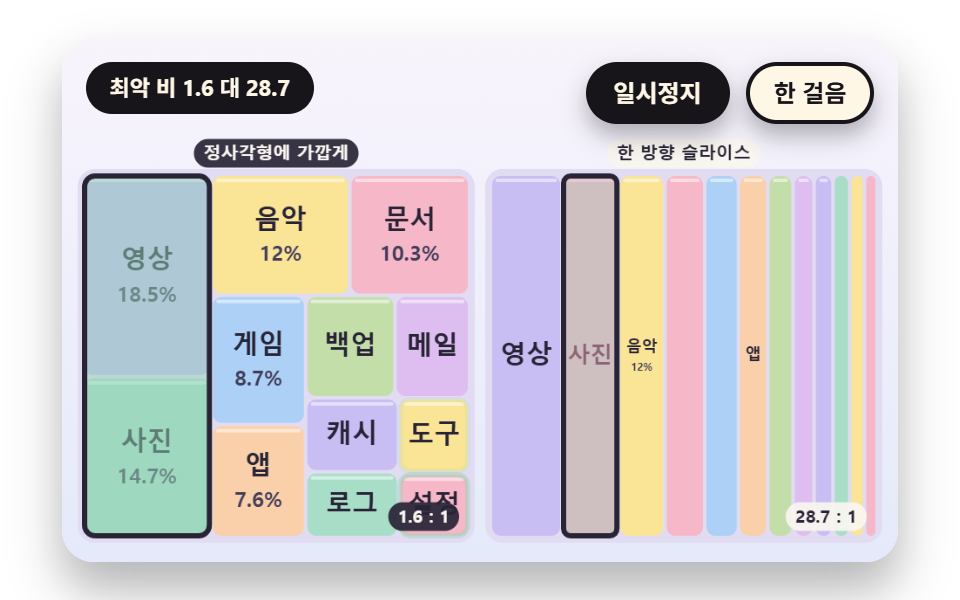 Dashboard UITreemap Chart: 9 Canvas Layout Scenes
 Dashboard UIStock Ticker UI: 9 Live Price Widgets, No API Key
 Dashboard UICSS Countdown Timer: 9 Clocks That Drain and Flip
 Dashboard UIWord Cloud JavaScript: 9 Scenes, Spiral to 3D
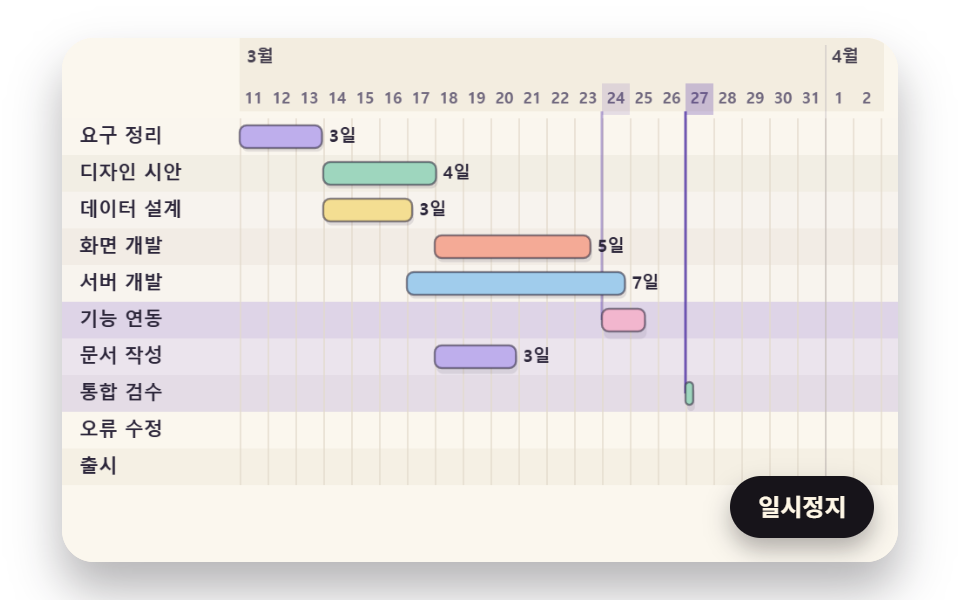 Dashboard UIGantt Chart JavaScript: 9 Self-Scheduling Views
 Dashboard UI9 Dashboard Components, Not the Whole Page
 Dashboard UI9 SVG Progress Ring Widgets, Math Included
 Dashboard UICommand Palette UI Design — 9 That Really Open
 Dashboard UIChart UI Design: 9 Interactions You Can Drag
 Dashboard UICSS Chart Design: 9 SVG Graphs, No Library