Typing Practice: 9 Canvas Scenes
How does typing practice turn keystrokes into a score? 01 counts recent seconds for words per minute, 03 lines each key up with the target to mark misses, 07
Typing Practice Is Not a Picture of Letters Being Typed but a Device That Computes Speed, Accuracy and Weak Keys From Two Values, the Press Time and the Target Character: Free Typing Practice Starts by Knowing Which Value Sets the Score
 01 tp-recent-window-wpm-rolling-rate
 02 tp-caret-ahead-line-scroll-ease
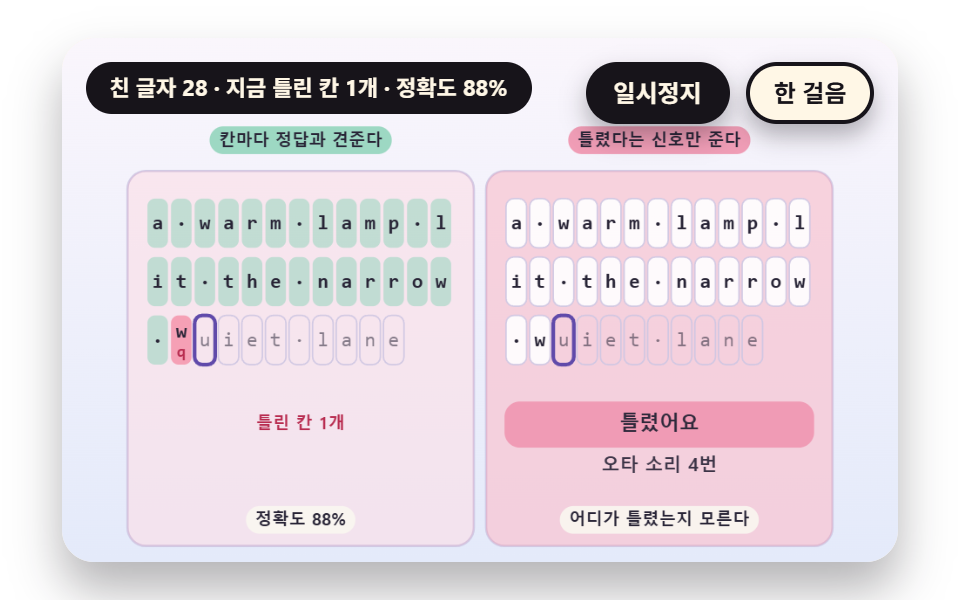 03 tp-target-diff-miss-cell-mark
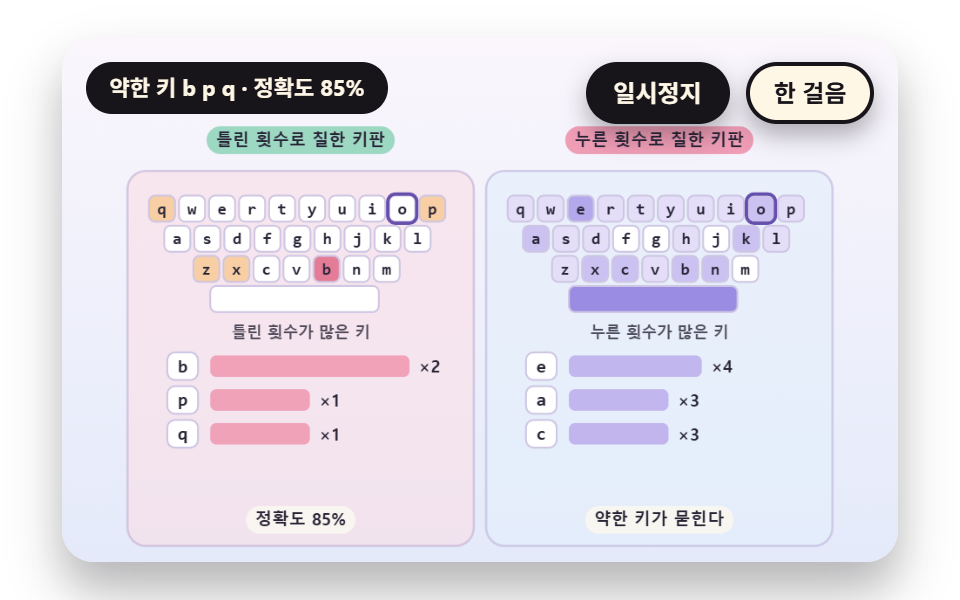 04 tp-key-press-count-heat-field
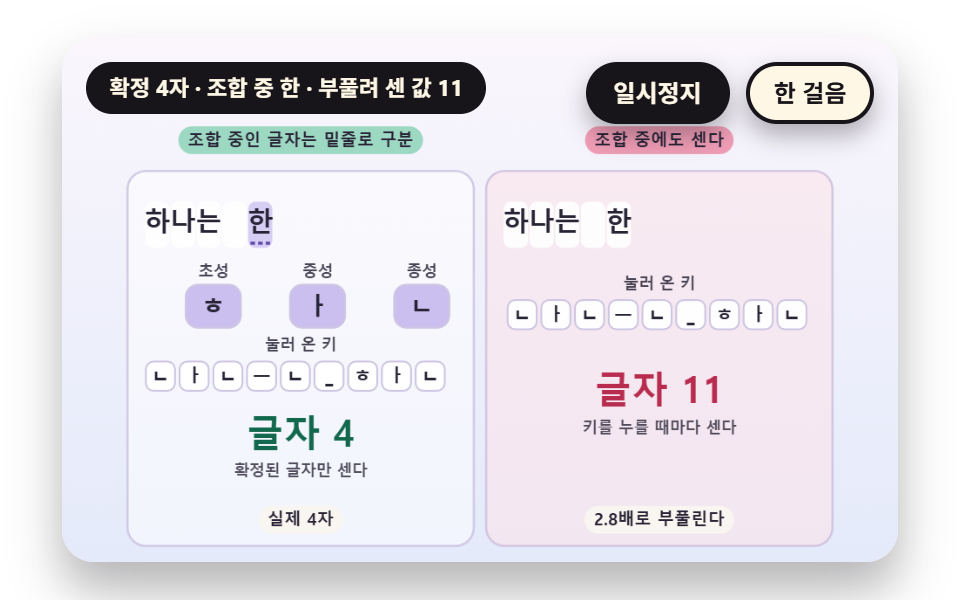 05 tp-hangul-composition-jamo-state
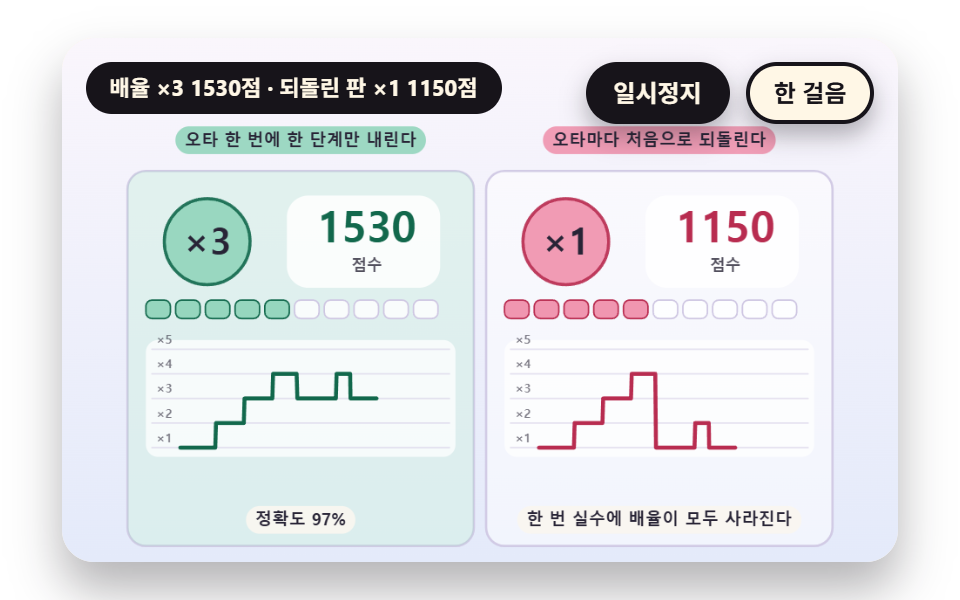 06 tp-clean-streak-combo-multiplier
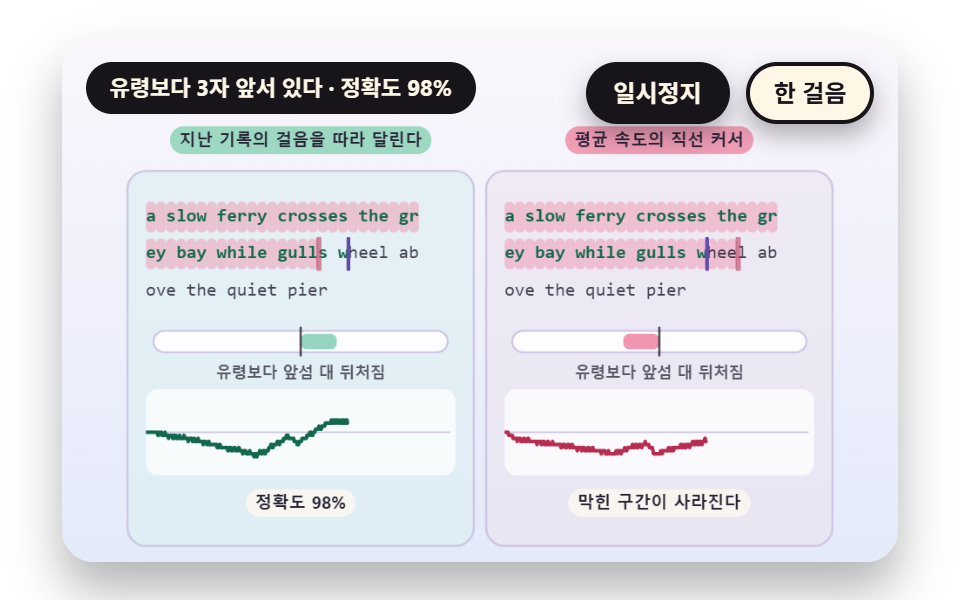 07 tp-past-run-ghost-caret-replay
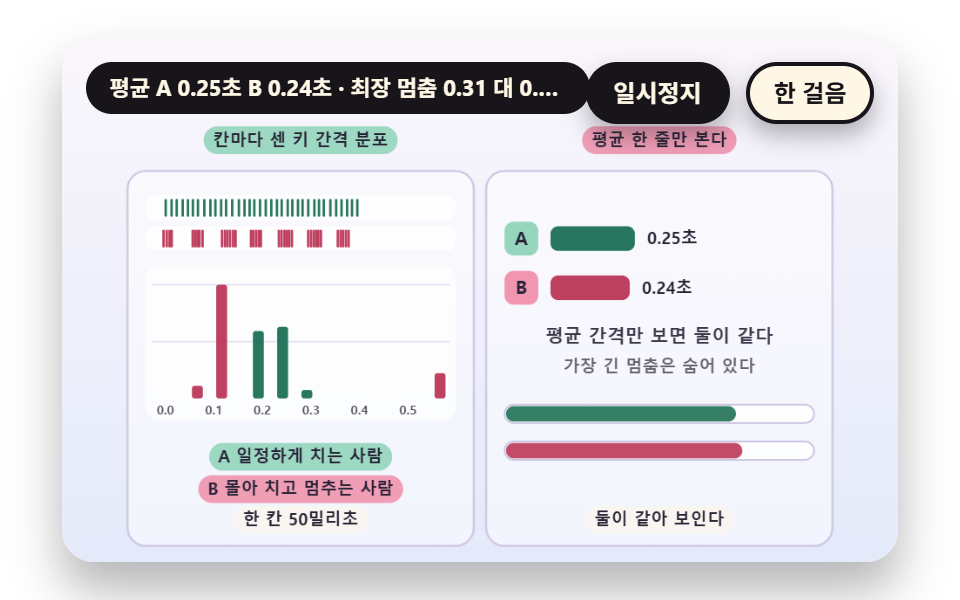 08 tp-keystroke-gap-histogram-bins
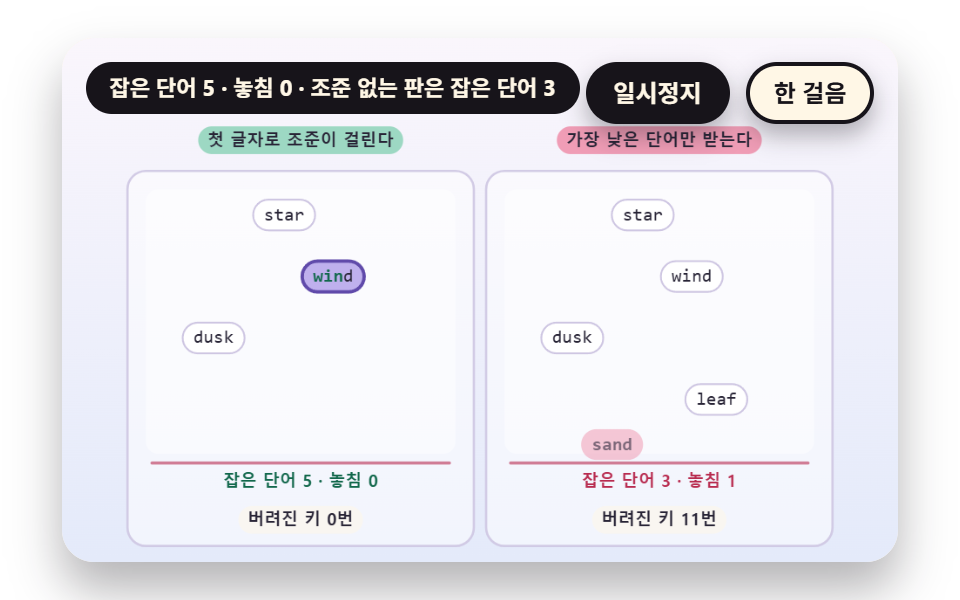 09 tp-falling-word-prefix-match-lock
Auto-plays · click a tile to jump to its section · all nine in one zip
- 01 Words per Minute Counted on a Recent Window
- 02 A Line Scroll Pushed Ahead of the Caret
- 03 A Miss Diff Lined Up With the Target
- 04 A Key Press Count Heatmap
- 05 The State of a Letter Mid Composition
- 06 A Combo Multiplier for Clean Runs
- 07 A Ghost Caret Replaying a Past Run
- 08 A Key Gap Histogram
- 09 Falling Words Picked by Prefix
The nine scenes take the same input. One key press is three values, the press time t, the key k and ok, which says whether it matches the target in that place, and the words per minute, misses, heatmap, combo and ghost on screen are all computed from that list strokes and the typed string buf. The auto demo only replays the record of a virtual typist built from a seed, so the same seed makes the same record.
Each scene has the board that computes correctly on the left and a contrast board on the right that takes the same record. The order starts from speed and widens to mistakes: 01 and 02 cover words per minute and line movement, 03 and 04 cover miss cells and weak keys, 05 and 06 cover Hangul composition and the combo rule, 07 and 08 cover a past run and key gaps, and 09 covers falling words. For a typing practice online page, 01 and 03 are the pair to read first, since speed and misses are what a learner looks at first.
Typing Practice: 9 Scenes — Words per Minute Counted on a Recent Window, a Line Scroll Pushed Ahead of the Caret, a Miss Diff Lined Up With the Target, a Key Press Count Heatmap, the State of a Letter Mid Composition, a Combo Multiplier for Clean Runs, a Ghost Caret Replaying a Past Run, a Key Gap Histogram and Falling Words Picked by Prefix
What nine renders measured for area and motion
| Scene | Cumulative area | Moving frames | Mean intensity |
|---|---|---|---|
| 01 Recent window rate | 22.0% | 23/23 | 76.4 |
| 02 Line scroll | 10.0% | 23/23 | 97.4 |
| 03 Miss diff | 38.9% | 18/23 | 52.0 |
| 04 Key heatmap | 33.5% | 22/23 | 53.8 |
| 05 Hangul composition | 21.7% | 9/23 | 28.7 |
| 06 Combo multiplier | 25.2% | 23/23 | 83.4 |
| 07 Ghost caret | 14.6% | 23/23 | 73.0 |
| 08 Gap histogram | 1.1% | 15/23 | 76.2 |
| 09 Falling words | 12.7% | 23/23 | 53.0 |
03 covers the most area at 38.9% because both panels tint together, and 08 covers the least at 1.1% because only bars and a line change. Scenes 01, 02, 06, 07 and 09 moved in 23 of 23 frame gaps while 05 moved the least, in 9 of 23, and mean intensity is highest for 02 at 97.4.
01Words per Minute Counted on a Recent Window
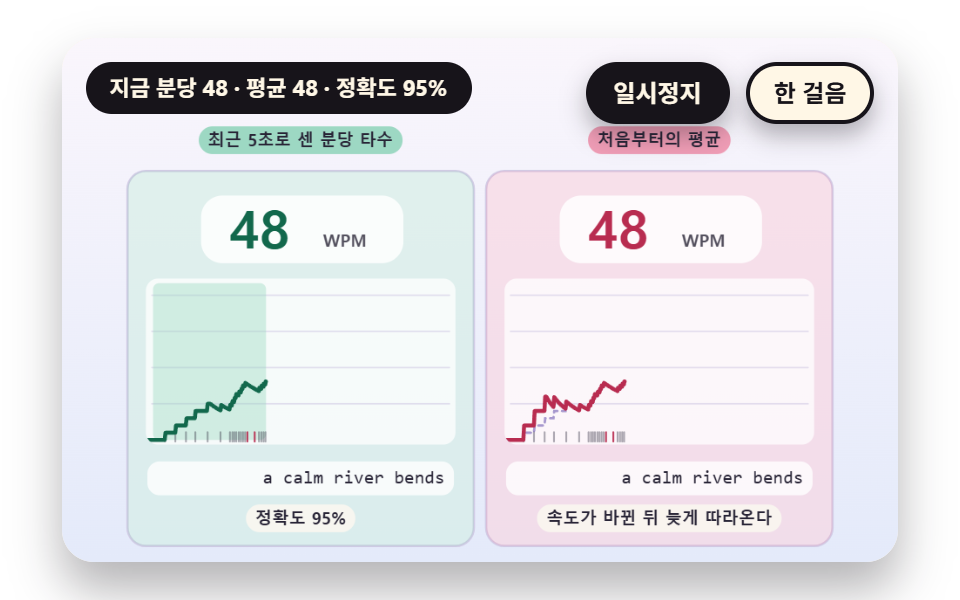
Matching characters divided by CHARS_PER_WORD 5 count as words, and only the characters inside the last WINDOW_SEC 5 seconds are turned into a per minute value instead of dividing by the whole elapsed time. Right after the start the divisor stays at or above MIN_SPAN 2 seconds, and the right board averages from the first key, so it trails a change of pace by a wide margin. On the same record the 8 second mark reads 86 on the left against an average of 69, and the 12 second mark, after the pace dropped, reads 43 against 57.
<main class="stage">
<div class="vj is-demo" id="vj">
  <div class="vj__pad" data-role="pad" tabindex="0" role="application" aria-label="Typing practice stage: press keys to practice yourself, Esc starts over">
    <canvas class="vj__canvas" data-role="canvas" width="480" height="300" role="img" aria-label="On the left is a line of words per minute counted only from the correct characters inside the last 5 seconds, and on the right is a line from the average since the start. When the virtual typist starts slowly, speeds up and slows down again, the left line follows at once and the right line moves much later. The short ticks along the bottom are the moments keys were pressed, and the row below shows what has been typed so far."></canvas>
  </div>
  <p class="vj__status" data-role="status" aria-live="off">Typing practice demo</p>
  <div class="vj__ctrl">
    <button class="vj__pause" data-role="pause" type="button" aria-pressed="false">Pause</button>
    <button class="vj__step" data-role="step" type="button">Step</button>
  </div>
  <p class="vj__done" data-role="done" role="status" aria-live="polite"></p>
</div>
</main>
@use "../../../../site/static/demo-tokens" as *;
@include stage($stage-paper);
.vj {
position: relative;
width: min(92vw, calc(160vh - 12.8vw));
aspect-ratio: 480 / 300;
margin: 0 auto;
border-radius: $r-card;
overflow: hidden;
box-shadow: $shadow-raised;
background: $subject-cream;
}
// 무대 상자 — 누르면 키보드 포커스를 받는다. 글자 키는 직접 연습하고 Esc 는 처음부터 다시 시작한다(touch-action: none 은 이 상자에만). 무대 밖 터치는 페이지 스크롤 그대로
.vj__pad {
position: absolute;
inset: 0;
border-radius: inherit;
outline: none;
touch-action: none;
cursor: text;
}
// 바깥 .vj 가 넘침을 자르므로 포커스 테두리는 안쪽으로 들인다
.vj__pad:focus-visible {
outline: 3px solid $subject-ink;
outline-offset: -3px;
}
.vj__canvas {
position: absolute;
inset: 0;
display: block;
width: 100%;
height: 100%;
}
.vj__ctrl {
position: absolute;
right: $sp-3;
top: $sp-3;
display: flex;
gap: $sp-2;
}
.vj__pause,
.vj__step {
padding: $sp-1 $sp-3;
border: 2px solid $subject-ink;
border-radius: $r-pill;
background: $subject-ink;
color: $subject-cream;
font-family: inherit;
font-weight: 700;
font-size: 12px;
line-height: 1.6;
cursor: pointer;
box-shadow: $shadow-press;
transition: transform $dur-quick $ease-spring;
}
.vj__step {
background: $subject-cream;
color: $subject-ink;
}
// 스크린리더에만 읽히는 완료 알림
.vj__done {
position: absolute;
width: 1px;
height: 1px;
margin: 0;
overflow: hidden;
clip-path: inset(50%);
white-space: nowrap;
}
// 눌린 상태(멈춤) — 바탕과 글자색을 뒤집어 aria-pressed 가 눈에도 보이게
.vj__pause[aria-pressed="true"] {
background: $subject-cream;
color: $subject-ink;
}
.vj__pause:hover,
.vj__step:hover {
transform: translateY(-2px);
}
.vj__pause:active,
.vj__step:active {
transform: translateY(1px);
}
.vj__pause:focus-visible,
.vj__step:focus-visible {
outline: 3px solid $subject-ink;
outline-offset: 3px;
}
// 상태 줄 — 지금 장면의 수치를 글자로. 시연 중에는 aria-live off, 사람이 처음 손대면 polite
.vj__status {
position: absolute;
left: $sp-3;
top: $sp-3;
max-width: calc(100% - 190px);
margin: 0;
padding: $sp-1 $sp-3;
border-radius: $r-pill;
background: $subject-ink;
color: $subject-cream;
font-weight: 700;
font-size: 11px;
line-height: 1.6;
white-space: nowrap;
overflow: hidden;
text-overflow: ellipsis;
pointer-events: none;
}
@media (max-width: 340px) {
.vj__pause,
.vj__step,
.vj__status { font-size: 10px; padding: 0 $sp-2; }
}
// 움직임 줄이기 — 장면은 스크립트가 정지 장면 한 장으로 멈춘다. 버튼도 떠오르지 않게
@media (prefers-reduced-motion: reduce) {
.vj__pause,
.vj__step { transition: none !important; }
.vj__pause:hover,
.vj__pause:active,
.vj__step:hover,
.vj__step:active { transform: none !important; }
}html, body {
margin: 0;
overflow: hidden;
}
.stage {
box-sizing: border-box;
min-height: 100vh;
display: grid;
place-items: center;
margin: 0;
background: #ffffff;
font-family: -apple-system, "Segoe UI", "Noto Sans KR", sans-serif;
padding: clamp(8px, 4vw, 24px);
}
.vj {
position: relative;
width: min(92vw, 160vh - 12.8vw);
aspect-ratio: 480/300;
margin: 0 auto;
border-radius: 16px;
overflow: hidden;
box-shadow: 0 14px 24px rgba(23, 20, 26, 0.32);
background: #fff7e6;
}
.vj__pad {
position: absolute;
inset: 0;
border-radius: inherit;
outline: none;
touch-action: none;
cursor: text;
}
.vj__pad:focus-visible {
outline: 3px solid #17141a;
outline-offset: -3px;
}
.vj__canvas {
position: absolute;
inset: 0;
display: block;
width: 100%;
height: 100%;
}
.vj__ctrl {
position: absolute;
right: 12px;
top: 12px;
display: flex;
gap: 8px;
}
.vj__pause,
.vj__step {
padding: 4px 12px;
border: 2px solid #17141a;
border-radius: 999px;
background: #17141a;
color: #fff7e6;
font-family: inherit;
font-weight: 700;
font-size: 12px;
line-height: 1.6;
cursor: pointer;
box-shadow: 0 6px 12px rgba(23, 20, 26, 0.32);
transition: transform 220ms cubic-bezier(0.2, 0.8, 0.2, 1);
}
.vj__step {
background: #fff7e6;
color: #17141a;
}
.vj__done {
position: absolute;
width: 1px;
height: 1px;
margin: 0;
overflow: hidden;
clip-path: inset(50%);
white-space: nowrap;
}
.vj__pause[aria-pressed=true] {
background: #fff7e6;
color: #17141a;
}
.vj__pause:hover,
.vj__step:hover {
transform: translateY(-2px);
}
.vj__pause:active,
.vj__step:active {
transform: translateY(1px);
}
.vj__pause:focus-visible,
.vj__step:focus-visible {
outline: 3px solid #17141a;
outline-offset: 3px;
}
.vj__status {
position: absolute;
left: 12px;
top: 12px;
max-width: calc(100% - 190px);
margin: 0;
padding: 4px 12px;
border-radius: 999px;
background: #17141a;
color: #fff7e6;
font-weight: 700;
font-size: 11px;
line-height: 1.6;
white-space: nowrap;
overflow: hidden;
text-overflow: ellipsis;
pointer-events: none;
}
@media (max-width: 340px) {
.vj__pause,
.vj__step,
.vj__status {
font-size: 10px;
padding: 0 8px;
}
}
@media (prefers-reduced-motion: reduce) {
.vj__pause,
.vj__step {
transition: none !important;
}
.vj__pause:hover,
.vj__pause:active,
.vj__step:hover,
.vj__step:active {
transform: none !important;
}
}(function () {
const root = document.getElementById("vj");
if (!root) return;
// 무대 좌표 — 캔버스 안 계산은 늘 480×300. 화면에 보이는 크기와 상관없다
const W = 480;
const H = 300;
const PI = Math.PI;
const TAU = Math.PI * 2;
function clamp(v, lo, hi) { return v < lo ? lo : (v > hi ? hi : v); }
function lerp(a, b, k) { return a + (b - a) * k; }
function ease(x) { const c = clamp(x, 0, 1); return c * c * (3 - 2 * c); }
// 시드 고정 난수 — 선형 합동 생성기(곱 1664525, 더함 1013904223). 같은 시드면 같은 수열
function seeded(seed) {
let s = (seed >>> 0) || 1;
return function () {
s = (Math.imul(s, 1664525) + 1013904223) >>> 0;
return s / 4294967296;
};
}
// 파스텔 팔레트 — 글자는 늘 INK 나 진한 색, 면은 연한 색. 맞음은 민트, 틀림은 분홍, 내 커서는 라벤더
const BG_TOP = [250, 246, 252];
const BG_BOT = [228, 234, 250];
const FACE = [255, 253, 248];
const FACE_EDGE = [206, 198, 226];
const SKY = [176, 210, 246];
const SKY_DEEP = [60, 104, 162];
const GOLD = [250, 226, 150];
const GOLD_DEEP = [150, 108, 20];
const ROSE = [240, 150, 176];
const ROSE_DEEP = [184, 44, 80];
const MINT = [150, 214, 190];
const MINT_DEEP = [18, 104, 76];
const LAV = [188, 172, 236];
const LAV_DEEP = [96, 74, 170];
const INK = [40, 36, 54];
const PAPER = [250, 246, 240];
function mix(a, b, k) { return [lerp(a[0], b[0], k), lerp(a[1], b[1], k), lerp(a[2], b[2], k)]; }
function rgba(c, a) {
return 'rgba(' + Math.round(clamp(c[0], 0, 255)) + ',' + Math.round(clamp(c[1], 0, 255)) + ',' + Math.round(clamp(c[2], 0, 255)) + ',' + clamp(a, 0, 1).toFixed(3) + ')';
}
// 장면 시계(초)·판 반복 번호·시간표 — 시간표는 (시각, 할 일) 목록이고 시각이 지나면 한 번씩 부른다
// sceneT 는 rAF 타임스탬프 차이(dt, 한 프레임 0.05초 상한)를 쌓은 값 하나뿐이다 — 이 장면의 시간 원천은 이것 하나
let sceneT = 0;
let lap = 0;
let script = [];
let evAt = 0;
// 자동 시연이 끝나는 시각과 한 판이 되풀이되는 시각 — build() 가 시간표를 짜면서 정한다
let doneAt = 12;
let lapEnd = 14;
// 사람이 직접 키를 치는 중인가 — 켜지면 시간표의 가상 타자는 빠지고 판은 되풀이되지 않는다
let live = false;
function sched(t, f) { script.push({ t: t, f: f }); }
// ── 타자 기록 ─────────────────────────────────────────────
// 한 번의 키 입력은 (누른 시각, 키) 두 값이다. 타수도 오타도 열지도도 이 목록에서만 계산한다
const BS = 'Backspace';
let target = '';
let buf = '';
let strokes = [];
function sessReset(text) {
target = text;
buf = '';
strokes = [];
}
// 키 하나를 받는다 — 지우기는 마지막 글자를 빼고, 글자는 그 자리의 정답과 견줘 ok 를 정한다
function press(k, t) {
if (k === BS) {
if (buf.length > 0) {
buf = buf.slice(0, -1);
}
strokes.push({ t: t, k: k, ok: false });
return;
}
if (buf.length >= target.length) {
return;
}
const ok = k === target.charAt(buf.length);
buf += k;
strokes.push({ t: t, k: k, ok: ok });
}
// 글자 키 수와 맞은 수 — 지우기 키는 세지 않는다
function keyCount() {
let n = 0;
for (let i = 0; i < strokes.length; i += 1) {
if (strokes[i].k !== BS) {
n += 1;
}
}
return n;
}
function okCount() {
let n = 0;
for (let i = 0; i < strokes.length; i += 1) {
if (strokes[i].ok) {
n += 1;
}
}
return n;
}
// 정확도 — 맞은 글자 키 ÷ 글자 키 전체. 지워도 이미 친 틀린 키는 남는다
function accuracy() {
const n = keyCount();
return n === 0 ? 100 : (okCount() / n) * 100;
}
// 자리 옆 키 — 틀린 키는 같은 줄의 이웃 글쇠에서 고른다(스페이스 바는 c, 글자가 아닌 키는 n)
function nearKey(ch, rnd) {
const rows = ['qwertyuiop', 'asdfghjkl', 'zxcvbnm'];
for (let r = 0; r < rows.length; r += 1) {
const i = rows[r].indexOf(ch);
if (i >= 0) {
const j = i === 0 ? 1 : (i === rows[r].length - 1 ? i - 1 : (rnd() < 0.5 ? i - 1 : i + 1));
return rows[r].charAt(j);
}
}
return ch === ' ' ? 'c' : 'n';
}
// 시드 가상 타자 — 글자마다 간격은 pace(지금 시각) 의 ±20%, 오타는 지정한 자리에서만 낸다
// miss 는 [글자 자리, 알아채기 전에 더 치는 글자 수, 틀린 키 수(생략하면 1)] 목록. 틀린 키를 치고 lag 글자를 더 친 뒤 한 번에 지우고 다시 친다
function genStrokes(seed, text, pace, miss, t0) {
const rnd = seeded(seed);
const out = [];
let t = t0;
let i = 0;
const handled = {};
while (i < text.length) {
let hit = null;
for (let m = 0; m < miss.length; m += 1) {
if (miss[m][0] === i && !handled[i]) {
hit = miss[m];
}
}
t += pace(t) * (0.8 + 0.4 * rnd());
if (hit) {
handled[i] = true;
const lag = Math.min(hit[1], text.length - 1 - i);
const bad = hit.length > 2 ? hit[2] : 1;
for (let j = 0; j <= lag; j += 1) {
if (j > 0) {
t += pace(t) * (0.8 + 0.4 * rnd());
}
out.push({ t: t, k: j < bad ? nearKey(text.charAt(i + j), rnd) : text.charAt(i + j) });
}
t += 0.26 + 0.16 * rnd();
for (let j = 0; j <= lag; j += 1) {
out.push({ t: t, k: BS });
t += 0.09;
}
continue;
}
out.push({ t: t, k: text.charAt(i) });
i += 1;
}
return out;
}
// 시간표에 가상 타자의 키를 모두 올린다 — 끝나는 시각(doneAt)과 되풀이 시각(lapEnd)도 여기서 정한다
function schedule(raw, hold) {
for (let i = 0; i < raw.length; i += 1) {
const r = raw[i];
sched(r.t, function () { onKey(r.k, r.t); });
}
doneAt = raw.length > 0 ? raw[raw.length - 1].t + 0.35 : 1;
lapEnd = doneAt + hold;
}
function defaultFinished() {
return live ? buf.length >= target.length : sceneT >= doneAt;
}
const canvasEl = root.querySelector('[data-role="canvas"]');
const padEl = root.querySelector('[data-role="pad"]');
const pauseEl = root.querySelector('[data-role="pause"]');
const statusEl = root.querySelector('[data-role="status"]');
const stepEl = root.querySelector('[data-role="step"]');
const doneEl = root.querySelector('[data-role="done"]');
const ctxRaw = canvasEl ? canvasEl.getContext('2d') : null;
if (!canvasEl || !ctxRaw || !pauseEl || !padEl || !stepEl || !doneEl) {
return;
}
const cv = canvasEl;
const ctx = ctxRaw;
const pauseBtn = pauseEl;
const stepBtn = stepEl;
const doneP = doneEl;
const pad = padEl;
// 외부 웹폰트는 부르지 않는다 — 기기에 있는 글꼴 목록만. 타자 글자는 고정폭이라 칸 폭이 흔들리지 않는다
const FONT_STACK = 'system-ui, -apple-system, "Segoe UI", "Noto Sans KR", sans-serif';
const MONO_STACK = 'ui-monospace, "SF Mono", Menlo, Consolas, "Courier New", monospace';
let dpr = 1;
function fitCanvas() {
// 배율은 2 에서 자른다 — 배율 3 기기에서 화소가 2.25배로 늘지 않게
dpr = Math.min(window.devicePixelRatio || 1, 2);
cv.width = Math.round(W * dpr);
cv.height = Math.round(H * dpr);
ctx.setTransform(dpr, 0, 0, dpr, 0, 0);
}
const VIEW_S = 0.88;
function skyFill(top, bot) {
ctx.setTransform(dpr, 0, 0, dpr, 0, 0);
const g = ctx.createLinearGradient(0, 0, 0, H);
g.addColorStop(0, rgba(top, 1));
g.addColorStop(1, rgba(bot, 1));
ctx.fillStyle = g;
ctx.fillRect(0, 0, W, H);
// 위쪽 Pause·상태 알약이 덮는 띠를 비우려고 장면 전체를 VIEW_S 배로 줄여 아래 가운데에 붙인다 — 이 줄 뒤에 그리는 것은 모두 줄어든 좌표계
ctx.translate(W / 2, H - 3);
ctx.scale(VIEW_S, VIEW_S);
ctx.translate(-W / 2, -(H - 3));
}
function disc(x, y, r, c, a) {
if (r <= 0.2 || a <= 0) {
return;
}
ctx.beginPath();
ctx.arc(x, y, r, 0, TAU);
ctx.fillStyle = rgba(c, a);
ctx.fill();
}
function ring(x, y, r, width, c, a) {
if (r <= 0.2 || a <= 0) {
return;
}
ctx.beginPath();
ctx.arc(x, y, r, 0, TAU);
ctx.lineWidth = width;
ctx.strokeStyle = rgba(c, a);
ctx.stroke();
}
function seg(x1, y1, x2, y2, width, c, a) {
if (a <= 0) {
return;
}
ctx.beginPath();
ctx.moveTo(x1, y1);
ctx.lineTo(x2, y2);
ctx.lineWidth = width;
ctx.lineCap = 'round';
ctx.strokeStyle = rgba(c, a);
ctx.stroke();
}
function box(x, y, w, h, r, c, a) {
if (w <= 0.2 || h <= 0.2 || a <= 0) {
return;
}
ctx.beginPath();
ctx.roundRect(x, y, w, h, Math.max(0, Math.min(r, w / 2, h / 2)));
ctx.fillStyle = rgba(c, a);
ctx.fill();
}
function outline(x, y, w, h, r, width, c, a) {
if (w <= 0.2 || h <= 0.2 || a <= 0) {
return;
}
ctx.beginPath();
ctx.roundRect(x, y, w, h, Math.max(0, Math.min(r, w / 2, h / 2)));
ctx.lineWidth = width;
ctx.strokeStyle = rgba(c, a);
ctx.stroke();
}
function text(s, x, y, c, a, px, weight, align) {
ctx.font = weight + ' ' + px + 'px ' + FONT_STACK;
ctx.textAlign = align;
ctx.textBaseline = 'middle';
ctx.fillStyle = rgba(c, a);
ctx.fillText(s, x, y);
}
// 고정폭 글자 — 칸마다 같은 폭이라 커서와 오타 칸이 글자에 정확히 겹친다
function mono(s, x, y, c, a, px, weight, align) {
ctx.font = weight + ' ' + px + 'px ' + MONO_STACK;
ctx.textAlign = align;
ctx.textBaseline = 'middle';
ctx.fillStyle = rgba(c, a);
ctx.fillText(s, x, y);
}
// 고정폭 글꼴 한 칸의 폭 — 글꼴이 바뀌면 같이 바뀐다
function monoW(px) {
ctx.font = '400 ' + px + 'px ' + MONO_STACK;
return ctx.measureText('M').width;
}
// 글자 이름표 — 바탕 알약 위에 글자
function tag(s, x, y, bg, fg, px, align) {
ctx.font = '700 ' + px + 'px ' + FONT_STACK;
const w = ctx.measureText(s).width + px * 1.1;
const left = align === 'center' ? x - w / 2 : (align === 'right' ? x - w : x);
box(left, y - px * 0.82, w, px * 1.64, px * 0.82, bg, 0.92);
text(s, left + w / 2, y + 0.5, fg, 1, px, 700, 'center');
}
function panel(x, y, w, h, c, a) {
box(x, y, w, h, 12, c, a);
outline(x, y, w, h, 12, 1.5, FACE_EDGE, 0.9);
}
// ── 공통 틀 ───────────────────────────────────────────────
let shownStatus = '';
function pushStatus(s) {
if (!statusEl || s === shownStatus) {
return;
}
shownStatus = s;
statusEl.textContent = s;
}
let paused = false;
const reduceQuery = window.matchMedia('(prefers-reduced-motion: reduce)');
// 페이지를 연 채 움직임 줄이기 설정을 바꿔도 change 리스너가 다시 읽는다
let still = reduceQuery.matches;
// 자동 시연 표시 — 사람이 처음 손대면 떼고 상태 줄을 polite 로 켠다
let demo = root.classList.contains('is-demo');
const off = new AbortController();
function wake() {
if (!demo) {
return;
}
demo = false;
root.classList.remove('is-demo');
if (statusEl) {
statusEl.setAttribute('aria-live', 'polite');
}
}
// 한 판이 끝났음을 스크린리더에 한 번만 알린다 — 판이 되풀이돼도 다시 읽지 않는다
let doneSaid = false;
function checkDone() {
if (!doneSaid && finished()) {
doneSaid = true;
doneP.textContent = statusText();
}
}
function advance(dt) {
sceneT += dt;
while (evAt < script.length && script[evAt].t <= sceneT) {
const ev = script[evAt];
evAt += 1;
ev.f();
}
if (!live && sceneT >= lapEnd) {
lap += 1;
begin();
return;
}
update(dt);
}
// 시간표를 새로 짠다 — 같은 시각이면 짠 순서대로 부른다(정렬은 안정)
function fresh() {
sceneT = 0;
evAt = 0;
script = [];
build();
script.sort(function (a, b) { return a.t - b.t; });
}
// 첫 판은 START_S 만큼 앞서 시작한다 — 타자가 이미 치고 있는 장면에서 보인다
function runTo(t) {
while (sceneT < t - 1e-6) {
advance(Math.min(1 / 30, t - sceneT));
}
}
function begin() {
fresh();
if (lap === 0 && !still) {
runTo(START_S);
}
}
const DT_MAX = 0.05;
function showNow() {
draw();
pushStatus(statusText());
checkDone();
}
let rafId = 0;
let lastTs = -1;
function frame(ts) {
if (still || paused) {
rafId = 0;
return;
}
if (lastTs < 0) {
lastTs = ts;
}
const dt = Math.min((ts - lastTs) / 1000, DT_MAX);
lastTs = ts;
if (dt > 0) {
advance(dt);
}
showNow();
rafId = window.requestAnimationFrame(frame);
}
function startLoop() {
if (rafId) {
return;
}
// 멈췄던 사이의 시간을 첫 프레임 dt 로 넘기지 않는다
lastTs = -1;
rafId = window.requestAnimationFrame(frame);
}
function stopLoop() {
if (rafId) {
window.cancelAnimationFrame(rafId);
rafId = 0;
}
}
// 움직임 줄이기 — 루프 없이 한 판이 끝난 멈춘 한 장. 시간표를 끝까지 돌려 결과 화면에서 멈춘다
function showRest() {
stopLoop();
live = false;
fresh();
runTo(doneAt);
doneSaid = false;
showNow();
}
function play() {
begin();
showNow();
if (!paused) {
startLoop();
}
}
function togglePause() {
paused = !paused;
pauseBtn.setAttribute('aria-pressed', paused ? 'true' : 'false');
wake();
if (paused) {
stopLoop();
}
else if (!still) {
startLoop();
}
}
// 처음부터 — 자동 시연은 시간표를 다시, 직접 치던 중이면 빈 연습판을 다시
function restart() {
lap += 1;
doneSaid = false;
if (still) {
showRest();
return;
}
begin();
showNow();
if (!paused) {
startLoop();
}
}
// 직접 치기 — 첫 키가 오면 가상 타자를 빼고 빈 판에서 시작한다
let lastStamp = -1;
function goLive() {
live = true;
doneSaid = false;
lastStamp = -1;
shownStatus = '';
fresh();
if (still) {
showNow();
}
else {
lastTs = -1;
showNow();
if (!paused) {
startLoop();
}
}
}
// 이벤트 시각 e.timeStamp 와 rAF 시각은 같은 원점이라 빼면 마지막 프레임 이후의 간격이 나온다
function liveKey(k, stamp) {
let t = sceneT;
if (still) {
if (lastStamp >= 0) {
sceneT += clamp((stamp - lastStamp) / 1000, 0, 2);
}
lastStamp = stamp;
t = sceneT;
}
else if (lastTs >= 0) {
t = sceneT + clamp((stamp - lastTs) / 1000, 0, DT_MAX);
}
onKey(k, t);
if (still) {
update(0);
showNow();
}
}
// Step — 멈춘 채 시간표의 다음 키 하나까지 시계를 보낸다. 더 부를 일이 없으면 판을 다시 연다
function stepOnce() {
if (live) {
return;
}
wake();
if (!paused) {
paused = true;
pauseBtn.setAttribute('aria-pressed', 'true');
stopLoop();
}
if (evAt >= script.length) {
restart();
return;
}
runTo(script[evAt].t + 0.05);
showNow();
}
// 키 이름 바꾸기 — 한글 자모 장면은 이 함수를 덮어쓴다. 글자 키와 지우기 키만 받고 나머지는 빈 문자열
let keyMap = null;
function keyOf(e) {
if (keyMap) {
return keyMap(e);
}
if (e.key === 'Backspace') {
return BS;
}
return e.key.length === 1 ? e.key : '';
}
pauseBtn.addEventListener('click', togglePause, { signal: off.signal });
stepBtn.addEventListener('click', stepOnce, { signal: off.signal });
// 키보드 — 무대에 포커스가 있을 때만. 글자 키는 직접 치기, Esc 는 처음부터. Tab 은 그대로 두어 포커스가 나갈 수 있다
pad.addEventListener('keydown', function (e) {
if (e.altKey || e.ctrlKey || e.metaKey) {
return;
}
if (e.key === 'Escape') {
e.preventDefault();
wake();
if (live) {
goLive();
}
else {
restart();
}
return;
}
const k = keyOf(e);
if (k === '') {
return;
}
e.preventDefault();
if (paused) {
return;
}
if (!live) {
wake();
goLive();
}
liveKey(k, e.timeStamp);
}, { signal: off.signal });
// 마우스·터치 — 무대를 누르면 키보드 포커스만 준다
pad.addEventListener('click', function () {
pad.focus({ preventScroll: true });
}, { signal: off.signal });
// 탭이 숨으면 멈추고, 돌아오면 시계를 다시 맞춰 시작 — 숨은 동안의 몇 초가 한 프레임에 몰리지 않게
document.addEventListener('visibilitychange', function () {
if (document.hidden) {
stopLoop();
}
else if (!paused && !still) {
startLoop();
}
}, { signal: off.signal });
// 설정이 바뀌면 — 켜지면 결과 한 장, 꺼지면 다시 움직인다
reduceQuery.addEventListener('change', function () {
still = reduceQuery.matches;
if (still) {
showRest();
}
else {
live = false;
lap = 0;
play();
}
}, { signal: off.signal });
window.addEventListener('resize', function () {
fitCanvas();
showNow();
}, { signal: off.signal });
// ── 01 최근 구간으로 세는 분당 타수 ─────────────────────────
// 맞은 글자 수 ÷ 5 를 단어로 보고, 왼쪽은 최근 WINDOW_SEC 초 안에 든 글자만 세어 분당 값으로 바꾼다
// 오른쪽은 처음부터 지금까지의 평균이라 속도가 바뀌어도 한참 늦게 따라온다. 두 판은 같은 키 기록에서 나온다
const WINDOW_SEC = 5;
const CHARS_PER_WORD = 5;
const MIN_SPAN = 2;
const RATE_MAX = 130;
const START_S = 4.4;
const TEXT_01 = 'a calm river bends past the old mill and the quiet farm';
let hist = [];
// SIM-BEGIN
// 가상 타자의 속도 — 처음엔 천천히, 가운데에서 빨라졌다가 끝에서 다시 느려진다
function paceAt(t) { return t < 3.5 ? 0.5 : (t < 7.5 ? 0.1 : 0.3); }
function makeRun() {
return genStrokes(11, TEXT_01, paceAt, [[14, 0], [40, 1]], 0.4);
}
// 지금 속도 — 시각 t 에서 거꾸로 win 초 안의 맞은 글자만 센다. 시작 직후 몇 글자가 값을 부풀리지 않게 나누는 시간은 MIN_SPAN 초 밑으로 내려가지 않는다
function rateNow(t, win) {
if (strokes.length === 0) {
return 0;
}
let n = 0;
for (let i = 0; i < strokes.length; i += 1) {
const s = strokes[i];
if (s.ok && s.t > t - win && s.t <= t) {
n += 1;
}
}
const span = clamp(t - strokes[0].t, MIN_SPAN, win);
return (n / CHARS_PER_WORD) * (60 / span);
}
// Average since the start — 전체 경과 시간으로 나눈다
function avgRate(t) {
if (strokes.length === 0) {
return 0;
}
const span = Math.max(t - strokes[0].t, 1);
return (okCount() / CHARS_PER_WORD) * (60 / span);
}
// SIM-END
function build() {
sessReset(TEXT_01);
hist = [];
if (!live) {
schedule(makeRun(), 2.4);
}
}
function onKey(k, t) { press(k, t); }
function finished() { return defaultFinished(); }
function update(dt) {
if (dt < 0) {
return;
}
hist.push({ t: sceneT, a: rateNow(sceneT, WINDOW_SEC), b: avgRate(sceneT) });
}
function axisLen() { return (live ? 30 : Math.max(doneAt, 12)) + 0.6; }
function chart(x0, y0, w, h, solid) {
box(x0, y0, w, h, 8, [255, 255, 255], 0.75);
const ax = axisLen();
// 가로 눈금 — 30·60·90·120
for (let g = 1; g <= 4; g += 1) {
const gy = y0 + h - (g * 30 / RATE_MAX) * (h - 6) - 3;
seg(x0 + 4, gy, x0 + w - 4, gy, 1, FACE_EDGE, 0.55);
}
if (solid) {
// 센 구간 — 지금에서 거꾸로 WINDOW_SEC 초
const xa = x0 + clamp((sceneT - WINDOW_SEC) / ax, 0, 1) * w;
const xb = x0 + clamp(sceneT / ax, 0, 1) * w;
box(xa, y0 + 3, Math.max(xb - xa, 1), h - 6, 4, MINT, 0.4);
}
// 키를 누른 순간마다 바닥에 짧은 눈금
for (let i = 0; i < strokes.length; i += 1) {
const s = strokes[i];
if (s.t > sceneT) {
continue;
}
const sx = x0 + (s.t / ax) * w;
seg(sx, y0 + h - 2, sx, y0 + h - 8, 1.2, s.ok ? INK : ROSE_DEEP, s.ok ? 0.38 : 0.9);
}
ctx.save();
ctx.beginPath();
ctx.roundRect(x0, y0, w, h, 8);
ctx.clip();
if (!solid) {
// 비교용 — 왼쪽 판의 지금 속도를 흐린 점선으로 겹친다
ctx.setLineDash([3, 3]);
ctx.beginPath();
for (let i = 0; i < hist.length; i += 1) {
const x = x0 + (hist[i].t / ax) * w;
const y = y0 + h - 3 - clamp(hist[i].a / RATE_MAX, 0, 1) * (h - 6);
if (i === 0) {
ctx.moveTo(x, y);
}
else {
ctx.lineTo(x, y);
}
}
ctx.lineWidth = 1.6;
ctx.strokeStyle = rgba(LAV_DEEP, 0.55);
ctx.stroke();
ctx.setLineDash([]);
}
ctx.beginPath();
for (let i = 0; i < hist.length; i += 1) {
const v = solid ? hist[i].a : hist[i].b;
const x = x0 + (hist[i].t / ax) * w;
const y = y0 + h - 3 - clamp(v / RATE_MAX, 0, 1) * (h - 6);
if (i === 0) {
ctx.moveTo(x, y);
}
else {
ctx.lineTo(x, y);
}
}
ctx.lineWidth = 2.6;
ctx.lineJoin = 'round';
ctx.strokeStyle = rgba(solid ? MINT_DEEP : ROSE_DEEP, 1);
ctx.stroke();
ctx.restore();
}
function typedLine(cx, y) {
const tail = buf.slice(-24);
box(cx - 100, y - 11, 200, 22, 8, [255, 255, 255], 0.8);
mono(tail, cx + 94, y + 0.5, INK, 1, 12, 400, 'right');
}
function draw() {
skyFill(BG_TOP, BG_BOT);
const wn = rateNow(sceneT, WINDOW_SEC);
const av = avgRate(sceneT);
panel(10, 46, 226, 244, [255, 255, 255], 0.5);
panel(244, 46, 226, 244, [255, 255, 255], 0.5);
// 판 바탕은 속도에 따라 짙어진다 — 왼쪽은 지금 속도, 오른쪽은 Average since the start. 큰 숫자는 흰 알약 위에 얹어 글자 대비를 지킨다
box(10, 46, 226, 244, 12, MINT, 0.7 * clamp(wn / RATE_MAX, 0, 1));
box(244, 46, 226, 244, 12, ROSE, 0.7 * clamp(av / RATE_MAX, 0, 1));
box(58, 62, 132, 44, 14, [255, 255, 255], 0.85);
box(292, 62, 132, 44, 14, [255, 255, 255], 0.85);
text(String(Math.round(wn)), 96, 86, MINT_DEEP, 1, 34, 800, 'center');
text('WPM', 152, 92, INK, 0.8, 11, 700, 'center');
text(String(Math.round(av)), 330, 86, ROSE_DEEP, 1, 34, 800, 'center');
text('WPM', 386, 92, INK, 0.8, 11, 700, 'center');
chart(22, 116, 202, 108, true);
chart(256, 116, 202, 108, false);
typedLine(123, 246);
typedLine(357, 246);
tag('Words per minute over the last {s}s'.replace('{s}', String(WINDOW_SEC)), 123, 26, MINT, INK, 11, 'center');
tag('Average since the start', 357, 26, ROSE, INK, 11, 'center');
tag('Accuracy {p}%'.replace('{p}', accuracy().toFixed(0)), 123, 272, PAPER, INK, 11, 'center');
tag('Follows late after a pace change', 357, 272, PAPER, INK, 11, 'center');
}
function statusText() {
return 'Now {w} per minute, average {a}, accuracy {p}%'.replace('{w}', rateNow(sceneT, WINDOW_SEC).toFixed(0)).replace('{a}', avgRate(sceneT).toFixed(0)).replace('{p}', accuracy().toFixed(0));
}
fitCanvas();
if (still) {
showRest();
}
else {
play();
}
return function () {
stopLoop();
off.abort();
};
})();// RecentWindowWpmRollingRate - 같은 항목 vanilla index.html 의 React 판. 같은 계산을 useEffect 안에서 돌린다
import { useEffect, useRef } from "react";
import styles from "./RecentWindowWpmRollingRate.module.scss";
const cx = (s: string): string => s.split(" ").map((n) => styles[n] ?? n).join(" ");
export default function RecentWindowWpmRollingRate() {
const rootRef = useRef<HTMLDivElement | null>(null);
useEffect(() => {
const rootEl = rootRef.current;
if (!rootEl) return;
const root: HTMLElement = rootEl;
type RGB = [number, number, number];
// 무대 좌표 — 캔버스 안 계산은 늘 480×300. 화면에 보이는 크기와 상관없다
const W = 480;
const H = 300;
const PI = Math.PI;
const TAU = Math.PI * 2;
function clamp(v: number, lo: number, hi: number): number { return v < lo ? lo : (v > hi ? hi : v); }
function lerp(a: number, b: number, k: number): number { return a + (b - a) * k; }
function ease(x: number): number { const c = clamp(x, 0, 1); return c * c * (3 - 2 * c); }
// 시드 고정 난수 — 선형 합동 생성기(곱 1664525, 더함 1013904223). 같은 시드면 같은 수열
function seeded(seed: number): () => number {
let s = (seed >>> 0) || 1;
return function (): number {
s = (Math.imul(s, 1664525) + 1013904223) >>> 0;
return s / 4294967296;
};
}
// 파스텔 팔레트 — 글자는 늘 INK 나 진한 색, 면은 연한 색. 맞음은 민트, 틀림은 분홍, 내 커서는 라벤더
const BG_TOP: RGB = [250, 246, 252];
const BG_BOT: RGB = [228, 234, 250];
const FACE: RGB = [255, 253, 248];
const FACE_EDGE: RGB = [206, 198, 226];
const SKY: RGB = [176, 210, 246];
const SKY_DEEP: RGB = [60, 104, 162];
const GOLD: RGB = [250, 226, 150];
const GOLD_DEEP: RGB = [150, 108, 20];
const ROSE: RGB = [240, 150, 176];
const ROSE_DEEP: RGB = [184, 44, 80];
const MINT: RGB = [150, 214, 190];
const MINT_DEEP: RGB = [18, 104, 76];
const LAV: RGB = [188, 172, 236];
const LAV_DEEP: RGB = [96, 74, 170];
const INK: RGB = [40, 36, 54];
const PAPER: RGB = [250, 246, 240];
function mix(a: RGB, b: RGB, k: number): RGB { return [lerp(a[0], b[0], k), lerp(a[1], b[1], k), lerp(a[2], b[2], k)]; }
function rgba(c: RGB, a: number): string {
return 'rgba(' + Math.round(clamp(c[0], 0, 255)) + ',' + Math.round(clamp(c[1], 0, 255)) + ',' + Math.round(clamp(c[2], 0, 255)) + ',' + clamp(a, 0, 1).toFixed(3) + ')';
}
// 장면 시계(초)·판 반복 번호·시간표 — 시간표는 (시각, 할 일) 목록이고 시각이 지나면 한 번씩 부른다
// sceneT 는 rAF 타임스탬프 차이(dt, 한 프레임 0.05초 상한)를 쌓은 값 하나뿐이다 — 이 장면의 시간 원천은 이것 하나
let sceneT = 0;
let lap = 0;
type Ev = { t: number; f: () => void };
let script: Ev[] = [];
let evAt = 0;
// 자동 시연이 끝나는 시각과 한 판이 되풀이되는 시각 — build() 가 시간표를 짜면서 정한다
let doneAt = 12;
let lapEnd = 14;
// 사람이 직접 키를 치는 중인가 — 켜지면 시간표의 가상 타자는 빠지고 판은 되풀이되지 않는다
let live = false;
function sched(t: number, f: () => void): void { script.push({ t: t, f: f }); }
// ── 타자 기록 ─────────────────────────────────────────────
// 한 번의 키 입력은 (누른 시각, 키) 두 값이다. 타수도 오타도 열지도도 이 목록에서만 계산한다
const BS = 'Backspace';
type Raw = { t: number; k: string };
type Stroke = { t: number; k: string; ok: boolean };
let target = '';
let buf = '';
let strokes: Stroke[] = [];
function sessReset(text: string): void {
target = text;
buf = '';
strokes = [];
}
// 키 하나를 받는다 — 지우기는 마지막 글자를 빼고, 글자는 그 자리의 정답과 견줘 ok 를 정한다
function press(k: string, t: number): void {
if (k === BS) {
if (buf.length > 0) { buf = buf.slice(0, -1); }
strokes.push({ t: t, k: k, ok: false });
return;
}
if (buf.length >= target.length) { return; }
const ok = k === target.charAt(buf.length);
buf += k;
strokes.push({ t: t, k: k, ok: ok });
}
// 글자 키 수와 맞은 수 — 지우기 키는 세지 않는다
function keyCount(): number {
let n = 0;
for (let i = 0; i < strokes.length; i += 1) { if (strokes[i].k !== BS) { n += 1; } }
return n;
}
function okCount(): number {
let n = 0;
for (let i = 0; i < strokes.length; i += 1) { if (strokes[i].ok) { n += 1; } }
return n;
}
// 정확도 — 맞은 글자 키 ÷ 글자 키 전체. 지워도 이미 친 틀린 키는 남는다
function accuracy(): number {
const n = keyCount();
return n === 0 ? 100 : (okCount() / n) * 100;
}
// 자리 옆 키 — 틀린 키는 같은 줄의 이웃 글쇠에서 고른다(스페이스 바는 c, 글자가 아닌 키는 n)
function nearKey(ch: string, rnd: () => number): string {
const rows = ['qwertyuiop', 'asdfghjkl', 'zxcvbnm'];
for (let r = 0; r < rows.length; r += 1) {
const i = rows[r].indexOf(ch);
if (i >= 0) {
const j = i === 0 ? 1 : (i === rows[r].length - 1 ? i - 1 : (rnd() < 0.5 ? i - 1 : i + 1));
return rows[r].charAt(j);
}
}
return ch === ' ' ? 'c' : 'n';
}
// 시드 가상 타자 — 글자마다 간격은 pace(지금 시각) 의 ±20%, 오타는 지정한 자리에서만 낸다
// miss 는 [글자 자리, 알아채기 전에 더 치는 글자 수, 틀린 키 수(생략하면 1)] 목록. 틀린 키를 치고 lag 글자를 더 친 뒤 한 번에 지우고 다시 친다
function genStrokes(seed: number, text: string, pace: (t: number) => number, miss: number[][], t0: number): Raw[] {
const rnd = seeded(seed);
const out: Raw[] = [];
let t = t0;
let i = 0;
const handled: Record<number, boolean> = {};
while (i < text.length) {
let hit: number[] | null = null;
for (let m = 0; m < miss.length; m += 1) { if (miss[m][0] === i && !handled[i]) { hit = miss[m]; } }
t += pace(t) * (0.8 + 0.4 * rnd());
if (hit) {
handled[i] = true;
const lag = Math.min(hit[1], text.length - 1 - i);
const bad = hit.length > 2 ? hit[2] : 1;
for (let j = 0; j <= lag; j += 1) {
if (j > 0) { t += pace(t) * (0.8 + 0.4 * rnd()); }
out.push({ t: t, k: j < bad ? nearKey(text.charAt(i + j), rnd) : text.charAt(i + j) });
}
t += 0.26 + 0.16 * rnd();
for (let j = 0; j <= lag; j += 1) {
out.push({ t: t, k: BS });
t += 0.09;
}
continue;
}
out.push({ t: t, k: text.charAt(i) });
i += 1;
}
return out;
}
// 시간표에 가상 타자의 키를 모두 올린다 — 끝나는 시각(doneAt)과 되풀이 시각(lapEnd)도 여기서 정한다
function schedule(raw: Raw[], hold: number): void {
for (let i = 0; i < raw.length; i += 1) {
const r = raw[i];
sched(r.t, function (): void { onKey(r.k, r.t); });
}
doneAt = raw.length > 0 ? raw[raw.length - 1].t + 0.35 : 1;
lapEnd = doneAt + hold;
}
function defaultFinished(): boolean {
return live ? buf.length >= target.length : sceneT >= doneAt;
}
const canvasEl = root.querySelector('[data-role="canvas"]') as HTMLCanvasElement | null;
const padEl = root.querySelector('[data-role="pad"]') as HTMLElement | null;
const pauseEl = root.querySelector('[data-role="pause"]') as HTMLButtonElement | null;
const statusEl = root.querySelector('[data-role="status"]') as HTMLElement | null;
const stepEl = root.querySelector('[data-role="step"]') as HTMLButtonElement | null;
const doneEl = root.querySelector('[data-role="done"]') as HTMLElement | null;
const ctxRaw = canvasEl ? canvasEl.getContext('2d') : null;
if (!canvasEl || !ctxRaw || !pauseEl || !padEl || !stepEl || !doneEl) { return; }
const cv: HTMLCanvasElement = canvasEl;
const ctx: CanvasRenderingContext2D = ctxRaw;
const pauseBtn: HTMLButtonElement = pauseEl;
const stepBtn: HTMLButtonElement = stepEl;
const doneP: HTMLElement = doneEl;
const pad: HTMLElement = padEl;
// 외부 웹폰트는 부르지 않는다 — 기기에 있는 글꼴 목록만. 타자 글자는 고정폭이라 칸 폭이 흔들리지 않는다
const FONT_STACK = 'system-ui, -apple-system, "Segoe UI", "Noto Sans KR", sans-serif';
const MONO_STACK = 'ui-monospace, "SF Mono", Menlo, Consolas, "Courier New", monospace';
let dpr = 1;
function fitCanvas(): void {
// 배율은 2 에서 자른다 — 배율 3 기기에서 화소가 2.25배로 늘지 않게
dpr = Math.min(window.devicePixelRatio || 1, 2);
cv.width = Math.round(W * dpr);
cv.height = Math.round(H * dpr);
ctx.setTransform(dpr, 0, 0, dpr, 0, 0);
}
const VIEW_S = 0.88;
function skyFill(top: RGB, bot: RGB): void {
ctx.setTransform(dpr, 0, 0, dpr, 0, 0);
const g = ctx.createLinearGradient(0, 0, 0, H);
g.addColorStop(0, rgba(top, 1));
g.addColorStop(1, rgba(bot, 1));
ctx.fillStyle = g;
ctx.fillRect(0, 0, W, H);
// 위쪽 일시정지·상태 알약이 덮는 띠를 비우려고 장면 전체를 VIEW_S 배로 줄여 아래 가운데에 붙인다 — 이 줄 뒤에 그리는 것은 모두 줄어든 좌표계
ctx.translate(W / 2, H - 3);
ctx.scale(VIEW_S, VIEW_S);
ctx.translate(-W / 2, -(H - 3));
}
function disc(x: number, y: number, r: number, c: RGB, a: number): void {
if (r <= 0.2 || a <= 0) { return; }
ctx.beginPath();
ctx.arc(x, y, r, 0, TAU);
ctx.fillStyle = rgba(c, a);
ctx.fill();
}
function ring(x: number, y: number, r: number, width: number, c: RGB, a: number): void {
if (r <= 0.2 || a <= 0) { return; }
ctx.beginPath();
ctx.arc(x, y, r, 0, TAU);
ctx.lineWidth = width;
ctx.strokeStyle = rgba(c, a);
ctx.stroke();
}
function seg(x1: number, y1: number, x2: number, y2: number, width: number, c: RGB, a: number): void {
if (a <= 0) { return; }
ctx.beginPath();
ctx.moveTo(x1, y1);
ctx.lineTo(x2, y2);
ctx.lineWidth = width;
ctx.lineCap = 'round';
ctx.strokeStyle = rgba(c, a);
ctx.stroke();
}
function box(x: number, y: number, w: number, h: number, r: number, c: RGB, a: number): void {
if (w <= 0.2 || h <= 0.2 || a <= 0) { return; }
ctx.beginPath();
ctx.roundRect(x, y, w, h, Math.max(0, Math.min(r, w / 2, h / 2)));
ctx.fillStyle = rgba(c, a);
ctx.fill();
}
function outline(x: number, y: number, w: number, h: number, r: number, width: number, c: RGB, a: number): void {
if (w <= 0.2 || h <= 0.2 || a <= 0) { return; }
ctx.beginPath();
ctx.roundRect(x, y, w, h, Math.max(0, Math.min(r, w / 2, h / 2)));
ctx.lineWidth = width;
ctx.strokeStyle = rgba(c, a);
ctx.stroke();
}
function text(s: string, x: number, y: number, c: RGB, a: number, px: number, weight: number, align: CanvasTextAlign): void {
ctx.font = weight + ' ' + px + 'px ' + FONT_STACK;
ctx.textAlign = align;
ctx.textBaseline = 'middle';
ctx.fillStyle = rgba(c, a);
ctx.fillText(s, x, y);
}
// 고정폭 글자 — 칸마다 같은 폭이라 커서와 오타 칸이 글자에 정확히 겹친다
function mono(s: string, x: number, y: number, c: RGB, a: number, px: number, weight: number, align: CanvasTextAlign): void {
ctx.font = weight + ' ' + px + 'px ' + MONO_STACK;
ctx.textAlign = align;
ctx.textBaseline = 'middle';
ctx.fillStyle = rgba(c, a);
ctx.fillText(s, x, y);
}
// 고정폭 글꼴 한 칸의 폭 — 글꼴이 바뀌면 같이 바뀐다
function monoW(px: number): number {
ctx.font = '400 ' + px + 'px ' + MONO_STACK;
return ctx.measureText('M').width;
}
// 글자 이름표 — 바탕 알약 위에 글자
function tag(s: string, x: number, y: number, bg: RGB, fg: RGB, px: number, align: CanvasTextAlign): void {
ctx.font = '700 ' + px + 'px ' + FONT_STACK;
const w = ctx.measureText(s).width + px * 1.1;
const left = align === 'center' ? x - w / 2 : (align === 'right' ? x - w : x);
box(left, y - px * 0.82, w, px * 1.64, px * 0.82, bg, 0.92);
text(s, left + w / 2, y + 0.5, fg, 1, px, 700, 'center');
}
function panel(x: number, y: number, w: number, h: number, c: RGB, a: number): void {
box(x, y, w, h, 12, c, a);
outline(x, y, w, h, 12, 1.5, FACE_EDGE, 0.9);
}
// ── 공통 틀 ───────────────────────────────────────────────
let shownStatus = '';
function pushStatus(s: string): void {
if (!statusEl || s === shownStatus) { return; }
shownStatus = s;
statusEl.textContent = s;
}
let paused = false;
const reduceQuery = window.matchMedia('(prefers-reduced-motion: reduce)');
// 페이지를 연 채 움직임 줄이기 설정을 바꿔도 change 리스너가 다시 읽는다
let still = reduceQuery.matches;
// 자동 시연 표시 — 사람이 처음 손대면 떼고 상태 줄을 polite 로 켠다
let demo = root.classList.contains('is-demo');
const off = new AbortController();
function wake(): void {
if (!demo) { return; }
demo = false;
root.classList.remove('is-demo');
if (statusEl) { statusEl.setAttribute('aria-live', 'polite'); }
}
// 한 판이 끝났음을 스크린리더에 한 번만 알린다 — 판이 되풀이돼도 다시 읽지 않는다
let doneSaid = false;
function checkDone(): void {
if (!doneSaid && finished()) {
doneSaid = true;
doneP.textContent = statusText();
}
}
function advance(dt: number): void {
sceneT += dt;
while (evAt < script.length && script[evAt].t <= sceneT) {
const ev = script[evAt];
evAt += 1;
ev.f();
}
if (!live && sceneT >= lapEnd) { lap += 1; begin(); return; }
update(dt);
}
// 시간표를 새로 짠다 — 같은 시각이면 짠 순서대로 부른다(정렬은 안정)
function fresh(): void {
sceneT = 0;
evAt = 0;
script = [];
build();
script.sort(function (a: Ev, b: Ev): number { return a.t - b.t; });
}
// 첫 판은 START_S 만큼 앞서 시작한다 — 타자가 이미 치고 있는 장면에서 보인다
function runTo(t: number): void {
while (sceneT < t - 1e-6) { advance(Math.min(1 / 30, t - sceneT)); }
}
function begin(): void {
fresh();
if (lap === 0 && !still) { runTo(START_S); }
}
const DT_MAX = 0.05;
function showNow(): void {
draw();
pushStatus(statusText());
checkDone();
}
let rafId = 0;
let lastTs = -1;
function frame(ts: number): void {
if (still || paused) { rafId = 0; return; }
if (lastTs < 0) { lastTs = ts; }
const dt = Math.min((ts - lastTs) / 1000, DT_MAX);
lastTs = ts;
if (dt > 0) { advance(dt); }
showNow();
rafId = window.requestAnimationFrame(frame);
}
function startLoop(): void {
if (rafId) { return; }
// 멈췄던 사이의 시간을 첫 프레임 dt 로 넘기지 않는다
lastTs = -1;
rafId = window.requestAnimationFrame(frame);
}
function stopLoop(): void {
if (rafId) { window.cancelAnimationFrame(rafId); rafId = 0; }
}
// 움직임 줄이기 — 루프 없이 한 판이 끝난 멈춘 한 장. 시간표를 끝까지 돌려 결과 화면에서 멈춘다
function showRest(): void {
stopLoop();
live = false;
fresh();
runTo(doneAt);
doneSaid = false;
showNow();
}
function play(): void {
begin();
showNow();
if (!paused) { startLoop(); }
}
function togglePause(): void {
paused = !paused;
pauseBtn.setAttribute('aria-pressed', paused ? 'true' : 'false');
wake();
if (paused) { stopLoop(); } else if (!still) { startLoop(); }
}
// 처음부터 — 자동 시연은 시간표를 다시, 직접 치던 중이면 빈 연습판을 다시
function restart(): void {
lap += 1;
doneSaid = false;
if (still) { showRest(); return; }
begin();
showNow();
if (!paused) { startLoop(); }
}
// 직접 치기 — 첫 키가 오면 가상 타자를 빼고 빈 판에서 시작한다
let lastStamp = -1;
function goLive(): void {
live = true;
doneSaid = false;
lastStamp = -1;
shownStatus = '';
fresh();
if (still) { showNow(); } else { lastTs = -1; showNow(); if (!paused) { startLoop(); } }
}
// 이벤트 시각 e.timeStamp 와 rAF 시각은 같은 원점이라 빼면 마지막 프레임 이후의 간격이 나온다
function liveKey(k: string, stamp: number): void {
let t = sceneT;
if (still) {
if (lastStamp >= 0) { sceneT += clamp((stamp - lastStamp) / 1000, 0, 2); }
lastStamp = stamp;
t = sceneT;
} else if (lastTs >= 0) {
t = sceneT + clamp((stamp - lastTs) / 1000, 0, DT_MAX);
}
onKey(k, t);
if (still) { update(0); showNow(); }
}
// 한 걸음 — 멈춘 채 시간표의 다음 키 하나까지 시계를 보낸다. 더 부를 일이 없으면 판을 다시 연다
function stepOnce(): void {
if (live) { return; }
wake();
if (!paused) {
paused = true;
pauseBtn.setAttribute('aria-pressed', 'true');
stopLoop();
}
if (evAt >= script.length) {
restart();
return;
}
runTo(script[evAt].t + 0.05);
showNow();
}
// 키 이름 바꾸기 — 한글 자모 장면은 이 함수를 덮어쓴다. 글자 키와 지우기 키만 받고 나머지는 빈 문자열
let keyMap: ((e: KeyboardEvent) => string) | null = null;
function keyOf(e: KeyboardEvent): string {
if (keyMap) { return keyMap(e); }
if (e.key === 'Backspace') { return BS; }
return e.key.length === 1 ? e.key : '';
}
pauseBtn.addEventListener('click', togglePause, { signal: off.signal });
stepBtn.addEventListener('click', stepOnce, { signal: off.signal });
// 키보드 — 무대에 포커스가 있을 때만. 글자 키는 직접 치기, Esc 는 처음부터. Tab 은 그대로 두어 포커스가 나갈 수 있다
pad.addEventListener('keydown', function (e: KeyboardEvent): void {
if (e.altKey || e.ctrlKey || e.metaKey) { return; }
if (e.key === 'Escape') {
e.preventDefault();
wake();
if (live) { goLive(); } else { restart(); }
return;
}
const k = keyOf(e);
if (k === '') { return; }
e.preventDefault();
if (paused) { return; }
if (!live) {
wake();
goLive();
}
liveKey(k, e.timeStamp);
}, { signal: off.signal });
// 마우스·터치 — 무대를 누르면 키보드 포커스만 준다
pad.addEventListener('click', function (): void {
pad.focus({ preventScroll: true });
}, { signal: off.signal });
// 탭이 숨으면 멈추고, 돌아오면 시계를 다시 맞춰 시작 — 숨은 동안의 몇 초가 한 프레임에 몰리지 않게
document.addEventListener('visibilitychange', function (): void {
if (document.hidden) { stopLoop(); } else if (!paused && !still) { startLoop(); }
}, { signal: off.signal });
// 설정이 바뀌면 — 켜지면 결과 한 장, 꺼지면 다시 움직인다
reduceQuery.addEventListener('change', function (): void {
still = reduceQuery.matches;
if (still) { showRest(); } else { live = false; lap = 0; play(); }
}, { signal: off.signal });
window.addEventListener('resize', function (): void {
fitCanvas();
showNow();
}, { signal: off.signal });
// ── 01 최근 구간으로 세는 분당 타수 ─────────────────────────
// 맞은 글자 수 ÷ 5 를 단어로 보고, 왼쪽은 최근 WINDOW_SEC 초 안에 든 글자만 세어 분당 값으로 바꾼다
// 오른쪽은 처음부터 지금까지의 평균이라 속도가 바뀌어도 한참 늦게 따라온다. 두 판은 같은 키 기록에서 나온다
const WINDOW_SEC = 5;
const CHARS_PER_WORD = 5;
const MIN_SPAN = 2;
const RATE_MAX = 130;
const START_S = 4.4;
const TEXT_01 = 'a calm river bends past the old mill and the quiet farm';
type Pt = { t: number; a: number; b: number };
let hist: Pt[] = [];
// SIM-BEGIN
// 가상 타자의 속도 — 처음엔 천천히, 가운데에서 빨라졌다가 끝에서 다시 느려진다
function paceAt(t: number): number { return t < 3.5 ? 0.5 : (t < 7.5 ? 0.1 : 0.3); }
function makeRun(): Raw[] {
return genStrokes(11, TEXT_01, paceAt, [[14, 0], [40, 1]], 0.4);
}
// 지금 속도 — 시각 t 에서 거꾸로 win 초 안의 맞은 글자만 센다. 시작 직후 몇 글자가 값을 부풀리지 않게 나누는 시간은 MIN_SPAN 초 밑으로 내려가지 않는다
function rateNow(t: number, win: number): number {
if (strokes.length === 0) { return 0; }
let n = 0;
for (let i = 0; i < strokes.length; i += 1) {
const s = strokes[i];
if (s.ok && s.t > t - win && s.t <= t) { n += 1; }
}
const span = clamp(t - strokes[0].t, MIN_SPAN, win);
return (n / CHARS_PER_WORD) * (60 / span);
}
// 처음부터의 평균 — 전체 경과 시간으로 나눈다
function avgRate(t: number): number {
if (strokes.length === 0) { return 0; }
const span = Math.max(t - strokes[0].t, 1);
return (okCount() / CHARS_PER_WORD) * (60 / span);
}
// SIM-END
function build(): void {
sessReset(TEXT_01);
hist = [];
if (!live) { schedule(makeRun(), 2.4); }
}
function onKey(k: string, t: number): void { press(k, t); }
function finished(): boolean { return defaultFinished(); }
function update(dt: number): void {
if (dt < 0) { return; }
hist.push({ t: sceneT, a: rateNow(sceneT, WINDOW_SEC), b: avgRate(sceneT) });
}
function axisLen(): number { return (live ? 30 : Math.max(doneAt, 12)) + 0.6; }
function chart(x0: number, y0: number, w: number, h: number, solid: boolean): void {
box(x0, y0, w, h, 8, [255, 255, 255], 0.75);
const ax = axisLen();
// 가로 눈금 — 30·60·90·120
for (let g = 1; g <= 4; g += 1) {
const gy = y0 + h - (g * 30 / RATE_MAX) * (h - 6) - 3;
seg(x0 + 4, gy, x0 + w - 4, gy, 1, FACE_EDGE, 0.55);
}
if (solid) {
// 센 구간 — 지금에서 거꾸로 WINDOW_SEC 초
const xa = x0 + clamp((sceneT - WINDOW_SEC) / ax, 0, 1) * w;
const xb = x0 + clamp(sceneT / ax, 0, 1) * w;
box(xa, y0 + 3, Math.max(xb - xa, 1), h - 6, 4, MINT, 0.4);
}
// 키를 누른 순간마다 바닥에 짧은 눈금
for (let i = 0; i < strokes.length; i += 1) {
const s = strokes[i];
if (s.t > sceneT) { continue; }
const sx = x0 + (s.t / ax) * w;
seg(sx, y0 + h - 2, sx, y0 + h - 8, 1.2, s.ok ? INK : ROSE_DEEP, s.ok ? 0.38 : 0.9);
}
ctx.save();
ctx.beginPath();
ctx.roundRect(x0, y0, w, h, 8);
ctx.clip();
if (!solid) {
// 비교용 — 왼쪽 판의 지금 속도를 흐린 점선으로 겹친다
ctx.setLineDash([3, 3]);
ctx.beginPath();
for (let i = 0; i < hist.length; i += 1) {
const x = x0 + (hist[i].t / ax) * w;
const y = y0 + h - 3 - clamp(hist[i].a / RATE_MAX, 0, 1) * (h - 6);
if (i === 0) { ctx.moveTo(x, y); } else { ctx.lineTo(x, y); }
}
ctx.lineWidth = 1.6;
ctx.strokeStyle = rgba(LAV_DEEP, 0.55);
ctx.stroke();
ctx.setLineDash([]);
}
ctx.beginPath();
for (let i = 0; i < hist.length; i += 1) {
const v = solid ? hist[i].a : hist[i].b;
const x = x0 + (hist[i].t / ax) * w;
const y = y0 + h - 3 - clamp(v / RATE_MAX, 0, 1) * (h - 6);
if (i === 0) { ctx.moveTo(x, y); } else { ctx.lineTo(x, y); }
}
ctx.lineWidth = 2.6;
ctx.lineJoin = 'round';
ctx.strokeStyle = rgba(solid ? MINT_DEEP : ROSE_DEEP, 1);
ctx.stroke();
ctx.restore();
}
function typedLine(cx: number, y: number): void {
const tail = buf.slice(-24);
box(cx - 100, y - 11, 200, 22, 8, [255, 255, 255], 0.8);
mono(tail, cx + 94, y + 0.5, INK, 1, 12, 400, 'right');
}
function draw(): void {
skyFill(BG_TOP, BG_BOT);
const wn = rateNow(sceneT, WINDOW_SEC);
const av = avgRate(sceneT);
panel(10, 46, 226, 244, [255, 255, 255], 0.5);
panel(244, 46, 226, 244, [255, 255, 255], 0.5);
// 판 바탕은 속도에 따라 짙어진다 — 왼쪽은 지금 속도, 오른쪽은 처음부터의 평균. 큰 숫자는 흰 알약 위에 얹어 글자 대비를 지킨다
box(10, 46, 226, 244, 12, MINT, 0.7 * clamp(wn / RATE_MAX, 0, 1));
box(244, 46, 226, 244, 12, ROSE, 0.7 * clamp(av / RATE_MAX, 0, 1));
box(58, 62, 132, 44, 14, [255, 255, 255], 0.85);
box(292, 62, 132, 44, 14, [255, 255, 255], 0.85);
text(String(Math.round(wn)), 96, 86, MINT_DEEP, 1, 34, 800, 'center');
text('WPM', 152, 92, INK, 0.8, 11, 700, 'center');
text(String(Math.round(av)), 330, 86, ROSE_DEEP, 1, 34, 800, 'center');
text('WPM', 386, 92, INK, 0.8, 11, 700, 'center');
chart(22, 116, 202, 108, true);
chart(256, 116, 202, 108, false);
typedLine(123, 246);
typedLine(357, 246);
tag('최근 {s}초로 센 분당 타수'.replace('{s}', String(WINDOW_SEC)), 123, 26, MINT, INK, 11, 'center');
tag('처음부터의 평균', 357, 26, ROSE, INK, 11, 'center');
tag('정확도 {p}%'.replace('{p}', accuracy().toFixed(0)), 123, 272, PAPER, INK, 11, 'center');
tag('속도가 바뀐 뒤 늦게 따라온다', 357, 272, PAPER, INK, 11, 'center');
}
function statusText(): string {
return '지금 분당 {w} · 평균 {a} · 정확도 {p}%'.replace('{w}', rateNow(sceneT, WINDOW_SEC).toFixed(0)).replace('{a}', avgRate(sceneT).toFixed(0)).replace('{p}', accuracy().toFixed(0));
}
fitCanvas();
if (still) { showRest(); } else { play(); }
return function (): void {
stopLoop();
off.abort();
};
}, []);
return (
<div className={cx("vj") + " is-demo"} ref={rootRef}>
<div className={cx("vj__pad")} data-role="pad" tabIndex={0} role="application" aria-label={'타자 연습 시연 무대 — 키를 누르면 직접 연습, Esc 로 처음부터'}>
<canvas className={cx("vj__canvas")} data-role="canvas" width={480} height={300} role="img" aria-label={'왼쪽은 최근 5초 안에 든 맞은 글자만 세어 분당 타수로 바꾼 선이고 오른쪽은 처음부터의 평균으로 낸 선이다. 가상 타자가 처음엔 천천히 치다 빨라지고 다시 느려지면 왼쪽 선은 곧바로 따라가고 오른쪽 선은 한참 늦게 움직인다. 바닥의 짧은 눈금은 키를 누른 순간이고, 아래 줄에는 지금까지 친 글자가 보인다.'}></canvas>
</div>
<p className={cx("vj__status")} data-role="status" aria-live="off">{'타자 연습 시연'}</p>
<div className={cx("vj__ctrl")}>
<button className={cx("vj__pause")} data-role="pause" type="button" aria-pressed="false">{'일시정지'}</button>
<button className={cx("vj__step")} data-role="step" type="button">{'한 걸음'}</button>
</div>
<p className={cx("vj__done")} data-role="done" role="status" aria-live="polite"></p>
</div>
);
}01 · Words per Minute Counted on a Recent Window — Measured area 21.981% · moving frames 23/23Original by GODRICH · SCSS and React ship in the zip · See the password
    function rateNow(t, win) {
        if (strokes.length === 0) {
            return 0;
        }
        let n = 0;
        for (let i = 0; i < strokes.length; i += 1) {
            const s = strokes[i];
            if (s.ok && s.t > t - win && s.t <= t) {
                n += 1;
            }
        }
        const span = clamp(t - strokes[0].t, MIN_SPAN, win);
        return (n / CHARS_PER_WORD) * (60 / span);
    }
    // Average since the start: divide by the whole elapsed time
    function avgRate(t) {
        if (strokes.length === 0) {
            return 0;
        }
        const span = Math.max(t - strokes[0].t, 1);
        return (okCount() / CHARS_PER_WORD) * (60 / span);
    }
02A Line Scroll Pushed Ahead of the Caret
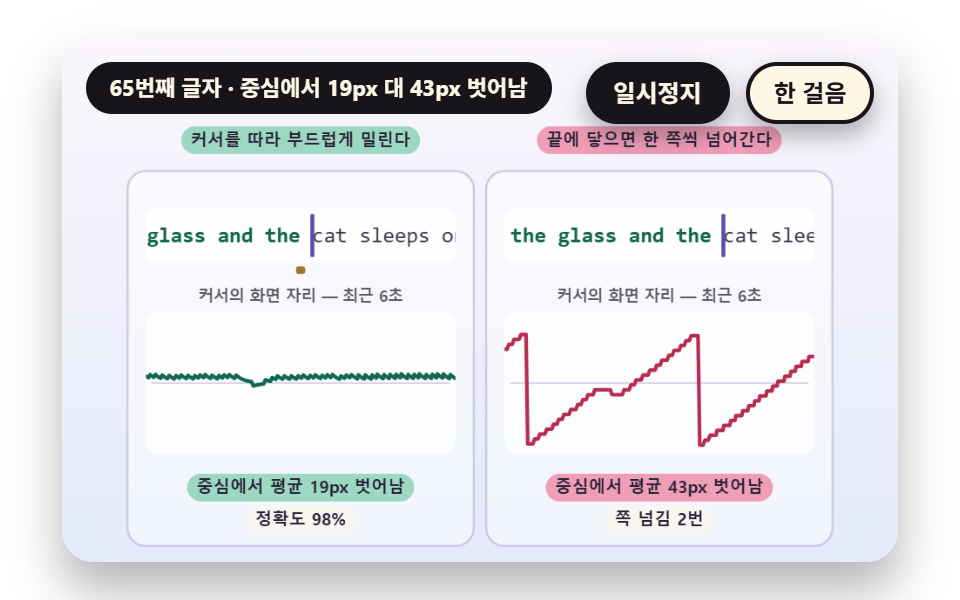
lineShift computes a target shift that puts the current character at FOCUS_X 0.5 of the box width, followStep closes only part of the gap on each frame, and FOLLOW_EASE sets how fast it follows. The right board uses pageShift and flips a page only when the caret enters the last three cells, so the eye keeps jumping. Assuming a 7.7 px monospace cell, the average distance from the center is 16.4 px against 47.7 px, and the right board flips 4 times in one run.
<main class="stage">
<div class="vj is-demo" id="vj">
  <div class="vj__pad" data-role="pad" tabindex="0" role="application" aria-label="Typing practice stage: press keys to practice yourself, Esc starts over">
    <canvas class="vj__canvas" data-role="canvas" width="480" height="300" role="img" aria-label="Two boxes for typing one long line of text. The left line sets a target shift so the caret stays near the middle of the box and follows by a fraction of the gap each frame, so it slides smoothly, while the right line flips one page only when the caret reaches the right edge. The graph below shows where the caret sat on screen over the last 6 seconds, with the average distance from the center as a number."></canvas>
  </div>
  <p class="vj__status" data-role="status" aria-live="off">Typing practice demo</p>
  <div class="vj__ctrl">
    <button class="vj__pause" data-role="pause" type="button" aria-pressed="false">Pause</button>
    <button class="vj__step" data-role="step" type="button">Step</button>
  </div>
  <p class="vj__done" data-role="done" role="status" aria-live="polite"></p>
</div>
</main>
@use "../../../../site/static/demo-tokens" as *;
@include stage($stage-paper);
.vj {
position: relative;
width: min(92vw, calc(160vh - 12.8vw));
aspect-ratio: 480 / 300;
margin: 0 auto;
border-radius: $r-card;
overflow: hidden;
box-shadow: $shadow-raised;
background: $subject-cream;
}
// 무대 상자 — 누르면 키보드 포커스를 받는다. 글자 키는 직접 연습하고 Esc 는 처음부터 다시 시작한다(touch-action: none 은 이 상자에만). 무대 밖 터치는 페이지 스크롤 그대로
.vj__pad {
position: absolute;
inset: 0;
border-radius: inherit;
outline: none;
touch-action: none;
cursor: text;
}
// 바깥 .vj 가 넘침을 자르므로 포커스 테두리는 안쪽으로 들인다
.vj__pad:focus-visible {
outline: 3px solid $subject-ink;
outline-offset: -3px;
}
.vj__canvas {
position: absolute;
inset: 0;
display: block;
width: 100%;
height: 100%;
}
.vj__ctrl {
position: absolute;
right: $sp-3;
top: $sp-3;
display: flex;
gap: $sp-2;
}
.vj__pause,
.vj__step {
padding: $sp-1 $sp-3;
border: 2px solid $subject-ink;
border-radius: $r-pill;
background: $subject-ink;
color: $subject-cream;
font-family: inherit;
font-weight: 700;
font-size: 12px;
line-height: 1.6;
cursor: pointer;
box-shadow: $shadow-press;
transition: transform $dur-quick $ease-spring;
}
.vj__step {
background: $subject-cream;
color: $subject-ink;
}
// 스크린리더에만 읽히는 완료 알림
.vj__done {
position: absolute;
width: 1px;
height: 1px;
margin: 0;
overflow: hidden;
clip-path: inset(50%);
white-space: nowrap;
}
// 눌린 상태(멈춤) — 바탕과 글자색을 뒤집어 aria-pressed 가 눈에도 보이게
.vj__pause[aria-pressed="true"] {
background: $subject-cream;
color: $subject-ink;
}
.vj__pause:hover,
.vj__step:hover {
transform: translateY(-2px);
}
.vj__pause:active,
.vj__step:active {
transform: translateY(1px);
}
.vj__pause:focus-visible,
.vj__step:focus-visible {
outline: 3px solid $subject-ink;
outline-offset: 3px;
}
// 상태 줄 — 지금 장면의 수치를 글자로. 시연 중에는 aria-live off, 사람이 처음 손대면 polite
.vj__status {
position: absolute;
left: $sp-3;
top: $sp-3;
max-width: calc(100% - 190px);
margin: 0;
padding: $sp-1 $sp-3;
border-radius: $r-pill;
background: $subject-ink;
color: $subject-cream;
font-weight: 700;
font-size: 11px;
line-height: 1.6;
white-space: nowrap;
overflow: hidden;
text-overflow: ellipsis;
pointer-events: none;
}
@media (max-width: 340px) {
.vj__pause,
.vj__step,
.vj__status { font-size: 10px; padding: 0 $sp-2; }
}
// 움직임 줄이기 — 장면은 스크립트가 정지 장면 한 장으로 멈춘다. 버튼도 떠오르지 않게
@media (prefers-reduced-motion: reduce) {
.vj__pause,
.vj__step { transition: none !important; }
.vj__pause:hover,
.vj__pause:active,
.vj__step:hover,
.vj__step:active { transform: none !important; }
}html, body {
margin: 0;
overflow: hidden;
}
.stage {
box-sizing: border-box;
min-height: 100vh;
display: grid;
place-items: center;
margin: 0;
background: #ffffff;
font-family: -apple-system, "Segoe UI", "Noto Sans KR", sans-serif;
padding: clamp(8px, 4vw, 24px);
}
.vj {
position: relative;
width: min(92vw, 160vh - 12.8vw);
aspect-ratio: 480/300;
margin: 0 auto;
border-radius: 16px;
overflow: hidden;
box-shadow: 0 14px 24px rgba(23, 20, 26, 0.32);
background: #fff7e6;
}
.vj__pad {
position: absolute;
inset: 0;
border-radius: inherit;
outline: none;
touch-action: none;
cursor: text;
}
.vj__pad:focus-visible {
outline: 3px solid #17141a;
outline-offset: -3px;
}
.vj__canvas {
position: absolute;
inset: 0;
display: block;
width: 100%;
height: 100%;
}
.vj__ctrl {
position: absolute;
right: 12px;
top: 12px;
display: flex;
gap: 8px;
}
.vj__pause,
.vj__step {
padding: 4px 12px;
border: 2px solid #17141a;
border-radius: 999px;
background: #17141a;
color: #fff7e6;
font-family: inherit;
font-weight: 700;
font-size: 12px;
line-height: 1.6;
cursor: pointer;
box-shadow: 0 6px 12px rgba(23, 20, 26, 0.32);
transition: transform 220ms cubic-bezier(0.2, 0.8, 0.2, 1);
}
.vj__step {
background: #fff7e6;
color: #17141a;
}
.vj__done {
position: absolute;
width: 1px;
height: 1px;
margin: 0;
overflow: hidden;
clip-path: inset(50%);
white-space: nowrap;
}
.vj__pause[aria-pressed=true] {
background: #fff7e6;
color: #17141a;
}
.vj__pause:hover,
.vj__step:hover {
transform: translateY(-2px);
}
.vj__pause:active,
.vj__step:active {
transform: translateY(1px);
}
.vj__pause:focus-visible,
.vj__step:focus-visible {
outline: 3px solid #17141a;
outline-offset: 3px;
}
.vj__status {
position: absolute;
left: 12px;
top: 12px;
max-width: calc(100% - 190px);
margin: 0;
padding: 4px 12px;
border-radius: 999px;
background: #17141a;
color: #fff7e6;
font-weight: 700;
font-size: 11px;
line-height: 1.6;
white-space: nowrap;
overflow: hidden;
text-overflow: ellipsis;
pointer-events: none;
}
@media (max-width: 340px) {
.vj__pause,
.vj__step,
.vj__status {
font-size: 10px;
padding: 0 8px;
}
}
@media (prefers-reduced-motion: reduce) {
.vj__pause,
.vj__step {
transition: none !important;
}
.vj__pause:hover,
.vj__pause:active,
.vj__step:hover,
.vj__step:active {
transform: none !important;
}
}(function () {
const root = document.getElementById("vj");
if (!root) return;
// 무대 좌표 — 캔버스 안 계산은 늘 480×300. 화면에 보이는 크기와 상관없다
const W = 480;
const H = 300;
const PI = Math.PI;
const TAU = Math.PI * 2;
function clamp(v, lo, hi) { return v < lo ? lo : (v > hi ? hi : v); }
function lerp(a, b, k) { return a + (b - a) * k; }
function ease(x) { const c = clamp(x, 0, 1); return c * c * (3 - 2 * c); }
// 시드 고정 난수 — 선형 합동 생성기(곱 1664525, 더함 1013904223). 같은 시드면 같은 수열
function seeded(seed) {
let s = (seed >>> 0) || 1;
return function () {
s = (Math.imul(s, 1664525) + 1013904223) >>> 0;
return s / 4294967296;
};
}
// 파스텔 팔레트 — 글자는 늘 INK 나 진한 색, 면은 연한 색. 맞음은 민트, 틀림은 분홍, 내 커서는 라벤더
const BG_TOP = [250, 246, 252];
const BG_BOT = [228, 234, 250];
const FACE = [255, 253, 248];
const FACE_EDGE = [206, 198, 226];
const SKY = [176, 210, 246];
const SKY_DEEP = [60, 104, 162];
const GOLD = [250, 226, 150];
const GOLD_DEEP = [150, 108, 20];
const ROSE = [240, 150, 176];
const ROSE_DEEP = [184, 44, 80];
const MINT = [150, 214, 190];
const MINT_DEEP = [18, 104, 76];
const LAV = [188, 172, 236];
const LAV_DEEP = [96, 74, 170];
const INK = [40, 36, 54];
const PAPER = [250, 246, 240];
function mix(a, b, k) { return [lerp(a[0], b[0], k), lerp(a[1], b[1], k), lerp(a[2], b[2], k)]; }
function rgba(c, a) {
return 'rgba(' + Math.round(clamp(c[0], 0, 255)) + ',' + Math.round(clamp(c[1], 0, 255)) + ',' + Math.round(clamp(c[2], 0, 255)) + ',' + clamp(a, 0, 1).toFixed(3) + ')';
}
// 장면 시계(초)·판 반복 번호·시간표 — 시간표는 (시각, 할 일) 목록이고 시각이 지나면 한 번씩 부른다
// sceneT 는 rAF 타임스탬프 차이(dt, 한 프레임 0.05초 상한)를 쌓은 값 하나뿐이다 — 이 장면의 시간 원천은 이것 하나
let sceneT = 0;
let lap = 0;
let script = [];
let evAt = 0;
// 자동 시연이 끝나는 시각과 한 판이 되풀이되는 시각 — build() 가 시간표를 짜면서 정한다
let doneAt = 12;
let lapEnd = 14;
// 사람이 직접 키를 치는 중인가 — 켜지면 시간표의 가상 타자는 빠지고 판은 되풀이되지 않는다
let live = false;
function sched(t, f) { script.push({ t: t, f: f }); }
// ── 타자 기록 ─────────────────────────────────────────────
// 한 번의 키 입력은 (누른 시각, 키) 두 값이다. 타수도 오타도 열지도도 이 목록에서만 계산한다
const BS = 'Backspace';
let target = '';
let buf = '';
let strokes = [];
function sessReset(text) {
target = text;
buf = '';
strokes = [];
}
// 키 하나를 받는다 — 지우기는 마지막 글자를 빼고, 글자는 그 자리의 정답과 견줘 ok 를 정한다
function press(k, t) {
if (k === BS) {
if (buf.length > 0) {
buf = buf.slice(0, -1);
}
strokes.push({ t: t, k: k, ok: false });
return;
}
if (buf.length >= target.length) {
return;
}
const ok = k === target.charAt(buf.length);
buf += k;
strokes.push({ t: t, k: k, ok: ok });
}
// 글자 키 수와 맞은 수 — 지우기 키는 세지 않는다
function keyCount() {
let n = 0;
for (let i = 0; i < strokes.length; i += 1) {
if (strokes[i].k !== BS) {
n += 1;
}
}
return n;
}
function okCount() {
let n = 0;
for (let i = 0; i < strokes.length; i += 1) {
if (strokes[i].ok) {
n += 1;
}
}
return n;
}
// 정확도 — 맞은 글자 키 ÷ 글자 키 전체. 지워도 이미 친 틀린 키는 남는다
function accuracy() {
const n = keyCount();
return n === 0 ? 100 : (okCount() / n) * 100;
}
// 자리 옆 키 — 틀린 키는 같은 줄의 이웃 글쇠에서 고른다(스페이스 바는 c, 글자가 아닌 키는 n)
function nearKey(ch, rnd) {
const rows = ['qwertyuiop', 'asdfghjkl', 'zxcvbnm'];
for (let r = 0; r < rows.length; r += 1) {
const i = rows[r].indexOf(ch);
if (i >= 0) {
const j = i === 0 ? 1 : (i === rows[r].length - 1 ? i - 1 : (rnd() < 0.5 ? i - 1 : i + 1));
return rows[r].charAt(j);
}
}
return ch === ' ' ? 'c' : 'n';
}
// 시드 가상 타자 — 글자마다 간격은 pace(지금 시각) 의 ±20%, 오타는 지정한 자리에서만 낸다
// miss 는 [글자 자리, 알아채기 전에 더 치는 글자 수, 틀린 키 수(생략하면 1)] 목록. 틀린 키를 치고 lag 글자를 더 친 뒤 한 번에 지우고 다시 친다
function genStrokes(seed, text, pace, miss, t0) {
const rnd = seeded(seed);
const out = [];
let t = t0;
let i = 0;
const handled = {};
while (i < text.length) {
let hit = null;
for (let m = 0; m < miss.length; m += 1) {
if (miss[m][0] === i && !handled[i]) {
hit = miss[m];
}
}
t += pace(t) * (0.8 + 0.4 * rnd());
if (hit) {
handled[i] = true;
const lag = Math.min(hit[1], text.length - 1 - i);
const bad = hit.length > 2 ? hit[2] : 1;
for (let j = 0; j <= lag; j += 1) {
if (j > 0) {
t += pace(t) * (0.8 + 0.4 * rnd());
}
out.push({ t: t, k: j < bad ? nearKey(text.charAt(i + j), rnd) : text.charAt(i + j) });
}
t += 0.26 + 0.16 * rnd();
for (let j = 0; j <= lag; j += 1) {
out.push({ t: t, k: BS });
t += 0.09;
}
continue;
}
out.push({ t: t, k: text.charAt(i) });
i += 1;
}
return out;
}
// 시간표에 가상 타자의 키를 모두 올린다 — 끝나는 시각(doneAt)과 되풀이 시각(lapEnd)도 여기서 정한다
function schedule(raw, hold) {
for (let i = 0; i < raw.length; i += 1) {
const r = raw[i];
sched(r.t, function () { onKey(r.k, r.t); });
}
doneAt = raw.length > 0 ? raw[raw.length - 1].t + 0.35 : 1;
lapEnd = doneAt + hold;
}
function defaultFinished() {
return live ? buf.length >= target.length : sceneT >= doneAt;
}
const canvasEl = root.querySelector('[data-role="canvas"]');
const padEl = root.querySelector('[data-role="pad"]');
const pauseEl = root.querySelector('[data-role="pause"]');
const statusEl = root.querySelector('[data-role="status"]');
const stepEl = root.querySelector('[data-role="step"]');
const doneEl = root.querySelector('[data-role="done"]');
const ctxRaw = canvasEl ? canvasEl.getContext('2d') : null;
if (!canvasEl || !ctxRaw || !pauseEl || !padEl || !stepEl || !doneEl) {
return;
}
const cv = canvasEl;
const ctx = ctxRaw;
const pauseBtn = pauseEl;
const stepBtn = stepEl;
const doneP = doneEl;
const pad = padEl;
// 외부 웹폰트는 부르지 않는다 — 기기에 있는 글꼴 목록만. 타자 글자는 고정폭이라 칸 폭이 흔들리지 않는다
const FONT_STACK = 'system-ui, -apple-system, "Segoe UI", "Noto Sans KR", sans-serif';
const MONO_STACK = 'ui-monospace, "SF Mono", Menlo, Consolas, "Courier New", monospace';
let dpr = 1;
function fitCanvas() {
// 배율은 2 에서 자른다 — 배율 3 기기에서 화소가 2.25배로 늘지 않게
dpr = Math.min(window.devicePixelRatio || 1, 2);
cv.width = Math.round(W * dpr);
cv.height = Math.round(H * dpr);
ctx.setTransform(dpr, 0, 0, dpr, 0, 0);
}
const VIEW_S = 0.88;
function skyFill(top, bot) {
ctx.setTransform(dpr, 0, 0, dpr, 0, 0);
const g = ctx.createLinearGradient(0, 0, 0, H);
g.addColorStop(0, rgba(top, 1));
g.addColorStop(1, rgba(bot, 1));
ctx.fillStyle = g;
ctx.fillRect(0, 0, W, H);
// 위쪽 Pause·상태 알약이 덮는 띠를 비우려고 장면 전체를 VIEW_S 배로 줄여 아래 가운데에 붙인다 — 이 줄 뒤에 그리는 것은 모두 줄어든 좌표계
ctx.translate(W / 2, H - 3);
ctx.scale(VIEW_S, VIEW_S);
ctx.translate(-W / 2, -(H - 3));
}
function disc(x, y, r, c, a) {
if (r <= 0.2 || a <= 0) {
return;
}
ctx.beginPath();
ctx.arc(x, y, r, 0, TAU);
ctx.fillStyle = rgba(c, a);
ctx.fill();
}
function ring(x, y, r, width, c, a) {
if (r <= 0.2 || a <= 0) {
return;
}
ctx.beginPath();
ctx.arc(x, y, r, 0, TAU);
ctx.lineWidth = width;
ctx.strokeStyle = rgba(c, a);
ctx.stroke();
}
function seg(x1, y1, x2, y2, width, c, a) {
if (a <= 0) {
return;
}
ctx.beginPath();
ctx.moveTo(x1, y1);
ctx.lineTo(x2, y2);
ctx.lineWidth = width;
ctx.lineCap = 'round';
ctx.strokeStyle = rgba(c, a);
ctx.stroke();
}
function box(x, y, w, h, r, c, a) {
if (w <= 0.2 || h <= 0.2 || a <= 0) {
return;
}
ctx.beginPath();
ctx.roundRect(x, y, w, h, Math.max(0, Math.min(r, w / 2, h / 2)));
ctx.fillStyle = rgba(c, a);
ctx.fill();
}
function outline(x, y, w, h, r, width, c, a) {
if (w <= 0.2 || h <= 0.2 || a <= 0) {
return;
}
ctx.beginPath();
ctx.roundRect(x, y, w, h, Math.max(0, Math.min(r, w / 2, h / 2)));
ctx.lineWidth = width;
ctx.strokeStyle = rgba(c, a);
ctx.stroke();
}
function text(s, x, y, c, a, px, weight, align) {
ctx.font = weight + ' ' + px + 'px ' + FONT_STACK;
ctx.textAlign = align;
ctx.textBaseline = 'middle';
ctx.fillStyle = rgba(c, a);
ctx.fillText(s, x, y);
}
// 고정폭 글자 — 칸마다 같은 폭이라 커서와 오타 칸이 글자에 정확히 겹친다
function mono(s, x, y, c, a, px, weight, align) {
ctx.font = weight + ' ' + px + 'px ' + MONO_STACK;
ctx.textAlign = align;
ctx.textBaseline = 'middle';
ctx.fillStyle = rgba(c, a);
ctx.fillText(s, x, y);
}
// 고정폭 글꼴 한 칸의 폭 — 글꼴이 바뀌면 같이 바뀐다
function monoW(px) {
ctx.font = '400 ' + px + 'px ' + MONO_STACK;
return ctx.measureText('M').width;
}
// 글자 이름표 — 바탕 알약 위에 글자
function tag(s, x, y, bg, fg, px, align) {
ctx.font = '700 ' + px + 'px ' + FONT_STACK;
const w = ctx.measureText(s).width + px * 1.1;
const left = align === 'center' ? x - w / 2 : (align === 'right' ? x - w : x);
box(left, y - px * 0.82, w, px * 1.64, px * 0.82, bg, 0.92);
text(s, left + w / 2, y + 0.5, fg, 1, px, 700, 'center');
}
function panel(x, y, w, h, c, a) {
box(x, y, w, h, 12, c, a);
outline(x, y, w, h, 12, 1.5, FACE_EDGE, 0.9);
}
// ── 공통 틀 ───────────────────────────────────────────────
let shownStatus = '';
function pushStatus(s) {
if (!statusEl || s === shownStatus) {
return;
}
shownStatus = s;
statusEl.textContent = s;
}
let paused = false;
const reduceQuery = window.matchMedia('(prefers-reduced-motion: reduce)');
// 페이지를 연 채 움직임 줄이기 설정을 바꿔도 change 리스너가 다시 읽는다
let still = reduceQuery.matches;
// 자동 시연 표시 — 사람이 처음 손대면 떼고 상태 줄을 polite 로 켠다
let demo = root.classList.contains('is-demo');
const off = new AbortController();
function wake() {
if (!demo) {
return;
}
demo = false;
root.classList.remove('is-demo');
if (statusEl) {
statusEl.setAttribute('aria-live', 'polite');
}
}
// 한 판이 끝났음을 스크린리더에 한 번만 알린다 — 판이 되풀이돼도 다시 읽지 않는다
let doneSaid = false;
function checkDone() {
if (!doneSaid && finished()) {
doneSaid = true;
doneP.textContent = statusText();
}
}
function advance(dt) {
sceneT += dt;
while (evAt < script.length && script[evAt].t <= sceneT) {
const ev = script[evAt];
evAt += 1;
ev.f();
}
if (!live && sceneT >= lapEnd) {
lap += 1;
begin();
return;
}
update(dt);
}
// 시간표를 새로 짠다 — 같은 시각이면 짠 순서대로 부른다(정렬은 안정)
function fresh() {
sceneT = 0;
evAt = 0;
script = [];
build();
script.sort(function (a, b) { return a.t - b.t; });
}
// 첫 판은 START_S 만큼 앞서 시작한다 — 타자가 이미 치고 있는 장면에서 보인다
function runTo(t) {
while (sceneT < t - 1e-6) {
advance(Math.min(1 / 30, t - sceneT));
}
}
function begin() {
fresh();
if (lap === 0 && !still) {
runTo(START_S);
}
}
const DT_MAX = 0.05;
function showNow() {
draw();
pushStatus(statusText());
checkDone();
}
let rafId = 0;
let lastTs = -1;
function frame(ts) {
if (still || paused) {
rafId = 0;
return;
}
if (lastTs < 0) {
lastTs = ts;
}
const dt = Math.min((ts - lastTs) / 1000, DT_MAX);
lastTs = ts;
if (dt > 0) {
advance(dt);
}
showNow();
rafId = window.requestAnimationFrame(frame);
}
function startLoop() {
if (rafId) {
return;
}
// 멈췄던 사이의 시간을 첫 프레임 dt 로 넘기지 않는다
lastTs = -1;
rafId = window.requestAnimationFrame(frame);
}
function stopLoop() {
if (rafId) {
window.cancelAnimationFrame(rafId);
rafId = 0;
}
}
// 움직임 줄이기 — 루프 없이 한 판이 끝난 멈춘 한 장. 시간표를 끝까지 돌려 결과 화면에서 멈춘다
function showRest() {
stopLoop();
live = false;
fresh();
runTo(doneAt);
doneSaid = false;
showNow();
}
function play() {
begin();
showNow();
if (!paused) {
startLoop();
}
}
function togglePause() {
paused = !paused;
pauseBtn.setAttribute('aria-pressed', paused ? 'true' : 'false');
wake();
if (paused) {
stopLoop();
}
else if (!still) {
startLoop();
}
}
// 처음부터 — 자동 시연은 시간표를 다시, 직접 치던 중이면 빈 연습판을 다시
function restart() {
lap += 1;
doneSaid = false;
if (still) {
showRest();
return;
}
begin();
showNow();
if (!paused) {
startLoop();
}
}
// 직접 치기 — 첫 키가 오면 가상 타자를 빼고 빈 판에서 시작한다
let lastStamp = -1;
function goLive() {
live = true;
doneSaid = false;
lastStamp = -1;
shownStatus = '';
fresh();
if (still) {
showNow();
}
else {
lastTs = -1;
showNow();
if (!paused) {
startLoop();
}
}
}
// 이벤트 시각 e.timeStamp 와 rAF 시각은 같은 원점이라 빼면 마지막 프레임 이후의 간격이 나온다
function liveKey(k, stamp) {
let t = sceneT;
if (still) {
if (lastStamp >= 0) {
sceneT += clamp((stamp - lastStamp) / 1000, 0, 2);
}
lastStamp = stamp;
t = sceneT;
}
else if (lastTs >= 0) {
t = sceneT + clamp((stamp - lastTs) / 1000, 0, DT_MAX);
}
onKey(k, t);
if (still) {
update(0);
showNow();
}
}
// Step — 멈춘 채 시간표의 다음 키 하나까지 시계를 보낸다. 더 부를 일이 없으면 판을 다시 연다
function stepOnce() {
if (live) {
return;
}
wake();
if (!paused) {
paused = true;
pauseBtn.setAttribute('aria-pressed', 'true');
stopLoop();
}
if (evAt >= script.length) {
restart();
return;
}
runTo(script[evAt].t + 0.05);
showNow();
}
// 키 이름 바꾸기 — 한글 자모 장면은 이 함수를 덮어쓴다. 글자 키와 지우기 키만 받고 나머지는 빈 문자열
let keyMap = null;
function keyOf(e) {
if (keyMap) {
return keyMap(e);
}
if (e.key === 'Backspace') {
return BS;
}
return e.key.length === 1 ? e.key : '';
}
pauseBtn.addEventListener('click', togglePause, { signal: off.signal });
stepBtn.addEventListener('click', stepOnce, { signal: off.signal });
// 키보드 — 무대에 포커스가 있을 때만. 글자 키는 직접 치기, Esc 는 처음부터. Tab 은 그대로 두어 포커스가 나갈 수 있다
pad.addEventListener('keydown', function (e) {
if (e.altKey || e.ctrlKey || e.metaKey) {
return;
}
if (e.key === 'Escape') {
e.preventDefault();
wake();
if (live) {
goLive();
}
else {
restart();
}
return;
}
const k = keyOf(e);
if (k === '') {
return;
}
e.preventDefault();
if (paused) {
return;
}
if (!live) {
wake();
goLive();
}
liveKey(k, e.timeStamp);
}, { signal: off.signal });
// 마우스·터치 — 무대를 누르면 키보드 포커스만 준다
pad.addEventListener('click', function () {
pad.focus({ preventScroll: true });
}, { signal: off.signal });
// 탭이 숨으면 멈추고, 돌아오면 시계를 다시 맞춰 시작 — 숨은 동안의 몇 초가 한 프레임에 몰리지 않게
document.addEventListener('visibilitychange', function () {
if (document.hidden) {
stopLoop();
}
else if (!paused && !still) {
startLoop();
}
}, { signal: off.signal });
// 설정이 바뀌면 — 켜지면 결과 한 장, 꺼지면 다시 움직인다
reduceQuery.addEventListener('change', function () {
still = reduceQuery.matches;
if (still) {
showRest();
}
else {
live = false;
lap = 0;
play();
}
}, { signal: off.signal });
window.addEventListener('resize', function () {
fitCanvas();
showNow();
}, { signal: off.signal });
// ── 02 커서 앞으로 밀리는 줄 스크롤 ─────────────────────────
// 왼쪽 줄은 지금 글자가 칸 폭의 FOCUS_X 지점에 오도록 목표 이동값을 정하고, 프레임마다 그 차이의 일부만 따라간다(FOLLOW_EASE)
// 오른쪽 줄은 커서가 오른쪽 끝에 닿을 때만 한 쪽씩 넘겨 눈이 자꾸 튄다. 둘 다 같은 키 기록에서 커서 자리를 읽는다
const FOCUS_X = 0.5;
const FOLLOW_EASE = 6;
const GLYPH_PX = 14;
const VIEW_W = 202;
const START_S = 6.8;
const TEXT_02 = 'the lamp on the desk glows while the rain taps the glass and the cat sleeps on the warm shelf by the door';
let hist = [];
let shiftL = 0;
let shiftR = 0;
let devL = 0;
let devR = 0;
let frames = 0;
let jumps = 0;
let lastShift = 0;
// SIM-BEGIN
function makeRun() {
return genStrokes(21, TEXT_02, function () { return 0.12; }, [[34, 0], [71, 1]], 0.4);
}
// 목표 이동값 — 지금 글자가 칸 폭의 FOCUS_X 지점에 오게 하는 값. 줄 앞쪽에서는 0 밑으로 내려가지 않는다
function lineShift(caretX, viewW) {
return Math.max(0, caretX - FOCUS_X * viewW);
}
// 프레임 길이와 상관없이 같은 빠르기로 따라가게 하는 지수 접근 — 차이의 (1 − e^(−FOLLOW_EASE·dt)) 만큼만 줄인다
function followStep(cur, goal, dt) {
return cur + (goal - cur) * (1 - Math.exp(-FOLLOW_EASE * dt));
}
// 쪽 넘김 — 커서가 오른쪽 끝 세 칸 안으로 들어오면 한 쪽을 통째로 넘긴다
function pageShift(caretX, viewW, cw) {
const page = viewW - 3 * cw;
return Math.floor(caretX / page) * page;
}
// SIM-END
function build() {
sessReset(TEXT_02);
hist = [];
shiftL = 0;
shiftR = 0;
devL = 0;
devR = 0;
frames = 0;
jumps = 0;
lastShift = 0;
if (!live) {
schedule(makeRun(), 2.4);
}
}
function onKey(k, t) { press(k, t); }
function finished() { return defaultFinished(); }
function update(dt) {
if (dt < 0) {
return;
}
const cw = monoW(GLYPH_PX);
const cx = buf.length * cw;
shiftL = followStep(shiftL, lineShift(cx, VIEW_W), dt);
shiftR = pageShift(cx, VIEW_W, cw);
const a = cx - shiftL;
const b = cx - shiftR;
// 눈이 머무는 자리(칸 폭의 FOCUS_X 지점)에서 커서가 벗어난 거리를 프레임마다 쌓는다
devL += Math.abs(a - FOCUS_X * VIEW_W);
devR += Math.abs(b - FOCUS_X * VIEW_W);
frames += 1;
if (shiftR !== lastShift) {
jumps += 1;
lastShift = shiftR;
}
hist.push({ t: sceneT, a: a, b: b });
while (hist.length > 1 && hist[0].t < sceneT - 6) {
hist.shift();
}
}
function devAvg(sum) { return frames === 0 ? 0 : sum / frames; }
function strip(x0, y0, shift) {
const cw = monoW(GLYPH_PX);
box(x0, y0, VIEW_W, 36, 8, [255, 255, 255], 0.85);
ctx.save();
ctx.beginPath();
ctx.roundRect(x0, y0, VIEW_W, 36, 8);
ctx.clip();
const c = buf.length;
for (let i = 0; i < target.length; i += 1) {
const x = x0 + i * cw - shift;
if (x < x0 - cw || x > x0 + VIEW_W) {
continue;
}
if (i < c) {
const ok = buf.charAt(i) === target.charAt(i);
if (!ok) {
box(x, y0 + 5, cw, 26, 3, ROSE, 0.7);
}
mono(buf.charAt(i), x + cw / 2, y0 + 19, ok ? MINT_DEEP : ROSE_DEEP, 1, GLYPH_PX, 700, 'center');
}
else {
mono(target.charAt(i), x + cw / 2, y0 + 19, INK, 0.9, GLYPH_PX, 400, 'center');
}
}
const kx = x0 + c * cw - shift;
box(kx - 1, y0 + 4, 2.6, 28, 1, LAV_DEEP, 1);
ctx.restore();
}
function trace(x0, y0, w, h, useA) {
box(x0, y0, w, h, 8, [255, 255, 255], 0.75);
// 칸 폭의 FOCUS_X 지점 — 눈이 머무는 곳
const fy = y0 + h - 4 - FOCUS_X * (h - 8);
seg(x0 + 4, fy, x0 + w - 4, fy, 1, FACE_EDGE, 0.8);
ctx.save();
ctx.beginPath();
ctx.roundRect(x0, y0, w, h, 8);
ctx.clip();
ctx.beginPath();
for (let i = 0; i < hist.length; i += 1) {
const v = useA ? hist[i].a : hist[i].b;
const x = x0 + w - ((sceneT - hist[i].t) / 6) * w;
const y = y0 + h - 4 - clamp(v / VIEW_W, 0, 1) * (h - 8);
if (i === 0) {
ctx.moveTo(x, y);
}
else {
ctx.lineTo(x, y);
}
}
ctx.lineWidth = 2.4;
ctx.lineJoin = 'round';
ctx.strokeStyle = rgba(useA ? MINT_DEEP : ROSE_DEEP, 1);
ctx.stroke();
ctx.restore();
}
function draw() {
skyFill(BG_TOP, BG_BOT);
const cw = monoW(GLYPH_PX);
panel(10, 46, 226, 244, [255, 255, 255], 0.5);
panel(244, 46, 226, 244, [255, 255, 255], 0.5);
strip(22, 70, shiftL);
strip(256, 70, shiftR);
// 왼쪽 목표 표시 — 줄이 목표 이동값에 닿았을 때 커서가 서 있을 자리. 지금 커서와의 거리가 줄이 따라가야 할 차이다
const goalX = 22 + buf.length * cw - lineShift(buf.length * cw, VIEW_W);
box(goalX - 3, 108, 6, 5, 2, GOLD_DEEP, 0.9);
text('Caret position on screen, last 6s', 123, 128, INK, 0.75, 10, 600, 'center');
text('Caret position on screen, last 6s', 357, 128, INK, 0.75, 10, 600, 'center');
trace(22, 138, 202, 92, true);
trace(256, 138, 202, 92, false);
tag('Average {n}px off center'.replace('{n}', String(Math.round(devAvg(devL)))), 123, 252, MINT, INK, 11, 'center');
tag('Average {n}px off center'.replace('{n}', String(Math.round(devAvg(devR)))), 357, 252, ROSE, INK, 11, 'center');
tag('Slides smoothly with the caret', 123, 26, MINT, INK, 11, 'center');
tag('Flips a page at the edge', 357, 26, ROSE, INK, 11, 'center');
tag('Accuracy {p}%'.replace('{p}', accuracy().toFixed(0)), 123, 273, PAPER, INK, 11, 'center');
tag('Page flips {n}'.replace('{n}', String(jumps)), 357, 273, PAPER, INK, 11, 'center');
}
function statusText() {
return 'Char {n}: {a}px vs {b}px off center'.replace('{n}', String(buf.length)).replace('{a}', String(Math.round(devAvg(devL)))).replace('{b}', String(Math.round(devAvg(devR))));
}
fitCanvas();
if (still) {
showRest();
}
else {
play();
}
return function () {
stopLoop();
off.abort();
};
})();// CaretAheadLineScrollEase - 같은 항목 vanilla index.html 의 React 판. 같은 계산을 useEffect 안에서 돌린다
import { useEffect, useRef } from "react";
import styles from "./CaretAheadLineScrollEase.module.scss";
const cx = (s: string): string => s.split(" ").map((n) => styles[n] ?? n).join(" ");
export default function CaretAheadLineScrollEase() {
const rootRef = useRef<HTMLDivElement | null>(null);
useEffect(() => {
const rootEl = rootRef.current;
if (!rootEl) return;
const root: HTMLElement = rootEl;
type RGB = [number, number, number];
// 무대 좌표 — 캔버스 안 계산은 늘 480×300. 화면에 보이는 크기와 상관없다
const W = 480;
const H = 300;
const PI = Math.PI;
const TAU = Math.PI * 2;
function clamp(v: number, lo: number, hi: number): number { return v < lo ? lo : (v > hi ? hi : v); }
function lerp(a: number, b: number, k: number): number { return a + (b - a) * k; }
function ease(x: number): number { const c = clamp(x, 0, 1); return c * c * (3 - 2 * c); }
// 시드 고정 난수 — 선형 합동 생성기(곱 1664525, 더함 1013904223). 같은 시드면 같은 수열
function seeded(seed: number): () => number {
let s = (seed >>> 0) || 1;
return function (): number {
s = (Math.imul(s, 1664525) + 1013904223) >>> 0;
return s / 4294967296;
};
}
// 파스텔 팔레트 — 글자는 늘 INK 나 진한 색, 면은 연한 색. 맞음은 민트, 틀림은 분홍, 내 커서는 라벤더
const BG_TOP: RGB = [250, 246, 252];
const BG_BOT: RGB = [228, 234, 250];
const FACE: RGB = [255, 253, 248];
const FACE_EDGE: RGB = [206, 198, 226];
const SKY: RGB = [176, 210, 246];
const SKY_DEEP: RGB = [60, 104, 162];
const GOLD: RGB = [250, 226, 150];
const GOLD_DEEP: RGB = [150, 108, 20];
const ROSE: RGB = [240, 150, 176];
const ROSE_DEEP: RGB = [184, 44, 80];
const MINT: RGB = [150, 214, 190];
const MINT_DEEP: RGB = [18, 104, 76];
const LAV: RGB = [188, 172, 236];
const LAV_DEEP: RGB = [96, 74, 170];
const INK: RGB = [40, 36, 54];
const PAPER: RGB = [250, 246, 240];
function mix(a: RGB, b: RGB, k: number): RGB { return [lerp(a[0], b[0], k), lerp(a[1], b[1], k), lerp(a[2], b[2], k)]; }
function rgba(c: RGB, a: number): string {
return 'rgba(' + Math.round(clamp(c[0], 0, 255)) + ',' + Math.round(clamp(c[1], 0, 255)) + ',' + Math.round(clamp(c[2], 0, 255)) + ',' + clamp(a, 0, 1).toFixed(3) + ')';
}
// 장면 시계(초)·판 반복 번호·시간표 — 시간표는 (시각, 할 일) 목록이고 시각이 지나면 한 번씩 부른다
// sceneT 는 rAF 타임스탬프 차이(dt, 한 프레임 0.05초 상한)를 쌓은 값 하나뿐이다 — 이 장면의 시간 원천은 이것 하나
let sceneT = 0;
let lap = 0;
type Ev = { t: number; f: () => void };
let script: Ev[] = [];
let evAt = 0;
// 자동 시연이 끝나는 시각과 한 판이 되풀이되는 시각 — build() 가 시간표를 짜면서 정한다
let doneAt = 12;
let lapEnd = 14;
// 사람이 직접 키를 치는 중인가 — 켜지면 시간표의 가상 타자는 빠지고 판은 되풀이되지 않는다
let live = false;
function sched(t: number, f: () => void): void { script.push({ t: t, f: f }); }
// ── 타자 기록 ─────────────────────────────────────────────
// 한 번의 키 입력은 (누른 시각, 키) 두 값이다. 타수도 오타도 열지도도 이 목록에서만 계산한다
const BS = 'Backspace';
type Raw = { t: number; k: string };
type Stroke = { t: number; k: string; ok: boolean };
let target = '';
let buf = '';
let strokes: Stroke[] = [];
function sessReset(text: string): void {
target = text;
buf = '';
strokes = [];
}
// 키 하나를 받는다 — 지우기는 마지막 글자를 빼고, 글자는 그 자리의 정답과 견줘 ok 를 정한다
function press(k: string, t: number): void {
if (k === BS) {
if (buf.length > 0) { buf = buf.slice(0, -1); }
strokes.push({ t: t, k: k, ok: false });
return;
}
if (buf.length >= target.length) { return; }
const ok = k === target.charAt(buf.length);
buf += k;
strokes.push({ t: t, k: k, ok: ok });
}
// 글자 키 수와 맞은 수 — 지우기 키는 세지 않는다
function keyCount(): number {
let n = 0;
for (let i = 0; i < strokes.length; i += 1) { if (strokes[i].k !== BS) { n += 1; } }
return n;
}
function okCount(): number {
let n = 0;
for (let i = 0; i < strokes.length; i += 1) { if (strokes[i].ok) { n += 1; } }
return n;
}
// 정확도 — 맞은 글자 키 ÷ 글자 키 전체. 지워도 이미 친 틀린 키는 남는다
function accuracy(): number {
const n = keyCount();
return n === 0 ? 100 : (okCount() / n) * 100;
}
// 자리 옆 키 — 틀린 키는 같은 줄의 이웃 글쇠에서 고른다(스페이스 바는 c, 글자가 아닌 키는 n)
function nearKey(ch: string, rnd: () => number): string {
const rows = ['qwertyuiop', 'asdfghjkl', 'zxcvbnm'];
for (let r = 0; r < rows.length; r += 1) {
const i = rows[r].indexOf(ch);
if (i >= 0) {
const j = i === 0 ? 1 : (i === rows[r].length - 1 ? i - 1 : (rnd() < 0.5 ? i - 1 : i + 1));
return rows[r].charAt(j);
}
}
return ch === ' ' ? 'c' : 'n';
}
// 시드 가상 타자 — 글자마다 간격은 pace(지금 시각) 의 ±20%, 오타는 지정한 자리에서만 낸다
// miss 는 [글자 자리, 알아채기 전에 더 치는 글자 수, 틀린 키 수(생략하면 1)] 목록. 틀린 키를 치고 lag 글자를 더 친 뒤 한 번에 지우고 다시 친다
function genStrokes(seed: number, text: string, pace: (t: number) => number, miss: number[][], t0: number): Raw[] {
const rnd = seeded(seed);
const out: Raw[] = [];
let t = t0;
let i = 0;
const handled: Record<number, boolean> = {};
while (i < text.length) {
let hit: number[] | null = null;
for (let m = 0; m < miss.length; m += 1) { if (miss[m][0] === i && !handled[i]) { hit = miss[m]; } }
t += pace(t) * (0.8 + 0.4 * rnd());
if (hit) {
handled[i] = true;
const lag = Math.min(hit[1], text.length - 1 - i);
const bad = hit.length > 2 ? hit[2] : 1;
for (let j = 0; j <= lag; j += 1) {
if (j > 0) { t += pace(t) * (0.8 + 0.4 * rnd()); }
out.push({ t: t, k: j < bad ? nearKey(text.charAt(i + j), rnd) : text.charAt(i + j) });
}
t += 0.26 + 0.16 * rnd();
for (let j = 0; j <= lag; j += 1) {
out.push({ t: t, k: BS });
t += 0.09;
}
continue;
}
out.push({ t: t, k: text.charAt(i) });
i += 1;
}
return out;
}
// 시간표에 가상 타자의 키를 모두 올린다 — 끝나는 시각(doneAt)과 되풀이 시각(lapEnd)도 여기서 정한다
function schedule(raw: Raw[], hold: number): void {
for (let i = 0; i < raw.length; i += 1) {
const r = raw[i];
sched(r.t, function (): void { onKey(r.k, r.t); });
}
doneAt = raw.length > 0 ? raw[raw.length - 1].t + 0.35 : 1;
lapEnd = doneAt + hold;
}
function defaultFinished(): boolean {
return live ? buf.length >= target.length : sceneT >= doneAt;
}
const canvasEl = root.querySelector('[data-role="canvas"]') as HTMLCanvasElement | null;
const padEl = root.querySelector('[data-role="pad"]') as HTMLElement | null;
const pauseEl = root.querySelector('[data-role="pause"]') as HTMLButtonElement | null;
const statusEl = root.querySelector('[data-role="status"]') as HTMLElement | null;
const stepEl = root.querySelector('[data-role="step"]') as HTMLButtonElement | null;
const doneEl = root.querySelector('[data-role="done"]') as HTMLElement | null;
const ctxRaw = canvasEl ? canvasEl.getContext('2d') : null;
if (!canvasEl || !ctxRaw || !pauseEl || !padEl || !stepEl || !doneEl) { return; }
const cv: HTMLCanvasElement = canvasEl;
const ctx: CanvasRenderingContext2D = ctxRaw;
const pauseBtn: HTMLButtonElement = pauseEl;
const stepBtn: HTMLButtonElement = stepEl;
const doneP: HTMLElement = doneEl;
const pad: HTMLElement = padEl;
// 외부 웹폰트는 부르지 않는다 — 기기에 있는 글꼴 목록만. 타자 글자는 고정폭이라 칸 폭이 흔들리지 않는다
const FONT_STACK = 'system-ui, -apple-system, "Segoe UI", "Noto Sans KR", sans-serif';
const MONO_STACK = 'ui-monospace, "SF Mono", Menlo, Consolas, "Courier New", monospace';
let dpr = 1;
function fitCanvas(): void {
// 배율은 2 에서 자른다 — 배율 3 기기에서 화소가 2.25배로 늘지 않게
dpr = Math.min(window.devicePixelRatio || 1, 2);
cv.width = Math.round(W * dpr);
cv.height = Math.round(H * dpr);
ctx.setTransform(dpr, 0, 0, dpr, 0, 0);
}
const VIEW_S = 0.88;
function skyFill(top: RGB, bot: RGB): void {
ctx.setTransform(dpr, 0, 0, dpr, 0, 0);
const g = ctx.createLinearGradient(0, 0, 0, H);
g.addColorStop(0, rgba(top, 1));
g.addColorStop(1, rgba(bot, 1));
ctx.fillStyle = g;
ctx.fillRect(0, 0, W, H);
// 위쪽 일시정지·상태 알약이 덮는 띠를 비우려고 장면 전체를 VIEW_S 배로 줄여 아래 가운데에 붙인다 — 이 줄 뒤에 그리는 것은 모두 줄어든 좌표계
ctx.translate(W / 2, H - 3);
ctx.scale(VIEW_S, VIEW_S);
ctx.translate(-W / 2, -(H - 3));
}
function disc(x: number, y: number, r: number, c: RGB, a: number): void {
if (r <= 0.2 || a <= 0) { return; }
ctx.beginPath();
ctx.arc(x, y, r, 0, TAU);
ctx.fillStyle = rgba(c, a);
ctx.fill();
}
function ring(x: number, y: number, r: number, width: number, c: RGB, a: number): void {
if (r <= 0.2 || a <= 0) { return; }
ctx.beginPath();
ctx.arc(x, y, r, 0, TAU);
ctx.lineWidth = width;
ctx.strokeStyle = rgba(c, a);
ctx.stroke();
}
function seg(x1: number, y1: number, x2: number, y2: number, width: number, c: RGB, a: number): void {
if (a <= 0) { return; }
ctx.beginPath();
ctx.moveTo(x1, y1);
ctx.lineTo(x2, y2);
ctx.lineWidth = width;
ctx.lineCap = 'round';
ctx.strokeStyle = rgba(c, a);
ctx.stroke();
}
function box(x: number, y: number, w: number, h: number, r: number, c: RGB, a: number): void {
if (w <= 0.2 || h <= 0.2 || a <= 0) { return; }
ctx.beginPath();
ctx.roundRect(x, y, w, h, Math.max(0, Math.min(r, w / 2, h / 2)));
ctx.fillStyle = rgba(c, a);
ctx.fill();
}
function outline(x: number, y: number, w: number, h: number, r: number, width: number, c: RGB, a: number): void {
if (w <= 0.2 || h <= 0.2 || a <= 0) { return; }
ctx.beginPath();
ctx.roundRect(x, y, w, h, Math.max(0, Math.min(r, w / 2, h / 2)));
ctx.lineWidth = width;
ctx.strokeStyle = rgba(c, a);
ctx.stroke();
}
function text(s: string, x: number, y: number, c: RGB, a: number, px: number, weight: number, align: CanvasTextAlign): void {
ctx.font = weight + ' ' + px + 'px ' + FONT_STACK;
ctx.textAlign = align;
ctx.textBaseline = 'middle';
ctx.fillStyle = rgba(c, a);
ctx.fillText(s, x, y);
}
// 고정폭 글자 — 칸마다 같은 폭이라 커서와 오타 칸이 글자에 정확히 겹친다
function mono(s: string, x: number, y: number, c: RGB, a: number, px: number, weight: number, align: CanvasTextAlign): void {
ctx.font = weight + ' ' + px + 'px ' + MONO_STACK;
ctx.textAlign = align;
ctx.textBaseline = 'middle';
ctx.fillStyle = rgba(c, a);
ctx.fillText(s, x, y);
}
// 고정폭 글꼴 한 칸의 폭 — 글꼴이 바뀌면 같이 바뀐다
function monoW(px: number): number {
ctx.font = '400 ' + px + 'px ' + MONO_STACK;
return ctx.measureText('M').width;
}
// 글자 이름표 — 바탕 알약 위에 글자
function tag(s: string, x: number, y: number, bg: RGB, fg: RGB, px: number, align: CanvasTextAlign): void {
ctx.font = '700 ' + px + 'px ' + FONT_STACK;
const w = ctx.measureText(s).width + px * 1.1;
const left = align === 'center' ? x - w / 2 : (align === 'right' ? x - w : x);
box(left, y - px * 0.82, w, px * 1.64, px * 0.82, bg, 0.92);
text(s, left + w / 2, y + 0.5, fg, 1, px, 700, 'center');
}
function panel(x: number, y: number, w: number, h: number, c: RGB, a: number): void {
box(x, y, w, h, 12, c, a);
outline(x, y, w, h, 12, 1.5, FACE_EDGE, 0.9);
}
// ── 공통 틀 ───────────────────────────────────────────────
let shownStatus = '';
function pushStatus(s: string): void {
if (!statusEl || s === shownStatus) { return; }
shownStatus = s;
statusEl.textContent = s;
}
let paused = false;
const reduceQuery = window.matchMedia('(prefers-reduced-motion: reduce)');
// 페이지를 연 채 움직임 줄이기 설정을 바꿔도 change 리스너가 다시 읽는다
let still = reduceQuery.matches;
// 자동 시연 표시 — 사람이 처음 손대면 떼고 상태 줄을 polite 로 켠다
let demo = root.classList.contains('is-demo');
const off = new AbortController();
function wake(): void {
if (!demo) { return; }
demo = false;
root.classList.remove('is-demo');
if (statusEl) { statusEl.setAttribute('aria-live', 'polite'); }
}
// 한 판이 끝났음을 스크린리더에 한 번만 알린다 — 판이 되풀이돼도 다시 읽지 않는다
let doneSaid = false;
function checkDone(): void {
if (!doneSaid && finished()) {
doneSaid = true;
doneP.textContent = statusText();
}
}
function advance(dt: number): void {
sceneT += dt;
while (evAt < script.length && script[evAt].t <= sceneT) {
const ev = script[evAt];
evAt += 1;
ev.f();
}
if (!live && sceneT >= lapEnd) { lap += 1; begin(); return; }
update(dt);
}
// 시간표를 새로 짠다 — 같은 시각이면 짠 순서대로 부른다(정렬은 안정)
function fresh(): void {
sceneT = 0;
evAt = 0;
script = [];
build();
script.sort(function (a: Ev, b: Ev): number { return a.t - b.t; });
}
// 첫 판은 START_S 만큼 앞서 시작한다 — 타자가 이미 치고 있는 장면에서 보인다
function runTo(t: number): void {
while (sceneT < t - 1e-6) { advance(Math.min(1 / 30, t - sceneT)); }
}
function begin(): void {
fresh();
if (lap === 0 && !still) { runTo(START_S); }
}
const DT_MAX = 0.05;
function showNow(): void {
draw();
pushStatus(statusText());
checkDone();
}
let rafId = 0;
let lastTs = -1;
function frame(ts: number): void {
if (still || paused) { rafId = 0; return; }
if (lastTs < 0) { lastTs = ts; }
const dt = Math.min((ts - lastTs) / 1000, DT_MAX);
lastTs = ts;
if (dt > 0) { advance(dt); }
showNow();
rafId = window.requestAnimationFrame(frame);
}
function startLoop(): void {
if (rafId) { return; }
// 멈췄던 사이의 시간을 첫 프레임 dt 로 넘기지 않는다
lastTs = -1;
rafId = window.requestAnimationFrame(frame);
}
function stopLoop(): void {
if (rafId) { window.cancelAnimationFrame(rafId); rafId = 0; }
}
// 움직임 줄이기 — 루프 없이 한 판이 끝난 멈춘 한 장. 시간표를 끝까지 돌려 결과 화면에서 멈춘다
function showRest(): void {
stopLoop();
live = false;
fresh();
runTo(doneAt);
doneSaid = false;
showNow();
}
function play(): void {
begin();
showNow();
if (!paused) { startLoop(); }
}
function togglePause(): void {
paused = !paused;
pauseBtn.setAttribute('aria-pressed', paused ? 'true' : 'false');
wake();
if (paused) { stopLoop(); } else if (!still) { startLoop(); }
}
// 처음부터 — 자동 시연은 시간표를 다시, 직접 치던 중이면 빈 연습판을 다시
function restart(): void {
lap += 1;
doneSaid = false;
if (still) { showRest(); return; }
begin();
showNow();
if (!paused) { startLoop(); }
}
// 직접 치기 — 첫 키가 오면 가상 타자를 빼고 빈 판에서 시작한다
let lastStamp = -1;
function goLive(): void {
live = true;
doneSaid = false;
lastStamp = -1;
shownStatus = '';
fresh();
if (still) { showNow(); } else { lastTs = -1; showNow(); if (!paused) { startLoop(); } }
}
// 이벤트 시각 e.timeStamp 와 rAF 시각은 같은 원점이라 빼면 마지막 프레임 이후의 간격이 나온다
function liveKey(k: string, stamp: number): void {
let t = sceneT;
if (still) {
if (lastStamp >= 0) { sceneT += clamp((stamp - lastStamp) / 1000, 0, 2); }
lastStamp = stamp;
t = sceneT;
} else if (lastTs >= 0) {
t = sceneT + clamp((stamp - lastTs) / 1000, 0, DT_MAX);
}
onKey(k, t);
if (still) { update(0); showNow(); }
}
// 한 걸음 — 멈춘 채 시간표의 다음 키 하나까지 시계를 보낸다. 더 부를 일이 없으면 판을 다시 연다
function stepOnce(): void {
if (live) { return; }
wake();
if (!paused) {
paused = true;
pauseBtn.setAttribute('aria-pressed', 'true');
stopLoop();
}
if (evAt >= script.length) {
restart();
return;
}
runTo(script[evAt].t + 0.05);
showNow();
}
// 키 이름 바꾸기 — 한글 자모 장면은 이 함수를 덮어쓴다. 글자 키와 지우기 키만 받고 나머지는 빈 문자열
let keyMap: ((e: KeyboardEvent) => string) | null = null;
function keyOf(e: KeyboardEvent): string {
if (keyMap) { return keyMap(e); }
if (e.key === 'Backspace') { return BS; }
return e.key.length === 1 ? e.key : '';
}
pauseBtn.addEventListener('click', togglePause, { signal: off.signal });
stepBtn.addEventListener('click', stepOnce, { signal: off.signal });
// 키보드 — 무대에 포커스가 있을 때만. 글자 키는 직접 치기, Esc 는 처음부터. Tab 은 그대로 두어 포커스가 나갈 수 있다
pad.addEventListener('keydown', function (e: KeyboardEvent): void {
if (e.altKey || e.ctrlKey || e.metaKey) { return; }
if (e.key === 'Escape') {
e.preventDefault();
wake();
if (live) { goLive(); } else { restart(); }
return;
}
const k = keyOf(e);
if (k === '') { return; }
e.preventDefault();
if (paused) { return; }
if (!live) {
wake();
goLive();
}
liveKey(k, e.timeStamp);
}, { signal: off.signal });
// 마우스·터치 — 무대를 누르면 키보드 포커스만 준다
pad.addEventListener('click', function (): void {
pad.focus({ preventScroll: true });
}, { signal: off.signal });
// 탭이 숨으면 멈추고, 돌아오면 시계를 다시 맞춰 시작 — 숨은 동안의 몇 초가 한 프레임에 몰리지 않게
document.addEventListener('visibilitychange', function (): void {
if (document.hidden) { stopLoop(); } else if (!paused && !still) { startLoop(); }
}, { signal: off.signal });
// 설정이 바뀌면 — 켜지면 결과 한 장, 꺼지면 다시 움직인다
reduceQuery.addEventListener('change', function (): void {
still = reduceQuery.matches;
if (still) { showRest(); } else { live = false; lap = 0; play(); }
}, { signal: off.signal });
window.addEventListener('resize', function (): void {
fitCanvas();
showNow();
}, { signal: off.signal });
// ── 02 커서 앞으로 밀리는 줄 스크롤 ─────────────────────────
// 왼쪽 줄은 지금 글자가 칸 폭의 FOCUS_X 지점에 오도록 목표 이동값을 정하고, 프레임마다 그 차이의 일부만 따라간다(FOLLOW_EASE)
// 오른쪽 줄은 커서가 오른쪽 끝에 닿을 때만 한 쪽씩 넘겨 눈이 자꾸 튄다. 둘 다 같은 키 기록에서 커서 자리를 읽는다
const FOCUS_X = 0.5;
const FOLLOW_EASE = 6;
const GLYPH_PX = 14;
const VIEW_W = 202;
const START_S = 6.8;
const TEXT_02 = 'the lamp on the desk glows while the rain taps the glass and the cat sleeps on the warm shelf by the door';
type Pt = { t: number; a: number; b: number };
let hist: Pt[] = [];
let shiftL = 0;
let shiftR = 0;
let devL = 0;
let devR = 0;
let frames = 0;
let jumps = 0;
let lastShift = 0;
// SIM-BEGIN
function makeRun(): Raw[] {
return genStrokes(21, TEXT_02, function (): number { return 0.12; }, [[34, 0], [71, 1]], 0.4);
}
// 목표 이동값 — 지금 글자가 칸 폭의 FOCUS_X 지점에 오게 하는 값. 줄 앞쪽에서는 0 밑으로 내려가지 않는다
function lineShift(caretX: number, viewW: number): number {
return Math.max(0, caretX - FOCUS_X * viewW);
}
// 프레임 길이와 상관없이 같은 빠르기로 따라가게 하는 지수 접근 — 차이의 (1 − e^(−FOLLOW_EASE·dt)) 만큼만 줄인다
function followStep(cur: number, goal: number, dt: number): number {
return cur + (goal - cur) * (1 - Math.exp(-FOLLOW_EASE * dt));
}
// 쪽 넘김 — 커서가 오른쪽 끝 세 칸 안으로 들어오면 한 쪽을 통째로 넘긴다
function pageShift(caretX: number, viewW: number, cw: number): number {
const page = viewW - 3 * cw;
return Math.floor(caretX / page) * page;
}
// SIM-END
function build(): void {
sessReset(TEXT_02);
hist = [];
shiftL = 0;
shiftR = 0;
devL = 0;
devR = 0;
frames = 0;
jumps = 0;
lastShift = 0;
if (!live) { schedule(makeRun(), 2.4); }
}
function onKey(k: string, t: number): void { press(k, t); }
function finished(): boolean { return defaultFinished(); }
function update(dt: number): void {
if (dt < 0) { return; }
const cw = monoW(GLYPH_PX);
const cx = buf.length * cw;
shiftL = followStep(shiftL, lineShift(cx, VIEW_W), dt);
shiftR = pageShift(cx, VIEW_W, cw);
const a = cx - shiftL;
const b = cx - shiftR;
// 눈이 머무는 자리(칸 폭의 FOCUS_X 지점)에서 커서가 벗어난 거리를 프레임마다 쌓는다
devL += Math.abs(a - FOCUS_X * VIEW_W);
devR += Math.abs(b - FOCUS_X * VIEW_W);
frames += 1;
if (shiftR !== lastShift) { jumps += 1; lastShift = shiftR; }
hist.push({ t: sceneT, a: a, b: b });
while (hist.length > 1 && hist[0].t < sceneT - 6) { hist.shift(); }
}
function devAvg(sum: number): number { return frames === 0 ? 0 : sum / frames; }
function strip(x0: number, y0: number, shift: number): void {
const cw = monoW(GLYPH_PX);
box(x0, y0, VIEW_W, 36, 8, [255, 255, 255], 0.85);
ctx.save();
ctx.beginPath();
ctx.roundRect(x0, y0, VIEW_W, 36, 8);
ctx.clip();
const c = buf.length;
for (let i = 0; i < target.length; i += 1) {
const x = x0 + i * cw - shift;
if (x < x0 - cw || x > x0 + VIEW_W) { continue; }
if (i < c) {
const ok = buf.charAt(i) === target.charAt(i);
if (!ok) { box(x, y0 + 5, cw, 26, 3, ROSE, 0.7); }
mono(buf.charAt(i), x + cw / 2, y0 + 19, ok ? MINT_DEEP : ROSE_DEEP, 1, GLYPH_PX, 700, 'center');
} else {
mono(target.charAt(i), x + cw / 2, y0 + 19, INK, 0.9, GLYPH_PX, 400, 'center');
}
}
const kx = x0 + c * cw - shift;
box(kx - 1, y0 + 4, 2.6, 28, 1, LAV_DEEP, 1);
ctx.restore();
}
function trace(x0: number, y0: number, w: number, h: number, useA: boolean): void {
box(x0, y0, w, h, 8, [255, 255, 255], 0.75);
// 칸 폭의 FOCUS_X 지점 — 눈이 머무는 곳
const fy = y0 + h - 4 - FOCUS_X * (h - 8);
seg(x0 + 4, fy, x0 + w - 4, fy, 1, FACE_EDGE, 0.8);
ctx.save();
ctx.beginPath();
ctx.roundRect(x0, y0, w, h, 8);
ctx.clip();
ctx.beginPath();
for (let i = 0; i < hist.length; i += 1) {
const v = useA ? hist[i].a : hist[i].b;
const x = x0 + w - ((sceneT - hist[i].t) / 6) * w;
const y = y0 + h - 4 - clamp(v / VIEW_W, 0, 1) * (h - 8);
if (i === 0) { ctx.moveTo(x, y); } else { ctx.lineTo(x, y); }
}
ctx.lineWidth = 2.4;
ctx.lineJoin = 'round';
ctx.strokeStyle = rgba(useA ? MINT_DEEP : ROSE_DEEP, 1);
ctx.stroke();
ctx.restore();
}
function draw(): void {
skyFill(BG_TOP, BG_BOT);
const cw = monoW(GLYPH_PX);
panel(10, 46, 226, 244, [255, 255, 255], 0.5);
panel(244, 46, 226, 244, [255, 255, 255], 0.5);
strip(22, 70, shiftL);
strip(256, 70, shiftR);
// 왼쪽 목표 표시 — 줄이 목표 이동값에 닿았을 때 커서가 서 있을 자리. 지금 커서와의 거리가 줄이 따라가야 할 차이다
const goalX = 22 + buf.length * cw - lineShift(buf.length * cw, VIEW_W);
box(goalX - 3, 108, 6, 5, 2, GOLD_DEEP, 0.9);
text('커서의 화면 자리 — 최근 6초', 123, 128, INK, 0.75, 10, 600, 'center');
text('커서의 화면 자리 — 최근 6초', 357, 128, INK, 0.75, 10, 600, 'center');
trace(22, 138, 202, 92, true);
trace(256, 138, 202, 92, false);
tag('중심에서 평균 {n}px 벗어남'.replace('{n}', String(Math.round(devAvg(devL)))), 123, 252, MINT, INK, 11, 'center');
tag('중심에서 평균 {n}px 벗어남'.replace('{n}', String(Math.round(devAvg(devR)))), 357, 252, ROSE, INK, 11, 'center');
tag('커서를 따라 부드럽게 밀린다', 123, 26, MINT, INK, 11, 'center');
tag('끝에 닿으면 한 쪽씩 넘어간다', 357, 26, ROSE, INK, 11, 'center');
tag('정확도 {p}%'.replace('{p}', accuracy().toFixed(0)), 123, 273, PAPER, INK, 11, 'center');
tag('쪽 넘김 {n}번'.replace('{n}', String(jumps)), 357, 273, PAPER, INK, 11, 'center');
}
function statusText(): string {
return '{n}번째 글자 · 중심에서 {a}px 대 {b}px 벗어남'.replace('{n}', String(buf.length)).replace('{a}', String(Math.round(devAvg(devL)))).replace('{b}', String(Math.round(devAvg(devR))));
}
fitCanvas();
if (still) { showRest(); } else { play(); }
return function (): void {
stopLoop();
off.abort();
};
}, []);
return (
<div className={cx("vj") + " is-demo"} ref={rootRef}>
<div className={cx("vj__pad")} data-role="pad" tabIndex={0} role="application" aria-label={'타자 연습 시연 무대 — 키를 누르면 직접 연습, Esc 로 처음부터'}>
<canvas className={cx("vj__canvas")} data-role="canvas" width={480} height={300} role="img" aria-label={'한 줄짜리 긴 글을 치는 두 칸. 왼쪽 줄은 커서가 칸 폭의 가운데 가까이에 오도록 목표 이동값을 잡고 프레임마다 차이의 일부만 따라가 부드럽게 밀리며, 오른쪽 줄은 커서가 오른쪽 끝에 닿을 때만 한 쪽씩 넘어간다. 아래 그래프는 최근 6초 동안 커서가 화면 안에서 있던 자리이고 중심에서 벗어난 평균이 숫자로 붙는다.'}></canvas>
</div>
<p className={cx("vj__status")} data-role="status" aria-live="off">{'타자 연습 시연'}</p>
<div className={cx("vj__ctrl")}>
<button className={cx("vj__pause")} data-role="pause" type="button" aria-pressed="false">{'일시정지'}</button>
<button className={cx("vj__step")} data-role="step" type="button">{'한 걸음'}</button>
</div>
<p className={cx("vj__done")} data-role="done" role="status" aria-live="polite"></p>
</div>
);
}02 · A Line Scroll Pushed Ahead of the Caret — Measured area 10.049% · moving frames 23/23Original by GODRICH · SCSS and React ship in the zip · See the password
    // Target shift: the value that puts the current character at the FOCUS_X point of the box width, held at 0 or above near the start of the line
    function lineShift(caretX, viewW) {
        return Math.max(0, caretX - FOCUS_X * viewW);
    }
    // Exponential approach that follows at the same speed regardless of the frame length: it closes only (1 − e^(−FOLLOW_EASE·dt)) of the gap
    function followStep(cur, goal, dt) {
        return cur + (goal - cur) * (1 - Math.exp(-FOLLOW_EASE * dt));
    }
    // Page flip: when the caret enters the last three cells on the right, the whole page is flipped at once
    function pageShift(caretX, viewW, cw) {
        const page = viewW - 3 * cw;
        return Math.floor(caretX / page) * page;
    }
03A Miss Diff Lined Up With the Target
missCells compares the typed string with the target TARGET_TEXT cell by cell and collects the numbers of the cells that differ, and a wrong cell shows the target character underneath on a pink ground. Deleting and retyping revives the cell at once, while the right board only flashes the whole panel for 0.7 seconds at a miss and does not say which cell. Up to 3 cells were wrong at once in one run and the end shows 0 of them, and 40 of 46 keys matched, so accuracy stays at 87.0%.
<main class="stage">
<div class="vj is-demo" id="vj">
  <div class="vj__pad" data-role="pad" tabindex="0" role="application" aria-label="Typing practice stage: press keys to practice yourself, Esc starts over">
    <canvas class="vj__canvas" data-role="canvas" width="480" height="300" role="img" aria-label="Two grids holding the target sentence in three rows of thirteen cells. The left grid compares each typed character with the target in the same cell, showing a correct cell in mint and a wrong cell in pink with the target character overlaid underneath, and deleting and retyping revives the cell. The right grid only blinks a missed signal when a key is wrong and does not say where."></canvas>
  </div>
  <p class="vj__status" data-role="status" aria-live="off">Typing practice demo</p>
  <div class="vj__ctrl">
    <button class="vj__pause" data-role="pause" type="button" aria-pressed="false">Pause</button>
    <button class="vj__step" data-role="step" type="button">Step</button>
  </div>
  <p class="vj__done" data-role="done" role="status" aria-live="polite"></p>
</div>
</main>
@use "../../../../site/static/demo-tokens" as *;
@include stage($stage-paper);
.vj {
position: relative;
width: min(92vw, calc(160vh - 12.8vw));
aspect-ratio: 480 / 300;
margin: 0 auto;
border-radius: $r-card;
overflow: hidden;
box-shadow: $shadow-raised;
background: $subject-cream;
}
// 무대 상자 — 누르면 키보드 포커스를 받는다. 글자 키는 직접 연습하고 Esc 는 처음부터 다시 시작한다(touch-action: none 은 이 상자에만). 무대 밖 터치는 페이지 스크롤 그대로
.vj__pad {
position: absolute;
inset: 0;
border-radius: inherit;
outline: none;
touch-action: none;
cursor: text;
}
// 바깥 .vj 가 넘침을 자르므로 포커스 테두리는 안쪽으로 들인다
.vj__pad:focus-visible {
outline: 3px solid $subject-ink;
outline-offset: -3px;
}
.vj__canvas {
position: absolute;
inset: 0;
display: block;
width: 100%;
height: 100%;
}
.vj__ctrl {
position: absolute;
right: $sp-3;
top: $sp-3;
display: flex;
gap: $sp-2;
}
.vj__pause,
.vj__step {
padding: $sp-1 $sp-3;
border: 2px solid $subject-ink;
border-radius: $r-pill;
background: $subject-ink;
color: $subject-cream;
font-family: inherit;
font-weight: 700;
font-size: 12px;
line-height: 1.6;
cursor: pointer;
box-shadow: $shadow-press;
transition: transform $dur-quick $ease-spring;
}
.vj__step {
background: $subject-cream;
color: $subject-ink;
}
// 스크린리더에만 읽히는 완료 알림
.vj__done {
position: absolute;
width: 1px;
height: 1px;
margin: 0;
overflow: hidden;
clip-path: inset(50%);
white-space: nowrap;
}
// 눌린 상태(멈춤) — 바탕과 글자색을 뒤집어 aria-pressed 가 눈에도 보이게
.vj__pause[aria-pressed="true"] {
background: $subject-cream;
color: $subject-ink;
}
.vj__pause:hover,
.vj__step:hover {
transform: translateY(-2px);
}
.vj__pause:active,
.vj__step:active {
transform: translateY(1px);
}
.vj__pause:focus-visible,
.vj__step:focus-visible {
outline: 3px solid $subject-ink;
outline-offset: 3px;
}
// 상태 줄 — 지금 장면의 수치를 글자로. 시연 중에는 aria-live off, 사람이 처음 손대면 polite
.vj__status {
position: absolute;
left: $sp-3;
top: $sp-3;
max-width: calc(100% - 190px);
margin: 0;
padding: $sp-1 $sp-3;
border-radius: $r-pill;
background: $subject-ink;
color: $subject-cream;
font-weight: 700;
font-size: 11px;
line-height: 1.6;
white-space: nowrap;
overflow: hidden;
text-overflow: ellipsis;
pointer-events: none;
}
@media (max-width: 340px) {
.vj__pause,
.vj__step,
.vj__status { font-size: 10px; padding: 0 $sp-2; }
}
// 움직임 줄이기 — 장면은 스크립트가 정지 장면 한 장으로 멈춘다. 버튼도 떠오르지 않게
@media (prefers-reduced-motion: reduce) {
.vj__pause,
.vj__step { transition: none !important; }
.vj__pause:hover,
.vj__pause:active,
.vj__step:hover,
.vj__step:active { transform: none !important; }
}html, body {
margin: 0;
overflow: hidden;
}
.stage {
box-sizing: border-box;
min-height: 100vh;
display: grid;
place-items: center;
margin: 0;
background: #ffffff;
font-family: -apple-system, "Segoe UI", "Noto Sans KR", sans-serif;
padding: clamp(8px, 4vw, 24px);
}
.vj {
position: relative;
width: min(92vw, 160vh - 12.8vw);
aspect-ratio: 480/300;
margin: 0 auto;
border-radius: 16px;
overflow: hidden;
box-shadow: 0 14px 24px rgba(23, 20, 26, 0.32);
background: #fff7e6;
}
.vj__pad {
position: absolute;
inset: 0;
border-radius: inherit;
outline: none;
touch-action: none;
cursor: text;
}
.vj__pad:focus-visible {
outline: 3px solid #17141a;
outline-offset: -3px;
}
.vj__canvas {
position: absolute;
inset: 0;
display: block;
width: 100%;
height: 100%;
}
.vj__ctrl {
position: absolute;
right: 12px;
top: 12px;
display: flex;
gap: 8px;
}
.vj__pause,
.vj__step {
padding: 4px 12px;
border: 2px solid #17141a;
border-radius: 999px;
background: #17141a;
color: #fff7e6;
font-family: inherit;
font-weight: 700;
font-size: 12px;
line-height: 1.6;
cursor: pointer;
box-shadow: 0 6px 12px rgba(23, 20, 26, 0.32);
transition: transform 220ms cubic-bezier(0.2, 0.8, 0.2, 1);
}
.vj__step {
background: #fff7e6;
color: #17141a;
}
.vj__done {
position: absolute;
width: 1px;
height: 1px;
margin: 0;
overflow: hidden;
clip-path: inset(50%);
white-space: nowrap;
}
.vj__pause[aria-pressed=true] {
background: #fff7e6;
color: #17141a;
}
.vj__pause:hover,
.vj__step:hover {
transform: translateY(-2px);
}
.vj__pause:active,
.vj__step:active {
transform: translateY(1px);
}
.vj__pause:focus-visible,
.vj__step:focus-visible {
outline: 3px solid #17141a;
outline-offset: 3px;
}
.vj__status {
position: absolute;
left: 12px;
top: 12px;
max-width: calc(100% - 190px);
margin: 0;
padding: 4px 12px;
border-radius: 999px;
background: #17141a;
color: #fff7e6;
font-weight: 700;
font-size: 11px;
line-height: 1.6;
white-space: nowrap;
overflow: hidden;
text-overflow: ellipsis;
pointer-events: none;
}
@media (max-width: 340px) {
.vj__pause,
.vj__step,
.vj__status {
font-size: 10px;
padding: 0 8px;
}
}
@media (prefers-reduced-motion: reduce) {
.vj__pause,
.vj__step {
transition: none !important;
}
.vj__pause:hover,
.vj__pause:active,
.vj__step:hover,
.vj__step:active {
transform: none !important;
}
}(function () {
const root = document.getElementById("vj");
if (!root) return;
// 무대 좌표 — 캔버스 안 계산은 늘 480×300. 화면에 보이는 크기와 상관없다
const W = 480;
const H = 300;
const PI = Math.PI;
const TAU = Math.PI * 2;
function clamp(v, lo, hi) { return v < lo ? lo : (v > hi ? hi : v); }
function lerp(a, b, k) { return a + (b - a) * k; }
function ease(x) { const c = clamp(x, 0, 1); return c * c * (3 - 2 * c); }
// 시드 고정 난수 — 선형 합동 생성기(곱 1664525, 더함 1013904223). 같은 시드면 같은 수열
function seeded(seed) {
let s = (seed >>> 0) || 1;
return function () {
s = (Math.imul(s, 1664525) + 1013904223) >>> 0;
return s / 4294967296;
};
}
// 파스텔 팔레트 — 글자는 늘 INK 나 진한 색, 면은 연한 색. 맞음은 민트, 틀림은 분홍, 내 커서는 라벤더
const BG_TOP = [250, 246, 252];
const BG_BOT = [228, 234, 250];
const FACE = [255, 253, 248];
const FACE_EDGE = [206, 198, 226];
const SKY = [176, 210, 246];
const SKY_DEEP = [60, 104, 162];
const GOLD = [250, 226, 150];
const GOLD_DEEP = [150, 108, 20];
const ROSE = [240, 150, 176];
const ROSE_DEEP = [184, 44, 80];
const MINT = [150, 214, 190];
const MINT_DEEP = [18, 104, 76];
const LAV = [188, 172, 236];
const LAV_DEEP = [96, 74, 170];
const INK = [40, 36, 54];
const PAPER = [250, 246, 240];
function mix(a, b, k) { return [lerp(a[0], b[0], k), lerp(a[1], b[1], k), lerp(a[2], b[2], k)]; }
function rgba(c, a) {
return 'rgba(' + Math.round(clamp(c[0], 0, 255)) + ',' + Math.round(clamp(c[1], 0, 255)) + ',' + Math.round(clamp(c[2], 0, 255)) + ',' + clamp(a, 0, 1).toFixed(3) + ')';
}
// 장면 시계(초)·판 반복 번호·시간표 — 시간표는 (시각, 할 일) 목록이고 시각이 지나면 한 번씩 부른다
// sceneT 는 rAF 타임스탬프 차이(dt, 한 프레임 0.05초 상한)를 쌓은 값 하나뿐이다 — 이 장면의 시간 원천은 이것 하나
let sceneT = 0;
let lap = 0;
let script = [];
let evAt = 0;
// 자동 시연이 끝나는 시각과 한 판이 되풀이되는 시각 — build() 가 시간표를 짜면서 정한다
let doneAt = 12;
let lapEnd = 14;
// 사람이 직접 키를 치는 중인가 — 켜지면 시간표의 가상 타자는 빠지고 판은 되풀이되지 않는다
let live = false;
function sched(t, f) { script.push({ t: t, f: f }); }
// ── 타자 기록 ─────────────────────────────────────────────
// 한 번의 키 입력은 (누른 시각, 키) 두 값이다. 타수도 오타도 열지도도 이 목록에서만 계산한다
const BS = 'Backspace';
let target = '';
let buf = '';
let strokes = [];
function sessReset(text) {
target = text;
buf = '';
strokes = [];
}
// 키 하나를 받는다 — 지우기는 마지막 글자를 빼고, 글자는 그 자리의 정답과 견줘 ok 를 정한다
function press(k, t) {
if (k === BS) {
if (buf.length > 0) {
buf = buf.slice(0, -1);
}
strokes.push({ t: t, k: k, ok: false });
return;
}
if (buf.length >= target.length) {
return;
}
const ok = k === target.charAt(buf.length);
buf += k;
strokes.push({ t: t, k: k, ok: ok });
}
// 글자 키 수와 맞은 수 — 지우기 키는 세지 않는다
function keyCount() {
let n = 0;
for (let i = 0; i < strokes.length; i += 1) {
if (strokes[i].k !== BS) {
n += 1;
}
}
return n;
}
function okCount() {
let n = 0;
for (let i = 0; i < strokes.length; i += 1) {
if (strokes[i].ok) {
n += 1;
}
}
return n;
}
// 정확도 — 맞은 글자 키 ÷ 글자 키 전체. 지워도 이미 친 틀린 키는 남는다
function accuracy() {
const n = keyCount();
return n === 0 ? 100 : (okCount() / n) * 100;
}
// 자리 옆 키 — 틀린 키는 같은 줄의 이웃 글쇠에서 고른다(스페이스 바는 c, 글자가 아닌 키는 n)
function nearKey(ch, rnd) {
const rows = ['qwertyuiop', 'asdfghjkl', 'zxcvbnm'];
for (let r = 0; r < rows.length; r += 1) {
const i = rows[r].indexOf(ch);
if (i >= 0) {
const j = i === 0 ? 1 : (i === rows[r].length - 1 ? i - 1 : (rnd() < 0.5 ? i - 1 : i + 1));
return rows[r].charAt(j);
}
}
return ch === ' ' ? 'c' : 'n';
}
// 시드 가상 타자 — 글자마다 간격은 pace(지금 시각) 의 ±20%, 오타는 지정한 자리에서만 낸다
// miss 는 [글자 자리, 알아채기 전에 더 치는 글자 수, 틀린 키 수(생략하면 1)] 목록. 틀린 키를 치고 lag 글자를 더 친 뒤 한 번에 지우고 다시 친다
function genStrokes(seed, text, pace, miss, t0) {
const rnd = seeded(seed);
const out = [];
let t = t0;
let i = 0;
const handled = {};
while (i < text.length) {
let hit = null;
for (let m = 0; m < miss.length; m += 1) {
if (miss[m][0] === i && !handled[i]) {
hit = miss[m];
}
}
t += pace(t) * (0.8 + 0.4 * rnd());
if (hit) {
handled[i] = true;
const lag = Math.min(hit[1], text.length - 1 - i);
const bad = hit.length > 2 ? hit[2] : 1;
for (let j = 0; j <= lag; j += 1) {
if (j > 0) {
t += pace(t) * (0.8 + 0.4 * rnd());
}
out.push({ t: t, k: j < bad ? nearKey(text.charAt(i + j), rnd) : text.charAt(i + j) });
}
t += 0.26 + 0.16 * rnd();
for (let j = 0; j <= lag; j += 1) {
out.push({ t: t, k: BS });
t += 0.09;
}
continue;
}
out.push({ t: t, k: text.charAt(i) });
i += 1;
}
return out;
}
// 시간표에 가상 타자의 키를 모두 올린다 — 끝나는 시각(doneAt)과 되풀이 시각(lapEnd)도 여기서 정한다
function schedule(raw, hold) {
for (let i = 0; i < raw.length; i += 1) {
const r = raw[i];
sched(r.t, function () { onKey(r.k, r.t); });
}
doneAt = raw.length > 0 ? raw[raw.length - 1].t + 0.35 : 1;
lapEnd = doneAt + hold;
}
function defaultFinished() {
return live ? buf.length >= target.length : sceneT >= doneAt;
}
const canvasEl = root.querySelector('[data-role="canvas"]');
const padEl = root.querySelector('[data-role="pad"]');
const pauseEl = root.querySelector('[data-role="pause"]');
const statusEl = root.querySelector('[data-role="status"]');
const stepEl = root.querySelector('[data-role="step"]');
const doneEl = root.querySelector('[data-role="done"]');
const ctxRaw = canvasEl ? canvasEl.getContext('2d') : null;
if (!canvasEl || !ctxRaw || !pauseEl || !padEl || !stepEl || !doneEl) {
return;
}
const cv = canvasEl;
const ctx = ctxRaw;
const pauseBtn = pauseEl;
const stepBtn = stepEl;
const doneP = doneEl;
const pad = padEl;
// 외부 웹폰트는 부르지 않는다 — 기기에 있는 글꼴 목록만. 타자 글자는 고정폭이라 칸 폭이 흔들리지 않는다
const FONT_STACK = 'system-ui, -apple-system, "Segoe UI", "Noto Sans KR", sans-serif';
const MONO_STACK = 'ui-monospace, "SF Mono", Menlo, Consolas, "Courier New", monospace';
let dpr = 1;
function fitCanvas() {
// 배율은 2 에서 자른다 — 배율 3 기기에서 화소가 2.25배로 늘지 않게
dpr = Math.min(window.devicePixelRatio || 1, 2);
cv.width = Math.round(W * dpr);
cv.height = Math.round(H * dpr);
ctx.setTransform(dpr, 0, 0, dpr, 0, 0);
}
const VIEW_S = 0.88;
function skyFill(top, bot) {
ctx.setTransform(dpr, 0, 0, dpr, 0, 0);
const g = ctx.createLinearGradient(0, 0, 0, H);
g.addColorStop(0, rgba(top, 1));
g.addColorStop(1, rgba(bot, 1));
ctx.fillStyle = g;
ctx.fillRect(0, 0, W, H);
// 위쪽 Pause·상태 알약이 덮는 띠를 비우려고 장면 전체를 VIEW_S 배로 줄여 아래 가운데에 붙인다 — 이 줄 뒤에 그리는 것은 모두 줄어든 좌표계
ctx.translate(W / 2, H - 3);
ctx.scale(VIEW_S, VIEW_S);
ctx.translate(-W / 2, -(H - 3));
}
function disc(x, y, r, c, a) {
if (r <= 0.2 || a <= 0) {
return;
}
ctx.beginPath();
ctx.arc(x, y, r, 0, TAU);
ctx.fillStyle = rgba(c, a);
ctx.fill();
}
function ring(x, y, r, width, c, a) {
if (r <= 0.2 || a <= 0) {
return;
}
ctx.beginPath();
ctx.arc(x, y, r, 0, TAU);
ctx.lineWidth = width;
ctx.strokeStyle = rgba(c, a);
ctx.stroke();
}
function seg(x1, y1, x2, y2, width, c, a) {
if (a <= 0) {
return;
}
ctx.beginPath();
ctx.moveTo(x1, y1);
ctx.lineTo(x2, y2);
ctx.lineWidth = width;
ctx.lineCap = 'round';
ctx.strokeStyle = rgba(c, a);
ctx.stroke();
}
function box(x, y, w, h, r, c, a) {
if (w <= 0.2 || h <= 0.2 || a <= 0) {
return;
}
ctx.beginPath();
ctx.roundRect(x, y, w, h, Math.max(0, Math.min(r, w / 2, h / 2)));
ctx.fillStyle = rgba(c, a);
ctx.fill();
}
function outline(x, y, w, h, r, width, c, a) {
if (w <= 0.2 || h <= 0.2 || a <= 0) {
return;
}
ctx.beginPath();
ctx.roundRect(x, y, w, h, Math.max(0, Math.min(r, w / 2, h / 2)));
ctx.lineWidth = width;
ctx.strokeStyle = rgba(c, a);
ctx.stroke();
}
function text(s, x, y, c, a, px, weight, align) {
ctx.font = weight + ' ' + px + 'px ' + FONT_STACK;
ctx.textAlign = align;
ctx.textBaseline = 'middle';
ctx.fillStyle = rgba(c, a);
ctx.fillText(s, x, y);
}
// 고정폭 글자 — 칸마다 같은 폭이라 커서와 오타 칸이 글자에 정확히 겹친다
function mono(s, x, y, c, a, px, weight, align) {
ctx.font = weight + ' ' + px + 'px ' + MONO_STACK;
ctx.textAlign = align;
ctx.textBaseline = 'middle';
ctx.fillStyle = rgba(c, a);
ctx.fillText(s, x, y);
}
// 고정폭 글꼴 한 칸의 폭 — 글꼴이 바뀌면 같이 바뀐다
function monoW(px) {
ctx.font = '400 ' + px + 'px ' + MONO_STACK;
return ctx.measureText('M').width;
}
// 글자 이름표 — 바탕 알약 위에 글자
function tag(s, x, y, bg, fg, px, align) {
ctx.font = '700 ' + px + 'px ' + FONT_STACK;
const w = ctx.measureText(s).width + px * 1.1;
const left = align === 'center' ? x - w / 2 : (align === 'right' ? x - w : x);
box(left, y - px * 0.82, w, px * 1.64, px * 0.82, bg, 0.92);
text(s, left + w / 2, y + 0.5, fg, 1, px, 700, 'center');
}
function panel(x, y, w, h, c, a) {
box(x, y, w, h, 12, c, a);
outline(x, y, w, h, 12, 1.5, FACE_EDGE, 0.9);
}
// ── 공통 틀 ───────────────────────────────────────────────
let shownStatus = '';
function pushStatus(s) {
if (!statusEl || s === shownStatus) {
return;
}
shownStatus = s;
statusEl.textContent = s;
}
let paused = false;
const reduceQuery = window.matchMedia('(prefers-reduced-motion: reduce)');
// 페이지를 연 채 움직임 줄이기 설정을 바꿔도 change 리스너가 다시 읽는다
let still = reduceQuery.matches;
// 자동 시연 표시 — 사람이 처음 손대면 떼고 상태 줄을 polite 로 켠다
let demo = root.classList.contains('is-demo');
const off = new AbortController();
function wake() {
if (!demo) {
return;
}
demo = false;
root.classList.remove('is-demo');
if (statusEl) {
statusEl.setAttribute('aria-live', 'polite');
}
}
// 한 판이 끝났음을 스크린리더에 한 번만 알린다 — 판이 되풀이돼도 다시 읽지 않는다
let doneSaid = false;
function checkDone() {
if (!doneSaid && finished()) {
doneSaid = true;
doneP.textContent = statusText();
}
}
function advance(dt) {
sceneT += dt;
while (evAt < script.length && script[evAt].t <= sceneT) {
const ev = script[evAt];
evAt += 1;
ev.f();
}
if (!live && sceneT >= lapEnd) {
lap += 1;
begin();
return;
}
update(dt);
}
// 시간표를 새로 짠다 — 같은 시각이면 짠 순서대로 부른다(정렬은 안정)
function fresh() {
sceneT = 0;
evAt = 0;
script = [];
build();
script.sort(function (a, b) { return a.t - b.t; });
}
// 첫 판은 START_S 만큼 앞서 시작한다 — 타자가 이미 치고 있는 장면에서 보인다
function runTo(t) {
while (sceneT < t - 1e-6) {
advance(Math.min(1 / 30, t - sceneT));
}
}
function begin() {
fresh();
if (lap === 0 && !still) {
runTo(START_S);
}
}
const DT_MAX = 0.05;
function showNow() {
draw();
pushStatus(statusText());
checkDone();
}
let rafId = 0;
let lastTs = -1;
function frame(ts) {
if (still || paused) {
rafId = 0;
return;
}
if (lastTs < 0) {
lastTs = ts;
}
const dt = Math.min((ts - lastTs) / 1000, DT_MAX);
lastTs = ts;
if (dt > 0) {
advance(dt);
}
showNow();
rafId = window.requestAnimationFrame(frame);
}
function startLoop() {
if (rafId) {
return;
}
// 멈췄던 사이의 시간을 첫 프레임 dt 로 넘기지 않는다
lastTs = -1;
rafId = window.requestAnimationFrame(frame);
}
function stopLoop() {
if (rafId) {
window.cancelAnimationFrame(rafId);
rafId = 0;
}
}
// 움직임 줄이기 — 루프 없이 한 판이 끝난 멈춘 한 장. 시간표를 끝까지 돌려 결과 화면에서 멈춘다
function showRest() {
stopLoop();
live = false;
fresh();
runTo(doneAt);
doneSaid = false;
showNow();
}
function play() {
begin();
showNow();
if (!paused) {
startLoop();
}
}
function togglePause() {
paused = !paused;
pauseBtn.setAttribute('aria-pressed', paused ? 'true' : 'false');
wake();
if (paused) {
stopLoop();
}
else if (!still) {
startLoop();
}
}
// 처음부터 — 자동 시연은 시간표를 다시, 직접 치던 중이면 빈 연습판을 다시
function restart() {
lap += 1;
doneSaid = false;
if (still) {
showRest();
return;
}
begin();
showNow();
if (!paused) {
startLoop();
}
}
// 직접 치기 — 첫 키가 오면 가상 타자를 빼고 빈 판에서 시작한다
let lastStamp = -1;
function goLive() {
live = true;
doneSaid = false;
lastStamp = -1;
shownStatus = '';
fresh();
if (still) {
showNow();
}
else {
lastTs = -1;
showNow();
if (!paused) {
startLoop();
}
}
}
// 이벤트 시각 e.timeStamp 와 rAF 시각은 같은 원점이라 빼면 마지막 프레임 이후의 간격이 나온다
function liveKey(k, stamp) {
let t = sceneT;
if (still) {
if (lastStamp >= 0) {
sceneT += clamp((stamp - lastStamp) / 1000, 0, 2);
}
lastStamp = stamp;
t = sceneT;
}
else if (lastTs >= 0) {
t = sceneT + clamp((stamp - lastTs) / 1000, 0, DT_MAX);
}
onKey(k, t);
if (still) {
update(0);
showNow();
}
}
// Step — 멈춘 채 시간표의 다음 키 하나까지 시계를 보낸다. 더 부를 일이 없으면 판을 다시 연다
function stepOnce() {
if (live) {
return;
}
wake();
if (!paused) {
paused = true;
pauseBtn.setAttribute('aria-pressed', 'true');
stopLoop();
}
if (evAt >= script.length) {
restart();
return;
}
runTo(script[evAt].t + 0.05);
showNow();
}
// 키 이름 바꾸기 — 한글 자모 장면은 이 함수를 덮어쓴다. 글자 키와 지우기 키만 받고 나머지는 빈 문자열
let keyMap = null;
function keyOf(e) {
if (keyMap) {
return keyMap(e);
}
if (e.key === 'Backspace') {
return BS;
}
return e.key.length === 1 ? e.key : '';
}
pauseBtn.addEventListener('click', togglePause, { signal: off.signal });
stepBtn.addEventListener('click', stepOnce, { signal: off.signal });
// 키보드 — 무대에 포커스가 있을 때만. 글자 키는 직접 치기, Esc 는 처음부터. Tab 은 그대로 두어 포커스가 나갈 수 있다
pad.addEventListener('keydown', function (e) {
if (e.altKey || e.ctrlKey || e.metaKey) {
return;
}
if (e.key === 'Escape') {
e.preventDefault();
wake();
if (live) {
goLive();
}
else {
restart();
}
return;
}
const k = keyOf(e);
if (k === '') {
return;
}
e.preventDefault();
if (paused) {
return;
}
if (!live) {
wake();
goLive();
}
liveKey(k, e.timeStamp);
}, { signal: off.signal });
// 마우스·터치 — 무대를 누르면 키보드 포커스만 준다
pad.addEventListener('click', function () {
pad.focus({ preventScroll: true });
}, { signal: off.signal });
// 탭이 숨으면 멈추고, 돌아오면 시계를 다시 맞춰 시작 — 숨은 동안의 몇 초가 한 프레임에 몰리지 않게
document.addEventListener('visibilitychange', function () {
if (document.hidden) {
stopLoop();
}
else if (!paused && !still) {
startLoop();
}
}, { signal: off.signal });
// 설정이 바뀌면 — 켜지면 결과 한 장, 꺼지면 다시 움직인다
reduceQuery.addEventListener('change', function () {
still = reduceQuery.matches;
if (still) {
showRest();
}
else {
live = false;
lap = 0;
play();
}
}, { signal: off.signal });
window.addEventListener('resize', function () {
fitCanvas();
showNow();
}, { signal: off.signal });
// ── 03 정답과 나란히 놓는 오타 대조 ─────────────────────────
// 친 글자열과 TARGET_TEXT 를 같은 칸에 한 글자씩 놓고 견준다. 틀린 칸은 MISS_TINT 바탕에 정답 글자를 아래에 겹쳐 보이고
// 지우고 다시 치면 칸이 바로 되살아난다. 오른쪽 판은 틀렸다는 신호만 깜빡여 어디가 틀렸는지 알 수 없다
const TARGET_TEXT = 'a warm lamp lit the narrow quiet lane';
const MISS_TINT = [244, 156, 178];
const COLS = 13;
const CELL_W = 15.4;
const CELL_H = 32;
const START_S = 6.9;
let lastMissT = -9;
let missBeeps = 0;
// SIM-BEGIN
function makeRun() {
return genStrokes(31, TARGET_TEXT, function () { return 0.17; }, [[6, 2, 2], [17, 1, 1], [27, 3, 3]], 0.4);
}
// 틀린 칸 — 친 글자와 같은 자리의 정답 글자가 다른 칸 번호 목록
function missCells() {
const out = [];
for (let i = 0; i < buf.length; i += 1) {
if (buf.charAt(i) !== target.charAt(i)) {
out.push(i);
}
}
return out;
}
// SIM-END
function build() {
sessReset(TARGET_TEXT);
lastMissT = -9;
missBeeps = 0;
if (!live) {
schedule(makeRun(), 2.6);
}
}
function onKey(k, t) {
press(k, t);
const s = strokes[strokes.length - 1];
if (s && s.k === k && k !== BS && !s.ok && s.t === t) {
lastMissT = t;
missBeeps += 1;
}
}
function finished() { return defaultFinished(); }
function update(dt) { if (dt < 0) {
return;
} }
function grid(x0, y0, marked) {
const c = buf.length;
for (let i = 0; i < target.length; i += 1) {
const col = i % COLS;
const row = Math.floor(i / COLS);
const x = x0 + col * CELL_W;
const y = y0 + row * (CELL_H + 6);
const typed = i < c;
const wrong = typed && buf.charAt(i) !== target.charAt(i);
if (!typed) {
outline(x + 1, y, CELL_W - 2, CELL_H, 5, 1, FACE_EDGE, 0.9);
mono(target.charAt(i) === ' ' ? '·' : target.charAt(i), x + CELL_W / 2, y + CELL_H / 2 + 1, INK, 0.55, 13, 400, 'center');
}
else if (marked) {
box(x + 1, y, CELL_W - 2, CELL_H, 5, wrong ? MISS_TINT : MINT, wrong ? 0.95 : 0.55);
mono(buf.charAt(i) === ' ' ? '·' : buf.charAt(i), x + CELL_W / 2, y + (wrong ? 10 : CELL_H / 2) + 1, INK, 1, 13, 700, 'center');
if (wrong) {
mono(target.charAt(i) === ' ' ? '·' : target.charAt(i), x + CELL_W / 2, y + 24, ROSE_DEEP, 1, 11, 700, 'center');
}
}
else {
box(x + 1, y, CELL_W - 2, CELL_H, 5, [255, 255, 255], 0.9);
outline(x + 1, y, CELL_W - 2, CELL_H, 5, 1, FACE_EDGE, 0.9);
mono(buf.charAt(i) === ' ' ? '·' : buf.charAt(i), x + CELL_W / 2, y + CELL_H / 2 + 1, INK, 1, 13, 700, 'center');
}
}
// 다음에 칠 칸의 테두리
if (c < target.length) {
const x = x0 + (c % COLS) * CELL_W;
const y = y0 + Math.floor(c / COLS) * (CELL_H + 6);
outline(x + 1, y, CELL_W - 2, CELL_H, 5, 2.4, LAV_DEEP, 1);
}
}
function draw() {
skyFill(BG_TOP, BG_BOT);
panel(10, 46, 226, 244, [255, 255, 255], 0.5);
panel(244, 46, 226, 244, [255, 255, 255], 0.5);
// 왼쪽 바탕은 지금 틀린 칸 수만큼 분홍으로 물들고, 오른쪽은 틀린 순간 판 전체가 번쩍인다
const fl = clamp(1 - (sceneT - lastMissT) / 0.7, 0, 1);
const cells = missCells();
box(10, 46, 226, 244, 12, MISS_TINT, Math.min(0.45, 0.2 * cells.length));
box(244, 46, 226, 244, 12, MISS_TINT, 0.45 * fl);
grid(22, 64, true);
grid(256, 64, false);
// 오른쪽 — 틀린 순간에만 번쩍이는 신호
box(256, 196, 202, 30, 10, ROSE, 0.15 + 0.8 * fl);
text('Missed', 357, 211, INK, 0.35 + 0.65 * fl, 13, 800, 'center');
text('{n} wrong cells'.replace('{n}', String(cells.length)), 123, 211, cells.length > 0 ? ROSE_DEEP : MINT_DEEP, 1, 11, 700, 'center');
text('Miss beeps {n}'.replace('{n}', String(missBeeps)), 357, 238, INK, 0.9, 12, 700, 'center');
tag('Compared with the target per cell', 123, 26, MINT, INK, 11, 'center');
tag('Only signals a miss', 357, 26, ROSE, INK, 11, 'center');
tag('Accuracy {p}%'.replace('{p}', accuracy().toFixed(0)), 123, 273, PAPER, INK, 11, 'center');
tag('Cannot tell where', 357, 273, PAPER, INK, 11, 'center');
}
function statusText() {
return 'Typed {n}, wrong cells now {m}, accuracy {p}%'.replace('{n}', String(buf.length)).replace('{m}', String(missCells().length)).replace('{p}', accuracy().toFixed(0));
}
fitCanvas();
if (still) {
showRest();
}
else {
play();
}
return function () {
stopLoop();
off.abort();
};
})();// TargetDiffMissCellMark - 같은 항목 vanilla index.html 의 React 판. 같은 계산을 useEffect 안에서 돌린다
import { useEffect, useRef } from "react";
import styles from "./TargetDiffMissCellMark.module.scss";
const cx = (s: string): string => s.split(" ").map((n) => styles[n] ?? n).join(" ");
export default function TargetDiffMissCellMark() {
const rootRef = useRef<HTMLDivElement | null>(null);
useEffect(() => {
const rootEl = rootRef.current;
if (!rootEl) return;
const root: HTMLElement = rootEl;
type RGB = [number, number, number];
// 무대 좌표 — 캔버스 안 계산은 늘 480×300. 화면에 보이는 크기와 상관없다
const W = 480;
const H = 300;
const PI = Math.PI;
const TAU = Math.PI * 2;
function clamp(v: number, lo: number, hi: number): number { return v < lo ? lo : (v > hi ? hi : v); }
function lerp(a: number, b: number, k: number): number { return a + (b - a) * k; }
function ease(x: number): number { const c = clamp(x, 0, 1); return c * c * (3 - 2 * c); }
// 시드 고정 난수 — 선형 합동 생성기(곱 1664525, 더함 1013904223). 같은 시드면 같은 수열
function seeded(seed: number): () => number {
let s = (seed >>> 0) || 1;
return function (): number {
s = (Math.imul(s, 1664525) + 1013904223) >>> 0;
return s / 4294967296;
};
}
// 파스텔 팔레트 — 글자는 늘 INK 나 진한 색, 면은 연한 색. 맞음은 민트, 틀림은 분홍, 내 커서는 라벤더
const BG_TOP: RGB = [250, 246, 252];
const BG_BOT: RGB = [228, 234, 250];
const FACE: RGB = [255, 253, 248];
const FACE_EDGE: RGB = [206, 198, 226];
const SKY: RGB = [176, 210, 246];
const SKY_DEEP: RGB = [60, 104, 162];
const GOLD: RGB = [250, 226, 150];
const GOLD_DEEP: RGB = [150, 108, 20];
const ROSE: RGB = [240, 150, 176];
const ROSE_DEEP: RGB = [184, 44, 80];
const MINT: RGB = [150, 214, 190];
const MINT_DEEP: RGB = [18, 104, 76];
const LAV: RGB = [188, 172, 236];
const LAV_DEEP: RGB = [96, 74, 170];
const INK: RGB = [40, 36, 54];
const PAPER: RGB = [250, 246, 240];
function mix(a: RGB, b: RGB, k: number): RGB { return [lerp(a[0], b[0], k), lerp(a[1], b[1], k), lerp(a[2], b[2], k)]; }
function rgba(c: RGB, a: number): string {
return 'rgba(' + Math.round(clamp(c[0], 0, 255)) + ',' + Math.round(clamp(c[1], 0, 255)) + ',' + Math.round(clamp(c[2], 0, 255)) + ',' + clamp(a, 0, 1).toFixed(3) + ')';
}
// 장면 시계(초)·판 반복 번호·시간표 — 시간표는 (시각, 할 일) 목록이고 시각이 지나면 한 번씩 부른다
// sceneT 는 rAF 타임스탬프 차이(dt, 한 프레임 0.05초 상한)를 쌓은 값 하나뿐이다 — 이 장면의 시간 원천은 이것 하나
let sceneT = 0;
let lap = 0;
type Ev = { t: number; f: () => void };
let script: Ev[] = [];
let evAt = 0;
// 자동 시연이 끝나는 시각과 한 판이 되풀이되는 시각 — build() 가 시간표를 짜면서 정한다
let doneAt = 12;
let lapEnd = 14;
// 사람이 직접 키를 치는 중인가 — 켜지면 시간표의 가상 타자는 빠지고 판은 되풀이되지 않는다
let live = false;
function sched(t: number, f: () => void): void { script.push({ t: t, f: f }); }
// ── 타자 기록 ─────────────────────────────────────────────
// 한 번의 키 입력은 (누른 시각, 키) 두 값이다. 타수도 오타도 열지도도 이 목록에서만 계산한다
const BS = 'Backspace';
type Raw = { t: number; k: string };
type Stroke = { t: number; k: string; ok: boolean };
let target = '';
let buf = '';
let strokes: Stroke[] = [];
function sessReset(text: string): void {
target = text;
buf = '';
strokes = [];
}
// 키 하나를 받는다 — 지우기는 마지막 글자를 빼고, 글자는 그 자리의 정답과 견줘 ok 를 정한다
function press(k: string, t: number): void {
if (k === BS) {
if (buf.length > 0) { buf = buf.slice(0, -1); }
strokes.push({ t: t, k: k, ok: false });
return;
}
if (buf.length >= target.length) { return; }
const ok = k === target.charAt(buf.length);
buf += k;
strokes.push({ t: t, k: k, ok: ok });
}
// 글자 키 수와 맞은 수 — 지우기 키는 세지 않는다
function keyCount(): number {
let n = 0;
for (let i = 0; i < strokes.length; i += 1) { if (strokes[i].k !== BS) { n += 1; } }
return n;
}
function okCount(): number {
let n = 0;
for (let i = 0; i < strokes.length; i += 1) { if (strokes[i].ok) { n += 1; } }
return n;
}
// 정확도 — 맞은 글자 키 ÷ 글자 키 전체. 지워도 이미 친 틀린 키는 남는다
function accuracy(): number {
const n = keyCount();
return n === 0 ? 100 : (okCount() / n) * 100;
}
// 자리 옆 키 — 틀린 키는 같은 줄의 이웃 글쇠에서 고른다(스페이스 바는 c, 글자가 아닌 키는 n)
function nearKey(ch: string, rnd: () => number): string {
const rows = ['qwertyuiop', 'asdfghjkl', 'zxcvbnm'];
for (let r = 0; r < rows.length; r += 1) {
const i = rows[r].indexOf(ch);
if (i >= 0) {
const j = i === 0 ? 1 : (i === rows[r].length - 1 ? i - 1 : (rnd() < 0.5 ? i - 1 : i + 1));
return rows[r].charAt(j);
}
}
return ch === ' ' ? 'c' : 'n';
}
// 시드 가상 타자 — 글자마다 간격은 pace(지금 시각) 의 ±20%, 오타는 지정한 자리에서만 낸다
// miss 는 [글자 자리, 알아채기 전에 더 치는 글자 수, 틀린 키 수(생략하면 1)] 목록. 틀린 키를 치고 lag 글자를 더 친 뒤 한 번에 지우고 다시 친다
function genStrokes(seed: number, text: string, pace: (t: number) => number, miss: number[][], t0: number): Raw[] {
const rnd = seeded(seed);
const out: Raw[] = [];
let t = t0;
let i = 0;
const handled: Record<number, boolean> = {};
while (i < text.length) {
let hit: number[] | null = null;
for (let m = 0; m < miss.length; m += 1) { if (miss[m][0] === i && !handled[i]) { hit = miss[m]; } }
t += pace(t) * (0.8 + 0.4 * rnd());
if (hit) {
handled[i] = true;
const lag = Math.min(hit[1], text.length - 1 - i);
const bad = hit.length > 2 ? hit[2] : 1;
for (let j = 0; j <= lag; j += 1) {
if (j > 0) { t += pace(t) * (0.8 + 0.4 * rnd()); }
out.push({ t: t, k: j < bad ? nearKey(text.charAt(i + j), rnd) : text.charAt(i + j) });
}
t += 0.26 + 0.16 * rnd();
for (let j = 0; j <= lag; j += 1) {
out.push({ t: t, k: BS });
t += 0.09;
}
continue;
}
out.push({ t: t, k: text.charAt(i) });
i += 1;
}
return out;
}
// 시간표에 가상 타자의 키를 모두 올린다 — 끝나는 시각(doneAt)과 되풀이 시각(lapEnd)도 여기서 정한다
function schedule(raw: Raw[], hold: number): void {
for (let i = 0; i < raw.length; i += 1) {
const r = raw[i];
sched(r.t, function (): void { onKey(r.k, r.t); });
}
doneAt = raw.length > 0 ? raw[raw.length - 1].t + 0.35 : 1;
lapEnd = doneAt + hold;
}
function defaultFinished(): boolean {
return live ? buf.length >= target.length : sceneT >= doneAt;
}
const canvasEl = root.querySelector('[data-role="canvas"]') as HTMLCanvasElement | null;
const padEl = root.querySelector('[data-role="pad"]') as HTMLElement | null;
const pauseEl = root.querySelector('[data-role="pause"]') as HTMLButtonElement | null;
const statusEl = root.querySelector('[data-role="status"]') as HTMLElement | null;
const stepEl = root.querySelector('[data-role="step"]') as HTMLButtonElement | null;
const doneEl = root.querySelector('[data-role="done"]') as HTMLElement | null;
const ctxRaw = canvasEl ? canvasEl.getContext('2d') : null;
if (!canvasEl || !ctxRaw || !pauseEl || !padEl || !stepEl || !doneEl) { return; }
const cv: HTMLCanvasElement = canvasEl;
const ctx: CanvasRenderingContext2D = ctxRaw;
const pauseBtn: HTMLButtonElement = pauseEl;
const stepBtn: HTMLButtonElement = stepEl;
const doneP: HTMLElement = doneEl;
const pad: HTMLElement = padEl;
// 외부 웹폰트는 부르지 않는다 — 기기에 있는 글꼴 목록만. 타자 글자는 고정폭이라 칸 폭이 흔들리지 않는다
const FONT_STACK = 'system-ui, -apple-system, "Segoe UI", "Noto Sans KR", sans-serif';
const MONO_STACK = 'ui-monospace, "SF Mono", Menlo, Consolas, "Courier New", monospace';
let dpr = 1;
function fitCanvas(): void {
// 배율은 2 에서 자른다 — 배율 3 기기에서 화소가 2.25배로 늘지 않게
dpr = Math.min(window.devicePixelRatio || 1, 2);
cv.width = Math.round(W * dpr);
cv.height = Math.round(H * dpr);
ctx.setTransform(dpr, 0, 0, dpr, 0, 0);
}
const VIEW_S = 0.88;
function skyFill(top: RGB, bot: RGB): void {
ctx.setTransform(dpr, 0, 0, dpr, 0, 0);
const g = ctx.createLinearGradient(0, 0, 0, H);
g.addColorStop(0, rgba(top, 1));
g.addColorStop(1, rgba(bot, 1));
ctx.fillStyle = g;
ctx.fillRect(0, 0, W, H);
// 위쪽 일시정지·상태 알약이 덮는 띠를 비우려고 장면 전체를 VIEW_S 배로 줄여 아래 가운데에 붙인다 — 이 줄 뒤에 그리는 것은 모두 줄어든 좌표계
ctx.translate(W / 2, H - 3);
ctx.scale(VIEW_S, VIEW_S);
ctx.translate(-W / 2, -(H - 3));
}
function disc(x: number, y: number, r: number, c: RGB, a: number): void {
if (r <= 0.2 || a <= 0) { return; }
ctx.beginPath();
ctx.arc(x, y, r, 0, TAU);
ctx.fillStyle = rgba(c, a);
ctx.fill();
}
function ring(x: number, y: number, r: number, width: number, c: RGB, a: number): void {
if (r <= 0.2 || a <= 0) { return; }
ctx.beginPath();
ctx.arc(x, y, r, 0, TAU);
ctx.lineWidth = width;
ctx.strokeStyle = rgba(c, a);
ctx.stroke();
}
function seg(x1: number, y1: number, x2: number, y2: number, width: number, c: RGB, a: number): void {
if (a <= 0) { return; }
ctx.beginPath();
ctx.moveTo(x1, y1);
ctx.lineTo(x2, y2);
ctx.lineWidth = width;
ctx.lineCap = 'round';
ctx.strokeStyle = rgba(c, a);
ctx.stroke();
}
function box(x: number, y: number, w: number, h: number, r: number, c: RGB, a: number): void {
if (w <= 0.2 || h <= 0.2 || a <= 0) { return; }
ctx.beginPath();
ctx.roundRect(x, y, w, h, Math.max(0, Math.min(r, w / 2, h / 2)));
ctx.fillStyle = rgba(c, a);
ctx.fill();
}
function outline(x: number, y: number, w: number, h: number, r: number, width: number, c: RGB, a: number): void {
if (w <= 0.2 || h <= 0.2 || a <= 0) { return; }
ctx.beginPath();
ctx.roundRect(x, y, w, h, Math.max(0, Math.min(r, w / 2, h / 2)));
ctx.lineWidth = width;
ctx.strokeStyle = rgba(c, a);
ctx.stroke();
}
function text(s: string, x: number, y: number, c: RGB, a: number, px: number, weight: number, align: CanvasTextAlign): void {
ctx.font = weight + ' ' + px + 'px ' + FONT_STACK;
ctx.textAlign = align;
ctx.textBaseline = 'middle';
ctx.fillStyle = rgba(c, a);
ctx.fillText(s, x, y);
}
// 고정폭 글자 — 칸마다 같은 폭이라 커서와 오타 칸이 글자에 정확히 겹친다
function mono(s: string, x: number, y: number, c: RGB, a: number, px: number, weight: number, align: CanvasTextAlign): void {
ctx.font = weight + ' ' + px + 'px ' + MONO_STACK;
ctx.textAlign = align;
ctx.textBaseline = 'middle';
ctx.fillStyle = rgba(c, a);
ctx.fillText(s, x, y);
}
// 고정폭 글꼴 한 칸의 폭 — 글꼴이 바뀌면 같이 바뀐다
function monoW(px: number): number {
ctx.font = '400 ' + px + 'px ' + MONO_STACK;
return ctx.measureText('M').width;
}
// 글자 이름표 — 바탕 알약 위에 글자
function tag(s: string, x: number, y: number, bg: RGB, fg: RGB, px: number, align: CanvasTextAlign): void {
ctx.font = '700 ' + px + 'px ' + FONT_STACK;
const w = ctx.measureText(s).width + px * 1.1;
const left = align === 'center' ? x - w / 2 : (align === 'right' ? x - w : x);
box(left, y - px * 0.82, w, px * 1.64, px * 0.82, bg, 0.92);
text(s, left + w / 2, y + 0.5, fg, 1, px, 700, 'center');
}
function panel(x: number, y: number, w: number, h: number, c: RGB, a: number): void {
box(x, y, w, h, 12, c, a);
outline(x, y, w, h, 12, 1.5, FACE_EDGE, 0.9);
}
// ── 공통 틀 ───────────────────────────────────────────────
let shownStatus = '';
function pushStatus(s: string): void {
if (!statusEl || s === shownStatus) { return; }
shownStatus = s;
statusEl.textContent = s;
}
let paused = false;
const reduceQuery = window.matchMedia('(prefers-reduced-motion: reduce)');
// 페이지를 연 채 움직임 줄이기 설정을 바꿔도 change 리스너가 다시 읽는다
let still = reduceQuery.matches;
// 자동 시연 표시 — 사람이 처음 손대면 떼고 상태 줄을 polite 로 켠다
let demo = root.classList.contains('is-demo');
const off = new AbortController();
function wake(): void {
if (!demo) { return; }
demo = false;
root.classList.remove('is-demo');
if (statusEl) { statusEl.setAttribute('aria-live', 'polite'); }
}
// 한 판이 끝났음을 스크린리더에 한 번만 알린다 — 판이 되풀이돼도 다시 읽지 않는다
let doneSaid = false;
function checkDone(): void {
if (!doneSaid && finished()) {
doneSaid = true;
doneP.textContent = statusText();
}
}
function advance(dt: number): void {
sceneT += dt;
while (evAt < script.length && script[evAt].t <= sceneT) {
const ev = script[evAt];
evAt += 1;
ev.f();
}
if (!live && sceneT >= lapEnd) { lap += 1; begin(); return; }
update(dt);
}
// 시간표를 새로 짠다 — 같은 시각이면 짠 순서대로 부른다(정렬은 안정)
function fresh(): void {
sceneT = 0;
evAt = 0;
script = [];
build();
script.sort(function (a: Ev, b: Ev): number { return a.t - b.t; });
}
// 첫 판은 START_S 만큼 앞서 시작한다 — 타자가 이미 치고 있는 장면에서 보인다
function runTo(t: number): void {
while (sceneT < t - 1e-6) { advance(Math.min(1 / 30, t - sceneT)); }
}
function begin(): void {
fresh();
if (lap === 0 && !still) { runTo(START_S); }
}
const DT_MAX = 0.05;
function showNow(): void {
draw();
pushStatus(statusText());
checkDone();
}
let rafId = 0;
let lastTs = -1;
function frame(ts: number): void {
if (still || paused) { rafId = 0; return; }
if (lastTs < 0) { lastTs = ts; }
const dt = Math.min((ts - lastTs) / 1000, DT_MAX);
lastTs = ts;
if (dt > 0) { advance(dt); }
showNow();
rafId = window.requestAnimationFrame(frame);
}
function startLoop(): void {
if (rafId) { return; }
// 멈췄던 사이의 시간을 첫 프레임 dt 로 넘기지 않는다
lastTs = -1;
rafId = window.requestAnimationFrame(frame);
}
function stopLoop(): void {
if (rafId) { window.cancelAnimationFrame(rafId); rafId = 0; }
}
// 움직임 줄이기 — 루프 없이 한 판이 끝난 멈춘 한 장. 시간표를 끝까지 돌려 결과 화면에서 멈춘다
function showRest(): void {
stopLoop();
live = false;
fresh();
runTo(doneAt);
doneSaid = false;
showNow();
}
function play(): void {
begin();
showNow();
if (!paused) { startLoop(); }
}
function togglePause(): void {
paused = !paused;
pauseBtn.setAttribute('aria-pressed', paused ? 'true' : 'false');
wake();
if (paused) { stopLoop(); } else if (!still) { startLoop(); }
}
// 처음부터 — 자동 시연은 시간표를 다시, 직접 치던 중이면 빈 연습판을 다시
function restart(): void {
lap += 1;
doneSaid = false;
if (still) { showRest(); return; }
begin();
showNow();
if (!paused) { startLoop(); }
}
// 직접 치기 — 첫 키가 오면 가상 타자를 빼고 빈 판에서 시작한다
let lastStamp = -1;
function goLive(): void {
live = true;
doneSaid = false;
lastStamp = -1;
shownStatus = '';
fresh();
if (still) { showNow(); } else { lastTs = -1; showNow(); if (!paused) { startLoop(); } }
}
// 이벤트 시각 e.timeStamp 와 rAF 시각은 같은 원점이라 빼면 마지막 프레임 이후의 간격이 나온다
function liveKey(k: string, stamp: number): void {
let t = sceneT;
if (still) {
if (lastStamp >= 0) { sceneT += clamp((stamp - lastStamp) / 1000, 0, 2); }
lastStamp = stamp;
t = sceneT;
} else if (lastTs >= 0) {
t = sceneT + clamp((stamp - lastTs) / 1000, 0, DT_MAX);
}
onKey(k, t);
if (still) { update(0); showNow(); }
}
// 한 걸음 — 멈춘 채 시간표의 다음 키 하나까지 시계를 보낸다. 더 부를 일이 없으면 판을 다시 연다
function stepOnce(): void {
if (live) { return; }
wake();
if (!paused) {
paused = true;
pauseBtn.setAttribute('aria-pressed', 'true');
stopLoop();
}
if (evAt >= script.length) {
restart();
return;
}
runTo(script[evAt].t + 0.05);
showNow();
}
// 키 이름 바꾸기 — 한글 자모 장면은 이 함수를 덮어쓴다. 글자 키와 지우기 키만 받고 나머지는 빈 문자열
let keyMap: ((e: KeyboardEvent) => string) | null = null;
function keyOf(e: KeyboardEvent): string {
if (keyMap) { return keyMap(e); }
if (e.key === 'Backspace') { return BS; }
return e.key.length === 1 ? e.key : '';
}
pauseBtn.addEventListener('click', togglePause, { signal: off.signal });
stepBtn.addEventListener('click', stepOnce, { signal: off.signal });
// 키보드 — 무대에 포커스가 있을 때만. 글자 키는 직접 치기, Esc 는 처음부터. Tab 은 그대로 두어 포커스가 나갈 수 있다
pad.addEventListener('keydown', function (e: KeyboardEvent): void {
if (e.altKey || e.ctrlKey || e.metaKey) { return; }
if (e.key === 'Escape') {
e.preventDefault();
wake();
if (live) { goLive(); } else { restart(); }
return;
}
const k = keyOf(e);
if (k === '') { return; }
e.preventDefault();
if (paused) { return; }
if (!live) {
wake();
goLive();
}
liveKey(k, e.timeStamp);
}, { signal: off.signal });
// 마우스·터치 — 무대를 누르면 키보드 포커스만 준다
pad.addEventListener('click', function (): void {
pad.focus({ preventScroll: true });
}, { signal: off.signal });
// 탭이 숨으면 멈추고, 돌아오면 시계를 다시 맞춰 시작 — 숨은 동안의 몇 초가 한 프레임에 몰리지 않게
document.addEventListener('visibilitychange', function (): void {
if (document.hidden) { stopLoop(); } else if (!paused && !still) { startLoop(); }
}, { signal: off.signal });
// 설정이 바뀌면 — 켜지면 결과 한 장, 꺼지면 다시 움직인다
reduceQuery.addEventListener('change', function (): void {
still = reduceQuery.matches;
if (still) { showRest(); } else { live = false; lap = 0; play(); }
}, { signal: off.signal });
window.addEventListener('resize', function (): void {
fitCanvas();
showNow();
}, { signal: off.signal });
// ── 03 정답과 나란히 놓는 오타 대조 ─────────────────────────
// 친 글자열과 TARGET_TEXT 를 같은 칸에 한 글자씩 놓고 견준다. 틀린 칸은 MISS_TINT 바탕에 정답 글자를 아래에 겹쳐 보이고
// 지우고 다시 치면 칸이 바로 되살아난다. 오른쪽 판은 틀렸다는 신호만 깜빡여 어디가 틀렸는지 알 수 없다
const TARGET_TEXT = 'a warm lamp lit the narrow quiet lane';
const MISS_TINT: RGB = [244, 156, 178];
const COLS = 13;
const CELL_W = 15.4;
const CELL_H = 32;
const START_S = 6.9;
let lastMissT = -9;
let missBeeps = 0;
// SIM-BEGIN
function makeRun(): Raw[] {
return genStrokes(31, TARGET_TEXT, function (): number { return 0.17; }, [[6, 2, 2], [17, 1, 1], [27, 3, 3]], 0.4);
}
// 틀린 칸 — 친 글자와 같은 자리의 정답 글자가 다른 칸 번호 목록
function missCells(): number[] {
const out: number[] = [];
for (let i = 0; i < buf.length; i += 1) { if (buf.charAt(i) !== target.charAt(i)) { out.push(i); } }
return out;
}
// SIM-END
function build(): void {
sessReset(TARGET_TEXT);
lastMissT = -9;
missBeeps = 0;
if (!live) { schedule(makeRun(), 2.6); }
}
function onKey(k: string, t: number): void {
press(k, t);
const s = strokes[strokes.length - 1];
if (s && s.k === k && k !== BS && !s.ok && s.t === t) { lastMissT = t; missBeeps += 1; }
}
function finished(): boolean { return defaultFinished(); }
function update(dt: number): void { if (dt < 0) { return; } }
function grid(x0: number, y0: number, marked: boolean): void {
const c = buf.length;
for (let i = 0; i < target.length; i += 1) {
const col = i % COLS;
const row = Math.floor(i / COLS);
const x = x0 + col * CELL_W;
const y = y0 + row * (CELL_H + 6);
const typed = i < c;
const wrong = typed && buf.charAt(i) !== target.charAt(i);
if (!typed) {
outline(x + 1, y, CELL_W - 2, CELL_H, 5, 1, FACE_EDGE, 0.9);
mono(target.charAt(i) === ' ' ? '·' : target.charAt(i), x + CELL_W / 2, y + CELL_H / 2 + 1, INK, 0.55, 13, 400, 'center');
} else if (marked) {
box(x + 1, y, CELL_W - 2, CELL_H, 5, wrong ? MISS_TINT : MINT, wrong ? 0.95 : 0.55);
mono(buf.charAt(i) === ' ' ? '·' : buf.charAt(i), x + CELL_W / 2, y + (wrong ? 10 : CELL_H / 2) + 1, INK, 1, 13, 700, 'center');
if (wrong) { mono(target.charAt(i) === ' ' ? '·' : target.charAt(i), x + CELL_W / 2, y + 24, ROSE_DEEP, 1, 11, 700, 'center'); }
} else {
box(x + 1, y, CELL_W - 2, CELL_H, 5, [255, 255, 255], 0.9);
outline(x + 1, y, CELL_W - 2, CELL_H, 5, 1, FACE_EDGE, 0.9);
mono(buf.charAt(i) === ' ' ? '·' : buf.charAt(i), x + CELL_W / 2, y + CELL_H / 2 + 1, INK, 1, 13, 700, 'center');
}
}
// 다음에 칠 칸의 테두리
if (c < target.length) {
const x = x0 + (c % COLS) * CELL_W;
const y = y0 + Math.floor(c / COLS) * (CELL_H + 6);
outline(x + 1, y, CELL_W - 2, CELL_H, 5, 2.4, LAV_DEEP, 1);
}
}
function draw(): void {
skyFill(BG_TOP, BG_BOT);
panel(10, 46, 226, 244, [255, 255, 255], 0.5);
panel(244, 46, 226, 244, [255, 255, 255], 0.5);
// 왼쪽 바탕은 지금 틀린 칸 수만큼 분홍으로 물들고, 오른쪽은 틀린 순간 판 전체가 번쩍인다
const fl = clamp(1 - (sceneT - lastMissT) / 0.7, 0, 1);
const cells = missCells();
box(10, 46, 226, 244, 12, MISS_TINT, Math.min(0.45, 0.2 * cells.length));
box(244, 46, 226, 244, 12, MISS_TINT, 0.45 * fl);
grid(22, 64, true);
grid(256, 64, false);
// 오른쪽 — 틀린 순간에만 번쩍이는 신호
box(256, 196, 202, 30, 10, ROSE, 0.15 + 0.8 * fl);
text('틀렸어요', 357, 211, INK, 0.35 + 0.65 * fl, 13, 800, 'center');
text('틀린 칸 {n}개'.replace('{n}', String(cells.length)), 123, 211, cells.length > 0 ? ROSE_DEEP : MINT_DEEP, 1, 11, 700, 'center');
text('오타 소리 {n}번'.replace('{n}', String(missBeeps)), 357, 238, INK, 0.9, 12, 700, 'center');
tag('칸마다 정답과 견준다', 123, 26, MINT, INK, 11, 'center');
tag('틀렸다는 신호만 준다', 357, 26, ROSE, INK, 11, 'center');
tag('정확도 {p}%'.replace('{p}', accuracy().toFixed(0)), 123, 273, PAPER, INK, 11, 'center');
tag('어디가 틀렸는지 모른다', 357, 273, PAPER, INK, 11, 'center');
}
function statusText(): string {
return '친 글자 {n} · 지금 틀린 칸 {m}개 · 정확도 {p}%'.replace('{n}', String(buf.length)).replace('{m}', String(missCells().length)).replace('{p}', accuracy().toFixed(0));
}
fitCanvas();
if (still) { showRest(); } else { play(); }
return function (): void {
stopLoop();
off.abort();
};
}, []);
return (
<div className={cx("vj") + " is-demo"} ref={rootRef}>
<div className={cx("vj__pad")} data-role="pad" tabIndex={0} role="application" aria-label={'타자 연습 시연 무대 — 키를 누르면 직접 연습, Esc 로 처음부터'}>
<canvas className={cx("vj__canvas")} data-role="canvas" width={480} height={300} role="img" aria-label={'정답 문장을 열세 칸씩 세 줄로 놓은 두 격자. 왼쪽은 친 글자를 정답과 같은 칸에서 견주어 맞은 칸은 민트색, 틀린 칸은 분홍색 바탕에 정답 글자를 아래에 겹쳐 보이고 지우고 다시 치면 칸이 되살아난다. 오른쪽은 틀릴 때만 틀렸어요 신호가 깜빡이고 어디가 틀렸는지는 알려 주지 않는다.'}></canvas>
</div>
<p className={cx("vj__status")} data-role="status" aria-live="off">{'타자 연습 시연'}</p>
<div className={cx("vj__ctrl")}>
<button className={cx("vj__pause")} data-role="pause" type="button" aria-pressed="false">{'일시정지'}</button>
<button className={cx("vj__step")} data-role="step" type="button">{'한 걸음'}</button>
</div>
<p className={cx("vj__done")} data-role="done" role="status" aria-live="polite"></p>
</div>
);
}03 · A Miss Diff Lined Up With the Target — Measured area 38.865% · moving frames 18/23Original by GODRICH · SCSS and React ship in the zip · See the password
    // Wrong cells: the list of cell numbers where the typed character differs from the target character in the same place
    function missCells() {
        const out = [];
        for (let i = 0; i < buf.length; i += 1) {
            if (buf.charAt(i) !== target.charAt(i)) {
                out.push(i);
            }
        }
        return out;
    }
04A Key Press Count Heatmap
countKey raises the press count of each key and, on a miss, raises the miss count of the target key that should have been pressed. heatLevel paints the share of the largest miss count in HEAT_STEP 4 steps and topKeys picks the top WEAK_TOP 3 weak keys, while the right board paints press counts only and buries the weak keys. In the 61 character text, b, p and x with 2 misses each get step 4 and q, z and j with 1 miss each get step 2, and the most pressed keys are a, e and o at 5 presses each.
<main class="stage">
<div class="vj is-demo" id="vj">
  <div class="vj__pad" data-role="pad" tabindex="0" role="application" aria-label="Typing practice stage: press keys to practice yourself, Esc starts over">
    <canvas class="vj__canvas" data-role="canvas" width="480" height="300" role="img" aria-label="Two keyboards drawn with three rows of Latin keys and a space bar. The left paints each key in four color steps by its miss count divided by the largest miss count and sorts the top three weak keys as bars below, while the right paints press counts only, so the weak keys are buried and the most pressed keys sit on top."></canvas>
  </div>
  <p class="vj__status" data-role="status" aria-live="off">Typing practice demo</p>
  <div class="vj__ctrl">
    <button class="vj__pause" data-role="pause" type="button" aria-pressed="false">Pause</button>
    <button class="vj__step" data-role="step" type="button">Step</button>
  </div>
  <p class="vj__done" data-role="done" role="status" aria-live="polite"></p>
</div>
</main>
@use "../../../../site/static/demo-tokens" as *;
@include stage($stage-paper);
.vj {
position: relative;
width: min(92vw, calc(160vh - 12.8vw));
aspect-ratio: 480 / 300;
margin: 0 auto;
border-radius: $r-card;
overflow: hidden;
box-shadow: $shadow-raised;
background: $subject-cream;
}
// 무대 상자 — 누르면 키보드 포커스를 받는다. 글자 키는 직접 연습하고 Esc 는 처음부터 다시 시작한다(touch-action: none 은 이 상자에만). 무대 밖 터치는 페이지 스크롤 그대로
.vj__pad {
position: absolute;
inset: 0;
border-radius: inherit;
outline: none;
touch-action: none;
cursor: text;
}
// 바깥 .vj 가 넘침을 자르므로 포커스 테두리는 안쪽으로 들인다
.vj__pad:focus-visible {
outline: 3px solid $subject-ink;
outline-offset: -3px;
}
.vj__canvas {
position: absolute;
inset: 0;
display: block;
width: 100%;
height: 100%;
}
.vj__ctrl {
position: absolute;
right: $sp-3;
top: $sp-3;
display: flex;
gap: $sp-2;
}
.vj__pause,
.vj__step {
padding: $sp-1 $sp-3;
border: 2px solid $subject-ink;
border-radius: $r-pill;
background: $subject-ink;
color: $subject-cream;
font-family: inherit;
font-weight: 700;
font-size: 12px;
line-height: 1.6;
cursor: pointer;
box-shadow: $shadow-press;
transition: transform $dur-quick $ease-spring;
}
.vj__step {
background: $subject-cream;
color: $subject-ink;
}
// 스크린리더에만 읽히는 완료 알림
.vj__done {
position: absolute;
width: 1px;
height: 1px;
margin: 0;
overflow: hidden;
clip-path: inset(50%);
white-space: nowrap;
}
// 눌린 상태(멈춤) — 바탕과 글자색을 뒤집어 aria-pressed 가 눈에도 보이게
.vj__pause[aria-pressed="true"] {
background: $subject-cream;
color: $subject-ink;
}
.vj__pause:hover,
.vj__step:hover {
transform: translateY(-2px);
}
.vj__pause:active,
.vj__step:active {
transform: translateY(1px);
}
.vj__pause:focus-visible,
.vj__step:focus-visible {
outline: 3px solid $subject-ink;
outline-offset: 3px;
}
// 상태 줄 — 지금 장면의 수치를 글자로. 시연 중에는 aria-live off, 사람이 처음 손대면 polite
.vj__status {
position: absolute;
left: $sp-3;
top: $sp-3;
max-width: calc(100% - 190px);
margin: 0;
padding: $sp-1 $sp-3;
border-radius: $r-pill;
background: $subject-ink;
color: $subject-cream;
font-weight: 700;
font-size: 11px;
line-height: 1.6;
white-space: nowrap;
overflow: hidden;
text-overflow: ellipsis;
pointer-events: none;
}
@media (max-width: 340px) {
.vj__pause,
.vj__step,
.vj__status { font-size: 10px; padding: 0 $sp-2; }
}
// 움직임 줄이기 — 장면은 스크립트가 정지 장면 한 장으로 멈춘다. 버튼도 떠오르지 않게
@media (prefers-reduced-motion: reduce) {
.vj__pause,
.vj__step { transition: none !important; }
.vj__pause:hover,
.vj__pause:active,
.vj__step:hover,
.vj__step:active { transform: none !important; }
}html, body {
margin: 0;
overflow: hidden;
}
.stage {
box-sizing: border-box;
min-height: 100vh;
display: grid;
place-items: center;
margin: 0;
background: #ffffff;
font-family: -apple-system, "Segoe UI", "Noto Sans KR", sans-serif;
padding: clamp(8px, 4vw, 24px);
}
.vj {
position: relative;
width: min(92vw, 160vh - 12.8vw);
aspect-ratio: 480/300;
margin: 0 auto;
border-radius: 16px;
overflow: hidden;
box-shadow: 0 14px 24px rgba(23, 20, 26, 0.32);
background: #fff7e6;
}
.vj__pad {
position: absolute;
inset: 0;
border-radius: inherit;
outline: none;
touch-action: none;
cursor: text;
}
.vj__pad:focus-visible {
outline: 3px solid #17141a;
outline-offset: -3px;
}
.vj__canvas {
position: absolute;
inset: 0;
display: block;
width: 100%;
height: 100%;
}
.vj__ctrl {
position: absolute;
right: 12px;
top: 12px;
display: flex;
gap: 8px;
}
.vj__pause,
.vj__step {
padding: 4px 12px;
border: 2px solid #17141a;
border-radius: 999px;
background: #17141a;
color: #fff7e6;
font-family: inherit;
font-weight: 700;
font-size: 12px;
line-height: 1.6;
cursor: pointer;
box-shadow: 0 6px 12px rgba(23, 20, 26, 0.32);
transition: transform 220ms cubic-bezier(0.2, 0.8, 0.2, 1);
}
.vj__step {
background: #fff7e6;
color: #17141a;
}
.vj__done {
position: absolute;
width: 1px;
height: 1px;
margin: 0;
overflow: hidden;
clip-path: inset(50%);
white-space: nowrap;
}
.vj__pause[aria-pressed=true] {
background: #fff7e6;
color: #17141a;
}
.vj__pause:hover,
.vj__step:hover {
transform: translateY(-2px);
}
.vj__pause:active,
.vj__step:active {
transform: translateY(1px);
}
.vj__pause:focus-visible,
.vj__step:focus-visible {
outline: 3px solid #17141a;
outline-offset: 3px;
}
.vj__status {
position: absolute;
left: 12px;
top: 12px;
max-width: calc(100% - 190px);
margin: 0;
padding: 4px 12px;
border-radius: 999px;
background: #17141a;
color: #fff7e6;
font-weight: 700;
font-size: 11px;
line-height: 1.6;
white-space: nowrap;
overflow: hidden;
text-overflow: ellipsis;
pointer-events: none;
}
@media (max-width: 340px) {
.vj__pause,
.vj__step,
.vj__status {
font-size: 10px;
padding: 0 8px;
}
}
@media (prefers-reduced-motion: reduce) {
.vj__pause,
.vj__step {
transition: none !important;
}
.vj__pause:hover,
.vj__pause:active,
.vj__step:hover,
.vj__step:active {
transform: none !important;
}
}(function () {
const root = document.getElementById("vj");
if (!root) return;
// 무대 좌표 — 캔버스 안 계산은 늘 480×300. 화면에 보이는 크기와 상관없다
const W = 480;
const H = 300;
const PI = Math.PI;
const TAU = Math.PI * 2;
function clamp(v, lo, hi) { return v < lo ? lo : (v > hi ? hi : v); }
function lerp(a, b, k) { return a + (b - a) * k; }
function ease(x) { const c = clamp(x, 0, 1); return c * c * (3 - 2 * c); }
// 시드 고정 난수 — 선형 합동 생성기(곱 1664525, 더함 1013904223). 같은 시드면 같은 수열
function seeded(seed) {
let s = (seed >>> 0) || 1;
return function () {
s = (Math.imul(s, 1664525) + 1013904223) >>> 0;
return s / 4294967296;
};
}
// 파스텔 팔레트 — 글자는 늘 INK 나 진한 색, 면은 연한 색. 맞음은 민트, 틀림은 분홍, 내 커서는 라벤더
const BG_TOP = [250, 246, 252];
const BG_BOT = [228, 234, 250];
const FACE = [255, 253, 248];
const FACE_EDGE = [206, 198, 226];
const SKY = [176, 210, 246];
const SKY_DEEP = [60, 104, 162];
const GOLD = [250, 226, 150];
const GOLD_DEEP = [150, 108, 20];
const ROSE = [240, 150, 176];
const ROSE_DEEP = [184, 44, 80];
const MINT = [150, 214, 190];
const MINT_DEEP = [18, 104, 76];
const LAV = [188, 172, 236];
const LAV_DEEP = [96, 74, 170];
const INK = [40, 36, 54];
const PAPER = [250, 246, 240];
function mix(a, b, k) { return [lerp(a[0], b[0], k), lerp(a[1], b[1], k), lerp(a[2], b[2], k)]; }
function rgba(c, a) {
return 'rgba(' + Math.round(clamp(c[0], 0, 255)) + ',' + Math.round(clamp(c[1], 0, 255)) + ',' + Math.round(clamp(c[2], 0, 255)) + ',' + clamp(a, 0, 1).toFixed(3) + ')';
}
// 장면 시계(초)·판 반복 번호·시간표 — 시간표는 (시각, 할 일) 목록이고 시각이 지나면 한 번씩 부른다
// sceneT 는 rAF 타임스탬프 차이(dt, 한 프레임 0.05초 상한)를 쌓은 값 하나뿐이다 — 이 장면의 시간 원천은 이것 하나
let sceneT = 0;
let lap = 0;
let script = [];
let evAt = 0;
// 자동 시연이 끝나는 시각과 한 판이 되풀이되는 시각 — build() 가 시간표를 짜면서 정한다
let doneAt = 12;
let lapEnd = 14;
// 사람이 직접 키를 치는 중인가 — 켜지면 시간표의 가상 타자는 빠지고 판은 되풀이되지 않는다
let live = false;
function sched(t, f) { script.push({ t: t, f: f }); }
// ── 타자 기록 ─────────────────────────────────────────────
// 한 번의 키 입력은 (누른 시각, 키) 두 값이다. 타수도 오타도 열지도도 이 목록에서만 계산한다
const BS = 'Backspace';
let target = '';
let buf = '';
let strokes = [];
function sessReset(text) {
target = text;
buf = '';
strokes = [];
}
// 키 하나를 받는다 — 지우기는 마지막 글자를 빼고, 글자는 그 자리의 정답과 견줘 ok 를 정한다
function press(k, t) {
if (k === BS) {
if (buf.length > 0) {
buf = buf.slice(0, -1);
}
strokes.push({ t: t, k: k, ok: false });
return;
}
if (buf.length >= target.length) {
return;
}
const ok = k === target.charAt(buf.length);
buf += k;
strokes.push({ t: t, k: k, ok: ok });
}
// 글자 키 수와 맞은 수 — 지우기 키는 세지 않는다
function keyCount() {
let n = 0;
for (let i = 0; i < strokes.length; i += 1) {
if (strokes[i].k !== BS) {
n += 1;
}
}
return n;
}
function okCount() {
let n = 0;
for (let i = 0; i < strokes.length; i += 1) {
if (strokes[i].ok) {
n += 1;
}
}
return n;
}
// 정확도 — 맞은 글자 키 ÷ 글자 키 전체. 지워도 이미 친 틀린 키는 남는다
function accuracy() {
const n = keyCount();
return n === 0 ? 100 : (okCount() / n) * 100;
}
// 자리 옆 키 — 틀린 키는 같은 줄의 이웃 글쇠에서 고른다(스페이스 바는 c, 글자가 아닌 키는 n)
function nearKey(ch, rnd) {
const rows = ['qwertyuiop', 'asdfghjkl', 'zxcvbnm'];
for (let r = 0; r < rows.length; r += 1) {
const i = rows[r].indexOf(ch);
if (i >= 0) {
const j = i === 0 ? 1 : (i === rows[r].length - 1 ? i - 1 : (rnd() < 0.5 ? i - 1 : i + 1));
return rows[r].charAt(j);
}
}
return ch === ' ' ? 'c' : 'n';
}
// 시드 가상 타자 — 글자마다 간격은 pace(지금 시각) 의 ±20%, 오타는 지정한 자리에서만 낸다
// miss 는 [글자 자리, 알아채기 전에 더 치는 글자 수, 틀린 키 수(생략하면 1)] 목록. 틀린 키를 치고 lag 글자를 더 친 뒤 한 번에 지우고 다시 친다
function genStrokes(seed, text, pace, miss, t0) {
const rnd = seeded(seed);
const out = [];
let t = t0;
let i = 0;
const handled = {};
while (i < text.length) {
let hit = null;
for (let m = 0; m < miss.length; m += 1) {
if (miss[m][0] === i && !handled[i]) {
hit = miss[m];
}
}
t += pace(t) * (0.8 + 0.4 * rnd());
if (hit) {
handled[i] = true;
const lag = Math.min(hit[1], text.length - 1 - i);
const bad = hit.length > 2 ? hit[2] : 1;
for (let j = 0; j <= lag; j += 1) {
if (j > 0) {
t += pace(t) * (0.8 + 0.4 * rnd());
}
out.push({ t: t, k: j < bad ? nearKey(text.charAt(i + j), rnd) : text.charAt(i + j) });
}
t += 0.26 + 0.16 * rnd();
for (let j = 0; j <= lag; j += 1) {
out.push({ t: t, k: BS });
t += 0.09;
}
continue;
}
out.push({ t: t, k: text.charAt(i) });
i += 1;
}
return out;
}
// 시간표에 가상 타자의 키를 모두 올린다 — 끝나는 시각(doneAt)과 되풀이 시각(lapEnd)도 여기서 정한다
function schedule(raw, hold) {
for (let i = 0; i < raw.length; i += 1) {
const r = raw[i];
sched(r.t, function () { onKey(r.k, r.t); });
}
doneAt = raw.length > 0 ? raw[raw.length - 1].t + 0.35 : 1;
lapEnd = doneAt + hold;
}
function defaultFinished() {
return live ? buf.length >= target.length : sceneT >= doneAt;
}
const canvasEl = root.querySelector('[data-role="canvas"]');
const padEl = root.querySelector('[data-role="pad"]');
const pauseEl = root.querySelector('[data-role="pause"]');
const statusEl = root.querySelector('[data-role="status"]');
const stepEl = root.querySelector('[data-role="step"]');
const doneEl = root.querySelector('[data-role="done"]');
const ctxRaw = canvasEl ? canvasEl.getContext('2d') : null;
if (!canvasEl || !ctxRaw || !pauseEl || !padEl || !stepEl || !doneEl) {
return;
}
const cv = canvasEl;
const ctx = ctxRaw;
const pauseBtn = pauseEl;
const stepBtn = stepEl;
const doneP = doneEl;
const pad = padEl;
// 외부 웹폰트는 부르지 않는다 — 기기에 있는 글꼴 목록만. 타자 글자는 고정폭이라 칸 폭이 흔들리지 않는다
const FONT_STACK = 'system-ui, -apple-system, "Segoe UI", "Noto Sans KR", sans-serif';
const MONO_STACK = 'ui-monospace, "SF Mono", Menlo, Consolas, "Courier New", monospace';
let dpr = 1;
function fitCanvas() {
// 배율은 2 에서 자른다 — 배율 3 기기에서 화소가 2.25배로 늘지 않게
dpr = Math.min(window.devicePixelRatio || 1, 2);
cv.width = Math.round(W * dpr);
cv.height = Math.round(H * dpr);
ctx.setTransform(dpr, 0, 0, dpr, 0, 0);
}
const VIEW_S = 0.88;
function skyFill(top, bot) {
ctx.setTransform(dpr, 0, 0, dpr, 0, 0);
const g = ctx.createLinearGradient(0, 0, 0, H);
g.addColorStop(0, rgba(top, 1));
g.addColorStop(1, rgba(bot, 1));
ctx.fillStyle = g;
ctx.fillRect(0, 0, W, H);
// 위쪽 Pause·상태 알약이 덮는 띠를 비우려고 장면 전체를 VIEW_S 배로 줄여 아래 가운데에 붙인다 — 이 줄 뒤에 그리는 것은 모두 줄어든 좌표계
ctx.translate(W / 2, H - 3);
ctx.scale(VIEW_S, VIEW_S);
ctx.translate(-W / 2, -(H - 3));
}
function disc(x, y, r, c, a) {
if (r <= 0.2 || a <= 0) {
return;
}
ctx.beginPath();
ctx.arc(x, y, r, 0, TAU);
ctx.fillStyle = rgba(c, a);
ctx.fill();
}
function ring(x, y, r, width, c, a) {
if (r <= 0.2 || a <= 0) {
return;
}
ctx.beginPath();
ctx.arc(x, y, r, 0, TAU);
ctx.lineWidth = width;
ctx.strokeStyle = rgba(c, a);
ctx.stroke();
}
function seg(x1, y1, x2, y2, width, c, a) {
if (a <= 0) {
return;
}
ctx.beginPath();
ctx.moveTo(x1, y1);
ctx.lineTo(x2, y2);
ctx.lineWidth = width;
ctx.lineCap = 'round';
ctx.strokeStyle = rgba(c, a);
ctx.stroke();
}
function box(x, y, w, h, r, c, a) {
if (w <= 0.2 || h <= 0.2 || a <= 0) {
return;
}
ctx.beginPath();
ctx.roundRect(x, y, w, h, Math.max(0, Math.min(r, w / 2, h / 2)));
ctx.fillStyle = rgba(c, a);
ctx.fill();
}
function outline(x, y, w, h, r, width, c, a) {
if (w <= 0.2 || h <= 0.2 || a <= 0) {
return;
}
ctx.beginPath();
ctx.roundRect(x, y, w, h, Math.max(0, Math.min(r, w / 2, h / 2)));
ctx.lineWidth = width;
ctx.strokeStyle = rgba(c, a);
ctx.stroke();
}
function text(s, x, y, c, a, px, weight, align) {
ctx.font = weight + ' ' + px + 'px ' + FONT_STACK;
ctx.textAlign = align;
ctx.textBaseline = 'middle';
ctx.fillStyle = rgba(c, a);
ctx.fillText(s, x, y);
}
// 고정폭 글자 — 칸마다 같은 폭이라 커서와 오타 칸이 글자에 정확히 겹친다
function mono(s, x, y, c, a, px, weight, align) {
ctx.font = weight + ' ' + px + 'px ' + MONO_STACK;
ctx.textAlign = align;
ctx.textBaseline = 'middle';
ctx.fillStyle = rgba(c, a);
ctx.fillText(s, x, y);
}
// 고정폭 글꼴 한 칸의 폭 — 글꼴이 바뀌면 같이 바뀐다
function monoW(px) {
ctx.font = '400 ' + px + 'px ' + MONO_STACK;
return ctx.measureText('M').width;
}
// 글자 이름표 — 바탕 알약 위에 글자
function tag(s, x, y, bg, fg, px, align) {
ctx.font = '700 ' + px + 'px ' + FONT_STACK;
const w = ctx.measureText(s).width + px * 1.1;
const left = align === 'center' ? x - w / 2 : (align === 'right' ? x - w : x);
box(left, y - px * 0.82, w, px * 1.64, px * 0.82, bg, 0.92);
text(s, left + w / 2, y + 0.5, fg, 1, px, 700, 'center');
}
function panel(x, y, w, h, c, a) {
box(x, y, w, h, 12, c, a);
outline(x, y, w, h, 12, 1.5, FACE_EDGE, 0.9);
}
// ── 공통 틀 ───────────────────────────────────────────────
let shownStatus = '';
function pushStatus(s) {
if (!statusEl || s === shownStatus) {
return;
}
shownStatus = s;
statusEl.textContent = s;
}
let paused = false;
const reduceQuery = window.matchMedia('(prefers-reduced-motion: reduce)');
// 페이지를 연 채 움직임 줄이기 설정을 바꿔도 change 리스너가 다시 읽는다
let still = reduceQuery.matches;
// 자동 시연 표시 — 사람이 처음 손대면 떼고 상태 줄을 polite 로 켠다
let demo = root.classList.contains('is-demo');
const off = new AbortController();
function wake() {
if (!demo) {
return;
}
demo = false;
root.classList.remove('is-demo');
if (statusEl) {
statusEl.setAttribute('aria-live', 'polite');
}
}
// 한 판이 끝났음을 스크린리더에 한 번만 알린다 — 판이 되풀이돼도 다시 읽지 않는다
let doneSaid = false;
function checkDone() {
if (!doneSaid && finished()) {
doneSaid = true;
doneP.textContent = statusText();
}
}
function advance(dt) {
sceneT += dt;
while (evAt < script.length && script[evAt].t <= sceneT) {
const ev = script[evAt];
evAt += 1;
ev.f();
}
if (!live && sceneT >= lapEnd) {
lap += 1;
begin();
return;
}
update(dt);
}
// 시간표를 새로 짠다 — 같은 시각이면 짠 순서대로 부른다(정렬은 안정)
function fresh() {
sceneT = 0;
evAt = 0;
script = [];
build();
script.sort(function (a, b) { return a.t - b.t; });
}
// 첫 판은 START_S 만큼 앞서 시작한다 — 타자가 이미 치고 있는 장면에서 보인다
function runTo(t) {
while (sceneT < t - 1e-6) {
advance(Math.min(1 / 30, t - sceneT));
}
}
function begin() {
fresh();
if (lap === 0 && !still) {
runTo(START_S);
}
}
const DT_MAX = 0.05;
function showNow() {
draw();
pushStatus(statusText());
checkDone();
}
let rafId = 0;
let lastTs = -1;
function frame(ts) {
if (still || paused) {
rafId = 0;
return;
}
if (lastTs < 0) {
lastTs = ts;
}
const dt = Math.min((ts - lastTs) / 1000, DT_MAX);
lastTs = ts;
if (dt > 0) {
advance(dt);
}
showNow();
rafId = window.requestAnimationFrame(frame);
}
function startLoop() {
if (rafId) {
return;
}
// 멈췄던 사이의 시간을 첫 프레임 dt 로 넘기지 않는다
lastTs = -1;
rafId = window.requestAnimationFrame(frame);
}
function stopLoop() {
if (rafId) {
window.cancelAnimationFrame(rafId);
rafId = 0;
}
}
// 움직임 줄이기 — 루프 없이 한 판이 끝난 멈춘 한 장. 시간표를 끝까지 돌려 결과 화면에서 멈춘다
function showRest() {
stopLoop();
live = false;
fresh();
runTo(doneAt);
doneSaid = false;
showNow();
}
function play() {
begin();
showNow();
if (!paused) {
startLoop();
}
}
function togglePause() {
paused = !paused;
pauseBtn.setAttribute('aria-pressed', paused ? 'true' : 'false');
wake();
if (paused) {
stopLoop();
}
else if (!still) {
startLoop();
}
}
// 처음부터 — 자동 시연은 시간표를 다시, 직접 치던 중이면 빈 연습판을 다시
function restart() {
lap += 1;
doneSaid = false;
if (still) {
showRest();
return;
}
begin();
showNow();
if (!paused) {
startLoop();
}
}
// 직접 치기 — 첫 키가 오면 가상 타자를 빼고 빈 판에서 시작한다
let lastStamp = -1;
function goLive() {
live = true;
doneSaid = false;
lastStamp = -1;
shownStatus = '';
fresh();
if (still) {
showNow();
}
else {
lastTs = -1;
showNow();
if (!paused) {
startLoop();
}
}
}
// 이벤트 시각 e.timeStamp 와 rAF 시각은 같은 원점이라 빼면 마지막 프레임 이후의 간격이 나온다
function liveKey(k, stamp) {
let t = sceneT;
if (still) {
if (lastStamp >= 0) {
sceneT += clamp((stamp - lastStamp) / 1000, 0, 2);
}
lastStamp = stamp;
t = sceneT;
}
else if (lastTs >= 0) {
t = sceneT + clamp((stamp - lastTs) / 1000, 0, DT_MAX);
}
onKey(k, t);
if (still) {
update(0);
showNow();
}
}
// Step — 멈춘 채 시간표의 다음 키 하나까지 시계를 보낸다. 더 부를 일이 없으면 판을 다시 연다
function stepOnce() {
if (live) {
return;
}
wake();
if (!paused) {
paused = true;
pauseBtn.setAttribute('aria-pressed', 'true');
stopLoop();
}
if (evAt >= script.length) {
restart();
return;
}
runTo(script[evAt].t + 0.05);
showNow();
}
// 키 이름 바꾸기 — 한글 자모 장면은 이 함수를 덮어쓴다. 글자 키와 지우기 키만 받고 나머지는 빈 문자열
let keyMap = null;
function keyOf(e) {
if (keyMap) {
return keyMap(e);
}
if (e.key === 'Backspace') {
return BS;
}
return e.key.length === 1 ? e.key : '';
}
pauseBtn.addEventListener('click', togglePause, { signal: off.signal });
stepBtn.addEventListener('click', stepOnce, { signal: off.signal });
// 키보드 — 무대에 포커스가 있을 때만. 글자 키는 직접 치기, Esc 는 처음부터. Tab 은 그대로 두어 포커스가 나갈 수 있다
pad.addEventListener('keydown', function (e) {
if (e.altKey || e.ctrlKey || e.metaKey) {
return;
}
if (e.key === 'Escape') {
e.preventDefault();
wake();
if (live) {
goLive();
}
else {
restart();
}
return;
}
const k = keyOf(e);
if (k === '') {
return;
}
e.preventDefault();
if (paused) {
return;
}
if (!live) {
wake();
goLive();
}
liveKey(k, e.timeStamp);
}, { signal: off.signal });
// 마우스·터치 — 무대를 누르면 키보드 포커스만 준다
pad.addEventListener('click', function () {
pad.focus({ preventScroll: true });
}, { signal: off.signal });
// 탭이 숨으면 멈추고, 돌아오면 시계를 다시 맞춰 시작 — 숨은 동안의 몇 초가 한 프레임에 몰리지 않게
document.addEventListener('visibilitychange', function () {
if (document.hidden) {
stopLoop();
}
else if (!paused && !still) {
startLoop();
}
}, { signal: off.signal });
// 설정이 바뀌면 — 켜지면 결과 한 장, 꺼지면 다시 움직인다
reduceQuery.addEventListener('change', function () {
still = reduceQuery.matches;
if (still) {
showRest();
}
else {
live = false;
lap = 0;
play();
}
}, { signal: off.signal });
window.addEventListener('resize', function () {
fitCanvas();
showNow();
}, { signal: off.signal });
// ── 04 키 누름 횟수 히트맵 ─────────────────────────────────
// 키마다 누른 횟수와 틀린 횟수를 세어, 가장 많이 틀린 키 값으로 나눈 비율을 HEAT_STEP 단계의 색으로 칠한다
// 틀린 횟수는 정답 쪽 키에 쌓는다 — 눌러야 했는데 못 누른 키가 약한 키다. 오른쪽 판은 누른 횟수만 칠해서 Weak keys get buried
const KEY_ROWS = ['qwertyuiop', 'asdfghjkl', 'zxcvbnm'];
const HEAT_STEP = 4;
const WEAK_TOP = 3;
const KEY_PITCH = 19.6;
const KEY_SIZE = 17;
const ROW_SHIFT = [4, 14, 33];
const START_S = 6.2;
const TEXT_04 = 'pack the zebra boxes quickly and put six jars by the pond now';
const HEAT_MISS = [[255, 255, 255], [252, 238, 176], [248, 206, 164], [242, 166, 180], [228, 124, 152]];
const HEAT_PRESS = [[255, 255, 255], [228, 222, 248], [204, 194, 242], [180, 168, 236], [154, 140, 226]];
let missBy = {};
let pressBy = {};
let flashKey = '';
let flashT = -9;
let kickT = -9;
let kickOk = true;
// SIM-BEGIN
function makeRun() {
return genStrokes(41, TEXT_04, function () { return 0.13; }, [[9, 0], [11, 0], [15, 0], [17, 1], [21, 0], [33, 0], [39, 0], [41, 1], [53, 0]], 0.4);
}
// 색 단계 — 비율(0~1)을 HEAT_STEP 단계로 올려 쪼갠다. 한 번이라도 있으면 1단계 밑으로 내려가지 않는다
function heatLevel(v, vmax) {
if (v <= 0 || vmax <= 0) {
return 0;
}
return Math.max(1, Math.ceil((v / vmax) * HEAT_STEP));
}
// 값이 큰 순서(같으면 글자 순)로 상위 n 개 키 — 스페이스 바는 뺀다
function topKeys(m, n) {
const ks = Object.keys(m).filter(function (k) { return m[k] > 0 && k !== ' '; });
ks.sort(function (a, b) { return m[b] - m[a] || (a < b ? -1 : 1); });
return ks.slice(0, n);
}
function maxOf(m) {
let v = 0;
for (const k of Object.keys(m)) {
if (m[k] > v) {
v = m[k];
}
}
return v;
}
// 키 하나를 센다 — 글자 키는 누른 횟수에, 틀리면 정답 키의 틀린 횟수에 올린다
function countKey(k, pos, ok) {
if (k === BS) {
return;
}
pressBy[k] = (pressBy[k] || 0) + 1;
if (!ok) {
const want = target.charAt(pos);
missBy[want] = (missBy[want] || 0) + 1;
}
}
// SIM-END
function build() {
sessReset(TEXT_04);
missBy = {};
pressBy = {};
flashKey = '';
flashT = -9;
kickT = -9;
kickOk = true;
if (!live) {
schedule(makeRun(), 2.6);
}
}
function onKey(k, t) {
const pos = buf.length;
if (k !== BS && pos >= target.length) {
return;
}
press(k, t);
if (k !== BS) {
countKey(k, pos, strokes[strokes.length - 1].ok);
flashKey = k;
flashT = t;
kickT = t;
kickOk = strokes[strokes.length - 1].ok;
}
}
function finished() { return defaultFinished(); }
function update(dt) { if (dt < 0) {
return;
} }
function keyboard(x0, y0, heatOf, cols) {
for (let r = 0; r < KEY_ROWS.length; r += 1) {
for (let i = 0; i < KEY_ROWS[r].length; i += 1) {
const k = KEY_ROWS[r].charAt(i);
const x = x0 + ROW_SHIFT[r] + i * KEY_PITCH;
const y = y0 + r * KEY_PITCH;
const lv = heatOf(k);
box(x, y, KEY_SIZE, KEY_SIZE, 4, cols[lv], 1);
outline(x, y, KEY_SIZE, KEY_SIZE, 4, 1.2, FACE_EDGE, 1);
mono(k, x + KEY_SIZE / 2, y + KEY_SIZE / 2 + 1, INK, 1, 11, 700, 'center');
if (k === flashKey) {
const f = clamp(1 - (sceneT - flashT) / 0.35, 0, 1);
outline(x - 1, y - 1, KEY_SIZE + 2, KEY_SIZE + 2, 5, 2.2, LAV_DEEP, f);
}
}
}
const sx = x0 + 44;
const sy = y0 + 3 * KEY_PITCH;
box(sx, sy, 110, KEY_SIZE, 4, cols[heatOf(' ')], 1);
outline(sx, sy, 110, KEY_SIZE, 4, 1.2, FACE_EDGE, 1);
if (flashKey === ' ') {
outline(sx - 1, sy - 1, 112, KEY_SIZE + 2, 5, 2.2, LAV_DEEP, clamp(1 - (sceneT - flashT) / 0.35, 0, 1));
}
}
function rank(x0, y0, m, deep) {
const top = topKeys(m, WEAK_TOP);
const vmax = maxOf(m);
for (let i = 0; i < WEAK_TOP; i += 1) {
const y = y0 + i * 22;
box(x0, y, 20, 18, 5, [255, 255, 255], 1);
outline(x0, y, 20, 18, 5, 1.2, FACE_EDGE, 1);
if (i < top.length) {
const k = top[i];
mono(k === ' ' ? '_' : k, x0 + 10, y + 10, INK, 1, 12, 700, 'center');
box(x0 + 28, y + 2, Math.max(4, (m[k] / vmax) * 130), 14, 4, deep, 0.85);
text('×' + m[k], x0 + 28 + Math.max(4, (m[k] / vmax) * 130) + 6, y + 10, INK, 1, 11, 700, 'left');
}
else {
text('-', x0 + 10, y + 10, INK, 0.5, 12, 700, 'center');
}
}
}
function draw() {
skyFill(BG_TOP, BG_BOT);
panel(10, 46, 226, 244, [255, 255, 255], 0.5);
panel(244, 46, 226, 244, [255, 255, 255], 0.5);
// 키를 누를 때마다 판 바탕이 0.3초 동안 물든다 — 왼쪽은 맞으면 민트·틀리면 분홍, 오른쪽은 누른 것만 하늘색
const kick = clamp(1 - (sceneT - kickT) / 0.3, 0, 1);
box(10, 46, 226, 244, 12, kickOk ? MINT : ROSE, 0.2 * kick);
box(244, 46, 226, 244, 12, SKY, 0.22 * kick);
const mm = maxOf(missBy);
const pm = maxOf(pressBy);
keyboard(20, 62, function (k) { return heatLevel(missBy[k] || 0, mm); }, HEAT_MISS);
keyboard(254, 62, function (k) { return heatLevel(pressBy[k] || 0, pm); }, HEAT_PRESS);
text('Keys missed most', 123, 152, INK, 0.8, 10, 700, 'center');
text('Keys pressed most', 357, 152, INK, 0.8, 10, 700, 'center');
rank(36, 164, missBy, ROSE);
rank(270, 164, pressBy, LAV);
tag('Keys painted by misses', 123, 26, MINT, INK, 11, 'center');
tag('Keys painted by presses', 357, 26, ROSE, INK, 11, 'center');
tag('Accuracy {p}%'.replace('{p}', accuracy().toFixed(0)), 123, 273, PAPER, INK, 11, 'center');
tag('Weak keys get buried', 357, 273, PAPER, INK, 11, 'center');
}
function statusText() {
const w = topKeys(missBy, WEAK_TOP).map(function (k) { return k === ' ' ? '_' : k; }).join(' ');
return 'Weak keys {w}, accuracy {p}%'.replace('{w}', w === '' ? '-' : w).replace('{p}', accuracy().toFixed(0));
}
fitCanvas();
if (still) {
showRest();
}
else {
play();
}
return function () {
stopLoop();
off.abort();
};
})();// KeyPressCountHeatField - 같은 항목 vanilla index.html 의 React 판. 같은 계산을 useEffect 안에서 돌린다
import { useEffect, useRef } from "react";
import styles from "./KeyPressCountHeatField.module.scss";
const cx = (s: string): string => s.split(" ").map((n) => styles[n] ?? n).join(" ");
export default function KeyPressCountHeatField() {
const rootRef = useRef<HTMLDivElement | null>(null);
useEffect(() => {
const rootEl = rootRef.current;
if (!rootEl) return;
const root: HTMLElement = rootEl;
type RGB = [number, number, number];
// 무대 좌표 — 캔버스 안 계산은 늘 480×300. 화면에 보이는 크기와 상관없다
const W = 480;
const H = 300;
const PI = Math.PI;
const TAU = Math.PI * 2;
function clamp(v: number, lo: number, hi: number): number { return v < lo ? lo : (v > hi ? hi : v); }
function lerp(a: number, b: number, k: number): number { return a + (b - a) * k; }
function ease(x: number): number { const c = clamp(x, 0, 1); return c * c * (3 - 2 * c); }
// 시드 고정 난수 — 선형 합동 생성기(곱 1664525, 더함 1013904223). 같은 시드면 같은 수열
function seeded(seed: number): () => number {
let s = (seed >>> 0) || 1;
return function (): number {
s = (Math.imul(s, 1664525) + 1013904223) >>> 0;
return s / 4294967296;
};
}
// 파스텔 팔레트 — 글자는 늘 INK 나 진한 색, 면은 연한 색. 맞음은 민트, 틀림은 분홍, 내 커서는 라벤더
const BG_TOP: RGB = [250, 246, 252];
const BG_BOT: RGB = [228, 234, 250];
const FACE: RGB = [255, 253, 248];
const FACE_EDGE: RGB = [206, 198, 226];
const SKY: RGB = [176, 210, 246];
const SKY_DEEP: RGB = [60, 104, 162];
const GOLD: RGB = [250, 226, 150];
const GOLD_DEEP: RGB = [150, 108, 20];
const ROSE: RGB = [240, 150, 176];
const ROSE_DEEP: RGB = [184, 44, 80];
const MINT: RGB = [150, 214, 190];
const MINT_DEEP: RGB = [18, 104, 76];
const LAV: RGB = [188, 172, 236];
const LAV_DEEP: RGB = [96, 74, 170];
const INK: RGB = [40, 36, 54];
const PAPER: RGB = [250, 246, 240];
function mix(a: RGB, b: RGB, k: number): RGB { return [lerp(a[0], b[0], k), lerp(a[1], b[1], k), lerp(a[2], b[2], k)]; }
function rgba(c: RGB, a: number): string {
return 'rgba(' + Math.round(clamp(c[0], 0, 255)) + ',' + Math.round(clamp(c[1], 0, 255)) + ',' + Math.round(clamp(c[2], 0, 255)) + ',' + clamp(a, 0, 1).toFixed(3) + ')';
}
// 장면 시계(초)·판 반복 번호·시간표 — 시간표는 (시각, 할 일) 목록이고 시각이 지나면 한 번씩 부른다
// sceneT 는 rAF 타임스탬프 차이(dt, 한 프레임 0.05초 상한)를 쌓은 값 하나뿐이다 — 이 장면의 시간 원천은 이것 하나
let sceneT = 0;
let lap = 0;
type Ev = { t: number; f: () => void };
let script: Ev[] = [];
let evAt = 0;
// 자동 시연이 끝나는 시각과 한 판이 되풀이되는 시각 — build() 가 시간표를 짜면서 정한다
let doneAt = 12;
let lapEnd = 14;
// 사람이 직접 키를 치는 중인가 — 켜지면 시간표의 가상 타자는 빠지고 판은 되풀이되지 않는다
let live = false;
function sched(t: number, f: () => void): void { script.push({ t: t, f: f }); }
// ── 타자 기록 ─────────────────────────────────────────────
// 한 번의 키 입력은 (누른 시각, 키) 두 값이다. 타수도 오타도 열지도도 이 목록에서만 계산한다
const BS = 'Backspace';
type Raw = { t: number; k: string };
type Stroke = { t: number; k: string; ok: boolean };
let target = '';
let buf = '';
let strokes: Stroke[] = [];
function sessReset(text: string): void {
target = text;
buf = '';
strokes = [];
}
// 키 하나를 받는다 — 지우기는 마지막 글자를 빼고, 글자는 그 자리의 정답과 견줘 ok 를 정한다
function press(k: string, t: number): void {
if (k === BS) {
if (buf.length > 0) { buf = buf.slice(0, -1); }
strokes.push({ t: t, k: k, ok: false });
return;
}
if (buf.length >= target.length) { return; }
const ok = k === target.charAt(buf.length);
buf += k;
strokes.push({ t: t, k: k, ok: ok });
}
// 글자 키 수와 맞은 수 — 지우기 키는 세지 않는다
function keyCount(): number {
let n = 0;
for (let i = 0; i < strokes.length; i += 1) { if (strokes[i].k !== BS) { n += 1; } }
return n;
}
function okCount(): number {
let n = 0;
for (let i = 0; i < strokes.length; i += 1) { if (strokes[i].ok) { n += 1; } }
return n;
}
// 정확도 — 맞은 글자 키 ÷ 글자 키 전체. 지워도 이미 친 틀린 키는 남는다
function accuracy(): number {
const n = keyCount();
return n === 0 ? 100 : (okCount() / n) * 100;
}
// 자리 옆 키 — 틀린 키는 같은 줄의 이웃 글쇠에서 고른다(스페이스 바는 c, 글자가 아닌 키는 n)
function nearKey(ch: string, rnd: () => number): string {
const rows = ['qwertyuiop', 'asdfghjkl', 'zxcvbnm'];
for (let r = 0; r < rows.length; r += 1) {
const i = rows[r].indexOf(ch);
if (i >= 0) {
const j = i === 0 ? 1 : (i === rows[r].length - 1 ? i - 1 : (rnd() < 0.5 ? i - 1 : i + 1));
return rows[r].charAt(j);
}
}
return ch === ' ' ? 'c' : 'n';
}
// 시드 가상 타자 — 글자마다 간격은 pace(지금 시각) 의 ±20%, 오타는 지정한 자리에서만 낸다
// miss 는 [글자 자리, 알아채기 전에 더 치는 글자 수, 틀린 키 수(생략하면 1)] 목록. 틀린 키를 치고 lag 글자를 더 친 뒤 한 번에 지우고 다시 친다
function genStrokes(seed: number, text: string, pace: (t: number) => number, miss: number[][], t0: number): Raw[] {
const rnd = seeded(seed);
const out: Raw[] = [];
let t = t0;
let i = 0;
const handled: Record<number, boolean> = {};
while (i < text.length) {
let hit: number[] | null = null;
for (let m = 0; m < miss.length; m += 1) { if (miss[m][0] === i && !handled[i]) { hit = miss[m]; } }
t += pace(t) * (0.8 + 0.4 * rnd());
if (hit) {
handled[i] = true;
const lag = Math.min(hit[1], text.length - 1 - i);
const bad = hit.length > 2 ? hit[2] : 1;
for (let j = 0; j <= lag; j += 1) {
if (j > 0) { t += pace(t) * (0.8 + 0.4 * rnd()); }
out.push({ t: t, k: j < bad ? nearKey(text.charAt(i + j), rnd) : text.charAt(i + j) });
}
t += 0.26 + 0.16 * rnd();
for (let j = 0; j <= lag; j += 1) {
out.push({ t: t, k: BS });
t += 0.09;
}
continue;
}
out.push({ t: t, k: text.charAt(i) });
i += 1;
}
return out;
}
// 시간표에 가상 타자의 키를 모두 올린다 — 끝나는 시각(doneAt)과 되풀이 시각(lapEnd)도 여기서 정한다
function schedule(raw: Raw[], hold: number): void {
for (let i = 0; i < raw.length; i += 1) {
const r = raw[i];
sched(r.t, function (): void { onKey(r.k, r.t); });
}
doneAt = raw.length > 0 ? raw[raw.length - 1].t + 0.35 : 1;
lapEnd = doneAt + hold;
}
function defaultFinished(): boolean {
return live ? buf.length >= target.length : sceneT >= doneAt;
}
const canvasEl = root.querySelector('[data-role="canvas"]') as HTMLCanvasElement | null;
const padEl = root.querySelector('[data-role="pad"]') as HTMLElement | null;
const pauseEl = root.querySelector('[data-role="pause"]') as HTMLButtonElement | null;
const statusEl = root.querySelector('[data-role="status"]') as HTMLElement | null;
const stepEl = root.querySelector('[data-role="step"]') as HTMLButtonElement | null;
const doneEl = root.querySelector('[data-role="done"]') as HTMLElement | null;
const ctxRaw = canvasEl ? canvasEl.getContext('2d') : null;
if (!canvasEl || !ctxRaw || !pauseEl || !padEl || !stepEl || !doneEl) { return; }
const cv: HTMLCanvasElement = canvasEl;
const ctx: CanvasRenderingContext2D = ctxRaw;
const pauseBtn: HTMLButtonElement = pauseEl;
const stepBtn: HTMLButtonElement = stepEl;
const doneP: HTMLElement = doneEl;
const pad: HTMLElement = padEl;
// 외부 웹폰트는 부르지 않는다 — 기기에 있는 글꼴 목록만. 타자 글자는 고정폭이라 칸 폭이 흔들리지 않는다
const FONT_STACK = 'system-ui, -apple-system, "Segoe UI", "Noto Sans KR", sans-serif';
const MONO_STACK = 'ui-monospace, "SF Mono", Menlo, Consolas, "Courier New", monospace';
let dpr = 1;
function fitCanvas(): void {
// 배율은 2 에서 자른다 — 배율 3 기기에서 화소가 2.25배로 늘지 않게
dpr = Math.min(window.devicePixelRatio || 1, 2);
cv.width = Math.round(W * dpr);
cv.height = Math.round(H * dpr);
ctx.setTransform(dpr, 0, 0, dpr, 0, 0);
}
const VIEW_S = 0.88;
function skyFill(top: RGB, bot: RGB): void {
ctx.setTransform(dpr, 0, 0, dpr, 0, 0);
const g = ctx.createLinearGradient(0, 0, 0, H);
g.addColorStop(0, rgba(top, 1));
g.addColorStop(1, rgba(bot, 1));
ctx.fillStyle = g;
ctx.fillRect(0, 0, W, H);
// 위쪽 일시정지·상태 알약이 덮는 띠를 비우려고 장면 전체를 VIEW_S 배로 줄여 아래 가운데에 붙인다 — 이 줄 뒤에 그리는 것은 모두 줄어든 좌표계
ctx.translate(W / 2, H - 3);
ctx.scale(VIEW_S, VIEW_S);
ctx.translate(-W / 2, -(H - 3));
}
function disc(x: number, y: number, r: number, c: RGB, a: number): void {
if (r <= 0.2 || a <= 0) { return; }
ctx.beginPath();
ctx.arc(x, y, r, 0, TAU);
ctx.fillStyle = rgba(c, a);
ctx.fill();
}
function ring(x: number, y: number, r: number, width: number, c: RGB, a: number): void {
if (r <= 0.2 || a <= 0) { return; }
ctx.beginPath();
ctx.arc(x, y, r, 0, TAU);
ctx.lineWidth = width;
ctx.strokeStyle = rgba(c, a);
ctx.stroke();
}
function seg(x1: number, y1: number, x2: number, y2: number, width: number, c: RGB, a: number): void {
if (a <= 0) { return; }
ctx.beginPath();
ctx.moveTo(x1, y1);
ctx.lineTo(x2, y2);
ctx.lineWidth = width;
ctx.lineCap = 'round';
ctx.strokeStyle = rgba(c, a);
ctx.stroke();
}
function box(x: number, y: number, w: number, h: number, r: number, c: RGB, a: number): void {
if (w <= 0.2 || h <= 0.2 || a <= 0) { return; }
ctx.beginPath();
ctx.roundRect(x, y, w, h, Math.max(0, Math.min(r, w / 2, h / 2)));
ctx.fillStyle = rgba(c, a);
ctx.fill();
}
function outline(x: number, y: number, w: number, h: number, r: number, width: number, c: RGB, a: number): void {
if (w <= 0.2 || h <= 0.2 || a <= 0) { return; }
ctx.beginPath();
ctx.roundRect(x, y, w, h, Math.max(0, Math.min(r, w / 2, h / 2)));
ctx.lineWidth = width;
ctx.strokeStyle = rgba(c, a);
ctx.stroke();
}
function text(s: string, x: number, y: number, c: RGB, a: number, px: number, weight: number, align: CanvasTextAlign): void {
ctx.font = weight + ' ' + px + 'px ' + FONT_STACK;
ctx.textAlign = align;
ctx.textBaseline = 'middle';
ctx.fillStyle = rgba(c, a);
ctx.fillText(s, x, y);
}
// 고정폭 글자 — 칸마다 같은 폭이라 커서와 오타 칸이 글자에 정확히 겹친다
function mono(s: string, x: number, y: number, c: RGB, a: number, px: number, weight: number, align: CanvasTextAlign): void {
ctx.font = weight + ' ' + px + 'px ' + MONO_STACK;
ctx.textAlign = align;
ctx.textBaseline = 'middle';
ctx.fillStyle = rgba(c, a);
ctx.fillText(s, x, y);
}
// 고정폭 글꼴 한 칸의 폭 — 글꼴이 바뀌면 같이 바뀐다
function monoW(px: number): number {
ctx.font = '400 ' + px + 'px ' + MONO_STACK;
return ctx.measureText('M').width;
}
// 글자 이름표 — 바탕 알약 위에 글자
function tag(s: string, x: number, y: number, bg: RGB, fg: RGB, px: number, align: CanvasTextAlign): void {
ctx.font = '700 ' + px + 'px ' + FONT_STACK;
const w = ctx.measureText(s).width + px * 1.1;
const left = align === 'center' ? x - w / 2 : (align === 'right' ? x - w : x);
box(left, y - px * 0.82, w, px * 1.64, px * 0.82, bg, 0.92);
text(s, left + w / 2, y + 0.5, fg, 1, px, 700, 'center');
}
function panel(x: number, y: number, w: number, h: number, c: RGB, a: number): void {
box(x, y, w, h, 12, c, a);
outline(x, y, w, h, 12, 1.5, FACE_EDGE, 0.9);
}
// ── 공통 틀 ───────────────────────────────────────────────
let shownStatus = '';
function pushStatus(s: string): void {
if (!statusEl || s === shownStatus) { return; }
shownStatus = s;
statusEl.textContent = s;
}
let paused = false;
const reduceQuery = window.matchMedia('(prefers-reduced-motion: reduce)');
// 페이지를 연 채 움직임 줄이기 설정을 바꿔도 change 리스너가 다시 읽는다
let still = reduceQuery.matches;
// 자동 시연 표시 — 사람이 처음 손대면 떼고 상태 줄을 polite 로 켠다
let demo = root.classList.contains('is-demo');
const off = new AbortController();
function wake(): void {
if (!demo) { return; }
demo = false;
root.classList.remove('is-demo');
if (statusEl) { statusEl.setAttribute('aria-live', 'polite'); }
}
// 한 판이 끝났음을 스크린리더에 한 번만 알린다 — 판이 되풀이돼도 다시 읽지 않는다
let doneSaid = false;
function checkDone(): void {
if (!doneSaid && finished()) {
doneSaid = true;
doneP.textContent = statusText();
}
}
function advance(dt: number): void {
sceneT += dt;
while (evAt < script.length && script[evAt].t <= sceneT) {
const ev = script[evAt];
evAt += 1;
ev.f();
}
if (!live && sceneT >= lapEnd) { lap += 1; begin(); return; }
update(dt);
}
// 시간표를 새로 짠다 — 같은 시각이면 짠 순서대로 부른다(정렬은 안정)
function fresh(): void {
sceneT = 0;
evAt = 0;
script = [];
build();
script.sort(function (a: Ev, b: Ev): number { return a.t - b.t; });
}
// 첫 판은 START_S 만큼 앞서 시작한다 — 타자가 이미 치고 있는 장면에서 보인다
function runTo(t: number): void {
while (sceneT < t - 1e-6) { advance(Math.min(1 / 30, t - sceneT)); }
}
function begin(): void {
fresh();
if (lap === 0 && !still) { runTo(START_S); }
}
const DT_MAX = 0.05;
function showNow(): void {
draw();
pushStatus(statusText());
checkDone();
}
let rafId = 0;
let lastTs = -1;
function frame(ts: number): void {
if (still || paused) { rafId = 0; return; }
if (lastTs < 0) { lastTs = ts; }
const dt = Math.min((ts - lastTs) / 1000, DT_MAX);
lastTs = ts;
if (dt > 0) { advance(dt); }
showNow();
rafId = window.requestAnimationFrame(frame);
}
function startLoop(): void {
if (rafId) { return; }
// 멈췄던 사이의 시간을 첫 프레임 dt 로 넘기지 않는다
lastTs = -1;
rafId = window.requestAnimationFrame(frame);
}
function stopLoop(): void {
if (rafId) { window.cancelAnimationFrame(rafId); rafId = 0; }
}
// 움직임 줄이기 — 루프 없이 한 판이 끝난 멈춘 한 장. 시간표를 끝까지 돌려 결과 화면에서 멈춘다
function showRest(): void {
stopLoop();
live = false;
fresh();
runTo(doneAt);
doneSaid = false;
showNow();
}
function play(): void {
begin();
showNow();
if (!paused) { startLoop(); }
}
function togglePause(): void {
paused = !paused;
pauseBtn.setAttribute('aria-pressed', paused ? 'true' : 'false');
wake();
if (paused) { stopLoop(); } else if (!still) { startLoop(); }
}
// 처음부터 — 자동 시연은 시간표를 다시, 직접 치던 중이면 빈 연습판을 다시
function restart(): void {
lap += 1;
doneSaid = false;
if (still) { showRest(); return; }
begin();
showNow();
if (!paused) { startLoop(); }
}
// 직접 치기 — 첫 키가 오면 가상 타자를 빼고 빈 판에서 시작한다
let lastStamp = -1;
function goLive(): void {
live = true;
doneSaid = false;
lastStamp = -1;
shownStatus = '';
fresh();
if (still) { showNow(); } else { lastTs = -1; showNow(); if (!paused) { startLoop(); } }
}
// 이벤트 시각 e.timeStamp 와 rAF 시각은 같은 원점이라 빼면 마지막 프레임 이후의 간격이 나온다
function liveKey(k: string, stamp: number): void {
let t = sceneT;
if (still) {
if (lastStamp >= 0) { sceneT += clamp((stamp - lastStamp) / 1000, 0, 2); }
lastStamp = stamp;
t = sceneT;
} else if (lastTs >= 0) {
t = sceneT + clamp((stamp - lastTs) / 1000, 0, DT_MAX);
}
onKey(k, t);
if (still) { update(0); showNow(); }
}
// 한 걸음 — 멈춘 채 시간표의 다음 키 하나까지 시계를 보낸다. 더 부를 일이 없으면 판을 다시 연다
function stepOnce(): void {
if (live) { return; }
wake();
if (!paused) {
paused = true;
pauseBtn.setAttribute('aria-pressed', 'true');
stopLoop();
}
if (evAt >= script.length) {
restart();
return;
}
runTo(script[evAt].t + 0.05);
showNow();
}
// 키 이름 바꾸기 — 한글 자모 장면은 이 함수를 덮어쓴다. 글자 키와 지우기 키만 받고 나머지는 빈 문자열
let keyMap: ((e: KeyboardEvent) => string) | null = null;
function keyOf(e: KeyboardEvent): string {
if (keyMap) { return keyMap(e); }
if (e.key === 'Backspace') { return BS; }
return e.key.length === 1 ? e.key : '';
}
pauseBtn.addEventListener('click', togglePause, { signal: off.signal });
stepBtn.addEventListener('click', stepOnce, { signal: off.signal });
// 키보드 — 무대에 포커스가 있을 때만. 글자 키는 직접 치기, Esc 는 처음부터. Tab 은 그대로 두어 포커스가 나갈 수 있다
pad.addEventListener('keydown', function (e: KeyboardEvent): void {
if (e.altKey || e.ctrlKey || e.metaKey) { return; }
if (e.key === 'Escape') {
e.preventDefault();
wake();
if (live) { goLive(); } else { restart(); }
return;
}
const k = keyOf(e);
if (k === '') { return; }
e.preventDefault();
if (paused) { return; }
if (!live) {
wake();
goLive();
}
liveKey(k, e.timeStamp);
}, { signal: off.signal });
// 마우스·터치 — 무대를 누르면 키보드 포커스만 준다
pad.addEventListener('click', function (): void {
pad.focus({ preventScroll: true });
}, { signal: off.signal });
// 탭이 숨으면 멈추고, 돌아오면 시계를 다시 맞춰 시작 — 숨은 동안의 몇 초가 한 프레임에 몰리지 않게
document.addEventListener('visibilitychange', function (): void {
if (document.hidden) { stopLoop(); } else if (!paused && !still) { startLoop(); }
}, { signal: off.signal });
// 설정이 바뀌면 — 켜지면 결과 한 장, 꺼지면 다시 움직인다
reduceQuery.addEventListener('change', function (): void {
still = reduceQuery.matches;
if (still) { showRest(); } else { live = false; lap = 0; play(); }
}, { signal: off.signal });
window.addEventListener('resize', function (): void {
fitCanvas();
showNow();
}, { signal: off.signal });
// ── 04 키 누름 횟수 히트맵 ─────────────────────────────────
// 키마다 누른 횟수와 틀린 횟수를 세어, 가장 많이 틀린 키 값으로 나눈 비율을 HEAT_STEP 단계의 색으로 칠한다
// 틀린 횟수는 정답 쪽 키에 쌓는다 — 눌러야 했는데 못 누른 키가 약한 키다. 오른쪽 판은 누른 횟수만 칠해서 약한 키가 묻힌다
const KEY_ROWS = ['qwertyuiop', 'asdfghjkl', 'zxcvbnm'];
const HEAT_STEP = 4;
const WEAK_TOP = 3;
const KEY_PITCH = 19.6;
const KEY_SIZE = 17;
const ROW_SHIFT = [4, 14, 33];
const START_S = 6.2;
const TEXT_04 = 'pack the zebra boxes quickly and put six jars by the pond now';
const HEAT_MISS: RGB[] = [[255, 255, 255], [252, 238, 176], [248, 206, 164], [242, 166, 180], [228, 124, 152]];
const HEAT_PRESS: RGB[] = [[255, 255, 255], [228, 222, 248], [204, 194, 242], [180, 168, 236], [154, 140, 226]];
let missBy: Record<string, number> = {};
let pressBy: Record<string, number> = {};
let flashKey = '';
let flashT = -9;
let kickT = -9;
let kickOk = true;
// SIM-BEGIN
function makeRun(): Raw[] {
return genStrokes(41, TEXT_04, function (): number { return 0.13; }, [[9, 0], [11, 0], [15, 0], [17, 1], [21, 0], [33, 0], [39, 0], [41, 1], [53, 0]], 0.4);
}
// 색 단계 — 비율(0~1)을 HEAT_STEP 단계로 올려 쪼갠다. 한 번이라도 있으면 1단계 밑으로 내려가지 않는다
function heatLevel(v: number, vmax: number): number {
if (v <= 0 || vmax <= 0) { return 0; }
return Math.max(1, Math.ceil((v / vmax) * HEAT_STEP));
}
// 값이 큰 순서(같으면 글자 순)로 상위 n 개 키 — 스페이스 바는 뺀다
function topKeys(m: Record<string, number>, n: number): string[] {
const ks = Object.keys(m).filter(function (k: string): boolean { return m[k] > 0 && k !== ' '; });
ks.sort(function (a: string, b: string): number { return m[b] - m[a] || (a < b ? -1 : 1); });
return ks.slice(0, n);
}
function maxOf(m: Record<string, number>): number {
let v = 0;
for (const k of Object.keys(m)) { if (m[k] > v) { v = m[k]; } }
return v;
}
// 키 하나를 센다 — 글자 키는 누른 횟수에, 틀리면 정답 키의 틀린 횟수에 올린다
function countKey(k: string, pos: number, ok: boolean): void {
if (k === BS) { return; }
pressBy[k] = (pressBy[k] || 0) + 1;
if (!ok) {
const want = target.charAt(pos);
missBy[want] = (missBy[want] || 0) + 1;
}
}
// SIM-END
function build(): void {
sessReset(TEXT_04);
missBy = {};
pressBy = {};
flashKey = '';
flashT = -9;
kickT = -9;
kickOk = true;
if (!live) { schedule(makeRun(), 2.6); }
}
function onKey(k: string, t: number): void {
const pos = buf.length;
if (k !== BS && pos >= target.length) { return; }
press(k, t);
if (k !== BS) {
countKey(k, pos, strokes[strokes.length - 1].ok);
flashKey = k;
flashT = t;
kickT = t;
kickOk = strokes[strokes.length - 1].ok;
}
}
function finished(): boolean { return defaultFinished(); }
function update(dt: number): void { if (dt < 0) { return; } }
function keyboard(x0: number, y0: number, heatOf: (k: string) => number, cols: RGB[]): void {
for (let r = 0; r < KEY_ROWS.length; r += 1) {
for (let i = 0; i < KEY_ROWS[r].length; i += 1) {
const k = KEY_ROWS[r].charAt(i);
const x = x0 + ROW_SHIFT[r] + i * KEY_PITCH;
const y = y0 + r * KEY_PITCH;
const lv = heatOf(k);
box(x, y, KEY_SIZE, KEY_SIZE, 4, cols[lv], 1);
outline(x, y, KEY_SIZE, KEY_SIZE, 4, 1.2, FACE_EDGE, 1);
mono(k, x + KEY_SIZE / 2, y + KEY_SIZE / 2 + 1, INK, 1, 11, 700, 'center');
if (k === flashKey) {
const f = clamp(1 - (sceneT - flashT) / 0.35, 0, 1);
outline(x - 1, y - 1, KEY_SIZE + 2, KEY_SIZE + 2, 5, 2.2, LAV_DEEP, f);
}
}
}
const sx = x0 + 44;
const sy = y0 + 3 * KEY_PITCH;
box(sx, sy, 110, KEY_SIZE, 4, cols[heatOf(' ')], 1);
outline(sx, sy, 110, KEY_SIZE, 4, 1.2, FACE_EDGE, 1);
if (flashKey === ' ') { outline(sx - 1, sy - 1, 112, KEY_SIZE + 2, 5, 2.2, LAV_DEEP, clamp(1 - (sceneT - flashT) / 0.35, 0, 1)); }
}
function rank(x0: number, y0: number, m: Record<string, number>, deep: RGB): void {
const top = topKeys(m, WEAK_TOP);
const vmax = maxOf(m);
for (let i = 0; i < WEAK_TOP; i += 1) {
const y = y0 + i * 22;
box(x0, y, 20, 18, 5, [255, 255, 255], 1);
outline(x0, y, 20, 18, 5, 1.2, FACE_EDGE, 1);
if (i < top.length) {
const k = top[i];
mono(k === ' ' ? '_' : k, x0 + 10, y + 10, INK, 1, 12, 700, 'center');
box(x0 + 28, y + 2, Math.max(4, (m[k] / vmax) * 130), 14, 4, deep, 0.85);
text('×' + m[k], x0 + 28 + Math.max(4, (m[k] / vmax) * 130) + 6, y + 10, INK, 1, 11, 700, 'left');
} else {
text('-', x0 + 10, y + 10, INK, 0.5, 12, 700, 'center');
}
}
}
function draw(): void {
skyFill(BG_TOP, BG_BOT);
panel(10, 46, 226, 244, [255, 255, 255], 0.5);
panel(244, 46, 226, 244, [255, 255, 255], 0.5);
// 키를 누를 때마다 판 바탕이 0.3초 동안 물든다 — 왼쪽은 맞으면 민트·틀리면 분홍, 오른쪽은 누른 것만 하늘색
const kick = clamp(1 - (sceneT - kickT) / 0.3, 0, 1);
box(10, 46, 226, 244, 12, kickOk ? MINT : ROSE, 0.2 * kick);
box(244, 46, 226, 244, 12, SKY, 0.22 * kick);
const mm = maxOf(missBy);
const pm = maxOf(pressBy);
keyboard(20, 62, function (k: string): number { return heatLevel(missBy[k] || 0, mm); }, HEAT_MISS);
keyboard(254, 62, function (k: string): number { return heatLevel(pressBy[k] || 0, pm); }, HEAT_PRESS);
text('틀린 횟수가 많은 키', 123, 152, INK, 0.8, 10, 700, 'center');
text('누른 횟수가 많은 키', 357, 152, INK, 0.8, 10, 700, 'center');
rank(36, 164, missBy, ROSE);
rank(270, 164, pressBy, LAV);
tag('틀린 횟수로 칠한 키판', 123, 26, MINT, INK, 11, 'center');
tag('누른 횟수로 칠한 키판', 357, 26, ROSE, INK, 11, 'center');
tag('정확도 {p}%'.replace('{p}', accuracy().toFixed(0)), 123, 273, PAPER, INK, 11, 'center');
tag('약한 키가 묻힌다', 357, 273, PAPER, INK, 11, 'center');
}
function statusText(): string {
const w = topKeys(missBy, WEAK_TOP).map(function (k: string): string { return k === ' ' ? '_' : k; }).join(' ');
return '약한 키 {w} · 정확도 {p}%'.replace('{w}', w === '' ? '-' : w).replace('{p}', accuracy().toFixed(0));
}
fitCanvas();
if (still) { showRest(); } else { play(); }
return function (): void {
stopLoop();
off.abort();
};
}, []);
return (
<div className={cx("vj") + " is-demo"} ref={rootRef}>
<div className={cx("vj__pad")} data-role="pad" tabIndex={0} role="application" aria-label={'타자 연습 시연 무대 — 키를 누르면 직접 연습, Esc 로 처음부터'}>
<canvas className={cx("vj__canvas")} data-role="canvas" width={480} height={300} role="img" aria-label={'영문 자판 세 줄과 스페이스 바를 그린 두 키판. 왼쪽은 키마다 틀린 횟수를 가장 많이 틀린 키의 값으로 나눈 비율을 네 단계 색으로 칠하고 아래에 약한 키 상위 셋을 막대로 정렬하며, 오른쪽은 누른 횟수만 칠해서 약한 키가 묻히고 가장 많이 친 키가 위에 놓인다.'}></canvas>
</div>
<p className={cx("vj__status")} data-role="status" aria-live="off">{'타자 연습 시연'}</p>
<div className={cx("vj__ctrl")}>
<button className={cx("vj__pause")} data-role="pause" type="button" aria-pressed="false">{'일시정지'}</button>
<button className={cx("vj__step")} data-role="step" type="button">{'한 걸음'}</button>
</div>
<p className={cx("vj__done")} data-role="done" role="status" aria-live="polite"></p>
</div>
);
}04 · A Key Press Count Heatmap — Measured area 33.541% · moving frames 22/23Original by GODRICH · SCSS and React ship in the zip · See the password
    // Color step: split the ratio (0 to 1) into HEAT_STEP steps, rounding up; a key with even one miss stays at step 1 or above
    function heatLevel(v, vmax) {
        if (v <= 0 || vmax <= 0) {
            return 0;
        }
        return Math.max(1, Math.ceil((v / vmax) * HEAT_STEP));
    }
    // The top n keys by value (by letter when equal), leaving out the space bar
    function topKeys(m, n) {
        const ks = Object.keys(m).filter(function (k) { return m[k] > 0 && k !== ' '; });
        ks.sort(function (a, b) { return m[b] - m[a] || (a < b ? -1 : 1); });
        return ks.slice(0, n);
    }
05The State of a Letter Mid Composition
compKey takes one jamo and turns the cell from an initial only, to initial and vowel, to a block with a final, and when a vowel follows a block that has a final, the final is handed over as the next initial. A composing block is set apart by a dotted underline and commitLen counts confirmed blocks only, while the right board adds one per key and so counts mid composition too. With a Korean input method on, some browsers report Process in e.key instead of a letter, so this demo maps the pressed spot e.code to a jamo through the two-set Korean keyboard table DUBEOL, and 26 inputs that make eleven characters, three of them spaces, give 11 confirmed against 24 on the key counting board, 2.2 times as many.
<main class="stage">
<div class="vj is-demo" id="vj">
  <div class="vj__pad" data-role="pad" tabindex="0" role="application" aria-label="Typing practice stage: press keys to practice yourself, Esc starts over">
    <canvas class="vj__canvas" data-role="canvas" width="480" height="300" role="img" aria-label="Two boards where pressing consonants and vowels one by one turns a letter into an initial only, then an initial and a vowel, then a block with a final. The left separates the composing letter from confirmed letters with a lavender ground and a dotted underline, shows the current jamo in the initial, vowel and final boxes, and counts only confirmed letters. The right raises the count on every key press and inflates it several times over."></canvas>
  </div>
  <p class="vj__status" data-role="status" aria-live="off">Typing practice demo</p>
  <div class="vj__ctrl">
    <button class="vj__pause" data-role="pause" type="button" aria-pressed="false">Pause</button>
    <button class="vj__step" data-role="step" type="button">Step</button>
  </div>
  <p class="vj__done" data-role="done" role="status" aria-live="polite"></p>
</div>
</main>
@use "../../../../site/static/demo-tokens" as *;
@include stage($stage-paper);
.vj {
position: relative;
width: min(92vw, calc(160vh - 12.8vw));
aspect-ratio: 480 / 300;
margin: 0 auto;
border-radius: $r-card;
overflow: hidden;
box-shadow: $shadow-raised;
background: $subject-cream;
}
// 무대 상자 — 누르면 키보드 포커스를 받는다. 글자 키는 직접 연습하고 Esc 는 처음부터 다시 시작한다(touch-action: none 은 이 상자에만). 무대 밖 터치는 페이지 스크롤 그대로
.vj__pad {
position: absolute;
inset: 0;
border-radius: inherit;
outline: none;
touch-action: none;
cursor: text;
}
// 바깥 .vj 가 넘침을 자르므로 포커스 테두리는 안쪽으로 들인다
.vj__pad:focus-visible {
outline: 3px solid $subject-ink;
outline-offset: -3px;
}
.vj__canvas {
position: absolute;
inset: 0;
display: block;
width: 100%;
height: 100%;
}
.vj__ctrl {
position: absolute;
right: $sp-3;
top: $sp-3;
display: flex;
gap: $sp-2;
}
.vj__pause,
.vj__step {
padding: $sp-1 $sp-3;
border: 2px solid $subject-ink;
border-radius: $r-pill;
background: $subject-ink;
color: $subject-cream;
font-family: inherit;
font-weight: 700;
font-size: 12px;
line-height: 1.6;
cursor: pointer;
box-shadow: $shadow-press;
transition: transform $dur-quick $ease-spring;
}
.vj__step {
background: $subject-cream;
color: $subject-ink;
}
// 스크린리더에만 읽히는 완료 알림
.vj__done {
position: absolute;
width: 1px;
height: 1px;
margin: 0;
overflow: hidden;
clip-path: inset(50%);
white-space: nowrap;
}
// 눌린 상태(멈춤) — 바탕과 글자색을 뒤집어 aria-pressed 가 눈에도 보이게
.vj__pause[aria-pressed="true"] {
background: $subject-cream;
color: $subject-ink;
}
.vj__pause:hover,
.vj__step:hover {
transform: translateY(-2px);
}
.vj__pause:active,
.vj__step:active {
transform: translateY(1px);
}
.vj__pause:focus-visible,
.vj__step:focus-visible {
outline: 3px solid $subject-ink;
outline-offset: 3px;
}
// 상태 줄 — 지금 장면의 수치를 글자로. 시연 중에는 aria-live off, 사람이 처음 손대면 polite
.vj__status {
position: absolute;
left: $sp-3;
top: $sp-3;
max-width: calc(100% - 190px);
margin: 0;
padding: $sp-1 $sp-3;
border-radius: $r-pill;
background: $subject-ink;
color: $subject-cream;
font-weight: 700;
font-size: 11px;
line-height: 1.6;
white-space: nowrap;
overflow: hidden;
text-overflow: ellipsis;
pointer-events: none;
}
@media (max-width: 340px) {
.vj__pause,
.vj__step,
.vj__status { font-size: 10px; padding: 0 $sp-2; }
}
// 움직임 줄이기 — 장면은 스크립트가 정지 장면 한 장으로 멈춘다. 버튼도 떠오르지 않게
@media (prefers-reduced-motion: reduce) {
.vj__pause,
.vj__step { transition: none !important; }
.vj__pause:hover,
.vj__pause:active,
.vj__step:hover,
.vj__step:active { transform: none !important; }
}html, body {
margin: 0;
overflow: hidden;
}
.stage {
box-sizing: border-box;
min-height: 100vh;
display: grid;
place-items: center;
margin: 0;
background: #ffffff;
font-family: -apple-system, "Segoe UI", "Noto Sans KR", sans-serif;
padding: clamp(8px, 4vw, 24px);
}
.vj {
position: relative;
width: min(92vw, 160vh - 12.8vw);
aspect-ratio: 480/300;
margin: 0 auto;
border-radius: 16px;
overflow: hidden;
box-shadow: 0 14px 24px rgba(23, 20, 26, 0.32);
background: #fff7e6;
}
.vj__pad {
position: absolute;
inset: 0;
border-radius: inherit;
outline: none;
touch-action: none;
cursor: text;
}
.vj__pad:focus-visible {
outline: 3px solid #17141a;
outline-offset: -3px;
}
.vj__canvas {
position: absolute;
inset: 0;
display: block;
width: 100%;
height: 100%;
}
.vj__ctrl {
position: absolute;
right: 12px;
top: 12px;
display: flex;
gap: 8px;
}
.vj__pause,
.vj__step {
padding: 4px 12px;
border: 2px solid #17141a;
border-radius: 999px;
background: #17141a;
color: #fff7e6;
font-family: inherit;
font-weight: 700;
font-size: 12px;
line-height: 1.6;
cursor: pointer;
box-shadow: 0 6px 12px rgba(23, 20, 26, 0.32);
transition: transform 220ms cubic-bezier(0.2, 0.8, 0.2, 1);
}
.vj__step {
background: #fff7e6;
color: #17141a;
}
.vj__done {
position: absolute;
width: 1px;
height: 1px;
margin: 0;
overflow: hidden;
clip-path: inset(50%);
white-space: nowrap;
}
.vj__pause[aria-pressed=true] {
background: #fff7e6;
color: #17141a;
}
.vj__pause:hover,
.vj__step:hover {
transform: translateY(-2px);
}
.vj__pause:active,
.vj__step:active {
transform: translateY(1px);
}
.vj__pause:focus-visible,
.vj__step:focus-visible {
outline: 3px solid #17141a;
outline-offset: 3px;
}
.vj__status {
position: absolute;
left: 12px;
top: 12px;
max-width: calc(100% - 190px);
margin: 0;
padding: 4px 12px;
border-radius: 999px;
background: #17141a;
color: #fff7e6;
font-weight: 700;
font-size: 11px;
line-height: 1.6;
white-space: nowrap;
overflow: hidden;
text-overflow: ellipsis;
pointer-events: none;
}
@media (max-width: 340px) {
.vj__pause,
.vj__step,
.vj__status {
font-size: 10px;
padding: 0 8px;
}
}
@media (prefers-reduced-motion: reduce) {
.vj__pause,
.vj__step {
transition: none !important;
}
.vj__pause:hover,
.vj__pause:active,
.vj__step:hover,
.vj__step:active {
transform: none !important;
}
}(function () {
const root = document.getElementById("vj");
if (!root) return;
// 무대 좌표 — 캔버스 안 계산은 늘 480×300. 화면에 보이는 크기와 상관없다
const W = 480;
const H = 300;
const PI = Math.PI;
const TAU = Math.PI * 2;
function clamp(v, lo, hi) { return v < lo ? lo : (v > hi ? hi : v); }
function lerp(a, b, k) { return a + (b - a) * k; }
function ease(x) { const c = clamp(x, 0, 1); return c * c * (3 - 2 * c); }
// 시드 고정 난수 — 선형 합동 생성기(곱 1664525, 더함 1013904223). 같은 시드면 같은 수열
function seeded(seed) {
let s = (seed >>> 0) || 1;
return function () {
s = (Math.imul(s, 1664525) + 1013904223) >>> 0;
return s / 4294967296;
};
}
// 파스텔 팔레트 — 글자는 늘 INK 나 진한 색, 면은 연한 색. 맞음은 민트, 틀림은 분홍, 내 커서는 라벤더
const BG_TOP = [250, 246, 252];
const BG_BOT = [228, 234, 250];
const FACE = [255, 253, 248];
const FACE_EDGE = [206, 198, 226];
const SKY = [176, 210, 246];
const SKY_DEEP = [60, 104, 162];
const GOLD = [250, 226, 150];
const GOLD_DEEP = [150, 108, 20];
const ROSE = [240, 150, 176];
const ROSE_DEEP = [184, 44, 80];
const MINT = [150, 214, 190];
const MINT_DEEP = [18, 104, 76];
const LAV = [188, 172, 236];
const LAV_DEEP = [96, 74, 170];
const INK = [40, 36, 54];
const PAPER = [250, 246, 240];
function mix(a, b, k) { return [lerp(a[0], b[0], k), lerp(a[1], b[1], k), lerp(a[2], b[2], k)]; }
function rgba(c, a) {
return 'rgba(' + Math.round(clamp(c[0], 0, 255)) + ',' + Math.round(clamp(c[1], 0, 255)) + ',' + Math.round(clamp(c[2], 0, 255)) + ',' + clamp(a, 0, 1).toFixed(3) + ')';
}
// 장면 시계(초)·판 반복 번호·시간표 — 시간표는 (시각, 할 일) 목록이고 시각이 지나면 한 번씩 부른다
// sceneT 는 rAF 타임스탬프 차이(dt, 한 프레임 0.05초 상한)를 쌓은 값 하나뿐이다 — 이 장면의 시간 원천은 이것 하나
let sceneT = 0;
let lap = 0;
let script = [];
let evAt = 0;
// 자동 시연이 끝나는 시각과 한 판이 되풀이되는 시각 — build() 가 시간표를 짜면서 정한다
let doneAt = 12;
let lapEnd = 14;
// 사람이 직접 키를 치는 중인가 — 켜지면 시간표의 가상 타자는 빠지고 판은 되풀이되지 않는다
let live = false;
function sched(t, f) { script.push({ t: t, f: f }); }
// ── 타자 기록 ─────────────────────────────────────────────
// 한 번의 키 입력은 (누른 시각, 키) 두 값이다. 타수도 오타도 열지도도 이 목록에서만 계산한다
const BS = 'Backspace';
let target = '';
let buf = '';
let strokes = [];
function sessReset(text) {
target = text;
buf = '';
strokes = [];
}
// 키 하나를 받는다 — 지우기는 마지막 글자를 빼고, 글자는 그 자리의 정답과 견줘 ok 를 정한다
function press(k, t) {
if (k === BS) {
if (buf.length > 0) {
buf = buf.slice(0, -1);
}
strokes.push({ t: t, k: k, ok: false });
return;
}
if (buf.length >= target.length) {
return;
}
const ok = k === target.charAt(buf.length);
buf += k;
strokes.push({ t: t, k: k, ok: ok });
}
// 글자 키 수와 맞은 수 — 지우기 키는 세지 않는다
function keyCount() {
let n = 0;
for (let i = 0; i < strokes.length; i += 1) {
if (strokes[i].k !== BS) {
n += 1;
}
}
return n;
}
function okCount() {
let n = 0;
for (let i = 0; i < strokes.length; i += 1) {
if (strokes[i].ok) {
n += 1;
}
}
return n;
}
// 정확도 — 맞은 글자 키 ÷ 글자 키 전체. 지워도 이미 친 틀린 키는 남는다
function accuracy() {
const n = keyCount();
return n === 0 ? 100 : (okCount() / n) * 100;
}
// 자리 옆 키 — 틀린 키는 같은 줄의 이웃 글쇠에서 고른다(스페이스 바는 c, 글자가 아닌 키는 n)
function nearKey(ch, rnd) {
const rows = ['qwertyuiop', 'asdfghjkl', 'zxcvbnm'];
for (let r = 0; r < rows.length; r += 1) {
const i = rows[r].indexOf(ch);
if (i >= 0) {
const j = i === 0 ? 1 : (i === rows[r].length - 1 ? i - 1 : (rnd() < 0.5 ? i - 1 : i + 1));
return rows[r].charAt(j);
}
}
return ch === ' ' ? 'c' : 'n';
}
// 시드 가상 타자 — 글자마다 간격은 pace(지금 시각) 의 ±20%, 오타는 지정한 자리에서만 낸다
// miss 는 [글자 자리, 알아채기 전에 더 치는 글자 수, 틀린 키 수(생략하면 1)] 목록. 틀린 키를 치고 lag 글자를 더 친 뒤 한 번에 지우고 다시 친다
function genStrokes(seed, text, pace, miss, t0) {
const rnd = seeded(seed);
const out = [];
let t = t0;
let i = 0;
const handled = {};
while (i < text.length) {
let hit = null;
for (let m = 0; m < miss.length; m += 1) {
if (miss[m][0] === i && !handled[i]) {
hit = miss[m];
}
}
t += pace(t) * (0.8 + 0.4 * rnd());
if (hit) {
handled[i] = true;
const lag = Math.min(hit[1], text.length - 1 - i);
const bad = hit.length > 2 ? hit[2] : 1;
for (let j = 0; j <= lag; j += 1) {
if (j > 0) {
t += pace(t) * (0.8 + 0.4 * rnd());
}
out.push({ t: t, k: j < bad ? nearKey(text.charAt(i + j), rnd) : text.charAt(i + j) });
}
t += 0.26 + 0.16 * rnd();
for (let j = 0; j <= lag; j += 1) {
out.push({ t: t, k: BS });
t += 0.09;
}
continue;
}
out.push({ t: t, k: text.charAt(i) });
i += 1;
}
return out;
}
// 시간표에 가상 타자의 키를 모두 올린다 — 끝나는 시각(doneAt)과 되풀이 시각(lapEnd)도 여기서 정한다
function schedule(raw, hold) {
for (let i = 0; i < raw.length; i += 1) {
const r = raw[i];
sched(r.t, function () { onKey(r.k, r.t); });
}
doneAt = raw.length > 0 ? raw[raw.length - 1].t + 0.35 : 1;
lapEnd = doneAt + hold;
}
function defaultFinished() {
return live ? buf.length >= target.length : sceneT >= doneAt;
}
const canvasEl = root.querySelector('[data-role="canvas"]');
const padEl = root.querySelector('[data-role="pad"]');
const pauseEl = root.querySelector('[data-role="pause"]');
const statusEl = root.querySelector('[data-role="status"]');
const stepEl = root.querySelector('[data-role="step"]');
const doneEl = root.querySelector('[data-role="done"]');
const ctxRaw = canvasEl ? canvasEl.getContext('2d') : null;
if (!canvasEl || !ctxRaw || !pauseEl || !padEl || !stepEl || !doneEl) {
return;
}
const cv = canvasEl;
const ctx = ctxRaw;
const pauseBtn = pauseEl;
const stepBtn = stepEl;
const doneP = doneEl;
const pad = padEl;
// 외부 웹폰트는 부르지 않는다 — 기기에 있는 글꼴 목록만. 타자 글자는 고정폭이라 칸 폭이 흔들리지 않는다
const FONT_STACK = 'system-ui, -apple-system, "Segoe UI", "Noto Sans KR", sans-serif';
const MONO_STACK = 'ui-monospace, "SF Mono", Menlo, Consolas, "Courier New", monospace';
let dpr = 1;
function fitCanvas() {
// 배율은 2 에서 자른다 — 배율 3 기기에서 화소가 2.25배로 늘지 않게
dpr = Math.min(window.devicePixelRatio || 1, 2);
cv.width = Math.round(W * dpr);
cv.height = Math.round(H * dpr);
ctx.setTransform(dpr, 0, 0, dpr, 0, 0);
}
const VIEW_S = 0.88;
function skyFill(top, bot) {
ctx.setTransform(dpr, 0, 0, dpr, 0, 0);
const g = ctx.createLinearGradient(0, 0, 0, H);
g.addColorStop(0, rgba(top, 1));
g.addColorStop(1, rgba(bot, 1));
ctx.fillStyle = g;
ctx.fillRect(0, 0, W, H);
// 위쪽 Pause·상태 알약이 덮는 띠를 비우려고 장면 전체를 VIEW_S 배로 줄여 아래 가운데에 붙인다 — 이 줄 뒤에 그리는 것은 모두 줄어든 좌표계
ctx.translate(W / 2, H - 3);
ctx.scale(VIEW_S, VIEW_S);
ctx.translate(-W / 2, -(H - 3));
}
function disc(x, y, r, c, a) {
if (r <= 0.2 || a <= 0) {
return;
}
ctx.beginPath();
ctx.arc(x, y, r, 0, TAU);
ctx.fillStyle = rgba(c, a);
ctx.fill();
}
function ring(x, y, r, width, c, a) {
if (r <= 0.2 || a <= 0) {
return;
}
ctx.beginPath();
ctx.arc(x, y, r, 0, TAU);
ctx.lineWidth = width;
ctx.strokeStyle = rgba(c, a);
ctx.stroke();
}
function seg(x1, y1, x2, y2, width, c, a) {
if (a <= 0) {
return;
}
ctx.beginPath();
ctx.moveTo(x1, y1);
ctx.lineTo(x2, y2);
ctx.lineWidth = width;
ctx.lineCap = 'round';
ctx.strokeStyle = rgba(c, a);
ctx.stroke();
}
function box(x, y, w, h, r, c, a) {
if (w <= 0.2 || h <= 0.2 || a <= 0) {
return;
}
ctx.beginPath();
ctx.roundRect(x, y, w, h, Math.max(0, Math.min(r, w / 2, h / 2)));
ctx.fillStyle = rgba(c, a);
ctx.fill();
}
function outline(x, y, w, h, r, width, c, a) {
if (w <= 0.2 || h <= 0.2 || a <= 0) {
return;
}
ctx.beginPath();
ctx.roundRect(x, y, w, h, Math.max(0, Math.min(r, w / 2, h / 2)));
ctx.lineWidth = width;
ctx.strokeStyle = rgba(c, a);
ctx.stroke();
}
function text(s, x, y, c, a, px, weight, align) {
ctx.font = weight + ' ' + px + 'px ' + FONT_STACK;
ctx.textAlign = align;
ctx.textBaseline = 'middle';
ctx.fillStyle = rgba(c, a);
ctx.fillText(s, x, y);
}
// 고정폭 글자 — 칸마다 같은 폭이라 커서와 오타 칸이 글자에 정확히 겹친다
function mono(s, x, y, c, a, px, weight, align) {
ctx.font = weight + ' ' + px + 'px ' + MONO_STACK;
ctx.textAlign = align;
ctx.textBaseline = 'middle';
ctx.fillStyle = rgba(c, a);
ctx.fillText(s, x, y);
}
// 고정폭 글꼴 한 칸의 폭 — 글꼴이 바뀌면 같이 바뀐다
function monoW(px) {
ctx.font = '400 ' + px + 'px ' + MONO_STACK;
return ctx.measureText('M').width;
}
// 글자 이름표 — 바탕 알약 위에 글자
function tag(s, x, y, bg, fg, px, align) {
ctx.font = '700 ' + px + 'px ' + FONT_STACK;
const w = ctx.measureText(s).width + px * 1.1;
const left = align === 'center' ? x - w / 2 : (align === 'right' ? x - w : x);
box(left, y - px * 0.82, w, px * 1.64, px * 0.82, bg, 0.92);
text(s, left + w / 2, y + 0.5, fg, 1, px, 700, 'center');
}
function panel(x, y, w, h, c, a) {
box(x, y, w, h, 12, c, a);
outline(x, y, w, h, 12, 1.5, FACE_EDGE, 0.9);
}
// ── 공통 틀 ───────────────────────────────────────────────
let shownStatus = '';
function pushStatus(s) {
if (!statusEl || s === shownStatus) {
return;
}
shownStatus = s;
statusEl.textContent = s;
}
let paused = false;
const reduceQuery = window.matchMedia('(prefers-reduced-motion: reduce)');
// 페이지를 연 채 움직임 줄이기 설정을 바꿔도 change 리스너가 다시 읽는다
let still = reduceQuery.matches;
// 자동 시연 표시 — 사람이 처음 손대면 떼고 상태 줄을 polite 로 켠다
let demo = root.classList.contains('is-demo');
const off = new AbortController();
function wake() {
if (!demo) {
return;
}
demo = false;
root.classList.remove('is-demo');
if (statusEl) {
statusEl.setAttribute('aria-live', 'polite');
}
}
// 한 판이 끝났음을 스크린리더에 한 번만 알린다 — 판이 되풀이돼도 다시 읽지 않는다
let doneSaid = false;
function checkDone() {
if (!doneSaid && finished()) {
doneSaid = true;
doneP.textContent = statusText();
}
}
function advance(dt) {
sceneT += dt;
while (evAt < script.length && script[evAt].t <= sceneT) {
const ev = script[evAt];
evAt += 1;
ev.f();
}
if (!live && sceneT >= lapEnd) {
lap += 1;
begin();
return;
}
update(dt);
}
// 시간표를 새로 짠다 — 같은 시각이면 짠 순서대로 부른다(정렬은 안정)
function fresh() {
sceneT = 0;
evAt = 0;
script = [];
build();
script.sort(function (a, b) { return a.t - b.t; });
}
// 첫 판은 START_S 만큼 앞서 시작한다 — 타자가 이미 치고 있는 장면에서 보인다
function runTo(t) {
while (sceneT < t - 1e-6) {
advance(Math.min(1 / 30, t - sceneT));
}
}
function begin() {
fresh();
if (lap === 0 && !still) {
runTo(START_S);
}
}
const DT_MAX = 0.05;
function showNow() {
draw();
pushStatus(statusText());
checkDone();
}
let rafId = 0;
let lastTs = -1;
function frame(ts) {
if (still || paused) {
rafId = 0;
return;
}
if (lastTs < 0) {
lastTs = ts;
}
const dt = Math.min((ts - lastTs) / 1000, DT_MAX);
lastTs = ts;
if (dt > 0) {
advance(dt);
}
showNow();
rafId = window.requestAnimationFrame(frame);
}
function startLoop() {
if (rafId) {
return;
}
// 멈췄던 사이의 시간을 첫 프레임 dt 로 넘기지 않는다
lastTs = -1;
rafId = window.requestAnimationFrame(frame);
}
function stopLoop() {
if (rafId) {
window.cancelAnimationFrame(rafId);
rafId = 0;
}
}
// 움직임 줄이기 — 루프 없이 한 판이 끝난 멈춘 한 장. 시간표를 끝까지 돌려 결과 화면에서 멈춘다
function showRest() {
stopLoop();
live = false;
fresh();
runTo(doneAt);
doneSaid = false;
showNow();
}
function play() {
begin();
showNow();
if (!paused) {
startLoop();
}
}
function togglePause() {
paused = !paused;
pauseBtn.setAttribute('aria-pressed', paused ? 'true' : 'false');
wake();
if (paused) {
stopLoop();
}
else if (!still) {
startLoop();
}
}
// 처음부터 — 자동 시연은 시간표를 다시, 직접 치던 중이면 빈 연습판을 다시
function restart() {
lap += 1;
doneSaid = false;
if (still) {
showRest();
return;
}
begin();
showNow();
if (!paused) {
startLoop();
}
}
// 직접 치기 — 첫 키가 오면 가상 타자를 빼고 빈 판에서 시작한다
let lastStamp = -1;
function goLive() {
live = true;
doneSaid = false;
lastStamp = -1;
shownStatus = '';
fresh();
if (still) {
showNow();
}
else {
lastTs = -1;
showNow();
if (!paused) {
startLoop();
}
}
}
// 이벤트 시각 e.timeStamp 와 rAF 시각은 같은 원점이라 빼면 마지막 프레임 이후의 간격이 나온다
function liveKey(k, stamp) {
let t = sceneT;
if (still) {
if (lastStamp >= 0) {
sceneT += clamp((stamp - lastStamp) / 1000, 0, 2);
}
lastStamp = stamp;
t = sceneT;
}
else if (lastTs >= 0) {
t = sceneT + clamp((stamp - lastTs) / 1000, 0, DT_MAX);
}
onKey(k, t);
if (still) {
update(0);
showNow();
}
}
// Step — 멈춘 채 시간표의 다음 키 하나까지 시계를 보낸다. 더 부를 일이 없으면 판을 다시 연다
function stepOnce() {
if (live) {
return;
}
wake();
if (!paused) {
paused = true;
pauseBtn.setAttribute('aria-pressed', 'true');
stopLoop();
}
if (evAt >= script.length) {
restart();
return;
}
runTo(script[evAt].t + 0.05);
showNow();
}
// 키 이름 바꾸기 — 한글 자모 장면은 이 함수를 덮어쓴다. 글자 키와 지우기 키만 받고 나머지는 빈 문자열
let keyMap = null;
function keyOf(e) {
if (keyMap) {
return keyMap(e);
}
if (e.key === 'Backspace') {
return BS;
}
return e.key.length === 1 ? e.key : '';
}
pauseBtn.addEventListener('click', togglePause, { signal: off.signal });
stepBtn.addEventListener('click', stepOnce, { signal: off.signal });
// 키보드 — 무대에 포커스가 있을 때만. 글자 키는 직접 치기, Esc 는 처음부터. Tab 은 그대로 두어 포커스가 나갈 수 있다
pad.addEventListener('keydown', function (e) {
if (e.altKey || e.ctrlKey || e.metaKey) {
return;
}
if (e.key === 'Escape') {
e.preventDefault();
wake();
if (live) {
goLive();
}
else {
restart();
}
return;
}
const k = keyOf(e);
if (k === '') {
return;
}
e.preventDefault();
if (paused) {
return;
}
if (!live) {
wake();
goLive();
}
liveKey(k, e.timeStamp);
}, { signal: off.signal });
// 마우스·터치 — 무대를 누르면 키보드 포커스만 준다
pad.addEventListener('click', function () {
pad.focus({ preventScroll: true });
}, { signal: off.signal });
// 탭이 숨으면 멈추고, 돌아오면 시계를 다시 맞춰 시작 — 숨은 동안의 몇 초가 한 프레임에 몰리지 않게
document.addEventListener('visibilitychange', function () {
if (document.hidden) {
stopLoop();
}
else if (!paused && !still) {
startLoop();
}
}, { signal: off.signal });
// 설정이 바뀌면 — 켜지면 결과 한 장, 꺼지면 다시 움직인다
reduceQuery.addEventListener('change', function () {
still = reduceQuery.matches;
if (still) {
showRest();
}
else {
live = false;
lap = 0;
play();
}
}, { signal: off.signal });
window.addEventListener('resize', function () {
fitCanvas();
showNow();
}, { signal: off.signal });
// ── 05 한글 조합 중 글자 상태 ───────────────────────────────
// 자모 키를 하나씩 받아 초성만, 초성과 Vowel, 받침까지 붙은 글자로 모양을 바꾼다. 받침이 있는 글자에 모음이 오면 받침이 다음 글자의 초성으로 넘어간다
// 조합 중인 글자는 점선 밑줄(COMPOSE_MARK)로 확정된 글자와 가르고, 글자 수는 확정된 것만 센다(commitLen). 오른쪽 판은 Counts on every key press
const JAMO_SEQ = 'ㅎㅏㄴㅏㄴㅡㄴ ㅎㅏㄴㄱㅡㄹㅇㅡㄹ ㅊㅣㄴㄷㅏ ';
const COMPOSE_MARK = 3;
const CHO = 'ㄱㄲㄴㄷㄸㄹㅁㅂㅃㅅㅆㅇㅈㅉㅊㅋㅌㅍㅎ';
const JUNG = 'ㅏㅐㅑㅒㅓㅔㅕㅖㅗㅘㅙㅚㅛㅜㅝㅞㅟㅠㅡㅢㅣ';
const JONG = ' ㄱㄲㄳㄴㄵㄶㄷㄹㄺㄻㄼㄽㄾㄿㅀㅁㅂㅄㅅㅆㅇㅈㅊㅋㅌㅍㅎ';
const WRONG_AT = 15;
const CELL = 16.8;
const START_S = 2.9;
let st = { done: '', c: '', v: '', f: '' };
let naive = 0;
let keyLog = [];
let expectText = '';
let kickL = -9;
let kickR = -9;
// Initial·Vowel·Final 번호에서 완성형 글자 하나를 만든다 — 0xAC00 + (Initial × 21 + Vowel) × 28 + Final
function syllable(c, v, f) {
return String.fromCharCode(0xAC00 + (CHO.indexOf(c) * 21 + JUNG.indexOf(v)) * 28 + (f === '' ? 0 : JONG.indexOf(f)));
}
function compNew() { return { done: '', c: '', v: '', f: '' }; }
// 조합 중인 글자 — 초성만이면 그 자음, 초성과 중성이면 받침 없는 글자, 받침까지면 받침 있는 글자
function compBlock(s) {
if (s.c !== '' && s.v !== '') {
return syllable(s.c, s.v, s.f);
}
return s.c;
}
function compFlush(s) {
s.done += compBlock(s);
s.c = '';
s.v = '';
s.f = '';
}
function compKey(s, k) {
if (k === ' ') {
compFlush(s);
s.done += ' ';
return;
}
if (JUNG.indexOf(k) >= 0) {
if (s.c !== '' && s.v === '') {
s.v = k;
return;
}
if (s.c !== '' && s.f !== '') {
// 받침이 다음 글자의 초성으로 넘어간다
const carry = s.f;
s.f = '';
compFlush(s);
s.c = carry;
s.v = k;
return;
}
compFlush(s);
s.done += k;
return;
}
if (s.c === '') {
s.c = k;
return;
}
if (s.v === '') {
compFlush(s);
s.c = k;
return;
}
if (s.f === '' && JONG.indexOf(k) > 0) {
s.f = k;
return;
}
compFlush(s);
s.c = k;
}
// 지우기 — 조합 중이면 마지막 자모 하나, 아니면 확정된 마지막 글자를 조합 중으로 되돌려 자모 하나를 뺀다
function compBack(s) {
if (s.f !== '') {
s.f = '';
return;
}
if (s.v !== '') {
s.v = '';
return;
}
if (s.c !== '') {
s.c = '';
return;
}
if (s.done.length === 0) {
return;
}
const ch = s.done.charAt(s.done.length - 1);
s.done = s.done.slice(0, -1);
const code = ch.charCodeAt(0) - 0xAC00;
if (code >= 0 && code < 11172) {
const jong = code % 28;
s.c = CHO.charAt(Math.floor(code / 588));
s.v = JUNG.charAt(Math.floor(code / 28) % 21);
s.f = jong > 0 ? JONG.charAt(jong) : '';
compBack(s);
}
}
function compText(s) { return s.done + compBlock(s); }
// 확정된 글자 수 — 조합 중인 글자는 넣지 않는다
function commitLen(s) { return s.done.length; }
// 가상 타자 — 자모를 한 키씩 치다가 WRONG_AT 번째 키 자리에서 틀린 모음을 한 번 치고 지운다
function makeRun() {
const raw = genStrokes(51, JAMO_SEQ, function () { return 0.3; }, [], 0.5);
const out = [];
let shift = 0;
for (let i = 0; i < raw.length; i += 1) {
if (i === WRONG_AT) {
out.push({ t: raw[i].t + shift, k: 'ㅗ' });
out.push({ t: raw[i].t + shift + 0.3, k: BS });
shift += 0.55;
}
out.push({ t: raw[i].t + shift, k: raw[i].k });
}
return out;
}
function expectOf() {
const s = compNew();
for (let i = 0; i < JAMO_SEQ.length; i += 1) {
compKey(s, JAMO_SEQ.charAt(i));
}
return compText(s);
}
// SIM-END
// 실제 키보드 — 한글 입력기가 켜져 있으면 keydown 의 key 가 글자가 아니라서 눌린 자리(code)를 두벌식 자판 표로 자모에 옮긴다
    const DUBEOL = {
        KeyR: 'ㄱ', KeyS: 'ㄴ', KeyE: 'ㄷ', KeyF: 'ㄹ', KeyA: 'ㅁ', KeyQ: 'ㅂ', KeyT: 'ㅅ', KeyD: 'ㅇ', KeyW: 'ㅈ', KeyC: 'ㅊ',
        KeyZ: 'ㅋ', KeyX: 'ㅌ', KeyV: 'ㅍ', KeyG: 'ㅎ', KeyK: 'ㅏ', KeyO: 'ㅐ', KeyI: 'ㅑ', KeyJ: 'ㅓ', KeyP: 'ㅔ', KeyU: 'ㅕ',
        KeyH: 'ㅗ', KeyY: 'ㅛ', KeyN: 'ㅜ', KeyB: 'ㅠ', KeyM: 'ㅡ', KeyL: 'ㅣ',
    };
    const DUBEOL_SHIFT = { KeyQ: 'ㅃ', KeyW: 'ㅉ', KeyE: 'ㄸ', KeyR: 'ㄲ', KeyT: 'ㅆ', KeyO: 'ㅒ', KeyP: 'ㅖ' };
    keyMap = function (e) {
        if (e.code === 'Backspace') {
            return BS;
        }
        if (e.code === 'Space') {
            return ' ';
        }
        if (e.shiftKey && DUBEOL_SHIFT[e.code]) {
            return DUBEOL_SHIFT[e.code];
        }
        return DUBEOL[e.code] || '';
    };
function build() {
st = compNew();
naive = 0;
keyLog = [];
expectText = expectOf();
kickL = -9;
kickR = -9;
if (!live) {
schedule(makeRun(), 2.6);
}
}
function onKey(k, t) {
const before = commitLen(st);
if (k === BS) {
compBack(st);
naive = Math.max(0, naive - 1);
}
else {
compKey(st, k);
naive += 1;
}
if (commitLen(st) > before) {
kickL = t;
}
kickR = t;
keyLog.push(k === BS ? '<' : k);
if (keyLog.length > 9) {
keyLog.shift();
}
}
function finished() {
return live ? compText(st) === expectText : sceneT >= doneAt;
}
function update(dt) { if (dt < 0) {
return;
} }
function cells(x0, y0, marked) {
const all = compText(st);
const blk = compBlock(st);
const nDone = st.done.length;
for (let i = 0; i < all.length; i += 1) {
const x = x0 + i * CELL;
const composing = i >= nDone && blk !== '';
if (marked && composing) {
box(x + 0.5, y0, CELL - 1, 30, 5, LAV, 0.55);
ctx.save();
ctx.setLineDash([COMPOSE_MARK, 2]);
ctx.beginPath();
ctx.moveTo(x + 2, y0 + 27);
ctx.lineTo(x + CELL - 2, y0 + 27);
ctx.lineWidth = 2;
ctx.strokeStyle = rgba(LAV_DEEP, 1);
ctx.stroke();
ctx.restore();
}
else {
box(x + 0.5, y0, CELL - 1, 30, 5, [255, 255, 255], 0.9);
}
text(all.charAt(i), x + CELL / 2, y0 + 14, INK, 1, 17, 700, 'center');
}
if (all.length === 0) {
outline(x0, y0, CELL, 30, 5, 1.2, FACE_EDGE, 1);
}
}
function jamoChips(x0, y0) {
const names = ['Initial', 'Vowel', 'Final'];
const vals = [st.c, st.v, st.f];
for (let i = 0; i < 3; i += 1) {
const x = x0 + i * 68;
text(names[i], x + 30, y0, INK, 0.85, 10, 700, 'center');
box(x + 12, y0 + 8, 36, 28, 8, vals[i] === '' ? [255, 255, 255] : LAV, vals[i] === '' ? 0.8 : 0.75);
outline(x + 12, y0 + 8, 36, 28, 8, 1.2, FACE_EDGE, 1);
text(vals[i] === '' ? '-' : vals[i], x + 30, y0 + 23, INK, vals[i] === '' ? 0.4 : 1, 16, 700, 'center');
}
}
function history(x0, y0) {
for (let i = 0; i < keyLog.length; i += 1) {
const x = x0 + i * 22;
box(x, y0, 19, 19, 5, [255, 255, 255], 0.95);
outline(x, y0, 19, 19, 5, 1.2, FACE_EDGE, 1);
text(keyLog[i] === ' ' ? '_' : keyLog[i], x + 9.5, y0 + 10, keyLog[i] === '<' ? ROSE_DEEP : INK, 1, 12, 700, 'center');
}
}
function draw() {
skyFill(BG_TOP, BG_BOT);
panel(10, 46, 226, 244, [255, 255, 255], 0.5);
panel(244, 46, 226, 244, [255, 255, 255], 0.5);
// 왼쪽 바탕은 글자가 확정되는 순간에, 오른쪽 바탕은 키를 누를 때마다 물든다
box(10, 46, 226, 244, 12, MINT, 0.26 * clamp(1 - (sceneT - kickL) / 0.4, 0, 1));
box(244, 46, 226, 244, 12, ROSE, 0.22 * clamp(1 - (sceneT - kickR) / 0.3, 0, 1));
cells(21, 66, true);
cells(255, 66, false);
jamoChips(36, 112);
text('Keys so far', 357, 120, INK, 0.85, 10, 700, 'center');
history(258, 130);
history(22, 170);
text('Keys so far', 123, 160, INK, 0.85, 10, 700, 'center');
text('Letters {n}'.replace('{n}', String(commitLen(st))), 123, 218, MINT_DEEP, 1, 24, 800, 'center');
text('Letters {n}'.replace('{n}', String(naive)), 357, 190, ROSE_DEEP, 1, 24, 800, 'center');
text('Counts confirmed letters only', 123, 242, INK, 0.8, 10, 700, 'center');
text('Counts on every key press', 357, 214, INK, 0.8, 10, 700, 'center');
tag('Composing letter has an underline', 123, 26, MINT, INK, 11, 'center');
tag('Counts mid composition', 357, 26, ROSE, INK, 11, 'center');
tag('Actual {n}'.replace('{n}', String(commitLen(st))), 123, 273, PAPER, INK, 11, 'center');
tag('Inflated {n}x'.replace('{n}', (commitLen(st) === 0 ? 0 : naive / commitLen(st)).toFixed(1)), 357, 273, PAPER, INK, 11, 'center');
}
function statusText() {
const b = compBlock(st);
return 'Confirmed {n}, composing {b}, count {r}'.replace('{n}', String(commitLen(st))).replace('{b}', b === '' ? '-' : b).replace('{r}', String(naive));
}
fitCanvas();
if (still) {
showRest();
}
else {
play();
}
return function () {
stopLoop();
off.abort();
};
})();// HangulCompositionJamoState - 같은 항목 vanilla index.html 의 React 판. 같은 계산을 useEffect 안에서 돌린다
import { useEffect, useRef } from "react";
import styles from "./HangulCompositionJamoState.module.scss";
const cx = (s: string): string => s.split(" ").map((n) => styles[n] ?? n).join(" ");
export default function HangulCompositionJamoState() {
const rootRef = useRef<HTMLDivElement | null>(null);
useEffect(() => {
const rootEl = rootRef.current;
if (!rootEl) return;
const root: HTMLElement = rootEl;
type RGB = [number, number, number];
// 무대 좌표 — 캔버스 안 계산은 늘 480×300. 화면에 보이는 크기와 상관없다
const W = 480;
const H = 300;
const PI = Math.PI;
const TAU = Math.PI * 2;
function clamp(v: number, lo: number, hi: number): number { return v < lo ? lo : (v > hi ? hi : v); }
function lerp(a: number, b: number, k: number): number { return a + (b - a) * k; }
function ease(x: number): number { const c = clamp(x, 0, 1); return c * c * (3 - 2 * c); }
// 시드 고정 난수 — 선형 합동 생성기(곱 1664525, 더함 1013904223). 같은 시드면 같은 수열
function seeded(seed: number): () => number {
let s = (seed >>> 0) || 1;
return function (): number {
s = (Math.imul(s, 1664525) + 1013904223) >>> 0;
return s / 4294967296;
};
}
// 파스텔 팔레트 — 글자는 늘 INK 나 진한 색, 면은 연한 색. 맞음은 민트, 틀림은 분홍, 내 커서는 라벤더
const BG_TOP: RGB = [250, 246, 252];
const BG_BOT: RGB = [228, 234, 250];
const FACE: RGB = [255, 253, 248];
const FACE_EDGE: RGB = [206, 198, 226];
const SKY: RGB = [176, 210, 246];
const SKY_DEEP: RGB = [60, 104, 162];
const GOLD: RGB = [250, 226, 150];
const GOLD_DEEP: RGB = [150, 108, 20];
const ROSE: RGB = [240, 150, 176];
const ROSE_DEEP: RGB = [184, 44, 80];
const MINT: RGB = [150, 214, 190];
const MINT_DEEP: RGB = [18, 104, 76];
const LAV: RGB = [188, 172, 236];
const LAV_DEEP: RGB = [96, 74, 170];
const INK: RGB = [40, 36, 54];
const PAPER: RGB = [250, 246, 240];
function mix(a: RGB, b: RGB, k: number): RGB { return [lerp(a[0], b[0], k), lerp(a[1], b[1], k), lerp(a[2], b[2], k)]; }
function rgba(c: RGB, a: number): string {
return 'rgba(' + Math.round(clamp(c[0], 0, 255)) + ',' + Math.round(clamp(c[1], 0, 255)) + ',' + Math.round(clamp(c[2], 0, 255)) + ',' + clamp(a, 0, 1).toFixed(3) + ')';
}
// 장면 시계(초)·판 반복 번호·시간표 — 시간표는 (시각, 할 일) 목록이고 시각이 지나면 한 번씩 부른다
// sceneT 는 rAF 타임스탬프 차이(dt, 한 프레임 0.05초 상한)를 쌓은 값 하나뿐이다 — 이 장면의 시간 원천은 이것 하나
let sceneT = 0;
let lap = 0;
type Ev = { t: number; f: () => void };
let script: Ev[] = [];
let evAt = 0;
// 자동 시연이 끝나는 시각과 한 판이 되풀이되는 시각 — build() 가 시간표를 짜면서 정한다
let doneAt = 12;
let lapEnd = 14;
// 사람이 직접 키를 치는 중인가 — 켜지면 시간표의 가상 타자는 빠지고 판은 되풀이되지 않는다
let live = false;
function sched(t: number, f: () => void): void { script.push({ t: t, f: f }); }
// ── 타자 기록 ─────────────────────────────────────────────
// 한 번의 키 입력은 (누른 시각, 키) 두 값이다. 타수도 오타도 열지도도 이 목록에서만 계산한다
const BS = 'Backspace';
type Raw = { t: number; k: string };
type Stroke = { t: number; k: string; ok: boolean };
let target = '';
let buf = '';
let strokes: Stroke[] = [];
function sessReset(text: string): void {
target = text;
buf = '';
strokes = [];
}
// 키 하나를 받는다 — 지우기는 마지막 글자를 빼고, 글자는 그 자리의 정답과 견줘 ok 를 정한다
function press(k: string, t: number): void {
if (k === BS) {
if (buf.length > 0) { buf = buf.slice(0, -1); }
strokes.push({ t: t, k: k, ok: false });
return;
}
if (buf.length >= target.length) { return; }
const ok = k === target.charAt(buf.length);
buf += k;
strokes.push({ t: t, k: k, ok: ok });
}
// 글자 키 수와 맞은 수 — 지우기 키는 세지 않는다
function keyCount(): number {
let n = 0;
for (let i = 0; i < strokes.length; i += 1) { if (strokes[i].k !== BS) { n += 1; } }
return n;
}
function okCount(): number {
let n = 0;
for (let i = 0; i < strokes.length; i += 1) { if (strokes[i].ok) { n += 1; } }
return n;
}
// 정확도 — 맞은 글자 키 ÷ 글자 키 전체. 지워도 이미 친 틀린 키는 남는다
function accuracy(): number {
const n = keyCount();
return n === 0 ? 100 : (okCount() / n) * 100;
}
// 자리 옆 키 — 틀린 키는 같은 줄의 이웃 글쇠에서 고른다(스페이스 바는 c, 글자가 아닌 키는 n)
function nearKey(ch: string, rnd: () => number): string {
const rows = ['qwertyuiop', 'asdfghjkl', 'zxcvbnm'];
for (let r = 0; r < rows.length; r += 1) {
const i = rows[r].indexOf(ch);
if (i >= 0) {
const j = i === 0 ? 1 : (i === rows[r].length - 1 ? i - 1 : (rnd() < 0.5 ? i - 1 : i + 1));
return rows[r].charAt(j);
}
}
return ch === ' ' ? 'c' : 'n';
}
// 시드 가상 타자 — 글자마다 간격은 pace(지금 시각) 의 ±20%, 오타는 지정한 자리에서만 낸다
// miss 는 [글자 자리, 알아채기 전에 더 치는 글자 수, 틀린 키 수(생략하면 1)] 목록. 틀린 키를 치고 lag 글자를 더 친 뒤 한 번에 지우고 다시 친다
function genStrokes(seed: number, text: string, pace: (t: number) => number, miss: number[][], t0: number): Raw[] {
const rnd = seeded(seed);
const out: Raw[] = [];
let t = t0;
let i = 0;
const handled: Record<number, boolean> = {};
while (i < text.length) {
let hit: number[] | null = null;
for (let m = 0; m < miss.length; m += 1) { if (miss[m][0] === i && !handled[i]) { hit = miss[m]; } }
t += pace(t) * (0.8 + 0.4 * rnd());
if (hit) {
handled[i] = true;
const lag = Math.min(hit[1], text.length - 1 - i);
const bad = hit.length > 2 ? hit[2] : 1;
for (let j = 0; j <= lag; j += 1) {
if (j > 0) { t += pace(t) * (0.8 + 0.4 * rnd()); }
out.push({ t: t, k: j < bad ? nearKey(text.charAt(i + j), rnd) : text.charAt(i + j) });
}
t += 0.26 + 0.16 * rnd();
for (let j = 0; j <= lag; j += 1) {
out.push({ t: t, k: BS });
t += 0.09;
}
continue;
}
out.push({ t: t, k: text.charAt(i) });
i += 1;
}
return out;
}
// 시간표에 가상 타자의 키를 모두 올린다 — 끝나는 시각(doneAt)과 되풀이 시각(lapEnd)도 여기서 정한다
function schedule(raw: Raw[], hold: number): void {
for (let i = 0; i < raw.length; i += 1) {
const r = raw[i];
sched(r.t, function (): void { onKey(r.k, r.t); });
}
doneAt = raw.length > 0 ? raw[raw.length - 1].t + 0.35 : 1;
lapEnd = doneAt + hold;
}
function defaultFinished(): boolean {
return live ? buf.length >= target.length : sceneT >= doneAt;
}
const canvasEl = root.querySelector('[data-role="canvas"]') as HTMLCanvasElement | null;
const padEl = root.querySelector('[data-role="pad"]') as HTMLElement | null;
const pauseEl = root.querySelector('[data-role="pause"]') as HTMLButtonElement | null;
const statusEl = root.querySelector('[data-role="status"]') as HTMLElement | null;
const stepEl = root.querySelector('[data-role="step"]') as HTMLButtonElement | null;
const doneEl = root.querySelector('[data-role="done"]') as HTMLElement | null;
const ctxRaw = canvasEl ? canvasEl.getContext('2d') : null;
if (!canvasEl || !ctxRaw || !pauseEl || !padEl || !stepEl || !doneEl) { return; }
const cv: HTMLCanvasElement = canvasEl;
const ctx: CanvasRenderingContext2D = ctxRaw;
const pauseBtn: HTMLButtonElement = pauseEl;
const stepBtn: HTMLButtonElement = stepEl;
const doneP: HTMLElement = doneEl;
const pad: HTMLElement = padEl;
// 외부 웹폰트는 부르지 않는다 — 기기에 있는 글꼴 목록만. 타자 글자는 고정폭이라 칸 폭이 흔들리지 않는다
const FONT_STACK = 'system-ui, -apple-system, "Segoe UI", "Noto Sans KR", sans-serif';
const MONO_STACK = 'ui-monospace, "SF Mono", Menlo, Consolas, "Courier New", monospace';
let dpr = 1;
function fitCanvas(): void {
// 배율은 2 에서 자른다 — 배율 3 기기에서 화소가 2.25배로 늘지 않게
dpr = Math.min(window.devicePixelRatio || 1, 2);
cv.width = Math.round(W * dpr);
cv.height = Math.round(H * dpr);
ctx.setTransform(dpr, 0, 0, dpr, 0, 0);
}
const VIEW_S = 0.88;
function skyFill(top: RGB, bot: RGB): void {
ctx.setTransform(dpr, 0, 0, dpr, 0, 0);
const g = ctx.createLinearGradient(0, 0, 0, H);
g.addColorStop(0, rgba(top, 1));
g.addColorStop(1, rgba(bot, 1));
ctx.fillStyle = g;
ctx.fillRect(0, 0, W, H);
// 위쪽 일시정지·상태 알약이 덮는 띠를 비우려고 장면 전체를 VIEW_S 배로 줄여 아래 가운데에 붙인다 — 이 줄 뒤에 그리는 것은 모두 줄어든 좌표계
ctx.translate(W / 2, H - 3);
ctx.scale(VIEW_S, VIEW_S);
ctx.translate(-W / 2, -(H - 3));
}
function disc(x: number, y: number, r: number, c: RGB, a: number): void {
if (r <= 0.2 || a <= 0) { return; }
ctx.beginPath();
ctx.arc(x, y, r, 0, TAU);
ctx.fillStyle = rgba(c, a);
ctx.fill();
}
function ring(x: number, y: number, r: number, width: number, c: RGB, a: number): void {
if (r <= 0.2 || a <= 0) { return; }
ctx.beginPath();
ctx.arc(x, y, r, 0, TAU);
ctx.lineWidth = width;
ctx.strokeStyle = rgba(c, a);
ctx.stroke();
}
function seg(x1: number, y1: number, x2: number, y2: number, width: number, c: RGB, a: number): void {
if (a <= 0) { return; }
ctx.beginPath();
ctx.moveTo(x1, y1);
ctx.lineTo(x2, y2);
ctx.lineWidth = width;
ctx.lineCap = 'round';
ctx.strokeStyle = rgba(c, a);
ctx.stroke();
}
function box(x: number, y: number, w: number, h: number, r: number, c: RGB, a: number): void {
if (w <= 0.2 || h <= 0.2 || a <= 0) { return; }
ctx.beginPath();
ctx.roundRect(x, y, w, h, Math.max(0, Math.min(r, w / 2, h / 2)));
ctx.fillStyle = rgba(c, a);
ctx.fill();
}
function outline(x: number, y: number, w: number, h: number, r: number, width: number, c: RGB, a: number): void {
if (w <= 0.2 || h <= 0.2 || a <= 0) { return; }
ctx.beginPath();
ctx.roundRect(x, y, w, h, Math.max(0, Math.min(r, w / 2, h / 2)));
ctx.lineWidth = width;
ctx.strokeStyle = rgba(c, a);
ctx.stroke();
}
function text(s: string, x: number, y: number, c: RGB, a: number, px: number, weight: number, align: CanvasTextAlign): void {
ctx.font = weight + ' ' + px + 'px ' + FONT_STACK;
ctx.textAlign = align;
ctx.textBaseline = 'middle';
ctx.fillStyle = rgba(c, a);
ctx.fillText(s, x, y);
}
// 고정폭 글자 — 칸마다 같은 폭이라 커서와 오타 칸이 글자에 정확히 겹친다
function mono(s: string, x: number, y: number, c: RGB, a: number, px: number, weight: number, align: CanvasTextAlign): void {
ctx.font = weight + ' ' + px + 'px ' + MONO_STACK;
ctx.textAlign = align;
ctx.textBaseline = 'middle';
ctx.fillStyle = rgba(c, a);
ctx.fillText(s, x, y);
}
// 고정폭 글꼴 한 칸의 폭 — 글꼴이 바뀌면 같이 바뀐다
function monoW(px: number): number {
ctx.font = '400 ' + px + 'px ' + MONO_STACK;
return ctx.measureText('M').width;
}
// 글자 이름표 — 바탕 알약 위에 글자
function tag(s: string, x: number, y: number, bg: RGB, fg: RGB, px: number, align: CanvasTextAlign): void {
ctx.font = '700 ' + px + 'px ' + FONT_STACK;
const w = ctx.measureText(s).width + px * 1.1;
const left = align === 'center' ? x - w / 2 : (align === 'right' ? x - w : x);
box(left, y - px * 0.82, w, px * 1.64, px * 0.82, bg, 0.92);
text(s, left + w / 2, y + 0.5, fg, 1, px, 700, 'center');
}
function panel(x: number, y: number, w: number, h: number, c: RGB, a: number): void {
box(x, y, w, h, 12, c, a);
outline(x, y, w, h, 12, 1.5, FACE_EDGE, 0.9);
}
// ── 공통 틀 ───────────────────────────────────────────────
let shownStatus = '';
function pushStatus(s: string): void {
if (!statusEl || s === shownStatus) { return; }
shownStatus = s;
statusEl.textContent = s;
}
let paused = false;
const reduceQuery = window.matchMedia('(prefers-reduced-motion: reduce)');
// 페이지를 연 채 움직임 줄이기 설정을 바꿔도 change 리스너가 다시 읽는다
let still = reduceQuery.matches;
// 자동 시연 표시 — 사람이 처음 손대면 떼고 상태 줄을 polite 로 켠다
let demo = root.classList.contains('is-demo');
const off = new AbortController();
function wake(): void {
if (!demo) { return; }
demo = false;
root.classList.remove('is-demo');
if (statusEl) { statusEl.setAttribute('aria-live', 'polite'); }
}
// 한 판이 끝났음을 스크린리더에 한 번만 알린다 — 판이 되풀이돼도 다시 읽지 않는다
let doneSaid = false;
function checkDone(): void {
if (!doneSaid && finished()) {
doneSaid = true;
doneP.textContent = statusText();
}
}
function advance(dt: number): void {
sceneT += dt;
while (evAt < script.length && script[evAt].t <= sceneT) {
const ev = script[evAt];
evAt += 1;
ev.f();
}
if (!live && sceneT >= lapEnd) { lap += 1; begin(); return; }
update(dt);
}
// 시간표를 새로 짠다 — 같은 시각이면 짠 순서대로 부른다(정렬은 안정)
function fresh(): void {
sceneT = 0;
evAt = 0;
script = [];
build();
script.sort(function (a: Ev, b: Ev): number { return a.t - b.t; });
}
// 첫 판은 START_S 만큼 앞서 시작한다 — 타자가 이미 치고 있는 장면에서 보인다
function runTo(t: number): void {
while (sceneT < t - 1e-6) { advance(Math.min(1 / 30, t - sceneT)); }
}
function begin(): void {
fresh();
if (lap === 0 && !still) { runTo(START_S); }
}
const DT_MAX = 0.05;
function showNow(): void {
draw();
pushStatus(statusText());
checkDone();
}
let rafId = 0;
let lastTs = -1;
function frame(ts: number): void {
if (still || paused) { rafId = 0; return; }
if (lastTs < 0) { lastTs = ts; }
const dt = Math.min((ts - lastTs) / 1000, DT_MAX);
lastTs = ts;
if (dt > 0) { advance(dt); }
showNow();
rafId = window.requestAnimationFrame(frame);
}
function startLoop(): void {
if (rafId) { return; }
// 멈췄던 사이의 시간을 첫 프레임 dt 로 넘기지 않는다
lastTs = -1;
rafId = window.requestAnimationFrame(frame);
}
function stopLoop(): void {
if (rafId) { window.cancelAnimationFrame(rafId); rafId = 0; }
}
// 움직임 줄이기 — 루프 없이 한 판이 끝난 멈춘 한 장. 시간표를 끝까지 돌려 결과 화면에서 멈춘다
function showRest(): void {
stopLoop();
live = false;
fresh();
runTo(doneAt);
doneSaid = false;
showNow();
}
function play(): void {
begin();
showNow();
if (!paused) { startLoop(); }
}
function togglePause(): void {
paused = !paused;
pauseBtn.setAttribute('aria-pressed', paused ? 'true' : 'false');
wake();
if (paused) { stopLoop(); } else if (!still) { startLoop(); }
}
// 처음부터 — 자동 시연은 시간표를 다시, 직접 치던 중이면 빈 연습판을 다시
function restart(): void {
lap += 1;
doneSaid = false;
if (still) { showRest(); return; }
begin();
showNow();
if (!paused) { startLoop(); }
}
// 직접 치기 — 첫 키가 오면 가상 타자를 빼고 빈 판에서 시작한다
let lastStamp = -1;
function goLive(): void {
live = true;
doneSaid = false;
lastStamp = -1;
shownStatus = '';
fresh();
if (still) { showNow(); } else { lastTs = -1; showNow(); if (!paused) { startLoop(); } }
}
// 이벤트 시각 e.timeStamp 와 rAF 시각은 같은 원점이라 빼면 마지막 프레임 이후의 간격이 나온다
function liveKey(k: string, stamp: number): void {
let t = sceneT;
if (still) {
if (lastStamp >= 0) { sceneT += clamp((stamp - lastStamp) / 1000, 0, 2); }
lastStamp = stamp;
t = sceneT;
} else if (lastTs >= 0) {
t = sceneT + clamp((stamp - lastTs) / 1000, 0, DT_MAX);
}
onKey(k, t);
if (still) { update(0); showNow(); }
}
// 한 걸음 — 멈춘 채 시간표의 다음 키 하나까지 시계를 보낸다. 더 부를 일이 없으면 판을 다시 연다
function stepOnce(): void {
if (live) { return; }
wake();
if (!paused) {
paused = true;
pauseBtn.setAttribute('aria-pressed', 'true');
stopLoop();
}
if (evAt >= script.length) {
restart();
return;
}
runTo(script[evAt].t + 0.05);
showNow();
}
// 키 이름 바꾸기 — 한글 자모 장면은 이 함수를 덮어쓴다. 글자 키와 지우기 키만 받고 나머지는 빈 문자열
let keyMap: ((e: KeyboardEvent) => string) | null = null;
function keyOf(e: KeyboardEvent): string {
if (keyMap) { return keyMap(e); }
if (e.key === 'Backspace') { return BS; }
return e.key.length === 1 ? e.key : '';
}
pauseBtn.addEventListener('click', togglePause, { signal: off.signal });
stepBtn.addEventListener('click', stepOnce, { signal: off.signal });
// 키보드 — 무대에 포커스가 있을 때만. 글자 키는 직접 치기, Esc 는 처음부터. Tab 은 그대로 두어 포커스가 나갈 수 있다
pad.addEventListener('keydown', function (e: KeyboardEvent): void {
if (e.altKey || e.ctrlKey || e.metaKey) { return; }
if (e.key === 'Escape') {
e.preventDefault();
wake();
if (live) { goLive(); } else { restart(); }
return;
}
const k = keyOf(e);
if (k === '') { return; }
e.preventDefault();
if (paused) { return; }
if (!live) {
wake();
goLive();
}
liveKey(k, e.timeStamp);
}, { signal: off.signal });
// 마우스·터치 — 무대를 누르면 키보드 포커스만 준다
pad.addEventListener('click', function (): void {
pad.focus({ preventScroll: true });
}, { signal: off.signal });
// 탭이 숨으면 멈추고, 돌아오면 시계를 다시 맞춰 시작 — 숨은 동안의 몇 초가 한 프레임에 몰리지 않게
document.addEventListener('visibilitychange', function (): void {
if (document.hidden) { stopLoop(); } else if (!paused && !still) { startLoop(); }
}, { signal: off.signal });
// 설정이 바뀌면 — 켜지면 결과 한 장, 꺼지면 다시 움직인다
reduceQuery.addEventListener('change', function (): void {
still = reduceQuery.matches;
if (still) { showRest(); } else { live = false; lap = 0; play(); }
}, { signal: off.signal });
window.addEventListener('resize', function (): void {
fitCanvas();
showNow();
}, { signal: off.signal });
// ── 05 한글 조합 중 글자 상태 ───────────────────────────────
// 자모 키를 하나씩 받아 초성만, 초성과 중성, 받침까지 붙은 글자로 모양을 바꾼다. 받침이 있는 글자에 모음이 오면 받침이 다음 글자의 초성으로 넘어간다
// 조합 중인 글자는 점선 밑줄(COMPOSE_MARK)로 확정된 글자와 가르고, 글자 수는 확정된 것만 센다(commitLen). 오른쪽 판은 키를 누를 때마다 센다
const JAMO_SEQ = 'ㅎㅏㄴㅏㄴㅡㄴ ㅎㅏㄴㄱㅡㄹㅇㅡㄹ ㅊㅣㄴㄷㅏ ';
const COMPOSE_MARK = 3;
const CHO = 'ㄱㄲㄴㄷㄸㄹㅁㅂㅃㅅㅆㅇㅈㅉㅊㅋㅌㅍㅎ';
const JUNG = 'ㅏㅐㅑㅒㅓㅔㅕㅖㅗㅘㅙㅚㅛㅜㅝㅞㅟㅠㅡㅢㅣ';
const JONG = ' ㄱㄲㄳㄴㄵㄶㄷㄹㄺㄻㄼㄽㄾㄿㅀㅁㅂㅄㅅㅆㅇㅈㅊㅋㅌㅍㅎ';
const WRONG_AT = 15;
const CELL = 16.8;
const START_S = 2.9;
let st: Comp = { done: '', c: '', v: '', f: '' };
let naive = 0;
let keyLog: string[] = [];
let expectText = '';
let kickL = -9;
let kickR = -9;
// SIM-BEGIN
type Comp = { done: string; c: string; v: string; f: string };
// 초성·중성·종성 번호에서 완성형 글자 하나를 만든다 — 0xAC00 + (초성 × 21 + 중성) × 28 + 종성
function syllable(c: string, v: string, f: string): string {
return String.fromCharCode(0xAC00 + (CHO.indexOf(c) * 21 + JUNG.indexOf(v)) * 28 + (f === '' ? 0 : JONG.indexOf(f)));
}
function compNew(): Comp { return { done: '', c: '', v: '', f: '' }; }
// 조합 중인 글자 — 초성만이면 그 자음, 초성과 중성이면 받침 없는 글자, 받침까지면 받침 있는 글자
function compBlock(s: Comp): string {
if (s.c !== '' && s.v !== '') { return syllable(s.c, s.v, s.f); }
return s.c;
}
function compFlush(s: Comp): void {
s.done += compBlock(s);
s.c = '';
s.v = '';
s.f = '';
}
function compKey(s: Comp, k: string): void {
if (k === ' ') { compFlush(s); s.done += ' '; return; }
if (JUNG.indexOf(k) >= 0) {
if (s.c !== '' && s.v === '') { s.v = k; return; }
if (s.c !== '' && s.f !== '') {
// 받침이 다음 글자의 초성으로 넘어간다
const carry = s.f;
s.f = '';
compFlush(s);
s.c = carry;
s.v = k;
return;
}
compFlush(s);
s.done += k;
return;
}
if (s.c === '') { s.c = k; return; }
if (s.v === '') { compFlush(s); s.c = k; return; }
if (s.f === '' && JONG.indexOf(k) > 0) { s.f = k; return; }
compFlush(s);
s.c = k;
}
// 지우기 — 조합 중이면 마지막 자모 하나, 아니면 확정된 마지막 글자를 조합 중으로 되돌려 자모 하나를 뺀다
function compBack(s: Comp): void {
if (s.f !== '') { s.f = ''; return; }
if (s.v !== '') { s.v = ''; return; }
if (s.c !== '') { s.c = ''; return; }
if (s.done.length === 0) { return; }
const ch = s.done.charAt(s.done.length - 1);
s.done = s.done.slice(0, -1);
const code = ch.charCodeAt(0) - 0xAC00;
if (code >= 0 && code < 11172) {
const jong = code % 28;
s.c = CHO.charAt(Math.floor(code / 588));
s.v = JUNG.charAt(Math.floor(code / 28) % 21);
s.f = jong > 0 ? JONG.charAt(jong) : '';
compBack(s);
}
}
function compText(s: Comp): string { return s.done + compBlock(s); }
// 확정된 글자 수 — 조합 중인 글자는 넣지 않는다
function commitLen(s: Comp): number { return s.done.length; }
// 가상 타자 — 자모를 한 키씩 치다가 WRONG_AT 번째 키 자리에서 틀린 모음을 한 번 치고 지운다
function makeRun(): Raw[] {
const raw = genStrokes(51, JAMO_SEQ, function (): number { return 0.3; }, [], 0.5);
const out: Raw[] = [];
let shift = 0;
for (let i = 0; i < raw.length; i += 1) {
if (i === WRONG_AT) {
out.push({ t: raw[i].t + shift, k: 'ㅗ' });
out.push({ t: raw[i].t + shift + 0.3, k: BS });
shift += 0.55;
}
out.push({ t: raw[i].t + shift, k: raw[i].k });
}
return out;
}
function expectOf(): string {
const s = compNew();
for (let i = 0; i < JAMO_SEQ.length; i += 1) { compKey(s, JAMO_SEQ.charAt(i)); }
return compText(s);
}
// SIM-END
// 실제 키보드 — 한글 입력기가 켜져 있으면 keydown 의 key 가 글자가 아니라서 눌린 자리(code)를 두벌식 자판 표로 자모에 옮긴다
const DUBEOL: Record<string, string> = {
KeyR: 'ㄱ', KeyS: 'ㄴ', KeyE: 'ㄷ', KeyF: 'ㄹ', KeyA: 'ㅁ', KeyQ: 'ㅂ', KeyT: 'ㅅ', KeyD: 'ㅇ', KeyW: 'ㅈ', KeyC: 'ㅊ',
KeyZ: 'ㅋ', KeyX: 'ㅌ', KeyV: 'ㅍ', KeyG: 'ㅎ', KeyK: 'ㅏ', KeyO: 'ㅐ', KeyI: 'ㅑ', KeyJ: 'ㅓ', KeyP: 'ㅔ', KeyU: 'ㅕ',
KeyH: 'ㅗ', KeyY: 'ㅛ', KeyN: 'ㅜ', KeyB: 'ㅠ', KeyM: 'ㅡ', KeyL: 'ㅣ',
};
const DUBEOL_SHIFT: Record<string, string> = { KeyQ: 'ㅃ', KeyW: 'ㅉ', KeyE: 'ㄸ', KeyR: 'ㄲ', KeyT: 'ㅆ', KeyO: 'ㅒ', KeyP: 'ㅖ' };
keyMap = function (e: KeyboardEvent): string {
if (e.code === 'Backspace') { return BS; }
if (e.code === 'Space') { return ' '; }
if (e.shiftKey && DUBEOL_SHIFT[e.code]) { return DUBEOL_SHIFT[e.code]; }
return DUBEOL[e.code] || '';
};
function build(): void {
st = compNew();
naive = 0;
keyLog = [];
expectText = expectOf();
kickL = -9;
kickR = -9;
if (!live) { schedule(makeRun(), 2.6); }
}
function onKey(k: string, t: number): void {
const before = commitLen(st);
if (k === BS) { compBack(st); naive = Math.max(0, naive - 1); } else { compKey(st, k); naive += 1; }
if (commitLen(st) > before) { kickL = t; }
kickR = t;
keyLog.push(k === BS ? '<' : k);
if (keyLog.length > 9) { keyLog.shift(); }
}
function finished(): boolean {
return live ? compText(st) === expectText : sceneT >= doneAt;
}
function update(dt: number): void { if (dt < 0) { return; } }
function cells(x0: number, y0: number, marked: boolean): void {
const all = compText(st);
const blk = compBlock(st);
const nDone = st.done.length;
for (let i = 0; i < all.length; i += 1) {
const x = x0 + i * CELL;
const composing = i >= nDone && blk !== '';
if (marked && composing) {
box(x + 0.5, y0, CELL - 1, 30, 5, LAV, 0.55);
ctx.save();
ctx.setLineDash([COMPOSE_MARK, 2]);
ctx.beginPath();
ctx.moveTo(x + 2, y0 + 27);
ctx.lineTo(x + CELL - 2, y0 + 27);
ctx.lineWidth = 2;
ctx.strokeStyle = rgba(LAV_DEEP, 1);
ctx.stroke();
ctx.restore();
} else {
box(x + 0.5, y0, CELL - 1, 30, 5, [255, 255, 255], 0.9);
}
text(all.charAt(i), x + CELL / 2, y0 + 14, INK, 1, 17, 700, 'center');
}
if (all.length === 0) { outline(x0, y0, CELL, 30, 5, 1.2, FACE_EDGE, 1); }
}
function jamoChips(x0: number, y0: number): void {
const names = ['초성', '중성', '종성'];
const vals = [st.c, st.v, st.f];
for (let i = 0; i < 3; i += 1) {
const x = x0 + i * 68;
text(names[i], x + 30, y0, INK, 0.85, 10, 700, 'center');
box(x + 12, y0 + 8, 36, 28, 8, vals[i] === '' ? [255, 255, 255] : LAV, vals[i] === '' ? 0.8 : 0.75);
outline(x + 12, y0 + 8, 36, 28, 8, 1.2, FACE_EDGE, 1);
text(vals[i] === '' ? '-' : vals[i], x + 30, y0 + 23, INK, vals[i] === '' ? 0.4 : 1, 16, 700, 'center');
}
}
function history(x0: number, y0: number): void {
for (let i = 0; i < keyLog.length; i += 1) {
const x = x0 + i * 22;
box(x, y0, 19, 19, 5, [255, 255, 255], 0.95);
outline(x, y0, 19, 19, 5, 1.2, FACE_EDGE, 1);
text(keyLog[i] === ' ' ? '_' : keyLog[i], x + 9.5, y0 + 10, keyLog[i] === '<' ? ROSE_DEEP : INK, 1, 12, 700, 'center');
}
}
function draw(): void {
skyFill(BG_TOP, BG_BOT);
panel(10, 46, 226, 244, [255, 255, 255], 0.5);
panel(244, 46, 226, 244, [255, 255, 255], 0.5);
// 왼쪽 바탕은 글자가 확정되는 순간에, 오른쪽 바탕은 키를 누를 때마다 물든다
box(10, 46, 226, 244, 12, MINT, 0.26 * clamp(1 - (sceneT - kickL) / 0.4, 0, 1));
box(244, 46, 226, 244, 12, ROSE, 0.22 * clamp(1 - (sceneT - kickR) / 0.3, 0, 1));
cells(21, 66, true);
cells(255, 66, false);
jamoChips(36, 112);
text('눌러 온 키', 357, 120, INK, 0.85, 10, 700, 'center');
history(258, 130);
history(22, 170);
text('눌러 온 키', 123, 160, INK, 0.85, 10, 700, 'center');
text('글자 {n}'.replace('{n}', String(commitLen(st))), 123, 218, MINT_DEEP, 1, 24, 800, 'center');
text('글자 {n}'.replace('{n}', String(naive)), 357, 190, ROSE_DEEP, 1, 24, 800, 'center');
text('확정된 글자만 센다', 123, 242, INK, 0.8, 10, 700, 'center');
text('키를 누를 때마다 센다', 357, 214, INK, 0.8, 10, 700, 'center');
tag('조합 중인 글자는 밑줄로 구분', 123, 26, MINT, INK, 11, 'center');
tag('조합 중에도 센다', 357, 26, ROSE, INK, 11, 'center');
tag('실제 {n}자'.replace('{n}', String(commitLen(st))), 123, 273, PAPER, INK, 11, 'center');
tag('{n}배로 부풀린다'.replace('{n}', (commitLen(st) === 0 ? 0 : naive / commitLen(st)).toFixed(1)), 357, 273, PAPER, INK, 11, 'center');
}
function statusText(): string {
const b = compBlock(st);
return '확정 {n}자 · 조합 중 {b} · 부풀려 센 값 {r}'.replace('{n}', String(commitLen(st))).replace('{b}', b === '' ? '-' : b).replace('{r}', String(naive));
}
fitCanvas();
if (still) { showRest(); } else { play(); }
return function (): void {
stopLoop();
off.abort();
};
}, []);
return (
<div className={cx("vj") + " is-demo"} ref={rootRef}>
<div className={cx("vj__pad")} data-role="pad" tabIndex={0} role="application" aria-label={'타자 연습 시연 무대 — 키를 누르면 직접 연습, Esc 로 처음부터'}>
<canvas className={cx("vj__canvas")} data-role="canvas" width={480} height={300} role="img" aria-label={'자음과 모음을 하나씩 누르면 글자가 초성만, 초성과 중성, 받침까지 붙은 모양으로 바뀌는 두 판. 왼쪽은 조합 중인 글자를 라벤더 바탕과 점선 밑줄로 확정된 글자와 가르고 초성 중성 종성 칸에 지금 자모를 보이며 글자 수는 확정된 것만 센다. 오른쪽은 키를 누를 때마다 글자 수를 올려 실제보다 몇 배로 부풀려 센다.'}></canvas>
</div>
<p className={cx("vj__status")} data-role="status" aria-live="off">{'타자 연습 시연'}</p>
<div className={cx("vj__ctrl")}>
<button className={cx("vj__pause")} data-role="pause" type="button" aria-pressed="false">{'일시정지'}</button>
<button className={cx("vj__step")} data-role="step" type="button">{'한 걸음'}</button>
</div>
<p className={cx("vj__done")} data-role="done" role="status" aria-live="polite"></p>
</div>
);
}05 · The State of a Letter Mid Composition — Measured area 21.652% · moving frames 9/23Original by GODRICH · SCSS and React ship in the zip · See the password
const DUBEOL = {
KeyR: 'ㄱ', KeyS: 'ㄴ', KeyE: 'ㄷ', KeyF: 'ㄹ', KeyA: 'ㅁ', KeyQ: 'ㅂ', KeyT: 'ㅅ', KeyD: 'ㅇ', KeyW: 'ㅈ', KeyC: 'ㅊ',
KeyZ: 'ㅋ', KeyX: 'ㅌ', KeyV: 'ㅍ', KeyG: 'ㅎ', KeyK: 'ㅏ', KeyO: 'ㅐ', KeyI: 'ㅑ', KeyJ: 'ㅓ', KeyP: 'ㅔ', KeyU: 'ㅕ',
KeyH: 'ㅗ', KeyY: 'ㅛ', KeyN: 'ㅜ', KeyB: 'ㅠ', KeyM: 'ㅡ', KeyL: 'ㅣ',
};
const DUBEOL_SHIFT = { KeyQ: 'ㅃ', KeyW: 'ㅉ', KeyE: 'ㄸ', KeyR: 'ㄲ', KeyT: 'ㅆ', KeyO: 'ㅒ', KeyP: 'ㅖ' };
keyMap = function (e) {
if (e.code === 'Backspace') {
return BS;
}
if (e.code === 'Space') {
return ' ';
}
if (e.shiftKey && DUBEOL_SHIFT[e.code]) {
return DUBEOL_SHIFT[e.code];
}
return DUBEOL[e.code] || '';
};
06A Combo Multiplier for Clean Runs
multOf raises the multiplier in stairs from the streak divided by COMBO_STEP 10, plus 1, and stops at MULT_MAX 5, and afterMiss lowers it by only MISS_DROP 1 step on a miss. The right board resets the streak to 0 at each miss, so one slip wipes out the whole multiplier that was built up. On the same key record with 3 misses the left board ends at 1900 points and the right at 1280.
<main class="stage">
<div class="vj is-demo" id="vj">
  <div class="vj__pad" data-role="pad" tabindex="0" role="application" aria-label="Typing practice stage: press keys to practice yourself, Esc starts over">
    <canvas class="vj__canvas" data-role="canvas" width="480" height="300" role="img" aria-label="Two boards where the multiplier climbs in stairs by the count of characters typed without a miss. On the left one miss lowers the multiplier by a single step, and on the right every miss sends the streak back to 0 so the multiplier falls to 1. Each board has a multiplier badge, a score, a row of streak cells and a stair graph of the multiplier over time."></canvas>
  </div>
  <p class="vj__status" data-role="status" aria-live="off">Typing practice demo</p>
  <div class="vj__ctrl">
    <button class="vj__pause" data-role="pause" type="button" aria-pressed="false">Pause</button>
    <button class="vj__step" data-role="step" type="button">Step</button>
  </div>
  <p class="vj__done" data-role="done" role="status" aria-live="polite"></p>
</div>
</main>
@use "../../../../site/static/demo-tokens" as *;
@include stage($stage-paper);
.vj {
position: relative;
width: min(92vw, calc(160vh - 12.8vw));
aspect-ratio: 480 / 300;
margin: 0 auto;
border-radius: $r-card;
overflow: hidden;
box-shadow: $shadow-raised;
background: $subject-cream;
}
// 무대 상자 — 누르면 키보드 포커스를 받는다. 글자 키는 직접 연습하고 Esc 는 처음부터 다시 시작한다(touch-action: none 은 이 상자에만). 무대 밖 터치는 페이지 스크롤 그대로
.vj__pad {
position: absolute;
inset: 0;
border-radius: inherit;
outline: none;
touch-action: none;
cursor: text;
}
// 바깥 .vj 가 넘침을 자르므로 포커스 테두리는 안쪽으로 들인다
.vj__pad:focus-visible {
outline: 3px solid $subject-ink;
outline-offset: -3px;
}
.vj__canvas {
position: absolute;
inset: 0;
display: block;
width: 100%;
height: 100%;
}
.vj__ctrl {
position: absolute;
right: $sp-3;
top: $sp-3;
display: flex;
gap: $sp-2;
}
.vj__pause,
.vj__step {
padding: $sp-1 $sp-3;
border: 2px solid $subject-ink;
border-radius: $r-pill;
background: $subject-ink;
color: $subject-cream;
font-family: inherit;
font-weight: 700;
font-size: 12px;
line-height: 1.6;
cursor: pointer;
box-shadow: $shadow-press;
transition: transform $dur-quick $ease-spring;
}
.vj__step {
background: $subject-cream;
color: $subject-ink;
}
// 스크린리더에만 읽히는 완료 알림
.vj__done {
position: absolute;
width: 1px;
height: 1px;
margin: 0;
overflow: hidden;
clip-path: inset(50%);
white-space: nowrap;
}
// 눌린 상태(멈춤) — 바탕과 글자색을 뒤집어 aria-pressed 가 눈에도 보이게
.vj__pause[aria-pressed="true"] {
background: $subject-cream;
color: $subject-ink;
}
.vj__pause:hover,
.vj__step:hover {
transform: translateY(-2px);
}
.vj__pause:active,
.vj__step:active {
transform: translateY(1px);
}
.vj__pause:focus-visible,
.vj__step:focus-visible {
outline: 3px solid $subject-ink;
outline-offset: 3px;
}
// 상태 줄 — 지금 장면의 수치를 글자로. 시연 중에는 aria-live off, 사람이 처음 손대면 polite
.vj__status {
position: absolute;
left: $sp-3;
top: $sp-3;
max-width: calc(100% - 190px);
margin: 0;
padding: $sp-1 $sp-3;
border-radius: $r-pill;
background: $subject-ink;
color: $subject-cream;
font-weight: 700;
font-size: 11px;
line-height: 1.6;
white-space: nowrap;
overflow: hidden;
text-overflow: ellipsis;
pointer-events: none;
}
@media (max-width: 340px) {
.vj__pause,
.vj__step,
.vj__status { font-size: 10px; padding: 0 $sp-2; }
}
// 움직임 줄이기 — 장면은 스크립트가 정지 장면 한 장으로 멈춘다. 버튼도 떠오르지 않게
@media (prefers-reduced-motion: reduce) {
.vj__pause,
.vj__step { transition: none !important; }
.vj__pause:hover,
.vj__pause:active,
.vj__step:hover,
.vj__step:active { transform: none !important; }
}html, body {
margin: 0;
overflow: hidden;
}
.stage {
box-sizing: border-box;
min-height: 100vh;
display: grid;
place-items: center;
margin: 0;
background: #ffffff;
font-family: -apple-system, "Segoe UI", "Noto Sans KR", sans-serif;
padding: clamp(8px, 4vw, 24px);
}
.vj {
position: relative;
width: min(92vw, 160vh - 12.8vw);
aspect-ratio: 480/300;
margin: 0 auto;
border-radius: 16px;
overflow: hidden;
box-shadow: 0 14px 24px rgba(23, 20, 26, 0.32);
background: #fff7e6;
}
.vj__pad {
position: absolute;
inset: 0;
border-radius: inherit;
outline: none;
touch-action: none;
cursor: text;
}
.vj__pad:focus-visible {
outline: 3px solid #17141a;
outline-offset: -3px;
}
.vj__canvas {
position: absolute;
inset: 0;
display: block;
width: 100%;
height: 100%;
}
.vj__ctrl {
position: absolute;
right: 12px;
top: 12px;
display: flex;
gap: 8px;
}
.vj__pause,
.vj__step {
padding: 4px 12px;
border: 2px solid #17141a;
border-radius: 999px;
background: #17141a;
color: #fff7e6;
font-family: inherit;
font-weight: 700;
font-size: 12px;
line-height: 1.6;
cursor: pointer;
box-shadow: 0 6px 12px rgba(23, 20, 26, 0.32);
transition: transform 220ms cubic-bezier(0.2, 0.8, 0.2, 1);
}
.vj__step {
background: #fff7e6;
color: #17141a;
}
.vj__done {
position: absolute;
width: 1px;
height: 1px;
margin: 0;
overflow: hidden;
clip-path: inset(50%);
white-space: nowrap;
}
.vj__pause[aria-pressed=true] {
background: #fff7e6;
color: #17141a;
}
.vj__pause:hover,
.vj__step:hover {
transform: translateY(-2px);
}
.vj__pause:active,
.vj__step:active {
transform: translateY(1px);
}
.vj__pause:focus-visible,
.vj__step:focus-visible {
outline: 3px solid #17141a;
outline-offset: 3px;
}
.vj__status {
position: absolute;
left: 12px;
top: 12px;
max-width: calc(100% - 190px);
margin: 0;
padding: 4px 12px;
border-radius: 999px;
background: #17141a;
color: #fff7e6;
font-weight: 700;
font-size: 11px;
line-height: 1.6;
white-space: nowrap;
overflow: hidden;
text-overflow: ellipsis;
pointer-events: none;
}
@media (max-width: 340px) {
.vj__pause,
.vj__step,
.vj__status {
font-size: 10px;
padding: 0 8px;
}
}
@media (prefers-reduced-motion: reduce) {
.vj__pause,
.vj__step {
transition: none !important;
}
.vj__pause:hover,
.vj__pause:active,
.vj__step:hover,
.vj__step:active {
transform: none !important;
}
}(function () {
const root = document.getElementById("vj");
if (!root) return;
// 무대 좌표 — 캔버스 안 계산은 늘 480×300. 화면에 보이는 크기와 상관없다
const W = 480;
const H = 300;
const PI = Math.PI;
const TAU = Math.PI * 2;
function clamp(v, lo, hi) { return v < lo ? lo : (v > hi ? hi : v); }
function lerp(a, b, k) { return a + (b - a) * k; }
function ease(x) { const c = clamp(x, 0, 1); return c * c * (3 - 2 * c); }
// 시드 고정 난수 — 선형 합동 생성기(곱 1664525, 더함 1013904223). 같은 시드면 같은 수열
function seeded(seed) {
let s = (seed >>> 0) || 1;
return function () {
s = (Math.imul(s, 1664525) + 1013904223) >>> 0;
return s / 4294967296;
};
}
// 파스텔 팔레트 — 글자는 늘 INK 나 진한 색, 면은 연한 색. 맞음은 민트, 틀림은 분홍, 내 커서는 라벤더
const BG_TOP = [250, 246, 252];
const BG_BOT = [228, 234, 250];
const FACE = [255, 253, 248];
const FACE_EDGE = [206, 198, 226];
const SKY = [176, 210, 246];
const SKY_DEEP = [60, 104, 162];
const GOLD = [250, 226, 150];
const GOLD_DEEP = [150, 108, 20];
const ROSE = [240, 150, 176];
const ROSE_DEEP = [184, 44, 80];
const MINT = [150, 214, 190];
const MINT_DEEP = [18, 104, 76];
const LAV = [188, 172, 236];
const LAV_DEEP = [96, 74, 170];
const INK = [40, 36, 54];
const PAPER = [250, 246, 240];
function mix(a, b, k) { return [lerp(a[0], b[0], k), lerp(a[1], b[1], k), lerp(a[2], b[2], k)]; }
function rgba(c, a) {
return 'rgba(' + Math.round(clamp(c[0], 0, 255)) + ',' + Math.round(clamp(c[1], 0, 255)) + ',' + Math.round(clamp(c[2], 0, 255)) + ',' + clamp(a, 0, 1).toFixed(3) + ')';
}
// 장면 시계(초)·판 반복 번호·시간표 — 시간표는 (시각, 할 일) 목록이고 시각이 지나면 한 번씩 부른다
// sceneT 는 rAF 타임스탬프 차이(dt, 한 프레임 0.05초 상한)를 쌓은 값 하나뿐이다 — 이 장면의 시간 원천은 이것 하나
let sceneT = 0;
let lap = 0;
let script = [];
let evAt = 0;
// 자동 시연이 끝나는 시각과 한 판이 되풀이되는 시각 — build() 가 시간표를 짜면서 정한다
let doneAt = 12;
let lapEnd = 14;
// 사람이 직접 키를 치는 중인가 — 켜지면 시간표의 가상 타자는 빠지고 판은 되풀이되지 않는다
let live = false;
function sched(t, f) { script.push({ t: t, f: f }); }
// ── 타자 기록 ─────────────────────────────────────────────
// 한 번의 키 입력은 (누른 시각, 키) 두 값이다. 타수도 오타도 열지도도 이 목록에서만 계산한다
const BS = 'Backspace';
let target = '';
let buf = '';
let strokes = [];
function sessReset(text) {
target = text;
buf = '';
strokes = [];
}
// 키 하나를 받는다 — 지우기는 마지막 글자를 빼고, 글자는 그 자리의 정답과 견줘 ok 를 정한다
function press(k, t) {
if (k === BS) {
if (buf.length > 0) {
buf = buf.slice(0, -1);
}
strokes.push({ t: t, k: k, ok: false });
return;
}
if (buf.length >= target.length) {
return;
}
const ok = k === target.charAt(buf.length);
buf += k;
strokes.push({ t: t, k: k, ok: ok });
}
// 글자 키 수와 맞은 수 — 지우기 키는 세지 않는다
function keyCount() {
let n = 0;
for (let i = 0; i < strokes.length; i += 1) {
if (strokes[i].k !== BS) {
n += 1;
}
}
return n;
}
function okCount() {
let n = 0;
for (let i = 0; i < strokes.length; i += 1) {
if (strokes[i].ok) {
n += 1;
}
}
return n;
}
// 정확도 — 맞은 글자 키 ÷ 글자 키 전체. 지워도 이미 친 틀린 키는 남는다
function accuracy() {
const n = keyCount();
return n === 0 ? 100 : (okCount() / n) * 100;
}
// 자리 옆 키 — 틀린 키는 같은 줄의 이웃 글쇠에서 고른다(스페이스 바는 c, 글자가 아닌 키는 n)
function nearKey(ch, rnd) {
const rows = ['qwertyuiop', 'asdfghjkl', 'zxcvbnm'];
for (let r = 0; r < rows.length; r += 1) {
const i = rows[r].indexOf(ch);
if (i >= 0) {
const j = i === 0 ? 1 : (i === rows[r].length - 1 ? i - 1 : (rnd() < 0.5 ? i - 1 : i + 1));
return rows[r].charAt(j);
}
}
return ch === ' ' ? 'c' : 'n';
}
// 시드 가상 타자 — 글자마다 간격은 pace(지금 시각) 의 ±20%, 오타는 지정한 자리에서만 낸다
// miss 는 [글자 자리, 알아채기 전에 더 치는 글자 수, 틀린 키 수(생략하면 1)] 목록. 틀린 키를 치고 lag 글자를 더 친 뒤 한 번에 지우고 다시 친다
function genStrokes(seed, text, pace, miss, t0) {
const rnd = seeded(seed);
const out = [];
let t = t0;
let i = 0;
const handled = {};
while (i < text.length) {
let hit = null;
for (let m = 0; m < miss.length; m += 1) {
if (miss[m][0] === i && !handled[i]) {
hit = miss[m];
}
}
t += pace(t) * (0.8 + 0.4 * rnd());
if (hit) {
handled[i] = true;
const lag = Math.min(hit[1], text.length - 1 - i);
const bad = hit.length > 2 ? hit[2] : 1;
for (let j = 0; j <= lag; j += 1) {
if (j > 0) {
t += pace(t) * (0.8 + 0.4 * rnd());
}
out.push({ t: t, k: j < bad ? nearKey(text.charAt(i + j), rnd) : text.charAt(i + j) });
}
t += 0.26 + 0.16 * rnd();
for (let j = 0; j <= lag; j += 1) {
out.push({ t: t, k: BS });
t += 0.09;
}
continue;
}
out.push({ t: t, k: text.charAt(i) });
i += 1;
}
return out;
}
// 시간표에 가상 타자의 키를 모두 올린다 — 끝나는 시각(doneAt)과 되풀이 시각(lapEnd)도 여기서 정한다
function schedule(raw, hold) {
for (let i = 0; i < raw.length; i += 1) {
const r = raw[i];
sched(r.t, function () { onKey(r.k, r.t); });
}
doneAt = raw.length > 0 ? raw[raw.length - 1].t + 0.35 : 1;
lapEnd = doneAt + hold;
}
function defaultFinished() {
return live ? buf.length >= target.length : sceneT >= doneAt;
}
const canvasEl = root.querySelector('[data-role="canvas"]');
const padEl = root.querySelector('[data-role="pad"]');
const pauseEl = root.querySelector('[data-role="pause"]');
const statusEl = root.querySelector('[data-role="status"]');
const stepEl = root.querySelector('[data-role="step"]');
const doneEl = root.querySelector('[data-role="done"]');
const ctxRaw = canvasEl ? canvasEl.getContext('2d') : null;
if (!canvasEl || !ctxRaw || !pauseEl || !padEl || !stepEl || !doneEl) {
return;
}
const cv = canvasEl;
const ctx = ctxRaw;
const pauseBtn = pauseEl;
const stepBtn = stepEl;
const doneP = doneEl;
const pad = padEl;
// 외부 웹폰트는 부르지 않는다 — 기기에 있는 글꼴 목록만. 타자 글자는 고정폭이라 칸 폭이 흔들리지 않는다
const FONT_STACK = 'system-ui, -apple-system, "Segoe UI", "Noto Sans KR", sans-serif';
const MONO_STACK = 'ui-monospace, "SF Mono", Menlo, Consolas, "Courier New", monospace';
let dpr = 1;
function fitCanvas() {
// 배율은 2 에서 자른다 — 배율 3 기기에서 화소가 2.25배로 늘지 않게
dpr = Math.min(window.devicePixelRatio || 1, 2);
cv.width = Math.round(W * dpr);
cv.height = Math.round(H * dpr);
ctx.setTransform(dpr, 0, 0, dpr, 0, 0);
}
const VIEW_S = 0.88;
function skyFill(top, bot) {
ctx.setTransform(dpr, 0, 0, dpr, 0, 0);
const g = ctx.createLinearGradient(0, 0, 0, H);
g.addColorStop(0, rgba(top, 1));
g.addColorStop(1, rgba(bot, 1));
ctx.fillStyle = g;
ctx.fillRect(0, 0, W, H);
// 위쪽 Pause·상태 알약이 덮는 띠를 비우려고 장면 전체를 VIEW_S 배로 줄여 아래 가운데에 붙인다 — 이 줄 뒤에 그리는 것은 모두 줄어든 좌표계
ctx.translate(W / 2, H - 3);
ctx.scale(VIEW_S, VIEW_S);
ctx.translate(-W / 2, -(H - 3));
}
function disc(x, y, r, c, a) {
if (r <= 0.2 || a <= 0) {
return;
}
ctx.beginPath();
ctx.arc(x, y, r, 0, TAU);
ctx.fillStyle = rgba(c, a);
ctx.fill();
}
function ring(x, y, r, width, c, a) {
if (r <= 0.2 || a <= 0) {
return;
}
ctx.beginPath();
ctx.arc(x, y, r, 0, TAU);
ctx.lineWidth = width;
ctx.strokeStyle = rgba(c, a);
ctx.stroke();
}
function seg(x1, y1, x2, y2, width, c, a) {
if (a <= 0) {
return;
}
ctx.beginPath();
ctx.moveTo(x1, y1);
ctx.lineTo(x2, y2);
ctx.lineWidth = width;
ctx.lineCap = 'round';
ctx.strokeStyle = rgba(c, a);
ctx.stroke();
}
function box(x, y, w, h, r, c, a) {
if (w <= 0.2 || h <= 0.2 || a <= 0) {
return;
}
ctx.beginPath();
ctx.roundRect(x, y, w, h, Math.max(0, Math.min(r, w / 2, h / 2)));
ctx.fillStyle = rgba(c, a);
ctx.fill();
}
function outline(x, y, w, h, r, width, c, a) {
if (w <= 0.2 || h <= 0.2 || a <= 0) {
return;
}
ctx.beginPath();
ctx.roundRect(x, y, w, h, Math.max(0, Math.min(r, w / 2, h / 2)));
ctx.lineWidth = width;
ctx.strokeStyle = rgba(c, a);
ctx.stroke();
}
function text(s, x, y, c, a, px, weight, align) {
ctx.font = weight + ' ' + px + 'px ' + FONT_STACK;
ctx.textAlign = align;
ctx.textBaseline = 'middle';
ctx.fillStyle = rgba(c, a);
ctx.fillText(s, x, y);
}
// 고정폭 글자 — 칸마다 같은 폭이라 커서와 오타 칸이 글자에 정확히 겹친다
function mono(s, x, y, c, a, px, weight, align) {
ctx.font = weight + ' ' + px + 'px ' + MONO_STACK;
ctx.textAlign = align;
ctx.textBaseline = 'middle';
ctx.fillStyle = rgba(c, a);
ctx.fillText(s, x, y);
}
// 고정폭 글꼴 한 칸의 폭 — 글꼴이 바뀌면 같이 바뀐다
function monoW(px) {
ctx.font = '400 ' + px + 'px ' + MONO_STACK;
return ctx.measureText('M').width;
}
// 글자 이름표 — 바탕 알약 위에 글자
function tag(s, x, y, bg, fg, px, align) {
ctx.font = '700 ' + px + 'px ' + FONT_STACK;
const w = ctx.measureText(s).width + px * 1.1;
const left = align === 'center' ? x - w / 2 : (align === 'right' ? x - w : x);
box(left, y - px * 0.82, w, px * 1.64, px * 0.82, bg, 0.92);
text(s, left + w / 2, y + 0.5, fg, 1, px, 700, 'center');
}
function panel(x, y, w, h, c, a) {
box(x, y, w, h, 12, c, a);
outline(x, y, w, h, 12, 1.5, FACE_EDGE, 0.9);
}
// ── 공통 틀 ───────────────────────────────────────────────
let shownStatus = '';
function pushStatus(s) {
if (!statusEl || s === shownStatus) {
return;
}
shownStatus = s;
statusEl.textContent = s;
}
let paused = false;
const reduceQuery = window.matchMedia('(prefers-reduced-motion: reduce)');
// 페이지를 연 채 움직임 줄이기 설정을 바꿔도 change 리스너가 다시 읽는다
let still = reduceQuery.matches;
// 자동 시연 표시 — 사람이 처음 손대면 떼고 상태 줄을 polite 로 켠다
let demo = root.classList.contains('is-demo');
const off = new AbortController();
function wake() {
if (!demo) {
return;
}
demo = false;
root.classList.remove('is-demo');
if (statusEl) {
statusEl.setAttribute('aria-live', 'polite');
}
}
// 한 판이 끝났음을 스크린리더에 한 번만 알린다 — 판이 되풀이돼도 다시 읽지 않는다
let doneSaid = false;
function checkDone() {
if (!doneSaid && finished()) {
doneSaid = true;
doneP.textContent = statusText();
}
}
function advance(dt) {
sceneT += dt;
while (evAt < script.length && script[evAt].t <= sceneT) {
const ev = script[evAt];
evAt += 1;
ev.f();
}
if (!live && sceneT >= lapEnd) {
lap += 1;
begin();
return;
}
update(dt);
}
// 시간표를 새로 짠다 — 같은 시각이면 짠 순서대로 부른다(정렬은 안정)
function fresh() {
sceneT = 0;
evAt = 0;
script = [];
build();
script.sort(function (a, b) { return a.t - b.t; });
}
// 첫 판은 START_S 만큼 앞서 시작한다 — 타자가 이미 치고 있는 장면에서 보인다
function runTo(t) {
while (sceneT < t - 1e-6) {
advance(Math.min(1 / 30, t - sceneT));
}
}
function begin() {
fresh();
if (lap === 0 && !still) {
runTo(START_S);
}
}
const DT_MAX = 0.05;
function showNow() {
draw();
pushStatus(statusText());
checkDone();
}
let rafId = 0;
let lastTs = -1;
function frame(ts) {
if (still || paused) {
rafId = 0;
return;
}
if (lastTs < 0) {
lastTs = ts;
}
const dt = Math.min((ts - lastTs) / 1000, DT_MAX);
lastTs = ts;
if (dt > 0) {
advance(dt);
}
showNow();
rafId = window.requestAnimationFrame(frame);
}
function startLoop() {
if (rafId) {
return;
}
// 멈췄던 사이의 시간을 첫 프레임 dt 로 넘기지 않는다
lastTs = -1;
rafId = window.requestAnimationFrame(frame);
}
function stopLoop() {
if (rafId) {
window.cancelAnimationFrame(rafId);
rafId = 0;
}
}
// 움직임 줄이기 — 루프 없이 한 판이 끝난 멈춘 한 장. 시간표를 끝까지 돌려 결과 화면에서 멈춘다
function showRest() {
stopLoop();
live = false;
fresh();
runTo(doneAt);
doneSaid = false;
showNow();
}
function play() {
begin();
showNow();
if (!paused) {
startLoop();
}
}
function togglePause() {
paused = !paused;
pauseBtn.setAttribute('aria-pressed', paused ? 'true' : 'false');
wake();
if (paused) {
stopLoop();
}
else if (!still) {
startLoop();
}
}
// 처음부터 — 자동 시연은 시간표를 다시, 직접 치던 중이면 빈 연습판을 다시
function restart() {
lap += 1;
doneSaid = false;
if (still) {
showRest();
return;
}
begin();
showNow();
if (!paused) {
startLoop();
}
}
// 직접 치기 — 첫 키가 오면 가상 타자를 빼고 빈 판에서 시작한다
let lastStamp = -1;
function goLive() {
live = true;
doneSaid = false;
lastStamp = -1;
shownStatus = '';
fresh();
if (still) {
showNow();
}
else {
lastTs = -1;
showNow();
if (!paused) {
startLoop();
}
}
}
// 이벤트 시각 e.timeStamp 와 rAF 시각은 같은 원점이라 빼면 마지막 프레임 이후의 간격이 나온다
function liveKey(k, stamp) {
let t = sceneT;
if (still) {
if (lastStamp >= 0) {
sceneT += clamp((stamp - lastStamp) / 1000, 0, 2);
}
lastStamp = stamp;
t = sceneT;
}
else if (lastTs >= 0) {
t = sceneT + clamp((stamp - lastTs) / 1000, 0, DT_MAX);
}
onKey(k, t);
if (still) {
update(0);
showNow();
}
}
// Step — 멈춘 채 시간표의 다음 키 하나까지 시계를 보낸다. 더 부를 일이 없으면 판을 다시 연다
function stepOnce() {
if (live) {
return;
}
wake();
if (!paused) {
paused = true;
pauseBtn.setAttribute('aria-pressed', 'true');
stopLoop();
}
if (evAt >= script.length) {
restart();
return;
}
runTo(script[evAt].t + 0.05);
showNow();
}
// 키 이름 바꾸기 — 한글 자모 장면은 이 함수를 덮어쓴다. 글자 키와 지우기 키만 받고 나머지는 빈 문자열
let keyMap = null;
function keyOf(e) {
if (keyMap) {
return keyMap(e);
}
if (e.key === 'Backspace') {
return BS;
}
return e.key.length === 1 ? e.key : '';
}
pauseBtn.addEventListener('click', togglePause, { signal: off.signal });
stepBtn.addEventListener('click', stepOnce, { signal: off.signal });
// 키보드 — 무대에 포커스가 있을 때만. 글자 키는 직접 치기, Esc 는 처음부터. Tab 은 그대로 두어 포커스가 나갈 수 있다
pad.addEventListener('keydown', function (e) {
if (e.altKey || e.ctrlKey || e.metaKey) {
return;
}
if (e.key === 'Escape') {
e.preventDefault();
wake();
if (live) {
goLive();
}
else {
restart();
}
return;
}
const k = keyOf(e);
if (k === '') {
return;
}
e.preventDefault();
if (paused) {
return;
}
if (!live) {
wake();
goLive();
}
liveKey(k, e.timeStamp);
}, { signal: off.signal });
// 마우스·터치 — 무대를 누르면 키보드 포커스만 준다
pad.addEventListener('click', function () {
pad.focus({ preventScroll: true });
}, { signal: off.signal });
// 탭이 숨으면 멈추고, 돌아오면 시계를 다시 맞춰 시작 — 숨은 동안의 몇 초가 한 프레임에 몰리지 않게
document.addEventListener('visibilitychange', function () {
if (document.hidden) {
stopLoop();
}
else if (!paused && !still) {
startLoop();
}
}, { signal: off.signal });
// 설정이 바뀌면 — 켜지면 결과 한 장, 꺼지면 다시 움직인다
reduceQuery.addEventListener('change', function () {
still = reduceQuery.matches;
if (still) {
showRest();
}
else {
live = false;
lap = 0;
play();
}
}, { signal: off.signal });
window.addEventListener('resize', function () {
fitCanvas();
showNow();
}, { signal: off.signal });
// ── 06 연속 정타 콤보 배율 ─────────────────────────────────
// 틀리지 않고 이어 친 글자 수를 COMBO_STEP 으로 나눈 몫에 1 을 더해 배율을 계단식으로 올리고(MULT_MAX 까지), 오타 한 번에는 MISS_DROP 단계만 내린다
// 오른쪽 판은 오타마다 이어 친 수를 0 으로 되돌려, 한 번 실수로 쌓은 배율이 모두 사라진다. 두 판은 같은 키 기록을 받는다
const COMBO_STEP = 10;
const MULT_MAX = 5;
const MISS_DROP = 1;
const BASE_PTS = 10;
const START_S = 7.4;
const TEXT_06 = 'the bright kite climbs over the green hill while the wind hums softly';
let hist = [];
let streakA = 0;
let streakB = 0;
let scoreA = 0;
let scoreB = 0;
let lastMultA = 1;
let lastMultB = 1;
let popA = -9;
let popB = -9;
// SIM-BEGIN
function makeRun() {
return genStrokes(61, TEXT_06, function () { return 0.13; }, [[38, 0], [52, 0], [63, 0]], 0.4);
}
// 배율 — 이어 친 수 ÷ step 의 몫 + 1, MULT_MAX 에서 멈춘다
function multOf(streak, step) {
return Math.min(MULT_MAX, 1 + Math.floor(streak / step));
}
// 오타 뒤 이어 친 수 — 지금 배율에서 drop 단계만 내려 그 배율이 시작되는 값으로 돌아간다
function afterMiss(streak, step, drop) {
const m = Math.max(1, multOf(streak, step) - drop);
return (m - 1) * step;
}
// 키 하나를 두 방식에 모두 먹인다
function comboKey(ok) {
if (ok) {
scoreA += BASE_PTS * multOf(streakA, COMBO_STEP);
streakA += 1;
scoreB += BASE_PTS * multOf(streakB, COMBO_STEP);
streakB += 1;
}
else {
streakA = afterMiss(streakA, COMBO_STEP, MISS_DROP);
streakB = 0;
}
}
// SIM-END
function build() {
sessReset(TEXT_06);
hist = [];
streakA = 0;
streakB = 0;
scoreA = 0;
scoreB = 0;
lastMultA = 1;
lastMultB = 1;
popA = -9;
popB = -9;
if (!live) {
schedule(makeRun(), 2.6);
}
}
function onKey(k, t) {
if (k !== BS && buf.length >= target.length) {
return;
}
press(k, t);
if (k !== BS) {
comboKey(strokes[strokes.length - 1].ok);
const ma = multOf(streakA, COMBO_STEP);
const mb = multOf(streakB, COMBO_STEP);
if (ma !== lastMultA) {
popA = t;
lastMultA = ma;
}
if (mb !== lastMultB) {
popB = t;
lastMultB = mb;
}
}
}
function finished() { return defaultFinished(); }
function update(dt) {
if (dt < 0) {
return;
}
hist.push({ t: sceneT, a: multOf(streakA, COMBO_STEP), b: multOf(streakB, COMBO_STEP) });
}
function side(x0, streak, score, pop, deep, soft, useA) {
const m = multOf(streak, COMBO_STEP);
const k = ease(clamp((sceneT - pop) / 0.35, 0, 1));
const sc = 1 + 0.28 * (1 - k);
// 판 바탕은 배율이 높을수록 짙고, 단계가 바뀌는 순간 한 번 더 번쩍인다. 점수는 흰 알약 위에 얹어 글자 대비를 지킨다
box(x0, 46, 226, 244, 12, soft, 0.5 * ((m - 1) / (MULT_MAX - 1)) + 0.3 * (1 - k));
box(x0 + 104, 62, 100, 60, 14, [255, 255, 255], 0.85);
ctx.save();
ctx.translate(x0 + 52, 92);
ctx.scale(sc, sc);
disc(0, 0, 28, soft, 0.95);
ring(0, 0, 28, 2, deep, 0.9);
text('×' + m, 0, 1, INK, 1, 24, 800, 'center');
ctx.restore();
text(String(score), x0 + 156, 84, deep, 1, 28, 800, 'center');
text('Score', x0 + 156, 108, INK, 0.8, 10, 700, 'center');
// 이어 친 수 — COMBO_STEP 칸 중 채운 만큼
const inStep = m >= MULT_MAX ? COMBO_STEP : streak % COMBO_STEP;
for (let i = 0; i < COMBO_STEP; i += 1) {
box(x0 + 12 + i * 19.4, 130, 16, 12, 4, i < inStep ? soft : [255, 255, 255], i < inStep ? 1 : 0.8);
outline(x0 + 12 + i * 19.4, 130, 16, 12, 4, 1, i < inStep ? deep : FACE_EDGE, 1);
}
// 배율 계단 — 시간에 따른 배율
const cx = x0 + 12;
const cy = 156;
const cw = 202;
const ch = 76;
box(cx, cy, cw, ch, 8, [255, 255, 255], 0.75);
for (let g = 1; g <= MULT_MAX; g += 1) {
const gy = cy + ch - 6 - ((g - 1) / (MULT_MAX - 1)) * (ch - 12);
seg(cx + 4, gy, cx + cw - 4, gy, 1, FACE_EDGE, 0.5);
text('×' + g, cx + 12, gy - 6, INK, 0.6, 8, 700, 'center');
}
const ax = (live ? 30 : Math.max(doneAt, 12)) + 0.6;
ctx.save();
ctx.beginPath();
ctx.roundRect(cx, cy, cw, ch, 8);
ctx.clip();
ctx.beginPath();
for (let i = 0; i < hist.length; i += 1) {
const v = useA ? hist[i].a : hist[i].b;
const x = cx + 22 + (hist[i].t / ax) * (cw - 26);
const y = cy + ch - 6 - ((v - 1) / (MULT_MAX - 1)) * (ch - 12);
if (i === 0) {
ctx.moveTo(x, y);
}
else {
ctx.lineTo(x, y);
}
}
ctx.lineWidth = 2.6;
ctx.lineJoin = 'round';
ctx.strokeStyle = rgba(deep, 1);
ctx.stroke();
ctx.restore();
}
function draw() {
skyFill(BG_TOP, BG_BOT);
panel(10, 46, 226, 244, [255, 255, 255], 0.5);
panel(244, 46, 226, 244, [255, 255, 255], 0.5);
side(10, streakA, scoreA, popA, MINT_DEEP, MINT, true);
side(244, streakB, scoreB, popB, ROSE_DEEP, ROSE, false);
tag('One miss drops one step', 123, 26, MINT, INK, 11, 'center');
tag('Every miss resets to the start', 357, 26, ROSE, INK, 11, 'center');
tag('Accuracy {p}%'.replace('{p}', accuracy().toFixed(0)), 123, 273, PAPER, INK, 11, 'center');
tag('One slip wipes the multiplier', 357, 273, PAPER, INK, 11, 'center');
}
function statusText() {
return 'x{m} {s} pts, reset board x{r} {q} pts'.replace('{m}', String(multOf(streakA, COMBO_STEP))).replace('{s}', String(scoreA)).replace('{r}', String(multOf(streakB, COMBO_STEP))).replace('{q}', String(scoreB));
}
fitCanvas();
if (still) {
showRest();
}
else {
play();
}
return function () {
stopLoop();
off.abort();
};
})();// CleanStreakComboMultiplier - 같은 항목 vanilla index.html 의 React 판. 같은 계산을 useEffect 안에서 돌린다
import { useEffect, useRef } from "react";
import styles from "./CleanStreakComboMultiplier.module.scss";
const cx = (s: string): string => s.split(" ").map((n) => styles[n] ?? n).join(" ");
export default function CleanStreakComboMultiplier() {
const rootRef = useRef<HTMLDivElement | null>(null);
useEffect(() => {
const rootEl = rootRef.current;
if (!rootEl) return;
const root: HTMLElement = rootEl;
type RGB = [number, number, number];
// 무대 좌표 — 캔버스 안 계산은 늘 480×300. 화면에 보이는 크기와 상관없다
const W = 480;
const H = 300;
const PI = Math.PI;
const TAU = Math.PI * 2;
function clamp(v: number, lo: number, hi: number): number { return v < lo ? lo : (v > hi ? hi : v); }
function lerp(a: number, b: number, k: number): number { return a + (b - a) * k; }
function ease(x: number): number { const c = clamp(x, 0, 1); return c * c * (3 - 2 * c); }
// 시드 고정 난수 — 선형 합동 생성기(곱 1664525, 더함 1013904223). 같은 시드면 같은 수열
function seeded(seed: number): () => number {
let s = (seed >>> 0) || 1;
return function (): number {
s = (Math.imul(s, 1664525) + 1013904223) >>> 0;
return s / 4294967296;
};
}
// 파스텔 팔레트 — 글자는 늘 INK 나 진한 색, 면은 연한 색. 맞음은 민트, 틀림은 분홍, 내 커서는 라벤더
const BG_TOP: RGB = [250, 246, 252];
const BG_BOT: RGB = [228, 234, 250];
const FACE: RGB = [255, 253, 248];
const FACE_EDGE: RGB = [206, 198, 226];
const SKY: RGB = [176, 210, 246];
const SKY_DEEP: RGB = [60, 104, 162];
const GOLD: RGB = [250, 226, 150];
const GOLD_DEEP: RGB = [150, 108, 20];
const ROSE: RGB = [240, 150, 176];
const ROSE_DEEP: RGB = [184, 44, 80];
const MINT: RGB = [150, 214, 190];
const MINT_DEEP: RGB = [18, 104, 76];
const LAV: RGB = [188, 172, 236];
const LAV_DEEP: RGB = [96, 74, 170];
const INK: RGB = [40, 36, 54];
const PAPER: RGB = [250, 246, 240];
function mix(a: RGB, b: RGB, k: number): RGB { return [lerp(a[0], b[0], k), lerp(a[1], b[1], k), lerp(a[2], b[2], k)]; }
function rgba(c: RGB, a: number): string {
return 'rgba(' + Math.round(clamp(c[0], 0, 255)) + ',' + Math.round(clamp(c[1], 0, 255)) + ',' + Math.round(clamp(c[2], 0, 255)) + ',' + clamp(a, 0, 1).toFixed(3) + ')';
}
// 장면 시계(초)·판 반복 번호·시간표 — 시간표는 (시각, 할 일) 목록이고 시각이 지나면 한 번씩 부른다
// sceneT 는 rAF 타임스탬프 차이(dt, 한 프레임 0.05초 상한)를 쌓은 값 하나뿐이다 — 이 장면의 시간 원천은 이것 하나
let sceneT = 0;
let lap = 0;
type Ev = { t: number; f: () => void };
let script: Ev[] = [];
let evAt = 0;
// 자동 시연이 끝나는 시각과 한 판이 되풀이되는 시각 — build() 가 시간표를 짜면서 정한다
let doneAt = 12;
let lapEnd = 14;
// 사람이 직접 키를 치는 중인가 — 켜지면 시간표의 가상 타자는 빠지고 판은 되풀이되지 않는다
let live = false;
function sched(t: number, f: () => void): void { script.push({ t: t, f: f }); }
// ── 타자 기록 ─────────────────────────────────────────────
// 한 번의 키 입력은 (누른 시각, 키) 두 값이다. 타수도 오타도 열지도도 이 목록에서만 계산한다
const BS = 'Backspace';
type Raw = { t: number; k: string };
type Stroke = { t: number; k: string; ok: boolean };
let target = '';
let buf = '';
let strokes: Stroke[] = [];
function sessReset(text: string): void {
target = text;
buf = '';
strokes = [];
}
// 키 하나를 받는다 — 지우기는 마지막 글자를 빼고, 글자는 그 자리의 정답과 견줘 ok 를 정한다
function press(k: string, t: number): void {
if (k === BS) {
if (buf.length > 0) { buf = buf.slice(0, -1); }
strokes.push({ t: t, k: k, ok: false });
return;
}
if (buf.length >= target.length) { return; }
const ok = k === target.charAt(buf.length);
buf += k;
strokes.push({ t: t, k: k, ok: ok });
}
// 글자 키 수와 맞은 수 — 지우기 키는 세지 않는다
function keyCount(): number {
let n = 0;
for (let i = 0; i < strokes.length; i += 1) { if (strokes[i].k !== BS) { n += 1; } }
return n;
}
function okCount(): number {
let n = 0;
for (let i = 0; i < strokes.length; i += 1) { if (strokes[i].ok) { n += 1; } }
return n;
}
// 정확도 — 맞은 글자 키 ÷ 글자 키 전체. 지워도 이미 친 틀린 키는 남는다
function accuracy(): number {
const n = keyCount();
return n === 0 ? 100 : (okCount() / n) * 100;
}
// 자리 옆 키 — 틀린 키는 같은 줄의 이웃 글쇠에서 고른다(스페이스 바는 c, 글자가 아닌 키는 n)
function nearKey(ch: string, rnd: () => number): string {
const rows = ['qwertyuiop', 'asdfghjkl', 'zxcvbnm'];
for (let r = 0; r < rows.length; r += 1) {
const i = rows[r].indexOf(ch);
if (i >= 0) {
const j = i === 0 ? 1 : (i === rows[r].length - 1 ? i - 1 : (rnd() < 0.5 ? i - 1 : i + 1));
return rows[r].charAt(j);
}
}
return ch === ' ' ? 'c' : 'n';
}
// 시드 가상 타자 — 글자마다 간격은 pace(지금 시각) 의 ±20%, 오타는 지정한 자리에서만 낸다
// miss 는 [글자 자리, 알아채기 전에 더 치는 글자 수, 틀린 키 수(생략하면 1)] 목록. 틀린 키를 치고 lag 글자를 더 친 뒤 한 번에 지우고 다시 친다
function genStrokes(seed: number, text: string, pace: (t: number) => number, miss: number[][], t0: number): Raw[] {
const rnd = seeded(seed);
const out: Raw[] = [];
let t = t0;
let i = 0;
const handled: Record<number, boolean> = {};
while (i < text.length) {
let hit: number[] | null = null;
for (let m = 0; m < miss.length; m += 1) { if (miss[m][0] === i && !handled[i]) { hit = miss[m]; } }
t += pace(t) * (0.8 + 0.4 * rnd());
if (hit) {
handled[i] = true;
const lag = Math.min(hit[1], text.length - 1 - i);
const bad = hit.length > 2 ? hit[2] : 1;
for (let j = 0; j <= lag; j += 1) {
if (j > 0) { t += pace(t) * (0.8 + 0.4 * rnd()); }
out.push({ t: t, k: j < bad ? nearKey(text.charAt(i + j), rnd) : text.charAt(i + j) });
}
t += 0.26 + 0.16 * rnd();
for (let j = 0; j <= lag; j += 1) {
out.push({ t: t, k: BS });
t += 0.09;
}
continue;
}
out.push({ t: t, k: text.charAt(i) });
i += 1;
}
return out;
}
// 시간표에 가상 타자의 키를 모두 올린다 — 끝나는 시각(doneAt)과 되풀이 시각(lapEnd)도 여기서 정한다
function schedule(raw: Raw[], hold: number): void {
for (let i = 0; i < raw.length; i += 1) {
const r = raw[i];
sched(r.t, function (): void { onKey(r.k, r.t); });
}
doneAt = raw.length > 0 ? raw[raw.length - 1].t + 0.35 : 1;
lapEnd = doneAt + hold;
}
function defaultFinished(): boolean {
return live ? buf.length >= target.length : sceneT >= doneAt;
}
const canvasEl = root.querySelector('[data-role="canvas"]') as HTMLCanvasElement | null;
const padEl = root.querySelector('[data-role="pad"]') as HTMLElement | null;
const pauseEl = root.querySelector('[data-role="pause"]') as HTMLButtonElement | null;
const statusEl = root.querySelector('[data-role="status"]') as HTMLElement | null;
const stepEl = root.querySelector('[data-role="step"]') as HTMLButtonElement | null;
const doneEl = root.querySelector('[data-role="done"]') as HTMLElement | null;
const ctxRaw = canvasEl ? canvasEl.getContext('2d') : null;
if (!canvasEl || !ctxRaw || !pauseEl || !padEl || !stepEl || !doneEl) { return; }
const cv: HTMLCanvasElement = canvasEl;
const ctx: CanvasRenderingContext2D = ctxRaw;
const pauseBtn: HTMLButtonElement = pauseEl;
const stepBtn: HTMLButtonElement = stepEl;
const doneP: HTMLElement = doneEl;
const pad: HTMLElement = padEl;
// 외부 웹폰트는 부르지 않는다 — 기기에 있는 글꼴 목록만. 타자 글자는 고정폭이라 칸 폭이 흔들리지 않는다
const FONT_STACK = 'system-ui, -apple-system, "Segoe UI", "Noto Sans KR", sans-serif';
const MONO_STACK = 'ui-monospace, "SF Mono", Menlo, Consolas, "Courier New", monospace';
let dpr = 1;
function fitCanvas(): void {
// 배율은 2 에서 자른다 — 배율 3 기기에서 화소가 2.25배로 늘지 않게
dpr = Math.min(window.devicePixelRatio || 1, 2);
cv.width = Math.round(W * dpr);
cv.height = Math.round(H * dpr);
ctx.setTransform(dpr, 0, 0, dpr, 0, 0);
}
const VIEW_S = 0.88;
function skyFill(top: RGB, bot: RGB): void {
ctx.setTransform(dpr, 0, 0, dpr, 0, 0);
const g = ctx.createLinearGradient(0, 0, 0, H);
g.addColorStop(0, rgba(top, 1));
g.addColorStop(1, rgba(bot, 1));
ctx.fillStyle = g;
ctx.fillRect(0, 0, W, H);
// 위쪽 일시정지·상태 알약이 덮는 띠를 비우려고 장면 전체를 VIEW_S 배로 줄여 아래 가운데에 붙인다 — 이 줄 뒤에 그리는 것은 모두 줄어든 좌표계
ctx.translate(W / 2, H - 3);
ctx.scale(VIEW_S, VIEW_S);
ctx.translate(-W / 2, -(H - 3));
}
function disc(x: number, y: number, r: number, c: RGB, a: number): void {
if (r <= 0.2 || a <= 0) { return; }
ctx.beginPath();
ctx.arc(x, y, r, 0, TAU);
ctx.fillStyle = rgba(c, a);
ctx.fill();
}
function ring(x: number, y: number, r: number, width: number, c: RGB, a: number): void {
if (r <= 0.2 || a <= 0) { return; }
ctx.beginPath();
ctx.arc(x, y, r, 0, TAU);
ctx.lineWidth = width;
ctx.strokeStyle = rgba(c, a);
ctx.stroke();
}
function seg(x1: number, y1: number, x2: number, y2: number, width: number, c: RGB, a: number): void {
if (a <= 0) { return; }
ctx.beginPath();
ctx.moveTo(x1, y1);
ctx.lineTo(x2, y2);
ctx.lineWidth = width;
ctx.lineCap = 'round';
ctx.strokeStyle = rgba(c, a);
ctx.stroke();
}
function box(x: number, y: number, w: number, h: number, r: number, c: RGB, a: number): void {
if (w <= 0.2 || h <= 0.2 || a <= 0) { return; }
ctx.beginPath();
ctx.roundRect(x, y, w, h, Math.max(0, Math.min(r, w / 2, h / 2)));
ctx.fillStyle = rgba(c, a);
ctx.fill();
}
function outline(x: number, y: number, w: number, h: number, r: number, width: number, c: RGB, a: number): void {
if (w <= 0.2 || h <= 0.2 || a <= 0) { return; }
ctx.beginPath();
ctx.roundRect(x, y, w, h, Math.max(0, Math.min(r, w / 2, h / 2)));
ctx.lineWidth = width;
ctx.strokeStyle = rgba(c, a);
ctx.stroke();
}
function text(s: string, x: number, y: number, c: RGB, a: number, px: number, weight: number, align: CanvasTextAlign): void {
ctx.font = weight + ' ' + px + 'px ' + FONT_STACK;
ctx.textAlign = align;
ctx.textBaseline = 'middle';
ctx.fillStyle = rgba(c, a);
ctx.fillText(s, x, y);
}
// 고정폭 글자 — 칸마다 같은 폭이라 커서와 오타 칸이 글자에 정확히 겹친다
function mono(s: string, x: number, y: number, c: RGB, a: number, px: number, weight: number, align: CanvasTextAlign): void {
ctx.font = weight + ' ' + px + 'px ' + MONO_STACK;
ctx.textAlign = align;
ctx.textBaseline = 'middle';
ctx.fillStyle = rgba(c, a);
ctx.fillText(s, x, y);
}
// 고정폭 글꼴 한 칸의 폭 — 글꼴이 바뀌면 같이 바뀐다
function monoW(px: number): number {
ctx.font = '400 ' + px + 'px ' + MONO_STACK;
return ctx.measureText('M').width;
}
// 글자 이름표 — 바탕 알약 위에 글자
function tag(s: string, x: number, y: number, bg: RGB, fg: RGB, px: number, align: CanvasTextAlign): void {
ctx.font = '700 ' + px + 'px ' + FONT_STACK;
const w = ctx.measureText(s).width + px * 1.1;
const left = align === 'center' ? x - w / 2 : (align === 'right' ? x - w : x);
box(left, y - px * 0.82, w, px * 1.64, px * 0.82, bg, 0.92);
text(s, left + w / 2, y + 0.5, fg, 1, px, 700, 'center');
}
function panel(x: number, y: number, w: number, h: number, c: RGB, a: number): void {
box(x, y, w, h, 12, c, a);
outline(x, y, w, h, 12, 1.5, FACE_EDGE, 0.9);
}
// ── 공통 틀 ───────────────────────────────────────────────
let shownStatus = '';
function pushStatus(s: string): void {
if (!statusEl || s === shownStatus) { return; }
shownStatus = s;
statusEl.textContent = s;
}
let paused = false;
const reduceQuery = window.matchMedia('(prefers-reduced-motion: reduce)');
// 페이지를 연 채 움직임 줄이기 설정을 바꿔도 change 리스너가 다시 읽는다
let still = reduceQuery.matches;
// 자동 시연 표시 — 사람이 처음 손대면 떼고 상태 줄을 polite 로 켠다
let demo = root.classList.contains('is-demo');
const off = new AbortController();
function wake(): void {
if (!demo) { return; }
demo = false;
root.classList.remove('is-demo');
if (statusEl) { statusEl.setAttribute('aria-live', 'polite'); }
}
// 한 판이 끝났음을 스크린리더에 한 번만 알린다 — 판이 되풀이돼도 다시 읽지 않는다
let doneSaid = false;
function checkDone(): void {
if (!doneSaid && finished()) {
doneSaid = true;
doneP.textContent = statusText();
}
}
function advance(dt: number): void {
sceneT += dt;
while (evAt < script.length && script[evAt].t <= sceneT) {
const ev = script[evAt];
evAt += 1;
ev.f();
}
if (!live && sceneT >= lapEnd) { lap += 1; begin(); return; }
update(dt);
}
// 시간표를 새로 짠다 — 같은 시각이면 짠 순서대로 부른다(정렬은 안정)
function fresh(): void {
sceneT = 0;
evAt = 0;
script = [];
build();
script.sort(function (a: Ev, b: Ev): number { return a.t - b.t; });
}
// 첫 판은 START_S 만큼 앞서 시작한다 — 타자가 이미 치고 있는 장면에서 보인다
function runTo(t: number): void {
while (sceneT < t - 1e-6) { advance(Math.min(1 / 30, t - sceneT)); }
}
function begin(): void {
fresh();
if (lap === 0 && !still) { runTo(START_S); }
}
const DT_MAX = 0.05;
function showNow(): void {
draw();
pushStatus(statusText());
checkDone();
}
let rafId = 0;
let lastTs = -1;
function frame(ts: number): void {
if (still || paused) { rafId = 0; return; }
if (lastTs < 0) { lastTs = ts; }
const dt = Math.min((ts - lastTs) / 1000, DT_MAX);
lastTs = ts;
if (dt > 0) { advance(dt); }
showNow();
rafId = window.requestAnimationFrame(frame);
}
function startLoop(): void {
if (rafId) { return; }
// 멈췄던 사이의 시간을 첫 프레임 dt 로 넘기지 않는다
lastTs = -1;
rafId = window.requestAnimationFrame(frame);
}
function stopLoop(): void {
if (rafId) { window.cancelAnimationFrame(rafId); rafId = 0; }
}
// 움직임 줄이기 — 루프 없이 한 판이 끝난 멈춘 한 장. 시간표를 끝까지 돌려 결과 화면에서 멈춘다
function showRest(): void {
stopLoop();
live = false;
fresh();
runTo(doneAt);
doneSaid = false;
showNow();
}
function play(): void {
begin();
showNow();
if (!paused) { startLoop(); }
}
function togglePause(): void {
paused = !paused;
pauseBtn.setAttribute('aria-pressed', paused ? 'true' : 'false');
wake();
if (paused) { stopLoop(); } else if (!still) { startLoop(); }
}
// 처음부터 — 자동 시연은 시간표를 다시, 직접 치던 중이면 빈 연습판을 다시
function restart(): void {
lap += 1;
doneSaid = false;
if (still) { showRest(); return; }
begin();
showNow();
if (!paused) { startLoop(); }
}
// 직접 치기 — 첫 키가 오면 가상 타자를 빼고 빈 판에서 시작한다
let lastStamp = -1;
function goLive(): void {
live = true;
doneSaid = false;
lastStamp = -1;
shownStatus = '';
fresh();
if (still) { showNow(); } else { lastTs = -1; showNow(); if (!paused) { startLoop(); } }
}
// 이벤트 시각 e.timeStamp 와 rAF 시각은 같은 원점이라 빼면 마지막 프레임 이후의 간격이 나온다
function liveKey(k: string, stamp: number): void {
let t = sceneT;
if (still) {
if (lastStamp >= 0) { sceneT += clamp((stamp - lastStamp) / 1000, 0, 2); }
lastStamp = stamp;
t = sceneT;
} else if (lastTs >= 0) {
t = sceneT + clamp((stamp - lastTs) / 1000, 0, DT_MAX);
}
onKey(k, t);
if (still) { update(0); showNow(); }
}
// 한 걸음 — 멈춘 채 시간표의 다음 키 하나까지 시계를 보낸다. 더 부를 일이 없으면 판을 다시 연다
function stepOnce(): void {
if (live) { return; }
wake();
if (!paused) {
paused = true;
pauseBtn.setAttribute('aria-pressed', 'true');
stopLoop();
}
if (evAt >= script.length) {
restart();
return;
}
runTo(script[evAt].t + 0.05);
showNow();
}
// 키 이름 바꾸기 — 한글 자모 장면은 이 함수를 덮어쓴다. 글자 키와 지우기 키만 받고 나머지는 빈 문자열
let keyMap: ((e: KeyboardEvent) => string) | null = null;
function keyOf(e: KeyboardEvent): string {
if (keyMap) { return keyMap(e); }
if (e.key === 'Backspace') { return BS; }
return e.key.length === 1 ? e.key : '';
}
pauseBtn.addEventListener('click', togglePause, { signal: off.signal });
stepBtn.addEventListener('click', stepOnce, { signal: off.signal });
// 키보드 — 무대에 포커스가 있을 때만. 글자 키는 직접 치기, Esc 는 처음부터. Tab 은 그대로 두어 포커스가 나갈 수 있다
pad.addEventListener('keydown', function (e: KeyboardEvent): void {
if (e.altKey || e.ctrlKey || e.metaKey) { return; }
if (e.key === 'Escape') {
e.preventDefault();
wake();
if (live) { goLive(); } else { restart(); }
return;
}
const k = keyOf(e);
if (k === '') { return; }
e.preventDefault();
if (paused) { return; }
if (!live) {
wake();
goLive();
}
liveKey(k, e.timeStamp);
}, { signal: off.signal });
// 마우스·터치 — 무대를 누르면 키보드 포커스만 준다
pad.addEventListener('click', function (): void {
pad.focus({ preventScroll: true });
}, { signal: off.signal });
// 탭이 숨으면 멈추고, 돌아오면 시계를 다시 맞춰 시작 — 숨은 동안의 몇 초가 한 프레임에 몰리지 않게
document.addEventListener('visibilitychange', function (): void {
if (document.hidden) { stopLoop(); } else if (!paused && !still) { startLoop(); }
}, { signal: off.signal });
// 설정이 바뀌면 — 켜지면 결과 한 장, 꺼지면 다시 움직인다
reduceQuery.addEventListener('change', function (): void {
still = reduceQuery.matches;
if (still) { showRest(); } else { live = false; lap = 0; play(); }
}, { signal: off.signal });
window.addEventListener('resize', function (): void {
fitCanvas();
showNow();
}, { signal: off.signal });
// ── 06 연속 정타 콤보 배율 ─────────────────────────────────
// 틀리지 않고 이어 친 글자 수를 COMBO_STEP 으로 나눈 몫에 1 을 더해 배율을 계단식으로 올리고(MULT_MAX 까지), 오타 한 번에는 MISS_DROP 단계만 내린다
// 오른쪽 판은 오타마다 이어 친 수를 0 으로 되돌려, 한 번 실수로 쌓은 배율이 모두 사라진다. 두 판은 같은 키 기록을 받는다
const COMBO_STEP = 10;
const MULT_MAX = 5;
const MISS_DROP = 1;
const BASE_PTS = 10;
const START_S = 7.4;
const TEXT_06 = 'the bright kite climbs over the green hill while the wind hums softly';
type Pt = { t: number; a: number; b: number };
let hist: Pt[] = [];
let streakA = 0;
let streakB = 0;
let scoreA = 0;
let scoreB = 0;
let lastMultA = 1;
let lastMultB = 1;
let popA = -9;
let popB = -9;
// SIM-BEGIN
function makeRun(): Raw[] {
return genStrokes(61, TEXT_06, function (): number { return 0.13; }, [[38, 0], [52, 0], [63, 0]], 0.4);
}
// 배율 — 이어 친 수 ÷ step 의 몫 + 1, MULT_MAX 에서 멈춘다
function multOf(streak: number, step: number): number {
return Math.min(MULT_MAX, 1 + Math.floor(streak / step));
}
// 오타 뒤 이어 친 수 — 지금 배율에서 drop 단계만 내려 그 배율이 시작되는 값으로 돌아간다
function afterMiss(streak: number, step: number, drop: number): number {
const m = Math.max(1, multOf(streak, step) - drop);
return (m - 1) * step;
}
// 키 하나를 두 방식에 모두 먹인다
function comboKey(ok: boolean): void {
if (ok) {
scoreA += BASE_PTS * multOf(streakA, COMBO_STEP);
streakA += 1;
scoreB += BASE_PTS * multOf(streakB, COMBO_STEP);
streakB += 1;
} else {
streakA = afterMiss(streakA, COMBO_STEP, MISS_DROP);
streakB = 0;
}
}
// SIM-END
function build(): void {
sessReset(TEXT_06);
hist = [];
streakA = 0;
streakB = 0;
scoreA = 0;
scoreB = 0;
lastMultA = 1;
lastMultB = 1;
popA = -9;
popB = -9;
if (!live) { schedule(makeRun(), 2.6); }
}
function onKey(k: string, t: number): void {
if (k !== BS && buf.length >= target.length) { return; }
press(k, t);
if (k !== BS) {
comboKey(strokes[strokes.length - 1].ok);
const ma = multOf(streakA, COMBO_STEP);
const mb = multOf(streakB, COMBO_STEP);
if (ma !== lastMultA) { popA = t; lastMultA = ma; }
if (mb !== lastMultB) { popB = t; lastMultB = mb; }
}
}
function finished(): boolean { return defaultFinished(); }
function update(dt: number): void {
if (dt < 0) { return; }
hist.push({ t: sceneT, a: multOf(streakA, COMBO_STEP), b: multOf(streakB, COMBO_STEP) });
}
function side(x0: number, streak: number, score: number, pop: number, deep: RGB, soft: RGB, useA: boolean): void {
const m = multOf(streak, COMBO_STEP);
const k = ease(clamp((sceneT - pop) / 0.35, 0, 1));
const sc = 1 + 0.28 * (1 - k);
// 판 바탕은 배율이 높을수록 짙고, 단계가 바뀌는 순간 한 번 더 번쩍인다. 점수는 흰 알약 위에 얹어 글자 대비를 지킨다
box(x0, 46, 226, 244, 12, soft, 0.5 * ((m - 1) / (MULT_MAX - 1)) + 0.3 * (1 - k));
box(x0 + 104, 62, 100, 60, 14, [255, 255, 255], 0.85);
ctx.save();
ctx.translate(x0 + 52, 92);
ctx.scale(sc, sc);
disc(0, 0, 28, soft, 0.95);
ring(0, 0, 28, 2, deep, 0.9);
text('×' + m, 0, 1, INK, 1, 24, 800, 'center');
ctx.restore();
text(String(score), x0 + 156, 84, deep, 1, 28, 800, 'center');
text('점수', x0 + 156, 108, INK, 0.8, 10, 700, 'center');
// 이어 친 수 — COMBO_STEP 칸 중 채운 만큼
const inStep = m >= MULT_MAX ? COMBO_STEP : streak % COMBO_STEP;
for (let i = 0; i < COMBO_STEP; i += 1) {
box(x0 + 12 + i * 19.4, 130, 16, 12, 4, i < inStep ? soft : [255, 255, 255], i < inStep ? 1 : 0.8);
outline(x0 + 12 + i * 19.4, 130, 16, 12, 4, 1, i < inStep ? deep : FACE_EDGE, 1);
}
// 배율 계단 — 시간에 따른 배율
const cx = x0 + 12;
const cy = 156;
const cw = 202;
const ch = 76;
box(cx, cy, cw, ch, 8, [255, 255, 255], 0.75);
for (let g = 1; g <= MULT_MAX; g += 1) {
const gy = cy + ch - 6 - ((g - 1) / (MULT_MAX - 1)) * (ch - 12);
seg(cx + 4, gy, cx + cw - 4, gy, 1, FACE_EDGE, 0.5);
text('×' + g, cx + 12, gy - 6, INK, 0.6, 8, 700, 'center');
}
const ax = (live ? 30 : Math.max(doneAt, 12)) + 0.6;
ctx.save();
ctx.beginPath();
ctx.roundRect(cx, cy, cw, ch, 8);
ctx.clip();
ctx.beginPath();
for (let i = 0; i < hist.length; i += 1) {
const v = useA ? hist[i].a : hist[i].b;
const x = cx + 22 + (hist[i].t / ax) * (cw - 26);
const y = cy + ch - 6 - ((v - 1) / (MULT_MAX - 1)) * (ch - 12);
if (i === 0) { ctx.moveTo(x, y); } else { ctx.lineTo(x, y); }
}
ctx.lineWidth = 2.6;
ctx.lineJoin = 'round';
ctx.strokeStyle = rgba(deep, 1);
ctx.stroke();
ctx.restore();
}
function draw(): void {
skyFill(BG_TOP, BG_BOT);
panel(10, 46, 226, 244, [255, 255, 255], 0.5);
panel(244, 46, 226, 244, [255, 255, 255], 0.5);
side(10, streakA, scoreA, popA, MINT_DEEP, MINT, true);
side(244, streakB, scoreB, popB, ROSE_DEEP, ROSE, false);
tag('오타 한 번에 한 단계만 내린다', 123, 26, MINT, INK, 11, 'center');
tag('오타마다 처음으로 되돌린다', 357, 26, ROSE, INK, 11, 'center');
tag('정확도 {p}%'.replace('{p}', accuracy().toFixed(0)), 123, 273, PAPER, INK, 11, 'center');
tag('한 번 실수에 배율이 모두 사라진다', 357, 273, PAPER, INK, 11, 'center');
}
function statusText(): string {
return '배율 ×{m} {s}점 · 되돌린 판 ×{r} {q}점'.replace('{m}', String(multOf(streakA, COMBO_STEP))).replace('{s}', String(scoreA)).replace('{r}', String(multOf(streakB, COMBO_STEP))).replace('{q}', String(scoreB));
}
fitCanvas();
if (still) { showRest(); } else { play(); }
return function (): void {
stopLoop();
off.abort();
};
}, []);
return (
<div className={cx("vj") + " is-demo"} ref={rootRef}>
<div className={cx("vj__pad")} data-role="pad" tabIndex={0} role="application" aria-label={'타자 연습 시연 무대 — 키를 누르면 직접 연습, Esc 로 처음부터'}>
<canvas className={cx("vj__canvas")} data-role="canvas" width={480} height={300} role="img" aria-label={'틀리지 않고 이어 친 글자 수로 배율이 계단식으로 오르는 두 판. 왼쪽은 오타 한 번에 배율이 한 단계만 내려가고 오른쪽은 오타마다 이어 친 수가 0 으로 돌아가 배율이 1 로 떨어진다. 각 판에 배율 배지, 점수, 이어 친 수 칸, 시간에 따른 배율 계단 그래프가 있다.'}></canvas>
</div>
<p className={cx("vj__status")} data-role="status" aria-live="off">{'타자 연습 시연'}</p>
<div className={cx("vj__ctrl")}>
<button className={cx("vj__pause")} data-role="pause" type="button" aria-pressed="false">{'일시정지'}</button>
<button className={cx("vj__step")} data-role="step" type="button">{'한 걸음'}</button>
</div>
<p className={cx("vj__done")} data-role="done" role="status" aria-live="polite"></p>
</div>
);
}06 · A Combo Multiplier for Clean Runs — Measured area 25.165% · moving frames 23/23Original by GODRICH · SCSS and React ship in the zip · See the password
    // Multiplier: the quotient of the streak ÷ step plus 1, stopping at MULT_MAX
    function multOf(streak, step) {
        return Math.min(MULT_MAX, 1 + Math.floor(streak / step));
    }
    // Streak after a miss: lower the current multiplier by drop steps and go back to the value where that multiplier starts
    function afterMiss(streak, step, drop) {
        const m = Math.max(1, multOf(streak, step) - drop);
        return (m - 1) * step;
    }
07A Ghost Caret Replaying a Past Run
ghostPos finds with a binary search how many entries of pressTimes, the press time of each character in a past run, are at or below the current time and puts a faint caret there, while linearPos is a straight caret at the average pace. The gap in characters between your caret and the ghost shows as a bar, and the right board hides the stretch where the past run stalled. The past run ends its 72 characters at 13.65 seconds and the current run at 12.95, and your caret trails by up to 7 characters for about the first 7 seconds, then catches up where the ghost stalls and leads by up to 5.
<main class="stage">
<div class="vj is-demo" id="vj">
  <div class="vj__pad" data-role="pad" tabindex="0" role="application" aria-label="Typing practice stage: press keys to practice yourself, Esc starts over">
    <canvas class="vj__canvas" data-role="canvas" width="480" height="300" role="img" aria-label="A scene typing the same sentence on two boards. The left runs a translucent pink ghost caret from the list of press times of each character in a past run and shows how many characters your caret is ahead or behind with a center based bar and a time graph, while the right is a straight line caret at the average speed, so the spots where the past run stalled disappear."></canvas>
  </div>
  <p class="vj__status" data-role="status" aria-live="off">Typing practice demo</p>
  <div class="vj__ctrl">
    <button class="vj__pause" data-role="pause" type="button" aria-pressed="false">Pause</button>
    <button class="vj__step" data-role="step" type="button">Step</button>
  </div>
  <p class="vj__done" data-role="done" role="status" aria-live="polite"></p>
</div>
</main>
@use "../../../../site/static/demo-tokens" as *;
@include stage($stage-paper);
.vj {
position: relative;
width: min(92vw, calc(160vh - 12.8vw));
aspect-ratio: 480 / 300;
margin: 0 auto;
border-radius: $r-card;
overflow: hidden;
box-shadow: $shadow-raised;
background: $subject-cream;
}
// 무대 상자 — 누르면 키보드 포커스를 받는다. 글자 키는 직접 연습하고 Esc 는 처음부터 다시 시작한다(touch-action: none 은 이 상자에만). 무대 밖 터치는 페이지 스크롤 그대로
.vj__pad {
position: absolute;
inset: 0;
border-radius: inherit;
outline: none;
touch-action: none;
cursor: text;
}
// 바깥 .vj 가 넘침을 자르므로 포커스 테두리는 안쪽으로 들인다
.vj__pad:focus-visible {
outline: 3px solid $subject-ink;
outline-offset: -3px;
}
.vj__canvas {
position: absolute;
inset: 0;
display: block;
width: 100%;
height: 100%;
}
.vj__ctrl {
position: absolute;
right: $sp-3;
top: $sp-3;
display: flex;
gap: $sp-2;
}
.vj__pause,
.vj__step {
padding: $sp-1 $sp-3;
border: 2px solid $subject-ink;
border-radius: $r-pill;
background: $subject-ink;
color: $subject-cream;
font-family: inherit;
font-weight: 700;
font-size: 12px;
line-height: 1.6;
cursor: pointer;
box-shadow: $shadow-press;
transition: transform $dur-quick $ease-spring;
}
.vj__step {
background: $subject-cream;
color: $subject-ink;
}
// 스크린리더에만 읽히는 완료 알림
.vj__done {
position: absolute;
width: 1px;
height: 1px;
margin: 0;
overflow: hidden;
clip-path: inset(50%);
white-space: nowrap;
}
// 눌린 상태(멈춤) — 바탕과 글자색을 뒤집어 aria-pressed 가 눈에도 보이게
.vj__pause[aria-pressed="true"] {
background: $subject-cream;
color: $subject-ink;
}
.vj__pause:hover,
.vj__step:hover {
transform: translateY(-2px);
}
.vj__pause:active,
.vj__step:active {
transform: translateY(1px);
}
.vj__pause:focus-visible,
.vj__step:focus-visible {
outline: 3px solid $subject-ink;
outline-offset: 3px;
}
// 상태 줄 — 지금 장면의 수치를 글자로. 시연 중에는 aria-live off, 사람이 처음 손대면 polite
.vj__status {
position: absolute;
left: $sp-3;
top: $sp-3;
max-width: calc(100% - 190px);
margin: 0;
padding: $sp-1 $sp-3;
border-radius: $r-pill;
background: $subject-ink;
color: $subject-cream;
font-weight: 700;
font-size: 11px;
line-height: 1.6;
white-space: nowrap;
overflow: hidden;
text-overflow: ellipsis;
pointer-events: none;
}
@media (max-width: 340px) {
.vj__pause,
.vj__step,
.vj__status { font-size: 10px; padding: 0 $sp-2; }
}
// 움직임 줄이기 — 장면은 스크립트가 정지 장면 한 장으로 멈춘다. 버튼도 떠오르지 않게
@media (prefers-reduced-motion: reduce) {
.vj__pause,
.vj__step { transition: none !important; }
.vj__pause:hover,
.vj__pause:active,
.vj__step:hover,
.vj__step:active { transform: none !important; }
}html, body {
margin: 0;
overflow: hidden;
}
.stage {
box-sizing: border-box;
min-height: 100vh;
display: grid;
place-items: center;
margin: 0;
background: #ffffff;
font-family: -apple-system, "Segoe UI", "Noto Sans KR", sans-serif;
padding: clamp(8px, 4vw, 24px);
}
.vj {
position: relative;
width: min(92vw, 160vh - 12.8vw);
aspect-ratio: 480/300;
margin: 0 auto;
border-radius: 16px;
overflow: hidden;
box-shadow: 0 14px 24px rgba(23, 20, 26, 0.32);
background: #fff7e6;
}
.vj__pad {
position: absolute;
inset: 0;
border-radius: inherit;
outline: none;
touch-action: none;
cursor: text;
}
.vj__pad:focus-visible {
outline: 3px solid #17141a;
outline-offset: -3px;
}
.vj__canvas {
position: absolute;
inset: 0;
display: block;
width: 100%;
height: 100%;
}
.vj__ctrl {
position: absolute;
right: 12px;
top: 12px;
display: flex;
gap: 8px;
}
.vj__pause,
.vj__step {
padding: 4px 12px;
border: 2px solid #17141a;
border-radius: 999px;
background: #17141a;
color: #fff7e6;
font-family: inherit;
font-weight: 700;
font-size: 12px;
line-height: 1.6;
cursor: pointer;
box-shadow: 0 6px 12px rgba(23, 20, 26, 0.32);
transition: transform 220ms cubic-bezier(0.2, 0.8, 0.2, 1);
}
.vj__step {
background: #fff7e6;
color: #17141a;
}
.vj__done {
position: absolute;
width: 1px;
height: 1px;
margin: 0;
overflow: hidden;
clip-path: inset(50%);
white-space: nowrap;
}
.vj__pause[aria-pressed=true] {
background: #fff7e6;
color: #17141a;
}
.vj__pause:hover,
.vj__step:hover {
transform: translateY(-2px);
}
.vj__pause:active,
.vj__step:active {
transform: translateY(1px);
}
.vj__pause:focus-visible,
.vj__step:focus-visible {
outline: 3px solid #17141a;
outline-offset: 3px;
}
.vj__status {
position: absolute;
left: 12px;
top: 12px;
max-width: calc(100% - 190px);
margin: 0;
padding: 4px 12px;
border-radius: 999px;
background: #17141a;
color: #fff7e6;
font-weight: 700;
font-size: 11px;
line-height: 1.6;
white-space: nowrap;
overflow: hidden;
text-overflow: ellipsis;
pointer-events: none;
}
@media (max-width: 340px) {
.vj__pause,
.vj__step,
.vj__status {
font-size: 10px;
padding: 0 8px;
}
}
@media (prefers-reduced-motion: reduce) {
.vj__pause,
.vj__step {
transition: none !important;
}
.vj__pause:hover,
.vj__pause:active,
.vj__step:hover,
.vj__step:active {
transform: none !important;
}
}(function () {
const root = document.getElementById("vj");
if (!root) return;
// 무대 좌표 — 캔버스 안 계산은 늘 480×300. 화면에 보이는 크기와 상관없다
const W = 480;
const H = 300;
const PI = Math.PI;
const TAU = Math.PI * 2;
function clamp(v, lo, hi) { return v < lo ? lo : (v > hi ? hi : v); }
function lerp(a, b, k) { return a + (b - a) * k; }
function ease(x) { const c = clamp(x, 0, 1); return c * c * (3 - 2 * c); }
// 시드 고정 난수 — 선형 합동 생성기(곱 1664525, 더함 1013904223). 같은 시드면 같은 수열
function seeded(seed) {
let s = (seed >>> 0) || 1;
return function () {
s = (Math.imul(s, 1664525) + 1013904223) >>> 0;
return s / 4294967296;
};
}
// 파스텔 팔레트 — 글자는 늘 INK 나 진한 색, 면은 연한 색. 맞음은 민트, 틀림은 분홍, 내 커서는 라벤더
const BG_TOP = [250, 246, 252];
const BG_BOT = [228, 234, 250];
const FACE = [255, 253, 248];
const FACE_EDGE = [206, 198, 226];
const SKY = [176, 210, 246];
const SKY_DEEP = [60, 104, 162];
const GOLD = [250, 226, 150];
const GOLD_DEEP = [150, 108, 20];
const ROSE = [240, 150, 176];
const ROSE_DEEP = [184, 44, 80];
const MINT = [150, 214, 190];
const MINT_DEEP = [18, 104, 76];
const LAV = [188, 172, 236];
const LAV_DEEP = [96, 74, 170];
const INK = [40, 36, 54];
const PAPER = [250, 246, 240];
function mix(a, b, k) { return [lerp(a[0], b[0], k), lerp(a[1], b[1], k), lerp(a[2], b[2], k)]; }
function rgba(c, a) {
return 'rgba(' + Math.round(clamp(c[0], 0, 255)) + ',' + Math.round(clamp(c[1], 0, 255)) + ',' + Math.round(clamp(c[2], 0, 255)) + ',' + clamp(a, 0, 1).toFixed(3) + ')';
}
// 장면 시계(초)·판 반복 번호·시간표 — 시간표는 (시각, 할 일) 목록이고 시각이 지나면 한 번씩 부른다
// sceneT 는 rAF 타임스탬프 차이(dt, 한 프레임 0.05초 상한)를 쌓은 값 하나뿐이다 — 이 장면의 시간 원천은 이것 하나
let sceneT = 0;
let lap = 0;
let script = [];
let evAt = 0;
// 자동 시연이 끝나는 시각과 한 판이 되풀이되는 시각 — build() 가 시간표를 짜면서 정한다
let doneAt = 12;
let lapEnd = 14;
// 사람이 직접 키를 치는 중인가 — 켜지면 시간표의 가상 타자는 빠지고 판은 되풀이되지 않는다
let live = false;
function sched(t, f) { script.push({ t: t, f: f }); }
// ── 타자 기록 ─────────────────────────────────────────────
// 한 번의 키 입력은 (누른 시각, 키) 두 값이다. 타수도 오타도 열지도도 이 목록에서만 계산한다
const BS = 'Backspace';
let target = '';
let buf = '';
let strokes = [];
function sessReset(text) {
target = text;
buf = '';
strokes = [];
}
// 키 하나를 받는다 — 지우기는 마지막 글자를 빼고, 글자는 그 자리의 정답과 견줘 ok 를 정한다
function press(k, t) {
if (k === BS) {
if (buf.length > 0) {
buf = buf.slice(0, -1);
}
strokes.push({ t: t, k: k, ok: false });
return;
}
if (buf.length >= target.length) {
return;
}
const ok = k === target.charAt(buf.length);
buf += k;
strokes.push({ t: t, k: k, ok: ok });
}
// 글자 키 수와 맞은 수 — 지우기 키는 세지 않는다
function keyCount() {
let n = 0;
for (let i = 0; i < strokes.length; i += 1) {
if (strokes[i].k !== BS) {
n += 1;
}
}
return n;
}
function okCount() {
let n = 0;
for (let i = 0; i < strokes.length; i += 1) {
if (strokes[i].ok) {
n += 1;
}
}
return n;
}
// 정확도 — 맞은 글자 키 ÷ 글자 키 전체. 지워도 이미 친 틀린 키는 남는다
function accuracy() {
const n = keyCount();
return n === 0 ? 100 : (okCount() / n) * 100;
}
// 자리 옆 키 — 틀린 키는 같은 줄의 이웃 글쇠에서 고른다(스페이스 바는 c, 글자가 아닌 키는 n)
function nearKey(ch, rnd) {
const rows = ['qwertyuiop', 'asdfghjkl', 'zxcvbnm'];
for (let r = 0; r < rows.length; r += 1) {
const i = rows[r].indexOf(ch);
if (i >= 0) {
const j = i === 0 ? 1 : (i === rows[r].length - 1 ? i - 1 : (rnd() < 0.5 ? i - 1 : i + 1));
return rows[r].charAt(j);
}
}
return ch === ' ' ? 'c' : 'n';
}
// 시드 가상 타자 — 글자마다 간격은 pace(지금 시각) 의 ±20%, 오타는 지정한 자리에서만 낸다
// miss 는 [글자 자리, 알아채기 전에 더 치는 글자 수, 틀린 키 수(생략하면 1)] 목록. 틀린 키를 치고 lag 글자를 더 친 뒤 한 번에 지우고 다시 친다
function genStrokes(seed, text, pace, miss, t0) {
const rnd = seeded(seed);
const out = [];
let t = t0;
let i = 0;
const handled = {};
while (i < text.length) {
let hit = null;
for (let m = 0; m < miss.length; m += 1) {
if (miss[m][0] === i && !handled[i]) {
hit = miss[m];
}
}
t += pace(t) * (0.8 + 0.4 * rnd());
if (hit) {
handled[i] = true;
const lag = Math.min(hit[1], text.length - 1 - i);
const bad = hit.length > 2 ? hit[2] : 1;
for (let j = 0; j <= lag; j += 1) {
if (j > 0) {
t += pace(t) * (0.8 + 0.4 * rnd());
}
out.push({ t: t, k: j < bad ? nearKey(text.charAt(i + j), rnd) : text.charAt(i + j) });
}
t += 0.26 + 0.16 * rnd();
for (let j = 0; j <= lag; j += 1) {
out.push({ t: t, k: BS });
t += 0.09;
}
continue;
}
out.push({ t: t, k: text.charAt(i) });
i += 1;
}
return out;
}
// 시간표에 가상 타자의 키를 모두 올린다 — 끝나는 시각(doneAt)과 되풀이 시각(lapEnd)도 여기서 정한다
function schedule(raw, hold) {
for (let i = 0; i < raw.length; i += 1) {
const r = raw[i];
sched(r.t, function () { onKey(r.k, r.t); });
}
doneAt = raw.length > 0 ? raw[raw.length - 1].t + 0.35 : 1;
lapEnd = doneAt + hold;
}
function defaultFinished() {
return live ? buf.length >= target.length : sceneT >= doneAt;
}
const canvasEl = root.querySelector('[data-role="canvas"]');
const padEl = root.querySelector('[data-role="pad"]');
const pauseEl = root.querySelector('[data-role="pause"]');
const statusEl = root.querySelector('[data-role="status"]');
const stepEl = root.querySelector('[data-role="step"]');
const doneEl = root.querySelector('[data-role="done"]');
const ctxRaw = canvasEl ? canvasEl.getContext('2d') : null;
if (!canvasEl || !ctxRaw || !pauseEl || !padEl || !stepEl || !doneEl) {
return;
}
const cv = canvasEl;
const ctx = ctxRaw;
const pauseBtn = pauseEl;
const stepBtn = stepEl;
const doneP = doneEl;
const pad = padEl;
// 외부 웹폰트는 부르지 않는다 — 기기에 있는 글꼴 목록만. 타자 글자는 고정폭이라 칸 폭이 흔들리지 않는다
const FONT_STACK = 'system-ui, -apple-system, "Segoe UI", "Noto Sans KR", sans-serif';
const MONO_STACK = 'ui-monospace, "SF Mono", Menlo, Consolas, "Courier New", monospace';
let dpr = 1;
function fitCanvas() {
// 배율은 2 에서 자른다 — 배율 3 기기에서 화소가 2.25배로 늘지 않게
dpr = Math.min(window.devicePixelRatio || 1, 2);
cv.width = Math.round(W * dpr);
cv.height = Math.round(H * dpr);
ctx.setTransform(dpr, 0, 0, dpr, 0, 0);
}
const VIEW_S = 0.88;
function skyFill(top, bot) {
ctx.setTransform(dpr, 0, 0, dpr, 0, 0);
const g = ctx.createLinearGradient(0, 0, 0, H);
g.addColorStop(0, rgba(top, 1));
g.addColorStop(1, rgba(bot, 1));
ctx.fillStyle = g;
ctx.fillRect(0, 0, W, H);
// 위쪽 Pause·상태 알약이 덮는 띠를 비우려고 장면 전체를 VIEW_S 배로 줄여 아래 가운데에 붙인다 — 이 줄 뒤에 그리는 것은 모두 줄어든 좌표계
ctx.translate(W / 2, H - 3);
ctx.scale(VIEW_S, VIEW_S);
ctx.translate(-W / 2, -(H - 3));
}
function disc(x, y, r, c, a) {
if (r <= 0.2 || a <= 0) {
return;
}
ctx.beginPath();
ctx.arc(x, y, r, 0, TAU);
ctx.fillStyle = rgba(c, a);
ctx.fill();
}
function ring(x, y, r, width, c, a) {
if (r <= 0.2 || a <= 0) {
return;
}
ctx.beginPath();
ctx.arc(x, y, r, 0, TAU);
ctx.lineWidth = width;
ctx.strokeStyle = rgba(c, a);
ctx.stroke();
}
function seg(x1, y1, x2, y2, width, c, a) {
if (a <= 0) {
return;
}
ctx.beginPath();
ctx.moveTo(x1, y1);
ctx.lineTo(x2, y2);
ctx.lineWidth = width;
ctx.lineCap = 'round';
ctx.strokeStyle = rgba(c, a);
ctx.stroke();
}
function box(x, y, w, h, r, c, a) {
if (w <= 0.2 || h <= 0.2 || a <= 0) {
return;
}
ctx.beginPath();
ctx.roundRect(x, y, w, h, Math.max(0, Math.min(r, w / 2, h / 2)));
ctx.fillStyle = rgba(c, a);
ctx.fill();
}
function outline(x, y, w, h, r, width, c, a) {
if (w <= 0.2 || h <= 0.2 || a <= 0) {
return;
}
ctx.beginPath();
ctx.roundRect(x, y, w, h, Math.max(0, Math.min(r, w / 2, h / 2)));
ctx.lineWidth = width;
ctx.strokeStyle = rgba(c, a);
ctx.stroke();
}
function text(s, x, y, c, a, px, weight, align) {
ctx.font = weight + ' ' + px + 'px ' + FONT_STACK;
ctx.textAlign = align;
ctx.textBaseline = 'middle';
ctx.fillStyle = rgba(c, a);
ctx.fillText(s, x, y);
}
// 고정폭 글자 — 칸마다 같은 폭이라 커서와 오타 칸이 글자에 정확히 겹친다
function mono(s, x, y, c, a, px, weight, align) {
ctx.font = weight + ' ' + px + 'px ' + MONO_STACK;
ctx.textAlign = align;
ctx.textBaseline = 'middle';
ctx.fillStyle = rgba(c, a);
ctx.fillText(s, x, y);
}
// 고정폭 글꼴 한 칸의 폭 — 글꼴이 바뀌면 같이 바뀐다
function monoW(px) {
ctx.font = '400 ' + px + 'px ' + MONO_STACK;
return ctx.measureText('M').width;
}
// 글자 이름표 — 바탕 알약 위에 글자
function tag(s, x, y, bg, fg, px, align) {
ctx.font = '700 ' + px + 'px ' + FONT_STACK;
const w = ctx.measureText(s).width + px * 1.1;
const left = align === 'center' ? x - w / 2 : (align === 'right' ? x - w : x);
box(left, y - px * 0.82, w, px * 1.64, px * 0.82, bg, 0.92);
text(s, left + w / 2, y + 0.5, fg, 1, px, 700, 'center');
}
function panel(x, y, w, h, c, a) {
box(x, y, w, h, 12, c, a);
outline(x, y, w, h, 12, 1.5, FACE_EDGE, 0.9);
}
// ── 공통 틀 ───────────────────────────────────────────────
let shownStatus = '';
function pushStatus(s) {
if (!statusEl || s === shownStatus) {
return;
}
shownStatus = s;
statusEl.textContent = s;
}
let paused = false;
const reduceQuery = window.matchMedia('(prefers-reduced-motion: reduce)');
// 페이지를 연 채 움직임 줄이기 설정을 바꿔도 change 리스너가 다시 읽는다
let still = reduceQuery.matches;
// 자동 시연 표시 — 사람이 처음 손대면 떼고 상태 줄을 polite 로 켠다
let demo = root.classList.contains('is-demo');
const off = new AbortController();
function wake() {
if (!demo) {
return;
}
demo = false;
root.classList.remove('is-demo');
if (statusEl) {
statusEl.setAttribute('aria-live', 'polite');
}
}
// 한 판이 끝났음을 스크린리더에 한 번만 알린다 — 판이 되풀이돼도 다시 읽지 않는다
let doneSaid = false;
function checkDone() {
if (!doneSaid && finished()) {
doneSaid = true;
doneP.textContent = statusText();
}
}
function advance(dt) {
sceneT += dt;
while (evAt < script.length && script[evAt].t <= sceneT) {
const ev = script[evAt];
evAt += 1;
ev.f();
}
if (!live && sceneT >= lapEnd) {
lap += 1;
begin();
return;
}
update(dt);
}
// 시간표를 새로 짠다 — 같은 시각이면 짠 순서대로 부른다(정렬은 안정)
function fresh() {
sceneT = 0;
evAt = 0;
script = [];
build();
script.sort(function (a, b) { return a.t - b.t; });
}
// 첫 판은 START_S 만큼 앞서 시작한다 — 타자가 이미 치고 있는 장면에서 보인다
function runTo(t) {
while (sceneT < t - 1e-6) {
advance(Math.min(1 / 30, t - sceneT));
}
}
function begin() {
fresh();
if (lap === 0 && !still) {
runTo(START_S);
}
}
const DT_MAX = 0.05;
function showNow() {
draw();
pushStatus(statusText());
checkDone();
}
let rafId = 0;
let lastTs = -1;
function frame(ts) {
if (still || paused) {
rafId = 0;
return;
}
if (lastTs < 0) {
lastTs = ts;
}
const dt = Math.min((ts - lastTs) / 1000, DT_MAX);
lastTs = ts;
if (dt > 0) {
advance(dt);
}
showNow();
rafId = window.requestAnimationFrame(frame);
}
function startLoop() {
if (rafId) {
return;
}
// 멈췄던 사이의 시간을 첫 프레임 dt 로 넘기지 않는다
lastTs = -1;
rafId = window.requestAnimationFrame(frame);
}
function stopLoop() {
if (rafId) {
window.cancelAnimationFrame(rafId);
rafId = 0;
}
}
// 움직임 줄이기 — 루프 없이 한 판이 끝난 멈춘 한 장. 시간표를 끝까지 돌려 결과 화면에서 멈춘다
function showRest() {
stopLoop();
live = false;
fresh();
runTo(doneAt);
doneSaid = false;
showNow();
}
function play() {
begin();
showNow();
if (!paused) {
startLoop();
}
}
function togglePause() {
paused = !paused;
pauseBtn.setAttribute('aria-pressed', paused ? 'true' : 'false');
wake();
if (paused) {
stopLoop();
}
else if (!still) {
startLoop();
}
}
// 처음부터 — 자동 시연은 시간표를 다시, 직접 치던 중이면 빈 연습판을 다시
function restart() {
lap += 1;
doneSaid = false;
if (still) {
showRest();
return;
}
begin();
showNow();
if (!paused) {
startLoop();
}
}
// 직접 치기 — 첫 키가 오면 가상 타자를 빼고 빈 판에서 시작한다
let lastStamp = -1;
function goLive() {
live = true;
doneSaid = false;
lastStamp = -1;
shownStatus = '';
fresh();
if (still) {
showNow();
}
else {
lastTs = -1;
showNow();
if (!paused) {
startLoop();
}
}
}
// 이벤트 시각 e.timeStamp 와 rAF 시각은 같은 원점이라 빼면 마지막 프레임 이후의 간격이 나온다
function liveKey(k, stamp) {
let t = sceneT;
if (still) {
if (lastStamp >= 0) {
sceneT += clamp((stamp - lastStamp) / 1000, 0, 2);
}
lastStamp = stamp;
t = sceneT;
}
else if (lastTs >= 0) {
t = sceneT + clamp((stamp - lastTs) / 1000, 0, DT_MAX);
}
onKey(k, t);
if (still) {
update(0);
showNow();
}
}
// Step — 멈춘 채 시간표의 다음 키 하나까지 시계를 보낸다. 더 부를 일이 없으면 판을 다시 연다
function stepOnce() {
if (live) {
return;
}
wake();
if (!paused) {
paused = true;
pauseBtn.setAttribute('aria-pressed', 'true');
stopLoop();
}
if (evAt >= script.length) {
restart();
return;
}
runTo(script[evAt].t + 0.05);
showNow();
}
// 키 이름 바꾸기 — 한글 자모 장면은 이 함수를 덮어쓴다. 글자 키와 지우기 키만 받고 나머지는 빈 문자열
let keyMap = null;
function keyOf(e) {
if (keyMap) {
return keyMap(e);
}
if (e.key === 'Backspace') {
return BS;
}
return e.key.length === 1 ? e.key : '';
}
pauseBtn.addEventListener('click', togglePause, { signal: off.signal });
stepBtn.addEventListener('click', stepOnce, { signal: off.signal });
// 키보드 — 무대에 포커스가 있을 때만. 글자 키는 직접 치기, Esc 는 처음부터. Tab 은 그대로 두어 포커스가 나갈 수 있다
pad.addEventListener('keydown', function (e) {
if (e.altKey || e.ctrlKey || e.metaKey) {
return;
}
if (e.key === 'Escape') {
e.preventDefault();
wake();
if (live) {
goLive();
}
else {
restart();
}
return;
}
const k = keyOf(e);
if (k === '') {
return;
}
e.preventDefault();
if (paused) {
return;
}
if (!live) {
wake();
goLive();
}
liveKey(k, e.timeStamp);
}, { signal: off.signal });
// 마우스·터치 — 무대를 누르면 키보드 포커스만 준다
pad.addEventListener('click', function () {
pad.focus({ preventScroll: true });
}, { signal: off.signal });
// 탭이 숨으면 멈추고, 돌아오면 시계를 다시 맞춰 시작 — 숨은 동안의 몇 초가 한 프레임에 몰리지 않게
document.addEventListener('visibilitychange', function () {
if (document.hidden) {
stopLoop();
}
else if (!paused && !still) {
startLoop();
}
}, { signal: off.signal });
// 설정이 바뀌면 — 켜지면 결과 한 장, 꺼지면 다시 움직인다
reduceQuery.addEventListener('change', function () {
still = reduceQuery.matches;
if (still) {
showRest();
}
else {
live = false;
lap = 0;
play();
}
}, { signal: off.signal });
window.addEventListener('resize', function () {
fitCanvas();
showNow();
}, { signal: off.signal });
// ── 07 지난 기록을 달리는 유령 커서 ───────────────────────────
// 지난 연습에서 글자마다 눌린 시각을 pressTimes 목록으로 두고, 지금 경과 시간에 GHOST_GAIN 을 곱한 시각까지 눌린 글자 수를 목록에서 찾아 반투명 커서로 그린다
// 내 커서가 유령보다 몇 글자 앞서는지는 GAP_BAR 칸 안의 막대로 본다. 오른쪽 판은 평균 속도의 직선 커서라 구간별로 힘든 곳이 사라진다
const GHOST_GAIN = 1.0;
const GAP_BAR = 12;
const COLS_07 = 27;
const START_S = 8.6;
const TEXT_07 = 'a slow ferry crosses the grey bay while gulls wheel above the quiet pier';
let hist = [];
let pressTimes = [];
let kickT = -9;
// SIM-BEGIN
// 지난 기록 — 5.5초까지는 보통 속도, 5.5초에서 8.5초까지는 막혀서 느려지고, 그 뒤에 다시 빨라진 연습
function pastPace(t) { return t < 5.5 ? 0.17 : (t < 8.5 ? 0.4 : 0.15); }
function pastRun() { return genStrokes(71, TEXT_07, pastPace, [], 0.4); }
// 지금 기록 — 처음엔 느리고 5초 뒤에 빨라진다. 오타 한 번
function nowPace(t) { return t < 5.0 ? 0.24 : 0.14; }
function nowRun() { return genStrokes(72, TEXT_07, nowPace, [[30, 0]], 0.4); }
function timesOf(raw) {
const out = [];
for (let i = 0; i < raw.length; i += 1) {
out.push(raw[i].t);
}
return out;
}
// 유령의 자리 — 시각 t × gain 까지 눌린 글자 수를 pressTimes 에서 찾는다(이진 탐색)
function ghostPos(t, gain) {
const g = t * gain;
let lo = 0;
let hi = pressTimes.length;
while (lo < hi) {
const mid = (lo + hi) >> 1;
if (pressTimes[mid] <= g) {
lo = mid + 1;
}
else {
hi = mid;
}
}
return lo;
}
// 평균 속도 커서 — 전체 글자 수를 마지막 글자 시각으로 나눈 속도로 직선으로 간다
function linearPos(t) {
const n = pressTimes.length;
return n === 0 ? 0 : Math.min(n, Math.floor((t / pressTimes[n - 1]) * n));
}
// SIM-END
function build() {
sessReset(TEXT_07);
hist = [];
pressTimes = timesOf(pastRun());
kickT = -9;
if (!live) {
const raw = nowRun();
schedule(raw, 2.6);
// 지금 기록이 끝난 뒤에도 유령이 끝까지 가도록 끝나는 시각은 둘 중 늦은 쪽
doneAt = Math.max(doneAt, pressTimes[pressTimes.length - 1] + 0.35);
lapEnd = doneAt + 2.6;
}
}
function onKey(k, t) {
press(k, t);
kickT = t;
}
function finished() { return defaultFinished(); }
function update(dt) {
if (dt < 0) {
return;
}
hist.push({ t: sceneT, a: buf.length - ghostPos(sceneT, GHOST_GAIN), b: buf.length - linearPos(sceneT) });
}
function textBlock(x0, y0, ghost, deep, soft) {
const cw = monoW(12);
const c = buf.length;
for (let i = 0; i < target.length; i += 1) {
const col = i % COLS_07;
const row = Math.floor(i / COLS_07);
const x = x0 + col * cw;
const y = y0 + row * 24;
if (i < ghost) {
box(x, y + 2, cw, 20, 3, soft, 0.5);
}
const typed = i < c;
const wrong = typed && buf.charAt(i) !== target.charAt(i);
mono(target.charAt(i), x + cw / 2, y + 12, wrong ? ROSE_DEEP : (typed ? MINT_DEEP : INK), typed ? 1 : 0.85, 12, typed ? 700 : 400, 'center');
}
// 유령 커서(반투명 굵은 막대)와 내 커서
const gx = x0 + (ghost % COLS_07) * cw;
const gy = y0 + Math.floor(Math.min(ghost, target.length - 1) / COLS_07) * 24;
box(gx - 1, gy + 1, 3.4, 22, 1, deep, 0.55);
const mx = x0 + (c % COLS_07) * cw;
const my = y0 + Math.floor(Math.min(c, target.length - 1) / COLS_07) * 24;
box(mx - 1, my + 1, 2.4, 22, 1, LAV_DEEP, 1);
}
function gapBar(cx, y, gap) {
box(cx - 96, y, 192, 14, 7, [255, 255, 255], 0.9);
outline(cx - 96, y, 192, 14, 7, 1.2, FACE_EDGE, 1);
const w = clamp(Math.abs(gap) / GAP_BAR, 0, 1) * 94;
if (gap >= 0) {
box(cx, y + 2, Math.max(w, 0.1), 10, 4, MINT, 1);
}
else {
box(cx - w, y + 2, w, 10, 4, ROSE, 1);
}
seg(cx, y - 2, cx, y + 16, 1.5, INK, 0.8);
}
function gapChart(x0, y0, useA, deep) {
const w = 202;
const h = 56;
box(x0, y0, w, h, 8, [255, 255, 255], 0.75);
const zy = y0 + h / 2;
seg(x0 + 4, zy, x0 + w - 4, zy, 1, FACE_EDGE, 1);
const ax = (live ? 30 : Math.max(doneAt, 12)) + 0.6;
ctx.save();
ctx.beginPath();
ctx.roundRect(x0, y0, w, h, 8);
ctx.clip();
ctx.beginPath();
for (let i = 0; i < hist.length; i += 1) {
const v = useA ? hist[i].a : hist[i].b;
const x = x0 + (hist[i].t / ax) * w;
const y = zy - clamp(v / GAP_BAR, -1, 1) * (h / 2 - 4);
if (i === 0) {
ctx.moveTo(x, y);
}
else {
ctx.lineTo(x, y);
}
}
ctx.lineWidth = 2.4;
ctx.lineJoin = 'round';
ctx.strokeStyle = rgba(deep, 1);
ctx.stroke();
ctx.restore();
}
function draw() {
skyFill(BG_TOP, BG_BOT);
panel(10, 46, 226, 244, [255, 255, 255], 0.5);
panel(244, 46, 226, 244, [255, 255, 255], 0.5);
const gl = ghostPos(sceneT, GHOST_GAIN);
const gr = linearPos(sceneT);
// 판 바탕은 앞서면 민트·뒤처지면 분홍으로 물들고, 키를 누를 때 하늘색이 짧게 번쩍인다
const kick = clamp(1 - (sceneT - kickT) / 0.3, 0, 1);
const dl = buf.length - gl;
const dr = buf.length - gr;
box(10, 46, 226, 244, 12, dl >= 0 ? MINT : ROSE, Math.min(0.4, 0.04 * Math.abs(dl)));
box(244, 46, 226, 244, 12, dr >= 0 ? MINT : ROSE, Math.min(0.4, 0.04 * Math.abs(dr)));
box(10, 46, 226, 244, 12, SKY, 0.18 * kick);
box(244, 46, 226, 244, 12, SKY, 0.18 * kick);
textBlock(22, 64, gl, ROSE_DEEP, ROSE);
textBlock(256, 64, gr, ROSE_DEEP, ROSE);
gapBar(123, 150, buf.length - gl);
gapBar(357, 150, buf.length - gr);
text('Ahead of or behind the ghost', 123, 178, INK, 0.75, 10, 700, 'center');
text('Ahead of or behind the ghost', 357, 178, INK, 0.75, 10, 700, 'center');
gapChart(22, 188, true, MINT_DEEP);
gapChart(256, 188, false, ROSE_DEEP);
tag('Runs along a past run', 123, 26, MINT, INK, 11, 'center');
tag('Straight caret at average speed', 357, 26, ROSE, INK, 11, 'center');
tag('Accuracy {p}%'.replace('{p}', accuracy().toFixed(0)), 123, 262, PAPER, INK, 11, 'center');
tag('Stalled spots vanish', 357, 262, PAPER, INK, 11, 'center');
}
function statusText() {
const d = buf.length - ghostPos(sceneT, GHOST_GAIN);
const s = d > 0 ? '{d} characters ahead of the ghost' : (d < 0 ? '{d} characters behind the ghost' : 'Level with the ghost');
return '{g}, accuracy {p}%'.replace('{g}', s.replace('{d}', String(Math.abs(d)))).replace('{p}', accuracy().toFixed(0));
}
fitCanvas();
if (still) {
showRest();
}
else {
play();
}
return function () {
stopLoop();
off.abort();
};
})();// PastRunGhostCaretReplay - 같은 항목 vanilla index.html 의 React 판. 같은 계산을 useEffect 안에서 돌린다
import { useEffect, useRef } from "react";
import styles from "./PastRunGhostCaretReplay.module.scss";
const cx = (s: string): string => s.split(" ").map((n) => styles[n] ?? n).join(" ");
export default function PastRunGhostCaretReplay() {
const rootRef = useRef<HTMLDivElement | null>(null);
useEffect(() => {
const rootEl = rootRef.current;
if (!rootEl) return;
const root: HTMLElement = rootEl;
type RGB = [number, number, number];
// 무대 좌표 — 캔버스 안 계산은 늘 480×300. 화면에 보이는 크기와 상관없다
const W = 480;
const H = 300;
const PI = Math.PI;
const TAU = Math.PI * 2;
function clamp(v: number, lo: number, hi: number): number { return v < lo ? lo : (v > hi ? hi : v); }
function lerp(a: number, b: number, k: number): number { return a + (b - a) * k; }
function ease(x: number): number { const c = clamp(x, 0, 1); return c * c * (3 - 2 * c); }
// 시드 고정 난수 — 선형 합동 생성기(곱 1664525, 더함 1013904223). 같은 시드면 같은 수열
function seeded(seed: number): () => number {
let s = (seed >>> 0) || 1;
return function (): number {
s = (Math.imul(s, 1664525) + 1013904223) >>> 0;
return s / 4294967296;
};
}
// 파스텔 팔레트 — 글자는 늘 INK 나 진한 색, 면은 연한 색. 맞음은 민트, 틀림은 분홍, 내 커서는 라벤더
const BG_TOP: RGB = [250, 246, 252];
const BG_BOT: RGB = [228, 234, 250];
const FACE: RGB = [255, 253, 248];
const FACE_EDGE: RGB = [206, 198, 226];
const SKY: RGB = [176, 210, 246];
const SKY_DEEP: RGB = [60, 104, 162];
const GOLD: RGB = [250, 226, 150];
const GOLD_DEEP: RGB = [150, 108, 20];
const ROSE: RGB = [240, 150, 176];
const ROSE_DEEP: RGB = [184, 44, 80];
const MINT: RGB = [150, 214, 190];
const MINT_DEEP: RGB = [18, 104, 76];
const LAV: RGB = [188, 172, 236];
const LAV_DEEP: RGB = [96, 74, 170];
const INK: RGB = [40, 36, 54];
const PAPER: RGB = [250, 246, 240];
function mix(a: RGB, b: RGB, k: number): RGB { return [lerp(a[0], b[0], k), lerp(a[1], b[1], k), lerp(a[2], b[2], k)]; }
function rgba(c: RGB, a: number): string {
return 'rgba(' + Math.round(clamp(c[0], 0, 255)) + ',' + Math.round(clamp(c[1], 0, 255)) + ',' + Math.round(clamp(c[2], 0, 255)) + ',' + clamp(a, 0, 1).toFixed(3) + ')';
}
// 장면 시계(초)·판 반복 번호·시간표 — 시간표는 (시각, 할 일) 목록이고 시각이 지나면 한 번씩 부른다
// sceneT 는 rAF 타임스탬프 차이(dt, 한 프레임 0.05초 상한)를 쌓은 값 하나뿐이다 — 이 장면의 시간 원천은 이것 하나
let sceneT = 0;
let lap = 0;
type Ev = { t: number; f: () => void };
let script: Ev[] = [];
let evAt = 0;
// 자동 시연이 끝나는 시각과 한 판이 되풀이되는 시각 — build() 가 시간표를 짜면서 정한다
let doneAt = 12;
let lapEnd = 14;
// 사람이 직접 키를 치는 중인가 — 켜지면 시간표의 가상 타자는 빠지고 판은 되풀이되지 않는다
let live = false;
function sched(t: number, f: () => void): void { script.push({ t: t, f: f }); }
// ── 타자 기록 ─────────────────────────────────────────────
// 한 번의 키 입력은 (누른 시각, 키) 두 값이다. 타수도 오타도 열지도도 이 목록에서만 계산한다
const BS = 'Backspace';
type Raw = { t: number; k: string };
type Stroke = { t: number; k: string; ok: boolean };
let target = '';
let buf = '';
let strokes: Stroke[] = [];
function sessReset(text: string): void {
target = text;
buf = '';
strokes = [];
}
// 키 하나를 받는다 — 지우기는 마지막 글자를 빼고, 글자는 그 자리의 정답과 견줘 ok 를 정한다
function press(k: string, t: number): void {
if (k === BS) {
if (buf.length > 0) { buf = buf.slice(0, -1); }
strokes.push({ t: t, k: k, ok: false });
return;
}
if (buf.length >= target.length) { return; }
const ok = k === target.charAt(buf.length);
buf += k;
strokes.push({ t: t, k: k, ok: ok });
}
// 글자 키 수와 맞은 수 — 지우기 키는 세지 않는다
function keyCount(): number {
let n = 0;
for (let i = 0; i < strokes.length; i += 1) { if (strokes[i].k !== BS) { n += 1; } }
return n;
}
function okCount(): number {
let n = 0;
for (let i = 0; i < strokes.length; i += 1) { if (strokes[i].ok) { n += 1; } }
return n;
}
// 정확도 — 맞은 글자 키 ÷ 글자 키 전체. 지워도 이미 친 틀린 키는 남는다
function accuracy(): number {
const n = keyCount();
return n === 0 ? 100 : (okCount() / n) * 100;
}
// 자리 옆 키 — 틀린 키는 같은 줄의 이웃 글쇠에서 고른다(스페이스 바는 c, 글자가 아닌 키는 n)
function nearKey(ch: string, rnd: () => number): string {
const rows = ['qwertyuiop', 'asdfghjkl', 'zxcvbnm'];
for (let r = 0; r < rows.length; r += 1) {
const i = rows[r].indexOf(ch);
if (i >= 0) {
const j = i === 0 ? 1 : (i === rows[r].length - 1 ? i - 1 : (rnd() < 0.5 ? i - 1 : i + 1));
return rows[r].charAt(j);
}
}
return ch === ' ' ? 'c' : 'n';
}
// 시드 가상 타자 — 글자마다 간격은 pace(지금 시각) 의 ±20%, 오타는 지정한 자리에서만 낸다
// miss 는 [글자 자리, 알아채기 전에 더 치는 글자 수, 틀린 키 수(생략하면 1)] 목록. 틀린 키를 치고 lag 글자를 더 친 뒤 한 번에 지우고 다시 친다
function genStrokes(seed: number, text: string, pace: (t: number) => number, miss: number[][], t0: number): Raw[] {
const rnd = seeded(seed);
const out: Raw[] = [];
let t = t0;
let i = 0;
const handled: Record<number, boolean> = {};
while (i < text.length) {
let hit: number[] | null = null;
for (let m = 0; m < miss.length; m += 1) { if (miss[m][0] === i && !handled[i]) { hit = miss[m]; } }
t += pace(t) * (0.8 + 0.4 * rnd());
if (hit) {
handled[i] = true;
const lag = Math.min(hit[1], text.length - 1 - i);
const bad = hit.length > 2 ? hit[2] : 1;
for (let j = 0; j <= lag; j += 1) {
if (j > 0) { t += pace(t) * (0.8 + 0.4 * rnd()); }
out.push({ t: t, k: j < bad ? nearKey(text.charAt(i + j), rnd) : text.charAt(i + j) });
}
t += 0.26 + 0.16 * rnd();
for (let j = 0; j <= lag; j += 1) {
out.push({ t: t, k: BS });
t += 0.09;
}
continue;
}
out.push({ t: t, k: text.charAt(i) });
i += 1;
}
return out;
}
// 시간표에 가상 타자의 키를 모두 올린다 — 끝나는 시각(doneAt)과 되풀이 시각(lapEnd)도 여기서 정한다
function schedule(raw: Raw[], hold: number): void {
for (let i = 0; i < raw.length; i += 1) {
const r = raw[i];
sched(r.t, function (): void { onKey(r.k, r.t); });
}
doneAt = raw.length > 0 ? raw[raw.length - 1].t + 0.35 : 1;
lapEnd = doneAt + hold;
}
function defaultFinished(): boolean {
return live ? buf.length >= target.length : sceneT >= doneAt;
}
const canvasEl = root.querySelector('[data-role="canvas"]') as HTMLCanvasElement | null;
const padEl = root.querySelector('[data-role="pad"]') as HTMLElement | null;
const pauseEl = root.querySelector('[data-role="pause"]') as HTMLButtonElement | null;
const statusEl = root.querySelector('[data-role="status"]') as HTMLElement | null;
const stepEl = root.querySelector('[data-role="step"]') as HTMLButtonElement | null;
const doneEl = root.querySelector('[data-role="done"]') as HTMLElement | null;
const ctxRaw = canvasEl ? canvasEl.getContext('2d') : null;
if (!canvasEl || !ctxRaw || !pauseEl || !padEl || !stepEl || !doneEl) { return; }
const cv: HTMLCanvasElement = canvasEl;
const ctx: CanvasRenderingContext2D = ctxRaw;
const pauseBtn: HTMLButtonElement = pauseEl;
const stepBtn: HTMLButtonElement = stepEl;
const doneP: HTMLElement = doneEl;
const pad: HTMLElement = padEl;
// 외부 웹폰트는 부르지 않는다 — 기기에 있는 글꼴 목록만. 타자 글자는 고정폭이라 칸 폭이 흔들리지 않는다
const FONT_STACK = 'system-ui, -apple-system, "Segoe UI", "Noto Sans KR", sans-serif';
const MONO_STACK = 'ui-monospace, "SF Mono", Menlo, Consolas, "Courier New", monospace';
let dpr = 1;
function fitCanvas(): void {
// 배율은 2 에서 자른다 — 배율 3 기기에서 화소가 2.25배로 늘지 않게
dpr = Math.min(window.devicePixelRatio || 1, 2);
cv.width = Math.round(W * dpr);
cv.height = Math.round(H * dpr);
ctx.setTransform(dpr, 0, 0, dpr, 0, 0);
}
const VIEW_S = 0.88;
function skyFill(top: RGB, bot: RGB): void {
ctx.setTransform(dpr, 0, 0, dpr, 0, 0);
const g = ctx.createLinearGradient(0, 0, 0, H);
g.addColorStop(0, rgba(top, 1));
g.addColorStop(1, rgba(bot, 1));
ctx.fillStyle = g;
ctx.fillRect(0, 0, W, H);
// 위쪽 일시정지·상태 알약이 덮는 띠를 비우려고 장면 전체를 VIEW_S 배로 줄여 아래 가운데에 붙인다 — 이 줄 뒤에 그리는 것은 모두 줄어든 좌표계
ctx.translate(W / 2, H - 3);
ctx.scale(VIEW_S, VIEW_S);
ctx.translate(-W / 2, -(H - 3));
}
function disc(x: number, y: number, r: number, c: RGB, a: number): void {
if (r <= 0.2 || a <= 0) { return; }
ctx.beginPath();
ctx.arc(x, y, r, 0, TAU);
ctx.fillStyle = rgba(c, a);
ctx.fill();
}
function ring(x: number, y: number, r: number, width: number, c: RGB, a: number): void {
if (r <= 0.2 || a <= 0) { return; }
ctx.beginPath();
ctx.arc(x, y, r, 0, TAU);
ctx.lineWidth = width;
ctx.strokeStyle = rgba(c, a);
ctx.stroke();
}
function seg(x1: number, y1: number, x2: number, y2: number, width: number, c: RGB, a: number): void {
if (a <= 0) { return; }
ctx.beginPath();
ctx.moveTo(x1, y1);
ctx.lineTo(x2, y2);
ctx.lineWidth = width;
ctx.lineCap = 'round';
ctx.strokeStyle = rgba(c, a);
ctx.stroke();
}
function box(x: number, y: number, w: number, h: number, r: number, c: RGB, a: number): void {
if (w <= 0.2 || h <= 0.2 || a <= 0) { return; }
ctx.beginPath();
ctx.roundRect(x, y, w, h, Math.max(0, Math.min(r, w / 2, h / 2)));
ctx.fillStyle = rgba(c, a);
ctx.fill();
}
function outline(x: number, y: number, w: number, h: number, r: number, width: number, c: RGB, a: number): void {
if (w <= 0.2 || h <= 0.2 || a <= 0) { return; }
ctx.beginPath();
ctx.roundRect(x, y, w, h, Math.max(0, Math.min(r, w / 2, h / 2)));
ctx.lineWidth = width;
ctx.strokeStyle = rgba(c, a);
ctx.stroke();
}
function text(s: string, x: number, y: number, c: RGB, a: number, px: number, weight: number, align: CanvasTextAlign): void {
ctx.font = weight + ' ' + px + 'px ' + FONT_STACK;
ctx.textAlign = align;
ctx.textBaseline = 'middle';
ctx.fillStyle = rgba(c, a);
ctx.fillText(s, x, y);
}
// 고정폭 글자 — 칸마다 같은 폭이라 커서와 오타 칸이 글자에 정확히 겹친다
function mono(s: string, x: number, y: number, c: RGB, a: number, px: number, weight: number, align: CanvasTextAlign): void {
ctx.font = weight + ' ' + px + 'px ' + MONO_STACK;
ctx.textAlign = align;
ctx.textBaseline = 'middle';
ctx.fillStyle = rgba(c, a);
ctx.fillText(s, x, y);
}
// 고정폭 글꼴 한 칸의 폭 — 글꼴이 바뀌면 같이 바뀐다
function monoW(px: number): number {
ctx.font = '400 ' + px + 'px ' + MONO_STACK;
return ctx.measureText('M').width;
}
// 글자 이름표 — 바탕 알약 위에 글자
function tag(s: string, x: number, y: number, bg: RGB, fg: RGB, px: number, align: CanvasTextAlign): void {
ctx.font = '700 ' + px + 'px ' + FONT_STACK;
const w = ctx.measureText(s).width + px * 1.1;
const left = align === 'center' ? x - w / 2 : (align === 'right' ? x - w : x);
box(left, y - px * 0.82, w, px * 1.64, px * 0.82, bg, 0.92);
text(s, left + w / 2, y + 0.5, fg, 1, px, 700, 'center');
}
function panel(x: number, y: number, w: number, h: number, c: RGB, a: number): void {
box(x, y, w, h, 12, c, a);
outline(x, y, w, h, 12, 1.5, FACE_EDGE, 0.9);
}
// ── 공통 틀 ───────────────────────────────────────────────
let shownStatus = '';
function pushStatus(s: string): void {
if (!statusEl || s === shownStatus) { return; }
shownStatus = s;
statusEl.textContent = s;
}
let paused = false;
const reduceQuery = window.matchMedia('(prefers-reduced-motion: reduce)');
// 페이지를 연 채 움직임 줄이기 설정을 바꿔도 change 리스너가 다시 읽는다
let still = reduceQuery.matches;
// 자동 시연 표시 — 사람이 처음 손대면 떼고 상태 줄을 polite 로 켠다
let demo = root.classList.contains('is-demo');
const off = new AbortController();
function wake(): void {
if (!demo) { return; }
demo = false;
root.classList.remove('is-demo');
if (statusEl) { statusEl.setAttribute('aria-live', 'polite'); }
}
// 한 판이 끝났음을 스크린리더에 한 번만 알린다 — 판이 되풀이돼도 다시 읽지 않는다
let doneSaid = false;
function checkDone(): void {
if (!doneSaid && finished()) {
doneSaid = true;
doneP.textContent = statusText();
}
}
function advance(dt: number): void {
sceneT += dt;
while (evAt < script.length && script[evAt].t <= sceneT) {
const ev = script[evAt];
evAt += 1;
ev.f();
}
if (!live && sceneT >= lapEnd) { lap += 1; begin(); return; }
update(dt);
}
// 시간표를 새로 짠다 — 같은 시각이면 짠 순서대로 부른다(정렬은 안정)
function fresh(): void {
sceneT = 0;
evAt = 0;
script = [];
build();
script.sort(function (a: Ev, b: Ev): number { return a.t - b.t; });
}
// 첫 판은 START_S 만큼 앞서 시작한다 — 타자가 이미 치고 있는 장면에서 보인다
function runTo(t: number): void {
while (sceneT < t - 1e-6) { advance(Math.min(1 / 30, t - sceneT)); }
}
function begin(): void {
fresh();
if (lap === 0 && !still) { runTo(START_S); }
}
const DT_MAX = 0.05;
function showNow(): void {
draw();
pushStatus(statusText());
checkDone();
}
let rafId = 0;
let lastTs = -1;
function frame(ts: number): void {
if (still || paused) { rafId = 0; return; }
if (lastTs < 0) { lastTs = ts; }
const dt = Math.min((ts - lastTs) / 1000, DT_MAX);
lastTs = ts;
if (dt > 0) { advance(dt); }
showNow();
rafId = window.requestAnimationFrame(frame);
}
function startLoop(): void {
if (rafId) { return; }
// 멈췄던 사이의 시간을 첫 프레임 dt 로 넘기지 않는다
lastTs = -1;
rafId = window.requestAnimationFrame(frame);
}
function stopLoop(): void {
if (rafId) { window.cancelAnimationFrame(rafId); rafId = 0; }
}
// 움직임 줄이기 — 루프 없이 한 판이 끝난 멈춘 한 장. 시간표를 끝까지 돌려 결과 화면에서 멈춘다
function showRest(): void {
stopLoop();
live = false;
fresh();
runTo(doneAt);
doneSaid = false;
showNow();
}
function play(): void {
begin();
showNow();
if (!paused) { startLoop(); }
}
function togglePause(): void {
paused = !paused;
pauseBtn.setAttribute('aria-pressed', paused ? 'true' : 'false');
wake();
if (paused) { stopLoop(); } else if (!still) { startLoop(); }
}
// 처음부터 — 자동 시연은 시간표를 다시, 직접 치던 중이면 빈 연습판을 다시
function restart(): void {
lap += 1;
doneSaid = false;
if (still) { showRest(); return; }
begin();
showNow();
if (!paused) { startLoop(); }
}
// 직접 치기 — 첫 키가 오면 가상 타자를 빼고 빈 판에서 시작한다
let lastStamp = -1;
function goLive(): void {
live = true;
doneSaid = false;
lastStamp = -1;
shownStatus = '';
fresh();
if (still) { showNow(); } else { lastTs = -1; showNow(); if (!paused) { startLoop(); } }
}
// 이벤트 시각 e.timeStamp 와 rAF 시각은 같은 원점이라 빼면 마지막 프레임 이후의 간격이 나온다
function liveKey(k: string, stamp: number): void {
let t = sceneT;
if (still) {
if (lastStamp >= 0) { sceneT += clamp((stamp - lastStamp) / 1000, 0, 2); }
lastStamp = stamp;
t = sceneT;
} else if (lastTs >= 0) {
t = sceneT + clamp((stamp - lastTs) / 1000, 0, DT_MAX);
}
onKey(k, t);
if (still) { update(0); showNow(); }
}
// 한 걸음 — 멈춘 채 시간표의 다음 키 하나까지 시계를 보낸다. 더 부를 일이 없으면 판을 다시 연다
function stepOnce(): void {
if (live) { return; }
wake();
if (!paused) {
paused = true;
pauseBtn.setAttribute('aria-pressed', 'true');
stopLoop();
}
if (evAt >= script.length) {
restart();
return;
}
runTo(script[evAt].t + 0.05);
showNow();
}
// 키 이름 바꾸기 — 한글 자모 장면은 이 함수를 덮어쓴다. 글자 키와 지우기 키만 받고 나머지는 빈 문자열
let keyMap: ((e: KeyboardEvent) => string) | null = null;
function keyOf(e: KeyboardEvent): string {
if (keyMap) { return keyMap(e); }
if (e.key === 'Backspace') { return BS; }
return e.key.length === 1 ? e.key : '';
}
pauseBtn.addEventListener('click', togglePause, { signal: off.signal });
stepBtn.addEventListener('click', stepOnce, { signal: off.signal });
// 키보드 — 무대에 포커스가 있을 때만. 글자 키는 직접 치기, Esc 는 처음부터. Tab 은 그대로 두어 포커스가 나갈 수 있다
pad.addEventListener('keydown', function (e: KeyboardEvent): void {
if (e.altKey || e.ctrlKey || e.metaKey) { return; }
if (e.key === 'Escape') {
e.preventDefault();
wake();
if (live) { goLive(); } else { restart(); }
return;
}
const k = keyOf(e);
if (k === '') { return; }
e.preventDefault();
if (paused) { return; }
if (!live) {
wake();
goLive();
}
liveKey(k, e.timeStamp);
}, { signal: off.signal });
// 마우스·터치 — 무대를 누르면 키보드 포커스만 준다
pad.addEventListener('click', function (): void {
pad.focus({ preventScroll: true });
}, { signal: off.signal });
// 탭이 숨으면 멈추고, 돌아오면 시계를 다시 맞춰 시작 — 숨은 동안의 몇 초가 한 프레임에 몰리지 않게
document.addEventListener('visibilitychange', function (): void {
if (document.hidden) { stopLoop(); } else if (!paused && !still) { startLoop(); }
}, { signal: off.signal });
// 설정이 바뀌면 — 켜지면 결과 한 장, 꺼지면 다시 움직인다
reduceQuery.addEventListener('change', function (): void {
still = reduceQuery.matches;
if (still) { showRest(); } else { live = false; lap = 0; play(); }
}, { signal: off.signal });
window.addEventListener('resize', function (): void {
fitCanvas();
showNow();
}, { signal: off.signal });
// ── 07 지난 기록을 달리는 유령 커서 ───────────────────────────
// 지난 연습에서 글자마다 눌린 시각을 pressTimes 목록으로 두고, 지금 경과 시간에 GHOST_GAIN 을 곱한 시각까지 눌린 글자 수를 목록에서 찾아 반투명 커서로 그린다
// 내 커서가 유령보다 몇 글자 앞서는지는 GAP_BAR 칸 안의 막대로 본다. 오른쪽 판은 평균 속도의 직선 커서라 구간별로 힘든 곳이 사라진다
const GHOST_GAIN = 1.0;
const GAP_BAR = 12;
const COLS_07 = 27;
const START_S = 8.6;
const TEXT_07 = 'a slow ferry crosses the grey bay while gulls wheel above the quiet pier';
type Pt = { t: number; a: number; b: number };
let hist: Pt[] = [];
let pressTimes: number[] = [];
let kickT = -9;
// SIM-BEGIN
// 지난 기록 — 5.5초까지는 보통 속도, 5.5초에서 8.5초까지는 막혀서 느려지고, 그 뒤에 다시 빨라진 연습
function pastPace(t: number): number { return t < 5.5 ? 0.17 : (t < 8.5 ? 0.4 : 0.15); }
function pastRun(): Raw[] { return genStrokes(71, TEXT_07, pastPace, [], 0.4); }
// 지금 기록 — 처음엔 느리고 5초 뒤에 빨라진다. 오타 한 번
function nowPace(t: number): number { return t < 5.0 ? 0.24 : 0.14; }
function nowRun(): Raw[] { return genStrokes(72, TEXT_07, nowPace, [[30, 0]], 0.4); }
function timesOf(raw: Raw[]): number[] {
const out: number[] = [];
for (let i = 0; i < raw.length; i += 1) { out.push(raw[i].t); }
return out;
}
// 유령의 자리 — 시각 t × gain 까지 눌린 글자 수를 pressTimes 에서 찾는다(이진 탐색)
function ghostPos(t: number, gain: number): number {
const g = t * gain;
let lo = 0;
let hi = pressTimes.length;
while (lo < hi) {
const mid = (lo + hi) >> 1;
if (pressTimes[mid] <= g) { lo = mid + 1; } else { hi = mid; }
}
return lo;
}
// 평균 속도 커서 — 전체 글자 수를 마지막 글자 시각으로 나눈 속도로 직선으로 간다
function linearPos(t: number): number {
const n = pressTimes.length;
return n === 0 ? 0 : Math.min(n, Math.floor((t / pressTimes[n - 1]) * n));
}
// SIM-END
function build(): void {
sessReset(TEXT_07);
hist = [];
pressTimes = timesOf(pastRun());
kickT = -9;
if (!live) {
const raw = nowRun();
schedule(raw, 2.6);
// 지금 기록이 끝난 뒤에도 유령이 끝까지 가도록 끝나는 시각은 둘 중 늦은 쪽
doneAt = Math.max(doneAt, pressTimes[pressTimes.length - 1] + 0.35);
lapEnd = doneAt + 2.6;
}
}
function onKey(k: string, t: number): void {
press(k, t);
kickT = t;
}
function finished(): boolean { return defaultFinished(); }
function update(dt: number): void {
if (dt < 0) { return; }
hist.push({ t: sceneT, a: buf.length - ghostPos(sceneT, GHOST_GAIN), b: buf.length - linearPos(sceneT) });
}
function textBlock(x0: number, y0: number, ghost: number, deep: RGB, soft: RGB): void {
const cw = monoW(12);
const c = buf.length;
for (let i = 0; i < target.length; i += 1) {
const col = i % COLS_07;
const row = Math.floor(i / COLS_07);
const x = x0 + col * cw;
const y = y0 + row * 24;
if (i < ghost) { box(x, y + 2, cw, 20, 3, soft, 0.5); }
const typed = i < c;
const wrong = typed && buf.charAt(i) !== target.charAt(i);
mono(target.charAt(i), x + cw / 2, y + 12, wrong ? ROSE_DEEP : (typed ? MINT_DEEP : INK), typed ? 1 : 0.85, 12, typed ? 700 : 400, 'center');
}
// 유령 커서(반투명 굵은 막대)와 내 커서
const gx = x0 + (ghost % COLS_07) * cw;
const gy = y0 + Math.floor(Math.min(ghost, target.length - 1) / COLS_07) * 24;
box(gx - 1, gy + 1, 3.4, 22, 1, deep, 0.55);
const mx = x0 + (c % COLS_07) * cw;
const my = y0 + Math.floor(Math.min(c, target.length - 1) / COLS_07) * 24;
box(mx - 1, my + 1, 2.4, 22, 1, LAV_DEEP, 1);
}
function gapBar(cx: number, y: number, gap: number): void {
box(cx - 96, y, 192, 14, 7, [255, 255, 255], 0.9);
outline(cx - 96, y, 192, 14, 7, 1.2, FACE_EDGE, 1);
const w = clamp(Math.abs(gap) / GAP_BAR, 0, 1) * 94;
if (gap >= 0) { box(cx, y + 2, Math.max(w, 0.1), 10, 4, MINT, 1); } else { box(cx - w, y + 2, w, 10, 4, ROSE, 1); }
seg(cx, y - 2, cx, y + 16, 1.5, INK, 0.8);
}
function gapChart(x0: number, y0: number, useA: boolean, deep: RGB): void {
const w = 202;
const h = 56;
box(x0, y0, w, h, 8, [255, 255, 255], 0.75);
const zy = y0 + h / 2;
seg(x0 + 4, zy, x0 + w - 4, zy, 1, FACE_EDGE, 1);
const ax = (live ? 30 : Math.max(doneAt, 12)) + 0.6;
ctx.save();
ctx.beginPath();
ctx.roundRect(x0, y0, w, h, 8);
ctx.clip();
ctx.beginPath();
for (let i = 0; i < hist.length; i += 1) {
const v = useA ? hist[i].a : hist[i].b;
const x = x0 + (hist[i].t / ax) * w;
const y = zy - clamp(v / GAP_BAR, -1, 1) * (h / 2 - 4);
if (i === 0) { ctx.moveTo(x, y); } else { ctx.lineTo(x, y); }
}
ctx.lineWidth = 2.4;
ctx.lineJoin = 'round';
ctx.strokeStyle = rgba(deep, 1);
ctx.stroke();
ctx.restore();
}
function draw(): void {
skyFill(BG_TOP, BG_BOT);
panel(10, 46, 226, 244, [255, 255, 255], 0.5);
panel(244, 46, 226, 244, [255, 255, 255], 0.5);
const gl = ghostPos(sceneT, GHOST_GAIN);
const gr = linearPos(sceneT);
// 판 바탕은 앞서면 민트·뒤처지면 분홍으로 물들고, 키를 누를 때 하늘색이 짧게 번쩍인다
const kick = clamp(1 - (sceneT - kickT) / 0.3, 0, 1);
const dl = buf.length - gl;
const dr = buf.length - gr;
box(10, 46, 226, 244, 12, dl >= 0 ? MINT : ROSE, Math.min(0.4, 0.04 * Math.abs(dl)));
box(244, 46, 226, 244, 12, dr >= 0 ? MINT : ROSE, Math.min(0.4, 0.04 * Math.abs(dr)));
box(10, 46, 226, 244, 12, SKY, 0.18 * kick);
box(244, 46, 226, 244, 12, SKY, 0.18 * kick);
textBlock(22, 64, gl, ROSE_DEEP, ROSE);
textBlock(256, 64, gr, ROSE_DEEP, ROSE);
gapBar(123, 150, buf.length - gl);
gapBar(357, 150, buf.length - gr);
text('유령보다 앞섬 대 뒤처짐', 123, 178, INK, 0.75, 10, 700, 'center');
text('유령보다 앞섬 대 뒤처짐', 357, 178, INK, 0.75, 10, 700, 'center');
gapChart(22, 188, true, MINT_DEEP);
gapChart(256, 188, false, ROSE_DEEP);
tag('지난 기록의 걸음을 따라 달린다', 123, 26, MINT, INK, 11, 'center');
tag('평균 속도의 직선 커서', 357, 26, ROSE, INK, 11, 'center');
tag('정확도 {p}%'.replace('{p}', accuracy().toFixed(0)), 123, 262, PAPER, INK, 11, 'center');
tag('막힌 구간이 사라진다', 357, 262, PAPER, INK, 11, 'center');
}
function statusText(): string {
const d = buf.length - ghostPos(sceneT, GHOST_GAIN);
const s = d > 0 ? '유령보다 {d}자 앞서 있다' : (d < 0 ? '유령보다 {d}자 뒤처져 있다' : '유령과 같은 자리');
return '{g} · 정확도 {p}%'.replace('{g}', s.replace('{d}', String(Math.abs(d)))).replace('{p}', accuracy().toFixed(0));
}
fitCanvas();
if (still) { showRest(); } else { play(); }
return function (): void {
stopLoop();
off.abort();
};
}, []);
return (
<div className={cx("vj") + " is-demo"} ref={rootRef}>
<div className={cx("vj__pad")} data-role="pad" tabIndex={0} role="application" aria-label={'타자 연습 시연 무대 — 키를 누르면 직접 연습, Esc 로 처음부터'}>
<canvas className={cx("vj__canvas")} data-role="canvas" width={480} height={300} role="img" aria-label={'같은 문장을 두 판에서 치는 장면. 왼쪽은 지난 연습에서 글자마다 눌린 시각 목록으로 반투명 분홍 유령 커서를 달리게 하고 내 커서가 몇 글자 앞서거나 뒤처지는지 가운데 기준 막대와 시간 그래프로 보이며, 오른쪽은 평균 속도의 직선 커서라 지난 기록에서 막혔던 구간이 사라진다.'}></canvas>
</div>
<p className={cx("vj__status")} data-role="status" aria-live="off">{'타자 연습 시연'}</p>
<div className={cx("vj__ctrl")}>
<button className={cx("vj__pause")} data-role="pause" type="button" aria-pressed="false">{'일시정지'}</button>
<button className={cx("vj__step")} data-role="step" type="button">{'한 걸음'}</button>
</div>
<p className={cx("vj__done")} data-role="done" role="status" aria-live="polite"></p>
</div>
);
}07 · A Ghost Caret Replaying a Past Run — Measured area 14.556% · moving frames 23/23Original by GODRICH · SCSS and React ship in the zip · See the password
    // Ghost position: find the number of characters pressed up to time t × gain in pressTimes (binary search)
    function ghostPos(t, gain) {
        const g = t * gain;
        let lo = 0;
        let hi = pressTimes.length;
        while (lo < hi) {
            const mid = (lo + hi) >> 1;
            if (pressTimes[mid] <= g) {
                lo = mid + 1;
            }
            else {
                hi = mid;
            }
        }
        return lo;
    }
    // Average pace caret: moves in a straight line at the speed of the total characters divided by the last character time
    function linearPos(t) {
        const n = pressTimes.length;
        return n === 0 ? 0 : Math.min(n, Math.floor((t / pressTimes[n - 1]) * n));
    }
08A Key Gap Histogram
gapList collects the time difference of neighboring keys and binCounts drops each gap into 12 bins of BIN_MS 50 milliseconds, drawn as bar heights. With both mean gaps matched at 0.256 seconds, steady typist A forms one peak and burst and pause typist B forms two, while the right board draws only the mean line and makes them look the same. The longest pause is 0.311 seconds for A and 0.972 for B, and A crowds into three adjacent bins with 20, 22 and 5 while B splits into 34 hits near 0.10 to 0.15 seconds and 9 hits at 0.55 seconds or more.
<main class="stage">
<div class="vj is-demo" id="vj">
  <div class="vj__pad" data-role="pad" tabindex="0" role="application" aria-label="Typing practice stage: press keys to practice yourself, Esc starts over">
    <canvas class="vj__canvas" data-role="canvas" width="480" height="300" role="img" aria-label="Two people with the same average gap type the same sentence. The left pours the key gaps into twelve bins of 50 milliseconds so steady typist A shows one peak and bursty typist B shows two, and the tick rows above show the moments keys were pressed. The right shows only the average gap and one bar each, so the two look the same."></canvas>
  </div>
  <p class="vj__status" data-role="status" aria-live="off">Typing practice demo</p>
  <div class="vj__ctrl">
    <button class="vj__pause" data-role="pause" type="button" aria-pressed="false">Pause</button>
    <button class="vj__step" data-role="step" type="button">Step</button>
  </div>
  <p class="vj__done" data-role="done" role="status" aria-live="polite"></p>
</div>
</main>
@use "../../../../site/static/demo-tokens" as *;
@include stage($stage-paper);
.vj {
position: relative;
width: min(92vw, calc(160vh - 12.8vw));
aspect-ratio: 480 / 300;
margin: 0 auto;
border-radius: $r-card;
overflow: hidden;
box-shadow: $shadow-raised;
background: $subject-cream;
}
// 무대 상자 — 누르면 키보드 포커스를 받는다. 글자 키는 직접 연습하고 Esc 는 처음부터 다시 시작한다(touch-action: none 은 이 상자에만). 무대 밖 터치는 페이지 스크롤 그대로
.vj__pad {
position: absolute;
inset: 0;
border-radius: inherit;
outline: none;
touch-action: none;
cursor: text;
}
// 바깥 .vj 가 넘침을 자르므로 포커스 테두리는 안쪽으로 들인다
.vj__pad:focus-visible {
outline: 3px solid $subject-ink;
outline-offset: -3px;
}
.vj__canvas {
position: absolute;
inset: 0;
display: block;
width: 100%;
height: 100%;
}
.vj__ctrl {
position: absolute;
right: $sp-3;
top: $sp-3;
display: flex;
gap: $sp-2;
}
.vj__pause,
.vj__step {
padding: $sp-1 $sp-3;
border: 2px solid $subject-ink;
border-radius: $r-pill;
background: $subject-ink;
color: $subject-cream;
font-family: inherit;
font-weight: 700;
font-size: 12px;
line-height: 1.6;
cursor: pointer;
box-shadow: $shadow-press;
transition: transform $dur-quick $ease-spring;
}
.vj__step {
background: $subject-cream;
color: $subject-ink;
}
// 스크린리더에만 읽히는 완료 알림
.vj__done {
position: absolute;
width: 1px;
height: 1px;
margin: 0;
overflow: hidden;
clip-path: inset(50%);
white-space: nowrap;
}
// 눌린 상태(멈춤) — 바탕과 글자색을 뒤집어 aria-pressed 가 눈에도 보이게
.vj__pause[aria-pressed="true"] {
background: $subject-cream;
color: $subject-ink;
}
.vj__pause:hover,
.vj__step:hover {
transform: translateY(-2px);
}
.vj__pause:active,
.vj__step:active {
transform: translateY(1px);
}
.vj__pause:focus-visible,
.vj__step:focus-visible {
outline: 3px solid $subject-ink;
outline-offset: 3px;
}
// 상태 줄 — 지금 장면의 수치를 글자로. 시연 중에는 aria-live off, 사람이 처음 손대면 polite
.vj__status {
position: absolute;
left: $sp-3;
top: $sp-3;
max-width: calc(100% - 190px);
margin: 0;
padding: $sp-1 $sp-3;
border-radius: $r-pill;
background: $subject-ink;
color: $subject-cream;
font-weight: 700;
font-size: 11px;
line-height: 1.6;
white-space: nowrap;
overflow: hidden;
text-overflow: ellipsis;
pointer-events: none;
}
@media (max-width: 340px) {
.vj__pause,
.vj__step,
.vj__status { font-size: 10px; padding: 0 $sp-2; }
}
// 움직임 줄이기 — 장면은 스크립트가 정지 장면 한 장으로 멈춘다. 버튼도 떠오르지 않게
@media (prefers-reduced-motion: reduce) {
.vj__pause,
.vj__step { transition: none !important; }
.vj__pause:hover,
.vj__pause:active,
.vj__step:hover,
.vj__step:active { transform: none !important; }
}html, body {
margin: 0;
overflow: hidden;
}
.stage {
box-sizing: border-box;
min-height: 100vh;
display: grid;
place-items: center;
margin: 0;
background: #ffffff;
font-family: -apple-system, "Segoe UI", "Noto Sans KR", sans-serif;
padding: clamp(8px, 4vw, 24px);
}
.vj {
position: relative;
width: min(92vw, 160vh - 12.8vw);
aspect-ratio: 480/300;
margin: 0 auto;
border-radius: 16px;
overflow: hidden;
box-shadow: 0 14px 24px rgba(23, 20, 26, 0.32);
background: #fff7e6;
}
.vj__pad {
position: absolute;
inset: 0;
border-radius: inherit;
outline: none;
touch-action: none;
cursor: text;
}
.vj__pad:focus-visible {
outline: 3px solid #17141a;
outline-offset: -3px;
}
.vj__canvas {
position: absolute;
inset: 0;
display: block;
width: 100%;
height: 100%;
}
.vj__ctrl {
position: absolute;
right: 12px;
top: 12px;
display: flex;
gap: 8px;
}
.vj__pause,
.vj__step {
padding: 4px 12px;
border: 2px solid #17141a;
border-radius: 999px;
background: #17141a;
color: #fff7e6;
font-family: inherit;
font-weight: 700;
font-size: 12px;
line-height: 1.6;
cursor: pointer;
box-shadow: 0 6px 12px rgba(23, 20, 26, 0.32);
transition: transform 220ms cubic-bezier(0.2, 0.8, 0.2, 1);
}
.vj__step {
background: #fff7e6;
color: #17141a;
}
.vj__done {
position: absolute;
width: 1px;
height: 1px;
margin: 0;
overflow: hidden;
clip-path: inset(50%);
white-space: nowrap;
}
.vj__pause[aria-pressed=true] {
background: #fff7e6;
color: #17141a;
}
.vj__pause:hover,
.vj__step:hover {
transform: translateY(-2px);
}
.vj__pause:active,
.vj__step:active {
transform: translateY(1px);
}
.vj__pause:focus-visible,
.vj__step:focus-visible {
outline: 3px solid #17141a;
outline-offset: 3px;
}
.vj__status {
position: absolute;
left: 12px;
top: 12px;
max-width: calc(100% - 190px);
margin: 0;
padding: 4px 12px;
border-radius: 999px;
background: #17141a;
color: #fff7e6;
font-weight: 700;
font-size: 11px;
line-height: 1.6;
white-space: nowrap;
overflow: hidden;
text-overflow: ellipsis;
pointer-events: none;
}
@media (max-width: 340px) {
.vj__pause,
.vj__step,
.vj__status {
font-size: 10px;
padding: 0 8px;
}
}
@media (prefers-reduced-motion: reduce) {
.vj__pause,
.vj__step {
transition: none !important;
}
.vj__pause:hover,
.vj__pause:active,
.vj__step:hover,
.vj__step:active {
transform: none !important;
}
}(function () {
const root = document.getElementById("vj");
if (!root) return;
// 무대 좌표 — 캔버스 안 계산은 늘 480×300. 화면에 보이는 크기와 상관없다
const W = 480;
const H = 300;
const PI = Math.PI;
const TAU = Math.PI * 2;
function clamp(v, lo, hi) { return v < lo ? lo : (v > hi ? hi : v); }
function lerp(a, b, k) { return a + (b - a) * k; }
function ease(x) { const c = clamp(x, 0, 1); return c * c * (3 - 2 * c); }
// 시드 고정 난수 — 선형 합동 생성기(곱 1664525, 더함 1013904223). 같은 시드면 같은 수열
function seeded(seed) {
let s = (seed >>> 0) || 1;
return function () {
s = (Math.imul(s, 1664525) + 1013904223) >>> 0;
return s / 4294967296;
};
}
// 파스텔 팔레트 — 글자는 늘 INK 나 진한 색, 면은 연한 색. 맞음은 민트, 틀림은 분홍, 내 커서는 라벤더
const BG_TOP = [250, 246, 252];
const BG_BOT = [228, 234, 250];
const FACE = [255, 253, 248];
const FACE_EDGE = [206, 198, 226];
const SKY = [176, 210, 246];
const SKY_DEEP = [60, 104, 162];
const GOLD = [250, 226, 150];
const GOLD_DEEP = [150, 108, 20];
const ROSE = [240, 150, 176];
const ROSE_DEEP = [184, 44, 80];
const MINT = [150, 214, 190];
const MINT_DEEP = [18, 104, 76];
const LAV = [188, 172, 236];
const LAV_DEEP = [96, 74, 170];
const INK = [40, 36, 54];
const PAPER = [250, 246, 240];
function mix(a, b, k) { return [lerp(a[0], b[0], k), lerp(a[1], b[1], k), lerp(a[2], b[2], k)]; }
function rgba(c, a) {
return 'rgba(' + Math.round(clamp(c[0], 0, 255)) + ',' + Math.round(clamp(c[1], 0, 255)) + ',' + Math.round(clamp(c[2], 0, 255)) + ',' + clamp(a, 0, 1).toFixed(3) + ')';
}
// 장면 시계(초)·판 반복 번호·시간표 — 시간표는 (시각, 할 일) 목록이고 시각이 지나면 한 번씩 부른다
// sceneT 는 rAF 타임스탬프 차이(dt, 한 프레임 0.05초 상한)를 쌓은 값 하나뿐이다 — 이 장면의 시간 원천은 이것 하나
let sceneT = 0;
let lap = 0;
let script = [];
let evAt = 0;
// 자동 시연이 끝나는 시각과 한 판이 되풀이되는 시각 — build() 가 시간표를 짜면서 정한다
let doneAt = 12;
let lapEnd = 14;
// 사람이 직접 키를 치는 중인가 — 켜지면 시간표의 가상 타자는 빠지고 판은 되풀이되지 않는다
let live = false;
function sched(t, f) { script.push({ t: t, f: f }); }
// ── 타자 기록 ─────────────────────────────────────────────
// 한 번의 키 입력은 (누른 시각, 키) 두 값이다. 타수도 오타도 열지도도 이 목록에서만 계산한다
const BS = 'Backspace';
let target = '';
let buf = '';
let strokes = [];
function sessReset(text) {
target = text;
buf = '';
strokes = [];
}
// 키 하나를 받는다 — 지우기는 마지막 글자를 빼고, 글자는 그 자리의 정답과 견줘 ok 를 정한다
function press(k, t) {
if (k === BS) {
if (buf.length > 0) {
buf = buf.slice(0, -1);
}
strokes.push({ t: t, k: k, ok: false });
return;
}
if (buf.length >= target.length) {
return;
}
const ok = k === target.charAt(buf.length);
buf += k;
strokes.push({ t: t, k: k, ok: ok });
}
// 글자 키 수와 맞은 수 — 지우기 키는 세지 않는다
function keyCount() {
let n = 0;
for (let i = 0; i < strokes.length; i += 1) {
if (strokes[i].k !== BS) {
n += 1;
}
}
return n;
}
function okCount() {
let n = 0;
for (let i = 0; i < strokes.length; i += 1) {
if (strokes[i].ok) {
n += 1;
}
}
return n;
}
// 정확도 — 맞은 글자 키 ÷ 글자 키 전체. 지워도 이미 친 틀린 키는 남는다
function accuracy() {
const n = keyCount();
return n === 0 ? 100 : (okCount() / n) * 100;
}
// 자리 옆 키 — 틀린 키는 같은 줄의 이웃 글쇠에서 고른다(스페이스 바는 c, 글자가 아닌 키는 n)
function nearKey(ch, rnd) {
const rows = ['qwertyuiop', 'asdfghjkl', 'zxcvbnm'];
for (let r = 0; r < rows.length; r += 1) {
const i = rows[r].indexOf(ch);
if (i >= 0) {
const j = i === 0 ? 1 : (i === rows[r].length - 1 ? i - 1 : (rnd() < 0.5 ? i - 1 : i + 1));
return rows[r].charAt(j);
}
}
return ch === ' ' ? 'c' : 'n';
}
// 시드 가상 타자 — 글자마다 간격은 pace(지금 시각) 의 ±20%, 오타는 지정한 자리에서만 낸다
// miss 는 [글자 자리, 알아채기 전에 더 치는 글자 수, 틀린 키 수(생략하면 1)] 목록. 틀린 키를 치고 lag 글자를 더 친 뒤 한 번에 지우고 다시 친다
function genStrokes(seed, text, pace, miss, t0) {
const rnd = seeded(seed);
const out = [];
let t = t0;
let i = 0;
const handled = {};
while (i < text.length) {
let hit = null;
for (let m = 0; m < miss.length; m += 1) {
if (miss[m][0] === i && !handled[i]) {
hit = miss[m];
}
}
t += pace(t) * (0.8 + 0.4 * rnd());
if (hit) {
handled[i] = true;
const lag = Math.min(hit[1], text.length - 1 - i);
const bad = hit.length > 2 ? hit[2] : 1;
for (let j = 0; j <= lag; j += 1) {
if (j > 0) {
t += pace(t) * (0.8 + 0.4 * rnd());
}
out.push({ t: t, k: j < bad ? nearKey(text.charAt(i + j), rnd) : text.charAt(i + j) });
}
t += 0.26 + 0.16 * rnd();
for (let j = 0; j <= lag; j += 1) {
out.push({ t: t, k: BS });
t += 0.09;
}
continue;
}
out.push({ t: t, k: text.charAt(i) });
i += 1;
}
return out;
}
// 시간표에 가상 타자의 키를 모두 올린다 — 끝나는 시각(doneAt)과 되풀이 시각(lapEnd)도 여기서 정한다
function schedule(raw, hold) {
for (let i = 0; i < raw.length; i += 1) {
const r = raw[i];
sched(r.t, function () { onKey(r.k, r.t); });
}
doneAt = raw.length > 0 ? raw[raw.length - 1].t + 0.35 : 1;
lapEnd = doneAt + hold;
}
function defaultFinished() {
return live ? buf.length >= target.length : sceneT >= doneAt;
}
const canvasEl = root.querySelector('[data-role="canvas"]');
const padEl = root.querySelector('[data-role="pad"]');
const pauseEl = root.querySelector('[data-role="pause"]');
const statusEl = root.querySelector('[data-role="status"]');
const stepEl = root.querySelector('[data-role="step"]');
const doneEl = root.querySelector('[data-role="done"]');
const ctxRaw = canvasEl ? canvasEl.getContext('2d') : null;
if (!canvasEl || !ctxRaw || !pauseEl || !padEl || !stepEl || !doneEl) {
return;
}
const cv = canvasEl;
const ctx = ctxRaw;
const pauseBtn = pauseEl;
const stepBtn = stepEl;
const doneP = doneEl;
const pad = padEl;
// 외부 웹폰트는 부르지 않는다 — 기기에 있는 글꼴 목록만. 타자 글자는 고정폭이라 칸 폭이 흔들리지 않는다
const FONT_STACK = 'system-ui, -apple-system, "Segoe UI", "Noto Sans KR", sans-serif';
const MONO_STACK = 'ui-monospace, "SF Mono", Menlo, Consolas, "Courier New", monospace';
let dpr = 1;
function fitCanvas() {
// 배율은 2 에서 자른다 — 배율 3 기기에서 화소가 2.25배로 늘지 않게
dpr = Math.min(window.devicePixelRatio || 1, 2);
cv.width = Math.round(W * dpr);
cv.height = Math.round(H * dpr);
ctx.setTransform(dpr, 0, 0, dpr, 0, 0);
}
const VIEW_S = 0.88;
function skyFill(top, bot) {
ctx.setTransform(dpr, 0, 0, dpr, 0, 0);
const g = ctx.createLinearGradient(0, 0, 0, H);
g.addColorStop(0, rgba(top, 1));
g.addColorStop(1, rgba(bot, 1));
ctx.fillStyle = g;
ctx.fillRect(0, 0, W, H);
// 위쪽 Pause·상태 알약이 덮는 띠를 비우려고 장면 전체를 VIEW_S 배로 줄여 아래 가운데에 붙인다 — 이 줄 뒤에 그리는 것은 모두 줄어든 좌표계
ctx.translate(W / 2, H - 3);
ctx.scale(VIEW_S, VIEW_S);
ctx.translate(-W / 2, -(H - 3));
}
function disc(x, y, r, c, a) {
if (r <= 0.2 || a <= 0) {
return;
}
ctx.beginPath();
ctx.arc(x, y, r, 0, TAU);
ctx.fillStyle = rgba(c, a);
ctx.fill();
}
function ring(x, y, r, width, c, a) {
if (r <= 0.2 || a <= 0) {
return;
}
ctx.beginPath();
ctx.arc(x, y, r, 0, TAU);
ctx.lineWidth = width;
ctx.strokeStyle = rgba(c, a);
ctx.stroke();
}
function seg(x1, y1, x2, y2, width, c, a) {
if (a <= 0) {
return;
}
ctx.beginPath();
ctx.moveTo(x1, y1);
ctx.lineTo(x2, y2);
ctx.lineWidth = width;
ctx.lineCap = 'round';
ctx.strokeStyle = rgba(c, a);
ctx.stroke();
}
function box(x, y, w, h, r, c, a) {
if (w <= 0.2 || h <= 0.2 || a <= 0) {
return;
}
ctx.beginPath();
ctx.roundRect(x, y, w, h, Math.max(0, Math.min(r, w / 2, h / 2)));
ctx.fillStyle = rgba(c, a);
ctx.fill();
}
function outline(x, y, w, h, r, width, c, a) {
if (w <= 0.2 || h <= 0.2 || a <= 0) {
return;
}
ctx.beginPath();
ctx.roundRect(x, y, w, h, Math.max(0, Math.min(r, w / 2, h / 2)));
ctx.lineWidth = width;
ctx.strokeStyle = rgba(c, a);
ctx.stroke();
}
function text(s, x, y, c, a, px, weight, align) {
ctx.font = weight + ' ' + px + 'px ' + FONT_STACK;
ctx.textAlign = align;
ctx.textBaseline = 'middle';
ctx.fillStyle = rgba(c, a);
ctx.fillText(s, x, y);
}
// 고정폭 글자 — 칸마다 같은 폭이라 커서와 오타 칸이 글자에 정확히 겹친다
function mono(s, x, y, c, a, px, weight, align) {
ctx.font = weight + ' ' + px + 'px ' + MONO_STACK;
ctx.textAlign = align;
ctx.textBaseline = 'middle';
ctx.fillStyle = rgba(c, a);
ctx.fillText(s, x, y);
}
// 고정폭 글꼴 한 칸의 폭 — 글꼴이 바뀌면 같이 바뀐다
function monoW(px) {
ctx.font = '400 ' + px + 'px ' + MONO_STACK;
return ctx.measureText('M').width;
}
// 글자 이름표 — 바탕 알약 위에 글자
function tag(s, x, y, bg, fg, px, align) {
ctx.font = '700 ' + px + 'px ' + FONT_STACK;
const w = ctx.measureText(s).width + px * 1.1;
const left = align === 'center' ? x - w / 2 : (align === 'right' ? x - w : x);
box(left, y - px * 0.82, w, px * 1.64, px * 0.82, bg, 0.92);
text(s, left + w / 2, y + 0.5, fg, 1, px, 700, 'center');
}
function panel(x, y, w, h, c, a) {
box(x, y, w, h, 12, c, a);
outline(x, y, w, h, 12, 1.5, FACE_EDGE, 0.9);
}
// ── 공통 틀 ───────────────────────────────────────────────
let shownStatus = '';
function pushStatus(s) {
if (!statusEl || s === shownStatus) {
return;
}
shownStatus = s;
statusEl.textContent = s;
}
let paused = false;
const reduceQuery = window.matchMedia('(prefers-reduced-motion: reduce)');
// 페이지를 연 채 움직임 줄이기 설정을 바꿔도 change 리스너가 다시 읽는다
let still = reduceQuery.matches;
// 자동 시연 표시 — 사람이 처음 손대면 떼고 상태 줄을 polite 로 켠다
let demo = root.classList.contains('is-demo');
const off = new AbortController();
function wake() {
if (!demo) {
return;
}
demo = false;
root.classList.remove('is-demo');
if (statusEl) {
statusEl.setAttribute('aria-live', 'polite');
}
}
// 한 판이 끝났음을 스크린리더에 한 번만 알린다 — 판이 되풀이돼도 다시 읽지 않는다
let doneSaid = false;
function checkDone() {
if (!doneSaid && finished()) {
doneSaid = true;
doneP.textContent = statusText();
}
}
function advance(dt) {
sceneT += dt;
while (evAt < script.length && script[evAt].t <= sceneT) {
const ev = script[evAt];
evAt += 1;
ev.f();
}
if (!live && sceneT >= lapEnd) {
lap += 1;
begin();
return;
}
update(dt);
}
// 시간표를 새로 짠다 — 같은 시각이면 짠 순서대로 부른다(정렬은 안정)
function fresh() {
sceneT = 0;
evAt = 0;
script = [];
build();
script.sort(function (a, b) { return a.t - b.t; });
}
// 첫 판은 START_S 만큼 앞서 시작한다 — 타자가 이미 치고 있는 장면에서 보인다
function runTo(t) {
while (sceneT < t - 1e-6) {
advance(Math.min(1 / 30, t - sceneT));
}
}
function begin() {
fresh();
if (lap === 0 && !still) {
runTo(START_S);
}
}
const DT_MAX = 0.05;
function showNow() {
draw();
pushStatus(statusText());
checkDone();
}
let rafId = 0;
let lastTs = -1;
function frame(ts) {
if (still || paused) {
rafId = 0;
return;
}
if (lastTs < 0) {
lastTs = ts;
}
const dt = Math.min((ts - lastTs) / 1000, DT_MAX);
lastTs = ts;
if (dt > 0) {
advance(dt);
}
showNow();
rafId = window.requestAnimationFrame(frame);
}
function startLoop() {
if (rafId) {
return;
}
// 멈췄던 사이의 시간을 첫 프레임 dt 로 넘기지 않는다
lastTs = -1;
rafId = window.requestAnimationFrame(frame);
}
function stopLoop() {
if (rafId) {
window.cancelAnimationFrame(rafId);
rafId = 0;
}
}
// 움직임 줄이기 — 루프 없이 한 판이 끝난 멈춘 한 장. 시간표를 끝까지 돌려 결과 화면에서 멈춘다
function showRest() {
stopLoop();
live = false;
fresh();
runTo(doneAt);
doneSaid = false;
showNow();
}
function play() {
begin();
showNow();
if (!paused) {
startLoop();
}
}
function togglePause() {
paused = !paused;
pauseBtn.setAttribute('aria-pressed', paused ? 'true' : 'false');
wake();
if (paused) {
stopLoop();
}
else if (!still) {
startLoop();
}
}
// 처음부터 — 자동 시연은 시간표를 다시, 직접 치던 중이면 빈 연습판을 다시
function restart() {
lap += 1;
doneSaid = false;
if (still) {
showRest();
return;
}
begin();
showNow();
if (!paused) {
startLoop();
}
}
// 직접 치기 — 첫 키가 오면 가상 타자를 빼고 빈 판에서 시작한다
let lastStamp = -1;
function goLive() {
live = true;
doneSaid = false;
lastStamp = -1;
shownStatus = '';
fresh();
if (still) {
showNow();
}
else {
lastTs = -1;
showNow();
if (!paused) {
startLoop();
}
}
}
// 이벤트 시각 e.timeStamp 와 rAF 시각은 같은 원점이라 빼면 마지막 프레임 이후의 간격이 나온다
function liveKey(k, stamp) {
let t = sceneT;
if (still) {
if (lastStamp >= 0) {
sceneT += clamp((stamp - lastStamp) / 1000, 0, 2);
}
lastStamp = stamp;
t = sceneT;
}
else if (lastTs >= 0) {
t = sceneT + clamp((stamp - lastTs) / 1000, 0, DT_MAX);
}
onKey(k, t);
if (still) {
update(0);
showNow();
}
}
// Step — 멈춘 채 시간표의 다음 키 하나까지 시계를 보낸다. 더 부를 일이 없으면 판을 다시 연다
function stepOnce() {
if (live) {
return;
}
wake();
if (!paused) {
paused = true;
pauseBtn.setAttribute('aria-pressed', 'true');
stopLoop();
}
if (evAt >= script.length) {
restart();
return;
}
runTo(script[evAt].t + 0.05);
showNow();
}
// 키 이름 바꾸기 — 한글 자모 장면은 이 함수를 덮어쓴다. 글자 키와 지우기 키만 받고 나머지는 빈 문자열
let keyMap = null;
function keyOf(e) {
if (keyMap) {
return keyMap(e);
}
if (e.key === 'Backspace') {
return BS;
}
return e.key.length === 1 ? e.key : '';
}
pauseBtn.addEventListener('click', togglePause, { signal: off.signal });
stepBtn.addEventListener('click', stepOnce, { signal: off.signal });
// 키보드 — 무대에 포커스가 있을 때만. 글자 키는 직접 치기, Esc 는 처음부터. Tab 은 그대로 두어 포커스가 나갈 수 있다
pad.addEventListener('keydown', function (e) {
if (e.altKey || e.ctrlKey || e.metaKey) {
return;
}
if (e.key === 'Escape') {
e.preventDefault();
wake();
if (live) {
goLive();
}
else {
restart();
}
return;
}
const k = keyOf(e);
if (k === '') {
return;
}
e.preventDefault();
if (paused) {
return;
}
if (!live) {
wake();
goLive();
}
liveKey(k, e.timeStamp);
}, { signal: off.signal });
// 마우스·터치 — 무대를 누르면 키보드 포커스만 준다
pad.addEventListener('click', function () {
pad.focus({ preventScroll: true });
}, { signal: off.signal });
// 탭이 숨으면 멈추고, 돌아오면 시계를 다시 맞춰 시작 — 숨은 동안의 몇 초가 한 프레임에 몰리지 않게
document.addEventListener('visibilitychange', function () {
if (document.hidden) {
stopLoop();
}
else if (!paused && !still) {
startLoop();
}
}, { signal: off.signal });
// 설정이 바뀌면 — 켜지면 결과 한 장, 꺼지면 다시 움직인다
reduceQuery.addEventListener('change', function () {
still = reduceQuery.matches;
if (still) {
showRest();
}
else {
live = false;
lap = 0;
play();
}
}, { signal: off.signal });
window.addEventListener('resize', function () {
fitCanvas();
showNow();
}, { signal: off.signal });
// ── 08 키 간격 분포 막대 ───────────────────────────────────
// 글자와 글자 사이의 간격(gapList)을 BIN_MS 폭의 칸 BIN_N 개에 나눠 담아 막대 높이로 그린다
// 같은 평균으로 치는 두 사람 — A 는 일정하게, B 는 몰아 치고 멈춘다. 왼쪽 판은 둘의 분포를 나란히 보이고, 오른쪽 판은 평균 한 줄만 보여 The two look the same
const BIN_MS = 50;
const BIN_N = 12;
const AXIS_S = 13.8;
const START_S = 7.6;
const TEXT_08 = 'cold rain taps the roof while the tea cools down';
let bTimes = [];
// SIM-BEGIN
// 일정하게 치는 A — 간격이 0.26초 둘레에서 ±20% 만 흔들린다
function steadyRun() { return genStrokes(81, TEXT_08, function () { return 0.26; }, [], 0.4); }
// 몰아 치는 B — 3~6 글자를 빠르게 치고 쉬는 것을 되풀이한다
function burstRun(seed, n, t0) {
const rnd = seeded(seed);
const out = [];
let t = t0;
while (out.length < n) {
const len = 3 + Math.floor(rnd() * 4);
for (let j = 0; j < len && out.length < n; j += 1) {
t += 0.09 + 0.05 * rnd();
out.push(t);
}
t += 0.5 + 0.3 * rnd();
}
return out;
}
// 두 사람의 평균 간격이 같아지도록 B 의 시각을 같은 비율로 늘이고 줄인다
function matchMean(b, t0, meanTarget) {
const meanB = (b[b.length - 1] - b[0]) / (b.length - 1);
const f = meanTarget / meanB;
return b.map(function (t) { return t0 + (t - t0) * f; });
}
function timesOfRaw(raw) { return raw.map(function (r) { return r.t; }); }
    function gapList(ts) {
        const out = [];
        for (let i = 1; i < ts.length; i += 1) {
            out.push(ts[i] - ts[i - 1]);
        }
        return out;
    }
    function binCounts(gaps) {
        const c = [];
        for (let i = 0; i < BIN_N; i += 1) {
            c.push(0);
        }
        for (let i = 0; i < gaps.length; i += 1) {
            c[Math.min(BIN_N - 1, Math.floor((gaps[i] * 1000) / BIN_MS))] += 1;
        }
        return c;
    }
function meanOf(v) {
if (v.length === 0) {
return 0;
}
let s = 0;
for (let i = 0; i < v.length; i += 1) {
s += v[i];
}
return s / v.length;
}
function maxOfList(v) {
let m = 0;
for (let i = 0; i < v.length; i += 1) {
if (v[i] > m) {
m = v[i];
}
}
return m;
}
function bRun() {
const a = steadyRun();
const ta = timesOfRaw(a);
const meanA = (ta[ta.length - 1] - ta[0]) / (ta.length - 1);
return matchMean(burstRun(82, TEXT_08.length, 0.4), 0.4, meanA);
}
// SIM-END
function aTimes() {
const out = [];
for (let i = 0; i < strokes.length; i += 1) {
if (strokes[i].k !== BS) {
out.push(strokes[i].t);
}
}
return out;
}
function build() {
sessReset(TEXT_08);
bTimes = [];
const b = bRun();
for (let i = 0; i < b.length; i += 1) {
const bt = b[i];
sched(bt, function () { bTimes.push(bt); });
}
if (!live) {
schedule(steadyRun(), 2.6);
doneAt = Math.max(doneAt, b[b.length - 1] + 0.35);
lapEnd = doneAt + 2.6;
}
}
function onKey(k, t) { press(k, t); }
function finished() { return defaultFinished(); }
function update(dt) { if (dt < 0) {
return;
} }
function raster(x0, y0, ts, deep) {
box(x0, y0, 202, 16, 6, [255, 255, 255], 0.8);
for (let i = 0; i < ts.length; i += 1) {
const x = x0 + 4 + (ts[i] / AXIS_S) * 194;
seg(x, y0 + 3, x, y0 + 13, 1.6, deep, 0.9);
}
}
function hist(x0, y0, ca, cb) {
const w = 202;
const h = 100;
box(x0, y0, w, h, 8, [255, 255, 255], 0.75);
const top = Math.max(8, maxOfList(ca), maxOfList(cb));
const bw = (w - 12) / BIN_N;
for (let g = 1; g <= 2; g += 1) {
const gy = y0 + h - 14 - (g / 2) * (h - 26);
seg(x0 + 4, gy, x0 + w - 4, gy, 1, FACE_EDGE, 0.5);
}
for (let i = 0; i < BIN_N; i += 1) {
const bx = x0 + 6 + i * bw;
const ha = (ca[i] / top) * (h - 26);
const hb = (cb[i] / top) * (h - 26);
box(bx + 0.5, y0 + h - 14 - ha, bw / 2 - 0.8, ha, 2, MINT_DEEP, 0.9);
box(bx + bw / 2 + 0.3, y0 + h - 14 - hb, bw / 2 - 0.8, hb, 2, ROSE_DEEP, 0.9);
if (i % 2 === 0) {
text(((i * BIN_MS) / 1000).toFixed(1), bx + 1, y0 + h - 6, INK, 0.8, 8, 700, 'left');
}
}
}
function meanRow(x0, y, m, deep, soft, name) {
box(x0, y - 11, 22, 22, 6, soft, 1);
text(name, x0 + 11, y + 0.5, INK, 1, 12, 800, 'center');
box(x0 + 30, y - 8, clamp(m / 0.6, 0, 1) * 130, 16, 5, deep, 0.9);
text('{m}s'.replace('{m}', m.toFixed(2)), x0 + 38 + clamp(m / 0.6, 0, 1) * 130, y + 0.5, INK, 1, 11, 700, 'left');
}
// 친 글자 수 ÷ 전체 글자 수 만큼 채운 줄
function progress(x0, y, n, deep) {
box(x0, y, 202, 12, 6, [255, 255, 255], 0.85);
outline(x0, y, 202, 12, 6, 1.2, FACE_EDGE, 1);
box(x0 + 1, y + 1, Math.max(0.1, clamp(n / TEXT_08.length, 0, 1) * 200), 10, 5, deep, 0.85);
}
function draw() {
skyFill(BG_TOP, BG_BOT);
panel(10, 46, 226, 244, [255, 255, 255], 0.5);
panel(244, 46, 226, 244, [255, 255, 255], 0.5);
const ta = aTimes().filter(function (t) { return t <= sceneT; });
const tb = bTimes;
const ga = gapList(ta);
const gb = gapList(tb);
raster(22, 62, ta, MINT_DEEP);
raster(22, 82, tb, ROSE_DEEP);
hist(22, 108, binCounts(ga), binCounts(gb));
meanRow(256, 90, meanOf(ga), MINT_DEEP, MINT, 'A');
meanRow(256, 122, meanOf(gb), ROSE_DEEP, ROSE, 'B');
text('By average gap alone they match', 357, 154, INK, 0.9, 12, 700, 'center');
text('The longest pause stays hidden', 357, 174, INK, 0.7, 11, 600, 'center');
// 진행 — 친 글자 수에 비례해 차오르는 두 줄. 평균이 같으니 두 줄이 나란히 차오른다
progress(256, 198, ta.length, MINT_DEEP);
progress(256, 222, tb.length, ROSE_DEEP);
tag('A types steadily', 123, 232, MINT, INK, 11, 'center');
tag('B bursts then stops', 123, 253, ROSE, INK, 11, 'center');
tag('Key gap distribution by bin', 123, 26, MINT, INK, 11, 'center');
tag('Looks at one average line', 357, 26, ROSE, INK, 11, 'center');
tag('Bin {n} ms'.replace('{n}', String(BIN_MS)), 123, 273, PAPER, INK, 11, 'center');
tag('The two look the same', 357, 273, PAPER, INK, 11, 'center');
}
function statusText() {
const ga = gapList(aTimes().filter(function (t) { return t <= sceneT; }));
const gb = gapList(bTimes);
return 'Avg A {a}s B {b}s, longest {x} vs {y}s'.replace('{a}', meanOf(ga).toFixed(2)).replace('{b}', meanOf(gb).toFixed(2)).replace('{x}', maxOfList(ga).toFixed(2)).replace('{y}', maxOfList(gb).toFixed(2));
}
fitCanvas();
if (still) {
showRest();
}
else {
play();
}
return function () {
stopLoop();
off.abort();
};
})();// KeystrokeGapHistogramBins - 같은 항목 vanilla index.html 의 React 판. 같은 계산을 useEffect 안에서 돌린다
import { useEffect, useRef } from "react";
import styles from "./KeystrokeGapHistogramBins.module.scss";
const cx = (s: string): string => s.split(" ").map((n) => styles[n] ?? n).join(" ");
export default function KeystrokeGapHistogramBins() {
const rootRef = useRef<HTMLDivElement | null>(null);
useEffect(() => {
const rootEl = rootRef.current;
if (!rootEl) return;
const root: HTMLElement = rootEl;
type RGB = [number, number, number];
// 무대 좌표 — 캔버스 안 계산은 늘 480×300. 화면에 보이는 크기와 상관없다
const W = 480;
const H = 300;
const PI = Math.PI;
const TAU = Math.PI * 2;
function clamp(v: number, lo: number, hi: number): number { return v < lo ? lo : (v > hi ? hi : v); }
function lerp(a: number, b: number, k: number): number { return a + (b - a) * k; }
function ease(x: number): number { const c = clamp(x, 0, 1); return c * c * (3 - 2 * c); }
// 시드 고정 난수 — 선형 합동 생성기(곱 1664525, 더함 1013904223). 같은 시드면 같은 수열
function seeded(seed: number): () => number {
let s = (seed >>> 0) || 1;
return function (): number {
s = (Math.imul(s, 1664525) + 1013904223) >>> 0;
return s / 4294967296;
};
}
// 파스텔 팔레트 — 글자는 늘 INK 나 진한 색, 면은 연한 색. 맞음은 민트, 틀림은 분홍, 내 커서는 라벤더
const BG_TOP: RGB = [250, 246, 252];
const BG_BOT: RGB = [228, 234, 250];
const FACE: RGB = [255, 253, 248];
const FACE_EDGE: RGB = [206, 198, 226];
const SKY: RGB = [176, 210, 246];
const SKY_DEEP: RGB = [60, 104, 162];
const GOLD: RGB = [250, 226, 150];
const GOLD_DEEP: RGB = [150, 108, 20];
const ROSE: RGB = [240, 150, 176];
const ROSE_DEEP: RGB = [184, 44, 80];
const MINT: RGB = [150, 214, 190];
const MINT_DEEP: RGB = [18, 104, 76];
const LAV: RGB = [188, 172, 236];
const LAV_DEEP: RGB = [96, 74, 170];
const INK: RGB = [40, 36, 54];
const PAPER: RGB = [250, 246, 240];
function mix(a: RGB, b: RGB, k: number): RGB { return [lerp(a[0], b[0], k), lerp(a[1], b[1], k), lerp(a[2], b[2], k)]; }
function rgba(c: RGB, a: number): string {
return 'rgba(' + Math.round(clamp(c[0], 0, 255)) + ',' + Math.round(clamp(c[1], 0, 255)) + ',' + Math.round(clamp(c[2], 0, 255)) + ',' + clamp(a, 0, 1).toFixed(3) + ')';
}
// 장면 시계(초)·판 반복 번호·시간표 — 시간표는 (시각, 할 일) 목록이고 시각이 지나면 한 번씩 부른다
// sceneT 는 rAF 타임스탬프 차이(dt, 한 프레임 0.05초 상한)를 쌓은 값 하나뿐이다 — 이 장면의 시간 원천은 이것 하나
let sceneT = 0;
let lap = 0;
type Ev = { t: number; f: () => void };
let script: Ev[] = [];
let evAt = 0;
// 자동 시연이 끝나는 시각과 한 판이 되풀이되는 시각 — build() 가 시간표를 짜면서 정한다
let doneAt = 12;
let lapEnd = 14;
// 사람이 직접 키를 치는 중인가 — 켜지면 시간표의 가상 타자는 빠지고 판은 되풀이되지 않는다
let live = false;
function sched(t: number, f: () => void): void { script.push({ t: t, f: f }); }
// ── 타자 기록 ─────────────────────────────────────────────
// 한 번의 키 입력은 (누른 시각, 키) 두 값이다. 타수도 오타도 열지도도 이 목록에서만 계산한다
const BS = 'Backspace';
type Raw = { t: number; k: string };
type Stroke = { t: number; k: string; ok: boolean };
let target = '';
let buf = '';
let strokes: Stroke[] = [];
function sessReset(text: string): void {
target = text;
buf = '';
strokes = [];
}
// 키 하나를 받는다 — 지우기는 마지막 글자를 빼고, 글자는 그 자리의 정답과 견줘 ok 를 정한다
function press(k: string, t: number): void {
if (k === BS) {
if (buf.length > 0) { buf = buf.slice(0, -1); }
strokes.push({ t: t, k: k, ok: false });
return;
}
if (buf.length >= target.length) { return; }
const ok = k === target.charAt(buf.length);
buf += k;
strokes.push({ t: t, k: k, ok: ok });
}
// 글자 키 수와 맞은 수 — 지우기 키는 세지 않는다
function keyCount(): number {
let n = 0;
for (let i = 0; i < strokes.length; i += 1) { if (strokes[i].k !== BS) { n += 1; } }
return n;
}
function okCount(): number {
let n = 0;
for (let i = 0; i < strokes.length; i += 1) { if (strokes[i].ok) { n += 1; } }
return n;
}
// 정확도 — 맞은 글자 키 ÷ 글자 키 전체. 지워도 이미 친 틀린 키는 남는다
function accuracy(): number {
const n = keyCount();
return n === 0 ? 100 : (okCount() / n) * 100;
}
// 자리 옆 키 — 틀린 키는 같은 줄의 이웃 글쇠에서 고른다(스페이스 바는 c, 글자가 아닌 키는 n)
function nearKey(ch: string, rnd: () => number): string {
const rows = ['qwertyuiop', 'asdfghjkl', 'zxcvbnm'];
for (let r = 0; r < rows.length; r += 1) {
const i = rows[r].indexOf(ch);
if (i >= 0) {
const j = i === 0 ? 1 : (i === rows[r].length - 1 ? i - 1 : (rnd() < 0.5 ? i - 1 : i + 1));
return rows[r].charAt(j);
}
}
return ch === ' ' ? 'c' : 'n';
}
// 시드 가상 타자 — 글자마다 간격은 pace(지금 시각) 의 ±20%, 오타는 지정한 자리에서만 낸다
// miss 는 [글자 자리, 알아채기 전에 더 치는 글자 수, 틀린 키 수(생략하면 1)] 목록. 틀린 키를 치고 lag 글자를 더 친 뒤 한 번에 지우고 다시 친다
function genStrokes(seed: number, text: string, pace: (t: number) => number, miss: number[][], t0: number): Raw[] {
const rnd = seeded(seed);
const out: Raw[] = [];
let t = t0;
let i = 0;
const handled: Record<number, boolean> = {};
while (i < text.length) {
let hit: number[] | null = null;
for (let m = 0; m < miss.length; m += 1) { if (miss[m][0] === i && !handled[i]) { hit = miss[m]; } }
t += pace(t) * (0.8 + 0.4 * rnd());
if (hit) {
handled[i] = true;
const lag = Math.min(hit[1], text.length - 1 - i);
const bad = hit.length > 2 ? hit[2] : 1;
for (let j = 0; j <= lag; j += 1) {
if (j > 0) { t += pace(t) * (0.8 + 0.4 * rnd()); }
out.push({ t: t, k: j < bad ? nearKey(text.charAt(i + j), rnd) : text.charAt(i + j) });
}
t += 0.26 + 0.16 * rnd();
for (let j = 0; j <= lag; j += 1) {
out.push({ t: t, k: BS });
t += 0.09;
}
continue;
}
out.push({ t: t, k: text.charAt(i) });
i += 1;
}
return out;
}
// 시간표에 가상 타자의 키를 모두 올린다 — 끝나는 시각(doneAt)과 되풀이 시각(lapEnd)도 여기서 정한다
function schedule(raw: Raw[], hold: number): void {
for (let i = 0; i < raw.length; i += 1) {
const r = raw[i];
sched(r.t, function (): void { onKey(r.k, r.t); });
}
doneAt = raw.length > 0 ? raw[raw.length - 1].t + 0.35 : 1;
lapEnd = doneAt + hold;
}
function defaultFinished(): boolean {
return live ? buf.length >= target.length : sceneT >= doneAt;
}
const canvasEl = root.querySelector('[data-role="canvas"]') as HTMLCanvasElement | null;
const padEl = root.querySelector('[data-role="pad"]') as HTMLElement | null;
const pauseEl = root.querySelector('[data-role="pause"]') as HTMLButtonElement | null;
const statusEl = root.querySelector('[data-role="status"]') as HTMLElement | null;
const stepEl = root.querySelector('[data-role="step"]') as HTMLButtonElement | null;
const doneEl = root.querySelector('[data-role="done"]') as HTMLElement | null;
const ctxRaw = canvasEl ? canvasEl.getContext('2d') : null;
if (!canvasEl || !ctxRaw || !pauseEl || !padEl || !stepEl || !doneEl) { return; }
const cv: HTMLCanvasElement = canvasEl;
const ctx: CanvasRenderingContext2D = ctxRaw;
const pauseBtn: HTMLButtonElement = pauseEl;
const stepBtn: HTMLButtonElement = stepEl;
const doneP: HTMLElement = doneEl;
const pad: HTMLElement = padEl;
// 외부 웹폰트는 부르지 않는다 — 기기에 있는 글꼴 목록만. 타자 글자는 고정폭이라 칸 폭이 흔들리지 않는다
const FONT_STACK = 'system-ui, -apple-system, "Segoe UI", "Noto Sans KR", sans-serif';
const MONO_STACK = 'ui-monospace, "SF Mono", Menlo, Consolas, "Courier New", monospace';
let dpr = 1;
function fitCanvas(): void {
// 배율은 2 에서 자른다 — 배율 3 기기에서 화소가 2.25배로 늘지 않게
dpr = Math.min(window.devicePixelRatio || 1, 2);
cv.width = Math.round(W * dpr);
cv.height = Math.round(H * dpr);
ctx.setTransform(dpr, 0, 0, dpr, 0, 0);
}
const VIEW_S = 0.88;
function skyFill(top: RGB, bot: RGB): void {
ctx.setTransform(dpr, 0, 0, dpr, 0, 0);
const g = ctx.createLinearGradient(0, 0, 0, H);
g.addColorStop(0, rgba(top, 1));
g.addColorStop(1, rgba(bot, 1));
ctx.fillStyle = g;
ctx.fillRect(0, 0, W, H);
// 위쪽 일시정지·상태 알약이 덮는 띠를 비우려고 장면 전체를 VIEW_S 배로 줄여 아래 가운데에 붙인다 — 이 줄 뒤에 그리는 것은 모두 줄어든 좌표계
ctx.translate(W / 2, H - 3);
ctx.scale(VIEW_S, VIEW_S);
ctx.translate(-W / 2, -(H - 3));
}
function disc(x: number, y: number, r: number, c: RGB, a: number): void {
if (r <= 0.2 || a <= 0) { return; }
ctx.beginPath();
ctx.arc(x, y, r, 0, TAU);
ctx.fillStyle = rgba(c, a);
ctx.fill();
}
function ring(x: number, y: number, r: number, width: number, c: RGB, a: number): void {
if (r <= 0.2 || a <= 0) { return; }
ctx.beginPath();
ctx.arc(x, y, r, 0, TAU);
ctx.lineWidth = width;
ctx.strokeStyle = rgba(c, a);
ctx.stroke();
}
function seg(x1: number, y1: number, x2: number, y2: number, width: number, c: RGB, a: number): void {
if (a <= 0) { return; }
ctx.beginPath();
ctx.moveTo(x1, y1);
ctx.lineTo(x2, y2);
ctx.lineWidth = width;
ctx.lineCap = 'round';
ctx.strokeStyle = rgba(c, a);
ctx.stroke();
}
function box(x: number, y: number, w: number, h: number, r: number, c: RGB, a: number): void {
if (w <= 0.2 || h <= 0.2 || a <= 0) { return; }
ctx.beginPath();
ctx.roundRect(x, y, w, h, Math.max(0, Math.min(r, w / 2, h / 2)));
ctx.fillStyle = rgba(c, a);
ctx.fill();
}
function outline(x: number, y: number, w: number, h: number, r: number, width: number, c: RGB, a: number): void {
if (w <= 0.2 || h <= 0.2 || a <= 0) { return; }
ctx.beginPath();
ctx.roundRect(x, y, w, h, Math.max(0, Math.min(r, w / 2, h / 2)));
ctx.lineWidth = width;
ctx.strokeStyle = rgba(c, a);
ctx.stroke();
}
function text(s: string, x: number, y: number, c: RGB, a: number, px: number, weight: number, align: CanvasTextAlign): void {
ctx.font = weight + ' ' + px + 'px ' + FONT_STACK;
ctx.textAlign = align;
ctx.textBaseline = 'middle';
ctx.fillStyle = rgba(c, a);
ctx.fillText(s, x, y);
}
// 고정폭 글자 — 칸마다 같은 폭이라 커서와 오타 칸이 글자에 정확히 겹친다
function mono(s: string, x: number, y: number, c: RGB, a: number, px: number, weight: number, align: CanvasTextAlign): void {
ctx.font = weight + ' ' + px + 'px ' + MONO_STACK;
ctx.textAlign = align;
ctx.textBaseline = 'middle';
ctx.fillStyle = rgba(c, a);
ctx.fillText(s, x, y);
}
// 고정폭 글꼴 한 칸의 폭 — 글꼴이 바뀌면 같이 바뀐다
function monoW(px: number): number {
ctx.font = '400 ' + px + 'px ' + MONO_STACK;
return ctx.measureText('M').width;
}
// 글자 이름표 — 바탕 알약 위에 글자
function tag(s: string, x: number, y: number, bg: RGB, fg: RGB, px: number, align: CanvasTextAlign): void {
ctx.font = '700 ' + px + 'px ' + FONT_STACK;
const w = ctx.measureText(s).width + px * 1.1;
const left = align === 'center' ? x - w / 2 : (align === 'right' ? x - w : x);
box(left, y - px * 0.82, w, px * 1.64, px * 0.82, bg, 0.92);
text(s, left + w / 2, y + 0.5, fg, 1, px, 700, 'center');
}
function panel(x: number, y: number, w: number, h: number, c: RGB, a: number): void {
box(x, y, w, h, 12, c, a);
outline(x, y, w, h, 12, 1.5, FACE_EDGE, 0.9);
}
// ── 공통 틀 ───────────────────────────────────────────────
let shownStatus = '';
function pushStatus(s: string): void {
if (!statusEl || s === shownStatus) { return; }
shownStatus = s;
statusEl.textContent = s;
}
let paused = false;
const reduceQuery = window.matchMedia('(prefers-reduced-motion: reduce)');
// 페이지를 연 채 움직임 줄이기 설정을 바꿔도 change 리스너가 다시 읽는다
let still = reduceQuery.matches;
// 자동 시연 표시 — 사람이 처음 손대면 떼고 상태 줄을 polite 로 켠다
let demo = root.classList.contains('is-demo');
const off = new AbortController();
function wake(): void {
if (!demo) { return; }
demo = false;
root.classList.remove('is-demo');
if (statusEl) { statusEl.setAttribute('aria-live', 'polite'); }
}
// 한 판이 끝났음을 스크린리더에 한 번만 알린다 — 판이 되풀이돼도 다시 읽지 않는다
let doneSaid = false;
function checkDone(): void {
if (!doneSaid && finished()) {
doneSaid = true;
doneP.textContent = statusText();
}
}
function advance(dt: number): void {
sceneT += dt;
while (evAt < script.length && script[evAt].t <= sceneT) {
const ev = script[evAt];
evAt += 1;
ev.f();
}
if (!live && sceneT >= lapEnd) { lap += 1; begin(); return; }
update(dt);
}
// 시간표를 새로 짠다 — 같은 시각이면 짠 순서대로 부른다(정렬은 안정)
function fresh(): void {
sceneT = 0;
evAt = 0;
script = [];
build();
script.sort(function (a: Ev, b: Ev): number { return a.t - b.t; });
}
// 첫 판은 START_S 만큼 앞서 시작한다 — 타자가 이미 치고 있는 장면에서 보인다
function runTo(t: number): void {
while (sceneT < t - 1e-6) { advance(Math.min(1 / 30, t - sceneT)); }
}
function begin(): void {
fresh();
if (lap === 0 && !still) { runTo(START_S); }
}
const DT_MAX = 0.05;
function showNow(): void {
draw();
pushStatus(statusText());
checkDone();
}
let rafId = 0;
let lastTs = -1;
function frame(ts: number): void {
if (still || paused) { rafId = 0; return; }
if (lastTs < 0) { lastTs = ts; }
const dt = Math.min((ts - lastTs) / 1000, DT_MAX);
lastTs = ts;
if (dt > 0) { advance(dt); }
showNow();
rafId = window.requestAnimationFrame(frame);
}
function startLoop(): void {
if (rafId) { return; }
// 멈췄던 사이의 시간을 첫 프레임 dt 로 넘기지 않는다
lastTs = -1;
rafId = window.requestAnimationFrame(frame);
}
function stopLoop(): void {
if (rafId) { window.cancelAnimationFrame(rafId); rafId = 0; }
}
// 움직임 줄이기 — 루프 없이 한 판이 끝난 멈춘 한 장. 시간표를 끝까지 돌려 결과 화면에서 멈춘다
function showRest(): void {
stopLoop();
live = false;
fresh();
runTo(doneAt);
doneSaid = false;
showNow();
}
function play(): void {
begin();
showNow();
if (!paused) { startLoop(); }
}
function togglePause(): void {
paused = !paused;
pauseBtn.setAttribute('aria-pressed', paused ? 'true' : 'false');
wake();
if (paused) { stopLoop(); } else if (!still) { startLoop(); }
}
// 처음부터 — 자동 시연은 시간표를 다시, 직접 치던 중이면 빈 연습판을 다시
function restart(): void {
lap += 1;
doneSaid = false;
if (still) { showRest(); return; }
begin();
showNow();
if (!paused) { startLoop(); }
}
// 직접 치기 — 첫 키가 오면 가상 타자를 빼고 빈 판에서 시작한다
let lastStamp = -1;
function goLive(): void {
live = true;
doneSaid = false;
lastStamp = -1;
shownStatus = '';
fresh();
if (still) { showNow(); } else { lastTs = -1; showNow(); if (!paused) { startLoop(); } }
}
// 이벤트 시각 e.timeStamp 와 rAF 시각은 같은 원점이라 빼면 마지막 프레임 이후의 간격이 나온다
function liveKey(k: string, stamp: number): void {
let t = sceneT;
if (still) {
if (lastStamp >= 0) { sceneT += clamp((stamp - lastStamp) / 1000, 0, 2); }
lastStamp = stamp;
t = sceneT;
} else if (lastTs >= 0) {
t = sceneT + clamp((stamp - lastTs) / 1000, 0, DT_MAX);
}
onKey(k, t);
if (still) { update(0); showNow(); }
}
// 한 걸음 — 멈춘 채 시간표의 다음 키 하나까지 시계를 보낸다. 더 부를 일이 없으면 판을 다시 연다
function stepOnce(): void {
if (live) { return; }
wake();
if (!paused) {
paused = true;
pauseBtn.setAttribute('aria-pressed', 'true');
stopLoop();
}
if (evAt >= script.length) {
restart();
return;
}
runTo(script[evAt].t + 0.05);
showNow();
}
// 키 이름 바꾸기 — 한글 자모 장면은 이 함수를 덮어쓴다. 글자 키와 지우기 키만 받고 나머지는 빈 문자열
let keyMap: ((e: KeyboardEvent) => string) | null = null;
function keyOf(e: KeyboardEvent): string {
if (keyMap) { return keyMap(e); }
if (e.key === 'Backspace') { return BS; }
return e.key.length === 1 ? e.key : '';
}
pauseBtn.addEventListener('click', togglePause, { signal: off.signal });
stepBtn.addEventListener('click', stepOnce, { signal: off.signal });
// 키보드 — 무대에 포커스가 있을 때만. 글자 키는 직접 치기, Esc 는 처음부터. Tab 은 그대로 두어 포커스가 나갈 수 있다
pad.addEventListener('keydown', function (e: KeyboardEvent): void {
if (e.altKey || e.ctrlKey || e.metaKey) { return; }
if (e.key === 'Escape') {
e.preventDefault();
wake();
if (live) { goLive(); } else { restart(); }
return;
}
const k = keyOf(e);
if (k === '') { return; }
e.preventDefault();
if (paused) { return; }
if (!live) {
wake();
goLive();
}
liveKey(k, e.timeStamp);
}, { signal: off.signal });
// 마우스·터치 — 무대를 누르면 키보드 포커스만 준다
pad.addEventListener('click', function (): void {
pad.focus({ preventScroll: true });
}, { signal: off.signal });
// 탭이 숨으면 멈추고, 돌아오면 시계를 다시 맞춰 시작 — 숨은 동안의 몇 초가 한 프레임에 몰리지 않게
document.addEventListener('visibilitychange', function (): void {
if (document.hidden) { stopLoop(); } else if (!paused && !still) { startLoop(); }
}, { signal: off.signal });
// 설정이 바뀌면 — 켜지면 결과 한 장, 꺼지면 다시 움직인다
reduceQuery.addEventListener('change', function (): void {
still = reduceQuery.matches;
if (still) { showRest(); } else { live = false; lap = 0; play(); }
}, { signal: off.signal });
window.addEventListener('resize', function (): void {
fitCanvas();
showNow();
}, { signal: off.signal });
// ── 08 키 간격 분포 막대 ───────────────────────────────────
// 글자와 글자 사이의 간격(gapList)을 BIN_MS 폭의 칸 BIN_N 개에 나눠 담아 막대 높이로 그린다
// 같은 평균으로 치는 두 사람 — A 는 일정하게, B 는 몰아 치고 멈춘다. 왼쪽 판은 둘의 분포를 나란히 보이고, 오른쪽 판은 평균 한 줄만 보여 둘이 같아 보인다
const BIN_MS = 50;
const BIN_N = 12;
const AXIS_S = 13.8;
const START_S = 7.6;
const TEXT_08 = 'cold rain taps the roof while the tea cools down';
let bTimes: number[] = [];
// SIM-BEGIN
// 일정하게 치는 A — 간격이 0.26초 둘레에서 ±20% 만 흔들린다
function steadyRun(): Raw[] { return genStrokes(81, TEXT_08, function (): number { return 0.26; }, [], 0.4); }
// 몰아 치는 B — 3~6 글자를 빠르게 치고 쉬는 것을 되풀이한다
function burstRun(seed: number, n: number, t0: number): number[] {
const rnd = seeded(seed);
const out: number[] = [];
let t = t0;
while (out.length < n) {
const len = 3 + Math.floor(rnd() * 4);
for (let j = 0; j < len && out.length < n; j += 1) {
t += 0.09 + 0.05 * rnd();
out.push(t);
}
t += 0.5 + 0.3 * rnd();
}
return out;
}
// 두 사람의 평균 간격이 같아지도록 B 의 시각을 같은 비율로 늘이고 줄인다
function matchMean(b: number[], t0: number, meanTarget: number): number[] {
const meanB = (b[b.length - 1] - b[0]) / (b.length - 1);
const f = meanTarget / meanB;
return b.map(function (t: number): number { return t0 + (t - t0) * f; });
}
function timesOfRaw(raw: Raw[]): number[] { return raw.map(function (r: Raw): number { return r.t; }); }
function gapList(ts: number[]): number[] {
const out: number[] = [];
for (let i = 1; i < ts.length; i += 1) { out.push(ts[i] - ts[i - 1]); }
return out;
}
function binCounts(gaps: number[]): number[] {
const c: number[] = [];
for (let i = 0; i < BIN_N; i += 1) { c.push(0); }
for (let i = 0; i < gaps.length; i += 1) { c[Math.min(BIN_N - 1, Math.floor((gaps[i] * 1000) / BIN_MS))] += 1; }
return c;
}
function meanOf(v: number[]): number {
if (v.length === 0) { return 0; }
let s = 0;
for (let i = 0; i < v.length; i += 1) { s += v[i]; }
return s / v.length;
}
function maxOfList(v: number[]): number {
let m = 0;
for (let i = 0; i < v.length; i += 1) { if (v[i] > m) { m = v[i]; } }
return m;
}
function bRun(): number[] {
const a = steadyRun();
const ta = timesOfRaw(a);
const meanA = (ta[ta.length - 1] - ta[0]) / (ta.length - 1);
return matchMean(burstRun(82, TEXT_08.length, 0.4), 0.4, meanA);
}
// SIM-END
function aTimes(): number[] {
const out: number[] = [];
for (let i = 0; i < strokes.length; i += 1) { if (strokes[i].k !== BS) { out.push(strokes[i].t); } }
return out;
}
function build(): void {
sessReset(TEXT_08);
bTimes = [];
const b = bRun();
for (let i = 0; i < b.length; i += 1) { const bt = b[i]; sched(bt, function (): void { bTimes.push(bt); }); }
if (!live) {
schedule(steadyRun(), 2.6);
doneAt = Math.max(doneAt, b[b.length - 1] + 0.35);
lapEnd = doneAt + 2.6;
}
}
function onKey(k: string, t: number): void { press(k, t); }
function finished(): boolean { return defaultFinished(); }
function update(dt: number): void { if (dt < 0) { return; } }
function raster(x0: number, y0: number, ts: number[], deep: RGB): void {
box(x0, y0, 202, 16, 6, [255, 255, 255], 0.8);
for (let i = 0; i < ts.length; i += 1) {
const x = x0 + 4 + (ts[i] / AXIS_S) * 194;
seg(x, y0 + 3, x, y0 + 13, 1.6, deep, 0.9);
}
}
function hist(x0: number, y0: number, ca: number[], cb: number[]): void {
const w = 202;
const h = 100;
box(x0, y0, w, h, 8, [255, 255, 255], 0.75);
const top = Math.max(8, maxOfList(ca), maxOfList(cb));
const bw = (w - 12) / BIN_N;
for (let g = 1; g <= 2; g += 1) {
const gy = y0 + h - 14 - (g / 2) * (h - 26);
seg(x0 + 4, gy, x0 + w - 4, gy, 1, FACE_EDGE, 0.5);
}
for (let i = 0; i < BIN_N; i += 1) {
const bx = x0 + 6 + i * bw;
const ha = (ca[i] / top) * (h - 26);
const hb = (cb[i] / top) * (h - 26);
box(bx + 0.5, y0 + h - 14 - ha, bw / 2 - 0.8, ha, 2, MINT_DEEP, 0.9);
box(bx + bw / 2 + 0.3, y0 + h - 14 - hb, bw / 2 - 0.8, hb, 2, ROSE_DEEP, 0.9);
if (i % 2 === 0) { text(((i * BIN_MS) / 1000).toFixed(1), bx + 1, y0 + h - 6, INK, 0.8, 8, 700, 'left'); }
}
}
function meanRow(x0: number, y: number, m: number, deep: RGB, soft: RGB, name: string): void {
box(x0, y - 11, 22, 22, 6, soft, 1);
text(name, x0 + 11, y + 0.5, INK, 1, 12, 800, 'center');
box(x0 + 30, y - 8, clamp(m / 0.6, 0, 1) * 130, 16, 5, deep, 0.9);
text('{m}초'.replace('{m}', m.toFixed(2)), x0 + 38 + clamp(m / 0.6, 0, 1) * 130, y + 0.5, INK, 1, 11, 700, 'left');
}
// 친 글자 수 ÷ 전체 글자 수 만큼 채운 줄
function progress(x0: number, y: number, n: number, deep: RGB): void {
box(x0, y, 202, 12, 6, [255, 255, 255], 0.85);
outline(x0, y, 202, 12, 6, 1.2, FACE_EDGE, 1);
box(x0 + 1, y + 1, Math.max(0.1, clamp(n / TEXT_08.length, 0, 1) * 200), 10, 5, deep, 0.85);
}
function draw(): void {
skyFill(BG_TOP, BG_BOT);
panel(10, 46, 226, 244, [255, 255, 255], 0.5);
panel(244, 46, 226, 244, [255, 255, 255], 0.5);
const ta = aTimes().filter(function (t: number): boolean { return t <= sceneT; });
const tb = bTimes;
const ga = gapList(ta);
const gb = gapList(tb);
raster(22, 62, ta, MINT_DEEP);
raster(22, 82, tb, ROSE_DEEP);
hist(22, 108, binCounts(ga), binCounts(gb));
meanRow(256, 90, meanOf(ga), MINT_DEEP, MINT, 'A');
meanRow(256, 122, meanOf(gb), ROSE_DEEP, ROSE, 'B');
text('평균 간격만 보면 둘이 같다', 357, 154, INK, 0.9, 12, 700, 'center');
text('가장 긴 멈춤은 숨어 있다', 357, 174, INK, 0.7, 11, 600, 'center');
// 진행 — 친 글자 수에 비례해 차오르는 두 줄. 평균이 같으니 두 줄이 나란히 차오른다
progress(256, 198, ta.length, MINT_DEEP);
progress(256, 222, tb.length, ROSE_DEEP);
tag('A 일정하게 치는 사람', 123, 232, MINT, INK, 11, 'center');
tag('B 몰아 치고 멈추는 사람', 123, 253, ROSE, INK, 11, 'center');
tag('칸마다 센 키 간격 분포', 123, 26, MINT, INK, 11, 'center');
tag('평균 한 줄만 본다', 357, 26, ROSE, INK, 11, 'center');
tag('한 칸 {n}밀리초'.replace('{n}', String(BIN_MS)), 123, 273, PAPER, INK, 11, 'center');
tag('둘이 같아 보인다', 357, 273, PAPER, INK, 11, 'center');
}
function statusText(): string {
const ga = gapList(aTimes().filter(function (t: number): boolean { return t <= sceneT; }));
const gb = gapList(bTimes);
return '평균 A {a}초 B {b}초 · 최장 멈춤 {x} 대 {y}초'.replace('{a}', meanOf(ga).toFixed(2)).replace('{b}', meanOf(gb).toFixed(2)).replace('{x}', maxOfList(ga).toFixed(2)).replace('{y}', maxOfList(gb).toFixed(2));
}
fitCanvas();
if (still) { showRest(); } else { play(); }
return function (): void {
stopLoop();
off.abort();
};
}, []);
return (
<div className={cx("vj") + " is-demo"} ref={rootRef}>
<div className={cx("vj__pad")} data-role="pad" tabIndex={0} role="application" aria-label={'타자 연습 시연 무대 — 키를 누르면 직접 연습, Esc 로 처음부터'}>
<canvas className={cx("vj__canvas")} data-role="canvas" width={480} height={300} role="img" aria-label={'평균 간격이 같은 두 사람이 같은 문장을 친다. 왼쪽은 키 간격을 50밀리초 폭 열두 칸에 나눠 담아 일정하게 치는 A 는 한 봉우리, 몰아 치고 멈추는 B 는 두 봉우리로 보이고 위의 눈금 줄이 키를 누른 순간을 보인다. 오른쪽은 평균 간격과 막대 한 줄만 보여 둘이 같아 보인다.'}></canvas>
</div>
<p className={cx("vj__status")} data-role="status" aria-live="off">{'타자 연습 시연'}</p>
<div className={cx("vj__ctrl")}>
<button className={cx("vj__pause")} data-role="pause" type="button" aria-pressed="false">{'일시정지'}</button>
<button className={cx("vj__step")} data-role="step" type="button">{'한 걸음'}</button>
</div>
<p className={cx("vj__done")} data-role="done" role="status" aria-live="polite"></p>
</div>
);
}08 · A Key Gap Histogram — Measured area 1.08% · moving frames 15/23Original by GODRICH · SCSS and React ship in the zip · See the password
function gapList(ts) {
const out = [];
for (let i = 1; i < ts.length; i += 1) {
out.push(ts[i] - ts[i - 1]);
}
return out;
}
function binCounts(gaps) {
const c = [];
for (let i = 0; i < BIN_N; i += 1) {
c.push(0);
}
for (let i = 0; i < gaps.length; i += 1) {
c[Math.min(BIN_N - 1, Math.floor((gaps[i] * 1000) / BIN_MS))] += 1;
}
return c;
}
09Falling Words Picked by Prefix
While words fall, pressing a first letter makes lockIdx pick the lowest word that starts with it, and keyLeft stacks the later letters on that word only. keyRight on the right board ignores the first letter and takes only the lowest word, so a letter that starts another word is dropped, and this falling scene also works as a landing hero intro. With the same 40 keys and 10 words falling at FALL_SPEED 40, the left board catches all 10 while the aimless right board catches only 3, lets 7 reach the floor and drops 28 keys.
<main class="stage">
<div class="vj is-demo" id="vj">
  <div class="vj__pad" data-role="pad" tabindex="0" role="application" aria-label="Typing practice stage: press keys to practice yourself, Esc starts over">
    <canvas class="vj__canvas" data-role="canvas" width="480" height="300" role="img" aria-label="Two boards of English words falling from top to bottom. On the left, pressing a first letter locks the aim on the lowest word starting with that letter, later letters stack only on that word, and it bursts when finished, while the right accepts only the lowest word, so letters are thrown away when you start another word and words reach the floor. Below each board are the words caught and missed."></canvas>
  </div>
  <p class="vj__status" data-role="status" aria-live="off">Typing practice demo</p>
  <div class="vj__ctrl">
    <button class="vj__pause" data-role="pause" type="button" aria-pressed="false">Pause</button>
    <button class="vj__step" data-role="step" type="button">Step</button>
  </div>
  <p class="vj__done" data-role="done" role="status" aria-live="polite"></p>
</div>
</main>
@use "../../../../site/static/demo-tokens" as *;
@include stage($stage-paper);
.vj {
position: relative;
width: min(92vw, calc(160vh - 12.8vw));
aspect-ratio: 480 / 300;
margin: 0 auto;
border-radius: $r-card;
overflow: hidden;
box-shadow: $shadow-raised;
background: $subject-cream;
}
// 무대 상자 — 누르면 키보드 포커스를 받는다. 글자 키는 직접 연습하고 Esc 는 처음부터 다시 시작한다(touch-action: none 은 이 상자에만). 무대 밖 터치는 페이지 스크롤 그대로
.vj__pad {
position: absolute;
inset: 0;
border-radius: inherit;
outline: none;
touch-action: none;
cursor: text;
}
// 바깥 .vj 가 넘침을 자르므로 포커스 테두리는 안쪽으로 들인다
.vj__pad:focus-visible {
outline: 3px solid $subject-ink;
outline-offset: -3px;
}
.vj__canvas {
position: absolute;
inset: 0;
display: block;
width: 100%;
height: 100%;
}
.vj__ctrl {
position: absolute;
right: $sp-3;
top: $sp-3;
display: flex;
gap: $sp-2;
}
.vj__pause,
.vj__step {
padding: $sp-1 $sp-3;
border: 2px solid $subject-ink;
border-radius: $r-pill;
background: $subject-ink;
color: $subject-cream;
font-family: inherit;
font-weight: 700;
font-size: 12px;
line-height: 1.6;
cursor: pointer;
box-shadow: $shadow-press;
transition: transform $dur-quick $ease-spring;
}
.vj__step {
background: $subject-cream;
color: $subject-ink;
}
// 스크린리더에만 읽히는 완료 알림
.vj__done {
position: absolute;
width: 1px;
height: 1px;
margin: 0;
overflow: hidden;
clip-path: inset(50%);
white-space: nowrap;
}
// 눌린 상태(멈춤) — 바탕과 글자색을 뒤집어 aria-pressed 가 눈에도 보이게
.vj__pause[aria-pressed="true"] {
background: $subject-cream;
color: $subject-ink;
}
.vj__pause:hover,
.vj__step:hover {
transform: translateY(-2px);
}
.vj__pause:active,
.vj__step:active {
transform: translateY(1px);
}
.vj__pause:focus-visible,
.vj__step:focus-visible {
outline: 3px solid $subject-ink;
outline-offset: 3px;
}
// 상태 줄 — 지금 장면의 수치를 글자로. 시연 중에는 aria-live off, 사람이 처음 손대면 polite
.vj__status {
position: absolute;
left: $sp-3;
top: $sp-3;
max-width: calc(100% - 190px);
margin: 0;
padding: $sp-1 $sp-3;
border-radius: $r-pill;
background: $subject-ink;
color: $subject-cream;
font-weight: 700;
font-size: 11px;
line-height: 1.6;
white-space: nowrap;
overflow: hidden;
text-overflow: ellipsis;
pointer-events: none;
}
@media (max-width: 340px) {
.vj__pause,
.vj__step,
.vj__status { font-size: 10px; padding: 0 $sp-2; }
}
// 움직임 줄이기 — 장면은 스크립트가 정지 장면 한 장으로 멈춘다. 버튼도 떠오르지 않게
@media (prefers-reduced-motion: reduce) {
.vj__pause,
.vj__step { transition: none !important; }
.vj__pause:hover,
.vj__pause:active,
.vj__step:hover,
.vj__step:active { transform: none !important; }
}html, body {
margin: 0;
overflow: hidden;
}
.stage {
box-sizing: border-box;
min-height: 100vh;
display: grid;
place-items: center;
margin: 0;
background: #ffffff;
font-family: -apple-system, "Segoe UI", "Noto Sans KR", sans-serif;
padding: clamp(8px, 4vw, 24px);
}
.vj {
position: relative;
width: min(92vw, 160vh - 12.8vw);
aspect-ratio: 480/300;
margin: 0 auto;
border-radius: 16px;
overflow: hidden;
box-shadow: 0 14px 24px rgba(23, 20, 26, 0.32);
background: #fff7e6;
}
.vj__pad {
position: absolute;
inset: 0;
border-radius: inherit;
outline: none;
touch-action: none;
cursor: text;
}
.vj__pad:focus-visible {
outline: 3px solid #17141a;
outline-offset: -3px;
}
.vj__canvas {
position: absolute;
inset: 0;
display: block;
width: 100%;
height: 100%;
}
.vj__ctrl {
position: absolute;
right: 12px;
top: 12px;
display: flex;
gap: 8px;
}
.vj__pause,
.vj__step {
padding: 4px 12px;
border: 2px solid #17141a;
border-radius: 999px;
background: #17141a;
color: #fff7e6;
font-family: inherit;
font-weight: 700;
font-size: 12px;
line-height: 1.6;
cursor: pointer;
box-shadow: 0 6px 12px rgba(23, 20, 26, 0.32);
transition: transform 220ms cubic-bezier(0.2, 0.8, 0.2, 1);
}
.vj__step {
background: #fff7e6;
color: #17141a;
}
.vj__done {
position: absolute;
width: 1px;
height: 1px;
margin: 0;
overflow: hidden;
clip-path: inset(50%);
white-space: nowrap;
}
.vj__pause[aria-pressed=true] {
background: #fff7e6;
color: #17141a;
}
.vj__pause:hover,
.vj__step:hover {
transform: translateY(-2px);
}
.vj__pause:active,
.vj__step:active {
transform: translateY(1px);
}
.vj__pause:focus-visible,
.vj__step:focus-visible {
outline: 3px solid #17141a;
outline-offset: 3px;
}
.vj__status {
position: absolute;
left: 12px;
top: 12px;
max-width: calc(100% - 190px);
margin: 0;
padding: 4px 12px;
border-radius: 999px;
background: #17141a;
color: #fff7e6;
font-weight: 700;
font-size: 11px;
line-height: 1.6;
white-space: nowrap;
overflow: hidden;
text-overflow: ellipsis;
pointer-events: none;
}
@media (max-width: 340px) {
.vj__pause,
.vj__step,
.vj__status {
font-size: 10px;
padding: 0 8px;
}
}
@media (prefers-reduced-motion: reduce) {
.vj__pause,
.vj__step {
transition: none !important;
}
.vj__pause:hover,
.vj__pause:active,
.vj__step:hover,
.vj__step:active {
transform: none !important;
}
}(function () {
const root = document.getElementById("vj");
if (!root) return;
// 무대 좌표 — 캔버스 안 계산은 늘 480×300. 화면에 보이는 크기와 상관없다
const W = 480;
const H = 300;
const PI = Math.PI;
const TAU = Math.PI * 2;
function clamp(v, lo, hi) { return v < lo ? lo : (v > hi ? hi : v); }
function lerp(a, b, k) { return a + (b - a) * k; }
function ease(x) { const c = clamp(x, 0, 1); return c * c * (3 - 2 * c); }
// 시드 고정 난수 — 선형 합동 생성기(곱 1664525, 더함 1013904223). 같은 시드면 같은 수열
function seeded(seed) {
let s = (seed >>> 0) || 1;
return function () {
s = (Math.imul(s, 1664525) + 1013904223) >>> 0;
return s / 4294967296;
};
}
// 파스텔 팔레트 — 글자는 늘 INK 나 진한 색, 면은 연한 색. 맞음은 민트, 틀림은 분홍, 내 커서는 라벤더
const BG_TOP = [250, 246, 252];
const BG_BOT = [228, 234, 250];
const FACE = [255, 253, 248];
const FACE_EDGE = [206, 198, 226];
const SKY = [176, 210, 246];
const SKY_DEEP = [60, 104, 162];
const GOLD = [250, 226, 150];
const GOLD_DEEP = [150, 108, 20];
const ROSE = [240, 150, 176];
const ROSE_DEEP = [184, 44, 80];
const MINT = [150, 214, 190];
const MINT_DEEP = [18, 104, 76];
const LAV = [188, 172, 236];
const LAV_DEEP = [96, 74, 170];
const INK = [40, 36, 54];
const PAPER = [250, 246, 240];
function mix(a, b, k) { return [lerp(a[0], b[0], k), lerp(a[1], b[1], k), lerp(a[2], b[2], k)]; }
function rgba(c, a) {
return 'rgba(' + Math.round(clamp(c[0], 0, 255)) + ',' + Math.round(clamp(c[1], 0, 255)) + ',' + Math.round(clamp(c[2], 0, 255)) + ',' + clamp(a, 0, 1).toFixed(3) + ')';
}
// 장면 시계(초)·판 반복 번호·시간표 — 시간표는 (시각, 할 일) 목록이고 시각이 지나면 한 번씩 부른다
// sceneT 는 rAF 타임스탬프 차이(dt, 한 프레임 0.05초 상한)를 쌓은 값 하나뿐이다 — 이 장면의 시간 원천은 이것 하나
let sceneT = 0;
let lap = 0;
let script = [];
let evAt = 0;
// 자동 시연이 끝나는 시각과 한 판이 되풀이되는 시각 — build() 가 시간표를 짜면서 정한다
let doneAt = 12;
let lapEnd = 14;
// 사람이 직접 키를 치는 중인가 — 켜지면 시간표의 가상 타자는 빠지고 판은 되풀이되지 않는다
let live = false;
function sched(t, f) { script.push({ t: t, f: f }); }
// ── 타자 기록 ─────────────────────────────────────────────
// 한 번의 키 입력은 (누른 시각, 키) 두 값이다. 타수도 오타도 열지도도 이 목록에서만 계산한다
const BS = 'Backspace';
let target = '';
let buf = '';
let strokes = [];
function sessReset(text) {
target = text;
buf = '';
strokes = [];
}
// 키 하나를 받는다 — 지우기는 마지막 글자를 빼고, 글자는 그 자리의 정답과 견줘 ok 를 정한다
function press(k, t) {
if (k === BS) {
if (buf.length > 0) {
buf = buf.slice(0, -1);
}
strokes.push({ t: t, k: k, ok: false });
return;
}
if (buf.length >= target.length) {
return;
}
const ok = k === target.charAt(buf.length);
buf += k;
strokes.push({ t: t, k: k, ok: ok });
}
// 글자 키 수와 맞은 수 — 지우기 키는 세지 않는다
function keyCount() {
let n = 0;
for (let i = 0; i < strokes.length; i += 1) {
if (strokes[i].k !== BS) {
n += 1;
}
}
return n;
}
function okCount() {
let n = 0;
for (let i = 0; i < strokes.length; i += 1) {
if (strokes[i].ok) {
n += 1;
}
}
return n;
}
// 정확도 — 맞은 글자 키 ÷ 글자 키 전체. 지워도 이미 친 틀린 키는 남는다
function accuracy() {
const n = keyCount();
return n === 0 ? 100 : (okCount() / n) * 100;
}
// 자리 옆 키 — 틀린 키는 같은 줄의 이웃 글쇠에서 고른다(스페이스 바는 c, 글자가 아닌 키는 n)
function nearKey(ch, rnd) {
const rows = ['qwertyuiop', 'asdfghjkl', 'zxcvbnm'];
for (let r = 0; r < rows.length; r += 1) {
const i = rows[r].indexOf(ch);
if (i >= 0) {
const j = i === 0 ? 1 : (i === rows[r].length - 1 ? i - 1 : (rnd() < 0.5 ? i - 1 : i + 1));
return rows[r].charAt(j);
}
}
return ch === ' ' ? 'c' : 'n';
}
// 시드 가상 타자 — 글자마다 간격은 pace(지금 시각) 의 ±20%, 오타는 지정한 자리에서만 낸다
// miss 는 [글자 자리, 알아채기 전에 더 치는 글자 수, 틀린 키 수(생략하면 1)] 목록. 틀린 키를 치고 lag 글자를 더 친 뒤 한 번에 지우고 다시 친다
function genStrokes(seed, text, pace, miss, t0) {
const rnd = seeded(seed);
const out = [];
let t = t0;
let i = 0;
const handled = {};
while (i < text.length) {
let hit = null;
for (let m = 0; m < miss.length; m += 1) {
if (miss[m][0] === i && !handled[i]) {
hit = miss[m];
}
}
t += pace(t) * (0.8 + 0.4 * rnd());
if (hit) {
handled[i] = true;
const lag = Math.min(hit[1], text.length - 1 - i);
const bad = hit.length > 2 ? hit[2] : 1;
for (let j = 0; j <= lag; j += 1) {
if (j > 0) {
t += pace(t) * (0.8 + 0.4 * rnd());
}
out.push({ t: t, k: j < bad ? nearKey(text.charAt(i + j), rnd) : text.charAt(i + j) });
}
t += 0.26 + 0.16 * rnd();
for (let j = 0; j <= lag; j += 1) {
out.push({ t: t, k: BS });
t += 0.09;
}
continue;
}
out.push({ t: t, k: text.charAt(i) });
i += 1;
}
return out;
}
// 시간표에 가상 타자의 키를 모두 올린다 — 끝나는 시각(doneAt)과 되풀이 시각(lapEnd)도 여기서 정한다
function schedule(raw, hold) {
for (let i = 0; i < raw.length; i += 1) {
const r = raw[i];
sched(r.t, function () { onKey(r.k, r.t); });
}
doneAt = raw.length > 0 ? raw[raw.length - 1].t + 0.35 : 1;
lapEnd = doneAt + hold;
}
function defaultFinished() {
return live ? buf.length >= target.length : sceneT >= doneAt;
}
const canvasEl = root.querySelector('[data-role="canvas"]');
const padEl = root.querySelector('[data-role="pad"]');
const pauseEl = root.querySelector('[data-role="pause"]');
const statusEl = root.querySelector('[data-role="status"]');
const stepEl = root.querySelector('[data-role="step"]');
const doneEl = root.querySelector('[data-role="done"]');
const ctxRaw = canvasEl ? canvasEl.getContext('2d') : null;
if (!canvasEl || !ctxRaw || !pauseEl || !padEl || !stepEl || !doneEl) {
return;
}
const cv = canvasEl;
const ctx = ctxRaw;
const pauseBtn = pauseEl;
const stepBtn = stepEl;
const doneP = doneEl;
const pad = padEl;
// 외부 웹폰트는 부르지 않는다 — 기기에 있는 글꼴 목록만. 타자 글자는 고정폭이라 칸 폭이 흔들리지 않는다
const FONT_STACK = 'system-ui, -apple-system, "Segoe UI", "Noto Sans KR", sans-serif';
const MONO_STACK = 'ui-monospace, "SF Mono", Menlo, Consolas, "Courier New", monospace';
let dpr = 1;
function fitCanvas() {
// 배율은 2 에서 자른다 — 배율 3 기기에서 화소가 2.25배로 늘지 않게
dpr = Math.min(window.devicePixelRatio || 1, 2);
cv.width = Math.round(W * dpr);
cv.height = Math.round(H * dpr);
ctx.setTransform(dpr, 0, 0, dpr, 0, 0);
}
const VIEW_S = 0.88;
function skyFill(top, bot) {
ctx.setTransform(dpr, 0, 0, dpr, 0, 0);
const g = ctx.createLinearGradient(0, 0, 0, H);
g.addColorStop(0, rgba(top, 1));
g.addColorStop(1, rgba(bot, 1));
ctx.fillStyle = g;
ctx.fillRect(0, 0, W, H);
// 위쪽 Pause·상태 알약이 덮는 띠를 비우려고 장면 전체를 VIEW_S 배로 줄여 아래 가운데에 붙인다 — 이 줄 뒤에 그리는 것은 모두 줄어든 좌표계
ctx.translate(W / 2, H - 3);
ctx.scale(VIEW_S, VIEW_S);
ctx.translate(-W / 2, -(H - 3));
}
function disc(x, y, r, c, a) {
if (r <= 0.2 || a <= 0) {
return;
}
ctx.beginPath();
ctx.arc(x, y, r, 0, TAU);
ctx.fillStyle = rgba(c, a);
ctx.fill();
}
function ring(x, y, r, width, c, a) {
if (r <= 0.2 || a <= 0) {
return;
}
ctx.beginPath();
ctx.arc(x, y, r, 0, TAU);
ctx.lineWidth = width;
ctx.strokeStyle = rgba(c, a);
ctx.stroke();
}
function seg(x1, y1, x2, y2, width, c, a) {
if (a <= 0) {
return;
}
ctx.beginPath();
ctx.moveTo(x1, y1);
ctx.lineTo(x2, y2);
ctx.lineWidth = width;
ctx.lineCap = 'round';
ctx.strokeStyle = rgba(c, a);
ctx.stroke();
}
function box(x, y, w, h, r, c, a) {
if (w <= 0.2 || h <= 0.2 || a <= 0) {
return;
}
ctx.beginPath();
ctx.roundRect(x, y, w, h, Math.max(0, Math.min(r, w / 2, h / 2)));
ctx.fillStyle = rgba(c, a);
ctx.fill();
}
function outline(x, y, w, h, r, width, c, a) {
if (w <= 0.2 || h <= 0.2 || a <= 0) {
return;
}
ctx.beginPath();
ctx.roundRect(x, y, w, h, Math.max(0, Math.min(r, w / 2, h / 2)));
ctx.lineWidth = width;
ctx.strokeStyle = rgba(c, a);
ctx.stroke();
}
function text(s, x, y, c, a, px, weight, align) {
ctx.font = weight + ' ' + px + 'px ' + FONT_STACK;
ctx.textAlign = align;
ctx.textBaseline = 'middle';
ctx.fillStyle = rgba(c, a);
ctx.fillText(s, x, y);
}
// 고정폭 글자 — 칸마다 같은 폭이라 커서와 오타 칸이 글자에 정확히 겹친다
function mono(s, x, y, c, a, px, weight, align) {
ctx.font = weight + ' ' + px + 'px ' + MONO_STACK;
ctx.textAlign = align;
ctx.textBaseline = 'middle';
ctx.fillStyle = rgba(c, a);
ctx.fillText(s, x, y);
}
// 고정폭 글꼴 한 칸의 폭 — 글꼴이 바뀌면 같이 바뀐다
function monoW(px) {
ctx.font = '400 ' + px + 'px ' + MONO_STACK;
return ctx.measureText('M').width;
}
// 글자 이름표 — 바탕 알약 위에 글자
function tag(s, x, y, bg, fg, px, align) {
ctx.font = '700 ' + px + 'px ' + FONT_STACK;
const w = ctx.measureText(s).width + px * 1.1;
const left = align === 'center' ? x - w / 2 : (align === 'right' ? x - w : x);
box(left, y - px * 0.82, w, px * 1.64, px * 0.82, bg, 0.92);
text(s, left + w / 2, y + 0.5, fg, 1, px, 700, 'center');
}
function panel(x, y, w, h, c, a) {
box(x, y, w, h, 12, c, a);
outline(x, y, w, h, 12, 1.5, FACE_EDGE, 0.9);
}
// ── 공통 틀 ───────────────────────────────────────────────
let shownStatus = '';
function pushStatus(s) {
if (!statusEl || s === shownStatus) {
return;
}
shownStatus = s;
statusEl.textContent = s;
}
let paused = false;
const reduceQuery = window.matchMedia('(prefers-reduced-motion: reduce)');
// 페이지를 연 채 움직임 줄이기 설정을 바꿔도 change 리스너가 다시 읽는다
let still = reduceQuery.matches;
// 자동 시연 표시 — 사람이 처음 손대면 떼고 상태 줄을 polite 로 켠다
let demo = root.classList.contains('is-demo');
const off = new AbortController();
function wake() {
if (!demo) {
return;
}
demo = false;
root.classList.remove('is-demo');
if (statusEl) {
statusEl.setAttribute('aria-live', 'polite');
}
}
// 한 판이 끝났음을 스크린리더에 한 번만 알린다 — 판이 되풀이돼도 다시 읽지 않는다
let doneSaid = false;
function checkDone() {
if (!doneSaid && finished()) {
doneSaid = true;
doneP.textContent = statusText();
}
}
function advance(dt) {
sceneT += dt;
while (evAt < script.length && script[evAt].t <= sceneT) {
const ev = script[evAt];
evAt += 1;
ev.f();
}
if (!live && sceneT >= lapEnd) {
lap += 1;
begin();
return;
}
update(dt);
}
// 시간표를 새로 짠다 — 같은 시각이면 짠 순서대로 부른다(정렬은 안정)
function fresh() {
sceneT = 0;
evAt = 0;
script = [];
build();
script.sort(function (a, b) { return a.t - b.t; });
}
// 첫 판은 START_S 만큼 앞서 시작한다 — 타자가 이미 치고 있는 장면에서 보인다
function runTo(t) {
while (sceneT < t - 1e-6) {
advance(Math.min(1 / 30, t - sceneT));
}
}
function begin() {
fresh();
if (lap === 0 && !still) {
runTo(START_S);
}
}
const DT_MAX = 0.05;
function showNow() {
draw();
pushStatus(statusText());
checkDone();
}
let rafId = 0;
let lastTs = -1;
function frame(ts) {
if (still || paused) {
rafId = 0;
return;
}
if (lastTs < 0) {
lastTs = ts;
}
const dt = Math.min((ts - lastTs) / 1000, DT_MAX);
lastTs = ts;
if (dt > 0) {
advance(dt);
}
showNow();
rafId = window.requestAnimationFrame(frame);
}
function startLoop() {
if (rafId) {
return;
}
// 멈췄던 사이의 시간을 첫 프레임 dt 로 넘기지 않는다
lastTs = -1;
rafId = window.requestAnimationFrame(frame);
}
function stopLoop() {
if (rafId) {
window.cancelAnimationFrame(rafId);
rafId = 0;
}
}
// 움직임 줄이기 — 루프 없이 한 판이 끝난 멈춘 한 장. 시간표를 끝까지 돌려 결과 화면에서 멈춘다
function showRest() {
stopLoop();
live = false;
fresh();
runTo(doneAt);
doneSaid = false;
showNow();
}
function play() {
begin();
showNow();
if (!paused) {
startLoop();
}
}
function togglePause() {
paused = !paused;
pauseBtn.setAttribute('aria-pressed', paused ? 'true' : 'false');
wake();
if (paused) {
stopLoop();
}
else if (!still) {
startLoop();
}
}
// 처음부터 — 자동 시연은 시간표를 다시, 직접 치던 중이면 빈 연습판을 다시
function restart() {
lap += 1;
doneSaid = false;
if (still) {
showRest();
return;
}
begin();
showNow();
if (!paused) {
startLoop();
}
}
// 직접 치기 — 첫 키가 오면 가상 타자를 빼고 빈 판에서 시작한다
let lastStamp = -1;
function goLive() {
live = true;
doneSaid = false;
lastStamp = -1;
shownStatus = '';
fresh();
if (still) {
showNow();
}
else {
lastTs = -1;
showNow();
if (!paused) {
startLoop();
}
}
}
// 이벤트 시각 e.timeStamp 와 rAF 시각은 같은 원점이라 빼면 마지막 프레임 이후의 간격이 나온다
function liveKey(k, stamp) {
let t = sceneT;
if (still) {
if (lastStamp >= 0) {
sceneT += clamp((stamp - lastStamp) / 1000, 0, 2);
}
lastStamp = stamp;
t = sceneT;
}
else if (lastTs >= 0) {
t = sceneT + clamp((stamp - lastTs) / 1000, 0, DT_MAX);
}
onKey(k, t);
if (still) {
update(0);
showNow();
}
}
// Step — 멈춘 채 시간표의 다음 키 하나까지 시계를 보낸다. 더 부를 일이 없으면 판을 다시 연다
function stepOnce() {
if (live) {
return;
}
wake();
if (!paused) {
paused = true;
pauseBtn.setAttribute('aria-pressed', 'true');
stopLoop();
}
if (evAt >= script.length) {
restart();
return;
}
runTo(script[evAt].t + 0.05);
showNow();
}
// 키 이름 바꾸기 — 한글 자모 장면은 이 함수를 덮어쓴다. 글자 키와 지우기 키만 받고 나머지는 빈 문자열
let keyMap = null;
function keyOf(e) {
if (keyMap) {
return keyMap(e);
}
if (e.key === 'Backspace') {
return BS;
}
return e.key.length === 1 ? e.key : '';
}
pauseBtn.addEventListener('click', togglePause, { signal: off.signal });
stepBtn.addEventListener('click', stepOnce, { signal: off.signal });
// 키보드 — 무대에 포커스가 있을 때만. 글자 키는 직접 치기, Esc 는 처음부터. Tab 은 그대로 두어 포커스가 나갈 수 있다
pad.addEventListener('keydown', function (e) {
if (e.altKey || e.ctrlKey || e.metaKey) {
return;
}
if (e.key === 'Escape') {
e.preventDefault();
wake();
if (live) {
goLive();
}
else {
restart();
}
return;
}
const k = keyOf(e);
if (k === '') {
return;
}
e.preventDefault();
if (paused) {
return;
}
if (!live) {
wake();
goLive();
}
liveKey(k, e.timeStamp);
}, { signal: off.signal });
// 마우스·터치 — 무대를 누르면 키보드 포커스만 준다
pad.addEventListener('click', function () {
pad.focus({ preventScroll: true });
}, { signal: off.signal });
// 탭이 숨으면 멈추고, 돌아오면 시계를 다시 맞춰 시작 — 숨은 동안의 몇 초가 한 프레임에 몰리지 않게
document.addEventListener('visibilitychange', function () {
if (document.hidden) {
stopLoop();
}
else if (!paused && !still) {
startLoop();
}
}, { signal: off.signal });
// 설정이 바뀌면 — 켜지면 결과 한 장, 꺼지면 다시 움직인다
reduceQuery.addEventListener('change', function () {
still = reduceQuery.matches;
if (still) {
showRest();
}
else {
live = false;
lap = 0;
play();
}
}, { signal: off.signal });
window.addEventListener('resize', function () {
fitCanvas();
showNow();
}, { signal: off.signal });
// ── 09 접두어로 고르는 낙하 단어 ─────────────────────────────
// 단어가 FALL_SPEED 로 내려오는 동안 첫 글자를 누르면, 그 글자로 시작하는 가장 낮은 단어에 조준이 걸리고(lockIdx) 이후 글자는 그 단어에만 쌓인다
// 다 치면 터져 사라진다. 오른쪽 판은 첫 글자를 보지 않고 가장 낮은 단어만 받아서, 다른 단어를 치기 시작하면 글자가 버려진다
const WORD_LIST = ['moon', 'lamp', 'fern', 'sand', 'leaf', 'dusk', 'wind', 'star', 'pine', 'rain'];
const FALL_SPEED = 40;
const Y_TOP = 64;
const Y_FLOOR = 214;
const X_TAB = [14, 92, 150, 50, 118, 24, 102, 70, 142, 36];
const ORDER = [0, 1, 3, 2, 4, 6, 5, 7, 9, 8];
const GAP_S = 1.0;
const START_S = 6.6;
function sideNew() {
const z = [];
const e = [];
for (let i = 0; i < WORD_LIST.length; i += 1) {
z.push(0);
e.push(-9);
}
return { prog: z.slice(), st: z.slice(), lock: -1, miss: 0, hit: 0, fall: 0, bursts: [], endT: e };
}
function spawnAt(i) { return 0.3 + i * GAP_S; }
function yOf(i, t) { return Y_TOP + FALL_SPEED * (t - spawnAt(i)); }
// 화면에 나와 있고 아직 끝나지 않은 단어 번호
function onScreen(s, t) {
const out = [];
for (let i = 0; i < WORD_LIST.length; i += 1) {
if (s.st[i] === 0 && t >= spawnAt(i)) {
out.push(i);
}
}
return out;
}
// 첫 글자가 k 인 단어 중 가장 낮은(y 가 큰) 단어 — 없으면 -1
function lockIdx(s, k, t) {
let best = -1;
const on = onScreen(s, t);
for (let j = 0; j < on.length; j += 1) {
const i = on[j];
if (WORD_LIST[i].charAt(0) === k && (best < 0 || yOf(i, t) > yOf(best, t))) {
best = i;
}
}
return best;
}
function finish(s, i, t) {
s.st[i] = 1;
s.hit += 1;
s.endT[i] = t;
s.bursts.push(i);
}
// 왼쪽 — 조준이 없으면 첫 글자로 고르고, 조준 뒤에는 그 단어의 다음 글자만 받는다
function keyLeft(s, k, t) {
if (s.lock < 0) {
const i = lockIdx(s, k, t);
if (i < 0) {
s.miss += 1;
return;
}
s.lock = i;
}
const w = WORD_LIST[s.lock];
if (w.charAt(s.prog[s.lock]) !== k) {
s.miss += 1;
return;
}
s.prog[s.lock] += 1;
if (s.prog[s.lock] >= w.length) {
finish(s, s.lock, t);
s.lock = -1;
}
}
// 오른쪽 — Takes the lowest word only. 그 단어의 다음 글자가 아니면 글자가 버려진다
function keyRight(s, k, t) {
const on = onScreen(s, t);
if (on.length === 0) {
s.miss += 1;
return;
}
let low = on[0];
for (let j = 1; j < on.length; j += 1) {
if (yOf(on[j], t) > yOf(low, t)) {
low = on[j];
}
}
const w = WORD_LIST[low];
if (w.charAt(s.prog[low]) !== k) {
s.miss += 1;
return;
}
s.prog[low] += 1;
if (s.prog[low] >= w.length) {
finish(s, low, t);
}
}
// 바닥에 닿은 단어는 놓친 것으로 센다 — 조준 중이던 단어였다면 조준도 푼다
function landCheck(s, t) {
for (let i = 0; i < WORD_LIST.length; i += 1) {
if (s.st[i] === 0 && t >= spawnAt(i) && yOf(i, t) >= Y_FLOOR) {
s.st[i] = 2;
s.fall += 1;
s.endT[i] = t;
if (s.lock === i) {
s.lock = -1;
}
}
}
}
function wordRun() {
const rnd = seeded(91);
const out = [];
let t = 0.5;
for (let n = 0; n < ORDER.length; n += 1) {
const i = ORDER[n];
t = Math.max(t + 0.3, spawnAt(i) + 0.45);
for (let c = 0; c < WORD_LIST[i].length; c += 1) {
t += 0.15 + 0.05 * rnd();
out.push({ t: t, k: WORD_LIST[i].charAt(c) });
}
}
return out;
}
// SIM-END
let sL = sideNew();
let sR = sideNew();
function build() {
sL = sideNew();
sR = sideNew();
if (!live) {
const raw = wordRun();
schedule(raw, 2.4);
doneAt = Math.max(doneAt, spawnAt(WORD_LIST.length - 1) + (Y_FLOOR - Y_TOP) / FALL_SPEED + 0.5);
lapEnd = doneAt + 2.4;
}
}
function onKey(k, t) {
if (k === BS) {
return;
}
keyLeft(sL, k, t);
keyRight(sR, k, t);
}
function finished() {
if (!live) {
return sceneT >= doneAt;
}
return sL.hit + sL.fall >= WORD_LIST.length && sR.hit + sR.fall >= WORD_LIST.length;
}
function update(dt) {
if (dt < 0) {
return;
}
landCheck(sL, sceneT);
landCheck(sR, sceneT);
}
function pill(x0, s, i, locked) {
const w = WORD_LIST[i];
const cw = monoW(12);
const pw = w.length * cw + 14;
const x = x0 + X_TAB[i];
const y = yOf(i, sceneT);
if (s.st[i] === 0) {
box(x, y, pw, 20, 10, locked ? LAV : [255, 255, 255], locked ? 0.95 : 0.95);
outline(x, y, pw, 20, 10, locked ? 2.2 : 1.2, locked ? LAV_DEEP : FACE_EDGE, 1);
for (let c = 0; c < w.length; c += 1) {
mono(w.charAt(c), x + 7 + c * cw + cw / 2, y + 10.5, c < s.prog[i] ? MINT_DEEP : INK, 1, 12, c < s.prog[i] ? 800 : 400, 'center');
}
}
else if (s.st[i] === 2) {
const a = clamp(1 - (sceneT - s.endT[i]) / 0.6, 0, 1);
box(x, Y_FLOOR, pw, 20, 10, ROSE, 0.9 * a);
mono(w, x + pw / 2, Y_FLOOR + 10.5, INK, a, 12, 700, 'center');
}
else {
const age = sceneT - s.endT[i];
if (age < 0.5) {
// 터짐 — 단어 자리에서 여덟 점이 퍼지며 옅어진다
for (let b = 0; b < 8; b += 1) {
const ang = (b / 8) * TAU;
const r = 8 + 30 * ease(age / 0.5);
disc(x + pw / 2 + Math.cos(ang) * r, yOf(i, s.endT[i]) + 10 + Math.sin(ang) * r * 0.7, 3, b % 2 === 0 ? MINT_DEEP : GOLD, 1 - age / 0.5);
}
}
}
}
function board(x0, s, useLock) {
box(x0, 58, 202, 172, 8, [255, 255, 255], 0.45);
seg(x0 + 4, Y_FLOOR + 22, x0 + 198, Y_FLOOR + 22, 2, ROSE_DEEP, 0.6);
for (let i = 0; i < WORD_LIST.length; i += 1) {
if (sceneT >= spawnAt(i)) {
pill(x0, s, i, useLock && s.lock === i);
}
}
}
function draw() {
skyFill(BG_TOP, BG_BOT);
panel(10, 46, 226, 244, [255, 255, 255], 0.5);
panel(244, 46, 226, 244, [255, 255, 255], 0.5);
board(22, sL, true);
board(256, sR, false);
text('Caught {n}, missed {m}'.replace('{n}', String(sL.hit)).replace('{m}', String(sL.fall)), 123, 248, MINT_DEEP, 1, 11, 700, 'center');
text('Caught {n}, missed {m}'.replace('{n}', String(sR.hit)).replace('{m}', String(sR.fall)), 357, 248, ROSE_DEEP, 1, 11, 700, 'center');
tag('First letter locks the aim', 123, 26, MINT, INK, 11, 'center');
tag('Takes the lowest word only', 357, 26, ROSE, INK, 11, 'center');
tag('Dropped keys {n}'.replace('{n}', String(sL.miss)), 123, 273, PAPER, INK, 11, 'center');
tag('Dropped keys {n}'.replace('{n}', String(sR.miss)), 357, 273, PAPER, INK, 11, 'center');
}
function statusText() {
return 'Caught {n}, missed {m}, no lock board {q}'.replace('{n}', String(sL.hit)).replace('{m}', String(sL.fall)).replace('{q}', String(sR.hit));
}
fitCanvas();
if (still) {
showRest();
}
else {
play();
}
return function () {
stopLoop();
off.abort();
};
})();// FallingWordPrefixMatchLock - 같은 항목 vanilla index.html 의 React 판. 같은 계산을 useEffect 안에서 돌린다
import { useEffect, useRef } from "react";
import styles from "./FallingWordPrefixMatchLock.module.scss";
const cx = (s: string): string => s.split(" ").map((n) => styles[n] ?? n).join(" ");
export default function FallingWordPrefixMatchLock() {
const rootRef = useRef<HTMLDivElement | null>(null);
useEffect(() => {
const rootEl = rootRef.current;
if (!rootEl) return;
const root: HTMLElement = rootEl;
type RGB = [number, number, number];
// 무대 좌표 — 캔버스 안 계산은 늘 480×300. 화면에 보이는 크기와 상관없다
const W = 480;
const H = 300;
const PI = Math.PI;
const TAU = Math.PI * 2;
function clamp(v: number, lo: number, hi: number): number { return v < lo ? lo : (v > hi ? hi : v); }
function lerp(a: number, b: number, k: number): number { return a + (b - a) * k; }
function ease(x: number): number { const c = clamp(x, 0, 1); return c * c * (3 - 2 * c); }
// 시드 고정 난수 — 선형 합동 생성기(곱 1664525, 더함 1013904223). 같은 시드면 같은 수열
function seeded(seed: number): () => number {
let s = (seed >>> 0) || 1;
return function (): number {
s = (Math.imul(s, 1664525) + 1013904223) >>> 0;
return s / 4294967296;
};
}
// 파스텔 팔레트 — 글자는 늘 INK 나 진한 색, 면은 연한 색. 맞음은 민트, 틀림은 분홍, 내 커서는 라벤더
const BG_TOP: RGB = [250, 246, 252];
const BG_BOT: RGB = [228, 234, 250];
const FACE: RGB = [255, 253, 248];
const FACE_EDGE: RGB = [206, 198, 226];
const SKY: RGB = [176, 210, 246];
const SKY_DEEP: RGB = [60, 104, 162];
const GOLD: RGB = [250, 226, 150];
const GOLD_DEEP: RGB = [150, 108, 20];
const ROSE: RGB = [240, 150, 176];
const ROSE_DEEP: RGB = [184, 44, 80];
const MINT: RGB = [150, 214, 190];
const MINT_DEEP: RGB = [18, 104, 76];
const LAV: RGB = [188, 172, 236];
const LAV_DEEP: RGB = [96, 74, 170];
const INK: RGB = [40, 36, 54];
const PAPER: RGB = [250, 246, 240];
function mix(a: RGB, b: RGB, k: number): RGB { return [lerp(a[0], b[0], k), lerp(a[1], b[1], k), lerp(a[2], b[2], k)]; }
function rgba(c: RGB, a: number): string {
return 'rgba(' + Math.round(clamp(c[0], 0, 255)) + ',' + Math.round(clamp(c[1], 0, 255)) + ',' + Math.round(clamp(c[2], 0, 255)) + ',' + clamp(a, 0, 1).toFixed(3) + ')';
}
// 장면 시계(초)·판 반복 번호·시간표 — 시간표는 (시각, 할 일) 목록이고 시각이 지나면 한 번씩 부른다
// sceneT 는 rAF 타임스탬프 차이(dt, 한 프레임 0.05초 상한)를 쌓은 값 하나뿐이다 — 이 장면의 시간 원천은 이것 하나
let sceneT = 0;
let lap = 0;
type Ev = { t: number; f: () => void };
let script: Ev[] = [];
let evAt = 0;
// 자동 시연이 끝나는 시각과 한 판이 되풀이되는 시각 — build() 가 시간표를 짜면서 정한다
let doneAt = 12;
let lapEnd = 14;
// 사람이 직접 키를 치는 중인가 — 켜지면 시간표의 가상 타자는 빠지고 판은 되풀이되지 않는다
let live = false;
function sched(t: number, f: () => void): void { script.push({ t: t, f: f }); }
// ── 타자 기록 ─────────────────────────────────────────────
// 한 번의 키 입력은 (누른 시각, 키) 두 값이다. 타수도 오타도 열지도도 이 목록에서만 계산한다
const BS = 'Backspace';
type Raw = { t: number; k: string };
type Stroke = { t: number; k: string; ok: boolean };
let target = '';
let buf = '';
let strokes: Stroke[] = [];
function sessReset(text: string): void {
target = text;
buf = '';
strokes = [];
}
// 키 하나를 받는다 — 지우기는 마지막 글자를 빼고, 글자는 그 자리의 정답과 견줘 ok 를 정한다
function press(k: string, t: number): void {
if (k === BS) {
if (buf.length > 0) { buf = buf.slice(0, -1); }
strokes.push({ t: t, k: k, ok: false });
return;
}
if (buf.length >= target.length) { return; }
const ok = k === target.charAt(buf.length);
buf += k;
strokes.push({ t: t, k: k, ok: ok });
}
// 글자 키 수와 맞은 수 — 지우기 키는 세지 않는다
function keyCount(): number {
let n = 0;
for (let i = 0; i < strokes.length; i += 1) { if (strokes[i].k !== BS) { n += 1; } }
return n;
}
function okCount(): number {
let n = 0;
for (let i = 0; i < strokes.length; i += 1) { if (strokes[i].ok) { n += 1; } }
return n;
}
// 정확도 — 맞은 글자 키 ÷ 글자 키 전체. 지워도 이미 친 틀린 키는 남는다
function accuracy(): number {
const n = keyCount();
return n === 0 ? 100 : (okCount() / n) * 100;
}
// 자리 옆 키 — 틀린 키는 같은 줄의 이웃 글쇠에서 고른다(스페이스 바는 c, 글자가 아닌 키는 n)
function nearKey(ch: string, rnd: () => number): string {
const rows = ['qwertyuiop', 'asdfghjkl', 'zxcvbnm'];
for (let r = 0; r < rows.length; r += 1) {
const i = rows[r].indexOf(ch);
if (i >= 0) {
const j = i === 0 ? 1 : (i === rows[r].length - 1 ? i - 1 : (rnd() < 0.5 ? i - 1 : i + 1));
return rows[r].charAt(j);
}
}
return ch === ' ' ? 'c' : 'n';
}
// 시드 가상 타자 — 글자마다 간격은 pace(지금 시각) 의 ±20%, 오타는 지정한 자리에서만 낸다
// miss 는 [글자 자리, 알아채기 전에 더 치는 글자 수, 틀린 키 수(생략하면 1)] 목록. 틀린 키를 치고 lag 글자를 더 친 뒤 한 번에 지우고 다시 친다
function genStrokes(seed: number, text: string, pace: (t: number) => number, miss: number[][], t0: number): Raw[] {
const rnd = seeded(seed);
const out: Raw[] = [];
let t = t0;
let i = 0;
const handled: Record<number, boolean> = {};
while (i < text.length) {
let hit: number[] | null = null;
for (let m = 0; m < miss.length; m += 1) { if (miss[m][0] === i && !handled[i]) { hit = miss[m]; } }
t += pace(t) * (0.8 + 0.4 * rnd());
if (hit) {
handled[i] = true;
const lag = Math.min(hit[1], text.length - 1 - i);
const bad = hit.length > 2 ? hit[2] : 1;
for (let j = 0; j <= lag; j += 1) {
if (j > 0) { t += pace(t) * (0.8 + 0.4 * rnd()); }
out.push({ t: t, k: j < bad ? nearKey(text.charAt(i + j), rnd) : text.charAt(i + j) });
}
t += 0.26 + 0.16 * rnd();
for (let j = 0; j <= lag; j += 1) {
out.push({ t: t, k: BS });
t += 0.09;
}
continue;
}
out.push({ t: t, k: text.charAt(i) });
i += 1;
}
return out;
}
// 시간표에 가상 타자의 키를 모두 올린다 — 끝나는 시각(doneAt)과 되풀이 시각(lapEnd)도 여기서 정한다
function schedule(raw: Raw[], hold: number): void {
for (let i = 0; i < raw.length; i += 1) {
const r = raw[i];
sched(r.t, function (): void { onKey(r.k, r.t); });
}
doneAt = raw.length > 0 ? raw[raw.length - 1].t + 0.35 : 1;
lapEnd = doneAt + hold;
}
function defaultFinished(): boolean {
return live ? buf.length >= target.length : sceneT >= doneAt;
}
const canvasEl = root.querySelector('[data-role="canvas"]') as HTMLCanvasElement | null;
const padEl = root.querySelector('[data-role="pad"]') as HTMLElement | null;
const pauseEl = root.querySelector('[data-role="pause"]') as HTMLButtonElement | null;
const statusEl = root.querySelector('[data-role="status"]') as HTMLElement | null;
const stepEl = root.querySelector('[data-role="step"]') as HTMLButtonElement | null;
const doneEl = root.querySelector('[data-role="done"]') as HTMLElement | null;
const ctxRaw = canvasEl ? canvasEl.getContext('2d') : null;
if (!canvasEl || !ctxRaw || !pauseEl || !padEl || !stepEl || !doneEl) { return; }
const cv: HTMLCanvasElement = canvasEl;
const ctx: CanvasRenderingContext2D = ctxRaw;
const pauseBtn: HTMLButtonElement = pauseEl;
const stepBtn: HTMLButtonElement = stepEl;
const doneP: HTMLElement = doneEl;
const pad: HTMLElement = padEl;
// 외부 웹폰트는 부르지 않는다 — 기기에 있는 글꼴 목록만. 타자 글자는 고정폭이라 칸 폭이 흔들리지 않는다
const FONT_STACK = 'system-ui, -apple-system, "Segoe UI", "Noto Sans KR", sans-serif';
const MONO_STACK = 'ui-monospace, "SF Mono", Menlo, Consolas, "Courier New", monospace';
let dpr = 1;
function fitCanvas(): void {
// 배율은 2 에서 자른다 — 배율 3 기기에서 화소가 2.25배로 늘지 않게
dpr = Math.min(window.devicePixelRatio || 1, 2);
cv.width = Math.round(W * dpr);
cv.height = Math.round(H * dpr);
ctx.setTransform(dpr, 0, 0, dpr, 0, 0);
}
const VIEW_S = 0.88;
function skyFill(top: RGB, bot: RGB): void {
ctx.setTransform(dpr, 0, 0, dpr, 0, 0);
const g = ctx.createLinearGradient(0, 0, 0, H);
g.addColorStop(0, rgba(top, 1));
g.addColorStop(1, rgba(bot, 1));
ctx.fillStyle = g;
ctx.fillRect(0, 0, W, H);
// 위쪽 일시정지·상태 알약이 덮는 띠를 비우려고 장면 전체를 VIEW_S 배로 줄여 아래 가운데에 붙인다 — 이 줄 뒤에 그리는 것은 모두 줄어든 좌표계
ctx.translate(W / 2, H - 3);
ctx.scale(VIEW_S, VIEW_S);
ctx.translate(-W / 2, -(H - 3));
}
function disc(x: number, y: number, r: number, c: RGB, a: number): void {
if (r <= 0.2 || a <= 0) { return; }
ctx.beginPath();
ctx.arc(x, y, r, 0, TAU);
ctx.fillStyle = rgba(c, a);
ctx.fill();
}
function ring(x: number, y: number, r: number, width: number, c: RGB, a: number): void {
if (r <= 0.2 || a <= 0) { return; }
ctx.beginPath();
ctx.arc(x, y, r, 0, TAU);
ctx.lineWidth = width;
ctx.strokeStyle = rgba(c, a);
ctx.stroke();
}
function seg(x1: number, y1: number, x2: number, y2: number, width: number, c: RGB, a: number): void {
if (a <= 0) { return; }
ctx.beginPath();
ctx.moveTo(x1, y1);
ctx.lineTo(x2, y2);
ctx.lineWidth = width;
ctx.lineCap = 'round';
ctx.strokeStyle = rgba(c, a);
ctx.stroke();
}
function box(x: number, y: number, w: number, h: number, r: number, c: RGB, a: number): void {
if (w <= 0.2 || h <= 0.2 || a <= 0) { return; }
ctx.beginPath();
ctx.roundRect(x, y, w, h, Math.max(0, Math.min(r, w / 2, h / 2)));
ctx.fillStyle = rgba(c, a);
ctx.fill();
}
function outline(x: number, y: number, w: number, h: number, r: number, width: number, c: RGB, a: number): void {
if (w <= 0.2 || h <= 0.2 || a <= 0) { return; }
ctx.beginPath();
ctx.roundRect(x, y, w, h, Math.max(0, Math.min(r, w / 2, h / 2)));
ctx.lineWidth = width;
ctx.strokeStyle = rgba(c, a);
ctx.stroke();
}
function text(s: string, x: number, y: number, c: RGB, a: number, px: number, weight: number, align: CanvasTextAlign): void {
ctx.font = weight + ' ' + px + 'px ' + FONT_STACK;
ctx.textAlign = align;
ctx.textBaseline = 'middle';
ctx.fillStyle = rgba(c, a);
ctx.fillText(s, x, y);
}
// 고정폭 글자 — 칸마다 같은 폭이라 커서와 오타 칸이 글자에 정확히 겹친다
function mono(s: string, x: number, y: number, c: RGB, a: number, px: number, weight: number, align: CanvasTextAlign): void {
ctx.font = weight + ' ' + px + 'px ' + MONO_STACK;
ctx.textAlign = align;
ctx.textBaseline = 'middle';
ctx.fillStyle = rgba(c, a);
ctx.fillText(s, x, y);
}
// 고정폭 글꼴 한 칸의 폭 — 글꼴이 바뀌면 같이 바뀐다
function monoW(px: number): number {
ctx.font = '400 ' + px + 'px ' + MONO_STACK;
return ctx.measureText('M').width;
}
// 글자 이름표 — 바탕 알약 위에 글자
function tag(s: string, x: number, y: number, bg: RGB, fg: RGB, px: number, align: CanvasTextAlign): void {
ctx.font = '700 ' + px + 'px ' + FONT_STACK;
const w = ctx.measureText(s).width + px * 1.1;
const left = align === 'center' ? x - w / 2 : (align === 'right' ? x - w : x);
box(left, y - px * 0.82, w, px * 1.64, px * 0.82, bg, 0.92);
text(s, left + w / 2, y + 0.5, fg, 1, px, 700, 'center');
}
function panel(x: number, y: number, w: number, h: number, c: RGB, a: number): void {
box(x, y, w, h, 12, c, a);
outline(x, y, w, h, 12, 1.5, FACE_EDGE, 0.9);
}
// ── 공통 틀 ───────────────────────────────────────────────
let shownStatus = '';
function pushStatus(s: string): void {
if (!statusEl || s === shownStatus) { return; }
shownStatus = s;
statusEl.textContent = s;
}
let paused = false;
const reduceQuery = window.matchMedia('(prefers-reduced-motion: reduce)');
// 페이지를 연 채 움직임 줄이기 설정을 바꿔도 change 리스너가 다시 읽는다
let still = reduceQuery.matches;
// 자동 시연 표시 — 사람이 처음 손대면 떼고 상태 줄을 polite 로 켠다
let demo = root.classList.contains('is-demo');
const off = new AbortController();
function wake(): void {
if (!demo) { return; }
demo = false;
root.classList.remove('is-demo');
if (statusEl) { statusEl.setAttribute('aria-live', 'polite'); }
}
// 한 판이 끝났음을 스크린리더에 한 번만 알린다 — 판이 되풀이돼도 다시 읽지 않는다
let doneSaid = false;
function checkDone(): void {
if (!doneSaid && finished()) {
doneSaid = true;
doneP.textContent = statusText();
}
}
function advance(dt: number): void {
sceneT += dt;
while (evAt < script.length && script[evAt].t <= sceneT) {
const ev = script[evAt];
evAt += 1;
ev.f();
}
if (!live && sceneT >= lapEnd) { lap += 1; begin(); return; }
update(dt);
}
// 시간표를 새로 짠다 — 같은 시각이면 짠 순서대로 부른다(정렬은 안정)
function fresh(): void {
sceneT = 0;
evAt = 0;
script = [];
build();
script.sort(function (a: Ev, b: Ev): number { return a.t - b.t; });
}
// 첫 판은 START_S 만큼 앞서 시작한다 — 타자가 이미 치고 있는 장면에서 보인다
function runTo(t: number): void {
while (sceneT < t - 1e-6) { advance(Math.min(1 / 30, t - sceneT)); }
}
function begin(): void {
fresh();
if (lap === 0 && !still) { runTo(START_S); }
}
const DT_MAX = 0.05;
function showNow(): void {
draw();
pushStatus(statusText());
checkDone();
}
let rafId = 0;
let lastTs = -1;
function frame(ts: number): void {
if (still || paused) { rafId = 0; return; }
if (lastTs < 0) { lastTs = ts; }
const dt = Math.min((ts - lastTs) / 1000, DT_MAX);
lastTs = ts;
if (dt > 0) { advance(dt); }
showNow();
rafId = window.requestAnimationFrame(frame);
}
function startLoop(): void {
if (rafId) { return; }
// 멈췄던 사이의 시간을 첫 프레임 dt 로 넘기지 않는다
lastTs = -1;
rafId = window.requestAnimationFrame(frame);
}
function stopLoop(): void {
if (rafId) { window.cancelAnimationFrame(rafId); rafId = 0; }
}
// 움직임 줄이기 — 루프 없이 한 판이 끝난 멈춘 한 장. 시간표를 끝까지 돌려 결과 화면에서 멈춘다
function showRest(): void {
stopLoop();
live = false;
fresh();
runTo(doneAt);
doneSaid = false;
showNow();
}
function play(): void {
begin();
showNow();
if (!paused) { startLoop(); }
}
function togglePause(): void {
paused = !paused;
pauseBtn.setAttribute('aria-pressed', paused ? 'true' : 'false');
wake();
if (paused) { stopLoop(); } else if (!still) { startLoop(); }
}
// 처음부터 — 자동 시연은 시간표를 다시, 직접 치던 중이면 빈 연습판을 다시
function restart(): void {
lap += 1;
doneSaid = false;
if (still) { showRest(); return; }
begin();
showNow();
if (!paused) { startLoop(); }
}
// 직접 치기 — 첫 키가 오면 가상 타자를 빼고 빈 판에서 시작한다
let lastStamp = -1;
function goLive(): void {
live = true;
doneSaid = false;
lastStamp = -1;
shownStatus = '';
fresh();
if (still) { showNow(); } else { lastTs = -1; showNow(); if (!paused) { startLoop(); } }
}
// 이벤트 시각 e.timeStamp 와 rAF 시각은 같은 원점이라 빼면 마지막 프레임 이후의 간격이 나온다
function liveKey(k: string, stamp: number): void {
let t = sceneT;
if (still) {
if (lastStamp >= 0) { sceneT += clamp((stamp - lastStamp) / 1000, 0, 2); }
lastStamp = stamp;
t = sceneT;
} else if (lastTs >= 0) {
t = sceneT + clamp((stamp - lastTs) / 1000, 0, DT_MAX);
}
onKey(k, t);
if (still) { update(0); showNow(); }
}
// 한 걸음 — 멈춘 채 시간표의 다음 키 하나까지 시계를 보낸다. 더 부를 일이 없으면 판을 다시 연다
function stepOnce(): void {
if (live) { return; }
wake();
if (!paused) {
paused = true;
pauseBtn.setAttribute('aria-pressed', 'true');
stopLoop();
}
if (evAt >= script.length) {
restart();
return;
}
runTo(script[evAt].t + 0.05);
showNow();
}
// 키 이름 바꾸기 — 한글 자모 장면은 이 함수를 덮어쓴다. 글자 키와 지우기 키만 받고 나머지는 빈 문자열
let keyMap: ((e: KeyboardEvent) => string) | null = null;
function keyOf(e: KeyboardEvent): string {
if (keyMap) { return keyMap(e); }
if (e.key === 'Backspace') { return BS; }
return e.key.length === 1 ? e.key : '';
}
pauseBtn.addEventListener('click', togglePause, { signal: off.signal });
stepBtn.addEventListener('click', stepOnce, { signal: off.signal });
// 키보드 — 무대에 포커스가 있을 때만. 글자 키는 직접 치기, Esc 는 처음부터. Tab 은 그대로 두어 포커스가 나갈 수 있다
pad.addEventListener('keydown', function (e: KeyboardEvent): void {
if (e.altKey || e.ctrlKey || e.metaKey) { return; }
if (e.key === 'Escape') {
e.preventDefault();
wake();
if (live) { goLive(); } else { restart(); }
return;
}
const k = keyOf(e);
if (k === '') { return; }
e.preventDefault();
if (paused) { return; }
if (!live) {
wake();
goLive();
}
liveKey(k, e.timeStamp);
}, { signal: off.signal });
// 마우스·터치 — 무대를 누르면 키보드 포커스만 준다
pad.addEventListener('click', function (): void {
pad.focus({ preventScroll: true });
}, { signal: off.signal });
// 탭이 숨으면 멈추고, 돌아오면 시계를 다시 맞춰 시작 — 숨은 동안의 몇 초가 한 프레임에 몰리지 않게
document.addEventListener('visibilitychange', function (): void {
if (document.hidden) { stopLoop(); } else if (!paused && !still) { startLoop(); }
}, { signal: off.signal });
// 설정이 바뀌면 — 켜지면 결과 한 장, 꺼지면 다시 움직인다
reduceQuery.addEventListener('change', function (): void {
still = reduceQuery.matches;
if (still) { showRest(); } else { live = false; lap = 0; play(); }
}, { signal: off.signal });
window.addEventListener('resize', function (): void {
fitCanvas();
showNow();
}, { signal: off.signal });
// ── 09 접두어로 고르는 낙하 단어 ─────────────────────────────
// 단어가 FALL_SPEED 로 내려오는 동안 첫 글자를 누르면, 그 글자로 시작하는 가장 낮은 단어에 조준이 걸리고(lockIdx) 이후 글자는 그 단어에만 쌓인다
// 다 치면 터져 사라진다. 오른쪽 판은 첫 글자를 보지 않고 가장 낮은 단어만 받아서, 다른 단어를 치기 시작하면 글자가 버려진다
const WORD_LIST = ['moon', 'lamp', 'fern', 'sand', 'leaf', 'dusk', 'wind', 'star', 'pine', 'rain'];
const FALL_SPEED = 40;
const Y_TOP = 64;
const Y_FLOOR = 214;
const X_TAB = [14, 92, 150, 50, 118, 24, 102, 70, 142, 36];
const ORDER = [0, 1, 3, 2, 4, 6, 5, 7, 9, 8];
const GAP_S = 1.0;
const START_S = 6.6;
// SIM-BEGIN
// 한 판 — prog: 단어마다 맞춘 글자 수, st: 0 내려오는 중·1 잡음·2 바닥에 닿음, lock: 조준 중인 단어 번호(없으면 -1)
type Side = { prog: number[]; st: number[]; lock: number; miss: number; hit: number; fall: number; bursts: number[]; endT: number[] };
function sideNew(): Side {
const z: number[] = [];
const e: number[] = [];
for (let i = 0; i < WORD_LIST.length; i += 1) { z.push(0); e.push(-9); }
return { prog: z.slice(), st: z.slice(), lock: -1, miss: 0, hit: 0, fall: 0, bursts: [], endT: e };
}
function spawnAt(i: number): number { return 0.3 + i * GAP_S; }
function yOf(i: number, t: number): number { return Y_TOP + FALL_SPEED * (t - spawnAt(i)); }
// 화면에 나와 있고 아직 끝나지 않은 단어 번호
function onScreen(s: Side, t: number): number[] {
const out: number[] = [];
for (let i = 0; i < WORD_LIST.length; i += 1) { if (s.st[i] === 0 && t >= spawnAt(i)) { out.push(i); } }
return out;
}
// 첫 글자가 k 인 단어 중 가장 낮은(y 가 큰) 단어 — 없으면 -1
function lockIdx(s: Side, k: string, t: number): number {
let best = -1;
const on = onScreen(s, t);
for (let j = 0; j < on.length; j += 1) {
const i = on[j];
if (WORD_LIST[i].charAt(0) === k && (best < 0 || yOf(i, t) > yOf(best, t))) { best = i; }
}
return best;
}
function finish(s: Side, i: number, t: number): void {
s.st[i] = 1;
s.hit += 1;
s.endT[i] = t;
s.bursts.push(i);
}
// 왼쪽 — 조준이 없으면 첫 글자로 고르고, 조준 뒤에는 그 단어의 다음 글자만 받는다
function keyLeft(s: Side, k: string, t: number): void {
if (s.lock < 0) {
const i = lockIdx(s, k, t);
if (i < 0) { s.miss += 1; return; }
s.lock = i;
}
const w = WORD_LIST[s.lock];
if (w.charAt(s.prog[s.lock]) !== k) { s.miss += 1; return; }
s.prog[s.lock] += 1;
if (s.prog[s.lock] >= w.length) { finish(s, s.lock, t); s.lock = -1; }
}
// 오른쪽 — 가장 낮은 단어만 받는다. 그 단어의 다음 글자가 아니면 글자가 버려진다
function keyRight(s: Side, k: string, t: number): void {
const on = onScreen(s, t);
if (on.length === 0) { s.miss += 1; return; }
let low = on[0];
for (let j = 1; j < on.length; j += 1) { if (yOf(on[j], t) > yOf(low, t)) { low = on[j]; } }
const w = WORD_LIST[low];
if (w.charAt(s.prog[low]) !== k) { s.miss += 1; return; }
s.prog[low] += 1;
if (s.prog[low] >= w.length) { finish(s, low, t); }
}
// 바닥에 닿은 단어는 놓친 것으로 센다 — 조준 중이던 단어였다면 조준도 푼다
function landCheck(s: Side, t: number): void {
for (let i = 0; i < WORD_LIST.length; i += 1) {
if (s.st[i] === 0 && t >= spawnAt(i) && yOf(i, t) >= Y_FLOOR) {
s.st[i] = 2;
s.fall += 1;
s.endT[i] = t;
if (s.lock === i) { s.lock = -1; }
}
}
}
function wordRun(): Raw[] {
const rnd = seeded(91);
const out: Raw[] = [];
let t = 0.5;
for (let n = 0; n < ORDER.length; n += 1) {
const i = ORDER[n];
t = Math.max(t + 0.3, spawnAt(i) + 0.45);
for (let c = 0; c < WORD_LIST[i].length; c += 1) {
t += 0.15 + 0.05 * rnd();
out.push({ t: t, k: WORD_LIST[i].charAt(c) });
}
}
return out;
}
// SIM-END
let sL: Side = sideNew();
let sR: Side = sideNew();
function build(): void {
sL = sideNew();
sR = sideNew();
if (!live) {
const raw = wordRun();
schedule(raw, 2.4);
doneAt = Math.max(doneAt, spawnAt(WORD_LIST.length - 1) + (Y_FLOOR - Y_TOP) / FALL_SPEED + 0.5);
lapEnd = doneAt + 2.4;
}
}
function onKey(k: string, t: number): void {
if (k === BS) { return; }
keyLeft(sL, k, t);
keyRight(sR, k, t);
}
function finished(): boolean {
if (!live) { return sceneT >= doneAt; }
return sL.hit + sL.fall >= WORD_LIST.length && sR.hit + sR.fall >= WORD_LIST.length;
}
function update(dt: number): void {
if (dt < 0) { return; }
landCheck(sL, sceneT);
landCheck(sR, sceneT);
}
function pill(x0: number, s: Side, i: number, locked: boolean): void {
const w = WORD_LIST[i];
const cw = monoW(12);
const pw = w.length * cw + 14;
const x = x0 + X_TAB[i];
const y = yOf(i, sceneT);
if (s.st[i] === 0) {
box(x, y, pw, 20, 10, locked ? LAV : [255, 255, 255], locked ? 0.95 : 0.95);
outline(x, y, pw, 20, 10, locked ? 2.2 : 1.2, locked ? LAV_DEEP : FACE_EDGE, 1);
for (let c = 0; c < w.length; c += 1) {
mono(w.charAt(c), x + 7 + c * cw + cw / 2, y + 10.5, c < s.prog[i] ? MINT_DEEP : INK, 1, 12, c < s.prog[i] ? 800 : 400, 'center');
}
} else if (s.st[i] === 2) {
const a = clamp(1 - (sceneT - s.endT[i]) / 0.6, 0, 1);
box(x, Y_FLOOR, pw, 20, 10, ROSE, 0.9 * a);
mono(w, x + pw / 2, Y_FLOOR + 10.5, INK, a, 12, 700, 'center');
} else {
const age = sceneT - s.endT[i];
if (age < 0.5) {
// 터짐 — 단어 자리에서 여덟 점이 퍼지며 옅어진다
for (let b = 0; b < 8; b += 1) {
const ang = (b / 8) * TAU;
const r = 8 + 30 * ease(age / 0.5);
disc(x + pw / 2 + Math.cos(ang) * r, yOf(i, s.endT[i]) + 10 + Math.sin(ang) * r * 0.7, 3, b % 2 === 0 ? MINT_DEEP : GOLD, 1 - age / 0.5);
}
}
}
}
function board(x0: number, s: Side, useLock: boolean): void {
box(x0, 58, 202, 172, 8, [255, 255, 255], 0.45);
seg(x0 + 4, Y_FLOOR + 22, x0 + 198, Y_FLOOR + 22, 2, ROSE_DEEP, 0.6);
for (let i = 0; i < WORD_LIST.length; i += 1) {
if (sceneT >= spawnAt(i)) { pill(x0, s, i, useLock && s.lock === i); }
}
}
function draw(): void {
skyFill(BG_TOP, BG_BOT);
panel(10, 46, 226, 244, [255, 255, 255], 0.5);
panel(244, 46, 226, 244, [255, 255, 255], 0.5);
board(22, sL, true);
board(256, sR, false);
text('잡은 단어 {n} · 놓침 {m}'.replace('{n}', String(sL.hit)).replace('{m}', String(sL.fall)), 123, 248, MINT_DEEP, 1, 11, 700, 'center');
text('잡은 단어 {n} · 놓침 {m}'.replace('{n}', String(sR.hit)).replace('{m}', String(sR.fall)), 357, 248, ROSE_DEEP, 1, 11, 700, 'center');
tag('첫 글자로 조준이 걸린다', 123, 26, MINT, INK, 11, 'center');
tag('가장 낮은 단어만 받는다', 357, 26, ROSE, INK, 11, 'center');
tag('버려진 키 {n}번'.replace('{n}', String(sL.miss)), 123, 273, PAPER, INK, 11, 'center');
tag('버려진 키 {n}번'.replace('{n}', String(sR.miss)), 357, 273, PAPER, INK, 11, 'center');
}
function statusText(): string {
return '잡은 단어 {n} · 놓침 {m} · 조준 없는 판은 잡은 단어 {q}'.replace('{n}', String(sL.hit)).replace('{m}', String(sL.fall)).replace('{q}', String(sR.hit));
}
fitCanvas();
if (still) { showRest(); } else { play(); }
return function (): void {
stopLoop();
off.abort();
};
}, []);
return (
<div className={cx("vj") + " is-demo"} ref={rootRef}>
<div className={cx("vj__pad")} data-role="pad" tabIndex={0} role="application" aria-label={'타자 연습 시연 무대 — 키를 누르면 직접 연습, Esc 로 처음부터'}>
<canvas className={cx("vj__canvas")} data-role="canvas" width={480} height={300} role="img" aria-label={'영단어가 위에서 아래로 떨어지는 두 판. 왼쪽은 첫 글자를 누르면 그 글자로 시작하는 가장 낮은 단어에 조준이 걸리고 이후 글자가 그 단어에만 쌓여 다 치면 터지며, 오른쪽은 가장 낮은 단어만 받아서 다른 단어를 치기 시작하면 글자가 버려지고 단어가 바닥에 닿는다. 각 판 아래에 잡은 단어와 놓친 수가 보인다.'}></canvas>
</div>
<p className={cx("vj__status")} data-role="status" aria-live="off">{'타자 연습 시연'}</p>
<div className={cx("vj__ctrl")}>
<button className={cx("vj__pause")} data-role="pause" type="button" aria-pressed="false">{'일시정지'}</button>
<button className={cx("vj__step")} data-role="step" type="button">{'한 걸음'}</button>
</div>
<p className={cx("vj__done")} data-role="done" role="status" aria-live="polite"></p>
</div>
);
}09 · Falling Words Picked by Prefix — Measured area 12.7% · moving frames 23/23Original by GODRICH · SCSS and React ship in the zip · See the password
    // Left board: without a lock, pick by the first letter; after the lock, take only the next letter of that word
    function keyLeft(s, k, t) {
        if (s.lock < 0) {
            const i = lockIdx(s, k, t);
            if (i < 0) {
                s.miss += 1;
                return;
            }
            s.lock = i;
        }
        const w = WORD_LIST[s.lock];
        if (w.charAt(s.prog[s.lock]) !== k) {
            s.miss += 1;
            return;
        }
        s.prog[s.lock] += 1;
        if (s.prog[s.lock] >= w.length) {
            finish(s, s.lock, t);
            s.lock = -1;
        }
    }
When You Code Typing Practice, How Many Values Turn One Key Press Into a Score?
One key is three values, the time, the key and a match flag
press(k, t) removes the last character of the typed string when the key is Backspace, and otherwise compares the key with the target character in that place to set ok and pushes { t, k, ok } onto strokes. Accuracy is the number of matching letter keys divided by the number of letter keys, and delete keys are not counted.
    // Take one key: delete removes the last character, and a letter is compared with the target in that place to set ok
    function press(k, t) {
        if (k === BS) {
            if (buf.length > 0) {
                buf = buf.slice(0, -1);
            }
            strokes.push({ t: t, k: k, ok: false });
            return;
        }
        if (buf.length >= target.length) {
            return;
        }
        const ok = k === target.charAt(buf.length);
        buf += k;
        strokes.push({ t: t, k: k, ok: ok });
    }
The numbers on screen all come from the record
Words per minute, miss cells, the heatmap, the combo multiplier and the ghost position are not stored counters but values read by scanning strokes. Only the per key counts of 04 and the score and streak of 06 build up from the same input. So when the same record is fed to a different rule, the contrast boards show right where they part ways.
Take the Pressed Character and Its Time, Compare It With the Target, Add It to the Window Log When It Matches and Mark the Miss Cell When It Does Not: the Order in Which One Typing Practice Input Is Computed
The order in which one input is computed
One input finishes in four steps.
presstakes the key and its time, edits the typed string and setsok.- That one value is pushed onto the end of the
strokeslist. - The calculation function of the scene (
rateNow,missCells,multOf,ghostPosand so on) recomputes its value from the list and the current timesceneT. - The screen draws the value, and the result notice is written once, only when the run ends.
A virtual typist with the same seed makes the same record
genStrokes draws the gap between letters from a seeded linear congruential generator as 0.8 to 1.2 times pace(now) and makes a typo only at the places it is told to. One typo runs as one or more wrong neighbor keys from the same row, the extra letters typed before noticing, a pause of 0.26 to 0.42 seconds, the deletes and the retype. Time is the single sceneT that adds up frame gaps cut at DT_MAX 0.05 seconds, and the nine sources contain 0 Date and 0 random calls, so the values can be reproduced.
Putting Rules on Top Like Typing Practice Games Online: Building Without a Library, Writing Practice Paragraphs as a String and When to Show the Result
A real app reads performance.now on keydown
This demo uses neither performance.now() nor Date. A real app reads performance.now() on keydown as the key time, and e.timeStamp shares the same origin. When a person types directly, the demo adds the gap between e.timeStamp and the last rAF time, within DT_MAX, to sceneT and uses it as the key time. The specs are in the MDN KeyboardEvent page and the requestAnimationFrame page.
    // The event time e.timeStamp and the rAF time share one origin, so subtracting gives the gap since the last frame
    function liveKey(k, stamp) {
        let t = sceneT;
        if (still) {
            if (lastStamp >= 0) {
                sceneT += clamp((stamp - lastStamp) / 1000, 0, 2);
            }
            lastStamp = stamp;
            t = sceneT;
        }
        else if (lastTs >= 0) {
            t = sceneT + clamp((stamp - lastTs) / 1000, 0, DT_MAX);
        }
        onKey(k, t);
        if (still) {
            update(0);
            showNow();
        }
    }
Count Hangul only when composition ends
Scene 05 does not use compositionstart or compositionend. With a Korean input method on, some browsers send Process instead of a letter in e.key, so the demo maps the pressed spot e.code through the DUBEOL table. A real service should mark the composition span with compositionstart, compositionupdate and compositionend, raise the count only at compositionend, and take the letter the input method made from the input event.
Where it fits
On the main screen of a typing practice online page, the words per minute of 01 and the miss cells of 03 go in first, and the heatmap of 04 and the gap histogram of 08 fit the weak spot analysis after practice. A typing speed check for a job application or an online class can show only 01 and accuracy, without a score rule like the combo of 06. When onboarding teaches keyboard shortcuts, the prefix picking of 09 and the past run race of 07 can be used. The nine sources have no outside dependency, so one copied file runs.
Keeping the practice text as one string
Keep the text as one string like TARGET_TEXT. The comparison only checks the same place of the typed string, so the rule stays as it is when the text changes, and typing practice paragraphs can be swapped without touching the scoring. The practice texts in the demo are all sentences written for it.
When to show the result
Words per minute can change all through practice, but accuracy and the final score read better when they are shown once at the end of a run. The demo does the same: the status line changes on each frame, and the result notice is written once to a single cell at the end.
Where Typing Practice Breaks: a Trap of Words per Minute That Spike in the First Seconds, Accuracy That Rises Backward After Deleting Misses and a Composing Letter That Gets Counted Twice
Words per minute spike in the first seconds
When the first key comes at 0.85 seconds, the second at 1.30 and the third at 1.77, dividing by the elapsed time from the first key (0.92 seconds) without MIN_SPAN gives 39 per minute. A floor of 2 seconds gives 18, and this typist's real starting pace was about 24. A value computed from three characters makes the gauge shake right after the start.
Accuracy rises backward after deleting misses
If accuracy is counted from the string currently on screen, the value rises the moment a miss is deleted and retyped, and the wrong record disappears. This demo counts okCount() ÷ keyCount(), so even after all 3 wrong cells of 03 are fixed, accuracy stays at 87.0%.
A composing letter gets counted twice
Raising the count by one on each key press counts eleven characters as 24. Each moment a final moves to the next block adds one more count, and 05 counts only confirmed characters. If Hangul character counts feed a score, that gap is an inflated speed.
The other trap is resetting the streak to 0 at each miss. On the same record in 06 the score falls from 1900 to 1280 and the multiplier graph turns from stairs into a sawtooth.
The HTML sources and the React versions of all nine scenes are bundled in the zip below, and the password to open it is 5d7f5ctn.
Change the Window Length, the Combo Steps and the Ghost Speed and How Much Does the Feel Shift? WINDOW_SEC, COMBO_STEP and GHOST_GAIN Compared
| Name | Changed value | Feel |
|---|---|---|
| A longer window | 01 WINDOW_SEC 5 → 15 |
The peak of the fast stretch falls from 86.4 to 72.2 words per minute, and the 12 second value, after the pace dropped, stays high at 57 instead of 43 |
| Tighter combo steps | 06 COMBO_STEP 10 → 5 |
The final score on the same key record rises from 1900 to 2800, the top multiplier reaches the MULT_MAX of x5 instead of x4, and the multiplier at a streak of 20 goes from x3 to x5 |
| A faster ghost | 07 GHOST_GAIN 1.0 → 1.3 |
The ghost finishes its 72 characters at 10.55 seconds instead of 13.65, the share of time your caret leads drops from 41 percent to 0, and the worst deficit widens from 7 to 18 characters |
What to look at before changing a value
These three are constants of 01, 06 and 07, so change one value in one scene to keep the comparison fair. In a 12 second run the 15 second window is not full yet, so the 15 second value of 01 equals the average since the start, and the effect of a longer window shows only when practice runs longer than the window. All the figures above come from rerunning the same first record with only the constant changed.
Reduced Motion Leaves One Frozen Practice Screen: Accessibility Through a Sentence for the Scene and the Current Speed and Accuracy
Type on the stage and restart with Esc
The stage box in all nine scenes is role="application" with tabindex 0, so it takes focus. A letter key starts direct practice on the spot, and the first key removes the virtual typist and starts from an empty board. Backspace deletes and Esc restarts from the beginning, the pause button stops key input while it is held, and the step button sends the timetable on to its next key.
The result is read only at the end
The status line data-role="status" is aria-live="off" during the demo, so per-frame changes are not read, and it turns polite the moment a person first touches the stage. The result notice is written once to data-role="done" (role="status") when a run ends. The drawing area is role="img" and its aria-label holds the scene description.
Reduced motion and a hidden tab
With prefers-reduced-motion on there is no loop, and the timetable is run to its end to draw one result screen. A key that arrives then adds the gap between e.timeStamp values, up to 2 seconds, and redraws the values. All nine scenes listen for visibilitychange, stop the loop when the tab hides and drop the dt of the first frame on return.
Typing Practice FAQ: Building Without a Library, How Words per Minute Is Counted and What You Need Before Putting It on the Web
Can I use the time source of this demo on a real site?
No. The sceneT of the demo adds up frame gaps so the demo replays the same way, and a real site should read performance.now() on keydown as the key time and attach the calculation functions of this source after that.
Can I build typing practice free of any library?
Yes. Canvas 2D alone draws it, the nine sources contain 0 libraries, 0 WebGL and 0 CDN calls, and with 0 random calls the same seed replays the same record.
How is words per minute counted?
A run of CHARS_PER_WORD 5 characters counts as one word, only matching characters are counted, and typos and delete keys are not. The window is the last WINDOW_SEC seconds, and right after the start the divisor stays at or above MIN_SPAN 2 seconds.
For neighbors, see typing indicator UI patterns for the state shown while someone types, a CSS typing text effect for letters that appear one by one, nine stopwatch scenes for counting time as an integer and a keyboard shortcut UI for key hints, and read the MDN Page Visibility API page for the hidden tab.
You might also like
 Creative UICSS Background Pattern Generator: 9 Seeded Scenes
 Creative UI3D Globe Website: 9 Canvas Orbit Scenes
 Creative UIVerlet Physics 9 Demos: No Library, Just Canvas
 Creative UIMesh Gradient Background: 9 Canvas Animations
 Creative UICSS Shadow Effects: 9 Demos That Compute the Cast
 Creative UIMarble Effect CSS: 9 Ink, Comb and Agate Patterns
 Creative UIGenerative Art JavaScript: 9 Patterns That Grow
 Creative UIAurora Background CSS: 9 Living Night-Sky Scenes
 Creative UIFalling Leaves Animation: 9 Scenes, Sway to Pile
 Creative UIOne Line Drawing Generator: 9 Canvas Scenes