Treemap Chart: 9 Canvas Layout Scenes
How does a treemap chart split cells? 01 re-measures the worst ratio as each cell joins a row, 02 springs cells to new slots on a value change, and 06 measures
A Treemap Chart Is Not a Picture to Read Area From but a Calculation That Divides It: a Treemap Starts by Filling One Rectangle With a List of Values Without a Gap
 01 sc-treemap-slice-vs-squarify-aspect
 02 sc-treemap-value-change-spring-reflow
 03 sc-treemap-drill-down-zoom-nest
 04 sc-treemap-delta-diverging-heat-fill
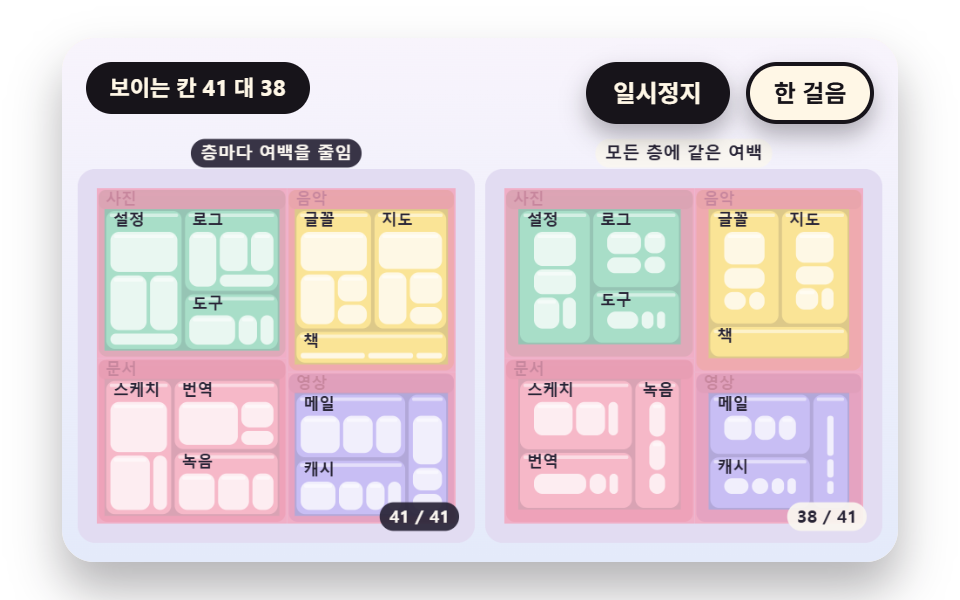 05 sc-treemap-nested-header-padding-inset
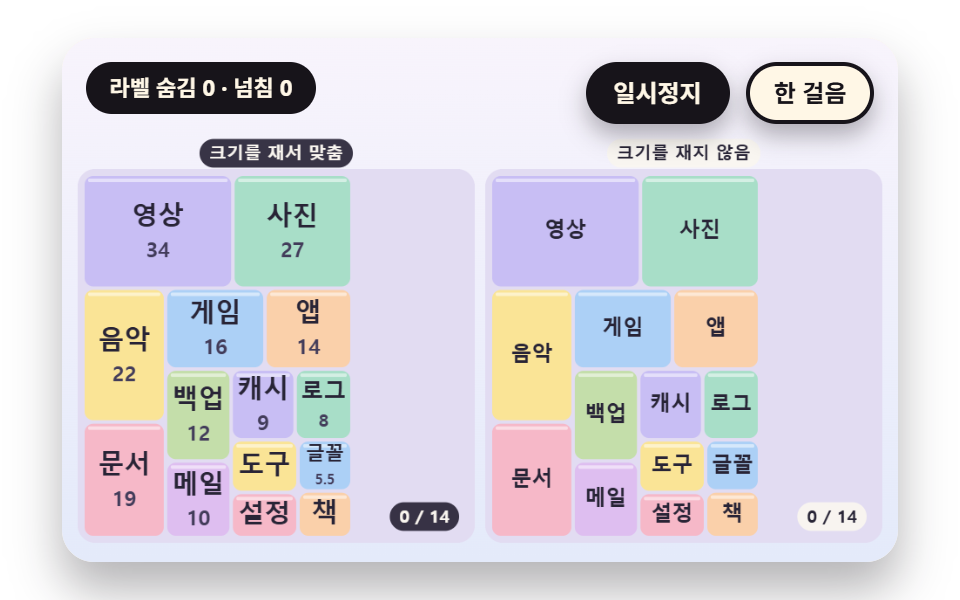 06 sc-treemap-label-fit-measure-hide
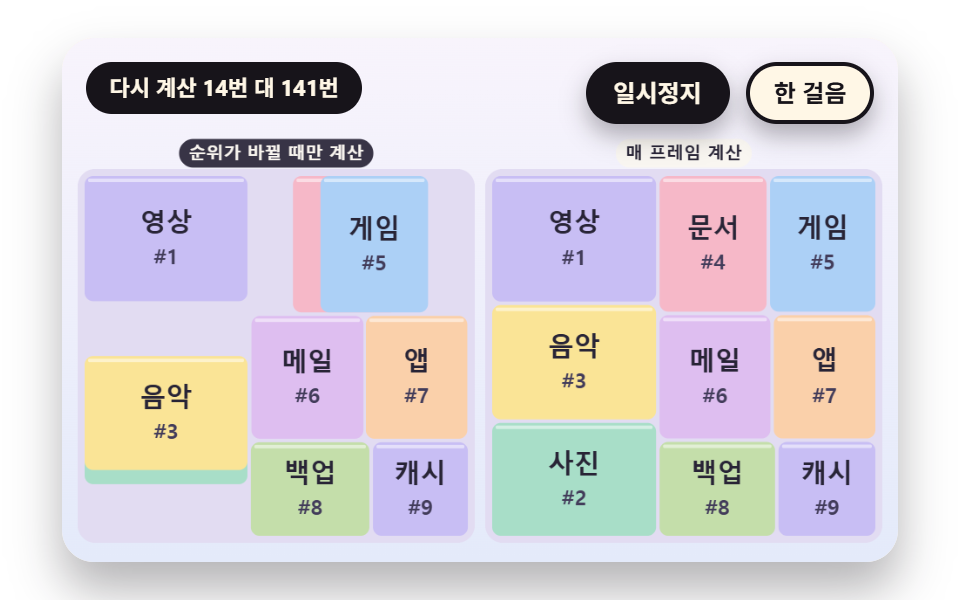 07 sc-treemap-live-rank-cross-swap
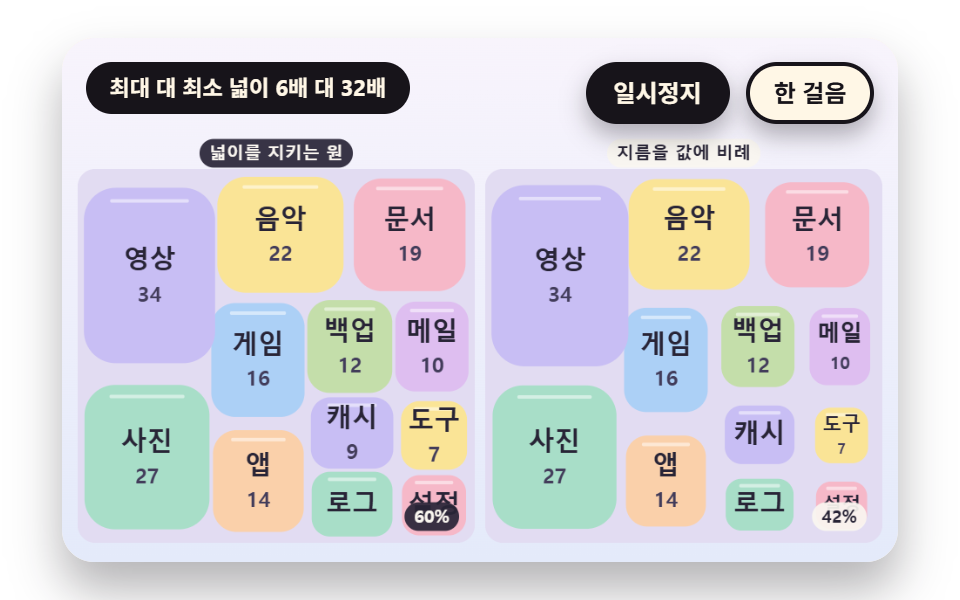 08 sc-treemap-circle-pack-morph-compare
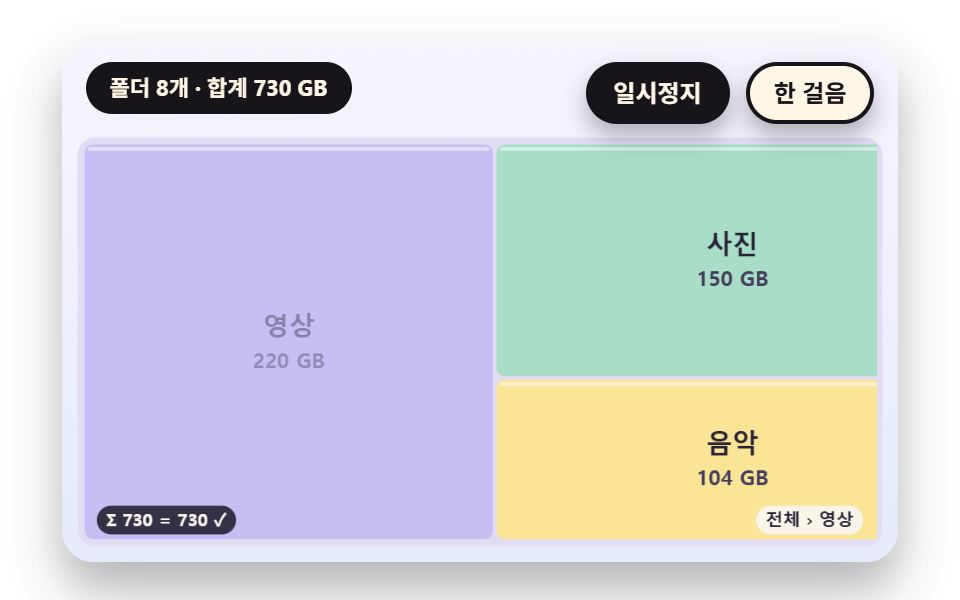 09 sc-treemap-hero-disk-usage-folder-scene
Auto-plays · click a tile to jump to its section · all nine in one zip
- 01 A Split That Aims for Squares Instead of Long Strips
- 02 A Reflow Where Cells Spring to Their New Slots When Values Change
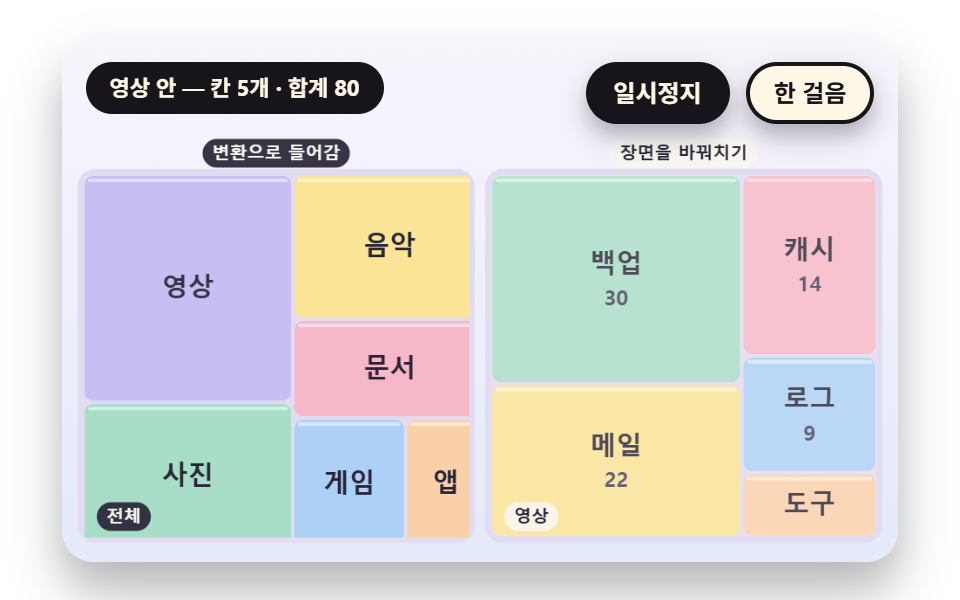
- 03 A Drill Down That Zooms a Cell Into Its Inner Children
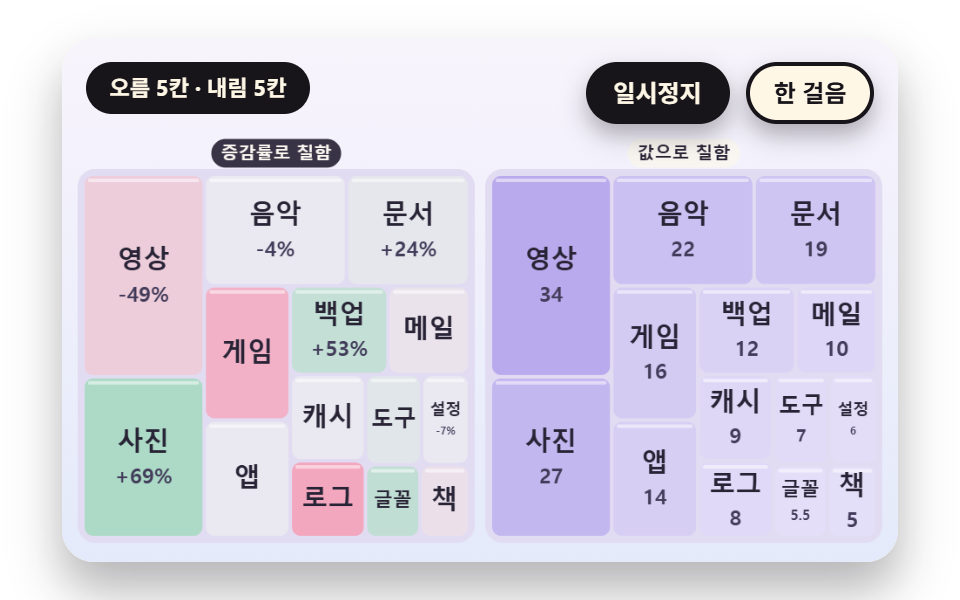
- 04 Pastel Diverging Colors Painted From a Single Change Rate
- 05 Nested Cells That Mark Layers With Group Headers and Inner Padding
- 06 A Label Fit That Measures the Cell Then Shrinks or Hides the Text
- 07 Cells That Swap Places When Flowing Values Cross in Rank
- 08 A Morph That Compares the Same Data as Rectangles and Circles
- 09 A Disk Usage Hero Filled by Folder Sizes
The nine scenes share one design. A cell's position is not decided by the drawing code, because squarify and slice return a list of rectangles and the screen only paints that list against one scene clock. There is no library, no WebGL and no CDN, and the single random source is a seeded generator, so one seed builds the same board each run.
How a list of values becomes cell areas
A treemap fills one rectangle with no gap and makes each cell's area proportional to its value. BASE holds 24 values from large to small, each scene takes the first few, and the names are made-up buckets such as video, photo and music, so no real company or service appears.
The layout function computes and the screen paints the result
slice takes an array of values and one rectangle and returns { x, y, w, h } per cell as a pure function. squarify has the same shape, so the drawing code fills those rectangles and puts text on them without ever computing an area itself.
    // One direction slice: no rows, only vertical strips in input order
    function slice(vals, R) {
        let total = 0;
        for (const v of vals) {
            total += Math.max(v, 1e-6);
        }
        let x = R.x;
        return vals.map(function (v) {
            const w = R.w * Math.max(v, 1e-6) / total;
            const r = { x: x, y: R.y, w: w, h: R.h };
            x += w;
            return r;
        });
    }
Treemap Chart: 9 Scenes — Row Closing That Aims for Squares, a Spring Reflow When Values Change, a Drill Down Into a Cell, Diverging Color From Change Rate, Nesting With Headers and Padding, Labels That Fit by Measuring, Rank Crossing Swaps, a Rectangle and Circle Compare Morph and a Folder Size Hero
The order moves from layout to a landing screen. 01 and 02 cover the layout and its reflow, 03 to 05 cover layers and color, 06 and 07 cover text and rank, and 08 and 09 cover a shape compare and a hero.
What nine renders measured for area and motion
| Scene | Cumulative area | Moving frames | Mean intensity |
|---|---|---|---|
| 01 Row closing | 44.1% | 19/23 | 73.9 |
| 02 Spring reflow | 41.6% | 21/23 | 44.0 |
| 03 Drill down | 48.0% | 15/23 | 45.4 |
| 04 Diverging color | 22.4% | 23/23 | 43.0 |
| 05 Nested padding | 39.5% | 18/23 | 19.0 |
| 06 Label fit | 38.7% | 22/23 | 53.2 |
| 07 Rank crossing | 44.2% | 23/23 | 61.6 |
| 08 Circle morph | 26.5% | 12/23 | 32.8 |
| 09 Disk hero | 54.6% | 12/23 | 65.7 |
Scene 09 covers the most area at 54.6% and 04 the least at 22.4%, and mean intensity peaks at 73.9 in 01 and bottoms out at 19.0 in 05. Scenes 04 and 07 moved in 23/23 frames, while 08 and 09 sat still for about half of them at 12/23.
01A Split That Aims for Squares Instead of Long Strips
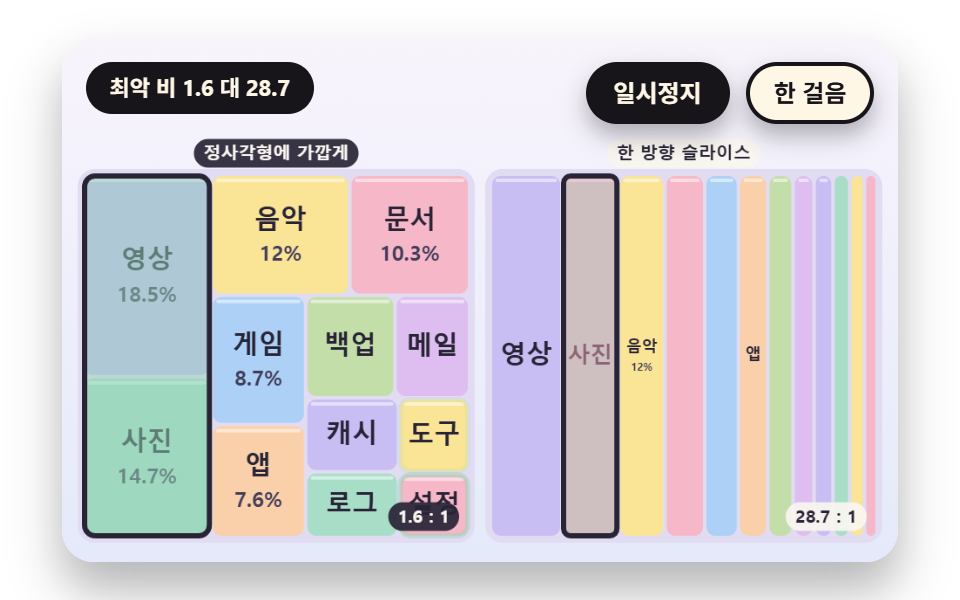
When a disk or budget breakdown becomes cells, long thin cells hide the small values. On the left, squarify re-measures the worst cell ratio with worstRow each time a cell joins a row and closes the row once the ratio gets worse, while slice on the right cuts vertical strips with no rows. With 12 cells the worst ratio is 1.58 on the left and 28.73 on the right.
<main class="stage">
<div class="vj is-demo" id="vj">
  <div class="vj__pad" data-role="pad" tabindex="0" role="application" aria-label="Treemap stage: arrow keys move between cells, Enter picks, P pauses, N steps once, R restarts">
    <canvas class="vj__canvas" data-role="canvas" width="480" height="300" role="img" aria-label="Twelve identical values are laid out two ways: on the left, cells join a row while the worst ratio is re-measured and the row closes before it gets worse; on the right, one-direction slice strips. Cells pop in every 0.14 seconds, a mint outline sweeps each row on the left as it closes, and the corner number is the worst aspect ratio among cells shown so far. Once all have appeared, each row on the left and each strip on the right is covered with color in turn, then an outline breathes on the longest cell before everything fades and restarts"></canvas>
  </div>
  <p class="vj__status" data-role="status" aria-live="off">Treemap demo</p>
  <div class="vj__ctrl">
    <button class="vj__pause" data-role="pause" type="button" aria-pressed="false">Pause</button>
    <button class="vj__step" data-role="step" type="button">Step</button>
  </div>
  <p class="vj__done" data-role="done" role="status" aria-live="polite"></p>
</div>
</main>
@use "../../../../site/static/demo-tokens" as *;
@include stage($stage-paper);
.vj {
position: relative;
width: min(92vw, calc(160vh - 12.8vw));
aspect-ratio: 480 / 300;
margin: 0 auto;
border-radius: $r-card;
overflow: hidden;
box-shadow: $shadow-raised;
background: $subject-cream;
}
// 무대 상자 — 여기서 시작한 터치만 칸 누르기로 읽는다(touch-action: none 은 이 상자에만). 무대 밖 터치는 페이지 스크롤 그대로
.vj__pad {
position: absolute;
inset: 0;
border-radius: inherit;
outline: none;
touch-action: none;
cursor: pointer;
}
// 바깥 .vj 가 넘침을 자르므로 포커스 테두리는 안쪽으로 들인다
.vj__pad:focus-visible {
outline: 3px solid $subject-ink;
outline-offset: -3px;
}
.vj__canvas {
position: absolute;
inset: 0;
display: block;
width: 100%;
height: 100%;
}
.vj__ctrl {
position: absolute;
right: $sp-3;
top: $sp-3;
display: flex;
gap: $sp-2;
}
.vj__pause,
.vj__step {
padding: $sp-1 $sp-3;
border: 2px solid $subject-ink;
border-radius: $r-pill;
background: $subject-ink;
color: $subject-cream;
font-family: inherit;
font-weight: 700;
font-size: 12px;
line-height: 1.6;
cursor: pointer;
box-shadow: $shadow-press;
transition: transform $dur-quick $ease-spring;
}
.vj__step {
background: $subject-cream;
color: $subject-ink;
}
// 스크린리더에만 읽히는 완료 알림
.vj__done {
position: absolute;
width: 1px;
height: 1px;
margin: 0;
overflow: hidden;
clip-path: inset(50%);
white-space: nowrap;
}
// 눌린 상태(멈춤) — 바탕과 글자색을 뒤집어 aria-pressed 가 눈에도 보이게
.vj__pause[aria-pressed="true"] {
background: $subject-cream;
color: $subject-ink;
}
.vj__pause:hover,
.vj__step:hover {
transform: translateY(-2px);
}
.vj__pause:active,
.vj__step:active {
transform: translateY(1px);
}
.vj__pause:focus-visible,
.vj__step:focus-visible {
outline: 3px solid $subject-ink;
outline-offset: 3px;
}
// 상태 줄 — 지금 장면의 수치를 글자로. 시연 중에는 aria-live off, 사람이 처음 손대면 polite
.vj__status {
position: absolute;
left: $sp-3;
top: $sp-3;
max-width: calc(100% - 190px);
margin: 0;
padding: $sp-1 $sp-3;
border-radius: $r-pill;
background: $subject-ink;
color: $subject-cream;
font-weight: 700;
font-size: 11px;
line-height: 1.6;
white-space: nowrap;
overflow: hidden;
text-overflow: ellipsis;
pointer-events: none;
}
@media (max-width: 340px) {
.vj__pause,
.vj__step,
.vj__status { font-size: 10px; padding: 0 $sp-2; }
}
// 움직임 줄이기 — 장면은 스크립트가 정지 장면 한 장으로 멈춘다. 버튼도 떠오르지 않게
@media (prefers-reduced-motion: reduce) {
.vj__pause,
.vj__step { transition: none !important; }
.vj__pause:hover,
.vj__pause:active,
.vj__step:hover,
.vj__step:active { transform: none !important; }
}html, body {
margin: 0;
overflow: hidden;
}
.stage {
box-sizing: border-box;
min-height: 100vh;
display: grid;
place-items: center;
margin: 0;
background: #ffffff;
font-family: -apple-system, "Segoe UI", "Noto Sans KR", sans-serif;
padding: clamp(8px, 4vw, 24px);
}
.vj {
position: relative;
width: min(92vw, 160vh - 12.8vw);
aspect-ratio: 480/300;
margin: 0 auto;
border-radius: 16px;
overflow: hidden;
box-shadow: 0 14px 24px rgba(23, 20, 26, 0.32);
background: #fff7e6;
}
.vj__pad {
position: absolute;
inset: 0;
border-radius: inherit;
outline: none;
touch-action: none;
cursor: pointer;
}
.vj__pad:focus-visible {
outline: 3px solid #17141a;
outline-offset: -3px;
}
.vj__canvas {
position: absolute;
inset: 0;
display: block;
width: 100%;
height: 100%;
}
.vj__ctrl {
position: absolute;
right: 12px;
top: 12px;
display: flex;
gap: 8px;
}
.vj__pause,
.vj__step {
padding: 4px 12px;
border: 2px solid #17141a;
border-radius: 999px;
background: #17141a;
color: #fff7e6;
font-family: inherit;
font-weight: 700;
font-size: 12px;
line-height: 1.6;
cursor: pointer;
box-shadow: 0 6px 12px rgba(23, 20, 26, 0.32);
transition: transform 220ms cubic-bezier(0.2, 0.8, 0.2, 1);
}
.vj__step {
background: #fff7e6;
color: #17141a;
}
.vj__done {
position: absolute;
width: 1px;
height: 1px;
margin: 0;
overflow: hidden;
clip-path: inset(50%);
white-space: nowrap;
}
.vj__pause[aria-pressed=true] {
background: #fff7e6;
color: #17141a;
}
.vj__pause:hover,
.vj__step:hover {
transform: translateY(-2px);
}
.vj__pause:active,
.vj__step:active {
transform: translateY(1px);
}
.vj__pause:focus-visible,
.vj__step:focus-visible {
outline: 3px solid #17141a;
outline-offset: 3px;
}
.vj__status {
position: absolute;
left: 12px;
top: 12px;
max-width: calc(100% - 190px);
margin: 0;
padding: 4px 12px;
border-radius: 999px;
background: #17141a;
color: #fff7e6;
font-weight: 700;
font-size: 11px;
line-height: 1.6;
white-space: nowrap;
overflow: hidden;
text-overflow: ellipsis;
pointer-events: none;
}
@media (max-width: 340px) {
.vj__pause,
.vj__step,
.vj__status {
font-size: 10px;
padding: 0 8px;
}
}
@media (prefers-reduced-motion: reduce) {
.vj__pause,
.vj__step {
transition: none !important;
}
.vj__pause:hover,
.vj__pause:active,
.vj__step:hover,
.vj__step:active {
transform: none !important;
}
}(function () {
const root = document.getElementById("vj");
if (!root) return;
// 무대 좌표 — 캔버스 안 계산은 늘 480×300. 화면에 보이는 크기와 상관없다
const W = 480;
const H = 300;
const TAU = Math.PI * 2;
function clamp(v, lo, hi) { return v < lo ? lo : (v > hi ? hi : v); }
function lerp(a, b, k) { return a + (b - a) * k; }
function ease(x) { const c = clamp(x, 0, 1); return c * c * (3 - 2 * c); }
// 끝에서 한 번 넘쳤다 돌아오는 곡선 — 칸이 자리에 튀어 나올 때
function backOut(x) {
const c = clamp(x, 0, 1) - 1;
return 1 + 2.70158 * c * c * c + 1.70158 * c * c;
}
// 시드 고정 난수 — 선형 합동 생성기(곱 1664525, 더함 1013904223). 같은 시드면 같은 수열
function seeded(seed) {
let s = (seed >>> 0) || 1;
return function () {
s = (Math.imul(s, 1664525) + 1013904223) >>> 0;
return s / 4294967296;
};
}
// 파스텔 팔레트 — 칸은 연한 면, 글자는 늘 진한 잉크
const BG_TOP = [248, 244, 252];
const BG_BOT = [228, 234, 250];
const BED = [226, 220, 242];
const INK = [40, 36, 54];
const INK2 = [66, 60, 90];
const PAPER = [250, 246, 240];
const NEUTRAL = [234, 232, 240];
const ROSE = [244, 162, 186];
const MINT = [148, 212, 182];
const TILES = [
[200, 190, 244], [168, 222, 200], [250, 228, 150], [246, 184, 200],
[172, 208, 246], [250, 208, 170], [196, 222, 170], [222, 190, 240],
];
function mix(a, b, k) { return [lerp(a[0], b[0], k), lerp(a[1], b[1], k), lerp(a[2], b[2], k)]; }
function rgba(c, a) {
return 'rgba(' + Math.round(clamp(c[0], 0, 255)) + ',' + Math.round(clamp(c[1], 0, 255)) + ',' + Math.round(clamp(c[2], 0, 255)) + ',' + clamp(a, 0, 1).toFixed(3) + ')';
}
// 장면 시계(초)·판 반복 번호·시간표 — 시간표는 (시각, 할 일) 목록이고 시각이 지나면 한 번씩 부른다
let sceneT = 0;
let lap = 0;
let script = [];
let evAt = 0;
function inset(r, p) {
return { x: r.x + p, y: r.y + p, w: Math.max(0, r.w - 2 * p), h: Math.max(0, r.h - 2 * p) };
}
function aspectOf(r) {
if (r.w <= 1e-6 || r.h <= 1e-6) {
return 99;
}
return r.w >= r.h ? r.w / r.h : r.h / r.w;
}
// 한 줄의 최악 가로세로 비 — areas 는 그 줄 칸들의 넓이, side 는 줄을 놓을 짧은 변의 길이
    function worstRow(areas, side) {
        let s = 0;
        let mx = 0;
        let mn = Infinity;
        for (const a of areas) {
            s += a;
            if (a > mx) {
                mx = a;
            }
            if (a < mn) {
                mn = a;
            }
        }
        const s2 = s * s;
        const d2 = side * side;
        return Math.max(d2 * mx / s2, s2 / (d2 * mn));
    }
function squarify(vals, R) {
const n = vals.length;
const idx = [];
let total = 0;
for (let i = 0; i < n; i += 1) {
idx.push(i);
total += Math.max(vals[i], 1e-6);
}
idx.sort(function (a, b) { return vals[b] - vals[a] || a - b; });
const k = R.w * R.h / total;
const rects = [];
const rowOf = [];
for (let i = 0; i < n; i += 1) {
rects.push({ x: R.x, y: R.y, w: 0, h: 0 });
rowOf.push(0);
}
const rows = [];
let rx = R.x;
let ry = R.y;
let rw = R.w;
let rh = R.h;
let at = 0;
while (at < n) {
const side = Math.max(Math.min(rw, rh), 1e-6);
const row = [];
const areas = [];
let cur = Infinity;
while (at < n) {
const a = Math.max(vals[idx[at]], 1e-6) * k;
const next = areas.slice();
next.push(a);
const wr = worstRow(next, side);
if (areas.length > 0 && wr > cur) {
break;
}
areas.push(a);
row.push(idx[at]);
cur = wr;
at += 1;
}
let s = 0;
for (const a of areas) {
s += a;
}
if (rw >= rh) {
const cw = s / Math.max(rh, 1e-6);
let y = ry;
row.forEach(function (id, j) {
const h = areas[j] / Math.max(cw, 1e-6);
rects[id] = { x: rx, y: y, w: cw, h: h };
rowOf[id] = rows.length;
y += h;
});
rx += cw;
rw -= cw;
}
else {
const ch = s / Math.max(rw, 1e-6);
let x = rx;
row.forEach(function (id, j) {
const w = areas[j] / Math.max(ch, 1e-6);
rects[id] = { x: x, y: ry, w: w, h: ch };
rowOf[id] = rows.length;
x += w;
});
ry += ch;
rh -= ch;
}
rows.push(row);
}
return { rects: rects, rowOf: rowOf, rows: rows };
}
// One direction slice — 줄을 나누지 않고 입력 순서대로 세로 띠로만 자른다
function slice(vals, R) {
let total = 0;
for (const v of vals) {
total += Math.max(v, 1e-6);
}
let x = R.x;
return vals.map(function (v) {
const w = R.w * Math.max(v, 1e-6) / total;
const r = { x: x, y: R.y, w: w, h: R.h };
x += w;
return r;
});
}
function worstAspect(rs) {
let m = 1;
for (const r of rs) {
const a = aspectOf(r);
if (a > m) {
m = a;
}
}
return m;
}
function meanAspect(rs) {
let s = 0;
for (const r of rs) {
s += aspectOf(r);
}
return rs.length ? s / rs.length : 1;
}
// 스프링 — 네 변(왼·위·오른·아래)을 따로 목표로 끌어당긴다. k 는 스프링 상수, zeta 는 감쇠비
function springStep(cur, vel, tgt, k, zeta, dt) {
const c = 2 * zeta * Math.sqrt(k);
const n = Math.max(1, Math.ceil(dt * 120));
const h = dt / n;
for (let s = 0; s < n; s += 1) {
for (let j = 0; j < cur.length; j += 1) {
vel[j] += (-k * (cur[j] - tgt[j]) - c * vel[j]) * h;
cur[j] += vel[j] * h;
}
}
}
function edgesOf(r) { return [r.x, r.y, r.x + r.w, r.y + r.h]; }
function rectOf(e) { return { x: e[0], y: e[1], w: e[2] - e[0], h: e[3] - e[1] }; }
// ── 자체 가상 데이터 ──────────────────────────────────────
const NAMES = [
'Video', 'Photos', 'Music', 'Docs', 'Games', 'Apps', 'Backup', 'Mail', 'Cache', 'Logs', 'Tools', 'Config',
'Fonts', 'Books', 'Maps', 'Translate', 'Sketch', 'Audio', 'Templates', 'Zips', 'Temp', 'Shared', 'Archive', 'Other',
];
// 큰 순서로 놓인 값 24개
const BASE = [34, 27, 22, 19, 16, 14, 12, 10, 9, 8, 7, 6, 5.5, 5, 4.4, 4, 3.4, 3, 2.6, 2.3, 2, 1.7, 1.5, 1.3];
function leafOf(name, v) { return { name: name, v: v, kids: [] }; }
function groupOf(name, kids) {
let s = 0;
for (const k of kids) {
s += k.v;
}
return { name: name, v: s, kids: kids };
}
function sumOf(vals) { let s = 0; for (const v of vals) {
s += v;
} return s; }
function pct(v, total) { return String(Math.round(v / total * 1000) / 10); }
// ── 라벨 맞춤 ─────────────────────────────────────────────
// 글자 너비는 문자 수 × 글자 크기 × CHAR_W 로 어림 — 한글 한 자가 글자 크기만큼 차지하니 CHAR_W 는 1
const CHAR_W = 1;
const FONT_MAX = 15;
const FONT_STEP = 2;
const HIDE_MIN = 8;
function estW(s, px) { return s.length * px * CHAR_W; }
// 칸 안쪽(양쪽 3px 여백)에 들어가는 가장 큰 글자 크기 — 최소 크기에서도 넘치면 0(감춤)
function fitPx(s, r) {
for (let px = FONT_MAX; px >= HIDE_MIN; px -= FONT_STEP) {
if (estW(s, px) <= r.w - 6 && px * 1.3 <= r.h - 4) {
return px;
}
}
return 0;
}
const canvasEl = root.querySelector('[data-role="canvas"]');
const padEl = root.querySelector('[data-role="pad"]');
const pauseEl = root.querySelector('[data-role="pause"]');
const statusEl = root.querySelector('[data-role="status"]');
const stepEl = root.querySelector('[data-role="step"]');
const doneEl = root.querySelector('[data-role="done"]');
const ctxRaw = canvasEl ? canvasEl.getContext('2d') : null;
if (!canvasEl || !ctxRaw || !pauseEl || !padEl || !stepEl || !doneEl) {
return;
}
const cv = canvasEl;
const ctx = ctxRaw;
const pauseBtn = pauseEl;
const stepBtn = stepEl;
const doneP = doneEl;
const pad = padEl;
// 외부 웹폰트는 부르지 않는다 — 기기에 있는 Fonts 목록만
const FONT_STACK = 'system-ui, -apple-system, "Segoe UI", "Noto Sans KR", sans-serif';
let dpr = 1;
function fitCanvas() {
// 배율은 2 에서 자른다 — 배율 3 기기에서 화소가 2.25배로 늘지 않게
dpr = Math.min(window.devicePixelRatio || 1, 2);
cv.width = Math.round(W * dpr);
cv.height = Math.round(H * dpr);
ctx.setTransform(dpr, 0, 0, dpr, 0, 0);
}
function skyFill(top, bot) {
const g = ctx.createLinearGradient(0, 0, 0, H);
g.addColorStop(0, rgba(top, 1));
g.addColorStop(1, rgba(bot, 1));
ctx.fillStyle = g;
ctx.fillRect(0, 0, W, H);
}
function disc(x, y, r, c, a) {
if (r <= 0.2 || a <= 0) {
return;
}
ctx.beginPath();
ctx.arc(x, y, r, 0, TAU);
ctx.fillStyle = rgba(c, a);
ctx.fill();
}
function box(x, y, w, h, r, c, a) {
if (w <= 0.2 || h <= 0.2 || a <= 0) {
return;
}
ctx.beginPath();
ctx.roundRect(x, y, w, h, Math.max(0, Math.min(r, w / 2, h / 2)));
ctx.fillStyle = rgba(c, a);
ctx.fill();
}
function outline(x, y, w, h, r, width, c, a) {
if (w <= 0.2 || h <= 0.2 || a <= 0) {
return;
}
ctx.beginPath();
ctx.roundRect(x, y, w, h, Math.max(0, Math.min(r, w / 2, h / 2)));
ctx.lineWidth = width;
ctx.strokeStyle = rgba(c, a);
ctx.stroke();
}
function text(s, x, y, c, a, px, weight, align) {
ctx.font = weight + ' ' + px + 'px ' + FONT_STACK;
ctx.textAlign = align;
ctx.textBaseline = 'middle';
ctx.fillStyle = rgba(c, a);
ctx.fillText(s, x, y);
}
// 글자 이름표 — 바탕 알약 위에 글자
function tag(s, x, y, bg, fg, px, align) {
ctx.font = '700 ' + px + 'px ' + FONT_STACK;
const w = ctx.measureText(s).width + px * 1.1;
const left = align === 'center' ? x - w / 2 : (align === 'right' ? x - w : x);
box(left, y - px * 0.82, w, px * 1.64, px * 0.82, bg, 0.92);
text(s, left + w / 2, y + 0.5, fg, 1, px, 700, 'center');
}
// 판 자리 — 왼쪽 판·오른쪽 판(대비판)·한 판짜리 히어로. 위쪽은 상태 줄·버튼 자리
const PANEL_L = { x: 12, y: 78, w: 222, h: 208 };
const PANEL_R = { x: 246, y: 78, w: 222, h: 208 };
const PANEL_ONE = { x: 12, y: 60, w: 456, h: 228 };
// 판 바닥 — 칸 사이 틈으로 비치는 연보라
function bed(R) {
box(R.x - 3, R.y - 3, R.w + 6, R.h + 6, 10, BED, 1);
}
function panelTags(a, b) {
tag(a, PANEL_L.x + PANEL_L.w / 2, 66, INK, PAPER, 10, 'center');
tag(b, PANEL_R.x + PANEL_R.w / 2, 66, PAPER, INK, 10, 'center');
}
// 칸 한 장 — 둥근 면과 윗면 하이라이트. pop 은 자리에 튀어 나오는 배율(1 이면 그대로)
function tile(r, c, a, pop) {
if (a <= 0 || pop <= 0) {
return;
}
const cx = r.x + r.w / 2;
const cy = r.y + r.h / 2;
const w = Math.max(0, (r.w - 2) * pop);
const h = Math.max(0, (r.h - 2) * pop);
box(cx - w / 2, cy - h / 2, w, h, 5, c, a);
if (h > 12 && w > 8) {
box(cx - w / 2 + 2, cy - h / 2 + 1.5, w - 4, 2, 1, [255, 255, 255], 0.5 * a);
}
}
// 칸 안 글자 — 맞는 크기가 있으면 이름(과 자리가 되면 아래 줄 부제), 없으면 감춘다
function cellText(r, name, sub, a) {
const px = fitPx(name, r);
if (px === 0 || a <= 0) {
return;
}
const cx = r.x + r.w / 2;
const cy = r.y + r.h / 2;
const two = sub !== '' && r.h >= px * 2.6 && estW(sub, px - 3) <= r.w - 6;
text(name, cx, cy - (two ? px * 0.55 : 0), INK, a, px, 700, 'center');
if (two) {
text(sub, cx, cy + px * 0.75, INK2, a, px - 3, 600, 'center');
}
}
let shownStatus = '';
function pushStatus(s) {
if (!statusEl || s === shownStatus) {
return;
}
shownStatus = s;
statusEl.textContent = s;
}
let paused = false;
const reduceQuery = window.matchMedia('(prefers-reduced-motion: reduce)');
// 페이지를 연 채 움직임 줄이기 설정을 바꿔도 change 리스너가 다시 읽는다
let still = reduceQuery.matches;
// 자동 시연 표시 — 사람이 처음 손대면 떼고 상태 줄을 polite 로 켠다
let demo = root.classList.contains('is-demo');
const off = new AbortController();
// 사람이 직접 하는 중이면 시간표는 멈추고 애니메이션만 흐른다
let manual = false;
// curOn 이면 키보드 칸 고르기가 켜진 것 — ki 가 hits() 안 번호
let curOn = false;
let ki = 0;
function wake() {
if (!demo) {
return;
}
demo = false;
root.classList.remove('is-demo');
if (statusEl) {
statusEl.setAttribute('aria-live', 'polite');
}
}
function takeOver() {
if (manual) {
return;
}
manual = true;
onTake();
wake();
if (!curOn) {
curOn = true;
ki = 0;
}
}
// 한 판 시연이 끝났음을 스크린리더에 한 번만 알린다 — 판이 되풀이돼도 다시 읽지 않는다
let doneSaid = false;
function checkDone() {
if (!manual && !doneSaid && sceneT >= LAP_S - 0.6) {
doneSaid = true;
doneP.textContent = statusText();
}
}
function advance(dt) {
sceneT += dt;
if (!manual) {
while (evAt < script.length && script[evAt].t <= sceneT) {
const ev = script[evAt];
evAt += 1;
ev.f();
}
if (sceneT >= LAP_S) {
lap += 1;
begin();
return;
}
}
update(dt);
}
// 첫 판은 START_S 만큼 앞서 시작한다 — 칸이 이미 움직이는 중인 장면에서 보인다
function runTo(t) {
while (sceneT < t - 1e-6) {
advance(Math.min(1 / 30, t - sceneT));
}
}
function begin() {
sceneT = 0;
evAt = 0;
script = [];
build();
if (lap === 0 && !still) {
runTo(START_S);
}
}
const DT_MAX = 0.05;
const SETTLE_FRAMES = 8;
const SETTLE_DT = 0.04;
function drawCursor() {
if (!curOn) {
return;
}
const hs = hits();
if (hs.length === 0) {
return;
}
const h = hs[clamp(ki, 0, hs.length - 1)];
outline(h.x + 1, h.y + 1, h.w - 2, h.h - 2, 5, 3, INK, 1);
outline(h.x - 1, h.y - 1, h.w + 2, h.h + 2, 6, 1.5, PAPER, 0.9);
}
function cursorLabel() {
const hs = hits();
return hs.length === 0 ? statusText() : hs[clamp(ki, 0, hs.length - 1)].label;
}
function showNow() {
draw();
drawCursor();
pushStatus(curOn ? cursorLabel() : statusText());
checkDone();
}
let rafId = 0;
let lastTs = -1;
function frame(ts) {
if (still || paused) {
rafId = 0;
return;
}
if (lastTs < 0) {
lastTs = ts;
}
const dt = Math.min((ts - lastTs) / 1000, DT_MAX);
lastTs = ts;
if (dt > 0) {
advance(dt);
}
showNow();
rafId = window.requestAnimationFrame(frame);
}
function startLoop() {
if (rafId) {
return;
}
// 멈췄던 사이의 시간을 첫 프레임 dt 로 넘기지 않는다
lastTs = -1;
rafId = window.requestAnimationFrame(frame);
}
function stopLoop() {
if (rafId) {
window.cancelAnimationFrame(rafId);
rafId = 0;
}
}
// 움직임 줄이기 — 루프 없이 배치가 끝난 정지 장면 한 장
function showRest() {
stopLoop();
lap = 0;
sceneT = 0;
evAt = 0;
script = [];
build();
runTo(REST_S);
showNow();
}
// 움직임 줄이기이거나 멈춘 채 입력이 들어오면 트윈 없이 곧바로 끝 배치로 — 시간을 3초 흘려 스프링·애니메이션을 다 끝낸다
function settleStill() {
for (let k = 0; k < 90; k += 1) {
sceneT += 1 / 30;
update(1 / 30);
}
}
function play() {
begin();
showNow();
if (!paused) {
startLoop();
}
}
function togglePause() {
paused = !paused;
pauseBtn.setAttribute('aria-pressed', paused ? 'true' : 'false');
wake();
if (paused) {
stopLoop();
}
else if (!still) {
startLoop();
}
}
function restart() {
manual = false;
curOn = false;
doneSaid = false;
lap += 1;
begin();
for (let k = 0; k < SETTLE_FRAMES; k += 1) {
update(SETTLE_DT);
}
showNow();
}
// Step — 멈춘 채 시간표의 다음 일 하나를 부른다. 더 부를 일이 없거나 직접 하던 중이면 다음 판을 연다
function stepOnce() {
wake();
if (!paused) {
paused = true;
pauseBtn.setAttribute('aria-pressed', 'true');
stopLoop();
}
if (manual || evAt >= script.length) {
restart();
return;
}
sceneT = Math.max(sceneT, script[evAt].t);
advance(0);
for (let k = 0; k < SETTLE_FRAMES; k += 1) {
sceneT += SETTLE_DT;
update(SETTLE_DT);
}
showNow();
}
function moveCur(d) {
const n = hits().length;
if (n === 0) {
return;
}
ki = (ki + d + n) % n;
}
function actCur(i) {
onAct(i);
// 멈춘 채·움직임 줄이기에서도 입력이 화면에 바로 반영되게 한다
if (still || paused) {
settleStill();
}
}
pauseBtn.addEventListener('click', togglePause, { signal: off.signal });
stepBtn.addEventListener('click', stepOnce, { signal: off.signal });
// 키보드 — 무대에 포커스가 있을 때만. 방향키는 칸 이동, Enter·Space 는 칸 고르기, P 는 Pause, N 은 Step, R 은 다시
pad.addEventListener('keydown', function (e) {
if (e.altKey || e.ctrlKey || e.metaKey) {
return;
}
const k = e.key;
if (k === 'ArrowLeft' || k === 'ArrowUp') {
e.preventDefault();
takeOver();
moveCur(-1);
showNow();
}
else if (k === 'ArrowRight' || k === 'ArrowDown') {
e.preventDefault();
takeOver();
moveCur(1);
showNow();
}
else if (k === 'Enter' || k === ' ') {
e.preventDefault();
takeOver();
actCur(ki);
showNow();
}
else if (k === 'p' || k === 'P') {
togglePause();
}
else if (k === 'n' || k === 'N') {
stepOnce();
}
else if (k === 'r' || k === 'R') {
restart();
}
}, { signal: off.signal });
// 마우스·터치 — 누른 자리의 칸을 고른다
pad.addEventListener('click', function (e) {
const rect = cv.getBoundingClientRect();
const px = (e.clientX - rect.left) / rect.width * W;
const py = (e.clientY - rect.top) / rect.height * H;
const hs = hits();
let at = -1;
for (let i = 0; i < hs.length; i += 1) {
if (px >= hs[i].x && px <= hs[i].x + hs[i].w && py >= hs[i].y && py <= hs[i].y + hs[i].h) {
at = i;
}
}
if (at < 0) {
return;
}
takeOver();
ki = at;
actCur(at);
showNow();
}, { signal: off.signal });
// 탭이 숨으면 멈추고, 돌아오면 시계를 다시 맞춰 시작 — 숨은 동안의 몇 초가 한 프레임에 몰리지 않게
document.addEventListener('visibilitychange', function () {
if (document.hidden) {
stopLoop();
}
else if (!paused && !still) {
startLoop();
}
}, { signal: off.signal });
// 설정이 바뀌면 — 켜지면 배치가 끝난 한 장, 꺼지면 다시 움직인다
reduceQuery.addEventListener('change', function () {
still = reduceQuery.matches;
if (still) {
showRest();
}
else {
lap = 0;
play();
}
}, { signal: off.signal });
window.addEventListener('resize', function () {
fitCanvas();
showNow();
}, { signal: off.signal });
// 01 — 줄을 닫는 배치(왼쪽)와 One direction slice(오른쪽)를 같은 값으로 나란히 놓고, 가장 길쭉한 칸의 가로세로 비를 센다
const CELL_N = 12;
const REVEAL_T0 = 0.25;
const REVEAL_GAP = 0.14;
const LAP_S = 9.6;
const START_S = 1.7;
const REST_S = 6.5;
// 모두 나타난 뒤 줄을 하나씩(왼쪽 0.35초, 오른쪽 띠 0.2초) 다시 훑는 시각과 간격
const SWEEP_T0 = 2.0;
const ROW_SWEEP = 0.35;
const STRIP_SWEEP = 0.2;
const RING_T0 = 4.6;
let vals = [];
let lay = { rects: [], rowOf: [], rows: [] };
let strips = [];
let pinned = -1;
function revealT(i) { return REVEAL_T0 + i * REVEAL_GAP; }
function build() {
vals = BASE.slice(0, CELL_N);
lay = squarify(vals, PANEL_L);
strips = slice(vals, PANEL_R);
pinned = -1;
}
function update(dt) { if (dt < 0) {
return;
} }
// 이미 나타난 칸만 모아 가장 길쭉한 비를 잰다
function worstShown(rs) {
const shown = [];
for (let i = 0; i < rs.length; i += 1) {
if (sceneT >= revealT(i)) {
shown.push(rs[i]);
}
}
return shown.length ? worstAspect(shown) : 1;
}
function fadeAll() { return 1 - clamp((sceneT - 8.4) / 1.0, 0, 1); }
function drawSide(R, rs, worstAt) {
bed(R);
const fa = fadeAll();
for (let i = 0; i < rs.length; i += 1) {
const p = clamp((sceneT - revealT(i)) / 0.4, 0, 1);
if (p <= 0) {
continue;
}
tile(rs[i], TILES[i % 8], fa, 0.55 + 0.45 * backOut(p));
if (p >= 1) {
cellText(rs[i], NAMES[i], pct(vals[i], sumOf(vals)) + '%', fa);
}
}
// 가장 길쭉한 칸 — 줄 훑기가 끝난 RING_T0 뒤부터 고리가 숨 쉰다
if (sceneT > RING_T0 && worstAt >= 0) {
const k = 0.5 + 0.5 * Math.sin((sceneT - RING_T0) * 5);
const r = rs[worstAt];
outline(r.x + 1, r.y + 1, r.w - 2, r.h - 2, 5, 2.5, INK, (0.45 + 0.55 * k) * fa);
}
}
function argWorst(rs) {
let at = 0;
for (let i = 1; i < rs.length; i += 1) {
if (aspectOf(rs[i]) > aspectOf(rs[at])) {
at = i;
}
}
return at;
}
// 줄에 든 칸들을 감싸는 사각형
function rowBox(row) {
let x0 = Infinity;
let y0 = Infinity;
let x1 = -Infinity;
let y1 = -Infinity;
for (const id of row) {
const r = lay.rects[id];
x0 = Math.min(x0, r.x);
y0 = Math.min(y0, r.y);
x1 = Math.max(x1, r.x + r.w);
y1 = Math.max(y1, r.y + r.h);
}
return { x: x0, y: y0, w: x1 - x0, h: y1 - y0 };
}
function draw() {
skyFill(BG_TOP, BG_BOT);
panelTags('Aiming for squares', 'One direction slice');
drawSide(PANEL_L, lay.rects, argWorst(lay.rects));
drawSide(PANEL_R, strips, argWorst(strips));
// 줄을 닫는 순간 그 줄 위로 한 번 빛이 지난다
const fa = fadeAll();
lay.rows.forEach(function (row) {
// 줄에서 가장 늦게 나타나는 칸이 나타난 직후가 줄을 닫는 순간
const age = sceneT - revealT(Math.max(...row)) - 0.2;
if (age < 0 || age > 0.5) {
return;
}
const bb = rowBox(row);
outline(bb.x + 1, bb.y + 1, bb.w - 2, bb.h - 2, 6, 3, MINT, (1 - age / 0.5) * fa);
});
// 줄 훑기 — 줄 하나의 칸 전체를 민트로, 오른쪽은 띠 하나를 장미색으로 차례로 덮는다
const rowAt = Math.floor((sceneT - SWEEP_T0) / ROW_SWEEP);
if (sceneT >= SWEEP_T0 && rowAt < lay.rows.length) {
const bb = rowBox(lay.rows[rowAt]);
box(bb.x + 1, bb.y + 1, bb.w - 2, bb.h - 2, 6, MINT, 0.5 * fa);
outline(bb.x + 1, bb.y + 1, bb.w - 2, bb.h - 2, 6, 3, INK, fa);
}
const stripAt = Math.floor((sceneT - SWEEP_T0) / STRIP_SWEEP);
if (sceneT >= SWEEP_T0 && stripAt < strips.length) {
const sr = strips[stripAt];
box(sr.x + 1, sr.y + 1, sr.w - 2, sr.h - 2, 4, ROSE, 0.5 * fa);
outline(sr.x + 1, sr.y + 1, sr.w - 2, sr.h - 2, 4, 3, INK, fa);
}
tag(worstShown(lay.rects).toFixed(1) + ' : 1', PANEL_L.x + PANEL_L.w - 6, PANEL_L.y + PANEL_L.h - 12, INK, PAPER, 10, 'right');
tag(worstShown(strips).toFixed(1) + ' : 1', PANEL_R.x + PANEL_R.w - 6, PANEL_R.y + PANEL_R.h - 12, PAPER, INK, 10, 'right');
if (pinned >= 0) {
const r = lay.rects[pinned];
outline(r.x + 2, r.y + 2, r.w - 4, r.h - 4, 4, 3, ROSE, 1);
}
}
function statusText() {
return 'Worst ratio {a} vs {b}'.replace('{a}', worstAspect(lay.rects).toFixed(1)).replace('{b}', worstAspect(strips).toFixed(1));
}
function hits() {
return lay.rects.map(function (r, i) {
return { x: r.x, y: r.y, w: r.w, h: r.h, label: '{n} value {v} - aspect ratio {a}'.replace('{n}', NAMES[i]).replace('{v}', String(vals[i])).replace('{a}', aspectOf(r).toFixed(1)) };
});
}
function onAct(i) { pinned = pinned === i ? -1 : i; }
function onTake() { return; }
fitCanvas();
if (still) {
showRest();
}
else {
play();
}
return function () {
stopLoop();
off.abort();
};
})();// SliceVsSquarifyAspect - 같은 항목 vanilla index.html 의 React 판. 같은 계산을 useEffect 안에서 돌린다
import { useEffect, useRef } from "react";
import styles from "./SliceVsSquarifyAspect.module.scss";
const cx = (s: string): string => s.split(" ").map((n) => styles[n] ?? n).join(" ");
export default function SliceVsSquarifyAspect() {
const rootRef = useRef<HTMLDivElement | null>(null);
useEffect(() => {
const rootEl = rootRef.current;
if (!rootEl) return;
const root: HTMLElement = rootEl;
type RGB = [number, number, number];
type RGBA = [number, number, number, number];
// 무대 좌표 — 캔버스 안 계산은 늘 480×300. 화면에 보이는 크기와 상관없다
const W = 480;
const H = 300;
const TAU = Math.PI * 2;
function clamp(v: number, lo: number, hi: number): number { return v < lo ? lo : (v > hi ? hi : v); }
function lerp(a: number, b: number, k: number): number { return a + (b - a) * k; }
function ease(x: number): number { const c = clamp(x, 0, 1); return c * c * (3 - 2 * c); }
// 끝에서 한 번 넘쳤다 돌아오는 곡선 — 칸이 자리에 튀어 나올 때
function backOut(x: number): number {
const c = clamp(x, 0, 1) - 1;
return 1 + 2.70158 * c * c * c + 1.70158 * c * c;
}
// 시드 고정 난수 — 선형 합동 생성기(곱 1664525, 더함 1013904223). 같은 시드면 같은 수열
function seeded(seed: number): () => number {
let s = (seed >>> 0) || 1;
return function (): number {
s = (Math.imul(s, 1664525) + 1013904223) >>> 0;
return s / 4294967296;
};
}
// 파스텔 팔레트 — 칸은 연한 면, 글자는 늘 진한 잉크
const BG_TOP: RGB = [248, 244, 252];
const BG_BOT: RGB = [228, 234, 250];
const BED: RGB = [226, 220, 242];
const INK: RGB = [40, 36, 54];
const INK2: RGB = [66, 60, 90];
const PAPER: RGB = [250, 246, 240];
const NEUTRAL: RGB = [234, 232, 240];
const ROSE: RGB = [244, 162, 186];
const MINT: RGB = [148, 212, 182];
const TILES: RGB[] = [
[200, 190, 244], [168, 222, 200], [250, 228, 150], [246, 184, 200],
[172, 208, 246], [250, 208, 170], [196, 222, 170], [222, 190, 240],
];
function mix(a: RGB, b: RGB, k: number): RGB { return [lerp(a[0], b[0], k), lerp(a[1], b[1], k), lerp(a[2], b[2], k)]; }
function rgba(c: RGB, a: number): string {
return 'rgba(' + Math.round(clamp(c[0], 0, 255)) + ',' + Math.round(clamp(c[1], 0, 255)) + ',' + Math.round(clamp(c[2], 0, 255)) + ',' + clamp(a, 0, 1).toFixed(3) + ')';
}
// 장면 시계(초)·판 반복 번호·시간표 — 시간표는 (시각, 할 일) 목록이고 시각이 지나면 한 번씩 부른다
let sceneT = 0;
let lap = 0;
type Ev = { t: number; f: () => void };
let script: Ev[] = [];
let evAt = 0;
// ── 트리맵 계산 ───────────────────────────────────────────
type Rect = { x: number; y: number; w: number; h: number };
// 키보드·클릭 대상 — 칸 하나의 사각형(캔버스 좌표)과 읽어 줄 문장
type Hit = { x: number; y: number; w: number; h: number; label: string };
function inset(r: Rect, p: number): Rect {
return { x: r.x + p, y: r.y + p, w: Math.max(0, r.w - 2 * p), h: Math.max(0, r.h - 2 * p) };
}
function aspectOf(r: Rect): number {
if (r.w <= 1e-6 || r.h <= 1e-6) { return 99; }
return r.w >= r.h ? r.w / r.h : r.h / r.w;
}
// 한 줄의 최악 가로세로 비 — areas 는 그 줄 칸들의 넓이, side 는 줄을 놓을 짧은 변의 길이
function worstRow(areas: number[], side: number): number {
let s = 0;
let mx = 0;
let mn = Infinity;
for (const a of areas) { s += a; if (a > mx) { mx = a; } if (a < mn) { mn = a; } }
const s2 = s * s;
const d2 = side * side;
return Math.max(d2 * mx / s2, s2 / (d2 * mn));
}
// 줄 단위 배치 — 값을 큰 순서로 세우고, 줄에 칸을 더할 때마다 그 줄의 최악 비를 다시 재서 나빠지기 직전에 줄을 닫는다
type Lay = { rects: Rect[]; rowOf: number[]; rows: number[][] };
function squarify(vals: number[], R: Rect): Lay {
const n = vals.length;
const idx: number[] = [];
let total = 0;
for (let i = 0; i < n; i += 1) { idx.push(i); total += Math.max(vals[i], 1e-6); }
idx.sort(function (a: number, b: number): number { return vals[b] - vals[a] || a - b; });
const k = R.w * R.h / total;
const rects: Rect[] = [];
const rowOf: number[] = [];
for (let i = 0; i < n; i += 1) { rects.push({ x: R.x, y: R.y, w: 0, h: 0 }); rowOf.push(0); }
const rows: number[][] = [];
let rx = R.x;
let ry = R.y;
let rw = R.w;
let rh = R.h;
let at = 0;
while (at < n) {
const side = Math.max(Math.min(rw, rh), 1e-6);
const row: number[] = [];
const areas: number[] = [];
let cur = Infinity;
while (at < n) {
const a = Math.max(vals[idx[at]], 1e-6) * k;
const next = areas.slice();
next.push(a);
const wr = worstRow(next, side);
if (areas.length > 0 && wr > cur) { break; }
areas.push(a);
row.push(idx[at]);
cur = wr;
at += 1;
}
let s = 0;
for (const a of areas) { s += a; }
if (rw >= rh) {
const cw = s / Math.max(rh, 1e-6);
let y = ry;
row.forEach(function (id: number, j: number): void {
const h = areas[j] / Math.max(cw, 1e-6);
rects[id] = { x: rx, y: y, w: cw, h: h };
rowOf[id] = rows.length;
y += h;
});
rx += cw;
rw -= cw;
} else {
const ch = s / Math.max(rw, 1e-6);
let x = rx;
row.forEach(function (id: number, j: number): void {
const w = areas[j] / Math.max(ch, 1e-6);
rects[id] = { x: x, y: ry, w: w, h: ch };
rowOf[id] = rows.length;
x += w;
});
ry += ch;
rh -= ch;
}
rows.push(row);
}
return { rects: rects, rowOf: rowOf, rows: rows };
}
// 한 방향 슬라이스 — 줄을 나누지 않고 입력 순서대로 세로 띠로만 자른다
function slice(vals: number[], R: Rect): Rect[] {
let total = 0;
for (const v of vals) { total += Math.max(v, 1e-6); }
let x = R.x;
return vals.map(function (v: number): Rect {
const w = R.w * Math.max(v, 1e-6) / total;
const r = { x: x, y: R.y, w: w, h: R.h };
x += w;
return r;
});
}
function worstAspect(rs: Rect[]): number {
let m = 1;
for (const r of rs) { const a = aspectOf(r); if (a > m) { m = a; } }
return m;
}
function meanAspect(rs: Rect[]): number {
let s = 0;
for (const r of rs) { s += aspectOf(r); }
return rs.length ? s / rs.length : 1;
}
// 스프링 — 네 변(왼·위·오른·아래)을 따로 목표로 끌어당긴다. k 는 스프링 상수, zeta 는 감쇠비
function springStep(cur: number[], vel: number[], tgt: number[], k: number, zeta: number, dt: number): void {
const c = 2 * zeta * Math.sqrt(k);
const n = Math.max(1, Math.ceil(dt * 120));
const h = dt / n;
for (let s = 0; s < n; s += 1) {
for (let j = 0; j < cur.length; j += 1) {
vel[j] += (-k * (cur[j] - tgt[j]) - c * vel[j]) * h;
cur[j] += vel[j] * h;
}
}
}
function edgesOf(r: Rect): number[] { return [r.x, r.y, r.x + r.w, r.y + r.h]; }
function rectOf(e: number[]): Rect { return { x: e[0], y: e[1], w: e[2] - e[0], h: e[3] - e[1] }; }
// ── 자체 가상 데이터 ──────────────────────────────────────
const NAMES: string[] = [
'영상', '사진', '음악', '문서', '게임', '앱', '백업', '메일', '캐시', '로그', '도구', '설정',
'글꼴', '책', '지도', '번역', '스케치', '녹음', '템플릿', '압축', '임시', '공유', '보관', '기타',
];
// 큰 순서로 놓인 값 24개
const BASE: number[] = [34, 27, 22, 19, 16, 14, 12, 10, 9, 8, 7, 6, 5.5, 5, 4.4, 4, 3.4, 3, 2.6, 2.3, 2, 1.7, 1.5, 1.3];
// 계층 한 칸 — name 은 NAMES 번호, 잎이면 v 가 값이고 가지면 kids 값의 합
type Tree = { name: number; v: number; kids: Tree[] };
function leafOf(name: number, v: number): Tree { return { name: name, v: v, kids: [] }; }
function groupOf(name: number, kids: Tree[]): Tree {
let s = 0;
for (const k of kids) { s += k.v; }
return { name: name, v: s, kids: kids };
}
function sumOf(vals: number[]): number { let s = 0; for (const v of vals) { s += v; } return s; }
function pct(v: number, total: number): string { return String(Math.round(v / total * 1000) / 10); }
// ── 라벨 맞춤 ─────────────────────────────────────────────
// 글자 너비는 문자 수 × 글자 크기 × CHAR_W 로 어림 — 한글 한 자가 글자 크기만큼 차지하니 CHAR_W 는 1
const CHAR_W = 1;
const FONT_MAX = 15;
const FONT_STEP = 2;
const HIDE_MIN = 8;
function estW(s: string, px: number): number { return s.length * px * CHAR_W; }
// 칸 안쪽(양쪽 3px 여백)에 들어가는 가장 큰 글자 크기 — 최소 크기에서도 넘치면 0(감춤)
function fitPx(s: string, r: Rect): number {
for (let px = FONT_MAX; px >= HIDE_MIN; px -= FONT_STEP) {
if (estW(s, px) <= r.w - 6 && px * 1.3 <= r.h - 4) { return px; }
}
return 0;
}
const canvasEl = root.querySelector('[data-role="canvas"]') as HTMLCanvasElement | null;
const padEl = root.querySelector('[data-role="pad"]') as HTMLElement | null;
const pauseEl = root.querySelector('[data-role="pause"]') as HTMLButtonElement | null;
const statusEl = root.querySelector('[data-role="status"]') as HTMLElement | null;
const stepEl = root.querySelector('[data-role="step"]') as HTMLButtonElement | null;
const doneEl = root.querySelector('[data-role="done"]') as HTMLElement | null;
const ctxRaw = canvasEl ? canvasEl.getContext('2d') : null;
if (!canvasEl || !ctxRaw || !pauseEl || !padEl || !stepEl || !doneEl) { return; }
const cv: HTMLCanvasElement = canvasEl;
const ctx: CanvasRenderingContext2D = ctxRaw;
const pauseBtn: HTMLButtonElement = pauseEl;
const stepBtn: HTMLButtonElement = stepEl;
const doneP: HTMLElement = doneEl;
const pad: HTMLElement = padEl;
// 외부 웹폰트는 부르지 않는다 — 기기에 있는 글꼴 목록만
const FONT_STACK = 'system-ui, -apple-system, "Segoe UI", "Noto Sans KR", sans-serif';
let dpr = 1;
function fitCanvas(): void {
// 배율은 2 에서 자른다 — 배율 3 기기에서 화소가 2.25배로 늘지 않게
dpr = Math.min(window.devicePixelRatio || 1, 2);
cv.width = Math.round(W * dpr);
cv.height = Math.round(H * dpr);
ctx.setTransform(dpr, 0, 0, dpr, 0, 0);
}
function skyFill(top: RGB, bot: RGB): void {
const g = ctx.createLinearGradient(0, 0, 0, H);
g.addColorStop(0, rgba(top, 1));
g.addColorStop(1, rgba(bot, 1));
ctx.fillStyle = g;
ctx.fillRect(0, 0, W, H);
}
function disc(x: number, y: number, r: number, c: RGB, a: number): void {
if (r <= 0.2 || a <= 0) { return; }
ctx.beginPath();
ctx.arc(x, y, r, 0, TAU);
ctx.fillStyle = rgba(c, a);
ctx.fill();
}
function box(x: number, y: number, w: number, h: number, r: number, c: RGB, a: number): void {
if (w <= 0.2 || h <= 0.2 || a <= 0) { return; }
ctx.beginPath();
ctx.roundRect(x, y, w, h, Math.max(0, Math.min(r, w / 2, h / 2)));
ctx.fillStyle = rgba(c, a);
ctx.fill();
}
function outline(x: number, y: number, w: number, h: number, r: number, width: number, c: RGB, a: number): void {
if (w <= 0.2 || h <= 0.2 || a <= 0) { return; }
ctx.beginPath();
ctx.roundRect(x, y, w, h, Math.max(0, Math.min(r, w / 2, h / 2)));
ctx.lineWidth = width;
ctx.strokeStyle = rgba(c, a);
ctx.stroke();
}
function text(s: string, x: number, y: number, c: RGB, a: number, px: number, weight: number, align: CanvasTextAlign): void {
ctx.font = weight + ' ' + px + 'px ' + FONT_STACK;
ctx.textAlign = align;
ctx.textBaseline = 'middle';
ctx.fillStyle = rgba(c, a);
ctx.fillText(s, x, y);
}
// 글자 이름표 — 바탕 알약 위에 글자
function tag(s: string, x: number, y: number, bg: RGB, fg: RGB, px: number, align: CanvasTextAlign): void {
ctx.font = '700 ' + px + 'px ' + FONT_STACK;
const w = ctx.measureText(s).width + px * 1.1;
const left = align === 'center' ? x - w / 2 : (align === 'right' ? x - w : x);
box(left, y - px * 0.82, w, px * 1.64, px * 0.82, bg, 0.92);
text(s, left + w / 2, y + 0.5, fg, 1, px, 700, 'center');
}
// 판 자리 — 왼쪽 판·오른쪽 판(대비판)·한 판짜리 히어로. 위쪽은 상태 줄·버튼 자리
const PANEL_L: Rect = { x: 12, y: 78, w: 222, h: 208 };
const PANEL_R: Rect = { x: 246, y: 78, w: 222, h: 208 };
const PANEL_ONE: Rect = { x: 12, y: 60, w: 456, h: 228 };
// 판 바닥 — 칸 사이 틈으로 비치는 연보라
function bed(R: Rect): void {
box(R.x - 3, R.y - 3, R.w + 6, R.h + 6, 10, BED, 1);
}
function panelTags(a: string, b: string): void {
tag(a, PANEL_L.x + PANEL_L.w / 2, 66, INK, PAPER, 10, 'center');
tag(b, PANEL_R.x + PANEL_R.w / 2, 66, PAPER, INK, 10, 'center');
}
// 칸 한 장 — 둥근 면과 윗면 하이라이트. pop 은 자리에 튀어 나오는 배율(1 이면 그대로)
function tile(r: Rect, c: RGB, a: number, pop: number): void {
if (a <= 0 || pop <= 0) { return; }
const cx = r.x + r.w / 2;
const cy = r.y + r.h / 2;
const w = Math.max(0, (r.w - 2) * pop);
const h = Math.max(0, (r.h - 2) * pop);
box(cx - w / 2, cy - h / 2, w, h, 5, c, a);
if (h > 12 && w > 8) { box(cx - w / 2 + 2, cy - h / 2 + 1.5, w - 4, 2, 1, [255, 255, 255], 0.5 * a); }
}
// 칸 안 글자 — 맞는 크기가 있으면 이름(과 자리가 되면 아래 줄 부제), 없으면 감춘다
function cellText(r: Rect, name: string, sub: string, a: number): void {
const px = fitPx(name, r);
if (px === 0 || a <= 0) { return; }
const cx = r.x + r.w / 2;
const cy = r.y + r.h / 2;
const two = sub !== '' && r.h >= px * 2.6 && estW(sub, px - 3) <= r.w - 6;
text(name, cx, cy - (two ? px * 0.55 : 0), INK, a, px, 700, 'center');
if (two) { text(sub, cx, cy + px * 0.75, INK2, a, px - 3, 600, 'center'); }
}
let shownStatus = '';
function pushStatus(s: string): void {
if (!statusEl || s === shownStatus) { return; }
shownStatus = s;
statusEl.textContent = s;
}
let paused = false;
const reduceQuery = window.matchMedia('(prefers-reduced-motion: reduce)');
// 페이지를 연 채 움직임 줄이기 설정을 바꿔도 change 리스너가 다시 읽는다
let still = reduceQuery.matches;
// 자동 시연 표시 — 사람이 처음 손대면 떼고 상태 줄을 polite 로 켠다
let demo = root.classList.contains('is-demo');
const off = new AbortController();
// 사람이 직접 하는 중이면 시간표는 멈추고 애니메이션만 흐른다
let manual = false;
// curOn 이면 키보드 칸 고르기가 켜진 것 — ki 가 hits() 안 번호
let curOn = false;
let ki = 0;
function wake(): void {
if (!demo) { return; }
demo = false;
root.classList.remove('is-demo');
if (statusEl) { statusEl.setAttribute('aria-live', 'polite'); }
}
function takeOver(): void {
if (manual) { return; }
manual = true;
onTake();
wake();
if (!curOn) { curOn = true; ki = 0; }
}
// 한 판 시연이 끝났음을 스크린리더에 한 번만 알린다 — 판이 되풀이돼도 다시 읽지 않는다
let doneSaid = false;
function checkDone(): void {
if (!manual && !doneSaid && sceneT >= LAP_S - 0.6) {
doneSaid = true;
doneP.textContent = statusText();
}
}
function advance(dt: number): void {
sceneT += dt;
if (!manual) {
while (evAt < script.length && script[evAt].t <= sceneT) {
const ev = script[evAt];
evAt += 1;
ev.f();
}
if (sceneT >= LAP_S) { lap += 1; begin(); return; }
}
update(dt);
}
// 첫 판은 START_S 만큼 앞서 시작한다 — 칸이 이미 움직이는 중인 장면에서 보인다
function runTo(t: number): void {
while (sceneT < t - 1e-6) { advance(Math.min(1 / 30, t - sceneT)); }
}
function begin(): void {
sceneT = 0;
evAt = 0;
script = [];
build();
if (lap === 0 && !still) { runTo(START_S); }
}
const DT_MAX = 0.05;
const SETTLE_FRAMES = 8;
const SETTLE_DT = 0.04;
function drawCursor(): void {
if (!curOn) { return; }
const hs = hits();
if (hs.length === 0) { return; }
const h = hs[clamp(ki, 0, hs.length - 1)];
outline(h.x + 1, h.y + 1, h.w - 2, h.h - 2, 5, 3, INK, 1);
outline(h.x - 1, h.y - 1, h.w + 2, h.h + 2, 6, 1.5, PAPER, 0.9);
}
function cursorLabel(): string {
const hs = hits();
return hs.length === 0 ? statusText() : hs[clamp(ki, 0, hs.length - 1)].label;
}
function showNow(): void {
draw();
drawCursor();
pushStatus(curOn ? cursorLabel() : statusText());
checkDone();
}
let rafId = 0;
let lastTs = -1;
function frame(ts: number): void {
if (still || paused) { rafId = 0; return; }
if (lastTs < 0) { lastTs = ts; }
const dt = Math.min((ts - lastTs) / 1000, DT_MAX);
lastTs = ts;
if (dt > 0) { advance(dt); }
showNow();
rafId = window.requestAnimationFrame(frame);
}
function startLoop(): void {
if (rafId) { return; }
// 멈췄던 사이의 시간을 첫 프레임 dt 로 넘기지 않는다
lastTs = -1;
rafId = window.requestAnimationFrame(frame);
}
function stopLoop(): void {
if (rafId) { window.cancelAnimationFrame(rafId); rafId = 0; }
}
// 움직임 줄이기 — 루프 없이 배치가 끝난 정지 장면 한 장
function showRest(): void {
stopLoop();
lap = 0;
sceneT = 0;
evAt = 0;
script = [];
build();
runTo(REST_S);
showNow();
}
// 움직임 줄이기이거나 멈춘 채 입력이 들어오면 트윈 없이 곧바로 끝 배치로 — 시간을 3초 흘려 스프링·애니메이션을 다 끝낸다
function settleStill(): void {
for (let k = 0; k < 90; k += 1) { sceneT += 1 / 30; update(1 / 30); }
}
function play(): void {
begin();
showNow();
if (!paused) { startLoop(); }
}
function togglePause(): void {
paused = !paused;
pauseBtn.setAttribute('aria-pressed', paused ? 'true' : 'false');
wake();
if (paused) { stopLoop(); } else if (!still) { startLoop(); }
}
function restart(): void {
manual = false;
curOn = false;
doneSaid = false;
lap += 1;
begin();
for (let k = 0; k < SETTLE_FRAMES; k += 1) { update(SETTLE_DT); }
showNow();
}
// 한 걸음 — 멈춘 채 시간표의 다음 일 하나를 부른다. 더 부를 일이 없거나 직접 하던 중이면 다음 판을 연다
function stepOnce(): void {
wake();
if (!paused) {
paused = true;
pauseBtn.setAttribute('aria-pressed', 'true');
stopLoop();
}
if (manual || evAt >= script.length) {
restart();
return;
}
sceneT = Math.max(sceneT, script[evAt].t);
advance(0);
for (let k = 0; k < SETTLE_FRAMES; k += 1) { sceneT += SETTLE_DT; update(SETTLE_DT); }
showNow();
}
function moveCur(d: number): void {
const n = hits().length;
if (n === 0) { return; }
ki = (ki + d + n) % n;
}
function actCur(i: number): void {
onAct(i);
// 멈춘 채·움직임 줄이기에서도 입력이 화면에 바로 반영되게 한다
if (still || paused) { settleStill(); }
}
pauseBtn.addEventListener('click', togglePause, { signal: off.signal });
stepBtn.addEventListener('click', stepOnce, { signal: off.signal });
// 키보드 — 무대에 포커스가 있을 때만. 방향키는 칸 이동, Enter·Space 는 칸 고르기, P 는 일시정지, N 은 한 걸음, R 은 다시
pad.addEventListener('keydown', function (e: KeyboardEvent): void {
if (e.altKey || e.ctrlKey || e.metaKey) { return; }
const k = e.key;
if (k === 'ArrowLeft' || k === 'ArrowUp') {
e.preventDefault();
takeOver();
moveCur(-1);
showNow();
} else if (k === 'ArrowRight' || k === 'ArrowDown') {
e.preventDefault();
takeOver();
moveCur(1);
showNow();
} else if (k === 'Enter' || k === ' ') {
e.preventDefault();
takeOver();
actCur(ki);
showNow();
} else if (k === 'p' || k === 'P') {
togglePause();
} else if (k === 'n' || k === 'N') {
stepOnce();
} else if (k === 'r' || k === 'R') {
restart();
}
}, { signal: off.signal });
// 마우스·터치 — 누른 자리의 칸을 고른다
pad.addEventListener('click', function (e: MouseEvent): void {
const rect = cv.getBoundingClientRect();
const px = (e.clientX - rect.left) / rect.width * W;
const py = (e.clientY - rect.top) / rect.height * H;
const hs = hits();
let at = -1;
for (let i = 0; i < hs.length; i += 1) {
if (px >= hs[i].x && px <= hs[i].x + hs[i].w && py >= hs[i].y && py <= hs[i].y + hs[i].h) { at = i; }
}
if (at < 0) { return; }
takeOver();
ki = at;
actCur(at);
showNow();
}, { signal: off.signal });
// 탭이 숨으면 멈추고, 돌아오면 시계를 다시 맞춰 시작 — 숨은 동안의 몇 초가 한 프레임에 몰리지 않게
document.addEventListener('visibilitychange', function (): void {
if (document.hidden) { stopLoop(); } else if (!paused && !still) { startLoop(); }
}, { signal: off.signal });
// 설정이 바뀌면 — 켜지면 배치가 끝난 한 장, 꺼지면 다시 움직인다
reduceQuery.addEventListener('change', function (): void {
still = reduceQuery.matches;
if (still) { showRest(); } else { lap = 0; play(); }
}, { signal: off.signal });
window.addEventListener('resize', function (): void {
fitCanvas();
showNow();
}, { signal: off.signal });
// 01 — 줄을 닫는 배치(왼쪽)와 한 방향 슬라이스(오른쪽)를 같은 값으로 나란히 놓고, 가장 길쭉한 칸의 가로세로 비를 센다
const CELL_N = 12;
const REVEAL_T0 = 0.25;
const REVEAL_GAP = 0.14;
const LAP_S = 9.6;
const START_S = 1.7;
const REST_S = 6.5;
// 모두 나타난 뒤 줄을 하나씩(왼쪽 0.35초, 오른쪽 띠 0.2초) 다시 훑는 시각과 간격
const SWEEP_T0 = 2.0;
const ROW_SWEEP = 0.35;
const STRIP_SWEEP = 0.2;
const RING_T0 = 4.6;
let vals: number[] = [];
let lay: Lay = { rects: [], rowOf: [], rows: [] };
let strips: Rect[] = [];
let pinned = -1;
function revealT(i: number): number { return REVEAL_T0 + i * REVEAL_GAP; }
function build(): void {
vals = BASE.slice(0, CELL_N);
lay = squarify(vals, PANEL_L);
strips = slice(vals, PANEL_R);
pinned = -1;
}
function update(dt: number): void { if (dt < 0) { return; } }
// 이미 나타난 칸만 모아 가장 길쭉한 비를 잰다
function worstShown(rs: Rect[]): number {
const shown: Rect[] = [];
for (let i = 0; i < rs.length; i += 1) { if (sceneT >= revealT(i)) { shown.push(rs[i]); } }
return shown.length ? worstAspect(shown) : 1;
}
function fadeAll(): number { return 1 - clamp((sceneT - 8.4) / 1.0, 0, 1); }
function drawSide(R: Rect, rs: Rect[], worstAt: number): void {
bed(R);
const fa = fadeAll();
for (let i = 0; i < rs.length; i += 1) {
const p = clamp((sceneT - revealT(i)) / 0.4, 0, 1);
if (p <= 0) { continue; }
tile(rs[i], TILES[i % 8], fa, 0.55 + 0.45 * backOut(p));
if (p >= 1) { cellText(rs[i], NAMES[i], pct(vals[i], sumOf(vals)) + '%', fa); }
}
// 가장 길쭉한 칸 — 줄 훑기가 끝난 RING_T0 뒤부터 고리가 숨 쉰다
if (sceneT > RING_T0 && worstAt >= 0) {
const k = 0.5 + 0.5 * Math.sin((sceneT - RING_T0) * 5);
const r = rs[worstAt];
outline(r.x + 1, r.y + 1, r.w - 2, r.h - 2, 5, 2.5, INK, (0.45 + 0.55 * k) * fa);
}
}
function argWorst(rs: Rect[]): number {
let at = 0;
for (let i = 1; i < rs.length; i += 1) { if (aspectOf(rs[i]) > aspectOf(rs[at])) { at = i; } }
return at;
}
// 줄에 든 칸들을 감싸는 사각형
function rowBox(row: number[]): Rect {
let x0 = Infinity;
let y0 = Infinity;
let x1 = -Infinity;
let y1 = -Infinity;
for (const id of row) {
const r = lay.rects[id];
x0 = Math.min(x0, r.x); y0 = Math.min(y0, r.y);
x1 = Math.max(x1, r.x + r.w); y1 = Math.max(y1, r.y + r.h);
}
return { x: x0, y: y0, w: x1 - x0, h: y1 - y0 };
}
function draw(): void {
skyFill(BG_TOP, BG_BOT);
panelTags('정사각형에 가깝게', '한 방향 슬라이스');
drawSide(PANEL_L, lay.rects, argWorst(lay.rects));
drawSide(PANEL_R, strips, argWorst(strips));
// 줄을 닫는 순간 그 줄 위로 한 번 빛이 지난다
const fa = fadeAll();
lay.rows.forEach(function (row: number[]): void {
// 줄에서 가장 늦게 나타나는 칸이 나타난 직후가 줄을 닫는 순간
const age = sceneT - revealT(Math.max(...row)) - 0.2;
if (age < 0 || age > 0.5) { return; }
const bb = rowBox(row);
outline(bb.x + 1, bb.y + 1, bb.w - 2, bb.h - 2, 6, 3, MINT, (1 - age / 0.5) * fa);
});
// 줄 훑기 — 줄 하나의 칸 전체를 민트로, 오른쪽은 띠 하나를 장미색으로 차례로 덮는다
const rowAt = Math.floor((sceneT - SWEEP_T0) / ROW_SWEEP);
if (sceneT >= SWEEP_T0 && rowAt < lay.rows.length) {
const bb = rowBox(lay.rows[rowAt]);
box(bb.x + 1, bb.y + 1, bb.w - 2, bb.h - 2, 6, MINT, 0.5 * fa);
outline(bb.x + 1, bb.y + 1, bb.w - 2, bb.h - 2, 6, 3, INK, fa);
}
const stripAt = Math.floor((sceneT - SWEEP_T0) / STRIP_SWEEP);
if (sceneT >= SWEEP_T0 && stripAt < strips.length) {
const sr = strips[stripAt];
box(sr.x + 1, sr.y + 1, sr.w - 2, sr.h - 2, 4, ROSE, 0.5 * fa);
outline(sr.x + 1, sr.y + 1, sr.w - 2, sr.h - 2, 4, 3, INK, fa);
}
tag(worstShown(lay.rects).toFixed(1) + ' : 1', PANEL_L.x + PANEL_L.w - 6, PANEL_L.y + PANEL_L.h - 12, INK, PAPER, 10, 'right');
tag(worstShown(strips).toFixed(1) + ' : 1', PANEL_R.x + PANEL_R.w - 6, PANEL_R.y + PANEL_R.h - 12, PAPER, INK, 10, 'right');
if (pinned >= 0) {
const r = lay.rects[pinned];
outline(r.x + 2, r.y + 2, r.w - 4, r.h - 4, 4, 3, ROSE, 1);
}
}
function statusText(): string {
return '최악 비 {a} 대 {b}'.replace('{a}', worstAspect(lay.rects).toFixed(1)).replace('{b}', worstAspect(strips).toFixed(1));
}
function hits(): Hit[] {
return lay.rects.map(function (r: Rect, i: number): Hit {
return { x: r.x, y: r.y, w: r.w, h: r.h, label: '{n} 값 {v} · 가로세로 비 {a}'.replace('{n}', NAMES[i]).replace('{v}', String(vals[i])).replace('{a}', aspectOf(r).toFixed(1)) };
});
}
function onAct(i: number): void { pinned = pinned === i ? -1 : i; }
function onTake(): void { return; }
fitCanvas();
if (still) { showRest(); } else { play(); }
return function (): void {
stopLoop();
off.abort();
};
}, []);
return (
<div className={cx("vj") + " is-demo"} ref={rootRef}>
<div className={cx("vj__pad")} data-role="pad" tabIndex={0} role="application" aria-label={'트리맵 시연 무대 — 방향키로 칸 이동, Enter 로 고르기, P 로 일시정지, N 으로 한 걸음, R 로 다시'}>
<canvas className={cx("vj__canvas")} data-role="canvas" width={480} height={300} role="img" aria-label={'같은 값 12개를 왼쪽은 줄에 칸을 더하며 비를 재 줄을 닫는 방식으로, 오른쪽은 한 방향 띠로만 자르는 슬라이스 방식으로 배치한다. 칸이 0.14초 간격으로 하나씩 튀어나오고 왼쪽은 줄이 닫힐 때마다 민트 윤곽이 지나가며, 판 구석 숫자는 지금까지 나타난 칸 가운데 가장 길쭉한 칸의 가로세로 비다. 모두 나타나면 왼쪽 줄과 오른쪽 띠가 하나씩 색으로 덮이며 훑이고, 이어 가장 길쭉한 칸에 윤곽이 숨 쉬다가 끝에서 사라졌다 다시 시작한다'}></canvas>
</div>
<p className={cx("vj__status")} data-role="status" aria-live="off">{'트리맵 시연'}</p>
<div className={cx("vj__ctrl")}>
<button className={cx("vj__pause")} data-role="pause" type="button" aria-pressed="false">{'일시정지'}</button>
<button className={cx("vj__step")} data-role="step" type="button">{'한 걸음'}</button>
</div>
<p className={cx("vj__done")} data-role="done" role="status" aria-live="polite"></p>
</div>
);
}01 · A Split That Aims for Squares Instead of Long Strips — Measured area 44.126% · moving frames 19/23Original by GODRICH · SCSS and React ship in the zip · See the password
function worstRow(areas, side) {
let s = 0;
let mx = 0;
let mn = Infinity;
for (const a of areas) {
s += a;
if (a > mx) {
mx = a;
}
if (a < mn) {
mn = a;
}
}
const s2 = s * s;
const d2 = side * side;
return Math.max(d2 * mx / s2, s2 / (d2 * mn));
}
02A Reflow Where Cells Spring to Their New Slots When Values Change
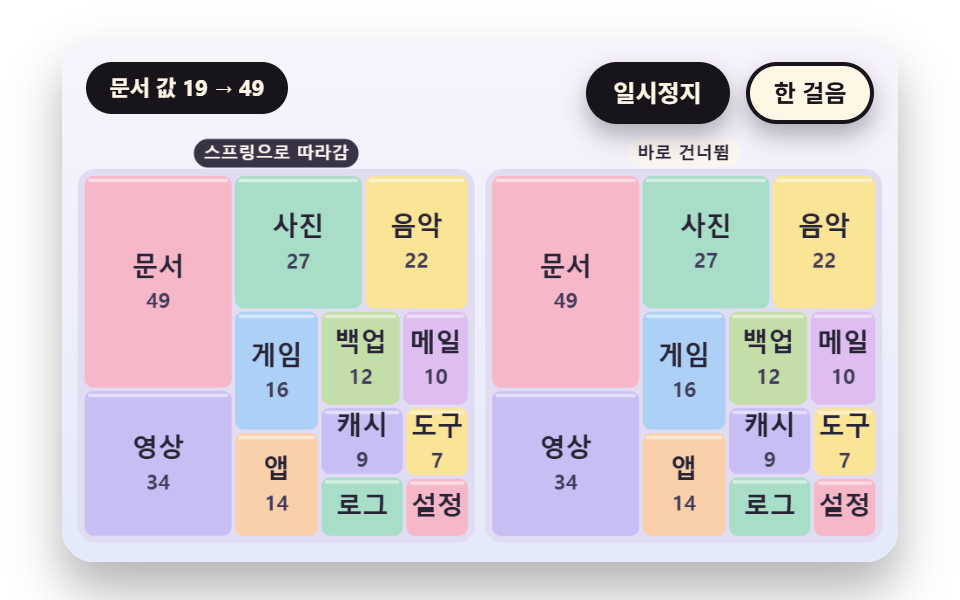
On a dashboard whose values change live, cells that teleport make the eye lose which cell went where. springStep pulls each of a cell's four edges toward its target with its own damped spring, the target is recomputed by relayout only at the moment a value changes, and the board on the right paints the target directly so cells pop. After the document cell is multiplied by 2.6 once, every cell stays within 0.5 px of its target from 1.45 s on, with a peak overshoot of 24.0 px.
<main class="stage">
<div class="vj is-demo" id="vj">
  <div class="vj__pad" data-role="pad" tabindex="0" role="application" aria-label="Treemap stage: arrow keys move between cells, Enter picks, P pauses, N steps once, R restarts">
    <canvas class="vj__canvas" data-role="canvas" width="480" height="300" role="img" aria-label="Twelve cell values change four times and the layout is recalculated each time. On the left the four edges of each cell follow a spring to the new slot while a target outline stays visible, and on the right cells jump straight to the new slot. The cell whose value changed flashes an outline"></canvas>
  </div>
  <p class="vj__status" data-role="status" aria-live="off">Treemap demo</p>
  <div class="vj__ctrl">
    <button class="vj__pause" data-role="pause" type="button" aria-pressed="false">Pause</button>
    <button class="vj__step" data-role="step" type="button">Step</button>
  </div>
  <p class="vj__done" data-role="done" role="status" aria-live="polite"></p>
</div>
</main>
@use "../../../../site/static/demo-tokens" as *;
@include stage($stage-paper);
.vj {
position: relative;
width: min(92vw, calc(160vh - 12.8vw));
aspect-ratio: 480 / 300;
margin: 0 auto;
border-radius: $r-card;
overflow: hidden;
box-shadow: $shadow-raised;
background: $subject-cream;
}
// 무대 상자 — 여기서 시작한 터치만 칸 누르기로 읽는다(touch-action: none 은 이 상자에만). 무대 밖 터치는 페이지 스크롤 그대로
.vj__pad {
position: absolute;
inset: 0;
border-radius: inherit;
outline: none;
touch-action: none;
cursor: pointer;
}
// 바깥 .vj 가 넘침을 자르므로 포커스 테두리는 안쪽으로 들인다
.vj__pad:focus-visible {
outline: 3px solid $subject-ink;
outline-offset: -3px;
}
.vj__canvas {
position: absolute;
inset: 0;
display: block;
width: 100%;
height: 100%;
}
.vj__ctrl {
position: absolute;
right: $sp-3;
top: $sp-3;
display: flex;
gap: $sp-2;
}
.vj__pause,
.vj__step {
padding: $sp-1 $sp-3;
border: 2px solid $subject-ink;
border-radius: $r-pill;
background: $subject-ink;
color: $subject-cream;
font-family: inherit;
font-weight: 700;
font-size: 12px;
line-height: 1.6;
cursor: pointer;
box-shadow: $shadow-press;
transition: transform $dur-quick $ease-spring;
}
.vj__step {
background: $subject-cream;
color: $subject-ink;
}
// 스크린리더에만 읽히는 완료 알림
.vj__done {
position: absolute;
width: 1px;
height: 1px;
margin: 0;
overflow: hidden;
clip-path: inset(50%);
white-space: nowrap;
}
// 눌린 상태(멈춤) — 바탕과 글자색을 뒤집어 aria-pressed 가 눈에도 보이게
.vj__pause[aria-pressed="true"] {
background: $subject-cream;
color: $subject-ink;
}
.vj__pause:hover,
.vj__step:hover {
transform: translateY(-2px);
}
.vj__pause:active,
.vj__step:active {
transform: translateY(1px);
}
.vj__pause:focus-visible,
.vj__step:focus-visible {
outline: 3px solid $subject-ink;
outline-offset: 3px;
}
// 상태 줄 — 지금 장면의 수치를 글자로. 시연 중에는 aria-live off, 사람이 처음 손대면 polite
.vj__status {
position: absolute;
left: $sp-3;
top: $sp-3;
max-width: calc(100% - 190px);
margin: 0;
padding: $sp-1 $sp-3;
border-radius: $r-pill;
background: $subject-ink;
color: $subject-cream;
font-weight: 700;
font-size: 11px;
line-height: 1.6;
white-space: nowrap;
overflow: hidden;
text-overflow: ellipsis;
pointer-events: none;
}
@media (max-width: 340px) {
.vj__pause,
.vj__step,
.vj__status { font-size: 10px; padding: 0 $sp-2; }
}
// 움직임 줄이기 — 장면은 스크립트가 정지 장면 한 장으로 멈춘다. 버튼도 떠오르지 않게
@media (prefers-reduced-motion: reduce) {
.vj__pause,
.vj__step { transition: none !important; }
.vj__pause:hover,
.vj__pause:active,
.vj__step:hover,
.vj__step:active { transform: none !important; }
}html, body {
margin: 0;
overflow: hidden;
}
.stage {
box-sizing: border-box;
min-height: 100vh;
display: grid;
place-items: center;
margin: 0;
background: #ffffff;
font-family: -apple-system, "Segoe UI", "Noto Sans KR", sans-serif;
padding: clamp(8px, 4vw, 24px);
}
.vj {
position: relative;
width: min(92vw, 160vh - 12.8vw);
aspect-ratio: 480/300;
margin: 0 auto;
border-radius: 16px;
overflow: hidden;
box-shadow: 0 14px 24px rgba(23, 20, 26, 0.32);
background: #fff7e6;
}
.vj__pad {
position: absolute;
inset: 0;
border-radius: inherit;
outline: none;
touch-action: none;
cursor: pointer;
}
.vj__pad:focus-visible {
outline: 3px solid #17141a;
outline-offset: -3px;
}
.vj__canvas {
position: absolute;
inset: 0;
display: block;
width: 100%;
height: 100%;
}
.vj__ctrl {
position: absolute;
right: 12px;
top: 12px;
display: flex;
gap: 8px;
}
.vj__pause,
.vj__step {
padding: 4px 12px;
border: 2px solid #17141a;
border-radius: 999px;
background: #17141a;
color: #fff7e6;
font-family: inherit;
font-weight: 700;
font-size: 12px;
line-height: 1.6;
cursor: pointer;
box-shadow: 0 6px 12px rgba(23, 20, 26, 0.32);
transition: transform 220ms cubic-bezier(0.2, 0.8, 0.2, 1);
}
.vj__step {
background: #fff7e6;
color: #17141a;
}
.vj__done {
position: absolute;
width: 1px;
height: 1px;
margin: 0;
overflow: hidden;
clip-path: inset(50%);
white-space: nowrap;
}
.vj__pause[aria-pressed=true] {
background: #fff7e6;
color: #17141a;
}
.vj__pause:hover,
.vj__step:hover {
transform: translateY(-2px);
}
.vj__pause:active,
.vj__step:active {
transform: translateY(1px);
}
.vj__pause:focus-visible,
.vj__step:focus-visible {
outline: 3px solid #17141a;
outline-offset: 3px;
}
.vj__status {
position: absolute;
left: 12px;
top: 12px;
max-width: calc(100% - 190px);
margin: 0;
padding: 4px 12px;
border-radius: 999px;
background: #17141a;
color: #fff7e6;
font-weight: 700;
font-size: 11px;
line-height: 1.6;
white-space: nowrap;
overflow: hidden;
text-overflow: ellipsis;
pointer-events: none;
}
@media (max-width: 340px) {
.vj__pause,
.vj__step,
.vj__status {
font-size: 10px;
padding: 0 8px;
}
}
@media (prefers-reduced-motion: reduce) {
.vj__pause,
.vj__step {
transition: none !important;
}
.vj__pause:hover,
.vj__pause:active,
.vj__step:hover,
.vj__step:active {
transform: none !important;
}
}(function () {
const root = document.getElementById("vj");
if (!root) return;
// 무대 좌표 — 캔버스 안 계산은 늘 480×300. 화면에 보이는 크기와 상관없다
const W = 480;
const H = 300;
const TAU = Math.PI * 2;
function clamp(v, lo, hi) { return v < lo ? lo : (v > hi ? hi : v); }
function lerp(a, b, k) { return a + (b - a) * k; }
function ease(x) { const c = clamp(x, 0, 1); return c * c * (3 - 2 * c); }
// 끝에서 한 번 넘쳤다 돌아오는 곡선 — 칸이 자리에 튀어 나올 때
function backOut(x) {
const c = clamp(x, 0, 1) - 1;
return 1 + 2.70158 * c * c * c + 1.70158 * c * c;
}
// 시드 고정 난수 — 선형 합동 생성기(곱 1664525, 더함 1013904223). 같은 시드면 같은 수열
function seeded(seed) {
let s = (seed >>> 0) || 1;
return function () {
s = (Math.imul(s, 1664525) + 1013904223) >>> 0;
return s / 4294967296;
};
}
// 파스텔 팔레트 — 칸은 연한 면, 글자는 늘 진한 잉크
const BG_TOP = [248, 244, 252];
const BG_BOT = [228, 234, 250];
const BED = [226, 220, 242];
const INK = [40, 36, 54];
const INK2 = [66, 60, 90];
const PAPER = [250, 246, 240];
const NEUTRAL = [234, 232, 240];
const ROSE = [244, 162, 186];
const MINT = [148, 212, 182];
const TILES = [
[200, 190, 244], [168, 222, 200], [250, 228, 150], [246, 184, 200],
[172, 208, 246], [250, 208, 170], [196, 222, 170], [222, 190, 240],
];
function mix(a, b, k) { return [lerp(a[0], b[0], k), lerp(a[1], b[1], k), lerp(a[2], b[2], k)]; }
function rgba(c, a) {
return 'rgba(' + Math.round(clamp(c[0], 0, 255)) + ',' + Math.round(clamp(c[1], 0, 255)) + ',' + Math.round(clamp(c[2], 0, 255)) + ',' + clamp(a, 0, 1).toFixed(3) + ')';
}
// 장면 시계(초)·판 반복 번호·시간표 — 시간표는 (시각, 할 일) 목록이고 시각이 지나면 한 번씩 부른다
let sceneT = 0;
let lap = 0;
let script = [];
let evAt = 0;
function inset(r, p) {
return { x: r.x + p, y: r.y + p, w: Math.max(0, r.w - 2 * p), h: Math.max(0, r.h - 2 * p) };
}
function aspectOf(r) {
if (r.w <= 1e-6 || r.h <= 1e-6) {
return 99;
}
return r.w >= r.h ? r.w / r.h : r.h / r.w;
}
// 한 줄의 최악 가로세로 비 — areas 는 그 줄 칸들의 넓이, side 는 줄을 놓을 짧은 변의 길이
function worstRow(areas, side) {
let s = 0;
let mx = 0;
let mn = Infinity;
for (const a of areas) {
s += a;
if (a > mx) {
mx = a;
}
if (a < mn) {
mn = a;
}
}
const s2 = s * s;
const d2 = side * side;
return Math.max(d2 * mx / s2, s2 / (d2 * mn));
}
function squarify(vals, R) {
const n = vals.length;
const idx = [];
let total = 0;
for (let i = 0; i < n; i += 1) {
idx.push(i);
total += Math.max(vals[i], 1e-6);
}
idx.sort(function (a, b) { return vals[b] - vals[a] || a - b; });
const k = R.w * R.h / total;
const rects = [];
const rowOf = [];
for (let i = 0; i < n; i += 1) {
rects.push({ x: R.x, y: R.y, w: 0, h: 0 });
rowOf.push(0);
}
const rows = [];
let rx = R.x;
let ry = R.y;
let rw = R.w;
let rh = R.h;
let at = 0;
while (at < n) {
const side = Math.max(Math.min(rw, rh), 1e-6);
const row = [];
const areas = [];
let cur = Infinity;
while (at < n) {
const a = Math.max(vals[idx[at]], 1e-6) * k;
const next = areas.slice();
next.push(a);
const wr = worstRow(next, side);
if (areas.length > 0 && wr > cur) {
break;
}
areas.push(a);
row.push(idx[at]);
cur = wr;
at += 1;
}
let s = 0;
for (const a of areas) {
s += a;
}
if (rw >= rh) {
const cw = s / Math.max(rh, 1e-6);
let y = ry;
row.forEach(function (id, j) {
const h = areas[j] / Math.max(cw, 1e-6);
rects[id] = { x: rx, y: y, w: cw, h: h };
rowOf[id] = rows.length;
y += h;
});
rx += cw;
rw -= cw;
}
else {
const ch = s / Math.max(rw, 1e-6);
let x = rx;
row.forEach(function (id, j) {
const w = areas[j] / Math.max(ch, 1e-6);
rects[id] = { x: x, y: ry, w: w, h: ch };
rowOf[id] = rows.length;
x += w;
});
ry += ch;
rh -= ch;
}
rows.push(row);
}
return { rects: rects, rowOf: rowOf, rows: rows };
}
// One direction slice — 줄을 나누지 않고 입력 순서대로 세로 띠로만 자른다
function slice(vals, R) {
let total = 0;
for (const v of vals) {
total += Math.max(v, 1e-6);
}
let x = R.x;
return vals.map(function (v) {
const w = R.w * Math.max(v, 1e-6) / total;
const r = { x: x, y: R.y, w: w, h: R.h };
x += w;
return r;
});
}
function worstAspect(rs) {
let m = 1;
for (const r of rs) {
const a = aspectOf(r);
if (a > m) {
m = a;
}
}
return m;
}
function meanAspect(rs) {
let s = 0;
for (const r of rs) {
s += aspectOf(r);
}
return rs.length ? s / rs.length : 1;
}
// 스프링 — 네 변(왼·위·오른·아래)을 따로 목표로 끌어당긴다. k 는 스프링 상수, zeta 는 감쇠비
    function springStep(cur, vel, tgt, k, zeta, dt) {
        const c = 2 * zeta * Math.sqrt(k);
        const n = Math.max(1, Math.ceil(dt * 120));
        const h = dt / n;
        for (let s = 0; s < n; s += 1) {
            for (let j = 0; j < cur.length; j += 1) {
                vel[j] += (-k * (cur[j] - tgt[j]) - c * vel[j]) * h;
                cur[j] += vel[j] * h;
            }
        }
    }
function edgesOf(r) { return [r.x, r.y, r.x + r.w, r.y + r.h]; }
function rectOf(e) { return { x: e[0], y: e[1], w: e[2] - e[0], h: e[3] - e[1] }; }
// ── 자체 가상 데이터 ──────────────────────────────────────
const NAMES = [
'Video', 'Photos', 'Music', 'Docs', 'Games', 'Apps', 'Backup', 'Mail', 'Cache', 'Logs', 'Tools', 'Config',
'Fonts', 'Books', 'Maps', 'Translate', 'Sketch', 'Audio', 'Templates', 'Zips', 'Temp', 'Shared', 'Archive', 'Other',
];
// 큰 순서로 놓인 값 24개
const BASE = [34, 27, 22, 19, 16, 14, 12, 10, 9, 8, 7, 6, 5.5, 5, 4.4, 4, 3.4, 3, 2.6, 2.3, 2, 1.7, 1.5, 1.3];
function leafOf(name, v) { return { name: name, v: v, kids: [] }; }
function groupOf(name, kids) {
let s = 0;
for (const k of kids) {
s += k.v;
}
return { name: name, v: s, kids: kids };
}
function sumOf(vals) { let s = 0; for (const v of vals) {
s += v;
} return s; }
function pct(v, total) { return String(Math.round(v / total * 1000) / 10); }
// ── 라벨 맞춤 ─────────────────────────────────────────────
// 글자 너비는 문자 수 × 글자 크기 × CHAR_W 로 어림 — 한글 한 자가 글자 크기만큼 차지하니 CHAR_W 는 1
const CHAR_W = 1;
const FONT_MAX = 15;
const FONT_STEP = 2;
const HIDE_MIN = 8;
function estW(s, px) { return s.length * px * CHAR_W; }
// 칸 안쪽(양쪽 3px 여백)에 들어가는 가장 큰 글자 크기 — 최소 크기에서도 넘치면 0(감춤)
function fitPx(s, r) {
for (let px = FONT_MAX; px >= HIDE_MIN; px -= FONT_STEP) {
if (estW(s, px) <= r.w - 6 && px * 1.3 <= r.h - 4) {
return px;
}
}
return 0;
}
const canvasEl = root.querySelector('[data-role="canvas"]');
const padEl = root.querySelector('[data-role="pad"]');
const pauseEl = root.querySelector('[data-role="pause"]');
const statusEl = root.querySelector('[data-role="status"]');
const stepEl = root.querySelector('[data-role="step"]');
const doneEl = root.querySelector('[data-role="done"]');
const ctxRaw = canvasEl ? canvasEl.getContext('2d') : null;
if (!canvasEl || !ctxRaw || !pauseEl || !padEl || !stepEl || !doneEl) {
return;
}
const cv = canvasEl;
const ctx = ctxRaw;
const pauseBtn = pauseEl;
const stepBtn = stepEl;
const doneP = doneEl;
const pad = padEl;
// 외부 웹폰트는 부르지 않는다 — 기기에 있는 Fonts 목록만
const FONT_STACK = 'system-ui, -apple-system, "Segoe UI", "Noto Sans KR", sans-serif';
let dpr = 1;
function fitCanvas() {
// 배율은 2 에서 자른다 — 배율 3 기기에서 화소가 2.25배로 늘지 않게
dpr = Math.min(window.devicePixelRatio || 1, 2);
cv.width = Math.round(W * dpr);
cv.height = Math.round(H * dpr);
ctx.setTransform(dpr, 0, 0, dpr, 0, 0);
}
function skyFill(top, bot) {
const g = ctx.createLinearGradient(0, 0, 0, H);
g.addColorStop(0, rgba(top, 1));
g.addColorStop(1, rgba(bot, 1));
ctx.fillStyle = g;
ctx.fillRect(0, 0, W, H);
}
function disc(x, y, r, c, a) {
if (r <= 0.2 || a <= 0) {
return;
}
ctx.beginPath();
ctx.arc(x, y, r, 0, TAU);
ctx.fillStyle = rgba(c, a);
ctx.fill();
}
function box(x, y, w, h, r, c, a) {
if (w <= 0.2 || h <= 0.2 || a <= 0) {
return;
}
ctx.beginPath();
ctx.roundRect(x, y, w, h, Math.max(0, Math.min(r, w / 2, h / 2)));
ctx.fillStyle = rgba(c, a);
ctx.fill();
}
function outline(x, y, w, h, r, width, c, a) {
if (w <= 0.2 || h <= 0.2 || a <= 0) {
return;
}
ctx.beginPath();
ctx.roundRect(x, y, w, h, Math.max(0, Math.min(r, w / 2, h / 2)));
ctx.lineWidth = width;
ctx.strokeStyle = rgba(c, a);
ctx.stroke();
}
function text(s, x, y, c, a, px, weight, align) {
ctx.font = weight + ' ' + px + 'px ' + FONT_STACK;
ctx.textAlign = align;
ctx.textBaseline = 'middle';
ctx.fillStyle = rgba(c, a);
ctx.fillText(s, x, y);
}
// 글자 이름표 — 바탕 알약 위에 글자
function tag(s, x, y, bg, fg, px, align) {
ctx.font = '700 ' + px + 'px ' + FONT_STACK;
const w = ctx.measureText(s).width + px * 1.1;
const left = align === 'center' ? x - w / 2 : (align === 'right' ? x - w : x);
box(left, y - px * 0.82, w, px * 1.64, px * 0.82, bg, 0.92);
text(s, left + w / 2, y + 0.5, fg, 1, px, 700, 'center');
}
// 판 자리 — 왼쪽 판·오른쪽 판(대비판)·한 판짜리 히어로. 위쪽은 상태 줄·버튼 자리
const PANEL_L = { x: 12, y: 78, w: 222, h: 208 };
const PANEL_R = { x: 246, y: 78, w: 222, h: 208 };
const PANEL_ONE = { x: 12, y: 60, w: 456, h: 228 };
// 판 바닥 — 칸 사이 틈으로 비치는 연보라
function bed(R) {
box(R.x - 3, R.y - 3, R.w + 6, R.h + 6, 10, BED, 1);
}
function panelTags(a, b) {
tag(a, PANEL_L.x + PANEL_L.w / 2, 66, INK, PAPER, 10, 'center');
tag(b, PANEL_R.x + PANEL_R.w / 2, 66, PAPER, INK, 10, 'center');
}
// 칸 한 장 — 둥근 면과 윗면 하이라이트. pop 은 자리에 튀어 나오는 배율(1 이면 그대로)
function tile(r, c, a, pop) {
if (a <= 0 || pop <= 0) {
return;
}
const cx = r.x + r.w / 2;
const cy = r.y + r.h / 2;
const w = Math.max(0, (r.w - 2) * pop);
const h = Math.max(0, (r.h - 2) * pop);
box(cx - w / 2, cy - h / 2, w, h, 5, c, a);
if (h > 12 && w > 8) {
box(cx - w / 2 + 2, cy - h / 2 + 1.5, w - 4, 2, 1, [255, 255, 255], 0.5 * a);
}
}
// 칸 안 글자 — 맞는 크기가 있으면 이름(과 자리가 되면 아래 줄 부제), 없으면 감춘다
function cellText(r, name, sub, a) {
const px = fitPx(name, r);
if (px === 0 || a <= 0) {
return;
}
const cx = r.x + r.w / 2;
const cy = r.y + r.h / 2;
const two = sub !== '' && r.h >= px * 2.6 && estW(sub, px - 3) <= r.w - 6;
text(name, cx, cy - (two ? px * 0.55 : 0), INK, a, px, 700, 'center');
if (two) {
text(sub, cx, cy + px * 0.75, INK2, a, px - 3, 600, 'center');
}
}
let shownStatus = '';
function pushStatus(s) {
if (!statusEl || s === shownStatus) {
return;
}
shownStatus = s;
statusEl.textContent = s;
}
let paused = false;
const reduceQuery = window.matchMedia('(prefers-reduced-motion: reduce)');
// 페이지를 연 채 움직임 줄이기 설정을 바꿔도 change 리스너가 다시 읽는다
let still = reduceQuery.matches;
// 자동 시연 표시 — 사람이 처음 손대면 떼고 상태 줄을 polite 로 켠다
let demo = root.classList.contains('is-demo');
const off = new AbortController();
// 사람이 직접 하는 중이면 시간표는 멈추고 애니메이션만 흐른다
let manual = false;
// curOn 이면 키보드 칸 고르기가 켜진 것 — ki 가 hits() 안 번호
let curOn = false;
let ki = 0;
function wake() {
if (!demo) {
return;
}
demo = false;
root.classList.remove('is-demo');
if (statusEl) {
statusEl.setAttribute('aria-live', 'polite');
}
}
function takeOver() {
if (manual) {
return;
}
manual = true;
onTake();
wake();
if (!curOn) {
curOn = true;
ki = 0;
}
}
// 한 판 시연이 끝났음을 스크린리더에 한 번만 알린다 — 판이 되풀이돼도 다시 읽지 않는다
let doneSaid = false;
function checkDone() {
if (!manual && !doneSaid && sceneT >= LAP_S - 0.6) {
doneSaid = true;
doneP.textContent = statusText();
}
}
function advance(dt) {
sceneT += dt;
if (!manual) {
while (evAt < script.length && script[evAt].t <= sceneT) {
const ev = script[evAt];
evAt += 1;
ev.f();
}
if (sceneT >= LAP_S) {
lap += 1;
begin();
return;
}
}
update(dt);
}
// 첫 판은 START_S 만큼 앞서 시작한다 — 칸이 이미 움직이는 중인 장면에서 보인다
function runTo(t) {
while (sceneT < t - 1e-6) {
advance(Math.min(1 / 30, t - sceneT));
}
}
function begin() {
sceneT = 0;
evAt = 0;
script = [];
build();
if (lap === 0 && !still) {
runTo(START_S);
}
}
const DT_MAX = 0.05;
const SETTLE_FRAMES = 8;
const SETTLE_DT = 0.04;
function drawCursor() {
if (!curOn) {
return;
}
const hs = hits();
if (hs.length === 0) {
return;
}
const h = hs[clamp(ki, 0, hs.length - 1)];
outline(h.x + 1, h.y + 1, h.w - 2, h.h - 2, 5, 3, INK, 1);
outline(h.x - 1, h.y - 1, h.w + 2, h.h + 2, 6, 1.5, PAPER, 0.9);
}
function cursorLabel() {
const hs = hits();
return hs.length === 0 ? statusText() : hs[clamp(ki, 0, hs.length - 1)].label;
}
function showNow() {
draw();
drawCursor();
pushStatus(curOn ? cursorLabel() : statusText());
checkDone();
}
let rafId = 0;
let lastTs = -1;
function frame(ts) {
if (still || paused) {
rafId = 0;
return;
}
if (lastTs < 0) {
lastTs = ts;
}
const dt = Math.min((ts - lastTs) / 1000, DT_MAX);
lastTs = ts;
if (dt > 0) {
advance(dt);
}
showNow();
rafId = window.requestAnimationFrame(frame);
}
function startLoop() {
if (rafId) {
return;
}
// 멈췄던 사이의 시간을 첫 프레임 dt 로 넘기지 않는다
lastTs = -1;
rafId = window.requestAnimationFrame(frame);
}
function stopLoop() {
if (rafId) {
window.cancelAnimationFrame(rafId);
rafId = 0;
}
}
// 움직임 줄이기 — 루프 없이 배치가 끝난 정지 장면 한 장
function showRest() {
stopLoop();
lap = 0;
sceneT = 0;
evAt = 0;
script = [];
build();
runTo(REST_S);
showNow();
}
// 움직임 줄이기이거나 멈춘 채 입력이 들어오면 트윈 없이 곧바로 끝 배치로 — 시간을 3초 흘려 스프링·애니메이션을 다 끝낸다
function settleStill() {
for (let k = 0; k < 90; k += 1) {
sceneT += 1 / 30;
update(1 / 30);
}
}
function play() {
begin();
showNow();
if (!paused) {
startLoop();
}
}
function togglePause() {
paused = !paused;
pauseBtn.setAttribute('aria-pressed', paused ? 'true' : 'false');
wake();
if (paused) {
stopLoop();
}
else if (!still) {
startLoop();
}
}
function restart() {
manual = false;
curOn = false;
doneSaid = false;
lap += 1;
begin();
for (let k = 0; k < SETTLE_FRAMES; k += 1) {
update(SETTLE_DT);
}
showNow();
}
// Step — 멈춘 채 시간표의 다음 일 하나를 부른다. 더 부를 일이 없거나 직접 하던 중이면 다음 판을 연다
function stepOnce() {
wake();
if (!paused) {
paused = true;
pauseBtn.setAttribute('aria-pressed', 'true');
stopLoop();
}
if (manual || evAt >= script.length) {
restart();
return;
}
sceneT = Math.max(sceneT, script[evAt].t);
advance(0);
for (let k = 0; k < SETTLE_FRAMES; k += 1) {
sceneT += SETTLE_DT;
update(SETTLE_DT);
}
showNow();
}
function moveCur(d) {
const n = hits().length;
if (n === 0) {
return;
}
ki = (ki + d + n) % n;
}
function actCur(i) {
onAct(i);
// 멈춘 채·움직임 줄이기에서도 입력이 화면에 바로 반영되게 한다
if (still || paused) {
settleStill();
}
}
pauseBtn.addEventListener('click', togglePause, { signal: off.signal });
stepBtn.addEventListener('click', stepOnce, { signal: off.signal });
// 키보드 — 무대에 포커스가 있을 때만. 방향키는 칸 이동, Enter·Space 는 칸 고르기, P 는 Pause, N 은 Step, R 은 다시
pad.addEventListener('keydown', function (e) {
if (e.altKey || e.ctrlKey || e.metaKey) {
return;
}
const k = e.key;
if (k === 'ArrowLeft' || k === 'ArrowUp') {
e.preventDefault();
takeOver();
moveCur(-1);
showNow();
}
else if (k === 'ArrowRight' || k === 'ArrowDown') {
e.preventDefault();
takeOver();
moveCur(1);
showNow();
}
else if (k === 'Enter' || k === ' ') {
e.preventDefault();
takeOver();
actCur(ki);
showNow();
}
else if (k === 'p' || k === 'P') {
togglePause();
}
else if (k === 'n' || k === 'N') {
stepOnce();
}
else if (k === 'r' || k === 'R') {
restart();
}
}, { signal: off.signal });
// 마우스·터치 — 누른 자리의 칸을 고른다
pad.addEventListener('click', function (e) {
const rect = cv.getBoundingClientRect();
const px = (e.clientX - rect.left) / rect.width * W;
const py = (e.clientY - rect.top) / rect.height * H;
const hs = hits();
let at = -1;
for (let i = 0; i < hs.length; i += 1) {
if (px >= hs[i].x && px <= hs[i].x + hs[i].w && py >= hs[i].y && py <= hs[i].y + hs[i].h) {
at = i;
}
}
if (at < 0) {
return;
}
takeOver();
ki = at;
actCur(at);
showNow();
}, { signal: off.signal });
// 탭이 숨으면 멈추고, 돌아오면 시계를 다시 맞춰 시작 — 숨은 동안의 몇 초가 한 프레임에 몰리지 않게
document.addEventListener('visibilitychange', function () {
if (document.hidden) {
stopLoop();
}
else if (!paused && !still) {
startLoop();
}
}, { signal: off.signal });
// 설정이 바뀌면 — 켜지면 배치가 끝난 한 장, 꺼지면 다시 움직인다
reduceQuery.addEventListener('change', function () {
still = reduceQuery.matches;
if (still) {
showRest();
}
else {
lap = 0;
play();
}
}, { signal: off.signal });
window.addEventListener('resize', function () {
fitCanvas();
showNow();
}, { signal: off.signal });
// 02 — 값이 바뀌는 순간에만 배치를 다시 계산해 목표 사각형을 얻고, 칸의 네 변이 스프링으로 따라간다(왼쪽). 오른쪽은 목표로 바로 건너뛴다
const CELL_N = 12;
const SPRING_K = 60;
const ZETA = 0.5;
const LAP_S = 9.6;
const START_S = 0.9;
const REST_S = 8.8;
// (시각, 칸 번호, 곱) — 값이 바뀌는 네 번
const CHANGES = [[0.4, 3, 2.6], [2.5, 0, 0.35], [4.6, 6, 3.4], [6.7, 9, 4.5]];
let vals = [];
let curE = [];
let velE = [];
let tgtL = [];
let tgtR = [];
let flashAt = [];
let lastNote = '';
function relayout() {
tgtL = squarify(vals, PANEL_L).rects;
tgtR = squarify(vals, PANEL_R).rects;
}
function applyChange(i, factor) {
const before = vals[i];
vals[i] = clamp(vals[i] * factor, 0.8, 90);
relayout();
flashAt[i] = sceneT;
lastNote = '{n} value {a} → {b}'.replace('{n}', NAMES[i]).replace('{a}', String(Math.round(before))).replace('{b}', String(Math.round(vals[i])));
}
function build() {
vals = BASE.slice(0, CELL_N);
relayout();
curE = tgtL.map(edgesOf);
velE = tgtL.map(function () { return [0, 0, 0, 0]; });
flashAt = vals.map(function () { return -9; });
lastNote = '';
CHANGES.forEach(function (c) {
script.push({ t: c[0], f: function () { applyChange(c[1], c[2]); } });
});
}
function update(dt) {
if (dt <= 0) {
return;
}
for (let i = 0; i < curE.length; i += 1) {
springStep(curE[i], velE[i], edgesOf(tgtL[i]), SPRING_K, ZETA, dt);
}
}
function drawPanel(R, rs) {
bed(R);
for (let i = 0; i < rs.length; i += 1) {
tile(rs[i], TILES[i % 8], 1, 1);
cellText(rs[i], NAMES[i], String(Math.round(vals[i])), 1);
const age = sceneT - flashAt[i];
if (age >= 0 && age < 0.9) {
outline(rs[i].x + 1, rs[i].y + 1, rs[i].w - 2, rs[i].h - 2, 5, 3, INK, 1 - age / 0.9);
}
}
}
function currentRects() { return curE.map(rectOf); }
function draw() {
skyFill(BG_TOP, BG_BOT);
panelTags('Springs to target', 'Jumps at once');
drawPanel(PANEL_L, currentRects());
drawPanel(PANEL_R, tgtR);
// 목표 윤곽 — 칸이 아직 가는 중일 때만 보인다
for (let i = 0; i < curE.length; i += 1) {
const cr = rectOf(curE[i]);
const gap = Math.abs(cr.x - tgtL[i].x) + Math.abs(cr.y - tgtL[i].y) + Math.abs(cr.w - tgtL[i].w) + Math.abs(cr.h - tgtL[i].h);
if (gap > 3) {
outline(tgtL[i].x + 1, tgtL[i].y + 1, tgtL[i].w - 2, tgtL[i].h - 2, 5, 1.5, INK2, clamp(gap / 40, 0, 0.7));
}
}
}
function statusText() { return lastNote === '' ? 'Re-lay out on value change' : lastNote; }
function hits() {
return currentRects().map(function (r, i) {
return { x: r.x, y: r.y, w: r.w, h: r.h, label: '{n} value {v} - {p}% of total'.replace('{n}', NAMES[i]).replace('{v}', String(Math.round(vals[i]))).replace('{p}', pct(vals[i], sumOf(vals))) };
});
}
// 고른 칸의 값을 1.7배로 — 배치를 다시 계산하고 칸이 스프링으로 따라간다
function onAct(i) { applyChange(i, 1.7); }
function onTake() { return; }
fitCanvas();
if (still) {
showRest();
}
else {
play();
}
return function () {
stopLoop();
off.abort();
};
})();// ValueChangeSpringReflow - 같은 항목 vanilla index.html 의 React 판. 같은 계산을 useEffect 안에서 돌린다
import { useEffect, useRef } from "react";
import styles from "./ValueChangeSpringReflow.module.scss";
const cx = (s: string): string => s.split(" ").map((n) => styles[n] ?? n).join(" ");
export default function ValueChangeSpringReflow() {
const rootRef = useRef<HTMLDivElement | null>(null);
useEffect(() => {
const rootEl = rootRef.current;
if (!rootEl) return;
const root: HTMLElement = rootEl;
type RGB = [number, number, number];
type RGBA = [number, number, number, number];
// 무대 좌표 — 캔버스 안 계산은 늘 480×300. 화면에 보이는 크기와 상관없다
const W = 480;
const H = 300;
const TAU = Math.PI * 2;
function clamp(v: number, lo: number, hi: number): number { return v < lo ? lo : (v > hi ? hi : v); }
function lerp(a: number, b: number, k: number): number { return a + (b - a) * k; }
function ease(x: number): number { const c = clamp(x, 0, 1); return c * c * (3 - 2 * c); }
// 끝에서 한 번 넘쳤다 돌아오는 곡선 — 칸이 자리에 튀어 나올 때
function backOut(x: number): number {
const c = clamp(x, 0, 1) - 1;
return 1 + 2.70158 * c * c * c + 1.70158 * c * c;
}
// 시드 고정 난수 — 선형 합동 생성기(곱 1664525, 더함 1013904223). 같은 시드면 같은 수열
function seeded(seed: number): () => number {
let s = (seed >>> 0) || 1;
return function (): number {
s = (Math.imul(s, 1664525) + 1013904223) >>> 0;
return s / 4294967296;
};
}
// 파스텔 팔레트 — 칸은 연한 면, 글자는 늘 진한 잉크
const BG_TOP: RGB = [248, 244, 252];
const BG_BOT: RGB = [228, 234, 250];
const BED: RGB = [226, 220, 242];
const INK: RGB = [40, 36, 54];
const INK2: RGB = [66, 60, 90];
const PAPER: RGB = [250, 246, 240];
const NEUTRAL: RGB = [234, 232, 240];
const ROSE: RGB = [244, 162, 186];
const MINT: RGB = [148, 212, 182];
const TILES: RGB[] = [
[200, 190, 244], [168, 222, 200], [250, 228, 150], [246, 184, 200],
[172, 208, 246], [250, 208, 170], [196, 222, 170], [222, 190, 240],
];
function mix(a: RGB, b: RGB, k: number): RGB { return [lerp(a[0], b[0], k), lerp(a[1], b[1], k), lerp(a[2], b[2], k)]; }
function rgba(c: RGB, a: number): string {
return 'rgba(' + Math.round(clamp(c[0], 0, 255)) + ',' + Math.round(clamp(c[1], 0, 255)) + ',' + Math.round(clamp(c[2], 0, 255)) + ',' + clamp(a, 0, 1).toFixed(3) + ')';
}
// 장면 시계(초)·판 반복 번호·시간표 — 시간표는 (시각, 할 일) 목록이고 시각이 지나면 한 번씩 부른다
let sceneT = 0;
let lap = 0;
type Ev = { t: number; f: () => void };
let script: Ev[] = [];
let evAt = 0;
// ── 트리맵 계산 ───────────────────────────────────────────
type Rect = { x: number; y: number; w: number; h: number };
// 키보드·클릭 대상 — 칸 하나의 사각형(캔버스 좌표)과 읽어 줄 문장
type Hit = { x: number; y: number; w: number; h: number; label: string };
function inset(r: Rect, p: number): Rect {
return { x: r.x + p, y: r.y + p, w: Math.max(0, r.w - 2 * p), h: Math.max(0, r.h - 2 * p) };
}
function aspectOf(r: Rect): number {
if (r.w <= 1e-6 || r.h <= 1e-6) { return 99; }
return r.w >= r.h ? r.w / r.h : r.h / r.w;
}
// 한 줄의 최악 가로세로 비 — areas 는 그 줄 칸들의 넓이, side 는 줄을 놓을 짧은 변의 길이
function worstRow(areas: number[], side: number): number {
let s = 0;
let mx = 0;
let mn = Infinity;
for (const a of areas) { s += a; if (a > mx) { mx = a; } if (a < mn) { mn = a; } }
const s2 = s * s;
const d2 = side * side;
return Math.max(d2 * mx / s2, s2 / (d2 * mn));
}
// 줄 단위 배치 — 값을 큰 순서로 세우고, 줄에 칸을 더할 때마다 그 줄의 최악 비를 다시 재서 나빠지기 직전에 줄을 닫는다
type Lay = { rects: Rect[]; rowOf: number[]; rows: number[][] };
function squarify(vals: number[], R: Rect): Lay {
const n = vals.length;
const idx: number[] = [];
let total = 0;
for (let i = 0; i < n; i += 1) { idx.push(i); total += Math.max(vals[i], 1e-6); }
idx.sort(function (a: number, b: number): number { return vals[b] - vals[a] || a - b; });
const k = R.w * R.h / total;
const rects: Rect[] = [];
const rowOf: number[] = [];
for (let i = 0; i < n; i += 1) { rects.push({ x: R.x, y: R.y, w: 0, h: 0 }); rowOf.push(0); }
const rows: number[][] = [];
let rx = R.x;
let ry = R.y;
let rw = R.w;
let rh = R.h;
let at = 0;
while (at < n) {
const side = Math.max(Math.min(rw, rh), 1e-6);
const row: number[] = [];
const areas: number[] = [];
let cur = Infinity;
while (at < n) {
const a = Math.max(vals[idx[at]], 1e-6) * k;
const next = areas.slice();
next.push(a);
const wr = worstRow(next, side);
if (areas.length > 0 && wr > cur) { break; }
areas.push(a);
row.push(idx[at]);
cur = wr;
at += 1;
}
let s = 0;
for (const a of areas) { s += a; }
if (rw >= rh) {
const cw = s / Math.max(rh, 1e-6);
let y = ry;
row.forEach(function (id: number, j: number): void {
const h = areas[j] / Math.max(cw, 1e-6);
rects[id] = { x: rx, y: y, w: cw, h: h };
rowOf[id] = rows.length;
y += h;
});
rx += cw;
rw -= cw;
} else {
const ch = s / Math.max(rw, 1e-6);
let x = rx;
row.forEach(function (id: number, j: number): void {
const w = areas[j] / Math.max(ch, 1e-6);
rects[id] = { x: x, y: ry, w: w, h: ch };
rowOf[id] = rows.length;
x += w;
});
ry += ch;
rh -= ch;
}
rows.push(row);
}
return { rects: rects, rowOf: rowOf, rows: rows };
}
// 한 방향 슬라이스 — 줄을 나누지 않고 입력 순서대로 세로 띠로만 자른다
function slice(vals: number[], R: Rect): Rect[] {
let total = 0;
for (const v of vals) { total += Math.max(v, 1e-6); }
let x = R.x;
return vals.map(function (v: number): Rect {
const w = R.w * Math.max(v, 1e-6) / total;
const r = { x: x, y: R.y, w: w, h: R.h };
x += w;
return r;
});
}
function worstAspect(rs: Rect[]): number {
let m = 1;
for (const r of rs) { const a = aspectOf(r); if (a > m) { m = a; } }
return m;
}
function meanAspect(rs: Rect[]): number {
let s = 0;
for (const r of rs) { s += aspectOf(r); }
return rs.length ? s / rs.length : 1;
}
// 스프링 — 네 변(왼·위·오른·아래)을 따로 목표로 끌어당긴다. k 는 스프링 상수, zeta 는 감쇠비
function springStep(cur: number[], vel: number[], tgt: number[], k: number, zeta: number, dt: number): void {
const c = 2 * zeta * Math.sqrt(k);
const n = Math.max(1, Math.ceil(dt * 120));
const h = dt / n;
for (let s = 0; s < n; s += 1) {
for (let j = 0; j < cur.length; j += 1) {
vel[j] += (-k * (cur[j] - tgt[j]) - c * vel[j]) * h;
cur[j] += vel[j] * h;
}
}
}
function edgesOf(r: Rect): number[] { return [r.x, r.y, r.x + r.w, r.y + r.h]; }
function rectOf(e: number[]): Rect { return { x: e[0], y: e[1], w: e[2] - e[0], h: e[3] - e[1] }; }
// ── 자체 가상 데이터 ──────────────────────────────────────
const NAMES: string[] = [
'영상', '사진', '음악', '문서', '게임', '앱', '백업', '메일', '캐시', '로그', '도구', '설정',
'글꼴', '책', '지도', '번역', '스케치', '녹음', '템플릿', '압축', '임시', '공유', '보관', '기타',
];
// 큰 순서로 놓인 값 24개
const BASE: number[] = [34, 27, 22, 19, 16, 14, 12, 10, 9, 8, 7, 6, 5.5, 5, 4.4, 4, 3.4, 3, 2.6, 2.3, 2, 1.7, 1.5, 1.3];
// 계층 한 칸 — name 은 NAMES 번호, 잎이면 v 가 값이고 가지면 kids 값의 합
type Tree = { name: number; v: number; kids: Tree[] };
function leafOf(name: number, v: number): Tree { return { name: name, v: v, kids: [] }; }
function groupOf(name: number, kids: Tree[]): Tree {
let s = 0;
for (const k of kids) { s += k.v; }
return { name: name, v: s, kids: kids };
}
function sumOf(vals: number[]): number { let s = 0; for (const v of vals) { s += v; } return s; }
function pct(v: number, total: number): string { return String(Math.round(v / total * 1000) / 10); }
// ── 라벨 맞춤 ─────────────────────────────────────────────
// 글자 너비는 문자 수 × 글자 크기 × CHAR_W 로 어림 — 한글 한 자가 글자 크기만큼 차지하니 CHAR_W 는 1
const CHAR_W = 1;
const FONT_MAX = 15;
const FONT_STEP = 2;
const HIDE_MIN = 8;
function estW(s: string, px: number): number { return s.length * px * CHAR_W; }
// 칸 안쪽(양쪽 3px 여백)에 들어가는 가장 큰 글자 크기 — 최소 크기에서도 넘치면 0(감춤)
function fitPx(s: string, r: Rect): number {
for (let px = FONT_MAX; px >= HIDE_MIN; px -= FONT_STEP) {
if (estW(s, px) <= r.w - 6 && px * 1.3 <= r.h - 4) { return px; }
}
return 0;
}
const canvasEl = root.querySelector('[data-role="canvas"]') as HTMLCanvasElement | null;
const padEl = root.querySelector('[data-role="pad"]') as HTMLElement | null;
const pauseEl = root.querySelector('[data-role="pause"]') as HTMLButtonElement | null;
const statusEl = root.querySelector('[data-role="status"]') as HTMLElement | null;
const stepEl = root.querySelector('[data-role="step"]') as HTMLButtonElement | null;
const doneEl = root.querySelector('[data-role="done"]') as HTMLElement | null;
const ctxRaw = canvasEl ? canvasEl.getContext('2d') : null;
if (!canvasEl || !ctxRaw || !pauseEl || !padEl || !stepEl || !doneEl) { return; }
const cv: HTMLCanvasElement = canvasEl;
const ctx: CanvasRenderingContext2D = ctxRaw;
const pauseBtn: HTMLButtonElement = pauseEl;
const stepBtn: HTMLButtonElement = stepEl;
const doneP: HTMLElement = doneEl;
const pad: HTMLElement = padEl;
// 외부 웹폰트는 부르지 않는다 — 기기에 있는 글꼴 목록만
const FONT_STACK = 'system-ui, -apple-system, "Segoe UI", "Noto Sans KR", sans-serif';
let dpr = 1;
function fitCanvas(): void {
// 배율은 2 에서 자른다 — 배율 3 기기에서 화소가 2.25배로 늘지 않게
dpr = Math.min(window.devicePixelRatio || 1, 2);
cv.width = Math.round(W * dpr);
cv.height = Math.round(H * dpr);
ctx.setTransform(dpr, 0, 0, dpr, 0, 0);
}
function skyFill(top: RGB, bot: RGB): void {
const g = ctx.createLinearGradient(0, 0, 0, H);
g.addColorStop(0, rgba(top, 1));
g.addColorStop(1, rgba(bot, 1));
ctx.fillStyle = g;
ctx.fillRect(0, 0, W, H);
}
function disc(x: number, y: number, r: number, c: RGB, a: number): void {
if (r <= 0.2 || a <= 0) { return; }
ctx.beginPath();
ctx.arc(x, y, r, 0, TAU);
ctx.fillStyle = rgba(c, a);
ctx.fill();
}
function box(x: number, y: number, w: number, h: number, r: number, c: RGB, a: number): void {
if (w <= 0.2 || h <= 0.2 || a <= 0) { return; }
ctx.beginPath();
ctx.roundRect(x, y, w, h, Math.max(0, Math.min(r, w / 2, h / 2)));
ctx.fillStyle = rgba(c, a);
ctx.fill();
}
function outline(x: number, y: number, w: number, h: number, r: number, width: number, c: RGB, a: number): void {
if (w <= 0.2 || h <= 0.2 || a <= 0) { return; }
ctx.beginPath();
ctx.roundRect(x, y, w, h, Math.max(0, Math.min(r, w / 2, h / 2)));
ctx.lineWidth = width;
ctx.strokeStyle = rgba(c, a);
ctx.stroke();
}
function text(s: string, x: number, y: number, c: RGB, a: number, px: number, weight: number, align: CanvasTextAlign): void {
ctx.font = weight + ' ' + px + 'px ' + FONT_STACK;
ctx.textAlign = align;
ctx.textBaseline = 'middle';
ctx.fillStyle = rgba(c, a);
ctx.fillText(s, x, y);
}
// 글자 이름표 — 바탕 알약 위에 글자
function tag(s: string, x: number, y: number, bg: RGB, fg: RGB, px: number, align: CanvasTextAlign): void {
ctx.font = '700 ' + px + 'px ' + FONT_STACK;
const w = ctx.measureText(s).width + px * 1.1;
const left = align === 'center' ? x - w / 2 : (align === 'right' ? x - w : x);
box(left, y - px * 0.82, w, px * 1.64, px * 0.82, bg, 0.92);
text(s, left + w / 2, y + 0.5, fg, 1, px, 700, 'center');
}
// 판 자리 — 왼쪽 판·오른쪽 판(대비판)·한 판짜리 히어로. 위쪽은 상태 줄·버튼 자리
const PANEL_L: Rect = { x: 12, y: 78, w: 222, h: 208 };
const PANEL_R: Rect = { x: 246, y: 78, w: 222, h: 208 };
const PANEL_ONE: Rect = { x: 12, y: 60, w: 456, h: 228 };
// 판 바닥 — 칸 사이 틈으로 비치는 연보라
function bed(R: Rect): void {
box(R.x - 3, R.y - 3, R.w + 6, R.h + 6, 10, BED, 1);
}
function panelTags(a: string, b: string): void {
tag(a, PANEL_L.x + PANEL_L.w / 2, 66, INK, PAPER, 10, 'center');
tag(b, PANEL_R.x + PANEL_R.w / 2, 66, PAPER, INK, 10, 'center');
}
// 칸 한 장 — 둥근 면과 윗면 하이라이트. pop 은 자리에 튀어 나오는 배율(1 이면 그대로)
function tile(r: Rect, c: RGB, a: number, pop: number): void {
if (a <= 0 || pop <= 0) { return; }
const cx = r.x + r.w / 2;
const cy = r.y + r.h / 2;
const w = Math.max(0, (r.w - 2) * pop);
const h = Math.max(0, (r.h - 2) * pop);
box(cx - w / 2, cy - h / 2, w, h, 5, c, a);
if (h > 12 && w > 8) { box(cx - w / 2 + 2, cy - h / 2 + 1.5, w - 4, 2, 1, [255, 255, 255], 0.5 * a); }
}
// 칸 안 글자 — 맞는 크기가 있으면 이름(과 자리가 되면 아래 줄 부제), 없으면 감춘다
function cellText(r: Rect, name: string, sub: string, a: number): void {
const px = fitPx(name, r);
if (px === 0 || a <= 0) { return; }
const cx = r.x + r.w / 2;
const cy = r.y + r.h / 2;
const two = sub !== '' && r.h >= px * 2.6 && estW(sub, px - 3) <= r.w - 6;
text(name, cx, cy - (two ? px * 0.55 : 0), INK, a, px, 700, 'center');
if (two) { text(sub, cx, cy + px * 0.75, INK2, a, px - 3, 600, 'center'); }
}
let shownStatus = '';
function pushStatus(s: string): void {
if (!statusEl || s === shownStatus) { return; }
shownStatus = s;
statusEl.textContent = s;
}
let paused = false;
const reduceQuery = window.matchMedia('(prefers-reduced-motion: reduce)');
// 페이지를 연 채 움직임 줄이기 설정을 바꿔도 change 리스너가 다시 읽는다
let still = reduceQuery.matches;
// 자동 시연 표시 — 사람이 처음 손대면 떼고 상태 줄을 polite 로 켠다
let demo = root.classList.contains('is-demo');
const off = new AbortController();
// 사람이 직접 하는 중이면 시간표는 멈추고 애니메이션만 흐른다
let manual = false;
// curOn 이면 키보드 칸 고르기가 켜진 것 — ki 가 hits() 안 번호
let curOn = false;
let ki = 0;
function wake(): void {
if (!demo) { return; }
demo = false;
root.classList.remove('is-demo');
if (statusEl) { statusEl.setAttribute('aria-live', 'polite'); }
}
function takeOver(): void {
if (manual) { return; }
manual = true;
onTake();
wake();
if (!curOn) { curOn = true; ki = 0; }
}
// 한 판 시연이 끝났음을 스크린리더에 한 번만 알린다 — 판이 되풀이돼도 다시 읽지 않는다
let doneSaid = false;
function checkDone(): void {
if (!manual && !doneSaid && sceneT >= LAP_S - 0.6) {
doneSaid = true;
doneP.textContent = statusText();
}
}
function advance(dt: number): void {
sceneT += dt;
if (!manual) {
while (evAt < script.length && script[evAt].t <= sceneT) {
const ev = script[evAt];
evAt += 1;
ev.f();
}
if (sceneT >= LAP_S) { lap += 1; begin(); return; }
}
update(dt);
}
// 첫 판은 START_S 만큼 앞서 시작한다 — 칸이 이미 움직이는 중인 장면에서 보인다
function runTo(t: number): void {
while (sceneT < t - 1e-6) { advance(Math.min(1 / 30, t - sceneT)); }
}
function begin(): void {
sceneT = 0;
evAt = 0;
script = [];
build();
if (lap === 0 && !still) { runTo(START_S); }
}
const DT_MAX = 0.05;
const SETTLE_FRAMES = 8;
const SETTLE_DT = 0.04;
function drawCursor(): void {
if (!curOn) { return; }
const hs = hits();
if (hs.length === 0) { return; }
const h = hs[clamp(ki, 0, hs.length - 1)];
outline(h.x + 1, h.y + 1, h.w - 2, h.h - 2, 5, 3, INK, 1);
outline(h.x - 1, h.y - 1, h.w + 2, h.h + 2, 6, 1.5, PAPER, 0.9);
}
function cursorLabel(): string {
const hs = hits();
return hs.length === 0 ? statusText() : hs[clamp(ki, 0, hs.length - 1)].label;
}
function showNow(): void {
draw();
drawCursor();
pushStatus(curOn ? cursorLabel() : statusText());
checkDone();
}
let rafId = 0;
let lastTs = -1;
function frame(ts: number): void {
if (still || paused) { rafId = 0; return; }
if (lastTs < 0) { lastTs = ts; }
const dt = Math.min((ts - lastTs) / 1000, DT_MAX);
lastTs = ts;
if (dt > 0) { advance(dt); }
showNow();
rafId = window.requestAnimationFrame(frame);
}
function startLoop(): void {
if (rafId) { return; }
// 멈췄던 사이의 시간을 첫 프레임 dt 로 넘기지 않는다
lastTs = -1;
rafId = window.requestAnimationFrame(frame);
}
function stopLoop(): void {
if (rafId) { window.cancelAnimationFrame(rafId); rafId = 0; }
}
// 움직임 줄이기 — 루프 없이 배치가 끝난 정지 장면 한 장
function showRest(): void {
stopLoop();
lap = 0;
sceneT = 0;
evAt = 0;
script = [];
build();
runTo(REST_S);
showNow();
}
// 움직임 줄이기이거나 멈춘 채 입력이 들어오면 트윈 없이 곧바로 끝 배치로 — 시간을 3초 흘려 스프링·애니메이션을 다 끝낸다
function settleStill(): void {
for (let k = 0; k < 90; k += 1) { sceneT += 1 / 30; update(1 / 30); }
}
function play(): void {
begin();
showNow();
if (!paused) { startLoop(); }
}
function togglePause(): void {
paused = !paused;
pauseBtn.setAttribute('aria-pressed', paused ? 'true' : 'false');
wake();
if (paused) { stopLoop(); } else if (!still) { startLoop(); }
}
function restart(): void {
manual = false;
curOn = false;
doneSaid = false;
lap += 1;
begin();
for (let k = 0; k < SETTLE_FRAMES; k += 1) { update(SETTLE_DT); }
showNow();
}
// 한 걸음 — 멈춘 채 시간표의 다음 일 하나를 부른다. 더 부를 일이 없거나 직접 하던 중이면 다음 판을 연다
function stepOnce(): void {
wake();
if (!paused) {
paused = true;
pauseBtn.setAttribute('aria-pressed', 'true');
stopLoop();
}
if (manual || evAt >= script.length) {
restart();
return;
}
sceneT = Math.max(sceneT, script[evAt].t);
advance(0);
for (let k = 0; k < SETTLE_FRAMES; k += 1) { sceneT += SETTLE_DT; update(SETTLE_DT); }
showNow();
}
function moveCur(d: number): void {
const n = hits().length;
if (n === 0) { return; }
ki = (ki + d + n) % n;
}
function actCur(i: number): void {
onAct(i);
// 멈춘 채·움직임 줄이기에서도 입력이 화면에 바로 반영되게 한다
if (still || paused) { settleStill(); }
}
pauseBtn.addEventListener('click', togglePause, { signal: off.signal });
stepBtn.addEventListener('click', stepOnce, { signal: off.signal });
// 키보드 — 무대에 포커스가 있을 때만. 방향키는 칸 이동, Enter·Space 는 칸 고르기, P 는 일시정지, N 은 한 걸음, R 은 다시
pad.addEventListener('keydown', function (e: KeyboardEvent): void {
if (e.altKey || e.ctrlKey || e.metaKey) { return; }
const k = e.key;
if (k === 'ArrowLeft' || k === 'ArrowUp') {
e.preventDefault();
takeOver();
moveCur(-1);
showNow();
} else if (k === 'ArrowRight' || k === 'ArrowDown') {
e.preventDefault();
takeOver();
moveCur(1);
showNow();
} else if (k === 'Enter' || k === ' ') {
e.preventDefault();
takeOver();
actCur(ki);
showNow();
} else if (k === 'p' || k === 'P') {
togglePause();
} else if (k === 'n' || k === 'N') {
stepOnce();
} else if (k === 'r' || k === 'R') {
restart();
}
}, { signal: off.signal });
// 마우스·터치 — 누른 자리의 칸을 고른다
pad.addEventListener('click', function (e: MouseEvent): void {
const rect = cv.getBoundingClientRect();
const px = (e.clientX - rect.left) / rect.width * W;
const py = (e.clientY - rect.top) / rect.height * H;
const hs = hits();
let at = -1;
for (let i = 0; i < hs.length; i += 1) {
if (px >= hs[i].x && px <= hs[i].x + hs[i].w && py >= hs[i].y && py <= hs[i].y + hs[i].h) { at = i; }
}
if (at < 0) { return; }
takeOver();
ki = at;
actCur(at);
showNow();
}, { signal: off.signal });
// 탭이 숨으면 멈추고, 돌아오면 시계를 다시 맞춰 시작 — 숨은 동안의 몇 초가 한 프레임에 몰리지 않게
document.addEventListener('visibilitychange', function (): void {
if (document.hidden) { stopLoop(); } else if (!paused && !still) { startLoop(); }
}, { signal: off.signal });
// 설정이 바뀌면 — 켜지면 배치가 끝난 한 장, 꺼지면 다시 움직인다
reduceQuery.addEventListener('change', function (): void {
still = reduceQuery.matches;
if (still) { showRest(); } else { lap = 0; play(); }
}, { signal: off.signal });
window.addEventListener('resize', function (): void {
fitCanvas();
showNow();
}, { signal: off.signal });
// 02 — 값이 바뀌는 순간에만 배치를 다시 계산해 목표 사각형을 얻고, 칸의 네 변이 스프링으로 따라간다(왼쪽). 오른쪽은 목표로 바로 건너뛴다
const CELL_N = 12;
const SPRING_K = 60;
const ZETA = 0.5;
const LAP_S = 9.6;
const START_S = 0.9;
const REST_S = 8.8;
// (시각, 칸 번호, 곱) — 값이 바뀌는 네 번
const CHANGES: Array<[number, number, number]> = [[0.4, 3, 2.6], [2.5, 0, 0.35], [4.6, 6, 3.4], [6.7, 9, 4.5]];
let vals: number[] = [];
let curE: number[][] = [];
let velE: number[][] = [];
let tgtL: Rect[] = [];
let tgtR: Rect[] = [];
let flashAt: number[] = [];
let lastNote = '';
function relayout(): void {
tgtL = squarify(vals, PANEL_L).rects;
tgtR = squarify(vals, PANEL_R).rects;
}
function applyChange(i: number, factor: number): void {
const before = vals[i];
vals[i] = clamp(vals[i] * factor, 0.8, 90);
relayout();
flashAt[i] = sceneT;
lastNote = '{n} 값 {a} → {b}'.replace('{n}', NAMES[i]).replace('{a}', String(Math.round(before))).replace('{b}', String(Math.round(vals[i])));
}
function build(): void {
vals = BASE.slice(0, CELL_N);
relayout();
curE = tgtL.map(edgesOf);
velE = tgtL.map(function (): number[] { return [0, 0, 0, 0]; });
flashAt = vals.map(function (): number { return -9; });
lastNote = '';
CHANGES.forEach(function (c: [number, number, number]): void {
script.push({ t: c[0], f: function (): void { applyChange(c[1], c[2]); } });
});
}
function update(dt: number): void {
if (dt <= 0) { return; }
for (let i = 0; i < curE.length; i += 1) { springStep(curE[i], velE[i], edgesOf(tgtL[i]), SPRING_K, ZETA, dt); }
}
function drawPanel(R: Rect, rs: Rect[]): void {
bed(R);
for (let i = 0; i < rs.length; i += 1) {
tile(rs[i], TILES[i % 8], 1, 1);
cellText(rs[i], NAMES[i], String(Math.round(vals[i])), 1);
const age = sceneT - flashAt[i];
if (age >= 0 && age < 0.9) {
outline(rs[i].x + 1, rs[i].y + 1, rs[i].w - 2, rs[i].h - 2, 5, 3, INK, 1 - age / 0.9);
}
}
}
function currentRects(): Rect[] { return curE.map(rectOf); }
function draw(): void {
skyFill(BG_TOP, BG_BOT);
panelTags('스프링으로 따라감', '바로 건너뜀');
drawPanel(PANEL_L, currentRects());
drawPanel(PANEL_R, tgtR);
// 목표 윤곽 — 칸이 아직 가는 중일 때만 보인다
for (let i = 0; i < curE.length; i += 1) {
const cr = rectOf(curE[i]);
const gap = Math.abs(cr.x - tgtL[i].x) + Math.abs(cr.y - tgtL[i].y) + Math.abs(cr.w - tgtL[i].w) + Math.abs(cr.h - tgtL[i].h);
if (gap > 3) { outline(tgtL[i].x + 1, tgtL[i].y + 1, tgtL[i].w - 2, tgtL[i].h - 2, 5, 1.5, INK2, clamp(gap / 40, 0, 0.7)); }
}
}
function statusText(): string { return lastNote === '' ? '값이 바뀌면 다시 배치' : lastNote; }
function hits(): Hit[] {
return currentRects().map(function (r: Rect, i: number): Hit {
return { x: r.x, y: r.y, w: r.w, h: r.h, label: '{n} 값 {v} · 전체의 {p}%'.replace('{n}', NAMES[i]).replace('{v}', String(Math.round(vals[i]))).replace('{p}', pct(vals[i], sumOf(vals))) };
});
}
// 고른 칸의 값을 1.7배로 — 배치를 다시 계산하고 칸이 스프링으로 따라간다
function onAct(i: number): void { applyChange(i, 1.7); }
function onTake(): void { return; }
fitCanvas();
if (still) { showRest(); } else { play(); }
return function (): void {
stopLoop();
off.abort();
};
}, []);
return (
<div className={cx("vj") + " is-demo"} ref={rootRef}>
<div className={cx("vj__pad")} data-role="pad" tabIndex={0} role="application" aria-label={'트리맵 시연 무대 — 방향키로 칸 이동, Enter 로 고르기, P 로 일시정지, N 으로 한 걸음, R 로 다시'}>
<canvas className={cx("vj__canvas")} data-role="canvas" width={480} height={300} role="img" aria-label={'열두 칸의 값이 네 번 바뀌고 바뀔 때마다 배치를 다시 계산한다. 왼쪽 칸은 네 변이 스프링으로 새 자리를 따라가며 가는 동안 목표 윤곽이 남고, 오른쪽 칸은 새 자리로 바로 건너뛴다. 값이 바뀐 칸에는 윤곽이 번쩍인다'}></canvas>
</div>
<p className={cx("vj__status")} data-role="status" aria-live="off">{'트리맵 시연'}</p>
<div className={cx("vj__ctrl")}>
<button className={cx("vj__pause")} data-role="pause" type="button" aria-pressed="false">{'일시정지'}</button>
<button className={cx("vj__step")} data-role="step" type="button">{'한 걸음'}</button>
</div>
<p className={cx("vj__done")} data-role="done" role="status" aria-live="polite"></p>
</div>
);
}02 · A Reflow Where Cells Spring to Their New Slots When Values Change — Measured area 41.64% · moving frames 21/23Original by GODRICH · SCSS and React ship in the zip · See the password
function springStep(cur, vel, tgt, k, zeta, dt) {
const c = 2 * zeta * Math.sqrt(k);
const n = Math.max(1, Math.ceil(dt * 120));
const h = dt / n;
for (let s = 0; s < n; s += 1) {
for (let j = 0; j < cur.length; j += 1) {
vel[j] += (-k * (cur[j] - tgt[j]) - c * vel[j]) * h;
cur[j] += vel[j] * h;
}
}
}
03A Drill Down That Zooms a Cell Into Its Inner Children
Picking a folder or category and watching it grow to fill the view is a drill down, and it suits data with layers. viewRect(p) interpolates the viewed rectangle toward the group rectangle, toScreen maps world coordinates into that view, and when the zoom ends kidLayout fills the inside with the same squarify. The first group stretches ×1.92 wide and ×1.65 tall and the third ×2.08 wide and ×2.60 tall, so groups with a different aspect zoom unevenly.
<main class="stage">
<div class="vj is-demo" id="vj">
  <div class="vj__pad" data-role="pad" tabindex="0" role="application" aria-label="Treemap stage: arrow keys move between cells, Enter picks, P pauses, N steps once, R restarts">
    <canvas class="vj__canvas" data-role="canvas" width="480" height="300" role="img" aria-label="When one of six group cells is picked, the left board transforms the view so that cell becomes the whole board and pushes the others out, then the inner cells appear one by one after the zoom ends, while the right board swaps straight to the inner scene with no transform. It goes into the first group and back out, then into the third group and back out"></canvas>
  </div>
  <p class="vj__status" data-role="status" aria-live="off">Treemap demo</p>
  <div class="vj__ctrl">
    <button class="vj__pause" data-role="pause" type="button" aria-pressed="false">Pause</button>
    <button class="vj__step" data-role="step" type="button">Step</button>
  </div>
  <p class="vj__done" data-role="done" role="status" aria-live="polite"></p>
</div>
</main>
@use "../../../../site/static/demo-tokens" as *;
@include stage($stage-paper);
.vj {
position: relative;
width: min(92vw, calc(160vh - 12.8vw));
aspect-ratio: 480 / 300;
margin: 0 auto;
border-radius: $r-card;
overflow: hidden;
box-shadow: $shadow-raised;
background: $subject-cream;
}
// 무대 상자 — 여기서 시작한 터치만 칸 누르기로 읽는다(touch-action: none 은 이 상자에만). 무대 밖 터치는 페이지 스크롤 그대로
.vj__pad {
position: absolute;
inset: 0;
border-radius: inherit;
outline: none;
touch-action: none;
cursor: pointer;
}
// 바깥 .vj 가 넘침을 자르므로 포커스 테두리는 안쪽으로 들인다
.vj__pad:focus-visible {
outline: 3px solid $subject-ink;
outline-offset: -3px;
}
.vj__canvas {
position: absolute;
inset: 0;
display: block;
width: 100%;
height: 100%;
}
.vj__ctrl {
position: absolute;
right: $sp-3;
top: $sp-3;
display: flex;
gap: $sp-2;
}
.vj__pause,
.vj__step {
padding: $sp-1 $sp-3;
border: 2px solid $subject-ink;
border-radius: $r-pill;
background: $subject-ink;
color: $subject-cream;
font-family: inherit;
font-weight: 700;
font-size: 12px;
line-height: 1.6;
cursor: pointer;
box-shadow: $shadow-press;
transition: transform $dur-quick $ease-spring;
}
.vj__step {
background: $subject-cream;
color: $subject-ink;
}
// 스크린리더에만 읽히는 완료 알림
.vj__done {
position: absolute;
width: 1px;
height: 1px;
margin: 0;
overflow: hidden;
clip-path: inset(50%);
white-space: nowrap;
}
// 눌린 상태(멈춤) — 바탕과 글자색을 뒤집어 aria-pressed 가 눈에도 보이게
.vj__pause[aria-pressed="true"] {
background: $subject-cream;
color: $subject-ink;
}
.vj__pause:hover,
.vj__step:hover {
transform: translateY(-2px);
}
.vj__pause:active,
.vj__step:active {
transform: translateY(1px);
}
.vj__pause:focus-visible,
.vj__step:focus-visible {
outline: 3px solid $subject-ink;
outline-offset: 3px;
}
// 상태 줄 — 지금 장면의 수치를 글자로. 시연 중에는 aria-live off, 사람이 처음 손대면 polite
.vj__status {
position: absolute;
left: $sp-3;
top: $sp-3;
max-width: calc(100% - 190px);
margin: 0;
padding: $sp-1 $sp-3;
border-radius: $r-pill;
background: $subject-ink;
color: $subject-cream;
font-weight: 700;
font-size: 11px;
line-height: 1.6;
white-space: nowrap;
overflow: hidden;
text-overflow: ellipsis;
pointer-events: none;
}
@media (max-width: 340px) {
.vj__pause,
.vj__step,
.vj__status { font-size: 10px; padding: 0 $sp-2; }
}
// 움직임 줄이기 — 장면은 스크립트가 정지 장면 한 장으로 멈춘다. 버튼도 떠오르지 않게
@media (prefers-reduced-motion: reduce) {
.vj__pause,
.vj__step { transition: none !important; }
.vj__pause:hover,
.vj__pause:active,
.vj__step:hover,
.vj__step:active { transform: none !important; }
}html, body {
margin: 0;
overflow: hidden;
}
.stage {
box-sizing: border-box;
min-height: 100vh;
display: grid;
place-items: center;
margin: 0;
background: #ffffff;
font-family: -apple-system, "Segoe UI", "Noto Sans KR", sans-serif;
padding: clamp(8px, 4vw, 24px);
}
.vj {
position: relative;
width: min(92vw, 160vh - 12.8vw);
aspect-ratio: 480/300;
margin: 0 auto;
border-radius: 16px;
overflow: hidden;
box-shadow: 0 14px 24px rgba(23, 20, 26, 0.32);
background: #fff7e6;
}
.vj__pad {
position: absolute;
inset: 0;
border-radius: inherit;
outline: none;
touch-action: none;
cursor: pointer;
}
.vj__pad:focus-visible {
outline: 3px solid #17141a;
outline-offset: -3px;
}
.vj__canvas {
position: absolute;
inset: 0;
display: block;
width: 100%;
height: 100%;
}
.vj__ctrl {
position: absolute;
right: 12px;
top: 12px;
display: flex;
gap: 8px;
}
.vj__pause,
.vj__step {
padding: 4px 12px;
border: 2px solid #17141a;
border-radius: 999px;
background: #17141a;
color: #fff7e6;
font-family: inherit;
font-weight: 700;
font-size: 12px;
line-height: 1.6;
cursor: pointer;
box-shadow: 0 6px 12px rgba(23, 20, 26, 0.32);
transition: transform 220ms cubic-bezier(0.2, 0.8, 0.2, 1);
}
.vj__step {
background: #fff7e6;
color: #17141a;
}
.vj__done {
position: absolute;
width: 1px;
height: 1px;
margin: 0;
overflow: hidden;
clip-path: inset(50%);
white-space: nowrap;
}
.vj__pause[aria-pressed=true] {
background: #fff7e6;
color: #17141a;
}
.vj__pause:hover,
.vj__step:hover {
transform: translateY(-2px);
}
.vj__pause:active,
.vj__step:active {
transform: translateY(1px);
}
.vj__pause:focus-visible,
.vj__step:focus-visible {
outline: 3px solid #17141a;
outline-offset: 3px;
}
.vj__status {
position: absolute;
left: 12px;
top: 12px;
max-width: calc(100% - 190px);
margin: 0;
padding: 4px 12px;
border-radius: 999px;
background: #17141a;
color: #fff7e6;
font-weight: 700;
font-size: 11px;
line-height: 1.6;
white-space: nowrap;
overflow: hidden;
text-overflow: ellipsis;
pointer-events: none;
}
@media (max-width: 340px) {
.vj__pause,
.vj__step,
.vj__status {
font-size: 10px;
padding: 0 8px;
}
}
@media (prefers-reduced-motion: reduce) {
.vj__pause,
.vj__step {
transition: none !important;
}
.vj__pause:hover,
.vj__pause:active,
.vj__step:hover,
.vj__step:active {
transform: none !important;
}
}(function () {
const root = document.getElementById("vj");
if (!root) return;
// 무대 좌표 — 캔버스 안 계산은 늘 480×300. 화면에 보이는 크기와 상관없다
const W = 480;
const H = 300;
const TAU = Math.PI * 2;
function clamp(v, lo, hi) { return v < lo ? lo : (v > hi ? hi : v); }
function lerp(a, b, k) { return a + (b - a) * k; }
function ease(x) { const c = clamp(x, 0, 1); return c * c * (3 - 2 * c); }
// 끝에서 한 번 넘쳤다 돌아오는 곡선 — 칸이 자리에 튀어 나올 때
function backOut(x) {
const c = clamp(x, 0, 1) - 1;
return 1 + 2.70158 * c * c * c + 1.70158 * c * c;
}
// 시드 고정 난수 — 선형 합동 생성기(곱 1664525, 더함 1013904223). 같은 시드면 같은 수열
function seeded(seed) {
let s = (seed >>> 0) || 1;
return function () {
s = (Math.imul(s, 1664525) + 1013904223) >>> 0;
return s / 4294967296;
};
}
// 파스텔 팔레트 — 칸은 연한 면, 글자는 늘 진한 잉크
const BG_TOP = [248, 244, 252];
const BG_BOT = [228, 234, 250];
const BED = [226, 220, 242];
const INK = [40, 36, 54];
const INK2 = [66, 60, 90];
const PAPER = [250, 246, 240];
const NEUTRAL = [234, 232, 240];
const ROSE = [244, 162, 186];
const MINT = [148, 212, 182];
const TILES = [
[200, 190, 244], [168, 222, 200], [250, 228, 150], [246, 184, 200],
[172, 208, 246], [250, 208, 170], [196, 222, 170], [222, 190, 240],
];
function mix(a, b, k) { return [lerp(a[0], b[0], k), lerp(a[1], b[1], k), lerp(a[2], b[2], k)]; }
function rgba(c, a) {
return 'rgba(' + Math.round(clamp(c[0], 0, 255)) + ',' + Math.round(clamp(c[1], 0, 255)) + ',' + Math.round(clamp(c[2], 0, 255)) + ',' + clamp(a, 0, 1).toFixed(3) + ')';
}
// 장면 시계(초)·판 반복 번호·시간표 — 시간표는 (시각, 할 일) 목록이고 시각이 지나면 한 번씩 부른다
let sceneT = 0;
let lap = 0;
let script = [];
let evAt = 0;
function inset(r, p) {
return { x: r.x + p, y: r.y + p, w: Math.max(0, r.w - 2 * p), h: Math.max(0, r.h - 2 * p) };
}
function aspectOf(r) {
if (r.w <= 1e-6 || r.h <= 1e-6) {
return 99;
}
return r.w >= r.h ? r.w / r.h : r.h / r.w;
}
// 한 줄의 최악 가로세로 비 — areas 는 그 줄 칸들의 넓이, side 는 줄을 놓을 짧은 변의 길이
function worstRow(areas, side) {
let s = 0;
let mx = 0;
let mn = Infinity;
for (const a of areas) {
s += a;
if (a > mx) {
mx = a;
}
if (a < mn) {
mn = a;
}
}
const s2 = s * s;
const d2 = side * side;
return Math.max(d2 * mx / s2, s2 / (d2 * mn));
}
function squarify(vals, R) {
const n = vals.length;
const idx = [];
let total = 0;
for (let i = 0; i < n; i += 1) {
idx.push(i);
total += Math.max(vals[i], 1e-6);
}
idx.sort(function (a, b) { return vals[b] - vals[a] || a - b; });
const k = R.w * R.h / total;
const rects = [];
const rowOf = [];
for (let i = 0; i < n; i += 1) {
rects.push({ x: R.x, y: R.y, w: 0, h: 0 });
rowOf.push(0);
}
const rows = [];
let rx = R.x;
let ry = R.y;
let rw = R.w;
let rh = R.h;
let at = 0;
while (at < n) {
const side = Math.max(Math.min(rw, rh), 1e-6);
const row = [];
const areas = [];
let cur = Infinity;
while (at < n) {
const a = Math.max(vals[idx[at]], 1e-6) * k;
const next = areas.slice();
next.push(a);
const wr = worstRow(next, side);
if (areas.length > 0 && wr > cur) {
break;
}
areas.push(a);
row.push(idx[at]);
cur = wr;
at += 1;
}
let s = 0;
for (const a of areas) {
s += a;
}
if (rw >= rh) {
const cw = s / Math.max(rh, 1e-6);
let y = ry;
row.forEach(function (id, j) {
const h = areas[j] / Math.max(cw, 1e-6);
rects[id] = { x: rx, y: y, w: cw, h: h };
rowOf[id] = rows.length;
y += h;
});
rx += cw;
rw -= cw;
}
else {
const ch = s / Math.max(rw, 1e-6);
let x = rx;
row.forEach(function (id, j) {
const w = areas[j] / Math.max(ch, 1e-6);
rects[id] = { x: x, y: ry, w: w, h: ch };
rowOf[id] = rows.length;
x += w;
});
ry += ch;
rh -= ch;
}
rows.push(row);
}
return { rects: rects, rowOf: rowOf, rows: rows };
}
// One direction slice — 줄을 나누지 않고 입력 순서대로 세로 띠로만 자른다
function slice(vals, R) {
let total = 0;
for (const v of vals) {
total += Math.max(v, 1e-6);
}
let x = R.x;
return vals.map(function (v) {
const w = R.w * Math.max(v, 1e-6) / total;
const r = { x: x, y: R.y, w: w, h: R.h };
x += w;
return r;
});
}
function worstAspect(rs) {
let m = 1;
for (const r of rs) {
const a = aspectOf(r);
if (a > m) {
m = a;
}
}
return m;
}
function meanAspect(rs) {
let s = 0;
for (const r of rs) {
s += aspectOf(r);
}
return rs.length ? s / rs.length : 1;
}
// 스프링 — 네 변(왼·위·오른·아래)을 따로 목표로 끌어당긴다. k 는 스프링 상수, zeta 는 감쇠비
function springStep(cur, vel, tgt, k, zeta, dt) {
const c = 2 * zeta * Math.sqrt(k);
const n = Math.max(1, Math.ceil(dt * 120));
const h = dt / n;
for (let s = 0; s < n; s += 1) {
for (let j = 0; j < cur.length; j += 1) {
vel[j] += (-k * (cur[j] - tgt[j]) - c * vel[j]) * h;
cur[j] += vel[j] * h;
}
}
}
function edgesOf(r) { return [r.x, r.y, r.x + r.w, r.y + r.h]; }
function rectOf(e) { return { x: e[0], y: e[1], w: e[2] - e[0], h: e[3] - e[1] }; }
// ── 자체 가상 데이터 ──────────────────────────────────────
const NAMES = [
'Video', 'Photos', 'Music', 'Docs', 'Games', 'Apps', 'Backup', 'Mail', 'Cache', 'Logs', 'Tools', 'Config',
'Fonts', 'Books', 'Maps', 'Translate', 'Sketch', 'Audio', 'Templates', 'Zips', 'Temp', 'Shared', 'Archive', 'Other',
];
// 큰 순서로 놓인 값 24개
const BASE = [34, 27, 22, 19, 16, 14, 12, 10, 9, 8, 7, 6, 5.5, 5, 4.4, 4, 3.4, 3, 2.6, 2.3, 2, 1.7, 1.5, 1.3];
function leafOf(name, v) { return { name: name, v: v, kids: [] }; }
function groupOf(name, kids) {
let s = 0;
for (const k of kids) {
s += k.v;
}
return { name: name, v: s, kids: kids };
}
function sumOf(vals) { let s = 0; for (const v of vals) {
s += v;
} return s; }
function pct(v, total) { return String(Math.round(v / total * 1000) / 10); }
// ── 라벨 맞춤 ─────────────────────────────────────────────
// 글자 너비는 문자 수 × 글자 크기 × CHAR_W 로 어림 — 한글 한 자가 글자 크기만큼 차지하니 CHAR_W 는 1
const CHAR_W = 1;
const FONT_MAX = 15;
const FONT_STEP = 2;
const HIDE_MIN = 8;
function estW(s, px) { return s.length * px * CHAR_W; }
// 칸 안쪽(양쪽 3px 여백)에 들어가는 가장 큰 글자 크기 — 최소 크기에서도 넘치면 0(감춤)
function fitPx(s, r) {
for (let px = FONT_MAX; px >= HIDE_MIN; px -= FONT_STEP) {
if (estW(s, px) <= r.w - 6 && px * 1.3 <= r.h - 4) {
return px;
}
}
return 0;
}
const canvasEl = root.querySelector('[data-role="canvas"]');
const padEl = root.querySelector('[data-role="pad"]');
const pauseEl = root.querySelector('[data-role="pause"]');
const statusEl = root.querySelector('[data-role="status"]');
const stepEl = root.querySelector('[data-role="step"]');
const doneEl = root.querySelector('[data-role="done"]');
const ctxRaw = canvasEl ? canvasEl.getContext('2d') : null;
if (!canvasEl || !ctxRaw || !pauseEl || !padEl || !stepEl || !doneEl) {
return;
}
const cv = canvasEl;
const ctx = ctxRaw;
const pauseBtn = pauseEl;
const stepBtn = stepEl;
const doneP = doneEl;
const pad = padEl;
// 외부 웹폰트는 부르지 않는다 — 기기에 있는 Fonts 목록만
const FONT_STACK = 'system-ui, -apple-system, "Segoe UI", "Noto Sans KR", sans-serif';
let dpr = 1;
function fitCanvas() {
// 배율은 2 에서 자른다 — 배율 3 기기에서 화소가 2.25배로 늘지 않게
dpr = Math.min(window.devicePixelRatio || 1, 2);
cv.width = Math.round(W * dpr);
cv.height = Math.round(H * dpr);
ctx.setTransform(dpr, 0, 0, dpr, 0, 0);
}
function skyFill(top, bot) {
const g = ctx.createLinearGradient(0, 0, 0, H);
g.addColorStop(0, rgba(top, 1));
g.addColorStop(1, rgba(bot, 1));
ctx.fillStyle = g;
ctx.fillRect(0, 0, W, H);
}
function disc(x, y, r, c, a) {
if (r <= 0.2 || a <= 0) {
return;
}
ctx.beginPath();
ctx.arc(x, y, r, 0, TAU);
ctx.fillStyle = rgba(c, a);
ctx.fill();
}
function box(x, y, w, h, r, c, a) {
if (w <= 0.2 || h <= 0.2 || a <= 0) {
return;
}
ctx.beginPath();
ctx.roundRect(x, y, w, h, Math.max(0, Math.min(r, w / 2, h / 2)));
ctx.fillStyle = rgba(c, a);
ctx.fill();
}
function outline(x, y, w, h, r, width, c, a) {
if (w <= 0.2 || h <= 0.2 || a <= 0) {
return;
}
ctx.beginPath();
ctx.roundRect(x, y, w, h, Math.max(0, Math.min(r, w / 2, h / 2)));
ctx.lineWidth = width;
ctx.strokeStyle = rgba(c, a);
ctx.stroke();
}
function text(s, x, y, c, a, px, weight, align) {
ctx.font = weight + ' ' + px + 'px ' + FONT_STACK;
ctx.textAlign = align;
ctx.textBaseline = 'middle';
ctx.fillStyle = rgba(c, a);
ctx.fillText(s, x, y);
}
// 글자 이름표 — 바탕 알약 위에 글자
function tag(s, x, y, bg, fg, px, align) {
ctx.font = '700 ' + px + 'px ' + FONT_STACK;
const w = ctx.measureText(s).width + px * 1.1;
const left = align === 'center' ? x - w / 2 : (align === 'right' ? x - w : x);
box(left, y - px * 0.82, w, px * 1.64, px * 0.82, bg, 0.92);
text(s, left + w / 2, y + 0.5, fg, 1, px, 700, 'center');
}
// 판 자리 — 왼쪽 판·오른쪽 판(대비판)·한 판짜리 히어로. 위쪽은 상태 줄·버튼 자리
const PANEL_L = { x: 12, y: 78, w: 222, h: 208 };
const PANEL_R = { x: 246, y: 78, w: 222, h: 208 };
const PANEL_ONE = { x: 12, y: 60, w: 456, h: 228 };
// 판 바닥 — 칸 사이 틈으로 비치는 연보라
function bed(R) {
box(R.x - 3, R.y - 3, R.w + 6, R.h + 6, 10, BED, 1);
}
function panelTags(a, b) {
tag(a, PANEL_L.x + PANEL_L.w / 2, 66, INK, PAPER, 10, 'center');
tag(b, PANEL_R.x + PANEL_R.w / 2, 66, PAPER, INK, 10, 'center');
}
// 칸 한 장 — 둥근 면과 윗면 하이라이트. pop 은 자리에 튀어 나오는 배율(1 이면 그대로)
function tile(r, c, a, pop) {
if (a <= 0 || pop <= 0) {
return;
}
const cx = r.x + r.w / 2;
const cy = r.y + r.h / 2;
const w = Math.max(0, (r.w - 2) * pop);
const h = Math.max(0, (r.h - 2) * pop);
box(cx - w / 2, cy - h / 2, w, h, 5, c, a);
if (h > 12 && w > 8) {
box(cx - w / 2 + 2, cy - h / 2 + 1.5, w - 4, 2, 1, [255, 255, 255], 0.5 * a);
}
}
// 칸 안 글자 — 맞는 크기가 있으면 이름(과 자리가 되면 아래 줄 부제), 없으면 감춘다
function cellText(r, name, sub, a) {
const px = fitPx(name, r);
if (px === 0 || a <= 0) {
return;
}
const cx = r.x + r.w / 2;
const cy = r.y + r.h / 2;
const two = sub !== '' && r.h >= px * 2.6 && estW(sub, px - 3) <= r.w - 6;
text(name, cx, cy - (two ? px * 0.55 : 0), INK, a, px, 700, 'center');
if (two) {
text(sub, cx, cy + px * 0.75, INK2, a, px - 3, 600, 'center');
}
}
let shownStatus = '';
function pushStatus(s) {
if (!statusEl || s === shownStatus) {
return;
}
shownStatus = s;
statusEl.textContent = s;
}
let paused = false;
const reduceQuery = window.matchMedia('(prefers-reduced-motion: reduce)');
// 페이지를 연 채 움직임 줄이기 설정을 바꿔도 change 리스너가 다시 읽는다
let still = reduceQuery.matches;
// 자동 시연 표시 — 사람이 처음 손대면 떼고 상태 줄을 polite 로 켠다
let demo = root.classList.contains('is-demo');
const off = new AbortController();
// 사람이 직접 하는 중이면 시간표는 멈추고 애니메이션만 흐른다
let manual = false;
// curOn 이면 키보드 칸 고르기가 켜진 것 — ki 가 hits() 안 번호
let curOn = false;
let ki = 0;
function wake() {
if (!demo) {
return;
}
demo = false;
root.classList.remove('is-demo');
if (statusEl) {
statusEl.setAttribute('aria-live', 'polite');
}
}
function takeOver() {
if (manual) {
return;
}
manual = true;
onTake();
wake();
if (!curOn) {
curOn = true;
ki = 0;
}
}
// 한 판 시연이 끝났음을 스크린리더에 한 번만 알린다 — 판이 되풀이돼도 다시 읽지 않는다
let doneSaid = false;
function checkDone() {
if (!manual && !doneSaid && sceneT >= LAP_S - 0.6) {
doneSaid = true;
doneP.textContent = statusText();
}
}
function advance(dt) {
sceneT += dt;
if (!manual) {
while (evAt < script.length && script[evAt].t <= sceneT) {
const ev = script[evAt];
evAt += 1;
ev.f();
}
if (sceneT >= LAP_S) {
lap += 1;
begin();
return;
}
}
update(dt);
}
// 첫 판은 START_S 만큼 앞서 시작한다 — 칸이 이미 움직이는 중인 장면에서 보인다
function runTo(t) {
while (sceneT < t - 1e-6) {
advance(Math.min(1 / 30, t - sceneT));
}
}
function begin() {
sceneT = 0;
evAt = 0;
script = [];
build();
if (lap === 0 && !still) {
runTo(START_S);
}
}
const DT_MAX = 0.05;
const SETTLE_FRAMES = 8;
const SETTLE_DT = 0.04;
function drawCursor() {
if (!curOn) {
return;
}
const hs = hits();
if (hs.length === 0) {
return;
}
const h = hs[clamp(ki, 0, hs.length - 1)];
outline(h.x + 1, h.y + 1, h.w - 2, h.h - 2, 5, 3, INK, 1);
outline(h.x - 1, h.y - 1, h.w + 2, h.h + 2, 6, 1.5, PAPER, 0.9);
}
function cursorLabel() {
const hs = hits();
return hs.length === 0 ? statusText() : hs[clamp(ki, 0, hs.length - 1)].label;
}
function showNow() {
draw();
drawCursor();
pushStatus(curOn ? cursorLabel() : statusText());
checkDone();
}
let rafId = 0;
let lastTs = -1;
function frame(ts) {
if (still || paused) {
rafId = 0;
return;
}
if (lastTs < 0) {
lastTs = ts;
}
const dt = Math.min((ts - lastTs) / 1000, DT_MAX);
lastTs = ts;
if (dt > 0) {
advance(dt);
}
showNow();
rafId = window.requestAnimationFrame(frame);
}
function startLoop() {
if (rafId) {
return;
}
// 멈췄던 사이의 시간을 첫 프레임 dt 로 넘기지 않는다
lastTs = -1;
rafId = window.requestAnimationFrame(frame);
}
function stopLoop() {
if (rafId) {
window.cancelAnimationFrame(rafId);
rafId = 0;
}
}
// 움직임 줄이기 — 루프 없이 배치가 끝난 정지 장면 한 장
function showRest() {
stopLoop();
lap = 0;
sceneT = 0;
evAt = 0;
script = [];
build();
runTo(REST_S);
showNow();
}
// 움직임 줄이기이거나 멈춘 채 입력이 들어오면 트윈 없이 곧바로 끝 배치로 — 시간을 3초 흘려 스프링·애니메이션을 다 끝낸다
function settleStill() {
for (let k = 0; k < 90; k += 1) {
sceneT += 1 / 30;
update(1 / 30);
}
}
function play() {
begin();
showNow();
if (!paused) {
startLoop();
}
}
function togglePause() {
paused = !paused;
pauseBtn.setAttribute('aria-pressed', paused ? 'true' : 'false');
wake();
if (paused) {
stopLoop();
}
else if (!still) {
startLoop();
}
}
function restart() {
manual = false;
curOn = false;
doneSaid = false;
lap += 1;
begin();
for (let k = 0; k < SETTLE_FRAMES; k += 1) {
update(SETTLE_DT);
}
showNow();
}
// Step — 멈춘 채 시간표의 다음 일 하나를 부른다. 더 부를 일이 없거나 직접 하던 중이면 다음 판을 연다
function stepOnce() {
wake();
if (!paused) {
paused = true;
pauseBtn.setAttribute('aria-pressed', 'true');
stopLoop();
}
if (manual || evAt >= script.length) {
restart();
return;
}
sceneT = Math.max(sceneT, script[evAt].t);
advance(0);
for (let k = 0; k < SETTLE_FRAMES; k += 1) {
sceneT += SETTLE_DT;
update(SETTLE_DT);
}
showNow();
}
function moveCur(d) {
const n = hits().length;
if (n === 0) {
return;
}
ki = (ki + d + n) % n;
}
function actCur(i) {
onAct(i);
// 멈춘 채·움직임 줄이기에서도 입력이 화면에 바로 반영되게 한다
if (still || paused) {
settleStill();
}
}
pauseBtn.addEventListener('click', togglePause, { signal: off.signal });
stepBtn.addEventListener('click', stepOnce, { signal: off.signal });
// 키보드 — 무대에 포커스가 있을 때만. 방향키는 칸 이동, Enter·Space 는 칸 고르기, P 는 Pause, N 은 Step, R 은 다시
pad.addEventListener('keydown', function (e) {
if (e.altKey || e.ctrlKey || e.metaKey) {
return;
}
const k = e.key;
if (k === 'ArrowLeft' || k === 'ArrowUp') {
e.preventDefault();
takeOver();
moveCur(-1);
showNow();
}
else if (k === 'ArrowRight' || k === 'ArrowDown') {
e.preventDefault();
takeOver();
moveCur(1);
showNow();
}
else if (k === 'Enter' || k === ' ') {
e.preventDefault();
takeOver();
actCur(ki);
showNow();
}
else if (k === 'p' || k === 'P') {
togglePause();
}
else if (k === 'n' || k === 'N') {
stepOnce();
}
else if (k === 'r' || k === 'R') {
restart();
}
}, { signal: off.signal });
// 마우스·터치 — 누른 자리의 칸을 고른다
pad.addEventListener('click', function (e) {
const rect = cv.getBoundingClientRect();
const px = (e.clientX - rect.left) / rect.width * W;
const py = (e.clientY - rect.top) / rect.height * H;
const hs = hits();
let at = -1;
for (let i = 0; i < hs.length; i += 1) {
if (px >= hs[i].x && px <= hs[i].x + hs[i].w && py >= hs[i].y && py <= hs[i].y + hs[i].h) {
at = i;
}
}
if (at < 0) {
return;
}
takeOver();
ki = at;
actCur(at);
showNow();
}, { signal: off.signal });
// 탭이 숨으면 멈추고, 돌아오면 시계를 다시 맞춰 시작 — 숨은 동안의 몇 초가 한 프레임에 몰리지 않게
document.addEventListener('visibilitychange', function () {
if (document.hidden) {
stopLoop();
}
else if (!paused && !still) {
startLoop();
}
}, { signal: off.signal });
// 설정이 바뀌면 — 켜지면 배치가 끝난 한 장, 꺼지면 다시 움직인다
reduceQuery.addEventListener('change', function () {
still = reduceQuery.matches;
if (still) {
showRest();
}
else {
lap = 0;
play();
}
}, { signal: off.signal });
window.addEventListener('resize', function () {
fitCanvas();
showNow();
}, { signal: off.signal });
// 03 — 그룹 칸 하나를 골라 그 사각형이 판 전체가 되는 뷰 변환을 계산하고(왼쪽), 같은 변환으로 나머지 칸을 밖으로 민다. 오른쪽은 변환 없이 장면만 바꾼다
const ZOOM_T = 1.0;
const LAP_S = 10.4;
const START_S = 0.3;
const REST_S = 3.6;
// 그룹 여섯 — 이름 번호와 안쪽 칸 값
const GROUPS = [
groupOf(0, [leafOf(6, 30), leafOf(7, 22), leafOf(8, 14), leafOf(9, 9), leafOf(10, 5)]),
groupOf(1, [leafOf(11, 24), leafOf(12, 14), leafOf(13, 9), leafOf(14, 5)]),
groupOf(2, [leafOf(15, 18), leafOf(16, 12), leafOf(17, 8), leafOf(18, 6), leafOf(19, 3)]),
groupOf(3, [leafOf(20, 14), leafOf(21, 9), leafOf(22, 6), leafOf(23, 3)]),
groupOf(4, [leafOf(6, 10), leafOf(9, 7), leafOf(12, 5), leafOf(15, 3)]),
groupOf(5, [leafOf(8, 8), leafOf(11, 5), leafOf(14, 3), leafOf(17, 2)]),
];
let rootRects = [];
let rootRectsR = [];
// zg 는 들어간 그룹(없으면 -1), zT0 는 들어가거나 나오기 시작한 시각, zDir 은 1 이 들어가기·-1 이 나오기
let zg = -1;
let zT0 = -9;
let zDir = 1;
function build() {
const sums = GROUPS.map(function (g) { return g.v; });
rootRects = squarify(sums, PANEL_L).rects;
rootRectsR = squarify(sums, PANEL_R).rects;
zg = -1;
zT0 = -9;
zDir = 1;
// 첫 번째로 큰 그룹, 한 번 나왔다가 세 번째 그룹으로
script.push({ t: 0.4, f: function () { enter(0); } });
script.push({ t: 4.5, f: function () { leave(); } });
script.push({ t: 5.9, f: function () { enter(2); } });
script.push({ t: 9.2, f: function () { leave(); } });
}
function enter(g) { zg = g; zT0 = sceneT; zDir = 1; }
function leave() { if (zg >= 0) {
zT0 = sceneT;
zDir = -1;
} }
// 들어가는 정도 0~1 — 나오는 중이면 거꾸로
function zoomP() {
if (zg < 0) {
return 0;
}
const k = clamp((sceneT - zT0) / ZOOM_T, 0, 1);
return ease(zDir === 1 ? k : 1 - k);
}
function update(dt) {
if (dt < 0) {
return;
}
// 나오기가 끝나면 그룹에서 완전히 빠져나온다
if (zg >= 0 && zDir === -1 && sceneT - zT0 >= ZOOM_T) {
zg = -1;
}
}
// 보는 사각형 V 를 판 전체로 펴는 변환 — 월드 사각형을 화면 사각형으로
    function viewRect(p) {
        if (zg < 0) {
            return PANEL_L;
        }
        const g = rootRects[zg];
        return { x: lerp(PANEL_L.x, g.x, p), y: lerp(PANEL_L.y, g.y, p), w: lerp(PANEL_L.w, g.w, p), h: lerp(PANEL_L.h, g.h, p) };
    }
    function toScreen(r, v) {
        const sx = PANEL_L.w / v.w;
        const sy = PANEL_L.h / v.h;
        return { x: PANEL_L.x + (r.x - v.x) * sx, y: PANEL_L.y + (r.y - v.y) * sy, w: r.w * sx, h: r.h * sy };
    }
function kidLayout(R) {
return squarify(GROUPS[zg].kids.map(function (k) { return k.v; }), R).rects;
}
// 들어가기가 끝난 뒤 안쪽 칸이 하나씩 나타나는 정도
function kidsK(i) { return clamp((sceneT - zT0 - ZOOM_T - i * 0.09) / 0.35, 0, 1); }
function inside() { return zg >= 0 && zDir === 1 && sceneT - zT0 >= ZOOM_T; }
function drawLeft() {
bed(PANEL_L);
ctx.save();
ctx.beginPath();
ctx.rect(PANEL_L.x, PANEL_L.y, PANEL_L.w, PANEL_L.h);
ctx.clip();
const p = zoomP();
const v = viewRect(p);
const groupA = zg >= 0 && inside() ? 0 : 1;
for (let i = 0; i < rootRects.length; i += 1) {
const r = toScreen(rootRects[i], v);
tile(r, TILES[i % 8], i === zg ? groupA : 1, 1);
if (i !== zg || p < 1) {
cellText(r, NAMES[i], '', 1 - (i === zg ? p : 0));
}
}
if (zg >= 0 && p >= 1 && zDir === 1) {
const ks = kidLayout(PANEL_L);
for (let i = 0; i < ks.length; i += 1) {
const k = kidsK(i);
tile(ks[i], TILES[(zg + 1 + i) % 8], 1, 0.5 + 0.5 * backOut(k));
cellText(ks[i], NAMES[GROUPS[zg].kids[i].name], String(GROUPS[zg].kids[i].v), k);
}
}
ctx.restore();
}
function drawRight() {
bed(PANEL_R);
if (zg >= 0 && zDir === 1) {
const ks = kidLayout(PANEL_R);
const since = sceneT - zT0;
for (let i = 0; i < ks.length; i += 1) {
tile(ks[i], TILES[(zg + 1 + i) % 8], 1, 1);
cellText(ks[i], NAMES[GROUPS[zg].kids[i].name], String(GROUPS[zg].kids[i].v), 1);
}
// 장면이 바뀌는 첫 순간 한 번 번쩍 — 어디서 왔는지는 남지 않는다
if (since < 0.25) {
box(PANEL_R.x, PANEL_R.y, PANEL_R.w, PANEL_R.h, 8, PAPER, 0.7 * (1 - since / 0.25));
}
}
else {
for (let i = 0; i < rootRectsR.length; i += 1) {
tile(rootRectsR[i], TILES[i % 8], 1, 1);
cellText(rootRectsR[i], NAMES[i], '', 1);
}
}
}
function crumb() {
return zg >= 0 && zDir === 1 && zoomP() > 0.5 ? 'All ›' + ' ' + NAMES[GROUPS[zg].name] : 'All';
}
function draw() {
skyFill(BG_TOP, BG_BOT);
panelTags('Zooms by transform', 'Swaps the scene');
drawLeft();
drawRight();
tag(crumb(), PANEL_L.x + 8, PANEL_L.y + PANEL_L.h - 12, INK, PAPER, 10, 'left');
if (zg >= 0 && zDir === 1) {
tag(NAMES[GROUPS[zg].name], PANEL_R.x + 8, PANEL_R.y + PANEL_R.h - 12, PAPER, INK, 10, 'left');
}
}
function statusText() {
if (zg >= 0 && zDir === 1) {
return 'Inside {n} - {c} cells - total {s}'.replace('{n}', NAMES[GROUPS[zg].name]).replace('{c}', String(GROUPS[zg].kids.length)).replace('{s}', String(GROUPS[zg].v));
}
return '{g} groups - {c} cells'.replace('{g}', String(GROUPS.length)).replace('{c}', String(GROUPS.reduce(function (a, g) { return a + g.kids.length; }, 0)));
}
function hits() {
if (zg >= 0 && zDir === 1 && inside()) {
return kidLayout(PANEL_L).map(function (r, i) {
const k = GROUPS[zg].kids[i];
return { x: r.x, y: r.y, w: r.w, h: r.h, label: '{n} value {v} - {p}% of group'.replace('{n}', NAMES[k.name]).replace('{v}', String(k.v)).replace('{p}', pct(k.v, GROUPS[zg].v)) };
});
}
const v = viewRect(zoomP());
return rootRects.map(function (g, i) {
const r = toScreen(g, v);
return { x: r.x, y: r.y, w: r.w, h: r.h, label: '{n} total {s} - Enter to go in'.replace('{n}', NAMES[GROUPS[i].name]).replace('{s}', String(GROUPS[i].v)) };
});
}
// 그룹 칸을 고르면 들어가고, 안쪽에서 아무 칸이나 고르면 나온다
function onAct(i) {
if (zg < 0 || zDir === -1) {
enter(clamp(i, 0, GROUPS.length - 1));
}
else {
leave();
}
}
function onTake() { return; }
fitCanvas();
if (still) {
showRest();
}
else {
play();
}
return function () {
stopLoop();
off.abort();
};
})();// DrillDownZoomNest - 같은 항목 vanilla index.html 의 React 판. 같은 계산을 useEffect 안에서 돌린다
import { useEffect, useRef } from "react";
import styles from "./DrillDownZoomNest.module.scss";
const cx = (s: string): string => s.split(" ").map((n) => styles[n] ?? n).join(" ");
export default function DrillDownZoomNest() {
const rootRef = useRef<HTMLDivElement | null>(null);
useEffect(() => {
const rootEl = rootRef.current;
if (!rootEl) return;
const root: HTMLElement = rootEl;
type RGB = [number, number, number];
type RGBA = [number, number, number, number];
// 무대 좌표 — 캔버스 안 계산은 늘 480×300. 화면에 보이는 크기와 상관없다
const W = 480;
const H = 300;
const TAU = Math.PI * 2;
function clamp(v: number, lo: number, hi: number): number { return v < lo ? lo : (v > hi ? hi : v); }
function lerp(a: number, b: number, k: number): number { return a + (b - a) * k; }
function ease(x: number): number { const c = clamp(x, 0, 1); return c * c * (3 - 2 * c); }
// 끝에서 한 번 넘쳤다 돌아오는 곡선 — 칸이 자리에 튀어 나올 때
function backOut(x: number): number {
const c = clamp(x, 0, 1) - 1;
return 1 + 2.70158 * c * c * c + 1.70158 * c * c;
}
// 시드 고정 난수 — 선형 합동 생성기(곱 1664525, 더함 1013904223). 같은 시드면 같은 수열
function seeded(seed: number): () => number {
let s = (seed >>> 0) || 1;
return function (): number {
s = (Math.imul(s, 1664525) + 1013904223) >>> 0;
return s / 4294967296;
};
}
// 파스텔 팔레트 — 칸은 연한 면, 글자는 늘 진한 잉크
const BG_TOP: RGB = [248, 244, 252];
const BG_BOT: RGB = [228, 234, 250];
const BED: RGB = [226, 220, 242];
const INK: RGB = [40, 36, 54];
const INK2: RGB = [66, 60, 90];
const PAPER: RGB = [250, 246, 240];
const NEUTRAL: RGB = [234, 232, 240];
const ROSE: RGB = [244, 162, 186];
const MINT: RGB = [148, 212, 182];
const TILES: RGB[] = [
[200, 190, 244], [168, 222, 200], [250, 228, 150], [246, 184, 200],
[172, 208, 246], [250, 208, 170], [196, 222, 170], [222, 190, 240],
];
function mix(a: RGB, b: RGB, k: number): RGB { return [lerp(a[0], b[0], k), lerp(a[1], b[1], k), lerp(a[2], b[2], k)]; }
function rgba(c: RGB, a: number): string {
return 'rgba(' + Math.round(clamp(c[0], 0, 255)) + ',' + Math.round(clamp(c[1], 0, 255)) + ',' + Math.round(clamp(c[2], 0, 255)) + ',' + clamp(a, 0, 1).toFixed(3) + ')';
}
// 장면 시계(초)·판 반복 번호·시간표 — 시간표는 (시각, 할 일) 목록이고 시각이 지나면 한 번씩 부른다
let sceneT = 0;
let lap = 0;
type Ev = { t: number; f: () => void };
let script: Ev[] = [];
let evAt = 0;
// ── 트리맵 계산 ───────────────────────────────────────────
type Rect = { x: number; y: number; w: number; h: number };
// 키보드·클릭 대상 — 칸 하나의 사각형(캔버스 좌표)과 읽어 줄 문장
type Hit = { x: number; y: number; w: number; h: number; label: string };
function inset(r: Rect, p: number): Rect {
return { x: r.x + p, y: r.y + p, w: Math.max(0, r.w - 2 * p), h: Math.max(0, r.h - 2 * p) };
}
function aspectOf(r: Rect): number {
if (r.w <= 1e-6 || r.h <= 1e-6) { return 99; }
return r.w >= r.h ? r.w / r.h : r.h / r.w;
}
// 한 줄의 최악 가로세로 비 — areas 는 그 줄 칸들의 넓이, side 는 줄을 놓을 짧은 변의 길이
function worstRow(areas: number[], side: number): number {
let s = 0;
let mx = 0;
let mn = Infinity;
for (const a of areas) { s += a; if (a > mx) { mx = a; } if (a < mn) { mn = a; } }
const s2 = s * s;
const d2 = side * side;
return Math.max(d2 * mx / s2, s2 / (d2 * mn));
}
// 줄 단위 배치 — 값을 큰 순서로 세우고, 줄에 칸을 더할 때마다 그 줄의 최악 비를 다시 재서 나빠지기 직전에 줄을 닫는다
type Lay = { rects: Rect[]; rowOf: number[]; rows: number[][] };
function squarify(vals: number[], R: Rect): Lay {
const n = vals.length;
const idx: number[] = [];
let total = 0;
for (let i = 0; i < n; i += 1) { idx.push(i); total += Math.max(vals[i], 1e-6); }
idx.sort(function (a: number, b: number): number { return vals[b] - vals[a] || a - b; });
const k = R.w * R.h / total;
const rects: Rect[] = [];
const rowOf: number[] = [];
for (let i = 0; i < n; i += 1) { rects.push({ x: R.x, y: R.y, w: 0, h: 0 }); rowOf.push(0); }
const rows: number[][] = [];
let rx = R.x;
let ry = R.y;
let rw = R.w;
let rh = R.h;
let at = 0;
while (at < n) {
const side = Math.max(Math.min(rw, rh), 1e-6);
const row: number[] = [];
const areas: number[] = [];
let cur = Infinity;
while (at < n) {
const a = Math.max(vals[idx[at]], 1e-6) * k;
const next = areas.slice();
next.push(a);
const wr = worstRow(next, side);
if (areas.length > 0 && wr > cur) { break; }
areas.push(a);
row.push(idx[at]);
cur = wr;
at += 1;
}
let s = 0;
for (const a of areas) { s += a; }
if (rw >= rh) {
const cw = s / Math.max(rh, 1e-6);
let y = ry;
row.forEach(function (id: number, j: number): void {
const h = areas[j] / Math.max(cw, 1e-6);
rects[id] = { x: rx, y: y, w: cw, h: h };
rowOf[id] = rows.length;
y += h;
});
rx += cw;
rw -= cw;
} else {
const ch = s / Math.max(rw, 1e-6);
let x = rx;
row.forEach(function (id: number, j: number): void {
const w = areas[j] / Math.max(ch, 1e-6);
rects[id] = { x: x, y: ry, w: w, h: ch };
rowOf[id] = rows.length;
x += w;
});
ry += ch;
rh -= ch;
}
rows.push(row);
}
return { rects: rects, rowOf: rowOf, rows: rows };
}
// 한 방향 슬라이스 — 줄을 나누지 않고 입력 순서대로 세로 띠로만 자른다
function slice(vals: number[], R: Rect): Rect[] {
let total = 0;
for (const v of vals) { total += Math.max(v, 1e-6); }
let x = R.x;
return vals.map(function (v: number): Rect {
const w = R.w * Math.max(v, 1e-6) / total;
const r = { x: x, y: R.y, w: w, h: R.h };
x += w;
return r;
});
}
function worstAspect(rs: Rect[]): number {
let m = 1;
for (const r of rs) { const a = aspectOf(r); if (a > m) { m = a; } }
return m;
}
function meanAspect(rs: Rect[]): number {
let s = 0;
for (const r of rs) { s += aspectOf(r); }
return rs.length ? s / rs.length : 1;
}
// 스프링 — 네 변(왼·위·오른·아래)을 따로 목표로 끌어당긴다. k 는 스프링 상수, zeta 는 감쇠비
function springStep(cur: number[], vel: number[], tgt: number[], k: number, zeta: number, dt: number): void {
const c = 2 * zeta * Math.sqrt(k);
const n = Math.max(1, Math.ceil(dt * 120));
const h = dt / n;
for (let s = 0; s < n; s += 1) {
for (let j = 0; j < cur.length; j += 1) {
vel[j] += (-k * (cur[j] - tgt[j]) - c * vel[j]) * h;
cur[j] += vel[j] * h;
}
}
}
function edgesOf(r: Rect): number[] { return [r.x, r.y, r.x + r.w, r.y + r.h]; }
function rectOf(e: number[]): Rect { return { x: e[0], y: e[1], w: e[2] - e[0], h: e[3] - e[1] }; }
// ── 자체 가상 데이터 ──────────────────────────────────────
const NAMES: string[] = [
'영상', '사진', '음악', '문서', '게임', '앱', '백업', '메일', '캐시', '로그', '도구', '설정',
'글꼴', '책', '지도', '번역', '스케치', '녹음', '템플릿', '압축', '임시', '공유', '보관', '기타',
];
// 큰 순서로 놓인 값 24개
const BASE: number[] = [34, 27, 22, 19, 16, 14, 12, 10, 9, 8, 7, 6, 5.5, 5, 4.4, 4, 3.4, 3, 2.6, 2.3, 2, 1.7, 1.5, 1.3];
// 계층 한 칸 — name 은 NAMES 번호, 잎이면 v 가 값이고 가지면 kids 값의 합
type Tree = { name: number; v: number; kids: Tree[] };
function leafOf(name: number, v: number): Tree { return { name: name, v: v, kids: [] }; }
function groupOf(name: number, kids: Tree[]): Tree {
let s = 0;
for (const k of kids) { s += k.v; }
return { name: name, v: s, kids: kids };
}
function sumOf(vals: number[]): number { let s = 0; for (const v of vals) { s += v; } return s; }
function pct(v: number, total: number): string { return String(Math.round(v / total * 1000) / 10); }
// ── 라벨 맞춤 ─────────────────────────────────────────────
// 글자 너비는 문자 수 × 글자 크기 × CHAR_W 로 어림 — 한글 한 자가 글자 크기만큼 차지하니 CHAR_W 는 1
const CHAR_W = 1;
const FONT_MAX = 15;
const FONT_STEP = 2;
const HIDE_MIN = 8;
function estW(s: string, px: number): number { return s.length * px * CHAR_W; }
// 칸 안쪽(양쪽 3px 여백)에 들어가는 가장 큰 글자 크기 — 최소 크기에서도 넘치면 0(감춤)
function fitPx(s: string, r: Rect): number {
for (let px = FONT_MAX; px >= HIDE_MIN; px -= FONT_STEP) {
if (estW(s, px) <= r.w - 6 && px * 1.3 <= r.h - 4) { return px; }
}
return 0;
}
const canvasEl = root.querySelector('[data-role="canvas"]') as HTMLCanvasElement | null;
const padEl = root.querySelector('[data-role="pad"]') as HTMLElement | null;
const pauseEl = root.querySelector('[data-role="pause"]') as HTMLButtonElement | null;
const statusEl = root.querySelector('[data-role="status"]') as HTMLElement | null;
const stepEl = root.querySelector('[data-role="step"]') as HTMLButtonElement | null;
const doneEl = root.querySelector('[data-role="done"]') as HTMLElement | null;
const ctxRaw = canvasEl ? canvasEl.getContext('2d') : null;
if (!canvasEl || !ctxRaw || !pauseEl || !padEl || !stepEl || !doneEl) { return; }
const cv: HTMLCanvasElement = canvasEl;
const ctx: CanvasRenderingContext2D = ctxRaw;
const pauseBtn: HTMLButtonElement = pauseEl;
const stepBtn: HTMLButtonElement = stepEl;
const doneP: HTMLElement = doneEl;
const pad: HTMLElement = padEl;
// 외부 웹폰트는 부르지 않는다 — 기기에 있는 글꼴 목록만
const FONT_STACK = 'system-ui, -apple-system, "Segoe UI", "Noto Sans KR", sans-serif';
let dpr = 1;
function fitCanvas(): void {
// 배율은 2 에서 자른다 — 배율 3 기기에서 화소가 2.25배로 늘지 않게
dpr = Math.min(window.devicePixelRatio || 1, 2);
cv.width = Math.round(W * dpr);
cv.height = Math.round(H * dpr);
ctx.setTransform(dpr, 0, 0, dpr, 0, 0);
}
function skyFill(top: RGB, bot: RGB): void {
const g = ctx.createLinearGradient(0, 0, 0, H);
g.addColorStop(0, rgba(top, 1));
g.addColorStop(1, rgba(bot, 1));
ctx.fillStyle = g;
ctx.fillRect(0, 0, W, H);
}
function disc(x: number, y: number, r: number, c: RGB, a: number): void {
if (r <= 0.2 || a <= 0) { return; }
ctx.beginPath();
ctx.arc(x, y, r, 0, TAU);
ctx.fillStyle = rgba(c, a);
ctx.fill();
}
function box(x: number, y: number, w: number, h: number, r: number, c: RGB, a: number): void {
if (w <= 0.2 || h <= 0.2 || a <= 0) { return; }
ctx.beginPath();
ctx.roundRect(x, y, w, h, Math.max(0, Math.min(r, w / 2, h / 2)));
ctx.fillStyle = rgba(c, a);
ctx.fill();
}
function outline(x: number, y: number, w: number, h: number, r: number, width: number, c: RGB, a: number): void {
if (w <= 0.2 || h <= 0.2 || a <= 0) { return; }
ctx.beginPath();
ctx.roundRect(x, y, w, h, Math.max(0, Math.min(r, w / 2, h / 2)));
ctx.lineWidth = width;
ctx.strokeStyle = rgba(c, a);
ctx.stroke();
}
function text(s: string, x: number, y: number, c: RGB, a: number, px: number, weight: number, align: CanvasTextAlign): void {
ctx.font = weight + ' ' + px + 'px ' + FONT_STACK;
ctx.textAlign = align;
ctx.textBaseline = 'middle';
ctx.fillStyle = rgba(c, a);
ctx.fillText(s, x, y);
}
// 글자 이름표 — 바탕 알약 위에 글자
function tag(s: string, x: number, y: number, bg: RGB, fg: RGB, px: number, align: CanvasTextAlign): void {
ctx.font = '700 ' + px + 'px ' + FONT_STACK;
const w = ctx.measureText(s).width + px * 1.1;
const left = align === 'center' ? x - w / 2 : (align === 'right' ? x - w : x);
box(left, y - px * 0.82, w, px * 1.64, px * 0.82, bg, 0.92);
text(s, left + w / 2, y + 0.5, fg, 1, px, 700, 'center');
}
// 판 자리 — 왼쪽 판·오른쪽 판(대비판)·한 판짜리 히어로. 위쪽은 상태 줄·버튼 자리
const PANEL_L: Rect = { x: 12, y: 78, w: 222, h: 208 };
const PANEL_R: Rect = { x: 246, y: 78, w: 222, h: 208 };
const PANEL_ONE: Rect = { x: 12, y: 60, w: 456, h: 228 };
// 판 바닥 — 칸 사이 틈으로 비치는 연보라
function bed(R: Rect): void {
box(R.x - 3, R.y - 3, R.w + 6, R.h + 6, 10, BED, 1);
}
function panelTags(a: string, b: string): void {
tag(a, PANEL_L.x + PANEL_L.w / 2, 66, INK, PAPER, 10, 'center');
tag(b, PANEL_R.x + PANEL_R.w / 2, 66, PAPER, INK, 10, 'center');
}
// 칸 한 장 — 둥근 면과 윗면 하이라이트. pop 은 자리에 튀어 나오는 배율(1 이면 그대로)
function tile(r: Rect, c: RGB, a: number, pop: number): void {
if (a <= 0 || pop <= 0) { return; }
const cx = r.x + r.w / 2;
const cy = r.y + r.h / 2;
const w = Math.max(0, (r.w - 2) * pop);
const h = Math.max(0, (r.h - 2) * pop);
box(cx - w / 2, cy - h / 2, w, h, 5, c, a);
if (h > 12 && w > 8) { box(cx - w / 2 + 2, cy - h / 2 + 1.5, w - 4, 2, 1, [255, 255, 255], 0.5 * a); }
}
// 칸 안 글자 — 맞는 크기가 있으면 이름(과 자리가 되면 아래 줄 부제), 없으면 감춘다
function cellText(r: Rect, name: string, sub: string, a: number): void {
const px = fitPx(name, r);
if (px === 0 || a <= 0) { return; }
const cx = r.x + r.w / 2;
const cy = r.y + r.h / 2;
const two = sub !== '' && r.h >= px * 2.6 && estW(sub, px - 3) <= r.w - 6;
text(name, cx, cy - (two ? px * 0.55 : 0), INK, a, px, 700, 'center');
if (two) { text(sub, cx, cy + px * 0.75, INK2, a, px - 3, 600, 'center'); }
}
let shownStatus = '';
function pushStatus(s: string): void {
if (!statusEl || s === shownStatus) { return; }
shownStatus = s;
statusEl.textContent = s;
}
let paused = false;
const reduceQuery = window.matchMedia('(prefers-reduced-motion: reduce)');
// 페이지를 연 채 움직임 줄이기 설정을 바꿔도 change 리스너가 다시 읽는다
let still = reduceQuery.matches;
// 자동 시연 표시 — 사람이 처음 손대면 떼고 상태 줄을 polite 로 켠다
let demo = root.classList.contains('is-demo');
const off = new AbortController();
// 사람이 직접 하는 중이면 시간표는 멈추고 애니메이션만 흐른다
let manual = false;
// curOn 이면 키보드 칸 고르기가 켜진 것 — ki 가 hits() 안 번호
let curOn = false;
let ki = 0;
function wake(): void {
if (!demo) { return; }
demo = false;
root.classList.remove('is-demo');
if (statusEl) { statusEl.setAttribute('aria-live', 'polite'); }
}
function takeOver(): void {
if (manual) { return; }
manual = true;
onTake();
wake();
if (!curOn) { curOn = true; ki = 0; }
}
// 한 판 시연이 끝났음을 스크린리더에 한 번만 알린다 — 판이 되풀이돼도 다시 읽지 않는다
let doneSaid = false;
function checkDone(): void {
if (!manual && !doneSaid && sceneT >= LAP_S - 0.6) {
doneSaid = true;
doneP.textContent = statusText();
}
}
function advance(dt: number): void {
sceneT += dt;
if (!manual) {
while (evAt < script.length && script[evAt].t <= sceneT) {
const ev = script[evAt];
evAt += 1;
ev.f();
}
if (sceneT >= LAP_S) { lap += 1; begin(); return; }
}
update(dt);
}
// 첫 판은 START_S 만큼 앞서 시작한다 — 칸이 이미 움직이는 중인 장면에서 보인다
function runTo(t: number): void {
while (sceneT < t - 1e-6) { advance(Math.min(1 / 30, t - sceneT)); }
}
function begin(): void {
sceneT = 0;
evAt = 0;
script = [];
build();
if (lap === 0 && !still) { runTo(START_S); }
}
const DT_MAX = 0.05;
const SETTLE_FRAMES = 8;
const SETTLE_DT = 0.04;
function drawCursor(): void {
if (!curOn) { return; }
const hs = hits();
if (hs.length === 0) { return; }
const h = hs[clamp(ki, 0, hs.length - 1)];
outline(h.x + 1, h.y + 1, h.w - 2, h.h - 2, 5, 3, INK, 1);
outline(h.x - 1, h.y - 1, h.w + 2, h.h + 2, 6, 1.5, PAPER, 0.9);
}
function cursorLabel(): string {
const hs = hits();
return hs.length === 0 ? statusText() : hs[clamp(ki, 0, hs.length - 1)].label;
}
function showNow(): void {
draw();
drawCursor();
pushStatus(curOn ? cursorLabel() : statusText());
checkDone();
}
let rafId = 0;
let lastTs = -1;
function frame(ts: number): void {
if (still || paused) { rafId = 0; return; }
if (lastTs < 0) { lastTs = ts; }
const dt = Math.min((ts - lastTs) / 1000, DT_MAX);
lastTs = ts;
if (dt > 0) { advance(dt); }
showNow();
rafId = window.requestAnimationFrame(frame);
}
function startLoop(): void {
if (rafId) { return; }
// 멈췄던 사이의 시간을 첫 프레임 dt 로 넘기지 않는다
lastTs = -1;
rafId = window.requestAnimationFrame(frame);
}
function stopLoop(): void {
if (rafId) { window.cancelAnimationFrame(rafId); rafId = 0; }
}
// 움직임 줄이기 — 루프 없이 배치가 끝난 정지 장면 한 장
function showRest(): void {
stopLoop();
lap = 0;
sceneT = 0;
evAt = 0;
script = [];
build();
runTo(REST_S);
showNow();
}
// 움직임 줄이기이거나 멈춘 채 입력이 들어오면 트윈 없이 곧바로 끝 배치로 — 시간을 3초 흘려 스프링·애니메이션을 다 끝낸다
function settleStill(): void {
for (let k = 0; k < 90; k += 1) { sceneT += 1 / 30; update(1 / 30); }
}
function play(): void {
begin();
showNow();
if (!paused) { startLoop(); }
}
function togglePause(): void {
paused = !paused;
pauseBtn.setAttribute('aria-pressed', paused ? 'true' : 'false');
wake();
if (paused) { stopLoop(); } else if (!still) { startLoop(); }
}
function restart(): void {
manual = false;
curOn = false;
doneSaid = false;
lap += 1;
begin();
for (let k = 0; k < SETTLE_FRAMES; k += 1) { update(SETTLE_DT); }
showNow();
}
// 한 걸음 — 멈춘 채 시간표의 다음 일 하나를 부른다. 더 부를 일이 없거나 직접 하던 중이면 다음 판을 연다
function stepOnce(): void {
wake();
if (!paused) {
paused = true;
pauseBtn.setAttribute('aria-pressed', 'true');
stopLoop();
}
if (manual || evAt >= script.length) {
restart();
return;
}
sceneT = Math.max(sceneT, script[evAt].t);
advance(0);
for (let k = 0; k < SETTLE_FRAMES; k += 1) { sceneT += SETTLE_DT; update(SETTLE_DT); }
showNow();
}
function moveCur(d: number): void {
const n = hits().length;
if (n === 0) { return; }
ki = (ki + d + n) % n;
}
function actCur(i: number): void {
onAct(i);
// 멈춘 채·움직임 줄이기에서도 입력이 화면에 바로 반영되게 한다
if (still || paused) { settleStill(); }
}
pauseBtn.addEventListener('click', togglePause, { signal: off.signal });
stepBtn.addEventListener('click', stepOnce, { signal: off.signal });
// 키보드 — 무대에 포커스가 있을 때만. 방향키는 칸 이동, Enter·Space 는 칸 고르기, P 는 일시정지, N 은 한 걸음, R 은 다시
pad.addEventListener('keydown', function (e: KeyboardEvent): void {
if (e.altKey || e.ctrlKey || e.metaKey) { return; }
const k = e.key;
if (k === 'ArrowLeft' || k === 'ArrowUp') {
e.preventDefault();
takeOver();
moveCur(-1);
showNow();
} else if (k === 'ArrowRight' || k === 'ArrowDown') {
e.preventDefault();
takeOver();
moveCur(1);
showNow();
} else if (k === 'Enter' || k === ' ') {
e.preventDefault();
takeOver();
actCur(ki);
showNow();
} else if (k === 'p' || k === 'P') {
togglePause();
} else if (k === 'n' || k === 'N') {
stepOnce();
} else if (k === 'r' || k === 'R') {
restart();
}
}, { signal: off.signal });
// 마우스·터치 — 누른 자리의 칸을 고른다
pad.addEventListener('click', function (e: MouseEvent): void {
const rect = cv.getBoundingClientRect();
const px = (e.clientX - rect.left) / rect.width * W;
const py = (e.clientY - rect.top) / rect.height * H;
const hs = hits();
let at = -1;
for (let i = 0; i < hs.length; i += 1) {
if (px >= hs[i].x && px <= hs[i].x + hs[i].w && py >= hs[i].y && py <= hs[i].y + hs[i].h) { at = i; }
}
if (at < 0) { return; }
takeOver();
ki = at;
actCur(at);
showNow();
}, { signal: off.signal });
// 탭이 숨으면 멈추고, 돌아오면 시계를 다시 맞춰 시작 — 숨은 동안의 몇 초가 한 프레임에 몰리지 않게
document.addEventListener('visibilitychange', function (): void {
if (document.hidden) { stopLoop(); } else if (!paused && !still) { startLoop(); }
}, { signal: off.signal });
// 설정이 바뀌면 — 켜지면 배치가 끝난 한 장, 꺼지면 다시 움직인다
reduceQuery.addEventListener('change', function (): void {
still = reduceQuery.matches;
if (still) { showRest(); } else { lap = 0; play(); }
}, { signal: off.signal });
window.addEventListener('resize', function (): void {
fitCanvas();
showNow();
}, { signal: off.signal });
// 03 — 그룹 칸 하나를 골라 그 사각형이 판 전체가 되는 뷰 변환을 계산하고(왼쪽), 같은 변환으로 나머지 칸을 밖으로 민다. 오른쪽은 변환 없이 장면만 바꾼다
const ZOOM_T = 1.0;
const LAP_S = 10.4;
const START_S = 0.3;
const REST_S = 3.6;
// 그룹 여섯 — 이름 번호와 안쪽 칸 값
const GROUPS: Tree[] = [
groupOf(0, [leafOf(6, 30), leafOf(7, 22), leafOf(8, 14), leafOf(9, 9), leafOf(10, 5)]),
groupOf(1, [leafOf(11, 24), leafOf(12, 14), leafOf(13, 9), leafOf(14, 5)]),
groupOf(2, [leafOf(15, 18), leafOf(16, 12), leafOf(17, 8), leafOf(18, 6), leafOf(19, 3)]),
groupOf(3, [leafOf(20, 14), leafOf(21, 9), leafOf(22, 6), leafOf(23, 3)]),
groupOf(4, [leafOf(6, 10), leafOf(9, 7), leafOf(12, 5), leafOf(15, 3)]),
groupOf(5, [leafOf(8, 8), leafOf(11, 5), leafOf(14, 3), leafOf(17, 2)]),
];
let rootRects: Rect[] = [];
let rootRectsR: Rect[] = [];
// zg 는 들어간 그룹(없으면 -1), zT0 는 들어가거나 나오기 시작한 시각, zDir 은 1 이 들어가기·-1 이 나오기
let zg = -1;
let zT0 = -9;
let zDir = 1;
function build(): void {
const sums = GROUPS.map(function (g: Tree): number { return g.v; });
rootRects = squarify(sums, PANEL_L).rects;
rootRectsR = squarify(sums, PANEL_R).rects;
zg = -1;
zT0 = -9;
zDir = 1;
// 첫 번째로 큰 그룹, 한 번 나왔다가 세 번째 그룹으로
script.push({ t: 0.4, f: function (): void { enter(0); } });
script.push({ t: 4.5, f: function (): void { leave(); } });
script.push({ t: 5.9, f: function (): void { enter(2); } });
script.push({ t: 9.2, f: function (): void { leave(); } });
}
function enter(g: number): void { zg = g; zT0 = sceneT; zDir = 1; }
function leave(): void { if (zg >= 0) { zT0 = sceneT; zDir = -1; } }
// 들어가는 정도 0~1 — 나오는 중이면 거꾸로
function zoomP(): number {
if (zg < 0) { return 0; }
const k = clamp((sceneT - zT0) / ZOOM_T, 0, 1);
return ease(zDir === 1 ? k : 1 - k);
}
function update(dt: number): void {
if (dt < 0) { return; }
// 나오기가 끝나면 그룹에서 완전히 빠져나온다
if (zg >= 0 && zDir === -1 && sceneT - zT0 >= ZOOM_T) { zg = -1; }
}
// 보는 사각형 V 를 판 전체로 펴는 변환 — 월드 사각형을 화면 사각형으로
function viewRect(p: number): Rect {
if (zg < 0) { return PANEL_L; }
const g = rootRects[zg];
return { x: lerp(PANEL_L.x, g.x, p), y: lerp(PANEL_L.y, g.y, p), w: lerp(PANEL_L.w, g.w, p), h: lerp(PANEL_L.h, g.h, p) };
}
function toScreen(r: Rect, v: Rect): Rect {
const sx = PANEL_L.w / v.w;
const sy = PANEL_L.h / v.h;
return { x: PANEL_L.x + (r.x - v.x) * sx, y: PANEL_L.y + (r.y - v.y) * sy, w: r.w * sx, h: r.h * sy };
}
function kidLayout(R: Rect): Rect[] {
return squarify(GROUPS[zg].kids.map(function (k: Tree): number { return k.v; }), R).rects;
}
// 들어가기가 끝난 뒤 안쪽 칸이 하나씩 나타나는 정도
function kidsK(i: number): number { return clamp((sceneT - zT0 - ZOOM_T - i * 0.09) / 0.35, 0, 1); }
function inside(): boolean { return zg >= 0 && zDir === 1 && sceneT - zT0 >= ZOOM_T; }
function drawLeft(): void {
bed(PANEL_L);
ctx.save();
ctx.beginPath();
ctx.rect(PANEL_L.x, PANEL_L.y, PANEL_L.w, PANEL_L.h);
ctx.clip();
const p = zoomP();
const v = viewRect(p);
const groupA = zg >= 0 && inside() ? 0 : 1;
for (let i = 0; i < rootRects.length; i += 1) {
const r = toScreen(rootRects[i], v);
tile(r, TILES[i % 8], i === zg ? groupA : 1, 1);
if (i !== zg || p < 1) { cellText(r, NAMES[i], '', 1 - (i === zg ? p : 0)); }
}
if (zg >= 0 && p >= 1 && zDir === 1) {
const ks = kidLayout(PANEL_L);
for (let i = 0; i < ks.length; i += 1) {
const k = kidsK(i);
tile(ks[i], TILES[(zg + 1 + i) % 8], 1, 0.5 + 0.5 * backOut(k));
cellText(ks[i], NAMES[GROUPS[zg].kids[i].name], String(GROUPS[zg].kids[i].v), k);
}
}
ctx.restore();
}
function drawRight(): void {
bed(PANEL_R);
if (zg >= 0 && zDir === 1) {
const ks = kidLayout(PANEL_R);
const since = sceneT - zT0;
for (let i = 0; i < ks.length; i += 1) {
tile(ks[i], TILES[(zg + 1 + i) % 8], 1, 1);
cellText(ks[i], NAMES[GROUPS[zg].kids[i].name], String(GROUPS[zg].kids[i].v), 1);
}
// 장면이 바뀌는 첫 순간 한 번 번쩍 — 어디서 왔는지는 남지 않는다
if (since < 0.25) { box(PANEL_R.x, PANEL_R.y, PANEL_R.w, PANEL_R.h, 8, PAPER, 0.7 * (1 - since / 0.25)); }
} else {
for (let i = 0; i < rootRectsR.length; i += 1) {
tile(rootRectsR[i], TILES[i % 8], 1, 1);
cellText(rootRectsR[i], NAMES[i], '', 1);
}
}
}
function crumb(): string {
return zg >= 0 && zDir === 1 && zoomP() > 0.5 ? '전체 ›' + ' ' + NAMES[GROUPS[zg].name] : '전체';
}
function draw(): void {
skyFill(BG_TOP, BG_BOT);
panelTags('변환으로 들어감', '장면을 바꿔치기');
drawLeft();
drawRight();
tag(crumb(), PANEL_L.x + 8, PANEL_L.y + PANEL_L.h - 12, INK, PAPER, 10, 'left');
if (zg >= 0 && zDir === 1) { tag(NAMES[GROUPS[zg].name], PANEL_R.x + 8, PANEL_R.y + PANEL_R.h - 12, PAPER, INK, 10, 'left'); }
}
function statusText(): string {
if (zg >= 0 && zDir === 1) {
return '{n} 안 — 칸 {c}개 · 합계 {s}'.replace('{n}', NAMES[GROUPS[zg].name]).replace('{c}', String(GROUPS[zg].kids.length)).replace('{s}', String(GROUPS[zg].v));
}
return '그룹 {g}개 · 칸 {c}개'.replace('{g}', String(GROUPS.length)).replace('{c}', String(GROUPS.reduce(function (a: number, g: Tree): number { return a + g.kids.length; }, 0)));
}
function hits(): Hit[] {
if (zg >= 0 && zDir === 1 && inside()) {
return kidLayout(PANEL_L).map(function (r: Rect, i: number): Hit {
const k = GROUPS[zg].kids[i];
return { x: r.x, y: r.y, w: r.w, h: r.h, label: '{n} 값 {v} · 그룹의 {p}%'.replace('{n}', NAMES[k.name]).replace('{v}', String(k.v)).replace('{p}', pct(k.v, GROUPS[zg].v)) };
});
}
const v = viewRect(zoomP());
return rootRects.map(function (g: Rect, i: number): Hit {
const r = toScreen(g, v);
return { x: r.x, y: r.y, w: r.w, h: r.h, label: '{n} 합계 {s} · Enter 로 들어가기'.replace('{n}', NAMES[GROUPS[i].name]).replace('{s}', String(GROUPS[i].v)) };
});
}
// 그룹 칸을 고르면 들어가고, 안쪽에서 아무 칸이나 고르면 나온다
function onAct(i: number): void {
if (zg < 0 || zDir === -1) { enter(clamp(i, 0, GROUPS.length - 1)); } else { leave(); }
}
function onTake(): void { return; }
fitCanvas();
if (still) { showRest(); } else { play(); }
return function (): void {
stopLoop();
off.abort();
};
}, []);
return (
<div className={cx("vj") + " is-demo"} ref={rootRef}>
<div className={cx("vj__pad")} data-role="pad" tabIndex={0} role="application" aria-label={'트리맵 시연 무대 — 방향키로 칸 이동, Enter 로 고르기, P 로 일시정지, N 으로 한 걸음, R 로 다시'}>
<canvas className={cx("vj__canvas")} data-role="canvas" width={480} height={300} role="img" aria-label={'여섯 그룹 칸 가운데 하나를 고르면 왼쪽은 그 칸이 판 전체가 되도록 뷰를 변환해 나머지를 밖으로 밀어내고 확대가 끝나면 안쪽 칸이 하나씩 나타나며, 오른쪽은 변환 없이 안쪽 칸 장면으로 바로 바뀐다. 첫 그룹에 들어갔다 나온 뒤 세 번째 그룹에 들어갔다 나온다'}></canvas>
</div>
<p className={cx("vj__status")} data-role="status" aria-live="off">{'트리맵 시연'}</p>
<div className={cx("vj__ctrl")}>
<button className={cx("vj__pause")} data-role="pause" type="button" aria-pressed="false">{'일시정지'}</button>
<button className={cx("vj__step")} data-role="step" type="button">{'한 걸음'}</button>
</div>
<p className={cx("vj__done")} data-role="done" role="status" aria-live="polite"></p>
</div>
);
}03 · A Drill Down That Zooms a Cell Into Its Inner Children — Measured area 48.039% · moving frames 15/23Original by GODRICH · SCSS and React ship in the zip · See the password
function viewRect(p) {
if (zg < 0) {
return PANEL_L;
}
const g = rootRects[zg];
return { x: lerp(PANEL_L.x, g.x, p), y: lerp(PANEL_L.y, g.y, p), w: lerp(PANEL_L.w, g.w, p), h: lerp(PANEL_L.h, g.h, p) };
}
function toScreen(r, v) {
const sx = PANEL_L.w / v.w;
const sy = PANEL_L.h / v.h;
return { x: PANEL_L.x + (r.x - v.x) * sx, y: PANEL_L.y + (r.y - v.y) * sy, w: r.w * sx, h: r.h * sy };
}
04Pastel Diverging Colors Painted From a Single Change Rate
On a price or score board, area should carry the value and color the change rate, so each cell says two separate things. divergeColor(d) leaves a cell neutral when the absolute change is 0.12 or less and otherwise blends through ease toward rose for a fall or mint for a rise, while valueColor on the right derives color from the value and repeats the same information. In all four data sets 4 cells sit at or below 0.12, and the rise to fall counts are 6 to 4, 5 to 5, 6 to 4 and 5 to 5.
<main class="stage">
<div class="vj is-demo" id="vj">
  <div class="vj__pad" data-role="pad" tabindex="0" role="application" aria-label="Treemap stage: arrow keys move between cells, Enter picks, P pauses, N steps once, R restarts">
    <canvas class="vj__canvas" data-role="canvas" width="480" height="300" role="img" aria-label="Fourteen cells get their area from the value and their color from the rate of change. The left board interpolates between rose and mint around a gray zero and presses values near zero toward gray, and when the change set swaps six times each cell switches 0.05 seconds after the previous one so the color sweeps across the board. The right board takes its color from the value too, in a single lavender ramp"></canvas>
  </div>
  <p class="vj__status" data-role="status" aria-live="off">Treemap demo</p>
  <div class="vj__ctrl">
    <button class="vj__pause" data-role="pause" type="button" aria-pressed="false">Pause</button>
    <button class="vj__step" data-role="step" type="button">Step</button>
  </div>
  <p class="vj__done" data-role="done" role="status" aria-live="polite"></p>
</div>
</main>
@use "../../../../site/static/demo-tokens" as *;
@include stage($stage-paper);
.vj {
position: relative;
width: min(92vw, calc(160vh - 12.8vw));
aspect-ratio: 480 / 300;
margin: 0 auto;
border-radius: $r-card;
overflow: hidden;
box-shadow: $shadow-raised;
background: $subject-cream;
}
// 무대 상자 — 여기서 시작한 터치만 칸 누르기로 읽는다(touch-action: none 은 이 상자에만). 무대 밖 터치는 페이지 스크롤 그대로
.vj__pad {
position: absolute;
inset: 0;
border-radius: inherit;
outline: none;
touch-action: none;
cursor: pointer;
}
// 바깥 .vj 가 넘침을 자르므로 포커스 테두리는 안쪽으로 들인다
.vj__pad:focus-visible {
outline: 3px solid $subject-ink;
outline-offset: -3px;
}
.vj__canvas {
position: absolute;
inset: 0;
display: block;
width: 100%;
height: 100%;
}
.vj__ctrl {
position: absolute;
right: $sp-3;
top: $sp-3;
display: flex;
gap: $sp-2;
}
.vj__pause,
.vj__step {
padding: $sp-1 $sp-3;
border: 2px solid $subject-ink;
border-radius: $r-pill;
background: $subject-ink;
color: $subject-cream;
font-family: inherit;
font-weight: 700;
font-size: 12px;
line-height: 1.6;
cursor: pointer;
box-shadow: $shadow-press;
transition: transform $dur-quick $ease-spring;
}
.vj__step {
background: $subject-cream;
color: $subject-ink;
}
// 스크린리더에만 읽히는 완료 알림
.vj__done {
position: absolute;
width: 1px;
height: 1px;
margin: 0;
overflow: hidden;
clip-path: inset(50%);
white-space: nowrap;
}
// 눌린 상태(멈춤) — 바탕과 글자색을 뒤집어 aria-pressed 가 눈에도 보이게
.vj__pause[aria-pressed="true"] {
background: $subject-cream;
color: $subject-ink;
}
.vj__pause:hover,
.vj__step:hover {
transform: translateY(-2px);
}
.vj__pause:active,
.vj__step:active {
transform: translateY(1px);
}
.vj__pause:focus-visible,
.vj__step:focus-visible {
outline: 3px solid $subject-ink;
outline-offset: 3px;
}
// 상태 줄 — 지금 장면의 수치를 글자로. 시연 중에는 aria-live off, 사람이 처음 손대면 polite
.vj__status {
position: absolute;
left: $sp-3;
top: $sp-3;
max-width: calc(100% - 190px);
margin: 0;
padding: $sp-1 $sp-3;
border-radius: $r-pill;
background: $subject-ink;
color: $subject-cream;
font-weight: 700;
font-size: 11px;
line-height: 1.6;
white-space: nowrap;
overflow: hidden;
text-overflow: ellipsis;
pointer-events: none;
}
@media (max-width: 340px) {
.vj__pause,
.vj__step,
.vj__status { font-size: 10px; padding: 0 $sp-2; }
}
// 움직임 줄이기 — 장면은 스크립트가 정지 장면 한 장으로 멈춘다. 버튼도 떠오르지 않게
@media (prefers-reduced-motion: reduce) {
.vj__pause,
.vj__step { transition: none !important; }
.vj__pause:hover,
.vj__pause:active,
.vj__step:hover,
.vj__step:active { transform: none !important; }
}html, body {
margin: 0;
overflow: hidden;
}
.stage {
box-sizing: border-box;
min-height: 100vh;
display: grid;
place-items: center;
margin: 0;
background: #ffffff;
font-family: -apple-system, "Segoe UI", "Noto Sans KR", sans-serif;
padding: clamp(8px, 4vw, 24px);
}
.vj {
position: relative;
width: min(92vw, 160vh - 12.8vw);
aspect-ratio: 480/300;
margin: 0 auto;
border-radius: 16px;
overflow: hidden;
box-shadow: 0 14px 24px rgba(23, 20, 26, 0.32);
background: #fff7e6;
}
.vj__pad {
position: absolute;
inset: 0;
border-radius: inherit;
outline: none;
touch-action: none;
cursor: pointer;
}
.vj__pad:focus-visible {
outline: 3px solid #17141a;
outline-offset: -3px;
}
.vj__canvas {
position: absolute;
inset: 0;
display: block;
width: 100%;
height: 100%;
}
.vj__ctrl {
position: absolute;
right: 12px;
top: 12px;
display: flex;
gap: 8px;
}
.vj__pause,
.vj__step {
padding: 4px 12px;
border: 2px solid #17141a;
border-radius: 999px;
background: #17141a;
color: #fff7e6;
font-family: inherit;
font-weight: 700;
font-size: 12px;
line-height: 1.6;
cursor: pointer;
box-shadow: 0 6px 12px rgba(23, 20, 26, 0.32);
transition: transform 220ms cubic-bezier(0.2, 0.8, 0.2, 1);
}
.vj__step {
background: #fff7e6;
color: #17141a;
}
.vj__done {
position: absolute;
width: 1px;
height: 1px;
margin: 0;
overflow: hidden;
clip-path: inset(50%);
white-space: nowrap;
}
.vj__pause[aria-pressed=true] {
background: #fff7e6;
color: #17141a;
}
.vj__pause:hover,
.vj__step:hover {
transform: translateY(-2px);
}
.vj__pause:active,
.vj__step:active {
transform: translateY(1px);
}
.vj__pause:focus-visible,
.vj__step:focus-visible {
outline: 3px solid #17141a;
outline-offset: 3px;
}
.vj__status {
position: absolute;
left: 12px;
top: 12px;
max-width: calc(100% - 190px);
margin: 0;
padding: 4px 12px;
border-radius: 999px;
background: #17141a;
color: #fff7e6;
font-weight: 700;
font-size: 11px;
line-height: 1.6;
white-space: nowrap;
overflow: hidden;
text-overflow: ellipsis;
pointer-events: none;
}
@media (max-width: 340px) {
.vj__pause,
.vj__step,
.vj__status {
font-size: 10px;
padding: 0 8px;
}
}
@media (prefers-reduced-motion: reduce) {
.vj__pause,
.vj__step {
transition: none !important;
}
.vj__pause:hover,
.vj__pause:active,
.vj__step:hover,
.vj__step:active {
transform: none !important;
}
}(function () {
const root = document.getElementById("vj");
if (!root) return;
// 무대 좌표 — 캔버스 안 계산은 늘 480×300. 화면에 보이는 크기와 상관없다
const W = 480;
const H = 300;
const TAU = Math.PI * 2;
function clamp(v, lo, hi) { return v < lo ? lo : (v > hi ? hi : v); }
function lerp(a, b, k) { return a + (b - a) * k; }
function ease(x) { const c = clamp(x, 0, 1); return c * c * (3 - 2 * c); }
// 끝에서 한 번 넘쳤다 돌아오는 곡선 — 칸이 자리에 튀어 나올 때
function backOut(x) {
const c = clamp(x, 0, 1) - 1;
return 1 + 2.70158 * c * c * c + 1.70158 * c * c;
}
// 시드 고정 난수 — 선형 합동 생성기(곱 1664525, 더함 1013904223). 같은 시드면 같은 수열
function seeded(seed) {
let s = (seed >>> 0) || 1;
return function () {
s = (Math.imul(s, 1664525) + 1013904223) >>> 0;
return s / 4294967296;
};
}
// 파스텔 팔레트 — 칸은 연한 면, 글자는 늘 진한 잉크
const BG_TOP = [248, 244, 252];
const BG_BOT = [228, 234, 250];
const BED = [226, 220, 242];
const INK = [40, 36, 54];
const INK2 = [66, 60, 90];
const PAPER = [250, 246, 240];
const NEUTRAL = [234, 232, 240];
const ROSE = [244, 162, 186];
const MINT = [148, 212, 182];
const TILES = [
[200, 190, 244], [168, 222, 200], [250, 228, 150], [246, 184, 200],
[172, 208, 246], [250, 208, 170], [196, 222, 170], [222, 190, 240],
];
function mix(a, b, k) { return [lerp(a[0], b[0], k), lerp(a[1], b[1], k), lerp(a[2], b[2], k)]; }
function rgba(c, a) {
return 'rgba(' + Math.round(clamp(c[0], 0, 255)) + ',' + Math.round(clamp(c[1], 0, 255)) + ',' + Math.round(clamp(c[2], 0, 255)) + ',' + clamp(a, 0, 1).toFixed(3) + ')';
}
// 장면 시계(초)·판 반복 번호·시간표 — 시간표는 (시각, 할 일) 목록이고 시각이 지나면 한 번씩 부른다
let sceneT = 0;
let lap = 0;
let script = [];
let evAt = 0;
function inset(r, p) {
return { x: r.x + p, y: r.y + p, w: Math.max(0, r.w - 2 * p), h: Math.max(0, r.h - 2 * p) };
}
function aspectOf(r) {
if (r.w <= 1e-6 || r.h <= 1e-6) {
return 99;
}
return r.w >= r.h ? r.w / r.h : r.h / r.w;
}
// 한 줄의 최악 가로세로 비 — areas 는 그 줄 칸들의 넓이, side 는 줄을 놓을 짧은 변의 길이
function worstRow(areas, side) {
let s = 0;
let mx = 0;
let mn = Infinity;
for (const a of areas) {
s += a;
if (a > mx) {
mx = a;
}
if (a < mn) {
mn = a;
}
}
const s2 = s * s;
const d2 = side * side;
return Math.max(d2 * mx / s2, s2 / (d2 * mn));
}
function squarify(vals, R) {
const n = vals.length;
const idx = [];
let total = 0;
for (let i = 0; i < n; i += 1) {
idx.push(i);
total += Math.max(vals[i], 1e-6);
}
idx.sort(function (a, b) { return vals[b] - vals[a] || a - b; });
const k = R.w * R.h / total;
const rects = [];
const rowOf = [];
for (let i = 0; i < n; i += 1) {
rects.push({ x: R.x, y: R.y, w: 0, h: 0 });
rowOf.push(0);
}
const rows = [];
let rx = R.x;
let ry = R.y;
let rw = R.w;
let rh = R.h;
let at = 0;
while (at < n) {
const side = Math.max(Math.min(rw, rh), 1e-6);
const row = [];
const areas = [];
let cur = Infinity;
while (at < n) {
const a = Math.max(vals[idx[at]], 1e-6) * k;
const next = areas.slice();
next.push(a);
const wr = worstRow(next, side);
if (areas.length > 0 && wr > cur) {
break;
}
areas.push(a);
row.push(idx[at]);
cur = wr;
at += 1;
}
let s = 0;
for (const a of areas) {
s += a;
}
if (rw >= rh) {
const cw = s / Math.max(rh, 1e-6);
let y = ry;
row.forEach(function (id, j) {
const h = areas[j] / Math.max(cw, 1e-6);
rects[id] = { x: rx, y: y, w: cw, h: h };
rowOf[id] = rows.length;
y += h;
});
rx += cw;
rw -= cw;
}
else {
const ch = s / Math.max(rw, 1e-6);
let x = rx;
row.forEach(function (id, j) {
const w = areas[j] / Math.max(ch, 1e-6);
rects[id] = { x: x, y: ry, w: w, h: ch };
rowOf[id] = rows.length;
x += w;
});
ry += ch;
rh -= ch;
}
rows.push(row);
}
return { rects: rects, rowOf: rowOf, rows: rows };
}
// One direction slice — 줄을 나누지 않고 입력 순서대로 세로 띠로만 자른다
function slice(vals, R) {
let total = 0;
for (const v of vals) {
total += Math.max(v, 1e-6);
}
let x = R.x;
return vals.map(function (v) {
const w = R.w * Math.max(v, 1e-6) / total;
const r = { x: x, y: R.y, w: w, h: R.h };
x += w;
return r;
});
}
function worstAspect(rs) {
let m = 1;
for (const r of rs) {
const a = aspectOf(r);
if (a > m) {
m = a;
}
}
return m;
}
function meanAspect(rs) {
let s = 0;
for (const r of rs) {
s += aspectOf(r);
}
return rs.length ? s / rs.length : 1;
}
// 스프링 — 네 변(왼·위·오른·아래)을 따로 목표로 끌어당긴다. k 는 스프링 상수, zeta 는 감쇠비
function springStep(cur, vel, tgt, k, zeta, dt) {
const c = 2 * zeta * Math.sqrt(k);
const n = Math.max(1, Math.ceil(dt * 120));
const h = dt / n;
for (let s = 0; s < n; s += 1) {
for (let j = 0; j < cur.length; j += 1) {
vel[j] += (-k * (cur[j] - tgt[j]) - c * vel[j]) * h;
cur[j] += vel[j] * h;
}
}
}
function edgesOf(r) { return [r.x, r.y, r.x + r.w, r.y + r.h]; }
function rectOf(e) { return { x: e[0], y: e[1], w: e[2] - e[0], h: e[3] - e[1] }; }
// ── 자체 가상 데이터 ──────────────────────────────────────
const NAMES = [
'Video', 'Photos', 'Music', 'Docs', 'Games', 'Apps', 'Backup', 'Mail', 'Cache', 'Logs', 'Tools', 'Config',
'Fonts', 'Books', 'Maps', 'Translate', 'Sketch', 'Audio', 'Templates', 'Zips', 'Temp', 'Shared', 'Archive', 'Other',
];
// 큰 순서로 놓인 값 24개
const BASE = [34, 27, 22, 19, 16, 14, 12, 10, 9, 8, 7, 6, 5.5, 5, 4.4, 4, 3.4, 3, 2.6, 2.3, 2, 1.7, 1.5, 1.3];
function leafOf(name, v) { return { name: name, v: v, kids: [] }; }
function groupOf(name, kids) {
let s = 0;
for (const k of kids) {
s += k.v;
}
return { name: name, v: s, kids: kids };
}
function sumOf(vals) { let s = 0; for (const v of vals) {
s += v;
} return s; }
function pct(v, total) { return String(Math.round(v / total * 1000) / 10); }
// ── 라벨 맞춤 ─────────────────────────────────────────────
// 글자 너비는 문자 수 × 글자 크기 × CHAR_W 로 어림 — 한글 한 자가 글자 크기만큼 차지하니 CHAR_W 는 1
const CHAR_W = 1;
const FONT_MAX = 15;
const FONT_STEP = 2;
const HIDE_MIN = 8;
function estW(s, px) { return s.length * px * CHAR_W; }
// 칸 안쪽(양쪽 3px 여백)에 들어가는 가장 큰 글자 크기 — 최소 크기에서도 넘치면 0(감춤)
function fitPx(s, r) {
for (let px = FONT_MAX; px >= HIDE_MIN; px -= FONT_STEP) {
if (estW(s, px) <= r.w - 6 && px * 1.3 <= r.h - 4) {
return px;
}
}
return 0;
}
const canvasEl = root.querySelector('[data-role="canvas"]');
const padEl = root.querySelector('[data-role="pad"]');
const pauseEl = root.querySelector('[data-role="pause"]');
const statusEl = root.querySelector('[data-role="status"]');
const stepEl = root.querySelector('[data-role="step"]');
const doneEl = root.querySelector('[data-role="done"]');
const ctxRaw = canvasEl ? canvasEl.getContext('2d') : null;
if (!canvasEl || !ctxRaw || !pauseEl || !padEl || !stepEl || !doneEl) {
return;
}
const cv = canvasEl;
const ctx = ctxRaw;
const pauseBtn = pauseEl;
const stepBtn = stepEl;
const doneP = doneEl;
const pad = padEl;
// 외부 웹폰트는 부르지 않는다 — 기기에 있는 Fonts 목록만
const FONT_STACK = 'system-ui, -apple-system, "Segoe UI", "Noto Sans KR", sans-serif';
let dpr = 1;
function fitCanvas() {
// 배율은 2 에서 자른다 — 배율 3 기기에서 화소가 2.25배로 늘지 않게
dpr = Math.min(window.devicePixelRatio || 1, 2);
cv.width = Math.round(W * dpr);
cv.height = Math.round(H * dpr);
ctx.setTransform(dpr, 0, 0, dpr, 0, 0);
}
function skyFill(top, bot) {
const g = ctx.createLinearGradient(0, 0, 0, H);
g.addColorStop(0, rgba(top, 1));
g.addColorStop(1, rgba(bot, 1));
ctx.fillStyle = g;
ctx.fillRect(0, 0, W, H);
}
function disc(x, y, r, c, a) {
if (r <= 0.2 || a <= 0) {
return;
}
ctx.beginPath();
ctx.arc(x, y, r, 0, TAU);
ctx.fillStyle = rgba(c, a);
ctx.fill();
}
function box(x, y, w, h, r, c, a) {
if (w <= 0.2 || h <= 0.2 || a <= 0) {
return;
}
ctx.beginPath();
ctx.roundRect(x, y, w, h, Math.max(0, Math.min(r, w / 2, h / 2)));
ctx.fillStyle = rgba(c, a);
ctx.fill();
}
function outline(x, y, w, h, r, width, c, a) {
if (w <= 0.2 || h <= 0.2 || a <= 0) {
return;
}
ctx.beginPath();
ctx.roundRect(x, y, w, h, Math.max(0, Math.min(r, w / 2, h / 2)));
ctx.lineWidth = width;
ctx.strokeStyle = rgba(c, a);
ctx.stroke();
}
function text(s, x, y, c, a, px, weight, align) {
ctx.font = weight + ' ' + px + 'px ' + FONT_STACK;
ctx.textAlign = align;
ctx.textBaseline = 'middle';
ctx.fillStyle = rgba(c, a);
ctx.fillText(s, x, y);
}
// 글자 이름표 — 바탕 알약 위에 글자
function tag(s, x, y, bg, fg, px, align) {
ctx.font = '700 ' + px + 'px ' + FONT_STACK;
const w = ctx.measureText(s).width + px * 1.1;
const left = align === 'center' ? x - w / 2 : (align === 'right' ? x - w : x);
box(left, y - px * 0.82, w, px * 1.64, px * 0.82, bg, 0.92);
text(s, left + w / 2, y + 0.5, fg, 1, px, 700, 'center');
}
// 판 자리 — 왼쪽 판·오른쪽 판(대비판)·한 판짜리 히어로. 위쪽은 상태 줄·버튼 자리
const PANEL_L = { x: 12, y: 78, w: 222, h: 208 };
const PANEL_R = { x: 246, y: 78, w: 222, h: 208 };
const PANEL_ONE = { x: 12, y: 60, w: 456, h: 228 };
// 판 바닥 — 칸 사이 틈으로 비치는 연보라
function bed(R) {
box(R.x - 3, R.y - 3, R.w + 6, R.h + 6, 10, BED, 1);
}
function panelTags(a, b) {
tag(a, PANEL_L.x + PANEL_L.w / 2, 66, INK, PAPER, 10, 'center');
tag(b, PANEL_R.x + PANEL_R.w / 2, 66, PAPER, INK, 10, 'center');
}
// 칸 한 장 — 둥근 면과 윗면 하이라이트. pop 은 자리에 튀어 나오는 배율(1 이면 그대로)
function tile(r, c, a, pop) {
if (a <= 0 || pop <= 0) {
return;
}
const cx = r.x + r.w / 2;
const cy = r.y + r.h / 2;
const w = Math.max(0, (r.w - 2) * pop);
const h = Math.max(0, (r.h - 2) * pop);
box(cx - w / 2, cy - h / 2, w, h, 5, c, a);
if (h > 12 && w > 8) {
box(cx - w / 2 + 2, cy - h / 2 + 1.5, w - 4, 2, 1, [255, 255, 255], 0.5 * a);
}
}
// 칸 안 글자 — 맞는 크기가 있으면 이름(과 자리가 되면 아래 줄 부제), 없으면 감춘다
function cellText(r, name, sub, a) {
const px = fitPx(name, r);
if (px === 0 || a <= 0) {
return;
}
const cx = r.x + r.w / 2;
const cy = r.y + r.h / 2;
const two = sub !== '' && r.h >= px * 2.6 && estW(sub, px - 3) <= r.w - 6;
text(name, cx, cy - (two ? px * 0.55 : 0), INK, a, px, 700, 'center');
if (two) {
text(sub, cx, cy + px * 0.75, INK2, a, px - 3, 600, 'center');
}
}
let shownStatus = '';
function pushStatus(s) {
if (!statusEl || s === shownStatus) {
return;
}
shownStatus = s;
statusEl.textContent = s;
}
let paused = false;
const reduceQuery = window.matchMedia('(prefers-reduced-motion: reduce)');
// 페이지를 연 채 움직임 줄이기 설정을 바꿔도 change 리스너가 다시 읽는다
let still = reduceQuery.matches;
// 자동 시연 표시 — 사람이 처음 손대면 떼고 상태 줄을 polite 로 켠다
let demo = root.classList.contains('is-demo');
const off = new AbortController();
// 사람이 직접 하는 중이면 시간표는 멈추고 애니메이션만 흐른다
let manual = false;
// curOn 이면 키보드 칸 고르기가 켜진 것 — ki 가 hits() 안 번호
let curOn = false;
let ki = 0;
function wake() {
if (!demo) {
return;
}
demo = false;
root.classList.remove('is-demo');
if (statusEl) {
statusEl.setAttribute('aria-live', 'polite');
}
}
function takeOver() {
if (manual) {
return;
}
manual = true;
onTake();
wake();
if (!curOn) {
curOn = true;
ki = 0;
}
}
// 한 판 시연이 끝났음을 스크린리더에 한 번만 알린다 — 판이 되풀이돼도 다시 읽지 않는다
let doneSaid = false;
function checkDone() {
if (!manual && !doneSaid && sceneT >= LAP_S - 0.6) {
doneSaid = true;
doneP.textContent = statusText();
}
}
function advance(dt) {
sceneT += dt;
if (!manual) {
while (evAt < script.length && script[evAt].t <= sceneT) {
const ev = script[evAt];
evAt += 1;
ev.f();
}
if (sceneT >= LAP_S) {
lap += 1;
begin();
return;
}
}
update(dt);
}
// 첫 판은 START_S 만큼 앞서 시작한다 — 칸이 이미 움직이는 중인 장면에서 보인다
function runTo(t) {
while (sceneT < t - 1e-6) {
advance(Math.min(1 / 30, t - sceneT));
}
}
function begin() {
sceneT = 0;
evAt = 0;
script = [];
build();
if (lap === 0 && !still) {
runTo(START_S);
}
}
const DT_MAX = 0.05;
const SETTLE_FRAMES = 8;
const SETTLE_DT = 0.04;
function drawCursor() {
if (!curOn) {
return;
}
const hs = hits();
if (hs.length === 0) {
return;
}
const h = hs[clamp(ki, 0, hs.length - 1)];
outline(h.x + 1, h.y + 1, h.w - 2, h.h - 2, 5, 3, INK, 1);
outline(h.x - 1, h.y - 1, h.w + 2, h.h + 2, 6, 1.5, PAPER, 0.9);
}
function cursorLabel() {
const hs = hits();
return hs.length === 0 ? statusText() : hs[clamp(ki, 0, hs.length - 1)].label;
}
function showNow() {
draw();
drawCursor();
pushStatus(curOn ? cursorLabel() : statusText());
checkDone();
}
let rafId = 0;
let lastTs = -1;
function frame(ts) {
if (still || paused) {
rafId = 0;
return;
}
if (lastTs < 0) {
lastTs = ts;
}
const dt = Math.min((ts - lastTs) / 1000, DT_MAX);
lastTs = ts;
if (dt > 0) {
advance(dt);
}
showNow();
rafId = window.requestAnimationFrame(frame);
}
function startLoop() {
if (rafId) {
return;
}
// 멈췄던 사이의 시간을 첫 프레임 dt 로 넘기지 않는다
lastTs = -1;
rafId = window.requestAnimationFrame(frame);
}
function stopLoop() {
if (rafId) {
window.cancelAnimationFrame(rafId);
rafId = 0;
}
}
// 움직임 줄이기 — 루프 없이 배치가 끝난 정지 장면 한 장
function showRest() {
stopLoop();
lap = 0;
sceneT = 0;
evAt = 0;
script = [];
build();
runTo(REST_S);
showNow();
}
// 움직임 줄이기이거나 멈춘 채 입력이 들어오면 트윈 없이 곧바로 끝 배치로 — 시간을 3초 흘려 스프링·애니메이션을 다 끝낸다
function settleStill() {
for (let k = 0; k < 90; k += 1) {
sceneT += 1 / 30;
update(1 / 30);
}
}
function play() {
begin();
showNow();
if (!paused) {
startLoop();
}
}
function togglePause() {
paused = !paused;
pauseBtn.setAttribute('aria-pressed', paused ? 'true' : 'false');
wake();
if (paused) {
stopLoop();
}
else if (!still) {
startLoop();
}
}
function restart() {
manual = false;
curOn = false;
doneSaid = false;
lap += 1;
begin();
for (let k = 0; k < SETTLE_FRAMES; k += 1) {
update(SETTLE_DT);
}
showNow();
}
// Step — 멈춘 채 시간표의 다음 일 하나를 부른다. 더 부를 일이 없거나 직접 하던 중이면 다음 판을 연다
function stepOnce() {
wake();
if (!paused) {
paused = true;
pauseBtn.setAttribute('aria-pressed', 'true');
stopLoop();
}
if (manual || evAt >= script.length) {
restart();
return;
}
sceneT = Math.max(sceneT, script[evAt].t);
advance(0);
for (let k = 0; k < SETTLE_FRAMES; k += 1) {
sceneT += SETTLE_DT;
update(SETTLE_DT);
}
showNow();
}
function moveCur(d) {
const n = hits().length;
if (n === 0) {
return;
}
ki = (ki + d + n) % n;
}
function actCur(i) {
onAct(i);
// 멈춘 채·움직임 줄이기에서도 입력이 화면에 바로 반영되게 한다
if (still || paused) {
settleStill();
}
}
pauseBtn.addEventListener('click', togglePause, { signal: off.signal });
stepBtn.addEventListener('click', stepOnce, { signal: off.signal });
// 키보드 — 무대에 포커스가 있을 때만. 방향키는 칸 이동, Enter·Space 는 칸 고르기, P 는 Pause, N 은 Step, R 은 다시
pad.addEventListener('keydown', function (e) {
if (e.altKey || e.ctrlKey || e.metaKey) {
return;
}
const k = e.key;
if (k === 'ArrowLeft' || k === 'ArrowUp') {
e.preventDefault();
takeOver();
moveCur(-1);
showNow();
}
else if (k === 'ArrowRight' || k === 'ArrowDown') {
e.preventDefault();
takeOver();
moveCur(1);
showNow();
}
else if (k === 'Enter' || k === ' ') {
e.preventDefault();
takeOver();
actCur(ki);
showNow();
}
else if (k === 'p' || k === 'P') {
togglePause();
}
else if (k === 'n' || k === 'N') {
stepOnce();
}
else if (k === 'r' || k === 'R') {
restart();
}
}, { signal: off.signal });
// 마우스·터치 — 누른 자리의 칸을 고른다
pad.addEventListener('click', function (e) {
const rect = cv.getBoundingClientRect();
const px = (e.clientX - rect.left) / rect.width * W;
const py = (e.clientY - rect.top) / rect.height * H;
const hs = hits();
let at = -1;
for (let i = 0; i < hs.length; i += 1) {
if (px >= hs[i].x && px <= hs[i].x + hs[i].w && py >= hs[i].y && py <= hs[i].y + hs[i].h) {
at = i;
}
}
if (at < 0) {
return;
}
takeOver();
ki = at;
actCur(at);
showNow();
}, { signal: off.signal });
// 탭이 숨으면 멈추고, 돌아오면 시계를 다시 맞춰 시작 — 숨은 동안의 몇 초가 한 프레임에 몰리지 않게
document.addEventListener('visibilitychange', function () {
if (document.hidden) {
stopLoop();
}
else if (!paused && !still) {
startLoop();
}
}, { signal: off.signal });
// 설정이 바뀌면 — 켜지면 배치가 끝난 한 장, 꺼지면 다시 움직인다
reduceQuery.addEventListener('change', function () {
still = reduceQuery.matches;
if (still) {
showRest();
}
else {
lap = 0;
play();
}
}, { signal: off.signal });
window.addEventListener('resize', function () {
fitCanvas();
showNow();
}, { signal: off.signal });
// 04 — 칸의 넓이는 값이 정하고 색은 증감률이 정한다. 증감률을 -1 에서 1 로 눌러 담아 0 을 가운데 두고 양쪽 파스텔 끝 사이를 보간하며, 0 근처는 회색에 눌러 둔다(왼쪽). 오른쪽은 색도 값에서 뽑는다
const CELL_N = 14;
const GRAY_NEAR_ZERO = 0.12;
const LAP_S = 9.6;
const START_S = 0.2;
const REST_S = 7.8;
// 증감률 세트 넷 — 칸마다 -1 에서 1 사이, 0 에 가까운 칸이 섞여 있다
const DELTA_SETS = [
[0.62, -0.35, 0.08, -0.82, 0.4, 0.05, -0.2, 0.9, -0.06, 0.3, -0.55, 0.15, -0.1, 0.7],
[-0.5, 0.7, -0.04, 0.25, -0.75, 0.12, 0.55, -0.3, 0.1, -0.9, 0.35, -0.08, 0.6, -0.4],
[0.2, 0.05, 0.85, -0.6, 0.03, -0.45, 0.3, 0.66, -0.7, 0.07, 0.5, -0.25, -0.02, 0.45],
[-0.8, -0.1, 0.45, 0.55, -0.3, 0.8, -0.65, 0.1, 0.35, -0.5, 0.06, 0.7, -0.35, -0.12],
];
let vals = [];
let rectsL = [];
let rectsR = [];
let dShow = [];
let dTgt = [];
let due = [];
let nextSet = [];
function build() {
vals = BASE.slice(0, CELL_N);
rectsL = squarify(vals, PANEL_L).rects;
rectsR = squarify(vals, PANEL_R).rects;
dShow = DELTA_SETS[lap % 2].slice(0, CELL_N);
dTgt = dShow.slice();
due = vals.map(function () { return -1; });
nextSet = vals.map(function () { return 0; });
// 여섯 번 새 증감률 세트로 — 칸마다 0.05초씩 늦게 바뀌어 색이 판을 가로질러 번진다
[0.4, 1.8, 3.2, 4.6, 6.0, 7.4].forEach(function (t, s) {
script.push({ t: t, f: function () { arrive(DELTA_SETS[(lap % 2 + s + 1) % 4]); } });
});
}
function arrive(set) {
for (let i = 0; i < CELL_N; i += 1) {
due[i] = sceneT + i * 0.05;
nextSet[i] = set[i];
}
}
function update(dt) {
if (dt <= 0) {
return;
}
const k = 1 - Math.exp(-dt * 4);
for (let i = 0; i < CELL_N; i += 1) {
if (due[i] >= 0 && sceneT >= due[i]) {
dTgt[i] = nextSet[i];
due[i] = -1;
}
dShow[i] += (dTgt[i] - dShow[i]) * k;
}
}
// 증감률 d 의 색 — 0 가까이는 중립 회색, 멀수록 한쪽 끝색. 0 부근 GRAY_NEAR_ZERO 안은 색을 아예 얹지 않는다
function divergeColor(d) {
const a = clamp(Math.abs(d), 0, 1);
const k = a <= GRAY_NEAR_ZERO ? 0 : ease((a - GRAY_NEAR_ZERO) / (1 - GRAY_NEAR_ZERO));
return mix(NEUTRAL, d < 0 ? ROSE : MINT, k);
}
// 대비판 — 색을 증감률이 아닌 값에서 뽑는다(큰 값일수록 진한 라벤더)
function valueColor(v) { return mix([236, 232, 250], [184, 170, 236], clamp(v / BASE[0], 0, 1)); }
function signed(d) { const p = Math.round(d * 100); return (p > 0 ? '+' : '') + p + '%'; }
function draw() {
skyFill(BG_TOP, BG_BOT);
panelTags('Colored by change', 'Colored by value');
bed(PANEL_L);
bed(PANEL_R);
for (let i = 0; i < CELL_N; i += 1) {
tile(rectsL[i], divergeColor(dShow[i]), 1, 1);
cellText(rectsL[i], NAMES[i], signed(dShow[i]), 1);
tile(rectsR[i], valueColor(vals[i]), 1, 1);
cellText(rectsR[i], NAMES[i], String(vals[i]), 1);
}
}
function statusText() {
let up = 0;
let down = 0;
for (let i = 0; i < CELL_N; i += 1) {
if (dShow[i] > GRAY_NEAR_ZERO) {
up += 1;
}
else if (dShow[i] < -GRAY_NEAR_ZERO) {
down += 1;
}
}
return '{u} up - {d} down'.replace('{u}', String(up)).replace('{d}', String(down));
}
function hits() {
return rectsL.map(function (r, i) {
return { x: r.x, y: r.y, w: r.w, h: r.h, label: '{n} value {v} - change {d}'.replace('{n}', NAMES[i]).replace('{v}', String(vals[i])).replace('{d}', signed(dTgt[i])) };
});
}
// 고른 칸의 증감 방향을 뒤집는다
function onAct(i) { dTgt[i] = -dTgt[i]; }
function onTake() { return; }
fitCanvas();
if (still) {
showRest();
}
else {
play();
}
return function () {
stopLoop();
off.abort();
};
})();// DeltaDivergingHeatFill - 같은 항목 vanilla index.html 의 React 판. 같은 계산을 useEffect 안에서 돌린다
import { useEffect, useRef } from "react";
import styles from "./DeltaDivergingHeatFill.module.scss";
const cx = (s: string): string => s.split(" ").map((n) => styles[n] ?? n).join(" ");
export default function DeltaDivergingHeatFill() {
const rootRef = useRef<HTMLDivElement | null>(null);
useEffect(() => {
const rootEl = rootRef.current;
if (!rootEl) return;
const root: HTMLElement = rootEl;
type RGB = [number, number, number];
type RGBA = [number, number, number, number];
// 무대 좌표 — 캔버스 안 계산은 늘 480×300. 화면에 보이는 크기와 상관없다
const W = 480;
const H = 300;
const TAU = Math.PI * 2;
function clamp(v: number, lo: number, hi: number): number { return v < lo ? lo : (v > hi ? hi : v); }
function lerp(a: number, b: number, k: number): number { return a + (b - a) * k; }
function ease(x: number): number { const c = clamp(x, 0, 1); return c * c * (3 - 2 * c); }
// 끝에서 한 번 넘쳤다 돌아오는 곡선 — 칸이 자리에 튀어 나올 때
function backOut(x: number): number {
const c = clamp(x, 0, 1) - 1;
return 1 + 2.70158 * c * c * c + 1.70158 * c * c;
}
// 시드 고정 난수 — 선형 합동 생성기(곱 1664525, 더함 1013904223). 같은 시드면 같은 수열
function seeded(seed: number): () => number {
let s = (seed >>> 0) || 1;
return function (): number {
s = (Math.imul(s, 1664525) + 1013904223) >>> 0;
return s / 4294967296;
};
}
// 파스텔 팔레트 — 칸은 연한 면, 글자는 늘 진한 잉크
const BG_TOP: RGB = [248, 244, 252];
const BG_BOT: RGB = [228, 234, 250];
const BED: RGB = [226, 220, 242];
const INK: RGB = [40, 36, 54];
const INK2: RGB = [66, 60, 90];
const PAPER: RGB = [250, 246, 240];
const NEUTRAL: RGB = [234, 232, 240];
const ROSE: RGB = [244, 162, 186];
const MINT: RGB = [148, 212, 182];
const TILES: RGB[] = [
[200, 190, 244], [168, 222, 200], [250, 228, 150], [246, 184, 200],
[172, 208, 246], [250, 208, 170], [196, 222, 170], [222, 190, 240],
];
function mix(a: RGB, b: RGB, k: number): RGB { return [lerp(a[0], b[0], k), lerp(a[1], b[1], k), lerp(a[2], b[2], k)]; }
function rgba(c: RGB, a: number): string {
return 'rgba(' + Math.round(clamp(c[0], 0, 255)) + ',' + Math.round(clamp(c[1], 0, 255)) + ',' + Math.round(clamp(c[2], 0, 255)) + ',' + clamp(a, 0, 1).toFixed(3) + ')';
}
// 장면 시계(초)·판 반복 번호·시간표 — 시간표는 (시각, 할 일) 목록이고 시각이 지나면 한 번씩 부른다
let sceneT = 0;
let lap = 0;
type Ev = { t: number; f: () => void };
let script: Ev[] = [];
let evAt = 0;
// ── 트리맵 계산 ───────────────────────────────────────────
type Rect = { x: number; y: number; w: number; h: number };
// 키보드·클릭 대상 — 칸 하나의 사각형(캔버스 좌표)과 읽어 줄 문장
type Hit = { x: number; y: number; w: number; h: number; label: string };
function inset(r: Rect, p: number): Rect {
return { x: r.x + p, y: r.y + p, w: Math.max(0, r.w - 2 * p), h: Math.max(0, r.h - 2 * p) };
}
function aspectOf(r: Rect): number {
if (r.w <= 1e-6 || r.h <= 1e-6) { return 99; }
return r.w >= r.h ? r.w / r.h : r.h / r.w;
}
// 한 줄의 최악 가로세로 비 — areas 는 그 줄 칸들의 넓이, side 는 줄을 놓을 짧은 변의 길이
function worstRow(areas: number[], side: number): number {
let s = 0;
let mx = 0;
let mn = Infinity;
for (const a of areas) { s += a; if (a > mx) { mx = a; } if (a < mn) { mn = a; } }
const s2 = s * s;
const d2 = side * side;
return Math.max(d2 * mx / s2, s2 / (d2 * mn));
}
// 줄 단위 배치 — 값을 큰 순서로 세우고, 줄에 칸을 더할 때마다 그 줄의 최악 비를 다시 재서 나빠지기 직전에 줄을 닫는다
type Lay = { rects: Rect[]; rowOf: number[]; rows: number[][] };
function squarify(vals: number[], R: Rect): Lay {
const n = vals.length;
const idx: number[] = [];
let total = 0;
for (let i = 0; i < n; i += 1) { idx.push(i); total += Math.max(vals[i], 1e-6); }
idx.sort(function (a: number, b: number): number { return vals[b] - vals[a] || a - b; });
const k = R.w * R.h / total;
const rects: Rect[] = [];
const rowOf: number[] = [];
for (let i = 0; i < n; i += 1) { rects.push({ x: R.x, y: R.y, w: 0, h: 0 }); rowOf.push(0); }
const rows: number[][] = [];
let rx = R.x;
let ry = R.y;
let rw = R.w;
let rh = R.h;
let at = 0;
while (at < n) {
const side = Math.max(Math.min(rw, rh), 1e-6);
const row: number[] = [];
const areas: number[] = [];
let cur = Infinity;
while (at < n) {
const a = Math.max(vals[idx[at]], 1e-6) * k;
const next = areas.slice();
next.push(a);
const wr = worstRow(next, side);
if (areas.length > 0 && wr > cur) { break; }
areas.push(a);
row.push(idx[at]);
cur = wr;
at += 1;
}
let s = 0;
for (const a of areas) { s += a; }
if (rw >= rh) {
const cw = s / Math.max(rh, 1e-6);
let y = ry;
row.forEach(function (id: number, j: number): void {
const h = areas[j] / Math.max(cw, 1e-6);
rects[id] = { x: rx, y: y, w: cw, h: h };
rowOf[id] = rows.length;
y += h;
});
rx += cw;
rw -= cw;
} else {
const ch = s / Math.max(rw, 1e-6);
let x = rx;
row.forEach(function (id: number, j: number): void {
const w = areas[j] / Math.max(ch, 1e-6);
rects[id] = { x: x, y: ry, w: w, h: ch };
rowOf[id] = rows.length;
x += w;
});
ry += ch;
rh -= ch;
}
rows.push(row);
}
return { rects: rects, rowOf: rowOf, rows: rows };
}
// 한 방향 슬라이스 — 줄을 나누지 않고 입력 순서대로 세로 띠로만 자른다
function slice(vals: number[], R: Rect): Rect[] {
let total = 0;
for (const v of vals) { total += Math.max(v, 1e-6); }
let x = R.x;
return vals.map(function (v: number): Rect {
const w = R.w * Math.max(v, 1e-6) / total;
const r = { x: x, y: R.y, w: w, h: R.h };
x += w;
return r;
});
}
function worstAspect(rs: Rect[]): number {
let m = 1;
for (const r of rs) { const a = aspectOf(r); if (a > m) { m = a; } }
return m;
}
function meanAspect(rs: Rect[]): number {
let s = 0;
for (const r of rs) { s += aspectOf(r); }
return rs.length ? s / rs.length : 1;
}
// 스프링 — 네 변(왼·위·오른·아래)을 따로 목표로 끌어당긴다. k 는 스프링 상수, zeta 는 감쇠비
function springStep(cur: number[], vel: number[], tgt: number[], k: number, zeta: number, dt: number): void {
const c = 2 * zeta * Math.sqrt(k);
const n = Math.max(1, Math.ceil(dt * 120));
const h = dt / n;
for (let s = 0; s < n; s += 1) {
for (let j = 0; j < cur.length; j += 1) {
vel[j] += (-k * (cur[j] - tgt[j]) - c * vel[j]) * h;
cur[j] += vel[j] * h;
}
}
}
function edgesOf(r: Rect): number[] { return [r.x, r.y, r.x + r.w, r.y + r.h]; }
function rectOf(e: number[]): Rect { return { x: e[0], y: e[1], w: e[2] - e[0], h: e[3] - e[1] }; }
// ── 자체 가상 데이터 ──────────────────────────────────────
const NAMES: string[] = [
'영상', '사진', '음악', '문서', '게임', '앱', '백업', '메일', '캐시', '로그', '도구', '설정',
'글꼴', '책', '지도', '번역', '스케치', '녹음', '템플릿', '압축', '임시', '공유', '보관', '기타',
];
// 큰 순서로 놓인 값 24개
const BASE: number[] = [34, 27, 22, 19, 16, 14, 12, 10, 9, 8, 7, 6, 5.5, 5, 4.4, 4, 3.4, 3, 2.6, 2.3, 2, 1.7, 1.5, 1.3];
// 계층 한 칸 — name 은 NAMES 번호, 잎이면 v 가 값이고 가지면 kids 값의 합
type Tree = { name: number; v: number; kids: Tree[] };
function leafOf(name: number, v: number): Tree { return { name: name, v: v, kids: [] }; }
function groupOf(name: number, kids: Tree[]): Tree {
let s = 0;
for (const k of kids) { s += k.v; }
return { name: name, v: s, kids: kids };
}
function sumOf(vals: number[]): number { let s = 0; for (const v of vals) { s += v; } return s; }
function pct(v: number, total: number): string { return String(Math.round(v / total * 1000) / 10); }
// ── 라벨 맞춤 ─────────────────────────────────────────────
// 글자 너비는 문자 수 × 글자 크기 × CHAR_W 로 어림 — 한글 한 자가 글자 크기만큼 차지하니 CHAR_W 는 1
const CHAR_W = 1;
const FONT_MAX = 15;
const FONT_STEP = 2;
const HIDE_MIN = 8;
function estW(s: string, px: number): number { return s.length * px * CHAR_W; }
// 칸 안쪽(양쪽 3px 여백)에 들어가는 가장 큰 글자 크기 — 최소 크기에서도 넘치면 0(감춤)
function fitPx(s: string, r: Rect): number {
for (let px = FONT_MAX; px >= HIDE_MIN; px -= FONT_STEP) {
if (estW(s, px) <= r.w - 6 && px * 1.3 <= r.h - 4) { return px; }
}
return 0;
}
const canvasEl = root.querySelector('[data-role="canvas"]') as HTMLCanvasElement | null;
const padEl = root.querySelector('[data-role="pad"]') as HTMLElement | null;
const pauseEl = root.querySelector('[data-role="pause"]') as HTMLButtonElement | null;
const statusEl = root.querySelector('[data-role="status"]') as HTMLElement | null;
const stepEl = root.querySelector('[data-role="step"]') as HTMLButtonElement | null;
const doneEl = root.querySelector('[data-role="done"]') as HTMLElement | null;
const ctxRaw = canvasEl ? canvasEl.getContext('2d') : null;
if (!canvasEl || !ctxRaw || !pauseEl || !padEl || !stepEl || !doneEl) { return; }
const cv: HTMLCanvasElement = canvasEl;
const ctx: CanvasRenderingContext2D = ctxRaw;
const pauseBtn: HTMLButtonElement = pauseEl;
const stepBtn: HTMLButtonElement = stepEl;
const doneP: HTMLElement = doneEl;
const pad: HTMLElement = padEl;
// 외부 웹폰트는 부르지 않는다 — 기기에 있는 글꼴 목록만
const FONT_STACK = 'system-ui, -apple-system, "Segoe UI", "Noto Sans KR", sans-serif';
let dpr = 1;
function fitCanvas(): void {
// 배율은 2 에서 자른다 — 배율 3 기기에서 화소가 2.25배로 늘지 않게
dpr = Math.min(window.devicePixelRatio || 1, 2);
cv.width = Math.round(W * dpr);
cv.height = Math.round(H * dpr);
ctx.setTransform(dpr, 0, 0, dpr, 0, 0);
}
function skyFill(top: RGB, bot: RGB): void {
const g = ctx.createLinearGradient(0, 0, 0, H);
g.addColorStop(0, rgba(top, 1));
g.addColorStop(1, rgba(bot, 1));
ctx.fillStyle = g;
ctx.fillRect(0, 0, W, H);
}
function disc(x: number, y: number, r: number, c: RGB, a: number): void {
if (r <= 0.2 || a <= 0) { return; }
ctx.beginPath();
ctx.arc(x, y, r, 0, TAU);
ctx.fillStyle = rgba(c, a);
ctx.fill();
}
function box(x: number, y: number, w: number, h: number, r: number, c: RGB, a: number): void {
if (w <= 0.2 || h <= 0.2 || a <= 0) { return; }
ctx.beginPath();
ctx.roundRect(x, y, w, h, Math.max(0, Math.min(r, w / 2, h / 2)));
ctx.fillStyle = rgba(c, a);
ctx.fill();
}
function outline(x: number, y: number, w: number, h: number, r: number, width: number, c: RGB, a: number): void {
if (w <= 0.2 || h <= 0.2 || a <= 0) { return; }
ctx.beginPath();
ctx.roundRect(x, y, w, h, Math.max(0, Math.min(r, w / 2, h / 2)));
ctx.lineWidth = width;
ctx.strokeStyle = rgba(c, a);
ctx.stroke();
}
function text(s: string, x: number, y: number, c: RGB, a: number, px: number, weight: number, align: CanvasTextAlign): void {
ctx.font = weight + ' ' + px + 'px ' + FONT_STACK;
ctx.textAlign = align;
ctx.textBaseline = 'middle';
ctx.fillStyle = rgba(c, a);
ctx.fillText(s, x, y);
}
// 글자 이름표 — 바탕 알약 위에 글자
function tag(s: string, x: number, y: number, bg: RGB, fg: RGB, px: number, align: CanvasTextAlign): void {
ctx.font = '700 ' + px + 'px ' + FONT_STACK;
const w = ctx.measureText(s).width + px * 1.1;
const left = align === 'center' ? x - w / 2 : (align === 'right' ? x - w : x);
box(left, y - px * 0.82, w, px * 1.64, px * 0.82, bg, 0.92);
text(s, left + w / 2, y + 0.5, fg, 1, px, 700, 'center');
}
// 판 자리 — 왼쪽 판·오른쪽 판(대비판)·한 판짜리 히어로. 위쪽은 상태 줄·버튼 자리
const PANEL_L: Rect = { x: 12, y: 78, w: 222, h: 208 };
const PANEL_R: Rect = { x: 246, y: 78, w: 222, h: 208 };
const PANEL_ONE: Rect = { x: 12, y: 60, w: 456, h: 228 };
// 판 바닥 — 칸 사이 틈으로 비치는 연보라
function bed(R: Rect): void {
box(R.x - 3, R.y - 3, R.w + 6, R.h + 6, 10, BED, 1);
}
function panelTags(a: string, b: string): void {
tag(a, PANEL_L.x + PANEL_L.w / 2, 66, INK, PAPER, 10, 'center');
tag(b, PANEL_R.x + PANEL_R.w / 2, 66, PAPER, INK, 10, 'center');
}
// 칸 한 장 — 둥근 면과 윗면 하이라이트. pop 은 자리에 튀어 나오는 배율(1 이면 그대로)
function tile(r: Rect, c: RGB, a: number, pop: number): void {
if (a <= 0 || pop <= 0) { return; }
const cx = r.x + r.w / 2;
const cy = r.y + r.h / 2;
const w = Math.max(0, (r.w - 2) * pop);
const h = Math.max(0, (r.h - 2) * pop);
box(cx - w / 2, cy - h / 2, w, h, 5, c, a);
if (h > 12 && w > 8) { box(cx - w / 2 + 2, cy - h / 2 + 1.5, w - 4, 2, 1, [255, 255, 255], 0.5 * a); }
}
// 칸 안 글자 — 맞는 크기가 있으면 이름(과 자리가 되면 아래 줄 부제), 없으면 감춘다
function cellText(r: Rect, name: string, sub: string, a: number): void {
const px = fitPx(name, r);
if (px === 0 || a <= 0) { return; }
const cx = r.x + r.w / 2;
const cy = r.y + r.h / 2;
const two = sub !== '' && r.h >= px * 2.6 && estW(sub, px - 3) <= r.w - 6;
text(name, cx, cy - (two ? px * 0.55 : 0), INK, a, px, 700, 'center');
if (two) { text(sub, cx, cy + px * 0.75, INK2, a, px - 3, 600, 'center'); }
}
let shownStatus = '';
function pushStatus(s: string): void {
if (!statusEl || s === shownStatus) { return; }
shownStatus = s;
statusEl.textContent = s;
}
let paused = false;
const reduceQuery = window.matchMedia('(prefers-reduced-motion: reduce)');
// 페이지를 연 채 움직임 줄이기 설정을 바꿔도 change 리스너가 다시 읽는다
let still = reduceQuery.matches;
// 자동 시연 표시 — 사람이 처음 손대면 떼고 상태 줄을 polite 로 켠다
let demo = root.classList.contains('is-demo');
const off = new AbortController();
// 사람이 직접 하는 중이면 시간표는 멈추고 애니메이션만 흐른다
let manual = false;
// curOn 이면 키보드 칸 고르기가 켜진 것 — ki 가 hits() 안 번호
let curOn = false;
let ki = 0;
function wake(): void {
if (!demo) { return; }
demo = false;
root.classList.remove('is-demo');
if (statusEl) { statusEl.setAttribute('aria-live', 'polite'); }
}
function takeOver(): void {
if (manual) { return; }
manual = true;
onTake();
wake();
if (!curOn) { curOn = true; ki = 0; }
}
// 한 판 시연이 끝났음을 스크린리더에 한 번만 알린다 — 판이 되풀이돼도 다시 읽지 않는다
let doneSaid = false;
function checkDone(): void {
if (!manual && !doneSaid && sceneT >= LAP_S - 0.6) {
doneSaid = true;
doneP.textContent = statusText();
}
}
function advance(dt: number): void {
sceneT += dt;
if (!manual) {
while (evAt < script.length && script[evAt].t <= sceneT) {
const ev = script[evAt];
evAt += 1;
ev.f();
}
if (sceneT >= LAP_S) { lap += 1; begin(); return; }
}
update(dt);
}
// 첫 판은 START_S 만큼 앞서 시작한다 — 칸이 이미 움직이는 중인 장면에서 보인다
function runTo(t: number): void {
while (sceneT < t - 1e-6) { advance(Math.min(1 / 30, t - sceneT)); }
}
function begin(): void {
sceneT = 0;
evAt = 0;
script = [];
build();
if (lap === 0 && !still) { runTo(START_S); }
}
const DT_MAX = 0.05;
const SETTLE_FRAMES = 8;
const SETTLE_DT = 0.04;
function drawCursor(): void {
if (!curOn) { return; }
const hs = hits();
if (hs.length === 0) { return; }
const h = hs[clamp(ki, 0, hs.length - 1)];
outline(h.x + 1, h.y + 1, h.w - 2, h.h - 2, 5, 3, INK, 1);
outline(h.x - 1, h.y - 1, h.w + 2, h.h + 2, 6, 1.5, PAPER, 0.9);
}
function cursorLabel(): string {
const hs = hits();
return hs.length === 0 ? statusText() : hs[clamp(ki, 0, hs.length - 1)].label;
}
function showNow(): void {
draw();
drawCursor();
pushStatus(curOn ? cursorLabel() : statusText());
checkDone();
}
let rafId = 0;
let lastTs = -1;
function frame(ts: number): void {
if (still || paused) { rafId = 0; return; }
if (lastTs < 0) { lastTs = ts; }
const dt = Math.min((ts - lastTs) / 1000, DT_MAX);
lastTs = ts;
if (dt > 0) { advance(dt); }
showNow();
rafId = window.requestAnimationFrame(frame);
}
function startLoop(): void {
if (rafId) { return; }
// 멈췄던 사이의 시간을 첫 프레임 dt 로 넘기지 않는다
lastTs = -1;
rafId = window.requestAnimationFrame(frame);
}
function stopLoop(): void {
if (rafId) { window.cancelAnimationFrame(rafId); rafId = 0; }
}
// 움직임 줄이기 — 루프 없이 배치가 끝난 정지 장면 한 장
function showRest(): void {
stopLoop();
lap = 0;
sceneT = 0;
evAt = 0;
script = [];
build();
runTo(REST_S);
showNow();
}
// 움직임 줄이기이거나 멈춘 채 입력이 들어오면 트윈 없이 곧바로 끝 배치로 — 시간을 3초 흘려 스프링·애니메이션을 다 끝낸다
function settleStill(): void {
for (let k = 0; k < 90; k += 1) { sceneT += 1 / 30; update(1 / 30); }
}
function play(): void {
begin();
showNow();
if (!paused) { startLoop(); }
}
function togglePause(): void {
paused = !paused;
pauseBtn.setAttribute('aria-pressed', paused ? 'true' : 'false');
wake();
if (paused) { stopLoop(); } else if (!still) { startLoop(); }
}
function restart(): void {
manual = false;
curOn = false;
doneSaid = false;
lap += 1;
begin();
for (let k = 0; k < SETTLE_FRAMES; k += 1) { update(SETTLE_DT); }
showNow();
}
// 한 걸음 — 멈춘 채 시간표의 다음 일 하나를 부른다. 더 부를 일이 없거나 직접 하던 중이면 다음 판을 연다
function stepOnce(): void {
wake();
if (!paused) {
paused = true;
pauseBtn.setAttribute('aria-pressed', 'true');
stopLoop();
}
if (manual || evAt >= script.length) {
restart();
return;
}
sceneT = Math.max(sceneT, script[evAt].t);
advance(0);
for (let k = 0; k < SETTLE_FRAMES; k += 1) { sceneT += SETTLE_DT; update(SETTLE_DT); }
showNow();
}
function moveCur(d: number): void {
const n = hits().length;
if (n === 0) { return; }
ki = (ki + d + n) % n;
}
function actCur(i: number): void {
onAct(i);
// 멈춘 채·움직임 줄이기에서도 입력이 화면에 바로 반영되게 한다
if (still || paused) { settleStill(); }
}
pauseBtn.addEventListener('click', togglePause, { signal: off.signal });
stepBtn.addEventListener('click', stepOnce, { signal: off.signal });
// 키보드 — 무대에 포커스가 있을 때만. 방향키는 칸 이동, Enter·Space 는 칸 고르기, P 는 일시정지, N 은 한 걸음, R 은 다시
pad.addEventListener('keydown', function (e: KeyboardEvent): void {
if (e.altKey || e.ctrlKey || e.metaKey) { return; }
const k = e.key;
if (k === 'ArrowLeft' || k === 'ArrowUp') {
e.preventDefault();
takeOver();
moveCur(-1);
showNow();
} else if (k === 'ArrowRight' || k === 'ArrowDown') {
e.preventDefault();
takeOver();
moveCur(1);
showNow();
} else if (k === 'Enter' || k === ' ') {
e.preventDefault();
takeOver();
actCur(ki);
showNow();
} else if (k === 'p' || k === 'P') {
togglePause();
} else if (k === 'n' || k === 'N') {
stepOnce();
} else if (k === 'r' || k === 'R') {
restart();
}
}, { signal: off.signal });
// 마우스·터치 — 누른 자리의 칸을 고른다
pad.addEventListener('click', function (e: MouseEvent): void {
const rect = cv.getBoundingClientRect();
const px = (e.clientX - rect.left) / rect.width * W;
const py = (e.clientY - rect.top) / rect.height * H;
const hs = hits();
let at = -1;
for (let i = 0; i < hs.length; i += 1) {
if (px >= hs[i].x && px <= hs[i].x + hs[i].w && py >= hs[i].y && py <= hs[i].y + hs[i].h) { at = i; }
}
if (at < 0) { return; }
takeOver();
ki = at;
actCur(at);
showNow();
}, { signal: off.signal });
// 탭이 숨으면 멈추고, 돌아오면 시계를 다시 맞춰 시작 — 숨은 동안의 몇 초가 한 프레임에 몰리지 않게
document.addEventListener('visibilitychange', function (): void {
if (document.hidden) { stopLoop(); } else if (!paused && !still) { startLoop(); }
}, { signal: off.signal });
// 설정이 바뀌면 — 켜지면 배치가 끝난 한 장, 꺼지면 다시 움직인다
reduceQuery.addEventListener('change', function (): void {
still = reduceQuery.matches;
if (still) { showRest(); } else { lap = 0; play(); }
}, { signal: off.signal });
window.addEventListener('resize', function (): void {
fitCanvas();
showNow();
}, { signal: off.signal });
// 04 — 칸의 넓이는 값이 정하고 색은 증감률이 정한다. 증감률을 -1 에서 1 로 눌러 담아 0 을 가운데 두고 양쪽 파스텔 끝 사이를 보간하며, 0 근처는 회색에 눌러 둔다(왼쪽). 오른쪽은 색도 값에서 뽑는다
const CELL_N = 14;
const GRAY_NEAR_ZERO = 0.12;
const LAP_S = 9.6;
const START_S = 0.2;
const REST_S = 7.8;
// 증감률 세트 넷 — 칸마다 -1 에서 1 사이, 0 에 가까운 칸이 섞여 있다
const DELTA_SETS: number[][] = [
[0.62, -0.35, 0.08, -0.82, 0.4, 0.05, -0.2, 0.9, -0.06, 0.3, -0.55, 0.15, -0.1, 0.7],
[-0.5, 0.7, -0.04, 0.25, -0.75, 0.12, 0.55, -0.3, 0.1, -0.9, 0.35, -0.08, 0.6, -0.4],
[0.2, 0.05, 0.85, -0.6, 0.03, -0.45, 0.3, 0.66, -0.7, 0.07, 0.5, -0.25, -0.02, 0.45],
[-0.8, -0.1, 0.45, 0.55, -0.3, 0.8, -0.65, 0.1, 0.35, -0.5, 0.06, 0.7, -0.35, -0.12],
];
let vals: number[] = [];
let rectsL: Rect[] = [];
let rectsR: Rect[] = [];
let dShow: number[] = [];
let dTgt: number[] = [];
let due: number[] = [];
let nextSet: number[] = [];
function build(): void {
vals = BASE.slice(0, CELL_N);
rectsL = squarify(vals, PANEL_L).rects;
rectsR = squarify(vals, PANEL_R).rects;
dShow = DELTA_SETS[lap % 2].slice(0, CELL_N);
dTgt = dShow.slice();
due = vals.map(function (): number { return -1; });
nextSet = vals.map(function (): number { return 0; });
// 여섯 번 새 증감률 세트로 — 칸마다 0.05초씩 늦게 바뀌어 색이 판을 가로질러 번진다
[0.4, 1.8, 3.2, 4.6, 6.0, 7.4].forEach(function (t: number, s: number): void {
script.push({ t: t, f: function (): void { arrive(DELTA_SETS[(lap % 2 + s + 1) % 4]); } });
});
}
function arrive(set: number[]): void {
for (let i = 0; i < CELL_N; i += 1) { due[i] = sceneT + i * 0.05; nextSet[i] = set[i]; }
}
function update(dt: number): void {
if (dt <= 0) { return; }
const k = 1 - Math.exp(-dt * 4);
for (let i = 0; i < CELL_N; i += 1) {
if (due[i] >= 0 && sceneT >= due[i]) { dTgt[i] = nextSet[i]; due[i] = -1; }
dShow[i] += (dTgt[i] - dShow[i]) * k;
}
}
// 증감률 d 의 색 — 0 가까이는 중립 회색, 멀수록 한쪽 끝색. 0 부근 GRAY_NEAR_ZERO 안은 색을 아예 얹지 않는다
function divergeColor(d: number): RGB {
const a = clamp(Math.abs(d), 0, 1);
const k = a <= GRAY_NEAR_ZERO ? 0 : ease((a - GRAY_NEAR_ZERO) / (1 - GRAY_NEAR_ZERO));
return mix(NEUTRAL, d < 0 ? ROSE : MINT, k);
}
// 대비판 — 색을 증감률이 아닌 값에서 뽑는다(큰 값일수록 진한 라벤더)
function valueColor(v: number): RGB { return mix([236, 232, 250], [184, 170, 236], clamp(v / BASE[0], 0, 1)); }
function signed(d: number): string { const p = Math.round(d * 100); return (p > 0 ? '+' : '') + p + '%'; }
function draw(): void {
skyFill(BG_TOP, BG_BOT);
panelTags('증감률로 칠함', '값으로 칠함');
bed(PANEL_L);
bed(PANEL_R);
for (let i = 0; i < CELL_N; i += 1) {
tile(rectsL[i], divergeColor(dShow[i]), 1, 1);
cellText(rectsL[i], NAMES[i], signed(dShow[i]), 1);
tile(rectsR[i], valueColor(vals[i]), 1, 1);
cellText(rectsR[i], NAMES[i], String(vals[i]), 1);
}
}
function statusText(): string {
let up = 0;
let down = 0;
for (let i = 0; i < CELL_N; i += 1) {
if (dShow[i] > GRAY_NEAR_ZERO) { up += 1; } else if (dShow[i] < -GRAY_NEAR_ZERO) { down += 1; }
}
return '오름 {u}칸 · 내림 {d}칸'.replace('{u}', String(up)).replace('{d}', String(down));
}
function hits(): Hit[] {
return rectsL.map(function (r: Rect, i: number): Hit {
return { x: r.x, y: r.y, w: r.w, h: r.h, label: '{n} 값 {v} · 증감 {d}'.replace('{n}', NAMES[i]).replace('{v}', String(vals[i])).replace('{d}', signed(dTgt[i])) };
});
}
// 고른 칸의 증감 방향을 뒤집는다
function onAct(i: number): void { dTgt[i] = -dTgt[i]; }
function onTake(): void { return; }
fitCanvas();
if (still) { showRest(); } else { play(); }
return function (): void {
stopLoop();
off.abort();
};
}, []);
return (
<div className={cx("vj") + " is-demo"} ref={rootRef}>
<div className={cx("vj__pad")} data-role="pad" tabIndex={0} role="application" aria-label={'트리맵 시연 무대 — 방향키로 칸 이동, Enter 로 고르기, P 로 일시정지, N 으로 한 걸음, R 로 다시'}>
<canvas className={cx("vj__canvas")} data-role="canvas" width={480} height={300} role="img" aria-label={'열네 칸의 넓이는 값이 정하고 색은 증감률이 정한다. 왼쪽은 증감률 0 을 가운데 두고 분홍과 민트 사이를 보간하며 0 근처는 회색으로 눌러 두고, 증감률 세트가 여섯 번 바뀔 때 칸마다 0.05초씩 늦게 바뀌어 색이 판을 가로질러 번진다. 오른쪽은 색도 값에서 뽑은 라벤더 단색이다'}></canvas>
</div>
<p className={cx("vj__status")} data-role="status" aria-live="off">{'트리맵 시연'}</p>
<div className={cx("vj__ctrl")}>
<button className={cx("vj__pause")} data-role="pause" type="button" aria-pressed="false">{'일시정지'}</button>
<button className={cx("vj__step")} data-role="step" type="button">{'한 걸음'}</button>
</div>
<p className={cx("vj__done")} data-role="done" role="status" aria-live="polite"></p>
</div>
);
}04 · Pastel Diverging Colors Painted From a Single Change Rate — Measured area 22.384% · moving frames 23/23Original by GODRICH · SCSS and React ship in the zip · See the password
    function divergeColor(d) {
        const a = clamp(Math.abs(d), 0, 1);
        const k = a <= GRAY_NEAR_ZERO ? 0 : ease((a - GRAY_NEAR_ZERO) / (1 - GRAY_NEAR_ZERO));
        return mix(NEUTRAL, d < 0 ? ROSE : MINT, k);
    }
    // Contrast board: color comes from the value, not the change rate (a bigger value gives a deeper lavender)
    function valueColor(v) { return mix([236, 232, 250], [184, 170, 236], clamp(v / BASE[0], 0, 1)); }
    function signed(d) { const p = Math.round(d * 100); return (p > 0 ? '+' : '') + p + '%'; }
05Nested Cells That Mark Layers With Group Headers and Inner Padding
A budget split into departments, teams and people hides its layer borders without headers and padding. layNode cuts off a header strip, shrinks the rectangle by the padAt padding and lays the children out again with squarify, where the left board multiplies the padding by 0.55 at each depth and the right gives every layer the same padding. At 8 px the leaves cover 40.1% of the board on the left against 19.1% on the right, and the shortest leaf side is 5.2 px against 0 px.
<main class="stage">
<div class="vj is-demo" id="vj">
  <div class="vj__pad" data-role="pad" tabindex="0" role="application" aria-label="Treemap stage: arrow keys move between cells, Enter picks, P pauses, N steps once, R restarts">
    <canvas class="vj__canvas" data-role="canvas" width="480" height="300" role="img" aria-label="Nested cells appear level by level: four groups, each split into three bundles, each bundle split into three or four leaves. On the left the header strip is cut off and the padding shrinks with each level so inner cells survive, while on the right every level gets the same padding so deep cells thin out or vanish. A rose highlight lights the padding band of each level in turn, and the corner numbers are visible leaves out of all leaves"></canvas>
  </div>
  <p class="vj__status" data-role="status" aria-live="off">Treemap demo</p>
  <div class="vj__ctrl">
    <button class="vj__pause" data-role="pause" type="button" aria-pressed="false">Pause</button>
    <button class="vj__step" data-role="step" type="button">Step</button>
  </div>
  <p class="vj__done" data-role="done" role="status" aria-live="polite"></p>
</div>
</main>
@use "../../../../site/static/demo-tokens" as *;
@include stage($stage-paper);
.vj {
position: relative;
width: min(92vw, calc(160vh - 12.8vw));
aspect-ratio: 480 / 300;
margin: 0 auto;
border-radius: $r-card;
overflow: hidden;
box-shadow: $shadow-raised;
background: $subject-cream;
}
// 무대 상자 — 여기서 시작한 터치만 칸 누르기로 읽는다(touch-action: none 은 이 상자에만). 무대 밖 터치는 페이지 스크롤 그대로
.vj__pad {
position: absolute;
inset: 0;
border-radius: inherit;
outline: none;
touch-action: none;
cursor: pointer;
}
// 바깥 .vj 가 넘침을 자르므로 포커스 테두리는 안쪽으로 들인다
.vj__pad:focus-visible {
outline: 3px solid $subject-ink;
outline-offset: -3px;
}
.vj__canvas {
position: absolute;
inset: 0;
display: block;
width: 100%;
height: 100%;
}
.vj__ctrl {
position: absolute;
right: $sp-3;
top: $sp-3;
display: flex;
gap: $sp-2;
}
.vj__pause,
.vj__step {
padding: $sp-1 $sp-3;
border: 2px solid $subject-ink;
border-radius: $r-pill;
background: $subject-ink;
color: $subject-cream;
font-family: inherit;
font-weight: 700;
font-size: 12px;
line-height: 1.6;
cursor: pointer;
box-shadow: $shadow-press;
transition: transform $dur-quick $ease-spring;
}
.vj__step {
background: $subject-cream;
color: $subject-ink;
}
// 스크린리더에만 읽히는 완료 알림
.vj__done {
position: absolute;
width: 1px;
height: 1px;
margin: 0;
overflow: hidden;
clip-path: inset(50%);
white-space: nowrap;
}
// 눌린 상태(멈춤) — 바탕과 글자색을 뒤집어 aria-pressed 가 눈에도 보이게
.vj__pause[aria-pressed="true"] {
background: $subject-cream;
color: $subject-ink;
}
.vj__pause:hover,
.vj__step:hover {
transform: translateY(-2px);
}
.vj__pause:active,
.vj__step:active {
transform: translateY(1px);
}
.vj__pause:focus-visible,
.vj__step:focus-visible {
outline: 3px solid $subject-ink;
outline-offset: 3px;
}
// 상태 줄 — 지금 장면의 수치를 글자로. 시연 중에는 aria-live off, 사람이 처음 손대면 polite
.vj__status {
position: absolute;
left: $sp-3;
top: $sp-3;
max-width: calc(100% - 190px);
margin: 0;
padding: $sp-1 $sp-3;
border-radius: $r-pill;
background: $subject-ink;
color: $subject-cream;
font-weight: 700;
font-size: 11px;
line-height: 1.6;
white-space: nowrap;
overflow: hidden;
text-overflow: ellipsis;
pointer-events: none;
}
@media (max-width: 340px) {
.vj__pause,
.vj__step,
.vj__status { font-size: 10px; padding: 0 $sp-2; }
}
// 움직임 줄이기 — 장면은 스크립트가 정지 장면 한 장으로 멈춘다. 버튼도 떠오르지 않게
@media (prefers-reduced-motion: reduce) {
.vj__pause,
.vj__step { transition: none !important; }
.vj__pause:hover,
.vj__pause:active,
.vj__step:hover,
.vj__step:active { transform: none !important; }
}html, body {
margin: 0;
overflow: hidden;
}
.stage {
box-sizing: border-box;
min-height: 100vh;
display: grid;
place-items: center;
margin: 0;
background: #ffffff;
font-family: -apple-system, "Segoe UI", "Noto Sans KR", sans-serif;
padding: clamp(8px, 4vw, 24px);
}
.vj {
position: relative;
width: min(92vw, 160vh - 12.8vw);
aspect-ratio: 480/300;
margin: 0 auto;
border-radius: 16px;
overflow: hidden;
box-shadow: 0 14px 24px rgba(23, 20, 26, 0.32);
background: #fff7e6;
}
.vj__pad {
position: absolute;
inset: 0;
border-radius: inherit;
outline: none;
touch-action: none;
cursor: pointer;
}
.vj__pad:focus-visible {
outline: 3px solid #17141a;
outline-offset: -3px;
}
.vj__canvas {
position: absolute;
inset: 0;
display: block;
width: 100%;
height: 100%;
}
.vj__ctrl {
position: absolute;
right: 12px;
top: 12px;
display: flex;
gap: 8px;
}
.vj__pause,
.vj__step {
padding: 4px 12px;
border: 2px solid #17141a;
border-radius: 999px;
background: #17141a;
color: #fff7e6;
font-family: inherit;
font-weight: 700;
font-size: 12px;
line-height: 1.6;
cursor: pointer;
box-shadow: 0 6px 12px rgba(23, 20, 26, 0.32);
transition: transform 220ms cubic-bezier(0.2, 0.8, 0.2, 1);
}
.vj__step {
background: #fff7e6;
color: #17141a;
}
.vj__done {
position: absolute;
width: 1px;
height: 1px;
margin: 0;
overflow: hidden;
clip-path: inset(50%);
white-space: nowrap;
}
.vj__pause[aria-pressed=true] {
background: #fff7e6;
color: #17141a;
}
.vj__pause:hover,
.vj__step:hover {
transform: translateY(-2px);
}
.vj__pause:active,
.vj__step:active {
transform: translateY(1px);
}
.vj__pause:focus-visible,
.vj__step:focus-visible {
outline: 3px solid #17141a;
outline-offset: 3px;
}
.vj__status {
position: absolute;
left: 12px;
top: 12px;
max-width: calc(100% - 190px);
margin: 0;
padding: 4px 12px;
border-radius: 999px;
background: #17141a;
color: #fff7e6;
font-weight: 700;
font-size: 11px;
line-height: 1.6;
white-space: nowrap;
overflow: hidden;
text-overflow: ellipsis;
pointer-events: none;
}
@media (max-width: 340px) {
.vj__pause,
.vj__step,
.vj__status {
font-size: 10px;
padding: 0 8px;
}
}
@media (prefers-reduced-motion: reduce) {
.vj__pause,
.vj__step {
transition: none !important;
}
.vj__pause:hover,
.vj__pause:active,
.vj__step:hover,
.vj__step:active {
transform: none !important;
}
}(function () {
const root = document.getElementById("vj");
if (!root) return;
// 무대 좌표 — 캔버스 안 계산은 늘 480×300. 화면에 보이는 크기와 상관없다
const W = 480;
const H = 300;
const TAU = Math.PI * 2;
function clamp(v, lo, hi) { return v < lo ? lo : (v > hi ? hi : v); }
function lerp(a, b, k) { return a + (b - a) * k; }
function ease(x) { const c = clamp(x, 0, 1); return c * c * (3 - 2 * c); }
// 끝에서 한 번 넘쳤다 돌아오는 곡선 — 칸이 자리에 튀어 나올 때
function backOut(x) {
const c = clamp(x, 0, 1) - 1;
return 1 + 2.70158 * c * c * c + 1.70158 * c * c;
}
// 시드 고정 난수 — 선형 합동 생성기(곱 1664525, 더함 1013904223). 같은 시드면 같은 수열
function seeded(seed) {
let s = (seed >>> 0) || 1;
return function () {
s = (Math.imul(s, 1664525) + 1013904223) >>> 0;
return s / 4294967296;
};
}
// 파스텔 팔레트 — 칸은 연한 면, 글자는 늘 진한 잉크
const BG_TOP = [248, 244, 252];
const BG_BOT = [228, 234, 250];
const BED = [226, 220, 242];
const INK = [40, 36, 54];
const INK2 = [66, 60, 90];
const PAPER = [250, 246, 240];
const NEUTRAL = [234, 232, 240];
const ROSE = [244, 162, 186];
const MINT = [148, 212, 182];
const TILES = [
[200, 190, 244], [168, 222, 200], [250, 228, 150], [246, 184, 200],
[172, 208, 246], [250, 208, 170], [196, 222, 170], [222, 190, 240],
];
function mix(a, b, k) { return [lerp(a[0], b[0], k), lerp(a[1], b[1], k), lerp(a[2], b[2], k)]; }
function rgba(c, a) {
return 'rgba(' + Math.round(clamp(c[0], 0, 255)) + ',' + Math.round(clamp(c[1], 0, 255)) + ',' + Math.round(clamp(c[2], 0, 255)) + ',' + clamp(a, 0, 1).toFixed(3) + ')';
}
// 장면 시계(초)·판 반복 번호·시간표 — 시간표는 (시각, 할 일) 목록이고 시각이 지나면 한 번씩 부른다
let sceneT = 0;
let lap = 0;
let script = [];
let evAt = 0;
function inset(r, p) {
return { x: r.x + p, y: r.y + p, w: Math.max(0, r.w - 2 * p), h: Math.max(0, r.h - 2 * p) };
}
function aspectOf(r) {
if (r.w <= 1e-6 || r.h <= 1e-6) {
return 99;
}
return r.w >= r.h ? r.w / r.h : r.h / r.w;
}
// 한 줄의 최악 가로세로 비 — areas 는 그 줄 칸들의 넓이, side 는 줄을 놓을 짧은 변의 길이
function worstRow(areas, side) {
let s = 0;
let mx = 0;
let mn = Infinity;
for (const a of areas) {
s += a;
if (a > mx) {
mx = a;
}
if (a < mn) {
mn = a;
}
}
const s2 = s * s;
const d2 = side * side;
return Math.max(d2 * mx / s2, s2 / (d2 * mn));
}
function squarify(vals, R) {
const n = vals.length;
const idx = [];
let total = 0;
for (let i = 0; i < n; i += 1) {
idx.push(i);
total += Math.max(vals[i], 1e-6);
}
idx.sort(function (a, b) { return vals[b] - vals[a] || a - b; });
const k = R.w * R.h / total;
const rects = [];
const rowOf = [];
for (let i = 0; i < n; i += 1) {
rects.push({ x: R.x, y: R.y, w: 0, h: 0 });
rowOf.push(0);
}
const rows = [];
let rx = R.x;
let ry = R.y;
let rw = R.w;
let rh = R.h;
let at = 0;
while (at < n) {
const side = Math.max(Math.min(rw, rh), 1e-6);
const row = [];
const areas = [];
let cur = Infinity;
while (at < n) {
const a = Math.max(vals[idx[at]], 1e-6) * k;
const next = areas.slice();
next.push(a);
const wr = worstRow(next, side);
if (areas.length > 0 && wr > cur) {
break;
}
areas.push(a);
row.push(idx[at]);
cur = wr;
at += 1;
}
let s = 0;
for (const a of areas) {
s += a;
}
if (rw >= rh) {
const cw = s / Math.max(rh, 1e-6);
let y = ry;
row.forEach(function (id, j) {
const h = areas[j] / Math.max(cw, 1e-6);
rects[id] = { x: rx, y: y, w: cw, h: h };
rowOf[id] = rows.length;
y += h;
});
rx += cw;
rw -= cw;
}
else {
const ch = s / Math.max(rw, 1e-6);
let x = rx;
row.forEach(function (id, j) {
const w = areas[j] / Math.max(ch, 1e-6);
rects[id] = { x: x, y: ry, w: w, h: ch };
rowOf[id] = rows.length;
x += w;
});
ry += ch;
rh -= ch;
}
rows.push(row);
}
return { rects: rects, rowOf: rowOf, rows: rows };
}
// One direction slice — 줄을 나누지 않고 입력 순서대로 세로 띠로만 자른다
function slice(vals, R) {
let total = 0;
for (const v of vals) {
total += Math.max(v, 1e-6);
}
let x = R.x;
return vals.map(function (v) {
const w = R.w * Math.max(v, 1e-6) / total;
const r = { x: x, y: R.y, w: w, h: R.h };
x += w;
return r;
});
}
function worstAspect(rs) {
let m = 1;
for (const r of rs) {
const a = aspectOf(r);
if (a > m) {
m = a;
}
}
return m;
}
function meanAspect(rs) {
let s = 0;
for (const r of rs) {
s += aspectOf(r);
}
return rs.length ? s / rs.length : 1;
}
// 스프링 — 네 변(왼·위·오른·아래)을 따로 목표로 끌어당긴다. k 는 스프링 상수, zeta 는 감쇠비
function springStep(cur, vel, tgt, k, zeta, dt) {
const c = 2 * zeta * Math.sqrt(k);
const n = Math.max(1, Math.ceil(dt * 120));
const h = dt / n;
for (let s = 0; s < n; s += 1) {
for (let j = 0; j < cur.length; j += 1) {
vel[j] += (-k * (cur[j] - tgt[j]) - c * vel[j]) * h;
cur[j] += vel[j] * h;
}
}
}
function edgesOf(r) { return [r.x, r.y, r.x + r.w, r.y + r.h]; }
function rectOf(e) { return { x: e[0], y: e[1], w: e[2] - e[0], h: e[3] - e[1] }; }
// ── 자체 가상 데이터 ──────────────────────────────────────
const NAMES = [
'Video', 'Photos', 'Music', 'Docs', 'Games', 'Apps', 'Backup', 'Mail', 'Cache', 'Logs', 'Tools', 'Config',
'Fonts', 'Books', 'Maps', 'Translate', 'Sketch', 'Audio', 'Templates', 'Zips', 'Temp', 'Shared', 'Archive', 'Other',
];
// 큰 순서로 놓인 값 24개
const BASE = [34, 27, 22, 19, 16, 14, 12, 10, 9, 8, 7, 6, 5.5, 5, 4.4, 4, 3.4, 3, 2.6, 2.3, 2, 1.7, 1.5, 1.3];
function leafOf(name, v) { return { name: name, v: v, kids: [] }; }
function groupOf(name, kids) {
let s = 0;
for (const k of kids) {
s += k.v;
}
return { name: name, v: s, kids: kids };
}
function sumOf(vals) { let s = 0; for (const v of vals) {
s += v;
} return s; }
function pct(v, total) { return String(Math.round(v / total * 1000) / 10); }
// ── 라벨 맞춤 ─────────────────────────────────────────────
// 글자 너비는 문자 수 × 글자 크기 × CHAR_W 로 어림 — 한글 한 자가 글자 크기만큼 차지하니 CHAR_W 는 1
const CHAR_W = 1;
const FONT_MAX = 15;
const FONT_STEP = 2;
const HIDE_MIN = 8;
function estW(s, px) { return s.length * px * CHAR_W; }
// 칸 안쪽(양쪽 3px 여백)에 들어가는 가장 큰 글자 크기 — 최소 크기에서도 넘치면 0(감춤)
function fitPx(s, r) {
for (let px = FONT_MAX; px >= HIDE_MIN; px -= FONT_STEP) {
if (estW(s, px) <= r.w - 6 && px * 1.3 <= r.h - 4) {
return px;
}
}
return 0;
}
const canvasEl = root.querySelector('[data-role="canvas"]');
const padEl = root.querySelector('[data-role="pad"]');
const pauseEl = root.querySelector('[data-role="pause"]');
const statusEl = root.querySelector('[data-role="status"]');
const stepEl = root.querySelector('[data-role="step"]');
const doneEl = root.querySelector('[data-role="done"]');
const ctxRaw = canvasEl ? canvasEl.getContext('2d') : null;
if (!canvasEl || !ctxRaw || !pauseEl || !padEl || !stepEl || !doneEl) {
return;
}
const cv = canvasEl;
const ctx = ctxRaw;
const pauseBtn = pauseEl;
const stepBtn = stepEl;
const doneP = doneEl;
const pad = padEl;
// 외부 웹폰트는 부르지 않는다 — 기기에 있는 Fonts 목록만
const FONT_STACK = 'system-ui, -apple-system, "Segoe UI", "Noto Sans KR", sans-serif';
let dpr = 1;
function fitCanvas() {
// 배율은 2 에서 자른다 — 배율 3 기기에서 화소가 2.25배로 늘지 않게
dpr = Math.min(window.devicePixelRatio || 1, 2);
cv.width = Math.round(W * dpr);
cv.height = Math.round(H * dpr);
ctx.setTransform(dpr, 0, 0, dpr, 0, 0);
}
function skyFill(top, bot) {
const g = ctx.createLinearGradient(0, 0, 0, H);
g.addColorStop(0, rgba(top, 1));
g.addColorStop(1, rgba(bot, 1));
ctx.fillStyle = g;
ctx.fillRect(0, 0, W, H);
}
function disc(x, y, r, c, a) {
if (r <= 0.2 || a <= 0) {
return;
}
ctx.beginPath();
ctx.arc(x, y, r, 0, TAU);
ctx.fillStyle = rgba(c, a);
ctx.fill();
}
function box(x, y, w, h, r, c, a) {
if (w <= 0.2 || h <= 0.2 || a <= 0) {
return;
}
ctx.beginPath();
ctx.roundRect(x, y, w, h, Math.max(0, Math.min(r, w / 2, h / 2)));
ctx.fillStyle = rgba(c, a);
ctx.fill();
}
function outline(x, y, w, h, r, width, c, a) {
if (w <= 0.2 || h <= 0.2 || a <= 0) {
return;
}
ctx.beginPath();
ctx.roundRect(x, y, w, h, Math.max(0, Math.min(r, w / 2, h / 2)));
ctx.lineWidth = width;
ctx.strokeStyle = rgba(c, a);
ctx.stroke();
}
function text(s, x, y, c, a, px, weight, align) {
ctx.font = weight + ' ' + px + 'px ' + FONT_STACK;
ctx.textAlign = align;
ctx.textBaseline = 'middle';
ctx.fillStyle = rgba(c, a);
ctx.fillText(s, x, y);
}
// 글자 이름표 — 바탕 알약 위에 글자
function tag(s, x, y, bg, fg, px, align) {
ctx.font = '700 ' + px + 'px ' + FONT_STACK;
const w = ctx.measureText(s).width + px * 1.1;
const left = align === 'center' ? x - w / 2 : (align === 'right' ? x - w : x);
box(left, y - px * 0.82, w, px * 1.64, px * 0.82, bg, 0.92);
text(s, left + w / 2, y + 0.5, fg, 1, px, 700, 'center');
}
// 판 자리 — 왼쪽 판·오른쪽 판(대비판)·한 판짜리 히어로. 위쪽은 상태 줄·버튼 자리
const PANEL_L = { x: 12, y: 78, w: 222, h: 208 };
const PANEL_R = { x: 246, y: 78, w: 222, h: 208 };
const PANEL_ONE = { x: 12, y: 60, w: 456, h: 228 };
// 판 바닥 — 칸 사이 틈으로 비치는 연보라
function bed(R) {
box(R.x - 3, R.y - 3, R.w + 6, R.h + 6, 10, BED, 1);
}
function panelTags(a, b) {
tag(a, PANEL_L.x + PANEL_L.w / 2, 66, INK, PAPER, 10, 'center');
tag(b, PANEL_R.x + PANEL_R.w / 2, 66, PAPER, INK, 10, 'center');
}
// 칸 한 장 — 둥근 면과 윗면 하이라이트. pop 은 자리에 튀어 나오는 배율(1 이면 그대로)
function tile(r, c, a, pop) {
if (a <= 0 || pop <= 0) {
return;
}
const cx = r.x + r.w / 2;
const cy = r.y + r.h / 2;
const w = Math.max(0, (r.w - 2) * pop);
const h = Math.max(0, (r.h - 2) * pop);
box(cx - w / 2, cy - h / 2, w, h, 5, c, a);
if (h > 12 && w > 8) {
box(cx - w / 2 + 2, cy - h / 2 + 1.5, w - 4, 2, 1, [255, 255, 255], 0.5 * a);
}
}
// 칸 안 글자 — 맞는 크기가 있으면 이름(과 자리가 되면 아래 줄 부제), 없으면 감춘다
function cellText(r, name, sub, a) {
const px = fitPx(name, r);
if (px === 0 || a <= 0) {
return;
}
const cx = r.x + r.w / 2;
const cy = r.y + r.h / 2;
const two = sub !== '' && r.h >= px * 2.6 && estW(sub, px - 3) <= r.w - 6;
text(name, cx, cy - (two ? px * 0.55 : 0), INK, a, px, 700, 'center');
if (two) {
text(sub, cx, cy + px * 0.75, INK2, a, px - 3, 600, 'center');
}
}
let shownStatus = '';
function pushStatus(s) {
if (!statusEl || s === shownStatus) {
return;
}
shownStatus = s;
statusEl.textContent = s;
}
let paused = false;
const reduceQuery = window.matchMedia('(prefers-reduced-motion: reduce)');
// 페이지를 연 채 움직임 줄이기 설정을 바꿔도 change 리스너가 다시 읽는다
let still = reduceQuery.matches;
// 자동 시연 표시 — 사람이 처음 손대면 떼고 상태 줄을 polite 로 켠다
let demo = root.classList.contains('is-demo');
const off = new AbortController();
// 사람이 직접 하는 중이면 시간표는 멈추고 애니메이션만 흐른다
let manual = false;
// curOn 이면 키보드 칸 고르기가 켜진 것 — ki 가 hits() 안 번호
let curOn = false;
let ki = 0;
function wake() {
if (!demo) {
return;
}
demo = false;
root.classList.remove('is-demo');
if (statusEl) {
statusEl.setAttribute('aria-live', 'polite');
}
}
function takeOver() {
if (manual) {
return;
}
manual = true;
onTake();
wake();
if (!curOn) {
curOn = true;
ki = 0;
}
}
// 한 판 시연이 끝났음을 스크린리더에 한 번만 알린다 — 판이 되풀이돼도 다시 읽지 않는다
let doneSaid = false;
function checkDone() {
if (!manual && !doneSaid && sceneT >= LAP_S - 0.6) {
doneSaid = true;
doneP.textContent = statusText();
}
}
function advance(dt) {
sceneT += dt;
if (!manual) {
while (evAt < script.length && script[evAt].t <= sceneT) {
const ev = script[evAt];
evAt += 1;
ev.f();
}
if (sceneT >= LAP_S) {
lap += 1;
begin();
return;
}
}
update(dt);
}
// 첫 판은 START_S 만큼 앞서 시작한다 — 칸이 이미 움직이는 중인 장면에서 보인다
function runTo(t) {
while (sceneT < t - 1e-6) {
advance(Math.min(1 / 30, t - sceneT));
}
}
function begin() {
sceneT = 0;
evAt = 0;
script = [];
build();
if (lap === 0 && !still) {
runTo(START_S);
}
}
const DT_MAX = 0.05;
const SETTLE_FRAMES = 8;
const SETTLE_DT = 0.04;
function drawCursor() {
if (!curOn) {
return;
}
const hs = hits();
if (hs.length === 0) {
return;
}
const h = hs[clamp(ki, 0, hs.length - 1)];
outline(h.x + 1, h.y + 1, h.w - 2, h.h - 2, 5, 3, INK, 1);
outline(h.x - 1, h.y - 1, h.w + 2, h.h + 2, 6, 1.5, PAPER, 0.9);
}
function cursorLabel() {
const hs = hits();
return hs.length === 0 ? statusText() : hs[clamp(ki, 0, hs.length - 1)].label;
}
function showNow() {
draw();
drawCursor();
pushStatus(curOn ? cursorLabel() : statusText());
checkDone();
}
let rafId = 0;
let lastTs = -1;
function frame(ts) {
if (still || paused) {
rafId = 0;
return;
}
if (lastTs < 0) {
lastTs = ts;
}
const dt = Math.min((ts - lastTs) / 1000, DT_MAX);
lastTs = ts;
if (dt > 0) {
advance(dt);
}
showNow();
rafId = window.requestAnimationFrame(frame);
}
function startLoop() {
if (rafId) {
return;
}
// 멈췄던 사이의 시간을 첫 프레임 dt 로 넘기지 않는다
lastTs = -1;
rafId = window.requestAnimationFrame(frame);
}
function stopLoop() {
if (rafId) {
window.cancelAnimationFrame(rafId);
rafId = 0;
}
}
// 움직임 줄이기 — 루프 없이 배치가 끝난 정지 장면 한 장
function showRest() {
stopLoop();
lap = 0;
sceneT = 0;
evAt = 0;
script = [];
build();
runTo(REST_S);
showNow();
}
// 움직임 줄이기이거나 멈춘 채 입력이 들어오면 트윈 없이 곧바로 끝 배치로 — 시간을 3초 흘려 스프링·애니메이션을 다 끝낸다
function settleStill() {
for (let k = 0; k < 90; k += 1) {
sceneT += 1 / 30;
update(1 / 30);
}
}
function play() {
begin();
showNow();
if (!paused) {
startLoop();
}
}
function togglePause() {
paused = !paused;
pauseBtn.setAttribute('aria-pressed', paused ? 'true' : 'false');
wake();
if (paused) {
stopLoop();
}
else if (!still) {
startLoop();
}
}
function restart() {
manual = false;
curOn = false;
doneSaid = false;
lap += 1;
begin();
for (let k = 0; k < SETTLE_FRAMES; k += 1) {
update(SETTLE_DT);
}
showNow();
}
// Step — 멈춘 채 시간표의 다음 일 하나를 부른다. 더 부를 일이 없거나 직접 하던 중이면 다음 판을 연다
function stepOnce() {
wake();
if (!paused) {
paused = true;
pauseBtn.setAttribute('aria-pressed', 'true');
stopLoop();
}
if (manual || evAt >= script.length) {
restart();
return;
}
sceneT = Math.max(sceneT, script[evAt].t);
advance(0);
for (let k = 0; k < SETTLE_FRAMES; k += 1) {
sceneT += SETTLE_DT;
update(SETTLE_DT);
}
showNow();
}
function moveCur(d) {
const n = hits().length;
if (n === 0) {
return;
}
ki = (ki + d + n) % n;
}
function actCur(i) {
onAct(i);
// 멈춘 채·움직임 줄이기에서도 입력이 화면에 바로 반영되게 한다
if (still || paused) {
settleStill();
}
}
pauseBtn.addEventListener('click', togglePause, { signal: off.signal });
stepBtn.addEventListener('click', stepOnce, { signal: off.signal });
// 키보드 — 무대에 포커스가 있을 때만. 방향키는 칸 이동, Enter·Space 는 칸 고르기, P 는 Pause, N 은 Step, R 은 다시
pad.addEventListener('keydown', function (e) {
if (e.altKey || e.ctrlKey || e.metaKey) {
return;
}
const k = e.key;
if (k === 'ArrowLeft' || k === 'ArrowUp') {
e.preventDefault();
takeOver();
moveCur(-1);
showNow();
}
else if (k === 'ArrowRight' || k === 'ArrowDown') {
e.preventDefault();
takeOver();
moveCur(1);
showNow();
}
else if (k === 'Enter' || k === ' ') {
e.preventDefault();
takeOver();
actCur(ki);
showNow();
}
else if (k === 'p' || k === 'P') {
togglePause();
}
else if (k === 'n' || k === 'N') {
stepOnce();
}
else if (k === 'r' || k === 'R') {
restart();
}
}, { signal: off.signal });
// 마우스·터치 — 누른 자리의 칸을 고른다
pad.addEventListener('click', function (e) {
const rect = cv.getBoundingClientRect();
const px = (e.clientX - rect.left) / rect.width * W;
const py = (e.clientY - rect.top) / rect.height * H;
const hs = hits();
let at = -1;
for (let i = 0; i < hs.length; i += 1) {
if (px >= hs[i].x && px <= hs[i].x + hs[i].w && py >= hs[i].y && py <= hs[i].y + hs[i].h) {
at = i;
}
}
if (at < 0) {
return;
}
takeOver();
ki = at;
actCur(at);
showNow();
}, { signal: off.signal });
// 탭이 숨으면 멈추고, 돌아오면 시계를 다시 맞춰 시작 — 숨은 동안의 몇 초가 한 프레임에 몰리지 않게
document.addEventListener('visibilitychange', function () {
if (document.hidden) {
stopLoop();
}
else if (!paused && !still) {
startLoop();
}
}, { signal: off.signal });
// 설정이 바뀌면 — 켜지면 배치가 끝난 한 장, 꺼지면 다시 움직인다
reduceQuery.addEventListener('change', function () {
still = reduceQuery.matches;
if (still) {
showRest();
}
else {
lap = 0;
play();
}
}, { signal: off.signal });
window.addEventListener('resize', function () {
fitCanvas();
showNow();
}, { signal: off.signal });
// 05 — 그룹 칸 위쪽에 머리글 띠를 떼고 남은 사각형을 안쪽 여백만큼 줄여 그 안에서 다시 배치한다. 왼쪽은 층이 깊어질수록 여백을 PAD_DECAY 배씩 줄이고, 오른쪽은 모든 층에 같은 여백을 준다
const HEADER_H = 12;
const PAD = 8;
const PAD_DECAY = 0.55;
const MIN_SHOWN = 5;
const LAP_S = 9.8;
const START_S = 3.3;
const REST_S = 6.0;
// 층마다 여백 띠를 장미색으로 비추는 시각과 간격 — 깊이 0·1·2 순서
const PADLIGHT_T0 = 4.2;
const PADLIGHT_GAP = 0.9;
let treeRoot = leafOf(0, 1);
let boxL = { r: PANEL_L, inner: PANEL_L, depth: 0, name: 0, v: 1, at: 0, kids: [] };
let boxR = { r: PANEL_R, inner: PANEL_R, depth: 0, name: 0, v: 1, at: 0, kids: [] };
let pinned = null;
// 층 번호마다 나타나는 시각을 세는 카운터
let seen = [0, 0, 0, 0];
function makeTree(seed) {
const rnd = seeded(seed);
const groups = [];
for (let g = 0; g < 4; g += 1) {
const subs = [];
for (let s = 0; s < 3; s += 1) {
const leaves = [];
const n = 3 + Math.floor(rnd() * 2);
for (let k = 0; k < n; k += 1) {
leaves.push(leafOf(4 + (g * 5 + s * 3 + k) % 20, 3 + Math.round(rnd() * rnd() * 22)));
}
subs.push(groupOf(g * 3 + s + 6, leaves));
}
groups.push(groupOf(g, subs));
}
return groupOf(0, groups);
}
function padAt(depth, flat) { return flat ? PAD : PAD * Math.pow(PAD_DECAY, depth); }
// 노드 n 을 사각형 R 에 놓는다. 머리글(깊이 1·2)을 떼고 안쪽 여백만큼 줄인 사각형에서 자식을 다시 배치
function layNode(n, R, depth, flat) {
const b = { r: R, inner: R, depth: depth, name: n.name, v: n.v, at: 0, kids: [] };
seen[depth] += 1;
b.at = depth === 0 ? 0 : (depth === 1 ? 0.4 + (seen[1] - 1) * 0.15 : (depth === 2 ? 1.5 + (seen[2] - 1) * 0.08 : 2.8 + (seen[3] - 1) * 0.03));
if (n.kids.length === 0) {
return b;
}
const p = padAt(depth, flat);
const head = depth === 0 ? 0 : HEADER_H;
const innerR = { x: R.x + p, y: R.y + head + (depth === 0 ? p : 0), w: Math.max(0, R.w - 2 * p), h: Math.max(0, R.h - head - p - (depth === 0 ? p : 0)) };
b.inner = innerR;
const lay = squarify(n.kids.map(function (k) { return k.v; }), innerR);
b.kids = n.kids.map(function (k, i) { return layNode(k, lay.rects[i], depth + 1, flat); });
return b;
}
function leaves(b, out) {
if (b.kids.length === 0) {
out.push(b);
}
else {
for (const k of b.kids) {
leaves(k, out);
}
}
return out;
}
function shownCount(b) {
let c = 0;
for (const l of leaves(b, [])) {
if (Math.min(l.r.w, l.r.h) >= MIN_SHOWN) {
c += 1;
}
}
return c;
}
function build() {
treeRoot = makeTree(5071 + (lap % 2) * 97);
seen = [0, 0, 0, 0];
boxL = layNode(treeRoot, PANEL_L, 0, false);
seen = [0, 0, 0, 0];
boxR = layNode(treeRoot, PANEL_R, 0, true);
pinned = null;
}
function update(dt) { if (dt < 0) {
return;
} }
function fadeAll() { return 1 - clamp((sceneT - 8.6) / 1.0, 0, 1); }
function drawBox(b, group) {
const p = clamp((sceneT - b.at) / 0.4, 0, 1);
if (b.depth === 0) {
for (const k of b.kids) {
drawBox(k, group);
}
return;
}
if (p <= 0) {
return;
}
const a = fadeAll();
const base = TILES[group % 8];
const col = b.depth === 1 ? mix(base, INK, 0.14) : (b.depth === 2 ? base : mix(base, [255, 255, 255], 0.75));
const pop = 0.7 + 0.3 * backOut(p);
if (Math.min(b.r.w, b.r.h) >= 1.5) {
tile(b.r, col, a * p, pop);
}
if (b.depth <= 2 && b.r.w > 20 && b.r.h > HEADER_H + 2) {
const nm = NAMES[b.name];
if (b.depth === 1) {
box(b.r.x + 1, b.r.y + 1, b.r.w - 2, HEADER_H - 1, 4, mix(base, INK, 0.28), 0.9 * a * p);
}
if (estW(nm, 9) + 8 <= b.r.w) {
text(nm, b.r.x + 5, b.r.y + 1 + HEADER_H / 2, INK, a * p, 9, 700, 'left');
}
}
for (const k of b.kids) {
drawBox(k, group);
}
}
// 깊이 d 인 칸의 여백 띠(바깥 사각형에서 안쪽 사각형을 뺀 틀)를 한 번 비춘다
function padLight(b, d, k) {
if (b.kids.length === 0) {
return;
}
if (b.depth === d && Math.min(b.r.w, b.r.h) >= 1.5) {
ctx.beginPath();
ctx.rect(b.r.x, b.r.y, b.r.w, b.r.h);
ctx.rect(b.inner.x, b.inner.y, b.inner.w, b.inner.h);
ctx.fillStyle = rgba(ROSE, 0.85 * k);
ctx.fill('evenodd');
}
for (const c of b.kids) {
padLight(c, d, k);
}
}
function drawPanel(R, b) {
bed(R);
b.kids.forEach(function (g, i) { drawBox(g, i); });
for (let d = 0; d < 3; d += 1) {
const age = sceneT - PADLIGHT_T0 - d * PADLIGHT_GAP;
if (age >= 0 && age < PADLIGHT_GAP) {
padLight(b, d, Math.sin(age / PADLIGHT_GAP * Math.PI) * fadeAll());
}
}
tag(shownCount(b) + ' / ' + leaves(b, []).length, R.x + R.w - 6, R.y + R.h - 12, R === PANEL_L ? INK : PAPER, R === PANEL_L ? PAPER : INK, 10, 'right');
}
function draw() {
skyFill(BG_TOP, BG_BOT);
panelTags('Padding shrinks per level', 'Same padding every level');
drawPanel(PANEL_L, boxL);
drawPanel(PANEL_R, boxR);
if (pinned) {
outline(pinned.r.x + 1, pinned.r.y + 1, pinned.r.w - 2, pinned.r.h - 2, 4, 3, ROSE, 1);
}
}
function statusText() {
return 'Visible cells {a} vs {b}'.replace('{a}', String(shownCount(boxL))).replace('{b}', String(shownCount(boxR)));
}
// 그룹과 안쪽 묶음(깊이 1·2)을 차례로 — 키보드로 한 칸씩
function flatBoxes() {
const out = [];
for (const g of boxL.kids) {
out.push(g);
for (const s of g.kids) {
out.push(s);
}
}
return out;
}
function hits() {
return flatBoxes().map(function (b) {
return { x: b.r.x, y: b.r.y, w: b.r.w, h: b.r.h, label: '{n} total {v} - depth {d}'.replace('{n}', NAMES[b.name]).replace('{v}', String(b.v)).replace('{d}', String(b.depth)) };
});
}
function onAct(i) { const b = flatBoxes()[i]; pinned = pinned === b ? null : b; }
function onTake() { return; }
fitCanvas();
if (still) {
showRest();
}
else {
play();
}
return function () {
stopLoop();
off.abort();
};
})();// NestedHeaderPaddingInset - 같은 항목 vanilla index.html 의 React 판. 같은 계산을 useEffect 안에서 돌린다
import { useEffect, useRef } from "react";
import styles from "./NestedHeaderPaddingInset.module.scss";
const cx = (s: string): string => s.split(" ").map((n) => styles[n] ?? n).join(" ");
export default function NestedHeaderPaddingInset() {
const rootRef = useRef<HTMLDivElement | null>(null);
useEffect(() => {
const rootEl = rootRef.current;
if (!rootEl) return;
const root: HTMLElement = rootEl;
type RGB = [number, number, number];
type RGBA = [number, number, number, number];
// 무대 좌표 — 캔버스 안 계산은 늘 480×300. 화면에 보이는 크기와 상관없다
const W = 480;
const H = 300;
const TAU = Math.PI * 2;
function clamp(v: number, lo: number, hi: number): number { return v < lo ? lo : (v > hi ? hi : v); }
function lerp(a: number, b: number, k: number): number { return a + (b - a) * k; }
function ease(x: number): number { const c = clamp(x, 0, 1); return c * c * (3 - 2 * c); }
// 끝에서 한 번 넘쳤다 돌아오는 곡선 — 칸이 자리에 튀어 나올 때
function backOut(x: number): number {
const c = clamp(x, 0, 1) - 1;
return 1 + 2.70158 * c * c * c + 1.70158 * c * c;
}
// 시드 고정 난수 — 선형 합동 생성기(곱 1664525, 더함 1013904223). 같은 시드면 같은 수열
function seeded(seed: number): () => number {
let s = (seed >>> 0) || 1;
return function (): number {
s = (Math.imul(s, 1664525) + 1013904223) >>> 0;
return s / 4294967296;
};
}
// 파스텔 팔레트 — 칸은 연한 면, 글자는 늘 진한 잉크
const BG_TOP: RGB = [248, 244, 252];
const BG_BOT: RGB = [228, 234, 250];
const BED: RGB = [226, 220, 242];
const INK: RGB = [40, 36, 54];
const INK2: RGB = [66, 60, 90];
const PAPER: RGB = [250, 246, 240];
const NEUTRAL: RGB = [234, 232, 240];
const ROSE: RGB = [244, 162, 186];
const MINT: RGB = [148, 212, 182];
const TILES: RGB[] = [
[200, 190, 244], [168, 222, 200], [250, 228, 150], [246, 184, 200],
[172, 208, 246], [250, 208, 170], [196, 222, 170], [222, 190, 240],
];
function mix(a: RGB, b: RGB, k: number): RGB { return [lerp(a[0], b[0], k), lerp(a[1], b[1], k), lerp(a[2], b[2], k)]; }
function rgba(c: RGB, a: number): string {
return 'rgba(' + Math.round(clamp(c[0], 0, 255)) + ',' + Math.round(clamp(c[1], 0, 255)) + ',' + Math.round(clamp(c[2], 0, 255)) + ',' + clamp(a, 0, 1).toFixed(3) + ')';
}
// 장면 시계(초)·판 반복 번호·시간표 — 시간표는 (시각, 할 일) 목록이고 시각이 지나면 한 번씩 부른다
let sceneT = 0;
let lap = 0;
type Ev = { t: number; f: () => void };
let script: Ev[] = [];
let evAt = 0;
// ── 트리맵 계산 ───────────────────────────────────────────
type Rect = { x: number; y: number; w: number; h: number };
// 키보드·클릭 대상 — 칸 하나의 사각형(캔버스 좌표)과 읽어 줄 문장
type Hit = { x: number; y: number; w: number; h: number; label: string };
function inset(r: Rect, p: number): Rect {
return { x: r.x + p, y: r.y + p, w: Math.max(0, r.w - 2 * p), h: Math.max(0, r.h - 2 * p) };
}
function aspectOf(r: Rect): number {
if (r.w <= 1e-6 || r.h <= 1e-6) { return 99; }
return r.w >= r.h ? r.w / r.h : r.h / r.w;
}
// 한 줄의 최악 가로세로 비 — areas 는 그 줄 칸들의 넓이, side 는 줄을 놓을 짧은 변의 길이
function worstRow(areas: number[], side: number): number {
let s = 0;
let mx = 0;
let mn = Infinity;
for (const a of areas) { s += a; if (a > mx) { mx = a; } if (a < mn) { mn = a; } }
const s2 = s * s;
const d2 = side * side;
return Math.max(d2 * mx / s2, s2 / (d2 * mn));
}
// 줄 단위 배치 — 값을 큰 순서로 세우고, 줄에 칸을 더할 때마다 그 줄의 최악 비를 다시 재서 나빠지기 직전에 줄을 닫는다
type Lay = { rects: Rect[]; rowOf: number[]; rows: number[][] };
function squarify(vals: number[], R: Rect): Lay {
const n = vals.length;
const idx: number[] = [];
let total = 0;
for (let i = 0; i < n; i += 1) { idx.push(i); total += Math.max(vals[i], 1e-6); }
idx.sort(function (a: number, b: number): number { return vals[b] - vals[a] || a - b; });
const k = R.w * R.h / total;
const rects: Rect[] = [];
const rowOf: number[] = [];
for (let i = 0; i < n; i += 1) { rects.push({ x: R.x, y: R.y, w: 0, h: 0 }); rowOf.push(0); }
const rows: number[][] = [];
let rx = R.x;
let ry = R.y;
let rw = R.w;
let rh = R.h;
let at = 0;
while (at < n) {
const side = Math.max(Math.min(rw, rh), 1e-6);
const row: number[] = [];
const areas: number[] = [];
let cur = Infinity;
while (at < n) {
const a = Math.max(vals[idx[at]], 1e-6) * k;
const next = areas.slice();
next.push(a);
const wr = worstRow(next, side);
if (areas.length > 0 && wr > cur) { break; }
areas.push(a);
row.push(idx[at]);
cur = wr;
at += 1;
}
let s = 0;
for (const a of areas) { s += a; }
if (rw >= rh) {
const cw = s / Math.max(rh, 1e-6);
let y = ry;
row.forEach(function (id: number, j: number): void {
const h = areas[j] / Math.max(cw, 1e-6);
rects[id] = { x: rx, y: y, w: cw, h: h };
rowOf[id] = rows.length;
y += h;
});
rx += cw;
rw -= cw;
} else {
const ch = s / Math.max(rw, 1e-6);
let x = rx;
row.forEach(function (id: number, j: number): void {
const w = areas[j] / Math.max(ch, 1e-6);
rects[id] = { x: x, y: ry, w: w, h: ch };
rowOf[id] = rows.length;
x += w;
});
ry += ch;
rh -= ch;
}
rows.push(row);
}
return { rects: rects, rowOf: rowOf, rows: rows };
}
// 한 방향 슬라이스 — 줄을 나누지 않고 입력 순서대로 세로 띠로만 자른다
function slice(vals: number[], R: Rect): Rect[] {
let total = 0;
for (const v of vals) { total += Math.max(v, 1e-6); }
let x = R.x;
return vals.map(function (v: number): Rect {
const w = R.w * Math.max(v, 1e-6) / total;
const r = { x: x, y: R.y, w: w, h: R.h };
x += w;
return r;
});
}
function worstAspect(rs: Rect[]): number {
let m = 1;
for (const r of rs) { const a = aspectOf(r); if (a > m) { m = a; } }
return m;
}
function meanAspect(rs: Rect[]): number {
let s = 0;
for (const r of rs) { s += aspectOf(r); }
return rs.length ? s / rs.length : 1;
}
// 스프링 — 네 변(왼·위·오른·아래)을 따로 목표로 끌어당긴다. k 는 스프링 상수, zeta 는 감쇠비
function springStep(cur: number[], vel: number[], tgt: number[], k: number, zeta: number, dt: number): void {
const c = 2 * zeta * Math.sqrt(k);
const n = Math.max(1, Math.ceil(dt * 120));
const h = dt / n;
for (let s = 0; s < n; s += 1) {
for (let j = 0; j < cur.length; j += 1) {
vel[j] += (-k * (cur[j] - tgt[j]) - c * vel[j]) * h;
cur[j] += vel[j] * h;
}
}
}
function edgesOf(r: Rect): number[] { return [r.x, r.y, r.x + r.w, r.y + r.h]; }
function rectOf(e: number[]): Rect { return { x: e[0], y: e[1], w: e[2] - e[0], h: e[3] - e[1] }; }
// ── 자체 가상 데이터 ──────────────────────────────────────
const NAMES: string[] = [
'영상', '사진', '음악', '문서', '게임', '앱', '백업', '메일', '캐시', '로그', '도구', '설정',
'글꼴', '책', '지도', '번역', '스케치', '녹음', '템플릿', '압축', '임시', '공유', '보관', '기타',
];
// 큰 순서로 놓인 값 24개
const BASE: number[] = [34, 27, 22, 19, 16, 14, 12, 10, 9, 8, 7, 6, 5.5, 5, 4.4, 4, 3.4, 3, 2.6, 2.3, 2, 1.7, 1.5, 1.3];
// 계층 한 칸 — name 은 NAMES 번호, 잎이면 v 가 값이고 가지면 kids 값의 합
type Tree = { name: number; v: number; kids: Tree[] };
function leafOf(name: number, v: number): Tree { return { name: name, v: v, kids: [] }; }
function groupOf(name: number, kids: Tree[]): Tree {
let s = 0;
for (const k of kids) { s += k.v; }
return { name: name, v: s, kids: kids };
}
function sumOf(vals: number[]): number { let s = 0; for (const v of vals) { s += v; } return s; }
function pct(v: number, total: number): string { return String(Math.round(v / total * 1000) / 10); }
// ── 라벨 맞춤 ─────────────────────────────────────────────
// 글자 너비는 문자 수 × 글자 크기 × CHAR_W 로 어림 — 한글 한 자가 글자 크기만큼 차지하니 CHAR_W 는 1
const CHAR_W = 1;
const FONT_MAX = 15;
const FONT_STEP = 2;
const HIDE_MIN = 8;
function estW(s: string, px: number): number { return s.length * px * CHAR_W; }
// 칸 안쪽(양쪽 3px 여백)에 들어가는 가장 큰 글자 크기 — 최소 크기에서도 넘치면 0(감춤)
function fitPx(s: string, r: Rect): number {
for (let px = FONT_MAX; px >= HIDE_MIN; px -= FONT_STEP) {
if (estW(s, px) <= r.w - 6 && px * 1.3 <= r.h - 4) { return px; }
}
return 0;
}
const canvasEl = root.querySelector('[data-role="canvas"]') as HTMLCanvasElement | null;
const padEl = root.querySelector('[data-role="pad"]') as HTMLElement | null;
const pauseEl = root.querySelector('[data-role="pause"]') as HTMLButtonElement | null;
const statusEl = root.querySelector('[data-role="status"]') as HTMLElement | null;
const stepEl = root.querySelector('[data-role="step"]') as HTMLButtonElement | null;
const doneEl = root.querySelector('[data-role="done"]') as HTMLElement | null;
const ctxRaw = canvasEl ? canvasEl.getContext('2d') : null;
if (!canvasEl || !ctxRaw || !pauseEl || !padEl || !stepEl || !doneEl) { return; }
const cv: HTMLCanvasElement = canvasEl;
const ctx: CanvasRenderingContext2D = ctxRaw;
const pauseBtn: HTMLButtonElement = pauseEl;
const stepBtn: HTMLButtonElement = stepEl;
const doneP: HTMLElement = doneEl;
const pad: HTMLElement = padEl;
// 외부 웹폰트는 부르지 않는다 — 기기에 있는 글꼴 목록만
const FONT_STACK = 'system-ui, -apple-system, "Segoe UI", "Noto Sans KR", sans-serif';
let dpr = 1;
function fitCanvas(): void {
// 배율은 2 에서 자른다 — 배율 3 기기에서 화소가 2.25배로 늘지 않게
dpr = Math.min(window.devicePixelRatio || 1, 2);
cv.width = Math.round(W * dpr);
cv.height = Math.round(H * dpr);
ctx.setTransform(dpr, 0, 0, dpr, 0, 0);
}
function skyFill(top: RGB, bot: RGB): void {
const g = ctx.createLinearGradient(0, 0, 0, H);
g.addColorStop(0, rgba(top, 1));
g.addColorStop(1, rgba(bot, 1));
ctx.fillStyle = g;
ctx.fillRect(0, 0, W, H);
}
function disc(x: number, y: number, r: number, c: RGB, a: number): void {
if (r <= 0.2 || a <= 0) { return; }
ctx.beginPath();
ctx.arc(x, y, r, 0, TAU);
ctx.fillStyle = rgba(c, a);
ctx.fill();
}
function box(x: number, y: number, w: number, h: number, r: number, c: RGB, a: number): void {
if (w <= 0.2 || h <= 0.2 || a <= 0) { return; }
ctx.beginPath();
ctx.roundRect(x, y, w, h, Math.max(0, Math.min(r, w / 2, h / 2)));
ctx.fillStyle = rgba(c, a);
ctx.fill();
}
function outline(x: number, y: number, w: number, h: number, r: number, width: number, c: RGB, a: number): void {
if (w <= 0.2 || h <= 0.2 || a <= 0) { return; }
ctx.beginPath();
ctx.roundRect(x, y, w, h, Math.max(0, Math.min(r, w / 2, h / 2)));
ctx.lineWidth = width;
ctx.strokeStyle = rgba(c, a);
ctx.stroke();
}
function text(s: string, x: number, y: number, c: RGB, a: number, px: number, weight: number, align: CanvasTextAlign): void {
ctx.font = weight + ' ' + px + 'px ' + FONT_STACK;
ctx.textAlign = align;
ctx.textBaseline = 'middle';
ctx.fillStyle = rgba(c, a);
ctx.fillText(s, x, y);
}
// 글자 이름표 — 바탕 알약 위에 글자
function tag(s: string, x: number, y: number, bg: RGB, fg: RGB, px: number, align: CanvasTextAlign): void {
ctx.font = '700 ' + px + 'px ' + FONT_STACK;
const w = ctx.measureText(s).width + px * 1.1;
const left = align === 'center' ? x - w / 2 : (align === 'right' ? x - w : x);
box(left, y - px * 0.82, w, px * 1.64, px * 0.82, bg, 0.92);
text(s, left + w / 2, y + 0.5, fg, 1, px, 700, 'center');
}
// 판 자리 — 왼쪽 판·오른쪽 판(대비판)·한 판짜리 히어로. 위쪽은 상태 줄·버튼 자리
const PANEL_L: Rect = { x: 12, y: 78, w: 222, h: 208 };
const PANEL_R: Rect = { x: 246, y: 78, w: 222, h: 208 };
const PANEL_ONE: Rect = { x: 12, y: 60, w: 456, h: 228 };
// 판 바닥 — 칸 사이 틈으로 비치는 연보라
function bed(R: Rect): void {
box(R.x - 3, R.y - 3, R.w + 6, R.h + 6, 10, BED, 1);
}
function panelTags(a: string, b: string): void {
tag(a, PANEL_L.x + PANEL_L.w / 2, 66, INK, PAPER, 10, 'center');
tag(b, PANEL_R.x + PANEL_R.w / 2, 66, PAPER, INK, 10, 'center');
}
// 칸 한 장 — 둥근 면과 윗면 하이라이트. pop 은 자리에 튀어 나오는 배율(1 이면 그대로)
function tile(r: Rect, c: RGB, a: number, pop: number): void {
if (a <= 0 || pop <= 0) { return; }
const cx = r.x + r.w / 2;
const cy = r.y + r.h / 2;
const w = Math.max(0, (r.w - 2) * pop);
const h = Math.max(0, (r.h - 2) * pop);
box(cx - w / 2, cy - h / 2, w, h, 5, c, a);
if (h > 12 && w > 8) { box(cx - w / 2 + 2, cy - h / 2 + 1.5, w - 4, 2, 1, [255, 255, 255], 0.5 * a); }
}
// 칸 안 글자 — 맞는 크기가 있으면 이름(과 자리가 되면 아래 줄 부제), 없으면 감춘다
function cellText(r: Rect, name: string, sub: string, a: number): void {
const px = fitPx(name, r);
if (px === 0 || a <= 0) { return; }
const cx = r.x + r.w / 2;
const cy = r.y + r.h / 2;
const two = sub !== '' && r.h >= px * 2.6 && estW(sub, px - 3) <= r.w - 6;
text(name, cx, cy - (two ? px * 0.55 : 0), INK, a, px, 700, 'center');
if (two) { text(sub, cx, cy + px * 0.75, INK2, a, px - 3, 600, 'center'); }
}
let shownStatus = '';
function pushStatus(s: string): void {
if (!statusEl || s === shownStatus) { return; }
shownStatus = s;
statusEl.textContent = s;
}
let paused = false;
const reduceQuery = window.matchMedia('(prefers-reduced-motion: reduce)');
// 페이지를 연 채 움직임 줄이기 설정을 바꿔도 change 리스너가 다시 읽는다
let still = reduceQuery.matches;
// 자동 시연 표시 — 사람이 처음 손대면 떼고 상태 줄을 polite 로 켠다
let demo = root.classList.contains('is-demo');
const off = new AbortController();
// 사람이 직접 하는 중이면 시간표는 멈추고 애니메이션만 흐른다
let manual = false;
// curOn 이면 키보드 칸 고르기가 켜진 것 — ki 가 hits() 안 번호
let curOn = false;
let ki = 0;
function wake(): void {
if (!demo) { return; }
demo = false;
root.classList.remove('is-demo');
if (statusEl) { statusEl.setAttribute('aria-live', 'polite'); }
}
function takeOver(): void {
if (manual) { return; }
manual = true;
onTake();
wake();
if (!curOn) { curOn = true; ki = 0; }
}
// 한 판 시연이 끝났음을 스크린리더에 한 번만 알린다 — 판이 되풀이돼도 다시 읽지 않는다
let doneSaid = false;
function checkDone(): void {
if (!manual && !doneSaid && sceneT >= LAP_S - 0.6) {
doneSaid = true;
doneP.textContent = statusText();
}
}
function advance(dt: number): void {
sceneT += dt;
if (!manual) {
while (evAt < script.length && script[evAt].t <= sceneT) {
const ev = script[evAt];
evAt += 1;
ev.f();
}
if (sceneT >= LAP_S) { lap += 1; begin(); return; }
}
update(dt);
}
// 첫 판은 START_S 만큼 앞서 시작한다 — 칸이 이미 움직이는 중인 장면에서 보인다
function runTo(t: number): void {
while (sceneT < t - 1e-6) { advance(Math.min(1 / 30, t - sceneT)); }
}
function begin(): void {
sceneT = 0;
evAt = 0;
script = [];
build();
if (lap === 0 && !still) { runTo(START_S); }
}
const DT_MAX = 0.05;
const SETTLE_FRAMES = 8;
const SETTLE_DT = 0.04;
function drawCursor(): void {
if (!curOn) { return; }
const hs = hits();
if (hs.length === 0) { return; }
const h = hs[clamp(ki, 0, hs.length - 1)];
outline(h.x + 1, h.y + 1, h.w - 2, h.h - 2, 5, 3, INK, 1);
outline(h.x - 1, h.y - 1, h.w + 2, h.h + 2, 6, 1.5, PAPER, 0.9);
}
function cursorLabel(): string {
const hs = hits();
return hs.length === 0 ? statusText() : hs[clamp(ki, 0, hs.length - 1)].label;
}
function showNow(): void {
draw();
drawCursor();
pushStatus(curOn ? cursorLabel() : statusText());
checkDone();
}
let rafId = 0;
let lastTs = -1;
function frame(ts: number): void {
if (still || paused) { rafId = 0; return; }
if (lastTs < 0) { lastTs = ts; }
const dt = Math.min((ts - lastTs) / 1000, DT_MAX);
lastTs = ts;
if (dt > 0) { advance(dt); }
showNow();
rafId = window.requestAnimationFrame(frame);
}
function startLoop(): void {
if (rafId) { return; }
// 멈췄던 사이의 시간을 첫 프레임 dt 로 넘기지 않는다
lastTs = -1;
rafId = window.requestAnimationFrame(frame);
}
function stopLoop(): void {
if (rafId) { window.cancelAnimationFrame(rafId); rafId = 0; }
}
// 움직임 줄이기 — 루프 없이 배치가 끝난 정지 장면 한 장
function showRest(): void {
stopLoop();
lap = 0;
sceneT = 0;
evAt = 0;
script = [];
build();
runTo(REST_S);
showNow();
}
// 움직임 줄이기이거나 멈춘 채 입력이 들어오면 트윈 없이 곧바로 끝 배치로 — 시간을 3초 흘려 스프링·애니메이션을 다 끝낸다
function settleStill(): void {
for (let k = 0; k < 90; k += 1) { sceneT += 1 / 30; update(1 / 30); }
}
function play(): void {
begin();
showNow();
if (!paused) { startLoop(); }
}
function togglePause(): void {
paused = !paused;
pauseBtn.setAttribute('aria-pressed', paused ? 'true' : 'false');
wake();
if (paused) { stopLoop(); } else if (!still) { startLoop(); }
}
function restart(): void {
manual = false;
curOn = false;
doneSaid = false;
lap += 1;
begin();
for (let k = 0; k < SETTLE_FRAMES; k += 1) { update(SETTLE_DT); }
showNow();
}
// 한 걸음 — 멈춘 채 시간표의 다음 일 하나를 부른다. 더 부를 일이 없거나 직접 하던 중이면 다음 판을 연다
function stepOnce(): void {
wake();
if (!paused) {
paused = true;
pauseBtn.setAttribute('aria-pressed', 'true');
stopLoop();
}
if (manual || evAt >= script.length) {
restart();
return;
}
sceneT = Math.max(sceneT, script[evAt].t);
advance(0);
for (let k = 0; k < SETTLE_FRAMES; k += 1) { sceneT += SETTLE_DT; update(SETTLE_DT); }
showNow();
}
function moveCur(d: number): void {
const n = hits().length;
if (n === 0) { return; }
ki = (ki + d + n) % n;
}
function actCur(i: number): void {
onAct(i);
// 멈춘 채·움직임 줄이기에서도 입력이 화면에 바로 반영되게 한다
if (still || paused) { settleStill(); }
}
pauseBtn.addEventListener('click', togglePause, { signal: off.signal });
stepBtn.addEventListener('click', stepOnce, { signal: off.signal });
// 키보드 — 무대에 포커스가 있을 때만. 방향키는 칸 이동, Enter·Space 는 칸 고르기, P 는 일시정지, N 은 한 걸음, R 은 다시
pad.addEventListener('keydown', function (e: KeyboardEvent): void {
if (e.altKey || e.ctrlKey || e.metaKey) { return; }
const k = e.key;
if (k === 'ArrowLeft' || k === 'ArrowUp') {
e.preventDefault();
takeOver();
moveCur(-1);
showNow();
} else if (k === 'ArrowRight' || k === 'ArrowDown') {
e.preventDefault();
takeOver();
moveCur(1);
showNow();
} else if (k === 'Enter' || k === ' ') {
e.preventDefault();
takeOver();
actCur(ki);
showNow();
} else if (k === 'p' || k === 'P') {
togglePause();
} else if (k === 'n' || k === 'N') {
stepOnce();
} else if (k === 'r' || k === 'R') {
restart();
}
}, { signal: off.signal });
// 마우스·터치 — 누른 자리의 칸을 고른다
pad.addEventListener('click', function (e: MouseEvent): void {
const rect = cv.getBoundingClientRect();
const px = (e.clientX - rect.left) / rect.width * W;
const py = (e.clientY - rect.top) / rect.height * H;
const hs = hits();
let at = -1;
for (let i = 0; i < hs.length; i += 1) {
if (px >= hs[i].x && px <= hs[i].x + hs[i].w && py >= hs[i].y && py <= hs[i].y + hs[i].h) { at = i; }
}
if (at < 0) { return; }
takeOver();
ki = at;
actCur(at);
showNow();
}, { signal: off.signal });
// 탭이 숨으면 멈추고, 돌아오면 시계를 다시 맞춰 시작 — 숨은 동안의 몇 초가 한 프레임에 몰리지 않게
document.addEventListener('visibilitychange', function (): void {
if (document.hidden) { stopLoop(); } else if (!paused && !still) { startLoop(); }
}, { signal: off.signal });
// 설정이 바뀌면 — 켜지면 배치가 끝난 한 장, 꺼지면 다시 움직인다
reduceQuery.addEventListener('change', function (): void {
still = reduceQuery.matches;
if (still) { showRest(); } else { lap = 0; play(); }
}, { signal: off.signal });
window.addEventListener('resize', function (): void {
fitCanvas();
showNow();
}, { signal: off.signal });
// 05 — 그룹 칸 위쪽에 머리글 띠를 떼고 남은 사각형을 안쪽 여백만큼 줄여 그 안에서 다시 배치한다. 왼쪽은 층이 깊어질수록 여백을 PAD_DECAY 배씩 줄이고, 오른쪽은 모든 층에 같은 여백을 준다
const HEADER_H = 12;
const PAD = 8;
const PAD_DECAY = 0.55;
const MIN_SHOWN = 5;
const LAP_S = 9.8;
const START_S = 3.3;
const REST_S = 6.0;
type Box = { r: Rect; inner: Rect; depth: number; name: number; v: number; at: number; kids: Box[] };
// 층마다 여백 띠를 장미색으로 비추는 시각과 간격 — 깊이 0·1·2 순서
const PADLIGHT_T0 = 4.2;
const PADLIGHT_GAP = 0.9;
let treeRoot: Tree = leafOf(0, 1);
let boxL: Box = { r: PANEL_L, inner: PANEL_L, depth: 0, name: 0, v: 1, at: 0, kids: [] };
let boxR: Box = { r: PANEL_R, inner: PANEL_R, depth: 0, name: 0, v: 1, at: 0, kids: [] };
let pinned: Box | null = null;
// 층 번호마다 나타나는 시각을 세는 카운터
let seen: number[] = [0, 0, 0, 0];
function makeTree(seed: number): Tree {
const rnd = seeded(seed);
const groups: Tree[] = [];
for (let g = 0; g < 4; g += 1) {
const subs: Tree[] = [];
for (let s = 0; s < 3; s += 1) {
const leaves: Tree[] = [];
const n = 3 + Math.floor(rnd() * 2);
for (let k = 0; k < n; k += 1) { leaves.push(leafOf(4 + (g * 5 + s * 3 + k) % 20, 3 + Math.round(rnd() * rnd() * 22))); }
subs.push(groupOf(g * 3 + s + 6, leaves));
}
groups.push(groupOf(g, subs));
}
return groupOf(0, groups);
}
function padAt(depth: number, flat: boolean): number { return flat ? PAD : PAD * Math.pow(PAD_DECAY, depth); }
// 노드 n 을 사각형 R 에 놓는다. 머리글(깊이 1·2)을 떼고 안쪽 여백만큼 줄인 사각형에서 자식을 다시 배치
function layNode(n: Tree, R: Rect, depth: number, flat: boolean): Box {
const b: Box = { r: R, inner: R, depth: depth, name: n.name, v: n.v, at: 0, kids: [] };
seen[depth] += 1;
b.at = depth === 0 ? 0 : (depth === 1 ? 0.4 + (seen[1] - 1) * 0.15 : (depth === 2 ? 1.5 + (seen[2] - 1) * 0.08 : 2.8 + (seen[3] - 1) * 0.03));
if (n.kids.length === 0) { return b; }
const p = padAt(depth, flat);
const head = depth === 0 ? 0 : HEADER_H;
const innerR: Rect = { x: R.x + p, y: R.y + head + (depth === 0 ? p : 0), w: Math.max(0, R.w - 2 * p), h: Math.max(0, R.h - head - p - (depth === 0 ? p : 0)) };
b.inner = innerR;
const lay = squarify(n.kids.map(function (k: Tree): number { return k.v; }), innerR);
b.kids = n.kids.map(function (k: Tree, i: number): Box { return layNode(k, lay.rects[i], depth + 1, flat); });
return b;
}
function leaves(b: Box, out: Box[]): Box[] {
if (b.kids.length === 0) { out.push(b); } else { for (const k of b.kids) { leaves(k, out); } }
return out;
}
function shownCount(b: Box): number {
let c = 0;
for (const l of leaves(b, [])) { if (Math.min(l.r.w, l.r.h) >= MIN_SHOWN) { c += 1; } }
return c;
}
function build(): void {
treeRoot = makeTree(5071 + (lap % 2) * 97);
seen = [0, 0, 0, 0];
boxL = layNode(treeRoot, PANEL_L, 0, false);
seen = [0, 0, 0, 0];
boxR = layNode(treeRoot, PANEL_R, 0, true);
pinned = null;
}
function update(dt: number): void { if (dt < 0) { return; } }
function fadeAll(): number { return 1 - clamp((sceneT - 8.6) / 1.0, 0, 1); }
function drawBox(b: Box, group: number): void {
const p = clamp((sceneT - b.at) / 0.4, 0, 1);
if (b.depth === 0) { for (const k of b.kids) { drawBox(k, group); } return; }
if (p <= 0) { return; }
const a = fadeAll();
const base = TILES[group % 8];
const col = b.depth === 1 ? mix(base, INK, 0.14) : (b.depth === 2 ? base : mix(base, [255, 255, 255], 0.75));
const pop = 0.7 + 0.3 * backOut(p);
if (Math.min(b.r.w, b.r.h) >= 1.5) { tile(b.r, col, a * p, pop); }
if (b.depth <= 2 && b.r.w > 20 && b.r.h > HEADER_H + 2) {
const nm = NAMES[b.name];
if (b.depth === 1) { box(b.r.x + 1, b.r.y + 1, b.r.w - 2, HEADER_H - 1, 4, mix(base, INK, 0.28), 0.9 * a * p); }
if (estW(nm, 9) + 8 <= b.r.w) { text(nm, b.r.x + 5, b.r.y + 1 + HEADER_H / 2, INK, a * p, 9, 700, 'left'); }
}
for (const k of b.kids) { drawBox(k, group); }
}
// 깊이 d 인 칸의 여백 띠(바깥 사각형에서 안쪽 사각형을 뺀 틀)를 한 번 비춘다
function padLight(b: Box, d: number, k: number): void {
if (b.kids.length === 0) { return; }
if (b.depth === d && Math.min(b.r.w, b.r.h) >= 1.5) {
ctx.beginPath();
ctx.rect(b.r.x, b.r.y, b.r.w, b.r.h);
ctx.rect(b.inner.x, b.inner.y, b.inner.w, b.inner.h);
ctx.fillStyle = rgba(ROSE, 0.85 * k);
ctx.fill('evenodd');
}
for (const c of b.kids) { padLight(c, d, k); }
}
function drawPanel(R: Rect, b: Box): void {
bed(R);
b.kids.forEach(function (g: Box, i: number): void { drawBox(g, i); });
for (let d = 0; d < 3; d += 1) {
const age = sceneT - PADLIGHT_T0 - d * PADLIGHT_GAP;
if (age >= 0 && age < PADLIGHT_GAP) { padLight(b, d, Math.sin(age / PADLIGHT_GAP * Math.PI) * fadeAll()); }
}
tag(shownCount(b) + ' / ' + leaves(b, []).length, R.x + R.w - 6, R.y + R.h - 12, R === PANEL_L ? INK : PAPER, R === PANEL_L ? PAPER : INK, 10, 'right');
}
function draw(): void {
skyFill(BG_TOP, BG_BOT);
panelTags('층마다 여백을 줄임', '모든 층에 같은 여백');
drawPanel(PANEL_L, boxL);
drawPanel(PANEL_R, boxR);
if (pinned) { outline(pinned.r.x + 1, pinned.r.y + 1, pinned.r.w - 2, pinned.r.h - 2, 4, 3, ROSE, 1); }
}
function statusText(): string {
return '보이는 칸 {a} 대 {b}'.replace('{a}', String(shownCount(boxL))).replace('{b}', String(shownCount(boxR)));
}
// 그룹과 안쪽 묶음(깊이 1·2)을 차례로 — 키보드로 한 칸씩
function flatBoxes(): Box[] {
const out: Box[] = [];
for (const g of boxL.kids) { out.push(g); for (const s of g.kids) { out.push(s); } }
return out;
}
function hits(): Hit[] {
return flatBoxes().map(function (b: Box): Hit {
return { x: b.r.x, y: b.r.y, w: b.r.w, h: b.r.h, label: '{n} 합계 {v} · 깊이 {d}'.replace('{n}', NAMES[b.name]).replace('{v}', String(b.v)).replace('{d}', String(b.depth)) };
});
}
function onAct(i: number): void { const b = flatBoxes()[i]; pinned = pinned === b ? null : b; }
function onTake(): void { return; }
fitCanvas();
if (still) { showRest(); } else { play(); }
return function (): void {
stopLoop();
off.abort();
};
}, []);
return (
<div className={cx("vj") + " is-demo"} ref={rootRef}>
<div className={cx("vj__pad")} data-role="pad" tabIndex={0} role="application" aria-label={'트리맵 시연 무대 — 방향키로 칸 이동, Enter 로 고르기, P 로 일시정지, N 으로 한 걸음, R 로 다시'}>
<canvas className={cx("vj__canvas")} data-role="canvas" width={480} height={300} role="img" aria-label={'네 그룹이 묶음 셋으로, 묶음이 잎 셋 또는 넷으로 나뉘는 중첩 칸이 층별로 나타난다. 왼쪽은 머리글 띠를 떼고 층마다 여백을 줄여 안쪽 칸이 남고, 오른쪽은 모든 층에 같은 여백을 줘 깊은 칸이 가늘어지거나 사라진다. 깊이마다 여백 띠가 장미색으로 차례로 비치고, 구석 숫자는 보이는 잎 수와 전체 잎 수다'}></canvas>
</div>
<p className={cx("vj__status")} data-role="status" aria-live="off">{'트리맵 시연'}</p>
<div className={cx("vj__ctrl")}>
<button className={cx("vj__pause")} data-role="pause" type="button" aria-pressed="false">{'일시정지'}</button>
<button className={cx("vj__step")} data-role="step" type="button">{'한 걸음'}</button>
</div>
<p className={cx("vj__done")} data-role="done" role="status" aria-live="polite"></p>
</div>
);
}05 · Nested Cells That Mark Layers With Group Headers and Inner Padding — Measured area 39.463% · moving frames 18/23Original by GODRICH · SCSS and React ship in the zip · See the password
    function padAt(depth, flat) { return flat ? PAD : PAD * Math.pow(PAD_DECAY, depth); }
    // Place node n in rectangle R. Cut the header (depth 1 and 2), then re-lay the children in the rectangle shrunk by the inner padding
    function layNode(n, R, depth, flat) {
        const b = { r: R, inner: R, depth: depth, name: n.name, v: n.v, at: 0, kids: [] };
        seen[depth] += 1;
        b.at = depth === 0 ? 0 : (depth === 1 ? 0.4 + (seen[1] - 1) * 0.15 : (depth === 2 ? 1.5 + (seen[2] - 1) * 0.08 : 2.8 + (seen[3] - 1) * 0.03));
        if (n.kids.length === 0) {
            return b;
        }
        const p = padAt(depth, flat);
        const head = depth === 0 ? 0 : HEADER_H;
        const innerR = { x: R.x + p, y: R.y + head + (depth === 0 ? p : 0), w: Math.max(0, R.w - 2 * p), h: Math.max(0, R.h - head - p - (depth === 0 ? p : 0)) };
        b.inner = innerR;
        const lay = squarify(n.kids.map(function (k) { return k.v; }), innerR);
        b.kids = n.kids.map(function (k, i) { return layNode(k, lay.rects[i], depth + 1, flat); });
        return b;
    }
06A Label Fit That Measures the Cell Then Shrinks or Hides the Text
With many small cells, a name longer than its cell spills into the neighbor. fitPx estimates text width with estW, steps down from 15 px by 2 px to find the largest size that fits and returns 0 below 8 px to hide the name, while the right board fixes 12 px so the spill shows on the neighbor. Fed the 14 English names and a board squeezed to 0.25 wide, 13 of 14 cells hide their name on the left and 14 of 14 spill on the right.
<main class="stage">
<div class="vj is-demo" id="vj">
  <div class="vj__pad" data-role="pad" tabindex="0" role="application" aria-label="Treemap stage: arrow keys move between cells, Enter picks, P pauses, N steps once, R restarts">
    <canvas class="vj__canvas" data-role="canvas" width="480" height="300" role="img" aria-label="The width of a fourteen-cell board shrinks and grows. The left board measures each cell and lowers the font size one step at a time, hiding the name and keeping only the number when it still does not fit, while the right board skips measuring so text spills into neighbor cells. The corner numbers count hidden labels and overflowing labels"></canvas>
  </div>
  <p class="vj__status" data-role="status" aria-live="off">Treemap demo</p>
  <div class="vj__ctrl">
    <button class="vj__pause" data-role="pause" type="button" aria-pressed="false">Pause</button>
    <button class="vj__step" data-role="step" type="button">Step</button>
  </div>
  <p class="vj__done" data-role="done" role="status" aria-live="polite"></p>
</div>
</main>
@use "../../../../site/static/demo-tokens" as *;
@include stage($stage-paper);
.vj {
position: relative;
width: min(92vw, calc(160vh - 12.8vw));
aspect-ratio: 480 / 300;
margin: 0 auto;
border-radius: $r-card;
overflow: hidden;
box-shadow: $shadow-raised;
background: $subject-cream;
}
// 무대 상자 — 여기서 시작한 터치만 칸 누르기로 읽는다(touch-action: none 은 이 상자에만). 무대 밖 터치는 페이지 스크롤 그대로
.vj__pad {
position: absolute;
inset: 0;
border-radius: inherit;
outline: none;
touch-action: none;
cursor: pointer;
}
// 바깥 .vj 가 넘침을 자르므로 포커스 테두리는 안쪽으로 들인다
.vj__pad:focus-visible {
outline: 3px solid $subject-ink;
outline-offset: -3px;
}
.vj__canvas {
position: absolute;
inset: 0;
display: block;
width: 100%;
height: 100%;
}
.vj__ctrl {
position: absolute;
right: $sp-3;
top: $sp-3;
display: flex;
gap: $sp-2;
}
.vj__pause,
.vj__step {
padding: $sp-1 $sp-3;
border: 2px solid $subject-ink;
border-radius: $r-pill;
background: $subject-ink;
color: $subject-cream;
font-family: inherit;
font-weight: 700;
font-size: 12px;
line-height: 1.6;
cursor: pointer;
box-shadow: $shadow-press;
transition: transform $dur-quick $ease-spring;
}
.vj__step {
background: $subject-cream;
color: $subject-ink;
}
// 스크린리더에만 읽히는 완료 알림
.vj__done {
position: absolute;
width: 1px;
height: 1px;
margin: 0;
overflow: hidden;
clip-path: inset(50%);
white-space: nowrap;
}
// 눌린 상태(멈춤) — 바탕과 글자색을 뒤집어 aria-pressed 가 눈에도 보이게
.vj__pause[aria-pressed="true"] {
background: $subject-cream;
color: $subject-ink;
}
.vj__pause:hover,
.vj__step:hover {
transform: translateY(-2px);
}
.vj__pause:active,
.vj__step:active {
transform: translateY(1px);
}
.vj__pause:focus-visible,
.vj__step:focus-visible {
outline: 3px solid $subject-ink;
outline-offset: 3px;
}
// 상태 줄 — 지금 장면의 수치를 글자로. 시연 중에는 aria-live off, 사람이 처음 손대면 polite
.vj__status {
position: absolute;
left: $sp-3;
top: $sp-3;
max-width: calc(100% - 190px);
margin: 0;
padding: $sp-1 $sp-3;
border-radius: $r-pill;
background: $subject-ink;
color: $subject-cream;
font-weight: 700;
font-size: 11px;
line-height: 1.6;
white-space: nowrap;
overflow: hidden;
text-overflow: ellipsis;
pointer-events: none;
}
@media (max-width: 340px) {
.vj__pause,
.vj__step,
.vj__status { font-size: 10px; padding: 0 $sp-2; }
}
// 움직임 줄이기 — 장면은 스크립트가 정지 장면 한 장으로 멈춘다. 버튼도 떠오르지 않게
@media (prefers-reduced-motion: reduce) {
.vj__pause,
.vj__step { transition: none !important; }
.vj__pause:hover,
.vj__pause:active,
.vj__step:hover,
.vj__step:active { transform: none !important; }
}html, body {
margin: 0;
overflow: hidden;
}
.stage {
box-sizing: border-box;
min-height: 100vh;
display: grid;
place-items: center;
margin: 0;
background: #ffffff;
font-family: -apple-system, "Segoe UI", "Noto Sans KR", sans-serif;
padding: clamp(8px, 4vw, 24px);
}
.vj {
position: relative;
width: min(92vw, 160vh - 12.8vw);
aspect-ratio: 480/300;
margin: 0 auto;
border-radius: 16px;
overflow: hidden;
box-shadow: 0 14px 24px rgba(23, 20, 26, 0.32);
background: #fff7e6;
}
.vj__pad {
position: absolute;
inset: 0;
border-radius: inherit;
outline: none;
touch-action: none;
cursor: pointer;
}
.vj__pad:focus-visible {
outline: 3px solid #17141a;
outline-offset: -3px;
}
.vj__canvas {
position: absolute;
inset: 0;
display: block;
width: 100%;
height: 100%;
}
.vj__ctrl {
position: absolute;
right: 12px;
top: 12px;
display: flex;
gap: 8px;
}
.vj__pause,
.vj__step {
padding: 4px 12px;
border: 2px solid #17141a;
border-radius: 999px;
background: #17141a;
color: #fff7e6;
font-family: inherit;
font-weight: 700;
font-size: 12px;
line-height: 1.6;
cursor: pointer;
box-shadow: 0 6px 12px rgba(23, 20, 26, 0.32);
transition: transform 220ms cubic-bezier(0.2, 0.8, 0.2, 1);
}
.vj__step {
background: #fff7e6;
color: #17141a;
}
.vj__done {
position: absolute;
width: 1px;
height: 1px;
margin: 0;
overflow: hidden;
clip-path: inset(50%);
white-space: nowrap;
}
.vj__pause[aria-pressed=true] {
background: #fff7e6;
color: #17141a;
}
.vj__pause:hover,
.vj__step:hover {
transform: translateY(-2px);
}
.vj__pause:active,
.vj__step:active {
transform: translateY(1px);
}
.vj__pause:focus-visible,
.vj__step:focus-visible {
outline: 3px solid #17141a;
outline-offset: 3px;
}
.vj__status {
position: absolute;
left: 12px;
top: 12px;
max-width: calc(100% - 190px);
margin: 0;
padding: 4px 12px;
border-radius: 999px;
background: #17141a;
color: #fff7e6;
font-weight: 700;
font-size: 11px;
line-height: 1.6;
white-space: nowrap;
overflow: hidden;
text-overflow: ellipsis;
pointer-events: none;
}
@media (max-width: 340px) {
.vj__pause,
.vj__step,
.vj__status {
font-size: 10px;
padding: 0 8px;
}
}
@media (prefers-reduced-motion: reduce) {
.vj__pause,
.vj__step {
transition: none !important;
}
.vj__pause:hover,
.vj__pause:active,
.vj__step:hover,
.vj__step:active {
transform: none !important;
}
}(function () {
const root = document.getElementById("vj");
if (!root) return;
// 무대 좌표 — 캔버스 안 계산은 늘 480×300. 화면에 보이는 크기와 상관없다
const W = 480;
const H = 300;
const TAU = Math.PI * 2;
function clamp(v, lo, hi) { return v < lo ? lo : (v > hi ? hi : v); }
function lerp(a, b, k) { return a + (b - a) * k; }
function ease(x) { const c = clamp(x, 0, 1); return c * c * (3 - 2 * c); }
// 끝에서 한 번 넘쳤다 돌아오는 곡선 — 칸이 자리에 튀어 나올 때
function backOut(x) {
const c = clamp(x, 0, 1) - 1;
return 1 + 2.70158 * c * c * c + 1.70158 * c * c;
}
// 시드 고정 난수 — 선형 합동 생성기(곱 1664525, 더함 1013904223). 같은 시드면 같은 수열
function seeded(seed) {
let s = (seed >>> 0) || 1;
return function () {
s = (Math.imul(s, 1664525) + 1013904223) >>> 0;
return s / 4294967296;
};
}
// 파스텔 팔레트 — 칸은 연한 면, 글자는 늘 진한 잉크
const BG_TOP = [248, 244, 252];
const BG_BOT = [228, 234, 250];
const BED = [226, 220, 242];
const INK = [40, 36, 54];
const INK2 = [66, 60, 90];
const PAPER = [250, 246, 240];
const NEUTRAL = [234, 232, 240];
const ROSE = [244, 162, 186];
const MINT = [148, 212, 182];
const TILES = [
[200, 190, 244], [168, 222, 200], [250, 228, 150], [246, 184, 200],
[172, 208, 246], [250, 208, 170], [196, 222, 170], [222, 190, 240],
];
function mix(a, b, k) { return [lerp(a[0], b[0], k), lerp(a[1], b[1], k), lerp(a[2], b[2], k)]; }
function rgba(c, a) {
return 'rgba(' + Math.round(clamp(c[0], 0, 255)) + ',' + Math.round(clamp(c[1], 0, 255)) + ',' + Math.round(clamp(c[2], 0, 255)) + ',' + clamp(a, 0, 1).toFixed(3) + ')';
}
// 장면 시계(초)·판 반복 번호·시간표 — 시간표는 (시각, 할 일) 목록이고 시각이 지나면 한 번씩 부른다
let sceneT = 0;
let lap = 0;
let script = [];
let evAt = 0;
function inset(r, p) {
return { x: r.x + p, y: r.y + p, w: Math.max(0, r.w - 2 * p), h: Math.max(0, r.h - 2 * p) };
}
function aspectOf(r) {
if (r.w <= 1e-6 || r.h <= 1e-6) {
return 99;
}
return r.w >= r.h ? r.w / r.h : r.h / r.w;
}
// 한 줄의 최악 가로세로 비 — areas 는 그 줄 칸들의 넓이, side 는 줄을 놓을 짧은 변의 길이
function worstRow(areas, side) {
let s = 0;
let mx = 0;
let mn = Infinity;
for (const a of areas) {
s += a;
if (a > mx) {
mx = a;
}
if (a < mn) {
mn = a;
}
}
const s2 = s * s;
const d2 = side * side;
return Math.max(d2 * mx / s2, s2 / (d2 * mn));
}
function squarify(vals, R) {
const n = vals.length;
const idx = [];
let total = 0;
for (let i = 0; i < n; i += 1) {
idx.push(i);
total += Math.max(vals[i], 1e-6);
}
idx.sort(function (a, b) { return vals[b] - vals[a] || a - b; });
const k = R.w * R.h / total;
const rects = [];
const rowOf = [];
for (let i = 0; i < n; i += 1) {
rects.push({ x: R.x, y: R.y, w: 0, h: 0 });
rowOf.push(0);
}
const rows = [];
let rx = R.x;
let ry = R.y;
let rw = R.w;
let rh = R.h;
let at = 0;
while (at < n) {
const side = Math.max(Math.min(rw, rh), 1e-6);
const row = [];
const areas = [];
let cur = Infinity;
while (at < n) {
const a = Math.max(vals[idx[at]], 1e-6) * k;
const next = areas.slice();
next.push(a);
const wr = worstRow(next, side);
if (areas.length > 0 && wr > cur) {
break;
}
areas.push(a);
row.push(idx[at]);
cur = wr;
at += 1;
}
let s = 0;
for (const a of areas) {
s += a;
}
if (rw >= rh) {
const cw = s / Math.max(rh, 1e-6);
let y = ry;
row.forEach(function (id, j) {
const h = areas[j] / Math.max(cw, 1e-6);
rects[id] = { x: rx, y: y, w: cw, h: h };
rowOf[id] = rows.length;
y += h;
});
rx += cw;
rw -= cw;
}
else {
const ch = s / Math.max(rw, 1e-6);
let x = rx;
row.forEach(function (id, j) {
const w = areas[j] / Math.max(ch, 1e-6);
rects[id] = { x: x, y: ry, w: w, h: ch };
rowOf[id] = rows.length;
x += w;
});
ry += ch;
rh -= ch;
}
rows.push(row);
}
return { rects: rects, rowOf: rowOf, rows: rows };
}
// One direction slice — 줄을 나누지 않고 입력 순서대로 세로 띠로만 자른다
function slice(vals, R) {
let total = 0;
for (const v of vals) {
total += Math.max(v, 1e-6);
}
let x = R.x;
return vals.map(function (v) {
const w = R.w * Math.max(v, 1e-6) / total;
const r = { x: x, y: R.y, w: w, h: R.h };
x += w;
return r;
});
}
function worstAspect(rs) {
let m = 1;
for (const r of rs) {
const a = aspectOf(r);
if (a > m) {
m = a;
}
}
return m;
}
function meanAspect(rs) {
let s = 0;
for (const r of rs) {
s += aspectOf(r);
}
return rs.length ? s / rs.length : 1;
}
// 스프링 — 네 변(왼·위·오른·아래)을 따로 목표로 끌어당긴다. k 는 스프링 상수, zeta 는 감쇠비
function springStep(cur, vel, tgt, k, zeta, dt) {
const c = 2 * zeta * Math.sqrt(k);
const n = Math.max(1, Math.ceil(dt * 120));
const h = dt / n;
for (let s = 0; s < n; s += 1) {
for (let j = 0; j < cur.length; j += 1) {
vel[j] += (-k * (cur[j] - tgt[j]) - c * vel[j]) * h;
cur[j] += vel[j] * h;
}
}
}
function edgesOf(r) { return [r.x, r.y, r.x + r.w, r.y + r.h]; }
function rectOf(e) { return { x: e[0], y: e[1], w: e[2] - e[0], h: e[3] - e[1] }; }
// ── 자체 가상 데이터 ──────────────────────────────────────
const NAMES = [
'Video', 'Photos', 'Music', 'Docs', 'Games', 'Apps', 'Backup', 'Mail', 'Cache', 'Logs', 'Tools', 'Config',
'Fonts', 'Books', 'Maps', 'Translate', 'Sketch', 'Audio', 'Templates', 'Zips', 'Temp', 'Shared', 'Archive', 'Other',
];
// 큰 순서로 놓인 값 24개
const BASE = [34, 27, 22, 19, 16, 14, 12, 10, 9, 8, 7, 6, 5.5, 5, 4.4, 4, 3.4, 3, 2.6, 2.3, 2, 1.7, 1.5, 1.3];
function leafOf(name, v) { return { name: name, v: v, kids: [] }; }
function groupOf(name, kids) {
let s = 0;
for (const k of kids) {
s += k.v;
}
return { name: name, v: s, kids: kids };
}
function sumOf(vals) { let s = 0; for (const v of vals) {
s += v;
} return s; }
function pct(v, total) { return String(Math.round(v / total * 1000) / 10); }
// ── 라벨 맞춤 ─────────────────────────────────────────────
// 글자 너비는 문자 수 × 글자 크기 × CHAR_W 로 어림 — 한글 한 자가 글자 크기만큼 차지하니 CHAR_W 는 1
const CHAR_W = 1;
const FONT_MAX = 15;
const FONT_STEP = 2;
const HIDE_MIN = 8;
function estW(s, px) { return s.length * px * CHAR_W; }
// 칸 안쪽(양쪽 3px 여백)에 들어가는 가장 큰 글자 크기 — 최소 크기에서도 넘치면 0(감춤)
    function fitPx(s, r) {
        for (let px = FONT_MAX; px >= HIDE_MIN; px -= FONT_STEP) {
            if (estW(s, px) <= r.w - 6 && px * 1.3 <= r.h - 4) {
                return px;
            }
        }
        return 0;
    }
const canvasEl = root.querySelector('[data-role="canvas"]');
const padEl = root.querySelector('[data-role="pad"]');
const pauseEl = root.querySelector('[data-role="pause"]');
const statusEl = root.querySelector('[data-role="status"]');
const stepEl = root.querySelector('[data-role="step"]');
const doneEl = root.querySelector('[data-role="done"]');
const ctxRaw = canvasEl ? canvasEl.getContext('2d') : null;
if (!canvasEl || !ctxRaw || !pauseEl || !padEl || !stepEl || !doneEl) {
return;
}
const cv = canvasEl;
const ctx = ctxRaw;
const pauseBtn = pauseEl;
const stepBtn = stepEl;
const doneP = doneEl;
const pad = padEl;
// 외부 웹폰트는 부르지 않는다 — 기기에 있는 Fonts 목록만
const FONT_STACK = 'system-ui, -apple-system, "Segoe UI", "Noto Sans KR", sans-serif';
let dpr = 1;
function fitCanvas() {
// 배율은 2 에서 자른다 — 배율 3 기기에서 화소가 2.25배로 늘지 않게
dpr = Math.min(window.devicePixelRatio || 1, 2);
cv.width = Math.round(W * dpr);
cv.height = Math.round(H * dpr);
ctx.setTransform(dpr, 0, 0, dpr, 0, 0);
}
function skyFill(top, bot) {
const g = ctx.createLinearGradient(0, 0, 0, H);
g.addColorStop(0, rgba(top, 1));
g.addColorStop(1, rgba(bot, 1));
ctx.fillStyle = g;
ctx.fillRect(0, 0, W, H);
}
function disc(x, y, r, c, a) {
if (r <= 0.2 || a <= 0) {
return;
}
ctx.beginPath();
ctx.arc(x, y, r, 0, TAU);
ctx.fillStyle = rgba(c, a);
ctx.fill();
}
function box(x, y, w, h, r, c, a) {
if (w <= 0.2 || h <= 0.2 || a <= 0) {
return;
}
ctx.beginPath();
ctx.roundRect(x, y, w, h, Math.max(0, Math.min(r, w / 2, h / 2)));
ctx.fillStyle = rgba(c, a);
ctx.fill();
}
function outline(x, y, w, h, r, width, c, a) {
if (w <= 0.2 || h <= 0.2 || a <= 0) {
return;
}
ctx.beginPath();
ctx.roundRect(x, y, w, h, Math.max(0, Math.min(r, w / 2, h / 2)));
ctx.lineWidth = width;
ctx.strokeStyle = rgba(c, a);
ctx.stroke();
}
function text(s, x, y, c, a, px, weight, align) {
ctx.font = weight + ' ' + px + 'px ' + FONT_STACK;
ctx.textAlign = align;
ctx.textBaseline = 'middle';
ctx.fillStyle = rgba(c, a);
ctx.fillText(s, x, y);
}
// 글자 이름표 — 바탕 알약 위에 글자
function tag(s, x, y, bg, fg, px, align) {
ctx.font = '700 ' + px + 'px ' + FONT_STACK;
const w = ctx.measureText(s).width + px * 1.1;
const left = align === 'center' ? x - w / 2 : (align === 'right' ? x - w : x);
box(left, y - px * 0.82, w, px * 1.64, px * 0.82, bg, 0.92);
text(s, left + w / 2, y + 0.5, fg, 1, px, 700, 'center');
}
// 판 자리 — 왼쪽 판·오른쪽 판(대비판)·한 판짜리 히어로. 위쪽은 상태 줄·버튼 자리
const PANEL_L = { x: 12, y: 78, w: 222, h: 208 };
const PANEL_R = { x: 246, y: 78, w: 222, h: 208 };
const PANEL_ONE = { x: 12, y: 60, w: 456, h: 228 };
// 판 바닥 — 칸 사이 틈으로 비치는 연보라
function bed(R) {
box(R.x - 3, R.y - 3, R.w + 6, R.h + 6, 10, BED, 1);
}
function panelTags(a, b) {
tag(a, PANEL_L.x + PANEL_L.w / 2, 66, INK, PAPER, 10, 'center');
tag(b, PANEL_R.x + PANEL_R.w / 2, 66, PAPER, INK, 10, 'center');
}
// 칸 한 장 — 둥근 면과 윗면 하이라이트. pop 은 자리에 튀어 나오는 배율(1 이면 그대로)
function tile(r, c, a, pop) {
if (a <= 0 || pop <= 0) {
return;
}
const cx = r.x + r.w / 2;
const cy = r.y + r.h / 2;
const w = Math.max(0, (r.w - 2) * pop);
const h = Math.max(0, (r.h - 2) * pop);
box(cx - w / 2, cy - h / 2, w, h, 5, c, a);
if (h > 12 && w > 8) {
box(cx - w / 2 + 2, cy - h / 2 + 1.5, w - 4, 2, 1, [255, 255, 255], 0.5 * a);
}
}
// 칸 안 글자 — 맞는 크기가 있으면 이름(과 자리가 되면 아래 줄 부제), 없으면 감춘다
function cellText(r, name, sub, a) {
const px = fitPx(name, r);
if (px === 0 || a <= 0) {
return;
}
const cx = r.x + r.w / 2;
const cy = r.y + r.h / 2;
const two = sub !== '' && r.h >= px * 2.6 && estW(sub, px - 3) <= r.w - 6;
text(name, cx, cy - (two ? px * 0.55 : 0), INK, a, px, 700, 'center');
if (two) {
text(sub, cx, cy + px * 0.75, INK2, a, px - 3, 600, 'center');
}
}
let shownStatus = '';
function pushStatus(s) {
if (!statusEl || s === shownStatus) {
return;
}
shownStatus = s;
statusEl.textContent = s;
}
let paused = false;
const reduceQuery = window.matchMedia('(prefers-reduced-motion: reduce)');
// 페이지를 연 채 움직임 줄이기 설정을 바꿔도 change 리스너가 다시 읽는다
let still = reduceQuery.matches;
// 자동 시연 표시 — 사람이 처음 손대면 떼고 상태 줄을 polite 로 켠다
let demo = root.classList.contains('is-demo');
const off = new AbortController();
// 사람이 직접 하는 중이면 시간표는 멈추고 애니메이션만 흐른다
let manual = false;
// curOn 이면 키보드 칸 고르기가 켜진 것 — ki 가 hits() 안 번호
let curOn = false;
let ki = 0;
function wake() {
if (!demo) {
return;
}
demo = false;
root.classList.remove('is-demo');
if (statusEl) {
statusEl.setAttribute('aria-live', 'polite');
}
}
function takeOver() {
if (manual) {
return;
}
manual = true;
onTake();
wake();
if (!curOn) {
curOn = true;
ki = 0;
}
}
// 한 판 시연이 끝났음을 스크린리더에 한 번만 알린다 — 판이 되풀이돼도 다시 읽지 않는다
let doneSaid = false;
function checkDone() {
if (!manual && !doneSaid && sceneT >= LAP_S - 0.6) {
doneSaid = true;
doneP.textContent = statusText();
}
}
function advance(dt) {
sceneT += dt;
if (!manual) {
while (evAt < script.length && script[evAt].t <= sceneT) {
const ev = script[evAt];
evAt += 1;
ev.f();
}
if (sceneT >= LAP_S) {
lap += 1;
begin();
return;
}
}
update(dt);
}
// 첫 판은 START_S 만큼 앞서 시작한다 — 칸이 이미 움직이는 중인 장면에서 보인다
function runTo(t) {
while (sceneT < t - 1e-6) {
advance(Math.min(1 / 30, t - sceneT));
}
}
function begin() {
sceneT = 0;
evAt = 0;
script = [];
build();
if (lap === 0 && !still) {
runTo(START_S);
}
}
const DT_MAX = 0.05;
const SETTLE_FRAMES = 8;
const SETTLE_DT = 0.04;
function drawCursor() {
if (!curOn) {
return;
}
const hs = hits();
if (hs.length === 0) {
return;
}
const h = hs[clamp(ki, 0, hs.length - 1)];
outline(h.x + 1, h.y + 1, h.w - 2, h.h - 2, 5, 3, INK, 1);
outline(h.x - 1, h.y - 1, h.w + 2, h.h + 2, 6, 1.5, PAPER, 0.9);
}
function cursorLabel() {
const hs = hits();
return hs.length === 0 ? statusText() : hs[clamp(ki, 0, hs.length - 1)].label;
}
function showNow() {
draw();
drawCursor();
pushStatus(curOn ? cursorLabel() : statusText());
checkDone();
}
let rafId = 0;
let lastTs = -1;
function frame(ts) {
if (still || paused) {
rafId = 0;
return;
}
if (lastTs < 0) {
lastTs = ts;
}
const dt = Math.min((ts - lastTs) / 1000, DT_MAX);
lastTs = ts;
if (dt > 0) {
advance(dt);
}
showNow();
rafId = window.requestAnimationFrame(frame);
}
function startLoop() {
if (rafId) {
return;
}
// 멈췄던 사이의 시간을 첫 프레임 dt 로 넘기지 않는다
lastTs = -1;
rafId = window.requestAnimationFrame(frame);
}
function stopLoop() {
if (rafId) {
window.cancelAnimationFrame(rafId);
rafId = 0;
}
}
// 움직임 줄이기 — 루프 없이 배치가 끝난 정지 장면 한 장
function showRest() {
stopLoop();
lap = 0;
sceneT = 0;
evAt = 0;
script = [];
build();
runTo(REST_S);
showNow();
}
// 움직임 줄이기이거나 멈춘 채 입력이 들어오면 트윈 없이 곧바로 끝 배치로 — 시간을 3초 흘려 스프링·애니메이션을 다 끝낸다
function settleStill() {
for (let k = 0; k < 90; k += 1) {
sceneT += 1 / 30;
update(1 / 30);
}
}
function play() {
begin();
showNow();
if (!paused) {
startLoop();
}
}
function togglePause() {
paused = !paused;
pauseBtn.setAttribute('aria-pressed', paused ? 'true' : 'false');
wake();
if (paused) {
stopLoop();
}
else if (!still) {
startLoop();
}
}
function restart() {
manual = false;
curOn = false;
doneSaid = false;
lap += 1;
begin();
for (let k = 0; k < SETTLE_FRAMES; k += 1) {
update(SETTLE_DT);
}
showNow();
}
// Step — 멈춘 채 시간표의 다음 일 하나를 부른다. 더 부를 일이 없거나 직접 하던 중이면 다음 판을 연다
function stepOnce() {
wake();
if (!paused) {
paused = true;
pauseBtn.setAttribute('aria-pressed', 'true');
stopLoop();
}
if (manual || evAt >= script.length) {
restart();
return;
}
sceneT = Math.max(sceneT, script[evAt].t);
advance(0);
for (let k = 0; k < SETTLE_FRAMES; k += 1) {
sceneT += SETTLE_DT;
update(SETTLE_DT);
}
showNow();
}
function moveCur(d) {
const n = hits().length;
if (n === 0) {
return;
}
ki = (ki + d + n) % n;
}
function actCur(i) {
onAct(i);
// 멈춘 채·움직임 줄이기에서도 입력이 화면에 바로 반영되게 한다
if (still || paused) {
settleStill();
}
}
pauseBtn.addEventListener('click', togglePause, { signal: off.signal });
stepBtn.addEventListener('click', stepOnce, { signal: off.signal });
// 키보드 — 무대에 포커스가 있을 때만. 방향키는 칸 이동, Enter·Space 는 칸 고르기, P 는 Pause, N 은 Step, R 은 다시
pad.addEventListener('keydown', function (e) {
if (e.altKey || e.ctrlKey || e.metaKey) {
return;
}
const k = e.key;
if (k === 'ArrowLeft' || k === 'ArrowUp') {
e.preventDefault();
takeOver();
moveCur(-1);
showNow();
}
else if (k === 'ArrowRight' || k === 'ArrowDown') {
e.preventDefault();
takeOver();
moveCur(1);
showNow();
}
else if (k === 'Enter' || k === ' ') {
e.preventDefault();
takeOver();
actCur(ki);
showNow();
}
else if (k === 'p' || k === 'P') {
togglePause();
}
else if (k === 'n' || k === 'N') {
stepOnce();
}
else if (k === 'r' || k === 'R') {
restart();
}
}, { signal: off.signal });
// 마우스·터치 — 누른 자리의 칸을 고른다
pad.addEventListener('click', function (e) {
const rect = cv.getBoundingClientRect();
const px = (e.clientX - rect.left) / rect.width * W;
const py = (e.clientY - rect.top) / rect.height * H;
const hs = hits();
let at = -1;
for (let i = 0; i < hs.length; i += 1) {
if (px >= hs[i].x && px <= hs[i].x + hs[i].w && py >= hs[i].y && py <= hs[i].y + hs[i].h) {
at = i;
}
}
if (at < 0) {
return;
}
takeOver();
ki = at;
actCur(at);
showNow();
}, { signal: off.signal });
// 탭이 숨으면 멈추고, 돌아오면 시계를 다시 맞춰 시작 — 숨은 동안의 몇 초가 한 프레임에 몰리지 않게
document.addEventListener('visibilitychange', function () {
if (document.hidden) {
stopLoop();
}
else if (!paused && !still) {
startLoop();
}
}, { signal: off.signal });
// 설정이 바뀌면 — 켜지면 배치가 끝난 한 장, 꺼지면 다시 움직인다
reduceQuery.addEventListener('change', function () {
still = reduceQuery.matches;
if (still) {
showRest();
}
else {
lap = 0;
play();
}
}, { signal: off.signal });
window.addEventListener('resize', function () {
fitCanvas();
showNow();
}, { signal: off.signal });
// 06 — 칸 안쪽 크기를 재서 라벨을 맞춘다. 들어가면 그대로, 모자라면 글자 크기를 한 단계(FONT_STEP)씩 낮추고, 최소(HIDE_MIN)에서도 넘치면 이름을 감추고 숫자만 남긴다(왼쪽). 오른쪽은 크기를 재지 않는다
const CELL_N = 14;
const LAP_S = 9.8;
const START_S = 0.4;
const REST_S = 3.2;
const FIXED_PX = 12;
let vals = [];
let sqk = 1;
let sqTgt = 1;
let rectsL = [];
let rectsR = [];
let hiddenL = 0;
let overR = 0;
function relayout() {
const wL = { x: PANEL_L.x, y: PANEL_L.y, w: PANEL_L.w * sqk, h: PANEL_L.h };
const wR = { x: PANEL_R.x, y: PANEL_R.y, w: PANEL_R.w * sqk, h: PANEL_R.h };
rectsL = squarify(vals, wL).rects;
rectsR = squarify(vals, wR).rects;
}
function build() {
vals = BASE.slice(0, CELL_N);
sqk = 1;
sqTgt = 1;
relayout();
// 판 폭을 줄였다 늘렸다 두 번 — 칸이 가늘어질수록 라벨이 줄어들다 사라진다
[[0.5, 0.25], [4.7, 1], [6.5, 0.45], [8.6, 1]].forEach(function (c) {
script.push({ t: c[0], f: function () { sqTgt = c[1]; } });
});
}
function update(dt) {
if (dt <= 0) {
return;
}
sqk += (sqTgt - sqk) * (1 - Math.exp(-dt * 2.6));
relayout();
}
function drawLeft() {
bed(PANEL_L);
hiddenL = 0;
for (let i = 0; i < CELL_N; i += 1) {
const r = rectsL[i];
tile(r, TILES[i % 8], 1, 1);
const px = fitPx(NAMES[i], r);
if (px > 0) {
text(NAMES[i], r.x + r.w / 2, r.y + r.h / 2 - (r.h >= px * 2.6 ? px * 0.55 : 0), INK, 1, px, 700, 'center');
if (r.h >= px * 2.6 && estW(String(vals[i]), px - 3) <= r.w - 6) {
text(String(vals[i]), r.x + r.w / 2, r.y + r.h / 2 + px * 0.75, INK2, 1, px - 3, 600, 'center');
}
}
else {
hiddenL += 1;
// 이름을 감춘 칸은 숫자만 — 숫자도 안 들어가면 비워 둔다
if (estW(String(vals[i]), HIDE_MIN) <= r.w - 4 && r.h >= 12) {
text(String(vals[i]), r.x + r.w / 2, r.y + r.h / 2, INK2, 1, HIDE_MIN, 700, 'center');
}
}
}
}
function drawRight() {
bed(PANEL_R);
overR = 0;
for (let i = 0; i < CELL_N; i += 1) {
tile(rectsR[i], TILES[i % 8], 1, 1);
}
// 글자는 모든 칸을 칠한 뒤에 — 넘친 글자가 이웃 칸 위에 얹힌다
for (let i = 0; i < CELL_N; i += 1) {
const r = rectsR[i];
if (estW(NAMES[i], FIXED_PX) > r.w - 6 || FIXED_PX * 1.3 > r.h - 4) {
overR += 1;
}
text(NAMES[i], r.x + r.w / 2, r.y + r.h / 2, INK, 1, FIXED_PX, 700, 'center');
}
}
function draw() {
skyFill(BG_TOP, BG_BOT);
panelTags('Measures and fits', 'No measuring');
drawLeft();
drawRight();
tag(String(hiddenL) + ' / ' + CELL_N, PANEL_L.x + PANEL_L.w - 6, PANEL_L.y + PANEL_L.h - 12, INK, PAPER, 10, 'right');
tag(String(overR) + ' / ' + CELL_N, PANEL_R.x + PANEL_R.w - 6, PANEL_R.y + PANEL_R.h - 12, PAPER, INK, 10, 'right');
}
function statusText() {
return 'Labels hidden {a} - overflow {b}'.replace('{a}', String(hiddenL)).replace('{b}', String(overR));
}
function hits() {
return rectsL.map(function (r, i) {
return { x: r.x, y: r.y, w: r.w, h: r.h, label: '{n} value {v} - board width {w}%'.replace('{n}', NAMES[i]).replace('{v}', String(vals[i])).replace('{w}', String(Math.round(sqk * 100))) };
});
}
// 고른 칸 아무 데나 — 판 폭을 좁혔다 넓힌다
function onAct(_i) { sqTgt = sqTgt > 0.8 ? 0.25 : 1; }
function onTake() { return; }
fitCanvas();
if (still) {
showRest();
}
else {
play();
}
return function () {
stopLoop();
off.abort();
};
})();// LabelFitMeasureHide - 같은 항목 vanilla index.html 의 React 판. 같은 계산을 useEffect 안에서 돌린다
import { useEffect, useRef } from "react";
import styles from "./LabelFitMeasureHide.module.scss";
const cx = (s: string): string => s.split(" ").map((n) => styles[n] ?? n).join(" ");
export default function LabelFitMeasureHide() {
const rootRef = useRef<HTMLDivElement | null>(null);
useEffect(() => {
const rootEl = rootRef.current;
if (!rootEl) return;
const root: HTMLElement = rootEl;
type RGB = [number, number, number];
type RGBA = [number, number, number, number];
// 무대 좌표 — 캔버스 안 계산은 늘 480×300. 화면에 보이는 크기와 상관없다
const W = 480;
const H = 300;
const TAU = Math.PI * 2;
function clamp(v: number, lo: number, hi: number): number { return v < lo ? lo : (v > hi ? hi : v); }
function lerp(a: number, b: number, k: number): number { return a + (b - a) * k; }
function ease(x: number): number { const c = clamp(x, 0, 1); return c * c * (3 - 2 * c); }
// 끝에서 한 번 넘쳤다 돌아오는 곡선 — 칸이 자리에 튀어 나올 때
function backOut(x: number): number {
const c = clamp(x, 0, 1) - 1;
return 1 + 2.70158 * c * c * c + 1.70158 * c * c;
}
// 시드 고정 난수 — 선형 합동 생성기(곱 1664525, 더함 1013904223). 같은 시드면 같은 수열
function seeded(seed: number): () => number {
let s = (seed >>> 0) || 1;
return function (): number {
s = (Math.imul(s, 1664525) + 1013904223) >>> 0;
return s / 4294967296;
};
}
// 파스텔 팔레트 — 칸은 연한 면, 글자는 늘 진한 잉크
const BG_TOP: RGB = [248, 244, 252];
const BG_BOT: RGB = [228, 234, 250];
const BED: RGB = [226, 220, 242];
const INK: RGB = [40, 36, 54];
const INK2: RGB = [66, 60, 90];
const PAPER: RGB = [250, 246, 240];
const NEUTRAL: RGB = [234, 232, 240];
const ROSE: RGB = [244, 162, 186];
const MINT: RGB = [148, 212, 182];
const TILES: RGB[] = [
[200, 190, 244], [168, 222, 200], [250, 228, 150], [246, 184, 200],
[172, 208, 246], [250, 208, 170], [196, 222, 170], [222, 190, 240],
];
function mix(a: RGB, b: RGB, k: number): RGB { return [lerp(a[0], b[0], k), lerp(a[1], b[1], k), lerp(a[2], b[2], k)]; }
function rgba(c: RGB, a: number): string {
return 'rgba(' + Math.round(clamp(c[0], 0, 255)) + ',' + Math.round(clamp(c[1], 0, 255)) + ',' + Math.round(clamp(c[2], 0, 255)) + ',' + clamp(a, 0, 1).toFixed(3) + ')';
}
// 장면 시계(초)·판 반복 번호·시간표 — 시간표는 (시각, 할 일) 목록이고 시각이 지나면 한 번씩 부른다
let sceneT = 0;
let lap = 0;
type Ev = { t: number; f: () => void };
let script: Ev[] = [];
let evAt = 0;
// ── 트리맵 계산 ───────────────────────────────────────────
type Rect = { x: number; y: number; w: number; h: number };
// 키보드·클릭 대상 — 칸 하나의 사각형(캔버스 좌표)과 읽어 줄 문장
type Hit = { x: number; y: number; w: number; h: number; label: string };
function inset(r: Rect, p: number): Rect {
return { x: r.x + p, y: r.y + p, w: Math.max(0, r.w - 2 * p), h: Math.max(0, r.h - 2 * p) };
}
function aspectOf(r: Rect): number {
if (r.w <= 1e-6 || r.h <= 1e-6) { return 99; }
return r.w >= r.h ? r.w / r.h : r.h / r.w;
}
// 한 줄의 최악 가로세로 비 — areas 는 그 줄 칸들의 넓이, side 는 줄을 놓을 짧은 변의 길이
function worstRow(areas: number[], side: number): number {
let s = 0;
let mx = 0;
let mn = Infinity;
for (const a of areas) { s += a; if (a > mx) { mx = a; } if (a < mn) { mn = a; } }
const s2 = s * s;
const d2 = side * side;
return Math.max(d2 * mx / s2, s2 / (d2 * mn));
}
// 줄 단위 배치 — 값을 큰 순서로 세우고, 줄에 칸을 더할 때마다 그 줄의 최악 비를 다시 재서 나빠지기 직전에 줄을 닫는다
type Lay = { rects: Rect[]; rowOf: number[]; rows: number[][] };
function squarify(vals: number[], R: Rect): Lay {
const n = vals.length;
const idx: number[] = [];
let total = 0;
for (let i = 0; i < n; i += 1) { idx.push(i); total += Math.max(vals[i], 1e-6); }
idx.sort(function (a: number, b: number): number { return vals[b] - vals[a] || a - b; });
const k = R.w * R.h / total;
const rects: Rect[] = [];
const rowOf: number[] = [];
for (let i = 0; i < n; i += 1) { rects.push({ x: R.x, y: R.y, w: 0, h: 0 }); rowOf.push(0); }
const rows: number[][] = [];
let rx = R.x;
let ry = R.y;
let rw = R.w;
let rh = R.h;
let at = 0;
while (at < n) {
const side = Math.max(Math.min(rw, rh), 1e-6);
const row: number[] = [];
const areas: number[] = [];
let cur = Infinity;
while (at < n) {
const a = Math.max(vals[idx[at]], 1e-6) * k;
const next = areas.slice();
next.push(a);
const wr = worstRow(next, side);
if (areas.length > 0 && wr > cur) { break; }
areas.push(a);
row.push(idx[at]);
cur = wr;
at += 1;
}
let s = 0;
for (const a of areas) { s += a; }
if (rw >= rh) {
const cw = s / Math.max(rh, 1e-6);
let y = ry;
row.forEach(function (id: number, j: number): void {
const h = areas[j] / Math.max(cw, 1e-6);
rects[id] = { x: rx, y: y, w: cw, h: h };
rowOf[id] = rows.length;
y += h;
});
rx += cw;
rw -= cw;
} else {
const ch = s / Math.max(rw, 1e-6);
let x = rx;
row.forEach(function (id: number, j: number): void {
const w = areas[j] / Math.max(ch, 1e-6);
rects[id] = { x: x, y: ry, w: w, h: ch };
rowOf[id] = rows.length;
x += w;
});
ry += ch;
rh -= ch;
}
rows.push(row);
}
return { rects: rects, rowOf: rowOf, rows: rows };
}
// 한 방향 슬라이스 — 줄을 나누지 않고 입력 순서대로 세로 띠로만 자른다
function slice(vals: number[], R: Rect): Rect[] {
let total = 0;
for (const v of vals) { total += Math.max(v, 1e-6); }
let x = R.x;
return vals.map(function (v: number): Rect {
const w = R.w * Math.max(v, 1e-6) / total;
const r = { x: x, y: R.y, w: w, h: R.h };
x += w;
return r;
});
}
function worstAspect(rs: Rect[]): number {
let m = 1;
for (const r of rs) { const a = aspectOf(r); if (a > m) { m = a; } }
return m;
}
function meanAspect(rs: Rect[]): number {
let s = 0;
for (const r of rs) { s += aspectOf(r); }
return rs.length ? s / rs.length : 1;
}
// 스프링 — 네 변(왼·위·오른·아래)을 따로 목표로 끌어당긴다. k 는 스프링 상수, zeta 는 감쇠비
function springStep(cur: number[], vel: number[], tgt: number[], k: number, zeta: number, dt: number): void {
const c = 2 * zeta * Math.sqrt(k);
const n = Math.max(1, Math.ceil(dt * 120));
const h = dt / n;
for (let s = 0; s < n; s += 1) {
for (let j = 0; j < cur.length; j += 1) {
vel[j] += (-k * (cur[j] - tgt[j]) - c * vel[j]) * h;
cur[j] += vel[j] * h;
}
}
}
function edgesOf(r: Rect): number[] { return [r.x, r.y, r.x + r.w, r.y + r.h]; }
function rectOf(e: number[]): Rect { return { x: e[0], y: e[1], w: e[2] - e[0], h: e[3] - e[1] }; }
// ── 자체 가상 데이터 ──────────────────────────────────────
const NAMES: string[] = [
'영상', '사진', '음악', '문서', '게임', '앱', '백업', '메일', '캐시', '로그', '도구', '설정',
'글꼴', '책', '지도', '번역', '스케치', '녹음', '템플릿', '압축', '임시', '공유', '보관', '기타',
];
// 큰 순서로 놓인 값 24개
const BASE: number[] = [34, 27, 22, 19, 16, 14, 12, 10, 9, 8, 7, 6, 5.5, 5, 4.4, 4, 3.4, 3, 2.6, 2.3, 2, 1.7, 1.5, 1.3];
// 계층 한 칸 — name 은 NAMES 번호, 잎이면 v 가 값이고 가지면 kids 값의 합
type Tree = { name: number; v: number; kids: Tree[] };
function leafOf(name: number, v: number): Tree { return { name: name, v: v, kids: [] }; }
function groupOf(name: number, kids: Tree[]): Tree {
let s = 0;
for (const k of kids) { s += k.v; }
return { name: name, v: s, kids: kids };
}
function sumOf(vals: number[]): number { let s = 0; for (const v of vals) { s += v; } return s; }
function pct(v: number, total: number): string { return String(Math.round(v / total * 1000) / 10); }
// ── 라벨 맞춤 ─────────────────────────────────────────────
// 글자 너비는 문자 수 × 글자 크기 × CHAR_W 로 어림 — 한글 한 자가 글자 크기만큼 차지하니 CHAR_W 는 1
const CHAR_W = 1;
const FONT_MAX = 15;
const FONT_STEP = 2;
const HIDE_MIN = 8;
function estW(s: string, px: number): number { return s.length * px * CHAR_W; }
// 칸 안쪽(양쪽 3px 여백)에 들어가는 가장 큰 글자 크기 — 최소 크기에서도 넘치면 0(감춤)
function fitPx(s: string, r: Rect): number {
for (let px = FONT_MAX; px >= HIDE_MIN; px -= FONT_STEP) {
if (estW(s, px) <= r.w - 6 && px * 1.3 <= r.h - 4) { return px; }
}
return 0;
}
const canvasEl = root.querySelector('[data-role="canvas"]') as HTMLCanvasElement | null;
const padEl = root.querySelector('[data-role="pad"]') as HTMLElement | null;
const pauseEl = root.querySelector('[data-role="pause"]') as HTMLButtonElement | null;
const statusEl = root.querySelector('[data-role="status"]') as HTMLElement | null;
const stepEl = root.querySelector('[data-role="step"]') as HTMLButtonElement | null;
const doneEl = root.querySelector('[data-role="done"]') as HTMLElement | null;
const ctxRaw = canvasEl ? canvasEl.getContext('2d') : null;
if (!canvasEl || !ctxRaw || !pauseEl || !padEl || !stepEl || !doneEl) { return; }
const cv: HTMLCanvasElement = canvasEl;
const ctx: CanvasRenderingContext2D = ctxRaw;
const pauseBtn: HTMLButtonElement = pauseEl;
const stepBtn: HTMLButtonElement = stepEl;
const doneP: HTMLElement = doneEl;
const pad: HTMLElement = padEl;
// 외부 웹폰트는 부르지 않는다 — 기기에 있는 글꼴 목록만
const FONT_STACK = 'system-ui, -apple-system, "Segoe UI", "Noto Sans KR", sans-serif';
let dpr = 1;
function fitCanvas(): void {
// 배율은 2 에서 자른다 — 배율 3 기기에서 화소가 2.25배로 늘지 않게
dpr = Math.min(window.devicePixelRatio || 1, 2);
cv.width = Math.round(W * dpr);
cv.height = Math.round(H * dpr);
ctx.setTransform(dpr, 0, 0, dpr, 0, 0);
}
function skyFill(top: RGB, bot: RGB): void {
const g = ctx.createLinearGradient(0, 0, 0, H);
g.addColorStop(0, rgba(top, 1));
g.addColorStop(1, rgba(bot, 1));
ctx.fillStyle = g;
ctx.fillRect(0, 0, W, H);
}
function disc(x: number, y: number, r: number, c: RGB, a: number): void {
if (r <= 0.2 || a <= 0) { return; }
ctx.beginPath();
ctx.arc(x, y, r, 0, TAU);
ctx.fillStyle = rgba(c, a);
ctx.fill();
}
function box(x: number, y: number, w: number, h: number, r: number, c: RGB, a: number): void {
if (w <= 0.2 || h <= 0.2 || a <= 0) { return; }
ctx.beginPath();
ctx.roundRect(x, y, w, h, Math.max(0, Math.min(r, w / 2, h / 2)));
ctx.fillStyle = rgba(c, a);
ctx.fill();
}
function outline(x: number, y: number, w: number, h: number, r: number, width: number, c: RGB, a: number): void {
if (w <= 0.2 || h <= 0.2 || a <= 0) { return; }
ctx.beginPath();
ctx.roundRect(x, y, w, h, Math.max(0, Math.min(r, w / 2, h / 2)));
ctx.lineWidth = width;
ctx.strokeStyle = rgba(c, a);
ctx.stroke();
}
function text(s: string, x: number, y: number, c: RGB, a: number, px: number, weight: number, align: CanvasTextAlign): void {
ctx.font = weight + ' ' + px + 'px ' + FONT_STACK;
ctx.textAlign = align;
ctx.textBaseline = 'middle';
ctx.fillStyle = rgba(c, a);
ctx.fillText(s, x, y);
}
// 글자 이름표 — 바탕 알약 위에 글자
function tag(s: string, x: number, y: number, bg: RGB, fg: RGB, px: number, align: CanvasTextAlign): void {
ctx.font = '700 ' + px + 'px ' + FONT_STACK;
const w = ctx.measureText(s).width + px * 1.1;
const left = align === 'center' ? x - w / 2 : (align === 'right' ? x - w : x);
box(left, y - px * 0.82, w, px * 1.64, px * 0.82, bg, 0.92);
text(s, left + w / 2, y + 0.5, fg, 1, px, 700, 'center');
}
// 판 자리 — 왼쪽 판·오른쪽 판(대비판)·한 판짜리 히어로. 위쪽은 상태 줄·버튼 자리
const PANEL_L: Rect = { x: 12, y: 78, w: 222, h: 208 };
const PANEL_R: Rect = { x: 246, y: 78, w: 222, h: 208 };
const PANEL_ONE: Rect = { x: 12, y: 60, w: 456, h: 228 };
// 판 바닥 — 칸 사이 틈으로 비치는 연보라
function bed(R: Rect): void {
box(R.x - 3, R.y - 3, R.w + 6, R.h + 6, 10, BED, 1);
}
function panelTags(a: string, b: string): void {
tag(a, PANEL_L.x + PANEL_L.w / 2, 66, INK, PAPER, 10, 'center');
tag(b, PANEL_R.x + PANEL_R.w / 2, 66, PAPER, INK, 10, 'center');
}
// 칸 한 장 — 둥근 면과 윗면 하이라이트. pop 은 자리에 튀어 나오는 배율(1 이면 그대로)
function tile(r: Rect, c: RGB, a: number, pop: number): void {
if (a <= 0 || pop <= 0) { return; }
const cx = r.x + r.w / 2;
const cy = r.y + r.h / 2;
const w = Math.max(0, (r.w - 2) * pop);
const h = Math.max(0, (r.h - 2) * pop);
box(cx - w / 2, cy - h / 2, w, h, 5, c, a);
if (h > 12 && w > 8) { box(cx - w / 2 + 2, cy - h / 2 + 1.5, w - 4, 2, 1, [255, 255, 255], 0.5 * a); }
}
// 칸 안 글자 — 맞는 크기가 있으면 이름(과 자리가 되면 아래 줄 부제), 없으면 감춘다
function cellText(r: Rect, name: string, sub: string, a: number): void {
const px = fitPx(name, r);
if (px === 0 || a <= 0) { return; }
const cx = r.x + r.w / 2;
const cy = r.y + r.h / 2;
const two = sub !== '' && r.h >= px * 2.6 && estW(sub, px - 3) <= r.w - 6;
text(name, cx, cy - (two ? px * 0.55 : 0), INK, a, px, 700, 'center');
if (two) { text(sub, cx, cy + px * 0.75, INK2, a, px - 3, 600, 'center'); }
}
let shownStatus = '';
function pushStatus(s: string): void {
if (!statusEl || s === shownStatus) { return; }
shownStatus = s;
statusEl.textContent = s;
}
let paused = false;
const reduceQuery = window.matchMedia('(prefers-reduced-motion: reduce)');
// 페이지를 연 채 움직임 줄이기 설정을 바꿔도 change 리스너가 다시 읽는다
let still = reduceQuery.matches;
// 자동 시연 표시 — 사람이 처음 손대면 떼고 상태 줄을 polite 로 켠다
let demo = root.classList.contains('is-demo');
const off = new AbortController();
// 사람이 직접 하는 중이면 시간표는 멈추고 애니메이션만 흐른다
let manual = false;
// curOn 이면 키보드 칸 고르기가 켜진 것 — ki 가 hits() 안 번호
let curOn = false;
let ki = 0;
function wake(): void {
if (!demo) { return; }
demo = false;
root.classList.remove('is-demo');
if (statusEl) { statusEl.setAttribute('aria-live', 'polite'); }
}
function takeOver(): void {
if (manual) { return; }
manual = true;
onTake();
wake();
if (!curOn) { curOn = true; ki = 0; }
}
// 한 판 시연이 끝났음을 스크린리더에 한 번만 알린다 — 판이 되풀이돼도 다시 읽지 않는다
let doneSaid = false;
function checkDone(): void {
if (!manual && !doneSaid && sceneT >= LAP_S - 0.6) {
doneSaid = true;
doneP.textContent = statusText();
}
}
function advance(dt: number): void {
sceneT += dt;
if (!manual) {
while (evAt < script.length && script[evAt].t <= sceneT) {
const ev = script[evAt];
evAt += 1;
ev.f();
}
if (sceneT >= LAP_S) { lap += 1; begin(); return; }
}
update(dt);
}
// 첫 판은 START_S 만큼 앞서 시작한다 — 칸이 이미 움직이는 중인 장면에서 보인다
function runTo(t: number): void {
while (sceneT < t - 1e-6) { advance(Math.min(1 / 30, t - sceneT)); }
}
function begin(): void {
sceneT = 0;
evAt = 0;
script = [];
build();
if (lap === 0 && !still) { runTo(START_S); }
}
const DT_MAX = 0.05;
const SETTLE_FRAMES = 8;
const SETTLE_DT = 0.04;
function drawCursor(): void {
if (!curOn) { return; }
const hs = hits();
if (hs.length === 0) { return; }
const h = hs[clamp(ki, 0, hs.length - 1)];
outline(h.x + 1, h.y + 1, h.w - 2, h.h - 2, 5, 3, INK, 1);
outline(h.x - 1, h.y - 1, h.w + 2, h.h + 2, 6, 1.5, PAPER, 0.9);
}
function cursorLabel(): string {
const hs = hits();
return hs.length === 0 ? statusText() : hs[clamp(ki, 0, hs.length - 1)].label;
}
function showNow(): void {
draw();
drawCursor();
pushStatus(curOn ? cursorLabel() : statusText());
checkDone();
}
let rafId = 0;
let lastTs = -1;
function frame(ts: number): void {
if (still || paused) { rafId = 0; return; }
if (lastTs < 0) { lastTs = ts; }
const dt = Math.min((ts - lastTs) / 1000, DT_MAX);
lastTs = ts;
if (dt > 0) { advance(dt); }
showNow();
rafId = window.requestAnimationFrame(frame);
}
function startLoop(): void {
if (rafId) { return; }
// 멈췄던 사이의 시간을 첫 프레임 dt 로 넘기지 않는다
lastTs = -1;
rafId = window.requestAnimationFrame(frame);
}
function stopLoop(): void {
if (rafId) { window.cancelAnimationFrame(rafId); rafId = 0; }
}
// 움직임 줄이기 — 루프 없이 배치가 끝난 정지 장면 한 장
function showRest(): void {
stopLoop();
lap = 0;
sceneT = 0;
evAt = 0;
script = [];
build();
runTo(REST_S);
showNow();
}
// 움직임 줄이기이거나 멈춘 채 입력이 들어오면 트윈 없이 곧바로 끝 배치로 — 시간을 3초 흘려 스프링·애니메이션을 다 끝낸다
function settleStill(): void {
for (let k = 0; k < 90; k += 1) { sceneT += 1 / 30; update(1 / 30); }
}
function play(): void {
begin();
showNow();
if (!paused) { startLoop(); }
}
function togglePause(): void {
paused = !paused;
pauseBtn.setAttribute('aria-pressed', paused ? 'true' : 'false');
wake();
if (paused) { stopLoop(); } else if (!still) { startLoop(); }
}
function restart(): void {
manual = false;
curOn = false;
doneSaid = false;
lap += 1;
begin();
for (let k = 0; k < SETTLE_FRAMES; k += 1) { update(SETTLE_DT); }
showNow();
}
// 한 걸음 — 멈춘 채 시간표의 다음 일 하나를 부른다. 더 부를 일이 없거나 직접 하던 중이면 다음 판을 연다
function stepOnce(): void {
wake();
if (!paused) {
paused = true;
pauseBtn.setAttribute('aria-pressed', 'true');
stopLoop();
}
if (manual || evAt >= script.length) {
restart();
return;
}
sceneT = Math.max(sceneT, script[evAt].t);
advance(0);
for (let k = 0; k < SETTLE_FRAMES; k += 1) { sceneT += SETTLE_DT; update(SETTLE_DT); }
showNow();
}
function moveCur(d: number): void {
const n = hits().length;
if (n === 0) { return; }
ki = (ki + d + n) % n;
}
function actCur(i: number): void {
onAct(i);
// 멈춘 채·움직임 줄이기에서도 입력이 화면에 바로 반영되게 한다
if (still || paused) { settleStill(); }
}
pauseBtn.addEventListener('click', togglePause, { signal: off.signal });
stepBtn.addEventListener('click', stepOnce, { signal: off.signal });
// 키보드 — 무대에 포커스가 있을 때만. 방향키는 칸 이동, Enter·Space 는 칸 고르기, P 는 일시정지, N 은 한 걸음, R 은 다시
pad.addEventListener('keydown', function (e: KeyboardEvent): void {
if (e.altKey || e.ctrlKey || e.metaKey) { return; }
const k = e.key;
if (k === 'ArrowLeft' || k === 'ArrowUp') {
e.preventDefault();
takeOver();
moveCur(-1);
showNow();
} else if (k === 'ArrowRight' || k === 'ArrowDown') {
e.preventDefault();
takeOver();
moveCur(1);
showNow();
} else if (k === 'Enter' || k === ' ') {
e.preventDefault();
takeOver();
actCur(ki);
showNow();
} else if (k === 'p' || k === 'P') {
togglePause();
} else if (k === 'n' || k === 'N') {
stepOnce();
} else if (k === 'r' || k === 'R') {
restart();
}
}, { signal: off.signal });
// 마우스·터치 — 누른 자리의 칸을 고른다
pad.addEventListener('click', function (e: MouseEvent): void {
const rect = cv.getBoundingClientRect();
const px = (e.clientX - rect.left) / rect.width * W;
const py = (e.clientY - rect.top) / rect.height * H;
const hs = hits();
let at = -1;
for (let i = 0; i < hs.length; i += 1) {
if (px >= hs[i].x && px <= hs[i].x + hs[i].w && py >= hs[i].y && py <= hs[i].y + hs[i].h) { at = i; }
}
if (at < 0) { return; }
takeOver();
ki = at;
actCur(at);
showNow();
}, { signal: off.signal });
// 탭이 숨으면 멈추고, 돌아오면 시계를 다시 맞춰 시작 — 숨은 동안의 몇 초가 한 프레임에 몰리지 않게
document.addEventListener('visibilitychange', function (): void {
if (document.hidden) { stopLoop(); } else if (!paused && !still) { startLoop(); }
}, { signal: off.signal });
// 설정이 바뀌면 — 켜지면 배치가 끝난 한 장, 꺼지면 다시 움직인다
reduceQuery.addEventListener('change', function (): void {
still = reduceQuery.matches;
if (still) { showRest(); } else { lap = 0; play(); }
}, { signal: off.signal });
window.addEventListener('resize', function (): void {
fitCanvas();
showNow();
}, { signal: off.signal });
// 06 — 칸 안쪽 크기를 재서 라벨을 맞춘다. 들어가면 그대로, 모자라면 글자 크기를 한 단계(FONT_STEP)씩 낮추고, 최소(HIDE_MIN)에서도 넘치면 이름을 감추고 숫자만 남긴다(왼쪽). 오른쪽은 크기를 재지 않는다
const CELL_N = 14;
const LAP_S = 9.8;
const START_S = 0.4;
const REST_S = 3.2;
const FIXED_PX = 12;
let vals: number[] = [];
let sqk = 1;
let sqTgt = 1;
let rectsL: Rect[] = [];
let rectsR: Rect[] = [];
let hiddenL = 0;
let overR = 0;
function relayout(): void {
const wL: Rect = { x: PANEL_L.x, y: PANEL_L.y, w: PANEL_L.w * sqk, h: PANEL_L.h };
const wR: Rect = { x: PANEL_R.x, y: PANEL_R.y, w: PANEL_R.w * sqk, h: PANEL_R.h };
rectsL = squarify(vals, wL).rects;
rectsR = squarify(vals, wR).rects;
}
function build(): void {
vals = BASE.slice(0, CELL_N);
sqk = 1;
sqTgt = 1;
relayout();
// 판 폭을 줄였다 늘렸다 두 번 — 칸이 가늘어질수록 라벨이 줄어들다 사라진다
[[0.5, 0.25], [4.7, 1], [6.5, 0.45], [8.6, 1]].forEach(function (c: number[]): void {
script.push({ t: c[0], f: function (): void { sqTgt = c[1]; } });
});
}
function update(dt: number): void {
if (dt <= 0) { return; }
sqk += (sqTgt - sqk) * (1 - Math.exp(-dt * 2.6));
relayout();
}
function drawLeft(): void {
bed(PANEL_L);
hiddenL = 0;
for (let i = 0; i < CELL_N; i += 1) {
const r = rectsL[i];
tile(r, TILES[i % 8], 1, 1);
const px = fitPx(NAMES[i], r);
if (px > 0) {
text(NAMES[i], r.x + r.w / 2, r.y + r.h / 2 - (r.h >= px * 2.6 ? px * 0.55 : 0), INK, 1, px, 700, 'center');
if (r.h >= px * 2.6 && estW(String(vals[i]), px - 3) <= r.w - 6) { text(String(vals[i]), r.x + r.w / 2, r.y + r.h / 2 + px * 0.75, INK2, 1, px - 3, 600, 'center'); }
} else {
hiddenL += 1;
// 이름을 감춘 칸은 숫자만 — 숫자도 안 들어가면 비워 둔다
if (estW(String(vals[i]), HIDE_MIN) <= r.w - 4 && r.h >= 12) { text(String(vals[i]), r.x + r.w / 2, r.y + r.h / 2, INK2, 1, HIDE_MIN, 700, 'center'); }
}
}
}
function drawRight(): void {
bed(PANEL_R);
overR = 0;
for (let i = 0; i < CELL_N; i += 1) { tile(rectsR[i], TILES[i % 8], 1, 1); }
// 글자는 모든 칸을 칠한 뒤에 — 넘친 글자가 이웃 칸 위에 얹힌다
for (let i = 0; i < CELL_N; i += 1) {
const r = rectsR[i];
if (estW(NAMES[i], FIXED_PX) > r.w - 6 || FIXED_PX * 1.3 > r.h - 4) { overR += 1; }
text(NAMES[i], r.x + r.w / 2, r.y + r.h / 2, INK, 1, FIXED_PX, 700, 'center');
}
}
function draw(): void {
skyFill(BG_TOP, BG_BOT);
panelTags('크기를 재서 맞춤', '크기를 재지 않음');
drawLeft();
drawRight();
tag(String(hiddenL) + ' / ' + CELL_N, PANEL_L.x + PANEL_L.w - 6, PANEL_L.y + PANEL_L.h - 12, INK, PAPER, 10, 'right');
tag(String(overR) + ' / ' + CELL_N, PANEL_R.x + PANEL_R.w - 6, PANEL_R.y + PANEL_R.h - 12, PAPER, INK, 10, 'right');
}
function statusText(): string {
return '라벨 숨김 {a} · 넘침 {b}'.replace('{a}', String(hiddenL)).replace('{b}', String(overR));
}
function hits(): Hit[] {
return rectsL.map(function (r: Rect, i: number): Hit {
return { x: r.x, y: r.y, w: r.w, h: r.h, label: '{n} 값 {v} · 판 폭 {w}%'.replace('{n}', NAMES[i]).replace('{v}', String(vals[i])).replace('{w}', String(Math.round(sqk * 100))) };
});
}
// 고른 칸 아무 데나 — 판 폭을 좁혔다 넓힌다
function onAct(_i: number): void { sqTgt = sqTgt > 0.8 ? 0.25 : 1; }
function onTake(): void { return; }
fitCanvas();
if (still) { showRest(); } else { play(); }
return function (): void {
stopLoop();
off.abort();
};
}, []);
return (
<div className={cx("vj") + " is-demo"} ref={rootRef}>
<div className={cx("vj__pad")} data-role="pad" tabIndex={0} role="application" aria-label={'트리맵 시연 무대 — 방향키로 칸 이동, Enter 로 고르기, P 로 일시정지, N 으로 한 걸음, R 로 다시'}>
<canvas className={cx("vj__canvas")} data-role="canvas" width={480} height={300} role="img" aria-label={'열네 칸 판의 폭이 줄었다 늘었다 한다. 왼쪽은 칸 크기를 재서 글자 크기를 한 단계씩 낮추다 안 들어가면 이름을 감추고 숫자만 남기며, 오른쪽은 크기를 재지 않아 글자가 이웃 칸으로 넘친다. 구석 숫자는 감춘 라벨 수와 넘친 라벨 수다'}></canvas>
</div>
<p className={cx("vj__status")} data-role="status" aria-live="off">{'트리맵 시연'}</p>
<div className={cx("vj__ctrl")}>
<button className={cx("vj__pause")} data-role="pause" type="button" aria-pressed="false">{'일시정지'}</button>
<button className={cx("vj__step")} data-role="step" type="button">{'한 걸음'}</button>
</div>
<p className={cx("vj__done")} data-role="done" role="status" aria-live="polite"></p>
</div>
);
}06 · A Label Fit That Measures the Cell Then Shrinks or Hides the Text — Measured area 38.724% · moving frames 22/23Original by GODRICH · SCSS and React ship in the zip · See the password
function fitPx(s, r) {
for (let px = FONT_MAX; px >= HIDE_MIN; px -= FONT_STEP) {
if (estW(s, px) <= r.w - 6 && px * 1.3 <= r.h - 4) {
return px;
}
}
return 0;
}
07Cells That Swap Places When Flowing Values Cross in Rank
On a live share or visit board, recomputing the layout for every small drift makes cells tremble. relayoutL runs only on a frame where orderKey changes or a value drifts more than 20% from its last laid out value, so two cells whose ranks cross spring past each other and trade places. Over one lap of about 9.8 seconds the left board recomputes 31 times and the right board 527 times.
<main class="stage">
<div class="vj is-demo" id="vj">
  <div class="vj__pad" data-role="pad" tabindex="0" role="application" aria-label="Treemap stage: arrow keys move between cells, Enter picks, P pauses, N steps once, R restarts">
    <canvas class="vj__canvas" data-role="canvas" width="480" height="300" role="img" aria-label="Nine cell values drift slowly with a new velocity drawn every 0.5 seconds, so ranks cross. The left board recalculates only when the order changes or a value drifts more than 20 percent from the last layout, and cells swap places on a spring, while the right board recalculates every frame so noise on the values keeps the cells trembling. Each cell shows its rank number"></canvas>
  </div>
  <p class="vj__status" data-role="status" aria-live="off">Treemap demo</p>
  <div class="vj__ctrl">
    <button class="vj__pause" data-role="pause" type="button" aria-pressed="false">Pause</button>
    <button class="vj__step" data-role="step" type="button">Step</button>
  </div>
  <p class="vj__done" data-role="done" role="status" aria-live="polite"></p>
</div>
</main>
@use "../../../../site/static/demo-tokens" as *;
@include stage($stage-paper);
.vj {
position: relative;
width: min(92vw, calc(160vh - 12.8vw));
aspect-ratio: 480 / 300;
margin: 0 auto;
border-radius: $r-card;
overflow: hidden;
box-shadow: $shadow-raised;
background: $subject-cream;
}
// 무대 상자 — 여기서 시작한 터치만 칸 누르기로 읽는다(touch-action: none 은 이 상자에만). 무대 밖 터치는 페이지 스크롤 그대로
.vj__pad {
position: absolute;
inset: 0;
border-radius: inherit;
outline: none;
touch-action: none;
cursor: pointer;
}
// 바깥 .vj 가 넘침을 자르므로 포커스 테두리는 안쪽으로 들인다
.vj__pad:focus-visible {
outline: 3px solid $subject-ink;
outline-offset: -3px;
}
.vj__canvas {
position: absolute;
inset: 0;
display: block;
width: 100%;
height: 100%;
}
.vj__ctrl {
position: absolute;
right: $sp-3;
top: $sp-3;
display: flex;
gap: $sp-2;
}
.vj__pause,
.vj__step {
padding: $sp-1 $sp-3;
border: 2px solid $subject-ink;
border-radius: $r-pill;
background: $subject-ink;
color: $subject-cream;
font-family: inherit;
font-weight: 700;
font-size: 12px;
line-height: 1.6;
cursor: pointer;
box-shadow: $shadow-press;
transition: transform $dur-quick $ease-spring;
}
.vj__step {
background: $subject-cream;
color: $subject-ink;
}
// 스크린리더에만 읽히는 완료 알림
.vj__done {
position: absolute;
width: 1px;
height: 1px;
margin: 0;
overflow: hidden;
clip-path: inset(50%);
white-space: nowrap;
}
// 눌린 상태(멈춤) — 바탕과 글자색을 뒤집어 aria-pressed 가 눈에도 보이게
.vj__pause[aria-pressed="true"] {
background: $subject-cream;
color: $subject-ink;
}
.vj__pause:hover,
.vj__step:hover {
transform: translateY(-2px);
}
.vj__pause:active,
.vj__step:active {
transform: translateY(1px);
}
.vj__pause:focus-visible,
.vj__step:focus-visible {
outline: 3px solid $subject-ink;
outline-offset: 3px;
}
// 상태 줄 — 지금 장면의 수치를 글자로. 시연 중에는 aria-live off, 사람이 처음 손대면 polite
.vj__status {
position: absolute;
left: $sp-3;
top: $sp-3;
max-width: calc(100% - 190px);
margin: 0;
padding: $sp-1 $sp-3;
border-radius: $r-pill;
background: $subject-ink;
color: $subject-cream;
font-weight: 700;
font-size: 11px;
line-height: 1.6;
white-space: nowrap;
overflow: hidden;
text-overflow: ellipsis;
pointer-events: none;
}
@media (max-width: 340px) {
.vj__pause,
.vj__step,
.vj__status { font-size: 10px; padding: 0 $sp-2; }
}
// 움직임 줄이기 — 장면은 스크립트가 정지 장면 한 장으로 멈춘다. 버튼도 떠오르지 않게
@media (prefers-reduced-motion: reduce) {
.vj__pause,
.vj__step { transition: none !important; }
.vj__pause:hover,
.vj__pause:active,
.vj__step:hover,
.vj__step:active { transform: none !important; }
}html, body {
margin: 0;
overflow: hidden;
}
.stage {
box-sizing: border-box;
min-height: 100vh;
display: grid;
place-items: center;
margin: 0;
background: #ffffff;
font-family: -apple-system, "Segoe UI", "Noto Sans KR", sans-serif;
padding: clamp(8px, 4vw, 24px);
}
.vj {
position: relative;
width: min(92vw, 160vh - 12.8vw);
aspect-ratio: 480/300;
margin: 0 auto;
border-radius: 16px;
overflow: hidden;
box-shadow: 0 14px 24px rgba(23, 20, 26, 0.32);
background: #fff7e6;
}
.vj__pad {
position: absolute;
inset: 0;
border-radius: inherit;
outline: none;
touch-action: none;
cursor: pointer;
}
.vj__pad:focus-visible {
outline: 3px solid #17141a;
outline-offset: -3px;
}
.vj__canvas {
position: absolute;
inset: 0;
display: block;
width: 100%;
height: 100%;
}
.vj__ctrl {
position: absolute;
right: 12px;
top: 12px;
display: flex;
gap: 8px;
}
.vj__pause,
.vj__step {
padding: 4px 12px;
border: 2px solid #17141a;
border-radius: 999px;
background: #17141a;
color: #fff7e6;
font-family: inherit;
font-weight: 700;
font-size: 12px;
line-height: 1.6;
cursor: pointer;
box-shadow: 0 6px 12px rgba(23, 20, 26, 0.32);
transition: transform 220ms cubic-bezier(0.2, 0.8, 0.2, 1);
}
.vj__step {
background: #fff7e6;
color: #17141a;
}
.vj__done {
position: absolute;
width: 1px;
height: 1px;
margin: 0;
overflow: hidden;
clip-path: inset(50%);
white-space: nowrap;
}
.vj__pause[aria-pressed=true] {
background: #fff7e6;
color: #17141a;
}
.vj__pause:hover,
.vj__step:hover {
transform: translateY(-2px);
}
.vj__pause:active,
.vj__step:active {
transform: translateY(1px);
}
.vj__pause:focus-visible,
.vj__step:focus-visible {
outline: 3px solid #17141a;
outline-offset: 3px;
}
.vj__status {
position: absolute;
left: 12px;
top: 12px;
max-width: calc(100% - 190px);
margin: 0;
padding: 4px 12px;
border-radius: 999px;
background: #17141a;
color: #fff7e6;
font-weight: 700;
font-size: 11px;
line-height: 1.6;
white-space: nowrap;
overflow: hidden;
text-overflow: ellipsis;
pointer-events: none;
}
@media (max-width: 340px) {
.vj__pause,
.vj__step,
.vj__status {
font-size: 10px;
padding: 0 8px;
}
}
@media (prefers-reduced-motion: reduce) {
.vj__pause,
.vj__step {
transition: none !important;
}
.vj__pause:hover,
.vj__pause:active,
.vj__step:hover,
.vj__step:active {
transform: none !important;
}
}(function () {
const root = document.getElementById("vj");
if (!root) return;
// 무대 좌표 — 캔버스 안 계산은 늘 480×300. 화면에 보이는 크기와 상관없다
const W = 480;
const H = 300;
const TAU = Math.PI * 2;
function clamp(v, lo, hi) { return v < lo ? lo : (v > hi ? hi : v); }
function lerp(a, b, k) { return a + (b - a) * k; }
function ease(x) { const c = clamp(x, 0, 1); return c * c * (3 - 2 * c); }
// 끝에서 한 번 넘쳤다 돌아오는 곡선 — 칸이 자리에 튀어 나올 때
function backOut(x) {
const c = clamp(x, 0, 1) - 1;
return 1 + 2.70158 * c * c * c + 1.70158 * c * c;
}
// 시드 고정 난수 — 선형 합동 생성기(곱 1664525, 더함 1013904223). 같은 시드면 같은 수열
function seeded(seed) {
let s = (seed >>> 0) || 1;
return function () {
s = (Math.imul(s, 1664525) + 1013904223) >>> 0;
return s / 4294967296;
};
}
// 파스텔 팔레트 — 칸은 연한 면, 글자는 늘 진한 잉크
const BG_TOP = [248, 244, 252];
const BG_BOT = [228, 234, 250];
const BED = [226, 220, 242];
const INK = [40, 36, 54];
const INK2 = [66, 60, 90];
const PAPER = [250, 246, 240];
const NEUTRAL = [234, 232, 240];
const ROSE = [244, 162, 186];
const MINT = [148, 212, 182];
const TILES = [
[200, 190, 244], [168, 222, 200], [250, 228, 150], [246, 184, 200],
[172, 208, 246], [250, 208, 170], [196, 222, 170], [222, 190, 240],
];
function mix(a, b, k) { return [lerp(a[0], b[0], k), lerp(a[1], b[1], k), lerp(a[2], b[2], k)]; }
function rgba(c, a) {
return 'rgba(' + Math.round(clamp(c[0], 0, 255)) + ',' + Math.round(clamp(c[1], 0, 255)) + ',' + Math.round(clamp(c[2], 0, 255)) + ',' + clamp(a, 0, 1).toFixed(3) + ')';
}
// 장면 시계(초)·판 반복 번호·시간표 — 시간표는 (시각, 할 일) 목록이고 시각이 지나면 한 번씩 부른다
let sceneT = 0;
let lap = 0;
let script = [];
let evAt = 0;
function inset(r, p) {
return { x: r.x + p, y: r.y + p, w: Math.max(0, r.w - 2 * p), h: Math.max(0, r.h - 2 * p) };
}
function aspectOf(r) {
if (r.w <= 1e-6 || r.h <= 1e-6) {
return 99;
}
return r.w >= r.h ? r.w / r.h : r.h / r.w;
}
// 한 줄의 최악 가로세로 비 — areas 는 그 줄 칸들의 넓이, side 는 줄을 놓을 짧은 변의 길이
function worstRow(areas, side) {
let s = 0;
let mx = 0;
let mn = Infinity;
for (const a of areas) {
s += a;
if (a > mx) {
mx = a;
}
if (a < mn) {
mn = a;
}
}
const s2 = s * s;
const d2 = side * side;
return Math.max(d2 * mx / s2, s2 / (d2 * mn));
}
function squarify(vals, R) {
const n = vals.length;
const idx = [];
let total = 0;
for (let i = 0; i < n; i += 1) {
idx.push(i);
total += Math.max(vals[i], 1e-6);
}
idx.sort(function (a, b) { return vals[b] - vals[a] || a - b; });
const k = R.w * R.h / total;
const rects = [];
const rowOf = [];
for (let i = 0; i < n; i += 1) {
rects.push({ x: R.x, y: R.y, w: 0, h: 0 });
rowOf.push(0);
}
const rows = [];
let rx = R.x;
let ry = R.y;
let rw = R.w;
let rh = R.h;
let at = 0;
while (at < n) {
const side = Math.max(Math.min(rw, rh), 1e-6);
const row = [];
const areas = [];
let cur = Infinity;
while (at < n) {
const a = Math.max(vals[idx[at]], 1e-6) * k;
const next = areas.slice();
next.push(a);
const wr = worstRow(next, side);
if (areas.length > 0 && wr > cur) {
break;
}
areas.push(a);
row.push(idx[at]);
cur = wr;
at += 1;
}
let s = 0;
for (const a of areas) {
s += a;
}
if (rw >= rh) {
const cw = s / Math.max(rh, 1e-6);
let y = ry;
row.forEach(function (id, j) {
const h = areas[j] / Math.max(cw, 1e-6);
rects[id] = { x: rx, y: y, w: cw, h: h };
rowOf[id] = rows.length;
y += h;
});
rx += cw;
rw -= cw;
}
else {
const ch = s / Math.max(rw, 1e-6);
let x = rx;
row.forEach(function (id, j) {
const w = areas[j] / Math.max(ch, 1e-6);
rects[id] = { x: x, y: ry, w: w, h: ch };
rowOf[id] = rows.length;
x += w;
});
ry += ch;
rh -= ch;
}
rows.push(row);
}
return { rects: rects, rowOf: rowOf, rows: rows };
}
// One direction slice — 줄을 나누지 않고 입력 순서대로 세로 띠로만 자른다
function slice(vals, R) {
let total = 0;
for (const v of vals) {
total += Math.max(v, 1e-6);
}
let x = R.x;
return vals.map(function (v) {
const w = R.w * Math.max(v, 1e-6) / total;
const r = { x: x, y: R.y, w: w, h: R.h };
x += w;
return r;
});
}
function worstAspect(rs) {
let m = 1;
for (const r of rs) {
const a = aspectOf(r);
if (a > m) {
m = a;
}
}
return m;
}
function meanAspect(rs) {
let s = 0;
for (const r of rs) {
s += aspectOf(r);
}
return rs.length ? s / rs.length : 1;
}
// 스프링 — 네 변(왼·위·오른·아래)을 따로 목표로 끌어당긴다. k 는 스프링 상수, zeta 는 감쇠비
function springStep(cur, vel, tgt, k, zeta, dt) {
const c = 2 * zeta * Math.sqrt(k);
const n = Math.max(1, Math.ceil(dt * 120));
const h = dt / n;
for (let s = 0; s < n; s += 1) {
for (let j = 0; j < cur.length; j += 1) {
vel[j] += (-k * (cur[j] - tgt[j]) - c * vel[j]) * h;
cur[j] += vel[j] * h;
}
}
}
function edgesOf(r) { return [r.x, r.y, r.x + r.w, r.y + r.h]; }
function rectOf(e) { return { x: e[0], y: e[1], w: e[2] - e[0], h: e[3] - e[1] }; }
// ── 자체 가상 데이터 ──────────────────────────────────────
const NAMES = [
'Video', 'Photos', 'Music', 'Docs', 'Games', 'Apps', 'Backup', 'Mail', 'Cache', 'Logs', 'Tools', 'Config',
'Fonts', 'Books', 'Maps', 'Translate', 'Sketch', 'Audio', 'Templates', 'Zips', 'Temp', 'Shared', 'Archive', 'Other',
];
// 큰 순서로 놓인 값 24개
const BASE = [34, 27, 22, 19, 16, 14, 12, 10, 9, 8, 7, 6, 5.5, 5, 4.4, 4, 3.4, 3, 2.6, 2.3, 2, 1.7, 1.5, 1.3];
function leafOf(name, v) { return { name: name, v: v, kids: [] }; }
function groupOf(name, kids) {
let s = 0;
for (const k of kids) {
s += k.v;
}
return { name: name, v: s, kids: kids };
}
function sumOf(vals) { let s = 0; for (const v of vals) {
s += v;
} return s; }
function pct(v, total) { return String(Math.round(v / total * 1000) / 10); }
// ── 라벨 맞춤 ─────────────────────────────────────────────
// 글자 너비는 문자 수 × 글자 크기 × CHAR_W 로 어림 — 한글 한 자가 글자 크기만큼 차지하니 CHAR_W 는 1
const CHAR_W = 1;
const FONT_MAX = 15;
const FONT_STEP = 2;
const HIDE_MIN = 8;
function estW(s, px) { return s.length * px * CHAR_W; }
// 칸 안쪽(양쪽 3px 여백)에 들어가는 가장 큰 글자 크기 — 최소 크기에서도 넘치면 0(감춤)
function fitPx(s, r) {
for (let px = FONT_MAX; px >= HIDE_MIN; px -= FONT_STEP) {
if (estW(s, px) <= r.w - 6 && px * 1.3 <= r.h - 4) {
return px;
}
}
return 0;
}
const canvasEl = root.querySelector('[data-role="canvas"]');
const padEl = root.querySelector('[data-role="pad"]');
const pauseEl = root.querySelector('[data-role="pause"]');
const statusEl = root.querySelector('[data-role="status"]');
const stepEl = root.querySelector('[data-role="step"]');
const doneEl = root.querySelector('[data-role="done"]');
const ctxRaw = canvasEl ? canvasEl.getContext('2d') : null;
if (!canvasEl || !ctxRaw || !pauseEl || !padEl || !stepEl || !doneEl) {
return;
}
const cv = canvasEl;
const ctx = ctxRaw;
const pauseBtn = pauseEl;
const stepBtn = stepEl;
const doneP = doneEl;
const pad = padEl;
// 외부 웹폰트는 부르지 않는다 — 기기에 있는 Fonts 목록만
const FONT_STACK = 'system-ui, -apple-system, "Segoe UI", "Noto Sans KR", sans-serif';
let dpr = 1;
function fitCanvas() {
// 배율은 2 에서 자른다 — 배율 3 기기에서 화소가 2.25배로 늘지 않게
dpr = Math.min(window.devicePixelRatio || 1, 2);
cv.width = Math.round(W * dpr);
cv.height = Math.round(H * dpr);
ctx.setTransform(dpr, 0, 0, dpr, 0, 0);
}
function skyFill(top, bot) {
const g = ctx.createLinearGradient(0, 0, 0, H);
g.addColorStop(0, rgba(top, 1));
g.addColorStop(1, rgba(bot, 1));
ctx.fillStyle = g;
ctx.fillRect(0, 0, W, H);
}
function disc(x, y, r, c, a) {
if (r <= 0.2 || a <= 0) {
return;
}
ctx.beginPath();
ctx.arc(x, y, r, 0, TAU);
ctx.fillStyle = rgba(c, a);
ctx.fill();
}
function box(x, y, w, h, r, c, a) {
if (w <= 0.2 || h <= 0.2 || a <= 0) {
return;
}
ctx.beginPath();
ctx.roundRect(x, y, w, h, Math.max(0, Math.min(r, w / 2, h / 2)));
ctx.fillStyle = rgba(c, a);
ctx.fill();
}
function outline(x, y, w, h, r, width, c, a) {
if (w <= 0.2 || h <= 0.2 || a <= 0) {
return;
}
ctx.beginPath();
ctx.roundRect(x, y, w, h, Math.max(0, Math.min(r, w / 2, h / 2)));
ctx.lineWidth = width;
ctx.strokeStyle = rgba(c, a);
ctx.stroke();
}
function text(s, x, y, c, a, px, weight, align) {
ctx.font = weight + ' ' + px + 'px ' + FONT_STACK;
ctx.textAlign = align;
ctx.textBaseline = 'middle';
ctx.fillStyle = rgba(c, a);
ctx.fillText(s, x, y);
}
// 글자 이름표 — 바탕 알약 위에 글자
function tag(s, x, y, bg, fg, px, align) {
ctx.font = '700 ' + px + 'px ' + FONT_STACK;
const w = ctx.measureText(s).width + px * 1.1;
const left = align === 'center' ? x - w / 2 : (align === 'right' ? x - w : x);
box(left, y - px * 0.82, w, px * 1.64, px * 0.82, bg, 0.92);
text(s, left + w / 2, y + 0.5, fg, 1, px, 700, 'center');
}
// 판 자리 — 왼쪽 판·오른쪽 판(대비판)·한 판짜리 히어로. 위쪽은 상태 줄·버튼 자리
const PANEL_L = { x: 12, y: 78, w: 222, h: 208 };
const PANEL_R = { x: 246, y: 78, w: 222, h: 208 };
const PANEL_ONE = { x: 12, y: 60, w: 456, h: 228 };
// 판 바닥 — 칸 사이 틈으로 비치는 연보라
function bed(R) {
box(R.x - 3, R.y - 3, R.w + 6, R.h + 6, 10, BED, 1);
}
function panelTags(a, b) {
tag(a, PANEL_L.x + PANEL_L.w / 2, 66, INK, PAPER, 10, 'center');
tag(b, PANEL_R.x + PANEL_R.w / 2, 66, PAPER, INK, 10, 'center');
}
// 칸 한 장 — 둥근 면과 윗면 하이라이트. pop 은 자리에 튀어 나오는 배율(1 이면 그대로)
function tile(r, c, a, pop) {
if (a <= 0 || pop <= 0) {
return;
}
const cx = r.x + r.w / 2;
const cy = r.y + r.h / 2;
const w = Math.max(0, (r.w - 2) * pop);
const h = Math.max(0, (r.h - 2) * pop);
box(cx - w / 2, cy - h / 2, w, h, 5, c, a);
if (h > 12 && w > 8) {
box(cx - w / 2 + 2, cy - h / 2 + 1.5, w - 4, 2, 1, [255, 255, 255], 0.5 * a);
}
}
// 칸 안 글자 — 맞는 크기가 있으면 이름(과 자리가 되면 아래 줄 부제), 없으면 감춘다
function cellText(r, name, sub, a) {
const px = fitPx(name, r);
if (px === 0 || a <= 0) {
return;
}
const cx = r.x + r.w / 2;
const cy = r.y + r.h / 2;
const two = sub !== '' && r.h >= px * 2.6 && estW(sub, px - 3) <= r.w - 6;
text(name, cx, cy - (two ? px * 0.55 : 0), INK, a, px, 700, 'center');
if (two) {
text(sub, cx, cy + px * 0.75, INK2, a, px - 3, 600, 'center');
}
}
let shownStatus = '';
function pushStatus(s) {
if (!statusEl || s === shownStatus) {
return;
}
shownStatus = s;
statusEl.textContent = s;
}
let paused = false;
const reduceQuery = window.matchMedia('(prefers-reduced-motion: reduce)');
// 페이지를 연 채 움직임 줄이기 설정을 바꿔도 change 리스너가 다시 읽는다
let still = reduceQuery.matches;
// 자동 시연 표시 — 사람이 처음 손대면 떼고 상태 줄을 polite 로 켠다
let demo = root.classList.contains('is-demo');
const off = new AbortController();
// 사람이 직접 하는 중이면 시간표는 멈추고 애니메이션만 흐른다
let manual = false;
// curOn 이면 키보드 칸 고르기가 켜진 것 — ki 가 hits() 안 번호
let curOn = false;
let ki = 0;
function wake() {
if (!demo) {
return;
}
demo = false;
root.classList.remove('is-demo');
if (statusEl) {
statusEl.setAttribute('aria-live', 'polite');
}
}
function takeOver() {
if (manual) {
return;
}
manual = true;
onTake();
wake();
if (!curOn) {
curOn = true;
ki = 0;
}
}
// 한 판 시연이 끝났음을 스크린리더에 한 번만 알린다 — 판이 되풀이돼도 다시 읽지 않는다
let doneSaid = false;
function checkDone() {
if (!manual && !doneSaid && sceneT >= LAP_S - 0.6) {
doneSaid = true;
doneP.textContent = statusText();
}
}
function advance(dt) {
sceneT += dt;
if (!manual) {
while (evAt < script.length && script[evAt].t <= sceneT) {
const ev = script[evAt];
evAt += 1;
ev.f();
}
if (sceneT >= LAP_S) {
lap += 1;
begin();
return;
}
}
update(dt);
}
// 첫 판은 START_S 만큼 앞서 시작한다 — 칸이 이미 움직이는 중인 장면에서 보인다
function runTo(t) {
while (sceneT < t - 1e-6) {
advance(Math.min(1 / 30, t - sceneT));
}
}
function begin() {
sceneT = 0;
evAt = 0;
script = [];
build();
if (lap === 0 && !still) {
runTo(START_S);
}
}
const DT_MAX = 0.05;
const SETTLE_FRAMES = 8;
const SETTLE_DT = 0.04;
function drawCursor() {
if (!curOn) {
return;
}
const hs = hits();
if (hs.length === 0) {
return;
}
const h = hs[clamp(ki, 0, hs.length - 1)];
outline(h.x + 1, h.y + 1, h.w - 2, h.h - 2, 5, 3, INK, 1);
outline(h.x - 1, h.y - 1, h.w + 2, h.h + 2, 6, 1.5, PAPER, 0.9);
}
function cursorLabel() {
const hs = hits();
return hs.length === 0 ? statusText() : hs[clamp(ki, 0, hs.length - 1)].label;
}
function showNow() {
draw();
drawCursor();
pushStatus(curOn ? cursorLabel() : statusText());
checkDone();
}
let rafId = 0;
let lastTs = -1;
function frame(ts) {
if (still || paused) {
rafId = 0;
return;
}
if (lastTs < 0) {
lastTs = ts;
}
const dt = Math.min((ts - lastTs) / 1000, DT_MAX);
lastTs = ts;
if (dt > 0) {
advance(dt);
}
showNow();
rafId = window.requestAnimationFrame(frame);
}
function startLoop() {
if (rafId) {
return;
}
// 멈췄던 사이의 시간을 첫 프레임 dt 로 넘기지 않는다
lastTs = -1;
rafId = window.requestAnimationFrame(frame);
}
function stopLoop() {
if (rafId) {
window.cancelAnimationFrame(rafId);
rafId = 0;
}
}
// 움직임 줄이기 — 루프 없이 배치가 끝난 정지 장면 한 장
function showRest() {
stopLoop();
lap = 0;
sceneT = 0;
evAt = 0;
script = [];
build();
runTo(REST_S);
showNow();
}
// 움직임 줄이기이거나 멈춘 채 입력이 들어오면 트윈 없이 곧바로 끝 배치로 — 시간을 3초 흘려 스프링·애니메이션을 다 끝낸다
function settleStill() {
for (let k = 0; k < 90; k += 1) {
sceneT += 1 / 30;
update(1 / 30);
}
}
function play() {
begin();
showNow();
if (!paused) {
startLoop();
}
}
function togglePause() {
paused = !paused;
pauseBtn.setAttribute('aria-pressed', paused ? 'true' : 'false');
wake();
if (paused) {
stopLoop();
}
else if (!still) {
startLoop();
}
}
function restart() {
manual = false;
curOn = false;
doneSaid = false;
lap += 1;
begin();
for (let k = 0; k < SETTLE_FRAMES; k += 1) {
update(SETTLE_DT);
}
showNow();
}
// Step — 멈춘 채 시간표의 다음 일 하나를 부른다. 더 부를 일이 없거나 직접 하던 중이면 다음 판을 연다
function stepOnce() {
wake();
if (!paused) {
paused = true;
pauseBtn.setAttribute('aria-pressed', 'true');
stopLoop();
}
if (manual || evAt >= script.length) {
restart();
return;
}
sceneT = Math.max(sceneT, script[evAt].t);
advance(0);
for (let k = 0; k < SETTLE_FRAMES; k += 1) {
sceneT += SETTLE_DT;
update(SETTLE_DT);
}
showNow();
}
function moveCur(d) {
const n = hits().length;
if (n === 0) {
return;
}
ki = (ki + d + n) % n;
}
function actCur(i) {
onAct(i);
// 멈춘 채·움직임 줄이기에서도 입력이 화면에 바로 반영되게 한다
if (still || paused) {
settleStill();
}
}
pauseBtn.addEventListener('click', togglePause, { signal: off.signal });
stepBtn.addEventListener('click', stepOnce, { signal: off.signal });
// 키보드 — 무대에 포커스가 있을 때만. 방향키는 칸 이동, Enter·Space 는 칸 고르기, P 는 Pause, N 은 Step, R 은 다시
pad.addEventListener('keydown', function (e) {
if (e.altKey || e.ctrlKey || e.metaKey) {
return;
}
const k = e.key;
if (k === 'ArrowLeft' || k === 'ArrowUp') {
e.preventDefault();
takeOver();
moveCur(-1);
showNow();
}
else if (k === 'ArrowRight' || k === 'ArrowDown') {
e.preventDefault();
takeOver();
moveCur(1);
showNow();
}
else if (k === 'Enter' || k === ' ') {
e.preventDefault();
takeOver();
actCur(ki);
showNow();
}
else if (k === 'p' || k === 'P') {
togglePause();
}
else if (k === 'n' || k === 'N') {
stepOnce();
}
else if (k === 'r' || k === 'R') {
restart();
}
}, { signal: off.signal });
// 마우스·터치 — 누른 자리의 칸을 고른다
pad.addEventListener('click', function (e) {
const rect = cv.getBoundingClientRect();
const px = (e.clientX - rect.left) / rect.width * W;
const py = (e.clientY - rect.top) / rect.height * H;
const hs = hits();
let at = -1;
for (let i = 0; i < hs.length; i += 1) {
if (px >= hs[i].x && px <= hs[i].x + hs[i].w && py >= hs[i].y && py <= hs[i].y + hs[i].h) {
at = i;
}
}
if (at < 0) {
return;
}
takeOver();
ki = at;
actCur(at);
showNow();
}, { signal: off.signal });
// 탭이 숨으면 멈추고, 돌아오면 시계를 다시 맞춰 시작 — 숨은 동안의 몇 초가 한 프레임에 몰리지 않게
document.addEventListener('visibilitychange', function () {
if (document.hidden) {
stopLoop();
}
else if (!paused && !still) {
startLoop();
}
}, { signal: off.signal });
// 설정이 바뀌면 — 켜지면 배치가 끝난 한 장, 꺼지면 다시 움직인다
reduceQuery.addEventListener('change', function () {
still = reduceQuery.matches;
if (still) {
showRest();
}
else {
lap = 0;
play();
}
}, { signal: off.signal });
window.addEventListener('resize', function () {
fitCanvas();
showNow();
}, { signal: off.signal });
// 07 — 고정 수열(LCG)이 만든 작은 속도로 값이 천천히 흐른다. 왼쪽은 큰 순서가 바뀌는 프레임(또는 값이 20% 넘게 벌어진 프레임)에만 배치를 다시 계산하고 칸이 스프링으로 자리를 바꾼다. 오른쪽은 매 프레임 다시 계산한다
const CELL_N = 9;
const LCG_STEP = 0.5;
const RANK_SPRING_K = 90;
const LAP_S = 9.8;
const START_S = 1.6;
const REST_S = 6.0;
const START_VALUES = [20, 19, 18, 16, 15, 14, 12, 11, 10];
let val = [];
let vel = [];
let rnd = seeded(1);
let rndFrame = seeded(2);
let usedVals = [];
let usedKey = '';
let curE = [];
let velE = [];
let tgtL = [];
let tgtR = [];
let calcL = 0;
let calcR = 0;
function orderKey(v) {
const idx = v.map(function (_x, i) { return i; });
idx.sort(function (a, b) { return v[b] - v[a] || a - b; });
return idx.join(',');
}
function rankOf(i) {
let r = 1;
for (let j = 0; j < val.length; j += 1) {
if (val[j] > val[i] || (val[j] === val[i] && j < i)) {
r += 1;
}
}
return r;
}
function relayoutL() {
usedVals = val.slice();
usedKey = orderKey(val);
tgtL = squarify(usedVals, PANEL_L).rects;
calcL += 1;
}
function build() {
val = START_VALUES.slice();
vel = val.map(function () { return 0; });
rnd = seeded(7011 + lap * 13);
rndFrame = seeded(31 + lap);
calcL = 0;
calcR = 0;
tgtL = squarify(val, PANEL_L).rects;
usedVals = val.slice();
usedKey = orderKey(val);
curE = tgtL.map(edgesOf);
velE = tgtL.map(function () { return [0, 0, 0, 0]; });
tgtR = squarify(val, PANEL_R).rects;
// LCG_STEP 초마다 칸마다 새 속도(−2.5 에서 2.5)를 뽑는다
for (let t = 0.2; t < LAP_S - 0.3; t += LCG_STEP) {
script.push({ t: t, f: function () { for (let i = 0; i < CELL_N; i += 1) {
vel[i] = (rnd() - 0.5) * 5;
} } });
}
}
function update(dt) {
if (dt <= 0) {
return;
}
for (let i = 0; i < CELL_N; i += 1) {
val[i] += vel[i] * dt;
if (val[i] < 6) {
val[i] = 6;
vel[i] = Math.abs(vel[i]);
}
if (val[i] > 30) {
val[i] = 30;
vel[i] = -Math.abs(vel[i]);
}
vel[i] *= Math.exp(-dt * 0.5);
}
        let apart = false;
        for (let i = 0; i < CELL_N; i += 1) {
            if (Math.abs(val[i] - usedVals[i]) > usedVals[i] * 0.2) {
                apart = true;
            }
        }
        if (apart || orderKey(val) !== usedKey) {
            relayoutL();
        }
for (let i = 0; i < CELL_N; i += 1) {
springStep(curE[i], velE[i], edgesOf(tgtL[i]), RANK_SPRING_K, 0.6, dt);
}
// 오른쪽은 프레임마다 다시 계산하고 값에 프레임 잡음(±2.5%)이 얹힌다
tgtR = squarify(val.map(function (v) { return v * (1 + (rndFrame() - 0.5) * 0.05); }), PANEL_R).rects;
calcR += 1;
}
function drawPanel(R, rs) {
bed(R);
for (let i = 0; i < CELL_N; i += 1) {
tile(rs[i], TILES[i % 8], 1, 1);
cellText(rs[i], NAMES[i], '#' + rankOf(i), 1);
}
}
function draw() {
skyFill(BG_TOP, BG_BOT);
panelTags('Recalc on rank change', 'Recalc every frame');
drawPanel(PANEL_L, curE.map(rectOf));
drawPanel(PANEL_R, tgtR);
}
function statusText() {
return 'Recalcs {a} vs {b}'.replace('{a}', String(calcL)).replace('{b}', String(calcR));
}
function hits() {
return curE.map(rectOf).map(function (r, i) {
return { x: r.x, y: r.y, w: r.w, h: r.h, label: '{n} - rank {r} - value {v}'.replace('{n}', NAMES[i]).replace('{r}', String(rankOf(i))).replace('{v}', String(Math.round(val[i]))) };
});
}
// 고른 칸을 위로 밀어 올린다 — 값이 오르다 다른 칸을 지나면 순위가 바뀐다
function onAct(i) { vel[i] = 6; }
function onTake() { return; }
fitCanvas();
if (still) {
showRest();
}
else {
play();
}
return function () {
stopLoop();
off.abort();
};
})();// LiveRankCrossSwap - 같은 항목 vanilla index.html 의 React 판. 같은 계산을 useEffect 안에서 돌린다
import { useEffect, useRef } from "react";
import styles from "./LiveRankCrossSwap.module.scss";
const cx = (s: string): string => s.split(" ").map((n) => styles[n] ?? n).join(" ");
export default function LiveRankCrossSwap() {
const rootRef = useRef<HTMLDivElement | null>(null);
useEffect(() => {
const rootEl = rootRef.current;
if (!rootEl) return;
const root: HTMLElement = rootEl;
type RGB = [number, number, number];
type RGBA = [number, number, number, number];
// 무대 좌표 — 캔버스 안 계산은 늘 480×300. 화면에 보이는 크기와 상관없다
const W = 480;
const H = 300;
const TAU = Math.PI * 2;
function clamp(v: number, lo: number, hi: number): number { return v < lo ? lo : (v > hi ? hi : v); }
function lerp(a: number, b: number, k: number): number { return a + (b - a) * k; }
function ease(x: number): number { const c = clamp(x, 0, 1); return c * c * (3 - 2 * c); }
// 끝에서 한 번 넘쳤다 돌아오는 곡선 — 칸이 자리에 튀어 나올 때
function backOut(x: number): number {
const c = clamp(x, 0, 1) - 1;
return 1 + 2.70158 * c * c * c + 1.70158 * c * c;
}
// 시드 고정 난수 — 선형 합동 생성기(곱 1664525, 더함 1013904223). 같은 시드면 같은 수열
function seeded(seed: number): () => number {
let s = (seed >>> 0) || 1;
return function (): number {
s = (Math.imul(s, 1664525) + 1013904223) >>> 0;
return s / 4294967296;
};
}
// 파스텔 팔레트 — 칸은 연한 면, 글자는 늘 진한 잉크
const BG_TOP: RGB = [248, 244, 252];
const BG_BOT: RGB = [228, 234, 250];
const BED: RGB = [226, 220, 242];
const INK: RGB = [40, 36, 54];
const INK2: RGB = [66, 60, 90];
const PAPER: RGB = [250, 246, 240];
const NEUTRAL: RGB = [234, 232, 240];
const ROSE: RGB = [244, 162, 186];
const MINT: RGB = [148, 212, 182];
const TILES: RGB[] = [
[200, 190, 244], [168, 222, 200], [250, 228, 150], [246, 184, 200],
[172, 208, 246], [250, 208, 170], [196, 222, 170], [222, 190, 240],
];
function mix(a: RGB, b: RGB, k: number): RGB { return [lerp(a[0], b[0], k), lerp(a[1], b[1], k), lerp(a[2], b[2], k)]; }
function rgba(c: RGB, a: number): string {
return 'rgba(' + Math.round(clamp(c[0], 0, 255)) + ',' + Math.round(clamp(c[1], 0, 255)) + ',' + Math.round(clamp(c[2], 0, 255)) + ',' + clamp(a, 0, 1).toFixed(3) + ')';
}
// 장면 시계(초)·판 반복 번호·시간표 — 시간표는 (시각, 할 일) 목록이고 시각이 지나면 한 번씩 부른다
let sceneT = 0;
let lap = 0;
type Ev = { t: number; f: () => void };
let script: Ev[] = [];
let evAt = 0;
// ── 트리맵 계산 ───────────────────────────────────────────
type Rect = { x: number; y: number; w: number; h: number };
// 키보드·클릭 대상 — 칸 하나의 사각형(캔버스 좌표)과 읽어 줄 문장
type Hit = { x: number; y: number; w: number; h: number; label: string };
function inset(r: Rect, p: number): Rect {
return { x: r.x + p, y: r.y + p, w: Math.max(0, r.w - 2 * p), h: Math.max(0, r.h - 2 * p) };
}
function aspectOf(r: Rect): number {
if (r.w <= 1e-6 || r.h <= 1e-6) { return 99; }
return r.w >= r.h ? r.w / r.h : r.h / r.w;
}
// 한 줄의 최악 가로세로 비 — areas 는 그 줄 칸들의 넓이, side 는 줄을 놓을 짧은 변의 길이
function worstRow(areas: number[], side: number): number {
let s = 0;
let mx = 0;
let mn = Infinity;
for (const a of areas) { s += a; if (a > mx) { mx = a; } if (a < mn) { mn = a; } }
const s2 = s * s;
const d2 = side * side;
return Math.max(d2 * mx / s2, s2 / (d2 * mn));
}
// 줄 단위 배치 — 값을 큰 순서로 세우고, 줄에 칸을 더할 때마다 그 줄의 최악 비를 다시 재서 나빠지기 직전에 줄을 닫는다
type Lay = { rects: Rect[]; rowOf: number[]; rows: number[][] };
function squarify(vals: number[], R: Rect): Lay {
const n = vals.length;
const idx: number[] = [];
let total = 0;
for (let i = 0; i < n; i += 1) { idx.push(i); total += Math.max(vals[i], 1e-6); }
idx.sort(function (a: number, b: number): number { return vals[b] - vals[a] || a - b; });
const k = R.w * R.h / total;
const rects: Rect[] = [];
const rowOf: number[] = [];
for (let i = 0; i < n; i += 1) { rects.push({ x: R.x, y: R.y, w: 0, h: 0 }); rowOf.push(0); }
const rows: number[][] = [];
let rx = R.x;
let ry = R.y;
let rw = R.w;
let rh = R.h;
let at = 0;
while (at < n) {
const side = Math.max(Math.min(rw, rh), 1e-6);
const row: number[] = [];
const areas: number[] = [];
let cur = Infinity;
while (at < n) {
const a = Math.max(vals[idx[at]], 1e-6) * k;
const next = areas.slice();
next.push(a);
const wr = worstRow(next, side);
if (areas.length > 0 && wr > cur) { break; }
areas.push(a);
row.push(idx[at]);
cur = wr;
at += 1;
}
let s = 0;
for (const a of areas) { s += a; }
if (rw >= rh) {
const cw = s / Math.max(rh, 1e-6);
let y = ry;
row.forEach(function (id: number, j: number): void {
const h = areas[j] / Math.max(cw, 1e-6);
rects[id] = { x: rx, y: y, w: cw, h: h };
rowOf[id] = rows.length;
y += h;
});
rx += cw;
rw -= cw;
} else {
const ch = s / Math.max(rw, 1e-6);
let x = rx;
row.forEach(function (id: number, j: number): void {
const w = areas[j] / Math.max(ch, 1e-6);
rects[id] = { x: x, y: ry, w: w, h: ch };
rowOf[id] = rows.length;
x += w;
});
ry += ch;
rh -= ch;
}
rows.push(row);
}
return { rects: rects, rowOf: rowOf, rows: rows };
}
// 한 방향 슬라이스 — 줄을 나누지 않고 입력 순서대로 세로 띠로만 자른다
function slice(vals: number[], R: Rect): Rect[] {
let total = 0;
for (const v of vals) { total += Math.max(v, 1e-6); }
let x = R.x;
return vals.map(function (v: number): Rect {
const w = R.w * Math.max(v, 1e-6) / total;
const r = { x: x, y: R.y, w: w, h: R.h };
x += w;
return r;
});
}
function worstAspect(rs: Rect[]): number {
let m = 1;
for (const r of rs) { const a = aspectOf(r); if (a > m) { m = a; } }
return m;
}
function meanAspect(rs: Rect[]): number {
let s = 0;
for (const r of rs) { s += aspectOf(r); }
return rs.length ? s / rs.length : 1;
}
// 스프링 — 네 변(왼·위·오른·아래)을 따로 목표로 끌어당긴다. k 는 스프링 상수, zeta 는 감쇠비
function springStep(cur: number[], vel: number[], tgt: number[], k: number, zeta: number, dt: number): void {
const c = 2 * zeta * Math.sqrt(k);
const n = Math.max(1, Math.ceil(dt * 120));
const h = dt / n;
for (let s = 0; s < n; s += 1) {
for (let j = 0; j < cur.length; j += 1) {
vel[j] += (-k * (cur[j] - tgt[j]) - c * vel[j]) * h;
cur[j] += vel[j] * h;
}
}
}
function edgesOf(r: Rect): number[] { return [r.x, r.y, r.x + r.w, r.y + r.h]; }
function rectOf(e: number[]): Rect { return { x: e[0], y: e[1], w: e[2] - e[0], h: e[3] - e[1] }; }
// ── 자체 가상 데이터 ──────────────────────────────────────
const NAMES: string[] = [
'영상', '사진', '음악', '문서', '게임', '앱', '백업', '메일', '캐시', '로그', '도구', '설정',
'글꼴', '책', '지도', '번역', '스케치', '녹음', '템플릿', '압축', '임시', '공유', '보관', '기타',
];
// 큰 순서로 놓인 값 24개
const BASE: number[] = [34, 27, 22, 19, 16, 14, 12, 10, 9, 8, 7, 6, 5.5, 5, 4.4, 4, 3.4, 3, 2.6, 2.3, 2, 1.7, 1.5, 1.3];
// 계층 한 칸 — name 은 NAMES 번호, 잎이면 v 가 값이고 가지면 kids 값의 합
type Tree = { name: number; v: number; kids: Tree[] };
function leafOf(name: number, v: number): Tree { return { name: name, v: v, kids: [] }; }
function groupOf(name: number, kids: Tree[]): Tree {
let s = 0;
for (const k of kids) { s += k.v; }
return { name: name, v: s, kids: kids };
}
function sumOf(vals: number[]): number { let s = 0; for (const v of vals) { s += v; } return s; }
function pct(v: number, total: number): string { return String(Math.round(v / total * 1000) / 10); }
// ── 라벨 맞춤 ─────────────────────────────────────────────
// 글자 너비는 문자 수 × 글자 크기 × CHAR_W 로 어림 — 한글 한 자가 글자 크기만큼 차지하니 CHAR_W 는 1
const CHAR_W = 1;
const FONT_MAX = 15;
const FONT_STEP = 2;
const HIDE_MIN = 8;
function estW(s: string, px: number): number { return s.length * px * CHAR_W; }
// 칸 안쪽(양쪽 3px 여백)에 들어가는 가장 큰 글자 크기 — 최소 크기에서도 넘치면 0(감춤)
function fitPx(s: string, r: Rect): number {
for (let px = FONT_MAX; px >= HIDE_MIN; px -= FONT_STEP) {
if (estW(s, px) <= r.w - 6 && px * 1.3 <= r.h - 4) { return px; }
}
return 0;
}
const canvasEl = root.querySelector('[data-role="canvas"]') as HTMLCanvasElement | null;
const padEl = root.querySelector('[data-role="pad"]') as HTMLElement | null;
const pauseEl = root.querySelector('[data-role="pause"]') as HTMLButtonElement | null;
const statusEl = root.querySelector('[data-role="status"]') as HTMLElement | null;
const stepEl = root.querySelector('[data-role="step"]') as HTMLButtonElement | null;
const doneEl = root.querySelector('[data-role="done"]') as HTMLElement | null;
const ctxRaw = canvasEl ? canvasEl.getContext('2d') : null;
if (!canvasEl || !ctxRaw || !pauseEl || !padEl || !stepEl || !doneEl) { return; }
const cv: HTMLCanvasElement = canvasEl;
const ctx: CanvasRenderingContext2D = ctxRaw;
const pauseBtn: HTMLButtonElement = pauseEl;
const stepBtn: HTMLButtonElement = stepEl;
const doneP: HTMLElement = doneEl;
const pad: HTMLElement = padEl;
// 외부 웹폰트는 부르지 않는다 — 기기에 있는 글꼴 목록만
const FONT_STACK = 'system-ui, -apple-system, "Segoe UI", "Noto Sans KR", sans-serif';
let dpr = 1;
function fitCanvas(): void {
// 배율은 2 에서 자른다 — 배율 3 기기에서 화소가 2.25배로 늘지 않게
dpr = Math.min(window.devicePixelRatio || 1, 2);
cv.width = Math.round(W * dpr);
cv.height = Math.round(H * dpr);
ctx.setTransform(dpr, 0, 0, dpr, 0, 0);
}
function skyFill(top: RGB, bot: RGB): void {
const g = ctx.createLinearGradient(0, 0, 0, H);
g.addColorStop(0, rgba(top, 1));
g.addColorStop(1, rgba(bot, 1));
ctx.fillStyle = g;
ctx.fillRect(0, 0, W, H);
}
function disc(x: number, y: number, r: number, c: RGB, a: number): void {
if (r <= 0.2 || a <= 0) { return; }
ctx.beginPath();
ctx.arc(x, y, r, 0, TAU);
ctx.fillStyle = rgba(c, a);
ctx.fill();
}
function box(x: number, y: number, w: number, h: number, r: number, c: RGB, a: number): void {
if (w <= 0.2 || h <= 0.2 || a <= 0) { return; }
ctx.beginPath();
ctx.roundRect(x, y, w, h, Math.max(0, Math.min(r, w / 2, h / 2)));
ctx.fillStyle = rgba(c, a);
ctx.fill();
}
function outline(x: number, y: number, w: number, h: number, r: number, width: number, c: RGB, a: number): void {
if (w <= 0.2 || h <= 0.2 || a <= 0) { return; }
ctx.beginPath();
ctx.roundRect(x, y, w, h, Math.max(0, Math.min(r, w / 2, h / 2)));
ctx.lineWidth = width;
ctx.strokeStyle = rgba(c, a);
ctx.stroke();
}
function text(s: string, x: number, y: number, c: RGB, a: number, px: number, weight: number, align: CanvasTextAlign): void {
ctx.font = weight + ' ' + px + 'px ' + FONT_STACK;
ctx.textAlign = align;
ctx.textBaseline = 'middle';
ctx.fillStyle = rgba(c, a);
ctx.fillText(s, x, y);
}
// 글자 이름표 — 바탕 알약 위에 글자
function tag(s: string, x: number, y: number, bg: RGB, fg: RGB, px: number, align: CanvasTextAlign): void {
ctx.font = '700 ' + px + 'px ' + FONT_STACK;
const w = ctx.measureText(s).width + px * 1.1;
const left = align === 'center' ? x - w / 2 : (align === 'right' ? x - w : x);
box(left, y - px * 0.82, w, px * 1.64, px * 0.82, bg, 0.92);
text(s, left + w / 2, y + 0.5, fg, 1, px, 700, 'center');
}
// 판 자리 — 왼쪽 판·오른쪽 판(대비판)·한 판짜리 히어로. 위쪽은 상태 줄·버튼 자리
const PANEL_L: Rect = { x: 12, y: 78, w: 222, h: 208 };
const PANEL_R: Rect = { x: 246, y: 78, w: 222, h: 208 };
const PANEL_ONE: Rect = { x: 12, y: 60, w: 456, h: 228 };
// 판 바닥 — 칸 사이 틈으로 비치는 연보라
function bed(R: Rect): void {
box(R.x - 3, R.y - 3, R.w + 6, R.h + 6, 10, BED, 1);
}
function panelTags(a: string, b: string): void {
tag(a, PANEL_L.x + PANEL_L.w / 2, 66, INK, PAPER, 10, 'center');
tag(b, PANEL_R.x + PANEL_R.w / 2, 66, PAPER, INK, 10, 'center');
}
// 칸 한 장 — 둥근 면과 윗면 하이라이트. pop 은 자리에 튀어 나오는 배율(1 이면 그대로)
function tile(r: Rect, c: RGB, a: number, pop: number): void {
if (a <= 0 || pop <= 0) { return; }
const cx = r.x + r.w / 2;
const cy = r.y + r.h / 2;
const w = Math.max(0, (r.w - 2) * pop);
const h = Math.max(0, (r.h - 2) * pop);
box(cx - w / 2, cy - h / 2, w, h, 5, c, a);
if (h > 12 && w > 8) { box(cx - w / 2 + 2, cy - h / 2 + 1.5, w - 4, 2, 1, [255, 255, 255], 0.5 * a); }
}
// 칸 안 글자 — 맞는 크기가 있으면 이름(과 자리가 되면 아래 줄 부제), 없으면 감춘다
function cellText(r: Rect, name: string, sub: string, a: number): void {
const px = fitPx(name, r);
if (px === 0 || a <= 0) { return; }
const cx = r.x + r.w / 2;
const cy = r.y + r.h / 2;
const two = sub !== '' && r.h >= px * 2.6 && estW(sub, px - 3) <= r.w - 6;
text(name, cx, cy - (two ? px * 0.55 : 0), INK, a, px, 700, 'center');
if (two) { text(sub, cx, cy + px * 0.75, INK2, a, px - 3, 600, 'center'); }
}
let shownStatus = '';
function pushStatus(s: string): void {
if (!statusEl || s === shownStatus) { return; }
shownStatus = s;
statusEl.textContent = s;
}
let paused = false;
const reduceQuery = window.matchMedia('(prefers-reduced-motion: reduce)');
// 페이지를 연 채 움직임 줄이기 설정을 바꿔도 change 리스너가 다시 읽는다
let still = reduceQuery.matches;
// 자동 시연 표시 — 사람이 처음 손대면 떼고 상태 줄을 polite 로 켠다
let demo = root.classList.contains('is-demo');
const off = new AbortController();
// 사람이 직접 하는 중이면 시간표는 멈추고 애니메이션만 흐른다
let manual = false;
// curOn 이면 키보드 칸 고르기가 켜진 것 — ki 가 hits() 안 번호
let curOn = false;
let ki = 0;
function wake(): void {
if (!demo) { return; }
demo = false;
root.classList.remove('is-demo');
if (statusEl) { statusEl.setAttribute('aria-live', 'polite'); }
}
function takeOver(): void {
if (manual) { return; }
manual = true;
onTake();
wake();
if (!curOn) { curOn = true; ki = 0; }
}
// 한 판 시연이 끝났음을 스크린리더에 한 번만 알린다 — 판이 되풀이돼도 다시 읽지 않는다
let doneSaid = false;
function checkDone(): void {
if (!manual && !doneSaid && sceneT >= LAP_S - 0.6) {
doneSaid = true;
doneP.textContent = statusText();
}
}
function advance(dt: number): void {
sceneT += dt;
if (!manual) {
while (evAt < script.length && script[evAt].t <= sceneT) {
const ev = script[evAt];
evAt += 1;
ev.f();
}
if (sceneT >= LAP_S) { lap += 1; begin(); return; }
}
update(dt);
}
// 첫 판은 START_S 만큼 앞서 시작한다 — 칸이 이미 움직이는 중인 장면에서 보인다
function runTo(t: number): void {
while (sceneT < t - 1e-6) { advance(Math.min(1 / 30, t - sceneT)); }
}
function begin(): void {
sceneT = 0;
evAt = 0;
script = [];
build();
if (lap === 0 && !still) { runTo(START_S); }
}
const DT_MAX = 0.05;
const SETTLE_FRAMES = 8;
const SETTLE_DT = 0.04;
function drawCursor(): void {
if (!curOn) { return; }
const hs = hits();
if (hs.length === 0) { return; }
const h = hs[clamp(ki, 0, hs.length - 1)];
outline(h.x + 1, h.y + 1, h.w - 2, h.h - 2, 5, 3, INK, 1);
outline(h.x - 1, h.y - 1, h.w + 2, h.h + 2, 6, 1.5, PAPER, 0.9);
}
function cursorLabel(): string {
const hs = hits();
return hs.length === 0 ? statusText() : hs[clamp(ki, 0, hs.length - 1)].label;
}
function showNow(): void {
draw();
drawCursor();
pushStatus(curOn ? cursorLabel() : statusText());
checkDone();
}
let rafId = 0;
let lastTs = -1;
function frame(ts: number): void {
if (still || paused) { rafId = 0; return; }
if (lastTs < 0) { lastTs = ts; }
const dt = Math.min((ts - lastTs) / 1000, DT_MAX);
lastTs = ts;
if (dt > 0) { advance(dt); }
showNow();
rafId = window.requestAnimationFrame(frame);
}
function startLoop(): void {
if (rafId) { return; }
// 멈췄던 사이의 시간을 첫 프레임 dt 로 넘기지 않는다
lastTs = -1;
rafId = window.requestAnimationFrame(frame);
}
function stopLoop(): void {
if (rafId) { window.cancelAnimationFrame(rafId); rafId = 0; }
}
// 움직임 줄이기 — 루프 없이 배치가 끝난 정지 장면 한 장
function showRest(): void {
stopLoop();
lap = 0;
sceneT = 0;
evAt = 0;
script = [];
build();
runTo(REST_S);
showNow();
}
// 움직임 줄이기이거나 멈춘 채 입력이 들어오면 트윈 없이 곧바로 끝 배치로 — 시간을 3초 흘려 스프링·애니메이션을 다 끝낸다
function settleStill(): void {
for (let k = 0; k < 90; k += 1) { sceneT += 1 / 30; update(1 / 30); }
}
function play(): void {
begin();
showNow();
if (!paused) { startLoop(); }
}
function togglePause(): void {
paused = !paused;
pauseBtn.setAttribute('aria-pressed', paused ? 'true' : 'false');
wake();
if (paused) { stopLoop(); } else if (!still) { startLoop(); }
}
function restart(): void {
manual = false;
curOn = false;
doneSaid = false;
lap += 1;
begin();
for (let k = 0; k < SETTLE_FRAMES; k += 1) { update(SETTLE_DT); }
showNow();
}
// 한 걸음 — 멈춘 채 시간표의 다음 일 하나를 부른다. 더 부를 일이 없거나 직접 하던 중이면 다음 판을 연다
function stepOnce(): void {
wake();
if (!paused) {
paused = true;
pauseBtn.setAttribute('aria-pressed', 'true');
stopLoop();
}
if (manual || evAt >= script.length) {
restart();
return;
}
sceneT = Math.max(sceneT, script[evAt].t);
advance(0);
for (let k = 0; k < SETTLE_FRAMES; k += 1) { sceneT += SETTLE_DT; update(SETTLE_DT); }
showNow();
}
function moveCur(d: number): void {
const n = hits().length;
if (n === 0) { return; }
ki = (ki + d + n) % n;
}
function actCur(i: number): void {
onAct(i);
// 멈춘 채·움직임 줄이기에서도 입력이 화면에 바로 반영되게 한다
if (still || paused) { settleStill(); }
}
pauseBtn.addEventListener('click', togglePause, { signal: off.signal });
stepBtn.addEventListener('click', stepOnce, { signal: off.signal });
// 키보드 — 무대에 포커스가 있을 때만. 방향키는 칸 이동, Enter·Space 는 칸 고르기, P 는 일시정지, N 은 한 걸음, R 은 다시
pad.addEventListener('keydown', function (e: KeyboardEvent): void {
if (e.altKey || e.ctrlKey || e.metaKey) { return; }
const k = e.key;
if (k === 'ArrowLeft' || k === 'ArrowUp') {
e.preventDefault();
takeOver();
moveCur(-1);
showNow();
} else if (k === 'ArrowRight' || k === 'ArrowDown') {
e.preventDefault();
takeOver();
moveCur(1);
showNow();
} else if (k === 'Enter' || k === ' ') {
e.preventDefault();
takeOver();
actCur(ki);
showNow();
} else if (k === 'p' || k === 'P') {
togglePause();
} else if (k === 'n' || k === 'N') {
stepOnce();
} else if (k === 'r' || k === 'R') {
restart();
}
}, { signal: off.signal });
// 마우스·터치 — 누른 자리의 칸을 고른다
pad.addEventListener('click', function (e: MouseEvent): void {
const rect = cv.getBoundingClientRect();
const px = (e.clientX - rect.left) / rect.width * W;
const py = (e.clientY - rect.top) / rect.height * H;
const hs = hits();
let at = -1;
for (let i = 0; i < hs.length; i += 1) {
if (px >= hs[i].x && px <= hs[i].x + hs[i].w && py >= hs[i].y && py <= hs[i].y + hs[i].h) { at = i; }
}
if (at < 0) { return; }
takeOver();
ki = at;
actCur(at);
showNow();
}, { signal: off.signal });
// 탭이 숨으면 멈추고, 돌아오면 시계를 다시 맞춰 시작 — 숨은 동안의 몇 초가 한 프레임에 몰리지 않게
document.addEventListener('visibilitychange', function (): void {
if (document.hidden) { stopLoop(); } else if (!paused && !still) { startLoop(); }
}, { signal: off.signal });
// 설정이 바뀌면 — 켜지면 배치가 끝난 한 장, 꺼지면 다시 움직인다
reduceQuery.addEventListener('change', function (): void {
still = reduceQuery.matches;
if (still) { showRest(); } else { lap = 0; play(); }
}, { signal: off.signal });
window.addEventListener('resize', function (): void {
fitCanvas();
showNow();
}, { signal: off.signal });
// 07 — 고정 수열(LCG)이 만든 작은 속도로 값이 천천히 흐른다. 왼쪽은 큰 순서가 바뀌는 프레임(또는 값이 20% 넘게 벌어진 프레임)에만 배치를 다시 계산하고 칸이 스프링으로 자리를 바꾼다. 오른쪽은 매 프레임 다시 계산한다
const CELL_N = 9;
const LCG_STEP = 0.5;
const RANK_SPRING_K = 90;
const LAP_S = 9.8;
const START_S = 1.6;
const REST_S = 6.0;
const START_VALUES: number[] = [20, 19, 18, 16, 15, 14, 12, 11, 10];
let val: number[] = [];
let vel: number[] = [];
let rnd: () => number = seeded(1);
let rndFrame: () => number = seeded(2);
let usedVals: number[] = [];
let usedKey = '';
let curE: number[][] = [];
let velE: number[][] = [];
let tgtL: Rect[] = [];
let tgtR: Rect[] = [];
let calcL = 0;
let calcR = 0;
function orderKey(v: number[]): string {
const idx = v.map(function (_x: number, i: number): number { return i; });
idx.sort(function (a: number, b: number): number { return v[b] - v[a] || a - b; });
return idx.join(',');
}
function rankOf(i: number): number {
let r = 1;
for (let j = 0; j < val.length; j += 1) { if (val[j] > val[i] || (val[j] === val[i] && j < i)) { r += 1; } }
return r;
}
function relayoutL(): void {
usedVals = val.slice();
usedKey = orderKey(val);
tgtL = squarify(usedVals, PANEL_L).rects;
calcL += 1;
}
function build(): void {
val = START_VALUES.slice();
vel = val.map(function (): number { return 0; });
rnd = seeded(7011 + lap * 13);
rndFrame = seeded(31 + lap);
calcL = 0;
calcR = 0;
tgtL = squarify(val, PANEL_L).rects;
usedVals = val.slice();
usedKey = orderKey(val);
curE = tgtL.map(edgesOf);
velE = tgtL.map(function (): number[] { return [0, 0, 0, 0]; });
tgtR = squarify(val, PANEL_R).rects;
// LCG_STEP 초마다 칸마다 새 속도(−2.5 에서 2.5)를 뽑는다
for (let t = 0.2; t < LAP_S - 0.3; t += LCG_STEP) {
script.push({ t: t, f: function (): void { for (let i = 0; i < CELL_N; i += 1) { vel[i] = (rnd() - 0.5) * 5; } } });
}
}
function update(dt: number): void {
if (dt <= 0) { return; }
for (let i = 0; i < CELL_N; i += 1) {
val[i] += vel[i] * dt;
if (val[i] < 6) { val[i] = 6; vel[i] = Math.abs(vel[i]); }
if (val[i] > 30) { val[i] = 30; vel[i] = -Math.abs(vel[i]); }
vel[i] *= Math.exp(-dt * 0.5);
}
let apart = false;
for (let i = 0; i < CELL_N; i += 1) { if (Math.abs(val[i] - usedVals[i]) > usedVals[i] * 0.2) { apart = true; } }
if (apart || orderKey(val) !== usedKey) { relayoutL(); }
for (let i = 0; i < CELL_N; i += 1) { springStep(curE[i], velE[i], edgesOf(tgtL[i]), RANK_SPRING_K, 0.6, dt); }
// 오른쪽은 프레임마다 다시 계산하고 값에 프레임 잡음(±2.5%)이 얹힌다
tgtR = squarify(val.map(function (v: number): number { return v * (1 + (rndFrame() - 0.5) * 0.05); }), PANEL_R).rects;
calcR += 1;
}
function drawPanel(R: Rect, rs: Rect[]): void {
bed(R);
for (let i = 0; i < CELL_N; i += 1) {
tile(rs[i], TILES[i % 8], 1, 1);
cellText(rs[i], NAMES[i], '#' + rankOf(i), 1);
}
}
function draw(): void {
skyFill(BG_TOP, BG_BOT);
panelTags('순위가 바뀔 때만 계산', '매 프레임 계산');
drawPanel(PANEL_L, curE.map(rectOf));
drawPanel(PANEL_R, tgtR);
}
function statusText(): string {
return '다시 계산 {a}번 대 {b}번'.replace('{a}', String(calcL)).replace('{b}', String(calcR));
}
function hits(): Hit[] {
return curE.map(rectOf).map(function (r: Rect, i: number): Hit {
return { x: r.x, y: r.y, w: r.w, h: r.h, label: '{n} · 순위 {r} · 값 {v}'.replace('{n}', NAMES[i]).replace('{r}', String(rankOf(i))).replace('{v}', String(Math.round(val[i]))) };
});
}
// 고른 칸을 위로 밀어 올린다 — 값이 오르다 다른 칸을 지나면 순위가 바뀐다
function onAct(i: number): void { vel[i] = 6; }
function onTake(): void { return; }
fitCanvas();
if (still) { showRest(); } else { play(); }
return function (): void {
stopLoop();
off.abort();
};
}, []);
return (
<div className={cx("vj") + " is-demo"} ref={rootRef}>
<div className={cx("vj__pad")} data-role="pad" tabIndex={0} role="application" aria-label={'트리맵 시연 무대 — 방향키로 칸 이동, Enter 로 고르기, P 로 일시정지, N 으로 한 걸음, R 로 다시'}>
<canvas className={cx("vj__canvas")} data-role="canvas" width={480} height={300} role="img" aria-label={'아홉 칸의 값이 0.5초마다 새로 뽑은 속도로 천천히 흘러 순위가 엇갈린다. 왼쪽은 순위가 바뀌거나 값이 20% 넘게 벌어졌을 때만 배치를 다시 계산해 칸이 스프링으로 자리를 바꾸고, 오른쪽은 매 프레임 다시 계산해 값에 얹힌 잡음 때문에 칸이 계속 떨린다. 칸마다 순위 번호가 붙는다'}></canvas>
</div>
<p className={cx("vj__status")} data-role="status" aria-live="off">{'트리맵 시연'}</p>
<div className={cx("vj__ctrl")}>
<button className={cx("vj__pause")} data-role="pause" type="button" aria-pressed="false">{'일시정지'}</button>
<button className={cx("vj__step")} data-role="step" type="button">{'한 걸음'}</button>
</div>
<p className={cx("vj__done")} data-role="done" role="status" aria-live="polite"></p>
</div>
);
}07 · Cells That Swap Places When Flowing Values Cross in Rank — Measured area 44.235% · moving frames 23/23Original by GODRICH · SCSS and React ship in the zip · See the password
let apart = false;
for (let i = 0; i < CELL_N; i += 1) {
if (Math.abs(val[i] - usedVals[i]) > usedVals[i] * 0.2) {
apart = true;
}
}
if (apart || orderKey(val) !== usedKey) {
relayoutL();
}
08A Morph That Compares the Same Data as Rectangles and Circles
How big a value feels depends on the chart shape, and morphing the same data between rectangles and circles makes that plain. The left radius is r = √(area × FILL / π) so each circle keeps its cell area, the right diameter follows the value, and pushApart pushes overlapping circles apart over 80 rounds. Circle areas cover 60.0% of the board against 42.4%, and the largest to smallest area ratio is about 6 on the left and about 32 on the right.
<main class="stage">
<div class="vj is-demo" id="vj">
  <div class="vj__pad" data-role="pad" tabindex="0" role="application" aria-label="Treemap stage: arrow keys move between cells, Enter picks, P pauses, N steps once, R restarts">
    <canvas class="vj__canvas" data-role="canvas" width="480" height="300" role="img" aria-label="Twelve cells morph from rectangles into circles and back. Left circles use an area-keeping radius while right circles take their diameter in proportion to the value so large values look much bigger, and circles that overlap push each other apart. The corner number is the share of the board covered by the circle areas"></canvas>
  </div>
  <p class="vj__status" data-role="status" aria-live="off">Treemap demo</p>
  <div class="vj__ctrl">
    <button class="vj__pause" data-role="pause" type="button" aria-pressed="false">Pause</button>
    <button class="vj__step" data-role="step" type="button">Step</button>
  </div>
  <p class="vj__done" data-role="done" role="status" aria-live="polite"></p>
</div>
</main>
@use "../../../../site/static/demo-tokens" as *;
@include stage($stage-paper);
.vj {
position: relative;
width: min(92vw, calc(160vh - 12.8vw));
aspect-ratio: 480 / 300;
margin: 0 auto;
border-radius: $r-card;
overflow: hidden;
box-shadow: $shadow-raised;
background: $subject-cream;
}
// 무대 상자 — 여기서 시작한 터치만 칸 누르기로 읽는다(touch-action: none 은 이 상자에만). 무대 밖 터치는 페이지 스크롤 그대로
.vj__pad {
position: absolute;
inset: 0;
border-radius: inherit;
outline: none;
touch-action: none;
cursor: pointer;
}
// 바깥 .vj 가 넘침을 자르므로 포커스 테두리는 안쪽으로 들인다
.vj__pad:focus-visible {
outline: 3px solid $subject-ink;
outline-offset: -3px;
}
.vj__canvas {
position: absolute;
inset: 0;
display: block;
width: 100%;
height: 100%;
}
.vj__ctrl {
position: absolute;
right: $sp-3;
top: $sp-3;
display: flex;
gap: $sp-2;
}
.vj__pause,
.vj__step {
padding: $sp-1 $sp-3;
border: 2px solid $subject-ink;
border-radius: $r-pill;
background: $subject-ink;
color: $subject-cream;
font-family: inherit;
font-weight: 700;
font-size: 12px;
line-height: 1.6;
cursor: pointer;
box-shadow: $shadow-press;
transition: transform $dur-quick $ease-spring;
}
.vj__step {
background: $subject-cream;
color: $subject-ink;
}
// 스크린리더에만 읽히는 완료 알림
.vj__done {
position: absolute;
width: 1px;
height: 1px;
margin: 0;
overflow: hidden;
clip-path: inset(50%);
white-space: nowrap;
}
// 눌린 상태(멈춤) — 바탕과 글자색을 뒤집어 aria-pressed 가 눈에도 보이게
.vj__pause[aria-pressed="true"] {
background: $subject-cream;
color: $subject-ink;
}
.vj__pause:hover,
.vj__step:hover {
transform: translateY(-2px);
}
.vj__pause:active,
.vj__step:active {
transform: translateY(1px);
}
.vj__pause:focus-visible,
.vj__step:focus-visible {
outline: 3px solid $subject-ink;
outline-offset: 3px;
}
// 상태 줄 — 지금 장면의 수치를 글자로. 시연 중에는 aria-live off, 사람이 처음 손대면 polite
.vj__status {
position: absolute;
left: $sp-3;
top: $sp-3;
max-width: calc(100% - 190px);
margin: 0;
padding: $sp-1 $sp-3;
border-radius: $r-pill;
background: $subject-ink;
color: $subject-cream;
font-weight: 700;
font-size: 11px;
line-height: 1.6;
white-space: nowrap;
overflow: hidden;
text-overflow: ellipsis;
pointer-events: none;
}
@media (max-width: 340px) {
.vj__pause,
.vj__step,
.vj__status { font-size: 10px; padding: 0 $sp-2; }
}
// 움직임 줄이기 — 장면은 스크립트가 정지 장면 한 장으로 멈춘다. 버튼도 떠오르지 않게
@media (prefers-reduced-motion: reduce) {
.vj__pause,
.vj__step { transition: none !important; }
.vj__pause:hover,
.vj__pause:active,
.vj__step:hover,
.vj__step:active { transform: none !important; }
}html, body {
margin: 0;
overflow: hidden;
}
.stage {
box-sizing: border-box;
min-height: 100vh;
display: grid;
place-items: center;
margin: 0;
background: #ffffff;
font-family: -apple-system, "Segoe UI", "Noto Sans KR", sans-serif;
padding: clamp(8px, 4vw, 24px);
}
.vj {
position: relative;
width: min(92vw, 160vh - 12.8vw);
aspect-ratio: 480/300;
margin: 0 auto;
border-radius: 16px;
overflow: hidden;
box-shadow: 0 14px 24px rgba(23, 20, 26, 0.32);
background: #fff7e6;
}
.vj__pad {
position: absolute;
inset: 0;
border-radius: inherit;
outline: none;
touch-action: none;
cursor: pointer;
}
.vj__pad:focus-visible {
outline: 3px solid #17141a;
outline-offset: -3px;
}
.vj__canvas {
position: absolute;
inset: 0;
display: block;
width: 100%;
height: 100%;
}
.vj__ctrl {
position: absolute;
right: 12px;
top: 12px;
display: flex;
gap: 8px;
}
.vj__pause,
.vj__step {
padding: 4px 12px;
border: 2px solid #17141a;
border-radius: 999px;
background: #17141a;
color: #fff7e6;
font-family: inherit;
font-weight: 700;
font-size: 12px;
line-height: 1.6;
cursor: pointer;
box-shadow: 0 6px 12px rgba(23, 20, 26, 0.32);
transition: transform 220ms cubic-bezier(0.2, 0.8, 0.2, 1);
}
.vj__step {
background: #fff7e6;
color: #17141a;
}
.vj__done {
position: absolute;
width: 1px;
height: 1px;
margin: 0;
overflow: hidden;
clip-path: inset(50%);
white-space: nowrap;
}
.vj__pause[aria-pressed=true] {
background: #fff7e6;
color: #17141a;
}
.vj__pause:hover,
.vj__step:hover {
transform: translateY(-2px);
}
.vj__pause:active,
.vj__step:active {
transform: translateY(1px);
}
.vj__pause:focus-visible,
.vj__step:focus-visible {
outline: 3px solid #17141a;
outline-offset: 3px;
}
.vj__status {
position: absolute;
left: 12px;
top: 12px;
max-width: calc(100% - 190px);
margin: 0;
padding: 4px 12px;
border-radius: 999px;
background: #17141a;
color: #fff7e6;
font-weight: 700;
font-size: 11px;
line-height: 1.6;
white-space: nowrap;
overflow: hidden;
text-overflow: ellipsis;
pointer-events: none;
}
@media (max-width: 340px) {
.vj__pause,
.vj__step,
.vj__status {
font-size: 10px;
padding: 0 8px;
}
}
@media (prefers-reduced-motion: reduce) {
.vj__pause,
.vj__step {
transition: none !important;
}
.vj__pause:hover,
.vj__pause:active,
.vj__step:hover,
.vj__step:active {
transform: none !important;
}
}(function () {
const root = document.getElementById("vj");
if (!root) return;
// 무대 좌표 — 캔버스 안 계산은 늘 480×300. 화면에 보이는 크기와 상관없다
const W = 480;
const H = 300;
const TAU = Math.PI * 2;
function clamp(v, lo, hi) { return v < lo ? lo : (v > hi ? hi : v); }
function lerp(a, b, k) { return a + (b - a) * k; }
function ease(x) { const c = clamp(x, 0, 1); return c * c * (3 - 2 * c); }
// 끝에서 한 번 넘쳤다 돌아오는 곡선 — 칸이 자리에 튀어 나올 때
function backOut(x) {
const c = clamp(x, 0, 1) - 1;
return 1 + 2.70158 * c * c * c + 1.70158 * c * c;
}
// 시드 고정 난수 — 선형 합동 생성기(곱 1664525, 더함 1013904223). 같은 시드면 같은 수열
function seeded(seed) {
let s = (seed >>> 0) || 1;
return function () {
s = (Math.imul(s, 1664525) + 1013904223) >>> 0;
return s / 4294967296;
};
}
// 파스텔 팔레트 — 칸은 연한 면, 글자는 늘 진한 잉크
const BG_TOP = [248, 244, 252];
const BG_BOT = [228, 234, 250];
const BED = [226, 220, 242];
const INK = [40, 36, 54];
const INK2 = [66, 60, 90];
const PAPER = [250, 246, 240];
const NEUTRAL = [234, 232, 240];
const ROSE = [244, 162, 186];
const MINT = [148, 212, 182];
const TILES = [
[200, 190, 244], [168, 222, 200], [250, 228, 150], [246, 184, 200],
[172, 208, 246], [250, 208, 170], [196, 222, 170], [222, 190, 240],
];
function mix(a, b, k) { return [lerp(a[0], b[0], k), lerp(a[1], b[1], k), lerp(a[2], b[2], k)]; }
function rgba(c, a) {
return 'rgba(' + Math.round(clamp(c[0], 0, 255)) + ',' + Math.round(clamp(c[1], 0, 255)) + ',' + Math.round(clamp(c[2], 0, 255)) + ',' + clamp(a, 0, 1).toFixed(3) + ')';
}
// 장면 시계(초)·판 반복 번호·시간표 — 시간표는 (시각, 할 일) 목록이고 시각이 지나면 한 번씩 부른다
let sceneT = 0;
let lap = 0;
let script = [];
let evAt = 0;
function inset(r, p) {
return { x: r.x + p, y: r.y + p, w: Math.max(0, r.w - 2 * p), h: Math.max(0, r.h - 2 * p) };
}
function aspectOf(r) {
if (r.w <= 1e-6 || r.h <= 1e-6) {
return 99;
}
return r.w >= r.h ? r.w / r.h : r.h / r.w;
}
// 한 줄의 최악 가로세로 비 — areas 는 그 줄 칸들의 넓이, side 는 줄을 놓을 짧은 변의 길이
function worstRow(areas, side) {
let s = 0;
let mx = 0;
let mn = Infinity;
for (const a of areas) {
s += a;
if (a > mx) {
mx = a;
}
if (a < mn) {
mn = a;
}
}
const s2 = s * s;
const d2 = side * side;
return Math.max(d2 * mx / s2, s2 / (d2 * mn));
}
function squarify(vals, R) {
const n = vals.length;
const idx = [];
let total = 0;
for (let i = 0; i < n; i += 1) {
idx.push(i);
total += Math.max(vals[i], 1e-6);
}
idx.sort(function (a, b) { return vals[b] - vals[a] || a - b; });
const k = R.w * R.h / total;
const rects = [];
const rowOf = [];
for (let i = 0; i < n; i += 1) {
rects.push({ x: R.x, y: R.y, w: 0, h: 0 });
rowOf.push(0);
}
const rows = [];
let rx = R.x;
let ry = R.y;
let rw = R.w;
let rh = R.h;
let at = 0;
while (at < n) {
const side = Math.max(Math.min(rw, rh), 1e-6);
const row = [];
const areas = [];
let cur = Infinity;
while (at < n) {
const a = Math.max(vals[idx[at]], 1e-6) * k;
const next = areas.slice();
next.push(a);
const wr = worstRow(next, side);
if (areas.length > 0 && wr > cur) {
break;
}
areas.push(a);
row.push(idx[at]);
cur = wr;
at += 1;
}
let s = 0;
for (const a of areas) {
s += a;
}
if (rw >= rh) {
const cw = s / Math.max(rh, 1e-6);
let y = ry;
row.forEach(function (id, j) {
const h = areas[j] / Math.max(cw, 1e-6);
rects[id] = { x: rx, y: y, w: cw, h: h };
rowOf[id] = rows.length;
y += h;
});
rx += cw;
rw -= cw;
}
else {
const ch = s / Math.max(rw, 1e-6);
let x = rx;
row.forEach(function (id, j) {
const w = areas[j] / Math.max(ch, 1e-6);
rects[id] = { x: x, y: ry, w: w, h: ch };
rowOf[id] = rows.length;
x += w;
});
ry += ch;
rh -= ch;
}
rows.push(row);
}
return { rects: rects, rowOf: rowOf, rows: rows };
}
// One direction slice — 줄을 나누지 않고 입력 순서대로 세로 띠로만 자른다
function slice(vals, R) {
let total = 0;
for (const v of vals) {
total += Math.max(v, 1e-6);
}
let x = R.x;
return vals.map(function (v) {
const w = R.w * Math.max(v, 1e-6) / total;
const r = { x: x, y: R.y, w: w, h: R.h };
x += w;
return r;
});
}
function worstAspect(rs) {
let m = 1;
for (const r of rs) {
const a = aspectOf(r);
if (a > m) {
m = a;
}
}
return m;
}
function meanAspect(rs) {
let s = 0;
for (const r of rs) {
s += aspectOf(r);
}
return rs.length ? s / rs.length : 1;
}
// 스프링 — 네 변(왼·위·오른·아래)을 따로 목표로 끌어당긴다. k 는 스프링 상수, zeta 는 감쇠비
function springStep(cur, vel, tgt, k, zeta, dt) {
const c = 2 * zeta * Math.sqrt(k);
const n = Math.max(1, Math.ceil(dt * 120));
const h = dt / n;
for (let s = 0; s < n; s += 1) {
for (let j = 0; j < cur.length; j += 1) {
vel[j] += (-k * (cur[j] - tgt[j]) - c * vel[j]) * h;
cur[j] += vel[j] * h;
}
}
}
function edgesOf(r) { return [r.x, r.y, r.x + r.w, r.y + r.h]; }
function rectOf(e) { return { x: e[0], y: e[1], w: e[2] - e[0], h: e[3] - e[1] }; }
// ── 자체 가상 데이터 ──────────────────────────────────────
const NAMES = [
'Video', 'Photos', 'Music', 'Docs', 'Games', 'Apps', 'Backup', 'Mail', 'Cache', 'Logs', 'Tools', 'Config',
'Fonts', 'Books', 'Maps', 'Translate', 'Sketch', 'Audio', 'Templates', 'Zips', 'Temp', 'Shared', 'Archive', 'Other',
];
// 큰 순서로 놓인 값 24개
const BASE = [34, 27, 22, 19, 16, 14, 12, 10, 9, 8, 7, 6, 5.5, 5, 4.4, 4, 3.4, 3, 2.6, 2.3, 2, 1.7, 1.5, 1.3];
function leafOf(name, v) { return { name: name, v: v, kids: [] }; }
function groupOf(name, kids) {
let s = 0;
for (const k of kids) {
s += k.v;
}
return { name: name, v: s, kids: kids };
}
function sumOf(vals) { let s = 0; for (const v of vals) {
s += v;
} return s; }
function pct(v, total) { return String(Math.round(v / total * 1000) / 10); }
// ── 라벨 맞춤 ─────────────────────────────────────────────
// 글자 너비는 문자 수 × 글자 크기 × CHAR_W 로 어림 — 한글 한 자가 글자 크기만큼 차지하니 CHAR_W 는 1
const CHAR_W = 1;
const FONT_MAX = 15;
const FONT_STEP = 2;
const HIDE_MIN = 8;
function estW(s, px) { return s.length * px * CHAR_W; }
// 칸 안쪽(양쪽 3px 여백)에 들어가는 가장 큰 글자 크기 — 최소 크기에서도 넘치면 0(감춤)
function fitPx(s, r) {
for (let px = FONT_MAX; px >= HIDE_MIN; px -= FONT_STEP) {
if (estW(s, px) <= r.w - 6 && px * 1.3 <= r.h - 4) {
return px;
}
}
return 0;
}
const canvasEl = root.querySelector('[data-role="canvas"]');
const padEl = root.querySelector('[data-role="pad"]');
const pauseEl = root.querySelector('[data-role="pause"]');
const statusEl = root.querySelector('[data-role="status"]');
const stepEl = root.querySelector('[data-role="step"]');
const doneEl = root.querySelector('[data-role="done"]');
const ctxRaw = canvasEl ? canvasEl.getContext('2d') : null;
if (!canvasEl || !ctxRaw || !pauseEl || !padEl || !stepEl || !doneEl) {
return;
}
const cv = canvasEl;
const ctx = ctxRaw;
const pauseBtn = pauseEl;
const stepBtn = stepEl;
const doneP = doneEl;
const pad = padEl;
// 외부 웹폰트는 부르지 않는다 — 기기에 있는 Fonts 목록만
const FONT_STACK = 'system-ui, -apple-system, "Segoe UI", "Noto Sans KR", sans-serif';
let dpr = 1;
function fitCanvas() {
// 배율은 2 에서 자른다 — 배율 3 기기에서 화소가 2.25배로 늘지 않게
dpr = Math.min(window.devicePixelRatio || 1, 2);
cv.width = Math.round(W * dpr);
cv.height = Math.round(H * dpr);
ctx.setTransform(dpr, 0, 0, dpr, 0, 0);
}
function skyFill(top, bot) {
const g = ctx.createLinearGradient(0, 0, 0, H);
g.addColorStop(0, rgba(top, 1));
g.addColorStop(1, rgba(bot, 1));
ctx.fillStyle = g;
ctx.fillRect(0, 0, W, H);
}
function disc(x, y, r, c, a) {
if (r <= 0.2 || a <= 0) {
return;
}
ctx.beginPath();
ctx.arc(x, y, r, 0, TAU);
ctx.fillStyle = rgba(c, a);
ctx.fill();
}
function box(x, y, w, h, r, c, a) {
if (w <= 0.2 || h <= 0.2 || a <= 0) {
return;
}
ctx.beginPath();
ctx.roundRect(x, y, w, h, Math.max(0, Math.min(r, w / 2, h / 2)));
ctx.fillStyle = rgba(c, a);
ctx.fill();
}
function outline(x, y, w, h, r, width, c, a) {
if (w <= 0.2 || h <= 0.2 || a <= 0) {
return;
}
ctx.beginPath();
ctx.roundRect(x, y, w, h, Math.max(0, Math.min(r, w / 2, h / 2)));
ctx.lineWidth = width;
ctx.strokeStyle = rgba(c, a);
ctx.stroke();
}
function text(s, x, y, c, a, px, weight, align) {
ctx.font = weight + ' ' + px + 'px ' + FONT_STACK;
ctx.textAlign = align;
ctx.textBaseline = 'middle';
ctx.fillStyle = rgba(c, a);
ctx.fillText(s, x, y);
}
// 글자 이름표 — 바탕 알약 위에 글자
function tag(s, x, y, bg, fg, px, align) {
ctx.font = '700 ' + px + 'px ' + FONT_STACK;
const w = ctx.measureText(s).width + px * 1.1;
const left = align === 'center' ? x - w / 2 : (align === 'right' ? x - w : x);
box(left, y - px * 0.82, w, px * 1.64, px * 0.82, bg, 0.92);
text(s, left + w / 2, y + 0.5, fg, 1, px, 700, 'center');
}
// 판 자리 — 왼쪽 판·오른쪽 판(대비판)·한 판짜리 히어로. 위쪽은 상태 줄·버튼 자리
const PANEL_L = { x: 12, y: 78, w: 222, h: 208 };
const PANEL_R = { x: 246, y: 78, w: 222, h: 208 };
const PANEL_ONE = { x: 12, y: 60, w: 456, h: 228 };
// 판 바닥 — 칸 사이 틈으로 비치는 연보라
function bed(R) {
box(R.x - 3, R.y - 3, R.w + 6, R.h + 6, 10, BED, 1);
}
function panelTags(a, b) {
tag(a, PANEL_L.x + PANEL_L.w / 2, 66, INK, PAPER, 10, 'center');
tag(b, PANEL_R.x + PANEL_R.w / 2, 66, PAPER, INK, 10, 'center');
}
// 칸 한 장 — 둥근 면과 윗면 하이라이트. pop 은 자리에 튀어 나오는 배율(1 이면 그대로)
function tile(r, c, a, pop) {
if (a <= 0 || pop <= 0) {
return;
}
const cx = r.x + r.w / 2;
const cy = r.y + r.h / 2;
const w = Math.max(0, (r.w - 2) * pop);
const h = Math.max(0, (r.h - 2) * pop);
box(cx - w / 2, cy - h / 2, w, h, 5, c, a);
if (h > 12 && w > 8) {
box(cx - w / 2 + 2, cy - h / 2 + 1.5, w - 4, 2, 1, [255, 255, 255], 0.5 * a);
}
}
// 칸 안 글자 — 맞는 크기가 있으면 이름(과 자리가 되면 아래 줄 부제), 없으면 감춘다
function cellText(r, name, sub, a) {
const px = fitPx(name, r);
if (px === 0 || a <= 0) {
return;
}
const cx = r.x + r.w / 2;
const cy = r.y + r.h / 2;
const two = sub !== '' && r.h >= px * 2.6 && estW(sub, px - 3) <= r.w - 6;
text(name, cx, cy - (two ? px * 0.55 : 0), INK, a, px, 700, 'center');
if (two) {
text(sub, cx, cy + px * 0.75, INK2, a, px - 3, 600, 'center');
}
}
let shownStatus = '';
function pushStatus(s) {
if (!statusEl || s === shownStatus) {
return;
}
shownStatus = s;
statusEl.textContent = s;
}
let paused = false;
const reduceQuery = window.matchMedia('(prefers-reduced-motion: reduce)');
// 페이지를 연 채 움직임 줄이기 설정을 바꿔도 change 리스너가 다시 읽는다
let still = reduceQuery.matches;
// 자동 시연 표시 — 사람이 처음 손대면 떼고 상태 줄을 polite 로 켠다
let demo = root.classList.contains('is-demo');
const off = new AbortController();
// 사람이 직접 하는 중이면 시간표는 멈추고 애니메이션만 흐른다
let manual = false;
// curOn 이면 키보드 칸 고르기가 켜진 것 — ki 가 hits() 안 번호
let curOn = false;
let ki = 0;
function wake() {
if (!demo) {
return;
}
demo = false;
root.classList.remove('is-demo');
if (statusEl) {
statusEl.setAttribute('aria-live', 'polite');
}
}
function takeOver() {
if (manual) {
return;
}
manual = true;
onTake();
wake();
if (!curOn) {
curOn = true;
ki = 0;
}
}
// 한 판 시연이 끝났음을 스크린리더에 한 번만 알린다 — 판이 되풀이돼도 다시 읽지 않는다
let doneSaid = false;
function checkDone() {
if (!manual && !doneSaid && sceneT >= LAP_S - 0.6) {
doneSaid = true;
doneP.textContent = statusText();
}
}
function advance(dt) {
sceneT += dt;
if (!manual) {
while (evAt < script.length && script[evAt].t <= sceneT) {
const ev = script[evAt];
evAt += 1;
ev.f();
}
if (sceneT >= LAP_S) {
lap += 1;
begin();
return;
}
}
update(dt);
}
// 첫 판은 START_S 만큼 앞서 시작한다 — 칸이 이미 움직이는 중인 장면에서 보인다
function runTo(t) {
while (sceneT < t - 1e-6) {
advance(Math.min(1 / 30, t - sceneT));
}
}
function begin() {
sceneT = 0;
evAt = 0;
script = [];
build();
if (lap === 0 && !still) {
runTo(START_S);
}
}
const DT_MAX = 0.05;
const SETTLE_FRAMES = 8;
const SETTLE_DT = 0.04;
function drawCursor() {
if (!curOn) {
return;
}
const hs = hits();
if (hs.length === 0) {
return;
}
const h = hs[clamp(ki, 0, hs.length - 1)];
outline(h.x + 1, h.y + 1, h.w - 2, h.h - 2, 5, 3, INK, 1);
outline(h.x - 1, h.y - 1, h.w + 2, h.h + 2, 6, 1.5, PAPER, 0.9);
}
function cursorLabel() {
const hs = hits();
return hs.length === 0 ? statusText() : hs[clamp(ki, 0, hs.length - 1)].label;
}
function showNow() {
draw();
drawCursor();
pushStatus(curOn ? cursorLabel() : statusText());
checkDone();
}
let rafId = 0;
let lastTs = -1;
function frame(ts) {
if (still || paused) {
rafId = 0;
return;
}
if (lastTs < 0) {
lastTs = ts;
}
const dt = Math.min((ts - lastTs) / 1000, DT_MAX);
lastTs = ts;
if (dt > 0) {
advance(dt);
}
showNow();
rafId = window.requestAnimationFrame(frame);
}
function startLoop() {
if (rafId) {
return;
}
// 멈췄던 사이의 시간을 첫 프레임 dt 로 넘기지 않는다
lastTs = -1;
rafId = window.requestAnimationFrame(frame);
}
function stopLoop() {
if (rafId) {
window.cancelAnimationFrame(rafId);
rafId = 0;
}
}
// 움직임 줄이기 — 루프 없이 배치가 끝난 정지 장면 한 장
function showRest() {
stopLoop();
lap = 0;
sceneT = 0;
evAt = 0;
script = [];
build();
runTo(REST_S);
showNow();
}
// 움직임 줄이기이거나 멈춘 채 입력이 들어오면 트윈 없이 곧바로 끝 배치로 — 시간을 3초 흘려 스프링·애니메이션을 다 끝낸다
function settleStill() {
for (let k = 0; k < 90; k += 1) {
sceneT += 1 / 30;
update(1 / 30);
}
}
function play() {
begin();
showNow();
if (!paused) {
startLoop();
}
}
function togglePause() {
paused = !paused;
pauseBtn.setAttribute('aria-pressed', paused ? 'true' : 'false');
wake();
if (paused) {
stopLoop();
}
else if (!still) {
startLoop();
}
}
function restart() {
manual = false;
curOn = false;
doneSaid = false;
lap += 1;
begin();
for (let k = 0; k < SETTLE_FRAMES; k += 1) {
update(SETTLE_DT);
}
showNow();
}
// Step — 멈춘 채 시간표의 다음 일 하나를 부른다. 더 부를 일이 없거나 직접 하던 중이면 다음 판을 연다
function stepOnce() {
wake();
if (!paused) {
paused = true;
pauseBtn.setAttribute('aria-pressed', 'true');
stopLoop();
}
if (manual || evAt >= script.length) {
restart();
return;
}
sceneT = Math.max(sceneT, script[evAt].t);
advance(0);
for (let k = 0; k < SETTLE_FRAMES; k += 1) {
sceneT += SETTLE_DT;
update(SETTLE_DT);
}
showNow();
}
function moveCur(d) {
const n = hits().length;
if (n === 0) {
return;
}
ki = (ki + d + n) % n;
}
function actCur(i) {
onAct(i);
// 멈춘 채·움직임 줄이기에서도 입력이 화면에 바로 반영되게 한다
if (still || paused) {
settleStill();
}
}
pauseBtn.addEventListener('click', togglePause, { signal: off.signal });
stepBtn.addEventListener('click', stepOnce, { signal: off.signal });
// 키보드 — 무대에 포커스가 있을 때만. 방향키는 칸 이동, Enter·Space 는 칸 고르기, P 는 Pause, N 은 Step, R 은 다시
pad.addEventListener('keydown', function (e) {
if (e.altKey || e.ctrlKey || e.metaKey) {
return;
}
const k = e.key;
if (k === 'ArrowLeft' || k === 'ArrowUp') {
e.preventDefault();
takeOver();
moveCur(-1);
showNow();
}
else if (k === 'ArrowRight' || k === 'ArrowDown') {
e.preventDefault();
takeOver();
moveCur(1);
showNow();
}
else if (k === 'Enter' || k === ' ') {
e.preventDefault();
takeOver();
actCur(ki);
showNow();
}
else if (k === 'p' || k === 'P') {
togglePause();
}
else if (k === 'n' || k === 'N') {
stepOnce();
}
else if (k === 'r' || k === 'R') {
restart();
}
}, { signal: off.signal });
// 마우스·터치 — 누른 자리의 칸을 고른다
pad.addEventListener('click', function (e) {
const rect = cv.getBoundingClientRect();
const px = (e.clientX - rect.left) / rect.width * W;
const py = (e.clientY - rect.top) / rect.height * H;
const hs = hits();
let at = -1;
for (let i = 0; i < hs.length; i += 1) {
if (px >= hs[i].x && px <= hs[i].x + hs[i].w && py >= hs[i].y && py <= hs[i].y + hs[i].h) {
at = i;
}
}
if (at < 0) {
return;
}
takeOver();
ki = at;
actCur(at);
showNow();
}, { signal: off.signal });
// 탭이 숨으면 멈추고, 돌아오면 시계를 다시 맞춰 시작 — 숨은 동안의 몇 초가 한 프레임에 몰리지 않게
document.addEventListener('visibilitychange', function () {
if (document.hidden) {
stopLoop();
}
else if (!paused && !still) {
startLoop();
}
}, { signal: off.signal });
// 설정이 바뀌면 — 켜지면 배치가 끝난 한 장, 꺼지면 다시 움직인다
reduceQuery.addEventListener('change', function () {
still = reduceQuery.matches;
if (still) {
showRest();
}
else {
lap = 0;
play();
}
}, { signal: off.signal });
window.addEventListener('resize', function () {
fitCanvas();
showNow();
}, { signal: off.signal });
// 08 — 같은 데이터를 사각 칸과 원으로 오간다. 왼쪽은 넓이를 지키는 반지름 r = √(넓이 × FILL / π), 오른쪽은 지름을 값에 비례시킨다. 원끼리 겹치면 밀어낸다
const CELL_N = 12;
const FILL = 0.6;
const MORPH_S = 1.6;
const PUSH_ROUNDS = 80;
const LAP_S = 9.6;
const START_S = 0.5;
const REST_S = 2.6;
let vals = [];
let rectsL = [];
let rectsR = [];
let ballsL = [];
let ballsR = [];
let mp = 0;
let mTgt = 0;
// 사각형 중심에서 시작해 겹친 원을 서로 밀어내고 판 안으로 되돌리는 일을 PUSH_ROUNDS 번 되풀이
function pushApart(rs, radii, R) {
const bs = rs.map(function (r, i) { return { x: r.x + r.w / 2, y: r.y + r.h / 2, r: radii[i] }; });
for (let round = 0; round < PUSH_ROUNDS; round += 1) {
for (let i = 0; i < bs.length; i += 1) {
for (let j = i + 1; j < bs.length; j += 1) {
const dx = bs[j].x - bs[i].x;
const dy = bs[j].y - bs[i].y;
const d = Math.max(Math.hypot(dx, dy), 1e-6);
const over = bs[i].r + bs[j].r + 1.5 - d;
if (over > 0) {
const ux = dx / d;
const uy = dy / d;
// 작은 원이 더 많이 밀려난다
const wi = bs[j].r / (bs[i].r + bs[j].r);
bs[i].x -= ux * over * wi;
bs[i].y -= uy * over * wi;
bs[j].x += ux * over * (1 - wi);
bs[j].y += uy * over * (1 - wi);
}
}
}
for (const b of bs) {
b.x = clamp(b.x, R.x + b.r, R.x + R.w - b.r);
b.y = clamp(b.y, R.y + b.r, R.y + R.h - b.r);
}
}
return bs;
}
function build() {
vals = BASE.slice(0, CELL_N);
rectsL = squarify(vals, PANEL_L).rects;
rectsR = squarify(vals, PANEL_R).rects;
const radL = rectsL.map(function (r) { return Math.sqrt(r.w * r.h * FILL / Math.PI); });
// 오른쪽은 가장 큰 칸 지름을 왼쪽 가장 큰 원보다 10% 키우고 나머지를 값에 비례
const rBig = radL[0] * 1.1;
const radR = vals.map(function (v) { return rBig * v / vals[0]; });
ballsL = pushApart(rectsL, radL, PANEL_L);
ballsR = pushApart(rectsR, radR, PANEL_R);
mp = 0;
mTgt = 0;
[[0.5, 1], [4.3, 0], [5.9, 1], [8.3, 0]].forEach(function (c) {
script.push({ t: c[0], f: function () { mTgt = c[1]; } });
});
}
function update(dt) {
if (dt <= 0) {
return;
}
// 1.6초에 걸쳐 일정한 속도로 오가고 곡선은 그릴 때 입힌다
mp = mTgt > mp ? Math.min(mTgt, mp + dt / MORPH_S) : Math.max(mTgt, mp - dt / MORPH_S);
}
// 칸 하나 — 사각형과 원 사이를 p 로 오간다
function drawShape(r, b, i, p) {
const e = ease(p);
const cx = lerp(r.x + r.w / 2, b.x, e);
const cy = lerp(r.y + r.h / 2, b.y, e);
const w = lerp(r.w - 2, b.r * 2, e);
const h = lerp(r.h - 2, b.r * 2, e);
const col = TILES[i % 8];
box(cx - w / 2, cy - h / 2, w, h, lerp(5, Math.min(w, h) / 2, e), col, 1);
if (h > 12 && w > 8) {
box(cx - w / 2 + w * 0.2, cy - h / 2 + 1.5 + h * 0.05, w * 0.6, 2, 1, [255, 255, 255], 0.5);
}
cellText({ x: cx - w / 2, y: cy - h / 2, w: w, h: h }, NAMES[i], String(vals[i]), 1);
}
function areaShare(bs, R) {
let s = 0;
for (const b of bs) {
s += Math.PI * b.r * b.r;
}
return s / (R.w * R.h);
}
function draw() {
skyFill(BG_TOP, BG_BOT);
panelTags('Area-keeping circles', 'Diameter by value');
bed(PANEL_L);
bed(PANEL_R);
for (let i = CELL_N - 1; i >= 0; i -= 1) {
drawShape(rectsL[i], ballsL[i], i, mp);
drawShape(rectsR[i], ballsR[i], i, mp);
}
tag(Math.round(areaShare(ballsL, PANEL_L) * 100) + '%', PANEL_L.x + PANEL_L.w - 6, PANEL_L.y + PANEL_L.h - 12, INK, PAPER, 10, 'right');
tag(Math.round(areaShare(ballsR, PANEL_R) * 100) + '%', PANEL_R.x + PANEL_R.w - 6, PANEL_R.y + PANEL_R.h - 12, PAPER, INK, 10, 'right');
}
function statusText() {
const ratioL = (ballsL[0].r * ballsL[0].r) / (ballsL[CELL_N - 1].r * ballsL[CELL_N - 1].r);
const ratioR = (ballsR[0].r * ballsR[0].r) / (ballsR[CELL_N - 1].r * ballsR[CELL_N - 1].r);
return 'Max to min area {a}x vs {b}x'.replace('{a}', String(Math.round(ratioL))).replace('{b}', String(Math.round(ratioR)));
}
function hits() {
return rectsL.map(function (r, i) {
const b = ballsL[i];
const e = ease(mp);
const w = lerp(r.w, b.r * 2, e);
const h = lerp(r.h, b.r * 2, e);
const cx = lerp(r.x + r.w / 2, b.x, e);
const cy = lerp(r.y + r.h / 2, b.y, e);
return { x: cx - w / 2, y: cy - h / 2, w: w, h: h, label: '{n} value {v} - {p}% of total'.replace('{n}', NAMES[i]).replace('{v}', String(vals[i])).replace('{p}', pct(vals[i], sumOf(vals))) };
});
}
// 고른 칸을 누르면 모든 칸이 사각형과 원 사이를 오간다
function onAct(_i) { mTgt = mTgt > 0.5 ? 0 : 1; }
function onTake() { return; }
fitCanvas();
if (still) {
showRest();
}
else {
play();
}
return function () {
stopLoop();
off.abort();
};
})();// CirclePackMorphCompare - 같은 항목 vanilla index.html 의 React 판. 같은 계산을 useEffect 안에서 돌린다
import { useEffect, useRef } from "react";
import styles from "./CirclePackMorphCompare.module.scss";
const cx = (s: string): string => s.split(" ").map((n) => styles[n] ?? n).join(" ");
export default function CirclePackMorphCompare() {
const rootRef = useRef<HTMLDivElement | null>(null);
useEffect(() => {
const rootEl = rootRef.current;
if (!rootEl) return;
const root: HTMLElement = rootEl;
type RGB = [number, number, number];
type RGBA = [number, number, number, number];
// 무대 좌표 — 캔버스 안 계산은 늘 480×300. 화면에 보이는 크기와 상관없다
const W = 480;
const H = 300;
const TAU = Math.PI * 2;
function clamp(v: number, lo: number, hi: number): number { return v < lo ? lo : (v > hi ? hi : v); }
function lerp(a: number, b: number, k: number): number { return a + (b - a) * k; }
function ease(x: number): number { const c = clamp(x, 0, 1); return c * c * (3 - 2 * c); }
// 끝에서 한 번 넘쳤다 돌아오는 곡선 — 칸이 자리에 튀어 나올 때
function backOut(x: number): number {
const c = clamp(x, 0, 1) - 1;
return 1 + 2.70158 * c * c * c + 1.70158 * c * c;
}
// 시드 고정 난수 — 선형 합동 생성기(곱 1664525, 더함 1013904223). 같은 시드면 같은 수열
function seeded(seed: number): () => number {
let s = (seed >>> 0) || 1;
return function (): number {
s = (Math.imul(s, 1664525) + 1013904223) >>> 0;
return s / 4294967296;
};
}
// 파스텔 팔레트 — 칸은 연한 면, 글자는 늘 진한 잉크
const BG_TOP: RGB = [248, 244, 252];
const BG_BOT: RGB = [228, 234, 250];
const BED: RGB = [226, 220, 242];
const INK: RGB = [40, 36, 54];
const INK2: RGB = [66, 60, 90];
const PAPER: RGB = [250, 246, 240];
const NEUTRAL: RGB = [234, 232, 240];
const ROSE: RGB = [244, 162, 186];
const MINT: RGB = [148, 212, 182];
const TILES: RGB[] = [
[200, 190, 244], [168, 222, 200], [250, 228, 150], [246, 184, 200],
[172, 208, 246], [250, 208, 170], [196, 222, 170], [222, 190, 240],
];
function mix(a: RGB, b: RGB, k: number): RGB { return [lerp(a[0], b[0], k), lerp(a[1], b[1], k), lerp(a[2], b[2], k)]; }
function rgba(c: RGB, a: number): string {
return 'rgba(' + Math.round(clamp(c[0], 0, 255)) + ',' + Math.round(clamp(c[1], 0, 255)) + ',' + Math.round(clamp(c[2], 0, 255)) + ',' + clamp(a, 0, 1).toFixed(3) + ')';
}
// 장면 시계(초)·판 반복 번호·시간표 — 시간표는 (시각, 할 일) 목록이고 시각이 지나면 한 번씩 부른다
let sceneT = 0;
let lap = 0;
type Ev = { t: number; f: () => void };
let script: Ev[] = [];
let evAt = 0;
// ── 트리맵 계산 ───────────────────────────────────────────
type Rect = { x: number; y: number; w: number; h: number };
// 키보드·클릭 대상 — 칸 하나의 사각형(캔버스 좌표)과 읽어 줄 문장
type Hit = { x: number; y: number; w: number; h: number; label: string };
function inset(r: Rect, p: number): Rect {
return { x: r.x + p, y: r.y + p, w: Math.max(0, r.w - 2 * p), h: Math.max(0, r.h - 2 * p) };
}
function aspectOf(r: Rect): number {
if (r.w <= 1e-6 || r.h <= 1e-6) { return 99; }
return r.w >= r.h ? r.w / r.h : r.h / r.w;
}
// 한 줄의 최악 가로세로 비 — areas 는 그 줄 칸들의 넓이, side 는 줄을 놓을 짧은 변의 길이
function worstRow(areas: number[], side: number): number {
let s = 0;
let mx = 0;
let mn = Infinity;
for (const a of areas) { s += a; if (a > mx) { mx = a; } if (a < mn) { mn = a; } }
const s2 = s * s;
const d2 = side * side;
return Math.max(d2 * mx / s2, s2 / (d2 * mn));
}
// 줄 단위 배치 — 값을 큰 순서로 세우고, 줄에 칸을 더할 때마다 그 줄의 최악 비를 다시 재서 나빠지기 직전에 줄을 닫는다
type Lay = { rects: Rect[]; rowOf: number[]; rows: number[][] };
function squarify(vals: number[], R: Rect): Lay {
const n = vals.length;
const idx: number[] = [];
let total = 0;
for (let i = 0; i < n; i += 1) { idx.push(i); total += Math.max(vals[i], 1e-6); }
idx.sort(function (a: number, b: number): number { return vals[b] - vals[a] || a - b; });
const k = R.w * R.h / total;
const rects: Rect[] = [];
const rowOf: number[] = [];
for (let i = 0; i < n; i += 1) { rects.push({ x: R.x, y: R.y, w: 0, h: 0 }); rowOf.push(0); }
const rows: number[][] = [];
let rx = R.x;
let ry = R.y;
let rw = R.w;
let rh = R.h;
let at = 0;
while (at < n) {
const side = Math.max(Math.min(rw, rh), 1e-6);
const row: number[] = [];
const areas: number[] = [];
let cur = Infinity;
while (at < n) {
const a = Math.max(vals[idx[at]], 1e-6) * k;
const next = areas.slice();
next.push(a);
const wr = worstRow(next, side);
if (areas.length > 0 && wr > cur) { break; }
areas.push(a);
row.push(idx[at]);
cur = wr;
at += 1;
}
let s = 0;
for (const a of areas) { s += a; }
if (rw >= rh) {
const cw = s / Math.max(rh, 1e-6);
let y = ry;
row.forEach(function (id: number, j: number): void {
const h = areas[j] / Math.max(cw, 1e-6);
rects[id] = { x: rx, y: y, w: cw, h: h };
rowOf[id] = rows.length;
y += h;
});
rx += cw;
rw -= cw;
} else {
const ch = s / Math.max(rw, 1e-6);
let x = rx;
row.forEach(function (id: number, j: number): void {
const w = areas[j] / Math.max(ch, 1e-6);
rects[id] = { x: x, y: ry, w: w, h: ch };
rowOf[id] = rows.length;
x += w;
});
ry += ch;
rh -= ch;
}
rows.push(row);
}
return { rects: rects, rowOf: rowOf, rows: rows };
}
// 한 방향 슬라이스 — 줄을 나누지 않고 입력 순서대로 세로 띠로만 자른다
function slice(vals: number[], R: Rect): Rect[] {
let total = 0;
for (const v of vals) { total += Math.max(v, 1e-6); }
let x = R.x;
return vals.map(function (v: number): Rect {
const w = R.w * Math.max(v, 1e-6) / total;
const r = { x: x, y: R.y, w: w, h: R.h };
x += w;
return r;
});
}
function worstAspect(rs: Rect[]): number {
let m = 1;
for (const r of rs) { const a = aspectOf(r); if (a > m) { m = a; } }
return m;
}
function meanAspect(rs: Rect[]): number {
let s = 0;
for (const r of rs) { s += aspectOf(r); }
return rs.length ? s / rs.length : 1;
}
// 스프링 — 네 변(왼·위·오른·아래)을 따로 목표로 끌어당긴다. k 는 스프링 상수, zeta 는 감쇠비
function springStep(cur: number[], vel: number[], tgt: number[], k: number, zeta: number, dt: number): void {
const c = 2 * zeta * Math.sqrt(k);
const n = Math.max(1, Math.ceil(dt * 120));
const h = dt / n;
for (let s = 0; s < n; s += 1) {
for (let j = 0; j < cur.length; j += 1) {
vel[j] += (-k * (cur[j] - tgt[j]) - c * vel[j]) * h;
cur[j] += vel[j] * h;
}
}
}
function edgesOf(r: Rect): number[] { return [r.x, r.y, r.x + r.w, r.y + r.h]; }
function rectOf(e: number[]): Rect { return { x: e[0], y: e[1], w: e[2] - e[0], h: e[3] - e[1] }; }
// ── 자체 가상 데이터 ──────────────────────────────────────
const NAMES: string[] = [
'영상', '사진', '음악', '문서', '게임', '앱', '백업', '메일', '캐시', '로그', '도구', '설정',
'글꼴', '책', '지도', '번역', '스케치', '녹음', '템플릿', '압축', '임시', '공유', '보관', '기타',
];
// 큰 순서로 놓인 값 24개
const BASE: number[] = [34, 27, 22, 19, 16, 14, 12, 10, 9, 8, 7, 6, 5.5, 5, 4.4, 4, 3.4, 3, 2.6, 2.3, 2, 1.7, 1.5, 1.3];
// 계층 한 칸 — name 은 NAMES 번호, 잎이면 v 가 값이고 가지면 kids 값의 합
type Tree = { name: number; v: number; kids: Tree[] };
function leafOf(name: number, v: number): Tree { return { name: name, v: v, kids: [] }; }
function groupOf(name: number, kids: Tree[]): Tree {
let s = 0;
for (const k of kids) { s += k.v; }
return { name: name, v: s, kids: kids };
}
function sumOf(vals: number[]): number { let s = 0; for (const v of vals) { s += v; } return s; }
function pct(v: number, total: number): string { return String(Math.round(v / total * 1000) / 10); }
// ── 라벨 맞춤 ─────────────────────────────────────────────
// 글자 너비는 문자 수 × 글자 크기 × CHAR_W 로 어림 — 한글 한 자가 글자 크기만큼 차지하니 CHAR_W 는 1
const CHAR_W = 1;
const FONT_MAX = 15;
const FONT_STEP = 2;
const HIDE_MIN = 8;
function estW(s: string, px: number): number { return s.length * px * CHAR_W; }
// 칸 안쪽(양쪽 3px 여백)에 들어가는 가장 큰 글자 크기 — 최소 크기에서도 넘치면 0(감춤)
function fitPx(s: string, r: Rect): number {
for (let px = FONT_MAX; px >= HIDE_MIN; px -= FONT_STEP) {
if (estW(s, px) <= r.w - 6 && px * 1.3 <= r.h - 4) { return px; }
}
return 0;
}
const canvasEl = root.querySelector('[data-role="canvas"]') as HTMLCanvasElement | null;
const padEl = root.querySelector('[data-role="pad"]') as HTMLElement | null;
const pauseEl = root.querySelector('[data-role="pause"]') as HTMLButtonElement | null;
const statusEl = root.querySelector('[data-role="status"]') as HTMLElement | null;
const stepEl = root.querySelector('[data-role="step"]') as HTMLButtonElement | null;
const doneEl = root.querySelector('[data-role="done"]') as HTMLElement | null;
const ctxRaw = canvasEl ? canvasEl.getContext('2d') : null;
if (!canvasEl || !ctxRaw || !pauseEl || !padEl || !stepEl || !doneEl) { return; }
const cv: HTMLCanvasElement = canvasEl;
const ctx: CanvasRenderingContext2D = ctxRaw;
const pauseBtn: HTMLButtonElement = pauseEl;
const stepBtn: HTMLButtonElement = stepEl;
const doneP: HTMLElement = doneEl;
const pad: HTMLElement = padEl;
// 외부 웹폰트는 부르지 않는다 — 기기에 있는 글꼴 목록만
const FONT_STACK = 'system-ui, -apple-system, "Segoe UI", "Noto Sans KR", sans-serif';
let dpr = 1;
function fitCanvas(): void {
// 배율은 2 에서 자른다 — 배율 3 기기에서 화소가 2.25배로 늘지 않게
dpr = Math.min(window.devicePixelRatio || 1, 2);
cv.width = Math.round(W * dpr);
cv.height = Math.round(H * dpr);
ctx.setTransform(dpr, 0, 0, dpr, 0, 0);
}
function skyFill(top: RGB, bot: RGB): void {
const g = ctx.createLinearGradient(0, 0, 0, H);
g.addColorStop(0, rgba(top, 1));
g.addColorStop(1, rgba(bot, 1));
ctx.fillStyle = g;
ctx.fillRect(0, 0, W, H);
}
function disc(x: number, y: number, r: number, c: RGB, a: number): void {
if (r <= 0.2 || a <= 0) { return; }
ctx.beginPath();
ctx.arc(x, y, r, 0, TAU);
ctx.fillStyle = rgba(c, a);
ctx.fill();
}
function box(x: number, y: number, w: number, h: number, r: number, c: RGB, a: number): void {
if (w <= 0.2 || h <= 0.2 || a <= 0) { return; }
ctx.beginPath();
ctx.roundRect(x, y, w, h, Math.max(0, Math.min(r, w / 2, h / 2)));
ctx.fillStyle = rgba(c, a);
ctx.fill();
}
function outline(x: number, y: number, w: number, h: number, r: number, width: number, c: RGB, a: number): void {
if (w <= 0.2 || h <= 0.2 || a <= 0) { return; }
ctx.beginPath();
ctx.roundRect(x, y, w, h, Math.max(0, Math.min(r, w / 2, h / 2)));
ctx.lineWidth = width;
ctx.strokeStyle = rgba(c, a);
ctx.stroke();
}
function text(s: string, x: number, y: number, c: RGB, a: number, px: number, weight: number, align: CanvasTextAlign): void {
ctx.font = weight + ' ' + px + 'px ' + FONT_STACK;
ctx.textAlign = align;
ctx.textBaseline = 'middle';
ctx.fillStyle = rgba(c, a);
ctx.fillText(s, x, y);
}
// 글자 이름표 — 바탕 알약 위에 글자
function tag(s: string, x: number, y: number, bg: RGB, fg: RGB, px: number, align: CanvasTextAlign): void {
ctx.font = '700 ' + px + 'px ' + FONT_STACK;
const w = ctx.measureText(s).width + px * 1.1;
const left = align === 'center' ? x - w / 2 : (align === 'right' ? x - w : x);
box(left, y - px * 0.82, w, px * 1.64, px * 0.82, bg, 0.92);
text(s, left + w / 2, y + 0.5, fg, 1, px, 700, 'center');
}
// 판 자리 — 왼쪽 판·오른쪽 판(대비판)·한 판짜리 히어로. 위쪽은 상태 줄·버튼 자리
const PANEL_L: Rect = { x: 12, y: 78, w: 222, h: 208 };
const PANEL_R: Rect = { x: 246, y: 78, w: 222, h: 208 };
const PANEL_ONE: Rect = { x: 12, y: 60, w: 456, h: 228 };
// 판 바닥 — 칸 사이 틈으로 비치는 연보라
function bed(R: Rect): void {
box(R.x - 3, R.y - 3, R.w + 6, R.h + 6, 10, BED, 1);
}
function panelTags(a: string, b: string): void {
tag(a, PANEL_L.x + PANEL_L.w / 2, 66, INK, PAPER, 10, 'center');
tag(b, PANEL_R.x + PANEL_R.w / 2, 66, PAPER, INK, 10, 'center');
}
// 칸 한 장 — 둥근 면과 윗면 하이라이트. pop 은 자리에 튀어 나오는 배율(1 이면 그대로)
function tile(r: Rect, c: RGB, a: number, pop: number): void {
if (a <= 0 || pop <= 0) { return; }
const cx = r.x + r.w / 2;
const cy = r.y + r.h / 2;
const w = Math.max(0, (r.w - 2) * pop);
const h = Math.max(0, (r.h - 2) * pop);
box(cx - w / 2, cy - h / 2, w, h, 5, c, a);
if (h > 12 && w > 8) { box(cx - w / 2 + 2, cy - h / 2 + 1.5, w - 4, 2, 1, [255, 255, 255], 0.5 * a); }
}
// 칸 안 글자 — 맞는 크기가 있으면 이름(과 자리가 되면 아래 줄 부제), 없으면 감춘다
function cellText(r: Rect, name: string, sub: string, a: number): void {
const px = fitPx(name, r);
if (px === 0 || a <= 0) { return; }
const cx = r.x + r.w / 2;
const cy = r.y + r.h / 2;
const two = sub !== '' && r.h >= px * 2.6 && estW(sub, px - 3) <= r.w - 6;
text(name, cx, cy - (two ? px * 0.55 : 0), INK, a, px, 700, 'center');
if (two) { text(sub, cx, cy + px * 0.75, INK2, a, px - 3, 600, 'center'); }
}
let shownStatus = '';
function pushStatus(s: string): void {
if (!statusEl || s === shownStatus) { return; }
shownStatus = s;
statusEl.textContent = s;
}
let paused = false;
const reduceQuery = window.matchMedia('(prefers-reduced-motion: reduce)');
// 페이지를 연 채 움직임 줄이기 설정을 바꿔도 change 리스너가 다시 읽는다
let still = reduceQuery.matches;
// 자동 시연 표시 — 사람이 처음 손대면 떼고 상태 줄을 polite 로 켠다
let demo = root.classList.contains('is-demo');
const off = new AbortController();
// 사람이 직접 하는 중이면 시간표는 멈추고 애니메이션만 흐른다
let manual = false;
// curOn 이면 키보드 칸 고르기가 켜진 것 — ki 가 hits() 안 번호
let curOn = false;
let ki = 0;
function wake(): void {
if (!demo) { return; }
demo = false;
root.classList.remove('is-demo');
if (statusEl) { statusEl.setAttribute('aria-live', 'polite'); }
}
function takeOver(): void {
if (manual) { return; }
manual = true;
onTake();
wake();
if (!curOn) { curOn = true; ki = 0; }
}
// 한 판 시연이 끝났음을 스크린리더에 한 번만 알린다 — 판이 되풀이돼도 다시 읽지 않는다
let doneSaid = false;
function checkDone(): void {
if (!manual && !doneSaid && sceneT >= LAP_S - 0.6) {
doneSaid = true;
doneP.textContent = statusText();
}
}
function advance(dt: number): void {
sceneT += dt;
if (!manual) {
while (evAt < script.length && script[evAt].t <= sceneT) {
const ev = script[evAt];
evAt += 1;
ev.f();
}
if (sceneT >= LAP_S) { lap += 1; begin(); return; }
}
update(dt);
}
// 첫 판은 START_S 만큼 앞서 시작한다 — 칸이 이미 움직이는 중인 장면에서 보인다
function runTo(t: number): void {
while (sceneT < t - 1e-6) { advance(Math.min(1 / 30, t - sceneT)); }
}
function begin(): void {
sceneT = 0;
evAt = 0;
script = [];
build();
if (lap === 0 && !still) { runTo(START_S); }
}
const DT_MAX = 0.05;
const SETTLE_FRAMES = 8;
const SETTLE_DT = 0.04;
function drawCursor(): void {
if (!curOn) { return; }
const hs = hits();
if (hs.length === 0) { return; }
const h = hs[clamp(ki, 0, hs.length - 1)];
outline(h.x + 1, h.y + 1, h.w - 2, h.h - 2, 5, 3, INK, 1);
outline(h.x - 1, h.y - 1, h.w + 2, h.h + 2, 6, 1.5, PAPER, 0.9);
}
function cursorLabel(): string {
const hs = hits();
return hs.length === 0 ? statusText() : hs[clamp(ki, 0, hs.length - 1)].label;
}
function showNow(): void {
draw();
drawCursor();
pushStatus(curOn ? cursorLabel() : statusText());
checkDone();
}
let rafId = 0;
let lastTs = -1;
function frame(ts: number): void {
if (still || paused) { rafId = 0; return; }
if (lastTs < 0) { lastTs = ts; }
const dt = Math.min((ts - lastTs) / 1000, DT_MAX);
lastTs = ts;
if (dt > 0) { advance(dt); }
showNow();
rafId = window.requestAnimationFrame(frame);
}
function startLoop(): void {
if (rafId) { return; }
// 멈췄던 사이의 시간을 첫 프레임 dt 로 넘기지 않는다
lastTs = -1;
rafId = window.requestAnimationFrame(frame);
}
function stopLoop(): void {
if (rafId) { window.cancelAnimationFrame(rafId); rafId = 0; }
}
// 움직임 줄이기 — 루프 없이 배치가 끝난 정지 장면 한 장
function showRest(): void {
stopLoop();
lap = 0;
sceneT = 0;
evAt = 0;
script = [];
build();
runTo(REST_S);
showNow();
}
// 움직임 줄이기이거나 멈춘 채 입력이 들어오면 트윈 없이 곧바로 끝 배치로 — 시간을 3초 흘려 스프링·애니메이션을 다 끝낸다
function settleStill(): void {
for (let k = 0; k < 90; k += 1) { sceneT += 1 / 30; update(1 / 30); }
}
function play(): void {
begin();
showNow();
if (!paused) { startLoop(); }
}
function togglePause(): void {
paused = !paused;
pauseBtn.setAttribute('aria-pressed', paused ? 'true' : 'false');
wake();
if (paused) { stopLoop(); } else if (!still) { startLoop(); }
}
function restart(): void {
manual = false;
curOn = false;
doneSaid = false;
lap += 1;
begin();
for (let k = 0; k < SETTLE_FRAMES; k += 1) { update(SETTLE_DT); }
showNow();
}
// 한 걸음 — 멈춘 채 시간표의 다음 일 하나를 부른다. 더 부를 일이 없거나 직접 하던 중이면 다음 판을 연다
function stepOnce(): void {
wake();
if (!paused) {
paused = true;
pauseBtn.setAttribute('aria-pressed', 'true');
stopLoop();
}
if (manual || evAt >= script.length) {
restart();
return;
}
sceneT = Math.max(sceneT, script[evAt].t);
advance(0);
for (let k = 0; k < SETTLE_FRAMES; k += 1) { sceneT += SETTLE_DT; update(SETTLE_DT); }
showNow();
}
function moveCur(d: number): void {
const n = hits().length;
if (n === 0) { return; }
ki = (ki + d + n) % n;
}
function actCur(i: number): void {
onAct(i);
// 멈춘 채·움직임 줄이기에서도 입력이 화면에 바로 반영되게 한다
if (still || paused) { settleStill(); }
}
pauseBtn.addEventListener('click', togglePause, { signal: off.signal });
stepBtn.addEventListener('click', stepOnce, { signal: off.signal });
// 키보드 — 무대에 포커스가 있을 때만. 방향키는 칸 이동, Enter·Space 는 칸 고르기, P 는 일시정지, N 은 한 걸음, R 은 다시
pad.addEventListener('keydown', function (e: KeyboardEvent): void {
if (e.altKey || e.ctrlKey || e.metaKey) { return; }
const k = e.key;
if (k === 'ArrowLeft' || k === 'ArrowUp') {
e.preventDefault();
takeOver();
moveCur(-1);
showNow();
} else if (k === 'ArrowRight' || k === 'ArrowDown') {
e.preventDefault();
takeOver();
moveCur(1);
showNow();
} else if (k === 'Enter' || k === ' ') {
e.preventDefault();
takeOver();
actCur(ki);
showNow();
} else if (k === 'p' || k === 'P') {
togglePause();
} else if (k === 'n' || k === 'N') {
stepOnce();
} else if (k === 'r' || k === 'R') {
restart();
}
}, { signal: off.signal });
// 마우스·터치 — 누른 자리의 칸을 고른다
pad.addEventListener('click', function (e: MouseEvent): void {
const rect = cv.getBoundingClientRect();
const px = (e.clientX - rect.left) / rect.width * W;
const py = (e.clientY - rect.top) / rect.height * H;
const hs = hits();
let at = -1;
for (let i = 0; i < hs.length; i += 1) {
if (px >= hs[i].x && px <= hs[i].x + hs[i].w && py >= hs[i].y && py <= hs[i].y + hs[i].h) { at = i; }
}
if (at < 0) { return; }
takeOver();
ki = at;
actCur(at);
showNow();
}, { signal: off.signal });
// 탭이 숨으면 멈추고, 돌아오면 시계를 다시 맞춰 시작 — 숨은 동안의 몇 초가 한 프레임에 몰리지 않게
document.addEventListener('visibilitychange', function (): void {
if (document.hidden) { stopLoop(); } else if (!paused && !still) { startLoop(); }
}, { signal: off.signal });
// 설정이 바뀌면 — 켜지면 배치가 끝난 한 장, 꺼지면 다시 움직인다
reduceQuery.addEventListener('change', function (): void {
still = reduceQuery.matches;
if (still) { showRest(); } else { lap = 0; play(); }
}, { signal: off.signal });
window.addEventListener('resize', function (): void {
fitCanvas();
showNow();
}, { signal: off.signal });
// 08 — 같은 데이터를 사각 칸과 원으로 오간다. 왼쪽은 넓이를 지키는 반지름 r = √(넓이 × FILL / π), 오른쪽은 지름을 값에 비례시킨다. 원끼리 겹치면 밀어낸다
const CELL_N = 12;
const FILL = 0.6;
const MORPH_S = 1.6;
const PUSH_ROUNDS = 80;
const LAP_S = 9.6;
const START_S = 0.5;
const REST_S = 2.6;
type Ball = { x: number; y: number; r: number };
let vals: number[] = [];
let rectsL: Rect[] = [];
let rectsR: Rect[] = [];
let ballsL: Ball[] = [];
let ballsR: Ball[] = [];
let mp = 0;
let mTgt = 0;
// 사각형 중심에서 시작해 겹친 원을 서로 밀어내고 판 안으로 되돌리는 일을 PUSH_ROUNDS 번 되풀이
function pushApart(rs: Rect[], radii: number[], R: Rect): Ball[] {
const bs: Ball[] = rs.map(function (r: Rect, i: number): Ball { return { x: r.x + r.w / 2, y: r.y + r.h / 2, r: radii[i] }; });
for (let round = 0; round < PUSH_ROUNDS; round += 1) {
for (let i = 0; i < bs.length; i += 1) {
for (let j = i + 1; j < bs.length; j += 1) {
const dx = bs[j].x - bs[i].x;
const dy = bs[j].y - bs[i].y;
const d = Math.max(Math.hypot(dx, dy), 1e-6);
const over = bs[i].r + bs[j].r + 1.5 - d;
if (over > 0) {
const ux = dx / d;
const uy = dy / d;
// 작은 원이 더 많이 밀려난다
const wi = bs[j].r / (bs[i].r + bs[j].r);
bs[i].x -= ux * over * wi; bs[i].y -= uy * over * wi;
bs[j].x += ux * over * (1 - wi); bs[j].y += uy * over * (1 - wi);
}
}
}
for (const b of bs) {
b.x = clamp(b.x, R.x + b.r, R.x + R.w - b.r);
b.y = clamp(b.y, R.y + b.r, R.y + R.h - b.r);
}
}
return bs;
}
function build(): void {
vals = BASE.slice(0, CELL_N);
rectsL = squarify(vals, PANEL_L).rects;
rectsR = squarify(vals, PANEL_R).rects;
const radL = rectsL.map(function (r: Rect): number { return Math.sqrt(r.w * r.h * FILL / Math.PI); });
// 오른쪽은 가장 큰 칸 지름을 왼쪽 가장 큰 원보다 10% 키우고 나머지를 값에 비례
const rBig = radL[0] * 1.1;
const radR = vals.map(function (v: number): number { return rBig * v / vals[0]; });
ballsL = pushApart(rectsL, radL, PANEL_L);
ballsR = pushApart(rectsR, radR, PANEL_R);
mp = 0;
mTgt = 0;
[[0.5, 1], [4.3, 0], [5.9, 1], [8.3, 0]].forEach(function (c: number[]): void {
script.push({ t: c[0], f: function (): void { mTgt = c[1]; } });
});
}
function update(dt: number): void {
if (dt <= 0) { return; }
// 1.6초에 걸쳐 일정한 속도로 오가고 곡선은 그릴 때 입힌다
mp = mTgt > mp ? Math.min(mTgt, mp + dt / MORPH_S) : Math.max(mTgt, mp - dt / MORPH_S);
}
// 칸 하나 — 사각형과 원 사이를 p 로 오간다
function drawShape(r: Rect, b: Ball, i: number, p: number): void {
const e = ease(p);
const cx = lerp(r.x + r.w / 2, b.x, e);
const cy = lerp(r.y + r.h / 2, b.y, e);
const w = lerp(r.w - 2, b.r * 2, e);
const h = lerp(r.h - 2, b.r * 2, e);
const col = TILES[i % 8];
box(cx - w / 2, cy - h / 2, w, h, lerp(5, Math.min(w, h) / 2, e), col, 1);
if (h > 12 && w > 8) { box(cx - w / 2 + w * 0.2, cy - h / 2 + 1.5 + h * 0.05, w * 0.6, 2, 1, [255, 255, 255], 0.5); }
cellText({ x: cx - w / 2, y: cy - h / 2, w: w, h: h }, NAMES[i], String(vals[i]), 1);
}
function areaShare(bs: Ball[], R: Rect): number {
let s = 0;
for (const b of bs) { s += Math.PI * b.r * b.r; }
return s / (R.w * R.h);
}
function draw(): void {
skyFill(BG_TOP, BG_BOT);
panelTags('넓이를 지키는 원', '지름을 값에 비례');
bed(PANEL_L);
bed(PANEL_R);
for (let i = CELL_N - 1; i >= 0; i -= 1) {
drawShape(rectsL[i], ballsL[i], i, mp);
drawShape(rectsR[i], ballsR[i], i, mp);
}
tag(Math.round(areaShare(ballsL, PANEL_L) * 100) + '%', PANEL_L.x + PANEL_L.w - 6, PANEL_L.y + PANEL_L.h - 12, INK, PAPER, 10, 'right');
tag(Math.round(areaShare(ballsR, PANEL_R) * 100) + '%', PANEL_R.x + PANEL_R.w - 6, PANEL_R.y + PANEL_R.h - 12, PAPER, INK, 10, 'right');
}
function statusText(): string {
const ratioL = (ballsL[0].r * ballsL[0].r) / (ballsL[CELL_N - 1].r * ballsL[CELL_N - 1].r);
const ratioR = (ballsR[0].r * ballsR[0].r) / (ballsR[CELL_N - 1].r * ballsR[CELL_N - 1].r);
return '최대 대 최소 넓이 {a}배 대 {b}배'.replace('{a}', String(Math.round(ratioL))).replace('{b}', String(Math.round(ratioR)));
}
function hits(): Hit[] {
return rectsL.map(function (r: Rect, i: number): Hit {
const b = ballsL[i];
const e = ease(mp);
const w = lerp(r.w, b.r * 2, e);
const h = lerp(r.h, b.r * 2, e);
const cx = lerp(r.x + r.w / 2, b.x, e);
const cy = lerp(r.y + r.h / 2, b.y, e);
return { x: cx - w / 2, y: cy - h / 2, w: w, h: h, label: '{n} 값 {v} · 전체의 {p}%'.replace('{n}', NAMES[i]).replace('{v}', String(vals[i])).replace('{p}', pct(vals[i], sumOf(vals))) };
});
}
// 고른 칸을 누르면 모든 칸이 사각형과 원 사이를 오간다
function onAct(_i: number): void { mTgt = mTgt > 0.5 ? 0 : 1; }
function onTake(): void { return; }
fitCanvas();
if (still) { showRest(); } else { play(); }
return function (): void {
stopLoop();
off.abort();
};
}, []);
return (
<div className={cx("vj") + " is-demo"} ref={rootRef}>
<div className={cx("vj__pad")} data-role="pad" tabIndex={0} role="application" aria-label={'트리맵 시연 무대 — 방향키로 칸 이동, Enter 로 고르기, P 로 일시정지, N 으로 한 걸음, R 로 다시'}>
<canvas className={cx("vj__canvas")} data-role="canvas" width={480} height={300} role="img" aria-label={'열두 칸이 사각형에서 원으로 모양을 바꿨다 돌아온다. 왼쪽 원은 넓이를 지키는 반지름이고 오른쪽 원은 지름이 값에 비례해 큰 값이 훨씬 커 보이며, 원끼리 겹치면 서로 밀어낸다. 구석 숫자는 원 넓이의 합이 판에서 차지하는 비율이다'}></canvas>
</div>
<p className={cx("vj__status")} data-role="status" aria-live="off">{'트리맵 시연'}</p>
<div className={cx("vj__ctrl")}>
<button className={cx("vj__pause")} data-role="pause" type="button" aria-pressed="false">{'일시정지'}</button>
<button className={cx("vj__step")} data-role="step" type="button">{'한 걸음'}</button>
</div>
<p className={cx("vj__done")} data-role="done" role="status" aria-live="polite"></p>
</div>
);
}08 · A Morph That Compares the Same Data as Rectangles and Circles — Measured area 26.478% · moving frames 12/23Original by GODRICH · SCSS and React ship in the zip · See the password
        rectsL = squarify(vals, PANEL_L).rects;
        rectsR = squarify(vals, PANEL_R).rects;
        const radL = rectsL.map(function (r) { return Math.sqrt(r.w * r.h * FILL / Math.PI); });
        // On the right, the largest cell's diameter is 10% above the largest circle on the left and the rest scale with value
        const rBig = radL[0] * 1.1;
        const radR = vals.map(function (v) { return rBig * v / vals[0]; });
        ballsL = pushApart(rectsL, radL, PANEL_L);
        ballsR = pushApart(rectsR, radR, PANEL_R);
09A Disk Usage Hero Filled by Folder Sizes
For a landing screen that shows storage, budget or traffic on one board, the first impression is the moment a table turns into cells. A table of folder names and sizes goes through squarify once to become cells, the view zooms into the biggest folder (video, 220 GB) and back, and sizeCheck divides the sum of cell areas by the board area and multiplies by the size total to confirm it equals the sum. The 8 folders add up to 730 GB, and the board prints Σ 730 = 730 ✓.
<main class="stage">
<div class="vj is-demo" id="vj">
  <div class="vj__pad" data-role="pad" tabindex="0" role="application" aria-label="Treemap stage: arrow keys move between cells, Enter picks, P pauses, N steps once, R restarts">
    <canvas class="vj__canvas" data-role="canvas" width="480" height="300" role="img" aria-label="A table of eight folder names and sizes becomes cells in a single layout pass, then the largest folder is picked automatically and the view goes inside it. Inside, an outline moves across the cells in turn and the name and size turn into a sentence, while the check badge at the bottom left shows that the size total equals the sum of the cell areas. Then the view comes back out"></canvas>
  </div>
  <p class="vj__status" data-role="status" aria-live="off">Treemap demo</p>
  <div class="vj__ctrl">
    <button class="vj__pause" data-role="pause" type="button" aria-pressed="false">Pause</button>
    <button class="vj__step" data-role="step" type="button">Step</button>
  </div>
  <p class="vj__done" data-role="done" role="status" aria-live="polite"></p>
</div>
</main>
@use "../../../../site/static/demo-tokens" as *;
@include stage($stage-paper);
.vj {
position: relative;
width: min(92vw, calc(160vh - 12.8vw));
aspect-ratio: 480 / 300;
margin: 0 auto;
border-radius: $r-card;
overflow: hidden;
box-shadow: $shadow-raised;
background: $subject-cream;
}
// 무대 상자 — 여기서 시작한 터치만 칸 누르기로 읽는다(touch-action: none 은 이 상자에만). 무대 밖 터치는 페이지 스크롤 그대로
.vj__pad {
position: absolute;
inset: 0;
border-radius: inherit;
outline: none;
touch-action: none;
cursor: pointer;
}
// 바깥 .vj 가 넘침을 자르므로 포커스 테두리는 안쪽으로 들인다
.vj__pad:focus-visible {
outline: 3px solid $subject-ink;
outline-offset: -3px;
}
.vj__canvas {
position: absolute;
inset: 0;
display: block;
width: 100%;
height: 100%;
}
.vj__ctrl {
position: absolute;
right: $sp-3;
top: $sp-3;
display: flex;
gap: $sp-2;
}
.vj__pause,
.vj__step {
padding: $sp-1 $sp-3;
border: 2px solid $subject-ink;
border-radius: $r-pill;
background: $subject-ink;
color: $subject-cream;
font-family: inherit;
font-weight: 700;
font-size: 12px;
line-height: 1.6;
cursor: pointer;
box-shadow: $shadow-press;
transition: transform $dur-quick $ease-spring;
}
.vj__step {
background: $subject-cream;
color: $subject-ink;
}
// 스크린리더에만 읽히는 완료 알림
.vj__done {
position: absolute;
width: 1px;
height: 1px;
margin: 0;
overflow: hidden;
clip-path: inset(50%);
white-space: nowrap;
}
// 눌린 상태(멈춤) — 바탕과 글자색을 뒤집어 aria-pressed 가 눈에도 보이게
.vj__pause[aria-pressed="true"] {
background: $subject-cream;
color: $subject-ink;
}
.vj__pause:hover,
.vj__step:hover {
transform: translateY(-2px);
}
.vj__pause:active,
.vj__step:active {
transform: translateY(1px);
}
.vj__pause:focus-visible,
.vj__step:focus-visible {
outline: 3px solid $subject-ink;
outline-offset: 3px;
}
// 상태 줄 — 지금 장면의 수치를 글자로. 시연 중에는 aria-live off, 사람이 처음 손대면 polite
.vj__status {
position: absolute;
left: $sp-3;
top: $sp-3;
max-width: calc(100% - 190px);
margin: 0;
padding: $sp-1 $sp-3;
border-radius: $r-pill;
background: $subject-ink;
color: $subject-cream;
font-weight: 700;
font-size: 11px;
line-height: 1.6;
white-space: nowrap;
overflow: hidden;
text-overflow: ellipsis;
pointer-events: none;
}
@media (max-width: 340px) {
.vj__pause,
.vj__step,
.vj__status { font-size: 10px; padding: 0 $sp-2; }
}
// 움직임 줄이기 — 장면은 스크립트가 정지 장면 한 장으로 멈춘다. 버튼도 떠오르지 않게
@media (prefers-reduced-motion: reduce) {
.vj__pause,
.vj__step { transition: none !important; }
.vj__pause:hover,
.vj__pause:active,
.vj__step:hover,
.vj__step:active { transform: none !important; }
}html, body {
margin: 0;
overflow: hidden;
}
.stage {
box-sizing: border-box;
min-height: 100vh;
display: grid;
place-items: center;
margin: 0;
background: #ffffff;
font-family: -apple-system, "Segoe UI", "Noto Sans KR", sans-serif;
padding: clamp(8px, 4vw, 24px);
}
.vj {
position: relative;
width: min(92vw, 160vh - 12.8vw);
aspect-ratio: 480/300;
margin: 0 auto;
border-radius: 16px;
overflow: hidden;
box-shadow: 0 14px 24px rgba(23, 20, 26, 0.32);
background: #fff7e6;
}
.vj__pad {
position: absolute;
inset: 0;
border-radius: inherit;
outline: none;
touch-action: none;
cursor: pointer;
}
.vj__pad:focus-visible {
outline: 3px solid #17141a;
outline-offset: -3px;
}
.vj__canvas {
position: absolute;
inset: 0;
display: block;
width: 100%;
height: 100%;
}
.vj__ctrl {
position: absolute;
right: 12px;
top: 12px;
display: flex;
gap: 8px;
}
.vj__pause,
.vj__step {
padding: 4px 12px;
border: 2px solid #17141a;
border-radius: 999px;
background: #17141a;
color: #fff7e6;
font-family: inherit;
font-weight: 700;
font-size: 12px;
line-height: 1.6;
cursor: pointer;
box-shadow: 0 6px 12px rgba(23, 20, 26, 0.32);
transition: transform 220ms cubic-bezier(0.2, 0.8, 0.2, 1);
}
.vj__step {
background: #fff7e6;
color: #17141a;
}
.vj__done {
position: absolute;
width: 1px;
height: 1px;
margin: 0;
overflow: hidden;
clip-path: inset(50%);
white-space: nowrap;
}
.vj__pause[aria-pressed=true] {
background: #fff7e6;
color: #17141a;
}
.vj__pause:hover,
.vj__step:hover {
transform: translateY(-2px);
}
.vj__pause:active,
.vj__step:active {
transform: translateY(1px);
}
.vj__pause:focus-visible,
.vj__step:focus-visible {
outline: 3px solid #17141a;
outline-offset: 3px;
}
.vj__status {
position: absolute;
left: 12px;
top: 12px;
max-width: calc(100% - 190px);
margin: 0;
padding: 4px 12px;
border-radius: 999px;
background: #17141a;
color: #fff7e6;
font-weight: 700;
font-size: 11px;
line-height: 1.6;
white-space: nowrap;
overflow: hidden;
text-overflow: ellipsis;
pointer-events: none;
}
@media (max-width: 340px) {
.vj__pause,
.vj__step,
.vj__status {
font-size: 10px;
padding: 0 8px;
}
}
@media (prefers-reduced-motion: reduce) {
.vj__pause,
.vj__step {
transition: none !important;
}
.vj__pause:hover,
.vj__pause:active,
.vj__step:hover,
.vj__step:active {
transform: none !important;
}
}(function () {
const root = document.getElementById("vj");
if (!root) return;
// 무대 좌표 — 캔버스 안 계산은 늘 480×300. 화면에 보이는 크기와 상관없다
const W = 480;
const H = 300;
const TAU = Math.PI * 2;
function clamp(v, lo, hi) { return v < lo ? lo : (v > hi ? hi : v); }
function lerp(a, b, k) { return a + (b - a) * k; }
function ease(x) { const c = clamp(x, 0, 1); return c * c * (3 - 2 * c); }
// 끝에서 한 번 넘쳤다 돌아오는 곡선 — 칸이 자리에 튀어 나올 때
function backOut(x) {
const c = clamp(x, 0, 1) - 1;
return 1 + 2.70158 * c * c * c + 1.70158 * c * c;
}
// 시드 고정 난수 — 선형 합동 생성기(곱 1664525, 더함 1013904223). 같은 시드면 같은 수열
function seeded(seed) {
let s = (seed >>> 0) || 1;
return function () {
s = (Math.imul(s, 1664525) + 1013904223) >>> 0;
return s / 4294967296;
};
}
// 파스텔 팔레트 — 칸은 연한 면, 글자는 늘 진한 잉크
const BG_TOP = [248, 244, 252];
const BG_BOT = [228, 234, 250];
const BED = [226, 220, 242];
const INK = [40, 36, 54];
const INK2 = [66, 60, 90];
const PAPER = [250, 246, 240];
const NEUTRAL = [234, 232, 240];
const ROSE = [244, 162, 186];
const MINT = [148, 212, 182];
const TILES = [
[200, 190, 244], [168, 222, 200], [250, 228, 150], [246, 184, 200],
[172, 208, 246], [250, 208, 170], [196, 222, 170], [222, 190, 240],
];
function mix(a, b, k) { return [lerp(a[0], b[0], k), lerp(a[1], b[1], k), lerp(a[2], b[2], k)]; }
function rgba(c, a) {
return 'rgba(' + Math.round(clamp(c[0], 0, 255)) + ',' + Math.round(clamp(c[1], 0, 255)) + ',' + Math.round(clamp(c[2], 0, 255)) + ',' + clamp(a, 0, 1).toFixed(3) + ')';
}
// 장면 시계(초)·판 반복 번호·시간표 — 시간표는 (시각, 할 일) 목록이고 시각이 지나면 한 번씩 부른다
let sceneT = 0;
let lap = 0;
let script = [];
let evAt = 0;
function inset(r, p) {
return { x: r.x + p, y: r.y + p, w: Math.max(0, r.w - 2 * p), h: Math.max(0, r.h - 2 * p) };
}
function aspectOf(r) {
if (r.w <= 1e-6 || r.h <= 1e-6) {
return 99;
}
return r.w >= r.h ? r.w / r.h : r.h / r.w;
}
// 한 줄의 최악 가로세로 비 — areas 는 그 줄 칸들의 넓이, side 는 줄을 놓을 짧은 변의 길이
function worstRow(areas, side) {
let s = 0;
let mx = 0;
let mn = Infinity;
for (const a of areas) {
s += a;
if (a > mx) {
mx = a;
}
if (a < mn) {
mn = a;
}
}
const s2 = s * s;
const d2 = side * side;
return Math.max(d2 * mx / s2, s2 / (d2 * mn));
}
function squarify(vals, R) {
const n = vals.length;
const idx = [];
let total = 0;
for (let i = 0; i < n; i += 1) {
idx.push(i);
total += Math.max(vals[i], 1e-6);
}
idx.sort(function (a, b) { return vals[b] - vals[a] || a - b; });
const k = R.w * R.h / total;
const rects = [];
const rowOf = [];
for (let i = 0; i < n; i += 1) {
rects.push({ x: R.x, y: R.y, w: 0, h: 0 });
rowOf.push(0);
}
const rows = [];
let rx = R.x;
let ry = R.y;
let rw = R.w;
let rh = R.h;
let at = 0;
while (at < n) {
const side = Math.max(Math.min(rw, rh), 1e-6);
const row = [];
const areas = [];
let cur = Infinity;
while (at < n) {
const a = Math.max(vals[idx[at]], 1e-6) * k;
const next = areas.slice();
next.push(a);
const wr = worstRow(next, side);
if (areas.length > 0 && wr > cur) {
break;
}
areas.push(a);
row.push(idx[at]);
cur = wr;
at += 1;
}
let s = 0;
for (const a of areas) {
s += a;
}
if (rw >= rh) {
const cw = s / Math.max(rh, 1e-6);
let y = ry;
row.forEach(function (id, j) {
const h = areas[j] / Math.max(cw, 1e-6);
rects[id] = { x: rx, y: y, w: cw, h: h };
rowOf[id] = rows.length;
y += h;
});
rx += cw;
rw -= cw;
}
else {
const ch = s / Math.max(rw, 1e-6);
let x = rx;
row.forEach(function (id, j) {
const w = areas[j] / Math.max(ch, 1e-6);
rects[id] = { x: x, y: ry, w: w, h: ch };
rowOf[id] = rows.length;
x += w;
});
ry += ch;
rh -= ch;
}
rows.push(row);
}
return { rects: rects, rowOf: rowOf, rows: rows };
}
// One direction slice — 줄을 나누지 않고 입력 순서대로 세로 띠로만 자른다
function slice(vals, R) {
let total = 0;
for (const v of vals) {
total += Math.max(v, 1e-6);
}
let x = R.x;
return vals.map(function (v) {
const w = R.w * Math.max(v, 1e-6) / total;
const r = { x: x, y: R.y, w: w, h: R.h };
x += w;
return r;
});
}
function worstAspect(rs) {
let m = 1;
for (const r of rs) {
const a = aspectOf(r);
if (a > m) {
m = a;
}
}
return m;
}
function meanAspect(rs) {
let s = 0;
for (const r of rs) {
s += aspectOf(r);
}
return rs.length ? s / rs.length : 1;
}
// 스프링 — 네 변(왼·위·오른·아래)을 따로 목표로 끌어당긴다. k 는 스프링 상수, zeta 는 감쇠비
function springStep(cur, vel, tgt, k, zeta, dt) {
const c = 2 * zeta * Math.sqrt(k);
const n = Math.max(1, Math.ceil(dt * 120));
const h = dt / n;
for (let s = 0; s < n; s += 1) {
for (let j = 0; j < cur.length; j += 1) {
vel[j] += (-k * (cur[j] - tgt[j]) - c * vel[j]) * h;
cur[j] += vel[j] * h;
}
}
}
function edgesOf(r) { return [r.x, r.y, r.x + r.w, r.y + r.h]; }
function rectOf(e) { return { x: e[0], y: e[1], w: e[2] - e[0], h: e[3] - e[1] }; }
// ── 자체 가상 데이터 ──────────────────────────────────────
const NAMES = [
'Video', 'Photos', 'Music', 'Docs', 'Games', 'Apps', 'Backup', 'Mail', 'Cache', 'Logs', 'Tools', 'Config',
'Fonts', 'Books', 'Maps', 'Translate', 'Sketch', 'Audio', 'Templates', 'Zips', 'Temp', 'Shared', 'Archive', 'Other',
];
// 큰 순서로 놓인 값 24개
const BASE = [34, 27, 22, 19, 16, 14, 12, 10, 9, 8, 7, 6, 5.5, 5, 4.4, 4, 3.4, 3, 2.6, 2.3, 2, 1.7, 1.5, 1.3];
function leafOf(name, v) { return { name: name, v: v, kids: [] }; }
function groupOf(name, kids) {
let s = 0;
for (const k of kids) {
s += k.v;
}
return { name: name, v: s, kids: kids };
}
function sumOf(vals) { let s = 0; for (const v of vals) {
s += v;
} return s; }
function pct(v, total) { return String(Math.round(v / total * 1000) / 10); }
// ── 라벨 맞춤 ─────────────────────────────────────────────
// 글자 너비는 문자 수 × 글자 크기 × CHAR_W 로 어림 — 한글 한 자가 글자 크기만큼 차지하니 CHAR_W 는 1
const CHAR_W = 1;
const FONT_MAX = 15;
const FONT_STEP = 2;
const HIDE_MIN = 8;
function estW(s, px) { return s.length * px * CHAR_W; }
// 칸 안쪽(양쪽 3px 여백)에 들어가는 가장 큰 글자 크기 — 최소 크기에서도 넘치면 0(감춤)
function fitPx(s, r) {
for (let px = FONT_MAX; px >= HIDE_MIN; px -= FONT_STEP) {
if (estW(s, px) <= r.w - 6 && px * 1.3 <= r.h - 4) {
return px;
}
}
return 0;
}
const canvasEl = root.querySelector('[data-role="canvas"]');
const padEl = root.querySelector('[data-role="pad"]');
const pauseEl = root.querySelector('[data-role="pause"]');
const statusEl = root.querySelector('[data-role="status"]');
const stepEl = root.querySelector('[data-role="step"]');
const doneEl = root.querySelector('[data-role="done"]');
const ctxRaw = canvasEl ? canvasEl.getContext('2d') : null;
if (!canvasEl || !ctxRaw || !pauseEl || !padEl || !stepEl || !doneEl) {
return;
}
const cv = canvasEl;
const ctx = ctxRaw;
const pauseBtn = pauseEl;
const stepBtn = stepEl;
const doneP = doneEl;
const pad = padEl;
// 외부 웹폰트는 부르지 않는다 — 기기에 있는 Fonts 목록만
const FONT_STACK = 'system-ui, -apple-system, "Segoe UI", "Noto Sans KR", sans-serif';
let dpr = 1;
function fitCanvas() {
// 배율은 2 에서 자른다 — 배율 3 기기에서 화소가 2.25배로 늘지 않게
dpr = Math.min(window.devicePixelRatio || 1, 2);
cv.width = Math.round(W * dpr);
cv.height = Math.round(H * dpr);
ctx.setTransform(dpr, 0, 0, dpr, 0, 0);
}
function skyFill(top, bot) {
const g = ctx.createLinearGradient(0, 0, 0, H);
g.addColorStop(0, rgba(top, 1));
g.addColorStop(1, rgba(bot, 1));
ctx.fillStyle = g;
ctx.fillRect(0, 0, W, H);
}
function disc(x, y, r, c, a) {
if (r <= 0.2 || a <= 0) {
return;
}
ctx.beginPath();
ctx.arc(x, y, r, 0, TAU);
ctx.fillStyle = rgba(c, a);
ctx.fill();
}
function box(x, y, w, h, r, c, a) {
if (w <= 0.2 || h <= 0.2 || a <= 0) {
return;
}
ctx.beginPath();
ctx.roundRect(x, y, w, h, Math.max(0, Math.min(r, w / 2, h / 2)));
ctx.fillStyle = rgba(c, a);
ctx.fill();
}
function outline(x, y, w, h, r, width, c, a) {
if (w <= 0.2 || h <= 0.2 || a <= 0) {
return;
}
ctx.beginPath();
ctx.roundRect(x, y, w, h, Math.max(0, Math.min(r, w / 2, h / 2)));
ctx.lineWidth = width;
ctx.strokeStyle = rgba(c, a);
ctx.stroke();
}
function text(s, x, y, c, a, px, weight, align) {
ctx.font = weight + ' ' + px + 'px ' + FONT_STACK;
ctx.textAlign = align;
ctx.textBaseline = 'middle';
ctx.fillStyle = rgba(c, a);
ctx.fillText(s, x, y);
}
// 글자 이름표 — 바탕 알약 위에 글자
function tag(s, x, y, bg, fg, px, align) {
ctx.font = '700 ' + px + 'px ' + FONT_STACK;
const w = ctx.measureText(s).width + px * 1.1;
const left = align === 'center' ? x - w / 2 : (align === 'right' ? x - w : x);
box(left, y - px * 0.82, w, px * 1.64, px * 0.82, bg, 0.92);
text(s, left + w / 2, y + 0.5, fg, 1, px, 700, 'center');
}
// 판 자리 — 왼쪽 판·오른쪽 판(대비판)·한 판짜리 히어로. 위쪽은 상태 줄·버튼 자리
const PANEL_L = { x: 12, y: 78, w: 222, h: 208 };
const PANEL_R = { x: 246, y: 78, w: 222, h: 208 };
const PANEL_ONE = { x: 12, y: 60, w: 456, h: 228 };
// 판 바닥 — 칸 사이 틈으로 비치는 연보라
function bed(R) {
box(R.x - 3, R.y - 3, R.w + 6, R.h + 6, 10, BED, 1);
}
function panelTags(a, b) {
tag(a, PANEL_L.x + PANEL_L.w / 2, 66, INK, PAPER, 10, 'center');
tag(b, PANEL_R.x + PANEL_R.w / 2, 66, PAPER, INK, 10, 'center');
}
// 칸 한 장 — 둥근 면과 윗면 하이라이트. pop 은 자리에 튀어 나오는 배율(1 이면 그대로)
function tile(r, c, a, pop) {
if (a <= 0 || pop <= 0) {
return;
}
const cx = r.x + r.w / 2;
const cy = r.y + r.h / 2;
const w = Math.max(0, (r.w - 2) * pop);
const h = Math.max(0, (r.h - 2) * pop);
box(cx - w / 2, cy - h / 2, w, h, 5, c, a);
if (h > 12 && w > 8) {
box(cx - w / 2 + 2, cy - h / 2 + 1.5, w - 4, 2, 1, [255, 255, 255], 0.5 * a);
}
}
// 칸 안 글자 — 맞는 크기가 있으면 이름(과 자리가 되면 아래 줄 부제), 없으면 감춘다
function cellText(r, name, sub, a) {
const px = fitPx(name, r);
if (px === 0 || a <= 0) {
return;
}
const cx = r.x + r.w / 2;
const cy = r.y + r.h / 2;
const two = sub !== '' && r.h >= px * 2.6 && estW(sub, px - 3) <= r.w - 6;
text(name, cx, cy - (two ? px * 0.55 : 0), INK, a, px, 700, 'center');
if (two) {
text(sub, cx, cy + px * 0.75, INK2, a, px - 3, 600, 'center');
}
}
let shownStatus = '';
function pushStatus(s) {
if (!statusEl || s === shownStatus) {
return;
}
shownStatus = s;
statusEl.textContent = s;
}
let paused = false;
const reduceQuery = window.matchMedia('(prefers-reduced-motion: reduce)');
// 페이지를 연 채 움직임 줄이기 설정을 바꿔도 change 리스너가 다시 읽는다
let still = reduceQuery.matches;
// 자동 시연 표시 — 사람이 처음 손대면 떼고 상태 줄을 polite 로 켠다
let demo = root.classList.contains('is-demo');
const off = new AbortController();
// 사람이 직접 하는 중이면 시간표는 멈추고 애니메이션만 흐른다
let manual = false;
// curOn 이면 키보드 칸 고르기가 켜진 것 — ki 가 hits() 안 번호
let curOn = false;
let ki = 0;
function wake() {
if (!demo) {
return;
}
demo = false;
root.classList.remove('is-demo');
if (statusEl) {
statusEl.setAttribute('aria-live', 'polite');
}
}
function takeOver() {
if (manual) {
return;
}
manual = true;
onTake();
wake();
if (!curOn) {
curOn = true;
ki = 0;
}
}
// 한 판 시연이 끝났음을 스크린리더에 한 번만 알린다 — 판이 되풀이돼도 다시 읽지 않는다
let doneSaid = false;
function checkDone() {
if (!manual && !doneSaid && sceneT >= LAP_S - 0.6) {
doneSaid = true;
doneP.textContent = statusText();
}
}
function advance(dt) {
sceneT += dt;
if (!manual) {
while (evAt < script.length && script[evAt].t <= sceneT) {
const ev = script[evAt];
evAt += 1;
ev.f();
}
if (sceneT >= LAP_S) {
lap += 1;
begin();
return;
}
}
update(dt);
}
// 첫 판은 START_S 만큼 앞서 시작한다 — 칸이 이미 움직이는 중인 장면에서 보인다
function runTo(t) {
while (sceneT < t - 1e-6) {
advance(Math.min(1 / 30, t - sceneT));
}
}
function begin() {
sceneT = 0;
evAt = 0;
script = [];
build();
if (lap === 0 && !still) {
runTo(START_S);
}
}
const DT_MAX = 0.05;
const SETTLE_FRAMES = 8;
const SETTLE_DT = 0.04;
function drawCursor() {
if (!curOn) {
return;
}
const hs = hits();
if (hs.length === 0) {
return;
}
const h = hs[clamp(ki, 0, hs.length - 1)];
outline(h.x + 1, h.y + 1, h.w - 2, h.h - 2, 5, 3, INK, 1);
outline(h.x - 1, h.y - 1, h.w + 2, h.h + 2, 6, 1.5, PAPER, 0.9);
}
function cursorLabel() {
const hs = hits();
return hs.length === 0 ? statusText() : hs[clamp(ki, 0, hs.length - 1)].label;
}
function showNow() {
draw();
drawCursor();
pushStatus(curOn ? cursorLabel() : statusText());
checkDone();
}
let rafId = 0;
let lastTs = -1;
function frame(ts) {
if (still || paused) {
rafId = 0;
return;
}
if (lastTs < 0) {
lastTs = ts;
}
const dt = Math.min((ts - lastTs) / 1000, DT_MAX);
lastTs = ts;
if (dt > 0) {
advance(dt);
}
showNow();
rafId = window.requestAnimationFrame(frame);
}
function startLoop() {
if (rafId) {
return;
}
// 멈췄던 사이의 시간을 첫 프레임 dt 로 넘기지 않는다
lastTs = -1;
rafId = window.requestAnimationFrame(frame);
}
function stopLoop() {
if (rafId) {
window.cancelAnimationFrame(rafId);
rafId = 0;
}
}
// 움직임 줄이기 — 루프 없이 배치가 끝난 정지 장면 한 장
function showRest() {
stopLoop();
lap = 0;
sceneT = 0;
evAt = 0;
script = [];
build();
runTo(REST_S);
showNow();
}
// 움직임 줄이기이거나 멈춘 채 입력이 들어오면 트윈 없이 곧바로 끝 배치로 — 시간을 3초 흘려 스프링·애니메이션을 다 끝낸다
function settleStill() {
for (let k = 0; k < 90; k += 1) {
sceneT += 1 / 30;
update(1 / 30);
}
}
function play() {
begin();
showNow();
if (!paused) {
startLoop();
}
}
function togglePause() {
paused = !paused;
pauseBtn.setAttribute('aria-pressed', paused ? 'true' : 'false');
wake();
if (paused) {
stopLoop();
}
else if (!still) {
startLoop();
}
}
function restart() {
manual = false;
curOn = false;
doneSaid = false;
lap += 1;
begin();
for (let k = 0; k < SETTLE_FRAMES; k += 1) {
update(SETTLE_DT);
}
showNow();
}
// Step — 멈춘 채 시간표의 다음 일 하나를 부른다. 더 부를 일이 없거나 직접 하던 중이면 다음 판을 연다
function stepOnce() {
wake();
if (!paused) {
paused = true;
pauseBtn.setAttribute('aria-pressed', 'true');
stopLoop();
}
if (manual || evAt >= script.length) {
restart();
return;
}
sceneT = Math.max(sceneT, script[evAt].t);
advance(0);
for (let k = 0; k < SETTLE_FRAMES; k += 1) {
sceneT += SETTLE_DT;
update(SETTLE_DT);
}
showNow();
}
function moveCur(d) {
const n = hits().length;
if (n === 0) {
return;
}
ki = (ki + d + n) % n;
}
function actCur(i) {
onAct(i);
// 멈춘 채·움직임 줄이기에서도 입력이 화면에 바로 반영되게 한다
if (still || paused) {
settleStill();
}
}
pauseBtn.addEventListener('click', togglePause, { signal: off.signal });
stepBtn.addEventListener('click', stepOnce, { signal: off.signal });
// 키보드 — 무대에 포커스가 있을 때만. 방향키는 칸 이동, Enter·Space 는 칸 고르기, P 는 Pause, N 은 Step, R 은 다시
pad.addEventListener('keydown', function (e) {
if (e.altKey || e.ctrlKey || e.metaKey) {
return;
}
const k = e.key;
if (k === 'ArrowLeft' || k === 'ArrowUp') {
e.preventDefault();
takeOver();
moveCur(-1);
showNow();
}
else if (k === 'ArrowRight' || k === 'ArrowDown') {
e.preventDefault();
takeOver();
moveCur(1);
showNow();
}
else if (k === 'Enter' || k === ' ') {
e.preventDefault();
takeOver();
actCur(ki);
showNow();
}
else if (k === 'p' || k === 'P') {
togglePause();
}
else if (k === 'n' || k === 'N') {
stepOnce();
}
else if (k === 'r' || k === 'R') {
restart();
}
}, { signal: off.signal });
// 마우스·터치 — 누른 자리의 칸을 고른다
pad.addEventListener('click', function (e) {
const rect = cv.getBoundingClientRect();
const px = (e.clientX - rect.left) / rect.width * W;
const py = (e.clientY - rect.top) / rect.height * H;
const hs = hits();
let at = -1;
for (let i = 0; i < hs.length; i += 1) {
if (px >= hs[i].x && px <= hs[i].x + hs[i].w && py >= hs[i].y && py <= hs[i].y + hs[i].h) {
at = i;
}
}
if (at < 0) {
return;
}
takeOver();
ki = at;
actCur(at);
showNow();
}, { signal: off.signal });
// 탭이 숨으면 멈추고, 돌아오면 시계를 다시 맞춰 시작 — 숨은 동안의 몇 초가 한 프레임에 몰리지 않게
document.addEventListener('visibilitychange', function () {
if (document.hidden) {
stopLoop();
}
else if (!paused && !still) {
startLoop();
}
}, { signal: off.signal });
// 설정이 바뀌면 — 켜지면 배치가 끝난 한 장, 꺼지면 다시 움직인다
reduceQuery.addEventListener('change', function () {
still = reduceQuery.matches;
if (still) {
showRest();
}
else {
lap = 0;
play();
}
}, { signal: off.signal });
window.addEventListener('resize', function () {
fitCanvas();
showNow();
}, { signal: off.signal });
// 09 — 폴더 이름·용량 표가 한 번의 배치 계산으로 칸이 되고, 가장 큰 폴더를 자동으로 골라 하위 칸으로 들어갔다 나온다. 칸 위를 지나는 동안 이름과 용량이 문장으로 읽히고 합계는 칸 넓이의 합과 매번 맞춰 본다
const ZOOM_T = 1.0;
const MORPH_T0 = 0.5;
const MORPH_GAP = 0.04;
const LAP_S = 12.4;
const START_S = 3.05;
const REST_S = 6.0;
const R9 = PANEL_ONE;
// 폴더 여덟 — 이름 번호, 용량(GB), 안쪽 폴더 비율
const DISK_GROUPS = [
[0, 220, [0.5, 0.25, 0.15, 0.1]], [1, 150, [0.45, 0.3, 0.15, 0.1]], [2, 104, [0.4, 0.3, 0.2, 0.1]],
[5, 84, [0.5, 0.3, 0.2]], [4, 66, [0.6, 0.25, 0.15]], [8, 48, [0.5, 0.5]], [6, 36, [0.4, 0.35, 0.25]], [3, 22, [0.7, 0.3]],
];
let disk = [];
let diskTotal = 0;
let tgt = [];
let zg = -1;
let zT0 = -9;
let zDir = 1;
let hov = -1;
function buildDisk() {
return DISK_GROUPS.map(function (g, gi) {
let left = g[1];
const kids = g[2].map(function (f, k) {
const v = k === g[2].length - 1 ? left : Math.round(g[1] * f);
left -= v;
return leafOf((gi * 3 + k + 8) % 24, v);
});
return groupOf(g[0], kids);
});
}
function build() {
disk = buildDisk();
diskTotal = sumOf(disk.map(function (g) { return g.v; }));
tgt = squarify(disk.map(function (g) { return g.v; }), R9).rects;
zg = -1;
zT0 = -9;
zDir = 1;
hov = -1;
script.push({ t: 3.0, f: function () { enter(0); } });
[4.7, 5.6, 6.5, 7.4].forEach(function (t, k) {
script.push({ t: t, f: function () { if (zg >= 0) {
hov = k % disk[zg].kids.length;
} } });
});
script.push({ t: 8.4, f: function () { leave(); } });
}
function enter(g) { zg = g; zT0 = sceneT; zDir = 1; hov = -1; }
function leave() { if (zg >= 0) {
zT0 = sceneT;
zDir = -1;
hov = -1;
} }
function zoomP() {
if (zg < 0) {
return 0;
}
const k = clamp((sceneT - zT0) / ZOOM_T, 0, 1);
return ease(zDir === 1 ? k : 1 - k);
}
function update(dt) {
if (dt < 0) {
return;
}
if (zg >= 0 && zDir === -1 && sceneT - zT0 >= ZOOM_T) {
zg = -1;
}
}
// 안쪽 칸은 들어가기 시작하고 KIDS_T 초 뒤부터 하나씩 나타난다 — 확대가 끝나기 전에 시작해 빈 판이 비지 않게
const KIDS_T = 0.6;
function inside() { return zg >= 0 && zDir === 1 && sceneT - zT0 >= KIDS_T; }
// 표 한 줄의 사각형 — 여덟 줄이 판 높이를 똑같이 나눠 가진다
function rowRect(i) { return { x: R9.x, y: R9.y + i * R9.h / disk.length, w: R9.w, h: R9.h / disk.length }; }
function morphK(i) { return ease((sceneT - MORPH_T0 - i * MORPH_GAP) / 0.9); }
function cellRect(i) {
const k = morphK(i);
const a = edgesOf(rowRect(i));
const b = edgesOf(tgt[i]);
return rectOf([lerp(a[0], b[0], k), lerp(a[1], b[1], k), lerp(a[2], b[2], k), lerp(a[3], b[3], k)]);
}
function viewRect(p) {
if (zg < 0) {
return R9;
}
const g = tgt[zg];
return { x: lerp(R9.x, g.x, p), y: lerp(R9.y, g.y, p), w: lerp(R9.w, g.w, p), h: lerp(R9.h, g.h, p) };
}
function toScreen(r, v) {
const sx = R9.w / v.w;
const sy = R9.h / v.h;
return { x: R9.x + (r.x - v.x) * sx, y: R9.y + (r.y - v.y) * sy, w: r.w * sx, h: r.h * sy };
}
function kidRects() {
return squarify(disk[zg].kids.map(function (k) { return k.v; }), R9).rects;
}
function fadeAll() { return 1 - clamp((sceneT - 11.8) / 0.6, 0, 1); }
function gb(v) { return v + ' GB'; }
function sizeCheck() {
// 칸 넓이(픽셀)의 합을 판 넓이로 나눠 용량 합에 곱한 값이 합계와 같은지 맞춰 본다
let area = 0;
let want = diskTotal;
if (inside()) {
for (const r of kidRects()) {
area += r.w * r.h;
}
want = disk[zg].v;
}
else {
for (const r of tgt) {
area += r.w * r.h;
}
}
const got = area / (R9.w * R9.h) * want;
return 'Σ ' + want + ' = ' + Math.round(got) + (Math.abs(got - want) < 0.5 ? ' ✓' : ' ✗');
}
function draw() {
skyFill(BG_TOP, BG_BOT);
const a = fadeAll();
bed(R9);
ctx.save();
ctx.beginPath();
ctx.rect(R9.x, R9.y, R9.w, R9.h);
ctx.clip();
const p = zoomP();
const v = viewRect(p);
// 아직 표 줄인 칸이 먼저 깔리고 칸이 된 것이 위에 얹힌다
const order = disk.map(function (_g, i) { return i; }).sort(function (x, y) { return morphK(x) - morphK(y) || x - y; });
for (const i of order) {
const k = morphK(i);
const r = zg >= 0 ? toScreen(cellRect(i), v) : cellRect(i);
// 들어간 그룹의 바탕 칸은 안쪽 칸이 나타나는 0.6초 동안 서서히 걷힌다
const selA = i === zg && zDir === 1 ? a * (1 - clamp((sceneT - zT0 - KIDS_T) / 0.6, 0, 1)) : a;
tile(r, TILES[i % 8], selA, 1);
// 표 글자는 칸이 되는 동안 사라지고 칸 글자가 켜진다
if (k < 1) {
text(NAMES[disk[i].name], r.x + 12, r.y + r.h / 2, INK, (1 - k) * a, 12, 700, 'left');
text(gb(disk[i].v), r.x + r.w - 12, r.y + r.h / 2, INK2, (1 - k) * a, 11, 600, 'right');
}
if (!(i === zg && p >= 1)) {
cellText(r, NAMES[disk[i].name], gb(disk[i].v), k * a * (i === zg ? 1 - p : 1));
}
}
if (inside()) {
const ks = kidRects();
for (let i = 0; i < ks.length; i += 1) {
const kk = clamp((sceneT - zT0 - KIDS_T - i * 0.1) / 0.35, 0, 1);
tile(ks[i], TILES[(zg + 1 + i) % 8], a, 0.5 + 0.5 * backOut(kk));
cellText(ks[i], NAMES[disk[zg].kids[i].name], gb(disk[zg].kids[i].v), kk * a);
if (i === hov) {
outline(ks[i].x + 1, ks[i].y + 1, ks[i].w - 2, ks[i].h - 2, 5, 3, INK, a);
}
}
}
ctx.restore();
if (sceneT > 2.0) {
tag(sizeCheck(), R9.x + 8, R9.y + R9.h - 12, INK, PAPER, 10, 'left');
}
if (zg >= 0 && p > 0.5) {
tag('All ›' + ' ' + NAMES[disk[zg].name], R9.x + R9.w - 8, R9.y + R9.h - 12, PAPER, INK, 10, 'right');
}
}
function statusText() {
if (inside() && hov >= 0) {
const k = disk[zg].kids[hov];
return '{n} {v} GB - {p}% of total'.replace('{n}', NAMES[k.name]).replace('{v}', String(k.v)).replace('{p}', pct(k.v, diskTotal));
}
return '{n} folders - total {t} GB'.replace('{n}', String(disk.length)).replace('{t}', String(diskTotal));
}
function hits() {
if (inside()) {
return kidRects().map(function (r, i) {
const k = disk[zg].kids[i];
return { x: r.x, y: r.y, w: r.w, h: r.h, label: '{n} {v} GB - {p}% of total'.replace('{n}', NAMES[k.name]).replace('{v}', String(k.v)).replace('{p}', pct(k.v, diskTotal)) };
});
}
const v = viewRect(zoomP());
return disk.map(function (g, i) {
const r = zg >= 0 ? toScreen(cellRect(i), v) : cellRect(i);
return { x: r.x, y: r.y, w: r.w, h: r.h, label: '{n} {v} GB - {p}% of total - Enter to go in'.replace('{n}', NAMES[g.name]).replace('{v}', String(g.v)).replace('{p}', pct(g.v, diskTotal)) };
});
}
// 폴더 칸을 고르면 들어가고, 안에서는 아무 칸이나 고르면 나온다
function onAct(i) {
if (zg < 0 || zDir === -1) {
enter(clamp(i, 0, disk.length - 1));
}
else {
leave();
}
}
function onTake() { return; }
fitCanvas();
if (still) {
showRest();
}
else {
play();
}
return function () {
stopLoop();
off.abort();
};
})();// HeroDiskUsageFolderScene - 같은 항목 vanilla index.html 의 React 판. 같은 계산을 useEffect 안에서 돌린다
import { useEffect, useRef } from "react";
import styles from "./HeroDiskUsageFolderScene.module.scss";
const cx = (s: string): string => s.split(" ").map((n) => styles[n] ?? n).join(" ");
export default function HeroDiskUsageFolderScene() {
const rootRef = useRef<HTMLDivElement | null>(null);
useEffect(() => {
const rootEl = rootRef.current;
if (!rootEl) return;
const root: HTMLElement = rootEl;
type RGB = [number, number, number];
type RGBA = [number, number, number, number];
// 무대 좌표 — 캔버스 안 계산은 늘 480×300. 화면에 보이는 크기와 상관없다
const W = 480;
const H = 300;
const TAU = Math.PI * 2;
function clamp(v: number, lo: number, hi: number): number { return v < lo ? lo : (v > hi ? hi : v); }
function lerp(a: number, b: number, k: number): number { return a + (b - a) * k; }
function ease(x: number): number { const c = clamp(x, 0, 1); return c * c * (3 - 2 * c); }
// 끝에서 한 번 넘쳤다 돌아오는 곡선 — 칸이 자리에 튀어 나올 때
function backOut(x: number): number {
const c = clamp(x, 0, 1) - 1;
return 1 + 2.70158 * c * c * c + 1.70158 * c * c;
}
// 시드 고정 난수 — 선형 합동 생성기(곱 1664525, 더함 1013904223). 같은 시드면 같은 수열
function seeded(seed: number): () => number {
let s = (seed >>> 0) || 1;
return function (): number {
s = (Math.imul(s, 1664525) + 1013904223) >>> 0;
return s / 4294967296;
};
}
// 파스텔 팔레트 — 칸은 연한 면, 글자는 늘 진한 잉크
const BG_TOP: RGB = [248, 244, 252];
const BG_BOT: RGB = [228, 234, 250];
const BED: RGB = [226, 220, 242];
const INK: RGB = [40, 36, 54];
const INK2: RGB = [66, 60, 90];
const PAPER: RGB = [250, 246, 240];
const NEUTRAL: RGB = [234, 232, 240];
const ROSE: RGB = [244, 162, 186];
const MINT: RGB = [148, 212, 182];
const TILES: RGB[] = [
[200, 190, 244], [168, 222, 200], [250, 228, 150], [246, 184, 200],
[172, 208, 246], [250, 208, 170], [196, 222, 170], [222, 190, 240],
];
function mix(a: RGB, b: RGB, k: number): RGB { return [lerp(a[0], b[0], k), lerp(a[1], b[1], k), lerp(a[2], b[2], k)]; }
function rgba(c: RGB, a: number): string {
return 'rgba(' + Math.round(clamp(c[0], 0, 255)) + ',' + Math.round(clamp(c[1], 0, 255)) + ',' + Math.round(clamp(c[2], 0, 255)) + ',' + clamp(a, 0, 1).toFixed(3) + ')';
}
// 장면 시계(초)·판 반복 번호·시간표 — 시간표는 (시각, 할 일) 목록이고 시각이 지나면 한 번씩 부른다
let sceneT = 0;
let lap = 0;
type Ev = { t: number; f: () => void };
let script: Ev[] = [];
let evAt = 0;
// ── 트리맵 계산 ───────────────────────────────────────────
type Rect = { x: number; y: number; w: number; h: number };
// 키보드·클릭 대상 — 칸 하나의 사각형(캔버스 좌표)과 읽어 줄 문장
type Hit = { x: number; y: number; w: number; h: number; label: string };
function inset(r: Rect, p: number): Rect {
return { x: r.x + p, y: r.y + p, w: Math.max(0, r.w - 2 * p), h: Math.max(0, r.h - 2 * p) };
}
function aspectOf(r: Rect): number {
if (r.w <= 1e-6 || r.h <= 1e-6) { return 99; }
return r.w >= r.h ? r.w / r.h : r.h / r.w;
}
// 한 줄의 최악 가로세로 비 — areas 는 그 줄 칸들의 넓이, side 는 줄을 놓을 짧은 변의 길이
function worstRow(areas: number[], side: number): number {
let s = 0;
let mx = 0;
let mn = Infinity;
for (const a of areas) { s += a; if (a > mx) { mx = a; } if (a < mn) { mn = a; } }
const s2 = s * s;
const d2 = side * side;
return Math.max(d2 * mx / s2, s2 / (d2 * mn));
}
// 줄 단위 배치 — 값을 큰 순서로 세우고, 줄에 칸을 더할 때마다 그 줄의 최악 비를 다시 재서 나빠지기 직전에 줄을 닫는다
type Lay = { rects: Rect[]; rowOf: number[]; rows: number[][] };
function squarify(vals: number[], R: Rect): Lay {
const n = vals.length;
const idx: number[] = [];
let total = 0;
for (let i = 0; i < n; i += 1) { idx.push(i); total += Math.max(vals[i], 1e-6); }
idx.sort(function (a: number, b: number): number { return vals[b] - vals[a] || a - b; });
const k = R.w * R.h / total;
const rects: Rect[] = [];
const rowOf: number[] = [];
for (let i = 0; i < n; i += 1) { rects.push({ x: R.x, y: R.y, w: 0, h: 0 }); rowOf.push(0); }
const rows: number[][] = [];
let rx = R.x;
let ry = R.y;
let rw = R.w;
let rh = R.h;
let at = 0;
while (at < n) {
const side = Math.max(Math.min(rw, rh), 1e-6);
const row: number[] = [];
const areas: number[] = [];
let cur = Infinity;
while (at < n) {
const a = Math.max(vals[idx[at]], 1e-6) * k;
const next = areas.slice();
next.push(a);
const wr = worstRow(next, side);
if (areas.length > 0 && wr > cur) { break; }
areas.push(a);
row.push(idx[at]);
cur = wr;
at += 1;
}
let s = 0;
for (const a of areas) { s += a; }
if (rw >= rh) {
const cw = s / Math.max(rh, 1e-6);
let y = ry;
row.forEach(function (id: number, j: number): void {
const h = areas[j] / Math.max(cw, 1e-6);
rects[id] = { x: rx, y: y, w: cw, h: h };
rowOf[id] = rows.length;
y += h;
});
rx += cw;
rw -= cw;
} else {
const ch = s / Math.max(rw, 1e-6);
let x = rx;
row.forEach(function (id: number, j: number): void {
const w = areas[j] / Math.max(ch, 1e-6);
rects[id] = { x: x, y: ry, w: w, h: ch };
rowOf[id] = rows.length;
x += w;
});
ry += ch;
rh -= ch;
}
rows.push(row);
}
return { rects: rects, rowOf: rowOf, rows: rows };
}
// 한 방향 슬라이스 — 줄을 나누지 않고 입력 순서대로 세로 띠로만 자른다
function slice(vals: number[], R: Rect): Rect[] {
let total = 0;
for (const v of vals) { total += Math.max(v, 1e-6); }
let x = R.x;
return vals.map(function (v: number): Rect {
const w = R.w * Math.max(v, 1e-6) / total;
const r = { x: x, y: R.y, w: w, h: R.h };
x += w;
return r;
});
}
function worstAspect(rs: Rect[]): number {
let m = 1;
for (const r of rs) { const a = aspectOf(r); if (a > m) { m = a; } }
return m;
}
function meanAspect(rs: Rect[]): number {
let s = 0;
for (const r of rs) { s += aspectOf(r); }
return rs.length ? s / rs.length : 1;
}
// 스프링 — 네 변(왼·위·오른·아래)을 따로 목표로 끌어당긴다. k 는 스프링 상수, zeta 는 감쇠비
function springStep(cur: number[], vel: number[], tgt: number[], k: number, zeta: number, dt: number): void {
const c = 2 * zeta * Math.sqrt(k);
const n = Math.max(1, Math.ceil(dt * 120));
const h = dt / n;
for (let s = 0; s < n; s += 1) {
for (let j = 0; j < cur.length; j += 1) {
vel[j] += (-k * (cur[j] - tgt[j]) - c * vel[j]) * h;
cur[j] += vel[j] * h;
}
}
}
function edgesOf(r: Rect): number[] { return [r.x, r.y, r.x + r.w, r.y + r.h]; }
function rectOf(e: number[]): Rect { return { x: e[0], y: e[1], w: e[2] - e[0], h: e[3] - e[1] }; }
// ── 자체 가상 데이터 ──────────────────────────────────────
const NAMES: string[] = [
'영상', '사진', '음악', '문서', '게임', '앱', '백업', '메일', '캐시', '로그', '도구', '설정',
'글꼴', '책', '지도', '번역', '스케치', '녹음', '템플릿', '압축', '임시', '공유', '보관', '기타',
];
// 큰 순서로 놓인 값 24개
const BASE: number[] = [34, 27, 22, 19, 16, 14, 12, 10, 9, 8, 7, 6, 5.5, 5, 4.4, 4, 3.4, 3, 2.6, 2.3, 2, 1.7, 1.5, 1.3];
// 계층 한 칸 — name 은 NAMES 번호, 잎이면 v 가 값이고 가지면 kids 값의 합
type Tree = { name: number; v: number; kids: Tree[] };
function leafOf(name: number, v: number): Tree { return { name: name, v: v, kids: [] }; }
function groupOf(name: number, kids: Tree[]): Tree {
let s = 0;
for (const k of kids) { s += k.v; }
return { name: name, v: s, kids: kids };
}
function sumOf(vals: number[]): number { let s = 0; for (const v of vals) { s += v; } return s; }
function pct(v: number, total: number): string { return String(Math.round(v / total * 1000) / 10); }
// ── 라벨 맞춤 ─────────────────────────────────────────────
// 글자 너비는 문자 수 × 글자 크기 × CHAR_W 로 어림 — 한글 한 자가 글자 크기만큼 차지하니 CHAR_W 는 1
const CHAR_W = 1;
const FONT_MAX = 15;
const FONT_STEP = 2;
const HIDE_MIN = 8;
function estW(s: string, px: number): number { return s.length * px * CHAR_W; }
// 칸 안쪽(양쪽 3px 여백)에 들어가는 가장 큰 글자 크기 — 최소 크기에서도 넘치면 0(감춤)
function fitPx(s: string, r: Rect): number {
for (let px = FONT_MAX; px >= HIDE_MIN; px -= FONT_STEP) {
if (estW(s, px) <= r.w - 6 && px * 1.3 <= r.h - 4) { return px; }
}
return 0;
}
const canvasEl = root.querySelector('[data-role="canvas"]') as HTMLCanvasElement | null;
const padEl = root.querySelector('[data-role="pad"]') as HTMLElement | null;
const pauseEl = root.querySelector('[data-role="pause"]') as HTMLButtonElement | null;
const statusEl = root.querySelector('[data-role="status"]') as HTMLElement | null;
const stepEl = root.querySelector('[data-role="step"]') as HTMLButtonElement | null;
const doneEl = root.querySelector('[data-role="done"]') as HTMLElement | null;
const ctxRaw = canvasEl ? canvasEl.getContext('2d') : null;
if (!canvasEl || !ctxRaw || !pauseEl || !padEl || !stepEl || !doneEl) { return; }
const cv: HTMLCanvasElement = canvasEl;
const ctx: CanvasRenderingContext2D = ctxRaw;
const pauseBtn: HTMLButtonElement = pauseEl;
const stepBtn: HTMLButtonElement = stepEl;
const doneP: HTMLElement = doneEl;
const pad: HTMLElement = padEl;
// 외부 웹폰트는 부르지 않는다 — 기기에 있는 글꼴 목록만
const FONT_STACK = 'system-ui, -apple-system, "Segoe UI", "Noto Sans KR", sans-serif';
let dpr = 1;
function fitCanvas(): void {
// 배율은 2 에서 자른다 — 배율 3 기기에서 화소가 2.25배로 늘지 않게
dpr = Math.min(window.devicePixelRatio || 1, 2);
cv.width = Math.round(W * dpr);
cv.height = Math.round(H * dpr);
ctx.setTransform(dpr, 0, 0, dpr, 0, 0);
}
function skyFill(top: RGB, bot: RGB): void {
const g = ctx.createLinearGradient(0, 0, 0, H);
g.addColorStop(0, rgba(top, 1));
g.addColorStop(1, rgba(bot, 1));
ctx.fillStyle = g;
ctx.fillRect(0, 0, W, H);
}
function disc(x: number, y: number, r: number, c: RGB, a: number): void {
if (r <= 0.2 || a <= 0) { return; }
ctx.beginPath();
ctx.arc(x, y, r, 0, TAU);
ctx.fillStyle = rgba(c, a);
ctx.fill();
}
function box(x: number, y: number, w: number, h: number, r: number, c: RGB, a: number): void {
if (w <= 0.2 || h <= 0.2 || a <= 0) { return; }
ctx.beginPath();
ctx.roundRect(x, y, w, h, Math.max(0, Math.min(r, w / 2, h / 2)));
ctx.fillStyle = rgba(c, a);
ctx.fill();
}
function outline(x: number, y: number, w: number, h: number, r: number, width: number, c: RGB, a: number): void {
if (w <= 0.2 || h <= 0.2 || a <= 0) { return; }
ctx.beginPath();
ctx.roundRect(x, y, w, h, Math.max(0, Math.min(r, w / 2, h / 2)));
ctx.lineWidth = width;
ctx.strokeStyle = rgba(c, a);
ctx.stroke();
}
function text(s: string, x: number, y: number, c: RGB, a: number, px: number, weight: number, align: CanvasTextAlign): void {
ctx.font = weight + ' ' + px + 'px ' + FONT_STACK;
ctx.textAlign = align;
ctx.textBaseline = 'middle';
ctx.fillStyle = rgba(c, a);
ctx.fillText(s, x, y);
}
// 글자 이름표 — 바탕 알약 위에 글자
function tag(s: string, x: number, y: number, bg: RGB, fg: RGB, px: number, align: CanvasTextAlign): void {
ctx.font = '700 ' + px + 'px ' + FONT_STACK;
const w = ctx.measureText(s).width + px * 1.1;
const left = align === 'center' ? x - w / 2 : (align === 'right' ? x - w : x);
box(left, y - px * 0.82, w, px * 1.64, px * 0.82, bg, 0.92);
text(s, left + w / 2, y + 0.5, fg, 1, px, 700, 'center');
}
// 판 자리 — 왼쪽 판·오른쪽 판(대비판)·한 판짜리 히어로. 위쪽은 상태 줄·버튼 자리
const PANEL_L: Rect = { x: 12, y: 78, w: 222, h: 208 };
const PANEL_R: Rect = { x: 246, y: 78, w: 222, h: 208 };
const PANEL_ONE: Rect = { x: 12, y: 60, w: 456, h: 228 };
// 판 바닥 — 칸 사이 틈으로 비치는 연보라
function bed(R: Rect): void {
box(R.x - 3, R.y - 3, R.w + 6, R.h + 6, 10, BED, 1);
}
function panelTags(a: string, b: string): void {
tag(a, PANEL_L.x + PANEL_L.w / 2, 66, INK, PAPER, 10, 'center');
tag(b, PANEL_R.x + PANEL_R.w / 2, 66, PAPER, INK, 10, 'center');
}
// 칸 한 장 — 둥근 면과 윗면 하이라이트. pop 은 자리에 튀어 나오는 배율(1 이면 그대로)
function tile(r: Rect, c: RGB, a: number, pop: number): void {
if (a <= 0 || pop <= 0) { return; }
const cx = r.x + r.w / 2;
const cy = r.y + r.h / 2;
const w = Math.max(0, (r.w - 2) * pop);
const h = Math.max(0, (r.h - 2) * pop);
box(cx - w / 2, cy - h / 2, w, h, 5, c, a);
if (h > 12 && w > 8) { box(cx - w / 2 + 2, cy - h / 2 + 1.5, w - 4, 2, 1, [255, 255, 255], 0.5 * a); }
}
// 칸 안 글자 — 맞는 크기가 있으면 이름(과 자리가 되면 아래 줄 부제), 없으면 감춘다
function cellText(r: Rect, name: string, sub: string, a: number): void {
const px = fitPx(name, r);
if (px === 0 || a <= 0) { return; }
const cx = r.x + r.w / 2;
const cy = r.y + r.h / 2;
const two = sub !== '' && r.h >= px * 2.6 && estW(sub, px - 3) <= r.w - 6;
text(name, cx, cy - (two ? px * 0.55 : 0), INK, a, px, 700, 'center');
if (two) { text(sub, cx, cy + px * 0.75, INK2, a, px - 3, 600, 'center'); }
}
let shownStatus = '';
function pushStatus(s: string): void {
if (!statusEl || s === shownStatus) { return; }
shownStatus = s;
statusEl.textContent = s;
}
let paused = false;
const reduceQuery = window.matchMedia('(prefers-reduced-motion: reduce)');
// 페이지를 연 채 움직임 줄이기 설정을 바꿔도 change 리스너가 다시 읽는다
let still = reduceQuery.matches;
// 자동 시연 표시 — 사람이 처음 손대면 떼고 상태 줄을 polite 로 켠다
let demo = root.classList.contains('is-demo');
const off = new AbortController();
// 사람이 직접 하는 중이면 시간표는 멈추고 애니메이션만 흐른다
let manual = false;
// curOn 이면 키보드 칸 고르기가 켜진 것 — ki 가 hits() 안 번호
let curOn = false;
let ki = 0;
function wake(): void {
if (!demo) { return; }
demo = false;
root.classList.remove('is-demo');
if (statusEl) { statusEl.setAttribute('aria-live', 'polite'); }
}
function takeOver(): void {
if (manual) { return; }
manual = true;
onTake();
wake();
if (!curOn) { curOn = true; ki = 0; }
}
// 한 판 시연이 끝났음을 스크린리더에 한 번만 알린다 — 판이 되풀이돼도 다시 읽지 않는다
let doneSaid = false;
function checkDone(): void {
if (!manual && !doneSaid && sceneT >= LAP_S - 0.6) {
doneSaid = true;
doneP.textContent = statusText();
}
}
function advance(dt: number): void {
sceneT += dt;
if (!manual) {
while (evAt < script.length && script[evAt].t <= sceneT) {
const ev = script[evAt];
evAt += 1;
ev.f();
}
if (sceneT >= LAP_S) { lap += 1; begin(); return; }
}
update(dt);
}
// 첫 판은 START_S 만큼 앞서 시작한다 — 칸이 이미 움직이는 중인 장면에서 보인다
function runTo(t: number): void {
while (sceneT < t - 1e-6) { advance(Math.min(1 / 30, t - sceneT)); }
}
function begin(): void {
sceneT = 0;
evAt = 0;
script = [];
build();
if (lap === 0 && !still) { runTo(START_S); }
}
const DT_MAX = 0.05;
const SETTLE_FRAMES = 8;
const SETTLE_DT = 0.04;
function drawCursor(): void {
if (!curOn) { return; }
const hs = hits();
if (hs.length === 0) { return; }
const h = hs[clamp(ki, 0, hs.length - 1)];
outline(h.x + 1, h.y + 1, h.w - 2, h.h - 2, 5, 3, INK, 1);
outline(h.x - 1, h.y - 1, h.w + 2, h.h + 2, 6, 1.5, PAPER, 0.9);
}
function cursorLabel(): string {
const hs = hits();
return hs.length === 0 ? statusText() : hs[clamp(ki, 0, hs.length - 1)].label;
}
function showNow(): void {
draw();
drawCursor();
pushStatus(curOn ? cursorLabel() : statusText());
checkDone();
}
let rafId = 0;
let lastTs = -1;
function frame(ts: number): void {
if (still || paused) { rafId = 0; return; }
if (lastTs < 0) { lastTs = ts; }
const dt = Math.min((ts - lastTs) / 1000, DT_MAX);
lastTs = ts;
if (dt > 0) { advance(dt); }
showNow();
rafId = window.requestAnimationFrame(frame);
}
function startLoop(): void {
if (rafId) { return; }
// 멈췄던 사이의 시간을 첫 프레임 dt 로 넘기지 않는다
lastTs = -1;
rafId = window.requestAnimationFrame(frame);
}
function stopLoop(): void {
if (rafId) { window.cancelAnimationFrame(rafId); rafId = 0; }
}
// 움직임 줄이기 — 루프 없이 배치가 끝난 정지 장면 한 장
function showRest(): void {
stopLoop();
lap = 0;
sceneT = 0;
evAt = 0;
script = [];
build();
runTo(REST_S);
showNow();
}
// 움직임 줄이기이거나 멈춘 채 입력이 들어오면 트윈 없이 곧바로 끝 배치로 — 시간을 3초 흘려 스프링·애니메이션을 다 끝낸다
function settleStill(): void {
for (let k = 0; k < 90; k += 1) { sceneT += 1 / 30; update(1 / 30); }
}
function play(): void {
begin();
showNow();
if (!paused) { startLoop(); }
}
function togglePause(): void {
paused = !paused;
pauseBtn.setAttribute('aria-pressed', paused ? 'true' : 'false');
wake();
if (paused) { stopLoop(); } else if (!still) { startLoop(); }
}
function restart(): void {
manual = false;
curOn = false;
doneSaid = false;
lap += 1;
begin();
for (let k = 0; k < SETTLE_FRAMES; k += 1) { update(SETTLE_DT); }
showNow();
}
// 한 걸음 — 멈춘 채 시간표의 다음 일 하나를 부른다. 더 부를 일이 없거나 직접 하던 중이면 다음 판을 연다
function stepOnce(): void {
wake();
if (!paused) {
paused = true;
pauseBtn.setAttribute('aria-pressed', 'true');
stopLoop();
}
if (manual || evAt >= script.length) {
restart();
return;
}
sceneT = Math.max(sceneT, script[evAt].t);
advance(0);
for (let k = 0; k < SETTLE_FRAMES; k += 1) { sceneT += SETTLE_DT; update(SETTLE_DT); }
showNow();
}
function moveCur(d: number): void {
const n = hits().length;
if (n === 0) { return; }
ki = (ki + d + n) % n;
}
function actCur(i: number): void {
onAct(i);
// 멈춘 채·움직임 줄이기에서도 입력이 화면에 바로 반영되게 한다
if (still || paused) { settleStill(); }
}
pauseBtn.addEventListener('click', togglePause, { signal: off.signal });
stepBtn.addEventListener('click', stepOnce, { signal: off.signal });
// 키보드 — 무대에 포커스가 있을 때만. 방향키는 칸 이동, Enter·Space 는 칸 고르기, P 는 일시정지, N 은 한 걸음, R 은 다시
pad.addEventListener('keydown', function (e: KeyboardEvent): void {
if (e.altKey || e.ctrlKey || e.metaKey) { return; }
const k = e.key;
if (k === 'ArrowLeft' || k === 'ArrowUp') {
e.preventDefault();
takeOver();
moveCur(-1);
showNow();
} else if (k === 'ArrowRight' || k === 'ArrowDown') {
e.preventDefault();
takeOver();
moveCur(1);
showNow();
} else if (k === 'Enter' || k === ' ') {
e.preventDefault();
takeOver();
actCur(ki);
showNow();
} else if (k === 'p' || k === 'P') {
togglePause();
} else if (k === 'n' || k === 'N') {
stepOnce();
} else if (k === 'r' || k === 'R') {
restart();
}
}, { signal: off.signal });
// 마우스·터치 — 누른 자리의 칸을 고른다
pad.addEventListener('click', function (e: MouseEvent): void {
const rect = cv.getBoundingClientRect();
const px = (e.clientX - rect.left) / rect.width * W;
const py = (e.clientY - rect.top) / rect.height * H;
const hs = hits();
let at = -1;
for (let i = 0; i < hs.length; i += 1) {
if (px >= hs[i].x && px <= hs[i].x + hs[i].w && py >= hs[i].y && py <= hs[i].y + hs[i].h) { at = i; }
}
if (at < 0) { return; }
takeOver();
ki = at;
actCur(at);
showNow();
}, { signal: off.signal });
// 탭이 숨으면 멈추고, 돌아오면 시계를 다시 맞춰 시작 — 숨은 동안의 몇 초가 한 프레임에 몰리지 않게
document.addEventListener('visibilitychange', function (): void {
if (document.hidden) { stopLoop(); } else if (!paused && !still) { startLoop(); }
}, { signal: off.signal });
// 설정이 바뀌면 — 켜지면 배치가 끝난 한 장, 꺼지면 다시 움직인다
reduceQuery.addEventListener('change', function (): void {
still = reduceQuery.matches;
if (still) { showRest(); } else { lap = 0; play(); }
}, { signal: off.signal });
window.addEventListener('resize', function (): void {
fitCanvas();
showNow();
}, { signal: off.signal });
// 09 — 폴더 이름·용량 표가 한 번의 배치 계산으로 칸이 되고, 가장 큰 폴더를 자동으로 골라 하위 칸으로 들어갔다 나온다. 칸 위를 지나는 동안 이름과 용량이 문장으로 읽히고 합계는 칸 넓이의 합과 매번 맞춰 본다
const ZOOM_T = 1.0;
const MORPH_T0 = 0.5;
const MORPH_GAP = 0.04;
const LAP_S = 12.4;
const START_S = 3.05;
const REST_S = 6.0;
const R9: Rect = PANEL_ONE;
// 폴더 여덟 — 이름 번호, 용량(GB), 안쪽 폴더 비율
const DISK_GROUPS: Array<[number, number, number[]]> = [
[0, 220, [0.5, 0.25, 0.15, 0.1]], [1, 150, [0.45, 0.3, 0.15, 0.1]], [2, 104, [0.4, 0.3, 0.2, 0.1]],
[5, 84, [0.5, 0.3, 0.2]], [4, 66, [0.6, 0.25, 0.15]], [8, 48, [0.5, 0.5]], [6, 36, [0.4, 0.35, 0.25]], [3, 22, [0.7, 0.3]],
];
let disk: Tree[] = [];
let diskTotal = 0;
let tgt: Rect[] = [];
let zg = -1;
let zT0 = -9;
let zDir = 1;
let hov = -1;
function buildDisk(): Tree[] {
return DISK_GROUPS.map(function (g: [number, number, number[]], gi: number): Tree {
let left = g[1];
const kids = g[2].map(function (f: number, k: number): Tree {
const v = k === g[2].length - 1 ? left : Math.round(g[1] * f);
left -= v;
return leafOf((gi * 3 + k + 8) % 24, v);
});
return groupOf(g[0], kids);
});
}
function build(): void {
disk = buildDisk();
diskTotal = sumOf(disk.map(function (g: Tree): number { return g.v; }));
tgt = squarify(disk.map(function (g: Tree): number { return g.v; }), R9).rects;
zg = -1;
zT0 = -9;
zDir = 1;
hov = -1;
script.push({ t: 3.0, f: function (): void { enter(0); } });
[4.7, 5.6, 6.5, 7.4].forEach(function (t: number, k: number): void {
script.push({ t: t, f: function (): void { if (zg >= 0) { hov = k % disk[zg].kids.length; } } });
});
script.push({ t: 8.4, f: function (): void { leave(); } });
}
function enter(g: number): void { zg = g; zT0 = sceneT; zDir = 1; hov = -1; }
function leave(): void { if (zg >= 0) { zT0 = sceneT; zDir = -1; hov = -1; } }
function zoomP(): number {
if (zg < 0) { return 0; }
const k = clamp((sceneT - zT0) / ZOOM_T, 0, 1);
return ease(zDir === 1 ? k : 1 - k);
}
function update(dt: number): void {
if (dt < 0) { return; }
if (zg >= 0 && zDir === -1 && sceneT - zT0 >= ZOOM_T) { zg = -1; }
}
// 안쪽 칸은 들어가기 시작하고 KIDS_T 초 뒤부터 하나씩 나타난다 — 확대가 끝나기 전에 시작해 빈 판이 비지 않게
const KIDS_T = 0.6;
function inside(): boolean { return zg >= 0 && zDir === 1 && sceneT - zT0 >= KIDS_T; }
// 표 한 줄의 사각형 — 여덟 줄이 판 높이를 똑같이 나눠 가진다
function rowRect(i: number): Rect { return { x: R9.x, y: R9.y + i * R9.h / disk.length, w: R9.w, h: R9.h / disk.length }; }
function morphK(i: number): number { return ease((sceneT - MORPH_T0 - i * MORPH_GAP) / 0.9); }
function cellRect(i: number): Rect {
const k = morphK(i);
const a = edgesOf(rowRect(i));
const b = edgesOf(tgt[i]);
return rectOf([lerp(a[0], b[0], k), lerp(a[1], b[1], k), lerp(a[2], b[2], k), lerp(a[3], b[3], k)]);
}
function viewRect(p: number): Rect {
if (zg < 0) { return R9; }
const g = tgt[zg];
return { x: lerp(R9.x, g.x, p), y: lerp(R9.y, g.y, p), w: lerp(R9.w, g.w, p), h: lerp(R9.h, g.h, p) };
}
function toScreen(r: Rect, v: Rect): Rect {
const sx = R9.w / v.w;
const sy = R9.h / v.h;
return { x: R9.x + (r.x - v.x) * sx, y: R9.y + (r.y - v.y) * sy, w: r.w * sx, h: r.h * sy };
}
function kidRects(): Rect[] {
return squarify(disk[zg].kids.map(function (k: Tree): number { return k.v; }), R9).rects;
}
function fadeAll(): number { return 1 - clamp((sceneT - 11.8) / 0.6, 0, 1); }
function gb(v: number): string { return v + ' GB'; }
function sizeCheck(): string {
// 칸 넓이(픽셀)의 합을 판 넓이로 나눠 용량 합에 곱한 값이 합계와 같은지 맞춰 본다
let area = 0;
let want = diskTotal;
if (inside()) {
for (const r of kidRects()) { area += r.w * r.h; }
want = disk[zg].v;
} else {
for (const r of tgt) { area += r.w * r.h; }
}
const got = area / (R9.w * R9.h) * want;
return 'Σ ' + want + ' = ' + Math.round(got) + (Math.abs(got - want) < 0.5 ? ' ✓' : ' ✗');
}
function draw(): void {
skyFill(BG_TOP, BG_BOT);
const a = fadeAll();
bed(R9);
ctx.save();
ctx.beginPath();
ctx.rect(R9.x, R9.y, R9.w, R9.h);
ctx.clip();
const p = zoomP();
const v = viewRect(p);
// 아직 표 줄인 칸이 먼저 깔리고 칸이 된 것이 위에 얹힌다
const order = disk.map(function (_g: Tree, i: number): number { return i; }).sort(function (x: number, y: number): number { return morphK(x) - morphK(y) || x - y; });
for (const i of order) {
const k = morphK(i);
const r = zg >= 0 ? toScreen(cellRect(i), v) : cellRect(i);
// 들어간 그룹의 바탕 칸은 안쪽 칸이 나타나는 0.6초 동안 서서히 걷힌다
const selA = i === zg && zDir === 1 ? a * (1 - clamp((sceneT - zT0 - KIDS_T) / 0.6, 0, 1)) : a;
tile(r, TILES[i % 8], selA, 1);
// 표 글자는 칸이 되는 동안 사라지고 칸 글자가 켜진다
if (k < 1) {
text(NAMES[disk[i].name], r.x + 12, r.y + r.h / 2, INK, (1 - k) * a, 12, 700, 'left');
text(gb(disk[i].v), r.x + r.w - 12, r.y + r.h / 2, INK2, (1 - k) * a, 11, 600, 'right');
}
if (!(i === zg && p >= 1)) { cellText(r, NAMES[disk[i].name], gb(disk[i].v), k * a * (i === zg ? 1 - p : 1)); }
}
if (inside()) {
const ks = kidRects();
for (let i = 0; i < ks.length; i += 1) {
const kk = clamp((sceneT - zT0 - KIDS_T - i * 0.1) / 0.35, 0, 1);
tile(ks[i], TILES[(zg + 1 + i) % 8], a, 0.5 + 0.5 * backOut(kk));
cellText(ks[i], NAMES[disk[zg].kids[i].name], gb(disk[zg].kids[i].v), kk * a);
if (i === hov) { outline(ks[i].x + 1, ks[i].y + 1, ks[i].w - 2, ks[i].h - 2, 5, 3, INK, a); }
}
}
ctx.restore();
if (sceneT > 2.0) { tag(sizeCheck(), R9.x + 8, R9.y + R9.h - 12, INK, PAPER, 10, 'left'); }
if (zg >= 0 && p > 0.5) { tag('전체 ›' + ' ' + NAMES[disk[zg].name], R9.x + R9.w - 8, R9.y + R9.h - 12, PAPER, INK, 10, 'right'); }
}
function statusText(): string {
if (inside() && hov >= 0) {
const k = disk[zg].kids[hov];
return '{n} {v} GB · 전체의 {p}%'.replace('{n}', NAMES[k.name]).replace('{v}', String(k.v)).replace('{p}', pct(k.v, diskTotal));
}
return '폴더 {n}개 · 합계 {t} GB'.replace('{n}', String(disk.length)).replace('{t}', String(diskTotal));
}
function hits(): Hit[] {
if (inside()) {
return kidRects().map(function (r: Rect, i: number): Hit {
const k = disk[zg].kids[i];
return { x: r.x, y: r.y, w: r.w, h: r.h, label: '{n} {v} GB · 전체의 {p}%'.replace('{n}', NAMES[k.name]).replace('{v}', String(k.v)).replace('{p}', pct(k.v, diskTotal)) };
});
}
const v = viewRect(zoomP());
return disk.map(function (g: Tree, i: number): Hit {
const r = zg >= 0 ? toScreen(cellRect(i), v) : cellRect(i);
return { x: r.x, y: r.y, w: r.w, h: r.h, label: '{n} {v} GB · 전체의 {p}% · Enter 로 들어가기'.replace('{n}', NAMES[g.name]).replace('{v}', String(g.v)).replace('{p}', pct(g.v, diskTotal)) };
});
}
// 폴더 칸을 고르면 들어가고, 안에서는 아무 칸이나 고르면 나온다
function onAct(i: number): void {
if (zg < 0 || zDir === -1) { enter(clamp(i, 0, disk.length - 1)); } else { leave(); }
}
function onTake(): void { return; }
fitCanvas();
if (still) { showRest(); } else { play(); }
return function (): void {
stopLoop();
off.abort();
};
}, []);
return (
<div className={cx("vj") + " is-demo"} ref={rootRef}>
<div className={cx("vj__pad")} data-role="pad" tabIndex={0} role="application" aria-label={'트리맵 시연 무대 — 방향키로 칸 이동, Enter 로 고르기, P 로 일시정지, N 으로 한 걸음, R 로 다시'}>
<canvas className={cx("vj__canvas")} data-role="canvas" width={480} height={300} role="img" aria-label={'폴더 여덟 개의 이름·용량 표가 한 번의 배치 계산으로 칸이 되고, 가장 큰 폴더가 자동으로 골라져 안쪽 칸으로 들어간다. 안에서는 칸 위를 차례로 지나며 윤곽이 옮겨 가고 이름과 용량이 문장으로 바뀌며, 왼쪽 아래 검산 표지는 용량 합과 칸 넓이의 합이 같음을 보인다. 이어 밖으로 나온다'}></canvas>
</div>
<p className={cx("vj__status")} data-role="status" aria-live="off">{'트리맵 시연'}</p>
<div className={cx("vj__ctrl")}>
<button className={cx("vj__pause")} data-role="pause" type="button" aria-pressed="false">{'일시정지'}</button>
<button className={cx("vj__step")} data-role="step" type="button">{'한 걸음'}</button>
</div>
<p className={cx("vj__done")} data-role="done" role="status" aria-live="polite"></p>
</div>
);
}09 · A Disk Usage Hero Filled by Folder Sizes — Measured area 54.558% · moving frames 12/23Original by GODRICH · SCSS and React ship in the zip · See the password
    function sizeCheck() {
        // Divide the sum of cell areas in pixels by the board area and multiply by the value total to check that it matches the sum
        let area = 0;
        let want = diskTotal;
        if (inside()) {
            for (const r of kidRects()) {
                area += r.w * r.h;
            }
            want = disk[zg].v;
        }
        else {
            for (const r of tgt) {
                area += r.w * r.h;
            }
        }
        const got = area / (R9.w * R9.h) * want;
        return 'Σ ' + want + ' = ' + Math.round(got) + (Math.abs(got - want) < 0.5 ? ' ✓' : ' ✗');
    }
When You Write Treemap Chart Code, How Many Values Decide a Cell?
One cell is one value and one rectangle
A cell splits into one value, one rectangle from the layout function, and the four edges of that rectangle. Keeping the four edges apart lets a spring pull left, top, right and bottom to their targets separately, which is how a cell grows and shrinks as it moves.
| Value | Meaning |
|---|---|
vals |
One value per cell. The area is proportional to it |
Rectangle { x, y, w, h } |
The slot the layout function gave the cell |
edgesOf(r) |
The four coordinates left, top, right and bottom |
kids |
The list of child cells inside a cell |
Where to put it when the total is fixed
A treemap graph fits any whole that has a fixed total, such as disk usage, a budget split or portfolio weights. The sizeCheck in 09 compares the cell area sum with the value sum every time, so a changed value list brings its own check along.
For dashboard cells, the idea in 02 and 07 of recomputing the target only when a value changes carries over unchanged. A browsing screen with layers can chain the zoom transform of 03 to the headers and padding of 05.
Sort the Values From Large to Small, Add Cells to a Row While Measuring the Ratio, Close the Row to Split the Rectangle and Repeat the Same Calculation Inside Each Cell: the Order in Which One Treemap Is Computed
A row closes when the ratio gets worse
For anyone looking for treemap chart javascript, the whole algorithm is this loop. squarify sorts values from large to small with idx.sort, adds one cell at a time and re-measures worstRow, and when the new ratio wr is worse than the row's current cur that cell moves to the next row.
        while (at < n) {
            const side = Math.max(Math.min(rw, rh), 1e-6);
            const row = [];
            const areas = [];
            let cur = Infinity;
            while (at < n) {
                const a = Math.max(vals[idx[at]], 1e-6) * k;
                const next = areas.slice();
                next.push(a);
                const wr = worstRow(next, side);
                if (areas.length > 0 && wr > cur) {
                    break;
                }
                areas.push(a);
                row.push(idx[at]);
                cur = wr;
                at += 1;
            }
A closed row sits as a vertical row on the left when the remaining rectangle is wide, otherwise as a horizontal row on top, and the same work repeats in what is left.
The same calculation runs again inside each cell
layNode in 05 lays children out with squarify and then calls itself on each child, and kidLayout in 03 uses the same function inside a zoomed group. That is why the layout stays one function however many layers there are.
Where a Treemap Chart Breaks: Cells Thinned by Slice Only Cutting, Inner Cells Lost to the Same Padding on Every Layer and Text Spilled Into a Neighbor Because Nothing Was Measured
Cutting by slice alone thins the cells
slice cuts vertical strips in input order, so with 12 cells the worst ratio is 28.73 and the mean is 14.76. The same values through squarify give 1.58 and 1.24, so even small cells stay cells instead of strips. The two averages come from running the compiled layout in Node, since the screen corner only shows the worst ratio.
The same padding on every layer erases the inner cells
The right board in 05 gives every layer 8 px, so a deep cell is left with a width near 0 px once the padding is subtracted. Of 41 leaves, 38 have a short side of 5 px or more and are drawn, and the smallest leaf has a short side of 0 px.
Without measuring, text spills into the neighbor
The CHAR_W = 1 estimate counts one em per character, and English names are longer than the Korean ones the first measurement used. To get English figures I cut squarify, fitPx and estW out of the vanilla source and ran them on the 14 English names in Node. At full width 7 of 14 names are hidden on the left and 11 spill at the fixed 12 px, at 0.45 wide it is 10 and 14, and at 0.25 wide it is 13 and 14.
Recomputing the target every frame makes cells tremble
The right board in 07 adds ±2.5% noise to the values on every update and recomputes the layout 527 times per lap, while the left recomputes 31 times, only when the rank changes or a value drifts past 20%. With the same flowing values, the left cells settle and the right cells keep trembling.
The source of all nine scenes is in the zip card below, and the password to unpack it is 5jqmrgdv, which you type exactly as shown.
Change the Cell Count, the Spring Strength and the Padding and How Much Do Shape and Legibility Shift? Count, Spring and Padding Compared
| Name | Changed value | Feel |
|---|---|---|
| More cells | 01 CELL_N 12 → 24 |
The worst ratio grows from 1.58 to 2.08 for squarify and from 28.73 to 159.06 for slice, and rows go from 7 to 12 |
| Stiffer spring | 02 SPRING_K 60 → 140 |
The settle time within 0.5 px falls from 1.45 s to 0.93 s, but the overshoot barely moves from 24.0 px to 23.5 px because the damping ratio stays at 0.5 |
| Thicker padding | 05 PAD 8 → 12 |
Leaf area share goes from 40.1% to 28.7% on the left and from 19.1% to 5.8% on the right, and visible cells go from 41 to 38 on the left and from 38 to 21 on the right |
Before you change a value
Raising SPRING_K shortens the time to reach the target, but the size of the overshoot is set by the damping ratio ZETA, so a calmer spring needs ZETA raised instead. Scene 02 uses 0.5 and scene 07 uses 0.6.
PAD shrinks by 0.55 at each depth, so raising it to 12 px spreads down to the deepest layer. These figures are tied to a 222×208 board and the first lap's data, so a different board size changes the ratios and area shares.
One Settled Frame Under Reduced Motion: Accessibility Through Cell Names and Shares Read as a Sentence and Keyboard Cell Picking
Pick a cell with the arrow keys and press Enter
With focus on the stage box (role="application", tabindex 0), ← and ↑ go to the previous cell, → and ↓ to the next, and Enter or Space picks it. P pauses, N steps once and R restarts, and the first arrow key stops the auto demo and hands control to you.
The status line stays quiet during the demo
Pointing at a cell makes the status line read its name, value and share as a sentence. During the demo it is aria-live="off", which turns to polite on the first touch, and the canvas has role="img" with a per scene description. A hidden role="status" reads statusText() once, 0.6 seconds before a lap ends.
Reduced motion and a hidden tab
Under reduced motion there is no loop and one settled layout is drawn at the REST_S second, and when input arrives settleStill() runs 3 seconds of update so the final layout appears with no tween. A hidden tab pauses the clock and a returning tab resyncs it.
Text contrast
Dark ink (INK) on the pastel cell fills is at least 5.9:1 and 5.2:1 on the header strip, and the secondary ink (INK2) is at least 4.9:1. INK on the board floor is 11.3:1 and the pill text is 14.0:1.
Treemap Chart FAQ: Building Without a Library, How a Treemap Differs From a Pie Chart and Handling Negative or Zero Values
Do I need a treemap javascript library to build a treemap chart?
No. Canvas 2D is enough, and the nine scenes use 0 libraries, 0 WebGL and 0 CDN. The layout is the single squarify function and the one random source is a seeded generator, so the same input builds the same board.
How is a treemap different from a pie chart?
A pie chart shows share by angle and a treemap by rectangle area, so data with many cells or with layers fits on one board as a treemap. Scene 08 morphs the same data between rectangles and circles, which shows how differently the biggest value reads by area and by diameter.
How are negative or zero values handled?
squarify and slice raise each value to at least Math.max(v, 1e-6), so no cell ends up with an area of 0. A negative value cannot be an area, so a change is better shown through color as in 04.
For references, the MDN measureText page covers measuring text width, the requestAnimationFrame page and the basic animations tutorial cover the draw loop, and the prefers-reduced-motion page covers the setting. For a chart built on the same calculation see the bar chart article and the pie chart article, and for packed cell layouts see the masonry layout article and the org chart article.
You might also like
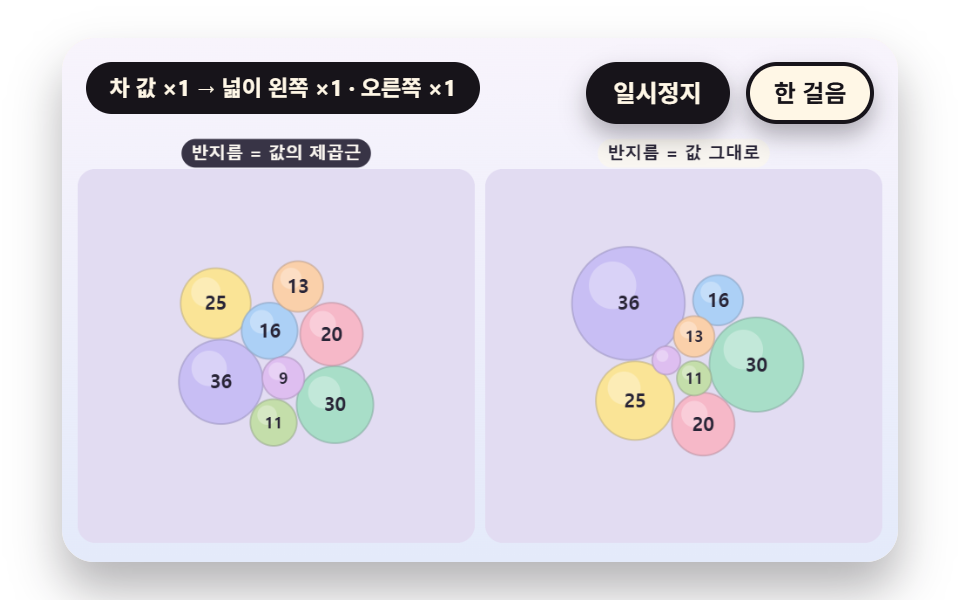 Dashboard UIBubble Chart: 9 Canvas Scenes
 Dashboard UIStock Ticker UI: 9 Live Price Widgets, No API Key
 Dashboard UICSS Countdown Timer: 9 Clocks That Drain and Flip
 Dashboard UIWord Cloud JavaScript: 9 Scenes, Spiral to 3D
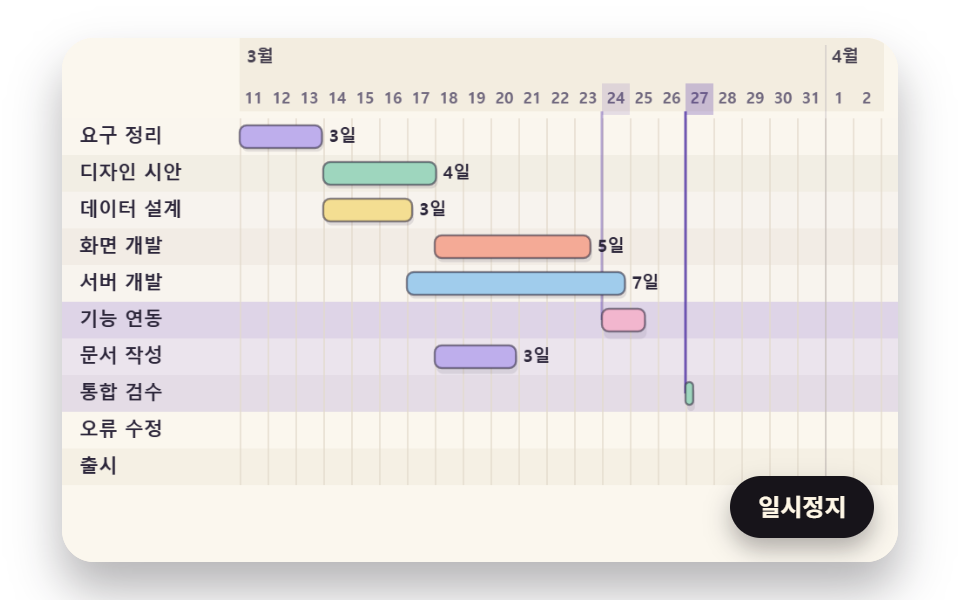 Dashboard UIGantt Chart JavaScript: 9 Self-Scheduling Views
 Dashboard UI9 Dashboard Components, Not the Whole Page
 Dashboard UI9 SVG Progress Ring Widgets, Math Included
 Dashboard UICommand Palette UI Design — 9 That Really Open
 Dashboard UIChart UI Design: 9 Interactions You Can Drag
 Dashboard UICSS Chart Design: 9 SVG Graphs, No Library