JavaScript Piano: 9 Scenes, Keys to Strings
In a javascript piano, when a key goes down, how should the string shake? 03 sizes each overtone by where the hammer lands, 06 makes strings with matching
From a Practice Room Screen to a Concert Stage — Nine Scenes Where Keys, Hammers and Strings Move Together
 01 piano-key-spring-tilt-depth
 02 piano-hammer-lever-strike-rebound
 03 piano-string-strike-point-overtones
 04 piano-roll-falling-bars-landing
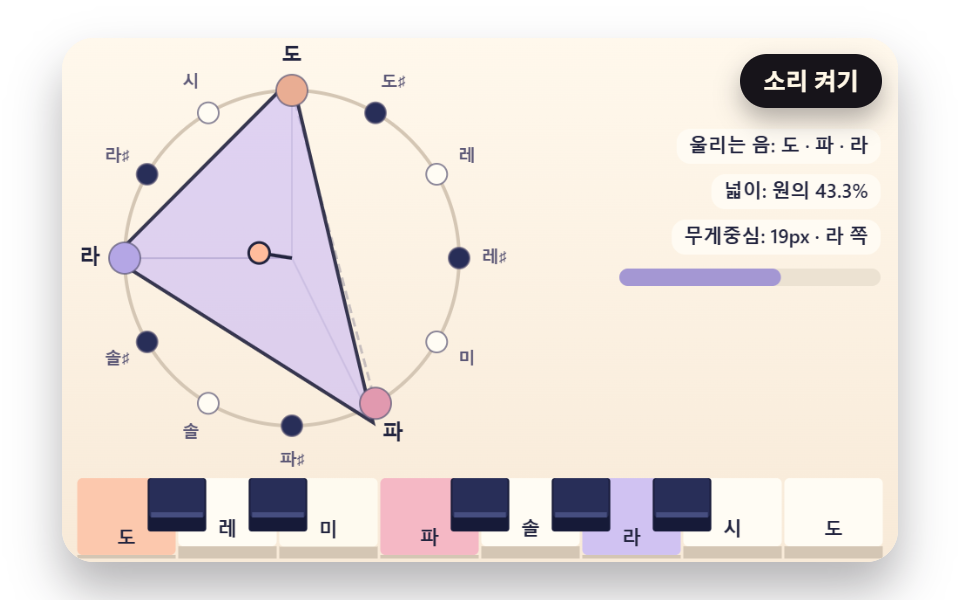 05 piano-chord-circle-polygon-spring
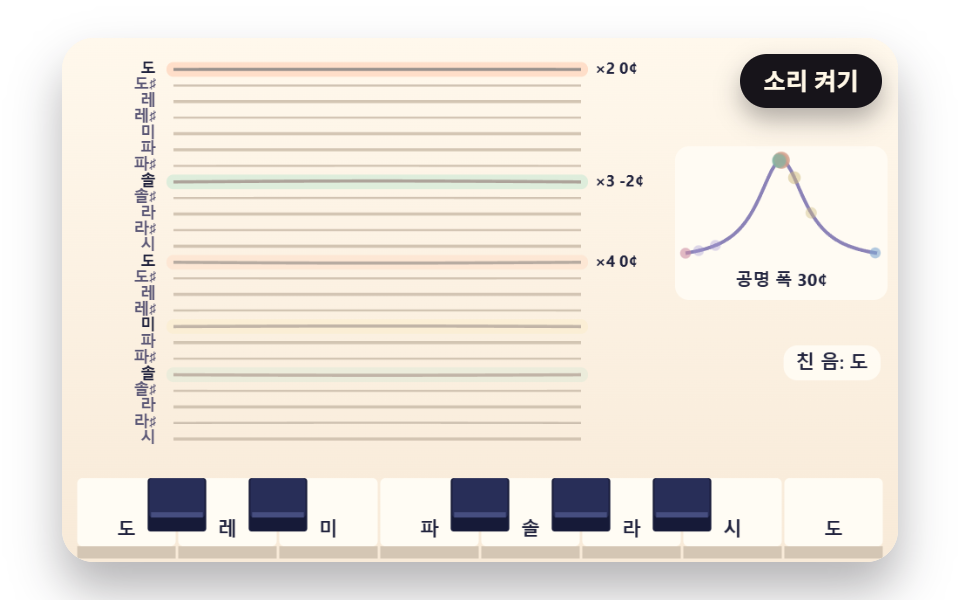 06 piano-sympathetic-string-resonance
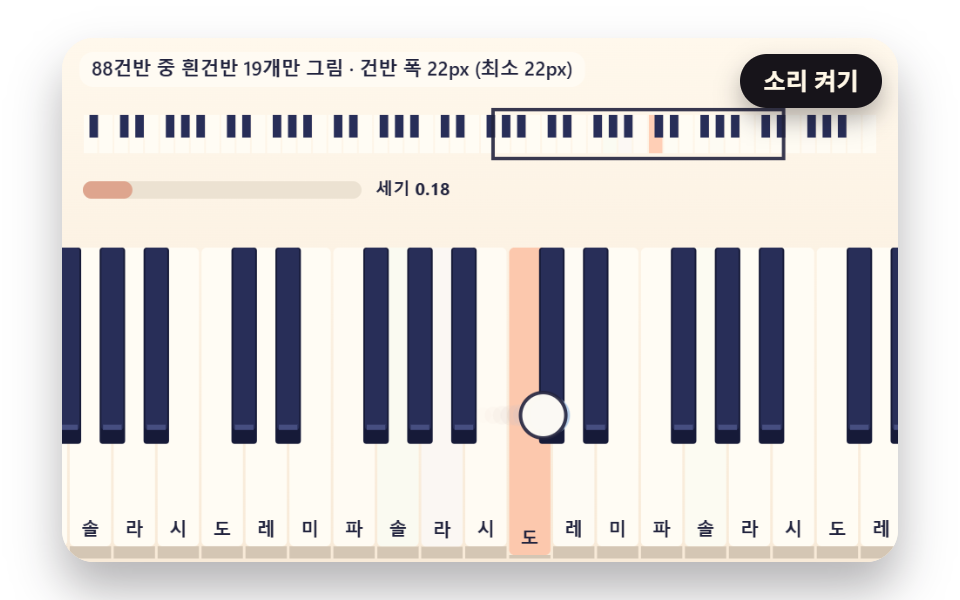 07 piano-glissando-sweep-velocity-wave
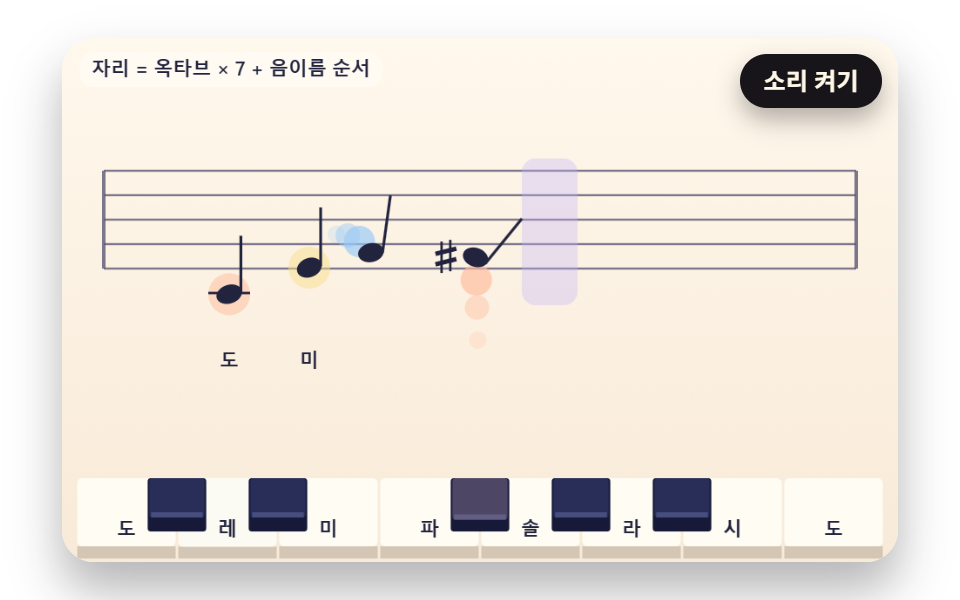 08 piano-staff-note-flight-place
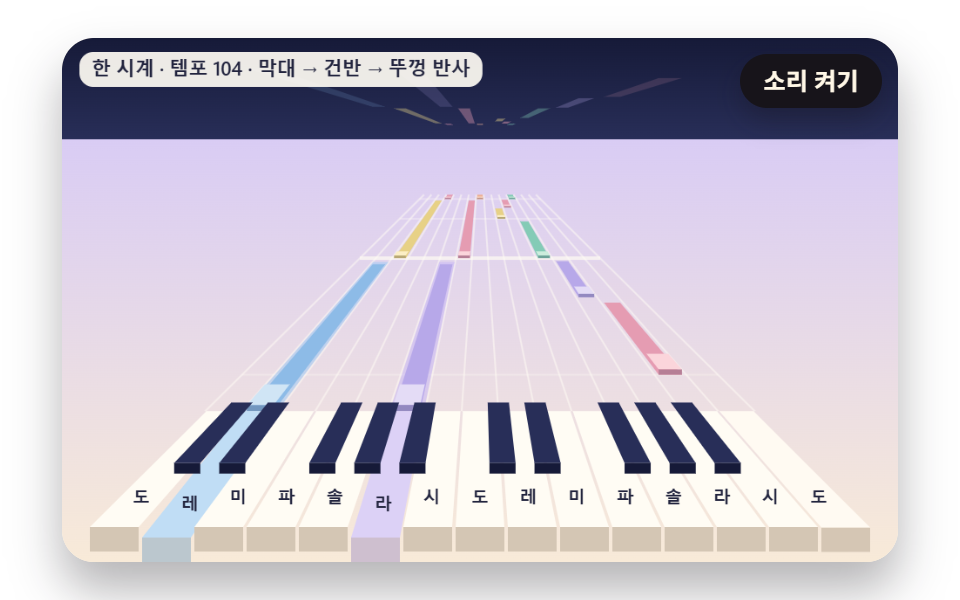 09 piano-hero-perspective-autoplay-stage
Auto-plays · click a tile to jump to its section · all nine in one zip
- 01 3D Keys That Spring Back from a Press
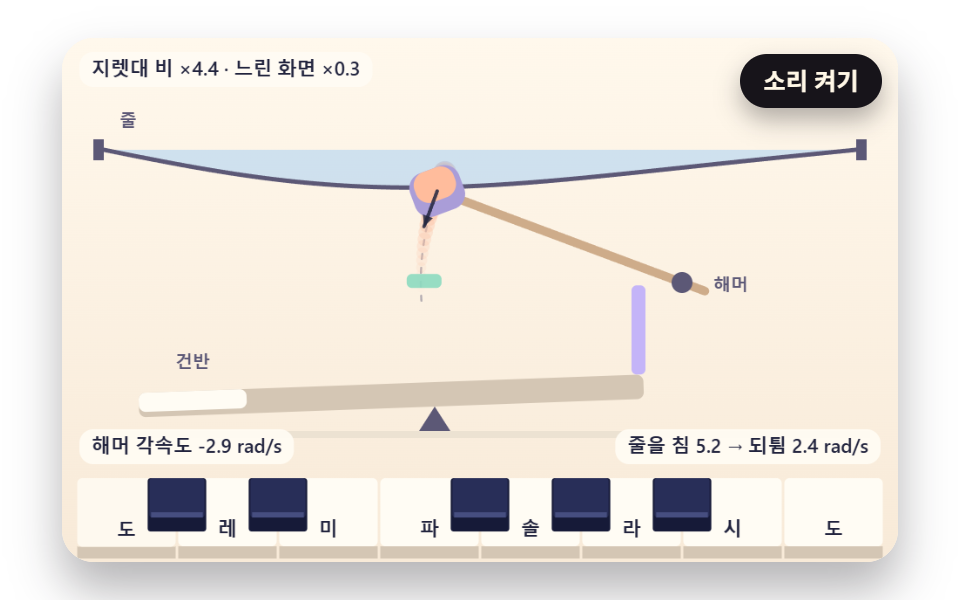
- 02 A Hammer Cross-Section That Strikes the String and Rebounds
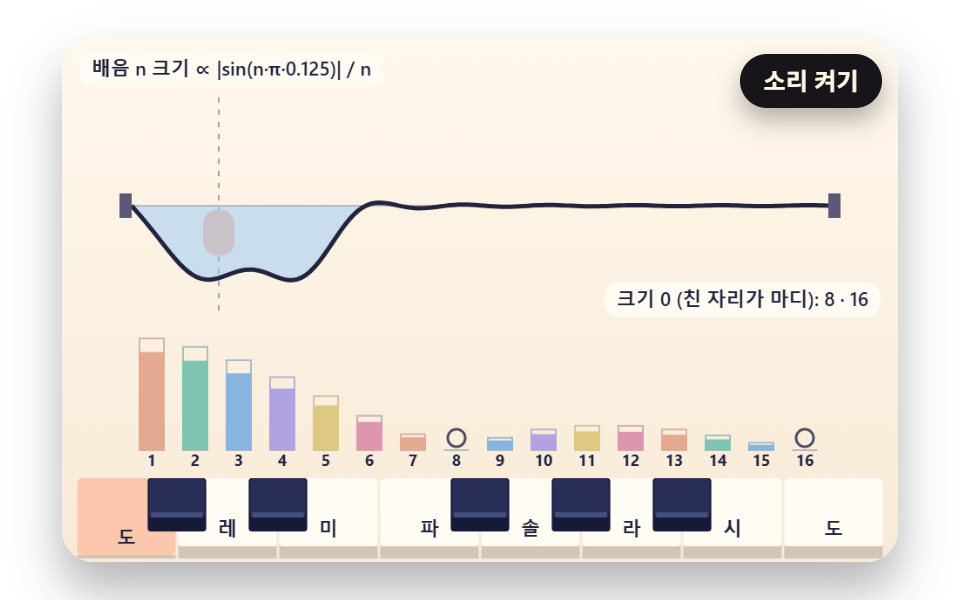
- 03 A String Whose Overtones Depend on Where It Was Struck
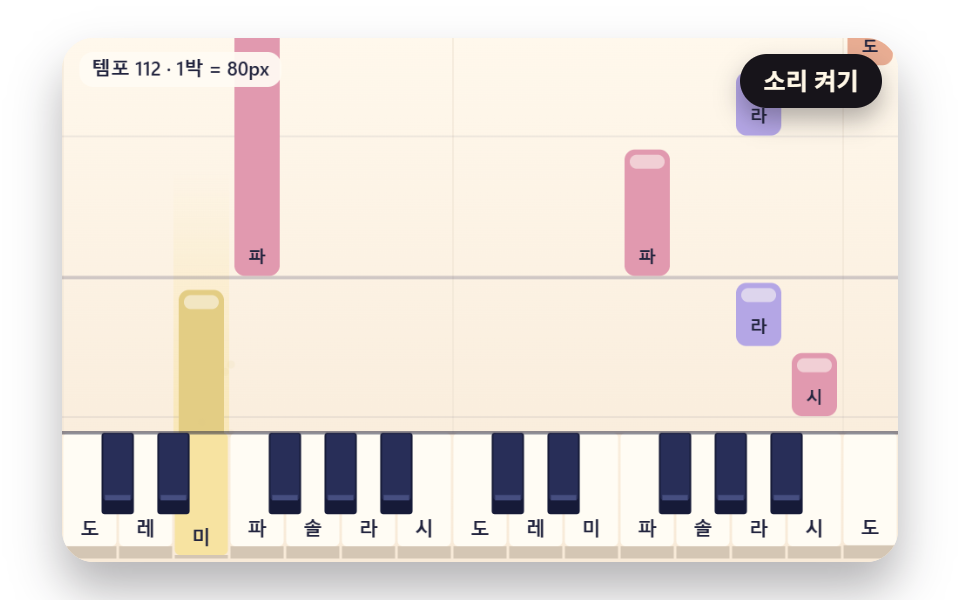
- 04 Piano Roll Bars Falling Toward the Keys
- 05 A Chord Circle That Connects the Sounding Notes
- 06 Sympathetic Strings That Ring Along with Matching Overtones
- 07 A Glissando Where Sweep Speed Becomes Loudness
- 08 Notes That Fly onto Their Place on the Staff
- 09 A Piano That Plays Itself on a Perspective Stage
A browser piano of this kind is a web page where you press drawn keys with a mouse, a finger or the computer keyboard, and it shows the pressed key and the shaking string as pictures. Left alone, the nine scenes play preset notes on their own in silence. Nothing is heard until the "Sound on" button is pressed, and from then on the JavaScript piano sound is four sine waves stacked for each note. The first touch on a key or on the sound button drops the demo mode, and after 2.5 seconds with no human input the demo notes pick up again.
This runs the opposite way from the audio visualizer, which splits incoming sound into bars. There the sound comes first and the picture follows it; here the key depth, the hammer angle and the string shape are computed first, and sound follows that computation only once it is switched on.
Practice Keyboards and Lesson Material
For lesson material on chord names, the chord circle in 05 and the staff in 08 are the closest fit. C–E–G, C–E–A and C–F–A are triangles with the same three side lengths on the circle, so each covers 37.7% of it and only the side it leans toward changes, which lets a single picture show that a major and a minor chord share one frame. In 08 the played note flies up from its key and lands on a line or space of the staff, so someone who has just started reading music gets to pair each key position with a staff height.
A Showcase Screen and a Small Phone
On the first screen of a landing page, the falling bars in 04 or the perspective stage in 09 catch the eye. Stretch the board to 88 keys, though, and phone width causes trouble at once; how 07 copes with it is worked through with numbers in the section on where things break.
JavaScript Piano: 9 Scenes — Spring Keys, a Hammer Lever, String Overtones, a Piano Roll, a Chord Circle, Sympathetic Strings, a Glissando Sweep, Notes on a Staff and an Autoplay Stage
Every scene was captured at 480×300 as 24 shots across 2 seconds, and the table below adds up the 23 differences between neighboring shots. In each of the nine scenes, all 23 of those comparisons showed a change. The fingertip sweeping over 88 keys in 07 covered the widest area at 49.8%, and 06, where only the matching strings light up, the narrowest at 10.4%.
Changed Area and Intensity for Each Scene
| Scene | Cumulative area | Moved frames | Mean intensity |
|---|---|---|---|
| 01 Spring-back 3D keys | 19.0% | 23/23 | 45.4 |
| 02 Hammer cross-section | 15.6% | 23/23 | 69.9 |
| 03 String overtones | 16.6% | 23/23 | 77.7 |
| 04 Piano roll | 44.7% | 23/23 | 56.0 |
| 05 Chord circle | 23.3% | 23/23 | 67.8 |
| 06 Sympathetic strings | 10.4% | 23/23 | 31.1 |
| 07 Glissando | 49.8% | 23/23 | 130.8 |
| 08 Notes on a staff | 25.6% | 23/23 | 65.5 |
| 09 Perspective stage | 22.4% | 23/23 | 40.2 |
Why Does a JavaScript Piano Keyboard Look Like a Row of Flat Rectangles, and What Gives It Depth?
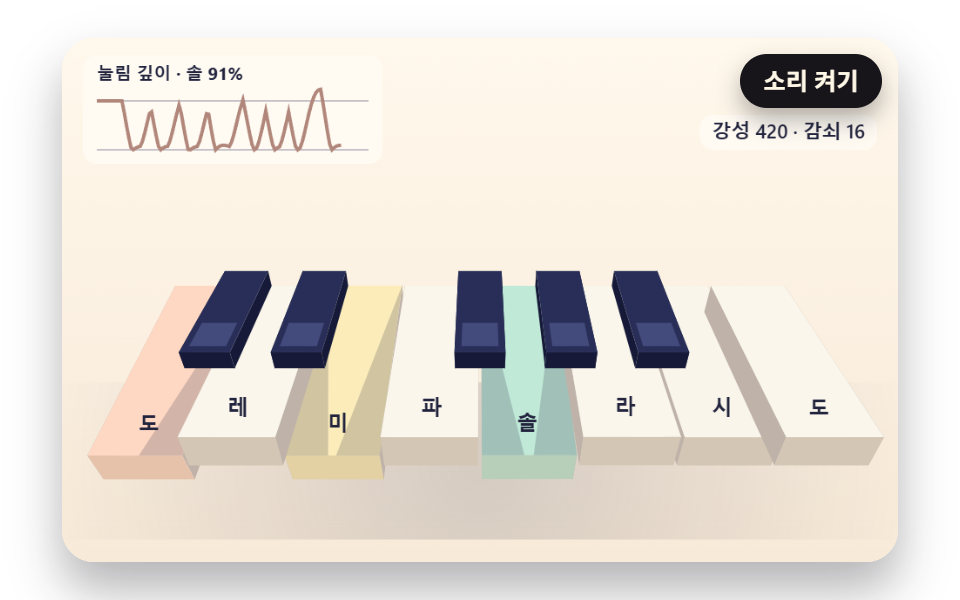
Build the piano keys CSS-only, as white and navy boxes that swap color on press, and a viewer can tell that a key went down but not how deep it went or how hard it was hit. The keys in this set carry depth in place of a color change. In 01 the front end of a key tilts around its back end and drops 16 units, and a spring returns that depth when the key is let go.
Tilt and Shade Build the Depth
Pressed all the way, a white key tilts 6.12° and a black key 10.02°. A black key is only 92 from its pivot, against 150 for a white key, so the same 16-unit drop tilts it more steeply. When a neighboring white key's front end sits higher than yours, a shade triangle as wide as that height gap times 1.6 falls across your top face, and a fully pressed key beside a resting neighbor gets a shade 25.6 wide.
Where Loudness Becomes Visible
With a mouse or a finger, loudness climbs from 0.45 to 1 the lower on the key you press. 01 adds loudness × 14 of extra speed at the moment of the press, so a key pressed at 0.8 reaches the key bed in 80 ms. A plain color swap has nowhere to show that difference.
013D Keys That Spring Back from a Press
Thirteen keys are viewed from a height of 250, looking down by 0.7 radians, so their front ends land at screen y 228.5 and their back ends at y 141.9, while a graph at the top left keeps 1.92 seconds of press depth for the last key played. The stepSpring function below pulls the position toward its target with stiffness 420 and damping 16, and past the floor at 1 it flips the speed and keeps 0.3 of it. With a damping ratio of 0.39, a released key first crosses its rest position at 96 ms, overshoots upward by 23.9% of its travel and stays within 2% of rest from 384 ms on.
<main class="stage">
<div class="pn is-demo" id="pn">
  <canvas class="pn__canvas" data-role="canvas" width="480" height="300" role="img" aria-label="One octave of 3D keys that tilt around their back ends and spring back."></canvas>
  <div class="pn__keys" data-role="keys" data-key-class="pn__key" role="group" aria-label="Keys — computer keys A S D F G H J K play white keys, W E T Y U play black keys"></div>
  <button class="pn__sound" data-role="sound" type="button" aria-pressed="false">Sound on</button>
  <p class="pn__live" data-role="live" aria-live="polite"></p>
</div>
</main>
@use "../../../../site/static/demo-tokens" as *;
@include stage($stage-paper);
.pn {
position: relative;
width: min(92vw, calc(160vh - 12.8vw));
aspect-ratio: 480 / 300;
margin: 0 auto;
border-radius: $r-card;
// clip — 화면 밖 건반 버튼에 포커스가 가도 상자가 스크롤되지 않는다(hidden 은 스크롤될 수 있다)
overflow: clip;
box-shadow: $shadow-raised;
background: $subject-cream;
}
.pn__canvas {
position: absolute;
inset: 0;
display: block;
width: 100%;
height: 100%;
}
// 건반 버튼 층 — 그림과 같은 자리에 투명 버튼을 겹친다. 층 자체는 포인터를 통과시키고 버튼만 받는다
.pn__keys {
position: absolute;
inset: 0;
pointer-events: none;
}
.pn__key {
position: absolute;
margin: 0;
padding: 0;
border: 0;
border-radius: $r-xs;
background: transparent;
pointer-events: auto;
cursor: pointer;
touch-action: none;
-webkit-tap-highlight-color: transparent;
}
// 포커스 링 — 진한 테두리 + 안쪽 크림 테두리 두 겹이라 상아 건반·남색 건반 어디서나 보인다
.pn__key:focus-visible {
outline: 2px solid $subject-ink;
outline-offset: -2px;
box-shadow: inset 0 0 0 4px $subject-cream;
}
.pn__sound {
position: absolute;
top: $sp-2;
right: $sp-2;
padding: $sp-1 $sp-3;
border: 0;
border-radius: $r-pill;
background: $subject-ink;
color: $subject-cream;
font-family: inherit;
font-weight: 700;
font-size: 12px;
line-height: 1.6;
cursor: pointer;
box-shadow: $shadow-press;
}
.pn__sound[aria-pressed="true"] {
background: $subject-cream;
color: $subject-ink;
outline: 2px solid $subject-ink;
outline-offset: -2px;
}
.pn__sound:focus-visible {
outline: 2px solid $subject-ink;
outline-offset: 2px;
}
// 화면에서는 숨기고 화면 낭독기는 읽는 알림 줄 — display: none 이 아니라 1px 상자로 줄여 접근성 트리에 남긴다
.pn__live {
position: absolute;
width: 1px;
height: 1px;
margin: 0;
padding: 0;
overflow: hidden;
clip-path: inset(50%);
white-space: nowrap;
border: 0;
}
@media (max-width: 340px) {
.pn__sound { font-size: 11px; padding: $sp-1 $sp-2; }
}
// 동작 줄이기 — 장면은 스크립트가 루프 없는 정지 판으로 바꾼다(matchMedia change 리스너). 여기서는 버튼 그림자만 거둔다
@media (prefers-reduced-motion: reduce) {
.pn__sound { box-shadow: none !important; }
}html, body {
margin: 0;
overflow: hidden;
}
.stage {
box-sizing: border-box;
min-height: 100vh;
display: grid;
place-items: center;
margin: 0;
background: #ffffff;
font-family: -apple-system, "Segoe UI", "Noto Sans KR", sans-serif;
padding: clamp(8px, 4vw, 24px);
}
.pn {
position: relative;
width: min(92vw, 160vh - 12.8vw);
aspect-ratio: 480/300;
margin: 0 auto;
border-radius: 16px;
overflow: clip;
box-shadow: 0 14px 24px rgba(23, 20, 26, 0.32);
background: #fff7e6;
}
.pn__canvas {
position: absolute;
inset: 0;
display: block;
width: 100%;
height: 100%;
}
.pn__keys {
position: absolute;
inset: 0;
pointer-events: none;
}
.pn__key {
position: absolute;
margin: 0;
padding: 0;
border: 0;
border-radius: 4px;
background: transparent;
pointer-events: auto;
cursor: pointer;
touch-action: none;
-webkit-tap-highlight-color: transparent;
}
.pn__key:focus-visible {
outline: 2px solid #17141a;
outline-offset: -2px;
box-shadow: inset 0 0 0 4px #fff7e6;
}
.pn__sound {
position: absolute;
top: 8px;
right: 8px;
padding: 4px 12px;
border: 0;
border-radius: 999px;
background: #17141a;
color: #fff7e6;
font-family: inherit;
font-weight: 700;
font-size: 12px;
line-height: 1.6;
cursor: pointer;
box-shadow: 0 6px 12px rgba(23, 20, 26, 0.32);
}
.pn__sound[aria-pressed=true] {
background: #fff7e6;
color: #17141a;
outline: 2px solid #17141a;
outline-offset: -2px;
}
.pn__sound:focus-visible {
outline: 2px solid #17141a;
outline-offset: 2px;
}
.pn__live {
position: absolute;
width: 1px;
height: 1px;
margin: 0;
padding: 0;
overflow: hidden;
clip-path: inset(50%);
white-space: nowrap;
border: 0;
}
@media (max-width: 340px) {
.pn__sound {
font-size: 11px;
padding: 4px 8px;
}
}
@media (prefers-reduced-motion: reduce) {
.pn__sound {
box-shadow: none !important;
}
}(function () {
const root = document.getElementById("pn");
if (!root) return;
const W = 480;
const H = 300;
const FIXED_DT = 16;
const DT_SEC = FIXED_DT / 1000;
const TAU = Math.PI * 2;
// 파스텔 팔레트 — 크림 바탕, 상아 흰건반, 짙은 남색 검은건반. 음 이름 글자는 진한 INK 로 읽힌다
const BG_TOP = [255, 248, 236];
const BG_LOW = [248, 234, 216];
const IVORY = [255, 252, 244];
const IVORY_SHADE = [236, 226, 210];
const IVORY_SIDE = [212, 198, 180];
const NAVY = [40, 46, 88];
const NAVY_TOP = [70, 78, 128];
const NAVY_SIDE = [22, 26, 56];
const INK = [34, 36, 62];
const INK_SOFT = [92, 88, 118];
const PEACH = [255, 188, 156];
const MINT = [140, 218, 192];
const SKY = [150, 200, 246];
const LILAC = [196, 180, 248];
const LEMON = [248, 224, 140];
const ROSE = [246, 166, 188];
const GLOWS = [PEACH, MINT, SKY, LILAC, LEMON, ROSE];
const FONT_FAMILY = '"Segoe UI", "Malgun Gothic", "Hiragino Sans", "Noto Sans KR", sans-serif';
// 음 이름 — 음 번호를 12 로 나눈 나머지(0 = C)로 고른다. 로케일마다 문구.json 이 바꾼다
const NOTE_NAMES = ['C', 'C♯', 'D', 'D♯', 'E', 'F', 'F♯', 'G', 'G♯', 'A', 'A♯', 'B'];
const BLACK_PCS = [1, 3, 6, 8, 10];
function pcOf(m) { return ((m % 12) + 12) % 12; }
function isBlack(m) { return BLACK_PCS.indexOf(pcOf(m)) >= 0; }
function noteName(m) { return NOTE_NAMES[pcOf(m)]; }
// 음 높이 — 69번 음(가운데 C 위의 A)을 440Hz 로 두고 반음 하나마다 2^(1/12) 배
const A4_MIDI = 69;
const A4_HZ = 440;
function freqOf(m) { return A4_HZ * Math.pow(2, (m - A4_MIDI) / 12); }
function clamp(v, lo, hi) { return v < lo ? lo : (v > hi ? hi : v); }
function lerp(a, b, k) { return a + (b - a) * k; }
function smooth(x) { const c = clamp(x, 0, 1); return c * c * (3 - 2 * c); }
function rgba(c, a) {
return 'rgba(' + Math.round(clamp(c[0], 0, 255)) + ',' + Math.round(clamp(c[1], 0, 255)) + ',' + Math.round(clamp(c[2], 0, 255)) + ',' + clamp(a, 0, 1).toFixed(3) + ')';
}
function mixRGB(a, b, k) { return [lerp(a[0], b[0], k), lerp(a[1], b[1], k), lerp(a[2], b[2], k)]; }
// 시드 고정 난수 — 같은 시드면 같은 불꽃·흔들림이 다시 나온다 (32비트 정수 섞기)
function makeRng(seed) {
let s = seed >>> 0;
return function () {
s = (s + 0x6d2b79f5) >>> 0;
let t = s;
t = Math.imul(t ^ (t >>> 15), t | 1);
t ^= t + Math.imul(t ^ (t >>> 7), t | 61);
return ((t ^ (t >>> 14)) >>> 0) / 4294967296;
};
}
// key 스프링 — 가속도 = −강성 × (위치 − 목표) − 감쇠 × 속도. 위치 1 은 key 바닥, 넘으면 KEYBED_BOUNCE 만큼만 되튄다
const KEY_SPRING_STIFFNESS = 420;
const KEY_SPRING_DAMPING = 16;
const KEYBED_BOUNCE = 0.3;
function makeSpring() { return { x: 0, v: 0, target: 0 }; }
    function stepSpring(s, k, c, dt) {
        const a = -k * (s.x - s.target) - c * s.v;
        s.v += a * dt;
        s.x += s.v * dt;
        if (s.x > 1) {
            s.x = 1;
            s.v = -s.v * KEYBED_BOUNCE;
        }
    }
// 음마다 스프링 하나 — 치면 목표 1(바닥)로, 세기 × PRESS_KICK 만큼 아래로 밀어 넣는 속도 덤을 얹는다. 떼면 목표 0
const PRESS_KICK = 14;
const springs = new Map();
function springOf(m) {
let s = springs.get(m);
if (!s) {
s = makeSpring();
springs.set(m, s);
}
return s;
}
function stepSprings() {
springs.forEach(function (s) { stepSpring(s, KEY_SPRING_STIFFNESS, KEY_SPRING_DAMPING, DT_SEC); });
}
function resetSprings() {
springs.forEach(function (s) { s.x = 0; s.v = 0; s.target = 0; });
}
function pressSpring(m, vel) {
const s = springOf(m);
s.target = 1;
s.v += vel * PRESS_KICK;
}
function releaseSpring(m) { springOf(m).target = 0; }
function keyDepth(m) { const s = springs.get(m); return s ? shown(s) : 0; }
function keyTint(m) { return isHeld(m) ? 1 : clamp(keyDepth(m), 0, 1); }
function keyGlow(m) { return GLOWS[pcOf(m) % GLOWS.length]; }
// 평평한 key string — lo~hi 음을 x0~x1 폭에 흰건반 기준으로 고르게 놓고, 검은건반은 흰건반 경계 위에 좁고 짧게
const BLACK_WIDTH_RATIO = 0.58;
const BLACK_HEIGHT_RATIO = 0.62;
function whiteCount(lo, hi) {
let n = 0;
for (let m = lo; m <= hi; m += 1) {
if (!isBlack(m)) {
n += 1;
}
}
return n;
}
function layoutFlat(lo, hi, x0, x1, top, bottom) {
const ww = (x1 - x0) / whiteCount(lo, hi);
const whites = [];
const blacks = [];
let i = 0;
for (let m = lo; m <= hi; m += 1) {
if (isBlack(m)) {
const bw = ww * BLACK_WIDTH_RATIO;
blacks.push({ midi: m, black: true, x: x0 + i * ww - bw / 2, y: top, w: bw, h: (bottom - top) * BLACK_HEIGHT_RATIO });
}
else {
whites.push({ midi: m, black: false, x: x0 + i * ww, y: top, w: ww, h: bottom - top });
i += 1;
}
}
return whites.concat(blacks);
}
// 컴퓨터 자판 한 string = 한 옥타브 — 가운데 string A S D F G H J K 가 흰건반, 윗줄 W E T Y U 가 검은건반 (자판 배열과 상관없이 ev.code 로)
const KEY_CODES = ['KeyA', 'KeyW', 'KeyS', 'KeyE', 'KeyD', 'KeyF', 'KeyT', 'KeyG', 'KeyY', 'KeyH', 'KeyU', 'KeyJ', 'KeyK'];
// 동시 음 수 상한 — 열 음을 한꺼번에 눌러도 MAX_VOICES 개만 울리고, 넘치면 가장 오래된 음을 놓는다. 화면도 같은 상한으로 그린다
const MAX_VOICES = 6;
const voices = [];
function allocVoice(pool, midi, startMs, auto) {
const freed = [];
for (let i = pool.length - 1; i >= 0; i -= 1) {
if (pool[i].midi === midi) {
freed.push(pool[i]);
pool.splice(i, 1);
}
}
while (pool.length >= MAX_VOICES) {
const old = pool.shift();
if (old) {
freed.push(old);
}
}
pool.push({ midi: midi, startMs: startMs, auto: auto, nodes: null, gain: null });
return freed;
}
function findVoice(midi) {
for (let i = 0; i < voices.length; i += 1) {
if (voices[i].midi === midi) {
return voices[i];
}
}
return null;
}
// 소리 — 기본 꺼짐. AudioContext 는 「Sound on」 버튼의 클릭 핸들러(tail) 안에서만 만든다
let audio = null;
let master = null;
let soundOn = false;
// 두 시계 맞추기 — 소리를 켠 순간의 오디오 시각(초)과 화면 시계(ms)를 짝으로 적어 두고, 그 뒤로는 오디오 시계로 화면 시계를 끈다
let audioBaseSec = 0;
let clockBaseMs = 0;
function screenToAudioSec(ms) { return audioBaseSec + (ms - clockBaseMs) / 1000; }
function audioToScreenMs(sec) { return clockBaseMs + (sec - audioBaseSec) * 1000; }
// 오실레이터 합성 — 사인파 배음 넷(크기 PARTIAL_GAINS)을 더하고, 치는 순간 ATTACK_SEC 만에 올라갔다 DECAY_SEC 동안 잦아든다
const PARTIAL_GAINS = [1, 0.42, 0.18, 0.08];
const ATTACK_SEC = 0.006;
const DECAY_SEC = 1.6;
const RELEASE_SEC = 0.09;
const MASTER_GAIN = 0.16;
function synthStart(v, vel, atMs) {
if (!audio || !master || !soundOn) {
return;
}
const t0 = Math.max(audio.currentTime, screenToAudioSec(atMs));
const g = audio.createGain();
g.gain.setValueAtTime(0.0001, t0);
g.gain.linearRampToValueAtTime(0.25 + 0.75 * vel, t0 + ATTACK_SEC);
g.gain.exponentialRampToValueAtTime(0.0001, t0 + DECAY_SEC);
g.connect(master);
const f = freqOf(v.midi);
const nodes = [];
for (let i = 0; i < PARTIAL_GAINS.length; i += 1) {
const o = audio.createOscillator();
const pg = audio.createGain();
o.type = 'sine';
o.frequency.setValueAtTime(f * (i + 1), t0);
pg.gain.setValueAtTime(PARTIAL_GAINS[i] / PARTIAL_GAINS.length, t0);
o.connect(pg);
pg.connect(g);
o.start(t0);
o.stop(t0 + DECAY_SEC + 0.05);
nodes.push(o);
}
v.nodes = nodes;
v.gain = g;
}
function synthStop(v, atMs) {
if (!audio || !v.gain || !v.nodes) {
return;
}
const t0 = Math.max(audio.currentTime, screenToAudioSec(atMs));
v.gain.gain.cancelScheduledValues(t0);
v.gain.gain.setTargetAtTime(0.0001, t0, RELEASE_SEC / 3);
for (let i = 0; i < v.nodes.length; i += 1) {
try {
v.nodes[i].stop(t0 + RELEASE_SEC * 2);
}
catch (e) { /* 이미 멈춘 노드 */ }
}
v.nodes = null;
v.gain = null;
}
const canvasEl = root.querySelector('[data-role="canvas"]');
const keysEl = root.querySelector('[data-role="keys"]');
const soundEl = root.querySelector('[data-role="sound"]');
const liveEl = root.querySelector('[data-role="live"]');
const ctxRaw = canvasEl ? canvasEl.getContext('2d') : null;
if (!canvasEl || !ctxRaw || !keysEl || !soundEl || !liveEl) {
return;
}
const cv = canvasEl;
const ctx = ctxRaw;
const keysBox = keysEl;
const soundBtn = soundEl;
const live = liveEl;
const reduceQuery = window.matchMedia('(prefers-reduced-motion: reduce)');
// 페이지를 연 채 동작 줄이기 설정을 바꿔도 change 리스너가 이 값을 다시 읽는다
let still = reduceQuery.matches;
// 자동 시연 중인가 — 사람이 처음 손대면 시연 표시를 뗀다
let demo = root.classList.contains('is-demo');
const off = new AbortController();
function fitCanvas() {
// 배율은 2 에서 자른다 — 배율 3 기기에서 화소가 2.25배로 늘어 프레임마다 일이 그만큼 커지지 않게
const dpr = Math.min(window.devicePixelRatio || 1, 2);
cv.width = Math.round(W * dpr);
cv.height = Math.round(H * dpr);
ctx.setTransform(dpr, 0, 0, dpr, 0, 0);
}
function clearStage(top, low) {
const g = ctx.createLinearGradient(0, 0, 0, H);
g.addColorStop(0, rgba(top, 1));
g.addColorStop(1, rgba(low, 1));
ctx.fillStyle = g;
ctx.fillRect(0, 0, W, H);
}
function fontOf(size, weight) { return weight + ' ' + size.toFixed(1) + 'px ' + FONT_FAMILY; }
function roundRectPath(x, y, w, h, r) {
const rr = Math.min(r, w / 2, h / 2);
ctx.beginPath();
ctx.moveTo(x + rr, y);
ctx.arcTo(x + w, y, x + w, y + h, rr);
ctx.arcTo(x + w, y + h, x, y + h, rr);
ctx.arcTo(x, y + h, x, y, rr);
ctx.arcTo(x, y, x + w, y, rr);
ctx.closePath();
}
// 판 위 설명 글 — 크림 알약 바탕에 진한 글자. 돌려주는 값은 알약 폭
function drawCaption(text, x, y, alignRight) {
ctx.font = fontOf(11, 600);
const bw = ctx.measureText(text).width + 14;
const bx = alignRight ? x - bw : x;
ctx.fillStyle = rgba(IVORY, 0.92);
roundRectPath(bx, y, bw, 20, 8);
ctx.fill();
ctx.fillStyle = rgba(INK, 1);
ctx.textAlign = 'left';
ctx.textBaseline = 'middle';
ctx.fillText(text, bx + 7, y + 10.5);
return bw;
}
// 평평한 key 그리기 — depth(m) 0~1 만큼 앞쪽이 내려가 앞턱이 얇아지고, tint(m) 0~1 만큼 그 음의 빛깔로 물든다. ox 는 가로로 밀린 만큼(보이는 창의 왼쪽 끝)
const KEY_LIP = 7;
function drawFlatKeys(keys, depth, tint, glow, names, ox = 0) {
ctx.save();
ctx.translate(-ox, 0);
for (let i = 0; i < keys.length; i += 1) {
const k = keys[i];
if (k.black || k.x - ox > W || k.x + k.w - ox < 0) {
continue;
}
const d = clamp(depth(k.midi), -0.2, 1);
const drop = d * (KEY_LIP - 2);
const face = mixRGB(mixRGB(IVORY, IVORY_SHADE, Math.max(0, d) * 0.6), glow(k.midi), tint(k.midi) * 0.75);
ctx.fillStyle = rgba(face, 1);
roundRectPath(k.x + 0.75, k.y, k.w - 1.5, k.h - KEY_LIP + drop, 3);
ctx.fill();
ctx.fillStyle = rgba(IVORY_SIDE, 1);
ctx.fillRect(k.x + 0.75, k.y + k.h - KEY_LIP + drop, k.w - 1.5, KEY_LIP - drop);
if (names && k.w >= 14) {
ctx.font = fontOf(Math.min(11, k.w * 0.42), 700);
ctx.textAlign = 'center';
ctx.textBaseline = 'alphabetic';
ctx.fillStyle = rgba(INK, 1);
ctx.fillText(noteName(k.midi), k.x + k.w / 2, k.y + k.h - KEY_LIP - 6 + drop);
}
}
for (let i = 0; i < keys.length; i += 1) {
const k = keys[i];
if (!k.black || k.x - ox > W || k.x + k.w - ox < 0) {
continue;
}
const d = clamp(depth(k.midi), -0.2, 1);
const drop = d * 4;
const face = mixRGB(NAVY, glow(k.midi), tint(k.midi) * 0.55);
ctx.fillStyle = rgba(NAVY_SIDE, 1);
roundRectPath(k.x, k.y, k.w, k.h + 2, 2);
ctx.fill();
ctx.fillStyle = rgba(face, 1);
roundRectPath(k.x + 1, k.y, k.w - 2, k.h - 6 + drop, 2);
ctx.fill();
ctx.fillStyle = rgba(mixRGB(NAVY_TOP, glow(k.midi), tint(k.midi) * 0.5), 1);
ctx.fillRect(k.x + 2, k.y + k.h - 9 + drop, k.w - 4, 3);
}
ctx.restore();
}
// 입체 key — 가운데 C(60)부터 한 옥타브 위 C(72)까지. 세계 좌표 x 가로 · y 위 · z 안쪽(0 = key 앞 끝, KEY_LEN = 뒤 끝 축)
const LO = 60;
const HI = 72;
const KEY_LEN = 150;
const KEY_THICK = 22;
const WHITE_W = 54;
const KEY_GAP = 2;
const BLACK_LEN = 92;
const BLACK_W = 30;
const BLACK_RISE = 12;
// 앞 끝이 내려가는 거리 — 눌림 1 이면 앞 끝이 KEY_TRAVEL 만큼, 기울기 = asin(눌림 × KEY_TRAVEL / 축까지 거리)
const KEY_TRAVEL = 16;
// 카메라 — 높이 CAM_H, 앞 끝에서 CAM_D 뒤, PITCH 라디안 내려다본다. 화면 = 중심 + FOCAL × (가로·세로) / 깊이
const CAM_H = 250;
const CAM_D = 250;
const PITCH = 0.7;
const FOCAL = 380;
const CENTER_X = 240;
const CENTER_Y = 196;
// 옆 건반이 높을수록 눌린 key 위로 그늘이 넓어진다 — 그늘 폭 = 높이 차 × SHADOW_SLOPE
const SHADOW_SLOPE = 1.6;
const HISTORY_LEN = 120;
const BEAT_MS = 250;
const LOOP_MS = 2400;
// 시연 — C E G C B A G, 마지막에 C·E·G 화음 (직접 지은 짧은 음형)
const SEQ = [
[0.8, 60, 0.5, 0.8], [1.6, 64, 0.5, 0.7], [2.4, 67, 0.5, 0.9], [3.2, 72, 0.6, 1],
[4.2, 71, 0.4, 0.6], [4.8, 69, 0.4, 0.6], [5.4, 67, 0.4, 0.7],
[6.4, 60, 2.2, 0.85], [6.4, 64, 2.2, 0.85], [6.4, 67, 2.2, 0.85]
];
const STILL_CHORD = [60, 64, 67];
const DEPTH_LABEL = 'Press depth';
const SPRING_LABEL = 'stiffness {k} · damping {c}';
let keys3 = [];
let lastKey = 60;
let history = [];
// 원근 투영 — 카메라 자리로 옮기고 PITCH 만큼 내려다본 뒤 깊이로 나눈다
function project(p) {
const dy = p[1] - CAM_H;
const dz = p[2] + CAM_D;
const zc = dz * Math.cos(PITCH) - dy * Math.sin(PITCH);
const yc = dy * Math.cos(PITCH) + dz * Math.sin(PITCH);
return [CENTER_X + FOCAL * p[0] / zc, CENTER_Y - FOCAL * yc / zc];
}
// 뒤 끝(z = KEY_LEN) 축 회전 — 축에서 앞쪽으로 떨어진 거리만큼 아래로 내려간다
function tilt(p, theta) {
const ry = p[1];
const rz = p[2] - KEY_LEN;
return [p[0], ry * Math.cos(theta) + rz * Math.sin(theta), KEY_LEN - ry * Math.sin(theta) + rz * Math.cos(theta)];
}
function thetaOf(k, depth) {
return Math.asin(clamp(depth * KEY_TRAVEL / (KEY_LEN - k.zFront), -0.5, 0.5));
}
// 앞 끝 높이 — 그늘 폭을 정할 때 이웃끼리 견준다
function frontHeight(k, depth) {
return -(KEY_LEN - k.zFront) * Math.sin(thetaOf(k, depth));
}
function quad(pts, theta, fill) {
ctx.beginPath();
for (let i = 0; i < pts.length; i += 1) {
const s = project(tilt(pts[i], theta));
if (i === 0) {
ctx.moveTo(s[0], s[1]);
}
else {
ctx.lineTo(s[0], s[1]);
}
}
ctx.closePath();
ctx.fillStyle = fill;
ctx.fill();
}
function build() {
keys3 = [];
const total = whiteCount(LO, HI) * WHITE_W;
let i = 0;
for (let m = LO; m <= HI; m += 1) {
const left = -total / 2 + i * WHITE_W;
if (isBlack(m)) {
keys3.push({ midi: m, black: true, x0: left - BLACK_W / 2, x1: left + BLACK_W / 2, zFront: KEY_LEN - BLACK_LEN, spring: springOf(m) });
}
else {
keys3.push({ midi: m, black: false, x0: left + KEY_GAP / 2, x1: left + WHITE_W - KEY_GAP / 2, zFront: 0, spring: springOf(m) });
i += 1;
}
}
}
function reset() {
resetSprings();
history = [];
lastKey = 60;
}
function loopLength() { return LOOP_MS; }
function step(ms, prev) {
runSeq(SEQ, BEAT_MS, ms, prev);
stepSprings();
history.push(springOf(lastKey).x);
if (history.length > HISTORY_LEN) {
history.shift();
}
}
function finalScene() {
for (let i = 0; i < STILL_CHORD.length; i += 1) {
const s = springOf(STILL_CHORD[i]);
s.target = 1;
s.x = 1;
}
lastKey = STILL_CHORD[0];
}
function onNoteOn(midi, vel, auto) {
pressSpring(midi, vel);
lastKey = midi;
}
function onNoteOff(midi, auto) { releaseSpring(midi); }
function keyBase() { return LO; }
function keyPan() { return 0; }
function onDrag(x, y, down) { }
function onKeyFocus(midi) { }
function onWake() { }
function keyRects() {
const out = [];
for (let i = 0; i < keys3.length; i += 1) {
const k = keys3[i];
const top = k.black ? BLACK_RISE : 0;
const a = project([k.x0, top, k.zFront]);
const b = project([k.x1, top, k.zFront]);
const c = project([k.x0, top, KEY_LEN]);
const d = project([k.x1, top, KEY_LEN]);
const e = project([k.x0, k.black ? 0 : -KEY_THICK, k.zFront]);
const x0 = Math.min(a[0], c[0], e[0]);
const x1 = Math.max(b[0], d[0]);
const y0 = Math.min(c[1], d[1]);
const y1 = Math.max(e[1], a[1]);
out.push({ midi: k.midi, black: k.black, x: x0, y: y0, w: x1 - x0, h: y1 - y0 });
}
return out.sort(function (p, q) { return (p.black ? 1 : 0) - (q.black ? 1 : 0); });
}
function drawKey(k, neighbors) {
const d = shown(k.spring);
const th = thetaOf(k, d);
const top = k.black ? BLACK_RISE : 0;
const bottom = k.black ? 0 : -KEY_THICK;
const zf = k.zFront;
const glow = GLOWS[pcOf(k.midi) % GLOWS.length];
const tint = clamp(d, 0, 1);
const sideC = k.black ? NAVY_SIDE : mixRGB(IVORY_SIDE, INK_SOFT, 0.18);
// 옆면 둘 · 앞면 · 윗면 순 — 그리는 순서가 가림을 정한다(깊이 내림차순으로 이미 정렬)
quad([[k.x0, top, zf], [k.x0, top, KEY_LEN], [k.x0, bottom, KEY_LEN], [k.x0, bottom, zf]], th, rgba(sideC, 1));
quad([[k.x1, top, zf], [k.x1, top, KEY_LEN], [k.x1, bottom, KEY_LEN], [k.x1, bottom, zf]], th, rgba(sideC, 1));
const frontC = k.black ? mixRGB(NAVY_SIDE, glow, tint * 0.35) : mixRGB(IVORY_SIDE, glow, tint * 0.45);
quad([[k.x0, top, zf], [k.x1, top, zf], [k.x1, bottom, zf], [k.x0, bottom, zf]], th, rgba(frontC, 1));
const topC = k.black ? mixRGB(NAVY, glow, tint * 0.5) : mixRGB(mixRGB(IVORY, IVORY_SHADE, 0.25 * (1 - tint)), glow, tint * 0.6);
quad([[k.x0, top, zf], [k.x1, top, zf], [k.x1, top, KEY_LEN], [k.x0, top, KEY_LEN]], th, rgba(topC, 1));
if (k.black) {
// 검은건반 윗면 앞쪽 광택 — 기울수록 빛 띠가 앞으로 쏠린다
quad([[k.x0 + 4, top, zf + 6], [k.x1 - 4, top, zf + 6], [k.x1 - 4, top, zf + 30 - tint * 14], [k.x0 + 4, top, zf + 30 - tint * 14]], th, rgba(NAVY_TOP, 0.9));
return;
}
// 그늘 — 이웃 앞 끝이 나보다 높으면 그 차이에 비례한 폭의 삼각형이 내 윗면에 드리운다(뒤 끝 축에서는 0)
const myH = frontHeight(k, d);
for (let i = 0; i < neighbors.length; i += 1) {
const n = neighbors[i];
const gap = frontHeight(n, shown(n.spring)) - myH;
if (gap <= 0.3) {
continue;
}
const band = Math.min(gap * SHADOW_SLOPE, (k.x1 - k.x0) * 0.6);
const edge = n.x0 > k.x0 ? k.x1 : k.x0;
const inner = n.x0 > k.x0 ? edge - band : edge + band;
quad([[edge, top, zf], [inner, top, zf], [edge, top, KEY_LEN]], th, rgba(INK, 0.2));
}
const label = project(tilt([(k.x0 + k.x1) / 2, top, zf + 22], th));
ctx.font = fontOf(12, 700);
ctx.textAlign = 'center';
ctx.textBaseline = 'middle';
ctx.fillStyle = rgba(INK, 1);
ctx.fillText(noteName(k.midi), label[0], label[1]);
}
function drawHistory() {
const x0 = 12;
const y0 = 10;
const w = 172;
const h = 62;
ctx.fillStyle = rgba(IVORY, 0.9);
roundRectPath(x0, y0, w, h, 8);
ctx.fill();
ctx.font = fontOf(10, 700);
ctx.textAlign = 'left';
ctx.textBaseline = 'top';
ctx.fillStyle = rgba(INK, 1);
ctx.fillText(DEPTH_LABEL + ' · ' + noteName(lastKey) + ' ' + Math.round(clamp(springOf(lastKey).x, -1, 1) * 100) + '%', x0 + 8, y0 + 6);
// 0(쉼)·1(바닥) 기준선, 그 사이를 오간 깊이 곡선 — 쉼 위로 올라간 부분이 되튐
const gy0 = y0 + 26;
const gy1 = y0 + h - 8;
ctx.strokeStyle = rgba(INK_SOFT, 0.35);
ctx.lineWidth = 1;
ctx.beginPath();
ctx.moveTo(x0 + 8, gy0);
ctx.lineTo(x0 + w - 8, gy0);
ctx.moveTo(x0 + 8, gy1);
ctx.lineTo(x0 + w - 8, gy1);
ctx.stroke();
ctx.strokeStyle = rgba(mixRGB(PEACH, INK, 0.35), 1);
ctx.lineWidth = 2;
ctx.beginPath();
for (let i = 0; i < history.length; i += 1) {
const x = x0 + 8 + (w - 16) * i / (HISTORY_LEN - 1);
const y = gy0 + (gy1 - gy0) * clamp(history[i], -0.3, 1);
if (i === 0) {
ctx.moveTo(x, y);
}
else {
ctx.lineTo(x, y);
}
}
ctx.stroke();
}
function draw() {
clearStage(BG_TOP, BG_LOW);
// 바닥 그림자 — key string 아래 타원 그늘
const fl = project([0, -KEY_THICK, 10]);
const g = ctx.createRadialGradient(fl[0], fl[1] + 6, 10, fl[0], fl[1] + 6, 250);
g.addColorStop(0, rgba(INK, 0.16));
g.addColorStop(1, rgba(INK, 0));
ctx.fillStyle = g;
ctx.fillRect(0, fl[1] - 40, W, 90);
const whites = keys3.filter(function (k) { return !k.black; });
const blacks = keys3.filter(function (k) { return k.black; });
const order = function (a, b) {
return shown(b.spring) - shown(a.spring) || Math.abs(b.x0 + b.x1) - Math.abs(a.x0 + a.x1);
};
const ws = whites.slice().sort(order);
for (let i = 0; i < ws.length; i += 1) {
const k = ws[i];
const idx = whites.indexOf(k);
const nb = [];
if (idx > 0) {
nb.push(whites[idx - 1]);
}
if (idx < whites.length - 1) {
nb.push(whites[idx + 1]);
}
drawKey(k, nb);
}
const bs = blacks.slice().sort(order);
for (let i = 0; i < bs.length; i += 1) {
drawKey(bs[i], []);
}
drawHistory();
drawCaption(SPRING_LABEL.replace('{k}', String(KEY_SPRING_STIFFNESS)).replace('{c}', String(KEY_SPRING_DAMPING)), W - 12, 44, true);
}
// 계산을 마치고 그리기 시작했는가
let ready = false;
// 정리 뒤(리액트 언마운트)에 늦게 온 일이 다시 시작하지 않게
let alive = true;
// 화면 시계(ms) — 16ms 고정 스텝으로만 늘어난다. 소리가 켜져 있으면 오디오 시계가 목표를 정한다
let clock = 0;
let screenTarget = 0;
let prevLoop = 0;
// 사람이 마지막으로 친 시각 — HUMAN_QUIET_MS 동안 조용하면 자동 시연이 다시 이어진다
const HUMAN_QUIET_MS = 2500;
let lastHuman = -1e9;
function autoAllowed() { return demo || clock - lastHuman > HUMAN_QUIET_MS; }
// 스프링 값을 화면에 쓸 때 — 동작 줄이기면 흔들림 없이 목표 자리 그대로
function shown(s) { return still ? s.target : s.x; }
function wake() {
if (!demo) {
return;
}
demo = false;
root.classList.remove('is-demo');
onWake();
}
// 음 이름 알림 — 사람이 친 음은 GROUP_MS 안에 든 것끼리 한 줄로, 자동 시연은 한 마디(BAR_MS)에 한 번 모아서
const GROUP_MS = 250;
const BAR_MS = 2000;
const BAR_LABEL = 'Autoplay: {names}';
let groupNames = [];
let lastSpoken = -1e9;
let barNames = [];
let barIndex = 0;
function announce(midi, auto) {
const nm = noteName(midi);
if (auto) {
if (barNames.indexOf(nm) < 0) {
barNames.push(nm);
}
return;
}
if (clock - lastSpoken > GROUP_MS) {
groupNames = [];
}
if (groupNames.indexOf(nm) < 0) {
groupNames.push(nm);
}
lastSpoken = clock;
live.textContent = groupNames.join(' · ');
}
function flushBar() {
const b = Math.floor(clock / BAR_MS);
if (b === barIndex) {
return;
}
barIndex = b;
if (barNames.length > 0 && clock - lastSpoken > BAR_MS) {
live.textContent = BAR_LABEL.replace('{names}', barNames.join(' · '));
}
barNames = [];
}
// key 버튼 — 그림 위에 투명한 진짜 <button> 을 같은 자리에 겹친다. 눌린 동안 aria-pressed="true"
const keyButtons = new Map();
function setPressed(midi, on) {
const b = keyButtons.get(midi);
if (b) {
b.setAttribute('aria-pressed', on ? 'true' : 'false');
}
}
function isHeld(midi) { return findVoice(midi) !== null; }
function press(midi, vel, auto) {
if (!auto) {
lastHuman = clock;
wake();
}
const freed = allocVoice(voices, midi, clock, auto);
for (let i = 0; i < freed.length; i += 1) {
synthStop(freed[i], clock);
if (freed[i].midi !== midi) {
setPressed(freed[i].midi, false);
onNoteOff(freed[i].midi, auto);
}
}
const v = findVoice(midi);
if (v) {
synthStart(v, vel, clock);
}
setPressed(midi, true);
announce(midi, auto);
onNoteOn(midi, vel, auto);
if (still && ready) {
render();
}
}
function release(midi, auto) {
const v = findVoice(midi);
if (!v || (auto && !v.auto)) {
return;
}
voices.splice(voices.indexOf(v), 1);
synthStop(v, clock);
setPressed(midi, false);
onNoteOff(midi, auto);
if (still && ready) {
render();
}
}
function releaseAll() {
while (voices.length > 0) {
const v = voices[voices.length - 1];
release(v.midi, v.auto);
if (voices.indexOf(v) >= 0) {
voices.splice(voices.indexOf(v), 1);
}
}
}
// 악보 따라 치기 — 지난 시각(prev)부터 이번 시각(ms)까지 지나간 시작·끝을 찾는다. 한 바퀴 넘어가면 둘로 나눠 본다
function crossed(t, prev, ms) {
return prev <= ms ? (t > prev && t <= ms) : (t > prev || t <= ms);
}
function runSeq(seq, beatMs, ms, prev) {
for (let i = 0; i < seq.length; i += 1) {
const n = seq[i];
if (crossed((n[0] + n[2]) * beatMs, prev, ms)) {
release(n[1], true);
}
}
for (let i = 0; i < seq.length; i += 1) {
const n = seq[i];
if (crossed(n[0] * beatMs, prev, ms) && autoAllowed()) {
press(n[1], n[3], true);
}
}
}
// 포인터 자리를 판 좌표(480×300)로 — 화면에 보이는 캔버스 크기와 상관없이
function toBoard(ev) {
const r = cv.getBoundingClientRect();
return [(ev.clientX - r.left) * W / Math.max(1, r.width), (ev.clientY - r.top) * H / Math.max(1, r.height)];
}
function buildButtons() {
while (keysBox.firstChild) {
keysBox.removeChild(keysBox.firstChild);
}
keyButtons.clear();
const rects = keyRects();
for (let i = 0; i < rects.length; i += 1) {
const k = rects[i];
const b = document.createElement('button');
b.type = 'button';
b.className = keysBox.getAttribute('data-key-class') || '';
// 이름 + 옥타브 번호(가운데 C = 4) — 두 옥타브 이상인 판에서 같은 이름 건반을 낭독으로도 가른다
b.setAttribute('aria-label', noteName(k.midi) + String(Math.floor(k.midi / 12) - 1));
b.setAttribute('aria-pressed', isHeld(k.midi) ? 'true' : 'false');
b.style.left = (k.x / W * 100).toFixed(3) + '%';
b.style.top = (k.y / H * 100).toFixed(3) + '%';
b.style.width = (k.w / W * 100).toFixed(3) + '%';
b.style.height = (k.h / H * 100).toFixed(3) + '%';
const midi = k.midi;
b.addEventListener('pointerdown', function (ev) {
const r = b.getBoundingClientRect();
// key 앞쪽(아래)을 칠수록 세게 — 0.45~1
press(midi, 0.45 + 0.55 * clamp((ev.clientY - r.top) / Math.max(1, r.height), 0, 1), false);
}, { signal: off.signal });
b.addEventListener('pointerenter', function (ev) {
if ((ev.buttons & 1) === 1) {
press(midi, 0.7, false);
}
}, { signal: off.signal });
const up = function () { const v = findVoice(midi); if (v && !v.auto) {
release(midi, false);
} };
b.addEventListener('pointerup', up, { signal: off.signal });
b.addEventListener('pointerleave', up, { signal: off.signal });
b.addEventListener('pointercancel', up, { signal: off.signal });
// 키보드 — 포커스된 건반에서 Enter·Space 를 누르는 동안 눌리고, 떼면 놓인다
b.addEventListener('keydown', function (ev) {
if (ev.key !== 'Enter' && ev.key !== ' ') {
return;
}
ev.preventDefault();
if (!ev.repeat) {
press(midi, 0.75, false);
}
}, { signal: off.signal });
b.addEventListener('keyup', function (ev) {
if (ev.key !== 'Enter' && ev.key !== ' ') {
return;
}
ev.preventDefault();
up();
}, { signal: off.signal });
b.addEventListener('focus', function () { onKeyFocus(midi); }, { signal: off.signal });
keysBox.appendChild(b);
keyButtons.set(midi, b);
}
}
let panShown = 0;
function syncPan() {
const p = keyPan();
if (Math.abs(p - panShown) < 0.05) {
return;
}
panShown = p;
keysBox.style.transform = 'translateX(' + (-p / W * 100).toFixed(3) + '%)';
}
// 컴퓨터 자판 — 가운데 string 한 줄이 한 옥타브. 누르고 있는 동안 소리가 이어진다(자동 반복은 무시)
window.addEventListener('keydown', function (ev) {
const i = KEY_CODES.indexOf(ev.code);
if (i < 0 || ev.repeat || ev.ctrlKey || ev.metaKey || ev.altKey) {
return;
}
press(keyBase() + i, 0.75, false);
}, { signal: off.signal });
window.addEventListener('keyup', function (ev) {
const i = KEY_CODES.indexOf(ev.code);
if (i < 0) {
return;
}
const v = findVoice(keyBase() + i);
if (v && !v.auto) {
release(keyBase() + i, false);
}
}, { signal: off.signal });
root.addEventListener('pointermove', function (ev) {
const p = toBoard(ev);
onDrag(p[0], p[1], (ev.buttons & 1) === 1);
}, { signal: off.signal });
// Sound on — AudioContext 를 만드는 곳은 이 클릭 핸들러 하나뿐이다. 켜는 순간 화면 시계를 오디오 시계에 다시 맞춘다
const SOUND_ON_LABEL = 'Sound on';
const SOUND_OFF_LABEL = 'Sound off';
function syncClocks() {
if (!audio) {
return;
}
audioBaseSec = audio.currentTime;
clockBaseMs = clock;
screenTarget = clock;
}
soundBtn.addEventListener('click', function () {
if (!audio) {
audio = new AudioContext();
master = audio.createGain();
master.gain.value = MASTER_GAIN;
master.connect(audio.destination);
}
soundOn = !soundOn;
soundBtn.setAttribute('aria-pressed', soundOn ? 'true' : 'false');
soundBtn.textContent = soundOn ? SOUND_OFF_LABEL : SOUND_ON_LABEL;
if (soundOn) {
syncClocks();
audio.resume().then(syncClocks);
}
else {
for (let i = 0; i < voices.length; i += 1) {
synthStop(voices[i], clock);
}
screenTarget = clock;
}
wake();
}, { signal: off.signal });
function render() {
draw();
syncPan();
}
function tick() {
clock += FIXED_DT;
const ms = clock % loopLength();
step(ms, prevLoop);
prevLoop = ms;
flushBar();
}
let rafId = 0;
let lastTs = -1;
function frame(ts) {
if (still) {
rafId = 0;
return;
}
if (lastTs < 0) {
lastTs = ts;
}
// 탭이 숨었다 돌아와도 한 번에 100ms 까지만 따라잡는다
const dt = Math.min(ts - lastTs, 100);
lastTs = ts;
if (soundOn && audio && audio.state === 'running') {
screenTarget = audioToScreenMs(audio.currentTime);
if (screenTarget - clock > 200) {
syncClocks();
}
}
else {
screenTarget += dt;
}
let n = 0;
while (clock + FIXED_DT <= screenTarget && n < 8) {
tick();
n += 1;
}
if (n === 8) {
screenTarget = clock;
}
render();
rafId = window.requestAnimationFrame(frame);
}
function startLoop() {
if (rafId) {
return;
}
lastTs = -1;
rafId = window.requestAnimationFrame(frame);
}
function stopLoop() {
if (rafId) {
window.cancelAnimationFrame(rafId);
rafId = 0;
}
}
// 동작 줄이기 — 루프를 돌리지 않고 눌린 key 색과 음 이름만 바뀌는 정지 판 한 장
function showStill() {
stopLoop();
releaseAll();
reset();
finalScene();
render();
}
function play() {
releaseAll();
clock = 0;
screenTarget = 0;
prevLoop = 0;
barIndex = 0;
reset();
render();
startLoop();
}
// 설정이 페이지를 연 채 바뀌면 — 켜지면 정지 판으로, 꺼지면 시연을 처음부터
function onMotionPref() {
still = reduceQuery.matches;
if (!ready) {
return;
}
if (still) {
showStill();
}
else {
play();
}
}
reduceQuery.addEventListener('change', onMotionPref, { signal: off.signal });
window.addEventListener('resize', function () {
fitCanvas();
// 화면 폭이 바뀌면 key 배치(07 은 key 폭 최소값)와 버튼 자리를 다시 계산한다
if (ready) {
build();
buildButtons();
render();
}
}, { signal: off.signal });
function begin() {
if (!alive) {
return;
}
fitCanvas();
build();
buildButtons();
ready = true;
if (still) {
showStill();
}
else {
play();
}
}
begin();
return function () {
alive = false;
stopLoop();
off.abort();
for (let i = 0; i < voices.length; i += 1) {
synthStop(voices[i], clock);
}
if (audio) {
audio.close();
}
};
})();// KeySpringTiltDepth - vanilla 판(01-piano-key-spring-tilt-depth) 의 React 포트. 같은 계산을 useEffect 안에서 돌린다.
import { useEffect, useRef } from "react";
import styles from "./KeySpringTiltDepth.module.scss";
const cx = (s: string): string => s.split(" ").map((n) => styles[n] ?? n).join(" ");
export default function KeySpringTiltDepth() {
const rootRef = useRef<HTMLDivElement | null>(null);
useEffect(() => {
const rootEl = rootRef.current;
if (!rootEl) return;
const root: HTMLElement = rootEl;
type RGB = [number, number, number];
type Pt = [number, number];
// 건반 한 개의 판 위 상자 — (x, y) 왼쪽 위, w·h 크기. 버튼 자리도 이 상자로 정한다
type KeyRect = { midi: number; black: boolean; x: number; y: number; w: number; h: number };
// 감쇠 스프링 하나 — x 위치(0 = 쉼, 1 = 바닥), v 속도(1/초), target 목표
type Spring = { x: number; v: number; target: number };
// 울리는 음 하나 — 소리를 켰을 때만 nodes·gain 이 생긴다. 소리가 꺼져 있으면 화면용 기록만 남는다
type Voice = { midi: number; startMs: number; auto: boolean; nodes: OscillatorNode[] | null; gain: GainNode | null };
// 악보 한 음 — [시작 박, 음 번호, 길이(박), 세기 0~1]
type SeqNote = [number, number, number, number];
const W = 480;
const H = 300;
const FIXED_DT = 16;
const DT_SEC = FIXED_DT / 1000;
const TAU = Math.PI * 2;
// 파스텔 팔레트 — 크림 바탕, 상아 흰건반, 짙은 남색 검은건반. 음 이름 글자는 진한 INK 로 읽힌다
const BG_TOP: RGB = [255, 248, 236];
const BG_LOW: RGB = [248, 234, 216];
const IVORY: RGB = [255, 252, 244];
const IVORY_SHADE: RGB = [236, 226, 210];
const IVORY_SIDE: RGB = [212, 198, 180];
const NAVY: RGB = [40, 46, 88];
const NAVY_TOP: RGB = [70, 78, 128];
const NAVY_SIDE: RGB = [22, 26, 56];
const INK: RGB = [34, 36, 62];
const INK_SOFT: RGB = [92, 88, 118];
const PEACH: RGB = [255, 188, 156];
const MINT: RGB = [140, 218, 192];
const SKY: RGB = [150, 200, 246];
const LILAC: RGB = [196, 180, 248];
const LEMON: RGB = [248, 224, 140];
const ROSE: RGB = [246, 166, 188];
const GLOWS: RGB[] = [PEACH, MINT, SKY, LILAC, LEMON, ROSE];
const FONT_FAMILY = '"Segoe UI", "Malgun Gothic", "Hiragino Sans", "Noto Sans KR", sans-serif';
// 음 이름 — 음 번호를 12 로 나눈 나머지(0 = 도)로 고른다. 로케일마다 문구.json 이 바꾼다
const NOTE_NAMES: string[] = ['도', '도♯', '레', '레♯', '미', '파', '파♯', '솔', '솔♯', '라', '라♯', '시'];
const BLACK_PCS: number[] = [1, 3, 6, 8, 10];
function pcOf(m: number): number { return ((m % 12) + 12) % 12; }
function isBlack(m: number): boolean { return BLACK_PCS.indexOf(pcOf(m)) >= 0; }
function noteName(m: number): string { return NOTE_NAMES[pcOf(m)]; }
// 음 높이 — 69번 음(가운데 도 위의 라)을 440Hz 로 두고 반음 하나마다 2^(1/12) 배
const A4_MIDI = 69;
const A4_HZ = 440;
function freqOf(m: number): number { return A4_HZ * Math.pow(2, (m - A4_MIDI) / 12); }
function clamp(v: number, lo: number, hi: number): number { return v < lo ? lo : (v > hi ? hi : v); }
function lerp(a: number, b: number, k: number): number { return a + (b - a) * k; }
function smooth(x: number): number { const c = clamp(x, 0, 1); return c * c * (3 - 2 * c); }
function rgba(c: RGB, a: number): string {
return 'rgba(' + Math.round(clamp(c[0], 0, 255)) + ',' + Math.round(clamp(c[1], 0, 255)) + ',' + Math.round(clamp(c[2], 0, 255)) + ',' + clamp(a, 0, 1).toFixed(3) + ')';
}
function mixRGB(a: RGB, b: RGB, k: number): RGB { return [lerp(a[0], b[0], k), lerp(a[1], b[1], k), lerp(a[2], b[2], k)]; }
// 시드 고정 난수 — 같은 시드면 같은 불꽃·흔들림이 다시 나온다 (32비트 정수 섞기)
function makeRng(seed: number): () => number {
let s = seed >>> 0;
return function (): number {
s = (s + 0x6d2b79f5) >>> 0;
let t = s;
t = Math.imul(t ^ (t >>> 15), t | 1);
t ^= t + Math.imul(t ^ (t >>> 7), t | 61);
return ((t ^ (t >>> 14)) >>> 0) / 4294967296;
};
}
// 건반 스프링 — 가속도 = −강성 × (위치 − 목표) − 감쇠 × 속도. 위치 1 은 건반 바닥, 넘으면 KEYBED_BOUNCE 만큼만 되튄다
const KEY_SPRING_STIFFNESS = 420;
const KEY_SPRING_DAMPING = 16;
const KEYBED_BOUNCE = 0.3;
function makeSpring(): Spring { return { x: 0, v: 0, target: 0 }; }
function stepSpring(s: Spring, k: number, c: number, dt: number): void {
const a = -k * (s.x - s.target) - c * s.v;
s.v += a * dt;
s.x += s.v * dt;
if (s.x > 1) { s.x = 1; s.v = -s.v * KEYBED_BOUNCE; }
}
// 음마다 스프링 하나 — 치면 목표 1(바닥)로, 세기 × PRESS_KICK 만큼 아래로 밀어 넣는 속도 덤을 얹는다. 떼면 목표 0
const PRESS_KICK = 14;
const springs = new Map<number, Spring>();
function springOf(m: number): Spring {
let s = springs.get(m);
if (!s) { s = makeSpring(); springs.set(m, s); }
return s;
}
function stepSprings(): void {
springs.forEach(function (s: Spring): void { stepSpring(s, KEY_SPRING_STIFFNESS, KEY_SPRING_DAMPING, DT_SEC); });
}
function resetSprings(): void {
springs.forEach(function (s: Spring): void { s.x = 0; s.v = 0; s.target = 0; });
}
function pressSpring(m: number, vel: number): void {
const s = springOf(m);
s.target = 1;
s.v += vel * PRESS_KICK;
}
function releaseSpring(m: number): void { springOf(m).target = 0; }
function keyDepth(m: number): number { const s = springs.get(m); return s ? shown(s) : 0; }
function keyTint(m: number): number { return isHeld(m) ? 1 : clamp(keyDepth(m), 0, 1); }
function keyGlow(m: number): RGB { return GLOWS[pcOf(m) % GLOWS.length]; }
// 평평한 건반 줄 — lo~hi 음을 x0~x1 폭에 흰건반 기준으로 고르게 놓고, 검은건반은 흰건반 경계 위에 좁고 짧게
const BLACK_WIDTH_RATIO = 0.58;
const BLACK_HEIGHT_RATIO = 0.62;
function whiteCount(lo: number, hi: number): number {
let n = 0;
for (let m = lo; m <= hi; m += 1) { if (!isBlack(m)) { n += 1; } }
return n;
}
function layoutFlat(lo: number, hi: number, x0: number, x1: number, top: number, bottom: number): KeyRect[] {
const ww = (x1 - x0) / whiteCount(lo, hi);
const whites: KeyRect[] = [];
const blacks: KeyRect[] = [];
let i = 0;
for (let m = lo; m <= hi; m += 1) {
if (isBlack(m)) {
const bw = ww * BLACK_WIDTH_RATIO;
blacks.push({ midi: m, black: true, x: x0 + i * ww - bw / 2, y: top, w: bw, h: (bottom - top) * BLACK_HEIGHT_RATIO });
} else {
whites.push({ midi: m, black: false, x: x0 + i * ww, y: top, w: ww, h: bottom - top });
i += 1;
}
}
return whites.concat(blacks);
}
// 컴퓨터 자판 한 줄 = 한 옥타브 — 가운데 줄 A S D F G H J K 가 흰건반, 윗줄 W E T Y U 가 검은건반 (자판 배열과 상관없이 ev.code 로)
const KEY_CODES: string[] = ['KeyA', 'KeyW', 'KeyS', 'KeyE', 'KeyD', 'KeyF', 'KeyT', 'KeyG', 'KeyY', 'KeyH', 'KeyU', 'KeyJ', 'KeyK'];
// 동시 음 수 상한 — 열 음을 한꺼번에 눌러도 MAX_VOICES 개만 울리고, 넘치면 가장 오래된 음을 놓는다. 화면도 같은 상한으로 그린다
const MAX_VOICES = 6;
const voices: Voice[] = [];
function allocVoice(pool: Voice[], midi: number, startMs: number, auto: boolean): Voice[] {
const freed: Voice[] = [];
for (let i = pool.length - 1; i >= 0; i -= 1) {
if (pool[i].midi === midi) { freed.push(pool[i]); pool.splice(i, 1); }
}
while (pool.length >= MAX_VOICES) {
const old = pool.shift();
if (old) { freed.push(old); }
}
pool.push({ midi: midi, startMs: startMs, auto: auto, nodes: null, gain: null });
return freed;
}
function findVoice(midi: number): Voice | null {
for (let i = 0; i < voices.length; i += 1) { if (voices[i].midi === midi) { return voices[i]; } }
return null;
}
// 소리 — 기본 꺼짐. AudioContext 는 「소리 켜기」 버튼의 클릭 핸들러(tail) 안에서만 만든다
let audio: AudioContext | null = null;
let master: GainNode | null = null;
let soundOn = false;
// 두 시계 맞추기 — 소리를 켠 순간의 오디오 시각(초)과 화면 시계(ms)를 짝으로 적어 두고, 그 뒤로는 오디오 시계로 화면 시계를 끈다
let audioBaseSec = 0;
let clockBaseMs = 0;
function screenToAudioSec(ms: number): number { return audioBaseSec + (ms - clockBaseMs) / 1000; }
function audioToScreenMs(sec: number): number { return clockBaseMs + (sec - audioBaseSec) * 1000; }
// 오실레이터 합성 — 사인파 배음 넷(크기 PARTIAL_GAINS)을 더하고, 치는 순간 ATTACK_SEC 만에 올라갔다 DECAY_SEC 동안 잦아든다
const PARTIAL_GAINS: number[] = [1, 0.42, 0.18, 0.08];
const ATTACK_SEC = 0.006;
const DECAY_SEC = 1.6;
const RELEASE_SEC = 0.09;
const MASTER_GAIN = 0.16;
function synthStart(v: Voice, vel: number, atMs: number): void {
if (!audio || !master || !soundOn) { return; }
const t0 = Math.max(audio.currentTime, screenToAudioSec(atMs));
const g = audio.createGain();
g.gain.setValueAtTime(0.0001, t0);
g.gain.linearRampToValueAtTime(0.25 + 0.75 * vel, t0 + ATTACK_SEC);
g.gain.exponentialRampToValueAtTime(0.0001, t0 + DECAY_SEC);
g.connect(master);
const f = freqOf(v.midi);
const nodes: OscillatorNode[] = [];
for (let i = 0; i < PARTIAL_GAINS.length; i += 1) {
const o = audio.createOscillator();
const pg = audio.createGain();
o.type = 'sine';
o.frequency.setValueAtTime(f * (i + 1), t0);
pg.gain.setValueAtTime(PARTIAL_GAINS[i] / PARTIAL_GAINS.length, t0);
o.connect(pg);
pg.connect(g);
o.start(t0);
o.stop(t0 + DECAY_SEC + 0.05);
nodes.push(o);
}
v.nodes = nodes;
v.gain = g;
}
function synthStop(v: Voice, atMs: number): void {
if (!audio || !v.gain || !v.nodes) { return; }
const t0 = Math.max(audio.currentTime, screenToAudioSec(atMs));
v.gain.gain.cancelScheduledValues(t0);
v.gain.gain.setTargetAtTime(0.0001, t0, RELEASE_SEC / 3);
for (let i = 0; i < v.nodes.length; i += 1) {
try { v.nodes[i].stop(t0 + RELEASE_SEC * 2); } catch (e) { /* 이미 멈춘 노드 */ }
}
v.nodes = null;
v.gain = null;
}
const canvasEl = root.querySelector('[data-role="canvas"]') as HTMLCanvasElement | null;
const keysEl = root.querySelector('[data-role="keys"]') as HTMLElement | null;
const soundEl = root.querySelector('[data-role="sound"]') as HTMLButtonElement | null;
const liveEl = root.querySelector('[data-role="live"]') as HTMLElement | null;
const ctxRaw = canvasEl ? canvasEl.getContext('2d') : null;
if (!canvasEl || !ctxRaw || !keysEl || !soundEl || !liveEl) { return; }
const cv: HTMLCanvasElement = canvasEl;
const ctx: CanvasRenderingContext2D = ctxRaw;
const keysBox: HTMLElement = keysEl;
const soundBtn: HTMLButtonElement = soundEl;
const live: HTMLElement = liveEl;
const reduceQuery = window.matchMedia('(prefers-reduced-motion: reduce)');
// 페이지를 연 채 동작 줄이기 설정을 바꿔도 change 리스너가 이 값을 다시 읽는다
let still = reduceQuery.matches;
// 자동 시연 중인가 — 사람이 처음 손대면 시연 표시를 뗀다
let demo = root.classList.contains('is-demo');
const off = new AbortController();
function fitCanvas(): void {
// 배율은 2 에서 자른다 — 배율 3 기기에서 화소가 2.25배로 늘어 프레임마다 일이 그만큼 커지지 않게
const dpr = Math.min(window.devicePixelRatio || 1, 2);
cv.width = Math.round(W * dpr);
cv.height = Math.round(H * dpr);
ctx.setTransform(dpr, 0, 0, dpr, 0, 0);
}
function clearStage(top: RGB, low: RGB): void {
const g = ctx.createLinearGradient(0, 0, 0, H);
g.addColorStop(0, rgba(top, 1));
g.addColorStop(1, rgba(low, 1));
ctx.fillStyle = g;
ctx.fillRect(0, 0, W, H);
}
function fontOf(size: number, weight: number): string { return weight + ' ' + size.toFixed(1) + 'px ' + FONT_FAMILY; }
function roundRectPath(x: number, y: number, w: number, h: number, r: number): void {
const rr = Math.min(r, w / 2, h / 2);
ctx.beginPath();
ctx.moveTo(x + rr, y);
ctx.arcTo(x + w, y, x + w, y + h, rr);
ctx.arcTo(x + w, y + h, x, y + h, rr);
ctx.arcTo(x, y + h, x, y, rr);
ctx.arcTo(x, y, x + w, y, rr);
ctx.closePath();
}
// 판 위 설명 글 — 크림 알약 바탕에 진한 글자. 돌려주는 값은 알약 폭
function drawCaption(text: string, x: number, y: number, alignRight: boolean): number {
ctx.font = fontOf(11, 600);
const bw = ctx.measureText(text).width + 14;
const bx = alignRight ? x - bw : x;
ctx.fillStyle = rgba(IVORY, 0.92);
roundRectPath(bx, y, bw, 20, 8);
ctx.fill();
ctx.fillStyle = rgba(INK, 1);
ctx.textAlign = 'left';
ctx.textBaseline = 'middle';
ctx.fillText(text, bx + 7, y + 10.5);
return bw;
}
// 평평한 건반 그리기 — depth(m) 0~1 만큼 앞쪽이 내려가 앞턱이 얇아지고, tint(m) 0~1 만큼 그 음의 빛깔로 물든다. ox 는 가로로 밀린 만큼(보이는 창의 왼쪽 끝)
const KEY_LIP = 7;
function drawFlatKeys(keys: KeyRect[], depth: (m: number) => number, tint: (m: number) => number, glow: (m: number) => RGB, names: boolean, ox: number = 0): void {
ctx.save();
ctx.translate(-ox, 0);
for (let i = 0; i < keys.length; i += 1) {
const k = keys[i];
if (k.black || k.x - ox > W || k.x + k.w - ox < 0) { continue; }
const d = clamp(depth(k.midi), -0.2, 1);
const drop = d * (KEY_LIP - 2);
const face = mixRGB(mixRGB(IVORY, IVORY_SHADE, Math.max(0, d) * 0.6), glow(k.midi), tint(k.midi) * 0.75);
ctx.fillStyle = rgba(face, 1);
roundRectPath(k.x + 0.75, k.y, k.w - 1.5, k.h - KEY_LIP + drop, 3);
ctx.fill();
ctx.fillStyle = rgba(IVORY_SIDE, 1);
ctx.fillRect(k.x + 0.75, k.y + k.h - KEY_LIP + drop, k.w - 1.5, KEY_LIP - drop);
if (names && k.w >= 14) {
ctx.font = fontOf(Math.min(11, k.w * 0.42), 700);
ctx.textAlign = 'center';
ctx.textBaseline = 'alphabetic';
ctx.fillStyle = rgba(INK, 1);
ctx.fillText(noteName(k.midi), k.x + k.w / 2, k.y + k.h - KEY_LIP - 6 + drop);
}
}
for (let i = 0; i < keys.length; i += 1) {
const k = keys[i];
if (!k.black || k.x - ox > W || k.x + k.w - ox < 0) { continue; }
const d = clamp(depth(k.midi), -0.2, 1);
const drop = d * 4;
const face = mixRGB(NAVY, glow(k.midi), tint(k.midi) * 0.55);
ctx.fillStyle = rgba(NAVY_SIDE, 1);
roundRectPath(k.x, k.y, k.w, k.h + 2, 2);
ctx.fill();
ctx.fillStyle = rgba(face, 1);
roundRectPath(k.x + 1, k.y, k.w - 2, k.h - 6 + drop, 2);
ctx.fill();
ctx.fillStyle = rgba(mixRGB(NAVY_TOP, glow(k.midi), tint(k.midi) * 0.5), 1);
ctx.fillRect(k.x + 2, k.y + k.h - 9 + drop, k.w - 4, 3);
}
ctx.restore();
}
// 입체 건반 — 가운데 도(60)부터 한 옥타브 위 도(72)까지. 세계 좌표 x 가로 · y 위 · z 안쪽(0 = 건반 앞 끝, KEY_LEN = 뒤 끝 축)
const LO = 60;
const HI = 72;
const KEY_LEN = 150;
const KEY_THICK = 22;
const WHITE_W = 54;
const KEY_GAP = 2;
const BLACK_LEN = 92;
const BLACK_W = 30;
const BLACK_RISE = 12;
// 앞 끝이 내려가는 거리 — 눌림 1 이면 앞 끝이 KEY_TRAVEL 만큼, 기울기 = asin(눌림 × KEY_TRAVEL / 축까지 거리)
const KEY_TRAVEL = 16;
// 카메라 — 높이 CAM_H, 앞 끝에서 CAM_D 뒤, PITCH 라디안 내려다본다. 화면 = 중심 + FOCAL × (가로·세로) / 깊이
const CAM_H = 250;
const CAM_D = 250;
const PITCH = 0.7;
const FOCAL = 380;
const CENTER_X = 240;
const CENTER_Y = 196;
// 옆 건반이 높을수록 눌린 건반 위로 그늘이 넓어진다 — 그늘 폭 = 높이 차 × SHADOW_SLOPE
const SHADOW_SLOPE = 1.6;
const HISTORY_LEN = 120;
const BEAT_MS = 250;
const LOOP_MS = 2400;
// 시연 — 도 미 솔 도 시 라 솔, 마지막에 도·미·솔 화음 (직접 지은 짧은 음형)
const SEQ: SeqNote[] = [
[0.8, 60, 0.5, 0.8], [1.6, 64, 0.5, 0.7], [2.4, 67, 0.5, 0.9], [3.2, 72, 0.6, 1],
[4.2, 71, 0.4, 0.6], [4.8, 69, 0.4, 0.6], [5.4, 67, 0.4, 0.7],
[6.4, 60, 2.2, 0.85], [6.4, 64, 2.2, 0.85], [6.4, 67, 2.2, 0.85]
];
const STILL_CHORD: number[] = [60, 64, 67];
const DEPTH_LABEL = '눌림 깊이';
const SPRING_LABEL = '강성 {k} · 감쇠 {c}';
type P3 = [number, number, number];
type Key3 = { midi: number; black: boolean; x0: number; x1: number; zFront: number; spring: Spring };
let keys3: Key3[] = [];
let lastKey = 60;
let history: number[] = [];
// 원근 투영 — 카메라 자리로 옮기고 PITCH 만큼 내려다본 뒤 깊이로 나눈다
function project(p: P3): Pt {
const dy = p[1] - CAM_H;
const dz = p[2] + CAM_D;
const zc = dz * Math.cos(PITCH) - dy * Math.sin(PITCH);
const yc = dy * Math.cos(PITCH) + dz * Math.sin(PITCH);
return [CENTER_X + FOCAL * p[0] / zc, CENTER_Y - FOCAL * yc / zc];
}
// 뒤 끝(z = KEY_LEN) 축 회전 — 축에서 앞쪽으로 떨어진 거리만큼 아래로 내려간다
function tilt(p: P3, theta: number): P3 {
const ry = p[1];
const rz = p[2] - KEY_LEN;
return [p[0], ry * Math.cos(theta) + rz * Math.sin(theta), KEY_LEN - ry * Math.sin(theta) + rz * Math.cos(theta)];
}
function thetaOf(k: Key3, depth: number): number {
return Math.asin(clamp(depth * KEY_TRAVEL / (KEY_LEN - k.zFront), -0.5, 0.5));
}
// 앞 끝 높이 — 그늘 폭을 정할 때 이웃끼리 견준다
function frontHeight(k: Key3, depth: number): number {
return -(KEY_LEN - k.zFront) * Math.sin(thetaOf(k, depth));
}
function quad(pts: P3[], theta: number, fill: string): void {
ctx.beginPath();
for (let i = 0; i < pts.length; i += 1) {
const s = project(tilt(pts[i], theta));
if (i === 0) { ctx.moveTo(s[0], s[1]); } else { ctx.lineTo(s[0], s[1]); }
}
ctx.closePath();
ctx.fillStyle = fill;
ctx.fill();
}
function build(): void {
keys3 = [];
const total = whiteCount(LO, HI) * WHITE_W;
let i = 0;
for (let m = LO; m <= HI; m += 1) {
const left = -total / 2 + i * WHITE_W;
if (isBlack(m)) {
keys3.push({ midi: m, black: true, x0: left - BLACK_W / 2, x1: left + BLACK_W / 2, zFront: KEY_LEN - BLACK_LEN, spring: springOf(m) });
} else {
keys3.push({ midi: m, black: false, x0: left + KEY_GAP / 2, x1: left + WHITE_W - KEY_GAP / 2, zFront: 0, spring: springOf(m) });
i += 1;
}
}
}
function reset(): void {
resetSprings();
history = [];
lastKey = 60;
}
function loopLength(): number { return LOOP_MS; }
function step(ms: number, prev: number): void {
runSeq(SEQ, BEAT_MS, ms, prev);
stepSprings();
history.push(springOf(lastKey).x);
if (history.length > HISTORY_LEN) { history.shift(); }
}
function finalScene(): void {
for (let i = 0; i < STILL_CHORD.length; i += 1) { const s = springOf(STILL_CHORD[i]); s.target = 1; s.x = 1; }
lastKey = STILL_CHORD[0];
}
function onNoteOn(midi: number, vel: number, auto: boolean): void {
pressSpring(midi, vel);
lastKey = midi;
}
function onNoteOff(midi: number, auto: boolean): void { releaseSpring(midi); }
function keyBase(): number { return LO; }
function keyPan(): number { return 0; }
function onDrag(x: number, y: number, down: boolean): void { }
function onKeyFocus(midi: number): void { }
function onWake(): void { }
function keyRects(): KeyRect[] {
const out: KeyRect[] = [];
for (let i = 0; i < keys3.length; i += 1) {
const k = keys3[i];
const top = k.black ? BLACK_RISE : 0;
const a = project([k.x0, top, k.zFront]);
const b = project([k.x1, top, k.zFront]);
const c = project([k.x0, top, KEY_LEN]);
const d = project([k.x1, top, KEY_LEN]);
const e = project([k.x0, k.black ? 0 : -KEY_THICK, k.zFront]);
const x0 = Math.min(a[0], c[0], e[0]);
const x1 = Math.max(b[0], d[0]);
const y0 = Math.min(c[1], d[1]);
const y1 = Math.max(e[1], a[1]);
out.push({ midi: k.midi, black: k.black, x: x0, y: y0, w: x1 - x0, h: y1 - y0 });
}
return out.sort(function (p: KeyRect, q: KeyRect): number { return (p.black ? 1 : 0) - (q.black ? 1 : 0); });
}
function drawKey(k: Key3, neighbors: Key3[]): void {
const d = shown(k.spring);
const th = thetaOf(k, d);
const top = k.black ? BLACK_RISE : 0;
const bottom = k.black ? 0 : -KEY_THICK;
const zf = k.zFront;
const glow = GLOWS[pcOf(k.midi) % GLOWS.length];
const tint = clamp(d, 0, 1);
const sideC = k.black ? NAVY_SIDE : mixRGB(IVORY_SIDE, INK_SOFT, 0.18);
// 옆면 둘 · 앞면 · 윗면 순 — 그리는 순서가 가림을 정한다(깊이 내림차순으로 이미 정렬)
quad([[k.x0, top, zf], [k.x0, top, KEY_LEN], [k.x0, bottom, KEY_LEN], [k.x0, bottom, zf]], th, rgba(sideC, 1));
quad([[k.x1, top, zf], [k.x1, top, KEY_LEN], [k.x1, bottom, KEY_LEN], [k.x1, bottom, zf]], th, rgba(sideC, 1));
const frontC = k.black ? mixRGB(NAVY_SIDE, glow, tint * 0.35) : mixRGB(IVORY_SIDE, glow, tint * 0.45);
quad([[k.x0, top, zf], [k.x1, top, zf], [k.x1, bottom, zf], [k.x0, bottom, zf]], th, rgba(frontC, 1));
const topC = k.black ? mixRGB(NAVY, glow, tint * 0.5) : mixRGB(mixRGB(IVORY, IVORY_SHADE, 0.25 * (1 - tint)), glow, tint * 0.6);
quad([[k.x0, top, zf], [k.x1, top, zf], [k.x1, top, KEY_LEN], [k.x0, top, KEY_LEN]], th, rgba(topC, 1));
if (k.black) {
// 검은건반 윗면 앞쪽 광택 — 기울수록 빛 띠가 앞으로 쏠린다
quad([[k.x0 + 4, top, zf + 6], [k.x1 - 4, top, zf + 6], [k.x1 - 4, top, zf + 30 - tint * 14], [k.x0 + 4, top, zf + 30 - tint * 14]], th, rgba(NAVY_TOP, 0.9));
return;
}
// 그늘 — 이웃 앞 끝이 나보다 높으면 그 차이에 비례한 폭의 삼각형이 내 윗면에 드리운다(뒤 끝 축에서는 0)
const myH = frontHeight(k, d);
for (let i = 0; i < neighbors.length; i += 1) {
const n = neighbors[i];
const gap = frontHeight(n, shown(n.spring)) - myH;
if (gap <= 0.3) { continue; }
const band = Math.min(gap * SHADOW_SLOPE, (k.x1 - k.x0) * 0.6);
const edge = n.x0 > k.x0 ? k.x1 : k.x0;
const inner = n.x0 > k.x0 ? edge - band : edge + band;
quad([[edge, top, zf], [inner, top, zf], [edge, top, KEY_LEN]], th, rgba(INK, 0.2));
}
const label = project(tilt([(k.x0 + k.x1) / 2, top, zf + 22], th));
ctx.font = fontOf(12, 700);
ctx.textAlign = 'center';
ctx.textBaseline = 'middle';
ctx.fillStyle = rgba(INK, 1);
ctx.fillText(noteName(k.midi), label[0], label[1]);
}
function drawHistory(): void {
const x0 = 12;
const y0 = 10;
const w = 172;
const h = 62;
ctx.fillStyle = rgba(IVORY, 0.9);
roundRectPath(x0, y0, w, h, 8);
ctx.fill();
ctx.font = fontOf(10, 700);
ctx.textAlign = 'left';
ctx.textBaseline = 'top';
ctx.fillStyle = rgba(INK, 1);
ctx.fillText(DEPTH_LABEL + ' · ' + noteName(lastKey) + ' ' + Math.round(clamp(springOf(lastKey).x, -1, 1) * 100) + '%', x0 + 8, y0 + 6);
// 0(쉼)·1(바닥) 기준선, 그 사이를 오간 깊이 곡선 — 쉼 위로 올라간 부분이 되튐
const gy0 = y0 + 26;
const gy1 = y0 + h - 8;
ctx.strokeStyle = rgba(INK_SOFT, 0.35);
ctx.lineWidth = 1;
ctx.beginPath();
ctx.moveTo(x0 + 8, gy0); ctx.lineTo(x0 + w - 8, gy0);
ctx.moveTo(x0 + 8, gy1); ctx.lineTo(x0 + w - 8, gy1);
ctx.stroke();
ctx.strokeStyle = rgba(mixRGB(PEACH, INK, 0.35), 1);
ctx.lineWidth = 2;
ctx.beginPath();
for (let i = 0; i < history.length; i += 1) {
const x = x0 + 8 + (w - 16) * i / (HISTORY_LEN - 1);
const y = gy0 + (gy1 - gy0) * clamp(history[i], -0.3, 1);
if (i === 0) { ctx.moveTo(x, y); } else { ctx.lineTo(x, y); }
}
ctx.stroke();
}
function draw(): void {
clearStage(BG_TOP, BG_LOW);
// 바닥 그림자 — 건반 줄 아래 타원 그늘
const fl = project([0, -KEY_THICK, 10]);
const g = ctx.createRadialGradient(fl[0], fl[1] + 6, 10, fl[0], fl[1] + 6, 250);
g.addColorStop(0, rgba(INK, 0.16));
g.addColorStop(1, rgba(INK, 0));
ctx.fillStyle = g;
ctx.fillRect(0, fl[1] - 40, W, 90);
const whites = keys3.filter(function (k: Key3): boolean { return !k.black; });
const blacks = keys3.filter(function (k: Key3): boolean { return k.black; });
const order = function (a: Key3, b: Key3): number {
return shown(b.spring) - shown(a.spring) || Math.abs(b.x0 + b.x1) - Math.abs(a.x0 + a.x1);
};
const ws = whites.slice().sort(order);
for (let i = 0; i < ws.length; i += 1) {
const k = ws[i];
const idx = whites.indexOf(k);
const nb: Key3[] = [];
if (idx > 0) { nb.push(whites[idx - 1]); }
if (idx < whites.length - 1) { nb.push(whites[idx + 1]); }
drawKey(k, nb);
}
const bs = blacks.slice().sort(order);
for (let i = 0; i < bs.length; i += 1) { drawKey(bs[i], []); }
drawHistory();
drawCaption(SPRING_LABEL.replace('{k}', String(KEY_SPRING_STIFFNESS)).replace('{c}', String(KEY_SPRING_DAMPING)), W - 12, 44, true);
}
// 계산을 마치고 그리기 시작했는가
let ready = false;
// 정리 뒤(리액트 언마운트)에 늦게 온 일이 다시 시작하지 않게
let alive = true;
// 화면 시계(ms) — 16ms 고정 스텝으로만 늘어난다. 소리가 켜져 있으면 오디오 시계가 목표를 정한다
let clock = 0;
let screenTarget = 0;
let prevLoop = 0;
// 사람이 마지막으로 친 시각 — HUMAN_QUIET_MS 동안 조용하면 자동 시연이 다시 이어진다
const HUMAN_QUIET_MS = 2500;
let lastHuman = -1e9;
function autoAllowed(): boolean { return demo || clock - lastHuman > HUMAN_QUIET_MS; }
// 스프링 값을 화면에 쓸 때 — 동작 줄이기면 흔들림 없이 목표 자리 그대로
function shown(s: Spring): number { return still ? s.target : s.x; }
function wake(): void {
if (!demo) { return; }
demo = false;
root.classList.remove('is-demo');
onWake();
}
// 음 이름 알림 — 사람이 친 음은 GROUP_MS 안에 든 것끼리 한 줄로, 자동 시연은 한 마디(BAR_MS)에 한 번 모아서
const GROUP_MS = 250;
const BAR_MS = 2000;
const BAR_LABEL = '자동 연주: {names}';
let groupNames: string[] = [];
let lastSpoken = -1e9;
let barNames: string[] = [];
let barIndex = 0;
function announce(midi: number, auto: boolean): void {
const nm = noteName(midi);
if (auto) {
if (barNames.indexOf(nm) < 0) { barNames.push(nm); }
return;
}
if (clock - lastSpoken > GROUP_MS) { groupNames = []; }
if (groupNames.indexOf(nm) < 0) { groupNames.push(nm); }
lastSpoken = clock;
live.textContent = groupNames.join(' · ');
}
function flushBar(): void {
const b = Math.floor(clock / BAR_MS);
if (b === barIndex) { return; }
barIndex = b;
if (barNames.length > 0 && clock - lastSpoken > BAR_MS) { live.textContent = BAR_LABEL.replace('{names}', barNames.join(' · ')); }
barNames = [];
}
// 건반 버튼 — 그림 위에 투명한 진짜 <button> 을 같은 자리에 겹친다. 눌린 동안 aria-pressed="true"
const keyButtons = new Map<number, HTMLButtonElement>();
function setPressed(midi: number, on: boolean): void {
const b = keyButtons.get(midi);
if (b) { b.setAttribute('aria-pressed', on ? 'true' : 'false'); }
}
function isHeld(midi: number): boolean { return findVoice(midi) !== null; }
function press(midi: number, vel: number, auto: boolean): void {
if (!auto) { lastHuman = clock; wake(); }
const freed = allocVoice(voices, midi, clock, auto);
for (let i = 0; i < freed.length; i += 1) {
synthStop(freed[i], clock);
if (freed[i].midi !== midi) { setPressed(freed[i].midi, false); onNoteOff(freed[i].midi, auto); }
}
const v = findVoice(midi);
if (v) { synthStart(v, vel, clock); }
setPressed(midi, true);
announce(midi, auto);
onNoteOn(midi, vel, auto);
if (still && ready) { render(); }
}
function release(midi: number, auto: boolean): void {
const v = findVoice(midi);
if (!v || (auto && !v.auto)) { return; }
voices.splice(voices.indexOf(v), 1);
synthStop(v, clock);
setPressed(midi, false);
onNoteOff(midi, auto);
if (still && ready) { render(); }
}
function releaseAll(): void {
while (voices.length > 0) {
const v = voices[voices.length - 1];
release(v.midi, v.auto);
if (voices.indexOf(v) >= 0) { voices.splice(voices.indexOf(v), 1); }
}
}
// 악보 따라 치기 — 지난 시각(prev)부터 이번 시각(ms)까지 지나간 시작·끝을 찾는다. 한 바퀴 넘어가면 둘로 나눠 본다
function crossed(t: number, prev: number, ms: number): boolean {
return prev <= ms ? (t > prev && t <= ms) : (t > prev || t <= ms);
}
function runSeq(seq: SeqNote[], beatMs: number, ms: number, prev: number): void {
for (let i = 0; i < seq.length; i += 1) {
const n = seq[i];
if (crossed((n[0] + n[2]) * beatMs, prev, ms)) { release(n[1], true); }
}
for (let i = 0; i < seq.length; i += 1) {
const n = seq[i];
if (crossed(n[0] * beatMs, prev, ms) && autoAllowed()) { press(n[1], n[3], true); }
}
}
// 포인터 자리를 판 좌표(480×300)로 — 화면에 보이는 캔버스 크기와 상관없이
function toBoard(ev: PointerEvent): Pt {
const r = cv.getBoundingClientRect();
return [(ev.clientX - r.left) * W / Math.max(1, r.width), (ev.clientY - r.top) * H / Math.max(1, r.height)];
}
function buildButtons(): void {
while (keysBox.firstChild) { keysBox.removeChild(keysBox.firstChild); }
keyButtons.clear();
const rects = keyRects();
for (let i = 0; i < rects.length; i += 1) {
const k = rects[i];
const b = document.createElement('button');
b.type = 'button';
b.className = keysBox.getAttribute('data-key-class') || '';
// 이름 + 옥타브 번호(가운데 도 = 4) — 두 옥타브 이상인 판에서 같은 이름 건반을 낭독으로도 가른다
b.setAttribute('aria-label', noteName(k.midi) + String(Math.floor(k.midi / 12) - 1));
b.setAttribute('aria-pressed', isHeld(k.midi) ? 'true' : 'false');
b.style.left = (k.x / W * 100).toFixed(3) + '%';
b.style.top = (k.y / H * 100).toFixed(3) + '%';
b.style.width = (k.w / W * 100).toFixed(3) + '%';
b.style.height = (k.h / H * 100).toFixed(3) + '%';
const midi = k.midi;
b.addEventListener('pointerdown', function (ev: PointerEvent): void {
const r = b.getBoundingClientRect();
// 건반 앞쪽(아래)을 칠수록 세게 — 0.45~1
press(midi, 0.45 + 0.55 * clamp((ev.clientY - r.top) / Math.max(1, r.height), 0, 1), false);
}, { signal: off.signal });
b.addEventListener('pointerenter', function (ev: PointerEvent): void {
if ((ev.buttons & 1) === 1) { press(midi, 0.7, false); }
}, { signal: off.signal });
const up = function (): void { const v = findVoice(midi); if (v && !v.auto) { release(midi, false); } };
b.addEventListener('pointerup', up, { signal: off.signal });
b.addEventListener('pointerleave', up, { signal: off.signal });
b.addEventListener('pointercancel', up, { signal: off.signal });
// 키보드 — 포커스된 건반에서 Enter·Space 를 누르는 동안 눌리고, 떼면 놓인다
b.addEventListener('keydown', function (ev: KeyboardEvent): void {
if (ev.key !== 'Enter' && ev.key !== ' ') { return; }
ev.preventDefault();
if (!ev.repeat) { press(midi, 0.75, false); }
}, { signal: off.signal });
b.addEventListener('keyup', function (ev: KeyboardEvent): void {
if (ev.key !== 'Enter' && ev.key !== ' ') { return; }
ev.preventDefault();
up();
}, { signal: off.signal });
b.addEventListener('focus', function (): void { onKeyFocus(midi); }, { signal: off.signal });
keysBox.appendChild(b);
keyButtons.set(midi, b);
}
}
let panShown = 0;
function syncPan(): void {
const p = keyPan();
if (Math.abs(p - panShown) < 0.05) { return; }
panShown = p;
keysBox.style.transform = 'translateX(' + (-p / W * 100).toFixed(3) + '%)';
}
// 컴퓨터 자판 — 가운데 줄 한 줄이 한 옥타브. 누르고 있는 동안 소리가 이어진다(자동 반복은 무시)
window.addEventListener('keydown', function (ev: KeyboardEvent): void {
const i = KEY_CODES.indexOf(ev.code);
if (i < 0 || ev.repeat || ev.ctrlKey || ev.metaKey || ev.altKey) { return; }
press(keyBase() + i, 0.75, false);
}, { signal: off.signal });
window.addEventListener('keyup', function (ev: KeyboardEvent): void {
const i = KEY_CODES.indexOf(ev.code);
if (i < 0) { return; }
const v = findVoice(keyBase() + i);
if (v && !v.auto) { release(keyBase() + i, false); }
}, { signal: off.signal });
root.addEventListener('pointermove', function (ev: PointerEvent): void {
const p = toBoard(ev);
onDrag(p[0], p[1], (ev.buttons & 1) === 1);
}, { signal: off.signal });
// 소리 켜기 — AudioContext 를 만드는 곳은 이 클릭 핸들러 하나뿐이다. 켜는 순간 화면 시계를 오디오 시계에 다시 맞춘다
const SOUND_ON_LABEL = '소리 켜기';
const SOUND_OFF_LABEL = '소리 끄기';
function syncClocks(): void {
if (!audio) { return; }
audioBaseSec = audio.currentTime;
clockBaseMs = clock;
screenTarget = clock;
}
soundBtn.addEventListener('click', function (): void {
if (!audio) {
audio = new AudioContext();
master = audio.createGain();
master.gain.value = MASTER_GAIN;
master.connect(audio.destination);
}
soundOn = !soundOn;
soundBtn.setAttribute('aria-pressed', soundOn ? 'true' : 'false');
soundBtn.textContent = soundOn ? SOUND_OFF_LABEL : SOUND_ON_LABEL;
if (soundOn) {
syncClocks();
audio.resume().then(syncClocks);
} else {
for (let i = 0; i < voices.length; i += 1) { synthStop(voices[i], clock); }
screenTarget = clock;
}
wake();
}, { signal: off.signal });
function render(): void {
draw();
syncPan();
}
function tick(): void {
clock += FIXED_DT;
const ms = clock % loopLength();
step(ms, prevLoop);
prevLoop = ms;
flushBar();
}
let rafId = 0;
let lastTs = -1;
function frame(ts: number): void {
if (still) { rafId = 0; return; }
if (lastTs < 0) { lastTs = ts; }
// 탭이 숨었다 돌아와도 한 번에 100ms 까지만 따라잡는다
const dt = Math.min(ts - lastTs, 100);
lastTs = ts;
if (soundOn && audio && audio.state === 'running') {
screenTarget = audioToScreenMs(audio.currentTime);
if (screenTarget - clock > 200) { syncClocks(); }
} else {
screenTarget += dt;
}
let n = 0;
while (clock + FIXED_DT <= screenTarget && n < 8) {
tick();
n += 1;
}
if (n === 8) { screenTarget = clock; }
render();
rafId = window.requestAnimationFrame(frame);
}
function startLoop(): void {
if (rafId) { return; }
lastTs = -1;
rafId = window.requestAnimationFrame(frame);
}
function stopLoop(): void {
if (rafId) { window.cancelAnimationFrame(rafId); rafId = 0; }
}
// 동작 줄이기 — 루프를 돌리지 않고 눌린 건반 색과 음 이름만 바뀌는 정지 판 한 장
function showStill(): void {
stopLoop();
releaseAll();
reset();
finalScene();
render();
}
function play(): void {
releaseAll();
clock = 0;
screenTarget = 0;
prevLoop = 0;
barIndex = 0;
reset();
render();
startLoop();
}
// 설정이 페이지를 연 채 바뀌면 — 켜지면 정지 판으로, 꺼지면 시연을 처음부터
function onMotionPref(): void {
still = reduceQuery.matches;
if (!ready) { return; }
if (still) { showStill(); } else { play(); }
}
reduceQuery.addEventListener('change', onMotionPref, { signal: off.signal });
window.addEventListener('resize', function (): void {
fitCanvas();
// 화면 폭이 바뀌면 건반 배치(07 은 건반 폭 최소값)와 버튼 자리를 다시 계산한다
if (ready) { build(); buildButtons(); render(); }
}, { signal: off.signal });
function begin(): void {
if (!alive) { return; }
fitCanvas();
build();
buildButtons();
ready = true;
if (still) { showStill(); } else { play(); }
}
begin();
return function (): void {
alive = false;
stopLoop();
off.abort();
for (let i = 0; i < voices.length; i += 1) { synthStop(voices[i], clock); }
if (audio) { audio.close(); }
};
}, []);
return (
<div className={cx("pn") + " is-demo"} ref={rootRef}>
<canvas className={cx("pn__canvas")} data-role="canvas" width={480} height={300} role="img" aria-label="뒤 끝을 축으로 기울어 눌렸다가 스프링으로 돌아오는 입체 건반 한 옥타브."></canvas>
<div className={cx("pn__keys")} data-role="keys" data-key-class={cx("pn__key")} role="group" aria-label="건반 — 자판 A S D F G H J K 는 흰건반, W E T Y U 는 검은건반"></div>
<button className={cx("pn__sound")} data-role="sound" type="button" aria-pressed="false">{'소리 켜기'}</button>
<p className={cx("pn__live")} data-role="live" aria-live="polite"></p>
</div>
);
}01 · 3D Keys That Spring Back from a Press — Measured area 19.043% · moving frames 23/23Original by GODRICH · SCSS and React ship in the zip · See the password
function stepSpring(s, k, c, dt) {
const a = -k * (s.x - s.target) - c * s.v;
s.v += a * dt;
s.x += s.v * dt;
if (s.x > 1) {
s.x = 1;
s.v = -s.v * KEYBED_BOUNCE;
}
}
02A Hammer Cross-Section That Strikes the String and Rebounds
While the key's front end travels 12 px, a lever ratio of 4.412, that is (back arm 120 ÷ front arm 170) × (shank 150 ÷ butt arm 24), drives the hammer head along its arc at 4.4 times the key speed, and once let off at 0.27 radians the hammer flies under gravity alone. In the snippet below it rebounds with its angular speed multiplied by −0.45 on reaching the string angle 0.4334, and if it turns back short of the string the panel shows "Too soft — falls back before the string"; a struck key travels all the way down even when released early, so the split depends on loudness and not on how long the key is held, with 0.406 and below missing and 0.407 and above landing. The demo hits at 0.95 for a 2.36 rad/s rebound, plays 0.3 once the hammer has settled, which peaks at 0.3566 and shows that message once per flight, and closes with 0.65, while a human press has its loudness squared, so pressing roughly the top 34% of a key button falls short of the string, though with sound on the note still plays at any loudness.
<main class="stage">
<div class="pn is-demo" id="pn">
  <canvas class="pn__canvas" data-role="canvas" width="480" height="300" role="img" aria-label="A cross-section where the key levers the hammer up to strike the string and bounce back."></canvas>
  <div class="pn__keys" data-role="keys" data-key-class="pn__key" role="group" aria-label="Keys — computer keys A S D F G H J K play white keys, W E T Y U play black keys"></div>
  <button class="pn__sound" data-role="sound" type="button" aria-pressed="false">Sound on</button>
  <p class="pn__live" data-role="live" aria-live="polite"></p>
</div>
</main>
@use "../../../../site/static/demo-tokens" as *;
@include stage($stage-paper);
.pn {
position: relative;
width: min(92vw, calc(160vh - 12.8vw));
aspect-ratio: 480 / 300;
margin: 0 auto;
border-radius: $r-card;
// clip — 화면 밖 건반 버튼에 포커스가 가도 상자가 스크롤되지 않는다(hidden 은 스크롤될 수 있다)
overflow: clip;
box-shadow: $shadow-raised;
background: $subject-cream;
}
.pn__canvas {
position: absolute;
inset: 0;
display: block;
width: 100%;
height: 100%;
}
// 건반 버튼 층 — 그림과 같은 자리에 투명 버튼을 겹친다. 층 자체는 포인터를 통과시키고 버튼만 받는다
.pn__keys {
position: absolute;
inset: 0;
pointer-events: none;
}
.pn__key {
position: absolute;
margin: 0;
padding: 0;
border: 0;
border-radius: $r-xs;
background: transparent;
pointer-events: auto;
cursor: pointer;
touch-action: none;
-webkit-tap-highlight-color: transparent;
}
// 포커스 링 — 진한 테두리 + 안쪽 크림 테두리 두 겹이라 상아 건반·남색 건반 어디서나 보인다
.pn__key:focus-visible {
outline: 2px solid $subject-ink;
outline-offset: -2px;
box-shadow: inset 0 0 0 4px $subject-cream;
}
.pn__sound {
position: absolute;
top: $sp-2;
right: $sp-2;
padding: $sp-1 $sp-3;
border: 0;
border-radius: $r-pill;
background: $subject-ink;
color: $subject-cream;
font-family: inherit;
font-weight: 700;
font-size: 12px;
line-height: 1.6;
cursor: pointer;
box-shadow: $shadow-press;
}
.pn__sound[aria-pressed="true"] {
background: $subject-cream;
color: $subject-ink;
outline: 2px solid $subject-ink;
outline-offset: -2px;
}
.pn__sound:focus-visible {
outline: 2px solid $subject-ink;
outline-offset: 2px;
}
// 화면에서는 숨기고 화면 낭독기는 읽는 알림 줄 — display: none 이 아니라 1px 상자로 줄여 접근성 트리에 남긴다
.pn__live {
position: absolute;
width: 1px;
height: 1px;
margin: 0;
padding: 0;
overflow: hidden;
clip-path: inset(50%);
white-space: nowrap;
border: 0;
}
@media (max-width: 340px) {
.pn__sound { font-size: 11px; padding: $sp-1 $sp-2; }
}
// 동작 줄이기 — 장면은 스크립트가 루프 없는 정지 판으로 바꾼다(matchMedia change 리스너). 여기서는 버튼 그림자만 거둔다
@media (prefers-reduced-motion: reduce) {
.pn__sound { box-shadow: none !important; }
}html, body {
margin: 0;
overflow: hidden;
}
.stage {
box-sizing: border-box;
min-height: 100vh;
display: grid;
place-items: center;
margin: 0;
background: #ffffff;
font-family: -apple-system, "Segoe UI", "Noto Sans KR", sans-serif;
padding: clamp(8px, 4vw, 24px);
}
.pn {
position: relative;
width: min(92vw, 160vh - 12.8vw);
aspect-ratio: 480/300;
margin: 0 auto;
border-radius: 16px;
overflow: clip;
box-shadow: 0 14px 24px rgba(23, 20, 26, 0.32);
background: #fff7e6;
}
.pn__canvas {
position: absolute;
inset: 0;
display: block;
width: 100%;
height: 100%;
}
.pn__keys {
position: absolute;
inset: 0;
pointer-events: none;
}
.pn__key {
position: absolute;
margin: 0;
padding: 0;
border: 0;
border-radius: 4px;
background: transparent;
pointer-events: auto;
cursor: pointer;
touch-action: none;
-webkit-tap-highlight-color: transparent;
}
.pn__key:focus-visible {
outline: 2px solid #17141a;
outline-offset: -2px;
box-shadow: inset 0 0 0 4px #fff7e6;
}
.pn__sound {
position: absolute;
top: 8px;
right: 8px;
padding: 4px 12px;
border: 0;
border-radius: 999px;
background: #17141a;
color: #fff7e6;
font-family: inherit;
font-weight: 700;
font-size: 12px;
line-height: 1.6;
cursor: pointer;
box-shadow: 0 6px 12px rgba(23, 20, 26, 0.32);
}
.pn__sound[aria-pressed=true] {
background: #fff7e6;
color: #17141a;
outline: 2px solid #17141a;
outline-offset: -2px;
}
.pn__sound:focus-visible {
outline: 2px solid #17141a;
outline-offset: 2px;
}
.pn__live {
position: absolute;
width: 1px;
height: 1px;
margin: 0;
padding: 0;
overflow: hidden;
clip-path: inset(50%);
white-space: nowrap;
border: 0;
}
@media (max-width: 340px) {
.pn__sound {
font-size: 11px;
padding: 4px 8px;
}
}
@media (prefers-reduced-motion: reduce) {
.pn__sound {
box-shadow: none !important;
}
}(function () {
const root = document.getElementById("pn");
if (!root) return;
const W = 480;
const H = 300;
const FIXED_DT = 16;
const DT_SEC = FIXED_DT / 1000;
const TAU = Math.PI * 2;
// 파스텔 팔레트 — 크림 바탕, 상아 흰건반, 짙은 남색 검은건반. 음 이름 글자는 진한 INK 로 읽힌다
const BG_TOP = [255, 248, 236];
const BG_LOW = [248, 234, 216];
const IVORY = [255, 252, 244];
const IVORY_SHADE = [236, 226, 210];
const IVORY_SIDE = [212, 198, 180];
const NAVY = [40, 46, 88];
const NAVY_TOP = [70, 78, 128];
const NAVY_SIDE = [22, 26, 56];
const INK = [34, 36, 62];
const INK_SOFT = [92, 88, 118];
const PEACH = [255, 188, 156];
const MINT = [140, 218, 192];
const SKY = [150, 200, 246];
const LILAC = [196, 180, 248];
const LEMON = [248, 224, 140];
const ROSE = [246, 166, 188];
const GLOWS = [PEACH, MINT, SKY, LILAC, LEMON, ROSE];
const FONT_FAMILY = '"Segoe UI", "Malgun Gothic", "Hiragino Sans", "Noto Sans KR", sans-serif';
// 음 이름 — 음 번호를 12 로 나눈 나머지(0 = C)로 고른다. 로케일마다 문구.json 이 바꾼다
const NOTE_NAMES = ['C', 'C♯', 'D', 'D♯', 'E', 'F', 'F♯', 'G', 'G♯', 'A', 'A♯', 'B'];
const BLACK_PCS = [1, 3, 6, 8, 10];
function pcOf(m) { return ((m % 12) + 12) % 12; }
function isBlack(m) { return BLACK_PCS.indexOf(pcOf(m)) >= 0; }
function noteName(m) { return NOTE_NAMES[pcOf(m)]; }
// 음 높이 — 69번 음(가운데 C 위의 A)을 440Hz 로 두고 반음 하나마다 2^(1/12) 배
const A4_MIDI = 69;
const A4_HZ = 440;
function freqOf(m) { return A4_HZ * Math.pow(2, (m - A4_MIDI) / 12); }
function clamp(v, lo, hi) { return v < lo ? lo : (v > hi ? hi : v); }
function lerp(a, b, k) { return a + (b - a) * k; }
function smooth(x) { const c = clamp(x, 0, 1); return c * c * (3 - 2 * c); }
function rgba(c, a) {
return 'rgba(' + Math.round(clamp(c[0], 0, 255)) + ',' + Math.round(clamp(c[1], 0, 255)) + ',' + Math.round(clamp(c[2], 0, 255)) + ',' + clamp(a, 0, 1).toFixed(3) + ')';
}
function mixRGB(a, b, k) { return [lerp(a[0], b[0], k), lerp(a[1], b[1], k), lerp(a[2], b[2], k)]; }
// 시드 고정 난수 — 같은 시드면 같은 불꽃·흔들림이 다시 나온다 (32비트 정수 섞기)
function makeRng(seed) {
let s = seed >>> 0;
return function () {
s = (s + 0x6d2b79f5) >>> 0;
let t = s;
t = Math.imul(t ^ (t >>> 15), t | 1);
t ^= t + Math.imul(t ^ (t >>> 7), t | 61);
return ((t ^ (t >>> 14)) >>> 0) / 4294967296;
};
}
// key 스프링 — 가속도 = −강성 × (위치 − 목표) − 감쇠 × 속도. 위치 1 은 key 바닥, 넘으면 KEYBED_BOUNCE 만큼만 되튄다
const KEY_SPRING_STIFFNESS = 420;
const KEY_SPRING_DAMPING = 16;
const KEYBED_BOUNCE = 0.3;
function makeSpring() { return { x: 0, v: 0, target: 0 }; }
function stepSpring(s, k, c, dt) {
const a = -k * (s.x - s.target) - c * s.v;
s.v += a * dt;
s.x += s.v * dt;
if (s.x > 1) {
s.x = 1;
s.v = -s.v * KEYBED_BOUNCE;
}
}
// 음마다 스프링 하나 — 치면 목표 1(바닥)로, 세기 × PRESS_KICK 만큼 아래로 밀어 넣는 속도 덤을 얹는다. 떼면 목표 0
const PRESS_KICK = 14;
const springs = new Map();
function springOf(m) {
let s = springs.get(m);
if (!s) {
s = makeSpring();
springs.set(m, s);
}
return s;
}
function stepSprings() {
springs.forEach(function (s) { stepSpring(s, KEY_SPRING_STIFFNESS, KEY_SPRING_DAMPING, DT_SEC); });
}
function resetSprings() {
springs.forEach(function (s) { s.x = 0; s.v = 0; s.target = 0; });
}
function pressSpring(m, vel) {
const s = springOf(m);
s.target = 1;
s.v += vel * PRESS_KICK;
}
function releaseSpring(m) { springOf(m).target = 0; }
function keyDepth(m) { const s = springs.get(m); return s ? shown(s) : 0; }
function keyTint(m) { return isHeld(m) ? 1 : clamp(keyDepth(m), 0, 1); }
function keyGlow(m) { return GLOWS[pcOf(m) % GLOWS.length]; }
// 평평한 key string — lo~hi 음을 x0~x1 폭에 흰건반 기준으로 고르게 놓고, 검은건반은 흰건반 경계 위에 좁고 짧게
const BLACK_WIDTH_RATIO = 0.58;
const BLACK_HEIGHT_RATIO = 0.62;
function whiteCount(lo, hi) {
let n = 0;
for (let m = lo; m <= hi; m += 1) {
if (!isBlack(m)) {
n += 1;
}
}
return n;
}
function layoutFlat(lo, hi, x0, x1, top, bottom) {
const ww = (x1 - x0) / whiteCount(lo, hi);
const whites = [];
const blacks = [];
let i = 0;
for (let m = lo; m <= hi; m += 1) {
if (isBlack(m)) {
const bw = ww * BLACK_WIDTH_RATIO;
blacks.push({ midi: m, black: true, x: x0 + i * ww - bw / 2, y: top, w: bw, h: (bottom - top) * BLACK_HEIGHT_RATIO });
}
else {
whites.push({ midi: m, black: false, x: x0 + i * ww, y: top, w: ww, h: bottom - top });
i += 1;
}
}
return whites.concat(blacks);
}
// 컴퓨터 자판 한 string = 한 옥타브 — 가운데 string A S D F G H J K 가 흰건반, 윗줄 W E T Y U 가 검은건반 (자판 배열과 상관없이 ev.code 로)
const KEY_CODES = ['KeyA', 'KeyW', 'KeyS', 'KeyE', 'KeyD', 'KeyF', 'KeyT', 'KeyG', 'KeyY', 'KeyH', 'KeyU', 'KeyJ', 'KeyK'];
// 동시 음 수 상한 — 열 음을 한꺼번에 눌러도 MAX_VOICES 개만 울리고, 넘치면 가장 오래된 음을 놓는다. 화면도 같은 상한으로 그린다
const MAX_VOICES = 6;
const voices = [];
function allocVoice(pool, midi, startMs, auto) {
const freed = [];
for (let i = pool.length - 1; i >= 0; i -= 1) {
if (pool[i].midi === midi) {
freed.push(pool[i]);
pool.splice(i, 1);
}
}
while (pool.length >= MAX_VOICES) {
const old = pool.shift();
if (old) {
freed.push(old);
}
}
pool.push({ midi: midi, startMs: startMs, auto: auto, nodes: null, gain: null });
return freed;
}
function findVoice(midi) {
for (let i = 0; i < voices.length; i += 1) {
if (voices[i].midi === midi) {
return voices[i];
}
}
return null;
}
// 소리 — 기본 꺼짐. AudioContext 는 「Sound on」 버튼의 클릭 핸들러(tail) 안에서만 만든다
let audio = null;
let master = null;
let soundOn = false;
// 두 시계 맞추기 — 소리를 켠 순간의 오디오 시각(초)과 화면 시계(ms)를 짝으로 적어 두고, 그 뒤로는 오디오 시계로 화면 시계를 끈다
let audioBaseSec = 0;
let clockBaseMs = 0;
function screenToAudioSec(ms) { return audioBaseSec + (ms - clockBaseMs) / 1000; }
function audioToScreenMs(sec) { return clockBaseMs + (sec - audioBaseSec) * 1000; }
// 오실레이터 합성 — 사인파 배음 넷(크기 PARTIAL_GAINS)을 더하고, 치는 순간 ATTACK_SEC 만에 올라갔다 DECAY_SEC 동안 잦아든다
const PARTIAL_GAINS = [1, 0.42, 0.18, 0.08];
const ATTACK_SEC = 0.006;
const DECAY_SEC = 1.6;
const RELEASE_SEC = 0.09;
const MASTER_GAIN = 0.16;
function synthStart(v, vel, atMs) {
if (!audio || !master || !soundOn) {
return;
}
const t0 = Math.max(audio.currentTime, screenToAudioSec(atMs));
const g = audio.createGain();
g.gain.setValueAtTime(0.0001, t0);
g.gain.linearRampToValueAtTime(0.25 + 0.75 * vel, t0 + ATTACK_SEC);
g.gain.exponentialRampToValueAtTime(0.0001, t0 + DECAY_SEC);
g.connect(master);
const f = freqOf(v.midi);
const nodes = [];
for (let i = 0; i < PARTIAL_GAINS.length; i += 1) {
const o = audio.createOscillator();
const pg = audio.createGain();
o.type = 'sine';
o.frequency.setValueAtTime(f * (i + 1), t0);
pg.gain.setValueAtTime(PARTIAL_GAINS[i] / PARTIAL_GAINS.length, t0);
o.connect(pg);
pg.connect(g);
o.start(t0);
o.stop(t0 + DECAY_SEC + 0.05);
nodes.push(o);
}
v.nodes = nodes;
v.gain = g;
}
function synthStop(v, atMs) {
if (!audio || !v.gain || !v.nodes) {
return;
}
const t0 = Math.max(audio.currentTime, screenToAudioSec(atMs));
v.gain.gain.cancelScheduledValues(t0);
v.gain.gain.setTargetAtTime(0.0001, t0, RELEASE_SEC / 3);
for (let i = 0; i < v.nodes.length; i += 1) {
try {
v.nodes[i].stop(t0 + RELEASE_SEC * 2);
}
catch (e) { /* 이미 멈춘 노드 */ }
}
v.nodes = null;
v.gain = null;
}
const canvasEl = root.querySelector('[data-role="canvas"]');
const keysEl = root.querySelector('[data-role="keys"]');
const soundEl = root.querySelector('[data-role="sound"]');
const liveEl = root.querySelector('[data-role="live"]');
const ctxRaw = canvasEl ? canvasEl.getContext('2d') : null;
if (!canvasEl || !ctxRaw || !keysEl || !soundEl || !liveEl) {
return;
}
const cv = canvasEl;
const ctx = ctxRaw;
const keysBox = keysEl;
const soundBtn = soundEl;
const live = liveEl;
const reduceQuery = window.matchMedia('(prefers-reduced-motion: reduce)');
// 페이지를 연 채 동작 줄이기 설정을 바꿔도 change 리스너가 이 값을 다시 읽는다
let still = reduceQuery.matches;
// 자동 시연 중인가 — 사람이 처음 손대면 시연 표시를 뗀다
let demo = root.classList.contains('is-demo');
const off = new AbortController();
function fitCanvas() {
// 배율은 2 에서 자른다 — 배율 3 기기에서 화소가 2.25배로 늘어 프레임마다 일이 그만큼 커지지 않게
const dpr = Math.min(window.devicePixelRatio || 1, 2);
cv.width = Math.round(W * dpr);
cv.height = Math.round(H * dpr);
ctx.setTransform(dpr, 0, 0, dpr, 0, 0);
}
function clearStage(top, low) {
const g = ctx.createLinearGradient(0, 0, 0, H);
g.addColorStop(0, rgba(top, 1));
g.addColorStop(1, rgba(low, 1));
ctx.fillStyle = g;
ctx.fillRect(0, 0, W, H);
}
function fontOf(size, weight) { return weight + ' ' + size.toFixed(1) + 'px ' + FONT_FAMILY; }
function roundRectPath(x, y, w, h, r) {
const rr = Math.min(r, w / 2, h / 2);
ctx.beginPath();
ctx.moveTo(x + rr, y);
ctx.arcTo(x + w, y, x + w, y + h, rr);
ctx.arcTo(x + w, y + h, x, y + h, rr);
ctx.arcTo(x, y + h, x, y, rr);
ctx.arcTo(x, y, x + w, y, rr);
ctx.closePath();
}
// 판 위 설명 글 — 크림 알약 바탕에 진한 글자. 돌려주는 값은 알약 폭
function drawCaption(text, x, y, alignRight) {
ctx.font = fontOf(11, 600);
const bw = ctx.measureText(text).width + 14;
const bx = alignRight ? x - bw : x;
ctx.fillStyle = rgba(IVORY, 0.92);
roundRectPath(bx, y, bw, 20, 8);
ctx.fill();
ctx.fillStyle = rgba(INK, 1);
ctx.textAlign = 'left';
ctx.textBaseline = 'middle';
ctx.fillText(text, bx + 7, y + 10.5);
return bw;
}
// 평평한 key 그리기 — depth(m) 0~1 만큼 앞쪽이 내려가 앞턱이 얇아지고, tint(m) 0~1 만큼 그 음의 빛깔로 물든다. ox 는 가로로 밀린 만큼(보이는 창의 왼쪽 끝)
const KEY_LIP = 7;
function drawFlatKeys(keys, depth, tint, glow, names, ox = 0) {
ctx.save();
ctx.translate(-ox, 0);
for (let i = 0; i < keys.length; i += 1) {
const k = keys[i];
if (k.black || k.x - ox > W || k.x + k.w - ox < 0) {
continue;
}
const d = clamp(depth(k.midi), -0.2, 1);
const drop = d * (KEY_LIP - 2);
const face = mixRGB(mixRGB(IVORY, IVORY_SHADE, Math.max(0, d) * 0.6), glow(k.midi), tint(k.midi) * 0.75);
ctx.fillStyle = rgba(face, 1);
roundRectPath(k.x + 0.75, k.y, k.w - 1.5, k.h - KEY_LIP + drop, 3);
ctx.fill();
ctx.fillStyle = rgba(IVORY_SIDE, 1);
ctx.fillRect(k.x + 0.75, k.y + k.h - KEY_LIP + drop, k.w - 1.5, KEY_LIP - drop);
if (names && k.w >= 14) {
ctx.font = fontOf(Math.min(11, k.w * 0.42), 700);
ctx.textAlign = 'center';
ctx.textBaseline = 'alphabetic';
ctx.fillStyle = rgba(INK, 1);
ctx.fillText(noteName(k.midi), k.x + k.w / 2, k.y + k.h - KEY_LIP - 6 + drop);
}
}
for (let i = 0; i < keys.length; i += 1) {
const k = keys[i];
if (!k.black || k.x - ox > W || k.x + k.w - ox < 0) {
continue;
}
const d = clamp(depth(k.midi), -0.2, 1);
const drop = d * 4;
const face = mixRGB(NAVY, glow(k.midi), tint(k.midi) * 0.55);
ctx.fillStyle = rgba(NAVY_SIDE, 1);
roundRectPath(k.x, k.y, k.w, k.h + 2, 2);
ctx.fill();
ctx.fillStyle = rgba(face, 1);
roundRectPath(k.x + 1, k.y, k.w - 2, k.h - 6 + drop, 2);
ctx.fill();
ctx.fillStyle = rgba(mixRGB(NAVY_TOP, glow(k.midi), tint(k.midi) * 0.5), 1);
ctx.fillRect(k.x + 2, k.y + k.h - 9 + drop, k.w - 4, 3);
}
ctx.restore();
}
// hammer 단면 — 화면 px 좌표. 아래 key 줄은 가운데 C(60)부터 한 옥타브
const LO = 60;
const HI = 72;
const KB_TOP = 252;
const KB_BOTTOM = 298;
// key 지렛대 — 받침(BALANCE_X·BALANCE_Y)을 축으로 앞쪽 팔 KEY_FRONT_ARM, 뒤쪽 팔 KEY_BACK_ARM. 앞 끝이 KEY_DIP px 까지 내려간다
const BALANCE_X = 214;
const BALANCE_Y = 204;
const KEY_FRONT_ARM = 170;
const KEY_BACK_ARM = 120;
const KEY_BAR_H = 14;
const KEY_DIP = 12;
// hammer — 축(HAMMER_X·HAMMER_Y)에서 SHANK_LEN 떨어진 머리. 각 θ 는 왼쪽 수평에서 위로 잰 라디안. 엉덩이는 축에서 BUTT_ARM
const HAMMER_X = 356;
const HAMMER_Y = 140;
const SHANK_LEN = 150;
const HEAD_R = 13;
const BUTT_ARM = 24;
const STRING_Y = 64;
const STRING_X0 = 24;
const STRING_X1 = 456;
// 지렛대 비 = hammer 머리 속도 ÷ key 앞 끝 속도 = (뒤 팔 ÷ 앞 팔) × (hammer 자루 ÷ 엉덩이 팔)
const LEVER_RATIO = (KEY_BACK_ARM / KEY_FRONT_ARM) * (SHANK_LEN / BUTT_ARM);
const THETA_REST = -0.05;
// 머리 윗면이 줄에 닿는 각 — 축 높이에서 머리 반지름과 string 높이를 뺀 거리를 자루 길이로 나눈 asin
const THETA_STRING = Math.asin((HAMMER_Y - HEAD_R - STRING_Y) / SHANK_LEN);
// 이 각에서 건반이 해머를 놓는다(이 뒤로는 날아가는 hammer) · 건반을 누른 채면 THETA_CHECK 에서 받아 멈춘다
const THETA_LETOFF = 0.27;
const THETA_CHECK = 0.16;
// key 앞 끝 속도(px/초) = 세기 × KEY_PUSH_SPEED, 떼면 KEY_RETURN_SPEED 로 올라온다
const KEY_PUSH_SPEED = 200;
const KEY_RETURN_SPEED = 110;
// 날아가는 동안 각가속도 = −(GRAVITY ÷ SHANK_LEN) × cos θ — 약하게 치면 줄까지 못 가고 떨어진다
const GRAVITY = 3000;
// 줄에 닿으면 각속도에 −RESTITUTION 을 곱해 되튀고, 받침에 내려앉을 때는 REST_BOUNCE 만큼만 튄다
const RESTITUTION = 0.45;
const REST_BOUNCE = 0.25;
// 느린 화면 — 실제로는 수십 ms 에 끝나는 일이라 계산 시간을 SLOW_MOTION 배로 늘여 보여 준다
const SLOW_MOTION = 0.3;
const STRING_GAIN = 0.03;
const STRING_DECAY_MS = 900;
const TRAIL_LEN = 28;
const BEAT_MS = 300;
const LOOP_MS = 4800;
// 시연 — 세게(줄을 침) · 아주 약하게(줄에 못 닿음) · 중간(줄을 침). 해머가 받침에 내려앉은 뒤에 다음 건반을 친다
const SEQ = [[0.05, 60, 0.3, 0.95], [4.2, 64, 0.3, 0.3], [10.7, 67, 0.3, 0.65]];
const RATIO_LABEL = 'lever ratio ×{r} · slow motion ×{s}';
const OMEGA_LABEL = 'hammer angular speed {w} rad/s';
const HIT_LABEL = 'hit {w} → rebound {r} rad/s';
const MISS_LABEL = 'Too soft — falls back before the string';
const PART_KEY = 'key';
const PART_HAMMER = 'hammer';
const PART_STRING = 'string';
const WOOD = [206, 172, 138];
let keys = [];
let dip = 0;
let keyDown = false;
let keyVel = 0;
// 친 건반은 손을 일찍 떼도 바닥(KEY_DIP)까지 내려간다 — 판정은 누른 시간이 아니라 세기로만 갈린다
let stroke = false;
let theta = THETA_REST;
let omega = 0;
let free = false;
let apex = THETA_REST;
let hitThisFlight = false;
let eventText = '';
let eventAt = -1e9;
let stringAmp = 0;
let stringAt = -1e9;
let stringMidi = 60;
let trail = [];
function thetaKey(d) {
const rise = KEY_BACK_ARM * d / KEY_FRONT_ARM;
return THETA_REST + Math.asin(clamp(rise / BUTT_ARM, -1, 1));
}
function headAt(th) { return [HAMMER_X - SHANK_LEN * Math.cos(th), HAMMER_Y - SHANK_LEN * Math.sin(th)]; }
function build() { keys = layoutFlat(LO, HI, 8, W - 8, KB_TOP, KB_BOTTOM); }
function reset() {
resetSprings();
dip = 0;
keyDown = false;
keyVel = 0;
stroke = false;
theta = THETA_REST;
omega = 0;
free = false;
apex = THETA_REST;
hitThisFlight = false;
eventText = '';
eventAt = -1e9;
stringAmp = 0;
stringAt = -1e9;
trail = [];
}
function loopLength() { return LOOP_MS; }
// 한 스텝 — key 앞 끝을 밀고, 그 각을 지렛대로 hammer 각으로 바꾸고, 놓인 뒤에는 중력·string·받침과 부딪힘을 푼다
function stepAction(dt) {
const tk0 = thetaKey(dip);
dip = clamp(dip + (keyDown || stroke ? keyVel * KEY_PUSH_SPEED : -KEY_RETURN_SPEED) * dt, 0, KEY_DIP);
if (dip >= KEY_DIP) {
stroke = false;
}
const tk1 = thetaKey(dip);
const wk = (tk1 - tk0) / dt;
if (!free) {
theta = tk1;
omega = wk;
// 놓는 자리는 THETA_LETOFF 한 점 — 스텝이 그 각을 얼마나 넘었든 거기서 날아가기 시작해 판정이 세기에 단조롭다
if (theta >= THETA_LETOFF && omega > 0) {
free = true;
theta = THETA_LETOFF;
apex = theta;
hitThisFlight = false;
}
return;
}
const wasRising = omega > 0;
omega -= GRAVITY / SHANK_LEN * Math.cos(theta) * dt;
theta += omega * dt;
apex = Math.max(apex, theta);
if (theta >= THETA_STRING && omega > 0) {
theta = THETA_STRING;
const hitW = omega;
omega = -RESTITUTION * omega;
hitThisFlight = true;
eventText = HIT_LABEL.replace('{w}', hitW.toFixed(1)).replace('{r}', Math.abs(omega).toFixed(1));
eventAt = clock;
stringAmp = Math.min(34, hitW * SHANK_LEN * STRING_GAIN);
stringAt = clock;
}
// 한 비행에 판정은 한 번 — 받침에서 튀어 오른 뒤 다시 내려올 때 「너무 약함」 이 또 뜨지 않게
if (wasRising && omega <= 0 && !hitThisFlight) {
eventText = MISS_LABEL;
eventAt = clock;
hitThisFlight = true;
}
const floor = keyDown ? THETA_CHECK : Math.min(tk1, THETA_CHECK);
if (theta <= floor && omega < 0) {
theta = floor;
omega = keyDown ? 0 : -omega * REST_BOUNCE;
if (Math.abs(omega) < 0.4) {
omega = 0;
}
}
// key 윗면과 다시 만날 때만 붙는다 — 받침(THETA_CHECK)에 걸린 채 손을 떼면 올라오는 건반을 기다린다(위로 튀어 붙지 않게)
if (!keyDown && !stroke && Math.abs(theta - tk1) <= 0.003 && omega <= 0) {
free = false;
}
}
function step(ms, prev) {
runSeq(SEQ, BEAT_MS, ms, prev);
stepSprings();
stepAction(DT_SEC * SLOW_MOTION);
const h = headAt(theta);
trail.push({ x: h[0], y: h[1], w: Math.abs(omega) });
if (trail.length > TRAIL_LEN) {
trail.shift();
}
}
function finalScene() {
keyDown = true;
dip = KEY_DIP;
free = true;
theta = THETA_CHECK;
const s = springOf(LO);
s.target = 1;
s.x = 1;
}
function onNoteOn(midi, vel, auto) {
pressSpring(midi, vel);
keyDown = true;
stroke = true;
// 사람 입력은 세기를 제곱해 쓴다 — key 뒤쪽(위 ⅓)을 누르면 0.4 아래로 내려가 줄에 못 닿는 타건이 손으로도 나온다
keyVel = auto ? vel : vel * vel;
stringMidi = midi;
if (still) {
dip = KEY_DIP;
free = true;
theta = THETA_CHECK;
omega = 0;
}
}
function onNoteOff(midi, auto) {
releaseSpring(midi);
keyDown = voices.length > 0;
if (still && !keyDown) {
dip = 0;
free = false;
theta = THETA_REST;
}
}
function keyBase() { return LO; }
function keyPan() { return 0; }
function onDrag(x, y, down) { }
function onKeyFocus(midi) { }
function onWake() { }
function keyRects() { return keys; }
function label(text, x, y) {
ctx.font = fontOf(10, 700);
ctx.textAlign = 'center';
ctx.textBaseline = 'middle';
ctx.fillStyle = rgba(INK_SOFT, 1);
ctx.fillText(text, x, y);
}
function drawString() {
const t = clock - stringAt;
const a = still ? 0 : stringAmp * Math.exp(-t / STRING_DECAY_MS);
const f = 2.2 * freqOf(stringMidi) / freqOf(60);
const ph = TAU * f * t / 1000;
ctx.beginPath();
for (let i = 0; i <= 96; i += 1) {
const u = i / 96;
const y = STRING_Y + a * Math.sin(Math.PI * u) * Math.sin(ph) + 0.35 * a * Math.sin(TAU * u) * Math.sin(2 * ph);
const x = lerp(STRING_X0, STRING_X1, u);
if (i === 0) {
ctx.moveTo(x, y);
}
else {
ctx.lineTo(x, y);
}
}
ctx.lineTo(STRING_X1, STRING_Y);
ctx.lineTo(STRING_X0, STRING_Y);
ctx.closePath();
ctx.fillStyle = rgba(SKY, 0.45);
ctx.fill();
ctx.beginPath();
for (let i = 0; i <= 96; i += 1) {
const u = i / 96;
const y = STRING_Y + a * Math.sin(Math.PI * u) * Math.sin(ph) + 0.35 * a * Math.sin(TAU * u) * Math.sin(2 * ph);
const x = lerp(STRING_X0, STRING_X1, u);
if (i === 0) {
ctx.moveTo(x, y);
}
else {
ctx.lineTo(x, y);
}
}
ctx.strokeStyle = rgba(INK_SOFT, 1);
ctx.lineWidth = 2.5;
ctx.stroke();
ctx.fillStyle = rgba(INK_SOFT, 1);
ctx.fillRect(STRING_X0 - 6, STRING_Y - 6, 6, 12);
ctx.fillRect(STRING_X1, STRING_Y - 6, 6, 12);
}
function drawKeyLever() {
const phi = Math.asin(dip / KEY_FRONT_ARM);
ctx.save();
ctx.translate(BALANCE_X, BALANCE_Y);
// 앞 끝(왼쪽)이 내려가게 반시계로 돌린다 — 화면 y 가 아래로 자라므로 −φ
ctx.rotate(-phi);
ctx.fillStyle = rgba(IVORY_SIDE, 1);
roundRectPath(-KEY_FRONT_ARM, -KEY_BAR_H / 2, KEY_FRONT_ARM + KEY_BACK_ARM, KEY_BAR_H, 4);
ctx.fill();
ctx.fillStyle = rgba(mixRGB(IVORY, PEACH, keyDown ? 0.55 : 0), 1);
roundRectPath(-KEY_FRONT_ARM, -KEY_BAR_H / 2, 62, KEY_BAR_H - 3, 4);
ctx.fill();
ctx.restore();
// 받침 — 지렛대 축 삼각형
ctx.fillStyle = rgba(INK_SOFT, 1);
ctx.beginPath();
ctx.moveTo(BALANCE_X, BALANCE_Y + KEY_BAR_H / 2);
ctx.lineTo(BALANCE_X - 9, BALANCE_Y + KEY_BAR_H / 2 + 14);
ctx.lineTo(BALANCE_X + 9, BALANCE_Y + KEY_BAR_H / 2 + 14);
ctx.closePath();
ctx.fill();
ctx.fillStyle = rgba(IVORY_SHADE, 1);
ctx.fillRect(16, BALANCE_Y + KEY_BAR_H / 2 + 14, W - 32, 4);
label(PART_KEY, BALANCE_X - KEY_FRONT_ARM + 31, BALANCE_Y - 18);
}
function drawJack() {
// key 뒤 끝 윗면에서 hammer 엉덩이까지 — 놓인 뒤(free)에는 잭이 옆으로 비켜 선다
const rise = KEY_BACK_ARM * dip / KEY_FRONT_ARM;
const bx = BALANCE_X + KEY_BACK_ARM - 10 + (free ? 7 : 0);
const by = BALANCE_Y - KEY_BAR_H / 2 - rise;
const butt = [HAMMER_X - BUTT_ARM * Math.cos(theta), HAMMER_Y - BUTT_ARM * Math.sin(theta) + 10];
ctx.fillStyle = rgba(LILAC, 1);
roundRectPath(bx - 4, Math.min(butt[1], by), 8, Math.abs(by - butt[1]), 3);
ctx.fill();
}
function drawHammer() {
// 머리가 지나는 원호 — 쉼 각부터 줄에 닿는 각까지 점선
ctx.setLineDash([3, 5]);
ctx.strokeStyle = rgba(INK_SOFT, 0.45);
ctx.lineWidth = 1.2;
ctx.beginPath();
ctx.arc(HAMMER_X, HAMMER_Y, SHANK_LEN, Math.PI + THETA_REST - 0.02, Math.PI + THETA_STRING + 0.02, false);
ctx.stroke();
ctx.setLineDash([]);
for (let i = 0; i < trail.length; i += 1) {
const p = trail[i];
const k = (i + 1) / trail.length;
ctx.fillStyle = rgba(mixRGB(SKY, PEACH, clamp(p.w / 6, 0, 1)), k * 0.85);
ctx.beginPath();
ctx.arc(p.x, p.y, 2 + 6 * k, 0, TAU);
ctx.fill();
}
const h = headAt(theta);
ctx.strokeStyle = rgba(WOOD, 1);
ctx.lineWidth = 5;
ctx.lineCap = 'round';
ctx.beginPath();
ctx.moveTo(HAMMER_X + 14 * Math.cos(theta), HAMMER_Y + 14 * Math.sin(theta));
ctx.lineTo(h[0], h[1]);
ctx.stroke();
ctx.save();
ctx.translate(h[0], h[1]);
ctx.rotate(-theta);
ctx.fillStyle = rgba(mixRGB(LILAC, INK_SOFT, 0.25), 1);
roundRectPath(-15, -HEAD_R, 30, HEAD_R * 2, 9);
ctx.fill();
ctx.fillStyle = rgba(PEACH, 1);
roundRectPath(-12, -HEAD_R, 24, HEAD_R * 1.4, 8);
ctx.fill();
ctx.restore();
// 속도 화살표 — 원호의 접선 방향, 길이는 각속도 × 자루 길이에 비례
const vx = omega * SHANK_LEN * Math.sin(theta) * 0.05;
const vy = -omega * SHANK_LEN * Math.cos(theta) * 0.05;
if (Math.abs(omega) > 0.3) {
ctx.strokeStyle = rgba(INK, 0.85);
ctx.lineWidth = 2;
ctx.beginPath();
ctx.moveTo(h[0], h[1]);
ctx.lineTo(h[0] + vx, h[1] + vy);
ctx.stroke();
const a = Math.atan2(vy, vx);
ctx.beginPath();
ctx.moveTo(h[0] + vx, h[1] + vy);
ctx.lineTo(h[0] + vx - 7 * Math.cos(a - 0.45), h[1] + vy - 7 * Math.sin(a - 0.45));
ctx.lineTo(h[0] + vx - 7 * Math.cos(a + 0.45), h[1] + vy - 7 * Math.sin(a + 0.45));
ctx.closePath();
ctx.fillStyle = rgba(INK, 0.85);
ctx.fill();
}
ctx.fillStyle = rgba(INK_SOFT, 1);
ctx.beginPath();
ctx.arc(HAMMER_X, HAMMER_Y, 6, 0, TAU);
ctx.fill();
// 받아 멈추는 자리(누른 채일 때) — 작은 받침
const c = headAt(THETA_CHECK);
ctx.fillStyle = rgba(MINT, 0.9);
roundRectPath(c[0] - 10, c[1] + HEAD_R + 6, 20, 8, 3);
ctx.fill();
label(PART_HAMMER, HAMMER_X + 28, HAMMER_Y + 2);
}
function draw() {
clearStage(BG_TOP, BG_LOW);
drawString();
label(PART_STRING, STRING_X0 + 14, STRING_Y - 16);
drawKeyLever();
drawJack();
drawHammer();
drawCaption(RATIO_LABEL.replace('{r}', LEVER_RATIO.toFixed(1)).replace('{s}', String(SLOW_MOTION)), 10, 8, false);
drawCaption(OMEGA_LABEL.replace('{w}', omega.toFixed(1)), 10, 224, false);
if (eventText && clock - eventAt < 900 && !still) {
drawCaption(eventText, W - 10, 224, true);
}
drawFlatKeys(keys, keyDepth, keyTint, keyGlow, true);
}
// 계산을 마치고 그리기 시작했는가
let ready = false;
// 정리 뒤(리액트 언마운트)에 늦게 온 일이 다시 시작하지 않게
let alive = true;
// 화면 시계(ms) — 16ms 고정 스텝으로만 늘어난다. 소리가 켜져 있으면 오디오 시계가 목표를 정한다
let clock = 0;
let screenTarget = 0;
let prevLoop = 0;
// 사람이 마지막으로 친 시각 — HUMAN_QUIET_MS 동안 조용하면 자동 시연이 다시 이어진다
const HUMAN_QUIET_MS = 2500;
let lastHuman = -1e9;
function autoAllowed() { return demo || clock - lastHuman > HUMAN_QUIET_MS; }
// 스프링 값을 화면에 쓸 때 — 동작 줄이기면 흔들림 없이 목표 자리 그대로
function shown(s) { return still ? s.target : s.x; }
function wake() {
if (!demo) {
return;
}
demo = false;
root.classList.remove('is-demo');
onWake();
}
// 음 이름 알림 — 사람이 친 음은 GROUP_MS 안에 든 것끼리 한 줄로, 자동 시연은 한 마디(BAR_MS)에 한 번 모아서
const GROUP_MS = 250;
const BAR_MS = 2000;
const BAR_LABEL = 'Autoplay: {names}';
let groupNames = [];
let lastSpoken = -1e9;
let barNames = [];
let barIndex = 0;
function announce(midi, auto) {
const nm = noteName(midi);
if (auto) {
if (barNames.indexOf(nm) < 0) {
barNames.push(nm);
}
return;
}
if (clock - lastSpoken > GROUP_MS) {
groupNames = [];
}
if (groupNames.indexOf(nm) < 0) {
groupNames.push(nm);
}
lastSpoken = clock;
live.textContent = groupNames.join(' · ');
}
function flushBar() {
const b = Math.floor(clock / BAR_MS);
if (b === barIndex) {
return;
}
barIndex = b;
if (barNames.length > 0 && clock - lastSpoken > BAR_MS) {
live.textContent = BAR_LABEL.replace('{names}', barNames.join(' · '));
}
barNames = [];
}
// key 버튼 — 그림 위에 투명한 진짜 <button> 을 같은 자리에 겹친다. 눌린 동안 aria-pressed="true"
const keyButtons = new Map();
function setPressed(midi, on) {
const b = keyButtons.get(midi);
if (b) {
b.setAttribute('aria-pressed', on ? 'true' : 'false');
}
}
function isHeld(midi) { return findVoice(midi) !== null; }
function press(midi, vel, auto) {
if (!auto) {
lastHuman = clock;
wake();
}
const freed = allocVoice(voices, midi, clock, auto);
for (let i = 0; i < freed.length; i += 1) {
synthStop(freed[i], clock);
if (freed[i].midi !== midi) {
setPressed(freed[i].midi, false);
onNoteOff(freed[i].midi, auto);
}
}
const v = findVoice(midi);
if (v) {
synthStart(v, vel, clock);
}
setPressed(midi, true);
announce(midi, auto);
onNoteOn(midi, vel, auto);
if (still && ready) {
render();
}
}
function release(midi, auto) {
const v = findVoice(midi);
if (!v || (auto && !v.auto)) {
return;
}
voices.splice(voices.indexOf(v), 1);
synthStop(v, clock);
setPressed(midi, false);
onNoteOff(midi, auto);
if (still && ready) {
render();
}
}
function releaseAll() {
while (voices.length > 0) {
const v = voices[voices.length - 1];
release(v.midi, v.auto);
if (voices.indexOf(v) >= 0) {
voices.splice(voices.indexOf(v), 1);
}
}
}
// 악보 따라 치기 — 지난 시각(prev)부터 이번 시각(ms)까지 지나간 시작·끝을 찾는다. 한 바퀴 넘어가면 둘로 나눠 본다
function crossed(t, prev, ms) {
return prev <= ms ? (t > prev && t <= ms) : (t > prev || t <= ms);
}
function runSeq(seq, beatMs, ms, prev) {
for (let i = 0; i < seq.length; i += 1) {
const n = seq[i];
if (crossed((n[0] + n[2]) * beatMs, prev, ms)) {
release(n[1], true);
}
}
for (let i = 0; i < seq.length; i += 1) {
const n = seq[i];
if (crossed(n[0] * beatMs, prev, ms) && autoAllowed()) {
press(n[1], n[3], true);
}
}
}
// 포인터 자리를 판 좌표(480×300)로 — 화면에 보이는 캔버스 크기와 상관없이
function toBoard(ev) {
const r = cv.getBoundingClientRect();
return [(ev.clientX - r.left) * W / Math.max(1, r.width), (ev.clientY - r.top) * H / Math.max(1, r.height)];
}
function buildButtons() {
while (keysBox.firstChild) {
keysBox.removeChild(keysBox.firstChild);
}
keyButtons.clear();
const rects = keyRects();
for (let i = 0; i < rects.length; i += 1) {
const k = rects[i];
const b = document.createElement('button');
b.type = 'button';
b.className = keysBox.getAttribute('data-key-class') || '';
// 이름 + 옥타브 번호(가운데 C = 4) — 두 옥타브 이상인 판에서 같은 이름 건반을 낭독으로도 가른다
b.setAttribute('aria-label', noteName(k.midi) + String(Math.floor(k.midi / 12) - 1));
b.setAttribute('aria-pressed', isHeld(k.midi) ? 'true' : 'false');
b.style.left = (k.x / W * 100).toFixed(3) + '%';
b.style.top = (k.y / H * 100).toFixed(3) + '%';
b.style.width = (k.w / W * 100).toFixed(3) + '%';
b.style.height = (k.h / H * 100).toFixed(3) + '%';
const midi = k.midi;
b.addEventListener('pointerdown', function (ev) {
const r = b.getBoundingClientRect();
// key 앞쪽(아래)을 칠수록 세게 — 0.45~1
press(midi, 0.45 + 0.55 * clamp((ev.clientY - r.top) / Math.max(1, r.height), 0, 1), false);
}, { signal: off.signal });
b.addEventListener('pointerenter', function (ev) {
if ((ev.buttons & 1) === 1) {
press(midi, 0.7, false);
}
}, { signal: off.signal });
const up = function () { const v = findVoice(midi); if (v && !v.auto) {
release(midi, false);
} };
b.addEventListener('pointerup', up, { signal: off.signal });
b.addEventListener('pointerleave', up, { signal: off.signal });
b.addEventListener('pointercancel', up, { signal: off.signal });
// 키보드 — 포커스된 건반에서 Enter·Space 를 누르는 동안 눌리고, 떼면 놓인다
b.addEventListener('keydown', function (ev) {
if (ev.key !== 'Enter' && ev.key !== ' ') {
return;
}
ev.preventDefault();
if (!ev.repeat) {
press(midi, 0.75, false);
}
}, { signal: off.signal });
b.addEventListener('keyup', function (ev) {
if (ev.key !== 'Enter' && ev.key !== ' ') {
return;
}
ev.preventDefault();
up();
}, { signal: off.signal });
b.addEventListener('focus', function () { onKeyFocus(midi); }, { signal: off.signal });
keysBox.appendChild(b);
keyButtons.set(midi, b);
}
}
let panShown = 0;
function syncPan() {
const p = keyPan();
if (Math.abs(p - panShown) < 0.05) {
return;
}
panShown = p;
keysBox.style.transform = 'translateX(' + (-p / W * 100).toFixed(3) + '%)';
}
// 컴퓨터 자판 — 가운데 string 한 줄이 한 옥타브. 누르고 있는 동안 소리가 이어진다(자동 반복은 무시)
window.addEventListener('keydown', function (ev) {
const i = KEY_CODES.indexOf(ev.code);
if (i < 0 || ev.repeat || ev.ctrlKey || ev.metaKey || ev.altKey) {
return;
}
press(keyBase() + i, 0.75, false);
}, { signal: off.signal });
window.addEventListener('keyup', function (ev) {
const i = KEY_CODES.indexOf(ev.code);
if (i < 0) {
return;
}
const v = findVoice(keyBase() + i);
if (v && !v.auto) {
release(keyBase() + i, false);
}
}, { signal: off.signal });
root.addEventListener('pointermove', function (ev) {
const p = toBoard(ev);
onDrag(p[0], p[1], (ev.buttons & 1) === 1);
}, { signal: off.signal });
// Sound on — AudioContext 를 만드는 곳은 이 클릭 핸들러 하나뿐이다. 켜는 순간 화면 시계를 오디오 시계에 다시 맞춘다
const SOUND_ON_LABEL = 'Sound on';
const SOUND_OFF_LABEL = 'Sound off';
function syncClocks() {
if (!audio) {
return;
}
audioBaseSec = audio.currentTime;
clockBaseMs = clock;
screenTarget = clock;
}
soundBtn.addEventListener('click', function () {
if (!audio) {
audio = new AudioContext();
master = audio.createGain();
master.gain.value = MASTER_GAIN;
master.connect(audio.destination);
}
soundOn = !soundOn;
soundBtn.setAttribute('aria-pressed', soundOn ? 'true' : 'false');
soundBtn.textContent = soundOn ? SOUND_OFF_LABEL : SOUND_ON_LABEL;
if (soundOn) {
syncClocks();
audio.resume().then(syncClocks);
}
else {
for (let i = 0; i < voices.length; i += 1) {
synthStop(voices[i], clock);
}
screenTarget = clock;
}
wake();
}, { signal: off.signal });
function render() {
draw();
syncPan();
}
function tick() {
clock += FIXED_DT;
const ms = clock % loopLength();
step(ms, prevLoop);
prevLoop = ms;
flushBar();
}
let rafId = 0;
let lastTs = -1;
function frame(ts) {
if (still) {
rafId = 0;
return;
}
if (lastTs < 0) {
lastTs = ts;
}
// 탭이 숨었다 돌아와도 한 번에 100ms 까지만 따라잡는다
const dt = Math.min(ts - lastTs, 100);
lastTs = ts;
if (soundOn && audio && audio.state === 'running') {
screenTarget = audioToScreenMs(audio.currentTime);
if (screenTarget - clock > 200) {
syncClocks();
}
}
else {
screenTarget += dt;
}
let n = 0;
while (clock + FIXED_DT <= screenTarget && n < 8) {
tick();
n += 1;
}
if (n === 8) {
screenTarget = clock;
}
render();
rafId = window.requestAnimationFrame(frame);
}
function startLoop() {
if (rafId) {
return;
}
lastTs = -1;
rafId = window.requestAnimationFrame(frame);
}
function stopLoop() {
if (rafId) {
window.cancelAnimationFrame(rafId);
rafId = 0;
}
}
// 동작 줄이기 — 루프를 돌리지 않고 눌린 key 색과 음 이름만 바뀌는 정지 판 한 장
function showStill() {
stopLoop();
releaseAll();
reset();
finalScene();
render();
}
function play() {
releaseAll();
clock = 0;
screenTarget = 0;
prevLoop = 0;
barIndex = 0;
reset();
render();
startLoop();
}
// 설정이 페이지를 연 채 바뀌면 — 켜지면 정지 판으로, 꺼지면 시연을 처음부터
function onMotionPref() {
still = reduceQuery.matches;
if (!ready) {
return;
}
if (still) {
showStill();
}
else {
play();
}
}
reduceQuery.addEventListener('change', onMotionPref, { signal: off.signal });
window.addEventListener('resize', function () {
fitCanvas();
// 화면 폭이 바뀌면 key 배치(07 은 key 폭 최소값)와 버튼 자리를 다시 계산한다
if (ready) {
build();
buildButtons();
render();
}
}, { signal: off.signal });
function begin() {
if (!alive) {
return;
}
fitCanvas();
build();
buildButtons();
ready = true;
if (still) {
showStill();
}
else {
play();
}
}
begin();
return function () {
alive = false;
stopLoop();
off.abort();
for (let i = 0; i < voices.length; i += 1) {
synthStop(voices[i], clock);
}
if (audio) {
audio.close();
}
};
})();// HammerLeverStrikeRebound - vanilla 판(02-piano-hammer-lever-strike-rebound) 의 React 포트. 같은 계산을 useEffect 안에서 돌린다.
import { useEffect, useRef } from "react";
import styles from "./HammerLeverStrikeRebound.module.scss";
const cx = (s: string): string => s.split(" ").map((n) => styles[n] ?? n).join(" ");
export default function HammerLeverStrikeRebound() {
const rootRef = useRef<HTMLDivElement | null>(null);
useEffect(() => {
const rootEl = rootRef.current;
if (!rootEl) return;
const root: HTMLElement = rootEl;
type RGB = [number, number, number];
type Pt = [number, number];
// 건반 한 개의 판 위 상자 — (x, y) 왼쪽 위, w·h 크기. 버튼 자리도 이 상자로 정한다
type KeyRect = { midi: number; black: boolean; x: number; y: number; w: number; h: number };
// 감쇠 스프링 하나 — x 위치(0 = 쉼, 1 = 바닥), v 속도(1/초), target 목표
type Spring = { x: number; v: number; target: number };
// 울리는 음 하나 — 소리를 켰을 때만 nodes·gain 이 생긴다. 소리가 꺼져 있으면 화면용 기록만 남는다
type Voice = { midi: number; startMs: number; auto: boolean; nodes: OscillatorNode[] | null; gain: GainNode | null };
// 악보 한 음 — [시작 박, 음 번호, 길이(박), 세기 0~1]
type SeqNote = [number, number, number, number];
const W = 480;
const H = 300;
const FIXED_DT = 16;
const DT_SEC = FIXED_DT / 1000;
const TAU = Math.PI * 2;
// 파스텔 팔레트 — 크림 바탕, 상아 흰건반, 짙은 남색 검은건반. 음 이름 글자는 진한 INK 로 읽힌다
const BG_TOP: RGB = [255, 248, 236];
const BG_LOW: RGB = [248, 234, 216];
const IVORY: RGB = [255, 252, 244];
const IVORY_SHADE: RGB = [236, 226, 210];
const IVORY_SIDE: RGB = [212, 198, 180];
const NAVY: RGB = [40, 46, 88];
const NAVY_TOP: RGB = [70, 78, 128];
const NAVY_SIDE: RGB = [22, 26, 56];
const INK: RGB = [34, 36, 62];
const INK_SOFT: RGB = [92, 88, 118];
const PEACH: RGB = [255, 188, 156];
const MINT: RGB = [140, 218, 192];
const SKY: RGB = [150, 200, 246];
const LILAC: RGB = [196, 180, 248];
const LEMON: RGB = [248, 224, 140];
const ROSE: RGB = [246, 166, 188];
const GLOWS: RGB[] = [PEACH, MINT, SKY, LILAC, LEMON, ROSE];
const FONT_FAMILY = '"Segoe UI", "Malgun Gothic", "Hiragino Sans", "Noto Sans KR", sans-serif';
// 음 이름 — 음 번호를 12 로 나눈 나머지(0 = 도)로 고른다. 로케일마다 문구.json 이 바꾼다
const NOTE_NAMES: string[] = ['도', '도♯', '레', '레♯', '미', '파', '파♯', '솔', '솔♯', '라', '라♯', '시'];
const BLACK_PCS: number[] = [1, 3, 6, 8, 10];
function pcOf(m: number): number { return ((m % 12) + 12) % 12; }
function isBlack(m: number): boolean { return BLACK_PCS.indexOf(pcOf(m)) >= 0; }
function noteName(m: number): string { return NOTE_NAMES[pcOf(m)]; }
// 음 높이 — 69번 음(가운데 도 위의 라)을 440Hz 로 두고 반음 하나마다 2^(1/12) 배
const A4_MIDI = 69;
const A4_HZ = 440;
function freqOf(m: number): number { return A4_HZ * Math.pow(2, (m - A4_MIDI) / 12); }
function clamp(v: number, lo: number, hi: number): number { return v < lo ? lo : (v > hi ? hi : v); }
function lerp(a: number, b: number, k: number): number { return a + (b - a) * k; }
function smooth(x: number): number { const c = clamp(x, 0, 1); return c * c * (3 - 2 * c); }
function rgba(c: RGB, a: number): string {
return 'rgba(' + Math.round(clamp(c[0], 0, 255)) + ',' + Math.round(clamp(c[1], 0, 255)) + ',' + Math.round(clamp(c[2], 0, 255)) + ',' + clamp(a, 0, 1).toFixed(3) + ')';
}
function mixRGB(a: RGB, b: RGB, k: number): RGB { return [lerp(a[0], b[0], k), lerp(a[1], b[1], k), lerp(a[2], b[2], k)]; }
// 시드 고정 난수 — 같은 시드면 같은 불꽃·흔들림이 다시 나온다 (32비트 정수 섞기)
function makeRng(seed: number): () => number {
let s = seed >>> 0;
return function (): number {
s = (s + 0x6d2b79f5) >>> 0;
let t = s;
t = Math.imul(t ^ (t >>> 15), t | 1);
t ^= t + Math.imul(t ^ (t >>> 7), t | 61);
return ((t ^ (t >>> 14)) >>> 0) / 4294967296;
};
}
// 건반 스프링 — 가속도 = −강성 × (위치 − 목표) − 감쇠 × 속도. 위치 1 은 건반 바닥, 넘으면 KEYBED_BOUNCE 만큼만 되튄다
const KEY_SPRING_STIFFNESS = 420;
const KEY_SPRING_DAMPING = 16;
const KEYBED_BOUNCE = 0.3;
function makeSpring(): Spring { return { x: 0, v: 0, target: 0 }; }
function stepSpring(s: Spring, k: number, c: number, dt: number): void {
const a = -k * (s.x - s.target) - c * s.v;
s.v += a * dt;
s.x += s.v * dt;
if (s.x > 1) { s.x = 1; s.v = -s.v * KEYBED_BOUNCE; }
}
// 음마다 스프링 하나 — 치면 목표 1(바닥)로, 세기 × PRESS_KICK 만큼 아래로 밀어 넣는 속도 덤을 얹는다. 떼면 목표 0
const PRESS_KICK = 14;
const springs = new Map<number, Spring>();
function springOf(m: number): Spring {
let s = springs.get(m);
if (!s) { s = makeSpring(); springs.set(m, s); }
return s;
}
function stepSprings(): void {
springs.forEach(function (s: Spring): void { stepSpring(s, KEY_SPRING_STIFFNESS, KEY_SPRING_DAMPING, DT_SEC); });
}
function resetSprings(): void {
springs.forEach(function (s: Spring): void { s.x = 0; s.v = 0; s.target = 0; });
}
function pressSpring(m: number, vel: number): void {
const s = springOf(m);
s.target = 1;
s.v += vel * PRESS_KICK;
}
function releaseSpring(m: number): void { springOf(m).target = 0; }
function keyDepth(m: number): number { const s = springs.get(m); return s ? shown(s) : 0; }
function keyTint(m: number): number { return isHeld(m) ? 1 : clamp(keyDepth(m), 0, 1); }
function keyGlow(m: number): RGB { return GLOWS[pcOf(m) % GLOWS.length]; }
// 평평한 건반 줄 — lo~hi 음을 x0~x1 폭에 흰건반 기준으로 고르게 놓고, 검은건반은 흰건반 경계 위에 좁고 짧게
const BLACK_WIDTH_RATIO = 0.58;
const BLACK_HEIGHT_RATIO = 0.62;
function whiteCount(lo: number, hi: number): number {
let n = 0;
for (let m = lo; m <= hi; m += 1) { if (!isBlack(m)) { n += 1; } }
return n;
}
function layoutFlat(lo: number, hi: number, x0: number, x1: number, top: number, bottom: number): KeyRect[] {
const ww = (x1 - x0) / whiteCount(lo, hi);
const whites: KeyRect[] = [];
const blacks: KeyRect[] = [];
let i = 0;
for (let m = lo; m <= hi; m += 1) {
if (isBlack(m)) {
const bw = ww * BLACK_WIDTH_RATIO;
blacks.push({ midi: m, black: true, x: x0 + i * ww - bw / 2, y: top, w: bw, h: (bottom - top) * BLACK_HEIGHT_RATIO });
} else {
whites.push({ midi: m, black: false, x: x0 + i * ww, y: top, w: ww, h: bottom - top });
i += 1;
}
}
return whites.concat(blacks);
}
// 컴퓨터 자판 한 줄 = 한 옥타브 — 가운데 줄 A S D F G H J K 가 흰건반, 윗줄 W E T Y U 가 검은건반 (자판 배열과 상관없이 ev.code 로)
const KEY_CODES: string[] = ['KeyA', 'KeyW', 'KeyS', 'KeyE', 'KeyD', 'KeyF', 'KeyT', 'KeyG', 'KeyY', 'KeyH', 'KeyU', 'KeyJ', 'KeyK'];
// 동시 음 수 상한 — 열 음을 한꺼번에 눌러도 MAX_VOICES 개만 울리고, 넘치면 가장 오래된 음을 놓는다. 화면도 같은 상한으로 그린다
const MAX_VOICES = 6;
const voices: Voice[] = [];
function allocVoice(pool: Voice[], midi: number, startMs: number, auto: boolean): Voice[] {
const freed: Voice[] = [];
for (let i = pool.length - 1; i >= 0; i -= 1) {
if (pool[i].midi === midi) { freed.push(pool[i]); pool.splice(i, 1); }
}
while (pool.length >= MAX_VOICES) {
const old = pool.shift();
if (old) { freed.push(old); }
}
pool.push({ midi: midi, startMs: startMs, auto: auto, nodes: null, gain: null });
return freed;
}
function findVoice(midi: number): Voice | null {
for (let i = 0; i < voices.length; i += 1) { if (voices[i].midi === midi) { return voices[i]; } }
return null;
}
// 소리 — 기본 꺼짐. AudioContext 는 「소리 켜기」 버튼의 클릭 핸들러(tail) 안에서만 만든다
let audio: AudioContext | null = null;
let master: GainNode | null = null;
let soundOn = false;
// 두 시계 맞추기 — 소리를 켠 순간의 오디오 시각(초)과 화면 시계(ms)를 짝으로 적어 두고, 그 뒤로는 오디오 시계로 화면 시계를 끈다
let audioBaseSec = 0;
let clockBaseMs = 0;
function screenToAudioSec(ms: number): number { return audioBaseSec + (ms - clockBaseMs) / 1000; }
function audioToScreenMs(sec: number): number { return clockBaseMs + (sec - audioBaseSec) * 1000; }
// 오실레이터 합성 — 사인파 배음 넷(크기 PARTIAL_GAINS)을 더하고, 치는 순간 ATTACK_SEC 만에 올라갔다 DECAY_SEC 동안 잦아든다
const PARTIAL_GAINS: number[] = [1, 0.42, 0.18, 0.08];
const ATTACK_SEC = 0.006;
const DECAY_SEC = 1.6;
const RELEASE_SEC = 0.09;
const MASTER_GAIN = 0.16;
function synthStart(v: Voice, vel: number, atMs: number): void {
if (!audio || !master || !soundOn) { return; }
const t0 = Math.max(audio.currentTime, screenToAudioSec(atMs));
const g = audio.createGain();
g.gain.setValueAtTime(0.0001, t0);
g.gain.linearRampToValueAtTime(0.25 + 0.75 * vel, t0 + ATTACK_SEC);
g.gain.exponentialRampToValueAtTime(0.0001, t0 + DECAY_SEC);
g.connect(master);
const f = freqOf(v.midi);
const nodes: OscillatorNode[] = [];
for (let i = 0; i < PARTIAL_GAINS.length; i += 1) {
const o = audio.createOscillator();
const pg = audio.createGain();
o.type = 'sine';
o.frequency.setValueAtTime(f * (i + 1), t0);
pg.gain.setValueAtTime(PARTIAL_GAINS[i] / PARTIAL_GAINS.length, t0);
o.connect(pg);
pg.connect(g);
o.start(t0);
o.stop(t0 + DECAY_SEC + 0.05);
nodes.push(o);
}
v.nodes = nodes;
v.gain = g;
}
function synthStop(v: Voice, atMs: number): void {
if (!audio || !v.gain || !v.nodes) { return; }
const t0 = Math.max(audio.currentTime, screenToAudioSec(atMs));
v.gain.gain.cancelScheduledValues(t0);
v.gain.gain.setTargetAtTime(0.0001, t0, RELEASE_SEC / 3);
for (let i = 0; i < v.nodes.length; i += 1) {
try { v.nodes[i].stop(t0 + RELEASE_SEC * 2); } catch (e) { /* 이미 멈춘 노드 */ }
}
v.nodes = null;
v.gain = null;
}
const canvasEl = root.querySelector('[data-role="canvas"]') as HTMLCanvasElement | null;
const keysEl = root.querySelector('[data-role="keys"]') as HTMLElement | null;
const soundEl = root.querySelector('[data-role="sound"]') as HTMLButtonElement | null;
const liveEl = root.querySelector('[data-role="live"]') as HTMLElement | null;
const ctxRaw = canvasEl ? canvasEl.getContext('2d') : null;
if (!canvasEl || !ctxRaw || !keysEl || !soundEl || !liveEl) { return; }
const cv: HTMLCanvasElement = canvasEl;
const ctx: CanvasRenderingContext2D = ctxRaw;
const keysBox: HTMLElement = keysEl;
const soundBtn: HTMLButtonElement = soundEl;
const live: HTMLElement = liveEl;
const reduceQuery = window.matchMedia('(prefers-reduced-motion: reduce)');
// 페이지를 연 채 동작 줄이기 설정을 바꿔도 change 리스너가 이 값을 다시 읽는다
let still = reduceQuery.matches;
// 자동 시연 중인가 — 사람이 처음 손대면 시연 표시를 뗀다
let demo = root.classList.contains('is-demo');
const off = new AbortController();
function fitCanvas(): void {
// 배율은 2 에서 자른다 — 배율 3 기기에서 화소가 2.25배로 늘어 프레임마다 일이 그만큼 커지지 않게
const dpr = Math.min(window.devicePixelRatio || 1, 2);
cv.width = Math.round(W * dpr);
cv.height = Math.round(H * dpr);
ctx.setTransform(dpr, 0, 0, dpr, 0, 0);
}
function clearStage(top: RGB, low: RGB): void {
const g = ctx.createLinearGradient(0, 0, 0, H);
g.addColorStop(0, rgba(top, 1));
g.addColorStop(1, rgba(low, 1));
ctx.fillStyle = g;
ctx.fillRect(0, 0, W, H);
}
function fontOf(size: number, weight: number): string { return weight + ' ' + size.toFixed(1) + 'px ' + FONT_FAMILY; }
function roundRectPath(x: number, y: number, w: number, h: number, r: number): void {
const rr = Math.min(r, w / 2, h / 2);
ctx.beginPath();
ctx.moveTo(x + rr, y);
ctx.arcTo(x + w, y, x + w, y + h, rr);
ctx.arcTo(x + w, y + h, x, y + h, rr);
ctx.arcTo(x, y + h, x, y, rr);
ctx.arcTo(x, y, x + w, y, rr);
ctx.closePath();
}
// 판 위 설명 글 — 크림 알약 바탕에 진한 글자. 돌려주는 값은 알약 폭
function drawCaption(text: string, x: number, y: number, alignRight: boolean): number {
ctx.font = fontOf(11, 600);
const bw = ctx.measureText(text).width + 14;
const bx = alignRight ? x - bw : x;
ctx.fillStyle = rgba(IVORY, 0.92);
roundRectPath(bx, y, bw, 20, 8);
ctx.fill();
ctx.fillStyle = rgba(INK, 1);
ctx.textAlign = 'left';
ctx.textBaseline = 'middle';
ctx.fillText(text, bx + 7, y + 10.5);
return bw;
}
// 평평한 건반 그리기 — depth(m) 0~1 만큼 앞쪽이 내려가 앞턱이 얇아지고, tint(m) 0~1 만큼 그 음의 빛깔로 물든다. ox 는 가로로 밀린 만큼(보이는 창의 왼쪽 끝)
const KEY_LIP = 7;
function drawFlatKeys(keys: KeyRect[], depth: (m: number) => number, tint: (m: number) => number, glow: (m: number) => RGB, names: boolean, ox: number = 0): void {
ctx.save();
ctx.translate(-ox, 0);
for (let i = 0; i < keys.length; i += 1) {
const k = keys[i];
if (k.black || k.x - ox > W || k.x + k.w - ox < 0) { continue; }
const d = clamp(depth(k.midi), -0.2, 1);
const drop = d * (KEY_LIP - 2);
const face = mixRGB(mixRGB(IVORY, IVORY_SHADE, Math.max(0, d) * 0.6), glow(k.midi), tint(k.midi) * 0.75);
ctx.fillStyle = rgba(face, 1);
roundRectPath(k.x + 0.75, k.y, k.w - 1.5, k.h - KEY_LIP + drop, 3);
ctx.fill();
ctx.fillStyle = rgba(IVORY_SIDE, 1);
ctx.fillRect(k.x + 0.75, k.y + k.h - KEY_LIP + drop, k.w - 1.5, KEY_LIP - drop);
if (names && k.w >= 14) {
ctx.font = fontOf(Math.min(11, k.w * 0.42), 700);
ctx.textAlign = 'center';
ctx.textBaseline = 'alphabetic';
ctx.fillStyle = rgba(INK, 1);
ctx.fillText(noteName(k.midi), k.x + k.w / 2, k.y + k.h - KEY_LIP - 6 + drop);
}
}
for (let i = 0; i < keys.length; i += 1) {
const k = keys[i];
if (!k.black || k.x - ox > W || k.x + k.w - ox < 0) { continue; }
const d = clamp(depth(k.midi), -0.2, 1);
const drop = d * 4;
const face = mixRGB(NAVY, glow(k.midi), tint(k.midi) * 0.55);
ctx.fillStyle = rgba(NAVY_SIDE, 1);
roundRectPath(k.x, k.y, k.w, k.h + 2, 2);
ctx.fill();
ctx.fillStyle = rgba(face, 1);
roundRectPath(k.x + 1, k.y, k.w - 2, k.h - 6 + drop, 2);
ctx.fill();
ctx.fillStyle = rgba(mixRGB(NAVY_TOP, glow(k.midi), tint(k.midi) * 0.5), 1);
ctx.fillRect(k.x + 2, k.y + k.h - 9 + drop, k.w - 4, 3);
}
ctx.restore();
}
// 해머 단면 — 화면 px 좌표. 아래 건반 줄은 가운데 도(60)부터 한 옥타브
const LO = 60;
const HI = 72;
const KB_TOP = 252;
const KB_BOTTOM = 298;
// 건반 지렛대 — 받침(BALANCE_X·BALANCE_Y)을 축으로 앞쪽 팔 KEY_FRONT_ARM, 뒤쪽 팔 KEY_BACK_ARM. 앞 끝이 KEY_DIP px 까지 내려간다
const BALANCE_X = 214;
const BALANCE_Y = 204;
const KEY_FRONT_ARM = 170;
const KEY_BACK_ARM = 120;
const KEY_BAR_H = 14;
const KEY_DIP = 12;
// 해머 — 축(HAMMER_X·HAMMER_Y)에서 SHANK_LEN 떨어진 머리. 각 θ 는 왼쪽 수평에서 위로 잰 라디안. 엉덩이는 축에서 BUTT_ARM
const HAMMER_X = 356;
const HAMMER_Y = 140;
const SHANK_LEN = 150;
const HEAD_R = 13;
const BUTT_ARM = 24;
const STRING_Y = 64;
const STRING_X0 = 24;
const STRING_X1 = 456;
// 지렛대 비 = 해머 머리 속도 ÷ 건반 앞 끝 속도 = (뒤 팔 ÷ 앞 팔) × (해머 자루 ÷ 엉덩이 팔)
const LEVER_RATIO = (KEY_BACK_ARM / KEY_FRONT_ARM) * (SHANK_LEN / BUTT_ARM);
const THETA_REST = -0.05;
// 머리 윗면이 줄에 닿는 각 — 축 높이에서 머리 반지름과 줄 높이를 뺀 거리를 자루 길이로 나눈 asin
const THETA_STRING = Math.asin((HAMMER_Y - HEAD_R - STRING_Y) / SHANK_LEN);
// 이 각에서 건반이 해머를 놓는다(이 뒤로는 날아가는 해머) · 건반을 누른 채면 THETA_CHECK 에서 받아 멈춘다
const THETA_LETOFF = 0.27;
const THETA_CHECK = 0.16;
// 건반 앞 끝 속도(px/초) = 세기 × KEY_PUSH_SPEED, 떼면 KEY_RETURN_SPEED 로 올라온다
const KEY_PUSH_SPEED = 200;
const KEY_RETURN_SPEED = 110;
// 날아가는 동안 각가속도 = −(GRAVITY ÷ SHANK_LEN) × cos θ — 약하게 치면 줄까지 못 가고 떨어진다
const GRAVITY = 3000;
// 줄에 닿으면 각속도에 −RESTITUTION 을 곱해 되튀고, 받침에 내려앉을 때는 REST_BOUNCE 만큼만 튄다
const RESTITUTION = 0.45;
const REST_BOUNCE = 0.25;
// 느린 화면 — 실제로는 수십 ms 에 끝나는 일이라 계산 시간을 SLOW_MOTION 배로 늘여 보여 준다
const SLOW_MOTION = 0.3;
const STRING_GAIN = 0.03;
const STRING_DECAY_MS = 900;
const TRAIL_LEN = 28;
const BEAT_MS = 300;
const LOOP_MS = 4800;
// 시연 — 세게(줄을 침) · 아주 약하게(줄에 못 닿음) · 중간(줄을 침). 해머가 받침에 내려앉은 뒤에 다음 건반을 친다
const SEQ: SeqNote[] = [[0.05, 60, 0.3, 0.95], [4.2, 64, 0.3, 0.3], [10.7, 67, 0.3, 0.65]];
const RATIO_LABEL = '지렛대 비 ×{r} · 느린 화면 ×{s}';
const OMEGA_LABEL = '해머 각속도 {w} rad/s';
const HIT_LABEL = '줄을 침 {w} → 되튐 {r} rad/s';
const MISS_LABEL = '너무 약함 — 줄에 못 닿고 떨어짐';
const PART_KEY = '건반';
const PART_HAMMER = '해머';
const PART_STRING = '줄';
const WOOD: RGB = [206, 172, 138];
type Trail = { x: number; y: number; w: number };
let keys: KeyRect[] = [];
let dip = 0;
let keyDown = false;
let keyVel = 0;
// 친 건반은 손을 일찍 떼도 바닥(KEY_DIP)까지 내려간다 — 판정은 누른 시간이 아니라 세기로만 갈린다
let stroke = false;
let theta = THETA_REST;
let omega = 0;
let free = false;
let apex = THETA_REST;
let hitThisFlight = false;
let eventText = '';
let eventAt = -1e9;
let stringAmp = 0;
let stringAt = -1e9;
let stringMidi = 60;
let trail: Trail[] = [];
function thetaKey(d: number): number {
const rise = KEY_BACK_ARM * d / KEY_FRONT_ARM;
return THETA_REST + Math.asin(clamp(rise / BUTT_ARM, -1, 1));
}
function headAt(th: number): Pt { return [HAMMER_X - SHANK_LEN * Math.cos(th), HAMMER_Y - SHANK_LEN * Math.sin(th)]; }
function build(): void { keys = layoutFlat(LO, HI, 8, W - 8, KB_TOP, KB_BOTTOM); }
function reset(): void {
resetSprings();
dip = 0; keyDown = false; keyVel = 0; stroke = false;
theta = THETA_REST; omega = 0; free = false; apex = THETA_REST; hitThisFlight = false;
eventText = ''; eventAt = -1e9; stringAmp = 0; stringAt = -1e9; trail = [];
}
function loopLength(): number { return LOOP_MS; }
// 한 스텝 — 건반 앞 끝을 밀고, 그 각을 지렛대로 해머 각으로 바꾸고, 놓인 뒤에는 중력·줄·받침과 부딪힘을 푼다
function stepAction(dt: number): void {
const tk0 = thetaKey(dip);
dip = clamp(dip + (keyDown || stroke ? keyVel * KEY_PUSH_SPEED : -KEY_RETURN_SPEED) * dt, 0, KEY_DIP);
if (dip >= KEY_DIP) { stroke = false; }
const tk1 = thetaKey(dip);
const wk = (tk1 - tk0) / dt;
if (!free) {
theta = tk1;
omega = wk;
// 놓는 자리는 THETA_LETOFF 한 점 — 스텝이 그 각을 얼마나 넘었든 거기서 날아가기 시작해 판정이 세기에 단조롭다
if (theta >= THETA_LETOFF && omega > 0) { free = true; theta = THETA_LETOFF; apex = theta; hitThisFlight = false; }
return;
}
const wasRising = omega > 0;
omega -= GRAVITY / SHANK_LEN * Math.cos(theta) * dt;
theta += omega * dt;
apex = Math.max(apex, theta);
if (theta >= THETA_STRING && omega > 0) {
theta = THETA_STRING;
const hitW = omega;
omega = -RESTITUTION * omega;
hitThisFlight = true;
eventText = HIT_LABEL.replace('{w}', hitW.toFixed(1)).replace('{r}', Math.abs(omega).toFixed(1));
eventAt = clock;
stringAmp = Math.min(34, hitW * SHANK_LEN * STRING_GAIN);
stringAt = clock;
}
// 한 비행에 판정은 한 번 — 받침에서 튀어 오른 뒤 다시 내려올 때 「너무 약함」 이 또 뜨지 않게
if (wasRising && omega <= 0 && !hitThisFlight) { eventText = MISS_LABEL; eventAt = clock; hitThisFlight = true; }
const floor = keyDown ? THETA_CHECK : Math.min(tk1, THETA_CHECK);
if (theta <= floor && omega < 0) {
theta = floor;
omega = keyDown ? 0 : -omega * REST_BOUNCE;
if (Math.abs(omega) < 0.4) { omega = 0; }
}
// 건반 윗면과 다시 만날 때만 붙는다 — 받침(THETA_CHECK)에 걸린 채 손을 떼면 올라오는 건반을 기다린다(위로 튀어 붙지 않게)
if (!keyDown && !stroke && Math.abs(theta - tk1) <= 0.003 && omega <= 0) { free = false; }
}
function step(ms: number, prev: number): void {
runSeq(SEQ, BEAT_MS, ms, prev);
stepSprings();
stepAction(DT_SEC * SLOW_MOTION);
const h = headAt(theta);
trail.push({ x: h[0], y: h[1], w: Math.abs(omega) });
if (trail.length > TRAIL_LEN) { trail.shift(); }
}
function finalScene(): void {
keyDown = true; dip = KEY_DIP; free = true; theta = THETA_CHECK;
const s = springOf(LO); s.target = 1; s.x = 1;
}
function onNoteOn(midi: number, vel: number, auto: boolean): void {
pressSpring(midi, vel);
keyDown = true;
stroke = true;
// 사람 입력은 세기를 제곱해 쓴다 — 건반 뒤쪽(위 ⅓)을 누르면 0.4 아래로 내려가 줄에 못 닿는 타건이 손으로도 나온다
keyVel = auto ? vel : vel * vel;
stringMidi = midi;
if (still) { dip = KEY_DIP; free = true; theta = THETA_CHECK; omega = 0; }
}
function onNoteOff(midi: number, auto: boolean): void {
releaseSpring(midi);
keyDown = voices.length > 0;
if (still && !keyDown) { dip = 0; free = false; theta = THETA_REST; }
}
function keyBase(): number { return LO; }
function keyPan(): number { return 0; }
function onDrag(x: number, y: number, down: boolean): void { }
function onKeyFocus(midi: number): void { }
function onWake(): void { }
function keyRects(): KeyRect[] { return keys; }
function label(text: string, x: number, y: number): void {
ctx.font = fontOf(10, 700);
ctx.textAlign = 'center';
ctx.textBaseline = 'middle';
ctx.fillStyle = rgba(INK_SOFT, 1);
ctx.fillText(text, x, y);
}
function drawString(): void {
const t = clock - stringAt;
const a = still ? 0 : stringAmp * Math.exp(-t / STRING_DECAY_MS);
const f = 2.2 * freqOf(stringMidi) / freqOf(60);
const ph = TAU * f * t / 1000;
ctx.beginPath();
for (let i = 0; i <= 96; i += 1) {
const u = i / 96;
const y = STRING_Y + a * Math.sin(Math.PI * u) * Math.sin(ph) + 0.35 * a * Math.sin(TAU * u) * Math.sin(2 * ph);
const x = lerp(STRING_X0, STRING_X1, u);
if (i === 0) { ctx.moveTo(x, y); } else { ctx.lineTo(x, y); }
}
ctx.lineTo(STRING_X1, STRING_Y);
ctx.lineTo(STRING_X0, STRING_Y);
ctx.closePath();
ctx.fillStyle = rgba(SKY, 0.45);
ctx.fill();
ctx.beginPath();
for (let i = 0; i <= 96; i += 1) {
const u = i / 96;
const y = STRING_Y + a * Math.sin(Math.PI * u) * Math.sin(ph) + 0.35 * a * Math.sin(TAU * u) * Math.sin(2 * ph);
const x = lerp(STRING_X0, STRING_X1, u);
if (i === 0) { ctx.moveTo(x, y); } else { ctx.lineTo(x, y); }
}
ctx.strokeStyle = rgba(INK_SOFT, 1);
ctx.lineWidth = 2.5;
ctx.stroke();
ctx.fillStyle = rgba(INK_SOFT, 1);
ctx.fillRect(STRING_X0 - 6, STRING_Y - 6, 6, 12);
ctx.fillRect(STRING_X1, STRING_Y - 6, 6, 12);
}
function drawKeyLever(): void {
const phi = Math.asin(dip / KEY_FRONT_ARM);
ctx.save();
ctx.translate(BALANCE_X, BALANCE_Y);
// 앞 끝(왼쪽)이 내려가게 반시계로 돌린다 — 화면 y 가 아래로 자라므로 −φ
ctx.rotate(-phi);
ctx.fillStyle = rgba(IVORY_SIDE, 1);
roundRectPath(-KEY_FRONT_ARM, -KEY_BAR_H / 2, KEY_FRONT_ARM + KEY_BACK_ARM, KEY_BAR_H, 4);
ctx.fill();
ctx.fillStyle = rgba(mixRGB(IVORY, PEACH, keyDown ? 0.55 : 0), 1);
roundRectPath(-KEY_FRONT_ARM, -KEY_BAR_H / 2, 62, KEY_BAR_H - 3, 4);
ctx.fill();
ctx.restore();
// 받침 — 지렛대 축 삼각형
ctx.fillStyle = rgba(INK_SOFT, 1);
ctx.beginPath();
ctx.moveTo(BALANCE_X, BALANCE_Y + KEY_BAR_H / 2);
ctx.lineTo(BALANCE_X - 9, BALANCE_Y + KEY_BAR_H / 2 + 14);
ctx.lineTo(BALANCE_X + 9, BALANCE_Y + KEY_BAR_H / 2 + 14);
ctx.closePath();
ctx.fill();
ctx.fillStyle = rgba(IVORY_SHADE, 1);
ctx.fillRect(16, BALANCE_Y + KEY_BAR_H / 2 + 14, W - 32, 4);
label(PART_KEY, BALANCE_X - KEY_FRONT_ARM + 31, BALANCE_Y - 18);
}
function drawJack(): void {
// 건반 뒤 끝 윗면에서 해머 엉덩이까지 — 놓인 뒤(free)에는 잭이 옆으로 비켜 선다
const rise = KEY_BACK_ARM * dip / KEY_FRONT_ARM;
const bx = BALANCE_X + KEY_BACK_ARM - 10 + (free ? 7 : 0);
const by = BALANCE_Y - KEY_BAR_H / 2 - rise;
const butt: Pt = [HAMMER_X - BUTT_ARM * Math.cos(theta), HAMMER_Y - BUTT_ARM * Math.sin(theta) + 10];
ctx.fillStyle = rgba(LILAC, 1);
roundRectPath(bx - 4, Math.min(butt[1], by), 8, Math.abs(by - butt[1]), 3);
ctx.fill();
}
function drawHammer(): void {
// 머리가 지나는 원호 — 쉼 각부터 줄에 닿는 각까지 점선
ctx.setLineDash([3, 5]);
ctx.strokeStyle = rgba(INK_SOFT, 0.45);
ctx.lineWidth = 1.2;
ctx.beginPath();
ctx.arc(HAMMER_X, HAMMER_Y, SHANK_LEN, Math.PI + THETA_REST - 0.02, Math.PI + THETA_STRING + 0.02, false);
ctx.stroke();
ctx.setLineDash([]);
for (let i = 0; i < trail.length; i += 1) {
const p = trail[i];
const k = (i + 1) / trail.length;
ctx.fillStyle = rgba(mixRGB(SKY, PEACH, clamp(p.w / 6, 0, 1)), k * 0.85);
ctx.beginPath();
ctx.arc(p.x, p.y, 2 + 6 * k, 0, TAU);
ctx.fill();
}
const h = headAt(theta);
ctx.strokeStyle = rgba(WOOD, 1);
ctx.lineWidth = 5;
ctx.lineCap = 'round';
ctx.beginPath();
ctx.moveTo(HAMMER_X + 14 * Math.cos(theta), HAMMER_Y + 14 * Math.sin(theta));
ctx.lineTo(h[0], h[1]);
ctx.stroke();
ctx.save();
ctx.translate(h[0], h[1]);
ctx.rotate(-theta);
ctx.fillStyle = rgba(mixRGB(LILAC, INK_SOFT, 0.25), 1);
roundRectPath(-15, -HEAD_R, 30, HEAD_R * 2, 9);
ctx.fill();
ctx.fillStyle = rgba(PEACH, 1);
roundRectPath(-12, -HEAD_R, 24, HEAD_R * 1.4, 8);
ctx.fill();
ctx.restore();
// 속도 화살표 — 원호의 접선 방향, 길이는 각속도 × 자루 길이에 비례
const vx = omega * SHANK_LEN * Math.sin(theta) * 0.05;
const vy = -omega * SHANK_LEN * Math.cos(theta) * 0.05;
if (Math.abs(omega) > 0.3) {
ctx.strokeStyle = rgba(INK, 0.85);
ctx.lineWidth = 2;
ctx.beginPath();
ctx.moveTo(h[0], h[1]);
ctx.lineTo(h[0] + vx, h[1] + vy);
ctx.stroke();
const a = Math.atan2(vy, vx);
ctx.beginPath();
ctx.moveTo(h[0] + vx, h[1] + vy);
ctx.lineTo(h[0] + vx - 7 * Math.cos(a - 0.45), h[1] + vy - 7 * Math.sin(a - 0.45));
ctx.lineTo(h[0] + vx - 7 * Math.cos(a + 0.45), h[1] + vy - 7 * Math.sin(a + 0.45));
ctx.closePath();
ctx.fillStyle = rgba(INK, 0.85);
ctx.fill();
}
ctx.fillStyle = rgba(INK_SOFT, 1);
ctx.beginPath();
ctx.arc(HAMMER_X, HAMMER_Y, 6, 0, TAU);
ctx.fill();
// 받아 멈추는 자리(누른 채일 때) — 작은 받침
const c = headAt(THETA_CHECK);
ctx.fillStyle = rgba(MINT, 0.9);
roundRectPath(c[0] - 10, c[1] + HEAD_R + 6, 20, 8, 3);
ctx.fill();
label(PART_HAMMER, HAMMER_X + 28, HAMMER_Y + 2);
}
function draw(): void {
clearStage(BG_TOP, BG_LOW);
drawString();
label(PART_STRING, STRING_X0 + 14, STRING_Y - 16);
drawKeyLever();
drawJack();
drawHammer();
drawCaption(RATIO_LABEL.replace('{r}', LEVER_RATIO.toFixed(1)).replace('{s}', String(SLOW_MOTION)), 10, 8, false);
drawCaption(OMEGA_LABEL.replace('{w}', omega.toFixed(1)), 10, 224, false);
if (eventText && clock - eventAt < 900 && !still) { drawCaption(eventText, W - 10, 224, true); }
drawFlatKeys(keys, keyDepth, keyTint, keyGlow, true);
}
// 계산을 마치고 그리기 시작했는가
let ready = false;
// 정리 뒤(리액트 언마운트)에 늦게 온 일이 다시 시작하지 않게
let alive = true;
// 화면 시계(ms) — 16ms 고정 스텝으로만 늘어난다. 소리가 켜져 있으면 오디오 시계가 목표를 정한다
let clock = 0;
let screenTarget = 0;
let prevLoop = 0;
// 사람이 마지막으로 친 시각 — HUMAN_QUIET_MS 동안 조용하면 자동 시연이 다시 이어진다
const HUMAN_QUIET_MS = 2500;
let lastHuman = -1e9;
function autoAllowed(): boolean { return demo || clock - lastHuman > HUMAN_QUIET_MS; }
// 스프링 값을 화면에 쓸 때 — 동작 줄이기면 흔들림 없이 목표 자리 그대로
function shown(s: Spring): number { return still ? s.target : s.x; }
function wake(): void {
if (!demo) { return; }
demo = false;
root.classList.remove('is-demo');
onWake();
}
// 음 이름 알림 — 사람이 친 음은 GROUP_MS 안에 든 것끼리 한 줄로, 자동 시연은 한 마디(BAR_MS)에 한 번 모아서
const GROUP_MS = 250;
const BAR_MS = 2000;
const BAR_LABEL = '자동 연주: {names}';
let groupNames: string[] = [];
let lastSpoken = -1e9;
let barNames: string[] = [];
let barIndex = 0;
function announce(midi: number, auto: boolean): void {
const nm = noteName(midi);
if (auto) {
if (barNames.indexOf(nm) < 0) { barNames.push(nm); }
return;
}
if (clock - lastSpoken > GROUP_MS) { groupNames = []; }
if (groupNames.indexOf(nm) < 0) { groupNames.push(nm); }
lastSpoken = clock;
live.textContent = groupNames.join(' · ');
}
function flushBar(): void {
const b = Math.floor(clock / BAR_MS);
if (b === barIndex) { return; }
barIndex = b;
if (barNames.length > 0 && clock - lastSpoken > BAR_MS) { live.textContent = BAR_LABEL.replace('{names}', barNames.join(' · ')); }
barNames = [];
}
// 건반 버튼 — 그림 위에 투명한 진짜 <button> 을 같은 자리에 겹친다. 눌린 동안 aria-pressed="true"
const keyButtons = new Map<number, HTMLButtonElement>();
function setPressed(midi: number, on: boolean): void {
const b = keyButtons.get(midi);
if (b) { b.setAttribute('aria-pressed', on ? 'true' : 'false'); }
}
function isHeld(midi: number): boolean { return findVoice(midi) !== null; }
function press(midi: number, vel: number, auto: boolean): void {
if (!auto) { lastHuman = clock; wake(); }
const freed = allocVoice(voices, midi, clock, auto);
for (let i = 0; i < freed.length; i += 1) {
synthStop(freed[i], clock);
if (freed[i].midi !== midi) { setPressed(freed[i].midi, false); onNoteOff(freed[i].midi, auto); }
}
const v = findVoice(midi);
if (v) { synthStart(v, vel, clock); }
setPressed(midi, true);
announce(midi, auto);
onNoteOn(midi, vel, auto);
if (still && ready) { render(); }
}
function release(midi: number, auto: boolean): void {
const v = findVoice(midi);
if (!v || (auto && !v.auto)) { return; }
voices.splice(voices.indexOf(v), 1);
synthStop(v, clock);
setPressed(midi, false);
onNoteOff(midi, auto);
if (still && ready) { render(); }
}
function releaseAll(): void {
while (voices.length > 0) {
const v = voices[voices.length - 1];
release(v.midi, v.auto);
if (voices.indexOf(v) >= 0) { voices.splice(voices.indexOf(v), 1); }
}
}
// 악보 따라 치기 — 지난 시각(prev)부터 이번 시각(ms)까지 지나간 시작·끝을 찾는다. 한 바퀴 넘어가면 둘로 나눠 본다
function crossed(t: number, prev: number, ms: number): boolean {
return prev <= ms ? (t > prev && t <= ms) : (t > prev || t <= ms);
}
function runSeq(seq: SeqNote[], beatMs: number, ms: number, prev: number): void {
for (let i = 0; i < seq.length; i += 1) {
const n = seq[i];
if (crossed((n[0] + n[2]) * beatMs, prev, ms)) { release(n[1], true); }
}
for (let i = 0; i < seq.length; i += 1) {
const n = seq[i];
if (crossed(n[0] * beatMs, prev, ms) && autoAllowed()) { press(n[1], n[3], true); }
}
}
// 포인터 자리를 판 좌표(480×300)로 — 화면에 보이는 캔버스 크기와 상관없이
function toBoard(ev: PointerEvent): Pt {
const r = cv.getBoundingClientRect();
return [(ev.clientX - r.left) * W / Math.max(1, r.width), (ev.clientY - r.top) * H / Math.max(1, r.height)];
}
function buildButtons(): void {
while (keysBox.firstChild) { keysBox.removeChild(keysBox.firstChild); }
keyButtons.clear();
const rects = keyRects();
for (let i = 0; i < rects.length; i += 1) {
const k = rects[i];
const b = document.createElement('button');
b.type = 'button';
b.className = keysBox.getAttribute('data-key-class') || '';
// 이름 + 옥타브 번호(가운데 도 = 4) — 두 옥타브 이상인 판에서 같은 이름 건반을 낭독으로도 가른다
b.setAttribute('aria-label', noteName(k.midi) + String(Math.floor(k.midi / 12) - 1));
b.setAttribute('aria-pressed', isHeld(k.midi) ? 'true' : 'false');
b.style.left = (k.x / W * 100).toFixed(3) + '%';
b.style.top = (k.y / H * 100).toFixed(3) + '%';
b.style.width = (k.w / W * 100).toFixed(3) + '%';
b.style.height = (k.h / H * 100).toFixed(3) + '%';
const midi = k.midi;
b.addEventListener('pointerdown', function (ev: PointerEvent): void {
const r = b.getBoundingClientRect();
// 건반 앞쪽(아래)을 칠수록 세게 — 0.45~1
press(midi, 0.45 + 0.55 * clamp((ev.clientY - r.top) / Math.max(1, r.height), 0, 1), false);
}, { signal: off.signal });
b.addEventListener('pointerenter', function (ev: PointerEvent): void {
if ((ev.buttons & 1) === 1) { press(midi, 0.7, false); }
}, { signal: off.signal });
const up = function (): void { const v = findVoice(midi); if (v && !v.auto) { release(midi, false); } };
b.addEventListener('pointerup', up, { signal: off.signal });
b.addEventListener('pointerleave', up, { signal: off.signal });
b.addEventListener('pointercancel', up, { signal: off.signal });
// 키보드 — 포커스된 건반에서 Enter·Space 를 누르는 동안 눌리고, 떼면 놓인다
b.addEventListener('keydown', function (ev: KeyboardEvent): void {
if (ev.key !== 'Enter' && ev.key !== ' ') { return; }
ev.preventDefault();
if (!ev.repeat) { press(midi, 0.75, false); }
}, { signal: off.signal });
b.addEventListener('keyup', function (ev: KeyboardEvent): void {
if (ev.key !== 'Enter' && ev.key !== ' ') { return; }
ev.preventDefault();
up();
}, { signal: off.signal });
b.addEventListener('focus', function (): void { onKeyFocus(midi); }, { signal: off.signal });
keysBox.appendChild(b);
keyButtons.set(midi, b);
}
}
let panShown = 0;
function syncPan(): void {
const p = keyPan();
if (Math.abs(p - panShown) < 0.05) { return; }
panShown = p;
keysBox.style.transform = 'translateX(' + (-p / W * 100).toFixed(3) + '%)';
}
// 컴퓨터 자판 — 가운데 줄 한 줄이 한 옥타브. 누르고 있는 동안 소리가 이어진다(자동 반복은 무시)
window.addEventListener('keydown', function (ev: KeyboardEvent): void {
const i = KEY_CODES.indexOf(ev.code);
if (i < 0 || ev.repeat || ev.ctrlKey || ev.metaKey || ev.altKey) { return; }
press(keyBase() + i, 0.75, false);
}, { signal: off.signal });
window.addEventListener('keyup', function (ev: KeyboardEvent): void {
const i = KEY_CODES.indexOf(ev.code);
if (i < 0) { return; }
const v = findVoice(keyBase() + i);
if (v && !v.auto) { release(keyBase() + i, false); }
}, { signal: off.signal });
root.addEventListener('pointermove', function (ev: PointerEvent): void {
const p = toBoard(ev);
onDrag(p[0], p[1], (ev.buttons & 1) === 1);
}, { signal: off.signal });
// 소리 켜기 — AudioContext 를 만드는 곳은 이 클릭 핸들러 하나뿐이다. 켜는 순간 화면 시계를 오디오 시계에 다시 맞춘다
const SOUND_ON_LABEL = '소리 켜기';
const SOUND_OFF_LABEL = '소리 끄기';
function syncClocks(): void {
if (!audio) { return; }
audioBaseSec = audio.currentTime;
clockBaseMs = clock;
screenTarget = clock;
}
soundBtn.addEventListener('click', function (): void {
if (!audio) {
audio = new AudioContext();
master = audio.createGain();
master.gain.value = MASTER_GAIN;
master.connect(audio.destination);
}
soundOn = !soundOn;
soundBtn.setAttribute('aria-pressed', soundOn ? 'true' : 'false');
soundBtn.textContent = soundOn ? SOUND_OFF_LABEL : SOUND_ON_LABEL;
if (soundOn) {
syncClocks();
audio.resume().then(syncClocks);
} else {
for (let i = 0; i < voices.length; i += 1) { synthStop(voices[i], clock); }
screenTarget = clock;
}
wake();
}, { signal: off.signal });
function render(): void {
draw();
syncPan();
}
function tick(): void {
clock += FIXED_DT;
const ms = clock % loopLength();
step(ms, prevLoop);
prevLoop = ms;
flushBar();
}
let rafId = 0;
let lastTs = -1;
function frame(ts: number): void {
if (still) { rafId = 0; return; }
if (lastTs < 0) { lastTs = ts; }
// 탭이 숨었다 돌아와도 한 번에 100ms 까지만 따라잡는다
const dt = Math.min(ts - lastTs, 100);
lastTs = ts;
if (soundOn && audio && audio.state === 'running') {
screenTarget = audioToScreenMs(audio.currentTime);
if (screenTarget - clock > 200) { syncClocks(); }
} else {
screenTarget += dt;
}
let n = 0;
while (clock + FIXED_DT <= screenTarget && n < 8) {
tick();
n += 1;
}
if (n === 8) { screenTarget = clock; }
render();
rafId = window.requestAnimationFrame(frame);
}
function startLoop(): void {
if (rafId) { return; }
lastTs = -1;
rafId = window.requestAnimationFrame(frame);
}
function stopLoop(): void {
if (rafId) { window.cancelAnimationFrame(rafId); rafId = 0; }
}
// 동작 줄이기 — 루프를 돌리지 않고 눌린 건반 색과 음 이름만 바뀌는 정지 판 한 장
function showStill(): void {
stopLoop();
releaseAll();
reset();
finalScene();
render();
}
function play(): void {
releaseAll();
clock = 0;
screenTarget = 0;
prevLoop = 0;
barIndex = 0;
reset();
render();
startLoop();
}
// 설정이 페이지를 연 채 바뀌면 — 켜지면 정지 판으로, 꺼지면 시연을 처음부터
function onMotionPref(): void {
still = reduceQuery.matches;
if (!ready) { return; }
if (still) { showStill(); } else { play(); }
}
reduceQuery.addEventListener('change', onMotionPref, { signal: off.signal });
window.addEventListener('resize', function (): void {
fitCanvas();
// 화면 폭이 바뀌면 건반 배치(07 은 건반 폭 최소값)와 버튼 자리를 다시 계산한다
if (ready) { build(); buildButtons(); render(); }
}, { signal: off.signal });
function begin(): void {
if (!alive) { return; }
fitCanvas();
build();
buildButtons();
ready = true;
if (still) { showStill(); } else { play(); }
}
begin();
return function (): void {
alive = false;
stopLoop();
off.abort();
for (let i = 0; i < voices.length; i += 1) { synthStop(voices[i], clock); }
if (audio) { audio.close(); }
};
}, []);
return (
<div className={cx("pn") + " is-demo"} ref={rootRef}>
<canvas className={cx("pn__canvas")} data-role="canvas" width={480} height={300} role="img" aria-label="건반이 지렛대로 해머를 밀어 올려 줄을 치고 되튀는 단면도."></canvas>
<div className={cx("pn__keys")} data-role="keys" data-key-class={cx("pn__key")} role="group" aria-label="건반 — 자판 A S D F G H J K 는 흰건반, W E T Y U 는 검은건반"></div>
<button className={cx("pn__sound")} data-role="sound" type="button" aria-pressed="false">{'소리 켜기'}</button>
<p className={cx("pn__live")} data-role="live" aria-live="polite"></p>
</div>
);
}02 · A Hammer Cross-Section That Strikes the String and Rebounds — Measured area 15.556% · moving frames 23/23Original by GODRICH · SCSS and React ship in the zip · See the password
        const wasRising = omega > 0;
        omega -= GRAVITY / SHANK_LEN * Math.cos(theta) * dt;
        theta += omega * dt;
        apex = Math.max(apex, theta);
        if (theta >= THETA_STRING && omega > 0) {
            theta = THETA_STRING;
            const hitW = omega;
            omega = -RESTITUTION * omega;
            hitThisFlight = true;
            eventText = HIT_LABEL.replace('{w}', hitW.toFixed(1)).replace('{r}', Math.abs(omega).toFixed(1));
            eventAt = clock;
            stringAmp = Math.min(34, hitW * SHANK_LEN * STRING_GAIN);
            stringAt = clock;
        }
        // One verdict per flight — so "Too soft" does not show again when the hammer bounces off the check and comes back down
        if (wasRising && omega <= 0 && !hitThisFlight) {
            eventText = MISS_LABEL;
            eventAt = clock;
            hitThisFlight = true;
        }
03A String Whose Overtones Depend on Where It Was Struck
When the hammer strikes 1/8 of the way along the string, overtone n has the size sin(nπ × 0.125) ÷ n, so overtone 1 is 0.3827, overtone 2 is 0.3536 and overtone 4 is 0.25, while overtones 8 and 16, which have a node at that point, fall to 0 and the panel reads "size 0 (node at strike point): 8 · 16". Decay time shortens from 2600 ms for overtone 1 to 536 ms for overtone 8 and 281 ms for overtone 16, so after 600 ms overtone 1 keeps 0.794 of its size and overtone 8 keeps 0.327, and the string tidies into a single bow. The shape leans toward the strike point, with mirrored points on the left and right differing by 45.71 px at 120 ms and by 24.91 px at 600 ms.
<main class="stage">
<div class="pn is-demo" id="pn">
  <canvas class="pn__canvas" data-role="canvas" width="480" height="300" role="img" aria-label="String vibration and overtone bars, each overtone sized by where the hammer struck."></canvas>
  <div class="pn__keys" data-role="keys" data-key-class="pn__key" role="group" aria-label="Keys — computer keys A S D F G H J K play white keys, W E T Y U play black keys"></div>
  <button class="pn__sound" data-role="sound" type="button" aria-pressed="false">Sound on</button>
  <p class="pn__live" data-role="live" aria-live="polite"></p>
</div>
</main>
@use "../../../../site/static/demo-tokens" as *;
@include stage($stage-paper);
.pn {
position: relative;
width: min(92vw, calc(160vh - 12.8vw));
aspect-ratio: 480 / 300;
margin: 0 auto;
border-radius: $r-card;
// clip — 화면 밖 건반 버튼에 포커스가 가도 상자가 스크롤되지 않는다(hidden 은 스크롤될 수 있다)
overflow: clip;
box-shadow: $shadow-raised;
background: $subject-cream;
}
.pn__canvas {
position: absolute;
inset: 0;
display: block;
width: 100%;
height: 100%;
}
// 건반 버튼 층 — 그림과 같은 자리에 투명 버튼을 겹친다. 층 자체는 포인터를 통과시키고 버튼만 받는다
.pn__keys {
position: absolute;
inset: 0;
pointer-events: none;
}
.pn__key {
position: absolute;
margin: 0;
padding: 0;
border: 0;
border-radius: $r-xs;
background: transparent;
pointer-events: auto;
cursor: pointer;
touch-action: none;
-webkit-tap-highlight-color: transparent;
}
// 포커스 링 — 진한 테두리 + 안쪽 크림 테두리 두 겹이라 상아 건반·남색 건반 어디서나 보인다
.pn__key:focus-visible {
outline: 2px solid $subject-ink;
outline-offset: -2px;
box-shadow: inset 0 0 0 4px $subject-cream;
}
.pn__sound {
position: absolute;
top: $sp-2;
right: $sp-2;
padding: $sp-1 $sp-3;
border: 0;
border-radius: $r-pill;
background: $subject-ink;
color: $subject-cream;
font-family: inherit;
font-weight: 700;
font-size: 12px;
line-height: 1.6;
cursor: pointer;
box-shadow: $shadow-press;
}
.pn__sound[aria-pressed="true"] {
background: $subject-cream;
color: $subject-ink;
outline: 2px solid $subject-ink;
outline-offset: -2px;
}
.pn__sound:focus-visible {
outline: 2px solid $subject-ink;
outline-offset: 2px;
}
// 화면에서는 숨기고 화면 낭독기는 읽는 알림 줄 — display: none 이 아니라 1px 상자로 줄여 접근성 트리에 남긴다
.pn__live {
position: absolute;
width: 1px;
height: 1px;
margin: 0;
padding: 0;
overflow: hidden;
clip-path: inset(50%);
white-space: nowrap;
border: 0;
}
@media (max-width: 340px) {
.pn__sound { font-size: 11px; padding: $sp-1 $sp-2; }
}
// 동작 줄이기 — 장면은 스크립트가 루프 없는 정지 판으로 바꾼다(matchMedia change 리스너). 여기서는 버튼 그림자만 거둔다
@media (prefers-reduced-motion: reduce) {
.pn__sound { box-shadow: none !important; }
}html, body {
margin: 0;
overflow: hidden;
}
.stage {
box-sizing: border-box;
min-height: 100vh;
display: grid;
place-items: center;
margin: 0;
background: #ffffff;
font-family: -apple-system, "Segoe UI", "Noto Sans KR", sans-serif;
padding: clamp(8px, 4vw, 24px);
}
.pn {
position: relative;
width: min(92vw, 160vh - 12.8vw);
aspect-ratio: 480/300;
margin: 0 auto;
border-radius: 16px;
overflow: clip;
box-shadow: 0 14px 24px rgba(23, 20, 26, 0.32);
background: #fff7e6;
}
.pn__canvas {
position: absolute;
inset: 0;
display: block;
width: 100%;
height: 100%;
}
.pn__keys {
position: absolute;
inset: 0;
pointer-events: none;
}
.pn__key {
position: absolute;
margin: 0;
padding: 0;
border: 0;
border-radius: 4px;
background: transparent;
pointer-events: auto;
cursor: pointer;
touch-action: none;
-webkit-tap-highlight-color: transparent;
}
.pn__key:focus-visible {
outline: 2px solid #17141a;
outline-offset: -2px;
box-shadow: inset 0 0 0 4px #fff7e6;
}
.pn__sound {
position: absolute;
top: 8px;
right: 8px;
padding: 4px 12px;
border: 0;
border-radius: 999px;
background: #17141a;
color: #fff7e6;
font-family: inherit;
font-weight: 700;
font-size: 12px;
line-height: 1.6;
cursor: pointer;
box-shadow: 0 6px 12px rgba(23, 20, 26, 0.32);
}
.pn__sound[aria-pressed=true] {
background: #fff7e6;
color: #17141a;
outline: 2px solid #17141a;
outline-offset: -2px;
}
.pn__sound:focus-visible {
outline: 2px solid #17141a;
outline-offset: 2px;
}
.pn__live {
position: absolute;
width: 1px;
height: 1px;
margin: 0;
padding: 0;
overflow: hidden;
clip-path: inset(50%);
white-space: nowrap;
border: 0;
}
@media (max-width: 340px) {
.pn__sound {
font-size: 11px;
padding: 4px 8px;
}
}
@media (prefers-reduced-motion: reduce) {
.pn__sound {
box-shadow: none !important;
}
}(function () {
const root = document.getElementById("pn");
if (!root) return;
const W = 480;
const H = 300;
const FIXED_DT = 16;
const DT_SEC = FIXED_DT / 1000;
const TAU = Math.PI * 2;
// 파스텔 팔레트 — 크림 바탕, 상아 흰건반, 짙은 남색 검은건반. 음 이름 글자는 진한 INK 로 읽힌다
const BG_TOP = [255, 248, 236];
const BG_LOW = [248, 234, 216];
const IVORY = [255, 252, 244];
const IVORY_SHADE = [236, 226, 210];
const IVORY_SIDE = [212, 198, 180];
const NAVY = [40, 46, 88];
const NAVY_TOP = [70, 78, 128];
const NAVY_SIDE = [22, 26, 56];
const INK = [34, 36, 62];
const INK_SOFT = [92, 88, 118];
const PEACH = [255, 188, 156];
const MINT = [140, 218, 192];
const SKY = [150, 200, 246];
const LILAC = [196, 180, 248];
const LEMON = [248, 224, 140];
const ROSE = [246, 166, 188];
const GLOWS = [PEACH, MINT, SKY, LILAC, LEMON, ROSE];
const FONT_FAMILY = '"Segoe UI", "Malgun Gothic", "Hiragino Sans", "Noto Sans KR", sans-serif';
// 음 이름 — 음 번호를 12 로 나눈 나머지(0 = C)로 고른다. 로케일마다 문구.json 이 바꾼다
const NOTE_NAMES = ['C', 'C♯', 'D', 'D♯', 'E', 'F', 'F♯', 'G', 'G♯', 'A', 'A♯', 'B'];
const BLACK_PCS = [1, 3, 6, 8, 10];
function pcOf(m) { return ((m % 12) + 12) % 12; }
function isBlack(m) { return BLACK_PCS.indexOf(pcOf(m)) >= 0; }
function noteName(m) { return NOTE_NAMES[pcOf(m)]; }
// 음 높이 — 69번 음(가운데 C 위의 A)을 440Hz 로 두고 반음 하나마다 2^(1/12) 배
const A4_MIDI = 69;
const A4_HZ = 440;
function freqOf(m) { return A4_HZ * Math.pow(2, (m - A4_MIDI) / 12); }
function clamp(v, lo, hi) { return v < lo ? lo : (v > hi ? hi : v); }
function lerp(a, b, k) { return a + (b - a) * k; }
function smooth(x) { const c = clamp(x, 0, 1); return c * c * (3 - 2 * c); }
function rgba(c, a) {
return 'rgba(' + Math.round(clamp(c[0], 0, 255)) + ',' + Math.round(clamp(c[1], 0, 255)) + ',' + Math.round(clamp(c[2], 0, 255)) + ',' + clamp(a, 0, 1).toFixed(3) + ')';
}
function mixRGB(a, b, k) { return [lerp(a[0], b[0], k), lerp(a[1], b[1], k), lerp(a[2], b[2], k)]; }
// 시드 고정 난수 — 같은 시드면 같은 불꽃·흔들림이 다시 나온다 (32비트 정수 섞기)
function makeRng(seed) {
let s = seed >>> 0;
return function () {
s = (s + 0x6d2b79f5) >>> 0;
let t = s;
t = Math.imul(t ^ (t >>> 15), t | 1);
t ^= t + Math.imul(t ^ (t >>> 7), t | 61);
return ((t ^ (t >>> 14)) >>> 0) / 4294967296;
};
}
// key 스프링 — 가속도 = −강성 × (위치 − 목표) − 감쇠 × 속도. 위치 1 은 key 바닥, 넘으면 KEYBED_BOUNCE 만큼만 되튄다
const KEY_SPRING_STIFFNESS = 420;
const KEY_SPRING_DAMPING = 16;
const KEYBED_BOUNCE = 0.3;
function makeSpring() { return { x: 0, v: 0, target: 0 }; }
function stepSpring(s, k, c, dt) {
const a = -k * (s.x - s.target) - c * s.v;
s.v += a * dt;
s.x += s.v * dt;
if (s.x > 1) {
s.x = 1;
s.v = -s.v * KEYBED_BOUNCE;
}
}
// 음마다 스프링 하나 — 치면 목표 1(바닥)로, 세기 × PRESS_KICK 만큼 아래로 밀어 넣는 속도 덤을 얹는다. 떼면 목표 0
const PRESS_KICK = 14;
const springs = new Map();
function springOf(m) {
let s = springs.get(m);
if (!s) {
s = makeSpring();
springs.set(m, s);
}
return s;
}
function stepSprings() {
springs.forEach(function (s) { stepSpring(s, KEY_SPRING_STIFFNESS, KEY_SPRING_DAMPING, DT_SEC); });
}
function resetSprings() {
springs.forEach(function (s) { s.x = 0; s.v = 0; s.target = 0; });
}
function pressSpring(m, vel) {
const s = springOf(m);
s.target = 1;
s.v += vel * PRESS_KICK;
}
function releaseSpring(m) { springOf(m).target = 0; }
function keyDepth(m) { const s = springs.get(m); return s ? shown(s) : 0; }
function keyTint(m) { return isHeld(m) ? 1 : clamp(keyDepth(m), 0, 1); }
function keyGlow(m) { return GLOWS[pcOf(m) % GLOWS.length]; }
// 평평한 key string — lo~hi 음을 x0~x1 폭에 흰건반 기준으로 고르게 놓고, 검은건반은 흰건반 경계 위에 좁고 짧게
const BLACK_WIDTH_RATIO = 0.58;
const BLACK_HEIGHT_RATIO = 0.62;
function whiteCount(lo, hi) {
let n = 0;
for (let m = lo; m <= hi; m += 1) {
if (!isBlack(m)) {
n += 1;
}
}
return n;
}
function layoutFlat(lo, hi, x0, x1, top, bottom) {
const ww = (x1 - x0) / whiteCount(lo, hi);
const whites = [];
const blacks = [];
let i = 0;
for (let m = lo; m <= hi; m += 1) {
if (isBlack(m)) {
const bw = ww * BLACK_WIDTH_RATIO;
blacks.push({ midi: m, black: true, x: x0 + i * ww - bw / 2, y: top, w: bw, h: (bottom - top) * BLACK_HEIGHT_RATIO });
}
else {
whites.push({ midi: m, black: false, x: x0 + i * ww, y: top, w: ww, h: bottom - top });
i += 1;
}
}
return whites.concat(blacks);
}
// 컴퓨터 자판 한 string = 한 옥타브 — 가운데 string A S D F G H J K 가 흰건반, 윗줄 W E T Y U 가 검은건반 (자판 배열과 상관없이 ev.code 로)
const KEY_CODES = ['KeyA', 'KeyW', 'KeyS', 'KeyE', 'KeyD', 'KeyF', 'KeyT', 'KeyG', 'KeyY', 'KeyH', 'KeyU', 'KeyJ', 'KeyK'];
// 동시 음 수 상한 — 열 음을 한꺼번에 눌러도 MAX_VOICES 개만 울리고, 넘치면 가장 오래된 음을 놓는다. 화면도 같은 상한으로 그린다
const MAX_VOICES = 6;
const voices = [];
function allocVoice(pool, midi, startMs, auto) {
const freed = [];
for (let i = pool.length - 1; i >= 0; i -= 1) {
if (pool[i].midi === midi) {
freed.push(pool[i]);
pool.splice(i, 1);
}
}
while (pool.length >= MAX_VOICES) {
const old = pool.shift();
if (old) {
freed.push(old);
}
}
pool.push({ midi: midi, startMs: startMs, auto: auto, nodes: null, gain: null });
return freed;
}
function findVoice(midi) {
for (let i = 0; i < voices.length; i += 1) {
if (voices[i].midi === midi) {
return voices[i];
}
}
return null;
}
// 소리 — 기본 꺼짐. AudioContext 는 「Sound on」 버튼의 클릭 핸들러(tail) 안에서만 만든다
let audio = null;
let master = null;
let soundOn = false;
// 두 시계 맞추기 — 소리를 켠 순간의 오디오 시각(초)과 화면 시계(ms)를 짝으로 적어 두고, 그 뒤로는 오디오 시계로 화면 시계를 끈다
let audioBaseSec = 0;
let clockBaseMs = 0;
function screenToAudioSec(ms) { return audioBaseSec + (ms - clockBaseMs) / 1000; }
function audioToScreenMs(sec) { return clockBaseMs + (sec - audioBaseSec) * 1000; }
// 오실레이터 합성 — 사인파 배음 넷(크기 PARTIAL_GAINS)을 더하고, 치는 순간 ATTACK_SEC 만에 올라갔다 DECAY_SEC 동안 잦아든다
const PARTIAL_GAINS = [1, 0.42, 0.18, 0.08];
const ATTACK_SEC = 0.006;
const DECAY_SEC = 1.6;
const RELEASE_SEC = 0.09;
const MASTER_GAIN = 0.16;
function synthStart(v, vel, atMs) {
if (!audio || !master || !soundOn) {
return;
}
const t0 = Math.max(audio.currentTime, screenToAudioSec(atMs));
const g = audio.createGain();
g.gain.setValueAtTime(0.0001, t0);
g.gain.linearRampToValueAtTime(0.25 + 0.75 * vel, t0 + ATTACK_SEC);
g.gain.exponentialRampToValueAtTime(0.0001, t0 + DECAY_SEC);
g.connect(master);
const f = freqOf(v.midi);
const nodes = [];
for (let i = 0; i < PARTIAL_GAINS.length; i += 1) {
const o = audio.createOscillator();
const pg = audio.createGain();
o.type = 'sine';
o.frequency.setValueAtTime(f * (i + 1), t0);
pg.gain.setValueAtTime(PARTIAL_GAINS[i] / PARTIAL_GAINS.length, t0);
o.connect(pg);
pg.connect(g);
o.start(t0);
o.stop(t0 + DECAY_SEC + 0.05);
nodes.push(o);
}
v.nodes = nodes;
v.gain = g;
}
function synthStop(v, atMs) {
if (!audio || !v.gain || !v.nodes) {
return;
}
const t0 = Math.max(audio.currentTime, screenToAudioSec(atMs));
v.gain.gain.cancelScheduledValues(t0);
v.gain.gain.setTargetAtTime(0.0001, t0, RELEASE_SEC / 3);
for (let i = 0; i < v.nodes.length; i += 1) {
try {
v.nodes[i].stop(t0 + RELEASE_SEC * 2);
}
catch (e) { /* 이미 멈춘 노드 */ }
}
v.nodes = null;
v.gain = null;
}
const canvasEl = root.querySelector('[data-role="canvas"]');
const keysEl = root.querySelector('[data-role="keys"]');
const soundEl = root.querySelector('[data-role="sound"]');
const liveEl = root.querySelector('[data-role="live"]');
const ctxRaw = canvasEl ? canvasEl.getContext('2d') : null;
if (!canvasEl || !ctxRaw || !keysEl || !soundEl || !liveEl) {
return;
}
const cv = canvasEl;
const ctx = ctxRaw;
const keysBox = keysEl;
const soundBtn = soundEl;
const live = liveEl;
const reduceQuery = window.matchMedia('(prefers-reduced-motion: reduce)');
// 페이지를 연 채 동작 줄이기 설정을 바꿔도 change 리스너가 이 값을 다시 읽는다
let still = reduceQuery.matches;
// 자동 시연 중인가 — 사람이 처음 손대면 시연 표시를 뗀다
let demo = root.classList.contains('is-demo');
const off = new AbortController();
function fitCanvas() {
// 배율은 2 에서 자른다 — 배율 3 기기에서 화소가 2.25배로 늘어 프레임마다 일이 그만큼 커지지 않게
const dpr = Math.min(window.devicePixelRatio || 1, 2);
cv.width = Math.round(W * dpr);
cv.height = Math.round(H * dpr);
ctx.setTransform(dpr, 0, 0, dpr, 0, 0);
}
function clearStage(top, low) {
const g = ctx.createLinearGradient(0, 0, 0, H);
g.addColorStop(0, rgba(top, 1));
g.addColorStop(1, rgba(low, 1));
ctx.fillStyle = g;
ctx.fillRect(0, 0, W, H);
}
function fontOf(size, weight) { return weight + ' ' + size.toFixed(1) + 'px ' + FONT_FAMILY; }
function roundRectPath(x, y, w, h, r) {
const rr = Math.min(r, w / 2, h / 2);
ctx.beginPath();
ctx.moveTo(x + rr, y);
ctx.arcTo(x + w, y, x + w, y + h, rr);
ctx.arcTo(x + w, y + h, x, y + h, rr);
ctx.arcTo(x, y + h, x, y, rr);
ctx.arcTo(x, y, x + w, y, rr);
ctx.closePath();
}
// 판 위 설명 글 — 크림 알약 바탕에 진한 글자. 돌려주는 값은 알약 폭
function drawCaption(text, x, y, alignRight) {
ctx.font = fontOf(11, 600);
const bw = ctx.measureText(text).width + 14;
const bx = alignRight ? x - bw : x;
ctx.fillStyle = rgba(IVORY, 0.92);
roundRectPath(bx, y, bw, 20, 8);
ctx.fill();
ctx.fillStyle = rgba(INK, 1);
ctx.textAlign = 'left';
ctx.textBaseline = 'middle';
ctx.fillText(text, bx + 7, y + 10.5);
return bw;
}
// 평평한 key 그리기 — depth(m) 0~1 만큼 앞쪽이 내려가 앞턱이 얇아지고, tint(m) 0~1 만큼 그 음의 빛깔로 물든다. ox 는 가로로 밀린 만큼(보이는 창의 왼쪽 끝)
const KEY_LIP = 7;
function drawFlatKeys(keys, depth, tint, glow, names, ox = 0) {
ctx.save();
ctx.translate(-ox, 0);
for (let i = 0; i < keys.length; i += 1) {
const k = keys[i];
if (k.black || k.x - ox > W || k.x + k.w - ox < 0) {
continue;
}
const d = clamp(depth(k.midi), -0.2, 1);
const drop = d * (KEY_LIP - 2);
const face = mixRGB(mixRGB(IVORY, IVORY_SHADE, Math.max(0, d) * 0.6), glow(k.midi), tint(k.midi) * 0.75);
ctx.fillStyle = rgba(face, 1);
roundRectPath(k.x + 0.75, k.y, k.w - 1.5, k.h - KEY_LIP + drop, 3);
ctx.fill();
ctx.fillStyle = rgba(IVORY_SIDE, 1);
ctx.fillRect(k.x + 0.75, k.y + k.h - KEY_LIP + drop, k.w - 1.5, KEY_LIP - drop);
if (names && k.w >= 14) {
ctx.font = fontOf(Math.min(11, k.w * 0.42), 700);
ctx.textAlign = 'center';
ctx.textBaseline = 'alphabetic';
ctx.fillStyle = rgba(INK, 1);
ctx.fillText(noteName(k.midi), k.x + k.w / 2, k.y + k.h - KEY_LIP - 6 + drop);
}
}
for (let i = 0; i < keys.length; i += 1) {
const k = keys[i];
if (!k.black || k.x - ox > W || k.x + k.w - ox < 0) {
continue;
}
const d = clamp(depth(k.midi), -0.2, 1);
const drop = d * 4;
const face = mixRGB(NAVY, glow(k.midi), tint(k.midi) * 0.55);
ctx.fillStyle = rgba(NAVY_SIDE, 1);
roundRectPath(k.x, k.y, k.w, k.h + 2, 2);
ctx.fill();
ctx.fillStyle = rgba(face, 1);
roundRectPath(k.x + 1, k.y, k.w - 2, k.h - 6 + drop, 2);
ctx.fill();
ctx.fillStyle = rgba(mixRGB(NAVY_TOP, glow(k.midi), tint(k.midi) * 0.5), 1);
ctx.fillRect(k.x + 2, k.y + k.h - 9 + drop, k.w - 4, 3);
}
ctx.restore();
}
// 친 자리와 배음 — string 하나(STRING_X0~STRING_X1)를 위에서, 아래에 배음 막대, 맨 아래 key string(가운데 도부터 한 옥타브)
const LO = 60;
const HI = 72;
const KB_TOP = 252;
const KB_BOTTOM = 298;
const STRING_X0 = 40;
const STRING_X1 = 440;
const STRING_Y = 96;
const AMP_PX = 50;
// 해머가 닿는 자리 — string 길이에 대한 비율. 1/8 이면 8번째 배음은 그 자리가 마디라 크기가 0
const STRIKE_POINT = 0.125;
const PARTIALS = 16;
// 배음 n 의 감쇠 시간 = DECAY_BASE_MS ÷ (1 + DECAY_SLOPE × (n − 1)) — 높은 배음일수록 먼저 잦아든다
const DECAY_BASE_MS = 2600;
const DECAY_SLOPE = 0.55;
// 화면용 떨림 빠르기 — 기본음이 VIS_HZ 번 떨고 n 번째 배음은 n 배 (실제 소리보다 수백 배 느리게)
const VIS_HZ = 1.3;
const ZERO_EPS = 0.02;
const BAR_X0 = 44;
const BAR_GAP = 25;
const BAR_W = 15;
const BAR_BASE = 236;
const BAR_MAX = 64;
const BEAT_MS = 400;
const LOOP_MS = 3200;
// 시연 — 도를 세게, 조금 뒤 솔을 조금 여리게
const SEQ = [[0.55, 60, 1.6, 0.9], [4.25, 67, 1.6, 0.8]];
const SIZE_LABEL = 'overtone n size ∝ |sin(n·π·{p})| / n';
const ZERO_LABEL = 'size 0 (node at strike point): {list}';
const NONE_LABEL = 'no overtone at size 0';
let keys = [];
let amps0 = [];
let norm = 1;
let strikeAt = -1e9;
let strikeMidi = 60;
let strikeVel = 0;
// 친 자리로 정해지는 배음 크기 — 해머가 p 에서 순간 속도를 주면 n 번째 모양 sin(nπx) 에 실리는 몫은 sin(nπp)/n
    function partialSizes(p) {
        const out = [];
        for (let n = 1; n <= PARTIALS; n += 1) {
            out.push(Math.sin(n * Math.PI * p) / n);
        }
        return out;
    }
    function decayMs(n) { return DECAY_BASE_MS / (1 + DECAY_SLOPE * (n - 1)); }
function zeroList(sizes) {
const out = [];
for (let i = 0; i < sizes.length; i += 1) {
if (Math.abs(sizes[i]) < ZERO_EPS) {
out.push(i + 1);
}
}
return out;
}
function build() {
keys = layoutFlat(LO, HI, 8, W - 8, KB_TOP, KB_BOTTOM);
amps0 = partialSizes(STRIKE_POINT);
let s = 0;
for (let i = 0; i < amps0.length; i += 1) {
s += Math.abs(amps0[i]);
}
norm = s > 0 ? 1 / s : 1;
}
function reset() { resetSprings(); strikeAt = -1e9; strikeVel = 0; }
function loopLength() { return LOOP_MS; }
function step(ms, prev) {
runSeq(SEQ, BEAT_MS, ms, prev);
stepSprings();
}
function finalScene() { strikeVel = 1; strikeMidi = LO; const s = springOf(LO); s.target = 1; s.x = 1; }
function onNoteOn(midi, vel, auto) {
pressSpring(midi, vel);
strikeAt = clock;
strikeMidi = midi;
strikeVel = vel;
}
function onNoteOff(midi, auto) { releaseSpring(midi); }
function keyBase() { return LO; }
function keyPan() { return 0; }
function onDrag(x, y, down) { }
function onKeyFocus(midi) { }
function onWake() { }
function keyRects() { return keys; }
// 지금 n 번째 배음의 크기 — 처음 크기 × 세기 × e^(−지난 시간 / 그 배음의 감쇠 시간)
function sizeNow(i, t) { return amps0[i] * strikeVel * Math.exp(-t / decayMs(i + 1)); }
// string 모양 — 배음마다 sin(nπx) 모양을 그 배음 빠르기로 떨게 해 더한다. 치는 순간은 평평하고 속도만 있다
function shapeAt(u, t) {
if (still) {
return 0;
}
const f = VIS_HZ * Math.sqrt(freqOf(strikeMidi) / freqOf(60));
let y = 0;
for (let i = 0; i < PARTIALS; i += 1) {
const n = i + 1;
y += sizeNow(i, t) * Math.sin(n * Math.PI * u) * Math.sin(TAU * n * f * t / 1000);
}
return y * norm * AMP_PX * 2.4;
}
function draw() {
clearStage(BG_TOP, BG_LOW);
const t = clock - strikeAt;
const sx = lerp(STRING_X0, STRING_X1, STRIKE_POINT);
// 친 자리 표시 — 점선과 hammer 머리(치는 순간 위로 솟았다 내려간다)
ctx.setLineDash([3, 4]);
ctx.strokeStyle = rgba(INK_SOFT, 0.55);
ctx.lineWidth = 1;
ctx.beginPath();
ctx.moveTo(sx, 34);
ctx.lineTo(sx, 160);
ctx.stroke();
ctx.setLineDash([]);
const lift = still ? 0 : Math.max(0, 1 - Math.abs(t - 60) / 120);
ctx.fillStyle = rgba(PEACH, 1);
roundRectPath(sx - 9, STRING_Y + 16 - lift * 14, 18, 26, 8);
ctx.fill();
// 줄과 쉼 string 사이를 칠한 떨림 면
const pts = [];
for (let i = 0; i <= 160; i += 1) {
const u = i / 160;
pts.push([lerp(STRING_X0, STRING_X1, u), STRING_Y + shapeAt(u, t)]);
}
ctx.beginPath();
ctx.moveTo(STRING_X0, STRING_Y);
for (let i = 0; i < pts.length; i += 1) {
ctx.lineTo(pts[i][0], pts[i][1]);
}
ctx.lineTo(STRING_X1, STRING_Y);
ctx.closePath();
ctx.fillStyle = rgba(SKY, 0.5);
ctx.fill();
ctx.strokeStyle = rgba(INK_SOFT, 0.35);
ctx.lineWidth = 1;
ctx.beginPath();
ctx.moveTo(STRING_X0, STRING_Y);
ctx.lineTo(STRING_X1, STRING_Y);
ctx.stroke();
ctx.strokeStyle = rgba(INK, 1);
ctx.lineWidth = 2.5;
ctx.beginPath();
for (let i = 0; i < pts.length; i += 1) {
if (i === 0) {
ctx.moveTo(pts[i][0], pts[i][1]);
}
else {
ctx.lineTo(pts[i][0], pts[i][1]);
}
}
ctx.stroke();
ctx.fillStyle = rgba(INK_SOFT, 1);
ctx.fillRect(STRING_X0 - 7, STRING_Y - 7, 7, 14);
ctx.fillRect(STRING_X1, STRING_Y - 7, 7, 14);
// 배음 막대 — 지금 크기(진한 면)와 처음 크기(옅은 테두리). 0 인 배음은 빈 동그라미
let top = 0;
for (let i = 0; i < PARTIALS; i += 1) {
top = Math.max(top, Math.abs(amps0[i]));
}
for (let i = 0; i < PARTIALS; i += 1) {
const x = BAR_X0 + i * BAR_GAP;
const h0 = Math.abs(amps0[i]) / top * BAR_MAX;
const hn = still ? h0 * strikeVel : Math.abs(sizeNow(i, t)) / top * BAR_MAX;
const c = GLOWS[i % GLOWS.length];
ctx.strokeStyle = rgba(mixRGB(c, INK, 0.3), 0.6);
ctx.lineWidth = 1;
ctx.strokeRect(x + 0.5, BAR_BASE - h0, BAR_W - 1, h0);
ctx.fillStyle = rgba(mixRGB(c, INK, 0.12), 1);
ctx.fillRect(x, BAR_BASE - hn, BAR_W, hn);
if (Math.abs(amps0[i]) < ZERO_EPS) {
ctx.strokeStyle = rgba(INK, 0.8);
ctx.lineWidth = 1.5;
ctx.beginPath();
ctx.arc(x + BAR_W / 2, BAR_BASE - 7, 5, 0, TAU);
ctx.stroke();
}
ctx.font = fontOf(9, 700);
ctx.textAlign = 'center';
ctx.textBaseline = 'top';
ctx.fillStyle = rgba(INK, 1);
ctx.fillText(String(i + 1), x + BAR_W / 2, BAR_BASE + 2);
}
drawCaption(SIZE_LABEL.replace('{p}', String(STRIKE_POINT)), 10, 8, false);
const z = zeroList(amps0);
drawCaption(z.length > 0 ? ZERO_LABEL.replace('{list}', z.join(' · ')) : NONE_LABEL, W - 10, 140, true);
drawFlatKeys(keys, keyDepth, keyTint, keyGlow, true);
}
// 계산을 마치고 그리기 시작했는가
let ready = false;
// 정리 뒤(리액트 언마운트)에 늦게 온 일이 다시 시작하지 않게
let alive = true;
// 화면 시계(ms) — 16ms 고정 스텝으로만 늘어난다. 소리가 켜져 있으면 오디오 시계가 목표를 정한다
let clock = 0;
let screenTarget = 0;
let prevLoop = 0;
// 사람이 마지막으로 친 시각 — HUMAN_QUIET_MS 동안 조용하면 자동 시연이 다시 이어진다
const HUMAN_QUIET_MS = 2500;
let lastHuman = -1e9;
function autoAllowed() { return demo || clock - lastHuman > HUMAN_QUIET_MS; }
// 스프링 값을 화면에 쓸 때 — 동작 줄이기면 흔들림 없이 목표 자리 그대로
function shown(s) { return still ? s.target : s.x; }
function wake() {
if (!demo) {
return;
}
demo = false;
root.classList.remove('is-demo');
onWake();
}
// 음 이름 알림 — 사람이 친 음은 GROUP_MS 안에 든 것끼리 한 줄로, 자동 시연은 한 마디(BAR_MS)에 한 번 모아서
const GROUP_MS = 250;
const BAR_MS = 2000;
const BAR_LABEL = 'Autoplay: {names}';
let groupNames = [];
let lastSpoken = -1e9;
let barNames = [];
let barIndex = 0;
function announce(midi, auto) {
const nm = noteName(midi);
if (auto) {
if (barNames.indexOf(nm) < 0) {
barNames.push(nm);
}
return;
}
if (clock - lastSpoken > GROUP_MS) {
groupNames = [];
}
if (groupNames.indexOf(nm) < 0) {
groupNames.push(nm);
}
lastSpoken = clock;
live.textContent = groupNames.join(' · ');
}
function flushBar() {
const b = Math.floor(clock / BAR_MS);
if (b === barIndex) {
return;
}
barIndex = b;
if (barNames.length > 0 && clock - lastSpoken > BAR_MS) {
live.textContent = BAR_LABEL.replace('{names}', barNames.join(' · '));
}
barNames = [];
}
// key 버튼 — 그림 위에 투명한 진짜 <button> 을 같은 자리에 겹친다. 눌린 동안 aria-pressed="true"
const keyButtons = new Map();
function setPressed(midi, on) {
const b = keyButtons.get(midi);
if (b) {
b.setAttribute('aria-pressed', on ? 'true' : 'false');
}
}
function isHeld(midi) { return findVoice(midi) !== null; }
function press(midi, vel, auto) {
if (!auto) {
lastHuman = clock;
wake();
}
const freed = allocVoice(voices, midi, clock, auto);
for (let i = 0; i < freed.length; i += 1) {
synthStop(freed[i], clock);
if (freed[i].midi !== midi) {
setPressed(freed[i].midi, false);
onNoteOff(freed[i].midi, auto);
}
}
const v = findVoice(midi);
if (v) {
synthStart(v, vel, clock);
}
setPressed(midi, true);
announce(midi, auto);
onNoteOn(midi, vel, auto);
if (still && ready) {
render();
}
}
function release(midi, auto) {
const v = findVoice(midi);
if (!v || (auto && !v.auto)) {
return;
}
voices.splice(voices.indexOf(v), 1);
synthStop(v, clock);
setPressed(midi, false);
onNoteOff(midi, auto);
if (still && ready) {
render();
}
}
function releaseAll() {
while (voices.length > 0) {
const v = voices[voices.length - 1];
release(v.midi, v.auto);
if (voices.indexOf(v) >= 0) {
voices.splice(voices.indexOf(v), 1);
}
}
}
// 악보 따라 치기 — 지난 시각(prev)부터 이번 시각(ms)까지 지나간 시작·끝을 찾는다. 한 바퀴 넘어가면 둘로 나눠 본다
function crossed(t, prev, ms) {
return prev <= ms ? (t > prev && t <= ms) : (t > prev || t <= ms);
}
function runSeq(seq, beatMs, ms, prev) {
for (let i = 0; i < seq.length; i += 1) {
const n = seq[i];
if (crossed((n[0] + n[2]) * beatMs, prev, ms)) {
release(n[1], true);
}
}
for (let i = 0; i < seq.length; i += 1) {
const n = seq[i];
if (crossed(n[0] * beatMs, prev, ms) && autoAllowed()) {
press(n[1], n[3], true);
}
}
}
// 포인터 자리를 판 좌표(480×300)로 — 화면에 보이는 캔버스 크기와 상관없이
function toBoard(ev) {
const r = cv.getBoundingClientRect();
return [(ev.clientX - r.left) * W / Math.max(1, r.width), (ev.clientY - r.top) * H / Math.max(1, r.height)];
}
function buildButtons() {
while (keysBox.firstChild) {
keysBox.removeChild(keysBox.firstChild);
}
keyButtons.clear();
const rects = keyRects();
for (let i = 0; i < rects.length; i += 1) {
const k = rects[i];
const b = document.createElement('button');
b.type = 'button';
b.className = keysBox.getAttribute('data-key-class') || '';
// 이름 + 옥타브 번호(가운데 C = 4) — 두 옥타브 이상인 판에서 같은 이름 건반을 낭독으로도 가른다
b.setAttribute('aria-label', noteName(k.midi) + String(Math.floor(k.midi / 12) - 1));
b.setAttribute('aria-pressed', isHeld(k.midi) ? 'true' : 'false');
b.style.left = (k.x / W * 100).toFixed(3) + '%';
b.style.top = (k.y / H * 100).toFixed(3) + '%';
b.style.width = (k.w / W * 100).toFixed(3) + '%';
b.style.height = (k.h / H * 100).toFixed(3) + '%';
const midi = k.midi;
b.addEventListener('pointerdown', function (ev) {
const r = b.getBoundingClientRect();
// key 앞쪽(아래)을 칠수록 세게 — 0.45~1
press(midi, 0.45 + 0.55 * clamp((ev.clientY - r.top) / Math.max(1, r.height), 0, 1), false);
}, { signal: off.signal });
b.addEventListener('pointerenter', function (ev) {
if ((ev.buttons & 1) === 1) {
press(midi, 0.7, false);
}
}, { signal: off.signal });
const up = function () { const v = findVoice(midi); if (v && !v.auto) {
release(midi, false);
} };
b.addEventListener('pointerup', up, { signal: off.signal });
b.addEventListener('pointerleave', up, { signal: off.signal });
b.addEventListener('pointercancel', up, { signal: off.signal });
// 키보드 — 포커스된 건반에서 Enter·Space 를 누르는 동안 눌리고, 떼면 놓인다
b.addEventListener('keydown', function (ev) {
if (ev.key !== 'Enter' && ev.key !== ' ') {
return;
}
ev.preventDefault();
if (!ev.repeat) {
press(midi, 0.75, false);
}
}, { signal: off.signal });
b.addEventListener('keyup', function (ev) {
if (ev.key !== 'Enter' && ev.key !== ' ') {
return;
}
ev.preventDefault();
up();
}, { signal: off.signal });
b.addEventListener('focus', function () { onKeyFocus(midi); }, { signal: off.signal });
keysBox.appendChild(b);
keyButtons.set(midi, b);
}
}
let panShown = 0;
function syncPan() {
const p = keyPan();
if (Math.abs(p - panShown) < 0.05) {
return;
}
panShown = p;
keysBox.style.transform = 'translateX(' + (-p / W * 100).toFixed(3) + '%)';
}
// 컴퓨터 자판 — 가운데 string 한 줄이 한 옥타브. 누르고 있는 동안 소리가 이어진다(자동 반복은 무시)
window.addEventListener('keydown', function (ev) {
const i = KEY_CODES.indexOf(ev.code);
if (i < 0 || ev.repeat || ev.ctrlKey || ev.metaKey || ev.altKey) {
return;
}
press(keyBase() + i, 0.75, false);
}, { signal: off.signal });
window.addEventListener('keyup', function (ev) {
const i = KEY_CODES.indexOf(ev.code);
if (i < 0) {
return;
}
const v = findVoice(keyBase() + i);
if (v && !v.auto) {
release(keyBase() + i, false);
}
}, { signal: off.signal });
root.addEventListener('pointermove', function (ev) {
const p = toBoard(ev);
onDrag(p[0], p[1], (ev.buttons & 1) === 1);
}, { signal: off.signal });
// Sound on — AudioContext 를 만드는 곳은 이 클릭 핸들러 하나뿐이다. 켜는 순간 화면 시계를 오디오 시계에 다시 맞춘다
const SOUND_ON_LABEL = 'Sound on';
const SOUND_OFF_LABEL = 'Sound off';
function syncClocks() {
if (!audio) {
return;
}
audioBaseSec = audio.currentTime;
clockBaseMs = clock;
screenTarget = clock;
}
soundBtn.addEventListener('click', function () {
if (!audio) {
audio = new AudioContext();
master = audio.createGain();
master.gain.value = MASTER_GAIN;
master.connect(audio.destination);
}
soundOn = !soundOn;
soundBtn.setAttribute('aria-pressed', soundOn ? 'true' : 'false');
soundBtn.textContent = soundOn ? SOUND_OFF_LABEL : SOUND_ON_LABEL;
if (soundOn) {
syncClocks();
audio.resume().then(syncClocks);
}
else {
for (let i = 0; i < voices.length; i += 1) {
synthStop(voices[i], clock);
}
screenTarget = clock;
}
wake();
}, { signal: off.signal });
function render() {
draw();
syncPan();
}
function tick() {
clock += FIXED_DT;
const ms = clock % loopLength();
step(ms, prevLoop);
prevLoop = ms;
flushBar();
}
let rafId = 0;
let lastTs = -1;
function frame(ts) {
if (still) {
rafId = 0;
return;
}
if (lastTs < 0) {
lastTs = ts;
}
// 탭이 숨었다 돌아와도 한 번에 100ms 까지만 따라잡는다
const dt = Math.min(ts - lastTs, 100);
lastTs = ts;
if (soundOn && audio && audio.state === 'running') {
screenTarget = audioToScreenMs(audio.currentTime);
if (screenTarget - clock > 200) {
syncClocks();
}
}
else {
screenTarget += dt;
}
let n = 0;
while (clock + FIXED_DT <= screenTarget && n < 8) {
tick();
n += 1;
}
if (n === 8) {
screenTarget = clock;
}
render();
rafId = window.requestAnimationFrame(frame);
}
function startLoop() {
if (rafId) {
return;
}
lastTs = -1;
rafId = window.requestAnimationFrame(frame);
}
function stopLoop() {
if (rafId) {
window.cancelAnimationFrame(rafId);
rafId = 0;
}
}
// 동작 줄이기 — 루프를 돌리지 않고 눌린 key 색과 음 이름만 바뀌는 정지 판 한 장
function showStill() {
stopLoop();
releaseAll();
reset();
finalScene();
render();
}
function play() {
releaseAll();
clock = 0;
screenTarget = 0;
prevLoop = 0;
barIndex = 0;
reset();
render();
startLoop();
}
// 설정이 페이지를 연 채 바뀌면 — 켜지면 정지 판으로, 꺼지면 시연을 처음부터
function onMotionPref() {
still = reduceQuery.matches;
if (!ready) {
return;
}
if (still) {
showStill();
}
else {
play();
}
}
reduceQuery.addEventListener('change', onMotionPref, { signal: off.signal });
window.addEventListener('resize', function () {
fitCanvas();
// 화면 폭이 바뀌면 key 배치(07 은 key 폭 최소값)와 버튼 자리를 다시 계산한다
if (ready) {
build();
buildButtons();
render();
}
}, { signal: off.signal });
function begin() {
if (!alive) {
return;
}
fitCanvas();
build();
buildButtons();
ready = true;
if (still) {
showStill();
}
else {
play();
}
}
begin();
return function () {
alive = false;
stopLoop();
off.abort();
for (let i = 0; i < voices.length; i += 1) {
synthStop(voices[i], clock);
}
if (audio) {
audio.close();
}
};
})();// StringStrikePointOvertones - vanilla 판(03-piano-string-strike-point-overtones) 의 React 포트. 같은 계산을 useEffect 안에서 돌린다.
import { useEffect, useRef } from "react";
import styles from "./StringStrikePointOvertones.module.scss";
const cx = (s: string): string => s.split(" ").map((n) => styles[n] ?? n).join(" ");
export default function StringStrikePointOvertones() {
const rootRef = useRef<HTMLDivElement | null>(null);
useEffect(() => {
const rootEl = rootRef.current;
if (!rootEl) return;
const root: HTMLElement = rootEl;
type RGB = [number, number, number];
type Pt = [number, number];
// 건반 한 개의 판 위 상자 — (x, y) 왼쪽 위, w·h 크기. 버튼 자리도 이 상자로 정한다
type KeyRect = { midi: number; black: boolean; x: number; y: number; w: number; h: number };
// 감쇠 스프링 하나 — x 위치(0 = 쉼, 1 = 바닥), v 속도(1/초), target 목표
type Spring = { x: number; v: number; target: number };
// 울리는 음 하나 — 소리를 켰을 때만 nodes·gain 이 생긴다. 소리가 꺼져 있으면 화면용 기록만 남는다
type Voice = { midi: number; startMs: number; auto: boolean; nodes: OscillatorNode[] | null; gain: GainNode | null };
// 악보 한 음 — [시작 박, 음 번호, 길이(박), 세기 0~1]
type SeqNote = [number, number, number, number];
const W = 480;
const H = 300;
const FIXED_DT = 16;
const DT_SEC = FIXED_DT / 1000;
const TAU = Math.PI * 2;
// 파스텔 팔레트 — 크림 바탕, 상아 흰건반, 짙은 남색 검은건반. 음 이름 글자는 진한 INK 로 읽힌다
const BG_TOP: RGB = [255, 248, 236];
const BG_LOW: RGB = [248, 234, 216];
const IVORY: RGB = [255, 252, 244];
const IVORY_SHADE: RGB = [236, 226, 210];
const IVORY_SIDE: RGB = [212, 198, 180];
const NAVY: RGB = [40, 46, 88];
const NAVY_TOP: RGB = [70, 78, 128];
const NAVY_SIDE: RGB = [22, 26, 56];
const INK: RGB = [34, 36, 62];
const INK_SOFT: RGB = [92, 88, 118];
const PEACH: RGB = [255, 188, 156];
const MINT: RGB = [140, 218, 192];
const SKY: RGB = [150, 200, 246];
const LILAC: RGB = [196, 180, 248];
const LEMON: RGB = [248, 224, 140];
const ROSE: RGB = [246, 166, 188];
const GLOWS: RGB[] = [PEACH, MINT, SKY, LILAC, LEMON, ROSE];
const FONT_FAMILY = '"Segoe UI", "Malgun Gothic", "Hiragino Sans", "Noto Sans KR", sans-serif';
// 음 이름 — 음 번호를 12 로 나눈 나머지(0 = 도)로 고른다. 로케일마다 문구.json 이 바꾼다
const NOTE_NAMES: string[] = ['도', '도♯', '레', '레♯', '미', '파', '파♯', '솔', '솔♯', '라', '라♯', '시'];
const BLACK_PCS: number[] = [1, 3, 6, 8, 10];
function pcOf(m: number): number { return ((m % 12) + 12) % 12; }
function isBlack(m: number): boolean { return BLACK_PCS.indexOf(pcOf(m)) >= 0; }
function noteName(m: number): string { return NOTE_NAMES[pcOf(m)]; }
// 음 높이 — 69번 음(가운데 도 위의 라)을 440Hz 로 두고 반음 하나마다 2^(1/12) 배
const A4_MIDI = 69;
const A4_HZ = 440;
function freqOf(m: number): number { return A4_HZ * Math.pow(2, (m - A4_MIDI) / 12); }
function clamp(v: number, lo: number, hi: number): number { return v < lo ? lo : (v > hi ? hi : v); }
function lerp(a: number, b: number, k: number): number { return a + (b - a) * k; }
function smooth(x: number): number { const c = clamp(x, 0, 1); return c * c * (3 - 2 * c); }
function rgba(c: RGB, a: number): string {
return 'rgba(' + Math.round(clamp(c[0], 0, 255)) + ',' + Math.round(clamp(c[1], 0, 255)) + ',' + Math.round(clamp(c[2], 0, 255)) + ',' + clamp(a, 0, 1).toFixed(3) + ')';
}
function mixRGB(a: RGB, b: RGB, k: number): RGB { return [lerp(a[0], b[0], k), lerp(a[1], b[1], k), lerp(a[2], b[2], k)]; }
// 시드 고정 난수 — 같은 시드면 같은 불꽃·흔들림이 다시 나온다 (32비트 정수 섞기)
function makeRng(seed: number): () => number {
let s = seed >>> 0;
return function (): number {
s = (s + 0x6d2b79f5) >>> 0;
let t = s;
t = Math.imul(t ^ (t >>> 15), t | 1);
t ^= t + Math.imul(t ^ (t >>> 7), t | 61);
return ((t ^ (t >>> 14)) >>> 0) / 4294967296;
};
}
// 건반 스프링 — 가속도 = −강성 × (위치 − 목표) − 감쇠 × 속도. 위치 1 은 건반 바닥, 넘으면 KEYBED_BOUNCE 만큼만 되튄다
const KEY_SPRING_STIFFNESS = 420;
const KEY_SPRING_DAMPING = 16;
const KEYBED_BOUNCE = 0.3;
function makeSpring(): Spring { return { x: 0, v: 0, target: 0 }; }
function stepSpring(s: Spring, k: number, c: number, dt: number): void {
const a = -k * (s.x - s.target) - c * s.v;
s.v += a * dt;
s.x += s.v * dt;
if (s.x > 1) { s.x = 1; s.v = -s.v * KEYBED_BOUNCE; }
}
// 음마다 스프링 하나 — 치면 목표 1(바닥)로, 세기 × PRESS_KICK 만큼 아래로 밀어 넣는 속도 덤을 얹는다. 떼면 목표 0
const PRESS_KICK = 14;
const springs = new Map<number, Spring>();
function springOf(m: number): Spring {
let s = springs.get(m);
if (!s) { s = makeSpring(); springs.set(m, s); }
return s;
}
function stepSprings(): void {
springs.forEach(function (s: Spring): void { stepSpring(s, KEY_SPRING_STIFFNESS, KEY_SPRING_DAMPING, DT_SEC); });
}
function resetSprings(): void {
springs.forEach(function (s: Spring): void { s.x = 0; s.v = 0; s.target = 0; });
}
function pressSpring(m: number, vel: number): void {
const s = springOf(m);
s.target = 1;
s.v += vel * PRESS_KICK;
}
function releaseSpring(m: number): void { springOf(m).target = 0; }
function keyDepth(m: number): number { const s = springs.get(m); return s ? shown(s) : 0; }
function keyTint(m: number): number { return isHeld(m) ? 1 : clamp(keyDepth(m), 0, 1); }
function keyGlow(m: number): RGB { return GLOWS[pcOf(m) % GLOWS.length]; }
// 평평한 건반 줄 — lo~hi 음을 x0~x1 폭에 흰건반 기준으로 고르게 놓고, 검은건반은 흰건반 경계 위에 좁고 짧게
const BLACK_WIDTH_RATIO = 0.58;
const BLACK_HEIGHT_RATIO = 0.62;
function whiteCount(lo: number, hi: number): number {
let n = 0;
for (let m = lo; m <= hi; m += 1) { if (!isBlack(m)) { n += 1; } }
return n;
}
function layoutFlat(lo: number, hi: number, x0: number, x1: number, top: number, bottom: number): KeyRect[] {
const ww = (x1 - x0) / whiteCount(lo, hi);
const whites: KeyRect[] = [];
const blacks: KeyRect[] = [];
let i = 0;
for (let m = lo; m <= hi; m += 1) {
if (isBlack(m)) {
const bw = ww * BLACK_WIDTH_RATIO;
blacks.push({ midi: m, black: true, x: x0 + i * ww - bw / 2, y: top, w: bw, h: (bottom - top) * BLACK_HEIGHT_RATIO });
} else {
whites.push({ midi: m, black: false, x: x0 + i * ww, y: top, w: ww, h: bottom - top });
i += 1;
}
}
return whites.concat(blacks);
}
// 컴퓨터 자판 한 줄 = 한 옥타브 — 가운데 줄 A S D F G H J K 가 흰건반, 윗줄 W E T Y U 가 검은건반 (자판 배열과 상관없이 ev.code 로)
const KEY_CODES: string[] = ['KeyA', 'KeyW', 'KeyS', 'KeyE', 'KeyD', 'KeyF', 'KeyT', 'KeyG', 'KeyY', 'KeyH', 'KeyU', 'KeyJ', 'KeyK'];
// 동시 음 수 상한 — 열 음을 한꺼번에 눌러도 MAX_VOICES 개만 울리고, 넘치면 가장 오래된 음을 놓는다. 화면도 같은 상한으로 그린다
const MAX_VOICES = 6;
const voices: Voice[] = [];
function allocVoice(pool: Voice[], midi: number, startMs: number, auto: boolean): Voice[] {
const freed: Voice[] = [];
for (let i = pool.length - 1; i >= 0; i -= 1) {
if (pool[i].midi === midi) { freed.push(pool[i]); pool.splice(i, 1); }
}
while (pool.length >= MAX_VOICES) {
const old = pool.shift();
if (old) { freed.push(old); }
}
pool.push({ midi: midi, startMs: startMs, auto: auto, nodes: null, gain: null });
return freed;
}
function findVoice(midi: number): Voice | null {
for (let i = 0; i < voices.length; i += 1) { if (voices[i].midi === midi) { return voices[i]; } }
return null;
}
// 소리 — 기본 꺼짐. AudioContext 는 「소리 켜기」 버튼의 클릭 핸들러(tail) 안에서만 만든다
let audio: AudioContext | null = null;
let master: GainNode | null = null;
let soundOn = false;
// 두 시계 맞추기 — 소리를 켠 순간의 오디오 시각(초)과 화면 시계(ms)를 짝으로 적어 두고, 그 뒤로는 오디오 시계로 화면 시계를 끈다
let audioBaseSec = 0;
let clockBaseMs = 0;
function screenToAudioSec(ms: number): number { return audioBaseSec + (ms - clockBaseMs) / 1000; }
function audioToScreenMs(sec: number): number { return clockBaseMs + (sec - audioBaseSec) * 1000; }
// 오실레이터 합성 — 사인파 배음 넷(크기 PARTIAL_GAINS)을 더하고, 치는 순간 ATTACK_SEC 만에 올라갔다 DECAY_SEC 동안 잦아든다
const PARTIAL_GAINS: number[] = [1, 0.42, 0.18, 0.08];
const ATTACK_SEC = 0.006;
const DECAY_SEC = 1.6;
const RELEASE_SEC = 0.09;
const MASTER_GAIN = 0.16;
function synthStart(v: Voice, vel: number, atMs: number): void {
if (!audio || !master || !soundOn) { return; }
const t0 = Math.max(audio.currentTime, screenToAudioSec(atMs));
const g = audio.createGain();
g.gain.setValueAtTime(0.0001, t0);
g.gain.linearRampToValueAtTime(0.25 + 0.75 * vel, t0 + ATTACK_SEC);
g.gain.exponentialRampToValueAtTime(0.0001, t0 + DECAY_SEC);
g.connect(master);
const f = freqOf(v.midi);
const nodes: OscillatorNode[] = [];
for (let i = 0; i < PARTIAL_GAINS.length; i += 1) {
const o = audio.createOscillator();
const pg = audio.createGain();
o.type = 'sine';
o.frequency.setValueAtTime(f * (i + 1), t0);
pg.gain.setValueAtTime(PARTIAL_GAINS[i] / PARTIAL_GAINS.length, t0);
o.connect(pg);
pg.connect(g);
o.start(t0);
o.stop(t0 + DECAY_SEC + 0.05);
nodes.push(o);
}
v.nodes = nodes;
v.gain = g;
}
function synthStop(v: Voice, atMs: number): void {
if (!audio || !v.gain || !v.nodes) { return; }
const t0 = Math.max(audio.currentTime, screenToAudioSec(atMs));
v.gain.gain.cancelScheduledValues(t0);
v.gain.gain.setTargetAtTime(0.0001, t0, RELEASE_SEC / 3);
for (let i = 0; i < v.nodes.length; i += 1) {
try { v.nodes[i].stop(t0 + RELEASE_SEC * 2); } catch (e) { /* 이미 멈춘 노드 */ }
}
v.nodes = null;
v.gain = null;
}
const canvasEl = root.querySelector('[data-role="canvas"]') as HTMLCanvasElement | null;
const keysEl = root.querySelector('[data-role="keys"]') as HTMLElement | null;
const soundEl = root.querySelector('[data-role="sound"]') as HTMLButtonElement | null;
const liveEl = root.querySelector('[data-role="live"]') as HTMLElement | null;
const ctxRaw = canvasEl ? canvasEl.getContext('2d') : null;
if (!canvasEl || !ctxRaw || !keysEl || !soundEl || !liveEl) { return; }
const cv: HTMLCanvasElement = canvasEl;
const ctx: CanvasRenderingContext2D = ctxRaw;
const keysBox: HTMLElement = keysEl;
const soundBtn: HTMLButtonElement = soundEl;
const live: HTMLElement = liveEl;
const reduceQuery = window.matchMedia('(prefers-reduced-motion: reduce)');
// 페이지를 연 채 동작 줄이기 설정을 바꿔도 change 리스너가 이 값을 다시 읽는다
let still = reduceQuery.matches;
// 자동 시연 중인가 — 사람이 처음 손대면 시연 표시를 뗀다
let demo = root.classList.contains('is-demo');
const off = new AbortController();
function fitCanvas(): void {
// 배율은 2 에서 자른다 — 배율 3 기기에서 화소가 2.25배로 늘어 프레임마다 일이 그만큼 커지지 않게
const dpr = Math.min(window.devicePixelRatio || 1, 2);
cv.width = Math.round(W * dpr);
cv.height = Math.round(H * dpr);
ctx.setTransform(dpr, 0, 0, dpr, 0, 0);
}
function clearStage(top: RGB, low: RGB): void {
const g = ctx.createLinearGradient(0, 0, 0, H);
g.addColorStop(0, rgba(top, 1));
g.addColorStop(1, rgba(low, 1));
ctx.fillStyle = g;
ctx.fillRect(0, 0, W, H);
}
function fontOf(size: number, weight: number): string { return weight + ' ' + size.toFixed(1) + 'px ' + FONT_FAMILY; }
function roundRectPath(x: number, y: number, w: number, h: number, r: number): void {
const rr = Math.min(r, w / 2, h / 2);
ctx.beginPath();
ctx.moveTo(x + rr, y);
ctx.arcTo(x + w, y, x + w, y + h, rr);
ctx.arcTo(x + w, y + h, x, y + h, rr);
ctx.arcTo(x, y + h, x, y, rr);
ctx.arcTo(x, y, x + w, y, rr);
ctx.closePath();
}
// 판 위 설명 글 — 크림 알약 바탕에 진한 글자. 돌려주는 값은 알약 폭
function drawCaption(text: string, x: number, y: number, alignRight: boolean): number {
ctx.font = fontOf(11, 600);
const bw = ctx.measureText(text).width + 14;
const bx = alignRight ? x - bw : x;
ctx.fillStyle = rgba(IVORY, 0.92);
roundRectPath(bx, y, bw, 20, 8);
ctx.fill();
ctx.fillStyle = rgba(INK, 1);
ctx.textAlign = 'left';
ctx.textBaseline = 'middle';
ctx.fillText(text, bx + 7, y + 10.5);
return bw;
}
// 평평한 건반 그리기 — depth(m) 0~1 만큼 앞쪽이 내려가 앞턱이 얇아지고, tint(m) 0~1 만큼 그 음의 빛깔로 물든다. ox 는 가로로 밀린 만큼(보이는 창의 왼쪽 끝)
const KEY_LIP = 7;
function drawFlatKeys(keys: KeyRect[], depth: (m: number) => number, tint: (m: number) => number, glow: (m: number) => RGB, names: boolean, ox: number = 0): void {
ctx.save();
ctx.translate(-ox, 0);
for (let i = 0; i < keys.length; i += 1) {
const k = keys[i];
if (k.black || k.x - ox > W || k.x + k.w - ox < 0) { continue; }
const d = clamp(depth(k.midi), -0.2, 1);
const drop = d * (KEY_LIP - 2);
const face = mixRGB(mixRGB(IVORY, IVORY_SHADE, Math.max(0, d) * 0.6), glow(k.midi), tint(k.midi) * 0.75);
ctx.fillStyle = rgba(face, 1);
roundRectPath(k.x + 0.75, k.y, k.w - 1.5, k.h - KEY_LIP + drop, 3);
ctx.fill();
ctx.fillStyle = rgba(IVORY_SIDE, 1);
ctx.fillRect(k.x + 0.75, k.y + k.h - KEY_LIP + drop, k.w - 1.5, KEY_LIP - drop);
if (names && k.w >= 14) {
ctx.font = fontOf(Math.min(11, k.w * 0.42), 700);
ctx.textAlign = 'center';
ctx.textBaseline = 'alphabetic';
ctx.fillStyle = rgba(INK, 1);
ctx.fillText(noteName(k.midi), k.x + k.w / 2, k.y + k.h - KEY_LIP - 6 + drop);
}
}
for (let i = 0; i < keys.length; i += 1) {
const k = keys[i];
if (!k.black || k.x - ox > W || k.x + k.w - ox < 0) { continue; }
const d = clamp(depth(k.midi), -0.2, 1);
const drop = d * 4;
const face = mixRGB(NAVY, glow(k.midi), tint(k.midi) * 0.55);
ctx.fillStyle = rgba(NAVY_SIDE, 1);
roundRectPath(k.x, k.y, k.w, k.h + 2, 2);
ctx.fill();
ctx.fillStyle = rgba(face, 1);
roundRectPath(k.x + 1, k.y, k.w - 2, k.h - 6 + drop, 2);
ctx.fill();
ctx.fillStyle = rgba(mixRGB(NAVY_TOP, glow(k.midi), tint(k.midi) * 0.5), 1);
ctx.fillRect(k.x + 2, k.y + k.h - 9 + drop, k.w - 4, 3);
}
ctx.restore();
}
// 친 자리와 배음 — 줄 하나(STRING_X0~STRING_X1)를 위에서, 아래에 배음 막대, 맨 아래 건반 줄(가운데 도부터 한 옥타브)
const LO = 60;
const HI = 72;
const KB_TOP = 252;
const KB_BOTTOM = 298;
const STRING_X0 = 40;
const STRING_X1 = 440;
const STRING_Y = 96;
const AMP_PX = 50;
// 해머가 닿는 자리 — 줄 길이에 대한 비율. 1/8 이면 8번째 배음은 그 자리가 마디라 크기가 0
const STRIKE_POINT = 0.125;
const PARTIALS = 16;
// 배음 n 의 감쇠 시간 = DECAY_BASE_MS ÷ (1 + DECAY_SLOPE × (n − 1)) — 높은 배음일수록 먼저 잦아든다
const DECAY_BASE_MS = 2600;
const DECAY_SLOPE = 0.55;
// 화면용 떨림 빠르기 — 기본음이 VIS_HZ 번 떨고 n 번째 배음은 n 배 (실제 소리보다 수백 배 느리게)
const VIS_HZ = 1.3;
const ZERO_EPS = 0.02;
const BAR_X0 = 44;
const BAR_GAP = 25;
const BAR_W = 15;
const BAR_BASE = 236;
const BAR_MAX = 64;
const BEAT_MS = 400;
const LOOP_MS = 3200;
// 시연 — 도를 세게, 조금 뒤 솔을 조금 여리게
const SEQ: SeqNote[] = [[0.55, 60, 1.6, 0.9], [4.25, 67, 1.6, 0.8]];
const SIZE_LABEL = '배음 n 크기 ∝ |sin(n·π·{p})| / n';
const ZERO_LABEL = '크기 0 (친 자리가 마디): {list}';
const NONE_LABEL = '크기 0 인 배음 없음';
let keys: KeyRect[] = [];
let amps0: number[] = [];
let norm = 1;
let strikeAt = -1e9;
let strikeMidi = 60;
let strikeVel = 0;
// 친 자리로 정해지는 배음 크기 — 해머가 p 에서 순간 속도를 주면 n 번째 모양 sin(nπx) 에 실리는 몫은 sin(nπp)/n
function partialSizes(p: number): number[] {
const out: number[] = [];
for (let n = 1; n <= PARTIALS; n += 1) { out.push(Math.sin(n * Math.PI * p) / n); }
return out;
}
function decayMs(n: number): number { return DECAY_BASE_MS / (1 + DECAY_SLOPE * (n - 1)); }
function zeroList(sizes: number[]): number[] {
const out: number[] = [];
for (let i = 0; i < sizes.length; i += 1) { if (Math.abs(sizes[i]) < ZERO_EPS) { out.push(i + 1); } }
return out;
}
function build(): void {
keys = layoutFlat(LO, HI, 8, W - 8, KB_TOP, KB_BOTTOM);
amps0 = partialSizes(STRIKE_POINT);
let s = 0;
for (let i = 0; i < amps0.length; i += 1) { s += Math.abs(amps0[i]); }
norm = s > 0 ? 1 / s : 1;
}
function reset(): void { resetSprings(); strikeAt = -1e9; strikeVel = 0; }
function loopLength(): number { return LOOP_MS; }
function step(ms: number, prev: number): void {
runSeq(SEQ, BEAT_MS, ms, prev);
stepSprings();
}
function finalScene(): void { strikeVel = 1; strikeMidi = LO; const s = springOf(LO); s.target = 1; s.x = 1; }
function onNoteOn(midi: number, vel: number, auto: boolean): void {
pressSpring(midi, vel);
strikeAt = clock;
strikeMidi = midi;
strikeVel = vel;
}
function onNoteOff(midi: number, auto: boolean): void { releaseSpring(midi); }
function keyBase(): number { return LO; }
function keyPan(): number { return 0; }
function onDrag(x: number, y: number, down: boolean): void { }
function onKeyFocus(midi: number): void { }
function onWake(): void { }
function keyRects(): KeyRect[] { return keys; }
// 지금 n 번째 배음의 크기 — 처음 크기 × 세기 × e^(−지난 시간 / 그 배음의 감쇠 시간)
function sizeNow(i: number, t: number): number { return amps0[i] * strikeVel * Math.exp(-t / decayMs(i + 1)); }
// 줄 모양 — 배음마다 sin(nπx) 모양을 그 배음 빠르기로 떨게 해 더한다. 치는 순간은 평평하고 속도만 있다
function shapeAt(u: number, t: number): number {
if (still) { return 0; }
const f = VIS_HZ * Math.sqrt(freqOf(strikeMidi) / freqOf(60));
let y = 0;
for (let i = 0; i < PARTIALS; i += 1) {
const n = i + 1;
y += sizeNow(i, t) * Math.sin(n * Math.PI * u) * Math.sin(TAU * n * f * t / 1000);
}
return y * norm * AMP_PX * 2.4;
}
function draw(): void {
clearStage(BG_TOP, BG_LOW);
const t = clock - strikeAt;
const sx = lerp(STRING_X0, STRING_X1, STRIKE_POINT);
// 친 자리 표시 — 점선과 해머 머리(치는 순간 위로 솟았다 내려간다)
ctx.setLineDash([3, 4]);
ctx.strokeStyle = rgba(INK_SOFT, 0.55);
ctx.lineWidth = 1;
ctx.beginPath();
ctx.moveTo(sx, 34);
ctx.lineTo(sx, 160);
ctx.stroke();
ctx.setLineDash([]);
const lift = still ? 0 : Math.max(0, 1 - Math.abs(t - 60) / 120);
ctx.fillStyle = rgba(PEACH, 1);
roundRectPath(sx - 9, STRING_Y + 16 - lift * 14, 18, 26, 8);
ctx.fill();
// 줄과 쉼 줄 사이를 칠한 떨림 면
const pts: Pt[] = [];
for (let i = 0; i <= 160; i += 1) {
const u = i / 160;
pts.push([lerp(STRING_X0, STRING_X1, u), STRING_Y + shapeAt(u, t)]);
}
ctx.beginPath();
ctx.moveTo(STRING_X0, STRING_Y);
for (let i = 0; i < pts.length; i += 1) { ctx.lineTo(pts[i][0], pts[i][1]); }
ctx.lineTo(STRING_X1, STRING_Y);
ctx.closePath();
ctx.fillStyle = rgba(SKY, 0.5);
ctx.fill();
ctx.strokeStyle = rgba(INK_SOFT, 0.35);
ctx.lineWidth = 1;
ctx.beginPath();
ctx.moveTo(STRING_X0, STRING_Y);
ctx.lineTo(STRING_X1, STRING_Y);
ctx.stroke();
ctx.strokeStyle = rgba(INK, 1);
ctx.lineWidth = 2.5;
ctx.beginPath();
for (let i = 0; i < pts.length; i += 1) { if (i === 0) { ctx.moveTo(pts[i][0], pts[i][1]); } else { ctx.lineTo(pts[i][0], pts[i][1]); } }
ctx.stroke();
ctx.fillStyle = rgba(INK_SOFT, 1);
ctx.fillRect(STRING_X0 - 7, STRING_Y - 7, 7, 14);
ctx.fillRect(STRING_X1, STRING_Y - 7, 7, 14);
// 배음 막대 — 지금 크기(진한 면)와 처음 크기(옅은 테두리). 0 인 배음은 빈 동그라미
let top = 0;
for (let i = 0; i < PARTIALS; i += 1) { top = Math.max(top, Math.abs(amps0[i])); }
for (let i = 0; i < PARTIALS; i += 1) {
const x = BAR_X0 + i * BAR_GAP;
const h0 = Math.abs(amps0[i]) / top * BAR_MAX;
const hn = still ? h0 * strikeVel : Math.abs(sizeNow(i, t)) / top * BAR_MAX;
const c = GLOWS[i % GLOWS.length];
ctx.strokeStyle = rgba(mixRGB(c, INK, 0.3), 0.6);
ctx.lineWidth = 1;
ctx.strokeRect(x + 0.5, BAR_BASE - h0, BAR_W - 1, h0);
ctx.fillStyle = rgba(mixRGB(c, INK, 0.12), 1);
ctx.fillRect(x, BAR_BASE - hn, BAR_W, hn);
if (Math.abs(amps0[i]) < ZERO_EPS) {
ctx.strokeStyle = rgba(INK, 0.8);
ctx.lineWidth = 1.5;
ctx.beginPath();
ctx.arc(x + BAR_W / 2, BAR_BASE - 7, 5, 0, TAU);
ctx.stroke();
}
ctx.font = fontOf(9, 700);
ctx.textAlign = 'center';
ctx.textBaseline = 'top';
ctx.fillStyle = rgba(INK, 1);
ctx.fillText(String(i + 1), x + BAR_W / 2, BAR_BASE + 2);
}
drawCaption(SIZE_LABEL.replace('{p}', String(STRIKE_POINT)), 10, 8, false);
const z = zeroList(amps0);
drawCaption(z.length > 0 ? ZERO_LABEL.replace('{list}', z.join(' · ')) : NONE_LABEL, W - 10, 140, true);
drawFlatKeys(keys, keyDepth, keyTint, keyGlow, true);
}
// 계산을 마치고 그리기 시작했는가
let ready = false;
// 정리 뒤(리액트 언마운트)에 늦게 온 일이 다시 시작하지 않게
let alive = true;
// 화면 시계(ms) — 16ms 고정 스텝으로만 늘어난다. 소리가 켜져 있으면 오디오 시계가 목표를 정한다
let clock = 0;
let screenTarget = 0;
let prevLoop = 0;
// 사람이 마지막으로 친 시각 — HUMAN_QUIET_MS 동안 조용하면 자동 시연이 다시 이어진다
const HUMAN_QUIET_MS = 2500;
let lastHuman = -1e9;
function autoAllowed(): boolean { return demo || clock - lastHuman > HUMAN_QUIET_MS; }
// 스프링 값을 화면에 쓸 때 — 동작 줄이기면 흔들림 없이 목표 자리 그대로
function shown(s: Spring): number { return still ? s.target : s.x; }
function wake(): void {
if (!demo) { return; }
demo = false;
root.classList.remove('is-demo');
onWake();
}
// 음 이름 알림 — 사람이 친 음은 GROUP_MS 안에 든 것끼리 한 줄로, 자동 시연은 한 마디(BAR_MS)에 한 번 모아서
const GROUP_MS = 250;
const BAR_MS = 2000;
const BAR_LABEL = '자동 연주: {names}';
let groupNames: string[] = [];
let lastSpoken = -1e9;
let barNames: string[] = [];
let barIndex = 0;
function announce(midi: number, auto: boolean): void {
const nm = noteName(midi);
if (auto) {
if (barNames.indexOf(nm) < 0) { barNames.push(nm); }
return;
}
if (clock - lastSpoken > GROUP_MS) { groupNames = []; }
if (groupNames.indexOf(nm) < 0) { groupNames.push(nm); }
lastSpoken = clock;
live.textContent = groupNames.join(' · ');
}
function flushBar(): void {
const b = Math.floor(clock / BAR_MS);
if (b === barIndex) { return; }
barIndex = b;
if (barNames.length > 0 && clock - lastSpoken > BAR_MS) { live.textContent = BAR_LABEL.replace('{names}', barNames.join(' · ')); }
barNames = [];
}
// 건반 버튼 — 그림 위에 투명한 진짜 <button> 을 같은 자리에 겹친다. 눌린 동안 aria-pressed="true"
const keyButtons = new Map<number, HTMLButtonElement>();
function setPressed(midi: number, on: boolean): void {
const b = keyButtons.get(midi);
if (b) { b.setAttribute('aria-pressed', on ? 'true' : 'false'); }
}
function isHeld(midi: number): boolean { return findVoice(midi) !== null; }
function press(midi: number, vel: number, auto: boolean): void {
if (!auto) { lastHuman = clock; wake(); }
const freed = allocVoice(voices, midi, clock, auto);
for (let i = 0; i < freed.length; i += 1) {
synthStop(freed[i], clock);
if (freed[i].midi !== midi) { setPressed(freed[i].midi, false); onNoteOff(freed[i].midi, auto); }
}
const v = findVoice(midi);
if (v) { synthStart(v, vel, clock); }
setPressed(midi, true);
announce(midi, auto);
onNoteOn(midi, vel, auto);
if (still && ready) { render(); }
}
function release(midi: number, auto: boolean): void {
const v = findVoice(midi);
if (!v || (auto && !v.auto)) { return; }
voices.splice(voices.indexOf(v), 1);
synthStop(v, clock);
setPressed(midi, false);
onNoteOff(midi, auto);
if (still && ready) { render(); }
}
function releaseAll(): void {
while (voices.length > 0) {
const v = voices[voices.length - 1];
release(v.midi, v.auto);
if (voices.indexOf(v) >= 0) { voices.splice(voices.indexOf(v), 1); }
}
}
// 악보 따라 치기 — 지난 시각(prev)부터 이번 시각(ms)까지 지나간 시작·끝을 찾는다. 한 바퀴 넘어가면 둘로 나눠 본다
function crossed(t: number, prev: number, ms: number): boolean {
return prev <= ms ? (t > prev && t <= ms) : (t > prev || t <= ms);
}
function runSeq(seq: SeqNote[], beatMs: number, ms: number, prev: number): void {
for (let i = 0; i < seq.length; i += 1) {
const n = seq[i];
if (crossed((n[0] + n[2]) * beatMs, prev, ms)) { release(n[1], true); }
}
for (let i = 0; i < seq.length; i += 1) {
const n = seq[i];
if (crossed(n[0] * beatMs, prev, ms) && autoAllowed()) { press(n[1], n[3], true); }
}
}
// 포인터 자리를 판 좌표(480×300)로 — 화면에 보이는 캔버스 크기와 상관없이
function toBoard(ev: PointerEvent): Pt {
const r = cv.getBoundingClientRect();
return [(ev.clientX - r.left) * W / Math.max(1, r.width), (ev.clientY - r.top) * H / Math.max(1, r.height)];
}
function buildButtons(): void {
while (keysBox.firstChild) { keysBox.removeChild(keysBox.firstChild); }
keyButtons.clear();
const rects = keyRects();
for (let i = 0; i < rects.length; i += 1) {
const k = rects[i];
const b = document.createElement('button');
b.type = 'button';
b.className = keysBox.getAttribute('data-key-class') || '';
// 이름 + 옥타브 번호(가운데 도 = 4) — 두 옥타브 이상인 판에서 같은 이름 건반을 낭독으로도 가른다
b.setAttribute('aria-label', noteName(k.midi) + String(Math.floor(k.midi / 12) - 1));
b.setAttribute('aria-pressed', isHeld(k.midi) ? 'true' : 'false');
b.style.left = (k.x / W * 100).toFixed(3) + '%';
b.style.top = (k.y / H * 100).toFixed(3) + '%';
b.style.width = (k.w / W * 100).toFixed(3) + '%';
b.style.height = (k.h / H * 100).toFixed(3) + '%';
const midi = k.midi;
b.addEventListener('pointerdown', function (ev: PointerEvent): void {
const r = b.getBoundingClientRect();
// 건반 앞쪽(아래)을 칠수록 세게 — 0.45~1
press(midi, 0.45 + 0.55 * clamp((ev.clientY - r.top) / Math.max(1, r.height), 0, 1), false);
}, { signal: off.signal });
b.addEventListener('pointerenter', function (ev: PointerEvent): void {
if ((ev.buttons & 1) === 1) { press(midi, 0.7, false); }
}, { signal: off.signal });
const up = function (): void { const v = findVoice(midi); if (v && !v.auto) { release(midi, false); } };
b.addEventListener('pointerup', up, { signal: off.signal });
b.addEventListener('pointerleave', up, { signal: off.signal });
b.addEventListener('pointercancel', up, { signal: off.signal });
// 키보드 — 포커스된 건반에서 Enter·Space 를 누르는 동안 눌리고, 떼면 놓인다
b.addEventListener('keydown', function (ev: KeyboardEvent): void {
if (ev.key !== 'Enter' && ev.key !== ' ') { return; }
ev.preventDefault();
if (!ev.repeat) { press(midi, 0.75, false); }
}, { signal: off.signal });
b.addEventListener('keyup', function (ev: KeyboardEvent): void {
if (ev.key !== 'Enter' && ev.key !== ' ') { return; }
ev.preventDefault();
up();
}, { signal: off.signal });
b.addEventListener('focus', function (): void { onKeyFocus(midi); }, { signal: off.signal });
keysBox.appendChild(b);
keyButtons.set(midi, b);
}
}
let panShown = 0;
function syncPan(): void {
const p = keyPan();
if (Math.abs(p - panShown) < 0.05) { return; }
panShown = p;
keysBox.style.transform = 'translateX(' + (-p / W * 100).toFixed(3) + '%)';
}
// 컴퓨터 자판 — 가운데 줄 한 줄이 한 옥타브. 누르고 있는 동안 소리가 이어진다(자동 반복은 무시)
window.addEventListener('keydown', function (ev: KeyboardEvent): void {
const i = KEY_CODES.indexOf(ev.code);
if (i < 0 || ev.repeat || ev.ctrlKey || ev.metaKey || ev.altKey) { return; }
press(keyBase() + i, 0.75, false);
}, { signal: off.signal });
window.addEventListener('keyup', function (ev: KeyboardEvent): void {
const i = KEY_CODES.indexOf(ev.code);
if (i < 0) { return; }
const v = findVoice(keyBase() + i);
if (v && !v.auto) { release(keyBase() + i, false); }
}, { signal: off.signal });
root.addEventListener('pointermove', function (ev: PointerEvent): void {
const p = toBoard(ev);
onDrag(p[0], p[1], (ev.buttons & 1) === 1);
}, { signal: off.signal });
// 소리 켜기 — AudioContext 를 만드는 곳은 이 클릭 핸들러 하나뿐이다. 켜는 순간 화면 시계를 오디오 시계에 다시 맞춘다
const SOUND_ON_LABEL = '소리 켜기';
const SOUND_OFF_LABEL = '소리 끄기';
function syncClocks(): void {
if (!audio) { return; }
audioBaseSec = audio.currentTime;
clockBaseMs = clock;
screenTarget = clock;
}
soundBtn.addEventListener('click', function (): void {
if (!audio) {
audio = new AudioContext();
master = audio.createGain();
master.gain.value = MASTER_GAIN;
master.connect(audio.destination);
}
soundOn = !soundOn;
soundBtn.setAttribute('aria-pressed', soundOn ? 'true' : 'false');
soundBtn.textContent = soundOn ? SOUND_OFF_LABEL : SOUND_ON_LABEL;
if (soundOn) {
syncClocks();
audio.resume().then(syncClocks);
} else {
for (let i = 0; i < voices.length; i += 1) { synthStop(voices[i], clock); }
screenTarget = clock;
}
wake();
}, { signal: off.signal });
function render(): void {
draw();
syncPan();
}
function tick(): void {
clock += FIXED_DT;
const ms = clock % loopLength();
step(ms, prevLoop);
prevLoop = ms;
flushBar();
}
let rafId = 0;
let lastTs = -1;
function frame(ts: number): void {
if (still) { rafId = 0; return; }
if (lastTs < 0) { lastTs = ts; }
// 탭이 숨었다 돌아와도 한 번에 100ms 까지만 따라잡는다
const dt = Math.min(ts - lastTs, 100);
lastTs = ts;
if (soundOn && audio && audio.state === 'running') {
screenTarget = audioToScreenMs(audio.currentTime);
if (screenTarget - clock > 200) { syncClocks(); }
} else {
screenTarget += dt;
}
let n = 0;
while (clock + FIXED_DT <= screenTarget && n < 8) {
tick();
n += 1;
}
if (n === 8) { screenTarget = clock; }
render();
rafId = window.requestAnimationFrame(frame);
}
function startLoop(): void {
if (rafId) { return; }
lastTs = -1;
rafId = window.requestAnimationFrame(frame);
}
function stopLoop(): void {
if (rafId) { window.cancelAnimationFrame(rafId); rafId = 0; }
}
// 동작 줄이기 — 루프를 돌리지 않고 눌린 건반 색과 음 이름만 바뀌는 정지 판 한 장
function showStill(): void {
stopLoop();
releaseAll();
reset();
finalScene();
render();
}
function play(): void {
releaseAll();
clock = 0;
screenTarget = 0;
prevLoop = 0;
barIndex = 0;
reset();
render();
startLoop();
}
// 설정이 페이지를 연 채 바뀌면 — 켜지면 정지 판으로, 꺼지면 시연을 처음부터
function onMotionPref(): void {
still = reduceQuery.matches;
if (!ready) { return; }
if (still) { showStill(); } else { play(); }
}
reduceQuery.addEventListener('change', onMotionPref, { signal: off.signal });
window.addEventListener('resize', function (): void {
fitCanvas();
// 화면 폭이 바뀌면 건반 배치(07 은 건반 폭 최소값)와 버튼 자리를 다시 계산한다
if (ready) { build(); buildButtons(); render(); }
}, { signal: off.signal });
function begin(): void {
if (!alive) { return; }
fitCanvas();
build();
buildButtons();
ready = true;
if (still) { showStill(); } else { play(); }
}
begin();
return function (): void {
alive = false;
stopLoop();
off.abort();
for (let i = 0; i < voices.length; i += 1) { synthStop(voices[i], clock); }
if (audio) { audio.close(); }
};
}, []);
return (
<div className={cx("pn") + " is-demo"} ref={rootRef}>
<canvas className={cx("pn__canvas")} data-role="canvas" width={480} height={300} role="img" aria-label="해머가 친 자리로 배음마다 크기가 정해진 줄 떨림과 배음 막대."></canvas>
<div className={cx("pn__keys")} data-role="keys" data-key-class={cx("pn__key")} role="group" aria-label="건반 — 자판 A S D F G H J K 는 흰건반, W E T Y U 는 검은건반"></div>
<button className={cx("pn__sound")} data-role="sound" type="button" aria-pressed="false">{'소리 켜기'}</button>
<p className={cx("pn__live")} data-role="live" aria-live="polite"></p>
</div>
);
}03 · A String Whose Overtones Depend on Where It Was Struck — Measured area 16.561% · moving frames 23/23Original by GODRICH · SCSS and React ship in the zip · See the password
function partialSizes(p) {
const out = [];
for (let n = 1; n <= PARTIALS; n += 1) {
out.push(Math.sin(n * Math.PI * p) / n);
}
return out;
}
function decayMs(n) { return DECAY_BASE_MS / (1 + DECAY_SLOPE * (n - 1)); }
04Piano Roll Bars Falling Toward the Keys
At tempo 112 one beat lasts 535.71 ms, and with a fall speed of 150 px per second a one-beat bar is 80.36 px tall, so each bar appears at the top 1.507 seconds before its note starts. The step code below compares the lower end of every bar at the previous step and the current one, pressing the key when that end crosses the key line at y 226 and releasing it when the upper end crosses, so a bar that jumps over the line within one 16 ms step is still caught. At contact seven sparks fly off and a 150 px column of light rises over the pressed key.
<main class="stage">
<div class="pn is-demo" id="pn">
  <canvas class="pn__canvas" data-role="canvas" width="480" height="300" role="img" aria-label="A piano roll where each key goes down the moment a falling bar reaches it."></canvas>
  <div class="pn__keys" data-role="keys" data-key-class="pn__key" role="group" aria-label="Keys — computer keys A S D F G H J K play white keys, W E T Y U play black keys"></div>
  <button class="pn__sound" data-role="sound" type="button" aria-pressed="false">Sound on</button>
  <p class="pn__live" data-role="live" aria-live="polite"></p>
</div>
</main>
@use "../../../../site/static/demo-tokens" as *;
@include stage($stage-paper);
.pn {
position: relative;
width: min(92vw, calc(160vh - 12.8vw));
aspect-ratio: 480 / 300;
margin: 0 auto;
border-radius: $r-card;
// clip — 화면 밖 건반 버튼에 포커스가 가도 상자가 스크롤되지 않는다(hidden 은 스크롤될 수 있다)
overflow: clip;
box-shadow: $shadow-raised;
background: $subject-cream;
}
.pn__canvas {
position: absolute;
inset: 0;
display: block;
width: 100%;
height: 100%;
}
// 건반 버튼 층 — 그림과 같은 자리에 투명 버튼을 겹친다. 층 자체는 포인터를 통과시키고 버튼만 받는다
.pn__keys {
position: absolute;
inset: 0;
pointer-events: none;
}
.pn__key {
position: absolute;
margin: 0;
padding: 0;
border: 0;
border-radius: $r-xs;
background: transparent;
pointer-events: auto;
cursor: pointer;
touch-action: none;
-webkit-tap-highlight-color: transparent;
}
// 포커스 링 — 진한 테두리 + 안쪽 크림 테두리 두 겹이라 상아 건반·남색 건반 어디서나 보인다
.pn__key:focus-visible {
outline: 2px solid $subject-ink;
outline-offset: -2px;
box-shadow: inset 0 0 0 4px $subject-cream;
}
.pn__sound {
position: absolute;
top: $sp-2;
right: $sp-2;
padding: $sp-1 $sp-3;
border: 0;
border-radius: $r-pill;
background: $subject-ink;
color: $subject-cream;
font-family: inherit;
font-weight: 700;
font-size: 12px;
line-height: 1.6;
cursor: pointer;
box-shadow: $shadow-press;
}
.pn__sound[aria-pressed="true"] {
background: $subject-cream;
color: $subject-ink;
outline: 2px solid $subject-ink;
outline-offset: -2px;
}
.pn__sound:focus-visible {
outline: 2px solid $subject-ink;
outline-offset: 2px;
}
// 화면에서는 숨기고 화면 낭독기는 읽는 알림 줄 — display: none 이 아니라 1px 상자로 줄여 접근성 트리에 남긴다
.pn__live {
position: absolute;
width: 1px;
height: 1px;
margin: 0;
padding: 0;
overflow: hidden;
clip-path: inset(50%);
white-space: nowrap;
border: 0;
}
@media (max-width: 340px) {
.pn__sound { font-size: 11px; padding: $sp-1 $sp-2; }
}
// 동작 줄이기 — 장면은 스크립트가 루프 없는 정지 판으로 바꾼다(matchMedia change 리스너). 여기서는 버튼 그림자만 거둔다
@media (prefers-reduced-motion: reduce) {
.pn__sound { box-shadow: none !important; }
}html, body {
margin: 0;
overflow: hidden;
}
.stage {
box-sizing: border-box;
min-height: 100vh;
display: grid;
place-items: center;
margin: 0;
background: #ffffff;
font-family: -apple-system, "Segoe UI", "Noto Sans KR", sans-serif;
padding: clamp(8px, 4vw, 24px);
}
.pn {
position: relative;
width: min(92vw, 160vh - 12.8vw);
aspect-ratio: 480/300;
margin: 0 auto;
border-radius: 16px;
overflow: clip;
box-shadow: 0 14px 24px rgba(23, 20, 26, 0.32);
background: #fff7e6;
}
.pn__canvas {
position: absolute;
inset: 0;
display: block;
width: 100%;
height: 100%;
}
.pn__keys {
position: absolute;
inset: 0;
pointer-events: none;
}
.pn__key {
position: absolute;
margin: 0;
padding: 0;
border: 0;
border-radius: 4px;
background: transparent;
pointer-events: auto;
cursor: pointer;
touch-action: none;
-webkit-tap-highlight-color: transparent;
}
.pn__key:focus-visible {
outline: 2px solid #17141a;
outline-offset: -2px;
box-shadow: inset 0 0 0 4px #fff7e6;
}
.pn__sound {
position: absolute;
top: 8px;
right: 8px;
padding: 4px 12px;
border: 0;
border-radius: 999px;
background: #17141a;
color: #fff7e6;
font-family: inherit;
font-weight: 700;
font-size: 12px;
line-height: 1.6;
cursor: pointer;
box-shadow: 0 6px 12px rgba(23, 20, 26, 0.32);
}
.pn__sound[aria-pressed=true] {
background: #fff7e6;
color: #17141a;
outline: 2px solid #17141a;
outline-offset: -2px;
}
.pn__sound:focus-visible {
outline: 2px solid #17141a;
outline-offset: 2px;
}
.pn__live {
position: absolute;
width: 1px;
height: 1px;
margin: 0;
padding: 0;
overflow: hidden;
clip-path: inset(50%);
white-space: nowrap;
border: 0;
}
@media (max-width: 340px) {
.pn__sound {
font-size: 11px;
padding: 4px 8px;
}
}
@media (prefers-reduced-motion: reduce) {
.pn__sound {
box-shadow: none !important;
}
}(function () {
const root = document.getElementById("pn");
if (!root) return;
const W = 480;
const H = 300;
const FIXED_DT = 16;
const DT_SEC = FIXED_DT / 1000;
const TAU = Math.PI * 2;
// 파스텔 팔레트 — 크림 바탕, 상아 흰건반, 짙은 남색 검은건반. 음 이름 글자는 진한 INK 로 읽힌다
const BG_TOP = [255, 248, 236];
const BG_LOW = [248, 234, 216];
const IVORY = [255, 252, 244];
const IVORY_SHADE = [236, 226, 210];
const IVORY_SIDE = [212, 198, 180];
const NAVY = [40, 46, 88];
const NAVY_TOP = [70, 78, 128];
const NAVY_SIDE = [22, 26, 56];
const INK = [34, 36, 62];
const INK_SOFT = [92, 88, 118];
const PEACH = [255, 188, 156];
const MINT = [140, 218, 192];
const SKY = [150, 200, 246];
const LILAC = [196, 180, 248];
const LEMON = [248, 224, 140];
const ROSE = [246, 166, 188];
const GLOWS = [PEACH, MINT, SKY, LILAC, LEMON, ROSE];
const FONT_FAMILY = '"Segoe UI", "Malgun Gothic", "Hiragino Sans", "Noto Sans KR", sans-serif';
// 음 이름 — 음 번호를 12 로 나눈 나머지(0 = C)로 고른다. 로케일마다 문구.json 이 바꾼다
const NOTE_NAMES = ['C', 'C♯', 'D', 'D♯', 'E', 'F', 'F♯', 'G', 'G♯', 'A', 'A♯', 'B'];
const BLACK_PCS = [1, 3, 6, 8, 10];
function pcOf(m) { return ((m % 12) + 12) % 12; }
function isBlack(m) { return BLACK_PCS.indexOf(pcOf(m)) >= 0; }
function noteName(m) { return NOTE_NAMES[pcOf(m)]; }
// 음 높이 — 69번 음(가운데 C 위의 A)을 440Hz 로 두고 반음 하나마다 2^(1/12) 배
const A4_MIDI = 69;
const A4_HZ = 440;
function freqOf(m) { return A4_HZ * Math.pow(2, (m - A4_MIDI) / 12); }
function clamp(v, lo, hi) { return v < lo ? lo : (v > hi ? hi : v); }
function lerp(a, b, k) { return a + (b - a) * k; }
function smooth(x) { const c = clamp(x, 0, 1); return c * c * (3 - 2 * c); }
function rgba(c, a) {
return 'rgba(' + Math.round(clamp(c[0], 0, 255)) + ',' + Math.round(clamp(c[1], 0, 255)) + ',' + Math.round(clamp(c[2], 0, 255)) + ',' + clamp(a, 0, 1).toFixed(3) + ')';
}
function mixRGB(a, b, k) { return [lerp(a[0], b[0], k), lerp(a[1], b[1], k), lerp(a[2], b[2], k)]; }
// 시드 고정 난수 — 같은 시드면 같은 불꽃·흔들림이 다시 나온다 (32비트 정수 섞기)
function makeRng(seed) {
let s = seed >>> 0;
return function () {
s = (s + 0x6d2b79f5) >>> 0;
let t = s;
t = Math.imul(t ^ (t >>> 15), t | 1);
t ^= t + Math.imul(t ^ (t >>> 7), t | 61);
return ((t ^ (t >>> 14)) >>> 0) / 4294967296;
};
}
// key 스프링 — 가속도 = −강성 × (위치 − 목표) − 감쇠 × 속도. 위치 1 은 key 바닥, 넘으면 KEYBED_BOUNCE 만큼만 되튄다
const KEY_SPRING_STIFFNESS = 420;
const KEY_SPRING_DAMPING = 16;
const KEYBED_BOUNCE = 0.3;
function makeSpring() { return { x: 0, v: 0, target: 0 }; }
function stepSpring(s, k, c, dt) {
const a = -k * (s.x - s.target) - c * s.v;
s.v += a * dt;
s.x += s.v * dt;
if (s.x > 1) {
s.x = 1;
s.v = -s.v * KEYBED_BOUNCE;
}
}
// 음마다 스프링 하나 — 치면 목표 1(바닥)로, 세기 × PRESS_KICK 만큼 아래로 밀어 넣는 속도 덤을 얹는다. 떼면 목표 0
const PRESS_KICK = 14;
const springs = new Map();
function springOf(m) {
let s = springs.get(m);
if (!s) {
s = makeSpring();
springs.set(m, s);
}
return s;
}
function stepSprings() {
springs.forEach(function (s) { stepSpring(s, KEY_SPRING_STIFFNESS, KEY_SPRING_DAMPING, DT_SEC); });
}
function resetSprings() {
springs.forEach(function (s) { s.x = 0; s.v = 0; s.target = 0; });
}
function pressSpring(m, vel) {
const s = springOf(m);
s.target = 1;
s.v += vel * PRESS_KICK;
}
function releaseSpring(m) { springOf(m).target = 0; }
function keyDepth(m) { const s = springs.get(m); return s ? shown(s) : 0; }
function keyTint(m) { return isHeld(m) ? 1 : clamp(keyDepth(m), 0, 1); }
function keyGlow(m) { return GLOWS[pcOf(m) % GLOWS.length]; }
// 평평한 key string — lo~hi 음을 x0~x1 폭에 흰건반 기준으로 고르게 놓고, 검은건반은 흰건반 경계 위에 좁고 짧게
const BLACK_WIDTH_RATIO = 0.58;
const BLACK_HEIGHT_RATIO = 0.62;
function whiteCount(lo, hi) {
let n = 0;
for (let m = lo; m <= hi; m += 1) {
if (!isBlack(m)) {
n += 1;
}
}
return n;
}
function layoutFlat(lo, hi, x0, x1, top, bottom) {
const ww = (x1 - x0) / whiteCount(lo, hi);
const whites = [];
const blacks = [];
let i = 0;
for (let m = lo; m <= hi; m += 1) {
if (isBlack(m)) {
const bw = ww * BLACK_WIDTH_RATIO;
blacks.push({ midi: m, black: true, x: x0 + i * ww - bw / 2, y: top, w: bw, h: (bottom - top) * BLACK_HEIGHT_RATIO });
}
else {
whites.push({ midi: m, black: false, x: x0 + i * ww, y: top, w: ww, h: bottom - top });
i += 1;
}
}
return whites.concat(blacks);
}
// 컴퓨터 자판 한 string = 한 옥타브 — 가운데 string A S D F G H J K 가 흰건반, 윗줄 W E T Y U 가 검은건반 (자판 배열과 상관없이 ev.code 로)
const KEY_CODES = ['KeyA', 'KeyW', 'KeyS', 'KeyE', 'KeyD', 'KeyF', 'KeyT', 'KeyG', 'KeyY', 'KeyH', 'KeyU', 'KeyJ', 'KeyK'];
// 동시 음 수 상한 — 열 음을 한꺼번에 눌러도 MAX_VOICES 개만 울리고, 넘치면 가장 오래된 음을 놓는다. 화면도 같은 상한으로 그린다
const MAX_VOICES = 6;
const voices = [];
function allocVoice(pool, midi, startMs, auto) {
const freed = [];
for (let i = pool.length - 1; i >= 0; i -= 1) {
if (pool[i].midi === midi) {
freed.push(pool[i]);
pool.splice(i, 1);
}
}
while (pool.length >= MAX_VOICES) {
const old = pool.shift();
if (old) {
freed.push(old);
}
}
pool.push({ midi: midi, startMs: startMs, auto: auto, nodes: null, gain: null });
return freed;
}
function findVoice(midi) {
for (let i = 0; i < voices.length; i += 1) {
if (voices[i].midi === midi) {
return voices[i];
}
}
return null;
}
// 소리 — 기본 꺼짐. AudioContext 는 「Sound on」 버튼의 클릭 핸들러(tail) 안에서만 만든다
let audio = null;
let master = null;
let soundOn = false;
// 두 시계 맞추기 — 소리를 켠 순간의 오디오 시각(초)과 화면 시계(ms)를 짝으로 적어 두고, 그 뒤로는 오디오 시계로 화면 시계를 끈다
let audioBaseSec = 0;
let clockBaseMs = 0;
function screenToAudioSec(ms) { return audioBaseSec + (ms - clockBaseMs) / 1000; }
function audioToScreenMs(sec) { return clockBaseMs + (sec - audioBaseSec) * 1000; }
// 오실레이터 합성 — 사인파 배음 넷(크기 PARTIAL_GAINS)을 더하고, 치는 순간 ATTACK_SEC 만에 올라갔다 DECAY_SEC 동안 잦아든다
const PARTIAL_GAINS = [1, 0.42, 0.18, 0.08];
const ATTACK_SEC = 0.006;
const DECAY_SEC = 1.6;
const RELEASE_SEC = 0.09;
const MASTER_GAIN = 0.16;
function synthStart(v, vel, atMs) {
if (!audio || !master || !soundOn) {
return;
}
const t0 = Math.max(audio.currentTime, screenToAudioSec(atMs));
const g = audio.createGain();
g.gain.setValueAtTime(0.0001, t0);
g.gain.linearRampToValueAtTime(0.25 + 0.75 * vel, t0 + ATTACK_SEC);
g.gain.exponentialRampToValueAtTime(0.0001, t0 + DECAY_SEC);
g.connect(master);
const f = freqOf(v.midi);
const nodes = [];
for (let i = 0; i < PARTIAL_GAINS.length; i += 1) {
const o = audio.createOscillator();
const pg = audio.createGain();
o.type = 'sine';
o.frequency.setValueAtTime(f * (i + 1), t0);
pg.gain.setValueAtTime(PARTIAL_GAINS[i] / PARTIAL_GAINS.length, t0);
o.connect(pg);
pg.connect(g);
o.start(t0);
o.stop(t0 + DECAY_SEC + 0.05);
nodes.push(o);
}
v.nodes = nodes;
v.gain = g;
}
function synthStop(v, atMs) {
if (!audio || !v.gain || !v.nodes) {
return;
}
const t0 = Math.max(audio.currentTime, screenToAudioSec(atMs));
v.gain.gain.cancelScheduledValues(t0);
v.gain.gain.setTargetAtTime(0.0001, t0, RELEASE_SEC / 3);
for (let i = 0; i < v.nodes.length; i += 1) {
try {
v.nodes[i].stop(t0 + RELEASE_SEC * 2);
}
catch (e) { /* 이미 멈춘 노드 */ }
}
v.nodes = null;
v.gain = null;
}
const canvasEl = root.querySelector('[data-role="canvas"]');
const keysEl = root.querySelector('[data-role="keys"]');
const soundEl = root.querySelector('[data-role="sound"]');
const liveEl = root.querySelector('[data-role="live"]');
const ctxRaw = canvasEl ? canvasEl.getContext('2d') : null;
if (!canvasEl || !ctxRaw || !keysEl || !soundEl || !liveEl) {
return;
}
const cv = canvasEl;
const ctx = ctxRaw;
const keysBox = keysEl;
const soundBtn = soundEl;
const live = liveEl;
const reduceQuery = window.matchMedia('(prefers-reduced-motion: reduce)');
// 페이지를 연 채 동작 줄이기 설정을 바꿔도 change 리스너가 이 값을 다시 읽는다
let still = reduceQuery.matches;
// 자동 시연 중인가 — 사람이 처음 손대면 시연 표시를 뗀다
let demo = root.classList.contains('is-demo');
const off = new AbortController();
function fitCanvas() {
// 배율은 2 에서 자른다 — 배율 3 기기에서 화소가 2.25배로 늘어 프레임마다 일이 그만큼 커지지 않게
const dpr = Math.min(window.devicePixelRatio || 1, 2);
cv.width = Math.round(W * dpr);
cv.height = Math.round(H * dpr);
ctx.setTransform(dpr, 0, 0, dpr, 0, 0);
}
function clearStage(top, low) {
const g = ctx.createLinearGradient(0, 0, 0, H);
g.addColorStop(0, rgba(top, 1));
g.addColorStop(1, rgba(low, 1));
ctx.fillStyle = g;
ctx.fillRect(0, 0, W, H);
}
function fontOf(size, weight) { return weight + ' ' + size.toFixed(1) + 'px ' + FONT_FAMILY; }
function roundRectPath(x, y, w, h, r) {
const rr = Math.min(r, w / 2, h / 2);
ctx.beginPath();
ctx.moveTo(x + rr, y);
ctx.arcTo(x + w, y, x + w, y + h, rr);
ctx.arcTo(x + w, y + h, x, y + h, rr);
ctx.arcTo(x, y + h, x, y, rr);
ctx.arcTo(x, y, x + w, y, rr);
ctx.closePath();
}
// 판 위 설명 글 — 크림 알약 바탕에 진한 글자. 돌려주는 값은 알약 폭
function drawCaption(text, x, y, alignRight) {
ctx.font = fontOf(11, 600);
const bw = ctx.measureText(text).width + 14;
const bx = alignRight ? x - bw : x;
ctx.fillStyle = rgba(IVORY, 0.92);
roundRectPath(bx, y, bw, 20, 8);
ctx.fill();
ctx.fillStyle = rgba(INK, 1);
ctx.textAlign = 'left';
ctx.textBaseline = 'middle';
ctx.fillText(text, bx + 7, y + 10.5);
return bw;
}
// 평평한 key 그리기 — depth(m) 0~1 만큼 앞쪽이 내려가 앞턱이 얇아지고, tint(m) 0~1 만큼 그 음의 빛깔로 물든다. ox 는 가로로 밀린 만큼(보이는 창의 왼쪽 끝)
const KEY_LIP = 7;
function drawFlatKeys(keys, depth, tint, glow, names, ox = 0) {
ctx.save();
ctx.translate(-ox, 0);
for (let i = 0; i < keys.length; i += 1) {
const k = keys[i];
if (k.black || k.x - ox > W || k.x + k.w - ox < 0) {
continue;
}
const d = clamp(depth(k.midi), -0.2, 1);
const drop = d * (KEY_LIP - 2);
const face = mixRGB(mixRGB(IVORY, IVORY_SHADE, Math.max(0, d) * 0.6), glow(k.midi), tint(k.midi) * 0.75);
ctx.fillStyle = rgba(face, 1);
roundRectPath(k.x + 0.75, k.y, k.w - 1.5, k.h - KEY_LIP + drop, 3);
ctx.fill();
ctx.fillStyle = rgba(IVORY_SIDE, 1);
ctx.fillRect(k.x + 0.75, k.y + k.h - KEY_LIP + drop, k.w - 1.5, KEY_LIP - drop);
if (names && k.w >= 14) {
ctx.font = fontOf(Math.min(11, k.w * 0.42), 700);
ctx.textAlign = 'center';
ctx.textBaseline = 'alphabetic';
ctx.fillStyle = rgba(INK, 1);
ctx.fillText(noteName(k.midi), k.x + k.w / 2, k.y + k.h - KEY_LIP - 6 + drop);
}
}
for (let i = 0; i < keys.length; i += 1) {
const k = keys[i];
if (!k.black || k.x - ox > W || k.x + k.w - ox < 0) {
continue;
}
const d = clamp(depth(k.midi), -0.2, 1);
const drop = d * 4;
const face = mixRGB(NAVY, glow(k.midi), tint(k.midi) * 0.55);
ctx.fillStyle = rgba(NAVY_SIDE, 1);
roundRectPath(k.x, k.y, k.w, k.h + 2, 2);
ctx.fill();
ctx.fillStyle = rgba(face, 1);
roundRectPath(k.x + 1, k.y, k.w - 2, k.h - 6 + drop, 2);
ctx.fill();
ctx.fillStyle = rgba(mixRGB(NAVY_TOP, glow(k.midi), tint(k.midi) * 0.5), 1);
ctx.fillRect(k.x + 2, k.y + k.h - 9 + drop, k.w - 4, 3);
}
ctx.restore();
}
// 피아노 롤 — 낮은 C(48)부터 높은 C(72)까지 두 옥타브. key 윗선(KEY_LINE_Y)으로 막대가 떨어진다
const LO = 48;
const HI = 72;
const KEY_LINE_Y = 226;
const KB_BOTTOM = 298;
// 박자 → 초 → 픽셀 — 1박 = 60 ÷ TEMPO_BPM 초, 1초에 FALL_PX_PER_SEC px 떨어진다
const TEMPO_BPM = 112;
const FALL_PX_PER_SEC = 150;
const BEAT_MS = 60000 / TEMPO_BPM;
const SONG_BEATS = 16;
const LOOP_MS = SONG_BEATS * BEAT_MS;
// 첫 막대가 위에서 내려오는 모습부터 보이게 곡 시각을 LEAD_IN_MS 늦춘다
const LEAD_IN_MS = 600;
// 직접 지은 곡 — 왼손 긴 음 + 오른손 선율 [시작 박, 음, 길이 박, 세기]
const SONG = [
[0, 48, 1.9, 0.7], [2, 52, 1.9, 0.6], [4, 53, 1.9, 0.7], [6, 55, 1.9, 0.6],
[8, 57, 1.9, 0.7], [10, 53, 1.9, 0.6], [12, 55, 1.9, 0.7], [14, 48, 1.9, 0.6],
[0.5, 64, 0.45, 0.8], [1, 67, 0.45, 0.8], [1.5, 72, 1, 0.9], [3, 71, 0.45, 0.7], [3.5, 69, 0.45, 0.7],
[4, 65, 0.9, 0.8], [5, 69, 0.45, 0.7], [5.5, 72, 1.4, 0.9], [7, 71, 0.9, 0.8],
[8, 69, 0.45, 0.7], [8.5, 67, 0.45, 0.7], [9, 64, 0.9, 0.8], [10, 65, 0.45, 0.7], [10.5, 69, 0.45, 0.7],
[11, 67, 0.9, 0.8], [12, 62, 0.45, 0.7], [12.5, 66, 0.45, 0.8], [13, 67, 0.9, 0.8],
[14, 64, 0.45, 0.7], [14.5, 62, 0.45, 0.7], [15, 60, 0.9, 0.8]
];
const SPARK_COUNT = 7;
const SPARK_LIFE_MS = 520;
const SPARK_GRAVITY = 620;
const STILL_MS = 2.2 * BEAT_MS;
const TEMPO_LABEL = 'tempo {bpm} · 1 beat = {px}px';
let keys = [];
let sparks = [];
let rng = makeRng(4781);
let songMs = 0;
// 이번 스텝 직전 시각 — 막대 아래 끝이 key 선을 지났는지 두 시각의 위치로 견준다
let songPrev = 0;
function rectOf(m) {
for (let i = 0; i < keys.length; i += 1) {
if (keys[i].midi === m) {
return keys[i];
}
}
return null;
}
// 막대 아래 끝 높이 — 시작 시각까지 남은 초 × 낙하 속도만큼 key 선 위에 있다
function barBottom(startMs, nowMs) { return KEY_LINE_Y - (startMs - nowMs) / 1000 * FALL_PX_PER_SEC; }
function barLengthPx(beats) { return beats * BEAT_MS / 1000 * FALL_PX_PER_SEC; }
function build() { keys = layoutFlat(LO, HI, 0, W, KEY_LINE_Y, KB_BOTTOM); }
function reset() { resetSprings(); sparks = []; rng = makeRng(4781); songMs = -LEAD_IN_MS; songPrev = -LEAD_IN_MS; }
function loopLength() { return LOOP_MS; }
function spawnSparks(m) {
const r = rectOf(m);
if (!r) {
return;
}
for (let i = 0; i < SPARK_COUNT; i += 1) {
sparks.push({ x: r.x + r.w * (0.2 + 0.6 * rng()), y: KEY_LINE_Y - 2, vx: (rng() - 0.5) * 130, vy: -90 - rng() * 150, born: clock, c: keyGlow(m) });
}
}
function step(ms, prev) {
songPrev = songMs;
songMs = clock - LEAD_IN_MS;
// 막대 아래 끝이 key 선을 넘는 순간 누르고, 위 끝이 넘는 순간 뗀다 — 지난 바퀴·이번 바퀴 둘을 견준다
const lap = Math.floor(songMs / LOOP_MS);
for (let k = lap - 1; k <= lap; k += 1) {
for (let i = 0; i < SONG.length; i += 1) {
const n = SONG[i];
const st = n[0] * BEAT_MS + k * LOOP_MS;
const b0 = barBottom(st, songPrev);
const b1 = barBottom(st, songMs);
const len = barLengthPx(n[2]);
if (b0 - len < KEY_LINE_Y && b1 - len >= KEY_LINE_Y) {
release(n[1], true);
}
if (b0 < KEY_LINE_Y && b1 >= KEY_LINE_Y && autoAllowed()) {
press(n[1], n[3], true);
}
}
}
stepSprings();
for (let i = sparks.length - 1; i >= 0; i -= 1) {
const s = sparks[i];
s.vy += SPARK_GRAVITY * DT_SEC;
s.x += s.vx * DT_SEC;
s.y += s.vy * DT_SEC;
if (clock - s.born > SPARK_LIFE_MS) {
sparks.splice(i, 1);
}
}
}
function finalScene() {
songMs = STILL_MS;
const landed = [48, 72];
for (let i = 0; i < landed.length; i += 1) {
const s = springOf(landed[i]);
s.target = 1;
s.x = 1;
}
}
function onNoteOn(midi, vel, auto) {
pressSpring(midi, vel);
if (!still) {
spawnSparks(midi);
}
}
function onNoteOff(midi, auto) { releaseSpring(midi); }
function keyBase() { return 60; }
function keyPan() { return 0; }
function onDrag(x, y, down) { }
function onKeyFocus(midi) { }
function onWake() { }
function keyRects() { return keys; }
function draw() {
clearStage(BG_TOP, BG_LOW);
// 흰건반 칸마다 옅은 길
for (let i = 0; i < keys.length; i += 1) {
const k = keys[i];
if (k.black) {
continue;
}
if (pcOf(k.midi) === 0) {
ctx.fillStyle = rgba(IVORY_SHADE, 0.55);
ctx.fillRect(k.x, 0, 1, KEY_LINE_Y);
}
const hold = keyTint(k.midi);
if (hold > 0.02) {
const g = ctx.createLinearGradient(0, KEY_LINE_Y - 150, 0, KEY_LINE_Y);
g.addColorStop(0, rgba(keyGlow(k.midi), 0));
g.addColorStop(1, rgba(keyGlow(k.midi), 0.45 * hold));
ctx.fillStyle = g;
ctx.fillRect(k.x, KEY_LINE_Y - 150, k.w, 150);
}
}
// 박자 선 — 박마다 옅게, 마디(4박)마다 진하게. 막대와 같은 식으로 떨어진다
const firstBeat = Math.floor(songMs / BEAT_MS);
for (let b = firstBeat; b < firstBeat + 6; b += 1) {
const y = barBottom(b * BEAT_MS, songMs);
if (y < 0 || y > KEY_LINE_Y) {
continue;
}
ctx.fillStyle = rgba(INK_SOFT, b % 4 === 0 ? 0.28 : 0.1);
ctx.fillRect(0, y, W, b % 4 === 0 ? 2 : 1);
}
ctx.save();
ctx.beginPath();
ctx.rect(0, 0, W, KEY_LINE_Y);
ctx.clip();
const lap = Math.floor(songMs / LOOP_MS);
for (let k = lap; k <= lap + 1; k += 1) {
for (let i = 0; i < SONG.length; i += 1) {
const n = SONG[i];
const bottom = barBottom(n[0] * BEAT_MS + k * LOOP_MS, songMs);
const top = bottom - barLengthPx(n[2]);
if (top > KEY_LINE_Y || bottom < 0) {
continue;
}
const r = rectOf(n[1]);
if (!r) {
continue;
}
const x = r.black ? r.x + 1 : r.x + 3;
const w = r.black ? r.w - 2 : r.w - 6;
const c = keyGlow(n[1]);
ctx.fillStyle = rgba(mixRGB(c, INK, r.black ? 0.28 : 0.1), 1);
roundRectPath(x, top, w, bottom - top, 6);
ctx.fill();
ctx.fillStyle = rgba(IVORY, 0.55);
roundRectPath(x + 3, top + 3, w - 6, Math.min(8, bottom - top - 6), 4);
ctx.fill();
if (bottom - top > 26 && !r.black) {
ctx.font = fontOf(10, 700);
ctx.textAlign = 'center';
ctx.textBaseline = 'bottom';
ctx.fillStyle = rgba(INK, 1);
ctx.fillText(noteName(n[1]), x + w / 2, bottom - 5);
}
}
}
ctx.restore();
for (let i = 0; i < sparks.length; i += 1) {
const s = sparks[i];
const k = 1 - (clock - s.born) / SPARK_LIFE_MS;
ctx.fillStyle = rgba(mixRGB(s.c, INK, 0.15), clamp(k, 0, 1));
ctx.beginPath();
ctx.arc(s.x, s.y, 2 + 2.5 * k, 0, TAU);
ctx.fill();
}
drawFlatKeys(keys, keyDepth, keyTint, keyGlow, true);
ctx.fillStyle = rgba(INK, 0.5);
ctx.fillRect(0, KEY_LINE_Y - 1, W, 2);
drawCaption(TEMPO_LABEL.replace('{bpm}', String(TEMPO_BPM)).replace('{px}', barLengthPx(1).toFixed(0)), 10, 8, false);
}
// 계산을 마치고 그리기 시작했는가
let ready = false;
// 정리 뒤(리액트 언마운트)에 늦게 온 일이 다시 시작하지 않게
let alive = true;
// 화면 시계(ms) — 16ms 고정 스텝으로만 늘어난다. 소리가 켜져 있으면 오디오 시계가 목표를 정한다
let clock = 0;
let screenTarget = 0;
let prevLoop = 0;
// 사람이 마지막으로 친 시각 — HUMAN_QUIET_MS 동안 조용하면 자동 시연이 다시 이어진다
const HUMAN_QUIET_MS = 2500;
let lastHuman = -1e9;
function autoAllowed() { return demo || clock - lastHuman > HUMAN_QUIET_MS; }
// 스프링 값을 화면에 쓸 때 — 동작 줄이기면 흔들림 없이 목표 자리 그대로
function shown(s) { return still ? s.target : s.x; }
function wake() {
if (!demo) {
return;
}
demo = false;
root.classList.remove('is-demo');
onWake();
}
// 음 이름 알림 — 사람이 친 음은 GROUP_MS 안에 든 것끼리 한 줄로, 자동 시연은 한 마디(BAR_MS)에 한 번 모아서
const GROUP_MS = 250;
const BAR_MS = 2000;
const BAR_LABEL = 'Autoplay: {names}';
let groupNames = [];
let lastSpoken = -1e9;
let barNames = [];
let barIndex = 0;
function announce(midi, auto) {
const nm = noteName(midi);
if (auto) {
if (barNames.indexOf(nm) < 0) {
barNames.push(nm);
}
return;
}
if (clock - lastSpoken > GROUP_MS) {
groupNames = [];
}
if (groupNames.indexOf(nm) < 0) {
groupNames.push(nm);
}
lastSpoken = clock;
live.textContent = groupNames.join(' · ');
}
function flushBar() {
const b = Math.floor(clock / BAR_MS);
if (b === barIndex) {
return;
}
barIndex = b;
if (barNames.length > 0 && clock - lastSpoken > BAR_MS) {
live.textContent = BAR_LABEL.replace('{names}', barNames.join(' · '));
}
barNames = [];
}
// key 버튼 — 그림 위에 투명한 진짜 <button> 을 같은 자리에 겹친다. 눌린 동안 aria-pressed="true"
const keyButtons = new Map();
function setPressed(midi, on) {
const b = keyButtons.get(midi);
if (b) {
b.setAttribute('aria-pressed', on ? 'true' : 'false');
}
}
function isHeld(midi) { return findVoice(midi) !== null; }
function press(midi, vel, auto) {
if (!auto) {
lastHuman = clock;
wake();
}
const freed = allocVoice(voices, midi, clock, auto);
for (let i = 0; i < freed.length; i += 1) {
synthStop(freed[i], clock);
if (freed[i].midi !== midi) {
setPressed(freed[i].midi, false);
onNoteOff(freed[i].midi, auto);
}
}
const v = findVoice(midi);
if (v) {
synthStart(v, vel, clock);
}
setPressed(midi, true);
announce(midi, auto);
onNoteOn(midi, vel, auto);
if (still && ready) {
render();
}
}
function release(midi, auto) {
const v = findVoice(midi);
if (!v || (auto && !v.auto)) {
return;
}
voices.splice(voices.indexOf(v), 1);
synthStop(v, clock);
setPressed(midi, false);
onNoteOff(midi, auto);
if (still && ready) {
render();
}
}
function releaseAll() {
while (voices.length > 0) {
const v = voices[voices.length - 1];
release(v.midi, v.auto);
if (voices.indexOf(v) >= 0) {
voices.splice(voices.indexOf(v), 1);
}
}
}
// 악보 따라 치기 — 지난 시각(prev)부터 이번 시각(ms)까지 지나간 시작·끝을 찾는다. 한 바퀴 넘어가면 둘로 나눠 본다
function crossed(t, prev, ms) {
return prev <= ms ? (t > prev && t <= ms) : (t > prev || t <= ms);
}
function runSeq(seq, beatMs, ms, prev) {
for (let i = 0; i < seq.length; i += 1) {
const n = seq[i];
if (crossed((n[0] + n[2]) * beatMs, prev, ms)) {
release(n[1], true);
}
}
for (let i = 0; i < seq.length; i += 1) {
const n = seq[i];
if (crossed(n[0] * beatMs, prev, ms) && autoAllowed()) {
press(n[1], n[3], true);
}
}
}
// 포인터 자리를 판 좌표(480×300)로 — 화면에 보이는 캔버스 크기와 상관없이
function toBoard(ev) {
const r = cv.getBoundingClientRect();
return [(ev.clientX - r.left) * W / Math.max(1, r.width), (ev.clientY - r.top) * H / Math.max(1, r.height)];
}
function buildButtons() {
while (keysBox.firstChild) {
keysBox.removeChild(keysBox.firstChild);
}
keyButtons.clear();
const rects = keyRects();
for (let i = 0; i < rects.length; i += 1) {
const k = rects[i];
const b = document.createElement('button');
b.type = 'button';
b.className = keysBox.getAttribute('data-key-class') || '';
// 이름 + 옥타브 번호(가운데 C = 4) — 두 옥타브 이상인 판에서 같은 이름 건반을 낭독으로도 가른다
b.setAttribute('aria-label', noteName(k.midi) + String(Math.floor(k.midi / 12) - 1));
b.setAttribute('aria-pressed', isHeld(k.midi) ? 'true' : 'false');
b.style.left = (k.x / W * 100).toFixed(3) + '%';
b.style.top = (k.y / H * 100).toFixed(3) + '%';
b.style.width = (k.w / W * 100).toFixed(3) + '%';
b.style.height = (k.h / H * 100).toFixed(3) + '%';
const midi = k.midi;
b.addEventListener('pointerdown', function (ev) {
const r = b.getBoundingClientRect();
// key 앞쪽(아래)을 칠수록 세게 — 0.45~1
press(midi, 0.45 + 0.55 * clamp((ev.clientY - r.top) / Math.max(1, r.height), 0, 1), false);
}, { signal: off.signal });
b.addEventListener('pointerenter', function (ev) {
if ((ev.buttons & 1) === 1) {
press(midi, 0.7, false);
}
}, { signal: off.signal });
const up = function () { const v = findVoice(midi); if (v && !v.auto) {
release(midi, false);
} };
b.addEventListener('pointerup', up, { signal: off.signal });
b.addEventListener('pointerleave', up, { signal: off.signal });
b.addEventListener('pointercancel', up, { signal: off.signal });
// 키보드 — 포커스된 건반에서 Enter·Space 를 누르는 동안 눌리고, 떼면 놓인다
b.addEventListener('keydown', function (ev) {
if (ev.key !== 'Enter' && ev.key !== ' ') {
return;
}
ev.preventDefault();
if (!ev.repeat) {
press(midi, 0.75, false);
}
}, { signal: off.signal });
b.addEventListener('keyup', function (ev) {
if (ev.key !== 'Enter' && ev.key !== ' ') {
return;
}
ev.preventDefault();
up();
}, { signal: off.signal });
b.addEventListener('focus', function () { onKeyFocus(midi); }, { signal: off.signal });
keysBox.appendChild(b);
keyButtons.set(midi, b);
}
}
let panShown = 0;
function syncPan() {
const p = keyPan();
if (Math.abs(p - panShown) < 0.05) {
return;
}
panShown = p;
keysBox.style.transform = 'translateX(' + (-p / W * 100).toFixed(3) + '%)';
}
// 컴퓨터 자판 — 가운데 string 한 줄이 한 옥타브. 누르고 있는 동안 소리가 이어진다(자동 반복은 무시)
window.addEventListener('keydown', function (ev) {
const i = KEY_CODES.indexOf(ev.code);
if (i < 0 || ev.repeat || ev.ctrlKey || ev.metaKey || ev.altKey) {
return;
}
press(keyBase() + i, 0.75, false);
}, { signal: off.signal });
window.addEventListener('keyup', function (ev) {
const i = KEY_CODES.indexOf(ev.code);
if (i < 0) {
return;
}
const v = findVoice(keyBase() + i);
if (v && !v.auto) {
release(keyBase() + i, false);
}
}, { signal: off.signal });
root.addEventListener('pointermove', function (ev) {
const p = toBoard(ev);
onDrag(p[0], p[1], (ev.buttons & 1) === 1);
}, { signal: off.signal });
// Sound on — AudioContext 를 만드는 곳은 이 클릭 핸들러 하나뿐이다. 켜는 순간 화면 시계를 오디오 시계에 다시 맞춘다
const SOUND_ON_LABEL = 'Sound on';
const SOUND_OFF_LABEL = 'Sound off';
function syncClocks() {
if (!audio) {
return;
}
audioBaseSec = audio.currentTime;
clockBaseMs = clock;
screenTarget = clock;
}
soundBtn.addEventListener('click', function () {
if (!audio) {
audio = new AudioContext();
master = audio.createGain();
master.gain.value = MASTER_GAIN;
master.connect(audio.destination);
}
soundOn = !soundOn;
soundBtn.setAttribute('aria-pressed', soundOn ? 'true' : 'false');
soundBtn.textContent = soundOn ? SOUND_OFF_LABEL : SOUND_ON_LABEL;
if (soundOn) {
syncClocks();
audio.resume().then(syncClocks);
}
else {
for (let i = 0; i < voices.length; i += 1) {
synthStop(voices[i], clock);
}
screenTarget = clock;
}
wake();
}, { signal: off.signal });
function render() {
draw();
syncPan();
}
function tick() {
clock += FIXED_DT;
const ms = clock % loopLength();
step(ms, prevLoop);
prevLoop = ms;
flushBar();
}
let rafId = 0;
let lastTs = -1;
function frame(ts) {
if (still) {
rafId = 0;
return;
}
if (lastTs < 0) {
lastTs = ts;
}
// 탭이 숨었다 돌아와도 한 번에 100ms 까지만 따라잡는다
const dt = Math.min(ts - lastTs, 100);
lastTs = ts;
if (soundOn && audio && audio.state === 'running') {
screenTarget = audioToScreenMs(audio.currentTime);
if (screenTarget - clock > 200) {
syncClocks();
}
}
else {
screenTarget += dt;
}
let n = 0;
while (clock + FIXED_DT <= screenTarget && n < 8) {
tick();
n += 1;
}
if (n === 8) {
screenTarget = clock;
}
render();
rafId = window.requestAnimationFrame(frame);
}
function startLoop() {
if (rafId) {
return;
}
lastTs = -1;
rafId = window.requestAnimationFrame(frame);
}
function stopLoop() {
if (rafId) {
window.cancelAnimationFrame(rafId);
rafId = 0;
}
}
// 동작 줄이기 — 루프를 돌리지 않고 눌린 key 색과 음 이름만 바뀌는 정지 판 한 장
function showStill() {
stopLoop();
releaseAll();
reset();
finalScene();
render();
}
function play() {
releaseAll();
clock = 0;
screenTarget = 0;
prevLoop = 0;
barIndex = 0;
reset();
render();
startLoop();
}
// 설정이 페이지를 연 채 바뀌면 — 켜지면 정지 판으로, 꺼지면 시연을 처음부터
function onMotionPref() {
still = reduceQuery.matches;
if (!ready) {
return;
}
if (still) {
showStill();
}
else {
play();
}
}
reduceQuery.addEventListener('change', onMotionPref, { signal: off.signal });
window.addEventListener('resize', function () {
fitCanvas();
// 화면 폭이 바뀌면 key 배치(07 은 key 폭 최소값)와 버튼 자리를 다시 계산한다
if (ready) {
build();
buildButtons();
render();
}
}, { signal: off.signal });
function begin() {
if (!alive) {
return;
}
fitCanvas();
build();
buildButtons();
ready = true;
if (still) {
showStill();
}
else {
play();
}
}
begin();
return function () {
alive = false;
stopLoop();
off.abort();
for (let i = 0; i < voices.length; i += 1) {
synthStop(voices[i], clock);
}
if (audio) {
audio.close();
}
};
})();// RollFallingBarsLanding - vanilla 판(04-piano-roll-falling-bars-landing) 의 React 포트. 같은 계산을 useEffect 안에서 돌린다.
import { useEffect, useRef } from "react";
import styles from "./RollFallingBarsLanding.module.scss";
const cx = (s: string): string => s.split(" ").map((n) => styles[n] ?? n).join(" ");
export default function RollFallingBarsLanding() {
const rootRef = useRef<HTMLDivElement | null>(null);
useEffect(() => {
const rootEl = rootRef.current;
if (!rootEl) return;
const root: HTMLElement = rootEl;
type RGB = [number, number, number];
type Pt = [number, number];
// 건반 한 개의 판 위 상자 — (x, y) 왼쪽 위, w·h 크기. 버튼 자리도 이 상자로 정한다
type KeyRect = { midi: number; black: boolean; x: number; y: number; w: number; h: number };
// 감쇠 스프링 하나 — x 위치(0 = 쉼, 1 = 바닥), v 속도(1/초), target 목표
type Spring = { x: number; v: number; target: number };
// 울리는 음 하나 — 소리를 켰을 때만 nodes·gain 이 생긴다. 소리가 꺼져 있으면 화면용 기록만 남는다
type Voice = { midi: number; startMs: number; auto: boolean; nodes: OscillatorNode[] | null; gain: GainNode | null };
// 악보 한 음 — [시작 박, 음 번호, 길이(박), 세기 0~1]
type SeqNote = [number, number, number, number];
const W = 480;
const H = 300;
const FIXED_DT = 16;
const DT_SEC = FIXED_DT / 1000;
const TAU = Math.PI * 2;
// 파스텔 팔레트 — 크림 바탕, 상아 흰건반, 짙은 남색 검은건반. 음 이름 글자는 진한 INK 로 읽힌다
const BG_TOP: RGB = [255, 248, 236];
const BG_LOW: RGB = [248, 234, 216];
const IVORY: RGB = [255, 252, 244];
const IVORY_SHADE: RGB = [236, 226, 210];
const IVORY_SIDE: RGB = [212, 198, 180];
const NAVY: RGB = [40, 46, 88];
const NAVY_TOP: RGB = [70, 78, 128];
const NAVY_SIDE: RGB = [22, 26, 56];
const INK: RGB = [34, 36, 62];
const INK_SOFT: RGB = [92, 88, 118];
const PEACH: RGB = [255, 188, 156];
const MINT: RGB = [140, 218, 192];
const SKY: RGB = [150, 200, 246];
const LILAC: RGB = [196, 180, 248];
const LEMON: RGB = [248, 224, 140];
const ROSE: RGB = [246, 166, 188];
const GLOWS: RGB[] = [PEACH, MINT, SKY, LILAC, LEMON, ROSE];
const FONT_FAMILY = '"Segoe UI", "Malgun Gothic", "Hiragino Sans", "Noto Sans KR", sans-serif';
// 음 이름 — 음 번호를 12 로 나눈 나머지(0 = 도)로 고른다. 로케일마다 문구.json 이 바꾼다
const NOTE_NAMES: string[] = ['도', '도♯', '레', '레♯', '미', '파', '파♯', '솔', '솔♯', '라', '라♯', '시'];
const BLACK_PCS: number[] = [1, 3, 6, 8, 10];
function pcOf(m: number): number { return ((m % 12) + 12) % 12; }
function isBlack(m: number): boolean { return BLACK_PCS.indexOf(pcOf(m)) >= 0; }
function noteName(m: number): string { return NOTE_NAMES[pcOf(m)]; }
// 음 높이 — 69번 음(가운데 도 위의 라)을 440Hz 로 두고 반음 하나마다 2^(1/12) 배
const A4_MIDI = 69;
const A4_HZ = 440;
function freqOf(m: number): number { return A4_HZ * Math.pow(2, (m - A4_MIDI) / 12); }
function clamp(v: number, lo: number, hi: number): number { return v < lo ? lo : (v > hi ? hi : v); }
function lerp(a: number, b: number, k: number): number { return a + (b - a) * k; }
function smooth(x: number): number { const c = clamp(x, 0, 1); return c * c * (3 - 2 * c); }
function rgba(c: RGB, a: number): string {
return 'rgba(' + Math.round(clamp(c[0], 0, 255)) + ',' + Math.round(clamp(c[1], 0, 255)) + ',' + Math.round(clamp(c[2], 0, 255)) + ',' + clamp(a, 0, 1).toFixed(3) + ')';
}
function mixRGB(a: RGB, b: RGB, k: number): RGB { return [lerp(a[0], b[0], k), lerp(a[1], b[1], k), lerp(a[2], b[2], k)]; }
// 시드 고정 난수 — 같은 시드면 같은 불꽃·흔들림이 다시 나온다 (32비트 정수 섞기)
function makeRng(seed: number): () => number {
let s = seed >>> 0;
return function (): number {
s = (s + 0x6d2b79f5) >>> 0;
let t = s;
t = Math.imul(t ^ (t >>> 15), t | 1);
t ^= t + Math.imul(t ^ (t >>> 7), t | 61);
return ((t ^ (t >>> 14)) >>> 0) / 4294967296;
};
}
// 건반 스프링 — 가속도 = −강성 × (위치 − 목표) − 감쇠 × 속도. 위치 1 은 건반 바닥, 넘으면 KEYBED_BOUNCE 만큼만 되튄다
const KEY_SPRING_STIFFNESS = 420;
const KEY_SPRING_DAMPING = 16;
const KEYBED_BOUNCE = 0.3;
function makeSpring(): Spring { return { x: 0, v: 0, target: 0 }; }
function stepSpring(s: Spring, k: number, c: number, dt: number): void {
const a = -k * (s.x - s.target) - c * s.v;
s.v += a * dt;
s.x += s.v * dt;
if (s.x > 1) { s.x = 1; s.v = -s.v * KEYBED_BOUNCE; }
}
// 음마다 스프링 하나 — 치면 목표 1(바닥)로, 세기 × PRESS_KICK 만큼 아래로 밀어 넣는 속도 덤을 얹는다. 떼면 목표 0
const PRESS_KICK = 14;
const springs = new Map<number, Spring>();
function springOf(m: number): Spring {
let s = springs.get(m);
if (!s) { s = makeSpring(); springs.set(m, s); }
return s;
}
function stepSprings(): void {
springs.forEach(function (s: Spring): void { stepSpring(s, KEY_SPRING_STIFFNESS, KEY_SPRING_DAMPING, DT_SEC); });
}
function resetSprings(): void {
springs.forEach(function (s: Spring): void { s.x = 0; s.v = 0; s.target = 0; });
}
function pressSpring(m: number, vel: number): void {
const s = springOf(m);
s.target = 1;
s.v += vel * PRESS_KICK;
}
function releaseSpring(m: number): void { springOf(m).target = 0; }
function keyDepth(m: number): number { const s = springs.get(m); return s ? shown(s) : 0; }
function keyTint(m: number): number { return isHeld(m) ? 1 : clamp(keyDepth(m), 0, 1); }
function keyGlow(m: number): RGB { return GLOWS[pcOf(m) % GLOWS.length]; }
// 평평한 건반 줄 — lo~hi 음을 x0~x1 폭에 흰건반 기준으로 고르게 놓고, 검은건반은 흰건반 경계 위에 좁고 짧게
const BLACK_WIDTH_RATIO = 0.58;
const BLACK_HEIGHT_RATIO = 0.62;
function whiteCount(lo: number, hi: number): number {
let n = 0;
for (let m = lo; m <= hi; m += 1) { if (!isBlack(m)) { n += 1; } }
return n;
}
function layoutFlat(lo: number, hi: number, x0: number, x1: number, top: number, bottom: number): KeyRect[] {
const ww = (x1 - x0) / whiteCount(lo, hi);
const whites: KeyRect[] = [];
const blacks: KeyRect[] = [];
let i = 0;
for (let m = lo; m <= hi; m += 1) {
if (isBlack(m)) {
const bw = ww * BLACK_WIDTH_RATIO;
blacks.push({ midi: m, black: true, x: x0 + i * ww - bw / 2, y: top, w: bw, h: (bottom - top) * BLACK_HEIGHT_RATIO });
} else {
whites.push({ midi: m, black: false, x: x0 + i * ww, y: top, w: ww, h: bottom - top });
i += 1;
}
}
return whites.concat(blacks);
}
// 컴퓨터 자판 한 줄 = 한 옥타브 — 가운데 줄 A S D F G H J K 가 흰건반, 윗줄 W E T Y U 가 검은건반 (자판 배열과 상관없이 ev.code 로)
const KEY_CODES: string[] = ['KeyA', 'KeyW', 'KeyS', 'KeyE', 'KeyD', 'KeyF', 'KeyT', 'KeyG', 'KeyY', 'KeyH', 'KeyU', 'KeyJ', 'KeyK'];
// 동시 음 수 상한 — 열 음을 한꺼번에 눌러도 MAX_VOICES 개만 울리고, 넘치면 가장 오래된 음을 놓는다. 화면도 같은 상한으로 그린다
const MAX_VOICES = 6;
const voices: Voice[] = [];
function allocVoice(pool: Voice[], midi: number, startMs: number, auto: boolean): Voice[] {
const freed: Voice[] = [];
for (let i = pool.length - 1; i >= 0; i -= 1) {
if (pool[i].midi === midi) { freed.push(pool[i]); pool.splice(i, 1); }
}
while (pool.length >= MAX_VOICES) {
const old = pool.shift();
if (old) { freed.push(old); }
}
pool.push({ midi: midi, startMs: startMs, auto: auto, nodes: null, gain: null });
return freed;
}
function findVoice(midi: number): Voice | null {
for (let i = 0; i < voices.length; i += 1) { if (voices[i].midi === midi) { return voices[i]; } }
return null;
}
// 소리 — 기본 꺼짐. AudioContext 는 「소리 켜기」 버튼의 클릭 핸들러(tail) 안에서만 만든다
let audio: AudioContext | null = null;
let master: GainNode | null = null;
let soundOn = false;
// 두 시계 맞추기 — 소리를 켠 순간의 오디오 시각(초)과 화면 시계(ms)를 짝으로 적어 두고, 그 뒤로는 오디오 시계로 화면 시계를 끈다
let audioBaseSec = 0;
let clockBaseMs = 0;
function screenToAudioSec(ms: number): number { return audioBaseSec + (ms - clockBaseMs) / 1000; }
function audioToScreenMs(sec: number): number { return clockBaseMs + (sec - audioBaseSec) * 1000; }
// 오실레이터 합성 — 사인파 배음 넷(크기 PARTIAL_GAINS)을 더하고, 치는 순간 ATTACK_SEC 만에 올라갔다 DECAY_SEC 동안 잦아든다
const PARTIAL_GAINS: number[] = [1, 0.42, 0.18, 0.08];
const ATTACK_SEC = 0.006;
const DECAY_SEC = 1.6;
const RELEASE_SEC = 0.09;
const MASTER_GAIN = 0.16;
function synthStart(v: Voice, vel: number, atMs: number): void {
if (!audio || !master || !soundOn) { return; }
const t0 = Math.max(audio.currentTime, screenToAudioSec(atMs));
const g = audio.createGain();
g.gain.setValueAtTime(0.0001, t0);
g.gain.linearRampToValueAtTime(0.25 + 0.75 * vel, t0 + ATTACK_SEC);
g.gain.exponentialRampToValueAtTime(0.0001, t0 + DECAY_SEC);
g.connect(master);
const f = freqOf(v.midi);
const nodes: OscillatorNode[] = [];
for (let i = 0; i < PARTIAL_GAINS.length; i += 1) {
const o = audio.createOscillator();
const pg = audio.createGain();
o.type = 'sine';
o.frequency.setValueAtTime(f * (i + 1), t0);
pg.gain.setValueAtTime(PARTIAL_GAINS[i] / PARTIAL_GAINS.length, t0);
o.connect(pg);
pg.connect(g);
o.start(t0);
o.stop(t0 + DECAY_SEC + 0.05);
nodes.push(o);
}
v.nodes = nodes;
v.gain = g;
}
function synthStop(v: Voice, atMs: number): void {
if (!audio || !v.gain || !v.nodes) { return; }
const t0 = Math.max(audio.currentTime, screenToAudioSec(atMs));
v.gain.gain.cancelScheduledValues(t0);
v.gain.gain.setTargetAtTime(0.0001, t0, RELEASE_SEC / 3);
for (let i = 0; i < v.nodes.length; i += 1) {
try { v.nodes[i].stop(t0 + RELEASE_SEC * 2); } catch (e) { /* 이미 멈춘 노드 */ }
}
v.nodes = null;
v.gain = null;
}
const canvasEl = root.querySelector('[data-role="canvas"]') as HTMLCanvasElement | null;
const keysEl = root.querySelector('[data-role="keys"]') as HTMLElement | null;
const soundEl = root.querySelector('[data-role="sound"]') as HTMLButtonElement | null;
const liveEl = root.querySelector('[data-role="live"]') as HTMLElement | null;
const ctxRaw = canvasEl ? canvasEl.getContext('2d') : null;
if (!canvasEl || !ctxRaw || !keysEl || !soundEl || !liveEl) { return; }
const cv: HTMLCanvasElement = canvasEl;
const ctx: CanvasRenderingContext2D = ctxRaw;
const keysBox: HTMLElement = keysEl;
const soundBtn: HTMLButtonElement = soundEl;
const live: HTMLElement = liveEl;
const reduceQuery = window.matchMedia('(prefers-reduced-motion: reduce)');
// 페이지를 연 채 동작 줄이기 설정을 바꿔도 change 리스너가 이 값을 다시 읽는다
let still = reduceQuery.matches;
// 자동 시연 중인가 — 사람이 처음 손대면 시연 표시를 뗀다
let demo = root.classList.contains('is-demo');
const off = new AbortController();
function fitCanvas(): void {
// 배율은 2 에서 자른다 — 배율 3 기기에서 화소가 2.25배로 늘어 프레임마다 일이 그만큼 커지지 않게
const dpr = Math.min(window.devicePixelRatio || 1, 2);
cv.width = Math.round(W * dpr);
cv.height = Math.round(H * dpr);
ctx.setTransform(dpr, 0, 0, dpr, 0, 0);
}
function clearStage(top: RGB, low: RGB): void {
const g = ctx.createLinearGradient(0, 0, 0, H);
g.addColorStop(0, rgba(top, 1));
g.addColorStop(1, rgba(low, 1));
ctx.fillStyle = g;
ctx.fillRect(0, 0, W, H);
}
function fontOf(size: number, weight: number): string { return weight + ' ' + size.toFixed(1) + 'px ' + FONT_FAMILY; }
function roundRectPath(x: number, y: number, w: number, h: number, r: number): void {
const rr = Math.min(r, w / 2, h / 2);
ctx.beginPath();
ctx.moveTo(x + rr, y);
ctx.arcTo(x + w, y, x + w, y + h, rr);
ctx.arcTo(x + w, y + h, x, y + h, rr);
ctx.arcTo(x, y + h, x, y, rr);
ctx.arcTo(x, y, x + w, y, rr);
ctx.closePath();
}
// 판 위 설명 글 — 크림 알약 바탕에 진한 글자. 돌려주는 값은 알약 폭
function drawCaption(text: string, x: number, y: number, alignRight: boolean): number {
ctx.font = fontOf(11, 600);
const bw = ctx.measureText(text).width + 14;
const bx = alignRight ? x - bw : x;
ctx.fillStyle = rgba(IVORY, 0.92);
roundRectPath(bx, y, bw, 20, 8);
ctx.fill();
ctx.fillStyle = rgba(INK, 1);
ctx.textAlign = 'left';
ctx.textBaseline = 'middle';
ctx.fillText(text, bx + 7, y + 10.5);
return bw;
}
// 평평한 건반 그리기 — depth(m) 0~1 만큼 앞쪽이 내려가 앞턱이 얇아지고, tint(m) 0~1 만큼 그 음의 빛깔로 물든다. ox 는 가로로 밀린 만큼(보이는 창의 왼쪽 끝)
const KEY_LIP = 7;
function drawFlatKeys(keys: KeyRect[], depth: (m: number) => number, tint: (m: number) => number, glow: (m: number) => RGB, names: boolean, ox: number = 0): void {
ctx.save();
ctx.translate(-ox, 0);
for (let i = 0; i < keys.length; i += 1) {
const k = keys[i];
if (k.black || k.x - ox > W || k.x + k.w - ox < 0) { continue; }
const d = clamp(depth(k.midi), -0.2, 1);
const drop = d * (KEY_LIP - 2);
const face = mixRGB(mixRGB(IVORY, IVORY_SHADE, Math.max(0, d) * 0.6), glow(k.midi), tint(k.midi) * 0.75);
ctx.fillStyle = rgba(face, 1);
roundRectPath(k.x + 0.75, k.y, k.w - 1.5, k.h - KEY_LIP + drop, 3);
ctx.fill();
ctx.fillStyle = rgba(IVORY_SIDE, 1);
ctx.fillRect(k.x + 0.75, k.y + k.h - KEY_LIP + drop, k.w - 1.5, KEY_LIP - drop);
if (names && k.w >= 14) {
ctx.font = fontOf(Math.min(11, k.w * 0.42), 700);
ctx.textAlign = 'center';
ctx.textBaseline = 'alphabetic';
ctx.fillStyle = rgba(INK, 1);
ctx.fillText(noteName(k.midi), k.x + k.w / 2, k.y + k.h - KEY_LIP - 6 + drop);
}
}
for (let i = 0; i < keys.length; i += 1) {
const k = keys[i];
if (!k.black || k.x - ox > W || k.x + k.w - ox < 0) { continue; }
const d = clamp(depth(k.midi), -0.2, 1);
const drop = d * 4;
const face = mixRGB(NAVY, glow(k.midi), tint(k.midi) * 0.55);
ctx.fillStyle = rgba(NAVY_SIDE, 1);
roundRectPath(k.x, k.y, k.w, k.h + 2, 2);
ctx.fill();
ctx.fillStyle = rgba(face, 1);
roundRectPath(k.x + 1, k.y, k.w - 2, k.h - 6 + drop, 2);
ctx.fill();
ctx.fillStyle = rgba(mixRGB(NAVY_TOP, glow(k.midi), tint(k.midi) * 0.5), 1);
ctx.fillRect(k.x + 2, k.y + k.h - 9 + drop, k.w - 4, 3);
}
ctx.restore();
}
// 피아노 롤 — 낮은 도(48)부터 높은 도(72)까지 두 옥타브. 건반 윗선(KEY_LINE_Y)으로 막대가 떨어진다
const LO = 48;
const HI = 72;
const KEY_LINE_Y = 226;
const KB_BOTTOM = 298;
// 박자 → 초 → 픽셀 — 1박 = 60 ÷ TEMPO_BPM 초, 1초에 FALL_PX_PER_SEC px 떨어진다
const TEMPO_BPM = 112;
const FALL_PX_PER_SEC = 150;
const BEAT_MS = 60000 / TEMPO_BPM;
const SONG_BEATS = 16;
const LOOP_MS = SONG_BEATS * BEAT_MS;
// 첫 막대가 위에서 내려오는 모습부터 보이게 곡 시각을 LEAD_IN_MS 늦춘다
const LEAD_IN_MS = 600;
// 직접 지은 곡 — 왼손 긴 음 + 오른손 선율 [시작 박, 음, 길이 박, 세기]
const SONG: SeqNote[] = [
[0, 48, 1.9, 0.7], [2, 52, 1.9, 0.6], [4, 53, 1.9, 0.7], [6, 55, 1.9, 0.6],
[8, 57, 1.9, 0.7], [10, 53, 1.9, 0.6], [12, 55, 1.9, 0.7], [14, 48, 1.9, 0.6],
[0.5, 64, 0.45, 0.8], [1, 67, 0.45, 0.8], [1.5, 72, 1, 0.9], [3, 71, 0.45, 0.7], [3.5, 69, 0.45, 0.7],
[4, 65, 0.9, 0.8], [5, 69, 0.45, 0.7], [5.5, 72, 1.4, 0.9], [7, 71, 0.9, 0.8],
[8, 69, 0.45, 0.7], [8.5, 67, 0.45, 0.7], [9, 64, 0.9, 0.8], [10, 65, 0.45, 0.7], [10.5, 69, 0.45, 0.7],
[11, 67, 0.9, 0.8], [12, 62, 0.45, 0.7], [12.5, 66, 0.45, 0.8], [13, 67, 0.9, 0.8],
[14, 64, 0.45, 0.7], [14.5, 62, 0.45, 0.7], [15, 60, 0.9, 0.8]
];
const SPARK_COUNT = 7;
const SPARK_LIFE_MS = 520;
const SPARK_GRAVITY = 620;
const STILL_MS = 2.2 * BEAT_MS;
const TEMPO_LABEL = '템포 {bpm} · 1박 = {px}px';
type Spark = { x: number; y: number; vx: number; vy: number; born: number; c: RGB };
let keys: KeyRect[] = [];
let sparks: Spark[] = [];
let rng = makeRng(4781);
let songMs = 0;
// 이번 스텝 직전 시각 — 막대 아래 끝이 건반 선을 지났는지 두 시각의 위치로 견준다
let songPrev = 0;
function rectOf(m: number): KeyRect | null {
for (let i = 0; i < keys.length; i += 1) { if (keys[i].midi === m) { return keys[i]; } }
return null;
}
// 막대 아래 끝 높이 — 시작 시각까지 남은 초 × 낙하 속도만큼 건반 선 위에 있다
function barBottom(startMs: number, nowMs: number): number { return KEY_LINE_Y - (startMs - nowMs) / 1000 * FALL_PX_PER_SEC; }
function barLengthPx(beats: number): number { return beats * BEAT_MS / 1000 * FALL_PX_PER_SEC; }
function build(): void { keys = layoutFlat(LO, HI, 0, W, KEY_LINE_Y, KB_BOTTOM); }
function reset(): void { resetSprings(); sparks = []; rng = makeRng(4781); songMs = -LEAD_IN_MS; songPrev = -LEAD_IN_MS; }
function loopLength(): number { return LOOP_MS; }
function spawnSparks(m: number): void {
const r = rectOf(m);
if (!r) { return; }
for (let i = 0; i < SPARK_COUNT; i += 1) {
sparks.push({ x: r.x + r.w * (0.2 + 0.6 * rng()), y: KEY_LINE_Y - 2, vx: (rng() - 0.5) * 130, vy: -90 - rng() * 150, born: clock, c: keyGlow(m) });
}
}
function step(ms: number, prev: number): void {
songPrev = songMs;
songMs = clock - LEAD_IN_MS;
// 막대 아래 끝이 건반 선을 넘는 순간 누르고, 위 끝이 넘는 순간 뗀다 — 지난 바퀴·이번 바퀴 둘을 견준다
const lap = Math.floor(songMs / LOOP_MS);
for (let k = lap - 1; k <= lap; k += 1) {
for (let i = 0; i < SONG.length; i += 1) {
const n = SONG[i];
const st = n[0] * BEAT_MS + k * LOOP_MS;
const b0 = barBottom(st, songPrev);
const b1 = barBottom(st, songMs);
const len = barLengthPx(n[2]);
if (b0 - len < KEY_LINE_Y && b1 - len >= KEY_LINE_Y) { release(n[1], true); }
if (b0 < KEY_LINE_Y && b1 >= KEY_LINE_Y && autoAllowed()) { press(n[1], n[3], true); }
}
}
stepSprings();
for (let i = sparks.length - 1; i >= 0; i -= 1) {
const s = sparks[i];
s.vy += SPARK_GRAVITY * DT_SEC;
s.x += s.vx * DT_SEC;
s.y += s.vy * DT_SEC;
if (clock - s.born > SPARK_LIFE_MS) { sparks.splice(i, 1); }
}
}
function finalScene(): void {
songMs = STILL_MS;
const landed = [48, 72];
for (let i = 0; i < landed.length; i += 1) { const s = springOf(landed[i]); s.target = 1; s.x = 1; }
}
function onNoteOn(midi: number, vel: number, auto: boolean): void {
pressSpring(midi, vel);
if (!still) { spawnSparks(midi); }
}
function onNoteOff(midi: number, auto: boolean): void { releaseSpring(midi); }
function keyBase(): number { return 60; }
function keyPan(): number { return 0; }
function onDrag(x: number, y: number, down: boolean): void { }
function onKeyFocus(midi: number): void { }
function onWake(): void { }
function keyRects(): KeyRect[] { return keys; }
function draw(): void {
clearStage(BG_TOP, BG_LOW);
// 흰건반 칸마다 옅은 길
for (let i = 0; i < keys.length; i += 1) {
const k = keys[i];
if (k.black) { continue; }
if (pcOf(k.midi) === 0) {
ctx.fillStyle = rgba(IVORY_SHADE, 0.55);
ctx.fillRect(k.x, 0, 1, KEY_LINE_Y);
}
const hold = keyTint(k.midi);
if (hold > 0.02) {
const g = ctx.createLinearGradient(0, KEY_LINE_Y - 150, 0, KEY_LINE_Y);
g.addColorStop(0, rgba(keyGlow(k.midi), 0));
g.addColorStop(1, rgba(keyGlow(k.midi), 0.45 * hold));
ctx.fillStyle = g;
ctx.fillRect(k.x, KEY_LINE_Y - 150, k.w, 150);
}
}
// 박자 선 — 박마다 옅게, 마디(4박)마다 진하게. 막대와 같은 식으로 떨어진다
const firstBeat = Math.floor(songMs / BEAT_MS);
for (let b = firstBeat; b < firstBeat + 6; b += 1) {
const y = barBottom(b * BEAT_MS, songMs);
if (y < 0 || y > KEY_LINE_Y) { continue; }
ctx.fillStyle = rgba(INK_SOFT, b % 4 === 0 ? 0.28 : 0.1);
ctx.fillRect(0, y, W, b % 4 === 0 ? 2 : 1);
}
ctx.save();
ctx.beginPath();
ctx.rect(0, 0, W, KEY_LINE_Y);
ctx.clip();
const lap = Math.floor(songMs / LOOP_MS);
for (let k = lap; k <= lap + 1; k += 1) {
for (let i = 0; i < SONG.length; i += 1) {
const n = SONG[i];
const bottom = barBottom(n[0] * BEAT_MS + k * LOOP_MS, songMs);
const top = bottom - barLengthPx(n[2]);
if (top > KEY_LINE_Y || bottom < 0) { continue; }
const r = rectOf(n[1]);
if (!r) { continue; }
const x = r.black ? r.x + 1 : r.x + 3;
const w = r.black ? r.w - 2 : r.w - 6;
const c = keyGlow(n[1]);
ctx.fillStyle = rgba(mixRGB(c, INK, r.black ? 0.28 : 0.1), 1);
roundRectPath(x, top, w, bottom - top, 6);
ctx.fill();
ctx.fillStyle = rgba(IVORY, 0.55);
roundRectPath(x + 3, top + 3, w - 6, Math.min(8, bottom - top - 6), 4);
ctx.fill();
if (bottom - top > 26 && !r.black) {
ctx.font = fontOf(10, 700);
ctx.textAlign = 'center';
ctx.textBaseline = 'bottom';
ctx.fillStyle = rgba(INK, 1);
ctx.fillText(noteName(n[1]), x + w / 2, bottom - 5);
}
}
}
ctx.restore();
for (let i = 0; i < sparks.length; i += 1) {
const s = sparks[i];
const k = 1 - (clock - s.born) / SPARK_LIFE_MS;
ctx.fillStyle = rgba(mixRGB(s.c, INK, 0.15), clamp(k, 0, 1));
ctx.beginPath();
ctx.arc(s.x, s.y, 2 + 2.5 * k, 0, TAU);
ctx.fill();
}
drawFlatKeys(keys, keyDepth, keyTint, keyGlow, true);
ctx.fillStyle = rgba(INK, 0.5);
ctx.fillRect(0, KEY_LINE_Y - 1, W, 2);
drawCaption(TEMPO_LABEL.replace('{bpm}', String(TEMPO_BPM)).replace('{px}', barLengthPx(1).toFixed(0)), 10, 8, false);
}
// 계산을 마치고 그리기 시작했는가
let ready = false;
// 정리 뒤(리액트 언마운트)에 늦게 온 일이 다시 시작하지 않게
let alive = true;
// 화면 시계(ms) — 16ms 고정 스텝으로만 늘어난다. 소리가 켜져 있으면 오디오 시계가 목표를 정한다
let clock = 0;
let screenTarget = 0;
let prevLoop = 0;
// 사람이 마지막으로 친 시각 — HUMAN_QUIET_MS 동안 조용하면 자동 시연이 다시 이어진다
const HUMAN_QUIET_MS = 2500;
let lastHuman = -1e9;
function autoAllowed(): boolean { return demo || clock - lastHuman > HUMAN_QUIET_MS; }
// 스프링 값을 화면에 쓸 때 — 동작 줄이기면 흔들림 없이 목표 자리 그대로
function shown(s: Spring): number { return still ? s.target : s.x; }
function wake(): void {
if (!demo) { return; }
demo = false;
root.classList.remove('is-demo');
onWake();
}
// 음 이름 알림 — 사람이 친 음은 GROUP_MS 안에 든 것끼리 한 줄로, 자동 시연은 한 마디(BAR_MS)에 한 번 모아서
const GROUP_MS = 250;
const BAR_MS = 2000;
const BAR_LABEL = '자동 연주: {names}';
let groupNames: string[] = [];
let lastSpoken = -1e9;
let barNames: string[] = [];
let barIndex = 0;
function announce(midi: number, auto: boolean): void {
const nm = noteName(midi);
if (auto) {
if (barNames.indexOf(nm) < 0) { barNames.push(nm); }
return;
}
if (clock - lastSpoken > GROUP_MS) { groupNames = []; }
if (groupNames.indexOf(nm) < 0) { groupNames.push(nm); }
lastSpoken = clock;
live.textContent = groupNames.join(' · ');
}
function flushBar(): void {
const b = Math.floor(clock / BAR_MS);
if (b === barIndex) { return; }
barIndex = b;
if (barNames.length > 0 && clock - lastSpoken > BAR_MS) { live.textContent = BAR_LABEL.replace('{names}', barNames.join(' · ')); }
barNames = [];
}
// 건반 버튼 — 그림 위에 투명한 진짜 <button> 을 같은 자리에 겹친다. 눌린 동안 aria-pressed="true"
const keyButtons = new Map<number, HTMLButtonElement>();
function setPressed(midi: number, on: boolean): void {
const b = keyButtons.get(midi);
if (b) { b.setAttribute('aria-pressed', on ? 'true' : 'false'); }
}
function isHeld(midi: number): boolean { return findVoice(midi) !== null; }
function press(midi: number, vel: number, auto: boolean): void {
if (!auto) { lastHuman = clock; wake(); }
const freed = allocVoice(voices, midi, clock, auto);
for (let i = 0; i < freed.length; i += 1) {
synthStop(freed[i], clock);
if (freed[i].midi !== midi) { setPressed(freed[i].midi, false); onNoteOff(freed[i].midi, auto); }
}
const v = findVoice(midi);
if (v) { synthStart(v, vel, clock); }
setPressed(midi, true);
announce(midi, auto);
onNoteOn(midi, vel, auto);
if (still && ready) { render(); }
}
function release(midi: number, auto: boolean): void {
const v = findVoice(midi);
if (!v || (auto && !v.auto)) { return; }
voices.splice(voices.indexOf(v), 1);
synthStop(v, clock);
setPressed(midi, false);
onNoteOff(midi, auto);
if (still && ready) { render(); }
}
function releaseAll(): void {
while (voices.length > 0) {
const v = voices[voices.length - 1];
release(v.midi, v.auto);
if (voices.indexOf(v) >= 0) { voices.splice(voices.indexOf(v), 1); }
}
}
// 악보 따라 치기 — 지난 시각(prev)부터 이번 시각(ms)까지 지나간 시작·끝을 찾는다. 한 바퀴 넘어가면 둘로 나눠 본다
function crossed(t: number, prev: number, ms: number): boolean {
return prev <= ms ? (t > prev && t <= ms) : (t > prev || t <= ms);
}
function runSeq(seq: SeqNote[], beatMs: number, ms: number, prev: number): void {
for (let i = 0; i < seq.length; i += 1) {
const n = seq[i];
if (crossed((n[0] + n[2]) * beatMs, prev, ms)) { release(n[1], true); }
}
for (let i = 0; i < seq.length; i += 1) {
const n = seq[i];
if (crossed(n[0] * beatMs, prev, ms) && autoAllowed()) { press(n[1], n[3], true); }
}
}
// 포인터 자리를 판 좌표(480×300)로 — 화면에 보이는 캔버스 크기와 상관없이
function toBoard(ev: PointerEvent): Pt {
const r = cv.getBoundingClientRect();
return [(ev.clientX - r.left) * W / Math.max(1, r.width), (ev.clientY - r.top) * H / Math.max(1, r.height)];
}
function buildButtons(): void {
while (keysBox.firstChild) { keysBox.removeChild(keysBox.firstChild); }
keyButtons.clear();
const rects = keyRects();
for (let i = 0; i < rects.length; i += 1) {
const k = rects[i];
const b = document.createElement('button');
b.type = 'button';
b.className = keysBox.getAttribute('data-key-class') || '';
// 이름 + 옥타브 번호(가운데 도 = 4) — 두 옥타브 이상인 판에서 같은 이름 건반을 낭독으로도 가른다
b.setAttribute('aria-label', noteName(k.midi) + String(Math.floor(k.midi / 12) - 1));
b.setAttribute('aria-pressed', isHeld(k.midi) ? 'true' : 'false');
b.style.left = (k.x / W * 100).toFixed(3) + '%';
b.style.top = (k.y / H * 100).toFixed(3) + '%';
b.style.width = (k.w / W * 100).toFixed(3) + '%';
b.style.height = (k.h / H * 100).toFixed(3) + '%';
const midi = k.midi;
b.addEventListener('pointerdown', function (ev: PointerEvent): void {
const r = b.getBoundingClientRect();
// 건반 앞쪽(아래)을 칠수록 세게 — 0.45~1
press(midi, 0.45 + 0.55 * clamp((ev.clientY - r.top) / Math.max(1, r.height), 0, 1), false);
}, { signal: off.signal });
b.addEventListener('pointerenter', function (ev: PointerEvent): void {
if ((ev.buttons & 1) === 1) { press(midi, 0.7, false); }
}, { signal: off.signal });
const up = function (): void { const v = findVoice(midi); if (v && !v.auto) { release(midi, false); } };
b.addEventListener('pointerup', up, { signal: off.signal });
b.addEventListener('pointerleave', up, { signal: off.signal });
b.addEventListener('pointercancel', up, { signal: off.signal });
// 키보드 — 포커스된 건반에서 Enter·Space 를 누르는 동안 눌리고, 떼면 놓인다
b.addEventListener('keydown', function (ev: KeyboardEvent): void {
if (ev.key !== 'Enter' && ev.key !== ' ') { return; }
ev.preventDefault();
if (!ev.repeat) { press(midi, 0.75, false); }
}, { signal: off.signal });
b.addEventListener('keyup', function (ev: KeyboardEvent): void {
if (ev.key !== 'Enter' && ev.key !== ' ') { return; }
ev.preventDefault();
up();
}, { signal: off.signal });
b.addEventListener('focus', function (): void { onKeyFocus(midi); }, { signal: off.signal });
keysBox.appendChild(b);
keyButtons.set(midi, b);
}
}
let panShown = 0;
function syncPan(): void {
const p = keyPan();
if (Math.abs(p - panShown) < 0.05) { return; }
panShown = p;
keysBox.style.transform = 'translateX(' + (-p / W * 100).toFixed(3) + '%)';
}
// 컴퓨터 자판 — 가운데 줄 한 줄이 한 옥타브. 누르고 있는 동안 소리가 이어진다(자동 반복은 무시)
window.addEventListener('keydown', function (ev: KeyboardEvent): void {
const i = KEY_CODES.indexOf(ev.code);
if (i < 0 || ev.repeat || ev.ctrlKey || ev.metaKey || ev.altKey) { return; }
press(keyBase() + i, 0.75, false);
}, { signal: off.signal });
window.addEventListener('keyup', function (ev: KeyboardEvent): void {
const i = KEY_CODES.indexOf(ev.code);
if (i < 0) { return; }
const v = findVoice(keyBase() + i);
if (v && !v.auto) { release(keyBase() + i, false); }
}, { signal: off.signal });
root.addEventListener('pointermove', function (ev: PointerEvent): void {
const p = toBoard(ev);
onDrag(p[0], p[1], (ev.buttons & 1) === 1);
}, { signal: off.signal });
// 소리 켜기 — AudioContext 를 만드는 곳은 이 클릭 핸들러 하나뿐이다. 켜는 순간 화면 시계를 오디오 시계에 다시 맞춘다
const SOUND_ON_LABEL = '소리 켜기';
const SOUND_OFF_LABEL = '소리 끄기';
function syncClocks(): void {
if (!audio) { return; }
audioBaseSec = audio.currentTime;
clockBaseMs = clock;
screenTarget = clock;
}
soundBtn.addEventListener('click', function (): void {
if (!audio) {
audio = new AudioContext();
master = audio.createGain();
master.gain.value = MASTER_GAIN;
master.connect(audio.destination);
}
soundOn = !soundOn;
soundBtn.setAttribute('aria-pressed', soundOn ? 'true' : 'false');
soundBtn.textContent = soundOn ? SOUND_OFF_LABEL : SOUND_ON_LABEL;
if (soundOn) {
syncClocks();
audio.resume().then(syncClocks);
} else {
for (let i = 0; i < voices.length; i += 1) { synthStop(voices[i], clock); }
screenTarget = clock;
}
wake();
}, { signal: off.signal });
function render(): void {
draw();
syncPan();
}
function tick(): void {
clock += FIXED_DT;
const ms = clock % loopLength();
step(ms, prevLoop);
prevLoop = ms;
flushBar();
}
let rafId = 0;
let lastTs = -1;
function frame(ts: number): void {
if (still) { rafId = 0; return; }
if (lastTs < 0) { lastTs = ts; }
// 탭이 숨었다 돌아와도 한 번에 100ms 까지만 따라잡는다
const dt = Math.min(ts - lastTs, 100);
lastTs = ts;
if (soundOn && audio && audio.state === 'running') {
screenTarget = audioToScreenMs(audio.currentTime);
if (screenTarget - clock > 200) { syncClocks(); }
} else {
screenTarget += dt;
}
let n = 0;
while (clock + FIXED_DT <= screenTarget && n < 8) {
tick();
n += 1;
}
if (n === 8) { screenTarget = clock; }
render();
rafId = window.requestAnimationFrame(frame);
}
function startLoop(): void {
if (rafId) { return; }
lastTs = -1;
rafId = window.requestAnimationFrame(frame);
}
function stopLoop(): void {
if (rafId) { window.cancelAnimationFrame(rafId); rafId = 0; }
}
// 동작 줄이기 — 루프를 돌리지 않고 눌린 건반 색과 음 이름만 바뀌는 정지 판 한 장
function showStill(): void {
stopLoop();
releaseAll();
reset();
finalScene();
render();
}
function play(): void {
releaseAll();
clock = 0;
screenTarget = 0;
prevLoop = 0;
barIndex = 0;
reset();
render();
startLoop();
}
// 설정이 페이지를 연 채 바뀌면 — 켜지면 정지 판으로, 꺼지면 시연을 처음부터
function onMotionPref(): void {
still = reduceQuery.matches;
if (!ready) { return; }
if (still) { showStill(); } else { play(); }
}
reduceQuery.addEventListener('change', onMotionPref, { signal: off.signal });
window.addEventListener('resize', function (): void {
fitCanvas();
// 화면 폭이 바뀌면 건반 배치(07 은 건반 폭 최소값)와 버튼 자리를 다시 계산한다
if (ready) { build(); buildButtons(); render(); }
}, { signal: off.signal });
function begin(): void {
if (!alive) { return; }
fitCanvas();
build();
buildButtons();
ready = true;
if (still) { showStill(); } else { play(); }
}
begin();
return function (): void {
alive = false;
stopLoop();
off.abort();
for (let i = 0; i < voices.length; i += 1) { synthStop(voices[i], clock); }
if (audio) { audio.close(); }
};
}, []);
return (
<div className={cx("pn") + " is-demo"} ref={rootRef}>
<canvas className={cx("pn__canvas")} data-role="canvas" width={480} height={300} role="img" aria-label="건반 위로 막대가 떨어져 닿는 순간 건반이 눌리는 피아노 롤."></canvas>
<div className={cx("pn__keys")} data-role="keys" data-key-class={cx("pn__key")} role="group" aria-label="건반 — 자판 A S D F G H J K 는 흰건반, W E T Y U 는 검은건반"></div>
<button className={cx("pn__sound")} data-role="sound" type="button" aria-pressed="false">{'소리 켜기'}</button>
<p className={cx("pn__live")} data-role="live" aria-live="polite"></p>
</div>
);
}04 · Piano Roll Bars Falling Toward the Keys — Measured area 44.665% · moving frames 23/23Original by GODRICH · SCSS and React ship in the zip · See the password
        songPrev = songMs;
        songMs = clock - LEAD_IN_MS;
        // Press when a bar's lower end crosses the key line, release when its upper end crosses — compare the previous and current laps
        const lap = Math.floor(songMs / LOOP_MS);
        for (let k = lap - 1; k <= lap; k += 1) {
            for (let i = 0; i < SONG.length; i += 1) {
                const n = SONG[i];
                const st = n[0] * BEAT_MS + k * LOOP_MS;
                const b0 = barBottom(st, songPrev);
                const b1 = barBottom(st, songMs);
                const len = barLengthPx(n[2]);
                if (b0 - len < KEY_LINE_Y && b1 - len >= KEY_LINE_Y) {
                    release(n[1], true);
                }
                if (b0 < KEY_LINE_Y && b1 >= KEY_LINE_Y && autoAllowed()) {
                    press(n[1], n[3], true);
                }
            }
        }
05A Chord Circle That Connects the Sounding Notes
The twelve notes sit 30° apart, clockwise from C at twelve o'clock, the sounding notes are joined into a polygon, and polygonArea gets its area from a sum of cross products, the same cross products that weight the average giving the center of mass. C–E–G, C–E–A and C–F–A each cover 37.7% of the circle with their center of mass 16.6 px from the middle, leaning toward F, C and A in turn, while D–F–G–B covers 59.4%. When the chord changes, the corners travel on a spring with stiffness 170 and damping 11, overshooting by 28.95 px on the way from the C spot to the A spot and staying within ±0.5 px of it from 880 ms on.
<main class="stage">
<div class="pn is-demo" id="pn">
  <canvas class="pn__canvas" data-role="canvas" width="480" height="300" role="img" aria-label="On a circle of twelve notes, a polygon joining the sounding notes changes shape with each chord."></canvas>
  <div class="pn__keys" data-role="keys" data-key-class="pn__key" role="group" aria-label="Keys — computer keys A S D F G H J K play white keys, W E T Y U play black keys"></div>
  <button class="pn__sound" data-role="sound" type="button" aria-pressed="false">Sound on</button>
  <p class="pn__live" data-role="live" aria-live="polite"></p>
</div>
</main>
@use "../../../../site/static/demo-tokens" as *;
@include stage($stage-paper);
.pn {
position: relative;
width: min(92vw, calc(160vh - 12.8vw));
aspect-ratio: 480 / 300;
margin: 0 auto;
border-radius: $r-card;
// clip — 화면 밖 건반 버튼에 포커스가 가도 상자가 스크롤되지 않는다(hidden 은 스크롤될 수 있다)
overflow: clip;
box-shadow: $shadow-raised;
background: $subject-cream;
}
.pn__canvas {
position: absolute;
inset: 0;
display: block;
width: 100%;
height: 100%;
}
// 건반 버튼 층 — 그림과 같은 자리에 투명 버튼을 겹친다. 층 자체는 포인터를 통과시키고 버튼만 받는다
.pn__keys {
position: absolute;
inset: 0;
pointer-events: none;
}
.pn__key {
position: absolute;
margin: 0;
padding: 0;
border: 0;
border-radius: $r-xs;
background: transparent;
pointer-events: auto;
cursor: pointer;
touch-action: none;
-webkit-tap-highlight-color: transparent;
}
// 포커스 링 — 진한 테두리 + 안쪽 크림 테두리 두 겹이라 상아 건반·남색 건반 어디서나 보인다
.pn__key:focus-visible {
outline: 2px solid $subject-ink;
outline-offset: -2px;
box-shadow: inset 0 0 0 4px $subject-cream;
}
.pn__sound {
position: absolute;
top: $sp-2;
right: $sp-2;
padding: $sp-1 $sp-3;
border: 0;
border-radius: $r-pill;
background: $subject-ink;
color: $subject-cream;
font-family: inherit;
font-weight: 700;
font-size: 12px;
line-height: 1.6;
cursor: pointer;
box-shadow: $shadow-press;
}
.pn__sound[aria-pressed="true"] {
background: $subject-cream;
color: $subject-ink;
outline: 2px solid $subject-ink;
outline-offset: -2px;
}
.pn__sound:focus-visible {
outline: 2px solid $subject-ink;
outline-offset: 2px;
}
// 화면에서는 숨기고 화면 낭독기는 읽는 알림 줄 — display: none 이 아니라 1px 상자로 줄여 접근성 트리에 남긴다
.pn__live {
position: absolute;
width: 1px;
height: 1px;
margin: 0;
padding: 0;
overflow: hidden;
clip-path: inset(50%);
white-space: nowrap;
border: 0;
}
@media (max-width: 340px) {
.pn__sound { font-size: 11px; padding: $sp-1 $sp-2; }
}
// 동작 줄이기 — 장면은 스크립트가 루프 없는 정지 판으로 바꾼다(matchMedia change 리스너). 여기서는 버튼 그림자만 거둔다
@media (prefers-reduced-motion: reduce) {
.pn__sound { box-shadow: none !important; }
}html, body {
margin: 0;
overflow: hidden;
}
.stage {
box-sizing: border-box;
min-height: 100vh;
display: grid;
place-items: center;
margin: 0;
background: #ffffff;
font-family: -apple-system, "Segoe UI", "Noto Sans KR", sans-serif;
padding: clamp(8px, 4vw, 24px);
}
.pn {
position: relative;
width: min(92vw, 160vh - 12.8vw);
aspect-ratio: 480/300;
margin: 0 auto;
border-radius: 16px;
overflow: clip;
box-shadow: 0 14px 24px rgba(23, 20, 26, 0.32);
background: #fff7e6;
}
.pn__canvas {
position: absolute;
inset: 0;
display: block;
width: 100%;
height: 100%;
}
.pn__keys {
position: absolute;
inset: 0;
pointer-events: none;
}
.pn__key {
position: absolute;
margin: 0;
padding: 0;
border: 0;
border-radius: 4px;
background: transparent;
pointer-events: auto;
cursor: pointer;
touch-action: none;
-webkit-tap-highlight-color: transparent;
}
.pn__key:focus-visible {
outline: 2px solid #17141a;
outline-offset: -2px;
box-shadow: inset 0 0 0 4px #fff7e6;
}
.pn__sound {
position: absolute;
top: 8px;
right: 8px;
padding: 4px 12px;
border: 0;
border-radius: 999px;
background: #17141a;
color: #fff7e6;
font-family: inherit;
font-weight: 700;
font-size: 12px;
line-height: 1.6;
cursor: pointer;
box-shadow: 0 6px 12px rgba(23, 20, 26, 0.32);
}
.pn__sound[aria-pressed=true] {
background: #fff7e6;
color: #17141a;
outline: 2px solid #17141a;
outline-offset: -2px;
}
.pn__sound:focus-visible {
outline: 2px solid #17141a;
outline-offset: 2px;
}
.pn__live {
position: absolute;
width: 1px;
height: 1px;
margin: 0;
padding: 0;
overflow: hidden;
clip-path: inset(50%);
white-space: nowrap;
border: 0;
}
@media (max-width: 340px) {
.pn__sound {
font-size: 11px;
padding: 4px 8px;
}
}
@media (prefers-reduced-motion: reduce) {
.pn__sound {
box-shadow: none !important;
}
}(function () {
const root = document.getElementById("pn");
if (!root) return;
const W = 480;
const H = 300;
const FIXED_DT = 16;
const DT_SEC = FIXED_DT / 1000;
const TAU = Math.PI * 2;
// 파스텔 팔레트 — 크림 바탕, 상아 흰건반, 짙은 남색 검은건반. 음 이름 글자는 진한 INK 로 읽힌다
const BG_TOP = [255, 248, 236];
const BG_LOW = [248, 234, 216];
const IVORY = [255, 252, 244];
const IVORY_SHADE = [236, 226, 210];
const IVORY_SIDE = [212, 198, 180];
const NAVY = [40, 46, 88];
const NAVY_TOP = [70, 78, 128];
const NAVY_SIDE = [22, 26, 56];
const INK = [34, 36, 62];
const INK_SOFT = [92, 88, 118];
const PEACH = [255, 188, 156];
const MINT = [140, 218, 192];
const SKY = [150, 200, 246];
const LILAC = [196, 180, 248];
const LEMON = [248, 224, 140];
const ROSE = [246, 166, 188];
const GLOWS = [PEACH, MINT, SKY, LILAC, LEMON, ROSE];
const FONT_FAMILY = '"Segoe UI", "Malgun Gothic", "Hiragino Sans", "Noto Sans KR", sans-serif';
// 음 이름 — 음 번호를 12 로 나눈 나머지(0 = C)로 고른다. 로케일마다 문구.json 이 바꾼다
const NOTE_NAMES = ['C', 'C♯', 'D', 'D♯', 'E', 'F', 'F♯', 'G', 'G♯', 'A', 'A♯', 'B'];
const BLACK_PCS = [1, 3, 6, 8, 10];
function pcOf(m) { return ((m % 12) + 12) % 12; }
function isBlack(m) { return BLACK_PCS.indexOf(pcOf(m)) >= 0; }
function noteName(m) { return NOTE_NAMES[pcOf(m)]; }
// 음 높이 — 69번 음(가운데 C 위의 A)을 440Hz 로 두고 반음 하나마다 2^(1/12) 배
const A4_MIDI = 69;
const A4_HZ = 440;
function freqOf(m) { return A4_HZ * Math.pow(2, (m - A4_MIDI) / 12); }
function clamp(v, lo, hi) { return v < lo ? lo : (v > hi ? hi : v); }
function lerp(a, b, k) { return a + (b - a) * k; }
function smooth(x) { const c = clamp(x, 0, 1); return c * c * (3 - 2 * c); }
function rgba(c, a) {
return 'rgba(' + Math.round(clamp(c[0], 0, 255)) + ',' + Math.round(clamp(c[1], 0, 255)) + ',' + Math.round(clamp(c[2], 0, 255)) + ',' + clamp(a, 0, 1).toFixed(3) + ')';
}
function mixRGB(a, b, k) { return [lerp(a[0], b[0], k), lerp(a[1], b[1], k), lerp(a[2], b[2], k)]; }
// 시드 고정 난수 — 같은 시드면 같은 불꽃·흔들림이 다시 나온다 (32비트 정수 섞기)
function makeRng(seed) {
let s = seed >>> 0;
return function () {
s = (s + 0x6d2b79f5) >>> 0;
let t = s;
t = Math.imul(t ^ (t >>> 15), t | 1);
t ^= t + Math.imul(t ^ (t >>> 7), t | 61);
return ((t ^ (t >>> 14)) >>> 0) / 4294967296;
};
}
// key 스프링 — 가속도 = −강성 × (위치 − 목표) − 감쇠 × 속도. 위치 1 은 key 바닥, 넘으면 KEYBED_BOUNCE 만큼만 되튄다
const KEY_SPRING_STIFFNESS = 420;
const KEY_SPRING_DAMPING = 16;
const KEYBED_BOUNCE = 0.3;
function makeSpring() { return { x: 0, v: 0, target: 0 }; }
function stepSpring(s, k, c, dt) {
const a = -k * (s.x - s.target) - c * s.v;
s.v += a * dt;
s.x += s.v * dt;
if (s.x > 1) {
s.x = 1;
s.v = -s.v * KEYBED_BOUNCE;
}
}
// 음마다 스프링 하나 — 치면 목표 1(바닥)로, 세기 × PRESS_KICK 만큼 아래로 밀어 넣는 속도 덤을 얹는다. 떼면 목표 0
const PRESS_KICK = 14;
const springs = new Map();
function springOf(m) {
let s = springs.get(m);
if (!s) {
s = makeSpring();
springs.set(m, s);
}
return s;
}
function stepSprings() {
springs.forEach(function (s) { stepSpring(s, KEY_SPRING_STIFFNESS, KEY_SPRING_DAMPING, DT_SEC); });
}
function resetSprings() {
springs.forEach(function (s) { s.x = 0; s.v = 0; s.target = 0; });
}
function pressSpring(m, vel) {
const s = springOf(m);
s.target = 1;
s.v += vel * PRESS_KICK;
}
function releaseSpring(m) { springOf(m).target = 0; }
function keyDepth(m) { const s = springs.get(m); return s ? shown(s) : 0; }
function keyTint(m) { return isHeld(m) ? 1 : clamp(keyDepth(m), 0, 1); }
function keyGlow(m) { return GLOWS[pcOf(m) % GLOWS.length]; }
// 평평한 key string — lo~hi 음을 x0~x1 폭에 흰건반 기준으로 고르게 놓고, 검은건반은 흰건반 경계 위에 좁고 짧게
const BLACK_WIDTH_RATIO = 0.58;
const BLACK_HEIGHT_RATIO = 0.62;
function whiteCount(lo, hi) {
let n = 0;
for (let m = lo; m <= hi; m += 1) {
if (!isBlack(m)) {
n += 1;
}
}
return n;
}
function layoutFlat(lo, hi, x0, x1, top, bottom) {
const ww = (x1 - x0) / whiteCount(lo, hi);
const whites = [];
const blacks = [];
let i = 0;
for (let m = lo; m <= hi; m += 1) {
if (isBlack(m)) {
const bw = ww * BLACK_WIDTH_RATIO;
blacks.push({ midi: m, black: true, x: x0 + i * ww - bw / 2, y: top, w: bw, h: (bottom - top) * BLACK_HEIGHT_RATIO });
}
else {
whites.push({ midi: m, black: false, x: x0 + i * ww, y: top, w: ww, h: bottom - top });
i += 1;
}
}
return whites.concat(blacks);
}
// 컴퓨터 자판 한 string = 한 옥타브 — 가운데 string A S D F G H J K 가 흰건반, 윗줄 W E T Y U 가 검은건반 (자판 배열과 상관없이 ev.code 로)
const KEY_CODES = ['KeyA', 'KeyW', 'KeyS', 'KeyE', 'KeyD', 'KeyF', 'KeyT', 'KeyG', 'KeyY', 'KeyH', 'KeyU', 'KeyJ', 'KeyK'];
// 동시 음 수 상한 — 열 음을 한꺼번에 눌러도 MAX_VOICES 개만 울리고, 넘치면 가장 오래된 음을 놓는다. 화면도 같은 상한으로 그린다
const MAX_VOICES = 6;
const voices = [];
function allocVoice(pool, midi, startMs, auto) {
const freed = [];
for (let i = pool.length - 1; i >= 0; i -= 1) {
if (pool[i].midi === midi) {
freed.push(pool[i]);
pool.splice(i, 1);
}
}
while (pool.length >= MAX_VOICES) {
const old = pool.shift();
if (old) {
freed.push(old);
}
}
pool.push({ midi: midi, startMs: startMs, auto: auto, nodes: null, gain: null });
return freed;
}
function findVoice(midi) {
for (let i = 0; i < voices.length; i += 1) {
if (voices[i].midi === midi) {
return voices[i];
}
}
return null;
}
// 소리 — 기본 꺼짐. AudioContext 는 「Sound on」 버튼의 클릭 핸들러(tail) 안에서만 만든다
let audio = null;
let master = null;
let soundOn = false;
// 두 시계 맞추기 — 소리를 켠 순간의 오디오 시각(초)과 화면 시계(ms)를 짝으로 적어 두고, 그 뒤로는 오디오 시계로 화면 시계를 끈다
let audioBaseSec = 0;
let clockBaseMs = 0;
function screenToAudioSec(ms) { return audioBaseSec + (ms - clockBaseMs) / 1000; }
function audioToScreenMs(sec) { return clockBaseMs + (sec - audioBaseSec) * 1000; }
// 오실레이터 합성 — 사인파 배음 넷(크기 PARTIAL_GAINS)을 더하고, 치는 순간 ATTACK_SEC 만에 올라갔다 DECAY_SEC 동안 잦아든다
const PARTIAL_GAINS = [1, 0.42, 0.18, 0.08];
const ATTACK_SEC = 0.006;
const DECAY_SEC = 1.6;
const RELEASE_SEC = 0.09;
const MASTER_GAIN = 0.16;
function synthStart(v, vel, atMs) {
if (!audio || !master || !soundOn) {
return;
}
const t0 = Math.max(audio.currentTime, screenToAudioSec(atMs));
const g = audio.createGain();
g.gain.setValueAtTime(0.0001, t0);
g.gain.linearRampToValueAtTime(0.25 + 0.75 * vel, t0 + ATTACK_SEC);
g.gain.exponentialRampToValueAtTime(0.0001, t0 + DECAY_SEC);
g.connect(master);
const f = freqOf(v.midi);
const nodes = [];
for (let i = 0; i < PARTIAL_GAINS.length; i += 1) {
const o = audio.createOscillator();
const pg = audio.createGain();
o.type = 'sine';
o.frequency.setValueAtTime(f * (i + 1), t0);
pg.gain.setValueAtTime(PARTIAL_GAINS[i] / PARTIAL_GAINS.length, t0);
o.connect(pg);
pg.connect(g);
o.start(t0);
o.stop(t0 + DECAY_SEC + 0.05);
nodes.push(o);
}
v.nodes = nodes;
v.gain = g;
}
function synthStop(v, atMs) {
if (!audio || !v.gain || !v.nodes) {
return;
}
const t0 = Math.max(audio.currentTime, screenToAudioSec(atMs));
v.gain.gain.cancelScheduledValues(t0);
v.gain.gain.setTargetAtTime(0.0001, t0, RELEASE_SEC / 3);
for (let i = 0; i < v.nodes.length; i += 1) {
try {
v.nodes[i].stop(t0 + RELEASE_SEC * 2);
}
catch (e) { /* 이미 멈춘 노드 */ }
}
v.nodes = null;
v.gain = null;
}
const canvasEl = root.querySelector('[data-role="canvas"]');
const keysEl = root.querySelector('[data-role="keys"]');
const soundEl = root.querySelector('[data-role="sound"]');
const liveEl = root.querySelector('[data-role="live"]');
const ctxRaw = canvasEl ? canvasEl.getContext('2d') : null;
if (!canvasEl || !ctxRaw || !keysEl || !soundEl || !liveEl) {
return;
}
const cv = canvasEl;
const ctx = ctxRaw;
const keysBox = keysEl;
const soundBtn = soundEl;
const live = liveEl;
const reduceQuery = window.matchMedia('(prefers-reduced-motion: reduce)');
// 페이지를 연 채 동작 줄이기 설정을 바꿔도 change 리스너가 이 값을 다시 읽는다
let still = reduceQuery.matches;
// 자동 시연 중인가 — 사람이 처음 손대면 시연 표시를 뗀다
let demo = root.classList.contains('is-demo');
const off = new AbortController();
function fitCanvas() {
// 배율은 2 에서 자른다 — 배율 3 기기에서 화소가 2.25배로 늘어 프레임마다 일이 그만큼 커지지 않게
const dpr = Math.min(window.devicePixelRatio || 1, 2);
cv.width = Math.round(W * dpr);
cv.height = Math.round(H * dpr);
ctx.setTransform(dpr, 0, 0, dpr, 0, 0);
}
function clearStage(top, low) {
const g = ctx.createLinearGradient(0, 0, 0, H);
g.addColorStop(0, rgba(top, 1));
g.addColorStop(1, rgba(low, 1));
ctx.fillStyle = g;
ctx.fillRect(0, 0, W, H);
}
function fontOf(size, weight) { return weight + ' ' + size.toFixed(1) + 'px ' + FONT_FAMILY; }
function roundRectPath(x, y, w, h, r) {
const rr = Math.min(r, w / 2, h / 2);
ctx.beginPath();
ctx.moveTo(x + rr, y);
ctx.arcTo(x + w, y, x + w, y + h, rr);
ctx.arcTo(x + w, y + h, x, y + h, rr);
ctx.arcTo(x, y + h, x, y, rr);
ctx.arcTo(x, y, x + w, y, rr);
ctx.closePath();
}
// 판 위 설명 글 — 크림 알약 바탕에 진한 글자. 돌려주는 값은 알약 폭
function drawCaption(text, x, y, alignRight) {
ctx.font = fontOf(11, 600);
const bw = ctx.measureText(text).width + 14;
const bx = alignRight ? x - bw : x;
ctx.fillStyle = rgba(IVORY, 0.92);
roundRectPath(bx, y, bw, 20, 8);
ctx.fill();
ctx.fillStyle = rgba(INK, 1);
ctx.textAlign = 'left';
ctx.textBaseline = 'middle';
ctx.fillText(text, bx + 7, y + 10.5);
return bw;
}
// 평평한 key 그리기 — depth(m) 0~1 만큼 앞쪽이 내려가 앞턱이 얇아지고, tint(m) 0~1 만큼 그 음의 빛깔로 물든다. ox 는 가로로 밀린 만큼(보이는 창의 왼쪽 끝)
const KEY_LIP = 7;
function drawFlatKeys(keys, depth, tint, glow, names, ox = 0) {
ctx.save();
ctx.translate(-ox, 0);
for (let i = 0; i < keys.length; i += 1) {
const k = keys[i];
if (k.black || k.x - ox > W || k.x + k.w - ox < 0) {
continue;
}
const d = clamp(depth(k.midi), -0.2, 1);
const drop = d * (KEY_LIP - 2);
const face = mixRGB(mixRGB(IVORY, IVORY_SHADE, Math.max(0, d) * 0.6), glow(k.midi), tint(k.midi) * 0.75);
ctx.fillStyle = rgba(face, 1);
roundRectPath(k.x + 0.75, k.y, k.w - 1.5, k.h - KEY_LIP + drop, 3);
ctx.fill();
ctx.fillStyle = rgba(IVORY_SIDE, 1);
ctx.fillRect(k.x + 0.75, k.y + k.h - KEY_LIP + drop, k.w - 1.5, KEY_LIP - drop);
if (names && k.w >= 14) {
ctx.font = fontOf(Math.min(11, k.w * 0.42), 700);
ctx.textAlign = 'center';
ctx.textBaseline = 'alphabetic';
ctx.fillStyle = rgba(INK, 1);
ctx.fillText(noteName(k.midi), k.x + k.w / 2, k.y + k.h - KEY_LIP - 6 + drop);
}
}
for (let i = 0; i < keys.length; i += 1) {
const k = keys[i];
if (!k.black || k.x - ox > W || k.x + k.w - ox < 0) {
continue;
}
const d = clamp(depth(k.midi), -0.2, 1);
const drop = d * 4;
const face = mixRGB(NAVY, glow(k.midi), tint(k.midi) * 0.55);
ctx.fillStyle = rgba(NAVY_SIDE, 1);
roundRectPath(k.x, k.y, k.w, k.h + 2, 2);
ctx.fill();
ctx.fillStyle = rgba(face, 1);
roundRectPath(k.x + 1, k.y, k.w - 2, k.h - 6 + drop, 2);
ctx.fill();
ctx.fillStyle = rgba(mixRGB(NAVY_TOP, glow(k.midi), tint(k.midi) * 0.5), 1);
ctx.fillRect(k.x + 2, k.y + k.h - 9 + drop, k.w - 4, 3);
}
ctx.restore();
}
// 화음 원 — 열두 음을 원 위 열두 자리에, 지금 울리는 음을 이어 다각형으로. 아래 key 줄은 가운데 도부터 한 옥타브
const LO = 60;
const HI = 72;
const KB_TOP = 252;
const KB_BOTTOM = 298;
const CIRCLE_X = 132;
const CIRCLE_Y = 126;
const CIRCLE_R = 96;
// 꼭짓점 스프링 — 화음이 바뀌면 꼭짓점마다 새 자리로 가속도 = −강성 × (위치 − 목표) − 감쇠 × 속도
const VERTEX_STIFFNESS = 170;
const VERTEX_DAMPING = 11;
const MAX_VERTS = 4;
const BEAT_MS = 400;
const LOOP_MS = 3200;
// 시연 — 화음 넷을 두 박씩: C·E·G → C·E·A → C·F·A → D·F·G·B (흔한 진행, 곡 아님)
const PROGRESSION = [[60, 64, 67], [60, 64, 69], [60, 65, 69], [62, 65, 67, 71]];
const SEQ = [];
for (let c = 0; c < PROGRESSION.length; c += 1) {
for (let i = 0; i < PROGRESSION[c].length; i += 1) {
SEQ.push([0.5 + c * 2, PROGRESSION[c][i], 1.85, 0.7]);
}
}
const NOTES_LABEL = 'Sounding: {names}';
const AREA_LABEL = 'Area: {p}% of the circle';
const LEAN_LABEL = 'Center of mass: {d}px toward {name}';
const EMPTY_LABEL = 'No notes sounding';
let keys = [];
let verts = [];
let ghost = [];
let ghostAt = -1e9;
// 음 번호 mod 12 → 원 위 각도 — 12B 방향이 C, 시계 방향으로 반음마다 30°
function pcAngle(pc) { return -Math.PI / 2 + pc * TAU / 12; }
function pcPoint(pc) { return [CIRCLE_X + CIRCLE_R * Math.cos(pcAngle(pc)), CIRCLE_Y + CIRCLE_R * Math.sin(pcAngle(pc))]; }
// 신발끈 공식 — 꼭짓점을 차례로 돌며 x·y 엇곱을 더한 값의 절반이 넓이, 같은 엇곱으로 무게를 준 평균이 무게중심
function polygonArea(ps) {
let a = 0;
for (let i = 0; i < ps.length; i += 1) {
const p = ps[i];
const q = ps[(i + 1) % ps.length];
a += p[0] * q[1] - q[0] * p[1];
}
return a / 2;
}
function polygonCentroid(ps) {
const a = polygonArea(ps);
if (Math.abs(a) < 1e-6) {
let sx = 0;
let sy = 0;
for (let i = 0; i < ps.length; i += 1) {
sx += ps[i][0];
sy += ps[i][1];
}
return ps.length > 0 ? [sx / ps.length, sy / ps.length] : [CIRCLE_X, CIRCLE_Y];
}
let cx = 0;
let cy = 0;
for (let i = 0; i < ps.length; i += 1) {
const p = ps[i];
const q = ps[(i + 1) % ps.length];
const k = p[0] * q[1] - q[0] * p[1];
cx += (p[0] + q[0]) * k;
cy += (p[1] + q[1]) * k;
}
return [cx / (6 * a), cy / (6 * a)];
}
// 지금 울리는 음의 자리(중복 없이, 원 위 각도 순) — 자동 시연·사람이 친 음 모두 같은 목록에서
function soundingPcs() {
const out = [];
for (let i = 0; i < voices.length; i += 1) {
const pc = pcOf(voices[i].midi);
if (out.indexOf(pc) < 0) {
out.push(pc);
}
}
return out.sort(function (a, b) { return a - b; });
}
function retarget() {
const pcs = soundingPcs();
const old = verts.map(function (v) { return [v.tx, v.ty]; });
if (old.length > 0) {
ghost = old;
ghostAt = clock;
}
for (let i = 0; i < MAX_VERTS; i += 1) {
const v = verts[i];
// 음이 꼭짓점보다 적으면 남는 꼭짓점은 마지막 음 자리에 겹친다(넓이에 보태지 않는다). 하나도 없으면 가운데로
const p = pcs.length === 0 ? [CIRCLE_X, CIRCLE_Y] : pcPoint(pcs[Math.min(i, pcs.length - 1)]);
v.tx = p[0];
v.ty = p[1];
if (still) {
v.x = v.tx;
v.y = v.ty;
v.vx = 0;
v.vy = 0;
}
}
}
function build() { keys = layoutFlat(LO, HI, 8, W - 8, KB_TOP, KB_BOTTOM); }
function reset() {
resetSprings();
verts = [];
for (let i = 0; i < MAX_VERTS; i += 1) {
verts.push({ x: CIRCLE_X, y: CIRCLE_Y, vx: 0, vy: 0, tx: CIRCLE_X, ty: CIRCLE_Y });
}
ghost = [];
ghostAt = -1e9;
}
function loopLength() { return LOOP_MS; }
function step(ms, prev) {
runSeq(SEQ, BEAT_MS, ms, prev);
stepSprings();
for (let i = 0; i < verts.length; i += 1) {
const v = verts[i];
v.vx += (-VERTEX_STIFFNESS * (v.x - v.tx) - VERTEX_DAMPING * v.vx) * DT_SEC;
v.vy += (-VERTEX_STIFFNESS * (v.y - v.ty) - VERTEX_DAMPING * v.vy) * DT_SEC;
v.x += v.vx * DT_SEC;
v.y += v.vy * DT_SEC;
}
}
function finalScene() {
const chord = PROGRESSION[0];
for (let i = 0; i < chord.length; i += 1) {
voices.push({ midi: chord[i], startMs: 0, auto: true, nodes: null, gain: null });
const s = springOf(chord[i]);
s.target = 1;
s.x = 1;
setPressed(chord[i], true);
}
retarget();
}
function onNoteOn(midi, vel, auto) { pressSpring(midi, vel); retarget(); }
function onNoteOff(midi, auto) { releaseSpring(midi); retarget(); }
function keyBase() { return LO; }
function keyPan() { return 0; }
function onDrag(x, y, down) { }
function onKeyFocus(midi) { }
function onWake() { }
function keyRects() { return keys; }
function draw() {
clearStage(BG_TOP, BG_LOW);
const pcs = soundingPcs();
ctx.strokeStyle = rgba(IVORY_SIDE, 1);
ctx.lineWidth = 2;
ctx.beginPath();
ctx.arc(CIRCLE_X, CIRCLE_Y, CIRCLE_R, 0, TAU);
ctx.stroke();
// 지난 화음 — 옅은 테두리로 남았다가 사라진다
const ga = still ? 0 : 1 - (clock - ghostAt) / 700;
if (ghost.length > 0 && ga > 0) {
ctx.beginPath();
for (let i = 0; i < ghost.length; i += 1) {
if (i === 0) {
ctx.moveTo(ghost[i][0], ghost[i][1]);
}
else {
ctx.lineTo(ghost[i][0], ghost[i][1]);
}
}
ctx.closePath();
ctx.strokeStyle = rgba(INK_SOFT, 0.5 * ga);
ctx.setLineDash([4, 4]);
ctx.lineWidth = 1.5;
ctx.stroke();
ctx.setLineDash([]);
}
const ps = verts.map(function (v) { return [v.x, v.y]; });
const area = Math.abs(polygonArea(ps));
const cen = polygonCentroid(ps);
if (pcs.length > 0) {
for (let i = 0; i < ps.length; i += 1) {
ctx.strokeStyle = rgba(INK_SOFT, 0.25);
ctx.lineWidth = 1;
ctx.beginPath();
ctx.moveTo(CIRCLE_X, CIRCLE_Y);
ctx.lineTo(ps[i][0], ps[i][1]);
ctx.stroke();
}
ctx.beginPath();
for (let i = 0; i < ps.length; i += 1) {
if (i === 0) {
ctx.moveTo(ps[i][0], ps[i][1]);
}
else {
ctx.lineTo(ps[i][0], ps[i][1]);
}
}
ctx.closePath();
ctx.fillStyle = rgba(LILAC, 0.55);
ctx.fill();
ctx.strokeStyle = rgba(INK, 0.9);
ctx.lineWidth = 2;
ctx.stroke();
}
for (let pc = 0; pc < 12; pc += 1) {
const p = pcPoint(pc);
const on = pcs.indexOf(pc) >= 0;
const glow = GLOWS[pc % GLOWS.length];
ctx.fillStyle = rgba(on ? mixRGB(glow, INK, 0.1) : (BLACK_PCS.indexOf(pc) >= 0 ? NAVY : IVORY), 1);
ctx.beginPath();
ctx.arc(p[0], p[1], on ? 9 : 6, 0, TAU);
ctx.fill();
ctx.strokeStyle = rgba(INK_SOFT, 0.7);
ctx.lineWidth = 1;
ctx.stroke();
const lx = CIRCLE_X + (CIRCLE_R + 20) * Math.cos(pcAngle(pc));
const ly = CIRCLE_Y + (CIRCLE_R + 20) * Math.sin(pcAngle(pc));
ctx.font = fontOf(on ? 12 : 10, 700);
ctx.textAlign = 'center';
ctx.textBaseline = 'middle';
ctx.fillStyle = rgba(on ? INK : INK_SOFT, 1);
ctx.fillText(NOTE_NAMES[pc], lx, ly);
}
// 무게중심 — 원 가운데에서 그쪽으로 화살표. 길이가 화음이 한쪽으로 기운 정도
const dx = cen[0] - CIRCLE_X;
const dy = cen[1] - CIRCLE_Y;
const dist = Math.sqrt(dx * dx + dy * dy);
if (pcs.length > 0 && dist > 1) {
ctx.strokeStyle = rgba(INK, 1);
ctx.lineWidth = 2;
ctx.beginPath();
ctx.moveTo(CIRCLE_X, CIRCLE_Y);
ctx.lineTo(cen[0], cen[1]);
ctx.stroke();
}
ctx.fillStyle = rgba(PEACH, 1);
ctx.beginPath();
ctx.arc(cen[0], cen[1], 6, 0, TAU);
ctx.fill();
ctx.strokeStyle = rgba(INK, 1);
ctx.lineWidth = 1.5;
ctx.stroke();
let lean = Math.round((Math.atan2(dy, dx) + Math.PI / 2) / (TAU / 12));
lean = ((lean % 12) + 12) % 12;
const names = pcs.map(function (pc) { return NOTE_NAMES[pc]; }).join(' · ');
drawCaption(pcs.length > 0 ? NOTES_LABEL.replace('{names}', names) : EMPTY_LABEL, W - 10, 52, true);
drawCaption(AREA_LABEL.replace('{p}', (area / (Math.PI * CIRCLE_R * CIRCLE_R) * 100).toFixed(1)), W - 10, 78, true);
if (pcs.length > 0) {
drawCaption(LEAN_LABEL.replace('{d}', dist.toFixed(0)).replace('{name}', NOTE_NAMES[lean]), W - 10, 104, true);
}
// 넓이 막대 — 원 넓이에 대한 몫
const bw = 150;
ctx.fillStyle = rgba(IVORY_SHADE, 1);
roundRectPath(W - 10 - bw, 132, bw, 10, 5);
ctx.fill();
ctx.fillStyle = rgba(mixRGB(LILAC, INK, 0.2), 1);
roundRectPath(W - 10 - bw, 132, Math.max(4, bw * clamp(area / (Math.PI * CIRCLE_R * CIRCLE_R) / 0.7, 0, 1)), 10, 5);
ctx.fill();
drawFlatKeys(keys, keyDepth, keyTint, keyGlow, true);
}
// 계산을 마치고 그리기 시작했는가
let ready = false;
// 정리 뒤(리액트 언마운트)에 늦게 온 일이 다시 시작하지 않게
let alive = true;
// 화면 시계(ms) — 16ms 고정 스텝으로만 늘어난다. 소리가 켜져 있으면 오디오 시계가 목표를 정한다
let clock = 0;
let screenTarget = 0;
let prevLoop = 0;
// 사람이 마지막으로 친 시각 — HUMAN_QUIET_MS 동안 조용하면 자동 시연이 다시 이어진다
const HUMAN_QUIET_MS = 2500;
let lastHuman = -1e9;
function autoAllowed() { return demo || clock - lastHuman > HUMAN_QUIET_MS; }
// 스프링 값을 화면에 쓸 때 — 동작 줄이기면 흔들림 없이 목표 자리 그대로
function shown(s) { return still ? s.target : s.x; }
function wake() {
if (!demo) {
return;
}
demo = false;
root.classList.remove('is-demo');
onWake();
}
// 음 이름 알림 — 사람이 친 음은 GROUP_MS 안에 든 것끼리 한 줄로, 자동 시연은 한 마디(BAR_MS)에 한 번 모아서
const GROUP_MS = 250;
const BAR_MS = 2000;
const BAR_LABEL = 'Autoplay: {names}';
let groupNames = [];
let lastSpoken = -1e9;
let barNames = [];
let barIndex = 0;
function announce(midi, auto) {
const nm = noteName(midi);
if (auto) {
if (barNames.indexOf(nm) < 0) {
barNames.push(nm);
}
return;
}
if (clock - lastSpoken > GROUP_MS) {
groupNames = [];
}
if (groupNames.indexOf(nm) < 0) {
groupNames.push(nm);
}
lastSpoken = clock;
live.textContent = groupNames.join(' · ');
}
function flushBar() {
const b = Math.floor(clock / BAR_MS);
if (b === barIndex) {
return;
}
barIndex = b;
if (barNames.length > 0 && clock - lastSpoken > BAR_MS) {
live.textContent = BAR_LABEL.replace('{names}', barNames.join(' · '));
}
barNames = [];
}
// key 버튼 — 그림 위에 투명한 진짜 <button> 을 같은 자리에 겹친다. 눌린 동안 aria-pressed="true"
const keyButtons = new Map();
function setPressed(midi, on) {
const b = keyButtons.get(midi);
if (b) {
b.setAttribute('aria-pressed', on ? 'true' : 'false');
}
}
function isHeld(midi) { return findVoice(midi) !== null; }
function press(midi, vel, auto) {
if (!auto) {
lastHuman = clock;
wake();
}
const freed = allocVoice(voices, midi, clock, auto);
for (let i = 0; i < freed.length; i += 1) {
synthStop(freed[i], clock);
if (freed[i].midi !== midi) {
setPressed(freed[i].midi, false);
onNoteOff(freed[i].midi, auto);
}
}
const v = findVoice(midi);
if (v) {
synthStart(v, vel, clock);
}
setPressed(midi, true);
announce(midi, auto);
onNoteOn(midi, vel, auto);
if (still && ready) {
render();
}
}
function release(midi, auto) {
const v = findVoice(midi);
if (!v || (auto && !v.auto)) {
return;
}
voices.splice(voices.indexOf(v), 1);
synthStop(v, clock);
setPressed(midi, false);
onNoteOff(midi, auto);
if (still && ready) {
render();
}
}
function releaseAll() {
while (voices.length > 0) {
const v = voices[voices.length - 1];
release(v.midi, v.auto);
if (voices.indexOf(v) >= 0) {
voices.splice(voices.indexOf(v), 1);
}
}
}
// 악보 따라 치기 — 지난 시각(prev)부터 이번 시각(ms)까지 지나간 시작·끝을 찾는다. 한 바퀴 넘어가면 둘로 나눠 본다
function crossed(t, prev, ms) {
return prev <= ms ? (t > prev && t <= ms) : (t > prev || t <= ms);
}
function runSeq(seq, beatMs, ms, prev) {
for (let i = 0; i < seq.length; i += 1) {
const n = seq[i];
if (crossed((n[0] + n[2]) * beatMs, prev, ms)) {
release(n[1], true);
}
}
for (let i = 0; i < seq.length; i += 1) {
const n = seq[i];
if (crossed(n[0] * beatMs, prev, ms) && autoAllowed()) {
press(n[1], n[3], true);
}
}
}
// 포인터 자리를 판 좌표(480×300)로 — 화면에 보이는 캔버스 크기와 상관없이
function toBoard(ev) {
const r = cv.getBoundingClientRect();
return [(ev.clientX - r.left) * W / Math.max(1, r.width), (ev.clientY - r.top) * H / Math.max(1, r.height)];
}
function buildButtons() {
while (keysBox.firstChild) {
keysBox.removeChild(keysBox.firstChild);
}
keyButtons.clear();
const rects = keyRects();
for (let i = 0; i < rects.length; i += 1) {
const k = rects[i];
const b = document.createElement('button');
b.type = 'button';
b.className = keysBox.getAttribute('data-key-class') || '';
// 이름 + 옥타브 번호(가운데 C = 4) — 두 옥타브 이상인 판에서 같은 이름 건반을 낭독으로도 가른다
b.setAttribute('aria-label', noteName(k.midi) + String(Math.floor(k.midi / 12) - 1));
b.setAttribute('aria-pressed', isHeld(k.midi) ? 'true' : 'false');
b.style.left = (k.x / W * 100).toFixed(3) + '%';
b.style.top = (k.y / H * 100).toFixed(3) + '%';
b.style.width = (k.w / W * 100).toFixed(3) + '%';
b.style.height = (k.h / H * 100).toFixed(3) + '%';
const midi = k.midi;
b.addEventListener('pointerdown', function (ev) {
const r = b.getBoundingClientRect();
// key 앞쪽(아래)을 칠수록 세게 — 0.45~1
press(midi, 0.45 + 0.55 * clamp((ev.clientY - r.top) / Math.max(1, r.height), 0, 1), false);
}, { signal: off.signal });
b.addEventListener('pointerenter', function (ev) {
if ((ev.buttons & 1) === 1) {
press(midi, 0.7, false);
}
}, { signal: off.signal });
const up = function () { const v = findVoice(midi); if (v && !v.auto) {
release(midi, false);
} };
b.addEventListener('pointerup', up, { signal: off.signal });
b.addEventListener('pointerleave', up, { signal: off.signal });
b.addEventListener('pointercancel', up, { signal: off.signal });
// 키보드 — 포커스된 건반에서 Enter·Space 를 누르는 동안 눌리고, 떼면 놓인다
b.addEventListener('keydown', function (ev) {
if (ev.key !== 'Enter' && ev.key !== ' ') {
return;
}
ev.preventDefault();
if (!ev.repeat) {
press(midi, 0.75, false);
}
}, { signal: off.signal });
b.addEventListener('keyup', function (ev) {
if (ev.key !== 'Enter' && ev.key !== ' ') {
return;
}
ev.preventDefault();
up();
}, { signal: off.signal });
b.addEventListener('focus', function () { onKeyFocus(midi); }, { signal: off.signal });
keysBox.appendChild(b);
keyButtons.set(midi, b);
}
}
let panShown = 0;
function syncPan() {
const p = keyPan();
if (Math.abs(p - panShown) < 0.05) {
return;
}
panShown = p;
keysBox.style.transform = 'translateX(' + (-p / W * 100).toFixed(3) + '%)';
}
// 컴퓨터 자판 — 가운데 string 한 줄이 한 옥타브. 누르고 있는 동안 소리가 이어진다(자동 반복은 무시)
window.addEventListener('keydown', function (ev) {
const i = KEY_CODES.indexOf(ev.code);
if (i < 0 || ev.repeat || ev.ctrlKey || ev.metaKey || ev.altKey) {
return;
}
press(keyBase() + i, 0.75, false);
}, { signal: off.signal });
window.addEventListener('keyup', function (ev) {
const i = KEY_CODES.indexOf(ev.code);
if (i < 0) {
return;
}
const v = findVoice(keyBase() + i);
if (v && !v.auto) {
release(keyBase() + i, false);
}
}, { signal: off.signal });
root.addEventListener('pointermove', function (ev) {
const p = toBoard(ev);
onDrag(p[0], p[1], (ev.buttons & 1) === 1);
}, { signal: off.signal });
// Sound on — AudioContext 를 만드는 곳은 이 클릭 핸들러 하나뿐이다. 켜는 순간 화면 시계를 오디오 시계에 다시 맞춘다
const SOUND_ON_LABEL = 'Sound on';
const SOUND_OFF_LABEL = 'Sound off';
function syncClocks() {
if (!audio) {
return;
}
audioBaseSec = audio.currentTime;
clockBaseMs = clock;
screenTarget = clock;
}
soundBtn.addEventListener('click', function () {
if (!audio) {
audio = new AudioContext();
master = audio.createGain();
master.gain.value = MASTER_GAIN;
master.connect(audio.destination);
}
soundOn = !soundOn;
soundBtn.setAttribute('aria-pressed', soundOn ? 'true' : 'false');
soundBtn.textContent = soundOn ? SOUND_OFF_LABEL : SOUND_ON_LABEL;
if (soundOn) {
syncClocks();
audio.resume().then(syncClocks);
}
else {
for (let i = 0; i < voices.length; i += 1) {
synthStop(voices[i], clock);
}
screenTarget = clock;
}
wake();
}, { signal: off.signal });
function render() {
draw();
syncPan();
}
function tick() {
clock += FIXED_DT;
const ms = clock % loopLength();
step(ms, prevLoop);
prevLoop = ms;
flushBar();
}
let rafId = 0;
let lastTs = -1;
function frame(ts) {
if (still) {
rafId = 0;
return;
}
if (lastTs < 0) {
lastTs = ts;
}
// 탭이 숨었다 돌아와도 한 번에 100ms 까지만 따라잡는다
const dt = Math.min(ts - lastTs, 100);
lastTs = ts;
if (soundOn && audio && audio.state === 'running') {
screenTarget = audioToScreenMs(audio.currentTime);
if (screenTarget - clock > 200) {
syncClocks();
}
}
else {
screenTarget += dt;
}
let n = 0;
while (clock + FIXED_DT <= screenTarget && n < 8) {
tick();
n += 1;
}
if (n === 8) {
screenTarget = clock;
}
render();
rafId = window.requestAnimationFrame(frame);
}
function startLoop() {
if (rafId) {
return;
}
lastTs = -1;
rafId = window.requestAnimationFrame(frame);
}
function stopLoop() {
if (rafId) {
window.cancelAnimationFrame(rafId);
rafId = 0;
}
}
// 동작 줄이기 — 루프를 돌리지 않고 눌린 key 색과 음 이름만 바뀌는 정지 판 한 장
function showStill() {
stopLoop();
releaseAll();
reset();
finalScene();
render();
}
function play() {
releaseAll();
clock = 0;
screenTarget = 0;
prevLoop = 0;
barIndex = 0;
reset();
render();
startLoop();
}
// 설정이 페이지를 연 채 바뀌면 — 켜지면 정지 판으로, 꺼지면 시연을 처음부터
function onMotionPref() {
still = reduceQuery.matches;
if (!ready) {
return;
}
if (still) {
showStill();
}
else {
play();
}
}
reduceQuery.addEventListener('change', onMotionPref, { signal: off.signal });
window.addEventListener('resize', function () {
fitCanvas();
// 화면 폭이 바뀌면 key 배치(07 은 key 폭 최소값)와 버튼 자리를 다시 계산한다
if (ready) {
build();
buildButtons();
render();
}
}, { signal: off.signal });
function begin() {
if (!alive) {
return;
}
fitCanvas();
build();
buildButtons();
ready = true;
if (still) {
showStill();
}
else {
play();
}
}
begin();
return function () {
alive = false;
stopLoop();
off.abort();
for (let i = 0; i < voices.length; i += 1) {
synthStop(voices[i], clock);
}
if (audio) {
audio.close();
}
};
})();// ChordCirclePolygonSpring - vanilla 판(05-piano-chord-circle-polygon-spring) 의 React 포트. 같은 계산을 useEffect 안에서 돌린다.
import { useEffect, useRef } from "react";
import styles from "./ChordCirclePolygonSpring.module.scss";
const cx = (s: string): string => s.split(" ").map((n) => styles[n] ?? n).join(" ");
export default function ChordCirclePolygonSpring() {
const rootRef = useRef<HTMLDivElement | null>(null);
useEffect(() => {
const rootEl = rootRef.current;
if (!rootEl) return;
const root: HTMLElement = rootEl;
type RGB = [number, number, number];
type Pt = [number, number];
// 건반 한 개의 판 위 상자 — (x, y) 왼쪽 위, w·h 크기. 버튼 자리도 이 상자로 정한다
type KeyRect = { midi: number; black: boolean; x: number; y: number; w: number; h: number };
// 감쇠 스프링 하나 — x 위치(0 = 쉼, 1 = 바닥), v 속도(1/초), target 목표
type Spring = { x: number; v: number; target: number };
// 울리는 음 하나 — 소리를 켰을 때만 nodes·gain 이 생긴다. 소리가 꺼져 있으면 화면용 기록만 남는다
type Voice = { midi: number; startMs: number; auto: boolean; nodes: OscillatorNode[] | null; gain: GainNode | null };
// 악보 한 음 — [시작 박, 음 번호, 길이(박), 세기 0~1]
type SeqNote = [number, number, number, number];
const W = 480;
const H = 300;
const FIXED_DT = 16;
const DT_SEC = FIXED_DT / 1000;
const TAU = Math.PI * 2;
// 파스텔 팔레트 — 크림 바탕, 상아 흰건반, 짙은 남색 검은건반. 음 이름 글자는 진한 INK 로 읽힌다
const BG_TOP: RGB = [255, 248, 236];
const BG_LOW: RGB = [248, 234, 216];
const IVORY: RGB = [255, 252, 244];
const IVORY_SHADE: RGB = [236, 226, 210];
const IVORY_SIDE: RGB = [212, 198, 180];
const NAVY: RGB = [40, 46, 88];
const NAVY_TOP: RGB = [70, 78, 128];
const NAVY_SIDE: RGB = [22, 26, 56];
const INK: RGB = [34, 36, 62];
const INK_SOFT: RGB = [92, 88, 118];
const PEACH: RGB = [255, 188, 156];
const MINT: RGB = [140, 218, 192];
const SKY: RGB = [150, 200, 246];
const LILAC: RGB = [196, 180, 248];
const LEMON: RGB = [248, 224, 140];
const ROSE: RGB = [246, 166, 188];
const GLOWS: RGB[] = [PEACH, MINT, SKY, LILAC, LEMON, ROSE];
const FONT_FAMILY = '"Segoe UI", "Malgun Gothic", "Hiragino Sans", "Noto Sans KR", sans-serif';
// 음 이름 — 음 번호를 12 로 나눈 나머지(0 = 도)로 고른다. 로케일마다 문구.json 이 바꾼다
const NOTE_NAMES: string[] = ['도', '도♯', '레', '레♯', '미', '파', '파♯', '솔', '솔♯', '라', '라♯', '시'];
const BLACK_PCS: number[] = [1, 3, 6, 8, 10];
function pcOf(m: number): number { return ((m % 12) + 12) % 12; }
function isBlack(m: number): boolean { return BLACK_PCS.indexOf(pcOf(m)) >= 0; }
function noteName(m: number): string { return NOTE_NAMES[pcOf(m)]; }
// 음 높이 — 69번 음(가운데 도 위의 라)을 440Hz 로 두고 반음 하나마다 2^(1/12) 배
const A4_MIDI = 69;
const A4_HZ = 440;
function freqOf(m: number): number { return A4_HZ * Math.pow(2, (m - A4_MIDI) / 12); }
function clamp(v: number, lo: number, hi: number): number { return v < lo ? lo : (v > hi ? hi : v); }
function lerp(a: number, b: number, k: number): number { return a + (b - a) * k; }
function smooth(x: number): number { const c = clamp(x, 0, 1); return c * c * (3 - 2 * c); }
function rgba(c: RGB, a: number): string {
return 'rgba(' + Math.round(clamp(c[0], 0, 255)) + ',' + Math.round(clamp(c[1], 0, 255)) + ',' + Math.round(clamp(c[2], 0, 255)) + ',' + clamp(a, 0, 1).toFixed(3) + ')';
}
function mixRGB(a: RGB, b: RGB, k: number): RGB { return [lerp(a[0], b[0], k), lerp(a[1], b[1], k), lerp(a[2], b[2], k)]; }
// 시드 고정 난수 — 같은 시드면 같은 불꽃·흔들림이 다시 나온다 (32비트 정수 섞기)
function makeRng(seed: number): () => number {
let s = seed >>> 0;
return function (): number {
s = (s + 0x6d2b79f5) >>> 0;
let t = s;
t = Math.imul(t ^ (t >>> 15), t | 1);
t ^= t + Math.imul(t ^ (t >>> 7), t | 61);
return ((t ^ (t >>> 14)) >>> 0) / 4294967296;
};
}
// 건반 스프링 — 가속도 = −강성 × (위치 − 목표) − 감쇠 × 속도. 위치 1 은 건반 바닥, 넘으면 KEYBED_BOUNCE 만큼만 되튄다
const KEY_SPRING_STIFFNESS = 420;
const KEY_SPRING_DAMPING = 16;
const KEYBED_BOUNCE = 0.3;
function makeSpring(): Spring { return { x: 0, v: 0, target: 0 }; }
function stepSpring(s: Spring, k: number, c: number, dt: number): void {
const a = -k * (s.x - s.target) - c * s.v;
s.v += a * dt;
s.x += s.v * dt;
if (s.x > 1) { s.x = 1; s.v = -s.v * KEYBED_BOUNCE; }
}
// 음마다 스프링 하나 — 치면 목표 1(바닥)로, 세기 × PRESS_KICK 만큼 아래로 밀어 넣는 속도 덤을 얹는다. 떼면 목표 0
const PRESS_KICK = 14;
const springs = new Map<number, Spring>();
function springOf(m: number): Spring {
let s = springs.get(m);
if (!s) { s = makeSpring(); springs.set(m, s); }
return s;
}
function stepSprings(): void {
springs.forEach(function (s: Spring): void { stepSpring(s, KEY_SPRING_STIFFNESS, KEY_SPRING_DAMPING, DT_SEC); });
}
function resetSprings(): void {
springs.forEach(function (s: Spring): void { s.x = 0; s.v = 0; s.target = 0; });
}
function pressSpring(m: number, vel: number): void {
const s = springOf(m);
s.target = 1;
s.v += vel * PRESS_KICK;
}
function releaseSpring(m: number): void { springOf(m).target = 0; }
function keyDepth(m: number): number { const s = springs.get(m); return s ? shown(s) : 0; }
function keyTint(m: number): number { return isHeld(m) ? 1 : clamp(keyDepth(m), 0, 1); }
function keyGlow(m: number): RGB { return GLOWS[pcOf(m) % GLOWS.length]; }
// 평평한 건반 줄 — lo~hi 음을 x0~x1 폭에 흰건반 기준으로 고르게 놓고, 검은건반은 흰건반 경계 위에 좁고 짧게
const BLACK_WIDTH_RATIO = 0.58;
const BLACK_HEIGHT_RATIO = 0.62;
function whiteCount(lo: number, hi: number): number {
let n = 0;
for (let m = lo; m <= hi; m += 1) { if (!isBlack(m)) { n += 1; } }
return n;
}
function layoutFlat(lo: number, hi: number, x0: number, x1: number, top: number, bottom: number): KeyRect[] {
const ww = (x1 - x0) / whiteCount(lo, hi);
const whites: KeyRect[] = [];
const blacks: KeyRect[] = [];
let i = 0;
for (let m = lo; m <= hi; m += 1) {
if (isBlack(m)) {
const bw = ww * BLACK_WIDTH_RATIO;
blacks.push({ midi: m, black: true, x: x0 + i * ww - bw / 2, y: top, w: bw, h: (bottom - top) * BLACK_HEIGHT_RATIO });
} else {
whites.push({ midi: m, black: false, x: x0 + i * ww, y: top, w: ww, h: bottom - top });
i += 1;
}
}
return whites.concat(blacks);
}
// 컴퓨터 자판 한 줄 = 한 옥타브 — 가운데 줄 A S D F G H J K 가 흰건반, 윗줄 W E T Y U 가 검은건반 (자판 배열과 상관없이 ev.code 로)
const KEY_CODES: string[] = ['KeyA', 'KeyW', 'KeyS', 'KeyE', 'KeyD', 'KeyF', 'KeyT', 'KeyG', 'KeyY', 'KeyH', 'KeyU', 'KeyJ', 'KeyK'];
// 동시 음 수 상한 — 열 음을 한꺼번에 눌러도 MAX_VOICES 개만 울리고, 넘치면 가장 오래된 음을 놓는다. 화면도 같은 상한으로 그린다
const MAX_VOICES = 6;
const voices: Voice[] = [];
function allocVoice(pool: Voice[], midi: number, startMs: number, auto: boolean): Voice[] {
const freed: Voice[] = [];
for (let i = pool.length - 1; i >= 0; i -= 1) {
if (pool[i].midi === midi) { freed.push(pool[i]); pool.splice(i, 1); }
}
while (pool.length >= MAX_VOICES) {
const old = pool.shift();
if (old) { freed.push(old); }
}
pool.push({ midi: midi, startMs: startMs, auto: auto, nodes: null, gain: null });
return freed;
}
function findVoice(midi: number): Voice | null {
for (let i = 0; i < voices.length; i += 1) { if (voices[i].midi === midi) { return voices[i]; } }
return null;
}
// 소리 — 기본 꺼짐. AudioContext 는 「소리 켜기」 버튼의 클릭 핸들러(tail) 안에서만 만든다
let audio: AudioContext | null = null;
let master: GainNode | null = null;
let soundOn = false;
// 두 시계 맞추기 — 소리를 켠 순간의 오디오 시각(초)과 화면 시계(ms)를 짝으로 적어 두고, 그 뒤로는 오디오 시계로 화면 시계를 끈다
let audioBaseSec = 0;
let clockBaseMs = 0;
function screenToAudioSec(ms: number): number { return audioBaseSec + (ms - clockBaseMs) / 1000; }
function audioToScreenMs(sec: number): number { return clockBaseMs + (sec - audioBaseSec) * 1000; }
// 오실레이터 합성 — 사인파 배음 넷(크기 PARTIAL_GAINS)을 더하고, 치는 순간 ATTACK_SEC 만에 올라갔다 DECAY_SEC 동안 잦아든다
const PARTIAL_GAINS: number[] = [1, 0.42, 0.18, 0.08];
const ATTACK_SEC = 0.006;
const DECAY_SEC = 1.6;
const RELEASE_SEC = 0.09;
const MASTER_GAIN = 0.16;
function synthStart(v: Voice, vel: number, atMs: number): void {
if (!audio || !master || !soundOn) { return; }
const t0 = Math.max(audio.currentTime, screenToAudioSec(atMs));
const g = audio.createGain();
g.gain.setValueAtTime(0.0001, t0);
g.gain.linearRampToValueAtTime(0.25 + 0.75 * vel, t0 + ATTACK_SEC);
g.gain.exponentialRampToValueAtTime(0.0001, t0 + DECAY_SEC);
g.connect(master);
const f = freqOf(v.midi);
const nodes: OscillatorNode[] = [];
for (let i = 0; i < PARTIAL_GAINS.length; i += 1) {
const o = audio.createOscillator();
const pg = audio.createGain();
o.type = 'sine';
o.frequency.setValueAtTime(f * (i + 1), t0);
pg.gain.setValueAtTime(PARTIAL_GAINS[i] / PARTIAL_GAINS.length, t0);
o.connect(pg);
pg.connect(g);
o.start(t0);
o.stop(t0 + DECAY_SEC + 0.05);
nodes.push(o);
}
v.nodes = nodes;
v.gain = g;
}
function synthStop(v: Voice, atMs: number): void {
if (!audio || !v.gain || !v.nodes) { return; }
const t0 = Math.max(audio.currentTime, screenToAudioSec(atMs));
v.gain.gain.cancelScheduledValues(t0);
v.gain.gain.setTargetAtTime(0.0001, t0, RELEASE_SEC / 3);
for (let i = 0; i < v.nodes.length; i += 1) {
try { v.nodes[i].stop(t0 + RELEASE_SEC * 2); } catch (e) { /* 이미 멈춘 노드 */ }
}
v.nodes = null;
v.gain = null;
}
const canvasEl = root.querySelector('[data-role="canvas"]') as HTMLCanvasElement | null;
const keysEl = root.querySelector('[data-role="keys"]') as HTMLElement | null;
const soundEl = root.querySelector('[data-role="sound"]') as HTMLButtonElement | null;
const liveEl = root.querySelector('[data-role="live"]') as HTMLElement | null;
const ctxRaw = canvasEl ? canvasEl.getContext('2d') : null;
if (!canvasEl || !ctxRaw || !keysEl || !soundEl || !liveEl) { return; }
const cv: HTMLCanvasElement = canvasEl;
const ctx: CanvasRenderingContext2D = ctxRaw;
const keysBox: HTMLElement = keysEl;
const soundBtn: HTMLButtonElement = soundEl;
const live: HTMLElement = liveEl;
const reduceQuery = window.matchMedia('(prefers-reduced-motion: reduce)');
// 페이지를 연 채 동작 줄이기 설정을 바꿔도 change 리스너가 이 값을 다시 읽는다
let still = reduceQuery.matches;
// 자동 시연 중인가 — 사람이 처음 손대면 시연 표시를 뗀다
let demo = root.classList.contains('is-demo');
const off = new AbortController();
function fitCanvas(): void {
// 배율은 2 에서 자른다 — 배율 3 기기에서 화소가 2.25배로 늘어 프레임마다 일이 그만큼 커지지 않게
const dpr = Math.min(window.devicePixelRatio || 1, 2);
cv.width = Math.round(W * dpr);
cv.height = Math.round(H * dpr);
ctx.setTransform(dpr, 0, 0, dpr, 0, 0);
}
function clearStage(top: RGB, low: RGB): void {
const g = ctx.createLinearGradient(0, 0, 0, H);
g.addColorStop(0, rgba(top, 1));
g.addColorStop(1, rgba(low, 1));
ctx.fillStyle = g;
ctx.fillRect(0, 0, W, H);
}
function fontOf(size: number, weight: number): string { return weight + ' ' + size.toFixed(1) + 'px ' + FONT_FAMILY; }
function roundRectPath(x: number, y: number, w: number, h: number, r: number): void {
const rr = Math.min(r, w / 2, h / 2);
ctx.beginPath();
ctx.moveTo(x + rr, y);
ctx.arcTo(x + w, y, x + w, y + h, rr);
ctx.arcTo(x + w, y + h, x, y + h, rr);
ctx.arcTo(x, y + h, x, y, rr);
ctx.arcTo(x, y, x + w, y, rr);
ctx.closePath();
}
// 판 위 설명 글 — 크림 알약 바탕에 진한 글자. 돌려주는 값은 알약 폭
function drawCaption(text: string, x: number, y: number, alignRight: boolean): number {
ctx.font = fontOf(11, 600);
const bw = ctx.measureText(text).width + 14;
const bx = alignRight ? x - bw : x;
ctx.fillStyle = rgba(IVORY, 0.92);
roundRectPath(bx, y, bw, 20, 8);
ctx.fill();
ctx.fillStyle = rgba(INK, 1);
ctx.textAlign = 'left';
ctx.textBaseline = 'middle';
ctx.fillText(text, bx + 7, y + 10.5);
return bw;
}
// 평평한 건반 그리기 — depth(m) 0~1 만큼 앞쪽이 내려가 앞턱이 얇아지고, tint(m) 0~1 만큼 그 음의 빛깔로 물든다. ox 는 가로로 밀린 만큼(보이는 창의 왼쪽 끝)
const KEY_LIP = 7;
function drawFlatKeys(keys: KeyRect[], depth: (m: number) => number, tint: (m: number) => number, glow: (m: number) => RGB, names: boolean, ox: number = 0): void {
ctx.save();
ctx.translate(-ox, 0);
for (let i = 0; i < keys.length; i += 1) {
const k = keys[i];
if (k.black || k.x - ox > W || k.x + k.w - ox < 0) { continue; }
const d = clamp(depth(k.midi), -0.2, 1);
const drop = d * (KEY_LIP - 2);
const face = mixRGB(mixRGB(IVORY, IVORY_SHADE, Math.max(0, d) * 0.6), glow(k.midi), tint(k.midi) * 0.75);
ctx.fillStyle = rgba(face, 1);
roundRectPath(k.x + 0.75, k.y, k.w - 1.5, k.h - KEY_LIP + drop, 3);
ctx.fill();
ctx.fillStyle = rgba(IVORY_SIDE, 1);
ctx.fillRect(k.x + 0.75, k.y + k.h - KEY_LIP + drop, k.w - 1.5, KEY_LIP - drop);
if (names && k.w >= 14) {
ctx.font = fontOf(Math.min(11, k.w * 0.42), 700);
ctx.textAlign = 'center';
ctx.textBaseline = 'alphabetic';
ctx.fillStyle = rgba(INK, 1);
ctx.fillText(noteName(k.midi), k.x + k.w / 2, k.y + k.h - KEY_LIP - 6 + drop);
}
}
for (let i = 0; i < keys.length; i += 1) {
const k = keys[i];
if (!k.black || k.x - ox > W || k.x + k.w - ox < 0) { continue; }
const d = clamp(depth(k.midi), -0.2, 1);
const drop = d * 4;
const face = mixRGB(NAVY, glow(k.midi), tint(k.midi) * 0.55);
ctx.fillStyle = rgba(NAVY_SIDE, 1);
roundRectPath(k.x, k.y, k.w, k.h + 2, 2);
ctx.fill();
ctx.fillStyle = rgba(face, 1);
roundRectPath(k.x + 1, k.y, k.w - 2, k.h - 6 + drop, 2);
ctx.fill();
ctx.fillStyle = rgba(mixRGB(NAVY_TOP, glow(k.midi), tint(k.midi) * 0.5), 1);
ctx.fillRect(k.x + 2, k.y + k.h - 9 + drop, k.w - 4, 3);
}
ctx.restore();
}
// 화음 원 — 열두 음을 원 위 열두 자리에, 지금 울리는 음을 이어 다각형으로. 아래 건반 줄은 가운데 도부터 한 옥타브
const LO = 60;
const HI = 72;
const KB_TOP = 252;
const KB_BOTTOM = 298;
const CIRCLE_X = 132;
const CIRCLE_Y = 126;
const CIRCLE_R = 96;
// 꼭짓점 스프링 — 화음이 바뀌면 꼭짓점마다 새 자리로 가속도 = −강성 × (위치 − 목표) − 감쇠 × 속도
const VERTEX_STIFFNESS = 170;
const VERTEX_DAMPING = 11;
const MAX_VERTS = 4;
const BEAT_MS = 400;
const LOOP_MS = 3200;
// 시연 — 화음 넷을 두 박씩: 도·미·솔 → 도·미·라 → 도·파·라 → 레·파·솔·시 (흔한 진행, 곡 아님)
const PROGRESSION: number[][] = [[60, 64, 67], [60, 64, 69], [60, 65, 69], [62, 65, 67, 71]];
const SEQ: SeqNote[] = [];
for (let c = 0; c < PROGRESSION.length; c += 1) {
for (let i = 0; i < PROGRESSION[c].length; i += 1) { SEQ.push([0.5 + c * 2, PROGRESSION[c][i], 1.85, 0.7]); }
}
const NOTES_LABEL = '울리는 음: {names}';
const AREA_LABEL = '넓이: 원의 {p}%';
const LEAN_LABEL = '무게중심: {d}px · {name} 쪽';
const EMPTY_LABEL = '울리는 음 없음';
type Vert = { x: number; y: number; vx: number; vy: number; tx: number; ty: number };
let keys: KeyRect[] = [];
let verts: Vert[] = [];
let ghost: Pt[] = [];
let ghostAt = -1e9;
// 음 번호 mod 12 → 원 위 각도 — 12시 방향이 도, 시계 방향으로 반음마다 30°
function pcAngle(pc: number): number { return -Math.PI / 2 + pc * TAU / 12; }
function pcPoint(pc: number): Pt { return [CIRCLE_X + CIRCLE_R * Math.cos(pcAngle(pc)), CIRCLE_Y + CIRCLE_R * Math.sin(pcAngle(pc))]; }
// 신발끈 공식 — 꼭짓점을 차례로 돌며 x·y 엇곱을 더한 값의 절반이 넓이, 같은 엇곱으로 무게를 준 평균이 무게중심
function polygonArea(ps: Pt[]): number {
let a = 0;
for (let i = 0; i < ps.length; i += 1) {
const p = ps[i];
const q = ps[(i + 1) % ps.length];
a += p[0] * q[1] - q[0] * p[1];
}
return a / 2;
}
function polygonCentroid(ps: Pt[]): Pt {
const a = polygonArea(ps);
if (Math.abs(a) < 1e-6) {
let sx = 0;
let sy = 0;
for (let i = 0; i < ps.length; i += 1) { sx += ps[i][0]; sy += ps[i][1]; }
return ps.length > 0 ? [sx / ps.length, sy / ps.length] : [CIRCLE_X, CIRCLE_Y];
}
let cx = 0;
let cy = 0;
for (let i = 0; i < ps.length; i += 1) {
const p = ps[i];
const q = ps[(i + 1) % ps.length];
const k = p[0] * q[1] - q[0] * p[1];
cx += (p[0] + q[0]) * k;
cy += (p[1] + q[1]) * k;
}
return [cx / (6 * a), cy / (6 * a)];
}
// 지금 울리는 음의 자리(중복 없이, 원 위 각도 순) — 자동 시연·사람이 친 음 모두 같은 목록에서
function soundingPcs(): number[] {
const out: number[] = [];
for (let i = 0; i < voices.length; i += 1) {
const pc = pcOf(voices[i].midi);
if (out.indexOf(pc) < 0) { out.push(pc); }
}
return out.sort(function (a: number, b: number): number { return a - b; });
}
function retarget(): void {
const pcs = soundingPcs();
const old: Pt[] = verts.map(function (v: Vert): Pt { return [v.tx, v.ty]; });
if (old.length > 0) { ghost = old; ghostAt = clock; }
for (let i = 0; i < MAX_VERTS; i += 1) {
const v = verts[i];
// 음이 꼭짓점보다 적으면 남는 꼭짓점은 마지막 음 자리에 겹친다(넓이에 보태지 않는다). 하나도 없으면 가운데로
const p = pcs.length === 0 ? [CIRCLE_X, CIRCLE_Y] : pcPoint(pcs[Math.min(i, pcs.length - 1)]);
v.tx = p[0];
v.ty = p[1];
if (still) { v.x = v.tx; v.y = v.ty; v.vx = 0; v.vy = 0; }
}
}
function build(): void { keys = layoutFlat(LO, HI, 8, W - 8, KB_TOP, KB_BOTTOM); }
function reset(): void {
resetSprings();
verts = [];
for (let i = 0; i < MAX_VERTS; i += 1) { verts.push({ x: CIRCLE_X, y: CIRCLE_Y, vx: 0, vy: 0, tx: CIRCLE_X, ty: CIRCLE_Y }); }
ghost = [];
ghostAt = -1e9;
}
function loopLength(): number { return LOOP_MS; }
function step(ms: number, prev: number): void {
runSeq(SEQ, BEAT_MS, ms, prev);
stepSprings();
for (let i = 0; i < verts.length; i += 1) {
const v = verts[i];
v.vx += (-VERTEX_STIFFNESS * (v.x - v.tx) - VERTEX_DAMPING * v.vx) * DT_SEC;
v.vy += (-VERTEX_STIFFNESS * (v.y - v.ty) - VERTEX_DAMPING * v.vy) * DT_SEC;
v.x += v.vx * DT_SEC;
v.y += v.vy * DT_SEC;
}
}
function finalScene(): void {
const chord = PROGRESSION[0];
for (let i = 0; i < chord.length; i += 1) {
voices.push({ midi: chord[i], startMs: 0, auto: true, nodes: null, gain: null });
const s = springOf(chord[i]); s.target = 1; s.x = 1;
setPressed(chord[i], true);
}
retarget();
}
function onNoteOn(midi: number, vel: number, auto: boolean): void { pressSpring(midi, vel); retarget(); }
function onNoteOff(midi: number, auto: boolean): void { releaseSpring(midi); retarget(); }
function keyBase(): number { return LO; }
function keyPan(): number { return 0; }
function onDrag(x: number, y: number, down: boolean): void { }
function onKeyFocus(midi: number): void { }
function onWake(): void { }
function keyRects(): KeyRect[] { return keys; }
function draw(): void {
clearStage(BG_TOP, BG_LOW);
const pcs = soundingPcs();
ctx.strokeStyle = rgba(IVORY_SIDE, 1);
ctx.lineWidth = 2;
ctx.beginPath();
ctx.arc(CIRCLE_X, CIRCLE_Y, CIRCLE_R, 0, TAU);
ctx.stroke();
// 지난 화음 — 옅은 테두리로 남았다가 사라진다
const ga = still ? 0 : 1 - (clock - ghostAt) / 700;
if (ghost.length > 0 && ga > 0) {
ctx.beginPath();
for (let i = 0; i < ghost.length; i += 1) { if (i === 0) { ctx.moveTo(ghost[i][0], ghost[i][1]); } else { ctx.lineTo(ghost[i][0], ghost[i][1]); } }
ctx.closePath();
ctx.strokeStyle = rgba(INK_SOFT, 0.5 * ga);
ctx.setLineDash([4, 4]);
ctx.lineWidth = 1.5;
ctx.stroke();
ctx.setLineDash([]);
}
const ps: Pt[] = verts.map(function (v: Vert): Pt { return [v.x, v.y]; });
const area = Math.abs(polygonArea(ps));
const cen = polygonCentroid(ps);
if (pcs.length > 0) {
for (let i = 0; i < ps.length; i += 1) {
ctx.strokeStyle = rgba(INK_SOFT, 0.25);
ctx.lineWidth = 1;
ctx.beginPath();
ctx.moveTo(CIRCLE_X, CIRCLE_Y);
ctx.lineTo(ps[i][0], ps[i][1]);
ctx.stroke();
}
ctx.beginPath();
for (let i = 0; i < ps.length; i += 1) { if (i === 0) { ctx.moveTo(ps[i][0], ps[i][1]); } else { ctx.lineTo(ps[i][0], ps[i][1]); } }
ctx.closePath();
ctx.fillStyle = rgba(LILAC, 0.55);
ctx.fill();
ctx.strokeStyle = rgba(INK, 0.9);
ctx.lineWidth = 2;
ctx.stroke();
}
for (let pc = 0; pc < 12; pc += 1) {
const p = pcPoint(pc);
const on = pcs.indexOf(pc) >= 0;
const glow = GLOWS[pc % GLOWS.length];
ctx.fillStyle = rgba(on ? mixRGB(glow, INK, 0.1) : (BLACK_PCS.indexOf(pc) >= 0 ? NAVY : IVORY), 1);
ctx.beginPath();
ctx.arc(p[0], p[1], on ? 9 : 6, 0, TAU);
ctx.fill();
ctx.strokeStyle = rgba(INK_SOFT, 0.7);
ctx.lineWidth = 1;
ctx.stroke();
const lx = CIRCLE_X + (CIRCLE_R + 20) * Math.cos(pcAngle(pc));
const ly = CIRCLE_Y + (CIRCLE_R + 20) * Math.sin(pcAngle(pc));
ctx.font = fontOf(on ? 12 : 10, 700);
ctx.textAlign = 'center';
ctx.textBaseline = 'middle';
ctx.fillStyle = rgba(on ? INK : INK_SOFT, 1);
ctx.fillText(NOTE_NAMES[pc], lx, ly);
}
// 무게중심 — 원 가운데에서 그쪽으로 화살표. 길이가 화음이 한쪽으로 기운 정도
const dx = cen[0] - CIRCLE_X;
const dy = cen[1] - CIRCLE_Y;
const dist = Math.sqrt(dx * dx + dy * dy);
if (pcs.length > 0 && dist > 1) {
ctx.strokeStyle = rgba(INK, 1);
ctx.lineWidth = 2;
ctx.beginPath();
ctx.moveTo(CIRCLE_X, CIRCLE_Y);
ctx.lineTo(cen[0], cen[1]);
ctx.stroke();
}
ctx.fillStyle = rgba(PEACH, 1);
ctx.beginPath();
ctx.arc(cen[0], cen[1], 6, 0, TAU);
ctx.fill();
ctx.strokeStyle = rgba(INK, 1);
ctx.lineWidth = 1.5;
ctx.stroke();
let lean = Math.round((Math.atan2(dy, dx) + Math.PI / 2) / (TAU / 12));
lean = ((lean % 12) + 12) % 12;
const names = pcs.map(function (pc: number): string { return NOTE_NAMES[pc]; }).join(' · ');
drawCaption(pcs.length > 0 ? NOTES_LABEL.replace('{names}', names) : EMPTY_LABEL, W - 10, 52, true);
drawCaption(AREA_LABEL.replace('{p}', (area / (Math.PI * CIRCLE_R * CIRCLE_R) * 100).toFixed(1)), W - 10, 78, true);
if (pcs.length > 0) { drawCaption(LEAN_LABEL.replace('{d}', dist.toFixed(0)).replace('{name}', NOTE_NAMES[lean]), W - 10, 104, true); }
// 넓이 막대 — 원 넓이에 대한 몫
const bw = 150;
ctx.fillStyle = rgba(IVORY_SHADE, 1);
roundRectPath(W - 10 - bw, 132, bw, 10, 5);
ctx.fill();
ctx.fillStyle = rgba(mixRGB(LILAC, INK, 0.2), 1);
roundRectPath(W - 10 - bw, 132, Math.max(4, bw * clamp(area / (Math.PI * CIRCLE_R * CIRCLE_R) / 0.7, 0, 1)), 10, 5);
ctx.fill();
drawFlatKeys(keys, keyDepth, keyTint, keyGlow, true);
}
// 계산을 마치고 그리기 시작했는가
let ready = false;
// 정리 뒤(리액트 언마운트)에 늦게 온 일이 다시 시작하지 않게
let alive = true;
// 화면 시계(ms) — 16ms 고정 스텝으로만 늘어난다. 소리가 켜져 있으면 오디오 시계가 목표를 정한다
let clock = 0;
let screenTarget = 0;
let prevLoop = 0;
// 사람이 마지막으로 친 시각 — HUMAN_QUIET_MS 동안 조용하면 자동 시연이 다시 이어진다
const HUMAN_QUIET_MS = 2500;
let lastHuman = -1e9;
function autoAllowed(): boolean { return demo || clock - lastHuman > HUMAN_QUIET_MS; }
// 스프링 값을 화면에 쓸 때 — 동작 줄이기면 흔들림 없이 목표 자리 그대로
function shown(s: Spring): number { return still ? s.target : s.x; }
function wake(): void {
if (!demo) { return; }
demo = false;
root.classList.remove('is-demo');
onWake();
}
// 음 이름 알림 — 사람이 친 음은 GROUP_MS 안에 든 것끼리 한 줄로, 자동 시연은 한 마디(BAR_MS)에 한 번 모아서
const GROUP_MS = 250;
const BAR_MS = 2000;
const BAR_LABEL = '자동 연주: {names}';
let groupNames: string[] = [];
let lastSpoken = -1e9;
let barNames: string[] = [];
let barIndex = 0;
function announce(midi: number, auto: boolean): void {
const nm = noteName(midi);
if (auto) {
if (barNames.indexOf(nm) < 0) { barNames.push(nm); }
return;
}
if (clock - lastSpoken > GROUP_MS) { groupNames = []; }
if (groupNames.indexOf(nm) < 0) { groupNames.push(nm); }
lastSpoken = clock;
live.textContent = groupNames.join(' · ');
}
function flushBar(): void {
const b = Math.floor(clock / BAR_MS);
if (b === barIndex) { return; }
barIndex = b;
if (barNames.length > 0 && clock - lastSpoken > BAR_MS) { live.textContent = BAR_LABEL.replace('{names}', barNames.join(' · ')); }
barNames = [];
}
// 건반 버튼 — 그림 위에 투명한 진짜 <button> 을 같은 자리에 겹친다. 눌린 동안 aria-pressed="true"
const keyButtons = new Map<number, HTMLButtonElement>();
function setPressed(midi: number, on: boolean): void {
const b = keyButtons.get(midi);
if (b) { b.setAttribute('aria-pressed', on ? 'true' : 'false'); }
}
function isHeld(midi: number): boolean { return findVoice(midi) !== null; }
function press(midi: number, vel: number, auto: boolean): void {
if (!auto) { lastHuman = clock; wake(); }
const freed = allocVoice(voices, midi, clock, auto);
for (let i = 0; i < freed.length; i += 1) {
synthStop(freed[i], clock);
if (freed[i].midi !== midi) { setPressed(freed[i].midi, false); onNoteOff(freed[i].midi, auto); }
}
const v = findVoice(midi);
if (v) { synthStart(v, vel, clock); }
setPressed(midi, true);
announce(midi, auto);
onNoteOn(midi, vel, auto);
if (still && ready) { render(); }
}
function release(midi: number, auto: boolean): void {
const v = findVoice(midi);
if (!v || (auto && !v.auto)) { return; }
voices.splice(voices.indexOf(v), 1);
synthStop(v, clock);
setPressed(midi, false);
onNoteOff(midi, auto);
if (still && ready) { render(); }
}
function releaseAll(): void {
while (voices.length > 0) {
const v = voices[voices.length - 1];
release(v.midi, v.auto);
if (voices.indexOf(v) >= 0) { voices.splice(voices.indexOf(v), 1); }
}
}
// 악보 따라 치기 — 지난 시각(prev)부터 이번 시각(ms)까지 지나간 시작·끝을 찾는다. 한 바퀴 넘어가면 둘로 나눠 본다
function crossed(t: number, prev: number, ms: number): boolean {
return prev <= ms ? (t > prev && t <= ms) : (t > prev || t <= ms);
}
function runSeq(seq: SeqNote[], beatMs: number, ms: number, prev: number): void {
for (let i = 0; i < seq.length; i += 1) {
const n = seq[i];
if (crossed((n[0] + n[2]) * beatMs, prev, ms)) { release(n[1], true); }
}
for (let i = 0; i < seq.length; i += 1) {
const n = seq[i];
if (crossed(n[0] * beatMs, prev, ms) && autoAllowed()) { press(n[1], n[3], true); }
}
}
// 포인터 자리를 판 좌표(480×300)로 — 화면에 보이는 캔버스 크기와 상관없이
function toBoard(ev: PointerEvent): Pt {
const r = cv.getBoundingClientRect();
return [(ev.clientX - r.left) * W / Math.max(1, r.width), (ev.clientY - r.top) * H / Math.max(1, r.height)];
}
function buildButtons(): void {
while (keysBox.firstChild) { keysBox.removeChild(keysBox.firstChild); }
keyButtons.clear();
const rects = keyRects();
for (let i = 0; i < rects.length; i += 1) {
const k = rects[i];
const b = document.createElement('button');
b.type = 'button';
b.className = keysBox.getAttribute('data-key-class') || '';
// 이름 + 옥타브 번호(가운데 도 = 4) — 두 옥타브 이상인 판에서 같은 이름 건반을 낭독으로도 가른다
b.setAttribute('aria-label', noteName(k.midi) + String(Math.floor(k.midi / 12) - 1));
b.setAttribute('aria-pressed', isHeld(k.midi) ? 'true' : 'false');
b.style.left = (k.x / W * 100).toFixed(3) + '%';
b.style.top = (k.y / H * 100).toFixed(3) + '%';
b.style.width = (k.w / W * 100).toFixed(3) + '%';
b.style.height = (k.h / H * 100).toFixed(3) + '%';
const midi = k.midi;
b.addEventListener('pointerdown', function (ev: PointerEvent): void {
const r = b.getBoundingClientRect();
// 건반 앞쪽(아래)을 칠수록 세게 — 0.45~1
press(midi, 0.45 + 0.55 * clamp((ev.clientY - r.top) / Math.max(1, r.height), 0, 1), false);
}, { signal: off.signal });
b.addEventListener('pointerenter', function (ev: PointerEvent): void {
if ((ev.buttons & 1) === 1) { press(midi, 0.7, false); }
}, { signal: off.signal });
const up = function (): void { const v = findVoice(midi); if (v && !v.auto) { release(midi, false); } };
b.addEventListener('pointerup', up, { signal: off.signal });
b.addEventListener('pointerleave', up, { signal: off.signal });
b.addEventListener('pointercancel', up, { signal: off.signal });
// 키보드 — 포커스된 건반에서 Enter·Space 를 누르는 동안 눌리고, 떼면 놓인다
b.addEventListener('keydown', function (ev: KeyboardEvent): void {
if (ev.key !== 'Enter' && ev.key !== ' ') { return; }
ev.preventDefault();
if (!ev.repeat) { press(midi, 0.75, false); }
}, { signal: off.signal });
b.addEventListener('keyup', function (ev: KeyboardEvent): void {
if (ev.key !== 'Enter' && ev.key !== ' ') { return; }
ev.preventDefault();
up();
}, { signal: off.signal });
b.addEventListener('focus', function (): void { onKeyFocus(midi); }, { signal: off.signal });
keysBox.appendChild(b);
keyButtons.set(midi, b);
}
}
let panShown = 0;
function syncPan(): void {
const p = keyPan();
if (Math.abs(p - panShown) < 0.05) { return; }
panShown = p;
keysBox.style.transform = 'translateX(' + (-p / W * 100).toFixed(3) + '%)';
}
// 컴퓨터 자판 — 가운데 줄 한 줄이 한 옥타브. 누르고 있는 동안 소리가 이어진다(자동 반복은 무시)
window.addEventListener('keydown', function (ev: KeyboardEvent): void {
const i = KEY_CODES.indexOf(ev.code);
if (i < 0 || ev.repeat || ev.ctrlKey || ev.metaKey || ev.altKey) { return; }
press(keyBase() + i, 0.75, false);
}, { signal: off.signal });
window.addEventListener('keyup', function (ev: KeyboardEvent): void {
const i = KEY_CODES.indexOf(ev.code);
if (i < 0) { return; }
const v = findVoice(keyBase() + i);
if (v && !v.auto) { release(keyBase() + i, false); }
}, { signal: off.signal });
root.addEventListener('pointermove', function (ev: PointerEvent): void {
const p = toBoard(ev);
onDrag(p[0], p[1], (ev.buttons & 1) === 1);
}, { signal: off.signal });
// 소리 켜기 — AudioContext 를 만드는 곳은 이 클릭 핸들러 하나뿐이다. 켜는 순간 화면 시계를 오디오 시계에 다시 맞춘다
const SOUND_ON_LABEL = '소리 켜기';
const SOUND_OFF_LABEL = '소리 끄기';
function syncClocks(): void {
if (!audio) { return; }
audioBaseSec = audio.currentTime;
clockBaseMs = clock;
screenTarget = clock;
}
soundBtn.addEventListener('click', function (): void {
if (!audio) {
audio = new AudioContext();
master = audio.createGain();
master.gain.value = MASTER_GAIN;
master.connect(audio.destination);
}
soundOn = !soundOn;
soundBtn.setAttribute('aria-pressed', soundOn ? 'true' : 'false');
soundBtn.textContent = soundOn ? SOUND_OFF_LABEL : SOUND_ON_LABEL;
if (soundOn) {
syncClocks();
audio.resume().then(syncClocks);
} else {
for (let i = 0; i < voices.length; i += 1) { synthStop(voices[i], clock); }
screenTarget = clock;
}
wake();
}, { signal: off.signal });
function render(): void {
draw();
syncPan();
}
function tick(): void {
clock += FIXED_DT;
const ms = clock % loopLength();
step(ms, prevLoop);
prevLoop = ms;
flushBar();
}
let rafId = 0;
let lastTs = -1;
function frame(ts: number): void {
if (still) { rafId = 0; return; }
if (lastTs < 0) { lastTs = ts; }
// 탭이 숨었다 돌아와도 한 번에 100ms 까지만 따라잡는다
const dt = Math.min(ts - lastTs, 100);
lastTs = ts;
if (soundOn && audio && audio.state === 'running') {
screenTarget = audioToScreenMs(audio.currentTime);
if (screenTarget - clock > 200) { syncClocks(); }
} else {
screenTarget += dt;
}
let n = 0;
while (clock + FIXED_DT <= screenTarget && n < 8) {
tick();
n += 1;
}
if (n === 8) { screenTarget = clock; }
render();
rafId = window.requestAnimationFrame(frame);
}
function startLoop(): void {
if (rafId) { return; }
lastTs = -1;
rafId = window.requestAnimationFrame(frame);
}
function stopLoop(): void {
if (rafId) { window.cancelAnimationFrame(rafId); rafId = 0; }
}
// 동작 줄이기 — 루프를 돌리지 않고 눌린 건반 색과 음 이름만 바뀌는 정지 판 한 장
function showStill(): void {
stopLoop();
releaseAll();
reset();
finalScene();
render();
}
function play(): void {
releaseAll();
clock = 0;
screenTarget = 0;
prevLoop = 0;
barIndex = 0;
reset();
render();
startLoop();
}
// 설정이 페이지를 연 채 바뀌면 — 켜지면 정지 판으로, 꺼지면 시연을 처음부터
function onMotionPref(): void {
still = reduceQuery.matches;
if (!ready) { return; }
if (still) { showStill(); } else { play(); }
}
reduceQuery.addEventListener('change', onMotionPref, { signal: off.signal });
window.addEventListener('resize', function (): void {
fitCanvas();
// 화면 폭이 바뀌면 건반 배치(07 은 건반 폭 최소값)와 버튼 자리를 다시 계산한다
if (ready) { build(); buildButtons(); render(); }
}, { signal: off.signal });
function begin(): void {
if (!alive) { return; }
fitCanvas();
build();
buildButtons();
ready = true;
if (still) { showStill(); } else { play(); }
}
begin();
return function (): void {
alive = false;
stopLoop();
off.abort();
for (let i = 0; i < voices.length; i += 1) { synthStop(voices[i], clock); }
if (audio) { audio.close(); }
};
}, []);
return (
<div className={cx("pn") + " is-demo"} ref={rootRef}>
<canvas className={cx("pn__canvas")} data-role="canvas" width={480} height={300} role="img" aria-label="열두 음 원 위에서 울리는 음을 이은 다각형이 화음마다 모양을 바꾸는 장면."></canvas>
<div className={cx("pn__keys")} data-role="keys" data-key-class={cx("pn__key")} role="group" aria-label="건반 — 자판 A S D F G H J K 는 흰건반, W E T Y U 는 검은건반"></div>
<button className={cx("pn__sound")} data-role="sound" type="button" aria-pressed="false">{'소리 켜기'}</button>
<p className={cx("pn__live")} data-role="live" aria-live="polite"></p>
</div>
);
}05 · A Chord Circle That Connects the Sounding Notes — Measured area 23.285% · moving frames 23/23Original by GODRICH · SCSS and React ship in the zip · See the password
    function pcAngle(pc) { return -Math.PI / 2 + pc * TAU / 12; }
    function pcPoint(pc) { return [CIRCLE_X + CIRCLE_R * Math.cos(pcAngle(pc)), CIRCLE_Y + CIRCLE_R * Math.sin(pcAngle(pc))]; }
    // Shoelace formula — walk the corners in order; half the sum of x·y cross products is the area, and the average weighted by the same cross products is the center of mass
    function polygonArea(ps) {
        let a = 0;
        for (let i = 0; i < ps.length; i += 1) {
            const p = ps[i];
            const q = ps[(i + 1) % ps.length];
            a += p[0] * q[1] - q[0] * p[1];
        }
        return a / 2;
    }
06Sympathetic Strings That Ring Along with Matching Overtones
Under a bank of 24 strings, one per semitone from C3 to B4, striking C2 measures the gap in cents between each string and overtones 1 to 8, divides the resonance curve 1 ÷ (1 + (cents ÷ 30)²) by the overtone number and keeps the largest result. That gives C3 0.5 from overtone 2 at 0¢, G3 0.332 from overtone 3 at −2¢, C4 0.25, and E4 0.166 from overtone 5 at 13.7¢, and the 7 strings above 0.04 glow. A string ringing along fills in slowly with a 260 ms time constant and fades with an 1,800 ms one.
<main class="stage">
<div class="pn is-demo" id="pn">
  <canvas class="pn__canvas" data-role="canvas" width="480" height="300" role="img" aria-label="A string bank where only strings matching an overtone of the struck note shake along, plus the resonance curve."></canvas>
  <div class="pn__keys" data-role="keys" data-key-class="pn__key" role="group" aria-label="Keys — computer keys A S D F G H J K play white keys, W E T Y U play black keys"></div>
  <button class="pn__sound" data-role="sound" type="button" aria-pressed="false">Sound on</button>
  <p class="pn__live" data-role="live" aria-live="polite"></p>
</div>
</main>
@use "../../../../site/static/demo-tokens" as *;
@include stage($stage-paper);
.pn {
position: relative;
width: min(92vw, calc(160vh - 12.8vw));
aspect-ratio: 480 / 300;
margin: 0 auto;
border-radius: $r-card;
// clip — 화면 밖 건반 버튼에 포커스가 가도 상자가 스크롤되지 않는다(hidden 은 스크롤될 수 있다)
overflow: clip;
box-shadow: $shadow-raised;
background: $subject-cream;
}
.pn__canvas {
position: absolute;
inset: 0;
display: block;
width: 100%;
height: 100%;
}
// 건반 버튼 층 — 그림과 같은 자리에 투명 버튼을 겹친다. 층 자체는 포인터를 통과시키고 버튼만 받는다
.pn__keys {
position: absolute;
inset: 0;
pointer-events: none;
}
.pn__key {
position: absolute;
margin: 0;
padding: 0;
border: 0;
border-radius: $r-xs;
background: transparent;
pointer-events: auto;
cursor: pointer;
touch-action: none;
-webkit-tap-highlight-color: transparent;
}
// 포커스 링 — 진한 테두리 + 안쪽 크림 테두리 두 겹이라 상아 건반·남색 건반 어디서나 보인다
.pn__key:focus-visible {
outline: 2px solid $subject-ink;
outline-offset: -2px;
box-shadow: inset 0 0 0 4px $subject-cream;
}
.pn__sound {
position: absolute;
top: $sp-2;
right: $sp-2;
padding: $sp-1 $sp-3;
border: 0;
border-radius: $r-pill;
background: $subject-ink;
color: $subject-cream;
font-family: inherit;
font-weight: 700;
font-size: 12px;
line-height: 1.6;
cursor: pointer;
box-shadow: $shadow-press;
}
.pn__sound[aria-pressed="true"] {
background: $subject-cream;
color: $subject-ink;
outline: 2px solid $subject-ink;
outline-offset: -2px;
}
.pn__sound:focus-visible {
outline: 2px solid $subject-ink;
outline-offset: 2px;
}
// 화면에서는 숨기고 화면 낭독기는 읽는 알림 줄 — display: none 이 아니라 1px 상자로 줄여 접근성 트리에 남긴다
.pn__live {
position: absolute;
width: 1px;
height: 1px;
margin: 0;
padding: 0;
overflow: hidden;
clip-path: inset(50%);
white-space: nowrap;
border: 0;
}
@media (max-width: 340px) {
.pn__sound { font-size: 11px; padding: $sp-1 $sp-2; }
}
// 동작 줄이기 — 장면은 스크립트가 루프 없는 정지 판으로 바꾼다(matchMedia change 리스너). 여기서는 버튼 그림자만 거둔다
@media (prefers-reduced-motion: reduce) {
.pn__sound { box-shadow: none !important; }
}html, body {
margin: 0;
overflow: hidden;
}
.stage {
box-sizing: border-box;
min-height: 100vh;
display: grid;
place-items: center;
margin: 0;
background: #ffffff;
font-family: -apple-system, "Segoe UI", "Noto Sans KR", sans-serif;
padding: clamp(8px, 4vw, 24px);
}
.pn {
position: relative;
width: min(92vw, 160vh - 12.8vw);
aspect-ratio: 480/300;
margin: 0 auto;
border-radius: 16px;
overflow: clip;
box-shadow: 0 14px 24px rgba(23, 20, 26, 0.32);
background: #fff7e6;
}
.pn__canvas {
position: absolute;
inset: 0;
display: block;
width: 100%;
height: 100%;
}
.pn__keys {
position: absolute;
inset: 0;
pointer-events: none;
}
.pn__key {
position: absolute;
margin: 0;
padding: 0;
border: 0;
border-radius: 4px;
background: transparent;
pointer-events: auto;
cursor: pointer;
touch-action: none;
-webkit-tap-highlight-color: transparent;
}
.pn__key:focus-visible {
outline: 2px solid #17141a;
outline-offset: -2px;
box-shadow: inset 0 0 0 4px #fff7e6;
}
.pn__sound {
position: absolute;
top: 8px;
right: 8px;
padding: 4px 12px;
border: 0;
border-radius: 999px;
background: #17141a;
color: #fff7e6;
font-family: inherit;
font-weight: 700;
font-size: 12px;
line-height: 1.6;
cursor: pointer;
box-shadow: 0 6px 12px rgba(23, 20, 26, 0.32);
}
.pn__sound[aria-pressed=true] {
background: #fff7e6;
color: #17141a;
outline: 2px solid #17141a;
outline-offset: -2px;
}
.pn__sound:focus-visible {
outline: 2px solid #17141a;
outline-offset: 2px;
}
.pn__live {
position: absolute;
width: 1px;
height: 1px;
margin: 0;
padding: 0;
overflow: hidden;
clip-path: inset(50%);
white-space: nowrap;
border: 0;
}
@media (max-width: 340px) {
.pn__sound {
font-size: 11px;
padding: 4px 8px;
}
}
@media (prefers-reduced-motion: reduce) {
.pn__sound {
box-shadow: none !important;
}
}(function () {
const root = document.getElementById("pn");
if (!root) return;
const W = 480;
const H = 300;
const FIXED_DT = 16;
const DT_SEC = FIXED_DT / 1000;
const TAU = Math.PI * 2;
// 파스텔 팔레트 — 크림 바탕, 상아 흰건반, 짙은 남색 검은건반. 음 이름 글자는 진한 INK 로 읽힌다
const BG_TOP = [255, 248, 236];
const BG_LOW = [248, 234, 216];
const IVORY = [255, 252, 244];
const IVORY_SHADE = [236, 226, 210];
const IVORY_SIDE = [212, 198, 180];
const NAVY = [40, 46, 88];
const NAVY_TOP = [70, 78, 128];
const NAVY_SIDE = [22, 26, 56];
const INK = [34, 36, 62];
const INK_SOFT = [92, 88, 118];
const PEACH = [255, 188, 156];
const MINT = [140, 218, 192];
const SKY = [150, 200, 246];
const LILAC = [196, 180, 248];
const LEMON = [248, 224, 140];
const ROSE = [246, 166, 188];
const GLOWS = [PEACH, MINT, SKY, LILAC, LEMON, ROSE];
const FONT_FAMILY = '"Segoe UI", "Malgun Gothic", "Hiragino Sans", "Noto Sans KR", sans-serif';
// 음 이름 — 음 번호를 12 로 나눈 나머지(0 = C)로 고른다. 로케일마다 문구.json 이 바꾼다
const NOTE_NAMES = ['C', 'C♯', 'D', 'D♯', 'E', 'F', 'F♯', 'G', 'G♯', 'A', 'A♯', 'B'];
const BLACK_PCS = [1, 3, 6, 8, 10];
function pcOf(m) { return ((m % 12) + 12) % 12; }
function isBlack(m) { return BLACK_PCS.indexOf(pcOf(m)) >= 0; }
function noteName(m) { return NOTE_NAMES[pcOf(m)]; }
// 음 높이 — 69번 음(가운데 C 위의 A)을 440Hz 로 두고 반음 하나마다 2^(1/12) 배
const A4_MIDI = 69;
const A4_HZ = 440;
function freqOf(m) { return A4_HZ * Math.pow(2, (m - A4_MIDI) / 12); }
function clamp(v, lo, hi) { return v < lo ? lo : (v > hi ? hi : v); }
function lerp(a, b, k) { return a + (b - a) * k; }
function smooth(x) { const c = clamp(x, 0, 1); return c * c * (3 - 2 * c); }
function rgba(c, a) {
return 'rgba(' + Math.round(clamp(c[0], 0, 255)) + ',' + Math.round(clamp(c[1], 0, 255)) + ',' + Math.round(clamp(c[2], 0, 255)) + ',' + clamp(a, 0, 1).toFixed(3) + ')';
}
function mixRGB(a, b, k) { return [lerp(a[0], b[0], k), lerp(a[1], b[1], k), lerp(a[2], b[2], k)]; }
// 시드 고정 난수 — 같은 시드면 같은 불꽃·흔들림이 다시 나온다 (32비트 정수 섞기)
function makeRng(seed) {
let s = seed >>> 0;
return function () {
s = (s + 0x6d2b79f5) >>> 0;
let t = s;
t = Math.imul(t ^ (t >>> 15), t | 1);
t ^= t + Math.imul(t ^ (t >>> 7), t | 61);
return ((t ^ (t >>> 14)) >>> 0) / 4294967296;
};
}
// key 스프링 — 가속도 = −강성 × (위치 − 목표) − 감쇠 × 속도. 위치 1 은 key 바닥, 넘으면 KEYBED_BOUNCE 만큼만 되튄다
const KEY_SPRING_STIFFNESS = 420;
const KEY_SPRING_DAMPING = 16;
const KEYBED_BOUNCE = 0.3;
function makeSpring() { return { x: 0, v: 0, target: 0 }; }
function stepSpring(s, k, c, dt) {
const a = -k * (s.x - s.target) - c * s.v;
s.v += a * dt;
s.x += s.v * dt;
if (s.x > 1) {
s.x = 1;
s.v = -s.v * KEYBED_BOUNCE;
}
}
// 음마다 스프링 하나 — 치면 목표 1(바닥)로, 세기 × PRESS_KICK 만큼 아래로 밀어 넣는 속도 덤을 얹는다. 떼면 목표 0
const PRESS_KICK = 14;
const springs = new Map();
function springOf(m) {
let s = springs.get(m);
if (!s) {
s = makeSpring();
springs.set(m, s);
}
return s;
}
function stepSprings() {
springs.forEach(function (s) { stepSpring(s, KEY_SPRING_STIFFNESS, KEY_SPRING_DAMPING, DT_SEC); });
}
function resetSprings() {
springs.forEach(function (s) { s.x = 0; s.v = 0; s.target = 0; });
}
function pressSpring(m, vel) {
const s = springOf(m);
s.target = 1;
s.v += vel * PRESS_KICK;
}
function releaseSpring(m) { springOf(m).target = 0; }
function keyDepth(m) { const s = springs.get(m); return s ? shown(s) : 0; }
function keyTint(m) { return isHeld(m) ? 1 : clamp(keyDepth(m), 0, 1); }
function keyGlow(m) { return GLOWS[pcOf(m) % GLOWS.length]; }
// 평평한 key string — lo~hi 음을 x0~x1 폭에 흰건반 기준으로 고르게 놓고, 검은건반은 흰건반 경계 위에 좁고 짧게
const BLACK_WIDTH_RATIO = 0.58;
const BLACK_HEIGHT_RATIO = 0.62;
function whiteCount(lo, hi) {
let n = 0;
for (let m = lo; m <= hi; m += 1) {
if (!isBlack(m)) {
n += 1;
}
}
return n;
}
function layoutFlat(lo, hi, x0, x1, top, bottom) {
const ww = (x1 - x0) / whiteCount(lo, hi);
const whites = [];
const blacks = [];
let i = 0;
for (let m = lo; m <= hi; m += 1) {
if (isBlack(m)) {
const bw = ww * BLACK_WIDTH_RATIO;
blacks.push({ midi: m, black: true, x: x0 + i * ww - bw / 2, y: top, w: bw, h: (bottom - top) * BLACK_HEIGHT_RATIO });
}
else {
whites.push({ midi: m, black: false, x: x0 + i * ww, y: top, w: ww, h: bottom - top });
i += 1;
}
}
return whites.concat(blacks);
}
// 컴퓨터 자판 한 string = 한 옥타브 — 가운데 string A S D F G H J K 가 흰건반, 윗줄 W E T Y U 가 검은건반 (자판 배열과 상관없이 ev.code 로)
const KEY_CODES = ['KeyA', 'KeyW', 'KeyS', 'KeyE', 'KeyD', 'KeyF', 'KeyT', 'KeyG', 'KeyY', 'KeyH', 'KeyU', 'KeyJ', 'KeyK'];
// 동시 음 수 상한 — 열 음을 한꺼번에 눌러도 MAX_VOICES 개만 울리고, 넘치면 가장 오래된 음을 놓는다. 화면도 같은 상한으로 그린다
const MAX_VOICES = 6;
const voices = [];
function allocVoice(pool, midi, startMs, auto) {
const freed = [];
for (let i = pool.length - 1; i >= 0; i -= 1) {
if (pool[i].midi === midi) {
freed.push(pool[i]);
pool.splice(i, 1);
}
}
while (pool.length >= MAX_VOICES) {
const old = pool.shift();
if (old) {
freed.push(old);
}
}
pool.push({ midi: midi, startMs: startMs, auto: auto, nodes: null, gain: null });
return freed;
}
function findVoice(midi) {
for (let i = 0; i < voices.length; i += 1) {
if (voices[i].midi === midi) {
return voices[i];
}
}
return null;
}
// 소리 — 기본 꺼짐. AudioContext 는 「Sound on」 버튼의 클릭 핸들러(tail) 안에서만 만든다
let audio = null;
let master = null;
let soundOn = false;
// 두 시계 맞추기 — 소리를 켠 순간의 오디오 시각(초)과 화면 시계(ms)를 짝으로 적어 두고, 그 뒤로는 오디오 시계로 화면 시계를 끈다
let audioBaseSec = 0;
let clockBaseMs = 0;
function screenToAudioSec(ms) { return audioBaseSec + (ms - clockBaseMs) / 1000; }
function audioToScreenMs(sec) { return clockBaseMs + (sec - audioBaseSec) * 1000; }
// 오실레이터 합성 — 사인파 배음 넷(크기 PARTIAL_GAINS)을 더하고, 치는 순간 ATTACK_SEC 만에 올라갔다 DECAY_SEC 동안 잦아든다
const PARTIAL_GAINS = [1, 0.42, 0.18, 0.08];
const ATTACK_SEC = 0.006;
const DECAY_SEC = 1.6;
const RELEASE_SEC = 0.09;
const MASTER_GAIN = 0.16;
function synthStart(v, vel, atMs) {
if (!audio || !master || !soundOn) {
return;
}
const t0 = Math.max(audio.currentTime, screenToAudioSec(atMs));
const g = audio.createGain();
g.gain.setValueAtTime(0.0001, t0);
g.gain.linearRampToValueAtTime(0.25 + 0.75 * vel, t0 + ATTACK_SEC);
g.gain.exponentialRampToValueAtTime(0.0001, t0 + DECAY_SEC);
g.connect(master);
const f = freqOf(v.midi);
const nodes = [];
for (let i = 0; i < PARTIAL_GAINS.length; i += 1) {
const o = audio.createOscillator();
const pg = audio.createGain();
o.type = 'sine';
o.frequency.setValueAtTime(f * (i + 1), t0);
pg.gain.setValueAtTime(PARTIAL_GAINS[i] / PARTIAL_GAINS.length, t0);
o.connect(pg);
pg.connect(g);
o.start(t0);
o.stop(t0 + DECAY_SEC + 0.05);
nodes.push(o);
}
v.nodes = nodes;
v.gain = g;
}
function synthStop(v, atMs) {
if (!audio || !v.gain || !v.nodes) {
return;
}
const t0 = Math.max(audio.currentTime, screenToAudioSec(atMs));
v.gain.gain.cancelScheduledValues(t0);
v.gain.gain.setTargetAtTime(0.0001, t0, RELEASE_SEC / 3);
for (let i = 0; i < v.nodes.length; i += 1) {
try {
v.nodes[i].stop(t0 + RELEASE_SEC * 2);
}
catch (e) { /* 이미 멈춘 노드 */ }
}
v.nodes = null;
v.gain = null;
}
const canvasEl = root.querySelector('[data-role="canvas"]');
const keysEl = root.querySelector('[data-role="keys"]');
const soundEl = root.querySelector('[data-role="sound"]');
const liveEl = root.querySelector('[data-role="live"]');
const ctxRaw = canvasEl ? canvasEl.getContext('2d') : null;
if (!canvasEl || !ctxRaw || !keysEl || !soundEl || !liveEl) {
return;
}
const cv = canvasEl;
const ctx = ctxRaw;
const keysBox = keysEl;
const soundBtn = soundEl;
const live = liveEl;
const reduceQuery = window.matchMedia('(prefers-reduced-motion: reduce)');
// 페이지를 연 채 동작 줄이기 설정을 바꿔도 change 리스너가 이 값을 다시 읽는다
let still = reduceQuery.matches;
// 자동 시연 중인가 — 사람이 처음 손대면 시연 표시를 뗀다
let demo = root.classList.contains('is-demo');
const off = new AbortController();
function fitCanvas() {
// 배율은 2 에서 자른다 — 배율 3 기기에서 화소가 2.25배로 늘어 프레임마다 일이 그만큼 커지지 않게
const dpr = Math.min(window.devicePixelRatio || 1, 2);
cv.width = Math.round(W * dpr);
cv.height = Math.round(H * dpr);
ctx.setTransform(dpr, 0, 0, dpr, 0, 0);
}
function clearStage(top, low) {
const g = ctx.createLinearGradient(0, 0, 0, H);
g.addColorStop(0, rgba(top, 1));
g.addColorStop(1, rgba(low, 1));
ctx.fillStyle = g;
ctx.fillRect(0, 0, W, H);
}
function fontOf(size, weight) { return weight + ' ' + size.toFixed(1) + 'px ' + FONT_FAMILY; }
function roundRectPath(x, y, w, h, r) {
const rr = Math.min(r, w / 2, h / 2);
ctx.beginPath();
ctx.moveTo(x + rr, y);
ctx.arcTo(x + w, y, x + w, y + h, rr);
ctx.arcTo(x + w, y + h, x, y + h, rr);
ctx.arcTo(x, y + h, x, y, rr);
ctx.arcTo(x, y, x + w, y, rr);
ctx.closePath();
}
// 판 위 설명 글 — 크림 알약 바탕에 진한 글자. 돌려주는 값은 알약 폭
function drawCaption(text, x, y, alignRight) {
ctx.font = fontOf(11, 600);
const bw = ctx.measureText(text).width + 14;
const bx = alignRight ? x - bw : x;
ctx.fillStyle = rgba(IVORY, 0.92);
roundRectPath(bx, y, bw, 20, 8);
ctx.fill();
ctx.fillStyle = rgba(INK, 1);
ctx.textAlign = 'left';
ctx.textBaseline = 'middle';
ctx.fillText(text, bx + 7, y + 10.5);
return bw;
}
// 평평한 key 그리기 — depth(m) 0~1 만큼 앞쪽이 내려가 앞턱이 얇아지고, tint(m) 0~1 만큼 그 음의 빛깔로 물든다. ox 는 가로로 밀린 만큼(보이는 창의 왼쪽 끝)
const KEY_LIP = 7;
function drawFlatKeys(keys, depth, tint, glow, names, ox = 0) {
ctx.save();
ctx.translate(-ox, 0);
for (let i = 0; i < keys.length; i += 1) {
const k = keys[i];
if (k.black || k.x - ox > W || k.x + k.w - ox < 0) {
continue;
}
const d = clamp(depth(k.midi), -0.2, 1);
const drop = d * (KEY_LIP - 2);
const face = mixRGB(mixRGB(IVORY, IVORY_SHADE, Math.max(0, d) * 0.6), glow(k.midi), tint(k.midi) * 0.75);
ctx.fillStyle = rgba(face, 1);
roundRectPath(k.x + 0.75, k.y, k.w - 1.5, k.h - KEY_LIP + drop, 3);
ctx.fill();
ctx.fillStyle = rgba(IVORY_SIDE, 1);
ctx.fillRect(k.x + 0.75, k.y + k.h - KEY_LIP + drop, k.w - 1.5, KEY_LIP - drop);
if (names && k.w >= 14) {
ctx.font = fontOf(Math.min(11, k.w * 0.42), 700);
ctx.textAlign = 'center';
ctx.textBaseline = 'alphabetic';
ctx.fillStyle = rgba(INK, 1);
ctx.fillText(noteName(k.midi), k.x + k.w / 2, k.y + k.h - KEY_LIP - 6 + drop);
}
}
for (let i = 0; i < keys.length; i += 1) {
const k = keys[i];
if (!k.black || k.x - ox > W || k.x + k.w - ox < 0) {
continue;
}
const d = clamp(depth(k.midi), -0.2, 1);
const drop = d * 4;
const face = mixRGB(NAVY, glow(k.midi), tint(k.midi) * 0.55);
ctx.fillStyle = rgba(NAVY_SIDE, 1);
roundRectPath(k.x, k.y, k.w, k.h + 2, 2);
ctx.fill();
ctx.fillStyle = rgba(face, 1);
roundRectPath(k.x + 1, k.y, k.w - 2, k.h - 6 + drop, 2);
ctx.fill();
ctx.fillStyle = rgba(mixRGB(NAVY_TOP, glow(k.midi), tint(k.midi) * 0.5), 1);
ctx.fillRect(k.x + 2, k.y + k.h - 9 + drop, k.w - 4, 3);
}
ctx.restore();
}
// 공명 string — 위에서 본 string 24개(낮은 C 48 ~ B 71, 반음마다 하나). 아래 key string(두 옥타브 아래 C 36부터)에서 친 음의 배음에 맞는 줄이 따라 운다
const LO = 36;
const HI = 48;
const KB_TOP = 252;
const KB_BOTTOM = 298;
const STR_LO = 48;
const STR_HI = 71;
const STR_X0 = 64;
const STR_X1 = 298;
const STR_Y0 = 18;
const STR_GAP = 9.2;
const STR_SWING = 4;
// 배음 n(1~OVERTONES)의 높이 = 친 음 × n. string 높이와의 차를 센트(반음 = 100)로 재고, 공명 곡선 1/(1+(차/폭)²) × 1/n 이 그 줄이 받는 떨림
const OVERTONES = 8;
const RESONANCE_WIDTH = 30;
const STRING_DECAY_MS = 1800;
const RISE_MS = 260;
const VIS_HZ = 2.4;
const GLOW_MIN = 0.04;
const CURVE_X = 358;
const CURVE_Y = 70;
const CURVE_W = 110;
const CURVE_H = 58;
const CURVE_SPAN = 100;
const BEAT_MS = 400;
const LOOP_MS = 3200;
// 시연 — 낮은 C, 조금 뒤 낮은 G
const SEQ = [[0.5, 36, 1.8, 0.95], [4.5, 43, 1.8, 0.9]];
const STRUCK_LABEL = 'Struck: {name}';
const WIDTH_LABEL = 'resonance width {w}¢';
const MATCH_LABEL = '×{n} {c}¢';
let keys = [];
let strs = [];
let struck = -1;
// 두 높이의 차 — 센트 = 1200 × log2(f1 ÷ f2). 반음 하나 = 2^(1/12) 배 = 100센트
function centsBetween(f1, f2) { return 1200 * Math.log(f1 / f2) / Math.LN2; }
function resonanceCurve(cents) { const k = cents / RESONANCE_WIDTH; return 1 / (1 + k * k); }
// string 하나가 친 음에서 받는 떨림 — 배음마다 (1/n) × 공명 곡선을 재고 가장 큰 배음을 고른다
function responseOf(stringMidi, srcMidi) {
const fs = freqOf(stringMidi);
const f0 = freqOf(srcMidi);
let best = { amp: 0, n: 1, cents: 0 };
for (let n = 1; n <= OVERTONES; n += 1) {
const c = centsBetween(fs, f0 * n);
const a = resonanceCurve(c) / n;
if (a > best.amp) {
best = { amp: a, n: n, cents: c };
}
}
return best;
}
function swingOf(s, t) {
if (t < 0 || s.peak <= 0) {
return 0;
}
return s.peak * (1 - Math.exp(-t / RISE_MS)) * Math.exp(-t / STRING_DECAY_MS);
}
function build() {
keys = layoutFlat(LO, HI, 8, W - 8, KB_TOP, KB_BOTTOM);
if (strs.length === 0) {
reset();
}
}
function reset() {
resetSprings();
strs = [];
for (let m = STR_LO; m <= STR_HI; m += 1) {
strs.push({ midi: m, peak: 0, at: -1e9, n: 1, cents: 0 });
}
struck = -1;
}
function loopLength() { return LOOP_MS; }
function step(ms, prev) {
runSeq(SEQ, BEAT_MS, ms, prev);
stepSprings();
}
function excite(src, vel) {
struck = src;
for (let i = 0; i < strs.length; i += 1) {
const s = strs[i];
const r = responseOf(s.midi, src);
const left = swingOf(s, clock - s.at);
s.peak = Math.max(left, vel * r.amp);
s.at = clock;
s.n = r.n;
s.cents = r.cents;
}
}
function finalScene() {
excite(36, 1);
const s = springOf(36);
s.target = 1;
s.x = 1;
}
function onNoteOn(midi, vel, auto) { pressSpring(midi, vel); excite(midi, vel); }
function onNoteOff(midi, auto) { releaseSpring(midi); }
function keyBase() { return LO; }
function keyPan() { return 0; }
function onDrag(x, y, down) { }
function onKeyFocus(midi) { }
function onWake() { }
function keyRects() { return keys; }
function draw() {
clearStage(BG_TOP, BG_LOW);
for (let i = 0; i < strs.length; i += 1) {
const s = strs[i];
const y = STR_Y0 + i * STR_GAP;
// 동작 줄이기면 떨림은 끄고 받은 크기만 빛으로
const a = still ? s.peak : swingOf(s, clock - s.at);
const glow = GLOWS[pcOf(s.midi) % GLOWS.length];
if (a > GLOW_MIN) {
ctx.fillStyle = rgba(glow, clamp(a * 1.8, 0, 0.9));
roundRectPath(STR_X0 - 4, y - 4.2, STR_X1 - STR_X0 + 8, 8.4, 4);
ctx.fill();
}
const ph = TAU * VIS_HZ * Math.sqrt(freqOf(s.midi) / freqOf(STR_LO)) * (clock - s.at) / 1000;
ctx.beginPath();
for (let k = 0; k <= 48; k += 1) {
const u = k / 48;
const yy = y + (still ? 0 : a * STR_SWING * Math.sin(Math.PI * u) * Math.sin(ph));
const x = lerp(STR_X0, STR_X1, u);
if (k === 0) {
ctx.moveTo(x, yy);
}
else {
ctx.lineTo(x, yy);
}
}
ctx.strokeStyle = rgba(mixRGB(IVORY_SIDE, INK, clamp(a * 1.4, 0, 1)), 1);
ctx.lineWidth = isBlack(s.midi) ? 1.2 : 1.8;
ctx.stroke();
ctx.font = fontOf(9, 700);
ctx.textAlign = 'right';
ctx.textBaseline = 'middle';
ctx.fillStyle = rgba(a > GLOW_MIN ? INK : INK_SOFT, 1);
ctx.fillText(noteName(s.midi), STR_X0 - 10, y);
if (a > 0.1) {
ctx.textAlign = 'left';
ctx.fillStyle = rgba(INK, 1);
const c = Math.round(s.cents);
ctx.fillText(MATCH_LABEL.replace('{n}', String(s.n)).replace('{c}', (c > 0 ? '+' : '') + c), STR_X1 + 8, y);
}
}
// 공명 곡선 — 가로 −100~+100 센트, 세로 1/(1+(차/폭)²). 점은 줄마다 가장 가까운 배음과의 차
ctx.fillStyle = rgba(IVORY, 0.92);
roundRectPath(CURVE_X - 6, CURVE_Y - 8, CURVE_W + 12, CURVE_H + 30, 8);
ctx.fill();
ctx.strokeStyle = rgba(mixRGB(LILAC, INK, 0.35), 1);
ctx.lineWidth = 2;
ctx.beginPath();
for (let k = 0; k <= 60; k += 1) {
const c = -CURVE_SPAN + 2 * CURVE_SPAN * k / 60;
const x = CURVE_X + CURVE_W * k / 60;
const y = CURVE_Y + CURVE_H * (1 - resonanceCurve(c));
if (k === 0) {
ctx.moveTo(x, y);
}
else {
ctx.lineTo(x, y);
}
}
ctx.stroke();
for (let i = 0; i < strs.length; i += 1) {
const s = strs[i];
const a = still ? s.peak : swingOf(s, clock - s.at);
if (s.peak <= 0 || Math.abs(s.cents) > CURVE_SPAN) {
continue;
}
const x = CURVE_X + CURVE_W * (s.cents + CURVE_SPAN) / (2 * CURVE_SPAN);
const y = CURVE_Y + CURVE_H * (1 - resonanceCurve(s.cents));
ctx.fillStyle = rgba(mixRGB(GLOWS[pcOf(s.midi) % GLOWS.length], INK, 0.2), clamp(0.35 + a * 2, 0, 1));
ctx.beginPath();
ctx.arc(x, y, 3 + 4 * clamp(a * 2, 0, 1), 0, TAU);
ctx.fill();
}
ctx.font = fontOf(10, 700);
ctx.textAlign = 'center';
ctx.textBaseline = 'top';
ctx.fillStyle = rgba(INK, 1);
ctx.fillText(WIDTH_LABEL.replace('{w}', String(RESONANCE_WIDTH)), CURVE_X + CURVE_W / 2, CURVE_Y + CURVE_H + 6);
if (struck >= 0) {
drawCaption(STRUCK_LABEL.replace('{name}', noteName(struck)), W - 10, 176, true);
}
drawFlatKeys(keys, keyDepth, keyTint, keyGlow, true);
}
// 계산을 마치고 그리기 시작했는가
let ready = false;
// 정리 뒤(리액트 언마운트)에 늦게 온 일이 다시 시작하지 않게
let alive = true;
// 화면 시계(ms) — 16ms 고정 스텝으로만 늘어난다. 소리가 켜져 있으면 오디오 시계가 목표를 정한다
let clock = 0;
let screenTarget = 0;
let prevLoop = 0;
// 사람이 마지막으로 친 시각 — HUMAN_QUIET_MS 동안 조용하면 자동 시연이 다시 이어진다
const HUMAN_QUIET_MS = 2500;
let lastHuman = -1e9;
function autoAllowed() { return demo || clock - lastHuman > HUMAN_QUIET_MS; }
// 스프링 값을 화면에 쓸 때 — 동작 줄이기면 흔들림 없이 목표 자리 그대로
function shown(s) { return still ? s.target : s.x; }
function wake() {
if (!demo) {
return;
}
demo = false;
root.classList.remove('is-demo');
onWake();
}
// 음 이름 알림 — 사람이 친 음은 GROUP_MS 안에 든 것끼리 한 줄로, 자동 시연은 한 마디(BAR_MS)에 한 번 모아서
const GROUP_MS = 250;
const BAR_MS = 2000;
const BAR_LABEL = 'Autoplay: {names}';
let groupNames = [];
let lastSpoken = -1e9;
let barNames = [];
let barIndex = 0;
function announce(midi, auto) {
const nm = noteName(midi);
if (auto) {
if (barNames.indexOf(nm) < 0) {
barNames.push(nm);
}
return;
}
if (clock - lastSpoken > GROUP_MS) {
groupNames = [];
}
if (groupNames.indexOf(nm) < 0) {
groupNames.push(nm);
}
lastSpoken = clock;
live.textContent = groupNames.join(' · ');
}
function flushBar() {
const b = Math.floor(clock / BAR_MS);
if (b === barIndex) {
return;
}
barIndex = b;
if (barNames.length > 0 && clock - lastSpoken > BAR_MS) {
live.textContent = BAR_LABEL.replace('{names}', barNames.join(' · '));
}
barNames = [];
}
// key 버튼 — 그림 위에 투명한 진짜 <button> 을 같은 자리에 겹친다. 눌린 동안 aria-pressed="true"
const keyButtons = new Map();
function setPressed(midi, on) {
const b = keyButtons.get(midi);
if (b) {
b.setAttribute('aria-pressed', on ? 'true' : 'false');
}
}
function isHeld(midi) { return findVoice(midi) !== null; }
function press(midi, vel, auto) {
if (!auto) {
lastHuman = clock;
wake();
}
const freed = allocVoice(voices, midi, clock, auto);
for (let i = 0; i < freed.length; i += 1) {
synthStop(freed[i], clock);
if (freed[i].midi !== midi) {
setPressed(freed[i].midi, false);
onNoteOff(freed[i].midi, auto);
}
}
const v = findVoice(midi);
if (v) {
synthStart(v, vel, clock);
}
setPressed(midi, true);
announce(midi, auto);
onNoteOn(midi, vel, auto);
if (still && ready) {
render();
}
}
function release(midi, auto) {
const v = findVoice(midi);
if (!v || (auto && !v.auto)) {
return;
}
voices.splice(voices.indexOf(v), 1);
synthStop(v, clock);
setPressed(midi, false);
onNoteOff(midi, auto);
if (still && ready) {
render();
}
}
function releaseAll() {
while (voices.length > 0) {
const v = voices[voices.length - 1];
release(v.midi, v.auto);
if (voices.indexOf(v) >= 0) {
voices.splice(voices.indexOf(v), 1);
}
}
}
// 악보 따라 치기 — 지난 시각(prev)부터 이번 시각(ms)까지 지나간 시작·끝을 찾는다. 한 바퀴 넘어가면 둘로 나눠 본다
function crossed(t, prev, ms) {
return prev <= ms ? (t > prev && t <= ms) : (t > prev || t <= ms);
}
function runSeq(seq, beatMs, ms, prev) {
for (let i = 0; i < seq.length; i += 1) {
const n = seq[i];
if (crossed((n[0] + n[2]) * beatMs, prev, ms)) {
release(n[1], true);
}
}
for (let i = 0; i < seq.length; i += 1) {
const n = seq[i];
if (crossed(n[0] * beatMs, prev, ms) && autoAllowed()) {
press(n[1], n[3], true);
}
}
}
// 포인터 자리를 판 좌표(480×300)로 — 화면에 보이는 캔버스 크기와 상관없이
function toBoard(ev) {
const r = cv.getBoundingClientRect();
return [(ev.clientX - r.left) * W / Math.max(1, r.width), (ev.clientY - r.top) * H / Math.max(1, r.height)];
}
function buildButtons() {
while (keysBox.firstChild) {
keysBox.removeChild(keysBox.firstChild);
}
keyButtons.clear();
const rects = keyRects();
for (let i = 0; i < rects.length; i += 1) {
const k = rects[i];
const b = document.createElement('button');
b.type = 'button';
b.className = keysBox.getAttribute('data-key-class') || '';
// 이름 + 옥타브 번호(가운데 C = 4) — 두 옥타브 이상인 판에서 같은 이름 건반을 낭독으로도 가른다
b.setAttribute('aria-label', noteName(k.midi) + String(Math.floor(k.midi / 12) - 1));
b.setAttribute('aria-pressed', isHeld(k.midi) ? 'true' : 'false');
b.style.left = (k.x / W * 100).toFixed(3) + '%';
b.style.top = (k.y / H * 100).toFixed(3) + '%';
b.style.width = (k.w / W * 100).toFixed(3) + '%';
b.style.height = (k.h / H * 100).toFixed(3) + '%';
const midi = k.midi;
b.addEventListener('pointerdown', function (ev) {
const r = b.getBoundingClientRect();
// key 앞쪽(아래)을 칠수록 세게 — 0.45~1
press(midi, 0.45 + 0.55 * clamp((ev.clientY - r.top) / Math.max(1, r.height), 0, 1), false);
}, { signal: off.signal });
b.addEventListener('pointerenter', function (ev) {
if ((ev.buttons & 1) === 1) {
press(midi, 0.7, false);
}
}, { signal: off.signal });
const up = function () { const v = findVoice(midi); if (v && !v.auto) {
release(midi, false);
} };
b.addEventListener('pointerup', up, { signal: off.signal });
b.addEventListener('pointerleave', up, { signal: off.signal });
b.addEventListener('pointercancel', up, { signal: off.signal });
// 키보드 — 포커스된 건반에서 Enter·Space 를 누르는 동안 눌리고, 떼면 놓인다
b.addEventListener('keydown', function (ev) {
if (ev.key !== 'Enter' && ev.key !== ' ') {
return;
}
ev.preventDefault();
if (!ev.repeat) {
press(midi, 0.75, false);
}
}, { signal: off.signal });
b.addEventListener('keyup', function (ev) {
if (ev.key !== 'Enter' && ev.key !== ' ') {
return;
}
ev.preventDefault();
up();
}, { signal: off.signal });
b.addEventListener('focus', function () { onKeyFocus(midi); }, { signal: off.signal });
keysBox.appendChild(b);
keyButtons.set(midi, b);
}
}
let panShown = 0;
function syncPan() {
const p = keyPan();
if (Math.abs(p - panShown) < 0.05) {
return;
}
panShown = p;
keysBox.style.transform = 'translateX(' + (-p / W * 100).toFixed(3) + '%)';
}
// 컴퓨터 자판 — 가운데 string 한 줄이 한 옥타브. 누르고 있는 동안 소리가 이어진다(자동 반복은 무시)
window.addEventListener('keydown', function (ev) {
const i = KEY_CODES.indexOf(ev.code);
if (i < 0 || ev.repeat || ev.ctrlKey || ev.metaKey || ev.altKey) {
return;
}
press(keyBase() + i, 0.75, false);
}, { signal: off.signal });
window.addEventListener('keyup', function (ev) {
const i = KEY_CODES.indexOf(ev.code);
if (i < 0) {
return;
}
const v = findVoice(keyBase() + i);
if (v && !v.auto) {
release(keyBase() + i, false);
}
}, { signal: off.signal });
root.addEventListener('pointermove', function (ev) {
const p = toBoard(ev);
onDrag(p[0], p[1], (ev.buttons & 1) === 1);
}, { signal: off.signal });
// Sound on — AudioContext 를 만드는 곳은 이 클릭 핸들러 하나뿐이다. 켜는 순간 화면 시계를 오디오 시계에 다시 맞춘다
const SOUND_ON_LABEL = 'Sound on';
const SOUND_OFF_LABEL = 'Sound off';
function syncClocks() {
if (!audio) {
return;
}
audioBaseSec = audio.currentTime;
clockBaseMs = clock;
screenTarget = clock;
}
soundBtn.addEventListener('click', function () {
if (!audio) {
audio = new AudioContext();
master = audio.createGain();
master.gain.value = MASTER_GAIN;
master.connect(audio.destination);
}
soundOn = !soundOn;
soundBtn.setAttribute('aria-pressed', soundOn ? 'true' : 'false');
soundBtn.textContent = soundOn ? SOUND_OFF_LABEL : SOUND_ON_LABEL;
if (soundOn) {
syncClocks();
audio.resume().then(syncClocks);
}
else {
for (let i = 0; i < voices.length; i += 1) {
synthStop(voices[i], clock);
}
screenTarget = clock;
}
wake();
}, { signal: off.signal });
function render() {
draw();
syncPan();
}
function tick() {
clock += FIXED_DT;
const ms = clock % loopLength();
step(ms, prevLoop);
prevLoop = ms;
flushBar();
}
let rafId = 0;
let lastTs = -1;
function frame(ts) {
if (still) {
rafId = 0;
return;
}
if (lastTs < 0) {
lastTs = ts;
}
// 탭이 숨었다 돌아와도 한 번에 100ms 까지만 따라잡는다
const dt = Math.min(ts - lastTs, 100);
lastTs = ts;
if (soundOn && audio && audio.state === 'running') {
screenTarget = audioToScreenMs(audio.currentTime);
if (screenTarget - clock > 200) {
syncClocks();
}
}
else {
screenTarget += dt;
}
let n = 0;
while (clock + FIXED_DT <= screenTarget && n < 8) {
tick();
n += 1;
}
if (n === 8) {
screenTarget = clock;
}
render();
rafId = window.requestAnimationFrame(frame);
}
function startLoop() {
if (rafId) {
return;
}
lastTs = -1;
rafId = window.requestAnimationFrame(frame);
}
function stopLoop() {
if (rafId) {
window.cancelAnimationFrame(rafId);
rafId = 0;
}
}
// 동작 줄이기 — 루프를 돌리지 않고 눌린 key 색과 음 이름만 바뀌는 정지 판 한 장
function showStill() {
stopLoop();
releaseAll();
reset();
finalScene();
render();
}
function play() {
releaseAll();
clock = 0;
screenTarget = 0;
prevLoop = 0;
barIndex = 0;
reset();
render();
startLoop();
}
// 설정이 페이지를 연 채 바뀌면 — 켜지면 정지 판으로, 꺼지면 시연을 처음부터
function onMotionPref() {
still = reduceQuery.matches;
if (!ready) {
return;
}
if (still) {
showStill();
}
else {
play();
}
}
reduceQuery.addEventListener('change', onMotionPref, { signal: off.signal });
window.addEventListener('resize', function () {
fitCanvas();
// 화면 폭이 바뀌면 key 배치(07 은 key 폭 최소값)와 버튼 자리를 다시 계산한다
if (ready) {
build();
buildButtons();
render();
}
}, { signal: off.signal });
function begin() {
if (!alive) {
return;
}
fitCanvas();
build();
buildButtons();
ready = true;
if (still) {
showStill();
}
else {
play();
}
}
begin();
return function () {
alive = false;
stopLoop();
off.abort();
for (let i = 0; i < voices.length; i += 1) {
synthStop(voices[i], clock);
}
if (audio) {
audio.close();
}
};
})();// SympatheticStringResonance - vanilla 판(06-piano-sympathetic-string-resonance) 의 React 포트. 같은 계산을 useEffect 안에서 돌린다.
import { useEffect, useRef } from "react";
import styles from "./SympatheticStringResonance.module.scss";
const cx = (s: string): string => s.split(" ").map((n) => styles[n] ?? n).join(" ");
export default function SympatheticStringResonance() {
const rootRef = useRef<HTMLDivElement | null>(null);
useEffect(() => {
const rootEl = rootRef.current;
if (!rootEl) return;
const root: HTMLElement = rootEl;
type RGB = [number, number, number];
type Pt = [number, number];
// 건반 한 개의 판 위 상자 — (x, y) 왼쪽 위, w·h 크기. 버튼 자리도 이 상자로 정한다
type KeyRect = { midi: number; black: boolean; x: number; y: number; w: number; h: number };
// 감쇠 스프링 하나 — x 위치(0 = 쉼, 1 = 바닥), v 속도(1/초), target 목표
type Spring = { x: number; v: number; target: number };
// 울리는 음 하나 — 소리를 켰을 때만 nodes·gain 이 생긴다. 소리가 꺼져 있으면 화면용 기록만 남는다
type Voice = { midi: number; startMs: number; auto: boolean; nodes: OscillatorNode[] | null; gain: GainNode | null };
// 악보 한 음 — [시작 박, 음 번호, 길이(박), 세기 0~1]
type SeqNote = [number, number, number, number];
const W = 480;
const H = 300;
const FIXED_DT = 16;
const DT_SEC = FIXED_DT / 1000;
const TAU = Math.PI * 2;
// 파스텔 팔레트 — 크림 바탕, 상아 흰건반, 짙은 남색 검은건반. 음 이름 글자는 진한 INK 로 읽힌다
const BG_TOP: RGB = [255, 248, 236];
const BG_LOW: RGB = [248, 234, 216];
const IVORY: RGB = [255, 252, 244];
const IVORY_SHADE: RGB = [236, 226, 210];
const IVORY_SIDE: RGB = [212, 198, 180];
const NAVY: RGB = [40, 46, 88];
const NAVY_TOP: RGB = [70, 78, 128];
const NAVY_SIDE: RGB = [22, 26, 56];
const INK: RGB = [34, 36, 62];
const INK_SOFT: RGB = [92, 88, 118];
const PEACH: RGB = [255, 188, 156];
const MINT: RGB = [140, 218, 192];
const SKY: RGB = [150, 200, 246];
const LILAC: RGB = [196, 180, 248];
const LEMON: RGB = [248, 224, 140];
const ROSE: RGB = [246, 166, 188];
const GLOWS: RGB[] = [PEACH, MINT, SKY, LILAC, LEMON, ROSE];
const FONT_FAMILY = '"Segoe UI", "Malgun Gothic", "Hiragino Sans", "Noto Sans KR", sans-serif';
// 음 이름 — 음 번호를 12 로 나눈 나머지(0 = 도)로 고른다. 로케일마다 문구.json 이 바꾼다
const NOTE_NAMES: string[] = ['도', '도♯', '레', '레♯', '미', '파', '파♯', '솔', '솔♯', '라', '라♯', '시'];
const BLACK_PCS: number[] = [1, 3, 6, 8, 10];
function pcOf(m: number): number { return ((m % 12) + 12) % 12; }
function isBlack(m: number): boolean { return BLACK_PCS.indexOf(pcOf(m)) >= 0; }
function noteName(m: number): string { return NOTE_NAMES[pcOf(m)]; }
// 음 높이 — 69번 음(가운데 도 위의 라)을 440Hz 로 두고 반음 하나마다 2^(1/12) 배
const A4_MIDI = 69;
const A4_HZ = 440;
function freqOf(m: number): number { return A4_HZ * Math.pow(2, (m - A4_MIDI) / 12); }
function clamp(v: number, lo: number, hi: number): number { return v < lo ? lo : (v > hi ? hi : v); }
function lerp(a: number, b: number, k: number): number { return a + (b - a) * k; }
function smooth(x: number): number { const c = clamp(x, 0, 1); return c * c * (3 - 2 * c); }
function rgba(c: RGB, a: number): string {
return 'rgba(' + Math.round(clamp(c[0], 0, 255)) + ',' + Math.round(clamp(c[1], 0, 255)) + ',' + Math.round(clamp(c[2], 0, 255)) + ',' + clamp(a, 0, 1).toFixed(3) + ')';
}
function mixRGB(a: RGB, b: RGB, k: number): RGB { return [lerp(a[0], b[0], k), lerp(a[1], b[1], k), lerp(a[2], b[2], k)]; }
// 시드 고정 난수 — 같은 시드면 같은 불꽃·흔들림이 다시 나온다 (32비트 정수 섞기)
function makeRng(seed: number): () => number {
let s = seed >>> 0;
return function (): number {
s = (s + 0x6d2b79f5) >>> 0;
let t = s;
t = Math.imul(t ^ (t >>> 15), t | 1);
t ^= t + Math.imul(t ^ (t >>> 7), t | 61);
return ((t ^ (t >>> 14)) >>> 0) / 4294967296;
};
}
// 건반 스프링 — 가속도 = −강성 × (위치 − 목표) − 감쇠 × 속도. 위치 1 은 건반 바닥, 넘으면 KEYBED_BOUNCE 만큼만 되튄다
const KEY_SPRING_STIFFNESS = 420;
const KEY_SPRING_DAMPING = 16;
const KEYBED_BOUNCE = 0.3;
function makeSpring(): Spring { return { x: 0, v: 0, target: 0 }; }
function stepSpring(s: Spring, k: number, c: number, dt: number): void {
const a = -k * (s.x - s.target) - c * s.v;
s.v += a * dt;
s.x += s.v * dt;
if (s.x > 1) { s.x = 1; s.v = -s.v * KEYBED_BOUNCE; }
}
// 음마다 스프링 하나 — 치면 목표 1(바닥)로, 세기 × PRESS_KICK 만큼 아래로 밀어 넣는 속도 덤을 얹는다. 떼면 목표 0
const PRESS_KICK = 14;
const springs = new Map<number, Spring>();
function springOf(m: number): Spring {
let s = springs.get(m);
if (!s) { s = makeSpring(); springs.set(m, s); }
return s;
}
function stepSprings(): void {
springs.forEach(function (s: Spring): void { stepSpring(s, KEY_SPRING_STIFFNESS, KEY_SPRING_DAMPING, DT_SEC); });
}
function resetSprings(): void {
springs.forEach(function (s: Spring): void { s.x = 0; s.v = 0; s.target = 0; });
}
function pressSpring(m: number, vel: number): void {
const s = springOf(m);
s.target = 1;
s.v += vel * PRESS_KICK;
}
function releaseSpring(m: number): void { springOf(m).target = 0; }
function keyDepth(m: number): number { const s = springs.get(m); return s ? shown(s) : 0; }
function keyTint(m: number): number { return isHeld(m) ? 1 : clamp(keyDepth(m), 0, 1); }
function keyGlow(m: number): RGB { return GLOWS[pcOf(m) % GLOWS.length]; }
// 평평한 건반 줄 — lo~hi 음을 x0~x1 폭에 흰건반 기준으로 고르게 놓고, 검은건반은 흰건반 경계 위에 좁고 짧게
const BLACK_WIDTH_RATIO = 0.58;
const BLACK_HEIGHT_RATIO = 0.62;
function whiteCount(lo: number, hi: number): number {
let n = 0;
for (let m = lo; m <= hi; m += 1) { if (!isBlack(m)) { n += 1; } }
return n;
}
function layoutFlat(lo: number, hi: number, x0: number, x1: number, top: number, bottom: number): KeyRect[] {
const ww = (x1 - x0) / whiteCount(lo, hi);
const whites: KeyRect[] = [];
const blacks: KeyRect[] = [];
let i = 0;
for (let m = lo; m <= hi; m += 1) {
if (isBlack(m)) {
const bw = ww * BLACK_WIDTH_RATIO;
blacks.push({ midi: m, black: true, x: x0 + i * ww - bw / 2, y: top, w: bw, h: (bottom - top) * BLACK_HEIGHT_RATIO });
} else {
whites.push({ midi: m, black: false, x: x0 + i * ww, y: top, w: ww, h: bottom - top });
i += 1;
}
}
return whites.concat(blacks);
}
// 컴퓨터 자판 한 줄 = 한 옥타브 — 가운데 줄 A S D F G H J K 가 흰건반, 윗줄 W E T Y U 가 검은건반 (자판 배열과 상관없이 ev.code 로)
const KEY_CODES: string[] = ['KeyA', 'KeyW', 'KeyS', 'KeyE', 'KeyD', 'KeyF', 'KeyT', 'KeyG', 'KeyY', 'KeyH', 'KeyU', 'KeyJ', 'KeyK'];
// 동시 음 수 상한 — 열 음을 한꺼번에 눌러도 MAX_VOICES 개만 울리고, 넘치면 가장 오래된 음을 놓는다. 화면도 같은 상한으로 그린다
const MAX_VOICES = 6;
const voices: Voice[] = [];
function allocVoice(pool: Voice[], midi: number, startMs: number, auto: boolean): Voice[] {
const freed: Voice[] = [];
for (let i = pool.length - 1; i >= 0; i -= 1) {
if (pool[i].midi === midi) { freed.push(pool[i]); pool.splice(i, 1); }
}
while (pool.length >= MAX_VOICES) {
const old = pool.shift();
if (old) { freed.push(old); }
}
pool.push({ midi: midi, startMs: startMs, auto: auto, nodes: null, gain: null });
return freed;
}
function findVoice(midi: number): Voice | null {
for (let i = 0; i < voices.length; i += 1) { if (voices[i].midi === midi) { return voices[i]; } }
return null;
}
// 소리 — 기본 꺼짐. AudioContext 는 「소리 켜기」 버튼의 클릭 핸들러(tail) 안에서만 만든다
let audio: AudioContext | null = null;
let master: GainNode | null = null;
let soundOn = false;
// 두 시계 맞추기 — 소리를 켠 순간의 오디오 시각(초)과 화면 시계(ms)를 짝으로 적어 두고, 그 뒤로는 오디오 시계로 화면 시계를 끈다
let audioBaseSec = 0;
let clockBaseMs = 0;
function screenToAudioSec(ms: number): number { return audioBaseSec + (ms - clockBaseMs) / 1000; }
function audioToScreenMs(sec: number): number { return clockBaseMs + (sec - audioBaseSec) * 1000; }
// 오실레이터 합성 — 사인파 배음 넷(크기 PARTIAL_GAINS)을 더하고, 치는 순간 ATTACK_SEC 만에 올라갔다 DECAY_SEC 동안 잦아든다
const PARTIAL_GAINS: number[] = [1, 0.42, 0.18, 0.08];
const ATTACK_SEC = 0.006;
const DECAY_SEC = 1.6;
const RELEASE_SEC = 0.09;
const MASTER_GAIN = 0.16;
function synthStart(v: Voice, vel: number, atMs: number): void {
if (!audio || !master || !soundOn) { return; }
const t0 = Math.max(audio.currentTime, screenToAudioSec(atMs));
const g = audio.createGain();
g.gain.setValueAtTime(0.0001, t0);
g.gain.linearRampToValueAtTime(0.25 + 0.75 * vel, t0 + ATTACK_SEC);
g.gain.exponentialRampToValueAtTime(0.0001, t0 + DECAY_SEC);
g.connect(master);
const f = freqOf(v.midi);
const nodes: OscillatorNode[] = [];
for (let i = 0; i < PARTIAL_GAINS.length; i += 1) {
const o = audio.createOscillator();
const pg = audio.createGain();
o.type = 'sine';
o.frequency.setValueAtTime(f * (i + 1), t0);
pg.gain.setValueAtTime(PARTIAL_GAINS[i] / PARTIAL_GAINS.length, t0);
o.connect(pg);
pg.connect(g);
o.start(t0);
o.stop(t0 + DECAY_SEC + 0.05);
nodes.push(o);
}
v.nodes = nodes;
v.gain = g;
}
function synthStop(v: Voice, atMs: number): void {
if (!audio || !v.gain || !v.nodes) { return; }
const t0 = Math.max(audio.currentTime, screenToAudioSec(atMs));
v.gain.gain.cancelScheduledValues(t0);
v.gain.gain.setTargetAtTime(0.0001, t0, RELEASE_SEC / 3);
for (let i = 0; i < v.nodes.length; i += 1) {
try { v.nodes[i].stop(t0 + RELEASE_SEC * 2); } catch (e) { /* 이미 멈춘 노드 */ }
}
v.nodes = null;
v.gain = null;
}
const canvasEl = root.querySelector('[data-role="canvas"]') as HTMLCanvasElement | null;
const keysEl = root.querySelector('[data-role="keys"]') as HTMLElement | null;
const soundEl = root.querySelector('[data-role="sound"]') as HTMLButtonElement | null;
const liveEl = root.querySelector('[data-role="live"]') as HTMLElement | null;
const ctxRaw = canvasEl ? canvasEl.getContext('2d') : null;
if (!canvasEl || !ctxRaw || !keysEl || !soundEl || !liveEl) { return; }
const cv: HTMLCanvasElement = canvasEl;
const ctx: CanvasRenderingContext2D = ctxRaw;
const keysBox: HTMLElement = keysEl;
const soundBtn: HTMLButtonElement = soundEl;
const live: HTMLElement = liveEl;
const reduceQuery = window.matchMedia('(prefers-reduced-motion: reduce)');
// 페이지를 연 채 동작 줄이기 설정을 바꿔도 change 리스너가 이 값을 다시 읽는다
let still = reduceQuery.matches;
// 자동 시연 중인가 — 사람이 처음 손대면 시연 표시를 뗀다
let demo = root.classList.contains('is-demo');
const off = new AbortController();
function fitCanvas(): void {
// 배율은 2 에서 자른다 — 배율 3 기기에서 화소가 2.25배로 늘어 프레임마다 일이 그만큼 커지지 않게
const dpr = Math.min(window.devicePixelRatio || 1, 2);
cv.width = Math.round(W * dpr);
cv.height = Math.round(H * dpr);
ctx.setTransform(dpr, 0, 0, dpr, 0, 0);
}
function clearStage(top: RGB, low: RGB): void {
const g = ctx.createLinearGradient(0, 0, 0, H);
g.addColorStop(0, rgba(top, 1));
g.addColorStop(1, rgba(low, 1));
ctx.fillStyle = g;
ctx.fillRect(0, 0, W, H);
}
function fontOf(size: number, weight: number): string { return weight + ' ' + size.toFixed(1) + 'px ' + FONT_FAMILY; }
function roundRectPath(x: number, y: number, w: number, h: number, r: number): void {
const rr = Math.min(r, w / 2, h / 2);
ctx.beginPath();
ctx.moveTo(x + rr, y);
ctx.arcTo(x + w, y, x + w, y + h, rr);
ctx.arcTo(x + w, y + h, x, y + h, rr);
ctx.arcTo(x, y + h, x, y, rr);
ctx.arcTo(x, y, x + w, y, rr);
ctx.closePath();
}
// 판 위 설명 글 — 크림 알약 바탕에 진한 글자. 돌려주는 값은 알약 폭
function drawCaption(text: string, x: number, y: number, alignRight: boolean): number {
ctx.font = fontOf(11, 600);
const bw = ctx.measureText(text).width + 14;
const bx = alignRight ? x - bw : x;
ctx.fillStyle = rgba(IVORY, 0.92);
roundRectPath(bx, y, bw, 20, 8);
ctx.fill();
ctx.fillStyle = rgba(INK, 1);
ctx.textAlign = 'left';
ctx.textBaseline = 'middle';
ctx.fillText(text, bx + 7, y + 10.5);
return bw;
}
// 평평한 건반 그리기 — depth(m) 0~1 만큼 앞쪽이 내려가 앞턱이 얇아지고, tint(m) 0~1 만큼 그 음의 빛깔로 물든다. ox 는 가로로 밀린 만큼(보이는 창의 왼쪽 끝)
const KEY_LIP = 7;
function drawFlatKeys(keys: KeyRect[], depth: (m: number) => number, tint: (m: number) => number, glow: (m: number) => RGB, names: boolean, ox: number = 0): void {
ctx.save();
ctx.translate(-ox, 0);
for (let i = 0; i < keys.length; i += 1) {
const k = keys[i];
if (k.black || k.x - ox > W || k.x + k.w - ox < 0) { continue; }
const d = clamp(depth(k.midi), -0.2, 1);
const drop = d * (KEY_LIP - 2);
const face = mixRGB(mixRGB(IVORY, IVORY_SHADE, Math.max(0, d) * 0.6), glow(k.midi), tint(k.midi) * 0.75);
ctx.fillStyle = rgba(face, 1);
roundRectPath(k.x + 0.75, k.y, k.w - 1.5, k.h - KEY_LIP + drop, 3);
ctx.fill();
ctx.fillStyle = rgba(IVORY_SIDE, 1);
ctx.fillRect(k.x + 0.75, k.y + k.h - KEY_LIP + drop, k.w - 1.5, KEY_LIP - drop);
if (names && k.w >= 14) {
ctx.font = fontOf(Math.min(11, k.w * 0.42), 700);
ctx.textAlign = 'center';
ctx.textBaseline = 'alphabetic';
ctx.fillStyle = rgba(INK, 1);
ctx.fillText(noteName(k.midi), k.x + k.w / 2, k.y + k.h - KEY_LIP - 6 + drop);
}
}
for (let i = 0; i < keys.length; i += 1) {
const k = keys[i];
if (!k.black || k.x - ox > W || k.x + k.w - ox < 0) { continue; }
const d = clamp(depth(k.midi), -0.2, 1);
const drop = d * 4;
const face = mixRGB(NAVY, glow(k.midi), tint(k.midi) * 0.55);
ctx.fillStyle = rgba(NAVY_SIDE, 1);
roundRectPath(k.x, k.y, k.w, k.h + 2, 2);
ctx.fill();
ctx.fillStyle = rgba(face, 1);
roundRectPath(k.x + 1, k.y, k.w - 2, k.h - 6 + drop, 2);
ctx.fill();
ctx.fillStyle = rgba(mixRGB(NAVY_TOP, glow(k.midi), tint(k.midi) * 0.5), 1);
ctx.fillRect(k.x + 2, k.y + k.h - 9 + drop, k.w - 4, 3);
}
ctx.restore();
}
// 공명 줄 — 위에서 본 줄 24개(낮은 도 48 ~ 시 71, 반음마다 하나). 아래 건반 줄(두 옥타브 아래 도 36부터)에서 친 음의 배음에 맞는 줄이 따라 운다
const LO = 36;
const HI = 48;
const KB_TOP = 252;
const KB_BOTTOM = 298;
const STR_LO = 48;
const STR_HI = 71;
const STR_X0 = 64;
const STR_X1 = 298;
const STR_Y0 = 18;
const STR_GAP = 9.2;
const STR_SWING = 4;
// 배음 n(1~OVERTONES)의 높이 = 친 음 × n. 줄 높이와의 차를 센트(반음 = 100)로 재고, 공명 곡선 1/(1+(차/폭)²) × 1/n 이 그 줄이 받는 떨림
const OVERTONES = 8;
const RESONANCE_WIDTH = 30;
const STRING_DECAY_MS = 1800;
const RISE_MS = 260;
const VIS_HZ = 2.4;
const GLOW_MIN = 0.04;
const CURVE_X = 358;
const CURVE_Y = 70;
const CURVE_W = 110;
const CURVE_H = 58;
const CURVE_SPAN = 100;
const BEAT_MS = 400;
const LOOP_MS = 3200;
// 시연 — 낮은 도, 조금 뒤 낮은 솔
const SEQ: SeqNote[] = [[0.5, 36, 1.8, 0.95], [4.5, 43, 1.8, 0.9]];
const STRUCK_LABEL = '친 음: {name}';
const WIDTH_LABEL = '공명 폭 {w}¢';
const MATCH_LABEL = '×{n} {c}¢';
type Res = { amp: number; n: number; cents: number };
type Str = { midi: number; peak: number; at: number; n: number; cents: number };
let keys: KeyRect[] = [];
let strs: Str[] = [];
let struck = -1;
// 두 높이의 차 — 센트 = 1200 × log2(f1 ÷ f2). 반음 하나 = 2^(1/12) 배 = 100센트
function centsBetween(f1: number, f2: number): number { return 1200 * Math.log(f1 / f2) / Math.LN2; }
function resonanceCurve(cents: number): number { const k = cents / RESONANCE_WIDTH; return 1 / (1 + k * k); }
// 줄 하나가 친 음에서 받는 떨림 — 배음마다 (1/n) × 공명 곡선을 재고 가장 큰 배음을 고른다
function responseOf(stringMidi: number, srcMidi: number): Res {
const fs = freqOf(stringMidi);
const f0 = freqOf(srcMidi);
let best: Res = { amp: 0, n: 1, cents: 0 };
for (let n = 1; n <= OVERTONES; n += 1) {
const c = centsBetween(fs, f0 * n);
const a = resonanceCurve(c) / n;
if (a > best.amp) { best = { amp: a, n: n, cents: c }; }
}
return best;
}
function swingOf(s: Str, t: number): number {
if (t < 0 || s.peak <= 0) { return 0; }
return s.peak * (1 - Math.exp(-t / RISE_MS)) * Math.exp(-t / STRING_DECAY_MS);
}
function build(): void {
keys = layoutFlat(LO, HI, 8, W - 8, KB_TOP, KB_BOTTOM);
if (strs.length === 0) { reset(); }
}
function reset(): void {
resetSprings();
strs = [];
for (let m = STR_LO; m <= STR_HI; m += 1) { strs.push({ midi: m, peak: 0, at: -1e9, n: 1, cents: 0 }); }
struck = -1;
}
function loopLength(): number { return LOOP_MS; }
function step(ms: number, prev: number): void {
runSeq(SEQ, BEAT_MS, ms, prev);
stepSprings();
}
function excite(src: number, vel: number): void {
struck = src;
for (let i = 0; i < strs.length; i += 1) {
const s = strs[i];
const r = responseOf(s.midi, src);
const left = swingOf(s, clock - s.at);
s.peak = Math.max(left, vel * r.amp);
s.at = clock;
s.n = r.n;
s.cents = r.cents;
}
}
function finalScene(): void {
excite(36, 1);
const s = springOf(36); s.target = 1; s.x = 1;
}
function onNoteOn(midi: number, vel: number, auto: boolean): void { pressSpring(midi, vel); excite(midi, vel); }
function onNoteOff(midi: number, auto: boolean): void { releaseSpring(midi); }
function keyBase(): number { return LO; }
function keyPan(): number { return 0; }
function onDrag(x: number, y: number, down: boolean): void { }
function onKeyFocus(midi: number): void { }
function onWake(): void { }
function keyRects(): KeyRect[] { return keys; }
function draw(): void {
clearStage(BG_TOP, BG_LOW);
for (let i = 0; i < strs.length; i += 1) {
const s = strs[i];
const y = STR_Y0 + i * STR_GAP;
// 동작 줄이기면 떨림은 끄고 받은 크기만 빛으로
const a = still ? s.peak : swingOf(s, clock - s.at);
const glow = GLOWS[pcOf(s.midi) % GLOWS.length];
if (a > GLOW_MIN) {
ctx.fillStyle = rgba(glow, clamp(a * 1.8, 0, 0.9));
roundRectPath(STR_X0 - 4, y - 4.2, STR_X1 - STR_X0 + 8, 8.4, 4);
ctx.fill();
}
const ph = TAU * VIS_HZ * Math.sqrt(freqOf(s.midi) / freqOf(STR_LO)) * (clock - s.at) / 1000;
ctx.beginPath();
for (let k = 0; k <= 48; k += 1) {
const u = k / 48;
const yy = y + (still ? 0 : a * STR_SWING * Math.sin(Math.PI * u) * Math.sin(ph));
const x = lerp(STR_X0, STR_X1, u);
if (k === 0) { ctx.moveTo(x, yy); } else { ctx.lineTo(x, yy); }
}
ctx.strokeStyle = rgba(mixRGB(IVORY_SIDE, INK, clamp(a * 1.4, 0, 1)), 1);
ctx.lineWidth = isBlack(s.midi) ? 1.2 : 1.8;
ctx.stroke();
ctx.font = fontOf(9, 700);
ctx.textAlign = 'right';
ctx.textBaseline = 'middle';
ctx.fillStyle = rgba(a > GLOW_MIN ? INK : INK_SOFT, 1);
ctx.fillText(noteName(s.midi), STR_X0 - 10, y);
if (a > 0.1) {
ctx.textAlign = 'left';
ctx.fillStyle = rgba(INK, 1);
const c = Math.round(s.cents);
ctx.fillText(MATCH_LABEL.replace('{n}', String(s.n)).replace('{c}', (c > 0 ? '+' : '') + c), STR_X1 + 8, y);
}
}
// 공명 곡선 — 가로 −100~+100 센트, 세로 1/(1+(차/폭)²). 점은 줄마다 가장 가까운 배음과의 차
ctx.fillStyle = rgba(IVORY, 0.92);
roundRectPath(CURVE_X - 6, CURVE_Y - 8, CURVE_W + 12, CURVE_H + 30, 8);
ctx.fill();
ctx.strokeStyle = rgba(mixRGB(LILAC, INK, 0.35), 1);
ctx.lineWidth = 2;
ctx.beginPath();
for (let k = 0; k <= 60; k += 1) {
const c = -CURVE_SPAN + 2 * CURVE_SPAN * k / 60;
const x = CURVE_X + CURVE_W * k / 60;
const y = CURVE_Y + CURVE_H * (1 - resonanceCurve(c));
if (k === 0) { ctx.moveTo(x, y); } else { ctx.lineTo(x, y); }
}
ctx.stroke();
for (let i = 0; i < strs.length; i += 1) {
const s = strs[i];
const a = still ? s.peak : swingOf(s, clock - s.at);
if (s.peak <= 0 || Math.abs(s.cents) > CURVE_SPAN) { continue; }
const x = CURVE_X + CURVE_W * (s.cents + CURVE_SPAN) / (2 * CURVE_SPAN);
const y = CURVE_Y + CURVE_H * (1 - resonanceCurve(s.cents));
ctx.fillStyle = rgba(mixRGB(GLOWS[pcOf(s.midi) % GLOWS.length], INK, 0.2), clamp(0.35 + a * 2, 0, 1));
ctx.beginPath();
ctx.arc(x, y, 3 + 4 * clamp(a * 2, 0, 1), 0, TAU);
ctx.fill();
}
ctx.font = fontOf(10, 700);
ctx.textAlign = 'center';
ctx.textBaseline = 'top';
ctx.fillStyle = rgba(INK, 1);
ctx.fillText(WIDTH_LABEL.replace('{w}', String(RESONANCE_WIDTH)), CURVE_X + CURVE_W / 2, CURVE_Y + CURVE_H + 6);
if (struck >= 0) { drawCaption(STRUCK_LABEL.replace('{name}', noteName(struck)), W - 10, 176, true); }
drawFlatKeys(keys, keyDepth, keyTint, keyGlow, true);
}
// 계산을 마치고 그리기 시작했는가
let ready = false;
// 정리 뒤(리액트 언마운트)에 늦게 온 일이 다시 시작하지 않게
let alive = true;
// 화면 시계(ms) — 16ms 고정 스텝으로만 늘어난다. 소리가 켜져 있으면 오디오 시계가 목표를 정한다
let clock = 0;
let screenTarget = 0;
let prevLoop = 0;
// 사람이 마지막으로 친 시각 — HUMAN_QUIET_MS 동안 조용하면 자동 시연이 다시 이어진다
const HUMAN_QUIET_MS = 2500;
let lastHuman = -1e9;
function autoAllowed(): boolean { return demo || clock - lastHuman > HUMAN_QUIET_MS; }
// 스프링 값을 화면에 쓸 때 — 동작 줄이기면 흔들림 없이 목표 자리 그대로
function shown(s: Spring): number { return still ? s.target : s.x; }
function wake(): void {
if (!demo) { return; }
demo = false;
root.classList.remove('is-demo');
onWake();
}
// 음 이름 알림 — 사람이 친 음은 GROUP_MS 안에 든 것끼리 한 줄로, 자동 시연은 한 마디(BAR_MS)에 한 번 모아서
const GROUP_MS = 250;
const BAR_MS = 2000;
const BAR_LABEL = '자동 연주: {names}';
let groupNames: string[] = [];
let lastSpoken = -1e9;
let barNames: string[] = [];
let barIndex = 0;
function announce(midi: number, auto: boolean): void {
const nm = noteName(midi);
if (auto) {
if (barNames.indexOf(nm) < 0) { barNames.push(nm); }
return;
}
if (clock - lastSpoken > GROUP_MS) { groupNames = []; }
if (groupNames.indexOf(nm) < 0) { groupNames.push(nm); }
lastSpoken = clock;
live.textContent = groupNames.join(' · ');
}
function flushBar(): void {
const b = Math.floor(clock / BAR_MS);
if (b === barIndex) { return; }
barIndex = b;
if (barNames.length > 0 && clock - lastSpoken > BAR_MS) { live.textContent = BAR_LABEL.replace('{names}', barNames.join(' · ')); }
barNames = [];
}
// 건반 버튼 — 그림 위에 투명한 진짜 <button> 을 같은 자리에 겹친다. 눌린 동안 aria-pressed="true"
const keyButtons = new Map<number, HTMLButtonElement>();
function setPressed(midi: number, on: boolean): void {
const b = keyButtons.get(midi);
if (b) { b.setAttribute('aria-pressed', on ? 'true' : 'false'); }
}
function isHeld(midi: number): boolean { return findVoice(midi) !== null; }
function press(midi: number, vel: number, auto: boolean): void {
if (!auto) { lastHuman = clock; wake(); }
const freed = allocVoice(voices, midi, clock, auto);
for (let i = 0; i < freed.length; i += 1) {
synthStop(freed[i], clock);
if (freed[i].midi !== midi) { setPressed(freed[i].midi, false); onNoteOff(freed[i].midi, auto); }
}
const v = findVoice(midi);
if (v) { synthStart(v, vel, clock); }
setPressed(midi, true);
announce(midi, auto);
onNoteOn(midi, vel, auto);
if (still && ready) { render(); }
}
function release(midi: number, auto: boolean): void {
const v = findVoice(midi);
if (!v || (auto && !v.auto)) { return; }
voices.splice(voices.indexOf(v), 1);
synthStop(v, clock);
setPressed(midi, false);
onNoteOff(midi, auto);
if (still && ready) { render(); }
}
function releaseAll(): void {
while (voices.length > 0) {
const v = voices[voices.length - 1];
release(v.midi, v.auto);
if (voices.indexOf(v) >= 0) { voices.splice(voices.indexOf(v), 1); }
}
}
// 악보 따라 치기 — 지난 시각(prev)부터 이번 시각(ms)까지 지나간 시작·끝을 찾는다. 한 바퀴 넘어가면 둘로 나눠 본다
function crossed(t: number, prev: number, ms: number): boolean {
return prev <= ms ? (t > prev && t <= ms) : (t > prev || t <= ms);
}
function runSeq(seq: SeqNote[], beatMs: number, ms: number, prev: number): void {
for (let i = 0; i < seq.length; i += 1) {
const n = seq[i];
if (crossed((n[0] + n[2]) * beatMs, prev, ms)) { release(n[1], true); }
}
for (let i = 0; i < seq.length; i += 1) {
const n = seq[i];
if (crossed(n[0] * beatMs, prev, ms) && autoAllowed()) { press(n[1], n[3], true); }
}
}
// 포인터 자리를 판 좌표(480×300)로 — 화면에 보이는 캔버스 크기와 상관없이
function toBoard(ev: PointerEvent): Pt {
const r = cv.getBoundingClientRect();
return [(ev.clientX - r.left) * W / Math.max(1, r.width), (ev.clientY - r.top) * H / Math.max(1, r.height)];
}
function buildButtons(): void {
while (keysBox.firstChild) { keysBox.removeChild(keysBox.firstChild); }
keyButtons.clear();
const rects = keyRects();
for (let i = 0; i < rects.length; i += 1) {
const k = rects[i];
const b = document.createElement('button');
b.type = 'button';
b.className = keysBox.getAttribute('data-key-class') || '';
// 이름 + 옥타브 번호(가운데 도 = 4) — 두 옥타브 이상인 판에서 같은 이름 건반을 낭독으로도 가른다
b.setAttribute('aria-label', noteName(k.midi) + String(Math.floor(k.midi / 12) - 1));
b.setAttribute('aria-pressed', isHeld(k.midi) ? 'true' : 'false');
b.style.left = (k.x / W * 100).toFixed(3) + '%';
b.style.top = (k.y / H * 100).toFixed(3) + '%';
b.style.width = (k.w / W * 100).toFixed(3) + '%';
b.style.height = (k.h / H * 100).toFixed(3) + '%';
const midi = k.midi;
b.addEventListener('pointerdown', function (ev: PointerEvent): void {
const r = b.getBoundingClientRect();
// 건반 앞쪽(아래)을 칠수록 세게 — 0.45~1
press(midi, 0.45 + 0.55 * clamp((ev.clientY - r.top) / Math.max(1, r.height), 0, 1), false);
}, { signal: off.signal });
b.addEventListener('pointerenter', function (ev: PointerEvent): void {
if ((ev.buttons & 1) === 1) { press(midi, 0.7, false); }
}, { signal: off.signal });
const up = function (): void { const v = findVoice(midi); if (v && !v.auto) { release(midi, false); } };
b.addEventListener('pointerup', up, { signal: off.signal });
b.addEventListener('pointerleave', up, { signal: off.signal });
b.addEventListener('pointercancel', up, { signal: off.signal });
// 키보드 — 포커스된 건반에서 Enter·Space 를 누르는 동안 눌리고, 떼면 놓인다
b.addEventListener('keydown', function (ev: KeyboardEvent): void {
if (ev.key !== 'Enter' && ev.key !== ' ') { return; }
ev.preventDefault();
if (!ev.repeat) { press(midi, 0.75, false); }
}, { signal: off.signal });
b.addEventListener('keyup', function (ev: KeyboardEvent): void {
if (ev.key !== 'Enter' && ev.key !== ' ') { return; }
ev.preventDefault();
up();
}, { signal: off.signal });
b.addEventListener('focus', function (): void { onKeyFocus(midi); }, { signal: off.signal });
keysBox.appendChild(b);
keyButtons.set(midi, b);
}
}
let panShown = 0;
function syncPan(): void {
const p = keyPan();
if (Math.abs(p - panShown) < 0.05) { return; }
panShown = p;
keysBox.style.transform = 'translateX(' + (-p / W * 100).toFixed(3) + '%)';
}
// 컴퓨터 자판 — 가운데 줄 한 줄이 한 옥타브. 누르고 있는 동안 소리가 이어진다(자동 반복은 무시)
window.addEventListener('keydown', function (ev: KeyboardEvent): void {
const i = KEY_CODES.indexOf(ev.code);
if (i < 0 || ev.repeat || ev.ctrlKey || ev.metaKey || ev.altKey) { return; }
press(keyBase() + i, 0.75, false);
}, { signal: off.signal });
window.addEventListener('keyup', function (ev: KeyboardEvent): void {
const i = KEY_CODES.indexOf(ev.code);
if (i < 0) { return; }
const v = findVoice(keyBase() + i);
if (v && !v.auto) { release(keyBase() + i, false); }
}, { signal: off.signal });
root.addEventListener('pointermove', function (ev: PointerEvent): void {
const p = toBoard(ev);
onDrag(p[0], p[1], (ev.buttons & 1) === 1);
}, { signal: off.signal });
// 소리 켜기 — AudioContext 를 만드는 곳은 이 클릭 핸들러 하나뿐이다. 켜는 순간 화면 시계를 오디오 시계에 다시 맞춘다
const SOUND_ON_LABEL = '소리 켜기';
const SOUND_OFF_LABEL = '소리 끄기';
function syncClocks(): void {
if (!audio) { return; }
audioBaseSec = audio.currentTime;
clockBaseMs = clock;
screenTarget = clock;
}
soundBtn.addEventListener('click', function (): void {
if (!audio) {
audio = new AudioContext();
master = audio.createGain();
master.gain.value = MASTER_GAIN;
master.connect(audio.destination);
}
soundOn = !soundOn;
soundBtn.setAttribute('aria-pressed', soundOn ? 'true' : 'false');
soundBtn.textContent = soundOn ? SOUND_OFF_LABEL : SOUND_ON_LABEL;
if (soundOn) {
syncClocks();
audio.resume().then(syncClocks);
} else {
for (let i = 0; i < voices.length; i += 1) { synthStop(voices[i], clock); }
screenTarget = clock;
}
wake();
}, { signal: off.signal });
function render(): void {
draw();
syncPan();
}
function tick(): void {
clock += FIXED_DT;
const ms = clock % loopLength();
step(ms, prevLoop);
prevLoop = ms;
flushBar();
}
let rafId = 0;
let lastTs = -1;
function frame(ts: number): void {
if (still) { rafId = 0; return; }
if (lastTs < 0) { lastTs = ts; }
// 탭이 숨었다 돌아와도 한 번에 100ms 까지만 따라잡는다
const dt = Math.min(ts - lastTs, 100);
lastTs = ts;
if (soundOn && audio && audio.state === 'running') {
screenTarget = audioToScreenMs(audio.currentTime);
if (screenTarget - clock > 200) { syncClocks(); }
} else {
screenTarget += dt;
}
let n = 0;
while (clock + FIXED_DT <= screenTarget && n < 8) {
tick();
n += 1;
}
if (n === 8) { screenTarget = clock; }
render();
rafId = window.requestAnimationFrame(frame);
}
function startLoop(): void {
if (rafId) { return; }
lastTs = -1;
rafId = window.requestAnimationFrame(frame);
}
function stopLoop(): void {
if (rafId) { window.cancelAnimationFrame(rafId); rafId = 0; }
}
// 동작 줄이기 — 루프를 돌리지 않고 눌린 건반 색과 음 이름만 바뀌는 정지 판 한 장
function showStill(): void {
stopLoop();
releaseAll();
reset();
finalScene();
render();
}
function play(): void {
releaseAll();
clock = 0;
screenTarget = 0;
prevLoop = 0;
barIndex = 0;
reset();
render();
startLoop();
}
// 설정이 페이지를 연 채 바뀌면 — 켜지면 정지 판으로, 꺼지면 시연을 처음부터
function onMotionPref(): void {
still = reduceQuery.matches;
if (!ready) { return; }
if (still) { showStill(); } else { play(); }
}
reduceQuery.addEventListener('change', onMotionPref, { signal: off.signal });
window.addEventListener('resize', function (): void {
fitCanvas();
// 화면 폭이 바뀌면 건반 배치(07 은 건반 폭 최소값)와 버튼 자리를 다시 계산한다
if (ready) { build(); buildButtons(); render(); }
}, { signal: off.signal });
function begin(): void {
if (!alive) { return; }
fitCanvas();
build();
buildButtons();
ready = true;
if (still) { showStill(); } else { play(); }
}
begin();
return function (): void {
alive = false;
stopLoop();
off.abort();
for (let i = 0; i < voices.length; i += 1) { synthStop(voices[i], clock); }
if (audio) { audio.close(); }
};
}, []);
return (
<div className={cx("pn") + " is-demo"} ref={rootRef}>
<canvas className={cx("pn__canvas")} data-role="canvas" width={480} height={300} role="img" aria-label="울린 음과 배음이 맞는 줄만 함께 떨리는 줄 묶음과 공명 곡선."></canvas>
<div className={cx("pn__keys")} data-role="keys" data-key-class={cx("pn__key")} role="group" aria-label="건반 — 자판 A S D F G H J K 는 흰건반, W E T Y U 는 검은건반"></div>
<button className={cx("pn__sound")} data-role="sound" type="button" aria-pressed="false">{'소리 켜기'}</button>
<p className={cx("pn__live")} data-role="live" aria-live="polite"></p>
</div>
);
}06 · Sympathetic Strings That Ring Along with Matching Overtones — Measured area 10.364% · moving frames 23/23Original by GODRICH · SCSS and React ship in the zip · See the password
    function centsBetween(f1, f2) { return 1200 * Math.log(f1 / f2) / Math.LN2; }
    function resonanceCurve(cents) { const k = cents / RESONANCE_WIDTH; return 1 / (1 + k * k); }
    // How much one string shakes from the struck note — for each overtone take (1/n) × the resonance curve and keep the largest
    function responseOf(stringMidi, srcMidi) {
        const fs = freqOf(stringMidi);
        const f0 = freqOf(srcMidi);
        let best = { amp: 0, n: 1, cents: 0 };
        for (let n = 1; n <= OVERTONES; n += 1) {
            const c = centsBetween(fs, f0 * n);
            const a = resonanceCurve(c) / n;
            if (a > best.amp) {
                best = { amp: a, n: n, cents: c };
            }
        }
        return best;
    }
07A Glissando Where Sweep Speed Becomes Loudness
The speed of a fingertip crossing 88 keys is followed by closing 0.15 of the gap each step and divided by 30 to give a loudness from 0.15 to 1, and each time the fingertip passes a white key boundary that key gets a speed of loudness × 10, so the press spreads down a chain of keys tied to their neighbors by springs. A key pushed once peaks at 0.182, the key two over reaches 0.082 and the one five over 0.029, and a single demo lap presses keys 43 times. The keyWidthFor function below sets the white key width to the larger of board width ÷ 52 and 22 CSS px, and on a narrow screen only the visible window slides toward the fingertip.
<main class="stage">
<div class="pn is-demo" id="pn">
  <canvas class="pn__canvas" data-role="canvas" width="480" height="300" role="img" aria-label="A fingertip sweeping across 88 keys and a ripple of presses spreading to neighboring keys."></canvas>
  <div class="pn__keys" data-role="keys" data-key-class="pn__key" role="group" aria-label="Keys — computer keys A S D F G H J K play white keys, W E T Y U play black keys"></div>
  <button class="pn__sound" data-role="sound" type="button" aria-pressed="false">Sound on</button>
  <p class="pn__live" data-role="live" aria-live="polite"></p>
</div>
</main>
@use "../../../../site/static/demo-tokens" as *;
@include stage($stage-paper);
.pn {
position: relative;
width: min(92vw, calc(160vh - 12.8vw));
aspect-ratio: 480 / 300;
margin: 0 auto;
border-radius: $r-card;
// clip — 화면 밖 건반 버튼에 포커스가 가도 상자가 스크롤되지 않는다(hidden 은 스크롤될 수 있다)
overflow: clip;
box-shadow: $shadow-raised;
background: $subject-cream;
}
.pn__canvas {
position: absolute;
inset: 0;
display: block;
width: 100%;
height: 100%;
}
// 건반 버튼 층 — 그림과 같은 자리에 투명 버튼을 겹친다. 층 자체는 포인터를 통과시키고 버튼만 받는다
.pn__keys {
position: absolute;
inset: 0;
pointer-events: none;
}
.pn__key {
position: absolute;
margin: 0;
padding: 0;
border: 0;
border-radius: $r-xs;
background: transparent;
pointer-events: auto;
cursor: pointer;
touch-action: none;
-webkit-tap-highlight-color: transparent;
}
// 포커스 링 — 진한 테두리 + 안쪽 크림 테두리 두 겹이라 상아 건반·남색 건반 어디서나 보인다
.pn__key:focus-visible {
outline: 2px solid $subject-ink;
outline-offset: -2px;
box-shadow: inset 0 0 0 4px $subject-cream;
}
.pn__sound {
position: absolute;
top: $sp-2;
right: $sp-2;
padding: $sp-1 $sp-3;
border: 0;
border-radius: $r-pill;
background: $subject-ink;
color: $subject-cream;
font-family: inherit;
font-weight: 700;
font-size: 12px;
line-height: 1.6;
cursor: pointer;
box-shadow: $shadow-press;
}
.pn__sound[aria-pressed="true"] {
background: $subject-cream;
color: $subject-ink;
outline: 2px solid $subject-ink;
outline-offset: -2px;
}
.pn__sound:focus-visible {
outline: 2px solid $subject-ink;
outline-offset: 2px;
}
// 화면에서는 숨기고 화면 낭독기는 읽는 알림 줄 — display: none 이 아니라 1px 상자로 줄여 접근성 트리에 남긴다
.pn__live {
position: absolute;
width: 1px;
height: 1px;
margin: 0;
padding: 0;
overflow: hidden;
clip-path: inset(50%);
white-space: nowrap;
border: 0;
}
@media (max-width: 340px) {
.pn__sound { font-size: 11px; padding: $sp-1 $sp-2; }
}
// 동작 줄이기 — 장면은 스크립트가 루프 없는 정지 판으로 바꾼다(matchMedia change 리스너). 여기서는 버튼 그림자만 거둔다
@media (prefers-reduced-motion: reduce) {
.pn__sound { box-shadow: none !important; }
}html, body {
margin: 0;
overflow: hidden;
}
.stage {
box-sizing: border-box;
min-height: 100vh;
display: grid;
place-items: center;
margin: 0;
background: #ffffff;
font-family: -apple-system, "Segoe UI", "Noto Sans KR", sans-serif;
padding: clamp(8px, 4vw, 24px);
}
.pn {
position: relative;
width: min(92vw, 160vh - 12.8vw);
aspect-ratio: 480/300;
margin: 0 auto;
border-radius: 16px;
overflow: clip;
box-shadow: 0 14px 24px rgba(23, 20, 26, 0.32);
background: #fff7e6;
}
.pn__canvas {
position: absolute;
inset: 0;
display: block;
width: 100%;
height: 100%;
}
.pn__keys {
position: absolute;
inset: 0;
pointer-events: none;
}
.pn__key {
position: absolute;
margin: 0;
padding: 0;
border: 0;
border-radius: 4px;
background: transparent;
pointer-events: auto;
cursor: pointer;
touch-action: none;
-webkit-tap-highlight-color: transparent;
}
.pn__key:focus-visible {
outline: 2px solid #17141a;
outline-offset: -2px;
box-shadow: inset 0 0 0 4px #fff7e6;
}
.pn__sound {
position: absolute;
top: 8px;
right: 8px;
padding: 4px 12px;
border: 0;
border-radius: 999px;
background: #17141a;
color: #fff7e6;
font-family: inherit;
font-weight: 700;
font-size: 12px;
line-height: 1.6;
cursor: pointer;
box-shadow: 0 6px 12px rgba(23, 20, 26, 0.32);
}
.pn__sound[aria-pressed=true] {
background: #fff7e6;
color: #17141a;
outline: 2px solid #17141a;
outline-offset: -2px;
}
.pn__sound:focus-visible {
outline: 2px solid #17141a;
outline-offset: 2px;
}
.pn__live {
position: absolute;
width: 1px;
height: 1px;
margin: 0;
padding: 0;
overflow: hidden;
clip-path: inset(50%);
white-space: nowrap;
border: 0;
}
@media (max-width: 340px) {
.pn__sound {
font-size: 11px;
padding: 4px 8px;
}
}
@media (prefers-reduced-motion: reduce) {
.pn__sound {
box-shadow: none !important;
}
}(function () {
const root = document.getElementById("pn");
if (!root) return;
const W = 480;
const H = 300;
const FIXED_DT = 16;
const DT_SEC = FIXED_DT / 1000;
const TAU = Math.PI * 2;
// 파스텔 팔레트 — 크림 바탕, 상아 흰건반, 짙은 남색 검은건반. 음 이름 글자는 진한 INK 로 읽힌다
const BG_TOP = [255, 248, 236];
const BG_LOW = [248, 234, 216];
const IVORY = [255, 252, 244];
const IVORY_SHADE = [236, 226, 210];
const IVORY_SIDE = [212, 198, 180];
const NAVY = [40, 46, 88];
const NAVY_TOP = [70, 78, 128];
const NAVY_SIDE = [22, 26, 56];
const INK = [34, 36, 62];
const INK_SOFT = [92, 88, 118];
const PEACH = [255, 188, 156];
const MINT = [140, 218, 192];
const SKY = [150, 200, 246];
const LILAC = [196, 180, 248];
const LEMON = [248, 224, 140];
const ROSE = [246, 166, 188];
const GLOWS = [PEACH, MINT, SKY, LILAC, LEMON, ROSE];
const FONT_FAMILY = '"Segoe UI", "Malgun Gothic", "Hiragino Sans", "Noto Sans KR", sans-serif';
// 음 이름 — 음 번호를 12 로 나눈 나머지(0 = C)로 고른다. 로케일마다 문구.json 이 바꾼다
const NOTE_NAMES = ['C', 'C♯', 'D', 'D♯', 'E', 'F', 'F♯', 'G', 'G♯', 'A', 'A♯', 'B'];
const BLACK_PCS = [1, 3, 6, 8, 10];
function pcOf(m) { return ((m % 12) + 12) % 12; }
function isBlack(m) { return BLACK_PCS.indexOf(pcOf(m)) >= 0; }
function noteName(m) { return NOTE_NAMES[pcOf(m)]; }
// 음 높이 — 69번 음(가운데 C 위의 A)을 440Hz 로 두고 반음 하나마다 2^(1/12) 배
const A4_MIDI = 69;
const A4_HZ = 440;
function freqOf(m) { return A4_HZ * Math.pow(2, (m - A4_MIDI) / 12); }
function clamp(v, lo, hi) { return v < lo ? lo : (v > hi ? hi : v); }
function lerp(a, b, k) { return a + (b - a) * k; }
function smooth(x) { const c = clamp(x, 0, 1); return c * c * (3 - 2 * c); }
function rgba(c, a) {
return 'rgba(' + Math.round(clamp(c[0], 0, 255)) + ',' + Math.round(clamp(c[1], 0, 255)) + ',' + Math.round(clamp(c[2], 0, 255)) + ',' + clamp(a, 0, 1).toFixed(3) + ')';
}
function mixRGB(a, b, k) { return [lerp(a[0], b[0], k), lerp(a[1], b[1], k), lerp(a[2], b[2], k)]; }
// 시드 고정 난수 — 같은 시드면 같은 불꽃·흔들림이 다시 나온다 (32비트 정수 섞기)
function makeRng(seed) {
let s = seed >>> 0;
return function () {
s = (s + 0x6d2b79f5) >>> 0;
let t = s;
t = Math.imul(t ^ (t >>> 15), t | 1);
t ^= t + Math.imul(t ^ (t >>> 7), t | 61);
return ((t ^ (t >>> 14)) >>> 0) / 4294967296;
};
}
// key 스프링 — 가속도 = −강성 × (위치 − 목표) − 감쇠 × 속도. 위치 1 은 key 바닥, 넘으면 KEYBED_BOUNCE 만큼만 되튄다
const KEY_SPRING_STIFFNESS = 420;
const KEY_SPRING_DAMPING = 16;
const KEYBED_BOUNCE = 0.3;
function makeSpring() { return { x: 0, v: 0, target: 0 }; }
function stepSpring(s, k, c, dt) {
const a = -k * (s.x - s.target) - c * s.v;
s.v += a * dt;
s.x += s.v * dt;
if (s.x > 1) {
s.x = 1;
s.v = -s.v * KEYBED_BOUNCE;
}
}
// 음마다 스프링 하나 — 치면 목표 1(바닥)로, 세기 × PRESS_KICK 만큼 아래로 밀어 넣는 속도 덤을 얹는다. 떼면 목표 0
const PRESS_KICK = 14;
const springs = new Map();
function springOf(m) {
let s = springs.get(m);
if (!s) {
s = makeSpring();
springs.set(m, s);
}
return s;
}
function stepSprings() {
springs.forEach(function (s) { stepSpring(s, KEY_SPRING_STIFFNESS, KEY_SPRING_DAMPING, DT_SEC); });
}
function resetSprings() {
springs.forEach(function (s) { s.x = 0; s.v = 0; s.target = 0; });
}
function pressSpring(m, vel) {
const s = springOf(m);
s.target = 1;
s.v += vel * PRESS_KICK;
}
function releaseSpring(m) { springOf(m).target = 0; }
function keyDepth(m) { const s = springs.get(m); return s ? shown(s) : 0; }
function keyTint(m) { return isHeld(m) ? 1 : clamp(keyDepth(m), 0, 1); }
function keyGlow(m) { return GLOWS[pcOf(m) % GLOWS.length]; }
// 평평한 key string — lo~hi 음을 x0~x1 폭에 흰건반 기준으로 고르게 놓고, 검은건반은 흰건반 경계 위에 좁고 짧게
const BLACK_WIDTH_RATIO = 0.58;
const BLACK_HEIGHT_RATIO = 0.62;
function whiteCount(lo, hi) {
let n = 0;
for (let m = lo; m <= hi; m += 1) {
if (!isBlack(m)) {
n += 1;
}
}
return n;
}
function layoutFlat(lo, hi, x0, x1, top, bottom) {
const ww = (x1 - x0) / whiteCount(lo, hi);
const whites = [];
const blacks = [];
let i = 0;
for (let m = lo; m <= hi; m += 1) {
if (isBlack(m)) {
const bw = ww * BLACK_WIDTH_RATIO;
blacks.push({ midi: m, black: true, x: x0 + i * ww - bw / 2, y: top, w: bw, h: (bottom - top) * BLACK_HEIGHT_RATIO });
}
else {
whites.push({ midi: m, black: false, x: x0 + i * ww, y: top, w: ww, h: bottom - top });
i += 1;
}
}
return whites.concat(blacks);
}
// 컴퓨터 자판 한 string = 한 옥타브 — 가운데 string A S D F G H J K 가 흰건반, 윗줄 W E T Y U 가 검은건반 (자판 배열과 상관없이 ev.code 로)
const KEY_CODES = ['KeyA', 'KeyW', 'KeyS', 'KeyE', 'KeyD', 'KeyF', 'KeyT', 'KeyG', 'KeyY', 'KeyH', 'KeyU', 'KeyJ', 'KeyK'];
// 동시 음 수 상한 — 열 음을 한꺼번에 눌러도 MAX_VOICES 개만 울리고, 넘치면 가장 오래된 음을 놓는다. 화면도 같은 상한으로 그린다
const MAX_VOICES = 6;
const voices = [];
function allocVoice(pool, midi, startMs, auto) {
const freed = [];
for (let i = pool.length - 1; i >= 0; i -= 1) {
if (pool[i].midi === midi) {
freed.push(pool[i]);
pool.splice(i, 1);
}
}
while (pool.length >= MAX_VOICES) {
const old = pool.shift();
if (old) {
freed.push(old);
}
}
pool.push({ midi: midi, startMs: startMs, auto: auto, nodes: null, gain: null });
return freed;
}
function findVoice(midi) {
for (let i = 0; i < voices.length; i += 1) {
if (voices[i].midi === midi) {
return voices[i];
}
}
return null;
}
// 소리 — 기본 꺼짐. AudioContext 는 「Sound on」 버튼의 클릭 핸들러(tail) 안에서만 만든다
let audio = null;
let master = null;
let soundOn = false;
// 두 시계 맞추기 — 소리를 켠 순간의 오디오 시각(초)과 화면 시계(ms)를 짝으로 적어 두고, 그 뒤로는 오디오 시계로 화면 시계를 끈다
let audioBaseSec = 0;
let clockBaseMs = 0;
function screenToAudioSec(ms) { return audioBaseSec + (ms - clockBaseMs) / 1000; }
function audioToScreenMs(sec) { return clockBaseMs + (sec - audioBaseSec) * 1000; }
// 오실레이터 합성 — 사인파 배음 넷(크기 PARTIAL_GAINS)을 더하고, 치는 순간 ATTACK_SEC 만에 올라갔다 DECAY_SEC 동안 잦아든다
const PARTIAL_GAINS = [1, 0.42, 0.18, 0.08];
const ATTACK_SEC = 0.006;
const DECAY_SEC = 1.6;
const RELEASE_SEC = 0.09;
const MASTER_GAIN = 0.16;
function synthStart(v, vel, atMs) {
if (!audio || !master || !soundOn) {
return;
}
const t0 = Math.max(audio.currentTime, screenToAudioSec(atMs));
const g = audio.createGain();
g.gain.setValueAtTime(0.0001, t0);
g.gain.linearRampToValueAtTime(0.25 + 0.75 * vel, t0 + ATTACK_SEC);
g.gain.exponentialRampToValueAtTime(0.0001, t0 + DECAY_SEC);
g.connect(master);
const f = freqOf(v.midi);
const nodes = [];
for (let i = 0; i < PARTIAL_GAINS.length; i += 1) {
const o = audio.createOscillator();
const pg = audio.createGain();
o.type = 'sine';
o.frequency.setValueAtTime(f * (i + 1), t0);
pg.gain.setValueAtTime(PARTIAL_GAINS[i] / PARTIAL_GAINS.length, t0);
o.connect(pg);
pg.connect(g);
o.start(t0);
o.stop(t0 + DECAY_SEC + 0.05);
nodes.push(o);
}
v.nodes = nodes;
v.gain = g;
}
function synthStop(v, atMs) {
if (!audio || !v.gain || !v.nodes) {
return;
}
const t0 = Math.max(audio.currentTime, screenToAudioSec(atMs));
v.gain.gain.cancelScheduledValues(t0);
v.gain.gain.setTargetAtTime(0.0001, t0, RELEASE_SEC / 3);
for (let i = 0; i < v.nodes.length; i += 1) {
try {
v.nodes[i].stop(t0 + RELEASE_SEC * 2);
}
catch (e) { /* 이미 멈춘 노드 */ }
}
v.nodes = null;
v.gain = null;
}
const canvasEl = root.querySelector('[data-role="canvas"]');
const keysEl = root.querySelector('[data-role="keys"]');
const soundEl = root.querySelector('[data-role="sound"]');
const liveEl = root.querySelector('[data-role="live"]');
const ctxRaw = canvasEl ? canvasEl.getContext('2d') : null;
if (!canvasEl || !ctxRaw || !keysEl || !soundEl || !liveEl) {
return;
}
const cv = canvasEl;
const ctx = ctxRaw;
const keysBox = keysEl;
const soundBtn = soundEl;
const live = liveEl;
const reduceQuery = window.matchMedia('(prefers-reduced-motion: reduce)');
// 페이지를 연 채 동작 줄이기 설정을 바꿔도 change 리스너가 이 값을 다시 읽는다
let still = reduceQuery.matches;
// 자동 시연 중인가 — 사람이 처음 손대면 시연 표시를 뗀다
let demo = root.classList.contains('is-demo');
const off = new AbortController();
function fitCanvas() {
// 배율은 2 에서 자른다 — 배율 3 기기에서 화소가 2.25배로 늘어 프레임마다 일이 그만큼 커지지 않게
const dpr = Math.min(window.devicePixelRatio || 1, 2);
cv.width = Math.round(W * dpr);
cv.height = Math.round(H * dpr);
ctx.setTransform(dpr, 0, 0, dpr, 0, 0);
}
function clearStage(top, low) {
const g = ctx.createLinearGradient(0, 0, 0, H);
g.addColorStop(0, rgba(top, 1));
g.addColorStop(1, rgba(low, 1));
ctx.fillStyle = g;
ctx.fillRect(0, 0, W, H);
}
function fontOf(size, weight) { return weight + ' ' + size.toFixed(1) + 'px ' + FONT_FAMILY; }
function roundRectPath(x, y, w, h, r) {
const rr = Math.min(r, w / 2, h / 2);
ctx.beginPath();
ctx.moveTo(x + rr, y);
ctx.arcTo(x + w, y, x + w, y + h, rr);
ctx.arcTo(x + w, y + h, x, y + h, rr);
ctx.arcTo(x, y + h, x, y, rr);
ctx.arcTo(x, y, x + w, y, rr);
ctx.closePath();
}
// 판 위 설명 글 — 크림 알약 바탕에 진한 글자. 돌려주는 값은 알약 폭
function drawCaption(text, x, y, alignRight) {
ctx.font = fontOf(11, 600);
const bw = ctx.measureText(text).width + 14;
const bx = alignRight ? x - bw : x;
ctx.fillStyle = rgba(IVORY, 0.92);
roundRectPath(bx, y, bw, 20, 8);
ctx.fill();
ctx.fillStyle = rgba(INK, 1);
ctx.textAlign = 'left';
ctx.textBaseline = 'middle';
ctx.fillText(text, bx + 7, y + 10.5);
return bw;
}
// 평평한 key 그리기 — depth(m) 0~1 만큼 앞쪽이 내려가 앞턱이 얇아지고, tint(m) 0~1 만큼 그 음의 빛깔로 물든다. ox 는 가로로 밀린 만큼(보이는 창의 왼쪽 끝)
const KEY_LIP = 7;
function drawFlatKeys(keys, depth, tint, glow, names, ox = 0) {
ctx.save();
ctx.translate(-ox, 0);
for (let i = 0; i < keys.length; i += 1) {
const k = keys[i];
if (k.black || k.x - ox > W || k.x + k.w - ox < 0) {
continue;
}
const d = clamp(depth(k.midi), -0.2, 1);
const drop = d * (KEY_LIP - 2);
const face = mixRGB(mixRGB(IVORY, IVORY_SHADE, Math.max(0, d) * 0.6), glow(k.midi), tint(k.midi) * 0.75);
ctx.fillStyle = rgba(face, 1);
roundRectPath(k.x + 0.75, k.y, k.w - 1.5, k.h - KEY_LIP + drop, 3);
ctx.fill();
ctx.fillStyle = rgba(IVORY_SIDE, 1);
ctx.fillRect(k.x + 0.75, k.y + k.h - KEY_LIP + drop, k.w - 1.5, KEY_LIP - drop);
if (names && k.w >= 14) {
ctx.font = fontOf(Math.min(11, k.w * 0.42), 700);
ctx.textAlign = 'center';
ctx.textBaseline = 'alphabetic';
ctx.fillStyle = rgba(INK, 1);
ctx.fillText(noteName(k.midi), k.x + k.w / 2, k.y + k.h - KEY_LIP - 6 + drop);
}
}
for (let i = 0; i < keys.length; i += 1) {
const k = keys[i];
if (!k.black || k.x - ox > W || k.x + k.w - ox < 0) {
continue;
}
const d = clamp(depth(k.midi), -0.2, 1);
const drop = d * 4;
const face = mixRGB(NAVY, glow(k.midi), tint(k.midi) * 0.55);
ctx.fillStyle = rgba(NAVY_SIDE, 1);
roundRectPath(k.x, k.y, k.w, k.h + 2, 2);
ctx.fill();
ctx.fillStyle = rgba(face, 1);
roundRectPath(k.x + 1, k.y, k.w - 2, k.h - 6 + drop, 2);
ctx.fill();
ctx.fillStyle = rgba(mixRGB(NAVY_TOP, glow(k.midi), tint(k.midi) * 0.5), 1);
ctx.fillRect(k.x + 2, k.y + k.h - 9 + drop, k.w - 4, 3);
}
ctx.restore();
}
// 글리산도 — 88key(21 ~ 108). 좁은 화면에서 건반이 뭉개지지 않게 key 폭에 최소값을 두고, 보이는 만큼만 그려 가로로 따라간다
const LO = 21;
const HI = 108;
const KB_TOP = 120;
const KB_BOTTOM = 298;
// key 폭 최소값(화면 CSS px) — 판 폭을 흰건반 52개로 나눈 값이 이보다 작으면 이 폭으로 그리고 나머지는 화면 밖에 둔다
const KEY_MIN_WIDTH = 22;
// 손끝 속도 → 세기 — 속도(흰건반/초)를 SPEED_LERP 만큼씩 따라가 부드럽게 하고, SPEED_FULL 에서 세기 1
const SPEED_LERP = 0.15;
const SPEED_FULL = 30;
// 이웃 key 사슬 — 질점 하나가 흰건반 하나. 가속도 = −K_REST·y + K_COUPLE·(왼쪽 + 오른쪽 − 2y) − DAMPING·v
const K_REST = 260;
const K_COUPLE = 900;
const DAMPING = 9;
const IMPULSE = 10;
const PAN_LERP = 0.08;
const TRAIL_LEN = 18;
const LOOP_MS = 2400;
// 시연 경로 — 흰건반 번호로 14 → 38 을 1.2초에 올라갔다가, 38 → 18 을 0.8초에 더 빨리 내려온다
const PATH = [[200, 14], [1400, 38], [2200, 18]];
const MAP_LABEL = '88 keys · {n} white keys shown · {w}px wide (min {m}px)';
const SPEED_LABEL = 'loudness {v}';
let keys = [];
let whites = [];
let keyW = KEY_MIN_WIDTH;
let chainY = [];
let chainV = [];
let pan = 0;
let fingerU = 14;
let fingerPrev = 14;
let touching = false;
let speedS = 0;
let lastIndex = -1;
let lastMidi = -1;
let humanU = -1;
let humanAt = -1e9;
let focusMidi = -1;
let focusAt = -1e9;
let trail = [];
// 판 폭에 들어갈 key 폭 — 화면 폭으로 다 보이면 그 폭, 최소값보다 좁아지면 최소값(판 좌표로 바꿔서)
function keyWidthFor(boardW, cssW, totalWhite, minCss) {
const minBoard = minCss * boardW / Math.max(1, cssW);
return Math.max(boardW / totalWhite, minBoard);
}
function easeInOut(x) { const c = clamp(x, 0, 1); return c < 0.5 ? 2 * c * c : 1 - 2 * (1 - c) * (1 - c); }
function pathAt(ms) {
if (ms <= PATH[0][0]) {
return PATH[0][1];
}
for (let i = 1; i < PATH.length; i += 1) {
if (ms <= PATH[i][0]) {
return lerp(PATH[i - 1][1], PATH[i][1], easeInOut((ms - PATH[i - 1][0]) / (PATH[i][0] - PATH[i - 1][0])));
}
}
return PATH[PATH.length - 1][1];
}
function build() {
const css = cv.getBoundingClientRect().width || W;
const total = whiteCount(LO, HI);
keyW = keyWidthFor(W, css, total, KEY_MIN_WIDTH);
keys = layoutFlat(LO, HI, 0, total * keyW, KB_TOP, KB_BOTTOM);
whites = keys.filter(function (k) { return !k.black; });
if (chainY.length !== whites.length) {
chainY = whites.map(function () { return 0; });
chainV = whites.map(function () { return 0; });
}
}
function reset() {
resetSprings();
for (let i = 0; i < chainY.length; i += 1) {
chainY[i] = 0;
chainV[i] = 0;
}
fingerU = PATH[0][1];
fingerPrev = fingerU;
speedS = 0;
lastIndex = -1;
lastMidi = -1;
trail = [];
pan = clamp(fingerU * keyW - W / 2, 0, Math.max(0, whites.length * keyW - W));
}
function loopLength() { return LOOP_MS; }
function step(ms, prev) {
const human = clock - humanAt < 140;
const autoOn = !human && autoAllowed() && ms > PATH[0][0] && ms < PATH[PATH.length - 1][0];
fingerPrev = fingerU;
if (human) {
fingerU = humanU;
}
else if (autoAllowed()) {
fingerU = pathAt(ms);
}
touching = human || autoOn;
// 손끝 속도(흰건반/초)를 부드럽게 따라가 세기로
const raw = Math.abs(fingerU - fingerPrev) / DT_SEC;
speedS += (raw - speedS) * SPEED_LERP;
const vel = clamp(speedS / SPEED_FULL, 0.15, 1);
const idx = Math.floor(fingerU);
if (touching && idx !== lastIndex && idx >= 0 && idx < whites.length) {
chainV[idx] += vel * IMPULSE;
const m = whites[idx].midi;
if (lastMidi >= 0) {
release(lastMidi, !human);
}
press(m, vel, !human);
lastMidi = m;
}
if (!touching && lastMidi >= 0) {
release(lastMidi, true);
lastMidi = -1;
}
lastIndex = touching ? idx : -1;
// 사슬 — 이웃 차이로 퍼지고 쉼 자리로 돌아오는 힘·감쇠로 가라앉는다
const n = chainY.length;
const acc = [];
for (let i = 0; i < n; i += 1) {
const l = i > 0 ? chainY[i - 1] : 0;
const r = i < n - 1 ? chainY[i + 1] : 0;
acc.push(-K_REST * chainY[i] + K_COUPLE * (l + r - 2 * chainY[i]) - DAMPING * chainV[i]);
}
for (let i = 0; i < n; i += 1) {
chainV[i] += acc[i] * DT_SEC;
chainY[i] = clamp(chainY[i] + chainV[i] * DT_SEC, -0.25, 1);
}
stepSprings();
// 화면 따라가기 — 포커스한 건반이 있으면 그쪽, 아니면 손끝 쪽으로 PAN_LERP 만큼씩
const goalX = clock - focusAt < 3000 && focusMidi >= 0 ? rectX(focusMidi) : fingerU * keyW;
const goal = clamp(goalX - W / 2, 0, Math.max(0, whites.length * keyW - W));
pan += (goal - pan) * PAN_LERP;
trail.push([fingerU * keyW, speedS]);
if (trail.length > TRAIL_LEN) {
trail.shift();
}
}
function rectX(m) {
for (let i = 0; i < keys.length; i += 1) {
if (keys[i].midi === m) {
return keys[i].x + keys[i].w / 2;
}
}
return pan + W / 2;
}
function finalScene() {
const mids = [60, 64, 67];
for (let i = 0; i < mids.length; i += 1) {
const s = springOf(mids[i]);
s.target = 1;
s.x = 1;
}
pan = clamp(rectX(64) - W / 2, 0, Math.max(0, whites.length * keyW - W));
}
function onNoteOn(midi, vel, auto) { pressSpring(midi, vel); }
function onNoteOff(midi, auto) { releaseSpring(midi); }
// 자판 한 줄은 화면 가운데가 든 옥타브의 도부터
function keyBase() {
const i = clamp(Math.floor((pan + W / 2) / keyW), 0, whites.length - 1);
const m = whites.length > 0 ? whites[i].midi : 60;
return clamp(m - pcOf(m), 24, 96);
}
function keyPan() { return pan; }
function onDrag(x, y, down) {
if (!down || y < KB_TOP) {
return;
}
humanU = (x + pan) / keyW;
humanAt = clock;
lastHuman = clock;
wake();
}
function onKeyFocus(midi) {
focusMidi = midi;
focusAt = clock;
if (still) {
pan = clamp(rectX(midi) - W / 2, 0, Math.max(0, whites.length * keyW - W));
render();
}
}
function onWake() { }
function keyRects() { return keys; }
function chainDepth(m) {
for (let i = 0; i < whites.length; i += 1) {
if (whites[i].midi === m) {
return Math.max(still ? 0 : chainY[i], keyDepth(m));
}
}
return keyDepth(m);
}
function chainTint(m) { return Math.max(keyTint(m), clamp(chainDepth(m) * 1.4, 0, 1)); }
function draw() {
clearStage(BG_TOP, BG_LOW);
// 전체 지도 — 88건반을 다 그린 작은 줄과 지금 보이는 창
const mw = W - 24;
const mx = 12;
const my = 44;
const cw = mw / whites.length;
for (let i = 0; i < whites.length; i += 1) {
ctx.fillStyle = rgba(mixRGB(IVORY, keyGlow(whites[i].midi), chainTint(whites[i].midi) * 0.7), 1);
ctx.fillRect(mx + i * cw + 0.5, my, cw - 1, 22);
}
for (let i = 0; i < keys.length; i += 1) {
if (!keys[i].black) {
continue;
}
ctx.fillStyle = rgba(NAVY, 1);
ctx.fillRect(mx + keys[i].x / keyW * cw - cw * 0.28, my, cw * 0.56, 13);
}
ctx.strokeStyle = rgba(INK, 0.9);
ctx.lineWidth = 2;
ctx.strokeRect(mx + pan / keyW * cw, my - 3, W / keyW * cw, 28);
// 세기 막대
const vel = clamp(speedS / SPEED_FULL, 0, 1);
ctx.fillStyle = rgba(IVORY_SHADE, 1);
roundRectPath(mx, 82, 160, 10, 5);
ctx.fill();
ctx.fillStyle = rgba(mixRGB(PEACH, INK, 0.15), 1);
roundRectPath(mx, 82, Math.max(6, 160 * vel), 10, 5);
ctx.fill();
ctx.font = fontOf(10, 700);
ctx.textAlign = 'left';
ctx.textBaseline = 'middle';
ctx.fillStyle = rgba(INK, 1);
ctx.fillText(SPEED_LABEL.replace('{v}', vel.toFixed(2)), mx + 168, 87);
drawFlatKeys(keys, chainDepth, chainTint, keyGlow, true, pan);
// 손끝 — 지나온 자리를 속도 색으로 남긴다
for (let i = 0; i < trail.length; i += 1) {
const k = (i + 1) / trail.length;
ctx.fillStyle = rgba(mixRGB(SKY, PEACH, clamp(trail[i][1] / SPEED_FULL, 0, 1)), k * 0.6);
ctx.beginPath();
ctx.arc(trail[i][0] - pan, KB_TOP + 96, 4 + 8 * k, 0, TAU);
ctx.fill();
}
if (touching) {
ctx.fillStyle = rgba(IVORY, 0.95);
ctx.strokeStyle = rgba(INK, 0.9);
ctx.lineWidth = 2;
ctx.beginPath();
ctx.arc(fingerU * keyW - pan, KB_TOP + 96, 13, 0, TAU);
ctx.fill();
ctx.stroke();
}
drawCaption(MAP_LABEL.replace('{n}', String(Math.round(W / keyW))).replace('{w}', (keyW * (cv.getBoundingClientRect().width || W) / W).toFixed(0)).replace('{m}', String(KEY_MIN_WIDTH)), 10, 8, false);
}
// 계산을 마치고 그리기 시작했는가
let ready = false;
// 정리 뒤(리액트 언마운트)에 늦게 온 일이 다시 시작하지 않게
let alive = true;
// 화면 시계(ms) — 16ms 고정 스텝으로만 늘어난다. 소리가 켜져 있으면 오디오 시계가 목표를 정한다
let clock = 0;
let screenTarget = 0;
let prevLoop = 0;
// 사람이 마지막으로 친 시각 — HUMAN_QUIET_MS 동안 조용하면 자동 시연이 다시 이어진다
const HUMAN_QUIET_MS = 2500;
let lastHuman = -1e9;
function autoAllowed() { return demo || clock - lastHuman > HUMAN_QUIET_MS; }
// 스프링 값을 화면에 쓸 때 — 동작 줄이기면 흔들림 없이 목표 자리 그대로
function shown(s) { return still ? s.target : s.x; }
function wake() {
if (!demo) {
return;
}
demo = false;
root.classList.remove('is-demo');
onWake();
}
// 음 이름 알림 — 사람이 친 음은 GROUP_MS 안에 든 것끼리 한 줄로, 자동 시연은 한 마디(BAR_MS)에 한 번 모아서
const GROUP_MS = 250;
const BAR_MS = 2000;
const BAR_LABEL = 'Autoplay: {names}';
let groupNames = [];
let lastSpoken = -1e9;
let barNames = [];
let barIndex = 0;
function announce(midi, auto) {
const nm = noteName(midi);
if (auto) {
if (barNames.indexOf(nm) < 0) {
barNames.push(nm);
}
return;
}
if (clock - lastSpoken > GROUP_MS) {
groupNames = [];
}
if (groupNames.indexOf(nm) < 0) {
groupNames.push(nm);
}
lastSpoken = clock;
live.textContent = groupNames.join(' · ');
}
function flushBar() {
const b = Math.floor(clock / BAR_MS);
if (b === barIndex) {
return;
}
barIndex = b;
if (barNames.length > 0 && clock - lastSpoken > BAR_MS) {
live.textContent = BAR_LABEL.replace('{names}', barNames.join(' · '));
}
barNames = [];
}
// key 버튼 — 그림 위에 투명한 진짜 <button> 을 같은 자리에 겹친다. 눌린 동안 aria-pressed="true"
const keyButtons = new Map();
function setPressed(midi, on) {
const b = keyButtons.get(midi);
if (b) {
b.setAttribute('aria-pressed', on ? 'true' : 'false');
}
}
function isHeld(midi) { return findVoice(midi) !== null; }
function press(midi, vel, auto) {
if (!auto) {
lastHuman = clock;
wake();
}
const freed = allocVoice(voices, midi, clock, auto);
for (let i = 0; i < freed.length; i += 1) {
synthStop(freed[i], clock);
if (freed[i].midi !== midi) {
setPressed(freed[i].midi, false);
onNoteOff(freed[i].midi, auto);
}
}
const v = findVoice(midi);
if (v) {
synthStart(v, vel, clock);
}
setPressed(midi, true);
announce(midi, auto);
onNoteOn(midi, vel, auto);
if (still && ready) {
render();
}
}
function release(midi, auto) {
const v = findVoice(midi);
if (!v || (auto && !v.auto)) {
return;
}
voices.splice(voices.indexOf(v), 1);
synthStop(v, clock);
setPressed(midi, false);
onNoteOff(midi, auto);
if (still && ready) {
render();
}
}
function releaseAll() {
while (voices.length > 0) {
const v = voices[voices.length - 1];
release(v.midi, v.auto);
if (voices.indexOf(v) >= 0) {
voices.splice(voices.indexOf(v), 1);
}
}
}
// 악보 따라 치기 — 지난 시각(prev)부터 이번 시각(ms)까지 지나간 시작·끝을 찾는다. 한 바퀴 넘어가면 둘로 나눠 본다
function crossed(t, prev, ms) {
return prev <= ms ? (t > prev && t <= ms) : (t > prev || t <= ms);
}
function runSeq(seq, beatMs, ms, prev) {
for (let i = 0; i < seq.length; i += 1) {
const n = seq[i];
if (crossed((n[0] + n[2]) * beatMs, prev, ms)) {
release(n[1], true);
}
}
for (let i = 0; i < seq.length; i += 1) {
const n = seq[i];
if (crossed(n[0] * beatMs, prev, ms) && autoAllowed()) {
press(n[1], n[3], true);
}
}
}
// 포인터 자리를 판 좌표(480×300)로 — 화면에 보이는 캔버스 크기와 상관없이
function toBoard(ev) {
const r = cv.getBoundingClientRect();
return [(ev.clientX - r.left) * W / Math.max(1, r.width), (ev.clientY - r.top) * H / Math.max(1, r.height)];
}
function buildButtons() {
while (keysBox.firstChild) {
keysBox.removeChild(keysBox.firstChild);
}
keyButtons.clear();
const rects = keyRects();
for (let i = 0; i < rects.length; i += 1) {
const k = rects[i];
const b = document.createElement('button');
b.type = 'button';
b.className = keysBox.getAttribute('data-key-class') || '';
// 이름 + 옥타브 번호(가운데 C = 4) — 두 옥타브 이상인 판에서 같은 이름 건반을 낭독으로도 가른다
b.setAttribute('aria-label', noteName(k.midi) + String(Math.floor(k.midi / 12) - 1));
b.setAttribute('aria-pressed', isHeld(k.midi) ? 'true' : 'false');
b.style.left = (k.x / W * 100).toFixed(3) + '%';
b.style.top = (k.y / H * 100).toFixed(3) + '%';
b.style.width = (k.w / W * 100).toFixed(3) + '%';
b.style.height = (k.h / H * 100).toFixed(3) + '%';
const midi = k.midi;
b.addEventListener('pointerdown', function (ev) {
const r = b.getBoundingClientRect();
// key 앞쪽(아래)을 칠수록 세게 — 0.45~1
press(midi, 0.45 + 0.55 * clamp((ev.clientY - r.top) / Math.max(1, r.height), 0, 1), false);
}, { signal: off.signal });
b.addEventListener('pointerenter', function (ev) {
if ((ev.buttons & 1) === 1) {
press(midi, 0.7, false);
}
}, { signal: off.signal });
const up = function () { const v = findVoice(midi); if (v && !v.auto) {
release(midi, false);
} };
b.addEventListener('pointerup', up, { signal: off.signal });
b.addEventListener('pointerleave', up, { signal: off.signal });
b.addEventListener('pointercancel', up, { signal: off.signal });
// 키보드 — 포커스된 건반에서 Enter·Space 를 누르는 동안 눌리고, 떼면 놓인다
b.addEventListener('keydown', function (ev) {
if (ev.key !== 'Enter' && ev.key !== ' ') {
return;
}
ev.preventDefault();
if (!ev.repeat) {
press(midi, 0.75, false);
}
}, { signal: off.signal });
b.addEventListener('keyup', function (ev) {
if (ev.key !== 'Enter' && ev.key !== ' ') {
return;
}
ev.preventDefault();
up();
}, { signal: off.signal });
b.addEventListener('focus', function () { onKeyFocus(midi); }, { signal: off.signal });
keysBox.appendChild(b);
keyButtons.set(midi, b);
}
}
let panShown = 0;
function syncPan() {
const p = keyPan();
if (Math.abs(p - panShown) < 0.05) {
return;
}
panShown = p;
keysBox.style.transform = 'translateX(' + (-p / W * 100).toFixed(3) + '%)';
}
// 컴퓨터 자판 — 가운데 string 한 줄이 한 옥타브. 누르고 있는 동안 소리가 이어진다(자동 반복은 무시)
window.addEventListener('keydown', function (ev) {
const i = KEY_CODES.indexOf(ev.code);
if (i < 0 || ev.repeat || ev.ctrlKey || ev.metaKey || ev.altKey) {
return;
}
press(keyBase() + i, 0.75, false);
}, { signal: off.signal });
window.addEventListener('keyup', function (ev) {
const i = KEY_CODES.indexOf(ev.code);
if (i < 0) {
return;
}
const v = findVoice(keyBase() + i);
if (v && !v.auto) {
release(keyBase() + i, false);
}
}, { signal: off.signal });
root.addEventListener('pointermove', function (ev) {
const p = toBoard(ev);
onDrag(p[0], p[1], (ev.buttons & 1) === 1);
}, { signal: off.signal });
// Sound on — AudioContext 를 만드는 곳은 이 클릭 핸들러 하나뿐이다. 켜는 순간 화면 시계를 오디오 시계에 다시 맞춘다
const SOUND_ON_LABEL = 'Sound on';
const SOUND_OFF_LABEL = 'Sound off';
function syncClocks() {
if (!audio) {
return;
}
audioBaseSec = audio.currentTime;
clockBaseMs = clock;
screenTarget = clock;
}
soundBtn.addEventListener('click', function () {
if (!audio) {
audio = new AudioContext();
master = audio.createGain();
master.gain.value = MASTER_GAIN;
master.connect(audio.destination);
}
soundOn = !soundOn;
soundBtn.setAttribute('aria-pressed', soundOn ? 'true' : 'false');
soundBtn.textContent = soundOn ? SOUND_OFF_LABEL : SOUND_ON_LABEL;
if (soundOn) {
syncClocks();
audio.resume().then(syncClocks);
}
else {
for (let i = 0; i < voices.length; i += 1) {
synthStop(voices[i], clock);
}
screenTarget = clock;
}
wake();
}, { signal: off.signal });
function render() {
draw();
syncPan();
}
function tick() {
clock += FIXED_DT;
const ms = clock % loopLength();
step(ms, prevLoop);
prevLoop = ms;
flushBar();
}
let rafId = 0;
let lastTs = -1;
function frame(ts) {
if (still) {
rafId = 0;
return;
}
if (lastTs < 0) {
lastTs = ts;
}
// 탭이 숨었다 돌아와도 한 번에 100ms 까지만 따라잡는다
const dt = Math.min(ts - lastTs, 100);
lastTs = ts;
if (soundOn && audio && audio.state === 'running') {
screenTarget = audioToScreenMs(audio.currentTime);
if (screenTarget - clock > 200) {
syncClocks();
}
}
else {
screenTarget += dt;
}
let n = 0;
while (clock + FIXED_DT <= screenTarget && n < 8) {
tick();
n += 1;
}
if (n === 8) {
screenTarget = clock;
}
render();
rafId = window.requestAnimationFrame(frame);
}
function startLoop() {
if (rafId) {
return;
}
lastTs = -1;
rafId = window.requestAnimationFrame(frame);
}
function stopLoop() {
if (rafId) {
window.cancelAnimationFrame(rafId);
rafId = 0;
}
}
// 동작 줄이기 — 루프를 돌리지 않고 눌린 key 색과 음 이름만 바뀌는 정지 판 한 장
function showStill() {
stopLoop();
releaseAll();
reset();
finalScene();
render();
}
function play() {
releaseAll();
clock = 0;
screenTarget = 0;
prevLoop = 0;
barIndex = 0;
reset();
render();
startLoop();
}
// 설정이 페이지를 연 채 바뀌면 — 켜지면 정지 판으로, 꺼지면 시연을 처음부터
function onMotionPref() {
still = reduceQuery.matches;
if (!ready) {
return;
}
if (still) {
showStill();
}
else {
play();
}
}
reduceQuery.addEventListener('change', onMotionPref, { signal: off.signal });
window.addEventListener('resize', function () {
fitCanvas();
// 화면 폭이 바뀌면 key 배치(07 은 key 폭 최소값)와 버튼 자리를 다시 계산한다
if (ready) {
build();
buildButtons();
render();
}
}, { signal: off.signal });
function begin() {
if (!alive) {
return;
}
fitCanvas();
build();
buildButtons();
ready = true;
if (still) {
showStill();
}
else {
play();
}
}
begin();
return function () {
alive = false;
stopLoop();
off.abort();
for (let i = 0; i < voices.length; i += 1) {
synthStop(voices[i], clock);
}
if (audio) {
audio.close();
}
};
})();// GlissandoSweepVelocityWave - vanilla 판(07-piano-glissando-sweep-velocity-wave) 의 React 포트. 같은 계산을 useEffect 안에서 돌린다.
import { useEffect, useRef } from "react";
import styles from "./GlissandoSweepVelocityWave.module.scss";
const cx = (s: string): string => s.split(" ").map((n) => styles[n] ?? n).join(" ");
export default function GlissandoSweepVelocityWave() {
const rootRef = useRef<HTMLDivElement | null>(null);
useEffect(() => {
const rootEl = rootRef.current;
if (!rootEl) return;
const root: HTMLElement = rootEl;
type RGB = [number, number, number];
type Pt = [number, number];
// 건반 한 개의 판 위 상자 — (x, y) 왼쪽 위, w·h 크기. 버튼 자리도 이 상자로 정한다
type KeyRect = { midi: number; black: boolean; x: number; y: number; w: number; h: number };
// 감쇠 스프링 하나 — x 위치(0 = 쉼, 1 = 바닥), v 속도(1/초), target 목표
type Spring = { x: number; v: number; target: number };
// 울리는 음 하나 — 소리를 켰을 때만 nodes·gain 이 생긴다. 소리가 꺼져 있으면 화면용 기록만 남는다
type Voice = { midi: number; startMs: number; auto: boolean; nodes: OscillatorNode[] | null; gain: GainNode | null };
// 악보 한 음 — [시작 박, 음 번호, 길이(박), 세기 0~1]
type SeqNote = [number, number, number, number];
const W = 480;
const H = 300;
const FIXED_DT = 16;
const DT_SEC = FIXED_DT / 1000;
const TAU = Math.PI * 2;
// 파스텔 팔레트 — 크림 바탕, 상아 흰건반, 짙은 남색 검은건반. 음 이름 글자는 진한 INK 로 읽힌다
const BG_TOP: RGB = [255, 248, 236];
const BG_LOW: RGB = [248, 234, 216];
const IVORY: RGB = [255, 252, 244];
const IVORY_SHADE: RGB = [236, 226, 210];
const IVORY_SIDE: RGB = [212, 198, 180];
const NAVY: RGB = [40, 46, 88];
const NAVY_TOP: RGB = [70, 78, 128];
const NAVY_SIDE: RGB = [22, 26, 56];
const INK: RGB = [34, 36, 62];
const INK_SOFT: RGB = [92, 88, 118];
const PEACH: RGB = [255, 188, 156];
const MINT: RGB = [140, 218, 192];
const SKY: RGB = [150, 200, 246];
const LILAC: RGB = [196, 180, 248];
const LEMON: RGB = [248, 224, 140];
const ROSE: RGB = [246, 166, 188];
const GLOWS: RGB[] = [PEACH, MINT, SKY, LILAC, LEMON, ROSE];
const FONT_FAMILY = '"Segoe UI", "Malgun Gothic", "Hiragino Sans", "Noto Sans KR", sans-serif';
// 음 이름 — 음 번호를 12 로 나눈 나머지(0 = 도)로 고른다. 로케일마다 문구.json 이 바꾼다
const NOTE_NAMES: string[] = ['도', '도♯', '레', '레♯', '미', '파', '파♯', '솔', '솔♯', '라', '라♯', '시'];
const BLACK_PCS: number[] = [1, 3, 6, 8, 10];
function pcOf(m: number): number { return ((m % 12) + 12) % 12; }
function isBlack(m: number): boolean { return BLACK_PCS.indexOf(pcOf(m)) >= 0; }
function noteName(m: number): string { return NOTE_NAMES[pcOf(m)]; }
// 음 높이 — 69번 음(가운데 도 위의 라)을 440Hz 로 두고 반음 하나마다 2^(1/12) 배
const A4_MIDI = 69;
const A4_HZ = 440;
function freqOf(m: number): number { return A4_HZ * Math.pow(2, (m - A4_MIDI) / 12); }
function clamp(v: number, lo: number, hi: number): number { return v < lo ? lo : (v > hi ? hi : v); }
function lerp(a: number, b: number, k: number): number { return a + (b - a) * k; }
function smooth(x: number): number { const c = clamp(x, 0, 1); return c * c * (3 - 2 * c); }
function rgba(c: RGB, a: number): string {
return 'rgba(' + Math.round(clamp(c[0], 0, 255)) + ',' + Math.round(clamp(c[1], 0, 255)) + ',' + Math.round(clamp(c[2], 0, 255)) + ',' + clamp(a, 0, 1).toFixed(3) + ')';
}
function mixRGB(a: RGB, b: RGB, k: number): RGB { return [lerp(a[0], b[0], k), lerp(a[1], b[1], k), lerp(a[2], b[2], k)]; }
// 시드 고정 난수 — 같은 시드면 같은 불꽃·흔들림이 다시 나온다 (32비트 정수 섞기)
function makeRng(seed: number): () => number {
let s = seed >>> 0;
return function (): number {
s = (s + 0x6d2b79f5) >>> 0;
let t = s;
t = Math.imul(t ^ (t >>> 15), t | 1);
t ^= t + Math.imul(t ^ (t >>> 7), t | 61);
return ((t ^ (t >>> 14)) >>> 0) / 4294967296;
};
}
// 건반 스프링 — 가속도 = −강성 × (위치 − 목표) − 감쇠 × 속도. 위치 1 은 건반 바닥, 넘으면 KEYBED_BOUNCE 만큼만 되튄다
const KEY_SPRING_STIFFNESS = 420;
const KEY_SPRING_DAMPING = 16;
const KEYBED_BOUNCE = 0.3;
function makeSpring(): Spring { return { x: 0, v: 0, target: 0 }; }
function stepSpring(s: Spring, k: number, c: number, dt: number): void {
const a = -k * (s.x - s.target) - c * s.v;
s.v += a * dt;
s.x += s.v * dt;
if (s.x > 1) { s.x = 1; s.v = -s.v * KEYBED_BOUNCE; }
}
// 음마다 스프링 하나 — 치면 목표 1(바닥)로, 세기 × PRESS_KICK 만큼 아래로 밀어 넣는 속도 덤을 얹는다. 떼면 목표 0
const PRESS_KICK = 14;
const springs = new Map<number, Spring>();
function springOf(m: number): Spring {
let s = springs.get(m);
if (!s) { s = makeSpring(); springs.set(m, s); }
return s;
}
function stepSprings(): void {
springs.forEach(function (s: Spring): void { stepSpring(s, KEY_SPRING_STIFFNESS, KEY_SPRING_DAMPING, DT_SEC); });
}
function resetSprings(): void {
springs.forEach(function (s: Spring): void { s.x = 0; s.v = 0; s.target = 0; });
}
function pressSpring(m: number, vel: number): void {
const s = springOf(m);
s.target = 1;
s.v += vel * PRESS_KICK;
}
function releaseSpring(m: number): void { springOf(m).target = 0; }
function keyDepth(m: number): number { const s = springs.get(m); return s ? shown(s) : 0; }
function keyTint(m: number): number { return isHeld(m) ? 1 : clamp(keyDepth(m), 0, 1); }
function keyGlow(m: number): RGB { return GLOWS[pcOf(m) % GLOWS.length]; }
// 평평한 건반 줄 — lo~hi 음을 x0~x1 폭에 흰건반 기준으로 고르게 놓고, 검은건반은 흰건반 경계 위에 좁고 짧게
const BLACK_WIDTH_RATIO = 0.58;
const BLACK_HEIGHT_RATIO = 0.62;
function whiteCount(lo: number, hi: number): number {
let n = 0;
for (let m = lo; m <= hi; m += 1) { if (!isBlack(m)) { n += 1; } }
return n;
}
function layoutFlat(lo: number, hi: number, x0: number, x1: number, top: number, bottom: number): KeyRect[] {
const ww = (x1 - x0) / whiteCount(lo, hi);
const whites: KeyRect[] = [];
const blacks: KeyRect[] = [];
let i = 0;
for (let m = lo; m <= hi; m += 1) {
if (isBlack(m)) {
const bw = ww * BLACK_WIDTH_RATIO;
blacks.push({ midi: m, black: true, x: x0 + i * ww - bw / 2, y: top, w: bw, h: (bottom - top) * BLACK_HEIGHT_RATIO });
} else {
whites.push({ midi: m, black: false, x: x0 + i * ww, y: top, w: ww, h: bottom - top });
i += 1;
}
}
return whites.concat(blacks);
}
// 컴퓨터 자판 한 줄 = 한 옥타브 — 가운데 줄 A S D F G H J K 가 흰건반, 윗줄 W E T Y U 가 검은건반 (자판 배열과 상관없이 ev.code 로)
const KEY_CODES: string[] = ['KeyA', 'KeyW', 'KeyS', 'KeyE', 'KeyD', 'KeyF', 'KeyT', 'KeyG', 'KeyY', 'KeyH', 'KeyU', 'KeyJ', 'KeyK'];
// 동시 음 수 상한 — 열 음을 한꺼번에 눌러도 MAX_VOICES 개만 울리고, 넘치면 가장 오래된 음을 놓는다. 화면도 같은 상한으로 그린다
const MAX_VOICES = 6;
const voices: Voice[] = [];
function allocVoice(pool: Voice[], midi: number, startMs: number, auto: boolean): Voice[] {
const freed: Voice[] = [];
for (let i = pool.length - 1; i >= 0; i -= 1) {
if (pool[i].midi === midi) { freed.push(pool[i]); pool.splice(i, 1); }
}
while (pool.length >= MAX_VOICES) {
const old = pool.shift();
if (old) { freed.push(old); }
}
pool.push({ midi: midi, startMs: startMs, auto: auto, nodes: null, gain: null });
return freed;
}
function findVoice(midi: number): Voice | null {
for (let i = 0; i < voices.length; i += 1) { if (voices[i].midi === midi) { return voices[i]; } }
return null;
}
// 소리 — 기본 꺼짐. AudioContext 는 「소리 켜기」 버튼의 클릭 핸들러(tail) 안에서만 만든다
let audio: AudioContext | null = null;
let master: GainNode | null = null;
let soundOn = false;
// 두 시계 맞추기 — 소리를 켠 순간의 오디오 시각(초)과 화면 시계(ms)를 짝으로 적어 두고, 그 뒤로는 오디오 시계로 화면 시계를 끈다
let audioBaseSec = 0;
let clockBaseMs = 0;
function screenToAudioSec(ms: number): number { return audioBaseSec + (ms - clockBaseMs) / 1000; }
function audioToScreenMs(sec: number): number { return clockBaseMs + (sec - audioBaseSec) * 1000; }
// 오실레이터 합성 — 사인파 배음 넷(크기 PARTIAL_GAINS)을 더하고, 치는 순간 ATTACK_SEC 만에 올라갔다 DECAY_SEC 동안 잦아든다
const PARTIAL_GAINS: number[] = [1, 0.42, 0.18, 0.08];
const ATTACK_SEC = 0.006;
const DECAY_SEC = 1.6;
const RELEASE_SEC = 0.09;
const MASTER_GAIN = 0.16;
function synthStart(v: Voice, vel: number, atMs: number): void {
if (!audio || !master || !soundOn) { return; }
const t0 = Math.max(audio.currentTime, screenToAudioSec(atMs));
const g = audio.createGain();
g.gain.setValueAtTime(0.0001, t0);
g.gain.linearRampToValueAtTime(0.25 + 0.75 * vel, t0 + ATTACK_SEC);
g.gain.exponentialRampToValueAtTime(0.0001, t0 + DECAY_SEC);
g.connect(master);
const f = freqOf(v.midi);
const nodes: OscillatorNode[] = [];
for (let i = 0; i < PARTIAL_GAINS.length; i += 1) {
const o = audio.createOscillator();
const pg = audio.createGain();
o.type = 'sine';
o.frequency.setValueAtTime(f * (i + 1), t0);
pg.gain.setValueAtTime(PARTIAL_GAINS[i] / PARTIAL_GAINS.length, t0);
o.connect(pg);
pg.connect(g);
o.start(t0);
o.stop(t0 + DECAY_SEC + 0.05);
nodes.push(o);
}
v.nodes = nodes;
v.gain = g;
}
function synthStop(v: Voice, atMs: number): void {
if (!audio || !v.gain || !v.nodes) { return; }
const t0 = Math.max(audio.currentTime, screenToAudioSec(atMs));
v.gain.gain.cancelScheduledValues(t0);
v.gain.gain.setTargetAtTime(0.0001, t0, RELEASE_SEC / 3);
for (let i = 0; i < v.nodes.length; i += 1) {
try { v.nodes[i].stop(t0 + RELEASE_SEC * 2); } catch (e) { /* 이미 멈춘 노드 */ }
}
v.nodes = null;
v.gain = null;
}
const canvasEl = root.querySelector('[data-role="canvas"]') as HTMLCanvasElement | null;
const keysEl = root.querySelector('[data-role="keys"]') as HTMLElement | null;
const soundEl = root.querySelector('[data-role="sound"]') as HTMLButtonElement | null;
const liveEl = root.querySelector('[data-role="live"]') as HTMLElement | null;
const ctxRaw = canvasEl ? canvasEl.getContext('2d') : null;
if (!canvasEl || !ctxRaw || !keysEl || !soundEl || !liveEl) { return; }
const cv: HTMLCanvasElement = canvasEl;
const ctx: CanvasRenderingContext2D = ctxRaw;
const keysBox: HTMLElement = keysEl;
const soundBtn: HTMLButtonElement = soundEl;
const live: HTMLElement = liveEl;
const reduceQuery = window.matchMedia('(prefers-reduced-motion: reduce)');
// 페이지를 연 채 동작 줄이기 설정을 바꿔도 change 리스너가 이 값을 다시 읽는다
let still = reduceQuery.matches;
// 자동 시연 중인가 — 사람이 처음 손대면 시연 표시를 뗀다
let demo = root.classList.contains('is-demo');
const off = new AbortController();
function fitCanvas(): void {
// 배율은 2 에서 자른다 — 배율 3 기기에서 화소가 2.25배로 늘어 프레임마다 일이 그만큼 커지지 않게
const dpr = Math.min(window.devicePixelRatio || 1, 2);
cv.width = Math.round(W * dpr);
cv.height = Math.round(H * dpr);
ctx.setTransform(dpr, 0, 0, dpr, 0, 0);
}
function clearStage(top: RGB, low: RGB): void {
const g = ctx.createLinearGradient(0, 0, 0, H);
g.addColorStop(0, rgba(top, 1));
g.addColorStop(1, rgba(low, 1));
ctx.fillStyle = g;
ctx.fillRect(0, 0, W, H);
}
function fontOf(size: number, weight: number): string { return weight + ' ' + size.toFixed(1) + 'px ' + FONT_FAMILY; }
function roundRectPath(x: number, y: number, w: number, h: number, r: number): void {
const rr = Math.min(r, w / 2, h / 2);
ctx.beginPath();
ctx.moveTo(x + rr, y);
ctx.arcTo(x + w, y, x + w, y + h, rr);
ctx.arcTo(x + w, y + h, x, y + h, rr);
ctx.arcTo(x, y + h, x, y, rr);
ctx.arcTo(x, y, x + w, y, rr);
ctx.closePath();
}
// 판 위 설명 글 — 크림 알약 바탕에 진한 글자. 돌려주는 값은 알약 폭
function drawCaption(text: string, x: number, y: number, alignRight: boolean): number {
ctx.font = fontOf(11, 600);
const bw = ctx.measureText(text).width + 14;
const bx = alignRight ? x - bw : x;
ctx.fillStyle = rgba(IVORY, 0.92);
roundRectPath(bx, y, bw, 20, 8);
ctx.fill();
ctx.fillStyle = rgba(INK, 1);
ctx.textAlign = 'left';
ctx.textBaseline = 'middle';
ctx.fillText(text, bx + 7, y + 10.5);
return bw;
}
// 평평한 건반 그리기 — depth(m) 0~1 만큼 앞쪽이 내려가 앞턱이 얇아지고, tint(m) 0~1 만큼 그 음의 빛깔로 물든다. ox 는 가로로 밀린 만큼(보이는 창의 왼쪽 끝)
const KEY_LIP = 7;
function drawFlatKeys(keys: KeyRect[], depth: (m: number) => number, tint: (m: number) => number, glow: (m: number) => RGB, names: boolean, ox: number = 0): void {
ctx.save();
ctx.translate(-ox, 0);
for (let i = 0; i < keys.length; i += 1) {
const k = keys[i];
if (k.black || k.x - ox > W || k.x + k.w - ox < 0) { continue; }
const d = clamp(depth(k.midi), -0.2, 1);
const drop = d * (KEY_LIP - 2);
const face = mixRGB(mixRGB(IVORY, IVORY_SHADE, Math.max(0, d) * 0.6), glow(k.midi), tint(k.midi) * 0.75);
ctx.fillStyle = rgba(face, 1);
roundRectPath(k.x + 0.75, k.y, k.w - 1.5, k.h - KEY_LIP + drop, 3);
ctx.fill();
ctx.fillStyle = rgba(IVORY_SIDE, 1);
ctx.fillRect(k.x + 0.75, k.y + k.h - KEY_LIP + drop, k.w - 1.5, KEY_LIP - drop);
if (names && k.w >= 14) {
ctx.font = fontOf(Math.min(11, k.w * 0.42), 700);
ctx.textAlign = 'center';
ctx.textBaseline = 'alphabetic';
ctx.fillStyle = rgba(INK, 1);
ctx.fillText(noteName(k.midi), k.x + k.w / 2, k.y + k.h - KEY_LIP - 6 + drop);
}
}
for (let i = 0; i < keys.length; i += 1) {
const k = keys[i];
if (!k.black || k.x - ox > W || k.x + k.w - ox < 0) { continue; }
const d = clamp(depth(k.midi), -0.2, 1);
const drop = d * 4;
const face = mixRGB(NAVY, glow(k.midi), tint(k.midi) * 0.55);
ctx.fillStyle = rgba(NAVY_SIDE, 1);
roundRectPath(k.x, k.y, k.w, k.h + 2, 2);
ctx.fill();
ctx.fillStyle = rgba(face, 1);
roundRectPath(k.x + 1, k.y, k.w - 2, k.h - 6 + drop, 2);
ctx.fill();
ctx.fillStyle = rgba(mixRGB(NAVY_TOP, glow(k.midi), tint(k.midi) * 0.5), 1);
ctx.fillRect(k.x + 2, k.y + k.h - 9 + drop, k.w - 4, 3);
}
ctx.restore();
}
// 글리산도 — 88건반(21 ~ 108). 좁은 화면에서 건반이 뭉개지지 않게 건반 폭에 최소값을 두고, 보이는 만큼만 그려 가로로 따라간다
const LO = 21;
const HI = 108;
const KB_TOP = 120;
const KB_BOTTOM = 298;
// 건반 폭 최소값(화면 CSS px) — 판 폭을 흰건반 52개로 나눈 값이 이보다 작으면 이 폭으로 그리고 나머지는 화면 밖에 둔다
const KEY_MIN_WIDTH = 22;
// 손끝 속도 → 세기 — 속도(흰건반/초)를 SPEED_LERP 만큼씩 따라가 부드럽게 하고, SPEED_FULL 에서 세기 1
const SPEED_LERP = 0.15;
const SPEED_FULL = 30;
// 이웃 건반 사슬 — 질점 하나가 흰건반 하나. 가속도 = −K_REST·y + K_COUPLE·(왼쪽 + 오른쪽 − 2y) − DAMPING·v
const K_REST = 260;
const K_COUPLE = 900;
const DAMPING = 9;
const IMPULSE = 10;
const PAN_LERP = 0.08;
const TRAIL_LEN = 18;
const LOOP_MS = 2400;
// 시연 경로 — 흰건반 번호로 14 → 38 을 1.2초에 올라갔다가, 38 → 18 을 0.8초에 더 빨리 내려온다
const PATH: number[][] = [[200, 14], [1400, 38], [2200, 18]];
const MAP_LABEL = '88건반 중 흰건반 {n}개만 그림 · 건반 폭 {w}px (최소 {m}px)';
const SPEED_LABEL = '세기 {v}';
let keys: KeyRect[] = [];
let whites: KeyRect[] = [];
let keyW = KEY_MIN_WIDTH;
let chainY: number[] = [];
let chainV: number[] = [];
let pan = 0;
let fingerU = 14;
let fingerPrev = 14;
let touching = false;
let speedS = 0;
let lastIndex = -1;
let lastMidi = -1;
let humanU = -1;
let humanAt = -1e9;
let focusMidi = -1;
let focusAt = -1e9;
let trail: Pt[] = [];
// 판 폭에 들어갈 건반 폭 — 화면 폭으로 다 보이면 그 폭, 최소값보다 좁아지면 최소값(판 좌표로 바꿔서)
function keyWidthFor(boardW: number, cssW: number, totalWhite: number, minCss: number): number {
const minBoard = minCss * boardW / Math.max(1, cssW);
return Math.max(boardW / totalWhite, minBoard);
}
function easeInOut(x: number): number { const c = clamp(x, 0, 1); return c < 0.5 ? 2 * c * c : 1 - 2 * (1 - c) * (1 - c); }
function pathAt(ms: number): number {
if (ms <= PATH[0][0]) { return PATH[0][1]; }
for (let i = 1; i < PATH.length; i += 1) {
if (ms <= PATH[i][0]) {
return lerp(PATH[i - 1][1], PATH[i][1], easeInOut((ms - PATH[i - 1][0]) / (PATH[i][0] - PATH[i - 1][0])));
}
}
return PATH[PATH.length - 1][1];
}
function build(): void {
const css = cv.getBoundingClientRect().width || W;
const total = whiteCount(LO, HI);
keyW = keyWidthFor(W, css, total, KEY_MIN_WIDTH);
keys = layoutFlat(LO, HI, 0, total * keyW, KB_TOP, KB_BOTTOM);
whites = keys.filter(function (k: KeyRect): boolean { return !k.black; });
if (chainY.length !== whites.length) {
chainY = whites.map(function (): number { return 0; });
chainV = whites.map(function (): number { return 0; });
}
}
function reset(): void {
resetSprings();
for (let i = 0; i < chainY.length; i += 1) { chainY[i] = 0; chainV[i] = 0; }
fingerU = PATH[0][1];
fingerPrev = fingerU;
speedS = 0;
lastIndex = -1;
lastMidi = -1;
trail = [];
pan = clamp(fingerU * keyW - W / 2, 0, Math.max(0, whites.length * keyW - W));
}
function loopLength(): number { return LOOP_MS; }
function step(ms: number, prev: number): void {
const human = clock - humanAt < 140;
const autoOn = !human && autoAllowed() && ms > PATH[0][0] && ms < PATH[PATH.length - 1][0];
fingerPrev = fingerU;
if (human) { fingerU = humanU; } else if (autoAllowed()) { fingerU = pathAt(ms); }
touching = human || autoOn;
// 손끝 속도(흰건반/초)를 부드럽게 따라가 세기로
const raw = Math.abs(fingerU - fingerPrev) / DT_SEC;
speedS += (raw - speedS) * SPEED_LERP;
const vel = clamp(speedS / SPEED_FULL, 0.15, 1);
const idx = Math.floor(fingerU);
if (touching && idx !== lastIndex && idx >= 0 && idx < whites.length) {
chainV[idx] += vel * IMPULSE;
const m = whites[idx].midi;
if (lastMidi >= 0) { release(lastMidi, !human); }
press(m, vel, !human);
lastMidi = m;
}
if (!touching && lastMidi >= 0) { release(lastMidi, true); lastMidi = -1; }
lastIndex = touching ? idx : -1;
// 사슬 — 이웃 차이로 퍼지고 쉼 자리로 돌아오는 힘·감쇠로 가라앉는다
const n = chainY.length;
const acc: number[] = [];
for (let i = 0; i < n; i += 1) {
const l = i > 0 ? chainY[i - 1] : 0;
const r = i < n - 1 ? chainY[i + 1] : 0;
acc.push(-K_REST * chainY[i] + K_COUPLE * (l + r - 2 * chainY[i]) - DAMPING * chainV[i]);
}
for (let i = 0; i < n; i += 1) {
chainV[i] += acc[i] * DT_SEC;
chainY[i] = clamp(chainY[i] + chainV[i] * DT_SEC, -0.25, 1);
}
stepSprings();
// 화면 따라가기 — 포커스한 건반이 있으면 그쪽, 아니면 손끝 쪽으로 PAN_LERP 만큼씩
const goalX = clock - focusAt < 3000 && focusMidi >= 0 ? rectX(focusMidi) : fingerU * keyW;
const goal = clamp(goalX - W / 2, 0, Math.max(0, whites.length * keyW - W));
pan += (goal - pan) * PAN_LERP;
trail.push([fingerU * keyW, speedS]);
if (trail.length > TRAIL_LEN) { trail.shift(); }
}
function rectX(m: number): number {
for (let i = 0; i < keys.length; i += 1) { if (keys[i].midi === m) { return keys[i].x + keys[i].w / 2; } }
return pan + W / 2;
}
function finalScene(): void {
const mids = [60, 64, 67];
for (let i = 0; i < mids.length; i += 1) { const s = springOf(mids[i]); s.target = 1; s.x = 1; }
pan = clamp(rectX(64) - W / 2, 0, Math.max(0, whites.length * keyW - W));
}
function onNoteOn(midi: number, vel: number, auto: boolean): void { pressSpring(midi, vel); }
function onNoteOff(midi: number, auto: boolean): void { releaseSpring(midi); }
// 자판 한 줄은 화면 가운데가 든 옥타브의 도부터
function keyBase(): number {
const i = clamp(Math.floor((pan + W / 2) / keyW), 0, whites.length - 1);
const m = whites.length > 0 ? whites[i].midi : 60;
return clamp(m - pcOf(m), 24, 96);
}
function keyPan(): number { return pan; }
function onDrag(x: number, y: number, down: boolean): void {
if (!down || y < KB_TOP) { return; }
humanU = (x + pan) / keyW;
humanAt = clock;
lastHuman = clock;
wake();
}
function onKeyFocus(midi: number): void {
focusMidi = midi;
focusAt = clock;
if (still) { pan = clamp(rectX(midi) - W / 2, 0, Math.max(0, whites.length * keyW - W)); render(); }
}
function onWake(): void { }
function keyRects(): KeyRect[] { return keys; }
function chainDepth(m: number): number {
for (let i = 0; i < whites.length; i += 1) { if (whites[i].midi === m) { return Math.max(still ? 0 : chainY[i], keyDepth(m)); } }
return keyDepth(m);
}
function chainTint(m: number): number { return Math.max(keyTint(m), clamp(chainDepth(m) * 1.4, 0, 1)); }
function draw(): void {
clearStage(BG_TOP, BG_LOW);
// 전체 지도 — 88건반을 다 그린 작은 줄과 지금 보이는 창
const mw = W - 24;
const mx = 12;
const my = 44;
const cw = mw / whites.length;
for (let i = 0; i < whites.length; i += 1) {
ctx.fillStyle = rgba(mixRGB(IVORY, keyGlow(whites[i].midi), chainTint(whites[i].midi) * 0.7), 1);
ctx.fillRect(mx + i * cw + 0.5, my, cw - 1, 22);
}
for (let i = 0; i < keys.length; i += 1) {
if (!keys[i].black) { continue; }
ctx.fillStyle = rgba(NAVY, 1);
ctx.fillRect(mx + keys[i].x / keyW * cw - cw * 0.28, my, cw * 0.56, 13);
}
ctx.strokeStyle = rgba(INK, 0.9);
ctx.lineWidth = 2;
ctx.strokeRect(mx + pan / keyW * cw, my - 3, W / keyW * cw, 28);
// 세기 막대
const vel = clamp(speedS / SPEED_FULL, 0, 1);
ctx.fillStyle = rgba(IVORY_SHADE, 1);
roundRectPath(mx, 82, 160, 10, 5);
ctx.fill();
ctx.fillStyle = rgba(mixRGB(PEACH, INK, 0.15), 1);
roundRectPath(mx, 82, Math.max(6, 160 * vel), 10, 5);
ctx.fill();
ctx.font = fontOf(10, 700);
ctx.textAlign = 'left';
ctx.textBaseline = 'middle';
ctx.fillStyle = rgba(INK, 1);
ctx.fillText(SPEED_LABEL.replace('{v}', vel.toFixed(2)), mx + 168, 87);
drawFlatKeys(keys, chainDepth, chainTint, keyGlow, true, pan);
// 손끝 — 지나온 자리를 속도 색으로 남긴다
for (let i = 0; i < trail.length; i += 1) {
const k = (i + 1) / trail.length;
ctx.fillStyle = rgba(mixRGB(SKY, PEACH, clamp(trail[i][1] / SPEED_FULL, 0, 1)), k * 0.6);
ctx.beginPath();
ctx.arc(trail[i][0] - pan, KB_TOP + 96, 4 + 8 * k, 0, TAU);
ctx.fill();
}
if (touching) {
ctx.fillStyle = rgba(IVORY, 0.95);
ctx.strokeStyle = rgba(INK, 0.9);
ctx.lineWidth = 2;
ctx.beginPath();
ctx.arc(fingerU * keyW - pan, KB_TOP + 96, 13, 0, TAU);
ctx.fill();
ctx.stroke();
}
drawCaption(MAP_LABEL.replace('{n}', String(Math.round(W / keyW))).replace('{w}', (keyW * (cv.getBoundingClientRect().width || W) / W).toFixed(0)).replace('{m}', String(KEY_MIN_WIDTH)), 10, 8, false);
}
// 계산을 마치고 그리기 시작했는가
let ready = false;
// 정리 뒤(리액트 언마운트)에 늦게 온 일이 다시 시작하지 않게
let alive = true;
// 화면 시계(ms) — 16ms 고정 스텝으로만 늘어난다. 소리가 켜져 있으면 오디오 시계가 목표를 정한다
let clock = 0;
let screenTarget = 0;
let prevLoop = 0;
// 사람이 마지막으로 친 시각 — HUMAN_QUIET_MS 동안 조용하면 자동 시연이 다시 이어진다
const HUMAN_QUIET_MS = 2500;
let lastHuman = -1e9;
function autoAllowed(): boolean { return demo || clock - lastHuman > HUMAN_QUIET_MS; }
// 스프링 값을 화면에 쓸 때 — 동작 줄이기면 흔들림 없이 목표 자리 그대로
function shown(s: Spring): number { return still ? s.target : s.x; }
function wake(): void {
if (!demo) { return; }
demo = false;
root.classList.remove('is-demo');
onWake();
}
// 음 이름 알림 — 사람이 친 음은 GROUP_MS 안에 든 것끼리 한 줄로, 자동 시연은 한 마디(BAR_MS)에 한 번 모아서
const GROUP_MS = 250;
const BAR_MS = 2000;
const BAR_LABEL = '자동 연주: {names}';
let groupNames: string[] = [];
let lastSpoken = -1e9;
let barNames: string[] = [];
let barIndex = 0;
function announce(midi: number, auto: boolean): void {
const nm = noteName(midi);
if (auto) {
if (barNames.indexOf(nm) < 0) { barNames.push(nm); }
return;
}
if (clock - lastSpoken > GROUP_MS) { groupNames = []; }
if (groupNames.indexOf(nm) < 0) { groupNames.push(nm); }
lastSpoken = clock;
live.textContent = groupNames.join(' · ');
}
function flushBar(): void {
const b = Math.floor(clock / BAR_MS);
if (b === barIndex) { return; }
barIndex = b;
if (barNames.length > 0 && clock - lastSpoken > BAR_MS) { live.textContent = BAR_LABEL.replace('{names}', barNames.join(' · ')); }
barNames = [];
}
// 건반 버튼 — 그림 위에 투명한 진짜 <button> 을 같은 자리에 겹친다. 눌린 동안 aria-pressed="true"
const keyButtons = new Map<number, HTMLButtonElement>();
function setPressed(midi: number, on: boolean): void {
const b = keyButtons.get(midi);
if (b) { b.setAttribute('aria-pressed', on ? 'true' : 'false'); }
}
function isHeld(midi: number): boolean { return findVoice(midi) !== null; }
function press(midi: number, vel: number, auto: boolean): void {
if (!auto) { lastHuman = clock; wake(); }
const freed = allocVoice(voices, midi, clock, auto);
for (let i = 0; i < freed.length; i += 1) {
synthStop(freed[i], clock);
if (freed[i].midi !== midi) { setPressed(freed[i].midi, false); onNoteOff(freed[i].midi, auto); }
}
const v = findVoice(midi);
if (v) { synthStart(v, vel, clock); }
setPressed(midi, true);
announce(midi, auto);
onNoteOn(midi, vel, auto);
if (still && ready) { render(); }
}
function release(midi: number, auto: boolean): void {
const v = findVoice(midi);
if (!v || (auto && !v.auto)) { return; }
voices.splice(voices.indexOf(v), 1);
synthStop(v, clock);
setPressed(midi, false);
onNoteOff(midi, auto);
if (still && ready) { render(); }
}
function releaseAll(): void {
while (voices.length > 0) {
const v = voices[voices.length - 1];
release(v.midi, v.auto);
if (voices.indexOf(v) >= 0) { voices.splice(voices.indexOf(v), 1); }
}
}
// 악보 따라 치기 — 지난 시각(prev)부터 이번 시각(ms)까지 지나간 시작·끝을 찾는다. 한 바퀴 넘어가면 둘로 나눠 본다
function crossed(t: number, prev: number, ms: number): boolean {
return prev <= ms ? (t > prev && t <= ms) : (t > prev || t <= ms);
}
function runSeq(seq: SeqNote[], beatMs: number, ms: number, prev: number): void {
for (let i = 0; i < seq.length; i += 1) {
const n = seq[i];
if (crossed((n[0] + n[2]) * beatMs, prev, ms)) { release(n[1], true); }
}
for (let i = 0; i < seq.length; i += 1) {
const n = seq[i];
if (crossed(n[0] * beatMs, prev, ms) && autoAllowed()) { press(n[1], n[3], true); }
}
}
// 포인터 자리를 판 좌표(480×300)로 — 화면에 보이는 캔버스 크기와 상관없이
function toBoard(ev: PointerEvent): Pt {
const r = cv.getBoundingClientRect();
return [(ev.clientX - r.left) * W / Math.max(1, r.width), (ev.clientY - r.top) * H / Math.max(1, r.height)];
}
function buildButtons(): void {
while (keysBox.firstChild) { keysBox.removeChild(keysBox.firstChild); }
keyButtons.clear();
const rects = keyRects();
for (let i = 0; i < rects.length; i += 1) {
const k = rects[i];
const b = document.createElement('button');
b.type = 'button';
b.className = keysBox.getAttribute('data-key-class') || '';
// 이름 + 옥타브 번호(가운데 도 = 4) — 두 옥타브 이상인 판에서 같은 이름 건반을 낭독으로도 가른다
b.setAttribute('aria-label', noteName(k.midi) + String(Math.floor(k.midi / 12) - 1));
b.setAttribute('aria-pressed', isHeld(k.midi) ? 'true' : 'false');
b.style.left = (k.x / W * 100).toFixed(3) + '%';
b.style.top = (k.y / H * 100).toFixed(3) + '%';
b.style.width = (k.w / W * 100).toFixed(3) + '%';
b.style.height = (k.h / H * 100).toFixed(3) + '%';
const midi = k.midi;
b.addEventListener('pointerdown', function (ev: PointerEvent): void {
const r = b.getBoundingClientRect();
// 건반 앞쪽(아래)을 칠수록 세게 — 0.45~1
press(midi, 0.45 + 0.55 * clamp((ev.clientY - r.top) / Math.max(1, r.height), 0, 1), false);
}, { signal: off.signal });
b.addEventListener('pointerenter', function (ev: PointerEvent): void {
if ((ev.buttons & 1) === 1) { press(midi, 0.7, false); }
}, { signal: off.signal });
const up = function (): void { const v = findVoice(midi); if (v && !v.auto) { release(midi, false); } };
b.addEventListener('pointerup', up, { signal: off.signal });
b.addEventListener('pointerleave', up, { signal: off.signal });
b.addEventListener('pointercancel', up, { signal: off.signal });
// 키보드 — 포커스된 건반에서 Enter·Space 를 누르는 동안 눌리고, 떼면 놓인다
b.addEventListener('keydown', function (ev: KeyboardEvent): void {
if (ev.key !== 'Enter' && ev.key !== ' ') { return; }
ev.preventDefault();
if (!ev.repeat) { press(midi, 0.75, false); }
}, { signal: off.signal });
b.addEventListener('keyup', function (ev: KeyboardEvent): void {
if (ev.key !== 'Enter' && ev.key !== ' ') { return; }
ev.preventDefault();
up();
}, { signal: off.signal });
b.addEventListener('focus', function (): void { onKeyFocus(midi); }, { signal: off.signal });
keysBox.appendChild(b);
keyButtons.set(midi, b);
}
}
let panShown = 0;
function syncPan(): void {
const p = keyPan();
if (Math.abs(p - panShown) < 0.05) { return; }
panShown = p;
keysBox.style.transform = 'translateX(' + (-p / W * 100).toFixed(3) + '%)';
}
// 컴퓨터 자판 — 가운데 줄 한 줄이 한 옥타브. 누르고 있는 동안 소리가 이어진다(자동 반복은 무시)
window.addEventListener('keydown', function (ev: KeyboardEvent): void {
const i = KEY_CODES.indexOf(ev.code);
if (i < 0 || ev.repeat || ev.ctrlKey || ev.metaKey || ev.altKey) { return; }
press(keyBase() + i, 0.75, false);
}, { signal: off.signal });
window.addEventListener('keyup', function (ev: KeyboardEvent): void {
const i = KEY_CODES.indexOf(ev.code);
if (i < 0) { return; }
const v = findVoice(keyBase() + i);
if (v && !v.auto) { release(keyBase() + i, false); }
}, { signal: off.signal });
root.addEventListener('pointermove', function (ev: PointerEvent): void {
const p = toBoard(ev);
onDrag(p[0], p[1], (ev.buttons & 1) === 1);
}, { signal: off.signal });
// 소리 켜기 — AudioContext 를 만드는 곳은 이 클릭 핸들러 하나뿐이다. 켜는 순간 화면 시계를 오디오 시계에 다시 맞춘다
const SOUND_ON_LABEL = '소리 켜기';
const SOUND_OFF_LABEL = '소리 끄기';
function syncClocks(): void {
if (!audio) { return; }
audioBaseSec = audio.currentTime;
clockBaseMs = clock;
screenTarget = clock;
}
soundBtn.addEventListener('click', function (): void {
if (!audio) {
audio = new AudioContext();
master = audio.createGain();
master.gain.value = MASTER_GAIN;
master.connect(audio.destination);
}
soundOn = !soundOn;
soundBtn.setAttribute('aria-pressed', soundOn ? 'true' : 'false');
soundBtn.textContent = soundOn ? SOUND_OFF_LABEL : SOUND_ON_LABEL;
if (soundOn) {
syncClocks();
audio.resume().then(syncClocks);
} else {
for (let i = 0; i < voices.length; i += 1) { synthStop(voices[i], clock); }
screenTarget = clock;
}
wake();
}, { signal: off.signal });
function render(): void {
draw();
syncPan();
}
function tick(): void {
clock += FIXED_DT;
const ms = clock % loopLength();
step(ms, prevLoop);
prevLoop = ms;
flushBar();
}
let rafId = 0;
let lastTs = -1;
function frame(ts: number): void {
if (still) { rafId = 0; return; }
if (lastTs < 0) { lastTs = ts; }
// 탭이 숨었다 돌아와도 한 번에 100ms 까지만 따라잡는다
const dt = Math.min(ts - lastTs, 100);
lastTs = ts;
if (soundOn && audio && audio.state === 'running') {
screenTarget = audioToScreenMs(audio.currentTime);
if (screenTarget - clock > 200) { syncClocks(); }
} else {
screenTarget += dt;
}
let n = 0;
while (clock + FIXED_DT <= screenTarget && n < 8) {
tick();
n += 1;
}
if (n === 8) { screenTarget = clock; }
render();
rafId = window.requestAnimationFrame(frame);
}
function startLoop(): void {
if (rafId) { return; }
lastTs = -1;
rafId = window.requestAnimationFrame(frame);
}
function stopLoop(): void {
if (rafId) { window.cancelAnimationFrame(rafId); rafId = 0; }
}
// 동작 줄이기 — 루프를 돌리지 않고 눌린 건반 색과 음 이름만 바뀌는 정지 판 한 장
function showStill(): void {
stopLoop();
releaseAll();
reset();
finalScene();
render();
}
function play(): void {
releaseAll();
clock = 0;
screenTarget = 0;
prevLoop = 0;
barIndex = 0;
reset();
render();
startLoop();
}
// 설정이 페이지를 연 채 바뀌면 — 켜지면 정지 판으로, 꺼지면 시연을 처음부터
function onMotionPref(): void {
still = reduceQuery.matches;
if (!ready) { return; }
if (still) { showStill(); } else { play(); }
}
reduceQuery.addEventListener('change', onMotionPref, { signal: off.signal });
window.addEventListener('resize', function (): void {
fitCanvas();
// 화면 폭이 바뀌면 건반 배치(07 은 건반 폭 최소값)와 버튼 자리를 다시 계산한다
if (ready) { build(); buildButtons(); render(); }
}, { signal: off.signal });
function begin(): void {
if (!alive) { return; }
fitCanvas();
build();
buildButtons();
ready = true;
if (still) { showStill(); } else { play(); }
}
begin();
return function (): void {
alive = false;
stopLoop();
off.abort();
for (let i = 0; i < voices.length; i += 1) { synthStop(voices[i], clock); }
if (audio) { audio.close(); }
};
}, []);
return (
<div className={cx("pn") + " is-demo"} ref={rootRef}>
<canvas className={cx("pn__canvas")} data-role="canvas" width={480} height={300} role="img" aria-label="88건반 위를 쓸어 지나가는 손끝과, 이웃 건반으로 퍼지는 눌림 물결."></canvas>
<div className={cx("pn__keys")} data-role="keys" data-key-class={cx("pn__key")} role="group" aria-label="건반 — 자판 A S D F G H J K 는 흰건반, W E T Y U 는 검은건반"></div>
<button className={cx("pn__sound")} data-role="sound" type="button" aria-pressed="false">{'소리 켜기'}</button>
<p className={cx("pn__live")} data-role="live" aria-live="polite"></p>
</div>
);
}07 · A Glissando Where Sweep Speed Becomes Loudness — Measured area 49.794% · moving frames 23/23Original by GODRICH · SCSS and React ship in the zip · See the password
    // Key width that fits the board — the width that shows every key when the screen allows, the minimum once that gets narrower (converted to board units)
    function keyWidthFor(boardW, cssW, totalWhite, minCss) {
        const minBoard = minCss * boardW / Math.max(1, cssW);
        return Math.max(boardW / totalWhite, minBoard);
    }
    function easeInOut(x) { const c = clamp(x, 0, 1); return c < 0.5 ? 2 * c * c : 1 - 2 * (1 - c) * (1 - c); }
08Notes That Fly onto Their Place on the Staff
The quotient of a note number by 12, times 7, plus its letter slot among C, D, E, F, G, A and B (0 to 6) gives a step count, and the gap from 37, the step of E (64) on the bottom line, times 7 px sets the height, so C (60) sits at y 146, E at y 132 and high C (72) at y 97. A black-key note takes the white-key slot below it, with a sharp drawn in lines 17 px to its left, so of the eight demo notes only F♯ carries one. Each note flies for 560 ms on a parabola 70 high, then a landing spring pushes it 5.74 px down, and from 528 ms on it stays within ±0.5 px of its place.
<main class="stage">
<div class="pn is-demo" id="pn">
  <canvas class="pn__canvas" data-role="canvas" width="480" height="300" role="img" aria-label="Notes that fly up from the keys and settle into place on the staff."></canvas>
  <div class="pn__keys" data-role="keys" data-key-class="pn__key" role="group" aria-label="Keys — computer keys A S D F G H J K play white keys, W E T Y U play black keys"></div>
  <button class="pn__sound" data-role="sound" type="button" aria-pressed="false">Sound on</button>
  <p class="pn__live" data-role="live" aria-live="polite"></p>
</div>
</main>
@use "../../../../site/static/demo-tokens" as *;
@include stage($stage-paper);
.pn {
position: relative;
width: min(92vw, calc(160vh - 12.8vw));
aspect-ratio: 480 / 300;
margin: 0 auto;
border-radius: $r-card;
// clip — 화면 밖 건반 버튼에 포커스가 가도 상자가 스크롤되지 않는다(hidden 은 스크롤될 수 있다)
overflow: clip;
box-shadow: $shadow-raised;
background: $subject-cream;
}
.pn__canvas {
position: absolute;
inset: 0;
display: block;
width: 100%;
height: 100%;
}
// 건반 버튼 층 — 그림과 같은 자리에 투명 버튼을 겹친다. 층 자체는 포인터를 통과시키고 버튼만 받는다
.pn__keys {
position: absolute;
inset: 0;
pointer-events: none;
}
.pn__key {
position: absolute;
margin: 0;
padding: 0;
border: 0;
border-radius: $r-xs;
background: transparent;
pointer-events: auto;
cursor: pointer;
touch-action: none;
-webkit-tap-highlight-color: transparent;
}
// 포커스 링 — 진한 테두리 + 안쪽 크림 테두리 두 겹이라 상아 건반·남색 건반 어디서나 보인다
.pn__key:focus-visible {
outline: 2px solid $subject-ink;
outline-offset: -2px;
box-shadow: inset 0 0 0 4px $subject-cream;
}
.pn__sound {
position: absolute;
top: $sp-2;
right: $sp-2;
padding: $sp-1 $sp-3;
border: 0;
border-radius: $r-pill;
background: $subject-ink;
color: $subject-cream;
font-family: inherit;
font-weight: 700;
font-size: 12px;
line-height: 1.6;
cursor: pointer;
box-shadow: $shadow-press;
}
.pn__sound[aria-pressed="true"] {
background: $subject-cream;
color: $subject-ink;
outline: 2px solid $subject-ink;
outline-offset: -2px;
}
.pn__sound:focus-visible {
outline: 2px solid $subject-ink;
outline-offset: 2px;
}
// 화면에서는 숨기고 화면 낭독기는 읽는 알림 줄 — display: none 이 아니라 1px 상자로 줄여 접근성 트리에 남긴다
.pn__live {
position: absolute;
width: 1px;
height: 1px;
margin: 0;
padding: 0;
overflow: hidden;
clip-path: inset(50%);
white-space: nowrap;
border: 0;
}
@media (max-width: 340px) {
.pn__sound { font-size: 11px; padding: $sp-1 $sp-2; }
}
// 동작 줄이기 — 장면은 스크립트가 루프 없는 정지 판으로 바꾼다(matchMedia change 리스너). 여기서는 버튼 그림자만 거둔다
@media (prefers-reduced-motion: reduce) {
.pn__sound { box-shadow: none !important; }
}html, body {
margin: 0;
overflow: hidden;
}
.stage {
box-sizing: border-box;
min-height: 100vh;
display: grid;
place-items: center;
margin: 0;
background: #ffffff;
font-family: -apple-system, "Segoe UI", "Noto Sans KR", sans-serif;
padding: clamp(8px, 4vw, 24px);
}
.pn {
position: relative;
width: min(92vw, 160vh - 12.8vw);
aspect-ratio: 480/300;
margin: 0 auto;
border-radius: 16px;
overflow: clip;
box-shadow: 0 14px 24px rgba(23, 20, 26, 0.32);
background: #fff7e6;
}
.pn__canvas {
position: absolute;
inset: 0;
display: block;
width: 100%;
height: 100%;
}
.pn__keys {
position: absolute;
inset: 0;
pointer-events: none;
}
.pn__key {
position: absolute;
margin: 0;
padding: 0;
border: 0;
border-radius: 4px;
background: transparent;
pointer-events: auto;
cursor: pointer;
touch-action: none;
-webkit-tap-highlight-color: transparent;
}
.pn__key:focus-visible {
outline: 2px solid #17141a;
outline-offset: -2px;
box-shadow: inset 0 0 0 4px #fff7e6;
}
.pn__sound {
position: absolute;
top: 8px;
right: 8px;
padding: 4px 12px;
border: 0;
border-radius: 999px;
background: #17141a;
color: #fff7e6;
font-family: inherit;
font-weight: 700;
font-size: 12px;
line-height: 1.6;
cursor: pointer;
box-shadow: 0 6px 12px rgba(23, 20, 26, 0.32);
}
.pn__sound[aria-pressed=true] {
background: #fff7e6;
color: #17141a;
outline: 2px solid #17141a;
outline-offset: -2px;
}
.pn__sound:focus-visible {
outline: 2px solid #17141a;
outline-offset: 2px;
}
.pn__live {
position: absolute;
width: 1px;
height: 1px;
margin: 0;
padding: 0;
overflow: hidden;
clip-path: inset(50%);
white-space: nowrap;
border: 0;
}
@media (max-width: 340px) {
.pn__sound {
font-size: 11px;
padding: 4px 8px;
}
}
@media (prefers-reduced-motion: reduce) {
.pn__sound {
box-shadow: none !important;
}
}(function () {
const root = document.getElementById("pn");
if (!root) return;
const W = 480;
const H = 300;
const FIXED_DT = 16;
const DT_SEC = FIXED_DT / 1000;
const TAU = Math.PI * 2;
// 파스텔 팔레트 — 크림 바탕, 상아 흰건반, 짙은 남색 검은건반. 음 이름 글자는 진한 INK 로 읽힌다
const BG_TOP = [255, 248, 236];
const BG_LOW = [248, 234, 216];
const IVORY = [255, 252, 244];
const IVORY_SHADE = [236, 226, 210];
const IVORY_SIDE = [212, 198, 180];
const NAVY = [40, 46, 88];
const NAVY_TOP = [70, 78, 128];
const NAVY_SIDE = [22, 26, 56];
const INK = [34, 36, 62];
const INK_SOFT = [92, 88, 118];
const PEACH = [255, 188, 156];
const MINT = [140, 218, 192];
const SKY = [150, 200, 246];
const LILAC = [196, 180, 248];
const LEMON = [248, 224, 140];
const ROSE = [246, 166, 188];
const GLOWS = [PEACH, MINT, SKY, LILAC, LEMON, ROSE];
const FONT_FAMILY = '"Segoe UI", "Malgun Gothic", "Hiragino Sans", "Noto Sans KR", sans-serif';
// 음 이름 — 음 번호를 12 로 나눈 나머지(0 = C)로 고른다. 로케일마다 문구.json 이 바꾼다
const NOTE_NAMES = ['C', 'C♯', 'D', 'D♯', 'E', 'F', 'F♯', 'G', 'G♯', 'A', 'A♯', 'B'];
const BLACK_PCS = [1, 3, 6, 8, 10];
function pcOf(m) { return ((m % 12) + 12) % 12; }
function isBlack(m) { return BLACK_PCS.indexOf(pcOf(m)) >= 0; }
function noteName(m) { return NOTE_NAMES[pcOf(m)]; }
// 음 높이 — 69번 음(가운데 C 위의 A)을 440Hz 로 두고 반음 하나마다 2^(1/12) 배
const A4_MIDI = 69;
const A4_HZ = 440;
function freqOf(m) { return A4_HZ * Math.pow(2, (m - A4_MIDI) / 12); }
function clamp(v, lo, hi) { return v < lo ? lo : (v > hi ? hi : v); }
function lerp(a, b, k) { return a + (b - a) * k; }
function smooth(x) { const c = clamp(x, 0, 1); return c * c * (3 - 2 * c); }
function rgba(c, a) {
return 'rgba(' + Math.round(clamp(c[0], 0, 255)) + ',' + Math.round(clamp(c[1], 0, 255)) + ',' + Math.round(clamp(c[2], 0, 255)) + ',' + clamp(a, 0, 1).toFixed(3) + ')';
}
function mixRGB(a, b, k) { return [lerp(a[0], b[0], k), lerp(a[1], b[1], k), lerp(a[2], b[2], k)]; }
// 시드 고정 난수 — 같은 시드면 같은 불꽃·흔들림이 다시 나온다 (32비트 정수 섞기)
function makeRng(seed) {
let s = seed >>> 0;
return function () {
s = (s + 0x6d2b79f5) >>> 0;
let t = s;
t = Math.imul(t ^ (t >>> 15), t | 1);
t ^= t + Math.imul(t ^ (t >>> 7), t | 61);
return ((t ^ (t >>> 14)) >>> 0) / 4294967296;
};
}
// key 스프링 — 가속도 = −강성 × (위치 − 목표) − 감쇠 × 속도. 위치 1 은 key 바닥, 넘으면 KEYBED_BOUNCE 만큼만 되튄다
const KEY_SPRING_STIFFNESS = 420;
const KEY_SPRING_DAMPING = 16;
const KEYBED_BOUNCE = 0.3;
function makeSpring() { return { x: 0, v: 0, target: 0 }; }
function stepSpring(s, k, c, dt) {
const a = -k * (s.x - s.target) - c * s.v;
s.v += a * dt;
s.x += s.v * dt;
if (s.x > 1) {
s.x = 1;
s.v = -s.v * KEYBED_BOUNCE;
}
}
// 음마다 스프링 하나 — 치면 목표 1(바닥)로, 세기 × PRESS_KICK 만큼 아래로 밀어 넣는 속도 덤을 얹는다. 떼면 목표 0
const PRESS_KICK = 14;
const springs = new Map();
function springOf(m) {
let s = springs.get(m);
if (!s) {
s = makeSpring();
springs.set(m, s);
}
return s;
}
function stepSprings() {
springs.forEach(function (s) { stepSpring(s, KEY_SPRING_STIFFNESS, KEY_SPRING_DAMPING, DT_SEC); });
}
function resetSprings() {
springs.forEach(function (s) { s.x = 0; s.v = 0; s.target = 0; });
}
function pressSpring(m, vel) {
const s = springOf(m);
s.target = 1;
s.v += vel * PRESS_KICK;
}
function releaseSpring(m) { springOf(m).target = 0; }
function keyDepth(m) { const s = springs.get(m); return s ? shown(s) : 0; }
function keyTint(m) { return isHeld(m) ? 1 : clamp(keyDepth(m), 0, 1); }
function keyGlow(m) { return GLOWS[pcOf(m) % GLOWS.length]; }
// 평평한 key string — lo~hi 음을 x0~x1 폭에 흰건반 기준으로 고르게 놓고, 검은건반은 흰건반 경계 위에 좁고 짧게
const BLACK_WIDTH_RATIO = 0.58;
const BLACK_HEIGHT_RATIO = 0.62;
function whiteCount(lo, hi) {
let n = 0;
for (let m = lo; m <= hi; m += 1) {
if (!isBlack(m)) {
n += 1;
}
}
return n;
}
function layoutFlat(lo, hi, x0, x1, top, bottom) {
const ww = (x1 - x0) / whiteCount(lo, hi);
const whites = [];
const blacks = [];
let i = 0;
for (let m = lo; m <= hi; m += 1) {
if (isBlack(m)) {
const bw = ww * BLACK_WIDTH_RATIO;
blacks.push({ midi: m, black: true, x: x0 + i * ww - bw / 2, y: top, w: bw, h: (bottom - top) * BLACK_HEIGHT_RATIO });
}
else {
whites.push({ midi: m, black: false, x: x0 + i * ww, y: top, w: ww, h: bottom - top });
i += 1;
}
}
return whites.concat(blacks);
}
// 컴퓨터 자판 한 string = 한 옥타브 — 가운데 string A S D F G H J K 가 흰건반, 윗줄 W E T Y U 가 검은건반 (자판 배열과 상관없이 ev.code 로)
const KEY_CODES = ['KeyA', 'KeyW', 'KeyS', 'KeyE', 'KeyD', 'KeyF', 'KeyT', 'KeyG', 'KeyY', 'KeyH', 'KeyU', 'KeyJ', 'KeyK'];
// 동시 음 수 상한 — 열 음을 한꺼번에 눌러도 MAX_VOICES 개만 울리고, 넘치면 가장 오래된 음을 놓는다. 화면도 같은 상한으로 그린다
const MAX_VOICES = 6;
const voices = [];
function allocVoice(pool, midi, startMs, auto) {
const freed = [];
for (let i = pool.length - 1; i >= 0; i -= 1) {
if (pool[i].midi === midi) {
freed.push(pool[i]);
pool.splice(i, 1);
}
}
while (pool.length >= MAX_VOICES) {
const old = pool.shift();
if (old) {
freed.push(old);
}
}
pool.push({ midi: midi, startMs: startMs, auto: auto, nodes: null, gain: null });
return freed;
}
function findVoice(midi) {
for (let i = 0; i < voices.length; i += 1) {
if (voices[i].midi === midi) {
return voices[i];
}
}
return null;
}
// 소리 — 기본 꺼짐. AudioContext 는 「Sound on」 버튼의 클릭 핸들러(tail) 안에서만 만든다
let audio = null;
let master = null;
let soundOn = false;
// 두 시계 맞추기 — 소리를 켠 순간의 오디오 시각(초)과 화면 시계(ms)를 짝으로 적어 두고, 그 뒤로는 오디오 시계로 화면 시계를 끈다
let audioBaseSec = 0;
let clockBaseMs = 0;
function screenToAudioSec(ms) { return audioBaseSec + (ms - clockBaseMs) / 1000; }
function audioToScreenMs(sec) { return clockBaseMs + (sec - audioBaseSec) * 1000; }
// 오실레이터 합성 — 사인파 배음 넷(크기 PARTIAL_GAINS)을 더하고, 치는 순간 ATTACK_SEC 만에 올라갔다 DECAY_SEC 동안 잦아든다
const PARTIAL_GAINS = [1, 0.42, 0.18, 0.08];
const ATTACK_SEC = 0.006;
const DECAY_SEC = 1.6;
const RELEASE_SEC = 0.09;
const MASTER_GAIN = 0.16;
function synthStart(v, vel, atMs) {
if (!audio || !master || !soundOn) {
return;
}
const t0 = Math.max(audio.currentTime, screenToAudioSec(atMs));
const g = audio.createGain();
g.gain.setValueAtTime(0.0001, t0);
g.gain.linearRampToValueAtTime(0.25 + 0.75 * vel, t0 + ATTACK_SEC);
g.gain.exponentialRampToValueAtTime(0.0001, t0 + DECAY_SEC);
g.connect(master);
const f = freqOf(v.midi);
const nodes = [];
for (let i = 0; i < PARTIAL_GAINS.length; i += 1) {
const o = audio.createOscillator();
const pg = audio.createGain();
o.type = 'sine';
o.frequency.setValueAtTime(f * (i + 1), t0);
pg.gain.setValueAtTime(PARTIAL_GAINS[i] / PARTIAL_GAINS.length, t0);
o.connect(pg);
pg.connect(g);
o.start(t0);
o.stop(t0 + DECAY_SEC + 0.05);
nodes.push(o);
}
v.nodes = nodes;
v.gain = g;
}
function synthStop(v, atMs) {
if (!audio || !v.gain || !v.nodes) {
return;
}
const t0 = Math.max(audio.currentTime, screenToAudioSec(atMs));
v.gain.gain.cancelScheduledValues(t0);
v.gain.gain.setTargetAtTime(0.0001, t0, RELEASE_SEC / 3);
for (let i = 0; i < v.nodes.length; i += 1) {
try {
v.nodes[i].stop(t0 + RELEASE_SEC * 2);
}
catch (e) { /* 이미 멈춘 노드 */ }
}
v.nodes = null;
v.gain = null;
}
const canvasEl = root.querySelector('[data-role="canvas"]');
const keysEl = root.querySelector('[data-role="keys"]');
const soundEl = root.querySelector('[data-role="sound"]');
const liveEl = root.querySelector('[data-role="live"]');
const ctxRaw = canvasEl ? canvasEl.getContext('2d') : null;
if (!canvasEl || !ctxRaw || !keysEl || !soundEl || !liveEl) {
return;
}
const cv = canvasEl;
const ctx = ctxRaw;
const keysBox = keysEl;
const soundBtn = soundEl;
const live = liveEl;
const reduceQuery = window.matchMedia('(prefers-reduced-motion: reduce)');
// 페이지를 연 채 동작 줄이기 설정을 바꿔도 change 리스너가 이 값을 다시 읽는다
let still = reduceQuery.matches;
// 자동 시연 중인가 — 사람이 처음 손대면 시연 표시를 뗀다
let demo = root.classList.contains('is-demo');
const off = new AbortController();
function fitCanvas() {
// 배율은 2 에서 자른다 — 배율 3 기기에서 화소가 2.25배로 늘어 프레임마다 일이 그만큼 커지지 않게
const dpr = Math.min(window.devicePixelRatio || 1, 2);
cv.width = Math.round(W * dpr);
cv.height = Math.round(H * dpr);
ctx.setTransform(dpr, 0, 0, dpr, 0, 0);
}
function clearStage(top, low) {
const g = ctx.createLinearGradient(0, 0, 0, H);
g.addColorStop(0, rgba(top, 1));
g.addColorStop(1, rgba(low, 1));
ctx.fillStyle = g;
ctx.fillRect(0, 0, W, H);
}
function fontOf(size, weight) { return weight + ' ' + size.toFixed(1) + 'px ' + FONT_FAMILY; }
function roundRectPath(x, y, w, h, r) {
const rr = Math.min(r, w / 2, h / 2);
ctx.beginPath();
ctx.moveTo(x + rr, y);
ctx.arcTo(x + w, y, x + w, y + h, rr);
ctx.arcTo(x + w, y + h, x, y + h, rr);
ctx.arcTo(x, y + h, x, y, rr);
ctx.arcTo(x, y, x + w, y, rr);
ctx.closePath();
}
// 판 위 설명 글 — 크림 알약 바탕에 진한 글자. 돌려주는 값은 알약 폭
function drawCaption(text, x, y, alignRight) {
ctx.font = fontOf(11, 600);
const bw = ctx.measureText(text).width + 14;
const bx = alignRight ? x - bw : x;
ctx.fillStyle = rgba(IVORY, 0.92);
roundRectPath(bx, y, bw, 20, 8);
ctx.fill();
ctx.fillStyle = rgba(INK, 1);
ctx.textAlign = 'left';
ctx.textBaseline = 'middle';
ctx.fillText(text, bx + 7, y + 10.5);
return bw;
}
// 평평한 key 그리기 — depth(m) 0~1 만큼 앞쪽이 내려가 앞턱이 얇아지고, tint(m) 0~1 만큼 그 음의 빛깔로 물든다. ox 는 가로로 밀린 만큼(보이는 창의 왼쪽 끝)
const KEY_LIP = 7;
function drawFlatKeys(keys, depth, tint, glow, names, ox = 0) {
ctx.save();
ctx.translate(-ox, 0);
for (let i = 0; i < keys.length; i += 1) {
const k = keys[i];
if (k.black || k.x - ox > W || k.x + k.w - ox < 0) {
continue;
}
const d = clamp(depth(k.midi), -0.2, 1);
const drop = d * (KEY_LIP - 2);
const face = mixRGB(mixRGB(IVORY, IVORY_SHADE, Math.max(0, d) * 0.6), glow(k.midi), tint(k.midi) * 0.75);
ctx.fillStyle = rgba(face, 1);
roundRectPath(k.x + 0.75, k.y, k.w - 1.5, k.h - KEY_LIP + drop, 3);
ctx.fill();
ctx.fillStyle = rgba(IVORY_SIDE, 1);
ctx.fillRect(k.x + 0.75, k.y + k.h - KEY_LIP + drop, k.w - 1.5, KEY_LIP - drop);
if (names && k.w >= 14) {
ctx.font = fontOf(Math.min(11, k.w * 0.42), 700);
ctx.textAlign = 'center';
ctx.textBaseline = 'alphabetic';
ctx.fillStyle = rgba(INK, 1);
ctx.fillText(noteName(k.midi), k.x + k.w / 2, k.y + k.h - KEY_LIP - 6 + drop);
}
}
for (let i = 0; i < keys.length; i += 1) {
const k = keys[i];
if (!k.black || k.x - ox > W || k.x + k.w - ox < 0) {
continue;
}
const d = clamp(depth(k.midi), -0.2, 1);
const drop = d * 4;
const face = mixRGB(NAVY, glow(k.midi), tint(k.midi) * 0.55);
ctx.fillStyle = rgba(NAVY_SIDE, 1);
roundRectPath(k.x, k.y, k.w, k.h + 2, 2);
ctx.fill();
ctx.fillStyle = rgba(face, 1);
roundRectPath(k.x + 1, k.y, k.w - 2, k.h - 6 + drop, 2);
ctx.fill();
ctx.fillStyle = rgba(mixRGB(NAVY_TOP, glow(k.midi), tint(k.midi) * 0.5), 1);
ctx.fillRect(k.x + 2, k.y + k.h - 9 + drop, k.w - 4, 3);
}
ctx.restore();
}
// 오선 — 위에 높은음자리 오선 다섯 string, 아래 key string(가운데 도부터 한 옥타브). 친 음이 건반에서 날아올라 제자리에 앉는다
const LO = 60;
const HI = 72;
const KB_TOP = 252;
const KB_BOTTOM = 298;
const STAFF_X0 = 24;
const STAFF_X1 = 456;
// 맨 아래 string(E, 64번)의 높이와 string·칸 한 칸(반 간격)
const STAFF_BOTTOM_Y = 132;
const HALF_SPACE = 7;
// 칠음 순서 — 음 번호 mod 12 를 C·D·E·F·G·A·B 자리(0~6)로. 반음(검은건반)은 아래 흰건반 자리 + 올림표
const LETTER_INDEX = [0, 0, 1, 1, 2, 3, 3, 4, 4, 5, 5, 6];
const SLOT_X0 = 96;
const SLOT_GAP = 46;
const SLOTS = 8;
// 비행 — FLIGHT_MS 동안 건반에서 자리까지 직선 + 높이 ARC_HEIGHT 의 포물선, 앉으면 착지 스프링
const FLIGHT_MS = 560;
const ARC_HEIGHT = 70;
const LAND_STIFFNESS = 260;
const LAND_DAMPING = 10;
const LAND_KICK = 160;
const BEAT_MS = 260;
const LOOP_MS = 12 * BEAT_MS;
const CLEAR_MS = 10.4 * BEAT_MS;
// 시연 선율 — C E D F♯ G B A C (직접 지은 여덟 음)
const MELODY = [60, 64, 62, 66, 67, 71, 69, 72];
const SEQ = MELODY.map(function (m, i) { return [0.8 + i, m, 0.7, 0.8]; });
const STEP_LABEL = 'position = octave × 7 + letter index';
let keys = [];
let notes = [];
let nextSlot = 0;
let fade = 1;
function diatonicStep(m) { return Math.floor(m / 12) * 7 + LETTER_INDEX[pcOf(m)]; }
const BOTTOM_STEP = diatonicStep(64);
function staffY(m) { return STAFF_BOTTOM_Y - (diatonicStep(m) - BOTTOM_STEP) * HALF_SPACE; }
function slotX(i) { return SLOT_X0 + i * SLOT_GAP; }
function rectOf(m) {
for (let i = 0; i < keys.length; i += 1) {
if (keys[i].midi === m) {
return keys[i];
}
}
return null;
}
// 비행 중 자리 — u = 지난 시간 ÷ FLIGHT_MS. 직선 보간에 4u(1−u) 높이를 빼 포물선
function flightPos(n, now) {
const u = clamp((now - n.born) / FLIGHT_MS, 0, 1);
const tx = slotX(n.slot);
const ty = staffY(n.midi);
return [lerp(n.sx, tx, u), lerp(n.sy, ty, u) - ARC_HEIGHT * 4 * u * (1 - u)];
}
function build() { keys = layoutFlat(LO, HI, 8, W - 8, KB_TOP, KB_BOTTOM); }
function reset() { resetSprings(); notes = []; nextSlot = 0; fade = 1; }
function loopLength() { return LOOP_MS; }
function step(ms, prev) {
if (ms < prev && autoAllowed()) {
notes = [];
nextSlot = 0;
}
runSeq(SEQ, BEAT_MS, ms, prev);
stepSprings();
fade = autoAllowed() && ms > CLEAR_MS ? clamp(1 - (ms - CLEAR_MS) / (1.2 * BEAT_MS), 0, 1) : 1;
for (let i = 0; i < notes.length; i += 1) {
const n = notes[i];
if (!n.landed && clock - n.born >= FLIGHT_MS) {
n.landed = true;
n.voff = LAND_KICK;
n.off = 0;
}
if (n.landed) {
n.voff += (-LAND_STIFFNESS * n.off - LAND_DAMPING * n.voff) * DT_SEC;
n.off += n.voff * DT_SEC;
}
}
}
function finalScene() {
for (let i = 0; i < 5; i += 1) {
notes.push({ midi: MELODY[i], slot: i, born: -1e9, sx: 0, sy: 0, off: 0, voff: 0, landed: true });
}
nextSlot = 5;
const s = springOf(MELODY[4]);
s.target = 1;
s.x = 1;
}
function onNoteOn(midi, vel, auto) {
pressSpring(midi, vel);
if (nextSlot >= SLOTS) {
notes = [];
nextSlot = 0;
}
const r = rectOf(midi);
const sx = r ? r.x + r.w / 2 : W / 2;
notes.push({ midi: midi, slot: nextSlot, born: still ? -1e9 : clock, sx: sx, sy: KB_TOP - 6, off: 0, voff: 0, landed: still });
nextSlot += 1;
}
function onNoteOff(midi, auto) { releaseSpring(midi); }
function keyBase() { return LO; }
function keyPan() { return 0; }
function onDrag(x, y, down) { }
function onKeyFocus(midi) { }
function onWake() { }
function keyRects() { return keys; }
function drawSharp(x, y, a) {
ctx.strokeStyle = rgba(INK, a);
ctx.lineWidth = 1.4;
ctx.beginPath();
ctx.moveTo(x - 2.5, y - 9);
ctx.lineTo(x - 2.5, y + 9);
ctx.moveTo(x + 2.5, y - 10);
ctx.lineTo(x + 2.5, y + 8);
ctx.stroke();
ctx.lineWidth = 2.6;
ctx.beginPath();
ctx.moveTo(x - 6, y - 2);
ctx.lineTo(x + 6, y - 5);
ctx.moveTo(x - 6, y + 4);
ctx.lineTo(x + 6, y + 1);
ctx.stroke();
}
function drawNote(n, p, a, spin, squash) {
const step0 = diatonicStep(n.midi);
// 덧줄 — 오선 아래(가운데 C)나 위로 벗어난 자리에 짧은 string
ctx.strokeStyle = rgba(INK, a);
ctx.lineWidth = 1.4;
if (n.landed) {
for (let s = BOTTOM_STEP - 2; s >= step0; s -= 2) {
const y = STAFF_BOTTOM_Y - (s - BOTTOM_STEP) * HALF_SPACE;
ctx.beginPath();
ctx.moveTo(p[0] - 12, y);
ctx.lineTo(p[0] + 12, y);
ctx.stroke();
}
for (let s = BOTTOM_STEP + 10; s <= step0; s += 2) {
const y = STAFF_BOTTOM_Y - (s - BOTTOM_STEP) * HALF_SPACE;
ctx.beginPath();
ctx.moveTo(p[0] - 12, y);
ctx.lineTo(p[0] + 12, y);
ctx.stroke();
}
}
ctx.save();
ctx.translate(p[0], p[1]);
ctx.rotate(spin);
ctx.scale(1 + squash, 1 - squash);
ctx.fillStyle = rgba(INK, a);
ctx.beginPath();
ctx.ellipse(0, 0, 7.4, 5.4, -0.35, 0, TAU);
ctx.fill();
// 기둥 — 가운데 string(B)보다 낮으면 위로, 높으면 아래로
ctx.lineWidth = 1.6;
ctx.beginPath();
if (step0 < BOTTOM_STEP + 4) {
ctx.moveTo(6.6, -1);
ctx.lineTo(6.6, -34);
}
else {
ctx.moveTo(-6.6, 1);
ctx.lineTo(-6.6, 34);
}
ctx.stroke();
ctx.restore();
if (isBlack(n.midi)) {
drawSharp(p[0] - 17, p[1], a);
}
}
function draw() {
clearStage(BG_TOP, BG_LOW);
ctx.strokeStyle = rgba(INK_SOFT, 0.8);
ctx.lineWidth = 1.2;
for (let i = 0; i < 5; i += 1) {
const y = STAFF_BOTTOM_Y - i * 2 * HALF_SPACE;
ctx.beginPath();
ctx.moveTo(STAFF_X0, y);
ctx.lineTo(STAFF_X1, y);
ctx.stroke();
}
ctx.lineWidth = 2;
ctx.beginPath();
ctx.moveTo(STAFF_X0, STAFF_BOTTOM_Y);
ctx.lineTo(STAFF_X0, STAFF_BOTTOM_Y - 8 * HALF_SPACE);
ctx.moveTo(STAFF_X1, STAFF_BOTTOM_Y);
ctx.lineTo(STAFF_X1, STAFF_BOTTOM_Y - 8 * HALF_SPACE);
ctx.stroke();
// 빈 자리 표시 — 다음 음표가 앉을 칸
ctx.fillStyle = rgba(LILAC, 0.35);
if (nextSlot < SLOTS) {
roundRectPath(slotX(nextSlot) - 16, STAFF_BOTTOM_Y - 9 * HALF_SPACE, 32, 12 * HALF_SPACE, 8);
ctx.fill();
}
for (let i = 0; i < notes.length; i += 1) {
const n = notes[i];
const a = fade;
const glow = keyGlow(n.midi);
if (!n.landed) {
// 비행 잔상 — 앞선 세 순간의 자리를 옅은 빛으로
for (let g = 3; g >= 1; g -= 1) {
const q = flightPos(n, clock - g * 40);
ctx.fillStyle = rgba(glow, 0.22 * (4 - g));
ctx.beginPath();
ctx.arc(q[0], q[1], 11 - g * 2, 0, TAU);
ctx.fill();
}
const u = clamp((clock - n.born) / FLIGHT_MS, 0, 1);
drawNote(n, flightPos(n, clock), a, (1 - u) * 1.2, 0);
continue;
}
const p = [slotX(n.slot), staffY(n.midi) + n.off];
ctx.fillStyle = rgba(glow, 0.5 * a);
ctx.beginPath();
ctx.arc(p[0], p[1], 12, 0, TAU);
ctx.fill();
drawNote(n, p, a, 0, clamp(n.off * 0.025, -0.2, 0.2));
ctx.font = fontOf(11, 700);
ctx.textAlign = 'center';
ctx.textBaseline = 'top';
ctx.fillStyle = rgba(INK, a);
ctx.fillText(noteName(n.midi), p[0], 180);
}
drawCaption(STEP_LABEL, 10, 8, false);
drawFlatKeys(keys, keyDepth, keyTint, keyGlow, true);
}
// 계산을 마치고 그리기 시작했는가
let ready = false;
// 정리 뒤(리액트 언마운트)에 늦게 온 일이 다시 시작하지 않게
let alive = true;
// 화면 시계(ms) — 16ms 고정 스텝으로만 늘어난다. 소리가 켜져 있으면 오디오 시계가 목표를 정한다
let clock = 0;
let screenTarget = 0;
let prevLoop = 0;
// 사람이 마지막으로 친 시각 — HUMAN_QUIET_MS 동안 조용하면 자동 시연이 다시 이어진다
const HUMAN_QUIET_MS = 2500;
let lastHuman = -1e9;
function autoAllowed() { return demo || clock - lastHuman > HUMAN_QUIET_MS; }
// 스프링 값을 화면에 쓸 때 — 동작 줄이기면 흔들림 없이 목표 자리 그대로
function shown(s) { return still ? s.target : s.x; }
function wake() {
if (!demo) {
return;
}
demo = false;
root.classList.remove('is-demo');
onWake();
}
// 음 이름 알림 — 사람이 친 음은 GROUP_MS 안에 든 것끼리 한 줄로, 자동 시연은 한 마디(BAR_MS)에 한 번 모아서
const GROUP_MS = 250;
const BAR_MS = 2000;
const BAR_LABEL = 'Autoplay: {names}';
let groupNames = [];
let lastSpoken = -1e9;
let barNames = [];
let barIndex = 0;
function announce(midi, auto) {
const nm = noteName(midi);
if (auto) {
if (barNames.indexOf(nm) < 0) {
barNames.push(nm);
}
return;
}
if (clock - lastSpoken > GROUP_MS) {
groupNames = [];
}
if (groupNames.indexOf(nm) < 0) {
groupNames.push(nm);
}
lastSpoken = clock;
live.textContent = groupNames.join(' · ');
}
function flushBar() {
const b = Math.floor(clock / BAR_MS);
if (b === barIndex) {
return;
}
barIndex = b;
if (barNames.length > 0 && clock - lastSpoken > BAR_MS) {
live.textContent = BAR_LABEL.replace('{names}', barNames.join(' · '));
}
barNames = [];
}
// key 버튼 — 그림 위에 투명한 진짜 <button> 을 같은 자리에 겹친다. 눌린 동안 aria-pressed="true"
const keyButtons = new Map();
function setPressed(midi, on) {
const b = keyButtons.get(midi);
if (b) {
b.setAttribute('aria-pressed', on ? 'true' : 'false');
}
}
function isHeld(midi) { return findVoice(midi) !== null; }
function press(midi, vel, auto) {
if (!auto) {
lastHuman = clock;
wake();
}
const freed = allocVoice(voices, midi, clock, auto);
for (let i = 0; i < freed.length; i += 1) {
synthStop(freed[i], clock);
if (freed[i].midi !== midi) {
setPressed(freed[i].midi, false);
onNoteOff(freed[i].midi, auto);
}
}
const v = findVoice(midi);
if (v) {
synthStart(v, vel, clock);
}
setPressed(midi, true);
announce(midi, auto);
onNoteOn(midi, vel, auto);
if (still && ready) {
render();
}
}
function release(midi, auto) {
const v = findVoice(midi);
if (!v || (auto && !v.auto)) {
return;
}
voices.splice(voices.indexOf(v), 1);
synthStop(v, clock);
setPressed(midi, false);
onNoteOff(midi, auto);
if (still && ready) {
render();
}
}
function releaseAll() {
while (voices.length > 0) {
const v = voices[voices.length - 1];
release(v.midi, v.auto);
if (voices.indexOf(v) >= 0) {
voices.splice(voices.indexOf(v), 1);
}
}
}
// 악보 따라 치기 — 지난 시각(prev)부터 이번 시각(ms)까지 지나간 시작·끝을 찾는다. 한 바퀴 넘어가면 둘로 나눠 본다
function crossed(t, prev, ms) {
return prev <= ms ? (t > prev && t <= ms) : (t > prev || t <= ms);
}
function runSeq(seq, beatMs, ms, prev) {
for (let i = 0; i < seq.length; i += 1) {
const n = seq[i];
if (crossed((n[0] + n[2]) * beatMs, prev, ms)) {
release(n[1], true);
}
}
for (let i = 0; i < seq.length; i += 1) {
const n = seq[i];
if (crossed(n[0] * beatMs, prev, ms) && autoAllowed()) {
press(n[1], n[3], true);
}
}
}
// 포인터 자리를 판 좌표(480×300)로 — 화면에 보이는 캔버스 크기와 상관없이
function toBoard(ev) {
const r = cv.getBoundingClientRect();
return [(ev.clientX - r.left) * W / Math.max(1, r.width), (ev.clientY - r.top) * H / Math.max(1, r.height)];
}
function buildButtons() {
while (keysBox.firstChild) {
keysBox.removeChild(keysBox.firstChild);
}
keyButtons.clear();
const rects = keyRects();
for (let i = 0; i < rects.length; i += 1) {
const k = rects[i];
const b = document.createElement('button');
b.type = 'button';
b.className = keysBox.getAttribute('data-key-class') || '';
// 이름 + 옥타브 번호(가운데 C = 4) — 두 옥타브 이상인 판에서 같은 이름 건반을 낭독으로도 가른다
b.setAttribute('aria-label', noteName(k.midi) + String(Math.floor(k.midi / 12) - 1));
b.setAttribute('aria-pressed', isHeld(k.midi) ? 'true' : 'false');
b.style.left = (k.x / W * 100).toFixed(3) + '%';
b.style.top = (k.y / H * 100).toFixed(3) + '%';
b.style.width = (k.w / W * 100).toFixed(3) + '%';
b.style.height = (k.h / H * 100).toFixed(3) + '%';
const midi = k.midi;
b.addEventListener('pointerdown', function (ev) {
const r = b.getBoundingClientRect();
// key 앞쪽(아래)을 칠수록 세게 — 0.45~1
press(midi, 0.45 + 0.55 * clamp((ev.clientY - r.top) / Math.max(1, r.height), 0, 1), false);
}, { signal: off.signal });
b.addEventListener('pointerenter', function (ev) {
if ((ev.buttons & 1) === 1) {
press(midi, 0.7, false);
}
}, { signal: off.signal });
const up = function () { const v = findVoice(midi); if (v && !v.auto) {
release(midi, false);
} };
b.addEventListener('pointerup', up, { signal: off.signal });
b.addEventListener('pointerleave', up, { signal: off.signal });
b.addEventListener('pointercancel', up, { signal: off.signal });
// 키보드 — 포커스된 건반에서 Enter·Space 를 누르는 동안 눌리고, 떼면 놓인다
b.addEventListener('keydown', function (ev) {
if (ev.key !== 'Enter' && ev.key !== ' ') {
return;
}
ev.preventDefault();
if (!ev.repeat) {
press(midi, 0.75, false);
}
}, { signal: off.signal });
b.addEventListener('keyup', function (ev) {
if (ev.key !== 'Enter' && ev.key !== ' ') {
return;
}
ev.preventDefault();
up();
}, { signal: off.signal });
b.addEventListener('focus', function () { onKeyFocus(midi); }, { signal: off.signal });
keysBox.appendChild(b);
keyButtons.set(midi, b);
}
}
let panShown = 0;
function syncPan() {
const p = keyPan();
if (Math.abs(p - panShown) < 0.05) {
return;
}
panShown = p;
keysBox.style.transform = 'translateX(' + (-p / W * 100).toFixed(3) + '%)';
}
// 컴퓨터 자판 — 가운데 string 한 줄이 한 옥타브. 누르고 있는 동안 소리가 이어진다(자동 반복은 무시)
window.addEventListener('keydown', function (ev) {
const i = KEY_CODES.indexOf(ev.code);
if (i < 0 || ev.repeat || ev.ctrlKey || ev.metaKey || ev.altKey) {
return;
}
press(keyBase() + i, 0.75, false);
}, { signal: off.signal });
window.addEventListener('keyup', function (ev) {
const i = KEY_CODES.indexOf(ev.code);
if (i < 0) {
return;
}
const v = findVoice(keyBase() + i);
if (v && !v.auto) {
release(keyBase() + i, false);
}
}, { signal: off.signal });
root.addEventListener('pointermove', function (ev) {
const p = toBoard(ev);
onDrag(p[0], p[1], (ev.buttons & 1) === 1);
}, { signal: off.signal });
// Sound on — AudioContext 를 만드는 곳은 이 클릭 핸들러 하나뿐이다. 켜는 순간 화면 시계를 오디오 시계에 다시 맞춘다
const SOUND_ON_LABEL = 'Sound on';
const SOUND_OFF_LABEL = 'Sound off';
function syncClocks() {
if (!audio) {
return;
}
audioBaseSec = audio.currentTime;
clockBaseMs = clock;
screenTarget = clock;
}
soundBtn.addEventListener('click', function () {
if (!audio) {
audio = new AudioContext();
master = audio.createGain();
master.gain.value = MASTER_GAIN;
master.connect(audio.destination);
}
soundOn = !soundOn;
soundBtn.setAttribute('aria-pressed', soundOn ? 'true' : 'false');
soundBtn.textContent = soundOn ? SOUND_OFF_LABEL : SOUND_ON_LABEL;
if (soundOn) {
syncClocks();
audio.resume().then(syncClocks);
}
else {
for (let i = 0; i < voices.length; i += 1) {
synthStop(voices[i], clock);
}
screenTarget = clock;
}
wake();
}, { signal: off.signal });
function render() {
draw();
syncPan();
}
function tick() {
clock += FIXED_DT;
const ms = clock % loopLength();
step(ms, prevLoop);
prevLoop = ms;
flushBar();
}
let rafId = 0;
let lastTs = -1;
function frame(ts) {
if (still) {
rafId = 0;
return;
}
if (lastTs < 0) {
lastTs = ts;
}
// 탭이 숨었다 돌아와도 한 번에 100ms 까지만 따라잡는다
const dt = Math.min(ts - lastTs, 100);
lastTs = ts;
if (soundOn && audio && audio.state === 'running') {
screenTarget = audioToScreenMs(audio.currentTime);
if (screenTarget - clock > 200) {
syncClocks();
}
}
else {
screenTarget += dt;
}
let n = 0;
while (clock + FIXED_DT <= screenTarget && n < 8) {
tick();
n += 1;
}
if (n === 8) {
screenTarget = clock;
}
render();
rafId = window.requestAnimationFrame(frame);
}
function startLoop() {
if (rafId) {
return;
}
lastTs = -1;
rafId = window.requestAnimationFrame(frame);
}
function stopLoop() {
if (rafId) {
window.cancelAnimationFrame(rafId);
rafId = 0;
}
}
// 동작 줄이기 — 루프를 돌리지 않고 눌린 key 색과 음 이름만 바뀌는 정지 판 한 장
function showStill() {
stopLoop();
releaseAll();
reset();
finalScene();
render();
}
function play() {
releaseAll();
clock = 0;
screenTarget = 0;
prevLoop = 0;
barIndex = 0;
reset();
render();
startLoop();
}
// 설정이 페이지를 연 채 바뀌면 — 켜지면 정지 판으로, 꺼지면 시연을 처음부터
function onMotionPref() {
still = reduceQuery.matches;
if (!ready) {
return;
}
if (still) {
showStill();
}
else {
play();
}
}
reduceQuery.addEventListener('change', onMotionPref, { signal: off.signal });
window.addEventListener('resize', function () {
fitCanvas();
// 화면 폭이 바뀌면 key 배치(07 은 key 폭 최소값)와 버튼 자리를 다시 계산한다
if (ready) {
build();
buildButtons();
render();
}
}, { signal: off.signal });
function begin() {
if (!alive) {
return;
}
fitCanvas();
build();
buildButtons();
ready = true;
if (still) {
showStill();
}
else {
play();
}
}
begin();
return function () {
alive = false;
stopLoop();
off.abort();
for (let i = 0; i < voices.length; i += 1) {
synthStop(voices[i], clock);
}
if (audio) {
audio.close();
}
};
})();// StaffNoteFlightPlace - vanilla 판(08-piano-staff-note-flight-place) 의 React 포트. 같은 계산을 useEffect 안에서 돌린다.
import { useEffect, useRef } from "react";
import styles from "./StaffNoteFlightPlace.module.scss";
const cx = (s: string): string => s.split(" ").map((n) => styles[n] ?? n).join(" ");
export default function StaffNoteFlightPlace() {
const rootRef = useRef<HTMLDivElement | null>(null);
useEffect(() => {
const rootEl = rootRef.current;
if (!rootEl) return;
const root: HTMLElement = rootEl;
type RGB = [number, number, number];
type Pt = [number, number];
// 건반 한 개의 판 위 상자 — (x, y) 왼쪽 위, w·h 크기. 버튼 자리도 이 상자로 정한다
type KeyRect = { midi: number; black: boolean; x: number; y: number; w: number; h: number };
// 감쇠 스프링 하나 — x 위치(0 = 쉼, 1 = 바닥), v 속도(1/초), target 목표
type Spring = { x: number; v: number; target: number };
// 울리는 음 하나 — 소리를 켰을 때만 nodes·gain 이 생긴다. 소리가 꺼져 있으면 화면용 기록만 남는다
type Voice = { midi: number; startMs: number; auto: boolean; nodes: OscillatorNode[] | null; gain: GainNode | null };
// 악보 한 음 — [시작 박, 음 번호, 길이(박), 세기 0~1]
type SeqNote = [number, number, number, number];
const W = 480;
const H = 300;
const FIXED_DT = 16;
const DT_SEC = FIXED_DT / 1000;
const TAU = Math.PI * 2;
// 파스텔 팔레트 — 크림 바탕, 상아 흰건반, 짙은 남색 검은건반. 음 이름 글자는 진한 INK 로 읽힌다
const BG_TOP: RGB = [255, 248, 236];
const BG_LOW: RGB = [248, 234, 216];
const IVORY: RGB = [255, 252, 244];
const IVORY_SHADE: RGB = [236, 226, 210];
const IVORY_SIDE: RGB = [212, 198, 180];
const NAVY: RGB = [40, 46, 88];
const NAVY_TOP: RGB = [70, 78, 128];
const NAVY_SIDE: RGB = [22, 26, 56];
const INK: RGB = [34, 36, 62];
const INK_SOFT: RGB = [92, 88, 118];
const PEACH: RGB = [255, 188, 156];
const MINT: RGB = [140, 218, 192];
const SKY: RGB = [150, 200, 246];
const LILAC: RGB = [196, 180, 248];
const LEMON: RGB = [248, 224, 140];
const ROSE: RGB = [246, 166, 188];
const GLOWS: RGB[] = [PEACH, MINT, SKY, LILAC, LEMON, ROSE];
const FONT_FAMILY = '"Segoe UI", "Malgun Gothic", "Hiragino Sans", "Noto Sans KR", sans-serif';
// 음 이름 — 음 번호를 12 로 나눈 나머지(0 = 도)로 고른다. 로케일마다 문구.json 이 바꾼다
const NOTE_NAMES: string[] = ['도', '도♯', '레', '레♯', '미', '파', '파♯', '솔', '솔♯', '라', '라♯', '시'];
const BLACK_PCS: number[] = [1, 3, 6, 8, 10];
function pcOf(m: number): number { return ((m % 12) + 12) % 12; }
function isBlack(m: number): boolean { return BLACK_PCS.indexOf(pcOf(m)) >= 0; }
function noteName(m: number): string { return NOTE_NAMES[pcOf(m)]; }
// 음 높이 — 69번 음(가운데 도 위의 라)을 440Hz 로 두고 반음 하나마다 2^(1/12) 배
const A4_MIDI = 69;
const A4_HZ = 440;
function freqOf(m: number): number { return A4_HZ * Math.pow(2, (m - A4_MIDI) / 12); }
function clamp(v: number, lo: number, hi: number): number { return v < lo ? lo : (v > hi ? hi : v); }
function lerp(a: number, b: number, k: number): number { return a + (b - a) * k; }
function smooth(x: number): number { const c = clamp(x, 0, 1); return c * c * (3 - 2 * c); }
function rgba(c: RGB, a: number): string {
return 'rgba(' + Math.round(clamp(c[0], 0, 255)) + ',' + Math.round(clamp(c[1], 0, 255)) + ',' + Math.round(clamp(c[2], 0, 255)) + ',' + clamp(a, 0, 1).toFixed(3) + ')';
}
function mixRGB(a: RGB, b: RGB, k: number): RGB { return [lerp(a[0], b[0], k), lerp(a[1], b[1], k), lerp(a[2], b[2], k)]; }
// 시드 고정 난수 — 같은 시드면 같은 불꽃·흔들림이 다시 나온다 (32비트 정수 섞기)
function makeRng(seed: number): () => number {
let s = seed >>> 0;
return function (): number {
s = (s + 0x6d2b79f5) >>> 0;
let t = s;
t = Math.imul(t ^ (t >>> 15), t | 1);
t ^= t + Math.imul(t ^ (t >>> 7), t | 61);
return ((t ^ (t >>> 14)) >>> 0) / 4294967296;
};
}
// 건반 스프링 — 가속도 = −강성 × (위치 − 목표) − 감쇠 × 속도. 위치 1 은 건반 바닥, 넘으면 KEYBED_BOUNCE 만큼만 되튄다
const KEY_SPRING_STIFFNESS = 420;
const KEY_SPRING_DAMPING = 16;
const KEYBED_BOUNCE = 0.3;
function makeSpring(): Spring { return { x: 0, v: 0, target: 0 }; }
function stepSpring(s: Spring, k: number, c: number, dt: number): void {
const a = -k * (s.x - s.target) - c * s.v;
s.v += a * dt;
s.x += s.v * dt;
if (s.x > 1) { s.x = 1; s.v = -s.v * KEYBED_BOUNCE; }
}
// 음마다 스프링 하나 — 치면 목표 1(바닥)로, 세기 × PRESS_KICK 만큼 아래로 밀어 넣는 속도 덤을 얹는다. 떼면 목표 0
const PRESS_KICK = 14;
const springs = new Map<number, Spring>();
function springOf(m: number): Spring {
let s = springs.get(m);
if (!s) { s = makeSpring(); springs.set(m, s); }
return s;
}
function stepSprings(): void {
springs.forEach(function (s: Spring): void { stepSpring(s, KEY_SPRING_STIFFNESS, KEY_SPRING_DAMPING, DT_SEC); });
}
function resetSprings(): void {
springs.forEach(function (s: Spring): void { s.x = 0; s.v = 0; s.target = 0; });
}
function pressSpring(m: number, vel: number): void {
const s = springOf(m);
s.target = 1;
s.v += vel * PRESS_KICK;
}
function releaseSpring(m: number): void { springOf(m).target = 0; }
function keyDepth(m: number): number { const s = springs.get(m); return s ? shown(s) : 0; }
function keyTint(m: number): number { return isHeld(m) ? 1 : clamp(keyDepth(m), 0, 1); }
function keyGlow(m: number): RGB { return GLOWS[pcOf(m) % GLOWS.length]; }
// 평평한 건반 줄 — lo~hi 음을 x0~x1 폭에 흰건반 기준으로 고르게 놓고, 검은건반은 흰건반 경계 위에 좁고 짧게
const BLACK_WIDTH_RATIO = 0.58;
const BLACK_HEIGHT_RATIO = 0.62;
function whiteCount(lo: number, hi: number): number {
let n = 0;
for (let m = lo; m <= hi; m += 1) { if (!isBlack(m)) { n += 1; } }
return n;
}
function layoutFlat(lo: number, hi: number, x0: number, x1: number, top: number, bottom: number): KeyRect[] {
const ww = (x1 - x0) / whiteCount(lo, hi);
const whites: KeyRect[] = [];
const blacks: KeyRect[] = [];
let i = 0;
for (let m = lo; m <= hi; m += 1) {
if (isBlack(m)) {
const bw = ww * BLACK_WIDTH_RATIO;
blacks.push({ midi: m, black: true, x: x0 + i * ww - bw / 2, y: top, w: bw, h: (bottom - top) * BLACK_HEIGHT_RATIO });
} else {
whites.push({ midi: m, black: false, x: x0 + i * ww, y: top, w: ww, h: bottom - top });
i += 1;
}
}
return whites.concat(blacks);
}
// 컴퓨터 자판 한 줄 = 한 옥타브 — 가운데 줄 A S D F G H J K 가 흰건반, 윗줄 W E T Y U 가 검은건반 (자판 배열과 상관없이 ev.code 로)
const KEY_CODES: string[] = ['KeyA', 'KeyW', 'KeyS', 'KeyE', 'KeyD', 'KeyF', 'KeyT', 'KeyG', 'KeyY', 'KeyH', 'KeyU', 'KeyJ', 'KeyK'];
// 동시 음 수 상한 — 열 음을 한꺼번에 눌러도 MAX_VOICES 개만 울리고, 넘치면 가장 오래된 음을 놓는다. 화면도 같은 상한으로 그린다
const MAX_VOICES = 6;
const voices: Voice[] = [];
function allocVoice(pool: Voice[], midi: number, startMs: number, auto: boolean): Voice[] {
const freed: Voice[] = [];
for (let i = pool.length - 1; i >= 0; i -= 1) {
if (pool[i].midi === midi) { freed.push(pool[i]); pool.splice(i, 1); }
}
while (pool.length >= MAX_VOICES) {
const old = pool.shift();
if (old) { freed.push(old); }
}
pool.push({ midi: midi, startMs: startMs, auto: auto, nodes: null, gain: null });
return freed;
}
function findVoice(midi: number): Voice | null {
for (let i = 0; i < voices.length; i += 1) { if (voices[i].midi === midi) { return voices[i]; } }
return null;
}
// 소리 — 기본 꺼짐. AudioContext 는 「소리 켜기」 버튼의 클릭 핸들러(tail) 안에서만 만든다
let audio: AudioContext | null = null;
let master: GainNode | null = null;
let soundOn = false;
// 두 시계 맞추기 — 소리를 켠 순간의 오디오 시각(초)과 화면 시계(ms)를 짝으로 적어 두고, 그 뒤로는 오디오 시계로 화면 시계를 끈다
let audioBaseSec = 0;
let clockBaseMs = 0;
function screenToAudioSec(ms: number): number { return audioBaseSec + (ms - clockBaseMs) / 1000; }
function audioToScreenMs(sec: number): number { return clockBaseMs + (sec - audioBaseSec) * 1000; }
// 오실레이터 합성 — 사인파 배음 넷(크기 PARTIAL_GAINS)을 더하고, 치는 순간 ATTACK_SEC 만에 올라갔다 DECAY_SEC 동안 잦아든다
const PARTIAL_GAINS: number[] = [1, 0.42, 0.18, 0.08];
const ATTACK_SEC = 0.006;
const DECAY_SEC = 1.6;
const RELEASE_SEC = 0.09;
const MASTER_GAIN = 0.16;
function synthStart(v: Voice, vel: number, atMs: number): void {
if (!audio || !master || !soundOn) { return; }
const t0 = Math.max(audio.currentTime, screenToAudioSec(atMs));
const g = audio.createGain();
g.gain.setValueAtTime(0.0001, t0);
g.gain.linearRampToValueAtTime(0.25 + 0.75 * vel, t0 + ATTACK_SEC);
g.gain.exponentialRampToValueAtTime(0.0001, t0 + DECAY_SEC);
g.connect(master);
const f = freqOf(v.midi);
const nodes: OscillatorNode[] = [];
for (let i = 0; i < PARTIAL_GAINS.length; i += 1) {
const o = audio.createOscillator();
const pg = audio.createGain();
o.type = 'sine';
o.frequency.setValueAtTime(f * (i + 1), t0);
pg.gain.setValueAtTime(PARTIAL_GAINS[i] / PARTIAL_GAINS.length, t0);
o.connect(pg);
pg.connect(g);
o.start(t0);
o.stop(t0 + DECAY_SEC + 0.05);
nodes.push(o);
}
v.nodes = nodes;
v.gain = g;
}
function synthStop(v: Voice, atMs: number): void {
if (!audio || !v.gain || !v.nodes) { return; }
const t0 = Math.max(audio.currentTime, screenToAudioSec(atMs));
v.gain.gain.cancelScheduledValues(t0);
v.gain.gain.setTargetAtTime(0.0001, t0, RELEASE_SEC / 3);
for (let i = 0; i < v.nodes.length; i += 1) {
try { v.nodes[i].stop(t0 + RELEASE_SEC * 2); } catch (e) { /* 이미 멈춘 노드 */ }
}
v.nodes = null;
v.gain = null;
}
const canvasEl = root.querySelector('[data-role="canvas"]') as HTMLCanvasElement | null;
const keysEl = root.querySelector('[data-role="keys"]') as HTMLElement | null;
const soundEl = root.querySelector('[data-role="sound"]') as HTMLButtonElement | null;
const liveEl = root.querySelector('[data-role="live"]') as HTMLElement | null;
const ctxRaw = canvasEl ? canvasEl.getContext('2d') : null;
if (!canvasEl || !ctxRaw || !keysEl || !soundEl || !liveEl) { return; }
const cv: HTMLCanvasElement = canvasEl;
const ctx: CanvasRenderingContext2D = ctxRaw;
const keysBox: HTMLElement = keysEl;
const soundBtn: HTMLButtonElement = soundEl;
const live: HTMLElement = liveEl;
const reduceQuery = window.matchMedia('(prefers-reduced-motion: reduce)');
// 페이지를 연 채 동작 줄이기 설정을 바꿔도 change 리스너가 이 값을 다시 읽는다
let still = reduceQuery.matches;
// 자동 시연 중인가 — 사람이 처음 손대면 시연 표시를 뗀다
let demo = root.classList.contains('is-demo');
const off = new AbortController();
function fitCanvas(): void {
// 배율은 2 에서 자른다 — 배율 3 기기에서 화소가 2.25배로 늘어 프레임마다 일이 그만큼 커지지 않게
const dpr = Math.min(window.devicePixelRatio || 1, 2);
cv.width = Math.round(W * dpr);
cv.height = Math.round(H * dpr);
ctx.setTransform(dpr, 0, 0, dpr, 0, 0);
}
function clearStage(top: RGB, low: RGB): void {
const g = ctx.createLinearGradient(0, 0, 0, H);
g.addColorStop(0, rgba(top, 1));
g.addColorStop(1, rgba(low, 1));
ctx.fillStyle = g;
ctx.fillRect(0, 0, W, H);
}
function fontOf(size: number, weight: number): string { return weight + ' ' + size.toFixed(1) + 'px ' + FONT_FAMILY; }
function roundRectPath(x: number, y: number, w: number, h: number, r: number): void {
const rr = Math.min(r, w / 2, h / 2);
ctx.beginPath();
ctx.moveTo(x + rr, y);
ctx.arcTo(x + w, y, x + w, y + h, rr);
ctx.arcTo(x + w, y + h, x, y + h, rr);
ctx.arcTo(x, y + h, x, y, rr);
ctx.arcTo(x, y, x + w, y, rr);
ctx.closePath();
}
// 판 위 설명 글 — 크림 알약 바탕에 진한 글자. 돌려주는 값은 알약 폭
function drawCaption(text: string, x: number, y: number, alignRight: boolean): number {
ctx.font = fontOf(11, 600);
const bw = ctx.measureText(text).width + 14;
const bx = alignRight ? x - bw : x;
ctx.fillStyle = rgba(IVORY, 0.92);
roundRectPath(bx, y, bw, 20, 8);
ctx.fill();
ctx.fillStyle = rgba(INK, 1);
ctx.textAlign = 'left';
ctx.textBaseline = 'middle';
ctx.fillText(text, bx + 7, y + 10.5);
return bw;
}
// 평평한 건반 그리기 — depth(m) 0~1 만큼 앞쪽이 내려가 앞턱이 얇아지고, tint(m) 0~1 만큼 그 음의 빛깔로 물든다. ox 는 가로로 밀린 만큼(보이는 창의 왼쪽 끝)
const KEY_LIP = 7;
function drawFlatKeys(keys: KeyRect[], depth: (m: number) => number, tint: (m: number) => number, glow: (m: number) => RGB, names: boolean, ox: number = 0): void {
ctx.save();
ctx.translate(-ox, 0);
for (let i = 0; i < keys.length; i += 1) {
const k = keys[i];
if (k.black || k.x - ox > W || k.x + k.w - ox < 0) { continue; }
const d = clamp(depth(k.midi), -0.2, 1);
const drop = d * (KEY_LIP - 2);
const face = mixRGB(mixRGB(IVORY, IVORY_SHADE, Math.max(0, d) * 0.6), glow(k.midi), tint(k.midi) * 0.75);
ctx.fillStyle = rgba(face, 1);
roundRectPath(k.x + 0.75, k.y, k.w - 1.5, k.h - KEY_LIP + drop, 3);
ctx.fill();
ctx.fillStyle = rgba(IVORY_SIDE, 1);
ctx.fillRect(k.x + 0.75, k.y + k.h - KEY_LIP + drop, k.w - 1.5, KEY_LIP - drop);
if (names && k.w >= 14) {
ctx.font = fontOf(Math.min(11, k.w * 0.42), 700);
ctx.textAlign = 'center';
ctx.textBaseline = 'alphabetic';
ctx.fillStyle = rgba(INK, 1);
ctx.fillText(noteName(k.midi), k.x + k.w / 2, k.y + k.h - KEY_LIP - 6 + drop);
}
}
for (let i = 0; i < keys.length; i += 1) {
const k = keys[i];
if (!k.black || k.x - ox > W || k.x + k.w - ox < 0) { continue; }
const d = clamp(depth(k.midi), -0.2, 1);
const drop = d * 4;
const face = mixRGB(NAVY, glow(k.midi), tint(k.midi) * 0.55);
ctx.fillStyle = rgba(NAVY_SIDE, 1);
roundRectPath(k.x, k.y, k.w, k.h + 2, 2);
ctx.fill();
ctx.fillStyle = rgba(face, 1);
roundRectPath(k.x + 1, k.y, k.w - 2, k.h - 6 + drop, 2);
ctx.fill();
ctx.fillStyle = rgba(mixRGB(NAVY_TOP, glow(k.midi), tint(k.midi) * 0.5), 1);
ctx.fillRect(k.x + 2, k.y + k.h - 9 + drop, k.w - 4, 3);
}
ctx.restore();
}
// 오선 — 위에 높은음자리 오선 다섯 줄, 아래 건반 줄(가운데 도부터 한 옥타브). 친 음이 건반에서 날아올라 제자리에 앉는다
const LO = 60;
const HI = 72;
const KB_TOP = 252;
const KB_BOTTOM = 298;
const STAFF_X0 = 24;
const STAFF_X1 = 456;
// 맨 아래 줄(미, 64번)의 높이와 줄·칸 한 칸(반 간격)
const STAFF_BOTTOM_Y = 132;
const HALF_SPACE = 7;
// 칠음 순서 — 음 번호 mod 12 를 도·레·미·파·솔·라·시 자리(0~6)로. 반음(검은건반)은 아래 흰건반 자리 + 올림표
const LETTER_INDEX: number[] = [0, 0, 1, 1, 2, 3, 3, 4, 4, 5, 5, 6];
const SLOT_X0 = 96;
const SLOT_GAP = 46;
const SLOTS = 8;
// 비행 — FLIGHT_MS 동안 건반에서 자리까지 직선 + 높이 ARC_HEIGHT 의 포물선, 앉으면 착지 스프링
const FLIGHT_MS = 560;
const ARC_HEIGHT = 70;
const LAND_STIFFNESS = 260;
const LAND_DAMPING = 10;
const LAND_KICK = 160;
const BEAT_MS = 260;
const LOOP_MS = 12 * BEAT_MS;
const CLEAR_MS = 10.4 * BEAT_MS;
// 시연 선율 — 도 미 레 파♯ 솔 시 라 도 (직접 지은 여덟 음)
const MELODY: number[] = [60, 64, 62, 66, 67, 71, 69, 72];
const SEQ: SeqNote[] = MELODY.map(function (m: number, i: number): SeqNote { return [0.8 + i, m, 0.7, 0.8]; });
const STEP_LABEL = '자리 = 옥타브 × 7 + 음이름 순서';
type Note = { midi: number; slot: number; born: number; sx: number; sy: number; off: number; voff: number; landed: boolean };
let keys: KeyRect[] = [];
let notes: Note[] = [];
let nextSlot = 0;
let fade = 1;
function diatonicStep(m: number): number { return Math.floor(m / 12) * 7 + LETTER_INDEX[pcOf(m)]; }
const BOTTOM_STEP = diatonicStep(64);
function staffY(m: number): number { return STAFF_BOTTOM_Y - (diatonicStep(m) - BOTTOM_STEP) * HALF_SPACE; }
function slotX(i: number): number { return SLOT_X0 + i * SLOT_GAP; }
function rectOf(m: number): KeyRect | null {
for (let i = 0; i < keys.length; i += 1) { if (keys[i].midi === m) { return keys[i]; } }
return null;
}
// 비행 중 자리 — u = 지난 시간 ÷ FLIGHT_MS. 직선 보간에 4u(1−u) 높이를 빼 포물선
function flightPos(n: Note, now: number): Pt {
const u = clamp((now - n.born) / FLIGHT_MS, 0, 1);
const tx = slotX(n.slot);
const ty = staffY(n.midi);
return [lerp(n.sx, tx, u), lerp(n.sy, ty, u) - ARC_HEIGHT * 4 * u * (1 - u)];
}
function build(): void { keys = layoutFlat(LO, HI, 8, W - 8, KB_TOP, KB_BOTTOM); }
function reset(): void { resetSprings(); notes = []; nextSlot = 0; fade = 1; }
function loopLength(): number { return LOOP_MS; }
function step(ms: number, prev: number): void {
if (ms < prev && autoAllowed()) { notes = []; nextSlot = 0; }
runSeq(SEQ, BEAT_MS, ms, prev);
stepSprings();
fade = autoAllowed() && ms > CLEAR_MS ? clamp(1 - (ms - CLEAR_MS) / (1.2 * BEAT_MS), 0, 1) : 1;
for (let i = 0; i < notes.length; i += 1) {
const n = notes[i];
if (!n.landed && clock - n.born >= FLIGHT_MS) { n.landed = true; n.voff = LAND_KICK; n.off = 0; }
if (n.landed) {
n.voff += (-LAND_STIFFNESS * n.off - LAND_DAMPING * n.voff) * DT_SEC;
n.off += n.voff * DT_SEC;
}
}
}
function finalScene(): void {
for (let i = 0; i < 5; i += 1) {
notes.push({ midi: MELODY[i], slot: i, born: -1e9, sx: 0, sy: 0, off: 0, voff: 0, landed: true });
}
nextSlot = 5;
const s = springOf(MELODY[4]); s.target = 1; s.x = 1;
}
function onNoteOn(midi: number, vel: number, auto: boolean): void {
pressSpring(midi, vel);
if (nextSlot >= SLOTS) { notes = []; nextSlot = 0; }
const r = rectOf(midi);
const sx = r ? r.x + r.w / 2 : W / 2;
notes.push({ midi: midi, slot: nextSlot, born: still ? -1e9 : clock, sx: sx, sy: KB_TOP - 6, off: 0, voff: 0, landed: still });
nextSlot += 1;
}
function onNoteOff(midi: number, auto: boolean): void { releaseSpring(midi); }
function keyBase(): number { return LO; }
function keyPan(): number { return 0; }
function onDrag(x: number, y: number, down: boolean): void { }
function onKeyFocus(midi: number): void { }
function onWake(): void { }
function keyRects(): KeyRect[] { return keys; }
function drawSharp(x: number, y: number, a: number): void {
ctx.strokeStyle = rgba(INK, a);
ctx.lineWidth = 1.4;
ctx.beginPath();
ctx.moveTo(x - 2.5, y - 9); ctx.lineTo(x - 2.5, y + 9);
ctx.moveTo(x + 2.5, y - 10); ctx.lineTo(x + 2.5, y + 8);
ctx.stroke();
ctx.lineWidth = 2.6;
ctx.beginPath();
ctx.moveTo(x - 6, y - 2); ctx.lineTo(x + 6, y - 5);
ctx.moveTo(x - 6, y + 4); ctx.lineTo(x + 6, y + 1);
ctx.stroke();
}
function drawNote(n: Note, p: Pt, a: number, spin: number, squash: number): void {
const step0 = diatonicStep(n.midi);
// 덧줄 — 오선 아래(가운데 도)나 위로 벗어난 자리에 짧은 줄
ctx.strokeStyle = rgba(INK, a);
ctx.lineWidth = 1.4;
if (n.landed) {
for (let s = BOTTOM_STEP - 2; s >= step0; s -= 2) {
const y = STAFF_BOTTOM_Y - (s - BOTTOM_STEP) * HALF_SPACE;
ctx.beginPath(); ctx.moveTo(p[0] - 12, y); ctx.lineTo(p[0] + 12, y); ctx.stroke();
}
for (let s = BOTTOM_STEP + 10; s <= step0; s += 2) {
const y = STAFF_BOTTOM_Y - (s - BOTTOM_STEP) * HALF_SPACE;
ctx.beginPath(); ctx.moveTo(p[0] - 12, y); ctx.lineTo(p[0] + 12, y); ctx.stroke();
}
}
ctx.save();
ctx.translate(p[0], p[1]);
ctx.rotate(spin);
ctx.scale(1 + squash, 1 - squash);
ctx.fillStyle = rgba(INK, a);
ctx.beginPath();
ctx.ellipse(0, 0, 7.4, 5.4, -0.35, 0, TAU);
ctx.fill();
// 기둥 — 가운데 줄(시)보다 낮으면 위로, 높으면 아래로
ctx.lineWidth = 1.6;
ctx.beginPath();
if (step0 < BOTTOM_STEP + 4) { ctx.moveTo(6.6, -1); ctx.lineTo(6.6, -34); } else { ctx.moveTo(-6.6, 1); ctx.lineTo(-6.6, 34); }
ctx.stroke();
ctx.restore();
if (isBlack(n.midi)) { drawSharp(p[0] - 17, p[1], a); }
}
function draw(): void {
clearStage(BG_TOP, BG_LOW);
ctx.strokeStyle = rgba(INK_SOFT, 0.8);
ctx.lineWidth = 1.2;
for (let i = 0; i < 5; i += 1) {
const y = STAFF_BOTTOM_Y - i * 2 * HALF_SPACE;
ctx.beginPath();
ctx.moveTo(STAFF_X0, y);
ctx.lineTo(STAFF_X1, y);
ctx.stroke();
}
ctx.lineWidth = 2;
ctx.beginPath();
ctx.moveTo(STAFF_X0, STAFF_BOTTOM_Y);
ctx.lineTo(STAFF_X0, STAFF_BOTTOM_Y - 8 * HALF_SPACE);
ctx.moveTo(STAFF_X1, STAFF_BOTTOM_Y);
ctx.lineTo(STAFF_X1, STAFF_BOTTOM_Y - 8 * HALF_SPACE);
ctx.stroke();
// 빈 자리 표시 — 다음 음표가 앉을 칸
ctx.fillStyle = rgba(LILAC, 0.35);
if (nextSlot < SLOTS) { roundRectPath(slotX(nextSlot) - 16, STAFF_BOTTOM_Y - 9 * HALF_SPACE, 32, 12 * HALF_SPACE, 8); ctx.fill(); }
for (let i = 0; i < notes.length; i += 1) {
const n = notes[i];
const a = fade;
const glow = keyGlow(n.midi);
if (!n.landed) {
// 비행 잔상 — 앞선 세 순간의 자리를 옅은 빛으로
for (let g = 3; g >= 1; g -= 1) {
const q = flightPos(n, clock - g * 40);
ctx.fillStyle = rgba(glow, 0.22 * (4 - g));
ctx.beginPath();
ctx.arc(q[0], q[1], 11 - g * 2, 0, TAU);
ctx.fill();
}
const u = clamp((clock - n.born) / FLIGHT_MS, 0, 1);
drawNote(n, flightPos(n, clock), a, (1 - u) * 1.2, 0);
continue;
}
const p: Pt = [slotX(n.slot), staffY(n.midi) + n.off];
ctx.fillStyle = rgba(glow, 0.5 * a);
ctx.beginPath();
ctx.arc(p[0], p[1], 12, 0, TAU);
ctx.fill();
drawNote(n, p, a, 0, clamp(n.off * 0.025, -0.2, 0.2));
ctx.font = fontOf(11, 700);
ctx.textAlign = 'center';
ctx.textBaseline = 'top';
ctx.fillStyle = rgba(INK, a);
ctx.fillText(noteName(n.midi), p[0], 180);
}
drawCaption(STEP_LABEL, 10, 8, false);
drawFlatKeys(keys, keyDepth, keyTint, keyGlow, true);
}
// 계산을 마치고 그리기 시작했는가
let ready = false;
// 정리 뒤(리액트 언마운트)에 늦게 온 일이 다시 시작하지 않게
let alive = true;
// 화면 시계(ms) — 16ms 고정 스텝으로만 늘어난다. 소리가 켜져 있으면 오디오 시계가 목표를 정한다
let clock = 0;
let screenTarget = 0;
let prevLoop = 0;
// 사람이 마지막으로 친 시각 — HUMAN_QUIET_MS 동안 조용하면 자동 시연이 다시 이어진다
const HUMAN_QUIET_MS = 2500;
let lastHuman = -1e9;
function autoAllowed(): boolean { return demo || clock - lastHuman > HUMAN_QUIET_MS; }
// 스프링 값을 화면에 쓸 때 — 동작 줄이기면 흔들림 없이 목표 자리 그대로
function shown(s: Spring): number { return still ? s.target : s.x; }
function wake(): void {
if (!demo) { return; }
demo = false;
root.classList.remove('is-demo');
onWake();
}
// 음 이름 알림 — 사람이 친 음은 GROUP_MS 안에 든 것끼리 한 줄로, 자동 시연은 한 마디(BAR_MS)에 한 번 모아서
const GROUP_MS = 250;
const BAR_MS = 2000;
const BAR_LABEL = '자동 연주: {names}';
let groupNames: string[] = [];
let lastSpoken = -1e9;
let barNames: string[] = [];
let barIndex = 0;
function announce(midi: number, auto: boolean): void {
const nm = noteName(midi);
if (auto) {
if (barNames.indexOf(nm) < 0) { barNames.push(nm); }
return;
}
if (clock - lastSpoken > GROUP_MS) { groupNames = []; }
if (groupNames.indexOf(nm) < 0) { groupNames.push(nm); }
lastSpoken = clock;
live.textContent = groupNames.join(' · ');
}
function flushBar(): void {
const b = Math.floor(clock / BAR_MS);
if (b === barIndex) { return; }
barIndex = b;
if (barNames.length > 0 && clock - lastSpoken > BAR_MS) { live.textContent = BAR_LABEL.replace('{names}', barNames.join(' · ')); }
barNames = [];
}
// 건반 버튼 — 그림 위에 투명한 진짜 <button> 을 같은 자리에 겹친다. 눌린 동안 aria-pressed="true"
const keyButtons = new Map<number, HTMLButtonElement>();
function setPressed(midi: number, on: boolean): void {
const b = keyButtons.get(midi);
if (b) { b.setAttribute('aria-pressed', on ? 'true' : 'false'); }
}
function isHeld(midi: number): boolean { return findVoice(midi) !== null; }
function press(midi: number, vel: number, auto: boolean): void {
if (!auto) { lastHuman = clock; wake(); }
const freed = allocVoice(voices, midi, clock, auto);
for (let i = 0; i < freed.length; i += 1) {
synthStop(freed[i], clock);
if (freed[i].midi !== midi) { setPressed(freed[i].midi, false); onNoteOff(freed[i].midi, auto); }
}
const v = findVoice(midi);
if (v) { synthStart(v, vel, clock); }
setPressed(midi, true);
announce(midi, auto);
onNoteOn(midi, vel, auto);
if (still && ready) { render(); }
}
function release(midi: number, auto: boolean): void {
const v = findVoice(midi);
if (!v || (auto && !v.auto)) { return; }
voices.splice(voices.indexOf(v), 1);
synthStop(v, clock);
setPressed(midi, false);
onNoteOff(midi, auto);
if (still && ready) { render(); }
}
function releaseAll(): void {
while (voices.length > 0) {
const v = voices[voices.length - 1];
release(v.midi, v.auto);
if (voices.indexOf(v) >= 0) { voices.splice(voices.indexOf(v), 1); }
}
}
// 악보 따라 치기 — 지난 시각(prev)부터 이번 시각(ms)까지 지나간 시작·끝을 찾는다. 한 바퀴 넘어가면 둘로 나눠 본다
function crossed(t: number, prev: number, ms: number): boolean {
return prev <= ms ? (t > prev && t <= ms) : (t > prev || t <= ms);
}
function runSeq(seq: SeqNote[], beatMs: number, ms: number, prev: number): void {
for (let i = 0; i < seq.length; i += 1) {
const n = seq[i];
if (crossed((n[0] + n[2]) * beatMs, prev, ms)) { release(n[1], true); }
}
for (let i = 0; i < seq.length; i += 1) {
const n = seq[i];
if (crossed(n[0] * beatMs, prev, ms) && autoAllowed()) { press(n[1], n[3], true); }
}
}
// 포인터 자리를 판 좌표(480×300)로 — 화면에 보이는 캔버스 크기와 상관없이
function toBoard(ev: PointerEvent): Pt {
const r = cv.getBoundingClientRect();
return [(ev.clientX - r.left) * W / Math.max(1, r.width), (ev.clientY - r.top) * H / Math.max(1, r.height)];
}
function buildButtons(): void {
while (keysBox.firstChild) { keysBox.removeChild(keysBox.firstChild); }
keyButtons.clear();
const rects = keyRects();
for (let i = 0; i < rects.length; i += 1) {
const k = rects[i];
const b = document.createElement('button');
b.type = 'button';
b.className = keysBox.getAttribute('data-key-class') || '';
// 이름 + 옥타브 번호(가운데 도 = 4) — 두 옥타브 이상인 판에서 같은 이름 건반을 낭독으로도 가른다
b.setAttribute('aria-label', noteName(k.midi) + String(Math.floor(k.midi / 12) - 1));
b.setAttribute('aria-pressed', isHeld(k.midi) ? 'true' : 'false');
b.style.left = (k.x / W * 100).toFixed(3) + '%';
b.style.top = (k.y / H * 100).toFixed(3) + '%';
b.style.width = (k.w / W * 100).toFixed(3) + '%';
b.style.height = (k.h / H * 100).toFixed(3) + '%';
const midi = k.midi;
b.addEventListener('pointerdown', function (ev: PointerEvent): void {
const r = b.getBoundingClientRect();
// 건반 앞쪽(아래)을 칠수록 세게 — 0.45~1
press(midi, 0.45 + 0.55 * clamp((ev.clientY - r.top) / Math.max(1, r.height), 0, 1), false);
}, { signal: off.signal });
b.addEventListener('pointerenter', function (ev: PointerEvent): void {
if ((ev.buttons & 1) === 1) { press(midi, 0.7, false); }
}, { signal: off.signal });
const up = function (): void { const v = findVoice(midi); if (v && !v.auto) { release(midi, false); } };
b.addEventListener('pointerup', up, { signal: off.signal });
b.addEventListener('pointerleave', up, { signal: off.signal });
b.addEventListener('pointercancel', up, { signal: off.signal });
// 키보드 — 포커스된 건반에서 Enter·Space 를 누르는 동안 눌리고, 떼면 놓인다
b.addEventListener('keydown', function (ev: KeyboardEvent): void {
if (ev.key !== 'Enter' && ev.key !== ' ') { return; }
ev.preventDefault();
if (!ev.repeat) { press(midi, 0.75, false); }
}, { signal: off.signal });
b.addEventListener('keyup', function (ev: KeyboardEvent): void {
if (ev.key !== 'Enter' && ev.key !== ' ') { return; }
ev.preventDefault();
up();
}, { signal: off.signal });
b.addEventListener('focus', function (): void { onKeyFocus(midi); }, { signal: off.signal });
keysBox.appendChild(b);
keyButtons.set(midi, b);
}
}
let panShown = 0;
function syncPan(): void {
const p = keyPan();
if (Math.abs(p - panShown) < 0.05) { return; }
panShown = p;
keysBox.style.transform = 'translateX(' + (-p / W * 100).toFixed(3) + '%)';
}
// 컴퓨터 자판 — 가운데 줄 한 줄이 한 옥타브. 누르고 있는 동안 소리가 이어진다(자동 반복은 무시)
window.addEventListener('keydown', function (ev: KeyboardEvent): void {
const i = KEY_CODES.indexOf(ev.code);
if (i < 0 || ev.repeat || ev.ctrlKey || ev.metaKey || ev.altKey) { return; }
press(keyBase() + i, 0.75, false);
}, { signal: off.signal });
window.addEventListener('keyup', function (ev: KeyboardEvent): void {
const i = KEY_CODES.indexOf(ev.code);
if (i < 0) { return; }
const v = findVoice(keyBase() + i);
if (v && !v.auto) { release(keyBase() + i, false); }
}, { signal: off.signal });
root.addEventListener('pointermove', function (ev: PointerEvent): void {
const p = toBoard(ev);
onDrag(p[0], p[1], (ev.buttons & 1) === 1);
}, { signal: off.signal });
// 소리 켜기 — AudioContext 를 만드는 곳은 이 클릭 핸들러 하나뿐이다. 켜는 순간 화면 시계를 오디오 시계에 다시 맞춘다
const SOUND_ON_LABEL = '소리 켜기';
const SOUND_OFF_LABEL = '소리 끄기';
function syncClocks(): void {
if (!audio) { return; }
audioBaseSec = audio.currentTime;
clockBaseMs = clock;
screenTarget = clock;
}
soundBtn.addEventListener('click', function (): void {
if (!audio) {
audio = new AudioContext();
master = audio.createGain();
master.gain.value = MASTER_GAIN;
master.connect(audio.destination);
}
soundOn = !soundOn;
soundBtn.setAttribute('aria-pressed', soundOn ? 'true' : 'false');
soundBtn.textContent = soundOn ? SOUND_OFF_LABEL : SOUND_ON_LABEL;
if (soundOn) {
syncClocks();
audio.resume().then(syncClocks);
} else {
for (let i = 0; i < voices.length; i += 1) { synthStop(voices[i], clock); }
screenTarget = clock;
}
wake();
}, { signal: off.signal });
function render(): void {
draw();
syncPan();
}
function tick(): void {
clock += FIXED_DT;
const ms = clock % loopLength();
step(ms, prevLoop);
prevLoop = ms;
flushBar();
}
let rafId = 0;
let lastTs = -1;
function frame(ts: number): void {
if (still) { rafId = 0; return; }
if (lastTs < 0) { lastTs = ts; }
// 탭이 숨었다 돌아와도 한 번에 100ms 까지만 따라잡는다
const dt = Math.min(ts - lastTs, 100);
lastTs = ts;
if (soundOn && audio && audio.state === 'running') {
screenTarget = audioToScreenMs(audio.currentTime);
if (screenTarget - clock > 200) { syncClocks(); }
} else {
screenTarget += dt;
}
let n = 0;
while (clock + FIXED_DT <= screenTarget && n < 8) {
tick();
n += 1;
}
if (n === 8) { screenTarget = clock; }
render();
rafId = window.requestAnimationFrame(frame);
}
function startLoop(): void {
if (rafId) { return; }
lastTs = -1;
rafId = window.requestAnimationFrame(frame);
}
function stopLoop(): void {
if (rafId) { window.cancelAnimationFrame(rafId); rafId = 0; }
}
// 동작 줄이기 — 루프를 돌리지 않고 눌린 건반 색과 음 이름만 바뀌는 정지 판 한 장
function showStill(): void {
stopLoop();
releaseAll();
reset();
finalScene();
render();
}
function play(): void {
releaseAll();
clock = 0;
screenTarget = 0;
prevLoop = 0;
barIndex = 0;
reset();
render();
startLoop();
}
// 설정이 페이지를 연 채 바뀌면 — 켜지면 정지 판으로, 꺼지면 시연을 처음부터
function onMotionPref(): void {
still = reduceQuery.matches;
if (!ready) { return; }
if (still) { showStill(); } else { play(); }
}
reduceQuery.addEventListener('change', onMotionPref, { signal: off.signal });
window.addEventListener('resize', function (): void {
fitCanvas();
// 화면 폭이 바뀌면 건반 배치(07 은 건반 폭 최소값)와 버튼 자리를 다시 계산한다
if (ready) { build(); buildButtons(); render(); }
}, { signal: off.signal });
function begin(): void {
if (!alive) { return; }
fitCanvas();
build();
buildButtons();
ready = true;
if (still) { showStill(); } else { play(); }
}
begin();
return function (): void {
alive = false;
stopLoop();
off.abort();
for (let i = 0; i < voices.length; i += 1) { synthStop(voices[i], clock); }
if (audio) { audio.close(); }
};
}, []);
return (
<div className={cx("pn") + " is-demo"} ref={rootRef}>
<canvas className={cx("pn__canvas")} data-role="canvas" width={480} height={300} role="img" aria-label="건반에서 날아올라 오선 위 제자리에 앉는 음표들."></canvas>
<div className={cx("pn__keys")} data-role="keys" data-key-class={cx("pn__key")} role="group" aria-label="건반 — 자판 A S D F G H J K 는 흰건반, W E T Y U 는 검은건반"></div>
<button className={cx("pn__sound")} data-role="sound" type="button" aria-pressed="false">{'소리 켜기'}</button>
<p className={cx("pn__live")} data-role="live" aria-live="polite"></p>
</div>
);
}08 · Notes That Fly onto Their Place on the Staff — Measured area 25.614% · moving frames 23/23Original by GODRICH · SCSS and React ship in the zip · See the password
    // Letter order — note number mod 12 to the C·D·E·F·G·A·B slot (0~6). A semitone (black key) takes the white-key slot below + a sharp
    const LETTER_INDEX = [0, 0, 1, 1, 2, 3, 3, 4, 4, 5, 5, 6];
    const SLOT_X0 = 96;
    const SLOT_GAP = 46;
    const SLOTS = 8;
    // Flight — a straight line from key to slot over FLIGHT_MS plus a parabola of height ARC_HEIGHT; on landing, a landing spring
    const FLIGHT_MS = 560;
    const ARC_HEIGHT = 70;
    const LAND_STIFFNESS = 260;
    const LAND_DAMPING = 10;
    const LAND_KICK = 160;
    const BEAT_MS = 260;
    const LOOP_MS = 12 * BEAT_MS;
    const CLEAR_MS = 10.4 * BEAT_MS;
    // Demo melody — C E D F♯ G B A C (eight notes written for this demo)
    const MELODY = [60, 64, 62, 66, 67, 71, 69, 72];
    const SEQ = MELODY.map(function (m, i) { return [0.8 + i, m, 0.7, 0.8]; });
    const STEP_LABEL = 'position = octave × 7 + letter index';
    let keys = [];
    let notes = [];
    let nextSlot = 0;
    let fade = 1;
    function diatonicStep(m) { return Math.floor(m / 12) * 7 + LETTER_INDEX[pcOf(m)]; }
    const BOTTOM_STEP = diatonicStep(64);
    function staffY(m) { return STAFF_BOTTOM_Y - (diatonicStep(m) - BOTTOM_STEP) * HALF_SPACE; }
09A Piano That Plays Itself on a Perspective Stage
Twenty-five keys are laid out with perspective projection, putting their front ends at y 280, their back ends at y 213.6 and the far end of the lane (depth 900) at y 89.7, and the time mapping from 04 moves from height to depth, so bars come toward the keys from the far end 1.99 seconds before their start. A key goes down when a bar's front end passes the depth of the key's back end, and the same stiffness-420 spring used in 01 lowers only the front end, by 6. The lid mirrors those bars across the horizon, squashed to 0.26 and dimmed by 0.75 × e^(−distance ÷ 70), so a reflection 70 away from the horizon shines at 0.276.
<main class="stage">
<div class="pn is-demo" id="pn">
  <canvas class="pn__canvas" data-role="canvas" width="480" height="300" role="img" aria-label="On a perspective stage, the keys play themselves as bars approach, and the light shows on the lid."></canvas>
  <div class="pn__keys" data-role="keys" data-key-class="pn__key" role="group" aria-label="Keys — computer keys A S D F G H J K play white keys, W E T Y U play black keys"></div>
  <button class="pn__sound" data-role="sound" type="button" aria-pressed="false">Sound on</button>
  <p class="pn__live" data-role="live" aria-live="polite"></p>
</div>
</main>
@use "../../../../site/static/demo-tokens" as *;
@include stage($stage-paper);
.pn {
position: relative;
width: min(92vw, calc(160vh - 12.8vw));
aspect-ratio: 480 / 300;
margin: 0 auto;
border-radius: $r-card;
// clip — 화면 밖 건반 버튼에 포커스가 가도 상자가 스크롤되지 않는다(hidden 은 스크롤될 수 있다)
overflow: clip;
box-shadow: $shadow-raised;
background: $subject-cream;
}
.pn__canvas {
position: absolute;
inset: 0;
display: block;
width: 100%;
height: 100%;
}
// 건반 버튼 층 — 그림과 같은 자리에 투명 버튼을 겹친다. 층 자체는 포인터를 통과시키고 버튼만 받는다
.pn__keys {
position: absolute;
inset: 0;
pointer-events: none;
}
.pn__key {
position: absolute;
margin: 0;
padding: 0;
border: 0;
border-radius: $r-xs;
background: transparent;
pointer-events: auto;
cursor: pointer;
touch-action: none;
-webkit-tap-highlight-color: transparent;
}
// 포커스 링 — 진한 테두리 + 안쪽 크림 테두리 두 겹이라 상아 건반·남색 건반 어디서나 보인다
.pn__key:focus-visible {
outline: 2px solid $subject-ink;
outline-offset: -2px;
box-shadow: inset 0 0 0 4px $subject-cream;
}
.pn__sound {
position: absolute;
top: $sp-2;
right: $sp-2;
padding: $sp-1 $sp-3;
border: 0;
border-radius: $r-pill;
background: $subject-ink;
color: $subject-cream;
font-family: inherit;
font-weight: 700;
font-size: 12px;
line-height: 1.6;
cursor: pointer;
box-shadow: $shadow-press;
}
.pn__sound[aria-pressed="true"] {
background: $subject-cream;
color: $subject-ink;
outline: 2px solid $subject-ink;
outline-offset: -2px;
}
.pn__sound:focus-visible {
outline: 2px solid $subject-ink;
outline-offset: 2px;
}
// 화면에서는 숨기고 화면 낭독기는 읽는 알림 줄 — display: none 이 아니라 1px 상자로 줄여 접근성 트리에 남긴다
.pn__live {
position: absolute;
width: 1px;
height: 1px;
margin: 0;
padding: 0;
overflow: hidden;
clip-path: inset(50%);
white-space: nowrap;
border: 0;
}
@media (max-width: 340px) {
.pn__sound { font-size: 11px; padding: $sp-1 $sp-2; }
}
// 동작 줄이기 — 장면은 스크립트가 루프 없는 정지 판으로 바꾼다(matchMedia change 리스너). 여기서는 버튼 그림자만 거둔다
@media (prefers-reduced-motion: reduce) {
.pn__sound { box-shadow: none !important; }
}html, body {
margin: 0;
overflow: hidden;
}
.stage {
box-sizing: border-box;
min-height: 100vh;
display: grid;
place-items: center;
margin: 0;
background: #ffffff;
font-family: -apple-system, "Segoe UI", "Noto Sans KR", sans-serif;
padding: clamp(8px, 4vw, 24px);
}
.pn {
position: relative;
width: min(92vw, 160vh - 12.8vw);
aspect-ratio: 480/300;
margin: 0 auto;
border-radius: 16px;
overflow: clip;
box-shadow: 0 14px 24px rgba(23, 20, 26, 0.32);
background: #fff7e6;
}
.pn__canvas {
position: absolute;
inset: 0;
display: block;
width: 100%;
height: 100%;
}
.pn__keys {
position: absolute;
inset: 0;
pointer-events: none;
}
.pn__key {
position: absolute;
margin: 0;
padding: 0;
border: 0;
border-radius: 4px;
background: transparent;
pointer-events: auto;
cursor: pointer;
touch-action: none;
-webkit-tap-highlight-color: transparent;
}
.pn__key:focus-visible {
outline: 2px solid #17141a;
outline-offset: -2px;
box-shadow: inset 0 0 0 4px #fff7e6;
}
.pn__sound {
position: absolute;
top: 8px;
right: 8px;
padding: 4px 12px;
border: 0;
border-radius: 999px;
background: #17141a;
color: #fff7e6;
font-family: inherit;
font-weight: 700;
font-size: 12px;
line-height: 1.6;
cursor: pointer;
box-shadow: 0 6px 12px rgba(23, 20, 26, 0.32);
}
.pn__sound[aria-pressed=true] {
background: #fff7e6;
color: #17141a;
outline: 2px solid #17141a;
outline-offset: -2px;
}
.pn__sound:focus-visible {
outline: 2px solid #17141a;
outline-offset: 2px;
}
.pn__live {
position: absolute;
width: 1px;
height: 1px;
margin: 0;
padding: 0;
overflow: hidden;
clip-path: inset(50%);
white-space: nowrap;
border: 0;
}
@media (max-width: 340px) {
.pn__sound {
font-size: 11px;
padding: 4px 8px;
}
}
@media (prefers-reduced-motion: reduce) {
.pn__sound {
box-shadow: none !important;
}
}(function () {
const root = document.getElementById("pn");
if (!root) return;
const W = 480;
const H = 300;
const FIXED_DT = 16;
const DT_SEC = FIXED_DT / 1000;
const TAU = Math.PI * 2;
// 파스텔 팔레트 — 크림 바탕, 상아 흰건반, 짙은 남색 검은건반. 음 이름 글자는 진한 INK 로 읽힌다
const BG_TOP = [255, 248, 236];
const BG_LOW = [248, 234, 216];
const IVORY = [255, 252, 244];
const IVORY_SHADE = [236, 226, 210];
const IVORY_SIDE = [212, 198, 180];
const NAVY = [40, 46, 88];
const NAVY_TOP = [70, 78, 128];
const NAVY_SIDE = [22, 26, 56];
const INK = [34, 36, 62];
const INK_SOFT = [92, 88, 118];
const PEACH = [255, 188, 156];
const MINT = [140, 218, 192];
const SKY = [150, 200, 246];
const LILAC = [196, 180, 248];
const LEMON = [248, 224, 140];
const ROSE = [246, 166, 188];
const GLOWS = [PEACH, MINT, SKY, LILAC, LEMON, ROSE];
const FONT_FAMILY = '"Segoe UI", "Malgun Gothic", "Hiragino Sans", "Noto Sans KR", sans-serif';
// 음 이름 — 음 번호를 12 로 나눈 나머지(0 = C)로 고른다. 로케일마다 문구.json 이 바꾼다
const NOTE_NAMES = ['C', 'C♯', 'D', 'D♯', 'E', 'F', 'F♯', 'G', 'G♯', 'A', 'A♯', 'B'];
const BLACK_PCS = [1, 3, 6, 8, 10];
function pcOf(m) { return ((m % 12) + 12) % 12; }
function isBlack(m) { return BLACK_PCS.indexOf(pcOf(m)) >= 0; }
function noteName(m) { return NOTE_NAMES[pcOf(m)]; }
// 음 높이 — 69번 음(가운데 C 위의 A)을 440Hz 로 두고 반음 하나마다 2^(1/12) 배
const A4_MIDI = 69;
const A4_HZ = 440;
function freqOf(m) { return A4_HZ * Math.pow(2, (m - A4_MIDI) / 12); }
function clamp(v, lo, hi) { return v < lo ? lo : (v > hi ? hi : v); }
function lerp(a, b, k) { return a + (b - a) * k; }
function smooth(x) { const c = clamp(x, 0, 1); return c * c * (3 - 2 * c); }
function rgba(c, a) {
return 'rgba(' + Math.round(clamp(c[0], 0, 255)) + ',' + Math.round(clamp(c[1], 0, 255)) + ',' + Math.round(clamp(c[2], 0, 255)) + ',' + clamp(a, 0, 1).toFixed(3) + ')';
}
function mixRGB(a, b, k) { return [lerp(a[0], b[0], k), lerp(a[1], b[1], k), lerp(a[2], b[2], k)]; }
// 시드 고정 난수 — 같은 시드면 같은 불꽃·흔들림이 다시 나온다 (32비트 정수 섞기)
function makeRng(seed) {
let s = seed >>> 0;
return function () {
s = (s + 0x6d2b79f5) >>> 0;
let t = s;
t = Math.imul(t ^ (t >>> 15), t | 1);
t ^= t + Math.imul(t ^ (t >>> 7), t | 61);
return ((t ^ (t >>> 14)) >>> 0) / 4294967296;
};
}
// key 스프링 — 가속도 = −강성 × (위치 − 목표) − 감쇠 × 속도. 위치 1 은 key 바닥, 넘으면 KEYBED_BOUNCE 만큼만 되튄다
const KEY_SPRING_STIFFNESS = 420;
const KEY_SPRING_DAMPING = 16;
const KEYBED_BOUNCE = 0.3;
function makeSpring() { return { x: 0, v: 0, target: 0 }; }
function stepSpring(s, k, c, dt) {
const a = -k * (s.x - s.target) - c * s.v;
s.v += a * dt;
s.x += s.v * dt;
if (s.x > 1) {
s.x = 1;
s.v = -s.v * KEYBED_BOUNCE;
}
}
// 음마다 스프링 하나 — 치면 목표 1(바닥)로, 세기 × PRESS_KICK 만큼 아래로 밀어 넣는 속도 덤을 얹는다. 떼면 목표 0
const PRESS_KICK = 14;
const springs = new Map();
function springOf(m) {
let s = springs.get(m);
if (!s) {
s = makeSpring();
springs.set(m, s);
}
return s;
}
function stepSprings() {
springs.forEach(function (s) { stepSpring(s, KEY_SPRING_STIFFNESS, KEY_SPRING_DAMPING, DT_SEC); });
}
function resetSprings() {
springs.forEach(function (s) { s.x = 0; s.v = 0; s.target = 0; });
}
function pressSpring(m, vel) {
const s = springOf(m);
s.target = 1;
s.v += vel * PRESS_KICK;
}
function releaseSpring(m) { springOf(m).target = 0; }
function keyDepth(m) { const s = springs.get(m); return s ? shown(s) : 0; }
function keyTint(m) { return isHeld(m) ? 1 : clamp(keyDepth(m), 0, 1); }
function keyGlow(m) { return GLOWS[pcOf(m) % GLOWS.length]; }
// 평평한 key string — lo~hi 음을 x0~x1 폭에 흰건반 기준으로 고르게 놓고, 검은건반은 흰건반 경계 위에 좁고 짧게
const BLACK_WIDTH_RATIO = 0.58;
const BLACK_HEIGHT_RATIO = 0.62;
function whiteCount(lo, hi) {
let n = 0;
for (let m = lo; m <= hi; m += 1) {
if (!isBlack(m)) {
n += 1;
}
}
return n;
}
function layoutFlat(lo, hi, x0, x1, top, bottom) {
const ww = (x1 - x0) / whiteCount(lo, hi);
const whites = [];
const blacks = [];
let i = 0;
for (let m = lo; m <= hi; m += 1) {
if (isBlack(m)) {
const bw = ww * BLACK_WIDTH_RATIO;
blacks.push({ midi: m, black: true, x: x0 + i * ww - bw / 2, y: top, w: bw, h: (bottom - top) * BLACK_HEIGHT_RATIO });
}
else {
whites.push({ midi: m, black: false, x: x0 + i * ww, y: top, w: ww, h: bottom - top });
i += 1;
}
}
return whites.concat(blacks);
}
// 컴퓨터 자판 한 string = 한 옥타브 — 가운데 string A S D F G H J K 가 흰건반, 윗줄 W E T Y U 가 검은건반 (자판 배열과 상관없이 ev.code 로)
const KEY_CODES = ['KeyA', 'KeyW', 'KeyS', 'KeyE', 'KeyD', 'KeyF', 'KeyT', 'KeyG', 'KeyY', 'KeyH', 'KeyU', 'KeyJ', 'KeyK'];
// 동시 음 수 상한 — 열 음을 한꺼번에 눌러도 MAX_VOICES 개만 울리고, 넘치면 가장 오래된 음을 놓는다. 화면도 같은 상한으로 그린다
const MAX_VOICES = 6;
const voices = [];
function allocVoice(pool, midi, startMs, auto) {
const freed = [];
for (let i = pool.length - 1; i >= 0; i -= 1) {
if (pool[i].midi === midi) {
freed.push(pool[i]);
pool.splice(i, 1);
}
}
while (pool.length >= MAX_VOICES) {
const old = pool.shift();
if (old) {
freed.push(old);
}
}
pool.push({ midi: midi, startMs: startMs, auto: auto, nodes: null, gain: null });
return freed;
}
function findVoice(midi) {
for (let i = 0; i < voices.length; i += 1) {
if (voices[i].midi === midi) {
return voices[i];
}
}
return null;
}
// 소리 — 기본 꺼짐. AudioContext 는 「Sound on」 버튼의 클릭 핸들러(tail) 안에서만 만든다
let audio = null;
let master = null;
let soundOn = false;
// 두 시계 맞추기 — 소리를 켠 순간의 오디오 시각(초)과 화면 시계(ms)를 짝으로 적어 두고, 그 뒤로는 오디오 시계로 화면 시계를 끈다
let audioBaseSec = 0;
let clockBaseMs = 0;
function screenToAudioSec(ms) { return audioBaseSec + (ms - clockBaseMs) / 1000; }
function audioToScreenMs(sec) { return clockBaseMs + (sec - audioBaseSec) * 1000; }
// 오실레이터 합성 — 사인파 배음 넷(크기 PARTIAL_GAINS)을 더하고, 치는 순간 ATTACK_SEC 만에 올라갔다 DECAY_SEC 동안 잦아든다
const PARTIAL_GAINS = [1, 0.42, 0.18, 0.08];
const ATTACK_SEC = 0.006;
const DECAY_SEC = 1.6;
const RELEASE_SEC = 0.09;
const MASTER_GAIN = 0.16;
function synthStart(v, vel, atMs) {
if (!audio || !master || !soundOn) {
return;
}
const t0 = Math.max(audio.currentTime, screenToAudioSec(atMs));
const g = audio.createGain();
g.gain.setValueAtTime(0.0001, t0);
g.gain.linearRampToValueAtTime(0.25 + 0.75 * vel, t0 + ATTACK_SEC);
g.gain.exponentialRampToValueAtTime(0.0001, t0 + DECAY_SEC);
g.connect(master);
const f = freqOf(v.midi);
const nodes = [];
for (let i = 0; i < PARTIAL_GAINS.length; i += 1) {
const o = audio.createOscillator();
const pg = audio.createGain();
o.type = 'sine';
o.frequency.setValueAtTime(f * (i + 1), t0);
pg.gain.setValueAtTime(PARTIAL_GAINS[i] / PARTIAL_GAINS.length, t0);
o.connect(pg);
pg.connect(g);
o.start(t0);
o.stop(t0 + DECAY_SEC + 0.05);
nodes.push(o);
}
v.nodes = nodes;
v.gain = g;
}
function synthStop(v, atMs) {
if (!audio || !v.gain || !v.nodes) {
return;
}
const t0 = Math.max(audio.currentTime, screenToAudioSec(atMs));
v.gain.gain.cancelScheduledValues(t0);
v.gain.gain.setTargetAtTime(0.0001, t0, RELEASE_SEC / 3);
for (let i = 0; i < v.nodes.length; i += 1) {
try {
v.nodes[i].stop(t0 + RELEASE_SEC * 2);
}
catch (e) { /* 이미 멈춘 노드 */ }
}
v.nodes = null;
v.gain = null;
}
const canvasEl = root.querySelector('[data-role="canvas"]');
const keysEl = root.querySelector('[data-role="keys"]');
const soundEl = root.querySelector('[data-role="sound"]');
const liveEl = root.querySelector('[data-role="live"]');
const ctxRaw = canvasEl ? canvasEl.getContext('2d') : null;
if (!canvasEl || !ctxRaw || !keysEl || !soundEl || !liveEl) {
return;
}
const cv = canvasEl;
const ctx = ctxRaw;
const keysBox = keysEl;
const soundBtn = soundEl;
const live = liveEl;
const reduceQuery = window.matchMedia('(prefers-reduced-motion: reduce)');
// 페이지를 연 채 동작 줄이기 설정을 바꿔도 change 리스너가 이 값을 다시 읽는다
let still = reduceQuery.matches;
// 자동 시연 중인가 — 사람이 처음 손대면 시연 표시를 뗀다
let demo = root.classList.contains('is-demo');
const off = new AbortController();
function fitCanvas() {
// 배율은 2 에서 자른다 — 배율 3 기기에서 화소가 2.25배로 늘어 프레임마다 일이 그만큼 커지지 않게
const dpr = Math.min(window.devicePixelRatio || 1, 2);
cv.width = Math.round(W * dpr);
cv.height = Math.round(H * dpr);
ctx.setTransform(dpr, 0, 0, dpr, 0, 0);
}
function clearStage(top, low) {
const g = ctx.createLinearGradient(0, 0, 0, H);
g.addColorStop(0, rgba(top, 1));
g.addColorStop(1, rgba(low, 1));
ctx.fillStyle = g;
ctx.fillRect(0, 0, W, H);
}
function fontOf(size, weight) { return weight + ' ' + size.toFixed(1) + 'px ' + FONT_FAMILY; }
function roundRectPath(x, y, w, h, r) {
const rr = Math.min(r, w / 2, h / 2);
ctx.beginPath();
ctx.moveTo(x + rr, y);
ctx.arcTo(x + w, y, x + w, y + h, rr);
ctx.arcTo(x + w, y + h, x, y + h, rr);
ctx.arcTo(x, y + h, x, y, rr);
ctx.arcTo(x, y, x + w, y, rr);
ctx.closePath();
}
// 판 위 설명 글 — 크림 알약 바탕에 진한 글자. 돌려주는 값은 알약 폭
function drawCaption(text, x, y, alignRight) {
ctx.font = fontOf(11, 600);
const bw = ctx.measureText(text).width + 14;
const bx = alignRight ? x - bw : x;
ctx.fillStyle = rgba(IVORY, 0.92);
roundRectPath(bx, y, bw, 20, 8);
ctx.fill();
ctx.fillStyle = rgba(INK, 1);
ctx.textAlign = 'left';
ctx.textBaseline = 'middle';
ctx.fillText(text, bx + 7, y + 10.5);
return bw;
}
// 평평한 key 그리기 — depth(m) 0~1 만큼 앞쪽이 내려가 앞턱이 얇아지고, tint(m) 0~1 만큼 그 음의 빛깔로 물든다. ox 는 가로로 밀린 만큼(보이는 창의 왼쪽 끝)
const KEY_LIP = 7;
function drawFlatKeys(keys, depth, tint, glow, names, ox = 0) {
ctx.save();
ctx.translate(-ox, 0);
for (let i = 0; i < keys.length; i += 1) {
const k = keys[i];
if (k.black || k.x - ox > W || k.x + k.w - ox < 0) {
continue;
}
const d = clamp(depth(k.midi), -0.2, 1);
const drop = d * (KEY_LIP - 2);
const face = mixRGB(mixRGB(IVORY, IVORY_SHADE, Math.max(0, d) * 0.6), glow(k.midi), tint(k.midi) * 0.75);
ctx.fillStyle = rgba(face, 1);
roundRectPath(k.x + 0.75, k.y, k.w - 1.5, k.h - KEY_LIP + drop, 3);
ctx.fill();
ctx.fillStyle = rgba(IVORY_SIDE, 1);
ctx.fillRect(k.x + 0.75, k.y + k.h - KEY_LIP + drop, k.w - 1.5, KEY_LIP - drop);
if (names && k.w >= 14) {
ctx.font = fontOf(Math.min(11, k.w * 0.42), 700);
ctx.textAlign = 'center';
ctx.textBaseline = 'alphabetic';
ctx.fillStyle = rgba(INK, 1);
ctx.fillText(noteName(k.midi), k.x + k.w / 2, k.y + k.h - KEY_LIP - 6 + drop);
}
}
for (let i = 0; i < keys.length; i += 1) {
const k = keys[i];
if (!k.black || k.x - ox > W || k.x + k.w - ox < 0) {
continue;
}
const d = clamp(depth(k.midi), -0.2, 1);
const drop = d * 4;
const face = mixRGB(NAVY, glow(k.midi), tint(k.midi) * 0.55);
ctx.fillStyle = rgba(NAVY_SIDE, 1);
roundRectPath(k.x, k.y, k.w, k.h + 2, 2);
ctx.fill();
ctx.fillStyle = rgba(face, 1);
roundRectPath(k.x + 1, k.y, k.w - 2, k.h - 6 + drop, 2);
ctx.fill();
ctx.fillStyle = rgba(mixRGB(NAVY_TOP, glow(k.midi), tint(k.midi) * 0.5), 1);
ctx.fillRect(k.x + 2, k.y + k.h - 9 + drop, k.w - 4, 3);
}
ctx.restore();
}
// 원근 무대 — key string(가운데 C 60 ~ 두 옥타브 위 C 84)이 앞에 놓이고, 그 뒤로 막대가 소실점에서 다가온다. 위는 반사하는 뚜껑
const LO = 60;
const HI = 84;
// 투영 — 바닥(높이 h = 0)의 깊이 z 는 화면 y = HORIZON_Y + (DEPTH_K − h × Z0) ÷ (z + Z0), 가로는 x × Z0 ÷ (z + Z0)
const HORIZON_Y = 58;
const Z0 = 150;
const DEPTH_K = (280 - HORIZON_Y) * Z0;
const VANISH_X = 240;
const WHITE_W = 30;
const KEY_LEN = 64;
const KEY_THICK = 14;
const KEY_TRAVEL = 6;
const BLACK_LEN = 40;
const BLACK_RISE = 7;
const Z_FAR = 900;
// 박자 → 초 → 깊이 — 04 와 같은 시간 매핑을 깊이 축으로. 1초에 Z_SPEED 만큼 다가온다
const TEMPO_BPM = 104;
const Z_SPEED = 420;
const BEAT_MS = 60000 / TEMPO_BPM;
const SONG_BEATS = 16;
const LOOP_MS = SONG_BEATS * BEAT_MS;
const LEAD_IN_MS = 300;
// 뚜껑 반사 — 투영한 막대를 수평선에서 뒤집어 LID_FLIP 배로 눌러 그리고, 수평선에서 멀어질수록 e^(−거리/LID_FALLOFF) 로 어두워진다
const LID_FLIP = 0.26;
const LID_FALLOFF = 70;
const LID_REFLECT = 0.75;
// 직접 지은 곡 — 왼손 두 음 화음 + 오른손 선율 [시작 박, 음, 길이 박, 세기]
const SONG = [
[0, 60, 1.9, 0.6], [0, 67, 1.9, 0.5], [2, 62, 1.9, 0.6], [2, 69, 1.9, 0.5], [4, 64, 1.9, 0.6], [4, 71, 1.9, 0.5],
[6, 65, 1.9, 0.6], [6, 72, 1.9, 0.5], [8, 62, 1.9, 0.6], [8, 69, 1.9, 0.5], [10, 67, 1.9, 0.6], [10, 74, 1.9, 0.5],
[12, 64, 1.9, 0.6], [12, 72, 1.9, 0.5], [14, 60, 1.9, 0.6], [14, 67, 1.9, 0.5],
[0.5, 76, 0.45, 0.8], [1, 79, 0.45, 0.8], [1.5, 84, 0.9, 0.9], [3, 83, 0.45, 0.7], [3.5, 81, 0.45, 0.7],
[4, 79, 0.9, 0.8], [5, 76, 0.45, 0.7], [5.5, 77, 0.45, 0.7], [6, 79, 1.4, 0.9], [8, 81, 0.45, 0.8],
[8.5, 79, 0.45, 0.7], [9, 78, 0.45, 0.8], [9.5, 76, 0.45, 0.7], [10, 74, 0.9, 0.8], [11, 79, 0.45, 0.7],
[11.5, 81, 0.45, 0.7], [12, 83, 0.9, 0.9], [13, 84, 0.45, 0.8], [13.5, 79, 0.45, 0.7], [14, 76, 1.7, 0.8]
];
const CLOCK_LABEL = 'one clock · tempo {bpm} · bars → keys → lid reflection';
let keys9 = [];
let songMs = 0;
let songPrev = 0;
function projX(x, z) { return VANISH_X + x * Z0 / (z + Z0); }
function projY(h, z) { return HORIZON_Y + (DEPTH_K - h * Z0) / (z + Z0); }
function keyOf(m) {
for (let i = 0; i < keys9.length; i += 1) {
if (keys9[i].midi === m) {
return keys9[i];
}
}
return null;
}
// 막대 앞 끝의 깊이 — 시작 시각까지 남은 초 × Z_SPEED 만큼 key 뒤 끝(KEY_LEN)보다 멀다
function barFrontZ(startMs, nowMs) { return KEY_LEN + (startMs - nowMs) / 1000 * Z_SPEED; }
function barDepthLen(beats) { return beats * BEAT_MS / 1000 * Z_SPEED; }
function build() {
keys9 = [];
const total = whiteCount(LO, HI) * WHITE_W;
let i = 0;
for (let m = LO; m <= HI; m += 1) {
const left = -total / 2 + i * WHITE_W;
if (isBlack(m)) {
keys9.push({ midi: m, black: true, x0: left - WHITE_W * 0.29, x1: left + WHITE_W * 0.29, zFront: KEY_LEN - BLACK_LEN });
}
else {
keys9.push({ midi: m, black: false, x0: left + 1, x1: left + WHITE_W - 1, zFront: 0 });
i += 1;
}
}
}
function reset() { resetSprings(); songMs = -LEAD_IN_MS; songPrev = -LEAD_IN_MS; }
function loopLength() { return LOOP_MS; }
function step(ms, prev) {
songPrev = songMs;
songMs = clock - LEAD_IN_MS;
const lap = Math.floor(songMs / LOOP_MS);
// 막대 앞 끝이 key 뒤 끝 깊이를 지나는 순간 누르고, 뒤 끝이 지나는 순간 뗀다
for (let k = lap - 1; k <= lap; k += 1) {
for (let i = 0; i < SONG.length; i += 1) {
const n = SONG[i];
const st = n[0] * BEAT_MS + k * LOOP_MS;
const z0 = barFrontZ(st, songPrev);
const z1 = barFrontZ(st, songMs);
const len = barDepthLen(n[2]);
if (z0 + len > KEY_LEN && z1 + len <= KEY_LEN) {
release(n[1], true);
}
if (z0 > KEY_LEN && z1 <= KEY_LEN && autoAllowed()) {
press(n[1], n[3], true);
}
}
}
stepSprings();
}
function finalScene() {
songMs = 1.6 * BEAT_MS;
const mids = [60, 67, 84];
for (let i = 0; i < mids.length; i += 1) {
const s = springOf(mids[i]);
s.target = 1;
s.x = 1;
}
}
function onNoteOn(midi, vel, auto) { pressSpring(midi, vel); }
function onNoteOff(midi, auto) { releaseSpring(midi); }
function keyBase() { return 72; }
function keyPan() { return 0; }
function onDrag(x, y, down) { }
function onKeyFocus(midi) { }
function onWake() { }
function keyRects() {
const out = [];
for (let i = 0; i < keys9.length; i += 1) {
const k = keys9[i];
const top = k.black ? BLACK_RISE : 0;
const x0 = Math.min(projX(k.x0, k.zFront), projX(k.x0, KEY_LEN));
const x1 = Math.max(projX(k.x1, k.zFront), projX(k.x1, KEY_LEN));
const y0 = projY(top, KEY_LEN);
const y1 = projY(k.black ? 0 : -KEY_THICK, k.zFront);
out.push({ midi: k.midi, black: k.black, x: x0, y: y0, w: x1 - x0, h: y1 - y0 });
}
return out.sort(function (p, q) { return (p.black ? 1 : 0) - (q.black ? 1 : 0); });
}
function poly(pts, fill) {
ctx.beginPath();
for (let i = 0; i < pts.length; i += 1) {
if (i === 0) {
ctx.moveTo(pts[i][0], pts[i][1]);
}
else {
ctx.lineTo(pts[i][0], pts[i][1]);
}
}
ctx.closePath();
ctx.fillStyle = fill;
ctx.fill();
}
function barQuad(b, h) {
return [[projX(b.x0, b.zf), projY(h, b.zf)], [projX(b.x1, b.zf), projY(h, b.zf)], [projX(b.x1, b.zb), projY(h, b.zb)], [projX(b.x0, b.zb), projY(h, b.zb)]];
}
function visibleBars() {
const out = [];
const lap = Math.floor(songMs / LOOP_MS);
for (let k = lap; k <= lap + 1; k += 1) {
for (let i = 0; i < SONG.length; i += 1) {
const n = SONG[i];
const zf = barFrontZ(n[0] * BEAT_MS + k * LOOP_MS, songMs);
const zb = zf + barDepthLen(n[2]);
if (zb <= KEY_LEN || zf >= Z_FAR) {
continue;
}
const key = keyOf(n[1]);
if (!key) {
continue;
}
const inset = key.black ? 1 : 3;
out.push({ x0: key.x0 + inset, x1: key.x1 - inset, zf: Math.max(zf, KEY_LEN), zb: Math.min(zb, Z_FAR), c: keyGlow(n[1]), black: key.black });
}
}
// 화가 순서 — 먼 것부터 그려 가까운 것이 위에 덮이게
return out.sort(function (a, b) { return b.zf - a.zf; });
}
function drawKey9(k) {
const d = keyDepth(k.midi);
const top = k.black ? BLACK_RISE : 0;
const bottom = k.black ? 0 : -KEY_THICK;
// 뒤 끝을 축으로 앞 끝만 KEY_TRAVEL × 눌림 만큼 내려간다
const drop = d * KEY_TRAVEL;
const tint = keyTint(k.midi);
const glow = keyGlow(k.midi);
const tf = top - drop;
const front = [[projX(k.x0, k.zFront), projY(tf, k.zFront)], [projX(k.x1, k.zFront), projY(tf, k.zFront)], [projX(k.x1, k.zFront), projY(bottom - drop, k.zFront)], [projX(k.x0, k.zFront), projY(bottom - drop, k.zFront)]];
const face = [[projX(k.x0, k.zFront), projY(tf, k.zFront)], [projX(k.x1, k.zFront), projY(tf, k.zFront)], [projX(k.x1, KEY_LEN), projY(top, KEY_LEN)], [projX(k.x0, KEY_LEN), projY(top, KEY_LEN)]];
if (k.black) {
poly(front, rgba(NAVY_SIDE, 1));
poly(face, rgba(mixRGB(NAVY, glow, tint * 0.5), 1));
return;
}
poly(front, rgba(mixRGB(IVORY_SIDE, glow, tint * 0.4), 1));
poly(face, rgba(mixRGB(IVORY, glow, tint * 0.6), 1));
ctx.font = fontOf(10, 700);
ctx.textAlign = 'center';
ctx.textBaseline = 'middle';
ctx.fillStyle = rgba(INK, 1);
ctx.fillText(noteName(k.midi), projX((k.x0 + k.x1) / 2, 12), projY(tf * 0.8, 12));
}
function draw() {
// 뚜껑 — 수평선 위 짙은 면
const lid = ctx.createLinearGradient(0, 0, 0, HORIZON_Y);
lid.addColorStop(0, rgba(NAVY_SIDE, 1));
lid.addColorStop(1, rgba(NAVY, 1));
ctx.fillStyle = lid;
ctx.fillRect(0, 0, W, HORIZON_Y);
const floor = ctx.createLinearGradient(0, HORIZON_Y, 0, H);
floor.addColorStop(0, rgba(mixRGB(LILAC, BG_TOP, 0.35), 1));
floor.addColorStop(1, rgba(BG_LOW, 1));
ctx.fillStyle = floor;
ctx.fillRect(0, HORIZON_Y, W, H - HORIZON_Y);
// 길 — 흰건반 경계마다 소실점으로 모이는 선
const total = whiteCount(LO, HI) * WHITE_W;
ctx.strokeStyle = rgba(IVORY, 0.55);
ctx.lineWidth = 1;
for (let i = 0; i <= whiteCount(LO, HI); i += 1) {
const x = -total / 2 + i * WHITE_W;
ctx.beginPath();
ctx.moveTo(projX(x, KEY_LEN), projY(0, KEY_LEN));
ctx.lineTo(projX(x, Z_FAR), projY(0, Z_FAR));
ctx.stroke();
}
// 박자 선 — 04 의 박자 선과 같은 식을 깊이로
const fb = Math.floor(songMs / BEAT_MS);
for (let b = fb; b < fb + 10; b += 1) {
const z = barFrontZ(b * BEAT_MS, songMs);
if (z <= KEY_LEN || z >= Z_FAR) {
continue;
}
ctx.strokeStyle = rgba(IVORY, b % 4 === 0 ? 0.7 : 0.3);
ctx.lineWidth = b % 4 === 0 ? 2 : 1;
ctx.beginPath();
ctx.moveTo(projX(-total / 2, z), projY(0, z));
ctx.lineTo(projX(total / 2, z), projY(0, z));
ctx.stroke();
}
// 눌린 key 길의 빛
for (let i = 0; i < keys9.length; i += 1) {
const k = keys9[i];
const t = keyTint(k.midi);
if (t < 0.03) {
continue;
}
poly([[projX(k.x0, KEY_LEN), projY(0, KEY_LEN)], [projX(k.x1, KEY_LEN), projY(0, KEY_LEN)], [projX(k.x1, KEY_LEN + 260), projY(0, KEY_LEN + 260)], [projX(k.x0, KEY_LEN + 260), projY(0, KEY_LEN + 260)]], rgba(keyGlow(k.midi), 0.5 * t));
}
const bars = visibleBars();
// 뚜껑 반사 — 같은 막대 사각형을 수평선에서 뒤집고 눌러, 수평선에서 먼 것일수록 어둡게
for (let i = 0; i < bars.length; i += 1) {
const q = barQuad(bars[i], 0);
const dist = (q[0][1] + q[2][1]) / 2 - HORIZON_Y;
const a = LID_REFLECT * Math.exp(-dist / LID_FALLOFF);
if (a < 0.02) {
continue;
}
poly(q.map(function (p) { return [p[0], HORIZON_Y - (p[1] - HORIZON_Y) * LID_FLIP]; }), rgba(bars[i].c, a));
}
for (let i = 0; i < bars.length; i += 1) {
const b = bars[i];
poly(barQuad(b, 0), rgba(mixRGB(b.c, INK, b.black ? 0.3 : 0.08), 1));
poly([[projX(b.x0, b.zf), projY(5, b.zf)], [projX(b.x1, b.zf), projY(5, b.zf)], [projX(b.x1, b.zf), projY(0, b.zf)], [projX(b.x0, b.zf), projY(0, b.zf)]], rgba(mixRGB(b.c, INK, 0.3), 1));
poly(barQuad({ x0: b.x0, x1: b.x1, zf: b.zf, zb: b.zf + Math.min(18, b.zb - b.zf), c: b.c, black: b.black }, 5), rgba(mixRGB(b.c, IVORY, 0.55), 1));
}
const whites = keys9.filter(function (k) { return !k.black; });
const blacks = keys9.filter(function (k) { return k.black; });
// 깊이 정렬 — 많이 눌린 건반부터 그려 덜 눌린 이웃이 위에 덮인다
whites.sort(function (a, b) { return keyDepth(b.midi) - keyDepth(a.midi); });
for (let i = 0; i < whites.length; i += 1) {
drawKey9(whites[i]);
}
for (let i = 0; i < blacks.length; i += 1) {
drawKey9(blacks[i]);
}
drawCaption(CLOCK_LABEL.replace('{bpm}', String(TEMPO_BPM)), 10, 8, false);
}
// 계산을 마치고 그리기 시작했는가
let ready = false;
// 정리 뒤(리액트 언마운트)에 늦게 온 일이 다시 시작하지 않게
let alive = true;
// 화면 시계(ms) — 16ms 고정 스텝으로만 늘어난다. 소리가 켜져 있으면 오디오 시계가 목표를 정한다
let clock = 0;
let screenTarget = 0;
let prevLoop = 0;
// 사람이 마지막으로 친 시각 — HUMAN_QUIET_MS 동안 조용하면 자동 시연이 다시 이어진다
const HUMAN_QUIET_MS = 2500;
let lastHuman = -1e9;
function autoAllowed() { return demo || clock - lastHuman > HUMAN_QUIET_MS; }
// 스프링 값을 화면에 쓸 때 — 동작 줄이기면 흔들림 없이 목표 자리 그대로
function shown(s) { return still ? s.target : s.x; }
function wake() {
if (!demo) {
return;
}
demo = false;
root.classList.remove('is-demo');
onWake();
}
// 음 이름 알림 — 사람이 친 음은 GROUP_MS 안에 든 것끼리 한 줄로, 자동 시연은 한 마디(BAR_MS)에 한 번 모아서
const GROUP_MS = 250;
const BAR_MS = 2000;
const BAR_LABEL = 'Autoplay: {names}';
let groupNames = [];
let lastSpoken = -1e9;
let barNames = [];
let barIndex = 0;
function announce(midi, auto) {
const nm = noteName(midi);
if (auto) {
if (barNames.indexOf(nm) < 0) {
barNames.push(nm);
}
return;
}
if (clock - lastSpoken > GROUP_MS) {
groupNames = [];
}
if (groupNames.indexOf(nm) < 0) {
groupNames.push(nm);
}
lastSpoken = clock;
live.textContent = groupNames.join(' · ');
}
function flushBar() {
const b = Math.floor(clock / BAR_MS);
if (b === barIndex) {
return;
}
barIndex = b;
if (barNames.length > 0 && clock - lastSpoken > BAR_MS) {
live.textContent = BAR_LABEL.replace('{names}', barNames.join(' · '));
}
barNames = [];
}
// key 버튼 — 그림 위에 투명한 진짜 <button> 을 같은 자리에 겹친다. 눌린 동안 aria-pressed="true"
const keyButtons = new Map();
function setPressed(midi, on) {
const b = keyButtons.get(midi);
if (b) {
b.setAttribute('aria-pressed', on ? 'true' : 'false');
}
}
function isHeld(midi) { return findVoice(midi) !== null; }
function press(midi, vel, auto) {
if (!auto) {
lastHuman = clock;
wake();
}
const freed = allocVoice(voices, midi, clock, auto);
for (let i = 0; i < freed.length; i += 1) {
synthStop(freed[i], clock);
if (freed[i].midi !== midi) {
setPressed(freed[i].midi, false);
onNoteOff(freed[i].midi, auto);
}
}
const v = findVoice(midi);
if (v) {
synthStart(v, vel, clock);
}
setPressed(midi, true);
announce(midi, auto);
onNoteOn(midi, vel, auto);
if (still && ready) {
render();
}
}
function release(midi, auto) {
const v = findVoice(midi);
if (!v || (auto && !v.auto)) {
return;
}
voices.splice(voices.indexOf(v), 1);
synthStop(v, clock);
setPressed(midi, false);
onNoteOff(midi, auto);
if (still && ready) {
render();
}
}
function releaseAll() {
while (voices.length > 0) {
const v = voices[voices.length - 1];
release(v.midi, v.auto);
if (voices.indexOf(v) >= 0) {
voices.splice(voices.indexOf(v), 1);
}
}
}
// 악보 따라 치기 — 지난 시각(prev)부터 이번 시각(ms)까지 지나간 시작·끝을 찾는다. 한 바퀴 넘어가면 둘로 나눠 본다
function crossed(t, prev, ms) {
return prev <= ms ? (t > prev && t <= ms) : (t > prev || t <= ms);
}
function runSeq(seq, beatMs, ms, prev) {
for (let i = 0; i < seq.length; i += 1) {
const n = seq[i];
if (crossed((n[0] + n[2]) * beatMs, prev, ms)) {
release(n[1], true);
}
}
for (let i = 0; i < seq.length; i += 1) {
const n = seq[i];
if (crossed(n[0] * beatMs, prev, ms) && autoAllowed()) {
press(n[1], n[3], true);
}
}
}
// 포인터 자리를 판 좌표(480×300)로 — 화면에 보이는 캔버스 크기와 상관없이
function toBoard(ev) {
const r = cv.getBoundingClientRect();
return [(ev.clientX - r.left) * W / Math.max(1, r.width), (ev.clientY - r.top) * H / Math.max(1, r.height)];
}
function buildButtons() {
while (keysBox.firstChild) {
keysBox.removeChild(keysBox.firstChild);
}
keyButtons.clear();
const rects = keyRects();
for (let i = 0; i < rects.length; i += 1) {
const k = rects[i];
const b = document.createElement('button');
b.type = 'button';
b.className = keysBox.getAttribute('data-key-class') || '';
// 이름 + 옥타브 번호(가운데 C = 4) — 두 옥타브 이상인 판에서 같은 이름 건반을 낭독으로도 가른다
b.setAttribute('aria-label', noteName(k.midi) + String(Math.floor(k.midi / 12) - 1));
b.setAttribute('aria-pressed', isHeld(k.midi) ? 'true' : 'false');
b.style.left = (k.x / W * 100).toFixed(3) + '%';
b.style.top = (k.y / H * 100).toFixed(3) + '%';
b.style.width = (k.w / W * 100).toFixed(3) + '%';
b.style.height = (k.h / H * 100).toFixed(3) + '%';
const midi = k.midi;
b.addEventListener('pointerdown', function (ev) {
const r = b.getBoundingClientRect();
// key 앞쪽(아래)을 칠수록 세게 — 0.45~1
press(midi, 0.45 + 0.55 * clamp((ev.clientY - r.top) / Math.max(1, r.height), 0, 1), false);
}, { signal: off.signal });
b.addEventListener('pointerenter', function (ev) {
if ((ev.buttons & 1) === 1) {
press(midi, 0.7, false);
}
}, { signal: off.signal });
const up = function () { const v = findVoice(midi); if (v && !v.auto) {
release(midi, false);
} };
b.addEventListener('pointerup', up, { signal: off.signal });
b.addEventListener('pointerleave', up, { signal: off.signal });
b.addEventListener('pointercancel', up, { signal: off.signal });
// 키보드 — 포커스된 건반에서 Enter·Space 를 누르는 동안 눌리고, 떼면 놓인다
b.addEventListener('keydown', function (ev) {
if (ev.key !== 'Enter' && ev.key !== ' ') {
return;
}
ev.preventDefault();
if (!ev.repeat) {
press(midi, 0.75, false);
}
}, { signal: off.signal });
b.addEventListener('keyup', function (ev) {
if (ev.key !== 'Enter' && ev.key !== ' ') {
return;
}
ev.preventDefault();
up();
}, { signal: off.signal });
b.addEventListener('focus', function () { onKeyFocus(midi); }, { signal: off.signal });
keysBox.appendChild(b);
keyButtons.set(midi, b);
}
}
let panShown = 0;
function syncPan() {
const p = keyPan();
if (Math.abs(p - panShown) < 0.05) {
return;
}
panShown = p;
keysBox.style.transform = 'translateX(' + (-p / W * 100).toFixed(3) + '%)';
}
// 컴퓨터 자판 — 가운데 string 한 줄이 한 옥타브. 누르고 있는 동안 소리가 이어진다(자동 반복은 무시)
window.addEventListener('keydown', function (ev) {
const i = KEY_CODES.indexOf(ev.code);
if (i < 0 || ev.repeat || ev.ctrlKey || ev.metaKey || ev.altKey) {
return;
}
press(keyBase() + i, 0.75, false);
}, { signal: off.signal });
window.addEventListener('keyup', function (ev) {
const i = KEY_CODES.indexOf(ev.code);
if (i < 0) {
return;
}
const v = findVoice(keyBase() + i);
if (v && !v.auto) {
release(keyBase() + i, false);
}
}, { signal: off.signal });
root.addEventListener('pointermove', function (ev) {
const p = toBoard(ev);
onDrag(p[0], p[1], (ev.buttons & 1) === 1);
}, { signal: off.signal });
// Sound on — AudioContext 를 만드는 곳은 이 클릭 핸들러 하나뿐이다. 켜는 순간 화면 시계를 오디오 시계에 다시 맞춘다
const SOUND_ON_LABEL = 'Sound on';
const SOUND_OFF_LABEL = 'Sound off';
function syncClocks() {
if (!audio) {
return;
}
audioBaseSec = audio.currentTime;
clockBaseMs = clock;
screenTarget = clock;
}
soundBtn.addEventListener('click', function () {
if (!audio) {
audio = new AudioContext();
master = audio.createGain();
master.gain.value = MASTER_GAIN;
master.connect(audio.destination);
}
soundOn = !soundOn;
soundBtn.setAttribute('aria-pressed', soundOn ? 'true' : 'false');
soundBtn.textContent = soundOn ? SOUND_OFF_LABEL : SOUND_ON_LABEL;
if (soundOn) {
syncClocks();
audio.resume().then(syncClocks);
}
else {
for (let i = 0; i < voices.length; i += 1) {
synthStop(voices[i], clock);
}
screenTarget = clock;
}
wake();
}, { signal: off.signal });
function render() {
draw();
syncPan();
}
function tick() {
clock += FIXED_DT;
const ms = clock % loopLength();
step(ms, prevLoop);
prevLoop = ms;
flushBar();
}
let rafId = 0;
let lastTs = -1;
function frame(ts) {
if (still) {
rafId = 0;
return;
}
if (lastTs < 0) {
lastTs = ts;
}
// 탭이 숨었다 돌아와도 한 번에 100ms 까지만 따라잡는다
const dt = Math.min(ts - lastTs, 100);
lastTs = ts;
if (soundOn && audio && audio.state === 'running') {
screenTarget = audioToScreenMs(audio.currentTime);
if (screenTarget - clock > 200) {
syncClocks();
}
}
else {
screenTarget += dt;
}
let n = 0;
while (clock + FIXED_DT <= screenTarget && n < 8) {
tick();
n += 1;
}
if (n === 8) {
screenTarget = clock;
}
render();
rafId = window.requestAnimationFrame(frame);
}
function startLoop() {
if (rafId) {
return;
}
lastTs = -1;
rafId = window.requestAnimationFrame(frame);
}
function stopLoop() {
if (rafId) {
window.cancelAnimationFrame(rafId);
rafId = 0;
}
}
// 동작 줄이기 — 루프를 돌리지 않고 눌린 key 색과 음 이름만 바뀌는 정지 판 한 장
function showStill() {
stopLoop();
releaseAll();
reset();
finalScene();
render();
}
function play() {
releaseAll();
clock = 0;
screenTarget = 0;
prevLoop = 0;
barIndex = 0;
reset();
render();
startLoop();
}
// 설정이 페이지를 연 채 바뀌면 — 켜지면 정지 판으로, 꺼지면 시연을 처음부터
function onMotionPref() {
still = reduceQuery.matches;
if (!ready) {
return;
}
if (still) {
showStill();
}
else {
play();
}
}
reduceQuery.addEventListener('change', onMotionPref, { signal: off.signal });
window.addEventListener('resize', function () {
fitCanvas();
// 화면 폭이 바뀌면 key 배치(07 은 key 폭 최소값)와 버튼 자리를 다시 계산한다
if (ready) {
build();
buildButtons();
render();
}
}, { signal: off.signal });
function begin() {
if (!alive) {
return;
}
fitCanvas();
build();
buildButtons();
ready = true;
if (still) {
showStill();
}
else {
play();
}
}
begin();
return function () {
alive = false;
stopLoop();
off.abort();
for (let i = 0; i < voices.length; i += 1) {
synthStop(voices[i], clock);
}
if (audio) {
audio.close();
}
};
})();// HeroPerspectiveAutoplayStage - vanilla 판(09-piano-hero-perspective-autoplay-stage) 의 React 포트. 같은 계산을 useEffect 안에서 돌린다.
import { useEffect, useRef } from "react";
import styles from "./HeroPerspectiveAutoplayStage.module.scss";
const cx = (s: string): string => s.split(" ").map((n) => styles[n] ?? n).join(" ");
export default function HeroPerspectiveAutoplayStage() {
const rootRef = useRef<HTMLDivElement | null>(null);
useEffect(() => {
const rootEl = rootRef.current;
if (!rootEl) return;
const root: HTMLElement = rootEl;
type RGB = [number, number, number];
type Pt = [number, number];
// 건반 한 개의 판 위 상자 — (x, y) 왼쪽 위, w·h 크기. 버튼 자리도 이 상자로 정한다
type KeyRect = { midi: number; black: boolean; x: number; y: number; w: number; h: number };
// 감쇠 스프링 하나 — x 위치(0 = 쉼, 1 = 바닥), v 속도(1/초), target 목표
type Spring = { x: number; v: number; target: number };
// 울리는 음 하나 — 소리를 켰을 때만 nodes·gain 이 생긴다. 소리가 꺼져 있으면 화면용 기록만 남는다
type Voice = { midi: number; startMs: number; auto: boolean; nodes: OscillatorNode[] | null; gain: GainNode | null };
// 악보 한 음 — [시작 박, 음 번호, 길이(박), 세기 0~1]
type SeqNote = [number, number, number, number];
const W = 480;
const H = 300;
const FIXED_DT = 16;
const DT_SEC = FIXED_DT / 1000;
const TAU = Math.PI * 2;
// 파스텔 팔레트 — 크림 바탕, 상아 흰건반, 짙은 남색 검은건반. 음 이름 글자는 진한 INK 로 읽힌다
const BG_TOP: RGB = [255, 248, 236];
const BG_LOW: RGB = [248, 234, 216];
const IVORY: RGB = [255, 252, 244];
const IVORY_SHADE: RGB = [236, 226, 210];
const IVORY_SIDE: RGB = [212, 198, 180];
const NAVY: RGB = [40, 46, 88];
const NAVY_TOP: RGB = [70, 78, 128];
const NAVY_SIDE: RGB = [22, 26, 56];
const INK: RGB = [34, 36, 62];
const INK_SOFT: RGB = [92, 88, 118];
const PEACH: RGB = [255, 188, 156];
const MINT: RGB = [140, 218, 192];
const SKY: RGB = [150, 200, 246];
const LILAC: RGB = [196, 180, 248];
const LEMON: RGB = [248, 224, 140];
const ROSE: RGB = [246, 166, 188];
const GLOWS: RGB[] = [PEACH, MINT, SKY, LILAC, LEMON, ROSE];
const FONT_FAMILY = '"Segoe UI", "Malgun Gothic", "Hiragino Sans", "Noto Sans KR", sans-serif';
// 음 이름 — 음 번호를 12 로 나눈 나머지(0 = 도)로 고른다. 로케일마다 문구.json 이 바꾼다
const NOTE_NAMES: string[] = ['도', '도♯', '레', '레♯', '미', '파', '파♯', '솔', '솔♯', '라', '라♯', '시'];
const BLACK_PCS: number[] = [1, 3, 6, 8, 10];
function pcOf(m: number): number { return ((m % 12) + 12) % 12; }
function isBlack(m: number): boolean { return BLACK_PCS.indexOf(pcOf(m)) >= 0; }
function noteName(m: number): string { return NOTE_NAMES[pcOf(m)]; }
// 음 높이 — 69번 음(가운데 도 위의 라)을 440Hz 로 두고 반음 하나마다 2^(1/12) 배
const A4_MIDI = 69;
const A4_HZ = 440;
function freqOf(m: number): number { return A4_HZ * Math.pow(2, (m - A4_MIDI) / 12); }
function clamp(v: number, lo: number, hi: number): number { return v < lo ? lo : (v > hi ? hi : v); }
function lerp(a: number, b: number, k: number): number { return a + (b - a) * k; }
function smooth(x: number): number { const c = clamp(x, 0, 1); return c * c * (3 - 2 * c); }
function rgba(c: RGB, a: number): string {
return 'rgba(' + Math.round(clamp(c[0], 0, 255)) + ',' + Math.round(clamp(c[1], 0, 255)) + ',' + Math.round(clamp(c[2], 0, 255)) + ',' + clamp(a, 0, 1).toFixed(3) + ')';
}
function mixRGB(a: RGB, b: RGB, k: number): RGB { return [lerp(a[0], b[0], k), lerp(a[1], b[1], k), lerp(a[2], b[2], k)]; }
// 시드 고정 난수 — 같은 시드면 같은 불꽃·흔들림이 다시 나온다 (32비트 정수 섞기)
function makeRng(seed: number): () => number {
let s = seed >>> 0;
return function (): number {
s = (s + 0x6d2b79f5) >>> 0;
let t = s;
t = Math.imul(t ^ (t >>> 15), t | 1);
t ^= t + Math.imul(t ^ (t >>> 7), t | 61);
return ((t ^ (t >>> 14)) >>> 0) / 4294967296;
};
}
// 건반 스프링 — 가속도 = −강성 × (위치 − 목표) − 감쇠 × 속도. 위치 1 은 건반 바닥, 넘으면 KEYBED_BOUNCE 만큼만 되튄다
const KEY_SPRING_STIFFNESS = 420;
const KEY_SPRING_DAMPING = 16;
const KEYBED_BOUNCE = 0.3;
function makeSpring(): Spring { return { x: 0, v: 0, target: 0 }; }
function stepSpring(s: Spring, k: number, c: number, dt: number): void {
const a = -k * (s.x - s.target) - c * s.v;
s.v += a * dt;
s.x += s.v * dt;
if (s.x > 1) { s.x = 1; s.v = -s.v * KEYBED_BOUNCE; }
}
// 음마다 스프링 하나 — 치면 목표 1(바닥)로, 세기 × PRESS_KICK 만큼 아래로 밀어 넣는 속도 덤을 얹는다. 떼면 목표 0
const PRESS_KICK = 14;
const springs = new Map<number, Spring>();
function springOf(m: number): Spring {
let s = springs.get(m);
if (!s) { s = makeSpring(); springs.set(m, s); }
return s;
}
function stepSprings(): void {
springs.forEach(function (s: Spring): void { stepSpring(s, KEY_SPRING_STIFFNESS, KEY_SPRING_DAMPING, DT_SEC); });
}
function resetSprings(): void {
springs.forEach(function (s: Spring): void { s.x = 0; s.v = 0; s.target = 0; });
}
function pressSpring(m: number, vel: number): void {
const s = springOf(m);
s.target = 1;
s.v += vel * PRESS_KICK;
}
function releaseSpring(m: number): void { springOf(m).target = 0; }
function keyDepth(m: number): number { const s = springs.get(m); return s ? shown(s) : 0; }
function keyTint(m: number): number { return isHeld(m) ? 1 : clamp(keyDepth(m), 0, 1); }
function keyGlow(m: number): RGB { return GLOWS[pcOf(m) % GLOWS.length]; }
// 평평한 건반 줄 — lo~hi 음을 x0~x1 폭에 흰건반 기준으로 고르게 놓고, 검은건반은 흰건반 경계 위에 좁고 짧게
const BLACK_WIDTH_RATIO = 0.58;
const BLACK_HEIGHT_RATIO = 0.62;
function whiteCount(lo: number, hi: number): number {
let n = 0;
for (let m = lo; m <= hi; m += 1) { if (!isBlack(m)) { n += 1; } }
return n;
}
function layoutFlat(lo: number, hi: number, x0: number, x1: number, top: number, bottom: number): KeyRect[] {
const ww = (x1 - x0) / whiteCount(lo, hi);
const whites: KeyRect[] = [];
const blacks: KeyRect[] = [];
let i = 0;
for (let m = lo; m <= hi; m += 1) {
if (isBlack(m)) {
const bw = ww * BLACK_WIDTH_RATIO;
blacks.push({ midi: m, black: true, x: x0 + i * ww - bw / 2, y: top, w: bw, h: (bottom - top) * BLACK_HEIGHT_RATIO });
} else {
whites.push({ midi: m, black: false, x: x0 + i * ww, y: top, w: ww, h: bottom - top });
i += 1;
}
}
return whites.concat(blacks);
}
// 컴퓨터 자판 한 줄 = 한 옥타브 — 가운데 줄 A S D F G H J K 가 흰건반, 윗줄 W E T Y U 가 검은건반 (자판 배열과 상관없이 ev.code 로)
const KEY_CODES: string[] = ['KeyA', 'KeyW', 'KeyS', 'KeyE', 'KeyD', 'KeyF', 'KeyT', 'KeyG', 'KeyY', 'KeyH', 'KeyU', 'KeyJ', 'KeyK'];
// 동시 음 수 상한 — 열 음을 한꺼번에 눌러도 MAX_VOICES 개만 울리고, 넘치면 가장 오래된 음을 놓는다. 화면도 같은 상한으로 그린다
const MAX_VOICES = 6;
const voices: Voice[] = [];
function allocVoice(pool: Voice[], midi: number, startMs: number, auto: boolean): Voice[] {
const freed: Voice[] = [];
for (let i = pool.length - 1; i >= 0; i -= 1) {
if (pool[i].midi === midi) { freed.push(pool[i]); pool.splice(i, 1); }
}
while (pool.length >= MAX_VOICES) {
const old = pool.shift();
if (old) { freed.push(old); }
}
pool.push({ midi: midi, startMs: startMs, auto: auto, nodes: null, gain: null });
return freed;
}
function findVoice(midi: number): Voice | null {
for (let i = 0; i < voices.length; i += 1) { if (voices[i].midi === midi) { return voices[i]; } }
return null;
}
// 소리 — 기본 꺼짐. AudioContext 는 「소리 켜기」 버튼의 클릭 핸들러(tail) 안에서만 만든다
let audio: AudioContext | null = null;
let master: GainNode | null = null;
let soundOn = false;
// 두 시계 맞추기 — 소리를 켠 순간의 오디오 시각(초)과 화면 시계(ms)를 짝으로 적어 두고, 그 뒤로는 오디오 시계로 화면 시계를 끈다
let audioBaseSec = 0;
let clockBaseMs = 0;
function screenToAudioSec(ms: number): number { return audioBaseSec + (ms - clockBaseMs) / 1000; }
function audioToScreenMs(sec: number): number { return clockBaseMs + (sec - audioBaseSec) * 1000; }
// 오실레이터 합성 — 사인파 배음 넷(크기 PARTIAL_GAINS)을 더하고, 치는 순간 ATTACK_SEC 만에 올라갔다 DECAY_SEC 동안 잦아든다
const PARTIAL_GAINS: number[] = [1, 0.42, 0.18, 0.08];
const ATTACK_SEC = 0.006;
const DECAY_SEC = 1.6;
const RELEASE_SEC = 0.09;
const MASTER_GAIN = 0.16;
function synthStart(v: Voice, vel: number, atMs: number): void {
if (!audio || !master || !soundOn) { return; }
const t0 = Math.max(audio.currentTime, screenToAudioSec(atMs));
const g = audio.createGain();
g.gain.setValueAtTime(0.0001, t0);
g.gain.linearRampToValueAtTime(0.25 + 0.75 * vel, t0 + ATTACK_SEC);
g.gain.exponentialRampToValueAtTime(0.0001, t0 + DECAY_SEC);
g.connect(master);
const f = freqOf(v.midi);
const nodes: OscillatorNode[] = [];
for (let i = 0; i < PARTIAL_GAINS.length; i += 1) {
const o = audio.createOscillator();
const pg = audio.createGain();
o.type = 'sine';
o.frequency.setValueAtTime(f * (i + 1), t0);
pg.gain.setValueAtTime(PARTIAL_GAINS[i] / PARTIAL_GAINS.length, t0);
o.connect(pg);
pg.connect(g);
o.start(t0);
o.stop(t0 + DECAY_SEC + 0.05);
nodes.push(o);
}
v.nodes = nodes;
v.gain = g;
}
function synthStop(v: Voice, atMs: number): void {
if (!audio || !v.gain || !v.nodes) { return; }
const t0 = Math.max(audio.currentTime, screenToAudioSec(atMs));
v.gain.gain.cancelScheduledValues(t0);
v.gain.gain.setTargetAtTime(0.0001, t0, RELEASE_SEC / 3);
for (let i = 0; i < v.nodes.length; i += 1) {
try { v.nodes[i].stop(t0 + RELEASE_SEC * 2); } catch (e) { /* 이미 멈춘 노드 */ }
}
v.nodes = null;
v.gain = null;
}
const canvasEl = root.querySelector('[data-role="canvas"]') as HTMLCanvasElement | null;
const keysEl = root.querySelector('[data-role="keys"]') as HTMLElement | null;
const soundEl = root.querySelector('[data-role="sound"]') as HTMLButtonElement | null;
const liveEl = root.querySelector('[data-role="live"]') as HTMLElement | null;
const ctxRaw = canvasEl ? canvasEl.getContext('2d') : null;
if (!canvasEl || !ctxRaw || !keysEl || !soundEl || !liveEl) { return; }
const cv: HTMLCanvasElement = canvasEl;
const ctx: CanvasRenderingContext2D = ctxRaw;
const keysBox: HTMLElement = keysEl;
const soundBtn: HTMLButtonElement = soundEl;
const live: HTMLElement = liveEl;
const reduceQuery = window.matchMedia('(prefers-reduced-motion: reduce)');
// 페이지를 연 채 동작 줄이기 설정을 바꿔도 change 리스너가 이 값을 다시 읽는다
let still = reduceQuery.matches;
// 자동 시연 중인가 — 사람이 처음 손대면 시연 표시를 뗀다
let demo = root.classList.contains('is-demo');
const off = new AbortController();
function fitCanvas(): void {
// 배율은 2 에서 자른다 — 배율 3 기기에서 화소가 2.25배로 늘어 프레임마다 일이 그만큼 커지지 않게
const dpr = Math.min(window.devicePixelRatio || 1, 2);
cv.width = Math.round(W * dpr);
cv.height = Math.round(H * dpr);
ctx.setTransform(dpr, 0, 0, dpr, 0, 0);
}
function clearStage(top: RGB, low: RGB): void {
const g = ctx.createLinearGradient(0, 0, 0, H);
g.addColorStop(0, rgba(top, 1));
g.addColorStop(1, rgba(low, 1));
ctx.fillStyle = g;
ctx.fillRect(0, 0, W, H);
}
function fontOf(size: number, weight: number): string { return weight + ' ' + size.toFixed(1) + 'px ' + FONT_FAMILY; }
function roundRectPath(x: number, y: number, w: number, h: number, r: number): void {
const rr = Math.min(r, w / 2, h / 2);
ctx.beginPath();
ctx.moveTo(x + rr, y);
ctx.arcTo(x + w, y, x + w, y + h, rr);
ctx.arcTo(x + w, y + h, x, y + h, rr);
ctx.arcTo(x, y + h, x, y, rr);
ctx.arcTo(x, y, x + w, y, rr);
ctx.closePath();
}
// 판 위 설명 글 — 크림 알약 바탕에 진한 글자. 돌려주는 값은 알약 폭
function drawCaption(text: string, x: number, y: number, alignRight: boolean): number {
ctx.font = fontOf(11, 600);
const bw = ctx.measureText(text).width + 14;
const bx = alignRight ? x - bw : x;
ctx.fillStyle = rgba(IVORY, 0.92);
roundRectPath(bx, y, bw, 20, 8);
ctx.fill();
ctx.fillStyle = rgba(INK, 1);
ctx.textAlign = 'left';
ctx.textBaseline = 'middle';
ctx.fillText(text, bx + 7, y + 10.5);
return bw;
}
// 평평한 건반 그리기 — depth(m) 0~1 만큼 앞쪽이 내려가 앞턱이 얇아지고, tint(m) 0~1 만큼 그 음의 빛깔로 물든다. ox 는 가로로 밀린 만큼(보이는 창의 왼쪽 끝)
const KEY_LIP = 7;
function drawFlatKeys(keys: KeyRect[], depth: (m: number) => number, tint: (m: number) => number, glow: (m: number) => RGB, names: boolean, ox: number = 0): void {
ctx.save();
ctx.translate(-ox, 0);
for (let i = 0; i < keys.length; i += 1) {
const k = keys[i];
if (k.black || k.x - ox > W || k.x + k.w - ox < 0) { continue; }
const d = clamp(depth(k.midi), -0.2, 1);
const drop = d * (KEY_LIP - 2);
const face = mixRGB(mixRGB(IVORY, IVORY_SHADE, Math.max(0, d) * 0.6), glow(k.midi), tint(k.midi) * 0.75);
ctx.fillStyle = rgba(face, 1);
roundRectPath(k.x + 0.75, k.y, k.w - 1.5, k.h - KEY_LIP + drop, 3);
ctx.fill();
ctx.fillStyle = rgba(IVORY_SIDE, 1);
ctx.fillRect(k.x + 0.75, k.y + k.h - KEY_LIP + drop, k.w - 1.5, KEY_LIP - drop);
if (names && k.w >= 14) {
ctx.font = fontOf(Math.min(11, k.w * 0.42), 700);
ctx.textAlign = 'center';
ctx.textBaseline = 'alphabetic';
ctx.fillStyle = rgba(INK, 1);
ctx.fillText(noteName(k.midi), k.x + k.w / 2, k.y + k.h - KEY_LIP - 6 + drop);
}
}
for (let i = 0; i < keys.length; i += 1) {
const k = keys[i];
if (!k.black || k.x - ox > W || k.x + k.w - ox < 0) { continue; }
const d = clamp(depth(k.midi), -0.2, 1);
const drop = d * 4;
const face = mixRGB(NAVY, glow(k.midi), tint(k.midi) * 0.55);
ctx.fillStyle = rgba(NAVY_SIDE, 1);
roundRectPath(k.x, k.y, k.w, k.h + 2, 2);
ctx.fill();
ctx.fillStyle = rgba(face, 1);
roundRectPath(k.x + 1, k.y, k.w - 2, k.h - 6 + drop, 2);
ctx.fill();
ctx.fillStyle = rgba(mixRGB(NAVY_TOP, glow(k.midi), tint(k.midi) * 0.5), 1);
ctx.fillRect(k.x + 2, k.y + k.h - 9 + drop, k.w - 4, 3);
}
ctx.restore();
}
// 원근 무대 — 건반 줄(가운데 도 60 ~ 두 옥타브 위 도 84)이 앞에 놓이고, 그 뒤로 막대가 소실점에서 다가온다. 위는 반사하는 뚜껑
const LO = 60;
const HI = 84;
// 투영 — 바닥(높이 h = 0)의 깊이 z 는 화면 y = HORIZON_Y + (DEPTH_K − h × Z0) ÷ (z + Z0), 가로는 x × Z0 ÷ (z + Z0)
const HORIZON_Y = 58;
const Z0 = 150;
const DEPTH_K = (280 - HORIZON_Y) * Z0;
const VANISH_X = 240;
const WHITE_W = 30;
const KEY_LEN = 64;
const KEY_THICK = 14;
const KEY_TRAVEL = 6;
const BLACK_LEN = 40;
const BLACK_RISE = 7;
const Z_FAR = 900;
// 박자 → 초 → 깊이 — 04 와 같은 시간 매핑을 깊이 축으로. 1초에 Z_SPEED 만큼 다가온다
const TEMPO_BPM = 104;
const Z_SPEED = 420;
const BEAT_MS = 60000 / TEMPO_BPM;
const SONG_BEATS = 16;
const LOOP_MS = SONG_BEATS * BEAT_MS;
const LEAD_IN_MS = 300;
// 뚜껑 반사 — 투영한 막대를 수평선에서 뒤집어 LID_FLIP 배로 눌러 그리고, 수평선에서 멀어질수록 e^(−거리/LID_FALLOFF) 로 어두워진다
const LID_FLIP = 0.26;
const LID_FALLOFF = 70;
const LID_REFLECT = 0.75;
// 직접 지은 곡 — 왼손 두 음 화음 + 오른손 선율 [시작 박, 음, 길이 박, 세기]
const SONG: SeqNote[] = [
[0, 60, 1.9, 0.6], [0, 67, 1.9, 0.5], [2, 62, 1.9, 0.6], [2, 69, 1.9, 0.5], [4, 64, 1.9, 0.6], [4, 71, 1.9, 0.5],
[6, 65, 1.9, 0.6], [6, 72, 1.9, 0.5], [8, 62, 1.9, 0.6], [8, 69, 1.9, 0.5], [10, 67, 1.9, 0.6], [10, 74, 1.9, 0.5],
[12, 64, 1.9, 0.6], [12, 72, 1.9, 0.5], [14, 60, 1.9, 0.6], [14, 67, 1.9, 0.5],
[0.5, 76, 0.45, 0.8], [1, 79, 0.45, 0.8], [1.5, 84, 0.9, 0.9], [3, 83, 0.45, 0.7], [3.5, 81, 0.45, 0.7],
[4, 79, 0.9, 0.8], [5, 76, 0.45, 0.7], [5.5, 77, 0.45, 0.7], [6, 79, 1.4, 0.9], [8, 81, 0.45, 0.8],
[8.5, 79, 0.45, 0.7], [9, 78, 0.45, 0.8], [9.5, 76, 0.45, 0.7], [10, 74, 0.9, 0.8], [11, 79, 0.45, 0.7],
[11.5, 81, 0.45, 0.7], [12, 83, 0.9, 0.9], [13, 84, 0.45, 0.8], [13.5, 79, 0.45, 0.7], [14, 76, 1.7, 0.8]
];
const CLOCK_LABEL = '한 시계 · 템포 {bpm} · 막대 → 건반 → 뚜껑 반사';
type Key9 = { midi: number; black: boolean; x0: number; x1: number; zFront: number };
type Bar = { x0: number; x1: number; zf: number; zb: number; c: RGB; black: boolean };
let keys9: Key9[] = [];
let songMs = 0;
let songPrev = 0;
function projX(x: number, z: number): number { return VANISH_X + x * Z0 / (z + Z0); }
function projY(h: number, z: number): number { return HORIZON_Y + (DEPTH_K - h * Z0) / (z + Z0); }
function keyOf(m: number): Key9 | null {
for (let i = 0; i < keys9.length; i += 1) { if (keys9[i].midi === m) { return keys9[i]; } }
return null;
}
// 막대 앞 끝의 깊이 — 시작 시각까지 남은 초 × Z_SPEED 만큼 건반 뒤 끝(KEY_LEN)보다 멀다
function barFrontZ(startMs: number, nowMs: number): number { return KEY_LEN + (startMs - nowMs) / 1000 * Z_SPEED; }
function barDepthLen(beats: number): number { return beats * BEAT_MS / 1000 * Z_SPEED; }
function build(): void {
keys9 = [];
const total = whiteCount(LO, HI) * WHITE_W;
let i = 0;
for (let m = LO; m <= HI; m += 1) {
const left = -total / 2 + i * WHITE_W;
if (isBlack(m)) {
keys9.push({ midi: m, black: true, x0: left - WHITE_W * 0.29, x1: left + WHITE_W * 0.29, zFront: KEY_LEN - BLACK_LEN });
} else {
keys9.push({ midi: m, black: false, x0: left + 1, x1: left + WHITE_W - 1, zFront: 0 });
i += 1;
}
}
}
function reset(): void { resetSprings(); songMs = -LEAD_IN_MS; songPrev = -LEAD_IN_MS; }
function loopLength(): number { return LOOP_MS; }
function step(ms: number, prev: number): void {
songPrev = songMs;
songMs = clock - LEAD_IN_MS;
const lap = Math.floor(songMs / LOOP_MS);
// 막대 앞 끝이 건반 뒤 끝 깊이를 지나는 순간 누르고, 뒤 끝이 지나는 순간 뗀다
for (let k = lap - 1; k <= lap; k += 1) {
for (let i = 0; i < SONG.length; i += 1) {
const n = SONG[i];
const st = n[0] * BEAT_MS + k * LOOP_MS;
const z0 = barFrontZ(st, songPrev);
const z1 = barFrontZ(st, songMs);
const len = barDepthLen(n[2]);
if (z0 + len > KEY_LEN && z1 + len <= KEY_LEN) { release(n[1], true); }
if (z0 > KEY_LEN && z1 <= KEY_LEN && autoAllowed()) { press(n[1], n[3], true); }
}
}
stepSprings();
}
function finalScene(): void {
songMs = 1.6 * BEAT_MS;
const mids = [60, 67, 84];
for (let i = 0; i < mids.length; i += 1) { const s = springOf(mids[i]); s.target = 1; s.x = 1; }
}
function onNoteOn(midi: number, vel: number, auto: boolean): void { pressSpring(midi, vel); }
function onNoteOff(midi: number, auto: boolean): void { releaseSpring(midi); }
function keyBase(): number { return 72; }
function keyPan(): number { return 0; }
function onDrag(x: number, y: number, down: boolean): void { }
function onKeyFocus(midi: number): void { }
function onWake(): void { }
function keyRects(): KeyRect[] {
const out: KeyRect[] = [];
for (let i = 0; i < keys9.length; i += 1) {
const k = keys9[i];
const top = k.black ? BLACK_RISE : 0;
const x0 = Math.min(projX(k.x0, k.zFront), projX(k.x0, KEY_LEN));
const x1 = Math.max(projX(k.x1, k.zFront), projX(k.x1, KEY_LEN));
const y0 = projY(top, KEY_LEN);
const y1 = projY(k.black ? 0 : -KEY_THICK, k.zFront);
out.push({ midi: k.midi, black: k.black, x: x0, y: y0, w: x1 - x0, h: y1 - y0 });
}
return out.sort(function (p: KeyRect, q: KeyRect): number { return (p.black ? 1 : 0) - (q.black ? 1 : 0); });
}
function poly(pts: Pt[], fill: string): void {
ctx.beginPath();
for (let i = 0; i < pts.length; i += 1) { if (i === 0) { ctx.moveTo(pts[i][0], pts[i][1]); } else { ctx.lineTo(pts[i][0], pts[i][1]); } }
ctx.closePath();
ctx.fillStyle = fill;
ctx.fill();
}
function barQuad(b: Bar, h: number): Pt[] {
return [[projX(b.x0, b.zf), projY(h, b.zf)], [projX(b.x1, b.zf), projY(h, b.zf)], [projX(b.x1, b.zb), projY(h, b.zb)], [projX(b.x0, b.zb), projY(h, b.zb)]];
}
function visibleBars(): Bar[] {
const out: Bar[] = [];
const lap = Math.floor(songMs / LOOP_MS);
for (let k = lap; k <= lap + 1; k += 1) {
for (let i = 0; i < SONG.length; i += 1) {
const n = SONG[i];
const zf = barFrontZ(n[0] * BEAT_MS + k * LOOP_MS, songMs);
const zb = zf + barDepthLen(n[2]);
if (zb <= KEY_LEN || zf >= Z_FAR) { continue; }
const key = keyOf(n[1]);
if (!key) { continue; }
const inset = key.black ? 1 : 3;
out.push({ x0: key.x0 + inset, x1: key.x1 - inset, zf: Math.max(zf, KEY_LEN), zb: Math.min(zb, Z_FAR), c: keyGlow(n[1]), black: key.black });
}
}
// 화가 순서 — 먼 것부터 그려 가까운 것이 위에 덮이게
return out.sort(function (a: Bar, b: Bar): number { return b.zf - a.zf; });
}
function drawKey9(k: Key9): void {
const d = keyDepth(k.midi);
const top = k.black ? BLACK_RISE : 0;
const bottom = k.black ? 0 : -KEY_THICK;
// 뒤 끝을 축으로 앞 끝만 KEY_TRAVEL × 눌림 만큼 내려간다
const drop = d * KEY_TRAVEL;
const tint = keyTint(k.midi);
const glow = keyGlow(k.midi);
const tf = top - drop;
const front: Pt[] = [[projX(k.x0, k.zFront), projY(tf, k.zFront)], [projX(k.x1, k.zFront), projY(tf, k.zFront)], [projX(k.x1, k.zFront), projY(bottom - drop, k.zFront)], [projX(k.x0, k.zFront), projY(bottom - drop, k.zFront)]];
const face: Pt[] = [[projX(k.x0, k.zFront), projY(tf, k.zFront)], [projX(k.x1, k.zFront), projY(tf, k.zFront)], [projX(k.x1, KEY_LEN), projY(top, KEY_LEN)], [projX(k.x0, KEY_LEN), projY(top, KEY_LEN)]];
if (k.black) {
poly(front, rgba(NAVY_SIDE, 1));
poly(face, rgba(mixRGB(NAVY, glow, tint * 0.5), 1));
return;
}
poly(front, rgba(mixRGB(IVORY_SIDE, glow, tint * 0.4), 1));
poly(face, rgba(mixRGB(IVORY, glow, tint * 0.6), 1));
ctx.font = fontOf(10, 700);
ctx.textAlign = 'center';
ctx.textBaseline = 'middle';
ctx.fillStyle = rgba(INK, 1);
ctx.fillText(noteName(k.midi), projX((k.x0 + k.x1) / 2, 12), projY(tf * 0.8, 12));
}
function draw(): void {
// 뚜껑 — 수평선 위 짙은 면
const lid = ctx.createLinearGradient(0, 0, 0, HORIZON_Y);
lid.addColorStop(0, rgba(NAVY_SIDE, 1));
lid.addColorStop(1, rgba(NAVY, 1));
ctx.fillStyle = lid;
ctx.fillRect(0, 0, W, HORIZON_Y);
const floor = ctx.createLinearGradient(0, HORIZON_Y, 0, H);
floor.addColorStop(0, rgba(mixRGB(LILAC, BG_TOP, 0.35), 1));
floor.addColorStop(1, rgba(BG_LOW, 1));
ctx.fillStyle = floor;
ctx.fillRect(0, HORIZON_Y, W, H - HORIZON_Y);
// 길 — 흰건반 경계마다 소실점으로 모이는 선
const total = whiteCount(LO, HI) * WHITE_W;
ctx.strokeStyle = rgba(IVORY, 0.55);
ctx.lineWidth = 1;
for (let i = 0; i <= whiteCount(LO, HI); i += 1) {
const x = -total / 2 + i * WHITE_W;
ctx.beginPath();
ctx.moveTo(projX(x, KEY_LEN), projY(0, KEY_LEN));
ctx.lineTo(projX(x, Z_FAR), projY(0, Z_FAR));
ctx.stroke();
}
// 박자 선 — 04 의 박자 선과 같은 식을 깊이로
const fb = Math.floor(songMs / BEAT_MS);
for (let b = fb; b < fb + 10; b += 1) {
const z = barFrontZ(b * BEAT_MS, songMs);
if (z <= KEY_LEN || z >= Z_FAR) { continue; }
ctx.strokeStyle = rgba(IVORY, b % 4 === 0 ? 0.7 : 0.3);
ctx.lineWidth = b % 4 === 0 ? 2 : 1;
ctx.beginPath();
ctx.moveTo(projX(-total / 2, z), projY(0, z));
ctx.lineTo(projX(total / 2, z), projY(0, z));
ctx.stroke();
}
// 눌린 건반 길의 빛
for (let i = 0; i < keys9.length; i += 1) {
const k = keys9[i];
const t = keyTint(k.midi);
if (t < 0.03) { continue; }
poly([[projX(k.x0, KEY_LEN), projY(0, KEY_LEN)], [projX(k.x1, KEY_LEN), projY(0, KEY_LEN)], [projX(k.x1, KEY_LEN + 260), projY(0, KEY_LEN + 260)], [projX(k.x0, KEY_LEN + 260), projY(0, KEY_LEN + 260)]], rgba(keyGlow(k.midi), 0.5 * t));
}
const bars = visibleBars();
// 뚜껑 반사 — 같은 막대 사각형을 수평선에서 뒤집고 눌러, 수평선에서 먼 것일수록 어둡게
for (let i = 0; i < bars.length; i += 1) {
const q = barQuad(bars[i], 0);
const dist = (q[0][1] + q[2][1]) / 2 - HORIZON_Y;
const a = LID_REFLECT * Math.exp(-dist / LID_FALLOFF);
if (a < 0.02) { continue; }
poly(q.map(function (p: Pt): Pt { return [p[0], HORIZON_Y - (p[1] - HORIZON_Y) * LID_FLIP]; }), rgba(bars[i].c, a));
}
for (let i = 0; i < bars.length; i += 1) {
const b = bars[i];
poly(barQuad(b, 0), rgba(mixRGB(b.c, INK, b.black ? 0.3 : 0.08), 1));
poly([[projX(b.x0, b.zf), projY(5, b.zf)], [projX(b.x1, b.zf), projY(5, b.zf)], [projX(b.x1, b.zf), projY(0, b.zf)], [projX(b.x0, b.zf), projY(0, b.zf)]], rgba(mixRGB(b.c, INK, 0.3), 1));
poly(barQuad({ x0: b.x0, x1: b.x1, zf: b.zf, zb: b.zf + Math.min(18, b.zb - b.zf), c: b.c, black: b.black }, 5), rgba(mixRGB(b.c, IVORY, 0.55), 1));
}
const whites = keys9.filter(function (k: Key9): boolean { return !k.black; });
const blacks = keys9.filter(function (k: Key9): boolean { return k.black; });
// 깊이 정렬 — 많이 눌린 건반부터 그려 덜 눌린 이웃이 위에 덮인다
whites.sort(function (a: Key9, b: Key9): number { return keyDepth(b.midi) - keyDepth(a.midi); });
for (let i = 0; i < whites.length; i += 1) { drawKey9(whites[i]); }
for (let i = 0; i < blacks.length; i += 1) { drawKey9(blacks[i]); }
drawCaption(CLOCK_LABEL.replace('{bpm}', String(TEMPO_BPM)), 10, 8, false);
}
// 계산을 마치고 그리기 시작했는가
let ready = false;
// 정리 뒤(리액트 언마운트)에 늦게 온 일이 다시 시작하지 않게
let alive = true;
// 화면 시계(ms) — 16ms 고정 스텝으로만 늘어난다. 소리가 켜져 있으면 오디오 시계가 목표를 정한다
let clock = 0;
let screenTarget = 0;
let prevLoop = 0;
// 사람이 마지막으로 친 시각 — HUMAN_QUIET_MS 동안 조용하면 자동 시연이 다시 이어진다
const HUMAN_QUIET_MS = 2500;
let lastHuman = -1e9;
function autoAllowed(): boolean { return demo || clock - lastHuman > HUMAN_QUIET_MS; }
// 스프링 값을 화면에 쓸 때 — 동작 줄이기면 흔들림 없이 목표 자리 그대로
function shown(s: Spring): number { return still ? s.target : s.x; }
function wake(): void {
if (!demo) { return; }
demo = false;
root.classList.remove('is-demo');
onWake();
}
// 음 이름 알림 — 사람이 친 음은 GROUP_MS 안에 든 것끼리 한 줄로, 자동 시연은 한 마디(BAR_MS)에 한 번 모아서
const GROUP_MS = 250;
const BAR_MS = 2000;
const BAR_LABEL = '자동 연주: {names}';
let groupNames: string[] = [];
let lastSpoken = -1e9;
let barNames: string[] = [];
let barIndex = 0;
function announce(midi: number, auto: boolean): void {
const nm = noteName(midi);
if (auto) {
if (barNames.indexOf(nm) < 0) { barNames.push(nm); }
return;
}
if (clock - lastSpoken > GROUP_MS) { groupNames = []; }
if (groupNames.indexOf(nm) < 0) { groupNames.push(nm); }
lastSpoken = clock;
live.textContent = groupNames.join(' · ');
}
function flushBar(): void {
const b = Math.floor(clock / BAR_MS);
if (b === barIndex) { return; }
barIndex = b;
if (barNames.length > 0 && clock - lastSpoken > BAR_MS) { live.textContent = BAR_LABEL.replace('{names}', barNames.join(' · ')); }
barNames = [];
}
// 건반 버튼 — 그림 위에 투명한 진짜 <button> 을 같은 자리에 겹친다. 눌린 동안 aria-pressed="true"
const keyButtons = new Map<number, HTMLButtonElement>();
function setPressed(midi: number, on: boolean): void {
const b = keyButtons.get(midi);
if (b) { b.setAttribute('aria-pressed', on ? 'true' : 'false'); }
}
function isHeld(midi: number): boolean { return findVoice(midi) !== null; }
function press(midi: number, vel: number, auto: boolean): void {
if (!auto) { lastHuman = clock; wake(); }
const freed = allocVoice(voices, midi, clock, auto);
for (let i = 0; i < freed.length; i += 1) {
synthStop(freed[i], clock);
if (freed[i].midi !== midi) { setPressed(freed[i].midi, false); onNoteOff(freed[i].midi, auto); }
}
const v = findVoice(midi);
if (v) { synthStart(v, vel, clock); }
setPressed(midi, true);
announce(midi, auto);
onNoteOn(midi, vel, auto);
if (still && ready) { render(); }
}
function release(midi: number, auto: boolean): void {
const v = findVoice(midi);
if (!v || (auto && !v.auto)) { return; }
voices.splice(voices.indexOf(v), 1);
synthStop(v, clock);
setPressed(midi, false);
onNoteOff(midi, auto);
if (still && ready) { render(); }
}
function releaseAll(): void {
while (voices.length > 0) {
const v = voices[voices.length - 1];
release(v.midi, v.auto);
if (voices.indexOf(v) >= 0) { voices.splice(voices.indexOf(v), 1); }
}
}
// 악보 따라 치기 — 지난 시각(prev)부터 이번 시각(ms)까지 지나간 시작·끝을 찾는다. 한 바퀴 넘어가면 둘로 나눠 본다
function crossed(t: number, prev: number, ms: number): boolean {
return prev <= ms ? (t > prev && t <= ms) : (t > prev || t <= ms);
}
function runSeq(seq: SeqNote[], beatMs: number, ms: number, prev: number): void {
for (let i = 0; i < seq.length; i += 1) {
const n = seq[i];
if (crossed((n[0] + n[2]) * beatMs, prev, ms)) { release(n[1], true); }
}
for (let i = 0; i < seq.length; i += 1) {
const n = seq[i];
if (crossed(n[0] * beatMs, prev, ms) && autoAllowed()) { press(n[1], n[3], true); }
}
}
// 포인터 자리를 판 좌표(480×300)로 — 화면에 보이는 캔버스 크기와 상관없이
function toBoard(ev: PointerEvent): Pt {
const r = cv.getBoundingClientRect();
return [(ev.clientX - r.left) * W / Math.max(1, r.width), (ev.clientY - r.top) * H / Math.max(1, r.height)];
}
function buildButtons(): void {
while (keysBox.firstChild) { keysBox.removeChild(keysBox.firstChild); }
keyButtons.clear();
const rects = keyRects();
for (let i = 0; i < rects.length; i += 1) {
const k = rects[i];
const b = document.createElement('button');
b.type = 'button';
b.className = keysBox.getAttribute('data-key-class') || '';
// 이름 + 옥타브 번호(가운데 도 = 4) — 두 옥타브 이상인 판에서 같은 이름 건반을 낭독으로도 가른다
b.setAttribute('aria-label', noteName(k.midi) + String(Math.floor(k.midi / 12) - 1));
b.setAttribute('aria-pressed', isHeld(k.midi) ? 'true' : 'false');
b.style.left = (k.x / W * 100).toFixed(3) + '%';
b.style.top = (k.y / H * 100).toFixed(3) + '%';
b.style.width = (k.w / W * 100).toFixed(3) + '%';
b.style.height = (k.h / H * 100).toFixed(3) + '%';
const midi = k.midi;
b.addEventListener('pointerdown', function (ev: PointerEvent): void {
const r = b.getBoundingClientRect();
// 건반 앞쪽(아래)을 칠수록 세게 — 0.45~1
press(midi, 0.45 + 0.55 * clamp((ev.clientY - r.top) / Math.max(1, r.height), 0, 1), false);
}, { signal: off.signal });
b.addEventListener('pointerenter', function (ev: PointerEvent): void {
if ((ev.buttons & 1) === 1) { press(midi, 0.7, false); }
}, { signal: off.signal });
const up = function (): void { const v = findVoice(midi); if (v && !v.auto) { release(midi, false); } };
b.addEventListener('pointerup', up, { signal: off.signal });
b.addEventListener('pointerleave', up, { signal: off.signal });
b.addEventListener('pointercancel', up, { signal: off.signal });
// 키보드 — 포커스된 건반에서 Enter·Space 를 누르는 동안 눌리고, 떼면 놓인다
b.addEventListener('keydown', function (ev: KeyboardEvent): void {
if (ev.key !== 'Enter' && ev.key !== ' ') { return; }
ev.preventDefault();
if (!ev.repeat) { press(midi, 0.75, false); }
}, { signal: off.signal });
b.addEventListener('keyup', function (ev: KeyboardEvent): void {
if (ev.key !== 'Enter' && ev.key !== ' ') { return; }
ev.preventDefault();
up();
}, { signal: off.signal });
b.addEventListener('focus', function (): void { onKeyFocus(midi); }, { signal: off.signal });
keysBox.appendChild(b);
keyButtons.set(midi, b);
}
}
let panShown = 0;
function syncPan(): void {
const p = keyPan();
if (Math.abs(p - panShown) < 0.05) { return; }
panShown = p;
keysBox.style.transform = 'translateX(' + (-p / W * 100).toFixed(3) + '%)';
}
// 컴퓨터 자판 — 가운데 줄 한 줄이 한 옥타브. 누르고 있는 동안 소리가 이어진다(자동 반복은 무시)
window.addEventListener('keydown', function (ev: KeyboardEvent): void {
const i = KEY_CODES.indexOf(ev.code);
if (i < 0 || ev.repeat || ev.ctrlKey || ev.metaKey || ev.altKey) { return; }
press(keyBase() + i, 0.75, false);
}, { signal: off.signal });
window.addEventListener('keyup', function (ev: KeyboardEvent): void {
const i = KEY_CODES.indexOf(ev.code);
if (i < 0) { return; }
const v = findVoice(keyBase() + i);
if (v && !v.auto) { release(keyBase() + i, false); }
}, { signal: off.signal });
root.addEventListener('pointermove', function (ev: PointerEvent): void {
const p = toBoard(ev);
onDrag(p[0], p[1], (ev.buttons & 1) === 1);
}, { signal: off.signal });
// 소리 켜기 — AudioContext 를 만드는 곳은 이 클릭 핸들러 하나뿐이다. 켜는 순간 화면 시계를 오디오 시계에 다시 맞춘다
const SOUND_ON_LABEL = '소리 켜기';
const SOUND_OFF_LABEL = '소리 끄기';
function syncClocks(): void {
if (!audio) { return; }
audioBaseSec = audio.currentTime;
clockBaseMs = clock;
screenTarget = clock;
}
soundBtn.addEventListener('click', function (): void {
if (!audio) {
audio = new AudioContext();
master = audio.createGain();
master.gain.value = MASTER_GAIN;
master.connect(audio.destination);
}
soundOn = !soundOn;
soundBtn.setAttribute('aria-pressed', soundOn ? 'true' : 'false');
soundBtn.textContent = soundOn ? SOUND_OFF_LABEL : SOUND_ON_LABEL;
if (soundOn) {
syncClocks();
audio.resume().then(syncClocks);
} else {
for (let i = 0; i < voices.length; i += 1) { synthStop(voices[i], clock); }
screenTarget = clock;
}
wake();
}, { signal: off.signal });
function render(): void {
draw();
syncPan();
}
function tick(): void {
clock += FIXED_DT;
const ms = clock % loopLength();
step(ms, prevLoop);
prevLoop = ms;
flushBar();
}
let rafId = 0;
let lastTs = -1;
function frame(ts: number): void {
if (still) { rafId = 0; return; }
if (lastTs < 0) { lastTs = ts; }
// 탭이 숨었다 돌아와도 한 번에 100ms 까지만 따라잡는다
const dt = Math.min(ts - lastTs, 100);
lastTs = ts;
if (soundOn && audio && audio.state === 'running') {
screenTarget = audioToScreenMs(audio.currentTime);
if (screenTarget - clock > 200) { syncClocks(); }
} else {
screenTarget += dt;
}
let n = 0;
while (clock + FIXED_DT <= screenTarget && n < 8) {
tick();
n += 1;
}
if (n === 8) { screenTarget = clock; }
render();
rafId = window.requestAnimationFrame(frame);
}
function startLoop(): void {
if (rafId) { return; }
lastTs = -1;
rafId = window.requestAnimationFrame(frame);
}
function stopLoop(): void {
if (rafId) { window.cancelAnimationFrame(rafId); rafId = 0; }
}
// 동작 줄이기 — 루프를 돌리지 않고 눌린 건반 색과 음 이름만 바뀌는 정지 판 한 장
function showStill(): void {
stopLoop();
releaseAll();
reset();
finalScene();
render();
}
function play(): void {
releaseAll();
clock = 0;
screenTarget = 0;
prevLoop = 0;
barIndex = 0;
reset();
render();
startLoop();
}
// 설정이 페이지를 연 채 바뀌면 — 켜지면 정지 판으로, 꺼지면 시연을 처음부터
function onMotionPref(): void {
still = reduceQuery.matches;
if (!ready) { return; }
if (still) { showStill(); } else { play(); }
}
reduceQuery.addEventListener('change', onMotionPref, { signal: off.signal });
window.addEventListener('resize', function (): void {
fitCanvas();
// 화면 폭이 바뀌면 건반 배치(07 은 건반 폭 최소값)와 버튼 자리를 다시 계산한다
if (ready) { build(); buildButtons(); render(); }
}, { signal: off.signal });
function begin(): void {
if (!alive) { return; }
fitCanvas();
build();
buildButtons();
ready = true;
if (still) { showStill(); } else { play(); }
}
begin();
return function (): void {
alive = false;
stopLoop();
off.abort();
for (let i = 0; i < voices.length; i += 1) { synthStop(voices[i], clock); }
if (audio) { audio.close(); }
};
}, []);
return (
<div className={cx("pn") + " is-demo"} ref={rootRef}>
<canvas className={cx("pn__canvas")} data-role="canvas" width={480} height={300} role="img" aria-label="원근 무대 위 건반이 다가오는 막대에 맞춰 혼자 연주하고 뚜껑에 빛이 비치는 장면."></canvas>
<div className={cx("pn__keys")} data-role="keys" data-key-class={cx("pn__key")} role="group" aria-label="건반 — 자판 A S D F G H J K 는 흰건반, W E T Y U 는 검은건반"></div>
<button className={cx("pn__sound")} data-role="sound" type="button" aria-pressed="false">{'소리 켜기'}</button>
<p className={cx("pn__live")} data-role="live" aria-live="polite"></p>
</div>
);
}09 · A Piano That Plays Itself on a Perspective Stage — Measured area 22.363% · moving frames 23/23Original by GODRICH · SCSS and React ship in the zip · See the password
    function projX(x, z) { return VANISH_X + x * Z0 / (z + Z0); }
    function projY(h, z) { return HORIZON_Y + (DEPTH_K - h * Z0) / (z + Z0); }
    function keyOf(m) {
        for (let i = 0; i < keys9.length; i += 1) {
            if (keys9[i].midi === m) {
                return keys9[i];
            }
        }
        return null;
    }
    // Depth of a bar's front end — farther than the keys' back end (KEY_LEN) by the seconds left until its start × Z_SPEED
    function barFrontZ(startMs, nowMs) { return KEY_LEN + (startMs - nowMs) / 1000 * Z_SPEED; }
Depth from a Spring, Tone from Overtones — Key Damping, Lever Ratios, Strike-Point Overtone Sizes and Semitone-Ratio Resonance
The motion in these nine scenes comes from equations solved at every 16 ms step rather than from keyframes. The nine stylesheets contain zero @keyframes, and the screen clock advances only in fixed 16 ms steps, so a given moment draws the same picture every run.
The Single Bounce Left by a 0.39 Damping Ratio
Keys in 01 move by acceleration = −420 × (position − target) − 16 × speed. The damping ratio is 16 ÷ (2 × √420), about 0.39, which is below 1, so a released key passes its rest position once before coming back. That overshoot is what makes a key feel like it pops back up, and in the top-left graph it appears as a small peak above the rest line.
A Lever Scaled 4.4 Times, Then Gravity
Once let off, the hammer in 02 feels only an angular acceleration of −(3000 ÷ 150) × cos θ, or −20·cos θ rad/s². At loudness 1 it leaves at 6.22 rad/s, meets the string at 5.68 and rebounds at 2.56, at 0.65 it leaves at 4.04 and lands at 3.14, and at 0.45 it leaves at 2.79 and reaches the string at only 1.17 before rebounding at 0.53. With sound on, the tone plays at any loudness, because the shared press code starts the synth first, so a miss changes the picture and not whether a note sounds. The simulation runs at 0.3 times screen time, which keeps the arc up to the string visible.
Strike Point p and the Overtone Nodes
The overtone size sin(nπp) ÷ n drops to 0 at every multiple of k when p is 1/k: 0.125 silences 8 and 16, and 0.5 silences all the even ones. The bar panel treats anything under 0.02 as 0 and draws it as an empty circle, while overtone 15 sits at −0.0255 and is therefore not zero. How two waves add up on their own is covered in the wave interference post; here one strike point sets the size of all sixteen overtones together.
The Twelfth Root of 2 and Cents
In 06 a string's pitch is 440 × 2^((note number − 69) ÷ 12) Hz, so one semitone is a factor of the twelfth root of 2, or 100 cents. Whole-number overtones do not land exactly on that ladder: overtone 3 sits −1.96¢ from the equal-temperament note, overtone 5 sits 13.69¢ off and overtone 7 sits 31.17¢ off. That 31.2¢ gap is why the A♯ string, reached through overtone 7, receives only 0.069 at a 30¢ resonance width.
Where a Browser Piano Breaks: an 88-Key Board, Ten Notes at Once, and Playback That Starts Before Sound Is On
An 88-Key Board
Divide a 320 px screen evenly among 88 keys (52 of them white) and white keys come out 6.15 px wide and black keys 3.57 px, too thin to pick out with a finger and with no room for a note name. 07 keeps a white key from shrinking below 22 CSS px, so 14.5 white keys show at 320 px and 21.8 at 480 px, while at 1280 px all 52 fit at 24.62 px each. When the screen width changes, resize rebuilds the board and its buttons, and when Tab moves focus to a key button outside the window, the window shifts toward that key for 3 seconds. The outer box uses overflow: clip, so the box itself does not scroll sideways while that happens.
Ten Notes at Once
Make four oscillators and their gain nodes for every note with no cap, and the nodes pile up each time a palm lands across the keys. Each note here needs five gains, one for the whole note and one per oscillator, so the nine scenes set MAX_VOICES to 6 and, when a new note arrives while 6 or more are still sounding, let go of the oldest first.
    const MAX_VOICES = 6;
    const voices = [];
    function allocVoice(pool, midi, startMs, auto) {
        const freed = [];
        for (let i = pool.length - 1; i >= 0; i -= 1) {
            if (pool[i].midi === midi) {
                freed.push(pool[i]);
                pool.splice(i, 1);
            }
        }
        while (pool.length >= MAX_VOICES) {
            const old = pool.shift();
            if (old) {
                freed.push(old);
            }
        }
        pool.push({ midi: midi, startMs: startMs, auto: auto, nodes: null, gain: null });
        return freed;
    }
Press the ten notes 60 to 69 one after another and 64 to 69 remain, while 60 to 63 lose their sound, their aria-pressed state and their pressed glow together. The pressed glow reads from the same list, so the drawing load stays capped at six. The chord circle in 05 has 4 corners, so with 5 or more distinct notes sounding, only the first four by note number get joined.
Playback That Starts Before Sound Is On
Create the AudioContext from the Web Audio API while the page loads and, with no user action yet, sound is likely blocked so the first note may not play, and the screen clock and the audio clock run separately, so picture and sound can drift apart. The nine scenes create the AudioContext in a single line inside the click handler of the "Sound on" button. Over the 2.5-second demo it is created 0 times, pressing "Sound on" makes it 1, pressing again to switch off leaves it at 1, and switching back on reuses that first one.
    soundBtn.addEventListener('click', function () {
        if (!audio) {
            audio = new AudioContext();
            master = audio.createGain();
            master.gain.value = MASTER_GAIN;
            master.connect(audio.destination);
        }
        soundOn = !soundOn;
        soundBtn.setAttribute('aria-pressed', soundOn ? 'true' : 'false');
        soundBtn.textContent = soundOn ? SOUND_OFF_LABEL : SOUND_ON_LABEL;
        if (soundOn) {
            syncClocks();
            audio.resume().then(syncClocks);
        }
        else {
            for (let i = 0; i < voices.length; i += 1) {
                synthStop(voices[i], clock);
            }
            screenTarget = clock;
        }
        wake();
    }, { signal: off.signal });
At the moment sound turns on, syncClocks writes down an audio time and a screen time as one pair, and each note's screen time is turned into audio time when the note is scheduled. With a pair of 12.5 seconds and 3,000 ms, screen time 3,500 ms becomes audio time 13 seconds, and 4,321 ms converted to audio time and back comes out as 4321 again. How far the two clocks drift apart before sound is on could not be measured in a silent capture, while the fact that they are re-aligned when sound turns on comes straight from the code. The nine vanilla scenes carrying these three guards, plus their React versions in tsx, are packed into one archive that opens with the password hqre6xd3.
A Softer Key, a Strike at Mid-String, a Narrower Resonance — Three One-Value Changes to the Tone
| Name | Changed value | Feel |
|---|---|---|
| Soften the key spring | 01 KEY_SPRING_STIFFNESS 420 → 240 |
The damping ratio rises from 0.39 to 0.516, the first pass over rest slows from 96 ms to 160 ms and the bounce shrinks from 23.9% to 12.4%. Settling barely moves, from 384 ms to 352 ms, and a press reaches the key bed later, at 112 ms rather than 80 ms |
| Strike at mid-string | 03 STRIKE_POINT 0.125 → 0.5 |
Zeroed overtones grow from two (8 and 16) to all eight even ones, and overtone 1 rises from 0.383 to 1. The lopsided string becomes a symmetric bow, its left-right gap falling from 45.7 px to 0 |
| Narrow the resonance | 06 RESONANCE_WIDTH 30 → 10 |
With C2 struck, strings at 0.1 or more drop from 5 to 4, the E string falls from 0.166 to 0.07 and the A♯ string from 0.069 to 0.013, so glowing strings go from 7 to 5 |
Accessibility Without Sound: Announced Note Names, Computer-Key Playing and a Still Keyboard Under Reduced Motion
A Live Line That Reads Out Note Names
A hidden aria-live="polite" line beside the canvas writes the notes a person plays right away, joining names that arrive within 250 ms with " · ", and gathers demo notes into one line per 2-second bar in the form "Autoplay: C · E · G". Key buttons are named with their octave number, as in "C4", and aria-pressed turns true while a key is held down. The line follows the polite rule of aria-live, so a new line can cut off one still being read, which is why the demo notes are grouped by bar.
Playing the Keys from a Computer Keyboard
Each key drawn on the canvas is covered by a transparent <button>, so Tab moves between keys and Enter or Space presses one, and on the computer keyboard A S D F G H J K play the white keys while W E T Y U play the black keys. The focus ring stacks a 4 px cream band inside a 2 px navy outline, so it stays visible over both the ivory keys and the navy ones.
The Single Frame Kept Under Reduced Motion
With reduced motion turned on in the operating system, the nine scenes stop their animation loop and draw one final frame (prefers-reduced-motion). 01 keeps C, E and G pressed, 02 shows the hammer resting on its check above a flat string, 05 the C–E–G triangle, and 08 a staff with five notes in place. Pressing a key in that state changes only the pressed color and the note name, with no shaking, flight or bounce.
Questions People Ask Before Putting a Virtual Piano Keyboard on a Lesson Page or Practice Site
Can these keys be played with a finger on a phone?
Key buttons respond to pointerdown and set touch-action: none, so a finger can play them, and sliding into the next key while still pressing presses that key too, which gives a sweep. If you need all 88 keys, bring along the 22 px white key minimum and the following window from 07 so a single key can still be picked at 320 px.
How does it make sound without any audio files?
No sample files or outside addresses are involved: four sine waves at 1, 2, 3 and 4 times the pitch are stacked at sizes 1, 0.42, 0.18 and 0.08, rise in 0.006 seconds and fade exponentially over 1.6 seconds. For a screen that cuts and edits the waveform of recorded audio, the audio waveform scenes are the better match, and the synthesized tone here appears best suited to screens where the picture leads or to short practice notes.
Where do I change the tune in the javascript piano roll and the stage?
In 04 and 09 each line of the SONG array reads [start beat, note number, length in beats, loudness], and TEMPO_BPM alone sets the tempo. Change only those and bar lengths and press times follow on the same clock, and in 09 the bars reflected on the lid change along with them.
You might also like
 Interactions3D Hover Effect CSS: 9 Pointer-Following Scenes
 Interactionscss 3d transform Scenes: 9 Pointer Miniatures
 InteractionsBubble Animation CSS: 9 Soap-Film Scenes That Pop
 InteractionsFerrofluid Simulation: 9 Canvas Scenes with Spikes
 Interactions9 Breadcrumb UI Patterns That Survive Deep Paths
 InteractionsSocial Share Buttons: 9 Copy-Paste UI Patterns
 InteractionsKeyboard Shortcuts UI Design: 9 Working Parts
 InteractionsKiosk UI Design: 9 Finger-Sized Order Screens
 InteractionsMascot Animation: 9 CSS Parts from Wave to Sleep
 InteractionsMouse Follow Effect CSS — 9 Cursor Chasers