Kiosk UI Design: 9 Finger-Sized Order Screens
Kiosk UI design is the craft of handing a standing stranger one decision per screen.
 01 kiosk-attract-idle-loop
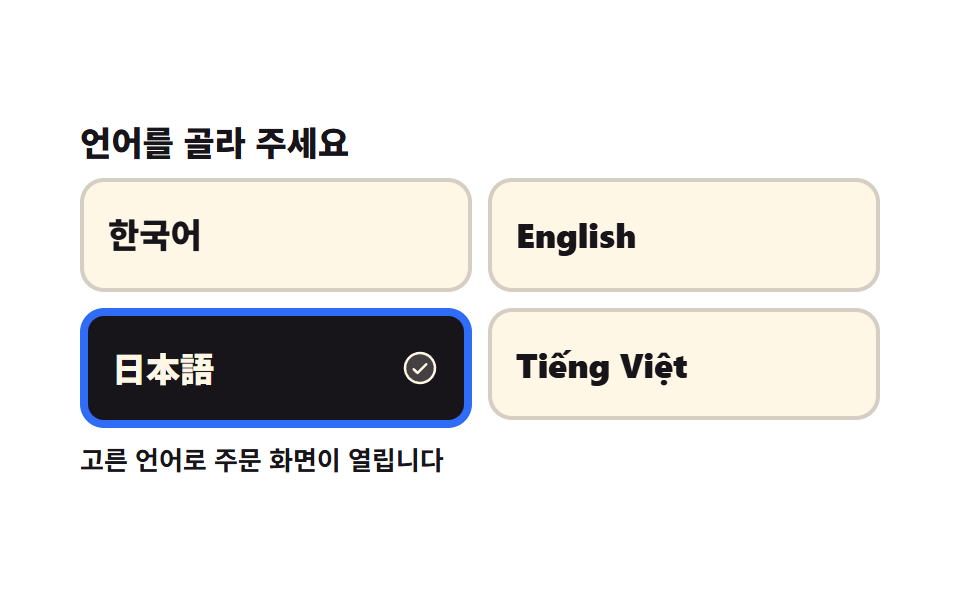 02 kiosk-language-first-choice
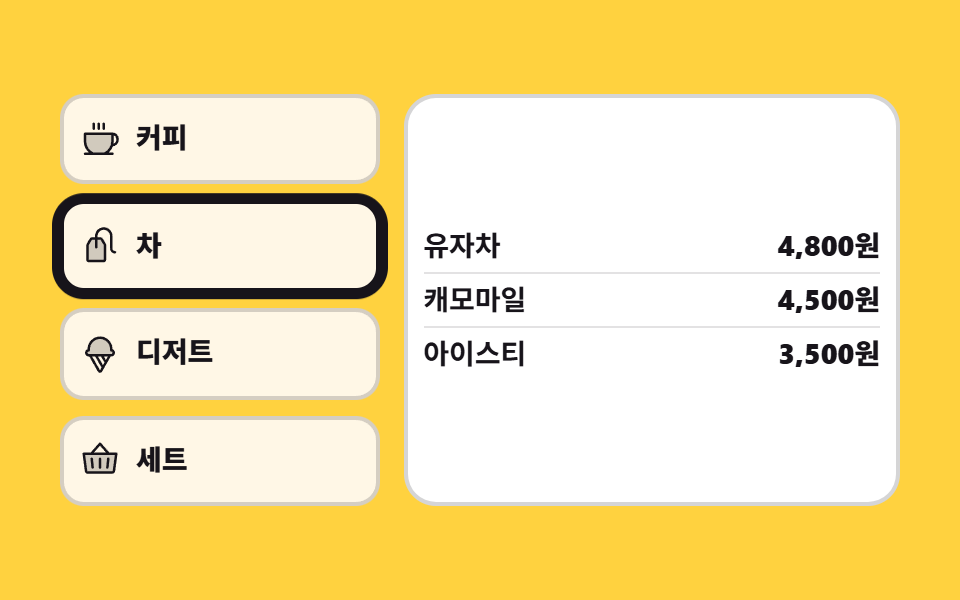 03 kiosk-category-rail-vertical
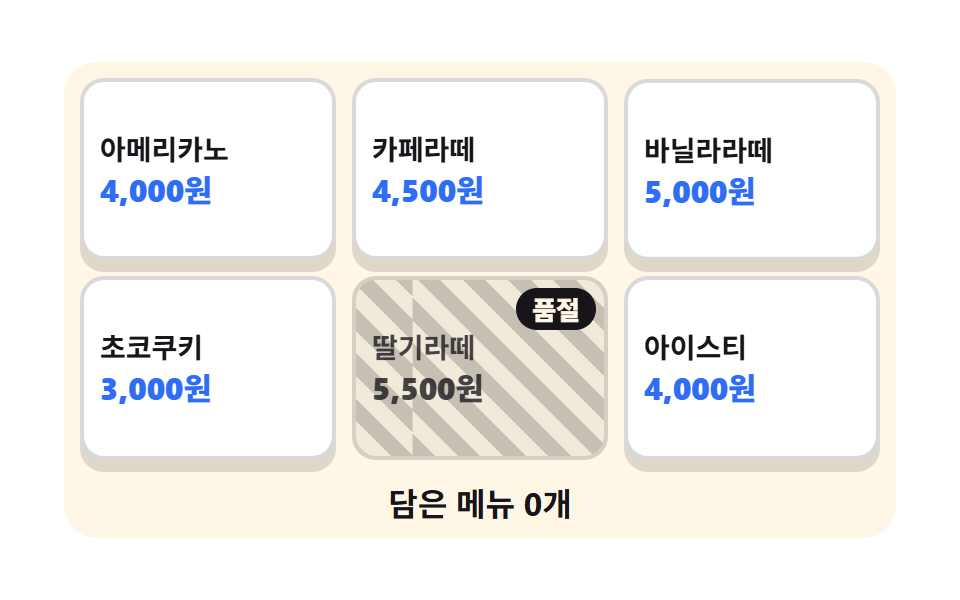 04 kiosk-menu-tile-soldout
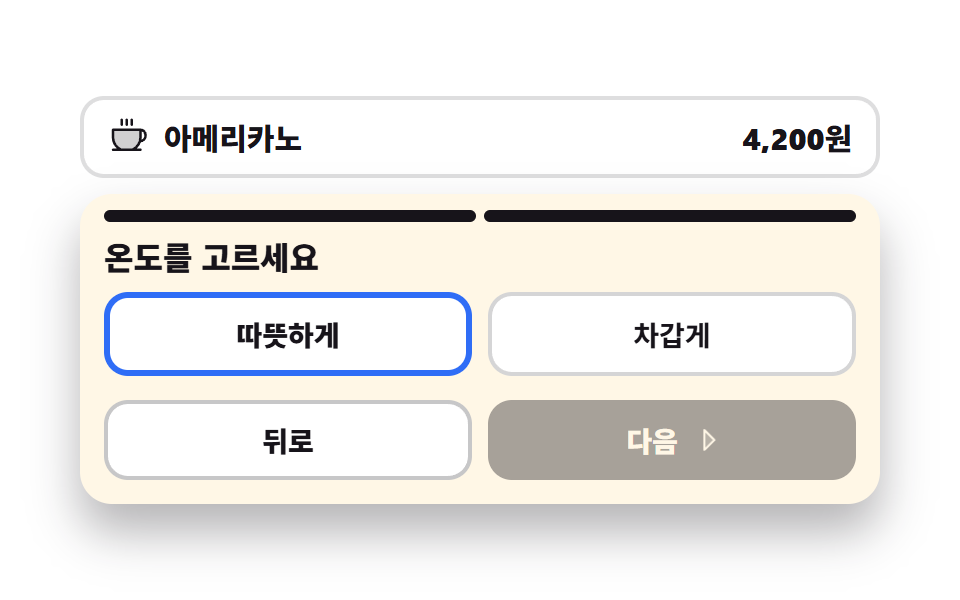 05 kiosk-option-sheet-step
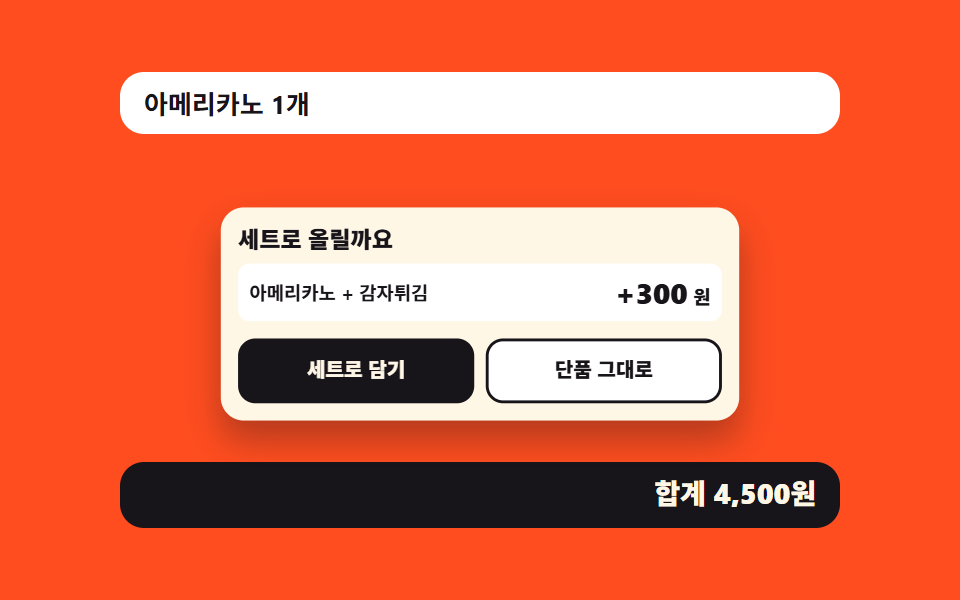 06 kiosk-combo-upsell-sheet
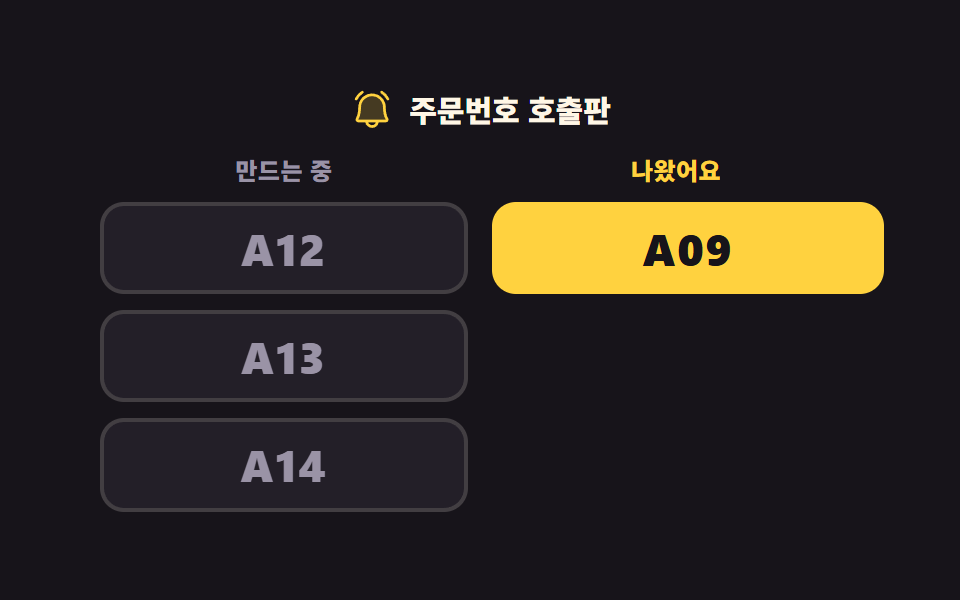 07 kiosk-order-number-board
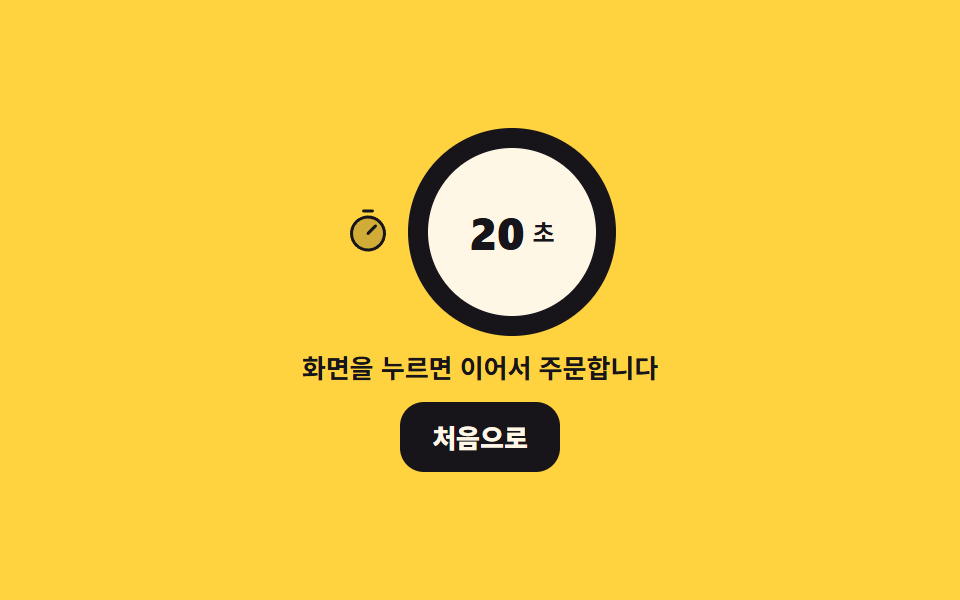 08 kiosk-timeout-return-home
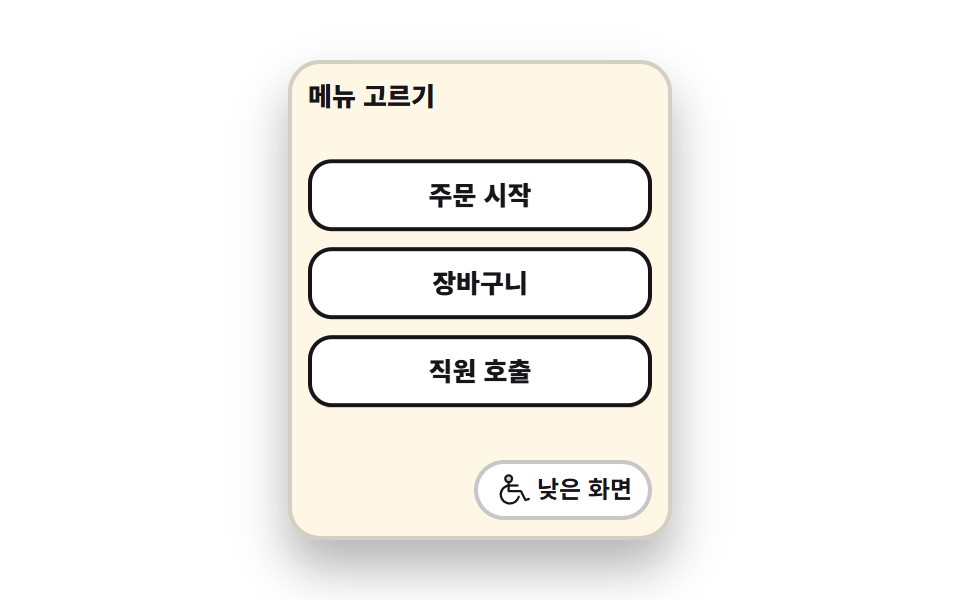 09 kiosk-low-reach-mode
Auto-plays · click a tile to jump to its section · all nine in one zip
- 01 Idle attract screen
- 02 Language first screen
- 03 Vertical category rail
- 04 Menu tiles and the sold-out cell
- 05 Stepped option sheet
- 06 Combo upsell panel
- 07 Order number board
- 08 Idle timeout back to home
- 09 Low reach mode
The order follows the way a customer meets a terminal, not how hard each screen is to build. Nobody is standing there yet while 01 runs its promo loop, so that goes first, and 02 asks for a language before anything else because every label after it depends on the answer. Then the ordering itself: the rail that groups the menu (03), the tiles that hold it (04), the option sheet a tile opens (05), and the combo that sheet leads into (06). 07 belongs to the pickup counter rather than to the terminal, and the last two are about what happens when a person walks away (08) or cannot reach the top of the screen (09). Read them as kiosk ui design examples you can press rather than screenshots, since every number below came out of a Playwright run against the demos on this page. In-store terminals sit on a different axis from web commerce, so quantity steppers, coupons, and payment methods stay in Checkout Page Design — 9 Cart Patterns, No Library, the press feedback under a finger is in 9 CSS Button Click Feedback Effects, Copy-Paste, the pill-shaped choice controls that 03 and 05 deliberately avoid are in 9 Segmented Control UI Patterns — Copy-Paste, and what a terminal should show when it has nothing to show is in 9 Empty State UI Design Cards Drawn in Pure CSS. Swap the finger for a mouse and the same interaction pillar gives you 3D Hover Effect CSS: 9 Pointer-Following Scenes; to put a character on the idle screen of 01, Mascot Animation: 9 CSS Parts from Wave to Sleep has nine of them.
Each preview loop was sampled as 24 frames, which leaves 23 gaps to compare, and this is what the nine came back with:
| # | Screen | Changed area | Frames that moved | Frame-to-frame intensity |
|---|---|---|---|---|
| 01 | Idle attract screen | 29.122% | 23 of 23 | 149.3 |
| 02 | Language first screen | 35.997% | 15 of 23 | 103.6 |
| 03 | Vertical category rail | 4.647% | 9 of 23 | 178.4 |
| 04 | Menu tiles and the sold-out cell | 18.788% | 23 of 23 | 47.1 |
| 05 | Stepped option sheet | 14.037% | 17 of 23 | 52.2 |
| 06 | Combo upsell panel | 34.771% | 17 of 23 | 123.9 |
| 07 | Order number board | 31.229% | 17 of 23 | 114.4 |
| 08 | Idle timeout back to home | 2.486% | 18 of 23 | 177.9 |
| 09 | Low reach mode | 20.542% | 15 of 23 | 98.8 |
01Idle attract screen
What an attract loop is for
While nobody touches it, three promo cards swap on a hard cut and a timer bar fills underneath, which is the waiting state of a terminal by a shop door. The swap runs on steps(1, end) so no sampled frame catches two promos half-faded over each other, and the bar and the nudging hand icon share the same two-second clock. One tap drops .is-demo, takes the attract button to 0×0, brings the order panel up at 400×206px, and puts focus on its heading.
<main class="stage">
<div class="ka is-demo" id="ka">
  <button type="button" class="ka__attract" id="attract" aria-label="Tap the screen to start your order">
    <span class="ka__promo" aria-hidden="true">
      <span class="ka__slide ka__slide--a"><b class="ka__big">20%</b><i class="ka__sub">Coffee deal today</i></span>
      <span class="ka__slide ka__slide--b"><b class="ka__big">NEW</b><i class="ka__sub">Season latte is here</i></span>
      <span class="ka__slide ka__slide--c"><b class="ka__big">TO GO</b><i class="ka__sub">Takeout orders too</i></span>
    </span>
    <span class="ka__bar" aria-hidden="true"><i class="ka__fill"></i></span>
    <span class="ka__cta">
      <svg xmlns="http://www.w3.org/2000/svg" viewBox="0 0 256 256" fill="currentColor" class="ka__ico" aria-hidden="true"><path d="M216,148v36c0,24-8,40-8,40H72L42.68,174a20,20,0,0,1,34.64-20L96,184V76a20,20,0,0,1,40,0v56a20,20,0,0,1,40,0v16a20,20,0,0,1,40,0Z" opacity="0.2"/><path d="M56,76a60,60,0,0,1,120,0,8,8,0,0,1-16,0,44,44,0,0,0-88,0,8,8,0,1,1-16,0Zm140,44a27.9,27.9,0,0,0-13.36,3.39A28,28,0,0,0,144,106.7V76a28,28,0,0,0-56,0v80l-3.82-6.13a28,28,0,0,0-48.41,28.17l29.32,50A8,8,0,1,0,78.89,220L49.6,170a12,12,0,1,1,20.78-12l.14.23,18.68,30A8,8,0,0,0,104,184V76a12,12,0,0,1,24,0v68a8,8,0,1,0,16,0V132a12,12,0,0,1,24,0v20a8,8,0,0,0,16,0v-4a12,12,0,0,1,24,0v36c0,21.61-7.1,36.3-7.16,36.42a8,8,0,0,0,3.58,10.73A7.9,7.9,0,0,0,208,232a8,8,0,0,0,7.16-4.42c.37-.73,8.85-18,8.85-43.58V148A28,28,0,0,0,196,120Z"/></svg>
      <span class="ka__ctaText">Tap the screen to start your order</span>
    </span>
  </button>
  <div class="ka__order" id="order" hidden>
    <p class="ka__head" id="head" tabindex="-1">What would you like</p>
    <ul class="ka__tiles">
      <li><button type="button" class="ka__tile">Coffee</button></li>
      <li><button type="button" class="ka__tile">Tea</button></li>
      <li><button type="button" class="ka__tile">Dessert</button></li>
      <li><button type="button" class="ka__tile">Combo</button></li>
    </ul>
    <button type="button" class="ka__back" id="back">Back to start</button>
  </div>
</div>
</main>@use "../../../../site/static/demo-tokens" as *;
// 유휴 화면 — 아무도 안 만지는 동안 광고가 스스로 돌고, 손이 닿으면 주문 화면으로 넘어간다.
// 슬라이드 교체는 steps(1, end) 컷이다. opacity 로 서서히 교차하면 24장 표본의 중간 프레임이
// 두 광고가 반투명하게 겹친 유령이 되고 그 장이 poster 로 뽑힌다.
// 컷만 있으면 움직인 프레임이 두세 장으로 떨어지므로, 남은 시간을 알리는 막대(scaleX)와
// 손 아이콘의 위아래 흔들림을 같은 2초 시계에 붙여 칸을 채운다.
$duration: $dur-loop;
$easing: $ease-spring;
$color: $subject-blue;
@include stage($stage-ink);
.ka { width: 100%; max-width: 400px; }
.ka__attract {
display: block; width: 100%; padding: $sp-3; margin: 0; cursor: pointer;
border: 0; border-radius: $r-card; background: $subject-cream; text-align: left;
font-family: inherit; color: $subject-ink; box-shadow: $shadow-raised;
}
.ka__attract:focus-visible { outline: 3px solid $color; outline-offset: 3px; }
// display 를 준 요소는 UA 의 [hidden]{display:none} 을 이긴다 — 두 화면이 겹쳐 서는 것을 여기서 막는다
.ka [hidden] { display: none; }
.ka__promo {
position: relative; display: block; overflow: hidden;
height: clamp(64px, 22vw, 112px); border-radius: $r-sm;
}
.ka__slide {
position: absolute; inset: 0; display: grid; place-content: center; gap: $sp-1;
text-align: center; opacity: 0; color: $subject-ink;
}
.ka__slide--a { background: $stage-yellow; opacity: 1; }
.ka__slide--b { background: $subject-mint; }
.ka__slide--c { background: $stage-orange; }
.ka__big { font-weight: 800; font-size: clamp(20px, 7vw, 34px); line-height: 1; font-style: normal; }
.ka__sub { font-weight: 700; font-size: clamp(11px, 3vw, 14px); line-height: 1.2; font-style: normal; }
.ka__bar {
display: block; height: 6px; margin: $sp-2 0; border-radius: $r-pill;
background: rgba(23, 20, 26, .16); overflow: hidden;
}
// 채움 막대는 왼쪽 변이 시작점이라 transform-origin 을 왼쪽에 둔다 (붙는 지점이 있는 요소)
.ka__fill {
display: block; height: 100%; border-radius: $r-pill; background: $color;
transform: scaleX(0); transform-origin: left center;
}
.ka__cta {
display: flex; align-items: center; justify-content: center; gap: $sp-2;
padding: $sp-3 $sp-2; border-radius: $r-control;
background: $subject-ink; color: $subject-cream;
font-weight: 800; font-size: clamp(12px, 3.2vw, 15px);
}
.ka__ico { width: clamp(18px, 5vw, 24px); height: clamp(18px, 5vw, 24px); flex: 0 0 auto; }
.ka__ctaText { line-height: 1.2; }
.ka__order { padding: $sp-3; border-radius: $r-card; background: $subject-cream; box-shadow: $shadow-raised; }
.ka__head {
margin: 0 0 $sp-2; font-weight: 800; font-size: clamp(13px, 3.6vw, 17px); color: $subject-ink;
}
.ka__head:focus-visible { outline: 3px solid $color; outline-offset: 2px; }
.ka__tiles {
display: grid; grid-template-columns: repeat(2, 1fr); gap: $sp-2;
margin: 0 0 $sp-2; padding: 0; list-style: none;
}
// 버튼 격자는 width:100% 를 못 박는다 — 버튼은 fit-content 라 1fr 칸이 내용 폭으로 접힌다
.ka__tile {
width: 100%; padding: $sp-3 $sp-2; cursor: pointer;
border: 2px solid rgba(23, 20, 26, .18); border-radius: $r-control;
background: $stage-paper; color: $subject-ink;
font-family: inherit; font-weight: 800; font-size: clamp(12px, 3.2vw, 15px);
}
.ka__tile:focus-visible { outline: 3px solid $color; outline-offset: 2px; }
.ka__back {
width: 100%; padding: $sp-2; cursor: pointer; border: 0; border-radius: $r-control;
background: $subject-ink; color: $subject-cream;
font-family: inherit; font-weight: 700; font-size: clamp(11px, 3vw, 13px);
}
.ka__back:focus-visible { outline: 3px solid $color; outline-offset: 2px; }
// ── 미리보기 루프 ────────────────────────────────────────────────
// 광고 세 장이 2초를 3등분해 컷으로 갈린다. 세 애니메이션이 같은 2초 시계를 쓰므로 어긋나지 않는다.
.ka.is-demo .ka__slide {
animation-name: kaSlide; animation-duration: $duration;
animation-timing-function: steps(1, end); animation-iteration-count: infinite;
animation-fill-mode: backwards;
}
.ka.is-demo .ka__slide--b { animation-delay: calc(#{$duration} / -3 * 2); }
.ka.is-demo .ka__slide--c { animation-delay: calc(#{$duration} / -3); }
@keyframes kaSlide {
0% { opacity: 1; }
33.34%, 100% { opacity: 0; }
}
.ka.is-demo .ka__fill {
animation-name: kaFill; animation-duration: $duration;
animation-timing-function: linear; animation-iteration-count: infinite;
}
@keyframes kaFill {
0% { transform: scaleX(0); }
33.33% { transform: scaleX(1); }
33.34% { transform: scaleX(0); }
66.66% { transform: scaleX(1); }
66.67% { transform: scaleX(0); }
100% { transform: scaleX(1); }
}
// 아이콘은 자기 중심에서 흔들린다 — 누르라는 손짓이라 위아래로만 움직인다
.ka.is-demo .ka__ico {
animation-name: kaTap; animation-duration: $duration;
animation-timing-function: $easing; animation-iteration-count: infinite;
}
@keyframes kaTap {
0%, 100% { transform: translateY(0); }
16% { transform: translateY(5px); }
32% { transform: translateY(0); }
48% { transform: translateY(5px); }
64% { transform: translateY(0); }
}
// 폰 폭에서 쓸 수 있는 세로는 174px 남짓이다. 주문 칸(머리말 + 타일 네 칸 + 되돌아가기)이
// 그 안에 들어오도록 간격과 안쪽 여백만 줄인다 — 누르는 칸의 가로 폭은 그대로 둔다
@media (max-width: 340px) {
.ka__attract, .ka__order { padding: $sp-2; }
.ka__cta { padding: $sp-2; }
.ka__head { margin-bottom: $sp-1; }
.ka__tiles { gap: $sp-1; margin-bottom: $sp-1; }
.ka__tile { padding: $sp-2 $sp-1; }
}
@media (prefers-reduced-motion: reduce) {
.ka.is-demo .ka__slide,
.ka.is-demo .ka__fill,
.ka.is-demo .ka__ico { animation: none !important; }
// 움직임 없이 첫 광고와 3분의 1쯤 찬 막대를 세워 둔다
.ka.is-demo .ka__slide--a { opacity: 1 !important; }
.ka.is-demo .ka__slide--b,
.ka.is-demo .ka__slide--c { opacity: 0 !important; }
.ka.is-demo .ka__fill { transform: scaleX(.34) !important; }
}html, body {
margin: 0;
overflow: hidden;
}
.stage {
box-sizing: border-box;
min-height: 100vh;
display: grid;
place-items: center;
margin: 0;
background: #17141a;
font-family: -apple-system, "Segoe UI", "Noto Sans KR", sans-serif;
padding: clamp(8px, 4vw, 24px);
}
.ka {
width: 100%;
max-width: 400px;
}
.ka__attract {
display: block;
width: 100%;
padding: 12px;
margin: 0;
cursor: pointer;
border: 0;
border-radius: 16px;
background: #fff7e6;
text-align: left;
font-family: inherit;
color: #17141a;
box-shadow: 0 14px 24px rgba(23, 20, 26, 0.32);
}
.ka__attract:focus-visible {
outline: 3px solid #2f6df6;
outline-offset: 3px;
}
.ka [hidden] {
display: none;
}
.ka__promo {
position: relative;
display: block;
overflow: hidden;
height: clamp(64px, 22vw, 112px);
border-radius: 8px;
}
.ka__slide {
position: absolute;
inset: 0;
display: grid;
place-content: center;
gap: 4px;
text-align: center;
opacity: 0;
color: #17141a;
}
.ka__slide--a {
background: #ffd23f;
opacity: 1;
}
.ka__slide--b {
background: #4cd4a6;
}
.ka__slide--c {
background: #ff4d1f;
}
.ka__big {
font-weight: 800;
font-size: clamp(20px, 7vw, 34px);
line-height: 1;
font-style: normal;
}
.ka__sub {
font-weight: 700;
font-size: clamp(11px, 3vw, 14px);
line-height: 1.2;
font-style: normal;
}
.ka__bar {
display: block;
height: 6px;
margin: 8px 0;
border-radius: 999px;
background: rgba(23, 20, 26, 0.16);
overflow: hidden;
}
.ka__fill {
display: block;
height: 100%;
border-radius: 999px;
background: #2f6df6;
transform: scaleX(0);
transform-origin: left center;
}
.ka__cta {
display: flex;
align-items: center;
justify-content: center;
gap: 8px;
padding: 12px 8px;
border-radius: 12px;
background: #17141a;
color: #fff7e6;
font-weight: 800;
font-size: clamp(12px, 3.2vw, 15px);
}
.ka__ico {
width: clamp(18px, 5vw, 24px);
height: clamp(18px, 5vw, 24px);
flex: 0 0 auto;
}
.ka__ctaText {
line-height: 1.2;
}
.ka__order {
padding: 12px;
border-radius: 16px;
background: #fff7e6;
box-shadow: 0 14px 24px rgba(23, 20, 26, 0.32);
}
.ka__head {
margin: 0 0 8px;
font-weight: 800;
font-size: clamp(13px, 3.6vw, 17px);
color: #17141a;
}
.ka__head:focus-visible {
outline: 3px solid #2f6df6;
outline-offset: 2px;
}
.ka__tiles {
display: grid;
grid-template-columns: repeat(2, 1fr);
gap: 8px;
margin: 0 0 8px;
padding: 0;
list-style: none;
}
.ka__tile {
width: 100%;
padding: 12px 8px;
cursor: pointer;
border: 2px solid rgba(23, 20, 26, 0.18);
border-radius: 12px;
background: #ffffff;
color: #17141a;
font-family: inherit;
font-weight: 800;
font-size: clamp(12px, 3.2vw, 15px);
}
.ka__tile:focus-visible {
outline: 3px solid #2f6df6;
outline-offset: 2px;
}
.ka__back {
width: 100%;
padding: 8px;
cursor: pointer;
border: 0;
border-radius: 12px;
background: #17141a;
color: #fff7e6;
font-family: inherit;
font-weight: 700;
font-size: clamp(11px, 3vw, 13px);
}
.ka__back:focus-visible {
outline: 3px solid #2f6df6;
outline-offset: 2px;
}
.ka.is-demo .ka__slide {
animation-name: kaSlide;
animation-duration: 2s;
animation-timing-function: steps(1, end);
animation-iteration-count: infinite;
animation-fill-mode: backwards;
}
.ka.is-demo .ka__slide--b {
animation-delay: calc(2s / -3 * 2);
}
.ka.is-demo .ka__slide--c {
animation-delay: calc(2s / -3);
}
@keyframes kaSlide {
0% {
opacity: 1;
}
33.34%, 100% {
opacity: 0;
}
}
.ka.is-demo .ka__fill {
animation-name: kaFill;
animation-duration: 2s;
animation-timing-function: linear;
animation-iteration-count: infinite;
}
@keyframes kaFill {
0% {
transform: scaleX(0);
}
33.33% {
transform: scaleX(1);
}
33.34% {
transform: scaleX(0);
}
66.66% {
transform: scaleX(1);
}
66.67% {
transform: scaleX(0);
}
100% {
transform: scaleX(1);
}
}
.ka.is-demo .ka__ico {
animation-name: kaTap;
animation-duration: 2s;
animation-timing-function: cubic-bezier(0.2, 0.8, 0.2, 1);
animation-iteration-count: infinite;
}
@keyframes kaTap {
0%, 100% {
transform: translateY(0);
}
16% {
transform: translateY(5px);
}
32% {
transform: translateY(0);
}
48% {
transform: translateY(5px);
}
64% {
transform: translateY(0);
}
}
@media (max-width: 340px) {
.ka__attract, .ka__order {
padding: 8px;
}
.ka__cta {
padding: 8px;
}
.ka__head {
margin-bottom: 4px;
}
.ka__tiles {
gap: 4px;
margin-bottom: 4px;
}
.ka__tile {
padding: 8px 4px;
}
}
@media (prefers-reduced-motion: reduce) {
.ka.is-demo .ka__slide,
.ka.is-demo .ka__fill,
.ka.is-demo .ka__ico {
animation: none !important;
}
.ka.is-demo .ka__slide--a {
opacity: 1 !important;
}
.ka.is-demo .ka__slide--b,
.ka.is-demo .ka__slide--c {
opacity: 0 !important;
}
.ka.is-demo .ka__fill {
transform: scaleX(0.34) !important;
}
}var ka = document.getElementById('ka');
var attract = document.getElementById('attract');
var order = document.getElementById('order');
var back = document.getElementById('back');
var head = document.getElementById('head');
// 유휴 화면은 "아무도 안 만질 때 스스로 도는 화면"이다. 손이 닿는 순간 광고를 멈추고 주문 화면으로 넘긴다.
// 미리보기 루프(.is-demo)는 CSS 키프레임이 돌리고, 사람이 누르면 여기서 루프를 떼고 화면을 바꾼다.
function start() {
ka.classList.remove('is-demo');
attract.hidden = true;
order.hidden = false;
head.focus({ preventScroll: true });
}
function home() {
order.hidden = true;
attract.hidden = false;
attract.focus({ preventScroll: true });
}
attract.addEventListener('click', start);
back.addEventListener('click', function (e) { e.stopPropagation(); home(); });// AttractIdleScreen — vanilla 판(run/298/demo/01-kiosk-attract-idle-loop/index.html) 의 React 포트.
// 유휴 화면은 "아무도 안 만질 때 스스로 도는 화면"이다. 손이 닿는 순간 광고를 멈추고 주문 화면으로 넘긴다.
// 미리보기 루프(.isDemo)는 CSS 키프레임이 돌리고, 사람이 누르면 여기서 루프를 떼고 화면을 바꾼다.
// 두 화면은 hidden 속성 하나로 갈린다 — 모듈의 `.root [hidden] { display: none; }` 이
// display 를 준 요소에서도 UA 기본값을 이겨 준다(안 그러면 두 화면이 겹쳐 선다). 값·수치는 vanilla 와 같다.
import { useEffect, useRef, useState } from "react";
import type { CSSProperties } from "react";
import styles from "./AttractIdleScreen.module.scss";
export type AttractIdleScreenProps = {
duration?: number;
easing?: string;
color?: string;
};
type Vars = CSSProperties & {
"--duration"?: string;
"--easing"?: string;
"--color"?: string;
};
// ambient 타입에는 React 이벤트 제네릭이 없다 — 핸들러가 실제로 쓰는 것만 지역 타입으로 적는다
type StopEvt = { stopPropagation(): void };
const CTA_LABEL = "화면을 눌러 주문을 시작하세요";
const ORDER_HEAD = "무엇을 드릴까요";
const BACK_LABEL = "처음 화면으로";
const SLIDES: { cls: string; big: string; sub: string }[] = [
{ cls: "slideA", big: "20%", sub: "오늘의 커피 할인" },
{ cls: "slideB", big: "NEW", sub: "시즌 라떼 나왔어요" },
{ cls: "slideC", big: "TO GO", sub: "포장 주문도 여기서" },
];
const TILES: string[] = ["커피", "홍차", "디저트", "세트"];
export default function AttractIdleScreen({
duration = 2000,
easing = "cubic-bezier(.2, .8, .2, 1)",
color = "#2f6df6",
}: AttractIdleScreenProps) {
const attractRef = useRef<HTMLButtonElement | null>(null);
const headRef = useRef<HTMLParagraphElement | null>(null);
// 첫 렌더에는 초점을 옮기지 않는다 — 사람이 만진 뒤부터가 화면 전환이다
const touchedRef = useRef<boolean>(false);
const [ordering, setOrdering] = useState(false);
const [demo, setDemo] = useState(true);
const vars: Vars = { "--duration": `${duration}ms`, "--easing": easing, "--color": color };
useEffect(() => {
if (!touchedRef.current) return;
const target = ordering ? headRef.current : attractRef.current;
if (target) target.focus({ preventScroll: true });
}, [ordering]);
function start(): void {
touchedRef.current = true;
setDemo(false);
setOrdering(true);
}
function home(event: StopEvt): void {
event.stopPropagation();
touchedRef.current = true;
setOrdering(false);
}
const cls = [styles.root, demo ? styles.isDemo : ""].filter(Boolean).join(" ");
return (
<main className={styles.stage}>
<div className={cls} style={vars}>
<button
type="button"
className={styles.attract}
ref={attractRef}
hidden={ordering}
aria-label={CTA_LABEL}
onClick={start}
>
<span className={styles.promo} aria-hidden="true">
{SLIDES.map((slide) => (
<span key={slide.cls} className={`${styles.slide} ${styles[slide.cls]}`}>
<b className={styles.big}>{slide.big}</b>
<i className={styles.sub}>{slide.sub}</i>
</span>
))}
</span>
<span className={styles.bar} aria-hidden="true"><i className={styles.fill}></i></span>
<span className={styles.cta}>
<svg xmlns="http://www.w3.org/2000/svg" viewBox="0 0 256 256" fill="currentColor" className={styles.ico} aria-hidden="true"><path d="M216,148v36c0,24-8,40-8,40H72L42.68,174a20,20,0,0,1,34.64-20L96,184V76a20,20,0,0,1,40,0v56a20,20,0,0,1,40,0v16a20,20,0,0,1,40,0Z" opacity="0.2"/><path d="M56,76a60,60,0,0,1,120,0,8,8,0,0,1-16,0,44,44,0,0,0-88,0,8,8,0,1,1-16,0Zm140,44a27.9,27.9,0,0,0-13.36,3.39A28,28,0,0,0,144,106.7V76a28,28,0,0,0-56,0v80l-3.82-6.13a28,28,0,0,0-48.41,28.17l29.32,50A8,8,0,1,0,78.89,220L49.6,170a12,12,0,1,1,20.78-12l.14.23,18.68,30A8,8,0,0,0,104,184V76a12,12,0,0,1,24,0v68a8,8,0,1,0,16,0V132a12,12,0,0,1,24,0v20a8,8,0,0,0,16,0v-4a12,12,0,0,1,24,0v36c0,21.61-7.1,36.3-7.16,36.42a8,8,0,0,0,3.58,10.73A7.9,7.9,0,0,0,208,232a8,8,0,0,0,7.16-4.42c.37-.73,8.85-18,8.85-43.58V148A28,28,0,0,0,196,120Z"/></svg>
<span className={styles.ctaText}>{CTA_LABEL}</span>
</span>
</button>
<div className={styles.order} hidden={!ordering}>
<p className={styles.head} ref={headRef} tabIndex={-1}>{ORDER_HEAD}</p>
<ul className={styles.tiles}>
{TILES.map((tile) => (
<li key={tile}><button type="button" className={styles.tile}>{tile}</button></li>
))}
</ul>
<button type="button" className={styles.back} onClick={home}>{BACK_LABEL}</button>
</div>
</div>
</main>
);
}01 · Idle attract screen — Measured area 29.122% · moving frames 23/23Original by GODRICH · SCSS and React ship in the zip · See the password
// An idle attract screen is the screen that runs by itself while nobody is touching it. The moment a hand lands, the promos stop and the order screen takes over.
// The preview loop (.is-demo) is driven by CSS keyframes; when a person presses, this code drops the loop and swaps the screen.
function start() {
  ka.classList.remove('is-demo');
  attract.hidden = true;
  order.hidden = false;
  head.focus({ preventScroll: true });
}

function home() {
  order.hidden = true;
  attract.hidden = false;
  attract.focus({ preventScroll: true });
}

attract.addEventListener('click', start);
back.addEventListener('click', function (e) { e.stopPropagation(); home(); });
02Language first screen
Why the language comes first
Four language buttons rise in turn and only the chosen one carries a 4px blue border and a check mark, with the hint line under the grid switching into that language in the same frame. The names stay in their own scripts — 한국어, English, 日本語, Tiếng Việt — because a language list is the one label nobody should translate, so they sit in data-name and are drawn by CSS content where no string dictionary can sweep them up. Clicking, tabbing then pressing Space, and pressing Enter all moved the choice, and aria-pressed read true on exactly one cell in every pass.
<main class="stage">
<div class="kl is-demo" id="kl">
  <p class="kl__head">Choose your language</p>
  <div class="kl__grid" role="group" aria-label="Screen language">
    <!-- _의도적한국어: 언어 이름은 그 언어 표기가 정석이라 번역하지 않는다. 문구 사전이 걷어 가지 않도록 data-name 에 두고 CSS content 로 그린다 -->
    <div class="kl__cell kl__cell--1">
      <button type="button" class="kl__opt" data-lang="ko" aria-pressed="true">
        <span class="kl__name" data-name="한국어"></span>
        <svg xmlns="http://www.w3.org/2000/svg" viewBox="0 0 256 256" fill="currentColor" class="kl__check" aria-hidden="true"><path d="M224,128a96,96,0,1,1-96-96A96,96,0,0,1,224,128Z" opacity="0.2"/><path d="M173.66,98.34a8,8,0,0,1,0,11.32l-56,56a8,8,0,0,1-11.32,0l-24-24a8,8,0,0,1,11.32-11.32L112,148.69l50.34-50.35A8,8,0,0,1,173.66,98.34ZM232,128A104,104,0,1,1,128,24,104.11,104.11,0,0,1,232,128Zm-16,0a88,88,0,1,0-88,88A88.1,88.1,0,0,0,216,128Z"/></svg>
      </button>
    </div>
    <div class="kl__cell kl__cell--2">
      <button type="button" class="kl__opt" data-lang="en" aria-pressed="false">
        <span class="kl__name" data-name="English"></span>
        <svg xmlns="http://www.w3.org/2000/svg" viewBox="0 0 256 256" fill="currentColor" class="kl__check" aria-hidden="true"><path d="M224,128a96,96,0,1,1-96-96A96,96,0,0,1,224,128Z" opacity="0.2"/><path d="M173.66,98.34a8,8,0,0,1,0,11.32l-56,56a8,8,0,0,1-11.32,0l-24-24a8,8,0,0,1,11.32-11.32L112,148.69l50.34-50.35A8,8,0,0,1,173.66,98.34ZM232,128A104,104,0,1,1,128,24,104.11,104.11,0,0,1,232,128Zm-16,0a88,88,0,1,0-88,88A88.1,88.1,0,0,0,216,128Z"/></svg>
      </button>
    </div>
    <div class="kl__cell kl__cell--3">
      <button type="button" class="kl__opt" data-lang="ja" aria-pressed="false">
        <span class="kl__name" data-name="日本語"></span>
        <svg xmlns="http://www.w3.org/2000/svg" viewBox="0 0 256 256" fill="currentColor" class="kl__check" aria-hidden="true"><path d="M224,128a96,96,0,1,1-96-96A96,96,0,0,1,224,128Z" opacity="0.2"/><path d="M173.66,98.34a8,8,0,0,1,0,11.32l-56,56a8,8,0,0,1-11.32,0l-24-24a8,8,0,0,1,11.32-11.32L112,148.69l50.34-50.35A8,8,0,0,1,173.66,98.34ZM232,128A104,104,0,1,1,128,24,104.11,104.11,0,0,1,232,128Zm-16,0a88,88,0,1,0-88,88A88.1,88.1,0,0,0,216,128Z"/></svg>
      </button>
    </div>
    <div class="kl__cell kl__cell--4">
      <button type="button" class="kl__opt" data-lang="vi" aria-pressed="false">
        <span class="kl__name" data-name="Tiếng Việt"></span>
        <svg xmlns="http://www.w3.org/2000/svg" viewBox="0 0 256 256" fill="currentColor" class="kl__check" aria-hidden="true"><path d="M224,128a96,96,0,1,1-96-96A96,96,0,0,1,224,128Z" opacity="0.2"/><path d="M173.66,98.34a8,8,0,0,1,0,11.32l-56,56a8,8,0,0,1-11.32,0l-24-24a8,8,0,0,1,11.32-11.32L112,148.69l50.34-50.35A8,8,0,0,1,173.66,98.34ZM232,128A104,104,0,1,1,128,24,104.11,104.11,0,0,1,232,128Zm-16,0a88,88,0,1,0-88,88A88.1,88.1,0,0,0,216,128Z"/></svg>
      </button>
    </div>
  </div>
  <p class="kl__hint" id="klHint">The order screen opens in your language</p>
</div>
</main>@use "../../../../site/static/demo-tokens" as *;
// 언어 고르는 첫 화면 — 큰 칸 네 개로 언어를 고르고, 고른 칸에만 체크가 붙는다.
// 선택 표시(굵은 테두리 · 먹 배경 · 체크 아이콘)는 전부 같은 steps(1, end) 시각표 위에 있다.
// opacity 로 서서히 교차하면 24장 표본의 중간 프레임이 두 칸이 반쯤 켜진 유령이 되고 그 장이 poster 로 뽑힌다.
// 컷만 있으면 움직인 프레임이 두세 장으로 떨어지므로, 네 칸이 차례로 떠오르는 translateY 를
// 같은 2초 시계에 계속 돌려 칸을 채운다.
$duration: $dur-loop;
$easing: $ease-spring;
$color: $subject-blue;
@include stage($stage-paper);
.kl { width: 100%; max-width: 400px; }
.kl__head {
margin: 0 0 $sp-2; font-weight: 800; font-size: clamp(13px, 3.6vw, 17px);
line-height: 1.2; color: $subject-ink;
}
.kl__grid { display: grid; grid-template-columns: repeat(2, 1fr); gap: $sp-2; }
// 칸(떠오름)과 버튼(선택 컷)을 나눠 둔다 — 둘의 animation-delay 가 다르기 때문이다
.kl__cell { display: block; }
// 버튼 격자는 width:100% 를 못 박는다 — 버튼은 fit-content 라 1fr 칸이 내용 폭으로 접힌다
.kl__opt {
box-sizing: border-box; width: 100%;
display: flex; align-items: center; justify-content: space-between; gap: $sp-2;
padding: $sp-4 $sp-3; cursor: pointer;
border: 2px solid rgba(23, 20, 26, .18); border-radius: $r-control;
background: $subject-cream; color: $subject-ink;
font-family: inherit; font-weight: 800; font-size: clamp(12px, 3.6vw, 17px);
line-height: 1.2; text-align: left;
}
.kl__opt:focus-visible { outline: 3px solid $color; outline-offset: 2px; }
// 언어 이름은 번역하지 않는 값이라 data-name 에 두고 여기서 그린다 (index.html 의 _의도적한국어 주석 참고)
.kl__name::after { content: attr(data-name); }
// 체크는 안 고른 칸에서도 자리를 차지한다 — 고를 때 글자가 밀리지 않는다
.kl__check {
width: clamp(14px, 4.4vw, 20px); height: clamp(14px, 4.4vw, 20px);
flex: 0 0 auto; opacity: 0;
}
// 고른 칸 — 정적 경로. 손이 닿으면 JS 가 aria-pressed 를 옮기고 이 규칙이 그대로 그린다
.kl__opt[aria-pressed="true"] {
border-width: 4px; border-color: $color;
background: $subject-ink; color: $subject-cream;
}
.kl__opt[aria-pressed="true"] .kl__check { opacity: 1; }
.kl__hint {
margin: $sp-2 0 0; font-weight: 700; font-size: clamp(11px, 3vw, 13px);
line-height: 1.3; color: $subject-ink;
}
// ── 미리보기 루프 ────────────────────────────────────────────────
// 네 칸이 2초를 4등분해 차례로 켜진다. 테두리·배경·글자색·체크가 같은 시각표라 한 프레임에 갈린다.
.kl.is-demo .kl__opt {
animation-name: klSel; animation-duration: $duration;
animation-timing-function: steps(1, end); animation-iteration-count: infinite;
}
.kl.is-demo .kl__check {
animation-name: klCheck; animation-duration: $duration;
animation-timing-function: steps(1, end); animation-iteration-count: infinite;
}
.kl.is-demo .kl__cell--2 .kl__opt,
.kl.is-demo .kl__cell--2 .kl__check { animation-delay: calc(#{$duration} / -4 * 3); }
.kl.is-demo .kl__cell--3 .kl__opt,
.kl.is-demo .kl__cell--3 .kl__check { animation-delay: calc(#{$duration} / -2); }
.kl.is-demo .kl__cell--4 .kl__opt,
.kl.is-demo .kl__cell--4 .kl__check { animation-delay: calc(#{$duration} / -4); }
@keyframes klSel {
0% { border-width: 4px; border-color: $color; background: $subject-ink; color: $subject-cream; }
25%, 100% { border-width: 2px; border-color: rgba(23, 20, 26, .18); background: $subject-cream; color: $subject-ink; }
}
@keyframes klCheck {
0% { opacity: 1; }
25%, 100% { opacity: 0; }
}
// 떠오름 — 컷 옆에 붙이는 작은 움직임. 반투명이 안 생기는 transform 이라 유령 프레임을 만들지 않는다.
// 지연이 걸린 루프라 fill-mode: backwards 가 없으면 0프레임에 완성 상태가 한 번 번쩍인다.
.kl.is-demo .kl__cell {
animation-name: klRise; animation-duration: $duration;
animation-timing-function: $easing; animation-iteration-count: infinite;
animation-fill-mode: backwards;
}
.kl.is-demo .kl__cell--2 { animation-delay: 80ms; }
.kl.is-demo .kl__cell--3 { animation-delay: 160ms; }
.kl.is-demo .kl__cell--4 { animation-delay: 240ms; }
@keyframes klRise {
0% { transform: translateY(8px); }
22%, 74% { transform: translateY(0); }
88%, 100% { transform: translateY(8px); }
}
@media (max-width: 340px) {
.kl__opt { padding: $sp-2; }
.kl__hint { margin-top: $sp-1; }
}
@media (prefers-reduced-motion: reduce) {
.kl.is-demo .kl__opt,
.kl.is-demo .kl__check,
.kl.is-demo .kl__cell { animation: none !important; }
// 움직임 없이 첫 칸이 고른 상태로 서 있게 값을 못 박는다
.kl.is-demo .kl__cell { transform: translateY(0) !important; }
}html, body {
margin: 0;
overflow: hidden;
}
.stage {
box-sizing: border-box;
min-height: 100vh;
display: grid;
place-items: center;
margin: 0;
background: #ffffff;
font-family: -apple-system, "Segoe UI", "Noto Sans KR", sans-serif;
padding: clamp(8px, 4vw, 24px);
}
.kl {
width: 100%;
max-width: 400px;
}
.kl__head {
margin: 0 0 8px;
font-weight: 800;
font-size: clamp(13px, 3.6vw, 17px);
line-height: 1.2;
color: #17141a;
}
.kl__grid {
display: grid;
grid-template-columns: repeat(2, 1fr);
gap: 8px;
}
.kl__cell {
display: block;
}
.kl__opt {
box-sizing: border-box;
width: 100%;
display: flex;
align-items: center;
justify-content: space-between;
gap: 8px;
padding: 16px 12px;
cursor: pointer;
border: 2px solid rgba(23, 20, 26, 0.18);
border-radius: 12px;
background: #fff7e6;
color: #17141a;
font-family: inherit;
font-weight: 800;
font-size: clamp(12px, 3.6vw, 17px);
line-height: 1.2;
text-align: left;
}
.kl__opt:focus-visible {
outline: 3px solid #2f6df6;
outline-offset: 2px;
}
.kl__name::after {
content: attr(data-name);
}
.kl__check {
width: clamp(14px, 4.4vw, 20px);
height: clamp(14px, 4.4vw, 20px);
flex: 0 0 auto;
opacity: 0;
}
.kl__opt[aria-pressed=true] {
border-width: 4px;
border-color: #2f6df6;
background: #17141a;
color: #fff7e6;
}
.kl__opt[aria-pressed=true] .kl__check {
opacity: 1;
}
.kl__hint {
margin: 8px 0 0;
font-weight: 700;
font-size: clamp(11px, 3vw, 13px);
line-height: 1.3;
color: #17141a;
}
.kl.is-demo .kl__opt {
animation-name: klSel;
animation-duration: 2s;
animation-timing-function: steps(1, end);
animation-iteration-count: infinite;
}
.kl.is-demo .kl__check {
animation-name: klCheck;
animation-duration: 2s;
animation-timing-function: steps(1, end);
animation-iteration-count: infinite;
}
.kl.is-demo .kl__cell--2 .kl__opt,
.kl.is-demo .kl__cell--2 .kl__check {
animation-delay: calc(2s / -4 * 3);
}
.kl.is-demo .kl__cell--3 .kl__opt,
.kl.is-demo .kl__cell--3 .kl__check {
animation-delay: calc(2s / -2);
}
.kl.is-demo .kl__cell--4 .kl__opt,
.kl.is-demo .kl__cell--4 .kl__check {
animation-delay: calc(2s / -4);
}
@keyframes klSel {
0% {
border-width: 4px;
border-color: #2f6df6;
background: #17141a;
color: #fff7e6;
}
25%, 100% {
border-width: 2px;
border-color: rgba(23, 20, 26, 0.18);
background: #fff7e6;
color: #17141a;
}
}
@keyframes klCheck {
0% {
opacity: 1;
}
25%, 100% {
opacity: 0;
}
}
.kl.is-demo .kl__cell {
animation-name: klRise;
animation-duration: 2s;
animation-timing-function: cubic-bezier(0.2, 0.8, 0.2, 1);
animation-iteration-count: infinite;
animation-fill-mode: backwards;
}
.kl.is-demo .kl__cell--2 {
animation-delay: 80ms;
}
.kl.is-demo .kl__cell--3 {
animation-delay: 160ms;
}
.kl.is-demo .kl__cell--4 {
animation-delay: 240ms;
}
@keyframes klRise {
0% {
transform: translateY(8px);
}
22%, 74% {
transform: translateY(0);
}
88%, 100% {
transform: translateY(8px);
}
}
@media (max-width: 340px) {
.kl__opt {
padding: 8px;
}
.kl__hint {
margin-top: 4px;
}
}
@media (prefers-reduced-motion: reduce) {
.kl.is-demo .kl__opt,
.kl.is-demo .kl__check,
.kl.is-demo .kl__cell {
animation: none !important;
}
.kl.is-demo .kl__cell {
transform: translateY(0) !important;
}
}var kl = document.getElementById('kl');
var klHint = document.getElementById('klHint');
var klOpts = [].slice.call(document.querySelectorAll('.kl__opt'));
// 언어 고르기 첫 화면. 고른 칸만 aria-pressed="true" 가 되고, 아래 안내 한 줄이 **고른 언어로** 바뀐다.
// 안내문 한 벌을 상수로 둔다 — 화면 언어가 바뀌는 것을 보여 주는 게 이 데모의 주제라서,
// ko 말고 en·ja·vi 문장은 번역 대상이 아니라 그 자체가 데모 데이터다.
var LANG_HINT = {
ko: 'The order screen opens in Korean',
en: 'The order screen opens in English',
ja: '日本語で注文画面が開きます',
vi: 'Màn hình đặt món sẽ mở bằng tiếng Việt'
};
// 미리보기 루프(.is-demo)는 CSS 키프레임이 돌린다. 손이 닿는 순간 루프를 떼고 진짜 선택으로 넘긴다.
function klPick(btn) {
kl.classList.remove('is-demo');
for (var i = 0; i < klOpts.length; i++) {
klOpts[i].setAttribute('aria-pressed', klOpts[i] === btn ? 'true' : 'false');
}
var text = LANG_HINT[btn.getAttribute('data-lang')];
if (text) { klHint.textContent = text; }
}
// <button> 은 Enter·Space 를 브라우저가 click 으로 바꿔 준다 — 키 핸들러를 따로 두지 않는다.
for (var i = 0; i < klOpts.length; i++) {
klOpts[i].addEventListener('click', function (e) { klPick(e.currentTarget); });
}// LanguageFirstChoice — vanilla 판(run/298/demo/02-kiosk-language-first-choice/index.html) 의 React 포트.
// 언어 고르기 첫 화면. 고른 칸만 aria-pressed="true" 가 되고, 아래 안내 한 줄이 **고른 언어로** 바뀐다.
// 미리보기 루프(.isDemo)는 CSS 키프레임이 돌린다. 손이 닿는 순간 루프를 떼고 진짜 선택으로 넘긴다.
// <button> 은 Enter·Space 를 브라우저가 click 으로 바꿔 준다 — 키 핸들러를 따로 두지 않는다.
// 값·수치는 vanilla 와 같다.
import { useState } from "react";
import type { CSSProperties } from "react";
import styles from "./LanguageFirstChoice.module.scss";
export type LanguageFirstChoiceProps = {
duration?: number;
easing?: string;
color?: string;
};
type Vars = CSSProperties & {
"--duration"?: string;
"--easing"?: string;
"--color"?: string;
};
type Lang = { code: string; name: string; cell: string };
// _의도적한국어: 언어 이름은 그 언어 표기가 정석이라 번역하지 않는다.
// 문구 사전이 걷어 가지 않도록 data-name 에 두고 CSS content 로 그린다.
const LANGS: Lang[] = [
{ code: "ko", name: "한국어", cell: "cell1" },
{ code: "en", name: "English", cell: "cell2" },
{ code: "ja", name: "日本語", cell: "cell3" },
{ code: "vi", name: "Tiếng Việt", cell: "cell4" },
];
// 안내문 한 벌을 상수로 둔다 — 화면 언어가 바뀌는 것을 보여 주는 게 이 데모의 주제라서,
// ko 말고 en·ja·vi 문장은 번역 대상이 아니라 그 자체가 데모 데이터다.
const LANG_HINT: { [k: string]: string } = {
ko: "한국어로 주문 화면이 열립니다",
en: "The order screen opens in English",
ja: "日本語で注文画面が開きます",
vi: "Màn hình đặt món sẽ mở bằng tiếng Việt",
};
// CSS 모듈은 규칙이 없는 이름을 undefined 로 돌려준다 — vanilla 에서 스타일이 안 붙은 이름
// (첫 칸 .kl__cell--1 은 지연이 없어 규칙이 없다)까지 구조 그대로 옮기려고 빈 값을 걸러 낸다
function cx(...names: (string | undefined)[]): string {
return names.filter(Boolean).join(" ");
}
const HEAD = "언어를 골라 주세요";
const GROUP_LABEL = "화면 언어";
const FIRST_HINT = "고른 언어로 주문 화면이 열립니다";
// 체크 아이콘 넷이 같은 그림이라 한 군데서만 그린다
function CheckMark({ cls }: { cls: string }) {
return (
<svg xmlns="http://www.w3.org/2000/svg" viewBox="0 0 256 256" fill="currentColor" className={cls} aria-hidden="true"><path d="M224,128a96,96,0,1,1-96-96A96,96,0,0,1,224,128Z" opacity="0.2"/><path d="M173.66,98.34a8,8,0,0,1,0,11.32l-56,56a8,8,0,0,1-11.32,0l-24-24a8,8,0,0,1,11.32-11.32L112,148.69l50.34-50.35A8,8,0,0,1,173.66,98.34ZM232,128A104,104,0,1,1,128,24,104.11,104.11,0,0,1,232,128Zm-16,0a88,88,0,1,0-88,88A88.1,88.1,0,0,0,216,128Z"/></svg>
);
}
export default function LanguageFirstChoice({
duration = 2000,
easing = "cubic-bezier(.2, .8, .2, 1)",
color = "#2f6df6",
}: LanguageFirstChoiceProps) {
const [picked, setPicked] = useState("ko");
const [hint, setHint] = useState(FIRST_HINT);
const [demo, setDemo] = useState(true);
const vars: Vars = { "--duration": `${duration}ms`, "--easing": easing, "--color": color };
function pick(code: string): void {
setDemo(false);
setPicked(code);
const text = LANG_HINT[code];
if (text) { setHint(text); }
}
const cls = cx(styles.root, demo ? styles.isDemo : "");
return (
<main className={styles.stage}>
<div className={cls} style={vars}>
<p className={styles.head}>{HEAD}</p>
<div className={styles.grid} role="group" aria-label={GROUP_LABEL}>
{LANGS.map((lang) => (
<div key={lang.code} className={cx(styles.cell, styles[lang.cell])}>
<button
type="button"
className={styles.opt}
data-lang={lang.code}
aria-pressed={picked === lang.code ? "true" : "false"}
onClick={() => pick(lang.code)}
>
<span className={styles.name} data-name={lang.name}></span>
<CheckMark cls={styles.check} />
</button>
</div>
))}
</div>
<p className={styles.hint}>{hint}</p>
</div>
</main>
);
}02 · Language first screen — Measured area 35.997% · moving frames 15/23Original by GODRICH · SCSS and React ship in the zip · See the password
// A language name is a value you do not translate, so it lives in data-name and is drawn here (see the intentional-Korean note in index.html)
.kl__name::after { content: attr(data-name); }

// The check mark holds its place even in the cells nobody picked — the label does not shift when you choose one
.kl__check {
  width: clamp(14px, 4.4vw, 20px); height: clamp(14px, 4.4vw, 20px);
  flex: 0 0 auto; opacity: 0;
}

// The chosen cell — the static path. When a hand lands, JS moves aria-pressed and this rule draws it as is
.kl__opt[aria-pressed="true"] {
  border-width: 4px; border-color: $color;
  background: $subject-ink; color: $subject-cream;
}
.kl__opt[aria-pressed="true"] .kl__check { opacity: 1; }
03Vertical category rail
Where a standing hand reaches
A selection block slides down a column of tall category cells while the panel on the right cuts to that group in the frame where the block lands. The block is laid 4px outside the cell on every side, so its top always measures 4px above the cell it has reached, which was measured as a vertical difference of −4px against the fourth cell at 320px. Moving the choice walked the block top through 43, 150, 204, and 96px for a click, ArrowDown and two ArrowUps, and End and Home closed it back at 204 and 43px.
<main class="stage">
<div class="kr is-demo" id="kr" data-sel="1">
  <div class="kr__rail">
    <span class="kr__mark" aria-hidden="true"></span>
    <div class="kr__tabs" role="tablist" aria-orientation="vertical" aria-label="Menu categories" id="krTabs">
      <button type="button" role="tab" class="kr__tab" id="krTab1" aria-selected="true" aria-controls="krPanel1" tabindex="0" data-sel="1">
        <svg xmlns="http://www.w3.org/2000/svg" viewBox="0 0 256 256" fill="currentColor" class="kr__ico" aria-hidden="true"><path d="M208,88v48a88,88,0,0,1-51.3,80H83.3A88,88,0,0,1,32,136V88Z" opacity="0.2"/><path d="M80,56V24a8,8,0,0,1,16,0V56a8,8,0,0,1-16,0Zm40,8a8,8,0,0,0,8-8V24a8,8,0,0,0-16,0V56A8,8,0,0,0,120,64Zm32,0a8,8,0,0,0,8-8V24a8,8,0,0,0-16,0V56A8,8,0,0,0,152,64Zm96,56v8a40,40,0,0,1-37.51,39.91,96.59,96.59,0,0,1-27,40.09H208a8,8,0,0,1,0,16H32a8,8,0,0,1,0-16H56.54A96.3,96.3,0,0,1,24,136V88a8,8,0,0,1,8-8H208A40,40,0,0,1,248,120ZM200,96H40v40a80.27,80.27,0,0,0,45.12,72h69.76A80.27,80.27,0,0,0,200,136Zm32,24a24,24,0,0,0-16-22.62V136a95.78,95.78,0,0,1-1.2,15A24,24,0,0,0,232,128Z"/></svg>
        <span class="kr__label">Coffee</span>
      </button>
      <button type="button" role="tab" class="kr__tab" id="krTab2" aria-selected="false" aria-controls="krPanel2" tabindex="-1" data-sel="2">
        <svg xmlns="http://www.w3.org/2000/svg" viewBox="0 0 256 256" fill="currentColor" class="kr__ico" aria-hidden="true"><path d="M160,122.22V216a8,8,0,0,1-8,8H56a8,8,0,0,1-8-8V122.22a8,8,0,0,1,1.14-4.12L69.67,83.88A8,8,0,0,1,76.53,80h54.94a8,8,0,0,1,6.86,3.88l20.53,34.22A8,8,0,0,1,160,122.22Z" opacity="0.2"/><path d="M224,160a16,16,0,0,1-16-16V64A56,56,0,0,0,96,64v8H76.53a16.09,16.09,0,0,0-13.72,7.77L42.28,114A16.06,16.06,0,0,0,40,122.22V216a16,16,0,0,0,16,16h96a16,16,0,0,0,16-16V122.22a16.06,16.06,0,0,0-2.28-8.24L145.19,79.77A16.09,16.09,0,0,0,131.47,72H112V64a40,40,0,0,1,80,0v80a32,32,0,0,0,32,32,8,8,0,0,0,0-16ZM131.47,88,152,122.22V216H56V122.22L76.53,88H96v48a8,8,0,0,0,16,0V88Z"/></svg>
        <span class="kr__label">Tea</span>
      </button>
      <button type="button" role="tab" class="kr__tab" id="krTab3" aria-selected="false" aria-controls="krPanel3" tabindex="-1" data-sel="3">
        <svg xmlns="http://www.w3.org/2000/svg" viewBox="0 0 256 256" fill="currentColor" class="kr__ico" aria-hidden="true"><path d="M216,120a16,16,0,0,1-16,16H56a16,16,0,0,1,0-32V96a72,72,0,0,1,144,0v8A16,16,0,0,1,216,120Z" opacity="0.2"/><path d="M208,97.37V96A80,80,0,0,0,48,96v1.37A24,24,0,0,0,56,144h3.29l54.82,95.94a16,16,0,0,0,27.78,0L196.71,144H200a24,24,0,0,0,8-46.63ZM77.71,144H97.07l40.61,71.06L128,232Zm57.08,0,21.75,38.06-9.65,16.88L115.5,144Zm31,21.94L153.21,144h25.08ZM200,128H56a8,8,0,0,1,0-16,8,8,0,0,0,8-8V96a64,64,0,0,1,128,0v8a8,8,0,0,0,8,8,8,8,0,0,1,0,16Z"/></svg>
        <span class="kr__label">Dessert</span>
      </button>
      <button type="button" role="tab" class="kr__tab" id="krTab4" aria-selected="false" aria-controls="krPanel4" tabindex="-1" data-sel="4">
        <svg xmlns="http://www.w3.org/2000/svg" viewBox="0 0 256 256" fill="currentColor" class="kr__ico" aria-hidden="true"><path d="M232,88,216.93,201.06A8,8,0,0,1,209,208H47a8,8,0,0,1-7.93-6.94L24,88Z" opacity="0.2"/><path d="M136,120v56a8,8,0,0,1-16,0V120a8,8,0,0,1,16,0Zm36.84-.8-5.6,56A8,8,0,0,0,174.4,184a7.32,7.32,0,0,0,.81,0,8,8,0,0,0,7.95-7.2l5.6-56a8,8,0,0,0-15.92-1.6Zm-89.68,0a8,8,0,0,0-15.92,1.6l5.6,56a8,8,0,0,0,8,7.2,7.32,7.32,0,0,0,.81,0,8,8,0,0,0,7.16-8.76ZM239.93,89.06,224.86,202.12A16.06,16.06,0,0,1,209,216H47a16.06,16.06,0,0,1-15.86-13.88L16.07,89.06A8,8,0,0,1,24,80H68.37L122,18.73a8,8,0,0,1,12,0L187.63,80H232a8,8,0,0,1,7.93,9.06ZM89.63,80h76.74L128,36.15ZM222.86,96H33.14L47,200H209Z"/></svg>
        <span class="kr__label">Combo</span>
      </button>
    </div>
  </div>
  <div class="kr__panels">
    <div class="kr__panel kr__panel--1" role="tabpanel" id="krPanel1" aria-labelledby="krTab1" tabindex="0">
      <p class="kr__row"><span class="kr__menu">Americano</span><b class="kr__price">3,000 won</b></p>
      <p class="kr__row"><span class="kr__menu">Caffe latte</span><b class="kr__price">4,000 won</b></p>
      <p class="kr__row"><span class="kr__menu">Cold brew</span><b class="kr__price">4,500 won</b></p>
    </div>
    <div class="kr__panel kr__panel--2" role="tabpanel" id="krPanel2" aria-labelledby="krTab2" tabindex="0">
      <p class="kr__row"><span class="kr__menu">Yuzu tea</span><b class="kr__price">4,800 won</b></p>
      <p class="kr__row"><span class="kr__menu">Chamomile</span><b class="kr__price">4,500 won</b></p>
      <p class="kr__row"><span class="kr__menu">Iced tea</span><b class="kr__price">3,500 won</b></p>
    </div>
    <div class="kr__panel kr__panel--3" role="tabpanel" id="krPanel3" aria-labelledby="krTab3" tabindex="0">
      <p class="kr__row"><span class="kr__menu">Cheesecake</span><b class="kr__price">5,500 won</b></p>
      <p class="kr__row"><span class="kr__menu">Macaron</span><b class="kr__price">2,500 won</b></p>
      <p class="kr__row"><span class="kr__menu">Brownie</span><b class="kr__price">4,200 won</b></p>
    </div>
    <div class="kr__panel kr__panel--4" role="tabpanel" id="krPanel4" aria-labelledby="krTab4" tabindex="0">
      <p class="kr__row"><span class="kr__menu">Morning set</span><b class="kr__price">6,500 won</b></p>
      <p class="kr__row"><span class="kr__menu">Afternoon set</span><b class="kr__price">7,500 won</b></p>
      <p class="kr__row"><span class="kr__menu">Sharing set</span><b class="kr__price">12,000 won</b></p>
    </div>
  </div>
</div>
</main>@use "../../../../site/static/demo-tokens" as *;
// 세로 카테고리 레일 — 서 있는 사람 손이 닿는 왼쪽 아래에 레일을 붙이고, 오른쪽에 그 분류의 메뉴를 편다.
// 선택 표시는 레일 칸 **뒤에** 깔린 먹 블록이다. 칸 자체는 크림색이라 블록이 4px 씩 삐져나와
// 테두리처럼 보이고, 글자는 언제나 크림 위 먹이라 미끄러지는 동안에도 읽힌다.
// 블록은 translateY 로 미끄러지고(연속 움직임) 오른쪽 패널은 블록이 **닿은 뒤** steps(1, end) 로 갈린다 —
// 이동 중에 패널을 바꾸면 그 프레임이 poster 로 뽑혀 "블록은 1번, 패널은 2번" 인 장면이 대표 이미지가 된다.
// 칸이 넷이라도 2초에 두 칸만 오간다. 넷을 다 돌면 한 칸에 0.5초라 어디에 섰는지 안 보인다.
$duration: $dur-loop;
$easing: $ease-spring;
$color: $subject-ink;
@include stage($stage-yellow);
.kr {
--cell: clamp(30px, 9.5vw, 52px);
width: 100%; max-width: 420px;
display: grid; grid-template-columns: minmax(88px, 38%) 1fr; gap: $sp-3;
align-items: stretch;
}
// 레일을 아래에 붙인다 — 키오스크 앞에 선 손이 닿는 높이
.kr__rail { position: relative; align-self: end; }
// 선택 블록 — 칸보다 4px 씩 크게 깔려 테두리처럼 보인다. left/top 은 간격이 아니라 위치 오프셋이다
.kr__mark {
position: absolute; left: -4px; right: -4px; top: -4px;
height: calc(var(--cell) + 8px);
border-radius: $r-card; background: $color;
transition: transform $dur-quick $easing;
}
.kr__tabs {
position: relative; display: grid; grid-template-rows: repeat(4, var(--cell)); gap: $sp-2;
}
.kr__tab {
box-sizing: border-box; width: 100%; height: 100%;
display: flex; align-items: center; gap: $sp-2;
padding: 0 $sp-2; cursor: pointer;
border: 2px solid rgba(23, 20, 26, .18); border-radius: $r-control;
background: $subject-cream; color: $subject-ink;
font-family: inherit; font-weight: 800; font-size: clamp(11px, 3vw, 14px);
line-height: 1.2; text-align: left;
}
.kr__tab:focus-visible { outline: 3px solid $subject-blue; outline-offset: 4px; }
.kr__tab[aria-selected="true"] { border-color: $color; }
.kr__ico { width: clamp(14px, 4.4vw, 20px); height: clamp(14px, 4.4vw, 20px); flex: 0 0 auto; }
// 패널 넷을 같은 격자 칸에 겹쳐 둔다 — 절대배치가 아니라서 높이는 가장 긴 패널이 정한다 (BD8 안전)
.kr__panels { display: grid; }
.kr__panel {
grid-area: 1 / 1;
box-sizing: border-box; padding: $sp-2;
display: flex; flex-direction: column; justify-content: center;
border: 2px solid rgba(23, 20, 26, .18); border-radius: $r-card;
background: $stage-paper; color: $subject-ink;
opacity: 0; visibility: hidden;
}
.kr__panel:focus-visible { outline: 3px solid $subject-blue; outline-offset: 2px; }
.kr[data-sel="1"] .kr__panel--1,
.kr[data-sel="2"] .kr__panel--2,
.kr[data-sel="3"] .kr__panel--3,
.kr[data-sel="4"] .kr__panel--4 { opacity: 1; visibility: visible; }
// 선택 블록의 정지 위치도 data-sel 한 곳이 정한다. 한 칸의 이동거리 = 칸 높이 + 칸 사이 간격
.kr[data-sel="2"] .kr__mark { transform: translateY(calc(var(--cell) + #{$sp-2})); }
.kr[data-sel="3"] .kr__mark { transform: translateY(calc((var(--cell) + #{$sp-2}) * 2)); }
.kr[data-sel="4"] .kr__mark { transform: translateY(calc((var(--cell) + #{$sp-2}) * 3)); }
.kr__row {
display: flex; align-items: baseline; justify-content: space-between; gap: $sp-2;
margin: 0; padding: $sp-1 0;
font-weight: 700; font-size: clamp(11px, 3vw, 14px); line-height: 1.3;
}
.kr__row + .kr__row { border-top: 1px solid rgba(23, 20, 26, .12); }
.kr__price { font-weight: 800; font-style: normal; white-space: nowrap; }
// ── 미리보기 루프 ────────────────────────────────────────────────
// 블록은 25~40% 에 내려가고 65~80% 에 돌아온다 (복귀는 90% 안에 끝난다 — 24장의 끝은 95.8% 지점이다)
.kr.is-demo .kr__mark {
animation-name: krMark; animation-duration: $duration;
animation-timing-function: $easing; animation-iteration-count: infinite;
}
@keyframes krMark {
0%, 25% { transform: translateY(0); }
40%, 65% { transform: translateY(calc(var(--cell) + #{$sp-2})); }
80%, 100% { transform: translateY(0); }
}
// 패널 교체는 블록이 닿은 프레임(40% · 80%)에 컷으로. 두 패널이 반투명하게 겹치는 프레임을 만들지 않는다
.kr.is-demo .kr__panel--1 {
animation-name: krPanelA; animation-duration: $duration;
animation-timing-function: steps(1, end); animation-iteration-count: infinite;
}
.kr.is-demo .kr__panel--2 {
animation-name: krPanelB; animation-duration: $duration;
animation-timing-function: steps(1, end); animation-iteration-count: infinite;
}
@keyframes krPanelA {
0% { opacity: 1; visibility: visible; }
40% { opacity: 0; visibility: hidden; }
80%, 100% { opacity: 1; visibility: visible; }
}
@keyframes krPanelB {
0% { opacity: 0; visibility: hidden; }
40% { opacity: 1; visibility: visible; }
80%, 100% { opacity: 0; visibility: hidden; }
}
// 고른 칸의 테두리도 같은 시각표에 올린다 — 블록이 닿는 프레임에 함께 갈린다
.kr.is-demo .kr__tab {
animation-name: krTabEdge; animation-duration: $duration;
animation-timing-function: steps(1, end); animation-iteration-count: infinite;
}
.kr.is-demo .kr__tab:nth-child(2) { animation-name: krTabEdge2; }
.kr.is-demo .kr__tab:nth-child(3),
.kr.is-demo .kr__tab:nth-child(4) { animation-name: none; }
@keyframes krTabEdge {
0% { border-color: $color; }
40% { border-color: rgba(23, 20, 26, .18); }
80%, 100% { border-color: $color; }
}
@keyframes krTabEdge2 {
0% { border-color: rgba(23, 20, 26, .18); }
40% { border-color: $color; }
80%, 100% { border-color: rgba(23, 20, 26, .18); }
}
@media (max-width: 340px) {
.kr { gap: $sp-2; }
.kr__tabs { gap: $sp-1; }
.kr[data-sel="2"] .kr__mark { transform: translateY(calc(var(--cell) + #{$sp-1})); }
.kr[data-sel="3"] .kr__mark { transform: translateY(calc((var(--cell) + #{$sp-1}) * 2)); }
.kr[data-sel="4"] .kr__mark { transform: translateY(calc((var(--cell) + #{$sp-1}) * 3)); }
@keyframes krMark {
0%, 25% { transform: translateY(0); }
40%, 65% { transform: translateY(calc(var(--cell) + #{$sp-1})); }
80%, 100% { transform: translateY(0); }
}
}
@media (prefers-reduced-motion: reduce) {
.kr.is-demo .kr__mark,
.kr.is-demo .kr__panel--1,
.kr.is-demo .kr__panel--2,
.kr.is-demo .kr__tab { animation: none !important; }
// 움직임 없이 첫 칸이 고른 상태로 서 있게 값을 못 박는다
.kr.is-demo .kr__mark { transform: translateY(0) !important; }
.kr.is-demo .kr__panel--1 { opacity: 1 !important; visibility: visible !important; }
.kr.is-demo .kr__panel--2 { opacity: 0 !important; visibility: hidden !important; }
}html, body {
margin: 0;
overflow: hidden;
}
.stage {
box-sizing: border-box;
min-height: 100vh;
display: grid;
place-items: center;
margin: 0;
background: #ffd23f;
font-family: -apple-system, "Segoe UI", "Noto Sans KR", sans-serif;
padding: clamp(8px, 4vw, 24px);
}
.kr {
--cell: clamp(30px, 9.5vw, 52px);
width: 100%;
max-width: 420px;
display: grid;
grid-template-columns: minmax(88px, 38%) 1fr;
gap: 12px;
align-items: stretch;
}
.kr__rail {
position: relative;
align-self: end;
}
.kr__mark {
position: absolute;
left: -4px;
right: -4px;
top: -4px;
height: calc(var(--cell) + 8px);
border-radius: 16px;
background: #17141a;
transition: transform 220ms cubic-bezier(0.2, 0.8, 0.2, 1);
}
.kr__tabs {
position: relative;
display: grid;
grid-template-rows: repeat(4, var(--cell));
gap: 8px;
}
.kr__tab {
box-sizing: border-box;
width: 100%;
height: 100%;
display: flex;
align-items: center;
gap: 8px;
padding: 0 8px;
cursor: pointer;
border: 2px solid rgba(23, 20, 26, 0.18);
border-radius: 12px;
background: #fff7e6;
color: #17141a;
font-family: inherit;
font-weight: 800;
font-size: clamp(11px, 3vw, 14px);
line-height: 1.2;
text-align: left;
}
.kr__tab:focus-visible {
outline: 3px solid #2f6df6;
outline-offset: 4px;
}
.kr__tab[aria-selected=true] {
border-color: #17141a;
}
.kr__ico {
width: clamp(14px, 4.4vw, 20px);
height: clamp(14px, 4.4vw, 20px);
flex: 0 0 auto;
}
.kr__panels {
display: grid;
}
.kr__panel {
grid-area: 1/1;
box-sizing: border-box;
padding: 8px;
display: flex;
flex-direction: column;
justify-content: center;
border: 2px solid rgba(23, 20, 26, 0.18);
border-radius: 16px;
background: #ffffff;
color: #17141a;
opacity: 0;
visibility: hidden;
}
.kr__panel:focus-visible {
outline: 3px solid #2f6df6;
outline-offset: 2px;
}
.kr[data-sel="1"] .kr__panel--1,
.kr[data-sel="2"] .kr__panel--2,
.kr[data-sel="3"] .kr__panel--3,
.kr[data-sel="4"] .kr__panel--4 {
opacity: 1;
visibility: visible;
}
.kr[data-sel="2"] .kr__mark {
transform: translateY(calc(var(--cell) + 8px));
}
.kr[data-sel="3"] .kr__mark {
transform: translateY(calc((var(--cell) + 8px) * 2));
}
.kr[data-sel="4"] .kr__mark {
transform: translateY(calc((var(--cell) + 8px) * 3));
}
.kr__row {
display: flex;
align-items: baseline;
justify-content: space-between;
gap: 8px;
margin: 0;
padding: 4px 0;
font-weight: 700;
font-size: clamp(11px, 3vw, 14px);
line-height: 1.3;
}
.kr__row + .kr__row {
border-top: 1px solid rgba(23, 20, 26, 0.12);
}
.kr__price {
font-weight: 800;
font-style: normal;
white-space: nowrap;
}
.kr.is-demo .kr__mark {
animation-name: krMark;
animation-duration: 2s;
animation-timing-function: cubic-bezier(0.2, 0.8, 0.2, 1);
animation-iteration-count: infinite;
}
@keyframes krMark {
0%, 25% {
transform: translateY(0);
}
40%, 65% {
transform: translateY(calc(var(--cell) + 8px));
}
80%, 100% {
transform: translateY(0);
}
}
.kr.is-demo .kr__panel--1 {
animation-name: krPanelA;
animation-duration: 2s;
animation-timing-function: steps(1, end);
animation-iteration-count: infinite;
}
.kr.is-demo .kr__panel--2 {
animation-name: krPanelB;
animation-duration: 2s;
animation-timing-function: steps(1, end);
animation-iteration-count: infinite;
}
@keyframes krPanelA {
0% {
opacity: 1;
visibility: visible;
}
40% {
opacity: 0;
visibility: hidden;
}
80%, 100% {
opacity: 1;
visibility: visible;
}
}
@keyframes krPanelB {
0% {
opacity: 0;
visibility: hidden;
}
40% {
opacity: 1;
visibility: visible;
}
80%, 100% {
opacity: 0;
visibility: hidden;
}
}
.kr.is-demo .kr__tab {
animation-name: krTabEdge;
animation-duration: 2s;
animation-timing-function: steps(1, end);
animation-iteration-count: infinite;
}
.kr.is-demo .kr__tab:nth-child(2) {
animation-name: krTabEdge2;
}
.kr.is-demo .kr__tab:nth-child(3),
.kr.is-demo .kr__tab:nth-child(4) {
animation-name: none;
}
@keyframes krTabEdge {
0% {
border-color: #17141a;
}
40% {
border-color: rgba(23, 20, 26, 0.18);
}
80%, 100% {
border-color: #17141a;
}
}
@keyframes krTabEdge2 {
0% {
border-color: rgba(23, 20, 26, 0.18);
}
40% {
border-color: #17141a;
}
80%, 100% {
border-color: rgba(23, 20, 26, 0.18);
}
}
@media (max-width: 340px) {
.kr {
gap: 8px;
}
.kr__tabs {
gap: 4px;
}
.kr[data-sel="2"] .kr__mark {
transform: translateY(calc(var(--cell) + 4px));
}
.kr[data-sel="3"] .kr__mark {
transform: translateY(calc((var(--cell) + 4px) * 2));
}
.kr[data-sel="4"] .kr__mark {
transform: translateY(calc((var(--cell) + 4px) * 3));
}
@keyframes krMark {
0%, 25% {
transform: translateY(0);
}
40%, 65% {
transform: translateY(calc(var(--cell) + 4px));
}
80%, 100% {
transform: translateY(0);
}
}
}
@media (prefers-reduced-motion: reduce) {
.kr.is-demo .kr__mark,
.kr.is-demo .kr__panel--1,
.kr.is-demo .kr__panel--2,
.kr.is-demo .kr__tab {
animation: none !important;
}
.kr.is-demo .kr__mark {
transform: translateY(0) !important;
}
.kr.is-demo .kr__panel--1 {
opacity: 1 !important;
visibility: visible !important;
}
.kr.is-demo .kr__panel--2 {
opacity: 0 !important;
visibility: hidden !important;
}
}var kr = document.getElementById('kr');
var krTabs = [].slice.call(document.querySelectorAll('.kr__tab'));
// 세로 카테고리 레일. 고른 칸은 data-sel 한 곳으로 표시하고, 선택 블록의 위치와 오른쪽 패널은
// 그 값 하나를 보고 CSS 가 그린다 (미리보기 루프 .is-demo 는 같은 자리를 키프레임으로 돌린다).
// 레일은 role="tablist" aria-orientation="vertical" 이라 위아래 화살표가 표준 조작이다.
function krSelect(idx, moveFocus) {
kr.classList.remove('is-demo');
kr.setAttribute('data-sel', String(idx + 1));
for (var i = 0; i < krTabs.length; i++) {
var on = i === idx;
krTabs[i].setAttribute('aria-selected', on ? 'true' : 'false');
// 로빙 탭인덱스 — 레일 전체가 Tab 한 번에 들어오고, 안에서는 화살표로 옮긴다
krTabs[i].setAttribute('tabindex', on ? '0' : '-1');
}
if (moveFocus) { krTabs[idx].focus({ preventScroll: true }); }
}
for (var i = 0; i < krTabs.length; i++) {
krTabs[i].addEventListener('click', function (e) {
krSelect(krTabs.indexOf(e.currentTarget), false);
});
}
document.getElementById('krTabs').addEventListener('keydown', function (e) {
var at = krTabs.indexOf(e.target);
if (at < 0) { return; }
var to = at;
if (e.key === 'ArrowDown') { to = (at + 1) % krTabs.length; }
else if (e.key === 'ArrowUp') { to = (at - 1 + krTabs.length) % krTabs.length; }
else if (e.key === 'Home') { to = 0; }
else if (e.key === 'End') { to = krTabs.length - 1; }
else { return; }
e.preventDefault();
krSelect(to, true);
});// CategoryRailVertical — vanilla 판(run/298/demo/03-kiosk-category-rail-vertical/index.html) 의 React 포트.
// 세로 카테고리 레일. 고른 칸은 data-sel 한 곳으로 표시하고, 선택 블록의 위치와 오른쪽 패널은
// 그 값 하나를 보고 CSS 가 그린다 (미리보기 루프 .isDemo 는 같은 자리를 키프레임으로 돌린다).
// 레일은 role="tablist" aria-orientation="vertical" 이라 위아래 화살표가 표준 조작이다.
// 키 핸들러는 vanilla 가 레일 통째에 걸었지만 여기서는 칸마다 건다 — 초점이 있는 칸이 곧 이벤트의
// 주인이라 같은 동작이고, target 에서 자리를 되찾을 필요가 없다. 값·수치는 vanilla 와 같다.
import { useRef, useState } from "react";
import type { CSSProperties } from "react";
import styles from "./CategoryRailVertical.module.scss";
export type CategoryRailVerticalProps = {
duration?: number;
easing?: string;
color?: string;
};
type Vars = CSSProperties & {
"--duration"?: string;
"--easing"?: string;
"--color"?: string;
};
// ambient 타입에는 React 이벤트 제네릭이 없다 — 키 핸들러가 실제로 쓰는 것만 지역 타입으로 적는다
type KeyEvt = { key: string; preventDefault(): void };
// useRef 는 T | null 을 돌려준다. 처음부터 값이 있고 절대 비지 않는 상자는 이렇게 좁혀 쓴다
type Box<T> = { current: T };
type Tab = { label: string; bg: string; fg: string };
type Row = { menu: string; price: string };
// CSS 모듈은 규칙이 없는 이름을 undefined 로 돌려준다 — vanilla 에서 스타일이 안 붙은 이름
// (.kr__label · .kr__menu 는 규칙 없이 의미만 나른다)까지 구조 그대로 옮기려고 빈 값을 걸러 낸다
function cx(...names: (string | undefined)[]): string {
return names.filter(Boolean).join(" ");
}
const RAIL_LABEL = "메뉴 분류";
const TABS: Tab[] = [
{
label: "커피",
bg: "M208,88v48a88,88,0,0,1-51.3,80H83.3A88,88,0,0,1,32,136V88Z",
fg: "M80,56V24a8,8,0,0,1,16,0V56a8,8,0,0,1-16,0Zm40,8a8,8,0,0,0,8-8V24a8,8,0,0,0-16,0V56A8,8,0,0,0,120,64Zm32,0a8,8,0,0,0,8-8V24a8,8,0,0,0-16,0V56A8,8,0,0,0,152,64Zm96,56v8a40,40,0,0,1-37.51,39.91,96.59,96.59,0,0,1-27,40.09H208a8,8,0,0,1,0,16H32a8,8,0,0,1,0-16H56.54A96.3,96.3,0,0,1,24,136V88a8,8,0,0,1,8-8H208A40,40,0,0,1,248,120ZM200,96H40v40a80.27,80.27,0,0,0,45.12,72h69.76A80.27,80.27,0,0,0,200,136Zm32,24a24,24,0,0,0-16-22.62V136a95.78,95.78,0,0,1-1.2,15A24,24,0,0,0,232,128Z",
},
{
label: "차",
bg: "M160,122.22V216a8,8,0,0,1-8,8H56a8,8,0,0,1-8-8V122.22a8,8,0,0,1,1.14-4.12L69.67,83.88A8,8,0,0,1,76.53,80h54.94a8,8,0,0,1,6.86,3.88l20.53,34.22A8,8,0,0,1,160,122.22Z",
fg: "M224,160a16,16,0,0,1-16-16V64A56,56,0,0,0,96,64v8H76.53a16.09,16.09,0,0,0-13.72,7.77L42.28,114A16.06,16.06,0,0,0,40,122.22V216a16,16,0,0,0,16,16h96a16,16,0,0,0,16-16V122.22a16.06,16.06,0,0,0-2.28-8.24L145.19,79.77A16.09,16.09,0,0,0,131.47,72H112V64a40,40,0,0,1,80,0v80a32,32,0,0,0,32,32,8,8,0,0,0,0-16ZM131.47,88,152,122.22V216H56V122.22L76.53,88H96v48a8,8,0,0,0,16,0V88Z",
},
{
label: "디저트",
bg: "M216,120a16,16,0,0,1-16,16H56a16,16,0,0,1,0-32V96a72,72,0,0,1,144,0v8A16,16,0,0,1,216,120Z",
fg: "M208,97.37V96A80,80,0,0,0,48,96v1.37A24,24,0,0,0,56,144h3.29l54.82,95.94a16,16,0,0,0,27.78,0L196.71,144H200a24,24,0,0,0,8-46.63ZM77.71,144H97.07l40.61,71.06L128,232Zm57.08,0,21.75,38.06-9.65,16.88L115.5,144Zm31,21.94L153.21,144h25.08ZM200,128H56a8,8,0,0,1,0-16,8,8,0,0,0,8-8V96a64,64,0,0,1,128,0v8a8,8,0,0,0,8,8,8,8,0,0,1,0,16Z",
},
{
label: "세트",
bg: "M232,88,216.93,201.06A8,8,0,0,1,209,208H47a8,8,0,0,1-7.93-6.94L24,88Z",
fg: "M136,120v56a8,8,0,0,1-16,0V120a8,8,0,0,1,16,0Zm36.84-.8-5.6,56A8,8,0,0,0,174.4,184a7.32,7.32,0,0,0,.81,0,8,8,0,0,0,7.95-7.2l5.6-56a8,8,0,0,0-15.92-1.6Zm-89.68,0a8,8,0,0,0-15.92,1.6l5.6,56a8,8,0,0,0,8,7.2,7.32,7.32,0,0,0,.81,0,8,8,0,0,0,7.16-8.76ZM239.93,89.06,224.86,202.12A16.06,16.06,0,0,1,209,216H47a16.06,16.06,0,0,1-15.86-13.88L16.07,89.06A8,8,0,0,1,24,80H68.37L122,18.73a8,8,0,0,1,12,0L187.63,80H232a8,8,0,0,1,7.93,9.06ZM89.63,80h76.74L128,36.15ZM222.86,96H33.14L47,200H209Z",
},
];
const PANELS: Row[][] = [
[
{ menu: "아메리카노", price: "3,000원" },
{ menu: "카페라떼", price: "4,000원" },
{ menu: "콜드브루", price: "4,500원" },
],
[
{ menu: "유자차", price: "4,800원" },
{ menu: "캐모마일", price: "4,500원" },
{ menu: "아이스티", price: "3,500원" },
],
[
{ menu: "치즈케이크", price: "5,500원" },
{ menu: "마카롱", price: "2,500원" },
{ menu: "브라우니", price: "4,200원" },
],
[
{ menu: "모닝 세트", price: "6,500원" },
{ menu: "오후 세트", price: "7,500원" },
{ menu: "나눔 세트", price: "12,000원" },
],
];
const PANEL_CLS: string[] = ["panel1", "panel2", "panel3", "panel4"];
export default function CategoryRailVertical({
duration = 2000,
easing = "cubic-bezier(.2, .8, .2, 1)",
color = "#17141a",
}: CategoryRailVerticalProps) {
const tabsRef = useRef<HTMLButtonElement[]>([]) as Box<HTMLButtonElement[]>;
const [sel, setSel] = useState(0);
const [demo, setDemo] = useState(true);
const vars: Vars = { "--duration": `${duration}ms`, "--easing": easing, "--color": color };
// 로빙 탭인덱스 — 레일 전체가 Tab 한 번에 들어오고, 안에서는 화살표로 옮긴다.
// 선택된 칸만 tabindex="0" 이라 그 처리는 아래 JSX 의 tabIndex 한 줄이 맡는다
function select(idx: number, moveFocus: boolean): void {
setDemo(false);
setSel(idx);
const target = tabsRef.current[idx];
if (moveFocus && target) { target.focus({ preventScroll: true }); }
}
function onTabKey(event: KeyEvt, at: number): void {
let to = at;
if (event.key === "ArrowDown") { to = (at + 1) % TABS.length; }
else if (event.key === "ArrowUp") { to = (at - 1 + TABS.length) % TABS.length; }
else if (event.key === "Home") { to = 0; }
else if (event.key === "End") { to = TABS.length - 1; }
else { return; }
event.preventDefault();
select(to, true);
}
const cls = cx(styles.root, demo ? styles.isDemo : "");
return (
<main className={styles.stage}>
<div className={cls} style={vars} data-sel={String(sel + 1)}>
<div className={styles.rail}>
<span className={styles.mark} aria-hidden="true"></span>
<div className={styles.tabs} role="tablist" aria-orientation="vertical" aria-label={RAIL_LABEL}>
{TABS.map((tab, i) => (
<button
key={tab.label}
type="button"
role="tab"
className={styles.tab}
id={`krTab${i + 1}`}
aria-selected={sel === i ? "true" : "false"}
aria-controls={`krPanel${i + 1}`}
tabIndex={sel === i ? 0 : -1}
ref={(el: HTMLButtonElement | null) => { if (el) { tabsRef.current[i] = el; } }}
onClick={() => select(i, false)}
onKeyDown={(event: KeyEvt) => onTabKey(event, i)}
>
<svg xmlns="http://www.w3.org/2000/svg" viewBox="0 0 256 256" fill="currentColor" className={styles.ico} aria-hidden="true">
<path d={tab.bg} opacity="0.2"/>
<path d={tab.fg}/>
</svg>
<span className={cx(styles.label)}>{tab.label}</span>
</button>
))}
</div>
</div>
<div className={styles.panels}>
{PANELS.map((rows, i) => (
<div
key={PANEL_CLS[i]}
className={cx(styles.panel, styles[PANEL_CLS[i]])}
role="tabpanel"
id={`krPanel${i + 1}`}
aria-labelledby={`krTab${i + 1}`}
tabIndex={0}
>
{rows.map((row) => (
<p key={row.menu} className={styles.row}>
<span className={cx(styles.menu)}>{row.menu}</span>
<b className={styles.price}>{row.price}</b>
</p>
))}
</div>
))}
</div>
</div>
</main>
);
}03 · Vertical category rail — Measured area 4.647% · moving frames 9/23Original by GODRICH · SCSS and React ship in the zip · See the password
// Vertical category rail. The chosen cell is recorded in one place, data-sel, and the position of the selection block
// and the right-hand panel are drawn by CSS from that one value (the preview loop .is-demo animates the same places with keyframes).
// The rail is role="tablist" aria-orientation="vertical", so the up and down arrows are the standard way to move.
function krSelect(idx, moveFocus) {
  kr.classList.remove('is-demo');
  kr.setAttribute('data-sel', String(idx + 1));
  for (var i = 0; i < krTabs.length; i++) {
    var on = i === idx;
    krTabs[i].setAttribute('aria-selected', on ? 'true' : 'false');
    // roving tabindex — the whole rail takes one Tab, and inside it the arrows move the choice
    krTabs[i].setAttribute('tabindex', on ? '0' : '-1');
  }
  if (moveFocus) { krTabs[idx].focus({ preventScroll: true }); }
}
04Menu tiles and the sold-out cell
What a sold-out cell must still do
One of six large tiles dims under a diagonal band and a sold-out stamp, and that cell refuses a click, an Enter, and a Space alike, with the cart line measuring 2 before each attempt and 2 after it. The other five sink 6px on press and the shadow under them collapses from 6px to 0 in the same instant. Marking the dead cell with aria-disabled instead of disabled keeps it in the Tab order, which is the whole point: ten Tab presses walked through all six tiles including the sold-out one.
<main class="stage">
<div class="mt is-demo" id="mt">
  <ul class="mt__grid" aria-label="Pick a menu">
    <li class="mt__cell"><button type="button" class="mt__tile mt__tile--1">
      <span class="mt__name">Americano</span><span class="mt__price">4,000 won</span>
    </button></li>
    <li class="mt__cell"><button type="button" class="mt__tile mt__tile--2">
      <span class="mt__name">Caffe latte</span><span class="mt__price">4,500 won</span>
    </button></li>
    <li class="mt__cell"><button type="button" class="mt__tile mt__tile--3">
      <span class="mt__name">Vanilla latte</span><span class="mt__price">5,000 won</span>
    </button></li>
    <li class="mt__cell"><button type="button" class="mt__tile mt__tile--4">
      <span class="mt__name">Choco cookie</span><span class="mt__price">3,000 won</span>
    </button></li>
    <li class="mt__cell"><button type="button" class="mt__tile mt__tile--out" id="out" aria-disabled="true">
      <span class="mt__band" aria-hidden="true"></span>
      <span class="mt__name">Strawberry latte</span><span class="mt__price">5,500 won</span>
      <span class="mt__stamp">Sold out</span>
    </button></li>
    <li class="mt__cell"><button type="button" class="mt__tile mt__tile--6">
      <span class="mt__name">Iced tea</span><span class="mt__price">4,000 won</span>
    </button></li>
  </ul>
  <p class="mt__bag" id="bag" aria-live="polite">In cart: 0</p>
</div>
</main>@use "../../../../site/static/demo-tokens" as *;
// 메뉴 타일과 품절 칸 — 여섯 칸 중 한 칸만 재고가 떨어졌다.
// 미리보기 루프가 보여 주는 것은 "눌림이 칸에서 칸으로 옮겨가다가 품절 칸만 건너뛴다" 는 사실이다.
// 그래서 눌림 애니메이션은 품절 칸(.mt__tile--out)에 아예 걸지 않고, 그 자리에서는 사선 띠만 흐른다.
// 띠의 흐름이 24장 내내 이어지는 연속 움직임이라 컷 없이도 움직인 프레임이 채워진다.
// 눌림은 6px 내려앉는 transform 이라 반투명 유령이 안 생긴다 — opacity 로 깜빡이지 않는 이유다.
$duration: $dur-loop;
$easing: $ease-spring;
$color: $subject-blue;
// 다섯 칸이 2초를 나눠 쓴다. 마지막 칸(1.28s)의 눌림이 1.58s = 79% 에 끝나 루프 복귀가 90% 안에 든다.
$press-step: 320ms;
@include stage($stage-paper);
// 무대가 흰색이라 타일도 흰색이면 경계가 죽는다. 크림 판 위에 흰 타일을 얹어 층을 만든다 —
// 덤으로 파랑 가격표가 흰 바탕 위에 놓여 대비 4.53:1 로 AA 를 넘는다 (크림 위에서는 4.25:1 로 미달).
.mt {
width: 100%; max-width: 400px;
padding: $sp-2; border-radius: $r-card; background: $subject-cream;
}
.mt__grid {
display: grid; grid-template-columns: repeat(3, 1fr); gap: $sp-2;
margin: 0; padding: 0; list-style: none;
}
.mt__cell { display: flex; }
// 버튼 격자는 width:100% 를 못 박는다 — 버튼은 fit-content 라 1fr 칸이 내용 폭으로 접힌다
.mt__tile {
position: relative; overflow: hidden; width: 100%; cursor: pointer;
display: flex; flex-direction: column; align-items: flex-start; justify-content: center; gap: $sp-1;
min-height: clamp(56px, 19vw, 92px); padding: $sp-2; margin: 0;
border: 2px solid rgba($subject-ink, .16); border-radius: $r-control;
background: $stage-paper; color: $subject-ink; text-align: left;
font-family: inherit;
box-shadow: 0 6px 0 rgba($subject-ink, .14);
}
.mt__tile:focus-visible { outline: 3px solid $color; outline-offset: 2px; }
// 사람이 실제로 누른 자리의 피드백. 미리보기 루프(.is-demo)와 별개 경로라 여기에도 눌림을 둔다.
.mt__tile.is-tapped { transform: translateY(6px); box-shadow: 0 0 0 rgba($subject-ink, .14); }
.mt__name {
font-weight: 700; font-size: clamp(11px, 3vw, 14px); line-height: 1.25;
}
.mt__price {
font-weight: 800; font-size: clamp(12px, 3.2vw, 16px); line-height: 1.1; color: $color;
}
// ── 품절 칸 ──────────────────────────────────────────────────
// 흐리게 보이되 글자 대비는 지킨다. 사선 띠 위에서도 4.5:1 을 넘도록 먹을 .78 까지만 흐린다
// (run/298/_probe/대비.04.json 에 실측값).
.mt__tile--out {
cursor: not-allowed; border-color: rgba($subject-ink, .12);
background: rgba($subject-ink, .06); box-shadow: none;
}
.mt__tile--out .mt__name,
.mt__tile--out .mt__price { color: rgba($subject-ink, .78); }
// 사선 띠. 한 주기는 45° 축 방향으로 16px 이고, 가로로는 16 × √2 = 22.627px 마다 같은 무늬가 된다.
// 2초에 세 주기(67.882px)를 흘려 매 프레임 2.8px 씩 움직이게 했다 — 이음매 없는 루프다.
.mt__band {
position: absolute; inset: 0; pointer-events: none;
background-image: repeating-linear-gradient(45deg,
rgba($subject-ink, .2) 0 8px, rgba($subject-ink, 0) 8px 16px);
}
.mt__stamp {
position: absolute; top: $sp-1; right: $sp-1;
padding: $sp-1 $sp-2; border-radius: $r-pill;
background: $subject-ink; color: $subject-cream;
font-weight: 800; font-size: clamp(10px, 2.8vw, 13px); line-height: 1;
}
.mt__bag {
margin: $sp-3 0 0; text-align: center;
font-weight: 700; font-size: clamp(12px, 3.4vw, 16px); line-height: 1.2; color: $subject-ink;
}
// ── 미리보기 루프 ────────────────────────────────────────────────
// animation 단축을 쓰면 animation-delay 가 0s 로 리셋돼 다섯 칸이 동시에 눌린다 — 낱개 속성으로만 쓴다.
// 지연이 걸린 칸은 fill-mode: backwards 가 없으면 0프레임에 눌린 상태가 한 번 번쩍인다.
.mt.is-demo .mt__tile--1,
.mt.is-demo .mt__tile--2,
.mt.is-demo .mt__tile--3,
.mt.is-demo .mt__tile--4,
.mt.is-demo .mt__tile--6 {
animation-name: mtPress;
animation-duration: $duration;
animation-timing-function: $easing;
animation-iteration-count: infinite;
animation-fill-mode: backwards;
}
.mt.is-demo .mt__tile--2 { animation-delay: $press-step; }
.mt.is-demo .mt__tile--3 { animation-delay: $press-step * 2; }
.mt.is-demo .mt__tile--4 { animation-delay: $press-step * 3; }
// 5번 칸(품절)은 건너뛴다. 6번 칸이 네 번째 순서를 이어받는 것이 이 데모의 주제다.
.mt.is-demo .mt__tile--6 { animation-delay: $press-step * 4; }
@keyframes mtPress {
0%, 100% { transform: translateY(0); box-shadow: 0 6px 0 rgba($subject-ink, .14); }
6% { transform: translateY(6px); box-shadow: 0 0 0 rgba($subject-ink, .14); }
14% { transform: translateY(0); box-shadow: 0 6px 0 rgba($subject-ink, .14); }
}
.mt.is-demo .mt__band {
animation-name: mtBand;
animation-duration: $duration;
animation-timing-function: linear;
animation-iteration-count: infinite;
}
@keyframes mtBand {
0% { background-position: 0 0; }
100% { background-position: 67.882px 0; }
}
// 320px 에서는 간격을 올리지 않고 내린다 — 폰의 세로 여유는 174px 뿐이다
@media (max-width: 340px) {
.mt { padding: $sp-1; }
.mt__grid { gap: $sp-1; }
.mt__tile { min-height: 48px; padding: $sp-1; }
.mt__bag { margin-top: $sp-1; }
}
@media (prefers-reduced-motion: reduce) {
// @media 안의 선언은 .mt.is-demo .mt__tile--1 특이도에 지므로 !important 로 이긴다
.mt.is-demo .mt__tile--1,
.mt.is-demo .mt__tile--2,
.mt.is-demo .mt__tile--3,
.mt.is-demo .mt__tile--4,
.mt.is-demo .mt__tile--6,
.mt.is-demo .mt__band { animation: none !important; }
// 움직임을 껐어도 "지금 눌린 칸" 이 하나는 보이게 첫 칸을 내려앉힌 채로 둔다
.mt.is-demo .mt__tile--1 {
transform: translateY(6px) !important;
box-shadow: 0 0 0 rgba($subject-ink, .14) !important;
}
}html, body {
margin: 0;
overflow: hidden;
}
.stage {
box-sizing: border-box;
min-height: 100vh;
display: grid;
place-items: center;
margin: 0;
background: #ffffff;
font-family: -apple-system, "Segoe UI", "Noto Sans KR", sans-serif;
padding: clamp(8px, 4vw, 24px);
}
.mt {
width: 100%;
max-width: 400px;
padding: 8px;
border-radius: 16px;
background: #fff7e6;
}
.mt__grid {
display: grid;
grid-template-columns: repeat(3, 1fr);
gap: 8px;
margin: 0;
padding: 0;
list-style: none;
}
.mt__cell {
display: flex;
}
.mt__tile {
position: relative;
overflow: hidden;
width: 100%;
cursor: pointer;
display: flex;
flex-direction: column;
align-items: flex-start;
justify-content: center;
gap: 4px;
min-height: clamp(56px, 19vw, 92px);
padding: 8px;
margin: 0;
border: 2px solid rgba(23, 20, 26, 0.16);
border-radius: 12px;
background: #ffffff;
color: #17141a;
text-align: left;
font-family: inherit;
box-shadow: 0 6px 0 rgba(23, 20, 26, 0.14);
}
.mt__tile:focus-visible {
outline: 3px solid #2f6df6;
outline-offset: 2px;
}
.mt__tile.is-tapped {
transform: translateY(6px);
box-shadow: 0 0 0 rgba(23, 20, 26, 0.14);
}
.mt__name {
font-weight: 700;
font-size: clamp(11px, 3vw, 14px);
line-height: 1.25;
}
.mt__price {
font-weight: 800;
font-size: clamp(12px, 3.2vw, 16px);
line-height: 1.1;
color: #2f6df6;
}
.mt__tile--out {
cursor: not-allowed;
border-color: rgba(23, 20, 26, 0.12);
background: rgba(23, 20, 26, 0.06);
box-shadow: none;
}
.mt__tile--out .mt__name,
.mt__tile--out .mt__price {
color: rgba(23, 20, 26, 0.78);
}
.mt__band {
position: absolute;
inset: 0;
pointer-events: none;
background-image: repeating-linear-gradient(45deg, rgba(23, 20, 26, 0.2) 0 8px, rgba(23, 20, 26, 0) 8px 16px);
}
.mt__stamp {
position: absolute;
top: 4px;
right: 4px;
padding: 4px 8px;
border-radius: 999px;
background: #17141a;
color: #fff7e6;
font-weight: 800;
font-size: clamp(10px, 2.8vw, 13px);
line-height: 1;
}
.mt__bag {
margin: 12px 0 0;
text-align: center;
font-weight: 700;
font-size: clamp(12px, 3.4vw, 16px);
line-height: 1.2;
color: #17141a;
}
.mt.is-demo .mt__tile--1,
.mt.is-demo .mt__tile--2,
.mt.is-demo .mt__tile--3,
.mt.is-demo .mt__tile--4,
.mt.is-demo .mt__tile--6 {
animation-name: mtPress;
animation-duration: 2s;
animation-timing-function: cubic-bezier(0.2, 0.8, 0.2, 1);
animation-iteration-count: infinite;
animation-fill-mode: backwards;
}
.mt.is-demo .mt__tile--2 {
animation-delay: 320ms;
}
.mt.is-demo .mt__tile--3 {
animation-delay: 640ms;
}
.mt.is-demo .mt__tile--4 {
animation-delay: 960ms;
}
.mt.is-demo .mt__tile--6 {
animation-delay: 1280ms;
}
@keyframes mtPress {
0%, 100% {
transform: translateY(0);
box-shadow: 0 6px 0 rgba(23, 20, 26, 0.14);
}
6% {
transform: translateY(6px);
box-shadow: 0 0 0 rgba(23, 20, 26, 0.14);
}
14% {
transform: translateY(0);
box-shadow: 0 6px 0 rgba(23, 20, 26, 0.14);
}
}
.mt.is-demo .mt__band {
animation-name: mtBand;
animation-duration: 2s;
animation-timing-function: linear;
animation-iteration-count: infinite;
}
@keyframes mtBand {
0% {
background-position: 0 0;
}
100% {
background-position: 67.882px 0;
}
}
@media (max-width: 340px) {
.mt {
padding: 4px;
}
.mt__grid {
gap: 4px;
}
.mt__tile {
min-height: 48px;
padding: 4px;
}
.mt__bag {
margin-top: 4px;
}
}
@media (prefers-reduced-motion: reduce) {
.mt.is-demo .mt__tile--1,
.mt.is-demo .mt__tile--2,
.mt.is-demo .mt__tile--3,
.mt.is-demo .mt__tile--4,
.mt.is-demo .mt__tile--6,
.mt.is-demo .mt__band {
animation: none !important;
}
.mt.is-demo .mt__tile--1 {
transform: translateY(6px) !important;
box-shadow: 0 0 0 rgba(23, 20, 26, 0.14) !important;
}
}var mt = document.getElementById('mt');
var bag = document.getElementById('bag');
var tiles = [].slice.call(document.querySelectorAll('.mt__tile'));
var BAG_LABEL = 'In cart: {n}';
var picked = 0;
// Sold out 칸은 disabled 속성 대신 aria-disabled 로 표시한다. disabled 를 주면 Tab 이 그 칸을 건너뛰어
// "왜 못 누르는지" 를 읽어 줄 기회가 사라진다 — 포커스는 남기고 담기만 여기 한 줄로 막는다.
function add(tile) {
if (tile.getAttribute('aria-disabled') === 'true') return;
mt.classList.remove('is-demo');
picked += 1;
bag.textContent = BAG_LABEL.replace('{n}', picked);
tile.classList.add('is-tapped');
setTimeout(function () { tile.classList.remove('is-tapped'); }, 180);
}
tiles.forEach(function (tile) {
// 버튼이라 Enter·Space 도 click 으로 들어온다 — 키보드 경로를 따로 만들지 않는다.
tile.addEventListener('click', function () { add(tile); });
});// MenuTileSoldOut — vanilla 판(run/298/demo/04-kiosk-menu-tile-soldout/index.html) 의 React 포트.
// 여섯 칸 중 한 칸만 재고가 떨어졌다. 그 칸은 `disabled` 가 아니라 `aria-disabled="true"` 다 —
// disabled 를 주면 Tab 이 그 칸을 건너뛰어 "왜 못 누르는지" 를 읽어 줄 기회가 사라진다.
// 그래서 초점은 남기고 담기만 add() 한 줄에서 막는다. 눌러도 담은 개수가 안 오르는 것이 이 부품의 핵심이다.
// 미리보기 루프(.isDemo)는 CSS 키프레임이 돌리고, 사람이 누르면 여기서 루프를 뗀다. 값·수치는 vanilla 와 같다.
import { useEffect, useRef, useState } from "react";
import type { CSSProperties } from "react";
import styles from "./MenuTileSoldOut.module.scss";
export type MenuTileSoldOutProps = {
duration?: number;
easing?: string;
color?: string;
};
type Vars = CSSProperties & {
"--duration"?: string;
"--easing"?: string;
"--color"?: string;
};
// useRef 는 T | null 을 돌려준다. 처음부터 값이 있고 절대 비지 않는 상자는 이렇게 좁혀 쓴다
type Box<T> = { current: T };
const GRID_LABEL = "메뉴 고르기";
const BAG_LABEL = "담은 메뉴 {n}개";
const STAMP = "품절";
const TAP_MS = 180; // 사람이 누른 자리의 눌림이 남는 시간
type Tile = { cls: string; name: string; price: string; out: boolean };
const TILES: Tile[] = [
{ cls: "tile1", name: "아메리카노", price: "4,000원", out: false },
{ cls: "tile2", name: "카페라떼", price: "4,500원", out: false },
{ cls: "tile3", name: "바닐라라떼", price: "5,000원", out: false },
{ cls: "tile4", name: "초코쿠키", price: "3,000원", out: false },
{ cls: "tileOut", name: "딸기라떼", price: "5,500원", out: true },
{ cls: "tile6", name: "아이스티", price: "4,000원", out: false },
];
export default function MenuTileSoldOut({
duration = 2000,
easing = "cubic-bezier(.2, .8, .2, 1)",
color = "#2f6df6",
}: MenuTileSoldOutProps) {
const timerRef = useRef<number>(0) as Box<number>;
const [picked, setPicked] = useState(0);
const [tapped, setTapped] = useState("");
const [demo, setDemo] = useState(true);
const vars: Vars = { "--duration": `${duration}ms`, "--easing": easing, "--color": color };
useEffect(() => {
return () => { if (timerRef.current) window.clearTimeout(timerRef.current); };
}, []);
// 품절 칸은 여기서 되돌아간다 — 초점도 가고 눌리기도 하지만 담은 개수는 오르지 않는다
function add(tile: Tile): void {
if (tile.out) return;
setDemo(false);
setPicked((n) => n + 1);
setTapped(tile.cls);
if (timerRef.current) window.clearTimeout(timerRef.current);
timerRef.current = window.setTimeout(() => { setTapped(""); }, TAP_MS);
}
const cls = [styles.root, demo ? styles.isDemo : ""].filter(Boolean).join(" ");
return (
<main className={styles.stage}>
<div className={cls} style={vars}>
<ul className={styles.grid} aria-label={GRID_LABEL}>
{TILES.map((tile) => (
<li className={styles.cell} key={tile.cls}>
{/* 버튼이라 Enter·Space 도 click 으로 들어온다 — 키보드 경로를 따로 만들지 않는다 */}
<button
type="button"
className={[styles.tile, styles[tile.cls], tapped === tile.cls ? styles.isTapped : ""].filter(Boolean).join(" ")}
aria-disabled={tile.out ? "true" : undefined}
onClick={() => add(tile)}
>
{tile.out ? <span className={styles.band} aria-hidden="true"></span> : null}
<span className={styles.name}>{tile.name}</span>
<span className={styles.price}>{tile.price}</span>
{tile.out ? <span className={styles.stamp}>{STAMP}</span> : null}
</button>
</li>
))}
</ul>
<p className={styles.bag} aria-live="polite">{BAG_LABEL.replace("{n}", String(picked))}</p>
</div>
</main>
);
}04 · Menu tiles and the sold-out cell — Measured area 18.788% · moving frames 23/23Original by GODRICH · SCSS and React ship in the zip · See the password
// The sold-out cell is marked with aria-disabled rather than the disabled attribute. disabled makes Tab skip that cell,
// which throws away the chance to read out why it cannot be pressed — focus stays, and only adding is blocked, by the one line here.
function add(tile) {
  if (tile.getAttribute('aria-disabled') === 'true') return;
  mt.classList.remove('is-demo');
  picked += 1;
  bag.textContent = BAG_LABEL.replace('{n}', picked);
  tile.classList.add('is-tapped');
  setTimeout(function () { tile.classList.remove('is-tapped'); }, 180);
}

tiles.forEach(function (tile) {
  // It is a button, so Enter and Space arrive as click too — no separate keyboard path is built.
  tile.addEventListener('click', function () { add(tile); });
});
05Stepped option sheet
Two steps instead of one long form
A large sheet under the menu line splits size and temperature into two steps, and the second segment above it fills as the step changes. Picks survive the walk in both directions: Large, then forward to Iced, then Back, then forward again, and both values came through, with exactly one checked cell on each step. The preview cuts between the two panes rather than sliding a sheet up from the bottom, because the seam where the loop repeats would yank a raised sheet back down every two seconds.
<main class="stage">
<div class="ko is-demo" id="ko">
  <p class="ko__menu">
    <svg xmlns="http://www.w3.org/2000/svg" viewBox="0 0 256 256" fill="currentColor" class="ko__ico" aria-hidden="true"><path d="M208,88v48a88,88,0,0,1-51.3,80H83.3A88,88,0,0,1,32,136V88Z" opacity="0.2"/><path d="M80,56V24a8,8,0,0,1,16,0V56a8,8,0,0,1-16,0Zm40,8a8,8,0,0,0,8-8V24a8,8,0,0,0-16,0V56A8,8,0,0,0,120,64Zm32,0a8,8,0,0,0,8-8V24a8,8,0,0,0-16,0V56A8,8,0,0,0,152,64Zm96,56v8a40,40,0,0,1-37.51,39.91,96.59,96.59,0,0,1-27,40.09H208a8,8,0,0,1,0,16H32a8,8,0,0,1,0-16H56.54A96.3,96.3,0,0,1,24,136V88a8,8,0,0,1,8-8H208A40,40,0,0,1,248,120ZM200,96H40v40a80.27,80.27,0,0,0,45.12,72h69.76A80.27,80.27,0,0,0,200,136Zm32,24a24,24,0,0,0-16-22.62V136a95.78,95.78,0,0,1-1.2,15A24,24,0,0,0,232,128Z"/></svg>
    <span class="ko__name">Americano</span>
    <b class="ko__price">4,200 won</b>
  </p>

  <div class="ko__sheet" id="sheet">
    <span class="ko__steps" aria-hidden="true">
      <i class="ko__seg ko__seg--1"></i>
      <i class="ko__seg ko__seg--2"></i>
    </span>

    <div class="ko__panes">
      <section class="ko__pane ko__pane--1" id="pane1">
        <h2 class="ko__title">Choose a size</h2>
        <div class="ko__opts" role="radiogroup" aria-label="Size" data-group="size">
          <button type="button" class="ko__opt" role="radio" aria-checked="false" data-v="Small">Small</button>
          <button type="button" class="ko__opt is-on" role="radio" aria-checked="true" data-v="Medium">Medium</button>
          <button type="button" class="ko__opt" role="radio" aria-checked="false" data-v="Large">Large</button>
        </div>
      </section>
      <section class="ko__pane ko__pane--2" id="pane2">
        <h2 class="ko__title">Choose hot or iced</h2>
        <div class="ko__opts" role="radiogroup" aria-label="Temperature" data-group="temp">
          <button type="button" class="ko__opt is-on" role="radio" aria-checked="true" data-v="Hot">Hot</button>
          <button type="button" class="ko__opt" role="radio" aria-checked="false" data-v="Iced">Iced</button>
        </div>
      </section>
    </div>

    <div class="ko__nav">
      <button type="button" class="ko__back" id="back">Back</button>
      <button type="button" class="ko__next" id="next">
        <span>Next</span>
        <svg xmlns="http://www.w3.org/2000/svg" viewBox="0 0 256 256" fill="currentColor" class="ko__caret" aria-hidden="true"><path d="M176,128,96,208V48Z" opacity="0.2"/><path d="M181.66,122.34l-80-80A8,8,0,0,0,88,48V208a8,8,0,0,0,13.66,5.66l80-80A8,8,0,0,0,181.66,122.34ZM104,188.69V67.31L164.69,128Z"/></svg>
      </button>
    </div>
  </div>
</div>
</main>@use "../../../../site/static/demo-tokens" as *;
// 옵션 고르는 큰 시트 — 한 화면에 다 늘어놓지 않고 크기·온도 두 걸음으로 나눈다.
// 걸음 교체는 steps(1, end) 컷이다. 두 판을 opacity 로 겹쳐 교차하면 24장 표본의 중간 프레임이
// 두 걸음이 반투명하게 겹친 유령이 되고 그 장이 poster 로 뽑힌다 (237·248 계열).
// 걸음 표시·제목·옵션 줄이 전부 같은 컷 시각표에 올라가야 「굵어진 걸음 표시 + 옛 제목」 같은 어긋난 장면이 안 생긴다.
// 컷만 있으면 움직인 프레임이 두세 장으로 떨어지므로, 「다음」의 꺾쇠가 오른쪽으로 밀렸다 돌아오는 움직임을 같은 2초 시계에 붙인다.
// 시트를 아래에서 끌어올리는 연출은 쓰지 않는다 — 루프가 이어붙는 지점에서 시트가 한 번에 다시 내려가 튄다.
$duration: $dur-loop;
$easing: $ease-spring;
$color: $subject-blue;
@include stage($stage-paper);
.ko { display: grid; gap: $sp-2; width: 100%; max-width: 400px; }
.ko__menu {
display: flex; align-items: center; gap: $sp-2; margin: 0;
padding: $sp-2 $sp-3; border: 2px solid rgba(23, 20, 26, .14); border-radius: $r-control;
background: $stage-paper; color: $subject-ink;
}
.ko__ico { width: clamp(16px, 4.4vw, 20px); height: clamp(16px, 4.4vw, 20px); flex: 0 0 auto; }
.ko__name { flex: 1 1 auto; font-weight: 800; font-size: clamp(12px, 3.2vw, 15px); }
.ko__price { font-weight: 800; font-size: clamp(12px, 3.2vw, 15px); }
.ko__sheet {
padding: $sp-2 $sp-3 $sp-3; border-radius: $r-card;
background: $subject-cream; box-shadow: $shadow-raised;
}
.ko__steps { display: grid; grid-template-columns: repeat(2, 1fr); gap: $sp-1; margin-bottom: $sp-2; }
.ko__seg { display: block; height: 6px; border-radius: $r-pill; background: rgba(23, 20, 26, .16); }
.ko__seg--1 { background: $subject-ink; }
.ko.is-step2 .ko__seg--2 { background: $subject-ink; }
// 두 걸음 판을 같은 격자 칸에 겹쳐 둔다 — 높이가 큰 쪽으로 고정돼 걸음이 바뀔 때 시트가 들썩이지 않는다
.ko__panes { display: grid; }
.ko__pane { grid-area: 1 / 1; }
.ko:not(.is-step2) .ko__pane--2,
.ko.is-step2 .ko__pane--1 { visibility: hidden; opacity: 0; }
.ko__title {
margin: 0 0 $sp-2; font-weight: 800; font-size: clamp(13px, 3.6vw, 16px); line-height: 1.2;
color: $subject-ink;
}
.ko__opts { display: grid; grid-auto-flow: column; grid-auto-columns: 1fr; gap: $sp-2; }
// 버튼 격자는 width:100% 를 못 박는다 — 버튼은 fit-content 라 1fr 칸이 내용 폭으로 접힌다
.ko__opt {
width: 100%; padding: $sp-2 $sp-1; cursor: pointer;
border: 2px solid rgba(23, 20, 26, .18); border-radius: $r-control;
background: $stage-paper; color: $subject-ink;
font-family: inherit; font-weight: 700; font-size: clamp(11px, 3vw, 14px);
}
// 고른 칸은 흰 바탕에 파란 테두리다. 파랑을 바탕으로 깔고 크림 글자를 얹으면 4.25:1 로 AA 에 못 미친다
.ko__opt.is-on { border-color: $color; border-width: 3px; font-weight: 800; }
.ko__opt:focus-visible { outline: 3px solid $color; outline-offset: 2px; }
.ko__nav { display: grid; grid-template-columns: repeat(2, 1fr); gap: $sp-2; margin-top: $sp-3; }
.ko__back, .ko__next {
width: 100%; padding: $sp-2; cursor: pointer; border-radius: $r-control;
font-family: inherit; font-weight: 800; font-size: clamp(11px, 3vw, 14px);
}
.ko__back { border: 2px solid rgba(23, 20, 26, .24); background: $stage-paper; color: $subject-ink; }
.ko__next {
display: flex; align-items: center; justify-content: center; gap: $sp-1;
border: 0; background: $subject-ink; color: $subject-cream;
}
.ko__back:disabled, .ko__next:disabled { opacity: .38; cursor: default; }
.ko__back:focus-visible, .ko__next:focus-visible { outline: 3px solid $color; outline-offset: 2px; }
.ko__caret { width: clamp(13px, 3.4vw, 16px); height: clamp(13px, 3.4vw, 16px); flex: 0 0 auto; }
// ── 미리보기 루프 ────────────────────────────────────────────────
// 1걸음 → 2걸음 → 1걸음. 세 컷이 전부 같은 2초 시계를 쓰므로 제목·옵션·걸음 표시가 한 프레임에 함께 간다.
.ko.is-demo .ko__pane--1,
.ko.is-demo .ko__pane--2 {
animation-duration: $duration; animation-timing-function: steps(1, end);
animation-iteration-count: infinite; animation-fill-mode: backwards;
}
.ko.is-demo .ko__pane--1 { animation-name: koPane1; }
.ko.is-demo .ko__pane--2 { animation-name: koPane2; }
@keyframes koPane1 {
0%, 46% { visibility: visible; opacity: 1; }
50%, 82% { visibility: hidden; opacity: 0; }
86%, 100% { visibility: visible; opacity: 1; }
}
@keyframes koPane2 {
0%, 46% { visibility: hidden; opacity: 0; }
50%, 82% { visibility: visible; opacity: 1; }
86%, 100% { visibility: hidden; opacity: 0; }
}
.ko.is-demo .ko__seg--2 {
animation-name: koSeg; animation-duration: $duration;
animation-timing-function: steps(1, end); animation-iteration-count: infinite;
animation-fill-mode: backwards;
}
@keyframes koSeg {
0%, 46% { background: rgba(23, 20, 26, .16); }
50%, 82% { background: $subject-ink; }
86%, 100% { background: rgba(23, 20, 26, .16); }
}
// 걸음이 바뀌면 쓸 수 있는 버튼도 바뀐다 — 1걸음에서는 「뒤로」가, 2걸음에서는 「다음」이 흐리다.
// 이것도 같은 컷 시각표에 올려야 「2걸음 판인데 뒤로가 흐린」 어긋난 장면이 대표 이미지로 뽑히지 않는다
// (`disabled` 속성은 CSS 가 못 바꾸므로 미리보기에서는 흐림만 같은 시각표로 흉내 낸다)
.ko.is-demo .ko__back,
.ko.is-demo .ko__next {
animation-duration: $duration; animation-timing-function: steps(1, end);
animation-iteration-count: infinite; animation-fill-mode: backwards;
}
.ko.is-demo .ko__back { animation-name: koBack; }
.ko.is-demo .ko__next { animation-name: koNext; }
@keyframes koBack {
0%, 46% { opacity: .38; }
50%, 82% { opacity: 1; }
86%, 100% { opacity: .38; }
}
@keyframes koNext {
0%, 46% { opacity: 1; }
50%, 82% { opacity: .38; }
86%, 100% { opacity: 1; }
}
// 꺾쇠는 자기 중심에서 오른쪽으로 밀렸다 돌아온다 — 컷 사이의 빈 칸을 이 움직임이 채운다
.ko.is-demo .ko__caret {
animation-name: koCaret; animation-duration: $duration;
animation-timing-function: $easing; animation-iteration-count: infinite;
}
@keyframes koCaret {
0%, 100% { transform: translateX(0); }
22% { transform: translateX(4px); }
44% { transform: translateX(0); }
66% { transform: translateX(4px); }
88% { transform: translateX(0); }
}
@media (max-width: 340px) {
.ko__menu { padding: $sp-1 $sp-2; }
.ko__sheet { padding: $sp-2; }
.ko__title { margin-bottom: $sp-1; }
.ko__nav { margin-top: $sp-2; }
}
@media (prefers-reduced-motion: reduce) {
.ko.is-demo .ko__pane--1,
.ko.is-demo .ko__pane--2,
.ko.is-demo .ko__seg--2,
.ko.is-demo .ko__back,
.ko.is-demo .ko__next,
.ko.is-demo .ko__caret { animation: none !important; }
.ko.is-demo .ko__back { opacity: 1 !important; }
.ko.is-demo .ko__next { opacity: .38 !important; }
// 움직임 없이 2걸음이 열린 자리에 세워 둔다
.ko.is-demo .ko__pane--1 { visibility: hidden !important; opacity: 0 !important; }
.ko.is-demo .ko__pane--2 { visibility: visible !important; opacity: 1 !important; }
.ko.is-demo .ko__seg--2 { background: $subject-ink !important; }
}html, body {
margin: 0;
overflow: hidden;
}
.stage {
box-sizing: border-box;
min-height: 100vh;
display: grid;
place-items: center;
margin: 0;
background: #ffffff;
font-family: -apple-system, "Segoe UI", "Noto Sans KR", sans-serif;
padding: clamp(8px, 4vw, 24px);
}
.ko {
display: grid;
gap: 8px;
width: 100%;
max-width: 400px;
}
.ko__menu {
display: flex;
align-items: center;
gap: 8px;
margin: 0;
padding: 8px 12px;
border: 2px solid rgba(23, 20, 26, 0.14);
border-radius: 12px;
background: #ffffff;
color: #17141a;
}
.ko__ico {
width: clamp(16px, 4.4vw, 20px);
height: clamp(16px, 4.4vw, 20px);
flex: 0 0 auto;
}
.ko__name {
flex: 1 1 auto;
font-weight: 800;
font-size: clamp(12px, 3.2vw, 15px);
}
.ko__price {
font-weight: 800;
font-size: clamp(12px, 3.2vw, 15px);
}
.ko__sheet {
padding: 8px 12px 12px;
border-radius: 16px;
background: #fff7e6;
box-shadow: 0 14px 24px rgba(23, 20, 26, 0.32);
}
.ko__steps {
display: grid;
grid-template-columns: repeat(2, 1fr);
gap: 4px;
margin-bottom: 8px;
}
.ko__seg {
display: block;
height: 6px;
border-radius: 999px;
background: rgba(23, 20, 26, 0.16);
}
.ko__seg--1 {
background: #17141a;
}
.ko.is-step2 .ko__seg--2 {
background: #17141a;
}
.ko__panes {
display: grid;
}
.ko__pane {
grid-area: 1/1;
}
.ko:not(.is-step2) .ko__pane--2,
.ko.is-step2 .ko__pane--1 {
visibility: hidden;
opacity: 0;
}
.ko__title {
margin: 0 0 8px;
font-weight: 800;
font-size: clamp(13px, 3.6vw, 16px);
line-height: 1.2;
color: #17141a;
}
.ko__opts {
display: grid;
grid-auto-flow: column;
grid-auto-columns: 1fr;
gap: 8px;
}
.ko__opt {
width: 100%;
padding: 8px 4px;
cursor: pointer;
border: 2px solid rgba(23, 20, 26, 0.18);
border-radius: 12px;
background: #ffffff;
color: #17141a;
font-family: inherit;
font-weight: 700;
font-size: clamp(11px, 3vw, 14px);
}
.ko__opt.is-on {
border-color: #2f6df6;
border-width: 3px;
font-weight: 800;
}
.ko__opt:focus-visible {
outline: 3px solid #2f6df6;
outline-offset: 2px;
}
.ko__nav {
display: grid;
grid-template-columns: repeat(2, 1fr);
gap: 8px;
margin-top: 12px;
}
.ko__back, .ko__next {
width: 100%;
padding: 8px;
cursor: pointer;
border-radius: 12px;
font-family: inherit;
font-weight: 800;
font-size: clamp(11px, 3vw, 14px);
}
.ko__back {
border: 2px solid rgba(23, 20, 26, 0.24);
background: #ffffff;
color: #17141a;
}
.ko__next {
display: flex;
align-items: center;
justify-content: center;
gap: 4px;
border: 0;
background: #17141a;
color: #fff7e6;
}
.ko__back:disabled, .ko__next:disabled {
opacity: 0.38;
cursor: default;
}
.ko__back:focus-visible, .ko__next:focus-visible {
outline: 3px solid #2f6df6;
outline-offset: 2px;
}
.ko__caret {
width: clamp(13px, 3.4vw, 16px);
height: clamp(13px, 3.4vw, 16px);
flex: 0 0 auto;
}
.ko.is-demo .ko__pane--1,
.ko.is-demo .ko__pane--2 {
animation-duration: 2s;
animation-timing-function: steps(1, end);
animation-iteration-count: infinite;
animation-fill-mode: backwards;
}
.ko.is-demo .ko__pane--1 {
animation-name: koPane1;
}
.ko.is-demo .ko__pane--2 {
animation-name: koPane2;
}
@keyframes koPane1 {
0%, 46% {
visibility: visible;
opacity: 1;
}
50%, 82% {
visibility: hidden;
opacity: 0;
}
86%, 100% {
visibility: visible;
opacity: 1;
}
}
@keyframes koPane2 {
0%, 46% {
visibility: hidden;
opacity: 0;
}
50%, 82% {
visibility: visible;
opacity: 1;
}
86%, 100% {
visibility: hidden;
opacity: 0;
}
}
.ko.is-demo .ko__seg--2 {
animation-name: koSeg;
animation-duration: 2s;
animation-timing-function: steps(1, end);
animation-iteration-count: infinite;
animation-fill-mode: backwards;
}
@keyframes koSeg {
0%, 46% {
background: rgba(23, 20, 26, 0.16);
}
50%, 82% {
background: #17141a;
}
86%, 100% {
background: rgba(23, 20, 26, 0.16);
}
}
.ko.is-demo .ko__back,
.ko.is-demo .ko__next {
animation-duration: 2s;
animation-timing-function: steps(1, end);
animation-iteration-count: infinite;
animation-fill-mode: backwards;
}
.ko.is-demo .ko__back {
animation-name: koBack;
}
.ko.is-demo .ko__next {
animation-name: koNext;
}
@keyframes koBack {
0%, 46% {
opacity: 0.38;
}
50%, 82% {
opacity: 1;
}
86%, 100% {
opacity: 0.38;
}
}
@keyframes koNext {
0%, 46% {
opacity: 1;
}
50%, 82% {
opacity: 0.38;
}
86%, 100% {
opacity: 1;
}
}
.ko.is-demo .ko__caret {
animation-name: koCaret;
animation-duration: 2s;
animation-timing-function: cubic-bezier(0.2, 0.8, 0.2, 1);
animation-iteration-count: infinite;
}
@keyframes koCaret {
0%, 100% {
transform: translateX(0);
}
22% {
transform: translateX(4px);
}
44% {
transform: translateX(0);
}
66% {
transform: translateX(4px);
}
88% {
transform: translateX(0);
}
}
@media (max-width: 340px) {
.ko__menu {
padding: 4px 8px;
}
.ko__sheet {
padding: 8px;
}
.ko__title {
margin-bottom: 4px;
}
.ko__nav {
margin-top: 8px;
}
}
@media (prefers-reduced-motion: reduce) {
.ko.is-demo .ko__pane--1,
.ko.is-demo .ko__pane--2,
.ko.is-demo .ko__seg--2,
.ko.is-demo .ko__back,
.ko.is-demo .ko__next,
.ko.is-demo .ko__caret {
animation: none !important;
}
.ko.is-demo .ko__back {
opacity: 1 !important;
}
.ko.is-demo .ko__next {
opacity: 0.38 !important;
}
.ko.is-demo .ko__pane--1 {
visibility: hidden !important;
opacity: 0 !important;
}
.ko.is-demo .ko__pane--2 {
visibility: visible !important;
opacity: 1 !important;
}
.ko.is-demo .ko__seg--2 {
background: #17141a !important;
}
}var ko = document.getElementById('ko');
var back = document.getElementById('back');
var next = document.getElementById('next');
var panes = [document.getElementById('pane1'), document.getElementById('pane2')];
var step = 0;
// 시트는 걸음마다 옵션 줄만 갈아 끼운다. 고른 값은 걸음을 오가도 버리지 않는다 —
// 라디오 상태를 DOM 에 그대로 두고 보이는 칸만 바꾸기 때문이다.
var picks = { size: 'Medium', temp: 'Hot' };
function paint() {
ko.classList.toggle('is-step2', step === 1);
for (var i = 0; i < panes.length; i++) {
panes[i].setAttribute('aria-hidden', i === step ? 'false' : 'true');
}
back.disabled = step === 0;
next.disabled = step === panes.length - 1;
}
function go(to) {
ko.classList.remove('is-demo');
step = Math.max(0, Math.min(panes.length - 1, to));
paint();
var first = panes[step].querySelector('[aria-checked="true"]') || panes[step].querySelector('.ko__opt');
if (first) { first.focus({ preventScroll: true }); }
}
function pick(group, btn) {
ko.classList.remove('is-demo');
var opts = btn.parentNode.querySelectorAll('.ko__opt');
for (var i = 0; i < opts.length; i++) {
var on = opts[i] === btn;
opts[i].setAttribute('aria-checked', on ? 'true' : 'false');
opts[i].classList.toggle('is-on', on);
opts[i].tabIndex = on ? 0 : -1;
}
picks[group] = btn.getAttribute('data-v');
}
var groups = ko.querySelectorAll('.ko__opts');
for (var g = 0; g < groups.length; g++) {
(function (box) {
var group = box.getAttribute('data-group');
var opts = box.querySelectorAll('.ko__opt');
for (var i = 0; i < opts.length; i++) {
opts[i].tabIndex = opts[i].getAttribute('aria-checked') === 'true' ? 0 : -1;
opts[i].addEventListener('click', function () { pick(group, this); });
}
// 라디오 묶음은 화살표로 옮겨 다닌다 — Tab 은 묶음 하나에 한 번만 들어온다
box.addEventListener('keydown', function (e) {
var list = Array.prototype.slice.call(opts);
var at = list.indexOf(document.activeElement);
var d = 0;
if (e.key === 'ArrowRight' || e.key === 'ArrowDown') { d = 1; }
else if (e.key === 'ArrowLeft' || e.key === 'ArrowUp') { d = -1; }
else { return; }
e.preventDefault();
var to = list[(at + d + list.length) % list.length];
pick(group, to);
to.focus({ preventScroll: true });
});
})(groups[g]);
}
back.addEventListener('click', function () { go(step - 1); });
next.addEventListener('click', function () { go(step + 1); });
paint();// OptionSheetStep — vanilla 판(run/298/demo/05-kiosk-option-sheet-step/index.html) 의 React 포트.
// 옵션을 한 화면에 다 늘어놓지 않고 크기·온도 두 걸음으로 나눈다. 두 판은 같은 격자 칸(grid-area: 1 / 1)에
// 겹쳐 서고 visibility + opacity 로만 갈린다 — 높이가 큰 쪽으로 고정돼 걸음이 바뀔 때 시트가 들썩이지 않는다.
// 고른 값은 걸음을 오가도 버리지 않는다. 라디오 상태를 DOM 에 그대로 두고 보이는 칸만 바꾸기 때문이다.
// 라디오 묶음은 Tab 이 한 번만 들어오는 로빙 tabindex 다 — 안에서는 화살표로 옮겨 다닌다.
// 미리보기 루프(.isDemo)는 CSS 키프레임이 돌리고, 사람이 만지면 여기서 루프를 뗀다. 값·수치는 vanilla 와 같다.
import { useEffect, useRef, useState } from "react";
import type { CSSProperties } from "react";
import styles from "./OptionSheetStep.module.scss";
export type OptionSheetStepProps = {
duration?: number;
easing?: string;
color?: string;
};
type Vars = CSSProperties & {
"--duration"?: string;
"--easing"?: string;
"--color"?: string;
};
// ambient 타입에는 React 이벤트 제네릭이 없다 — 핸들러가 실제로 쓰는 것만 지역 타입으로 적는다
type KeyEvt = { key: string; preventDefault(): void };
// useRef 는 T | null 을 돌려준다. 처음부터 값이 있고 절대 비지 않는 상자는 이렇게 좁혀 쓴다
type Box<T> = { current: T };
const MENU_NAME = "아메리카노";
const MENU_PRICE = "4,200원";
const BACK_LABEL = "뒤로";
const NEXT_LABEL = "다음";
type Group = { pane: string; title: string; label: string; opts: string[] };
const GROUPS: Group[] = [
{ pane: "pane1", title: "크기를 고르세요", label: "크기 고르기", opts: ["작게", "보통", "크게"] },
{ pane: "pane2", title: "온도를 고르세요", label: "온도 고르기", opts: ["따뜻하게", "차갑게"] },
];
const FIRST_PICKS: string[] = ["보통", "따뜻하게"];
export default function OptionSheetStep({
duration = 2000,
easing = "cubic-bezier(.2, .8, .2, 1)",
color = "#2f6df6",
}: OptionSheetStepProps) {
const box1 = useRef<HTMLDivElement | null>(null);
const box2 = useRef<HTMLDivElement | null>(null);
const boxes = [box1, box2];
// 첫 렌더에는 초점을 옮기지 않는다 — 사람이 만진 뒤부터가 걸음 이동이다
const touchedRef = useRef<boolean>(false) as Box<boolean>;
const [step, setStep] = useState(0);
const [picks, setPicks] = useState(FIRST_PICKS);
const [demo, setDemo] = useState(true);
const vars: Vars = { "--duration": `${duration}ms`, "--easing": easing, "--color": color };
useEffect(() => {
if (!touchedRef.current) return;
const box = boxes[step].current;
if (!box) return;
// 걸음을 옮기면 그 판에서 이미 고른 칸으로 초점이 간다 (없으면 첫 칸)
const on = box.querySelector('[aria-checked="true"]') as HTMLButtonElement | null;
const first = on || (box.querySelector("button") as HTMLButtonElement | null);
if (first) first.focus({ preventScroll: true });
}, [step]);
function go(to: number): void {
touchedRef.current = true;
setDemo(false);
setStep(Math.max(0, Math.min(GROUPS.length - 1, to)));
}
function pick(gi: number, value: string): void {
setDemo(false);
setPicks((prev) => prev.map((v, i) => (i === gi ? value : v)));
}
// 라디오 묶음은 화살표로 옮겨 다닌다 — 로빙 tabindex 라 초점은 늘 고른 칸에 있다
function keys(gi: number, event: KeyEvt): void {
let d = 0;
if (event.key === "ArrowRight" || event.key === "ArrowDown") d = 1;
else if (event.key === "ArrowLeft" || event.key === "ArrowUp") d = -1;
else return;
event.preventDefault();
const opts = GROUPS[gi].opts;
const at = opts.indexOf(picks[gi]);
const next = (at + d + opts.length) % opts.length;
pick(gi, opts[next]);
const box = boxes[gi].current;
if (!box) return;
const btn = box.querySelectorAll("button")[next] as HTMLButtonElement | undefined;
if (btn) btn.focus({ preventScroll: true });
}
const cls = [styles.root, demo ? styles.isDemo : "", step === 1 ? styles.isStep2 : ""].filter(Boolean).join(" ");
return (
<main className={styles.stage}>
<div className={cls} style={vars}>
<p className={styles.menu}>
<svg xmlns="http://www.w3.org/2000/svg" viewBox="0 0 256 256" fill="currentColor" className={styles.ico} aria-hidden="true"><path d="M208,88v48a88,88,0,0,1-51.3,80H83.3A88,88,0,0,1,32,136V88Z" opacity="0.2"/><path d="M80,56V24a8,8,0,0,1,16,0V56a8,8,0,0,1-16,0Zm40,8a8,8,0,0,0,8-8V24a8,8,0,0,0-16,0V56A8,8,0,0,0,120,64Zm32,0a8,8,0,0,0,8-8V24a8,8,0,0,0-16,0V56A8,8,0,0,0,152,64Zm96,56v8a40,40,0,0,1-37.51,39.91,96.59,96.59,0,0,1-27,40.09H208a8,8,0,0,1,0,16H32a8,8,0,0,1,0-16H56.54A96.3,96.3,0,0,1,24,136V88a8,8,0,0,1,8-8H208A40,40,0,0,1,248,120ZM200,96H40v40a80.27,80.27,0,0,0,45.12,72h69.76A80.27,80.27,0,0,0,200,136Zm32,24a24,24,0,0,0-16-22.62V136a95.78,95.78,0,0,1-1.2,15A24,24,0,0,0,232,128Z"/></svg>
<span className={styles.name}>{MENU_NAME}</span>
<b className={styles.price}>{MENU_PRICE}</b>
</p>
<div className={styles.sheet}>
<span className={styles.steps} aria-hidden="true">
<i className={`${styles.seg} ${styles.seg1}`}></i>
<i className={`${styles.seg} ${styles.seg2}`}></i>
</span>
<div className={styles.panes}>
{GROUPS.map((group, gi) => (
<section className={`${styles.pane} ${styles[group.pane]}`} key={group.pane} aria-hidden={gi === step ? "false" : "true"}>
<h2 className={styles.title}>{group.title}</h2>
<div
className={styles.opts}
role="radiogroup"
aria-label={group.label}
ref={boxes[gi]}
onKeyDown={(event: KeyEvt) => keys(gi, event)}
>
{group.opts.map((opt) => {
const on = picks[gi] === opt;
return (
<button
type="button"
key={opt}
className={[styles.opt, on ? styles.isOn : ""].filter(Boolean).join(" ")}
role="radio"
aria-checked={on ? "true" : "false"}
tabIndex={on ? 0 : -1}
onClick={() => pick(gi, opt)}
>
{opt}
</button>
);
})}
</div>
</section>
))}
</div>
<div className={styles.nav}>
<button type="button" className={styles.back} disabled={step === 0} onClick={() => go(step - 1)}>{BACK_LABEL}</button>
<button type="button" className={styles.next} disabled={step === GROUPS.length - 1} onClick={() => go(step + 1)}>
<span>{NEXT_LABEL}</span>
<svg xmlns="http://www.w3.org/2000/svg" viewBox="0 0 256 256" fill="currentColor" className={styles.caret} aria-hidden="true"><path d="M176,128,96,208V48Z" opacity="0.2"/><path d="M181.66,122.34l-80-80A8,8,0,0,0,88,48V208a8,8,0,0,0,13.66,5.66l80-80A8,8,0,0,0,181.66,122.34ZM104,188.69V67.31L164.69,128Z"/></svg>
</button>
</div>
</div>
</div>
</main>
);
}05 · Stepped option sheet — Measured area 14.037% · moving frames 17/23Original by GODRICH · SCSS and React ship in the zip · See the password
// The sheet only swaps the option row for each step. What you picked is not thrown away when you walk back and forth —
// the radio state stays in the DOM and only the visible pane changes.
var picks = { size: 'Medium', temp: 'Hot' };

function go(to) {
  ko.classList.remove('is-demo');
  step = Math.max(0, Math.min(panes.length - 1, to));
  paint();
  var first = panes[step].querySelector('[aria-checked="true"]') || panes[step].querySelector('.ko__opt');
  if (first) { first.focus({ preventScroll: true }); }
}

function pick(group, btn) {
  ko.classList.remove('is-demo');
  var opts = btn.parentNode.querySelectorAll('.ko__opt');
  for (var i = 0; i < opts.length; i++) {
    var on = opts[i] === btn;
    opts[i].setAttribute('aria-checked', on ? 'true' : 'false');
    opts[i].classList.toggle('is-on', on);
    opts[i].tabIndex = on ? 0 : -1;
  }
  picks[group] = btn.getAttribute('data-v');
}
06Combo upsell panel
Making the refusal the same size
After a single item is picked, a combo card pops up and the price gap rolls upward through a one-line digit window, and taking the combo moved the total from 4,500 won to 6,000 won, a step of 1,500 won. The button that declines is not the small one — both measured 153×42px, a width difference of 0px, and both shrank together to 133×37px at 320px. Answering either way closes only the card, which then measures 0×0 while the order line and the total stay where they were.
<main class="stage">
<div class="ku is-demo" id="ku">
  <p class="ku__order" id="orderLine">Americano x1</p>
  <div class="ku__sheet" id="sheet">
    <p class="ku__title">Make it a combo?</p>
    <div class="ku__combo">
      <span class="ku__items">Americano + Fries</span>
      <span class="ku__diff" aria-label="Combo costs 1,500 won more">
        <span class="ku__odo" aria-hidden="true"><span class="ku__roll"><b>+300</b><b>+600</b><b>+900</b><b>+1,200</b><b>+1,500</b></span></span>
        <b class="ku__won" aria-hidden="true"> won</b>
      </span>
    </div>
    <div class="ku__btns">
      <button type="button" class="ku__btn ku__btn--yes" id="yes">Add combo</button>
      <button type="button" class="ku__btn ku__btn--no" id="no">Keep single</button>
    </div>
  </div>
  <p class="ku__sum" id="sum" tabindex="-1" aria-live="polite">Total 4,500 won</p>
</div>
</main>
@use "../../../../site/static/demo-tokens" as *;
// 세트 권유 칸 — 단품을 고른 뒤 뜨는 권유 카드. 거절 버튼을 작게 만들지 않는 것이 이 부품의 주장이라
// 두 버튼은 repeat(2, 1fr) 격자에 width:100% 로 선다 (버튼은 fit-content 라 100% 를 못 박지 않으면 칸이 접힌다).
//
// 무대가 오렌지라 크림 작은 글자는 AA 에 못 미친다. 그래서 카드·주문 줄은 크림/흰 바탕을 깔고 그 위에 먹 글자를 쓴다
// (대비 실측은 run/298/_probe/대비.06.json).
//
// 미리보기 루프는 등장(팝)과 차액 숫자의 굴림만 돌린다. 카드가 닫히는 것은 이 부품의 주제이지만
// 루프에서 퇴장을 재현하면 poster 가 빈 화면이 된다 — 닫기는 사람이 눌렀을 때 JS 가 한다.
$duration: $dur-loop;
$easing: $ease-pop;
$color: $subject-ink;
@include stage($stage-orange);
.ku { width: 100%; max-width: 360px; display: grid; gap: $sp-2; }
// display 를 지정한 요소는 UA 기본 [hidden]{display:none} 을 이긴다 — 닫은 카드가 자리를 그대로 차지한다
.ku [hidden] { display: none; }
.ku__order {
margin: 0; padding: $sp-2 $sp-3; border-radius: $r-control;
background: $stage-paper; color: $subject-ink;
font-weight: 700; font-size: clamp(11px, 3vw, 13px); line-height: 1.2;
}
.ku__sheet {
padding: clamp(8px, 3.4vw, 12px); border-radius: $r-card;
background: $subject-cream; color: $subject-ink; box-shadow: $shadow-raised;
// 카드는 자기 중심에서 튀어오른다 — transform-origin 기본값(50% 50%)
transform-origin: 50% 50%;
}
.ku__title {
margin: 0 0 $sp-2; font-weight: 800; font-size: clamp(13px, 3.6vw, 16px); line-height: 1.2;
}
.ku__combo {
display: flex; align-items: center; justify-content: space-between; gap: $sp-2;
margin: 0 0 $sp-3; padding: clamp(4px, 2.4vw, 8px); border-radius: $r-sm;
background: $stage-paper;
}
.ku__items { font-weight: 700; font-size: clamp(11px, 3vw, 13px); line-height: 1.2; }
.ku__diff {
display: flex; align-items: baseline; flex: 0 0 auto;
font-weight: 800; font-size: clamp(15px, 4.4vw, 20px); line-height: 1.2; color: $subject-ink;
}
.ku__won { padding-left: $sp-1; font-weight: 800; font-size: clamp(11px, 3vw, 13px); }
// 오도미터 — 숫자 칸 높이만큼만 열린 창을 두고, 세로로 쌓은 금액 줄을 translateY 로 밀어 올린다.
// 창 높이(1.2em)와 줄 높이(1.2)가 같아야 한 줄만 보인다. 다섯 줄이므로 -80% 가 마지막 줄(1,500)이다.
.ku__odo { display: block; overflow: hidden; height: 1.2em; }
.ku__roll { display: block; transform: translateY(-80%); }
// 줄마다 자릿수가 다르다(300 · 1,500) — 오른쪽에 맞춰야 굴리는 동안 단위(원)와 사이가 벌어지지 않는다
.ku__roll b { display: block; text-align: right; font-weight: 800; line-height: 1.2; }
.ku__btns { display: grid; grid-template-columns: repeat(2, 1fr); gap: $sp-2; }
// 버튼 격자는 width:100% 를 못 박는다 — 두 칸의 넓이가 같아야 "거절도 같은 크기" 라는 주장이 성립한다
.ku__btn {
width: 100%; padding: clamp(8px, 3vw, 12px) $sp-2; cursor: pointer;
border: 2px solid $subject-ink; border-radius: $r-control;
font-family: inherit; font-weight: 800; font-size: clamp(11px, 3.2vw, 14px); line-height: 1.2;
}
.ku__btn--yes { background: $subject-ink; color: $subject-cream; }
.ku__btn--no { background: $stage-paper; color: $subject-ink; }
.ku__btn:focus-visible { outline: 3px solid $stage-paper; outline-offset: 3px; }
.ku__sum {
margin: 0; padding: $sp-2 $sp-3; border-radius: $r-control;
background: $subject-ink; color: $subject-cream; text-align: right;
font-weight: 800; font-size: clamp(12px, 3.2vw, 14px); line-height: 1.2;
}
.ku__sum:focus-visible { outline: 3px solid $stage-paper; outline-offset: 2px; }
// ── 미리보기 루프 ────────────────────────────────────────────────
// ① 카드가 $ease-pop 으로 자기 중심에서 튀어오른다 ② 차액 숫자가 숫자 칸을 굴려 올라간다.
// 복귀(86%)는 steps(1, end) 컷이다 — 되돌아가는 움직임을 보여 주면 "값이 다시 내려간다" 로 읽힌다.
// 마지막 프레임이 2초의 95.8% 지점이므로 복귀는 90% 안에 끝낸다.
.ku.is-demo .ku__sheet {
animation-name: kuPop; animation-duration: $duration;
animation-timing-function: $easing; animation-iteration-count: infinite;
animation-fill-mode: backwards;
}
@keyframes kuPop {
0% { transform: translateY(8px) scale(.72); animation-timing-function: $ease-pop; }
26% { transform: translateY(0) scale(1); animation-timing-function: steps(1, end); }
86% { transform: translateY(8px) scale(.72); }
100% { transform: translateY(8px) scale(.72); }
}
.ku.is-demo .ku__roll {
animation-name: kuRoll; animation-duration: $duration;
animation-timing-function: $ease-out; animation-iteration-count: infinite;
animation-fill-mode: backwards;
}
@keyframes kuRoll {
0% { transform: translateY(0); }
24% { transform: translateY(0); animation-timing-function: $ease-out; }
64% { transform: translateY(-80%); animation-timing-function: steps(1, end); }
86% { transform: translateY(0); }
100% { transform: translateY(0); }
}
@media (max-width: 340px) {
// 폰에서 쓸 수 있는 세로는 174px 남짓이다 — 좁은 화면에서는 간격을 올리지 않고 내린다
.ku { gap: $sp-1; }
.ku__order, .ku__sum { padding: $sp-1 $sp-2; }
.ku__title { margin: 0 0 $sp-1; }
.ku__combo { margin: 0 0 $sp-2; }
}
@media (prefers-reduced-motion: reduce) {
.ku.is-demo .ku__sheet,
.ku.is-demo .ku__roll { animation: none !important; }
// 움직임 없이 다 펼쳐진 카드와 최종 차액(1,500)을 세워 둔다
.ku.is-demo .ku__sheet { transform: translateY(0) scale(1) !important; }
.ku.is-demo .ku__roll { transform: translateY(-80%) !important; }
}html, body {
margin: 0;
overflow: hidden;
}
.stage {
box-sizing: border-box;
min-height: 100vh;
display: grid;
place-items: center;
margin: 0;
background: #ff4d1f;
font-family: -apple-system, "Segoe UI", "Noto Sans KR", sans-serif;
padding: clamp(8px, 4vw, 24px);
}
.ku {
width: 100%;
max-width: 360px;
display: grid;
gap: 8px;
}
.ku [hidden] {
display: none;
}
.ku__order {
margin: 0;
padding: 8px 12px;
border-radius: 12px;
background: #ffffff;
color: #17141a;
font-weight: 700;
font-size: clamp(11px, 3vw, 13px);
line-height: 1.2;
}
.ku__sheet {
padding: clamp(8px, 3.4vw, 12px);
border-radius: 16px;
background: #fff7e6;
color: #17141a;
box-shadow: 0 14px 24px rgba(23, 20, 26, 0.32);
transform-origin: 50% 50%;
}
.ku__title {
margin: 0 0 8px;
font-weight: 800;
font-size: clamp(13px, 3.6vw, 16px);
line-height: 1.2;
}
.ku__combo {
display: flex;
align-items: center;
justify-content: space-between;
gap: 8px;
margin: 0 0 12px;
padding: clamp(4px, 2.4vw, 8px);
border-radius: 8px;
background: #ffffff;
}
.ku__items {
font-weight: 700;
font-size: clamp(11px, 3vw, 13px);
line-height: 1.2;
}
.ku__diff {
display: flex;
align-items: baseline;
flex: 0 0 auto;
font-weight: 800;
font-size: clamp(15px, 4.4vw, 20px);
line-height: 1.2;
color: #17141a;
}
.ku__won {
padding-left: 4px;
font-weight: 800;
font-size: clamp(11px, 3vw, 13px);
}
.ku__odo {
display: block;
overflow: hidden;
height: 1.2em;
}
.ku__roll {
display: block;
transform: translateY(-80%);
}
.ku__roll b {
display: block;
text-align: right;
font-weight: 800;
line-height: 1.2;
}
.ku__btns {
display: grid;
grid-template-columns: repeat(2, 1fr);
gap: 8px;
}
.ku__btn {
width: 100%;
padding: clamp(8px, 3vw, 12px) 8px;
cursor: pointer;
border: 2px solid #17141a;
border-radius: 12px;
font-family: inherit;
font-weight: 800;
font-size: clamp(11px, 3.2vw, 14px);
line-height: 1.2;
}
.ku__btn--yes {
background: #17141a;
color: #fff7e6;
}
.ku__btn--no {
background: #ffffff;
color: #17141a;
}
.ku__btn:focus-visible {
outline: 3px solid #ffffff;
outline-offset: 3px;
}
.ku__sum {
margin: 0;
padding: 8px 12px;
border-radius: 12px;
background: #17141a;
color: #fff7e6;
text-align: right;
font-weight: 800;
font-size: clamp(12px, 3.2vw, 14px);
line-height: 1.2;
}
.ku__sum:focus-visible {
outline: 3px solid #ffffff;
outline-offset: 2px;
}
.ku.is-demo .ku__sheet {
animation-name: kuPop;
animation-duration: 2s;
animation-timing-function: cubic-bezier(0.2, 1.4, 0.4, 1);
animation-iteration-count: infinite;
animation-fill-mode: backwards;
}
@keyframes kuPop {
0% {
transform: translateY(8px) scale(0.72);
animation-timing-function: cubic-bezier(0.2, 1.4, 0.4, 1);
}
26% {
transform: translateY(0) scale(1);
animation-timing-function: steps(1, end);
}
86% {
transform: translateY(8px) scale(0.72);
}
100% {
transform: translateY(8px) scale(0.72);
}
}
.ku.is-demo .ku__roll {
animation-name: kuRoll;
animation-duration: 2s;
animation-timing-function: ease-out;
animation-iteration-count: infinite;
animation-fill-mode: backwards;
}
@keyframes kuRoll {
0% {
transform: translateY(0);
}
24% {
transform: translateY(0);
animation-timing-function: ease-out;
}
64% {
transform: translateY(-80%);
animation-timing-function: steps(1, end);
}
86% {
transform: translateY(0);
}
100% {
transform: translateY(0);
}
}
@media (max-width: 340px) {
.ku {
gap: 4px;
}
.ku__order, .ku__sum {
padding: 4px 8px;
}
.ku__title {
margin: 0 0 4px;
}
.ku__combo {
margin: 0 0 8px;
}
}
@media (prefers-reduced-motion: reduce) {
.ku.is-demo .ku__sheet,
.ku.is-demo .ku__roll {
animation: none !important;
}
.ku.is-demo .ku__sheet {
transform: translateY(0) scale(1) !important;
}
.ku.is-demo .ku__roll {
transform: translateY(-80%) !important;
}
}var ku = document.getElementById('ku');
var sheet = document.getElementById('sheet');
var orderLine = document.getElementById('orderLine');
var sum = document.getElementById('sum');
var yes = document.getElementById('yes');
var no = document.getElementById('no');
// 권유 칸의 주장은 "거절 버튼을 Small 만들지 않는다" 다. 두 버튼은 같은 1fr 칸에 width:100% 로 서므로
// 어느 쪽을 고르든 손가락이 닿는 넓이가 같다. 고르고 나면 카드만 닫히고 주문 줄과 합계는 남는다.
var SUM_LABEL = 'Total {n} won';
var SINGLE_LINE = 'Americano x1';
var COMBO_LINE = 'Americano combo x1';
var BASE = 4500;
var DIFF = 1500;
function money(n) {
return String(n).replace(/\B(?=(\d{3})+$)/g, ',');
}
function settle(add) {
ku.classList.remove('is-demo');
var total = BASE + (add ? DIFF : 0);
orderLine.textContent = add ? COMBO_LINE : SINGLE_LINE;
sum.textContent = SUM_LABEL.replace('{n}', money(total));
sheet.hidden = true;
sum.focus({ preventScroll: true });
}
yes.addEventListener('click', function () { settle(true); });
no.addEventListener('click', function () { settle(false); });// ComboUpsellSheet — vanilla 판(run/298/demo/06-kiosk-combo-upsell-sheet/index.html) 의 React 포트.
// 권유 칸의 주장은 "거절 버튼을 작게 만들지 않는다" 다. 두 버튼은 같은 1fr 칸에 width:100% 로 서므로
// 어느 쪽을 고르든 손가락이 닿는 넓이가 같다. 고르고 나면 카드만 닫히고 주문 줄과 합계는 남는다.
// 닫기는 hidden 속성이고, 짝 scss 의 `.root [hidden] { display: none }` 이 UA 기본을 대신한다 —
// 그 규칙이 없으면 display 를 지정한 카드가 닫힌 뒤에도 자리를 그대로 차지한다.
import { useRef, useState } from "react";
import type { CSSProperties } from "react";
import styles from "./ComboUpsellSheet.module.scss";
export type ComboUpsellSheetProps = {
duration?: number;
easing?: string;
color?: string;
};
type Vars = CSSProperties & {
"--duration"?: string;
"--easing"?: string;
"--color"?: string;
};
const SUM_LABEL = "합계 {n}원";
const SINGLE_LINE = "아메리카노 1개";
const COMBO_LINE = "아메리카노 세트 1개";
const SHEET_TITLE = "세트로 올릴까요";
const ITEMS_LINE = "아메리카노 + 감자튀김";
const DIFF_LABEL = "세트 차액 +1,500원";
const WON = "원";
const YES_LABEL = "세트로 담기";
const NO_LABEL = "단품 그대로";
const ROLL_STEPS = ["+300", "+600", "+900", "+1,200", "+1,500"];
const BASE = 4500;
const DIFF = 1500;
function money(n: number): string {
return String(n).replace(/\B(?=(\d{3})+$)/g, ",");
}
export default function ComboUpsellSheet({
duration = 2000,
easing = "cubic-bezier(.2, 1.4, .4, 1)",
color = "#17141a",
}: ComboUpsellSheetProps) {
const sumRef = useRef<HTMLParagraphElement | null>(null);
const [demo, setDemo] = useState(true);
const [closed, setClosed] = useState(false);
const [combo, setCombo] = useState(false);
const [total, setTotal] = useState(BASE);
const vars: Vars = { "--duration": `${duration}ms`, "--easing": easing, "--color": color };
function settle(add: boolean): void {
setDemo(false);
setCombo(add);
setTotal(BASE + (add ? DIFF : 0));
setClosed(true);
const sum = sumRef.current;
if (sum) sum.focus({ preventScroll: true });
}
const cls = [styles.root, demo ? styles.isDemo : ""].filter(Boolean).join(" ");
return (
<main className={styles.stage}>
<div className={cls} style={vars}>
<p className={styles.order}>{combo ? COMBO_LINE : SINGLE_LINE}</p>
<div className={styles.sheet} hidden={closed}>
<p className={styles.title}>{SHEET_TITLE}</p>
<div className={styles.combo}>
<span className={styles.items}>{ITEMS_LINE}</span>
<span className={styles.diff} aria-label={DIFF_LABEL}>
<span className={styles.odo} aria-hidden="true">
<span className={styles.roll}>
{ROLL_STEPS.map((step) => (
<b key={step}>{step}</b>
))}
</span>
</span>
<b className={styles.won} aria-hidden="true">{WON}</b>
</span>
</div>
<div className={styles.btns}>
<button type="button" className={`${styles.btn} ${styles.btnYes}`} onClick={() => settle(true)}>{YES_LABEL}</button>
<button type="button" className={`${styles.btn} ${styles.btnNo}`} onClick={() => settle(false)}>{NO_LABEL}</button>
</div>
</div>
<p className={styles.sum} ref={sumRef} tabIndex={-1} aria-live="polite">
{SUM_LABEL.replace("{n}", money(total))}
</p>
</div>
</main>
);
}06 · Combo upsell panel — Measured area 34.771% · moving frames 17/23Original by GODRICH · SCSS and React ship in the zip · See the password
// Odometer — a window open only as tall as one digit cell, with the stacked amount lines pushed up by translateY.
// The window height (1.2em) and the line height (1.2) have to match so that one line shows. There are five lines, so -80% is the last one (1,500).
.ku__odo { display: block; overflow: hidden; height: 1.2em; }
.ku__roll { display: block; transform: translateY(-80%); }
// The lines carry different digit counts (300 · 1,500) — aligning them right keeps the gap to the unit (won) from opening while it rolls
.ku__roll b { display: block; text-align: right; font-weight: 800; line-height: 1.2; }

.ku__btns { display: grid; grid-template-columns: repeat(2, 1fr); gap: $sp-2; }
// The button grid nails down width:100% — the two cells have to be equally wide for "declining is the same size" to hold
.ku__btn {
  width: 100%; padding: clamp(8px, 3vw, 12px) $sp-2; cursor: pointer;
  border: 2px solid $subject-ink; border-radius: $r-control;
  font-family: inherit; font-weight: 800; font-size: clamp(11px, 3.2vw, 14px); line-height: 1.2;
}
.ku__btn--yes { background: $subject-ink; color: $subject-cream; }
.ku__btn--no { background: $stage-paper; color: $subject-ink; }
07Order number board
The board behind the counter
Press a number in the preparing column and it crosses to the ready column and blinks twice on arrival: preparing measured [A12, A13, A14] then [A13, A14], ready measured [A09] then [A12, A09], and the aria-live text swapped from A09 to A12 A09 in the same move. Focus lands on the next waiting number, so a whole rush can be cleared without reaching for a mouse. The board keeps the three most recent numbers and drops the oldest, which is the line that keeps a busy hour from growing the column past the screen.
<main class="stage">
<div class="kb is-demo" id="kb">
  <p class="kb__title">
    <svg xmlns="http://www.w3.org/2000/svg" viewBox="0 0 256 256" fill="currentColor" class="kb__ico" aria-hidden="true"><path d="M208,192H48a8,8,0,0,1-6.88-12C47.71,168.6,56,147.81,56,112a72,72,0,0,1,144,0c0,35.82,8.3,56.6,14.9,68A8,8,0,0,1,208,192Z" opacity="0.2"/><path d="M224,71.1a8,8,0,0,1-10.78-3.42,94.13,94.13,0,0,0-33.46-36.91,8,8,0,1,1,8.54-13.54,111.46,111.46,0,0,1,39.12,43.09A8,8,0,0,1,224,71.1ZM35.71,72a8,8,0,0,0,7.1-4.32A94.13,94.13,0,0,1,76.27,30.77a8,8,0,1,0-8.54-13.54A111.46,111.46,0,0,0,28.61,60.32,8,8,0,0,0,35.71,72Zm186.1,103.94A16,16,0,0,1,208,200H167.2a40,40,0,0,1-78.4,0H48a16,16,0,0,1-13.79-24.06C43.22,160.39,48,138.28,48,112a80,80,0,0,1,160,0C208,138.27,212.78,160.38,221.81,175.94ZM150.62,200H105.38a24,24,0,0,0,45.24,0ZM208,184c-10.64-18.27-16-42.49-16-72a64,64,0,0,0-128,0c0,29.52-5.38,53.74-16,72Z"/></svg>
    <span class="kb__titleText">Order number board</span>
  </p>
  <div class="kb__cols">
    <section class="kb__col">
      <h2 class="kb__head kb__head--making">Preparing</h2>
      <ul class="kb__list" id="making">
        <li><button type="button" class="kb__num kb__num--making kb__num--go">A12</button></li>
        <li><button type="button" class="kb__num kb__num--making kb__num--up1">A13</button></li>
        <li><button type="button" class="kb__num kb__num--making kb__num--up2">A14</button></li>
      </ul>
    </section>
    <section class="kb__col">
      <h2 class="kb__head kb__head--ready">Ready</h2>
      <ul class="kb__list" id="ready" aria-live="polite">
        <li><span class="kb__num kb__num--ready kb__num--down">A09</span></li>
      </ul>
    </section>
  </div>
</div>
</main>
@use "../../../../site/static/demo-tokens" as *;
// 주문번호 호출판 — 왼쪽 「만드는 중」, 오른쪽 「나왔어요」. 어두운 무대라 번호를 밝게 쓰되
// 오른쪽(나온 번호)은 노랑으로 눈에 띄게, 왼쪽(아직 만드는 번호)은 한 단계 낮은 밝기로 둔다
// (대비 실측은 run/298/_probe/대비.07.json — 작은 글자는 전부 4.5:1 이상).
//
// 미리보기 루프는 번호 하나가 왼쪽에서 오른쪽으로 건너가고, 도착한 번호만 두 번 깜빡이고,
// 남은 번호들이 빈자리를 메우며 올라선다. 깜빡임은 steps(1, end) 컷이다 —
// opacity 페이드로 하면 24장 표본의 중간 프레임이 반투명 유령이 되고 그 장이 poster 로 뽑힌다.
$duration: $dur-loop;
$easing: $ease-spring;
$color: $stage-yellow;
@include stage($stage-ink);
.kb { width: 100%; max-width: 380px; }
.kb__title {
display: flex; align-items: center; justify-content: center; gap: $sp-2;
margin: 0 0 $sp-3; color: $subject-cream;
font-weight: 800; font-size: clamp(12px, 3.4vw, 15px); line-height: 1.2;
}
.kb__ico { width: clamp(16px, 5vw, 22px); height: clamp(16px, 5vw, 22px); flex: 0 0 auto; color: $color; }
.kb__titleText { line-height: 1.2; }
.kb__cols { display: grid; grid-template-columns: repeat(2, 1fr); gap: $sp-3; align-items: start; }
.kb__col { min-width: 0; }
.kb__head {
margin: 0 0 $sp-2; text-align: center;
font-weight: 800; font-size: clamp(10px, 3vw, 12px); line-height: 1.2; letter-spacing: .02em;
}
.kb__head--making { color: $tick-mute; }
.kb__head--ready { color: $color; }
.kb__list { display: grid; gap: $sp-2; margin: 0; padding: 0; list-style: none; }
.kb__num {
display: block; width: 100%; margin: 0; padding: clamp(4px, 2.4vw, 8px) $sp-1;
border-radius: $r-control; text-align: center; font-family: inherit;
font-weight: 800; font-size: clamp(15px, 4.6vw, 22px); line-height: 1.2; letter-spacing: .04em;
}
.kb__num--making {
border: 2px solid rgba(255, 247, 230, .14); background: $tick-panel; color: $tick-mute; cursor: pointer;
}
.kb__num--ready {
border: 2px solid $color; background: $color; color: $subject-ink; cursor: default;
}
.kb__num:focus-visible { outline: 3px solid $subject-cream; outline-offset: 3px; }
// ── 미리보기 루프 ────────────────────────────────────────────────
// 순서가 있다. ① 오른쪽 칸이 8~24% 에 한 줄 내려가 자리를 비우고 ② 번호가 26~52% 에 건너가고
// ③ 남은 번호가 34~58% 에 올라선다. 겹쳐 돌리면 건너가는 번호가 노란 조각 위를 지나가고,
// 그 프레임(어두운 조각 위에 노랑)이 가장 크게 달라져 poster 로 뽑힌다 (298-07 실측).
// 복귀는 88% 컷 — 마지막 프레임이 2초의 95.8% 지점이라 90% 를 넘기면 아예 안 찍힌다.
// 되돌아가는 움직임을 보여 주면 "나온 번호가 다시 들어간다" 로 읽히므로 컷으로 끊는다.
.kb.is-demo .kb__num--go {
animation-name: kbGo, kbArrive;
animation-duration: $duration, $duration;
animation-timing-function: $easing, steps(1, end);
animation-iteration-count: infinite, infinite;
animation-fill-mode: backwards, backwards;
}
// 100% 는 자기 폭이고 $sp-3 은 두 칸 사이 간격이라, 둘을 더하면 정확히 오른쪽 칸의 같은 줄이다
@keyframes kbGo {
0% { transform: translateX(0); animation-timing-function: $ease-spring; }
26% { transform: translateX(0); animation-timing-function: $ease-spring; }
52% { transform: translateX(calc(100% + #{$sp-3})); animation-timing-function: steps(1, end); }
88% { transform: translateX(0); }
100% { transform: translateX(0); }
}
// 도착한 번호만 두 번 깜빡인다. 색을 바꾸는 컷이라 사라지는 프레임이 없다
@keyframes kbArrive {
0% { border-color: rgba(255, 247, 230, .14); background: $tick-panel; color: $tick-mute; }
52% { border-color: $stage-yellow; background: $stage-yellow; color: $subject-ink; }
58% { border-color: $subject-cream; background: $subject-cream; color: $subject-ink; }
66% { border-color: $stage-yellow; background: $stage-yellow; color: $subject-ink; }
70% { border-color: $subject-cream; background: $subject-cream; color: $subject-ink; }
78% { border-color: $stage-yellow; background: $stage-yellow; color: $subject-ink; }
88% { border-color: rgba(255, 247, 230, .14); background: $tick-panel; color: $tick-mute; }
100% { border-color: rgba(255, 247, 230, .14); background: $tick-panel; color: $tick-mute; }
}
.kb.is-demo .kb__num--up1,
.kb.is-demo .kb__num--up2 {
animation-name: kbUp; animation-duration: $duration;
animation-timing-function: $easing; animation-iteration-count: infinite;
animation-fill-mode: backwards;
}
// 한 줄 = 자기 높이 + 줄 간격($sp-2)
@keyframes kbUp {
0% { transform: translateY(0); animation-timing-function: $ease-spring; }
34% { transform: translateY(0); animation-timing-function: $ease-spring; }
58% { transform: translateY(calc(-100% - #{$sp-2})); animation-timing-function: steps(1, end); }
88% { transform: translateY(0); }
100% { transform: translateY(0); }
}
.kb.is-demo .kb__num--down {
animation-name: kbDown; animation-duration: $duration;
animation-timing-function: $easing; animation-iteration-count: infinite;
animation-fill-mode: backwards;
}
@keyframes kbDown {
0% { transform: translateY(0); animation-timing-function: $ease-spring; }
8% { transform: translateY(0); animation-timing-function: $ease-spring; }
24% { transform: translateY(calc(100% + #{$sp-2})); animation-timing-function: steps(1, end); }
88% { transform: translateY(0); }
100% { transform: translateY(0); }
}
@media (max-width: 340px) {
// 폰에서 쓸 수 있는 세로는 174px 남짓이다 — 좁은 화면에서는 간격을 올리지 않고 내린다
.kb__title { margin: 0 0 $sp-2; }
.kb__head { margin: 0 0 $sp-1; }
}
@media (prefers-reduced-motion: reduce) {
.kb.is-demo .kb__num--go,
.kb.is-demo .kb__num--up1,
.kb.is-demo .kb__num--up2,
.kb.is-demo .kb__num--down { animation: none !important; }
// 움직임 없이 두 칸이 각자 제자리에 선 호출판을 세워 둔다
.kb.is-demo .kb__num { transform: none !important; }
}html, body {
margin: 0;
overflow: hidden;
}
.stage {
box-sizing: border-box;
min-height: 100vh;
display: grid;
place-items: center;
margin: 0;
background: #17141a;
font-family: -apple-system, "Segoe UI", "Noto Sans KR", sans-serif;
padding: clamp(8px, 4vw, 24px);
}
.kb {
width: 100%;
max-width: 380px;
}
.kb__title {
display: flex;
align-items: center;
justify-content: center;
gap: 8px;
margin: 0 0 12px;
color: #fff7e6;
font-weight: 800;
font-size: clamp(12px, 3.4vw, 15px);
line-height: 1.2;
}
.kb__ico {
width: clamp(16px, 5vw, 22px);
height: clamp(16px, 5vw, 22px);
flex: 0 0 auto;
color: #ffd23f;
}
.kb__titleText {
line-height: 1.2;
}
.kb__cols {
display: grid;
grid-template-columns: repeat(2, 1fr);
gap: 12px;
align-items: start;
}
.kb__col {
min-width: 0;
}
.kb__head {
margin: 0 0 8px;
text-align: center;
font-weight: 800;
font-size: clamp(10px, 3vw, 12px);
line-height: 1.2;
letter-spacing: 0.02em;
}
.kb__head--making {
color: #9a93a6;
}
.kb__head--ready {
color: #ffd23f;
}
.kb__list {
display: grid;
gap: 8px;
margin: 0;
padding: 0;
list-style: none;
}
.kb__num {
display: block;
width: 100%;
margin: 0;
padding: clamp(4px, 2.4vw, 8px) 4px;
border-radius: 12px;
text-align: center;
font-family: inherit;
font-weight: 800;
font-size: clamp(15px, 4.6vw, 22px);
line-height: 1.2;
letter-spacing: 0.04em;
}
.kb__num--making {
border: 2px solid rgba(255, 247, 230, 0.14);
background: #231f28;
color: #9a93a6;
cursor: pointer;
}
.kb__num--ready {
border: 2px solid #ffd23f;
background: #ffd23f;
color: #17141a;
cursor: default;
}
.kb__num:focus-visible {
outline: 3px solid #fff7e6;
outline-offset: 3px;
}
.kb.is-demo .kb__num--go {
animation-name: kbGo, kbArrive;
animation-duration: 2s, 2s;
animation-timing-function: cubic-bezier(0.2, 0.8, 0.2, 1), steps(1, end);
animation-iteration-count: infinite, infinite;
animation-fill-mode: backwards, backwards;
}
@keyframes kbGo {
0% {
transform: translateX(0);
animation-timing-function: cubic-bezier(0.2, 0.8, 0.2, 1);
}
26% {
transform: translateX(0);
animation-timing-function: cubic-bezier(0.2, 0.8, 0.2, 1);
}
52% {
transform: translateX(calc(100% + 12px));
animation-timing-function: steps(1, end);
}
88% {
transform: translateX(0);
}
100% {
transform: translateX(0);
}
}
@keyframes kbArrive {
0% {
border-color: rgba(255, 247, 230, 0.14);
background: #231f28;
color: #9a93a6;
}
52% {
border-color: #ffd23f;
background: #ffd23f;
color: #17141a;
}
58% {
border-color: #fff7e6;
background: #fff7e6;
color: #17141a;
}
66% {
border-color: #ffd23f;
background: #ffd23f;
color: #17141a;
}
70% {
border-color: #fff7e6;
background: #fff7e6;
color: #17141a;
}
78% {
border-color: #ffd23f;
background: #ffd23f;
color: #17141a;
}
88% {
border-color: rgba(255, 247, 230, 0.14);
background: #231f28;
color: #9a93a6;
}
100% {
border-color: rgba(255, 247, 230, 0.14);
background: #231f28;
color: #9a93a6;
}
}
.kb.is-demo .kb__num--up1,
.kb.is-demo .kb__num--up2 {
animation-name: kbUp;
animation-duration: 2s;
animation-timing-function: cubic-bezier(0.2, 0.8, 0.2, 1);
animation-iteration-count: infinite;
animation-fill-mode: backwards;
}
@keyframes kbUp {
0% {
transform: translateY(0);
animation-timing-function: cubic-bezier(0.2, 0.8, 0.2, 1);
}
34% {
transform: translateY(0);
animation-timing-function: cubic-bezier(0.2, 0.8, 0.2, 1);
}
58% {
transform: translateY(calc(-100% - 8px));
animation-timing-function: steps(1, end);
}
88% {
transform: translateY(0);
}
100% {
transform: translateY(0);
}
}
.kb.is-demo .kb__num--down {
animation-name: kbDown;
animation-duration: 2s;
animation-timing-function: cubic-bezier(0.2, 0.8, 0.2, 1);
animation-iteration-count: infinite;
animation-fill-mode: backwards;
}
@keyframes kbDown {
0% {
transform: translateY(0);
animation-timing-function: cubic-bezier(0.2, 0.8, 0.2, 1);
}
8% {
transform: translateY(0);
animation-timing-function: cubic-bezier(0.2, 0.8, 0.2, 1);
}
24% {
transform: translateY(calc(100% + 8px));
animation-timing-function: steps(1, end);
}
88% {
transform: translateY(0);
}
100% {
transform: translateY(0);
}
}
@media (max-width: 340px) {
.kb__title {
margin: 0 0 8px;
}
.kb__head {
margin: 0 0 4px;
}
}
@media (prefers-reduced-motion: reduce) {
.kb.is-demo .kb__num--go,
.kb.is-demo .kb__num--up1,
.kb.is-demo .kb__num--up2,
.kb.is-demo .kb__num--down {
animation: none !important;
}
.kb.is-demo .kb__num {
transform: none !important;
}
}var kb = document.getElementById('kb');
var making = document.getElementById('making');
var ready = document.getElementById('ready');
var MAX_READY = 3;
// 「Preparing」의 번호를 누르면(Enter 도 같다 — 네이티브 button) 그 조각이 「Ready」 칸 맨 위로 옮겨간다.
// 옮겨 간 칸에 aria-live="polite" 가 붙어 있어 화면을 못 보는 사람도 새로 나온 번호를 듣는다.
// 미리보기 루프(.is-demo)는 CSS 키프레임이고 여기는 실제 DOM 이동이라 둘은 별개 코드다.
making.addEventListener('click', function (e) {
var btn = e.target.closest('.kb__num');
if (!btn || btn.disabled) return;
kb.classList.remove('is-demo');
var row = btn.parentNode;
btn.className = 'kb__num kb__num--ready';
btn.disabled = true;
ready.insertBefore(row, ready.firstChild);
// 호출판은 최근 MAX_READY 건만 남긴다. 무한히 쌓으면 칸이 화면 밖으로 자란다
// (298-07 실측: 네 칸이 되자 320×200 에서 문서높이 239px — 조작 전만 재는 BD9 는 이걸 못 본다)
while (ready.children.length > MAX_READY) ready.removeChild(ready.lastElementChild);
var next = making.querySelector('.kb__num');
if (next) next.focus({ preventScroll: true });
});// OrderNumberBoard — vanilla 판(run/298/demo/07-kiosk-order-number-board/index.html) 의 React 포트.
// 「만드는 중」의 번호를 누르면(Enter 도 같다 — 네이티브 button) 그 조각이 「나왔어요」 칸 맨 위로 옮겨간다.
// 옮겨 간 칸에 aria-live="polite" 가 붙어 있어 화면을 못 보는 사람도 새로 나온 번호를 듣는다.
// 미리보기 루프(.isDemo)는 CSS 키프레임이고 여기는 실제 목록 이동이라 둘은 별개 코드다.
import { useEffect, useRef, useState } from "react";
import type { CSSProperties } from "react";
import styles from "./OrderNumberBoard.module.scss";
export type OrderNumberBoardProps = {
duration?: number;
easing?: string;
color?: string;
};
type Vars = CSSProperties & {
"--duration"?: string;
"--easing"?: string;
"--color"?: string;
};
// useRef 는 T | null 을 돌려준다. 처음부터 값이 있고 절대 비지 않는 상자는 이렇게 좁혀 쓴다
type Box<T> = { current: T };
// 나온 번호 한 줄 — moved 는 사람이 눌러 건너온 조각인지(그러면 disabled 버튼이다)
type Ready = { num: string; moved: boolean };
const BOARD_TITLE = "주문번호 호출판";
const HEAD_MAKING = "만드는 중";
const HEAD_READY = "나왔어요";
// 호출판은 최근 MAX_READY 건만 남긴다. 무한히 쌓으면 칸이 화면 밖으로 자란다
// (298-07 실측: 네 칸이 되자 320×200 에서 문서높이 239px — 조작 전만 재는 BD9 는 이걸 못 본다)
const MAX_READY = 3;
const FIRST_MAKING = ["A12", "A13", "A14"];
const FIRST_READY: Ready[] = [{ num: "A09", moved: false }];
// 왼쪽 칸의 자리마다 붙는 미리보기 클래스 — 맨 위는 건너가고 아래 둘은 빈자리를 메우며 올라선다
const MAKING_ANIM = ["numGo", "numUp1", "numUp2"];
export default function OrderNumberBoard({
duration = 2000,
easing = "cubic-bezier(.2, .8, .2, 1)",
color = "#ffd23f",
}: OrderNumberBoardProps) {
const makingRef = useRef<HTMLUListElement | null>(null);
const wantFocusRef = useRef<boolean>(false) as Box<boolean>;
const [demo, setDemo] = useState(true);
const [making, setMaking] = useState<string[]>(FIRST_MAKING);
const [ready, setReady] = useState<Ready[]>(FIRST_READY);
const vars: Vars = { "--duration": `${duration}ms`, "--easing": easing, "--color": color };
// 옮긴 뒤 남은 줄의 맨 위로 초점을 넘긴다 — 목록이 다시 그려진 다음이라야 그 버튼이 있다
useEffect(() => {
if (!wantFocusRef.current) return;
wantFocusRef.current = false;
const list = makingRef.current;
if (!list) return;
const next = list.querySelector("button");
if (next) next.focus({ preventScroll: true });
}, [making]);
function call(num: string): void {
setDemo(false);
setMaking(making.filter((item) => item !== num));
setReady([{ num: num, moved: true }].concat(ready).slice(0, MAX_READY));
wantFocusRef.current = true;
}
const cls = [styles.root, demo ? styles.isDemo : ""].filter(Boolean).join(" ");
return (
<main className={styles.stage}>
<div className={cls} style={vars}>
<p className={styles.title}>
<svg xmlns="http://www.w3.org/2000/svg" viewBox="0 0 256 256" fill="currentColor" className={styles.ico} aria-hidden="true"><path d="M208,192H48a8,8,0,0,1-6.88-12C47.71,168.6,56,147.81,56,112a72,72,0,0,1,144,0c0,35.82,8.3,56.6,14.9,68A8,8,0,0,1,208,192Z" opacity="0.2"/><path d="M224,71.1a8,8,0,0,1-10.78-3.42,94.13,94.13,0,0,0-33.46-36.91,8,8,0,1,1,8.54-13.54,111.46,111.46,0,0,1,39.12,43.09A8,8,0,0,1,224,71.1ZM35.71,72a8,8,0,0,0,7.1-4.32A94.13,94.13,0,0,1,76.27,30.77a8,8,0,1,0-8.54-13.54A111.46,111.46,0,0,0,28.61,60.32,8,8,0,0,0,35.71,72Zm186.1,103.94A16,16,0,0,1,208,200H167.2a40,40,0,0,1-78.4,0H48a16,16,0,0,1-13.79-24.06C43.22,160.39,48,138.28,48,112a80,80,0,0,1,160,0C208,138.27,212.78,160.38,221.81,175.94ZM150.62,200H105.38a24,24,0,0,0,45.24,0ZM208,184c-10.64-18.27-16-42.49-16-72a64,64,0,0,0-128,0c0,29.52-5.38,53.74-16,72Z"/></svg>
<span className={styles.titleText}>{BOARD_TITLE}</span>
</p>
<div className={styles.cols}>
<section className={styles.col}>
<h2 className={`${styles.head} ${styles.headMaking}`}>{HEAD_MAKING}</h2>
<ul className={styles.list} ref={makingRef}>
{making.map((num, i) => (
<li key={num}>
<button
type="button"
className={`${styles.num} ${styles.numMaking} ${styles[MAKING_ANIM[i]] || ""}`}
onClick={() => call(num)}
>{num}</button>
</li>
))}
</ul>
</section>
<section className={styles.col}>
<h2 className={`${styles.head} ${styles.headReady}`}>{HEAD_READY}</h2>
<ul className={styles.list} aria-live="polite">
{ready.map((item) => (
<li key={item.num}>
{item.moved ? (
<button type="button" className={`${styles.num} ${styles.numReady}`} disabled>{item.num}</button>
) : (
<span className={`${styles.num} ${styles.numReady} ${styles.numDown}`}>{item.num}</span>
)}
</li>
))}
</ul>
</section>
</div>
</div>
</main>
);
}07 · Order number board — Measured area 31.229% · moving frames 17/23Original by GODRICH · SCSS and React ship in the zip · See the password
// Press a number in the "Preparing" column (Enter does the same — a native button) and that piece moves to the top of the "Ready" column.
// The column it lands in carries aria-live="polite", so someone who cannot see the screen still hears the number that just came out.
// The preview loop (.is-demo) is CSS keyframes while this is a real DOM move — the two are separate code.
making.addEventListener('click', function (e) {
  var btn = e.target.closest('.kb__num');
  if (!btn || btn.disabled) return;
  kb.classList.remove('is-demo');
  var row = btn.parentNode;
  btn.className = 'kb__num kb__num--ready';
  btn.disabled = true;
  ready.insertBefore(row, ready.firstChild);
  // The board keeps only the most recent MAX_READY entries. Stacked forever, the column grows off the screen
  // (298-07 measured: at four cells the document height hit 239px at 320×200 — BD9, which measures before interaction, cannot see this)
  while (ready.children.length > MAX_READY) ready.removeChild(ready.lastElementChild);
  var next = making.querySelector('.kb__num');
  if (next) next.focus({ preventScroll: true });
});
08Idle timeout back to home
What happens when someone walks away
When nobody touches it, a countdown ring drains and the number inside falls one cut at a time: after 3.2 seconds of idling the count measured 20 then 17, --sweep measured 360deg then 306deg, and the digit column's translateY measured 0 then −96px. At zero it throws the picks away, returns to the first screen, and says so in a notice line instead of just blanking. Any touch or key refills the ring to 20, and both --sweep and --left are registered through @property with inherits: false, so the values have to be set on the elements that use them.
<main class="stage">
<div class="kt is-demo" id="kt">
  <div class="kt__top">
    <svg xmlns="http://www.w3.org/2000/svg" viewBox="0 0 256 256" fill="currentColor" class="kt__ico" aria-hidden="true"><path d="M216,136a88,88,0,1,1-88-88A88,88,0,0,1,216,136Z" opacity="0.2"/><path d="M128,40a96,96,0,1,0,96,96A96.11,96.11,0,0,0,128,40Zm0,176a80,80,0,1,1,80-80A80.09,80.09,0,0,1,128,216ZM173.66,90.34a8,8,0,0,1,0,11.32l-40,40a8,8,0,0,1-11.32-11.32l40-40A8,8,0,0,1,173.66,90.34ZM96,16a8,8,0,0,1,8-8h48a8,8,0,0,1,0,16H104A8,8,0,0,1,96,16Z"/></svg>
    <div class="kt__ring" id="ring" role="img">
      <div class="kt__face">
        <span class="kt__win"><span class="kt__nums" id="nums"><i class="kt__num">20</i><i class="kt__num">19</i><i class="kt__num">18</i><i class="kt__num">17</i><i class="kt__num">16</i><i class="kt__num">15</i><i class="kt__num">14</i><i class="kt__num">13</i><i class="kt__num">12</i><i class="kt__num">11</i><i class="kt__num">10</i><i class="kt__num">9</i><i class="kt__num">8</i><i class="kt__num">7</i><i class="kt__num">6</i><i class="kt__num">5</i><i class="kt__num">4</i><i class="kt__num">3</i><i class="kt__num">2</i><i class="kt__num">1</i><i class="kt__num">0</i></span></span>
        <i class="kt__unit"> sec</i>
      </div>
    </div>
  </div>
  <p class="kt__note" id="note">Touch the screen to keep ordering</p>
  <button type="button" class="kt__home" id="home">Start over</button>
</div>
</main>
@use "../../../../site/static/demo-tokens" as *;
// 손을 떼면 처음으로 — 남은 시간 고리가 닳고 그 안의 숫자가 한 칸씩 떨어진다.
// 고리는 conic-gradient 한 장이고 각도는 @property 로 등록한 --sweep 이 움직인다.
// inherits: false 로 등록했으니 값은 그 고리 요소 자신에 놓는다 (부모나 트랙에 걸면 아무 일도 안 일어난다).
// 숫자는 0 부터 20 까지를 세로로 쌓은 줄을 창 하나로 들여다보는 방식이라, 남은 초 --left 만 바꾸면
// 줄이 그만큼 밀린다. 미리보기에서는 그 밀림을 steps(1, end) 컷으로 해서 초가 "떨어지게" 보이고,
// 사람이 만진 뒤에는 JS 가 같은 --left 에 1초마다 값을 놓는다 — 표시하는 코드는 한 벌이다.
// 고리(연속)와 숫자(컷)가 같은 2초 시계를 쓰고, 다 닳은 장면을 보여 준 뒤 87.5% 에 되돌아온다
// (24장 표본의 마지막은 95.8% 지점이라 복귀는 90% 안에 끝나야 찍힌다).
$duration: $dur-loop;
$easing: $ease-spring;
$color: $subject-ink;
$ring-size: clamp(76px, 26vw, 104px);
$ring-band: 10px; // 고리 두께 (안쪽 원의 inset)
$digit-h: clamp(24px, 8vw, 32px); // 숫자 한 칸 높이 = 창 높이. 둘이 어긋나면 줄이 반 칸씩 선다
$total: 20; // 처음 남은 초. JS 의 TOTAL 과 같은 값
@include stage($stage-yellow);
// 노랑 무대 위 글자는 먹이다. 크림·흰 글자는 노랑 위에서 AA(4.5:1) 에 한참 못 미친다
@property --sweep {
syntax: "<angle>";
inherits: false;
initial-value: 360deg;
}
@property --left {
syntax: "<integer>";
inherits: false;
initial-value: 20;
}
.kt { display: grid; justify-items: center; gap: $sp-2; width: 100%; max-width: 400px; }
.kt__top { display: flex; align-items: center; gap: $sp-2; }
.kt__ico { width: clamp(20px, 5vw, 24px); height: clamp(20px, 5vw, 24px); flex: 0 0 auto; color: $color; }
.kt__ring {
position: relative; flex: 0 0 auto;
width: $ring-size; height: $ring-size; border-radius: 50%;
background: conic-gradient($color var(--sweep), rgba(23, 20, 26, .16) 0);
}
.kt__face {
position: absolute; inset: $ring-band; border-radius: 50%;
display: flex; align-items: center; justify-content: center; gap: $sp-1;
background: $subject-cream;
}
.kt__win { display: block; height: $digit-h; overflow: hidden; }
// 0 부터 20 까지 스물한 칸이 쌓인 줄. 남은 초가 줄면 그만큼 위로 밀린다
.kt__nums { display: block; transform: translateY(calc((#{$total} - var(--left)) * -100% / 21)); }
.kt__num {
display: block; height: $digit-h; line-height: $digit-h; text-align: center;
font-style: normal; font-weight: 800; font-size: clamp(17px, 5.6vw, 23px); color: $subject-ink;
}
.kt__unit {
font-style: normal; font-weight: 700; font-size: clamp(10px, 3vw, 12px); line-height: 1;
color: $subject-ink;
}
.kt__note {
margin: 0; text-align: center;
font-weight: 700; font-size: clamp(11px, 3.2vw, 13px); line-height: 1.3; color: $subject-ink;
}
.kt__home {
padding: $sp-2 $sp-4; cursor: pointer; border: 0; border-radius: $r-control;
background: $subject-ink; color: $subject-cream;
font-family: inherit; font-weight: 800; font-size: clamp(11px, 3vw, 13px);
transition: transform $dur-quick $easing;
}
.kt__home:active { transform: translateY(2px); }
.kt__home:focus-visible { outline: 3px solid $color; outline-offset: 3px; }
// ── 미리보기 루프 ────────────────────────────────────────────────
// 고리는 연속으로 닳는다 (0 → 60%), 다 닳은 자리를 잠깐 보여 주고 (60 → 75%), 87.5% 에 다시 찬다.
.kt.is-demo .kt__ring {
animation-name: ktSweep; animation-duration: $duration;
animation-timing-function: linear; animation-iteration-count: infinite;
}
@keyframes ktSweep {
0% { --sweep: 360deg; }
60% { --sweep: 0deg; }
75% { --sweep: 0deg; }
87.5% { --sweep: 360deg; }
100% { --sweep: 360deg; }
}
// 숫자는 컷이다. 20 → 15 → 10 → 5 → 0 이 한 프레임에 갈린다 — 보간하면 중간 프레임에 반 칸이 선다
.kt.is-demo .kt__nums {
animation-name: ktLeft; animation-duration: $duration;
animation-timing-function: steps(1, end); animation-iteration-count: infinite;
}
@keyframes ktLeft {
0% { --left: 20; }
15% { --left: 15; }
30% { --left: 10; }
45% { --left: 5; }
60% { --left: 0; }
87.5% { --left: 20; }
100% { --left: 20; }
}
@media (max-width: 340px) {
.kt { gap: $sp-1; }
.kt__home { padding: $sp-1 $sp-3; }
}
@media (prefers-reduced-motion: reduce) {
.kt.is-demo .kt__ring,
.kt.is-demo .kt__nums { animation: none !important; }
// 움직임 없이 일곱 칸쯤 닳은 고리와 그 숫자를 세워 둔다
.kt.is-demo .kt__ring { --sweep: 234deg !important; }
.kt.is-demo .kt__nums { --left: 13 !important; }
}html, body {
margin: 0;
overflow: hidden;
}
.stage {
box-sizing: border-box;
min-height: 100vh;
display: grid;
place-items: center;
margin: 0;
background: #ffd23f;
font-family: -apple-system, "Segoe UI", "Noto Sans KR", sans-serif;
padding: clamp(8px, 4vw, 24px);
}
@property --sweep {
syntax: "<angle>";
inherits: false;
initial-value: 360deg;
}
@property --left {
syntax: "<integer>";
inherits: false;
initial-value: 20;
}
.kt {
display: grid;
justify-items: center;
gap: 8px;
width: 100%;
max-width: 400px;
}
.kt__top {
display: flex;
align-items: center;
gap: 8px;
}
.kt__ico {
width: clamp(20px, 5vw, 24px);
height: clamp(20px, 5vw, 24px);
flex: 0 0 auto;
color: #17141a;
}
.kt__ring {
position: relative;
flex: 0 0 auto;
width: clamp(76px, 26vw, 104px);
height: clamp(76px, 26vw, 104px);
border-radius: 50%;
background: conic-gradient(#17141a var(--sweep), rgba(23, 20, 26, 0.16) 0);
}
.kt__face {
position: absolute;
inset: 10px;
border-radius: 50%;
display: flex;
align-items: center;
justify-content: center;
gap: 4px;
background: #fff7e6;
}
.kt__win {
display: block;
height: clamp(24px, 8vw, 32px);
overflow: hidden;
}
.kt__nums {
display: block;
transform: translateY(calc((20 - var(--left)) * -100% / 21));
}
.kt__num {
display: block;
height: clamp(24px, 8vw, 32px);
line-height: clamp(24px, 8vw, 32px);
text-align: center;
font-style: normal;
font-weight: 800;
font-size: clamp(17px, 5.6vw, 23px);
color: #17141a;
}
.kt__unit {
font-style: normal;
font-weight: 700;
font-size: clamp(10px, 3vw, 12px);
line-height: 1;
color: #17141a;
}
.kt__note {
margin: 0;
text-align: center;
font-weight: 700;
font-size: clamp(11px, 3.2vw, 13px);
line-height: 1.3;
color: #17141a;
}
.kt__home {
padding: 8px 16px;
cursor: pointer;
border: 0;
border-radius: 12px;
background: #17141a;
color: #fff7e6;
font-family: inherit;
font-weight: 800;
font-size: clamp(11px, 3vw, 13px);
transition: transform 220ms cubic-bezier(0.2, 0.8, 0.2, 1);
}
.kt__home:active {
transform: translateY(2px);
}
.kt__home:focus-visible {
outline: 3px solid #17141a;
outline-offset: 3px;
}
.kt.is-demo .kt__ring {
animation-name: ktSweep;
animation-duration: 2s;
animation-timing-function: linear;
animation-iteration-count: infinite;
}
@keyframes ktSweep {
0% {
--sweep: 360deg;
}
60% {
--sweep: 0deg;
}
75% {
--sweep: 0deg;
}
87.5% {
--sweep: 360deg;
}
100% {
--sweep: 360deg;
}
}
.kt.is-demo .kt__nums {
animation-name: ktLeft;
animation-duration: 2s;
animation-timing-function: steps(1, end);
animation-iteration-count: infinite;
}
@keyframes ktLeft {
0% {
--left: 20;
}
15% {
--left: 15;
}
30% {
--left: 10;
}
45% {
--left: 5;
}
60% {
--left: 0;
}
87.5% {
--left: 20;
}
100% {
--left: 20;
}
}
@media (max-width: 340px) {
.kt {
gap: 4px;
}
.kt__home {
padding: 4px 12px;
}
}
@media (prefers-reduced-motion: reduce) {
.kt.is-demo .kt__ring,
.kt.is-demo .kt__nums {
animation: none !important;
}
.kt.is-demo .kt__ring {
--sweep: 234deg !important;
}
.kt.is-demo .kt__nums {
--left: 13 !important;
}
}// 손을 떼면 Start over — 아무도 안 만지면 남은 시간 고리가 닳고 숫자가 한 칸씩 떨어진다.
// 미리보기 루프(.is-demo)는 CSS 키프레임이고 여기 카운트다운은 setInterval 이다. 둘은 별개 코드다 —
// 사람이 화면을 만지는 순간 루프를 떼고, 그때부터 보이는 값은 전부 이 코드가 놓는다.
// --sweep(고리 각도)과 --left(남은 sec)는 @property 에 inherits: false 로 등록했다.
// 상속을 끊었으니 값은 부모가 아니라 그 값을 쓰는 요소 자신에 놓아야 한다.
var TOTAL = 20; // 처음 남은 sec. 고리 한 바퀴가 이 값이다
var TICK = 1000; // 1초마다 한 칸
var RING_LABEL = '{n} sec left';
var NOTE_IDLE = 'Touch the screen to keep ordering';
var NOTE_RESET = 'Your picks were cleared and the screen went home';
var kt = document.getElementById('kt');
var ring = document.getElementById('ring');
var nums = document.getElementById('nums');
var note = document.getElementById('note');
var home = document.getElementById('home');
var left = TOTAL;
function paint() {
ring.style.setProperty('--sweep', (360 * left / TOTAL) + 'deg');
nums.style.setProperty('--left', String(left));
ring.setAttribute('aria-label', RING_LABEL.replace('{n}', String(left)));
}
function reset(text) {
left = TOTAL;
note.textContent = text;
paint();
}
function tick() {
left = left - 1;
if (left <= 0) { reset(NOTE_RESET); return; } // 다 닳으면 고른 것을 버리고 첫 화면 상태로
paint();
}
function touch() {
kt.classList.remove('is-demo'); // 사람이 만지면 미리보기 루프를 뗀다
reset(NOTE_IDLE);
}
paint();
setInterval(tick, TICK);
document.addEventListener('pointerdown', touch);
document.addEventListener('keydown', touch);
home.addEventListener('click', function () { reset(NOTE_RESET); });// TimeoutReturnHome — vanilla 판(run/298/demo/08-kiosk-timeout-return-home/index.html) 의 React 포트.
// 아무도 안 만지면 남은 시간 고리가 닳고 숫자가 한 칸씩 떨어진다.
// 미리보기 루프(.isDemo)는 CSS 키프레임이고 여기 카운트다운은 setInterval 이다. 둘은 별개 코드다 —
// 사람이 화면을 만지는 순간 루프를 떼고, 그때부터 보이는 값은 전부 이 코드가 놓는다.
// --sweep(고리 각도)과 --left(남은 초)는 짝 scss 에서 @property 에 inherits: false 로 등록했다.
// 상속을 끊었으니 값은 부모가 아니라 그 값을 쓰는 요소 자신에 놓는다 (고리에 --sweep, 숫자 줄에 --left).
import { useEffect, useRef, useState } from "react";
import type { CSSProperties } from "react";
import styles from "./TimeoutReturnHome.module.scss";
export type TimeoutReturnHomeProps = {
duration?: number;
easing?: string;
color?: string;
};
type Vars = CSSProperties & {
"--duration"?: string;
"--easing"?: string;
"--color"?: string;
};
type RingVars = CSSProperties & { "--sweep"?: string };
type NumsVars = CSSProperties & { "--left"?: string };
// useRef 는 T | null 을 돌려준다. 처음부터 값이 있고 절대 비지 않는 상자는 이렇게 좁혀 쓴다
type Box<T> = { current: T };
const TOTAL = 20; // 처음 남은 초. 고리 한 바퀴가 이 값이다
const TICK = 1000; // 1초마다 한 칸
const RING_LABEL = "남은 시간 {n}초";
const NOTE_IDLE = "화면을 누르면 이어서 주문합니다";
const NOTE_RESET = "고른 것을 지우고 첫 화면으로 돌아갔습니다";
const HOME_LABEL = "처음으로";
const UNIT = "초";
// 20 부터 0 까지 쌓아 둔 스물한 칸. 창 하나로 그중 한 칸만 들여다본다
const DIGITS: number[] = [];
for (let n = TOTAL; n >= 0; n--) DIGITS.push(n);
export default function TimeoutReturnHome({
duration = 2000,
easing = "cubic-bezier(.2, .8, .2, 1)",
color = "#17141a",
}: TimeoutReturnHomeProps) {
const leftRef = useRef<number>(TOTAL) as Box<number>;
const [left, setLeft] = useState(TOTAL);
const [note, setNote] = useState(NOTE_IDLE);
const [demo, setDemo] = useState(true);
const vars: Vars = { "--duration": `${duration}ms`, "--easing": easing, "--color": color };
const ringVars: RingVars = { "--sweep": `${360 * left / TOTAL}deg` };
const numsVars: NumsVars = { "--left": String(left) };
function reset(text: string): void {
leftRef.current = TOTAL;
setLeft(TOTAL);
setNote(text);
}
function touch(): void {
setDemo(false); // 사람이 만지면 미리보기 루프를 뗀다
reset(NOTE_IDLE);
}
useEffect(() => {
const id = setInterval(() => {
const next = leftRef.current - 1;
if (next <= 0) { reset(NOTE_RESET); return; } // 다 닳으면 고른 것을 버리고 첫 화면 상태로
leftRef.current = next;
setLeft(next);
}, TICK);
document.addEventListener("pointerdown", touch);
document.addEventListener("keydown", touch);
return () => {
clearInterval(id);
document.removeEventListener("pointerdown", touch);
document.removeEventListener("keydown", touch);
};
}, []);
const cls = [styles.root, demo ? styles.isDemo : ""].filter(Boolean).join(" ");
return (
<main className={styles.stage}>
<div className={cls} style={vars}>
<div className={styles.top}>
<svg xmlns="http://www.w3.org/2000/svg" viewBox="0 0 256 256" fill="currentColor" className={styles.ico} aria-hidden="true"><path d="M216,136a88,88,0,1,1-88-88A88,88,0,0,1,216,136Z" opacity="0.2"/><path d="M128,40a96,96,0,1,0,96,96A96.11,96.11,0,0,0,128,40Zm0,176a80,80,0,1,1,80-80A80.09,80.09,0,0,1,128,216ZM173.66,90.34a8,8,0,0,1,0,11.32l-40,40a8,8,0,0,1-11.32-11.32l40-40A8,8,0,0,1,173.66,90.34ZM96,16a8,8,0,0,1,8-8h48a8,8,0,0,1,0,16H104A8,8,0,0,1,96,16Z"/></svg>
<div className={styles.ring} role="img" aria-label={RING_LABEL.replace("{n}", String(left))} style={ringVars}>
<div className={styles.face}>
<span className={styles.win}>
<span className={styles.nums} style={numsVars}>
{DIGITS.map((n) => (
<i className={styles.num} key={n}>{n}</i>
))}
</span>
</span>
<i className={styles.unit}>{UNIT}</i>
</div>
</div>
</div>
<p className={styles.note}>{note}</p>
<button type="button" className={styles.home} onClick={() => reset(NOTE_RESET)}>{HOME_LABEL}</button>
</div>
</main>
);
}08 · Idle timeout back to home — Measured area 2.486% · moving frames 18/23Original by GODRICH · SCSS and React ship in the zip · See the password
function paint() {
  ring.style.setProperty('--sweep', (360 * left / TOTAL) + 'deg');
  nums.style.setProperty('--left', String(left));
  ring.setAttribute('aria-label', RING_LABEL.replace('{n}', String(left)));
}

function tick() {
  left = left - 1;
  if (left <= 0) { reset(NOTE_RESET); return; }   // once it runs out, drop the picks and go back to the first screen
  paint();
}

function touch() {
  kt.classList.remove('is-demo');                 // a person touching it drops the preview loop
  reset(NOTE_IDLE);
}

paint();
setInterval(tick, TICK);
document.addEventListener('pointerdown', touch);
document.addEventListener('keydown', touch);
09Low reach mode
Seated eye level without smaller targets
Pressing the low-reach toggle drops the whole button cluster by a measured 33.6px, from a top of 64px to 97.6px, and steps the labels from 13px to 16px in the frame where it lands. The tap targets do not shrink along with the drop — the three button heights measured 36, 36, and 36px in both modes, because this is a change of height, not a change of size. The space the cluster falls into is reserved in advance as padding-bottom: $drop, so nothing below it reflows while it moves.
<main class="stage">
<div class="lr is-demo" id="lr">
  <div class="lr__frame">
    <p class="lr__title">Pick a menu</p>
    <div class="lr__body">
      <ul class="lr__group" id="group">
        <li><button type="button" class="lr__btn"><span class="lr__label">Start order</span></button></li>
        <li><button type="button" class="lr__btn"><span class="lr__label">Cart</span></button></li>
        <li><button type="button" class="lr__btn"><span class="lr__label">Call staff</span></button></li>
      </ul>
    </div>
    <div class="lr__foot">
      <button type="button" class="lr__toggle" id="toggle" aria-pressed="false">
        <svg xmlns="http://www.w3.org/2000/svg" viewBox="0 0 256 256" fill="currentColor" class="lr__ico" aria-hidden="true"><path d="M128,48a24,24,0,1,1-24-24A24,24,0,0,1,128,48Z" opacity="0.2"/><path d="M255.59,189.47a8,8,0,0,0-10.12-5.06l-17.42,5.81-28.9-57.8A8,8,0,0,0,192,128H112V104h56a8,8,0,0,0,0-16H112V79a32,32,0,1,0-16,0V89.81A72,72,0,0,0,112,232c33.52,0,63.69-22.71,71.75-54a8,8,0,1,0-15.5-4C162.09,198,137.91,216,112,216A56,56,0,0,1,96,106.34V136a8,8,0,0,0,8,8h83.05l29.79,59.58a8,8,0,0,0,9.69,4l24-8A8,8,0,0,0,255.59,189.47ZM88,48a16,16,0,1,1,16,16A16,16,0,0,1,88,48Z"/></svg>
        <span class="lr__toggleLabel">Low reach</span>
      </button>
    </div>
  </div>
</div>
</main>
@use "../../../../site/static/demo-tokens" as *;
// 낮은 화면 모드 — 세로로 긴 키오스크 틀 안에서 버튼 묶음이 위쪽에서 아래쪽으로 통째로 내려앉는다.
// 내려앉는 거리는 $drop 한 값이다. 묶음 아래에 같은 값만큼 자리를 미리 비워 두었으므로
// translateY($drop) 이면 묶음이 정확히 바닥에 닿는다 (레이아웃을 다시 계산하지 않는다).
// 글자 크기는 보간이 애매해서 steps(1, end) 컷으로 갈리고, 전환 버튼의 눌림 표시도 같은 시각표에 올린다.
// 누르는 칸의 높이($btn-h)는 두 모드에서 같다 — 앉은 눈높이로 내리는 것이지 칸을 줄이는 것이 아니다.
// 실제 조작은 transition 이 맡고 미리보기 루프만 키프레임이라, 두 경로가 같은 자리에서 만나게
// 눌림 표시를 mixin 하나로 묶어 둔다.
$duration: $dur-loop;
$easing: $ease-spring;
$color: $subject-blue;
$drop: clamp(20px, 7vw, 36px); // 묶음이 내려앉는 거리 = 묶음 아래 비워 둔 자리
$btn-h: clamp(24px, 8vw, 36px); // 누르는 칸 높이. 모드가 바뀌어도 이 값은 그대로다
$label-sm: clamp(11px, 3.2vw, 13px); // 기본 글자
$label-lg: clamp(13px, 3.8vw, 16px); // 낮은 화면 모드의 한 단계 큰 글자
@include stage($stage-paper);
@mixin toggle-off {
border-color: rgba(23, 20, 26, .24);
background: $stage-paper;
color: $subject-ink;
}
@mixin toggle-on {
border-color: $subject-ink;
background: $subject-ink;
color: $subject-cream;
}
.lr { display: grid; place-items: center; width: 100%; }
// 세로로 긴 틀. 높이는 내용이 정한다 — 묶음 + 비워 둔 자리 + 전환 줄
.lr__frame {
box-sizing: border-box; width: clamp(152px, 42vw, 192px);
display: grid; gap: $sp-2;
padding: $sp-2; border: 2px solid rgba(23, 20, 26, .18); border-radius: $r-card;
background: $subject-cream; box-shadow: $shadow-raised;
}
.lr__title {
margin: 0; font-weight: 800; font-size: clamp(11px, 3.2vw, 13px); line-height: 1.2; color: $subject-ink;
}
.lr__body { padding-bottom: $drop; }
.lr__group {
display: grid; gap: $sp-2; margin: 0; padding: 0; list-style: none;
transform: translateY(0); transition: transform $dur-base $easing;
}
.lr.is-low .lr__group { transform: translateY($drop); }
.lr__btn {
display: flex; align-items: center; justify-content: center;
width: 100%; min-height: $btn-h; padding: $sp-1 $sp-2; cursor: pointer;
border: 2px solid $subject-ink; border-radius: $r-control;
background: $stage-paper; color: $subject-ink; font-family: inherit;
}
.lr__btn:focus-visible { outline: 3px solid $color; outline-offset: 2px; }
.lr__label { font-weight: 800; font-size: $label-sm; line-height: 1.1; }
.lr.is-low .lr__label { font-size: $label-lg; }
.lr__foot { display: flex; justify-content: flex-end; }
.lr__toggle {
display: inline-flex; align-items: center; gap: $sp-1;
padding: $sp-1 $sp-2; cursor: pointer; border-width: 2px; border-style: solid; border-radius: $r-pill;
font-family: inherit; font-weight: 700; font-size: clamp(10px, 2.8vw, 12px); line-height: 1.2;
@include toggle-off;
}
.lr__toggle[aria-pressed="true"] { @include toggle-on; }
.lr__toggle:focus-visible { outline: 3px solid $color; outline-offset: 2px; }
.lr__ico { width: clamp(14px, 4vw, 18px); height: clamp(14px, 4vw, 18px); flex: 0 0 auto; }
// ── 미리보기 루프 ────────────────────────────────────────────────
// 묶음이 8 → 44% 동안 내려앉고, **바닥에 닿은 44% 에** 글자와 눌림 표시가 한 프레임에 갈린다.
// 컷을 내려앉기 전에 두면 poster(앞 장과 가장 크게 달라진 장)가 "켜졌는데 아직 위에 있는" 어중간한
// 장면으로 뽑힌다 — 상태 교체는 움직임이 끝난 뒤로 미룬다 (242-06 과 같은 계열).
// 바닥에 선 자리를 68% 까지 보여 주고 88% 에 원래 자리로 돌아온다 — 복귀는 90% 안이다.
.lr.is-demo .lr__group {
animation-name: lrDrop; animation-duration: $duration;
animation-timing-function: $easing; animation-iteration-count: infinite;
}
@keyframes lrDrop {
0%, 8% { transform: translateY(0); }
44%, 68% { transform: translateY($drop); }
88%, 100% { transform: translateY(0); }
}
.lr.is-demo .lr__label {
animation-name: lrLabel; animation-duration: $duration;
animation-timing-function: steps(1, end); animation-iteration-count: infinite;
}
@keyframes lrLabel {
0% { font-size: $label-sm; }
44% { font-size: $label-lg; }
68%, 100% { font-size: $label-sm; }
}
.lr.is-demo .lr__toggle {
animation-name: lrToggle; animation-duration: $duration;
animation-timing-function: steps(1, end); animation-iteration-count: infinite;
}
@keyframes lrToggle {
0% { @include toggle-off; }
44% { @include toggle-on; }
68%, 100% { @include toggle-off; }
}
@media (max-width: 340px) {
// 좁은 화면에서는 간격을 올리지 않는다 — 320×200 의 세로 여유는 174px 뿐이다
.lr__frame { gap: $sp-1; padding: $sp-1; }
.lr__group { gap: $sp-1; }
}
@media (prefers-reduced-motion: reduce) {
.lr.is-demo .lr__group,
.lr.is-demo .lr__label,
.lr.is-demo .lr__toggle { animation: none !important; }
// 움직임 없이 낮은 배치로 내려앉은 상태를 세워 둔다 — 이 데모가 주장하는 자리다
.lr.is-demo .lr__group { transform: translateY($drop) !important; }
.lr.is-demo .lr__label { font-size: $label-lg !important; }
.lr.is-demo .lr__toggle {
border-color: $subject-ink !important; background: $subject-ink !important; color: $subject-cream !important;
}
}html, body {
margin: 0;
overflow: hidden;
}
.stage {
box-sizing: border-box;
min-height: 100vh;
display: grid;
place-items: center;
margin: 0;
background: #ffffff;
font-family: -apple-system, "Segoe UI", "Noto Sans KR", sans-serif;
padding: clamp(8px, 4vw, 24px);
}
.lr {
display: grid;
place-items: center;
width: 100%;
}
.lr__frame {
box-sizing: border-box;
width: clamp(152px, 42vw, 192px);
display: grid;
gap: 8px;
padding: 8px;
border: 2px solid rgba(23, 20, 26, 0.18);
border-radius: 16px;
background: #fff7e6;
box-shadow: 0 14px 24px rgba(23, 20, 26, 0.32);
}
.lr__title {
margin: 0;
font-weight: 800;
font-size: clamp(11px, 3.2vw, 13px);
line-height: 1.2;
color: #17141a;
}
.lr__body {
padding-bottom: clamp(20px, 7vw, 36px);
}
.lr__group {
display: grid;
gap: 8px;
margin: 0;
padding: 0;
list-style: none;
transform: translateY(0);
transition: transform 300ms cubic-bezier(0.2, 0.8, 0.2, 1);
}
.lr.is-low .lr__group {
transform: translateY(clamp(20px, 7vw, 36px));
}
.lr__btn {
display: flex;
align-items: center;
justify-content: center;
width: 100%;
min-height: clamp(24px, 8vw, 36px);
padding: 4px 8px;
cursor: pointer;
border: 2px solid #17141a;
border-radius: 12px;
background: #ffffff;
color: #17141a;
font-family: inherit;
}
.lr__btn:focus-visible {
outline: 3px solid #2f6df6;
outline-offset: 2px;
}
.lr__label {
font-weight: 800;
font-size: clamp(11px, 3.2vw, 13px);
line-height: 1.1;
}
.lr.is-low .lr__label {
font-size: clamp(13px, 3.8vw, 16px);
}
.lr__foot {
display: flex;
justify-content: flex-end;
}
.lr__toggle {
display: inline-flex;
align-items: center;
gap: 4px;
padding: 4px 8px;
cursor: pointer;
border-width: 2px;
border-style: solid;
border-radius: 999px;
font-family: inherit;
font-weight: 700;
font-size: clamp(10px, 2.8vw, 12px);
line-height: 1.2;
border-color: rgba(23, 20, 26, 0.24);
background: #ffffff;
color: #17141a;
}
.lr__toggle[aria-pressed=true] {
border-color: #17141a;
background: #17141a;
color: #fff7e6;
}
.lr__toggle:focus-visible {
outline: 3px solid #2f6df6;
outline-offset: 2px;
}
.lr__ico {
width: clamp(14px, 4vw, 18px);
height: clamp(14px, 4vw, 18px);
flex: 0 0 auto;
}
.lr.is-demo .lr__group {
animation-name: lrDrop;
animation-duration: 2s;
animation-timing-function: cubic-bezier(0.2, 0.8, 0.2, 1);
animation-iteration-count: infinite;
}
@keyframes lrDrop {
0%, 8% {
transform: translateY(0);
}
44%, 68% {
transform: translateY(clamp(20px, 7vw, 36px));
}
88%, 100% {
transform: translateY(0);
}
}
.lr.is-demo .lr__label {
animation-name: lrLabel;
animation-duration: 2s;
animation-timing-function: steps(1, end);
animation-iteration-count: infinite;
}
@keyframes lrLabel {
0% {
font-size: clamp(11px, 3.2vw, 13px);
}
44% {
font-size: clamp(13px, 3.8vw, 16px);
}
68%, 100% {
font-size: clamp(11px, 3.2vw, 13px);
}
}
.lr.is-demo .lr__toggle {
animation-name: lrToggle;
animation-duration: 2s;
animation-timing-function: steps(1, end);
animation-iteration-count: infinite;
}
@keyframes lrToggle {
0% {
border-color: rgba(23, 20, 26, 0.24);
background: #ffffff;
color: #17141a;
}
44% {
border-color: #17141a;
background: #17141a;
color: #fff7e6;
}
68%, 100% {
border-color: rgba(23, 20, 26, 0.24);
background: #ffffff;
color: #17141a;
}
}
@media (max-width: 340px) {
.lr__frame {
gap: 4px;
padding: 4px;
}
.lr__group {
gap: 4px;
}
}
@media (prefers-reduced-motion: reduce) {
.lr.is-demo .lr__group,
.lr.is-demo .lr__label,
.lr.is-demo .lr__toggle {
animation: none !important;
}
.lr.is-demo .lr__group {
transform: translateY(clamp(20px, 7vw, 36px)) !important;
}
.lr.is-demo .lr__label {
font-size: clamp(13px, 3.8vw, 16px) !important;
}
.lr.is-demo .lr__toggle {
border-color: #17141a !important;
background: #17141a !important;
color: #fff7e6 !important;
}
}// Low reach 모드 — 버튼 묶음이 화면 위쪽에서 아래쪽으로 통째로 내려앉고 글자가 한 단계 커진다.
// 앉은 눈높이에 맞추는 것이 목적이라 누르는 칸의 높이는 그대로 둔다 (글자만 커진다).
// 미리보기 루프(.is-demo)는 CSS 키프레임이고, 사람이 전환 버튼을 누르면 여기서 루프를 떼고
// is-low 클래스와 aria-pressed 를 뒤집는다 — 내려앉는 움직임은 그때부터 transition 이 맡는다.
var lr = document.getElementById('lr');
var toggle = document.getElementById('toggle');
function setLow(on) {
lr.classList.remove('is-demo');
lr.classList.toggle('is-low', on);
toggle.setAttribute('aria-pressed', on ? 'true' : 'false');
}
// <button> 은 클릭과 Enter·Space 가 모두 click 으로 온다 — 키보드 경로를 따로 둘 필요가 없다
toggle.addEventListener('click', function () {
setLow(toggle.getAttribute('aria-pressed') !== 'true');
});// LowReachMode — vanilla 판(run/298/demo/09-kiosk-low-reach-mode/index.html) 의 React 포트.
// 버튼 묶음이 화면 위쪽에서 아래쪽으로 통째로 내려앉고 글자가 한 단계 커진다.
// 앉은 눈높이에 맞추는 것이 목적이라 누르는 칸의 높이는 그대로 둔다 (글자만 커진다).
// 미리보기 루프(.isDemo)는 CSS 키프레임이고, 사람이 전환 버튼을 누르면 여기서 루프를 떼고
// isLow 클래스와 aria-pressed 를 뒤집는다 — 내려앉는 움직임은 그때부터 transition 이 맡는다.
import { useState } from "react";
import type { CSSProperties } from "react";
import styles from "./LowReachMode.module.scss";
export type LowReachModeProps = {
duration?: number;
easing?: string;
color?: string;
};
type Vars = CSSProperties & {
"--duration"?: string;
"--easing"?: string;
"--color"?: string;
};
const FRAME_TITLE = "메뉴 고르기";
const TOGGLE_LABEL = "낮은 화면";
const MENU = ["주문 시작", "장바구니", "직원 호출"];
export default function LowReachMode({
duration = 2000,
easing = "cubic-bezier(.2, .8, .2, 1)",
color = "#2f6df6",
}: LowReachModeProps) {
const [demo, setDemo] = useState(true);
const [low, setLow] = useState(false);
const vars: Vars = { "--duration": `${duration}ms`, "--easing": easing, "--color": color };
// <button> 은 클릭과 Enter·Space 가 모두 click 으로 온다 — 키보드 경로를 따로 둘 필요가 없다
function onToggle(): void {
setDemo(false);
setLow(!low);
}
const cls = [styles.root, demo ? styles.isDemo : "", low ? styles.isLow : ""].filter(Boolean).join(" ");
return (
<main className={styles.stage}>
<div className={cls} style={vars}>
<div className={styles.frame}>
<p className={styles.title}>{FRAME_TITLE}</p>
<div className={styles.body}>
<ul className={styles.group}>
{MENU.map((item) => (
<li key={item}>
<button type="button" className={styles.btn}><span className={styles.label}>{item}</span></button>
</li>
))}
</ul>
</div>
<div className={styles.foot}>
<button type="button" className={styles.toggle} aria-pressed={low ? "true" : "false"} onClick={onToggle}>
<svg xmlns="http://www.w3.org/2000/svg" viewBox="0 0 256 256" fill="currentColor" className={styles.ico} aria-hidden="true"><path d="M128,48a24,24,0,1,1-24-24A24,24,0,0,1,128,48Z" opacity="0.2"/><path d="M255.59,189.47a8,8,0,0,0-10.12-5.06l-17.42,5.81-28.9-57.8A8,8,0,0,0,192,128H112V104h56a8,8,0,0,0,0-16H112V79a32,32,0,1,0-16,0V89.81A72,72,0,0,0,112,232c33.52,0,63.69-22.71,71.75-54a8,8,0,1,0-15.5-4C162.09,198,137.91,216,112,216A56,56,0,0,1,96,106.34V136a8,8,0,0,0,8,8h83.05l29.79,59.58a8,8,0,0,0,9.69,4l24-8A8,8,0,0,0,255.59,189.47ZM88,48a16,16,0,1,1,16,16A16,16,0,0,1,88,48Z"/></svg>
<span className={styles.toggleLabel}>{TOGGLE_LABEL}</span>
</button>
</div>
</div>
</div>
</main>
);
}09 · Low reach mode — Measured area 20.542% · moving frames 15/23Original by GODRICH · SCSS and React ship in the zip · See the password
$drop: clamp(20px, 7vw, 36px);              // how far the cluster drops = the space left empty below it
$btn-h: clamp(24px, 8vw, 36px);             // tap target height. this value stays the same when the mode changes
$label-sm: clamp(11px, 3.2vw, 13px);        // the default label
$label-lg: clamp(13px, 3.8vw, 16px);        // one size up, for low reach mode

.lr__body { padding-bottom: $drop; }

.lr__group {
  display: grid; gap: $sp-2; margin: 0; padding: 0; list-style: none;
  transform: translateY(0); transition: transform $dur-base $easing;
}
.lr.is-low .lr__group { transform: translateY($drop); }

.lr__btn {
  display: flex; align-items: center; justify-content: center;
  width: 100%; min-height: $btn-h; padding: $sp-1 $sp-2; cursor: pointer;
  border: 2px solid $subject-ink; border-radius: $r-control;
  background: $stage-paper; color: $subject-ink; font-family: inherit;
}
.lr__label { font-weight: 800; font-size: $label-sm; line-height: 1.1; }
.lr.is-low .lr__label { font-size: $label-lg; }
Where it breaks — the trap
Three things cost more time here than the animations did, and none of them are peculiar to terminals. They are the ordinary hazards of touch screen ui design: an attribute that loses to a stylesheet, a list that only grows after a tap, and a blue that misses AA by a rounding error.
When both screens stood at once
01 holds two screens in one component and shows exactly one of them by flipping hidden from JS. That stops working the moment the hidden element has a display of its own, because the browser's own [hidden] { display: none } carries the weakest weight there is, so any author rule with a display in it wins and the supposedly hidden screen keeps standing. Both screens stacked on the stage until one line inside the component, .ka [hidden] { display: none; }, put the attribute back in charge; measured after that, a tap leaves the attract button at 0×0 and brings the order panel up at 400×206px. 06 carries the same line, which is why its combo card measures 0×0 once it has been answered rather than leaving a gap in the layout.
A list that only overflows after a tap
07 moves a row out of one column and into another, so the page it draws after four presses is a page no responsive check has ever seen. Letting the ready column grow to a fourth cell pushed the 320×200 document to 239px, and that overflow exists only for someone who has already touched the board. A ceiling of three in MAX_READY holds it: the same run measured the document at 200px with all three numbers moved across and the oldest one dropped. Gates that sample the document as it loads stayed quiet through the whole thing, which is the honest lesson of this item.
Blue on cream, a rounding error short of AA
The price blue in 04 is #2f6df6, and on the cream card #fff7e6 the tiles first sat on, it measures 4.25:1, under the 4.5:1 that small text has to clear. Nothing was wrong with the color; the ground under it was wrong. Putting white #ffffff tiles on the cream card took the same blue to a measured 4.53:1 and at the same time gave the six tiles an edge against the panel they sit on. The sold-out cell keeps its name and price on dimmed cream #f1e9da at 15.16:1 and its stamp is cream #fff7e6 on ink #17141a at 17.11:1, so that cell reads as dim rather than as unreadable, and across all nine screens the contrast pass came back with no failures at all. 06 gets there by keeping text off the orange stage entirely: cream card, ink type, 17.11:1 in the worst case. When the steps need lines between them instead of cells beside them, Node Based UI Design: 9 Patterns, No Library takes that job. The archive holds all nine originals with these three fixes already applied, and the password that opens it is 3abh2hs9.
One measuring note on the same tile: Playwright's page.click() treats aria-disabled="true" as not enabled and waits for the element to become actionable until it gives up, so the sold-out cell cannot be measured through it at all. Pressing the middle of its bounding box with page.mouse.click() is what a finger does, and that is where the numbers above came from.
Accessibility (reduced-motion)
What each screen keeps when motion is off
Under prefers-reduced-motion: reduce every loop stops, and each screen parks on a standing state that still says what is switched on. 01 rests on the first promo with its timer bar frozen about a third of the way across, 02 rests with the first language cell chosen and the cells at translateY(0), and 03 rests with the block on the top cell and only the first panel visible. 04 leaves the first tile pressed 6px down so that "this is what a press looks like" survives with the diagonal band standing still, 05 rests on step two with the second segment filled and Next dimmed, and 06 rests with the card fully open and the roll parked on the final +1,500. 07 puts every number back in place with transform: none, 08 freezes the ring at 234deg with 13 on the face, and 09 rests in the low layout with 16px labels and the toggle drawn as pressed. The rule and its browser support are on MDN's prefers-reduced-motion page.
Keyboard and screen reader paths
The rail in 03 runs a roving tabindex, so one Tab enters it and the arrows move inside it: Tab landed on the first tab and a second Tab went on to the panel, while ArrowUp, ArrowDown, Home and End each moved the block and the panel together. 04 marks the sold-out tile with aria-disabled rather than disabled precisely so it stays reachable, and 07 announces arrivals through aria-live="polite", where the announced text measured A09 before the move and A12 A09 after it. 09 carries its state in aria-pressed, which measured false, true, and false again as the toggle was clicked, pressed with Enter and pressed with Space, and 02 does the same for the language with the true count staying at exactly one. Every control is a native <button>, so touch, Enter and Space all arrive on one path — 08 is the only one that also listens for raw pointer events, because "someone is still here" has to fire for a touch anywhere on the screen, not only on a control. Sizes follow WCAG 2.2 target size (minimum) with room to spare: the language cells measured 196px wide, the two combo buttons 153×42px each, and the low-reach buttons 36px tall in both modes.
FAQ
Can I paste a kiosk ui design template straight into my project?
That is what the archive on this page is. Nine folders, each holding one index.html and one style.scss, with the class names and JS identifiers exactly as they read in the code above, no framework and no CDN call, and nothing to run but sass style.scss style.css. Swap the stage tokens for your palette and the menu strings for your menu, and the moving parts stay put, because everything that animates here is driven by transform, opacity, or a custom property registered with @property.
What screen size should a self-order terminal be designed for?
Every screen here was measured at 320×200, the narrowest frame we ship, and none of them overflowed it — 07 stayed at a document height of 200px with all three numbers moved across, and 09 stayed at 200px with the cluster dropped into its low position. Real terminals are far bigger than that, which is the reason sizes come from clamp() rather than from fixed pixels: the same part grows into a portrait panel without a second layout. The one thing that should not scale down with the viewport is the tap target, and 24×24 CSS pixels is the floor rather than the goal for a screen used with gloves, a cane tip, or a knuckle. The card skeleton that greets a person on a first screen, as 02 does, solves the same problem as the ones in 9 Login Form Design Patterns You Can Copy-Paste.
Does any of this need a mouse?
No. Every control is a native <button>, so a tap, a click, Enter, and Space arrive as the same click event, which is why none of these nine carry a second keyboard path. 08 is the exception that proves the rule: it listens on the document for pointerdown and keydown together, because a countdown has to be canceled by a touch anywhere on the screen rather than by a press on one control. Hover is never load-bearing in any of the nine, since a finger has no hover state to give.
You might also like
 Interactions9 Breadcrumb UI Patterns That Survive Deep Paths
 InteractionsKeyboard Shortcuts UI Design: 9 Working Parts
 InteractionsMicro Interactions: 9 Essential UI Patterns
 InteractionsCSS Popover: 9 Ways to Anchor, Flip and Spring
 InteractionsSocial Share Buttons: 9 Copy-Paste UI Patterns
 Interactions3D Hover Effect CSS: 9 Pointer-Following Scenes
 InteractionsMascot Animation: 9 CSS Parts from Wave to Sleep
 InteractionsMouse Follow Effect CSS — 9 Cursor Chasers
 Interactionscss 3d transform Scenes: 9 Pointer Miniatures
 InteractionsIsometric CSS: 9 True-Projection 3D Dioramas