Micro Interactions: 9 Essential UI Patterns
Micro interactions: One toast recomputes its dismiss time from its stack order; one compares each heading's viewport overlap to switch the active item;
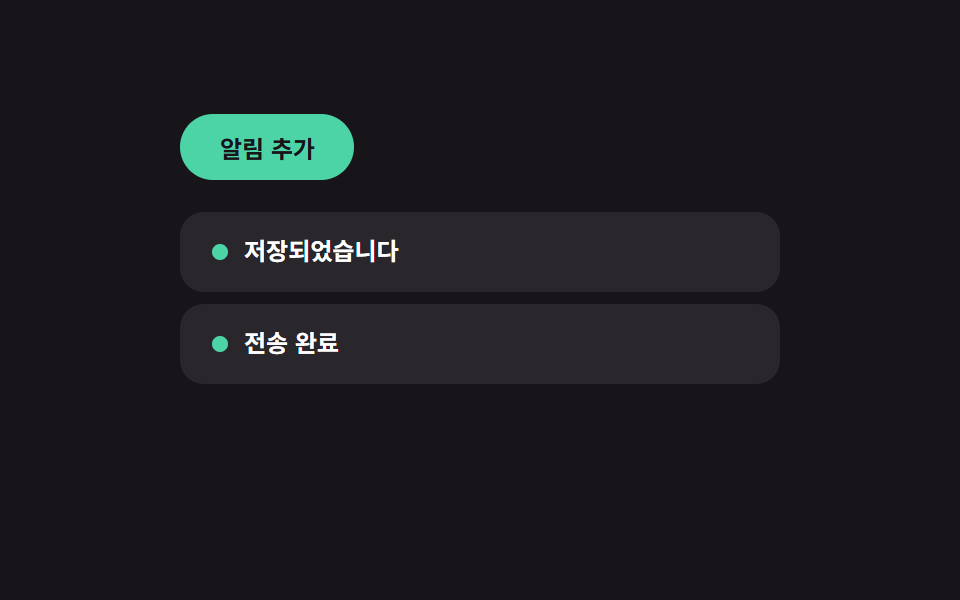 01 toast-queue
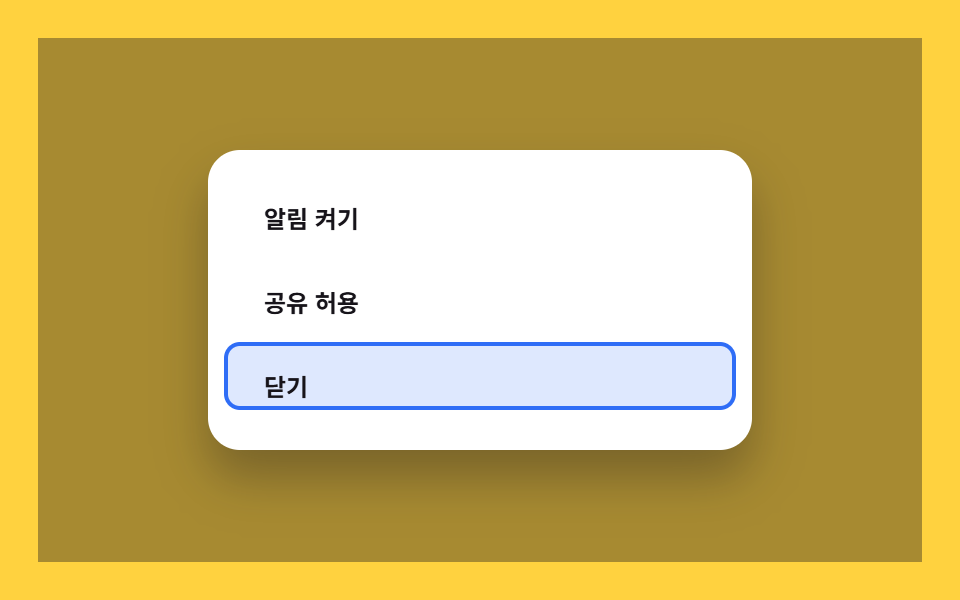 02 dialog-focus-trap
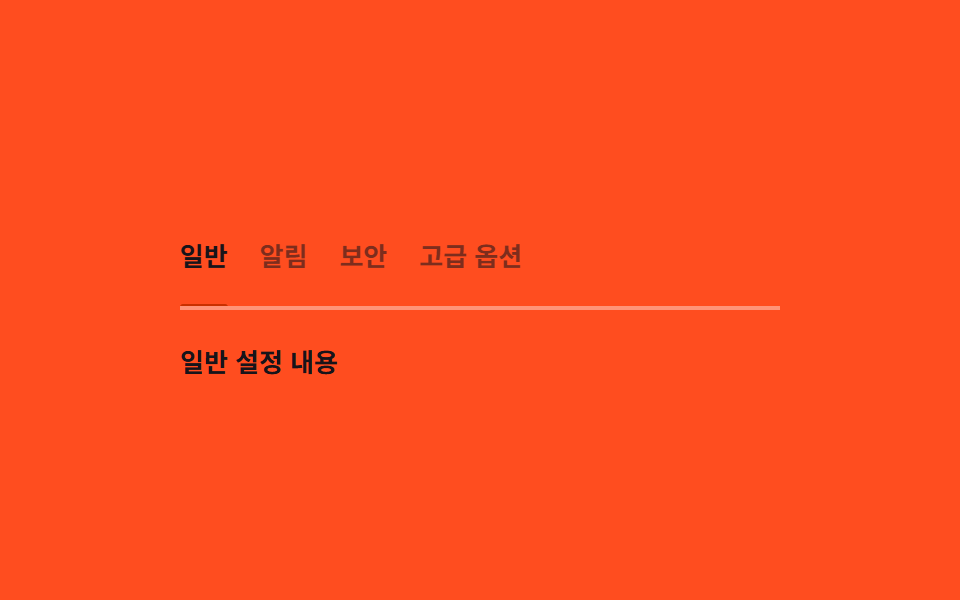 03 tabs-keyboard
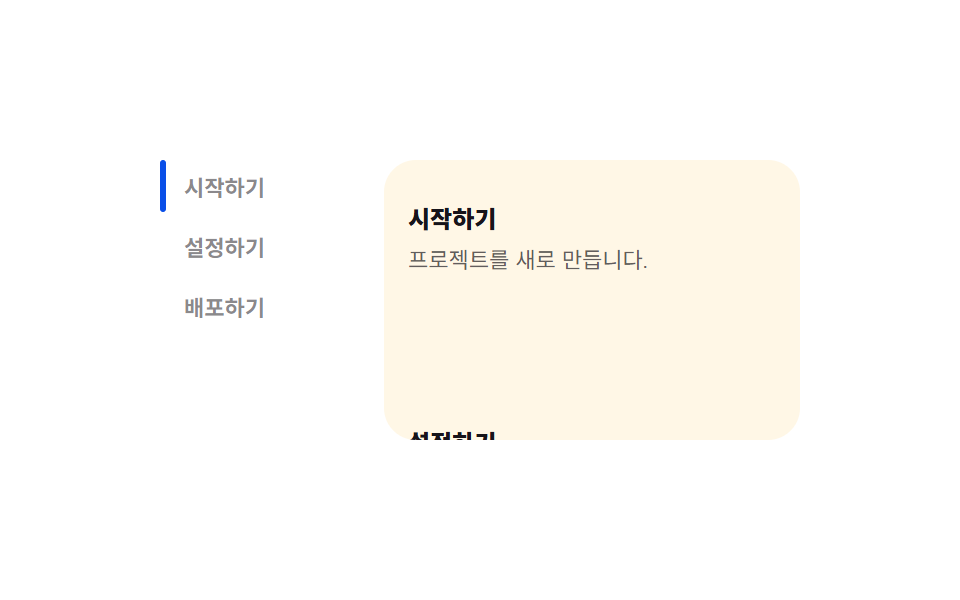 04 scroll-spy-toc
 05 intersection-reveal
 06 keyboard-shortcuts
 07 debounce-search
 08 theme-persist
 09 copy-to-clipboard
Auto-plays · click a tile to jump to its section · all nine in one zip
- 01 Toast queue — a notification list computing dismiss timing from its stack order
- 02 Dialog focus trap — a modal confining its tab order to a recomputed range
- 03 Keyboard tabs — a tab list recomputing its underline position from the active value
- 04 Scroll-spy TOC — a table of contents switching its active item from a compared overlap value
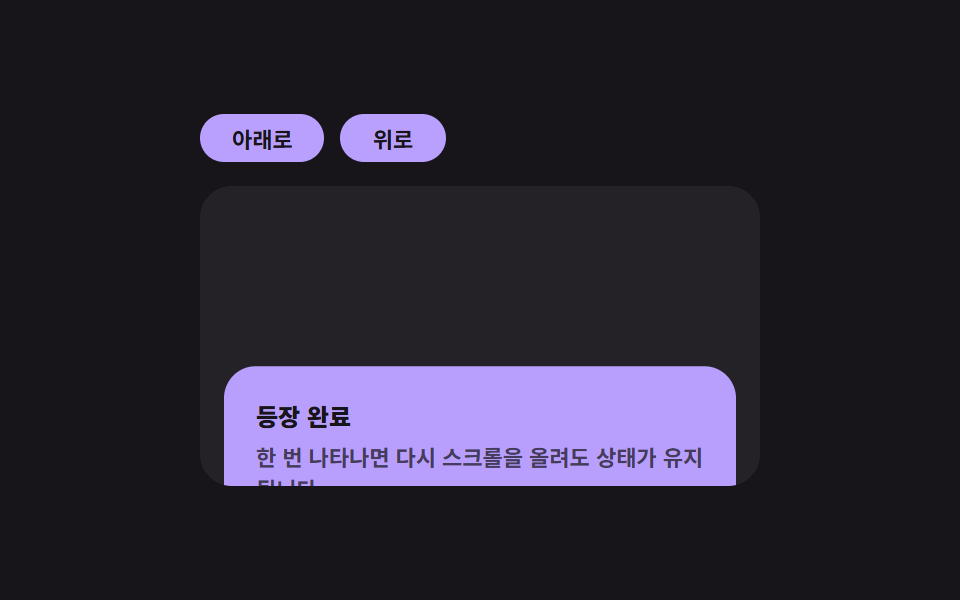
- 05 Intersection reveal — an element that appears once its visibility ratio crosses a threshold
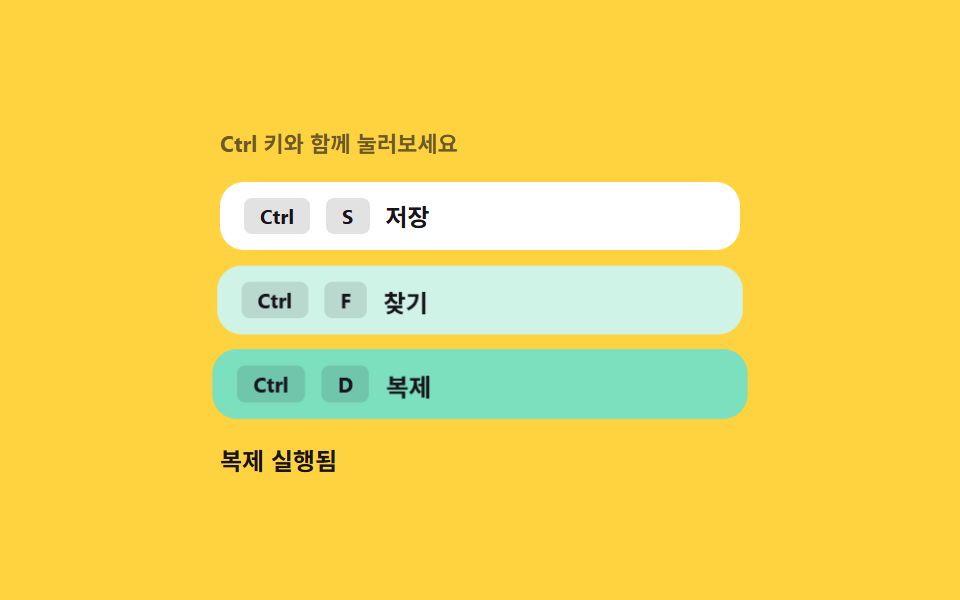
- 06 Keyboard shortcuts — a hint list matching a key combination value to an action
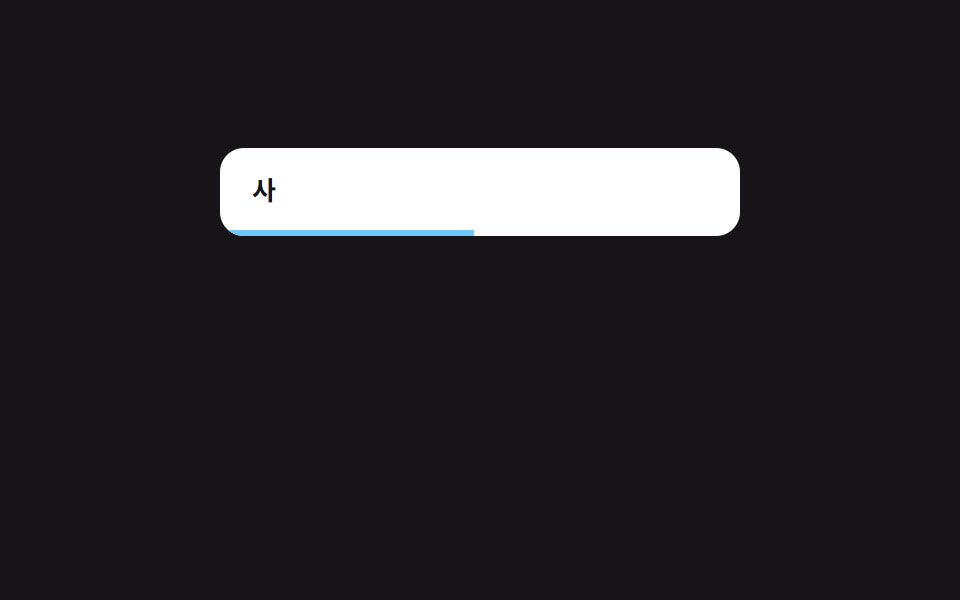
- 07 Debounced search — a search that fires once a wait value finishes counting down from the last input
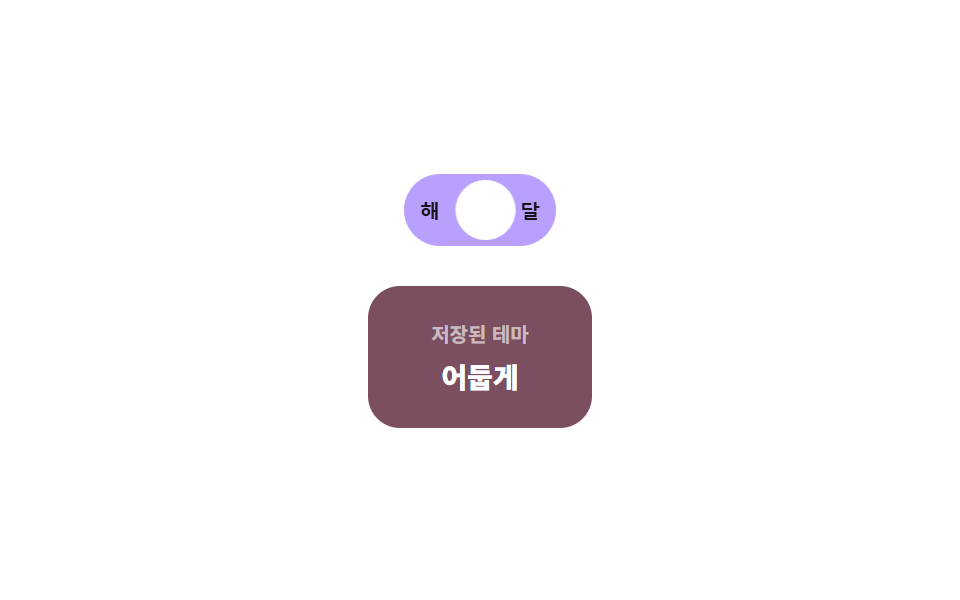
- 08 Theme persistence — a toggle deciding its initial theme from a stored value
- 09 Clipboard copy — a basic button switching its label from a success-state value
None of the nine reach a real notification service, a real search index, or a real account setting — every message, search result, and stored value lives inside the demo's own script and resets on reload. All nine also answer something a person actually does, and none run on autoplay alone: 01 (toast queue) and 09 (clipboard copy) fire on a real click, 02 (dialog focus trap) and 03 (keyboard tabs) answer both click and keydown, 04 (scroll-spy TOC) and 05 (intersection reveal) pair a real IntersectionObserver callback with a click on the demo's own controls, 06 (keyboard shortcuts) answers keydown alone, 07 (debounce search) answers real input, and 08 (theme persistence) answers click plus a window resize.
Anatomy of nine interactions — when each value recomputes
Nine interactions split into three ways of turning a click, a scroll position, or elapsed time into a value a browser can act on, and skipping this layer is what makes a UI pattern read as decoration instead of something that responds. Most micro interactions examples online show only the motion; this set also shows the value that motion is computed from.
Why three interactions keep recomputing under elapsed time alone, without waiting for a state flip
01, 07, and 09 each turn a running clock into a value rather than a flag: 01's dismissAfter is recomputed as BASE_MS plus the toast's own stack-order index times STACK_STEP_MS, so a later toast always outlives an earlier one by exactly one step; 07 restarts a requestAnimationFrame loop that recomputes a progress ratio from elapsed time divided by WAIT_MS on every keystroke; and 09 restarts a reset timer once a copy range is selected, so the label reverts to its resting text on a fixed 900ms schedule rather than staying stuck.
Why three interactions wait for a boolean or key-match value before recomputing anything
02, 06, and 08 sit still until something switches: 02 waits for the dialog's open state to flip before it re-reads every [data-f] element inside it and recomputes the tab-order range those elements define; 06 waits for a keydown to produce a combination value, then matches that value against a registered map instead of handling each shortcut on its own; and 08 waits for a toggle click before recomputing the knob's travel distance from a measured rectangle and writing the new value to localStorage.
Why three interactions measure or compare a value across multiple candidates instead of reading a single flag
03, 04, and 05 pull their value from measurement or comparison: 03 re-reads the active tab's actual rendered position and width with getBoundingClientRect() every time selection changes, rather than assuming a fixed layout; 04 compares every heading's intersectionRatio on each observer callback and activates whichever one currently holds the largest value; and 05 compares a single element's visible ratio against a 0.4 threshold exactly once, then locks its revealed state so the comparison never has to run again.
Code per pattern
01Toast queue — a notification list computing dismiss timing from its stack order
Once several toasts are stacked at the same time, each one's dismiss time is recalculated from its display duration plus its position in the queue, and when one exits early the remaining toasts' position values shift up to fill the gap.
<main class="stage">
<div class="tq is-demo" id="tq">
  <button class="tq__add" id="tqAdd" type="button">Add notification</button>
  <ul class="tq__list" id="tqList" aria-live="polite"></ul>
</div>
</main>
@use "../../../../site/static/demo-tokens" as *;
// 토스트 알림 큐 — 위치는 --i(쌓인 순서 값)로만 정해진다. 하나가 사라지면 JS 가 남은 항목의
// --i 를 다시 매기고, transition 이 그 값 변화를 translateY 이동으로 그린다(순서 재계산 → 위치 재계산).
$duration: $dur-base;
$easing: $ease-spring;
$color: $subject-mint;
$row-h: 40px;
$row-step: 46px;
@include stage($stage-ink);
.tq {
display: flex;
flex-direction: column;
align-items: flex-start;
gap: $sp-4;
width: min(100%, 300px);
--row-step: #{$row-step};
--row-h: #{$row-h};
}
.tq__add {
border: 0;
border-radius: $r-pill;
padding: $sp-2 $sp-5;
font-family: inherit;
font-weight: 700;
font-size: 12px;
color: $stage-ink;
background: $color;
cursor: pointer;
}
.tq__list {
position: relative;
list-style: none;
margin: 0;
padding: 0;
width: 100%;
height: calc(var(--row-step, #{$row-step}) * 3);
}
.tq__row {
position: absolute;
left: 0;
top: 0;
display: flex;
align-items: center;
gap: $sp-2;
box-sizing: border-box;
width: 100%;
height: var(--row-h, #{$row-h});
padding: 0 $sp-4;
border-radius: $r-control;
background: rgba(255, 255, 255, .08);
color: $stage-paper;
transform: translateY(calc(var(--i, 0) * var(--row-step, #{$row-step})));
opacity: 1;
transition: transform $duration $easing, opacity $duration $easing;
cursor: pointer;
}
.tq__row--out {
opacity: 0;
transform: translateY(calc(var(--i, 0) * var(--row-step, #{$row-step}) + 10px));
}
.tq__dot {
width: $sp-2;
height: $sp-2;
border-radius: 50%;
background: $color;
flex: 0 0 auto;
}
.tq__text {
font-weight: 600;
font-size: 12px;
line-height: 1.4;
}
@media (max-width: 340px) {
.tq { gap: $sp-3; --row-step: 36px; --row-h: 32px; }
.tq__row { padding: 0 $sp-3; }
}
@media (prefers-reduced-motion: reduce) {
.tq__row { transition: none !important; }
}html, body {
margin: 0;
overflow: hidden;
}
.stage {
box-sizing: border-box;
min-height: 100vh;
display: grid;
place-items: center;
margin: 0;
background: #17141a;
font-family: -apple-system, "Segoe UI", "Noto Sans KR", sans-serif;
padding: clamp(8px, 4vw, 24px);
}
.tq {
display: flex;
flex-direction: column;
align-items: flex-start;
gap: 16px;
width: min(100%, 300px);
--row-step: 46px;
--row-h: 40px;
}
.tq__add {
border: 0;
border-radius: 999px;
padding: 8px 20px;
font-family: inherit;
font-weight: 700;
font-size: 12px;
color: #17141a;
background: #4cd4a6;
cursor: pointer;
}
.tq__list {
position: relative;
list-style: none;
margin: 0;
padding: 0;
width: 100%;
height: calc(var(--row-step, 46px) * 3);
}
.tq__row {
position: absolute;
left: 0;
top: 0;
display: flex;
align-items: center;
gap: 8px;
box-sizing: border-box;
width: 100%;
height: var(--row-h, 40px);
padding: 0 16px;
border-radius: 12px;
background: rgba(255, 255, 255, 0.08);
color: #ffffff;
transform: translateY(calc(var(--i, 0) * var(--row-step, 46px)));
opacity: 1;
transition: transform 300ms cubic-bezier(0.2, 0.8, 0.2, 1), opacity 300ms cubic-bezier(0.2, 0.8, 0.2, 1);
cursor: pointer;
}
.tq__row--out {
opacity: 0;
transform: translateY(calc(var(--i, 0) * var(--row-step, 46px) + 10px));
}
.tq__dot {
width: 8px;
height: 8px;
border-radius: 50%;
background: #4cd4a6;
flex: 0 0 auto;
}
.tq__text {
font-weight: 600;
font-size: 12px;
line-height: 1.4;
}
@media (max-width: 340px) {
.tq {
gap: 12px;
--row-step: 36px;
--row-h: 32px;
}
.tq__row {
padding: 0 12px;
}
}
@media (prefers-reduced-motion: reduce) {
.tq__row {
transition: none !important;
}
}(function () {
var root = document.getElementById('tq');
var list = document.getElementById('tqList');
var addBtn = document.getElementById('tqAdd');
var MESSAGES = ['Saved', 'Sent', 'Changes applied', 'Sync complete'];
var STACK_STEP_MS = 900; // 쌓인 순서 값마다 표시 시간에 더해지는 값
var BASE_MS = 1500;
var MAX_ROWS = 3;
var seq = 0;
var items = [];
var autoplay = null;
// 계산 겹: 표시 시간 = 기본 시간 + 쌓인 순서 값 × 간격. 하나가 사라지면 남은 항목의 순서 값을
// 다시 매겨 위치(translateY)를 그 값으로 다시 계산한다 — 단순 reflow 가 아니라 순서를 다시 센다.
function reindex() {
items.forEach(function (item, i) {
item.el.style.setProperty('--i', String(i));
});
}
function remove(item) {
var i = items.indexOf(item);
if (i === -1) { return; }
items.splice(i, 1);
item.el.classList.add('tq__row--out');
clearTimeout(item.timer);
setTimeout(function () { item.el.remove(); }, 240);
reindex();
}
  function add() {
    var el = document.createElement('li');
    el.className = 'tq__row';
    el.style.setProperty('--i', String(items.length));
    var text = MESSAGES[seq % MESSAGES.length];
    seq += 1;
    var dot = document.createElement('span');
    dot.className = 'tq__dot';
    var span = document.createElement('span');
    span.className = 'tq__text';
    span.textContent = text;
    el.appendChild(dot);
    el.appendChild(span);
    list.appendChild(el);
    var item = { el: el };
    items.push(item);
    if (items.length > MAX_ROWS) { remove(items[0]); }
    var order = items.indexOf(item);
    var dismissAfter = BASE_MS + order * STACK_STEP_MS;
    item.timer = setTimeout(function () { remove(item); }, dismissAfter);
    el.addEventListener('click', function () { root.classList.remove('is-demo'); stopAutoplay(); remove(item); });
  }
function stopAutoplay() {
if (autoplay) { clearInterval(autoplay); autoplay = null; }
}
addBtn.addEventListener('click', function () {
root.classList.remove('is-demo');
stopAutoplay();
add();
});
// 자동 루프 — 실사용 리스너와 같은 add()/remove() 를 그대로 반복 호출한다
var reduce = window.matchMedia('(prefers-reduced-motion: reduce)').matches;
if (!reduce) {
autoplay = setInterval(add, 620);
add();
}
})();import { useEffect, useRef, useState } from "react";
import type { CSSProperties } from "react";
import styles from "./ToastQueue.module.scss";
// 토스트 알림 큐 — 쌓인 순서 값(order)으로 소멸 시점을 다시 계산한다.
// 계산 겹: order * STACK_STEP_MS 만큼 뒤로 갈수록 더 오래 떠 있는다. 실사용 클릭 리스너 있음.
const MESSAGES = ["저장되었습니다", "전송 완료", "변경 사항 반영됨", "동기화 완료"];
const STACK_STEP_MS = 900;
const BASE_MS = 1500;
const MAX_ROWS = 3;
type Item = { id: number; text: string; out: boolean };
export default function ToastQueue() {
const rootRef = useRef<HTMLDivElement>(null);
const [items, setItems] = useState<Item[]>([]);
const seqRef = useRef(0);
const timersRef = useRef<{ [id: number]: number }>({});
const autoplayRef = useRef<number | null>(null);
const itemsRef = useRef<Item[]>([]);
itemsRef.current = items;
function remove(id: number) {
const timers = timersRef.current ?? {};
window.clearTimeout(timers[id]);
delete timers[id];
setItems((prev) => prev.map((it) => (it.id === id ? { ...it, out: true } : it)));
window.setTimeout(() => {
setItems((prev) => prev.filter((it) => it.id !== id));
}, 240);
}
function add() {
const id = seqRef.current ?? 0;
const text = MESSAGES[id % MESSAGES.length];
seqRef.current = id + 1;
setItems((prev) => {
const next = [...prev, { id, text, out: false }];
if (next.length > MAX_ROWS) {
const first = next[0];
window.setTimeout(() => remove(first.id), 0);
}
return next;
});
const order = (itemsRef.current ?? []).filter((it) => !it.out).length;
const dismissAfter = BASE_MS + order * STACK_STEP_MS;
const timers = timersRef.current ?? {};
timers[id] = window.setTimeout(() => remove(id), dismissAfter);
}
function stopAutoplay() {
if (autoplayRef.current) {
window.clearInterval(autoplayRef.current);
autoplayRef.current = null;
}
}
useEffect(() => {
const reduce = window.matchMedia("(prefers-reduced-motion: reduce)").matches;
if (!reduce) {
autoplayRef.current = window.setInterval(add, 620);
add();
}
return () => {
stopAutoplay();
const timers = timersRef.current ?? {};
Object.keys(timers).forEach((k) => window.clearTimeout(timers[Number(k)]));
};
// eslint-disable-next-line react-hooks/exhaustive-deps
}, []);
function onAddClick() {
rootRef.current?.classList.remove(styles["is-demo"]);
stopAutoplay();
add();
}
return (
<main className={styles.stage}>
<div ref={rootRef} className={`${styles.tq} ${styles["is-demo"]}`} id="tq">
<button className={styles.tq__add} type="button" onClick={onAddClick}>알림 추가</button>
<ul className={styles.tq__list} aria-live="polite">
{items.map((it, i) => (
<li
key={it.id}
className={`${styles.tq__row} ${it.out ? styles["tq__row--out"] : ""}`}
style={{ "--i": i } as CSSProperties}
onClick={() => {
rootRef.current?.classList.remove(styles["is-demo"]);
stopAutoplay();
remove(it.id);
}}
>
<span className={styles.tq__dot} />
<span className={styles.tq__text}>{it.text}</span>
</li>
))}
</ul>
</div>
</main>
);
}01 · Toast queue — a notification list computing dismiss timing from its stack order — Measured area 19.387% · moving frames 10/23Original by GODRICH · SCSS and React ship in the zip · See the password
What the numbers say
Across 23 tracked frames the queue changes on 10 of them, covering 19.39% cumulative area at a 34.3 average intensity, since each add or remove only repaints the stacked rows rather than the whole stage. STACK_STEP_MS is the per-position constant added to BASE_MS to get dismissAfter, MAX_ROWS caps the queue at three visible rows, and the --i custom property is what lets every surviving row's position update the instant reindex() renumbers them after a removal.
function add() {
var el = document.createElement('li');
el.className = 'tq__row';
el.style.setProperty('--i', String(items.length));
var text = MESSAGES[seq % MESSAGES.length];
seq += 1;
var dot = document.createElement('span');
dot.className = 'tq__dot';
var span = document.createElement('span');
span.className = 'tq__text';
span.textContent = text;
el.appendChild(dot);
el.appendChild(span);
list.appendChild(el);
var item = { el: el };
items.push(item);
if (items.length > MAX_ROWS) { remove(items[0]); }
var order = items.indexOf(item);
var dismissAfter = BASE_MS + order * STACK_STEP_MS;
item.timer = setTimeout(function () { remove(item); }, dismissAfter);
el.addEventListener('click', function () { root.classList.remove('is-demo'); stopAutoplay(); remove(item); });
}
02Dialog focus trap — a modal confining its tab order to a recomputed range
Once a modal opens, the list of focusable elements inside it is recomputed and the tab order is confined to that range, so moving past the last element wraps the focus value back to the first.
<main class="stage">
<div class="ft is-demo" id="ft">
  <button class="ft__open" id="ftOpen" type="button">Open modal</button>
  <div class="ft__overlay" id="ftOverlay" hidden>
    <div class="ft__dialog" role="dialog" aria-modal="true" aria-label="Confirm settings" id="ftDialog">
      <div class="ft__marker" id="ftMarker" style="--i: 0" aria-hidden="true"></div>
      <button class="ft__field" data-f type="button">Turn on notifications</button>
      <button class="ft__field" data-f type="button">Allow sharing</button>
      <button class="ft__field ft__close" data-f type="button" id="ftClose">Close</button>
    </div>
  </div>
</div>
</main>
@use "../../../../site/static/demo-tokens" as *;
// 다이얼로그 포커스 트랩 — 마커는 --i(현재 포커스 순서 값)로만 이동한다.
// 열릴 때마다 JS 가 [data-f] 개수를 다시 재고 그 범위 안에서만 --i 가 순환한다.
$duration: $dur-quick;
$easing: $ease-spring;
$color: $subject-blue;
$row-h: 34px;
$row-step: 40px;
@include stage($stage-yellow);
.ft {
position: relative;
width: 100%;
height: 100%;
display: grid;
place-items: center;
}
.ft__open {
border: 0;
border-radius: $r-pill;
padding: $sp-2 $sp-5;
font-family: inherit;
font-weight: 700;
font-size: 12px;
color: $stage-paper;
background: $subject-ink;
cursor: pointer;
}
.ft__overlay {
position: absolute;
inset: 0;
display: grid;
place-items: center;
background: rgba(23, 20, 26, .38);
}
.ft__dialog {
position: relative;
width: min(84%, 240px);
display: flex;
flex-direction: column;
gap: $sp-2;
padding: $sp-4;
border-radius: $r-card;
background: $stage-paper;
box-shadow: $shadow-raised;
}
.ft__marker {
position: absolute;
left: $sp-2;
right: $sp-2;
top: $sp-4;
width: calc(100% - #{$sp-4});
height: $row-h;
border-radius: $r-sm;
background: rgba(47, 109, 246, .16);
border: 2px solid $color;
box-sizing: border-box;
transform: translateY(calc(var(--i, 0) * #{$row-step}));
transition: transform $duration $easing;
pointer-events: none;
}
.ft__field {
position: relative;
z-index: 1;
height: $row-h;
box-sizing: border-box;
border: 0;
border-radius: $r-sm;
padding: 0 $sp-3;
font-family: inherit;
font-weight: 600;
font-size: 12px;
text-align: left;
color: $subject-ink;
background: transparent;
cursor: pointer;
}
.ft__field:focus-visible { outline: none; }
@media (max-width: 340px) {
.ft__dialog { padding: $sp-3; gap: $sp-1; }
}
@media (prefers-reduced-motion: reduce) {
.ft__marker { transition: none !important; }
}html, body {
margin: 0;
overflow: hidden;
}
.stage {
box-sizing: border-box;
min-height: 100vh;
display: grid;
place-items: center;
margin: 0;
background: #ffd23f;
font-family: -apple-system, "Segoe UI", "Noto Sans KR", sans-serif;
padding: clamp(8px, 4vw, 24px);
}
.ft {
position: relative;
width: 100%;
height: 100%;
display: grid;
place-items: center;
}
.ft__open {
border: 0;
border-radius: 999px;
padding: 8px 20px;
font-family: inherit;
font-weight: 700;
font-size: 12px;
color: #ffffff;
background: #17141a;
cursor: pointer;
}
.ft__overlay {
position: absolute;
inset: 0;
display: grid;
place-items: center;
background: rgba(23, 20, 26, 0.38);
}
.ft__dialog {
position: relative;
width: min(84%, 240px);
display: flex;
flex-direction: column;
gap: 8px;
padding: 16px;
border-radius: 16px;
background: #ffffff;
box-shadow: 0 14px 24px rgba(23, 20, 26, 0.32);
}
.ft__marker {
position: absolute;
left: 8px;
right: 8px;
top: 16px;
width: calc(100% - 16px);
height: 34px;
border-radius: 8px;
background: rgba(47, 109, 246, 0.16);
border: 2px solid #2f6df6;
box-sizing: border-box;
transform: translateY(calc(var(--i, 0) * 40px));
transition: transform 220ms cubic-bezier(0.2, 0.8, 0.2, 1);
pointer-events: none;
}
.ft__field {
position: relative;
z-index: 1;
height: 34px;
box-sizing: border-box;
border: 0;
border-radius: 8px;
padding: 0 12px;
font-family: inherit;
font-weight: 600;
font-size: 12px;
text-align: left;
color: #17141a;
background: transparent;
cursor: pointer;
}
.ft__field:focus-visible {
outline: none;
}
@media (max-width: 340px) {
.ft__dialog {
padding: 12px;
gap: 4px;
}
}
@media (prefers-reduced-motion: reduce) {
.ft__marker {
transition: none !important;
}
}(function () {
var root = document.getElementById('ft');
var openBtn = document.getElementById('ftOpen');
var overlay = document.getElementById('ftOverlay');
var dialog = document.getElementById('ftDialog');
var marker = document.getElementById('ftMarker');
var closeBtn = document.getElementById('ftClose');
var focusables = [];
var index = 0;
var autoplay = null;
// 계산 겹: 열릴 때마다 탭 이동 가능한 요소 목록을 다시 구해 범위(0..len-1) 를 정하고,
// 그 범위 밖으로 나가면 값이 되돌아 순환한다(모듈러 연산) — 고정 개수를 가정하지 않는다.
function measure() {
focusables = Array.prototype.slice.call(dialog.querySelectorAll('[data-f]'));
}
function setIndex(i) {
var len = focusables.length;
index = ((i % len) + len) % len;
marker.style.setProperty('--i', String(index));
focusables[index].focus({ preventScroll: true });
}
function open() {
measure();
overlay.hidden = false;
setIndex(0);
}
function close() {
overlay.hidden = true;
openBtn.focus({ preventScroll: true });
}
openBtn.addEventListener('click', function () {
root.classList.remove('is-demo');
stopAutoplay();
open();
});
closeBtn.addEventListener('click', function () {
root.classList.remove('is-demo');
stopAutoplay();
close();
});
dialog.addEventListener('keydown', function (e) {
if (e.key === 'Escape') { root.classList.remove('is-demo'); stopAutoplay(); close(); return; }
if (e.key !== 'Tab') { return; }
e.preventDefault();
root.classList.remove('is-demo');
stopAutoplay();
setIndex(index + (e.shiftKey ? -1 : 1));
});
function stopAutoplay() {
if (autoplay) { clearInterval(autoplay); autoplay = null; }
}
// 자동 루프 — 실사용과 같은 open()/setIndex()/close() 를 반복 호출한다
var reduce = window.matchMedia('(prefers-reduced-motion: reduce)').matches;
if (!reduce) {
var step = 0;
autoplay = setInterval(function () {
if (overlay.hidden) { open(); step = 0; return; }
step += 1;
if (step > 4) { close(); return; }
setIndex(index + 1);
}, 420);
open();
}
})();import { useEffect, useRef, useState } from "react";
import type { CSSProperties } from "react";
import styles from "./DialogFocusTrap.module.scss";
// 다이얼로그 포커스 트랩 — Tab 방향 값(+1/-1)으로 다음 인덱스를 순환 계산해 그 요소로 포커스를 옮긴다.
// 계산 겹: 열릴 때마다 [data-f] 개수를 다시 재고, (i % len + len) % len 순환 인덱스로만 --i 를 옮긴다.
export default function DialogFocusTrap() {
const rootRef = useRef<HTMLDivElement>(null);
const dialogRef = useRef<HTMLDivElement>(null);
const openBtnRef = useRef<HTMLButtonElement>(null);
const markerRef = useRef<HTMLDivElement>(null);
const [open, setOpen] = useState(false);
const indexRef = useRef(0);
const autoplayRef = useRef<number | null>(null);
const openRef = useRef(open);
openRef.current = open;
function focusables(): HTMLElement[] {
const d = dialogRef.current;
if (!d) return [];
return Array.prototype.slice.call(d.querySelectorAll<HTMLElement>("[data-f]"));
}
function setIndex(i: number) {
const list = focusables();
const len = list.length;
if (!len) return;
const next = ((i % len) + len) % len;
indexRef.current = next;
markerRef.current?.style.setProperty("--i", String(next));
list[next].focus({ preventScroll: true });
}
function openDialog() {
setOpen(true);
window.setTimeout(() => setIndex(0), 0);
}
function closeDialog() {
setOpen(false);
openBtnRef.current?.focus({ preventScroll: true });
}
function stopAutoplay() {
if (autoplayRef.current) {
window.clearInterval(autoplayRef.current);
autoplayRef.current = null;
}
}
useEffect(() => {
const reduce = window.matchMedia("(prefers-reduced-motion: reduce)").matches;
if (!reduce) {
let step = 0;
autoplayRef.current = window.setInterval(() => {
if (!openRef.current) { openDialog(); step = 0; return; }
step += 1;
if (step > 4) { closeDialog(); return; }
setIndex((indexRef.current ?? 0) + 1);
}, 420);
openDialog();
}
return () => stopAutoplay();
// eslint-disable-next-line react-hooks/exhaustive-deps
}, []);
function onKeyDown(e: KeyboardEvent) {
if (e.key === "Escape") {
rootRef.current?.classList.remove(styles["is-demo"]);
stopAutoplay();
closeDialog();
return;
}
if (e.key !== "Tab") return;
e.preventDefault();
rootRef.current?.classList.remove(styles["is-demo"]);
stopAutoplay();
setIndex((indexRef.current ?? 0) + (e.shiftKey ? -1 : 1));
}
return (
<main className={styles.stage}>
<div ref={rootRef} className={`${styles.ft} ${styles["is-demo"]}`}>
<button
ref={openBtnRef}
className={styles.ft__open}
type="button"
onClick={() => { rootRef.current?.classList.remove(styles["is-demo"]); stopAutoplay(); openDialog(); }}
>
모달 열기
</button>
{open && (
<div className={styles.ft__overlay}>
<div className={styles.ft__dialog} ref={dialogRef} role="dialog" aria-modal="true" aria-label="설정 확인" onKeyDown={onKeyDown}>
<div ref={markerRef} className={styles.ft__marker} style={{ "--i": 0 } as CSSProperties} aria-hidden="true" />
<button className={styles.ft__field} data-f type="button">알림 켜기</button>
<button className={styles.ft__field} data-f type="button">공유 허용</button>
<button
className={`${styles.ft__field} ${styles.ft__close}`}
data-f
type="button"
onClick={() => { rootRef.current?.classList.remove(styles["is-demo"]); stopAutoplay(); closeDialog(); }}
>
닫기
</button>
</div>
</div>
)}
</div>
</main>
);
}02 · Dialog focus trap — a modal confining its tab order to a recomputed range — Measured area 20.114% · moving frames 15/23Original by GODRICH · SCSS and React ship in the zip · See the password
What the numbers say
Across 23 tracked frames the dialog changes on 15 of them, covering 20.11% cumulative area at a 73.6 average intensity, since opening the overlay repaints the whole panel and every later Tab press moves the --i marker to a new field. measure() re-reads every [data-f] element instead of assuming a fixed count, and setIndex()'s modulo arithmetic (((i % len) + len) % len) is what lets focus wrap from the last field back to the first without a special-cased branch.
  // Compute layer: every time it opens, re-read the list of focusable elements to set the range (0..len-1),
  // and stepping past that range wraps the value back around (modulo) — it never assumes a fixed count.
  function measure() {
    focusables = Array.prototype.slice.call(dialog.querySelectorAll('[data-f]'));
  }

  function setIndex(i) {
    var len = focusables.length;
    index = ((i % len) + len) % len;
    marker.style.setProperty('--i', String(index));
    focusables[index].focus({ preventScroll: true });
  }

  function open() {
    measure();
    overlay.hidden = false;
    setIndex(0);
  }
03Keyboard tabs — a tab list recomputing its underline position from the active value
Once the arrow keys change the active tab, that tab's horizontal position and width are recomputed and the underline moves to those values, while a tab sitting off-screen shifts the list sideways by that same amount.
<main class="stage">
<div class="tk is-demo" id="tk">
  <div class="tk__tabs" id="tkTabs" role="tablist" aria-label="Settings category">
    <div class="tk__underline" id="tkUnderline" aria-hidden="true"></div>
    <button class="tk__tab" role="tab" data-t type="button" tabindex="0" aria-selected="true">General</button>
    <button class="tk__tab" role="tab" data-t type="button" tabindex="-1" aria-selected="false">Notifications</button>
    <button class="tk__tab" role="tab" data-t type="button" tabindex="-1" aria-selected="false">Security</button>
    <button class="tk__tab" role="tab" data-t type="button" tabindex="-1" aria-selected="false">Advanced options</button>
  </div>
  <p class="tk__panel" id="tkPanel">General settings content</p>
</div>
</main>
@use "../../../../site/static/demo-tokens" as *;
// 키보드 탭 — 밑줄은 --x·--w(getBoundingClientRect 실측 px) 로만 움직인다.
// 화면 밖 탭은 JS 가 스크롤 값을 같은 실측으로 계산해 컨테이너를 움직인다.
$duration: $dur-enter;
$easing: $ease-spring;
$color: $subject-orange-deep;
@include stage($stage-orange);
.tk {
width: min(100%, 300px);
display: flex;
flex-direction: column;
gap: $sp-4;
}
.tk__tabs {
position: relative;
display: flex;
gap: $sp-4;
overflow-x: auto;
scrollbar-width: none;
padding-bottom: $sp-2;
border-bottom: 2px solid rgba(255, 255, 255, .4);
}
.tk__tabs::-webkit-scrollbar { display: none; }
.tk__underline {
position: absolute;
left: 0;
bottom: -2px;
height: 3px;
border-radius: $r-xs;
background: $color;
transform: translateX(var(--x, 0px));
width: var(--w, 40px);
transition: transform $duration $easing, width $duration $easing;
}
.tk__tab {
flex: 0 0 auto;
border: 0;
background: transparent;
padding: $sp-2 0;
font-family: inherit;
font-weight: 700;
font-size: 13px;
white-space: nowrap;
color: rgba(23, 20, 26, .56);
cursor: pointer;
}
.tk__tab[aria-selected="true"] { color: $subject-ink; }
.tk__tab:focus-visible { outline: 2px solid $subject-ink; outline-offset: 2px; }
.tk__panel {
margin: 0;
font-weight: 600;
font-size: 13px;
color: $subject-ink;
}
@media (max-width: 340px) {
.tk__tabs { gap: $sp-3; }
}
@media (prefers-reduced-motion: reduce) {
.tk__underline { transition: none !important; }
}html, body {
margin: 0;
overflow: hidden;
}
.stage {
box-sizing: border-box;
min-height: 100vh;
display: grid;
place-items: center;
margin: 0;
background: #ff4d1f;
font-family: -apple-system, "Segoe UI", "Noto Sans KR", sans-serif;
padding: clamp(8px, 4vw, 24px);
}
.tk {
width: min(100%, 300px);
display: flex;
flex-direction: column;
gap: 16px;
}
.tk__tabs {
position: relative;
display: flex;
gap: 16px;
overflow-x: auto;
scrollbar-width: none;
padding-bottom: 8px;
border-bottom: 2px solid rgba(255, 255, 255, 0.4);
}
.tk__tabs::-webkit-scrollbar {
display: none;
}
.tk__underline {
position: absolute;
left: 0;
bottom: -2px;
height: 3px;
border-radius: 4px;
background: #c93000;
transform: translateX(var(--x, 0px));
width: var(--w, 40px);
transition: transform 600ms cubic-bezier(0.2, 0.8, 0.2, 1), width 600ms cubic-bezier(0.2, 0.8, 0.2, 1);
}
.tk__tab {
flex: 0 0 auto;
border: 0;
background: transparent;
padding: 8px 0;
font-family: inherit;
font-weight: 700;
font-size: 13px;
white-space: nowrap;
color: rgba(23, 20, 26, 0.56);
cursor: pointer;
}
.tk__tab[aria-selected=true] {
color: #17141a;
}
.tk__tab:focus-visible {
outline: 2px solid #17141a;
outline-offset: 2px;
}
.tk__panel {
margin: 0;
font-weight: 600;
font-size: 13px;
color: #17141a;
}
@media (max-width: 340px) {
.tk__tabs {
gap: 12px;
}
}
@media (prefers-reduced-motion: reduce) {
.tk__underline {
transition: none !important;
}
}(function () {
var root = document.getElementById('tk');
var tabsEl = document.getElementById('tkTabs');
var underline = document.getElementById('tkUnderline');
var panel = document.getElementById('tkPanel');
var tabs = Array.prototype.slice.call(document.querySelectorAll('[data-t]'));
var TEXTS = ['General settings content', 'Notification settings content', 'Security settings content', 'Advanced options content'];
var index = 0;
var autoplay = null;
// 계산 겹: 탭이 바뀔 때마다 그 탭의 실제 렌더 위치·폭을 getBoundingClientRect 로 다시 재서
// 밑줄 이동 값을 만들고, 탭이 컨테이너 밖에 있으면 스크롤 값도 같은 실측으로 계산한다.
  function place(i) {
    var tab = tabs[i];
    var containerRect = tabsEl.getBoundingClientRect();
    var rect = tab.getBoundingClientRect();
    var x = rect.left - containerRect.left + tabsEl.scrollLeft;
    var w = rect.width;
    underline.style.setProperty('--x', x.toFixed(1) + 'px');
    underline.style.setProperty('--w', w.toFixed(1) + 'px');
    var left = x;
    var right = x + w;
    if (left < tabsEl.scrollLeft) { tabsEl.scrollLeft = left; }
    else if (right > tabsEl.scrollLeft + tabsEl.clientWidth) { tabsEl.scrollLeft = right - tabsEl.clientWidth; }
  }

  function select(i) {
    var len = tabs.length;
    index = ((i % len) + len) % len;
    tabs.forEach(function (t, k) {
      t.setAttribute('aria-selected', k === index ? 'true' : 'false');
      t.setAttribute('tabindex', k === index ? '0' : '-1');
    });
    panel.textContent = TEXTS[index];
    place(index);
  }
tabs.forEach(function (t, i) {
t.addEventListener('click', function () {
root.classList.remove('is-demo');
stopAutoplay();
select(i);
t.focus({ preventScroll: true });
});
});
tabsEl.addEventListener('keydown', function (e) {
if (e.key !== 'ArrowRight' && e.key !== 'ArrowLeft' && e.key !== 'Home' && e.key !== 'End') { return; }
e.preventDefault();
root.classList.remove('is-demo');
stopAutoplay();
if (e.key === 'ArrowRight') { select(index + 1); }
if (e.key === 'ArrowLeft') { select(index - 1); }
if (e.key === 'Home') { select(0); }
if (e.key === 'End') { select(tabs.length - 1); }
tabs[index].focus({ preventScroll: true });
});
function stopAutoplay() {
if (autoplay) { clearInterval(autoplay); autoplay = null; }
}
select(0);
var reduce = window.matchMedia('(prefers-reduced-motion: reduce)').matches;
if (!reduce) {
autoplay = setInterval(function () { select(index + 1); }, 480);
}
})();import { useEffect, useRef, useState } from "react";
import styles from "./TabsKeyboard.module.scss";
// 키보드 탭 — 탭이 바뀔 때마다 실제 렌더 위치·폭을 getBoundingClientRect 로 다시 재서 밑줄 이동 값을 만든다.
// 계산 겹: 화면 밖 탭은 같은 실측으로 스크롤 값도 계산한다. 실사용 click/keydown 리스너 있음.
const LABELS = ["일반", "알림", "보안", "고급 옵션"];
const TEXTS = ["일반 설정 내용", "알림 설정 내용", "보안 설정 내용", "고급 옵션 내용"];
export default function TabsKeyboard() {
const rootRef = useRef<HTMLDivElement>(null);
const tabsElRef = useRef<HTMLDivElement>(null);
const underlineRef = useRef<HTMLDivElement>(null);
const tabRefs = useRef<(HTMLButtonElement | null)[]>([]);
const [index, setIndexState] = useState(0);
const indexRef = useRef(0);
const autoplayRef = useRef<number | null>(null);
function place(i: number) {
const tabsEl = tabsElRef.current;
const underline = underlineRef.current;
const tab = (tabRefs.current ?? [])[i];
if (!tabsEl || !underline || !tab) return;
const containerRect = tabsEl.getBoundingClientRect();
const rect = tab.getBoundingClientRect();
const x = rect.left - containerRect.left + tabsEl.scrollLeft;
const w = rect.width;
underline.style.setProperty("--x", x.toFixed(1) + "px");
underline.style.setProperty("--w", w.toFixed(1) + "px");
const left = x;
const right = x + w;
if (left < tabsEl.scrollLeft) { tabsEl.scrollLeft = left; }
else if (right > tabsEl.scrollLeft + tabsEl.clientWidth) { tabsEl.scrollLeft = right - tabsEl.clientWidth; }
}
function select(i: number) {
const len = LABELS.length;
const next = ((i % len) + len) % len;
indexRef.current = next;
setIndexState(next);
window.setTimeout(() => place(next), 0);
}
function stopAutoplay() {
if (autoplayRef.current) {
window.clearInterval(autoplayRef.current);
autoplayRef.current = null;
}
}
useEffect(() => {
place(0);
const reduce = window.matchMedia("(prefers-reduced-motion: reduce)").matches;
if (!reduce) {
autoplayRef.current = window.setInterval(() => select((indexRef.current ?? 0) + 1), 480);
}
return () => stopAutoplay();
// eslint-disable-next-line react-hooks/exhaustive-deps
}, []);
function onKeyDown(e: KeyboardEvent) {
if (e.key !== "ArrowRight" && e.key !== "ArrowLeft" && e.key !== "Home" && e.key !== "End") return;
e.preventDefault();
rootRef.current?.classList.remove(styles["is-demo"]);
stopAutoplay();
if (e.key === "ArrowRight") select((indexRef.current ?? 0) + 1);
if (e.key === "ArrowLeft") select((indexRef.current ?? 0) - 1);
if (e.key === "Home") select(0);
if (e.key === "End") select(LABELS.length - 1);
(tabRefs.current ?? [])[indexRef.current ?? 0]?.focus({ preventScroll: true });
}
return (
<main className={styles.stage}>
<div ref={rootRef} className={`${styles.tk} ${styles["is-demo"]}`}>
<div ref={tabsElRef} className={styles.tk__tabs} role="tablist" aria-label="설정 카테고리" onKeyDown={onKeyDown}>
<div ref={underlineRef} className={styles.tk__underline} aria-hidden="true" />
{LABELS.map((label, i) => (
<button
key={label}
ref={(el: HTMLButtonElement | null) => { if (tabRefs.current) tabRefs.current[i] = el; }}
className={styles.tk__tab}
role="tab"
type="button"
tabIndex={i === index ? 0 : -1}
aria-selected={i === index}
onClick={() => {
rootRef.current?.classList.remove(styles["is-demo"]);
stopAutoplay();
select(i);
(tabRefs.current ?? [])[i]?.focus({ preventScroll: true });
}}
>
{label}
</button>
))}
</div>
<p className={styles.tk__panel}>{TEXTS[index]}</p>
</div>
</main>
);
}03 · Keyboard tabs — a tab list recomputing its underline position from the active value — Measured area 0.953% · moving frames 8/23Original by GODRICH · SCSS and React ship in the zip · See the password
What the numbers say
Across 23 tracked frames the underline changes on only 8 of them, covering a modest 0.95% cumulative area at a 55.4 average intensity, since a single thin bar moves rather than a whole panel repainting. place() reads the active tab's real rectangle with getBoundingClientRect() and writes the offset into --x and the width into --w, and the same function scrolls the tab strip only when the target tab's edges fall outside the visible range — a pattern common in micro interactions in ui work that has to support more tabs than fit on screen.
function place(i) {
var tab = tabs[i];
var containerRect = tabsEl.getBoundingClientRect();
var rect = tab.getBoundingClientRect();
var x = rect.left - containerRect.left + tabsEl.scrollLeft;
var w = rect.width;
underline.style.setProperty('--x', x.toFixed(1) + 'px');
underline.style.setProperty('--w', w.toFixed(1) + 'px');
var left = x;
var right = x + w;
if (left < tabsEl.scrollLeft) { tabsEl.scrollLeft = left; }
else if (right > tabsEl.scrollLeft + tabsEl.clientWidth) { tabsEl.scrollLeft = right - tabsEl.clientWidth; }
}
function select(i) {
var len = tabs.length;
index = ((i % len) + len) % len;
tabs.forEach(function (t, k) {
t.setAttribute('aria-selected', k === index ? 'true' : 'false');
t.setAttribute('tabindex', k === index ? '0' : '-1');
});
panel.textContent = TEXTS[index];
place(index);
}
04Scroll-spy TOC — a table of contents switching its active item from a compared overlap value
Once the page is scrolled, each heading's overlap ratio with the viewport is recomputed, the heading with the largest value becomes active, and the table of contents' highlight moves to that item's position value.
<main class="stage">
<div class="ss is-demo" id="ss">
  <nav class="ss__toc" aria-label="Contents">
    <div class="ss__marker" id="ssMarker" style="--i: 0" aria-hidden="true"></div>
    <button class="ss__link" data-j="0" type="button">Get started</button>
    <button class="ss__link" data-j="1" type="button">Configure</button>
    <button class="ss__link" data-j="2" type="button">Deploy</button>
  </nav>
  <div class="ss__pane" id="ssPane">
    <section class="ss__section" data-h="0"><h3>Get started</h3><p>Create a new project.</p></section>
    <section class="ss__section" data-h="1"><h3>Configure</h3><p>Fill in the environment values.</p></section>
    <section class="ss__section" data-h="2"><h3>Deploy</h3><p>Upload the build output.</p></section>
  </div>
</div>
</main>
@use "../../../../site/static/demo-tokens" as *;
// 스크롤 스파이 목차 — 마커는 --i(겹침 비율을 비교해 고른 활성 항목 값)로만 이동한다.
// 스크롤 자체는 브라우저 네이티브 overflow-y, JS 는 IntersectionObserver 결과만 비교한다.
$duration: $dur-base;
$easing: $ease-spring;
$color: $subject-blue-deep;
$row-h: 26px;
$row-step: 32px;
@include stage($stage-paper);
.ss {
display: flex;
gap: $sp-5;
width: min(100%, 320px);
}
.ss__toc {
position: relative;
flex: 0 0 auto;
display: flex;
flex-direction: column;
gap: $sp-1;
width: 92px;
}
.ss__marker {
position: absolute;
left: 0;
top: 0;
width: 3px;
height: $row-h;
border-radius: $r-xs;
background: $color;
transform: translateY(calc(var(--i, 0) * #{$row-step}));
transition: transform $duration $easing;
}
.ss__link {
height: $row-h;
box-sizing: border-box;
padding-left: $sp-3;
border: 0;
background: transparent;
text-align: left;
font-family: inherit;
font-weight: 600;
font-size: 11px;
color: rgba(23, 20, 26, .5);
cursor: pointer;
}
.ss__link[aria-current="true"] { color: $color; font-weight: 800; }
.ss__pane {
flex: 1 1 auto;
height: $row-step * 3 + 20px;
overflow-y: auto;
scroll-behavior: auto;
border-radius: $r-card;
background: $subject-cream;
padding: $sp-3;
}
.ss__section {
min-height: $row-step * 3;
padding: $sp-2 0;
}
.ss__section h3 {
margin: 0 0 $sp-1;
font-size: 12px;
font-weight: 800;
color: $subject-ink;
}
.ss__section p {
margin: 0;
font-size: 11px;
color: rgba(23, 20, 26, .68);
}
@media (max-width: 340px) {
.ss { gap: $sp-3; }
.ss__toc { width: 76px; }
}
@media (prefers-reduced-motion: reduce) {
.ss__marker { transition: none !important; }
.ss__pane { scroll-behavior: auto !important; }
}html, body {
margin: 0;
overflow: hidden;
}
.stage {
box-sizing: border-box;
min-height: 100vh;
display: grid;
place-items: center;
margin: 0;
background: #ffffff;
font-family: -apple-system, "Segoe UI", "Noto Sans KR", sans-serif;
padding: clamp(8px, 4vw, 24px);
}
.ss {
display: flex;
gap: 20px;
width: min(100%, 320px);
}
.ss__toc {
position: relative;
flex: 0 0 auto;
display: flex;
flex-direction: column;
gap: 4px;
width: 92px;
}
.ss__marker {
position: absolute;
left: 0;
top: 0;
width: 3px;
height: 26px;
border-radius: 4px;
background: #0a4fe8;
transform: translateY(calc(var(--i, 0) * 32px));
transition: transform 300ms cubic-bezier(0.2, 0.8, 0.2, 1);
}
.ss__link {
height: 26px;
box-sizing: border-box;
padding-left: 12px;
border: 0;
background: transparent;
text-align: left;
font-family: inherit;
font-weight: 600;
font-size: 11px;
color: rgba(23, 20, 26, 0.5);
cursor: pointer;
}
.ss__link[aria-current=true] {
color: #0a4fe8;
font-weight: 800;
}
.ss__pane {
flex: 1 1 auto;
height: 116px;
overflow-y: auto;
scroll-behavior: auto;
border-radius: 16px;
background: #fff7e6;
padding: 12px;
}
.ss__section {
min-height: 96px;
padding: 8px 0;
}
.ss__section h3 {
margin: 0 0 4px;
font-size: 12px;
font-weight: 800;
color: #17141a;
}
.ss__section p {
margin: 0;
font-size: 11px;
color: rgba(23, 20, 26, 0.68);
}
@media (max-width: 340px) {
.ss {
gap: 12px;
}
.ss__toc {
width: 76px;
}
}
@media (prefers-reduced-motion: reduce) {
.ss__marker {
transition: none !important;
}
.ss__pane {
scroll-behavior: auto !important;
}
}(function () {
var root = document.getElementById('ss');
var pane = document.getElementById('ssPane');
var marker = document.getElementById('ssMarker');
var links = Array.prototype.slice.call(document.querySelectorAll('.ss__link'));
var sections = Array.prototype.slice.call(document.querySelectorAll('.ss__section'));
var ratios = new Array(sections.length).fill(0);
var active = 0;
var autoplay = null;
// 계산 겹: 모든 제목의 겹침 비율(intersectionRatio) 값을 매 프레임 비교해 가장 큰 값을 가진
// 항목을 활성으로 고른다 — 고정 스크롤 위치가 아니라 값의 비교로 활성 항목이 정해진다.
function activate(i) {
if (i === active) { return; }
active = i;
marker.style.setProperty('--i', String(active));
links.forEach(function (l, k) { l.setAttribute('aria-current', k === active ? 'true' : 'false'); });
}
var io = new IntersectionObserver(function (entries) {
entries.forEach(function (entry) {
var i = Number(entry.target.getAttribute('data-h'));
ratios[i] = entry.intersectionRatio;
});
var best = 0;
for (var k = 1; k < ratios.length; k++) { if (ratios[k] > ratios[best]) { best = k; } }
if (ratios[best] > 0) { activate(best); }
}, { root: pane, threshold: [0, .25, .5, .75, 1] });
sections.forEach(function (s) { io.observe(s); });
links.forEach(function (l) {
l.addEventListener('click', function () {
root.classList.remove('is-demo');
stopAutoplay();
var i = Number(l.getAttribute('data-j'));
sections[i].scrollIntoView({ block: 'start', behavior: 'auto' });
});
});
function stopAutoplay() {
if (autoplay) { clearInterval(autoplay); autoplay = null; }
}
var reduce = window.matchMedia('(prefers-reduced-motion: reduce)').matches;
if (!reduce) {
var targets = [0, sections[1].offsetTop, sections[2].offsetTop, 0];
var step = 0;
autoplay = setInterval(function () {
pane.scrollTop = targets[step % targets.length];
step += 1;
}, 480);
}
})();import { useEffect, useRef, useState } from "react";
import type { CSSProperties } from "react";
import styles from "./ScrollSpyToc.module.scss";
// 스크롤 스파이 목차 — 모든 제목의 겹침 비율(intersectionRatio) 값을 매 프레임 비교해 가장 큰 값을 가진
// 항목을 활성으로 고른다. 계산 겹: 고정 스크롤 위치가 아니라 값의 비교로 활성 항목이 정해진다.
const SECTIONS = [
{ title: "시작하기", body: "프로젝트를 새로 만듭니다." },
{ title: "설정하기", body: "환경 값을 채웁니다." },
{ title: "배포하기", body: "결과물을 올립니다." },
];
export default function ScrollSpyToc() {
const rootRef = useRef<HTMLDivElement>(null);
const paneRef = useRef<HTMLDivElement>(null);
const markerRef = useRef<HTMLDivElement>(null);
const sectionRefs = useRef<(HTMLElement | null)[]>([]);
const [active, setActiveState] = useState(0);
const activeRef = useRef(0);
const autoplayRef = useRef<number | null>(null);
function activate(i: number) {
if (i === activeRef.current) return;
activeRef.current = i;
setActiveState(i);
markerRef.current?.style.setProperty("--i", String(i));
}
function stopAutoplay() {
if (autoplayRef.current) {
window.clearInterval(autoplayRef.current);
autoplayRef.current = null;
}
}
useEffect(() => {
const pane = paneRef.current;
if (!pane) return;
const ratios = new Array(SECTIONS.length).fill(0);
const io = new IntersectionObserver((entries) => {
entries.forEach((entry) => {
const i = Number((entry.target as HTMLElement).getAttribute("data-h"));
ratios[i] = entry.intersectionRatio;
});
let best = 0;
for (let k = 1; k < ratios.length; k++) { if (ratios[k] > ratios[best]) best = k; }
if (ratios[best] > 0) activate(best);
}, { root: pane, threshold: [0, .25, .5, .75, 1] });
(sectionRefs.current ?? []).forEach((s) => { if (s) io.observe(s); });
const reduce = window.matchMedia("(prefers-reduced-motion: reduce)").matches;
if (!reduce) {
const secs = sectionRefs.current ?? [];
const targets = [0, secs[1]?.offsetTop || 0, secs[2]?.offsetTop || 0, 0];
let step = 0;
autoplayRef.current = window.setInterval(() => {
pane.scrollTop = targets[step % targets.length];
step += 1;
}, 480);
}
return () => { io.disconnect(); stopAutoplay(); };
// eslint-disable-next-line react-hooks/exhaustive-deps
}, []);
return (
<main className={styles.stage}>
<div ref={rootRef} className={`${styles.ss} ${styles["is-demo"]}`}>
<nav className={styles.ss__toc} aria-label="목차">
<div ref={markerRef} className={styles.ss__marker} style={{ "--i": 0 } as CSSProperties} aria-hidden="true" />
{SECTIONS.map((s, i) => (
<button
key={s.title}
className={styles.ss__link}
type="button"
aria-current={i === active}
onClick={() => {
rootRef.current?.classList.remove(styles["is-demo"]);
stopAutoplay();
(sectionRefs.current ?? [])[i]?.scrollIntoView({ block: "start", behavior: "auto" });
}}
>
{s.title}
</button>
))}
</nav>
<div ref={paneRef} className={styles.ss__pane}>
{SECTIONS.map((s, i) => (
<section
key={s.title}
ref={(el: HTMLElement | null) => { if (sectionRefs.current) sectionRefs.current[i] = el; }}
className={styles.ss__section}
data-h={i}
>
<h3>{s.title}</h3>
<p>{s.body}</p>
</section>
))}
</div>
</div>
</main>
);
}04 · Scroll-spy TOC — a table of contents switching its active item from a compared overlap value — Measured area 2.205% · moving frames 10/23Original by GODRICH · SCSS and React ship in the zip · See the password
What the numbers say
Across 23 tracked frames the marker changes on 10 of them, covering 2.21% cumulative area at a 136.3 average intensity — a small area moving with a sharp, high-contrast jump rather than a slow fade. The IntersectionObserver callback stores every section's intersectionRatio in an array on each firing, then a linear scan picks whichever index currently holds the largest ratio, so the active link is decided by a comparison across all sections rather than by whichever one crossed a fixed pixel line first.
  // Compute layer: every frame, compare every heading's overlap ratio (intersectionRatio) and pick
  // whichever holds the largest value as active — a compared value decides it, not a fixed scroll position.
  function activate(i) {
    if (i === active) { return; }
    active = i;
    marker.style.setProperty('--i', String(active));
    links.forEach(function (l, k) { l.setAttribute('aria-current', k === active ? 'true' : 'false'); });
  }

  var io = new IntersectionObserver(function (entries) {
    entries.forEach(function (entry) {
      var i = Number(entry.target.getAttribute('data-h'));
      ratios[i] = entry.intersectionRatio;
    });
    var best = 0;
    for (var k = 1; k < ratios.length; k++) { if (ratios[k] > ratios[best]) { best = k; } }
    if (ratios[best] > 0) { activate(best); }
  }, { root: pane, threshold: [0, .25, .5, .75, 1] });
  sections.forEach(function (s) { io.observe(s); });
05Intersection reveal — an element that appears once its visibility ratio crosses a threshold
Once an element's visible ratio value crosses a threshold, its reveal computation runs a single time, and even after it exits the viewport again its state value stays revealed and does not run again.
<main class="stage">
<div class="ir is-demo" id="ir">
  <div class="ir__btns">
    <button class="ir__btn" id="irDown" type="button">Scroll down</button>
    <button class="ir__btn" id="irUp" type="button">Scroll up</button>
  </div>
  <div class="ir__pane" id="irPane">
    <div class="ir__spacer"></div>
    <div class="ir__card" id="irCard">
      <p class="ir__title">Reveal complete</p>
      <p class="ir__desc">Once revealed, it stays visible even if you scroll back up.</p>
    </div>
    <div class="ir__spacer"></div>
  </div>
</div>
</main>
@use "../../../../site/static/demo-tokens" as *;
// 인터섹션 리빌 — 카드는 가시 비율 값이 기준을 넘는 순간 한 번만 opacity·translateY 로 등장한다.
// 상태(.ir__card--in)는 JS 가 한 번 붙이면 다시 떼지 않는다 — 재실행되지 않는 계산의 결과가 그대로 클래스에 남는다.
$duration: $dur-enter;
$easing: $ease-spring;
$color: $subject-lilac;
@include stage($stage-ink);
.ir {
display: flex;
flex-direction: column;
align-items: flex-start;
gap: $sp-3;
width: min(100%, 280px);
}
.ir__btns { display: flex; gap: $sp-2; }
.ir__btn {
border: 0;
border-radius: $r-pill;
padding: $sp-1 $sp-4;
font-family: inherit;
font-weight: 700;
font-size: 11px;
color: $stage-ink;
background: $color;
cursor: pointer;
}
.ir__pane {
width: 100%;
height: 150px;
overflow-y: auto;
border-radius: $r-card;
background: rgba(255, 255, 255, .06);
}
.ir__spacer { height: 90px; }
.ir__card {
margin: 0 $sp-3;
padding: $sp-4;
border-radius: $r-card;
background: $color;
opacity: 0;
transform: translateY(18px);
transition: opacity $duration $easing, transform $duration $easing;
}
.ir__card--in { opacity: 1; transform: translateY(0); }
.ir__title {
margin: 0 0 $sp-1;
font-weight: 800;
font-size: 12px;
color: $subject-ink;
}
.ir__desc {
margin: 0;
font-weight: 600;
font-size: 11px;
color: rgba(23, 20, 26, .72);
}
@media (max-width: 340px) {
.ir__pane { height: 130px; }
.ir__spacer { height: 70px; }
}
@media (prefers-reduced-motion: reduce) {
.ir__card { transition: none !important; }
}html, body {
margin: 0;
overflow: hidden;
}
.stage {
box-sizing: border-box;
min-height: 100vh;
display: grid;
place-items: center;
margin: 0;
background: #17141a;
font-family: -apple-system, "Segoe UI", "Noto Sans KR", sans-serif;
padding: clamp(8px, 4vw, 24px);
}
.ir {
display: flex;
flex-direction: column;
align-items: flex-start;
gap: 12px;
width: min(100%, 280px);
}
.ir__btns {
display: flex;
gap: 8px;
}
.ir__btn {
border: 0;
border-radius: 999px;
padding: 4px 16px;
font-family: inherit;
font-weight: 700;
font-size: 11px;
color: #17141a;
background: #b9a0ff;
cursor: pointer;
}
.ir__pane {
width: 100%;
height: 150px;
overflow-y: auto;
border-radius: 16px;
background: rgba(255, 255, 255, 0.06);
}
.ir__spacer {
height: 90px;
}
.ir__card {
margin: 0 12px;
padding: 16px;
border-radius: 16px;
background: #b9a0ff;
opacity: 0;
transform: translateY(18px);
transition: opacity 600ms cubic-bezier(0.2, 0.8, 0.2, 1), transform 600ms cubic-bezier(0.2, 0.8, 0.2, 1);
}
.ir__card--in {
opacity: 1;
transform: translateY(0);
}
.ir__title {
margin: 0 0 4px;
font-weight: 800;
font-size: 12px;
color: #17141a;
}
.ir__desc {
margin: 0;
font-weight: 600;
font-size: 11px;
color: rgba(23, 20, 26, 0.72);
}
@media (max-width: 340px) {
.ir__pane {
height: 130px;
}
.ir__spacer {
height: 70px;
}
}
@media (prefers-reduced-motion: reduce) {
.ir__card {
transition: none !important;
}
}(function () {
var root = document.getElementById('ir');
var pane = document.getElementById('irPane');
var card = document.getElementById('irCard');
var downBtn = document.getElementById('irDown');
var upBtn = document.getElementById('irUp');
var revealed = false;
var autoplay = null;
// 계산 겹: 가시 비율 값이 기준(.4)을 넘는 순간 한 번만 상태를 뒤집고 즉시 관찰을 끊는다.
// 이후 비율 값이 다시 낮아져도(스크롤을 올려도) 상태 값은 그대로 유지된다 — 재실행 없음.
var io = new IntersectionObserver(function (entries) {
var entry = entries[0];
if (!revealed && entry.intersectionRatio >= 0.4) {
revealed = true;
card.classList.add('ir__card--in');
io.unobserve(card);
}
}, { root: pane, threshold: [0, .4, .8] });
io.observe(card);
downBtn.addEventListener('click', function () {
root.classList.remove('is-demo');
stopAutoplay();
pane.scrollTop = pane.scrollHeight;
});
upBtn.addEventListener('click', function () {
root.classList.remove('is-demo');
stopAutoplay();
pane.scrollTop = 0;
});
function stopAutoplay() {
if (autoplay) { clearInterval(autoplay); autoplay = null; }
}
var reduce = window.matchMedia('(prefers-reduced-motion: reduce)').matches;
if (!reduce) {
var down = true;
autoplay = setInterval(function () {
pane.scrollTop = down ? pane.scrollHeight : 0;
down = !down;
}, 520);
}
})();import { useEffect, useRef, useState } from "react";
import styles from "./IntersectionReveal.module.scss";
// 인터섹션 리빌 — 카드는 가시 비율 값이 기준을 넘는 순간 한 번만 opacity·translateY 로 등장한다.
// 계산 겹: 상태를 한 번 뒤집으면 다시 관찰을 끊어 재실행되지 않는다(비율이 다시 낮아져도 유지).
export default function IntersectionReveal() {
const rootRef = useRef<HTMLDivElement>(null);
const paneRef = useRef<HTMLDivElement>(null);
const cardRef = useRef<HTMLDivElement>(null);
const [revealed, setRevealed] = useState(false);
const revealedRef = useRef(false);
const autoplayRef = useRef<number | null>(null);
function stopAutoplay() {
if (autoplayRef.current) {
window.clearInterval(autoplayRef.current);
autoplayRef.current = null;
}
}
useEffect(() => {
const pane = paneRef.current;
const card = cardRef.current;
if (!pane || !card) return;
const io = new IntersectionObserver((entries) => {
const entry = entries[0];
if (!revealedRef.current && entry.intersectionRatio >= 0.4) {
revealedRef.current = true;
setRevealed(true);
io.unobserve(card);
}
}, { root: pane, threshold: [0, .4, .8] });
io.observe(card);
const reduce = window.matchMedia("(prefers-reduced-motion: reduce)").matches;
if (!reduce) {
let down = true;
autoplayRef.current = window.setInterval(() => {
pane.scrollTop = down ? pane.scrollHeight : 0;
down = !down;
}, 520);
}
return () => { io.disconnect(); stopAutoplay(); };
// eslint-disable-next-line react-hooks/exhaustive-deps
}, []);
return (
<main className={styles.stage}>
<div ref={rootRef} className={`${styles.ir} ${styles["is-demo"]}`}>
<div className={styles.ir__btns}>
<button
className={styles.ir__btn}
type="button"
onClick={() => {
rootRef.current?.classList.remove(styles["is-demo"]);
stopAutoplay();
if (paneRef.current) paneRef.current.scrollTop = paneRef.current.scrollHeight;
}}
>
아래로
</button>
<button
className={styles.ir__btn}
type="button"
onClick={() => {
rootRef.current?.classList.remove(styles["is-demo"]);
stopAutoplay();
if (paneRef.current) paneRef.current.scrollTop = 0;
}}
>
위로
</button>
</div>
<div ref={paneRef} className={styles.ir__pane}>
<div className={styles.ir__spacer} />
<div ref={cardRef} className={`${styles.ir__card} ${revealed ? styles["ir__card--in"] : ""}`}>
<p className={styles.ir__title}>등장 완료</p>
<p className={styles.ir__desc}>한 번 나타나면 다시 스크롤을 올려도 상태가 유지됩니다.</p>
</div>
<div className={styles.ir__spacer} />
</div>
</div>
</main>
);
}05 · Intersection reveal — an element that appears once its visibility ratio crosses a threshold — Measured area 21.367% · moving frames 8/23Original by GODRICH · SCSS and React ship in the zip · See the password
What the numbers say
Across 23 tracked frames the card changes on 8 of them, covering 21.37% cumulative area at a 92.4 average intensity, since the whole card animates in once rather than a small marker sliding. The observer's threshold array ([0, .4, .8]) exists only so the callback fires with a usable ratio near 0.4; the moment entry.intersectionRatio reaches that value, revealed flips to true and io.unobserve(card) runs immediately, which is why scrolling back up afterward never triggers the reveal a second time.
  // Compute layer: the instant the visible-ratio value crosses the .4 threshold, flip the state once and stop observing.
  // Even if the ratio drops again later (scrolling back up), the state value stays put — it never runs twice.
  var io = new IntersectionObserver(function (entries) {
    var entry = entries[0];
    if (!revealed && entry.intersectionRatio >= 0.4) {
      revealed = true;
      card.classList.add('ir__card--in');
      io.unobserve(card);
    }
  }, { root: pane, threshold: [0, .4, .8] });
  io.observe(card);
06Keyboard shortcuts — a hint list matching a key combination value to an action
Once a key combination is entered, that combined value is recomputed and compared against the registered list, and when it matches, the action runs while the matching entry in the on-screen hint list briefly highlights.
<main class="stage">
<div class="ks is-demo" id="ks" tabindex="0">
  <p class="ks__cap">Try pressing it with the Ctrl key</p>
  <ul class="ks__hints" id="ksHints">
    <li class="ks__hint" data-combo="ctrl+s"><kbd>Ctrl</kbd><kbd>S</kbd><span>Save</span></li>
    <li class="ks__hint" data-combo="ctrl+f"><kbd>Ctrl</kbd><kbd>F</kbd><span>Find</span></li>
    <li class="ks__hint" data-combo="ctrl+d"><kbd>Ctrl</kbd><kbd>D</kbd><span>Duplicate</span></li>
  </ul>
  <p class="ks__result" id="ksResult" aria-live="polite">Waiting</p>
</div>
</main>
@use "../../../../site/static/demo-tokens" as *;
// 키보드 단축키 — 강조는 조합 값이 등록 목록과 일치할 때만 붙는 클래스(.ks__hint--hit) 로 켠다.
// 각 항목을 따로 애니메이션하지 않고 같은 트랜지션 규칙 하나를 공유한다.
$duration: $dur-quick;
$easing: $ease-pop;
$color: $subject-mint;
@include stage($stage-yellow);
.ks {
display: flex;
flex-direction: column;
gap: $sp-3;
width: min(100%, 260px);
outline: none;
}
.ks__cap {
margin: 0;
font-weight: 700;
font-size: 11px;
color: rgba(23, 20, 26, .64);
}
.ks__hints {
list-style: none;
margin: 0;
padding: 0;
display: flex;
flex-direction: column;
gap: $sp-2;
}
.ks__hint {
display: flex;
align-items: center;
gap: $sp-2;
padding: $sp-2 $sp-3;
border-radius: $r-control;
background: $stage-paper;
transform: scale(1);
transition: transform $duration $easing, background $duration $easing;
}
.ks__hint--hit {
background: $color;
transform: scale(1.04);
}
.ks__hint kbd {
padding: $sp-1 $sp-2;
border-radius: $r-xs;
background: rgba(23, 20, 26, .12);
font-family: inherit;
font-weight: 700;
font-size: 10px;
color: $subject-ink;
}
.ks__hint span {
font-weight: 700;
font-size: 12px;
color: $subject-ink;
}
.ks__result {
margin: 0;
font-weight: 700;
font-size: 12px;
color: $subject-ink;
}
@media (max-width: 340px) {
.ks__hints { gap: $sp-1; }
.ks__hint { padding: $sp-1 $sp-2; }
}
@media (prefers-reduced-motion: reduce) {
.ks__hint { transition: none !important; }
}html, body {
margin: 0;
overflow: hidden;
}
.stage {
box-sizing: border-box;
min-height: 100vh;
display: grid;
place-items: center;
margin: 0;
background: #ffd23f;
font-family: -apple-system, "Segoe UI", "Noto Sans KR", sans-serif;
padding: clamp(8px, 4vw, 24px);
}
.ks {
display: flex;
flex-direction: column;
gap: 12px;
width: min(100%, 260px);
outline: none;
}
.ks__cap {
margin: 0;
font-weight: 700;
font-size: 11px;
color: rgba(23, 20, 26, 0.64);
}
.ks__hints {
list-style: none;
margin: 0;
padding: 0;
display: flex;
flex-direction: column;
gap: 8px;
}
.ks__hint {
display: flex;
align-items: center;
gap: 8px;
padding: 8px 12px;
border-radius: 12px;
background: #ffffff;
transform: scale(1);
transition: transform 220ms cubic-bezier(0.2, 1.4, 0.4, 1), background 220ms cubic-bezier(0.2, 1.4, 0.4, 1);
}
.ks__hint--hit {
background: #4cd4a6;
transform: scale(1.04);
}
.ks__hint kbd {
padding: 2px 8px;
border-radius: 4px;
background: rgba(23, 20, 26, 0.12);
font-family: inherit;
font-weight: 700;
font-size: 10px;
color: #17141a;
}
.ks__hint span {
font-weight: 700;
font-size: 12px;
color: #17141a;
}
.ks__result {
margin: 0;
font-weight: 700;
font-size: 12px;
color: #17141a;
}
@media (max-width: 340px) {
.ks__hints {
gap: 4px;
}
.ks__hint {
padding: 4px 8px;
}
}
@media (prefers-reduced-motion: reduce) {
.ks__hint {
transition: none !important;
}
}(function () {
var root = document.getElementById('ks');
var hints = Array.prototype.slice.call(document.querySelectorAll('[data-combo]'));
var result = document.getElementById('ksResult');
var ACTIONS = { 'ctrl+s': 'Save triggered', 'ctrl+f': 'Find triggered', 'ctrl+d': 'Duplicate triggered' };
var flashTimer = null;
var resetTimer = null;
var autoplay = null;
// 계산 겹: 눌린 키에서 조합 값을 다시 구해(수정 키 + 글자 키) 등록된 목록과 매칭한다.
// 각 단축키를 따로 처리하지 않고 하나의 값 비교 함수가 셋 다 판정한다.
function combo(e) {
var mod = e.ctrlKey || e.metaKey ? 'ctrl+' : '';
return mod + String(e.key).toLowerCase();
}
function trigger(key) {
var hit = hints.filter(function (h) { return h.getAttribute('data-combo') === key; })[0];
if (!hit) { return; }
hints.forEach(function (h) { h.classList.remove('ks__hint--hit'); });
clearTimeout(flashTimer);
clearTimeout(resetTimer);
void hit.offsetWidth;
hit.classList.add('ks__hint--hit');
result.textContent = ACTIONS[key];
resetTimer = setTimeout(function () {
hit.classList.remove('ks__hint--hit');
result.textContent = 'Waiting';
}, 900);
}
root.addEventListener('keydown', function (e) {
var key = combo(e);
if (!ACTIONS[key]) { return; }
e.preventDefault();
root.classList.remove('is-demo');
stopAutoplay();
trigger(key);
});
function stopAutoplay() {
if (autoplay) { clearInterval(autoplay); autoplay = null; }
}
var order = ['ctrl+s', 'ctrl+f', 'ctrl+d'];
var reduce = window.matchMedia('(prefers-reduced-motion: reduce)').matches;
if (!reduce) {
var i = 0;
autoplay = setInterval(function () {
trigger(order[i % order.length]);
i += 1;
}, 620);
}
})();import { useEffect, useRef, useState } from "react";
import styles from "./KeyboardShortcuts.module.scss";
// 키보드 단축키 — 눌린 키에서 조합 값을 다시 구해(수정 키 + 글자 키) 등록된 목록과 매칭한다.
// 계산 겹: 각 단축키를 따로 처리하지 않고 하나의 값 비교 함수가 셋 다 판정한다. 실사용 keydown 리스너 있음.
const ACTIONS: { [k: string]: string } = { "ctrl+s": "저장 실행됨", "ctrl+f": "찾기 실행됨", "ctrl+d": "복제 실행됨" };
const HINTS = [
{ combo: "ctrl+s", key: "S", label: "저장" },
{ combo: "ctrl+f", key: "F", label: "찾기" },
{ combo: "ctrl+d", key: "D", label: "복제" },
];
const ORDER = ["ctrl+s", "ctrl+f", "ctrl+d"];
export default function KeyboardShortcuts() {
const rootRef = useRef<HTMLDivElement>(null);
const [hit, setHit] = useState<string | null>(null);
const [result, setResult] = useState("대기 중");
const resetTimerRef = useRef<number | null>(null);
const autoplayRef = useRef<number | null>(null);
function combo(e: KeyboardEvent) {
const mod = e.ctrlKey || e.metaKey ? "ctrl+" : "";
return mod + String(e.key).toLowerCase();
}
function trigger(key: string) {
if (!ACTIONS[key]) return;
setHit(key);
setResult(ACTIONS[key]);
if (resetTimerRef.current) window.clearTimeout(resetTimerRef.current);
resetTimerRef.current = window.setTimeout(() => {
setHit(null);
setResult("대기 중");
}, 900);
}
function stopAutoplay() {
if (autoplayRef.current) {
window.clearInterval(autoplayRef.current);
autoplayRef.current = null;
}
}
useEffect(() => {
const reduce = window.matchMedia("(prefers-reduced-motion: reduce)").matches;
if (!reduce) {
let i = 0;
autoplayRef.current = window.setInterval(() => {
trigger(ORDER[i % ORDER.length]);
i += 1;
}, 620);
}
return () => stopAutoplay();
// eslint-disable-next-line react-hooks/exhaustive-deps
}, []);
function onKeyDown(e: KeyboardEvent) {
const key = combo(e);
if (!ACTIONS[key]) return;
e.preventDefault();
rootRef.current?.classList.remove(styles["is-demo"]);
stopAutoplay();
trigger(key);
}
return (
<main className={styles.stage}>
<div ref={rootRef} className={`${styles.ks} ${styles["is-demo"]}`} tabIndex={0} onKeyDown={onKeyDown}>
<p className={styles.ks__cap}>Ctrl 키와 함께 눌러보세요</p>
<ul className={styles.ks__hints}>
{HINTS.map((h) => (
<li key={h.combo} className={`${styles.ks__hint} ${hit === h.combo ? styles["ks__hint--hit"] : ""}`}>
<kbd>Ctrl</kbd><kbd>{h.key}</kbd><span>{h.label}</span>
</li>
))}
</ul>
<p className={styles.ks__result} aria-live="polite">{result}</p>
</div>
</main>
);
}06 · Keyboard shortcuts — a hint list matching a key combination value to an action — Measured area 20.504% · moving frames 12/23Original by GODRICH · SCSS and React ship in the zip · See the password
What the numbers say
Across 23 tracked frames a hint changes on 12 of them, covering 20.50% cumulative area at an 82.0 average intensity, since a full hint row highlights and a result line updates together. combo() folds a keydown into a single string ('ctrl+' plus the lowercased key), and trigger() looks that string up directly in the ACTIONS map rather than branching on each registered shortcut — the same lookup handles ctrl+s, ctrl+f, and ctrl+d without adding a fourth if.
  // Compute layer: recompute the combination value from the pressed key (modifier + letter) and match it against the registered list.
  // One comparison function judges all three shortcuts instead of handling each one separately.
  function combo(e) {
    var mod = e.ctrlKey || e.metaKey ? 'ctrl+' : '';
    return mod + String(e.key).toLowerCase();
  }

  function trigger(key) {
    var hit = hints.filter(function (h) { return h.getAttribute('data-combo') === key; })[0];
    if (!hit) { return; }
    hints.forEach(function (h) { h.classList.remove('ks__hint--hit'); });
    clearTimeout(flashTimer);
    clearTimeout(resetTimer);
    void hit.offsetWidth;
    hit.classList.add('ks__hint--hit');
    result.textContent = ACTIONS[key];
    resetTimer = setTimeout(function () {
      hit.classList.remove('ks__hint--hit');
      result.textContent = 'Waiting';
    }, 900);
  }
07Debounced search — a search that fires once a wait value finishes counting down from the last input
Every time the input value changes, the wait-time value restarts counting from the beginning, and only once that value counts all the way down with no further input does the search actually run.
<main class="stage">
<div class="db is-demo" id="db">
  <div class="db__field">
    <input class="db__input" id="dbInput" type="text" value="" placeholder="Enter search term" aria-label="Search">
    <span class="db__bar" id="dbBar"></span>
  </div>
  <ul class="db__list" id="dbList"></ul>
</div>
</main>
@use "../../../../site/static/demo-tokens" as *;
// 디바운스 검색 — 진행 막대 폭(--r)은 매 프레임 실제 경과 시간을 다시 재서 얻은 값이다.
// 입력이 다시 들어오면 경과 시간이 0으로 리셋되어 막대도 처음부터 다시 채워진다.
$duration: $dur-instant;
$easing: $ease-out;
$color: $subject-sky;
@include stage($stage-ink);
.db {
display: flex;
flex-direction: column;
gap: $sp-3;
width: min(100%, 260px);
}
.db__field {
position: relative;
border-radius: $r-control;
background: $stage-paper;
overflow: hidden;
}
.db__input {
box-sizing: border-box;
width: 100%;
border: 0;
background: transparent;
padding: $sp-3 $sp-4;
font-family: inherit;
font-weight: 700;
font-size: 13px;
color: $subject-ink;
outline: none;
}
.db__bar {
display: block;
height: 3px;
width: calc(var(--r, 0) * 100%);
background: $color;
transition: width $duration $easing;
}
.db__list {
list-style: none;
margin: 0;
padding: 0;
display: flex;
flex-direction: column;
gap: $sp-1;
min-height: 96px;
}
.db__row {
padding: $sp-2 $sp-3;
border-radius: $r-sm;
background: rgba(255, 255, 255, .08);
font-weight: 600;
font-size: 12px;
color: $stage-paper;
}
@media (max-width: 340px) {
.db__row { font-size: 11px; }
}
@media (prefers-reduced-motion: reduce) {
.db__bar { transition: none !important; }
}html, body {
margin: 0;
overflow: hidden;
}
.stage {
box-sizing: border-box;
min-height: 100vh;
display: grid;
place-items: center;
margin: 0;
background: #17141a;
font-family: -apple-system, "Segoe UI", "Noto Sans KR", sans-serif;
padding: clamp(8px, 4vw, 24px);
}
.db {
display: flex;
flex-direction: column;
gap: 12px;
width: min(100%, 260px);
}
.db__field {
position: relative;
border-radius: 12px;
background: #ffffff;
overflow: hidden;
}
.db__input {
box-sizing: border-box;
width: 100%;
border: 0;
background: transparent;
padding: 12px 16px;
font-family: inherit;
font-weight: 700;
font-size: 13px;
color: #17141a;
outline: none;
}
.db__bar {
display: block;
height: 3px;
width: calc(var(--r, 0) * 100%);
background: #6ec8ff;
transition: width 140ms ease-out;
}
.db__list {
list-style: none;
margin: 0;
padding: 0;
display: flex;
flex-direction: column;
gap: 4px;
min-height: 96px;
}
.db__row {
padding: 8px 12px;
border-radius: 8px;
background: rgba(255, 255, 255, 0.08);
font-weight: 600;
font-size: 12px;
color: #ffffff;
}
@media (max-width: 340px) {
.db__row {
font-size: 11px;
}
}
@media (prefers-reduced-motion: reduce) {
.db__bar {
transition: none !important;
}
}(function () {
var root = document.getElementById('db');
var input = document.getElementById('dbInput');
var bar = document.getElementById('dbBar');
var list = document.getElementById('dbList');
var WAIT_MS = 480;
var ITEMS = ['Apple pie recipe', 'Apple tree pests', 'Making apple juice', 'Banana smoothie', 'Baking banana bread'];
var timer = null;
var startedAt = 0;
var raf = null;
var autoplay = null;
// 계산 겹: 입력 값이 바뀔 때마다 남은 대기 시간을 처음부터 다시 잰다(디바운스).
// 진행 막대 폭은 실제 경과 시간 / WAIT_MS 비율로 매 프레임 다시 계산한다 — 고정 트랜지션이 아니다.
function tick() {
var elapsed = Date.now() - startedAt;
var ratio = Math.min(1, elapsed / WAIT_MS);
bar.style.setProperty('--r', ratio.toFixed(3));
if (ratio < 1) { raf = requestAnimationFrame(tick); }
}
function search(value) {
var q = value.trim().toLowerCase();
var matched = q ? ITEMS.filter(function (t) { return t.toLowerCase().indexOf(q) !== -1; }) : [];
list.innerHTML = '';
matched.forEach(function (text) {
var li = document.createElement('li');
li.className = 'db__row';
li.textContent = text;
list.appendChild(li);
});
bar.style.setProperty('--r', '0');
}
function onInput(value) {
input.value = value;
startedAt = Date.now();
bar.style.setProperty('--r', '0');
if (raf) { cancelAnimationFrame(raf); }
raf = requestAnimationFrame(tick);
clearTimeout(timer);
timer = setTimeout(function () { search(value); }, WAIT_MS);
}
input.addEventListener('input', function (e) {
root.classList.remove('is-demo');
stopAutoplay();
onInput(e.target.value);
});
function stopAutoplay() { if (autoplay) { clearInterval(autoplay); autoplay = null; } }
var script = ['A', 'Ap', 'Ap ', 'App'];
var reduce = window.matchMedia('(prefers-reduced-motion: reduce)').matches;
if (!reduce) {
var i = 0;
autoplay = setInterval(function () {
onInput(script[i % script.length]);
i += 1;
}, 640);
}
})();import { useEffect, useRef, useState } from "react";
import type { CSSProperties, ChangeEvent } from "react";
import styles from "./DebounceSearch.module.scss";
// 디바운스 검색 — 입력 값이 바뀔 때마다 남은 대기 시간을 처음부터 다시 잰다(디바운스).
// 계산 겹: 진행 막대 폭은 실제 경과 시간 / WAIT_MS 비율로 매 프레임 다시 계산한다 — 고정 트랜지션이 아니다.
const WAIT_MS = 480;
const ITEMS = ["사과 파이 레시피", "사과나무 병충해", "사과주스 만들기", "바나나 스무디", "바나나빵 굽기"];
const SCRIPT = ["사", "사과", "사과 ", "사과 파"];
export default function DebounceSearch() {
const rootRef = useRef<HTMLDivElement>(null);
const barRef = useRef<HTMLSpanElement>(null);
const [value, setValue] = useState("");
const [matched, setMatched] = useState<string[]>([]);
const timerRef = useRef<number | null>(null);
const rafRef = useRef<number | null>(null);
const startedAtRef = useRef(0);
const autoplayRef = useRef<number | null>(null);
function tick() {
const elapsed = Date.now() - (startedAtRef.current ?? 0);
const ratio = Math.min(1, elapsed / WAIT_MS);
barRef.current?.style.setProperty("--r", ratio.toFixed(3));
if (ratio < 1) { rafRef.current = requestAnimationFrame(tick); }
}
function search(v: string) {
const q = v.trim().toLowerCase();
const list = q ? ITEMS.filter((t) => t.toLowerCase().indexOf(q) !== -1) : [];
setMatched(list);
barRef.current?.style.setProperty("--r", "0");
}
function onInput(v: string) {
setValue(v);
startedAtRef.current = Date.now();
barRef.current?.style.setProperty("--r", "0");
if (rafRef.current) cancelAnimationFrame(rafRef.current);
rafRef.current = requestAnimationFrame(tick);
if (timerRef.current) window.clearTimeout(timerRef.current);
timerRef.current = window.setTimeout(() => search(v), WAIT_MS);
}
function stopAutoplay() {
if (autoplayRef.current) {
window.clearInterval(autoplayRef.current);
autoplayRef.current = null;
}
}
useEffect(() => {
const reduce = window.matchMedia("(prefers-reduced-motion: reduce)").matches;
if (!reduce) {
let i = 0;
autoplayRef.current = window.setInterval(() => {
onInput(SCRIPT[i % SCRIPT.length]);
i += 1;
}, 640);
}
return () => {
stopAutoplay();
if (timerRef.current) window.clearTimeout(timerRef.current);
if (rafRef.current) cancelAnimationFrame(rafRef.current);
};
// eslint-disable-next-line react-hooks/exhaustive-deps
}, []);
return (
<main className={styles.stage}>
<div ref={rootRef} className={`${styles.db} ${styles["is-demo"]}`}>
<div className={styles.db__field}>
<input
className={styles.db__input}
type="text"
value={value}
placeholder="검색어 입력"
aria-label="검색"
onChange={(e: ChangeEvent<HTMLInputElement>) => {
rootRef.current?.classList.remove(styles["is-demo"]);
stopAutoplay();
onInput(e.target.value);
}}
/>
<span ref={barRef} className={styles.db__bar} style={{ "--r": 0 } as CSSProperties} />
</div>
<ul className={styles.db__list}>
{matched.map((text) => (
<li key={text} className={styles.db__row}>{text}</li>
))}
</ul>
</div>
</main>
);
}07 · Debounced search — a search that fires once a wait value finishes counting down from the last input — Measured area 20.589% · moving frames 19/23Original by GODRICH · SCSS and React ship in the zip · See the password
What the numbers say
Across 23 tracked frames the search view changes on 19 of them — the most of the nine — covering 20.59% cumulative area at a 137.1 average intensity, since a progress bar redraws every animation frame while it counts. onInput() cancels any pending raf and timer and restarts both from zero on every keystroke; tick() then recomputes the bar's --r ratio each frame as elapsed time divided by WAIT_MS, so the bar's width is a live measurement rather than a CSS transition riding on a fixed duration.
  var WAIT_MS = 480;
  var ITEMS = ['Apple pie recipe', 'Apple tree pests', 'Making apple juice', 'Banana smoothie', 'Baking banana bread'];
  var timer = null;
  var startedAt = 0;
  var raf = null;
  var autoplay = null;

  // Compute layer: every time the input value changes, restart the remaining wait time from zero (debounce).
  // The progress bar's width is recomputed every frame from actual elapsed time / WAIT_MS — not a fixed transition.
  function tick() {
    var elapsed = Date.now() - startedAt;
    var ratio = Math.min(1, elapsed / WAIT_MS);
    bar.style.setProperty('--r', ratio.toFixed(3));
    if (ratio < 1) { raf = requestAnimationFrame(tick); }
  }
08Theme persistence — a toggle deciding its initial theme from a stored value
Once the theme changes, that value is stored, and once the page is opened again, the stored value is read and the initial theme is set to it before the page is painted.
<main class="stage">
<div class="tp is-demo" id="tp">
  <button class="tp__track" id="tpTrack" type="button" aria-pressed="false">
    <span class="tp__knob" id="tpKnob"></span>
    <span class="tp__ic tp__ic--sun">Sun</span>
    <span class="tp__ic tp__ic--moon">Moon</span>
  </button>
  <div class="tp__card" id="tpCard" data-theme="light">
    <p class="tp__label">Saved theme</p>
    <p class="tp__value" id="tpValue">Light</p>
  </div>
</div>
</main>
@use "../../../../site/static/demo-tokens" as *;
// 테마 저장 토글 — 놉 이동 거리(--x)는 트랙·놉의 실측 사각형 차이에서 구한 값이다.
// 카드 색은 data-theme 속성 값에 따라 바뀌고 localStorage 에도 같은 값이 남는다.
$duration: $dur-quick;
$easing: $ease-spring;
$color: $subject-pink;
@include stage($stage-paper);
.tp {
display: flex;
flex-direction: column;
align-items: center;
gap: $sp-5;
}
.tp__track {
position: relative;
width: 76px;
height: 36px;
border: 0;
border-radius: $r-pill;
background: $subject-lilac;
cursor: pointer;
padding: 0;
}
.tp__knob {
position: absolute;
top: 3px;
left: 3px;
width: 30px;
height: 30px;
border-radius: 50%;
background: $stage-paper;
transform: translateX(var(--x, 0));
transition: transform $duration $easing;
}
.tp__ic {
position: absolute;
top: 50%;
transform: translateY(-50%);
font-size: 10px;
font-weight: 700;
color: $subject-ink;
}
.tp__ic--sun { left: $sp-2; }
.tp__ic--moon { right: $sp-2; }
.tp__card {
width: min(100%, 200px);
padding: $sp-4;
border-radius: $r-card;
text-align: center;
background: $color;
transition: background $duration $easing;
}
.tp__card[data-theme="dark"] {
background: $subject-ink;
}
.tp__label {
margin: 0 0 $sp-1;
font-size: 10px;
font-weight: 700;
color: rgba(23, 20, 26, .6);
}
.tp__card[data-theme="dark"] .tp__label { color: rgba(255, 255, 255, .6); }
.tp__value {
margin: 0;
font-size: 14px;
font-weight: 800;
color: $subject-ink;
}
.tp__card[data-theme="dark"] .tp__value { color: $stage-paper; }
@media (prefers-reduced-motion: reduce) {
.tp__knob, .tp__card { transition: none !important; }
}html, body {
margin: 0;
overflow: hidden;
}
.stage {
box-sizing: border-box;
min-height: 100vh;
display: grid;
place-items: center;
margin: 0;
background: #ffffff;
font-family: -apple-system, "Segoe UI", "Noto Sans KR", sans-serif;
padding: clamp(8px, 4vw, 24px);
}
.tp {
display: flex;
flex-direction: column;
align-items: center;
gap: 20px;
}
.tp__track {
position: relative;
width: 76px;
height: 36px;
border: 0;
border-radius: 999px;
background: #b9a0ff;
cursor: pointer;
padding: 0;
}
.tp__knob {
position: absolute;
top: 3px;
left: 3px;
width: 30px;
height: 30px;
border-radius: 50%;
background: #ffffff;
transform: translateX(var(--x, 0));
transition: transform 220ms cubic-bezier(0.2, 0.8, 0.2, 1);
}
.tp__ic {
position: absolute;
top: 50%;
transform: translateY(-50%);
font-size: 10px;
font-weight: 700;
color: #17141a;
}
.tp__ic--sun {
left: 8px;
}
.tp__ic--moon {
right: 8px;
}
.tp__card {
width: min(100%, 200px);
padding: 16px;
border-radius: 16px;
text-align: center;
background: #ff9ebb;
transition: background 220ms cubic-bezier(0.2, 0.8, 0.2, 1);
}
.tp__card[data-theme=dark] {
background: #17141a;
}
.tp__label {
margin: 0 0 4px;
font-size: 10px;
font-weight: 700;
color: rgba(23, 20, 26, 0.6);
}
.tp__card[data-theme=dark] .tp__label {
color: rgba(255, 255, 255, 0.6);
}
.tp__value {
margin: 0;
font-size: 14px;
font-weight: 800;
color: #17141a;
}
.tp__card[data-theme=dark] .tp__value {
color: #ffffff;
}
@media (prefers-reduced-motion: reduce) {
.tp__knob, .tp__card {
transition: none !important;
}
}(function () {
var root = document.getElementById('tp');
var track = document.getElementById('tpTrack');
var knob = document.getElementById('tpKnob');
var card = document.getElementById('tpCard');
var valueEl = document.getElementById('tpValue');
var KEY = 'demo-348-theme';
var dark = false;
var autoplay = null;
// 계산 겹: 트랙·놉의 실측 사각형에서 이동 거리를 다시 구해 --x 로 옮긴다(고정 % 아님).
// 값을 켤 때마다 localStorage 에 적어 다음 로드 때 같은 값을 복원할 수 있게 한다.
function place() {
var trackRect = track.getBoundingClientRect();
var knobRect = knob.getBoundingClientRect();
var travel = trackRect.width - knobRect.width - 6;
knob.style.setProperty('--x', (dark ? travel : 0).toFixed(1) + 'px');
}
function apply(next, persist) {
dark = next;
track.setAttribute('aria-pressed', String(dark));
card.setAttribute('data-theme', dark ? 'dark' : 'light');
valueEl.textContent = dark ? 'Dark' : 'Light';
place();
if (persist) {
try { window.localStorage.setItem(KEY, dark ? 'dark' : 'light'); } catch (err) { /* 무시 */ }
}
}
try {
var saved = window.localStorage.getItem(KEY);
if (saved === 'dark') { apply(true, false); } else { apply(false, false); }
} catch (err) { apply(false, false); }
track.addEventListener('click', function () {
root.classList.remove('is-demo');
stopAutoplay();
apply(!dark, true);
});
window.addEventListener('resize', place);
function stopAutoplay() { if (autoplay) { clearInterval(autoplay); autoplay = null; } }
var reduce = window.matchMedia('(prefers-reduced-motion: reduce)').matches;
if (!reduce) {
autoplay = setInterval(function () { apply(!dark, true); }, 620);
}
})();import { useEffect, useRef, useState } from "react";
import styles from "./ThemePersist.module.scss";
// 테마 저장 토글 — 놉 이동 거리(--x)는 트랙·놉의 실측 사각형 차이에서 구한 값이다(BD19).
// 계산 겹: 값을 켤 때마다 localStorage 에 적어 다음 로드 때 같은 값을 복원한다.
const KEY = "demo-348-theme";
export default function ThemePersist() {
const rootRef = useRef<HTMLDivElement>(null);
const trackRef = useRef<HTMLButtonElement>(null);
const knobRef = useRef<HTMLSpanElement>(null);
const [dark, setDark] = useState(false);
const darkRef = useRef(false);
const autoplayRef = useRef<number | null>(null);
function place(nextDark: boolean) {
const track = trackRef.current;
const knob = knobRef.current;
if (!track || !knob) return;
const trackRect = track.getBoundingClientRect();
const knobRect = knob.getBoundingClientRect();
const travel = trackRect.width - knobRect.width - 6;
knob.style.setProperty("--x", (nextDark ? travel : 0).toFixed(1) + "px");
}
function apply(next: boolean, persist: boolean) {
darkRef.current = next;
setDark(next);
place(next);
if (persist) {
try {
window.localStorage.setItem(KEY, next ? "dark" : "light");
} catch (err) { /* 무시 */ }
}
}
function stopAutoplay() {
if (autoplayRef.current) {
window.clearInterval(autoplayRef.current);
autoplayRef.current = null;
}
}
useEffect(() => {
let initial = false;
try {
initial = window.localStorage.getItem(KEY) === "dark";
} catch (err) { initial = false; }
apply(initial, false);
const onResize = () => place(darkRef.current ?? false);
window.addEventListener("resize", onResize);
const reduce = window.matchMedia("(prefers-reduced-motion: reduce)").matches;
if (!reduce) {
autoplayRef.current = window.setInterval(() => {
apply(!(darkRef.current ?? false), true);
}, 620);
}
return () => {
stopAutoplay();
window.removeEventListener("resize", onResize);
};
// eslint-disable-next-line react-hooks/exhaustive-deps
}, []);
return (
<main className={styles.stage}>
<div ref={rootRef} className={`${styles.tp} ${styles["is-demo"]}`}>
<button
ref={trackRef}
className={styles.tp__track}
type="button"
aria-pressed={dark}
onClick={() => {
rootRef.current?.classList.remove(styles["is-demo"]);
stopAutoplay();
apply(!dark, true);
}}
>
<span ref={knobRef} className={styles.tp__knob} />
<span className={`${styles.tp__ic} ${styles["tp__ic--sun"]}`}></span>
<span className={`${styles.tp__ic} ${styles["tp__ic--moon"]}`}></span>
</button>
<div className={styles.tp__card} data-theme={dark ? "dark" : "light"}>
<p className={styles.tp__label}>저장된 테마</p>
<p className={styles.tp__value}>{dark ? "어둡게" : "밝게"}</p>
</div>
</div>
</main>
);
}08 · Theme persistence — a toggle deciding its initial theme from a stored value — Measured area 6.717% · moving frames 12/23Original by GODRICH · SCSS and React ship in the zip · See the password
What the numbers say
Across 23 tracked frames the switch changes on 12 of them, covering 6.72% cumulative area at an 84.6 average intensity, since only the knob and the small preview card repaint rather than the full stage. place() measures the track and knob rectangles with getBoundingClientRect() and derives a travel distance rather than hardcoding a percentage, so the knob still lands correctly if the track's width ever changes; every value change is written under the demo-348- prefixed key so a reload can read it back before the first paint.
  // Compute layer: recompute the travel distance from the track and knob's measured rectangles and move by that value in --x (not a fixed %).
  // Every time the value changes, write it to localStorage so the next load can restore the same value.
  function place() {
    var trackRect = track.getBoundingClientRect();
    var knobRect = knob.getBoundingClientRect();
    var travel = trackRect.width - knobRect.width - 6;
    knob.style.setProperty('--x', (dark ? travel : 0).toFixed(1) + 'px');
  }

  function apply(next, persist) {
    dark = next;
    track.setAttribute('aria-pressed', String(dark));
    card.setAttribute('data-theme', dark ? 'dark' : 'light');
    valueEl.textContent = dark ? 'Dark' : 'Light';
    place();
    if (persist) {
      try { window.localStorage.setItem(KEY, dark ? 'dark' : 'light'); } catch (err) { /* ignore */ }
    }
  }

  try {
    var saved = window.localStorage.getItem(KEY);
    if (saved === 'dark') { apply(true, false); } else { apply(false, false); }
  } catch (err) { apply(false, false); }
09Clipboard copy — a basic button switching its label from a success-state value
Once the copy finishes, a computation swaps the label to a completed state, and after a fixed time resets that value, returning the label to its original text.
<main class="stage">
<div class="cc is-demo" id="cc">
  <div class="cc__code" id="ccCode">
    <div class="cc__row"><button class="cc__num" type="button" data-n="1">1</button><span class="cc__line">const x = 1;</span></div>
    <div class="cc__row"><button class="cc__num" type="button" data-n="2">2</button><span class="cc__line">const y = 2;</span></div>
    <div class="cc__row"><button class="cc__num" type="button" data-n="3">3</button><span class="cc__line">const z = x + y;</span></div>
    <div class="cc__row"><button class="cc__num" type="button" data-n="4">4</button><span class="cc__line">return z;</span></div>
    <span class="cc__sweep" id="ccSweep"></span>
  </div>
  <button class="cc__label" id="ccLabel" type="button">Select a range to copy</button>
</div>
</main>
@use "../../../../site/static/demo-tokens" as *;
// 코드 줄 범위 복사 — sweep 의 위치·높이(--top·--h)는 시작·끝 줄 번호 값의 차이로 매번 다시 구한다.
// navigator.clipboard 는 호출하지 않는다 — 라벨 전환으로 복사 성공을 흉내만 낸다.
$duration: $dur-quick;
$easing: $ease-pop;
$color: $subject-blue-light;
@include stage($stage-ink);
.cc {
display: flex;
flex-direction: column;
gap: $sp-3;
width: min(100%, 260px);
}
.cc__code {
position: relative;
border-radius: $r-card;
background: $subject-ink;
border: 1px solid rgba(255, 255, 255, .12);
padding: $sp-2 0;
overflow: hidden;
}
.cc__row {
position: relative;
z-index: 2;
display: flex;
align-items: center;
height: 22px;
}
.cc__num {
flex: 0 0 22px;
height: 22px;
border: 0;
background: transparent;
color: rgba(255, 255, 255, .38);
font-family: monospace;
font-size: 11px;
cursor: pointer;
}
.cc__num--sel { color: $stage-paper; font-weight: 700; }
.cc__line {
height: 22px;
line-height: 22px;
font-family: monospace;
font-size: 11px;
color: $stage-paper;
white-space: nowrap;
}
.cc__sweep {
position: absolute;
left: 0;
right: 0;
top: var(--top, 0);
height: var(--h, 22px);
background: rgba(94, 160, 255, 0);
transition: top $duration $easing, height $duration $easing, background $duration $easing;
z-index: 1;
}
.cc__sweep--on { background: rgba(94, 160, 255, .28); }
.cc__label {
border: 0;
border-radius: $r-pill;
padding: $sp-2 $sp-4;
background: rgba(255, 255, 255, .1);
color: $stage-paper;
font-family: inherit;
font-weight: 700;
font-size: 11px;
cursor: pointer;
transition: background $duration $easing, color $duration $easing;
}
.cc__label--done { background: $color; color: $subject-ink; }
@media (max-width: 340px) {
.cc__line, .cc__num { font-size: 10px; }
}
@media (prefers-reduced-motion: reduce) {
.cc__sweep, .cc__label { transition: none !important; }
}html, body {
margin: 0;
overflow: hidden;
}
.stage {
box-sizing: border-box;
min-height: 100vh;
display: grid;
place-items: center;
margin: 0;
background: #17141a;
font-family: -apple-system, "Segoe UI", "Noto Sans KR", sans-serif;
padding: clamp(8px, 4vw, 24px);
}
.cc {
display: flex;
flex-direction: column;
gap: 12px;
width: min(100%, 260px);
}
.cc__code {
position: relative;
border-radius: 16px;
background: #17141a;
border: 1px solid rgba(255, 255, 255, 0.12);
padding: 8px 0;
overflow: hidden;
}
.cc__row {
position: relative;
z-index: 2;
display: flex;
align-items: center;
height: 22px;
}
.cc__num {
flex: 0 0 22px;
height: 22px;
border: 0;
background: transparent;
color: rgba(255, 255, 255, 0.38);
font-family: monospace;
font-size: 11px;
cursor: pointer;
}
.cc__num--sel {
color: #ffffff;
font-weight: 700;
}
.cc__line {
height: 22px;
line-height: 22px;
font-family: monospace;
font-size: 11px;
color: #ffffff;
white-space: nowrap;
}
.cc__sweep {
position: absolute;
left: 0;
right: 0;
top: var(--top, 0);
height: var(--h, 22px);
background: rgba(94, 160, 255, 0);
transition: top 220ms cubic-bezier(0.2, 1.4, 0.4, 1), height 220ms cubic-bezier(0.2, 1.4, 0.4, 1), background 220ms cubic-bezier(0.2, 1.4, 0.4, 1);
z-index: 1;
}
.cc__sweep--on {
background: rgba(94, 160, 255, 0.28);
}
.cc__label {
border: 0;
border-radius: 999px;
padding: 8px 16px;
background: rgba(255, 255, 255, 0.1);
color: #ffffff;
font-family: inherit;
font-weight: 700;
font-size: 11px;
cursor: pointer;
transition: background 220ms cubic-bezier(0.2, 1.4, 0.4, 1), color 220ms cubic-bezier(0.2, 1.4, 0.4, 1);
}
.cc__label--done {
background: #5b8cf8;
color: #17141a;
}
@media (max-width: 340px) {
.cc__line, .cc__num {
font-size: 10px;
}
}
@media (prefers-reduced-motion: reduce) {
.cc__sweep, .cc__label {
transition: none !important;
}
}(function () {
var root = document.getElementById('cc');
var nums = Array.prototype.slice.call(document.querySelectorAll('.cc__num'));
var sweep = document.getElementById('ccSweep');
var label = document.getElementById('ccLabel');
var LINE_H = 22;
var anchor = null;
var resetTimer = null;
var autoplay = null;
// 계산 겹: 시작 줄과 끝 줄 값의 차이로 범위 높이·위치를 다시 구해 sweep 을 그 자리에 놓는다.
// 실 클립보드 API 는 호출하지 않고 복사 성공 상태만 라벨 전환으로 흉내낸다.
function range(a, b) {
var lo = Math.min(a, b);
var hi = Math.max(a, b);
return { top: (lo - 1) * LINE_H, height: (hi - lo + 1) * LINE_H, lo: lo, hi: hi };
}
function select(startN, endN) {
var r = range(startN, endN);
sweep.style.setProperty('--top', r.top + 'px');
sweep.style.setProperty('--h', r.height + 'px');
sweep.classList.add('cc__sweep--on');
nums.forEach(function (btn) {
var n = Number(btn.getAttribute('data-n'));
btn.classList.toggle('cc__num--sel', n >= r.lo && n <= r.hi);
});
label.textContent = r.lo + '-' + r.hi + ' lines copied';
label.classList.add('cc__label--done');
clearTimeout(resetTimer);
resetTimer = setTimeout(function () {
label.textContent = 'Select a range to copy';
label.classList.remove('cc__label--done');
}, 900);
}
nums.forEach(function (btn) {
btn.addEventListener('click', function () {
root.classList.remove('is-demo');
stopAutoplay();
var n = Number(btn.getAttribute('data-n'));
if (anchor === null) { anchor = n; select(n, n); }
else { select(anchor, n); anchor = null; }
});
});
function stopAutoplay() { if (autoplay) { clearInterval(autoplay); autoplay = null; } }
var script = [[1, 1], [2, 3], [1, 4]];
var reduce = window.matchMedia('(prefers-reduced-motion: reduce)').matches;
if (!reduce) {
var i = 0;
autoplay = setInterval(function () {
var pair = script[i % script.length];
select(pair[0], pair[1]);
i += 1;
}, 680);
}
})();import { useEffect, useRef, useState } from "react";
import type { CSSProperties } from "react";
import styles from "./CopyToClipboard.module.scss";
// 코드 줄 범위 복사 — sweep 의 위치·높이는 시작·끝 줄 번호 값의 차이로 매번 다시 구한다(계산 겹).
// navigator.clipboard 는 호출하지 않는다 — 라벨 전환으로 복사 성공만 흉내낸다.
const LINE_H = 22;
const LINES = ["const x = 1;", "const y = 2;", "const z = x + y;", "return z;"];
const IDLE_LABEL = "범위를 선택하면 복사됩니다";
const SCRIPT: [number, number][] = [[1, 1], [2, 3], [1, 4]];
type Range = { top: number; height: number; lo: number; hi: number };
function range(a: number, b: number): Range {
const lo = Math.min(a, b);
const hi = Math.max(a, b);
return { top: (lo - 1) * LINE_H, height: (hi - lo + 1) * LINE_H, lo, hi };
}
export default function CopyToClipboard() {
const rootRef = useRef<HTMLDivElement>(null);
const [sel, setSel] = useState<Range | null>(null);
const [label, setLabel] = useState(IDLE_LABEL);
const [labelDone, setLabelDone] = useState(false);
const anchorRef = useRef<number | null>(null);
const resetTimerRef = useRef<number | null>(null);
const autoplayRef = useRef<number | null>(null);
function select(startN: number, endN: number) {
const r = range(startN, endN);
setSel(r);
setLabel(r.lo + "-" + r.hi + "줄 복사됨");
setLabelDone(true);
if (resetTimerRef.current) window.clearTimeout(resetTimerRef.current);
resetTimerRef.current = window.setTimeout(() => {
setLabel(IDLE_LABEL);
setLabelDone(false);
}, 900);
}
function stopAutoplay() {
if (autoplayRef.current) {
window.clearInterval(autoplayRef.current);
autoplayRef.current = null;
}
}
useEffect(() => {
const reduce = window.matchMedia("(prefers-reduced-motion: reduce)").matches;
if (!reduce) {
let i = 0;
autoplayRef.current = window.setInterval(() => {
const pair = SCRIPT[i % SCRIPT.length];
select(pair[0], pair[1]);
i += 1;
}, 680);
}
return () => {
stopAutoplay();
if (resetTimerRef.current) window.clearTimeout(resetTimerRef.current);
};
// eslint-disable-next-line react-hooks/exhaustive-deps
}, []);
function onNumClick(n: number) {
rootRef.current?.classList.remove(styles["is-demo"]);
stopAutoplay();
if (anchorRef.current === null) {
anchorRef.current = n;
select(n, n);
} else {
select(anchorRef.current, n);
anchorRef.current = null;
}
}
return (
<main className={styles.stage}>
<div ref={rootRef} className={`${styles.cc} ${styles["is-demo"]}`}>
<div className={styles.cc__code}>
{LINES.map((text, i) => {
const n = i + 1;
const inRange = !!sel && n >= sel.lo && n <= sel.hi;
return (
<div key={n} className={styles.cc__row}>
<button
className={`${styles.cc__num} ${inRange ? styles["cc__num--sel"] : ""}`}
type="button"
onClick={() => onNumClick(n)}
>
{n}
</button>
<span className={styles.cc__line}>{text}</span>
</div>
);
})}
<span
className={`${styles.cc__sweep} ${sel ? styles["cc__sweep--on"] : ""}`}
style={{ "--top": (sel?.top ?? 0) + "px", "--h": (sel?.height ?? 22) + "px" } as CSSProperties}
/>
</div>
<button className={`${styles.cc__label} ${labelDone ? styles["cc__label--done"] : ""}`} type="button">
{label}
</button>
</div>
</main>
);
}09 · Clipboard copy — a basic button switching its label from a success-state value — Measured area 21.3% · moving frames 8/23Original by GODRICH · SCSS and React ship in the zip · See the password
What the numbers say
Across 23 tracked frames the label and sweep change on 8 of them, covering 21.30% cumulative area at a 73.7 average intensity, as range() turns two clicked line numbers into a { top, height } pair from LINE_H and select() writes those values into --top and --h so the sweep element repositions itself instead of animating between fixed states. This demo does not call navigator.clipboard at all — the "success" a visitor sees is entirely the label swap and the timed reset back to its resting text.
  // Compute layer: recompute the range's height and position from the difference between the start-line and end-line values, and place the sweep there.
  // This never calls the real clipboard API — it only mimics a successful copy by switching the label.
  function range(a, b) {
    var lo = Math.min(a, b);
    var hi = Math.max(a, b);
    return { top: (lo - 1) * LINE_H, height: (hi - lo + 1) * LINE_H, lo: lo, hi: hi };
  }

  function select(startN, endN) {
    var r = range(startN, endN);
    sweep.style.setProperty('--top', r.top + 'px');
    sweep.style.setProperty('--h', r.height + 'px');
    sweep.classList.add('cc__sweep--on');
    nums.forEach(function (btn) {
      var n = Number(btn.getAttribute('data-n'));
      btn.classList.toggle('cc__num--sel', n >= r.lo && n <= r.hi);
    });
    label.textContent = r.lo + '-' + r.hi + ' lines copied';
    label.classList.add('cc__label--done');
    clearTimeout(resetTimer);
    resetTimer = setTimeout(function () {
      label.textContent = 'Select a range to copy';
      label.classList.remove('cc__label--done');
    }, 900);
  }
Where values reshape a pattern — order value, ratio value, wait-time value
Change what a pattern's core value represents and the whole interaction reads differently, even with the same markup underneath.
Why toast queue's order value has to keep the whole stack in sync, not just the newest row
01's order value is not stamped once and forgotten — reindex() rewrites every surviving toast's --i the moment one is removed, because a queue that only recomputed the newest arrival's position would leave a visible gap where the removed toast used to sit. Treating the order value as shared state across the whole list, not a per-item constant, is what keeps the stack looking continuous.
Why scroll-spy's compared ratio needs every heading watched at once, not just the nearest one
04 has to keep every section under observation simultaneously, because picking the active heading from a single "nearest to top" measurement breaks down the moment two headings are close together near a fold — comparing all of their intersectionRatio values on every callback is what lets the largest one win even when several are partially visible at once.
Why debounce's wait-time value has to restart, not just extend, on every keystroke
07's WAIT_MS countdown is reset to zero on each keystroke rather than pushed further out, and that distinction matters: an extend-only timer would let a search fire mid-word once total typing time crossed a threshold, while a full restart guarantees the search only runs once real silence in typing has passed.
Where it breaks — rapid input, focus movement, low-end devices
Where this set differs from 9 Copy-to-Clipboard Button UI Patterns, 9 Breadcrumb UI Patterns, and Keyboard Shortcuts UI Design is the value each one recomputes. That copy-button set recomputes a single button's own success-state value across nine label variants. The breadcrumb set instead recomputes a path's own depth and truncation width as segments collapse. The shortcut set recomputes a key-combination match against one registered list. This set's nine patterns recompute something different again — a stack order, a focus range, a measured tab position, a pair of compared ratios, a wait-time countdown, a stored theme value, and a copy-range height. The full nine-pattern implementation behind this set sits behind ntw2bmzv in this post's zip.
What rapid, repeated input does to the debounce timer and the toast queue
07's timer restart is cheap on its own, but firing it on every keystroke of a fast typist means cancelAnimationFrame and clearTimeout run dozens of times before the wait value ever counts down — harmless here, but a production version should still guard against calling search() with an empty query mid-restart. 01's stack has the opposite problem: MAX_ROWS caps visible toasts at three, so a burst of rapid triggers pushes older toasts out through remove() before their own timer even fires, which is intentional but worth documenting for anyone wiring this into a real notification pipeline.
What focus movement does once the dialog trap and the keyboard tabs share a page
02's trap and 03's tab list both move focus programmatically, and stacking them on the same page means a modal opened from inside a tab panel has to hand focus back to the tab that opened it on close, not just to whatever the browser's default focus order suggests — closeBtn's handler already returns focus to openBtn for this reason, and a real integration should do the same for a tab-triggered dialog.
What a low-end device does to nine independent listeners on one page
None of these nine attach a listener to window.scroll directly — 04 and 05 use IntersectionObserver specifically so the browser's compositor decides when to fire rather than running a handler on every scroll frame — but a low-end device running all nine demos on one page at once still divides its frame budget nine ways, so a real page should mount only the patterns it actually uses rather than all nine as a gallery.
Three variants and accessibility
Treat the numbers below as a starting point once every placeholder message, key combination, and stored value has been swapped for real content — the computed value stays the same, only the constant changes.
| Variant | What changes | What it trades off |
|---|---|---|
| Debounced search wait time | Item 07's WAIT_MS constant from 480ms to 900ms |
At 480ms the results feel almost instant but a continuous typist can trigger several searches per word; at 900ms fewer searches fire while typing, but the delay after the last keystroke reads as more noticeable |
| Toast stack interval | Item 01's STACK_STEP_MS constant from 900ms to 1500ms |
At 900ms a burst of toasts clears itself quickly; at 1500ms more toasts stay visible on screen at once, which reads as busier but gives a visitor more time to read each one |
| Tab underline duration | Item 03's $duration from $dur-enter (600ms) to $dur-loop (2s) |
At 600ms the underline keeps pace even with fast repeated tab presses; at 2s it visibly lags behind a fast switcher, though a single slow switch reads as more deliberate |
This zip ships the 480ms, 900ms, and 600ms values.
Why reduced motion and keyboard or screen-reader users still land on the same computed values
All nine check prefers-reduced-motion and stop their own autoplay loop under it, leaving only the real listeners active — a reduced-motion visitor who clicks the toast button, opens the dialog, or types into the search box still gets the same recomputed values, just without the demo's self-playing preview. Keyboard support is native rather than bolted on: 02's dialog wraps Tab and Shift+Tab inside its own focus range and closes on Escape, 03's tabs use role="tab" with aria-selected and a roving tabindex so arrow keys move selection without leaving extra stops in the page's tab order, and 06's shortcuts announce their result through aria-live="polite" on the same element a sighted visitor watches flash. 01's toast list is also aria-live="polite", so a screen reader hears each new message once, not once per re-render as the stack reindexes.
FAQ
Do any of these nine interactions call a real notification, search, or clipboard service?
No — every message in the toast queue, every result in the debounce search, and the "success" state in the clipboard demo are computed and displayed locally; nothing calls navigator.clipboard, a real search API, or a push-notification service anywhere in the set.
Are these micro interactions examples only, or can the code be used directly?
They're built to be used directly rather than kept as micro interactions inspiration alone — each of the nine is 25 lines or fewer of the core computation shown above and uses no external library.
Which of the nine actually restart a value instead of just repeating it?
Three do: 07 restarts its wait-time countdown from zero on every keystroke rather than extending it, 01 recomputes every surviving toast's stack-order value from scratch each time one is removed, and 08 recomputes the knob's travel distance from a fresh measurement on every toggle rather than reusing a cached number.
Sources: MDN — IntersectionObserver · MDN — Window.localStorage · MDN — ARIA tab role · MDN — Clipboard API
You might also like
 InteractionsKeyboard Shortcuts UI Design: 9 Working Parts
 Interactions9 Breadcrumb UI Patterns That Survive Deep Paths
 InteractionsKiosk UI Design: 9 Finger-Sized Order Screens
 Interactions9 Copy Button CSS UI Patterns (Copy to Clipboard)
 InteractionsCard Swipe UI: 9 Physics-Based Deck Patterns
 InteractionsCSS Popover: 9 Ways to Anchor, Flip and Spring
 Interactions9 Mobile Touch Gestures That Follow Your Finger
 Interactions9 Resizable Split Pane Layouts With No Library
 InteractionsSocial Share Buttons: 9 Copy-Paste UI Patterns
 InteractionsMascot Animation: 9 CSS Parts from Wave to Sleep