Hero Section Design Examples: 9 Patterns
Hero section design examples: One sets a card reveal delay from its order value past a visibility threshold; one resizes an answer from its content length;
Auto-plays · click a tile to jump to its section · all nine in one zip
- 01 Hero — an intro where background and heading shift at different scroll ratios
- 02 Feature card grid — cards revealing in order from a visible-ratio value
- 03 Pricing cards — a list where only the recommended card gets a larger scale value
- 04 Testimonial carousel — a card track whose auto-advance value grows on a timer
- 05 FAQ accordion — a list recomputing answer height from content length
- 06 CTA band — a strip whose border-angle value keeps increasing once it enters view
- 07 Footer — a link list recomputing underline width from zero to the text width
- 08 Logo bar — a row whose horizontal offset value keeps growing without a seam
- 09 Stat counter — a number recalculated every frame up to a target value
Every price, testimonial quote, stat, and logo shown across the nine sections is fictional — placeholders read BRAND A through BRAND D, and there is no real company, no real person's photo, and no live pricing or analytics API anywhere in the set. Listener-wise, only four of the nine answer something a person actually does: 03 (pricing toggle) and 05 (FAQ question) respond to a real click, 04 (testimonial carousel) pauses its auto-advance on real pointerenter/pointerleave, and 07 (footer link) redraws its underline from the same two real pointer events. The other five — 01, 02, 06, 08, and 09 — run once from a fixed CSS loop or a single requestAnimationFrame pass on load, with no click, drag, or pointer listener attached anywhere in their markup.
Anatomy of a landing section — what nine sections compute
Nine sections split into three ways of turning a scroll position, a state flip, or elapsed time into a number a browser can animate, and skipping this layer is what makes a landing page hero section feel like a slideshow instead of a page that responds to anything.
Why three sections keep a value increasing on their own, without waiting for a state change
01, 06, and 08 each recompute a value that keeps moving under a scroll or time input alone: 01's --sv custom property tracks a simulated scroll ratio and multiplies it by a different rate for the background layer and the heading layer, 06's --angle custom property keeps climbing once the band enters view so its conic-gradient border reads as a rotating ring, and 08's horizontal-offset value keeps growing so a duplicated logo set can loop without a visible seam.
Why three sections wait for a boolean or index value to flip before recomputing anything
02, 03, and 05 sit still until something switches: 02 waits for a card's visible-ratio value to cross a threshold before multiplying that card's order index by a fixed interval to time its reveal, 03 waits for the billing-cycle state to flip before crossfading two precomputed prices and recomputing the featured card's scale value, and 05 waits for a question's open-state value to flip before recomputing its answer's real content height.
Why three sections measure something directly instead of just reading a stored state
04, 07, and 09 pull a number from measurement or elapsed time rather than a flag: 04 grows an auto-advance value on a timer to interpolate the carousel's position and pauses that growth once a real pointer hovers, 07 measures a hovered link's actual rendered width with getBoundingClientRect() before growing its underline to that value, and 09 runs an elapsed-time ratio through an easing curve every frame to recompute the counter's displayed number up to its target.
Code per section
01Hero — an intro where background and heading shift at different scroll ratios
As the page's scroll value changes, the background image and heading move at different ratios, and the offset between the two layers creates depth.

<main class="stage" id="stage">
  <div class="hero__bg" aria-hidden="true"></div>
  <div class="hero__head">
    <p class="hero__eyebrow">New</p>
    <h1 class="hero__title">A lightweight landing page</h1>
    <p class="hero__sub">One scroll value moves two layers at different ratios.</p>
    <button class="hero__cta" type="button">Get started</button>
  </div>
</main>
@use "../../../../site/static/demo-tokens" as *;
$duration: $dur-loop;
$easing: $ease-spring;
$color: $subject-cream;
@include stage($stage-ink);
@property --sv {
  syntax: "<number>";
  inherits: true;
  initial-value: 0;
}

.stage {
  --sv: 0;
  position: relative;
  overflow: hidden;
  animation: scroll-sim $duration $easing infinite;
}

.hero__bg {
  position: absolute;
  inset: -10% -10% -30% -10%;
  border-radius: $r-card;
  background: linear-gradient(180deg, rgba($color, .28), rgba($color, 0));
  transform: translateY(calc(var(--sv) * -18px));
}
.hero__head {
position: relative;
z-index: 1;
display: flex;
flex-direction: column;
align-items: flex-start;
gap: $sp-2;
padding: $sp-8 $sp-6;
transform: translateY(calc(var(--sv) * -42px));
}
.hero__eyebrow {
margin: 0;
padding: $sp-1 $sp-3;
border-radius: $r-pill;
background: rgba($color, .16);
color: $color;
font-weight: 600;
font-size: 11px;
line-height: 1.6;
}
.hero__title {
margin: 0;
color: $stage-paper;
font-weight: 700;
font-size: clamp(20px, 6vmin, 28px);
line-height: 1.25;
}
.hero__sub {
margin: 0;
max-width: 34ch;
color: rgba($stage-paper, .78);
font-weight: 400;
font-size: 13px;
line-height: 1.55;
}
.hero__cta {
margin-top: $sp-2;
border: 0;
border-radius: $r-pill;
padding: $sp-3 $sp-6;
font-family: inherit;
font-weight: 600;
font-size: 13px;
line-height: 1;
color: $stage-ink;
background: $color;
cursor: pointer;
}
@keyframes scroll-sim {
0%, 8% { --sv: 0; }
50% { --sv: 1; }
92%, 100% { --sv: 0; }
}
@media (max-width: 340px) {
.hero__head { padding: $sp-3 $sp-4; gap: $sp-1; }
.hero__sub { max-width: 26ch; }
.hero__cta { margin-top: 0; padding: $sp-2 $sp-4; }
}
@media (prefers-reduced-motion: reduce) {
.stage { animation: none; }
.hero__bg, .hero__head { transform: none; }
}html, body {
margin: 0;
overflow: hidden;
}
.stage {
box-sizing: border-box;
min-height: 100vh;
display: grid;
place-items: center;
margin: 0;
background: #17141a;
font-family: -apple-system, "Segoe UI", "Noto Sans KR", sans-serif;
padding: clamp(8px, 4vw, 24px);
}
@property --sv {
syntax: "<number>";
inherits: true;
initial-value: 0;
}
.stage {
--sv: 0;
position: relative;
overflow: hidden;
animation: scroll-sim 2s cubic-bezier(0.2, 0.8, 0.2, 1) infinite;
}
.hero__bg {
position: absolute;
inset: -10% -10% -30% -10%;
border-radius: 16px;
background: linear-gradient(180deg, rgba(255, 247, 230, 0.28), rgba(255, 247, 230, 0));
transform: translateY(calc(var(--sv) * -18px));
}
.hero__head {
position: relative;
z-index: 1;
display: flex;
flex-direction: column;
align-items: flex-start;
gap: 8px;
padding: 32px 24px;
transform: translateY(calc(var(--sv) * -42px));
}
.hero__eyebrow {
margin: 0;
padding: 4px 12px;
border-radius: 999px;
background: rgba(255, 247, 230, 0.16);
color: #fff7e6;
font-weight: 600;
font-size: 11px;
line-height: 1.6;
}
.hero__title {
margin: 0;
color: #ffffff;
font-weight: 700;
font-size: clamp(20px, 6vmin, 28px);
line-height: 1.25;
}
.hero__sub {
margin: 0;
max-width: 34ch;
color: rgba(255, 255, 255, 0.78);
font-weight: 400;
font-size: 13px;
line-height: 1.55;
}
.hero__cta {
margin-top: 8px;
border: 0;
border-radius: 999px;
padding: 12px 24px;
font-family: inherit;
font-weight: 600;
font-size: 13px;
line-height: 1;
color: #17141a;
background: #fff7e6;
cursor: pointer;
}
@keyframes scroll-sim {
0%, 8% {
--sv: 0;
}
50% {
--sv: 1;
}
92%, 100% {
--sv: 0;
}
}
@media (max-width: 340px) {
.hero__head {
padding: 12px 16px;
gap: 4px;
}
.hero__sub {
max-width: 26ch;
}
.hero__cta {
margin-top: 0;
padding: 8px 16px;
}
}
@media (prefers-reduced-motion: reduce) {
.stage {
animation: none;
}
.hero__bg, .hero__head {
transform: none;
}
}import styles from "./Hero.module.scss";
// 스크롤 값 하나(--sv)를 두 층(배경·헤드)이 서로 다른 비율(-18px, -42px)로 받아 시차 효과를 만든다.
// 계산 겹: 스크롤 값(--sv) -> 두 층 각각의 translateY 비율 보간. 리스너 없음(자동 재생).
export default function Hero() {
return (
<main className={styles.stage}>
<div className={styles.hero__bg} aria-hidden="true" />
<div className={styles.hero__head}>
<p className={styles.hero__eyebrow}>신제품</p>
<h1 className={styles.hero__title}>가벼운 랜딩 페이지</h1>
<p className={styles.hero__sub}>스크롤 값 하나로 두 층이 서로 다른 비율로 움직입니다.</p>
<button className={styles.hero__cta} type="button">
지금 시작하기
</button>
</div>
</main>
);
}01 · Hero — an intro where background and heading shift at different scroll ratios — Measured area 17.827% · moving frames 20/23Original by GODRICH · SCSS and React ship in the zip · See the password
What the numbers say
Across 23 tracked frames the hero changes on 20 of them, covering 17.827% cumulative area at a 98.9 average intensity, since both the background layer and the heading layer shift on every step of the loop. The --sv custom property is typed as <number> so calc() can multiply it directly, and the background moves at -18px per unit while the heading moves at a steeper -42px, which is what keeps the two layers reading as separate depths instead of one flat image.
@property --sv {
syntax: "<number>";
inherits: true;
initial-value: 0;
}
.stage {
--sv: 0;
position: relative;
overflow: hidden;
animation: scroll-sim $duration $easing infinite;
}
.hero__bg {
position: absolute;
inset: -10% -10% -30% -10%;
border-radius: $r-card;
background: linear-gradient(180deg, rgba($color, .28), rgba($color, 0));
transform: translateY(calc(var(--sv) * -18px));
}
02Feature card grid — cards revealing in order from a visible-ratio value
Once a card's visible-ratio value crosses a threshold, it appears in turn starting at a time computed from its order value times a fixed interval.
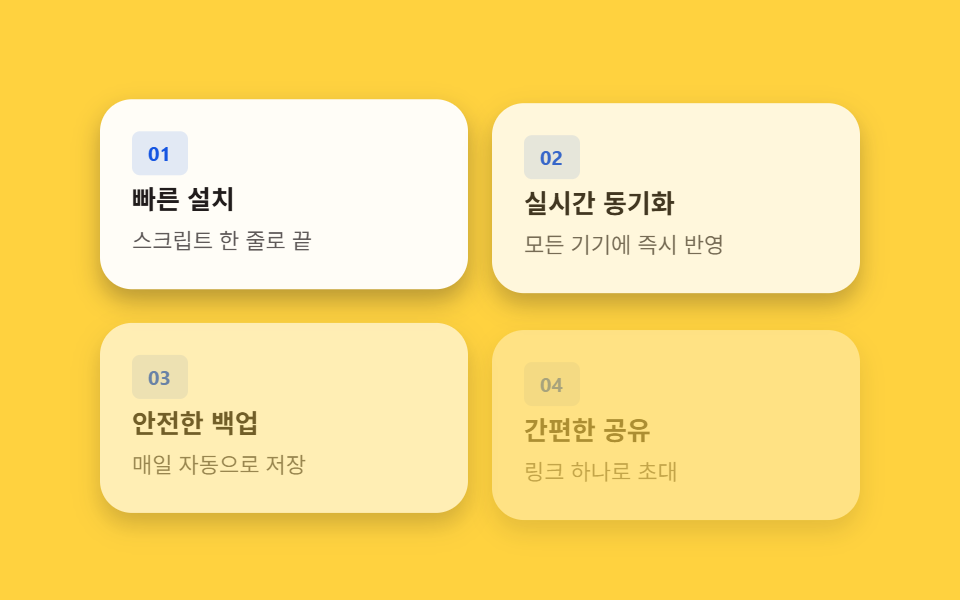
<main class="stage" id="stage">
  <div class="grid is-demo">
    <article class="card" style="--i:0">
      <p class="card__badge">01</p>
      <h3 class="card__title">Fast install</h3>
      <p class="card__desc">Done with one line of script</p>
    </article>
    <article class="card" style="--i:1">
      <p class="card__badge">02</p>
      <h3 class="card__title">Real-time sync</h3>
      <p class="card__desc">Instantly reflected on every device</p>
    </article>
    <article class="card" style="--i:2">
      <p class="card__badge">03</p>
      <h3 class="card__title">Secure backup</h3>
      <p class="card__desc">Saved automatically every day</p>
    </article>
    <article class="card" style="--i:3">
      <p class="card__badge">04</p>
      <h3 class="card__title">Easy sharing</h3>
      <p class="card__desc">Invite with a single link</p>
    </article>
  </div>
</main>
@use "../../../../site/static/demo-tokens" as *;
// 계산 상수: 카드 순서 값(--i) × 간격 상수(스태거 간격)
$stagger-step: 120ms;
$duration: $dur-enter;
$easing: $ease-out;
$color: $subject-blue-deep;
@include stage($stage-yellow);
.grid {
display: grid;
grid-template-columns: repeat(2, 1fr);
gap: $sp-3;
width: 100%;
max-width: 380px;
}
.card {
box-sizing: border-box;
display: flex;
flex-direction: column;
gap: $sp-1;
padding: $sp-4;
border-radius: $r-card;
background: $stage-paper;
box-shadow: $shadow-press;
opacity: 0;
transform: translateY(14px);
}
.card__badge {
margin: 0;
align-self: flex-start;
padding: $sp-1 $sp-2;
border-radius: $r-xs;
background: rgba($color, .12);
color: $color;
font-weight: 700;
font-size: 10px;
line-height: 1.4;
}
.card__title {
margin: 0;
color: $subject-ink;
font-weight: 600;
font-size: 13px;
line-height: 1.3;
}
.card__desc {
margin: 0;
color: rgba($subject-ink, .72);
font-weight: 400;
font-size: 11px;
line-height: 1.5;
}
.is-demo .card {
  animation: card-in $duration $easing both;
  animation-delay: calc(var(--i) * #{$stagger-step});
}

@keyframes card-in {
  0% { opacity: 0; transform: translateY(14px); }
  100% { opacity: 1; transform: translateY(0); }
}
@media (max-width: 340px) {
.grid { gap: $sp-2; max-width: 280px; }
.card { padding: $sp-2 $sp-3; gap: 0; }
.card__title { font-size: 12px; }
.card__desc { font-size: 10px; }
}
@media (prefers-reduced-motion: reduce) {
.is-demo .card { animation: none; opacity: 1; transform: none; }
}html, body {
margin: 0;
overflow: hidden;
}
.stage {
box-sizing: border-box;
min-height: 100vh;
display: grid;
place-items: center;
margin: 0;
background: #ffd23f;
font-family: -apple-system, "Segoe UI", "Noto Sans KR", sans-serif;
padding: clamp(8px, 4vw, 24px);
}
.grid {
display: grid;
grid-template-columns: repeat(2, 1fr);
gap: 12px;
width: 100%;
max-width: 380px;
}
.card {
box-sizing: border-box;
display: flex;
flex-direction: column;
gap: 4px;
padding: 16px;
border-radius: 16px;
background: #ffffff;
box-shadow: 0 6px 12px rgba(23, 20, 26, 0.32);
opacity: 0;
transform: translateY(14px);
}
.card__badge {
margin: 0;
align-self: flex-start;
padding: 4px 8px;
border-radius: 4px;
background: rgba(10, 79, 232, 0.12);
color: #0a4fe8;
font-weight: 700;
font-size: 10px;
line-height: 1.4;
}
.card__title {
margin: 0;
color: #17141a;
font-weight: 600;
font-size: 13px;
line-height: 1.3;
}
.card__desc {
margin: 0;
color: rgba(23, 20, 26, 0.72);
font-weight: 400;
font-size: 11px;
line-height: 1.5;
}
.is-demo .card {
animation: card-in 600ms ease-out both;
animation-delay: calc(var(--i) * 120ms);
}
@keyframes card-in {
0% {
opacity: 0;
transform: translateY(14px);
}
100% {
opacity: 1;
transform: translateY(0);
}
}
@media (max-width: 340px) {
.grid {
gap: 8px;
max-width: 280px;
}
.card {
padding: 8px 12px;
gap: 0;
}
.card__title {
font-size: 12px;
}
.card__desc {
font-size: 10px;
}
}
@media (prefers-reduced-motion: reduce) {
.is-demo .card {
animation: none;
opacity: 1;
transform: none;
}
}import type { CSSProperties } from "react";
import styles from "./FeatureGrid.module.scss";
// 카드 순서 값(--i)에 간격 상수(스태거 간격)를 곱한 값을 animation-delay 로 써서 카드가 순서대로 뜬다.
// 계산 겹: 카드 순서 값(--i) × 간격 상수 -> animation-delay. 리스너 없음(자동 재생).
type Vars = CSSProperties & { "--i"?: number };
const FEATURES = [
{ badge: "01", title: "빠른 설치", desc: "스크립트 한 줄로 끝" },
{ badge: "02", title: "실시간 동기화", desc: "모든 기기에 즉시 반영" },
{ badge: "03", title: "안전한 백업", desc: "매일 자동으로 저장" },
{ badge: "04", title: "간편한 공유", desc: "링크 하나로 초대" },
];
export default function FeatureGrid() {
return (
<main className={styles.stage}>
<div className={`${styles.grid} ${styles["is-demo"]}`}>
{FEATURES.map((item, i) => (
<article
key={item.badge}
className={styles.card}
style={{ "--i": i } as Vars}
>
<p className={styles.card__badge}>{item.badge}</p>
<h3 className={styles.card__title}>{item.title}</h3>
<p className={styles.card__desc}>{item.desc}</p>
</article>
))}
</div>
</main>
);
}02 · Feature card grid — cards revealing in order from a visible-ratio value — Measured area 57.951% · moving frames 12/23Original by GODRICH · SCSS and React ship in the zip · See the password
What the numbers say
Across 23 tracked frames the grid changes on 12 of them, covering 57.951% cumulative area — the highest of the nine — at a 37.3 average intensity, since every card in the grid shifts together rather than one small element moving alone. Each card carries its own order value in an inline --i custom property, and animation-delay: calc(var(--i) * #{$stagger-step}) turns that value into a 120ms-per-card offset, the same constant this post's first variant stretches to 280ms.
.is-demo .card {
animation: card-in $duration $easing both;
animation-delay: calc(var(--i) * #{$stagger-step});
}
@keyframes card-in {
0% { opacity: 0; transform: translateY(14px); }
100% { opacity: 1; transform: translateY(0); }
}
03Pricing cards — a list where only the recommended card gets a larger scale value
The recommended plan's scale value is computed larger than its neighbors so it appears to float, and once the billing cycle changes, the shown price recalculates to that value.
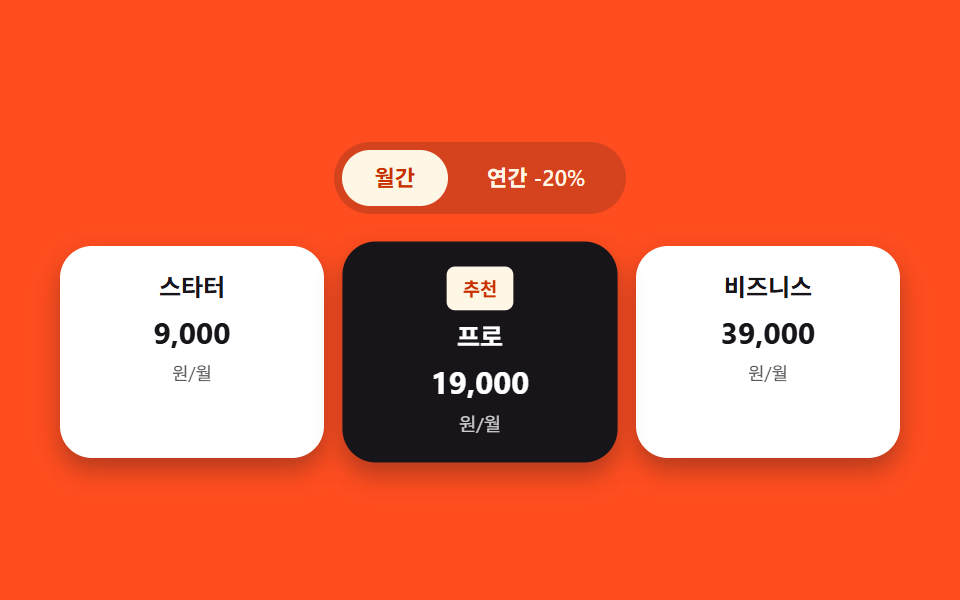
<main class="stage" id="stage">
  <div class="pricing is-demo" id="pricing">
    <div class="toggle" role="group" aria-label="Billing cycle">
      <button class="toggle__btn toggle__btn--m is-active" id="btn-monthly" type="button" aria-pressed="true">Monthly</button>
      <button class="toggle__btn toggle__btn--y" id="btn-yearly" type="button" aria-pressed="false">Yearly -20%</button>
    </div>
    <div class="plans">
      <article class="plan">
        <p class="plan__name">Starter</p>
        <div class="plan__price">
          <span class="plan__amount plan__amount--m">9,000</span>
          <span class="plan__amount plan__amount--y">7,200</span>
        </div>
        <div class="plan__unit-row">
          <span class="plan__unit plan__unit--m">/mo</span>
          <span class="plan__unit plan__unit--y">/mo (billed yearly)</span>
        </div>
      </article>
      <article class="plan plan--featured">
        <p class="plan__badge">Recommended</p>
        <p class="plan__name">Pro</p>
        <div class="plan__price">
          <span class="plan__amount plan__amount--m">19,000</span>
          <span class="plan__amount plan__amount--y">15,200</span>
        </div>
        <div class="plan__unit-row">
          <span class="plan__unit plan__unit--m">/mo</span>
          <span class="plan__unit plan__unit--y">/mo (billed yearly)</span>
        </div>
      </article>
      <article class="plan">
        <p class="plan__name">Business</p>
        <div class="plan__price">
          <span class="plan__amount plan__amount--m">39,000</span>
          <span class="plan__amount plan__amount--y">31,200</span>
        </div>
        <div class="plan__unit-row">
          <span class="plan__unit plan__unit--m">/mo</span>
          <span class="plan__unit plan__unit--y">/mo (billed yearly)</span>
        </div>
      </article>
    </div>
  </div>
</main>@use "../../../../site/static/demo-tokens" as *;
// 계산 상수: 추천 카드와 주변 카드의 scale 값 차이
$featured-scale: 1.08;
$duration: $dur-loop;
$easing: steps(1, end);
$color: $subject-cream;
@include stage($stage-orange);
.pricing {
display: flex;
flex-direction: column;
align-items: center;
gap: $sp-4;
width: 100%;
}
.toggle {
display: inline-flex;
gap: $sp-1;
padding: $sp-1;
border-radius: $r-pill;
background: rgba($subject-ink, .18);
}
.toggle__btn {
border: 0;
border-radius: $r-pill;
padding: $sp-1 $sp-4;
font-family: inherit;
font-weight: 600;
font-size: 11px;
line-height: 1.8;
cursor: pointer;
transition: background $dur-base $ease-out, color $dur-base $ease-out;
}
.toggle__btn.is-active {
background: $color;
color: $subject-orange-deep;
}
.toggle__btn:not(.is-active) {
background: transparent;
color: $color;
}
.plans {
display: grid;
grid-template-columns: repeat(3, 1fr);
gap: $sp-3;
width: 100%;
max-width: 420px;
}
.plan {
position: relative;
box-sizing: border-box;
display: flex;
flex-direction: column;
align-items: center;
gap: $sp-1;
padding: $sp-3 $sp-2;
border-radius: $r-card;
background: $stage-paper;
box-shadow: $shadow-press;
}
.plan--featured {
z-index: 1;
background: $subject-ink;
transform: scale(#{$featured-scale});
}
.is-demo .plan--featured {
animation: featured-scale-in $dur-enter $ease-spring both;
}
@keyframes featured-scale-in {
0% { transform: scale(1); }
100% { transform: scale(#{$featured-scale}); }
}
.plan__badge {
margin: 0;
padding: $sp-1 $sp-2;
border-radius: $r-xs;
background: $color;
color: $subject-orange-deep;
font-weight: 700;
font-size: 9px;
line-height: 1.4;
}
.plan__name {
margin: 0;
color: $subject-ink;
font-weight: 600;
font-size: 12px;
line-height: 1.4;
}
.plan--featured .plan__name { color: $stage-paper; }
.plan__price {
position: relative;
margin: 0;
min-height: 20px;
width: 100%;
text-align: center;
}
.plan__amount {
position: absolute;
inset: 0;
color: $subject-ink;
font-weight: 700;
font-size: 15px;
line-height: 1.4;
white-space: nowrap;
opacity: 0;
transition: opacity $dur-base $ease-out;
}
.plan--featured .plan__amount { color: $stage-paper; }
.plan__amount--m { opacity: 1; }
.plan__unit-row {
position: relative;
width: 100%;
height: 13px;
text-align: center;
}
.plan__unit {
position: absolute;
inset: 0;
color: rgba($subject-ink, .72);
font-weight: 400;
font-size: 9px;
line-height: 1.4;
white-space: nowrap;
opacity: 0;
transition: opacity $dur-base $ease-out;
}
.plan--featured .plan__unit { color: rgba($stage-paper, .78); }
.plan__unit--m { opacity: 1; }
.pricing.is-yearly .plan__amount--m,
.pricing.is-yearly .plan__unit--m { opacity: 0; }
.pricing.is-yearly .plan__amount--y,
.pricing.is-yearly .plan__unit--y { opacity: 1; }
.is-demo .plans > .plan:nth-child(1) .plan__amount--m,
.is-demo .plans > .plan:nth-child(1) .plan__unit--m {
animation: fade-m-1 $duration $easing infinite;
}
.is-demo .plans > .plan:nth-child(1) .plan__amount--y,
.is-demo .plans > .plan:nth-child(1) .plan__unit--y {
animation: fade-y-1 $duration $easing infinite;
}
.is-demo .plans > .plan:nth-child(2) .plan__amount--m,
.is-demo .plans > .plan:nth-child(2) .plan__unit--m {
animation: fade-m-2 $duration $easing infinite;
}
.is-demo .plans > .plan:nth-child(2) .plan__amount--y,
.is-demo .plans > .plan:nth-child(2) .plan__unit--y {
animation: fade-y-2 $duration $easing infinite;
}
.is-demo .plans > .plan:nth-child(3) .plan__amount--m,
.is-demo .plans > .plan:nth-child(3) .plan__unit--m {
animation: fade-m-3 $duration $easing infinite;
}
.is-demo .plans > .plan:nth-child(3) .plan__amount--y,
.is-demo .plans > .plan:nth-child(3) .plan__unit--y {
animation: fade-y-3 $duration $easing infinite;
}
@keyframes fade-m-1 { 0%, 25% { opacity: 1; } 30%, 100% { opacity: 0; } }
@keyframes fade-y-1 { 0%, 25% { opacity: 0; } 30%, 100% { opacity: 1; } }
@keyframes fade-m-2 { 0%, 45% { opacity: 1; } 50%, 100% { opacity: 0; } }
@keyframes fade-y-2 { 0%, 45% { opacity: 0; } 50%, 100% { opacity: 1; } }
@keyframes fade-m-3 { 0%, 65% { opacity: 1; } 70%, 100% { opacity: 0; } }
@keyframes fade-y-3 { 0%, 65% { opacity: 0; } 70%, 100% { opacity: 1; } }
@media (max-width: 340px) {
.plans { gap: $sp-1; max-width: 300px; }
.plan { padding: $sp-2 $sp-1; }
.plan__amount { font-size: 12px; }
}
@media (prefers-reduced-motion: reduce) {
.is-demo .plans > .plan:nth-child(1) .plan__amount--m,
.is-demo .plans > .plan:nth-child(1) .plan__amount--y,
.is-demo .plans > .plan:nth-child(1) .plan__unit--m,
.is-demo .plans > .plan:nth-child(1) .plan__unit--y,
.is-demo .plans > .plan:nth-child(2) .plan__amount--m,
.is-demo .plans > .plan:nth-child(2) .plan__amount--y,
.is-demo .plans > .plan:nth-child(2) .plan__unit--m,
.is-demo .plans > .plan:nth-child(2) .plan__unit--y,
.is-demo .plans > .plan:nth-child(3) .plan__amount--m,
.is-demo .plans > .plan:nth-child(3) .plan__amount--y,
.is-demo .plans > .plan:nth-child(3) .plan__unit--m,
.is-demo .plans > .plan:nth-child(3) .plan__unit--y,
.is-demo .plan--featured {
animation: none;
}
}html, body {
margin: 0;
overflow: hidden;
}
.stage {
box-sizing: border-box;
min-height: 100vh;
display: grid;
place-items: center;
margin: 0;
background: #ff4d1f;
font-family: -apple-system, "Segoe UI", "Noto Sans KR", sans-serif;
padding: clamp(8px, 4vw, 24px);
}
.pricing {
display: flex;
flex-direction: column;
align-items: center;
gap: 16px;
width: 100%;
}
.toggle {
display: inline-flex;
gap: 4px;
padding: 4px;
border-radius: 999px;
background: rgba(23, 20, 26, 0.18);
}
.toggle__btn {
border: 0;
border-radius: 999px;
padding: 4px 16px;
font-family: inherit;
font-weight: 600;
font-size: 11px;
line-height: 1.8;
cursor: pointer;
transition: background 300ms ease-out, color 300ms ease-out;
}
.toggle__btn.is-active {
background: #fff7e6;
color: #c93000;
}
.toggle__btn:not(.is-active) {
background: transparent;
color: #fff7e6;
}
.plans {
display: grid;
grid-template-columns: repeat(3, 1fr);
gap: 12px;
width: 100%;
max-width: 420px;
}
.plan {
position: relative;
box-sizing: border-box;
display: flex;
flex-direction: column;
align-items: center;
gap: 4px;
padding: 12px 8px;
border-radius: 16px;
background: #ffffff;
box-shadow: 0 6px 12px rgba(23, 20, 26, 0.32);
}
.plan--featured {
z-index: 1;
background: #17141a;
transform: scale(1.08);
}
.is-demo .plan--featured {
animation: featured-scale-in 600ms cubic-bezier(0.2, 0.8, 0.2, 1) both;
}
@keyframes featured-scale-in {
0% {
transform: scale(1);
}
100% {
transform: scale(1.08);
}
}
.plan__badge {
margin: 0;
padding: 4px 8px;
border-radius: 4px;
background: #fff7e6;
color: #c93000;
font-weight: 700;
font-size: 9px;
line-height: 1.4;
}
.plan__name {
margin: 0;
color: #17141a;
font-weight: 600;
font-size: 12px;
line-height: 1.4;
}
.plan--featured .plan__name {
color: #ffffff;
}
.plan__price {
position: relative;
margin: 0;
min-height: 20px;
width: 100%;
text-align: center;
}
.plan__amount {
position: absolute;
inset: 0;
color: #17141a;
font-weight: 700;
font-size: 15px;
line-height: 1.4;
white-space: nowrap;
opacity: 0;
transition: opacity 300ms ease-out;
}
.plan--featured .plan__amount {
color: #ffffff;
}
.plan__amount--m {
opacity: 1;
}
.plan__unit-row {
position: relative;
width: 100%;
height: 13px;
text-align: center;
}
.plan__unit {
position: absolute;
inset: 0;
color: rgba(23, 20, 26, 0.72);
font-weight: 400;
font-size: 9px;
line-height: 1.4;
white-space: nowrap;
opacity: 0;
transition: opacity 300ms ease-out;
}
.plan--featured .plan__unit {
color: rgba(255, 255, 255, 0.78);
}
.plan__unit--m {
opacity: 1;
}
.pricing.is-yearly .plan__amount--m,
.pricing.is-yearly .plan__unit--m {
opacity: 0;
}
.pricing.is-yearly .plan__amount--y,
.pricing.is-yearly .plan__unit--y {
opacity: 1;
}
.is-demo .plans > .plan:nth-child(1) .plan__amount--m,
.is-demo .plans > .plan:nth-child(1) .plan__unit--m {
animation: fade-m-1 2s steps(1, end) infinite;
}
.is-demo .plans > .plan:nth-child(1) .plan__amount--y,
.is-demo .plans > .plan:nth-child(1) .plan__unit--y {
animation: fade-y-1 2s steps(1, end) infinite;
}
.is-demo .plans > .plan:nth-child(2) .plan__amount--m,
.is-demo .plans > .plan:nth-child(2) .plan__unit--m {
animation: fade-m-2 2s steps(1, end) infinite;
}
.is-demo .plans > .plan:nth-child(2) .plan__amount--y,
.is-demo .plans > .plan:nth-child(2) .plan__unit--y {
animation: fade-y-2 2s steps(1, end) infinite;
}
.is-demo .plans > .plan:nth-child(3) .plan__amount--m,
.is-demo .plans > .plan:nth-child(3) .plan__unit--m {
animation: fade-m-3 2s steps(1, end) infinite;
}
.is-demo .plans > .plan:nth-child(3) .plan__amount--y,
.is-demo .plans > .plan:nth-child(3) .plan__unit--y {
animation: fade-y-3 2s steps(1, end) infinite;
}
@keyframes fade-m-1 {
0%, 25% {
opacity: 1;
}
30%, 100% {
opacity: 0;
}
}
@keyframes fade-y-1 {
0%, 25% {
opacity: 0;
}
30%, 100% {
opacity: 1;
}
}
@keyframes fade-m-2 {
0%, 45% {
opacity: 1;
}
50%, 100% {
opacity: 0;
}
}
@keyframes fade-y-2 {
0%, 45% {
opacity: 0;
}
50%, 100% {
opacity: 1;
}
}
@keyframes fade-m-3 {
0%, 65% {
opacity: 1;
}
70%, 100% {
opacity: 0;
}
}
@keyframes fade-y-3 {
0%, 65% {
opacity: 0;
}
70%, 100% {
opacity: 1;
}
}
@media (max-width: 340px) {
.plans {
gap: 4px;
max-width: 300px;
}
.plan {
padding: 8px 4px;
}
.plan__amount {
font-size: 12px;
}
}
@media (prefers-reduced-motion: reduce) {
.is-demo .plans > .plan:nth-child(1) .plan__amount--m,
.is-demo .plans > .plan:nth-child(1) .plan__amount--y,
.is-demo .plans > .plan:nth-child(1) .plan__unit--m,
.is-demo .plans > .plan:nth-child(1) .plan__unit--y,
.is-demo .plans > .plan:nth-child(2) .plan__amount--m,
.is-demo .plans > .plan:nth-child(2) .plan__amount--y,
.is-demo .plans > .plan:nth-child(2) .plan__unit--m,
.is-demo .plans > .plan:nth-child(2) .plan__unit--y,
.is-demo .plans > .plan:nth-child(3) .plan__amount--m,
.is-demo .plans > .plan:nth-child(3) .plan__amount--y,
.is-demo .plans > .plan:nth-child(3) .plan__unit--m,
.is-demo .plans > .plan:nth-child(3) .plan__unit--y,
.is-demo .plan--featured {
animation: none;
}
}// Billing cycle 버튼을 누르면 요금제 상태가 연간 또는 Monthly 상태가 되고, 그 상태에 따라 화면에 보이는 금액 값을 다시 계산해 표시한다.
// 계산 겹: Billing cycle 상태 -> 표시 금액 값 재계산. 실사용 클릭 리스너 있음.
(function () {
var root = document.getElementById('pricing');
var mBtn = document.getElementById('btn-monthly');
var yBtn = document.getElementById('btn-yearly');
if (!root || !mBtn || !yBtn) return;
function setYearly(yearly) {
root.classList.remove('is-demo');
root.classList.toggle('is-yearly', yearly);
mBtn.classList.toggle('is-active', !yearly);
yBtn.classList.toggle('is-active', yearly);
mBtn.setAttribute('aria-pressed', String(!yearly));
yBtn.setAttribute('aria-pressed', String(yearly));
}
mBtn.addEventListener('click', function () { setYearly(false); });
yBtn.addEventListener('click', function () { setYearly(true); });
})();import { useEffect, useRef } from "react";
import styles from "./PricingCards.module.scss";
// 결제 주기 버튼을 누르면 요금제 상태가 연간 또는 월간 상태가 되고, 그 상태에 따라 화면에 보이는 금액 값을 다시 계산해 표시한다.
// 계산 겹: 결제 주기 상태 -> 표시 금액 값 재계산. 실사용 클릭 리스너 있음.
const PLANS = [
{ name: "스타터", amountM: "9,000", amountY: "7,200", featured: false },
{ name: "프로", amountM: "19,000", amountY: "15,200", featured: true },
{ name: "비즈니스", amountM: "39,000", amountY: "31,200", featured: false },
];
export default function PricingCards() {
const rootRef = useRef<HTMLDivElement>(null);
const mBtnRef = useRef<HTMLButtonElement>(null);
const yBtnRef = useRef<HTMLButtonElement>(null);
useEffect(() => {
const root = rootRef.current;
const mBtn = mBtnRef.current;
const yBtn = yBtnRef.current;
if (!root || !mBtn || !yBtn) return;
function setYearly(yearly: boolean) {
root!.classList.remove(styles["is-demo"]);
root!.classList.toggle(styles["is-yearly"], yearly);
mBtn!.classList.toggle(styles["is-active"], !yearly);
yBtn!.classList.toggle(styles["is-active"], yearly);
mBtn!.setAttribute("aria-pressed", String(!yearly));
yBtn!.setAttribute("aria-pressed", String(yearly));
}
function onMonthly() { setYearly(false); }
function onYearly() { setYearly(true); }
mBtn.addEventListener("click", onMonthly);
yBtn.addEventListener("click", onYearly);
return () => {
mBtn.removeEventListener("click", onMonthly);
yBtn.removeEventListener("click", onYearly);
};
}, []);
return (
<main className={styles.stage}>
<div ref={rootRef} className={`${styles.pricing} ${styles["is-demo"]}`}>
<div className={styles.toggle} role="group" aria-label="결제 주기">
<button
ref={mBtnRef}
className={`${styles.toggle__btn} ${styles["toggle__btn--m"]} ${styles["is-active"]}`}
type="button"
aria-pressed="true"
>
월간
</button>
<button
ref={yBtnRef}
className={`${styles.toggle__btn} ${styles["toggle__btn--y"]}`}
type="button"
aria-pressed="false"
>
연간 -20%
</button>
</div>
<div className={styles.plans}>
{PLANS.map((plan) => (
<article
key={plan.name}
className={plan.featured ? `${styles.plan} ${styles["plan--featured"]}` : styles.plan}
>
{plan.featured && <p className={styles.plan__badge}>추천</p>}
<p className={styles.plan__name}>{plan.name}</p>
<div className={styles.plan__price}>
<span className={`${styles.plan__amount} ${styles["plan__amount--m"]}`}>{plan.amountM}</span>
<span className={`${styles.plan__amount} ${styles["plan__amount--y"]}`}>{plan.amountY}</span>
</div>
<div className={styles["plan__unit-row"]}>
<span className={`${styles.plan__unit} ${styles["plan__unit--m"]}`}>원/월</span>
<span className={`${styles.plan__unit} ${styles["plan__unit--y"]}`}>원/월(연 결제)</span>
</div>
</article>
))}
</div>
</div>
</main>
);
}03 · Pricing cards — a list where only the recommended card gets a larger scale value — Measured area 5.337% · moving frames 9/23Original by GODRICH · SCSS and React ship in the zip · See the password
What the numbers say
Across 23 tracked frames the pricing list changes on 9 of them, covering 5.337% cumulative area at a 56.8 average intensity, since only the featured card's scale value and the crossfading price pair actually move. Clicking either billing button — a real click listener, not an autoplay loop — toggles the is-yearly class that both swaps which precomputed price is visible and recomputes the featured card's scale value, which this post's zip ships at 1.08 rather than a wider 1.16.
// Clicking a billing-cycle button sets the pricing state to yearly or monthly, and the shown price recalculates from that state.
// Computed layer: billing-cycle state -> recomputed shown price. Real click listener attached.
(function () {
  var root = document.getElementById('pricing');
  var mBtn = document.getElementById('btn-monthly');
  var yBtn = document.getElementById('btn-yearly');
  if (!root || !mBtn || !yBtn) return;

  function setYearly(yearly) {
    root.classList.remove('is-demo');
    root.classList.toggle('is-yearly', yearly);
    mBtn.classList.toggle('is-active', !yearly);
    yBtn.classList.toggle('is-active', yearly);
    mBtn.setAttribute('aria-pressed', String(!yearly));
    yBtn.setAttribute('aria-pressed', String(yearly));
  }

  mBtn.addEventListener('click', function () { setYearly(false); });
  yBtn.addEventListener('click', function () { setYearly(true); });
})();
04Testimonial carousel — a card track whose auto-advance value grows on a timer
The testimonial track's auto-advance value increases on a timer, interpolating the position to the next card, and pauses that increase once the pointer hovers over it.

<main class="stage" id="stage">
  <div class="carousel" id="carousel">
    <div class="track is-demo" id="track">
      <blockquote class="t-card">
        <p class="t-card__quote">Installation was really easy</p>
        <p class="t-card__name">Minji Kim</p>
      </blockquote>
      <blockquote class="t-card">
        <p class="t-card__quote">Customer support is fast</p>
        <p class="t-card__name">Seojun Park</p>
      </blockquote>
      <blockquote class="t-card">
        <p class="t-card__quote">The design is clean</p>
        <p class="t-card__name">Haneul Lee</p>
      </blockquote>
    </div>
  </div>
</main>
@use "../../../../site/static/demo-tokens" as *;
$duration: $dur-loop;
$easing: $ease-spring;
$color: $subject-blue-deep;
@include stage($stage-paper);
.carousel {
width: 100%;
max-width: 320px;
overflow: hidden;
border-radius: $r-card;
}
.track {
display: flex;
width: 100%;
}
.t-card {
box-sizing: border-box;
flex: 0 0 100%;
margin: 0;
padding: $sp-6 $sp-4;
display: flex;
flex-direction: column;
align-items: center;
gap: $sp-2;
background: $color;
text-align: center;
}
.t-card__quote {
margin: 0;
color: $stage-paper;
font-weight: 600;
font-size: 13px;
line-height: 1.5;
}
.t-card__quote::before { content: "\201C"; }
.t-card__quote::after { content: "\201D"; }
.t-card__name {
margin: 0;
color: rgba($stage-paper, .78);
font-weight: 400;
font-size: 11px;
line-height: 1.5;
}
.track.is-demo {
animation: advance $duration $easing infinite;
}
@keyframes advance {
0%, 20% { transform: translateX(0); }
33%, 63% { transform: translateX(-100%); }
76%, 96% { transform: translateX(-200%); }
100% { transform: translateX(0); }
}
@media (max-width: 340px) {
.carousel { max-width: 240px; }
.t-card { padding: $sp-4 $sp-3; }
}
@media (prefers-reduced-motion: reduce) {
.track.is-demo { animation: none; transform: none; }
}@charset "UTF-8";
html, body {
margin: 0;
overflow: hidden;
}
.stage {
box-sizing: border-box;
min-height: 100vh;
display: grid;
place-items: center;
margin: 0;
background: #ffffff;
font-family: -apple-system, "Segoe UI", "Noto Sans KR", sans-serif;
padding: clamp(8px, 4vw, 24px);
}
.carousel {
width: 100%;
max-width: 320px;
overflow: hidden;
border-radius: 16px;
}
.track {
display: flex;
width: 100%;
}
.t-card {
box-sizing: border-box;
flex: 0 0 100%;
margin: 0;
padding: 24px 16px;
display: flex;
flex-direction: column;
align-items: center;
gap: 8px;
background: #0a4fe8;
text-align: center;
}
.t-card__quote {
margin: 0;
color: #ffffff;
font-weight: 600;
font-size: 13px;
line-height: 1.5;
}
.t-card__quote::before {
content: "“";
}
.t-card__quote::after {
content: "”";
}
.t-card__name {
margin: 0;
color: rgba(255, 255, 255, 0.78);
font-weight: 400;
font-size: 11px;
line-height: 1.5;
}
.track.is-demo {
animation: advance 2s cubic-bezier(0.2, 0.8, 0.2, 1) infinite;
}
@keyframes advance {
0%, 20% {
transform: translateX(0);
}
33%, 63% {
transform: translateX(-100%);
}
76%, 96% {
transform: translateX(-200%);
}
100% {
transform: translateX(0);
}
}
@media (max-width: 340px) {
.carousel {
max-width: 240px;
}
.t-card {
padding: 16px 12px;
}
}
@media (prefers-reduced-motion: reduce) {
.track.is-demo {
animation: none;
transform: none;
}
}// 자동 진행 값이 타이머로 계속 늘어나며 카드 위치를 다음 카드로 보간한다. 포인터가 올라와 있는 동안은 그 값이 늘지 않는다.
// 계산 겹: 자동 진행 값(interval) -> translateX 보간. 실사용 포인터 리스너 있음(데모 재생 자체는 고정 시퀀스).
(function () {
var carousel = document.getElementById('carousel');
var track = document.getElementById('track');
if (!carousel || !track) return;
var count = track.children.length;
var index = 0;
var timer = null;
var live = false;
function render() {
  track.style.transform = 'translateX(' + (index * -100) + '%)';
}

function advance() {
  index = (index + 1) % count;
  render();
}

function stop() {
  if (timer !== null) { window.clearInterval(timer); timer = null; }
}

function start() {
  stop();
  timer = window.setInterval(advance, 2600);
}

function goLive() {
  if (live) return;
  live = true;
  track.classList.remove('is-demo');
  render();
  start();
}
carousel.addEventListener('pointerenter', function () {
goLive();
stop();
});
carousel.addEventListener('pointerleave', function () {
if (live) start();
});
})();import { useEffect, useRef } from "react";
import styles from "./TestimonialCarousel.module.scss";
// 자동 진행 값이 타이머로 계속 늘어나며 카드 위치를 다음 카드로 보간한다. 포인터가 올라와 있는 동안은 그 값이 늘지 않는다.
// 계산 겹: 자동 진행 값(interval) -> translateX 보간. 실사용 포인터 리스너 있음(데모 재생 자체는 고정 시퀀스).
const REVIEWS = [
{ quote: "설치가 정말 쉬웠어요", name: "김민지" },
{ quote: "고객 지원이 빨라요", name: "박서준" },
{ quote: "디자인이 깔끔해요", name: "이하늘" },
];
export default function TestimonialCarousel() {
const carouselRef = useRef<HTMLDivElement>(null);
const trackRef = useRef<HTMLDivElement>(null);
useEffect(() => {
const carousel = carouselRef.current;
const track = trackRef.current;
if (!carousel || !track) return;
const count = track.children.length;
let index = 0;
let timer: number | null = null;
let live = false;
function render() {
track!.style.transform = "translateX(" + index * -100 + "%)";
}
function advance() {
index = (index + 1) % count;
render();
}
function stop() {
if (timer !== null) {
window.clearInterval(timer);
timer = null;
}
}
function start() {
stop();
timer = window.setInterval(advance, 2600);
}
function goLive() {
if (live) return;
live = true;
track!.classList.remove(styles["is-demo"]);
render();
start();
}
function onEnter() {
goLive();
stop();
}
function onLeave() {
if (live) start();
}
carousel.addEventListener("pointerenter", onEnter);
carousel.addEventListener("pointerleave", onLeave);
return () => {
stop();
carousel.removeEventListener("pointerenter", onEnter);
carousel.removeEventListener("pointerleave", onLeave);
};
}, []);
return (
<main className={styles.stage}>
<div ref={carouselRef} className={styles.carousel}>
<div ref={trackRef} className={`${styles.track} ${styles["is-demo"]}`}>
{REVIEWS.map((r) => (
<blockquote key={r.name} className={styles["t-card"]}>
<p className={styles["t-card__quote"]}>{r.quote}</p>
<p className={styles["t-card__name"]}>{r.name}</p>
</blockquote>
))}
</div>
</div>
</main>
);
}04 · Testimonial carousel — a card track whose auto-advance value grows on a timer — Measured area 2.61% · moving frames 8/23Original by GODRICH · SCSS and React ship in the zip · See the password
What the numbers say
Across 23 tracked frames the carousel changes on 8 of them, covering 2.61% cumulative area at a 124.2 average intensity, since only one card-width slice of the track moves at a time rather than the whole section. window.setInterval(advance, 2600) grows the index value every 2.6 seconds and render() turns that index into a translateX position, and a real pointerenter listener stops that timer so the index only keeps growing while nobody is reading the current card.
function render() {
track.style.transform = 'translateX(' + (index * -100) + '%)';
}
function advance() {
index = (index + 1) % count;
render();
}
function stop() {
if (timer !== null) { window.clearInterval(timer); timer = null; }
}
function start() {
stop();
timer = window.setInterval(advance, 2600);
}
function goLive() {
if (live) return;
live = true;
track.classList.remove('is-demo');
render();
start();
}
05FAQ accordion — a list recomputing answer height from content length
Opening a question recomputes its answer's content-height value and expands to that value, while opening another one collapses the previous answer back to a height of zero.

<main class="stage" id="stage">
  <div class="faq is-demo" id="faq">
    <div class="faq__item" style="--h:64px">
      <button class="faq__q" type="button" aria-expanded="false" aria-controls="a1">
        <span>How long does shipping take?</span>
        <span class="faq__caret" aria-hidden="true"></span>
      </button>
      <div class="faq__a" id="a1" role="region">
        <p class="faq__a-inner">It ships within 1-2 business days on average; remote areas may take up to 4 days.</p>
      </div>
    </div>
    <div class="faq__item" style="--h:52px">
      <button class="faq__q" type="button" aria-expanded="false" aria-controls="a2">
        <span>I'd like to know the refund policy</span>
        <span class="faq__caret" aria-hidden="true"></span>
      </button>
      <div class="faq__a" id="a2" role="region">
        <p class="faq__a-inner">A full refund is available if unopened within 7 days of receipt.</p>
      </div>
    </div>
    <div class="faq__item" style="--h:58px">
      <button class="faq__q" type="button" aria-expanded="false" aria-controls="a3">
        <span>Do you ship internationally?</span>
        <span class="faq__caret" aria-hidden="true"></span>
      </button>
      <div class="faq__a" id="a3" role="region">
        <p class="faq__a-inner">Only some countries are supported; availability is shown at checkout.</p>
      </div>
    </div>
  </div>
</main>@use "../../../../site/static/demo-tokens" as *;
$duration: $dur-base;
$easing: $ease-out;
$color: $subject-blue-deep;
@include stage($stage-ink);
@property --open {
syntax: "<number>";
inherits: true;
initial-value: 0;
}
.faq {
display: flex;
flex-direction: column;
gap: $sp-2;
width: 100%;
max-width: 340px;
}
.faq__item {
--open: 0;
border-radius: $r-card;
background: $stage-paper;
overflow: hidden;
}
.faq__q {
width: 100%;
box-sizing: border-box;
display: flex;
align-items: center;
justify-content: space-between;
gap: $sp-2;
border: 0;
background: transparent;
padding: $sp-3 $sp-4;
color: $subject-ink;
font-family: inherit;
font-weight: 600;
font-size: 12px;
line-height: 1.4;
text-align: left;
cursor: pointer;
}
.faq__caret {
flex: 0 0 auto;
width: 7px;
height: 7px;
border-right: 2px solid $color;
border-bottom: 2px solid $color;
transform: rotate(calc(45deg + var(--open) * 180deg));
transition: transform $duration $easing;
}
.faq__a {
max-height: calc(var(--open) * var(--h));
overflow: hidden;
transition: max-height $duration $easing;
}
.faq__a-inner {
margin: 0;
padding: 0 $sp-4 $sp-3;
color: rgba($subject-ink, .78);
font-weight: 400;
font-size: 11px;
line-height: 1.5;
}
.is-demo .faq__item:nth-child(1) { animation: open-1 $dur-loop $easing infinite; }
.is-demo .faq__item:nth-child(2) { animation: open-2 $dur-loop $easing infinite; }
.is-demo .faq__item:nth-child(3) { animation: open-3 $dur-loop $easing infinite; }
@keyframes open-1 {
0%, 8% { --open: 0; }
22%, 45% { --open: 1; }
58%, 100% { --open: 0; }
}
@keyframes open-2 {
0%, 45% { --open: 0; }
58%, 78% { --open: 1; }
88%, 100% { --open: 0; }
}
@keyframes open-3 {
0%, 78% { --open: 0; }
88%, 96% { --open: 1; }
100% { --open: 0; }
}
@media (max-width: 340px) {
.faq__q { padding: $sp-2 $sp-3; font-size: 11px; }
.faq__a-inner { padding: 0 $sp-3 $sp-2; }
}
@media (prefers-reduced-motion: reduce) {
.is-demo .faq__item:nth-child(1),
.is-demo .faq__item:nth-child(2),
.is-demo .faq__item:nth-child(3) {
animation: none;
}
.faq__caret, .faq__a { transition: none; }
}html, body {
margin: 0;
overflow: hidden;
}
.stage {
box-sizing: border-box;
min-height: 100vh;
display: grid;
place-items: center;
margin: 0;
background: #17141a;
font-family: -apple-system, "Segoe UI", "Noto Sans KR", sans-serif;
padding: clamp(8px, 4vw, 24px);
}
@property --open {
syntax: "<number>";
inherits: true;
initial-value: 0;
}
.faq {
display: flex;
flex-direction: column;
gap: 8px;
width: 100%;
max-width: 340px;
}
.faq__item {
--open: 0;
border-radius: 16px;
background: #ffffff;
overflow: hidden;
}
.faq__q {
width: 100%;
box-sizing: border-box;
display: flex;
align-items: center;
justify-content: space-between;
gap: 8px;
border: 0;
background: transparent;
padding: 12px 16px;
color: #17141a;
font-family: inherit;
font-weight: 600;
font-size: 12px;
line-height: 1.4;
text-align: left;
cursor: pointer;
}
.faq__caret {
flex: 0 0 auto;
width: 7px;
height: 7px;
border-right: 2px solid #0a4fe8;
border-bottom: 2px solid #0a4fe8;
transform: rotate(calc(45deg + var(--open) * 180deg));
transition: transform 300ms ease-out;
}
.faq__a {
max-height: calc(var(--open) * var(--h));
overflow: hidden;
transition: max-height 300ms ease-out;
}
.faq__a-inner {
margin: 0;
padding: 0 16px 12px;
color: rgba(23, 20, 26, 0.78);
font-weight: 400;
font-size: 11px;
line-height: 1.5;
}
.is-demo .faq__item:nth-child(1) {
animation: open-1 2s ease-out infinite;
}
.is-demo .faq__item:nth-child(2) {
animation: open-2 2s ease-out infinite;
}
.is-demo .faq__item:nth-child(3) {
animation: open-3 2s ease-out infinite;
}
@keyframes open-1 {
0%, 8% {
--open: 0;
}
22%, 45% {
--open: 1;
}
58%, 100% {
--open: 0;
}
}
@keyframes open-2 {
0%, 45% {
--open: 0;
}
58%, 78% {
--open: 1;
}
88%, 100% {
--open: 0;
}
}
@keyframes open-3 {
0%, 78% {
--open: 0;
}
88%, 96% {
--open: 1;
}
100% {
--open: 0;
}
}
@media (max-width: 340px) {
.faq__q {
padding: 8px 12px;
font-size: 11px;
}
.faq__a-inner {
padding: 0 12px 8px;
}
}
@media (prefers-reduced-motion: reduce) {
.is-demo .faq__item:nth-child(1),
.is-demo .faq__item:nth-child(2),
.is-demo .faq__item:nth-child(3) {
animation: none;
}
.faq__caret, .faq__a {
transition: none;
}
}// 질문을 열면 답변의 내용 높이 값을 scrollHeight 로 다시 구해 그 값까지 펼치고, 다른 질문을 열면 이전 답변은 0까지 줄며 접힌다.
// 계산 겹: 클릭 상태 -> scrollHeight 값 -> max-height 보간. 실사용 클릭 리스너 있음(데모 재생 자체는 고정 시퀀스).
(function () {
var faq = document.getElementById('faq');
if (!faq) return;
var items = faq.querySelectorAll('.faq__item');
function closeItem(item) {
var q = item.querySelector('.faq__q');
var a = item.querySelector('.faq__a');
if (!q || !a) return;
q.setAttribute('aria-expanded', 'false');
a.style.maxHeight = '0px';
}
function openItem(item) {
  var q = item.querySelector('.faq__q');
  var a = item.querySelector('.faq__a');
  if (!q || !a) return;
  q.setAttribute('aria-expanded', 'true');
  a.style.maxHeight = a.scrollHeight + 'px';
}

items.forEach(function (item) {
  var q = item.querySelector('.faq__q');
  if (!q) return;
  q.addEventListener('click', function () {
    faq.classList.remove('is-demo');
    var wasOpen = q.getAttribute('aria-expanded') === 'true';
    items.forEach(closeItem);
    if (!wasOpen) openItem(item);
  });
});
})();import { useEffect, useRef } from "react";
import type { CSSProperties } from "react";
import styles from "./FaqAccordion.module.scss";
// 질문을 열면 답변의 내용 높이 값을 scrollHeight 로 다시 구해 그 값까지 펼치고, 다른 질문을 열면 이전 답변은 0까지 줄며 접힌다.
// 계산 겹: 클릭 상태 -> scrollHeight 값 -> max-height 보간. 실사용 클릭 리스너 있음(데모 재생 자체는 고정 시퀀스).
type Vars = CSSProperties & { "--h"?: string };
const ITEMS = [
{
id: "a1",
h: "64px",
q: "배송은 얼마나 걸리나요?",
a: "평균 1~2영업일 이내 출고되며, 도서 산간 지역은 최대 4일이 걸릴 수 있습니다.",
},
{
id: "a2",
h: "52px",
q: "환불 규정이 궁금해요",
a: "수령 후 7일 이내 미개봉 상태면 전액 환불됩니다.",
},
{
id: "a3",
h: "58px",
q: "해외 배송도 되나요?",
a: "일부 국가만 지원하며 결제 단계에서 배송 가능 여부가 표시됩니다.",
},
];
export default function FaqAccordion() {
const faqRef = useRef<HTMLDivElement>(null);
useEffect(() => {
const faq = faqRef.current;
if (!faq) return;
const items = faq.querySelectorAll<HTMLElement>(`.${styles.faq__item}`);
function closeItem(item: HTMLElement) {
const q = item.querySelector<HTMLElement>(`.${styles.faq__q}`);
const a = item.querySelector<HTMLElement>(`.${styles.faq__a}`);
if (!q || !a) return;
q.setAttribute("aria-expanded", "false");
a.style.maxHeight = "0px";
}
function openItem(item: HTMLElement) {
const q = item.querySelector<HTMLElement>(`.${styles.faq__q}`);
const a = item.querySelector<HTMLElement>(`.${styles.faq__a}`);
if (!q || !a) return;
q.setAttribute("aria-expanded", "true");
a.style.maxHeight = a.scrollHeight + "px";
}
const handlers: Array<() => void> = [];
items.forEach((item) => {
const q = item.querySelector<HTMLElement>(`.${styles.faq__q}`);
if (!q) return;
const onClick = () => {
faq!.classList.remove(styles["is-demo"]);
const wasOpen = q.getAttribute("aria-expanded") === "true";
items.forEach(closeItem);
if (!wasOpen) openItem(item);
};
q.addEventListener("click", onClick);
handlers.push(() => q.removeEventListener("click", onClick));
});
return () => handlers.forEach((off) => off());
}, []);
return (
<main className={styles.stage}>
<div ref={faqRef} className={`${styles.faq} ${styles["is-demo"]}`}>
{ITEMS.map((item) => (
<div key={item.id} className={styles.faq__item} style={{ "--h": item.h } as Vars}>
<button className={styles.faq__q} type="button" aria-expanded="false" aria-controls={item.id}>
<span>{item.q}</span>
<span className={styles.faq__caret} aria-hidden="true" />
</button>
<div className={styles.faq__a} id={item.id} role="region">
<p className={styles["faq__a-inner"]}>{item.a}</p>
</div>
</div>
))}
</div>
</main>
);
}05 · FAQ accordion — a list recomputing answer height from content length — Measured area 39.718% · moving frames 17/23Original by GODRICH · SCSS and React ship in the zip · See the password
What the numbers say
Across 23 tracked frames the accordion changes on 17 of them, covering 39.718% cumulative area — the second-highest of the nine — at a 160.1 average intensity, since a full answer block expands and collapses rather than a thin element sliding. A real click listener calls openItem(), which reads the answer's actual scrollHeight and writes it into max-height so a short answer never leaves empty space and a long one never gets clipped.
function openItem(item) {
var q = item.querySelector('.faq__q');
var a = item.querySelector('.faq__a');
if (!q || !a) return;
q.setAttribute('aria-expanded', 'true');
a.style.maxHeight = a.scrollHeight + 'px';
}
items.forEach(function (item) {
var q = item.querySelector('.faq__q');
if (!q) return;
q.addEventListener('click', function () {
faq.classList.remove('is-demo');
var wasOpen = q.getAttribute('aria-expanded') === 'true';
items.forEach(closeItem);
if (!wasOpen) openItem(item);
});
});
06CTA band — a strip whose border-angle value keeps increasing once it enters view
Once the band enters the viewport, the gradient-angle value tracing the button's border keeps increasing at a steady rate, making the border appear to rotate.

<main class="stage" id="stage">
  <section class="band">
    <p class="band__text">Start for free today</p>
    <div class="band__cta-wrap">
      <div class="band__ring" aria-hidden="true"></div>
      <button class="band__cta" type="button">Start free trial</button>
    </div>
  </section>
</main>
@use "../../../../site/static/demo-tokens" as *;
$duration: $dur-loop;
$easing: linear;
$color: $subject-ink;
@include stage($stage-yellow);
@property --angle {
syntax: "<angle>";
inherits: false;
initial-value: 0deg;
}
.band {
display: flex;
flex-direction: column;
align-items: center;
gap: $sp-6;
text-align: center;
}
.band__text {
margin: 0;
color: $color;
font-weight: 700;
font-size: clamp(16px, 5vmin, 22px);
line-height: 1.35;
}
.band__cta-wrap {
position: relative;
padding: 4px;
border-radius: $r-pill;
}
.band__ring {
  position: absolute;
  inset: 0;
  border-radius: $r-pill;
  background: conic-gradient(from var(--angle), $color, transparent 32%, $color);
  animation: spin $duration $easing infinite;
}

.band__cta {
  position: relative;
  border: 0;
  border-radius: calc(#{$r-pill} - 4px);
  padding: $sp-3 $sp-8;
  font-family: inherit;
  font-weight: 600;
  font-size: 13px;
  line-height: 1;
  color: $stage-yellow;
  background: $color;
  cursor: pointer;
}

@keyframes spin {
  to { --angle: 360deg; }
}
@media (max-width: 340px) {
.band__cta { padding: $sp-2 $sp-6; }
}
@media (prefers-reduced-motion: reduce) {
.band__ring { animation: none; }
}html, body {
margin: 0;
overflow: hidden;
}
.stage {
box-sizing: border-box;
min-height: 100vh;
display: grid;
place-items: center;
margin: 0;
background: #ffd23f;
font-family: -apple-system, "Segoe UI", "Noto Sans KR", sans-serif;
padding: clamp(8px, 4vw, 24px);
}
@property --angle {
syntax: "<angle>";
inherits: false;
initial-value: 0deg;
}
.band {
display: flex;
flex-direction: column;
align-items: center;
gap: 24px;
text-align: center;
}
.band__text {
margin: 0;
color: #17141a;
font-weight: 700;
font-size: clamp(16px, 5vmin, 22px);
line-height: 1.35;
}
.band__cta-wrap {
position: relative;
padding: 4px;
border-radius: 999px;
}
.band__ring {
position: absolute;
inset: 0;
border-radius: 999px;
background: conic-gradient(from var(--angle), #17141a, transparent 32%, #17141a);
animation: spin 2s linear infinite;
}
.band__cta {
position: relative;
border: 0;
border-radius: calc(999px - 4px);
padding: 12px 32px;
font-family: inherit;
font-weight: 600;
font-size: 13px;
line-height: 1;
color: #ffd23f;
background: #17141a;
cursor: pointer;
}
@keyframes spin {
to {
--angle: 360deg;
}
}
@media (max-width: 340px) {
.band__cta {
padding: 8px 24px;
}
}
@media (prefers-reduced-motion: reduce) {
.band__ring {
animation: none;
}
}import styles from "./CtaBand.module.scss";
// 회전하는 테두리의 각도 값(--angle)이 계속 늘어나며 conic-gradient 시작점을 돌린다.
// 계산 겹: 각도 값(--angle) -> conic-gradient 시작점 보간. 리스너 없음(자동 재생).
export default function CtaBand() {
return (
<main className={styles.stage}>
<section className={styles.band}>
<p className={styles.band__text}>지금 무료로 시작해보세요</p>
<div className={styles["band__cta-wrap"]}>
<div className={styles.band__ring} aria-hidden="true" />
<button className={styles.band__cta} type="button">
무료 체험 시작
</button>
</div>
</section>
</main>
);
}06 · CTA band — a strip whose border-angle value keeps increasing once it enters view — Measured area 1.011% · moving frames 23/23Original by GODRICH · SCSS and React ship in the zip · See the password
What the numbers say
Across 23 tracked frames the band changes on all 23 — tied for the most of the nine — but covers only 1.011% cumulative area at a 19.1 average intensity, the lowest of the nine, because only a thin ring outline redraws on every frame rather than a wide surface. @property --angle is typed as <angle> so @keyframes spin { to { --angle: 360deg; } } can animate it directly, and the conic-gradient tracing .band__ring is what turns that single increasing value into the appearance of a rotating border.
.band__ring {
position: absolute;
inset: 0;
border-radius: $r-pill;
background: conic-gradient(from var(--angle), $color, transparent 32%, $color);
animation: spin $duration $easing infinite;
}
.band__cta {
position: relative;
border: 0;
border-radius: calc(#{$r-pill} - 4px);
padding: $sp-3 $sp-8;
font-family: inherit;
font-weight: 600;
font-size: 13px;
line-height: 1;
color: $stage-yellow;
background: $color;
cursor: pointer;
}
@keyframes spin {
to { --angle: 360deg; }
}
07Footer — a link list recomputing underline width from zero to the text width
Once the pointer sits over a link, that item's underline-width value is recomputed from zero up to the text's width and draws in from the left.

<main class="stage" id="stage">
  <footer class="panel is-demo" id="stage-panel">
    <nav class="links">
      <a class="link" href="#">About us</a>
      <a class="link" href="#">Terms of service</a>
      <a class="link" href="#">Privacy policy</a>
      <a class="link" href="#">Contact us</a>
    </nav>
  </footer>
</main>
@use "../../../../site/static/demo-tokens" as *;
$duration: $dur-base;
$easing: $ease-out;
$color: $subject-cream;
@include stage($stage-orange);
.panel {
padding: $sp-6 $sp-5;
border-radius: $r-card;
background: $subject-ink;
}
.links {
display: flex;
flex-wrap: wrap;
gap: $sp-5;
justify-content: center;
}
.link {
position: relative;
padding-bottom: $sp-1;
color: $stage-paper;
font-weight: 500;
font-size: 12px;
line-height: 1.6;
text-decoration: none;
white-space: nowrap;
}
.link::after {
content: "";
position: absolute;
left: 0;
bottom: 0;
height: 2px;
width: var(--tw, 0px);
background: $color;
transition: width $duration $easing;
}
.is-demo .link:nth-child(1)::after { animation: underline-1 $dur-loop steps(1, end) infinite; }
.is-demo .link:nth-child(2)::after { animation: underline-2 $dur-loop steps(1, end) infinite; }
.is-demo .link:nth-child(3)::after { animation: underline-3 $dur-loop steps(1, end) infinite; }
.is-demo .link:nth-child(4)::after { animation: underline-4 $dur-loop steps(1, end) infinite; }
@keyframes underline-1 { 0%, 4% { width: 0; } 12%, 22% { width: 34px; } 30%, 100% { width: 0; } }
@keyframes underline-2 { 0%, 26% { width: 0; } 34%, 44% { width: 52px; } 52%, 100% { width: 0; } }
@keyframes underline-3 { 0%, 48% { width: 0; } 56%, 66% { width: 76px; } 74%, 100% { width: 0; } }
@keyframes underline-4 { 0%, 70% { width: 0; } 78%, 88% { width: 40px; } 96%, 100% { width: 0; } }
@media (max-width: 340px) {
.links { gap: $sp-3; }
.link { font-size: 11px; }
}
@media (prefers-reduced-motion: reduce) {
.is-demo .link:nth-child(1)::after,
.is-demo .link:nth-child(2)::after,
.is-demo .link:nth-child(3)::after,
.is-demo .link:nth-child(4)::after {
animation: none;
width: 0;
}
}html, body {
margin: 0;
overflow: hidden;
}
.stage {
box-sizing: border-box;
min-height: 100vh;
display: grid;
place-items: center;
margin: 0;
background: #ff4d1f;
font-family: -apple-system, "Segoe UI", "Noto Sans KR", sans-serif;
padding: clamp(8px, 4vw, 24px);
}
.panel {
padding: 24px 20px;
border-radius: 16px;
background: #17141a;
}
.links {
display: flex;
flex-wrap: wrap;
gap: 20px;
justify-content: center;
}
.link {
position: relative;
padding-bottom: 4px;
color: #ffffff;
font-weight: 500;
font-size: 12px;
line-height: 1.6;
text-decoration: none;
white-space: nowrap;
}
.link::after {
content: "";
position: absolute;
left: 0;
bottom: 0;
height: 2px;
width: var(--tw, 0px);
background: #fff7e6;
transition: width 300ms ease-out;
}
.is-demo .link:nth-child(1)::after {
animation: underline-1 2s steps(1, end) infinite;
}
.is-demo .link:nth-child(2)::after {
animation: underline-2 2s steps(1, end) infinite;
}
.is-demo .link:nth-child(3)::after {
animation: underline-3 2s steps(1, end) infinite;
}
.is-demo .link:nth-child(4)::after {
animation: underline-4 2s steps(1, end) infinite;
}
@keyframes underline-1 {
0%, 4% {
width: 0;
}
12%, 22% {
width: 34px;
}
30%, 100% {
width: 0;
}
}
@keyframes underline-2 {
0%, 26% {
width: 0;
}
34%, 44% {
width: 52px;
}
52%, 100% {
width: 0;
}
}
@keyframes underline-3 {
0%, 48% {
width: 0;
}
56%, 66% {
width: 76px;
}
74%, 100% {
width: 0;
}
}
@keyframes underline-4 {
0%, 70% {
width: 0;
}
78%, 88% {
width: 40px;
}
96%, 100% {
width: 0;
}
}
@media (max-width: 340px) {
.links {
gap: 12px;
}
.link {
font-size: 11px;
}
}
@media (prefers-reduced-motion: reduce) {
.is-demo .link:nth-child(1)::after,
.is-demo .link:nth-child(2)::after,
.is-demo .link:nth-child(3)::after,
.is-demo .link:nth-child(4)::after {
animation: none;
width: 0;
}
}// 포인터가 링크 위로 올라오면 그 글자의 실제 폭 값을 다시 구해 밑줄 너비 값을 0에서 그 값까지 늘린다.
// 계산 겹: 포인터 진입 -> 글자 폭 값(getBoundingClientRect) -> 밑줄 너비 보간. 실사용 포인터 리스너 있음(데모 재생 자체는 고정 시퀀스).
(function () {
var panel = document.getElementById('stage-panel');
if (!panel) return;
var links = panel.querySelectorAll('.link');
links.forEach(function (link) {
link.addEventListener('pointerenter', function () {
panel.classList.remove('is-demo');
var w = link.getBoundingClientRect().width;
link.style.setProperty('--tw', w + 'px');
});
link.addEventListener('pointerleave', function () {
link.style.setProperty('--tw', '0px');
});
});
})();import { useEffect, useRef } from "react";
import styles from "./FooterLinks.module.scss";
// 포인터가 링크 위로 올라오면 그 글자의 실제 폭 값을 다시 구해 밑줄 너비 값을 0에서 그 값까지 늘린다.
// 계산 겹: 포인터 진입 -> 글자 폭 값(getBoundingClientRect) -> 밑줄 너비 보간. 실사용 포인터 리스너 있음(데모 재생 자체는 고정 시퀀스).
const LINKS = ["회사소개", "이용약관", "개인정보처리방침", "문의하기"];
export default function FooterLinks() {
const panelRef = useRef<HTMLElement>(null);
useEffect(() => {
const panel = panelRef.current;
if (!panel) return;
const links = panel.querySelectorAll<HTMLAnchorElement>(`.${styles.link}`);
const handlers: Array<() => void> = [];
links.forEach((link) => {
const onEnter = () => {
panel!.classList.remove(styles["is-demo"]);
const w = link.getBoundingClientRect().width;
link.style.setProperty("--tw", w + "px");
};
const onLeave = () => {
link.style.setProperty("--tw", "0px");
};
link.addEventListener("pointerenter", onEnter);
link.addEventListener("pointerleave", onLeave);
handlers.push(() => {
link.removeEventListener("pointerenter", onEnter);
link.removeEventListener("pointerleave", onLeave);
});
});
return () => handlers.forEach((off) => off());
}, []);
return (
<main className={styles.stage}>
<footer ref={panelRef} className={`${styles.panel} ${styles["is-demo"]}`}>
<nav className={styles.links}>
{LINKS.map((label) => (
<a key={label} className={styles.link} href="#">
{label}
</a>
))}
</nav>
</footer>
</main>
);
}07 · Footer — a link list recomputing underline width from zero to the text width — Measured area 0.281% · moving frames 7/23Original by GODRICH · SCSS and React ship in the zip · See the password
What the numbers say
Across 23 tracked frames the footer changes on only 7 of them — the fewest of the nine — covering the smallest cumulative area of the nine at 0.281%, yet its 232.0 average intensity is the highest of the nine, because the handful of pixels that do move are concentrated in one thin underline rather than spread across a surface. A real pointerenter listener measures the hovered link's actual rendered width and writes it into a custom property that the underline's width reads, so a short link's underline never overshoots and a long link's never falls short.
// When the pointer enters a link, its text's real width value is remeasured, and the underline-width value grows from zero up to that value.
// Computed layer: pointer entry -> text-width value (getBoundingClientRect) -> underline-width interpolation. Real pointer listener attached (the demo playback itself is a fixed sequence).
(function () {
  var panel = document.getElementById('stage-panel');
  if (!panel) return;
  var links = panel.querySelectorAll('.link');

  links.forEach(function (link) {
    link.addEventListener('pointerenter', function () {
      panel.classList.remove('is-demo');
      var w = link.getBoundingClientRect().width;
      link.style.setProperty('--tw', w + 'px');
    });
    link.addEventListener('pointerleave', function () {
      link.style.setProperty('--tw', '0px');
    });
  });
})();
08Logo bar — a row whose horizontal offset value keeps growing without a seam
The logo row's horizontal offset value keeps increasing over time, and as a logo exits the right edge the same logo reappears on the left so the row never breaks.
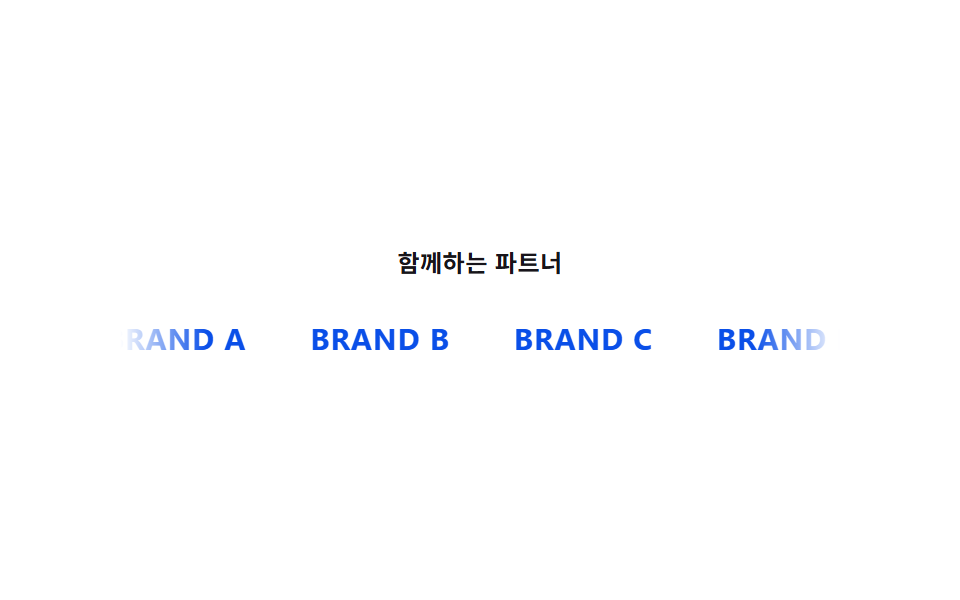
<main class="stage" id="stage">
  <section class="marquee-wrap">
    <p class="marquee__caption">Partners we work with</p>
    <div class="marquee">
      <div class="marquee__track is-demo">
        <span class="logo logo--a">BRAND A</span>
        <span class="logo logo--b">BRAND B</span>
        <span class="logo logo--c">BRAND C</span>
        <span class="logo logo--d">BRAND D</span>
        <span class="logo logo--a" aria-hidden="true">BRAND A</span>
        <span class="logo logo--b" aria-hidden="true">BRAND B</span>
        <span class="logo logo--c" aria-hidden="true">BRAND C</span>
        <span class="logo logo--d" aria-hidden="true">BRAND D</span>
      </div>
    </div>
  </section>
</main>
@use "../../../../site/static/demo-tokens" as *;
$duration: 9s;
$easing: linear;
$color: $subject-blue-deep;
@include stage($stage-paper);
.marquee-wrap {
display: flex;
flex-direction: column;
align-items: center;
gap: $sp-5;
width: 100%;
}
.marquee__caption {
margin: 0;
color: $subject-ink;
font-weight: 600;
font-size: 12px;
letter-spacing: 0.02em;
}
.marquee {
overflow: hidden;
width: min(92vw, 360px);
-webkit-mask-image: linear-gradient(to right, transparent, #000 12%, #000 88%, transparent);
mask-image: linear-gradient(to right, transparent, #000 12%, #000 88%, transparent);
}
.marquee__track {
  display: flex;
  width: max-content;
  will-change: transform;
}

.marquee__track.is-demo {
  animation: scroll $duration $easing infinite;
}

.logo {
  margin-right: $sp-8;
  color: $color;
  font-weight: 700;
  font-size: 15px;
  letter-spacing: 0.03em;
  white-space: nowrap;
}

@keyframes scroll {
  from { transform: translateX(0); }
  to { transform: translateX(-50%); }
}
@media (max-width: 340px) {
.logo { font-size: 13px; margin-right: $sp-6; }
}
@media (prefers-reduced-motion: reduce) {
.marquee__track.is-demo { animation: none; }
}html, body {
margin: 0;
overflow: hidden;
}
.stage {
box-sizing: border-box;
min-height: 100vh;
display: grid;
place-items: center;
margin: 0;
background: #ffffff;
font-family: -apple-system, "Segoe UI", "Noto Sans KR", sans-serif;
padding: clamp(8px, 4vw, 24px);
}
.marquee-wrap {
display: flex;
flex-direction: column;
align-items: center;
gap: 20px;
width: 100%;
}
.marquee__caption {
margin: 0;
color: #17141a;
font-weight: 600;
font-size: 12px;
letter-spacing: 0.02em;
}
.marquee {
overflow: hidden;
width: min(92vw, 360px);
-webkit-mask-image: linear-gradient(to right, transparent, #000 12%, #000 88%, transparent);
mask-image: linear-gradient(to right, transparent, #000 12%, #000 88%, transparent);
}
.marquee__track {
display: flex;
width: max-content;
will-change: transform;
}
.marquee__track.is-demo {
animation: scroll 9s linear infinite;
}
.logo {
margin-right: 32px;
color: #0a4fe8;
font-weight: 700;
font-size: 15px;
letter-spacing: 0.03em;
white-space: nowrap;
}
@keyframes scroll {
from {
transform: translateX(0);
}
to {
transform: translateX(-50%);
}
}
@media (max-width: 340px) {
.logo {
font-size: 13px;
margin-right: 24px;
}
}
@media (prefers-reduced-motion: reduce) {
.marquee__track.is-demo {
animation: none;
}
}import styles from "./LogoBar.module.scss";
// 트랙을 통째로 복제해 이어 붙이고, 가로 이동 값(translateX)이 계속 늘어나다 -50% 지점에서 이음매 없이 되돌아간다.
// 계산 겹: 가로 이동 값 -> translateX 보간(무한 반복). 리스너 없음(자동 재생).
const LOGOS = ["BRAND A", "BRAND B", "BRAND C", "BRAND D"];
export default function LogoBar() {
const track = [...LOGOS, ...LOGOS];
return (
<main className={styles.stage}>
<section className={styles["marquee-wrap"]}>
<p className={styles.marquee__caption}>함께하는 파트너</p>
<div className={styles.marquee}>
<div className={`${styles.marquee__track} ${styles["is-demo"]}`}>
{track.map((name, i) => (
<span key={`${name}-${i}`} className={styles.logo} aria-hidden={i >= LOGOS.length}>
{name}
</span>
))}
</div>
</div>
</section>
</main>
);
}08 · Logo bar — a row whose horizontal offset value keeps growing without a seam — Measured area 2.711% · moving frames 23/23Original by GODRICH · SCSS and React ship in the zip · See the password
What the numbers say
Across 23 tracked frames the marquee changes on all 23 — tied with 06 for the most of the nine — covering 2.711% cumulative area at a 132.9 average intensity, since a full row of logos is in motion on every frame rather than a single element. The logo set is duplicated once and marked aria-hidden on the copy, and the track moves exactly half the duplicated track's own width on a loop, so the seam between the last logo and the first one lands invisibly instead of snapping.
.marquee__track {
display: flex;
width: max-content;
will-change: transform;
}
.marquee__track.is-demo {
animation: scroll $duration $easing infinite;
}
.logo {
margin-right: $sp-8;
color: $color;
font-weight: 700;
font-size: 15px;
letter-spacing: 0.03em;
white-space: nowrap;
}
@keyframes scroll {
from { transform: translateX(0); }
to { transform: translateX(-50%); }
}
09Stat counter — a number recalculated every frame up to a target value
Once the section enters the viewport, the number recalculates every frame from zero up to its target value, and a new digit appears when the value crosses a digit boundary.
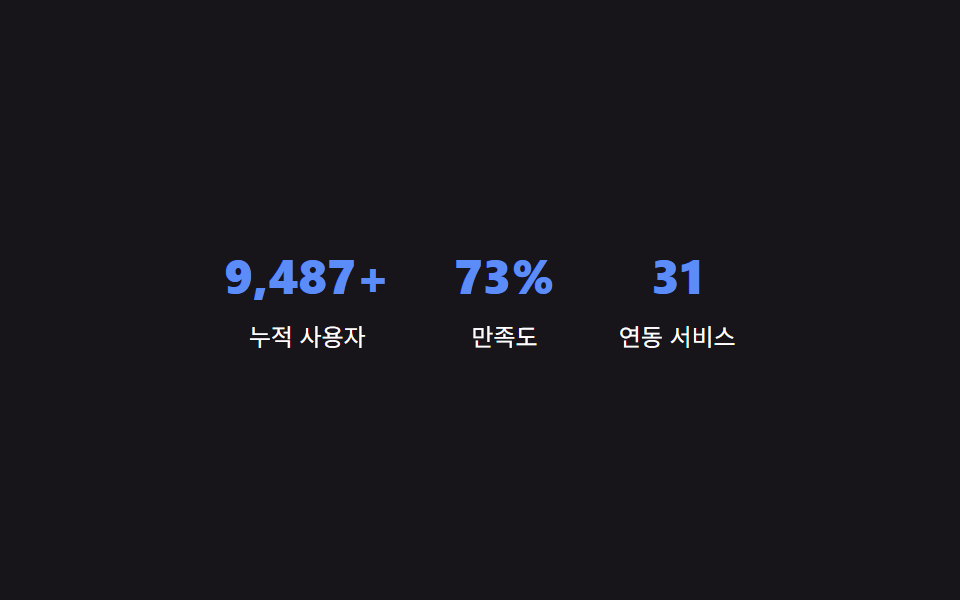
<main class="stage" id="stage">
  <section class="stats" id="stats">
    <div class="stat">
      <p class="stat__num" id="stat-1" data-target="12800" data-suffix="+">0</p>
      <p class="stat__label">Total users</p>
    </div>
    <div class="stat">
      <p class="stat__num" id="stat-2" data-target="98" data-suffix="%">0</p>
      <p class="stat__label">Satisfaction</p>
    </div>
    <div class="stat">
      <p class="stat__num" id="stat-3" data-target="42">0</p>
      <p class="stat__label">Integrations</p>
    </div>
  </section>
</main>
@use "../../../../site/static/demo-tokens" as *;
$color: $subject-blue-light;
@include stage($stage-ink);
.stats {
display: flex;
gap: $sp-8;
flex-wrap: wrap;
justify-content: center;
text-align: center;
}
.stat__num {
margin: 0;
color: $color;
font-weight: 800;
font-size: clamp(24px, 8vmin, 34px);
line-height: 1.2;
font-variant-numeric: tabular-nums;
}
.stat__label {
margin: $sp-2 0 0;
color: $stage-paper;
font-size: 12px;
line-height: 1.5;
}
@media (max-width: 340px) {
.stats { gap: $sp-5; }
}
// 카운트업 자체는 JS(rAF)가 matchMedia 로 직접 분기 — 여기는 CSS 트랜지션이 없어 no-op.
@media (prefers-reduced-motion: reduce) {
.stat__num { animation: none; transition: none; }
}html, body {
margin: 0;
overflow: hidden;
}
.stage {
box-sizing: border-box;
min-height: 100vh;
display: grid;
place-items: center;
margin: 0;
background: #17141a;
font-family: -apple-system, "Segoe UI", "Noto Sans KR", sans-serif;
padding: clamp(8px, 4vw, 24px);
}
.stats {
display: flex;
gap: 32px;
flex-wrap: wrap;
justify-content: center;
text-align: center;
}
.stat__num {
margin: 0;
color: #5b8cf8;
font-weight: 800;
font-size: clamp(24px, 8vmin, 34px);
line-height: 1.2;
font-variant-numeric: tabular-nums;
}
.stat__label {
margin: 8px 0 0;
color: #ffffff;
font-size: 12px;
line-height: 1.5;
}
@media (max-width: 340px) {
.stats {
gap: 20px;
}
}
@media (prefers-reduced-motion: reduce) {
.stat__num {
animation: none;
transition: none;
}
}// 화면에 보이는 순간부터 0에서 목표 값까지, 매 프레임(rAF) 다시 계산해 textContent 를 갱신한다.
// 계산 겹: 경과 시간 비율 -> 완화 함수 -> 현재 값(0~목표) -> 문자열 표시. 자동 재생(리스너 없음).
(function () {
var COUNT_DURATION_MS = 1700;
var nums = document.querySelectorAll('.stat__num');
var reduceMotion = window.matchMedia && window.matchMedia('(prefers-reduced-motion: reduce)').matches;
function easeOutCubic(t) {
return 1 - Math.pow(1 - t, 3);
}
function format(n) {
return Math.round(n).toLocaleString('ko-KR');
}
function run(el) {
  var target = Number(el.getAttribute('data-target')) || 0;
  var suffix = el.getAttribute('data-suffix') || '';
  if (reduceMotion) {
    el.textContent = format(target) + suffix;
    return;
  }
  var start = null;
  function step(ts) {
    if (start === null) start = ts;
    var elapsed = ts - start;
    var t = Math.min(1, elapsed / COUNT_DURATION_MS);
    var value = target * easeOutCubic(t);
    el.textContent = format(value) + suffix;
    if (t < 1) {
      window.requestAnimationFrame(step);
    }
  }
  window.requestAnimationFrame(step);
}
nums.forEach(run);
})();import { useEffect, useRef } from "react";
import styles from "./StatsCounter.module.scss";
// 화면에 보이는 순간부터 0에서 목표 값까지, 매 프레임(rAF) 다시 계산해 textContent 를 갱신한다.
// 계산 겹: 경과 시간 비율 -> 완화 함수 -> 현재 값(0~목표) -> 문자열 표시. 자동 재생(리스너 없음).
const COUNT_DURATION_MS = 1700;
const STATS = [
{ id: "stat-1", target: 12800, suffix: "+", label: "누적 사용자" },
{ id: "stat-2", target: 98, suffix: "%", label: "만족도" },
{ id: "stat-3", target: 42, suffix: "", label: "연동 서비스" },
];
function easeOutCubic(t: number) {
return 1 - Math.pow(1 - t, 3);
}
function format(n: number) {
return Math.round(n).toLocaleString("ko-KR");
}
export default function StatsCounter() {
const numRefs = useRef<Array<HTMLParagraphElement | null>>([]);
useEffect(() => {
const reduceMotion =
window.matchMedia && window.matchMedia("(prefers-reduced-motion: reduce)").matches;
const rafIds: number[] = [];
const refs = numRefs.current!;
STATS.forEach((stat, i) => {
const el = refs[i];
if (!el) return;
if (reduceMotion) {
el.textContent = format(stat.target) + stat.suffix;
return;
}
let start: number | null = null;
function step(ts: number) {
if (start === null) start = ts;
const elapsed = ts - start;
const t = Math.min(1, elapsed / COUNT_DURATION_MS);
const value = stat.target * easeOutCubic(t);
el!.textContent = format(value) + stat.suffix;
if (t < 1) {
rafIds[i] = window.requestAnimationFrame(step);
}
}
rafIds[i] = window.requestAnimationFrame(step);
});
return () => rafIds.forEach((id) => window.cancelAnimationFrame(id));
}, []);
return (
<main className={styles.stage}>
<section className={styles.stats}>
{STATS.map((stat, i) => (
<div key={stat.id} className={styles.stat}>
<p
className={styles.stat__num}
ref={(node: HTMLParagraphElement | null) => {
numRefs.current![i] = node;
}}
>
0
</p>
<p className={styles.stat__label}>{stat.label}</p>
</div>
))}
</section>
</main>
);
}09 · Stat counter — a number recalculated every frame up to a target value — Measured area 3.044% · moving frames 13/23Original by GODRICH · SCSS and React ship in the zip · See the password
What the numbers say
Across 23 tracked frames the counter changes on 13 of them, covering 3.044% cumulative area at a 134.4 average intensity, since only the digit glyphs themselves redraw rather than any surrounding layout. Each animation-frame step divides elapsed time by a fixed duration constant — 1700ms in this zip, 3200ms in this post's third variant — runs that ratio through an ease-out curve, and multiplies the result by the target value before writing it back to the page, so a larger target simply computes a larger number at the same eased pace rather than running longer.
function run(el) {
var target = Number(el.getAttribute('data-target')) || 0;
var suffix = el.getAttribute('data-suffix') || '';
if (reduceMotion) {
el.textContent = format(target) + suffix;
return;
}
var start = null;
function step(ts) {
if (start === null) start = ts;
var elapsed = ts - start;
var t = Math.min(1, elapsed / COUNT_DURATION_MS);
var value = target * easeOutCubic(t);
el.textContent = format(value) + suffix;
if (t < 1) {
window.requestAnimationFrame(step);
}
}
window.requestAnimationFrame(step);
}
Where values reshape the section — scroll ratio, order value, target number
Three of the nine values above don't just decorate a section — get them wrong and the section reads as broken or misleading, not just less lively.
Why hero's scroll ratio has to drive two different rates, not one
01's background and heading both read the same scroll-ratio value, but the background multiplies it by -18px while the heading multiplies it by a steeper -42px — if both layers used the same rate the two would move together as one flat image, and the parallax depth this pattern is named for would disappear entirely.
Why the stagger's order value needs a visibility gate before it fires
02 doesn't just multiply every card's order value by a fixed interval on page load — a card only starts counting from its own delay once its visible-ratio value has already crossed a threshold, so a card far down the page doesn't finish revealing itself before a visitor has scrolled anywhere near it.
Why the counter's target number has to be recomputed every frame, not tweened once
09 can't just animate a CSS property from 0 to its target, because the displayed value has to pass through an easing curve and get re-formatted on every single frame — recomputing the whole number from the elapsed-time ratio each time is what lets a new digit appear cleanly the moment the value crosses a digit boundary, instead of a generic tween briefly showing an impossible in-between digit count.
Where it breaks — long text, low-end devices, dark mode
Where this set differs from a nine-section team-page set built around the same section-by-section layout, a nine-section pricing-page set built the same way, and a nine-section case-study-page set is the computed axis each one turns into motion — those sets recompute values tied to a team roster's layout, a plan's own discount rate, and a case study's own content blocks, while this set's nine sections recompute a scroll ratio, an order value, a measured width, and elapsed time instead. The full nine-section implementation behind this set, both the vanilla version and a React port, sits behind 67e9abq3 in this post's zip.
What happens to hero section design ideas when the heading text runs long
01's heading is a short fixed string in the demo, but most hero section design ideas eventually pair the same moving background with real marketing copy — because the heading's steeper rate is independent of its content length, a longer heading still moves the same distance as a short one, though a production build should still cap line count so the moving text can't overlap the section beneath it on a narrow viewport.
What a low-end device does to several looping sections on the same page
06's conic-gradient ring, 08's marquee, and 01's background layer all animate continuously rather than once, so a low-end device rendering several of these sections on the same page can drop frames on the ring and the marquee before it drops any on the parallax layer, since a conic-gradient repaint costs more per frame than a transform-only animation — keeping the ring's spin duration no shorter than 2s and marking the marquee track for compositing both help keep the frame budget realistic.
What dark mode does to a set built like most landing page sections examples
Unlike landing page sections examples that hardcode a single light palette, every color in this set reads from a named token rather than a literal hex value, so a dark-mode variant only has to override the token layer — the CTA band's own foreground color is the one value worth rechecking by hand, since a color that passes contrast against a light band background can fail once the band's background token flips dark.
Three variants and accessibility
Treat the numbers below as a hero section design template only once every placeholder brand, price, and headline has been swapped for real content — the computed axis stays the same, only the constant changes.
| Variant | What changes | What it trades off |
|---|---|---|
| Feature-card stagger interval | Item 02's stagger constant from 120ms to 280ms | At 120ms the cards land close enough together that the grid reads as one motion; at 280ms each card visibly takes its own turn, but a grid with many cards takes noticeably longer to finish revealing |
| Pricing featured-card scale | Item 03's scale constant from 1.08 to 1.16 | At 1.08 the featured card barely stands out from its neighbors; at 1.16 it clearly floats above them, but at tight card spacing the larger scale can visually overlap the card beside it |
| Stat counter duration | Item 09's duration constant from 1700ms to 3200ms | At 1700ms a large target number still finishes counting before most visitors look away; at 3200ms the count reads more deliberately, but a very large target risks still counting after a visitor has scrolled past |
This zip ships the 120ms, 1.08, and 1700ms values.
Why reduced motion and screen readers still land on the same computed values
All nine check for a reduced-motion preference and swap their computed transition or animation for an instant jump to the same end value, so a reduced-motion reader still sees the hero settled at its resting position, the featured pricing card at its full scale, and the counter already at its target number — just without the interpolation in between. Pressed and expanded states stay in sync on the pricing toggle and the FAQ questions, and the hero background, the CTA band's ring, and the logo marquee's duplicated half are all marked as decorative so a screen reader doesn't announce a duplicate or purely visual layer as content.
FAQ
Do any of these nine sections load a real company name, price, or photo?
No — every brand shown is a placeholder like BRAND A through BRAND D, every price and stat is a fixed fictional value written into the demo's own markup or data attributes, and there is no real person's photo or live API call anywhere in the set.
Which of the nine respond to a real click or pointer instead of just autoplaying?
Four do: 03's billing toggle and 05's question header respond to a real click, 04's carousel pauses on real pointerenter/pointerleave, and 07's footer link redraws its underline on the same two pointer events; the other five — 01, 02, 06, 08, and 09 — run once from a fixed CSS loop or a single requestAnimationFrame pass with no click, drag, or pointer listener attached anywhere in their markup.
Is a section set built this way safe to reuse directly on a real product page?
Yes, once every placeholder brand, price, and headline is replaced with real content — the computed layer itself, the scroll ratio, the order value, the measured width, and the eased counter, doesn't reference any placeholder, so swapping the on-screen text and colors is enough to move from demo to production.
Sources: MDN — CSS custom properties · MDN — IntersectionObserver · MDN — Element.getBoundingClientRect · MDN — prefers-reduced-motion
You might also like
 Landing sections9 Team Page Design Patterns (Copy-Paste)
 Landing sections9 Case Study Page Design Sections (Copy-Paste)
 Landing sectionsHero Section Design: 9 Patterns, No JS Libraries
 Landing sectionsBlockquote CSS: 9 Quote Box Designs (Copy-Paste)
 Landing sectionsCSS Card Design Examples — 9 Content Card Types
 Landing sections9 Pricing Page Design Sections (Copy-Paste)
 Landing sections9 Profile Card Design Styles, Copy-Paste Ready
 Landing sectionsPricing Table Design: 9 Live Interactions
 Landing sectionsLanding Page Conversion: 9 Sections That Convert
 Landing sectionsWebsite Footer Design: 9 Copy-Paste Patterns