Pricing Table Design: 9 Live Interactions
In pricing table design, the work happens on top of the cards, not inside them. All nine run on vanilla JS and SCSS, and the first is simply prices that really
 01 pricing-interaction-billing-toggle-roll
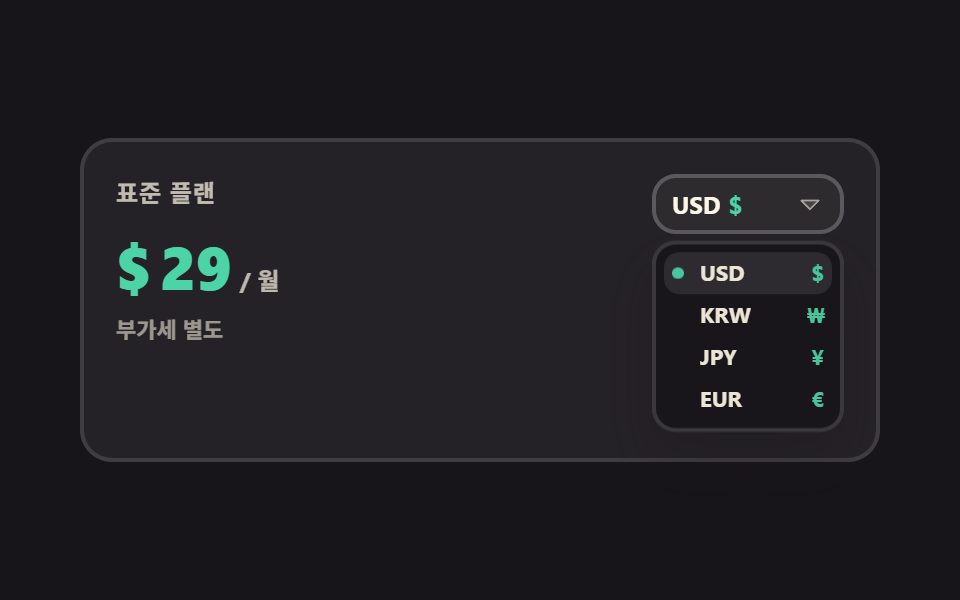 02 pricing-interaction-currency-switch
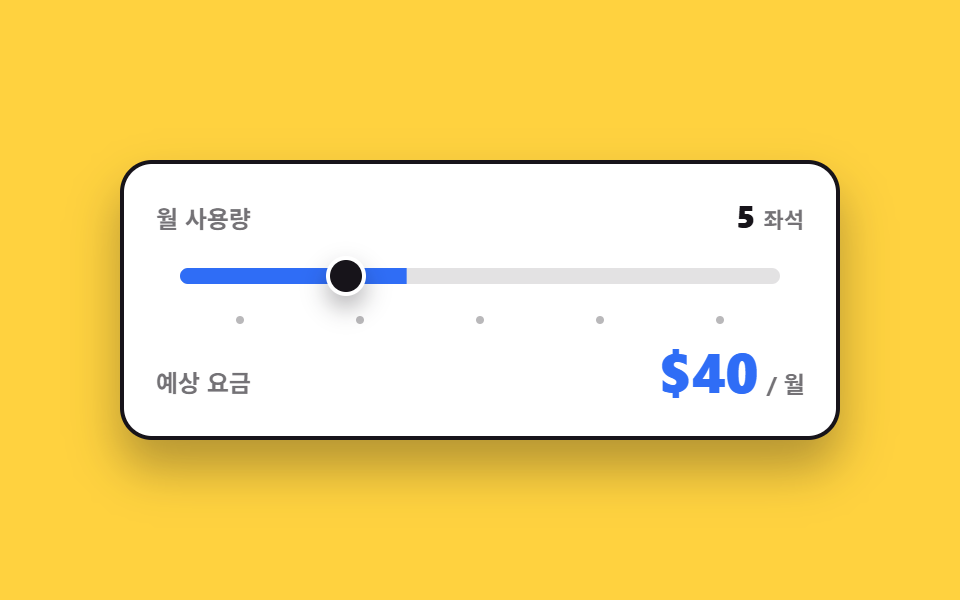 03 pricing-interaction-usage-slider
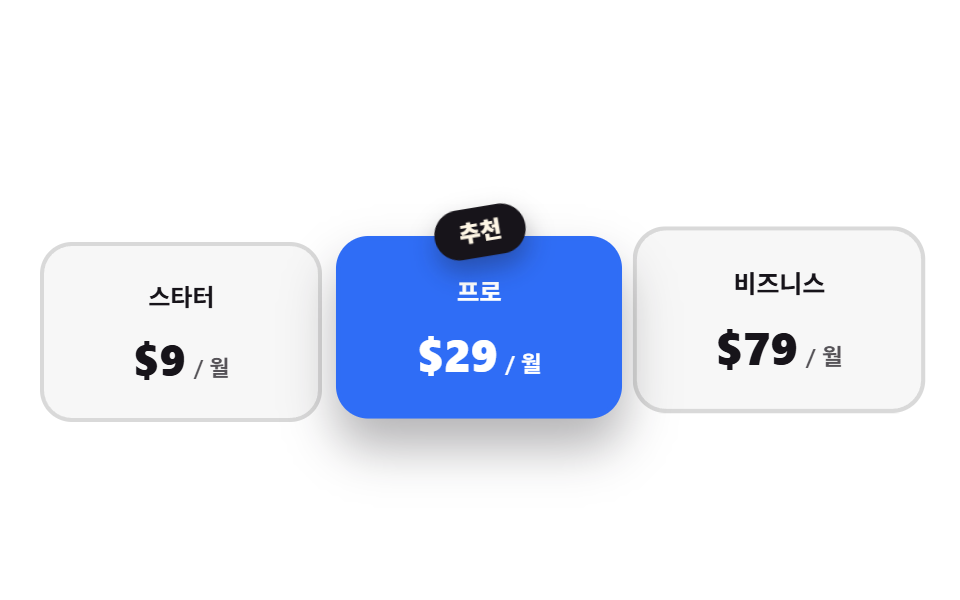 04 pricing-interaction-recommended-ribbon
 05 pricing-interaction-card-tilt
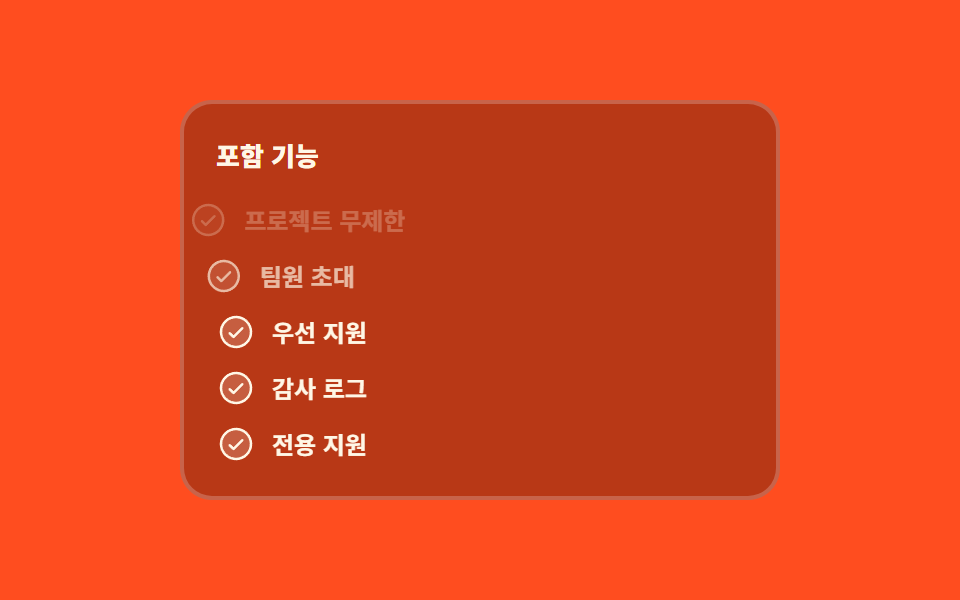 06 pricing-interaction-feature-check-stagger
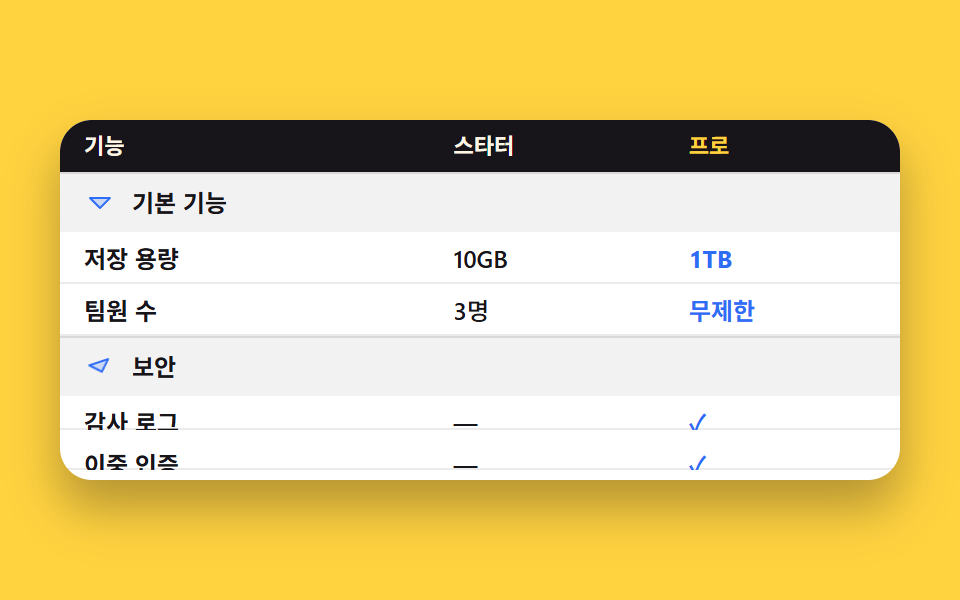 07 pricing-interaction-comparison-accordion
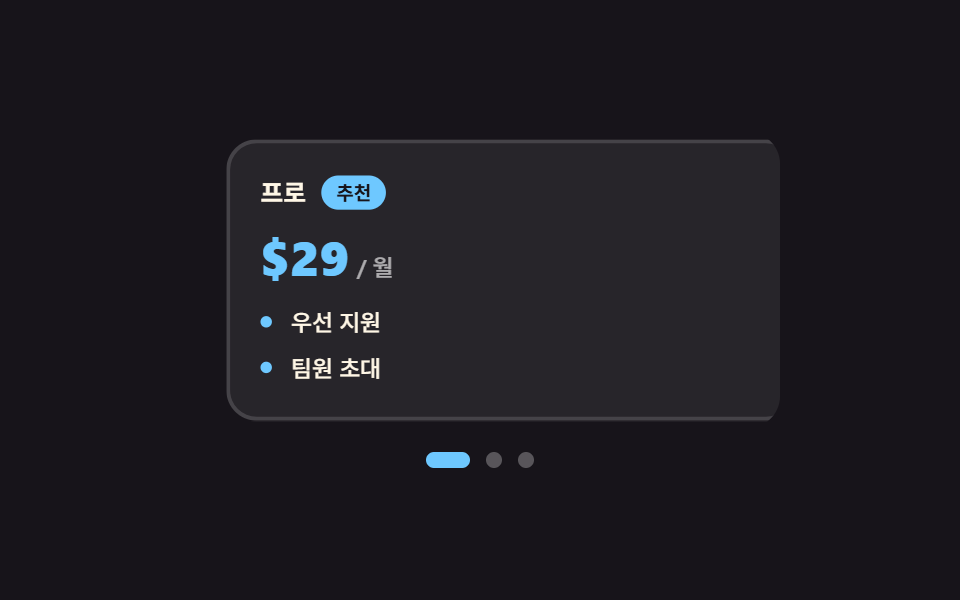 08 pricing-interaction-swipe-cards
 09 pricing-interaction-cta-states
Auto-plays · click a tile to jump to its section · all nine in one zip
- 01 Billing toggle that rolls the number
- 02 Currency switch that changes symbol and amount
- 03 Usage slider recalculates the price
- 04 Recommended plan grows, neighbors step back
- 05 Plan card that tilts toward the cursor
- 06 Included features light up row by row
- 07 Comparison table folds group by group
- 08 Plan cards you swipe with a thumb
- 09 Checkout button waits, then shows the result
Popularity did not set this order. It follows the path a visitor actually walks while settling on a number. You pick a billing period first (01), convert it into your own currency (02), then dial in how much you will use and watch the fee follow (03). Once the number is settled, the choosing begins: the recommended tier steps forward (04), the card you are looking at leans toward your hand (05), and the list of what is included fills in one line at a time (06). The last three sit right before the decision. You open the table and compare item by item (07), swipe through the cards on a narrow screen (08), and press the button and wait for an answer (09). One rule holds across all nine: the value lives in an attribute such as aria-checked, aria-selected, or a data-* pair, and the CSS reads nothing else. The moment JavaScript starts setting classes and inline styles directly, what the screen shows and what assistive tech reports begin to drift apart. Most pricing table design ideas stop at the layout, but the part that decides whether a visitor trusts the number is what the table keeps doing while they are still choosing. When the pricing table starts with a person, Profile Card Design Styles takes the front seat, and persuading after the number is settled is Landing Page Conversion.
01Billing toggle that rolls the number
What you see
Flip the switch to annual and $29 a month becomes $23 a month, but the figure counts down through every number in between instead of being swapped out. An unregistered custom property cannot be interpolated, so --n is registered as an integer with @property and then drawn through a counter.
<main class="stage">
  <div class="bt is-demo" data-period="month">
    <p class="bt__plan">Pro plan</p>
    <div class="bt__price" aria-live="polite">
      <span class="bt__cur">$</span>
      <span class="bt__num"></span>
      <span class="bt__unit">/ mo</span>
    </div>
    <div class="bt__badgerow">
      <span class="bt__badge">Save 20%</span>
    </div>
    <div class="bt__switch" role="group" aria-label="Billing period">
      <span class="bt__lab" data-side="m">Monthly</span>
      <button class="bt__pill" type="button" role="switch" aria-checked="false" aria-label="Billing period" id="bt-sw">
        <span class="bt__knob" aria-hidden="true"></span>
      </button>
      <span class="bt__lab" data-side="y">Yearly</span>
    </div>
  </div>
</main>
@use "../../../../site/static/demo-tokens" as *;
// 가격 숫자를 굴리는 핵심 — 등록하지 않은 커스텀 속성은 보간되지 않는다.
// <integer> 로 등록해야 29 → 23 사이가 한 자리씩 채워진다
@property --n {
syntax: "<integer>";
initial-value: 29;
inherits: false;
}
$duration: $dur-quick;
$easing: $ease-spring;
$color: $subject-blue;
$roll: 520ms; // 숫자가 굴러가는 시간 — 자리가 넘어가는 게 눈에 보이는 길이
@include stage($stage-paper);
.bt {
--travel: 24px; // 손잡이가 미끄러지는 거리 — 알약 안폭(48) - 손잡이(20) - 양옆 2
box-sizing: border-box;
width: min(300px, 86vw);
display: flex;
flex-direction: column;
align-items: center;
gap: $sp-2;
padding: $sp-4;
border: 2px solid $subject-ink;
border-radius: $r-card;
background: $stage-paper;
box-shadow: $shadow-raised;
font-family: -apple-system, "Segoe UI", "Noto Sans KR", sans-serif;
color: $subject-ink;
}
.bt__plan {
margin: 0;
font-size: 13px;
line-height: 18px;
font-weight: 700;
letter-spacing: .04em;
}
.bt__price {
display: flex;
align-items: baseline;
gap: $sp-1;
color: $color;
}
.bt__cur {
font-size: 20px;
line-height: 28px;
font-weight: 800;
}
// 숫자는 텍스트 노드가 아니라 카운터로 그린다 — --n 이 보간되는 동안 그 정수가 그대로 글자가 된다
.bt__num {
--n: 29;
counter-reset: n var(--n);
font-size: 40px;
line-height: 46px;
font-weight: 800;
font-variant-numeric: tabular-nums;
}
.bt__num::after { content: counter(n); }
.bt__unit {
font-size: 13px;
line-height: 18px;
font-weight: 700;
color: $subject-ink;
}
.bt__badgerow {
display: flex;
align-items: center;
justify-content: center;
height: 22px;
}
.bt__badge {
padding: $sp-1 $sp-2;
border-radius: $r-pill;
background: $color;
color: $stage-paper;
font-size: 11px;
line-height: 14px;
font-weight: 800;
opacity: 0;
transform: scale(.7) translateY(6px);
}
.bt__switch {
display: flex;
align-items: center;
gap: $sp-2;
}
.bt__lab {
font-size: 12px;
line-height: 16px;
font-weight: 700;
opacity: .45;
}
.bt__pill {
position: relative;
box-sizing: border-box;
margin: 0;
padding: 0;
flex: 0 0 auto;
width: 52px;
height: 28px;
border: 2px solid $subject-ink;
border-radius: $r-pill;
background: $stage-paper;
cursor: pointer;
}
.bt__pill:focus-visible { outline: 2px solid $color; outline-offset: 2px; }
.bt__knob {
position: absolute;
left: 2px;
top: 2px;
width: 20px;
height: 20px;
border-radius: 50%;
background: $subject-ink;
}
// ── 사람이 만진 뒤(정적 경로) — 상태는 aria-checked 와 data-period 에만 들어 있다 ──
.bt__pill[aria-checked="true"] {
background: $color;
border-color: $color;
}
.bt__pill[aria-checked="true"] .bt__knob {
transform: translateX(var(--travel));
background: $stage-paper;
}
.bt[data-period="month"] .bt__lab[data-side="m"],
.bt[data-period="year"] .bt__lab[data-side="y"] { opacity: 1; }
.bt[data-period="year"] .bt__num { --n: 23; }
.bt[data-period="year"] .bt__badge {
opacity: 1;
transform: scale(1) translateY(0);
}
.bt:not(.is-demo) .bt__num {
transition-property: --n;
transition-duration: $roll;
transition-timing-function: $easing;
}
.bt:not(.is-demo) .bt__knob {
transition-property: transform, background-color;
transition-duration: $duration;
transition-timing-function: $easing;
}
.bt:not(.is-demo) .bt__badge {
transition-property: transform, opacity;
transition-duration: $duration;
transition-timing-function: $ease-pop;
}
// ── 자동 루프(2초) — 월간 29 → 연간 23 → 다시 월간. 복귀는 88% 에 끝난다 ──
.bt.is-demo .bt__num {
animation-name: bt-roll;
animation-duration: $dur-loop;
animation-timing-function: $easing;
animation-iteration-count: infinite;
}
@keyframes bt-roll {
0% { --n: 29; }
12% { --n: 29; }
36% { --n: 23; }
64% { --n: 23; }
88% { --n: 29; }
100% { --n: 29; }
}
// 손잡이는 미끄러지고(부드럽게), 손잡이 색은 컷으로 바뀐다
.bt.is-demo .bt__knob {
animation-name: bt-knob, bt-knobc;
animation-duration: $dur-loop, $dur-loop;
animation-timing-function: $easing, steps(1, end);
animation-iteration-count: infinite, infinite;
}
@keyframes bt-knob {
0%, 12% { transform: translateX(0); }
36%, 64% { transform: translateX(var(--travel)); }
88%, 100% { transform: translateX(0); }
}
@keyframes bt-knobc {
0% { background-color: $subject-ink; }
24% { background-color: $stage-paper; }
76% { background-color: $stage-paper; }
88% { background-color: $subject-ink; }
100% { background-color: $subject-ink; }
}
.bt.is-demo .bt__pill {
animation-name: bt-pill;
animation-duration: $dur-loop;
animation-timing-function: steps(1, end);
animation-iteration-count: infinite;
}
@keyframes bt-pill {
0% { background-color: $stage-paper; border-color: $subject-ink; }
24% { background-color: $color; border-color: $color; }
76% { background-color: $color; border-color: $color; }
88% { background-color: $stage-paper; border-color: $subject-ink; }
100% { background-color: $stage-paper; border-color: $subject-ink; }
}
// 라벨 강조도 같은 시계로 — 손잡이만 움직이면 어느 쪽이 켜졌는지 어긋나 보인다
.bt.is-demo .bt__lab {
animation-duration: $dur-loop;
animation-timing-function: steps(1, end);
animation-iteration-count: infinite;
}
.bt.is-demo .bt__lab[data-side="m"] { animation-name: bt-lab-m; }
.bt.is-demo .bt__lab[data-side="y"] { animation-name: bt-lab-y; }
@keyframes bt-lab-m {
0% { opacity: 1; }
24% { opacity: .45; }
82% { opacity: 1; }
100% { opacity: 1; }
}
@keyframes bt-lab-y {
0% { opacity: .45; }
24% { opacity: 1; }
82% { opacity: .45; }
100% { opacity: .45; }
}
// 배지는 나타남만 컷, 튀어오름은 $ease-pop 으로 — 두 축을 따로 돌린다
.bt.is-demo .bt__badge {
animation-name: bt-badge-face, bt-badge-pop;
animation-duration: $dur-loop, $dur-loop;
animation-timing-function: steps(1, end), $ease-pop;
animation-iteration-count: infinite, infinite;
}
@keyframes bt-badge-face {
0% { opacity: 0; }
30% { opacity: 1; }
82% { opacity: 0; }
100% { opacity: 0; }
}
@keyframes bt-badge-pop {
0%, 30% { transform: scale(.7) translateY(6px); }
44% { transform: scale(1.06) translateY(0); }
54%, 100% { transform: scale(1) translateY(0); }
}
// 숫자가 굴러가는 동안 가격 덩어리가 한 번 눌렸다 편다 — 컷 옆에 움직인 프레임을 채운다
.bt.is-demo .bt__price {
animation-name: bt-pop;
animation-duration: $dur-loop;
animation-timing-function: $ease-pop;
animation-iteration-count: infinite;
}
@keyframes bt-pop {
0%, 10% { transform: scale(1); }
22% { transform: scale(1.06); }
34%, 74% { transform: scale(1); }
84% { transform: scale(1.05); }
94%, 100% { transform: scale(1); }
}
@media (max-width: 340px) {
.bt {
width: min(260px, 90vw);
gap: $sp-1;
padding: $sp-3;
}
.bt__plan { font-size: 12px; line-height: 16px; }
.bt__cur { font-size: 16px; line-height: 22px; }
.bt__num { font-size: 30px; line-height: 34px; }
.bt__badgerow { height: 20px; }
.bt { --travel: 22px; } // 좁은 화면에서는 알약도 손잡이도 작아진다 (46 - 4 - 16 - 4)
.bt__pill { width: 46px; height: 24px; }
.bt__knob { width: 16px; height: 16px; }
}
@media (prefers-reduced-motion: reduce) {
.bt.is-demo .bt__num,
.bt.is-demo .bt__knob,
.bt.is-demo .bt__pill,
.bt.is-demo .bt__lab,
.bt.is-demo .bt__badge,
.bt.is-demo .bt__price { animation: none !important; }
.bt:not(.is-demo) .bt__num,
.bt:not(.is-demo) .bt__knob,
.bt:not(.is-demo) .bt__badge { transition: none !important; }
.bt.is-demo .bt__lab[data-side="m"] { opacity: 1; }
}@property --n {
syntax: "<integer>";
initial-value: 29;
inherits: false;
}
html, body {
margin: 0;
overflow: hidden;
}
.stage {
box-sizing: border-box;
min-height: 100vh;
display: grid;
place-items: center;
margin: 0;
background: #ffffff;
font-family: -apple-system, "Segoe UI", "Noto Sans KR", sans-serif;
padding: clamp(8px, 4vw, 24px);
}
.bt {
--travel: 24px;
box-sizing: border-box;
width: min(300px, 86vw);
display: flex;
flex-direction: column;
align-items: center;
gap: 8px;
padding: 16px;
border: 2px solid #17141a;
border-radius: 16px;
background: #ffffff;
box-shadow: 0 14px 24px rgba(23, 20, 26, 0.32);
font-family: -apple-system, "Segoe UI", "Noto Sans KR", sans-serif;
color: #17141a;
}
.bt__plan {
margin: 0;
font-size: 13px;
line-height: 18px;
font-weight: 700;
letter-spacing: 0.04em;
}
.bt__price {
display: flex;
align-items: baseline;
gap: 4px;
color: #2f6df6;
}
.bt__cur {
font-size: 20px;
line-height: 28px;
font-weight: 800;
}
.bt__num {
--n: 29;
counter-reset: n var(--n);
font-size: 40px;
line-height: 46px;
font-weight: 800;
font-variant-numeric: tabular-nums;
}
.bt__num::after {
content: counter(n);
}
.bt__unit {
font-size: 13px;
line-height: 18px;
font-weight: 700;
color: #17141a;
}
.bt__badgerow {
display: flex;
align-items: center;
justify-content: center;
height: 22px;
}
.bt__badge {
padding: 4px 8px;
border-radius: 999px;
background: #2f6df6;
color: #ffffff;
font-size: 11px;
line-height: 14px;
font-weight: 800;
opacity: 0;
transform: scale(0.7) translateY(6px);
}
.bt__switch {
display: flex;
align-items: center;
gap: 8px;
}
.bt__lab {
font-size: 12px;
line-height: 16px;
font-weight: 700;
opacity: 0.45;
}
.bt__pill {
position: relative;
box-sizing: border-box;
margin: 0;
padding: 0;
flex: 0 0 auto;
width: 52px;
height: 28px;
border: 2px solid #17141a;
border-radius: 999px;
background: #ffffff;
cursor: pointer;
}
.bt__pill:focus-visible {
outline: 2px solid #2f6df6;
outline-offset: 2px;
}
.bt__knob {
position: absolute;
left: 2px;
top: 2px;
width: 20px;
height: 20px;
border-radius: 50%;
background: #17141a;
}
.bt__pill[aria-checked=true] {
background: #2f6df6;
border-color: #2f6df6;
}
.bt__pill[aria-checked=true] .bt__knob {
transform: translateX(var(--travel));
background: #ffffff;
}
.bt[data-period=month] .bt__lab[data-side=m],
.bt[data-period=year] .bt__lab[data-side=y] {
opacity: 1;
}
.bt[data-period=year] .bt__num {
--n: 23;
}
.bt[data-period=year] .bt__badge {
opacity: 1;
transform: scale(1) translateY(0);
}
.bt:not(.is-demo) .bt__num {
transition-property: --n;
transition-duration: 520ms;
transition-timing-function: cubic-bezier(0.2, 0.8, 0.2, 1);
}
.bt:not(.is-demo) .bt__knob {
transition-property: transform, background-color;
transition-duration: 220ms;
transition-timing-function: cubic-bezier(0.2, 0.8, 0.2, 1);
}
.bt:not(.is-demo) .bt__badge {
transition-property: transform, opacity;
transition-duration: 220ms;
transition-timing-function: cubic-bezier(0.2, 1.4, 0.4, 1);
}
.bt.is-demo .bt__num {
animation-name: bt-roll;
animation-duration: 2s;
animation-timing-function: cubic-bezier(0.2, 0.8, 0.2, 1);
animation-iteration-count: infinite;
}
@keyframes bt-roll {
0% {
--n: 29;
}
12% {
--n: 29;
}
36% {
--n: 23;
}
64% {
--n: 23;
}
88% {
--n: 29;
}
100% {
--n: 29;
}
}
.bt.is-demo .bt__knob {
animation-name: bt-knob, bt-knobc;
animation-duration: 2s, 2s;
animation-timing-function: cubic-bezier(0.2, 0.8, 0.2, 1), steps(1, end);
animation-iteration-count: infinite, infinite;
}
@keyframes bt-knob {
0%, 12% {
transform: translateX(0);
}
36%, 64% {
transform: translateX(var(--travel));
}
88%, 100% {
transform: translateX(0);
}
}
@keyframes bt-knobc {
0% {
background-color: #17141a;
}
24% {
background-color: #ffffff;
}
76% {
background-color: #ffffff;
}
88% {
background-color: #17141a;
}
100% {
background-color: #17141a;
}
}
.bt.is-demo .bt__pill {
animation-name: bt-pill;
animation-duration: 2s;
animation-timing-function: steps(1, end);
animation-iteration-count: infinite;
}
@keyframes bt-pill {
0% {
background-color: #ffffff;
border-color: #17141a;
}
24% {
background-color: #2f6df6;
border-color: #2f6df6;
}
76% {
background-color: #2f6df6;
border-color: #2f6df6;
}
88% {
background-color: #ffffff;
border-color: #17141a;
}
100% {
background-color: #ffffff;
border-color: #17141a;
}
}
.bt.is-demo .bt__lab {
animation-duration: 2s;
animation-timing-function: steps(1, end);
animation-iteration-count: infinite;
}
.bt.is-demo .bt__lab[data-side=m] {
animation-name: bt-lab-m;
}
.bt.is-demo .bt__lab[data-side=y] {
animation-name: bt-lab-y;
}
@keyframes bt-lab-m {
0% {
opacity: 1;
}
24% {
opacity: 0.45;
}
82% {
opacity: 1;
}
100% {
opacity: 1;
}
}
@keyframes bt-lab-y {
0% {
opacity: 0.45;
}
24% {
opacity: 1;
}
82% {
opacity: 0.45;
}
100% {
opacity: 0.45;
}
}
.bt.is-demo .bt__badge {
animation-name: bt-badge-face, bt-badge-pop;
animation-duration: 2s, 2s;
animation-timing-function: steps(1, end), cubic-bezier(0.2, 1.4, 0.4, 1);
animation-iteration-count: infinite, infinite;
}
@keyframes bt-badge-face {
0% {
opacity: 0;
}
30% {
opacity: 1;
}
82% {
opacity: 0;
}
100% {
opacity: 0;
}
}
@keyframes bt-badge-pop {
0%, 30% {
transform: scale(0.7) translateY(6px);
}
44% {
transform: scale(1.06) translateY(0);
}
54%, 100% {
transform: scale(1) translateY(0);
}
}
.bt.is-demo .bt__price {
animation-name: bt-pop;
animation-duration: 2s;
animation-timing-function: cubic-bezier(0.2, 1.4, 0.4, 1);
animation-iteration-count: infinite;
}
@keyframes bt-pop {
0%, 10% {
transform: scale(1);
}
22% {
transform: scale(1.06);
}
34%, 74% {
transform: scale(1);
}
84% {
transform: scale(1.05);
}
94%, 100% {
transform: scale(1);
}
}
@media (max-width: 340px) {
.bt {
width: min(260px, 90vw);
gap: 4px;
padding: 12px;
}
.bt__plan {
font-size: 12px;
line-height: 16px;
}
.bt__cur {
font-size: 16px;
line-height: 22px;
}
.bt__num {
font-size: 30px;
line-height: 34px;
}
.bt__badgerow {
height: 20px;
}
.bt {
--travel: 22px;
}
.bt__pill {
width: 46px;
height: 24px;
}
.bt__knob {
width: 16px;
height: 16px;
}
}
@media (prefers-reduced-motion: reduce) {
.bt.is-demo .bt__num,
.bt.is-demo .bt__knob,
.bt.is-demo .bt__pill,
.bt.is-demo .bt__lab,
.bt.is-demo .bt__badge,
.bt.is-demo .bt__price {
animation: none !important;
}
.bt:not(.is-demo) .bt__num,
.bt:not(.is-demo) .bt__knob,
.bt:not(.is-demo) .bt__badge {
transition: none !important;
}
.bt.is-demo .bt__lab[data-side=m] {
opacity: 1;
}
}// 실제 동작: 스위치를 누르면 aria-checked 가 뒤집히고 뿌리의 data-period 가 바뀐다.
// 가격 숫자는 CSS 가 굴린다 — @property 로 등록한 --n 을 transition 이 정수로 보간하고
// counter-reset: n var(--n) + content: counter(n) 이 그 값을 글자로 그린다.
var root = document.querySelector('.bt');
var sw = document.getElementById('bt-sw');
sw.addEventListener('click', function () {
root.classList.remove('is-demo');
var on = sw.getAttribute('aria-checked') === 'true';
sw.setAttribute('aria-checked', String(!on));
root.setAttribute('data-period', on ? 'month' : 'year');
});import { useState } from "react";
import type { CSSProperties } from "react";
import styles from "./BillingToggleRoll.module.scss";
export type BillingToggleRollProps = {
planName?: string;
monthLabel?: string;
yearLabel?: string;
groupLabel?: string;
saveLabel?: string;
unit?: string;
currency?: string;
monthly?: number;
yearly?: number;
duration?: number;
easing?: string;
color?: string;
};
type Vars = CSSProperties & {
"--duration"?: string;
"--easing"?: string;
"--color"?: string;
};
type NumVars = CSSProperties & { "--n"?: string };
export default function BillingToggleRoll({
planName = "Pro plan",
monthLabel = "Monthly",
yearLabel = "Yearly",
groupLabel = "Billing period",
saveLabel = "Save 20%",
unit = "/ mo",
currency = "$",
monthly = 29,
yearly = 23,
duration = 220,
easing = "cubic-bezier(.2,.8,.2,1)",
color = "#2f6df6",
}: BillingToggleRollProps) {
const [demo, setDemo] = useState(true);
const [year, setYear] = useState(false);
const vars: Vars = { "--duration": `${duration}ms`, "--easing": easing, "--color": color };
// --n 은 @property 로 등록된 정수라 값을 바꾸면 transition 이 한 자리씩 굴린다.
// 자동 루프가 도는 동안에는 keyframes 가 이 인라인 값보다 우선한다(애니메이션이 캐스케이드에서 위)
const numVars: NumVars = { "--n": String(year ? yearly : monthly) };
function toggle() {
setDemo(false);
setYear((v) => !v);
}
return (
<div
className={`${styles.bt} ${demo ? styles.isDemo : ""}`}
data-period={year ? "year" : "month"}
style={vars}
>
<p className={styles.plan}>{planName}</p>
<div className={styles.price} aria-live="polite">
<span className={styles.cur}>{currency}</span>
<span className={styles.num} style={numVars} />
<span className={styles.unit}>{unit}</span>
</div>
<div className={styles.badgerow}>
<span className={styles.badge}>{saveLabel}</span>
</div>
<div className={styles.switch} role="group" aria-label={groupLabel}>
<span className={styles.lab} data-side="m">{monthLabel}</span>
<button
className={styles.pill}
type="button"
role="switch"
aria-checked={year}
aria-label={groupLabel}
onClick={toggle}
>
<span className={styles.knob} aria-hidden="true" />
</button>
<span className={styles.lab} data-side="y">{yearLabel}</span>
</div>
</div>
);
}01 · Billing toggle that rolls the number — Measured area 3.012% · moving frames 19/23Original by GODRICH · SCSS and React ship in the zip · See the password
Where to look in the code
Across the 24-frame render, 19 frames carry movement and the intensity is 110.4, second only to 03.
@property --n {
  syntax: "<integer>";
  initial-value: 29;
  inherits: false;
}

.bt__num {
  --n: 29;
  counter-reset: n var(--n);
  font-size: 40px;
  line-height: 46px;
  font-weight: 800;
  font-variant-numeric: tabular-nums;
}
.bt__num::after { content: counter(n); }
02Currency switch that changes symbol and amount
How a pricing table ui switches its currency on screen
Choosing a currency from the list rewrites the trigger's code and symbol along with the amount on the left, all in one pass. The four amounts sit stacked in the same spot, and a single data-cur on the root decides which one shows.
<main class="stage">
  <div class="cs is-demo" data-cur="usd">
    <div class="cs__left">
      <p class="cs__plan">Standard plan</p>
      <div class="cs__priceline" aria-live="polite">
        <span class="cs__face" data-cur="usd"><span class="cs__sym">$</span><span class="cs__amt">29</span><span class="cs__unit">/ mo</span></span>
        <span class="cs__face" data-cur="krw"><span class="cs__sym">₩</span><span class="cs__amt">39,000</span><span class="cs__unit">/ mo</span></span>
        <span class="cs__face" data-cur="jpy"><span class="cs__sym">¥</span><span class="cs__amt">4,400</span><span class="cs__unit">/ mo</span></span>
        <span class="cs__face" data-cur="eur"><span class="cs__sym">€</span><span class="cs__amt">27</span><span class="cs__unit">/ mo</span></span>
      </div>
      <p class="cs__note">Tax not included</p>
    </div>
    <div class="cs__pick">
      <button class="cs__trig" type="button" id="cs-trig" aria-expanded="false" aria-haspopup="listbox" aria-label="Pick a currency">
        <span class="cs__code" id="cs-code">USD</span>
        <span class="cs__tsym" id="cs-tsym">$</span>
        <span class="cs__caret" aria-hidden="true"><svg viewBox="0 0 256 256" width="14" height="14"><g fill="currentColor"><path d="m208 96l-80 80l-80-80Z" opacity=".2"/><path d="M215.39 92.94A8 8 0 0 0 208 88H48a8 8 0 0 0-5.66 13.66l80 80a8 8 0 0 0 11.32 0l80-80a8 8 0 0 0 1.73-8.72M128 164.69L67.31 104h121.38Z"/></g></svg></span>
      </button>
      <div class="cs__pop">
        <span class="cs__hl" aria-hidden="true"></span>
        <ul class="cs__list" role="listbox" aria-label="Pick a currency">
          <li class="cs__opt" role="option" aria-selected="true" tabindex="0" data-cur="usd" data-code="USD" data-sym="$"><span class="cs__dot" aria-hidden="true"></span><span class="cs__oc">USD</span><span class="cs__os">$</span></li>
          <li class="cs__opt" role="option" aria-selected="false" tabindex="0" data-cur="krw" data-code="KRW" data-sym="₩"><span class="cs__dot" aria-hidden="true"></span><span class="cs__oc">KRW</span><span class="cs__os">₩</span></li>
          <li class="cs__opt" role="option" aria-selected="false" tabindex="0" data-cur="jpy" data-code="JPY" data-sym="¥"><span class="cs__dot" aria-hidden="true"></span><span class="cs__oc">JPY</span><span class="cs__os">¥</span></li>
          <li class="cs__opt" role="option" aria-selected="false" tabindex="0" data-cur="eur" data-code="EUR" data-sym="€"><span class="cs__dot" aria-hidden="true"></span><span class="cs__oc">EUR</span><span class="cs__os">€</span></li>
        </ul>
      </div>
    </div>
  </div>
</main>@use "../../../../site/static/demo-tokens" as *;
$duration: $dur-quick;
$easing: $ease-spring;
$color: $subject-mint;
@include stage($stage-ink);
.cs {
--row: 22px; // 목록 한 줄 높이 — 표시 띠가 한 칸씩 미끄러지는 거리이기도 하다
box-sizing: border-box;
width: min(400px, 88vw);
display: flex;
align-items: flex-start;
gap: $sp-3;
padding: $sp-4;
// 절대배치 목록이 아래로 내려오는 만큼 자리를 미리 비워 둔다 —
// 절대배치는 부모 높이에서 빠지는데 scrollHeight 는 실제 크기로 잡혀 320px 렌더가 넘친다
padding-bottom: $sp-12 + $sp-2;
border: 2px solid rgba(255, 255, 255, .12);
border-radius: $r-card;
background: rgba(255, 255, 255, .06);
font-family: -apple-system, "Segoe UI", "Noto Sans KR", sans-serif;
color: $subject-cream;
}
.cs__left {
flex: 1 1 auto;
min-width: 0;
}
.cs__plan {
margin: 0;
font-size: 12px;
line-height: 18px;
font-weight: 700;
letter-spacing: .04em;
opacity: .72;
}
// 금액 얼굴 넷을 같은 자리에 겹쳐 둔다 — 자리를 옮기지 않아야 컷이 깔끔하다
.cs__priceline {
position: relative;
height: 40px;
margin-top: $sp-2;
transform-origin: left center; // 규칙8: 왼쪽 정렬 금액 — 정렬 변을 고정해야 팝이 자리를 안 흔든다
}
.cs__face {
position: absolute;
left: 0;
top: 0;
display: flex;
align-items: baseline;
gap: $sp-1;
white-space: nowrap;
opacity: 0;
}
.cs__sym,
.cs__amt {
color: $color;
font-size: 30px;
line-height: 40px;
font-weight: 800;
}
.cs__unit {
font-size: 12px;
line-height: 18px;
font-weight: 700;
opacity: .7;
}
.cs__note {
margin: $sp-1 0 0;
font-size: 11px;
line-height: 16px;
font-weight: 600;
opacity: .55;
}
.cs__pick {
position: relative;
flex: 0 0 auto;
width: 96px;
}
.cs__trig {
box-sizing: border-box;
display: flex;
align-items: center;
gap: $sp-1;
width: 100%;
margin: 0;
padding: $sp-1 $sp-2;
border: 2px solid rgba(255, 255, 255, .22);
border-radius: $r-control;
background: rgba(255, 255, 255, .04);
color: $subject-cream;
font-family: inherit;
font-size: 12px;
line-height: 18px;
font-weight: 700;
cursor: pointer;
}
.cs__trig:focus-visible { outline: 2px solid $color; outline-offset: 2px; }
.cs__tsym { color: $color; }
.cs__caret {
margin-left: auto;
display: inline-flex;
opacity: .6;
}
.cs__caret svg { display: block; }
// 목록은 띄워 두되(레이아웃을 밀지 않는다) 뿌리의 padding-bottom 이 그 높이를 미리 잡아 둔다
.cs__pop {
position: absolute;
left: 0;
right: 0;
top: calc(100% + 4px);
box-sizing: border-box;
padding: $sp-1 0;
border: 2px solid rgba(255, 255, 255, .16);
border-radius: $r-control;
background: $subject-ink;
box-shadow: $shadow-raised;
transform-origin: top center; // 규칙8: 트리거 아래 변에서 펼침
transform: scaleY(.5) translateY(-8px);
opacity: 0;
visibility: hidden;
}
.cs__hl {
position: absolute;
left: 4px;
right: 4px;
top: 4px;
height: var(--row);
border-radius: $r-sm;
background: rgba(255, 255, 255, .1);
}
.cs__list {
position: relative;
margin: 0;
padding: 0;
list-style: none;
}
.cs__opt {
display: flex;
align-items: center;
gap: $sp-2;
height: var(--row);
padding: 0 $sp-2;
font-size: 11px;
line-height: 16px;
font-weight: 700;
cursor: pointer;
}
.cs__opt:focus-visible { outline: 2px solid $color; outline-offset: -2px; }
.cs__dot {
flex: 0 0 auto;
width: 6px;
height: 6px;
border-radius: 50%;
background: $color;
opacity: 0;
}
.cs__os { margin-left: auto; color: $color; }
// ── 사람이 만진 뒤(정적 경로) — 상태는 aria-expanded · aria-selected · data-cur 에만 있다 ──
.cs__trig[aria-expanded="true"] ~ .cs__pop {
transform: none;
opacity: 1;
visibility: visible;
}
.cs__opt[aria-selected="true"] .cs__dot { opacity: 1; }
.cs:not(.is-demo)[data-cur="usd"] .cs__face[data-cur="usd"],
.cs:not(.is-demo)[data-cur="krw"] .cs__face[data-cur="krw"],
.cs:not(.is-demo)[data-cur="jpy"] .cs__face[data-cur="jpy"],
.cs:not(.is-demo)[data-cur="eur"] .cs__face[data-cur="eur"] { opacity: 1; }
.cs:not(.is-demo)[data-cur="krw"] .cs__hl { transform: translateY(var(--row)); }
.cs:not(.is-demo)[data-cur="jpy"] .cs__hl { transform: translateY(calc(var(--row) * 2)); }
.cs:not(.is-demo)[data-cur="eur"] .cs__hl { transform: translateY(calc(var(--row) * 3)); }
.cs:not(.is-demo) .cs__pop {
transition-property: transform, opacity, visibility;
transition-duration: $duration;
transition-timing-function: $easing;
}
.cs:not(.is-demo) .cs__hl {
transition-property: transform;
transition-duration: $duration;
transition-timing-function: $easing;
}
// ── 자동 루프(2초) — 목록은 열린 채로 머물고 선택만 20% 마다 컷으로 넘어간다. 닫힘은 재현하지 않는다 ──
.cs.is-demo .cs__pop {
visibility: visible;
animation-name: cs-open;
animation-duration: $dur-loop;
animation-timing-function: $easing;
animation-iteration-count: infinite;
}
@keyframes cs-open {
0% { transform: scaleY(.5) translateY(-8px); opacity: 0; }
10% { transform: none; opacity: 1; }
100% { transform: none; opacity: 1; }
}
// 표시 띠만 부드럽게 미끄러진다 — 컷 옆에 움직인 프레임을 채우는 몫
.cs.is-demo .cs__hl {
animation-name: cs-hl;
animation-duration: $dur-loop;
animation-timing-function: $easing;
animation-iteration-count: infinite;
}
@keyframes cs-hl {
0%, 10% { transform: translateY(0); }
20%, 30% { transform: translateY(var(--row)); }
40%, 50% { transform: translateY(calc(var(--row) * 2)); }
60%, 70% { transform: translateY(calc(var(--row) * 3)); }
80%, 100% { transform: translateY(0); }
}
// 금액 얼굴과 표시 점은 같은 시계로 한 프레임에 끊는다 — 크로스페이드는 반투명 유령을 남긴다
.cs.is-demo .cs__face,
.cs.is-demo .cs__dot {
animation-duration: $dur-loop;
animation-timing-function: steps(1, end);
animation-iteration-count: infinite;
}
.cs.is-demo .cs__face[data-cur="usd"],
.cs.is-demo .cs__opt[data-cur="usd"] .cs__dot { animation-name: cs-usd; }
.cs.is-demo .cs__face[data-cur="krw"],
.cs.is-demo .cs__opt[data-cur="krw"] .cs__dot { animation-name: cs-krw; }
.cs.is-demo .cs__face[data-cur="jpy"],
.cs.is-demo .cs__opt[data-cur="jpy"] .cs__dot { animation-name: cs-jpy; }
.cs.is-demo .cs__face[data-cur="eur"],
.cs.is-demo .cs__opt[data-cur="eur"] .cs__dot { animation-name: cs-eur; }
@keyframes cs-usd {
0% { opacity: 1; }
20% { opacity: 0; }
80% { opacity: 1; }
100% { opacity: 1; }
}
@keyframes cs-krw {
0% { opacity: 0; }
20% { opacity: 1; }
40% { opacity: 0; }
100% { opacity: 0; }
}
@keyframes cs-jpy {
0% { opacity: 0; }
40% { opacity: 1; }
60% { opacity: 0; }
100% { opacity: 0; }
}
@keyframes cs-eur {
0% { opacity: 0; }
60% { opacity: 1; }
80% { opacity: 0; }
100% { opacity: 0; }
}
// 금액이 갈릴 때마다 가격 줄이 한 번 눌렸다 편다
.cs.is-demo .cs__priceline {
animation-name: cs-pop;
animation-duration: $dur-loop;
animation-timing-function: $ease-pop;
animation-iteration-count: infinite;
}
@keyframes cs-pop {
0%, 16% { transform: scale(1); }
22% { transform: scale(1.06); }
28%, 36% { transform: scale(1); }
42% { transform: scale(1.06); }
48%, 56% { transform: scale(1); }
62% { transform: scale(1.06); }
68%, 76% { transform: scale(1); }
82% { transform: scale(1.06); }
88%, 100% { transform: scale(1); }
}
@media (max-width: 340px) {
.cs {
--row: 20px;
gap: $sp-2;
padding: $sp-3;
padding-bottom: $sp-12 + $sp-2;
}
.cs__plan { font-size: 11px; line-height: 16px; }
.cs__priceline { height: 30px; margin-top: $sp-1; }
.cs__sym,
.cs__amt { font-size: 21px; line-height: 30px; }
.cs__pick { width: 88px; }
.cs__trig { padding: $sp-1; font-size: 11px; line-height: 16px; }
}
@media (prefers-reduced-motion: reduce) {
.cs.is-demo .cs__pop,
.cs.is-demo .cs__hl,
.cs.is-demo .cs__face,
.cs.is-demo .cs__dot,
.cs.is-demo .cs__priceline { animation: none !important; }
.cs:not(.is-demo) .cs__pop,
.cs:not(.is-demo) .cs__hl { transition: none !important; }
.cs.is-demo .cs__pop { transform: none; opacity: 1; }
.cs.is-demo .cs__face[data-cur="usd"] { opacity: 1; }
.cs.is-demo .cs__opt[data-cur="usd"] .cs__dot { opacity: 1; }
}html, body {
margin: 0;
overflow: hidden;
}
.stage {
box-sizing: border-box;
min-height: 100vh;
display: grid;
place-items: center;
margin: 0;
background: #17141a;
font-family: -apple-system, "Segoe UI", "Noto Sans KR", sans-serif;
padding: clamp(8px, 4vw, 24px);
}
.cs {
--row: 22px;
box-sizing: border-box;
width: min(400px, 88vw);
display: flex;
align-items: flex-start;
gap: 12px;
padding: 16px;
padding-bottom: 56px;
border: 2px solid rgba(255, 255, 255, 0.12);
border-radius: 16px;
background: rgba(255, 255, 255, 0.06);
font-family: -apple-system, "Segoe UI", "Noto Sans KR", sans-serif;
color: #fff7e6;
}
.cs__left {
flex: 1 1 auto;
min-width: 0;
}
.cs__plan {
margin: 0;
font-size: 12px;
line-height: 18px;
font-weight: 700;
letter-spacing: 0.04em;
opacity: 0.72;
}
.cs__priceline {
position: relative;
height: 40px;
margin-top: 8px;
transform-origin: left center;
}
.cs__face {
position: absolute;
left: 0;
top: 0;
display: flex;
align-items: baseline;
gap: 4px;
white-space: nowrap;
opacity: 0;
}
.cs__sym,
.cs__amt {
color: #4cd4a6;
font-size: 30px;
line-height: 40px;
font-weight: 800;
}
.cs__unit {
font-size: 12px;
line-height: 18px;
font-weight: 700;
opacity: 0.7;
}
.cs__note {
margin: 4px 0 0;
font-size: 11px;
line-height: 16px;
font-weight: 600;
opacity: 0.55;
}
.cs__pick {
position: relative;
flex: 0 0 auto;
width: 96px;
}
.cs__trig {
box-sizing: border-box;
display: flex;
align-items: center;
gap: 4px;
width: 100%;
margin: 0;
padding: 4px 8px;
border: 2px solid rgba(255, 255, 255, 0.22);
border-radius: 12px;
background: rgba(255, 255, 255, 0.04);
color: #fff7e6;
font-family: inherit;
font-size: 12px;
line-height: 18px;
font-weight: 700;
cursor: pointer;
}
.cs__trig:focus-visible {
outline: 2px solid #4cd4a6;
outline-offset: 2px;
}
.cs__tsym {
color: #4cd4a6;
}
.cs__caret {
margin-left: auto;
display: inline-flex;
opacity: 0.6;
}
.cs__caret svg {
display: block;
}
.cs__pop {
position: absolute;
left: 0;
right: 0;
top: calc(100% + 4px);
box-sizing: border-box;
padding: 4px 0;
border: 2px solid rgba(255, 255, 255, 0.16);
border-radius: 12px;
background: #17141a;
box-shadow: 0 14px 24px rgba(23, 20, 26, 0.32);
transform-origin: top center;
transform: scaleY(0.5) translateY(-8px);
opacity: 0;
visibility: hidden;
}
.cs__hl {
position: absolute;
left: 4px;
right: 4px;
top: 4px;
height: var(--row);
border-radius: 8px;
background: rgba(255, 255, 255, 0.1);
}
.cs__list {
position: relative;
margin: 0;
padding: 0;
list-style: none;
}
.cs__opt {
display: flex;
align-items: center;
gap: 8px;
height: var(--row);
padding: 0 8px;
font-size: 11px;
line-height: 16px;
font-weight: 700;
cursor: pointer;
}
.cs__opt:focus-visible {
outline: 2px solid #4cd4a6;
outline-offset: -2px;
}
.cs__dot {
flex: 0 0 auto;
width: 6px;
height: 6px;
border-radius: 50%;
background: #4cd4a6;
opacity: 0;
}
.cs__os {
margin-left: auto;
color: #4cd4a6;
}
.cs__trig[aria-expanded=true] ~ .cs__pop {
transform: none;
opacity: 1;
visibility: visible;
}
.cs__opt[aria-selected=true] .cs__dot {
opacity: 1;
}
.cs:not(.is-demo)[data-cur=usd] .cs__face[data-cur=usd],
.cs:not(.is-demo)[data-cur=krw] .cs__face[data-cur=krw],
.cs:not(.is-demo)[data-cur=jpy] .cs__face[data-cur=jpy],
.cs:not(.is-demo)[data-cur=eur] .cs__face[data-cur=eur] {
opacity: 1;
}
.cs:not(.is-demo)[data-cur=krw] .cs__hl {
transform: translateY(var(--row));
}
.cs:not(.is-demo)[data-cur=jpy] .cs__hl {
transform: translateY(calc(var(--row) * 2));
}
.cs:not(.is-demo)[data-cur=eur] .cs__hl {
transform: translateY(calc(var(--row) * 3));
}
.cs:not(.is-demo) .cs__pop {
transition-property: transform, opacity, visibility;
transition-duration: 220ms;
transition-timing-function: cubic-bezier(0.2, 0.8, 0.2, 1);
}
.cs:not(.is-demo) .cs__hl {
transition-property: transform;
transition-duration: 220ms;
transition-timing-function: cubic-bezier(0.2, 0.8, 0.2, 1);
}
.cs.is-demo .cs__pop {
visibility: visible;
animation-name: cs-open;
animation-duration: 2s;
animation-timing-function: cubic-bezier(0.2, 0.8, 0.2, 1);
animation-iteration-count: infinite;
}
@keyframes cs-open {
0% {
transform: scaleY(0.5) translateY(-8px);
opacity: 0;
}
10% {
transform: none;
opacity: 1;
}
100% {
transform: none;
opacity: 1;
}
}
.cs.is-demo .cs__hl {
animation-name: cs-hl;
animation-duration: 2s;
animation-timing-function: cubic-bezier(0.2, 0.8, 0.2, 1);
animation-iteration-count: infinite;
}
@keyframes cs-hl {
0%, 10% {
transform: translateY(0);
}
20%, 30% {
transform: translateY(var(--row));
}
40%, 50% {
transform: translateY(calc(var(--row) * 2));
}
60%, 70% {
transform: translateY(calc(var(--row) * 3));
}
80%, 100% {
transform: translateY(0);
}
}
.cs.is-demo .cs__face,
.cs.is-demo .cs__dot {
animation-duration: 2s;
animation-timing-function: steps(1, end);
animation-iteration-count: infinite;
}
.cs.is-demo .cs__face[data-cur=usd],
.cs.is-demo .cs__opt[data-cur=usd] .cs__dot {
animation-name: cs-usd;
}
.cs.is-demo .cs__face[data-cur=krw],
.cs.is-demo .cs__opt[data-cur=krw] .cs__dot {
animation-name: cs-krw;
}
.cs.is-demo .cs__face[data-cur=jpy],
.cs.is-demo .cs__opt[data-cur=jpy] .cs__dot {
animation-name: cs-jpy;
}
.cs.is-demo .cs__face[data-cur=eur],
.cs.is-demo .cs__opt[data-cur=eur] .cs__dot {
animation-name: cs-eur;
}
@keyframes cs-usd {
0% {
opacity: 1;
}
20% {
opacity: 0;
}
80% {
opacity: 1;
}
100% {
opacity: 1;
}
}
@keyframes cs-krw {
0% {
opacity: 0;
}
20% {
opacity: 1;
}
40% {
opacity: 0;
}
100% {
opacity: 0;
}
}
@keyframes cs-jpy {
0% {
opacity: 0;
}
40% {
opacity: 1;
}
60% {
opacity: 0;
}
100% {
opacity: 0;
}
}
@keyframes cs-eur {
0% {
opacity: 0;
}
60% {
opacity: 1;
}
80% {
opacity: 0;
}
100% {
opacity: 0;
}
}
.cs.is-demo .cs__priceline {
animation-name: cs-pop;
animation-duration: 2s;
animation-timing-function: cubic-bezier(0.2, 1.4, 0.4, 1);
animation-iteration-count: infinite;
}
@keyframes cs-pop {
0%, 16% {
transform: scale(1);
}
22% {
transform: scale(1.06);
}
28%, 36% {
transform: scale(1);
}
42% {
transform: scale(1.06);
}
48%, 56% {
transform: scale(1);
}
62% {
transform: scale(1.06);
}
68%, 76% {
transform: scale(1);
}
82% {
transform: scale(1.06);
}
88%, 100% {
transform: scale(1);
}
}
@media (max-width: 340px) {
.cs {
--row: 20px;
gap: 8px;
padding: 12px;
padding-bottom: 56px;
}
.cs__plan {
font-size: 11px;
line-height: 16px;
}
.cs__priceline {
height: 30px;
margin-top: 4px;
}
.cs__sym,
.cs__amt {
font-size: 21px;
line-height: 30px;
}
.cs__pick {
width: 88px;
}
.cs__trig {
padding: 4px;
font-size: 11px;
line-height: 16px;
}
}
@media (prefers-reduced-motion: reduce) {
.cs.is-demo .cs__pop,
.cs.is-demo .cs__hl,
.cs.is-demo .cs__face,
.cs.is-demo .cs__dot,
.cs.is-demo .cs__priceline {
animation: none !important;
}
.cs:not(.is-demo) .cs__pop,
.cs:not(.is-demo) .cs__hl {
transition: none !important;
}
.cs.is-demo .cs__pop {
transform: none;
opacity: 1;
}
.cs.is-demo .cs__face[data-cur=usd] {
opacity: 1;
}
.cs.is-demo .cs__opt[data-cur=usd] .cs__dot {
opacity: 1;
}
}// 실제 동작: 트리거의 aria-expanded 로 목록을 열고 닫는다. 고르면 뿌리의 data-cur 가 바뀌고
// 그 값에 걸린 CSS 가 금액 얼굴과 표시 점을 한꺼번에 갈아 끼운다.
// JS 가 넣는 문자열은 라틴 코드와 통화 기호뿐 — 한국어를 만들지 않는다
var root = document.querySelector('.cs');
var trig = document.getElementById('cs-trig');
var code = document.getElementById('cs-code');
var tsym = document.getElementById('cs-tsym');
var opts = [].slice.call(document.querySelectorAll('.cs__opt'));
function open(on) { trig.setAttribute('aria-expanded', String(on)); }
function pick(li) {
  root.classList.remove('is-demo');
  root.setAttribute('data-cur', li.getAttribute('data-cur'));
  opts.forEach(function (o) { o.setAttribute('aria-selected', String(o === li)); });
  code.textContent = li.getAttribute('data-code');
  tsym.textContent = li.getAttribute('data-sym');
  open(false);
  trig.focus({ preventScroll: true });
}
trig.addEventListener('click', function () {
root.classList.remove('is-demo');
open(trig.getAttribute('aria-expanded') !== 'true');
});
opts.forEach(function (li) {
li.addEventListener('click', function () { pick(li); });
li.addEventListener('keydown', function (e) {
if (e.key === 'Enter' || e.key === ' ') { e.preventDefault(); pick(li); }
});
});
document.addEventListener('keydown', function (e) {
if (e.key === 'Escape' && trig.getAttribute('aria-expanded') === 'true') {
open(false);
trig.focus({ preventScroll: true });
}
});import { useRef, useState } from "react";
import type { CSSProperties } from "react";
import styles from "./CurrencySwitch.module.scss";
export type Currency = { id: string; code: string; sym: string; amt: string };
export type CurrencySwitchProps = {
planName?: string;
note?: string;
pickLabel?: string;
unit?: string;
items?: Currency[];
duration?: number;
easing?: string;
color?: string;
};
// React 이벤트 타입은 import 하지 않는다 — 필요한 모양만 여기서 적는다
type KeyEvt = { key: string; preventDefault(): void };
type Vars = CSSProperties & {
"--duration"?: string;
"--easing"?: string;
"--color"?: string;
};
const DEFAULT_ITEMS: Currency[] = [
{ id: "usd", code: "USD", sym: "$", amt: "29" },
{ id: "krw", code: "KRW", sym: "₩", amt: "39,000" },
{ id: "jpy", code: "JPY", sym: "¥", amt: "4,400" },
{ id: "eur", code: "EUR", sym: "€", amt: "27" },
];
export default function CurrencySwitch({
planName = "Standard plan",
note = "Tax not included",
pickLabel = "Pick a currency",
unit = "/ mo",
items = DEFAULT_ITEMS,
duration = 220,
easing = "cubic-bezier(.2,.8,.2,1)",
color = "#4cd4a6",
}: CurrencySwitchProps) {
const [demo, setDemo] = useState(true);
const [open, setOpen] = useState(false);
const [cur, setCur] = useState(items[0].id);
const trigRef = useRef<HTMLButtonElement>(null);
const vars: Vars = { "--duration": `${duration}ms`, "--easing": easing, "--color": color };
const now = items.find((c) => c.id === cur) || items[0];
const at = Math.max(0, items.findIndex((c) => c.id === cur));
function toggle() {
setDemo(false);
setOpen((v) => !v);
}
function pick(c: Currency) {
setDemo(false);
setCur(c.id);
setOpen(false);
trigRef.current?.focus({ preventScroll: true });
}
function onKey(e: KeyEvt) {
if (e.key === "Escape" && open) {
e.preventDefault();
setOpen(false);
trigRef.current?.focus({ preventScroll: true });
}
}
return (
<div
className={`${styles.cs} ${demo ? styles.isDemo : ""}`}
data-cur={cur}
style={vars}
onKeyDown={onKey}
>
<div className={styles.left}>
<p className={styles.plan}>{planName}</p>
<div className={styles.priceline} aria-live="polite">
{items.map((c) => (
<span key={c.id} className={styles.face} data-cur={c.id} data-on={!demo && c.id === cur ? "1" : "0"}>
<span className={styles.sym}>{c.sym}</span>
<span className={styles.amt}>{c.amt}</span>
<span className={styles.unit}>{unit}</span>
</span>
))}
</div>
<p className={styles.note}>{note}</p>
</div>
<div className={styles.pick}>
<button
ref={trigRef}
className={styles.trig}
type="button"
aria-expanded={open}
aria-haspopup="listbox"
aria-label={pickLabel}
onClick={toggle}
>
<span className={styles.code}>{now.code}</span>
<span className={styles.tsym}>{now.sym}</span>
<span className={styles.caret} aria-hidden="true">
<svg viewBox="0 0 256 256" width="14" height="14">
<g fill="currentColor">
<path d="m208 96l-80 80l-80-80Z" opacity=".2" />
<path d="M215.39 92.94A8 8 0 0 0 208 88H48a8 8 0 0 0-5.66 13.66l80 80a8 8 0 0 0 11.32 0l80-80a8 8 0 0 0 1.73-8.72M128 164.69L67.31 104h121.38Z" />
</g>
</svg>
</span>
</button>
<div className={styles.pop} data-open={open ? "1" : "0"}>
{/* 표시 띠만 부드럽게 미끄러진다 — 컷 옆에서 움직인 프레임을 채우는 몫 */}
<span className={styles.hl} style={{ transform: `translateY(calc(var(--row) * ${at}))` }} aria-hidden="true" />
<ul className={styles.list} role="listbox" aria-label={pickLabel}>
{items.map((c) => (
<li
key={c.id}
className={styles.opt}
role="option"
aria-selected={!demo && c.id === cur}
tabIndex={0}
data-cur={c.id}
onClick={() => pick(c)}
onKeyDown={(e: KeyEvt) => {
if (e.key === "Enter" || e.key === " ") {
e.preventDefault();
pick(c);
}
}}
>
<span className={styles.dot} data-on={!demo && c.id === cur ? "1" : "0"} aria-hidden="true" />
<span className={styles.oc}>{c.code}</span>
<span className={styles.os}>{c.sym}</span>
</li>
))}
</ul>
</div>
</div>
</div>
);
}02 · Currency switch that changes symbol and amount — Measured area 8.975% · moving frames 21/23Original by GODRICH · SCSS and React ship in the zip · See the password
How to read the code
Focus returns to the trigger with preventScroll, because this component lives inside an iframe on the gallery page.
function pick(li) {
root.classList.remove('is-demo');
root.setAttribute('data-cur', li.getAttribute('data-cur'));
opts.forEach(function (o) { o.setAttribute('aria-selected', String(o === li)); });
code.textContent = li.getAttribute('data-code');
tsym.textContent = li.getAttribute('data-sym');
open(false);
trig.focus({ preventScroll: true });
}
03Usage slider recalculates the price
What moves
Drag the handle and the seat count steps through 3, 5, 10, 20, and 50 while the fee recomputes at eight dollars a seat. What you see is a number, but what reaches a screen reader is the sentence in aria-valuetext, so it announces "5 seats" rather than a bare "5".
<main class="stage">
  <div class="us is-demo">
    <div class="us__row">
      <span class="us__lab">Monthly usage</span>
      <span class="us__slot">
        <span class="us__live"><span class="us__n" id="us-seatn">3</span><span class="us__u">seats</span></span>
        <span class="us__f" data-step="1"><span class="us__n">3</span><span class="us__u">seats</span></span>
        <span class="us__f" data-step="2"><span class="us__n">5</span><span class="us__u">seats</span></span>
        <span class="us__f" data-step="3"><span class="us__n">10</span><span class="us__u">seats</span></span>
        <span class="us__f" data-step="4"><span class="us__n">20</span><span class="us__u">seats</span></span>
        <span class="us__f" data-step="5"><span class="us__n">50</span><span class="us__u">seats</span></span>
      </span>
    </div>
    <div class="us__track">
      <span class="us__rail" aria-hidden="true"><span class="us__fill"></span></span>
      <input class="us__range" type="range" min="1" max="5" step="1" value="1" id="us-range" aria-label="Monthly usage" aria-valuetext="3 seats">
      <span class="us__knobrail" aria-hidden="true"><span class="us__knob"></span></span>
    </div>
    <div class="us__ticks" aria-hidden="true">
      <i class="us__tick"></i><i class="us__tick"></i><i class="us__tick"></i><i class="us__tick"></i><i class="us__tick"></i>
    </div>
    <div class="us__row">
      <span class="us__lab">Estimated fee</span>
      <span class="us__slot us__slot--fee" aria-live="polite">
        <span class="us__live"><span class="us__n" id="us-fee">$24</span><span class="us__u">/ mo</span></span>
        <span class="us__f" data-step="1"><span class="us__n">$24</span><span class="us__u">/ mo</span></span>
        <span class="us__f" data-step="2"><span class="us__n">$40</span><span class="us__u">/ mo</span></span>
        <span class="us__f" data-step="3"><span class="us__n">$80</span><span class="us__u">/ mo</span></span>
        <span class="us__f" data-step="4"><span class="us__n">$160</span><span class="us__u">/ mo</span></span>
        <span class="us__f" data-step="5"><span class="us__n">$400</span><span class="us__u">/ mo</span></span>
      </span>
    </div>
  </div>
</main>@use "../../../../site/static/demo-tokens" as *;
// 단계(1~5)를 담는 자리 — 등록해 두면 루프에서 단계 사이가 부드럽게 채워진다.
// 요금 숫자 자체는 이 값으로 만들지 않는다 (그건 JS 가 글자로 갈아 끼운다)
@property --p {
syntax: "<number>";
initial-value: 1;
inherits: true;
}
$duration: $dur-quick;
$easing: $ease-spring;
$color: $subject-blue;
@include stage($stage-yellow);
.us {
--p: 1;
box-sizing: border-box;
width: min(360px, 88vw);
display: flex;
flex-direction: column;
gap: $sp-2;
padding: $sp-4;
border: 2px solid $subject-ink;
border-radius: $r-card;
background: $stage-paper;
box-shadow: $shadow-raised;
font-family: -apple-system, "Segoe UI", "Noto Sans KR", sans-serif;
color: $subject-ink;
}
.us__row {
display: flex;
align-items: baseline;
justify-content: space-between;
gap: $sp-2;
}
.us__lab {
font-size: 12px;
line-height: 18px;
font-weight: 700;
opacity: .6;
}
// 값 자리 — 사람이 만진 뒤엔 JS 가 쓰는 .us__live 한 장, 루프에서는 겹쳐 둔 얼굴 다섯 장
.us__slot {
position: relative;
display: flex;
justify-content: flex-end;
transform-origin: right center; // 규칙8: 오른쪽 정렬 금액 — 정렬 변을 고정해야 팝이 자리를 안 흔든다
}
.us__live,
.us__f {
display: flex;
align-items: baseline;
gap: $sp-1;
white-space: nowrap;
}
.us__f {
position: absolute;
right: 0;
top: 0;
opacity: 0;
}
.us__n {
font-size: 16px;
line-height: 20px;
font-weight: 800;
}
.us__u {
font-size: 11px;
line-height: 16px;
font-weight: 700;
opacity: .6;
}
.us__slot--fee .us__n {
color: $color;
font-size: 26px;
line-height: 32px;
}
.us__track {
position: relative;
height: 24px;
}
// 채움은 네이티브 range 위가 아니라 따로 그린 트랙에 그린다 — scaleX 는 폭 계산 없이 0~1 로 끝난다
.us__rail {
position: absolute;
left: 12px;
right: 12px;
top: 8px;
height: 8px;
overflow: hidden;
border-radius: $r-pill;
background: rgba($subject-ink, .12);
}
.us__fill {
position: absolute;
left: 0;
top: 0;
bottom: 0;
width: 100%;
transform-origin: left center; // 규칙8: 슬라이더 채움 좌측 기준
transform: scaleX(calc(var(--p) * .2)); // 단계 1~5 → 0.2~1.0
background: $color;
}
// 진짜 입력은 트랙 위에 투명하게 겹쳐 둔다 — 끌기·클릭·키보드가 전부 살아 있다
.us__range {
position: absolute;
left: 0;
right: 0;
top: 0;
bottom: 0;
width: 100%;
margin: 0;
opacity: 0;
cursor: pointer;
accent-color: $color;
}
.us__knobrail {
position: absolute;
left: 12px;
right: 12px;
top: 0;
bottom: 0;
}
.us__knob {
position: absolute;
top: 50%;
left: calc(100% * (var(--p) - .5) * .2); // 칸 한가운데 — 채움이 덮은 칸의 중심에 선다
width: 20px;
height: 20px;
box-sizing: border-box;
border: 2px solid $stage-paper;
border-radius: 50%;
background: $subject-ink;
box-shadow: $shadow-press;
transform: translate(-50%, -50%);
}
.us__range:focus-visible ~ .us__knobrail .us__knob {
outline: 2px solid $color;
outline-offset: 2px;
}
// 눈금 다섯 칸은 균등 그리드로 — 칸마다 고정 px 로 밀면 실제 폭과 어긋난다
.us__ticks {
display: grid;
grid-template-columns: repeat(5, 1fr);
padding: 0 $sp-3;
}
.us__tick {
justify-self: center;
width: 4px;
height: 4px;
border-radius: 50%;
background: rgba($subject-ink, .3);
}
// ── 사람이 만진 뒤(정적 경로) — 단계는 --p 하나에만 들어 있다 ──
.us:not(.is-demo) .us__fill,
.us:not(.is-demo) .us__knob {
transition-property: transform, left;
transition-duration: $duration;
transition-timing-function: $easing;
}
// ── 자동 루프(2초) — 손잡이와 채움은 1→5 로 부드럽게, 값 얼굴은 컷. 복귀는 86% 에 끝난다 ──
.us.is-demo {
animation-name: us-p;
animation-duration: $dur-loop;
animation-timing-function: $easing;
animation-iteration-count: infinite;
}
@keyframes us-p {
0%, 6% { --p: 1; }
22% { --p: 2; }
38% { --p: 3; }
54% { --p: 4; }
70% { --p: 5; }
74% { --p: 5; animation-timing-function: linear; }
86%, 100% { --p: 1; }
}
.us.is-demo .us__live { opacity: 0; }
.us.is-demo .us__f {
animation-duration: $dur-loop;
animation-timing-function: steps(1, end);
animation-iteration-count: infinite;
}
.us.is-demo .us__f[data-step="1"] { animation-name: us-f1; }
.us.is-demo .us__f[data-step="2"] { animation-name: us-f2; }
.us.is-demo .us__f[data-step="3"] { animation-name: us-f3; }
.us.is-demo .us__f[data-step="4"] { animation-name: us-f4; }
.us.is-demo .us__f[data-step="5"] { animation-name: us-f5; }
// 되돌아가는 구간(74~86%)에서도 얼굴이 손잡이를 따라간다 — --p 가 선형으로 5→1 로 내려가며
// 4·3·2 를 지나는 시각(77·80·83%)에 맞춰 컷한다. 이 컷을 안 두면 손잡이는 왼쪽으로 미끄러지는데
// 숫자만 「50 좌석 · $400」에 멈춰 있는 어긋난 장면이 대표 이미지로 뽑힌다 (242-06 계열)
// 컷은 손잡이가 **눈금과 눈금의 한가운데**를 지나는 순간에 둔다 — step 슬라이더가 실제로 값을 바꾸는
// 지점이 그 중간이기 때문이다. 도착 시각(22·38·54·70%)에 맞추면 미끄러지는 네 프레임 내내 숫자만
// 뒤처져 「손잡이는 5번 눈금, 숫자는 20 좌석」인 어긋난 장면이 대표 이미지로 뽑힌다 (242-06 계열)
@keyframes us-f1 {
0% { opacity: 1; }
14% { opacity: 0; }
84.5% { opacity: 1; }
100% { opacity: 1; }
}
@keyframes us-f2 {
0% { opacity: 0; }
14% { opacity: 1; }
30% { opacity: 0; }
81.5% { opacity: 1; }
84.5% { opacity: 0; }
100% { opacity: 0; }
}
@keyframes us-f3 {
0% { opacity: 0; }
30% { opacity: 1; }
46% { opacity: 0; }
78.5% { opacity: 1; }
81.5% { opacity: 0; }
100% { opacity: 0; }
}
@keyframes us-f4 {
0% { opacity: 0; }
46% { opacity: 1; }
62% { opacity: 0; }
75.5% { opacity: 1; }
78.5% { opacity: 0; }
100% { opacity: 0; }
}
@keyframes us-f5 {
0% { opacity: 0; }
62% { opacity: 1; }
75.5% { opacity: 0; }
100% { opacity: 0; }
}
// 요금이 갈릴 때마다 그 자리가 한 번 튄다 — 컷 옆에 움직인 프레임을 채운다
.us.is-demo .us__slot--fee {
animation-name: us-pop;
animation-duration: $dur-loop;
animation-timing-function: $ease-pop;
animation-iteration-count: infinite;
}
@keyframes us-pop {
0%, 10% { transform: scale(1); }
16% { transform: scale(1.07); }
22%, 26% { transform: scale(1); }
32% { transform: scale(1.07); }
38%, 42% { transform: scale(1); }
48% { transform: scale(1.07); }
54%, 58% { transform: scale(1); }
64% { transform: scale(1.07); }
70%, 82% { transform: scale(1); }
86% { transform: scale(1.05); }
92%, 100% { transform: scale(1); }
}
@media (max-width: 340px) {
.us {
width: min(280px, 90vw);
gap: $sp-1;
padding: $sp-3;
}
.us__lab { font-size: 11px; line-height: 16px; }
.us__n { font-size: 14px; line-height: 18px; }
.us__slot--fee .us__n { font-size: 21px; line-height: 26px; }
.us__track { height: 20px; }
.us__rail { top: 6px; }
.us__knob { width: 16px; height: 16px; }
}
@media (prefers-reduced-motion: reduce) {
.us.is-demo,
.us.is-demo .us__f,
.us.is-demo .us__slot--fee { animation: none !important; }
.us:not(.is-demo) .us__fill,
.us:not(.is-demo) .us__knob { transition: none !important; }
.us.is-demo .us__f[data-step="1"] { opacity: 1; }
}@property --p {
syntax: "<number>";
initial-value: 1;
inherits: true;
}
html, body {
margin: 0;
overflow: hidden;
}
.stage {
box-sizing: border-box;
min-height: 100vh;
display: grid;
place-items: center;
margin: 0;
background: #ffd23f;
font-family: -apple-system, "Segoe UI", "Noto Sans KR", sans-serif;
padding: clamp(8px, 4vw, 24px);
}
.us {
--p: 1;
box-sizing: border-box;
width: min(360px, 88vw);
display: flex;
flex-direction: column;
gap: 8px;
padding: 16px;
border: 2px solid #17141a;
border-radius: 16px;
background: #ffffff;
box-shadow: 0 14px 24px rgba(23, 20, 26, 0.32);
font-family: -apple-system, "Segoe UI", "Noto Sans KR", sans-serif;
color: #17141a;
}
.us__row {
display: flex;
align-items: baseline;
justify-content: space-between;
gap: 8px;
}
.us__lab {
font-size: 12px;
line-height: 18px;
font-weight: 700;
opacity: 0.6;
}
.us__slot {
position: relative;
display: flex;
justify-content: flex-end;
transform-origin: right center;
}
.us__live,
.us__f {
display: flex;
align-items: baseline;
gap: 4px;
white-space: nowrap;
}
.us__f {
position: absolute;
right: 0;
top: 0;
opacity: 0;
}
.us__n {
font-size: 16px;
line-height: 20px;
font-weight: 800;
}
.us__u {
font-size: 11px;
line-height: 16px;
font-weight: 700;
opacity: 0.6;
}
.us__slot--fee .us__n {
color: #2f6df6;
font-size: 26px;
line-height: 32px;
}
.us__track {
position: relative;
height: 24px;
}
.us__rail {
position: absolute;
left: 12px;
right: 12px;
top: 8px;
height: 8px;
overflow: hidden;
border-radius: 999px;
background: rgba(23, 20, 26, 0.12);
}
.us__fill {
position: absolute;
left: 0;
top: 0;
bottom: 0;
width: 100%;
transform-origin: left center;
transform: scaleX(calc(var(--p) * 0.2));
background: #2f6df6;
}
.us__range {
position: absolute;
left: 0;
right: 0;
top: 0;
bottom: 0;
width: 100%;
margin: 0;
opacity: 0;
cursor: pointer;
accent-color: #2f6df6;
}
.us__knobrail {
position: absolute;
left: 12px;
right: 12px;
top: 0;
bottom: 0;
}
.us__knob {
position: absolute;
top: 50%;
left: calc(100% * (var(--p) - 0.5) * 0.2);
width: 20px;
height: 20px;
box-sizing: border-box;
border: 2px solid #ffffff;
border-radius: 50%;
background: #17141a;
box-shadow: 0 6px 12px rgba(23, 20, 26, 0.32);
transform: translate(-50%, -50%);
}
.us__range:focus-visible ~ .us__knobrail .us__knob {
outline: 2px solid #2f6df6;
outline-offset: 2px;
}
.us__ticks {
display: grid;
grid-template-columns: repeat(5, 1fr);
padding: 0 12px;
}
.us__tick {
justify-self: center;
width: 4px;
height: 4px;
border-radius: 50%;
background: rgba(23, 20, 26, 0.3);
}
.us:not(.is-demo) .us__fill,
.us:not(.is-demo) .us__knob {
transition-property: transform, left;
transition-duration: 220ms;
transition-timing-function: cubic-bezier(0.2, 0.8, 0.2, 1);
}
.us.is-demo {
animation-name: us-p;
animation-duration: 2s;
animation-timing-function: cubic-bezier(0.2, 0.8, 0.2, 1);
animation-iteration-count: infinite;
}
@keyframes us-p {
0%, 6% {
--p: 1;
}
22% {
--p: 2;
}
38% {
--p: 3;
}
54% {
--p: 4;
}
70% {
--p: 5;
}
74% {
--p: 5;
animation-timing-function: linear;
}
86%, 100% {
--p: 1;
}
}
.us.is-demo .us__live {
opacity: 0;
}
.us.is-demo .us__f {
animation-duration: 2s;
animation-timing-function: steps(1, end);
animation-iteration-count: infinite;
}
.us.is-demo .us__f[data-step="1"] {
animation-name: us-f1;
}
.us.is-demo .us__f[data-step="2"] {
animation-name: us-f2;
}
.us.is-demo .us__f[data-step="3"] {
animation-name: us-f3;
}
.us.is-demo .us__f[data-step="4"] {
animation-name: us-f4;
}
.us.is-demo .us__f[data-step="5"] {
animation-name: us-f5;
}
@keyframes us-f1 {
0% {
opacity: 1;
}
14% {
opacity: 0;
}
84.5% {
opacity: 1;
}
100% {
opacity: 1;
}
}
@keyframes us-f2 {
0% {
opacity: 0;
}
14% {
opacity: 1;
}
30% {
opacity: 0;
}
81.5% {
opacity: 1;
}
84.5% {
opacity: 0;
}
100% {
opacity: 0;
}
}
@keyframes us-f3 {
0% {
opacity: 0;
}
30% {
opacity: 1;
}
46% {
opacity: 0;
}
78.5% {
opacity: 1;
}
81.5% {
opacity: 0;
}
100% {
opacity: 0;
}
}
@keyframes us-f4 {
0% {
opacity: 0;
}
46% {
opacity: 1;
}
62% {
opacity: 0;
}
75.5% {
opacity: 1;
}
78.5% {
opacity: 0;
}
100% {
opacity: 0;
}
}
@keyframes us-f5 {
0% {
opacity: 0;
}
62% {
opacity: 1;
}
75.5% {
opacity: 0;
}
100% {
opacity: 0;
}
}
.us.is-demo .us__slot--fee {
animation-name: us-pop;
animation-duration: 2s;
animation-timing-function: cubic-bezier(0.2, 1.4, 0.4, 1);
animation-iteration-count: infinite;
}
@keyframes us-pop {
0%, 10% {
transform: scale(1);
}
16% {
transform: scale(1.07);
}
22%, 26% {
transform: scale(1);
}
32% {
transform: scale(1.07);
}
38%, 42% {
transform: scale(1);
}
48% {
transform: scale(1.07);
}
54%, 58% {
transform: scale(1);
}
64% {
transform: scale(1.07);
}
70%, 82% {
transform: scale(1);
}
86% {
transform: scale(1.05);
}
92%, 100% {
transform: scale(1);
}
}
@media (max-width: 340px) {
.us {
width: min(280px, 90vw);
gap: 4px;
padding: 12px;
}
.us__lab {
font-size: 11px;
line-height: 16px;
}
.us__n {
font-size: 14px;
line-height: 18px;
}
.us__slot--fee .us__n {
font-size: 21px;
line-height: 26px;
}
.us__track {
height: 20px;
}
.us__rail {
top: 6px;
}
.us__knob {
width: 16px;
height: 16px;
}
}
@media (prefers-reduced-motion: reduce) {
.us.is-demo,
.us.is-demo .us__f,
.us.is-demo .us__slot--fee {
animation: none !important;
}
.us:not(.is-demo) .us__fill,
.us:not(.is-demo) .us__knob {
transition: none !important;
}
.us.is-demo .us__f[data-step="1"] {
opacity: 1;
}
}// 실제 동작: 진짜 range 입력이다. input 마다 단계(1~5)를 --p 로 넘겨 채움·손잡이 자리를 정하고,
// seats 수와 요금 글자는 JS 가 갈아 끼운다(01 처럼 CSS 로 보간하지 않는다).
// 화면을 못 보는 사람에게는 눈금 숫자 대신 aria-valuetext 로 읽을 문장을 준다
var root = document.querySelector('.us');
var range = document.getElementById('us-range');
var seatn = document.getElementById('us-seatn');
var fee = document.getElementById('us-fee');
var SEATS = [3, 5, 10, 20, 50];
function apply(v) {
  var seats = SEATS[v - 1];
  root.style.setProperty('--p', String(v));
  seatn.textContent = String(seats);
  fee.textContent = '$' + (seats * 8);
  range.setAttribute('aria-valuetext', seats + ' ' + 'seats');
}
range.addEventListener('input', function () {
  root.classList.remove('is-demo');
  apply(parseInt(range.value, 10));
});import { useState } from "react";
import type { CSSProperties } from "react";
import styles from "./UsageSlider.module.scss";
export type UsageSliderProps = {
usageLabel?: string;
feeLabel?: string;
seatUnit?: string;
unit?: string;
currency?: string;
seats?: number[];
perSeat?: number;
duration?: number;
easing?: string;
color?: string;
};
// React 이벤트 타입은 import 하지 않는다 — 필요한 모양만 여기서 적는다
type RangeEvt = { currentTarget: { value: string } };
type Vars = CSSProperties & {
"--p"?: string;
"--duration"?: string;
"--easing"?: string;
"--color"?: string;
};
export default function UsageSlider({
usageLabel = "Monthly usage",
feeLabel = "Estimated fee",
seatUnit = "seats",
unit = "/ mo",
currency = "$",
seats = [3, 5, 10, 20, 50],
perSeat = 8,
duration = 220,
easing = "cubic-bezier(.2,.8,.2,1)",
color = "#2f6df6",
}: UsageSliderProps) {
const [demo, setDemo] = useState(true);
const [step, setStep] = useState(1);
const now = seats[step - 1];
const vars: Vars = {
"--p": String(step),
"--duration": `${duration}ms`,
"--easing": easing,
"--color": color,
};
// 요금 숫자는 CSS 보간이 아니라 여기서 글자로 만든다
function fee(n: number) {
return `${currency}${n * perSeat}`;
}
function onInput(e: RangeEvt) {
setDemo(false);
setStep(parseInt(e.currentTarget.value, 10));
}
return (
<div className={`${styles.us} ${demo ? styles.isDemo : ""}`} style={vars}>
<div className={styles.row}>
<span className={styles.lab}>{usageLabel}</span>
<span className={styles.slot}>
<span className={styles.live}>
<span className={styles.n}>{now}</span>
<span className={styles.u}>{seatUnit}</span>
</span>
{seats.map((s, i) => (
<span key={s} className={styles.f} data-step={i + 1}>
<span className={styles.n}>{s}</span>
<span className={styles.u}>{seatUnit}</span>
</span>
))}
</span>
</div>
<div className={styles.track}>
<span className={styles.rail} aria-hidden="true">
<span className={styles.fill} />
</span>
<input
className={styles.range}
type="range"
min={1}
max={seats.length}
step={1}
value={step}
aria-label={usageLabel}
aria-valuetext={`${now} ${seatUnit}`}
onChange={onInput}
/>
<span className={styles.knobrail} aria-hidden="true">
<span className={styles.knob} />
</span>
</div>
<div className={styles.ticks} aria-hidden="true">
{seats.map((s) => (
<i key={s} className={styles.tick} />
))}
</div>
<div className={styles.row}>
<span className={styles.lab}>{feeLabel}</span>
<span className={`${styles.slot} ${styles.slotFee}`} aria-live="polite">
<span className={styles.live}>
<span className={styles.n}>{fee(now)}</span>
<span className={styles.u}>{unit}</span>
</span>
{seats.map((s, i) => (
<span key={s} className={styles.f} data-step={i + 1}>
<span className={styles.n}>{fee(s)}</span>
<span className={styles.u}>{unit}</span>
</span>
))}
</span>
</div>
</div>
);
}03 · Usage slider recalculates the price — Measured area 5.301% · moving frames 21/23Original by GODRICH · SCSS and React ship in the zip · See the password
What to change
The measured cumulative area is 5.301% over 21 moving frames, because the fill bar and the handle keep moving between the digit cuts and leave almost no still frame.
var SEATS = [3, 5, 10, 20, 50];
function apply(v) {
var seats = SEATS[v - 1];
root.style.setProperty('--p', String(v));
seatn.textContent = String(seats);
fee.textContent = '$' + (seats * 8);
range.setAttribute('aria-valuetext', seats + ' ' + 'seats');
}
range.addEventListener('input', function () {
root.classList.remove('is-demo');
apply(parseInt(range.value, 10));
});
04Recommended plan grows, neighbors step back
What you see
Hover any card and it scales to 1.06 while the other two settle back to 0.94. The receding rule wins on specificity thanks to :has(), so the rule that brings a card forward has to carry the same :has() to beat it.
<main class="stage">
  <div class="pr is-demo">
    <div class="pr__row">
      <button class="pr__card" type="button" data-plan="starter">
        <span class="pr__name">Starter</span>
        <span class="pr__price">
          <span class="pr__amount">$9</span>
          <span class="pr__unit">/ mo</span>
        </span>
      </button>
      <button class="pr__card pr__card--pick" type="button" data-plan="pro">
        <span class="pr__ribbon">Popular</span>
        <span class="pr__name">Pro</span>
        <span class="pr__price">
          <span class="pr__amount">$29</span>
          <span class="pr__unit">/ mo</span>
        </span>
      </button>
      <button class="pr__card" type="button" data-plan="business">
        <span class="pr__name">Business</span>
        <span class="pr__price">
          <span class="pr__amount">$79</span>
          <span class="pr__unit">/ mo</span>
        </span>
      </button>
    </div>
  </div>
</main>@use "../../../../site/static/demo-tokens" as *;
$duration: $dur-quick;
$easing: $ease-spring;
$color: $subject-blue;
@include stage($stage-paper);
.pr {
box-sizing: border-box;
width: min(440px, 92vw);
// 리본은 카드 위로 삐져나온다. 절대배치는 부모 높이 계산에서 빠지지만 scrollHeight 에는 잡히니
// 뿌리에서 그만큼(리본 16px + 카드가 뜨는 6px + scale 여유)을 미리 비워 둔다
padding-top: $sp-8;
font-family: -apple-system, "Segoe UI", "Noto Sans KR", sans-serif;
color: $subject-ink;
}
// 균등 칸은 grid 1fr 로 — flex: 1 1 0 위에 고정 px 를 올리지 않는다
.pr__row {
display: grid;
grid-template-columns: repeat(3, 1fr);
gap: $sp-2;
align-items: stretch;
}
.pr__card {
position: relative;
box-sizing: border-box;
margin: 0;
padding: $sp-4 $sp-2;
display: flex;
flex-direction: column;
align-items: center;
justify-content: center;
gap: $sp-2;
border: 2px solid rgba(0, 0, 0, .12);
border-radius: $r-card;
background-color: rgba(0, 0, 0, .03);
color: $subject-ink;
font-family: inherit;
cursor: pointer;
transform: scale(1);
transform-origin: 50% 100%; // 규칙8: 카드 석 장이 한 바닥선을 딛고 커진다 — 여백은 리본 쪽(위)만 비워 뒀다
transition: transform $duration $easing;
}
// 가운데 추천 카드만 색을 채운다 — 리본과 한 덩어리로 읽힌다
.pr__card--pick {
border-color: $color;
background-color: $color;
color: $stage-paper; // 크림은 이 파랑 위에서 4.25:1 로 모자란다 — 순백이어야 4.53:1 로 기준을 넘는다
box-shadow: $shadow-raised;
}
.pr__card--pick .pr__unit { opacity: 1; } // 72% 로 옅게 두면 3.10:1 로 떨어진다
.pr__card:focus-visible { outline: 2px solid $color; outline-offset: 2px; }
.pr__name {
font-size: 12px;
line-height: 18px;
font-weight: 700;
}
.pr__price {
display: flex;
align-items: baseline;
gap: $sp-1;
}
.pr__amount {
font-size: 22px;
line-height: 28px;
font-weight: 800;
}
.pr__unit {
font-size: 11px;
line-height: 16px;
font-weight: 600;
opacity: .72;
}
// 비스듬한 리본 — left/right 0 + auto 여백으로 가운데를 잡아 두면 transform 은 회전만 맡는다
.pr__ribbon {
position: absolute;
top: -16px;
left: 0;
right: 0;
width: fit-content;
margin-left: auto;
margin-right: auto;
padding: $sp-1 $sp-3;
border-radius: $r-pill;
background-color: $subject-ink;
color: $subject-cream;
font-size: 11px;
line-height: 16px;
font-weight: 800;
white-space: nowrap;
box-shadow: $shadow-press;
transform: rotate(-8deg);
transform-origin: 50% 50%;
}
// ── 이웃이 물러난다 — :has() 로 줄 전체를 줄이고, 그 위에 호버한 카드만 앞으로 ──
// 물러나는 규칙이 :has() 때문에 더 구체적이라, 앞으로 나오는 규칙에도 같은 :has() 를 붙여야 이긴다
.pr__row:has(.pr__card:hover) .pr__card,
.pr__row:has(.pr__card:focus-within) .pr__card { transform: scale(.94); }
.pr__row:has(.pr__card:hover) .pr__card:hover,
.pr__row:has(.pr__card:focus-within) .pr__card:focus-within { transform: scale(1.06); }
// ── 자동 루프: 세 카드가 왼쪽부터 차례로 올라왔다 내려간다 ──
// 시차는 animation-delay 로, 늦게 시작하는 카드가 0프레임에 완성 상태로 번쩍이지 않게 fill-mode: backwards
.pr.is-demo .pr__card {
animation-name: pr-lift;
animation-duration: $dur-loop;
animation-timing-function: $easing;
animation-iteration-count: infinite;
animation-fill-mode: backwards;
}
.pr.is-demo .pr__card[data-plan="starter"] { animation-delay: 0ms; }
.pr.is-demo .pr__card[data-plan="pro"] { animation-delay: 300ms; }
.pr.is-demo .pr__card[data-plan="business"] { animation-delay: 600ms; }
@keyframes pr-lift {
0% { transform: translateY(0) scale(1); }
14% { transform: translateY(-6px) scale(1.05); }
34% { transform: translateY(0) scale(1); }
100% { transform: translateY(0) scale(1); }
}
// 리본은 추천 카드와 같은 시계로 한 번 더 기울었다 돌아온다
.pr.is-demo .pr__ribbon {
animation-name: pr-ribbon;
animation-duration: $dur-loop;
animation-timing-function: $easing;
animation-iteration-count: infinite;
animation-delay: 300ms;
animation-fill-mode: backwards;
}
@keyframes pr-ribbon {
0% { transform: rotate(-8deg) scale(1); }
14% { transform: rotate(-13deg) scale(1.1); }
34% { transform: rotate(-8deg) scale(1); }
100% { transform: rotate(-8deg) scale(1); }
}
@media (max-width: 340px) {
// padding-top 은 줄이지 않는다 — 리본이 나가는 높이는 화면이 좁아져도 그대로다
.pr__row { gap: $sp-1; }
.pr__card { padding: $sp-3 $sp-1; gap: $sp-1; }
.pr__name { font-size: 11px; line-height: 16px; }
.pr__amount { font-size: 18px; line-height: 24px; }
.pr__unit { font-size: 10px; line-height: 14px; }
.pr__ribbon { top: -12px; padding: 0 $sp-2; font-size: 10px; line-height: 16px; }
}
@media (prefers-reduced-motion: reduce) {
.pr__card { transition: none; }
.pr.is-demo .pr__card,
.pr.is-demo .pr__ribbon { animation: none !important; }
.pr.is-demo .pr__ribbon { transform: rotate(-8deg); }
}html, body {
margin: 0;
overflow: hidden;
}
.stage {
box-sizing: border-box;
min-height: 100vh;
display: grid;
place-items: center;
margin: 0;
background: #ffffff;
font-family: -apple-system, "Segoe UI", "Noto Sans KR", sans-serif;
padding: clamp(8px, 4vw, 24px);
}
.pr {
box-sizing: border-box;
width: min(440px, 92vw);
padding-top: 32px;
font-family: -apple-system, "Segoe UI", "Noto Sans KR", sans-serif;
color: #17141a;
}
.pr__row {
display: grid;
grid-template-columns: repeat(3, 1fr);
gap: 8px;
align-items: stretch;
}
.pr__card {
position: relative;
box-sizing: border-box;
margin: 0;
padding: 16px 8px;
display: flex;
flex-direction: column;
align-items: center;
justify-content: center;
gap: 8px;
border: 2px solid rgba(0, 0, 0, 0.12);
border-radius: 16px;
background-color: rgba(0, 0, 0, 0.03);
color: #17141a;
font-family: inherit;
cursor: pointer;
transform: scale(1);
transform-origin: 50% 100%;
transition: transform 220ms cubic-bezier(0.2, 0.8, 0.2, 1);
}
.pr__card--pick {
border-color: #2f6df6;
background-color: #2f6df6;
color: #ffffff;
box-shadow: 0 14px 24px rgba(23, 20, 26, 0.32);
}
.pr__card--pick .pr__unit {
opacity: 1;
}
.pr__card:focus-visible {
outline: 2px solid #2f6df6;
outline-offset: 2px;
}
.pr__name {
font-size: 12px;
line-height: 18px;
font-weight: 700;
}
.pr__price {
display: flex;
align-items: baseline;
gap: 4px;
}
.pr__amount {
font-size: 22px;
line-height: 28px;
font-weight: 800;
}
.pr__unit {
font-size: 11px;
line-height: 16px;
font-weight: 600;
opacity: 0.72;
}
.pr__ribbon {
position: absolute;
top: -16px;
left: 0;
right: 0;
width: fit-content;
margin-left: auto;
margin-right: auto;
padding: 4px 12px;
border-radius: 999px;
background-color: #17141a;
color: #fff7e6;
font-size: 11px;
line-height: 16px;
font-weight: 800;
white-space: nowrap;
box-shadow: 0 6px 12px rgba(23, 20, 26, 0.32);
transform: rotate(-8deg);
transform-origin: 50% 50%;
}
.pr__row:has(.pr__card:hover) .pr__card,
.pr__row:has(.pr__card:focus-within) .pr__card {
transform: scale(0.94);
}
.pr__row:has(.pr__card:hover) .pr__card:hover,
.pr__row:has(.pr__card:focus-within) .pr__card:focus-within {
transform: scale(1.06);
}
.pr.is-demo .pr__card {
animation-name: pr-lift;
animation-duration: 2s;
animation-timing-function: cubic-bezier(0.2, 0.8, 0.2, 1);
animation-iteration-count: infinite;
animation-fill-mode: backwards;
}
.pr.is-demo .pr__card[data-plan=starter] {
animation-delay: 0ms;
}
.pr.is-demo .pr__card[data-plan=pro] {
animation-delay: 300ms;
}
.pr.is-demo .pr__card[data-plan=business] {
animation-delay: 600ms;
}
@keyframes pr-lift {
0% {
transform: translateY(0) scale(1);
}
14% {
transform: translateY(-6px) scale(1.05);
}
34% {
transform: translateY(0) scale(1);
}
100% {
transform: translateY(0) scale(1);
}
}
.pr.is-demo .pr__ribbon {
animation-name: pr-ribbon;
animation-duration: 2s;
animation-timing-function: cubic-bezier(0.2, 0.8, 0.2, 1);
animation-iteration-count: infinite;
animation-delay: 300ms;
animation-fill-mode: backwards;
}
@keyframes pr-ribbon {
0% {
transform: rotate(-8deg) scale(1);
}
14% {
transform: rotate(-13deg) scale(1.1);
}
34% {
transform: rotate(-8deg) scale(1);
}
100% {
transform: rotate(-8deg) scale(1);
}
}
@media (max-width: 340px) {
.pr__row {
gap: 4px;
}
.pr__card {
padding: 12px 4px;
gap: 4px;
}
.pr__name {
font-size: 11px;
line-height: 16px;
}
.pr__amount {
font-size: 18px;
line-height: 24px;
}
.pr__unit {
font-size: 10px;
line-height: 14px;
}
.pr__ribbon {
top: -12px;
padding: 0 8px;
font-size: 10px;
line-height: 16px;
}
}
@media (prefers-reduced-motion: reduce) {
.pr__card {
transition: none;
}
.pr.is-demo .pr__card,
.pr.is-demo .pr__ribbon {
animation: none !important;
}
.pr.is-demo .pr__ribbon {
transform: rotate(-8deg);
}
}// 실제 동작은 전부 CSS 가 한다 — .row:has(.card:hover) 가 줄 전체를 물러나게 하고 호버한 카드만 앞으로 나온다.
// JS 가 맡는 일은 하나뿐: 사람이 건드린 순간 자동 루프(is-demo)를 끈다.
var root = document.querySelector('.pr');
var row = document.querySelector('.pr__row');
function stop() { root.classList.remove('is-demo'); }
row.addEventListener('pointerenter', stop);
row.addEventListener('focusin', stop);
row.addEventListener('click', stop);import { useState } from "react";
import type { CSSProperties } from "react";
import styles from "./RecommendedRibbon.module.scss";
export type RibbonPlan = { id: string; name: string; amount: string; picked?: boolean };
export type RecommendedRibbonProps = {
plans?: RibbonPlan[];
unit?: string;
ribbon?: string;
duration?: number;
easing?: string;
color?: string;
/** 한 카드가 올라오고 다음 카드가 올라오기까지의 시차 */
stagger?: number;
};
type Vars = CSSProperties & { "--duration"?: string; "--easing"?: string; "--color"?: string };
type CardVars = CSSProperties & { "--d"?: string };
const PLANS: RibbonPlan[] = [
{ id: "starter", name: "Starter", amount: "$9" },
{ id: "pro", name: "Pro", amount: "$29", picked: true },
{ id: "business", name: "Business", amount: "$79" },
];
export default function RecommendedRibbon({
plans = PLANS,
unit = "/ mo",
ribbon = "Popular",
duration = 220,
easing = "cubic-bezier(.2, .8, .2, 1)",
color = "#2f6df6",
stagger = 300,
}: RecommendedRibbonProps) {
const [demo, setDemo] = useState(true);
const vars: Vars = { "--duration": `${duration}ms`, "--easing": easing, "--color": color };
// 사람이 건드리면 자동 루프를 끈다 — 호버로 물러나고 앞으로 나오는 일은 CSS :has() 가 맡는다
const stop = () => setDemo(false);
return (
<div className={`${styles.pr} ${demo ? styles.isDemo : ""}`} style={vars}>
<div className={styles.row} onPointerEnter={stop} onFocus={stop} onClick={stop}>
{plans.map((p, i) => (
<button
key={p.id}
type="button"
className={`${styles.card} ${p.picked ? styles.picked : ""}`}
style={{ "--d": `${i * stagger}ms` } as CardVars}
>
{p.picked ? <span className={styles.ribbon}>{ribbon}</span> : null}
<span className={styles.name}>{p.name}</span>
<span className={styles.price}>
<span className={styles.amount}>{p.amount}</span>
<span className={styles.unit}>{unit}</span>
</span>
</button>
))}
</div>
</div>
);
}04 · Recommended plan grows, neighbors step back — Measured area 11.803% · moving frames 14/23Original by GODRICH · SCSS and React ship in the zip · See the password
Where to look in the code
The ribbon is absolutely positioned and pokes 16px above the card, so the root reserves room up top for that plus the lift and the scale.
.pr__row:has(.pr__card:hover) .pr__card,
.pr__row:has(.pr__card:focus-within) .pr__card { transform: scale(.94); }
.pr__row:has(.pr__card:hover) .pr__card:hover,
.pr__row:has(.pr__card:focus-within) .pr__card:focus-within { transform: scale(1.06); }

.pr.is-demo .pr__card {
  animation-name: pr-lift;
  animation-duration: $dur-loop;
  animation-timing-function: $easing;
  animation-iteration-count: infinite;
  animation-fill-mode: backwards;
}
.pr.is-demo .pr__card[data-plan="starter"]  { animation-delay: 0ms; }
.pr.is-demo .pr__card[data-plan="pro"]      { animation-delay: 300ms; }
.pr.is-demo .pr__card[data-plan="business"] { animation-delay: 600ms; }
05Plan card that tilts toward the cursor
What happens on screen
The pointer's position inside the card is read as a pair of values between 0 and 1, turned into two rotation angles, and reused as the center of the glare. The tilt is capped at nine degrees because anything steeper starts to look like a card seen from its edge.
<main class="stage">
  <div class="ct is-demo">
    <div class="ct__scene" id="ct-scene">
      <div class="ct__card" id="ct-card">
        <span class="ct__name">Premium</span>
        <span class="ct__price">
          <span class="ct__amount">$99</span>
          <span class="ct__unit">/ mo</span>
        </span>
        <span class="ct__feat">Unlimited projects</span>
      </div>
    </div>
  </div>
</main>
@use "../../../../site/static/demo-tokens" as *;
$duration: $dur-base;
$easing: $ease-out;
$color: $subject-lilac;
@include stage($stage-ink);
.ct {
box-sizing: border-box;
font-family: -apple-system, "Segoe UI", "Noto Sans KR", sans-serif;
color: $subject-cream;
}
// 3D 는 감싸는 요소가 만든다 — perspective 가 여기 없으면 rotateX/Y 가 납작한 찌그러짐으로 보인다
.ct__scene {
perspective: 700px;
padding: $sp-2;
}
.ct__card {
box-sizing: border-box;
position: relative;
overflow: hidden;
width: min(260px, 76vw);
padding: $sp-5;
display: flex;
flex-direction: column;
align-items: flex-start;
gap: $sp-2;
border: 2px solid $color;
border-radius: $r-card;
background-color: rgba(255, 255, 255, .08);
box-shadow: $shadow-raised;
transform: rotateX(var(--rx, 0deg)) rotateY(var(--ry, 0deg));
}
// 커서를 따라가는 동안은 transition 없이(한 프레임 늦게 따라오면 고무처럼 늘어져 보인다),
// 떠날 때만 .is-idle 이 붙어 스르르 눕는다
.ct__card.is-idle { transition: transform $duration $easing; }
// 글레어 — 커서와 같은 좌표(--mx·--my)를 중심으로 밝은 띠가 얹힌다. 색은 투명 흰색만
.ct__card::after {
content: "";
position: absolute;
inset: -30%;
pointer-events: none;
background-image: radial-gradient(circle at var(--mx, 50%) var(--my, 50%),
rgba(255, 255, 255, .38), rgba(255, 255, 255, .10) 34%, rgba(255, 255, 255, 0) 62%);
}
.ct__name {
font-size: 12px;
line-height: 18px;
font-weight: 700;
color: $color;
}
.ct__price {
display: flex;
align-items: baseline;
gap: $sp-1;
}
.ct__amount {
font-size: 30px;
line-height: 36px;
font-weight: 800;
}
.ct__unit {
font-size: 12px;
line-height: 18px;
font-weight: 600;
opacity: 1;
}
.ct__feat {
font-size: 12px;
line-height: 18px;
font-weight: 600;
opacity: .82;
}
// ── 자동 루프: 8자(리사주 1:2)로 천천히 돈다. 90도 근처로 가지 않으니 컷(steps) 없이 linear 로 이어 붙인다 ──
.ct.is-demo .ct__card {
animation-name: ct-tilt;
animation-duration: $dur-loop;
animation-timing-function: linear;
animation-iteration-count: infinite;
}
@keyframes ct-tilt {
0% { transform: rotateX(0deg) rotateY(0deg); }
11% { transform: rotateX(5deg) rotateY(6.4deg); }
22% { transform: rotateX(0deg) rotateY(9deg); }
33% { transform: rotateX(-5deg) rotateY(6.4deg); }
44% { transform: rotateX(0deg) rotateY(0deg); }
55% { transform: rotateX(5deg) rotateY(-6.4deg); }
66% { transform: rotateX(0deg) rotateY(-9deg); }
77% { transform: rotateX(-5deg) rotateY(-6.4deg); }
88% { transform: rotateX(0deg) rotateY(0deg); }
100% { transform: rotateX(0deg) rotateY(0deg); }
}
// 글레어는 같은 시계로 같은 궤적을 돈다 — 기울기와 빛이 어긋나면 3D 로 안 읽힌다
.ct.is-demo .ct__card::after {
animation-name: ct-glare;
animation-duration: $dur-loop;
animation-timing-function: linear;
animation-iteration-count: infinite;
}
@keyframes ct-glare {
0% { transform: translate(0%, 0%); }
11% { transform: translate(18%, -14%); }
22% { transform: translate(26%, 0%); }
33% { transform: translate(18%, 14%); }
44% { transform: translate(0%, 0%); }
55% { transform: translate(-18%, -14%); }
66% { transform: translate(-26%, 0%); }
77% { transform: translate(-18%, 14%); }
88% { transform: translate(0%, 0%); }
100% { transform: translate(0%, 0%); }
}
@media (max-width: 340px) {
.ct__scene { padding: $sp-1; }
.ct__card { padding: $sp-4; gap: $sp-1; }
.ct__amount { font-size: 24px; line-height: 28px; }
.ct__name { font-size: 11px; line-height: 16px; }
.ct__unit { font-size: 11px; line-height: 16px; }
.ct__feat { font-size: 11px; line-height: 16px; }
}
@media (prefers-reduced-motion: reduce) {
.ct__card.is-idle { transition: none; }
.ct.is-demo .ct__card,
.ct.is-demo .ct__card::after { animation: none !important; }
.ct.is-demo .ct__card { transform: rotateX(0deg) rotateY(0deg); }
}html, body {
margin: 0;
overflow: hidden;
}
.stage {
box-sizing: border-box;
min-height: 100vh;
display: grid;
place-items: center;
margin: 0;
background: #17141a;
font-family: -apple-system, "Segoe UI", "Noto Sans KR", sans-serif;
padding: clamp(8px, 4vw, 24px);
}
.ct {
box-sizing: border-box;
font-family: -apple-system, "Segoe UI", "Noto Sans KR", sans-serif;
color: #fff7e6;
}
.ct__scene {
perspective: 700px;
padding: 8px;
}
.ct__card {
box-sizing: border-box;
position: relative;
overflow: hidden;
width: min(260px, 76vw);
padding: 20px;
display: flex;
flex-direction: column;
align-items: flex-start;
gap: 8px;
border: 2px solid #b9a0ff;
border-radius: 16px;
background-color: rgba(255, 255, 255, 0.08);
box-shadow: 0 14px 24px rgba(23, 20, 26, 0.32);
transform: rotateX(var(--rx, 0deg)) rotateY(var(--ry, 0deg));
}
.ct__card.is-idle {
transition: transform 300ms ease-out;
}
.ct__card::after {
content: "";
position: absolute;
inset: -30%;
pointer-events: none;
background-image: radial-gradient(circle at var(--mx, 50%) var(--my, 50%), rgba(255, 255, 255, 0.38), rgba(255, 255, 255, 0.1) 34%, rgba(255, 255, 255, 0) 62%);
}
.ct__name {
font-size: 12px;
line-height: 18px;
font-weight: 700;
color: #b9a0ff;
}
.ct__price {
display: flex;
align-items: baseline;
gap: 4px;
}
.ct__amount {
font-size: 30px;
line-height: 36px;
font-weight: 800;
}
.ct__unit {
font-size: 12px;
line-height: 18px;
font-weight: 600;
opacity: 1;
}
.ct__feat {
font-size: 12px;
line-height: 18px;
font-weight: 600;
opacity: 0.82;
}
.ct.is-demo .ct__card {
animation-name: ct-tilt;
animation-duration: 2s;
animation-timing-function: linear;
animation-iteration-count: infinite;
}
@keyframes ct-tilt {
0% {
transform: rotateX(0deg) rotateY(0deg);
}
11% {
transform: rotateX(5deg) rotateY(6.4deg);
}
22% {
transform: rotateX(0deg) rotateY(9deg);
}
33% {
transform: rotateX(-5deg) rotateY(6.4deg);
}
44% {
transform: rotateX(0deg) rotateY(0deg);
}
55% {
transform: rotateX(5deg) rotateY(-6.4deg);
}
66% {
transform: rotateX(0deg) rotateY(-9deg);
}
77% {
transform: rotateX(-5deg) rotateY(-6.4deg);
}
88% {
transform: rotateX(0deg) rotateY(0deg);
}
100% {
transform: rotateX(0deg) rotateY(0deg);
}
}
.ct.is-demo .ct__card::after {
animation-name: ct-glare;
animation-duration: 2s;
animation-timing-function: linear;
animation-iteration-count: infinite;
}
@keyframes ct-glare {
0% {
transform: translate(0%, 0%);
}
11% {
transform: translate(18%, -14%);
}
22% {
transform: translate(26%, 0%);
}
33% {
transform: translate(18%, 14%);
}
44% {
transform: translate(0%, 0%);
}
55% {
transform: translate(-18%, -14%);
}
66% {
transform: translate(-26%, 0%);
}
77% {
transform: translate(-18%, 14%);
}
88% {
transform: translate(0%, 0%);
}
100% {
transform: translate(0%, 0%);
}
}
@media (max-width: 340px) {
.ct__scene {
padding: 4px;
}
.ct__card {
padding: 16px;
gap: 4px;
}
.ct__amount {
font-size: 24px;
line-height: 28px;
}
.ct__name {
font-size: 11px;
line-height: 16px;
}
.ct__unit {
font-size: 11px;
line-height: 16px;
}
.ct__feat {
font-size: 11px;
line-height: 16px;
}
}
@media (prefers-reduced-motion: reduce) {
.ct__card.is-idle {
transition: none;
}
.ct.is-demo .ct__card,
.ct.is-demo .ct__card::after {
animation: none !important;
}
.ct.is-demo .ct__card {
transform: rotateX(0deg) rotateY(0deg);
}
}// 실제 동작: pointermove 로 커서의 카드 안 상대 좌표(0~1)를 읽어 --rx·--ry(기울기)와 --mx·--my(글레어 위치)로 넣는다.
// CSS 는 그 변수만 본다 — 각도 계산은 여기, 그리기는 저쪽.
var root = document.querySelector('.ct');
var scene = document.getElementById('ct-scene');
var card = document.getElementById('ct-card');
var LIMIT = 9; // deg — 이보다 크게 기울이면 카드가 모서리에서 본 그림이 된다
function tilt(e) {
root.classList.remove('is-demo');
card.classList.remove('is-idle'); // 따라다니는 동안은 transition 없이 바로 붙는다
var r = card.getBoundingClientRect();
var x = (e.clientX - r.left) / r.width;
var y = (e.clientY - r.top) / r.height;
card.style.setProperty('--ry', ((x - 0.5) * 2 * LIMIT).toFixed(2) + 'deg');
card.style.setProperty('--rx', ((0.5 - y) * 2 * LIMIT).toFixed(2) + 'deg');
card.style.setProperty('--mx', (x * 100).toFixed(1) + '%');
card.style.setProperty('--my', (y * 100).toFixed(1) + '%');
}
function rest() {
card.classList.add('is-idle'); // 떠날 때만 transition 이 걸려 스르르 눕는다
card.style.setProperty('--rx', '0deg');
card.style.setProperty('--ry', '0deg');
card.style.setProperty('--mx', '50%');
card.style.setProperty('--my', '50%');
}
scene.addEventListener('pointermove', tilt);
scene.addEventListener('pointerleave', rest);import { useState } from "react";
import type { CSSProperties } from "react";
import styles from "./CardTilt.module.scss";
// React 이벤트 타입은 'react' 앰비언트에 없다 — 쓰는 모양만 여기서 직접 적는다
type PtrEvt = {
clientX: number;
clientY: number;
currentTarget: { getBoundingClientRect(): { left: number; top: number; width: number; height: number } };
};
export type CardTiltProps = {
planName?: string;
amount?: string;
unit?: string;
feature?: string;
/** 기울기 한계(deg). 이보다 크면 모서리에서 본 그림이 된다 */
limit?: number;
duration?: number;
easing?: string;
color?: string;
};
type Vars = CSSProperties & {
"--duration"?: string;
"--easing"?: string;
"--color"?: string;
"--rx"?: string;
"--ry"?: string;
"--mx"?: string;
"--my"?: string;
};
const REST = { rx: 0, ry: 0, mx: 50, my: 50 };
export default function CardTilt({
planName = "Premium",
amount = "$99",
unit = "/ mo",
feature = "Unlimited projects",
limit = 9,
duration = 300,
easing = "ease-out",
color = "#b9a0ff",
}: CardTiltProps) {
const [demo, setDemo] = useState(true);
const [idle, setIdle] = useState(false);
const [t, setT] = useState(REST);
// 커서의 카드 안 상대 좌표(0~1)를 각도와 글레어 위치로 옮긴다
function move(e: PtrEvt) {
const r = e.currentTarget.getBoundingClientRect();
const x = (e.clientX - r.left) / r.width;
const y = (e.clientY - r.top) / r.height;
setDemo(false);
setIdle(false); // 따라다니는 동안은 transition 없이 바로 붙는다
setT({ rx: (0.5 - y) * 2 * limit, ry: (x - 0.5) * 2 * limit, mx: x * 100, my: y * 100 });
}
function leave() {
setIdle(true); // 떠날 때만 transition 이 걸려 스르르 눕는다
setT(REST);
}
const vars: Vars = {
"--duration": `${duration}ms`,
"--easing": easing,
"--color": color,
"--rx": `${t.rx.toFixed(2)}deg`,
"--ry": `${t.ry.toFixed(2)}deg`,
"--mx": `${t.mx.toFixed(1)}%`,
"--my": `${t.my.toFixed(1)}%`,
};
return (
<div className={`${styles.ct} ${demo ? styles.isDemo : ""}`} style={vars}>
<div className={styles.scene}>
<div
className={`${styles.card} ${idle ? styles.isIdle : ""}`}
onPointerMove={move}
onPointerLeave={leave}
>
<span className={styles.name}>{planName}</span>
<span className={styles.price}>
<span className={styles.amount}>{amount}</span>
<span className={styles.unit}>{unit}</span>
</span>
<span className={styles.feat}>{feature}</span>
</div>
</div>
</div>
);
}05 · Plan card that tilts toward the cursor — Measured area 24.617% · moving frames 22/23Original by GODRICH · SCSS and React ship in the zip · See the password
How to read the code
While the card follows the pointer there is no transition at all — it is attached only on the way out, so the card lies back down gently when the pointer leaves.
var LIMIT = 9; // deg
function tilt(e) {
  root.classList.remove('is-demo');
  card.classList.remove('is-idle');
  var r = card.getBoundingClientRect();
  var x = (e.clientX - r.left) / r.width;
  var y = (e.clientY - r.top) / r.height;
  card.style.setProperty('--ry', ((x - 0.5) * 2 * LIMIT).toFixed(2) + 'deg');
  card.style.setProperty('--rx', ((0.5 - y) * 2 * LIMIT).toFixed(2) + 'deg');
  card.style.setProperty('--mx', (x * 100).toFixed(1) + '%');
  card.style.setProperty('--my', (y * 100).toFixed(1) + '%');
}
scene.addEventListener('pointermove', tilt);
06Included features light up row by row
What moves
Five rows switch on from the top, each 160 milliseconds behind the one above. Writing the animation: shorthand here would reset animation-delay to zero and fire all five at once, so only the longhand properties appear.
<main class="stage">
  <div class="fc is-demo">
    <div class="fc__card" id="fc-card" tabindex="0">
      <span class="fc__title">What is included</span>
      <ul class="fc__list">
        <li class="fc__row" style="--i: 0">
          <span class="fc__ic" aria-hidden="true"><svg viewBox="0 0 256 256" width="20" height="20"><g fill="currentColor"><path d="M224 128a96 96 0 1 1-96-96a96 96 0 0 1 96 96" opacity=".2"/><path d="M173.66 98.34a8 8 0 0 1 0 11.32l-56 56a8 8 0 0 1-11.32 0l-24-24a8 8 0 0 1 11.32-11.32L112 148.69l50.34-50.35a8 8 0 0 1 11.32 0M232 128A104 104 0 1 1 128 24a104.11 104.11 0 0 1 104 104m-16 0a88 88 0 1 0-88 88a88.1 88.1 0 0 0 88-88"/></g></svg></span>
          <span class="fc__label">Unlimited projects included</span>
        </li>
        <li class="fc__row" style="--i: 1">
          <span class="fc__ic" aria-hidden="true"><svg viewBox="0 0 256 256" width="20" height="20"><g fill="currentColor"><path d="M224 128a96 96 0 1 1-96-96a96 96 0 0 1 96 96" opacity=".2"/><path d="M173.66 98.34a8 8 0 0 1 0 11.32l-56 56a8 8 0 0 1-11.32 0l-24-24a8 8 0 0 1 11.32-11.32L112 148.69l50.34-50.35a8 8 0 0 1 11.32 0M232 128A104 104 0 1 1 128 24a104.11 104.11 0 0 1 104 104m-16 0a88 88 0 1 0-88 88a88.1 88.1 0 0 0 88-88"/></g></svg></span>
          <span class="fc__label">Invite teammates</span>
        </li>
        <li class="fc__row" style="--i: 2">
          <span class="fc__ic" aria-hidden="true"><svg viewBox="0 0 256 256" width="20" height="20"><g fill="currentColor"><path d="M224 128a96 96 0 1 1-96-96a96 96 0 0 1 96 96" opacity=".2"/><path d="M173.66 98.34a8 8 0 0 1 0 11.32l-56 56a8 8 0 0 1-11.32 0l-24-24a8 8 0 0 1 11.32-11.32L112 148.69l50.34-50.35a8 8 0 0 1 11.32 0M232 128A104 104 0 1 1 128 24a104.11 104.11 0 0 1 104 104m-16 0a88 88 0 1 0-88 88a88.1 88.1 0 0 0 88-88"/></g></svg></span>
          <span class="fc__label">Priority support</span>
        </li>
        <li class="fc__row" style="--i: 3">
          <span class="fc__ic" aria-hidden="true"><svg viewBox="0 0 256 256" width="20" height="20"><g fill="currentColor"><path d="M224 128a96 96 0 1 1-96-96a96 96 0 0 1 96 96" opacity=".2"/><path d="M173.66 98.34a8 8 0 0 1 0 11.32l-56 56a8 8 0 0 1-11.32 0l-24-24a8 8 0 0 1 11.32-11.32L112 148.69l50.34-50.35a8 8 0 0 1 11.32 0M232 128A104 104 0 1 1 128 24a104.11 104.11 0 0 1 104 104m-16 0a88 88 0 1 0-88 88a88.1 88.1 0 0 0 88-88"/></g></svg></span>
          <span class="fc__label">Audit log</span>
        </li>
        <li class="fc__row" style="--i: 4">
          <span class="fc__ic" aria-hidden="true"><svg viewBox="0 0 256 256" width="20" height="20"><g fill="currentColor"><path d="M224 128a96 96 0 1 1-96-96a96 96 0 0 1 96 96" opacity=".2"/><path d="M173.66 98.34a8 8 0 0 1 0 11.32l-56 56a8 8 0 0 1-11.32 0l-24-24a8 8 0 0 1 11.32-11.32L112 148.69l50.34-50.35a8 8 0 0 1 11.32 0M232 128A104 104 0 1 1 128 24a104.11 104.11 0 0 1 104 104m-16 0a88 88 0 1 0-88 88a88.1 88.1 0 0 0 88-88"/></g></svg></span>
          <span class="fc__label">Dedicated support</span>
        </li>
      </ul>
    </div>
  </div>
</main>@use "../../../../site/static/demo-tokens" as *;
$duration: $dur-base;
$easing: $ease-spring;
$color: $subject-cream;
$stagger: 160ms;
@include stage($stage-orange);
.fc {
box-sizing: border-box;
font-family: -apple-system, "Segoe UI", "Noto Sans KR", sans-serif;
color: $color;
}
.fc__card {
box-sizing: border-box;
width: min(300px, 88vw);
padding: $sp-4;
display: flex;
flex-direction: column;
gap: $sp-3;
border: 2px solid rgba(255, 255, 255, .22);
border-radius: $r-card;
background-color: rgba(0, 0, 0, .28); // 크림 글자가 4.5:1 을 넘게 무대 주황을 눌러 둔다 (실측 5.4:1)
}
.fc__card:focus-visible { outline: 2px solid $color; outline-offset: 2px; }
.fc__title {
font-size: 13px;
line-height: 20px;
font-weight: 800;
opacity: 1;
}
.fc__list {
margin: 0;
padding: 0;
list-style: none;
display: flex;
flex-direction: column;
gap: $sp-2;
}
// 정적 상태 — 루프 밖에서는 다섯 줄이 전부 보인다. 연출은 이 위에 덧씌운다
.fc__row {
display: flex;
align-items: center;
gap: $sp-2;
opacity: 1;
transform: translateX(0);
}
.fc__ic {
display: inline-flex;
flex: 0 0 auto;
color: $color;
}
.fc__ic svg { display: block; }
.fc__label {
flex: 1 1 auto;
min-width: 0;
font-size: 12px;
line-height: 18px;
font-weight: 700;
white-space: nowrap;
overflow: hidden;
text-overflow: ellipsis;
}
// ── 자동 루프 ──
// 줄마다 --i 로 시차를 준다. animation: 단축을 쓰면 delay 가 0 으로 리셋되므로 낱개 속성으로만 쓰고,
// 늦게 시작하는 줄이 0프레임에 완성 상태로 번쩍이지 않게 fill-mode: backwards 를 반드시 함께 둔다
.fc.is-demo .fc__row {
animation-name: fc-line;
animation-duration: $dur-loop;
animation-timing-function: $easing;
animation-iteration-count: infinite;
animation-delay: calc(var(--i) * #{$stagger});
animation-fill-mode: backwards;
}
// 꺼진 줄도 옅게 남는다. 다섯 줄을 한꺼번에 투명하게 지우면 그 한 프레임이 가장 크게 변한 장이 되어
// 대표 이미지가 거의 빈 화면으로 뽑힌다 (255-03 계열 함정). 끄는 일도 줄마다 제 시차로 맡긴다
@keyframes fc-line {
0% { opacity: .26; transform: translateX(-14px); }
12% { opacity: 1; transform: translateX(0); }
74% { opacity: 1; transform: translateX(0); }
86% { opacity: .26; transform: translateX(-14px); }
100% { opacity: .26; transform: translateX(-14px); }
}
// 사람이 올리거나 초점을 주면 같은 순서로 한 번 돈다
.fc:not(.is-demo) .fc__card:hover .fc__row,
.fc:not(.is-demo) .fc__card:focus-within .fc__row {
animation-name: fc-in;
animation-duration: $duration;
animation-timing-function: $easing;
animation-iteration-count: 1;
animation-delay: calc(var(--i) * #{$stagger});
animation-fill-mode: backwards;
}
@keyframes fc-in {
from { opacity: 0; transform: translateX(-14px); }
to { opacity: 1; transform: translateX(0); }
}
@media (max-width: 340px) {
.fc__card { padding: $sp-3; gap: $sp-2; }
.fc__list { gap: $sp-1; }
.fc__title { font-size: 12px; line-height: 16px; }
.fc__label { font-size: 11px; line-height: 16px; }
.fc__ic svg { width: 16px; height: 16px; }
}
@media (prefers-reduced-motion: reduce) {
.fc.is-demo .fc__row,
.fc:not(.is-demo) .fc__card:hover .fc__row,
.fc:not(.is-demo) .fc__card:focus-within .fc__row { animation: none !important; }
.fc.is-demo .fc__row { opacity: 1; transform: translateX(0); }
}html, body {
margin: 0;
overflow: hidden;
}
.stage {
box-sizing: border-box;
min-height: 100vh;
display: grid;
place-items: center;
margin: 0;
background: #ff4d1f;
font-family: -apple-system, "Segoe UI", "Noto Sans KR", sans-serif;
padding: clamp(8px, 4vw, 24px);
}
.fc {
box-sizing: border-box;
font-family: -apple-system, "Segoe UI", "Noto Sans KR", sans-serif;
color: #fff7e6;
}
.fc__card {
box-sizing: border-box;
width: min(300px, 88vw);
padding: 16px;
display: flex;
flex-direction: column;
gap: 12px;
border: 2px solid rgba(255, 255, 255, 0.22);
border-radius: 16px;
background-color: rgba(0, 0, 0, 0.28);
}
.fc__card:focus-visible {
outline: 2px solid #fff7e6;
outline-offset: 2px;
}
.fc__title {
font-size: 13px;
line-height: 20px;
font-weight: 800;
opacity: 1;
}
.fc__list {
margin: 0;
padding: 0;
list-style: none;
display: flex;
flex-direction: column;
gap: 8px;
}
.fc__row {
display: flex;
align-items: center;
gap: 8px;
opacity: 1;
transform: translateX(0);
}
.fc__ic {
display: inline-flex;
flex: 0 0 auto;
color: #fff7e6;
}
.fc__ic svg {
display: block;
}
.fc__label {
flex: 1 1 auto;
min-width: 0;
font-size: 12px;
line-height: 18px;
font-weight: 700;
white-space: nowrap;
overflow: hidden;
text-overflow: ellipsis;
}
.fc.is-demo .fc__row {
animation-name: fc-line;
animation-duration: 2s;
animation-timing-function: cubic-bezier(0.2, 0.8, 0.2, 1);
animation-iteration-count: infinite;
animation-delay: calc(var(--i) * 160ms);
animation-fill-mode: backwards;
}
@keyframes fc-line {
0% {
opacity: 0.26;
transform: translateX(-14px);
}
12% {
opacity: 1;
transform: translateX(0);
}
74% {
opacity: 1;
transform: translateX(0);
}
86% {
opacity: 0.26;
transform: translateX(-14px);
}
100% {
opacity: 0.26;
transform: translateX(-14px);
}
}
.fc:not(.is-demo) .fc__card:hover .fc__row,
.fc:not(.is-demo) .fc__card:focus-within .fc__row {
animation-name: fc-in;
animation-duration: 300ms;
animation-timing-function: cubic-bezier(0.2, 0.8, 0.2, 1);
animation-iteration-count: 1;
animation-delay: calc(var(--i) * 160ms);
animation-fill-mode: backwards;
}
@keyframes fc-in {
from {
opacity: 0;
transform: translateX(-14px);
}
to {
opacity: 1;
transform: translateX(0);
}
}
@media (max-width: 340px) {
.fc__card {
padding: 12px;
gap: 8px;
}
.fc__list {
gap: 4px;
}
.fc__title {
font-size: 12px;
line-height: 16px;
}
.fc__label {
font-size: 11px;
line-height: 16px;
}
.fc__ic svg {
width: 16px;
height: 16px;
}
}
@media (prefers-reduced-motion: reduce) {
.fc.is-demo .fc__row,
.fc:not(.is-demo) .fc__card:hover .fc__row,
.fc:not(.is-demo) .fc__card:focus-within .fc__row {
animation: none !important;
}
.fc.is-demo .fc__row {
opacity: 1;
transform: translateX(0);
}
}// 시차는 전부 CSS 몫이다 — 줄마다 --i 가 있고 animation-delay: calc(var(--i) * 160ms) 가 순서를 만든다.
// JS 는 사람이 카드에 닿는 순간 자동 루프를 끄기만 한다. 그 뒤로는 호버·초점이 같은 순서로 한 번 돌린다.
var root = document.querySelector('.fc');
var card = document.getElementById('fc-card');
function stop() { root.classList.remove('is-demo'); }
card.addEventListener('pointerenter', stop);
card.addEventListener('focusin', stop);
card.addEventListener('click', stop);import { useState } from "react";
import type { CSSProperties } from "react";
import styles from "./FeatureCheckStagger.module.scss";
export type FeatureCheckStaggerProps = {
title?: string;
features?: string[];
/** 한 줄과 다음 줄 사이의 시차(ms) */
stagger?: number;
duration?: number;
easing?: string;
color?: string;
};
type Vars = CSSProperties & {
"--duration"?: string;
"--easing"?: string;
"--color"?: string;
"--stagger"?: string;
};
type RowVars = CSSProperties & { "--i"?: number };
const FEATURES = [
"Unlimited projects included",
"Invite teammates",
"Priority support",
"Audit log",
"Dedicated support",
];
// Phosphor Duotone check-circle — 손으로 그리지 않고 내려받은 path 를 그대로 쓴다
function CheckIcon() {
return (
<svg viewBox="0 0 256 256" width="20" height="20">
<g fill="currentColor">
<path d="M224 128a96 96 0 1 1-96-96a96 96 0 0 1 96 96" opacity=".2" />
<path d="M173.66 98.34a8 8 0 0 1 0 11.32l-56 56a8 8 0 0 1-11.32 0l-24-24a8 8 0 0 1 11.32-11.32L112 148.69l50.34-50.35a8 8 0 0 1 11.32 0M232 128A104 104 0 1 1 128 24a104.11 104.11 0 0 1 104 104m-16 0a88 88 0 1 0-88 88a88.1 88.1 0 0 0 88-88" />
</g>
</svg>
);
}
export default function FeatureCheckStagger({
title = "What is included",
features = FEATURES,
stagger = 160,
duration = 300,
easing = "cubic-bezier(.2, .8, .2, 1)",
color = "#fff7e6",
}: FeatureCheckStaggerProps) {
const [demo, setDemo] = useState(true);
const vars: Vars = {
"--duration": `${duration}ms`,
"--easing": easing,
"--color": color,
"--stagger": `${stagger}ms`,
};
// 사람이 카드에 닿으면 자동 루프를 끈다 — 그 뒤로는 호버·초점이 같은 순서로 한 번 돌린다
const stop = () => setDemo(false);
return (
<div className={`${styles.fc} ${demo ? styles.isDemo : ""}`} style={vars}>
<div className={styles.card} tabIndex={0} onPointerEnter={stop} onFocus={stop} onClick={stop}>
<span className={styles.title}>{title}</span>
<ul className={styles.list}>
{features.map((f, i) => (
<li key={f} className={styles.row} style={{ "--i": i } as RowVars}>
<span className={styles.ic} aria-hidden="true">
<CheckIcon />
</span>
<span className={styles.label}>{f}</span>
</li>
))}
</ul>
</div>
</div>
);
}06 · Included features light up row by row — Measured area 3.764% · moving frames 17/23Original by GODRICH · SCSS and React ship in the zip · See the password
What to change
During the delay the animation is not applied yet, so a finished row flashes on the very first frame; animation-fill-mode: backwards prevents that by extending the 0% keyframe back over the gap.
.fc.is-demo .fc__row {
  animation-name: fc-line;
  animation-duration: $dur-loop;
  animation-timing-function: $easing;
  animation-iteration-count: infinite;
  animation-delay: calc(var(--i) * #{$stagger});
  animation-fill-mode: backwards;
}
@keyframes fc-line {
  0%   { opacity: .26; transform: translateX(-14px); }
  12%  { opacity: 1; transform: translateX(0); }
  74%  { opacity: 1; transform: translateX(0); }
  86%  { opacity: .26; transform: translateX(-14px); }
  100% { opacity: .26; transform: translateX(-14px); }
}
07Comparison table folds group by group
What you see
Press a group heading and the rows beneath it fold away without a single line of code measuring a height. The box inside each cell is a one-track grid, and that track is what interpolates from 1fr to 0fr.
<main class="stage">
<div class="ca is-demo">
<table class="ca__table">
<thead>
<tr class="ca__headrow">
<th scope="col"><span class="ca__cap">Feature</span></th>
<th scope="col"><span class="ca__cap">Starter</span></th>
<th scope="col"><span class="ca__cap ca__cap--hi">Pro</span></th>
</tr>
</thead>
<tbody class="ca__group" id="ca-g1" data-g="a" data-open="1">
<tr class="ca__grow">
<th colspan="3" scope="colgroup" class="ca__gth">
<button class="ca__btn" type="button" aria-expanded="true" aria-controls="ca-g1">
<span class="ca__caret" aria-hidden="true"><svg viewBox="0 0 256 256" width="16" height="16"><g fill="currentColor"><path d="m208 96l-80 80l-80-80Z" opacity=".2"/><path d="M215.39 92.94A8 8 0 0 0 208 88H48a8 8 0 0 0-5.66 13.66l80 80a8 8 0 0 0 11.32 0l80-80a8 8 0 0 0 1.73-8.72M128 164.69L67.31 104h121.38Z"/></g></svg></span>
<span class="ca__gname">Essentials</span>
</button>
</th>
</tr>
<tr class="ca__row">
<th scope="row"><span class="ca__box"><span class="cell">Storage</span></span></th>
<td><span class="ca__box"><span class="cell">10GB</span></span></td>
<td><span class="ca__box"><span class="cell cell--hi">1TB</span></span></td>
</tr>
<tr class="ca__row">
<th scope="row"><span class="ca__box"><span class="cell">Team size</span></span></th>
<td><span class="ca__box"><span class="cell">3 people</span></span></td>
<td><span class="ca__box"><span class="cell cell--hi">Unlimited</span></span></td>
</tr>
</tbody>
<tbody class="ca__group" id="ca-g2" data-g="b" data-open="1">
<tr class="ca__grow">
<th colspan="3" scope="colgroup" class="ca__gth">
<button class="ca__btn" type="button" aria-expanded="true" aria-controls="ca-g2">
<span class="ca__caret" aria-hidden="true"><svg viewBox="0 0 256 256" width="16" height="16"><g fill="currentColor"><path d="m208 96l-80 80l-80-80Z" opacity=".2"/><path d="M215.39 92.94A8 8 0 0 0 208 88H48a8 8 0 0 0-5.66 13.66l80 80a8 8 0 0 0 11.32 0l80-80a8 8 0 0 0 1.73-8.72M128 164.69L67.31 104h121.38Z"/></g></svg></span>
<span class="ca__gname">Security</span>
</button>
</th>
</tr>
<tr class="ca__row">
<th scope="row"><span class="ca__box"><span class="cell">Audit log</span></span></th>
<td><span class="ca__box"><span class="cell">—</span></span></td>
<td><span class="ca__box"><span class="cell cell--hi">✓</span></span></td>
</tr>
<tr class="ca__row">
<th scope="row"><span class="ca__box"><span class="cell">Two-factor login</span></span></th>
<td><span class="ca__box"><span class="cell">—</span></span></td>
<td><span class="ca__box"><span class="cell cell--hi">✓</span></span></td>
</tr>
</tbody>
</table>
</div>
</main>@use "../../../../site/static/demo-tokens" as *;
$duration: $dur-base;
$easing: $ease-out;
$color: $subject-blue;
@include stage($stage-yellow);
.ca {
box-sizing: border-box;
width: min(420px, 88vw);
border-radius: $r-card;
overflow: hidden;
background: $stage-paper;
box-shadow: $shadow-raised;
font-family: -apple-system, "Segoe UI", "Noto Sans KR", sans-serif;
color: $subject-ink;
}
.ca__table {
width: 100%;
border-collapse: collapse;
table-layout: fixed;
}
// 칸의 패딩은 0 이어야 한다 — 접힌 칸에 패딩이 남으면 행이 완전히 닫히지 않는다
.ca__table th,
.ca__table td {
padding: 0;
text-align: left;
vertical-align: middle;
}
// ── 머리글 줄 ──
.ca__headrow th { background: $subject-ink; }
.ca__headrow th:nth-child(1) { width: 44%; }
.ca__headrow th:nth-child(2) { width: 28%; }
.ca__headrow th:nth-child(3) { width: 28%; }
.ca__cap {
display: block;
line-height: 26px;
padding-left: $sp-3;
padding-right: $sp-3;
font-size: 11px;
font-weight: 700;
color: $subject-cream;
white-space: nowrap;
overflow: hidden;
text-overflow: ellipsis;
}
.ca__cap--hi { color: $stage-yellow; }
// ── 묶음 제목 줄 (접히지 않는다) ──
.ca__gth { box-shadow: inset 0 1px 0 rgba(0, 0, 0, .1); }
.ca__btn {
box-sizing: border-box;
display: flex;
align-items: center;
gap: $sp-2;
width: 100%;
margin: 0;
padding-top: $sp-1;
padding-bottom: $sp-1;
padding-left: $sp-3;
padding-right: $sp-3;
border: 0;
border-radius: 0;
background-color: rgba(0, 0, 0, .05);
color: $subject-ink;
font-family: inherit;
font-size: 12px;
line-height: 22px;
font-weight: 700;
text-align: left;
cursor: pointer;
}
.ca__btn:focus-visible { outline: 2px solid $color; outline-offset: -2px; }
.ca__caret {
display: inline-flex;
flex: 0 0 auto;
color: $color;
transition: transform $duration $easing;
}
.ca__caret svg { display: block; }
.ca__gname {
flex: 1 1 auto;
min-width: 0;
white-space: nowrap;
overflow: hidden;
text-overflow: ellipsis;
}
// ── 접히는 칸 ──
// 높이를 재지 않는 접기: 칸 안쪽 상자가 grid 이고, 그 한 줄짜리 트랙이 1fr → 0fr 로 보간된다.
// .cell 은 min-height:0 이라 트랙이 0 이 되면 기여 높이도 0 이다 — 세로 패딩을 주면 그만큼 남으니 line-height 로만 높이를 만든다.
.ca__box {
  display: grid;
  grid-template-rows: 1fr;
  overflow: hidden;
  transition: grid-template-rows $duration $easing;
}
.ca__group[data-open="0"] .ca__box { grid-template-rows: 0fr; }
.ca__group[data-open="0"] .ca__caret { transform: rotate(-90deg); }
.cell {
display: block;
min-height: 0;
line-height: 26px;
padding-left: $sp-3;
padding-right: $sp-3;
font-size: 12px;
font-weight: 500;
color: $subject-ink;
white-space: nowrap;
overflow: hidden;
text-overflow: ellipsis;
box-shadow: inset 0 -1px 0 rgba(0, 0, 0, .08);
}
.ca__row th .cell { font-weight: 700; }
.cell--hi {
color: $color;
font-weight: 700;
}
// ── 자동 루프: 두 묶음이 번갈아 닫혔다 열린다. 88% 에 둘 다 열린 원상태로 돌아온다 ──
.ca.is-demo .ca__box {
animation-duration: $dur-loop;
animation-timing-function: $easing;
animation-iteration-count: infinite;
}
.ca.is-demo .ca__caret {
animation-duration: $dur-loop;
animation-timing-function: $easing;
animation-iteration-count: infinite;
}
.ca.is-demo .ca__group[data-g="a"] .ca__box { animation-name: ca-shut-a; }
.ca.is-demo .ca__group[data-g="b"] .ca__box { animation-name: ca-shut-b; }
.ca.is-demo .ca__group[data-g="a"] .ca__caret { animation-name: ca-caret-a; }
.ca.is-demo .ca__group[data-g="b"] .ca__caret { animation-name: ca-caret-b; }
@keyframes ca-shut-a {
0% { grid-template-rows: 1fr; }
20% { grid-template-rows: 0fr; }
34% { grid-template-rows: 0fr; }
48% { grid-template-rows: 1fr; }
100% { grid-template-rows: 1fr; }
}
@keyframes ca-shut-b {
0% { grid-template-rows: 1fr; }
48% { grid-template-rows: 1fr; }
66% { grid-template-rows: 0fr; }
76% { grid-template-rows: 0fr; }
88% { grid-template-rows: 1fr; }
100% { grid-template-rows: 1fr; }
}
@keyframes ca-caret-a {
0% { transform: rotate(0deg); }
20% { transform: rotate(-90deg); }
34% { transform: rotate(-90deg); }
48% { transform: rotate(0deg); }
100% { transform: rotate(0deg); }
}
@keyframes ca-caret-b {
0% { transform: rotate(0deg); }
48% { transform: rotate(0deg); }
66% { transform: rotate(-90deg); }
76% { transform: rotate(-90deg); }
88% { transform: rotate(0deg); }
100% { transform: rotate(0deg); }
}
@media (max-width: 340px) {
.ca__cap {
line-height: 20px;
padding-left: $sp-2;
padding-right: $sp-2;
font-size: 10px;
}
.ca__btn {
padding-top: 0;
padding-bottom: 0;
padding-left: $sp-2;
padding-right: $sp-2;
font-size: 11px;
line-height: 18px;
}
.cell {
line-height: 20px;
padding-left: $sp-2;
padding-right: $sp-2;
font-size: 10px;
}
}
@media (prefers-reduced-motion: reduce) {
.ca.is-demo .ca__box,
.ca.is-demo .ca__caret { animation: none !important; }
.ca__box,
.ca__caret { transition: none; }
.ca.is-demo .ca__box { grid-template-rows: 1fr; }
}html, body {
margin: 0;
overflow: hidden;
}
.stage {
box-sizing: border-box;
min-height: 100vh;
display: grid;
place-items: center;
margin: 0;
background: #ffd23f;
font-family: -apple-system, "Segoe UI", "Noto Sans KR", sans-serif;
padding: clamp(8px, 4vw, 24px);
}
.ca {
box-sizing: border-box;
width: min(420px, 88vw);
border-radius: 16px;
overflow: hidden;
background: #ffffff;
box-shadow: 0 14px 24px rgba(23, 20, 26, 0.32);
font-family: -apple-system, "Segoe UI", "Noto Sans KR", sans-serif;
color: #17141a;
}
.ca__table {
width: 100%;
border-collapse: collapse;
table-layout: fixed;
}
.ca__table th,
.ca__table td {
padding: 0;
text-align: left;
vertical-align: middle;
}
.ca__headrow th {
background: #17141a;
}
.ca__headrow th:nth-child(1) {
width: 44%;
}
.ca__headrow th:nth-child(2) {
width: 28%;
}
.ca__headrow th:nth-child(3) {
width: 28%;
}
.ca__cap {
display: block;
line-height: 26px;
padding-left: 12px;
padding-right: 12px;
font-size: 11px;
font-weight: 700;
color: #fff7e6;
white-space: nowrap;
overflow: hidden;
text-overflow: ellipsis;
}
.ca__cap--hi {
color: #ffd23f;
}
.ca__gth {
box-shadow: inset 0 1px 0 rgba(0, 0, 0, 0.1);
}
.ca__btn {
box-sizing: border-box;
display: flex;
align-items: center;
gap: 8px;
width: 100%;
margin: 0;
padding-top: 4px;
padding-bottom: 4px;
padding-left: 12px;
padding-right: 12px;
border: 0;
border-radius: 0;
background-color: rgba(0, 0, 0, 0.05);
color: #17141a;
font-family: inherit;
font-size: 12px;
line-height: 22px;
font-weight: 700;
text-align: left;
cursor: pointer;
}
.ca__btn:focus-visible {
outline: 2px solid #2f6df6;
outline-offset: -2px;
}
.ca__caret {
display: inline-flex;
flex: 0 0 auto;
color: #2f6df6;
transition: transform 300ms ease-out;
}
.ca__caret svg {
display: block;
}
.ca__gname {
flex: 1 1 auto;
min-width: 0;
white-space: nowrap;
overflow: hidden;
text-overflow: ellipsis;
}
.ca__box {
display: grid;
grid-template-rows: 1fr;
overflow: hidden;
transition: grid-template-rows 300ms ease-out;
}
.ca__group[data-open="0"] .ca__box {
grid-template-rows: 0fr;
}
.ca__group[data-open="0"] .ca__caret {
transform: rotate(-90deg);
}
.cell {
display: block;
min-height: 0;
line-height: 26px;
padding-left: 12px;
padding-right: 12px;
font-size: 12px;
font-weight: 500;
color: #17141a;
white-space: nowrap;
overflow: hidden;
text-overflow: ellipsis;
box-shadow: inset 0 -1px 0 rgba(0, 0, 0, 0.08);
}
.ca__row th .cell {
font-weight: 700;
}
.cell--hi {
color: #2f6df6;
font-weight: 700;
}
.ca.is-demo .ca__box {
animation-duration: 2s;
animation-timing-function: ease-out;
animation-iteration-count: infinite;
}
.ca.is-demo .ca__caret {
animation-duration: 2s;
animation-timing-function: ease-out;
animation-iteration-count: infinite;
}
.ca.is-demo .ca__group[data-g=a] .ca__box {
animation-name: ca-shut-a;
}
.ca.is-demo .ca__group[data-g=b] .ca__box {
animation-name: ca-shut-b;
}
.ca.is-demo .ca__group[data-g=a] .ca__caret {
animation-name: ca-caret-a;
}
.ca.is-demo .ca__group[data-g=b] .ca__caret {
animation-name: ca-caret-b;
}
@keyframes ca-shut-a {
0% {
grid-template-rows: 1fr;
}
20% {
grid-template-rows: 0fr;
}
34% {
grid-template-rows: 0fr;
}
48% {
grid-template-rows: 1fr;
}
100% {
grid-template-rows: 1fr;
}
}
@keyframes ca-shut-b {
0% {
grid-template-rows: 1fr;
}
48% {
grid-template-rows: 1fr;
}
66% {
grid-template-rows: 0fr;
}
76% {
grid-template-rows: 0fr;
}
88% {
grid-template-rows: 1fr;
}
100% {
grid-template-rows: 1fr;
}
}
@keyframes ca-caret-a {
0% {
transform: rotate(0deg);
}
20% {
transform: rotate(-90deg);
}
34% {
transform: rotate(-90deg);
}
48% {
transform: rotate(0deg);
}
100% {
transform: rotate(0deg);
}
}
@keyframes ca-caret-b {
0% {
transform: rotate(0deg);
}
48% {
transform: rotate(0deg);
}
66% {
transform: rotate(-90deg);
}
76% {
transform: rotate(-90deg);
}
88% {
transform: rotate(0deg);
}
100% {
transform: rotate(0deg);
}
}
@media (max-width: 340px) {
.ca__cap {
line-height: 20px;
padding-left: 8px;
padding-right: 8px;
font-size: 10px;
}
.ca__btn {
padding-top: 0;
padding-bottom: 0;
padding-left: 8px;
padding-right: 8px;
font-size: 11px;
line-height: 18px;
}
.cell {
line-height: 20px;
padding-left: 8px;
padding-right: 8px;
font-size: 10px;
}
}
@media (prefers-reduced-motion: reduce) {
.ca.is-demo .ca__box,
.ca.is-demo .ca__caret {
animation: none !important;
}
.ca__box,
.ca__caret {
transition: none;
}
.ca.is-demo .ca__box {
grid-template-rows: 1fr;
}
}// 실제 동작: 묶음 제목 버튼이 aria-expanded 와 tbody 의 data-open 을 뒤집는다.
// 높이는 아무도 재지 않는다 — 칸 안쪽 상자의 grid-template-rows 가 1fr↔0fr 로 보간될 뿐이다.
var root = document.querySelector('.ca');
var btns = [].slice.call(document.querySelectorAll('.ca__btn'));
function toggle(btn) {
root.classList.remove('is-demo');
var open = btn.getAttribute('aria-expanded') === 'true';
var group = document.getElementById(btn.getAttribute('aria-controls'));
btn.setAttribute('aria-expanded', String(!open));
group.setAttribute('data-open', open ? '0' : '1');
}
btns.forEach(function (b) {
b.addEventListener('click', function () { toggle(b); });
});import { useState } from "react";
import type { CSSProperties } from "react";
import styles from "./ComparisonAccordion.module.scss";
export type PlanRow = { name: string; starter: string; pro: string };
export type PlanGroup = { id: string; title: string; rows: PlanRow[] };
export type ComparisonAccordionProps = {
columns?: [string, string, string];
groups?: PlanGroup[];
duration?: number;
easing?: string;
color?: string;
};
type Vars = CSSProperties & { "--duration"?: string; "--easing"?: string; "--color"?: string };
const CARET = (
<g fill="currentColor">
<path d="m208 96l-80 80l-80-80Z" opacity=".2" />
<path d="M215.39 92.94A8 8 0 0 0 208 88H48a8 8 0 0 0-5.66 13.66l80 80a8 8 0 0 0 11.32 0l80-80a8 8 0 0 0 1.73-8.72M128 164.69L67.31 104h121.38Z" />
</g>
);
const DEFAULT_GROUPS: PlanGroup[] = [
{
id: "ca-essentials",
title: "Essentials",
rows: [
{ name: "Storage", starter: "10GB", pro: "1TB" },
{ name: "Team size", starter: "3 people", pro: "Unlimited" },
],
},
{
id: "ca-security",
title: "Security",
rows: [
{ name: "Audit log", starter: "—", pro: "✓" },
{ name: "Two-factor login", starter: "—", pro: "✓" },
],
},
];
export default function ComparisonAccordion({
columns = ["Feature", "Starter", "Pro"],
groups = DEFAULT_GROUPS,
duration = 300,
easing = "ease-out",
color = "#2f6df6",
}: ComparisonAccordionProps) {
const [demo, setDemo] = useState(true);
const [shut, setShut] = useState<Record<string, boolean>>({});
const vars: Vars = { "--duration": `${duration}ms`, "--easing": easing, "--color": color };
// 높이는 아무도 재지 않는다 — 칸 안쪽 상자의 grid-template-rows 가 1fr↔0fr 로 보간될 뿐이다
function toggle(id: string) {
setDemo(false);
setShut((v) => ({ ...v, [id]: !v[id] }));
}
return (
<div className={`${styles.ca} ${demo ? styles.isDemo : ""}`} style={vars}>
<table className={styles.table}>
<thead>
<tr className={styles.headrow}>
<th scope="col"><span className={styles.cap}>{columns[0]}</span></th>
<th scope="col"><span className={styles.cap}>{columns[1]}</span></th>
<th scope="col"><span className={`${styles.cap} ${styles.capHi}`}>{columns[2]}</span></th>
</tr>
</thead>
{groups.map((g, gi) => (
<tbody
key={g.id}
id={g.id}
className={styles.group}
data-g={gi === 0 ? "a" : "b"}
data-open={shut[g.id] ? "0" : "1"}
>
<tr>
<th colSpan={3} scope="colgroup" className={styles.gth}>
<button
className={styles.btn}
type="button"
aria-expanded={!shut[g.id]}
aria-controls={g.id}
onClick={() => toggle(g.id)}
>
<span className={styles.caret} aria-hidden="true">
<svg viewBox="0 0 256 256" width="16" height="16">{CARET}</svg>
</span>
<span className={styles.gname}>{g.title}</span>
</button>
</th>
</tr>
{g.rows.map((r) => (
<tr key={r.name} className={styles.row}>
<th scope="row"><span className={styles.box}><span className={styles.cell}>{r.name}</span></span></th>
<td><span className={styles.box}><span className={styles.cell}>{r.starter}</span></span></td>
<td><span className={styles.box}><span className={`${styles.cell} ${styles.cellHi}`}>{r.pro}</span></span></td>
</tr>
))}
</tbody>
))}
</table>
</div>
);
}07 · Comparison table folds group by group — Measured area 62.638% · moving frames 16/23Original by GODRICH · SCSS and React ship in the zip · See the password
Where to look in the code
The markup stays a real table with <th scope="col"> and <th scope="row">, so the header relationships survive even while a group is closed.
.ca__box {
display: grid;
grid-template-rows: 1fr;
overflow: hidden;
transition: grid-template-rows $duration $easing;
}
.ca__group[data-open="0"] .ca__box { grid-template-rows: 0fr; }
.ca__group[data-open="0"] .ca__caret { transform: rotate(-90deg); }
08Plan cards you swipe with a thumb
What happens on screen
There are three cards and nothing else: no clone, no wrap-around. While you drag, the track drops its transition and only --dx is updated; on release the traveled distance is divided by one card's width plus the gap and rounded to land on the nearest card.
<main class="stage">
  <div class="sw is-demo" role="group" aria-label="Swipe between plans">
    <div class="sw__view" id="sw-view">
      <div class="sw__track" id="sw-track">
        <article class="sw__card">
          <div class="sw__inner">
            <p class="sw__name"><span class="sw__nametext">Starter</span></p>
            <p class="sw__price"><span class="sw__amt">$9</span><span class="sw__per">/ mo</span></p>
            <ul class="sw__list">
              <li>Unlimited projects included</li>
              <li>Invite teammates</li>
            </ul>
          </div>
        </article>
        <article class="sw__card">
          <div class="sw__inner">
            <p class="sw__name"><span class="sw__nametext">Pro</span><span class="sw__tag">Popular</span></p>
            <p class="sw__price"><span class="sw__amt">$29</span><span class="sw__per">/ mo</span></p>
            <ul class="sw__list">
              <li>Priority support</li>
              <li>Invite teammates</li>
            </ul>
          </div>
        </article>
        <article class="sw__card">
          <div class="sw__inner">
            <p class="sw__name"><span class="sw__nametext">Business</span></p>
            <p class="sw__price"><span class="sw__amt">$79</span><span class="sw__per">/ mo</span></p>
            <ul class="sw__list">
              <li>Audit log</li>
              <li>Dedicated support</li>
            </ul>
          </div>
        </article>
      </div>
    </div>
    <div class="sw__dots">
      <button class="sw__dot" type="button" data-go="0" aria-current="true"><span class="sw__vh">Starter</span></button>
      <button class="sw__dot" type="button" data-go="1"><span class="sw__vh">Pro</span></button>
      <button class="sw__dot" type="button" data-go="2"><span class="sw__vh">Business</span></button>
    </div>
  </div>
</main>@use "../../../../site/static/demo-tokens" as *;
$duration: $dur-base;
$easing: $ease-spring;
$color: $subject-sky;
$gapx: $sp-3; // 카드 사이 간격 — 무한 루프 트랙이 아니어도 flex gap 대신 margin-right 로 준다 (BD15)
@include stage($stage-ink);
.sw {
box-sizing: border-box;
width: min(300px, 82vw);
display: flex;
flex-direction: column;
gap: $sp-3;
font-family: -apple-system, "Segoe UI", "Noto Sans KR", sans-serif;
color: $subject-cream;
}
// 뷰포트 상자와 트랙은 반드시 다른 요소다. transform 은 트랙에만 건다 —
// 뷰포트는 overflow: hidden 으로 잘라 내는 창이다. 창째 밀면 내용이 창과 함께 움직여 스크롤이 아예 일어나지 않는다
.sw__view {
  overflow: hidden;
  width: 100%;
  border-radius: $r-card;
  touch-action: pan-y;
  cursor: grab;
}

.sw__track {
  --i: 0;
  --dx: 0px;
  --base: calc(-1 * var(--i) * (100% + #{$gapx}));
  display: flex;
  transform: translateX(calc(var(--base) + var(--dx)));
  transition: transform $duration $easing;
}
.sw__track.is-drag { transition: none; }
.sw__card {
box-sizing: border-box;
flex: 0 0 auto;
width: 100%;
margin-right: $gapx;
}
.sw__card:last-child { margin-right: 0; }
.sw__inner {
box-sizing: border-box;
height: 100%;
padding: $sp-4;
border: 2px solid rgba(255, 255, 255, .14);
border-radius: $r-card;
background-color: rgba(255, 255, 255, .07);
}
.sw__name {
display: flex;
align-items: center;
gap: $sp-2;
margin: 0;
font-size: 13px;
line-height: 20px;
font-weight: 700;
color: $subject-cream;
}
.sw__nametext {
min-width: 0;
white-space: nowrap;
overflow: hidden;
text-overflow: ellipsis;
}
.sw__tag {
flex: 0 0 auto;
padding-left: $sp-2;
padding-right: $sp-2;
border-radius: $r-pill;
background-color: $color;
color: $subject-ink;
font-size: 10px;
line-height: 18px;
font-weight: 700;
}
.sw__price {
display: flex;
align-items: baseline;
gap: $sp-1;
margin-top: $sp-2;
margin-bottom: $sp-2;
margin-left: 0;
margin-right: 0;
}
.sw__amt {
font-size: 26px;
line-height: 32px;
font-weight: 800;
color: $color;
}
.sw__per {
font-size: 12px;
line-height: 18px;
font-weight: 500;
color: rgba(255, 255, 255, .62);
}
.sw__list {
margin: 0;
padding: 0;
list-style: none;
}
.sw__list li {
position: relative;
padding-left: $sp-4;
font-size: 12px;
line-height: 20px;
font-weight: 500;
color: $subject-cream;
white-space: nowrap;
overflow: hidden;
text-overflow: ellipsis;
}
.sw__list li + li { margin-top: $sp-1; }
.sw__list li::before {
content: "";
position: absolute;
left: 0;
top: 7px;
width: 6px;
height: 6px;
border-radius: 50%;
background-color: $color;
}
// ── 점 ──
.sw__dots {
display: flex;
justify-content: center;
gap: $sp-2;
}
.sw__dot {
position: relative;
box-sizing: border-box;
width: 8px;
height: 8px;
margin: 0;
padding: 0;
border: 0;
border-radius: $r-pill;
background-color: rgba(255, 255, 255, .28);
cursor: pointer;
transition: width $duration $easing, background-color $duration $easing;
}
.sw__dot[aria-current="true"] {
width: 22px;
background-color: $color;
}
.sw__dot:focus-visible { outline: 2px solid $color; outline-offset: 2px; }
.sw__vh {
position: absolute;
width: 1px;
height: 1px;
overflow: hidden;
white-space: nowrap;
clip-path: inset(50%);
}
// ── 자동 루프: 1→2→3 으로 밀고, 3→1 은 카드를 복제하지 않고 그대로 미끄러져 돌아온다 ──
.sw.is-demo .sw__track {
animation-name: sw-slide;
animation-duration: $dur-loop;
animation-timing-function: $easing;
animation-iteration-count: infinite;
}
@keyframes sw-slide {
0% { transform: translateX(0); }
22% { transform: translateX(0); }
36% { transform: translateX(calc(-1 * (100% + #{$gapx}))); }
50% { transform: translateX(calc(-1 * (100% + #{$gapx}))); }
64% { transform: translateX(calc(-2 * (100% + #{$gapx}))); }
74% { transform: translateX(calc(-2 * (100% + #{$gapx}))); }
88% { transform: translateX(0); }
100% { transform: translateX(0); }
}
// 카드가 넘어갈 때마다 살짝 눌렸다 펴진다 — 컷만으로는 채워지지 않는 프레임을 메운다
.sw.is-demo .sw__inner {
animation-name: sw-lift;
animation-duration: $dur-loop;
animation-timing-function: $easing;
animation-iteration-count: infinite;
}
@keyframes sw-lift {
0% { transform: scale(1); }
22% { transform: scale(1); }
30% { transform: scale(.95); }
43% { transform: scale(1); }
50% { transform: scale(1); }
58% { transform: scale(.95); }
70% { transform: scale(1); }
74% { transform: scale(1); }
81% { transform: scale(.95); }
90% { transform: scale(1); }
100% { transform: scale(1); }
}
// 점의 활성 표시는 컷 — 반투명하게 섞이면 유령 프레임이 남는다
.sw.is-demo .sw__dot {
animation-duration: $dur-loop;
animation-timing-function: steps(1, end);
animation-iteration-count: infinite;
}
.sw.is-demo .sw__dot[data-go="0"] { animation-name: sw-dot-a; }
.sw.is-demo .sw__dot[data-go="1"] { animation-name: sw-dot-b; }
.sw.is-demo .sw__dot[data-go="2"] { animation-name: sw-dot-c; }
@keyframes sw-dot-a {
0% { width: 22px; background-color: $subject-sky; }
36% { width: 8px; background-color: rgba(255, 255, 255, .28); }
88% { width: 22px; background-color: $subject-sky; }
100% { width: 22px; background-color: $subject-sky; }
}
@keyframes sw-dot-b {
0% { width: 8px; background-color: rgba(255, 255, 255, .28); }
36% { width: 22px; background-color: $subject-sky; }
64% { width: 8px; background-color: rgba(255, 255, 255, .28); }
100% { width: 8px; background-color: rgba(255, 255, 255, .28); }
}
@keyframes sw-dot-c {
0% { width: 8px; background-color: rgba(255, 255, 255, .28); }
64% { width: 22px; background-color: $subject-sky; }
88% { width: 8px; background-color: rgba(255, 255, 255, .28); }
100% { width: 8px; background-color: rgba(255, 255, 255, .28); }
}
@media (max-width: 340px) {
.sw { gap: $sp-2; }
.sw__inner { padding: $sp-2; }
.sw__name { gap: $sp-1; font-size: 12px; line-height: 18px; }
.sw__tag { font-size: 9px; line-height: 16px; }
.sw__price { margin-top: $sp-1; margin-bottom: $sp-1; }
.sw__amt { font-size: 22px; line-height: 26px; }
.sw__per { font-size: 11px; line-height: 16px; }
.sw__list li { padding-left: $sp-3; font-size: 11px; line-height: 16px; }
.sw__list li::before { top: 5px; }
}
@media (prefers-reduced-motion: reduce) {
.sw.is-demo .sw__track,
.sw.is-demo .sw__inner,
.sw.is-demo .sw__dot { animation: none !important; }
.sw__track,
.sw__dot { transition: none; }
}html, body {
margin: 0;
overflow: hidden;
}
.stage {
box-sizing: border-box;
min-height: 100vh;
display: grid;
place-items: center;
margin: 0;
background: #17141a;
font-family: -apple-system, "Segoe UI", "Noto Sans KR", sans-serif;
padding: clamp(8px, 4vw, 24px);
}
.sw {
box-sizing: border-box;
width: min(300px, 82vw);
display: flex;
flex-direction: column;
gap: 12px;
font-family: -apple-system, "Segoe UI", "Noto Sans KR", sans-serif;
color: #fff7e6;
}
.sw__view {
overflow: hidden;
width: 100%;
border-radius: 16px;
touch-action: pan-y;
cursor: grab;
}
.sw__track {
--i: 0;
--dx: 0px;
--base: calc(-1 * var(--i) * (100% + 12px));
display: flex;
transform: translateX(calc(var(--base) + var(--dx)));
transition: transform 300ms cubic-bezier(0.2, 0.8, 0.2, 1);
}
.sw__track.is-drag {
transition: none;
}
.sw__card {
box-sizing: border-box;
flex: 0 0 auto;
width: 100%;
margin-right: 12px;
}
.sw__card:last-child {
margin-right: 0;
}
.sw__inner {
box-sizing: border-box;
height: 100%;
padding: 16px;
border: 2px solid rgba(255, 255, 255, 0.14);
border-radius: 16px;
background-color: rgba(255, 255, 255, 0.07);
}
.sw__name {
display: flex;
align-items: center;
gap: 8px;
margin: 0;
font-size: 13px;
line-height: 20px;
font-weight: 700;
color: #fff7e6;
}
.sw__nametext {
min-width: 0;
white-space: nowrap;
overflow: hidden;
text-overflow: ellipsis;
}
.sw__tag {
flex: 0 0 auto;
padding-left: 8px;
padding-right: 8px;
border-radius: 999px;
background-color: #6ec8ff;
color: #17141a;
font-size: 10px;
line-height: 18px;
font-weight: 700;
}
.sw__price {
display: flex;
align-items: baseline;
gap: 4px;
margin-top: 8px;
margin-bottom: 8px;
margin-left: 0;
margin-right: 0;
}
.sw__amt {
font-size: 26px;
line-height: 32px;
font-weight: 800;
color: #6ec8ff;
}
.sw__per {
font-size: 12px;
line-height: 18px;
font-weight: 500;
color: rgba(255, 255, 255, 0.62);
}
.sw__list {
margin: 0;
padding: 0;
list-style: none;
}
.sw__list li {
position: relative;
padding-left: 16px;
font-size: 12px;
line-height: 20px;
font-weight: 500;
color: #fff7e6;
white-space: nowrap;
overflow: hidden;
text-overflow: ellipsis;
}
.sw__list li + li {
margin-top: 4px;
}
.sw__list li::before {
content: "";
position: absolute;
left: 0;
top: 7px;
width: 6px;
height: 6px;
border-radius: 50%;
background-color: #6ec8ff;
}
.sw__dots {
display: flex;
justify-content: center;
gap: 8px;
}
.sw__dot {
position: relative;
box-sizing: border-box;
width: 8px;
height: 8px;
margin: 0;
padding: 0;
border: 0;
border-radius: 999px;
background-color: rgba(255, 255, 255, 0.28);
cursor: pointer;
transition: width 300ms cubic-bezier(0.2, 0.8, 0.2, 1), background-color 300ms cubic-bezier(0.2, 0.8, 0.2, 1);
}
.sw__dot[aria-current=true] {
width: 22px;
background-color: #6ec8ff;
}
.sw__dot:focus-visible {
outline: 2px solid #6ec8ff;
outline-offset: 2px;
}
.sw__vh {
position: absolute;
width: 1px;
height: 1px;
overflow: hidden;
white-space: nowrap;
clip-path: inset(50%);
}
.sw.is-demo .sw__track {
animation-name: sw-slide;
animation-duration: 2s;
animation-timing-function: cubic-bezier(0.2, 0.8, 0.2, 1);
animation-iteration-count: infinite;
}
@keyframes sw-slide {
0% {
transform: translateX(0);
}
22% {
transform: translateX(0);
}
36% {
transform: translateX(calc(-1 * (100% + 12px)));
}
50% {
transform: translateX(calc(-1 * (100% + 12px)));
}
64% {
transform: translateX(calc(-2 * (100% + 12px)));
}
74% {
transform: translateX(calc(-2 * (100% + 12px)));
}
88% {
transform: translateX(0);
}
100% {
transform: translateX(0);
}
}
.sw.is-demo .sw__inner {
animation-name: sw-lift;
animation-duration: 2s;
animation-timing-function: cubic-bezier(0.2, 0.8, 0.2, 1);
animation-iteration-count: infinite;
}
@keyframes sw-lift {
0% {
transform: scale(1);
}
22% {
transform: scale(1);
}
30% {
transform: scale(0.95);
}
43% {
transform: scale(1);
}
50% {
transform: scale(1);
}
58% {
transform: scale(0.95);
}
70% {
transform: scale(1);
}
74% {
transform: scale(1);
}
81% {
transform: scale(0.95);
}
90% {
transform: scale(1);
}
100% {
transform: scale(1);
}
}
.sw.is-demo .sw__dot {
animation-duration: 2s;
animation-timing-function: steps(1, end);
animation-iteration-count: infinite;
}
.sw.is-demo .sw__dot[data-go="0"] {
animation-name: sw-dot-a;
}
.sw.is-demo .sw__dot[data-go="1"] {
animation-name: sw-dot-b;
}
.sw.is-demo .sw__dot[data-go="2"] {
animation-name: sw-dot-c;
}
@keyframes sw-dot-a {
0% {
width: 22px;
background-color: #6ec8ff;
}
36% {
width: 8px;
background-color: rgba(255, 255, 255, 0.28);
}
88% {
width: 22px;
background-color: #6ec8ff;
}
100% {
width: 22px;
background-color: #6ec8ff;
}
}
@keyframes sw-dot-b {
0% {
width: 8px;
background-color: rgba(255, 255, 255, 0.28);
}
36% {
width: 22px;
background-color: #6ec8ff;
}
64% {
width: 8px;
background-color: rgba(255, 255, 255, 0.28);
}
100% {
width: 8px;
background-color: rgba(255, 255, 255, 0.28);
}
}
@keyframes sw-dot-c {
0% {
width: 8px;
background-color: rgba(255, 255, 255, 0.28);
}
64% {
width: 22px;
background-color: #6ec8ff;
}
88% {
width: 8px;
background-color: rgba(255, 255, 255, 0.28);
}
100% {
width: 8px;
background-color: rgba(255, 255, 255, 0.28);
}
}
@media (max-width: 340px) {
.sw {
gap: 8px;
}
.sw__inner {
padding: 8px;
}
.sw__name {
gap: 4px;
font-size: 12px;
line-height: 18px;
}
.sw__tag {
font-size: 9px;
line-height: 16px;
}
.sw__price {
margin-top: 4px;
margin-bottom: 4px;
}
.sw__amt {
font-size: 22px;
line-height: 26px;
}
.sw__per {
font-size: 11px;
line-height: 16px;
}
.sw__list li {
padding-left: 12px;
font-size: 11px;
line-height: 16px;
}
.sw__list li::before {
top: 5px;
}
}
@media (prefers-reduced-motion: reduce) {
.sw.is-demo .sw__track,
.sw.is-demo .sw__inner,
.sw.is-demo .sw__dot {
animation: none !important;
}
.sw__track,
.sw__dot {
transition: none;
}
}// 실제 동작: 카드는 3장뿐이다. 복제도 텔레포트도 없고 양 끝에서 그냥 멈춘다.
// transform 은 언제나 트랙에만 건다 — 잘라 내는 창인 뷰포트를 밀면 내용이 창과 함께 움직여 스크롤이 안 된다.
var root = document.querySelector('.sw');
var view = document.getElementById('sw-view');
var track = document.getElementById('sw-track');
var dots = [].slice.call(document.querySelectorAll('.sw__dot'));
var last = dots.length - 1;
var index = 0, startX = 0, dragging = false;
function step() { return view.getBoundingClientRect().width + 12; }
function go(k) {
index = Math.max(0, Math.min(last, k)); // 끝을 넘지 않게 clamp
track.style.setProperty('--i', String(index));
track.style.setProperty('--dx', '0px');
dots.forEach(function (d, j) {
if (j === index) { d.setAttribute('aria-current', 'true'); } else { d.removeAttribute('aria-current'); }
});
}
view.addEventListener('pointerdown', function (e) {
root.classList.remove('is-demo');
// 손가락이 상자 밖으로 나가도 move·up 이 계속 이 요소로 온다
e.currentTarget.setPointerCapture(e.pointerId);
dragging = true;
startX = e.clientX;
track.classList.add('is-drag');
});
view.addEventListener('pointermove', function (e) {
if (!dragging) { return; }
track.style.setProperty('--dx', (e.clientX - startX) + 'px');
});
function release(e) {
if (!dragging) { return; }
dragging = false;
track.classList.remove('is-drag');
go(index - Math.round((e.clientX - startX) / step())); // 가장 가까운 카드로 스냅
}
view.addEventListener('pointerup', release);
view.addEventListener('pointercancel', release);
dots.forEach(function (d, j) {
d.addEventListener('click', function () { root.classList.remove('is-demo'); go(j); });
});
go(0);import { useState } from "react";
import type { CSSProperties } from "react";
import styles from "./SwipePlanCards.module.scss";
export type SwipePlan = { name: string; price: string; tag?: string; features: [string, string] };
export type SwipePlanCardsProps = {
plans?: SwipePlan[];
per?: string;
label?: string;
duration?: number;
easing?: string;
color?: string;
};
// React 이벤트 타입은 'react' 앰비언트에 없다 — 쓰는 모양만 여기서 직접 적는다
type PtrEvt = {
clientX: number;
pointerId: number;
currentTarget: { setPointerCapture(id: number): void; getBoundingClientRect(): { width: number } };
};
type Vars = CSSProperties & { "--duration"?: string; "--easing"?: string; "--color"?: string };
type TrackVars = CSSProperties & { "--i"?: string; "--dx"?: string };
const GAP = 12; // 카드 사이 간격 — scss 의 margin-right 와 같은 값
const DEFAULT_PLANS: SwipePlan[] = [
{ name: "Starter", price: "$9", features: ["Unlimited projects included", "Invite teammates"] },
{ name: "Pro", price: "$29", tag: "Popular", features: ["Priority support", "Invite teammates"] },
{ name: "Business", price: "$79", features: ["Audit log", "Dedicated support"] },
];
export default function SwipePlanCards({
plans = DEFAULT_PLANS,
per = "/ mo",
label = "Swipe between plans",
duration = 300,
easing = "cubic-bezier(.2, .8, .2, 1)",
color = "#6ec8ff",
}: SwipePlanCardsProps) {
const [demo, setDemo] = useState(true);
const [index, setIndex] = useState(0);
const [dx, setDx] = useState(0);
const [drag, setDrag] = useState(false);
const [grab, setGrab] = useState({ x: 0, w: 0 }); // 잡은 지점과 그때의 뷰포트 너비
const last = plans.length - 1;
const vars: Vars = { "--duration": `${duration}ms`, "--easing": easing, "--color": color };
const trackVars: TrackVars = { "--i": String(index), "--dx": `${dx}px` };
// 카드는 plans.length 장뿐이다. 복제도 텔레포트도 없고 양 끝에서 clamp 으로 멈춘다
function go(k: number) {
setIndex(Math.max(0, Math.min(last, k)));
setDx(0);
}
function down(e: PtrEvt) {
setDemo(false);
// 손가락이 상자 밖으로 나가도 move·up 이 계속 이 요소로 온다
e.currentTarget.setPointerCapture(e.pointerId);
setGrab({ x: e.clientX, w: e.currentTarget.getBoundingClientRect().width });
setDrag(true);
}
function move(e: PtrEvt) {
if (!drag) return;
setDx(e.clientX - grab.x);
}
function release(e: PtrEvt) {
if (!drag) return;
setDrag(false);
go(index - Math.round((e.clientX - grab.x) / (grab.w + GAP))); // 가장 가까운 카드로 스냅
}
return (
<div className={`${styles.sw} ${demo ? styles.isDemo : ""}`} style={vars} role="group" aria-label={label}>
{/* 뷰포트 상자와 트랙은 다른 요소다. transform 은 트랙에만 — 잘라 내는 창인 뷰포트를 밀면 내용이 창과 함께 움직인다 */}
<div
className={styles.view}
onPointerDown={down}
onPointerMove={move}
onPointerUp={release}
onPointerCancel={release}
>
<div className={`${styles.track} ${drag ? styles.isDrag : ""}`} style={trackVars}>
{plans.map((p) => (
<article key={p.name} className={styles.card}>
<div className={styles.inner}>
<p className={styles.name}>
<span className={styles.nametext}>{p.name}</span>
{p.tag ? <span className={styles.tag}>{p.tag}</span> : null}
</p>
<p className={styles.price}>
<span className={styles.amt}>{p.price}</span>
<span className={styles.per}>{per}</span>
</p>
<ul className={styles.list}>
<li>{p.features[0]}</li>
<li>{p.features[1]}</li>
</ul>
</div>
</article>
))}
</div>
</div>
<div className={styles.dots}>
{plans.map((p, i) => (
<button
key={p.name}
className={styles.dot}
type="button"
data-go={String(i)}
aria-current={i === index ? "true" : undefined}
onClick={() => { setDemo(false); go(i); }}
>
<span className={styles.vh}>{p.name}</span>
</button>
))}
</div>
</div>
);
}08 · Plan cards you swipe with a thumb — Measured area 20.361% · moving frames 16/23Original by GODRICH · SCSS and React ship in the zip · See the password
How to read the code
The scrolling box and the track have to be separate elements, because that box is the overflow: hidden window doing the clipping: push the box and the window travels along with its contents, so no scrolling happens at all.
.sw__view {
overflow: hidden;
width: 100%;
border-radius: $r-card;
touch-action: pan-y;
cursor: grab;
}
.sw__track {
--i: 0;
--dx: 0px;
--base: calc(-1 * var(--i) * (100% + #{$gapx}));
display: flex;
transform: translateX(calc(var(--base) + var(--dx)));
transition: transform $duration $easing;
}
.sw__track.is-drag { transition: none; }
09Checkout button waits, then shows the result
What moves
Three faces sit stacked in the same place, and one data-state decides which one is visible. While it waits, the button is both aria-busy="true" and disabled, so a second press cannot land, and the hidden faces carry aria-hidden so the live region reads exactly one sentence.
<main class="stage">
  <div class="cs is-demo" data-state="idle">
    <button class="cs__btn" id="cs-btn" type="button" aria-busy="false">
      <span class="cs__face" data-face="idle">
        <span class="cs__label">Start subscription</span>
      </span>
      <span class="cs__face" data-face="busy" aria-hidden="true">
        <span class="cs__ring" aria-hidden="true"></span>
        <span class="cs__label">Working</span>
      </span>
      <span class="cs__face" data-face="done" aria-hidden="true">
        <span class="cs__ic" aria-hidden="true"><svg viewBox="0 0 256 256" width="22" height="22"><g fill="currentColor"><path d="M224 128a96 96 0 1 1-96-96a96 96 0 0 1 96 96" opacity=".2"/><path d="M173.66 98.34a8 8 0 0 1 0 11.32l-56 56a8 8 0 0 1-11.32 0l-24-24a8 8 0 0 1 11.32-11.32L112 148.69l50.34-50.35a8 8 0 0 1 11.32 0M232 128A104 104 0 1 1 128 24a104.11 104.11 0 0 1 104 104m-16 0a88 88 0 1 0-88 88a88.1 88.1 0 0 0 88-88"/></g></svg></span>
        <span class="cs__label">Your subscription started</span>
      </span>
    </button>
    <p class="cs__live" aria-live="polite">
      <span class="cs__msg" data-face="idle">Start subscription</span>
      <span class="cs__msg" data-face="busy" aria-hidden="true">Working</span>
      <span class="cs__msg" data-face="done" aria-hidden="true">Your subscription started</span>
    </p>
  </div>
</main>
@use "../../../../site/static/demo-tokens" as *;
$duration: $dur-quick;
$easing: $ease-pop;
$color: $subject-cream;
$ok: $subject-mint;
@include stage($stage-orange);
.cs {
box-sizing: border-box;
width: min(280px, 86vw);
display: flex;
flex-direction: column;
align-items: center;
gap: $sp-4;
font-family: -apple-system, "Segoe UI", "Noto Sans KR", sans-serif;
}
.cs__btn {
position: relative;
box-sizing: border-box;
width: 100%;
height: 52px;
margin: 0;
padding: 0;
border: 0;
border-radius: $r-pill;
background: $subject-ink;
box-shadow: $shadow-raised;
color: $color;
font-family: inherit;
cursor: pointer;
}
.cs__btn:disabled { cursor: default; }
.cs__btn:focus-visible { outline: 3px solid $subject-ink; outline-offset: 3px; }
// 세 얼굴은 같은 자리에 겹쳐 둔다. 버튼 높이가 고정이라 절대배치가 부모 높이를 흔들지 않는다
.cs__face {
position: absolute;
left: 0;
right: 0;
top: 0;
bottom: 0;
display: flex;
align-items: center;
justify-content: center;
gap: $sp-2;
padding-left: $sp-5;
padding-right: $sp-5;
opacity: 0;
}
.cs__face[data-face="done"] { color: $ok; }
.cs__label {
min-width: 0;
font-size: 14px;
line-height: 20px;
font-weight: 700;
white-space: nowrap;
overflow: hidden;
text-overflow: ellipsis;
}
.cs__ic { display: inline-flex; flex: 0 0 auto; }
.cs__ic svg { display: block; }
// 로딩 고리 — 컷 사이를 메우는 진짜 회전
.cs__ring {
box-sizing: border-box;
flex: 0 0 auto;
width: 18px;
height: 18px;
border: 3px solid rgba(255, 255, 255, .28);
border-top-color: $color;
border-radius: 50%;
animation-name: cs-spin;
animation-duration: $dur-enter;
animation-timing-function: linear;
animation-iteration-count: infinite;
}
@keyframes cs-spin {
0% { transform: rotate(0deg); }
100% { transform: rotate(360deg); }
}
// ── 아래 알림 영역: 보이지 않는 문장은 aria-hidden 이라 한 문장만 읽힌다 ──
.cs__live {
position: relative;
width: 100%;
height: 20px;
margin: 0;
}
.cs__msg {
position: absolute;
left: 0;
right: 0;
top: 0;
font-size: 12px;
line-height: 20px;
font-weight: 700;
color: $subject-ink;
text-align: center;
white-space: nowrap;
overflow: hidden;
text-overflow: ellipsis;
opacity: 0;
}
// ── 정적 경로: 사람이 누른 뒤에는 data-state 하나가 얼굴을 정한다 ──
.cs:not(.is-demo)[data-state="idle"] .cs__face[data-face="idle"],
.cs:not(.is-demo)[data-state="busy"] .cs__face[data-face="busy"],
.cs:not(.is-demo)[data-state="done"] .cs__face[data-face="done"],
.cs:not(.is-demo)[data-state="idle"] .cs__msg[data-face="idle"],
.cs:not(.is-demo)[data-state="busy"] .cs__msg[data-face="busy"],
.cs:not(.is-demo)[data-state="done"] .cs__msg[data-face="done"] { opacity: 1; }
// ── 자동 루프: 기본 → 로딩 → 성공 → 기본. 교체는 전부 한 프레임 컷 ──
.cs.is-demo .cs__face,
.cs.is-demo .cs__msg {
animation-duration: $dur-loop;
animation-timing-function: steps(1, end);
animation-iteration-count: infinite;
}
.cs.is-demo .cs__face[data-face="idle"],
.cs.is-demo .cs__msg[data-face="idle"] { animation-name: cs-idle; }
.cs.is-demo .cs__face[data-face="busy"],
.cs.is-demo .cs__msg[data-face="busy"] { animation-name: cs-busy; }
.cs.is-demo .cs__face[data-face="done"],
.cs.is-demo .cs__msg[data-face="done"] { animation-name: cs-done; }
@keyframes cs-idle {
0% { opacity: 1; }
20% { opacity: 0; }
86% { opacity: 1; }
100% { opacity: 1; }
}
@keyframes cs-busy {
0% { opacity: 0; }
20% { opacity: 1; }
62% { opacity: 0; }
100% { opacity: 0; }
}
@keyframes cs-done {
0% { opacity: 0; }
62% { opacity: 1; }
86% { opacity: 0; }
100% { opacity: 0; }
}
// 컷만 있으면 움직인 프레임이 모자란다 — 상태가 바뀔 때마다 버튼이 작게 팝 한다
.cs.is-demo .cs__btn {
animation-name: cs-pop;
animation-duration: $dur-loop;
animation-timing-function: $easing;
animation-iteration-count: infinite;
}
@keyframes cs-pop {
0% { transform: scale(1); }
16% { transform: scale(1); }
24% { transform: scale(.95); }
34% { transform: scale(1); }
58% { transform: scale(1); }
67% { transform: scale(1.04); }
78% { transform: scale(1); }
80% { transform: scale(1); }
86% { transform: scale(.97); }
90% { transform: scale(1); }
100% { transform: scale(1); }
}
@media (max-width: 340px) {
.cs { gap: $sp-3; }
.cs__btn { height: 44px; }
.cs__face { gap: $sp-1; padding-left: $sp-4; padding-right: $sp-4; }
.cs__label { font-size: 12px; line-height: 18px; }
.cs__ring { width: 16px; height: 16px; }
.cs__live { height: 18px; }
.cs__msg { font-size: 11px; line-height: 18px; }
}
@media (prefers-reduced-motion: reduce) {
.cs.is-demo .cs__face,
.cs.is-demo .cs__msg,
.cs.is-demo .cs__btn,
.cs__ring { animation: none !important; }
.cs.is-demo .cs__face[data-face="idle"],
.cs.is-demo .cs__msg[data-face="idle"] { opacity: 1; }
}html, body {
margin: 0;
overflow: hidden;
}
.stage {
box-sizing: border-box;
min-height: 100vh;
display: grid;
place-items: center;
margin: 0;
background: #ff4d1f;
font-family: -apple-system, "Segoe UI", "Noto Sans KR", sans-serif;
padding: clamp(8px, 4vw, 24px);
}
.cs {
box-sizing: border-box;
width: min(280px, 86vw);
display: flex;
flex-direction: column;
align-items: center;
gap: 16px;
font-family: -apple-system, "Segoe UI", "Noto Sans KR", sans-serif;
}
.cs__btn {
position: relative;
box-sizing: border-box;
width: 100%;
height: 52px;
margin: 0;
padding: 0;
border: 0;
border-radius: 999px;
background: #17141a;
box-shadow: 0 14px 24px rgba(23, 20, 26, 0.32);
color: #fff7e6;
font-family: inherit;
cursor: pointer;
}
.cs__btn:disabled {
cursor: default;
}
.cs__btn:focus-visible {
outline: 3px solid #17141a;
outline-offset: 3px;
}
.cs__face {
position: absolute;
left: 0;
right: 0;
top: 0;
bottom: 0;
display: flex;
align-items: center;
justify-content: center;
gap: 8px;
padding-left: 20px;
padding-right: 20px;
opacity: 0;
}
.cs__face[data-face=done] {
color: #4cd4a6;
}
.cs__label {
min-width: 0;
font-size: 14px;
line-height: 20px;
font-weight: 700;
white-space: nowrap;
overflow: hidden;
text-overflow: ellipsis;
}
.cs__ic {
display: inline-flex;
flex: 0 0 auto;
}
.cs__ic svg {
display: block;
}
.cs__ring {
box-sizing: border-box;
flex: 0 0 auto;
width: 18px;
height: 18px;
border: 3px solid rgba(255, 255, 255, 0.28);
border-top-color: #fff7e6;
border-radius: 50%;
animation-name: cs-spin;
animation-duration: 600ms;
animation-timing-function: linear;
animation-iteration-count: infinite;
}
@keyframes cs-spin {
0% {
transform: rotate(0deg);
}
100% {
transform: rotate(360deg);
}
}
.cs__live {
position: relative;
width: 100%;
height: 20px;
margin: 0;
}
.cs__msg {
position: absolute;
left: 0;
right: 0;
top: 0;
font-size: 12px;
line-height: 20px;
font-weight: 700;
color: #17141a;
text-align: center;
white-space: nowrap;
overflow: hidden;
text-overflow: ellipsis;
opacity: 0;
}
.cs:not(.is-demo)[data-state=idle] .cs__face[data-face=idle],
.cs:not(.is-demo)[data-state=busy] .cs__face[data-face=busy],
.cs:not(.is-demo)[data-state=done] .cs__face[data-face=done],
.cs:not(.is-demo)[data-state=idle] .cs__msg[data-face=idle],
.cs:not(.is-demo)[data-state=busy] .cs__msg[data-face=busy],
.cs:not(.is-demo)[data-state=done] .cs__msg[data-face=done] {
opacity: 1;
}
.cs.is-demo .cs__face,
.cs.is-demo .cs__msg {
animation-duration: 2s;
animation-timing-function: steps(1, end);
animation-iteration-count: infinite;
}
.cs.is-demo .cs__face[data-face=idle],
.cs.is-demo .cs__msg[data-face=idle] {
animation-name: cs-idle;
}
.cs.is-demo .cs__face[data-face=busy],
.cs.is-demo .cs__msg[data-face=busy] {
animation-name: cs-busy;
}
.cs.is-demo .cs__face[data-face=done],
.cs.is-demo .cs__msg[data-face=done] {
animation-name: cs-done;
}
@keyframes cs-idle {
0% {
opacity: 1;
}
20% {
opacity: 0;
}
86% {
opacity: 1;
}
100% {
opacity: 1;
}
}
@keyframes cs-busy {
0% {
opacity: 0;
}
20% {
opacity: 1;
}
62% {
opacity: 0;
}
100% {
opacity: 0;
}
}
@keyframes cs-done {
0% {
opacity: 0;
}
62% {
opacity: 1;
}
86% {
opacity: 0;
}
100% {
opacity: 0;
}
}
.cs.is-demo .cs__btn {
animation-name: cs-pop;
animation-duration: 2s;
animation-timing-function: cubic-bezier(0.2, 1.4, 0.4, 1);
animation-iteration-count: infinite;
}
@keyframes cs-pop {
0% {
transform: scale(1);
}
16% {
transform: scale(1);
}
24% {
transform: scale(0.95);
}
34% {
transform: scale(1);
}
58% {
transform: scale(1);
}
67% {
transform: scale(1.04);
}
78% {
transform: scale(1);
}
80% {
transform: scale(1);
}
86% {
transform: scale(0.97);
}
90% {
transform: scale(1);
}
100% {
transform: scale(1);
}
}
@media (max-width: 340px) {
.cs {
gap: 12px;
}
.cs__btn {
height: 44px;
}
.cs__face {
gap: 4px;
padding-left: 16px;
padding-right: 16px;
}
.cs__label {
font-size: 12px;
line-height: 18px;
}
.cs__ring {
width: 16px;
height: 16px;
}
.cs__live {
height: 18px;
}
.cs__msg {
font-size: 11px;
line-height: 18px;
}
}
@media (prefers-reduced-motion: reduce) {
.cs.is-demo .cs__face,
.cs.is-demo .cs__msg,
.cs.is-demo .cs__btn,
.cs__ring {
animation: none !important;
}
.cs.is-demo .cs__face[data-face=idle],
.cs.is-demo .cs__msg[data-face=idle] {
opacity: 1;
}
}// 실제 동작: 세 얼굴은 같은 자리에 겹쳐 있고 data-state 하나가 어느 얼굴을 보일지 정한다.
// 안 보이는 얼굴은 aria-hidden 이라, 상태가 바뀌면 aria-live 영역이 새 문장 하나만 읽어 준다.
var root = document.querySelector('.cs');
var btn = document.getElementById('cs-btn');
var hidden = [].slice.call(document.querySelectorAll('.cs__face, .cs__msg'));
var timers = [];
function state(name) {
  root.classList.remove('is-demo');
  root.setAttribute('data-state', name);
  btn.setAttribute('aria-busy', String(name === 'busy'));
  btn.disabled = name !== 'idle';
  hidden.forEach(function (el) {
    if (el.getAttribute('data-face') === name) { el.removeAttribute('aria-hidden'); } else { el.setAttribute('aria-hidden', 'true'); }
  });
}
btn.addEventListener('click', function () {
  timers.forEach(clearTimeout);
  timers = [];
  state('busy');
  timers.push(setTimeout(function () { state('done'); }, 1200));
  timers.push(setTimeout(function () { state('idle'); }, 2400));
});import { useEffect, useRef, useState } from "react";
import type { CSSProperties } from "react";
import styles from "./CtaStates.module.scss";
export type CtaState = "idle" | "busy" | "done";
export type CtaStatesProps = {
labels?: Record<CtaState, string>;
busyMs?: number;
doneMs?: number;
duration?: number;
easing?: string;
color?: string;
};
type Vars = CSSProperties & { "--duration"?: string; "--easing"?: string; "--color"?: string };
const FACES: CtaState[] = ["idle", "busy", "done"];
const CHECK = (
<g fill="currentColor">
<path d="M224 128a96 96 0 1 1-96-96a96 96 0 0 1 96 96" opacity=".2" />
<path d="M173.66 98.34a8 8 0 0 1 0 11.32l-56 56a8 8 0 0 1-11.32 0l-24-24a8 8 0 0 1 11.32-11.32L112 148.69l50.34-50.35a8 8 0 0 1 11.32 0M232 128A104 104 0 1 1 128 24a104.11 104.11 0 0 1 104 104m-16 0a88 88 0 1 0-88 88a88.1 88.1 0 0 0 88-88" />
</g>
);
export default function CtaStates({
labels = { idle: "Start subscription", busy: "Working", done: "Your subscription started" },
busyMs = 1200,
doneMs = 1200,
duration = 220,
easing = "cubic-bezier(.2, 1.4, .4, 1)",
color = "#fff7e6",
}: CtaStatesProps) {
const [demo, setDemo] = useState(true);
const [state, setState] = useState<CtaState>("idle");
const timers = useRef<number[]>([]);
const vars: Vars = { "--duration": `${duration}ms`, "--easing": easing, "--color": color };
useEffect(() => () => { (timers.current || []).forEach((t) => window.clearTimeout(t)); }, []);
// 퇴장이 아니라 교체다 — 버튼은 어느 순간에도 사라지지 않고 얼굴만 갈아 낀다
function start() {
(timers.current || []).forEach((t) => window.clearTimeout(t));
setDemo(false);
setState("busy");
timers.current = [
window.setTimeout(() => setState("done"), busyMs),
window.setTimeout(() => setState("idle"), busyMs + doneMs),
];
}
return (
<div className={`${styles.cs} ${demo ? styles.isDemo : ""}`} style={vars} data-state={state}>
<button
className={styles.btn}
type="button"
aria-busy={state === "busy"}
disabled={!demo && state !== "idle"}
onClick={start}
>
{FACES.map((f) => (
<span key={f} className={styles.face} data-face={f} aria-hidden={demo ? f !== "idle" : f !== state}>
{f === "busy" ? <span className={styles.ring} aria-hidden="true" /> : null}
{f === "done" ? (
<span className={styles.ic} aria-hidden="true">
<svg viewBox="0 0 256 256" width="22" height="22">{CHECK}</svg>
</span>
) : null}
<span className={styles.label}>{labels[f]}</span>
</span>
))}
</button>
{/* 보이지 않는 문장은 aria-hidden 이라, 상태가 바뀌면 한 문장만 읽힌다 */}
<p className={styles.live} aria-live="polite">
{FACES.map((f) => (
<span key={f} className={styles.msg} data-face={f} aria-hidden={demo ? f !== "idle" : f !== state}>
{labels[f]}
</span>
))}
</p>
</div>
);
}09 · Checkout button waits, then shows the result — Measured area 4.831% · moving frames 18/23Original by GODRICH · SCSS and React ship in the zip · See the password
What to change
Loading runs for 1.2 seconds, the success mark holds for another 1.2, and then the button returns to its idle face.
function state(name) {
root.classList.remove('is-demo');
root.setAttribute('data-state', name);
btn.setAttribute('aria-busy', String(name === 'busy'));
btn.disabled = name !== 'idle';
hidden.forEach(function (el) {
if (el.getAttribute('data-face') === name) { el.removeAttribute('aria-hidden'); } else { el.setAttribute('aria-hidden', 'true'); }
});
}
btn.addEventListener('click', function () {
timers.forEach(clearTimeout);
timers = [];
state('busy');
timers.push(setTimeout(function () { state('done'); }, 1200));
timers.push(setTimeout(function () { state('idle'); }, 2400));
});
Where does this break? A sliding value and a cut label drift apart
The longest fight in this set was not the code; it was the still image. The card image on this blog is picked as the single frame that differs most from the one before it, out of the 24 that two seconds are sliced into, and the first build of 03 walked straight into that rule. The handle glides between ticks as --p interpolates while the seat count and the fee are cut over with steps(1, end), so putting the cut at the arrival time leaves the digits trailing for all four sliding frames. The frame that got picked showed the handle almost at the fifth tick while the label still read 20 seats and $160. The fix was to move the cut off the arrival time and onto the midpoint between two ticks, which is where a stepped slider actually changes its value; the drift halved and the picked frame landed cleanly on the second tick at 5 seats and $40. The same problem showed up in the dots of 08, where the indicator switched six percent before the card arrived, producing a still of card one under a dot pointing at card two. Aligning the dot cuts with the arrival times of 36% and 64% was the whole fix. Item 06 had the opposite problem: clearing all five rows to transparent from the parent to start the next lap made that one frame overwhelmingly the biggest change, and the card image came out as a nearly empty panel. Leaving a dimmed row at 26% opacity and handing the switch-off back to each row's own delay leaves the measured figures at 3.764% cumulative area over 17 moving frames, with no single frame dominating the rest. All three are invisible in the source and only show up when you open the frames one by one, so nothing moved on until all nine still images had been reviewed. Showing the rolling numbers as bars pairs with the axis math of Chart UI Design. The archive password for these nine is whhp3vgx, and inside it the vanilla set and the React ports sit under matching folder names. The last one was 07: give a collapsing cell vertical padding and 12px of it survives even when the track reaches 0fr. Build the row height out of line-height alone and put min-height: 0 on the cell inside, and it closes all the way down.
Accessibility and what reduced-motion leaves behind
Every one of the nine drops its autoplay loop and decorative animation under prefers-reduced-motion: reduce while keeping the state values intact. The switch in 01 snaps into position instead of sliding, and aria-checked still flips; 07 opens and closes immediately with no grid-template-rows interpolation. Items 04 and 05 drop the transition outright, so the size and the angle still answer the pointer but jump there instead of easing. Everything that speaks the value survives regardless of motion: the price areas in 01 and 03 are aria-live="polite", the slider in 03 carries aria-valuetext, and the button in 09 reports through aria-busy alongside an aria-live note. The table in 07 keeps scope="col" on its column headers and scope="row" on its row headers, so the relationships hold even while a group is folded.
Text contrast was calculated directly from the WCAG relative-luminance formula. Semi-transparent card backgrounds were measured as the effective color after compositing against the stage.
| Where | Text | Background | Ratio |
|---|---|---|---|
| 01 price figure, blue on white card | #2f6df6 |
#ffffff |
4.53:1 |
| 01, 03, 04, 07 body ink on white card | #17141a |
#ffffff |
18.24:1 |
| 02 amount, mint on ink card | #4cd4a6 |
#252228 |
8.43:1 |
| 04 recommended card text, pure white on blue | #ffffff |
#2f6df6 |
4.53:1 |
| 05 plan name, lilac on ink card | #b9a0ff |
#2a272c |
6.69:1 |
| 06 feature row, cream on darkened orange card | #fff7e6 |
#b83716 |
5.48:1 |
| 08 price, sky on ink card | #6ec8ff |
#27242a |
8.29:1 |
| 09 success text, mint on ink button | #4cd4a6 |
#17141a |
9.79:1 |
Two of these missed the bar on the first pass and were changed. The cream text on the recommended card in 04 came out at 4.25:1 over that blue, so it went to pure white for 4.53:1, and the unit label on the same card dropped to 3.10:1 at 72% opacity until the opacity came off. In 06 the card over the orange stage was darkened by only 16% black and measured 4.25:1, so it went to 28% black and reached 5.48:1. A pricing table is a screen where people spend money, and giving up contrast there has an obvious cost. The neighboring CSS pricing table animations cover the same ground with CSS alone, and the pricing category collects the rest of them. The registration syntax follows the MDN @property reference.
Frequently asked questions
Can the price roll without @property?
Without registration the browser treats a custom property as a plain token, so there is no midpoint between 29 and 23 to animate through. Declaring syntax: "<integer>" through @property is what fills that gap. If registration is off the table, the only route left is writing the number yourself inside requestAnimationFrame, which means replacing a text node on every frame. The animation version focused purely on the switch is CSS Pricing Table Animations.
Why does the billing toggle in this pricing page ui design use role="switch" instead of a checkbox?
A billing period is not really an on/off value but one of two choices, so a radio group is a fair candidate too. When there are exactly two options and the screen shows a single pill, a switch produces the shorter announcement. Once a third option appears, move to a radio group instead.
How would I wrap around from the last card to the first?
Item 08 deliberately does not wrap. The usual trick is to append a clone of the first card and quietly swap positions at the seam, but at that moment a screen reader reads the same card twice and keyboard focus can end up trapped on the copy. With only three tiers in a pricing table, stopping at both ends costs less than that.
You might also like
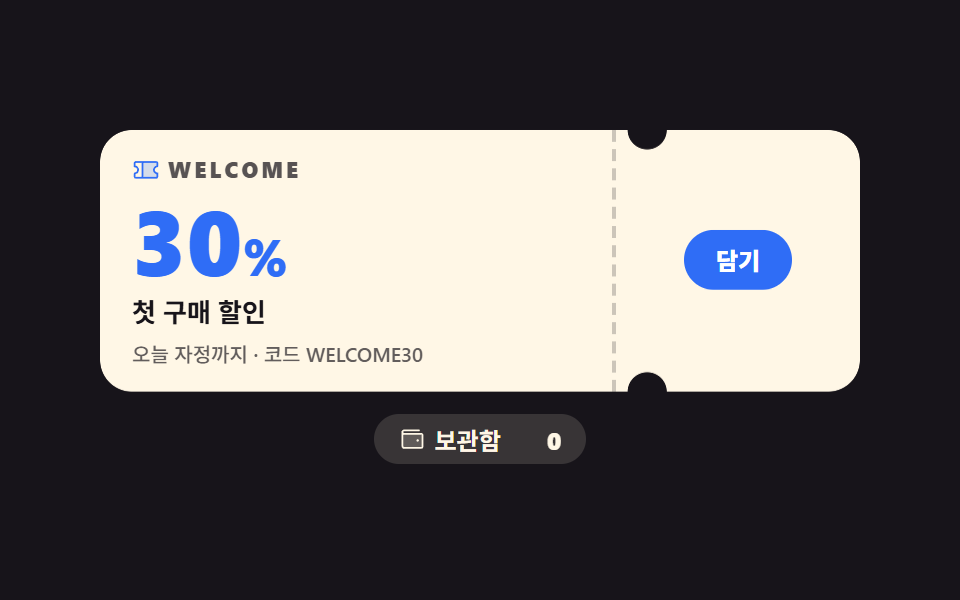 Landing sectionsCoupon Design: 9 CSS Coupons, Stamp to Spin
 Landing sections9 Team Page Design Patterns (Copy-Paste)
 Landing sections9 Pricing Page Design Sections (Copy-Paste)
 Landing sectionsTestimonial Section Design: 9 Social Proof Blocks
 Landing sectionsCSS Card Design Examples — 9 Content Card Types
 Landing sections9 Case Study Page Design Sections (Copy-Paste)
 Landing sectionsHero Section Design Examples: 9 Patterns
 Landing sections9 Profile Card Design Styles, Copy-Paste Ready
 Landing sectionsLanding Page Conversion: 9 Sections That Convert
 Landing sectionsWebsite Footer Design: 9 Copy-Paste Patterns