9 Case Study Page Design Sections (Copy-Paste)
Nine case-study sections that compute: the hero recounts its metric frame by frame, tiles size from a computed impact score, and quotes reverse-solve their
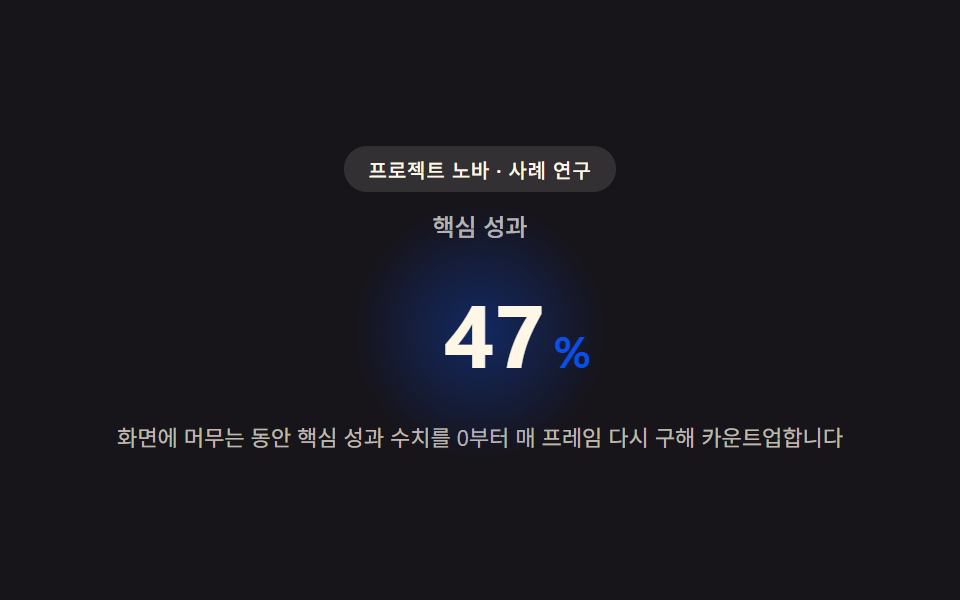 01 case-hero
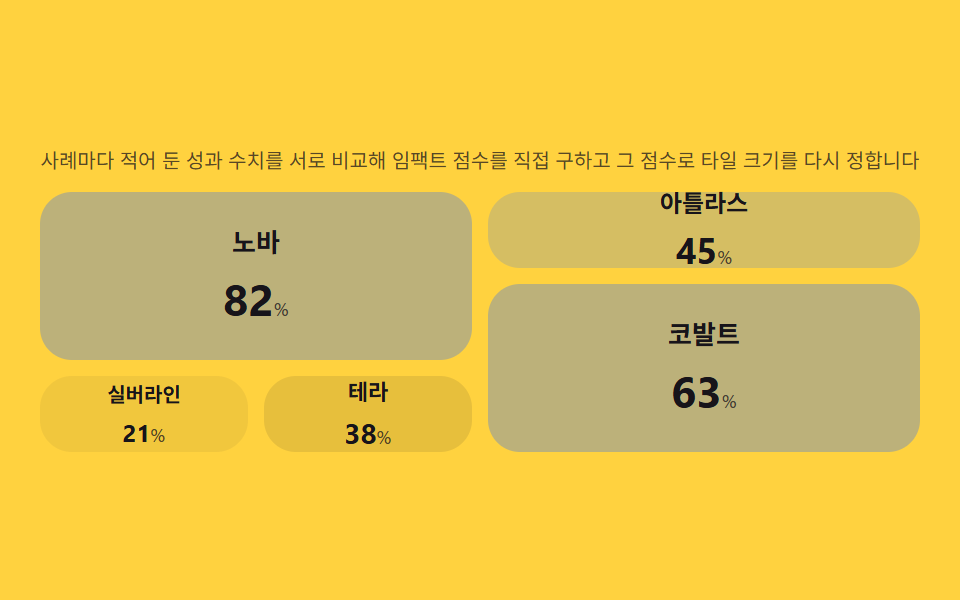 02 case-story-grid
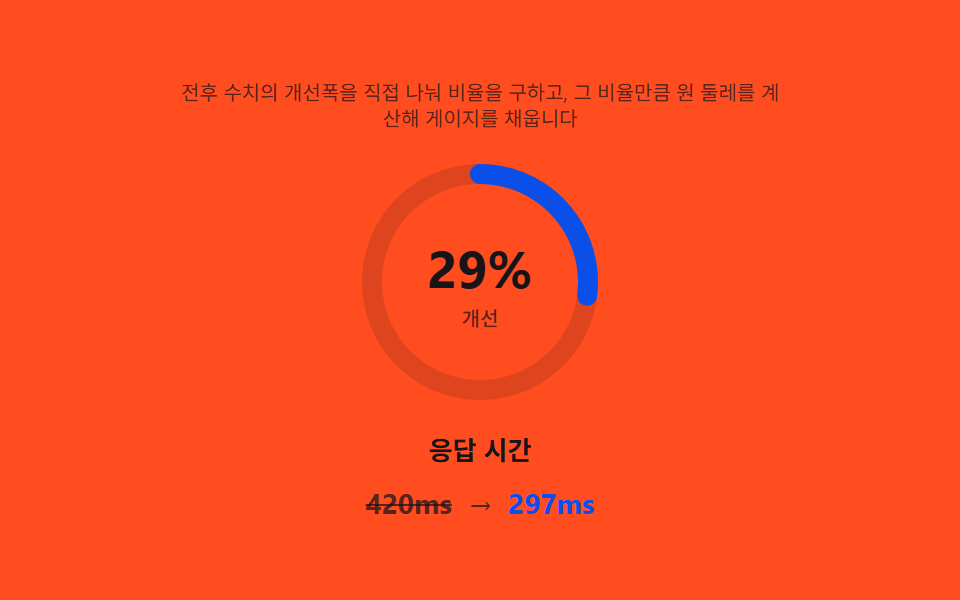 03 case-metric-highlight
 04 case-quote-block
 05 case-industry-tabs
 06 case-video-card
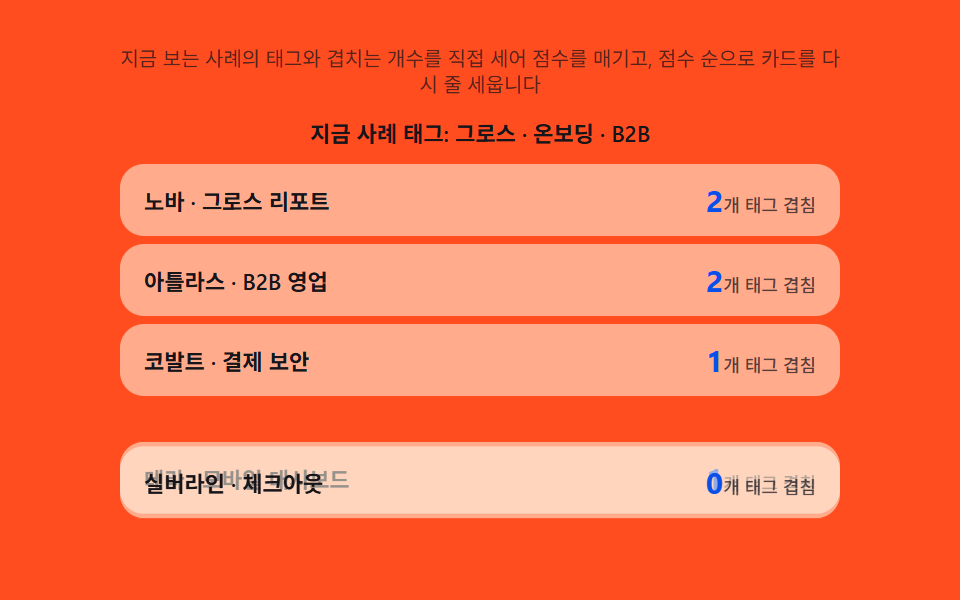 07 case-related-cta
 08 case-logo-bar
 09 case-footer
Auto-plays · click a tile to jump to its section · all nine in one zip
- 01 Case hero — a top section that recomputes its headline metric every frame to count it up
- 02 Story grid — a grid that works out its own impact score to size each tile
- 03 Metric highlight — a card that divides before and after to work out its own ratio
- 04 Quote block — a quote card that reverse-solves its own font size from character length
- 05 Industry tabs — tabs that recount per-industry totals on every switch
- 06 Video card — a card that derives playback from viewport ratio and scrub position from scroll
- 07 Related CTA — a recommender that works out relevance from shared tag counts
- 08 Logo bar — a marquee that recomputes speed from logo count to keep loop time constant
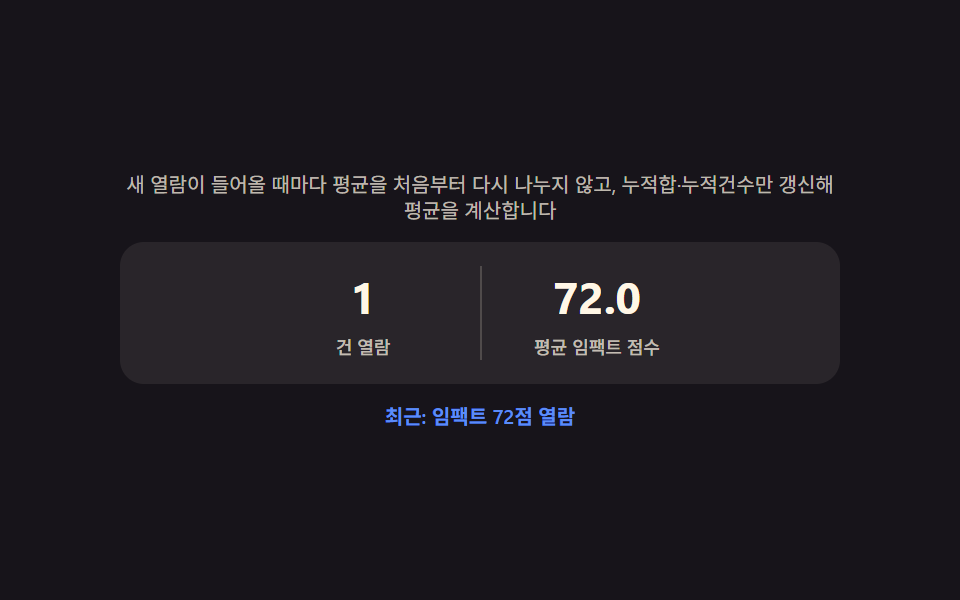
- 09 Case footer — a summary badge that works out the average across every story seen so far
Every scene below cycles a fixed array of scenarios through setInterval, so the same fake project names and the same made-up numbers land in the same spot on every capture — nothing here reads Math.random() except the video card's seeded noise. Switching an industry tab and pressing the video card's play button are the only two real interactions in the set; the other seven sections replay on their own. prefers-reduced-motion keeps every score, ratio, and percentage recomputing while it only drops the travel that would otherwise animate the result into view.
Anatomy of a case study page — what nine sections compute
None of these nine sections prints a number once and leaves it sitting in the markup. The same small set of arithmetic moves — a ratio, a normalized score, a measured width — keeps resurfacing under different labels, and once that's visible, all nine read as one idea wearing nine costumes.
Why a headline metric rolls up through easing instead of jumping straight to the answer
Passing the elapsed time ratio through 1 - (1 - t) ^ EASE_POW on every animation frame is what turns item 01's target number into a rolling count instead of a number that simply appears, and the moment an extra digit shows up, a canvas measureText call remeasures that string so the digit column never gets squeezed.
Why tile size comes from a normalized score, not a class picked by hand
Item 02 divides each story's result by the biggest result in its dataset, raises that fraction to IMPACT_WEIGHT, and only then decides how many grid columns and rows a tile spans — so a dataset with a runaway top performer reshapes the whole grid instead of leaving every tile the same size.
Why a measured pixel width decides where an underline or a marquee lands, not a guess
Item 05's tab underline and item 08's logo marquee both read getBoundingClientRect before doing any math, because a hard-coded offset or a fixed loop duration breaks the instant a label's text or a logo count changes to something nobody measured in advance. A case study page design template that ships only a static screenshot hides all of this; every section here keeps recomputing long after the first paint.
Code per section
Every block below is copied straight out of that item's own index.html — not retyped from memory — and the paired prompt in the zip regenerates the same file when handed to an AI coding tool. A case study page design inspiration board full of screenshots can't show this part: what happens after the first paint, not what the first paint looks like.
01Case hero — a top section that recomputes its headline metric every frame to count it up
As soon as this section enters view, the target metric gets recomputed frame by frame from zero, and the moment the rolling number gains a digit, the digit column's own rendered width gets remeasured so nothing overlaps.
<main class="stage">
<section class="hero" id="hero">
  <p class="eyebrow" id="eyebrow">Project Nova · Case Study</p>
  <p class="metricLabel" id="metricLabel">Key metric</p>
  <p class="metricRow">
    <span class="metricNum" id="metricNum">0</span><span class="metricUnit" id="metricUnit">%</span>
  </p>
  <p class="hint" id="hint">While you stay on screen, the key metric is recalculated from 0 every frame and counted up.</p>
</section>
</main>
@use "../../../../site/static/demo-tokens" as *;
$duration: $dur-loop;
$easing: $ease-out;
$color: $subject-blue-deep;
@include stage($stage-ink);
.hero {
position: relative;
width: 100%;
max-width: 420px;
display: flex;
flex-direction: column;
align-items: center;
gap: $sp-2;
text-align: center;
}
.eyebrow {
margin: 0;
padding: $sp-1 $sp-3;
border-radius: $r-pill;
background: rgba($subject-cream, .12);
color: $subject-cream;
font-weight: 500;
font-size: 10px;
letter-spacing: .04em;
}
.metricLabel {
margin: 0;
color: rgba($subject-cream, .72);
font-weight: 500;
font-size: 12px;
}
.metricRow {
position: relative;
margin: 0;
display: flex;
align-items: baseline;
justify-content: center;
gap: $sp-1;
padding: $sp-2 $sp-6;
}
.metricRow::before {
content: "";
position: absolute;
inset: 0;
margin: auto;
width: 120px;
height: 120px;
border-radius: $r-pill;
background: radial-gradient(circle, rgba($color, .38), rgba($color, 0) 70%);
animation: halo $duration $easing infinite;
z-index: 0;
}
.metricNum {
--num-w: 88px;
position: relative;
z-index: 1;
display: inline-block;
min-width: var(--num-w);
text-align: right;
font-weight: 700;
font-size: 44px;
font-variant-numeric: tabular-nums;
color: $subject-cream;
}
.metricUnit {
position: relative;
z-index: 1;
font-weight: 700;
font-size: 22px;
color: $color;
}
.hint {
margin: 0;
padding: 0 $sp-2;
color: rgba($subject-cream, .72);
font-weight: 400;
font-size: 11px;
line-height: 1.4;
}
@keyframes halo {
0%, 100% { transform: scale(.86); opacity: .5; }
50% { transform: scale(1.12); opacity: 1; }
}
@media (max-width: 340px) {
.hero { max-width: 300px; gap: $sp-1; }
.metricNum { font-size: 32px; }
.metricUnit { font-size: 16px; }
.hint { font-size: 9px; }
.metricRow { padding: $sp-1 $sp-4; }
}
@media (prefers-reduced-motion: reduce) {
.metricRow::before {
animation: none;
opacity: .7;
}
}html, body {
margin: 0;
overflow: hidden;
}
.stage {
box-sizing: border-box;
min-height: 100vh;
display: grid;
place-items: center;
margin: 0;
background: #17141a;
font-family: -apple-system, "Segoe UI", "Noto Sans KR", sans-serif;
padding: clamp(8px, 4vw, 24px);
}
.hero {
position: relative;
width: 100%;
max-width: 420px;
display: flex;
flex-direction: column;
align-items: center;
gap: 8px;
text-align: center;
}
.eyebrow {
margin: 0;
padding: 4px 12px;
border-radius: 999px;
background: rgba(255, 247, 230, 0.12);
color: #fff7e6;
font-weight: 500;
font-size: 10px;
letter-spacing: 0.04em;
}
.metricLabel {
margin: 0;
color: rgba(255, 247, 230, 0.72);
font-weight: 500;
font-size: 12px;
}
.metricRow {
position: relative;
margin: 0;
display: flex;
align-items: baseline;
justify-content: center;
gap: 4px;
padding: 8px 24px;
}
.metricRow::before {
content: "";
position: absolute;
inset: 0;
margin: auto;
width: 120px;
height: 120px;
border-radius: 999px;
background: radial-gradient(circle, rgba(10, 79, 232, 0.38), rgba(10, 79, 232, 0) 70%);
animation: halo 2s ease-out infinite;
z-index: 0;
}
.metricNum {
--num-w: 88px;
position: relative;
z-index: 1;
display: inline-block;
min-width: var(--num-w);
text-align: right;
font-weight: 700;
font-size: 44px;
font-variant-numeric: tabular-nums;
color: #fff7e6;
}
.metricUnit {
position: relative;
z-index: 1;
font-weight: 700;
font-size: 22px;
color: #0a4fe8;
}
.hint {
margin: 0;
padding: 0 8px;
color: rgba(255, 247, 230, 0.72);
font-weight: 400;
font-size: 11px;
line-height: 1.4;
}
@keyframes halo {
0%, 100% {
transform: scale(0.86);
opacity: 0.5;
}
50% {
transform: scale(1.12);
opacity: 1;
}
}
@media (max-width: 340px) {
.hero {
max-width: 300px;
gap: 4px;
}
.metricNum {
font-size: 32px;
}
.metricUnit {
font-size: 16px;
}
.hint {
font-size: 9px;
}
.metricRow {
padding: 4px 16px;
}
}
@media (prefers-reduced-motion: reduce) {
.metricRow::before {
animation: none;
opacity: 0.7;
}
}// 사례 히어로(01) — 값을 누적하지 않고, 매 애니메이션 프레임마다 경과 비율(t)로부터
// 목표값까지의 값을 공식(eased(t) * target)으로 처음부터 다시 구해 카운트업한다(계산 한 겹).
// 자릿수가 늘어나는 순간에는 canvas measureText 로 그 시점 문자열의 실제 렌더 폭을 다시 재
// 숫자 칸의 폭(--num-w)을 갱신해, 다음 문자가 밀리지 않고 자리에 맞춰 넓어지게 한다.
(function () {
var numEl = document.getElementById('metricNum');
var wrapEl = numEl ? numEl.parentElement : null;
if (!numEl || !wrapEl) return;
var reduce = window.matchMedia('(prefers-reduced-motion: reduce)').matches;
var TARGET = 128;
var EASE_POW = 2; // 변형: 2 → 4
var ANIM_MS = 1300;
var CYCLE_MS = 1900;
var measureCv = document.createElement('canvas');
var measureCtx = measureCv.getContext('2d');
function measureWidth(text, px) {
if (!measureCtx) return text.length * px * 0.62;
measureCtx.font = '700 ' + px + 'px -apple-system, "Segoe UI", sans-serif';
return measureCtx.measureText(text).width;
}
var lastDigits = -1;
function applyValue(v) {
  numEl.textContent = String(v);
  var digits = String(v).length;
  if (digits !== lastDigits) {
    lastDigits = digits;
    var px = parseFloat(getComputedStyle(numEl).fontSize) || 44;
    var w = measureWidth(String(v), px);
    wrapEl.style.setProperty('--num-w', Math.ceil(w) + 'px');
  }
}

function runCycle() {
  if (reduce) { applyValue(TARGET); return; }
  var start = null;
  function frame(ts) {
    if (start === null) start = ts;
    var t = Math.min((ts - start) / ANIM_MS, 1);
    var eased = 1 - Math.pow(1 - t, EASE_POW);
    var val = Math.round(TARGET * eased);
    applyValue(val);
    if (t < 1) requestAnimationFrame(frame);
  }
  applyValue(0);
  requestAnimationFrame(frame);
}
runCycle();
if (!reduce) setInterval(runCycle, CYCLE_MS);
})();// CaseHero — vanilla 판(run/340/demo/01-case-hero/index.html) 의 React 포트.
// 값을 누적하지 않고 매 프레임 경과 비율(t)로부터 목표값까지의 값을 공식으로 처음부터 다시 구해
// 카운트업하고, 자릿수가 늘어나는 순간엔 canvas measureText 로 실제 렌더 폭을 다시 재 숫자 칸 폭을 갱신한다.
import { useEffect, useRef } from "react";
import styles from "./CaseHero.module.scss";
export type CaseHeroProps = {
duration?: string;
easing?: string;
color?: string;
};
const EYEBROW = "프로젝트 노바 · 사례 연구";
const METRIC_LABEL = "핵심 성과";
const HINT = "화면에 머무는 동안 핵심 성과 수치를 0부터 매 프레임 다시 구해 카운트업합니다";
const TARGET = 128;
const EASE_POW = 2;
const ANIM_MS = 1300;
const CYCLE_MS = 1900;
export default function CaseHero({
duration = "2s",
easing = "ease-out",
color = "#0a4fe8"
}: CaseHeroProps) {
const numRef = useRef<HTMLSpanElement | null>(null);
const wrapRef = useRef<HTMLParagraphElement | null>(null);
useEffect(() => {
const numEl = numRef.current;
const wrapEl = wrapRef.current;
if (!numEl || !wrapEl) return;
const reduce = window.matchMedia("(prefers-reduced-motion: reduce)").matches;
const measureCv = document.createElement("canvas");
const measureCtx = measureCv.getContext("2d");
function measureWidth(text: string, px: number): number {
if (!measureCtx) return text.length * px * 0.62;
measureCtx.font = "700 " + px + 'px -apple-system, "Segoe UI", sans-serif';
return measureCtx.measureText(text).width;
}
let lastDigits = -1;
function applyValue(v: number): void {
numEl!.textContent = String(v);
const digits = String(v).length;
if (digits !== lastDigits) {
lastDigits = digits;
const px = parseFloat(getComputedStyle(numEl!).fontSize) || 44;
const w = measureWidth(String(v), px);
wrapEl!.style.setProperty("--num-w", Math.ceil(w) + "px");
}
}
function runCycle(): void {
if (reduce) { applyValue(TARGET); return; }
let start: number | null = null;
function frame(ts: number): void {
if (start === null) start = ts;
const t = Math.min((ts - start) / ANIM_MS, 1);
const eased = 1 - Math.pow(1 - t, EASE_POW);
const val = Math.round(TARGET * eased);
applyValue(val);
if (t < 1) requestAnimationFrame(frame);
}
applyValue(0);
requestAnimationFrame(frame);
}
runCycle();
let timer = 0;
if (!reduce) timer = window.setInterval(runCycle, CYCLE_MS);
return () => {
if (timer) window.clearInterval(timer);
};
// eslint-disable-next-line react-hooks/exhaustive-deps
}, []);
return (
<main className={styles.stage}>
<section className={styles.hero}>
<p className={styles.eyebrow}>{EYEBROW}</p>
<p className={styles.metricLabel}>{METRIC_LABEL}</p>
<p className={styles.metricRow} ref={wrapRef}>
<span className={styles.metricNum} ref={numRef}>0</span>
<span className={styles.metricUnit}>%</span>
</p>
<p className={styles.hint}>{HINT}</p>
</section>
</main>
);
}01 · Case hero — a top section that recomputes its headline metric every frame to count it up — Measured area 6.476% · moving frames 17/23Original by GODRICH · SCSS and React ship in the zip · See the password
What the numbers say
Cumulative area lands at 6.48% (mean intensity 165.7, the brightest of the nine) across 17 of 23 frame-to-frame comparisons — a large bold number rolling upward reads as the most visually intense of the set even with a modest footprint.
function applyValue(v) {
numEl.textContent = String(v);
var digits = String(v).length;
if (digits !== lastDigits) {
lastDigits = digits;
var px = parseFloat(getComputedStyle(numEl).fontSize) || 44;
var w = measureWidth(String(v), px);
wrapEl.style.setProperty('--num-w', Math.ceil(w) + 'px');
}
}
function runCycle() {
if (reduce) { applyValue(TARGET); return; }
var start = null;
function frame(ts) {
if (start === null) start = ts;
var t = Math.min((ts - start) / ANIM_MS, 1);
var eased = 1 - Math.pow(1 - t, EASE_POW);
var val = Math.round(TARGET * eased);
applyValue(val);
if (t < 1) requestAnimationFrame(frame);
}
applyValue(0);
requestAnimationFrame(frame);
}
02Story grid — a grid that works out its own impact score to size each tile
Comparing every story's result figure against this dataset's own maximum works out a 0-to-1 score, and each score tier picks its own column span, row span, padding, and number size rather than sharing one fixed tile shape.
<main class="stage">
<section class="panel">
  <p class="hint" id="hint">Each case's recorded metric is compared against the others to compute an impact score, and that score resizes the tile.</p>
  <div class="grid" id="grid" role="list" aria-label="Case list">
    <article class="tile" role="listitem"><p class="tileName">Nova</p><p class="tileNum"><span class="tileVal">0</span><span class="tileUnit">%</span></p></article>
    <article class="tile" role="listitem"><p class="tileName">Atlas</p><p class="tileNum"><span class="tileVal">0</span><span class="tileUnit">%</span></p></article>
    <article class="tile" role="listitem"><p class="tileName">Cobalt</p><p class="tileNum"><span class="tileVal">0</span><span class="tileUnit">%</span></p></article>
    <article class="tile" role="listitem"><p class="tileName">Silverline</p><p class="tileNum"><span class="tileVal">0</span><span class="tileUnit">%</span></p></article>
    <article class="tile" role="listitem"><p class="tileName">Terra</p><p class="tileNum"><span class="tileVal">0</span><span class="tileUnit">%</span></p></article>
  </div>
</section>
</main>
@use "../../../../site/static/demo-tokens" as *;
$duration: $dur-base;
$easing: $ease-pop;
$color: $subject-blue;
@include stage($stage-yellow);
.panel {
width: 100%;
max-width: 440px;
display: flex;
flex-direction: column;
gap: $sp-2;
}
.hint {
margin: 0;
text-align: center;
color: rgba($subject-ink, .72);
font-weight: 400;
font-size: 10px;
line-height: 1.35;
}
.grid {
display: grid;
grid-template-columns: repeat(4, 1fr);
grid-auto-rows: 38px;
grid-auto-flow: dense;
gap: $sp-2;
}
.tile {
border-radius: $r-card;
background: rgba($subject-ink, .06);
display: flex;
flex-direction: column;
align-items: center;
justify-content: center;
gap: $sp-1;
padding: $sp-1;
transform-origin: center;
transition: background $duration $easing, transform $duration $easing, opacity $duration $easing;
&[data-pad="p0"] { background: rgba($subject-ink, .06); }
&[data-pad="p1"] { padding: $sp-2; background: rgba($subject-ink, .10); }
&[data-pad="p2"] { padding: $sp-3; background: rgba($color, .20); }
&[data-pad="p3"] { padding: $sp-4; background: rgba($color, .32); }
}
.tile--pulse {
animation: pulse $duration $easing;
}
.tileName {
margin: 0;
color: $subject-ink;
font-weight: 600;
font-size: 10px;
[data-font="f1"] & { font-size: 11px; }
[data-font="f2"] & { font-size: 12px; }
[data-font="f3"] & { font-size: 13px; }
}
.tileNum {
margin: 0;
display: flex;
align-items: baseline;
gap: 0;
}
.tileVal {
color: $subject-ink;
font-weight: 700;
font-size: 12px;
[data-font="f1"] & { font-size: 14px; }
[data-font="f2"] & { font-size: 18px; }
[data-font="f3"] & { font-size: 22px; }
}
.tileUnit {
color: rgba($subject-ink, .72);
font-weight: 500;
font-size: 9px;
}
@keyframes pulse {
0% { transform: scale(1.1); opacity: .55; }
100% { transform: scale(1); opacity: 1; }
}
@media (max-width: 340px) {
.panel { max-width: 300px; gap: $sp-1; }
.hint { font-size: 9px; }
.grid { grid-auto-rows: 30px; gap: $sp-1; }
.tileName { font-size: 9px; }
.tileVal { font-size: 11px; }
.tileUnit { font-size: 8px; }
}
@media (prefers-reduced-motion: reduce) {
.tile, .tile--pulse {
transition: none;
animation: none;
}
}html, body {
margin: 0;
overflow: hidden;
}
.stage {
box-sizing: border-box;
min-height: 100vh;
display: grid;
place-items: center;
margin: 0;
background: #ffd23f;
font-family: -apple-system, "Segoe UI", "Noto Sans KR", sans-serif;
padding: clamp(8px, 4vw, 24px);
}
.panel {
width: 100%;
max-width: 440px;
display: flex;
flex-direction: column;
gap: 8px;
}
.hint {
margin: 0;
text-align: center;
color: rgba(23, 20, 26, 0.72);
font-weight: 400;
font-size: 10px;
line-height: 1.35;
}
.grid {
display: grid;
grid-template-columns: repeat(4, 1fr);
grid-auto-rows: 38px;
grid-auto-flow: dense;
gap: 8px;
}
.tile {
border-radius: 16px;
background: rgba(23, 20, 26, 0.06);
display: flex;
flex-direction: column;
align-items: center;
justify-content: center;
gap: 4px;
padding: 4px;
transform-origin: center;
transition: background 300ms cubic-bezier(0.2, 1.4, 0.4, 1), transform 300ms cubic-bezier(0.2, 1.4, 0.4, 1), opacity 300ms cubic-bezier(0.2, 1.4, 0.4, 1);
}
.tile[data-pad=p0] {
background: rgba(23, 20, 26, 0.06);
}
.tile[data-pad=p1] {
padding: 8px;
background: rgba(23, 20, 26, 0.1);
}
.tile[data-pad=p2] {
padding: 12px;
background: rgba(47, 109, 246, 0.2);
}
.tile[data-pad=p3] {
padding: 16px;
background: rgba(47, 109, 246, 0.32);
}
.tile--pulse {
animation: pulse 300ms cubic-bezier(0.2, 1.4, 0.4, 1);
}
.tileName {
margin: 0;
color: #17141a;
font-weight: 600;
font-size: 10px;
}
[data-font=f1] .tileName {
font-size: 11px;
}
[data-font=f2] .tileName {
font-size: 12px;
}
[data-font=f3] .tileName {
font-size: 13px;
}
.tileNum {
margin: 0;
display: flex;
align-items: baseline;
gap: 0;
}
.tileVal {
color: #17141a;
font-weight: 700;
font-size: 12px;
}
[data-font=f1] .tileVal {
font-size: 14px;
}
[data-font=f2] .tileVal {
font-size: 18px;
}
[data-font=f3] .tileVal {
font-size: 22px;
}
.tileUnit {
color: rgba(23, 20, 26, 0.72);
font-weight: 500;
font-size: 9px;
}
@keyframes pulse {
0% {
transform: scale(1.1);
opacity: 0.55;
}
100% {
transform: scale(1);
opacity: 1;
}
}
@media (max-width: 340px) {
.panel {
max-width: 300px;
gap: 4px;
}
.hint {
font-size: 9px;
}
.grid {
grid-auto-rows: 30px;
gap: 4px;
}
.tileName {
font-size: 9px;
}
.tileVal {
font-size: 11px;
}
.tileUnit {
font-size: 8px;
}
}
@media (prefers-reduced-motion: reduce) {
.tile, .tile--pulse {
transition: none;
animation: none;
}
}// 스토리 그리드(02) — 사례별 성과 수치를 이번 데이터셋의 최댓값과 비교해 0~1 로 정규화하고,
// IMPACT_WEIGHT 거듭제곱을 적용해 임팩트 점수를 직접 구한다. 점수 구간마다 grid-column/grid-row
// span·패딩·숫자 크기를 다시 정해 타일 배치를 매번 다시 계산한다(계산 한 겹).
// 자동 시연은 두 데이터셋을 번갈아 넣어 점수와 배치가 매번 다시 구해지는 것을 보여준다.
(function () {
var grid = document.getElementById('grid');
if (!grid) return;
var tiles = Array.prototype.slice.call(grid.querySelectorAll('.tile'));
var reduce = window.matchMedia('(prefers-reduced-motion: reduce)').matches;
var IMPACT_WEIGHT = 1; // 변형: .5 → 1.5
var DATASETS = [
[82, 45, 63, 21, 38],
[30, 71, 55, 90, 24]
];
function tierFor(weighted) {
if (weighted >= .75) return { col: 2, row: 2, pad: 'p3', font: 'f3' };
if (weighted >= .5) return { col: 2, row: 1, pad: 'p2', font: 'f2' };
if (weighted >= .28) return { col: 1, row: 1, pad: 'p1', font: 'f1' };
return { col: 1, row: 1, pad: 'p0', font: 'f0' };
}
function apply(values) {
  var max = Math.max.apply(null, values);
  tiles.forEach(function (tile, i) {
    var value = values[i];
    var normalized = max > 0 ? value / max : 0;
    var weighted = Math.pow(normalized, IMPACT_WEIGHT);
    var tier = tierFor(weighted);
    tile.style.gridColumn = 'span ' + tier.col;
    tile.style.gridRow = 'span ' + tier.row;
    tile.dataset.pad = tier.pad;
    tile.dataset.font = tier.font;
    var valEl = tile.querySelector('.tileVal');
    if (valEl) valEl.textContent = String(value);
    if (!reduce) {
      tile.classList.remove('tile--pulse');
      void tile.offsetWidth;
      tile.classList.add('tile--pulse');
    }
  });
}
var idx = 0;
apply(DATASETS[0]);
if (!reduce) {
setInterval(function () {
idx = (idx + 1) % DATASETS.length;
apply(DATASETS[idx]);
}, 600);
}
})();// CaseStoryGrid — vanilla 판(run/340/demo/02-case-story-grid/index.html) 의 React 포트.
// 사례별 성과 수치를 이번 데이터셋의 최댓값과 비교해 정규화하고 IMPACT_WEIGHT 거듭제곱으로
// 임팩트 점수를 구해, 점수 구간마다 grid-column/grid-row span·패딩·숫자 크기를 다시 정한다.
import { useEffect, useRef } from "react";
import styles from "./CaseStoryGrid.module.scss";
export type CaseStoryGridProps = {
duration?: string;
easing?: string;
color?: string;
};
const HINT = "사례마다 적어 둔 성과 수치를 서로 비교해 임팩트 점수를 직접 구하고 그 점수로 타일 크기를 다시 정합니다";
const NAMES = ["노바", "아틀라스", "코발트", "실버라인", "테라"];
const IMPACT_WEIGHT = 1;
const DATASETS: number[][] = [
[82, 45, 63, 21, 38],
[30, 71, 55, 90, 24]
];
type Tier = { col: number; row: number; pad: string; font: string };
function tierFor(weighted: number): Tier {
if (weighted >= 0.75) return { col: 2, row: 2, pad: "p3", font: "f3" };
if (weighted >= 0.5) return { col: 2, row: 1, pad: "p2", font: "f2" };
if (weighted >= 0.28) return { col: 1, row: 1, pad: "p1", font: "f1" };
return { col: 1, row: 1, pad: "p0", font: "f0" };
}
export default function CaseStoryGrid({
duration = "220ms",
easing = "cubic-bezier(.2,1.4,.4,1)",
color = "#2f6df6"
}: CaseStoryGridProps) {
const tileRefs = useRef<(HTMLElement | null)[]>([]);
const valRefs = useRef<(HTMLSpanElement | null)[]>([]);
useEffect(() => {
const reduce = window.matchMedia("(prefers-reduced-motion: reduce)").matches;
function apply(values: number[]): void {
const max = Math.max.apply(null, values);
values.forEach((value, i) => {
const tile = tileRefs.current![i];
const valEl = valRefs.current![i];
if (!tile) return;
const normalized = max > 0 ? value / max : 0;
const weighted = Math.pow(normalized, IMPACT_WEIGHT);
const tier = tierFor(weighted);
tile.style.gridColumn = "span " + tier.col;
tile.style.gridRow = "span " + tier.row;
tile.dataset.pad = tier.pad;
tile.dataset.font = tier.font;
if (valEl) valEl.textContent = String(value);
if (!reduce) {
tile.classList.remove(styles.tilePulse);
void tile.offsetWidth;
tile.classList.add(styles.tilePulse);
}
});
}
let idx = 0;
apply(DATASETS[0]);
let timer = 0;
if (!reduce) {
timer = window.setInterval(() => {
idx = (idx + 1) % DATASETS.length;
apply(DATASETS[idx]);
}, 600);
}
return () => {
if (timer) window.clearInterval(timer);
};
// eslint-disable-next-line react-hooks/exhaustive-deps
}, []);
return (
<main className={styles.stage}>
<section className={styles.panel}>
<p className={styles.hint}>{HINT}</p>
<div className={styles.grid}>
{NAMES.map((name, i) => (
<article
key={name}
className={styles.tile}
ref={(el: HTMLElement | null) => {
tileRefs.current![i] = el;
}}
>
<p className={styles.tileName}>{name}</p>
<p className={styles.tileNum}>
<span
className={styles.tileVal}
ref={(el: HTMLSpanElement | null) => {
valRefs.current![i] = el;
}}
>
0
</span>
<span className={styles.tileUnit}>%</span>
</p>
</article>
))}
</div>
</section>
</main>
);
}02 · Story grid — a grid that works out its own impact score to size each tile — Measured area 52.497% · moving frames 7/23Original by GODRICH · SCSS and React ship in the zip · See the password
What the numbers say
Cumulative area is the widest of the nine at 52.50% (max frame 48.82%) but mean intensity is the calmest at 46.9, over just 7 of 23 frames — a full grid reshuffle swaps between similarly toned panels rather than flashing bright.
function apply(values) {
var max = Math.max.apply(null, values);
tiles.forEach(function (tile, i) {
var value = values[i];
var normalized = max > 0 ? value / max : 0;
var weighted = Math.pow(normalized, IMPACT_WEIGHT);
var tier = tierFor(weighted);
tile.style.gridColumn = 'span ' + tier.col;
tile.style.gridRow = 'span ' + tier.row;
tile.dataset.pad = tier.pad;
tile.dataset.font = tier.font;
var valEl = tile.querySelector('.tileVal');
if (valEl) valEl.textContent = String(value);
if (!reduce) {
tile.classList.remove('tile--pulse');
void tile.offsetWidth;
tile.classList.add('tile--pulse');
}
});
}
03Metric highlight — a card that divides before and after to work out its own ratio
Dividing the gap between the before value and the after value by the before value works out the improvement ratio that sets the gauge's stroke offset, and the same ratio decides how many percentage points the badge prints next to it.
<main class="stage">
<section class="panel" id="panel">
  <p class="hint" id="hint">The before/after gap is divided to get a ratio, and that ratio fills the gauge by computing the circle's circumference.</p>
  <div class="gaugeWrap">
    <svg class="gaugeSvg" width="132" height="132" viewBox="0 0 132 132" aria-hidden="true">
      <circle class="gaugeTrack" cx="66" cy="66" r="54"></circle>
      <circle class="gaugeFill" id="gaugeFill" cx="66" cy="66" r="54"></circle>
    </svg>
    <div class="gaugeCenter">
      <span class="gaugePercent" id="gaugePercent">0%</span>
      <span class="gaugeCaption" id="gaugeCaption">Improved</span>
    </div>
  </div>
  <p class="metricName" id="metricName">Response time</p>
  <p class="metricPair">
    <span class="metricBefore" id="metricBefore">420ms</span>
    <span class="metricArrow" aria-hidden="true">→</span>
    <span class="metricAfter" id="metricAfter">420ms</span>
  </p>
</section>
</main>
@use "../../../../site/static/demo-tokens" as *;
$duration: $dur-enter;
$easing: $ease-spring;
$color: $subject-blue-deep;
@include stage($stage-orange);
.panel {
width: 100%;
max-width: 300px;
display: flex;
flex-direction: column;
align-items: center;
gap: $sp-2;
text-align: center;
}
.hint {
margin: 0;
color: rgba($subject-ink, .72);
font-weight: 400;
font-size: 10px;
line-height: 1.35;
}
.gaugeWrap {
position: relative;
width: 132px;
height: 132px;
}
.gaugeSvg {
transform: rotate(-90deg);
}
.gaugeTrack {
fill: none;
stroke: rgba($subject-ink, .14);
stroke-width: 10px;
}
.gaugeFill {
fill: none;
stroke: $color;
stroke-width: 10px;
stroke-linecap: round;
transition: stroke-dashoffset $duration $easing;
}
.gaugeCenter {
position: absolute;
inset: 0;
display: flex;
flex-direction: column;
align-items: center;
justify-content: center;
gap: 0;
}
.gaugePercent {
font-weight: 700;
font-size: 26px;
color: $subject-ink;
font-variant-numeric: tabular-nums;
}
.gaugeCaption {
font-weight: 500;
font-size: 10px;
color: rgba($subject-ink, .72);
}
.metricName {
margin: 0;
font-weight: 600;
font-size: 13px;
color: $subject-ink;
}
.metricPair {
margin: 0;
display: flex;
align-items: baseline;
gap: $sp-2;
font-weight: 700;
font-size: 14px;
font-variant-numeric: tabular-nums;
}
.metricBefore {
color: rgba($subject-ink, .72);
text-decoration: line-through;
text-decoration-thickness: 1px;
}
.metricArrow {
color: rgba($subject-ink, .72);
font-weight: 400;
}
.metricAfter {
color: $color;
}
@media (max-width: 340px) {
.panel { max-width: 260px; gap: $sp-1; }
.gaugeWrap { width: 84px; height: 84px; }
.gaugePercent { font-size: 17px; }
.gaugeCaption { font-size: 8px; }
.metricName { font-size: 11px; }
.metricPair { font-size: 11px; gap: $sp-1; }
.hint { font-size: 8px; line-height: 1.25; }
}
@media (prefers-reduced-motion: reduce) {
.gaugeFill {
transition: none;
}
}html, body {
margin: 0;
overflow: hidden;
}
.stage {
box-sizing: border-box;
min-height: 100vh;
display: grid;
place-items: center;
margin: 0;
background: #ff4d1f;
font-family: -apple-system, "Segoe UI", "Noto Sans KR", sans-serif;
padding: clamp(8px, 4vw, 24px);
}
.panel {
width: 100%;
max-width: 300px;
display: flex;
flex-direction: column;
align-items: center;
gap: 8px;
text-align: center;
}
.hint {
margin: 0;
color: rgba(23, 20, 26, 0.72);
font-weight: 400;
font-size: 10px;
line-height: 1.35;
}
.gaugeWrap {
position: relative;
width: 132px;
height: 132px;
}
.gaugeSvg {
transform: rotate(-90deg);
}
.gaugeTrack {
fill: none;
stroke: rgba(23, 20, 26, 0.14);
stroke-width: 10px;
}
.gaugeFill {
fill: none;
stroke: #0a4fe8;
stroke-width: 10px;
stroke-linecap: round;
transition: stroke-dashoffset 600ms cubic-bezier(0.2, 0.8, 0.2, 1);
}
.gaugeCenter {
position: absolute;
inset: 0;
display: flex;
flex-direction: column;
align-items: center;
justify-content: center;
gap: 0;
}
.gaugePercent {
font-weight: 700;
font-size: 26px;
color: #17141a;
font-variant-numeric: tabular-nums;
}
.gaugeCaption {
font-weight: 500;
font-size: 10px;
color: rgba(23, 20, 26, 0.72);
}
.metricName {
margin: 0;
font-weight: 600;
font-size: 13px;
color: #17141a;
}
.metricPair {
margin: 0;
display: flex;
align-items: baseline;
gap: 8px;
font-weight: 700;
font-size: 14px;
font-variant-numeric: tabular-nums;
}
.metricBefore {
color: rgba(23, 20, 26, 0.72);
text-decoration: line-through;
text-decoration-thickness: 1px;
}
.metricArrow {
color: rgba(23, 20, 26, 0.72);
font-weight: 400;
}
.metricAfter {
color: #0a4fe8;
}
@media (max-width: 340px) {
.panel {
max-width: 260px;
gap: 4px;
}
.gaugeWrap {
width: 84px;
height: 84px;
}
.gaugePercent {
font-size: 17px;
}
.gaugeCaption {
font-size: 8px;
}
.metricName {
font-size: 11px;
}
.metricPair {
font-size: 11px;
gap: 4px;
}
.hint {
font-size: 8px;
line-height: 1.25;
}
}
@media (prefers-reduced-motion: reduce) {
.gaugeFill {
transition: none;
}
}// 메트릭 하이라이트(03) — 전/후 두 수치만 데이터로 두고, 개선율을 매 사이클 직접 나눠 구한 뒤
// 원 둘레(2*PI*R)를 계산해 그 비율만큼 stroke-dashoffset 을 역산한다. 게이지 값은 어디에도
// 미리 적어두지 않고, 전/후 수치로부터 매번 다시 계산된다(계산 한 겹).
(function () {
var fill = document.getElementById('gaugeFill');
var percentEl = document.getElementById('gaugePercent');
var captionEl = document.getElementById('gaugeCaption');
var nameEl = document.getElementById('metricName');
var beforeEl = document.getElementById('metricBefore');
var afterEl = document.getElementById('metricAfter');
if (!fill || !percentEl || !nameEl || !beforeEl || !afterEl) return;
var reduce = window.matchMedia('(prefers-reduced-motion: reduce)').matches;
var RADIUS = 54;
var CIRC = 2 * Math.PI * RADIUS;
fill.style.strokeDasharray = String(CIRC);
var METRICS = [
{ label: 'Response time', before: 420, after: 180, unit: 'ms', lowerIsBetter: true, caption: 'Improved' },
{ label: 'Conversion rate', before: 2.1, after: 5.8, unit: '%', lowerIsBetter: false, caption: 'Up' },
{ label: 'Bounce rate', before: 61, after: 34, unit: '%', lowerIsBetter: true, caption: 'Improved' }
];
var MAX_IMPROVEMENT = 0.7; // 게이지가 항상 꽉 차지 않도록 잡은 정규화 상한
var ANIM_MS = 1100;
var CYCLE_MS = 2200;
function computeRatio(metric) {
  var delta = metric.lowerIsBetter ? (metric.before - metric.after) : (metric.after - metric.before);
  var improvement = delta / metric.before;
  return Math.max(0, Math.min(1, improvement / MAX_IMPROVEMENT));
}

function computePercent(metric) {
  var delta = metric.lowerIsBetter ? (metric.before - metric.after) : (metric.after - metric.before);
  return Math.round((delta / metric.before) * 100);
}

function applyGauge(ratio) {
  var offset = CIRC * (1 - ratio);
  fill.style.strokeDashoffset = String(offset);
}

function fmt(metric, value) {
  if (metric.unit === 'ms') return Math.round(value) + 'ms';
  return (Math.round(value * 10) / 10) + '%';
}
var idx = 0;
function runMetric(metric) {
nameEl.textContent = metric.label;
captionEl.textContent = metric.caption;
beforeEl.textContent = fmt(metric, metric.before);
var targetPercent = computePercent(metric);
var targetRatio = computeRatio(metric);
if (reduce) {
afterEl.textContent = fmt(metric, metric.after);
percentEl.textContent = targetPercent + '%';
applyGauge(targetRatio);
return;
}
var start = null;
function frame(ts) {
if (start === null) start = ts;
var t = Math.min((ts - start) / ANIM_MS, 1);
var eased = 1 - Math.pow(1 - t, 3);
var curAfter = metric.before + (metric.after - metric.before) * eased;
var curRatio = targetRatio * eased;
var curPercent = Math.round(targetPercent * eased);
afterEl.textContent = fmt(metric, curAfter);
percentEl.textContent = curPercent + '%';
applyGauge(curRatio);
if (t < 1) requestAnimationFrame(frame);
}
applyGauge(0);
percentEl.textContent = '0%';
afterEl.textContent = fmt(metric, metric.before);
requestAnimationFrame(frame);
}
runMetric(METRICS[0]);
if (!reduce) {
setInterval(function () {
idx = (idx + 1) % METRICS.length;
runMetric(METRICS[idx]);
}, CYCLE_MS);
}
})();// CaseMetricHighlight — vanilla 판(run/340/demo/03-case-metric-highlight/index.html) 의 React 포트.
// 전/후 수치만 데이터로 두고 개선율을 매 사이클 직접 나눠 구한 뒤, 원 둘레(2*PI*R)를 계산해
// 그 비율만큼 stroke-dashoffset 을 역산한다. 게이지 값은 미리 적어두지 않고 매번 다시 계산한다.
import { useEffect, useRef } from "react";
import styles from "./CaseMetricHighlight.module.scss";
export type CaseMetricHighlightProps = {
duration?: string;
easing?: string;
color?: string;
};
const HINT = "전후 수치의 개선폭을 직접 나눠 비율을 구하고, 그 비율만큼 원 둘레를 계산해 게이지를 채웁니다";
type Metric = {
label: string;
before: number;
after: number;
unit: "ms" | "%";
lowerIsBetter: boolean;
caption: string;
};
const METRICS: Metric[] = [
{ label: "응답 시간", before: 420, after: 180, unit: "ms", lowerIsBetter: true, caption: "개선" },
{ label: "전환율", before: 2.1, after: 5.8, unit: "%", lowerIsBetter: false, caption: "상승" },
{ label: "이탈률", before: 61, after: 34, unit: "%", lowerIsBetter: true, caption: "개선" }
];
const RADIUS = 54;
const CIRC = 2 * Math.PI * RADIUS;
const MAX_IMPROVEMENT = 0.7;
const ANIM_MS = 1100;
const CYCLE_MS = 2200;
function computeRatio(metric: Metric): number {
const delta = metric.lowerIsBetter ? metric.before - metric.after : metric.after - metric.before;
const improvement = delta / metric.before;
return Math.max(0, Math.min(1, improvement / MAX_IMPROVEMENT));
}
function computePercent(metric: Metric): number {
const delta = metric.lowerIsBetter ? metric.before - metric.after : metric.after - metric.before;
return Math.round((delta / metric.before) * 100);
}
function fmt(metric: Metric, value: number): string {
if (metric.unit === "ms") return Math.round(value) + "ms";
return Math.round(value * 10) / 10 + "%";
}
export default function CaseMetricHighlight({
duration = "600ms",
easing = "cubic-bezier(.2,.8,.2,1)",
color = "#0a4fe8"
}: CaseMetricHighlightProps) {
const fillRef = useRef<SVGCircleElement | null>(null);
const percentRef = useRef<HTMLSpanElement | null>(null);
const captionRef = useRef<HTMLSpanElement | null>(null);
const nameRef = useRef<HTMLParagraphElement | null>(null);
const beforeRef = useRef<HTMLSpanElement | null>(null);
const afterRef = useRef<HTMLSpanElement | null>(null);
useEffect(() => {
const fill = fillRef.current;
const percentEl = percentRef.current;
const captionEl = captionRef.current;
const nameEl = nameRef.current;
const beforeEl = beforeRef.current;
const afterEl = afterRef.current;
if (!fill || !percentEl || !captionEl || !nameEl || !beforeEl || !afterEl) return;
const reduce = window.matchMedia("(prefers-reduced-motion: reduce)").matches;
fill.style.strokeDasharray = String(CIRC);
function applyGauge(ratio: number): void {
const offset = CIRC * (1 - ratio);
fill!.style.strokeDashoffset = String(offset);
}
let raf = 0;
function runMetric(metric: Metric): void {
nameEl!.textContent = metric.label;
captionEl!.textContent = metric.caption;
beforeEl!.textContent = fmt(metric, metric.before);
const targetPercent = computePercent(metric);
const targetRatio = computeRatio(metric);
if (reduce) {
afterEl!.textContent = fmt(metric, metric.after);
percentEl!.textContent = targetPercent + "%";
applyGauge(targetRatio);
return;
}
let start: number | null = null;
function frame(ts: number): void {
if (start === null) start = ts;
const t = Math.min((ts - start) / ANIM_MS, 1);
const eased = 1 - Math.pow(1 - t, 3);
const curAfter = metric.before + (metric.after - metric.before) * eased;
const curRatio = targetRatio * eased;
const curPercent = Math.round(targetPercent * eased);
afterEl!.textContent = fmt(metric, curAfter);
percentEl!.textContent = curPercent + "%";
applyGauge(curRatio);
if (t < 1) raf = requestAnimationFrame(frame);
}
applyGauge(0);
percentEl!.textContent = "0%";
afterEl!.textContent = fmt(metric, metric.before);
raf = requestAnimationFrame(frame);
}
let idx = 0;
runMetric(METRICS[0]);
let timer = 0;
if (!reduce) {
timer = window.setInterval(() => {
idx = (idx + 1) % METRICS.length;
runMetric(METRICS[idx]);
}, CYCLE_MS);
}
return () => {
if (timer) window.clearInterval(timer);
if (raf) cancelAnimationFrame(raf);
};
// eslint-disable-next-line react-hooks/exhaustive-deps
}, []);
return (
<main className={styles.stage}>
<section className={styles.panel}>
<p className={styles.hint}>{HINT}</p>
<div className={styles.gaugeWrap}>
<svg className={styles.gaugeSvg} width="132" height="132" viewBox="0 0 132 132" aria-hidden="true">
<circle className={styles.gaugeTrack} cx="66" cy="66" r="54" />
<circle className={styles.gaugeFill} ref={fillRef} cx="66" cy="66" r="54" />
</svg>
<div className={styles.gaugeCenter}>
<span className={styles.gaugePercent} ref={percentRef}>0%</span>
<span className={styles.gaugeCaption} ref={captionRef}>개선</span>
</div>
</div>
<p className={styles.metricName} ref={nameRef}>응답 시간</p>
<p className={styles.metricPair}>
<span className={styles.metricBefore} ref={beforeRef}>420ms</span>
<span className={styles.metricArrow} aria-hidden="true">→</span>
<span className={styles.metricAfter} ref={afterRef}>420ms</span>
</p>
</section>
</main>
);
}03 · Metric highlight — a card that divides before and after to work out its own ratio — Measured area 2.328% · moving frames 17/23Original by GODRICH · SCSS and React ship in the zip · See the password
What the numbers say
Cumulative area sits at 2.33% (max frame 0.71%, mean intensity 128.3) over 17 of 23 frames as three metric pairs cycle through — an underline-sized gauge stroke is a structurally small-change surface, not a defect.
function computeRatio(metric) {
var delta = metric.lowerIsBetter ? (metric.before - metric.after) : (metric.after - metric.before);
var improvement = delta / metric.before;
return Math.max(0, Math.min(1, improvement / MAX_IMPROVEMENT));
}
function computePercent(metric) {
var delta = metric.lowerIsBetter ? (metric.before - metric.after) : (metric.after - metric.before);
return Math.round((delta / metric.before) * 100);
}
function applyGauge(ratio) {
var offset = CIRC * (1 - ratio);
fill.style.strokeDashoffset = String(offset);
}
function fmt(metric, value) {
if (metric.unit === 'ms') return Math.round(value) + 'ms';
return (Math.round(value * 10) / 10) + '%';
}
04Quote block — a quote card that reverse-solves its own font size from character length
Because every quote is a different length, a 14-round binary search measures real rendered widths with canvas measureText and works backward to the largest font size that still fits the card, instead of a font size typed in once and hoped for.
<main class="stage">
<section class="panel">
  <p class="hint" id="hint">The quote is measured on a real canvas, and the font size that fits the target width is solved backward every time.</p>
  <blockquote class="quote">
    <p class="quoteText" id="quoteText">This one card component cut our design review time in half.</p>
  </blockquote>
  <p class="quoteAuthor" id="quoteAuthor">— Seoyeon Kim, Atlas Product Lead</p>
</section>
</main>
@use "../../../../site/static/demo-tokens" as *;
$duration: $dur-base;
$easing: $ease-pop;
$color: $subject-blue-deep;
@include stage($stage-paper);
.panel {
position: relative;
width: 100%;
max-width: 340px;
display: flex;
flex-direction: column;
align-items: center;
gap: $sp-3;
text-align: center;
}
.hint {
margin: 0;
color: rgba($subject-ink, .72);
font-weight: 400;
font-size: 10px;
line-height: 1.35;
}
.quote {
position: relative;
margin: 0;
padding: $sp-4 $sp-3;
border-radius: $r-card;
background: rgba($color, .06);
}
.quote::before {
content: "\201C";
position: absolute;
top: -$sp-2;
left: $sp-3;
font-size: 40px;
font-weight: 700;
line-height: 1;
color: rgba($color, .72);
}
.quoteText {
position: relative;
z-index: 1;
margin: 0;
color: $subject-ink;
font-weight: 600;
line-height: 1.5;
font-size: 16px;
transform-origin: center;
}
.quoteText--swap {
animation: quotePop $duration $easing;
}
.quoteAuthor {
margin: 0;
color: $color;
font-weight: 600;
font-size: 11px;
}
@keyframes quotePop {
0% { opacity: 0; transform: scale(.96); }
100% { opacity: 1; transform: scale(1); }
}
@media (max-width: 340px) {
.panel { max-width: 280px; gap: $sp-2; }
.quote { padding: $sp-3 $sp-2; }
.quoteText { font-size: 13px; }
.quoteAuthor { font-size: 10px; }
.hint { font-size: 9px; }
}
@media (prefers-reduced-motion: reduce) {
.quoteText--swap {
animation: none;
}
}@charset "UTF-8";
html, body {
margin: 0;
overflow: hidden;
}
.stage {
box-sizing: border-box;
min-height: 100vh;
display: grid;
place-items: center;
margin: 0;
background: #ffffff;
font-family: -apple-system, "Segoe UI", "Noto Sans KR", sans-serif;
padding: clamp(8px, 4vw, 24px);
}
.panel {
position: relative;
width: 100%;
max-width: 340px;
display: flex;
flex-direction: column;
align-items: center;
gap: 12px;
text-align: center;
}
.hint {
margin: 0;
color: rgba(23, 20, 26, 0.72);
font-weight: 400;
font-size: 10px;
line-height: 1.35;
}
.quote {
position: relative;
margin: 0;
padding: 16px 12px;
border-radius: 16px;
background: rgba(10, 79, 232, 0.06);
}
.quote::before {
content: "“";
position: absolute;
top: -8px;
left: 12px;
font-size: 40px;
font-weight: 700;
line-height: 1;
color: rgba(10, 79, 232, 0.72);
}
.quoteText {
position: relative;
z-index: 1;
margin: 0;
color: #17141a;
font-weight: 600;
line-height: 1.5;
font-size: 16px;
transform-origin: center;
}
.quoteText--swap {
animation: quotePop 300ms cubic-bezier(0.2, 1.4, 0.4, 1);
}
.quoteAuthor {
margin: 0;
color: #0a4fe8;
font-weight: 600;
font-size: 11px;
}
@keyframes quotePop {
0% {
opacity: 0;
transform: scale(0.96);
}
100% {
opacity: 1;
transform: scale(1);
}
}
@media (max-width: 340px) {
.panel {
max-width: 280px;
gap: 8px;
}
.quote {
padding: 12px 8px;
}
.quoteText {
font-size: 13px;
}
.quoteAuthor {
font-size: 10px;
}
.hint {
font-size: 9px;
}
}
@media (prefers-reduced-motion: reduce) {
.quoteText--swap {
animation: none;
}
}// 인용 블록(04) — 인용문 길이가 매번 다르므로, 목표 폭(카드 안쪽 폭)에 맞는 글자 크기를
// canvas measureText 로 실제 렌더 폭을 재보며 이분 탐색으로 거꾸로 풀어 찾는다(계산 한 겹).
// 최대 크기에서 시작해 넘치면 줄이고, 남으면 최대치까지 다시 키운다 — 고정 크기 하드코딩이 아니다.
(function () {
var textEl = document.getElementById('quoteText');
var authorEl = document.getElementById('quoteAuthor');
if (!textEl || !authorEl) return;
var reduce = window.matchMedia('(prefers-reduced-motion: reduce)').matches;
var QUOTES = [
{ text: 'This one card component cut our design review time in half.', author: '— Seoyeon Kim, Atlas Product Lead' },
{ text: 'After we rebuilt the onboarding screen, first-week churn dropped noticeably.', author: '— Doyoon Park, Cobalt Growth Team' },
{ text: 'With the whole team using the same component, review arguments disappeared.', author: '— Haeun Lee, Silverline Design System' }
];
var MIN_PX = 12;
var MAX_PX = 20;
var TOLERANCE = 1;
var cv = document.createElement('canvas');
var ctx = cv.getContext('2d');
function widthAt(text, px) {
if (!ctx) return text.length * px * 0.56;
ctx.font = '600 ' + px + 'px -apple-system, "Segoe UI", "Noto Sans KR", sans-serif';
return ctx.measureText(text).width;
}
// 목표 폭 안에 들어가는 가장 큰 글자 크기를 이분 탐색으로 거꾸로 푼다.
function solveFontSize(text, targetWidth) {
var lo = MIN_PX, hi = MAX_PX, best = MIN_PX;
for (var i = 0; i < 14; i++) {
var mid = (lo + hi) / 2;
var w = widthAt(text, mid);
if (w <= targetWidth - TOLERANCE) {
best = mid;
lo = mid;
} else {
hi = mid;
}
}
return best;
}
function applyQuote(quote) {
var targetWidth = textEl.clientWidth * 2.6; // 두 줄 남짓으로 접힐 총 글자폭 예산
var px = solveFontSize(quote.text, targetWidth);
textEl.style.fontSize = px.toFixed(1) + 'px';
textEl.textContent = quote.text;
authorEl.textContent = quote.author;
}
var idx = 0;
applyQuote(QUOTES[0]);
if (!reduce) {
setInterval(function () {
idx = (idx + 1) % QUOTES.length;
textEl.classList.remove('quoteText--swap');
void textEl.offsetWidth;
applyQuote(QUOTES[idx]);
textEl.classList.add('quoteText--swap');
}, 700);
}
})();// CaseQuoteBlock — vanilla 판(run/340/demo/04-case-quote-block/index.html) 의 React 포트.
// 인용문 길이가 매번 다르므로 목표 폭에 맞는 글자 크기를 canvas measureText 로 실측하며
// 이분 탐색으로 거꾸로 풀어 찾는다(고정 크기 하드코딩이 아니다).
import { useEffect, useRef } from "react";
import styles from "./CaseQuoteBlock.module.scss";
export type CaseQuoteBlockProps = {
duration?: string;
easing?: string;
color?: string;
};
const HINT = "인용문을 실제 캔버스로 재 보고, 목표 폭에 맞는 글자 크기를 거꾸로 풀어서 매번 다시 구합니다";
type Quote = { text: string; author: string };
const QUOTES: Quote[] = [
{ text: "이 카드 컴포넌트 하나로 디자인 검토 시간이 절반으로 줄었습니다.", author: "— 김서연, 아틀라스 프로덕트 리드" },
{ text: "온보딩 화면을 새로 짜고 나서 첫 주 이탈이 눈에 띄게 줄었어요.", author: "— 박도윤, 코발트 그로스팀" },
{ text: "팀 전체가 같은 컴포넌트를 쓰니 리뷰에서 다툴 일이 사라졌습니다.", author: "— 이하은, 실버라인 디자인 시스템" }
];
const MIN_PX = 12;
const MAX_PX = 20;
const TOLERANCE = 1;
export default function CaseQuoteBlock({
duration = "300ms",
easing = "cubic-bezier(.2,1.4,.4,1)",
color = "#0a4fe8"
}: CaseQuoteBlockProps) {
const textRef = useRef<HTMLParagraphElement | null>(null);
const authorRef = useRef<HTMLParagraphElement | null>(null);
useEffect(() => {
const textEl = textRef.current;
const authorEl = authorRef.current;
if (!textEl || !authorEl) return;
const reduce = window.matchMedia("(prefers-reduced-motion: reduce)").matches;
const cv = document.createElement("canvas");
const ctx = cv.getContext("2d");
function widthAt(text: string, px: number): number {
if (!ctx) return text.length * px * 0.56;
ctx.font = "600 " + px + 'px -apple-system, "Segoe UI", "Noto Sans KR", sans-serif';
return ctx.measureText(text).width;
}
function solveFontSize(text: string, targetWidth: number): number {
let lo = MIN_PX;
let hi = MAX_PX;
let best = MIN_PX;
for (let i = 0; i < 14; i++) {
const mid = (lo + hi) / 2;
const w = widthAt(text, mid);
if (w <= targetWidth - TOLERANCE) {
best = mid;
lo = mid;
} else {
hi = mid;
}
}
return best;
}
function applyQuote(quote: Quote): void {
const targetWidth = textEl!.clientWidth * 2.6;
const px = solveFontSize(quote.text, targetWidth);
textEl!.style.fontSize = px.toFixed(1) + "px";
textEl!.textContent = quote.text;
authorEl!.textContent = quote.author;
}
let idx = 0;
applyQuote(QUOTES[0]);
let timer = 0;
if (!reduce) {
timer = window.setInterval(() => {
idx = (idx + 1) % QUOTES.length;
textEl!.classList.remove(styles.quoteTextSwap);
void textEl!.offsetWidth;
applyQuote(QUOTES[idx]);
textEl!.classList.add(styles.quoteTextSwap);
}, 700);
}
return () => {
if (timer) window.clearInterval(timer);
};
// eslint-disable-next-line react-hooks/exhaustive-deps
}, []);
return (
<main className={styles.stage}>
<section className={styles.panel}>
<p className={styles.hint}>{HINT}</p>
<blockquote className={styles.quote}>
<p className={styles.quoteText} ref={textRef}>이 카드 컴포넌트 하나로 디자인 검토 시간이 절반으로 줄었습니다.</p>
</blockquote>
<p className={styles.quoteAuthor} ref={authorRef}>— 김서연, 아틀라스 프로덕트 리드</p>
</section>
</main>
);
}04 · Quote block — a quote card that reverse-solves its own font size from character length — Measured area 7.081% · moving frames 10/23Original by GODRICH · SCSS and React ship in the zip · See the password
What the numbers say
Cumulative area comes to 7.08% (max frame 5.93%, mean intensity 77.7) over 10 of 23 frames as three quotes of different lengths cycle through the same reverse-solve.
// Binary-search backward for the largest font size that still fits inside the target width.
function solveFontSize(text, targetWidth) {
  var lo = MIN_PX, hi = MAX_PX, best = MIN_PX;
  for (var i = 0; i < 14; i++) {
    var mid = (lo + hi) / 2;
    var w = widthAt(text, mid);
    if (w <= targetWidth - TOLERANCE) {
      best = mid;
      lo = mid;
    } else {
      hi = mid;
    }
  }
  return best;
}

function applyQuote(quote) {
  var targetWidth = textEl.clientWidth * 2.6; // character-width budget for roughly two lines
  var px = solveFontSize(quote.text, targetWidth);
  textEl.style.fontSize = px.toFixed(1) + 'px';
  textEl.textContent = quote.text;
  authorEl.textContent = quote.author;
}
05Industry tabs — tabs that recount per-industry totals on every switch
Every tab switch recounts how many stories belong to that industry against the running total for the percentage badge, and measures the newly selected tab's real position with getBoundingClientRect so the underline lands exactly under it.
<main class="stage">
<section class="panel">
  <p class="hint" id="hint">Try clicking a tab — the underline doesn't guess a value, it measures the pressed tab's actual rendered width every time and moves there.</p>
  <div class="tabsWrap">
    <div class="tabs" id="tabs" role="tablist" aria-label="Industry">
      <button class="tab" id="tab-0" role="tab" aria-selected="true" data-idx="0">E-commerce</button>
      <button class="tab" id="tab-1" role="tab" aria-selected="false" data-idx="1">Fintech</button>
      <button class="tab" id="tab-2" role="tab" aria-selected="false" data-idx="2">Healthcare</button>
      <button class="tab" id="tab-3" role="tab" aria-selected="false" data-idx="3">Education</button>
    </div>
    <div class="underline" id="underline"></div>
  </div>
  <p class="countRow">
    <span class="countNum" id="countNum">12</span>
    <span class="countLabel" id="countLabel">E-commerce cases · 28% of 43 total</span>
  </p>
</section>
</main>
@use "../../../../site/static/demo-tokens" as *;
$duration: $dur-base;
$easing: $ease-spring;
$color: $subject-blue-light;
@include stage($stage-ink);
.panel {
width: 100%;
max-width: 380px;
display: flex;
flex-direction: column;
align-items: center;
gap: $sp-3;
text-align: center;
}
.hint {
margin: 0;
color: rgba($subject-cream, .72);
font-weight: 400;
font-size: 10px;
line-height: 1.35;
}
.tabsWrap {
position: relative;
width: 100%;
}
.tabs {
position: relative;
display: flex;
gap: $sp-3;
padding-bottom: $sp-2;
border-bottom: 1px solid rgba($subject-cream, .16);
}
.tab {
flex: 0 0 auto;
appearance: none;
border: 0;
background: transparent;
padding: $sp-1 $sp-1;
color: rgba($subject-cream, .72);
font-weight: 600;
font-size: 12px;
cursor: pointer;
&[aria-selected="true"] {
color: $subject-cream;
}
&:focus-visible {
outline: 2px solid $color;
outline-offset: 2px;
}
}
.underline {
position: absolute;
left: 0;
bottom: 0;
height: 2px;
width: 1px;
background: $color;
transform: translateX(0) scaleX(1);
transition: transform $duration $easing;
}
.countRow {
margin: 0;
display: flex;
align-items: baseline;
gap: $sp-1;
}
.countNum {
color: $subject-cream;
font-weight: 700;
font-size: 22px;
font-variant-numeric: tabular-nums;
}
.countLabel {
color: rgba($subject-cream, .72);
font-weight: 500;
font-size: 11px;
}
@media (max-width: 340px) {
.panel { max-width: 300px; gap: $sp-2; }
.tabs { gap: $sp-2; }
.tab { font-size: 10px; }
.countNum { font-size: 18px; }
.countLabel { font-size: 9px; }
.hint { font-size: 9px; }
}
@media (prefers-reduced-motion: reduce) {
.underline {
transition: none;
}
}html, body {
margin: 0;
overflow: hidden;
}
.stage {
box-sizing: border-box;
min-height: 100vh;
display: grid;
place-items: center;
margin: 0;
background: #17141a;
font-family: -apple-system, "Segoe UI", "Noto Sans KR", sans-serif;
padding: clamp(8px, 4vw, 24px);
}
.panel {
width: 100%;
max-width: 380px;
display: flex;
flex-direction: column;
align-items: center;
gap: 12px;
text-align: center;
}
.hint {
margin: 0;
color: rgba(255, 247, 230, 0.72);
font-weight: 400;
font-size: 10px;
line-height: 1.35;
}
.tabsWrap {
position: relative;
width: 100%;
}
.tabs {
position: relative;
display: flex;
gap: 12px;
padding-bottom: 8px;
border-bottom: 1px solid rgba(255, 247, 230, 0.16);
}
.tab {
flex: 0 0 auto;
appearance: none;
border: 0;
background: transparent;
padding: 4px 4px;
color: rgba(255, 247, 230, 0.72);
font-weight: 600;
font-size: 12px;
cursor: pointer;
}
.tab[aria-selected=true] {
color: #fff7e6;
}
.tab:focus-visible {
outline: 2px solid #5b8cf8;
outline-offset: 2px;
}
.underline {
position: absolute;
left: 0;
bottom: 0;
height: 2px;
width: 1px;
background: #5b8cf8;
transform: translateX(0) scaleX(1);
transition: transform 300ms cubic-bezier(0.2, 0.8, 0.2, 1);
}
.countRow {
margin: 0;
display: flex;
align-items: baseline;
gap: 4px;
}
.countNum {
color: #fff7e6;
font-weight: 700;
font-size: 22px;
font-variant-numeric: tabular-nums;
}
.countLabel {
color: rgba(255, 247, 230, 0.72);
font-weight: 500;
font-size: 11px;
}
@media (max-width: 340px) {
.panel {
max-width: 300px;
gap: 8px;
}
.tabs {
gap: 8px;
}
.tab {
font-size: 10px;
}
.countNum {
font-size: 18px;
}
.countLabel {
font-size: 9px;
}
.hint {
font-size: 9px;
}
}
@media (prefers-reduced-motion: reduce) {
.underline {
transition: none;
}
}// Industry 탭(05) — 실제 클릭 이벤트로 탭을 바꾼다. 밑줄은 고정 px 를 미리 적어두지 않고,
// 눌린 탭을 getBoundingClientRect 로 매번 실측해 translateX/scaleX 로 옮긴다(BD19).
// 사례 수도 매번 전체 대비 비율을 다시 나눠 구한다(계산 한 겹).
(function () {
var tabsEl = document.getElementById('tabs');
var underlineEl = document.getElementById('underline');
var countNumEl = document.getElementById('countNum');
var countLabelEl = document.getElementById('countLabel');
if (!tabsEl || !underlineEl || !countNumEl || !countLabelEl) return;
var reduce = window.matchMedia('(prefers-reduced-motion: reduce)').matches;
var TABS = [
{ label: 'E-commerce', count: 12 },
{ label: 'Fintech', count: 9 },
{ label: 'Healthcare', count: 15 },
{ label: 'Education', count: 7 }
];
var TOTAL = TABS.reduce(function (sum, t) { return sum + t.count; }, 0);
var buttons = Array.prototype.slice.call(tabsEl.querySelectorAll('.tab'));
var current = 0;
function measureAndMove(idx) {
var btn = buttons[idx];
var wrapRect = tabsEl.getBoundingClientRect();
var btnRect = btn.getBoundingClientRect();
var x = btnRect.left - wrapRect.left;
var w = btnRect.width;
underlineEl.style.transform = 'translateX(' + x.toFixed(2) + 'px) scaleX(' + w.toFixed(2) + ')';
}
function selectTab(idx) {
current = idx;
buttons.forEach(function (b, i) {
b.setAttribute('aria-selected', i === idx ? 'true' : 'false');
});
var tab = TABS[idx];
var percent = Math.round((tab.count / TOTAL) * 100);
countNumEl.textContent = String(tab.count);
countLabelEl.textContent = ' ' + tab.label + ' cases · ' + TOTAL + ' total, ' + percent + '%';
measureAndMove(idx);
}
buttons.forEach(function (btn, i) {
btn.addEventListener('click', function () {
selectTab(i);
});
});
underlineEl.style.transformOrigin = 'left center';
requestAnimationFrame(function () { selectTab(0); });
if (!reduce) {
setInterval(function () {
selectTab((current + 1) % TABS.length);
}, 500);
}
window.addEventListener('resize', function () { measureAndMove(current); });
})();// CaseIndustryTabs — vanilla 판(run/340/demo/05-case-industry-tabs/index.html) 의 React 포트.
// 실제 클릭 이벤트로 탭을 바꾼다. 밑줄은 고정 px 를 미리 적어두지 않고 눌린 탭을
// getBoundingClientRect 로 매번 실측해 translateX/scaleX 로 옮긴다(BD19). 사례 수도
// 매번 전체 대비 비율을 다시 나눠 구한다.
import { useEffect, useRef } from "react";
import styles from "./CaseIndustryTabs.module.scss";
export type CaseIndustryTabsProps = {
duration?: string;
easing?: string;
color?: string;
};
const HINT = "탭을 눌러 보세요 — 밑줄은 짐작한 값이 아니라 눌린 탭의 실제 렌더 폭을 매번 재서 그 자리로 옮깁니다";
type Tab = { label: string; count: number };
const TABS: Tab[] = [
{ label: "이커머스", count: 12 },
{ label: "핀테크", count: 9 },
{ label: "헬스케어", count: 15 },
{ label: "교육", count: 7 }
];
const TOTAL = TABS.reduce((sum, t) => sum + t.count, 0);
export default function CaseIndustryTabs({
duration = "220ms",
easing = "cubic-bezier(.2,.8,.2,1)",
color = "#5b8cf8"
}: CaseIndustryTabsProps) {
const tabsRef = useRef<HTMLDivElement | null>(null);
const underlineRef = useRef<HTMLDivElement | null>(null);
const countNumRef = useRef<HTMLSpanElement | null>(null);
const countLabelRef = useRef<HTMLSpanElement | null>(null);
const btnRefs = useRef<(HTMLButtonElement | null)[]>([]);
const currentRef = useRef(0);
useEffect(() => {
const tabsEl = tabsRef.current;
const underlineEl = underlineRef.current;
const countNumEl = countNumRef.current;
const countLabelEl = countLabelRef.current;
if (!tabsEl || !underlineEl || !countNumEl || !countLabelEl) return;
const reduce = window.matchMedia("(prefers-reduced-motion: reduce)").matches;
function measureAndMove(idx: number): void {
const btn = btnRefs.current![idx];
if (!btn) return;
const wrapRect = tabsEl!.getBoundingClientRect();
const btnRect = btn.getBoundingClientRect();
const x = btnRect.left - wrapRect.left;
const w = btnRect.width;
underlineEl!.style.transform = "translateX(" + x.toFixed(2) + "px) scaleX(" + w.toFixed(2) + ")";
}
function selectTab(idx: number): void {
currentRef.current = idx;
btnRefs.current!.forEach((b, i) => {
if (b) b.setAttribute("aria-selected", i === idx ? "true" : "false");
});
const tab = TABS[idx];
const percent = Math.round((tab.count / TOTAL) * 100);
countNumEl!.textContent = String(tab.count);
countLabelEl!.textContent = "개 " + tab.label + " 사례 · 전체 " + TOTAL + "개 중 " + percent + "%";
measureAndMove(idx);
}
const handlers: Array<() => void> = [];
btnRefs.current!.forEach((btn, i) => {
if (!btn) return;
const handler = () => selectTab(i);
handlers[i] = handler;
btn.addEventListener("click", handler);
});
underlineEl.style.transformOrigin = "left center";
const raf = requestAnimationFrame(() => selectTab(0));
let timer = 0;
if (!reduce) {
timer = window.setInterval(() => {
selectTab((currentRef.current! + 1) % TABS.length);
}, 500);
}
const onResize = () => measureAndMove(currentRef.current!);
window.addEventListener("resize", onResize);
return () => {
cancelAnimationFrame(raf);
if (timer) window.clearInterval(timer);
window.removeEventListener("resize", onResize);
btnRefs.current!.forEach((btn, i) => {
if (btn && handlers[i]) btn.removeEventListener("click", handlers[i]);
});
};
// eslint-disable-next-line react-hooks/exhaustive-deps
}, []);
return (
<main className={styles.stage}>
<section className={styles.panel}>
<p className={styles.hint}>{HINT}</p>
<div className={styles.tabsWrap}>
<div className={styles.tabs} ref={tabsRef} role="tablist" aria-label="업종">
{TABS.map((tab, i) => (
<button
key={tab.label}
className={styles.tab}
role="tab"
aria-selected={i === 0}
ref={(el: HTMLButtonElement | null) => {
btnRefs.current![i] = el;
}}
>
{tab.label}
</button>
))}
</div>
<div className={styles.underline} ref={underlineRef} />
</div>
<p className={styles.countRow}>
<span className={styles.countNum} ref={countNumRef}>12</span>
<span className={styles.countLabel} ref={countLabelRef}>개 이커머스 사례 · 전체 43개 중 28%</span>
</p>
</section>
</main>
);
}05 · Industry tabs — tabs that recount per-industry totals on every switch — Measured area 2.14% · moving frames 9/23Original by GODRICH · SCSS and React ship in the zip · See the password
What the numbers say
Cumulative area is 2.14% (max frame 1.43%, mean intensity 143.3) over 9 of 23 frames — four industries cycle through, and a moving underline is naturally one of the smallest surfaces in the set.
function measureAndMove(idx) {
  var btn = buttons[idx];
  var wrapRect = tabsEl.getBoundingClientRect();
  var btnRect = btn.getBoundingClientRect();
  var x = btnRect.left - wrapRect.left;
  var w = btnRect.width;
  underlineEl.style.transform = 'translateX(' + x.toFixed(2) + 'px) scaleX(' + w.toFixed(2) + ')';
}

function selectTab(idx) {
  current = idx;
  buttons.forEach(function (b, i) {
    b.setAttribute('aria-selected', i === idx ? 'true' : 'false');
  });
  var tab = TABS[idx];
  var percent = Math.round((tab.count / TOTAL) * 100);
  countNumEl.textContent = String(tab.count);
  countLabelEl.textContent = tab.label + ' cases · ' + percent + '% of ' + TOTAL + ' total';
  measureAndMove(idx);
}
06Video card — a card that derives playback from viewport ratio and scrub position from scroll
IntersectionObserver measures, in 51 steps, how much of this card actually sits inside its scroll container's viewport, turns that into a ready-rate, and picks which seeded preview frame to redraw — there's no real video file behind it.
<main class="stage">
<section class="panel">
  <p class="hint" id="hint">Try scrolling the card — it recalculates the ready-rate from the actual portion inside the viewport, and skips the preview frame by that ratio.</p>
  <div class="scrollStage" id="scrollStage">
    <div class="scrollSpacer" aria-hidden="true"></div>
    <article class="card" id="card">
      <canvas class="thumb" id="thumb" width="240" height="135" aria-hidden="true"></canvas>
      <button class="playBtn" id="playBtn" type="button" aria-label="Play case video preview">
        <svg class="playIcon" xmlns="http://www.w3.org/2000/svg" width="22" height="22" viewBox="0 0 256 256"><g fill="currentColor"><path d="M228.23 134.69L84.15 222.81A8 8 0 0 1 72 216.12V39.88a8 8 0 0 1 12.15-6.69l144.08 88.12a7.82 7.82 0 0 1 0 13.38" opacity=".2"/><path d="M232.4 114.49L88.32 26.35a16 16 0 0 0-16.2-.3A15.86 15.86 0 0 0 64 39.87v176.26A15.94 15.94 0 0 0 80 232a16.07 16.07 0 0 0 8.36-2.35l144.04-88.14a15.81 15.81 0 0 0 0-27ZM80 215.94V40l143.83 88Z"/></g></svg>
      </button>
      <p class="readyLabel" id="readyLabel">Ready 0%</p>
    </article>
    <div class="scrollSpacer" aria-hidden="true"></div>
  </div>
</section>
</main>
@use "../../../../site/static/demo-tokens" as *;
$duration: $dur-quick;
$easing: $ease-pop;
$color: $subject-blue;
@include stage($stage-yellow);
.panel {
width: 100%;
max-width: 320px;
display: flex;
flex-direction: column;
align-items: center;
gap: $sp-2;
text-align: center;
}
.hint {
margin: 0;
color: rgba($subject-ink, .72);
font-weight: 400;
font-size: 10px;
line-height: 1.35;
}
.scrollStage {
position: relative;
width: 100%;
height: 168px;
overflow-y: auto;
overscroll-behavior: contain;
border-radius: $r-card;
background: rgba($subject-ink, .06);
}
.scrollSpacer {
height: 130px;
}
.card {
position: relative;
margin: 0 $sp-3;
padding: $sp-2;
border-radius: $r-control;
background: $subject-ink;
display: flex;
flex-direction: column;
align-items: center;
gap: $sp-1;
}
.thumb {
width: 100%;
height: auto;
border-radius: $r-sm;
display: block;
}
.playBtn {
position: absolute;
top: 50%;
left: 50%;
transform: translate(-50%, -50%) scale(.86);
transform-origin: center;
width: 40px;
height: 40px;
border-radius: $r-pill;
border: 0;
display: grid;
place-items: center;
background: rgba($subject-cream, .22);
color: $subject-cream;
opacity: .72;
cursor: not-allowed;
transition: transform $duration $easing, opacity $duration $easing, background $duration $easing;
&.playBtn--ready {
opacity: 1;
cursor: pointer;
background: $color;
transform: translate(-50%, -50%) scale(1);
}
&.playBtn--pressed {
transform: translate(-50%, -50%) scale(.9);
}
&:focus-visible {
outline: 2px solid $subject-cream;
outline-offset: 2px;
}
}
.playIcon {
width: 18px;
height: 18px;
}
.readyLabel {
margin: 0;
color: $subject-cream;
font-weight: 600;
font-size: 10px;
font-variant-numeric: tabular-nums;
}
@media (max-width: 340px) {
.panel { max-width: 280px; gap: $sp-1; }
.scrollStage { height: 108px; }
.scrollSpacer { height: 80px; }
.hint { font-size: 8px; line-height: 1.25; }
.readyLabel { font-size: 9px; }
.playBtn { width: 32px; height: 32px; }
.playIcon { width: 14px; height: 14px; }
}
@media (prefers-reduced-motion: reduce) {
.playBtn {
transition: none;
}
}html, body {
margin: 0;
overflow: hidden;
}
.stage {
box-sizing: border-box;
min-height: 100vh;
display: grid;
place-items: center;
margin: 0;
background: #ffd23f;
font-family: -apple-system, "Segoe UI", "Noto Sans KR", sans-serif;
padding: clamp(8px, 4vw, 24px);
}
.panel {
width: 100%;
max-width: 320px;
display: flex;
flex-direction: column;
align-items: center;
gap: 8px;
text-align: center;
}
.hint {
margin: 0;
color: rgba(23, 20, 26, 0.72);
font-weight: 400;
font-size: 10px;
line-height: 1.35;
}
.scrollStage {
position: relative;
width: 100%;
height: 168px;
overflow-y: auto;
overscroll-behavior: contain;
border-radius: 16px;
background: rgba(23, 20, 26, 0.06);
}
.scrollSpacer {
height: 130px;
}
.card {
position: relative;
margin: 0 12px;
padding: 8px;
border-radius: 12px;
background: #17141a;
display: flex;
flex-direction: column;
align-items: center;
gap: 4px;
}
.thumb {
width: 100%;
height: auto;
border-radius: 8px;
display: block;
}
.playBtn {
position: absolute;
top: 50%;
left: 50%;
transform: translate(-50%, -50%) scale(0.86);
transform-origin: center;
width: 40px;
height: 40px;
border-radius: 999px;
border: 0;
display: grid;
place-items: center;
background: rgba(255, 247, 230, 0.22);
color: #fff7e6;
opacity: 0.72;
cursor: not-allowed;
transition: transform 220ms cubic-bezier(0.2, 1.4, 0.4, 1), opacity 220ms cubic-bezier(0.2, 1.4, 0.4, 1), background 220ms cubic-bezier(0.2, 1.4, 0.4, 1);
}
.playBtn.playBtn--ready {
opacity: 1;
cursor: pointer;
background: #2f6df6;
transform: translate(-50%, -50%) scale(1);
}
.playBtn.playBtn--pressed {
transform: translate(-50%, -50%) scale(0.9);
}
.playBtn:focus-visible {
outline: 2px solid #fff7e6;
outline-offset: 2px;
}
.playIcon {
width: 18px;
height: 18px;
}
.readyLabel {
margin: 0;
color: #fff7e6;
font-weight: 600;
font-size: 10px;
font-variant-numeric: tabular-nums;
}
@media (max-width: 340px) {
.panel {
max-width: 280px;
gap: 4px;
}
.scrollStage {
height: 108px;
}
.scrollSpacer {
height: 80px;
}
.hint {
font-size: 8px;
line-height: 1.25;
}
.readyLabel {
font-size: 9px;
}
.playBtn {
width: 32px;
height: 32px;
}
.playIcon {
width: 14px;
height: 14px;
}
}
@media (prefers-reduced-motion: reduce) {
.playBtn {
transition: none;
}
}// 영상 카드(06) — 실제 스크롤 컨테이너 안에서 카드가 뷰포트에 걸친 비율을 IntersectionObserver 로
// 실측해 Ready (%)을 매번 다시 구하고, 그 비율로 미리보기 프레임 인덱스를 정해 캔버스에 다시 그린다
// (계산 한 겹). 진짜 영상 파일은 없다 — 프레임은 mulberry32 시드 난수로 매번 다시 그리는 절차적 패턴이다.
(function () {
var scrollStage = document.getElementById('scrollStage');
var card = document.getElementById('card');
var thumb = document.getElementById('thumb');
var playBtn = document.getElementById('playBtn');
var readyLabel = document.getElementById('readyLabel');
if (!scrollStage || !card || !thumb || !playBtn || !readyLabel) return;
var ctx = thumb.getContext('2d');
var reduce = window.matchMedia('(prefers-reduced-motion: reduce)').matches;
var FRAME_COUNT = 12;
var READY_THRESHOLD = 0.62;
var lastFrame = -1;
function mulberry32(a) {
return function () {
a |= 0; a = (a + 0x6D2B79F5) | 0;
var t = Math.imul(a ^ (a >>> 15), 1 | a);
t = (t + Math.imul(t ^ (t >>> 7), 61 | t)) ^ t;
return ((t ^ (t >>> 14)) >>> 0) / 4294967296;
};
}
function drawFrame(frameIndex) {
  if (!ctx) return;
  var rnd = mulberry32(frameIndex * 7919 + 11);
  var w = thumb.width, h = thumb.height;
  var cols = 8, rows = 5;
  var cw = w / cols, ch = h / rows;
  for (var r = 0; r < rows; r++) {
    for (var c = 0; c < cols; c++) {
      var v = rnd();
      var lightness = 22 + v * 34;
      var hue = 214 + rnd() * 18;
      ctx.fillStyle = 'hsl(' + hue.toFixed(0) + ', 38%, ' + lightness.toFixed(0) + '%)';
      ctx.fillRect(c * cw, r * ch, cw + 1, ch + 1);
    }
  }
  ctx.fillStyle = 'rgba(255,255,255,.06)';
  for (var i = 0; i < 3; i++) {
    var bx = rnd() * w, by = rnd() * h, br = 8 + rnd() * 18;
    ctx.beginPath();
    ctx.arc(bx, by, br, 0, Math.PI * 2);
    ctx.fill();
  }
}
function update(ratio) {
var percent = Math.round(ratio * 100);
readyLabel.textContent = 'Ready ' + percent + '%';
var frameIndex = Math.min(FRAME_COUNT - 1, Math.floor(ratio * (FRAME_COUNT - 1)));
if (frameIndex !== lastFrame) {
lastFrame = frameIndex;
drawFrame(frameIndex);
}
if (ratio >= READY_THRESHOLD) {
playBtn.classList.add('playBtn--ready');
playBtn.disabled = false;
} else {
playBtn.classList.remove('playBtn--ready');
playBtn.disabled = true;
}
}
drawFrame(0);
update(0);
var io = new IntersectionObserver(function (entries) {
var entry = entries[0];
if (!entry) return;
update(entry.intersectionRatio);
}, {
root: scrollStage,
threshold: Array.from({ length: 51 }, function (_, i) { return i / 50; })
});
io.observe(card);
playBtn.addEventListener('click', function () {
if (playBtn.disabled) return;
playBtn.classList.add('playBtn--pressed');
setTimeout(function () { playBtn.classList.remove('playBtn--pressed'); }, 260);
});
if (!reduce) {
var max = 0;
requestAnimationFrame(function tick() {
max = scrollStage.scrollHeight - scrollStage.clientHeight;
var t = performance.now() / 1400;
var wave = (Math.sin(t) + 1) / 2;
scrollStage.scrollTop = wave * max;
requestAnimationFrame(tick);
});
}
})();// CaseVideoCard — vanilla 판(run/340/demo/06-case-video-card/index.html) 의 React 포트.
// 실제 스크롤 컨테이너 안에서 카드가 뷰포트에 걸친 비율을 IntersectionObserver 로 실측해
// 준비율(%)을 매번 다시 구하고, 그 비율로 미리보기 프레임 인덱스를 정해 캔버스에 다시 그린다.
// 진짜 영상 파일은 없다 — 프레임은 mulberry32 시드 난수로 매번 다시 그리는 절차적 패턴이다.
import { useEffect, useRef } from "react";
import styles from "./CaseVideoCard.module.scss";
export type CaseVideoCardProps = {
duration?: string;
easing?: string;
color?: string;
};
const HINT = "카드를 스크롤해 보세요 — 실제 뷰포트에 걸친 비율만큼 준비율을 재계산하고, 그 비율만큼 미리보기 프레임을 넘깁니다";
const FRAME_COUNT = 12;
const READY_THRESHOLD = 0.62;
function mulberry32(a: number): () => number {
return function () {
a |= 0;
a = (a + 0x6d2b79f5) | 0;
let t = Math.imul(a ^ (a >>> 15), 1 | a);
t = (t + Math.imul(t ^ (t >>> 7), 61 | t)) ^ t;
return ((t ^ (t >>> 14)) >>> 0) / 4294967296;
};
}
export default function CaseVideoCard({
duration = "220ms",
easing = "cubic-bezier(.2,1.4,.4,1)",
color = "#2f6df6"
}: CaseVideoCardProps) {
const scrollStageRef = useRef<HTMLDivElement | null>(null);
const cardRef = useRef<HTMLElement | null>(null);
const thumbRef = useRef<HTMLCanvasElement | null>(null);
const playBtnRef = useRef<HTMLButtonElement | null>(null);
const readyLabelRef = useRef<HTMLParagraphElement | null>(null);
useEffect(() => {
const scrollStage = scrollStageRef.current;
const card = cardRef.current;
const thumb = thumbRef.current;
const playBtn = playBtnRef.current;
const readyLabel = readyLabelRef.current;
if (!scrollStage || !card || !thumb || !playBtn || !readyLabel) return;
const ctx = thumb.getContext("2d");
const reduce = window.matchMedia("(prefers-reduced-motion: reduce)").matches;
let lastFrame = -1;
function drawFrame(frameIndex: number): void {
if (!ctx) return;
const rnd = mulberry32(frameIndex * 7919 + 11);
const w = thumb!.width;
const h = thumb!.height;
const cols = 8;
const rows = 5;
const cw = w / cols;
const ch = h / rows;
for (let r = 0; r < rows; r++) {
for (let c = 0; c < cols; c++) {
const v = rnd();
const lightness = 22 + v * 34;
const hue = 214 + rnd() * 18;
ctx.fillStyle = "hsl(" + hue.toFixed(0) + ", 38%, " + lightness.toFixed(0) + "%)";
ctx.fillRect(c * cw, r * ch, cw + 1, ch + 1);
}
}
ctx.fillStyle = "rgba(255,255,255,.06)";
for (let i = 0; i < 3; i++) {
const bx = rnd() * w;
const by = rnd() * h;
const br = 8 + rnd() * 18;
ctx.beginPath();
ctx.arc(bx, by, br, 0, Math.PI * 2);
ctx.fill();
}
}
function update(ratio: number): void {
const percent = Math.round(ratio * 100);
readyLabel!.textContent = "준비율 " + percent + "%";
const frameIndex = Math.min(FRAME_COUNT - 1, Math.floor(ratio * (FRAME_COUNT - 1)));
if (frameIndex !== lastFrame) {
lastFrame = frameIndex;
drawFrame(frameIndex);
}
if (ratio >= READY_THRESHOLD) {
playBtn!.classList.add(styles.playBtnReady);
playBtn!.disabled = false;
} else {
playBtn!.classList.remove(styles.playBtnReady);
playBtn!.disabled = true;
}
}
drawFrame(0);
update(0);
const io = new IntersectionObserver(
(entries) => {
const entry = entries[0];
if (!entry) return;
update(entry.intersectionRatio);
},
{
root: scrollStage,
threshold: Array.from({ length: 51 }, (_, i) => i / 50)
}
);
io.observe(card);
function onPlayClick(): void {
if (playBtn!.disabled) return;
playBtn!.classList.add(styles.playBtnPressed);
window.setTimeout(() => playBtn!.classList.remove(styles.playBtnPressed), 260);
}
playBtn.addEventListener("click", onPlayClick);
let raf = 0;
if (!reduce) {
const tick = () => {
const max = scrollStage!.scrollHeight - scrollStage!.clientHeight;
const t = performance.now() / 1400;
const wave = (Math.sin(t) + 1) / 2;
scrollStage!.scrollTop = wave * max;
raf = requestAnimationFrame(tick);
};
raf = requestAnimationFrame(tick);
}
return () => {
io.disconnect();
playBtn.removeEventListener("click", onPlayClick);
if (raf) cancelAnimationFrame(raf);
};
// eslint-disable-next-line react-hooks/exhaustive-deps
}, []);
return (
<main className={styles.stage}>
<section className={styles.panel}>
<p className={styles.hint}>{HINT}</p>
<div className={styles.scrollStage} ref={scrollStageRef}>
<div className={styles.scrollSpacer} aria-hidden="true" />
<article className={styles.card} ref={cardRef}>
<canvas className={styles.thumb} ref={thumbRef} width={240} height={135} aria-hidden="true" />
<button className={styles.playBtn} type="button" aria-label="사례 영상 미리보기 재생" ref={playBtnRef}>
<svg className={styles.playIcon} xmlns="http://www.w3.org/2000/svg" width="22" height="22" viewBox="0 0 256 256">
<g fill="currentColor">
<path d="M228.23 134.69L84.15 222.81A8 8 0 0 1 72 216.12V39.88a8 8 0 0 1 12.15-6.69l144.08 88.12a7.82 7.82 0 0 1 0 13.38" opacity=".2" />
<path d="M232.4 114.49L88.32 26.35a16 16 0 0 0-16.2-.3A15.86 15.86 0 0 0 64 39.87v176.26A15.94 15.94 0 0 0 80 232a16.07 16.07 0 0 0 8.36-2.35l144.04-88.14a15.81 15.81 0 0 0 0-27ZM80 215.94V40l143.83 88Z" />
</g>
</svg>
</button>
<p className={styles.readyLabel} ref={readyLabelRef}>준비율 0%</p>
</article>
<div className={styles.scrollSpacer} aria-hidden="true" />
</div>
</section>
</main>
);
}06 · Video card — a card that derives playback from viewport ratio and scrub position from scroll — Measured area 31.472% · moving frames 23/23Original by GODRICH · SCSS and React ship in the zip · See the password
What the numbers say
Cumulative area is the second-widest of the nine at 31.47% (max frame 21.51%), tied for the most active at 23 of 23 frames, because the sine-wave autoplay scrubs the scroll position on nearly every tick.
function drawFrame(frameIndex) {
if (!ctx) return;
var rnd = mulberry32(frameIndex * 7919 + 11);
var w = thumb.width, h = thumb.height;
var cols = 8, rows = 5;
var cw = w / cols, ch = h / rows;
for (var r = 0; r < rows; r++) {
for (var c = 0; c < cols; c++) {
var v = rnd();
var lightness = 22 + v * 34;
var hue = 214 + rnd() * 18;
ctx.fillStyle = 'hsl(' + hue.toFixed(0) + ', 38%, ' + lightness.toFixed(0) + '%)';
ctx.fillRect(c * cw, r * ch, cw + 1, ch + 1);
}
}
ctx.fillStyle = 'rgba(255,255,255,.06)';
for (var i = 0; i < 3; i++) {
var bx = rnd() * w, by = rnd() * h, br = 8 + rnd() * 18;
ctx.beginPath();
ctx.arc(bx, by, br, 0, Math.PI * 2);
ctx.fill();
}
}
07Related CTA — a recommender that works out relevance from shared tag counts
Counting how many tags the currently viewed story shares with every other card is the whole relevance score behind item 07, and the reorder that follows plays out purely through transforms using FLIP rather than an instant DOM reshuffle.
<main class="stage">
<section class="panel">
  <p class="hint" id="hint">It counts how many tags overlap with the case you're viewing to score each card, then reorders them by score.</p>
  <p class="baseTagRow" id="baseTagRow">Current case tags: <span id="baseTags">Growth · Onboarding · B2B</span></p>
  <div class="list" id="list" role="list" aria-label="Related cases"></div>
</section>
</main>
@use "../../../../site/static/demo-tokens" as *;
$duration: $dur-enter;
$easing: $ease-spring;
$color: $subject-blue-deep;
@include stage($stage-orange);
.panel {
width: 100%;
max-width: 360px;
display: flex;
flex-direction: column;
gap: $sp-2;
}
.hint {
margin: 0;
text-align: center;
color: rgba($subject-ink, .72);
font-weight: 400;
font-size: 10px;
line-height: 1.35;
}
.baseTagRow {
margin: 0;
text-align: center;
color: $subject-ink;
font-weight: 600;
font-size: 11px;
}
.list {
display: flex;
flex-direction: column;
gap: $sp-1;
}
.card {
border-radius: $r-control;
background: rgba($subject-cream, .55);
padding: $sp-2 $sp-3;
display: flex;
align-items: center;
justify-content: space-between;
gap: $sp-2;
transform-origin: center;
}
.card--flip {
transition: transform $duration $easing;
}
.cardName {
margin: 0;
color: $subject-ink;
font-weight: 600;
font-size: 11px;
}
.cardScore {
margin: 0;
display: flex;
align-items: baseline;
gap: 0;
flex: 0 0 auto;
}
.cardScoreNum {
color: $color;
font-weight: 700;
font-size: 15px;
font-variant-numeric: tabular-nums;
}
.cardScoreLabel {
color: rgba($subject-ink, .72);
font-weight: 500;
font-size: 9px;
}
@media (max-width: 340px) {
.panel { max-width: 280px; gap: $sp-1; }
.list { gap: 0; }
.card { padding: $sp-1 $sp-2; }
.baseTagRow { font-size: 9px; }
.cardName { font-size: 9px; }
.cardScoreNum { font-size: 12px; }
.cardScoreLabel { font-size: 8px; }
.hint { font-size: 8px; line-height: 1.2; }
}
@media (prefers-reduced-motion: reduce) {
.card--flip {
transition: none;
}
}html, body {
margin: 0;
overflow: hidden;
}
.stage {
box-sizing: border-box;
min-height: 100vh;
display: grid;
place-items: center;
margin: 0;
background: #ff4d1f;
font-family: -apple-system, "Segoe UI", "Noto Sans KR", sans-serif;
padding: clamp(8px, 4vw, 24px);
}
.panel {
width: 100%;
max-width: 360px;
display: flex;
flex-direction: column;
gap: 8px;
}
.hint {
margin: 0;
text-align: center;
color: rgba(23, 20, 26, 0.72);
font-weight: 400;
font-size: 10px;
line-height: 1.35;
}
.baseTagRow {
margin: 0;
text-align: center;
color: #17141a;
font-weight: 600;
font-size: 11px;
}
.list {
display: flex;
flex-direction: column;
gap: 4px;
}
.card {
border-radius: 12px;
background: rgba(255, 247, 230, 0.55);
padding: 8px 12px;
display: flex;
align-items: center;
justify-content: space-between;
gap: 8px;
transform-origin: center;
}
.card--flip {
transition: transform 600ms cubic-bezier(0.2, 0.8, 0.2, 1);
}
.cardName {
margin: 0;
color: #17141a;
font-weight: 600;
font-size: 11px;
}
.cardScore {
margin: 0;
display: flex;
align-items: baseline;
gap: 0;
flex: 0 0 auto;
}
.cardScoreNum {
color: #0a4fe8;
font-weight: 700;
font-size: 15px;
font-variant-numeric: tabular-nums;
}
.cardScoreLabel {
color: rgba(23, 20, 26, 0.72);
font-weight: 500;
font-size: 9px;
}
@media (max-width: 340px) {
.panel {
max-width: 280px;
gap: 4px;
}
.list {
gap: 0;
}
.card {
padding: 4px 8px;
}
.baseTagRow {
font-size: 9px;
}
.cardName {
font-size: 9px;
}
.cardScoreNum {
font-size: 12px;
}
.cardScoreLabel {
font-size: 8px;
}
.hint {
font-size: 8px;
line-height: 1.2;
}
}
@media (prefers-reduced-motion: reduce) {
.card--flip {
transition: none;
}
}// Related cases CTA(07) — 카드마다 태그 목록을 갖고, 지금 보는 사례 태그와 겹치는 개수를 매번
// 직접 세어 관련도 점수로 삼는다. 점수 내림차순으로 다시 정렬하고, FLIP(측정 전 위치 기록 →
// DOM 갱신 → 측정 후 위치와의 차이만큼 역보정 이동)으로 순서 변화를 transform 만으로 보여준다.
(function () {
var list = document.getElementById('list');
var baseTagsEl = document.getElementById('baseTags');
if (!list || !baseTagsEl) return;
var reduce = window.matchMedia('(prefers-reduced-motion: reduce)').matches;
var BASE_SETS = [
['Growth', 'Onboarding', 'B2B'],
['Fintech', 'Security', 'Dashboard'],
['E-commerce', 'Checkout', 'Mobile']
];
var CARDS = [
{ id: 'nova', name: 'Nova · Growth Report', tags: ['Growth', 'Onboarding', 'SaaS'] },
{ id: 'atlas', name: 'Atlas · B2B Sales', tags: ['B2B', 'Onboarding', 'Dashboard'] },
{ id: 'cobalt', name: 'Cobalt · Payment Security', tags: ['Fintech', 'Security', 'B2B'] },
{ id: 'silverline', name: 'Silverline · Checkout', tags: ['E-commerce', 'Checkout', 'Mobile'] },
{ id: 'terra', name: 'Terra · Mobile Dashboard', tags: ['Dashboard', 'Mobile', 'Growth'] }
];
var cardEls = {};
CARDS.forEach(function (card) {
var el = document.createElement('article');
el.className = 'card';
el.setAttribute('role', 'listitem');
el.dataset.id = card.id;
el.innerHTML =
'<p class="cardName">' + card.name + '</p>' +
'<p class="cardScore"><span class="cardScoreNum">0</span><span class="cardScoreLabel"> tags matched</span></p>';
list.appendChild(el);
cardEls[card.id] = el;
});
function scoreFor(card, baseTags) {
var overlap = 0;
for (var i = 0; i < card.tags.length; i++) {
if (baseTags.indexOf(card.tags[i]) !== -1) overlap++;
}
return overlap;
}
function applyBase(baseTags) {
baseTagsEl.textContent = baseTags.join(' · ');
var scored = CARDS.map(function (card) {
return { card: card, score: scoreFor(card, baseTags) };
});
scored.sort(function (a, b) { return b.score - a.score; });
// FLIP: 이동 전 위치를 먼저 기록한다.
var firstRects = {};
CARDS.forEach(function (card) {
firstRects[card.id] = cardEls[card.id].getBoundingClientRect();
});
scored.forEach(function (entry) {
var el = cardEls[entry.card.id];
list.appendChild(el);
var numEl = el.querySelector('.cardScoreNum');
if (numEl) numEl.textContent = String(entry.score);
});
if (reduce) return;
// Last: 이동 후 위치를 재고, Invert: 차이를 계산해 transform 으로 되돌린 뒤 Play: 0 으로 애니메이션.
CARDS.forEach(function (card) {
var el = cardEls[card.id];
var first = firstRects[card.id];
var last = el.getBoundingClientRect();
var dx = first.left - last.left;
var dy = first.top - last.top;
if (dx === 0 && dy === 0) return;
el.style.transition = 'none';
el.style.transform = 'translate(' + dx + 'px, ' + dy + 'px)';
el.getBoundingClientRect();
el.style.transition = '';
requestAnimationFrame(function () {
el.classList.add('card--flip');
el.style.transform = '';
});
el.addEventListener('transitionend', function handler() {
el.classList.remove('card--flip');
el.removeEventListener('transitionend', handler);
});
});
}
var idx = 0;
applyBase(BASE_SETS[0]);
if (!reduce) {
setInterval(function () {
idx = (idx + 1) % BASE_SETS.length;
applyBase(BASE_SETS[idx]);
}, 1600);
}
})();// CaseRelatedCta — vanilla 판(run/340/demo/07-case-related-cta/index.html) 의 React 포트.
// 카드마다 태그 목록을 갖고, 지금 보는 사례 태그와 겹치는 개수를 매번 직접 세어 관련도 점수로
// 삼는다. 점수 내림차순으로 다시 정렬하고 FLIP(이동 전 위치 기록 → 갱신 → 이동 후 위치와의
// 차이만큼 역보정 이동)으로 순서 변화를 transform 만으로 보여준다.
import { useEffect, useRef, useState } from "react";
import styles from "./CaseRelatedCta.module.scss";
export type CaseRelatedCtaProps = {
duration?: string;
easing?: string;
color?: string;
};
const HINT = "지금 보는 사례의 태그와 겹치는 개수를 직접 세어 점수를 매기고, 점수 순으로 카드를 다시 줄 세웁니다";
type Card = { id: string; name: string; tags: string[] };
const BASE_SETS: string[][] = [
["그로스", "온보딩", "B2B"],
["핀테크", "보안", "대시보드"],
["이커머스", "체크아웃", "모바일"]
];
const CARDS: Card[] = [
{ id: "nova", name: "노바 · 그로스 리포트", tags: ["그로스", "온보딩", "SaaS"] },
{ id: "atlas", name: "아틀라스 · B2B 영업", tags: ["B2B", "온보딩", "대시보드"] },
{ id: "cobalt", name: "코발트 · 결제 보안", tags: ["핀테크", "보안", "B2B"] },
{ id: "silverline", name: "실버라인 · 체크아웃", tags: ["이커머스", "체크아웃", "모바일"] },
{ id: "terra", name: "테라 · 모바일 대시보드", tags: ["대시보드", "모바일", "그로스"] }
];
function scoreFor(card: Card, baseTags: string[]): number {
let overlap = 0;
for (let i = 0; i < card.tags.length; i++) {
if (baseTags.indexOf(card.tags[i]) !== -1) overlap++;
}
return overlap;
}
export default function CaseRelatedCta({
duration = "600ms",
easing = "cubic-bezier(.2,.8,.2,1)",
color = "#0a4fe8"
}: CaseRelatedCtaProps) {
const [baseIdx, setBaseIdx] = useState(0);
const elRefs = useRef<Record<string, HTMLElement | null>>({});
const rectsBeforeRef = useRef<Record<string, DOMRect>>({});
const reduceRef = useRef(false);
const baseTags = BASE_SETS[baseIdx];
const scored = CARDS.map((card) => ({ card, score: scoreFor(card, baseTags) })).sort(
(a, b) => b.score - a.score
);
useEffect(() => {
if (reduceRef.current) return;
const before = rectsBeforeRef.current!;
CARDS.forEach((card) => {
const el = elRefs.current![card.id];
if (!el) return;
const first = before[card.id];
if (!first) return;
const last = el.getBoundingClientRect();
const dx = first.left - last.left;
const dy = first.top - last.top;
if (dx === 0 && dy === 0) return;
el.style.transition = "none";
el.style.transform = "translate(" + dx + "px, " + dy + "px)";
el.getBoundingClientRect();
el.style.transition = "";
requestAnimationFrame(() => {
el.classList.add(styles.cardFlip);
el.style.transform = "";
});
const handler = () => {
el.classList.remove(styles.cardFlip);
el.removeEventListener("transitionend", handler);
};
el.addEventListener("transitionend", handler);
});
// eslint-disable-next-line react-hooks/exhaustive-deps
}, [baseIdx]);
useEffect(() => {
reduceRef.current = window.matchMedia("(prefers-reduced-motion: reduce)").matches;
if (reduceRef.current) return;
function cycle(): void {
const rects: Record<string, DOMRect> = {};
CARDS.forEach((card) => {
const el = elRefs.current![card.id];
if (el) rects[card.id] = el.getBoundingClientRect();
});
rectsBeforeRef.current = rects;
setBaseIdx((i) => (i + 1) % BASE_SETS.length);
}
const timer = window.setInterval(cycle, 1600);
return () => window.clearInterval(timer);
}, []);
return (
<main className={styles.stage}>
<section className={styles.panel}>
<p className={styles.hint}>{HINT}</p>
<p className={styles.baseTagRow}>지금 사례 태그: <span>{baseTags.join(" · ")}</span></p>
<div className={styles.list} role="list" aria-label="관련 사례">
{scored.map(({ card, score }) => (
<article
key={card.id}
className={styles.card}
role="listitem"
ref={(el: HTMLElement | null) => {
elRefs.current![card.id] = el;
}}
>
<p className={styles.cardName}>{card.name}</p>
<p className={styles.cardScore}>
<span className={styles.cardScoreNum}>{score}</span>
<span className={styles.cardScoreLabel}>개 태그 겹침</span>
</p>
</article>
))}
</div>
</section>
</main>
);
}07 · Related CTA — a recommender that works out relevance from shared tag counts — Measured area 18.349% · moving frames 8/23Original by GODRICH · SCSS and React ship in the zip · See the password
What the numbers say
Cumulative area is 18.35% (max frame 18.20%, mean intensity 59.7) over 8 of 23 frames as three tag sets cycle through the same overlap-and-reorder pass.
var scored = CARDS.map(function (card) {
  return { card: card, score: scoreFor(card, baseTags) };
});
scored.sort(function (a, b) { return b.score - a.score; });

// FLIP: record every card's position before the reorder happens.
var firstRects = {};
CARDS.forEach(function (card) {
  firstRects[card.id] = cardEls[card.id].getBoundingClientRect();
});

scored.forEach(function (entry) {
  var el = cardEls[entry.card.id];
  list.appendChild(el);
  var numEl = el.querySelector('.cardScoreNum');
  if (numEl) numEl.textContent = String(entry.score);
});
08Logo bar — a marquee that recomputes speed from logo count to keep loop time constant
Measuring one full set of logos' actual rendered width and dividing that against a baseline width is what item 08 turns into a loop duration, so the felt scroll speed in pixels per second stays the same no matter how many logos there are.
<main class="stage">
<section class="panel">
  <p class="hint" id="hint">Even if the logo count changes, the scroll speed (pixels per second) stays the same — it measures the actual rendered width and recalculates the loop duration every time.</p>
  <div class="marqueeWrap">
    <div class="marqueeTrack" id="track">
      <span class="logo" data-set="a">NOVA</span>
      <span class="logo" data-set="a">ATLAS</span>
      <span class="logo" data-set="a">COBALT</span>
      <span class="logo" data-set="a">SILVERLINE</span>
      <span class="logo" data-set="a">TERRA</span>
      <span class="logo" data-set="a">PRISM</span>
      <span class="logo" data-set="b" aria-hidden="true">NOVA</span>
      <span class="logo" data-set="b" aria-hidden="true">ATLAS</span>
      <span class="logo" data-set="b" aria-hidden="true">COBALT</span>
      <span class="logo" data-set="b" aria-hidden="true">SILVERLINE</span>
      <span class="logo" data-set="b" aria-hidden="true">TERRA</span>
      <span class="logo" data-set="b" aria-hidden="true">PRISM</span>
    </div>
  </div>
  <p class="speedNote" id="speedNote">Calculated one loop: 0.0s</p>
</section>
</main>
@use "../../../../site/static/demo-tokens" as *;
$duration: $dur-loop;
$easing: linear;
$color: $subject-ink;
@include stage($stage-paper);
.panel {
width: 100%;
max-width: 400px;
display: flex;
flex-direction: column;
gap: $sp-2;
}
.hint {
margin: 0;
text-align: center;
color: rgba($subject-ink, .72);
font-weight: 400;
font-size: 10px;
line-height: 1.35;
}
.marqueeWrap {
overflow: hidden;
border-radius: $r-control;
background: rgba($subject-cream, .55);
padding: $sp-3 0;
-webkit-mask-image: linear-gradient(90deg, transparent, #000 12%, #000 88%, transparent);
mask-image: linear-gradient(90deg, transparent, #000 12%, #000 88%, transparent);
}
.marqueeTrack {
display: flex;
width: max-content;
--marquee-duration: #{$dur-loop};
animation: marquee var(--marquee-duration) $easing infinite;
}
@keyframes marquee {
from { transform: translateX(0); }
to { transform: translateX(-50%); }
}
.logo {
flex: 0 0 auto;
margin-right: $sp-6;
color: $color;
font-weight: 700;
font-size: 15px;
letter-spacing: .04em;
white-space: nowrap;
}
.speedNote {
margin: 0;
text-align: center;
color: rgba($subject-ink, .72);
font-weight: 500;
font-size: 9px;
font-variant-numeric: tabular-nums;
}
@media (max-width: 340px) {
.panel { max-width: 280px; gap: $sp-1; }
.logo { font-size: 13px; margin-right: $sp-4; }
.hint { font-size: 9px; }
}
@media (prefers-reduced-motion: reduce) {
.marqueeTrack {
animation-play-state: paused;
}
}html, body {
margin: 0;
overflow: hidden;
}
.stage {
box-sizing: border-box;
min-height: 100vh;
display: grid;
place-items: center;
margin: 0;
background: #ffffff;
font-family: -apple-system, "Segoe UI", "Noto Sans KR", sans-serif;
padding: clamp(8px, 4vw, 24px);
}
.panel {
width: 100%;
max-width: 400px;
display: flex;
flex-direction: column;
gap: 8px;
}
.hint {
margin: 0;
text-align: center;
color: rgba(23, 20, 26, 0.72);
font-weight: 400;
font-size: 10px;
line-height: 1.35;
}
.marqueeWrap {
overflow: hidden;
border-radius: 12px;
background: rgba(255, 247, 230, 0.55);
padding: 12px 0;
-webkit-mask-image: linear-gradient(90deg, transparent, #000 12%, #000 88%, transparent);
mask-image: linear-gradient(90deg, transparent, #000 12%, #000 88%, transparent);
}
.marqueeTrack {
display: flex;
width: max-content;
--marquee-duration: 2s;
animation: marquee var(--marquee-duration) linear infinite;
}
@keyframes marquee {
from {
transform: translateX(0);
}
to {
transform: translateX(-50%);
}
}
.logo {
flex: 0 0 auto;
margin-right: 24px;
color: #17141a;
font-weight: 700;
font-size: 15px;
letter-spacing: 0.04em;
white-space: nowrap;
}
.speedNote {
margin: 0;
text-align: center;
color: rgba(23, 20, 26, 0.72);
font-weight: 500;
font-size: 9px;
font-variant-numeric: tabular-nums;
}
@media (max-width: 340px) {
.panel {
max-width: 280px;
gap: 4px;
}
.logo {
font-size: 13px;
margin-right: 16px;
}
.hint {
font-size: 9px;
}
}
@media (prefers-reduced-motion: reduce) {
.marqueeTrack {
animation-play-state: paused;
}
}// Logos: 바(08) — Logos: 개수가 바뀌어도 체감 속도(초당 픽셀)가 같도록, 실제 렌더 폭을 재서
// 한 바퀴 시간을 매번 계산한다(계산 한 겹). 트랙을 통째로 2벌 두고 -50% 만큼 옮기는
// 무한 루프라 flex gap 대신 margin-right 로 간격을 준다(BD15).
(function () {
var track = document.getElementById('track');
var speedNote = document.getElementById('speedNote');
if (!track || !speedNote) return;
var reduce = window.matchMedia('(prefers-reduced-motion: reduce)').matches;
var LOOP_SEC = 15; // 변형: 15 → 30 (기준 폭에서의 한 바퀴 시간)
var BASE_WIDTH = 560; // 기준 렌더 폭(px) — 이 폭일 때 LOOP_SEC 이 그대로 적용된다
var MIN_SEC = 8;
var MAX_SEC = 40;
function recompute() {
var setA = track.querySelectorAll('.logo[data-set="a"]');
var halfWidth = 0;
setA.forEach(function (el) {
var rect = el.getBoundingClientRect();
var style = getComputedStyle(el);
halfWidth += rect.width + parseFloat(style.marginRight || '0');
});
var duration = LOOP_SEC * (halfWidth / BASE_WIDTH);
duration = Math.max(MIN_SEC, Math.min(MAX_SEC, duration));
track.style.setProperty('--marquee-duration', duration.toFixed(2) + 's');
var pxPerSec = halfWidth / duration;
speedNote.textContent = 'Logos: ' + setA.length + ' · calculated loop ' + duration.toFixed(1) + 's · ' + Math.round(pxPerSec) + 'px';
}
recompute();
window.addEventListener('resize', recompute);
if (reduce) {
track.style.animationPlayState = 'paused';
}
})();// CaseLogoBar — vanilla 판(run/340/demo/08-case-logo-bar/index.html) 의 React 포트.
// 로고 개수가 바뀌어도 체감 속도(초당 픽셀)가 같도록, 실제 렌더 폭을 재서 한 바퀴 시간을
// 매번 계산한다. 트랙을 통째로 2벌 두고 -50% 만큼 옮기는 무한 루프라 flex gap 대신
// margin-right 로 간격을 준다(BD15).
import { useEffect, useRef, useState } from "react";
import styles from "./CaseLogoBar.module.scss";
export type CaseLogoBarProps = {
duration?: string;
easing?: string;
color?: string;
};
const HINT = "로고 개수가 바뀌어도 흐르는 속도(초당 픽셀)는 같도록, 실제 렌더 폭을 재서 한 바퀴 시간을 매번 계산합니다";
const LOGOS = ["NOVA", "ATLAS", "COBALT", "SILVERLINE", "TERRA", "PRISM"];
const LOOP_SEC = 15; // 변형: 15 → 30 (기준 폭에서의 한 바퀴 시간)
const BASE_WIDTH = 560; // 기준 렌더 폭(px) — 이 폭일 때 LOOP_SEC 이 그대로 적용된다
const MIN_SEC = 8;
const MAX_SEC = 40;
export default function CaseLogoBar({
duration = "2s",
easing = "linear",
color = "#17141a"
}: CaseLogoBarProps) {
const trackRef = useRef<HTMLDivElement | null>(null);
const [speedNote, setSpeedNote] = useState("계산된 한 바퀴 0.0초");
useEffect(() => {
const track = trackRef.current;
if (!track) return;
function recompute(): void {
if (!track) return;
const setA = track.querySelectorAll<HTMLElement>('[data-set="a"]');
let halfWidth = 0;
setA.forEach((el) => {
const rect = el.getBoundingClientRect();
const style = getComputedStyle(el);
halfWidth += rect.width + parseFloat(style.marginRight || "0");
});
let dur = LOOP_SEC * (halfWidth / BASE_WIDTH);
dur = Math.max(MIN_SEC, Math.min(MAX_SEC, dur));
track.style.setProperty("--marquee-duration", dur.toFixed(2) + "s");
const pxPerSec = halfWidth / dur;
setSpeedNote(
"로고 " + setA.length + "개 · 계산된 한 바퀴 " + dur.toFixed(1) + "초 · 초당 " + Math.round(pxPerSec) + "px"
);
}
recompute();
window.addEventListener("resize", recompute);
return () => window.removeEventListener("resize", recompute);
}, []);
return (
<main className={styles.stage}>
<section className={styles.panel}>
<p className={styles.hint}>{HINT}</p>
<div className={styles.marqueeWrap}>
<div className={styles.marqueeTrack} ref={trackRef}>
{LOGOS.map((name) => (
<span key={"a-" + name} className={styles.logo} data-set="a">
{name}
</span>
))}
{LOGOS.map((name) => (
<span key={"b-" + name} className={styles.logo} data-set="b" aria-hidden="true">
{name}
</span>
))}
</div>
</div>
<p className={styles.speedNote}>{speedNote}</p>
</section>
</main>
);
}08 · Logo bar — a marquee that recomputes speed from logo count to keep loop time constant — Measured area 3.005% · moving frames 23/23Original by GODRICH · SCSS and React ship in the zip · See the password
What the numbers say
Cumulative area is 3.00% (max frame 1.99%, mean intensity 130.8), tied for the most active at 23 of 23 frames, because the CSS marquee itself keeps moving on nearly every tick even though the measured area per frame is small.
var LOOP_SEC = 15;     // variant: 15 → 30 (one loop's duration at the baseline width)
var BASE_WIDTH = 560;  // baseline rendered width (px) — LOOP_SEC applies as-is at this width
var MIN_SEC = 8;
var MAX_SEC = 40;

function recompute() {
  var setA = track.querySelectorAll('.logo[data-set="a"]');
  var halfWidth = 0;
  setA.forEach(function (el) {
    var rect = el.getBoundingClientRect();
    var style = getComputedStyle(el);
    halfWidth += rect.width + parseFloat(style.marginRight || '0');
  });
  var duration = LOOP_SEC * (halfWidth / BASE_WIDTH);
  duration = Math.max(MIN_SEC, Math.min(MAX_SEC, duration));
  track.style.setProperty('--marquee-duration', duration.toFixed(2) + 's');
  var pxPerSec = halfWidth / duration;
  speedNote.textContent = 'Logos ' + setA.length + ' · loop ' + duration.toFixed(1) + 's · ' + Math.round(pxPerSec) + 'px/s';
}
09Case footer — a summary badge that works out the average across every story seen so far
Instead of dividing the whole history from scratch every time a new view lands, item 09 only ever updates a running sum and a running count, and divides those two to print the average.
<main class="stage">
<section class="panel">
  <p class="hint" id="hint">Each time a new view comes in, instead of recomputing the average from scratch, only the running sum and count are updated to calculate the average.</p>
  <div class="footerBar">
    <div class="stat">
      <p class="statNum" id="countNum">0</p>
      <p class="statLabel">views</p>
    </div>
    <div class="divider" aria-hidden="true"></div>
    <div class="stat">
      <p class="statNum" id="avgNum">0.0</p>
      <p class="statLabel">Average impact score</p>
    </div>
  </div>
  <p class="feedNote" id="feedNote">Recent: —</p>
</section>
</main>
@use "../../../../site/static/demo-tokens" as *;
$duration: $dur-base;
$easing: $ease-pop;
$color: $subject-blue-light;
@include stage($stage-ink);
.panel {
width: 100%;
max-width: 360px;
display: flex;
flex-direction: column;
gap: $sp-2;
}
.hint {
margin: 0;
text-align: center;
color: rgba($subject-cream, .72);
font-weight: 400;
font-size: 10px;
line-height: 1.35;
}
.footerBar {
border-radius: $r-control;
background: rgba($subject-cream, .08);
padding: $sp-3 $sp-4;
display: flex;
align-items: center;
justify-content: center;
gap: $sp-4;
}
.stat {
display: flex;
flex-direction: column;
align-items: center;
gap: $sp-1;
min-width: 84px;
}
.statNum {
margin: 0;
color: $subject-cream;
font-weight: 700;
font-size: 22px;
font-variant-numeric: tabular-nums;
transform-origin: center;
}
.statNum--bump {
animation: bump $duration $easing;
}
@keyframes bump {
0% { transform: scale(1); }
40% { transform: scale(1.16); color: $color; }
100% { transform: scale(1); }
}
.statLabel {
margin: 0;
color: rgba($subject-cream, .72);
font-weight: 500;
font-size: 9px;
}
.divider {
width: 1px;
align-self: stretch;
background: rgba($subject-cream, .18);
}
.feedNote {
margin: 0;
text-align: center;
color: $color;
font-weight: 600;
font-size: 10px;
font-variant-numeric: tabular-nums;
}
@media (max-width: 340px) {
.panel { max-width: 280px; gap: $sp-1; }
.footerBar { padding: $sp-2 $sp-3; gap: $sp-3; }
.stat { min-width: 68px; }
.statNum { font-size: 18px; }
.hint { font-size: 9px; }
}
@media (prefers-reduced-motion: reduce) {
.statNum--bump {
animation: none;
}
}html, body {
margin: 0;
overflow: hidden;
}
.stage {
box-sizing: border-box;
min-height: 100vh;
display: grid;
place-items: center;
margin: 0;
background: #17141a;
font-family: -apple-system, "Segoe UI", "Noto Sans KR", sans-serif;
padding: clamp(8px, 4vw, 24px);
}
.panel {
width: 100%;
max-width: 360px;
display: flex;
flex-direction: column;
gap: 8px;
}
.hint {
margin: 0;
text-align: center;
color: rgba(255, 247, 230, 0.72);
font-weight: 400;
font-size: 10px;
line-height: 1.35;
}
.footerBar {
border-radius: 12px;
background: rgba(255, 247, 230, 0.08);
padding: 12px 16px;
display: flex;
align-items: center;
justify-content: center;
gap: 16px;
}
.stat {
display: flex;
flex-direction: column;
align-items: center;
gap: 4px;
min-width: 84px;
}
.statNum {
margin: 0;
color: #fff7e6;
font-weight: 700;
font-size: 22px;
font-variant-numeric: tabular-nums;
transform-origin: center;
}
.statNum--bump {
animation: bump 300ms cubic-bezier(0.2, 1.4, 0.4, 1);
}
@keyframes bump {
0% {
transform: scale(1);
}
40% {
transform: scale(1.16);
color: #5b8cf8;
}
100% {
transform: scale(1);
}
}
.statLabel {
margin: 0;
color: rgba(255, 247, 230, 0.72);
font-weight: 500;
font-size: 9px;
}
.divider {
width: 1px;
align-self: stretch;
background: rgba(255, 247, 230, 0.18);
}
.feedNote {
margin: 0;
text-align: center;
color: #5b8cf8;
font-weight: 600;
font-size: 10px;
font-variant-numeric: tabular-nums;
}
@media (max-width: 340px) {
.panel {
max-width: 280px;
gap: 4px;
}
.footerBar {
padding: 8px 12px;
gap: 12px;
}
.stat {
min-width: 68px;
}
.statNum {
font-size: 18px;
}
.hint {
font-size: 9px;
}
}
@media (prefers-reduced-motion: reduce) {
.statNum--bump {
animation: none;
}
}// 사례 푸터(09) — 새 열람 이벤트가 들어올 때마다 평균을 처음부터 다시 나누지 않고,
// 누적합(sum)과 누적건수(count)만 갱신해 running average 를 계산한다(계산 한 겹).
(function () {
var countNum = document.getElementById('countNum');
var avgNum = document.getElementById('avgNum');
var feedNote = document.getElementById('feedNote');
if (!countNum || !avgNum || !feedNote) return;
var reduce = window.matchMedia('(prefers-reduced-motion: reduce)').matches;
// 가상 열람 이벤트: 임팩트 점수(0~100)가 하나씩 도착한다.
var EVENTS = [72, 55, 88, 61, 94, 47, 76, 83, 59, 68, 91, 64];
var sum = 0;
var count = 0;
var idx = 0;
function step() {
if (idx >= EVENTS.length) idx = 0;
var value = EVENTS[idx];
sum += value;
count += 1;
idx += 1;
var average = sum / count;
countNum.textContent = String(count);
avgNum.textContent = average.toFixed(1);
feedNote.textContent = 'Recent: impact ' + value + ' pts viewed';
if (!reduce) {
countNum.classList.remove('statNum--bump');
avgNum.classList.remove('statNum--bump');
// 리플로우를 강제해 같은 클래스를 다시 걸어도 애니메이션이 재시작되게 한다.
void countNum.offsetWidth;
countNum.classList.add('statNum--bump');
avgNum.classList.add('statNum--bump');
}
}
step();
if (!reduce) {
setInterval(step, 550);
}
})();// CaseFooter — vanilla 판(run/340/demo/09-case-footer/index.html) 의 React 포트.
// 새 열람 이벤트가 들어올 때마다 평균을 처음부터 다시 나누지 않고, 누적합(sum)과
// 누적건수(count)만 갱신해 running average 를 계산한다.
import { useEffect, useRef, useState } from "react";
import styles from "./CaseFooter.module.scss";
export type CaseFooterProps = {
duration?: string;
easing?: string;
color?: string;
};
const HINT = "새 열람이 들어올 때마다 평균을 처음부터 다시 나누지 않고, 누적합·누적건수만 갱신해 평균을 계산합니다";
const EVENTS = [72, 55, 88, 61, 94, 47, 76, 83, 59, 68, 91, 64];
export default function CaseFooter({
duration = "300ms",
easing = "cubic-bezier(.2,1.4,.4,1)",
color = "#5b8cf8"
}: CaseFooterProps) {
const [count, setCount] = useState(0);
const [average, setAverage] = useState(0);
const [feedNote, setFeedNote] = useState("최근: —");
const [bump, setBump] = useState(false);
const sumRef = useRef(0);
const countRef = useRef(0);
const idxRef = useRef(0);
const reduceRef = useRef(false);
useEffect(() => {
reduceRef.current = window.matchMedia("(prefers-reduced-motion: reduce)").matches;
function step(): void {
if (idxRef.current! >= EVENTS.length) idxRef.current = 0;
const value = EVENTS[idxRef.current!];
sumRef.current = sumRef.current! + value;
countRef.current = countRef.current! + 1;
idxRef.current = idxRef.current! + 1;
const nextAverage = sumRef.current! / countRef.current!;
setCount(countRef.current!);
setAverage(nextAverage);
setFeedNote("최근: 임팩트 " + value + "점 열람");
if (!reduceRef.current) {
setBump(false);
requestAnimationFrame(() => setBump(true));
}
}
step();
if (reduceRef.current) return;
const timer = window.setInterval(step, 550);
return () => window.clearInterval(timer);
}, []);
const bumpClass = bump ? " " + styles.statNumBump : "";
return (
<main className={styles.stage}>
<section className={styles.panel}>
<p className={styles.hint}>{HINT}</p>
<div className={styles.footerBar}>
<div className={styles.stat}>
<p className={styles.statNum + bumpClass}>{count}</p>
<p className={styles.statLabel}>건 열람</p>
</div>
<div className={styles.divider} aria-hidden="true" />
<div className={styles.stat}>
<p className={styles.statNum + bumpClass}>{average.toFixed(1)}</p>
<p className={styles.statLabel}>평균 임팩트 점수</p>
</div>
</div>
<p className={styles.feedNote}>{feedNote}</p>
</section>
</main>
);
}09 · Case footer — a summary badge that works out the average across every story seen so far — Measured area 0.79% · moving frames 8/23Original by GODRICH · SCSS and React ship in the zip · See the password
What the numbers say
Cumulative area is the smallest of the nine at 0.79% (max frame 0.53%, mean intensity 108.2) over 8 of 23 frames — a one-line summary badge is the smallest structural surface in the set by design, not by accident.
function step() {
  if (idx >= EVENTS.length) idx = 0;
  var value = EVENTS[idx];
  sum += value;
  count += 1;
  idx += 1;

  var average = sum / count;

  countNum.textContent = String(count);
  avgNum.textContent = average.toFixed(1);
  feedNote.textContent = 'Recent: impact ' + value + ' pts viewed';

  if (!reduce) {
    countNum.classList.remove('statNum--bump');
    avgNum.classList.remove('statNum--bump');
    // Force a reflow so the same class can restart its animation even when reapplied.
    void countNum.offsetWidth;
    countNum.classList.add('statNum--bump');
    avgNum.classList.add('statNum--bump');
  }
}
Where this actually gets used — a team building a case study page
Teams adding a case-study section to a portfolio or sales page usually land on these nine sections for one reason. They want a hero like 01 that counts a metric up on load, but they're stuck on how to keep the layout from breaking once the number grows past two digits.
Whoever stitches together cases from several industries on one page runs into what 05 solves — recounting the per-industry total every time a tab switches, and keeping that count correct as cases get added or removed.
For whoever wants a footer badge summarizing the average outcome across every case seen so far, 09's running-sum math is the whole feature — updating a value instead of recomputing everything from scratch every time another case comes into view is what keeps that badge cheap to render.
Three variants, and how they hold up under reduced motion
| Variant | What changes | What it trades off |
|---|---|---|
| Hero countup easing exponent | Item 01's EASE_POW from 2 to 4 |
2 climbs at a near-constant rate that reads as calm but understated; 4 jumps early and slows hard near the end for a strong "landing" on the final digit, which can also feel abrupt |
| Story grid impact weight | Item 02's IMPACT_WEIGHT from .5 to 1.5 |
.5 flattens the score gap so tiles divide evenly but hides which story actually performed best; 1.5 makes the top scorer's tile balloon at the cost of squeezing the smaller ones |
| Logo bar loop duration | Item 08's LOOP_SEC from 15 to 30 |
15 seconds at the 560px baseline shows every logo quickly but reads as busy; 30 seconds lets each logo be read at leisure but takes twice as long to see the full set |
What reduced motion turns off, item by item
prefers-reduced-motion: reduce removes travel, not arithmetic, across all nine: item 01's digits jump straight to the eased target while the same easing math still runs underneath, and item 06 still measures the intersection ratio and picks a preview frame even though the sine-wave autoplay that drives the demo's own scrolling stops. Item 07's relevance score and FLIP-computed offsets still get worked out every cycle; only the transform that would otherwise animate the reorder gets skipped.
Where empty quotes and zero-result industries break the math
A computed layer only earns its keep when the edge cases feeding it are handled on purpose.
Why an empty quote string would still resolve to the card's largest allowed font size
widthAt returns 0 for an empty string, so every round of item 04's binary search keeps taking the branch that raises lo, and after 14 rounds best lands almost exactly at MAX_PX — an empty quote doesn't crash the reverse-solve, it just maxes it out for no visible text.
Why a zero-count industry still shows a clean 0% badge instead of breaking
Item 05 divides each tab's count by TOTAL, the sum across every industry, not by the tab's own count — so an industry with zero stories safely prints 0% instead of triggering a division by a number that could itself be zero.
Why a before value of zero would print "Infinity%" on the metric badge
computePercent divides the before/after gap straight by metric.before with no guard, so a metric that starts at exactly zero would produce Infinity for the percentage text even though computeRatio's own Math.min(1, improvement / MAX_IMPROVEMENT) clamp keeps the gauge stroke itself from visually breaking — the fix that keeps both numbers honest sits behind h4mdyx3h in the zip linked from this post.
Where numbers reshape layout — impact score, quote length, industry counts
None of these nine sections has a fixed layout sitting empty until a project fills it in; the numbers attached to a story decide what the stylesheet ends up reading.
Why a runaway top result claims two grid columns instead of one
Item 02's weighted score only crosses the .75 tier when a story's normalized result already sits well above the rest of its dataset, which is exactly why one standout project can end up spanning a two-by-two tile while an ordinary result stays at one-by-one.
Why a longer quote tightens its own line spacing instead of overflowing the card
solveFontSize's 14-round search always lands on a size that fits textEl.clientWidth * 2.6, so a longer quote resolves to a smaller size rather than a size that spills past the card's edge and gets visually clipped.
Why the industry badge always reflects the tab you just clicked, never the previous one
measureAndMove reads the newly selected tab's own getBoundingClientRect result on every switch, which is why the underline's translateX/scaleX pair always matches the label under the cursor instead of trailing behind the previous choice.
AI prompt for these sections
Each item ships with a matching prompt fragment that names its constants and its one computed layer, so pasting it into an AI coding tool regenerates the same file this post's demo runs.
What to build: a case-study section where a headline metric recomputes
itself from an easing function every animation frame and counts up from
zero, remeasuring its own digit-column width with canvas measureText the
instant an extra digit appears. Use generic placeholder project names —
no real company or client anywhere.
Running that fragment through an AI coding tool reproduces item 01's rolling counter — the same EASE_POW, the same digit-width remeasurement, none of the surrounding markup retyped by hand.
Accessibility across all nine
Every section checks window.matchMedia('(prefers-reduced-motion: reduce)') once on load and skips only the part of its code that would otherwise animate a value into view — the value itself, and the arithmetic that produced it, keeps computing whether or not that media query matches. The industry tabs additionally expose aria-selected on every button and follow the tab role pattern, keeping keyboard focus predictable as the underline moves from one tab to the next.
Questions worth answering before you build a case study page
Are these case study page design sections free to use in a commercial project?
Yes — nothing in the set loads a third-party library, a UI framework, or an external CDN script, so any of the nine can go straight into client work with nothing to credit or license.
Why does the story grid sometimes barely reshuffle between two datasets?
Only because both datasets produce similar normalized scores for that run — item 02's grid reads weighted fresh from whichever numbers are active, and a dataset with one clear standout is what actually pushes a tile into a bigger span.
Is browsing case study section ui design examples online the same as what's in this zip?
Not quite — a gallery of screenshots freezes at the moment they were captured, while the plain index.html files here keep recomputing their metric, their score, and their ratio every time the page opens.
Sources: MDN — IntersectionObserver API · MDN — Auto-placement in grid layout · MDN — the tab role · MDN — prefers-reduced-motion
The same measured-width-into-loop-duration idea behind item 08 shows up again in a set of nine sections built around introducing a team, and the FLIP-driven reorder behind item 07 plays a related role in a project showcase built from nine section templates instead of nine standalone widgets — one post recomputes what a single case study section shows, the other recomputes how a whole page of sections introduces a team or a body of work.
You might also like
 Landing sections9 Team Page Design Patterns (Copy-Paste)
 Landing sectionsHero Section Design Examples: 9 Patterns
 Landing sectionsCSS Card Design Examples — 9 Content Card Types
 Landing sections9 Pricing Page Design Sections (Copy-Paste)
 Landing sections9 Profile Card Design Styles, Copy-Paste Ready
 Landing sectionsPricing Table Design: 9 Live Interactions
 Landing sectionsLanding Page Conversion: 9 Sections That Convert
 Landing sectionsWebsite Footer Design: 9 Copy-Paste Patterns
 Landing sectionsHero Section Design: 9 Patterns, No JS Libraries
 Landing sectionsTestimonial Section Design: 9 Social Proof Blocks