9 Login UI Design Patterns (Copy-Paste)
Nine login and signup patterns that compute: fill ratio refills a progress ring, remaining time recounts into an arc every second, and scroll progress alone
 01 login-card
 02 signup-steps
 03 social-login
 04 magic-link
 05 two-factor
 06 password-reset-request
 07 session-expired
 08 captcha-slot
 09 consent-checkbox
Auto-plays · click a tile to jump to its section · all nine in one zip
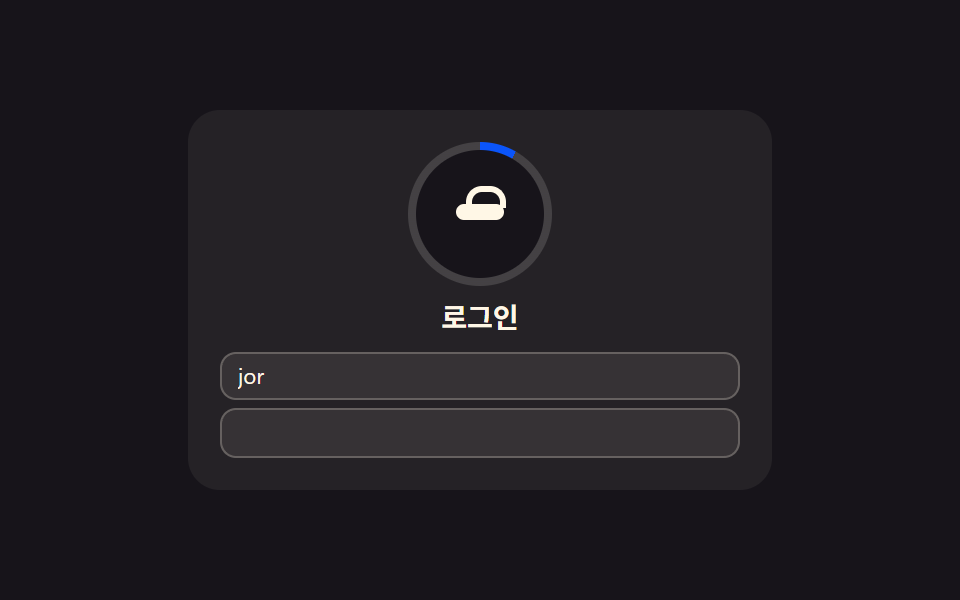
- 01 Login card — a card that computes fill ratio to fill its own progress indicator
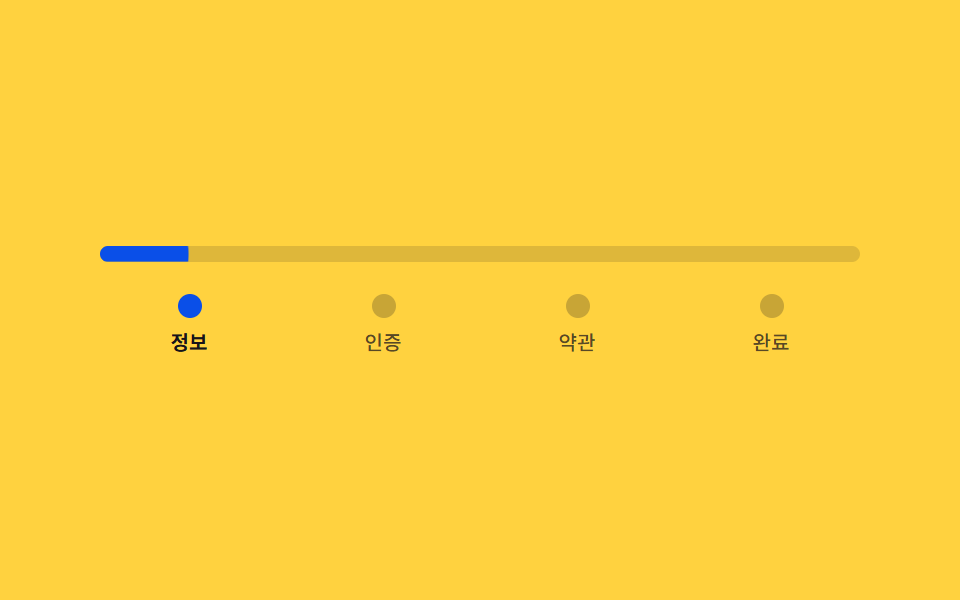
- 02 Signup steps — a stepped form that divides its own progress ratio to set bar length and color
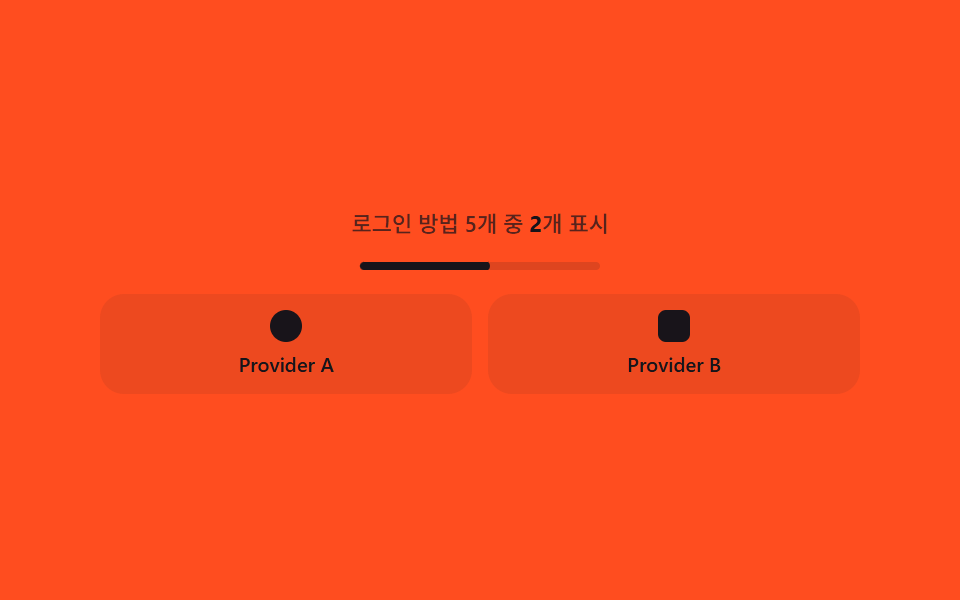
- 03 Social login — a button group that recomputes column count from how many providers there are
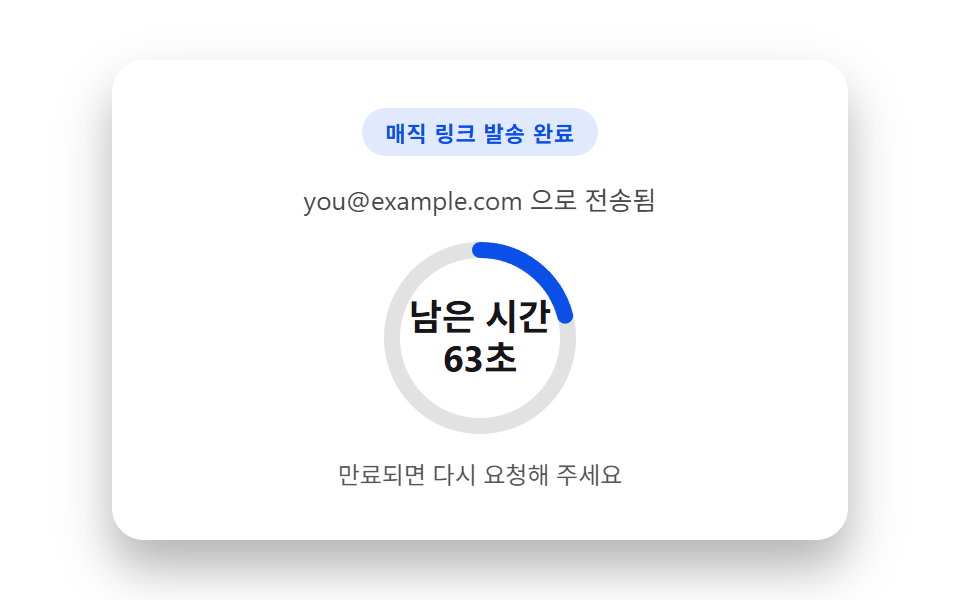
- 04 Magic link — a sent-confirmation card that recomputes remaining time into a ring's arc length
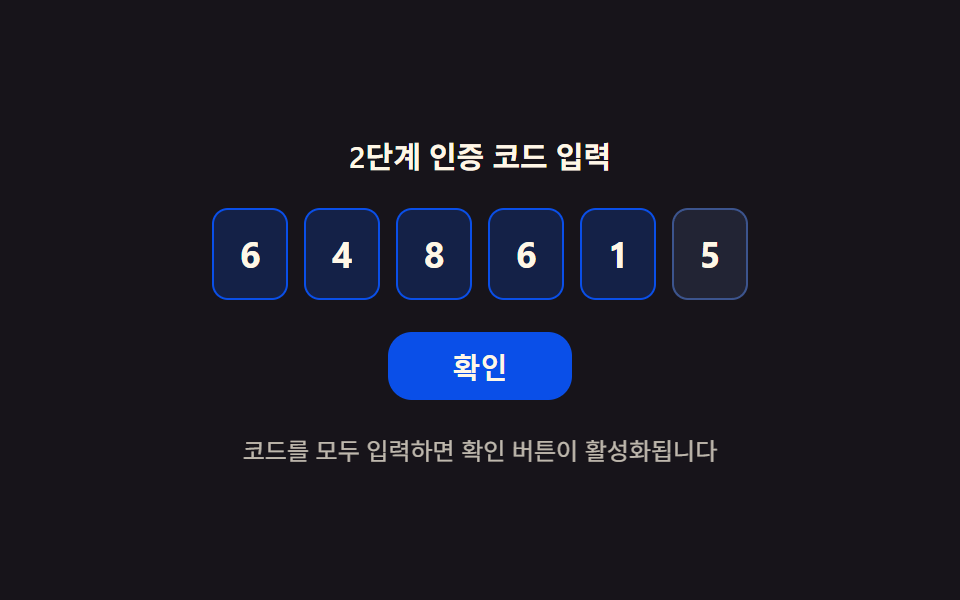
- 05 Two-factor — a code entry that sets its confirm button's state from a fill ratio
- 06 Password reset request — a form that scores email validity to set its button state
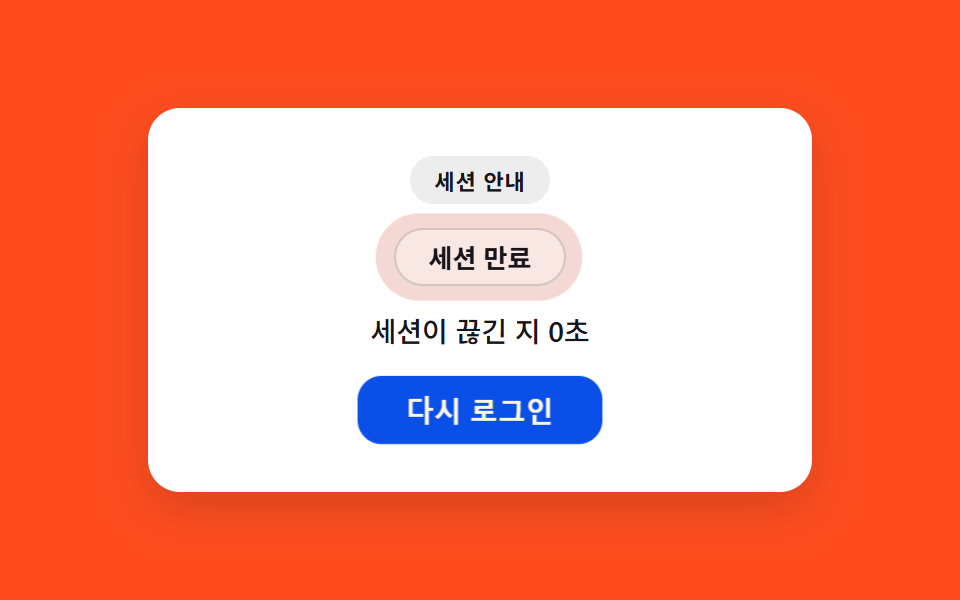
- 07 Session expired — a notice that recomputes badge intensity from elapsed time since expiry
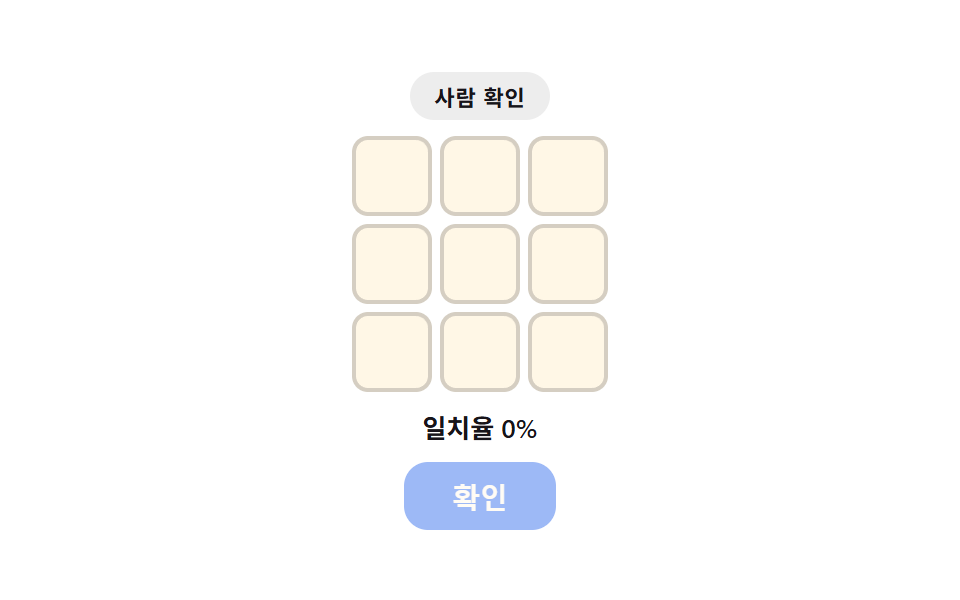
- 08 Captcha slot — a widget that computes selection match ratio to set border color and button state
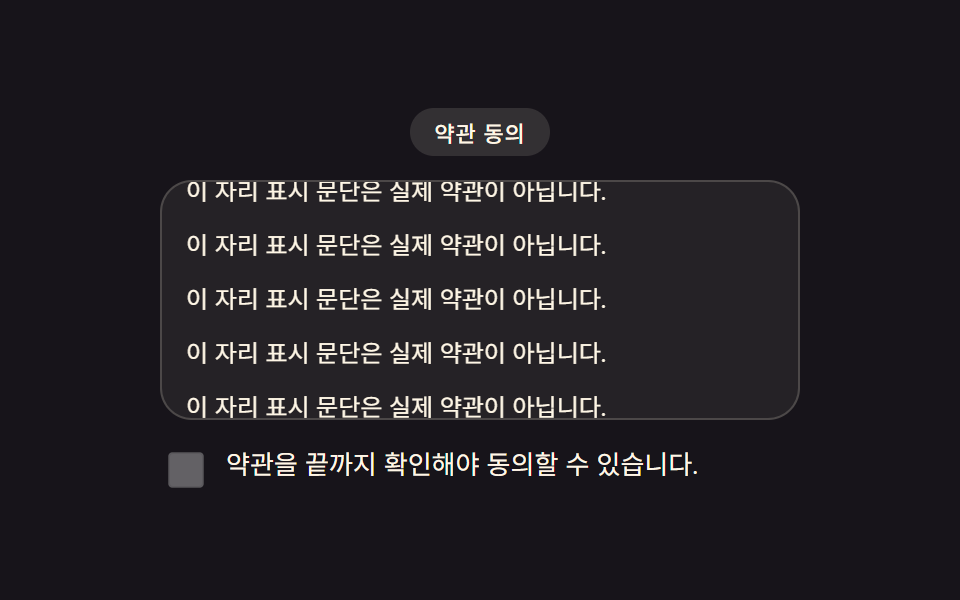
- 09 Consent checkbox — a UI that gates activation by measured scroll progress through terms
Only item 09's consent checkbox carries a listener that responds to real user input — a genuine scroll event on the terms panel. The other eight run purely on requestAnimationFrame cycling on a fixed 2000ms period, replaying the same scenario from arrays and formulas with no click or keystroke behind it. There's no real email delivery, no real auth server, no real social-login brand, and no real key or token anywhere — only item 05's six-digit code comes from a seeded pseudo-random function (mulberry32), so every capture reproduces the same digits.
Anatomy of a login/signup UI — what nine screens compute
None of these nine screens hard-codes a percentage, a color, or a layout and leaves it sitting there. The same handful of arithmetic moves — a ratio, a score, a recount — keeps resurfacing under a different name, and once that's visible, all nine read as one idea wearing nine costumes.
Why a login card's ring fills from an averaged ratio instead of one flag
Counting how many characters have landed in the email field and the password field separately, then averaging the two fractions, is what item 01 feeds into the card border's conic-gradient — so a half-typed email and an empty password hold the ring at roughly a quarter full, not zero and not half.
Why a signup-step bar keeps growing between whole steps instead of snapping
Item 02 divides the current step number by STEP_TOTAL (4) for the step boundary, then adds the elapsed fraction inside that step (0-1) on every frame before it touches the bar's length — a bar that only jumped on whole-step boundaries would hide the computed layer entirely.
Why a social-login row recomputes its column count instead of keeping one fixed grid
COUNTS cycles [2, 3, 4, 5, 3] while colsFor(n) decides on every step whether that count fits one row or needs to wrap, so item 03's button spacing stays even whether a scenario shows two providers or five.
Code per screen
Every block below is copied straight out of that item's own index.html, not retyped from memory, and the matching prompt fragment in the zip regenerates the same file when handed to an AI coding tool.
01Login card — a card that computes fill ratio to fill its own progress indicator
Counting how many of the email and password characters are filled works out a completion ratio, and that ratio fills the card border's progress indicator to match — recomputed every 70ms tick (TYPE_MS) as the fields type themselves out.
<main class="stage">
<section class="card" id="card">
  <div class="ring" id="ring">
    <div class="ringHole"></div>
    <div class="avatar" aria-hidden="true">
      <span class="lockBody"></span>
      <span class="lockShackle"></span>
    </div>
  </div>
  <h2 class="title">Log in</h2>
  <div class="fields">
    <label class="srOnly" for="loginEmail">Email</label>
    <input class="field" type="email" id="loginEmail" name="loginEmail" autocomplete="email" readonly value="" placeholder="[email protected]">
    <label class="srOnly" for="loginPw">Password</label>
    <input class="field" type="password" id="loginPw" name="loginPw" autocomplete="current-password" readonly value="">
  </div>
</section>
</main>
@use "../../../../site/static/demo-tokens" as *;
$duration: $dur-loop;
$easing: $ease-out;
$color: $subject-blue-deep;
@include stage($stage-ink);
.card {
position: relative;
width: 100%;
max-width: 260px;
display: flex;
flex-direction: column;
align-items: center;
gap: $sp-2;
padding: $sp-4;
border-radius: $r-card;
background: rgba($subject-cream, .06);
}
.ring {
--ratio: 0;
position: relative;
width: 72px;
height: 72px;
border-radius: $r-pill;
display: grid;
place-items: center;
}
.ring::before {
content: "";
position: absolute;
inset: 0;
border-radius: $r-pill;
background: conic-gradient($color calc(var(--ratio, 0) * 360deg), rgba($subject-cream, .14) 0);
animation: halo $duration $easing infinite;
}
.ringHole {
position: absolute;
inset: $sp-1;
border-radius: $r-pill;
background: $stage-ink;
}
.avatar {
position: relative;
z-index: 1;
width: 24px;
height: 18px;
}
.lockBody {
position: absolute;
left: 0;
top: $sp-1;
width: 24px;
height: $sp-2;
border-radius: $r-xs;
background: $subject-cream;
}
.lockShackle {
position: absolute;
left: calc(50% - 7px);
top: -5px;
width: 14px;
height: $sp-2;
border: 3px solid $subject-cream;
border-bottom: none;
border-radius: $r-sm $r-sm 0 0;
}
.title {
margin: 0;
color: $subject-cream;
font-family: -apple-system, "Segoe UI", "Noto Sans KR", sans-serif;
font-weight: 700;
font-size: 14px;
line-height: 1.2;
}
.fields {
width: 100%;
display: flex;
flex-direction: column;
gap: $sp-1;
}
// 시각적으로 숨기되 스크린리더·label-input 연결은 유지 (BD9 세로 높이 예산 확보)
.srOnly {
position: absolute;
width: 1px;
height: 1px;
margin: -1px;
padding: 0;
overflow: hidden;
clip: rect(0, 0, 0, 0);
white-space: nowrap;
border: 0;
}
.field {
width: 100%;
box-sizing: border-box;
padding: $sp-1 $sp-2;
border-radius: $r-sm;
border: 1px solid rgba($subject-cream, .24);
background: rgba($subject-cream, .08);
color: $subject-cream;
font-family: -apple-system, "Segoe UI", "Noto Sans KR", sans-serif;
font-weight: 400;
font-size: 11px;
line-height: 1.3;
}
.field::placeholder {
color: rgba($subject-cream, .72);
}
@keyframes halo {
0%, 100% { filter: brightness(1); }
50% { filter: brightness(1.16); }
}
@media (max-width: 340px) {
.card { max-width: 200px; padding: $sp-2; gap: $sp-1; }
.ring { width: 56px; height: 56px; }
.ringHole { inset: $sp-1; }
.avatar { width: 20px; height: 15px; }
.lockBody { width: 20px; }
.title { font-size: 12px; }
.field { font-size: 10px; padding: $sp-1; }
}
@media (prefers-reduced-motion: reduce) {
.ring::before { animation: none; }
}html, body {
margin: 0;
overflow: hidden;
}
.stage {
box-sizing: border-box;
min-height: 100vh;
display: grid;
place-items: center;
margin: 0;
background: #17141a;
font-family: -apple-system, "Segoe UI", "Noto Sans KR", sans-serif;
padding: clamp(8px, 4vw, 24px);
}
.card {
position: relative;
width: 100%;
max-width: 260px;
display: flex;
flex-direction: column;
align-items: center;
gap: 8px;
padding: 16px;
border-radius: 16px;
background: rgba(255, 247, 230, 0.06);
}
.ring {
--ratio: 0;
position: relative;
width: 72px;
height: 72px;
border-radius: 999px;
display: grid;
place-items: center;
}
.ring::before {
content: "";
position: absolute;
inset: 0;
border-radius: 999px;
background: conic-gradient(#0a4fe8 calc(var(--ratio, 0) * 360deg), rgba(255, 247, 230, 0.14) 0);
animation: halo 2s ease-out infinite;
}
.ringHole {
position: absolute;
inset: 4px;
border-radius: 999px;
background: #17141a;
}
.avatar {
position: relative;
z-index: 1;
width: 24px;
height: 18px;
}
.lockBody {
position: absolute;
left: 0;
top: 4px;
width: 24px;
height: 8px;
border-radius: 4px;
background: #fff7e6;
}
.lockShackle {
position: absolute;
left: calc(50% - 7px);
top: -5px;
width: 14px;
height: 8px;
border: 3px solid #fff7e6;
border-bottom: none;
border-radius: 8px 8px 0 0;
}
.title {
margin: 0;
color: #fff7e6;
font-family: -apple-system, "Segoe UI", "Noto Sans KR", sans-serif;
font-weight: 700;
font-size: 14px;
line-height: 1.2;
}
.fields {
width: 100%;
display: flex;
flex-direction: column;
gap: 4px;
}
.srOnly {
position: absolute;
width: 1px;
height: 1px;
margin: -1px;
padding: 0;
overflow: hidden;
clip: rect(0, 0, 0, 0);
white-space: nowrap;
border: 0;
}
.field {
width: 100%;
box-sizing: border-box;
padding: 4px 8px;
border-radius: 8px;
border: 1px solid rgba(255, 247, 230, 0.24);
background: rgba(255, 247, 230, 0.08);
color: #fff7e6;
font-family: -apple-system, "Segoe UI", "Noto Sans KR", sans-serif;
font-weight: 400;
font-size: 11px;
line-height: 1.3;
}
.field::placeholder {
color: rgba(255, 247, 230, 0.72);
}
@keyframes halo {
0%, 100% {
filter: brightness(1);
}
50% {
filter: brightness(1.16);
}
}
@media (max-width: 340px) {
.card {
max-width: 200px;
padding: 8px;
gap: 4px;
}
.ring {
width: 56px;
height: 56px;
}
.ringHole {
inset: 4px;
}
.avatar {
width: 20px;
height: 15px;
}
.lockBody {
width: 20px;
}
.title {
font-size: 12px;
}
.field {
font-size: 10px;
padding: 4px;
}
}
@media (prefers-reduced-motion: reduce) {
.ring::before {
animation: none;
}
}// Log in 카드(01) — 가짜 Email·비밀번호를 시드 없이 고정 시나리오로 자동 타이핑하고,
// 채운 비율(Email 진행 + Password 진행의 평균)을 매 프레임 카드 진행 링(conic-gradient)에 반영한다.
// 실키·실서버 요청 없음 — 전부 클라이언트 시뮬레이션.
(function () {
var card = document.getElementById('card');
var ring = document.getElementById('ring');
var emailEl = document.getElementById('loginEmail');
var pwEl = document.getElementById('loginPw');
if (!card || !ring || !emailEl || !pwEl) return;
var reduce = window.matchMedia('(prefers-reduced-motion: reduce)').matches;
var SAMPLE_EMAIL = '[email protected]';
var EMAIL_LEN = SAMPLE_EMAIL.length;
var SAMPLE_PW_LEN = 10;
var PW_DOTS = '••••••••••';
  var TYPE_MS = 70;
  var CYCLE_MS = 2000;

  function frameFor(t) {
    var emailChars = Math.min(Math.max(Math.floor(t / TYPE_MS), 0), EMAIL_LEN);
    var pwStart = EMAIL_LEN * TYPE_MS;
    var pwChars = t > pwStart
      ? Math.min(Math.max(Math.floor((t - pwStart) / TYPE_MS), 0), SAMPLE_PW_LEN)
      : 0;
    return { emailChars: emailChars, pwChars: pwChars };
  }

  function apply(t) {
    var f = frameFor(t);
    emailEl.value = SAMPLE_EMAIL.slice(0, f.emailChars);
    pwEl.value = PW_DOTS.slice(0, f.pwChars);
    var ratio = ((f.emailChars / EMAIL_LEN) + (f.pwChars / SAMPLE_PW_LEN)) / 2;
    ring.style.setProperty('--ratio', ratio.toFixed(4));
  }
if (reduce) {
apply(CYCLE_MS);
return;
}
var start = null;
function loop(ts) {
if (start === null) start = ts;
var t = (ts - start) % CYCLE_MS;
apply(t);
requestAnimationFrame(loop);
}
requestAnimationFrame(loop);
})();import { useEffect, useRef } from "react";
import styles from "./LoginCard.module.scss";
// 로그인 카드 — 가짜 이메일·비밀번호를 고정 시나리오로 자동 타이핑하고
// 채운 비율을 카드 진행 링(conic-gradient)에 반영한다. 실키·실서버 요청 없음.
const SAMPLE_EMAIL = "[email protected]";
const EMAIL_LEN = SAMPLE_EMAIL.length;
const SAMPLE_PW_LEN = 10;
const PW_DOTS = "••••••••••";
const TYPE_MS = 70;
const CYCLE_MS = 2000;
export default function LoginCard() {
const ringRef = useRef<HTMLDivElement>(null);
const emailRef = useRef<HTMLInputElement>(null);
const pwRef = useRef<HTMLInputElement>(null);
useEffect(() => {
const ring = ringRef.current;
const emailEl = emailRef.current;
const pwEl = pwRef.current;
if (!ring || !emailEl || !pwEl) return;
const reduce = window.matchMedia("(prefers-reduced-motion: reduce)").matches;
function frameFor(t: number) {
const emailChars = Math.min(Math.max(Math.floor(t / TYPE_MS), 0), EMAIL_LEN);
const pwStart = EMAIL_LEN * TYPE_MS;
const pwChars = t > pwStart
? Math.min(Math.max(Math.floor((t - pwStart) / TYPE_MS), 0), SAMPLE_PW_LEN)
: 0;
return { emailChars, pwChars };
}
function apply(t: number) {
const f = frameFor(t);
emailEl!.value = SAMPLE_EMAIL.slice(0, f.emailChars);
pwEl!.value = PW_DOTS.slice(0, f.pwChars);
const ratio = (f.emailChars / EMAIL_LEN + f.pwChars / SAMPLE_PW_LEN) / 2;
ring!.style.setProperty("--ratio", ratio.toFixed(4));
}
if (reduce) {
apply(CYCLE_MS);
return;
}
let start: number | null = null;
let raf = 0;
function loop(ts: number) {
if (start === null) start = ts;
const t = (ts - start) % CYCLE_MS;
apply(t);
raf = requestAnimationFrame(loop);
}
raf = requestAnimationFrame(loop);
return () => cancelAnimationFrame(raf);
}, []);
return (
<div className={styles.stage}>
<section className={styles.card}>
<div className={styles.ring} ref={ringRef}>
<div className={styles.ringHole} />
<div className={styles.avatar} aria-hidden="true">
<span className={styles.lockBody} />
<span className={styles.lockShackle} />
</div>
</div>
<h2 className={styles.title}>로그인</h2>
<div className={styles.fields}>
<label className={styles.srOnly} htmlFor="loginEmail">이메일</label>
<input
className={styles.field}
type="email"
id="loginEmail"
name="loginEmail"
autoComplete="email"
readOnly
defaultValue=""
placeholder="[email protected]"
ref={emailRef}
/>
<label className={styles.srOnly} htmlFor="loginPw">비밀번호</label>
<input
className={styles.field}
type="password"
id="loginPw"
name="loginPw"
autoComplete="current-password"
readOnly
defaultValue=""
ref={pwRef}
/>
</div>
</section>
</div>
);
}01 · Login card — a card that computes fill ratio to fill its own progress indicator — Measured area 0.824% · moving frames 19/23Original by GODRICH · SCSS and React ship in the zip · See the password
What the numbers say
Cumulative area is the lowest of the nine at 0.824% (max frame 0.065%, mean intensity 155.2) across 19 of 23 frames — an input field is a structurally small-change surface, which is exactly right for a completion ring.
var TYPE_MS = 70;
var CYCLE_MS = 2000;
function frameFor(t) {
var emailChars = Math.min(Math.max(Math.floor(t / TYPE_MS), 0), EMAIL_LEN);
var pwStart = EMAIL_LEN * TYPE_MS;
var pwChars = t > pwStart
? Math.min(Math.max(Math.floor((t - pwStart) / TYPE_MS), 0), SAMPLE_PW_LEN)
: 0;
return { emailChars: emailChars, pwChars: pwChars };
}
function apply(t) {
var f = frameFor(t);
emailEl.value = SAMPLE_EMAIL.slice(0, f.emailChars);
pwEl.value = PW_DOTS.slice(0, f.pwChars);
var ratio = ((f.emailChars / EMAIL_LEN) + (f.pwChars / SAMPLE_PW_LEN)) / 2;
ring.style.setProperty('--ratio', ratio.toFixed(4));
}
02Signup steps — a stepped form that divides its own progress ratio to set bar length and color
Dividing the current step number by the total step count works out a progress ratio, and that ratio sets both the length and the color depth of the progress bar together — STEP_TOTAL is 4 and each step holds for STEP_MS 500ms.
<main class="stage">
<section class="wrap" id="wrap">
  <div class="track" id="track" role="progressbar" aria-valuemin="1" aria-valuemax="4" aria-valuenow="1" aria-label="Sign-up progress steps">
    <div class="bar" id="bar"></div>
  </div>
  <ol class="steps" id="steps">
    <li class="step is-active" id="step1"><span class="dot"></span><span class="label">Info</span></li>
    <li class="step" id="step2"><span class="dot"></span><span class="label">Verify</span></li>
    <li class="step" id="step3"><span class="dot"></span><span class="label">Terms</span></li>
    <li class="step" id="step4"><span class="dot"></span><span class="label">Done</span></li>
  </ol>
</section>
</main>
@use "../../../../site/static/demo-tokens" as *;
$duration: $dur-loop;
$easing: $ease-out;
$color: $subject-blue-deep;
@include stage($stage-yellow);
.wrap {
width: 100%;
max-width: 380px;
display: flex;
flex-direction: column;
align-items: stretch;
gap: $sp-4;
}
.track {
--ratio: .25;
position: relative;
width: 100%;
height: $sp-2;
border-radius: $r-pill;
background: rgba($subject-ink, .14);
overflow: hidden;
}
.bar {
position: absolute;
inset: 0;
border-radius: $r-pill;
background: $color;
transform: scaleX(var(--ratio, .25));
transform-origin: left;
animation: barGlow $duration $easing infinite;
}
.steps {
margin: 0;
padding: 0;
list-style: none;
display: flex;
justify-content: space-between;
gap: $sp-2;
}
.step {
display: flex;
flex-direction: column;
align-items: center;
gap: $sp-1;
flex: 1;
}
.dot {
width: $sp-3;
height: $sp-3;
border-radius: $r-pill;
background: rgba($subject-ink, .24);
}
.label {
color: rgba($subject-ink, .72);
font-family: -apple-system, "Segoe UI", "Noto Sans KR", sans-serif;
font-weight: 500;
font-size: 10px;
letter-spacing: .01em;
}
.step.is-active .dot {
background: $color;
}
.step.is-active .label {
color: $subject-ink;
font-weight: 700;
}
@keyframes barGlow {
0%, 100% { filter: brightness(1); }
50% { filter: brightness(1.14); }
}
@media (max-width: 340px) {
.wrap { max-width: 280px; gap: $sp-3; }
.label { font-size: 9px; }
.dot { width: $sp-2; height: $sp-2; }
}
@media (prefers-reduced-motion: reduce) {
.bar { animation: none; }
}html, body {
margin: 0;
overflow: hidden;
}
.stage {
box-sizing: border-box;
min-height: 100vh;
display: grid;
place-items: center;
margin: 0;
background: #ffd23f;
font-family: -apple-system, "Segoe UI", "Noto Sans KR", sans-serif;
padding: clamp(8px, 4vw, 24px);
}
.wrap {
width: 100%;
max-width: 380px;
display: flex;
flex-direction: column;
align-items: stretch;
gap: 16px;
}
.track {
--ratio: .25;
position: relative;
width: 100%;
height: 8px;
border-radius: 999px;
background: rgba(23, 20, 26, 0.14);
overflow: hidden;
}
.bar {
position: absolute;
inset: 0;
border-radius: 999px;
background: #0a4fe8;
transform: scaleX(var(--ratio, 0.25));
transform-origin: left;
animation: barGlow 2s ease-out infinite;
}
.steps {
margin: 0;
padding: 0;
list-style: none;
display: flex;
justify-content: space-between;
gap: 8px;
}
.step {
display: flex;
flex-direction: column;
align-items: center;
gap: 4px;
flex: 1;
}
.dot {
width: 12px;
height: 12px;
border-radius: 999px;
background: rgba(23, 20, 26, 0.24);
}
.label {
color: rgba(23, 20, 26, 0.72);
font-family: -apple-system, "Segoe UI", "Noto Sans KR", sans-serif;
font-weight: 500;
font-size: 10px;
letter-spacing: 0.01em;
}
.step.is-active .dot {
background: #0a4fe8;
}
.step.is-active .label {
color: #17141a;
font-weight: 700;
}
@keyframes barGlow {
0%, 100% {
filter: brightness(1);
}
50% {
filter: brightness(1.14);
}
}
@media (max-width: 340px) {
.wrap {
max-width: 280px;
gap: 12px;
}
.label {
font-size: 9px;
}
.dot {
width: 8px;
height: 8px;
}
}
@media (prefers-reduced-motion: reduce) {
.bar {
animation: none;
}
}// 회원가입 단계(02) — 4단계 진행률을 계산해 막대 길이(scaleX)로 표시한다.
// STEP_TOTAL*STEP_MS = 2000ms 로 캡처창과 정확히 일치시켜 4단계가 전부 보이게 한다.
(function () {
var track = document.getElementById('track');
var bar = document.getElementById('bar');
var stepIds = ['step1', 'step2', 'step3', 'step4'];
var steps = stepIds.map(function (id) { return document.getElementById(id); });
if (!track || !bar || steps.some(function (s) { return !s; })) return;
var reduce = window.matchMedia('(prefers-reduced-motion: reduce)').matches;
var STEP_TOTAL = 4;
var STEP_MS = 500;
var CYCLE_MS = STEP_TOTAL * STEP_MS;
function apply(t) {
var tt = t % CYCLE_MS;
var idx = Math.min(Math.max(Math.floor(tt / STEP_MS), 0), STEP_TOTAL - 1);
var current = idx + 1;
// 단계 경계는 정수(1~4)로 딱딱 끊어 aria·라벨에 반영하되, 막대 자체는 단계 안의 경과분(0~1)을
// 더해 매 프레임 조금씩 자라게 한다 — 계산 한 겹(보간)으로 실제 회원가입 진행바처럼 부드럽다.
var within = (tt % STEP_MS) / STEP_MS;
var ratio = (idx + within) / STEP_TOTAL;
track.style.setProperty('--ratio', ratio.toFixed(4));
track.setAttribute('aria-valuenow', String(current));
steps.forEach(function (el, i) {
if (i === idx) {
el.classList.add('is-active');
} else {
el.classList.remove('is-active');
}
});
}
if (reduce) {
apply(CYCLE_MS - 1);
return;
}
var start = null;
function loop(ts) {
if (start === null) start = ts;
apply(ts - start);
requestAnimationFrame(loop);
}
requestAnimationFrame(loop);
})();import { useEffect, useRef } from "react";
import styles from "./SignupSteps.module.scss";
// 회원가입 단계 — 4단계 진행률을 계산해 막대 길이(scaleX)로 표시한다.
// STEP_TOTAL*STEP_MS = 2000ms 로 캡처창과 정확히 일치시켜 4단계가 전부 보이게 한다.
const STEP_TOTAL = 4;
const STEP_MS = 500;
const CYCLE_MS = STEP_TOTAL * STEP_MS;
const STEP_LABELS = ["정보", "인증", "약관", "완료"];
export default function SignupSteps() {
const trackRef = useRef<HTMLDivElement>(null);
const stepRefs = [
useRef<HTMLLIElement>(null),
useRef<HTMLLIElement>(null),
useRef<HTMLLIElement>(null),
useRef<HTMLLIElement>(null),
];
useEffect(() => {
const track = trackRef.current;
const steps = stepRefs.map((r) => r.current);
if (!track || steps.some((s) => !s)) return;
const reduce = window.matchMedia("(prefers-reduced-motion: reduce)").matches;
function apply(t: number) {
const tt = t % CYCLE_MS;
const idx = Math.min(Math.max(Math.floor(tt / STEP_MS), 0), STEP_TOTAL - 1);
const current = idx + 1;
// 단계 경계는 정수(1~4)로 딱딱 끊어 aria·라벨에 반영하되, 막대 자체는 단계 안의
// 경과분(0~1)을 더해 매 프레임 조금씩 자라게 한다 — 계산 한 겹(보간).
const within = (tt % STEP_MS) / STEP_MS;
const ratio = (idx + within) / STEP_TOTAL;
track!.style.setProperty("--ratio", ratio.toFixed(4));
track!.setAttribute("aria-valuenow", String(current));
steps.forEach((el, i) => {
if (!el) return;
if (i === idx) {
el.classList.add(styles.isActive);
} else {
el.classList.remove(styles.isActive);
}
});
}
if (reduce) {
apply(CYCLE_MS - 1);
return;
}
let start: number | null = null;
let raf = 0;
function loop(ts: number) {
if (start === null) start = ts;
apply(ts - start);
raf = requestAnimationFrame(loop);
}
raf = requestAnimationFrame(loop);
return () => cancelAnimationFrame(raf);
}, []);
return (
<div className={styles.stage}>
<section className={styles.wrap}>
<div
className={styles.track}
ref={trackRef}
role="progressbar"
aria-valuemin={1}
aria-valuemax={4}
aria-valuenow={1}
aria-label="회원가입 진행 단계"
>
<div className={styles.bar} />
</div>
<ol className={styles.steps}>
{STEP_LABELS.map((label, i) => (
<li
className={`${styles.step} ${i === 0 ? styles.isActive : ""}`}
ref={stepRefs[i]}
key={label}
>
<span className={styles.dot} />
<span className={styles.label}>{label}</span>
</li>
))}
</ol>
</section>
</div>
);
}02 · Signup steps — a stepped form that divides its own progress ratio to set bar length and color — Measured area 2.294% · moving frames 23/23Original by GODRICH · SCSS and React ship in the zip · See the password
What the numbers say
Cumulative area comes to 2.294% (max frame 0.426%, mean intensity 177.4, the brightest of the nine) over all 23 of 23 frames — a thick bar filling in bold color reads as the most visually intense item in the set even at a modest footprint.
  var STEP_TOTAL = 4;
  var STEP_MS = 500;
  var CYCLE_MS = STEP_TOTAL * STEP_MS;

  function apply(t) {
    var tt = t % CYCLE_MS;
    var idx = Math.min(Math.max(Math.floor(tt / STEP_MS), 0), STEP_TOTAL - 1);
    var current = idx + 1;
    // The step boundary snaps to a whole number (1-4) for aria/label, but the bar itself
    // adds the elapsed fraction inside the step (0-1) so it grows a little every frame — one computed layer (interpolation) reads like a real signup progress bar.
    var within = (tt % STEP_MS) / STEP_MS;
    var ratio = (idx + within) / STEP_TOTAL;
    track.style.setProperty('--ratio', ratio.toFixed(4));
    track.setAttribute('aria-valuenow', String(current));
    steps.forEach(function (el, i) {
      if (i === idx) {
        el.classList.add('is-active');
      } else {
        el.classList.remove('is-active');
      }
    });
  }
03Social login — a button group that recomputes column count from how many providers there are
Counting the provider buttons works out how many columns fit one row, and spacing and size get recalculated so the layout stays even whether providers are added or removed — the button labels are generic placeholders ("Provider A" and the like), with no real brand anywhere.
<main class="stage">
<section class="wrap" id="wrap">
  <p class="hint" id="hint">Out of 5 login methods, <span id="hintCount">2</span> shown</p>
  <div class="tick" id="tick" aria-hidden="true"><div class="tickBar" id="tickBar"></div></div>
  <div class="row" id="row" style="--cols:2">
    <button type="button" class="btn" id="btn0">
      <span class="icon iconCircle" aria-hidden="true"></span>
      <span class="label">Provider A</span>
    </button>
    <button type="button" class="btn" id="btn1">
      <span class="icon iconSquare" aria-hidden="true"></span>
      <span class="label">Provider B</span>
    </button>
    <button type="button" class="btn is-hidden" id="btn2">
      <span class="icon iconTriangle" aria-hidden="true"></span>
      <span class="label">Provider C</span>
    </button>
    <button type="button" class="btn is-hidden" id="btn3">
      <span class="icon iconDiamond" aria-hidden="true"></span>
      <span class="label">Provider D</span>
    </button>
    <button type="button" class="btn is-hidden" id="btn4">
      <span class="icon iconStar" aria-hidden="true"></span>
      <span class="label">Provider E</span>
    </button>
  </div>
</section>
</main>@use "../../../../site/static/demo-tokens" as *;
$duration: $dur-loop;
$easing: $ease-out;
$color: $subject-ink;
@include stage($stage-orange);
.wrap {
width: 100%;
max-width: 380px;
display: flex;
flex-direction: column;
align-items: center;
gap: $sp-3;
text-align: center;
}
.hint {
margin: 0;
color: rgba($subject-ink, .72);
font-family: -apple-system, "Segoe UI", "Noto Sans KR", sans-serif;
font-weight: 500;
font-size: 11px;
}
.hint span {
color: $subject-ink;
font-weight: 700;
}
.tick {
width: 100%;
max-width: 120px;
height: $sp-1;
border-radius: $r-pill;
background: rgba($subject-ink, .14);
overflow: hidden;
}
.tickBar {
--within: 0;
width: 100%;
height: 100%;
border-radius: $r-pill;
background: $subject-ink;
transform: scaleX(var(--within, 0));
transform-origin: left;
}
.row {
--cols: 2;
width: 100%;
display: grid;
grid-template-columns: repeat(var(--cols), 1fr);
gap: $sp-2;
}
.btn {
display: flex;
flex-direction: column;
align-items: center;
justify-content: center;
gap: $sp-1;
padding: $sp-2 $sp-1;
border: 0;
border-radius: $r-control;
background: rgba($subject-ink, .08);
cursor: default;
}
.btn.is-hidden {
display: none;
}
.icon {
width: $sp-4;
height: $sp-4;
animation: iconPulse $duration $easing infinite;
}
.iconCircle {
border-radius: $r-pill;
background: $subject-ink;
}
.iconSquare {
border-radius: $r-xs;
background: $subject-ink;
}
.iconTriangle {
width: 0;
height: 0;
border-left: $sp-2 solid transparent;
border-right: $sp-2 solid transparent;
border-bottom: $sp-4 solid $subject-ink;
}
.iconDiamond {
background: $subject-ink;
border-radius: $r-xs;
transform: rotate(45deg);
}
.iconStar {
background: $subject-ink;
clip-path: polygon(50% 0%, 61% 35%, 98% 35%, 68% 57%, 79% 91%, 50% 70%, 21% 91%, 32% 57%, 2% 35%, 39% 35%);
}
.label {
color: $subject-ink;
font-family: -apple-system, "Segoe UI", "Noto Sans KR", sans-serif;
font-weight: 500;
font-size: 10px;
}
@keyframes iconPulse {
0%, 100% { opacity: .82; }
50% { opacity: 1; }
}
@media (max-width: 340px) {
.wrap { max-width: 280px; }
.label { font-size: 9px; }
.btn { padding: $sp-1; }
}
@media (prefers-reduced-motion: reduce) {
.icon { animation: none; }
}html, body {
margin: 0;
overflow: hidden;
}
.stage {
box-sizing: border-box;
min-height: 100vh;
display: grid;
place-items: center;
margin: 0;
background: #ff4d1f;
font-family: -apple-system, "Segoe UI", "Noto Sans KR", sans-serif;
padding: clamp(8px, 4vw, 24px);
}
.wrap {
width: 100%;
max-width: 380px;
display: flex;
flex-direction: column;
align-items: center;
gap: 12px;
text-align: center;
}
.hint {
margin: 0;
color: rgba(23, 20, 26, 0.72);
font-family: -apple-system, "Segoe UI", "Noto Sans KR", sans-serif;
font-weight: 500;
font-size: 11px;
}
.hint span {
color: #17141a;
font-weight: 700;
}
.tick {
width: 100%;
max-width: 120px;
height: 4px;
border-radius: 999px;
background: rgba(23, 20, 26, 0.14);
overflow: hidden;
}
.tickBar {
--within: 0;
width: 100%;
height: 100%;
border-radius: 999px;
background: #17141a;
transform: scaleX(var(--within, 0));
transform-origin: left;
}
.row {
--cols: 2;
width: 100%;
display: grid;
grid-template-columns: repeat(var(--cols), 1fr);
gap: 8px;
}
.btn {
display: flex;
flex-direction: column;
align-items: center;
justify-content: center;
gap: 4px;
padding: 8px 4px;
border: 0;
border-radius: 12px;
background: rgba(23, 20, 26, 0.08);
cursor: default;
}
.btn.is-hidden {
display: none;
}
.icon {
width: 16px;
height: 16px;
animation: iconPulse 2s ease-out infinite;
}
.iconCircle {
border-radius: 999px;
background: #17141a;
}
.iconSquare {
border-radius: 4px;
background: #17141a;
}
.iconTriangle {
width: 0;
height: 0;
border-left: 8px solid transparent;
border-right: 8px solid transparent;
border-bottom: 16px solid #17141a;
}
.iconDiamond {
background: #17141a;
border-radius: 4px;
transform: rotate(45deg);
}
.iconStar {
background: #17141a;
clip-path: polygon(50% 0%, 61% 35%, 98% 35%, 68% 57%, 79% 91%, 50% 70%, 21% 91%, 32% 57%, 2% 35%, 39% 35%);
}
.label {
color: #17141a;
font-family: -apple-system, "Segoe UI", "Noto Sans KR", sans-serif;
font-weight: 500;
font-size: 10px;
}
@keyframes iconPulse {
0%, 100% {
opacity: 0.82;
}
50% {
opacity: 1;
}
}
@media (max-width: 340px) {
.wrap {
max-width: 280px;
}
.label {
font-size: 9px;
}
.btn {
padding: 4px;
}
}
@media (prefers-reduced-motion: reduce) {
.icon {
animation: none;
}
}// 소셜 Log in(03) — 제공자 개수가 시나리오에 따라 바뀔 때 그리드 열 수를 재계산한다.
// 브랜드 로고·브랜드명 없이 순수 CSS 도형 아이콘 + 가상명("Provider A" 류)만 사용.
(function () {
var row = document.getElementById('row');
var hintCount = document.getElementById('hintCount');
var tickBar = document.getElementById('tickBar');
var btnIds = ['btn0', 'btn1', 'btn2', 'btn3', 'btn4'];
var btns = btnIds.map(function (id) { return document.getElementById(id); });
if (!row || !hintCount || !tickBar || btns.some(function (b) { return !b; })) return;
var reduce = window.matchMedia('(prefers-reduced-motion: reduce)').matches;
var COUNTS = [2, 3, 4, 5, 3];
var STEP_MS = 400;
var CYCLE_MS = COUNTS.length * STEP_MS;
function colsFor(n) {
return n <= 3 ? n : Math.ceil(n / 2);
}
function apply(t) {
var tt = t % CYCLE_MS;
var idx = Math.min(Math.max(Math.floor(tt / STEP_MS), 0), COUNTS.length - 1);
var n = COUNTS[idx];
var cols = colsFor(n);
row.style.setProperty('--cols', String(cols));
hintCount.textContent = String(n);
btns.forEach(function (btn, i) {
if (i < n) {
btn.classList.remove('is-hidden');
} else {
btn.classList.add('is-hidden');
}
});
// 다음 개수 전환까지 남은 구간을 매 프레임 다시 계산해 가는 줄(계산 한 겹) —
// 그리드 재배치가 갑자기 튀지 않고 다음 변화가 다가옴을 예고한다.
var within = (tt % STEP_MS) / STEP_MS;
tickBar.style.setProperty('--within', within.toFixed(4));
}
if (reduce) {
apply(0);
return;
}
var start = null;
function loop(ts) {
if (start === null) start = ts;
apply(ts - start);
requestAnimationFrame(loop);
}
requestAnimationFrame(loop);
})();import { useEffect, useRef } from "react";
import styles from "./SocialLogin.module.scss";
// 소셜 로그인 — 제공자 개수가 시나리오에 따라 바뀔 때 그리드 열 수를 재계산한다.
// 브랜드 로고·브랜드명 없이 순수 CSS 도형 아이콘 + 가상명("Provider A" 류)만 사용.
const COUNTS = [2, 3, 4, 5, 3];
const STEP_MS = 400;
const CYCLE_MS = COUNTS.length * STEP_MS;
const PROVIDERS = [
{ id: "btn0", icon: "iconCircle", label: "Provider A" },
{ id: "btn1", icon: "iconSquare", label: "Provider B" },
{ id: "btn2", icon: "iconTriangle", label: "Provider C" },
{ id: "btn3", icon: "iconDiamond", label: "Provider D" },
{ id: "btn4", icon: "iconStar", label: "Provider E" },
] as const;
function colsFor(n: number) {
return n <= 3 ? n : Math.ceil(n / 2);
}
export default function SocialLogin() {
const rowRef = useRef<HTMLDivElement>(null);
const hintCountRef = useRef<HTMLSpanElement>(null);
const tickBarRef = useRef<HTMLDivElement>(null);
const btnRefs = [
useRef<HTMLButtonElement>(null),
useRef<HTMLButtonElement>(null),
useRef<HTMLButtonElement>(null),
useRef<HTMLButtonElement>(null),
useRef<HTMLButtonElement>(null),
];
useEffect(() => {
const row = rowRef.current;
const hintCount = hintCountRef.current;
const tickBar = tickBarRef.current;
const btns = btnRefs.map((r) => r.current);
if (!row || !hintCount || !tickBar || btns.some((b) => !b)) return;
const reduce = window.matchMedia("(prefers-reduced-motion: reduce)").matches;
function apply(t: number) {
const tt = t % CYCLE_MS;
const idx = Math.min(Math.max(Math.floor(tt / STEP_MS), 0), COUNTS.length - 1);
const n = COUNTS[idx];
const cols = colsFor(n);
row!.style.setProperty("--cols", String(cols));
hintCount!.textContent = String(n);
btns.forEach((btn, i) => {
if (!btn) return;
if (i < n) {
btn.classList.remove(styles.isHidden);
} else {
btn.classList.add(styles.isHidden);
}
});
// 다음 개수 전환까지 남은 구간을 매 프레임 다시 계산해 가는 줄(계산 한 겹) —
// 그리드 재배치가 갑자기 튀지 않고 다음 변화가 다가옴을 예고한다.
const within = (tt % STEP_MS) / STEP_MS;
tickBar!.style.setProperty("--within", within.toFixed(4));
}
if (reduce) {
apply(0);
return;
}
let start: number | null = null;
let raf = 0;
function loop(ts: number) {
if (start === null) start = ts;
apply(ts - start);
raf = requestAnimationFrame(loop);
}
raf = requestAnimationFrame(loop);
return () => cancelAnimationFrame(raf);
// eslint-disable-next-line react-hooks/exhaustive-deps
}, []);
return (
<div className={styles.stage}>
<section className={styles.wrap}>
<p className={styles.hint}>
로그인 방법 5개 중 <span ref={hintCountRef}>2</span>개 표시
</p>
<div className={styles.tick} aria-hidden="true">
<div className={styles.tickBar} ref={tickBarRef} />
</div>
<div className={styles.row} ref={rowRef}>
{PROVIDERS.map((p, i) => (
<button
type="button"
className={i >= 2 ? `${styles.btn} ${styles.isHidden}` : styles.btn}
ref={btnRefs[i]}
key={p.id}
>
<span className={`${styles.icon} ${styles[p.icon]}`} aria-hidden="true" />
<span className={styles.label}>{p.label}</span>
</button>
))}
</div>
</section>
</div>
);
}03 · Social login — a button group that recomputes column count from how many providers there are — Measured area 23.165% · moving frames 23/23Original by GODRICH · SCSS and React ship in the zip · See the password
What the numbers say
Cumulative area is the widest of the nine at 23.165% (max frame 20.234%, mean intensity 161.0) across all 23 of 23 frames — a grid that reshuffles between two and five buttons every step is naturally the largest-footprint item here.
  function colsFor(n) {
    return n <= 3 ? n : Math.ceil(n / 2);
  }

  function apply(t) {
    var tt = t % CYCLE_MS;
    var idx = Math.min(Math.max(Math.floor(tt / STEP_MS), 0), COUNTS.length - 1);
    var n = COUNTS[idx];
    var cols = colsFor(n);
    row.style.setProperty('--cols', String(cols));
    hintCount.textContent = String(n);
    btns.forEach(function (btn, i) {
      if (i < n) {
        btn.classList.remove('is-hidden');
      } else {
        btn.classList.add('is-hidden');
      }
    });
    // The stretch remaining until the next count change gets recomputed every frame into a
    // tick bar (one computed layer) — so the grid rearrange never snaps; it signals the next change coming.
    var within = (tt % STEP_MS) / STEP_MS;
    tickBar.style.setProperty('--within', within.toFixed(4));
  }
04Magic link — a sent-confirmation card that recomputes remaining time into a ring's arc length
The remaining valid time in seconds gets recomputed every second, and comparing it against the total valid time redraws a donut ring's arc length to match that ratio — VALID_SEC ships at 300 (five minutes), and the ring's circumference is a fixed 276.46.
<main class="stage">
<section class="card">
  <p class="eyebrow">Magic link sent</p>
  <p class="recipient">Sent to [email protected]</p>
  <div class="ringWrap">
    <svg class="ringSvg" viewBox="0 0 96 96" aria-hidden="true">
      <circle class="ringTrack" cx="48" cy="48" r="44"></circle>
      <circle class="ringProgress" id="magicRing" cx="48" cy="48" r="44" stroke-dasharray="276.46" stroke-dashoffset="0"></circle>
    </svg>
    <p class="time" id="magicTime">Time left 300s</p>
  </div>
  <p class="hint">Request a new one if it expires</p>
</section>
</main>
@use "../../../../site/static/demo-tokens" as *;
$duration: $dur-loop;
$easing: $ease-out;
$color: $subject-blue-deep;
@include stage($stage-paper);
.card {
position: relative;
width: 100%;
max-width: 320px;
display: flex;
flex-direction: column;
align-items: center;
gap: $sp-3;
text-align: center;
padding: $sp-6;
border-radius: $r-card;
background: $stage-paper;
box-shadow: $shadow-raised;
}
.eyebrow {
margin: 0;
padding: $sp-1 $sp-3;
border-radius: $r-pill;
background: rgba($color, .12);
color: $color;
font-weight: 600;
font-size: 11px;
letter-spacing: .04em;
}
.recipient {
margin: 0;
color: $subject-ink;
font-weight: 400;
font-size: 13px;
opacity: .78;
}
.ringWrap {
position: relative;
width: 96px;
height: 96px;
display: grid;
place-items: center;
}
.ringSvg {
width: 96px;
height: 96px;
// 12시 방향에서 시작하도록 회전한다 — scale 이 아니라 rotate 라 transform-origin 기본(center)으로 충분
transform: rotate(-90deg);
}
.ringTrack {
fill: none;
stroke: rgba($subject-ink, .12);
stroke-width: 8px;
}
.ringProgress {
fill: none;
stroke: $color;
stroke-width: 8px;
stroke-linecap: round;
}
.time {
position: absolute;
inset: 0;
display: grid;
place-items: center;
margin: 0;
color: $subject-ink;
font-weight: 700;
font-size: 18px;
line-height: 1.2;
}
.hint {
margin: 0;
color: $subject-ink;
opacity: .72;
font-weight: 400;
font-size: 12px;
line-height: 1.4;
}
@media (max-width: 340px) {
.card { max-width: 240px; padding: $sp-3; gap: $sp-1; }
.eyebrow { font-size: 10px; padding: $sp-1 $sp-2; }
.recipient { font-size: 11px; }
.ringWrap, .ringSvg { width: 64px; height: 64px; }
.ringTrack, .ringProgress { stroke-width: 6px; }
.time { font-size: 12px; }
.hint { font-size: 10px; }
}
@media (prefers-reduced-motion: reduce) {
.ringProgress { transition: none; }
}html, body {
margin: 0;
overflow: hidden;
}
.stage {
box-sizing: border-box;
min-height: 100vh;
display: grid;
place-items: center;
margin: 0;
background: #ffffff;
font-family: -apple-system, "Segoe UI", "Noto Sans KR", sans-serif;
padding: clamp(8px, 4vw, 24px);
}
.card {
position: relative;
width: 100%;
max-width: 320px;
display: flex;
flex-direction: column;
align-items: center;
gap: 12px;
text-align: center;
padding: 24px;
border-radius: 16px;
background: #ffffff;
box-shadow: 0 14px 24px rgba(23, 20, 26, 0.32);
}
.eyebrow {
margin: 0;
padding: 4px 12px;
border-radius: 999px;
background: rgba(10, 79, 232, 0.12);
color: #0a4fe8;
font-weight: 600;
font-size: 11px;
letter-spacing: 0.04em;
}
.recipient {
margin: 0;
color: #17141a;
font-weight: 400;
font-size: 13px;
opacity: 0.78;
}
.ringWrap {
position: relative;
width: 96px;
height: 96px;
display: grid;
place-items: center;
}
.ringSvg {
width: 96px;
height: 96px;
transform: rotate(-90deg);
}
.ringTrack {
fill: none;
stroke: rgba(23, 20, 26, 0.12);
stroke-width: 8px;
}
.ringProgress {
fill: none;
stroke: #0a4fe8;
stroke-width: 8px;
stroke-linecap: round;
}
.time {
position: absolute;
inset: 0;
display: grid;
place-items: center;
margin: 0;
color: #17141a;
font-weight: 700;
font-size: 18px;
line-height: 1.2;
}
.hint {
margin: 0;
color: #17141a;
opacity: 0.72;
font-weight: 400;
font-size: 12px;
line-height: 1.4;
}
@media (max-width: 340px) {
.card {
max-width: 240px;
padding: 12px;
gap: 4px;
}
.eyebrow {
font-size: 10px;
padding: 4px 8px;
}
.recipient {
font-size: 11px;
}
.ringWrap, .ringSvg {
width: 64px;
height: 64px;
}
.ringTrack, .ringProgress {
stroke-width: 6px;
}
.time {
font-size: 12px;
}
.hint {
font-size: 10px;
}
}
@media (prefers-reduced-motion: reduce) {
.ringProgress {
transition: none;
}
}// 매직 링크(04) — 발송 시각으로부터 남은 유효시간을 매 프레임 새로 구해(누적하지 않음)
// 그 비율만큼 SVG 링의 stroke-dashoffset 을 다시 그린다. CSS keyframes 없이 rAF 로만 진행해
// 캡처 창(2s) 전체가 실제 경과 시간대로 기록되게 한다.
(function () {
var ring = document.getElementById('magicRing');
var timeText = document.getElementById('magicTime');
if (!ring || !timeText) return;
var reduce = window.matchMedia('(prefers-reduced-motion: reduce)').matches;
var VALID_SEC = 300; // 변형: 300 → 900
var CIRCUMFERENCE = 276.46;
var CYCLE_MS = 2000;
function ratio(t) {
return 1 - Math.min(Math.max(t / CYCLE_MS, 0), 1);
}
function apply(t) {
var r = ratio(t);
var remainingDisplaySec = Math.ceil(r * VALID_SEC);
ring.style.strokeDashoffset = String(CIRCUMFERENCE * (1 - r));
timeText.textContent = 'Time left' + ' ' + remainingDisplaySec + 's';
}
var start = null;
function frame(ts) {
if (start === null) start = ts;
var t = (ts - start) % CYCLE_MS;
apply(t);
requestAnimationFrame(frame);
}
if (reduce) {
apply(0);
} else {
requestAnimationFrame(frame);
}
})();import { useEffect, useRef } from "react";
import styles from "./MagicLink.module.scss";
// 매직 링크(04) — 발송 시각으로부터 남은 유효시간을 매 프레임 새로 구해(누적하지 않음)
// 그 비율만큼 SVG 링의 stroke-dashoffset 을 다시 그린다. CSS keyframes 없이 rAF 로만 진행한다.
const VALID_SEC = 300; // 변형: 300 → 900
const CIRCUMFERENCE = 276.46;
const CYCLE_MS = 2000;
function ratio(t: number): number {
return 1 - Math.min(Math.max(t / CYCLE_MS, 0), 1);
}
export default function MagicLink() {
const ringRef = useRef<SVGCircleElement>(null);
const timeRef = useRef<HTMLParagraphElement>(null);
useEffect(() => {
const ring = ringRef.current;
const timeText = timeRef.current;
if (!ring || !timeText) return;
const reduce = window.matchMedia("(prefers-reduced-motion: reduce)").matches;
function apply(t: number) {
const r = ratio(t);
const remainingDisplaySec = Math.ceil(r * VALID_SEC);
if (ring) ring.style.strokeDashoffset = String(CIRCUMFERENCE * (1 - r));
if (timeText) timeText.textContent = "남은 시간" + " " + remainingDisplaySec + "초";
}
let start: number | null = null;
let raf = 0;
function frame(ts: number) {
if (start === null) start = ts;
const t = (ts - start) % CYCLE_MS;
apply(t);
raf = requestAnimationFrame(frame);
}
if (reduce) {
apply(0);
} else {
raf = requestAnimationFrame(frame);
}
return () => {
if (raf) cancelAnimationFrame(raf);
};
}, []);
return (
<main className={styles.stage}>
<section className={styles.card}>
<p className={styles.eyebrow}>매직 링크 발송 완료</p>
<p className={styles.recipient}>[email protected] 으로 전송됨</p>
<div className={styles.ringWrap}>
<svg className={styles.ringSvg} viewBox="0 0 96 96" aria-hidden="true">
<circle className={styles.ringTrack} cx={48} cy={48} r={44} />
<circle
ref={ringRef}
className={styles.ringProgress}
cx={48}
cy={48}
r={44}
strokeDasharray={276.46}
strokeDashoffset={0}
/>
</svg>
<p className={styles.time} ref={timeRef}>
남은 시간 300초
</p>
</div>
<p className={styles.hint}>만료되면 다시 요청해 주세요</p>
</section>
</main>
);
}04 · Magic link — a sent-confirmation card that recomputes remaining time into a ring's arc length — Measured area 2.65% · moving frames 23/23Original by GODRICH · SCSS and React ship in the zip · See the password
What the numbers say
Cumulative area is 2.65% (max frame 2.535%, mean intensity 153.0) over all 23 of 23 frames — the ring's stroke offset shifts by a small amount on every tick, which is why it ties several other items for full-frame movement despite a modest footprint.
  var VALID_SEC = 300; // variant: 300 → 900
  var CIRCUMFERENCE = 276.46;
  var CYCLE_MS = 2000;

  function ratio(t) {
    return 1 - Math.min(Math.max(t / CYCLE_MS, 0), 1);
  }

  function apply(t) {
    var r = ratio(t);
    var remainingDisplaySec = Math.ceil(r * VALID_SEC);
    ring.style.strokeDashoffset = String(CIRCUMFERENCE * (1 - r));
    timeText.textContent = 'Time left' + ' ' + remainingDisplaySec + 's';
  }
05Two-factor — a code entry that sets its confirm button's state from a fill ratio
Counting how many of the six boxes are filled works out a fill ratio, and only once that ratio reaches full does the confirm button's opacity and clickability change together — the six digits themselves come from mulberry32(42), a seeded generator, never Math.random().
<main class="stage">
<section class="panel">
  <p class="title" id="tfaTitle">Enter your 2FA code</p>
  <div class="digitGroup" role="group" aria-labelledby="tfaTitle">
    <span class="digitBox" data-index="0"></span>
    <span class="digitBox" data-index="1"></span>
    <span class="digitBox" data-index="2"></span>
    <span class="digitBox" data-index="3"></span>
    <span class="digitBox" data-index="4"></span>
    <span class="digitBox" data-index="5"></span>
  </div>
  <label class="srOnly" for="otpProxy">6-digit authentication code</label>
  <input class="srOnly" type="text" id="otpProxy" inputmode="numeric" autocomplete="one-time-code" tabindex="-1" value="">
  <button class="submit" type="button" id="confirmBtn" disabled aria-disabled="true">Confirm</button>
  <p class="hint">The confirm button activates once all digits are entered</p>
</section>
</main>
@use "../../../../site/static/demo-tokens" as *;
$duration: $dur-loop;
$easing: $ease-out;
$color: $subject-blue-deep;
@include stage($stage-ink);
.panel {
width: 100%;
max-width: 340px;
display: flex;
flex-direction: column;
align-items: center;
gap: $sp-4;
text-align: center;
}
.title {
margin: 0;
color: $subject-cream;
font-weight: 600;
font-size: 15px;
}
.digitGroup {
display: flex;
gap: $sp-2;
}
.digitBox {
width: 36px;
height: 44px;
display: grid;
place-items: center;
border-radius: $r-sm;
background: rgba($subject-cream, .08);
border: 1px solid rgba($subject-cream, .24);
color: $subject-cream;
font-weight: 700;
font-size: 18px;
transition: border-color $dur-quick $easing, background $dur-quick $easing;
}
.digitBox.filled {
border-color: $color;
background: rgba($color, .22);
}
.srOnly {
position: absolute;
width: 1px;
height: 1px;
padding: 0;
margin: -1px;
overflow: hidden;
clip: rect(0, 0, 0, 0);
white-space: nowrap;
border: 0;
}
.submit {
padding: $sp-2 $sp-8;
border: 0;
border-radius: $r-control;
background: $color;
color: $subject-cream;
font-weight: 600;
font-size: 14px;
cursor: pointer;
}
.submit:disabled {
cursor: not-allowed;
}
.hint {
margin: 0;
color: $subject-cream;
opacity: .72;
font-weight: 400;
font-size: 12px;
}
@media (max-width: 340px) {
.panel { max-width: 280px; gap: $sp-3; }
.digitBox { width: 30px; height: 38px; font-size: 16px; }
.submit { padding: $sp-2 $sp-6; }
}
@media (prefers-reduced-motion: reduce) {
.digitBox { transition: none; }
}html, body {
margin: 0;
overflow: hidden;
}
.stage {
box-sizing: border-box;
min-height: 100vh;
display: grid;
place-items: center;
margin: 0;
background: #17141a;
font-family: -apple-system, "Segoe UI", "Noto Sans KR", sans-serif;
padding: clamp(8px, 4vw, 24px);
}
.panel {
width: 100%;
max-width: 340px;
display: flex;
flex-direction: column;
align-items: center;
gap: 16px;
text-align: center;
}
.title {
margin: 0;
color: #fff7e6;
font-weight: 600;
font-size: 15px;
}
.digitGroup {
display: flex;
gap: 8px;
}
.digitBox {
width: 36px;
height: 44px;
display: grid;
place-items: center;
border-radius: 8px;
background: rgba(255, 247, 230, 0.08);
border: 1px solid rgba(255, 247, 230, 0.24);
color: #fff7e6;
font-weight: 700;
font-size: 18px;
transition: border-color 220ms ease-out, background 220ms ease-out;
}
.digitBox.filled {
border-color: #0a4fe8;
background: rgba(10, 79, 232, 0.22);
}
.srOnly {
position: absolute;
width: 1px;
height: 1px;
padding: 0;
margin: -1px;
overflow: hidden;
clip: rect(0, 0, 0, 0);
white-space: nowrap;
border: 0;
}
.submit {
padding: 8px 32px;
border: 0;
border-radius: 12px;
background: #0a4fe8;
color: #fff7e6;
font-weight: 600;
font-size: 14px;
cursor: pointer;
}
.submit:disabled {
cursor: not-allowed;
}
.hint {
margin: 0;
color: #fff7e6;
opacity: 0.72;
font-weight: 400;
font-size: 12px;
}
@media (max-width: 340px) {
.panel {
max-width: 280px;
gap: 12px;
}
.digitBox {
width: 30px;
height: 38px;
font-size: 16px;
}
.submit {
padding: 8px 24px;
}
}
@media (prefers-reduced-motion: reduce) {
.digitBox {
transition: none;
}
}// 2단계 Verify(05) — 여섯 자리 칸 중 채워진 자리수를 매 프레임 다시 세어 전체 대비 채움 비율을
// 직접 구하고, 그 비율이 100%에 닿아야 Confirm 버튼의 불투명도와 눌림 가능 여부가 함께 바뀐다.
// 코드 자체는 mulberry32 고정 시드로 만든 데모용 가짜 값이며 실제 Verify 서버와 무관하다.
(function () {
var boxes = document.querySelectorAll('.digitBox');
var proxy = document.getElementById('otpProxy');
var confirmBtn = document.getElementById('confirmBtn');
if (!boxes.length || !proxy || !confirmBtn) return;
var reduce = window.matchMedia('(prefers-reduced-motion: reduce)').matches;
var DIGITS = 6;
var DIGIT_MS = 250; // 6 * 250 = 1500, 남는 500ms 는 Done 상태 유지
var CYCLE_MS = 2000;
function mulberry32(seed) {
return function () {
seed |= 0; seed = (seed + 0x6D2B79F5) | 0;
var t = Math.imul(seed ^ (seed >>> 15), 1 | seed);
t = (t + Math.imul(t ^ (t >>> 7), 61 | t)) ^ t;
return ((t ^ (t >>> 14)) >>> 0) / 4294967296;
};
}
var rand = mulberry32(42);
var code = [];
for (var i = 0; i < DIGITS; i++) code.push(Math.floor(rand() * 10));
function filled(t) {
return Math.min(Math.max(Math.floor(t / DIGIT_MS), 0), DIGITS);
}
function apply(t) {
var n = filled(t);
var ratio = n / DIGITS;
for (var i = 0; i < DIGITS; i++) {
var box = boxes[i];
if (i < n) {
box.textContent = String(code[i]);
box.classList.add('filled');
} else {
box.textContent = '';
box.classList.remove('filled');
}
}
proxy.value = code.slice(0, n).join('');
var ready = ratio >= 1;
confirmBtn.disabled = !ready;
confirmBtn.setAttribute('aria-disabled', String(!ready));
confirmBtn.style.opacity = ready ? '1' : '.4';
}
var start = null;
function frame(ts) {
if (start === null) start = ts;
var t = (ts - start) % CYCLE_MS;
apply(t);
requestAnimationFrame(frame);
}
if (reduce) {
apply(0);
} else {
requestAnimationFrame(frame);
}
})();import { useEffect, useRef } from "react";
import styles from "./TwoFactor.module.scss";
// 2단계 인증(05) — 여섯 자리 칸 중 채워진 자리수를 매 프레임 다시 세어 전체 대비 채움 비율을
// 직접 구하고, 그 비율이 100%에 닿아야 확인 버튼의 불투명도와 눌림 가능 여부가 함께 바뀐다.
// 코드 자체는 mulberry32 고정 시드로 만든 데모용 가짜 값이며 실제 인증 서버와 무관하다.
const DIGITS = 6;
const DIGIT_MS = 250; // 6 * 250 = 1500, 남는 500ms 는 완료 상태 유지
const CYCLE_MS = 2000;
function mulberry32(seed: number) {
let s = seed;
return function () {
s |= 0; s = (s + 0x6D2B79F5) | 0;
let t = Math.imul(s ^ (s >>> 15), 1 | s);
t = (t + Math.imul(t ^ (t >>> 7), 61 | t)) ^ t;
return ((t ^ (t >>> 14)) >>> 0) / 4294967296;
};
}
function filled(t: number): number {
return Math.min(Math.max(Math.floor(t / DIGIT_MS), 0), DIGITS);
}
export default function TwoFactor() {
const groupRef = useRef<HTMLDivElement>(null);
const proxyRef = useRef<HTMLInputElement>(null);
const confirmRef = useRef<HTMLButtonElement>(null);
useEffect(() => {
const group = groupRef.current;
const proxy = proxyRef.current;
const confirmBtn = confirmRef.current;
if (!group || !proxy || !confirmBtn) return;
const boxes = group.querySelectorAll<HTMLSpanElement>("." + styles.digitBox);
if (boxes.length !== DIGITS) return;
const reduce = window.matchMedia("(prefers-reduced-motion: reduce)").matches;
const rand = mulberry32(42);
const code: number[] = [];
for (let i = 0; i < DIGITS; i++) code.push(Math.floor(rand() * 10));
function apply(t: number) {
const n = filled(t);
const ratio = n / DIGITS;
for (let i = 0; i < DIGITS; i++) {
const box = boxes[i];
if (i < n) {
box.textContent = String(code[i]);
box.classList.add(styles.filled);
} else {
box.textContent = "";
box.classList.remove(styles.filled);
}
}
if (proxy) proxy.value = code.slice(0, n).join("");
const ready = ratio >= 1;
if (confirmBtn) {
confirmBtn.disabled = !ready;
confirmBtn.setAttribute("aria-disabled", String(!ready));
confirmBtn.style.opacity = ready ? "1" : ".4";
}
}
let start: number | null = null;
let raf = 0;
function frame(ts: number) {
if (start === null) start = ts;
const t = (ts - start) % CYCLE_MS;
apply(t);
raf = requestAnimationFrame(frame);
}
if (reduce) {
apply(0);
} else {
raf = requestAnimationFrame(frame);
}
return () => {
if (raf) cancelAnimationFrame(raf);
};
}, []);
return (
<main className={styles.stage}>
<section className={styles.panel}>
<p className={styles.title} id="tfaTitle">
2단계 인증 코드 입력
</p>
<div className={styles.digitGroup} role="group" aria-labelledby="tfaTitle" ref={groupRef}>
<span className={styles.digitBox} />
<span className={styles.digitBox} />
<span className={styles.digitBox} />
<span className={styles.digitBox} />
<span className={styles.digitBox} />
<span className={styles.digitBox} />
</div>
<label className={styles.srOnly} htmlFor="otpProxy">
인증 코드 6자리
</label>
<input
ref={proxyRef}
className={styles.srOnly}
type="text"
id="otpProxy"
inputMode="numeric"
autoComplete="one-time-code"
tabIndex={-1}
defaultValue=""
/>
<button ref={confirmRef} className={styles.submit} type="button" disabled aria-disabled="true">
확인
</button>
<p className={styles.hint}>코드를 모두 입력하면 확인 버튼이 활성화됩니다</p>
</section>
</main>
);
}05 · Two-factor — a code entry that sets its confirm button's state from a fill ratio — Measured area 9.225% · moving frames 22/23Original by GODRICH · SCSS and React ship in the zip · See the password
What the numbers say
Cumulative area is 9.225% (max frame 9.171%, mean intensity 49.4) over 22 of 23 frames as each of the six boxes fills roughly every 250ms (DIGIT_MS).
  var DIGITS = 6;
  var DIGIT_MS = 250; // 6 * 250 = 1500; the remaining 500ms holds the completed state
  var CYCLE_MS = 2000;

  function mulberry32(seed) {
    return function () {
      seed |= 0; seed = (seed + 0x6D2B79F5) | 0;
      var t = Math.imul(seed ^ (seed >>> 15), 1 | seed);
      t = (t + Math.imul(t ^ (t >>> 7), 61 | t)) ^ t;
      return ((t ^ (t >>> 14)) >>> 0) / 4294967296;
    };
  }

  var rand = mulberry32(42);
  var code = [];
  for (var i = 0; i < DIGITS; i++) code.push(Math.floor(rand() * 10));

  function filled(t) {
    return Math.min(Math.max(Math.floor(t / DIGIT_MS), 0), DIGITS);
  }
06Password reset request — a form that scores email validity to set its button state
Checking the entered email's structure and whether it holds an at-sign and domain works out a validity score, and that score decides both whether the request button enables and what color the hint text turns — the threshold sits at .9.
<main class="stage">
<section class="card">
  <p class="title">Forgot your password?</p>
  <p class="desc">Enter your email and we'll send a reset link</p>
  <div class="field">
    <label class="label" for="resetEmail">Email address</label>
    <input class="input" type="email" id="resetEmail" autocomplete="email" aria-describedby="resetHint" aria-invalid="true" value="">
  </div>
  <p class="hint isNeutral" id="resetHint">Please enter a valid email format</p>
  <button class="submit" type="button" id="resetSubmit" disabled aria-disabled="true">Request reset link</button>
</section>
</main>
@use "../../../../site/static/demo-tokens" as *;
$duration: $dur-loop;
$easing: $ease-out;
$color: $subject-blue-deep;
@include stage($stage-yellow);
.card {
width: 100%;
max-width: 320px;
display: flex;
flex-direction: column;
align-items: stretch;
gap: $sp-2;
padding: $sp-5;
border-radius: $r-card;
background: $stage-paper;
box-shadow: $shadow-raised;
box-sizing: border-box;
}
.title {
margin: 0;
color: $subject-ink;
font-weight: 600;
font-size: 16px;
text-align: center;
}
.desc {
margin: 0;
color: $subject-ink;
opacity: .72;
font-weight: 400;
font-size: 12px;
line-height: 1.4;
text-align: center;
}
.field {
display: flex;
flex-direction: column;
gap: $sp-1;
}
.label {
color: $subject-ink;
font-weight: 500;
font-size: 12px;
}
.input {
padding: $sp-2 $sp-3;
border-radius: $r-sm;
border: 1px solid rgba($subject-ink, .24);
background: $stage-paper;
color: $subject-ink;
font-weight: 400;
font-size: 14px;
}
.hint {
margin: 0;
font-weight: 400;
font-size: 12px;
line-height: 1.4;
text-align: center;
}
.hint.isError { color: $error; }
.hint.isNeutral { color: $subject-ink; opacity: .72; }
.hint.isValid { color: $color; }
.submit {
padding: $sp-2 $sp-4;
border: 0;
border-radius: $r-control;
background: $color;
color: $subject-cream;
font-weight: 600;
font-size: 14px;
cursor: pointer;
}
.submit:disabled {
opacity: .55;
cursor: not-allowed;
}
@media (max-width: 340px) {
.card { max-width: 260px; padding: $sp-3; gap: $sp-1; }
.title { font-size: 13px; }
.desc { font-size: 10px; }
.label { font-size: 10px; }
.input { padding: $sp-1 $sp-2; font-size: 12px; }
.hint { font-size: 10px; }
.submit { padding: $sp-1 $sp-3; font-size: 12px; }
}
@media (prefers-reduced-motion: reduce) {
.submit { transition: none; }
}html, body {
margin: 0;
overflow: hidden;
}
.stage {
box-sizing: border-box;
min-height: 100vh;
display: grid;
place-items: center;
margin: 0;
background: #ffd23f;
font-family: -apple-system, "Segoe UI", "Noto Sans KR", sans-serif;
padding: clamp(8px, 4vw, 24px);
}
.card {
width: 100%;
max-width: 320px;
display: flex;
flex-direction: column;
align-items: stretch;
gap: 8px;
padding: 20px;
border-radius: 16px;
background: #ffffff;
box-shadow: 0 14px 24px rgba(23, 20, 26, 0.32);
box-sizing: border-box;
}
.title {
margin: 0;
color: #17141a;
font-weight: 600;
font-size: 16px;
text-align: center;
}
.desc {
margin: 0;
color: #17141a;
opacity: 0.72;
font-weight: 400;
font-size: 12px;
line-height: 1.4;
text-align: center;
}
.field {
display: flex;
flex-direction: column;
gap: 4px;
}
.label {
color: #17141a;
font-weight: 500;
font-size: 12px;
}
.input {
padding: 8px 12px;
border-radius: 8px;
border: 1px solid rgba(23, 20, 26, 0.24);
background: #ffffff;
color: #17141a;
font-weight: 400;
font-size: 14px;
}
.hint {
margin: 0;
font-weight: 400;
font-size: 12px;
line-height: 1.4;
text-align: center;
}
.hint.isError {
color: #c2361a;
}
.hint.isNeutral {
color: #17141a;
opacity: 0.72;
}
.hint.isValid {
color: #0a4fe8;
}
.submit {
padding: 8px 16px;
border: 0;
border-radius: 12px;
background: #0a4fe8;
color: #fff7e6;
font-weight: 600;
font-size: 14px;
cursor: pointer;
}
.submit:disabled {
opacity: 0.55;
cursor: not-allowed;
}
@media (max-width: 340px) {
.card {
max-width: 260px;
padding: 12px;
gap: 4px;
}
.title {
font-size: 13px;
}
.desc {
font-size: 10px;
}
.label {
font-size: 10px;
}
.input {
padding: 4px 8px;
font-size: 12px;
}
.hint {
font-size: 10px;
}
.submit {
padding: 4px 12px;
font-size: 12px;
}
}
@media (prefers-reduced-motion: reduce) {
.submit {
transition: none;
}
}// Password 재설정 요청(06) — 입력된 이메일의 글자 구성과 골뱅이·도메인 포함 여부를 매 프레임
// 다시 검사해 유효성 점수를 직접 계산하고, 그 점수로 요청 버튼의 활성화 여부와 힌트 색을 정한다.
// 이메일은 example.com 가상 주소가 타이핑되는 모습을 흉내낸 것이며 실제로 전송되지 않는다.
(function () {
var input = document.getElementById('resetEmail');
var hint = document.getElementById('resetHint');
var submit = document.getElementById('resetSubmit');
if (!input || !hint || !submit) return;
var reduce = window.matchMedia('(prefers-reduced-motion: reduce)').matches;
  var SAMPLE = '[email protected]';
  var TYPE_MS = 90;
  var SCORE_THRESHOLD = .9;
  var CYCLE_MS = 2000;

  function currentText(t) {
    var n = Math.min(Math.max(Math.floor(t / TYPE_MS), 0), SAMPLE.length);
    return SAMPLE.slice(0, n);
  }

  function score(text) {
    var domain = text.split('@')[1] || '';
    var s = 0;
    if (text.indexOf('@') !== -1) s += .4;
    if (/\.[a-z]{2,}$/i.test(domain)) s += .4;
    s += Math.min(text.length / 12, 1) * .2;
    return s;
  }
function apply(t) {
var text = currentText(t);
var sc = score(text);
var invalid = sc < SCORE_THRESHOLD;
input.value = text;
input.setAttribute('aria-invalid', String(invalid));
submit.disabled = invalid;
submit.setAttribute('aria-disabled', String(invalid));
hint.classList.remove('isError', 'isNeutral', 'isValid');
if (sc < .4) {
hint.classList.add('isError');
hint.textContent = 'Please check the email format';
} else if (sc < SCORE_THRESHOLD) {
hint.classList.add('isNeutral');
hint.textContent = 'Please finish entering the email address';
} else {
hint.classList.add('isValid');
hint.textContent = 'Email format looks correct';
}
}
var start = null;
function frame(ts) {
if (start === null) start = ts;
var t = (ts - start) % CYCLE_MS;
apply(t);
requestAnimationFrame(frame);
}
if (reduce) {
apply(0);
} else {
requestAnimationFrame(frame);
}
})();import { useEffect, useRef } from "react";
import styles from "./PasswordResetRequest.module.scss";
// 비밀번호 재설정 요청(06) — 입력된 이메일의 글자 구성과 골뱅이·도메인 포함 여부를 매 프레임
// 다시 검사해 유효성 점수를 직접 계산하고, 그 점수로 요청 버튼의 활성화 여부와 힌트 색을 정한다.
// 이메일은 example.com 가상 주소가 타이핑되는 모습을 흉내낸 것이며 실제로 전송되지 않는다.
const SAMPLE = "[email protected]";
const TYPE_MS = 90;
const SCORE_THRESHOLD = 0.9;
const CYCLE_MS = 2000;
function currentText(t: number): string {
const n = Math.min(Math.max(Math.floor(t / TYPE_MS), 0), SAMPLE.length);
return SAMPLE.slice(0, n);
}
function score(text: string): number {
const domain = text.split("@")[1] || "";
let s = 0;
if (text.indexOf("@") !== -1) s += 0.4;
if (/\.[a-z]{2,}$/i.test(domain)) s += 0.4;
s += Math.min(text.length / 12, 1) * 0.2;
return s;
}
export default function PasswordResetRequest() {
const inputRef = useRef<HTMLInputElement>(null);
const hintRef = useRef<HTMLParagraphElement>(null);
const submitRef = useRef<HTMLButtonElement>(null);
useEffect(() => {
const input = inputRef.current;
const hint = hintRef.current;
const submit = submitRef.current;
if (!input || !hint || !submit) return;
const reduce = window.matchMedia("(prefers-reduced-motion: reduce)").matches;
function apply(t: number) {
const text = currentText(t);
const sc = score(text);
const invalid = sc < SCORE_THRESHOLD;
if (input) {
input.value = text;
input.setAttribute("aria-invalid", String(invalid));
}
if (submit) {
submit.disabled = invalid;
submit.setAttribute("aria-disabled", String(invalid));
}
if (hint) {
hint.classList.remove(styles.isError, styles.isNeutral, styles.isValid);
if (sc < 0.4) {
hint.classList.add(styles.isError);
hint.textContent = "이메일 형식을 확인해 주세요";
} else if (sc < SCORE_THRESHOLD) {
hint.classList.add(styles.isNeutral);
hint.textContent = "이메일 주소를 마저 입력해 주세요";
} else {
hint.classList.add(styles.isValid);
hint.textContent = "이메일 형식이 올바릅니다";
}
}
}
let start: number | null = null;
let raf = 0;
function frame(ts: number) {
if (start === null) start = ts;
const t = (ts - start) % CYCLE_MS;
apply(t);
raf = requestAnimationFrame(frame);
}
if (reduce) {
apply(0);
} else {
raf = requestAnimationFrame(frame);
}
return () => {
if (raf) cancelAnimationFrame(raf);
};
}, []);
return (
<main className={styles.stage}>
<section className={styles.card}>
<p className={styles.title}>비밀번호를 잊으셨나요?</p>
<p className={styles.desc}>이메일을 입력하면 재설정 링크를 보내드립니다</p>
<div className={styles.field}>
<label className={styles.label} htmlFor="resetEmail">
이메일 주소
</label>
<input
ref={inputRef}
className={styles.input}
type="email"
id="resetEmail"
autoComplete="email"
aria-describedby="resetHint"
aria-invalid="true"
defaultValue=""
/>
</div>
<p ref={hintRef} className={styles.hint + " " + styles.isNeutral} id="resetHint">
이메일 형식을 입력해 주세요
</p>
<button ref={submitRef} className={styles.submit} type="button" disabled aria-disabled="true">
재설정 링크 요청
</button>
</section>
</main>
);
}06 · Password reset request — a form that scores email validity to set its button state — Measured area 7.964% · moving frames 20/23Original by GODRICH · SCSS and React ship in the zip · See the password
What the numbers say
Cumulative area is 7.964% (max frame 7.761%, mean intensity 159.4) over 20 of 23 frames as a placeholder address types itself out character by character.
var SAMPLE = '[email protected]';
var TYPE_MS = 90;
var SCORE_THRESHOLD = .9;
var CYCLE_MS = 2000;
function currentText(t) {
var n = Math.min(Math.max(Math.floor(t / TYPE_MS), 0), SAMPLE.length);
return SAMPLE.slice(0, n);
}
function score(text) {
var domain = text.split('@')[1] || '';
var s = 0;
if (text.indexOf('@') !== -1) s += .4;
if (/\.[a-z]{2,}$/i.test(domain)) s += .4;
s += Math.min(text.length / 12, 1) * .2;
return s;
}
07Session expired — a notice that recomputes badge intensity from elapsed time since expiry
The time elapsed since the session dropped keeps getting recomputed, and the longer that stretch grows, the deeper the notice badge's color and the re-login button's emphasis both turn — the ramp runs over RAMP_MS 1800ms with a linear curve (INTENSITY_POW 1).
<main class="stage">
<section class="card" id="card">
  <p class="eyebrow">Session notice</p>
  <span class="badgeWrap">
    <span class="badge" id="badge" role="status">Session expired</span>
  </span>
  <p class="message">Time since disconnect <span id="elapsedSeconds">0</span>s</p>
  <button type="button" class="btn" id="reloginBtn">Log in again</button>
</section>
</main>
@use "../../../../site/static/demo-tokens" as *;
$duration: $dur-loop;
$easing: $ease-out;
$color: $subject-blue-deep;
@include stage($stage-orange);
.card {
position: relative;
width: 100%;
max-width: 300px;
display: flex;
flex-direction: column;
align-items: center;
gap: $sp-3;
padding: $sp-6 $sp-4;
border-radius: $r-card;
background: $stage-paper;
box-shadow: 0 $sp-2 $sp-6 rgba($subject-ink, .18);
text-align: center;
}
.eyebrow {
margin: 0;
padding: $sp-1 $sp-3;
border-radius: $r-pill;
background: rgba($subject-ink, .08);
color: $subject-ink;
font-weight: 600;
font-size: 11px;
letter-spacing: .04em;
}
.badgeWrap {
position: relative;
display: inline-flex;
}
.badgeWrap::before {
content: "";
position: absolute;
inset: -6px;
border-radius: $r-pill;
background: rgba($error, .28);
animation: badgeHalo $duration $easing infinite;
}
.badge {
--paper: #{$stage-paper};
--error: #{$error};
position: relative;
display: inline-flex;
align-items: center;
padding: $sp-1 $sp-4;
border: 1px solid rgba($subject-ink, .16);
border-radius: $r-pill;
background: $stage-paper;
color: $subject-ink;
font-weight: 700;
font-size: 13px;
transition: color .2s $easing;
}
.badge.isHot {
color: $subject-cream;
}
.message {
margin: 0;
color: $subject-ink;
font-weight: 500;
font-size: 14px;
line-height: 1.5;
}
.btn {
border: none;
border-radius: $r-control;
padding: $sp-2 $sp-6;
background: $subject-blue-deep;
color: $subject-cream;
font-weight: 600;
font-size: 14px;
cursor: pointer;
transform-origin: center;
transition: transform .2s $easing;
}
@keyframes badgeHalo {
0%, 100% { transform: scale(.9); opacity: .4; }
50% { transform: scale(1.18); opacity: .9; }
}
@media (max-width: 340px) {
.card { max-width: 264px; padding: $sp-4 $sp-3; gap: $sp-2; }
.message { font-size: 12px; }
.badge { font-size: 12px; padding: $sp-1 $sp-3; }
.btn { font-size: 12px; padding: $sp-2 $sp-4; }
}
@media (prefers-reduced-motion: reduce) {
.badgeWrap::before { animation: none; opacity: .55; }
}html, body {
margin: 0;
overflow: hidden;
}
.stage {
box-sizing: border-box;
min-height: 100vh;
display: grid;
place-items: center;
margin: 0;
background: #ff4d1f;
font-family: -apple-system, "Segoe UI", "Noto Sans KR", sans-serif;
padding: clamp(8px, 4vw, 24px);
}
.card {
position: relative;
width: 100%;
max-width: 300px;
display: flex;
flex-direction: column;
align-items: center;
gap: 12px;
padding: 24px 16px;
border-radius: 16px;
background: #ffffff;
box-shadow: 0 8px 24px rgba(23, 20, 26, 0.18);
text-align: center;
}
.eyebrow {
margin: 0;
padding: 4px 12px;
border-radius: 999px;
background: rgba(23, 20, 26, 0.08);
color: #17141a;
font-weight: 600;
font-size: 11px;
letter-spacing: 0.04em;
}
.badgeWrap {
position: relative;
display: inline-flex;
}
.badgeWrap::before {
content: "";
position: absolute;
inset: -6px;
border-radius: 999px;
background: rgba(194, 54, 26, 0.28);
animation: badgeHalo 2s ease-out infinite;
}
.badge {
--paper: #ffffff;
--error: #c2361a;
position: relative;
display: inline-flex;
align-items: center;
padding: 4px 16px;
border: 1px solid rgba(23, 20, 26, 0.16);
border-radius: 999px;
background: #ffffff;
color: #17141a;
font-weight: 700;
font-size: 13px;
transition: color 0.2s ease-out;
}
.badge.isHot {
color: #fff7e6;
}
.message {
margin: 0;
color: #17141a;
font-weight: 500;
font-size: 14px;
line-height: 1.5;
}
.btn {
border: none;
border-radius: 12px;
padding: 8px 24px;
background: #0a4fe8;
color: #fff7e6;
font-weight: 600;
font-size: 14px;
cursor: pointer;
transform-origin: center;
transition: transform 0.2s ease-out;
}
@keyframes badgeHalo {
0%, 100% {
transform: scale(0.9);
opacity: 0.4;
}
50% {
transform: scale(1.18);
opacity: 0.9;
}
}
@media (max-width: 340px) {
.card {
max-width: 264px;
padding: 16px 12px;
gap: 8px;
}
.message {
font-size: 12px;
}
.badge {
font-size: 12px;
padding: 4px 12px;
}
.btn {
font-size: 12px;
padding: 8px 16px;
}
}
@media (prefers-reduced-motion: reduce) {
.badgeWrap::before {
animation: none;
opacity: 0.55;
}
}// Session expired(07) — 세션이 끊긴 뒤 흐른 시간을 매 프레임 다시 구해(elapsedRatio),
// 그 값을 강조 곡선(INTENSITY_POW)에 태워 배지 배경을 paper 에서 error 로 채널 보간하고
// 재로그인 버튼을 중심에서 살짝 키운다. 실키·실서버 요청 없음 — 전부 클라이언트 시뮬레이션.
(function () {
var INTENSITY_POW = 1; // 변형: 1 → 3
var RAMP_MS = 1800;
var CYCLE_MS = 2000;
var badge = document.getElementById('badge');
var elapsedSeconds = document.getElementById('elapsedSeconds');
var btn = document.getElementById('reloginBtn');
if (!badge || !elapsedSeconds || !btn) return;
function clamp(v, min, max) { return Math.max(min, Math.min(max, v)); }
function hexToRgb(hex) {
hex = String(hex).trim().replace('#', '');
return [
parseInt(hex.substring(0, 2), 16),
parseInt(hex.substring(2, 4), 16),
parseInt(hex.substring(4, 6), 16)
];
}
function elapsedRatio(t) { return clamp(t / RAMP_MS, 0, 1); }
var cs = getComputedStyle(badge);
var paperRgb = hexToRgb(cs.getPropertyValue('--paper'));
var errorRgb = hexToRgb(cs.getPropertyValue('--error'));
function apply(t) {
var ratio = elapsedRatio(t);
var intensity = Math.pow(ratio, INTENSITY_POW);
var r = Math.round(paperRgb[0] + (errorRgb[0] - paperRgb[0]) * intensity);
var g = Math.round(paperRgb[1] + (errorRgb[1] - paperRgb[1]) * intensity);
var b = Math.round(paperRgb[2] + (errorRgb[2] - paperRgb[2]) * intensity);
badge.style.backgroundColor = 'rgb(' + r + ',' + g + ',' + b + ')';
badge.classList.toggle('isHot', intensity > 0.5);
btn.style.transform = 'scale(' + (1 + intensity * 0.04) + ')';
elapsedSeconds.textContent = String(Math.round(ratio * (RAMP_MS / 1000)));
}
var reduce = window.matchMedia('(prefers-reduced-motion: reduce)').matches;
if (reduce) {
apply(RAMP_MS);
return;
}
var start = null;
function loop(ts) {
if (start === null) start = ts;
var t = (ts - start) % CYCLE_MS;
apply(t);
requestAnimationFrame(loop);
}
requestAnimationFrame(loop);
})();import { useEffect, useRef } from "react";
import styles from "./SessionExpired.module.scss";
// 세션 만료(07) — 세션이 끊긴 뒤 흐른 시간을 매 프레임 다시 구해(elapsedRatio),
// 그 값을 강조 곡선(INTENSITY_POW)에 태워 배지 배경을 paper 에서 error 로 채널 보간하고
// 재로그인 버튼을 중심에서 살짝 키운다. 실키·실서버 요청 없음 — 전부 클라이언트 시뮬레이션.
const INTENSITY_POW = 1; // 변형: 1 → 3
const RAMP_MS = 1800;
const CYCLE_MS = 2000;
function clamp(v: number, min: number, max: number) {
return Math.max(min, Math.min(max, v));
}
function hexToRgb(hex: string): [number, number, number] {
const h = hex.trim().replace("#", "");
return [
parseInt(h.substring(0, 2), 16),
parseInt(h.substring(2, 4), 16),
parseInt(h.substring(4, 6), 16),
];
}
export default function SessionExpired() {
const badgeRef = useRef<HTMLSpanElement>(null);
const elapsedRef = useRef<HTMLSpanElement>(null);
const btnRef = useRef<HTMLButtonElement>(null);
useEffect(() => {
const badge = badgeRef.current;
const elapsedEl = elapsedRef.current;
const btn = btnRef.current;
if (!badge || !elapsedEl || !btn) return;
const cs = getComputedStyle(badge);
const paperRgb = hexToRgb(cs.getPropertyValue("--paper"));
const errorRgb = hexToRgb(cs.getPropertyValue("--error"));
function apply(t: number) {
const ratio = clamp(t / RAMP_MS, 0, 1);
const intensity = Math.pow(ratio, INTENSITY_POW);
const r = Math.round(paperRgb[0] + (errorRgb[0] - paperRgb[0]) * intensity);
const g = Math.round(paperRgb[1] + (errorRgb[1] - paperRgb[1]) * intensity);
const b = Math.round(paperRgb[2] + (errorRgb[2] - paperRgb[2]) * intensity);
badge!.style.backgroundColor = "rgb(" + r + "," + g + "," + b + ")";
badge!.classList.toggle(styles.isHot, intensity > 0.5);
btn!.style.transform = "scale(" + (1 + intensity * 0.04) + ")";
elapsedEl!.textContent = String(Math.round(ratio * (RAMP_MS / 1000)));
}
const reduce = window.matchMedia("(prefers-reduced-motion: reduce)").matches;
if (reduce) {
apply(RAMP_MS);
return;
}
let start: number | null = null;
let raf = 0;
function loop(ts: number) {
if (start === null) start = ts;
const t = (ts - start) % CYCLE_MS;
apply(t);
raf = requestAnimationFrame(loop);
}
raf = requestAnimationFrame(loop);
return () => cancelAnimationFrame(raf);
}, []);
return (
<main className={styles.stage}>
<section className={styles.card}>
<p className={styles.eyebrow}>세션 안내</p>
<span className={styles.badgeWrap}>
<span className={styles.badge} ref={badgeRef} role="status">세션 만료</span>
</span>
<p className={styles.message}>
세션이 끊긴 지 <span ref={elapsedRef}>0</span>초
</p>
<button type="button" className={styles.btn} ref={btnRef}>다시 로그인</button>
</section>
</main>
);
}07 · Session expired — a notice that recomputes badge intensity from elapsed time since expiry — Measured area 4.845% · moving frames 23/23Original by GODRICH · SCSS and React ship in the zip · See the password
What the numbers say
Cumulative area is 4.845% (max frame 0.958%, mean intensity 31.8, the calmest of the nine) over all 23 of 23 frames — the badge only deepens gradually within a pale range, so it moves on nearly every tick without ever reading as bright.
  var INTENSITY_POW = 1; // variant: 1 → 3
  var RAMP_MS = 1800;
  var CYCLE_MS = 2000;

  var badge = document.getElementById('badge');
  var elapsedSeconds = document.getElementById('elapsedSeconds');
  var btn = document.getElementById('reloginBtn');
  if (!badge || !elapsedSeconds || !btn) return;

  function clamp(v, min, max) { return Math.max(min, Math.min(max, v)); }
  function hexToRgb(hex) {
    hex = String(hex).trim().replace('#', '');
    return [
      parseInt(hex.substring(0, 2), 16),
      parseInt(hex.substring(2, 4), 16),
      parseInt(hex.substring(4, 6), 16)
    ];
  }
  function elapsedRatio(t) { return clamp(t / RAMP_MS, 0, 1); }
08Captcha slot — a widget that computes selection match ratio to set border color and button state
Comparing the number of selected tiles against the answer set works out a match ratio, and only once that ratio clears a threshold does the confirm button enable, with the border color shifting to match the ratio too — the fixed pick order deliberately includes one wrong tile.
<main class="stage">
<section class="wrap" id="wrap">
  <p class="eyebrow">Human check</p>
  <div class="grid" id="grid">
    <div class="tile" data-index="0"></div>
    <div class="tile" data-index="1"></div>
    <div class="tile" data-index="2"></div>
    <div class="tile" data-index="3"></div>
    <div class="tile" data-index="4"></div>
    <div class="tile" data-index="5"></div>
    <div class="tile" data-index="6"></div>
    <div class="tile" data-index="7"></div>
    <div class="tile" data-index="8"></div>
  </div>
  <p class="hint">Match rate <span id="matchPercent">0</span>%</p>
  <button type="button" class="btn" id="submitBtn" disabled>Confirm</button>
</section>
</main>
@use "../../../../site/static/demo-tokens" as *;
$duration: $dur-loop;
$easing: $ease-out;
$color: $subject-blue-deep;
@include stage($stage-paper);
.wrap {
position: relative;
display: flex;
flex-direction: column;
align-items: center;
gap: $sp-2;
}
.wrap::before {
content: "";
position: absolute;
inset: -$sp-3;
border-radius: $r-card;
background: radial-gradient(circle, rgba($color, .14), transparent 70%);
animation: scanPulse $duration $easing infinite;
z-index: -1;
}
.eyebrow {
margin: 0;
padding: $sp-1 $sp-3;
border-radius: $r-pill;
background: rgba($subject-ink, .08);
color: $subject-ink;
font-weight: 600;
font-size: 11px;
letter-spacing: .04em;
}
.grid {
display: grid;
grid-template-columns: repeat(3, 40px);
grid-template-rows: repeat(3, 40px);
gap: $sp-1;
}
.tile {
border-radius: $r-sm;
border: 2px solid rgba($subject-ink, .18);
background: $subject-cream;
transition: border-color .15s $easing, background-color .15s $easing;
}
.tile.isPicked {
border-color: $color;
background: rgba($color, .12);
}
.hint {
margin: 0;
color: $subject-ink;
font-weight: 600;
font-size: 13px;
}
.btn {
border: none;
border-radius: $r-control;
padding: $sp-2 $sp-6;
background: $color;
color: $subject-cream;
font-weight: 600;
font-size: 14px;
cursor: pointer;
transition: opacity .15s $easing;
}
.btn:disabled {
opacity: .4;
cursor: not-allowed;
}
@keyframes scanPulse {
0%, 100% { opacity: .35; transform: scale(.92); }
50% { opacity: .8; transform: scale(1.05); }
}
@media (max-width: 340px) {
.wrap { gap: $sp-1; }
.grid { grid-template-columns: repeat(3, 28px); grid-template-rows: repeat(3, 28px); }
.hint { font-size: 11px; }
.btn { font-size: 11px; padding: $sp-1 $sp-4; }
}
@media (prefers-reduced-motion: reduce) {
.wrap::before { animation: none; opacity: .5; }
}html, body {
margin: 0;
overflow: hidden;
}
.stage {
box-sizing: border-box;
min-height: 100vh;
display: grid;
place-items: center;
margin: 0;
background: #ffffff;
font-family: -apple-system, "Segoe UI", "Noto Sans KR", sans-serif;
padding: clamp(8px, 4vw, 24px);
}
.wrap {
position: relative;
display: flex;
flex-direction: column;
align-items: center;
gap: 8px;
}
.wrap::before {
content: "";
position: absolute;
inset: -12px;
border-radius: 16px;
background: radial-gradient(circle, rgba(10, 79, 232, 0.14), transparent 70%);
animation: scanPulse 2s ease-out infinite;
z-index: -1;
}
.eyebrow {
margin: 0;
padding: 4px 12px;
border-radius: 999px;
background: rgba(23, 20, 26, 0.08);
color: #17141a;
font-weight: 600;
font-size: 11px;
letter-spacing: 0.04em;
}
.grid {
display: grid;
grid-template-columns: repeat(3, 40px);
grid-template-rows: repeat(3, 40px);
gap: 4px;
}
.tile {
border-radius: 8px;
border: 2px solid rgba(23, 20, 26, 0.18);
background: #fff7e6;
transition: border-color 0.15s ease-out, background-color 0.15s ease-out;
}
.tile.isPicked {
border-color: #0a4fe8;
background: rgba(10, 79, 232, 0.12);
}
.hint {
margin: 0;
color: #17141a;
font-weight: 600;
font-size: 13px;
}
.btn {
border: none;
border-radius: 12px;
padding: 8px 24px;
background: #0a4fe8;
color: #fff7e6;
font-weight: 600;
font-size: 14px;
cursor: pointer;
transition: opacity 0.15s ease-out;
}
.btn:disabled {
opacity: 0.4;
cursor: not-allowed;
}
@keyframes scanPulse {
0%, 100% {
opacity: 0.35;
transform: scale(0.92);
}
50% {
opacity: 0.8;
transform: scale(1.05);
}
}
@media (max-width: 340px) {
.wrap {
gap: 4px;
}
.grid {
grid-template-columns: repeat(3, 28px);
grid-template-rows: repeat(3, 28px);
}
.hint {
font-size: 11px;
}
.btn {
font-size: 11px;
padding: 4px 16px;
}
}
@media (prefers-reduced-motion: reduce) {
.wrap::before {
animation: none;
opacity: 0.5;
}
}// 캡차 위젯(08, 아이디어형) — 정답 칸(ANSWER)과 시간이 흐르며 자동으로 골라지는 칸(PICK_ORDER)을
// 매 프레임 다시 비교해 Match rate(matchRatio)을 구하고, 그 값이 기준(MATCH_THRESHOLD)을
// 넘어야 Confirm 버튼을 실제로 활성화한다. 실제 클릭 리스너는 넣지 않는다 — 자동 선택 시뮬레이션만.
// 실키·실서버 요청 없음.
(function () {
var ANSWER = [1, 3, 5, 7];
var PICK_ORDER = [1, 4, 3, 7, 5]; // 일부러 오답 4 를 포함한 고정 순서
var PICK_MS = 350; // 5 * 350 = 1750
var MATCH_THRESHOLD = 1; // 100% 일치해야 활성화
var CYCLE_MS = 2000;
function clamp(v, min, max) { return Math.max(min, Math.min(max, v)); }
var tiles = Array.prototype.slice.call(document.querySelectorAll('.tile'));
var matchPercent = document.getElementById('matchPercent');
var submitBtn = document.getElementById('submitBtn');
if (!tiles.length || !matchPercent || !submitBtn) return;
function selectedSoFar(t) {
var count = clamp(Math.floor(t / PICK_MS), 0, PICK_ORDER.length);
return PICK_ORDER.slice(0, count);
}
function matchRatioOf(selected) {
var hit = 0;
for (var i = 0; i < ANSWER.length; i++) {
if (selected.indexOf(ANSWER[i]) !== -1) hit += 1;
}
return clamp(hit / ANSWER.length, 0, 1);
}
function apply(t) {
var selected = selectedSoFar(t);
tiles.forEach(function (tile) {
var idx = Number(tile.getAttribute('data-index'));
tile.classList.toggle('isPicked', selected.indexOf(idx) !== -1);
});
var ratio = matchRatioOf(selected);
matchPercent.textContent = String(Math.round(ratio * 100));
submitBtn.disabled = ratio < MATCH_THRESHOLD;
}
var reduce = window.matchMedia('(prefers-reduced-motion: reduce)').matches;
if (reduce) {
apply(PICK_ORDER.length * PICK_MS);
return;
}
var start = null;
function loop(ts) {
if (start === null) start = ts;
var t = (ts - start) % CYCLE_MS;
apply(t);
requestAnimationFrame(loop);
}
requestAnimationFrame(loop);
})();import { useEffect, useRef } from "react";
import styles from "./CaptchaSlot.module.scss";
// 캡차 위젯(08, 아이디어형) — 정답 칸(ANSWER)과 시간이 흐르며 자동으로 골라지는 칸(PICK_ORDER)을
// 매 프레임 다시 비교해 일치율(matchRatio)을 구하고, 그 값이 기준(MATCH_THRESHOLD)을
// 넘어야 확인 버튼을 실제로 활성화한다. 실제 클릭 리스너는 넣지 않는다 — 자동 선택 시뮬레이션만.
// 실키·실서버 요청 없음.
const ANSWER = [1, 3, 5, 7];
const PICK_ORDER = [1, 4, 3, 7, 5]; // 일부러 오답 4 를 포함한 고정 순서
const PICK_MS = 350; // 5 * 350 = 1750
const MATCH_THRESHOLD = 1; // 100% 일치해야 활성화
const CYCLE_MS = 2000;
const TILE_INDEXES = [0, 1, 2, 3, 4, 5, 6, 7, 8];
function clamp(v: number, min: number, max: number) {
return Math.max(min, Math.min(max, v));
}
function selectedSoFar(t: number) {
const count = clamp(Math.floor(t / PICK_MS), 0, PICK_ORDER.length);
return PICK_ORDER.slice(0, count);
}
function matchRatioOf(selected: number[]) {
let hit = 0;
for (let i = 0; i < ANSWER.length; i++) {
if (selected.indexOf(ANSWER[i]) !== -1) hit += 1;
}
return clamp(hit / ANSWER.length, 0, 1);
}
export default function CaptchaSlot() {
const tileRefs = [
useRef<HTMLDivElement>(null),
useRef<HTMLDivElement>(null),
useRef<HTMLDivElement>(null),
useRef<HTMLDivElement>(null),
useRef<HTMLDivElement>(null),
useRef<HTMLDivElement>(null),
useRef<HTMLDivElement>(null),
useRef<HTMLDivElement>(null),
useRef<HTMLDivElement>(null),
];
const matchRef = useRef<HTMLSpanElement>(null);
const submitRef = useRef<HTMLButtonElement>(null);
useEffect(() => {
const tiles = tileRefs.map((r) => r.current);
const matchEl = matchRef.current;
const submitEl = submitRef.current;
if (tiles.some((t) => !t) || !matchEl || !submitEl) return;
function apply(t: number) {
const selected = selectedSoFar(t);
tiles.forEach((tile, idx) => {
if (!tile) return;
tile.classList.toggle(styles.isPicked, selected.indexOf(idx) !== -1);
});
const ratio = matchRatioOf(selected);
matchEl!.textContent = String(Math.round(ratio * 100));
submitEl!.disabled = ratio < MATCH_THRESHOLD;
}
const reduce = window.matchMedia("(prefers-reduced-motion: reduce)").matches;
if (reduce) {
apply(PICK_ORDER.length * PICK_MS);
return;
}
let start: number | null = null;
let raf = 0;
function loop(ts: number) {
if (start === null) start = ts;
const t = (ts - start) % CYCLE_MS;
apply(t);
raf = requestAnimationFrame(loop);
}
raf = requestAnimationFrame(loop);
return () => cancelAnimationFrame(raf);
// eslint-disable-next-line react-hooks/exhaustive-deps
}, []);
return (
<main className={styles.stage}>
<section className={styles.wrap}>
<p className={styles.eyebrow}>사람 확인</p>
<div className={styles.grid}>
{TILE_INDEXES.map((idx) => (
<div key={idx} className={styles.tile} ref={tileRefs[idx]} />
))}
</div>
<p className={styles.hint}>
일치율 <span ref={matchRef}>0</span>%
</p>
<button type="button" className={styles.btn} ref={submitRef} disabled>확인</button>
</section>
</main>
);
}08 · Captcha slot — a widget that computes selection match ratio to set border color and button state — Measured area 4.765% · moving frames 7/23Original by GODRICH · SCSS and React ship in the zip · See the password
What the numbers say
Cumulative area is 4.765% (max frame 1.083%, mean intensity 71.6) over just 7 of 23 frames, the lowest of the nine — the idle gap between the last pick and an unrelated pause is structurally normal for a tile-selection widget, not a defect.
  var ANSWER = [1, 3, 5, 7];
  var PICK_ORDER = [1, 4, 3, 7, 5]; // deliberately includes the wrong pick 4
  var PICK_MS = 350; // 5 * 350 = 1750
  var MATCH_THRESHOLD = 1; // must reach 100% match to enable
  var CYCLE_MS = 2000;

  function clamp(v, min, max) { return Math.max(min, Math.min(max, v)); }

  var tiles = Array.prototype.slice.call(document.querySelectorAll('.tile'));
  var matchPercent = document.getElementById('matchPercent');
  var submitBtn = document.getElementById('submitBtn');
  if (!tiles.length || !matchPercent || !submitBtn) return;

  function selectedSoFar(t) {
    var count = clamp(Math.floor(t / PICK_MS), 0, PICK_ORDER.length);
    return PICK_ORDER.slice(0, count);
  }

  function matchRatioOf(selected) {
    var hit = 0;
    for (var i = 0; i < ANSWER.length; i++) {
      if (selected.indexOf(ANSWER[i]) !== -1) hit += 1;
    }
    return clamp(hit / ANSWER.length, 0, 1);
  }
09Consent checkbox — a UI that gates activation by measured scroll progress through terms
Measuring how far the terms list has been scrolled works out the point that counts as having read it all, and only past that point does the consent checkbox switch into a clickable state — the threshold ships at .7, and it is the only item among the nine wired to a real scroll listener.
<main class="stage">
<section class="wrap">
  <p class="eyebrow">Terms agreement</p>
  <div class="panel" id="panel" role="region" aria-label="Terms content" tabindex="0">
    <p>This placeholder paragraph is not real terms text.</p>
    <p>This placeholder paragraph is not real terms text.</p>
    <p>This placeholder paragraph is not real terms text.</p>
    <p>This placeholder paragraph is not real terms text.</p>
    <p>This placeholder paragraph is not real terms text.</p>
    <p>This placeholder paragraph is not real terms text.</p>
    <p>This placeholder paragraph is not real terms text.</p>
    <p>This placeholder paragraph is not real terms text.</p>
  </div>
  <div class="consentRow">
    <input type="checkbox" id="consent" class="checkbox" disabled aria-disabled="true">
    <label for="consent" id="consentLabel" class="label">You must read the terms to the end before you can agree.</label>
  </div>
</section>
</main>
@use "../../../../site/static/demo-tokens" as *;
$duration: $dur-loop;
$easing: $ease-out;
$color: $subject-blue-deep;
@include stage($stage-ink);
.wrap {
width: 100%;
max-width: 320px;
display: flex;
flex-direction: column;
align-items: stretch;
gap: $sp-3;
}
.eyebrow {
align-self: center;
margin: 0;
padding: $sp-1 $sp-3;
border-radius: $r-pill;
background: rgba($subject-cream, .12);
color: $subject-cream;
font-weight: 500;
font-size: 11px;
letter-spacing: .04em;
}
.panel {
box-sizing: border-box;
height: 120px;
overflow-y: auto;
border-radius: $r-card;
border: 1px solid rgba($subject-cream, .18);
background: rgba($subject-cream, .06);
padding: $sp-3;
}
.panel p {
margin: 0 0 $sp-2;
color: $subject-cream;
font-size: 12px;
line-height: 1.6;
}
.panel p:last-child {
margin-bottom: 0;
}
.consentRow {
position: relative;
display: flex;
align-items: flex-start;
gap: $sp-2;
}
.consentRow::before {
content: "";
position: absolute;
inset: -$sp-2;
border-radius: $r-control;
background: rgba($color, .18);
opacity: 0;
animation: consentGlow $duration $easing infinite;
z-index: -1;
}
.checkbox {
margin-top: $sp-1;
width: 18px;
height: 18px;
accent-color: $color;
}
.checkbox:disabled {
opacity: .5;
}
.label {
margin: 0;
color: $subject-cream;
font-size: 13px;
line-height: 1.5;
text-align: left;
}
@keyframes consentGlow {
0%, 60% { opacity: 0; }
75%, 100% { opacity: .9; }
}
@media (max-width: 340px) {
.wrap { max-width: 280px; }
.panel { height: 100px; }
.panel p, .label { font-size: 11px; }
}
@media (prefers-reduced-motion: reduce) {
.consentRow::before { animation: none; opacity: 0; }
}html, body {
margin: 0;
overflow: hidden;
}
.stage {
box-sizing: border-box;
min-height: 100vh;
display: grid;
place-items: center;
margin: 0;
background: #17141a;
font-family: -apple-system, "Segoe UI", "Noto Sans KR", sans-serif;
padding: clamp(8px, 4vw, 24px);
}
.wrap {
width: 100%;
max-width: 320px;
display: flex;
flex-direction: column;
align-items: stretch;
gap: 12px;
}
.eyebrow {
align-self: center;
margin: 0;
padding: 4px 12px;
border-radius: 999px;
background: rgba(255, 247, 230, 0.12);
color: #fff7e6;
font-weight: 500;
font-size: 11px;
letter-spacing: 0.04em;
}
.panel {
box-sizing: border-box;
height: 120px;
overflow-y: auto;
border-radius: 16px;
border: 1px solid rgba(255, 247, 230, 0.18);
background: rgba(255, 247, 230, 0.06);
padding: 12px;
}
.panel p {
margin: 0 0 8px;
color: #fff7e6;
font-size: 12px;
line-height: 1.6;
}
.panel p:last-child {
margin-bottom: 0;
}
.consentRow {
position: relative;
display: flex;
align-items: flex-start;
gap: 8px;
}
.consentRow::before {
content: "";
position: absolute;
inset: -8px;
border-radius: 12px;
background: rgba(10, 79, 232, 0.18);
opacity: 0;
animation: consentGlow 2s ease-out infinite;
z-index: -1;
}
.checkbox {
margin-top: 4px;
width: 18px;
height: 18px;
accent-color: #0a4fe8;
}
.checkbox:disabled {
opacity: 0.5;
}
.label {
margin: 0;
color: #fff7e6;
font-size: 13px;
line-height: 1.5;
text-align: left;
}
@keyframes consentGlow {
0%, 60% {
opacity: 0;
}
75%, 100% {
opacity: 0.9;
}
}
@media (max-width: 340px) {
.wrap {
max-width: 280px;
}
.panel {
height: 100px;
}
.panel p, .label {
font-size: 11px;
}
}
@media (prefers-reduced-motion: reduce) {
.consentRow::before {
animation: none;
opacity: 0;
}
}// 동의 체크박스(09, 아이디어형) — Terms 패널의 실제 scroll 이벤트로 진행률(progress)을 구해
// 기준(SCROLL_THRESHOLD)을 넘으면 체크박스를 활성화한다. 자동 재생 루프는 panel.scrollTop 을
// 매 프레임 직접 대입할 뿐이고, 그 대입이 브라우저의 진짜 scroll 이벤트를 발생시키므로
// 실사용자 스크롤과 이 onScroll 하나의 경로를 그대로 통과한다 — 별도 분기 없음.
// 실키·실서버 요청 없음.
(function () {
var SCROLL_THRESHOLD = .7; // 변형: .7 → 1
var RAMP_MS = 1500;
var CYCLE_MS = 2000;
var DONE_TEXT = 'You have read the terms to the end.';
function clamp(v, min, max) { return Math.max(min, Math.min(max, v)); }
var panel = document.getElementById('panel');
var checkbox = document.getElementById('consent');
var label = document.getElementById('consentLabel');
if (!panel || !checkbox || !label) return;
var lockedText = label.textContent;
var unlocked = false;
  function onScroll() {
    var maxScroll = panel.scrollHeight - panel.clientHeight;
    var progress = maxScroll > 0 ? clamp(panel.scrollTop / maxScroll, 0, 1) : 1;
    if (progress >= SCROLL_THRESHOLD && !unlocked) {
      unlocked = true;
      checkbox.disabled = false;
      checkbox.setAttribute('aria-disabled', 'false');
      label.textContent = DONE_TEXT;
    } else if (progress < SCROLL_THRESHOLD && unlocked) {
      unlocked = false;
      checkbox.disabled = true;
      checkbox.checked = false;
      checkbox.setAttribute('aria-disabled', 'true');
      label.textContent = lockedText;
    }
  }
  panel.addEventListener('scroll', onScroll);
var reduce = window.matchMedia('(prefers-reduced-motion: reduce)').matches;
if (reduce) {
panel.scrollTop = panel.scrollHeight;
onScroll();
return;
}
var start = null;
function loop(ts) {
if (start === null) start = ts;
var t = (ts - start) % CYCLE_MS;
var maxScroll = panel.scrollHeight - panel.clientHeight;
panel.scrollTop = maxScroll * clamp(t / RAMP_MS, 0, 1);
requestAnimationFrame(loop);
}
requestAnimationFrame(loop);
})();import { useEffect, useRef } from "react";
import styles from "./ConsentCheckbox.module.scss";
// 동의 체크박스(09, 아이디어형) — 약관 패널의 실제 scroll 이벤트로 진행률(progress)을 구해
// 기준(SCROLL_THRESHOLD)을 넘으면 체크박스를 활성화한다. 자동 재생 루프는 panel.scrollTop 을
// 매 프레임 직접 대입할 뿐이고, 그 대입이 브라우저의 진짜 scroll 이벤트를 발생시키므로
// 실사용자 스크롤과 이 onScroll 하나의 경로를 그대로 통과한다 — 별도 분기 없음.
// 실키·실서버 요청 없음.
const SCROLL_THRESHOLD = 0.7; // 변형: .7 → 1
const RAMP_MS = 1500;
const CYCLE_MS = 2000;
const LOCKED_TEXT = "약관을 끝까지 확인해야 동의할 수 있습니다.";
const DONE_TEXT = "약관을 끝까지 확인했습니다.";
const PLACEHOLDER_PARAGRAPHS = [0, 1, 2, 3, 4, 5, 6, 7];
function clamp(v: number, min: number, max: number) {
return Math.max(min, Math.min(max, v));
}
export default function ConsentCheckbox() {
const panelRef = useRef<HTMLDivElement>(null);
const checkboxRef = useRef<HTMLInputElement>(null);
const labelRef = useRef<HTMLLabelElement>(null);
useEffect(() => {
const panel = panelRef.current;
const checkbox = checkboxRef.current;
const label = labelRef.current;
if (!panel || !checkbox || !label) return;
let unlocked = false;
function onScroll() {
const maxScroll = panel!.scrollHeight - panel!.clientHeight;
const progress = maxScroll > 0 ? clamp(panel!.scrollTop / maxScroll, 0, 1) : 1;
if (progress >= SCROLL_THRESHOLD && !unlocked) {
unlocked = true;
checkbox!.disabled = false;
checkbox!.setAttribute("aria-disabled", "false");
label!.textContent = DONE_TEXT;
} else if (progress < SCROLL_THRESHOLD && unlocked) {
unlocked = false;
checkbox!.disabled = true;
checkbox!.checked = false;
checkbox!.setAttribute("aria-disabled", "true");
label!.textContent = LOCKED_TEXT;
}
}
panel.addEventListener("scroll", onScroll);
const reduce = window.matchMedia("(prefers-reduced-motion: reduce)").matches;
if (reduce) {
panel.scrollTop = panel.scrollHeight;
onScroll();
return () => panel.removeEventListener("scroll", onScroll);
}
let start: number | null = null;
let raf = 0;
function loop(ts: number) {
if (start === null) start = ts;
const t = (ts - start) % CYCLE_MS;
const maxScroll = panel!.scrollHeight - panel!.clientHeight;
panel!.scrollTop = maxScroll * clamp(t / RAMP_MS, 0, 1);
raf = requestAnimationFrame(loop);
}
raf = requestAnimationFrame(loop);
return () => {
cancelAnimationFrame(raf);
panel.removeEventListener("scroll", onScroll);
};
}, []);
return (
<main className={styles.stage}>
<section className={styles.wrap}>
<p className={styles.eyebrow}>약관 동의</p>
<div className={styles.panel} ref={panelRef} role="region" aria-label="약관 내용" tabIndex={0}>
{PLACEHOLDER_PARAGRAPHS.map((i) => (
<p key={i}>이 자리 표시 문단은 실제 약관이 아닙니다.</p>
))}
</div>
<div className={styles.consentRow}>
<input
type="checkbox"
id="consent"
className={styles.checkbox}
ref={checkboxRef}
disabled
aria-disabled="true"
readOnly
/>
<label htmlFor="consent" ref={labelRef} className={styles.label}>
{LOCKED_TEXT}
</label>
</div>
</section>
</main>
);
}09 · Consent checkbox — a UI that gates activation by measured scroll progress through terms — Measured area 15.528% · moving frames 23/23Original by GODRICH · SCSS and React ship in the zip · See the password
What the numbers say
Cumulative area is 15.528% (max frame 6.348%, mean intensity 144.1) over all 23 of 23 frames — a real scroll position moving the whole terms panel produces one of the largest footprints in the set.
function onScroll() {
var maxScroll = panel.scrollHeight - panel.clientHeight;
var progress = maxScroll > 0 ? clamp(panel.scrollTop / maxScroll, 0, 1) : 1;
if (progress >= SCROLL_THRESHOLD && !unlocked) {
unlocked = true;
checkbox.disabled = false;
checkbox.setAttribute('aria-disabled', 'false');
label.textContent = DONE_TEXT;
} else if (progress < SCROLL_THRESHOLD && unlocked) {
unlocked = false;
checkbox.disabled = true;
checkbox.checked = false;
checkbox.setAttribute('aria-disabled', 'true');
label.textContent = lockedText;
}
}
panel.addEventListener('scroll', onScroll);
Where this actually gets used — a team rebuilding login and signup forms
Teams that go looking for these nine screens usually have one specific problem. They want a card like 01 that shows input completeness as a fill ratio, but they're stuck on what that ratio should actually be computed from.
Whoever owns the password-reset screen keeps hitting the same call as 06 — deciding whether to enable the button from email format alone, before anything is actually sent. The next question is how to show format validation and actual send success differently on the same screen.
For whoever builds the terms-consent screen, 09's scroll-progress math is basically the whole feature. How you decide the moment scrolling counts as "reached the end" changes how impatient the button feels to wait for.
Three variants, and how reduced motion changes them
| Variant | What changes | What it trades off |
|---|---|---|
| Magic link valid time | Item 04's VALID_SEC from 300 to 900 |
300 seconds (5 minutes) shrinks the ring quickly, favoring security through urgency; 900 seconds (15 minutes) buys room but the ring barely shrinks, dulling the sense that the link is time-limited |
| Session-expired emphasis curve | Item 07's INTENSITY_POW from 1 to 3 |
An exponent of 1 deepens the badge color gradually and feels less urgent; raising it to 3 keeps the badge nearly unchanged early on, then deepens suddenly near the end for a stronger warning |
| Consent checkbox scroll threshold | Item 09's SCROLL_THRESHOLD from .7 to 1 |
.7 unlocks the checkbox after skimming 70% of the terms, speeding up signup but weakening the guarantee everything was read; 1 requires scrolling to the very end, which is certain but can feel tedious for long terms |
What reduced motion turns off, item by item
prefers-reduced-motion: reduce removes travel, not arithmetic, across all nine screens: item 01 jumps straight to the fully-typed state while the same averaging math still exists underneath, item 05 holds at its all-boxes-empty starting frame with the confirm button still disabled rather than animating through the six fills, and item 09 sets panel.scrollTop to scrollHeight once and still runs the exact same onScroll path a real scroll event would trigger. Validity scores, elapsed-time ramps, and match ratios keep computing either way — only the frame-by-frame travel toward that result gets skipped.
Where values reshape the screen — fill ratio, remaining time, read ratio
None of these nine screens has a fixed visual sitting empty until a real user fills it in — the same value that a real login flow would produce is exactly what reshapes the screen here too.
Why the login card's ring holds around a quarter full with an empty password field
Item 01's ratio averages email progress and password progress rather than adding them, so a fully typed email with a still-empty password reads as roughly 50% on the ring instead of jumping straight to full the moment one field finishes — a login form design template with a ring that just snaps to 100% would hide that averaging step entirely.
Why the magic link's remaining time never drifts even if a tab sits in the background
Item 04's ratio(t) recomputes the fraction from scratch on every frame instead of counting down a stored number, which is exactly why the ring and the seconds readout can't drift out of sync with each other even after the browser throttles a backgrounded tab.
Why the consent checkbox can re-lock itself after it was already open
Item 09's onScroll checks both directions on every event — once progress drops back below SCROLL_THRESHOLD after having cleared it, unlocked flips back to false, the checkbox disables again, and the checked state clears, exactly as it would for someone scrolling back up through a genuine set of terms.
What breaks first — an empty email, expiry about to hit, zero correct tiles
A computed layer only earns its keep once the edge cases feeding it are handled on purpose, not accidentally.
Why an email without a real domain suffix caps out at .6, never near the .9 threshold
Item 06's score only awards the at-sign's .4 and the length term's .2 without ever crossing .6 when the domain fails the /\.[a-z]{2,}$/i check — an address like a bare local name safely leaves the request button disabled instead of looking like it might slip through.
Why a session that's been dropped for an hour reads the same as one dropped 1.8 seconds ago
elapsedRatio clamps at RAMP_MS (1800ms), so item 07's badge and re-login button reach full intensity right at that mark and simply hold there — the badge can't tell an hour-old session from a fresh one because the ramp was never designed to run longer than 1.8 seconds of demo time.
Why the deliberately wrong pick never lowers the captcha's match ratio
matchRatioOf only counts how many of the four answer tiles eventually appear in the selection, so picking the wrong tile 4 partway through item 08's sequence costs nothing once every correct tile has also been picked — the logic that keeps that recount honest against a genuinely wrong selection sits behind ydncqy9n in the zip linked from this post.
AI prompt for these screens
Each item ships with a matching prompt fragment naming its constants and its one computed layer, so pasting it into an AI coding tool regenerates the same file this post's demo runs.
What to build: a login card that recounts, every frame, how many characters
are filled in the email and password fields to work out a completion ratio,
then feeds that ratio into the card border's conic-gradient progress
indicator. Use only a placeholder email such as [email protected] — no
real email address, real auth server, or real key anywhere.
Running that fragment through an AI coding tool reproduces item 01's progress ring — the same TYPE_MS, the same averaged ratio, none of it retyped by hand. The full set of nine prompts, matched one-to-one with the nine index.html files, ships inside the zip.
Accessibility across all nine
Every screen checks window.matchMedia('(prefers-reduced-motion: reduce)') once and skips only the part of its own code that would otherwise animate a value into view — the ratio, score, or elapsed time behind that value keeps computing regardless. Browsing login ui design ideas boards full of static screenshots can't show this part: what a screen keeps recomputing after the first paint, not what the first paint looks like. A login form design template that ships as one frozen image hides the same thing.
Questions to check before wiring up a login form
Are these login and signup UI patterns free to use in a commercial project?
Yes — none of the nine loads a third-party library, a UI framework, or an external CDN script, so any of them can go straight into client work with nothing to credit or license.
Why does the two-factor confirm button stay disabled with five of six digits filled?
Item 05's ratio only reaches 1 once filled(t) returns the full DIGITS count (6), and the confirm button's opacity and clickability change together only at that exact point — five filled boxes still leave ratio at 0.833, short of the full ratio the button is waiting for.
Is browsing a login form design codepen collection the same as what's in this zip?
Not quite — a codepen collection freezes at the moment it was captured, while the plain index.html files here keep recomputing their fill ratio, their score, or their elapsed time every time the page opens.
Sources: MDN — prefers-reduced-motion · MDN — requestAnimationFrame · MDN — ARIA attributes
The same recompute-don't-accumulate idea behind item 04's remaining-time ring shows up again in a set of nine login-and-signup card styles built around glassmorphism and split-screen layouts rather than the functional prototypes gathered here, and the fill-ratio math behind items 01 and 05 plays a related role in a set of nine search dropdowns that recompute highlighting and edit distance on every keystroke — one post recomputes what a login or signup screen unlocks, the other recomputes what a search box suggests.
You might also like
 Auth UI9 ID Verification Screen UI Patterns, Paste-Ready
 Auth UI9 account security settings UI patterns
 Auth UI9 Login Form Design Patterns You Can Copy-Paste
 Auth UIToo Many Failed Login Attempts: 9 Patterns
 Auth UIFingerprint Scan Animation: 9 Biometric UI Demos
 Auth UIShow Password Toggle Icon: 9 Reveal Patterns
 Auth UICSS Captcha: 9 Warped Text and Rotate Checks
 Auth UIAvatar UI Design: 9 Parts, No Image Files
 Creative UISignature Pad JavaScript: 9 Canvas Drawing UIs
 Inputs9 Color Picker Design Patterns (Copy-Paste)