9 Copy Button CSS UI Patterns (Copy to Clipboard)
Nine copy-button UIs: one splits the result across two buttons, one fills its progress by the character count it just copied, and another times its own
 01 copy-icon-morph-check
 02 copy-char-count-fill
 03 copy-fallback-select
 04 copy-two-button-split
 05 copy-queue-histories
 06 copy-fail-retry-countdown
 07 copy-contrast-icon-swap
 08 copy-permission-gate-card
 09 copy-rich-text-toast
Auto-plays · click a tile to jump to its section · all nine in one zip
- 01 Icon-morph check — a button that draws its success as a single stroke
- 02 Character-count fill — a button that fills by the number of characters copied
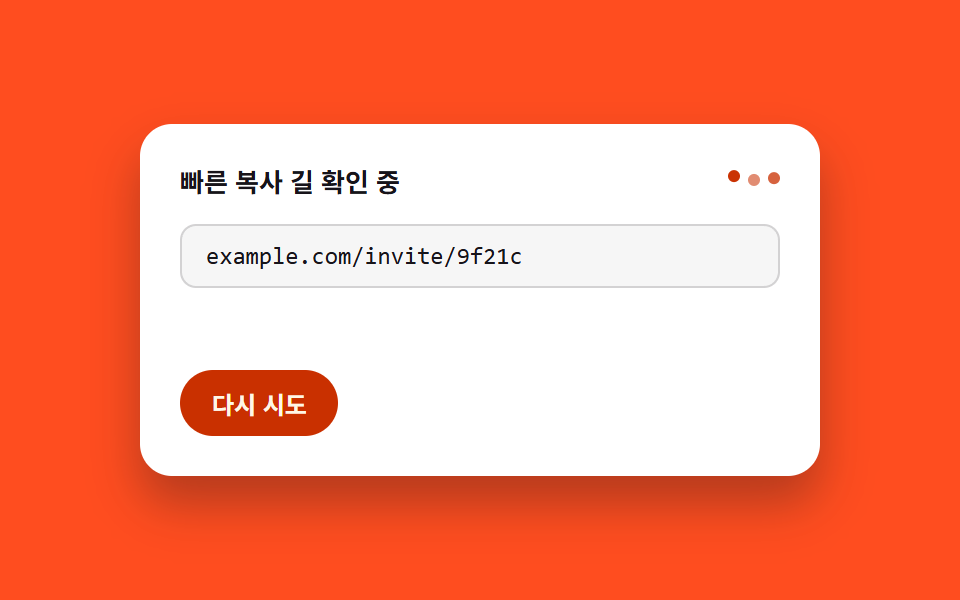
- 03 Fallback selection — a card that leaves a manual path when the fast one fails
- 04 Two-button split — a row where primary and secondary share the success state in stagger
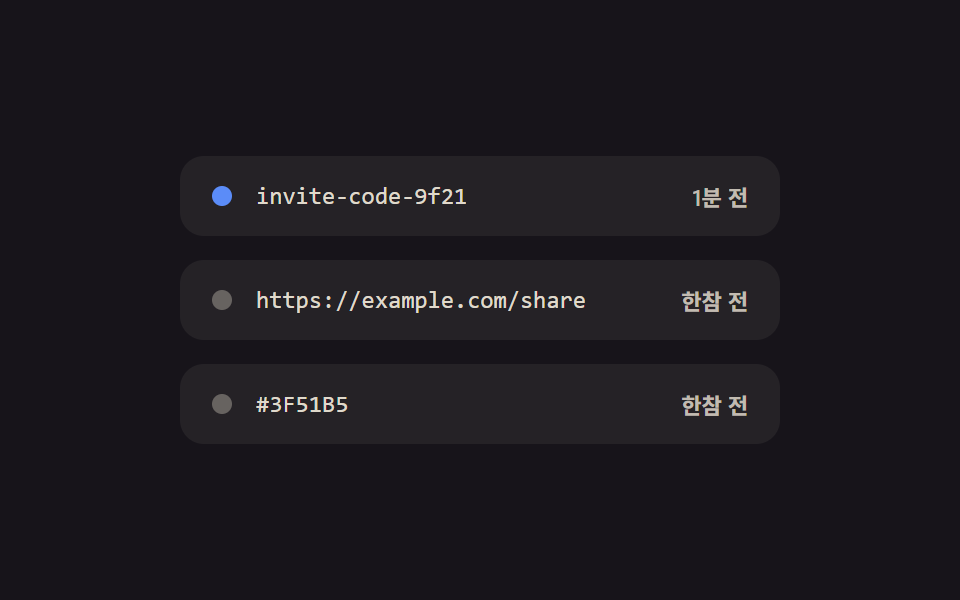
- 05 Copy queue history — a list rewriting recent copies as relative time
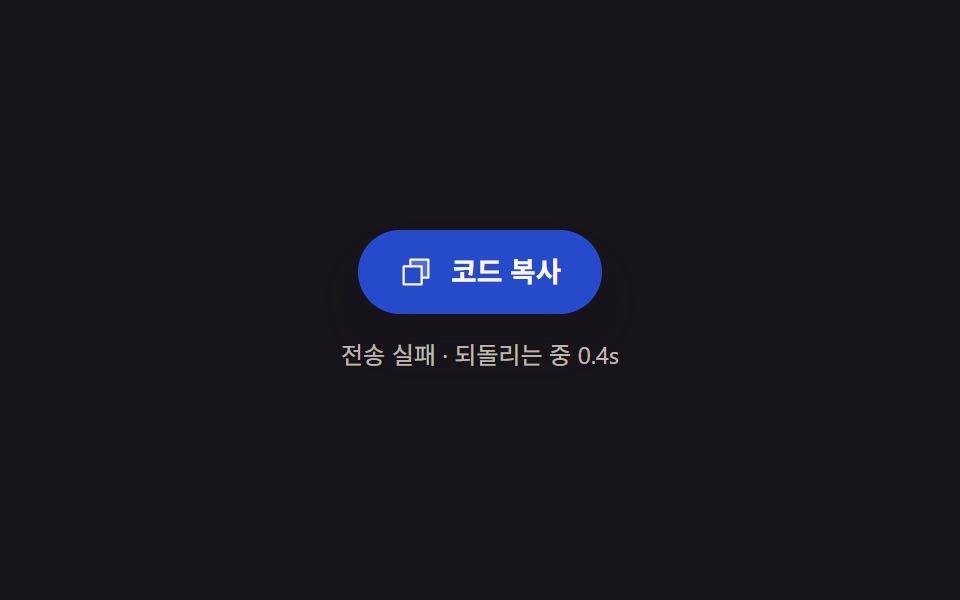
- 06 Fail-recovery — a button interpolating its tint back to normal by elapsed time since failure
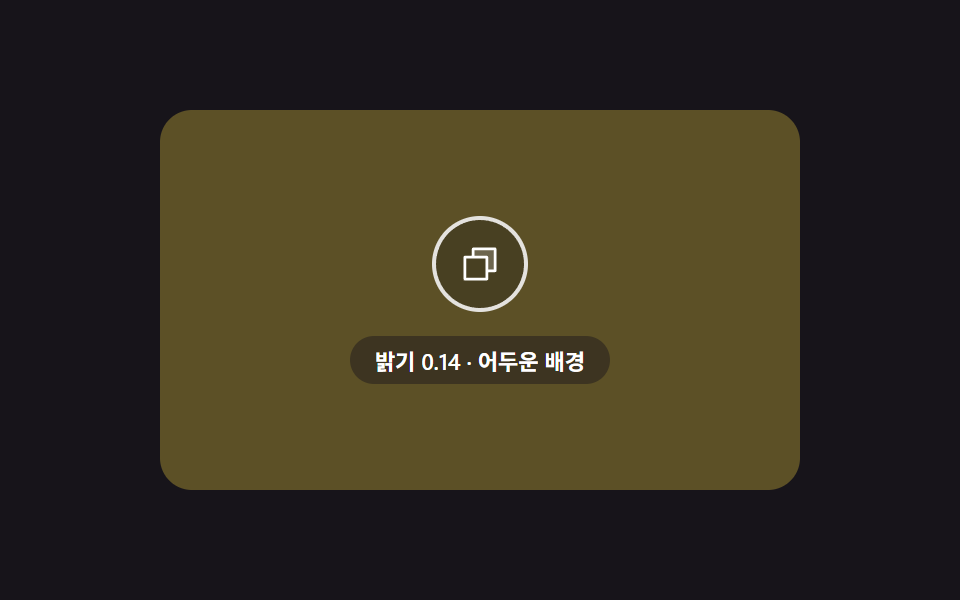
- 07 Contrast swap — an overlaid button recomputing icon color from background brightness
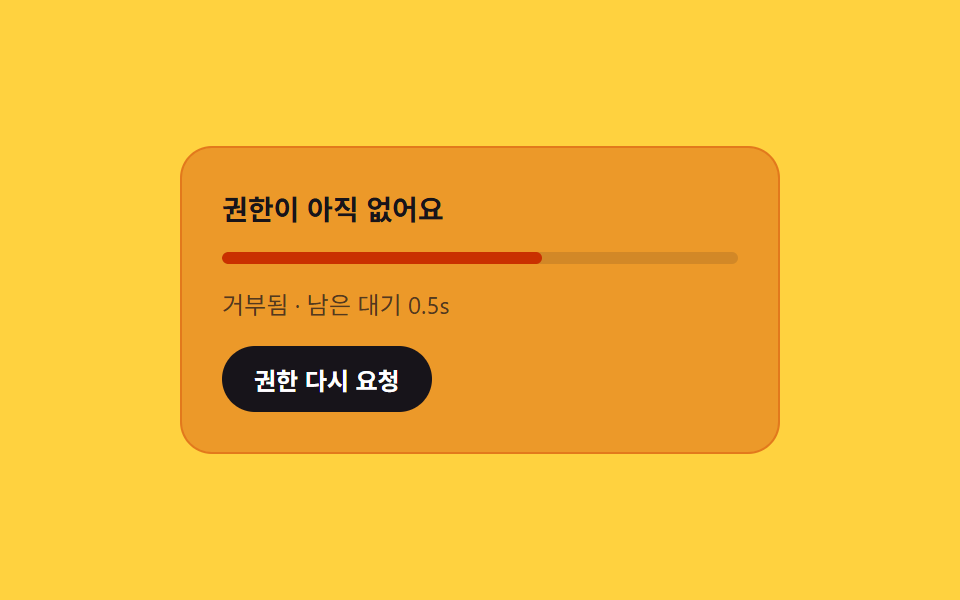
- 08 Permission-gate card — a notice mapping permission state and wait time to its tint
- 09 Rich-text toast — a notice whose label width recomputes by style-kind count
None of these nine screens calls the real Clipboard API — copy success and failure are stood in for by a virtual clipboard state machine, with a single comment marking exactly where a real navigator.clipboard.writeText call would go in production. Items 01 (icon-morph check), 05 (queue history), 06 (fail-recovery), and 07 (contrast swap) run purely on requestAnimationFrame cycling on a fixed period with zero click, drag, or pointer listeners attached; only 02 (character-count fill), 03 (fallback selection), 04 (two-button split), 08 (permission gate), and 09 (rich-text toast) carry a real click listener that replays the same computation from the moment it fires. Every item's data — string length, baseline time, and so on — is a fixed value, so the same scene reproduces on every run.
Anatomy of a copy button — what nine screens compute
Nine ways to wire a copy to clipboard button without ever touching the real API, from a stroke drawn by path length to a toast sized by how many style tags survived the paste — the same handful of arithmetic moves keeps resurfacing under a different name.
Why a button measures the DOM before it decides anything
Item 01 measures the check polyline's real length via getTotalLength before it draws a single pixel, item 03 measures a selection range's width via Range.getBoundingClientRect and a notice's width via scrollWidth before choosing inline or stacked, and item 04 measures the live distance between two buttons via getBoundingClientRect before it computes a stagger — three different outputs, one shared habit of reading the layout before writing to it.
Why three cards run their state purely against a clock
Item 05 recomputes each row's fake elapsed time every frame from a baseline plus a real-time multiplier, item 06 recomputes the ratio of time since a failure divided by a recovery constant, and item 08 recomputes the ratio of wait time remaining after a permission check — none of the three waits for an event mid-cycle, they just keep reading a clock and mapping the result onto a label, a color, or a tint.
Why a count becomes a size or a color instead of staying just a number
Item 02 turns a copied string's character count into a fill duration and a fill ratio, item 07 turns a background's RGB into a relative-luminance number and compares it against a threshold to pick an icon variant, and item 09 turns a DOM query's style-tag count into a toast's minimum width — a count, in each case, becomes something you can see rather than something you'd have to read off a label.
Code per screen
Every one of these nine keeps its copy button css style inline, in one file, with no external stylesheet or class library to load first — the block below is pasted straight out of that item's own index.html, not retyped from memory.
01Icon-morph check — a button that draws its success as a single stroke
Once the copy succeeds, the icon swaps from sheet to check, and the check's stroke is measured end to end via getTotalLength, fixed as strokeDasharray, then drawn by recomputing strokeDashoffset down to zero across a set duration. It suits the copy button in a code block's top-right corner and install-command boxes.
<main class="stage">
<section class="panel">
  <button class="copyBtn" id="copyBtn" type="button" aria-pressed="false" aria-label="Copy code">
    <span class="iconSlot" id="iconSlot">
      <svg class="icon icon--sheet" id="sheetIcon" viewBox="0 0 256 256" aria-hidden="true"><g fill="currentColor"><path d="M216 40v128h-48V88H88V40Z" opacity=".2"/><path d="M216 32H88a8 8 0 0 0-8 8v40H40a8 8 0 0 0-8 8v128a8 8 0 0 0 8 8h128a8 8 0 0 0 8-8v-40h40a8 8 0 0 0 8-8V40a8 8 0 0 0-8-8m-56 176H48V96h112Zm48-48h-32V88a8 8 0 0 0-8-8H96V48h112Z"/></g></svg>
      <svg class="icon icon--check" id="checkIcon" viewBox="0 0 24 24" aria-hidden="true">
        <polyline id="checkStroke" points="4,13 9.5,18.5 20,6"></polyline>
      </svg>
    </span>
    <span class="label" id="label">Copy code</span>
  </button>
  <span class="sr" id="live" role="status" aria-live="polite"></span>
</section>
</main>
@use "../../../../site/static/demo-tokens" as *;
@include stage($stage-ink);
.panel {
display: flex;
flex-direction: column;
align-items: center;
gap: $sp-4;
}
.copyBtn {
display: inline-flex;
align-items: center;
gap: $sp-2;
padding: $sp-3 $sp-5;
border: 0;
border-radius: $r-pill;
background: $subject-blue-deep;
color: $subject-cream;
font-family: -apple-system, "Segoe UI", "Noto Sans KR", sans-serif;
font-weight: 600;
font-size: 15px;
line-height: 1.3;
cursor: pointer;
box-shadow: $shadow-raised;
}
.iconSlot {
position: relative;
width: 22px;
height: 22px;
flex: none;
}
.icon {
position: absolute;
inset: 0;
width: 100%;
height: 100%;
}
.icon--sheet {
color: $subject-cream;
}
.icon--check {
opacity: 0;
fill: none;
stroke: $subject-cream;
stroke-width: 2.6;
stroke-linecap: round;
stroke-linejoin: round;
}
.label {
white-space: nowrap;
}
.sr {
position: absolute;
width: 1px;
height: 1px;
padding: 0;
margin: -1px;
overflow: hidden;
clip: rect(0, 0, 0, 0);
white-space: nowrap;
border: 0;
}
@media (max-width: 340px) {
.copyBtn {
padding: $sp-2 $sp-4;
font-size: 13px;
}
.iconSlot {
width: 18px;
height: 18px;
}
}
@media (prefers-reduced-motion: reduce) {
.copyBtn * {
transition: none;
}
}html, body {
margin: 0;
overflow: hidden;
}
.stage {
box-sizing: border-box;
min-height: 100vh;
display: grid;
place-items: center;
margin: 0;
background: #17141a;
font-family: -apple-system, "Segoe UI", "Noto Sans KR", sans-serif;
padding: clamp(8px, 4vw, 24px);
}
.panel {
display: flex;
flex-direction: column;
align-items: center;
gap: 16px;
}
.copyBtn {
display: inline-flex;
align-items: center;
gap: 8px;
padding: 12px 20px;
border: 0;
border-radius: 999px;
background: #0a4fe8;
color: #fff7e6;
font-family: -apple-system, "Segoe UI", "Noto Sans KR", sans-serif;
font-weight: 600;
font-size: 15px;
line-height: 1.3;
cursor: pointer;
box-shadow: 0 14px 24px rgba(23, 20, 26, 0.32);
}
.iconSlot {
position: relative;
width: 22px;
height: 22px;
flex: none;
}
.icon {
position: absolute;
inset: 0;
width: 100%;
height: 100%;
}
.icon--sheet {
color: #fff7e6;
}
.icon--check {
opacity: 0;
fill: none;
stroke: #fff7e6;
stroke-width: 2.6;
stroke-linecap: round;
stroke-linejoin: round;
}
.label {
white-space: nowrap;
}
.sr {
position: absolute;
width: 1px;
height: 1px;
padding: 0;
margin: -1px;
overflow: hidden;
clip: rect(0, 0, 0, 0);
white-space: nowrap;
border: 0;
}
@media (max-width: 340px) {
.copyBtn {
padding: 8px 16px;
font-size: 13px;
}
.iconSlot {
width: 18px;
height: 18px;
}
}
@media (prefers-reduced-motion: reduce) {
.copyBtn * {
transition: none;
}
}// 아이콘 모핑 체크 — 서류 아이콘이 사라지고 체크 폴리라인이 stroke-dashoffset 으로 그려진다.
// 체크 선의 실제 길이는 getTotalLength 로 재고, 그 길이만큼 오프셋을 0 까지 줄이며 그린다.
// 계산 겹: 선 길이 실측 → 경과 비율 → 오프셋 재계산. 자동 재생만, 실사용자 리스너 없음.
(function () {
var sheet = document.getElementById('sheetIcon');
var check = document.getElementById('checkIcon');
var stroke = document.getElementById('checkStroke');
var label = document.getElementById('label');
var live = document.getElementById('live');
if (!sheet || !check || !stroke || !label || !live) return;
  var length = stroke.getTotalLength();
  stroke.style.strokeDasharray = length.toFixed(2);

  var LABEL_IDLE = 'Copy code';
  var LABEL_DONE = 'Copied';
  var CYCLE_MS = 2000;
  var TRIGGER_AT = 0.08;
  var DRAW_MS = 640;
  var REVERT_AT = 0.62;

  function apply(t) {
    var drawStart = TRIGGER_AT * CYCLE_MS;
    var drawEnd = drawStart + DRAW_MS;
    var revertAt = REVERT_AT * CYCLE_MS;
    var success = t >= drawStart && t < revertAt;
    var drawT = Math.min(Math.max((t - drawStart) / DRAW_MS, 0), 1);
    var offset = success ? length * (1 - drawT) : length;
    stroke.style.strokeDashoffset = offset.toFixed(2);
    sheet.style.opacity = success ? '0' : '1';
    check.style.opacity = success ? '1' : '0';
    var done = success && drawT >= 1;
    label.textContent = done ? LABEL_DONE : LABEL_IDLE;
    live.textContent = done ? LABEL_DONE : '';
  }
apply(0);
var reduce = window.matchMedia('(prefers-reduced-motion: reduce)').matches;
if (reduce) return;
var start = null;
function loop(ts) {
if (start === null) start = ts;
var t = (ts - start) % CYCLE_MS;
apply(t);
requestAnimationFrame(loop);
}
requestAnimationFrame(loop);
})();import { useEffect, useRef } from "react";
import styles from "./CopyIconMorphCheck.module.scss";
// 아이콘 모핑 체크 — 서류 아이콘이 사라지고 체크 폴리라인이 stroke-dashoffset 으로 그려진다.
// 체크 선의 실제 길이는 getTotalLength 로 재고, 그 길이만큼 오프셋을 0 까지 줄이며 그린다.
// 계산 겹: 선 길이 실측 → 경과 비율 → 오프셋 재계산. 자동 재생만, 실사용자 리스너 없음.
const LABEL_IDLE = "코드 복사";
const LABEL_DONE = "복사됨";
const CYCLE_MS = 2000;
const TRIGGER_AT = 0.08;
const DRAW_MS = 640;
const REVERT_AT = 0.62;
export default function CopyIconMorphCheck() {
const sheetRef = useRef<SVGSVGElement>(null);
const checkRef = useRef<SVGSVGElement>(null);
const strokeRef = useRef<SVGPolylineElement>(null);
const labelRef = useRef<HTMLSpanElement>(null);
const liveRef = useRef<HTMLSpanElement>(null);
useEffect(() => {
const sheet = sheetRef.current;
const check = checkRef.current;
const stroke = strokeRef.current;
const label = labelRef.current;
const live = liveRef.current;
if (!sheet || !check || !stroke || !label || !live) return;
const length = stroke.getTotalLength();
stroke.style.strokeDasharray = length.toFixed(2);
function apply(t: number) {
const drawStart = TRIGGER_AT * CYCLE_MS;
const revertAt = REVERT_AT * CYCLE_MS;
const success = t >= drawStart && t < revertAt;
const drawT = Math.min(Math.max((t - drawStart) / DRAW_MS, 0), 1);
const offset = success ? length * (1 - drawT) : length;
stroke!.style.strokeDashoffset = offset.toFixed(2);
sheet!.style.opacity = success ? "0" : "1";
check!.style.opacity = success ? "1" : "0";
const done = success && drawT >= 1;
label!.textContent = done ? LABEL_DONE : LABEL_IDLE;
live!.textContent = done ? LABEL_DONE : "";
}
apply(0);
const reduce = window.matchMedia("(prefers-reduced-motion: reduce)").matches;
if (reduce) return;
let start: number | null = null;
let raf = 0;
function loop(ts: number) {
if (start === null) start = ts;
const t = (ts - start) % CYCLE_MS;
apply(t);
raf = requestAnimationFrame(loop);
}
raf = requestAnimationFrame(loop);
return () => cancelAnimationFrame(raf);
}, []);
return (
<div className={styles.stage}>
<section className={styles.panel}>
<button className={styles.copyBtn} type="button" aria-pressed="false" aria-label="코드 복사">
<span className={styles.iconSlot}>
<svg ref={sheetRef} className={`${styles.icon} ${styles.iconSheet}`} viewBox="0 0 256 256" aria-hidden="true">
<g fill="currentColor">
<path d="M216 40v128h-48V88H88V40Z" opacity=".2" />
<path d="M216 32H88a8 8 0 0 0-8 8v40H40a8 8 0 0 0-8 8v128a8 8 0 0 0 8 8h128a8 8 0 0 0 8-8v-40h40a8 8 0 0 0 8-8V40a8 8 0 0 0-8-8m-56 176H48V96h112Zm48-48h-32V88a8 8 0 0 0-8-8H96V48h112Z" />
</g>
</svg>
<svg ref={checkRef} className={`${styles.icon} ${styles.iconCheck}`} viewBox="0 0 24 24" aria-hidden="true">
<polyline ref={strokeRef} points="4,13 9.5,18.5 20,6" />
</svg>
</span>
<span ref={labelRef} className={styles.label}>코드 복사</span>
</button>
<span ref={liveRef} className={styles.sr} role="status" aria-live="polite" />
</section>
</div>
);
}01 · Icon-morph check — a button that draws its success as a single stroke — Measured area 1.288% · moving frames 13/23Original by GODRICH · SCSS and React ship in the zip · See the password
What the numbers say
Cumulative area is 1.29% (max frame 1.265%, mean intensity 144.5) across 13 of 23 frame deltas — a check stroke is simply a small on-screen element, so a low area here is structural, not a shortfall against the site's motion floor.
var length = stroke.getTotalLength();
stroke.style.strokeDasharray = length.toFixed(2);
var LABEL_IDLE = 'Copy code';
var LABEL_DONE = 'Copied';
var CYCLE_MS = 2000;
var TRIGGER_AT = 0.08;
var DRAW_MS = 640;
var REVERT_AT = 0.62;
function apply(t) {
var drawStart = TRIGGER_AT * CYCLE_MS;
var drawEnd = drawStart + DRAW_MS;
var revertAt = REVERT_AT * CYCLE_MS;
var success = t >= drawStart && t < revertAt;
var drawT = Math.min(Math.max((t - drawStart) / DRAW_MS, 0), 1);
var offset = success ? length * (1 - drawT) : length;
stroke.style.strokeDashoffset = offset.toFixed(2);
sheet.style.opacity = success ? '0' : '1';
check.style.opacity = success ? '1' : '0';
var done = success && drawT >= 1;
label.textContent = done ? LABEL_DONE : LABEL_IDLE;
live.textContent = done ? LABEL_DONE : '';
}
02Character-count fill — a button that fills by the number of characters copied
The copied sentence's character count is measured once, multiplied by a per-character fill time to get a total fill duration, and that duration drives the progress ratio that fills the button's inner mark before the icon and number briefly rise and settle. It suits copying long notices or license text and quoting blocks.
<main class="stage">
<section class="panel">
  <div class="card">
    <p class="preview" id="preview">This is a sample caption that fills in automatically beneath the invite card.</p>
    <button class="copyBtn" id="copyBtn" type="button" aria-label="Copy text">
      <span class="fillTrack" aria-hidden="true"><span class="fillBar" id="fillBar"></span></span>
      <span class="iconSlot">
        <svg class="icon" id="icon" viewBox="0 0 256 256" aria-hidden="true"><g fill="currentColor"><path d="M232 56v144a16 16 0 0 1-16 16H40a16 16 0 0 1-16-16V56a16 16 0 0 1 16-16h176a16 16 0 0 1 16 16" opacity=".2"/><path d="m205.66 85.66l-96 96a8 8 0 0 1-11.32 0l-40-40a8 8 0 0 1 11.32-11.32L104 164.69l90.34-90.35a8 8 0 0 1 11.32 11.32"/></g></svg>
      </span>
      <span class="count" id="count">0</span>
    </button>
  </div>
  <span class="sr" id="live" role="status" aria-live="polite"></span>
</section>
</main>
@use "../../../../site/static/demo-tokens" as *;
@include stage($stage-yellow);
.panel {
display: flex;
flex-direction: column;
align-items: center;
gap: $sp-4;
}
.card {
display: flex;
flex-direction: column;
align-items: center;
gap: $sp-4;
background: $subject-cream;
border-radius: $r-card;
padding: $sp-5 $sp-6;
box-shadow: $shadow-raised;
max-width: 380px;
}
.preview {
margin: 0;
color: $subject-ink;
font-family: -apple-system, "Segoe UI", "Noto Sans KR", sans-serif;
font-weight: 500;
font-size: 13px;
line-height: 1.5;
text-align: center;
}
.copyBtn {
position: relative;
display: inline-flex;
align-items: center;
gap: $sp-2;
padding: $sp-3 $sp-5;
border: 0;
border-radius: $r-pill;
background: $subject-ink;
color: $subject-cream;
font-family: -apple-system, "Segoe UI", "Noto Sans KR", sans-serif;
font-weight: 600;
font-size: 14px;
line-height: 1.3;
cursor: pointer;
overflow: hidden;
isolation: isolate;
}
.fillTrack {
position: absolute;
inset: 0;
z-index: 0;
}
.fillBar {
--fill: 0;
position: absolute;
inset: 0;
transform: scaleX(var(--fill));
transform-origin: left center;
background: $subject-blue-deep;
}
.iconSlot {
position: relative;
z-index: 1;
width: 18px;
height: 18px;
flex: none;
}
.icon {
position: absolute;
inset: 0;
width: 100%;
height: 100%;
opacity: 0;
}
.count {
position: relative;
z-index: 1;
min-width: 1.4em;
text-align: right;
font-variant-numeric: tabular-nums;
}
.sr {
position: absolute;
width: 1px;
height: 1px;
padding: 0;
margin: -1px;
overflow: hidden;
clip: rect(0, 0, 0, 0);
white-space: nowrap;
border: 0;
}
@media (max-width: 340px) {
.card {
padding: $sp-4 $sp-5;
}
.preview {
font-size: 12px;
}
}
@media (prefers-reduced-motion: reduce) {
.copyBtn * {
transition: none;
}
}html, body {
margin: 0;
overflow: hidden;
}
.stage {
box-sizing: border-box;
min-height: 100vh;
display: grid;
place-items: center;
margin: 0;
background: #ffd23f;
font-family: -apple-system, "Segoe UI", "Noto Sans KR", sans-serif;
padding: clamp(8px, 4vw, 24px);
}
.panel {
display: flex;
flex-direction: column;
align-items: center;
gap: 16px;
}
.card {
display: flex;
flex-direction: column;
align-items: center;
gap: 16px;
background: #fff7e6;
border-radius: 16px;
padding: 20px 24px;
box-shadow: 0 14px 24px rgba(23, 20, 26, 0.32);
max-width: 380px;
}
.preview {
margin: 0;
color: #17141a;
font-family: -apple-system, "Segoe UI", "Noto Sans KR", sans-serif;
font-weight: 500;
font-size: 13px;
line-height: 1.5;
text-align: center;
}
.copyBtn {
position: relative;
display: inline-flex;
align-items: center;
gap: 8px;
padding: 12px 20px;
border: 0;
border-radius: 999px;
background: #17141a;
color: #fff7e6;
font-family: -apple-system, "Segoe UI", "Noto Sans KR", sans-serif;
font-weight: 600;
font-size: 14px;
line-height: 1.3;
cursor: pointer;
overflow: hidden;
isolation: isolate;
}
.fillTrack {
position: absolute;
inset: 0;
z-index: 0;
}
.fillBar {
--fill: 0;
position: absolute;
inset: 0;
transform: scaleX(var(--fill));
transform-origin: left center;
background: #0a4fe8;
}
.iconSlot {
position: relative;
z-index: 1;
width: 18px;
height: 18px;
flex: none;
}
.icon {
position: absolute;
inset: 0;
width: 100%;
height: 100%;
opacity: 0;
}
.count {
position: relative;
z-index: 1;
min-width: 1.4em;
text-align: right;
font-variant-numeric: tabular-nums;
}
.sr {
position: absolute;
width: 1px;
height: 1px;
padding: 0;
margin: -1px;
overflow: hidden;
clip: rect(0, 0, 0, 0);
white-space: nowrap;
border: 0;
}
@media (max-width: 340px) {
.card {
padding: 16px 20px;
}
.preview {
font-size: 12px;
}
}
@media (prefers-reduced-motion: reduce) {
.copyBtn * {
transition: none;
}
}// 글자 수 채움 — 복사한 문장의 글자 수(preview 실측 length)를 채움 비율로 바꾸고,
// 채움이 끝나면 아이콘·숫자가 짧게 떠올랐다 정착한다(translateY 보간, 이차 감쇠).
// 계산 겹: 글자 수 실측 → 진행률 → 오프셋(--fill) 재계산. 실사용자 리스너 있음(버튼 클릭).
// 실 클립보드 API 호출 없음 — 상태는 전부 시뮬레이션.
(function () {
var preview = document.getElementById('preview');
var btn = document.getElementById('copyBtn');
var fillBar = document.getElementById('fillBar');
var icon = document.getElementById('icon');
var count = document.getElementById('count');
var live = document.getElementById('live');
if (!preview || !btn || !fillBar || !icon || !count || !live) return;
  var CHAR_COUNT = preview.textContent.trim().length;
  var FILL_MS_PER_CHAR = 18;
  var FILL_MS = CHAR_COUNT * FILL_MS_PER_CHAR;
  var BOUNCE_MS = 260;
  var IDLE_MS = 140;

  function bounceEase(p) {
    if (p < 0.5) return p / 0.5;
    var q = (p - 0.5) / 0.5;
    return 1 - q * q;
  }

  function render(ratio, lift) {
    fillBar.style.setProperty('--fill', ratio.toFixed(4));
    count.textContent = String(Math.round(ratio * CHAR_COUNT));
    icon.style.opacity = ratio >= 1 ? '1' : '0';
    var y = -lift * 6;
    var t = 'translateY(' + y.toFixed(2) + 'px)';
    icon.style.transform = t;
    count.style.transform = t;
  }
function sequence(t) {
if (t < FILL_MS) {
render(t / FILL_MS, 0);
live.textContent = '';
} else if (t < FILL_MS + BOUNCE_MS) {
render(1, bounceEase((t - FILL_MS) / BOUNCE_MS));
live.textContent = CHAR_COUNT + ' chars copied';
} else {
render(1, 0);
live.textContent = CHAR_COUNT + ' chars copied';
}
}
render(0, 0);
var CYCLE_MS = 2000;
var reduce = window.matchMedia('(prefers-reduced-motion: reduce)').matches;
var autoStart = null;
var autoRaf = 0;
function autoLoop(ts) {
if (autoStart === null) autoStart = ts;
var t = (ts - autoStart) % CYCLE_MS;
if (t < IDLE_MS) { render(0, 0); live.textContent = ''; }
else sequence(t - IDLE_MS);
autoRaf = requestAnimationFrame(autoLoop);
}
if (!reduce) autoRaf = requestAnimationFrame(autoLoop);
btn.addEventListener('click', function () {
if (autoRaf) { cancelAnimationFrame(autoRaf); autoRaf = 0; }
render(0, 0);
var clickStart = null;
function userLoop(ts) {
if (clickStart === null) clickStart = ts;
var t = ts - clickStart;
sequence(t);
if (t < FILL_MS + BOUNCE_MS + 20) requestAnimationFrame(userLoop);
}
requestAnimationFrame(userLoop);
});
})();import { useEffect, useRef } from "react";
import styles from "./CopyCharCountFill.module.scss";
// 글자 수 채움 — 복사한 문장의 글자 수(preview 실측 length)를 채움 비율로 바꾸고,
// 채움이 끝나면 아이콘·숫자가 짧게 떠올랐다 정착한다(translateY 보간, 이차 감쇠).
// 계산 겹: 글자 수 실측 → 진행률 → 오프셋(--fill) 재계산. 실사용자 리스너 있음(버튼 클릭).
// 실 클립보드 API 호출 없음 — 상태는 전부 시뮬레이션.
const FILL_MS_PER_CHAR = 18;
const BOUNCE_MS = 260;
const IDLE_MS = 140;
const CYCLE_MS = 2000;
const PREVIEW_TEXT = "이 문구는 초대장 카드 아래 자동으로 채워지는 안내용 예시 텍스트입니다.";
function bounceEase(p: number) {
if (p < 0.5) return p / 0.5;
const q = (p - 0.5) / 0.5;
return 1 - q * q;
}
export default function CopyCharCountFill() {
const fillBarRef = useRef<HTMLSpanElement>(null);
const iconRef = useRef<SVGSVGElement>(null);
const countRef = useRef<HTMLSpanElement>(null);
const liveRef = useRef<HTMLSpanElement>(null);
const btnRef = useRef<HTMLButtonElement>(null);
useEffect(() => {
const fillBar = fillBarRef.current;
const icon = iconRef.current;
const count = countRef.current;
const live = liveRef.current;
const btn = btnRef.current;
if (!fillBar || !icon || !count || !live || !btn) return;
const CHAR_COUNT = PREVIEW_TEXT.trim().length;
const FILL_MS = CHAR_COUNT * FILL_MS_PER_CHAR;
function render(ratio: number, lift: number) {
fillBar!.style.setProperty("--fill", ratio.toFixed(4));
count!.textContent = String(Math.round(ratio * CHAR_COUNT));
icon!.style.opacity = ratio >= 1 ? "1" : "0";
const y = -lift * 6;
const t = `translateY(${y.toFixed(2)}px)`;
icon!.style.transform = t;
count!.style.transform = t;
}
function sequence(t: number) {
if (t < FILL_MS) {
render(t / FILL_MS, 0);
live!.textContent = "";
} else if (t < FILL_MS + BOUNCE_MS) {
render(1, bounceEase((t - FILL_MS) / BOUNCE_MS));
live!.textContent = `${CHAR_COUNT}자 복사됨`;
} else {
render(1, 0);
live!.textContent = `${CHAR_COUNT}자 복사됨`;
}
}
render(0, 0);
const reduce = window.matchMedia("(prefers-reduced-motion: reduce)").matches;
let autoStart: number | null = null;
let autoRaf = 0;
function autoLoop(ts: number) {
if (autoStart === null) autoStart = ts;
const t = (ts - autoStart) % CYCLE_MS;
if (t < IDLE_MS) {
render(0, 0);
live!.textContent = "";
} else {
sequence(t - IDLE_MS);
}
autoRaf = requestAnimationFrame(autoLoop);
}
if (!reduce) autoRaf = requestAnimationFrame(autoLoop);
function onClick() {
if (autoRaf) {
cancelAnimationFrame(autoRaf);
autoRaf = 0;
}
render(0, 0);
let clickStart: number | null = null;
function userLoop(ts: number) {
if (clickStart === null) clickStart = ts;
const t = ts - clickStart;
sequence(t);
if (t < FILL_MS + BOUNCE_MS + 20) requestAnimationFrame(userLoop);
}
requestAnimationFrame(userLoop);
}
btn.addEventListener("click", onClick);
return () => {
if (autoRaf) cancelAnimationFrame(autoRaf);
btn.removeEventListener("click", onClick);
};
}, []);
return (
<div className={styles.stage}>
<section className={styles.panel}>
<div className={styles.card}>
<p className={styles.preview}>{PREVIEW_TEXT}</p>
<button ref={btnRef} className={styles.copyBtn} type="button" aria-label="문구 복사">
<span className={styles.fillTrack} aria-hidden="true">
<span ref={fillBarRef} className={styles.fillBar} />
</span>
<span className={styles.iconSlot}>
<svg ref={iconRef} className={styles.icon} viewBox="0 0 256 256" aria-hidden="true">
<g fill="currentColor">
<path d="M232 56v144a16 16 0 0 1-16 16H40a16 16 0 0 1-16-16V56a16 16 0 0 1 16-16h176a16 16 0 0 1 16 16" opacity=".2" />
<path d="m205.66 85.66l-96 96a8 8 0 0 1-11.32 0l-40-40a8 8 0 0 1 11.32-11.32L104 164.69l90.34-90.35a8 8 0 0 1 11.32 11.32" />
</g>
</svg>
</span>
<span ref={countRef} className={styles.count}>0</span>
</button>
</div>
<span ref={liveRef} className={styles.sr} role="status" aria-live="polite" />
</section>
</div>
);
}02 · Character-count fill — a button that fills by the number of characters copied — Measured area 2.329% · moving frames 16/23Original by GODRICH · SCSS and React ship in the zip · See the password
What the numbers say
Cumulative area is 2.33% (max frame 2.319%, mean intensity 161.2) across 16 of 23 frame deltas, the highest average intensity of the nine — the fill and bounce both move fast pixel blocks rather than thin lines, so the per-frame delta reads strongly even though the button itself stays compact.
var CHAR_COUNT = preview.textContent.trim().length;
var FILL_MS_PER_CHAR = 18;
var FILL_MS = CHAR_COUNT * FILL_MS_PER_CHAR;
var BOUNCE_MS = 260;
var IDLE_MS = 140;
function bounceEase(p) {
if (p < 0.5) return p / 0.5;
var q = (p - 0.5) / 0.5;
return 1 - q * q;
}
function render(ratio, lift) {
fillBar.style.setProperty('--fill', ratio.toFixed(4));
count.textContent = String(Math.round(ratio * CHAR_COUNT));
icon.style.opacity = ratio >= 1 ? '1' : '0';
var y = -lift * 6;
var t = 'translateY(' + y.toFixed(2) + 'px)';
icon.style.transform = t;
count.style.transform = t;
}
03Fallback selection — a card that leaves a manual path when the fast one fails
When the fast copy path is unavailable, the card switches to a two-step form: the notice text is pre-selected as a range so a manual route stays open, and the range's measured width is compared against the notice's scrollWidth and the container's width to decide whether the notice fits on one line or has to stack. It suits share cards that hedge old browsers and payment notices that need a safety net.
<main class="stage">
<section class="card" id="card">
  <div class="statusRow">
    <p class="status" id="status">Checking the fast copy path</p>
    <span class="spinner" id="spinner" aria-hidden="true">
      <span class="dot" data-dot></span>
      <span class="dot" data-dot></span>
      <span class="dot" data-dot></span>
    </span>
  </div>
  <div class="field" id="field">
    <span class="text" id="selText">example.com/invite/9f21c</span>
  </div>
  <p class="notice" id="notice">This text is already selected — press Ctrl+C to copy</p>
  <button class="retryBtn" id="retryBtn" type="button">Retry</button>
</section>
</main>
@use "../../../../site/static/demo-tokens" as *;
@include stage($stage-orange);
.card {
display: flex;
flex-direction: column;
align-items: stretch;
gap: $sp-3;
width: 300px;
background: $stage-paper;
border-radius: $r-card;
padding: $sp-5;
box-shadow: $shadow-raised;
}
.statusRow {
display: flex;
align-items: center;
justify-content: space-between;
gap: $sp-2;
}
.status {
margin: 0;
color: $subject-ink;
font-family: -apple-system, "Segoe UI", "Noto Sans KR", sans-serif;
font-weight: 600;
font-size: 13px;
line-height: 1.4;
}
.spinner {
display: inline-flex;
align-items: center;
gap: $sp-1;
flex: none;
}
.spinner .dot {
width: 6px;
height: 6px;
border-radius: $r-pill;
background: $subject-orange-deep;
}
.field {
box-sizing: border-box;
width: 100%;
overflow: hidden;
border-radius: $r-sm;
border: 1px solid rgba($subject-ink, .16);
padding: $sp-2 $sp-3;
background: rgba($subject-ink, .04);
}
.text {
display: block;
max-width: 100%;
font-family: "SFMono-Regular", Consolas, monospace;
font-size: 12px;
color: $subject-ink;
white-space: nowrap;
overflow: hidden;
text-overflow: ellipsis;
}
.notice {
margin: 0;
color: rgba($subject-ink, .72);
font-family: -apple-system, "Segoe UI", "Noto Sans KR", sans-serif;
font-size: 12px;
line-height: 1.4;
white-space: pre-line;
opacity: 0;
transform: translateY(4px);
transition: opacity $dur-quick $ease-out, transform $dur-quick $ease-out;
}
.card.stack .notice {
white-space: pre-line;
}
.card.inline .notice {
white-space: nowrap;
overflow: hidden;
text-overflow: ellipsis;
}
.retryBtn {
align-self: flex-start;
border: 0;
border-radius: $r-pill;
padding: $sp-2 $sp-4;
background: $subject-orange-deep;
color: $subject-cream;
font-family: -apple-system, "Segoe UI", "Noto Sans KR", sans-serif;
font-weight: 600;
font-size: 12px;
cursor: pointer;
}
@media (max-width: 340px) {
.card {
width: 260px;
padding: $sp-4;
gap: $sp-2;
}
}
@media (prefers-reduced-motion: reduce) {
.card * {
transition: none;
}
}html, body {
margin: 0;
overflow: hidden;
}
.stage {
box-sizing: border-box;
min-height: 100vh;
display: grid;
place-items: center;
margin: 0;
background: #ff4d1f;
font-family: -apple-system, "Segoe UI", "Noto Sans KR", sans-serif;
padding: clamp(8px, 4vw, 24px);
}
.card {
display: flex;
flex-direction: column;
align-items: stretch;
gap: 12px;
width: 300px;
background: #ffffff;
border-radius: 16px;
padding: 20px;
box-shadow: 0 14px 24px rgba(23, 20, 26, 0.32);
}
.statusRow {
display: flex;
align-items: center;
justify-content: space-between;
gap: 8px;
}
.status {
margin: 0;
color: #17141a;
font-family: -apple-system, "Segoe UI", "Noto Sans KR", sans-serif;
font-weight: 600;
font-size: 13px;
line-height: 1.4;
}
.spinner {
display: inline-flex;
align-items: center;
gap: 4px;
flex: none;
}
.spinner .dot {
width: 6px;
height: 6px;
border-radius: 999px;
background: #c93000;
}
.field {
box-sizing: border-box;
width: 100%;
overflow: hidden;
border-radius: 8px;
border: 1px solid rgba(23, 20, 26, 0.16);
padding: 8px 12px;
background: rgba(23, 20, 26, 0.04);
}
.text {
display: block;
max-width: 100%;
font-family: "SFMono-Regular", Consolas, monospace;
font-size: 12px;
color: #17141a;
white-space: nowrap;
overflow: hidden;
text-overflow: ellipsis;
}
.notice {
margin: 0;
color: rgba(23, 20, 26, 0.72);
font-family: -apple-system, "Segoe UI", "Noto Sans KR", sans-serif;
font-size: 12px;
line-height: 1.4;
white-space: pre-line;
opacity: 0;
transform: translateY(4px);
transition: opacity 220ms ease-out, transform 220ms ease-out;
}
.card.stack .notice {
white-space: pre-line;
}
.card.inline .notice {
white-space: nowrap;
overflow: hidden;
text-overflow: ellipsis;
}
.retryBtn {
align-self: flex-start;
border: 0;
border-radius: 999px;
padding: 8px 16px;
background: #c93000;
color: #fff7e6;
font-family: -apple-system, "Segoe UI", "Noto Sans KR", sans-serif;
font-weight: 600;
font-size: 12px;
cursor: pointer;
}
@media (max-width: 340px) {
.card {
width: 260px;
padding: 16px;
gap: 8px;
}
}
@media (prefers-reduced-motion: reduce) {
.card * {
transition: none;
}
}// 폴백 선택 안내 — 빠른 복사 길이 막히면 안내 문구를 미리 범위로 선택해 두고,
// 선택 영역의 실측 폭과 안내 문구의 실측 폭을 더해 카드 너비 안에 들어가는지 계산해
// 한 줄(inline)·두 줄(stack) 레이아웃을 고른다. 확인 중에는 점 3개가 매 프레임 위상을
// 다시 계산해(사인파) 파동으로 움직이고, 전환은 CSS 트랜지션으로 이어 붙인다.
// 계산 겹: 매 프레임 사인파 위상 재계산(스피너) + Range.getBoundingClientRect 로 선택 폭
// 실측 → 안내문 폭 실측 → 합산 비교(레이아웃). 실사용자 리스너 있음(Retry 버튼).
// 실 클립보드 API 호출 없음 — Selection API 만 사용.
(function () {
var card = document.getElementById('card');
var status = document.getElementById('status');
var dots = Array.prototype.slice.call(document.querySelectorAll('[data-dot]'));
var field = document.getElementById('field');
var selText = document.getElementById('selText');
var notice = document.getElementById('notice');
var retryBtn = document.getElementById('retryBtn');
if (!card || !status || !dots.length || !field || !selText || !notice || !retryBtn) return;
var SPIN_PERIOD_MS = 900;
function spin(t) {
for (var i = 0; i < dots.length; i++) {
var phase = (t / SPIN_PERIOD_MS + i / dots.length) * Math.PI * 2;
var wave = Math.abs(Math.sin(phase));
dots[i].style.opacity = (0.32 + wave * 0.68).toFixed(3);
dots[i].style.transform = 'translateY(' + (-wave * 3).toFixed(2) + 'px)';
}
}
  function selectRangeWidth() {
    var range = document.createRange();
    range.selectNodeContents(selText);
    var sel = window.getSelection();
    if (sel) {
      sel.removeAllRanges();
      sel.addRange(range);
    }
    var rect = range.getBoundingClientRect();
    return rect.width;
  }

  function layoutFallback() {
    var rangeWidth = selectRangeWidth();
    var noticeWidth = notice.scrollWidth;
    var containerWidth = field.clientWidth;
    var fits = rangeWidth <= containerWidth && noticeWidth <= containerWidth;
    card.classList.toggle('stack', !fits);
    card.classList.toggle('inline', fits);
    return fits;
  }
function setPhase(phase) {
card.dataset.phase = phase;
if (phase === 'checking') {
status.textContent = 'Checking the fast copy path';
notice.style.opacity = '0';
notice.style.transform = 'translateY(4px)';
} else if (phase === 'fallback') {
status.textContent = 'The fast copy path didn\'t open';
var fits = layoutFallback();
notice.style.opacity = '1';
notice.style.transform = 'translateY(0)';
notice.textContent = fits
? 'This text is already selected — press Ctrl+C to copy'
: 'The text is selected' + String.fromCharCode(10) + 'Press Ctrl+C to copy';
}
}
setPhase('checking');
var CYCLE_MS = 2000;
var CHECK_MS = 650;
var reduce = window.matchMedia('(prefers-reduced-motion: reduce)').matches;
var start = null;
function autoLoop(ts) {
if (start === null) start = ts;
var t = (ts - start) % CYCLE_MS;
var phase = t < CHECK_MS ? 'checking' : 'fallback';
if (card.dataset.phase !== phase) setPhase(phase);
if (phase === 'checking') spin(t);
requestAnimationFrame(autoLoop);
}
var autoRaf = 0;
if (!reduce) autoRaf = requestAnimationFrame(autoLoop);
retryBtn.addEventListener('click', function () {
if (autoRaf) { cancelAnimationFrame(autoRaf); autoRaf = 0; }
setPhase('checking');
var clickStart = null;
function userSpin(ts) {
if (clickStart === null) clickStart = ts;
var t = ts - clickStart;
if (t < CHECK_MS) {
spin(t);
requestAnimationFrame(userSpin);
} else {
setPhase('fallback');
}
}
requestAnimationFrame(userSpin);
});
})();import { useEffect, useRef } from "react";
import styles from "./CopyFallbackSelect.module.scss";
// 폴백 선택 안내 — 빠른 복사 길이 막히면 안내 문구를 미리 범위로 선택해 두고,
// 선택 영역의 실측 폭과 안내 문구의 실측 폭을 더해 카드 너비 안에 들어가는지 계산해
// 한 줄(inline)·두 줄(stack) 레이아웃을 고른다. 확인 중에는 점 3개가 매 프레임 위상을
// 다시 계산해(사인파) 파동으로 움직이고, 전환은 CSS 트랜지션으로 이어 붙인다.
// 계산 겹: 매 프레임 사인파 위상 재계산(스피너) + Range.getBoundingClientRect 로 선택 폭
// 실측 → 안내문 폭 실측 → 합산 비교(레이아웃). 실사용자 리스너 있음(다시 시도 버튼).
// 실 클립보드 API 호출 없음 — Selection API 만 사용.
const CYCLE_MS = 2000;
const CHECK_MS = 650;
const SPIN_PERIOD_MS = 900;
const NOTICE_FIT = "이 문구가 이미 선택돼 있어요 — Ctrl+C 로 복사하세요";
const NOTICE_STACK = "문구가 선택돼 있어요\nCtrl+C 로 복사하세요";
// ambient 가 얇아 배열 ref 의 "possibly null" 을 못 좁힌다 — 로컬 Box 로 우회
type Box<T> = { current: T };
type Phase = "checking" | "fallback";
export default function CopyFallbackSelect() {
const cardRef = useRef<HTMLDivElement>(null);
const statusRef = useRef<HTMLParagraphElement>(null);
const dotRefs = useRef<(HTMLSpanElement | null)[]>([]) as unknown as Box<(HTMLSpanElement | null)[]>;
const fieldRef = useRef<HTMLDivElement>(null);
const selTextRef = useRef<HTMLSpanElement>(null);
const noticeRef = useRef<HTMLParagraphElement>(null);
const retryRef = useRef<HTMLButtonElement>(null);
useEffect(() => {
const card = cardRef.current;
const status = statusRef.current;
const field = fieldRef.current;
const selText = selTextRef.current;
const notice = noticeRef.current;
const retryBtn = retryRef.current;
if (!card || !status || !field || !selText || !notice || !retryBtn) return;
function spin(t: number) {
dotRefs.current.forEach((dot, i) => {
if (!dot) return;
const phase = (t / SPIN_PERIOD_MS + i / dotRefs.current.length) * Math.PI * 2;
const wave = Math.abs(Math.sin(phase));
dot.style.opacity = (0.32 + wave * 0.68).toFixed(3);
dot.style.transform = `translateY(${(-wave * 3).toFixed(2)}px)`;
});
}
function selectRangeWidth() {
const range = document.createRange();
range.selectNodeContents(selText!);
const sel = window.getSelection();
if (sel) {
sel.removeAllRanges();
sel.addRange(range);
}
return range.getBoundingClientRect().width;
}
function layoutFallback() {
const rangeWidth = selectRangeWidth();
const noticeWidth = notice!.scrollWidth;
const containerWidth = field!.clientWidth;
const fits = rangeWidth <= containerWidth && noticeWidth <= containerWidth;
card!.classList.toggle(styles.stack, !fits);
card!.classList.toggle(styles.inline, fits);
return fits;
}
let phase: Phase = "checking";
function setPhase(next: Phase) {
phase = next;
card!.dataset.phase = next;
if (next === "checking") {
status!.textContent = "빠른 복사 길 확인 중";
notice!.style.opacity = "0";
notice!.style.transform = "translateY(4px)";
} else {
status!.textContent = "빠른 복사 길이 열리지 않았어요";
const fits = layoutFallback();
notice!.style.opacity = "1";
notice!.style.transform = "translateY(0)";
notice!.textContent = fits ? NOTICE_FIT : NOTICE_STACK;
}
}
setPhase("checking");
const reduce = window.matchMedia("(prefers-reduced-motion: reduce)").matches;
let start: number | null = null;
let autoRaf = 0;
function autoLoop(ts: number) {
if (start === null) start = ts;
const t = (ts - start) % CYCLE_MS;
const next: Phase = t < CHECK_MS ? "checking" : "fallback";
if (phase !== next) setPhase(next);
if (next === "checking") spin(t);
autoRaf = requestAnimationFrame(autoLoop);
}
if (!reduce) autoRaf = requestAnimationFrame(autoLoop);
function onRetry() {
if (autoRaf) {
cancelAnimationFrame(autoRaf);
autoRaf = 0;
}
setPhase("checking");
let clickStart: number | null = null;
function userSpin(ts: number) {
if (clickStart === null) clickStart = ts;
const t = ts - clickStart;
if (t < CHECK_MS) {
spin(t);
requestAnimationFrame(userSpin);
} else {
setPhase("fallback");
}
}
requestAnimationFrame(userSpin);
}
retryBtn.addEventListener("click", onRetry);
return () => {
if (autoRaf) cancelAnimationFrame(autoRaf);
retryBtn.removeEventListener("click", onRetry);
};
}, []);
return (
<div className={styles.stage}>
<section ref={cardRef} className={styles.card}>
<div className={styles.statusRow}>
<p ref={statusRef} className={styles.status}>빠른 복사 길 확인 중</p>
<span className={styles.spinner} aria-hidden="true">
{[0, 1, 2].map((i) => (
<span
key={i}
ref={(el: HTMLSpanElement | null) => {
dotRefs.current[i] = el;
}}
className={styles.dot}
/>
))}
</span>
</div>
<div ref={fieldRef} className={styles.field}>
<span ref={selTextRef} className={styles.text}>example.com/invite/9f21c</span>
</div>
<p ref={noticeRef} className={styles.notice}>이 문구가 이미 선택돼 있어요 — Ctrl+C 로 복사하세요</p>
<button ref={retryRef} className={styles.retryBtn} type="button">다시 시도</button>
</section>
</div>
);
}03 · Fallback selection — a card that leaves a manual path when the fast one fails — Measured area 15.438% · moving frames 14/23Original by GODRICH · SCSS and React ship in the zip · See the password
What the numbers say
Cumulative area is 15.44% (max frame 14.966%, mean intensity 87.9) across 14 of 23 frame deltas — the spinner's sine phase and the checking-to-fallback state swap both move a meaningful share of the card, well above the site's motion floor.
function selectRangeWidth() {
var range = document.createRange();
range.selectNodeContents(selText);
var sel = window.getSelection();
if (sel) {
sel.removeAllRanges();
sel.addRange(range);
}
var rect = range.getBoundingClientRect();
return rect.width;
}
function layoutFallback() {
var rangeWidth = selectRangeWidth();
var noticeWidth = notice.scrollWidth;
var containerWidth = field.clientWidth;
var fits = rangeWidth <= containerWidth && noticeWidth <= containerWidth;
card.classList.toggle('stack', !fits);
card.classList.toggle('inline', fits);
return fits;
}
04Two-button split — a row where primary and secondary share the success state in stagger
On copy success the primary button turns to a check immediately while the secondary button's label change is offset by a stagger recomputed from the real distance between the two buttons, so the primary always transitions first. It suits a share row offering link and code together and invitation screens.
<main class="stage">
<section class="row" id="row">
  <button class="btn primary" id="primaryBtn" type="button" aria-pressed="false" aria-label="Copy link">
    <svg class="icon iconCopy" id="copyIcon" viewBox="0 0 256 256" aria-hidden="true"><g fill="currentColor"><path d="M216 40v128h-48V88H88V40Z" opacity=".2"/><path d="M216 32H88a8 8 0 0 0-8 8v40H40a8 8 0 0 0-8 8v128a8 8 0 0 0 8 8h128a8 8 0 0 0 8-8v-40h40a8 8 0 0 0 8-8V40a8 8 0 0 0-8-8m-56 176H48V96h112Zm48-48h-32V88a8 8 0 0 0-8-8H96V48h112Z"/></g></svg>
    <svg class="icon iconCheck" id="checkIcon" viewBox="0 0 256 256" aria-hidden="true"><g fill="currentColor"><path d="M232 56v144a16 16 0 0 1-16 16H40a16 16 0 0 1-16-16V56a16 16 0 0 1 16-16h176a16 16 0 0 1 16 16" opacity=".2"/><path d="m205.66 85.66l-96 96a8 8 0 0 1-11.32 0l-40-40a8 8 0 0 1 11.32-11.32L104 164.69l90.34-90.35a8 8 0 0 1 11.32 11.32"/></g></svg>
    <span class="label" id="primaryLabel">Copy link</span>
  </button>
  <button class="btn secondary" id="secondaryBtn" type="button" aria-label="Share invite">
    <span class="label" id="secondaryLabel">Share invite</span>
  </button>
</section>
<span class="sr" id="live" role="status" aria-live="polite"></span>
</main>
@use "../../../../site/static/demo-tokens" as *;
@include stage($stage-ink);
.row {
display: flex;
align-items: center;
gap: $sp-5;
}
.btn {
position: relative;
display: inline-flex;
align-items: center;
gap: $sp-2;
border: 0;
border-radius: $r-pill;
padding: $sp-3 $sp-5;
font-family: -apple-system, "Segoe UI", "Noto Sans KR", sans-serif;
font-weight: 600;
font-size: 14px;
line-height: 1.3;
cursor: pointer;
box-shadow: $shadow-raised;
}
.primary {
background: $subject-blue-deep;
color: $subject-cream;
}
.secondary {
background: transparent;
border: 1px solid rgba($subject-cream, .4);
color: rgba($subject-cream, .86);
box-shadow: none;
transition: background $dur-quick $ease-out, border-color $dur-quick $ease-out;
}
.secondary.is-done {
background: $subject-blue-deep;
border-color: $subject-blue-deep;
color: $subject-cream;
}
.icon {
width: 18px;
height: 18px;
flex: none;
}
.iconCheck {
opacity: 0;
}
.label {
white-space: nowrap;
}
.sr {
position: absolute;
width: 1px;
height: 1px;
padding: 0;
margin: -1px;
overflow: hidden;
clip: rect(0, 0, 0, 0);
white-space: nowrap;
border: 0;
}
@media (max-width: 340px) {
.row {
gap: $sp-3;
}
.btn {
padding: $sp-2 $sp-4;
font-size: 12px;
}
}
@media (prefers-reduced-motion: reduce) {
.secondary {
transition: none;
}
}html, body {
margin: 0;
overflow: hidden;
}
.stage {
box-sizing: border-box;
min-height: 100vh;
display: grid;
place-items: center;
margin: 0;
background: #17141a;
font-family: -apple-system, "Segoe UI", "Noto Sans KR", sans-serif;
padding: clamp(8px, 4vw, 24px);
}
.row {
display: flex;
align-items: center;
gap: 20px;
}
.btn {
position: relative;
display: inline-flex;
align-items: center;
gap: 8px;
border: 0;
border-radius: 999px;
padding: 12px 20px;
font-family: -apple-system, "Segoe UI", "Noto Sans KR", sans-serif;
font-weight: 600;
font-size: 14px;
line-height: 1.3;
cursor: pointer;
box-shadow: 0 14px 24px rgba(23, 20, 26, 0.32);
}
.primary {
background: #0a4fe8;
color: #fff7e6;
}
.secondary {
background: transparent;
border: 1px solid rgba(255, 247, 230, 0.4);
color: rgba(255, 247, 230, 0.86);
box-shadow: none;
transition: background 220ms ease-out, border-color 220ms ease-out;
}
.secondary.is-done {
background: #0a4fe8;
border-color: #0a4fe8;
color: #fff7e6;
}
.icon {
width: 18px;
height: 18px;
flex: none;
}
.iconCheck {
opacity: 0;
}
.label {
white-space: nowrap;
}
.sr {
position: absolute;
width: 1px;
height: 1px;
padding: 0;
margin: -1px;
overflow: hidden;
clip: rect(0, 0, 0, 0);
white-space: nowrap;
border: 0;
}
@media (max-width: 340px) {
.row {
gap: 12px;
}
.btn {
padding: 8px 16px;
font-size: 12px;
}
}
@media (prefers-reduced-motion: reduce) {
.secondary {
transition: none;
}
}// 두 버튼 분할 — 복사가 성공하면 주 버튼은 체크로 바뀌고, 보조 버튼은 안내 문구로
// 시간차를 두고 뒤따라 바뀐다. 그 시간차는 두 버튼 사이의 실측 거리에서 다시 구한다.
// 계산 겹: getBoundingClientRect 로 두 버튼 중심 거리 실측 → 거리×상수 = 시간차.
// 실사용자 리스너 있음(주 버튼 클릭). 실 클립보드 API 호출 없음 — 상태는 시뮬레이션.
(function () {
var row = document.getElementById('row');
var primaryBtn = document.getElementById('primaryBtn');
var copyIcon = document.getElementById('copyIcon');
var checkIcon = document.getElementById('checkIcon');
var secondaryBtn = document.getElementById('secondaryBtn');
var secondaryLabel = document.getElementById('secondaryLabel');
var live = document.getElementById('live');
if (!row || !primaryBtn || !copyIcon || !checkIcon || !secondaryBtn || !secondaryLabel || !live) return;
var STAGGER_MS_PER_PX = 0.9;
var HOLD_MS = 700;
var SECONDARY_TEXT = 'Share invite';
var SECONDARY_DONE = 'Sent together';
  function measureStagger() {
    var a = primaryBtn.getBoundingClientRect();
    var b = secondaryBtn.getBoundingClientRect();
    var ax = a.left + a.width / 2;
    var bx = b.left + b.width / 2;
    var distance = Math.abs(bx - ax);
    return distance * STAGGER_MS_PER_PX;
  }

  function apply(t, stagger) {
    var success = t >= 0;
    copyIcon.style.opacity = success ? '0' : '1';
    checkIcon.style.opacity = success ? '1' : '0';
    primaryBtn.setAttribute('aria-pressed', success ? 'true' : 'false');
    var secondaryOn = t >= stagger;
    secondaryLabel.textContent = secondaryOn ? SECONDARY_DONE : SECONDARY_TEXT;
    secondaryBtn.classList.toggle('is-done', secondaryOn);
    if (success && secondaryOn && live.textContent !== SECONDARY_DONE) {
      live.textContent = SECONDARY_DONE;
    } else if (!success) {
      live.textContent = '';
    }
  }
apply(-1, 0);
var CYCLE_MS = 2000;
var TRIGGER_AT_MS = 300;
var reduce = window.matchMedia('(prefers-reduced-motion: reduce)').matches;
var start = null;
var stagger = measureStagger();
function autoLoop(ts) {
if (start === null) start = ts;
var t = (ts - start) % CYCLE_MS;
apply(t - TRIGGER_AT_MS, stagger);
requestAnimationFrame(autoLoop);
}
var autoRaf = 0;
if (!reduce) autoRaf = requestAnimationFrame(autoLoop);
primaryBtn.addEventListener('click', function () {
if (autoRaf) { cancelAnimationFrame(autoRaf); autoRaf = 0; }
stagger = measureStagger();
apply(-1, stagger);
var clickStart = null;
function userLoop(ts) {
if (clickStart === null) clickStart = ts;
var t = ts - clickStart;
apply(t, stagger);
if (t < stagger + HOLD_MS) requestAnimationFrame(userLoop);
}
requestAnimationFrame(userLoop);
});
})();import { useEffect, useRef } from "react";
import styles from "./CopyTwoButtonSplit.module.scss";
// 두 버튼 분할 — 복사가 성공하면 주 버튼은 체크로 바뀌고, 보조 버튼은 안내 문구로
// 시간차를 두고 뒤따라 바뀐다. 그 시간차는 두 버튼 사이의 실측 거리에서 다시 구한다.
// 계산 겹: getBoundingClientRect 로 두 버튼 중심 거리 실측 → 거리×상수 = 시간차.
// 실사용자 리스너 있음(주 버튼 클릭). 실 클립보드 API 호출 없음 — 상태는 시뮬레이션.
const STAGGER_MS_PER_PX = 0.9;
const HOLD_MS = 700;
const CYCLE_MS = 2000;
const TRIGGER_AT_MS = 300;
const SECONDARY_TEXT = "초대장 공유";
const SECONDARY_DONE = "함께 전달됨";
export default function CopyTwoButtonSplit() {
const primaryRef = useRef<HTMLButtonElement>(null);
const copyIconRef = useRef<SVGSVGElement>(null);
const checkIconRef = useRef<SVGSVGElement>(null);
const secondaryRef = useRef<HTMLButtonElement>(null);
const secondaryLabelRef = useRef<HTMLSpanElement>(null);
const liveRef = useRef<HTMLSpanElement>(null);
useEffect(() => {
const primaryBtn = primaryRef.current;
const copyIcon = copyIconRef.current;
const checkIcon = checkIconRef.current;
const secondaryBtn = secondaryRef.current;
const secondaryLabel = secondaryLabelRef.current;
const live = liveRef.current;
if (!primaryBtn || !copyIcon || !checkIcon || !secondaryBtn || !secondaryLabel || !live) return;
function measureStagger() {
const a = primaryBtn!.getBoundingClientRect();
const b = secondaryBtn!.getBoundingClientRect();
const ax = a.left + a.width / 2;
const bx = b.left + b.width / 2;
return Math.abs(bx - ax) * STAGGER_MS_PER_PX;
}
function apply(t: number, stagger: number) {
const success = t >= 0;
copyIcon!.style.opacity = success ? "0" : "1";
checkIcon!.style.opacity = success ? "1" : "0";
primaryBtn!.setAttribute("aria-pressed", success ? "true" : "false");
const secondaryOn = t >= stagger;
secondaryLabel!.textContent = secondaryOn ? SECONDARY_DONE : SECONDARY_TEXT;
secondaryBtn!.classList.toggle(styles.isDone, secondaryOn);
if (success && secondaryOn) {
live!.textContent = SECONDARY_DONE;
} else if (!success) {
live!.textContent = "";
}
}
apply(-1, 0);
const reduce = window.matchMedia("(prefers-reduced-motion: reduce)").matches;
let start: number | null = null;
let stagger = measureStagger();
let autoRaf = 0;
function autoLoop(ts: number) {
if (start === null) start = ts;
const t = (ts - start) % CYCLE_MS;
apply(t - TRIGGER_AT_MS, stagger);
autoRaf = requestAnimationFrame(autoLoop);
}
if (!reduce) autoRaf = requestAnimationFrame(autoLoop);
function onClick() {
if (autoRaf) {
cancelAnimationFrame(autoRaf);
autoRaf = 0;
}
stagger = measureStagger();
apply(-1, stagger);
let clickStart: number | null = null;
function userLoop(ts: number) {
if (clickStart === null) clickStart = ts;
const t = ts - clickStart;
apply(t, stagger);
if (t < stagger + HOLD_MS) requestAnimationFrame(userLoop);
}
requestAnimationFrame(userLoop);
}
primaryBtn.addEventListener("click", onClick);
return () => {
if (autoRaf) cancelAnimationFrame(autoRaf);
primaryBtn.removeEventListener("click", onClick);
};
}, []);
return (
<div className={styles.stage}>
<section className={styles.row}>
<button ref={primaryRef} className={`${styles.btn} ${styles.primary}`} type="button" aria-pressed="false" aria-label="링크 복사">
<svg ref={copyIconRef} className={styles.icon} viewBox="0 0 256 256" aria-hidden="true">
<g fill="currentColor">
<path d="M216 40v128h-48V88H88V40Z" opacity=".2" />
<path d="M216 32H88a8 8 0 0 0-8 8v40H40a8 8 0 0 0-8 8v128a8 8 0 0 0 8 8h128a8 8 0 0 0 8-8v-40h40a8 8 0 0 0 8-8V40a8 8 0 0 0-8-8m-56 176H48V96h112Zm48-48h-32V88a8 8 0 0 0-8-8H96V48h112Z" />
</g>
</svg>
<svg ref={checkIconRef} className={`${styles.icon} ${styles.iconCheck}`} viewBox="0 0 256 256" aria-hidden="true">
<g fill="currentColor">
<path d="M232 56v144a16 16 0 0 1-16 16H40a16 16 0 0 1-16-16V56a16 16 0 0 1 16-16h176a16 16 0 0 1 16 16" opacity=".2" />
<path d="m205.66 85.66l-96 96a8 8 0 0 1-11.32 0l-40-40a8 8 0 0 1 11.32-11.32L104 164.69l90.34-90.35a8 8 0 0 1 11.32 11.32" />
</g>
</svg>
<span className={styles.label}>링크 복사</span>
</button>
<button ref={secondaryRef} className={`${styles.btn} ${styles.secondary}`} type="button" aria-label="초대장 공유">
<span ref={secondaryLabelRef} className={styles.label}>초대장 공유</span>
</button>
</section>
<span ref={liveRef} className={styles.sr} role="status" aria-live="polite" />
</div>
);
}04 · Two-button split — a row where primary and secondary share the success state in stagger — Measured area 3.328% · moving frames 11/23Original by GODRICH · SCSS and React ship in the zip · See the password
What the numbers say
Cumulative area is 3.33% (max frame 3.322%, mean intensity 73.0) across 11 of 23 frame deltas — most of the motion sits in the two short icon and label swaps, so the deltas cluster tightly around the stagger boundary rather than spreading evenly across the cycle.
function measureStagger() {
var a = primaryBtn.getBoundingClientRect();
var b = secondaryBtn.getBoundingClientRect();
var ax = a.left + a.width / 2;
var bx = b.left + b.width / 2;
var distance = Math.abs(bx - ax);
return distance * STAGGER_MS_PER_PX;
}
function apply(t, stagger) {
var success = t >= 0;
copyIcon.style.opacity = success ? '0' : '1';
checkIcon.style.opacity = success ? '1' : '0';
primaryBtn.setAttribute('aria-pressed', success ? 'true' : 'false');
var secondaryOn = t >= stagger;
secondaryLabel.textContent = secondaryOn ? SECONDARY_DONE : SECONDARY_TEXT;
secondaryBtn.classList.toggle('is-done', secondaryOn);
if (success && secondaryOn && live.textContent !== SECONDARY_DONE) {
live.textContent = SECONDARY_DONE;
} else if (!success) {
live.textContent = '';
}
}
05Copy queue history — a list rewriting recent copies as relative time
In a queued list of recent copies, each row's baseline elapsed time plus real elapsed time times a fake clock multiplier is recomputed every frame, and the resulting value is sorted into a bucket that decides both the relative-time label and the dot's color. It suits a scratch panel and screens where several snippets are juggled.
<main class="stage">
<ul class="list" id="list">
  <li class="row" data-base="0">
    <span class="dot" data-dot></span>
    <span class="text">invite-code-9f21</span>
    <span class="label" data-label>Just now</span>
  </li>
  <li class="row" data-base="50000">
    <span class="dot" data-dot></span>
    <span class="text">https://example.com/share</span>
    <span class="label" data-label>1 minute ago</span>
  </li>
  <li class="row" data-base="170000">
    <span class="dot" data-dot></span>
    <span class="text">#3F51B5</span>
    <span class="label" data-label>A while ago</span>
  </li>
</ul>
</main>
@use "../../../../site/static/demo-tokens" as *;
@include stage($stage-ink);
.list {
list-style: none;
margin: 0;
padding: 0;
display: flex;
flex-direction: column;
gap: $sp-3;
width: 300px;
}
.row {
display: flex;
align-items: center;
gap: $sp-3;
background: rgba($subject-cream, .06);
border-radius: $r-control;
padding: $sp-3 $sp-4;
}
.dot {
width: 10px;
height: 10px;
border-radius: $r-pill;
flex: none;
background: rgba($subject-cream, .3);
transition: background $dur-quick $ease-out;
}
.dot[data-state="now"] {
background: $subject-blue;
}
.dot[data-state="minute"] {
background: $subject-blue-light;
}
.dot[data-state="old"] {
background: rgba($subject-cream, .3);
}
.text {
flex: 1;
min-width: 0;
overflow: hidden;
text-overflow: ellipsis;
white-space: nowrap;
font-family: "SFMono-Regular", Consolas, monospace;
font-size: 12px;
color: rgba($subject-cream, .86);
}
.label {
flex: none;
font-family: -apple-system, "Segoe UI", "Noto Sans KR", sans-serif;
font-size: 11px;
font-weight: 600;
color: rgba($subject-cream, .72);
}
@media (max-width: 340px) {
.list {
width: 260px;
}
.text {
font-size: 11px;
}
}
@media (prefers-reduced-motion: reduce) {
.dot {
transition: none;
}
}html, body {
margin: 0;
overflow: hidden;
}
.stage {
box-sizing: border-box;
min-height: 100vh;
display: grid;
place-items: center;
margin: 0;
background: #17141a;
font-family: -apple-system, "Segoe UI", "Noto Sans KR", sans-serif;
padding: clamp(8px, 4vw, 24px);
}
.list {
list-style: none;
margin: 0;
padding: 0;
display: flex;
flex-direction: column;
gap: 12px;
width: 300px;
}
.row {
display: flex;
align-items: center;
gap: 12px;
background: rgba(255, 247, 230, 0.06);
border-radius: 12px;
padding: 12px 16px;
}
.dot {
width: 10px;
height: 10px;
border-radius: 999px;
flex: none;
background: rgba(255, 247, 230, 0.3);
transition: background 220ms ease-out;
}
.dot[data-state=now] {
background: #2f6df6;
}
.dot[data-state=minute] {
background: #5b8cf8;
}
.dot[data-state=old] {
background: rgba(255, 247, 230, 0.3);
}
.text {
flex: 1;
min-width: 0;
overflow: hidden;
text-overflow: ellipsis;
white-space: nowrap;
font-family: "SFMono-Regular", Consolas, monospace;
font-size: 12px;
color: rgba(255, 247, 230, 0.86);
}
.label {
flex: none;
font-family: -apple-system, "Segoe UI", "Noto Sans KR", sans-serif;
font-size: 11px;
font-weight: 600;
color: rgba(255, 247, 230, 0.72);
}
@media (max-width: 340px) {
.list {
width: 260px;
}
.text {
font-size: 11px;
}
}
@media (prefers-reduced-motion: reduce) {
.dot {
transition: none;
}
}// 대기줄 히스토리 — 최근 복사 3건이 줄을 이루고, 지금으로부터 각 항목까지의 시간 차를
// 매 프레임 다시 재어 'Just now·1 minute ago·A while ago' 라벨과 점 색을 시간 흐름만으로 갱신한다.
// 데모 캡처 시간이 짧아 가짜 시계 배속(TIME_SCALE)으로 몇 분이 몇 초 안에 흐르게 만든다.
// 계산 겹: 항목별 기준 경과시간 + 배속×경과 실시간 = 가짜 경과시간 → 라벨 재계산.
// 자동 시연만, 실사용자 리스너 없음. 실 클립보드 API 호출 없음 — 상태는 시뮬레이션.
(function () {
var rows = Array.prototype.slice.call(document.querySelectorAll('#list .row'));
if (!rows.length) return;
var items = rows.map(function (row) {
return {
row: row,
base: parseInt(row.getAttribute('data-base'), 10) || 0,
dot: row.querySelector('[data-dot]'),
label: row.querySelector('[data-label]')
};
});
  var TIME_SCALE = 60;
  var JUST_NOW_MS = 15000;
  var A_MINUTE_MS = 120000;

  function bucket(ms) {
    if (ms < JUST_NOW_MS) return 'now';
    if (ms < A_MINUTE_MS) return 'minute';
    return 'old';
  }

  function labelFor(b) {
    if (b === 'now') return 'Just now';
    if (b === 'minute') return '1 minute ago';
    return 'A while ago';
  }

  function apply(elapsedRealMs) {
    items.forEach(function (item) {
      var fake = item.base + elapsedRealMs * TIME_SCALE;
      var b = bucket(fake);
      item.label.textContent = labelFor(b);
      item.dot.setAttribute('data-state', b);
    });
  }
apply(0);
var CYCLE_MS = 2000;
var reduce = window.matchMedia('(prefers-reduced-motion: reduce)').matches;
if (reduce) return;
var start = null;
function loop(ts) {
if (start === null) start = ts;
var t = (ts - start) % CYCLE_MS;
apply(t);
requestAnimationFrame(loop);
}
requestAnimationFrame(loop);
})();import { useEffect, useRef } from "react";
import styles from "./CopyQueueHistories.module.scss";
// 대기줄 히스토리 — 최근 복사 3건이 줄을 이루고, 지금으로부터 각 항목까지의 시간 차를
// 매 프레임 다시 재어 '방금·1분 전·한참 전' 라벨과 점 색을 시간 흐름만으로 갱신한다.
// 데모 캡처 시간이 짧아 가짜 시계 배속(TIME_SCALE)으로 몇 분이 몇 초 안에 흐르게 만든다.
// 계산 겹: 항목별 기준 경과시간 + 배속×경과 실시간 = 가짜 경과시간 → 라벨 재계산.
// 자동 시연만, 실사용자 리스너 없음. 실 클립보드 API 호출 없음 — 상태는 시뮬레이션.
const TIME_SCALE = 60;
const JUST_NOW_MS = 15000;
const A_MINUTE_MS = 120000;
const CYCLE_MS = 2000;
// ambient 가 얇아 배열 ref 의 "possibly null" 을 못 좁힌다 — 로컬 Box 로 우회
type Box<T> = { current: T };
type Bucket = "now" | "minute" | "old";
const ENTRIES: { base: number; text: string }[] = [
{ base: 0, text: "invite-code-9f21" },
{ base: 50000, text: "https://example.com/share" },
{ base: 170000, text: "#3F51B5" },
];
function bucket(ms: number): Bucket {
if (ms < JUST_NOW_MS) return "now";
if (ms < A_MINUTE_MS) return "minute";
return "old";
}
function labelFor(b: Bucket) {
if (b === "now") return "방금";
if (b === "minute") return "1분 전";
return "한참 전";
}
export default function CopyQueueHistories() {
const dotRefs = useRef<(HTMLSpanElement | null)[]>([]) as unknown as Box<(HTMLSpanElement | null)[]>;
const labelRefs = useRef<(HTMLSpanElement | null)[]>([]) as unknown as Box<(HTMLSpanElement | null)[]>;
useEffect(() => {
function apply(elapsedRealMs: number) {
ENTRIES.forEach((entry, i) => {
const dot = dotRefs.current[i];
const label = labelRefs.current[i];
if (!dot || !label) return;
const fake = entry.base + elapsedRealMs * TIME_SCALE;
const b = bucket(fake);
label.textContent = labelFor(b);
dot.setAttribute("data-state", b);
});
}
apply(0);
const reduce = window.matchMedia("(prefers-reduced-motion: reduce)").matches;
if (reduce) return;
let start: number | null = null;
let raf = 0;
function loop(ts: number) {
if (start === null) start = ts;
const t = (ts - start) % CYCLE_MS;
apply(t);
raf = requestAnimationFrame(loop);
}
raf = requestAnimationFrame(loop);
return () => cancelAnimationFrame(raf);
}, []);
return (
<div className={styles.stage}>
<ul className={styles.list}>
{ENTRIES.map((entry, i) => (
<li key={entry.text} className={styles.row}>
<span
ref={(el: HTMLSpanElement | null) => {
dotRefs.current[i] = el;
}}
className={styles.dot}
/>
<span className={styles.text}>{entry.text}</span>
<span
ref={(el: HTMLSpanElement | null) => {
labelRefs.current[i] = el;
}}
className={styles.label}
>
{labelFor(bucket(entry.base))}
</span>
</li>
))}
</ul>
</div>
);
}05 · Copy queue history — a list rewriting recent copies as relative time — Measured area 0.401% · moving frames 18/23Original by GODRICH · SCSS and React ship in the zip · See the password
What the numbers say
Cumulative area is 0.40% (max frame 0.39%, mean intensity 39.7) across 18 of 23 frame deltas — a history list's dots and labels are simply small on-screen elements, so the smallest cumulative area of the nine is expected, not a defect (for component-style posts the bar is sophistication, not area).
var TIME_SCALE = 60;
var JUST_NOW_MS = 15000;
var A_MINUTE_MS = 120000;
function bucket(ms) {
if (ms < JUST_NOW_MS) return 'now';
if (ms < A_MINUTE_MS) return 'minute';
return 'old';
}
function labelFor(b) {
if (b === 'now') return 'Just now';
if (b === 'minute') return '1 minute ago';
return 'A while ago';
}
function apply(elapsedRealMs) {
items.forEach(function (item) {
var fake = item.base + elapsedRealMs * TIME_SCALE;
var b = bucket(fake);
item.label.textContent = labelFor(b);
item.dot.setAttribute('data-state', b);
});
}
06Fail-recovery — a button interpolating its tint back to normal by elapsed time since failure
On copy failure the button tints to an error shade, then the ratio of time elapsed since that failure divided by a recovery-duration constant is recomputed every frame and used to interpolate the button's RGB back toward the normal color, with the remaining seconds shown alongside. It suits copy buttons in strict admin screens.
<main class="stage">
<section class="panel">
  <button class="copyBtn" id="copyBtn" type="button" aria-label="Copy code">
    <svg class="icon" viewBox="0 0 256 256" aria-hidden="true"><g fill="currentColor"><path d="M216 40v128h-48V88H88V40Z" opacity=".2"/><path d="M216 32H88a8 8 0 0 0-8 8v40H40a8 8 0 0 0-8 8v128a8 8 0 0 0 8 8h128a8 8 0 0 0 8-8v-40h40a8 8 0 0 0 8-8V40a8 8 0 0 0-8-8m-56 176H48V96h112Zm48-48h-32V88a8 8 0 0 0-8-8H96V48h112Z"/></g></svg>
    <span class="label">Copy code</span>
  </button>
  <p class="hint" id="hint">Send failed · reverting in 2.4s</p>
</section>
</main>
@use "../../../../site/static/demo-tokens" as *;
@include stage($stage-ink);
.panel {
display: flex;
flex-direction: column;
align-items: center;
gap: $sp-3;
}
.copyBtn {
display: inline-flex;
align-items: center;
gap: $sp-2;
border: 0;
border-radius: $r-pill;
padding: $sp-3 $sp-5;
background: $error;
color: $subject-cream;
font-family: -apple-system, "Segoe UI", "Noto Sans KR", sans-serif;
font-weight: 600;
font-size: 14px;
line-height: 1.3;
cursor: pointer;
box-shadow: $shadow-raised;
}
.icon {
width: 18px;
height: 18px;
flex: none;
}
.label {
white-space: nowrap;
}
.hint {
margin: 0;
color: rgba($subject-cream, .72);
font-family: -apple-system, "Segoe UI", "Noto Sans KR", sans-serif;
font-size: 12px;
line-height: 1.4;
}
.hint.is-ok {
color: $subject-mint;
}
@media (max-width: 340px) {
.copyBtn {
padding: $sp-2 $sp-4;
font-size: 12px;
}
}
@media (prefers-reduced-motion: reduce) {
.copyBtn {
transition: none;
}
}html, body {
margin: 0;
overflow: hidden;
}
.stage {
box-sizing: border-box;
min-height: 100vh;
display: grid;
place-items: center;
margin: 0;
background: #17141a;
font-family: -apple-system, "Segoe UI", "Noto Sans KR", sans-serif;
padding: clamp(8px, 4vw, 24px);
}
.panel {
display: flex;
flex-direction: column;
align-items: center;
gap: 12px;
}
.copyBtn {
display: inline-flex;
align-items: center;
gap: 8px;
border: 0;
border-radius: 999px;
padding: 12px 20px;
background: #c2361a;
color: #fff7e6;
font-family: -apple-system, "Segoe UI", "Noto Sans KR", sans-serif;
font-weight: 600;
font-size: 14px;
line-height: 1.3;
cursor: pointer;
box-shadow: 0 14px 24px rgba(23, 20, 26, 0.32);
}
.icon {
width: 18px;
height: 18px;
flex: none;
}
.label {
white-space: nowrap;
}
.hint {
margin: 0;
color: rgba(255, 247, 230, 0.72);
font-family: -apple-system, "Segoe UI", "Noto Sans KR", sans-serif;
font-size: 12px;
line-height: 1.4;
}
.hint.is-ok {
color: #4cd4a6;
}
@media (max-width: 340px) {
.copyBtn {
padding: 8px 16px;
font-size: 12px;
}
}
@media (prefers-reduced-motion: reduce) {
.copyBtn {
transition: none;
}
}// 실패 되돌리기 — 복사가 실패하면 버튼이 오류 빛으로 물들고, 실패 뒤 흐른 시간을 기준으로
// 농도를 원래 색까지 조금씩 보간해 저절로 되돌아간다. 되돌리기 시간은 RECOVER_MS.
// 계산 겹: 경과시간 → 보간 비율(0~1) → RGB 채널별 lerp → backgroundColor 재계산.
// 자동 시연만, 실사용자 리스너 없음. 실 클립보드 API 호출 없음 — 상태는 시뮬레이션.
(function () {
var btn = document.getElementById('copyBtn');
var hint = document.getElementById('hint');
if (!btn || !hint) return;
  var RECOVER_MS = 2400;
  var ERROR_RGB = [194, 54, 26];
  var NORMAL_RGB = [10, 79, 232];

  function lerp(a, b, p) {
    return Math.round(a + (b - a) * p);
  }

  function apply(t) {
    var ratio = Math.min(Math.max(t / RECOVER_MS, 0), 1);
    var r = lerp(ERROR_RGB[0], NORMAL_RGB[0], ratio);
    var g = lerp(ERROR_RGB[1], NORMAL_RGB[1], ratio);
    var b = lerp(ERROR_RGB[2], NORMAL_RGB[2], ratio);
    btn.style.backgroundColor = 'rgb(' + r + ',' + g + ',' + b + ')';
    if (ratio < 1) {
      var remain = ((1 - ratio) * RECOVER_MS / 1000).toFixed(1);
      hint.textContent = 'Send failed · reverting ' + remain + 's';
      hint.classList.remove('is-ok');
    } else {
      hint.textContent = 'You can copy again';
      hint.classList.add('is-ok');
    }
  }
apply(0);
var HOLD_MS = 400;
var CYCLE_MS = RECOVER_MS + HOLD_MS;
var reduce = window.matchMedia('(prefers-reduced-motion: reduce)').matches;
if (reduce) return;
var start = null;
function loop(ts) {
if (start === null) start = ts;
var t = (ts - start) % CYCLE_MS;
apply(t);
requestAnimationFrame(loop);
}
requestAnimationFrame(loop);
})();import { useEffect, useRef } from "react";
import styles from "./CopyFailRetryCountdown.module.scss";
// 실패 되돌리기 — 복사가 실패하면 버튼이 오류 빛으로 물들고, 실패 뒤 흐른 시간을 기준으로
// 농도를 원래 색까지 조금씩 보간해 저절로 되돌아간다. 되돌리기 시간은 RECOVER_MS.
// 계산 겹: 경과시간 → 보간 비율(0~1) → RGB 채널별 lerp → backgroundColor 재계산.
// 자동 시연만, 실사용자 리스너 없음. 실 클립보드 API 호출 없음 — 상태는 시뮬레이션.
const RECOVER_MS = 2400;
const HOLD_MS = 400;
const CYCLE_MS = RECOVER_MS + HOLD_MS;
const ERROR_RGB: [number, number, number] = [194, 54, 26];
const NORMAL_RGB: [number, number, number] = [10, 79, 232];
function lerp(a: number, b: number, p: number) {
return Math.round(a + (b - a) * p);
}
export default function CopyFailRetryCountdown() {
const btnRef = useRef<HTMLButtonElement>(null);
const hintRef = useRef<HTMLParagraphElement>(null);
useEffect(() => {
const btn = btnRef.current;
const hint = hintRef.current;
if (!btn || !hint) return;
function apply(t: number) {
const ratio = Math.min(Math.max(t / RECOVER_MS, 0), 1);
const r = lerp(ERROR_RGB[0], NORMAL_RGB[0], ratio);
const g = lerp(ERROR_RGB[1], NORMAL_RGB[1], ratio);
const b = lerp(ERROR_RGB[2], NORMAL_RGB[2], ratio);
btn!.style.backgroundColor = `rgb(${r},${g},${b})`;
if (ratio < 1) {
const remain = (((1 - ratio) * RECOVER_MS) / 1000).toFixed(1);
hint!.textContent = `전송 실패 · 되돌리는 중 ${remain}s`;
hint!.classList.remove(styles.isOk);
} else {
hint!.textContent = "다시 복사할 수 있어요";
hint!.classList.add(styles.isOk);
}
}
apply(0);
const reduce = window.matchMedia("(prefers-reduced-motion: reduce)").matches;
if (reduce) return;
let start: number | null = null;
let raf = 0;
function loop(ts: number) {
if (start === null) start = ts;
const t = (ts - start) % CYCLE_MS;
apply(t);
raf = requestAnimationFrame(loop);
}
raf = requestAnimationFrame(loop);
return () => cancelAnimationFrame(raf);
}, []);
return (
<div className={styles.stage}>
<section className={styles.panel}>
<button ref={btnRef} className={styles.copyBtn} type="button" aria-label="코드 복사">
<svg className={styles.icon} viewBox="0 0 256 256" aria-hidden="true">
<g fill="currentColor">
<path d="M216 40v128h-48V88H88V40Z" opacity=".2" />
<path d="M216 32H88a8 8 0 0 0-8 8v40H40a8 8 0 0 0-8 8v128a8 8 0 0 0 8 8h128a8 8 0 0 0 8-8v-40h40a8 8 0 0 0 8-8V40a8 8 0 0 0-8-8m-56 176H48V96h112Zm48-48h-32V88a8 8 0 0 0-8-8H96V48h112Z" />
</g>
</svg>
<span className={styles.label}>코드 복사</span>
</button>
<p ref={hintRef} className={styles.hint}>전송 실패 · 되돌리는 중 2.4s</p>
</section>
</div>
);
}06 · Fail-recovery — a button interpolating its tint back to normal by elapsed time since failure — Measured area 4.012% · moving frames 21/23Original by GODRICH · SCSS and React ship in the zip · See the password
What the numbers say
Cumulative area is 4.01% (max frame 3.99%, mean intensity 116.7) across 21 of 23 frame deltas — the RGB interpolation touches the whole button surface on almost every tick, which is why it moves in more of the 23 deltas than all but one of the other eight items.
var RECOVER_MS = 2400;
var ERROR_RGB = [194, 54, 26];
var NORMAL_RGB = [10, 79, 232];
function lerp(a, b, p) {
return Math.round(a + (b - a) * p);
}
function apply(t) {
var ratio = Math.min(Math.max(t / RECOVER_MS, 0), 1);
var r = lerp(ERROR_RGB[0], NORMAL_RGB[0], ratio);
var g = lerp(ERROR_RGB[1], NORMAL_RGB[1], ratio);
var b = lerp(ERROR_RGB[2], NORMAL_RGB[2], ratio);
btn.style.backgroundColor = 'rgb(' + r + ',' + g + ',' + b + ')';
if (ratio < 1) {
var remain = ((1 - ratio) * RECOVER_MS / 1000).toFixed(1);
hint.textContent = 'Send failed · reverting ' + remain + 's';
hint.classList.remove('is-ok');
} else {
hint.textContent = 'You can copy again';
hint.classList.add('is-ok');
}
}
07Contrast swap — an overlaid button recomputing icon color from background brightness
Where the button overlays a changing backdrop, the background's RGB is converted into relative luminance via the gamma-corrected formula 0.2126R + 0.7152G + 0.0722B, and the icon splits into a light-background or dark-background variant depending on whether that value crosses a set threshold. It suits snippet copies over gallery images and link buttons on video thumbnails.
<main class="stage">
<div class="backdrop" id="backdrop">
  <button class="copyBtn" id="copyBtn" type="button" aria-label="Copy over the image">
    <svg class="icon" id="icon" viewBox="0 0 256 256" aria-hidden="true">
      <g fill="currentColor">
        <path d="M216 40v128h-48V88H88V40Z" opacity=".2" />
        <path d="M216 32H88a8 8 0 0 0-8 8v40H40a8 8 0 0 0-8 8v128a8 8 0 0 0 8 8h128a8 8 0 0 0 8-8v-40h40a8 8 0 0 0 8-8V40a8 8 0 0 0-8-8m-56 176H48V96h112Zm48-48h-32V88a8 8 0 0 0-8-8H96V48h112Z" />
      </g>
    </svg>
  </button>
  <p class="hint" id="hint">Brightness 0.00 · dark background</p>
</div>
</main>
@use "../../../../site/static/demo-tokens" as *;
@include stage($stage-ink);
.backdrop {
position: relative;
box-sizing: border-box;
width: 320px;
height: 190px;
display: flex;
flex-direction: column;
align-items: center;
justify-content: center;
gap: $sp-3;
border-radius: $r-card;
overflow: hidden;
background: $subject-ink;
transition: background-color $dur-base $ease-out;
}
.copyBtn {
display: inline-flex;
align-items: center;
justify-content: center;
width: 48px;
height: 48px;
border-radius: $r-pill;
border: 2px solid rgba(255, 255, 255, .85);
background: rgba(23, 20, 26, .28);
cursor: pointer;
transition: color $dur-quick $ease-out, border-color $dur-quick $ease-out, background-color $dur-quick $ease-out;
}
.icon {
width: 22px;
height: 22px;
color: $stage-paper;
}
.backdrop.is-light .copyBtn {
border-color: rgba(23, 20, 26, .78);
background: rgba(255, 255, 255, .34);
}
.backdrop.is-light .icon {
color: $subject-ink;
}
.hint {
margin: 0;
padding: $sp-1 $sp-3;
border-radius: $r-pill;
background: rgba(23, 20, 26, .46);
color: $stage-paper;
font-family: -apple-system, "Segoe UI", "Noto Sans KR", sans-serif;
font-size: 11px;
font-weight: 600;
transition: background-color $dur-quick $ease-out, color $dur-quick $ease-out;
}
.backdrop.is-light .hint {
background: rgba(255, 255, 255, .58);
color: $subject-ink;
}
@media (max-width: 340px) {
.backdrop {
width: 260px;
height: 170px;
}
}
@media (prefers-reduced-motion: reduce) {
.backdrop, .copyBtn, .hint {
transition: none;
}
}html, body {
margin: 0;
overflow: hidden;
}
.stage {
box-sizing: border-box;
min-height: 100vh;
display: grid;
place-items: center;
margin: 0;
background: #17141a;
font-family: -apple-system, "Segoe UI", "Noto Sans KR", sans-serif;
padding: clamp(8px, 4vw, 24px);
}
.backdrop {
position: relative;
box-sizing: border-box;
width: 320px;
height: 190px;
display: flex;
flex-direction: column;
align-items: center;
justify-content: center;
gap: 12px;
border-radius: 16px;
overflow: hidden;
background: #17141a;
transition: background-color 300ms ease-out;
}
.copyBtn {
display: inline-flex;
align-items: center;
justify-content: center;
width: 48px;
height: 48px;
border-radius: 999px;
border: 2px solid rgba(255, 255, 255, 0.85);
background: rgba(23, 20, 26, 0.28);
cursor: pointer;
transition: color 220ms ease-out, border-color 220ms ease-out, background-color 220ms ease-out;
}
.icon {
width: 22px;
height: 22px;
color: #ffffff;
}
.backdrop.is-light .copyBtn {
border-color: rgba(23, 20, 26, 0.78);
background: rgba(255, 255, 255, 0.34);
}
.backdrop.is-light .icon {
color: #17141a;
}
.hint {
margin: 0;
padding: 4px 12px;
border-radius: 999px;
background: rgba(23, 20, 26, 0.46);
color: #ffffff;
font-family: -apple-system, "Segoe UI", "Noto Sans KR", sans-serif;
font-size: 11px;
font-weight: 600;
transition: background-color 220ms ease-out, color 220ms ease-out;
}
.backdrop.is-light .hint {
background: rgba(255, 255, 255, 0.58);
color: #17141a;
}
@media (max-width: 340px) {
.backdrop {
width: 260px;
height: 170px;
}
}
@media (prefers-reduced-motion: reduce) {
.backdrop, .copyBtn, .hint {
transition: none;
}
}// 대비 아이콘 전환 — 버튼이 사진/영상 배경 위에 겹칠 때, 배경색의 상대 휘도를 계산해
// 밝으면 어두운 아이콘 · 어두우면 밝은 아이콘으로 가르고 테두리 대비를 유지한다.
// 계산 겹: 배경 색상 보간(장면 전환) → RGB → 상대휘도(WCAG 근사) → 임계 비교 → 아이콘/테두리 재계산.
// 자동 시연만, 실사용자 리스너 없음. 실 클립보드 API 호출 없음 — 상태는 시뮬레이션.
(function () {
var backdrop = document.getElementById('backdrop');
var icon = document.getElementById('icon');
var btn = document.getElementById('copyBtn');
var hint = document.getElementById('hint');
if (!backdrop || !icon || !btn || !hint) return;
var BRIGHTNESS_THRESHOLD = 0.55;
var CYCLE_MS = 2000;
// 장면 전환 — 사진/영상이 바뀌는 상황을 색 보간으로 흉내낸다 (연출용 색상, 임의 변경 금지)
var SCENES = [
[17, 20, 26],
[255, 210, 63],
[10, 79, 232],
[255, 247, 230]
];
function lerp(a, b, p) { return a + (b - a) * p; }
function sceneRgb(t) {
var span = CYCLE_MS / SCENES.length;
var idx = Math.floor(t / span) % SCENES.length;
var next = (idx + 1) % SCENES.length;
var p = (t % span) / span;
var a = SCENES[idx];
var b = SCENES[next];
return [
Math.round(lerp(a[0], b[0], p)),
Math.round(lerp(a[1], b[1], p)),
Math.round(lerp(a[2], b[2], p))
];
}
  function channelLin(c) {
    var v = c / 255;
    return v <= 0.03928 ? v / 12.92 : Math.pow((v + 0.055) / 1.055, 2.4);
  }

  function relativeLuminance(rgb) {
    var r = channelLin(rgb[0]);
    var g = channelLin(rgb[1]);
    var b = channelLin(rgb[2]);
    return 0.2126 * r + 0.7152 * g + 0.0722 * b;
  }

  function apply(t) {
    var rgb = sceneRgb(t);
    var bg = 'rgb(' + rgb[0] + ',' + rgb[1] + ',' + rgb[2] + ')';
    backdrop.style.backgroundColor = bg;
    var brightness = relativeLuminance(rgb);
    var isLight = brightness >= BRIGHTNESS_THRESHOLD;
    backdrop.classList.toggle('is-light', isLight);
    backdrop.classList.toggle('is-dark', !isLight);
    hint.textContent = 'Brightness ' + brightness.toFixed(2) + ' · ' + (isLight ? 'Light background' : 'Dark background');
  }
apply(0);
var reduce = window.matchMedia('(prefers-reduced-motion: reduce)').matches;
if (reduce) return;
var start = null;
function loop(ts) {
if (start === null) start = ts;
var t = (ts - start) % CYCLE_MS;
apply(t);
requestAnimationFrame(loop);
}
requestAnimationFrame(loop);
})();import { useEffect, useRef } from "react";
import styles from "./CopyContrastIconSwap.module.scss";
// 대비 아이콘 전환 — 버튼이 사진/영상 배경 위에 겹칠 때, 배경색의 상대 휘도를 계산해
// 밝으면 어두운 아이콘 · 어두우면 밝은 아이콘으로 가르고 테두리 대비를 유지한다.
// 계산 겹: 배경 색상 보간(장면 전환) → RGB → 상대휘도(WCAG 근사) → 임계 비교 → 아이콘/테두리 재계산.
// 자동 시연만, 실사용자 리스너 없음. 실 클립보드 API 호출 없음 — 상태는 시뮬레이션.
const BRIGHTNESS_THRESHOLD = 0.55;
const CYCLE_MS = 2000;
const SCENES: [number, number, number][] = [
[17, 20, 26],
[255, 210, 63],
[10, 79, 232],
[255, 247, 230],
];
function lerp(a: number, b: number, p: number) {
return a + (b - a) * p;
}
function sceneRgb(t: number): [number, number, number] {
const span = CYCLE_MS / SCENES.length;
const idx = Math.floor(t / span) % SCENES.length;
const next = (idx + 1) % SCENES.length;
const p = (t % span) / span;
const a = SCENES[idx];
const b = SCENES[next];
return [
Math.round(lerp(a[0], b[0], p)),
Math.round(lerp(a[1], b[1], p)),
Math.round(lerp(a[2], b[2], p)),
];
}
function channelLin(c: number) {
const v = c / 255;
return v <= 0.03928 ? v / 12.92 : Math.pow((v + 0.055) / 1.055, 2.4);
}
function relativeLuminance(rgb: [number, number, number]) {
const r = channelLin(rgb[0]);
const g = channelLin(rgb[1]);
const b = channelLin(rgb[2]);
return 0.2126 * r + 0.7152 * g + 0.0722 * b;
}
export default function CopyContrastIconSwap() {
const backdropRef = useRef<HTMLDivElement>(null);
const hintRef = useRef<HTMLParagraphElement>(null);
useEffect(() => {
const backdrop = backdropRef.current;
const hint = hintRef.current;
if (!backdrop || !hint) return;
function apply(t: number) {
const rgb = sceneRgb(t);
backdrop!.style.backgroundColor = `rgb(${rgb[0]},${rgb[1]},${rgb[2]})`;
const brightness = relativeLuminance(rgb);
const isLight = brightness >= BRIGHTNESS_THRESHOLD;
backdrop!.classList.toggle(styles.isLight, isLight);
backdrop!.classList.toggle(styles.isDark, !isLight);
hint!.textContent = `밝기 ${brightness.toFixed(2)} · ${isLight ? "밝은 배경" : "어두운 배경"}`;
}
apply(0);
const reduce = window.matchMedia("(prefers-reduced-motion: reduce)").matches;
if (reduce) return;
let start: number | null = null;
let raf = 0;
function loop(ts: number) {
if (start === null) start = ts;
const t = (ts - start) % CYCLE_MS;
apply(t);
raf = requestAnimationFrame(loop);
}
raf = requestAnimationFrame(loop);
return () => cancelAnimationFrame(raf);
}, []);
return (
<div className={styles.stage}>
<div ref={backdropRef} className={styles.backdrop}>
<button className={styles.copyBtn} type="button" aria-label="이미지 위 복사">
<svg className={styles.icon} viewBox="0 0 256 256" aria-hidden="true">
<g fill="currentColor">
<path d="M216 40v128h-48V88H88V40Z" opacity=".2" />
<path d="M216 32H88a8 8 0 0 0-8 8v40H40a8 8 0 0 0-8 8v128a8 8 0 0 0 8 8h128a8 8 0 0 0 8-8v-40h40a8 8 0 0 0 8-8V40a8 8 0 0 0-8-8m-56 176H48V96h112Zm48-48h-32V88a8 8 0 0 0-8-8H96V48h112Z" />
</g>
</svg>
</button>
<p ref={hintRef} className={styles.hint}>밝기 0.00 · 어두운 배경</p>
</div>
</div>
);
}07 · Contrast swap — an overlaid button recomputing icon color from background brightness — Measured area 42.094% · moving frames 23/23Original by GODRICH · SCSS and React ship in the zip · See the password
What the numbers say
Cumulative area is 42.09% (max frame 42.06%, mean intensity 29.3, both the widest and lowest-intensity of the nine) across all 23 of 23 frame deltas — the backdrop spans the whole card, so every scene transition registers as pixel movement across nearly the entire frame on every tick.
function channelLin(c) {
var v = c / 255;
return v <= 0.03928 ? v / 12.92 : Math.pow((v + 0.055) / 1.055, 2.4);
}
function relativeLuminance(rgb) {
var r = channelLin(rgb[0]);
var g = channelLin(rgb[1]);
var b = channelLin(rgb[2]);
return 0.2126 * r + 0.7152 * g + 0.0722 * b;
}
function apply(t) {
var rgb = sceneRgb(t);
var bg = 'rgb(' + rgb[0] + ',' + rgb[1] + ',' + rgb[2] + ')';
backdrop.style.backgroundColor = bg;
var brightness = relativeLuminance(rgb);
var isLight = brightness >= BRIGHTNESS_THRESHOLD;
backdrop.classList.toggle('is-light', isLight);
backdrop.classList.toggle('is-dark', !isLight);
hint.textContent = 'Brightness ' + brightness.toFixed(2) + ' · ' + (isLight ? 'Light background' : 'Dark background');
}
08Permission-gate card — a notice mapping permission state and wait time to its tint
When read permission hasn't been granted, the notice becomes a waiting card whose background tint and progress-fill width both change together, recomputed every frame from the ratio of remaining wait time after the permission check. It suits input screens with a paste field and settings pages that need a security notice.
<main class="stage">
<section class="card" id="card">
  <p class="title" id="title">Checking paste permission</p>
  <div class="track" id="track">
    <div class="fill" id="fill"></div>
  </div>
  <p class="msg" id="msg">Checking the permission status</p>
  <button class="retryBtn" id="retryBtn" type="button">Request permission again</button>
</section>
</main>
@use "../../../../site/static/demo-tokens" as *;
@include stage($stage-yellow);
.card {
--tint: 0.14;
box-sizing: border-box;
width: 300px;
display: flex;
flex-direction: column;
align-items: stretch;
gap: $sp-3;
background: rgba($subject-orange-deep, var(--tint));
border: 1px solid rgba($subject-orange-deep, .3);
border-radius: $r-card;
padding: $sp-5;
transition: background-color $dur-quick $ease-out;
}
.title {
margin: 0;
color: $subject-ink;
font-family: -apple-system, "Segoe UI", "Noto Sans KR", sans-serif;
font-weight: 700;
font-size: 14px;
}
.track {
width: 100%;
height: 6px;
border-radius: $r-pill;
background: rgba($subject-ink, .12);
overflow: hidden;
}
.fill {
height: 100%;
width: 0%;
border-radius: $r-pill;
background: $subject-orange-deep;
transition: width $dur-instant linear;
}
.msg {
margin: 0;
color: rgba($subject-ink, .72);
font-family: -apple-system, "Segoe UI", "Noto Sans KR", sans-serif;
font-size: 12px;
line-height: 1.4;
}
.retryBtn {
align-self: flex-start;
border: 0;
border-radius: $r-pill;
padding: $sp-2 $sp-4;
background: $subject-ink;
color: $stage-paper;
font-family: -apple-system, "Segoe UI", "Noto Sans KR", sans-serif;
font-weight: 600;
font-size: 12px;
cursor: pointer;
}
@media (max-width: 340px) {
.card {
width: 260px;
padding: $sp-4;
}
}
@media (prefers-reduced-motion: reduce) {
.card, .fill {
transition: none;
}
}html, body {
margin: 0;
overflow: hidden;
}
.stage {
box-sizing: border-box;
min-height: 100vh;
display: grid;
place-items: center;
margin: 0;
background: #ffd23f;
font-family: -apple-system, "Segoe UI", "Noto Sans KR", sans-serif;
padding: clamp(8px, 4vw, 24px);
}
.card {
--tint: 0.14;
box-sizing: border-box;
width: 300px;
display: flex;
flex-direction: column;
align-items: stretch;
gap: 12px;
background: rgba(201, 48, 0, var(--tint));
border: 1px solid rgba(201, 48, 0, 0.3);
border-radius: 16px;
padding: 20px;
transition: background-color 220ms ease-out;
}
.title {
margin: 0;
color: #17141a;
font-family: -apple-system, "Segoe UI", "Noto Sans KR", sans-serif;
font-weight: 700;
font-size: 14px;
}
.track {
width: 100%;
height: 6px;
border-radius: 999px;
background: rgba(23, 20, 26, 0.12);
overflow: hidden;
}
.fill {
height: 100%;
width: 0%;
border-radius: 999px;
background: #c93000;
transition: width 140ms linear;
}
.msg {
margin: 0;
color: rgba(23, 20, 26, 0.72);
font-family: -apple-system, "Segoe UI", "Noto Sans KR", sans-serif;
font-size: 12px;
line-height: 1.4;
}
.retryBtn {
align-self: flex-start;
border: 0;
border-radius: 999px;
padding: 8px 16px;
background: #17141a;
color: #ffffff;
font-family: -apple-system, "Segoe UI", "Noto Sans KR", sans-serif;
font-weight: 600;
font-size: 12px;
cursor: pointer;
}
@media (max-width: 340px) {
.card {
width: 260px;
padding: 16px;
}
}
@media (prefers-reduced-motion: reduce) {
.card, .fill {
transition: none;
}
}// 권한 대기 카드 — 읽기 권한을 얻지 못한 상태가 되면 안내판이 대기 카드로 바뀌고,
// 권한 상태 값(denied)and 남은 대기 시간의 비율만큼 카드 농도·안내 문구를 바꾼다.
// 계산 겹: 경과시간 → 남은 대기 비율(0~1) → 카드 배경 알파·진행바 폭 재계산.
// 실사용자 리스너 있음(Request permission again 버튼). 실 클립보드 API/Permissions API 호출 없음 — 상태는 시뮬레이션.
(function () {
var card = document.getElementById('card');
var title = document.getElementById('title');
var track = document.getElementById('track');
var fill = document.getElementById('fill');
var msg = document.getElementById('msg');
var retryBtn = document.getElementById('retryBtn');
if (!card || !title || !track || !fill || !msg || !retryBtn) return;
  var CHECK_MS = 500;
  var WAIT_MS = 1600;
  var CYCLE_MS = CHECK_MS + WAIT_MS;

  function applyChecking() {
    card.dataset.state = 'checking';
    title.textContent = 'Checking paste permission';
    msg.textContent = 'Checking the permission status';
    fill.style.width = '0%';
    card.style.setProperty('--tint', '0.14');
  }

  function applyWaiting(elapsed) {
    card.dataset.state = 'waiting';
    var remain = Math.max(WAIT_MS - elapsed, 0);
    var ratio = remain / WAIT_MS;
    title.textContent = 'Permission not granted yet';
    msg.textContent = 'Denied · wait remaining ' + (remain / 1000).toFixed(1) + 's';
    fill.style.width = ((1 - ratio) * 100).toFixed(1) + '%';
    card.style.setProperty('--tint', (0.14 + (1 - ratio) * 0.34).toFixed(3));
  }
function setPhase(t) {
if (t < CHECK_MS) {
applyChecking();
} else {
applyWaiting(t - CHECK_MS);
}
}
setPhase(0);
var reduce = window.matchMedia('(prefers-reduced-motion: reduce)').matches;
var start = null;
var autoRaf = 0;
function autoLoop(ts) {
if (start === null) start = ts;
var t = (ts - start) % CYCLE_MS;
setPhase(t);
autoRaf = requestAnimationFrame(autoLoop);
}
if (!reduce) autoRaf = requestAnimationFrame(autoLoop);
retryBtn.addEventListener('click', function () {
if (autoRaf) { cancelAnimationFrame(autoRaf); autoRaf = 0; }
var clickStart = null;
function userLoop(ts) {
if (clickStart === null) clickStart = ts;
var t = ts - clickStart;
if (t < CYCLE_MS) {
setPhase(t);
requestAnimationFrame(userLoop);
} else {
setPhase(0);
}
}
requestAnimationFrame(userLoop);
});
})();import { useEffect, useRef } from "react";
import styles from "./CopyPermissionGateCard.module.scss";
// 권한 대기 카드 — 읽기 권한을 얻지 못한 상태가 되면 안내판이 대기 카드로 바뀌고,
// 권한 상태 값(denied)과 남은 대기 시간의 비율만큼 카드 농도·안내 문구를 바꾼다.
// 계산 겹: 경과시간 → 남은 대기 비율(0~1) → 카드 배경 알파·진행바 폭 재계산.
// 실사용자 리스너 있음(권한 다시 요청 버튼). 실 클립보드 API/Permissions API 호출 없음 — 상태는 시뮬레이션.
const CHECK_MS = 500;
const WAIT_MS = 1600;
const CYCLE_MS = CHECK_MS + WAIT_MS;
export default function CopyPermissionGateCard() {
const cardRef = useRef<HTMLDivElement>(null);
const titleRef = useRef<HTMLParagraphElement>(null);
const fillRef = useRef<HTMLDivElement>(null);
const msgRef = useRef<HTMLParagraphElement>(null);
const retryRef = useRef<HTMLButtonElement>(null);
useEffect(() => {
const card = cardRef.current;
const title = titleRef.current;
const fill = fillRef.current;
const msg = msgRef.current;
const retryBtn = retryRef.current;
if (!card || !title || !fill || !msg || !retryBtn) return;
function applyChecking() {
card!.dataset.state = "checking";
title!.textContent = "붙여넣기 권한 확인 중";
msg!.textContent = "권한 상태를 확인하고 있어요";
fill!.style.width = "0%";
card!.style.setProperty("--tint", "0.14");
}
function applyWaiting(elapsed: number) {
card!.dataset.state = "waiting";
const remain = Math.max(WAIT_MS - elapsed, 0);
const ratio = remain / WAIT_MS;
title!.textContent = "권한이 아직 없어요";
msg!.textContent = `거부됨 · 남은 대기 ${(remain / 1000).toFixed(1)}s`;
fill!.style.width = `${((1 - ratio) * 100).toFixed(1)}%`;
card!.style.setProperty("--tint", (0.14 + (1 - ratio) * 0.34).toFixed(3));
}
function setPhase(t: number) {
if (t < CHECK_MS) {
applyChecking();
} else {
applyWaiting(t - CHECK_MS);
}
}
setPhase(0);
const reduce = window.matchMedia("(prefers-reduced-motion: reduce)").matches;
let start: number | null = null;
let autoRaf = 0;
function autoLoop(ts: number) {
if (start === null) start = ts;
const t = (ts - start) % CYCLE_MS;
setPhase(t);
autoRaf = requestAnimationFrame(autoLoop);
}
if (!reduce) autoRaf = requestAnimationFrame(autoLoop);
function onRetry() {
if (autoRaf) {
cancelAnimationFrame(autoRaf);
autoRaf = 0;
}
let clickStart: number | null = null;
function userLoop(ts: number) {
if (clickStart === null) clickStart = ts;
const t = ts - clickStart;
if (t < CYCLE_MS) {
setPhase(t);
requestAnimationFrame(userLoop);
} else {
setPhase(0);
}
}
requestAnimationFrame(userLoop);
}
retryBtn.addEventListener("click", onRetry);
return () => {
if (autoRaf) cancelAnimationFrame(autoRaf);
retryBtn.removeEventListener("click", onRetry);
};
}, []);
return (
<div className={styles.stage}>
<section ref={cardRef} className={styles.card}>
<p ref={titleRef} className={styles.title}>붙여넣기 권한 확인 중</p>
<div className={styles.track}>
<div ref={fillRef} className={styles.fill} />
</div>
<p ref={msgRef} className={styles.msg}>권한 상태를 확인하고 있어요</p>
<button ref={retryRef} className={styles.retryBtn} type="button">권한 다시 요청</button>
</section>
</div>
);
}08 · Permission-gate card — a notice mapping permission state and wait time to its tint — Measured area 29.676% · moving frames 19/23Original by GODRICH · SCSS and React ship in the zip · See the password
What the numbers say
Cumulative area is 29.68% (max frame 29.331%, mean intensity 86.6) across 19 of 23 frame deltas — the tint and fill share one ratio, so the card's whole surface and its progress bar move on the same ticks rather than drifting out of sync.
var CHECK_MS = 500;
var WAIT_MS = 1600;
var CYCLE_MS = CHECK_MS + WAIT_MS;
function applyChecking() {
card.dataset.state = 'checking';
title.textContent = 'Checking paste permission';
msg.textContent = 'Checking the permission status';
fill.style.width = '0%';
card.style.setProperty('--tint', '0.14');
}
function applyWaiting(elapsed) {
card.dataset.state = 'waiting';
var remain = Math.max(WAIT_MS - elapsed, 0);
var ratio = remain / WAIT_MS;
title.textContent = 'Permission not granted yet';
msg.textContent = 'Denied · wait remaining ' + (remain / 1000).toFixed(1) + 's';
fill.style.width = ((1 - ratio) * 100).toFixed(1) + '%';
card.style.setProperty('--tint', (0.14 + (1 - ratio) * 0.34).toFixed(3));
}
09Rich-text toast — a notice whose label width recomputes by style-kind count
The style kinds mixed into the copied content — bold, italic, code — are counted straight from the DOM, and that count feeds into the toast's minimum width alongside the label's own measured width, with kind badges attaching one after another on a stagger. It suits editor copy confirmations and carrying email drafts over.
<main class="stage">
<section class="panel">
  <p class="preview" id="preview">
    This paragraph mixes <strong>bold</strong>, <em>italic</em>, and <code>code</code>
  </p>
  <button class="copyBtn" id="copyBtn" type="button">Copy with formatting</button>
  <div class="toast" id="toast">
    <span class="toastLabel" id="toastLabel">0 style kinds copied</span>
    <span class="badges" id="badges"></span>
  </div>
</section>
</main>
@use "../../../../site/static/demo-tokens" as *;
@include stage($stage-orange);
.panel {
box-sizing: border-box;
width: 320px;
display: flex;
flex-direction: column;
align-items: stretch;
gap: $sp-4;
background: $stage-paper;
border-radius: $r-card;
padding: $sp-5;
box-shadow: $shadow-raised;
}
.preview {
margin: 0;
color: $subject-ink;
font-family: -apple-system, "Segoe UI", "Noto Sans KR", sans-serif;
font-size: 13px;
line-height: 1.6;
strong { color: $subject-blue-deep; }
em { color: $subject-orange-deep; }
code {
font-family: "SFMono-Regular", Consolas, monospace;
background: rgba($subject-ink, .08);
border-radius: $r-xs;
padding: 4px 4px;
}
}
.copyBtn {
align-self: flex-start;
border: 0;
border-radius: $r-pill;
padding: $sp-2 $sp-4;
background: $subject-blue-deep;
color: $subject-cream;
font-family: -apple-system, "Segoe UI", "Noto Sans KR", sans-serif;
font-weight: 600;
font-size: 12px;
cursor: pointer;
}
.toast {
box-sizing: border-box;
display: flex;
align-items: center;
gap: $sp-2;
min-width: 140px;
width: fit-content;
max-width: 100%;
padding: $sp-2 $sp-3;
border-radius: $r-pill;
background: $subject-ink;
opacity: 0;
transition: min-width $dur-quick $ease-out, opacity $dur-quick $ease-out;
}
.toast.is-visible {
opacity: 1;
}
.toastLabel {
color: $stage-paper;
font-family: -apple-system, "Segoe UI", "Noto Sans KR", sans-serif;
font-size: 12px;
font-weight: 600;
white-space: nowrap;
}
.badges {
display: inline-flex;
gap: $sp-1;
}
.badge {
display: inline-flex;
align-items: center;
padding: 4px $sp-2;
border-radius: $r-xs;
background: $subject-blue-light;
color: $subject-ink;
font-family: -apple-system, "Segoe UI", "Noto Sans KR", sans-serif;
font-size: 10px;
font-weight: 700;
white-space: nowrap;
}
@media (max-width: 340px) {
.panel {
width: 260px;
padding: $sp-4;
}
}
@media (prefers-reduced-motion: reduce) {
.toast {
transition: none;
}
}html, body {
margin: 0;
overflow: hidden;
}
.stage {
box-sizing: border-box;
min-height: 100vh;
display: grid;
place-items: center;
margin: 0;
background: #ff4d1f;
font-family: -apple-system, "Segoe UI", "Noto Sans KR", sans-serif;
padding: clamp(8px, 4vw, 24px);
}
.panel {
box-sizing: border-box;
width: 320px;
display: flex;
flex-direction: column;
align-items: stretch;
gap: 16px;
background: #ffffff;
border-radius: 16px;
padding: 20px;
box-shadow: 0 14px 24px rgba(23, 20, 26, 0.32);
}
.preview {
margin: 0;
color: #17141a;
font-family: -apple-system, "Segoe UI", "Noto Sans KR", sans-serif;
font-size: 13px;
line-height: 1.6;
}
.preview strong {
color: #0a4fe8;
}
.preview em {
color: #c93000;
}
.preview code {
font-family: "SFMono-Regular", Consolas, monospace;
background: rgba(23, 20, 26, 0.08);
border-radius: 4px;
padding: 4px 4px;
}
.copyBtn {
align-self: flex-start;
border: 0;
border-radius: 999px;
padding: 8px 16px;
background: #0a4fe8;
color: #fff7e6;
font-family: -apple-system, "Segoe UI", "Noto Sans KR", sans-serif;
font-weight: 600;
font-size: 12px;
cursor: pointer;
}
.toast {
box-sizing: border-box;
display: flex;
align-items: center;
gap: 8px;
min-width: 140px;
width: fit-content;
max-width: 100%;
padding: 8px 12px;
border-radius: 999px;
background: #17141a;
opacity: 0;
transition: min-width 220ms ease-out, opacity 220ms ease-out;
}
.toast.is-visible {
opacity: 1;
}
.toastLabel {
color: #ffffff;
font-family: -apple-system, "Segoe UI", "Noto Sans KR", sans-serif;
font-size: 12px;
font-weight: 600;
white-space: nowrap;
}
.badges {
display: inline-flex;
gap: 4px;
}
.badge {
display: inline-flex;
align-items: center;
padding: 4px 8px;
border-radius: 4px;
background: #5b8cf8;
color: #17141a;
font-family: -apple-system, "Segoe UI", "Noto Sans KR", sans-serif;
font-size: 10px;
font-weight: 700;
white-space: nowrap;
}
@media (max-width: 340px) {
.panel {
width: 260px;
padding: 16px;
}
}
@media (prefers-reduced-motion: reduce) {
.toast {
transition: none;
}
}// style 종류 토스트 — 복사된 내용에 서식이 몇 종류 섞였는지 세어(bold·italic·code)
// 그 수만큼 토스트의 라벨 폭을 다시 계산해 늘리고 종류 뱃지가 순서대로 붙는다.
// 계산 겹: DOM 태그 종류 카운트 → 라벨 실측 scrollWidth → 뱃지 폭 합산 → 토스트 min-width 재계산.
// 실사용자 리스너 있음(Copy with formatting 버튼). 실 클립보드 API 호출 없음 — 상태는 시뮬레이션.
(function () {
var preview = document.getElementById('preview');
var copyBtn = document.getElementById('copyBtn');
var toast = document.getElementById('toast');
var toastLabel = document.getElementById('toastLabel');
var badgesEl = document.getElementById('badges');
if (!preview || !copyBtn || !toast || !toastLabel || !badgesEl) return;
var KIND_LABELS = { strong: 'bold', em: 'italic', code: 'code' };
var BADGE_STAGGER_MS = 160;
// 붙여넣는 문단이 바뀌는 상황을 흉내낸다 — style 종류 수가 1·2·3 종으로 달라진다
var SAMPLES = [
'This paragraph has only <strong>bold</strong>',
'This paragraph mixes <strong>bold</strong> and <em>italic</em>',
'This paragraph mixes <strong>bold</strong>, <em>italic</em>, and <code>code</code>'
];
  var SAMPLE_MS = 660;
  var CYCLE_MS = SAMPLE_MS * SAMPLES.length;

  function countKinds() {
    var found = [];
    var tags = ['strong', 'em', 'code'];
    for (var i = 0; i < tags.length; i++) {
      if (preview.querySelector(tags[i])) found.push(tags[i]);
    }
    return found;
  }

  function measureAndSize(count) {
    var labelWidth = toastLabel.scrollWidth;
    var badgeWidth = count * 46;
    var total = labelWidth + badgeWidth + 40;
    toast.style.minWidth = total + 'px';
  }
var badgeTimers = [];
function clearBadgeTimers() {
for (var i = 0; i < badgeTimers.length; i++) clearTimeout(badgeTimers[i]);
badgeTimers = [];
}
function showToast(sampleIndex) {
preview.innerHTML = SAMPLES[sampleIndex];
var kinds = countKinds();
clearBadgeTimers();
toastLabel.textContent = 'style ' + kinds.length + ' kinds copied';
badgesEl.innerHTML = '';
measureAndSize(0);
toast.classList.add('is-visible');
for (var i = 0; i < kinds.length; i++) {
(function (kind, index) {
var timer = setTimeout(function () {
var b = document.createElement('span');
b.className = 'badge';
b.textContent = KIND_LABELS[kind];
badgesEl.appendChild(b);
measureAndSize(index + 1);
}, index * BADGE_STAGGER_MS);
badgeTimers.push(timer);
})(kinds[i], i);
}
}
showToast(0);
var reduce = window.matchMedia('(prefers-reduced-motion: reduce)').matches;
if (reduce) return;
var start = null;
var lastSample = -1;
function autoLoop(ts) {
if (start === null) start = ts;
var elapsed = ts - start;
var t = elapsed % CYCLE_MS;
var sampleIndex = Math.floor(t / SAMPLE_MS) % SAMPLES.length;
if (sampleIndex !== lastSample) {
lastSample = sampleIndex;
showToast(sampleIndex);
}
requestAnimationFrame(autoLoop);
}
requestAnimationFrame(autoLoop);
copyBtn.addEventListener('click', function () {
lastSample = -1;
showToast(0);
});
})();import { useEffect, useRef } from "react";
import styles from "./CopyRichTextToast.module.scss";
// 서식 종류 토스트 — 복사된 내용에 서식이 몇 종류 섞였는지 세어(굵게·기울임·코드)
// 그 수만큼 토스트의 라벨 폭을 다시 계산해 늘리고 종류 뱃지가 순서대로 붙는다.
// 계산 겹: DOM 태그 종류 카운트 → 라벨 실측 scrollWidth → 뱃지 폭 합산 → 토스트 min-width 재계산.
// 실사용자 리스너 있음(서식째 복사 버튼). 실 클립보드 API 호출 없음 — 상태는 시뮬레이션.
const KIND_LABELS: Record<string, string> = { strong: "굵게", em: "기울임", code: "코드" };
const BADGE_STAGGER_MS = 160;
const SAMPLES = [
'이 문단은 <strong>굵게</strong>만 있어요',
'이 문단은 <strong>굵게</strong>와 <em>기울임</em>이 섞여 있어요',
'이 문단은 <strong>굵게</strong>와 <em>기울임</em>과 <code>코드</code>가 섞여 있어요',
];
const SAMPLE_MS = 660;
const CYCLE_MS = SAMPLE_MS * SAMPLES.length;
export default function CopyRichTextToast() {
const previewRef = useRef<HTMLParagraphElement>(null);
const copyBtnRef = useRef<HTMLButtonElement>(null);
const toastRef = useRef<HTMLDivElement>(null);
const toastLabelRef = useRef<HTMLSpanElement>(null);
const badgesRef = useRef<HTMLSpanElement>(null);
useEffect(() => {
const preview = previewRef.current;
const copyBtn = copyBtnRef.current;
const toast = toastRef.current;
const toastLabel = toastLabelRef.current;
const badgesEl = badgesRef.current;
if (!preview || !copyBtn || !toast || !toastLabel || !badgesEl) return;
let badgeTimers: number[] = [];
function clearBadgeTimers() {
badgeTimers.forEach((id) => clearTimeout(id));
badgeTimers = [];
}
function countKinds() {
const found: string[] = [];
["strong", "em", "code"].forEach((tag) => {
if (preview!.querySelector(tag)) found.push(tag);
});
return found;
}
function measureAndSize(count: number) {
const labelWidth = toastLabel!.scrollWidth;
const badgeWidth = count * 46;
const total = labelWidth + badgeWidth + 40;
toast!.style.minWidth = `${total}px`;
}
function showToast(sampleIndex: number) {
preview!.innerHTML = SAMPLES[sampleIndex];
const kinds = countKinds();
clearBadgeTimers();
toastLabel!.textContent = `서식 ${kinds.length}종 복사됨`;
badgesEl!.innerHTML = "";
measureAndSize(0);
toast!.classList.add(styles.isVisible);
kinds.forEach((kind, index) => {
const timer = window.setTimeout(() => {
const b = document.createElement("span");
b.className = styles.badge;
b.textContent = KIND_LABELS[kind];
badgesEl!.appendChild(b);
measureAndSize(index + 1);
}, index * BADGE_STAGGER_MS);
badgeTimers.push(timer);
});
}
showToast(0);
const reduce = window.matchMedia("(prefers-reduced-motion: reduce)").matches;
let raf = 0;
if (!reduce) {
let start: number | null = null;
let lastSample = -1;
const autoLoop = (ts: number) => {
if (start === null) start = ts;
const elapsed = ts - start;
const t = elapsed % CYCLE_MS;
const sampleIndex = Math.floor(t / SAMPLE_MS) % SAMPLES.length;
if (sampleIndex !== lastSample) {
lastSample = sampleIndex;
showToast(sampleIndex);
}
raf = requestAnimationFrame(autoLoop);
};
raf = requestAnimationFrame(autoLoop);
}
function onCopy() {
showToast(0);
}
copyBtn.addEventListener("click", onCopy);
return () => {
if (raf) cancelAnimationFrame(raf);
clearBadgeTimers();
copyBtn.removeEventListener("click", onCopy);
};
}, []);
return (
<div className={styles.stage}>
<section className={styles.panel}>
<p ref={previewRef} className={styles.preview}>
이 문단은 <strong>굵게</strong>와 <em>기울임</em>과 <code>코드</code>가 섞여 있어요
</p>
<button ref={copyBtnRef} className={styles.copyBtn} type="button">서식째 복사</button>
<div ref={toastRef} className={styles.toast}>
<span ref={toastLabelRef} className={styles.toastLabel}>서식 0종 복사됨</span>
<span ref={badgesRef} className={styles.badges} />
</div>
</section>
</div>
);
}09 · Rich-text toast — a notice whose label width recomputes by style-kind count — Measured area 10.36% · moving frames 10/23Original by GODRICH · SCSS and React ship in the zip · See the password
What the numbers say
Cumulative area is 10.36% (max frame 4.801%, mean intensity 159.7) across only 10 of 23 frame deltas, the fewest of the nine — the badges attach in short bursts and then sit still until the next sample swaps in, so the quiet stretches between bursts are naturally quiet rather than under-animated.
var SAMPLE_MS = 660;
var CYCLE_MS = SAMPLE_MS * SAMPLES.length;
function countKinds() {
var found = [];
var tags = ['strong', 'em', 'code'];
for (var i = 0; i < tags.length; i++) {
if (preview.querySelector(tags[i])) found.push(tags[i]);
}
return found;
}
function measureAndSize(count) {
var labelWidth = toastLabel.scrollWidth;
var badgeWidth = count * 46;
var total = labelWidth + badgeWidth + 40;
toast.style.minWidth = total + 'px';
}
Where values reshape the screen — character count, elapsed time, contrast
Why the fill duration is computed from the string, not fixed
Item 02's FILL_MS is CHAR_COUNT * FILL_MS_PER_CHAR, so a two-word snippet and a full paragraph fill at the same per-character rate but over a different total duration — hard-coding the duration instead would make every copy feel identical regardless of how much text actually moved.
Why the relative-time label needs a fake clock multiplier instead of true elapsed time
A demo capture only runs for a few seconds, so item 05 multiplies real elapsed time by TIME_SCALE (60) on top of each row's own baseline (0, 50000, or 170000ms) to compress what would be minutes of real waiting into a watchable cycle — the bucket logic itself (JUST_NOW_MS at 15000, A_MINUTE_MS at 120000) is exactly what a real clipboard history would use against true elapsed time.
Why contrast swap reads brightness instead of hard-coding two icon colors
Item 07's BRIGHTNESS_THRESHOLD sits at 0.55 against a relative luminance computed from gamma-corrected channels, so the same icon logic keeps working no matter what backdrop scrolls underneath it — a fixed icon color would only be correct for whichever single background someone happened to test against.
Where it breaks — permission denied, rapid copies, focus moves away
What a second click does before the character-count fill finishes
Clicking item 02's button mid-fill cancels the running autoplay loop, calls render(0, 0) to snap the fill back to empty, and starts a fresh userLoop from that instant — the fill always restarts from zero on a new click rather than adding on top of whatever ratio was already showing.
What clicking retry actually changes in the permission-gate card
Item 08's retry button cancels the autoplay loop and replays the exact same CHECK_MS plus WAIT_MS timeline from t = 0 via setPhase(t), then calls setPhase(0) once the cycle completes — the click restarts the same fixed sequence, it doesn't grant permission or shorten the wait, which is the honest way to represent a permission that's still denied. The full nine-screen implementation, both vanilla and React, sits behind fjdfnyzg in this post's zip.
What happens when the rich-text toast is clicked mid-autoplay
Item 09's click handler resets lastSample and calls showToast(0) immediately, but it never cancels the running autoLoop — so a click forces sample 0 onto the screen right away, and the autoplay's own schedule can still swap in a different sample shortly after, rather than the click permanently taking over.
Three variants and accessibility
| Variant | What changes | What it trades off |
|---|---|---|
| Fail-recovery duration | Item 06's RECOVER_MS from 2400ms to 5200ms |
At 2400ms the error color fades back before it fully registers, so the failure is easy to miss; at 5200ms the error state lingers so long an already-recovered button still reads as failed |
| Character-count fill speed | Item 02's FILL_MS_PER_CHAR from 18ms to 42ms |
At 18ms per character the fill completes in the blink of an eye, so the sense of how much got copied doesn't land; at 42ms the fill itself reads as a rhythm |
| Contrast-swap threshold | Item 07's BRIGHTNESS_THRESHOLD from 0.55 to 0.72 |
At 0.55 mid-brightness backgrounds still pick the light-icon variant, which can feel slightly off over gray tones; raising it to 0.72 picks the dark variant more often, staying stable even over light backgrounds |
This zip ships the 2400ms, 18ms, and 0.55 versions.
What reduced motion turns off, item by item
prefers-reduced-motion: reduce is checked once via matchMedia in every one of the nine files, and only the repeating auto-loop is skipped — the computed result at that moment still paints once. Item 01's stroke offset, item 02's fill ratio, item 03's layout choice, item 04's stagger, item 05's relative-time buckets, item 06's color interpolation, item 07's icon-color split, item 08's card tint, and item 09's toast width all still run their arithmetic and still show its result; only the cycling stops.
FAQ
Do any of these buttons call the real Clipboard API?
No — none of these nine calls the real Clipboard API; look for navigator.clipboard.writeText in any of them and you won't find a working copy to clipboard button, only a virtual state machine standing in for one, with a comment marking exactly where the real call would go in production.
Which of the nine respond to an actual click, rather than just autoplaying?
Only 02, 03, 04, 08, and 09 carry a real click listener; 01, 05, 06, and 07 run purely on requestAnimationFrame cycling on a fixed period with zero click, drag, or pointer listeners attached, so their success or failure states cycle on their own on a timer.
Is any of this a copy button code generator I can paste a real string into?
No — every item's data (string length, baseline time, RGB values, and so on) is a fixed value written into named constants, so the same scene reproduces on every run; none of the nine acts as a generator that outputs a working copy routine for whatever text you hand it.
Sources: MDN — Clipboard.writeText · MDN — aria-live · MDN — prefers-reduced-motion
Where this set differs from a button that folds a single copy-confirmation state into a longer loading-to-done range is scope: that post treats copy as one state among many a button cycles through, while this one is nine screens built entirely around the act of copying itself. The one real navigator.clipboard.writeText call this set only leaves a comment for is exactly what fires in a share row's own link-copy toast, which confirms success with a plain timed toast instead of a second button's label swap.
You might also like
 InteractionsKeyboard Shortcuts UI Design: 9 Working Parts
 InteractionsMascot Animation: 9 CSS Parts from Wave to Sleep
 InteractionsMicro Interactions: 9 Essential UI Patterns
 Interactions9 Resizable Split Pane Layouts With No Library
 Interactions9 Breadcrumb UI Patterns That Survive Deep Paths
 InteractionsSocial Share Buttons: 9 Copy-Paste UI Patterns
 InteractionsKiosk UI Design: 9 Finger-Sized Order Screens
 InteractionsCard Swipe UI: 9 Physics-Based Deck Patterns
 InteractionsCSS Popover: 9 Ways to Anchor, Flip and Spring
 InteractionsCSS Fireworks: 9 Bursts, Trails and Reflections