9 Breadcrumb UI Patterns That Survive Deep Paths
Breadcrumb UI is the trail of links at the top of a page showing where you are, from Home to the item in view.
 01 breadcrumb-separator-variants
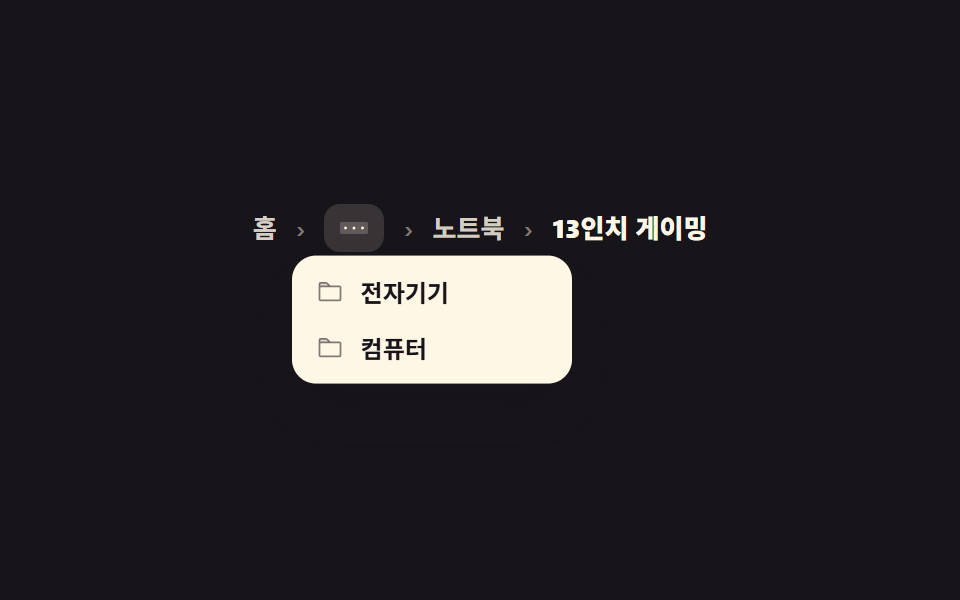 02 breadcrumb-collapse-middle-menu
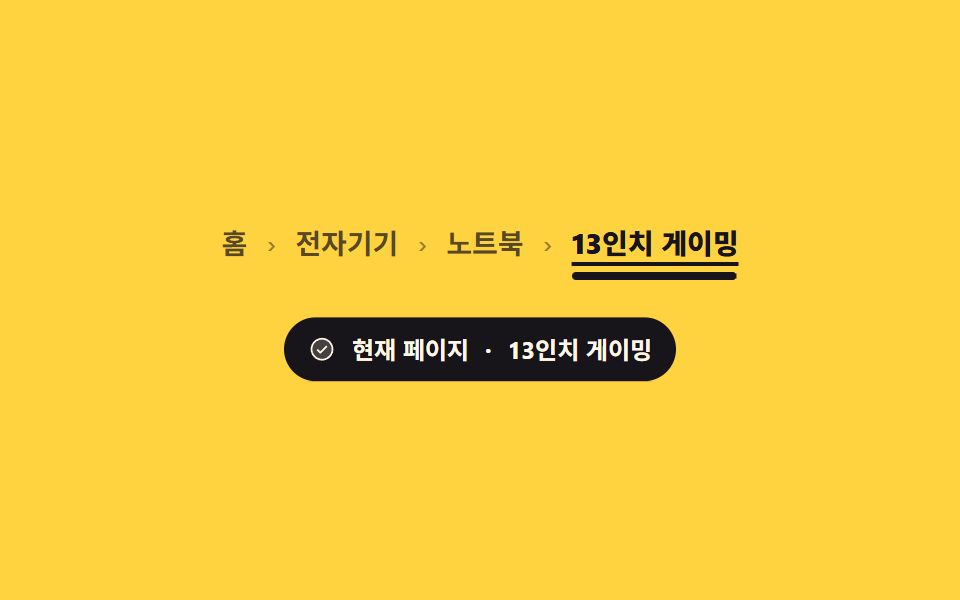 03 breadcrumb-current-page-emphasis
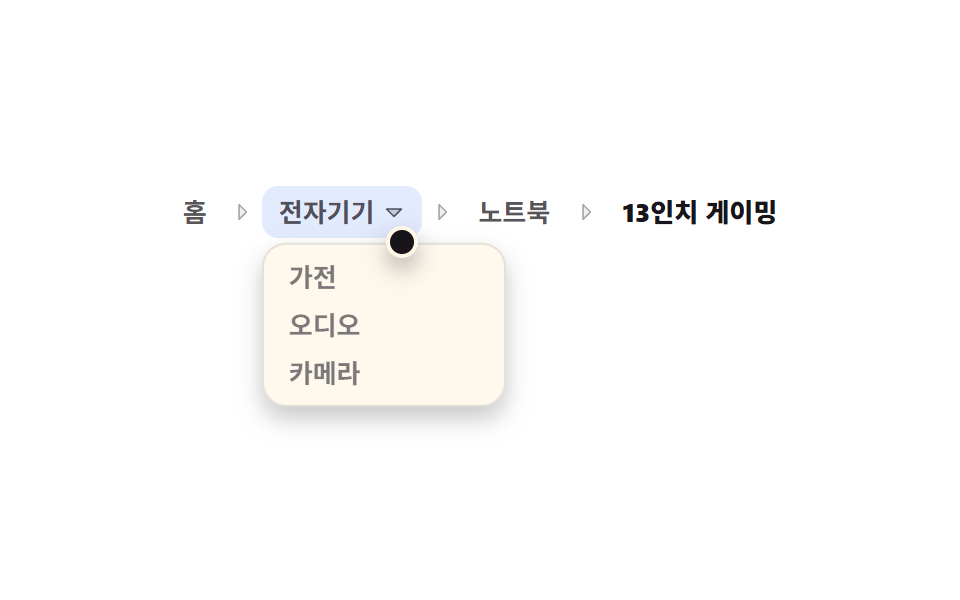 04 breadcrumb-sibling-preview-dropdown
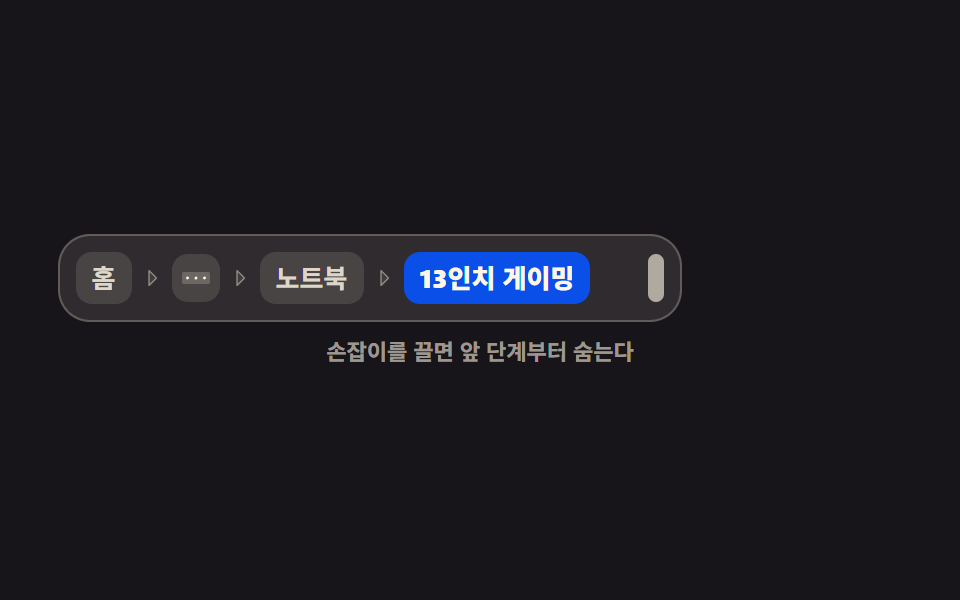 05 breadcrumb-auto-truncate-resize
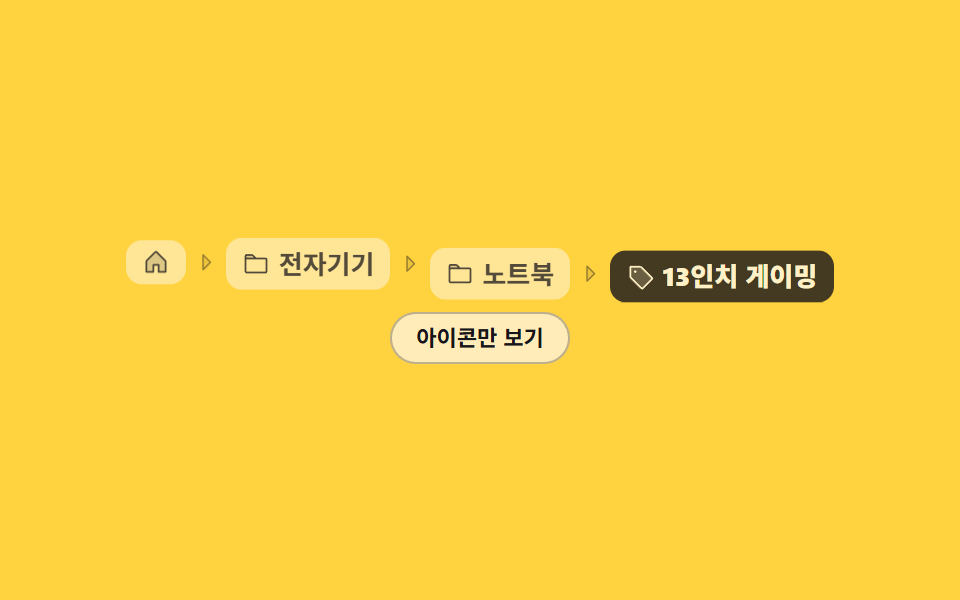 06 breadcrumb-icon-text-home
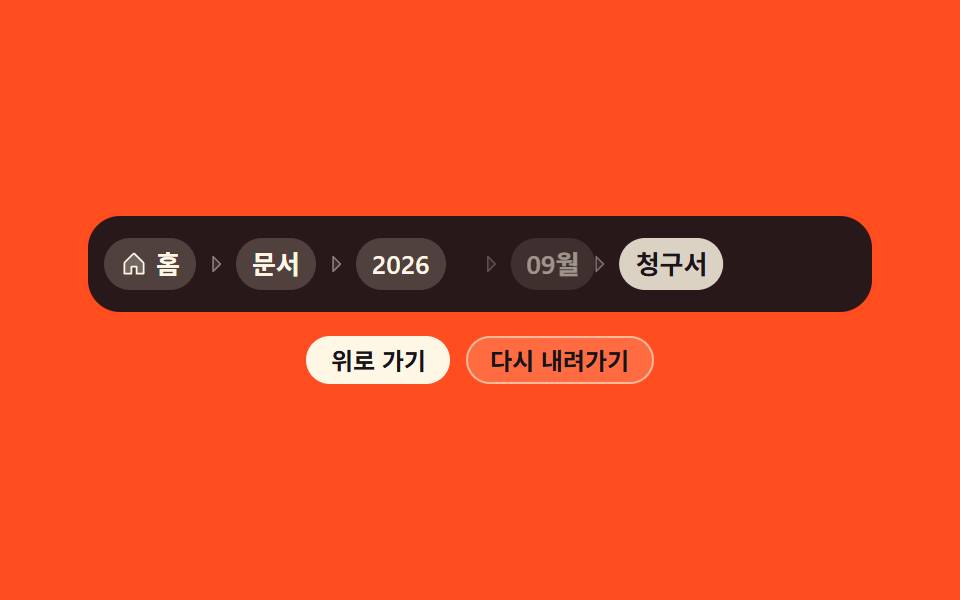 07 breadcrumb-step-transition-slide
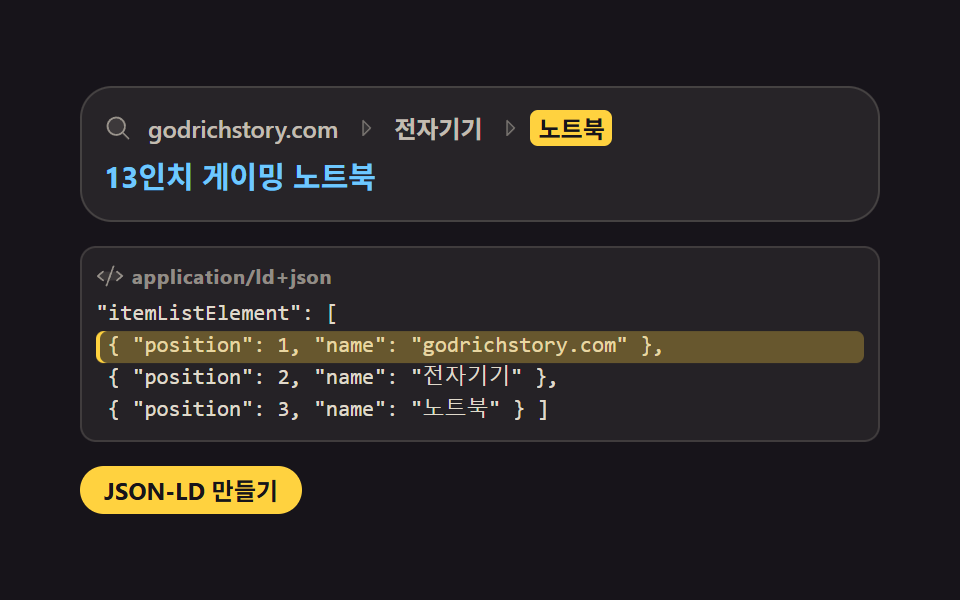 08 breadcrumb-jsonld-breadcrumblist
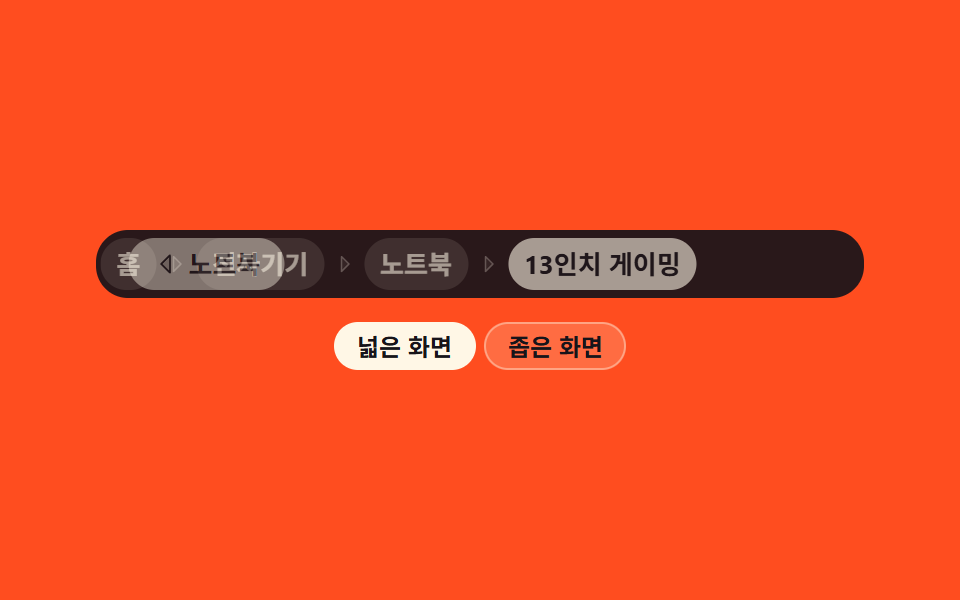 09 breadcrumb-mobile-back-parent
Auto-plays · click a tile to jump to its section · all nine in one zip
- 01 Three separator styles
- 02 Collapsed middle steps
- 03 Current page emphasis
- 04 Sibling path preview
- 05 Width-aware auto truncation
- 06 Icon plus label crumbs
- 07 Step-back slide out
- 08 Structured-data trail
- 09 Mobile back-to-parent
The order is not a ranking; it is the life of a trail on screen. The first three are about looks: swap the separator for a different mood (01), collapse the middle when the path gets long (02), and make the current page unmistakable (03). The next two are about movement: preview sibling categories one level up (04) and hide early steps behind an ellipsis as the width shrinks (05). The sixth compresses information with icons (06), and the seventh animates the hop between levels (07). The last two look past the desktop screen: a structured-data copy for search engines (08) and a mobile pattern that keeps only the parent (09). All nine put their breadcrumb css on nav with ol and li markup, and every one has a real keyboard path, not just a mouse one. Splitting the screen and then losing the way inside it pairs with Resizable Split Pane Layouts, and sending the path outward is inherited by Social Share Buttons.
01Three separator styles
What these breadcrumb ui examples show
The same path cycles through slash, chevron, and middle-dot separators. The slash and the middle dot come from li:not(:last-child)::after content and the chevron from an aria-hidden span, so a screen reader hears only the names.
<main class="stage">
  <div class="sv is-demo">
    <nav class="sv__stack" aria-label="Breadcrumb">
      <ol class="sv__list sv__list--slash is-on">
        <li><a href="#">Home</a></li>
        <li><a href="#">Electronics</a></li>
        <li><a href="#">Laptops</a></li>
        <li><span class="sv__cur" aria-current="page">13-inch gaming</span></li>
      </ol>
      <ol class="sv__list sv__list--caret" aria-hidden="true">
        <li><a href="#" tabindex="-1">Home</a><span class="sv__sep" aria-hidden="true"><svg viewBox="0 0 256 256" width="12" height="12" aria-hidden="true"><g fill="currentColor"><path d="m176 128l-80 80V48Z" opacity=".2"/><path d="m181.66 122.34l-80-80A8 8 0 0 0 88 48v160a8 8 0 0 0 13.66 5.66l80-80a8 8 0 0 0 0-11.32M104 188.69V67.31L164.69 128Z"/></g></svg></span></li>
        <li><a href="#" tabindex="-1">Electronics</a><span class="sv__sep" aria-hidden="true"><svg viewBox="0 0 256 256" width="12" height="12" aria-hidden="true"><g fill="currentColor"><path d="m176 128l-80 80V48Z" opacity=".2"/><path d="m181.66 122.34l-80-80A8 8 0 0 0 88 48v160a8 8 0 0 0 13.66 5.66l80-80a8 8 0 0 0 0-11.32M104 188.69V67.31L164.69 128Z"/></g></svg></span></li>
        <li><a href="#" tabindex="-1">Laptops</a><span class="sv__sep" aria-hidden="true"><svg viewBox="0 0 256 256" width="12" height="12" aria-hidden="true"><g fill="currentColor"><path d="m176 128l-80 80V48Z" opacity=".2"/><path d="m181.66 122.34l-80-80A8 8 0 0 0 88 48v160a8 8 0 0 0 13.66 5.66l80-80a8 8 0 0 0 0-11.32M104 188.69V67.31L164.69 128Z"/></g></svg></span></li>
        <li><span class="sv__cur">13-inch gaming</span></li>
      </ol>
      <ol class="sv__list sv__list--dot" aria-hidden="true">
        <li><a href="#" tabindex="-1">Home</a></li>
        <li><a href="#" tabindex="-1">Electronics</a></li>
        <li><a href="#" tabindex="-1">Laptops</a></li>
        <li><span class="sv__cur">13-inch gaming</span></li>
      </ol>
    </nav>
    <div class="sv__tabs" role="group" aria-label="Separator style">
      <span class="sv__ind" id="sv-ind" aria-hidden="true"></span>
      <button class="sv__pill sv__pill--slash" type="button" aria-pressed="true">Slash</button>
      <button class="sv__pill sv__pill--caret" type="button" aria-pressed="false">Chevron</button>
      <button class="sv__pill sv__pill--dot" type="button" aria-pressed="false">Middle dot</button>
    </div>
  </div>
</main>@use "../../../../site/static/demo-tokens" as *;
$duration: $dur-base;
$easing: $ease-spring;
$color: $subject-blue;
@include stage($stage-paper);
.sv {
display: flex;
flex-direction: column;
align-items: center;
gap: $sp-5;
user-select: none;
-webkit-user-select: none;
}
// 세 벌을 같은 그리드 칸에 겹친다 — 절대배치가 아니라 그리드라 부모 높이가 유지된다
.sv__stack { display: grid; }
.sv__list {
grid-area: 1 / 1;
display: flex;
align-items: center;
flex-wrap: nowrap;
gap: $sp-2;
margin: 0;
padding: 0;
list-style: none;
white-space: nowrap;
opacity: 0;
pointer-events: none;
font-size: clamp(11px, 3.2vw, 14px);
line-height: 20px;
font-weight: 600;
}
.sv__list.is-on { opacity: 1; pointer-events: auto; }
.sv__list li { display: inline-flex; align-items: center; gap: $sp-2; }
.sv__list a { color: $color; text-decoration: none; border-radius: $r-xs; }
.sv__list a:hover { text-decoration: underline; text-underline-offset: 4px; }
.sv__list a:focus-visible { outline: 2px solid $color; outline-offset: 2px; }
.sv__cur { color: $subject-ink; font-weight: 800; }
// 구분자는 의사요소·장식 span 으로만 그린다 — 읽기 프로그램에는 안 들린다
.sv__list--slash li:not(:last-child)::after {
content: "/";
display: inline-flex;
justify-content: center;
width: 12px;
color: rgba($subject-ink, .4);
}
.sv__list--dot li:not(:last-child)::after {
content: "\00B7";
display: inline-flex;
justify-content: center;
width: 12px;
color: rgba($subject-ink, .4);
}
.sv__sep {
display: inline-flex;
align-items: center;
justify-content: center;
width: 12px;
color: rgba($subject-ink, .4);
}
.sv__tabs {
position: relative;
display: flex;
align-items: center;
gap: $sp-2;
padding: $sp-1;
border-radius: $r-pill;
// 트랙을 먹색으로 — 라벨이 늘 크림이라 인디케이터가 미끄러지는 동안에도 글자가 사라지지 않는다
background: $subject-ink;
}
// 알약 폭 84px + gap 8px = 한 칸 92px (BD19: 알약은 flex 0 0 auto 고정 폭)
.sv__ind {
--step: 92px;
--i: 0;
position: absolute;
left: $sp-1;
top: $sp-1;
width: 84px;
height: 28px;
border-radius: $r-pill;
background: $subject-blue-deep;
transform: translateX(calc(var(--step) * var(--i)));
transition: transform $duration $easing;
}
.sv__pill {
position: relative;
flex: 0 0 auto;
width: 84px;
height: 28px;
padding: 0;
border: 0;
background: none;
border-radius: $r-pill;
color: rgba($subject-cream, .62);
font-family: inherit;
font-size: 12px;
line-height: 28px;
font-weight: 700;
cursor: pointer;
}
.sv__pill[aria-pressed="true"] { color: $subject-cream; }
.sv__pill:focus-visible { outline: 2px solid $subject-cream; outline-offset: 2px; }
// ── 자동 루프: 인디케이터가 한 칸씩만 미끄러진다(2→3→2→1→2). 한 칸씩이라 어느 프레임을 잘라도
// "두 알약 사이" 로 읽힌다 — 두 칸을 한 번에 건너뛰면 중간 프레임이 엉뚱한 알약에 주차한 것처럼 보인다.
// 도착한 프레임에서 구분자 벌을 steps(1, end) 로 컷 교체한다.
.sv.is-demo .sv__ind {
animation-name: sv-ind;
animation-duration: $dur-loop;
animation-timing-function: $easing;
animation-iteration-count: infinite;
}
@keyframes sv-ind {
0%, 5% { transform: translateX(var(--step)); }
18%, 31% { transform: translateX(calc(var(--step) * 2)); }
44%, 52% { transform: translateX(var(--step)); }
65%, 75% { transform: translateX(0); }
88%, 100% { transform: translateX(var(--step)); }
}
.sv.is-demo .sv__list,
.sv.is-demo .sv__pill {
animation-duration: $dur-loop;
animation-timing-function: steps(1, end);
animation-iteration-count: infinite;
}
.sv.is-demo .sv__list--slash { animation-name: sv-slash; }
.sv.is-demo .sv__list--caret { animation-name: sv-caret; }
.sv.is-demo .sv__list--dot { animation-name: sv-dot; }
// 컷은 인디케이터가 **출발하는** 순간에 — 진짜 클릭도 상태가 먼저 바뀌고 인디케이터가 따라간다.
// 도착 순간에 컷하면 $ease-spring 이 일찍 멈춰 보여서 프레임 대부분이 "딴 알약에 주차" 로 읽힌다.
@keyframes sv-slash { 0% { opacity: 0; } 52% { opacity: 1; } 75%, 100% { opacity: 0; } }
@keyframes sv-caret { 0% { opacity: 1; } 5% { opacity: 0; } 31% { opacity: 1; } 52% { opacity: 0; } 75%, 100% { opacity: 1; } }
@keyframes sv-dot { 0% { opacity: 0; } 5% { opacity: 1; } 31%, 100% { opacity: 0; } }
.sv.is-demo .sv__pill--slash { animation-name: sv-lab-slash; }
.sv.is-demo .sv__pill--caret { animation-name: sv-lab-caret; }
.sv.is-demo .sv__pill--dot { animation-name: sv-lab-dot; }
// 두 상태 다 크림이라(진하기만 다르다) 인디케이터가 지나가는 동안에도 글자가 읽힌다
@keyframes sv-lab-slash { 0% { color: rgba($subject-cream, .62); } 52% { color: $subject-cream; } 75%, 100% { color: rgba($subject-cream, .62); } }
@keyframes sv-lab-caret { 0% { color: $subject-cream; } 5% { color: rgba($subject-cream, .62); } 31% { color: $subject-cream; } 52% { color: rgba($subject-cream, .62); } 75%, 100% { color: $subject-cream; } }
@keyframes sv-lab-dot { 0% { color: rgba($subject-cream, .62); } 5% { color: $subject-cream; } 31%, 100% { color: rgba($subject-cream, .62); } }
@media (max-width: 340px) {
.sv { gap: $sp-4; }
.sv__tabs { gap: $sp-1; }
.sv__ind { --step: 76px; width: 72px; }
.sv__pill { width: 72px; font-size: 11px; }
}
@media (prefers-reduced-motion: reduce) {
.sv.is-demo .sv__ind,
.sv.is-demo .sv__list,
.sv.is-demo .sv__pill { animation: none !important; }
.sv.is-demo .sv__list--slash { opacity: 1; }
.sv.is-demo .sv__pill--slash { color: $subject-cream; }
.sv__ind { transition: none; }
}@charset "UTF-8";
html, body {
margin: 0;
overflow: hidden;
}
.stage {
box-sizing: border-box;
min-height: 100vh;
display: grid;
place-items: center;
margin: 0;
background: #ffffff;
font-family: -apple-system, "Segoe UI", "Noto Sans KR", sans-serif;
padding: clamp(8px, 4vw, 24px);
}
.sv {
display: flex;
flex-direction: column;
align-items: center;
gap: 20px;
user-select: none;
-webkit-user-select: none;
}
.sv__stack {
display: grid;
}
.sv__list {
grid-area: 1/1;
display: flex;
align-items: center;
flex-wrap: nowrap;
gap: 8px;
margin: 0;
padding: 0;
list-style: none;
white-space: nowrap;
opacity: 0;
pointer-events: none;
font-size: clamp(11px, 3.2vw, 14px);
line-height: 20px;
font-weight: 600;
}
.sv__list.is-on {
opacity: 1;
pointer-events: auto;
}
.sv__list li {
display: inline-flex;
align-items: center;
gap: 8px;
}
.sv__list a {
color: #2f6df6;
text-decoration: none;
border-radius: 4px;
}
.sv__list a:hover {
text-decoration: underline;
text-underline-offset: 4px;
}
.sv__list a:focus-visible {
outline: 2px solid #2f6df6;
outline-offset: 2px;
}
.sv__cur {
color: #17141a;
font-weight: 800;
}
.sv__list--slash li:not(:last-child)::after {
content: "/";
display: inline-flex;
justify-content: center;
width: 12px;
color: rgba(23, 20, 26, 0.4);
}
.sv__list--dot li:not(:last-child)::after {
content: "·";
display: inline-flex;
justify-content: center;
width: 12px;
color: rgba(23, 20, 26, 0.4);
}
.sv__sep {
display: inline-flex;
align-items: center;
justify-content: center;
width: 12px;
color: rgba(23, 20, 26, 0.4);
}
.sv__tabs {
position: relative;
display: flex;
align-items: center;
gap: 8px;
padding: 4px;
border-radius: 999px;
background: #17141a;
}
.sv__ind {
--step: 92px;
--i: 0;
position: absolute;
left: 4px;
top: 4px;
width: 84px;
height: 28px;
border-radius: 999px;
background: #0a4fe8;
transform: translateX(calc(var(--step) * var(--i)));
transition: transform 300ms cubic-bezier(0.2, 0.8, 0.2, 1);
}
.sv__pill {
position: relative;
flex: 0 0 auto;
width: 84px;
height: 28px;
padding: 0;
border: 0;
background: none;
border-radius: 999px;
color: rgba(255, 247, 230, 0.62);
font-family: inherit;
font-size: 12px;
line-height: 28px;
font-weight: 700;
cursor: pointer;
}
.sv__pill[aria-pressed=true] {
color: #fff7e6;
}
.sv__pill:focus-visible {
outline: 2px solid #fff7e6;
outline-offset: 2px;
}
.sv.is-demo .sv__ind {
animation-name: sv-ind;
animation-duration: 2s;
animation-timing-function: cubic-bezier(0.2, 0.8, 0.2, 1);
animation-iteration-count: infinite;
}
@keyframes sv-ind {
0%, 5% {
transform: translateX(var(--step));
}
18%, 31% {
transform: translateX(calc(var(--step) * 2));
}
44%, 52% {
transform: translateX(var(--step));
}
65%, 75% {
transform: translateX(0);
}
88%, 100% {
transform: translateX(var(--step));
}
}
.sv.is-demo .sv__list,
.sv.is-demo .sv__pill {
animation-duration: 2s;
animation-timing-function: steps(1, end);
animation-iteration-count: infinite;
}
.sv.is-demo .sv__list--slash {
animation-name: sv-slash;
}
.sv.is-demo .sv__list--caret {
animation-name: sv-caret;
}
.sv.is-demo .sv__list--dot {
animation-name: sv-dot;
}
@keyframes sv-slash {
0% {
opacity: 0;
}
52% {
opacity: 1;
}
75%, 100% {
opacity: 0;
}
}
@keyframes sv-caret {
0% {
opacity: 1;
}
5% {
opacity: 0;
}
31% {
opacity: 1;
}
52% {
opacity: 0;
}
75%, 100% {
opacity: 1;
}
}
@keyframes sv-dot {
0% {
opacity: 0;
}
5% {
opacity: 1;
}
31%, 100% {
opacity: 0;
}
}
.sv.is-demo .sv__pill--slash {
animation-name: sv-lab-slash;
}
.sv.is-demo .sv__pill--caret {
animation-name: sv-lab-caret;
}
.sv.is-demo .sv__pill--dot {
animation-name: sv-lab-dot;
}
@keyframes sv-lab-slash {
0% {
color: rgba(255, 247, 230, 0.62);
}
52% {
color: #fff7e6;
}
75%, 100% {
color: rgba(255, 247, 230, 0.62);
}
}
@keyframes sv-lab-caret {
0% {
color: #fff7e6;
}
5% {
color: rgba(255, 247, 230, 0.62);
}
31% {
color: #fff7e6;
}
52% {
color: rgba(255, 247, 230, 0.62);
}
75%, 100% {
color: #fff7e6;
}
}
@keyframes sv-lab-dot {
0% {
color: rgba(255, 247, 230, 0.62);
}
5% {
color: #fff7e6;
}
31%, 100% {
color: rgba(255, 247, 230, 0.62);
}
}
@media (max-width: 340px) {
.sv {
gap: 16px;
}
.sv__tabs {
gap: 4px;
}
.sv__ind {
--step: 76px;
width: 72px;
}
.sv__pill {
width: 72px;
font-size: 11px;
}
}
@media (prefers-reduced-motion: reduce) {
.sv.is-demo .sv__ind,
.sv.is-demo .sv__list,
.sv.is-demo .sv__pill {
animation: none !important;
}
.sv.is-demo .sv__list--slash {
opacity: 1;
}
.sv.is-demo .sv__pill--slash {
color: #fff7e6;
}
.sv__ind {
transition: none;
}
}// 실동작: 알약을 누르면 .is-demo 를 떼고 그 구분자로 고정한다. 좌우 화살표로도 옮긴다.
var root = document.querySelector('.sv');
var ind = document.getElementById('sv-ind');
var pills = [].slice.call(document.querySelectorAll('.sv__pill'));
var lists = [].slice.call(document.querySelectorAll('.sv__list'));
function pick(i) {
  root.classList.remove('is-demo');
  ind.style.setProperty('--i', i);
  pills.forEach(function (p, n) { p.setAttribute('aria-pressed', n === i ? 'true' : 'false'); });
  lists.forEach(function (l, n) {
    var on = n === i;
    l.classList.toggle('is-on', on);
    l.setAttribute('aria-hidden', on ? 'false' : 'true');
    [].forEach.call(l.querySelectorAll('a'), function (a) { a.tabIndex = on ? 0 : -1; });
  });
}
pills.forEach(function (p, i) {
p.addEventListener('click', function () { pick(i); });
p.addEventListener('keydown', function (e) {
if (e.key !== 'ArrowRight' && e.key !== 'ArrowLeft') return;
e.preventDefault();
var n = (i + (e.key === 'ArrowRight' ? 1 : pills.length - 1)) % pills.length;
pills[n].focus({ preventScroll: true });
pick(n);
});
});import { useState } from "react";
import type { CSSProperties } from "react";
import styles from "./SeparatorVariants.module.scss";
export type SeparatorVariantsProps = {
trail?: string[];
duration?: number;
easing?: string;
color?: string;
};
type KeyEvt = { key: string; preventDefault(): void };
type Vars = CSSProperties & { "--duration"?: string; "--easing"?: string; "--color"?: string; "--i"?: number };
const CaretRight = () => (
<svg viewBox="0 0 256 256" width="12" height="12" aria-hidden="true"><g fill="currentColor"><path d="m176 128l-80 80V48Z" opacity=".2"/><path d="m181.66 122.34l-80-80A8 8 0 0 0 88 48v160a8 8 0 0 0 13.66 5.66l80-80a8 8 0 0 0 0-11.32M104 188.69V67.31L164.69 128Z"/></g></svg>
);
const KINDS = ["slash", "caret", "dot"];
const LABELS = ["Slash", "Chevron", "Middle dot"];
export default function SeparatorVariants({
trail = ["Home", "Electronics", "Laptops", "13-inch gaming"],
duration = 300,
easing = "cubic-bezier(.2,.8,.2,1)",
color = "#2f6df6",
}: SeparatorVariantsProps) {
const [at, setAt] = useState(0);
const vars: Vars = { "--duration": `${duration}ms`, "--easing": easing, "--color": color, "--i": at };
function onKey(e: KeyEvt, i: number) {
if (e.key !== "ArrowRight" && e.key !== "ArrowLeft") return;
e.preventDefault();
setAt((i + (e.key === "ArrowRight" ? 1 : LABELS.length - 1)) % LABELS.length);
}
return (
<div className={styles.sv} style={vars}>
<nav className={styles.stack} aria-label="Breadcrumb">
{KINDS.map((kind, n) => (
<ol
key={kind}
className={[styles.list, styles[kind], n === at ? styles.on : ""].join(" ")}
aria-hidden={n !== at}
>
{trail.map((label, i) => (
<li key={label}>
{i === trail.length - 1
? <span className={styles.cur} aria-current={n === at ? "page" : undefined}>{label}</span>
: <a href="#" tabIndex={n === at ? 0 : -1}>{label}</a>}
{kind === "caret" && i < trail.length - 1 && (
<span className={styles.sep} aria-hidden="true"><CaretRight /></span>
)}
</li>
))}
</ol>
))}
</nav>
<div className={styles.tabs} role="group" aria-label="Separator style">
<span className={styles.ind} aria-hidden="true" />
{LABELS.map((label, i) => (
<button
key={label}
type="button"
className={styles.pill}
aria-pressed={i === at}
onClick={(): void => setAt(i)}
onKeyDown={(e: KeyEvt): void => onKey(e, i)}
>
{label}
</button>
))}
</div>
</div>
);
}01 · Three separator styles — Measured area 5.202% · moving frames 16/23Original by GODRICH · SCSS and React ship in the zip · See the password
Where to look in the code
Click a pill to lock that separator, or move with the left and right arrow keys.
function pick(i) {
root.classList.remove('is-demo');
ind.style.setProperty('--i', i);
pills.forEach(function (p, n) { p.setAttribute('aria-pressed', n === i ? 'true' : 'false'); });
lists.forEach(function (l, n) {
var on = n === i;
l.classList.toggle('is-on', on);
l.setAttribute('aria-hidden', on ? 'false' : 'true');
[].forEach.call(l.querySelectorAll('a'), function (a) { a.tabIndex = on ? 0 : -1; });
});
}
02Collapsed middle steps
What happens on screen
When the path runs more than a few levels deep, the middle steps fold into a single three-dot button. Pressing it drops the hidden steps down as a list that Escape or a click outside closes, and the arrow keys move inside the list.
<main class="stage">
  <div class="cm is-demo">
    <nav aria-label="Breadcrumb">
      <ol class="cm__list">
        <li><a href="#">Home</a></li>
        <li class="cm__slot" id="cm-slot">
          <button class="cm__dots" id="cm-btn" type="button" aria-expanded="false" aria-controls="cm-menu" aria-label="Show hidden steps">
            <svg viewBox="0 0 256 256" width="16" height="16" aria-hidden="true"><g fill="currentColor"><path d="M240 96v64a16 16 0 0 1-16 16H32a16 16 0 0 1-16-16V96a16 16 0 0 1 16-16h192a16 16 0 0 1 16 16" opacity=".2"/><path d="M140 128a12 12 0 1 1-12-12a12 12 0 0 1 12 12m56-12a12 12 0 1 0 12 12a12 12 0 0 0-12-12m-136 0a12 12 0 1 0 12 12a12 12 0 0 0-12-12"/></g></svg>
          </button>
          <ul class="cm__menu" id="cm-menu">
            <li><a href="#"><svg viewBox="0 0 256 256" width="14" height="14" aria-hidden="true"><g fill="currentColor"><path d="M128 80H32V56a8 8 0 0 1 8-8h52.69a8 8 0 0 1 5.65 2.34Z" opacity=".2"/><path d="M216 72h-84.69L104 44.69A15.86 15.86 0 0 0 92.69 40H40a16 16 0 0 0-16 16v144.62A15.4 15.4 0 0 0 39.38 216h177.51A15.13 15.13 0 0 0 232 200.89V88a16 16 0 0 0-16-16M92.69 56l16 16H40V56ZM216 200H40V88h176Z"/></g></svg>Electronics</a></li>
            <li><a href="#"><svg viewBox="0 0 256 256" width="14" height="14" aria-hidden="true"><g fill="currentColor"><path d="M128 80H32V56a8 8 0 0 1 8-8h52.69a8 8 0 0 1 5.65 2.34Z" opacity=".2"/><path d="M216 72h-84.69L104 44.69A15.86 15.86 0 0 0 92.69 40H40a16 16 0 0 0-16 16v144.62A15.4 15.4 0 0 0 39.38 216h177.51A15.13 15.13 0 0 0 232 200.89V88a16 16 0 0 0-16-16M92.69 56l16 16H40V56ZM216 200H40V88h176Z"/></g></svg>Computers</a></li>
          </ul>
        </li>
        <li><a href="#">Laptops</a></li>
        <li><span class="cm__cur" aria-current="page">13-inch gaming</span></li>
      </ol>
    </nav>
  </div>
</main>
@use "../../../../site/static/demo-tokens" as *;
$duration: $dur-quick;
$easing: $ease-spring;
$color: $subject-blue;
@include stage($stage-ink);
// 절대배치 목록은 부모 높이 계산에서 빠지지만 scrollHeight 엔 잡힌다 →
// 뿌리에 열린 목록 높이(8px 띄움 + 64px 목록)만큼 자리를 미리 확보한다 (BD9)
.cm {
padding-bottom: 72px;
user-select: none;
-webkit-user-select: none;
}
.cm__list {
display: flex;
align-items: center;
flex-wrap: nowrap;
gap: $sp-2;
margin: 0;
padding: 0;
list-style: none;
white-space: nowrap;
font-size: clamp(11px, 3.2vw, 13px);
line-height: 20px;
font-weight: 600;
}
.cm__list > li { display: inline-flex; align-items: center; gap: $sp-2; }
.cm__list > li + li::before {
content: "\203A";
display: inline-flex;
justify-content: center;
width: 8px;
color: rgba($subject-cream, .45);
}
.cm__list a { color: rgba($subject-cream, .82); text-decoration: none; border-radius: $r-xs; }
.cm__list a:hover { color: $subject-cream; text-decoration: underline; text-underline-offset: 4px; }
.cm__list a:focus-visible { outline: 2px solid $subject-cream; outline-offset: 2px; }
.cm__cur { color: $subject-cream; font-weight: 800; }
.cm__slot { position: relative; }
.cm__dots {
display: inline-flex;
align-items: center;
justify-content: center;
width: 30px;
height: 24px;
padding: 0;
border: 0;
border-radius: $r-sm;
background: rgba($subject-cream, .14);
color: $subject-cream;
cursor: pointer;
transition: transform $duration $easing, background-color $duration $easing;
}
.cm__dots:hover { background: rgba($subject-cream, .26); }
.cm__dots:focus-visible { outline: 2px solid $subject-cream; outline-offset: 2px; }
.cm__slot.is-open .cm__dots { background: $color; }
.cm__menu {
position: absolute;
top: calc(100% + 8px);
left: 0;
z-index: 2;
min-width: 132px;
margin: 0;
padding: $sp-1;
list-style: none;
border-radius: $r-control;
background: $subject-cream;
box-shadow: $shadow-raised;
opacity: 0;
visibility: hidden;
transform: translateY(-6px);
transition: opacity $duration $easing, transform $duration $easing, visibility 0s linear $duration;
}
.cm__slot.is-open .cm__menu {
opacity: 1;
visibility: visible;
transform: translateY(0);
transition: opacity $duration $easing, transform $duration $easing, visibility 0s linear 0s;
}
.cm__menu li { display: block; }
.cm__menu a {
display: flex;
align-items: center;
gap: $sp-2;
padding: $sp-1 $sp-2;
border-radius: $r-sm;
color: $subject-ink;
text-decoration: none;
font-size: 12px;
line-height: 20px;
font-weight: 600;
white-space: nowrap;
}
.cm__menu a:hover { background-color: rgba($color, .18); color: $subject-ink; text-decoration: none; }
.cm__menu a:focus-visible { outline: 2px solid $color; outline-offset: -2px; }
.cm__menu svg { flex: none; color: rgba($subject-ink, .55); }
// ── 자동 루프: 눌림 → 목록이 translateY+opacity 로 내려옴 → 유지(hover 표시가 steps 로 옮겨감) → 접힘 ──
.cm.is-demo .cm__dots {
animation-name: cm-press;
animation-duration: $dur-loop;
animation-timing-function: $easing;
animation-iteration-count: infinite;
}
@keyframes cm-press {
0%, 4% { transform: scale(1); }
10% { transform: scale(.84); }
16%, 100% { transform: scale(1); }
}
// 나타남/사라짐은 steps(1, end) 로 한 프레임에 컷하고, 움직임은 translateY 가 맡는다.
// opacity 를 서서히 올리면 poster 가 반투명하게 뜬 흐린 패널이 된다 (blog-demo 실패표)
.cm.is-demo .cm__menu {
visibility: visible;
animation-name: cm-cut, cm-slide;
animation-duration: $dur-loop, $dur-loop;
animation-timing-function: steps(1, end), $easing;
animation-iteration-count: infinite, infinite;
}
@keyframes cm-cut {
0% { opacity: 0; }
14% { opacity: 1; }
84%, 100% { opacity: 0; }
}
@keyframes cm-slide {
0%, 14% { transform: translateY(-10px); }
42%, 70% { transform: translateY(0); }
84%, 100% { transform: translateY(-10px); }
}
// hover 표시는 한 프레임에 컷으로 옮긴다 — 겹치면 poster 에 두 줄이 동시에 눌린 것처럼 보인다
.cm.is-demo .cm__menu li:nth-child(1) a,
.cm.is-demo .cm__menu li:nth-child(2) a {
animation-duration: $dur-loop;
animation-timing-function: steps(1, end);
animation-iteration-count: infinite;
}
.cm.is-demo .cm__menu li:nth-child(1) a { animation-name: cm-hi1; }
.cm.is-demo .cm__menu li:nth-child(2) a { animation-name: cm-hi2; }
@keyframes cm-hi1 { 0% { background-color: rgba($color, 0); } 46% { background-color: rgba($color, .18); } 60%, 100% { background-color: rgba($color, 0); } }
@keyframes cm-hi2 { 0% { background-color: rgba($color, 0); } 60% { background-color: rgba($color, .18); } 74%, 100% { background-color: rgba($color, 0); } }
@media (max-width: 340px) {
.cm { padding-bottom: 68px; }
.cm__menu { min-width: 120px; }
.cm__dots { width: 26px; }
}
@media (prefers-reduced-motion: reduce) {
.cm.is-demo .cm__dots,
.cm.is-demo .cm__menu,
.cm.is-demo .cm__menu a { animation: none !important; }
.cm.is-demo .cm__menu { opacity: 1; transform: none; }
.cm__dots, .cm__menu { transition: none; }
}@charset "UTF-8";
html, body {
margin: 0;
overflow: hidden;
}
.stage {
box-sizing: border-box;
min-height: 100vh;
display: grid;
place-items: center;
margin: 0;
background: #17141a;
font-family: -apple-system, "Segoe UI", "Noto Sans KR", sans-serif;
padding: clamp(8px, 4vw, 24px);
}
.cm {
padding-bottom: 72px;
user-select: none;
-webkit-user-select: none;
}
.cm__list {
display: flex;
align-items: center;
flex-wrap: nowrap;
gap: 8px;
margin: 0;
padding: 0;
list-style: none;
white-space: nowrap;
font-size: clamp(11px, 3.2vw, 13px);
line-height: 20px;
font-weight: 600;
}
.cm__list > li {
display: inline-flex;
align-items: center;
gap: 8px;
}
.cm__list > li + li::before {
content: "›";
display: inline-flex;
justify-content: center;
width: 8px;
color: rgba(255, 247, 230, 0.45);
}
.cm__list a {
color: rgba(255, 247, 230, 0.82);
text-decoration: none;
border-radius: 4px;
}
.cm__list a:hover {
color: #fff7e6;
text-decoration: underline;
text-underline-offset: 4px;
}
.cm__list a:focus-visible {
outline: 2px solid #fff7e6;
outline-offset: 2px;
}
.cm__cur {
color: #fff7e6;
font-weight: 800;
}
.cm__slot {
position: relative;
}
.cm__dots {
display: inline-flex;
align-items: center;
justify-content: center;
width: 30px;
height: 24px;
padding: 0;
border: 0;
border-radius: 8px;
background: rgba(255, 247, 230, 0.14);
color: #fff7e6;
cursor: pointer;
transition: transform 220ms cubic-bezier(0.2, 0.8, 0.2, 1), background-color 220ms cubic-bezier(0.2, 0.8, 0.2, 1);
}
.cm__dots:hover {
background: rgba(255, 247, 230, 0.26);
}
.cm__dots:focus-visible {
outline: 2px solid #fff7e6;
outline-offset: 2px;
}
.cm__slot.is-open .cm__dots {
background: #2f6df6;
}
.cm__menu {
position: absolute;
top: calc(100% + 8px);
left: 0;
z-index: 2;
min-width: 132px;
margin: 0;
padding: 4px;
list-style: none;
border-radius: 12px;
background: #fff7e6;
box-shadow: 0 14px 24px rgba(23, 20, 26, 0.32);
opacity: 0;
visibility: hidden;
transform: translateY(-6px);
transition: opacity 220ms cubic-bezier(0.2, 0.8, 0.2, 1), transform 220ms cubic-bezier(0.2, 0.8, 0.2, 1), visibility 0s linear 220ms;
}
.cm__slot.is-open .cm__menu {
opacity: 1;
visibility: visible;
transform: translateY(0);
transition: opacity 220ms cubic-bezier(0.2, 0.8, 0.2, 1), transform 220ms cubic-bezier(0.2, 0.8, 0.2, 1), visibility 0s linear 0s;
}
.cm__menu li {
display: block;
}
.cm__menu a {
display: flex;
align-items: center;
gap: 8px;
padding: 4px 8px;
border-radius: 8px;
color: #17141a;
text-decoration: none;
font-size: 12px;
line-height: 20px;
font-weight: 600;
white-space: nowrap;
}
.cm__menu a:hover {
background-color: rgba(47, 109, 246, 0.18);
color: #17141a;
text-decoration: none;
}
.cm__menu a:focus-visible {
outline: 2px solid #2f6df6;
outline-offset: -2px;
}
.cm__menu svg {
flex: none;
color: rgba(23, 20, 26, 0.55);
}
.cm.is-demo .cm__dots {
animation-name: cm-press;
animation-duration: 2s;
animation-timing-function: cubic-bezier(0.2, 0.8, 0.2, 1);
animation-iteration-count: infinite;
}
@keyframes cm-press {
0%, 4% {
transform: scale(1);
}
10% {
transform: scale(0.84);
}
16%, 100% {
transform: scale(1);
}
}
.cm.is-demo .cm__menu {
visibility: visible;
animation-name: cm-cut, cm-slide;
animation-duration: 2s, 2s;
animation-timing-function: steps(1, end), cubic-bezier(0.2, 0.8, 0.2, 1);
animation-iteration-count: infinite, infinite;
}
@keyframes cm-cut {
0% {
opacity: 0;
}
14% {
opacity: 1;
}
84%, 100% {
opacity: 0;
}
}
@keyframes cm-slide {
0%, 14% {
transform: translateY(-10px);
}
42%, 70% {
transform: translateY(0);
}
84%, 100% {
transform: translateY(-10px);
}
}
.cm.is-demo .cm__menu li:nth-child(1) a,
.cm.is-demo .cm__menu li:nth-child(2) a {
animation-duration: 2s;
animation-timing-function: steps(1, end);
animation-iteration-count: infinite;
}
.cm.is-demo .cm__menu li:nth-child(1) a {
animation-name: cm-hi1;
}
.cm.is-demo .cm__menu li:nth-child(2) a {
animation-name: cm-hi2;
}
@keyframes cm-hi1 {
0% {
background-color: rgba(47, 109, 246, 0);
}
46% {
background-color: rgba(47, 109, 246, 0.18);
}
60%, 100% {
background-color: rgba(47, 109, 246, 0);
}
}
@keyframes cm-hi2 {
0% {
background-color: rgba(47, 109, 246, 0);
}
60% {
background-color: rgba(47, 109, 246, 0.18);
}
74%, 100% {
background-color: rgba(47, 109, 246, 0);
}
}
@media (max-width: 340px) {
.cm {
padding-bottom: 68px;
}
.cm__menu {
min-width: 120px;
}
.cm__dots {
width: 26px;
}
}
@media (prefers-reduced-motion: reduce) {
.cm.is-demo .cm__dots,
.cm.is-demo .cm__menu,
.cm.is-demo .cm__menu a {
animation: none !important;
}
.cm.is-demo .cm__menu {
opacity: 1;
transform: none;
}
.cm__dots, .cm__menu {
transition: none;
}
}// 실동작: 클릭 토글 · Escape 로 닫기 · ArrowDown/ArrowUp 으로 항목 이동 · 목록 밖 클릭으로 닫기
var root = document.querySelector('.cm');
var slot = document.getElementById('cm-slot');
var btn = document.getElementById('cm-btn');
var links = [].slice.call(document.querySelectorAll('#cm-menu a'));
function isOpen() { return btn.getAttribute('aria-expanded') === 'true'; }
function setOpen(on, restoreFocus) {
root.classList.remove('is-demo');
slot.classList.toggle('is-open', on);
btn.setAttribute('aria-expanded', on ? 'true' : 'false');
if (on) links[0].focus({ preventScroll: true });
else if (restoreFocus) btn.focus({ preventScroll: true });
}
btn.addEventListener('click', function (e) { e.stopPropagation(); setOpen(!isOpen(), true); });
document.addEventListener('keydown', function (e) {
  if (e.key === 'Escape' && isOpen()) { e.preventDefault(); setOpen(false, true); return; }
  if (e.key !== 'ArrowDown' && e.key !== 'ArrowUp') return;
  var i = links.indexOf(document.activeElement);
  if (i < 0 && document.activeElement !== btn) return;
  e.preventDefault();
  if (!isOpen()) { setOpen(true, false); return; }
  var step = e.key === 'ArrowDown' ? 1 : links.length - 1;
  links[(i + step + links.length) % links.length].focus({ preventScroll: true });
});
document.addEventListener('click', function (e) {
if (isOpen() && !slot.contains(e.target)) setOpen(false, false);
});import { useEffect, useRef, useState } from "react";
import type { CSSProperties } from "react";
import styles from "./CollapseMiddleMenu.module.scss";
export type CollapseMiddleMenuProps = {
head?: string;
hidden?: string[];
tail?: string[];
duration?: number;
easing?: string;
color?: string;
};
type KeyEvt = { key: string; preventDefault(): void };
type Vars = CSSProperties & { "--duration"?: string; "--easing"?: string; "--color"?: string };
const IconDots = () => (
<svg viewBox="0 0 256 256" width="16" height="16" aria-hidden="true"><g fill="currentColor"><path d="M240 96v64a16 16 0 0 1-16 16H32a16 16 0 0 1-16-16V96a16 16 0 0 1 16-16h192a16 16 0 0 1 16 16" opacity=".2"/><path d="M140 128a12 12 0 1 1-12-12a12 12 0 0 1 12 12m56-12a12 12 0 1 0 12 12a12 12 0 0 0-12-12m-136 0a12 12 0 1 0 12 12a12 12 0 0 0-12-12"/></g></svg>
);
const IconFolder = () => (
<svg viewBox="0 0 256 256" width="14" height="14" aria-hidden="true"><g fill="currentColor"><path d="M128 80H32V56a8 8 0 0 1 8-8h52.69a8 8 0 0 1 5.65 2.34Z" opacity=".2"/><path d="M216 72h-84.69L104 44.69A15.86 15.86 0 0 0 92.69 40H40a16 16 0 0 0-16 16v144.62A15.4 15.4 0 0 0 39.38 216h177.51A15.13 15.13 0 0 0 232 200.89V88a16 16 0 0 0-16-16M92.69 56l16 16H40V56ZM216 200H40V88h176Z"/></g></svg>
);
export default function CollapseMiddleMenu({
head = "Home",
hidden = ["Electronics", "Computers"],
tail = ["Laptops", "13-inch gaming"],
duration = 220,
easing = "cubic-bezier(.2,.8,.2,1)",
color = "#2f6df6",
}: CollapseMiddleMenuProps) {
const [open, setOpen] = useState(false);
const slotRef = useRef<HTMLLIElement>(null);
const btnRef = useRef<HTMLButtonElement>(null);
const vars: Vars = { "--duration": `${duration}ms`, "--easing": easing, "--color": color };
useEffect(() => {
if (!open) return;
const onDoc = (e: Event) => {
const el = slotRef.current;
if (el && e.target && !el.contains(e.target as Node)) setOpen(false);
};
document.addEventListener("click", onDoc);
return () => document.removeEventListener("click", onDoc);
}, [open]);
function step(dir: number) {
const el = slotRef.current;
if (!el) return;
const links = Array.from(el.querySelectorAll("a"));
const i = links.indexOf(document.activeElement as HTMLAnchorElement);
links[(i + dir + links.length) % links.length].focus({ preventScroll: true });
}
function onKey(e: KeyEvt) {
if (e.key === "Escape" && open) {
e.preventDefault();
setOpen(false);
btnRef.current?.focus({ preventScroll: true });
return;
}
if (e.key !== "ArrowDown" && e.key !== "ArrowUp") return;
e.preventDefault();
if (!open) setOpen(true);
else step(e.key === "ArrowDown" ? 1 : -1);
}
return (
<div className={styles.cm} style={vars} onKeyDown={onKey}>
<nav aria-label="Breadcrumb">
<ol className={styles.list}>
<li><a href="#">{head}</a></li>
<li ref={slotRef} className={[styles.slot, open ? styles.isOpen : ""].join(" ")}>
<button
ref={btnRef}
type="button"
className={styles.dots}
aria-expanded={open}
aria-controls="cm-menu"
aria-label="Show hidden steps"
onClick={(): void => setOpen(!open)}
>
<IconDots />
</button>
<ul className={styles.menu} id="cm-menu">
{hidden.map((label) => (
<li key={label}><a href="#"><IconFolder />{label}</a></li>
))}
</ul>
</li>
{tail.map((label, i) => (
<li key={label}>
{i === tail.length - 1
? <span className={styles.cur} aria-current="page">{label}</span>
: <a href="#">{label}</a>}
</li>
))}
</ol>
</nav>
</div>
);
}02 · Collapsed middle steps — Measured area 7.289% · moving frames 16/23Original by GODRICH · SCSS and React ship in the zip · See the password
How to read the code
The button reports its state through aria-expanded.
document.addEventListener('keydown', function (e) {
if (e.key === 'Escape' && isOpen()) { e.preventDefault(); setOpen(false, true); return; }
if (e.key !== 'ArrowDown' && e.key !== 'ArrowUp') return;
var i = links.indexOf(document.activeElement);
if (i < 0 && document.activeElement !== btn) return;
e.preventDefault();
if (!isOpen()) { setOpen(true, false); return; }
var step = e.key === 'ArrowDown' ? 1 : links.length - 1;
links[(i + step + links.length) % links.length].focus({ preventScroll: true });
});
03Current page emphasis
What moves
Only the last crumb stays plain text, carrying heavier weight and an underline lifted off the glyphs with text-underline-offset. Its aria-current="page" tells screen readers this is where you are.
<main class="stage">
  <div class="ce is-demo">
    <nav aria-label="Breadcrumb">
      <ol class="ce__list">
        <li><a class="ce__crumb" href="#">Home</a></li>
        <li><a class="ce__crumb" href="#">Electronics</a></li>
        <li><a class="ce__crumb" href="#">Laptops</a></li>
        <li><span class="ce__crumb ce__cur" aria-current="page">13-inch gaming</span></li>
      </ol>
    </nav>
    <p class="ce__say" aria-live="polite">
      <svg viewBox="0 0 256 256" width="14" height="14" aria-hidden="true"><g fill="currentColor"><path d="M224 128a96 96 0 1 1-96-96a96 96 0 0 1 96 96" opacity=".2"/><path d="M173.66 98.34a8 8 0 0 1 0 11.32l-56 56a8 8 0 0 1-11.32 0l-24-24a8 8 0 0 1 11.32-11.32L112 148.69l50.34-50.35a8 8 0 0 1 11.32 0M232 128A104 104 0 1 1 128 24a104.11 104.11 0 0 1 104 104m-16 0a88 88 0 1 0-88 88a88.1 88.1 0 0 0 88-88"/></g></svg><span class="ce__lab">Current page</span> · <span class="ce__val">13-inch gaming</span>
    </p>
  </div>
</main>
@use "../../../../site/static/demo-tokens" as *;
$duration: $dur-enter;
$easing: $ease-spring;
$color: $subject-ink;
@include stage($stage-yellow);
.ce {
display: flex;
flex-direction: column;
align-items: center;
gap: $sp-6;
user-select: none;
-webkit-user-select: none;
}
.ce__list {
display: flex;
align-items: center;
flex-wrap: nowrap;
gap: $sp-2;
margin: 0;
padding: 0;
list-style: none;
white-space: nowrap;
font-size: clamp(11px, 3.2vw, 14px);
line-height: 20px;
font-weight: 600;
}
.ce__list > li { display: inline-flex; align-items: center; gap: $sp-2; }
.ce__list > li[hidden] { display: none; }
// 구분자는 앞 칸이 있을 때만 — 뒤 칸을 숨겨도 꼬리 구분자가 남지 않는다
.ce__list > li + li::before {
content: "\203A";
display: inline-flex;
justify-content: center;
width: 8px;
color: rgba($color, .45);
}
a.ce__crumb { color: rgba($color, .72); text-decoration: none; border-radius: $r-xs; cursor: pointer; }
a.ce__crumb:hover { color: $color; text-decoration: underline; text-underline-offset: 4px; }
a.ce__crumb:focus-visible { outline: 2px solid $color; outline-offset: 2px; }
// 현재 칸: 굵기 + 진짜 밑줄 + 그 아래로 자라는 강조 막대
.ce__list .ce__cur {
position: relative;
color: $color;
font-weight: 800;
text-decoration: underline;
text-underline-offset: 4px;
text-decoration-thickness: 2px;
}
.ce__list .ce__cur::after {
content: "";
position: absolute;
left: 0;
right: 0;
bottom: -8px;
height: 4px;
border-radius: $r-pill;
background: $color;
transform: scaleX(1);
transform-origin: left center; // 규칙8: 현재칸 강조막대 좌측 성장
transition: transform $duration $easing;
}
// 읽어 주는 말 — 실제로 aria-live 영역이다
.ce__say {
display: inline-flex;
align-items: center;
gap: $sp-2;
margin: 0;
padding: $sp-2 $sp-3;
border-radius: $r-pill;
background: $subject-ink;
color: $subject-cream;
font-size: 12px;
line-height: 16px;
font-weight: 700;
white-space: nowrap;
}
.ce__say svg { flex: none; color: $subject-cream; }
.ce__val { color: $subject-cream; }
// ── 자동 루프: 막대가 scaleX 로 자라고 말풍선이 떠오름 → 유지 → 접힘. 복귀는 88% 안에 ──
.ce.is-demo .ce__cur::after {
animation-name: ce-bar;
animation-duration: $dur-loop;
animation-timing-function: $easing;
animation-iteration-count: infinite;
}
@keyframes ce-bar {
0%, 8% { transform: scaleX(0); }
42%, 76% { transform: scaleX(1); }
88%, 100% { transform: scaleX(0); }
}
// 말풍선은 나타남/사라짐만 steps(1, end) 로 컷하고 떠오름은 translateY 가 맡는다 —
// opacity 를 서서히 올리면 poster 가 반투명하게 뜬 흐린 알약이 된다 (blog-demo 실패표)
.ce.is-demo .ce__say {
animation-name: ce-cut, ce-rise;
animation-duration: $dur-loop, $dur-loop;
animation-timing-function: steps(1, end), $easing;
animation-iteration-count: infinite, infinite;
}
// 들어올 때만 컷(steps), 나갈 때는 서서히 — 나감도 컷하면 그 프레임이 가장 크게 달라져서
// poster 가 "말풍선이 사라진 빈 화면" 으로 뽑힌다 (demo.py 산출() 은 최대 변화 프레임을 고른다)
@keyframes ce-cut {
0% { opacity: 0; animation-timing-function: steps(1, end); }
30% { opacity: 1; animation-timing-function: linear; }
76% { opacity: 1; }
88%, 100% { opacity: 0; }
}
@keyframes ce-rise {
0%, 30% { transform: translateY(6px); }
52%, 76% { transform: translateY(0); }
88%, 100% { transform: translateY(6px); }
}
@media (max-width: 340px) {
.ce { gap: $sp-5; }
.ce__say { padding: $sp-1 $sp-2; font-size: 11px; }
}
@media (prefers-reduced-motion: reduce) {
.ce.is-demo .ce__cur::after,
.ce.is-demo .ce__say { animation: none !important; }
.ce__list .ce__cur::after { transition: none; transform: scaleX(1); }
.ce__say { opacity: 1; transform: none; }
}@charset "UTF-8";
html, body {
margin: 0;
overflow: hidden;
}
.stage {
box-sizing: border-box;
min-height: 100vh;
display: grid;
place-items: center;
margin: 0;
background: #ffd23f;
font-family: -apple-system, "Segoe UI", "Noto Sans KR", sans-serif;
padding: clamp(8px, 4vw, 24px);
}
.ce {
display: flex;
flex-direction: column;
align-items: center;
gap: 24px;
user-select: none;
-webkit-user-select: none;
}
.ce__list {
display: flex;
align-items: center;
flex-wrap: nowrap;
gap: 8px;
margin: 0;
padding: 0;
list-style: none;
white-space: nowrap;
font-size: clamp(11px, 3.2vw, 14px);
line-height: 20px;
font-weight: 600;
}
.ce__list > li {
display: inline-flex;
align-items: center;
gap: 8px;
}
.ce__list > li[hidden] {
display: none;
}
.ce__list > li + li::before {
content: "›";
display: inline-flex;
justify-content: center;
width: 8px;
color: rgba(23, 20, 26, 0.45);
}
a.ce__crumb {
color: rgba(23, 20, 26, 0.72);
text-decoration: none;
border-radius: 4px;
cursor: pointer;
}
a.ce__crumb:hover {
color: #17141a;
text-decoration: underline;
text-underline-offset: 4px;
}
a.ce__crumb:focus-visible {
outline: 2px solid #17141a;
outline-offset: 2px;
}
.ce__list .ce__cur {
position: relative;
color: #17141a;
font-weight: 800;
text-decoration: underline;
text-underline-offset: 4px;
text-decoration-thickness: 2px;
}
.ce__list .ce__cur::after {
content: "";
position: absolute;
left: 0;
right: 0;
bottom: -8px;
height: 4px;
border-radius: 999px;
background: #17141a;
transform: scaleX(1);
transform-origin: left center;
transition: transform 600ms cubic-bezier(0.2, 0.8, 0.2, 1);
}
.ce__say {
display: inline-flex;
align-items: center;
gap: 8px;
margin: 0;
padding: 8px 12px;
border-radius: 999px;
background: #17141a;
color: #fff7e6;
font-size: 12px;
line-height: 16px;
font-weight: 700;
white-space: nowrap;
}
.ce__say svg {
flex: none;
color: #fff7e6;
}
.ce__val {
color: #fff7e6;
}
.ce.is-demo .ce__cur::after {
animation-name: ce-bar;
animation-duration: 2s;
animation-timing-function: cubic-bezier(0.2, 0.8, 0.2, 1);
animation-iteration-count: infinite;
}
@keyframes ce-bar {
0%, 8% {
transform: scaleX(0);
}
42%, 76% {
transform: scaleX(1);
}
88%, 100% {
transform: scaleX(0);
}
}
.ce.is-demo .ce__say {
animation-name: ce-cut, ce-rise;
animation-duration: 2s, 2s;
animation-timing-function: steps(1, end), cubic-bezier(0.2, 0.8, 0.2, 1);
animation-iteration-count: infinite, infinite;
}
@keyframes ce-cut {
0% {
opacity: 0;
animation-timing-function: steps(1, end);
}
30% {
opacity: 1;
animation-timing-function: linear;
}
76% {
opacity: 1;
}
88%, 100% {
opacity: 0;
}
}
@keyframes ce-rise {
0%, 30% {
transform: translateY(6px);
}
52%, 76% {
transform: translateY(0);
}
88%, 100% {
transform: translateY(6px);
}
}
@media (max-width: 340px) {
.ce {
gap: 20px;
}
.ce__say {
padding: 4px 8px;
font-size: 11px;
}
}
@media (prefers-reduced-motion: reduce) {
.ce.is-demo .ce__cur::after,
.ce.is-demo .ce__say {
animation: none !important;
}
.ce__list .ce__cur::after {
transition: none;
transform: scaleX(1);
}
.ce__say {
opacity: 1;
transform: none;
}
}// 실동작: 앞쪽 칸을 누르면 그 칸이 현재 페이지가 된다 — aria-current 를 옮기고 뒤 칸을 숨긴다.
// 현재 칸을 한 번 더 누르면 전체 경로로 되돌린다. 링크라 Enter 로도 같은 동작.
var root = document.querySelector('.ce');
var lis = [].slice.call(document.querySelectorAll('.ce__list > li'));
var crumbs = lis.map(function (li) { return li.querySelector('.ce__crumb'); });
var val = document.querySelector('.ce__val');
var currentIndex = crumbs.length - 1;
function setCurrent(i) {
root.classList.remove('is-demo');
currentIndex = i;
lis.forEach(function (li, n) {
li.hidden = n > i;
var c = crumbs[n];
c.classList.toggle('ce__cur', n === i);
if (n === i) c.setAttribute('aria-current', 'page');
else c.removeAttribute('aria-current');
});
val.textContent = crumbs[i].textContent;
}
crumbs.forEach(function (c, i) {
if (c.tagName !== 'A') return;
c.addEventListener('click', function (e) {
e.preventDefault();
setCurrent(currentIndex === i ? crumbs.length - 1 : i);
});
});import { useState } from "react";
import type { CSSProperties } from "react";
import styles from "./CurrentPageEmphasis.module.scss";
export type CurrentPageEmphasisProps = {
trail?: string[];
label?: string;
duration?: number;
easing?: string;
color?: string;
};
type ClickEvt = { preventDefault(): void };
type Vars = CSSProperties & { "--duration"?: string; "--easing"?: string; "--color"?: string };
const IconCheck = () => (
<svg viewBox="0 0 256 256" width="14" height="14" aria-hidden="true"><g fill="currentColor"><path d="M224 128a96 96 0 1 1-96-96a96 96 0 0 1 96 96" opacity=".2"/><path d="M173.66 98.34a8 8 0 0 1 0 11.32l-56 56a8 8 0 0 1-11.32 0l-24-24a8 8 0 0 1 11.32-11.32L112 148.69l50.34-50.35a8 8 0 0 1 11.32 0M232 128A104 104 0 1 1 128 24a104.11 104.11 0 0 1 104 104m-16 0a88 88 0 1 0-88 88a88.1 88.1 0 0 0 88-88"/></g></svg>
);
export default function CurrentPageEmphasis({
trail = ["Home", "Electronics", "Laptops", "13-inch gaming"],
label = "Current page",
duration = 600,
easing = "cubic-bezier(.2,.8,.2,1)",
color = "#17141a",
}: CurrentPageEmphasisProps) {
const [at, setAt] = useState(trail.length - 1);
const vars: Vars = { "--duration": `${duration}ms`, "--easing": easing, "--color": color };
function pick(e: ClickEvt, i: number) {
e.preventDefault();
setAt(at === i ? trail.length - 1 : i);
}
return (
<div className={styles.ce} style={vars}>
<nav aria-label="Breadcrumb">
<ol className={styles.list}>
{trail.map((text, i) => (
<li key={text} hidden={i > at}>
{i === trail.length - 1
? <span className={[styles.crumb, i === at ? styles.cur : ""].join(" ")} aria-current={i === at ? "page" : undefined}>{text}</span>
: <a
className={[styles.crumb, i === at ? styles.cur : ""].join(" ")}
href="#"
aria-current={i === at ? "page" : undefined}
onClick={(e: ClickEvt): void => pick(e, i)}
>{text}</a>}
</li>
))}
</ol>
</nav>
<p className={styles.say} aria-live="polite">
<IconCheck /><span>{label}</span> · <span className={styles.val}>{trail[at]}</span>
</p>
</div>
);
}03 · Current page emphasis — Measured area 5.282% · moving frames 16/23Original by GODRICH · SCSS and React ship in the zip · See the password
What to change
Click an earlier crumb and it becomes the new current page, with every crumb after it hidden.
function makeCurrent(i) {
  root.classList.remove('is-demo');
  at = i;
  lis.forEach(function (li, n) {
    li.hidden = n > i;
    var c = crumbs[n];
    c.classList.toggle('ce__cur', n === i);
    if (n === i) c.setAttribute('aria-current', 'page');
    else c.removeAttribute('aria-current');
  });
  val.textContent = crumbs[i].textContent;
}
04Sibling path preview
What you see
Hovering a middle step, or pressing the down arrow on it, previews the other categories on that level as a list. You can jump sideways to a neighboring category without climbing up and walking back down, and the arrow keys keep moving inside the list before Escape closes it.
<main class="stage">
  <nav class="sp is-demo" aria-label="Breadcrumb">
    <ol class="sp__list">
      <li class="sp__item">
        <a class="sp__crumb" href="#">Home</a>
        <span class="sp__sep" aria-hidden="true"><svg viewBox="0 0 256 256" width="12" height="12" aria-hidden="true"><g fill="currentColor"><path d="m176 128l-80 80V48Z" opacity=".2"/><path d="m181.66 122.34l-80-80A8 8 0 0 0 88 48v160a8 8 0 0 0 13.66 5.66l80-80a8 8 0 0 0 0-11.32M104 188.69V67.31L164.69 128Z"/></g></svg></span>
      </li>
      <li class="sp__item sp__item--menu" id="sp-item">
        <button class="sp__crumb sp__crumb--btn" type="button" id="sp-btn" aria-haspopup="menu" aria-expanded="false" aria-controls="sp-menu">
          <span class="sp__txt" id="sp-txt">Electronics</span>
          <svg viewBox="0 0 256 256" width="12" height="12" aria-hidden="true"><g fill="currentColor"><path d="m208 96l-80 80l-80-80Z" opacity=".2"/><path d="M215.39 92.94A8 8 0 0 0 208 88H48a8 8 0 0 0-5.66 13.66l80 80a8 8 0 0 0 11.32 0l80-80a8 8 0 0 0 1.73-8.72M128 164.69L67.31 104h121.38Z"/></g></svg>
        </button>
        <ul class="sp__menu" role="menu" id="sp-menu" aria-label="Categories beside Electronics">
          <li class="sp__opt" role="none"><a class="sp__mlink" role="menuitem" tabindex="-1" href="#">Appliances</a></li>
          <li class="sp__opt" role="none"><a class="sp__mlink" role="menuitem" tabindex="-1" href="#">Audio</a></li>
          <li class="sp__opt" role="none"><a class="sp__mlink" role="menuitem" tabindex="-1" href="#">Cameras</a></li>
        </ul>
        <span class="sp__sep" aria-hidden="true"><svg viewBox="0 0 256 256" width="12" height="12" aria-hidden="true"><g fill="currentColor"><path d="m176 128l-80 80V48Z" opacity=".2"/><path d="m181.66 122.34l-80-80A8 8 0 0 0 88 48v160a8 8 0 0 0 13.66 5.66l80-80a8 8 0 0 0 0-11.32M104 188.69V67.31L164.69 128Z"/></g></svg></span>
      </li>
      <li class="sp__item">
        <a class="sp__crumb" href="#">Laptops</a>
        <span class="sp__sep" aria-hidden="true"><svg viewBox="0 0 256 256" width="12" height="12" aria-hidden="true"><g fill="currentColor"><path d="m176 128l-80 80V48Z" opacity=".2"/><path d="m181.66 122.34l-80-80A8 8 0 0 0 88 48v160a8 8 0 0 0 13.66 5.66l80-80a8 8 0 0 0 0-11.32M104 188.69V67.31L164.69 128Z"/></g></svg></span>
      </li>
      <li class="sp__item">
        <span class="sp__crumb sp__crumb--now" aria-current="page">13-inch gaming</span>
      </li>
    </ol>
    <span class="sp__cursor" aria-hidden="true"></span>
  </nav>
</main>@use "../../../../site/static/demo-tokens" as *;
$duration: $dur-quick;
$easing: $ease-spring;
$color: $subject-blue;
@include stage($stage-paper);
// 뿌리 — 절대배치 목록은 부모 높이에서 빠지지만 scrollHeight 엔 잡힌다.
// 그래서 열린 목록 높이(86px)만큼 padding-bottom 으로 미리 자리를 잡아 둔다 (BD9)
.sp {
position: relative;
padding-bottom: 88px;
color: $subject-ink;
font-size: clamp(11px, 3vw, 13px);
line-height: 18px;
user-select: none;
-webkit-user-select: none;
}
.sp__list {
display: flex;
align-items: center;
flex-wrap: nowrap;
margin: 0;
padding: 0;
list-style: none;
}
.sp__item {
display: flex;
align-items: center;
white-space: nowrap;
}
.sp__item--menu { position: relative; }
.sp__sep {
display: inline-flex;
margin: 0 $sp-1;
color: rgba($subject-ink, .38);
}
.sp__sep svg { display: block; }
.sp__crumb {
display: inline-flex;
align-items: center;
gap: $sp-1;
padding: $sp-1 $sp-2;
border: 0;
border-radius: $r-sm;
background: transparent;
color: rgba($subject-ink, .72);
font-family: inherit;
font-size: inherit;
line-height: 18px;
font-weight: 600;
text-decoration: none;
cursor: pointer;
transition: background $duration $easing, color $duration $easing;
}
.sp__crumb:hover { background: rgba($subject-blue, .12); color: $color; }
.sp__crumb:focus-visible { outline: 2px solid $color; outline-offset: 2px; }
.sp__crumb--btn { cursor: pointer; }
.sp__crumb--now {
color: $subject-ink;
font-weight: 800;
cursor: default;
}
.sp__crumb--now:hover { background: transparent; color: $subject-ink; }
.sp__crumb--btn svg {
display: block;
transition: transform $duration $easing;
}
.sp__item--menu.is-open .sp__crumb--btn { background: rgba($subject-blue, .12); color: $color; }
.sp__item--menu.is-open .sp__crumb--btn svg { transform: rotate(180deg); }
// 형제 목록 — 아래로 펼친다. 항목 높이 24px × 3 + 패딩 8 + 테두리 2 = 82px
.sp__menu {
position: absolute;
top: calc(100% + #{$sp-1});
left: 0;
z-index: 2;
min-width: 112px;
margin: 0;
padding: $sp-1;
list-style: none;
border: 1px solid rgba($subject-ink, .14);
border-radius: $r-control;
background: $subject-cream;
box-shadow: $shadow-press;
opacity: 0;
visibility: hidden;
transform: translateY(-6px);
transition: opacity $duration $easing, transform $duration $easing, visibility $duration $easing;
}
.sp__item--menu.is-open .sp__menu {
opacity: 1;
visibility: visible;
transform: translateY(0);
}
.sp__opt { display: block; }
.sp__mlink {
display: flex;
align-items: center;
height: 24px;
padding: 0 $sp-2;
border-radius: $r-xs;
color: rgba($subject-ink, .78);
font-weight: 600;
text-decoration: none;
white-space: nowrap;
}
.sp__mlink:hover,
.sp__mlink:focus-visible {
outline: none;
background: $color;
color: $subject-cream;
}
// 커서 점 — 자동 루프에서만 보인다
.sp__cursor {
position: absolute;
left: 0;
top: 0;
z-index: 3;
width: 12px;
height: 12px;
border: 2px solid $subject-cream;
border-radius: 50%;
background: $subject-ink;
box-shadow: $shadow-press;
opacity: 0;
pointer-events: none;
transform: translate(4px, 92px);
}
// ── 자동 루프(2초): 커서가 칸으로 이동 → 목록 펼침 → 두 번째 항목으로 → 닫히고 복귀(86%) ──
.sp.is-demo .sp__cursor {
opacity: 1;
animation-name: sp-cursor;
animation-duration: $dur-loop;
animation-timing-function: $easing;
animation-iteration-count: infinite;
}
@keyframes sp-cursor {
0%, 2% { transform: translate(4px, 92px); }
26%, 40% { transform: translate(110px, 20px); }
72% { transform: translate(112px, 58px); }
86%, 100% { transform: translate(4px, 92px); }
}
.sp.is-demo .sp__menu {
visibility: visible;
pointer-events: none;
transition: none;
animation-name: sp-open;
animation-duration: $dur-loop;
animation-timing-function: $easing;
animation-iteration-count: infinite;
}
@keyframes sp-open {
0%, 26% { opacity: 0; transform: translateY(-6px); }
40%, 72% { opacity: 1; transform: translateY(0); }
86%, 100% { opacity: 0; transform: translateY(-6px); }
}
.sp.is-demo .sp__crumb--btn {
animation-name: sp-btn;
animation-duration: $dur-loop;
animation-timing-function: steps(1, end);
animation-iteration-count: infinite;
}
@keyframes sp-btn {
0%, 24% { background-color: rgba($subject-blue, 0); }
26%, 84% { background-color: rgba($subject-blue, .14); }
86%, 100% { background-color: rgba($subject-blue, 0); }
}
// 두 번째 항목 강조 — 크로스페이드 금지, 한 프레임에 컷
.sp.is-demo .sp__opt:nth-child(2) .sp__mlink {
animation-name: sp-pick;
animation-duration: $dur-loop;
animation-timing-function: steps(1, end);
animation-iteration-count: infinite;
}
@keyframes sp-pick {
0%, 60% { background-color: rgba($subject-blue, 0); color: rgba($subject-ink, .78); }
62%, 78% { background-color: rgba($subject-blue, 1); color: $subject-cream; }
80%, 100% { background-color: rgba($subject-blue, 0); color: rgba($subject-ink, .78); }
}
@media (prefers-reduced-motion: reduce) {
.sp.is-demo .sp__cursor,
.sp.is-demo .sp__menu,
.sp.is-demo .sp__crumb--btn,
.sp.is-demo .sp__opt:nth-child(2) .sp__mlink { animation: none !important; }
.sp__menu, .sp__crumb, .sp__crumb--btn svg { transition: none; }
.sp.is-demo .sp__menu { opacity: 1; transform: translateY(0); }
}
@media (max-width: 340px) {
.sp { padding-bottom: 84px; }
.sp__crumb { padding: $sp-1; }
.sp__sep { margin: 0; }
.sp__menu { min-width: 96px; }
}html, body {
margin: 0;
overflow: hidden;
}
.stage {
box-sizing: border-box;
min-height: 100vh;
display: grid;
place-items: center;
margin: 0;
background: #ffffff;
font-family: -apple-system, "Segoe UI", "Noto Sans KR", sans-serif;
padding: clamp(8px, 4vw, 24px);
}
.sp {
position: relative;
padding-bottom: 88px;
color: #17141a;
font-size: clamp(11px, 3vw, 13px);
line-height: 18px;
user-select: none;
-webkit-user-select: none;
}
.sp__list {
display: flex;
align-items: center;
flex-wrap: nowrap;
margin: 0;
padding: 0;
list-style: none;
}
.sp__item {
display: flex;
align-items: center;
white-space: nowrap;
}
.sp__item--menu {
position: relative;
}
.sp__sep {
display: inline-flex;
margin: 0 4px;
color: rgba(23, 20, 26, 0.38);
}
.sp__sep svg {
display: block;
}
.sp__crumb {
display: inline-flex;
align-items: center;
gap: 4px;
padding: 4px 8px;
border: 0;
border-radius: 8px;
background: transparent;
color: rgba(23, 20, 26, 0.72);
font-family: inherit;
font-size: inherit;
line-height: 18px;
font-weight: 600;
text-decoration: none;
cursor: pointer;
transition: background 220ms cubic-bezier(0.2, 0.8, 0.2, 1), color 220ms cubic-bezier(0.2, 0.8, 0.2, 1);
}
.sp__crumb:hover {
background: rgba(47, 109, 246, 0.12);
color: #2f6df6;
}
.sp__crumb:focus-visible {
outline: 2px solid #2f6df6;
outline-offset: 2px;
}
.sp__crumb--btn {
cursor: pointer;
}
.sp__crumb--now {
color: #17141a;
font-weight: 800;
cursor: default;
}
.sp__crumb--now:hover {
background: transparent;
color: #17141a;
}
.sp__crumb--btn svg {
display: block;
transition: transform 220ms cubic-bezier(0.2, 0.8, 0.2, 1);
}
.sp__item--menu.is-open .sp__crumb--btn {
background: rgba(47, 109, 246, 0.12);
color: #2f6df6;
}
.sp__item--menu.is-open .sp__crumb--btn svg {
transform: rotate(180deg);
}
.sp__menu {
position: absolute;
top: calc(100% + 4px);
left: 0;
z-index: 2;
min-width: 112px;
margin: 0;
padding: 4px;
list-style: none;
border: 1px solid rgba(23, 20, 26, 0.14);
border-radius: 12px;
background: #fff7e6;
box-shadow: 0 6px 12px rgba(23, 20, 26, 0.32);
opacity: 0;
visibility: hidden;
transform: translateY(-6px);
transition: opacity 220ms cubic-bezier(0.2, 0.8, 0.2, 1), transform 220ms cubic-bezier(0.2, 0.8, 0.2, 1), visibility 220ms cubic-bezier(0.2, 0.8, 0.2, 1);
}
.sp__item--menu.is-open .sp__menu {
opacity: 1;
visibility: visible;
transform: translateY(0);
}
.sp__opt {
display: block;
}
.sp__mlink {
display: flex;
align-items: center;
height: 24px;
padding: 0 8px;
border-radius: 4px;
color: rgba(23, 20, 26, 0.78);
font-weight: 600;
text-decoration: none;
white-space: nowrap;
}
.sp__mlink:hover,
.sp__mlink:focus-visible {
outline: none;
background: #2f6df6;
color: #fff7e6;
}
.sp__cursor {
position: absolute;
left: 0;
top: 0;
z-index: 3;
width: 12px;
height: 12px;
border: 2px solid #fff7e6;
border-radius: 50%;
background: #17141a;
box-shadow: 0 6px 12px rgba(23, 20, 26, 0.32);
opacity: 0;
pointer-events: none;
transform: translate(4px, 92px);
}
.sp.is-demo .sp__cursor {
opacity: 1;
animation-name: sp-cursor;
animation-duration: 2s;
animation-timing-function: cubic-bezier(0.2, 0.8, 0.2, 1);
animation-iteration-count: infinite;
}
@keyframes sp-cursor {
0%, 2% {
transform: translate(4px, 92px);
}
26%, 40% {
transform: translate(110px, 20px);
}
72% {
transform: translate(112px, 58px);
}
86%, 100% {
transform: translate(4px, 92px);
}
}
.sp.is-demo .sp__menu {
visibility: visible;
pointer-events: none;
transition: none;
animation-name: sp-open;
animation-duration: 2s;
animation-timing-function: cubic-bezier(0.2, 0.8, 0.2, 1);
animation-iteration-count: infinite;
}
@keyframes sp-open {
0%, 26% {
opacity: 0;
transform: translateY(-6px);
}
40%, 72% {
opacity: 1;
transform: translateY(0);
}
86%, 100% {
opacity: 0;
transform: translateY(-6px);
}
}
.sp.is-demo .sp__crumb--btn {
animation-name: sp-btn;
animation-duration: 2s;
animation-timing-function: steps(1, end);
animation-iteration-count: infinite;
}
@keyframes sp-btn {
0%, 24% {
background-color: rgba(47, 109, 246, 0);
}
26%, 84% {
background-color: rgba(47, 109, 246, 0.14);
}
86%, 100% {
background-color: rgba(47, 109, 246, 0);
}
}
.sp.is-demo .sp__opt:nth-child(2) .sp__mlink {
animation-name: sp-pick;
animation-duration: 2s;
animation-timing-function: steps(1, end);
animation-iteration-count: infinite;
}
@keyframes sp-pick {
0%, 60% {
background-color: rgba(47, 109, 246, 0);
color: rgba(23, 20, 26, 0.78);
}
62%, 78% {
background-color: #2f6df6;
color: #fff7e6;
}
80%, 100% {
background-color: rgba(47, 109, 246, 0);
color: rgba(23, 20, 26, 0.78);
}
}
@media (prefers-reduced-motion: reduce) {
.sp.is-demo .sp__cursor,
.sp.is-demo .sp__menu,
.sp.is-demo .sp__crumb--btn,
.sp.is-demo .sp__opt:nth-child(2) .sp__mlink {
animation: none !important;
}
.sp__menu, .sp__crumb, .sp__crumb--btn svg {
transition: none;
}
.sp.is-demo .sp__menu {
opacity: 1;
transform: translateY(0);
}
}
@media (max-width: 340px) {
.sp {
padding-bottom: 84px;
}
.sp__crumb {
padding: 4px;
}
.sp__sep {
margin: 0;
}
.sp__menu {
min-width: 96px;
}
}// 실동작: 마우스로 열고 닫기 · ArrowDown 으로 열어 첫 항목 포커스 · 목록 안 위아래 이동 · Escape 로 닫고 복귀
var root = document.querySelector('.sp');
var item = document.getElementById('sp-item');
var btn = document.getElementById('sp-btn');
var txt = document.getElementById('sp-txt');
var menu = document.getElementById('sp-menu');
var opts = [].slice.call(menu.querySelectorAll('[role="menuitem"]'));
function live() { root.classList.remove('is-demo'); }
function open(first) {
  live();
  item.classList.add('is-open');
  btn.setAttribute('aria-expanded', 'true');
  if (first) opts[0].focus({ preventScroll: true });
}
function shut(back) {
  item.classList.remove('is-open');
  btn.setAttribute('aria-expanded', 'false');
  if (back) btn.focus({ preventScroll: true });
}
item.addEventListener('pointerenter', function () { open(false); });
item.addEventListener('pointerleave', function () { shut(false); });
btn.addEventListener('click', function (e) {
e.preventDefault();
if (item.classList.contains('is-open')) shut(false); else open(true);
});
btn.addEventListener('keydown', function (e) {
if (e.key === 'ArrowDown') { e.preventDefault(); open(true); }
else if (e.key === 'Escape') { shut(false); }
});
menu.addEventListener('keydown', function (e) {
var i = opts.indexOf(document.activeElement);
if (e.key === 'ArrowDown') { e.preventDefault(); live(); opts[(i + 1) % opts.length].focus({ preventScroll: true }); }
else if (e.key === 'ArrowUp') { e.preventDefault(); live(); opts[(i - 1 + opts.length) % opts.length].focus({ preventScroll: true }); }
else if (e.key === 'Escape') { e.preventDefault(); shut(true); }
});
opts.forEach(function (o) {
o.addEventListener('click', function (e) { e.preventDefault(); txt.textContent = o.textContent; shut(true); });
});import { useRef, useState } from "react";
import type { CSSProperties } from "react";
import styles from "./SiblingPreview.module.scss";
export type SiblingPreviewProps = {
siblings?: string[];
duration?: number;
easing?: string;
color?: string;
};
type KeyEvt = { key: string; preventDefault(): void };
type ClickEvt = { preventDefault(): void };
type Vars = CSSProperties & { "--duration"?: string; "--easing"?: string; "--color"?: string };
const CaretRight = () => (
<span className={styles.sep} aria-hidden="true"><svg viewBox="0 0 256 256" width="12" height="12" aria-hidden="true"><g fill="currentColor"><path d="m176 128l-80 80V48Z" opacity=".2"/><path d="m181.66 122.34l-80-80A8 8 0 0 0 88 48v160a8 8 0 0 0 13.66 5.66l80-80a8 8 0 0 0 0-11.32M104 188.69V67.31L164.69 128Z"/></g></svg></span>
);
const CaretDown = () => (
<svg viewBox="0 0 256 256" width="12" height="12" aria-hidden="true"><g fill="currentColor"><path d="m208 96l-80 80l-80-80Z" opacity=".2"/><path d="M215.39 92.94A8 8 0 0 0 208 88H48a8 8 0 0 0-5.66 13.66l80 80a8 8 0 0 0 11.32 0l80-80a8 8 0 0 0 1.73-8.72M128 164.69L67.31 104h121.38Z"/></g></svg>
);
export default function SiblingPreview({
siblings = ["Appliances", "Audio", "Cameras"],
duration = 220,
easing = "cubic-bezier(.2,.8,.2,1)",
color = "#2f6df6",
}: SiblingPreviewProps) {
const [open, setOpen] = useState(false);
const [label, setLabel] = useState("Electronics");
const btnRef = useRef<HTMLButtonElement>(null);
const menuRef = useRef<HTMLUListElement>(null);
const vars: Vars = { "--duration": `${duration}ms`, "--easing": easing, "--color": color };
function links(): HTMLElement[] {
const m = menuRef.current;
if (!m) return [];
return Array.prototype.slice.call(m.querySelectorAll('[role="menuitem"]')) as HTMLElement[];
}
function focusAt(i: number): void {
const l = links();
if (!l.length) return;
l[((i % l.length) + l.length) % l.length].focus({ preventScroll: true });
}
function onBtnKey(e: KeyEvt): void {
if (e.key === "ArrowDown") {
e.preventDefault();
setOpen(true);
window.setTimeout(() => focusAt(0), 0);
} else if (e.key === "Escape") {
setOpen(false);
}
}
function onMenuKey(e: KeyEvt): void {
const l = links();
const i = l.indexOf(document.activeElement as HTMLElement);
if (e.key === "ArrowDown") { e.preventDefault(); focusAt(i + 1); }
else if (e.key === "ArrowUp") { e.preventDefault(); focusAt(i - 1); }
else if (e.key === "Escape") {
e.preventDefault();
setOpen(false);
if (btnRef.current) btnRef.current.focus({ preventScroll: true });
}
}
function pick(e: ClickEvt, name: string): void {
e.preventDefault();
setLabel(name);
setOpen(false);
if (btnRef.current) btnRef.current.focus({ preventScroll: true });
}
return (
<nav className={styles.sp} style={vars} aria-label="Breadcrumb">
<ol className={styles.list}>
<li className={styles.item}>
<a className={styles.crumb} href="#">Home</a>
<CaretRight />
</li>
<li
className={open ? `${styles.item} ${styles.hasMenu} ${styles.isOpen}` : `${styles.item} ${styles.hasMenu}`}
onPointerEnter={(): void => setOpen(true)}
onPointerLeave={(): void => setOpen(false)}
>
<button
ref={btnRef}
type="button"
className={`${styles.crumb} ${styles.crumbBtn}`}
aria-haspopup="menu"
aria-expanded={open}
onKeyDown={onBtnKey}
onClick={(): void => setOpen(!open)}
>
<span>{label}</span>
<CaretDown />
</button>
<ul
ref={menuRef}
className={styles.menu}
role="menu"
aria-label="Categories beside Electronics"
onKeyDown={onMenuKey}
>
{siblings.map((s: string) => (
<li className={styles.opt} role="none" key={s}>
<a className={styles.mlink} role="menuitem" tabIndex={-1} href="#" onClick={(e: ClickEvt): void => pick(e, s)}>{s}</a>
</li>
))}
</ul>
<CaretRight />
</li>
<li className={styles.item}>
<a className={styles.crumb} href="#">Laptops</a>
<CaretRight />
</li>
<li className={styles.item}>
<span className={`${styles.crumb} ${styles.now}`} aria-current="page">13-inch gaming</span>
</li>
</ol>
</nav>
);
}04 · Sibling path preview — Measured area 10.567% · moving frames 21/23Original by GODRICH · SCSS and React ship in the zip · See the password
Where to look in the code
The step carries aria-haspopup and aria-expanded.
function open(first) {
live();
item.classList.add('is-open');
btn.setAttribute('aria-expanded', 'true');
if (first) opts[0].focus({ preventScroll: true });
}
function shut(back) {
item.classList.remove('is-open');
btn.setAttribute('aria-expanded', 'false');
if (back) btn.focus({ preventScroll: true });
}
item.addEventListener('pointerenter', function () { open(false); });
item.addEventListener('pointerleave', function () { shut(false); });
05Width-aware auto truncation
What happens on screen
As the box narrows, the steps right after Home disappear into an ellipsis so the trail never wraps to a second line. A ResizeObserver watches the panel, and the moment the list's scrollWidth outgrows the nav it marks those steps hidden, restoring them in order as the width returns.
<main class="stage">
  <div class="at is-demo">
    <div class="at__frame" id="at-frame">
      <div class="at__panel" id="at-panel">
        <nav class="at__nav" aria-label="Breadcrumb" id="at-nav">
          <ol class="at__list" id="at-list">
            <li class="at__item">
              <a class="at__crumb" href="#">Home</a>
              <span class="at__sep" aria-hidden="true"><svg viewBox="0 0 256 256" width="12" height="12" aria-hidden="true"><g fill="currentColor"><path d="m176 128l-80 80V48Z" opacity=".2"/><path d="m181.66 122.34l-80-80A8 8 0 0 0 88 48v160a8 8 0 0 0 13.66 5.66l80-80a8 8 0 0 0 0-11.32M104 188.69V67.31L164.69 128Z"/></g></svg></span>
            </li>
            <li class="at__item" id="at-dots" hidden>
              <span class="at__crumb at__crumb--dots" aria-label="Hidden steps"><svg viewBox="0 0 256 256" width="16" height="16" aria-hidden="true"><g fill="currentColor"><path d="M240 96v64a16 16 0 0 1-16 16H32a16 16 0 0 1-16-16V96a16 16 0 0 1 16-16h192a16 16 0 0 1 16 16" opacity=".2"/><path d="M140 128a12 12 0 1 1-12-12a12 12 0 0 1 12 12m56-12a12 12 0 1 0 12 12a12 12 0 0 0-12-12m-136 0a12 12 0 1 0 12 12a12 12 0 0 0-12-12"/></g></svg></span>
              <span class="at__sep" aria-hidden="true"><svg viewBox="0 0 256 256" width="12" height="12" aria-hidden="true"><g fill="currentColor"><path d="m176 128l-80 80V48Z" opacity=".2"/><path d="m181.66 122.34l-80-80A8 8 0 0 0 88 48v160a8 8 0 0 0 13.66 5.66l80-80a8 8 0 0 0 0-11.32M104 188.69V67.31L164.69 128Z"/></g></svg></span>
            </li>
            <li class="at__item" data-hide>
              <a class="at__crumb" href="#">Electronics</a>
              <span class="at__sep" aria-hidden="true"><svg viewBox="0 0 256 256" width="12" height="12" aria-hidden="true"><g fill="currentColor"><path d="m176 128l-80 80V48Z" opacity=".2"/><path d="m181.66 122.34l-80-80A8 8 0 0 0 88 48v160a8 8 0 0 0 13.66 5.66l80-80a8 8 0 0 0 0-11.32M104 188.69V67.31L164.69 128Z"/></g></svg></span>
            </li>
            <li class="at__item" data-hide>
              <a class="at__crumb" href="#">Computers</a>
              <span class="at__sep" aria-hidden="true"><svg viewBox="0 0 256 256" width="12" height="12" aria-hidden="true"><g fill="currentColor"><path d="m176 128l-80 80V48Z" opacity=".2"/><path d="m181.66 122.34l-80-80A8 8 0 0 0 88 48v160a8 8 0 0 0 13.66 5.66l80-80a8 8 0 0 0 0-11.32M104 188.69V67.31L164.69 128Z"/></g></svg></span>
            </li>
            <li class="at__item" data-hide>
              <a class="at__crumb" href="#">Laptops</a>
              <span class="at__sep" aria-hidden="true"><svg viewBox="0 0 256 256" width="12" height="12" aria-hidden="true"><g fill="currentColor"><path d="m176 128l-80 80V48Z" opacity=".2"/><path d="m181.66 122.34l-80-80A8 8 0 0 0 88 48v160a8 8 0 0 0 13.66 5.66l80-80a8 8 0 0 0 0-11.32M104 188.69V67.31L164.69 128Z"/></g></svg></span>
            </li>
            <li class="at__item">
              <span class="at__crumb at__crumb--now" aria-current="page">13-inch gaming</span>
            </li>
          </ol>
        </nav>
        <span class="at__handle" id="at-handle" role="separator" aria-orientation="vertical" aria-label="Resize width" tabindex="0"></span>
      </div>
    </div>
    <p class="at__cap">Drag the handle — front steps hide first</p>
  </div>
</main>@use "../../../../site/static/demo-tokens" as *;
$duration: $dur-base;
$easing: $ease-spring;
$color: $subject-blue;
@include stage($stage-ink);
// flex 자식에는 hidden 이 안 먹는 경우가 있다 — 직접 못 박는다
[hidden] { display: none !important; }
.at {
display: flex;
flex-direction: column;
align-items: center;
width: min(432px, 88vw);
color: $subject-cream;
font-size: clamp(11px, 3vw, 13px);
line-height: 18px;
user-select: none;
-webkit-user-select: none;
}
// 바깥 틀은 고정, 안쪽 패널만 폭이 변한다
.at__frame { width: 100%; }
.at__panel {
box-sizing: border-box;
display: flex;
align-items: center;
gap: $sp-2;
width: 100%;
padding: $sp-2;
border: 1px solid rgba($subject-cream, .24);
border-radius: $r-card;
background: rgba($subject-cream, .10);
}
.at__nav {
flex: 1 1 auto;
min-width: 0;
overflow: hidden;
}
// 자연 폭(max-content)으로 두되 칸 자리가 다 떨어지면 마지막 칸만 말줄임으로 줄어든다.
// JS 는 재는 순간에만 max-width 를 풀어 "진짜 넘치는가" 를 본다
.at__list {
display: flex;
align-items: center;
width: max-content;
max-width: 100%;
margin: 0;
padding: 0;
list-style: none;
}
.at__item {
flex: 0 0 auto;
display: flex;
align-items: center;
white-space: nowrap;
}
.at__item:last-child { flex: 0 1 auto; min-width: 0; }
.at__sep {
display: inline-flex;
margin: 0 $sp-1;
color: rgba($subject-cream, .42);
}
.at__sep svg { display: block; }
.at__crumb {
display: inline-flex;
align-items: center;
padding: $sp-1 $sp-2;
border-radius: $r-sm;
background: rgba($subject-cream, .12);
color: rgba($subject-cream, .82);
font-weight: 600;
line-height: 18px;
text-decoration: none;
white-space: nowrap;
}
.at__crumb:hover { background: rgba($subject-cream, .24); color: $subject-cream; }
.at__crumb:focus-visible { outline: 2px solid $subject-cream; outline-offset: 2px; }
.at__crumb--dots {
padding: $sp-1;
color: $subject-cream;
}
.at__crumb--dots svg { display: block; }
.at__crumb--now {
display: block;
min-width: 0;
overflow: hidden;
text-overflow: ellipsis;
background: $subject-blue-deep;
color: $subject-cream;
font-weight: 800;
}
.at__crumb--now:hover { background: $subject-blue-deep; }
.at__handle {
flex: 0 0 auto;
width: 8px;
height: 24px;
border-radius: $r-pill;
background: rgba($subject-cream, .62);
cursor: col-resize;
touch-action: none;
}
.at__handle:hover { background: $subject-cream; }
.at__handle:focus-visible { outline: 2px solid $color; outline-offset: 2px; }
.at__cap {
margin: $sp-2 0 0;
font-size: 11px;
line-height: 14px;
font-weight: 600;
color: rgba($subject-cream, .58);
text-align: center;
}
// ── 자동 루프(2초): 폭 100% → 46% → 100%. 진짜 ResizeObserver 가 반응해 칸이 사라졌다 돌아온다 ──
// 여기만 width 를 애니메이션한다 — 폭 변화 자체가 주제이고, 레이아웃이 다시 계산돼야 콜백이 돈다
.at.is-demo .at__panel {
animation-name: at-squeeze;
animation-duration: $dur-loop;
animation-timing-function: $easing;
animation-iteration-count: infinite;
}
@keyframes at-squeeze {
0%, 8% { width: 100%; }
44%, 56% { width: 46%; }
86%, 100% { width: 100%; }
}
@media (prefers-reduced-motion: reduce) {
.at.is-demo .at__panel { animation: none !important; width: 100%; }
.at__crumb, .at__handle { transition: none; }
}
@media (max-width: 340px) {
.at__panel { padding: $sp-1; }
.at__crumb { padding: $sp-1; }
.at__cap { margin-top: $sp-1; }
}html, body {
margin: 0;
overflow: hidden;
}
.stage {
box-sizing: border-box;
min-height: 100vh;
display: grid;
place-items: center;
margin: 0;
background: #17141a;
font-family: -apple-system, "Segoe UI", "Noto Sans KR", sans-serif;
padding: clamp(8px, 4vw, 24px);
}
[hidden] {
display: none !important;
}
.at {
display: flex;
flex-direction: column;
align-items: center;
width: min(432px, 88vw);
color: #fff7e6;
font-size: clamp(11px, 3vw, 13px);
line-height: 18px;
user-select: none;
-webkit-user-select: none;
}
.at__frame {
width: 100%;
}
.at__panel {
box-sizing: border-box;
display: flex;
align-items: center;
gap: 8px;
width: 100%;
padding: 8px;
border: 1px solid rgba(255, 247, 230, 0.24);
border-radius: 16px;
background: rgba(255, 247, 230, 0.1);
}
.at__nav {
flex: 1 1 auto;
min-width: 0;
overflow: hidden;
}
.at__list {
display: flex;
align-items: center;
width: max-content;
max-width: 100%;
margin: 0;
padding: 0;
list-style: none;
}
.at__item {
flex: 0 0 auto;
display: flex;
align-items: center;
white-space: nowrap;
}
.at__item:last-child {
flex: 0 1 auto;
min-width: 0;
}
.at__sep {
display: inline-flex;
margin: 0 4px;
color: rgba(255, 247, 230, 0.42);
}
.at__sep svg {
display: block;
}
.at__crumb {
display: inline-flex;
align-items: center;
padding: 4px 8px;
border-radius: 8px;
background: rgba(255, 247, 230, 0.12);
color: rgba(255, 247, 230, 0.82);
font-weight: 600;
line-height: 18px;
text-decoration: none;
white-space: nowrap;
}
.at__crumb:hover {
background: rgba(255, 247, 230, 0.24);
color: #fff7e6;
}
.at__crumb:focus-visible {
outline: 2px solid #fff7e6;
outline-offset: 2px;
}
.at__crumb--dots {
padding: 4px;
color: #fff7e6;
}
.at__crumb--dots svg {
display: block;
}
.at__crumb--now {
display: block;
min-width: 0;
overflow: hidden;
text-overflow: ellipsis;
background: #0a4fe8;
color: #fff7e6;
font-weight: 800;
}
.at__crumb--now:hover {
background: #0a4fe8;
}
.at__handle {
flex: 0 0 auto;
width: 8px;
height: 24px;
border-radius: 999px;
background: rgba(255, 247, 230, 0.62);
cursor: col-resize;
touch-action: none;
}
.at__handle:hover {
background: #fff7e6;
}
.at__handle:focus-visible {
outline: 2px solid #2f6df6;
outline-offset: 2px;
}
.at__cap {
margin: 8px 0 0;
font-size: 11px;
line-height: 14px;
font-weight: 600;
color: rgba(255, 247, 230, 0.58);
text-align: center;
}
.at.is-demo .at__panel {
animation-name: at-squeeze;
animation-duration: 2s;
animation-timing-function: cubic-bezier(0.2, 0.8, 0.2, 1);
animation-iteration-count: infinite;
}
@keyframes at-squeeze {
0%, 8% {
width: 100%;
}
44%, 56% {
width: 46%;
}
86%, 100% {
width: 100%;
}
}
@media (prefers-reduced-motion: reduce) {
.at.is-demo .at__panel {
animation: none !important;
width: 100%;
}
.at__crumb, .at__handle {
transition: none;
}
}
@media (max-width: 340px) {
.at__panel {
padding: 4px;
}
.at__crumb {
padding: 4px;
}
.at__cap {
margin-top: 4px;
}
}// 실동작: ResizeObserver 가 패널 폭을 보고, 목록의 scrollWidth 가 넘치면 앞 단계부터 hidden 을 붙인다
var root = document.querySelector('.at');
var frame = document.getElementById('at-frame');
var panel = document.getElementById('at-panel');
var nav = document.getElementById('at-nav');
var list = document.getElementById('at-list');
var dots = document.getElementById('at-dots');
var handle = document.getElementById('at-handle');
var hideables = [].slice.call(list.querySelectorAll('[data-hide]'));
function fit() {
list.style.maxWidth = 'none'; // 재는 동안만 자연 폭으로
hideables.forEach(function (el) { el.hidden = false; });
dots.hidden = true;
for (var i = 0; i < hideables.length && list.scrollWidth > nav.clientWidth; i++) {
dots.hidden = false;
hideables[i].hidden = true;
}
list.style.maxWidth = '';
}
new ResizeObserver(fit).observe(panel);
function setW(px) {
var fw = frame.clientWidth;
var w = Math.max(104, Math.min(px, fw));
panel.style.width = (w / fw * 100) + '%';
}
var isDragging = false;
handle.addEventListener('pointerdown', function (e) {
root.classList.remove('is-demo');
handle.setPointerCapture(e.pointerId);
isDragging = true;
e.preventDefault();
});
handle.addEventListener('pointermove', function (e) {
if (!isDragging) return;
setW(e.clientX - frame.getBoundingClientRect().left + 8);
});
handle.addEventListener('pointerup', function () { isDragging = false; });
handle.addEventListener('pointercancel', function () { isDragging = false; });
handle.addEventListener('keydown', function (e) {
if (e.key !== 'ArrowLeft' && e.key !== 'ArrowRight') return;
e.preventDefault();
root.classList.remove('is-demo');
setW(panel.getBoundingClientRect().width + (e.key === 'ArrowRight' ? 16 : -16));
});import { useEffect, useRef, useState } from "react";
import type { CSSProperties, ReactNode } from "react";
import styles from "./AutoTruncate.module.scss";
export type AutoTruncateProps = {
path?: string[];
duration?: number;
easing?: string;
color?: string;
};
type KeyEvt = { key: string; preventDefault(): void };
type PtrEvt = { clientX: number; pointerId: number; preventDefault(): void };
type Vars = CSSProperties & { "--duration"?: string; "--easing"?: string; "--color"?: string };
const CaretRight = () => (
<span className={styles.sep} aria-hidden="true"><svg viewBox="0 0 256 256" width="12" height="12" aria-hidden="true"><g fill="currentColor"><path d="m176 128l-80 80V48Z" opacity=".2"/><path d="m181.66 122.34l-80-80A8 8 0 0 0 88 48v160a8 8 0 0 0 13.66 5.66l80-80a8 8 0 0 0 0-11.32M104 188.69V67.31L164.69 128Z"/></g></svg></span>
);
const DotsThree = () => (
<svg viewBox="0 0 256 256" width="16" height="16" aria-hidden="true"><g fill="currentColor"><path d="M240 96v64a16 16 0 0 1-16 16H32a16 16 0 0 1-16-16V96a16 16 0 0 1 16-16h192a16 16 0 0 1 16 16" opacity=".2"/><path d="M140 128a12 12 0 1 1-12-12a12 12 0 0 1 12 12m56-12a12 12 0 1 0 12 12a12 12 0 0 0-12-12m-136 0a12 12 0 1 0 12 12a12 12 0 0 0-12-12"/></g></svg>
);
export default function AutoTruncate({
path = ["Home", "Electronics", "Computers", "Laptops", "13-inch gaming"],
duration = 300,
easing = "cubic-bezier(.2,.8,.2,1)",
color = "#2f6df6",
}: AutoTruncateProps) {
// 앞쪽(홈 다음)부터 몇 칸을 hidden 으로 숨겼는지
const [cut, setCut] = useState(0);
const frameRef = useRef<HTMLDivElement>(null);
const panelRef = useRef<HTMLDivElement>(null);
const navRef = useRef<HTMLElement>(null);
const listRef = useRef<HTMLOListElement>(null);
const dragging = useRef(false);
const vars: Vars = { "--duration": `${duration}ms`, "--easing": easing, "--color": color };
useEffect(() => {
const panel = panelRef.current;
const nav = navRef.current;
const list = listRef.current;
if (!panel || !nav || !list) return;
// scrollWidth 가 clientWidth 를 넘으면 앞 단계부터 hidden — 재는 동안만 리스트를 자연 폭으로 편다
const fit = (): void => {
const middles = Array.prototype.filter.call(
list.children, (el: HTMLElement) => el.dataset.hide === "1") as HTMLElement[];
const dots = Array.prototype.find.call(
list.children, (el: HTMLElement) => el.dataset.dots === "1") as HTMLElement | undefined;
if (!middles.length || !dots) return;
list.style.maxWidth = "none";
middles.forEach((el: HTMLElement): void => { el.hidden = false; });
dots.hidden = true;
let n = 0;
while (n < middles.length && list.scrollWidth > nav.clientWidth) {
dots.hidden = false;
middles[n].hidden = true;
n++;
}
list.style.maxWidth = "";
setCut(n);
};
const ro = new ResizeObserver(fit);
ro.observe(panel);
return () => ro.disconnect();
}, []);
function setW(px: number): void {
const frame = frameRef.current;
const panel = panelRef.current;
if (!frame || !panel) return;
const fw = frame.clientWidth;
const w = Math.max(104, Math.min(px, fw));
panel.style.width = `${(w / fw) * 100}%`;
}
function onDown(e: PtrEvt): void {
dragging.current = true;
e.preventDefault();
}
function onMove(e: PtrEvt): void {
const frame = frameRef.current;
if (!dragging.current || !frame) return;
setW(e.clientX - frame.getBoundingClientRect().left + 8);
}
function onUp(): void { dragging.current = false; }
function onKey(e: KeyEvt): void {
if (e.key !== "ArrowLeft" && e.key !== "ArrowRight") return;
e.preventDefault();
const panel = panelRef.current;
if (!panel) return;
setW(panel.getBoundingClientRect().width + (e.key === "ArrowRight" ? 16 : -16));
}
const last = path.length - 1;
const rows: ReactNode[] = [];
path.forEach((name: string, i: number) => {
if (i === last) {
rows.push(
<li className={styles.item} key={name}>
<span className={`${styles.crumb} ${styles.now}`} aria-current="page">{name}</span>
</li>
);
return;
}
rows.push(
<li className={styles.item} key={name} data-hide={i > 0 ? "1" : undefined} hidden={i > 0 && i <= cut}>
<a className={styles.crumb} href="#">{name}</a>
<CaretRight />
</li>
);
if (i === 0) {
rows.push(
<li className={styles.item} key={name + "-dots"} data-dots="1" hidden={cut === 0}>
<span className={`${styles.crumb} ${styles.dots}`} aria-label="Hidden steps"><DotsThree /></span>
<CaretRight />
</li>
);
}
});
return (
<div className={styles.at} style={vars}>
<div className={styles.frame} ref={frameRef}>
<div className={styles.panel} ref={panelRef}>
<nav className={styles.nav} ref={navRef} aria-label="Breadcrumb">
<ol className={styles.list} ref={listRef}>{rows}</ol>
</nav>
<span
className={styles.handle}
role="separator"
aria-orientation="vertical"
aria-label="Resize width"
tabIndex={0}
onPointerDown={onDown}
onPointerMove={onMove}
onPointerUp={onUp}
onPointerCancel={onUp}
onKeyDown={onKey}
/>
</div>
</div>
<p className={styles.cap}>Drag the handle — front steps hide first</p>
</div>
);
}05 · Width-aware auto truncation — Measured area 9.197% · moving frames 16/23Original by GODRICH · SCSS and React ship in the zip · See the password
How to read the code
Drag the handle to drive the same logic by hand.
function fit() {
  list.style.maxWidth = 'none';           // natural width while measuring
  hideables.forEach(function (el) { el.hidden = false; });
  dots.hidden = true;
  for (var i = 0; i < hideables.length && list.scrollWidth > nav.clientWidth; i++) {
    dots.hidden = false;
    hideables[i].hidden = true;
  }
  list.style.maxWidth = '';
}
new ResizeObserver(fit).observe(panel);
06Icon plus label crumbs
What moves
The first crumb is a house icon alone, the middle ones pair a folder icon with a label, and the last pairs a tag icon with its label in the filled current-page style, so each level shows only as much as it needs. Icons take the text color straight from currentColor, whatever state the crumb is in.
<main class="stage">
  <nav class="ic is-demo" aria-label="Breadcrumb">
    <ol class="ic__list">
      <li class="ic__item">
        <a class="ic__crumb" href="#" aria-label="Home"><svg viewBox="0 0 256 256" width="14" height="14" aria-hidden="true"><g fill="currentColor"><path d="M216 120v96h-64v-64h-48v64H40v-96a8 8 0 0 1 2.34-5.66l80-80a8 8 0 0 1 11.32 0l80 80A8 8 0 0 1 216 120" opacity=".2"/><path d="m219.31 108.68l-80-80a16 16 0 0 0-22.62 0l-80 80A15.87 15.87 0 0 0 32 120v96a8 8 0 0 0 8 8h64a8 8 0 0 0 8-8v-56h32v56a8 8 0 0 0 8 8h64a8 8 0 0 0 8-8v-96a15.87 15.87 0 0 0-4.69-11.32M208 208h-48v-56a8 8 0 0 0-8-8h-48a8 8 0 0 0-8 8v56H48v-88l80-80l80 80Z"/></g></svg></a>
        <span class="ic__sep" aria-hidden="true"><svg viewBox="0 0 256 256" width="12" height="12" aria-hidden="true"><g fill="currentColor"><path d="m176 128l-80 80V48Z" opacity=".2"/><path d="m181.66 122.34l-80-80A8 8 0 0 0 88 48v160a8 8 0 0 0 13.66 5.66l80-80a8 8 0 0 0 0-11.32M104 188.69V67.31L164.69 128Z"/></g></svg></span>
      </li>
      <li class="ic__item">
        <a class="ic__crumb" href="#"><svg viewBox="0 0 256 256" width="14" height="14" aria-hidden="true"><g fill="currentColor"><path d="M128 80H32V56a8 8 0 0 1 8-8h52.69a8 8 0 0 1 5.65 2.34Z" opacity=".2"/><path d="M216 72h-84.69L104 44.69A15.86 15.86 0 0 0 92.69 40H40a16 16 0 0 0-16 16v144.62A15.4 15.4 0 0 0 39.38 216h177.51A15.13 15.13 0 0 0 232 200.89V88a16 16 0 0 0-16-16M92.69 56l16 16H40V56ZM216 200H40V88h176Z"/></g></svg><span class="ic__label">Electronics</span></a>
        <span class="ic__sep" aria-hidden="true"><svg viewBox="0 0 256 256" width="12" height="12" aria-hidden="true"><g fill="currentColor"><path d="m176 128l-80 80V48Z" opacity=".2"/><path d="m181.66 122.34l-80-80A8 8 0 0 0 88 48v160a8 8 0 0 0 13.66 5.66l80-80a8 8 0 0 0 0-11.32M104 188.69V67.31L164.69 128Z"/></g></svg></span>
      </li>
      <li class="ic__item">
        <a class="ic__crumb" href="#"><svg viewBox="0 0 256 256" width="14" height="14" aria-hidden="true"><g fill="currentColor"><path d="M128 80H32V56a8 8 0 0 1 8-8h52.69a8 8 0 0 1 5.65 2.34Z" opacity=".2"/><path d="M216 72h-84.69L104 44.69A15.86 15.86 0 0 0 92.69 40H40a16 16 0 0 0-16 16v144.62A15.4 15.4 0 0 0 39.38 216h177.51A15.13 15.13 0 0 0 232 200.89V88a16 16 0 0 0-16-16M92.69 56l16 16H40V56ZM216 200H40V88h176Z"/></g></svg><span class="ic__label">Laptops</span></a>
        <span class="ic__sep" aria-hidden="true"><svg viewBox="0 0 256 256" width="12" height="12" aria-hidden="true"><g fill="currentColor"><path d="m176 128l-80 80V48Z" opacity=".2"/><path d="m181.66 122.34l-80-80A8 8 0 0 0 88 48v160a8 8 0 0 0 13.66 5.66l80-80a8 8 0 0 0 0-11.32M104 188.69V67.31L164.69 128Z"/></g></svg></span>
      </li>
      <li class="ic__item">
        <a class="ic__crumb ic__crumb--now" href="#" aria-current="page"><svg viewBox="0 0 256 256" width="14" height="14" aria-hidden="true"><g fill="currentColor"><path d="M237.66 153L153 237.66a8 8 0 0 1-11.31 0l-99.35-99.32a8 8 0 0 1-2.34-5.65V40h92.69a8 8 0 0 1 5.65 2.34l99.32 99.32a8 8 0 0 1 0 11.34" opacity=".2"/><path d="M243.31 136L144 36.69A15.86 15.86 0 0 0 132.69 32H40a8 8 0 0 0-8 8v92.69A15.86 15.86 0 0 0 36.69 144L136 243.31a16 16 0 0 0 22.63 0l84.68-84.68a16 16 0 0 0 0-22.63m-96 96L48 132.69V48h84.69L232 147.31ZM96 84a12 12 0 1 1-12-12a12 12 0 0 1 12 12"/></g></svg><span class="ic__label">13-inch gaming</span></a>
      </li>
    </ol>
    <button class="ic__toggle" type="button" id="ic-toggle" aria-pressed="false">Icons only</button>
  </nav>
</main>
@use "../../../../site/static/demo-tokens" as *;
$duration: $dur-quick;
$easing: $ease-spring;
$color: $subject-ink;
@include stage($stage-yellow);
.ic {
display: flex;
flex-direction: column;
align-items: center;
gap: $sp-3;
color: $color;
font-size: clamp(11px, 3vw, 13px);
line-height: 18px;
user-select: none;
-webkit-user-select: none;
}
.ic__list {
display: flex;
align-items: center;
flex-wrap: nowrap;
margin: 0;
padding: 0;
list-style: none;
}
.ic__item {
display: flex;
align-items: center;
white-space: nowrap;
}
.ic__sep {
display: inline-flex;
margin: 0 $sp-1;
color: rgba($subject-ink, .42);
}
.ic__sep svg { display: block; }
// 아이콘은 currentColor 로 글자 색을 그대로 물려받는다
.ic__crumb {
display: inline-flex;
align-items: center;
gap: $sp-1;
padding: $sp-1 $sp-2;
border-radius: $r-sm;
background: rgba($subject-cream, .52);
color: rgba($subject-ink, .74);
font-weight: 600;
line-height: 18px;
text-decoration: none;
cursor: pointer;
transition: background $duration $easing, color $duration $easing;
}
.ic__crumb svg {
display: block;
flex: 0 0 auto;
color: currentColor;
}
.ic__crumb:hover { background: $subject-cream; color: $subject-ink; }
.ic__crumb:focus-visible { outline: 2px solid $subject-ink; outline-offset: 2px; }
.ic__crumb--now {
background: $subject-ink;
color: $subject-cream;
font-weight: 800;
}
.ic__crumb--now:hover { background: $subject-ink; color: $subject-cream; }
.ic__label { display: inline; }
.ic.is-compact .ic__item:nth-child(2) .ic__label,
.ic.is-compact .ic__item:nth-child(3) .ic__label { display: none; }
.ic__toggle {
padding: $sp-1 $sp-3;
border: 1px solid rgba($subject-ink, .28);
border-radius: $r-pill;
background: rgba($subject-cream, .72);
color: $subject-ink;
font-family: inherit;
font-size: 11px;
line-height: 16px;
font-weight: 700;
cursor: pointer;
transition: background $duration $easing;
}
.ic__toggle:hover { background: $subject-cream; }
.ic__toggle:focus-visible { outline: 2px solid $subject-ink; outline-offset: 2px; }
.ic__toggle[aria-pressed="true"] {
background: $subject-ink;
color: $subject-cream;
}
// ── 자동 루프(2초): 칸 네 개가 0.1초 간격으로 떠오르고 → 유지 → 내려간다 ──
// animation-delay 는 낱개 속성으로만 — `animation:` 단축과 같이 쓰면 delay 가 0 으로 리셋된다
.ic.is-demo .ic__item {
animation-name: ic-rise;
animation-duration: $dur-loop;
animation-timing-function: $easing;
animation-iteration-count: infinite;
animation-fill-mode: both;
}
.ic.is-demo .ic__item:nth-child(2) { animation-delay: 100ms; }
.ic.is-demo .ic__item:nth-child(3) { animation-delay: 200ms; }
.ic.is-demo .ic__item:nth-child(4) { animation-delay: 300ms; }
// 투명도는 앞뒤 6% 에서만 오간다 — 반투명 프레임이 길면 poster 가 뿌옇게 찍힌다
@keyframes ic-rise {
0% { opacity: 0; transform: translateY(8px); }
6% { opacity: 1; transform: translateY(7px); }
22%, 62% { opacity: 1; transform: translateY(0); }
70% { opacity: 1; transform: translateY(7px); }
74%, 100% { opacity: 0; transform: translateY(8px); }
}
@media (prefers-reduced-motion: reduce) {
.ic.is-demo .ic__item { animation: none !important; opacity: 1; transform: none; }
.ic__crumb, .ic__toggle { transition: none; }
}
// 좁은 화면에서는 가운데 칸이 아이콘만 남아 한 줄을 번다 — 이 데모가 말하는 그 쓰임
@media (max-width: 340px) {
.ic__item:nth-child(2) .ic__label,
.ic__item:nth-child(3) .ic__label { display: none; }
.ic { gap: $sp-2; }
.ic__crumb { padding: $sp-1; }
}html, body {
margin: 0;
overflow: hidden;
}
.stage {
box-sizing: border-box;
min-height: 100vh;
display: grid;
place-items: center;
margin: 0;
background: #ffd23f;
font-family: -apple-system, "Segoe UI", "Noto Sans KR", sans-serif;
padding: clamp(8px, 4vw, 24px);
}
.ic {
display: flex;
flex-direction: column;
align-items: center;
gap: 12px;
color: #17141a;
font-size: clamp(11px, 3vw, 13px);
line-height: 18px;
user-select: none;
-webkit-user-select: none;
}
.ic__list {
display: flex;
align-items: center;
flex-wrap: nowrap;
margin: 0;
padding: 0;
list-style: none;
}
.ic__item {
display: flex;
align-items: center;
white-space: nowrap;
}
.ic__sep {
display: inline-flex;
margin: 0 4px;
color: rgba(23, 20, 26, 0.42);
}
.ic__sep svg {
display: block;
}
.ic__crumb {
display: inline-flex;
align-items: center;
gap: 4px;
padding: 4px 8px;
border-radius: 8px;
background: rgba(255, 247, 230, 0.52);
color: rgba(23, 20, 26, 0.74);
font-weight: 600;
line-height: 18px;
text-decoration: none;
cursor: pointer;
transition: background 220ms cubic-bezier(0.2, 0.8, 0.2, 1), color 220ms cubic-bezier(0.2, 0.8, 0.2, 1);
}
.ic__crumb svg {
display: block;
flex: 0 0 auto;
color: currentColor;
}
.ic__crumb:hover {
background: #fff7e6;
color: #17141a;
}
.ic__crumb:focus-visible {
outline: 2px solid #17141a;
outline-offset: 2px;
}
.ic__crumb--now {
background: #17141a;
color: #fff7e6;
font-weight: 800;
}
.ic__crumb--now:hover {
background: #17141a;
color: #fff7e6;
}
.ic__label {
display: inline;
}
.ic.is-compact .ic__item:nth-child(2) .ic__label,
.ic.is-compact .ic__item:nth-child(3) .ic__label {
display: none;
}
.ic__toggle {
padding: 4px 12px;
border: 1px solid rgba(23, 20, 26, 0.28);
border-radius: 999px;
background: rgba(255, 247, 230, 0.72);
color: #17141a;
font-family: inherit;
font-size: 11px;
line-height: 16px;
font-weight: 700;
cursor: pointer;
transition: background 220ms cubic-bezier(0.2, 0.8, 0.2, 1);
}
.ic__toggle:hover {
background: #fff7e6;
}
.ic__toggle:focus-visible {
outline: 2px solid #17141a;
outline-offset: 2px;
}
.ic__toggle[aria-pressed=true] {
background: #17141a;
color: #fff7e6;
}
.ic.is-demo .ic__item {
animation-name: ic-rise;
animation-duration: 2s;
animation-timing-function: cubic-bezier(0.2, 0.8, 0.2, 1);
animation-iteration-count: infinite;
animation-fill-mode: both;
}
.ic.is-demo .ic__item:nth-child(2) {
animation-delay: 100ms;
}
.ic.is-demo .ic__item:nth-child(3) {
animation-delay: 200ms;
}
.ic.is-demo .ic__item:nth-child(4) {
animation-delay: 300ms;
}
@keyframes ic-rise {
0% {
opacity: 0;
transform: translateY(8px);
}
6% {
opacity: 1;
transform: translateY(7px);
}
22%, 62% {
opacity: 1;
transform: translateY(0);
}
70% {
opacity: 1;
transform: translateY(7px);
}
74%, 100% {
opacity: 0;
transform: translateY(8px);
}
}
@media (prefers-reduced-motion: reduce) {
.ic.is-demo .ic__item {
animation: none !important;
opacity: 1;
transform: none;
}
.ic__crumb, .ic__toggle {
transition: none;
}
}
@media (max-width: 340px) {
.ic__item:nth-child(2) .ic__label,
.ic__item:nth-child(3) .ic__label {
display: none;
}
.ic {
gap: 8px;
}
.ic__crumb {
padding: 4px;
}
}// 실동작: 토글 버튼으로 가운데 칸 글자 접기/펴기 · 칸을 누르면 그 칸이 현재 페이지가 된다
var root = document.querySelector('.ic');
var toggle = document.getElementById('ic-toggle');
var crumbs = [].slice.call(root.querySelectorAll('.ic__crumb'));
toggle.addEventListener('click', function () {
  root.classList.remove('is-demo');
  var on = root.classList.toggle('is-compact');
  toggle.setAttribute('aria-pressed', on ? 'true' : 'false');
  toggle.textContent = on ? 'Icon and label' : 'Icons only';
});
crumbs.forEach(function (c) {
c.addEventListener('click', function (e) {
e.preventDefault();
root.classList.remove('is-demo');
crumbs.forEach(function (o) {
o.classList.remove('ic__crumb--now');
o.removeAttribute('aria-current');
});
c.classList.add('ic__crumb--now');
c.setAttribute('aria-current', 'page');
});
});import { useState } from "react";
import type { CSSProperties } from "react";
import styles from "./IconTextCrumbs.module.scss";
export type IconTextCrumbsProps = {
duration?: number;
easing?: string;
color?: string;
};
type ClickEvt = { preventDefault(): void };
type Vars = CSSProperties & { "--duration"?: string; "--easing"?: string; "--color"?: string };
const House = () => (
<svg viewBox="0 0 256 256" width="14" height="14" aria-hidden="true"><g fill="currentColor"><path d="M216 120v96h-64v-64h-48v64H40v-96a8 8 0 0 1 2.34-5.66l80-80a8 8 0 0 1 11.32 0l80 80A8 8 0 0 1 216 120" opacity=".2"/><path d="m219.31 108.68l-80-80a16 16 0 0 0-22.62 0l-80 80A15.87 15.87 0 0 0 32 120v96a8 8 0 0 0 8 8h64a8 8 0 0 0 8-8v-56h32v56a8 8 0 0 0 8 8h64a8 8 0 0 0 8-8v-96a15.87 15.87 0 0 0-4.69-11.32M208 208h-48v-56a8 8 0 0 0-8-8h-48a8 8 0 0 0-8 8v56H48v-88l80-80l80 80Z"/></g></svg>
);
const Folder = () => (
<svg viewBox="0 0 256 256" width="14" height="14" aria-hidden="true"><g fill="currentColor"><path d="M128 80H32V56a8 8 0 0 1 8-8h52.69a8 8 0 0 1 5.65 2.34Z" opacity=".2"/><path d="M216 72h-84.69L104 44.69A15.86 15.86 0 0 0 92.69 40H40a16 16 0 0 0-16 16v144.62A15.4 15.4 0 0 0 39.38 216h177.51A15.13 15.13 0 0 0 232 200.89V88a16 16 0 0 0-16-16M92.69 56l16 16H40V56ZM216 200H40V88h176Z"/></g></svg>
);
const Tag = () => (
<svg viewBox="0 0 256 256" width="14" height="14" aria-hidden="true"><g fill="currentColor"><path d="M237.66 153L153 237.66a8 8 0 0 1-11.31 0l-99.35-99.32a8 8 0 0 1-2.34-5.65V40h92.69a8 8 0 0 1 5.65 2.34l99.32 99.32a8 8 0 0 1 0 11.34" opacity=".2"/><path d="M243.31 136L144 36.69A15.86 15.86 0 0 0 132.69 32H40a8 8 0 0 0-8 8v92.69A15.86 15.86 0 0 0 36.69 144L136 243.31a16 16 0 0 0 22.63 0l84.68-84.68a16 16 0 0 0 0-22.63m-96 96L48 132.69V48h84.69L232 147.31ZM96 84a12 12 0 1 1-12-12a12 12 0 0 1 12 12"/></g></svg>
);
const CaretRight = () => (
<span className={styles.sep} aria-hidden="true"><svg viewBox="0 0 256 256" width="12" height="12" aria-hidden="true"><g fill="currentColor"><path d="m176 128l-80 80V48Z" opacity=".2"/><path d="m181.66 122.34l-80-80A8 8 0 0 0 88 48v160a8 8 0 0 0 13.66 5.66l80-80a8 8 0 0 0 0-11.32M104 188.69V67.31L164.69 128Z"/></g></svg></span>
);
const CRUMBS = [
{ label: "Home", icon: "house" },
{ label: "Electronics", icon: "folder" },
{ label: "Laptops", icon: "folder" },
{ label: "13-inch gaming", icon: "tag" },
];
export default function IconTextCrumbs({
duration = 220,
easing = "cubic-bezier(.2,.8,.2,1)",
color = "#17141a",
}: IconTextCrumbsProps) {
const [compact, setCompact] = useState(false);
const [now, setNow] = useState(CRUMBS.length - 1);
const vars: Vars = { "--duration": `${duration}ms`, "--easing": easing, "--color": color };
function pick(e: ClickEvt, i: number): void {
e.preventDefault();
setNow(i);
}
return (
<nav className={compact ? `${styles.ic} ${styles.isCompact}` : styles.ic} style={vars} aria-label="Breadcrumb">
<ol className={styles.list}>
{CRUMBS.map((c: { label: string; icon: string }, i: number) => (
<li className={styles.item} key={c.label}>
<a
className={i === now ? `${styles.crumb} ${styles.now}` : styles.crumb}
href="#"
aria-label={i === 0 ? c.label : undefined}
aria-current={i === now ? "page" : undefined}
onClick={(e: ClickEvt): void => pick(e, i)}
>
{c.icon === "house" && <House />}
{c.icon === "folder" && <Folder />}
{c.icon === "tag" && <Tag />}
{i > 0 && <span className={styles.label}>{c.label}</span>}
</a>
{i < CRUMBS.length - 1 && <CaretRight />}
</li>
))}
</ol>
<button
type="button"
className={styles.toggle}
aria-pressed={compact}
onClick={(): void => setCompact(!compact)}
>
{compact ? "Icon and label" : "Icons only"}
</button>
</nav>
);
}06 · Icon plus label crumbs — Measured area 6.76% · moving frames 15/23Original by GODRICH · SCSS and React ship in the zip · See the password
What to change
The button below folds the middle labels away, and clicking any crumb moves aria-current to it.
toggle.addEventListener('click', function () {
root.classList.remove('is-demo');
var on = root.classList.toggle('is-compact');
toggle.setAttribute('aria-pressed', on ? 'true' : 'false');
toggle.textContent = on ? 'Icon and label' : 'Icons only';
});
07Step-back slide out
What you see
Clicking an upper step slides every crumb behind it out to the left, and the go-back-down button pushes the same crumbs in from the right.
<main class="stage">
  <div class="st is-demo" id="st">
    <div class="st__rail">
      <nav class="st__nav" aria-label="Breadcrumb">
        <ol class="st__list" id="st-list">
          <li class="st__item"><a class="st__link" href="#" data-i="0"><svg viewBox="0 0 256 256" width="14" height="14" aria-hidden="true"><g fill="currentColor"><path d="M216 120v96h-64v-64h-48v64H40v-96a8 8 0 0 1 2.34-5.66l80-80a8 8 0 0 1 11.32 0l80 80A8 8 0 0 1 216 120" opacity=".2"/><path d="m219.31 108.68l-80-80a16 16 0 0 0-22.62 0l-80 80A15.87 15.87 0 0 0 32 120v96a8 8 0 0 0 8 8h64a8 8 0 0 0 8-8v-56h32v56a8 8 0 0 0 8 8h64a8 8 0 0 0 8-8v-96a15.87 15.87 0 0 0-4.69-11.32M208 208h-48v-56a8 8 0 0 0-8-8h-48a8 8 0 0 0-8 8v56H48v-88l80-80l80 80Z"/></g></svg>Home</a></li>
          <li class="st__item"><span class="st__sep" aria-hidden="true"><svg viewBox="0 0 256 256" width="12" height="12" aria-hidden="true"><g fill="currentColor"><path d="m176 128l-80 80V48Z" opacity=".2"/><path d="m181.66 122.34l-80-80A8 8 0 0 0 88 48v160a8 8 0 0 0 13.66 5.66l80-80a8 8 0 0 0 0-11.32M104 188.69V67.31L164.69 128Z"/></g></svg></span><a class="st__link" href="#" data-i="1">Docs</a></li>
          <li class="st__item"><span class="st__sep" aria-hidden="true"><svg viewBox="0 0 256 256" width="12" height="12" aria-hidden="true"><g fill="currentColor"><path d="m176 128l-80 80V48Z" opacity=".2"/><path d="m181.66 122.34l-80-80A8 8 0 0 0 88 48v160a8 8 0 0 0 13.66 5.66l80-80a8 8 0 0 0 0-11.32M104 188.69V67.31L164.69 128Z"/></g></svg></span><a class="st__link" href="#" data-i="2">2026</a></li>
          <li class="st__item"><span class="st__sep" aria-hidden="true"><svg viewBox="0 0 256 256" width="12" height="12" aria-hidden="true"><g fill="currentColor"><path d="m176 128l-80 80V48Z" opacity=".2"/><path d="m181.66 122.34l-80-80A8 8 0 0 0 88 48v160a8 8 0 0 0 13.66 5.66l80-80a8 8 0 0 0 0-11.32M104 188.69V67.31L164.69 128Z"/></g></svg></span><a class="st__link" href="#" data-i="3">Sep</a></li>
          <li class="st__item"><span class="st__sep" aria-hidden="true"><svg viewBox="0 0 256 256" width="12" height="12" aria-hidden="true"><g fill="currentColor"><path d="m176 128l-80 80V48Z" opacity=".2"/><path d="m181.66 122.34l-80-80A8 8 0 0 0 88 48v160a8 8 0 0 0 13.66 5.66l80-80a8 8 0 0 0 0-11.32M104 188.69V67.31L164.69 128Z"/></g></svg></span><span class="st__link st__link--now" aria-current="page">Invoice</span></li>
        </ol>
      </nav>
    </div>
    <div class="st__btns">
      <button class="st__btn" type="button" id="st-up">Go up</button>
      <button class="st__btn st__btn--ghost" type="button" id="st-down">Go back down</button>
    </div>
  </div>
</main>
@use "../../../../site/static/demo-tokens" as *;
$duration: $dur-base;
$easing: $ease-spring;
$color: $subject-cream;
@include stage($stage-orange);
.st {
display: flex;
flex-direction: column;
align-items: center;
gap: $sp-3;
width: 100%;
max-width: 392px;
}
// 슬라이드 아웃이 문서 폭·높이를 늘리지 않게 — 고정 높이 + overflow:hidden (247 실측)
.st__rail {
box-sizing: border-box;
width: 100%;
height: 48px;
overflow: hidden;
display: flex;
align-items: center;
padding: 0 $sp-2;
border-radius: $r-card;
background: rgba($subject-ink, .92);
}
.st__nav { width: 100%; }
.st__list {
display: flex;
align-items: center;
flex-wrap: nowrap;
gap: $sp-1;
margin: 0;
padding: 0;
list-style: none;
}
.st__item {
display: flex;
align-items: center;
gap: $sp-1;
flex: 0 0 auto;
}
.st__item[hidden] { display: none; }
.st__sep {
display: inline-flex;
flex: none;
color: rgba($subject-cream, .45);
}
.st__link {
display: inline-flex;
align-items: center;
gap: $sp-1;
padding: $sp-1 $sp-2;
border-radius: $r-pill;
background: rgba($subject-cream, .18);
color: $color;
font-size: 13px;
line-height: 18px;
font-weight: 600;
text-decoration: none;
white-space: nowrap;
cursor: pointer;
// 이징을 토큰 말고 값으로도 한 번 — 칩 `cubic-bezier` 대조용
transition: transform $duration cubic-bezier(.2, .8, .2, 1), background $duration $easing;
}
.st__link svg { flex: none; }
.st__link:hover { background: rgba($subject-cream, .34); transform: translateY(-1px); }
.st__link:focus-visible { outline: 2px solid $subject-cream; outline-offset: 2px; }
.st__link--now {
background: $subject-cream;
color: $subject-ink;
font-weight: 700;
cursor: default;
}
.st__btns { display: flex; gap: $sp-2; }
.st__btn {
padding: $sp-1 $sp-3;
border: 0;
border-radius: $r-pill;
background: $subject-cream;
color: $subject-ink;
font-family: inherit;
font-size: 12px;
line-height: 16px;
font-weight: 700;
cursor: pointer;
}
.st__btn--ghost {
background: rgba($subject-cream, .18);
color: $subject-ink; // 주황 칩 면 위 크림 2.64:1 → 잉크 6.48:1
box-shadow: inset 0 0 0 1px rgba($subject-cream, .55);
}
.st__btn:focus-visible { outline: 2px solid $subject-cream; outline-offset: 2px; }
// ── 사람이 만졌을 때의 진짜 동작 ──
@keyframes st-out {
from { transform: translateX(0); opacity: 1; }
to { transform: translateX(-28px); opacity: 0; }
}
@keyframes st-in {
from { transform: translateX(28px); opacity: 0; }
to { transform: translateX(0); opacity: 1; }
}
.st__item.is-out { animation: st-out $dur-base cubic-bezier(.2, .8, .2, 1) forwards; }
.st__item.is-in { animation: st-in $dur-base cubic-bezier(.2, .8, .2, 1); }
// ── 격자 미리보기용 자동 루프 (2초) ──
// 뒤 두 칸이 시차를 두고 왼쪽으로 빠졌다가, 오른쪽에서 되돌아온다. 86% 에 끝난다
@keyframes st-slide {
0%, 6% { transform: translateX(0); opacity: 1; }
34% { transform: translateX(-28px); opacity: 0; }
46% { transform: translateX(-28px); opacity: 0; }
47% { transform: translateX(28px); opacity: 0; }
58% { transform: translateX(28px); opacity: 0; }
86%, 100% { transform: translateX(0); opacity: 1; }
}
// animation 단축을 쓰면 delay 가 0 으로 리셋된다 — 낱개 속성으로 (240 실측)
.st.is-demo .st__item:nth-child(4),
.st.is-demo .st__item:nth-child(5) {
animation-name: st-slide;
animation-duration: $dur-loop;
animation-timing-function: $ease-spring;
animation-iteration-count: infinite;
}
.st.is-demo .st__item:nth-child(5) { animation-delay: 0s; }
.st.is-demo .st__item:nth-child(4) { animation-delay: .09s; }
@media (max-width: 340px) {
.st { gap: $sp-2; }
.st__rail { height: 40px; padding: 0 $sp-1; border-radius: $r-control; }
.st__list { gap: 0; }
.st__item { gap: 0; }
.st__link { padding: 0 $sp-1; font-size: 11px; line-height: 16px; gap: 0; }
.st__link svg { width: 11px; height: 11px; }
.st__sep svg { width: 10px; height: 10px; }
.st__btn { padding: $sp-1 $sp-2; font-size: 11px; line-height: 14px; }
}
@media (prefers-reduced-motion: reduce) {
.st.is-demo .st__item { animation: none !important; }
.st__item.is-out, .st__item.is-in { animation-duration: 1ms !important; }
.st__link { transition: none; }
.st__link:hover { transform: none; }
}html, body {
margin: 0;
overflow: hidden;
}
.stage {
box-sizing: border-box;
min-height: 100vh;
display: grid;
place-items: center;
margin: 0;
background: #ff4d1f;
font-family: -apple-system, "Segoe UI", "Noto Sans KR", sans-serif;
padding: clamp(8px, 4vw, 24px);
}
.st {
display: flex;
flex-direction: column;
align-items: center;
gap: 12px;
width: 100%;
max-width: 392px;
}
.st__rail {
box-sizing: border-box;
width: 100%;
height: 48px;
overflow: hidden;
display: flex;
align-items: center;
padding: 0 8px;
border-radius: 16px;
background: rgba(23, 20, 26, 0.92);
}
.st__nav {
width: 100%;
}
.st__list {
display: flex;
align-items: center;
flex-wrap: nowrap;
gap: 4px;
margin: 0;
padding: 0;
list-style: none;
}
.st__item {
display: flex;
align-items: center;
gap: 4px;
flex: 0 0 auto;
}
.st__item[hidden] {
display: none;
}
.st__sep {
display: inline-flex;
flex: none;
color: rgba(255, 247, 230, 0.45);
}
.st__link {
display: inline-flex;
align-items: center;
gap: 4px;
padding: 4px 8px;
border-radius: 999px;
background: rgba(255, 247, 230, 0.18);
color: #fff7e6;
font-size: 13px;
line-height: 18px;
font-weight: 600;
text-decoration: none;
white-space: nowrap;
cursor: pointer;
transition: transform 300ms cubic-bezier(0.2, 0.8, 0.2, 1), background 300ms cubic-bezier(0.2, 0.8, 0.2, 1);
}
.st__link svg {
flex: none;
}
.st__link:hover {
background: rgba(255, 247, 230, 0.34);
transform: translateY(-1px);
}
.st__link:focus-visible {
outline: 2px solid #fff7e6;
outline-offset: 2px;
}
.st__link--now {
background: #fff7e6;
color: #17141a;
font-weight: 700;
cursor: default;
}
.st__btns {
display: flex;
gap: 8px;
}
.st__btn {
padding: 4px 12px;
border: 0;
border-radius: 999px;
background: #fff7e6;
color: #17141a;
font-family: inherit;
font-size: 12px;
line-height: 16px;
font-weight: 700;
cursor: pointer;
}
.st__btn--ghost {
background: rgba(255, 247, 230, 0.18);
color: #17141a;
box-shadow: inset 0 0 0 1px rgba(255, 247, 230, 0.55);
}
.st__btn:focus-visible {
outline: 2px solid #fff7e6;
outline-offset: 2px;
}
@keyframes st-out {
from {
transform: translateX(0);
opacity: 1;
}
to {
transform: translateX(-28px);
opacity: 0;
}
}
@keyframes st-in {
from {
transform: translateX(28px);
opacity: 0;
}
to {
transform: translateX(0);
opacity: 1;
}
}
.st__item.is-out {
animation: st-out 300ms cubic-bezier(0.2, 0.8, 0.2, 1) forwards;
}
.st__item.is-in {
animation: st-in 300ms cubic-bezier(0.2, 0.8, 0.2, 1);
}
@keyframes st-slide {
0%, 6% {
transform: translateX(0);
opacity: 1;
}
34% {
transform: translateX(-28px);
opacity: 0;
}
46% {
transform: translateX(-28px);
opacity: 0;
}
47% {
transform: translateX(28px);
opacity: 0;
}
58% {
transform: translateX(28px);
opacity: 0;
}
86%, 100% {
transform: translateX(0);
opacity: 1;
}
}
.st.is-demo .st__item:nth-child(4),
.st.is-demo .st__item:nth-child(5) {
animation-name: st-slide;
animation-duration: 2s;
animation-timing-function: cubic-bezier(0.2, 0.8, 0.2, 1);
animation-iteration-count: infinite;
}
.st.is-demo .st__item:nth-child(5) {
animation-delay: 0s;
}
.st.is-demo .st__item:nth-child(4) {
animation-delay: 0.09s;
}
@media (max-width: 340px) {
.st {
gap: 8px;
}
.st__rail {
height: 40px;
padding: 0 4px;
border-radius: 12px;
}
.st__list {
gap: 0;
}
.st__item {
gap: 0;
}
.st__link {
padding: 0 4px;
font-size: 11px;
line-height: 16px;
gap: 0;
}
.st__link svg {
width: 11px;
height: 11px;
}
.st__sep svg {
width: 10px;
height: 10px;
}
.st__btn {
padding: 4px 8px;
font-size: 11px;
line-height: 14px;
}
}
@media (prefers-reduced-motion: reduce) {
.st.is-demo .st__item {
animation: none !important;
}
.st__item.is-out, .st__item.is-in {
animation-duration: 1ms !important;
}
.st__link {
transition: none;
}
.st__link:hover {
transform: none;
}
}// 실제 동작: 칸을 누르면 그 뒤 칸이 왼쪽으로 미끄러져 나가고(animationend 에서 hidden),
// 「Go back down」가 오른쪽에서 밀어 넣는다. 링크·버튼이라 Enter·Space 로도 같은 동작.
var root = document.getElementById('st');
var list = document.getElementById('st-list');
var items = [].slice.call(list.children);
function stop() { root.classList.remove('is-demo'); }
function leave(li) { li.classList.remove('is-in'); li.classList.add('is-out'); }
function enter(li) { li.hidden = false; li.classList.remove('is-out'); li.classList.add('is-in'); }
function lastVisible() {
var k = -1;
for (var i = 0; i < items.length; i++) { if (!items[i].hidden) k = i; }
return k;
}
list.addEventListener('animationend', function (e) {
  var li = e.target.closest('.st__item');
  if (!li) return;
  if (li.classList.contains('is-out')) { li.hidden = true; li.classList.remove('is-out'); }
  else if (li.classList.contains('is-in')) { li.classList.remove('is-in'); }
});
list.addEventListener('click', function (e) {
  var a = e.target.closest('.st__link');
  if (!a || !a.hasAttribute('data-i')) return;
  e.preventDefault();
  stop();
  for (var k = items.length - 1; k > +a.getAttribute('data-i'); k--) {
    if (!items[k].hidden) leave(items[k]);
  }
});
document.getElementById('st-up').addEventListener('click', function () {
stop();
var k = lastVisible();
if (k > 0) leave(items[k]);
});
document.getElementById('st-down').addEventListener('click', function () {
stop();
for (var k = 0; k < items.length; k++) { if (items[k].hidden) enter(items[k]); }
});import { useState } from "react";
import type { CSSProperties } from "react";
import styles from "./StepTransition.module.scss";
export type Crumb = { label: string; href?: string };
export type StepTransitionProps = {
crumbs?: Crumb[];
duration?: number;
easing?: string;
color?: string;
};
// 도구/demo.py 의 ambient.d.ts 는 React 이벤트 제네릭을 안 준다 — 로컬 타입으로 TS7006 을 막는다
type ClickEvt = { preventDefault(): void };
type AnimEvt = { currentTarget: { getAttribute(n: string): string | null } };
type Vars = CSSProperties & { "--duration"?: string; "--easing"?: string; "--color"?: string };
const IconHouse = () => (
<svg viewBox="0 0 256 256" width="14" height="14" aria-hidden="true"><g fill="currentColor"><path d="M216 120v96h-64v-64h-48v64H40v-96a8 8 0 0 1 2.34-5.66l80-80a8 8 0 0 1 11.32 0l80 80A8 8 0 0 1 216 120" opacity=".2"/><path d="m219.31 108.68l-80-80a16 16 0 0 0-22.62 0l-80 80A15.87 15.87 0 0 0 32 120v96a8 8 0 0 0 8 8h64a8 8 0 0 0 8-8v-56h32v56a8 8 0 0 0 8 8h64a8 8 0 0 0 8-8v-96a15.87 15.87 0 0 0-4.69-11.32M208 208h-48v-56a8 8 0 0 0-8-8h-48a8 8 0 0 0-8 8v56H48v-88l80-80l80 80Z"/></g></svg>
);
const IconCaretRight = () => (
<svg viewBox="0 0 256 256" width="12" height="12" aria-hidden="true"><g fill="currentColor"><path d="m176 128l-80 80V48Z" opacity=".2"/><path d="m181.66 122.34l-80-80A8 8 0 0 0 88 48v160a8 8 0 0 0 13.66 5.66l80-80a8 8 0 0 0 0-11.32M104 188.69V67.31L164.69 128Z"/></g></svg>
);
const DEFAULT_CRUMBS: Crumb[] = [
{ label: "Home", href: "#" },
{ label: "Docs", href: "#" },
{ label: "2026", href: "#" },
{ label: "Sep", href: "#" },
{ label: "Invoice" },
];
export default function StepTransition({
crumbs = DEFAULT_CRUMBS,
duration = 300,
easing = "cubic-bezier(.2, .8, .2, 1)",
color = "#fff7e6",
}: StepTransitionProps) {
const [shown, setShown] = useState(crumbs.length); // 화면에 남은 칸 수
const [leaving, setLeaving] = useState<number[]>([]); // 지금 왼쪽으로 빠지는 중인 칸
const [entering, setEntering] = useState<number[]>([]);
const vars: Vars = { "--duration": `${duration}ms`, "--easing": easing, "--color": color };
function cutTo(i: number) {
const out: number[] = [];
for (let k = shown - 1; k > i; k--) out.push(k);
if (!out.length) return;
setEntering([]);
setLeaving(out);
}
function restore() {
const back: number[] = [];
for (let k = shown; k < crumbs.length; k++) back.push(k);
if (!back.length) return;
setLeaving([]);
setShown(crumbs.length);
setEntering(back);
}
function onEnd(e: AnimEvt) {
const k = Number(e.currentTarget.getAttribute("data-k"));
if (leaving.indexOf(k) >= 0) {
setShown((p: number) => Math.min(p, k));
setLeaving((p: number[]) => p.filter((x: number) => x !== k));
} else {
setEntering((p: number[]) => p.filter((x: number) => x !== k));
}
}
return (
<div className={styles.st} style={vars}>
<div className={styles.rail}>
<nav aria-label="Breadcrumb" className={styles.nav}>
<ol className={styles.list}>
{crumbs.map((c: Crumb, i: number) => {
if (i >= shown && entering.indexOf(i) < 0) return null;
const cls = [styles.item, leaving.indexOf(i) >= 0 ? styles.out : "", entering.indexOf(i) >= 0 ? styles.in : ""].join(" ");
const last = i === crumbs.length - 1;
return (
<li key={c.label} className={cls} data-k={i} onAnimationEnd={onEnd}>
{i > 0 && <span className={styles.sep} aria-hidden="true"><IconCaretRight /></span>}
{last ? (
<span className={`${styles.link} ${styles.now}`} aria-current="page">{c.label}</span>
) : (
<a className={styles.link} href={c.href} onClick={(e: ClickEvt): void => { e.preventDefault(); cutTo(i); }}>
{i === 0 && <IconHouse />}{c.label}
</a>
)}
</li>
);
})}
</ol>
</nav>
</div>
<div className={styles.btns}>
<button type="button" className={styles.btn} onClick={(): void => cutTo(shown - 2)}>Go up</button>
<button type="button" className={`${styles.btn} ${styles.ghost}`} onClick={restore}>Go back down</button>
</div>
</div>
);
}07 · Step-back slide out — Measured area 2.395% · moving frames 12/23Original by GODRICH · SCSS and React ship in the zip · See the password
Where to look in the code
The animationend event is what hides a crumb after it finishes leaving on a cubic-bezier(.2, .8, .2, 1) curve, so the document size never jumps.
list.addEventListener('animationend', function (e) {
var li = e.target.closest('.st__item');
if (!li) return;
if (li.classList.contains('is-out')) { li.hidden = true; li.classList.remove('is-out'); }
else if (li.classList.contains('is-in')) { li.classList.remove('is-in'); }
});
list.addEventListener('click', function (e) {
var a = e.target.closest('.st__link');
if (!a || !a.hasAttribute('data-i')) return;
e.preventDefault();
stop();
for (var k = items.length - 1; k > +a.getAttribute('data-i'); k--) {
if (!items[k].hidden) leave(items[k]);
}
});
08Structured-data trail
What happens on screen
The visible trail is mirrored once more as BreadcrumbList JSON-LD. The document holds a real application/ld+json script tag, and the button reads the on-screen ol to rebuild itemListElement with its position, name, and item from scratch.
<main class="stage">
  <div class="jl is-demo" id="jl">
    <div class="jl__serp">
      <div class="jl__url">
        <span class="jl__glass" aria-hidden="true"><svg viewBox="0 0 256 256" width="14" height="14" aria-hidden="true"><g fill="currentColor"><path d="M192 112a80 80 0 1 1-80-80a80 80 0 0 1 80 80" opacity=".2"/><path d="m229.66 218.34l-50.06-50.06a88.21 88.21 0 1 0-11.32 11.31l50.06 50.07a8 8 0 0 0 11.32-11.32M40 112a72 72 0 1 1 72 72a72.08 72.08 0 0 1-72-72"/></g></svg></span>
        <nav class="jl__nav" aria-label="Breadcrumb">
          <ol class="jl__trail" id="jl-trail">
            <li class="jl__li"><a class="jl__crumb" href="#" data-i="0" data-seg="">godrichstory.com</a></li>
            <li class="jl__li"><span class="jl__sep" aria-hidden="true"><svg viewBox="0 0 256 256" width="12" height="12" aria-hidden="true"><g fill="currentColor"><path d="m176 128l-80 80V48Z" opacity=".2"/><path d="m181.66 122.34l-80-80A8 8 0 0 0 88 48v160a8 8 0 0 0 13.66 5.66l80-80a8 8 0 0 0 0-11.32M104 188.69V67.31L164.69 128Z"/></g></svg></span><a class="jl__crumb" href="#" data-i="1" data-seg="electronics">Electronics</a></li>
            <li class="jl__li"><span class="jl__sep" aria-hidden="true"><svg viewBox="0 0 256 256" width="12" height="12" aria-hidden="true"><g fill="currentColor"><path d="m176 128l-80 80V48Z" opacity=".2"/><path d="m181.66 122.34l-80-80A8 8 0 0 0 88 48v160a8 8 0 0 0 13.66 5.66l80-80a8 8 0 0 0 0-11.32M104 188.69V67.31L164.69 128Z"/></g></svg></span><a class="jl__crumb" href="#" data-i="2" data-seg="electronics/laptops" aria-current="page">Laptops</a></li>
          </ol>
        </nav>
      </div>
      <p class="jl__title">13-inch gaming laptop</p>
    </div>

    <div class="jl__panel">
      <p class="jl__head"><svg viewBox="0 0 256 256" width="14" height="14" aria-hidden="true"><g fill="currentColor"><path d="m240 128l-48 40H64l-48-40l48-40h128Z" opacity=".2"/><path d="M69.12 94.15L28.5 128l40.62 33.85a8 8 0 1 1-10.24 12.29l-48-40a8 8 0 0 1 0-12.29l48-40a8 8 0 0 1 10.24 12.3m176 27.7l-48-40a8 8 0 1 0-10.24 12.3L227.5 128l-40.62 33.85a8 8 0 1 0 10.24 12.29l48-40a8 8 0 0 0 0-12.29m-82.39-89.37a8 8 0 0 0-10.25 4.79l-64 176a8 8 0 0 0 4.79 10.26A8.1 8.1 0 0 0 96 224a8 8 0 0 0 7.52-5.27l64-176a8 8 0 0 0-4.79-10.25"/></g></svg>application/ld+json</p>
      <div class="jl__codewrap">
        <span class="jl__bar" aria-hidden="true"></span>
        <pre class="jl__code" id="jl-code"><span class="jl__ln">"itemListElement": [</span><span class="jl__ln"> { "position": 1, "name": "godrichstory.com" },</span><span class="jl__ln"> { "position": 2, "name": "Electronics" },</span><span class="jl__ln"> { "position": 3, "name": "Laptops" } ]</span></pre>
      </div>
    </div>

    <button class="jl__btn" type="button" id="jl-make">Build JSON-LD</button>
  </div>
</main>@use "../../../../site/static/demo-tokens" as *;
$duration: $dur-base;
$easing: $ease-spring;
$color: $stage-yellow;
@include stage($stage-ink);
.jl {
--line: 16px;
display: flex;
flex-direction: column;
align-items: stretch;
gap: $sp-3;
width: 100%;
max-width: 400px;
}
// ── 위: 검색 결과 미리보기 ──
.jl__serp {
box-sizing: border-box;
padding: $sp-3;
border-radius: $r-card;
background: rgba($subject-cream, .07);
box-shadow: inset 0 0 0 1px rgba($subject-cream, .14);
}
.jl__url { display: flex; align-items: center; gap: $sp-1; }
.jl__glass { display: inline-flex; flex: none; color: rgba($subject-cream, .5); }
.jl__nav { min-width: 0; }
.jl__trail {
display: flex;
align-items: center;
flex-wrap: nowrap;
gap: $sp-1;
margin: 0;
padding: 0;
list-style: none;
}
.jl__li { display: flex; align-items: center; gap: $sp-1; flex: 0 0 auto; }
.jl__li[hidden] { display: none; }
.jl__sep { display: inline-flex; flex: none; color: rgba($subject-cream, .34); }
.jl__crumb {
padding: 0 $sp-1;
border-radius: $r-xs;
background: transparent;
color: rgba($subject-cream, .72);
font-size: 12px;
line-height: 18px;
font-weight: 600;
text-decoration: none;
white-space: nowrap;
cursor: pointer;
}
.jl__crumb:hover { background: rgba($subject-cream, .16); color: $subject-cream; }
.jl__crumb:focus-visible { outline: 2px solid $color; outline-offset: 1px; }
.jl__title {
margin: $sp-1 0 0;
color: $subject-sky;
font-size: 15px;
line-height: 22px;
font-weight: 700;
}
// ── 아래: JSON-LD 조각 ──
.jl__panel {
box-sizing: border-box;
padding: $sp-2;
border-radius: $r-sm;
background: rgba($subject-cream, .06);
box-shadow: inset 0 0 0 1px rgba($subject-cream, .12);
}
.jl__head {
display: flex;
align-items: center;
gap: $sp-1;
margin: 0 0 $sp-1;
color: rgba($subject-cream, .5);
font-size: 10px;
line-height: 14px;
font-weight: 700;
letter-spacing: .04em;
}
.jl__codewrap { position: relative; }
.jl__code {
margin: 0;
color: rgba($subject-cream, .86);
font-family: "SFMono-Regular", Consolas, "Liberation Mono", Menlo, monospace;
font-size: 11px;
line-height: 16px;
white-space: pre;
}
.jl__ln { display: block; height: var(--line); }
.jl__bar {
position: absolute;
left: 0;
right: 0;
top: 0;
height: var(--line);
border-radius: $r-xs;
background: rgba($stage-yellow, .3);
box-shadow: inset 2px 0 0 $stage-yellow;
opacity: 0;
pointer-events: none;
}
.jl__btn {
align-self: flex-start;
padding: $sp-1 $sp-3;
border: 0;
border-radius: $r-pill;
background: $stage-yellow;
color: $subject-ink;
font-family: inherit;
font-size: 12px;
line-height: 16px;
font-weight: 700;
cursor: pointer;
}
.jl__btn:focus-visible { outline: 2px solid $subject-cream; outline-offset: 2px; }
// ── 격자 미리보기용 자동 루프 (2초) ──
// 강조 막대가 네 줄을 차례로 훑고(0~72%) 첫 줄로 연속 복귀(72~88%).
// 그 줄에 해당하는 경로 조각은 steps(1, end) 로 한 프레임에 켜졌다 꺼진다
.jl.is-demo .jl__bar {
opacity: 1;
animation-name: jl-scan;
animation-duration: $dur-loop;
animation-timing-function: $easing;
animation-iteration-count: infinite;
}
@keyframes jl-scan {
0%, 6% { transform: translateY(0); }
22%, 28% { transform: translateY(calc(var(--line) * 1)); }
44%, 50% { transform: translateY(calc(var(--line) * 2)); }
66%, 72% { transform: translateY(calc(var(--line) * 3)); }
88%, 100% { transform: translateY(0); }
}
.jl.is-demo .jl__crumb {
animation-duration: $dur-loop;
animation-timing-function: steps(1, end);
animation-iteration-count: infinite;
}
.jl.is-demo .jl__li:nth-child(1) .jl__crumb { animation-name: jl-hit-1; }
.jl.is-demo .jl__li:nth-child(2) .jl__crumb { animation-name: jl-hit-2; }
.jl.is-demo .jl__li:nth-child(3) .jl__crumb { animation-name: jl-hit-3; }
@keyframes jl-hit-1 {
0% { background: transparent; color: rgba($subject-cream, .72); }
22% { background: $stage-yellow; color: $subject-ink; }
44% { background: transparent; color: rgba($subject-cream, .72); }
100% { background: transparent; color: rgba($subject-cream, .72); }
}
@keyframes jl-hit-2 {
0% { background: transparent; color: rgba($subject-cream, .72); }
44% { background: $stage-yellow; color: $subject-ink; }
66% { background: transparent; color: rgba($subject-cream, .72); }
100% { background: transparent; color: rgba($subject-cream, .72); }
}
@keyframes jl-hit-3 {
0% { background: transparent; color: rgba($subject-cream, .72); }
66% { background: $stage-yellow; color: $subject-ink; }
88% { background: transparent; color: rgba($subject-cream, .72); }
100% { background: transparent; color: rgba($subject-cream, .72); }
}
// 320×200 — 줄 수를 줄이지 않고 글자 크기·줄 높이만 줄인다 (내용을 없애면 데모가 거짓이 된다)
@media (max-width: 340px) {
.jl { --line: 13px; gap: $sp-1; }
.jl__serp { padding: $sp-1; border-radius: $r-sm; }
.jl__crumb { font-size: 10px; line-height: 15px; }
.jl__sep svg { width: 10px; height: 10px; }
.jl__glass svg { width: 12px; height: 12px; }
.jl__title { margin: 0; font-size: 12px; line-height: 17px; }
.jl__panel { padding: $sp-1; }
.jl__head { margin: 0; font-size: 9px; line-height: 12px; }
.jl__head svg { width: 11px; height: 11px; }
.jl__code { font-size: 9px; line-height: 13px; }
.jl__btn { padding: 0 $sp-2; font-size: 11px; line-height: 18px; }
}
@media (prefers-reduced-motion: reduce) {
.jl.is-demo .jl__bar,
.jl.is-demo .jl__crumb { animation: none !important; }
}html, body {
margin: 0;
overflow: hidden;
}
.stage {
box-sizing: border-box;
min-height: 100vh;
display: grid;
place-items: center;
margin: 0;
background: #17141a;
font-family: -apple-system, "Segoe UI", "Noto Sans KR", sans-serif;
padding: clamp(8px, 4vw, 24px);
}
.jl {
--line: 16px;
display: flex;
flex-direction: column;
align-items: stretch;
gap: 12px;
width: 100%;
max-width: 400px;
}
.jl__serp {
box-sizing: border-box;
padding: 12px;
border-radius: 16px;
background: rgba(255, 247, 230, 0.07);
box-shadow: inset 0 0 0 1px rgba(255, 247, 230, 0.14);
}
.jl__url {
display: flex;
align-items: center;
gap: 4px;
}
.jl__glass {
display: inline-flex;
flex: none;
color: rgba(255, 247, 230, 0.5);
}
.jl__nav {
min-width: 0;
}
.jl__trail {
display: flex;
align-items: center;
flex-wrap: nowrap;
gap: 4px;
margin: 0;
padding: 0;
list-style: none;
}
.jl__li {
display: flex;
align-items: center;
gap: 4px;
flex: 0 0 auto;
}
.jl__li[hidden] {
display: none;
}
.jl__sep {
display: inline-flex;
flex: none;
color: rgba(255, 247, 230, 0.34);
}
.jl__crumb {
padding: 0 4px;
border-radius: 4px;
background: transparent;
color: rgba(255, 247, 230, 0.72);
font-size: 12px;
line-height: 18px;
font-weight: 600;
text-decoration: none;
white-space: nowrap;
cursor: pointer;
}
.jl__crumb:hover {
background: rgba(255, 247, 230, 0.16);
color: #fff7e6;
}
.jl__crumb:focus-visible {
outline: 2px solid #ffd23f;
outline-offset: 1px;
}
.jl__title {
margin: 4px 0 0;
color: #6ec8ff;
font-size: 15px;
line-height: 22px;
font-weight: 700;
}
.jl__panel {
box-sizing: border-box;
padding: 8px;
border-radius: 8px;
background: rgba(255, 247, 230, 0.06);
box-shadow: inset 0 0 0 1px rgba(255, 247, 230, 0.12);
}
.jl__head {
display: flex;
align-items: center;
gap: 4px;
margin: 0 0 4px;
color: rgba(255, 247, 230, 0.5);
font-size: 10px;
line-height: 14px;
font-weight: 700;
letter-spacing: 0.04em;
}
.jl__codewrap {
position: relative;
}
.jl__code {
margin: 0;
color: rgba(255, 247, 230, 0.86);
font-family: "SFMono-Regular", Consolas, "Liberation Mono", Menlo, monospace;
font-size: 11px;
line-height: 16px;
white-space: pre;
}
.jl__ln {
display: block;
height: var(--line);
}
.jl__bar {
position: absolute;
left: 0;
right: 0;
top: 0;
height: var(--line);
border-radius: 4px;
background: rgba(255, 210, 63, 0.3);
box-shadow: inset 2px 0 0 #ffd23f;
opacity: 0;
pointer-events: none;
}
.jl__btn {
align-self: flex-start;
padding: 4px 12px;
border: 0;
border-radius: 999px;
background: #ffd23f;
color: #17141a;
font-family: inherit;
font-size: 12px;
line-height: 16px;
font-weight: 700;
cursor: pointer;
}
.jl__btn:focus-visible {
outline: 2px solid #fff7e6;
outline-offset: 2px;
}
.jl.is-demo .jl__bar {
opacity: 1;
animation-name: jl-scan;
animation-duration: 2s;
animation-timing-function: cubic-bezier(0.2, 0.8, 0.2, 1);
animation-iteration-count: infinite;
}
@keyframes jl-scan {
0%, 6% {
transform: translateY(0);
}
22%, 28% {
transform: translateY(calc(var(--line) * 1));
}
44%, 50% {
transform: translateY(calc(var(--line) * 2));
}
66%, 72% {
transform: translateY(calc(var(--line) * 3));
}
88%, 100% {
transform: translateY(0);
}
}
.jl.is-demo .jl__crumb {
animation-duration: 2s;
animation-timing-function: steps(1, end);
animation-iteration-count: infinite;
}
.jl.is-demo .jl__li:nth-child(1) .jl__crumb {
animation-name: jl-hit-1;
}
.jl.is-demo .jl__li:nth-child(2) .jl__crumb {
animation-name: jl-hit-2;
}
.jl.is-demo .jl__li:nth-child(3) .jl__crumb {
animation-name: jl-hit-3;
}
@keyframes jl-hit-1 {
0% {
background: transparent;
color: rgba(255, 247, 230, 0.72);
}
22% {
background: #ffd23f;
color: #17141a;
}
44% {
background: transparent;
color: rgba(255, 247, 230, 0.72);
}
100% {
background: transparent;
color: rgba(255, 247, 230, 0.72);
}
}
@keyframes jl-hit-2 {
0% {
background: transparent;
color: rgba(255, 247, 230, 0.72);
}
44% {
background: #ffd23f;
color: #17141a;
}
66% {
background: transparent;
color: rgba(255, 247, 230, 0.72);
}
100% {
background: transparent;
color: rgba(255, 247, 230, 0.72);
}
}
@keyframes jl-hit-3 {
0% {
background: transparent;
color: rgba(255, 247, 230, 0.72);
}
66% {
background: #ffd23f;
color: #17141a;
}
88% {
background: transparent;
color: rgba(255, 247, 230, 0.72);
}
100% {
background: transparent;
color: rgba(255, 247, 230, 0.72);
}
}
@media (max-width: 340px) {
.jl {
--line: 13px;
gap: 4px;
}
.jl__serp {
padding: 4px;
border-radius: 8px;
}
.jl__crumb {
font-size: 10px;
line-height: 15px;
}
.jl__sep svg {
width: 10px;
height: 10px;
}
.jl__glass svg {
width: 12px;
height: 12px;
}
.jl__title {
margin: 0;
font-size: 12px;
line-height: 17px;
}
.jl__panel {
padding: 4px;
}
.jl__head {
margin: 0;
font-size: 9px;
line-height: 12px;
}
.jl__head svg {
width: 11px;
height: 11px;
}
.jl__code {
font-size: 9px;
line-height: 13px;
}
.jl__btn {
padding: 0 8px;
font-size: 11px;
line-height: 18px;
}
}
@media (prefers-reduced-motion: reduce) {
.jl.is-demo .jl__bar,
.jl.is-demo .jl__crumb {
animation: none !important;
}
}{"@context":"https://schema.org","@type":"BreadcrumbList","itemListElement":[{"@type":"ListItem","position":1,"name":"godrichstory.com","item":"https://godrichstory.com/"},{"@type":"ListItem","position":2,"name":"Electronics","item":"https://godrichstory.com/electronics"},{"@type":"ListItem","position":3,"name":"Laptops","item":"https://godrichstory.com/electronics/laptops"}]}
// 실제 동작: 화면의 <ol><li> 를 읽어 position·name·item 을 만들고
// <script type="application/ld+json"> 과 <pre> 를 다시 쓴다. 칸을 누르면 경로도 JSON-LD 도 같이 줄어든다.
var root = document.getElementById('jl');
var trail = document.getElementById('jl-trail');
var pre = document.getElementById('jl-code');
var ld = document.getElementById('jl-ld');
var all = [].slice.call(trail.querySelectorAll('.jl__li'));
function build() {
var out = [], n = 0;
for (var i = 0; i < all.length; i++) {
if (all[i].hidden) continue;
var a = all[i].querySelector('.jl__crumb');
n++;
out.push({ "@type": "ListItem", position: n, name: a.textContent.trim(),
item: "https://godrichstory.com/" + a.getAttribute('data-seg') });
}
ld.textContent = JSON.stringify({ "@context": "https://schema.org", "@type": "BreadcrumbList", itemListElement: out });
var lines = ['"itemListElement": ['];
for (var k = 0; k < out.length; k++) {
lines.push(' { "position": ' + out[k].position + ', "name": "' + out[k].name + '" }' + (k < out.length - 1 ? ',' : ' ]'));
}
pre.textContent = '';
for (var j = 0; j < lines.length; j++) {
var s = document.createElement('span');
s.className = 'jl__ln';
s.textContent = lines[j];
pre.appendChild(s);
}
}
document.getElementById('jl-make').addEventListener('click', function () {
root.classList.remove('is-demo');
build();
});
trail.addEventListener('click', function (e) {
var a = e.target.closest('.jl__crumb');
if (!a) return;
e.preventDefault();
root.classList.remove('is-demo');
var i = +a.getAttribute('data-i');
for (var k = 0; k < all.length; k++) {
all[k].hidden = k > i;
all[k].querySelector('.jl__crumb').setAttribute('aria-current', k === i ? 'page' : 'false');
}
build();
});import { useState } from "react";
import type { CSSProperties } from "react";
import styles from "./JsonLdTrail.module.scss";
export type TrailStep = { name: string; seg: string };
export type JsonLdTrailProps = {
steps?: TrailStep[];
title?: string;
origin?: string;
duration?: number;
easing?: string;
color?: string;
};
// 도구/demo.py 의 ambient.d.ts 는 React 이벤트 제네릭을 안 준다 — 로컬 타입으로 TS7006 을 막는다
type ClickEvt = { preventDefault(): void };
type Vars = CSSProperties & { "--duration"?: string; "--easing"?: string; "--color"?: string };
const IconGlass = () => (
<svg viewBox="0 0 256 256" width="14" height="14" aria-hidden="true"><g fill="currentColor"><path d="M192 112a80 80 0 1 1-80-80a80 80 0 0 1 80 80" opacity=".2"/><path d="m229.66 218.34l-50.06-50.06a88.21 88.21 0 1 0-11.32 11.31l50.06 50.07a8 8 0 0 0 11.32-11.32M40 112a72 72 0 1 1 72 72a72.08 72.08 0 0 1-72-72"/></g></svg>
);
const IconCaretRight = () => (
<svg viewBox="0 0 256 256" width="12" height="12" aria-hidden="true"><g fill="currentColor"><path d="m176 128l-80 80V48Z" opacity=".2"/><path d="m181.66 122.34l-80-80A8 8 0 0 0 88 48v160a8 8 0 0 0 13.66 5.66l80-80a8 8 0 0 0 0-11.32M104 188.69V67.31L164.69 128Z"/></g></svg>
);
const IconCode = () => (
<svg viewBox="0 0 256 256" width="14" height="14" aria-hidden="true"><g fill="currentColor"><path d="m240 128l-48 40H64l-48-40l48-40h128Z" opacity=".2"/><path d="M69.12 94.15L28.5 128l40.62 33.85a8 8 0 1 1-10.24 12.29l-48-40a8 8 0 0 1 0-12.29l48-40a8 8 0 0 1 10.24 12.3m176 27.7l-48-40a8 8 0 1 0-10.24 12.3L227.5 128l-40.62 33.85a8 8 0 1 0 10.24 12.29l48-40a8 8 0 0 0 0-12.29m-82.39-89.37a8 8 0 0 0-10.25 4.79l-64 176a8 8 0 0 0 4.79 10.26A8.1 8.1 0 0 0 96 224a8 8 0 0 0 7.52-5.27l64-176a8 8 0 0 0-4.79-10.25"/></g></svg>
);
const DEFAULT_STEPS: TrailStep[] = [
{ name: "godrichstory.com", seg: "" },
{ name: "Electronics", seg: "electronics" },
{ name: "Laptops", seg: "electronics/laptops" },
];
export default function JsonLdTrail({
steps = DEFAULT_STEPS,
title = "13-inch gaming laptop",
origin = "https://godrichstory.com/",
duration = 2000,
easing = "cubic-bezier(.2, .8, .2, 1)",
color = "#ffd23f",
}: JsonLdTrailProps) {
const [shown, setShown] = useState(steps.length);
const [live, setLive] = useState(false); // 사람이 만지면 자동 루프를 뗀다
const vars: Vars = { "--duration": `${duration}ms`, "--easing": easing, "--color": color };
const visible = steps.slice(0, shown);
const itemListElement = visible.map((s: TrailStep, i: number) => ({
"@type": "ListItem",
position: i + 1,
name: s.name,
item: origin + s.seg,
}));
const jsonld = {
"@context": "https://schema.org",
"@type": "BreadcrumbList",
itemListElement,
};
const lines = ['"itemListElement": ['].concat(
itemListElement.map((o, i) =>
` { "position": ${o.position}, "name": "${o.name}" }` + (i < itemListElement.length - 1 ? "," : " ]")
)
);
return (
<div className={`${styles.jl} ${live ? "" : styles.demo}`} style={vars}>
<div className={styles.serp}>
<div className={styles.url}>
<span className={styles.glass} aria-hidden="true"><IconGlass /></span>
<nav className={styles.nav} aria-label="Breadcrumb">
<ol className={styles.trail}>
{visible.map((s: TrailStep, i: number) => (
<li key={s.name} className={styles.li}>
{i > 0 && <span className={styles.sep} aria-hidden="true"><IconCaretRight /></span>}
<a
className={styles.crumb}
href={origin + s.seg}
aria-current={i === visible.length - 1 ? "page" : undefined}
onClick={(e: ClickEvt): void => { e.preventDefault(); setLive(true); setShown(i + 1); }}
>
{s.name}
</a>
</li>
))}
</ol>
</nav>
</div>
<p className={styles.title}>{title}</p>
</div>
<div className={styles.panel}>
<p className={styles.head}><IconCode />application/ld+json</p>
<div className={styles.codewrap}>
<span className={styles.bar} aria-hidden="true" />
<pre className={styles.code}>
{lines.map((l: string) => <span key={l} className={styles.ln}>{l}</span>)}
</pre>
</div>
</div>
<button type="button" className={styles.btn} onClick={(): void => { setLive(true); setShown(steps.length); }}>
Build JSON-LD
</button>
<script type="application/ld+json" dangerouslySetInnerHTML={{ __html: JSON.stringify(jsonld) }} />
</div>
);
}08 · Structured-data trail — Measured area 19.506% · moving frames 19/23Original by GODRICH · SCSS and React ship in the zip · See the password
How to read the code
The card above it previews the line that trail becomes on a results page.
function build() {
  var out = [], n = 0;
  for (var i = 0; i < all.length; i++) {
    if (all[i].hidden) continue;
    var a = all[i].querySelector('.jl__crumb');
    n++;
    out.push({ "@type": "ListItem", position: n, name: a.textContent.trim(),
               item: "https://godrichstory.com/" + a.getAttribute('data-seg') });
  }
  ld.textContent = JSON.stringify({ "@context": "https://schema.org", "@type": "BreadcrumbList", itemListElement: out });
}
09Mobile back-to-parent
What moves
Below a breakpoint, the whole trail folds into a back row that shows only the parent step. A matchMedia('(max-width: 420px)') query subscribes to the real screen width and swaps the rows by itself, and the full path unfolds again when the width returns.
<main class="stage">
  <div class="mb is-demo" id="mb">
    <div class="mb__viewport">
      <nav class="mb__nav" aria-label="Breadcrumb">
        <ol class="mb__wide" id="mb-wide">
          <li class="mb__li"><a class="mb__crumb" href="#">Home</a></li>
          <li class="mb__li"><span class="mb__sep" aria-hidden="true"><svg viewBox="0 0 256 256" width="12" height="12" aria-hidden="true"><g fill="currentColor"><path d="m176 128l-80 80V48Z" opacity=".2"/><path d="m181.66 122.34l-80-80A8 8 0 0 0 88 48v160a8 8 0 0 0 13.66 5.66l80-80a8 8 0 0 0 0-11.32M104 188.69V67.31L164.69 128Z"/></g></svg></span><a class="mb__crumb" href="#">Electronics</a></li>
          <li class="mb__li"><span class="mb__sep" aria-hidden="true"><svg viewBox="0 0 256 256" width="12" height="12" aria-hidden="true"><g fill="currentColor"><path d="m176 128l-80 80V48Z" opacity=".2"/><path d="m181.66 122.34l-80-80A8 8 0 0 0 88 48v160a8 8 0 0 0 13.66 5.66l80-80a8 8 0 0 0 0-11.32M104 188.69V67.31L164.69 128Z"/></g></svg></span><a class="mb__crumb" href="#">Laptops</a></li>
          <li class="mb__li"><span class="mb__sep" aria-hidden="true"><svg viewBox="0 0 256 256" width="12" height="12" aria-hidden="true"><g fill="currentColor"><path d="m176 128l-80 80V48Z" opacity=".2"/><path d="m181.66 122.34l-80-80A8 8 0 0 0 88 48v160a8 8 0 0 0 13.66 5.66l80-80a8 8 0 0 0 0-11.32M104 188.69V67.31L164.69 128Z"/></g></svg></span><span class="mb__crumb mb__crumb--now" aria-current="page">13-inch gaming</span></li>
        </ol>
        <ol class="mb__narrow">
          <li class="mb__li">
            <button class="mb__back" type="button" id="mb-back" aria-label="Go back to Laptops">
              <svg viewBox="0 0 256 256" width="14" height="14" aria-hidden="true"><g fill="currentColor"><path d="M160 48v160l-80-80Z" opacity=".2"/><path d="M163.06 40.61a8 8 0 0 0-8.72 1.73l-80 80a8 8 0 0 0 0 11.32l80 80A8 8 0 0 0 168 208V48a8 8 0 0 0-4.94-7.39M152 188.69L91.31 128L152 67.31Z"/></g></svg>Laptops
            </button>
          </li>
        </ol>
      </nav>
    </div>
    <div class="mb__chips" role="group" aria-label="Screen width">
      <button class="mb__chip" type="button" id="chip-wide" aria-pressed="true">Wide screen</button>
      <button class="mb__chip" type="button" id="chip-narrow" aria-pressed="false">Narrow screen</button>
    </div>
  </div>
</main>@use "../../../../site/static/demo-tokens" as *;
$duration: $dur-base;
$easing: $ease-spring;
$color: $subject-cream;
@include stage($stage-orange);
.mb {
display: flex;
flex-direction: column;
align-items: center;
gap: $sp-3;
width: 100%;
max-width: 384px;
}
.mb__viewport {
box-sizing: border-box;
width: 100%;
padding: $sp-1 $sp-2;
border-radius: $r-card;
background: rgba($subject-ink, .92);
overflow: hidden; // 미끄러져 나가는 줄이 문서 폭을 늘리지 않게
}
.mb__nav {
display: grid; // 두 줄을 한 칸에 겹친다 — 절대배치와 달리 부모 높이가 유지된다
}
.mb__wide,
.mb__narrow {
grid-area: 1 / 1;
display: flex;
align-items: center;
flex-wrap: nowrap;
gap: $sp-1;
margin: 0;
padding: 0;
list-style: none;
min-width: 0;
}
.mb__li { display: flex; align-items: center; gap: $sp-1; flex: 0 0 auto; }
.mb__sep { display: inline-flex; flex: none; color: rgba($subject-cream, .45); }
.mb__crumb {
padding: $sp-1 $sp-2;
border-radius: $r-pill;
background: rgba($subject-cream, .18);
color: $color;
font-size: 13px;
line-height: 18px;
font-weight: 600;
text-decoration: none;
white-space: nowrap;
}
a.mb__crumb { cursor: pointer; }
a.mb__crumb:hover { background: rgba($subject-cream, .34); }
a.mb__crumb:focus-visible { outline: 2px solid $subject-cream; outline-offset: 2px; }
.mb__crumb--now {
background: $subject-cream;
color: $subject-ink;
font-weight: 700;
}
.mb__narrow { opacity: 0; pointer-events: none; }
.mb__back {
display: inline-flex;
align-items: center;
gap: $sp-1;
padding: $sp-1 $sp-3;
border: 0;
border-radius: $r-pill;
background: $subject-cream;
color: $subject-ink;
font-family: inherit;
font-size: 13px;
line-height: 18px;
font-weight: 700;
cursor: pointer;
}
.mb__back svg { flex: none; }
.mb__back:focus-visible { outline: 2px solid $subject-cream; outline-offset: 2px; }
// 사람이 전환했을 때 (또는 matchMedia 가 좁은 폭을 알릴 때)
.mb.is-narrow .mb__wide { opacity: 0; pointer-events: none; transform: translateX(-14px); }
.mb.is-narrow .mb__narrow { opacity: 1; pointer-events: auto; transform: translateX(0); }
.mb__wide { transition: transform $duration $easing, opacity $duration $easing; }
.mb__narrow { transition: transform $duration $easing, opacity $duration $easing; }
.mb__chips { display: flex; gap: $sp-1; }
.mb__chip {
padding: 0 $sp-3;
border: 0;
border-radius: $r-pill;
background: rgba($subject-cream, .18);
color: $subject-ink; // 주황 칩 면 위 흐린 크림 2.06:1 → 잉크 6.48:1
box-shadow: inset 0 0 0 1px rgba($subject-cream, .4);
font-family: inherit;
font-size: 12px;
line-height: 24px;
font-weight: 700;
cursor: pointer;
}
.mb__chip[aria-pressed="true"] {
background: $subject-cream;
color: $subject-ink;
box-shadow: none;
}
.mb__chip:focus-visible { outline: 2px solid $subject-cream; outline-offset: 2px; }
// ── 격자 미리보기용 자동 루프 (2초) ──
// 넓은 줄이 왼쪽으로 빠지고 좁은 줄이 오른쪽에서 들어온다(10~34%), 유지(34~62%), 되돌아온다(62~86%)
@keyframes mb-wide {
0%, 10% { transform: translateX(0); opacity: 1; }
34%, 62% { transform: translateX(-14px); opacity: 0; }
86%, 100% { transform: translateX(0); opacity: 1; }
}
@keyframes mb-narrow {
0%, 10% { transform: translateX(14px); opacity: 0; }
34%, 62% { transform: translateX(0); opacity: 1; }
86%, 100% { transform: translateX(14px); opacity: 0; }
}
.mb.is-demo .mb__wide { animation-name: mb-wide; }
.mb.is-demo .mb__narrow { animation-name: mb-narrow; }
.mb.is-demo .mb__wide,
.mb.is-demo .mb__narrow {
animation-duration: $dur-loop;
animation-timing-function: $easing;
animation-iteration-count: infinite;
}
// 폭 표시 칩의 활성 교체는 한 프레임에 컷 — 반투명 겹침 방지
@keyframes mb-chip {
0%, 33.9% { background: $subject-cream; color: $subject-ink; box-shadow: none; }
34%, 85.9% { background: rgba($subject-cream, .18); color: $subject-ink; box-shadow: inset 0 0 0 1px rgba($subject-cream, .4); }
86%, 100% { background: $subject-cream; color: $subject-ink; box-shadow: none; }
}
@keyframes mb-chip-n {
0%, 33.9% { background: rgba($subject-cream, .18); color: $subject-ink; box-shadow: inset 0 0 0 1px rgba($subject-cream, .4); }
34%, 85.9% { background: $subject-cream; color: $subject-ink; box-shadow: none; }
86%, 100% { background: rgba($subject-cream, .18); color: $subject-ink; box-shadow: inset 0 0 0 1px rgba($subject-cream, .4); }
}
.mb.is-demo .mb__chip {
animation-name: mb-chip;
animation-duration: $dur-loop;
animation-timing-function: steps(1, end);
animation-iteration-count: infinite;
}
.mb.is-demo #chip-narrow { animation-name: mb-chip-n; }
@media (max-width: 340px) {
.mb { gap: $sp-2; }
.mb__viewport { padding: 0 $sp-1; border-radius: $r-control; }
.mb__wide, .mb__narrow { gap: 0; }
.mb__li { gap: 0; }
.mb__crumb { padding: 0 $sp-1; font-size: 11px; line-height: 16px; }
.mb__sep svg { width: 10px; height: 10px; }
.mb__back { padding: 0 $sp-2; font-size: 11px; line-height: 20px; }
.mb__back svg { width: 12px; height: 12px; }
.mb__chip { padding: 0 $sp-2; font-size: 11px; line-height: 20px; }
}
@media (prefers-reduced-motion: reduce) {
.mb.is-demo .mb__wide,
.mb.is-demo .mb__narrow,
.mb.is-demo .mb__chip { animation: none !important; }
.mb__wide, .mb__narrow { transition: none; }
}html, body {
margin: 0;
overflow: hidden;
}
.stage {
box-sizing: border-box;
min-height: 100vh;
display: grid;
place-items: center;
margin: 0;
background: #ff4d1f;
font-family: -apple-system, "Segoe UI", "Noto Sans KR", sans-serif;
padding: clamp(8px, 4vw, 24px);
}
.mb {
display: flex;
flex-direction: column;
align-items: center;
gap: 12px;
width: 100%;
max-width: 384px;
}
.mb__viewport {
box-sizing: border-box;
width: 100%;
padding: 4px 8px;
border-radius: 16px;
background: rgba(23, 20, 26, 0.92);
overflow: hidden;
}
.mb__nav {
display: grid;
}
.mb__wide,
.mb__narrow {
grid-area: 1/1;
display: flex;
align-items: center;
flex-wrap: nowrap;
gap: 4px;
margin: 0;
padding: 0;
list-style: none;
min-width: 0;
}
.mb__li {
display: flex;
align-items: center;
gap: 4px;
flex: 0 0 auto;
}
.mb__sep {
display: inline-flex;
flex: none;
color: rgba(255, 247, 230, 0.45);
}
.mb__crumb {
padding: 4px 8px;
border-radius: 999px;
background: rgba(255, 247, 230, 0.18);
color: #fff7e6;
font-size: 13px;
line-height: 18px;
font-weight: 600;
text-decoration: none;
white-space: nowrap;
}
a.mb__crumb {
cursor: pointer;
}
a.mb__crumb:hover {
background: rgba(255, 247, 230, 0.34);
}
a.mb__crumb:focus-visible {
outline: 2px solid #fff7e6;
outline-offset: 2px;
}
.mb__crumb--now {
background: #fff7e6;
color: #17141a;
font-weight: 700;
}
.mb__narrow {
opacity: 0;
pointer-events: none;
}
.mb__back {
display: inline-flex;
align-items: center;
gap: 4px;
padding: 4px 12px;
border: 0;
border-radius: 999px;
background: #fff7e6;
color: #17141a;
font-family: inherit;
font-size: 13px;
line-height: 18px;
font-weight: 700;
cursor: pointer;
}
.mb__back svg {
flex: none;
}
.mb__back:focus-visible {
outline: 2px solid #fff7e6;
outline-offset: 2px;
}
.mb.is-narrow .mb__wide {
opacity: 0;
pointer-events: none;
transform: translateX(-14px);
}
.mb.is-narrow .mb__narrow {
opacity: 1;
pointer-events: auto;
transform: translateX(0);
}
.mb__wide {
transition: transform 300ms cubic-bezier(0.2, 0.8, 0.2, 1), opacity 300ms cubic-bezier(0.2, 0.8, 0.2, 1);
}
.mb__narrow {
transition: transform 300ms cubic-bezier(0.2, 0.8, 0.2, 1), opacity 300ms cubic-bezier(0.2, 0.8, 0.2, 1);
}
.mb__chips {
display: flex;
gap: 4px;
}
.mb__chip {
padding: 0 12px;
border: 0;
border-radius: 999px;
background: rgba(255, 247, 230, 0.18);
color: #17141a;
box-shadow: inset 0 0 0 1px rgba(255, 247, 230, 0.4);
font-family: inherit;
font-size: 12px;
line-height: 24px;
font-weight: 700;
cursor: pointer;
}
.mb__chip[aria-pressed=true] {
background: #fff7e6;
color: #17141a;
box-shadow: none;
}
.mb__chip:focus-visible {
outline: 2px solid #fff7e6;
outline-offset: 2px;
}
@keyframes mb-wide {
0%, 10% {
transform: translateX(0);
opacity: 1;
}
34%, 62% {
transform: translateX(-14px);
opacity: 0;
}
86%, 100% {
transform: translateX(0);
opacity: 1;
}
}
@keyframes mb-narrow {
0%, 10% {
transform: translateX(14px);
opacity: 0;
}
34%, 62% {
transform: translateX(0);
opacity: 1;
}
86%, 100% {
transform: translateX(14px);
opacity: 0;
}
}
.mb.is-demo .mb__wide {
animation-name: mb-wide;
}
.mb.is-demo .mb__narrow {
animation-name: mb-narrow;
}
.mb.is-demo .mb__wide,
.mb.is-demo .mb__narrow {
animation-duration: 2s;
animation-timing-function: cubic-bezier(0.2, 0.8, 0.2, 1);
animation-iteration-count: infinite;
}
@keyframes mb-chip {
0%, 33.9% {
background: #fff7e6;
color: #17141a;
box-shadow: none;
}
34%, 85.9% {
background: rgba(255, 247, 230, 0.18);
color: #17141a;
box-shadow: inset 0 0 0 1px rgba(255, 247, 230, 0.4);
}
86%, 100% {
background: #fff7e6;
color: #17141a;
box-shadow: none;
}
}
@keyframes mb-chip-n {
0%, 33.9% {
background: rgba(255, 247, 230, 0.18);
color: #17141a;
box-shadow: inset 0 0 0 1px rgba(255, 247, 230, 0.4);
}
34%, 85.9% {
background: #fff7e6;
color: #17141a;
box-shadow: none;
}
86%, 100% {
background: rgba(255, 247, 230, 0.18);
color: #17141a;
box-shadow: inset 0 0 0 1px rgba(255, 247, 230, 0.4);
}
}
.mb.is-demo .mb__chip {
animation-name: mb-chip;
animation-duration: 2s;
animation-timing-function: steps(1, end);
animation-iteration-count: infinite;
}
.mb.is-demo #chip-narrow {
animation-name: mb-chip-n;
}
@media (max-width: 340px) {
.mb {
gap: 8px;
}
.mb__viewport {
padding: 0 4px;
border-radius: 12px;
}
.mb__wide, .mb__narrow {
gap: 0;
}
.mb__li {
gap: 0;
}
.mb__crumb {
padding: 0 4px;
font-size: 11px;
line-height: 16px;
}
.mb__sep svg {
width: 10px;
height: 10px;
}
.mb__back {
padding: 0 8px;
font-size: 11px;
line-height: 20px;
}
.mb__back svg {
width: 12px;
height: 12px;
}
.mb__chip {
padding: 0 8px;
font-size: 11px;
line-height: 20px;
}
}
@media (prefers-reduced-motion: reduce) {
.mb.is-demo .mb__wide,
.mb.is-demo .mb__narrow,
.mb.is-demo .mb__chip {
animation: none !important;
}
.mb__wide, .mb__narrow {
transition: none;
}
}// 실제 동작: matchMedia('(max-width: 420px)') 를 상시 구독해 실제 폭을 따르고,
// 폭 칩을 누르면 수동 모드로 덮어쓴다. 뒤로 가기 버튼은 aria-label 그대로 Enter 로도 동작.
var root = document.getElementById('mb');
var chips = { wide: document.getElementById('chip-wide'), narrow: document.getElementById('chip-narrow') };
var manual = null;
var mq = window.matchMedia('(max-width: 420px)');
function apply(narrow) {
  root.classList.remove('is-demo');
  root.classList.toggle('is-narrow', narrow);
  chips.wide.setAttribute('aria-pressed', String(!narrow));
  chips.narrow.setAttribute('aria-pressed', String(narrow));
}
function reflect() { apply(manual === null ? mq.matches : manual); }
if (mq.addEventListener) { mq.addEventListener('change', function () { manual = null; reflect(); }); }
chips.wide.addEventListener('click', function () { manual = false; reflect(); });
chips.narrow.addEventListener('click', function () { manual = true; reflect(); });
document.getElementById('mb-back').addEventListener('click', function () {
root.classList.remove('is-demo', 'is-narrow');
});import { useEffect, useState } from "react";
import type { CSSProperties } from "react";
import styles from "./MobileBackParent.module.scss";
export type BackCrumb = { name: string };
export type MobileBackParentProps = {
crumbs?: BackCrumb[];
duration?: number;
easing?: string;
color?: string;
};
// 도구/demo.py 의 ambient.d.ts 는 React 이벤트 제네릭을 안 준다 — 로컬 타입으로 TS7006 을 막는다
type Vars = CSSProperties & { "--duration"?: string; "--easing"?: string; "--color"?: string };
type Mq = { matches: boolean; addEventListener(t: string, fn: () => void): void; removeEventListener(t: string, fn: () => void): void };
const IconCaretRight = () => (
<svg viewBox="0 0 256 256" width="12" height="12" aria-hidden="true"><g fill="currentColor"><path d="m176 128l-80 80V48Z" opacity=".2"/><path d="m181.66 122.34l-80-80A8 8 0 0 0 88 48v160a8 8 0 0 0 13.66 5.66l80-80a8 8 0 0 0 0-11.32M104 188.69V67.31L164.69 128Z"/></g></svg>
);
const IconCaretLeft = () => (
<svg viewBox="0 0 256 256" width="14" height="14" aria-hidden="true"><g fill="currentColor"><path d="M160 48v160l-80-80Z" opacity=".2"/><path d="M163.06 40.61a8 8 0 0 0-8.72 1.73l-80 80a8 8 0 0 0 0 11.32l80 80A8 8 0 0 0 168 208V48a8 8 0 0 0-4.94-7.39M152 188.69L91.31 128L152 67.31Z"/></g></svg>
);
const DEFAULT_CRUMBS: BackCrumb[] = [
{ name: "Home" },
{ name: "Electronics" },
{ name: "Laptops" },
{ name: "13-inch gaming" },
];
export default function MobileBackParent({
crumbs = DEFAULT_CRUMBS,
duration = 300,
easing = "cubic-bezier(.2, .8, .2, 1)",
color = "#fff7e6",
}: MobileBackParentProps) {
const [narrow, setNarrow] = useState(false);
const [manual, setManual] = useState<boolean | null>(null); // null = 미디어 질의를 따른다
const [demo, setDemo] = useState(true); // 격자 미리보기용 자동 루프
const vars: Vars = { "--duration": `${duration}ms`, "--easing": easing, "--color": color };
useEffect(() => {
const mq = (window as { matchMedia(q: string): Mq }).matchMedia("(max-width: 420px)");
const onChange = (): void => { setManual(null); setNarrow(mq.matches); setDemo(false); };
if (mq.addEventListener) mq.addEventListener("change", onChange);
return () => { if (mq.removeEventListener) mq.removeEventListener("change", onChange); };
}, []);
function force(v: boolean) {
setManual(v);
setNarrow(v);
setDemo(false);
}
const parent = crumbs[crumbs.length - 2];
return (
<div className={`${styles.mb} ${demo ? styles.demo : ""} ${narrow ? styles.isNarrow : ""}`} style={vars}>
<div className={styles.viewport}>
<nav className={styles.nav} aria-label="Breadcrumb">
<ol className={styles.wide}>
{crumbs.map((c: BackCrumb, i: number) => (
<li key={c.name} className={styles.li}>
{i > 0 && <span className={styles.sep} aria-hidden="true"><IconCaretRight /></span>}
{i === crumbs.length - 1 ? (
<span className={`${styles.crumb} ${styles.now}`} aria-current="page">{c.name}</span>
) : (
<a className={styles.crumb} href="#">{c.name}</a>
)}
</li>
))}
</ol>
<ol className={styles.narrowOl}>
<li className={styles.li}>
<button
type="button"
className={styles.back}
aria-label={`Go back to ${parent ? parent.name : ""}`}
onClick={(): void => { setNarrow(false); setDemo(false); }}
>
<IconCaretLeft />{parent ? parent.name : ""}
</button>
</li>
</ol>
</nav>
</div>
<div className={styles.chips} role="group" aria-label="Screen width">
<button type="button" className={styles.chip} aria-pressed={!narrow} onClick={(): void => force(false)}>Wide screen</button>
<button type="button" className={styles.chip} aria-pressed={narrow} onClick={(): void => force(true)}>Narrow screen</button>
</div>
</div>
);
}09 · Mobile back-to-parent — Measured area 7.014% · moving frames 14/23Original by GODRICH · SCSS and React ship in the zip · See the password
What to change
The back row announces its destination through its aria-label, and Enter fires it like any button.
var mq = window.matchMedia('(max-width: 420px)');
function apply(narrow) {
root.classList.remove('is-demo');
root.classList.toggle('is-narrow', narrow);
chips.wide.setAttribute('aria-pressed', String(!narrow));
chips.narrow.setAttribute('aria-pressed', String(narrow));
}
function reflect() { apply(manual === null ? mq.matches : manual); }
if (mq.addEventListener) { mq.addEventListener('change', function () { manual = null; reflect(); }); }
Where it breaks — the trap
The trap that took the longest was the measuring moment in 05. With max-width: 100% on the list, the last crumb wrapped instead of overflowing and scrollWidth came back smaller than reality, so the steps never folded no matter how narrow the panel got. Releasing maxWidth for the three lines that do the measuring, then restoring it, is what finally made the steps move. On the renderer's clock, at 209px the three steps after Home hid behind the ellipsis, and at 311px Laptops came back first. Hiding has its own trap too: hidden alone does not remove a flex child, so [hidden] { display: none } had to be written out.
The second trap was the height of lists you cannot see. The dropdowns in 02 and 04 are absolutely positioned, which takes them out of the parent's height calculation while scrollHeight still counts them, so a scrollbar appeared at 320px. Reserving the list height as padding-bottom on the root fixed both screens. The third was capturing a still image of something in motion. In 06 the opacity ramp of the rising crumbs was long enough that the poster caught two states ghosted on top of each other; squeezing the ramp into two frames lifted the measured intensity from 46 to 91.9. When a state changes, cutting in a single frame beats fading. The coordinate math for cutting away the itchy part is reused with the same handle parts in Image Crop JavaScript. All nine sources, vanilla and React with the same values, sit in the zip that opens with the password vfj8frcg.
Accessibility (reduced-motion)
All nine wrap a nav with aria-label, lay crumbs out as ol and li, and draw separators as pseudo-elements or aria-hidden glyphs that screen readers skip. aria-current="page" marks the current page in all nine, and 03, 06, and 08 move it as you click, while the folding lists in 02 and 04 report their open state through aria-expanded. The keyboard follows the mouse everywhere: 01 moves between the pills with the left and right arrows, 02 and 04 open with the down arrow and walk the list with up and down before Escape closes it, 03 and 06 take Enter on the crumbs themselves, 05 moves the handle with left and right, and 09 fires the back row with Enter. Every focus call carries the preventScroll option so an embedded demo never drags the page around. Under prefers-reduced-motion: reduce the preview loops and the transitions stop, while real interaction and the state values stay. The MDN aria-current page covers the attribute, and MDN ResizeObserver covers the width watching.
More wayfinding parts live in the navigation category, and JS-driven parts like these in the JS category.
FAQ
Does a breadcrumb navigation ui really help search visibility?
Drawing the trail on screen isn't enough; pairing it with BreadcrumbList structured data, as in 08, is how a search engine understands the path. Once the page is recrawled, the results can show the category trail in place of the raw URL, but the structured data has to be there first. Building the array from the visible list, as this demo does, keeps the two copies from drifting apart. Simplifying a path to finger size for a counter screen is what Kiosk UI Design trims well.
Can the last crumb stay a link?
A link from the current page to itself creates a loop, so it's better left as plain text. Keep it unlinked, add aria-current="page", and both eyes and screen readers know exactly where they are. Pattern 03 does exactly that.
Is it fine to type the separator into the markup?
It works, but every slash and chevron gets read aloud as its own item, chopping the path into fragments. Drawing separators through li:not(:last-child)::after content, or an aria-hidden glyph, keeps the announcement clean, and pattern 01 shows that difference across three separator styles at once.
You might also like
 InteractionsKeyboard Shortcuts UI Design: 9 Working Parts
 InteractionsKiosk UI Design: 9 Finger-Sized Order Screens
 InteractionsMicro Interactions: 9 Essential UI Patterns
 InteractionsCSS Popover: 9 Ways to Anchor, Flip and Spring
 InteractionsSocial Share Buttons: 9 Copy-Paste UI Patterns
 InteractionsMascot Animation: 9 CSS Parts from Wave to Sleep
 Interactions9 Copy Button CSS UI Patterns (Copy to Clipboard)
 InteractionsCard Swipe UI: 9 Physics-Based Deck Patterns
 InteractionsCSS Fireworks: 9 Bursts, Trails and Reflections
 InteractionsBubble Animation CSS: 9 Soap-Film Scenes That Pop