Traffic Light CSS: 9 Demos With Queues and Waves
A traffic light css built as a color-swapping timer lets cars roll through red, signals drift out of step and pedestrians never see the seconds left — scenes
See All Nine Intersection Scenes Running on This Page
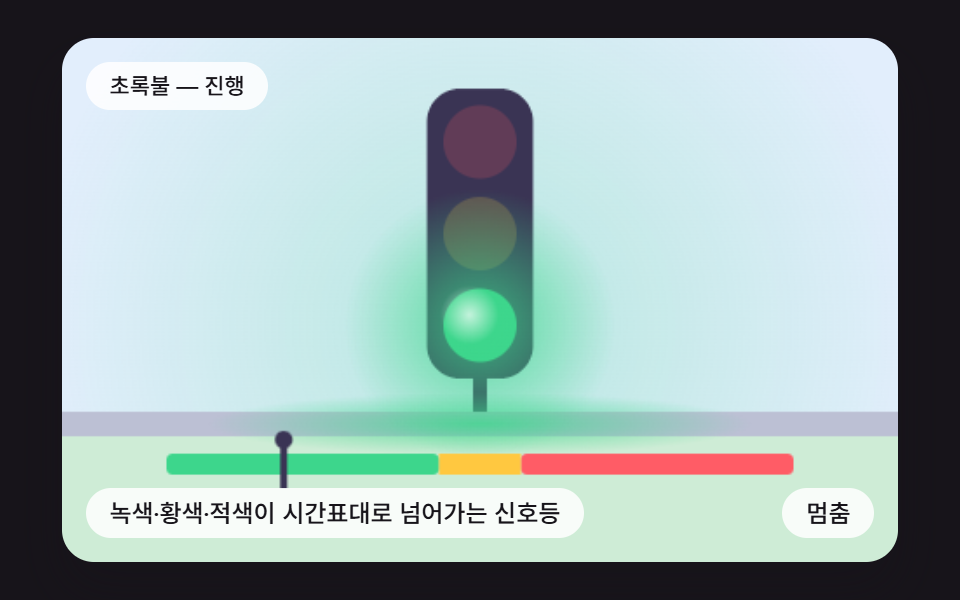 01 tl-signal-phase-timeline-bloom
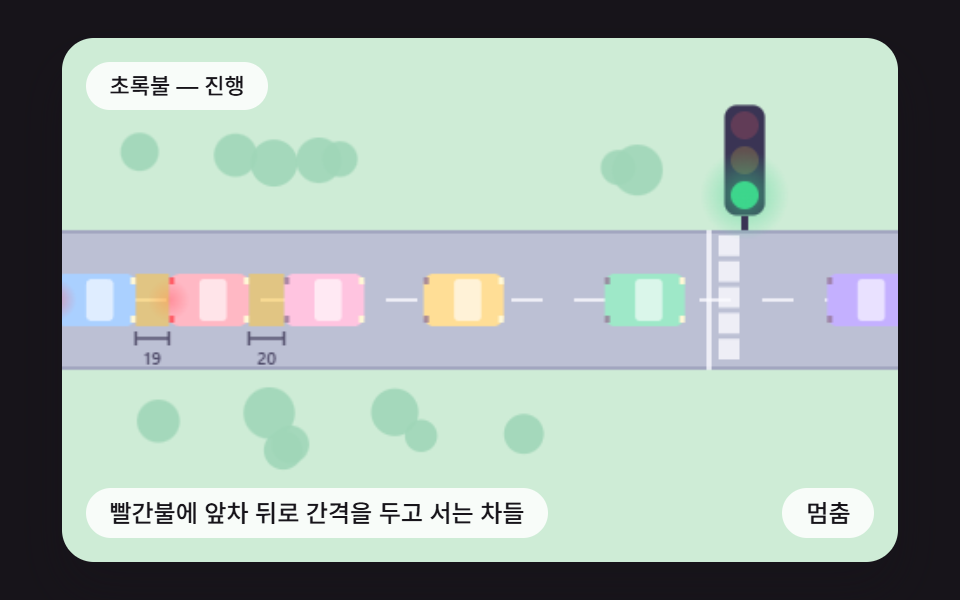 02 tl-car-follow-stop-line-gap
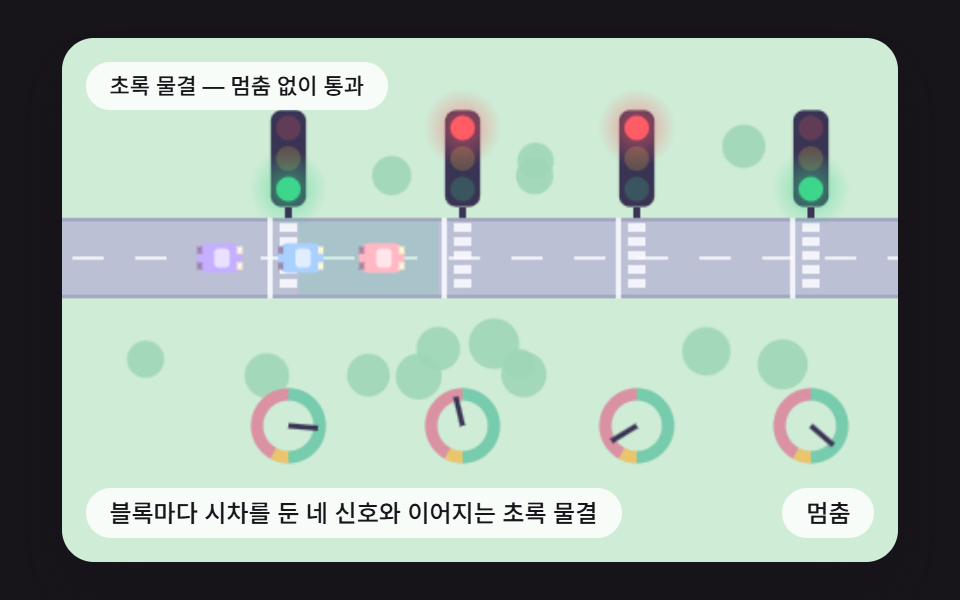 03 tl-green-wave-offset-avenue
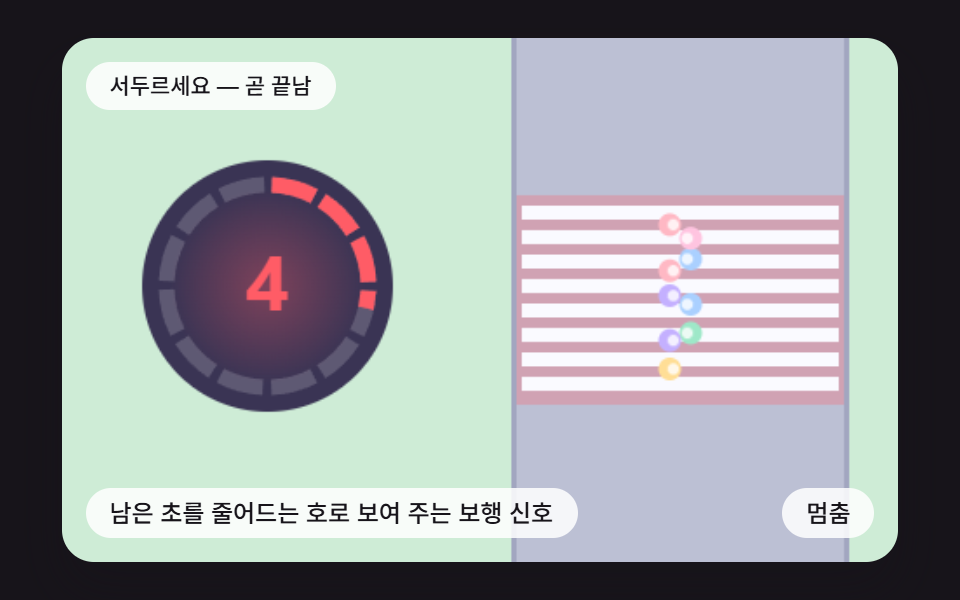 04 tl-pedestrian-countdown-ring
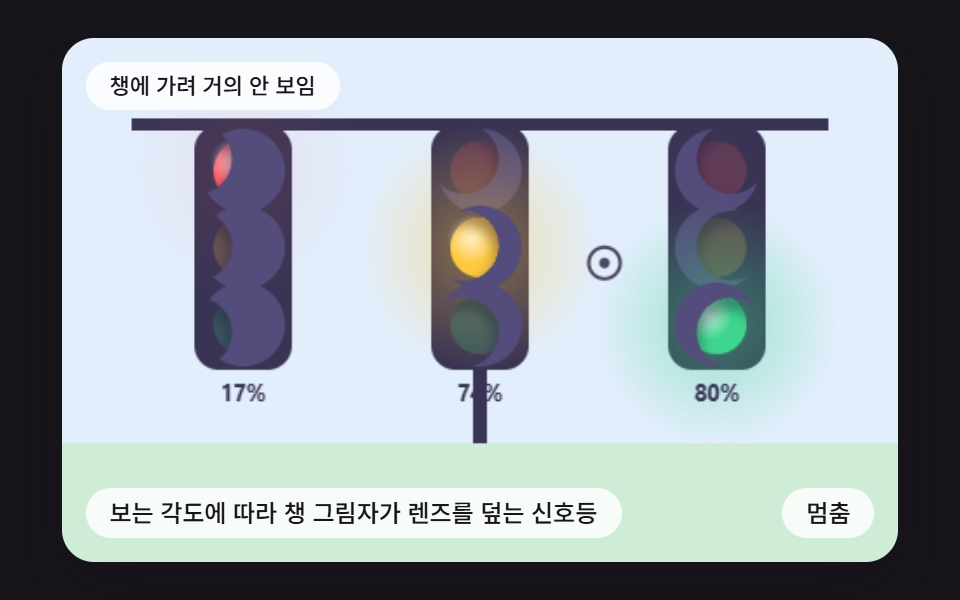 05 tl-visor-shadow-view-angle
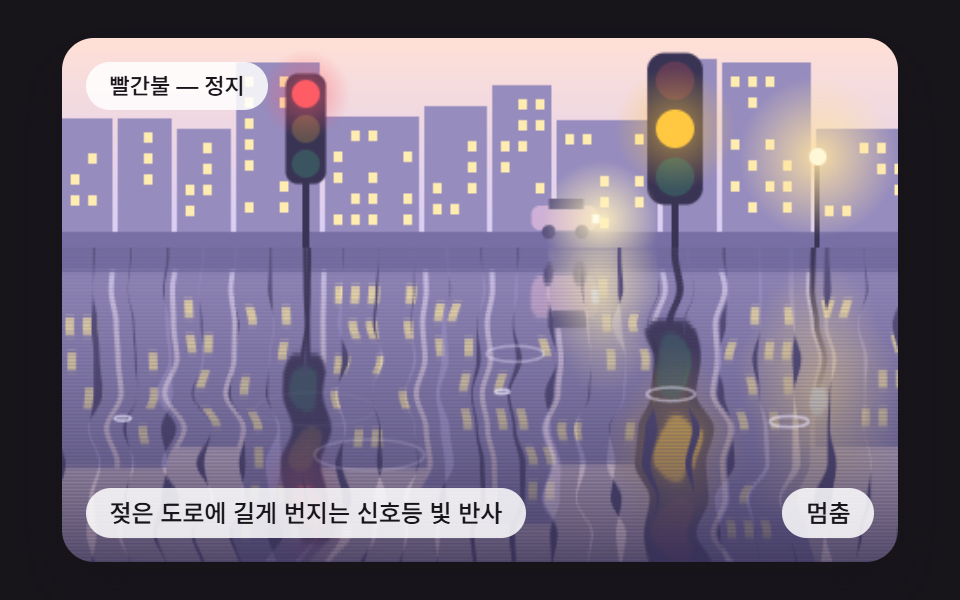 06 tl-wet-road-reflection-streak
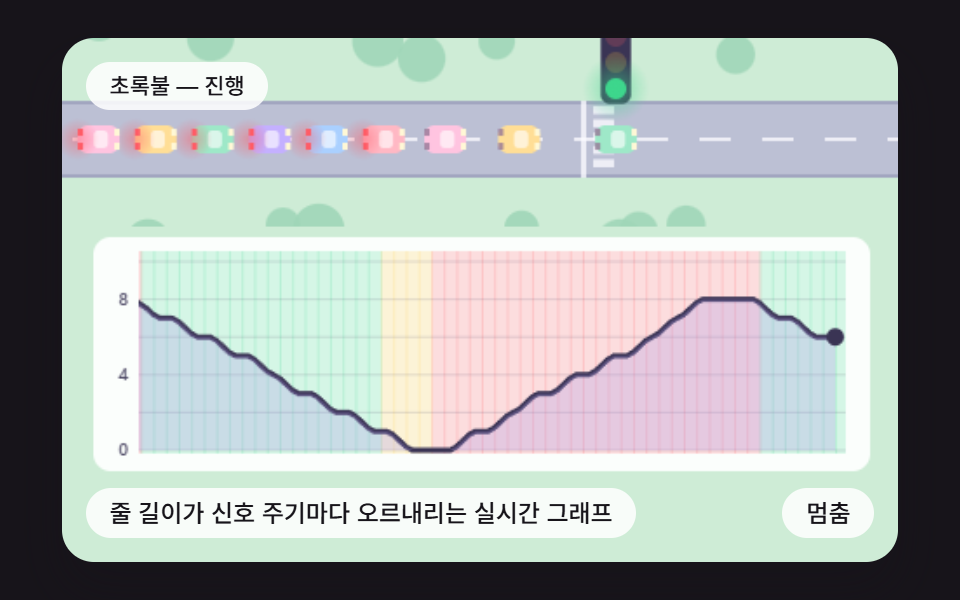 07 tl-queue-length-live-graph
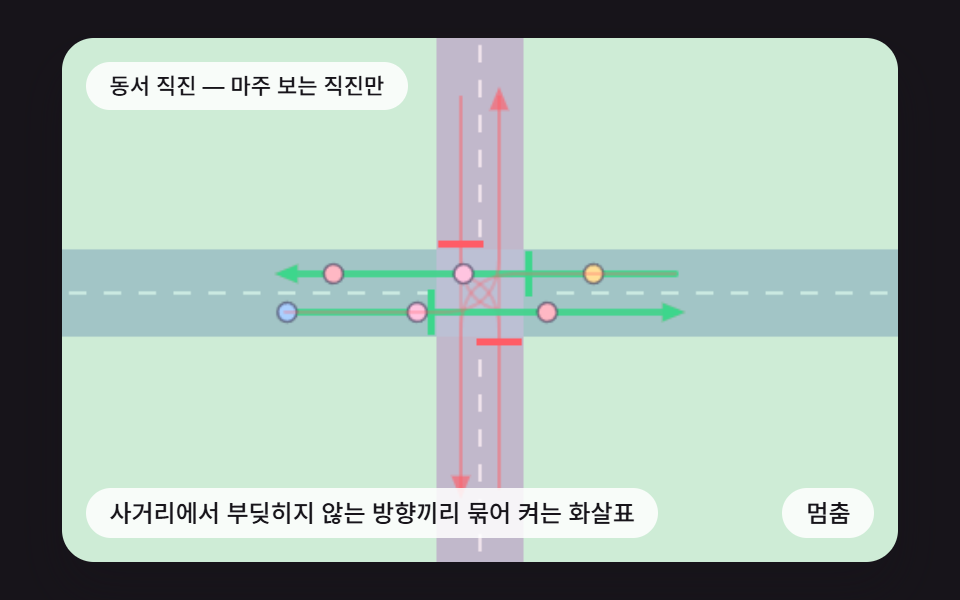 08 tl-four-way-phase-ring-arrows
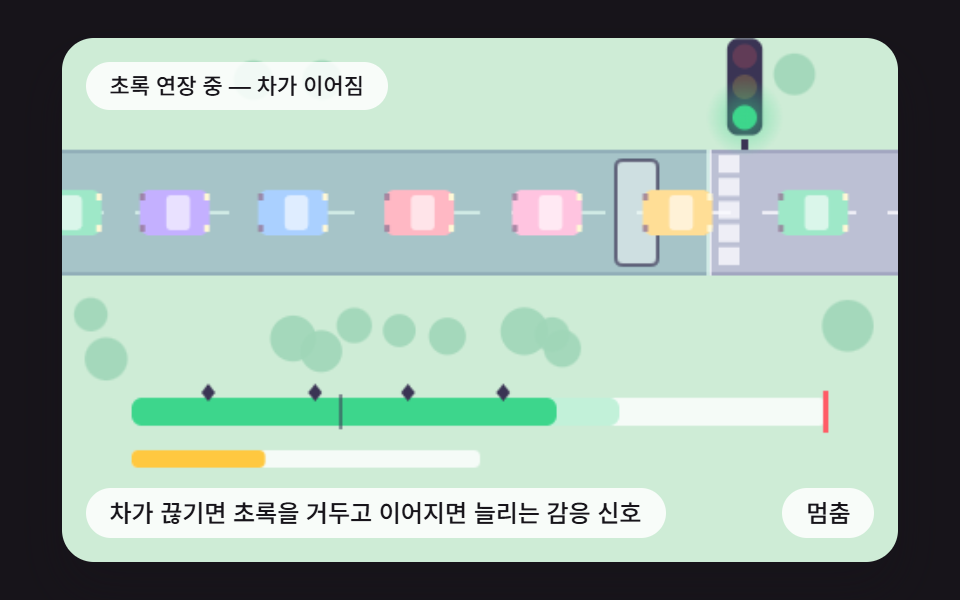 09 tl-gap-out-green-extension
Auto-plays · click a tile to jump to its section · all nine in one zip
- 01 A Signal Cycling Green, Yellow and Red on a Fixed Timetable
- 02 Cars That Stop Behind the Car Ahead With a Gap at Red
- 03 Four Signals With Per-Block Offsets and a Platoon on a Green Wave
- 04 A Walk Signal Showing the Seconds Left as a Shrinking Arc
- 05 A Signal Whose Visor Shadow Covers the Lens by Viewing Angle
- 06 Signal Light Streaking Down a Wet Road
- 07 A Live Graph of Queue Length Rising and Falling Each Cycle
- 08 Arrows Lit in Groups of Non-Conflicting Directions at a Four-Way Crossing
- 09 A Responsive Signal That Ends Green When Cars Stop Coming and Extends It While They Do
Traffic Light CSS: 9 Demos Where Gaps, Offsets and Sensors Are Computed
All nine scenes share one layout: a 480 by 300 canvas (W and H), a one-line status text, a single button and a caption. The main function, which owns input and time, and the Lane class definition, which feeds cars down the road, are the same text in every file, so the main thing that changes from scene to scene is makeScene. One call is one frame and time is chopped into 16 ms steps (FIXED_DT). Wherever a scene draws random numbers (02, 03, 04, 06, 07 and 09), they come from mulberry32 with seed 446, so reopening the page seats the same cars in the same spots; 01, 05 and 08 do not use the seed.
A timer that only switches red, yellow and green on a schedule leaves the road blind. Cars and pedestrians never learn what the lamp says, and two lamps never learn when the other one started. This page adds three calculations on top of the timer. One turns the gap to the car ahead and the distance to the stop line into an acceleration, one delays each signal's start by a fixed offset, and one sets the green length from the gap between cars crossing a sensor line.
The car math lives in a single method, Lane.accelFor. It sets a desired gap s = g0 + max(0, v·headway + v·(v − vL) ÷ (2·√(accel·brake))) and returns accel·(1 − (v ÷ vmax)^δ − (s ÷ s)²) as the acceleration, where headway, accel and brake are parameters each scene passes to Lane (the constants HEADWAY, ACCEL and BRAKE_DECEL exist only in 02, and 03, 07 and 09 pass their own values). The car takes the smaller of the value from the car ahead and the value from the stop line, which is treated as a stopped car, and the result never drops below −3·brake (−0.21 in 02, where BRAKE_DECEL is 0.07). The exponent δ is 4 in 02, 07 and 09 and 40 in 03, which keeps a platoon at cruising speed until the last moment so it does not spread out. Only four scenes create Lane instances (02, 03, 07 and 09), even though every file carries its definition, while 01, 04, 05, 06 and 08 solve their problems with a timetable, an arc, a viewing angle, a reflection and a conflict table.
None of Math.random, Date, fetch, localStorage, navigator, AudioContext or getImageData appears in the nine files, and WebGL is not used. If you want a curved line through chart points, CSS Chart Design: 9 SVG Graphs, No Library covers it with SVG, and scene 07 here applies the same midpoint idea to a canvas line drawn over signal colors.
Code for Each Signal Technique
Every snippet is a run of consecutive lines taken from one scene's index.html, cut at 25 lines or fewer. Treat them as traffic light css code you can paste and try, and open the zip for each file from top to bottom.
01A Signal Cycling Green, Yellow and Red on a Fixed Timetable
phaseAt divides the frame number by one cycle (green 100, yellow 30, red 100) and picks the signal from the remainder, while relax pulls the three lens brightness values toward their targets by only LIT_RISE 0.16 per frame. The glow radius is 78 at full brightness and the alpha is brightness to the power LENS_GAMMA 1.6, so a lens swells as it lights and settles as it dims. Measured at 45.4% accumulated area and 23/23 moved frames.
<main class="stage">
<div class="sc is-demo" id="scRoot">
  <canvas class="sc__canvas" id="scCanvas" width="480" height="300" tabindex="0" aria-label="A Signal Cycling Green, Yellow and Red on a Fixed Timetable"></canvas>
  <p class="sc__status" id="scStatus" aria-live="polite">Green — go</p>
  <button class="sc__btn" id="scBtn" type="button">Pause</button>
  <p class="sc__caption">A Signal Cycling Green, Yellow and Red on a Fixed Timetable</p>
</div>
</main>
@use "../../../../site/static/demo-tokens" as *;
@include stage($stage-ink);
.sc {
position: relative;
width: min(92vw, calc(160vh - 12.8vw));
aspect-ratio: 480 / 300;
margin: 0 auto;
border-radius: $r-card;
overflow: hidden;
box-shadow: $shadow-raised;
background: $subject-ink;
}
.sc__canvas {
display: block;
width: 100%;
height: 100%;
touch-action: none;
}
.sc__canvas:focus-visible {
outline: 2px solid rgba(255, 255, 255, .85);
outline-offset: -6px;
}
.sc__status {
position: absolute;
left: $sp-3;
top: $sp-3;
max-width: 62%;
margin: 0;
padding: $sp-1 $sp-3;
border-radius: $r-pill;
background: rgba(255, 255, 255, .85);
color: $subject-ink;
font-weight: 500;
font-size: 11px;
line-height: 1.4;
pointer-events: none;
}
.sc__btn {
position: absolute;
right: $sp-3;
bottom: $sp-3;
margin: 0;
padding: $sp-1 $sp-3;
border: 0;
border-radius: $r-pill;
background: rgba(255, 255, 255, .85);
color: $subject-ink;
font: inherit;
font-weight: 500;
font-size: 12px;
line-height: 1.4;
cursor: pointer;
}
.sc__btn:focus-visible {
outline: 2px solid #ffffff;
outline-offset: 2px;
}
.sc__caption {
position: absolute;
left: $sp-3;
bottom: $sp-3;
max-width: 68%;
margin: 0;
padding: $sp-1 $sp-3;
border-radius: $r-pill;
background: rgba(255, 255, 255, .85);
color: $subject-ink;
font-weight: 500;
font-size: 12px;
line-height: 1.4;
pointer-events: none;
}
@media (max-width: 340px) {
.sc__caption, .sc__btn { font-size: 10px; padding: $sp-1 $sp-2; }
.sc__status { font-size: 10px; }
}
@media (prefers-reduced-motion: reduce) {
.sc { cursor: default; }
}html, body {
margin: 0;
overflow: hidden;
}
.stage {
box-sizing: border-box;
min-height: 100vh;
display: grid;
place-items: center;
margin: 0;
background: #17141a;
font-family: -apple-system, "Segoe UI", "Noto Sans KR", sans-serif;
padding: clamp(8px, 4vw, 24px);
}
.sc {
position: relative;
width: min(92vw, 160vh - 12.8vw);
aspect-ratio: 480/300;
margin: 0 auto;
border-radius: 16px;
overflow: hidden;
box-shadow: 0 14px 24px rgba(23, 20, 26, 0.32);
background: #17141a;
}
.sc__canvas {
display: block;
width: 100%;
height: 100%;
touch-action: none;
}
.sc__canvas:focus-visible {
outline: 2px solid rgba(255, 255, 255, 0.85);
outline-offset: -6px;
}
.sc__status {
position: absolute;
left: 12px;
top: 12px;
max-width: 62%;
margin: 0;
padding: 4px 12px;
border-radius: 999px;
background: rgba(255, 255, 255, 0.85);
color: #17141a;
font-weight: 500;
font-size: 11px;
line-height: 1.4;
pointer-events: none;
}
.sc__btn {
position: absolute;
right: 12px;
bottom: 12px;
margin: 0;
padding: 4px 12px;
border: 0;
border-radius: 999px;
background: rgba(255, 255, 255, 0.85);
color: #17141a;
font: inherit;
font-weight: 500;
font-size: 12px;
line-height: 1.4;
cursor: pointer;
}
.sc__btn:focus-visible {
outline: 2px solid #ffffff;
outline-offset: 2px;
}
.sc__caption {
position: absolute;
left: 12px;
bottom: 12px;
max-width: 68%;
margin: 0;
padding: 4px 12px;
border-radius: 999px;
background: rgba(255, 255, 255, 0.85);
color: #17141a;
font-weight: 500;
font-size: 12px;
line-height: 1.4;
pointer-events: none;
}
@media (max-width: 340px) {
.sc__caption, .sc__btn {
font-size: 10px;
padding: 4px 8px;
}
.sc__status {
font-size: 10px;
}
}
@media (prefers-reduced-motion: reduce) {
.sc {
cursor: default;
}
}(function () {
const W = 480;
const H = 300;
const PI2 = Math.PI * 2;
const FIXED_DT = 16;
const REDUCE_STEP_MS = 900;
const REDUCE_START_MS = 1200;
const KEY_STEP = 12;
const FONT = '-apple-system, "Segoe UI", "Noto Sans KR", sans-serif';
const SIG_GREEN = 0;
const SIG_YELLOW = 1;
const SIG_RED = 2;
const GREEN_RGB = [61, 214, 140];
const YELLOW_RGB = [255, 200, 64];
const RED_RGB = [255, 92, 102];
const SIGNAL_RGBS = [GREEN_RGB, YELLOW_RGB, RED_RGB];
const SKY_RGB = [226, 238, 252];
const GRASS_RGB = [206, 236, 214];
const ROAD_RGB = [188, 192, 212];
const ROAD_EDGE_RGB = [162, 166, 192];
const MARK_RGB = [250, 250, 255];
const INK_RGB = [58, 52, 84];
const CAR_RGBS = [[255, 184, 196], [170, 208, 255], [196, 176, 255], [158, 232, 200], [255, 222, 150], [255, 196, 224]];
const TXT_GO = 'Green — go';
const TXT_READY = 'Yellow — get ready to stop';
const TXT_STOP = 'Red — stop';
function clamp(v, lo, hi) { return v < lo ? lo : (v > hi ? hi : v); }
function lerp(a, b, k) { return a + (b - a) * k; }
function smooth(x) { const c = clamp(x, 0, 1); return c * c * (3 - 2 * c); }
function rgba(c, a) {
return 'rgba(' + Math.round(c[0]) + ',' + Math.round(c[1]) + ',' + Math.round(c[2]) + ',' + a.toFixed(3) + ')';
}
// 시드 고정 난수 — 같은 시드면 언제나 같은 수열
function mulberry32(seed) {
let s = seed >>> 0;
return function () {
s = (s + 0x6D2B79F5) >>> 0;
let t = s;
t = Math.imul(t ^ (t >>> 15), t | 1);
t ^= t + Math.imul(t ^ (t >>> 7), t | 61);
return ((t ^ (t >>> 14)) >>> 0) / 4294967296;
};
}
// 격자 점의 값 — 정수 두 개를 섞어 0..1 로 (같은 입력은 언제나 같은 값)
function hash2(ix, iy) {
let h = Math.imul(ix | 0, 374761393) + Math.imul(iy | 0, 668265263);
h = Math.imul(h ^ (h >>> 13), 1274126177);
return ((h ^ (h >>> 16)) >>> 0) / 4294967296;
}
// 2차원 값 잡음 — 네 격자 점을 부드럽게 보간
function vnoise(x, y) {
const ix = Math.floor(x);
const iy = Math.floor(y);
const fx = smooth(x - ix);
const fy = smooth(y - iy);
return lerp(lerp(hash2(ix, iy), hash2(ix + 1, iy), fx), lerp(hash2(ix, iy + 1), hash2(ix + 1, iy + 1), fx), fy);
}
function glow(ctx, x, y, r, c, a) {
const g = ctx.createRadialGradient(x, y, 0, x, y, r);
g.addColorStop(0, rgba(c, a));
g.addColorStop(1, rgba(c, 0));
ctx.fillStyle = g;
ctx.fillRect(x - r, y - r, r * 2, r * 2);
}
function rrect(ctx, x, y, w, h, r) {
const rr = Math.min(r, w / 2, h / 2);
ctx.beginPath();
ctx.moveTo(x + rr, y);
ctx.arcTo(x + w, y, x + w, y + h, rr);
ctx.arcTo(x + w, y + h, x, y + h, rr);
ctx.arcTo(x, y + h, x, y, rr);
ctx.arcTo(x, y, x + w, y, rr);
ctx.closePath();
}
// 주기 [초록, 노랑, 빨강] 프레임 수에서 프레임 f 의 신호 상태
    function phaseAt(f, g, y, r) {
        const total = g + y + r;
        const m = ((f % total) + total) % total;
        return m < g ? SIG_GREEN : (m < g + y ? SIG_YELLOW : SIG_RED);
    }
    function stateText(state) {
        return state === SIG_GREEN ? TXT_GO : (state === SIG_YELLOW ? TXT_READY : TXT_STOP);
    }
// 신호 상태 -> 빨강·노랑·초록 렌즈 밝기 (위에서 아래)
function litOf(state) {
return [state === SIG_RED ? 1 : 0, state === SIG_YELLOW ? 1 : 0, state === SIG_GREEN ? 1 : 0];
}
const LENS_RGBS = [RED_RGB, YELLOW_RGB, GREEN_RGB];
// 세로 신호등 머리 — 렌즈 세 개와 켜진 렌즈의 빛 번짐
function drawHead(ctx, cx, cy, r, lit) {
const step = r * 2.5;
rrect(ctx, cx - r * 1.45, cy - step - r * 1.45, r * 2.9, step * 2 + r * 2.9, r * 0.9);
ctx.fillStyle = rgba(INK_RGB, 1);
ctx.fill();
for (let i = 0; i < 3; i += 1) {
const ly = cy + (i - 1) * step;
ctx.beginPath();
ctx.arc(cx, ly, r, 0, PI2);
ctx.fillStyle = rgba(LENS_RGBS[i], 0.2 + 0.8 * lit[i]);
ctx.fill();
if (lit[i] > 0.02) {
glow(ctx, cx, ly, r * 3.2, LENS_RGBS[i], 0.55 * lit[i]);
}
}
}
// 위에서 본 차 — 앞 범퍼가 x, 가운데가 y. 제동 중이면 뒷등이 켜진다
function drawCar(ctx, x, y, len, wid, rgb, braking) {
const x0 = x - len;
rrect(ctx, x0, y - wid / 2, len, wid, 6);
ctx.fillStyle = rgba(rgb, 1);
ctx.fill();
rrect(ctx, x - len * 0.62, y - wid / 2 + 3, len * 0.34, wid - 6, 3);
ctx.fillStyle = 'rgba(255,255,255,0.62)';
ctx.fill();
ctx.fillStyle = 'rgba(255,248,214,1)';
ctx.fillRect(x - 3, y - wid / 2 + 2, 3, 4);
ctx.fillRect(x - 3, y + wid / 2 - 6, 3, 4);
ctx.fillStyle = braking ? rgba(RED_RGB, 1) : 'rgba(150,120,150,0.8)';
ctx.fillRect(x0, y - wid / 2 + 2, 3, 4);
ctx.fillRect(x0, y + wid / 2 - 6, 3, 4);
if (braking) {
glow(ctx, x0, y, 12, RED_RGB, 0.45);
}
}
// 한 줄 도로 장면의 바탕 — 잔디 위에 도로띠 하나, 정지선과 횡단보도
function drawLaneBackdrop(ctx, roadY, roadH, stopX, seedTrees) {
ctx.fillStyle = rgba(GRASS_RGB, 1);
ctx.fillRect(0, 0, W, H);
const rnd = mulberry32(seedTrees);
for (let i = 0; i < 14; i += 1) {
const tx = 16 + rnd() * (W - 32);
const up = rnd() < 0.5;
const ty = up ? roadY - roadH / 2 - 22 - rnd() * 26 : roadY + roadH / 2 + 22 + rnd() * 26;
ctx.beginPath();
ctx.arc(tx, ty, 9 + rnd() * 6, 0, PI2);
ctx.fillStyle = 'rgba(160,214,184,0.9)';
ctx.fill();
}
ctx.fillStyle = rgba(ROAD_RGB, 1);
ctx.fillRect(0, roadY - roadH / 2, W, roadH);
ctx.fillStyle = rgba(ROAD_EDGE_RGB, 1);
ctx.fillRect(0, roadY - roadH / 2, W, 2);
ctx.fillRect(0, roadY + roadH / 2 - 2, W, 2);
ctx.fillStyle = rgba(MARK_RGB, 0.8);
for (let x = 6; x < W; x += 36) {
ctx.fillRect(x, roadY - 1, 18, 2);
}
for (let k = 0; k < 5; k += 1) {
ctx.fillRect(stopX + 5, roadY - roadH / 2 + 3 + k * (roadH - 6) / 5, 12, (roadH - 6) / 5 - 3);
}
ctx.fillRect(stopX - 2, roadY - roadH / 2, 3, roadH);
}
// 한 줄 차량 흐름 — 앞차 간격(IDM)과 정지선을 같은 식으로 다룬다. 차는 앞쪽부터 0번이다
class Lane {
constructor(seed, p) {
this.cars = [];
this.nextAt = 0;
this.made = 0;
this.p = p;
this.rnd = mulberry32(seed);
}
accelFor(v, s, vL, g0) {
const p = this.p;
const sStar = g0 + Math.max(0, v * p.headway + v * (v - vL) / (2 * Math.sqrt(p.accel * p.brake)));
return p.accel * (1 - Math.pow(v / p.vmax, p.delta) - Math.pow(sStar / Math.max(s, 0.5), 2));
}
// f 프레임에, 뒤쪽이 비어 있고 때가 됐으면 한 대 들여보낸다
maybeSpawn(f, minGap, maxGap, v0) {
if (f < this.nextAt) {
return false;
}
const last = this.cars.length > 0 ? this.cars[this.cars.length - 1] : null;
if (last && last.x - last.len < this.p.gap + 10) {
return false;
}
const rgb = CAR_RGBS[this.made % CAR_RGBS.length];
this.cars.push({ x: -2, v: v0, len: this.p.len, rgb: rgb, go: false, decided: false, sigK: -1, brake: false, id: this.made });
this.made += 1;
this.nextAt = f + minGap + Math.floor(this.rnd() * (maxGap - minGap + 1));
return true;
}
// 신호 목록은 x 오름차순. 한 번 호출 = 한 프레임. 정지선을 넘은 차(detect 용) id 를 돌려준다
step(sigs, onCross, watchX) {
const p = this.p;
for (let i = 0; i < this.cars.length; i += 1) {
const c = this.cars[i];
let acc = this.accelFor(c.v, 1e6, c.v, p.gap);
if (i > 0) {
const L = this.cars[i - 1];
acc = Math.min(acc, this.accelFor(c.v, (L.x - L.len) - c.x, L.v, p.gap));
}
let k = -1;
for (let j = 0; j < sigs.length; j += 1) {
if (sigs[j].x >= c.x) {
k = j;
break;
}
}
let clampX = 1e9;
if (k >= 0) {
const sg = sigs[k];
if (c.sigK !== k) {
c.sigK = k;
c.decided = false;
c.go = false;
}
if (sg.state === SIG_GREEN) {
c.decided = false;
c.go = false;
}
else {
if (!c.decided) {
c.decided = true;
c.go = c.v * c.v / (2 * p.brake) > sg.x - c.x;
}
if (!c.go) {
acc = Math.min(acc, this.accelFor(c.v, sg.x - c.x - 2, 0, p.lineGap));
clampX = sg.x - 1.5;
}
}
}
acc = Math.max(acc, -p.brake * 3);
const prevX = c.x;
c.v = Math.max(0, c.v + acc);
c.x += c.v;
if (c.x > clampX && prevX <= clampX) {
c.x = clampX;
c.v = 0;
}
c.brake = acc < -0.012 || c.v < 0.05;
if (prevX < watchX && c.x >= watchX) {
onCross(c, watchX);
}
}
while (this.cars.length > 0 && this.cars[0].x - this.cars[0].len > W + 20) {
this.cars.shift();
}
}
// 정지선 뒤에서 서 있는 차 수
waiting(stopX) {
let n = 0;
for (let i = 0; i < this.cars.length; i += 1) {
const c = this.cars[i];
if (c.v < 0.25 && c.x < stopX + 2 && c.x > stopX - 260) {
n += 1;
}
}
return n;
}
}
function main(rootEl, canvas, statusEl, btnEl) {
const ctx0 = canvas.getContext('2d');
if (!ctx0) {
return function () { return; };
}
canvas.width = W;
canvas.height = H;
const reduce = window.matchMedia('(prefers-reduced-motion: reduce)').matches;
const scene = makeScene(ctx0, reduce);
if (reduce) {
rootEl.classList.remove('is-demo');
}
let paused = false;
let rafId = 0;
let lastTs = null;
let accMs = 0;
let lastLabel = '';
let px = W / 2;
let py = H / 2;
const cleaners = [];
function listen(target, type, fn) {
target.addEventListener(type, fn);
cleaners.push(function () { target.removeEventListener(type, fn); });
}
function show() {
scene.draw();
const t = scene.label();
if (t !== lastLabel) {
lastLabel = t;
statusEl.textContent = t;
}
}
function advance(ms) {
const n = Math.round(ms / FIXED_DT);
for (let i = 0; i < n; i += 1) {
scene.step();
}
}
function setButton() {
btnEl.textContent = reduce ? 'Next scene' : (paused ? 'Play' : 'Pause');
}
function toLocal(e) {
const r = canvas.getBoundingClientRect();
return [clamp((e.clientX - r.left) * W / r.width, 0, W), clamp((e.clientY - r.top) * H / r.height, 0, H)];
}
function moved() {
if (scene.point) {
scene.point(px, py);
}
if (reduce) {
show();
}
}
function onButton() {
if (reduce) {
advance(REDUCE_STEP_MS);
show();
return;
}
paused = !paused;
if (paused) {
rootEl.classList.remove('is-demo');
}
else {
rootEl.classList.add('is-demo');
}
setButton();
}
function onAction() {
if (scene.tap) {
scene.tap();
if (reduce) {
show();
}
return;
}
onButton();
}
function tick(ts) {
if (lastTs === null) {
lastTs = ts;
}
const frameDt = Math.min(ts - lastTs, 160);
lastTs = ts;
if (!paused) {
accMs += frameDt;
while (accMs >= FIXED_DT) {
scene.step();
accMs -= FIXED_DT;
}
show();
}
rafId = requestAnimationFrame(tick);
}
listen(btnEl, 'click', function () { onButton(); });
listen(canvas, 'pointerdown', function (e) {
const p = toLocal(e);
px = p[0];
py = p[1];
moved();
if (scene.tap) {
scene.tap();
if (reduce) {
show();
}
}
});
listen(canvas, 'pointermove', function (e) {
const p = toLocal(e);
px = p[0];
py = p[1];
moved();
});
listen(canvas, 'keydown', function (e) {
const k = e.key;
if (k === 'Enter' || k === ' ') {
e.preventDefault();
onAction();
return;
}
let dx = 0;
let dy = 0;
if (k === 'ArrowLeft') {
dx = -KEY_STEP;
}
else if (k === 'ArrowRight') {
dx = KEY_STEP;
}
else if (k === 'ArrowUp') {
dy = -KEY_STEP;
}
else if (k === 'ArrowDown') {
dy = KEY_STEP;
}
else {
return;
}
e.preventDefault();
px = clamp(px + dx, 0, W);
py = clamp(py + dy, 0, H);
moved();
});
advance(REDUCE_START_MS);
setButton();
show();
if (!reduce) {
rafId = requestAnimationFrame(tick);
}
function destroy() {
cancelAnimationFrame(rafId);
for (let i = 0; i < cleaners.length; i += 1) {
cleaners[i]();
}
}
return destroy;
}
const PHASE_FRAMES = 100;
const YELLOW_FRAMES = 30;
const BLOOM_RADIUS = 78;
const LENS_GAMMA = 1.6;
const LIT_RISE = 0.16;
const START_FRAME = 70;
const HEAD_X = 240;
const HEAD_Y = 112;
const LENS_R = 21;
const BAR_X = 60;
const BAR_W = 360;
const BAR_Y = 238;
function makeScene(ctx, reduce) {
const cycle = PHASE_FRAMES * 2 + YELLOW_FRAMES;
let f = START_FRAME;
const lit = [0, 0, 1];
if (reduce) {
lit[0] = 0;
}
function state() { return phaseAt(f, PHASE_FRAMES, YELLOW_FRAMES, PHASE_FRAMES); }
// 켜지는 쪽은 부풀고 꺼지는 쪽은 잦아든다 — 목표 밝기를 향해 한 프레임에 LIT_RISE 만큼
function relax() {
const t = litOf(state());
for (let i = 0; i < 3; i += 1) {
lit[i] += (t[i] - lit[i]) * (reduce ? 1 : LIT_RISE);
}
}
function segX(frame) { return BAR_X + BAR_W * frame / cycle; }
const scene = {
step: function () {
f += 1;
relax();
},
label: function () { return stateText(state()); },
draw: function () {
ctx.fillStyle = rgba(SKY_RGB, 1);
ctx.fillRect(0, 0, W, H);
for (let i = 0; i < 3; i += 1) {
glow(ctx, HEAD_X, HEAD_Y + (i - 1) * LENS_R * 2.5, 260, LENS_RGBS[i], 0.26 * lit[i]);
}
ctx.fillStyle = rgba(GRASS_RGB, 1);
ctx.fillRect(0, 214, W, 86);
ctx.fillStyle = rgba(ROAD_RGB, 1);
ctx.fillRect(0, 214, W, 14);
// 기둥
ctx.fillStyle = rgba(INK_RGB, 1);
ctx.fillRect(HEAD_X - 4, HEAD_Y + LENS_R * 3.6, 8, 214 - (HEAD_Y + LENS_R * 3.6));
// 바닥에 떨어지는 빛 웅덩이 — 켜진 렌즈 색이 번진다
for (let i = 0; i < 3; i += 1) {
if (lit[i] > 0.02) {
ctx.save();
ctx.translate(HEAD_X, 221);
ctx.scale(2.6, 0.3);
glow(ctx, 0, 0, 60, LENS_RGBS[i], 0.8 * lit[i]);
ctx.restore();
}
}
// 렌즈 — 알파는 밝기^LENS_GAMMA, 번짐 반경은 켜진 정도에 따라 자란다
rrect(ctx, HEAD_X - LENS_R * 1.45, HEAD_Y - LENS_R * 2.5 - LENS_R * 1.45, LENS_R * 2.9, LENS_R * 5 + LENS_R * 2.9, LENS_R * 0.9);
ctx.fillStyle = rgba(INK_RGB, 1);
ctx.fill();
for (let i = 0; i < 3; i += 1) {
const ly = HEAD_Y + (i - 1) * LENS_R * 2.5;
const a = Math.pow(lit[i], LENS_GAMMA);
ctx.beginPath();
ctx.arc(HEAD_X, ly, LENS_R, 0, PI2);
ctx.fillStyle = rgba(LENS_RGBS[i], 0.2 + 0.8 * a);
ctx.fill();
if (lit[i] > 0.02) {
glow(ctx, HEAD_X, ly, BLOOM_RADIUS * (0.35 + 0.65 * lit[i]), LENS_RGBS[i], 0.78 * a);
glow(ctx, HEAD_X - 6, ly - 6, LENS_R * 0.8, [255, 255, 255], 0.7 * a);
}
}
// 시간표 막대 — 초록 · 노랑 · 빨강 구간과 지금 위치
const g1 = segX(PHASE_FRAMES);
const y1 = segX(PHASE_FRAMES + YELLOW_FRAMES);
ctx.fillStyle = rgba(GREEN_RGB, 1);
rrect(ctx, BAR_X, BAR_Y, g1 - BAR_X, 12, 4);
ctx.fill();
ctx.fillStyle = rgba(YELLOW_RGB, 1);
ctx.fillRect(g1, BAR_Y, y1 - g1, 12);
ctx.fillStyle = rgba(RED_RGB, 1);
rrect(ctx, y1, BAR_Y, BAR_X + BAR_W - y1, 12, 4);
ctx.fill();
const m = ((f % cycle) + cycle) % cycle;
const cx = segX(m);
ctx.fillStyle = rgba(INK_RGB, 1);
ctx.fillRect(cx - 2, BAR_Y - 8, 4, 28);
ctx.beginPath();
ctx.arc(cx, BAR_Y - 8, 5, 0, PI2);
ctx.fill();
}
};
for (let i = 0; i < 40; i += 1) {
relax();
}
return scene;
}
main(document.getElementById('scRoot'), document.getElementById('scCanvas'), document.getElementById('scStatus'), document.getElementById('scBtn'));
})();import { useEffect, useRef } from "react";
import styles from "./TlSignalPhaseTimelineBloom.module.scss";
const W = 480;
const H = 300;
const PI2 = Math.PI * 2;
const FIXED_DT = 16;
const REDUCE_STEP_MS = 900;
const REDUCE_START_MS = 1200;
const KEY_STEP = 12;
const FONT = '-apple-system, "Segoe UI", "Noto Sans KR", sans-serif';
const SIG_GREEN = 0;
const SIG_YELLOW = 1;
const SIG_RED = 2;
const GREEN_RGB = [61, 214, 140];
const YELLOW_RGB = [255, 200, 64];
const RED_RGB = [255, 92, 102];
const SIGNAL_RGBS = [GREEN_RGB, YELLOW_RGB, RED_RGB];
const SKY_RGB = [226, 238, 252];
const GRASS_RGB = [206, 236, 214];
const ROAD_RGB = [188, 192, 212];
const ROAD_EDGE_RGB = [162, 166, 192];
const MARK_RGB = [250, 250, 255];
const INK_RGB = [58, 52, 84];
const CAR_RGBS = [[255, 184, 196], [170, 208, 255], [196, 176, 255], [158, 232, 200], [255, 222, 150], [255, 196, 224]];
const TXT_GO = '초록불 — 진행';
const TXT_READY = '노란불 — 정지 준비';
const TXT_STOP = '빨간불 — 정지';
type Pt = [number, number];
interface Scene {
step(): void;
draw(): void;
label(): string;
point?(x: number, y: number): void;
tap?(): void;
}
function clamp(v: number, lo: number, hi: number): number { return v < lo ? lo : (v > hi ? hi : v); }
function lerp(a: number, b: number, k: number): number { return a + (b - a) * k; }
function smooth(x: number): number { const c = clamp(x, 0, 1); return c * c * (3 - 2 * c); }
function rgba(c: number[], a: number): string {
return 'rgba(' + Math.round(c[0]) + ',' + Math.round(c[1]) + ',' + Math.round(c[2]) + ',' + a.toFixed(3) + ')';
}
// 시드 고정 난수 — 같은 시드면 언제나 같은 수열
function mulberry32(seed: number): () => number {
let s = seed >>> 0;
return function (): number {
s = (s + 0x6D2B79F5) >>> 0;
let t = s;
t = Math.imul(t ^ (t >>> 15), t | 1);
t ^= t + Math.imul(t ^ (t >>> 7), t | 61);
return ((t ^ (t >>> 14)) >>> 0) / 4294967296;
};
}
// 격자 점의 값 — 정수 두 개를 섞어 0..1 로 (같은 입력은 언제나 같은 값)
function hash2(ix: number, iy: number): number {
let h = Math.imul(ix | 0, 374761393) + Math.imul(iy | 0, 668265263);
h = Math.imul(h ^ (h >>> 13), 1274126177);
return ((h ^ (h >>> 16)) >>> 0) / 4294967296;
}
// 2차원 값 잡음 — 네 격자 점을 부드럽게 보간
function vnoise(x: number, y: number): number {
const ix = Math.floor(x);
const iy = Math.floor(y);
const fx = smooth(x - ix);
const fy = smooth(y - iy);
return lerp(lerp(hash2(ix, iy), hash2(ix + 1, iy), fx), lerp(hash2(ix, iy + 1), hash2(ix + 1, iy + 1), fx), fy);
}
function glow(ctx: CanvasRenderingContext2D, x: number, y: number, r: number, c: number[], a: number): void {
const g = ctx.createRadialGradient(x, y, 0, x, y, r);
g.addColorStop(0, rgba(c, a));
g.addColorStop(1, rgba(c, 0));
ctx.fillStyle = g;
ctx.fillRect(x - r, y - r, r * 2, r * 2);
}
function rrect(ctx: CanvasRenderingContext2D, x: number, y: number, w: number, h: number, r: number): void {
const rr = Math.min(r, w / 2, h / 2);
ctx.beginPath();
ctx.moveTo(x + rr, y);
ctx.arcTo(x + w, y, x + w, y + h, rr);
ctx.arcTo(x + w, y + h, x, y + h, rr);
ctx.arcTo(x, y + h, x, y, rr);
ctx.arcTo(x, y, x + w, y, rr);
ctx.closePath();
}
// 주기 [초록, 노랑, 빨강] 프레임 수에서 프레임 f 의 신호 상태
function phaseAt(f: number, g: number, y: number, r: number): number {
const total = g + y + r;
const m = ((f % total) + total) % total;
return m < g ? SIG_GREEN : (m < g + y ? SIG_YELLOW : SIG_RED);
}
function stateText(state: number): string {
return state === SIG_GREEN ? TXT_GO : (state === SIG_YELLOW ? TXT_READY : TXT_STOP);
}
// 신호 상태 -> 빨강·노랑·초록 렌즈 밝기 (위에서 아래)
function litOf(state: number): number[] {
return [state === SIG_RED ? 1 : 0, state === SIG_YELLOW ? 1 : 0, state === SIG_GREEN ? 1 : 0];
}
const LENS_RGBS = [RED_RGB, YELLOW_RGB, GREEN_RGB];
// 세로 신호등 머리 — 렌즈 세 개와 켜진 렌즈의 빛 번짐
function drawHead(ctx: CanvasRenderingContext2D, cx: number, cy: number, r: number, lit: number[]): void {
const step = r * 2.5;
rrect(ctx, cx - r * 1.45, cy - step - r * 1.45, r * 2.9, step * 2 + r * 2.9, r * 0.9);
ctx.fillStyle = rgba(INK_RGB, 1);
ctx.fill();
for (let i = 0; i < 3; i += 1) {
const ly = cy + (i - 1) * step;
ctx.beginPath();
ctx.arc(cx, ly, r, 0, PI2);
ctx.fillStyle = rgba(LENS_RGBS[i], 0.2 + 0.8 * lit[i]);
ctx.fill();
if (lit[i] > 0.02) {
glow(ctx, cx, ly, r * 3.2, LENS_RGBS[i], 0.55 * lit[i]);
}
}
}
// 위에서 본 차 — 앞 범퍼가 x, 가운데가 y. 제동 중이면 뒷등이 켜진다
function drawCar(ctx: CanvasRenderingContext2D, x: number, y: number, len: number, wid: number, rgb: number[], braking: boolean): void {
const x0 = x - len;
rrect(ctx, x0, y - wid / 2, len, wid, 6);
ctx.fillStyle = rgba(rgb, 1);
ctx.fill();
rrect(ctx, x - len * 0.62, y - wid / 2 + 3, len * 0.34, wid - 6, 3);
ctx.fillStyle = 'rgba(255,255,255,0.62)';
ctx.fill();
ctx.fillStyle = 'rgba(255,248,214,1)';
ctx.fillRect(x - 3, y - wid / 2 + 2, 3, 4);
ctx.fillRect(x - 3, y + wid / 2 - 6, 3, 4);
ctx.fillStyle = braking ? rgba(RED_RGB, 1) : 'rgba(150,120,150,0.8)';
ctx.fillRect(x0, y - wid / 2 + 2, 3, 4);
ctx.fillRect(x0, y + wid / 2 - 6, 3, 4);
if (braking) {
glow(ctx, x0, y, 12, RED_RGB, 0.45);
}
}
// 한 줄 도로 장면의 바탕 — 잔디 위에 도로띠 하나, 정지선과 횡단보도
function drawLaneBackdrop(ctx: CanvasRenderingContext2D, roadY: number, roadH: number, stopX: number, seedTrees: number): void {
ctx.fillStyle = rgba(GRASS_RGB, 1);
ctx.fillRect(0, 0, W, H);
const rnd = mulberry32(seedTrees);
for (let i = 0; i < 14; i += 1) {
const tx = 16 + rnd() * (W - 32);
const up = rnd() < 0.5;
const ty = up ? roadY - roadH / 2 - 22 - rnd() * 26 : roadY + roadH / 2 + 22 + rnd() * 26;
ctx.beginPath();
ctx.arc(tx, ty, 9 + rnd() * 6, 0, PI2);
ctx.fillStyle = 'rgba(160,214,184,0.9)';
ctx.fill();
}
ctx.fillStyle = rgba(ROAD_RGB, 1);
ctx.fillRect(0, roadY - roadH / 2, W, roadH);
ctx.fillStyle = rgba(ROAD_EDGE_RGB, 1);
ctx.fillRect(0, roadY - roadH / 2, W, 2);
ctx.fillRect(0, roadY + roadH / 2 - 2, W, 2);
ctx.fillStyle = rgba(MARK_RGB, 0.8);
for (let x = 6; x < W; x += 36) {
ctx.fillRect(x, roadY - 1, 18, 2);
}
for (let k = 0; k < 5; k += 1) {
ctx.fillRect(stopX + 5, roadY - roadH / 2 + 3 + k * (roadH - 6) / 5, 12, (roadH - 6) / 5 - 3);
}
ctx.fillRect(stopX - 2, roadY - roadH / 2, 3, roadH);
}
interface Car { x: number; v: number; len: number; rgb: number[]; go: boolean; decided: boolean; sigK: number; brake: boolean; id: number; }
interface Sig { x: number; state: number; }
interface LaneParams { accel: number; brake: number; gap: number; lineGap: number; vmax: number; headway: number; delta: number; len: number; }
// 한 줄 차량 흐름 — 앞차 간격(IDM)과 정지선을 같은 식으로 다룬다. 차는 앞쪽부터 0번이다
class Lane {
cars: Car[] = [];
p: LaneParams;
rnd: () => number;
nextAt = 0;
made = 0;
constructor(seed: number, p: LaneParams) {
this.p = p;
this.rnd = mulberry32(seed);
}
accelFor(v: number, s: number, vL: number, g0: number): number {
const p = this.p;
const sStar = g0 + Math.max(0, v * p.headway + v * (v - vL) / (2 * Math.sqrt(p.accel * p.brake)));
return p.accel * (1 - Math.pow(v / p.vmax, p.delta) - Math.pow(sStar / Math.max(s, 0.5), 2));
}
// f 프레임에, 뒤쪽이 비어 있고 때가 됐으면 한 대 들여보낸다
maybeSpawn(f: number, minGap: number, maxGap: number, v0: number): boolean {
if (f < this.nextAt) { return false; }
const last = this.cars.length > 0 ? this.cars[this.cars.length - 1] : null;
if (last && last.x - last.len < this.p.gap + 10) { return false; }
const rgb = CAR_RGBS[this.made % CAR_RGBS.length];
this.cars.push({ x: -2, v: v0, len: this.p.len, rgb: rgb, go: false, decided: false, sigK: -1, brake: false, id: this.made });
this.made += 1;
this.nextAt = f + minGap + Math.floor(this.rnd() * (maxGap - minGap + 1));
return true;
}
// 신호 목록은 x 오름차순. 한 번 호출 = 한 프레임. 정지선을 넘은 차(detect 용) id 를 돌려준다
step(sigs: Sig[], onCross: (c: Car, x: number) => void, watchX: number): void {
const p = this.p;
for (let i = 0; i < this.cars.length; i += 1) {
const c = this.cars[i];
let acc = this.accelFor(c.v, 1e6, c.v, p.gap);
if (i > 0) {
const L = this.cars[i - 1];
acc = Math.min(acc, this.accelFor(c.v, (L.x - L.len) - c.x, L.v, p.gap));
}
let k = -1;
for (let j = 0; j < sigs.length; j += 1) {
if (sigs[j].x >= c.x) { k = j; break; }
}
let clampX = 1e9;
if (k >= 0) {
const sg = sigs[k];
if (c.sigK !== k) { c.sigK = k; c.decided = false; c.go = false; }
if (sg.state === SIG_GREEN) {
c.decided = false;
c.go = false;
} else {
if (!c.decided) {
c.decided = true;
c.go = c.v * c.v / (2 * p.brake) > sg.x - c.x;
}
if (!c.go) {
acc = Math.min(acc, this.accelFor(c.v, sg.x - c.x - 2, 0, p.lineGap));
clampX = sg.x - 1.5;
}
}
}
acc = Math.max(acc, -p.brake * 3);
const prevX = c.x;
c.v = Math.max(0, c.v + acc);
c.x += c.v;
if (c.x > clampX && prevX <= clampX) {
c.x = clampX;
c.v = 0;
}
c.brake = acc < -0.012 || c.v < 0.05;
if (prevX < watchX && c.x >= watchX) { onCross(c, watchX); }
}
while (this.cars.length > 0 && this.cars[0].x - this.cars[0].len > W + 20) {
this.cars.shift();
}
}
// 정지선 뒤에서 서 있는 차 수
waiting(stopX: number): number {
let n = 0;
for (let i = 0; i < this.cars.length; i += 1) {
const c = this.cars[i];
if (c.v < 0.25 && c.x < stopX + 2 && c.x > stopX - 260) { n += 1; }
}
return n;
}
}
function main(rootEl: HTMLElement, canvas: HTMLCanvasElement, statusEl: HTMLElement, btnEl: HTMLButtonElement): () => void {
const ctx0 = canvas.getContext('2d');
if (!ctx0) { return function (): void { return; }; }
canvas.width = W;
canvas.height = H;
const reduce = window.matchMedia('(prefers-reduced-motion: reduce)').matches;
const scene = makeScene(ctx0, reduce);
if (reduce) { rootEl.classList.remove('is-demo'); }
let paused = false;
let rafId = 0;
let lastTs: number | null = null;
let accMs = 0;
let lastLabel = '';
let px = W / 2;
let py = H / 2;
const cleaners: Array<() => void> = [];
function listen(target: EventTarget, type: string, fn: (e: Event) => void): void {
target.addEventListener(type, fn);
cleaners.push(function (): void { target.removeEventListener(type, fn); });
}
function show(): void {
scene.draw();
const t = scene.label();
if (t !== lastLabel) {
lastLabel = t;
statusEl.textContent = t;
}
}
function advance(ms: number): void {
const n = Math.round(ms / FIXED_DT);
for (let i = 0; i < n; i += 1) { scene.step(); }
}
function setButton(): void {
btnEl.textContent = reduce ? '다음 장면' : (paused ? '재생' : '멈춤');
}
function toLocal(e: PointerEvent): Pt {
const r = canvas.getBoundingClientRect();
return [clamp((e.clientX - r.left) * W / r.width, 0, W), clamp((e.clientY - r.top) * H / r.height, 0, H)];
}
function moved(): void {
if (scene.point) { scene.point(px, py); }
if (reduce) { show(); }
}
function onButton(): void {
if (reduce) {
advance(REDUCE_STEP_MS);
show();
return;
}
paused = !paused;
if (paused) { rootEl.classList.remove('is-demo'); } else { rootEl.classList.add('is-demo'); }
setButton();
}
function onAction(): void {
if (scene.tap) {
scene.tap();
if (reduce) { show(); }
return;
}
onButton();
}
function tick(ts: number): void {
if (lastTs === null) { lastTs = ts; }
const frameDt = Math.min(ts - lastTs, 160);
lastTs = ts;
if (!paused) {
accMs += frameDt;
while (accMs >= FIXED_DT) {
scene.step();
accMs -= FIXED_DT;
}
show();
}
rafId = requestAnimationFrame(tick);
}
listen(btnEl, 'click', function (): void { onButton(); });
listen(canvas, 'pointerdown', function (e: Event): void {
const p = toLocal(e as PointerEvent);
px = p[0];
py = p[1];
moved();
if (scene.tap) {
scene.tap();
if (reduce) { show(); }
}
});
listen(canvas, 'pointermove', function (e: Event): void {
const p = toLocal(e as PointerEvent);
px = p[0];
py = p[1];
moved();
});
listen(canvas, 'keydown', function (e: Event): void {
const k = (e as KeyboardEvent).key;
if (k === 'Enter' || k === ' ') {
e.preventDefault();
onAction();
return;
}
let dx = 0;
let dy = 0;
if (k === 'ArrowLeft') { dx = -KEY_STEP; } else if (k === 'ArrowRight') { dx = KEY_STEP; }
else if (k === 'ArrowUp') { dy = -KEY_STEP; } else if (k === 'ArrowDown') { dy = KEY_STEP; }
else { return; }
e.preventDefault();
px = clamp(px + dx, 0, W);
py = clamp(py + dy, 0, H);
moved();
});
advance(REDUCE_START_MS);
setButton();
show();
if (!reduce) {
rafId = requestAnimationFrame(tick);
}
function destroy(): void {
cancelAnimationFrame(rafId);
for (let i = 0; i < cleaners.length; i += 1) { cleaners[i](); }
}
return destroy;
}
const PHASE_FRAMES = 100;
const YELLOW_FRAMES = 30;
const BLOOM_RADIUS = 78;
const LENS_GAMMA = 1.6;
const LIT_RISE = 0.16;
const START_FRAME = 70;
const HEAD_X = 240;
const HEAD_Y = 112;
const LENS_R = 21;
const BAR_X = 60;
const BAR_W = 360;
const BAR_Y = 238;
function makeScene(ctx: CanvasRenderingContext2D, reduce: boolean): Scene {
const cycle = PHASE_FRAMES * 2 + YELLOW_FRAMES;
let f = START_FRAME;
const lit = [0, 0, 1];
if (reduce) { lit[0] = 0; }
function state(): number { return phaseAt(f, PHASE_FRAMES, YELLOW_FRAMES, PHASE_FRAMES); }
// 켜지는 쪽은 부풀고 꺼지는 쪽은 잦아든다 — 목표 밝기를 향해 한 프레임에 LIT_RISE 만큼
function relax(): void {
const t = litOf(state());
for (let i = 0; i < 3; i += 1) {
lit[i] += (t[i] - lit[i]) * (reduce ? 1 : LIT_RISE);
}
}
function segX(frame: number): number { return BAR_X + BAR_W * frame / cycle; }
const scene: Scene = {
step: function (): void {
f += 1;
relax();
},
label: function (): string { return stateText(state()); },
draw: function (): void {
ctx.fillStyle = rgba(SKY_RGB, 1);
ctx.fillRect(0, 0, W, H);
for (let i = 0; i < 3; i += 1) {
glow(ctx, HEAD_X, HEAD_Y + (i - 1) * LENS_R * 2.5, 260, LENS_RGBS[i], 0.26 * lit[i]);
}
ctx.fillStyle = rgba(GRASS_RGB, 1);
ctx.fillRect(0, 214, W, 86);
ctx.fillStyle = rgba(ROAD_RGB, 1);
ctx.fillRect(0, 214, W, 14);
// 기둥
ctx.fillStyle = rgba(INK_RGB, 1);
ctx.fillRect(HEAD_X - 4, HEAD_Y + LENS_R * 3.6, 8, 214 - (HEAD_Y + LENS_R * 3.6));
// 바닥에 떨어지는 빛 웅덩이 — 켜진 렌즈 색이 번진다
for (let i = 0; i < 3; i += 1) {
if (lit[i] > 0.02) {
ctx.save();
ctx.translate(HEAD_X, 221);
ctx.scale(2.6, 0.3);
glow(ctx, 0, 0, 60, LENS_RGBS[i], 0.8 * lit[i]);
ctx.restore();
}
}
// 렌즈 — 알파는 밝기^LENS_GAMMA, 번짐 반경은 켜진 정도에 따라 자란다
rrect(ctx, HEAD_X - LENS_R * 1.45, HEAD_Y - LENS_R * 2.5 - LENS_R * 1.45, LENS_R * 2.9, LENS_R * 5 + LENS_R * 2.9, LENS_R * 0.9);
ctx.fillStyle = rgba(INK_RGB, 1);
ctx.fill();
for (let i = 0; i < 3; i += 1) {
const ly = HEAD_Y + (i - 1) * LENS_R * 2.5;
const a = Math.pow(lit[i], LENS_GAMMA);
ctx.beginPath();
ctx.arc(HEAD_X, ly, LENS_R, 0, PI2);
ctx.fillStyle = rgba(LENS_RGBS[i], 0.2 + 0.8 * a);
ctx.fill();
if (lit[i] > 0.02) {
glow(ctx, HEAD_X, ly, BLOOM_RADIUS * (0.35 + 0.65 * lit[i]), LENS_RGBS[i], 0.78 * a);
glow(ctx, HEAD_X - 6, ly - 6, LENS_R * 0.8, [255, 255, 255], 0.7 * a);
}
}
// 시간표 막대 — 초록 · 노랑 · 빨강 구간과 지금 위치
const g1 = segX(PHASE_FRAMES);
const y1 = segX(PHASE_FRAMES + YELLOW_FRAMES);
ctx.fillStyle = rgba(GREEN_RGB, 1);
rrect(ctx, BAR_X, BAR_Y, g1 - BAR_X, 12, 4);
ctx.fill();
ctx.fillStyle = rgba(YELLOW_RGB, 1);
ctx.fillRect(g1, BAR_Y, y1 - g1, 12);
ctx.fillStyle = rgba(RED_RGB, 1);
rrect(ctx, y1, BAR_Y, BAR_X + BAR_W - y1, 12, 4);
ctx.fill();
const m = ((f % cycle) + cycle) % cycle;
const cx = segX(m);
ctx.fillStyle = rgba(INK_RGB, 1);
ctx.fillRect(cx - 2, BAR_Y - 8, 4, 28);
ctx.beginPath();
ctx.arc(cx, BAR_Y - 8, 5, 0, PI2);
ctx.fill();
}
};
for (let i = 0; i < 40; i += 1) { relax(); }
return scene;
}
export default function TlSignalPhaseTimelineBloom() {
const rootRef = useRef<HTMLDivElement | null>(null);
const canvasRef = useRef<HTMLCanvasElement | null>(null);
const statusRef = useRef<HTMLParagraphElement | null>(null);
const btnRef = useRef<HTMLButtonElement | null>(null);
useEffect(() => {
const root = rootRef.current;
const canvas = canvasRef.current;
const statusEl = statusRef.current;
const btnEl = btnRef.current;
if (!root || !canvas || !statusEl || !btnEl) return;
return main(root, canvas, statusEl, btnEl);
}, []);
return (
<main className={styles.stage}>
<div className={`${styles.sc} is-demo`} ref={rootRef}>
<canvas className={styles.sc__canvas} ref={canvasRef} width={480} height={300} tabIndex={0} aria-label="녹색·황색·적색이 시간표대로 넘어가는 신호등" />
<p className={styles.sc__status} ref={statusRef} aria-live="polite">초록불 — 진행</p>
<button className={styles.sc__btn} ref={btnRef} type="button">멈춤</button>
<p className={styles.sc__caption}>녹색·황색·적색이 시간표대로 넘어가는 신호등</p>
</div>
</main>
);
}01 · A Signal Cycling Green, Yellow and Red on a Fixed Timetable — Measured area 45.421% · moving frames 23/23Original by GODRICH · SCSS and React ship in the zip · See the password
function phaseAt(f, g, y, r) {
const total = g + y + r;
const m = ((f % total) + total) % total;
return m < g ? SIG_GREEN : (m < g + y ? SIG_YELLOW : SIG_RED);
}
function stateText(state) {
return state === SIG_GREEN ? TXT_GO : (state === SIG_YELLOW ? TXT_READY : TXT_STOP);
}
        // a lens swells as it lights and settles as it dims, moving LIT_RISE toward the target per frame
        function relax() {
            const t = litOf(state());
            for (let i = 0; i < 3; i += 1) {
                lit[i] += (t[i] - lit[i]) * (reduce ? 1 : LIT_RISE);
            }
        }
02Cars That Stop Behind the Car Ahead With a Gap at Red
accelFor keeps the smaller of the car-ahead value and the stop-line value, and on the first frame the signal is no longer green it checks once whether v² ÷ (2·BRAKE_DECEL) exceeds the distance to the line, which decides stop or go. Over a 6000-frame run in a simulation (not a browser measurement), 0 of 64 cars crossed the stop line on red. Measured at 10.2% accumulated area and 23/23 moved frames.
<main class="stage">
<div class="sc is-demo" id="scRoot">
  <canvas class="sc__canvas" id="scCanvas" width="480" height="300" tabindex="0" aria-label="Cars That Stop Behind the Car Ahead With a Gap at Red"></canvas>
  <p class="sc__status" id="scStatus" aria-live="polite">Green — go</p>
  <button class="sc__btn" id="scBtn" type="button">Pause</button>
  <p class="sc__caption">Cars That Stop Behind the Car Ahead With a Gap at Red</p>
</div>
</main>
@use "../../../../site/static/demo-tokens" as *;
@include stage($stage-ink);
.sc {
position: relative;
width: min(92vw, calc(160vh - 12.8vw));
aspect-ratio: 480 / 300;
margin: 0 auto;
border-radius: $r-card;
overflow: hidden;
box-shadow: $shadow-raised;
background: $subject-ink;
}
.sc__canvas {
display: block;
width: 100%;
height: 100%;
touch-action: none;
}
.sc__canvas:focus-visible {
outline: 2px solid rgba(255, 255, 255, .85);
outline-offset: -6px;
}
.sc__status {
position: absolute;
left: $sp-3;
top: $sp-3;
max-width: 62%;
margin: 0;
padding: $sp-1 $sp-3;
border-radius: $r-pill;
background: rgba(255, 255, 255, .85);
color: $subject-ink;
font-weight: 500;
font-size: 11px;
line-height: 1.4;
pointer-events: none;
}
.sc__btn {
position: absolute;
right: $sp-3;
bottom: $sp-3;
margin: 0;
padding: $sp-1 $sp-3;
border: 0;
border-radius: $r-pill;
background: rgba(255, 255, 255, .85);
color: $subject-ink;
font: inherit;
font-weight: 500;
font-size: 12px;
line-height: 1.4;
cursor: pointer;
}
.sc__btn:focus-visible {
outline: 2px solid #ffffff;
outline-offset: 2px;
}
.sc__caption {
position: absolute;
left: $sp-3;
bottom: $sp-3;
max-width: 68%;
margin: 0;
padding: $sp-1 $sp-3;
border-radius: $r-pill;
background: rgba(255, 255, 255, .85);
color: $subject-ink;
font-weight: 500;
font-size: 12px;
line-height: 1.4;
pointer-events: none;
}
@media (max-width: 340px) {
.sc__caption, .sc__btn { font-size: 10px; padding: $sp-1 $sp-2; }
.sc__status { font-size: 10px; }
}
@media (prefers-reduced-motion: reduce) {
.sc { cursor: default; }
}html, body {
margin: 0;
overflow: hidden;
}
.stage {
box-sizing: border-box;
min-height: 100vh;
display: grid;
place-items: center;
margin: 0;
background: #17141a;
font-family: -apple-system, "Segoe UI", "Noto Sans KR", sans-serif;
padding: clamp(8px, 4vw, 24px);
}
.sc {
position: relative;
width: min(92vw, 160vh - 12.8vw);
aspect-ratio: 480/300;
margin: 0 auto;
border-radius: 16px;
overflow: hidden;
box-shadow: 0 14px 24px rgba(23, 20, 26, 0.32);
background: #17141a;
}
.sc__canvas {
display: block;
width: 100%;
height: 100%;
touch-action: none;
}
.sc__canvas:focus-visible {
outline: 2px solid rgba(255, 255, 255, 0.85);
outline-offset: -6px;
}
.sc__status {
position: absolute;
left: 12px;
top: 12px;
max-width: 62%;
margin: 0;
padding: 4px 12px;
border-radius: 999px;
background: rgba(255, 255, 255, 0.85);
color: #17141a;
font-weight: 500;
font-size: 11px;
line-height: 1.4;
pointer-events: none;
}
.sc__btn {
position: absolute;
right: 12px;
bottom: 12px;
margin: 0;
padding: 4px 12px;
border: 0;
border-radius: 999px;
background: rgba(255, 255, 255, 0.85);
color: #17141a;
font: inherit;
font-weight: 500;
font-size: 12px;
line-height: 1.4;
cursor: pointer;
}
.sc__btn:focus-visible {
outline: 2px solid #ffffff;
outline-offset: 2px;
}
.sc__caption {
position: absolute;
left: 12px;
bottom: 12px;
max-width: 68%;
margin: 0;
padding: 4px 12px;
border-radius: 999px;
background: rgba(255, 255, 255, 0.85);
color: #17141a;
font-weight: 500;
font-size: 12px;
line-height: 1.4;
pointer-events: none;
}
@media (max-width: 340px) {
.sc__caption, .sc__btn {
font-size: 10px;
padding: 4px 8px;
}
.sc__status {
font-size: 10px;
}
}
@media (prefers-reduced-motion: reduce) {
.sc {
cursor: default;
}
}(function () {
const W = 480;
const H = 300;
const PI2 = Math.PI * 2;
const FIXED_DT = 16;
const REDUCE_STEP_MS = 900;
const REDUCE_START_MS = 1200;
const KEY_STEP = 12;
const FONT = '-apple-system, "Segoe UI", "Noto Sans KR", sans-serif';
const SIG_GREEN = 0;
const SIG_YELLOW = 1;
const SIG_RED = 2;
const GREEN_RGB = [61, 214, 140];
const YELLOW_RGB = [255, 200, 64];
const RED_RGB = [255, 92, 102];
const SIGNAL_RGBS = [GREEN_RGB, YELLOW_RGB, RED_RGB];
const SKY_RGB = [226, 238, 252];
const GRASS_RGB = [206, 236, 214];
const ROAD_RGB = [188, 192, 212];
const ROAD_EDGE_RGB = [162, 166, 192];
const MARK_RGB = [250, 250, 255];
const INK_RGB = [58, 52, 84];
const CAR_RGBS = [[255, 184, 196], [170, 208, 255], [196, 176, 255], [158, 232, 200], [255, 222, 150], [255, 196, 224]];
const TXT_GO = 'Green — go';
const TXT_READY = 'Yellow — get ready to stop';
const TXT_STOP = 'Red — stop';
function clamp(v, lo, hi) { return v < lo ? lo : (v > hi ? hi : v); }
function lerp(a, b, k) { return a + (b - a) * k; }
function smooth(x) { const c = clamp(x, 0, 1); return c * c * (3 - 2 * c); }
function rgba(c, a) {
return 'rgba(' + Math.round(c[0]) + ',' + Math.round(c[1]) + ',' + Math.round(c[2]) + ',' + a.toFixed(3) + ')';
}
// 시드 고정 난수 — 같은 시드면 언제나 같은 수열
function mulberry32(seed) {
let s = seed >>> 0;
return function () {
s = (s + 0x6D2B79F5) >>> 0;
let t = s;
t = Math.imul(t ^ (t >>> 15), t | 1);
t ^= t + Math.imul(t ^ (t >>> 7), t | 61);
return ((t ^ (t >>> 14)) >>> 0) / 4294967296;
};
}
// 격자 점의 값 — 정수 두 개를 섞어 0..1 로 (같은 입력은 언제나 같은 값)
function hash2(ix, iy) {
let h = Math.imul(ix | 0, 374761393) + Math.imul(iy | 0, 668265263);
h = Math.imul(h ^ (h >>> 13), 1274126177);
return ((h ^ (h >>> 16)) >>> 0) / 4294967296;
}
// 2차원 값 잡음 — 네 격자 점을 부드럽게 보간
function vnoise(x, y) {
const ix = Math.floor(x);
const iy = Math.floor(y);
const fx = smooth(x - ix);
const fy = smooth(y - iy);
return lerp(lerp(hash2(ix, iy), hash2(ix + 1, iy), fx), lerp(hash2(ix, iy + 1), hash2(ix + 1, iy + 1), fx), fy);
}
function glow(ctx, x, y, r, c, a) {
const g = ctx.createRadialGradient(x, y, 0, x, y, r);
g.addColorStop(0, rgba(c, a));
g.addColorStop(1, rgba(c, 0));
ctx.fillStyle = g;
ctx.fillRect(x - r, y - r, r * 2, r * 2);
}
function rrect(ctx, x, y, w, h, r) {
const rr = Math.min(r, w / 2, h / 2);
ctx.beginPath();
ctx.moveTo(x + rr, y);
ctx.arcTo(x + w, y, x + w, y + h, rr);
ctx.arcTo(x + w, y + h, x, y + h, rr);
ctx.arcTo(x, y + h, x, y, rr);
ctx.arcTo(x, y, x + w, y, rr);
ctx.closePath();
}
// 주기 [초록, 노랑, 빨강] 프레임 수에서 프레임 f 의 신호 상태
function phaseAt(f, g, y, r) {
const total = g + y + r;
const m = ((f % total) + total) % total;
return m < g ? SIG_GREEN : (m < g + y ? SIG_YELLOW : SIG_RED);
}
function stateText(state) {
return state === SIG_GREEN ? TXT_GO : (state === SIG_YELLOW ? TXT_READY : TXT_STOP);
}
// 신호 상태 -> 빨강·노랑·초록 렌즈 밝기 (위에서 아래)
function litOf(state) {
return [state === SIG_RED ? 1 : 0, state === SIG_YELLOW ? 1 : 0, state === SIG_GREEN ? 1 : 0];
}
const LENS_RGBS = [RED_RGB, YELLOW_RGB, GREEN_RGB];
// 세로 신호등 머리 — 렌즈 세 개와 켜진 렌즈의 빛 번짐
function drawHead(ctx, cx, cy, r, lit) {
const step = r * 2.5;
rrect(ctx, cx - r * 1.45, cy - step - r * 1.45, r * 2.9, step * 2 + r * 2.9, r * 0.9);
ctx.fillStyle = rgba(INK_RGB, 1);
ctx.fill();
for (let i = 0; i < 3; i += 1) {
const ly = cy + (i - 1) * step;
ctx.beginPath();
ctx.arc(cx, ly, r, 0, PI2);
ctx.fillStyle = rgba(LENS_RGBS[i], 0.2 + 0.8 * lit[i]);
ctx.fill();
if (lit[i] > 0.02) {
glow(ctx, cx, ly, r * 3.2, LENS_RGBS[i], 0.55 * lit[i]);
}
}
}
// 위에서 본 차 — 앞 범퍼가 x, 가운데가 y. 제동 중이면 뒷등이 켜진다
function drawCar(ctx, x, y, len, wid, rgb, braking) {
const x0 = x - len;
rrect(ctx, x0, y - wid / 2, len, wid, 6);
ctx.fillStyle = rgba(rgb, 1);
ctx.fill();
rrect(ctx, x - len * 0.62, y - wid / 2 + 3, len * 0.34, wid - 6, 3);
ctx.fillStyle = 'rgba(255,255,255,0.62)';
ctx.fill();
ctx.fillStyle = 'rgba(255,248,214,1)';
ctx.fillRect(x - 3, y - wid / 2 + 2, 3, 4);
ctx.fillRect(x - 3, y + wid / 2 - 6, 3, 4);
ctx.fillStyle = braking ? rgba(RED_RGB, 1) : 'rgba(150,120,150,0.8)';
ctx.fillRect(x0, y - wid / 2 + 2, 3, 4);
ctx.fillRect(x0, y + wid / 2 - 6, 3, 4);
if (braking) {
glow(ctx, x0, y, 12, RED_RGB, 0.45);
}
}
// 한 줄 도로 장면의 바탕 — 잔디 위에 도로띠 하나, 정지선과 횡단보도
function drawLaneBackdrop(ctx, roadY, roadH, stopX, seedTrees) {
ctx.fillStyle = rgba(GRASS_RGB, 1);
ctx.fillRect(0, 0, W, H);
const rnd = mulberry32(seedTrees);
for (let i = 0; i < 14; i += 1) {
const tx = 16 + rnd() * (W - 32);
const up = rnd() < 0.5;
const ty = up ? roadY - roadH / 2 - 22 - rnd() * 26 : roadY + roadH / 2 + 22 + rnd() * 26;
ctx.beginPath();
ctx.arc(tx, ty, 9 + rnd() * 6, 0, PI2);
ctx.fillStyle = 'rgba(160,214,184,0.9)';
ctx.fill();
}
ctx.fillStyle = rgba(ROAD_RGB, 1);
ctx.fillRect(0, roadY - roadH / 2, W, roadH);
ctx.fillStyle = rgba(ROAD_EDGE_RGB, 1);
ctx.fillRect(0, roadY - roadH / 2, W, 2);
ctx.fillRect(0, roadY + roadH / 2 - 2, W, 2);
ctx.fillStyle = rgba(MARK_RGB, 0.8);
for (let x = 6; x < W; x += 36) {
ctx.fillRect(x, roadY - 1, 18, 2);
}
for (let k = 0; k < 5; k += 1) {
ctx.fillRect(stopX + 5, roadY - roadH / 2 + 3 + k * (roadH - 6) / 5, 12, (roadH - 6) / 5 - 3);
}
ctx.fillRect(stopX - 2, roadY - roadH / 2, 3, roadH);
}
// 한 줄 차량 흐름 — 앞차 간격(IDM)과 정지선을 같은 식으로 다룬다. 차는 앞쪽부터 0번이다
class Lane {
constructor(seed, p) {
this.cars = [];
this.nextAt = 0;
this.made = 0;
this.p = p;
this.rnd = mulberry32(seed);
}
accelFor(v, s, vL, g0) {
const p = this.p;
const sStar = g0 + Math.max(0, v * p.headway + v * (v - vL) / (2 * Math.sqrt(p.accel * p.brake)));
return p.accel * (1 - Math.pow(v / p.vmax, p.delta) - Math.pow(sStar / Math.max(s, 0.5), 2));
}
// f 프레임에, 뒤쪽이 비어 있고 때가 됐으면 한 대 들여보낸다
maybeSpawn(f, minGap, maxGap, v0) {
if (f < this.nextAt) {
return false;
}
const last = this.cars.length > 0 ? this.cars[this.cars.length - 1] : null;
if (last && last.x - last.len < this.p.gap + 10) {
return false;
}
const rgb = CAR_RGBS[this.made % CAR_RGBS.length];
this.cars.push({ x: -2, v: v0, len: this.p.len, rgb: rgb, go: false, decided: false, sigK: -1, brake: false, id: this.made });
this.made += 1;
this.nextAt = f + minGap + Math.floor(this.rnd() * (maxGap - minGap + 1));
return true;
}
// 신호 목록은 x 오름차순. 한 번 호출 = 한 프레임. 정지선을 넘은 차(detect 용) id 를 돌려준다
step(sigs, onCross, watchX) {
const p = this.p;
for (let i = 0; i < this.cars.length; i += 1) {
const c = this.cars[i];
let acc = this.accelFor(c.v, 1e6, c.v, p.gap);
if (i > 0) {
const L = this.cars[i - 1];
acc = Math.min(acc, this.accelFor(c.v, (L.x - L.len) - c.x, L.v, p.gap));
}
let k = -1;
for (let j = 0; j < sigs.length; j += 1) {
if (sigs[j].x >= c.x) {
k = j;
break;
}
}
let clampX = 1e9;
if (k >= 0) {
const sg = sigs[k];
if (c.sigK !== k) {
c.sigK = k;
c.decided = false;
c.go = false;
}
if (sg.state === SIG_GREEN) {
c.decided = false;
c.go = false;
}
                    else {
                        if (!c.decided) {
                            c.decided = true;
                            c.go = c.v * c.v / (2 * p.brake) > sg.x - c.x;
                        }
                        if (!c.go) {
                            acc = Math.min(acc, this.accelFor(c.v, sg.x - c.x - 2, 0, p.lineGap));
                            clampX = sg.x - 1.5;
                        }
                    }
}
                acc = Math.max(acc, -p.brake * 3);
                const prevX = c.x;
                c.v = Math.max(0, c.v + acc);
                c.x += c.v;
                if (c.x > clampX && prevX <= clampX) {
                    c.x = clampX;
                    c.v = 0;
                }
c.brake = acc < -0.012 || c.v < 0.05;
if (prevX < watchX && c.x >= watchX) {
onCross(c, watchX);
}
}
while (this.cars.length > 0 && this.cars[0].x - this.cars[0].len > W + 20) {
this.cars.shift();
}
}
// 정지선 뒤에서 서 있는 차 수
waiting(stopX) {
let n = 0;
for (let i = 0; i < this.cars.length; i += 1) {
const c = this.cars[i];
if (c.v < 0.25 && c.x < stopX + 2 && c.x > stopX - 260) {
n += 1;
}
}
return n;
}
}
function main(rootEl, canvas, statusEl, btnEl) {
const ctx0 = canvas.getContext('2d');
if (!ctx0) {
return function () { return; };
}
canvas.width = W;
canvas.height = H;
const reduce = window.matchMedia('(prefers-reduced-motion: reduce)').matches;
const scene = makeScene(ctx0, reduce);
if (reduce) {
rootEl.classList.remove('is-demo');
}
let paused = false;
let rafId = 0;
let lastTs = null;
let accMs = 0;
let lastLabel = '';
let px = W / 2;
let py = H / 2;
const cleaners = [];
function listen(target, type, fn) {
target.addEventListener(type, fn);
cleaners.push(function () { target.removeEventListener(type, fn); });
}
function show() {
scene.draw();
const t = scene.label();
if (t !== lastLabel) {
lastLabel = t;
statusEl.textContent = t;
}
}
function advance(ms) {
const n = Math.round(ms / FIXED_DT);
for (let i = 0; i < n; i += 1) {
scene.step();
}
}
function setButton() {
btnEl.textContent = reduce ? 'Next scene' : (paused ? 'Play' : 'Pause');
}
function toLocal(e) {
const r = canvas.getBoundingClientRect();
return [clamp((e.clientX - r.left) * W / r.width, 0, W), clamp((e.clientY - r.top) * H / r.height, 0, H)];
}
function moved() {
if (scene.point) {
scene.point(px, py);
}
if (reduce) {
show();
}
}
function onButton() {
if (reduce) {
advance(REDUCE_STEP_MS);
show();
return;
}
paused = !paused;
if (paused) {
rootEl.classList.remove('is-demo');
}
else {
rootEl.classList.add('is-demo');
}
setButton();
}
function onAction() {
if (scene.tap) {
scene.tap();
if (reduce) {
show();
}
return;
}
onButton();
}
function tick(ts) {
if (lastTs === null) {
lastTs = ts;
}
const frameDt = Math.min(ts - lastTs, 160);
lastTs = ts;
if (!paused) {
accMs += frameDt;
while (accMs >= FIXED_DT) {
scene.step();
accMs -= FIXED_DT;
}
show();
}
rafId = requestAnimationFrame(tick);
}
listen(btnEl, 'click', function () { onButton(); });
listen(canvas, 'pointerdown', function (e) {
const p = toLocal(e);
px = p[0];
py = p[1];
moved();
if (scene.tap) {
scene.tap();
if (reduce) {
show();
}
}
});
listen(canvas, 'pointermove', function (e) {
const p = toLocal(e);
px = p[0];
py = p[1];
moved();
});
listen(canvas, 'keydown', function (e) {
const k = e.key;
if (k === 'Enter' || k === ' ') {
e.preventDefault();
onAction();
return;
}
let dx = 0;
let dy = 0;
if (k === 'ArrowLeft') {
dx = -KEY_STEP;
}
else if (k === 'ArrowRight') {
dx = KEY_STEP;
}
else if (k === 'ArrowUp') {
dy = -KEY_STEP;
}
else if (k === 'ArrowDown') {
dy = KEY_STEP;
}
else {
return;
}
e.preventDefault();
px = clamp(px + dx, 0, W);
py = clamp(py + dy, 0, H);
moved();
});
advance(REDUCE_START_MS);
setButton();
show();
if (!reduce) {
rafId = requestAnimationFrame(tick);
}
function destroy() {
cancelAnimationFrame(rafId);
for (let i = 0; i < cleaners.length; i += 1) {
cleaners[i]();
}
}
return destroy;
}
const SAFE_GAP = 24;
const BRAKE_DECEL = 0.07;
const ACCEL = 0.04;
const STOP_LINE_X = 372;
const ROAD_Y = 150;
const ROAD_H = 80;
const CAR_LEN = 46;
const CAR_WID = 30;
const GREEN_LEN = 84;
const YELLOW_LEN = 26;
const RED_LEN = 100;
const FREE_SPEED = 2.2;
const HEADWAY = 10;
const SEED = 446;
function makeScene(ctx, reduce) {
const lane = new Lane(SEED, { accel: ACCEL, brake: BRAKE_DECEL, gap: SAFE_GAP, lineGap: 3, vmax: FREE_SPEED, headway: HEADWAY, delta: 4, len: CAR_LEN });
const sig = { x: STOP_LINE_X, state: SIG_GREEN };
const sigs = [sig];
const cycle = GREEN_LEN + YELLOW_LEN + RED_LEN;
let f = GREEN_LEN - 24;
let skew = 0;
function tickSignal() {
sig.state = phaseAt(f + skew, GREEN_LEN, YELLOW_LEN, RED_LEN);
}
function none(c, x) { return; }
const scene = {
step: function () {
f += 1;
tickSignal();
lane.maybeSpawn(f, 30, 56, FREE_SPEED * 0.9);
lane.step(sigs, none, -1);
},
// 누르면 신호가 지금 상태에서 바로 다음 단계로 넘어간다
tap: function () {
const m = (((f + skew) % cycle) + cycle) % cycle;
const target = sig.state === SIG_RED ? 0 : (sig.state === SIG_GREEN ? GREEN_LEN : GREEN_LEN + YELLOW_LEN);
skew += ((target - m) % cycle + cycle) % cycle;
tickSignal();
},
label: function () { return stateText(sig.state); },
draw: function () {
drawLaneBackdrop(ctx, ROAD_Y, ROAD_H, STOP_LINE_X, 17);
for (let i = 0; i < lane.cars.length; i += 1) {
const c = lane.cars[i];
drawCar(ctx, c.x, ROAD_Y, c.len, CAR_WID, c.rgb, c.brake);
}
// 서 있는 차 사이 간격 — 앞차 뒤꽁무니와 내 앞 범퍼 사이를 칠하고 폭을 적는다
ctx.strokeStyle = rgba(INK_RGB, 0.8);
ctx.lineWidth = 1.5;
ctx.fillStyle = rgba(INK_RGB, 0.9);
ctx.font = '500 10px ' + FONT;
ctx.textAlign = 'center';
for (let i = 1; i < lane.cars.length; i += 1) {
const c = lane.cars[i];
const L = lane.cars[i - 1];
if (c.v < 0.25 && L.v < 0.25) {
const a = c.x;
const b = L.x - L.len;
ctx.fillStyle = rgba(YELLOW_RGB, 0.55);
ctx.fillRect(a, ROAD_Y - CAR_WID / 2, b - a, CAR_WID);
ctx.fillStyle = rgba(INK_RGB, 0.9);
ctx.beginPath();
ctx.moveTo(a, ROAD_Y + CAR_WID / 2 + 7);
ctx.lineTo(b, ROAD_Y + CAR_WID / 2 + 7);
ctx.moveTo(a, ROAD_Y + CAR_WID / 2 + 3);
ctx.lineTo(a, ROAD_Y + CAR_WID / 2 + 11);
ctx.moveTo(b, ROAD_Y + CAR_WID / 2 + 3);
ctx.lineTo(b, ROAD_Y + CAR_WID / 2 + 11);
ctx.stroke();
ctx.fillText(String(Math.round(b - a)), (a + b) / 2, ROAD_Y + CAR_WID / 2 + 22);
}
}
// 신호 — 정지선 위쪽
drawHead(ctx, STOP_LINE_X + 20, ROAD_Y - ROAD_H / 2 - 40, 8, litOf(sig.state));
ctx.fillStyle = rgba(INK_RGB, 1);
ctx.fillRect(STOP_LINE_X + 18, ROAD_Y - ROAD_H / 2 - 8, 4, 8);
}
};
if (reduce) {
tickSignal();
}
for (let i = 0; i < 330; i += 1) {
scene.step();
}
return scene;
}
main(document.getElementById('scRoot'), document.getElementById('scCanvas'), document.getElementById('scStatus'), document.getElementById('scBtn'));
})();import { useEffect, useRef } from "react";
import styles from "./TlCarFollowStopLineGap.module.scss";
const W = 480;
const H = 300;
const PI2 = Math.PI * 2;
const FIXED_DT = 16;
const REDUCE_STEP_MS = 900;
const REDUCE_START_MS = 1200;
const KEY_STEP = 12;
const FONT = '-apple-system, "Segoe UI", "Noto Sans KR", sans-serif';
const SIG_GREEN = 0;
const SIG_YELLOW = 1;
const SIG_RED = 2;
const GREEN_RGB = [61, 214, 140];
const YELLOW_RGB = [255, 200, 64];
const RED_RGB = [255, 92, 102];
const SIGNAL_RGBS = [GREEN_RGB, YELLOW_RGB, RED_RGB];
const SKY_RGB = [226, 238, 252];
const GRASS_RGB = [206, 236, 214];
const ROAD_RGB = [188, 192, 212];
const ROAD_EDGE_RGB = [162, 166, 192];
const MARK_RGB = [250, 250, 255];
const INK_RGB = [58, 52, 84];
const CAR_RGBS = [[255, 184, 196], [170, 208, 255], [196, 176, 255], [158, 232, 200], [255, 222, 150], [255, 196, 224]];
const TXT_GO = '초록불 — 진행';
const TXT_READY = '노란불 — 정지 준비';
const TXT_STOP = '빨간불 — 정지';
type Pt = [number, number];
interface Scene {
step(): void;
draw(): void;
label(): string;
point?(x: number, y: number): void;
tap?(): void;
}
function clamp(v: number, lo: number, hi: number): number { return v < lo ? lo : (v > hi ? hi : v); }
function lerp(a: number, b: number, k: number): number { return a + (b - a) * k; }
function smooth(x: number): number { const c = clamp(x, 0, 1); return c * c * (3 - 2 * c); }
function rgba(c: number[], a: number): string {
return 'rgba(' + Math.round(c[0]) + ',' + Math.round(c[1]) + ',' + Math.round(c[2]) + ',' + a.toFixed(3) + ')';
}
// 시드 고정 난수 — 같은 시드면 언제나 같은 수열
function mulberry32(seed: number): () => number {
let s = seed >>> 0;
return function (): number {
s = (s + 0x6D2B79F5) >>> 0;
let t = s;
t = Math.imul(t ^ (t >>> 15), t | 1);
t ^= t + Math.imul(t ^ (t >>> 7), t | 61);
return ((t ^ (t >>> 14)) >>> 0) / 4294967296;
};
}
// 격자 점의 값 — 정수 두 개를 섞어 0..1 로 (같은 입력은 언제나 같은 값)
function hash2(ix: number, iy: number): number {
let h = Math.imul(ix | 0, 374761393) + Math.imul(iy | 0, 668265263);
h = Math.imul(h ^ (h >>> 13), 1274126177);
return ((h ^ (h >>> 16)) >>> 0) / 4294967296;
}
// 2차원 값 잡음 — 네 격자 점을 부드럽게 보간
function vnoise(x: number, y: number): number {
const ix = Math.floor(x);
const iy = Math.floor(y);
const fx = smooth(x - ix);
const fy = smooth(y - iy);
return lerp(lerp(hash2(ix, iy), hash2(ix + 1, iy), fx), lerp(hash2(ix, iy + 1), hash2(ix + 1, iy + 1), fx), fy);
}
function glow(ctx: CanvasRenderingContext2D, x: number, y: number, r: number, c: number[], a: number): void {
const g = ctx.createRadialGradient(x, y, 0, x, y, r);
g.addColorStop(0, rgba(c, a));
g.addColorStop(1, rgba(c, 0));
ctx.fillStyle = g;
ctx.fillRect(x - r, y - r, r * 2, r * 2);
}
function rrect(ctx: CanvasRenderingContext2D, x: number, y: number, w: number, h: number, r: number): void {
const rr = Math.min(r, w / 2, h / 2);
ctx.beginPath();
ctx.moveTo(x + rr, y);
ctx.arcTo(x + w, y, x + w, y + h, rr);
ctx.arcTo(x + w, y + h, x, y + h, rr);
ctx.arcTo(x, y + h, x, y, rr);
ctx.arcTo(x, y, x + w, y, rr);
ctx.closePath();
}
// 주기 [초록, 노랑, 빨강] 프레임 수에서 프레임 f 의 신호 상태
function phaseAt(f: number, g: number, y: number, r: number): number {
const total = g + y + r;
const m = ((f % total) + total) % total;
return m < g ? SIG_GREEN : (m < g + y ? SIG_YELLOW : SIG_RED);
}
function stateText(state: number): string {
return state === SIG_GREEN ? TXT_GO : (state === SIG_YELLOW ? TXT_READY : TXT_STOP);
}
// 신호 상태 -> 빨강·노랑·초록 렌즈 밝기 (위에서 아래)
function litOf(state: number): number[] {
return [state === SIG_RED ? 1 : 0, state === SIG_YELLOW ? 1 : 0, state === SIG_GREEN ? 1 : 0];
}
const LENS_RGBS = [RED_RGB, YELLOW_RGB, GREEN_RGB];
// 세로 신호등 머리 — 렌즈 세 개와 켜진 렌즈의 빛 번짐
function drawHead(ctx: CanvasRenderingContext2D, cx: number, cy: number, r: number, lit: number[]): void {
const step = r * 2.5;
rrect(ctx, cx - r * 1.45, cy - step - r * 1.45, r * 2.9, step * 2 + r * 2.9, r * 0.9);
ctx.fillStyle = rgba(INK_RGB, 1);
ctx.fill();
for (let i = 0; i < 3; i += 1) {
const ly = cy + (i - 1) * step;
ctx.beginPath();
ctx.arc(cx, ly, r, 0, PI2);
ctx.fillStyle = rgba(LENS_RGBS[i], 0.2 + 0.8 * lit[i]);
ctx.fill();
if (lit[i] > 0.02) {
glow(ctx, cx, ly, r * 3.2, LENS_RGBS[i], 0.55 * lit[i]);
}
}
}
// 위에서 본 차 — 앞 범퍼가 x, 가운데가 y. 제동 중이면 뒷등이 켜진다
function drawCar(ctx: CanvasRenderingContext2D, x: number, y: number, len: number, wid: number, rgb: number[], braking: boolean): void {
const x0 = x - len;
rrect(ctx, x0, y - wid / 2, len, wid, 6);
ctx.fillStyle = rgba(rgb, 1);
ctx.fill();
rrect(ctx, x - len * 0.62, y - wid / 2 + 3, len * 0.34, wid - 6, 3);
ctx.fillStyle = 'rgba(255,255,255,0.62)';
ctx.fill();
ctx.fillStyle = 'rgba(255,248,214,1)';
ctx.fillRect(x - 3, y - wid / 2 + 2, 3, 4);
ctx.fillRect(x - 3, y + wid / 2 - 6, 3, 4);
ctx.fillStyle = braking ? rgba(RED_RGB, 1) : 'rgba(150,120,150,0.8)';
ctx.fillRect(x0, y - wid / 2 + 2, 3, 4);
ctx.fillRect(x0, y + wid / 2 - 6, 3, 4);
if (braking) {
glow(ctx, x0, y, 12, RED_RGB, 0.45);
}
}
// 한 줄 도로 장면의 바탕 — 잔디 위에 도로띠 하나, 정지선과 횡단보도
function drawLaneBackdrop(ctx: CanvasRenderingContext2D, roadY: number, roadH: number, stopX: number, seedTrees: number): void {
ctx.fillStyle = rgba(GRASS_RGB, 1);
ctx.fillRect(0, 0, W, H);
const rnd = mulberry32(seedTrees);
for (let i = 0; i < 14; i += 1) {
const tx = 16 + rnd() * (W - 32);
const up = rnd() < 0.5;
const ty = up ? roadY - roadH / 2 - 22 - rnd() * 26 : roadY + roadH / 2 + 22 + rnd() * 26;
ctx.beginPath();
ctx.arc(tx, ty, 9 + rnd() * 6, 0, PI2);
ctx.fillStyle = 'rgba(160,214,184,0.9)';
ctx.fill();
}
ctx.fillStyle = rgba(ROAD_RGB, 1);
ctx.fillRect(0, roadY - roadH / 2, W, roadH);
ctx.fillStyle = rgba(ROAD_EDGE_RGB, 1);
ctx.fillRect(0, roadY - roadH / 2, W, 2);
ctx.fillRect(0, roadY + roadH / 2 - 2, W, 2);
ctx.fillStyle = rgba(MARK_RGB, 0.8);
for (let x = 6; x < W; x += 36) {
ctx.fillRect(x, roadY - 1, 18, 2);
}
for (let k = 0; k < 5; k += 1) {
ctx.fillRect(stopX + 5, roadY - roadH / 2 + 3 + k * (roadH - 6) / 5, 12, (roadH - 6) / 5 - 3);
}
ctx.fillRect(stopX - 2, roadY - roadH / 2, 3, roadH);
}
interface Car { x: number; v: number; len: number; rgb: number[]; go: boolean; decided: boolean; sigK: number; brake: boolean; id: number; }
interface Sig { x: number; state: number; }
interface LaneParams { accel: number; brake: number; gap: number; lineGap: number; vmax: number; headway: number; delta: number; len: number; }
// 한 줄 차량 흐름 — 앞차 간격(IDM)과 정지선을 같은 식으로 다룬다. 차는 앞쪽부터 0번이다
class Lane {
cars: Car[] = [];
p: LaneParams;
rnd: () => number;
nextAt = 0;
made = 0;
constructor(seed: number, p: LaneParams) {
this.p = p;
this.rnd = mulberry32(seed);
}
accelFor(v: number, s: number, vL: number, g0: number): number {
const p = this.p;
const sStar = g0 + Math.max(0, v * p.headway + v * (v - vL) / (2 * Math.sqrt(p.accel * p.brake)));
return p.accel * (1 - Math.pow(v / p.vmax, p.delta) - Math.pow(sStar / Math.max(s, 0.5), 2));
}
// f 프레임에, 뒤쪽이 비어 있고 때가 됐으면 한 대 들여보낸다
maybeSpawn(f: number, minGap: number, maxGap: number, v0: number): boolean {
if (f < this.nextAt) { return false; }
const last = this.cars.length > 0 ? this.cars[this.cars.length - 1] : null;
if (last && last.x - last.len < this.p.gap + 10) { return false; }
const rgb = CAR_RGBS[this.made % CAR_RGBS.length];
this.cars.push({ x: -2, v: v0, len: this.p.len, rgb: rgb, go: false, decided: false, sigK: -1, brake: false, id: this.made });
this.made += 1;
this.nextAt = f + minGap + Math.floor(this.rnd() * (maxGap - minGap + 1));
return true;
}
// 신호 목록은 x 오름차순. 한 번 호출 = 한 프레임. 정지선을 넘은 차(detect 용) id 를 돌려준다
step(sigs: Sig[], onCross: (c: Car, x: number) => void, watchX: number): void {
const p = this.p;
for (let i = 0; i < this.cars.length; i += 1) {
const c = this.cars[i];
let acc = this.accelFor(c.v, 1e6, c.v, p.gap);
if (i > 0) {
const L = this.cars[i - 1];
acc = Math.min(acc, this.accelFor(c.v, (L.x - L.len) - c.x, L.v, p.gap));
}
let k = -1;
for (let j = 0; j < sigs.length; j += 1) {
if (sigs[j].x >= c.x) { k = j; break; }
}
let clampX = 1e9;
if (k >= 0) {
const sg = sigs[k];
if (c.sigK !== k) { c.sigK = k; c.decided = false; c.go = false; }
if (sg.state === SIG_GREEN) {
c.decided = false;
c.go = false;
} else {
if (!c.decided) {
c.decided = true;
c.go = c.v * c.v / (2 * p.brake) > sg.x - c.x;
}
if (!c.go) {
acc = Math.min(acc, this.accelFor(c.v, sg.x - c.x - 2, 0, p.lineGap));
clampX = sg.x - 1.5;
}
}
}
acc = Math.max(acc, -p.brake * 3);
const prevX = c.x;
c.v = Math.max(0, c.v + acc);
c.x += c.v;
if (c.x > clampX && prevX <= clampX) {
c.x = clampX;
c.v = 0;
}
c.brake = acc < -0.012 || c.v < 0.05;
if (prevX < watchX && c.x >= watchX) { onCross(c, watchX); }
}
while (this.cars.length > 0 && this.cars[0].x - this.cars[0].len > W + 20) {
this.cars.shift();
}
}
// 정지선 뒤에서 서 있는 차 수
waiting(stopX: number): number {
let n = 0;
for (let i = 0; i < this.cars.length; i += 1) {
const c = this.cars[i];
if (c.v < 0.25 && c.x < stopX + 2 && c.x > stopX - 260) { n += 1; }
}
return n;
}
}
function main(rootEl: HTMLElement, canvas: HTMLCanvasElement, statusEl: HTMLElement, btnEl: HTMLButtonElement): () => void {
const ctx0 = canvas.getContext('2d');
if (!ctx0) { return function (): void { return; }; }
canvas.width = W;
canvas.height = H;
const reduce = window.matchMedia('(prefers-reduced-motion: reduce)').matches;
const scene = makeScene(ctx0, reduce);
if (reduce) { rootEl.classList.remove('is-demo'); }
let paused = false;
let rafId = 0;
let lastTs: number | null = null;
let accMs = 0;
let lastLabel = '';
let px = W / 2;
let py = H / 2;
const cleaners: Array<() => void> = [];
function listen(target: EventTarget, type: string, fn: (e: Event) => void): void {
target.addEventListener(type, fn);
cleaners.push(function (): void { target.removeEventListener(type, fn); });
}
function show(): void {
scene.draw();
const t = scene.label();
if (t !== lastLabel) {
lastLabel = t;
statusEl.textContent = t;
}
}
function advance(ms: number): void {
const n = Math.round(ms / FIXED_DT);
for (let i = 0; i < n; i += 1) { scene.step(); }
}
function setButton(): void {
btnEl.textContent = reduce ? '다음 장면' : (paused ? '재생' : '멈춤');
}
function toLocal(e: PointerEvent): Pt {
const r = canvas.getBoundingClientRect();
return [clamp((e.clientX - r.left) * W / r.width, 0, W), clamp((e.clientY - r.top) * H / r.height, 0, H)];
}
function moved(): void {
if (scene.point) { scene.point(px, py); }
if (reduce) { show(); }
}
function onButton(): void {
if (reduce) {
advance(REDUCE_STEP_MS);
show();
return;
}
paused = !paused;
if (paused) { rootEl.classList.remove('is-demo'); } else { rootEl.classList.add('is-demo'); }
setButton();
}
function onAction(): void {
if (scene.tap) {
scene.tap();
if (reduce) { show(); }
return;
}
onButton();
}
function tick(ts: number): void {
if (lastTs === null) { lastTs = ts; }
const frameDt = Math.min(ts - lastTs, 160);
lastTs = ts;
if (!paused) {
accMs += frameDt;
while (accMs >= FIXED_DT) {
scene.step();
accMs -= FIXED_DT;
}
show();
}
rafId = requestAnimationFrame(tick);
}
listen(btnEl, 'click', function (): void { onButton(); });
listen(canvas, 'pointerdown', function (e: Event): void {
const p = toLocal(e as PointerEvent);
px = p[0];
py = p[1];
moved();
if (scene.tap) {
scene.tap();
if (reduce) { show(); }
}
});
listen(canvas, 'pointermove', function (e: Event): void {
const p = toLocal(e as PointerEvent);
px = p[0];
py = p[1];
moved();
});
listen(canvas, 'keydown', function (e: Event): void {
const k = (e as KeyboardEvent).key;
if (k === 'Enter' || k === ' ') {
e.preventDefault();
onAction();
return;
}
let dx = 0;
let dy = 0;
if (k === 'ArrowLeft') { dx = -KEY_STEP; } else if (k === 'ArrowRight') { dx = KEY_STEP; }
else if (k === 'ArrowUp') { dy = -KEY_STEP; } else if (k === 'ArrowDown') { dy = KEY_STEP; }
else { return; }
e.preventDefault();
px = clamp(px + dx, 0, W);
py = clamp(py + dy, 0, H);
moved();
});
advance(REDUCE_START_MS);
setButton();
show();
if (!reduce) {
rafId = requestAnimationFrame(tick);
}
function destroy(): void {
cancelAnimationFrame(rafId);
for (let i = 0; i < cleaners.length; i += 1) { cleaners[i](); }
}
return destroy;
}
const SAFE_GAP = 24;
const BRAKE_DECEL = 0.07;
const ACCEL = 0.04;
const STOP_LINE_X = 372;
const ROAD_Y = 150;
const ROAD_H = 80;
const CAR_LEN = 46;
const CAR_WID = 30;
const GREEN_LEN = 84;
const YELLOW_LEN = 26;
const RED_LEN = 100;
const FREE_SPEED = 2.2;
const HEADWAY = 10;
const SEED = 446;
function makeScene(ctx: CanvasRenderingContext2D, reduce: boolean): Scene {
const lane = new Lane(SEED, { accel: ACCEL, brake: BRAKE_DECEL, gap: SAFE_GAP, lineGap: 3, vmax: FREE_SPEED, headway: HEADWAY, delta: 4, len: CAR_LEN });
const sig: Sig = { x: STOP_LINE_X, state: SIG_GREEN };
const sigs: Sig[] = [sig];
const cycle = GREEN_LEN + YELLOW_LEN + RED_LEN;
let f = GREEN_LEN - 24;
let skew = 0;
function tickSignal(): void {
sig.state = phaseAt(f + skew, GREEN_LEN, YELLOW_LEN, RED_LEN);
}
function none(c: Car, x: number): void { return; }
const scene: Scene = {
step: function (): void {
f += 1;
tickSignal();
lane.maybeSpawn(f, 30, 56, FREE_SPEED * 0.9);
lane.step(sigs, none, -1);
},
// 누르면 신호가 지금 상태에서 바로 다음 단계로 넘어간다
tap: function (): void {
const m = (((f + skew) % cycle) + cycle) % cycle;
const target = sig.state === SIG_RED ? 0 : (sig.state === SIG_GREEN ? GREEN_LEN : GREEN_LEN + YELLOW_LEN);
skew += ((target - m) % cycle + cycle) % cycle;
tickSignal();
},
label: function (): string { return stateText(sig.state); },
draw: function (): void {
drawLaneBackdrop(ctx, ROAD_Y, ROAD_H, STOP_LINE_X, 17);
for (let i = 0; i < lane.cars.length; i += 1) {
const c = lane.cars[i];
drawCar(ctx, c.x, ROAD_Y, c.len, CAR_WID, c.rgb, c.brake);
}
// 서 있는 차 사이 간격 — 앞차 뒤꽁무니와 내 앞 범퍼 사이를 칠하고 폭을 적는다
ctx.strokeStyle = rgba(INK_RGB, 0.8);
ctx.lineWidth = 1.5;
ctx.fillStyle = rgba(INK_RGB, 0.9);
ctx.font = '500 10px ' + FONT;
ctx.textAlign = 'center';
for (let i = 1; i < lane.cars.length; i += 1) {
const c = lane.cars[i];
const L = lane.cars[i - 1];
if (c.v < 0.25 && L.v < 0.25) {
const a = c.x;
const b = L.x - L.len;
ctx.fillStyle = rgba(YELLOW_RGB, 0.55);
ctx.fillRect(a, ROAD_Y - CAR_WID / 2, b - a, CAR_WID);
ctx.fillStyle = rgba(INK_RGB, 0.9);
ctx.beginPath();
ctx.moveTo(a, ROAD_Y + CAR_WID / 2 + 7);
ctx.lineTo(b, ROAD_Y + CAR_WID / 2 + 7);
ctx.moveTo(a, ROAD_Y + CAR_WID / 2 + 3);
ctx.lineTo(a, ROAD_Y + CAR_WID / 2 + 11);
ctx.moveTo(b, ROAD_Y + CAR_WID / 2 + 3);
ctx.lineTo(b, ROAD_Y + CAR_WID / 2 + 11);
ctx.stroke();
ctx.fillText(String(Math.round(b - a)), (a + b) / 2, ROAD_Y + CAR_WID / 2 + 22);
}
}
// 신호 — 정지선 위쪽
drawHead(ctx, STOP_LINE_X + 20, ROAD_Y - ROAD_H / 2 - 40, 8, litOf(sig.state));
ctx.fillStyle = rgba(INK_RGB, 1);
ctx.fillRect(STOP_LINE_X + 18, ROAD_Y - ROAD_H / 2 - 8, 4, 8);
}
};
if (reduce) { tickSignal(); }
for (let i = 0; i < 330; i += 1) { scene.step(); }
return scene;
}
export default function TlCarFollowStopLineGap() {
const rootRef = useRef<HTMLDivElement | null>(null);
const canvasRef = useRef<HTMLCanvasElement | null>(null);
const statusRef = useRef<HTMLParagraphElement | null>(null);
const btnRef = useRef<HTMLButtonElement | null>(null);
useEffect(() => {
const root = rootRef.current;
const canvas = canvasRef.current;
const statusEl = statusRef.current;
const btnEl = btnRef.current;
if (!root || !canvas || !statusEl || !btnEl) return;
return main(root, canvas, statusEl, btnEl);
}, []);
return (
<main className={styles.stage}>
<div className={`${styles.sc} is-demo`} ref={rootRef}>
<canvas className={styles.sc__canvas} ref={canvasRef} width={480} height={300} tabIndex={0} aria-label="빨간불에 앞차 뒤로 간격을 두고 서는 차들" />
<p className={styles.sc__status} ref={statusRef} aria-live="polite">초록불 — 진행</p>
<button className={styles.sc__btn} ref={btnRef} type="button">멈춤</button>
<p className={styles.sc__caption}>빨간불에 앞차 뒤로 간격을 두고 서는 차들</p>
</div>
</main>
);
}02 · Cars That Stop Behind the Car Ahead With a Gap at Red — Measured area 10.192% · moving frames 23/23Original by GODRICH · SCSS and React ship in the zip · See the password
else {
if (!c.decided) {
c.decided = true;
c.go = c.v * c.v / (2 * p.brake) > sg.x - c.x;
}
if (!c.go) {
acc = Math.min(acc, this.accelFor(c.v, sg.x - c.x - 2, 0, p.lineGap));
clampX = sg.x - 1.5;
}
}
acc = Math.max(acc, -p.brake * 3);
const prevX = c.x;
c.v = Math.max(0, c.v + acc);
c.x += c.v;
if (c.x > clampX && prevX <= clampX) {
c.x = clampX;
c.v = 0;
}
            // a press moves the signal straight on to its next phase
            tap: function () {
                const m = (((f + skew) % cycle) + cycle) % cycle;
                const target = sig.state === SIG_RED ? 0 : (sig.state === SIG_GREEN ? GREEN_LEN : GREEN_LEN + YELLOW_LEN);
                skew += ((target - m) % cycle + cycle) % cycle;
                tickSignal();
            },
03Four Signals With Per-Block Offsets and a Platoon on a Green Wave
Signal k asks phaseAt with f - k * OFFSET_PER_BLOCK, so each signal starts 90 frames after the one before it, and a block of 100 px at 1.15 px per frame takes 87.0 frames, which lets a platoon of 3 cars clear all four signals without stopping. The offset runs 3.0 frames per block behind the cars, so the fourth signal is 9 frames late in total, which the 150-frame green absorbs. Measured at 12.7% accumulated area and 23/23 moved frames.
<main class="stage">
<div class="sc is-demo" id="scRoot">
  <canvas class="sc__canvas" id="scCanvas" width="480" height="300" tabindex="0" aria-label="Four Signals With Per-Block Offsets and a Platoon on a Green Wave"></canvas>
  <p class="sc__status" id="scStatus" aria-live="polite">Green — go</p>
  <button class="sc__btn" id="scBtn" type="button">Pause</button>
  <p class="sc__caption">Four Signals With Per-Block Offsets and a Platoon on a Green Wave</p>
</div>
</main>
@use "../../../../site/static/demo-tokens" as *;
@include stage($stage-ink);
.sc {
position: relative;
width: min(92vw, calc(160vh - 12.8vw));
aspect-ratio: 480 / 300;
margin: 0 auto;
border-radius: $r-card;
overflow: hidden;
box-shadow: $shadow-raised;
background: $subject-ink;
}
.sc__canvas {
display: block;
width: 100%;
height: 100%;
touch-action: none;
}
.sc__canvas:focus-visible {
outline: 2px solid rgba(255, 255, 255, .85);
outline-offset: -6px;
}
.sc__status {
position: absolute;
left: $sp-3;
top: $sp-3;
max-width: 62%;
margin: 0;
padding: $sp-1 $sp-3;
border-radius: $r-pill;
background: rgba(255, 255, 255, .85);
color: $subject-ink;
font-weight: 500;
font-size: 11px;
line-height: 1.4;
pointer-events: none;
}
.sc__btn {
position: absolute;
right: $sp-3;
bottom: $sp-3;
margin: 0;
padding: $sp-1 $sp-3;
border: 0;
border-radius: $r-pill;
background: rgba(255, 255, 255, .85);
color: $subject-ink;
font: inherit;
font-weight: 500;
font-size: 12px;
line-height: 1.4;
cursor: pointer;
}
.sc__btn:focus-visible {
outline: 2px solid #ffffff;
outline-offset: 2px;
}
.sc__caption {
position: absolute;
left: $sp-3;
bottom: $sp-3;
max-width: 68%;
margin: 0;
padding: $sp-1 $sp-3;
border-radius: $r-pill;
background: rgba(255, 255, 255, .85);
color: $subject-ink;
font-weight: 500;
font-size: 12px;
line-height: 1.4;
pointer-events: none;
}
@media (max-width: 340px) {
.sc__caption, .sc__btn { font-size: 10px; padding: $sp-1 $sp-2; }
.sc__status { font-size: 10px; }
}
@media (prefers-reduced-motion: reduce) {
.sc { cursor: default; }
}html, body {
margin: 0;
overflow: hidden;
}
.stage {
box-sizing: border-box;
min-height: 100vh;
display: grid;
place-items: center;
margin: 0;
background: #17141a;
font-family: -apple-system, "Segoe UI", "Noto Sans KR", sans-serif;
padding: clamp(8px, 4vw, 24px);
}
.sc {
position: relative;
width: min(92vw, 160vh - 12.8vw);
aspect-ratio: 480/300;
margin: 0 auto;
border-radius: 16px;
overflow: hidden;
box-shadow: 0 14px 24px rgba(23, 20, 26, 0.32);
background: #17141a;
}
.sc__canvas {
display: block;
width: 100%;
height: 100%;
touch-action: none;
}
.sc__canvas:focus-visible {
outline: 2px solid rgba(255, 255, 255, 0.85);
outline-offset: -6px;
}
.sc__status {
position: absolute;
left: 12px;
top: 12px;
max-width: 62%;
margin: 0;
padding: 4px 12px;
border-radius: 999px;
background: rgba(255, 255, 255, 0.85);
color: #17141a;
font-weight: 500;
font-size: 11px;
line-height: 1.4;
pointer-events: none;
}
.sc__btn {
position: absolute;
right: 12px;
bottom: 12px;
margin: 0;
padding: 4px 12px;
border: 0;
border-radius: 999px;
background: rgba(255, 255, 255, 0.85);
color: #17141a;
font: inherit;
font-weight: 500;
font-size: 12px;
line-height: 1.4;
cursor: pointer;
}
.sc__btn:focus-visible {
outline: 2px solid #ffffff;
outline-offset: 2px;
}
.sc__caption {
position: absolute;
left: 12px;
bottom: 12px;
max-width: 68%;
margin: 0;
padding: 4px 12px;
border-radius: 999px;
background: rgba(255, 255, 255, 0.85);
color: #17141a;
font-weight: 500;
font-size: 12px;
line-height: 1.4;
pointer-events: none;
}
@media (max-width: 340px) {
.sc__caption, .sc__btn {
font-size: 10px;
padding: 4px 8px;
}
.sc__status {
font-size: 10px;
}
}
@media (prefers-reduced-motion: reduce) {
.sc {
cursor: default;
}
}(function () {
const W = 480;
const H = 300;
const PI2 = Math.PI * 2;
const FIXED_DT = 16;
const REDUCE_STEP_MS = 900;
const REDUCE_START_MS = 1200;
const KEY_STEP = 12;
const FONT = '-apple-system, "Segoe UI", "Noto Sans KR", sans-serif';
const SIG_GREEN = 0;
const SIG_YELLOW = 1;
const SIG_RED = 2;
const GREEN_RGB = [61, 214, 140];
const YELLOW_RGB = [255, 200, 64];
const RED_RGB = [255, 92, 102];
const SIGNAL_RGBS = [GREEN_RGB, YELLOW_RGB, RED_RGB];
const SKY_RGB = [226, 238, 252];
const GRASS_RGB = [206, 236, 214];
const ROAD_RGB = [188, 192, 212];
const ROAD_EDGE_RGB = [162, 166, 192];
const MARK_RGB = [250, 250, 255];
const INK_RGB = [58, 52, 84];
const CAR_RGBS = [[255, 184, 196], [170, 208, 255], [196, 176, 255], [158, 232, 200], [255, 222, 150], [255, 196, 224]];
const TXT_GO = 'Green — go';
const TXT_READY = 'Yellow — get ready to stop';
const TXT_STOP = 'Red — stop';
function clamp(v, lo, hi) { return v < lo ? lo : (v > hi ? hi : v); }
function lerp(a, b, k) { return a + (b - a) * k; }
function smooth(x) { const c = clamp(x, 0, 1); return c * c * (3 - 2 * c); }
function rgba(c, a) {
return 'rgba(' + Math.round(c[0]) + ',' + Math.round(c[1]) + ',' + Math.round(c[2]) + ',' + a.toFixed(3) + ')';
}
// 시드 고정 난수 — 같은 시드면 언제나 같은 수열
function mulberry32(seed) {
let s = seed >>> 0;
return function () {
s = (s + 0x6D2B79F5) >>> 0;
let t = s;
t = Math.imul(t ^ (t >>> 15), t | 1);
t ^= t + Math.imul(t ^ (t >>> 7), t | 61);
return ((t ^ (t >>> 14)) >>> 0) / 4294967296;
};
}
// 격자 점의 값 — 정수 두 개를 섞어 0..1 로 (같은 입력은 언제나 같은 값)
function hash2(ix, iy) {
let h = Math.imul(ix | 0, 374761393) + Math.imul(iy | 0, 668265263);
h = Math.imul(h ^ (h >>> 13), 1274126177);
return ((h ^ (h >>> 16)) >>> 0) / 4294967296;
}
// 2차원 값 잡음 — 네 격자 점을 부드럽게 보간
function vnoise(x, y) {
const ix = Math.floor(x);
const iy = Math.floor(y);
const fx = smooth(x - ix);
const fy = smooth(y - iy);
return lerp(lerp(hash2(ix, iy), hash2(ix + 1, iy), fx), lerp(hash2(ix, iy + 1), hash2(ix + 1, iy + 1), fx), fy);
}
function glow(ctx, x, y, r, c, a) {
const g = ctx.createRadialGradient(x, y, 0, x, y, r);
g.addColorStop(0, rgba(c, a));
g.addColorStop(1, rgba(c, 0));
ctx.fillStyle = g;
ctx.fillRect(x - r, y - r, r * 2, r * 2);
}
function rrect(ctx, x, y, w, h, r) {
const rr = Math.min(r, w / 2, h / 2);
ctx.beginPath();
ctx.moveTo(x + rr, y);
ctx.arcTo(x + w, y, x + w, y + h, rr);
ctx.arcTo(x + w, y + h, x, y + h, rr);
ctx.arcTo(x, y + h, x, y, rr);
ctx.arcTo(x, y, x + w, y, rr);
ctx.closePath();
}
// 주기 [초록, 노랑, 빨강] 프레임 수에서 프레임 f 의 신호 상태
function phaseAt(f, g, y, r) {
const total = g + y + r;
const m = ((f % total) + total) % total;
return m < g ? SIG_GREEN : (m < g + y ? SIG_YELLOW : SIG_RED);
}
function stateText(state) {
return state === SIG_GREEN ? TXT_GO : (state === SIG_YELLOW ? TXT_READY : TXT_STOP);
}
// 신호 상태 -> 빨강·노랑·초록 렌즈 밝기 (위에서 아래)
function litOf(state) {
return [state === SIG_RED ? 1 : 0, state === SIG_YELLOW ? 1 : 0, state === SIG_GREEN ? 1 : 0];
}
const LENS_RGBS = [RED_RGB, YELLOW_RGB, GREEN_RGB];
// 세로 신호등 머리 — 렌즈 세 개와 켜진 렌즈의 빛 번짐
function drawHead(ctx, cx, cy, r, lit) {
const step = r * 2.5;
rrect(ctx, cx - r * 1.45, cy - step - r * 1.45, r * 2.9, step * 2 + r * 2.9, r * 0.9);
ctx.fillStyle = rgba(INK_RGB, 1);
ctx.fill();
for (let i = 0; i < 3; i += 1) {
const ly = cy + (i - 1) * step;
ctx.beginPath();
ctx.arc(cx, ly, r, 0, PI2);
ctx.fillStyle = rgba(LENS_RGBS[i], 0.2 + 0.8 * lit[i]);
ctx.fill();
if (lit[i] > 0.02) {
glow(ctx, cx, ly, r * 3.2, LENS_RGBS[i], 0.55 * lit[i]);
}
}
}
// 위에서 본 차 — 앞 범퍼가 x, 가운데가 y. 제동 중이면 뒷등이 켜진다
function drawCar(ctx, x, y, len, wid, rgb, braking) {
const x0 = x - len;
rrect(ctx, x0, y - wid / 2, len, wid, 6);
ctx.fillStyle = rgba(rgb, 1);
ctx.fill();
rrect(ctx, x - len * 0.62, y - wid / 2 + 3, len * 0.34, wid - 6, 3);
ctx.fillStyle = 'rgba(255,255,255,0.62)';
ctx.fill();
ctx.fillStyle = 'rgba(255,248,214,1)';
ctx.fillRect(x - 3, y - wid / 2 + 2, 3, 4);
ctx.fillRect(x - 3, y + wid / 2 - 6, 3, 4);
ctx.fillStyle = braking ? rgba(RED_RGB, 1) : 'rgba(150,120,150,0.8)';
ctx.fillRect(x0, y - wid / 2 + 2, 3, 4);
ctx.fillRect(x0, y + wid / 2 - 6, 3, 4);
if (braking) {
glow(ctx, x0, y, 12, RED_RGB, 0.45);
}
}
// 한 줄 도로 장면의 바탕 — 잔디 위에 도로띠 하나, 정지선과 횡단보도
function drawLaneBackdrop(ctx, roadY, roadH, stopX, seedTrees) {
ctx.fillStyle = rgba(GRASS_RGB, 1);
ctx.fillRect(0, 0, W, H);
const rnd = mulberry32(seedTrees);
for (let i = 0; i < 14; i += 1) {
const tx = 16 + rnd() * (W - 32);
const up = rnd() < 0.5;
const ty = up ? roadY - roadH / 2 - 22 - rnd() * 26 : roadY + roadH / 2 + 22 + rnd() * 26;
ctx.beginPath();
ctx.arc(tx, ty, 9 + rnd() * 6, 0, PI2);
ctx.fillStyle = 'rgba(160,214,184,0.9)';
ctx.fill();
}
ctx.fillStyle = rgba(ROAD_RGB, 1);
ctx.fillRect(0, roadY - roadH / 2, W, roadH);
ctx.fillStyle = rgba(ROAD_EDGE_RGB, 1);
ctx.fillRect(0, roadY - roadH / 2, W, 2);
ctx.fillRect(0, roadY + roadH / 2 - 2, W, 2);
ctx.fillStyle = rgba(MARK_RGB, 0.8);
for (let x = 6; x < W; x += 36) {
ctx.fillRect(x, roadY - 1, 18, 2);
}
for (let k = 0; k < 5; k += 1) {
ctx.fillRect(stopX + 5, roadY - roadH / 2 + 3 + k * (roadH - 6) / 5, 12, (roadH - 6) / 5 - 3);
}
ctx.fillRect(stopX - 2, roadY - roadH / 2, 3, roadH);
}
// 한 줄 차량 흐름 — 앞차 간격(IDM)과 정지선을 같은 식으로 다룬다. 차는 앞쪽부터 0번이다
class Lane {
constructor(seed, p) {
this.cars = [];
this.nextAt = 0;
this.made = 0;
this.p = p;
this.rnd = mulberry32(seed);
}
accelFor(v, s, vL, g0) {
const p = this.p;
const sStar = g0 + Math.max(0, v * p.headway + v * (v - vL) / (2 * Math.sqrt(p.accel * p.brake)));
return p.accel * (1 - Math.pow(v / p.vmax, p.delta) - Math.pow(sStar / Math.max(s, 0.5), 2));
}
// f 프레임에, 뒤쪽이 비어 있고 때가 됐으면 한 대 들여보낸다
maybeSpawn(f, minGap, maxGap, v0) {
if (f < this.nextAt) {
return false;
}
const last = this.cars.length > 0 ? this.cars[this.cars.length - 1] : null;
if (last && last.x - last.len < this.p.gap + 10) {
return false;
}
const rgb = CAR_RGBS[this.made % CAR_RGBS.length];
this.cars.push({ x: -2, v: v0, len: this.p.len, rgb: rgb, go: false, decided: false, sigK: -1, brake: false, id: this.made });
this.made += 1;
this.nextAt = f + minGap + Math.floor(this.rnd() * (maxGap - minGap + 1));
return true;
}
// 신호 목록은 x 오름차순. 한 번 호출 = 한 프레임. 정지선을 넘은 차(detect 용) id 를 돌려준다
step(sigs, onCross, watchX) {
const p = this.p;
for (let i = 0; i < this.cars.length; i += 1) {
const c = this.cars[i];
let acc = this.accelFor(c.v, 1e6, c.v, p.gap);
if (i > 0) {
const L = this.cars[i - 1];
acc = Math.min(acc, this.accelFor(c.v, (L.x - L.len) - c.x, L.v, p.gap));
}
let k = -1;
for (let j = 0; j < sigs.length; j += 1) {
if (sigs[j].x >= c.x) {
k = j;
break;
}
}
let clampX = 1e9;
if (k >= 0) {
const sg = sigs[k];
if (c.sigK !== k) {
c.sigK = k;
c.decided = false;
c.go = false;
}
if (sg.state === SIG_GREEN) {
c.decided = false;
c.go = false;
}
else {
if (!c.decided) {
c.decided = true;
c.go = c.v * c.v / (2 * p.brake) > sg.x - c.x;
}
if (!c.go) {
acc = Math.min(acc, this.accelFor(c.v, sg.x - c.x - 2, 0, p.lineGap));
clampX = sg.x - 1.5;
}
}
}
acc = Math.max(acc, -p.brake * 3);
const prevX = c.x;
c.v = Math.max(0, c.v + acc);
c.x += c.v;
if (c.x > clampX && prevX <= clampX) {
c.x = clampX;
c.v = 0;
}
c.brake = acc < -0.012 || c.v < 0.05;
if (prevX < watchX && c.x >= watchX) {
onCross(c, watchX);
}
}
while (this.cars.length > 0 && this.cars[0].x - this.cars[0].len > W + 20) {
this.cars.shift();
}
}
// 정지선 뒤에서 서 있는 차 수
waiting(stopX) {
let n = 0;
for (let i = 0; i < this.cars.length; i += 1) {
const c = this.cars[i];
if (c.v < 0.25 && c.x < stopX + 2 && c.x > stopX - 260) {
n += 1;
}
}
return n;
}
}
function main(rootEl, canvas, statusEl, btnEl) {
const ctx0 = canvas.getContext('2d');
if (!ctx0) {
return function () { return; };
}
canvas.width = W;
canvas.height = H;
const reduce = window.matchMedia('(prefers-reduced-motion: reduce)').matches;
const scene = makeScene(ctx0, reduce);
if (reduce) {
rootEl.classList.remove('is-demo');
}
let paused = false;
let rafId = 0;
let lastTs = null;
let accMs = 0;
let lastLabel = '';
let px = W / 2;
let py = H / 2;
const cleaners = [];
function listen(target, type, fn) {
target.addEventListener(type, fn);
cleaners.push(function () { target.removeEventListener(type, fn); });
}
function show() {
scene.draw();
const t = scene.label();
if (t !== lastLabel) {
lastLabel = t;
statusEl.textContent = t;
}
}
function advance(ms) {
const n = Math.round(ms / FIXED_DT);
for (let i = 0; i < n; i += 1) {
scene.step();
}
}
function setButton() {
btnEl.textContent = reduce ? 'Next scene' : (paused ? 'Play' : 'Pause');
}
function toLocal(e) {
const r = canvas.getBoundingClientRect();
return [clamp((e.clientX - r.left) * W / r.width, 0, W), clamp((e.clientY - r.top) * H / r.height, 0, H)];
}
function moved() {
if (scene.point) {
scene.point(px, py);
}
if (reduce) {
show();
}
}
function onButton() {
if (reduce) {
advance(REDUCE_STEP_MS);
show();
return;
}
paused = !paused;
if (paused) {
rootEl.classList.remove('is-demo');
}
else {
rootEl.classList.add('is-demo');
}
setButton();
}
function onAction() {
if (scene.tap) {
scene.tap();
if (reduce) {
show();
}
return;
}
onButton();
}
function tick(ts) {
if (lastTs === null) {
lastTs = ts;
}
const frameDt = Math.min(ts - lastTs, 160);
lastTs = ts;
if (!paused) {
accMs += frameDt;
while (accMs >= FIXED_DT) {
scene.step();
accMs -= FIXED_DT;
}
show();
}
rafId = requestAnimationFrame(tick);
}
listen(btnEl, 'click', function () { onButton(); });
listen(canvas, 'pointerdown', function (e) {
const p = toLocal(e);
px = p[0];
py = p[1];
moved();
if (scene.tap) {
scene.tap();
if (reduce) {
show();
}
}
});
listen(canvas, 'pointermove', function (e) {
const p = toLocal(e);
px = p[0];
py = p[1];
moved();
});
listen(canvas, 'keydown', function (e) {
const k = e.key;
if (k === 'Enter' || k === ' ') {
e.preventDefault();
onAction();
return;
}
let dx = 0;
let dy = 0;
if (k === 'ArrowLeft') {
dx = -KEY_STEP;
}
else if (k === 'ArrowRight') {
dx = KEY_STEP;
}
else if (k === 'ArrowUp') {
dy = -KEY_STEP;
}
else if (k === 'ArrowDown') {
dy = KEY_STEP;
}
else {
return;
}
e.preventDefault();
px = clamp(px + dx, 0, W);
py = clamp(py + dy, 0, H);
moved();
});
advance(REDUCE_START_MS);
setButton();
show();
if (!reduce) {
rafId = requestAnimationFrame(tick);
}
function destroy() {
cancelAnimationFrame(rafId);
for (let i = 0; i < cleaners.length; i += 1) {
cleaners[i]();
}
}
return destroy;
}
const CYCLE_LEN = 300;
const OFFSET_PER_BLOCK = 90;
const PLATOON_SPEED = 1.15;
const BLOCK_LEN = 100;
const GREEN_LEN = 150;
const YELLOW_LEN = 24;
const BLOCK_COUNT = 4;
const FIRST_SIGNAL_X = 120;
const ROAD_Y = 126;
const ROAD_H = 46;
const CAR_LEN = 26;
const CAR_WID = 17;
const PLATOON_SIZE = 3;
const PLATOON_AT = 200;
const SEED = 446;
function makeScene(ctx, reduce) {
const lane = new Lane(SEED, { accel: 0.03, brake: 0.06, gap: 10, lineGap: 3, vmax: PLATOON_SPEED, headway: 8, delta: 40, len: CAR_LEN });
const sigs = [];
for (let k = 0; k < BLOCK_COUNT; k += 1) {
sigs.push({ x: FIRST_SIGNAL_X + k * BLOCK_LEN, state: SIG_RED });
}
let f = 0;
let toSpawn = 0;
function none(c, x) { return; }
// 신호 k 는 앞 신호보다 OFFSET_PER_BLOCK 프레임 늦게 같은 주기를 시작한다
function stateOf(k) {
return phaseAt(f - k * OFFSET_PER_BLOCK, GREEN_LEN, YELLOW_LEN, CYCLE_LEN - GREEN_LEN - YELLOW_LEN);
}
function progress(k) {
return ((((f - k * OFFSET_PER_BLOCK) % CYCLE_LEN) + CYCLE_LEN) % CYCLE_LEN) / CYCLE_LEN;
}
const scene = {
step: function () {
f += 1;
for (let k = 0; k < BLOCK_COUNT; k += 1) {
sigs[k].state = stateOf(k);
}
const m = f % CYCLE_LEN;
if (m === PLATOON_AT) {
toSpawn = PLATOON_SIZE;
}
if (toSpawn > 0 && lane.maybeSpawn(f, 0, 0, PLATOON_SPEED)) {
toSpawn -= 1;
}
lane.step(sigs, none, -1);
},
label: function () {
let stopped = 0;
for (let i = 0; i < lane.cars.length; i += 1) {
if (lane.cars[i].v < 0.2 && lane.cars[i].x > 0) {
stopped += 1;
}
}
return stopped > 0 ? 'Queues forming — offsets out of step' : 'Green wave — passing without stopping';
},
draw: function () {
drawLaneBackdrop(ctx, ROAD_Y, ROAD_H, -40, 33);
for (let k = 0; k < BLOCK_COUNT; k += 1) {
const sx = sigs[k].x;
// 정지선과 횡단보도
ctx.fillStyle = rgba(MARK_RGB, 0.9);
ctx.fillRect(sx - 2, ROAD_Y - ROAD_H / 2, 3, ROAD_H);
for (let j = 0; j < 5; j += 1) {
ctx.fillRect(sx + 5, ROAD_Y - ROAD_H / 2 + 3 + j * (ROAD_H - 6) / 5, 10, (ROAD_H - 6) / 5 - 3);
}
drawHead(ctx, sx + 10, ROAD_Y - ROAD_H / 2 - 34, 7, litOf(sigs[k].state));
ctx.fillStyle = rgba(INK_RGB, 1);
ctx.fillRect(sx + 8, ROAD_Y - ROAD_H / 2 - 6, 4, 6);
// 초록 구간이 닿는 도로면 — 켜진 동안 다음 신호 쪽으로 옅게 칠한다
if (sigs[k].state === SIG_GREEN && k < BLOCK_COUNT - 1) {
ctx.fillStyle = rgba(GREEN_RGB, 0.16);
ctx.fillRect(sx + 16, ROAD_Y - ROAD_H / 2 + 2, BLOCK_LEN - 20, ROAD_H - 4);
}
}
for (let i = 0; i < lane.cars.length; i += 1) {
const c = lane.cars[i];
drawCar(ctx, c.x, ROAD_Y, c.len, CAR_WID, c.rgb, c.brake);
}
// 위상 시계 — 신호마다 한 바퀴가 OFFSET_PER_BLOCK 만큼씩 늦다
for (let k = 0; k < BLOCK_COUNT; k += 1) {
const cx = sigs[k].x + 10;
const cy = 222;
ctx.beginPath();
ctx.arc(cx, cy, 18, 0, PI2);
ctx.lineWidth = 7;
ctx.strokeStyle = rgba(ROAD_RGB, 1);
ctx.stroke();
const a0 = -Math.PI / 2;
const gEnd = GREEN_LEN / CYCLE_LEN;
const yEnd = (GREEN_LEN + YELLOW_LEN) / CYCLE_LEN;
ctx.lineWidth = 7;
ctx.strokeStyle = rgba(GREEN_RGB, 0.55);
ctx.beginPath();
ctx.arc(cx, cy, 18, a0, a0 + PI2 * gEnd);
ctx.stroke();
ctx.strokeStyle = rgba(YELLOW_RGB, 0.7);
ctx.beginPath();
ctx.arc(cx, cy, 18, a0 + PI2 * gEnd, a0 + PI2 * yEnd);
ctx.stroke();
ctx.strokeStyle = rgba(RED_RGB, 0.45);
ctx.beginPath();
ctx.arc(cx, cy, 18, a0 + PI2 * yEnd, a0 + PI2);
ctx.stroke();
const ang = a0 + PI2 * progress(k);
ctx.beginPath();
ctx.moveTo(cx, cy);
ctx.lineTo(cx + Math.cos(ang) * 17, cy + Math.sin(ang) * 17);
ctx.lineWidth = 3;
ctx.strokeStyle = rgba(INK_RGB, 1);
ctx.stroke();
}
}
};
if (reduce) {
for (let k = 0; k < BLOCK_COUNT; k += 1) {
sigs[k].state = stateOf(k);
}
}
for (let i = 0; i < 260; i += 1) {
scene.step();
}
return scene;
}
main(document.getElementById('scRoot'), document.getElementById('scCanvas'), document.getElementById('scStatus'), document.getElementById('scBtn'));
})();import { useEffect, useRef } from "react";
import styles from "./TlGreenWaveOffsetAvenue.module.scss";
const W = 480;
const H = 300;
const PI2 = Math.PI * 2;
const FIXED_DT = 16;
const REDUCE_STEP_MS = 900;
const REDUCE_START_MS = 1200;
const KEY_STEP = 12;
const FONT = '-apple-system, "Segoe UI", "Noto Sans KR", sans-serif';
const SIG_GREEN = 0;
const SIG_YELLOW = 1;
const SIG_RED = 2;
const GREEN_RGB = [61, 214, 140];
const YELLOW_RGB = [255, 200, 64];
const RED_RGB = [255, 92, 102];
const SIGNAL_RGBS = [GREEN_RGB, YELLOW_RGB, RED_RGB];
const SKY_RGB = [226, 238, 252];
const GRASS_RGB = [206, 236, 214];
const ROAD_RGB = [188, 192, 212];
const ROAD_EDGE_RGB = [162, 166, 192];
const MARK_RGB = [250, 250, 255];
const INK_RGB = [58, 52, 84];
const CAR_RGBS = [[255, 184, 196], [170, 208, 255], [196, 176, 255], [158, 232, 200], [255, 222, 150], [255, 196, 224]];
const TXT_GO = '초록불 — 진행';
const TXT_READY = '노란불 — 정지 준비';
const TXT_STOP = '빨간불 — 정지';
type Pt = [number, number];
interface Scene {
step(): void;
draw(): void;
label(): string;
point?(x: number, y: number): void;
tap?(): void;
}
function clamp(v: number, lo: number, hi: number): number { return v < lo ? lo : (v > hi ? hi : v); }
function lerp(a: number, b: number, k: number): number { return a + (b - a) * k; }
function smooth(x: number): number { const c = clamp(x, 0, 1); return c * c * (3 - 2 * c); }
function rgba(c: number[], a: number): string {
return 'rgba(' + Math.round(c[0]) + ',' + Math.round(c[1]) + ',' + Math.round(c[2]) + ',' + a.toFixed(3) + ')';
}
// 시드 고정 난수 — 같은 시드면 언제나 같은 수열
function mulberry32(seed: number): () => number {
let s = seed >>> 0;
return function (): number {
s = (s + 0x6D2B79F5) >>> 0;
let t = s;
t = Math.imul(t ^ (t >>> 15), t | 1);
t ^= t + Math.imul(t ^ (t >>> 7), t | 61);
return ((t ^ (t >>> 14)) >>> 0) / 4294967296;
};
}
// 격자 점의 값 — 정수 두 개를 섞어 0..1 로 (같은 입력은 언제나 같은 값)
function hash2(ix: number, iy: number): number {
let h = Math.imul(ix | 0, 374761393) + Math.imul(iy | 0, 668265263);
h = Math.imul(h ^ (h >>> 13), 1274126177);
return ((h ^ (h >>> 16)) >>> 0) / 4294967296;
}
// 2차원 값 잡음 — 네 격자 점을 부드럽게 보간
function vnoise(x: number, y: number): number {
const ix = Math.floor(x);
const iy = Math.floor(y);
const fx = smooth(x - ix);
const fy = smooth(y - iy);
return lerp(lerp(hash2(ix, iy), hash2(ix + 1, iy), fx), lerp(hash2(ix, iy + 1), hash2(ix + 1, iy + 1), fx), fy);
}
function glow(ctx: CanvasRenderingContext2D, x: number, y: number, r: number, c: number[], a: number): void {
const g = ctx.createRadialGradient(x, y, 0, x, y, r);
g.addColorStop(0, rgba(c, a));
g.addColorStop(1, rgba(c, 0));
ctx.fillStyle = g;
ctx.fillRect(x - r, y - r, r * 2, r * 2);
}
function rrect(ctx: CanvasRenderingContext2D, x: number, y: number, w: number, h: number, r: number): void {
const rr = Math.min(r, w / 2, h / 2);
ctx.beginPath();
ctx.moveTo(x + rr, y);
ctx.arcTo(x + w, y, x + w, y + h, rr);
ctx.arcTo(x + w, y + h, x, y + h, rr);
ctx.arcTo(x, y + h, x, y, rr);
ctx.arcTo(x, y, x + w, y, rr);
ctx.closePath();
}
// 주기 [초록, 노랑, 빨강] 프레임 수에서 프레임 f 의 신호 상태
function phaseAt(f: number, g: number, y: number, r: number): number {
const total = g + y + r;
const m = ((f % total) + total) % total;
return m < g ? SIG_GREEN : (m < g + y ? SIG_YELLOW : SIG_RED);
}
function stateText(state: number): string {
return state === SIG_GREEN ? TXT_GO : (state === SIG_YELLOW ? TXT_READY : TXT_STOP);
}
// 신호 상태 -> 빨강·노랑·초록 렌즈 밝기 (위에서 아래)
function litOf(state: number): number[] {
return [state === SIG_RED ? 1 : 0, state === SIG_YELLOW ? 1 : 0, state === SIG_GREEN ? 1 : 0];
}
const LENS_RGBS = [RED_RGB, YELLOW_RGB, GREEN_RGB];
// 세로 신호등 머리 — 렌즈 세 개와 켜진 렌즈의 빛 번짐
function drawHead(ctx: CanvasRenderingContext2D, cx: number, cy: number, r: number, lit: number[]): void {
const step = r * 2.5;
rrect(ctx, cx - r * 1.45, cy - step - r * 1.45, r * 2.9, step * 2 + r * 2.9, r * 0.9);
ctx.fillStyle = rgba(INK_RGB, 1);
ctx.fill();
for (let i = 0; i < 3; i += 1) {
const ly = cy + (i - 1) * step;
ctx.beginPath();
ctx.arc(cx, ly, r, 0, PI2);
ctx.fillStyle = rgba(LENS_RGBS[i], 0.2 + 0.8 * lit[i]);
ctx.fill();
if (lit[i] > 0.02) {
glow(ctx, cx, ly, r * 3.2, LENS_RGBS[i], 0.55 * lit[i]);
}
}
}
// 위에서 본 차 — 앞 범퍼가 x, 가운데가 y. 제동 중이면 뒷등이 켜진다
function drawCar(ctx: CanvasRenderingContext2D, x: number, y: number, len: number, wid: number, rgb: number[], braking: boolean): void {
const x0 = x - len;
rrect(ctx, x0, y - wid / 2, len, wid, 6);
ctx.fillStyle = rgba(rgb, 1);
ctx.fill();
rrect(ctx, x - len * 0.62, y - wid / 2 + 3, len * 0.34, wid - 6, 3);
ctx.fillStyle = 'rgba(255,255,255,0.62)';
ctx.fill();
ctx.fillStyle = 'rgba(255,248,214,1)';
ctx.fillRect(x - 3, y - wid / 2 + 2, 3, 4);
ctx.fillRect(x - 3, y + wid / 2 - 6, 3, 4);
ctx.fillStyle = braking ? rgba(RED_RGB, 1) : 'rgba(150,120,150,0.8)';
ctx.fillRect(x0, y - wid / 2 + 2, 3, 4);
ctx.fillRect(x0, y + wid / 2 - 6, 3, 4);
if (braking) {
glow(ctx, x0, y, 12, RED_RGB, 0.45);
}
}
// 한 줄 도로 장면의 바탕 — 잔디 위에 도로띠 하나, 정지선과 횡단보도
function drawLaneBackdrop(ctx: CanvasRenderingContext2D, roadY: number, roadH: number, stopX: number, seedTrees: number): void {
ctx.fillStyle = rgba(GRASS_RGB, 1);
ctx.fillRect(0, 0, W, H);
const rnd = mulberry32(seedTrees);
for (let i = 0; i < 14; i += 1) {
const tx = 16 + rnd() * (W - 32);
const up = rnd() < 0.5;
const ty = up ? roadY - roadH / 2 - 22 - rnd() * 26 : roadY + roadH / 2 + 22 + rnd() * 26;
ctx.beginPath();
ctx.arc(tx, ty, 9 + rnd() * 6, 0, PI2);
ctx.fillStyle = 'rgba(160,214,184,0.9)';
ctx.fill();
}
ctx.fillStyle = rgba(ROAD_RGB, 1);
ctx.fillRect(0, roadY - roadH / 2, W, roadH);
ctx.fillStyle = rgba(ROAD_EDGE_RGB, 1);
ctx.fillRect(0, roadY - roadH / 2, W, 2);
ctx.fillRect(0, roadY + roadH / 2 - 2, W, 2);
ctx.fillStyle = rgba(MARK_RGB, 0.8);
for (let x = 6; x < W; x += 36) {
ctx.fillRect(x, roadY - 1, 18, 2);
}
for (let k = 0; k < 5; k += 1) {
ctx.fillRect(stopX + 5, roadY - roadH / 2 + 3 + k * (roadH - 6) / 5, 12, (roadH - 6) / 5 - 3);
}
ctx.fillRect(stopX - 2, roadY - roadH / 2, 3, roadH);
}
interface Car { x: number; v: number; len: number; rgb: number[]; go: boolean; decided: boolean; sigK: number; brake: boolean; id: number; }
interface Sig { x: number; state: number; }
interface LaneParams { accel: number; brake: number; gap: number; lineGap: number; vmax: number; headway: number; delta: number; len: number; }
// 한 줄 차량 흐름 — 앞차 간격(IDM)과 정지선을 같은 식으로 다룬다. 차는 앞쪽부터 0번이다
class Lane {
cars: Car[] = [];
p: LaneParams;
rnd: () => number;
nextAt = 0;
made = 0;
constructor(seed: number, p: LaneParams) {
this.p = p;
this.rnd = mulberry32(seed);
}
accelFor(v: number, s: number, vL: number, g0: number): number {
const p = this.p;
const sStar = g0 + Math.max(0, v * p.headway + v * (v - vL) / (2 * Math.sqrt(p.accel * p.brake)));
return p.accel * (1 - Math.pow(v / p.vmax, p.delta) - Math.pow(sStar / Math.max(s, 0.5), 2));
}
// f 프레임에, 뒤쪽이 비어 있고 때가 됐으면 한 대 들여보낸다
maybeSpawn(f: number, minGap: number, maxGap: number, v0: number): boolean {
if (f < this.nextAt) { return false; }
const last = this.cars.length > 0 ? this.cars[this.cars.length - 1] : null;
if (last && last.x - last.len < this.p.gap + 10) { return false; }
const rgb = CAR_RGBS[this.made % CAR_RGBS.length];
this.cars.push({ x: -2, v: v0, len: this.p.len, rgb: rgb, go: false, decided: false, sigK: -1, brake: false, id: this.made });
this.made += 1;
this.nextAt = f + minGap + Math.floor(this.rnd() * (maxGap - minGap + 1));
return true;
}
// 신호 목록은 x 오름차순. 한 번 호출 = 한 프레임. 정지선을 넘은 차(detect 용) id 를 돌려준다
step(sigs: Sig[], onCross: (c: Car, x: number) => void, watchX: number): void {
const p = this.p;
for (let i = 0; i < this.cars.length; i += 1) {
const c = this.cars[i];
let acc = this.accelFor(c.v, 1e6, c.v, p.gap);
if (i > 0) {
const L = this.cars[i - 1];
acc = Math.min(acc, this.accelFor(c.v, (L.x - L.len) - c.x, L.v, p.gap));
}
let k = -1;
for (let j = 0; j < sigs.length; j += 1) {
if (sigs[j].x >= c.x) { k = j; break; }
}
let clampX = 1e9;
if (k >= 0) {
const sg = sigs[k];
if (c.sigK !== k) { c.sigK = k; c.decided = false; c.go = false; }
if (sg.state === SIG_GREEN) {
c.decided = false;
c.go = false;
} else {
if (!c.decided) {
c.decided = true;
c.go = c.v * c.v / (2 * p.brake) > sg.x - c.x;
}
if (!c.go) {
acc = Math.min(acc, this.accelFor(c.v, sg.x - c.x - 2, 0, p.lineGap));
clampX = sg.x - 1.5;
}
}
}
acc = Math.max(acc, -p.brake * 3);
const prevX = c.x;
c.v = Math.max(0, c.v + acc);
c.x += c.v;
if (c.x > clampX && prevX <= clampX) {
c.x = clampX;
c.v = 0;
}
c.brake = acc < -0.012 || c.v < 0.05;
if (prevX < watchX && c.x >= watchX) { onCross(c, watchX); }
}
while (this.cars.length > 0 && this.cars[0].x - this.cars[0].len > W + 20) {
this.cars.shift();
}
}
// 정지선 뒤에서 서 있는 차 수
waiting(stopX: number): number {
let n = 0;
for (let i = 0; i < this.cars.length; i += 1) {
const c = this.cars[i];
if (c.v < 0.25 && c.x < stopX + 2 && c.x > stopX - 260) { n += 1; }
}
return n;
}
}
function main(rootEl: HTMLElement, canvas: HTMLCanvasElement, statusEl: HTMLElement, btnEl: HTMLButtonElement): () => void {
const ctx0 = canvas.getContext('2d');
if (!ctx0) { return function (): void { return; }; }
canvas.width = W;
canvas.height = H;
const reduce = window.matchMedia('(prefers-reduced-motion: reduce)').matches;
const scene = makeScene(ctx0, reduce);
if (reduce) { rootEl.classList.remove('is-demo'); }
let paused = false;
let rafId = 0;
let lastTs: number | null = null;
let accMs = 0;
let lastLabel = '';
let px = W / 2;
let py = H / 2;
const cleaners: Array<() => void> = [];
function listen(target: EventTarget, type: string, fn: (e: Event) => void): void {
target.addEventListener(type, fn);
cleaners.push(function (): void { target.removeEventListener(type, fn); });
}
function show(): void {
scene.draw();
const t = scene.label();
if (t !== lastLabel) {
lastLabel = t;
statusEl.textContent = t;
}
}
function advance(ms: number): void {
const n = Math.round(ms / FIXED_DT);
for (let i = 0; i < n; i += 1) { scene.step(); }
}
function setButton(): void {
btnEl.textContent = reduce ? '다음 장면' : (paused ? '재생' : '멈춤');
}
function toLocal(e: PointerEvent): Pt {
const r = canvas.getBoundingClientRect();
return [clamp((e.clientX - r.left) * W / r.width, 0, W), clamp((e.clientY - r.top) * H / r.height, 0, H)];
}
function moved(): void {
if (scene.point) { scene.point(px, py); }
if (reduce) { show(); }
}
function onButton(): void {
if (reduce) {
advance(REDUCE_STEP_MS);
show();
return;
}
paused = !paused;
if (paused) { rootEl.classList.remove('is-demo'); } else { rootEl.classList.add('is-demo'); }
setButton();
}
function onAction(): void {
if (scene.tap) {
scene.tap();
if (reduce) { show(); }
return;
}
onButton();
}
function tick(ts: number): void {
if (lastTs === null) { lastTs = ts; }
const frameDt = Math.min(ts - lastTs, 160);
lastTs = ts;
if (!paused) {
accMs += frameDt;
while (accMs >= FIXED_DT) {
scene.step();
accMs -= FIXED_DT;
}
show();
}
rafId = requestAnimationFrame(tick);
}
listen(btnEl, 'click', function (): void { onButton(); });
listen(canvas, 'pointerdown', function (e: Event): void {
const p = toLocal(e as PointerEvent);
px = p[0];
py = p[1];
moved();
if (scene.tap) {
scene.tap();
if (reduce) { show(); }
}
});
listen(canvas, 'pointermove', function (e: Event): void {
const p = toLocal(e as PointerEvent);
px = p[0];
py = p[1];
moved();
});
listen(canvas, 'keydown', function (e: Event): void {
const k = (e as KeyboardEvent).key;
if (k === 'Enter' || k === ' ') {
e.preventDefault();
onAction();
return;
}
let dx = 0;
let dy = 0;
if (k === 'ArrowLeft') { dx = -KEY_STEP; } else if (k === 'ArrowRight') { dx = KEY_STEP; }
else if (k === 'ArrowUp') { dy = -KEY_STEP; } else if (k === 'ArrowDown') { dy = KEY_STEP; }
else { return; }
e.preventDefault();
px = clamp(px + dx, 0, W);
py = clamp(py + dy, 0, H);
moved();
});
advance(REDUCE_START_MS);
setButton();
show();
if (!reduce) {
rafId = requestAnimationFrame(tick);
}
function destroy(): void {
cancelAnimationFrame(rafId);
for (let i = 0; i < cleaners.length; i += 1) { cleaners[i](); }
}
return destroy;
}
const CYCLE_LEN = 300;
const OFFSET_PER_BLOCK = 90;
const PLATOON_SPEED = 1.15;
const BLOCK_LEN = 100;
const GREEN_LEN = 150;
const YELLOW_LEN = 24;
const BLOCK_COUNT = 4;
const FIRST_SIGNAL_X = 120;
const ROAD_Y = 126;
const ROAD_H = 46;
const CAR_LEN = 26;
const CAR_WID = 17;
const PLATOON_SIZE = 3;
const PLATOON_AT = 200;
const SEED = 446;
function makeScene(ctx: CanvasRenderingContext2D, reduce: boolean): Scene {
const lane = new Lane(SEED, { accel: 0.03, brake: 0.06, gap: 10, lineGap: 3, vmax: PLATOON_SPEED, headway: 8, delta: 40, len: CAR_LEN });
const sigs: Sig[] = [];
for (let k = 0; k < BLOCK_COUNT; k += 1) {
sigs.push({ x: FIRST_SIGNAL_X + k * BLOCK_LEN, state: SIG_RED });
}
let f = 0;
let toSpawn = 0;
function none(c: Car, x: number): void { return; }
// 신호 k 는 앞 신호보다 OFFSET_PER_BLOCK 프레임 늦게 같은 주기를 시작한다
function stateOf(k: number): number {
return phaseAt(f - k * OFFSET_PER_BLOCK, GREEN_LEN, YELLOW_LEN, CYCLE_LEN - GREEN_LEN - YELLOW_LEN);
}
function progress(k: number): number {
return ((((f - k * OFFSET_PER_BLOCK) % CYCLE_LEN) + CYCLE_LEN) % CYCLE_LEN) / CYCLE_LEN;
}
const scene: Scene = {
step: function (): void {
f += 1;
for (let k = 0; k < BLOCK_COUNT; k += 1) { sigs[k].state = stateOf(k); }
const m = f % CYCLE_LEN;
if (m === PLATOON_AT) { toSpawn = PLATOON_SIZE; }
if (toSpawn > 0 && lane.maybeSpawn(f, 0, 0, PLATOON_SPEED)) { toSpawn -= 1; }
lane.step(sigs, none, -1);
},
label: function (): string {
let stopped = 0;
for (let i = 0; i < lane.cars.length; i += 1) {
if (lane.cars[i].v < 0.2 && lane.cars[i].x > 0) { stopped += 1; }
}
return stopped > 0 ? '줄이 서는 중 — 시차가 어긋남' : '초록 물결 — 멈춤 없이 통과';
},
draw: function (): void {
drawLaneBackdrop(ctx, ROAD_Y, ROAD_H, -40, 33);
for (let k = 0; k < BLOCK_COUNT; k += 1) {
const sx = sigs[k].x;
// 정지선과 횡단보도
ctx.fillStyle = rgba(MARK_RGB, 0.9);
ctx.fillRect(sx - 2, ROAD_Y - ROAD_H / 2, 3, ROAD_H);
for (let j = 0; j < 5; j += 1) {
ctx.fillRect(sx + 5, ROAD_Y - ROAD_H / 2 + 3 + j * (ROAD_H - 6) / 5, 10, (ROAD_H - 6) / 5 - 3);
}
drawHead(ctx, sx + 10, ROAD_Y - ROAD_H / 2 - 34, 7, litOf(sigs[k].state));
ctx.fillStyle = rgba(INK_RGB, 1);
ctx.fillRect(sx + 8, ROAD_Y - ROAD_H / 2 - 6, 4, 6);
// 초록 구간이 닿는 도로면 — 켜진 동안 다음 신호 쪽으로 옅게 칠한다
if (sigs[k].state === SIG_GREEN && k < BLOCK_COUNT - 1) {
ctx.fillStyle = rgba(GREEN_RGB, 0.16);
ctx.fillRect(sx + 16, ROAD_Y - ROAD_H / 2 + 2, BLOCK_LEN - 20, ROAD_H - 4);
}
}
for (let i = 0; i < lane.cars.length; i += 1) {
const c = lane.cars[i];
drawCar(ctx, c.x, ROAD_Y, c.len, CAR_WID, c.rgb, c.brake);
}
// 위상 시계 — 신호마다 한 바퀴가 OFFSET_PER_BLOCK 만큼씩 늦다
for (let k = 0; k < BLOCK_COUNT; k += 1) {
const cx = sigs[k].x + 10;
const cy = 222;
ctx.beginPath();
ctx.arc(cx, cy, 18, 0, PI2);
ctx.lineWidth = 7;
ctx.strokeStyle = rgba(ROAD_RGB, 1);
ctx.stroke();
const a0 = -Math.PI / 2;
const gEnd = GREEN_LEN / CYCLE_LEN;
const yEnd = (GREEN_LEN + YELLOW_LEN) / CYCLE_LEN;
ctx.lineWidth = 7;
ctx.strokeStyle = rgba(GREEN_RGB, 0.55);
ctx.beginPath();
ctx.arc(cx, cy, 18, a0, a0 + PI2 * gEnd);
ctx.stroke();
ctx.strokeStyle = rgba(YELLOW_RGB, 0.7);
ctx.beginPath();
ctx.arc(cx, cy, 18, a0 + PI2 * gEnd, a0 + PI2 * yEnd);
ctx.stroke();
ctx.strokeStyle = rgba(RED_RGB, 0.45);
ctx.beginPath();
ctx.arc(cx, cy, 18, a0 + PI2 * yEnd, a0 + PI2);
ctx.stroke();
const ang = a0 + PI2 * progress(k);
ctx.beginPath();
ctx.moveTo(cx, cy);
ctx.lineTo(cx + Math.cos(ang) * 17, cy + Math.sin(ang) * 17);
ctx.lineWidth = 3;
ctx.strokeStyle = rgba(INK_RGB, 1);
ctx.stroke();
}
}
};
if (reduce) { for (let k = 0; k < BLOCK_COUNT; k += 1) { sigs[k].state = stateOf(k); } }
for (let i = 0; i < 260; i += 1) { scene.step(); }
return scene;
}
export default function TlGreenWaveOffsetAvenue() {
const rootRef = useRef<HTMLDivElement | null>(null);
const canvasRef = useRef<HTMLCanvasElement | null>(null);
const statusRef = useRef<HTMLParagraphElement | null>(null);
const btnRef = useRef<HTMLButtonElement | null>(null);
useEffect(() => {
const root = rootRef.current;
const canvas = canvasRef.current;
const statusEl = statusRef.current;
const btnEl = btnRef.current;
if (!root || !canvas || !statusEl || !btnEl) return;
return main(root, canvas, statusEl, btnEl);
}, []);
return (
<main className={styles.stage}>
<div className={`${styles.sc} is-demo`} ref={rootRef}>
<canvas className={styles.sc__canvas} ref={canvasRef} width={480} height={300} tabIndex={0} aria-label="블록마다 시차를 둔 네 신호와 이어지는 초록 물결" />
<p className={styles.sc__status} ref={statusRef} aria-live="polite">초록불 — 진행</p>
<button className={styles.sc__btn} ref={btnRef} type="button">멈춤</button>
<p className={styles.sc__caption}>블록마다 시차를 둔 네 신호와 이어지는 초록 물결</p>
</div>
</main>
);
}03 · Four Signals With Per-Block Offsets and a Platoon on a Green Wave — Measured area 12.669% · moving frames 23/23Original by GODRICH · SCSS and React ship in the zip · See the password
        // signal k starts the same cycle OFFSET_PER_BLOCK frames after the one before it
        function stateOf(k) {
            return phaseAt(f - k * OFFSET_PER_BLOCK, GREEN_LEN, YELLOW_LEN, CYCLE_LEN - GREEN_LEN - YELLOW_LEN);
        }
        function progress(k) {
            return ((((f - k * OFFSET_PER_BLOCK) % CYCLE_LEN) + CYCLE_LEN) % CYCLE_LEN) / CYCLE_LEN;
        }
                const m = f % CYCLE_LEN;
                if (m === PLATOON_AT) {
                    toSpawn = PLATOON_SIZE;
                }
                if (toSpawn > 0 && lane.maybeSpawn(f, 0, 0, PLATOON_SPEED)) {
                    toSpawn -= 1;
                }
                lane.step(sigs, none, -1);
04A Walk Signal Showing the Seconds Left as a Shrinking Arc
The 12 seconds are cut into arc pieces of RING_CIRCUMFERENCE ÷ 12 = 30.4 px minus the SEG_GAP of 5, which leaves 25.4 px dashes erased one at a time, and once the time left reaches FLASH_AT 5 the arc alternates red and yellow every 9 frames while the number alternates red and white. A walker already on the road speeds up to HURRY_SPEED 1.5, and anyone still waiting stays put once the flashing starts. Measured at 13.6% accumulated area and 14/23 moved frames.
<main class="stage">
<div class="sc is-demo" id="scRoot">
  <canvas class="sc__canvas" id="scCanvas" width="480" height="300" tabindex="0" aria-label="A Walk Signal Showing the Seconds Left as a Shrinking Arc"></canvas>
  <p class="sc__status" id="scStatus" aria-live="polite">Green — go</p>
  <button class="sc__btn" id="scBtn" type="button">Pause</button>
  <p class="sc__caption">A Walk Signal Showing the Seconds Left as a Shrinking Arc</p>
</div>
</main>
@use "../../../../site/static/demo-tokens" as *;
@include stage($stage-ink);
.sc {
position: relative;
width: min(92vw, calc(160vh - 12.8vw));
aspect-ratio: 480 / 300;
margin: 0 auto;
border-radius: $r-card;
overflow: hidden;
box-shadow: $shadow-raised;
background: $subject-ink;
}
.sc__canvas {
display: block;
width: 100%;
height: 100%;
touch-action: none;
}
.sc__canvas:focus-visible {
outline: 2px solid rgba(255, 255, 255, .85);
outline-offset: -6px;
}
.sc__status {
position: absolute;
left: $sp-3;
top: $sp-3;
max-width: 62%;
margin: 0;
padding: $sp-1 $sp-3;
border-radius: $r-pill;
background: rgba(255, 255, 255, .85);
color: $subject-ink;
font-weight: 500;
font-size: 11px;
line-height: 1.4;
pointer-events: none;
}
.sc__btn {
position: absolute;
right: $sp-3;
bottom: $sp-3;
margin: 0;
padding: $sp-1 $sp-3;
border: 0;
border-radius: $r-pill;
background: rgba(255, 255, 255, .85);
color: $subject-ink;
font: inherit;
font-weight: 500;
font-size: 12px;
line-height: 1.4;
cursor: pointer;
}
.sc__btn:focus-visible {
outline: 2px solid #ffffff;
outline-offset: 2px;
}
.sc__caption {
position: absolute;
left: $sp-3;
bottom: $sp-3;
max-width: 68%;
margin: 0;
padding: $sp-1 $sp-3;
border-radius: $r-pill;
background: rgba(255, 255, 255, .85);
color: $subject-ink;
font-weight: 500;
font-size: 12px;
line-height: 1.4;
pointer-events: none;
}
@media (max-width: 340px) {
.sc__caption, .sc__btn { font-size: 10px; padding: $sp-1 $sp-2; }
.sc__status { font-size: 10px; }
}
@media (prefers-reduced-motion: reduce) {
.sc { cursor: default; }
}html, body {
margin: 0;
overflow: hidden;
}
.stage {
box-sizing: border-box;
min-height: 100vh;
display: grid;
place-items: center;
margin: 0;
background: #17141a;
font-family: -apple-system, "Segoe UI", "Noto Sans KR", sans-serif;
padding: clamp(8px, 4vw, 24px);
}
.sc {
position: relative;
width: min(92vw, 160vh - 12.8vw);
aspect-ratio: 480/300;
margin: 0 auto;
border-radius: 16px;
overflow: hidden;
box-shadow: 0 14px 24px rgba(23, 20, 26, 0.32);
background: #17141a;
}
.sc__canvas {
display: block;
width: 100%;
height: 100%;
touch-action: none;
}
.sc__canvas:focus-visible {
outline: 2px solid rgba(255, 255, 255, 0.85);
outline-offset: -6px;
}
.sc__status {
position: absolute;
left: 12px;
top: 12px;
max-width: 62%;
margin: 0;
padding: 4px 12px;
border-radius: 999px;
background: rgba(255, 255, 255, 0.85);
color: #17141a;
font-weight: 500;
font-size: 11px;
line-height: 1.4;
pointer-events: none;
}
.sc__btn {
position: absolute;
right: 12px;
bottom: 12px;
margin: 0;
padding: 4px 12px;
border: 0;
border-radius: 999px;
background: rgba(255, 255, 255, 0.85);
color: #17141a;
font: inherit;
font-weight: 500;
font-size: 12px;
line-height: 1.4;
cursor: pointer;
}
.sc__btn:focus-visible {
outline: 2px solid #ffffff;
outline-offset: 2px;
}
.sc__caption {
position: absolute;
left: 12px;
bottom: 12px;
max-width: 68%;
margin: 0;
padding: 4px 12px;
border-radius: 999px;
background: rgba(255, 255, 255, 0.85);
color: #17141a;
font-weight: 500;
font-size: 12px;
line-height: 1.4;
pointer-events: none;
}
@media (max-width: 340px) {
.sc__caption, .sc__btn {
font-size: 10px;
padding: 4px 8px;
}
.sc__status {
font-size: 10px;
}
}
@media (prefers-reduced-motion: reduce) {
.sc {
cursor: default;
}
}(function () {
const W = 480;
const H = 300;
const PI2 = Math.PI * 2;
const FIXED_DT = 16;
const REDUCE_STEP_MS = 900;
const REDUCE_START_MS = 1200;
const KEY_STEP = 12;
const FONT = '-apple-system, "Segoe UI", "Noto Sans KR", sans-serif';
const SIG_GREEN = 0;
const SIG_YELLOW = 1;
const SIG_RED = 2;
const GREEN_RGB = [61, 214, 140];
const YELLOW_RGB = [255, 200, 64];
const RED_RGB = [255, 92, 102];
const SIGNAL_RGBS = [GREEN_RGB, YELLOW_RGB, RED_RGB];
const SKY_RGB = [226, 238, 252];
const GRASS_RGB = [206, 236, 214];
const ROAD_RGB = [188, 192, 212];
const ROAD_EDGE_RGB = [162, 166, 192];
const MARK_RGB = [250, 250, 255];
const INK_RGB = [58, 52, 84];
const CAR_RGBS = [[255, 184, 196], [170, 208, 255], [196, 176, 255], [158, 232, 200], [255, 222, 150], [255, 196, 224]];
const TXT_GO = 'Green — go';
const TXT_READY = 'Yellow — get ready to stop';
const TXT_STOP = 'Red — stop';
function clamp(v, lo, hi) { return v < lo ? lo : (v > hi ? hi : v); }
function lerp(a, b, k) { return a + (b - a) * k; }
function smooth(x) { const c = clamp(x, 0, 1); return c * c * (3 - 2 * c); }
function rgba(c, a) {
return 'rgba(' + Math.round(c[0]) + ',' + Math.round(c[1]) + ',' + Math.round(c[2]) + ',' + a.toFixed(3) + ')';
}
// 시드 고정 난수 — 같은 시드면 언제나 같은 수열
function mulberry32(seed) {
let s = seed >>> 0;
return function () {
s = (s + 0x6D2B79F5) >>> 0;
let t = s;
t = Math.imul(t ^ (t >>> 15), t | 1);
t ^= t + Math.imul(t ^ (t >>> 7), t | 61);
return ((t ^ (t >>> 14)) >>> 0) / 4294967296;
};
}
// 격자 점의 값 — 정수 두 개를 섞어 0..1 로 (같은 입력은 언제나 같은 값)
function hash2(ix, iy) {
let h = Math.imul(ix | 0, 374761393) + Math.imul(iy | 0, 668265263);
h = Math.imul(h ^ (h >>> 13), 1274126177);
return ((h ^ (h >>> 16)) >>> 0) / 4294967296;
}
// 2차원 값 잡음 — 네 격자 점을 부드럽게 보간
function vnoise(x, y) {
const ix = Math.floor(x);
const iy = Math.floor(y);
const fx = smooth(x - ix);
const fy = smooth(y - iy);
return lerp(lerp(hash2(ix, iy), hash2(ix + 1, iy), fx), lerp(hash2(ix, iy + 1), hash2(ix + 1, iy + 1), fx), fy);
}
function glow(ctx, x, y, r, c, a) {
const g = ctx.createRadialGradient(x, y, 0, x, y, r);
g.addColorStop(0, rgba(c, a));
g.addColorStop(1, rgba(c, 0));
ctx.fillStyle = g;
ctx.fillRect(x - r, y - r, r * 2, r * 2);
}
function rrect(ctx, x, y, w, h, r) {
const rr = Math.min(r, w / 2, h / 2);
ctx.beginPath();
ctx.moveTo(x + rr, y);
ctx.arcTo(x + w, y, x + w, y + h, rr);
ctx.arcTo(x + w, y + h, x, y + h, rr);
ctx.arcTo(x, y + h, x, y, rr);
ctx.arcTo(x, y, x + w, y, rr);
ctx.closePath();
}
// 주기 [초록, 노랑, 빨강] 프레임 수에서 프레임 f 의 신호 상태
function phaseAt(f, g, y, r) {
const total = g + y + r;
const m = ((f % total) + total) % total;
return m < g ? SIG_GREEN : (m < g + y ? SIG_YELLOW : SIG_RED);
}
function stateText(state) {
return state === SIG_GREEN ? TXT_GO : (state === SIG_YELLOW ? TXT_READY : TXT_STOP);
}
// 신호 상태 -> 빨강·노랑·초록 렌즈 밝기 (위에서 아래)
function litOf(state) {
return [state === SIG_RED ? 1 : 0, state === SIG_YELLOW ? 1 : 0, state === SIG_GREEN ? 1 : 0];
}
const LENS_RGBS = [RED_RGB, YELLOW_RGB, GREEN_RGB];
// 세로 신호등 머리 — 렌즈 세 개와 켜진 렌즈의 빛 번짐
function drawHead(ctx, cx, cy, r, lit) {
const step = r * 2.5;
rrect(ctx, cx - r * 1.45, cy - step - r * 1.45, r * 2.9, step * 2 + r * 2.9, r * 0.9);
ctx.fillStyle = rgba(INK_RGB, 1);
ctx.fill();
for (let i = 0; i < 3; i += 1) {
const ly = cy + (i - 1) * step;
ctx.beginPath();
ctx.arc(cx, ly, r, 0, PI2);
ctx.fillStyle = rgba(LENS_RGBS[i], 0.2 + 0.8 * lit[i]);
ctx.fill();
if (lit[i] > 0.02) {
glow(ctx, cx, ly, r * 3.2, LENS_RGBS[i], 0.55 * lit[i]);
}
}
}
// 위에서 본 차 — 앞 범퍼가 x, 가운데가 y. 제동 중이면 뒷등이 켜진다
function drawCar(ctx, x, y, len, wid, rgb, braking) {
const x0 = x - len;
rrect(ctx, x0, y - wid / 2, len, wid, 6);
ctx.fillStyle = rgba(rgb, 1);
ctx.fill();
rrect(ctx, x - len * 0.62, y - wid / 2 + 3, len * 0.34, wid - 6, 3);
ctx.fillStyle = 'rgba(255,255,255,0.62)';
ctx.fill();
ctx.fillStyle = 'rgba(255,248,214,1)';
ctx.fillRect(x - 3, y - wid / 2 + 2, 3, 4);
ctx.fillRect(x - 3, y + wid / 2 - 6, 3, 4);
ctx.fillStyle = braking ? rgba(RED_RGB, 1) : 'rgba(150,120,150,0.8)';
ctx.fillRect(x0, y - wid / 2 + 2, 3, 4);
ctx.fillRect(x0, y + wid / 2 - 6, 3, 4);
if (braking) {
glow(ctx, x0, y, 12, RED_RGB, 0.45);
}
}
// 한 줄 도로 장면의 바탕 — 잔디 위에 도로띠 하나, 정지선과 횡단보도
function drawLaneBackdrop(ctx, roadY, roadH, stopX, seedTrees) {
ctx.fillStyle = rgba(GRASS_RGB, 1);
ctx.fillRect(0, 0, W, H);
const rnd = mulberry32(seedTrees);
for (let i = 0; i < 14; i += 1) {
const tx = 16 + rnd() * (W - 32);
const up = rnd() < 0.5;
const ty = up ? roadY - roadH / 2 - 22 - rnd() * 26 : roadY + roadH / 2 + 22 + rnd() * 26;
ctx.beginPath();
ctx.arc(tx, ty, 9 + rnd() * 6, 0, PI2);
ctx.fillStyle = 'rgba(160,214,184,0.9)';
ctx.fill();
}
ctx.fillStyle = rgba(ROAD_RGB, 1);
ctx.fillRect(0, roadY - roadH / 2, W, roadH);
ctx.fillStyle = rgba(ROAD_EDGE_RGB, 1);
ctx.fillRect(0, roadY - roadH / 2, W, 2);
ctx.fillRect(0, roadY + roadH / 2 - 2, W, 2);
ctx.fillStyle = rgba(MARK_RGB, 0.8);
for (let x = 6; x < W; x += 36) {
ctx.fillRect(x, roadY - 1, 18, 2);
}
for (let k = 0; k < 5; k += 1) {
ctx.fillRect(stopX + 5, roadY - roadH / 2 + 3 + k * (roadH - 6) / 5, 12, (roadH - 6) / 5 - 3);
}
ctx.fillRect(stopX - 2, roadY - roadH / 2, 3, roadH);
}
// 한 줄 차량 흐름 — 앞차 간격(IDM)과 정지선을 같은 식으로 다룬다. 차는 앞쪽부터 0번이다
class Lane {
constructor(seed, p) {
this.cars = [];
this.nextAt = 0;
this.made = 0;
this.p = p;
this.rnd = mulberry32(seed);
}
accelFor(v, s, vL, g0) {
const p = this.p;
const sStar = g0 + Math.max(0, v * p.headway + v * (v - vL) / (2 * Math.sqrt(p.accel * p.brake)));
return p.accel * (1 - Math.pow(v / p.vmax, p.delta) - Math.pow(sStar / Math.max(s, 0.5), 2));
}
// f 프레임에, 뒤쪽이 비어 있고 때가 됐으면 한 대 들여보낸다
maybeSpawn(f, minGap, maxGap, v0) {
if (f < this.nextAt) {
return false;
}
const last = this.cars.length > 0 ? this.cars[this.cars.length - 1] : null;
if (last && last.x - last.len < this.p.gap + 10) {
return false;
}
const rgb = CAR_RGBS[this.made % CAR_RGBS.length];
this.cars.push({ x: -2, v: v0, len: this.p.len, rgb: rgb, go: false, decided: false, sigK: -1, brake: false, id: this.made });
this.made += 1;
this.nextAt = f + minGap + Math.floor(this.rnd() * (maxGap - minGap + 1));
return true;
}
// 신호 목록은 x 오름차순. 한 번 호출 = 한 프레임. 정지선을 넘은 차(detect 용) id 를 돌려준다
step(sigs, onCross, watchX) {
const p = this.p;
for (let i = 0; i < this.cars.length; i += 1) {
const c = this.cars[i];
let acc = this.accelFor(c.v, 1e6, c.v, p.gap);
if (i > 0) {
const L = this.cars[i - 1];
acc = Math.min(acc, this.accelFor(c.v, (L.x - L.len) - c.x, L.v, p.gap));
}
let k = -1;
for (let j = 0; j < sigs.length; j += 1) {
if (sigs[j].x >= c.x) {
k = j;
break;
}
}
let clampX = 1e9;
if (k >= 0) {
const sg = sigs[k];
if (c.sigK !== k) {
c.sigK = k;
c.decided = false;
c.go = false;
}
if (sg.state === SIG_GREEN) {
c.decided = false;
c.go = false;
}
else {
if (!c.decided) {
c.decided = true;
c.go = c.v * c.v / (2 * p.brake) > sg.x - c.x;
}
if (!c.go) {
acc = Math.min(acc, this.accelFor(c.v, sg.x - c.x - 2, 0, p.lineGap));
clampX = sg.x - 1.5;
}
}
}
acc = Math.max(acc, -p.brake * 3);
const prevX = c.x;
c.v = Math.max(0, c.v + acc);
c.x += c.v;
if (c.x > clampX && prevX <= clampX) {
c.x = clampX;
c.v = 0;
}
c.brake = acc < -0.012 || c.v < 0.05;
if (prevX < watchX && c.x >= watchX) {
onCross(c, watchX);
}
}
while (this.cars.length > 0 && this.cars[0].x - this.cars[0].len > W + 20) {
this.cars.shift();
}
}
// 정지선 뒤에서 서 있는 차 수
waiting(stopX) {
let n = 0;
for (let i = 0; i < this.cars.length; i += 1) {
const c = this.cars[i];
if (c.v < 0.25 && c.x < stopX + 2 && c.x > stopX - 260) {
n += 1;
}
}
return n;
}
}
function main(rootEl, canvas, statusEl, btnEl) {
const ctx0 = canvas.getContext('2d');
if (!ctx0) {
return function () { return; };
}
canvas.width = W;
canvas.height = H;
const reduce = window.matchMedia('(prefers-reduced-motion: reduce)').matches;
const scene = makeScene(ctx0, reduce);
if (reduce) {
rootEl.classList.remove('is-demo');
}
let paused = false;
let rafId = 0;
let lastTs = null;
let accMs = 0;
let lastLabel = '';
let px = W / 2;
let py = H / 2;
const cleaners = [];
function listen(target, type, fn) {
target.addEventListener(type, fn);
cleaners.push(function () { target.removeEventListener(type, fn); });
}
function show() {
scene.draw();
const t = scene.label();
if (t !== lastLabel) {
lastLabel = t;
statusEl.textContent = t;
}
}
function advance(ms) {
const n = Math.round(ms / FIXED_DT);
for (let i = 0; i < n; i += 1) {
scene.step();
}
}
function setButton() {
btnEl.textContent = reduce ? 'Next scene' : (paused ? 'Play' : 'Pause');
}
function toLocal(e) {
const r = canvas.getBoundingClientRect();
return [clamp((e.clientX - r.left) * W / r.width, 0, W), clamp((e.clientY - r.top) * H / r.height, 0, H)];
}
function moved() {
if (scene.point) {
scene.point(px, py);
}
if (reduce) {
show();
}
}
function onButton() {
if (reduce) {
advance(REDUCE_STEP_MS);
show();
return;
}
paused = !paused;
if (paused) {
rootEl.classList.remove('is-demo');
}
else {
rootEl.classList.add('is-demo');
}
setButton();
}
function onAction() {
if (scene.tap) {
scene.tap();
if (reduce) {
show();
}
return;
}
onButton();
}
function tick(ts) {
if (lastTs === null) {
lastTs = ts;
}
const frameDt = Math.min(ts - lastTs, 160);
lastTs = ts;
if (!paused) {
accMs += frameDt;
while (accMs >= FIXED_DT) {
scene.step();
accMs -= FIXED_DT;
}
show();
}
rafId = requestAnimationFrame(tick);
}
listen(btnEl, 'click', function () { onButton(); });
listen(canvas, 'pointerdown', function (e) {
const p = toLocal(e);
px = p[0];
py = p[1];
moved();
if (scene.tap) {
scene.tap();
if (reduce) {
show();
}
}
});
listen(canvas, 'pointermove', function (e) {
const p = toLocal(e);
px = p[0];
py = p[1];
moved();
});
listen(canvas, 'keydown', function (e) {
const k = e.key;
if (k === 'Enter' || k === ' ') {
e.preventDefault();
onAction();
return;
}
let dx = 0;
let dy = 0;
if (k === 'ArrowLeft') {
dx = -KEY_STEP;
}
else if (k === 'ArrowRight') {
dx = KEY_STEP;
}
else if (k === 'ArrowUp') {
dy = -KEY_STEP;
}
else if (k === 'ArrowDown') {
dy = KEY_STEP;
}
else {
return;
}
e.preventDefault();
px = clamp(px + dx, 0, W);
py = clamp(py + dy, 0, H);
moved();
});
advance(REDUCE_START_MS);
setButton();
show();
if (!reduce) {
rafId = requestAnimationFrame(tick);
}
function destroy() {
cancelAnimationFrame(rafId);
for (let i = 0; i < cleaners.length; i += 1) {
cleaners[i]();
}
}
return destroy;
}
const WALK_SECONDS = 12;
const FLASH_AT = 5;
const SECOND_FRAMES = 26;
const RING_R = 58;
const RING_CIRCUMFERENCE = PI2 * RING_R;
const TICK_STEP = PI2 / WALK_SECONDS;
const SEG_GAP = 5;
const WAIT_FRAMES = 230;
const WALK_SPEED = 0.8;
const HURRY_SPEED = 1.5;
const RING_X = 118;
const RING_Y = 142;
const ROAD_X0 = 258;
const ROAD_X1 = 452;
const WALK_Y0 = 96;
const WALK_Y1 = 204;
const PED_COUNT = 9;
const SEED = 446;
function makeScene(ctx, reduce) {
const walkFrames = WALK_SECONDS * SECOND_FRAMES;
const cycle = walkFrames + WAIT_FRAMES;
const rnd = mulberry32(SEED);
const peds = [];
for (let i = 0; i < PED_COUNT; i += 1) {
const dir = i % 2 === 0 ? 1 : -1;
peds.push({
x: dir > 0 ? ROAD_X0 - 12 : ROAD_X1 + 12,
y: WALK_Y0 + 12 + (i % 5) * 20 + (i >= 5 ? 6 : 0),
dir: dir,
crossing: false,
startAt: Math.floor(rnd() * 150),
rgb: CAR_RGBS[i % CAR_RGBS.length]
});
}
// 걷기가 시작되고 7 초 뒤부터 보게 시작 — 곧 깜빡임 구간이 온다
let f = WAIT_FRAMES + 5 * SECOND_FRAMES;
let lastWalkStart = WAIT_FRAMES;
        function inWalk() { return (f % cycle) >= WAIT_FRAMES; }
        function secondsLeft() {
            if (!inWalk()) {
                return 0;
            }
            return (cycle - (f % cycle)) / SECOND_FRAMES;
        }
        function flashing() { return inWalk() && secondsLeft() <= FLASH_AT; }
const scene = {
step: function () {
f += 1;
const m = f % cycle;
if (m === WAIT_FRAMES) {
lastWalkStart = f;
for (let i = 0; i < peds.length; i += 1) {
if (!peds[i].crossing) {
peds[i].startAt = f + Math.floor(rnd() * 200);
}
}
}
                for (let i = 0; i < peds.length; i += 1) {
                    const p = peds[i];
                    if (!p.crossing) {
                        if (inWalk() && !flashing() && f >= p.startAt) {
                            p.crossing = true;
                        }
                    }
                    else {
                        p.x += p.dir * (flashing() || !inWalk() ? HURRY_SPEED : WALK_SPEED);
                        const done = p.dir > 0 ? p.x >= ROAD_X1 + 12 : p.x <= ROAD_X0 - 12;
                        if (done) {
                            p.crossing = false;
                            p.dir = -p.dir;
                            p.x = p.dir > 0 ? ROAD_X0 - 12 : ROAD_X1 + 12;
                            p.startAt = lastWalkStart + 99999;
                        }
                    }
                }
},
label: function () {
if (!inWalk()) {
return 'Wait — walking stopped';
}
return flashing() ? 'Hurry — ending soon' : 'Cross — plenty of time left';
},
draw: function () {
ctx.fillStyle = rgba(GRASS_RGB, 1);
ctx.fillRect(0, 0, W, H);
// 오른쪽 도로와 횡단보도
ctx.fillStyle = rgba(ROAD_RGB, 1);
ctx.fillRect(ROAD_X0, 0, ROAD_X1 - ROAD_X0, H);
ctx.fillStyle = rgba(!inWalk() ? RED_RGB : (flashing() ? (Math.floor(f / 9) % 2 === 0 ? RED_RGB : YELLOW_RGB) : GREEN_RGB), inWalk() ? 0.3 : 0.16);
ctx.fillRect(ROAD_X0, WALK_Y0 - 6, ROAD_X1 - ROAD_X0, WALK_Y1 - WALK_Y0 + 12);
ctx.fillStyle = rgba(MARK_RGB, 1);
for (let y = WALK_Y0; y < WALK_Y1; y += 14) {
ctx.fillRect(ROAD_X0 + 6, y, ROAD_X1 - ROAD_X0 - 12, 8);
}
ctx.fillStyle = rgba(ROAD_EDGE_RGB, 1);
ctx.fillRect(ROAD_X0, 0, 3, H);
ctx.fillRect(ROAD_X1 - 3, 0, 3, H);
// 보행자
for (let i = 0; i < peds.length; i += 1) {
const p = peds[i];
const wob = p.crossing ? Math.sin(f * 0.3 + i) * 1.5 : 0;
ctx.beginPath();
ctx.arc(p.x, p.y + wob, 6.5, 0, PI2);
ctx.fillStyle = rgba(p.rgb, 1);
ctx.fill();
ctx.beginPath();
ctx.arc(p.x + p.dir * 2, p.y + wob, 3.2, 0, PI2);
ctx.fillStyle = 'rgba(255,255,255,0.8)';
ctx.fill();
}
// 보행 신호 원판
const left = secondsLeft();
const walk = inWalk();
const blink = flashing() && (Math.floor(f / 9) % 2 === 0);
ctx.beginPath();
ctx.arc(RING_X, RING_Y, RING_R + 14, 0, PI2);
ctx.fillStyle = rgba(INK_RGB, 1);
ctx.fill();
ctx.lineWidth = 9;
ctx.lineCap = 'butt';
ctx.setLineDash([RING_CIRCUMFERENCE / WALK_SECONDS - SEG_GAP, SEG_GAP]);
ctx.lineDashOffset = -SEG_GAP / 2;
ctx.strokeStyle = 'rgba(255,255,255,0.18)';
ctx.beginPath();
ctx.arc(RING_X, RING_Y, RING_R, -Math.PI / 2, -Math.PI / 2 + PI2);
ctx.stroke();
if (walk) {
ctx.strokeStyle = rgba(flashing() ? (blink ? RED_RGB : YELLOW_RGB) : GREEN_RGB, 1);
ctx.beginPath();
ctx.arc(RING_X, RING_Y, RING_R, -Math.PI / 2, -Math.PI / 2 + TICK_STEP * left);
ctx.stroke();
}
ctx.setLineDash([]);
ctx.lineDashOffset = 0;
if (walk) {
glow(ctx, RING_X, RING_Y, 56, flashing() ? RED_RGB : GREEN_RGB, blink ? 0.35 : 0.18);
ctx.fillStyle = rgba(blink ? RED_RGB : [255, 255, 255], 1);
ctx.font = '700 44px ' + FONT;
ctx.textAlign = 'center';
ctx.textBaseline = 'middle';
ctx.fillText(String(Math.ceil(left)), RING_X, RING_Y + 2);
}
else {
glow(ctx, RING_X, RING_Y, 56, RED_RGB, 0.25);
ctx.lineWidth = 9;
ctx.lineCap = 'round';
ctx.strokeStyle = rgba(RED_RGB, 1);
ctx.beginPath();
ctx.moveTo(RING_X - 18, RING_Y - 18);
ctx.lineTo(RING_X + 18, RING_Y + 18);
ctx.moveTo(RING_X + 18, RING_Y - 18);
ctx.lineTo(RING_X - 18, RING_Y + 18);
ctx.stroke();
ctx.lineCap = 'butt';
}
ctx.textBaseline = 'alphabetic';
}
};
if (reduce) {
f = WAIT_FRAMES + 5 * SECOND_FRAMES;
}
return scene;
}
main(document.getElementById('scRoot'), document.getElementById('scCanvas'), document.getElementById('scStatus'), document.getElementById('scBtn'));
})();import { useEffect, useRef } from "react";
import styles from "./TlPedestrianCountdownRing.module.scss";
const W = 480;
const H = 300;
const PI2 = Math.PI * 2;
const FIXED_DT = 16;
const REDUCE_STEP_MS = 900;
const REDUCE_START_MS = 1200;
const KEY_STEP = 12;
const FONT = '-apple-system, "Segoe UI", "Noto Sans KR", sans-serif';
const SIG_GREEN = 0;
const SIG_YELLOW = 1;
const SIG_RED = 2;
const GREEN_RGB = [61, 214, 140];
const YELLOW_RGB = [255, 200, 64];
const RED_RGB = [255, 92, 102];
const SIGNAL_RGBS = [GREEN_RGB, YELLOW_RGB, RED_RGB];
const SKY_RGB = [226, 238, 252];
const GRASS_RGB = [206, 236, 214];
const ROAD_RGB = [188, 192, 212];
const ROAD_EDGE_RGB = [162, 166, 192];
const MARK_RGB = [250, 250, 255];
const INK_RGB = [58, 52, 84];
const CAR_RGBS = [[255, 184, 196], [170, 208, 255], [196, 176, 255], [158, 232, 200], [255, 222, 150], [255, 196, 224]];
const TXT_GO = '초록불 — 진행';
const TXT_READY = '노란불 — 정지 준비';
const TXT_STOP = '빨간불 — 정지';
type Pt = [number, number];
interface Scene {
step(): void;
draw(): void;
label(): string;
point?(x: number, y: number): void;
tap?(): void;
}
function clamp(v: number, lo: number, hi: number): number { return v < lo ? lo : (v > hi ? hi : v); }
function lerp(a: number, b: number, k: number): number { return a + (b - a) * k; }
function smooth(x: number): number { const c = clamp(x, 0, 1); return c * c * (3 - 2 * c); }
function rgba(c: number[], a: number): string {
return 'rgba(' + Math.round(c[0]) + ',' + Math.round(c[1]) + ',' + Math.round(c[2]) + ',' + a.toFixed(3) + ')';
}
// 시드 고정 난수 — 같은 시드면 언제나 같은 수열
function mulberry32(seed: number): () => number {
let s = seed >>> 0;
return function (): number {
s = (s + 0x6D2B79F5) >>> 0;
let t = s;
t = Math.imul(t ^ (t >>> 15), t | 1);
t ^= t + Math.imul(t ^ (t >>> 7), t | 61);
return ((t ^ (t >>> 14)) >>> 0) / 4294967296;
};
}
// 격자 점의 값 — 정수 두 개를 섞어 0..1 로 (같은 입력은 언제나 같은 값)
function hash2(ix: number, iy: number): number {
let h = Math.imul(ix | 0, 374761393) + Math.imul(iy | 0, 668265263);
h = Math.imul(h ^ (h >>> 13), 1274126177);
return ((h ^ (h >>> 16)) >>> 0) / 4294967296;
}
// 2차원 값 잡음 — 네 격자 점을 부드럽게 보간
function vnoise(x: number, y: number): number {
const ix = Math.floor(x);
const iy = Math.floor(y);
const fx = smooth(x - ix);
const fy = smooth(y - iy);
return lerp(lerp(hash2(ix, iy), hash2(ix + 1, iy), fx), lerp(hash2(ix, iy + 1), hash2(ix + 1, iy + 1), fx), fy);
}
function glow(ctx: CanvasRenderingContext2D, x: number, y: number, r: number, c: number[], a: number): void {
const g = ctx.createRadialGradient(x, y, 0, x, y, r);
g.addColorStop(0, rgba(c, a));
g.addColorStop(1, rgba(c, 0));
ctx.fillStyle = g;
ctx.fillRect(x - r, y - r, r * 2, r * 2);
}
function rrect(ctx: CanvasRenderingContext2D, x: number, y: number, w: number, h: number, r: number): void {
const rr = Math.min(r, w / 2, h / 2);
ctx.beginPath();
ctx.moveTo(x + rr, y);
ctx.arcTo(x + w, y, x + w, y + h, rr);
ctx.arcTo(x + w, y + h, x, y + h, rr);
ctx.arcTo(x, y + h, x, y, rr);
ctx.arcTo(x, y, x + w, y, rr);
ctx.closePath();
}
// 주기 [초록, 노랑, 빨강] 프레임 수에서 프레임 f 의 신호 상태
function phaseAt(f: number, g: number, y: number, r: number): number {
const total = g + y + r;
const m = ((f % total) + total) % total;
return m < g ? SIG_GREEN : (m < g + y ? SIG_YELLOW : SIG_RED);
}
function stateText(state: number): string {
return state === SIG_GREEN ? TXT_GO : (state === SIG_YELLOW ? TXT_READY : TXT_STOP);
}
// 신호 상태 -> 빨강·노랑·초록 렌즈 밝기 (위에서 아래)
function litOf(state: number): number[] {
return [state === SIG_RED ? 1 : 0, state === SIG_YELLOW ? 1 : 0, state === SIG_GREEN ? 1 : 0];
}
const LENS_RGBS = [RED_RGB, YELLOW_RGB, GREEN_RGB];
// 세로 신호등 머리 — 렌즈 세 개와 켜진 렌즈의 빛 번짐
function drawHead(ctx: CanvasRenderingContext2D, cx: number, cy: number, r: number, lit: number[]): void {
const step = r * 2.5;
rrect(ctx, cx - r * 1.45, cy - step - r * 1.45, r * 2.9, step * 2 + r * 2.9, r * 0.9);
ctx.fillStyle = rgba(INK_RGB, 1);
ctx.fill();
for (let i = 0; i < 3; i += 1) {
const ly = cy + (i - 1) * step;
ctx.beginPath();
ctx.arc(cx, ly, r, 0, PI2);
ctx.fillStyle = rgba(LENS_RGBS[i], 0.2 + 0.8 * lit[i]);
ctx.fill();
if (lit[i] > 0.02) {
glow(ctx, cx, ly, r * 3.2, LENS_RGBS[i], 0.55 * lit[i]);
}
}
}
// 위에서 본 차 — 앞 범퍼가 x, 가운데가 y. 제동 중이면 뒷등이 켜진다
function drawCar(ctx: CanvasRenderingContext2D, x: number, y: number, len: number, wid: number, rgb: number[], braking: boolean): void {
const x0 = x - len;
rrect(ctx, x0, y - wid / 2, len, wid, 6);
ctx.fillStyle = rgba(rgb, 1);
ctx.fill();
rrect(ctx, x - len * 0.62, y - wid / 2 + 3, len * 0.34, wid - 6, 3);
ctx.fillStyle = 'rgba(255,255,255,0.62)';
ctx.fill();
ctx.fillStyle = 'rgba(255,248,214,1)';
ctx.fillRect(x - 3, y - wid / 2 + 2, 3, 4);
ctx.fillRect(x - 3, y + wid / 2 - 6, 3, 4);
ctx.fillStyle = braking ? rgba(RED_RGB, 1) : 'rgba(150,120,150,0.8)';
ctx.fillRect(x0, y - wid / 2 + 2, 3, 4);
ctx.fillRect(x0, y + wid / 2 - 6, 3, 4);
if (braking) {
glow(ctx, x0, y, 12, RED_RGB, 0.45);
}
}
// 한 줄 도로 장면의 바탕 — 잔디 위에 도로띠 하나, 정지선과 횡단보도
function drawLaneBackdrop(ctx: CanvasRenderingContext2D, roadY: number, roadH: number, stopX: number, seedTrees: number): void {
ctx.fillStyle = rgba(GRASS_RGB, 1);
ctx.fillRect(0, 0, W, H);
const rnd = mulberry32(seedTrees);
for (let i = 0; i < 14; i += 1) {
const tx = 16 + rnd() * (W - 32);
const up = rnd() < 0.5;
const ty = up ? roadY - roadH / 2 - 22 - rnd() * 26 : roadY + roadH / 2 + 22 + rnd() * 26;
ctx.beginPath();
ctx.arc(tx, ty, 9 + rnd() * 6, 0, PI2);
ctx.fillStyle = 'rgba(160,214,184,0.9)';
ctx.fill();
}
ctx.fillStyle = rgba(ROAD_RGB, 1);
ctx.fillRect(0, roadY - roadH / 2, W, roadH);
ctx.fillStyle = rgba(ROAD_EDGE_RGB, 1);
ctx.fillRect(0, roadY - roadH / 2, W, 2);
ctx.fillRect(0, roadY + roadH / 2 - 2, W, 2);
ctx.fillStyle = rgba(MARK_RGB, 0.8);
for (let x = 6; x < W; x += 36) {
ctx.fillRect(x, roadY - 1, 18, 2);
}
for (let k = 0; k < 5; k += 1) {
ctx.fillRect(stopX + 5, roadY - roadH / 2 + 3 + k * (roadH - 6) / 5, 12, (roadH - 6) / 5 - 3);
}
ctx.fillRect(stopX - 2, roadY - roadH / 2, 3, roadH);
}
interface Car { x: number; v: number; len: number; rgb: number[]; go: boolean; decided: boolean; sigK: number; brake: boolean; id: number; }
interface Sig { x: number; state: number; }
interface LaneParams { accel: number; brake: number; gap: number; lineGap: number; vmax: number; headway: number; delta: number; len: number; }
// 한 줄 차량 흐름 — 앞차 간격(IDM)과 정지선을 같은 식으로 다룬다. 차는 앞쪽부터 0번이다
class Lane {
cars: Car[] = [];
p: LaneParams;
rnd: () => number;
nextAt = 0;
made = 0;
constructor(seed: number, p: LaneParams) {
this.p = p;
this.rnd = mulberry32(seed);
}
accelFor(v: number, s: number, vL: number, g0: number): number {
const p = this.p;
const sStar = g0 + Math.max(0, v * p.headway + v * (v - vL) / (2 * Math.sqrt(p.accel * p.brake)));
return p.accel * (1 - Math.pow(v / p.vmax, p.delta) - Math.pow(sStar / Math.max(s, 0.5), 2));
}
// f 프레임에, 뒤쪽이 비어 있고 때가 됐으면 한 대 들여보낸다
maybeSpawn(f: number, minGap: number, maxGap: number, v0: number): boolean {
if (f < this.nextAt) { return false; }
const last = this.cars.length > 0 ? this.cars[this.cars.length - 1] : null;
if (last && last.x - last.len < this.p.gap + 10) { return false; }
const rgb = CAR_RGBS[this.made % CAR_RGBS.length];
this.cars.push({ x: -2, v: v0, len: this.p.len, rgb: rgb, go: false, decided: false, sigK: -1, brake: false, id: this.made });
this.made += 1;
this.nextAt = f + minGap + Math.floor(this.rnd() * (maxGap - minGap + 1));
return true;
}
// 신호 목록은 x 오름차순. 한 번 호출 = 한 프레임. 정지선을 넘은 차(detect 용) id 를 돌려준다
step(sigs: Sig[], onCross: (c: Car, x: number) => void, watchX: number): void {
const p = this.p;
for (let i = 0; i < this.cars.length; i += 1) {
const c = this.cars[i];
let acc = this.accelFor(c.v, 1e6, c.v, p.gap);
if (i > 0) {
const L = this.cars[i - 1];
acc = Math.min(acc, this.accelFor(c.v, (L.x - L.len) - c.x, L.v, p.gap));
}
let k = -1;
for (let j = 0; j < sigs.length; j += 1) {
if (sigs[j].x >= c.x) { k = j; break; }
}
let clampX = 1e9;
if (k >= 0) {
const sg = sigs[k];
if (c.sigK !== k) { c.sigK = k; c.decided = false; c.go = false; }
if (sg.state === SIG_GREEN) {
c.decided = false;
c.go = false;
} else {
if (!c.decided) {
c.decided = true;
c.go = c.v * c.v / (2 * p.brake) > sg.x - c.x;
}
if (!c.go) {
acc = Math.min(acc, this.accelFor(c.v, sg.x - c.x - 2, 0, p.lineGap));
clampX = sg.x - 1.5;
}
}
}
acc = Math.max(acc, -p.brake * 3);
const prevX = c.x;
c.v = Math.max(0, c.v + acc);
c.x += c.v;
if (c.x > clampX && prevX <= clampX) {
c.x = clampX;
c.v = 0;
}
c.brake = acc < -0.012 || c.v < 0.05;
if (prevX < watchX && c.x >= watchX) { onCross(c, watchX); }
}
while (this.cars.length > 0 && this.cars[0].x - this.cars[0].len > W + 20) {
this.cars.shift();
}
}
// 정지선 뒤에서 서 있는 차 수
waiting(stopX: number): number {
let n = 0;
for (let i = 0; i < this.cars.length; i += 1) {
const c = this.cars[i];
if (c.v < 0.25 && c.x < stopX + 2 && c.x > stopX - 260) { n += 1; }
}
return n;
}
}
function main(rootEl: HTMLElement, canvas: HTMLCanvasElement, statusEl: HTMLElement, btnEl: HTMLButtonElement): () => void {
const ctx0 = canvas.getContext('2d');
if (!ctx0) { return function (): void { return; }; }
canvas.width = W;
canvas.height = H;
const reduce = window.matchMedia('(prefers-reduced-motion: reduce)').matches;
const scene = makeScene(ctx0, reduce);
if (reduce) { rootEl.classList.remove('is-demo'); }
let paused = false;
let rafId = 0;
let lastTs: number | null = null;
let accMs = 0;
let lastLabel = '';
let px = W / 2;
let py = H / 2;
const cleaners: Array<() => void> = [];
function listen(target: EventTarget, type: string, fn: (e: Event) => void): void {
target.addEventListener(type, fn);
cleaners.push(function (): void { target.removeEventListener(type, fn); });
}
function show(): void {
scene.draw();
const t = scene.label();
if (t !== lastLabel) {
lastLabel = t;
statusEl.textContent = t;
}
}
function advance(ms: number): void {
const n = Math.round(ms / FIXED_DT);
for (let i = 0; i < n; i += 1) { scene.step(); }
}
function setButton(): void {
btnEl.textContent = reduce ? '다음 장면' : (paused ? '재생' : '멈춤');
}
function toLocal(e: PointerEvent): Pt {
const r = canvas.getBoundingClientRect();
return [clamp((e.clientX - r.left) * W / r.width, 0, W), clamp((e.clientY - r.top) * H / r.height, 0, H)];
}
function moved(): void {
if (scene.point) { scene.point(px, py); }
if (reduce) { show(); }
}
function onButton(): void {
if (reduce) {
advance(REDUCE_STEP_MS);
show();
return;
}
paused = !paused;
if (paused) { rootEl.classList.remove('is-demo'); } else { rootEl.classList.add('is-demo'); }
setButton();
}
function onAction(): void {
if (scene.tap) {
scene.tap();
if (reduce) { show(); }
return;
}
onButton();
}
function tick(ts: number): void {
if (lastTs === null) { lastTs = ts; }
const frameDt = Math.min(ts - lastTs, 160);
lastTs = ts;
if (!paused) {
accMs += frameDt;
while (accMs >= FIXED_DT) {
scene.step();
accMs -= FIXED_DT;
}
show();
}
rafId = requestAnimationFrame(tick);
}
listen(btnEl, 'click', function (): void { onButton(); });
listen(canvas, 'pointerdown', function (e: Event): void {
const p = toLocal(e as PointerEvent);
px = p[0];
py = p[1];
moved();
if (scene.tap) {
scene.tap();
if (reduce) { show(); }
}
});
listen(canvas, 'pointermove', function (e: Event): void {
const p = toLocal(e as PointerEvent);
px = p[0];
py = p[1];
moved();
});
listen(canvas, 'keydown', function (e: Event): void {
const k = (e as KeyboardEvent).key;
if (k === 'Enter' || k === ' ') {
e.preventDefault();
onAction();
return;
}
let dx = 0;
let dy = 0;
if (k === 'ArrowLeft') { dx = -KEY_STEP; } else if (k === 'ArrowRight') { dx = KEY_STEP; }
else if (k === 'ArrowUp') { dy = -KEY_STEP; } else if (k === 'ArrowDown') { dy = KEY_STEP; }
else { return; }
e.preventDefault();
px = clamp(px + dx, 0, W);
py = clamp(py + dy, 0, H);
moved();
});
advance(REDUCE_START_MS);
setButton();
show();
if (!reduce) {
rafId = requestAnimationFrame(tick);
}
function destroy(): void {
cancelAnimationFrame(rafId);
for (let i = 0; i < cleaners.length; i += 1) { cleaners[i](); }
}
return destroy;
}
const WALK_SECONDS = 12;
const FLASH_AT = 5;
const SECOND_FRAMES = 26;
const RING_R = 58;
const RING_CIRCUMFERENCE = PI2 * RING_R;
const TICK_STEP = PI2 / WALK_SECONDS;
const SEG_GAP = 5;
const WAIT_FRAMES = 230;
const WALK_SPEED = 0.8;
const HURRY_SPEED = 1.5;
const RING_X = 118;
const RING_Y = 142;
const ROAD_X0 = 258;
const ROAD_X1 = 452;
const WALK_Y0 = 96;
const WALK_Y1 = 204;
const PED_COUNT = 9;
const SEED = 446;
interface Ped { x: number; y: number; dir: number; crossing: boolean; startAt: number; rgb: number[]; }
function makeScene(ctx: CanvasRenderingContext2D, reduce: boolean): Scene {
const walkFrames = WALK_SECONDS * SECOND_FRAMES;
const cycle = walkFrames + WAIT_FRAMES;
const rnd = mulberry32(SEED);
const peds: Ped[] = [];
for (let i = 0; i < PED_COUNT; i += 1) {
const dir = i % 2 === 0 ? 1 : -1;
peds.push({
x: dir > 0 ? ROAD_X0 - 12 : ROAD_X1 + 12,
y: WALK_Y0 + 12 + (i % 5) * 20 + (i >= 5 ? 6 : 0),
dir: dir,
crossing: false,
startAt: Math.floor(rnd() * 150),
rgb: CAR_RGBS[i % CAR_RGBS.length]
});
}
// 걷기가 시작되고 7 초 뒤부터 보게 시작 — 곧 깜빡임 구간이 온다
let f = WAIT_FRAMES + 5 * SECOND_FRAMES;
let lastWalkStart = WAIT_FRAMES;
function inWalk(): boolean { return (f % cycle) >= WAIT_FRAMES; }
function secondsLeft(): number {
if (!inWalk()) { return 0; }
return (cycle - (f % cycle)) / SECOND_FRAMES;
}
function flashing(): boolean { return inWalk() && secondsLeft() <= FLASH_AT; }
const scene: Scene = {
step: function (): void {
f += 1;
const m = f % cycle;
if (m === WAIT_FRAMES) {
lastWalkStart = f;
for (let i = 0; i < peds.length; i += 1) {
if (!peds[i].crossing) { peds[i].startAt = f + Math.floor(rnd() * 200); }
}
}
for (let i = 0; i < peds.length; i += 1) {
const p = peds[i];
if (!p.crossing) {
if (inWalk() && !flashing() && f >= p.startAt) { p.crossing = true; }
} else {
p.x += p.dir * (flashing() || !inWalk() ? HURRY_SPEED : WALK_SPEED);
const done = p.dir > 0 ? p.x >= ROAD_X1 + 12 : p.x <= ROAD_X0 - 12;
if (done) {
p.crossing = false;
p.dir = -p.dir;
p.x = p.dir > 0 ? ROAD_X0 - 12 : ROAD_X1 + 12;
p.startAt = lastWalkStart + 99999;
}
}
}
},
label: function (): string {
if (!inWalk()) { return '기다리세요 — 보행 정지'; }
return flashing() ? '서두르세요 — 곧 끝남' : '건너세요 — 남은 시간 충분';
},
draw: function (): void {
ctx.fillStyle = rgba(GRASS_RGB, 1);
ctx.fillRect(0, 0, W, H);
// 오른쪽 도로와 횡단보도
ctx.fillStyle = rgba(ROAD_RGB, 1);
ctx.fillRect(ROAD_X0, 0, ROAD_X1 - ROAD_X0, H);
ctx.fillStyle = rgba(!inWalk() ? RED_RGB : (flashing() ? (Math.floor(f / 9) % 2 === 0 ? RED_RGB : YELLOW_RGB) : GREEN_RGB), inWalk() ? 0.3 : 0.16);
ctx.fillRect(ROAD_X0, WALK_Y0 - 6, ROAD_X1 - ROAD_X0, WALK_Y1 - WALK_Y0 + 12);
ctx.fillStyle = rgba(MARK_RGB, 1);
for (let y = WALK_Y0; y < WALK_Y1; y += 14) {
ctx.fillRect(ROAD_X0 + 6, y, ROAD_X1 - ROAD_X0 - 12, 8);
}
ctx.fillStyle = rgba(ROAD_EDGE_RGB, 1);
ctx.fillRect(ROAD_X0, 0, 3, H);
ctx.fillRect(ROAD_X1 - 3, 0, 3, H);
// 보행자
for (let i = 0; i < peds.length; i += 1) {
const p = peds[i];
const wob = p.crossing ? Math.sin(f * 0.3 + i) * 1.5 : 0;
ctx.beginPath();
ctx.arc(p.x, p.y + wob, 6.5, 0, PI2);
ctx.fillStyle = rgba(p.rgb, 1);
ctx.fill();
ctx.beginPath();
ctx.arc(p.x + p.dir * 2, p.y + wob, 3.2, 0, PI2);
ctx.fillStyle = 'rgba(255,255,255,0.8)';
ctx.fill();
}
// 보행 신호 원판
const left = secondsLeft();
const walk = inWalk();
const blink = flashing() && (Math.floor(f / 9) % 2 === 0);
ctx.beginPath();
ctx.arc(RING_X, RING_Y, RING_R + 14, 0, PI2);
ctx.fillStyle = rgba(INK_RGB, 1);
ctx.fill();
ctx.lineWidth = 9;
ctx.lineCap = 'butt';
ctx.setLineDash([RING_CIRCUMFERENCE / WALK_SECONDS - SEG_GAP, SEG_GAP]);
ctx.lineDashOffset = -SEG_GAP / 2;
ctx.strokeStyle = 'rgba(255,255,255,0.18)';
ctx.beginPath();
ctx.arc(RING_X, RING_Y, RING_R, -Math.PI / 2, -Math.PI / 2 + PI2);
ctx.stroke();
if (walk) {
ctx.strokeStyle = rgba(flashing() ? (blink ? RED_RGB : YELLOW_RGB) : GREEN_RGB, 1);
ctx.beginPath();
ctx.arc(RING_X, RING_Y, RING_R, -Math.PI / 2, -Math.PI / 2 + TICK_STEP * left);
ctx.stroke();
}
ctx.setLineDash([]);
ctx.lineDashOffset = 0;
if (walk) {
glow(ctx, RING_X, RING_Y, 56, flashing() ? RED_RGB : GREEN_RGB, blink ? 0.35 : 0.18);
ctx.fillStyle = rgba(blink ? RED_RGB : [255, 255, 255], 1);
ctx.font = '700 44px ' + FONT;
ctx.textAlign = 'center';
ctx.textBaseline = 'middle';
ctx.fillText(String(Math.ceil(left)), RING_X, RING_Y + 2);
} else {
glow(ctx, RING_X, RING_Y, 56, RED_RGB, 0.25);
ctx.lineWidth = 9;
ctx.lineCap = 'round';
ctx.strokeStyle = rgba(RED_RGB, 1);
ctx.beginPath();
ctx.moveTo(RING_X - 18, RING_Y - 18);
ctx.lineTo(RING_X + 18, RING_Y + 18);
ctx.moveTo(RING_X + 18, RING_Y - 18);
ctx.lineTo(RING_X - 18, RING_Y + 18);
ctx.stroke();
ctx.lineCap = 'butt';
}
ctx.textBaseline = 'alphabetic';
}
};
if (reduce) { f = WAIT_FRAMES + 5 * SECOND_FRAMES; }
return scene;
}
export default function TlPedestrianCountdownRing() {
const rootRef = useRef<HTMLDivElement | null>(null);
const canvasRef = useRef<HTMLCanvasElement | null>(null);
const statusRef = useRef<HTMLParagraphElement | null>(null);
const btnRef = useRef<HTMLButtonElement | null>(null);
useEffect(() => {
const root = rootRef.current;
const canvas = canvasRef.current;
const statusEl = statusRef.current;
const btnEl = btnRef.current;
if (!root || !canvas || !statusEl || !btnEl) return;
return main(root, canvas, statusEl, btnEl);
}, []);
return (
<main className={styles.stage}>
<div className={`${styles.sc} is-demo`} ref={rootRef}>
<canvas className={styles.sc__canvas} ref={canvasRef} width={480} height={300} tabIndex={0} aria-label="남은 초를 줄어드는 호로 보여 주는 보행 신호" />
<p className={styles.sc__status} ref={statusRef} aria-live="polite">초록불 — 진행</p>
<button className={styles.sc__btn} ref={btnRef} type="button">멈춤</button>
<p className={styles.sc__caption}>남은 초를 줄어드는 호로 보여 주는 보행 신호</p>
</div>
</main>
);
}04 · A Walk Signal Showing the Seconds Left as a Shrinking Arc — Measured area 13.559% · moving frames 14/23Original by GODRICH · SCSS and React ship in the zip · See the password
function inWalk() { return (f % cycle) >= WAIT_FRAMES; }
function secondsLeft() {
if (!inWalk()) {
return 0;
}
return (cycle - (f % cycle)) / SECOND_FRAMES;
}
function flashing() { return inWalk() && secondsLeft() <= FLASH_AT; }
for (let i = 0; i < peds.length; i += 1) {
const p = peds[i];
if (!p.crossing) {
if (inWalk() && !flashing() && f >= p.startAt) {
p.crossing = true;
}
}
else {
p.x += p.dir * (flashing() || !inWalk() ? HURRY_SPEED : WALK_SPEED);
const done = p.dir > 0 ? p.x >= ROAD_X1 + 12 : p.x <= ROAD_X0 - 12;
if (done) {
p.crossing = false;
p.dir = -p.dir;
p.x = p.dir > 0 ? ROAD_X0 - 12 : ROAD_X1 + 12;
p.startAt = lastWalkStart + 99999;
}
}
}
05A Signal Whose Visor Shadow Covers the Lens by Viewing Angle
The difference between the eye and the lens center, divided by EYE_DISTANCE 190 and multiplied by VISOR_DEPTH 24, slides the visor's opening circle over each lens, and a 9 by 9 grid (SAMPLE_GRID) counts what share of the lens stays inside the opening as a percent per signal. With no pointer present, autoPath moves the eye on a 5200 ms loop that overlays a horizontal sine of amplitude 214 and a vertical sine of amplitude 96 running 1.7 times faster. Measured at 18.5% accumulated area and 23/23 moved frames.
<main class="stage">
<div class="sc is-demo" id="scRoot">
  <canvas class="sc__canvas" id="scCanvas" width="480" height="300" tabindex="0" aria-label="A Signal Whose Visor Shadow Covers the Lens by Viewing Angle"></canvas>
  <p class="sc__status" id="scStatus" aria-live="polite">Green — go</p>
  <button class="sc__btn" id="scBtn" type="button">Pause</button>
  <p class="sc__caption">A Signal Whose Visor Shadow Covers the Lens by Viewing Angle</p>
</div>
</main>
@use "../../../../site/static/demo-tokens" as *;
@include stage($stage-ink);
.sc {
position: relative;
width: min(92vw, calc(160vh - 12.8vw));
aspect-ratio: 480 / 300;
margin: 0 auto;
border-radius: $r-card;
overflow: hidden;
box-shadow: $shadow-raised;
background: $subject-ink;
}
.sc__canvas {
display: block;
width: 100%;
height: 100%;
touch-action: none;
}
.sc__canvas:focus-visible {
outline: 2px solid rgba(255, 255, 255, .85);
outline-offset: -6px;
}
.sc__status {
position: absolute;
left: $sp-3;
top: $sp-3;
max-width: 62%;
margin: 0;
padding: $sp-1 $sp-3;
border-radius: $r-pill;
background: rgba(255, 255, 255, .85);
color: $subject-ink;
font-weight: 500;
font-size: 11px;
line-height: 1.4;
pointer-events: none;
}
.sc__btn {
position: absolute;
right: $sp-3;
bottom: $sp-3;
margin: 0;
padding: $sp-1 $sp-3;
border: 0;
border-radius: $r-pill;
background: rgba(255, 255, 255, .85);
color: $subject-ink;
font: inherit;
font-weight: 500;
font-size: 12px;
line-height: 1.4;
cursor: pointer;
}
.sc__btn:focus-visible {
outline: 2px solid #ffffff;
outline-offset: 2px;
}
.sc__caption {
position: absolute;
left: $sp-3;
bottom: $sp-3;
max-width: 68%;
margin: 0;
padding: $sp-1 $sp-3;
border-radius: $r-pill;
background: rgba(255, 255, 255, .85);
color: $subject-ink;
font-weight: 500;
font-size: 12px;
line-height: 1.4;
pointer-events: none;
}
@media (max-width: 340px) {
.sc__caption, .sc__btn { font-size: 10px; padding: $sp-1 $sp-2; }
.sc__status { font-size: 10px; }
}
@media (prefers-reduced-motion: reduce) {
.sc { cursor: default; }
}html, body {
margin: 0;
overflow: hidden;
}
.stage {
box-sizing: border-box;
min-height: 100vh;
display: grid;
place-items: center;
margin: 0;
background: #17141a;
font-family: -apple-system, "Segoe UI", "Noto Sans KR", sans-serif;
padding: clamp(8px, 4vw, 24px);
}
.sc {
position: relative;
width: min(92vw, 160vh - 12.8vw);
aspect-ratio: 480/300;
margin: 0 auto;
border-radius: 16px;
overflow: hidden;
box-shadow: 0 14px 24px rgba(23, 20, 26, 0.32);
background: #17141a;
}
.sc__canvas {
display: block;
width: 100%;
height: 100%;
touch-action: none;
}
.sc__canvas:focus-visible {
outline: 2px solid rgba(255, 255, 255, 0.85);
outline-offset: -6px;
}
.sc__status {
position: absolute;
left: 12px;
top: 12px;
max-width: 62%;
margin: 0;
padding: 4px 12px;
border-radius: 999px;
background: rgba(255, 255, 255, 0.85);
color: #17141a;
font-weight: 500;
font-size: 11px;
line-height: 1.4;
pointer-events: none;
}
.sc__btn {
position: absolute;
right: 12px;
bottom: 12px;
margin: 0;
padding: 4px 12px;
border: 0;
border-radius: 999px;
background: rgba(255, 255, 255, 0.85);
color: #17141a;
font: inherit;
font-weight: 500;
font-size: 12px;
line-height: 1.4;
cursor: pointer;
}
.sc__btn:focus-visible {
outline: 2px solid #ffffff;
outline-offset: 2px;
}
.sc__caption {
position: absolute;
left: 12px;
bottom: 12px;
max-width: 68%;
margin: 0;
padding: 4px 12px;
border-radius: 999px;
background: rgba(255, 255, 255, 0.85);
color: #17141a;
font-weight: 500;
font-size: 12px;
line-height: 1.4;
pointer-events: none;
}
@media (max-width: 340px) {
.sc__caption, .sc__btn {
font-size: 10px;
padding: 4px 8px;
}
.sc__status {
font-size: 10px;
}
}
@media (prefers-reduced-motion: reduce) {
.sc {
cursor: default;
}
}(function () {
const W = 480;
const H = 300;
const PI2 = Math.PI * 2;
const FIXED_DT = 16;
const REDUCE_STEP_MS = 900;
const REDUCE_START_MS = 1200;
const KEY_STEP = 12;
const FONT = '-apple-system, "Segoe UI", "Noto Sans KR", sans-serif';
const SIG_GREEN = 0;
const SIG_YELLOW = 1;
const SIG_RED = 2;
const GREEN_RGB = [61, 214, 140];
const YELLOW_RGB = [255, 200, 64];
const RED_RGB = [255, 92, 102];
const SIGNAL_RGBS = [GREEN_RGB, YELLOW_RGB, RED_RGB];
const SKY_RGB = [226, 238, 252];
const GRASS_RGB = [206, 236, 214];
const ROAD_RGB = [188, 192, 212];
const ROAD_EDGE_RGB = [162, 166, 192];
const MARK_RGB = [250, 250, 255];
const INK_RGB = [58, 52, 84];
const CAR_RGBS = [[255, 184, 196], [170, 208, 255], [196, 176, 255], [158, 232, 200], [255, 222, 150], [255, 196, 224]];
const TXT_GO = 'Green — go';
const TXT_READY = 'Yellow — get ready to stop';
const TXT_STOP = 'Red — stop';
function clamp(v, lo, hi) { return v < lo ? lo : (v > hi ? hi : v); }
function lerp(a, b, k) { return a + (b - a) * k; }
function smooth(x) { const c = clamp(x, 0, 1); return c * c * (3 - 2 * c); }
function rgba(c, a) {
return 'rgba(' + Math.round(c[0]) + ',' + Math.round(c[1]) + ',' + Math.round(c[2]) + ',' + a.toFixed(3) + ')';
}
// 시드 고정 난수 — 같은 시드면 언제나 같은 수열
function mulberry32(seed) {
let s = seed >>> 0;
return function () {
s = (s + 0x6D2B79F5) >>> 0;
let t = s;
t = Math.imul(t ^ (t >>> 15), t | 1);
t ^= t + Math.imul(t ^ (t >>> 7), t | 61);
return ((t ^ (t >>> 14)) >>> 0) / 4294967296;
};
}
// 격자 점의 값 — 정수 두 개를 섞어 0..1 로 (같은 입력은 언제나 같은 값)
function hash2(ix, iy) {
let h = Math.imul(ix | 0, 374761393) + Math.imul(iy | 0, 668265263);
h = Math.imul(h ^ (h >>> 13), 1274126177);
return ((h ^ (h >>> 16)) >>> 0) / 4294967296;
}
// 2차원 값 잡음 — 네 격자 점을 부드럽게 보간
function vnoise(x, y) {
const ix = Math.floor(x);
const iy = Math.floor(y);
const fx = smooth(x - ix);
const fy = smooth(y - iy);
return lerp(lerp(hash2(ix, iy), hash2(ix + 1, iy), fx), lerp(hash2(ix, iy + 1), hash2(ix + 1, iy + 1), fx), fy);
}
function glow(ctx, x, y, r, c, a) {
const g = ctx.createRadialGradient(x, y, 0, x, y, r);
g.addColorStop(0, rgba(c, a));
g.addColorStop(1, rgba(c, 0));
ctx.fillStyle = g;
ctx.fillRect(x - r, y - r, r * 2, r * 2);
}
function rrect(ctx, x, y, w, h, r) {
const rr = Math.min(r, w / 2, h / 2);
ctx.beginPath();
ctx.moveTo(x + rr, y);
ctx.arcTo(x + w, y, x + w, y + h, rr);
ctx.arcTo(x + w, y + h, x, y + h, rr);
ctx.arcTo(x, y + h, x, y, rr);
ctx.arcTo(x, y, x + w, y, rr);
ctx.closePath();
}
// 주기 [초록, 노랑, 빨강] 프레임 수에서 프레임 f 의 신호 상태
function phaseAt(f, g, y, r) {
const total = g + y + r;
const m = ((f % total) + total) % total;
return m < g ? SIG_GREEN : (m < g + y ? SIG_YELLOW : SIG_RED);
}
function stateText(state) {
return state === SIG_GREEN ? TXT_GO : (state === SIG_YELLOW ? TXT_READY : TXT_STOP);
}
// 신호 상태 -> 빨강·노랑·초록 렌즈 밝기 (위에서 아래)
function litOf(state) {
return [state === SIG_RED ? 1 : 0, state === SIG_YELLOW ? 1 : 0, state === SIG_GREEN ? 1 : 0];
}
const LENS_RGBS = [RED_RGB, YELLOW_RGB, GREEN_RGB];
// 세로 신호등 머리 — 렌즈 세 개와 켜진 렌즈의 빛 번짐
function drawHead(ctx, cx, cy, r, lit) {
const step = r * 2.5;
rrect(ctx, cx - r * 1.45, cy - step - r * 1.45, r * 2.9, step * 2 + r * 2.9, r * 0.9);
ctx.fillStyle = rgba(INK_RGB, 1);
ctx.fill();
for (let i = 0; i < 3; i += 1) {
const ly = cy + (i - 1) * step;
ctx.beginPath();
ctx.arc(cx, ly, r, 0, PI2);
ctx.fillStyle = rgba(LENS_RGBS[i], 0.2 + 0.8 * lit[i]);
ctx.fill();
if (lit[i] > 0.02) {
glow(ctx, cx, ly, r * 3.2, LENS_RGBS[i], 0.55 * lit[i]);
}
}
}
// 위에서 본 차 — 앞 범퍼가 x, 가운데가 y. 제동 중이면 뒷등이 켜진다
function drawCar(ctx, x, y, len, wid, rgb, braking) {
const x0 = x - len;
rrect(ctx, x0, y - wid / 2, len, wid, 6);
ctx.fillStyle = rgba(rgb, 1);
ctx.fill();
rrect(ctx, x - len * 0.62, y - wid / 2 + 3, len * 0.34, wid - 6, 3);
ctx.fillStyle = 'rgba(255,255,255,0.62)';
ctx.fill();
ctx.fillStyle = 'rgba(255,248,214,1)';
ctx.fillRect(x - 3, y - wid / 2 + 2, 3, 4);
ctx.fillRect(x - 3, y + wid / 2 - 6, 3, 4);
ctx.fillStyle = braking ? rgba(RED_RGB, 1) : 'rgba(150,120,150,0.8)';
ctx.fillRect(x0, y - wid / 2 + 2, 3, 4);
ctx.fillRect(x0, y + wid / 2 - 6, 3, 4);
if (braking) {
glow(ctx, x0, y, 12, RED_RGB, 0.45);
}
}
// 한 줄 도로 장면의 바탕 — 잔디 위에 도로띠 하나, 정지선과 횡단보도
function drawLaneBackdrop(ctx, roadY, roadH, stopX, seedTrees) {
ctx.fillStyle = rgba(GRASS_RGB, 1);
ctx.fillRect(0, 0, W, H);
const rnd = mulberry32(seedTrees);
for (let i = 0; i < 14; i += 1) {
const tx = 16 + rnd() * (W - 32);
const up = rnd() < 0.5;
const ty = up ? roadY - roadH / 2 - 22 - rnd() * 26 : roadY + roadH / 2 + 22 + rnd() * 26;
ctx.beginPath();
ctx.arc(tx, ty, 9 + rnd() * 6, 0, PI2);
ctx.fillStyle = 'rgba(160,214,184,0.9)';
ctx.fill();
}
ctx.fillStyle = rgba(ROAD_RGB, 1);
ctx.fillRect(0, roadY - roadH / 2, W, roadH);
ctx.fillStyle = rgba(ROAD_EDGE_RGB, 1);
ctx.fillRect(0, roadY - roadH / 2, W, 2);
ctx.fillRect(0, roadY + roadH / 2 - 2, W, 2);
ctx.fillStyle = rgba(MARK_RGB, 0.8);
for (let x = 6; x < W; x += 36) {
ctx.fillRect(x, roadY - 1, 18, 2);
}
for (let k = 0; k < 5; k += 1) {
ctx.fillRect(stopX + 5, roadY - roadH / 2 + 3 + k * (roadH - 6) / 5, 12, (roadH - 6) / 5 - 3);
}
ctx.fillRect(stopX - 2, roadY - roadH / 2, 3, roadH);
}
// 한 줄 차량 흐름 — 앞차 간격(IDM)과 정지선을 같은 식으로 다룬다. 차는 앞쪽부터 0번이다
class Lane {
constructor(seed, p) {
this.cars = [];
this.nextAt = 0;
this.made = 0;
this.p = p;
this.rnd = mulberry32(seed);
}
accelFor(v, s, vL, g0) {
const p = this.p;
const sStar = g0 + Math.max(0, v * p.headway + v * (v - vL) / (2 * Math.sqrt(p.accel * p.brake)));
return p.accel * (1 - Math.pow(v / p.vmax, p.delta) - Math.pow(sStar / Math.max(s, 0.5), 2));
}
// f 프레임에, 뒤쪽이 비어 있고 때가 됐으면 한 대 들여보낸다
maybeSpawn(f, minGap, maxGap, v0) {
if (f < this.nextAt) {
return false;
}
const last = this.cars.length > 0 ? this.cars[this.cars.length - 1] : null;
if (last && last.x - last.len < this.p.gap + 10) {
return false;
}
const rgb = CAR_RGBS[this.made % CAR_RGBS.length];
this.cars.push({ x: -2, v: v0, len: this.p.len, rgb: rgb, go: false, decided: false, sigK: -1, brake: false, id: this.made });
this.made += 1;
this.nextAt = f + minGap + Math.floor(this.rnd() * (maxGap - minGap + 1));
return true;
}
// 신호 목록은 x 오름차순. 한 번 호출 = 한 프레임. 정지선을 넘은 차(detect 용) id 를 돌려준다
step(sigs, onCross, watchX) {
const p = this.p;
for (let i = 0; i < this.cars.length; i += 1) {
const c = this.cars[i];
let acc = this.accelFor(c.v, 1e6, c.v, p.gap);
if (i > 0) {
const L = this.cars[i - 1];
acc = Math.min(acc, this.accelFor(c.v, (L.x - L.len) - c.x, L.v, p.gap));
}
let k = -1;
for (let j = 0; j < sigs.length; j += 1) {
if (sigs[j].x >= c.x) {
k = j;
break;
}
}
let clampX = 1e9;
if (k >= 0) {
const sg = sigs[k];
if (c.sigK !== k) {
c.sigK = k;
c.decided = false;
c.go = false;
}
if (sg.state === SIG_GREEN) {
c.decided = false;
c.go = false;
}
else {
if (!c.decided) {
c.decided = true;
c.go = c.v * c.v / (2 * p.brake) > sg.x - c.x;
}
if (!c.go) {
acc = Math.min(acc, this.accelFor(c.v, sg.x - c.x - 2, 0, p.lineGap));
clampX = sg.x - 1.5;
}
}
}
acc = Math.max(acc, -p.brake * 3);
const prevX = c.x;
c.v = Math.max(0, c.v + acc);
c.x += c.v;
if (c.x > clampX && prevX <= clampX) {
c.x = clampX;
c.v = 0;
}
c.brake = acc < -0.012 || c.v < 0.05;
if (prevX < watchX && c.x >= watchX) {
onCross(c, watchX);
}
}
while (this.cars.length > 0 && this.cars[0].x - this.cars[0].len > W + 20) {
this.cars.shift();
}
}
// 정지선 뒤에서 서 있는 차 수
waiting(stopX) {
let n = 0;
for (let i = 0; i < this.cars.length; i += 1) {
const c = this.cars[i];
if (c.v < 0.25 && c.x < stopX + 2 && c.x > stopX - 260) {
n += 1;
}
}
return n;
}
}
function main(rootEl, canvas, statusEl, btnEl) {
const ctx0 = canvas.getContext('2d');
if (!ctx0) {
return function () { return; };
}
canvas.width = W;
canvas.height = H;
const reduce = window.matchMedia('(prefers-reduced-motion: reduce)').matches;
const scene = makeScene(ctx0, reduce);
if (reduce) {
rootEl.classList.remove('is-demo');
}
let paused = false;
let rafId = 0;
let lastTs = null;
let accMs = 0;
let lastLabel = '';
let px = W / 2;
let py = H / 2;
const cleaners = [];
function listen(target, type, fn) {
target.addEventListener(type, fn);
cleaners.push(function () { target.removeEventListener(type, fn); });
}
function show() {
scene.draw();
const t = scene.label();
if (t !== lastLabel) {
lastLabel = t;
statusEl.textContent = t;
}
}
function advance(ms) {
const n = Math.round(ms / FIXED_DT);
for (let i = 0; i < n; i += 1) {
scene.step();
}
}
function setButton() {
btnEl.textContent = reduce ? 'Next scene' : (paused ? 'Play' : 'Pause');
}
function toLocal(e) {
const r = canvas.getBoundingClientRect();
return [clamp((e.clientX - r.left) * W / r.width, 0, W), clamp((e.clientY - r.top) * H / r.height, 0, H)];
}
function moved() {
if (scene.point) {
scene.point(px, py);
}
if (reduce) {
show();
}
}
function onButton() {
if (reduce) {
advance(REDUCE_STEP_MS);
show();
return;
}
paused = !paused;
if (paused) {
rootEl.classList.remove('is-demo');
}
else {
rootEl.classList.add('is-demo');
}
setButton();
}
function onAction() {
if (scene.tap) {
scene.tap();
if (reduce) {
show();
}
return;
}
onButton();
}
function tick(ts) {
if (lastTs === null) {
lastTs = ts;
}
const frameDt = Math.min(ts - lastTs, 160);
lastTs = ts;
if (!paused) {
accMs += frameDt;
while (accMs >= FIXED_DT) {
scene.step();
accMs -= FIXED_DT;
}
show();
}
rafId = requestAnimationFrame(tick);
}
listen(btnEl, 'click', function () { onButton(); });
listen(canvas, 'pointerdown', function (e) {
const p = toLocal(e);
px = p[0];
py = p[1];
moved();
if (scene.tap) {
scene.tap();
if (reduce) {
show();
}
}
});
listen(canvas, 'pointermove', function (e) {
const p = toLocal(e);
px = p[0];
py = p[1];
moved();
});
listen(canvas, 'keydown', function (e) {
const k = e.key;
if (k === 'Enter' || k === ' ') {
e.preventDefault();
onAction();
return;
}
let dx = 0;
let dy = 0;
if (k === 'ArrowLeft') {
dx = -KEY_STEP;
}
else if (k === 'ArrowRight') {
dx = KEY_STEP;
}
else if (k === 'ArrowUp') {
dy = -KEY_STEP;
}
else if (k === 'ArrowDown') {
dy = KEY_STEP;
}
else {
return;
}
e.preventDefault();
px = clamp(px + dx, 0, W);
py = clamp(py + dy, 0, H);
moved();
});
advance(REDUCE_START_MS);
setButton();
show();
if (!reduce) {
rafId = requestAnimationFrame(tick);
}
function destroy() {
cancelAnimationFrame(rafId);
for (let i = 0; i < cleaners.length; i += 1) {
cleaners[i]();
}
}
return destroy;
}
const VISOR_DEPTH = 24;
const VIEW_TILT_MAX = 52;
const SHADOW_BLUR = 9;
const LENS_OFFSET = 5;
const EYE_DISTANCE = 190;
const HEAD_XS = [104, 240, 376];
const HEAD_CY = 120;
const LENS_R = 17;
const LENS_STEP = 44;
const SAMPLE_GRID = 9;
const PATH_PERIOD_MS = 5200;
function makeScene(ctx, reduce) {
let f = 0;
let userSet = false;
let ex = 240;
let ey = 200;
let tx = 240;
let ty = 200;
const vis = [1, 1, 1];
function autoPath() {
const a = PI2 * (f * FIXED_DT) / PATH_PERIOD_MS;
return [240 + 214 * Math.sin(a), 176 + 96 * Math.sin(1.7 * a + 1)];
}
// 눈 위치에서 본 챙 입구 원의 이동량 — 눈이 오른쪽이면 입구가 왼쪽으로 밀려 렌즈 오른쪽이 가려진다
function shiftOf(hx, ly) {
const dx = (ex - hx) / EYE_DISTANCE;
const dy = (ey - ly) / EYE_DISTANCE;
const lim = VIEW_TILT_MAX / VISOR_DEPTH;
return [-VISOR_DEPTH * clamp(dx, -lim, lim), -VISOR_DEPTH * clamp(dy, -lim, lim)];
}
function rimRadius() { return LENS_R + 3; }
// 렌즈 안을 격자로 훑어 입구 안에 든 점의 비율
function visibleOf(hx, ly) {
const s = shiftOf(hx, ly);
let hit = 0;
let all = 0;
for (let i = 0; i < SAMPLE_GRID; i += 1) {
for (let j = 0; j < SAMPLE_GRID; j += 1) {
const x = (i + 0.5) / SAMPLE_GRID * 2 - 1;
const y = (j + 0.5) / SAMPLE_GRID * 2 - 1;
if (x * x + y * y > 1) {
continue;
}
all += 1;
const ax = x * LENS_R - s[0];
const ay = y * LENS_R - s[1];
if (ax * ax + ay * ay <= rimRadius() * rimRadius()) {
hit += 1;
}
}
}
return hit / all;
}
function update() {
for (let h = 0; h < 3; h += 1) {
const target = visibleOf(HEAD_XS[h], HEAD_CY + (h - 1) * LENS_STEP);
vis[h] = reduce ? target : vis[h] + (target - vis[h]) * 0.3;
}
}
const scene = {
step: function () {
f += 1;
if (!userSet) {
const p = autoPath();
tx = p[0];
ty = p[1];
}
ex = reduce ? tx : lerp(ex, tx, 0.16);
ey = reduce ? ty : lerp(ey, ty, 0.16);
update();
},
point: function (x, y) {
userSet = true;
tx = x;
ty = y;
if (reduce) {
ex = x;
ey = y;
update();
}
},
label: function () {
const lo = Math.min(vis[0], vis[1], vis[2]);
if (lo > 0.85) {
return 'All signals clearly visible';
}
return lo < 0.3 ? 'Hidden by the visor, barely visible' : 'The visor covers part of the lens';
},
draw: function () {
ctx.fillStyle = rgba(SKY_RGB, 1);
ctx.fillRect(0, 0, W, H);
ctx.fillStyle = rgba(GRASS_RGB, 1);
ctx.fillRect(0, 232, W, 68);
// 가로대와 기둥
ctx.fillStyle = rgba(INK_RGB, 1);
ctx.fillRect(40, 46, 400, 7);
ctx.fillRect(236, 46, 8, 186);
for (let h = 0; h < 3; h += 1) {
const hx = HEAD_XS[h];
ctx.fillStyle = rgba(INK_RGB, 1);
ctx.fillRect(hx - 3, 50, 6, 16);
rrect(ctx, hx - 28, HEAD_CY - LENS_STEP - 26, 56, LENS_STEP * 2 + 52, 14);
ctx.fillStyle = rgba(INK_RGB, 1);
ctx.fill();
for (let i = 0; i < 3; i += 1) {
const ly = HEAD_CY + (i - 1) * LENS_STEP;
const s = shiftOf(hx, ly);
const lit = i === h ? 1 : 0;
// 렌즈 바탕
ctx.beginPath();
ctx.arc(hx, ly, LENS_R, 0, PI2);
ctx.fillStyle = rgba(LENS_RGBS[i], 0.2);
ctx.fill();
const ax = hx + s[0];
const ay = ly + s[1];
if (lit > 0) {
glow(ctx, hx, ly, 70, LENS_RGBS[i], 0.55 * vis[h]);
// 챙 입구 안쪽만 보이게 자르고 그 안에 렌즈의 빛을 그린다
ctx.save();
ctx.beginPath();
ctx.arc(ax, ay, rimRadius(), 0, PI2);
ctx.clip();
ctx.beginPath();
ctx.arc(hx, ly, LENS_R, 0, PI2);
ctx.fillStyle = rgba(LENS_RGBS[i], 1);
ctx.fill();
glow(ctx, hx - 5, ly - 5, 14, [255, 255, 255], 0.7);
ctx.restore();
}
// 입구 가장자리가 렌즈에 드리우는 번진 그림자
ctx.save();
ctx.beginPath();
ctx.arc(hx, ly, LENS_R, 0, PI2);
ctx.clip();
ctx.beginPath();
ctx.arc(ax, ay, rimRadius() + 3, 0, PI2);
ctx.shadowColor = 'rgba(30,24,60,0.7)';
ctx.shadowBlur = SHADOW_BLUR;
ctx.shadowOffsetY = LENS_OFFSET;
ctx.lineWidth = 6;
ctx.strokeStyle = 'rgba(84,76,122,1)';
ctx.stroke();
ctx.restore();
// 챙 안쪽 벽 — 입구 밖에 있는 렌즈 부분과 렌즈 둘레를 가린다
ctx.save();
ctx.beginPath();
ctx.rect(hx - 40, ly - 40, 80, 80);
ctx.moveTo(ax + rimRadius(), ay);
ctx.arc(ax, ay, rimRadius(), 0, PI2);
ctx.clip('evenodd');
ctx.beginPath();
ctx.arc(hx, ly, LENS_R + 7, 0, PI2);
ctx.fillStyle = 'rgba(84,76,122,1)';
ctx.fill();
ctx.restore();
}
ctx.fillStyle = rgba(INK_RGB, 1);
ctx.font = '700 13px ' + FONT;
ctx.textAlign = 'center';
ctx.fillText(String(Math.round(vis[h] * 100)) + '%', hx, HEAD_CY + LENS_STEP + 44);
}
// 눈 위치 표시
ctx.beginPath();
ctx.arc(ex, ey, 9, 0, PI2);
ctx.lineWidth = 2;
ctx.strokeStyle = rgba(INK_RGB, 0.9);
ctx.stroke();
ctx.beginPath();
ctx.arc(ex, ey, 3, 0, PI2);
ctx.fillStyle = rgba(INK_RGB, 0.9);
ctx.fill();
}
};
const p0 = autoPath();
tx = p0[0];
ty = p0[1];
ex = tx;
ey = ty;
update();
return scene;
}
main(document.getElementById('scRoot'), document.getElementById('scCanvas'), document.getElementById('scStatus'), document.getElementById('scBtn'));
})();import { useEffect, useRef } from "react";
import styles from "./TlVisorShadowViewAngle.module.scss";
const W = 480;
const H = 300;
const PI2 = Math.PI * 2;
const FIXED_DT = 16;
const REDUCE_STEP_MS = 900;
const REDUCE_START_MS = 1200;
const KEY_STEP = 12;
const FONT = '-apple-system, "Segoe UI", "Noto Sans KR", sans-serif';
const SIG_GREEN = 0;
const SIG_YELLOW = 1;
const SIG_RED = 2;
const GREEN_RGB = [61, 214, 140];
const YELLOW_RGB = [255, 200, 64];
const RED_RGB = [255, 92, 102];
const SIGNAL_RGBS = [GREEN_RGB, YELLOW_RGB, RED_RGB];
const SKY_RGB = [226, 238, 252];
const GRASS_RGB = [206, 236, 214];
const ROAD_RGB = [188, 192, 212];
const ROAD_EDGE_RGB = [162, 166, 192];
const MARK_RGB = [250, 250, 255];
const INK_RGB = [58, 52, 84];
const CAR_RGBS = [[255, 184, 196], [170, 208, 255], [196, 176, 255], [158, 232, 200], [255, 222, 150], [255, 196, 224]];
const TXT_GO = '초록불 — 진행';
const TXT_READY = '노란불 — 정지 준비';
const TXT_STOP = '빨간불 — 정지';
type Pt = [number, number];
interface Scene {
step(): void;
draw(): void;
label(): string;
point?(x: number, y: number): void;
tap?(): void;
}
function clamp(v: number, lo: number, hi: number): number { return v < lo ? lo : (v > hi ? hi : v); }
function lerp(a: number, b: number, k: number): number { return a + (b - a) * k; }
function smooth(x: number): number { const c = clamp(x, 0, 1); return c * c * (3 - 2 * c); }
function rgba(c: number[], a: number): string {
return 'rgba(' + Math.round(c[0]) + ',' + Math.round(c[1]) + ',' + Math.round(c[2]) + ',' + a.toFixed(3) + ')';
}
// 시드 고정 난수 — 같은 시드면 언제나 같은 수열
function mulberry32(seed: number): () => number {
let s = seed >>> 0;
return function (): number {
s = (s + 0x6D2B79F5) >>> 0;
let t = s;
t = Math.imul(t ^ (t >>> 15), t | 1);
t ^= t + Math.imul(t ^ (t >>> 7), t | 61);
return ((t ^ (t >>> 14)) >>> 0) / 4294967296;
};
}
// 격자 점의 값 — 정수 두 개를 섞어 0..1 로 (같은 입력은 언제나 같은 값)
function hash2(ix: number, iy: number): number {
let h = Math.imul(ix | 0, 374761393) + Math.imul(iy | 0, 668265263);
h = Math.imul(h ^ (h >>> 13), 1274126177);
return ((h ^ (h >>> 16)) >>> 0) / 4294967296;
}
// 2차원 값 잡음 — 네 격자 점을 부드럽게 보간
function vnoise(x: number, y: number): number {
const ix = Math.floor(x);
const iy = Math.floor(y);
const fx = smooth(x - ix);
const fy = smooth(y - iy);
return lerp(lerp(hash2(ix, iy), hash2(ix + 1, iy), fx), lerp(hash2(ix, iy + 1), hash2(ix + 1, iy + 1), fx), fy);
}
function glow(ctx: CanvasRenderingContext2D, x: number, y: number, r: number, c: number[], a: number): void {
const g = ctx.createRadialGradient(x, y, 0, x, y, r);
g.addColorStop(0, rgba(c, a));
g.addColorStop(1, rgba(c, 0));
ctx.fillStyle = g;
ctx.fillRect(x - r, y - r, r * 2, r * 2);
}
function rrect(ctx: CanvasRenderingContext2D, x: number, y: number, w: number, h: number, r: number): void {
const rr = Math.min(r, w / 2, h / 2);
ctx.beginPath();
ctx.moveTo(x + rr, y);
ctx.arcTo(x + w, y, x + w, y + h, rr);
ctx.arcTo(x + w, y + h, x, y + h, rr);
ctx.arcTo(x, y + h, x, y, rr);
ctx.arcTo(x, y, x + w, y, rr);
ctx.closePath();
}
// 주기 [초록, 노랑, 빨강] 프레임 수에서 프레임 f 의 신호 상태
function phaseAt(f: number, g: number, y: number, r: number): number {
const total = g + y + r;
const m = ((f % total) + total) % total;
return m < g ? SIG_GREEN : (m < g + y ? SIG_YELLOW : SIG_RED);
}
function stateText(state: number): string {
return state === SIG_GREEN ? TXT_GO : (state === SIG_YELLOW ? TXT_READY : TXT_STOP);
}
// 신호 상태 -> 빨강·노랑·초록 렌즈 밝기 (위에서 아래)
function litOf(state: number): number[] {
return [state === SIG_RED ? 1 : 0, state === SIG_YELLOW ? 1 : 0, state === SIG_GREEN ? 1 : 0];
}
const LENS_RGBS = [RED_RGB, YELLOW_RGB, GREEN_RGB];
// 세로 신호등 머리 — 렌즈 세 개와 켜진 렌즈의 빛 번짐
function drawHead(ctx: CanvasRenderingContext2D, cx: number, cy: number, r: number, lit: number[]): void {
const step = r * 2.5;
rrect(ctx, cx - r * 1.45, cy - step - r * 1.45, r * 2.9, step * 2 + r * 2.9, r * 0.9);
ctx.fillStyle = rgba(INK_RGB, 1);
ctx.fill();
for (let i = 0; i < 3; i += 1) {
const ly = cy + (i - 1) * step;
ctx.beginPath();
ctx.arc(cx, ly, r, 0, PI2);
ctx.fillStyle = rgba(LENS_RGBS[i], 0.2 + 0.8 * lit[i]);
ctx.fill();
if (lit[i] > 0.02) {
glow(ctx, cx, ly, r * 3.2, LENS_RGBS[i], 0.55 * lit[i]);
}
}
}
// 위에서 본 차 — 앞 범퍼가 x, 가운데가 y. 제동 중이면 뒷등이 켜진다
function drawCar(ctx: CanvasRenderingContext2D, x: number, y: number, len: number, wid: number, rgb: number[], braking: boolean): void {
const x0 = x - len;
rrect(ctx, x0, y - wid / 2, len, wid, 6);
ctx.fillStyle = rgba(rgb, 1);
ctx.fill();
rrect(ctx, x - len * 0.62, y - wid / 2 + 3, len * 0.34, wid - 6, 3);
ctx.fillStyle = 'rgba(255,255,255,0.62)';
ctx.fill();
ctx.fillStyle = 'rgba(255,248,214,1)';
ctx.fillRect(x - 3, y - wid / 2 + 2, 3, 4);
ctx.fillRect(x - 3, y + wid / 2 - 6, 3, 4);
ctx.fillStyle = braking ? rgba(RED_RGB, 1) : 'rgba(150,120,150,0.8)';
ctx.fillRect(x0, y - wid / 2 + 2, 3, 4);
ctx.fillRect(x0, y + wid / 2 - 6, 3, 4);
if (braking) {
glow(ctx, x0, y, 12, RED_RGB, 0.45);
}
}
// 한 줄 도로 장면의 바탕 — 잔디 위에 도로띠 하나, 정지선과 횡단보도
function drawLaneBackdrop(ctx: CanvasRenderingContext2D, roadY: number, roadH: number, stopX: number, seedTrees: number): void {
ctx.fillStyle = rgba(GRASS_RGB, 1);
ctx.fillRect(0, 0, W, H);
const rnd = mulberry32(seedTrees);
for (let i = 0; i < 14; i += 1) {
const tx = 16 + rnd() * (W - 32);
const up = rnd() < 0.5;
const ty = up ? roadY - roadH / 2 - 22 - rnd() * 26 : roadY + roadH / 2 + 22 + rnd() * 26;
ctx.beginPath();
ctx.arc(tx, ty, 9 + rnd() * 6, 0, PI2);
ctx.fillStyle = 'rgba(160,214,184,0.9)';
ctx.fill();
}
ctx.fillStyle = rgba(ROAD_RGB, 1);
ctx.fillRect(0, roadY - roadH / 2, W, roadH);
ctx.fillStyle = rgba(ROAD_EDGE_RGB, 1);
ctx.fillRect(0, roadY - roadH / 2, W, 2);
ctx.fillRect(0, roadY + roadH / 2 - 2, W, 2);
ctx.fillStyle = rgba(MARK_RGB, 0.8);
for (let x = 6; x < W; x += 36) {
ctx.fillRect(x, roadY - 1, 18, 2);
}
for (let k = 0; k < 5; k += 1) {
ctx.fillRect(stopX + 5, roadY - roadH / 2 + 3 + k * (roadH - 6) / 5, 12, (roadH - 6) / 5 - 3);
}
ctx.fillRect(stopX - 2, roadY - roadH / 2, 3, roadH);
}
interface Car { x: number; v: number; len: number; rgb: number[]; go: boolean; decided: boolean; sigK: number; brake: boolean; id: number; }
interface Sig { x: number; state: number; }
interface LaneParams { accel: number; brake: number; gap: number; lineGap: number; vmax: number; headway: number; delta: number; len: number; }
// 한 줄 차량 흐름 — 앞차 간격(IDM)과 정지선을 같은 식으로 다룬다. 차는 앞쪽부터 0번이다
class Lane {
cars: Car[] = [];
p: LaneParams;
rnd: () => number;
nextAt = 0;
made = 0;
constructor(seed: number, p: LaneParams) {
this.p = p;
this.rnd = mulberry32(seed);
}
accelFor(v: number, s: number, vL: number, g0: number): number {
const p = this.p;
const sStar = g0 + Math.max(0, v * p.headway + v * (v - vL) / (2 * Math.sqrt(p.accel * p.brake)));
return p.accel * (1 - Math.pow(v / p.vmax, p.delta) - Math.pow(sStar / Math.max(s, 0.5), 2));
}
// f 프레임에, 뒤쪽이 비어 있고 때가 됐으면 한 대 들여보낸다
maybeSpawn(f: number, minGap: number, maxGap: number, v0: number): boolean {
if (f < this.nextAt) { return false; }
const last = this.cars.length > 0 ? this.cars[this.cars.length - 1] : null;
if (last && last.x - last.len < this.p.gap + 10) { return false; }
const rgb = CAR_RGBS[this.made % CAR_RGBS.length];
this.cars.push({ x: -2, v: v0, len: this.p.len, rgb: rgb, go: false, decided: false, sigK: -1, brake: false, id: this.made });
this.made += 1;
this.nextAt = f + minGap + Math.floor(this.rnd() * (maxGap - minGap + 1));
return true;
}
// 신호 목록은 x 오름차순. 한 번 호출 = 한 프레임. 정지선을 넘은 차(detect 용) id 를 돌려준다
step(sigs: Sig[], onCross: (c: Car, x: number) => void, watchX: number): void {
const p = this.p;
for (let i = 0; i < this.cars.length; i += 1) {
const c = this.cars[i];
let acc = this.accelFor(c.v, 1e6, c.v, p.gap);
if (i > 0) {
const L = this.cars[i - 1];
acc = Math.min(acc, this.accelFor(c.v, (L.x - L.len) - c.x, L.v, p.gap));
}
let k = -1;
for (let j = 0; j < sigs.length; j += 1) {
if (sigs[j].x >= c.x) { k = j; break; }
}
let clampX = 1e9;
if (k >= 0) {
const sg = sigs[k];
if (c.sigK !== k) { c.sigK = k; c.decided = false; c.go = false; }
if (sg.state === SIG_GREEN) {
c.decided = false;
c.go = false;
} else {
if (!c.decided) {
c.decided = true;
c.go = c.v * c.v / (2 * p.brake) > sg.x - c.x;
}
if (!c.go) {
acc = Math.min(acc, this.accelFor(c.v, sg.x - c.x - 2, 0, p.lineGap));
clampX = sg.x - 1.5;
}
}
}
acc = Math.max(acc, -p.brake * 3);
const prevX = c.x;
c.v = Math.max(0, c.v + acc);
c.x += c.v;
if (c.x > clampX && prevX <= clampX) {
c.x = clampX;
c.v = 0;
}
c.brake = acc < -0.012 || c.v < 0.05;
if (prevX < watchX && c.x >= watchX) { onCross(c, watchX); }
}
while (this.cars.length > 0 && this.cars[0].x - this.cars[0].len > W + 20) {
this.cars.shift();
}
}
// 정지선 뒤에서 서 있는 차 수
waiting(stopX: number): number {
let n = 0;
for (let i = 0; i < this.cars.length; i += 1) {
const c = this.cars[i];
if (c.v < 0.25 && c.x < stopX + 2 && c.x > stopX - 260) { n += 1; }
}
return n;
}
}
function main(rootEl: HTMLElement, canvas: HTMLCanvasElement, statusEl: HTMLElement, btnEl: HTMLButtonElement): () => void {
const ctx0 = canvas.getContext('2d');
if (!ctx0) { return function (): void { return; }; }
canvas.width = W;
canvas.height = H;
const reduce = window.matchMedia('(prefers-reduced-motion: reduce)').matches;
const scene = makeScene(ctx0, reduce);
if (reduce) { rootEl.classList.remove('is-demo'); }
let paused = false;
let rafId = 0;
let lastTs: number | null = null;
let accMs = 0;
let lastLabel = '';
let px = W / 2;
let py = H / 2;
const cleaners: Array<() => void> = [];
function listen(target: EventTarget, type: string, fn: (e: Event) => void): void {
target.addEventListener(type, fn);
cleaners.push(function (): void { target.removeEventListener(type, fn); });
}
function show(): void {
scene.draw();
const t = scene.label();
if (t !== lastLabel) {
lastLabel = t;
statusEl.textContent = t;
}
}
function advance(ms: number): void {
const n = Math.round(ms / FIXED_DT);
for (let i = 0; i < n; i += 1) { scene.step(); }
}
function setButton(): void {
btnEl.textContent = reduce ? '다음 장면' : (paused ? '재생' : '멈춤');
}
function toLocal(e: PointerEvent): Pt {
const r = canvas.getBoundingClientRect();
return [clamp((e.clientX - r.left) * W / r.width, 0, W), clamp((e.clientY - r.top) * H / r.height, 0, H)];
}
function moved(): void {
if (scene.point) { scene.point(px, py); }
if (reduce) { show(); }
}
function onButton(): void {
if (reduce) {
advance(REDUCE_STEP_MS);
show();
return;
}
paused = !paused;
if (paused) { rootEl.classList.remove('is-demo'); } else { rootEl.classList.add('is-demo'); }
setButton();
}
function onAction(): void {
if (scene.tap) {
scene.tap();
if (reduce) { show(); }
return;
}
onButton();
}
function tick(ts: number): void {
if (lastTs === null) { lastTs = ts; }
const frameDt = Math.min(ts - lastTs, 160);
lastTs = ts;
if (!paused) {
accMs += frameDt;
while (accMs >= FIXED_DT) {
scene.step();
accMs -= FIXED_DT;
}
show();
}
rafId = requestAnimationFrame(tick);
}
listen(btnEl, 'click', function (): void { onButton(); });
listen(canvas, 'pointerdown', function (e: Event): void {
const p = toLocal(e as PointerEvent);
px = p[0];
py = p[1];
moved();
if (scene.tap) {
scene.tap();
if (reduce) { show(); }
}
});
listen(canvas, 'pointermove', function (e: Event): void {
const p = toLocal(e as PointerEvent);
px = p[0];
py = p[1];
moved();
});
listen(canvas, 'keydown', function (e: Event): void {
const k = (e as KeyboardEvent).key;
if (k === 'Enter' || k === ' ') {
e.preventDefault();
onAction();
return;
}
let dx = 0;
let dy = 0;
if (k === 'ArrowLeft') { dx = -KEY_STEP; } else if (k === 'ArrowRight') { dx = KEY_STEP; }
else if (k === 'ArrowUp') { dy = -KEY_STEP; } else if (k === 'ArrowDown') { dy = KEY_STEP; }
else { return; }
e.preventDefault();
px = clamp(px + dx, 0, W);
py = clamp(py + dy, 0, H);
moved();
});
advance(REDUCE_START_MS);
setButton();
show();
if (!reduce) {
rafId = requestAnimationFrame(tick);
}
function destroy(): void {
cancelAnimationFrame(rafId);
for (let i = 0; i < cleaners.length; i += 1) { cleaners[i](); }
}
return destroy;
}
const VISOR_DEPTH = 24;
const VIEW_TILT_MAX = 52;
const SHADOW_BLUR = 9;
const LENS_OFFSET = 5;
const EYE_DISTANCE = 190;
const HEAD_XS = [104, 240, 376];
const HEAD_CY = 120;
const LENS_R = 17;
const LENS_STEP = 44;
const SAMPLE_GRID = 9;
const PATH_PERIOD_MS = 5200;
function makeScene(ctx: CanvasRenderingContext2D, reduce: boolean): Scene {
let f = 0;
let userSet = false;
let ex = 240;
let ey = 200;
let tx = 240;
let ty = 200;
const vis = [1, 1, 1];
function autoPath(): Pt {
const a = PI2 * (f * FIXED_DT) / PATH_PERIOD_MS;
return [240 + 214 * Math.sin(a), 176 + 96 * Math.sin(1.7 * a + 1)];
}
// 눈 위치에서 본 챙 입구 원의 이동량 — 눈이 오른쪽이면 입구가 왼쪽으로 밀려 렌즈 오른쪽이 가려진다
function shiftOf(hx: number, ly: number): Pt {
const dx = (ex - hx) / EYE_DISTANCE;
const dy = (ey - ly) / EYE_DISTANCE;
const lim = VIEW_TILT_MAX / VISOR_DEPTH;
return [-VISOR_DEPTH * clamp(dx, -lim, lim), -VISOR_DEPTH * clamp(dy, -lim, lim)];
}
function rimRadius(): number { return LENS_R + 3; }
// 렌즈 안을 격자로 훑어 입구 안에 든 점의 비율
function visibleOf(hx: number, ly: number): number {
const s = shiftOf(hx, ly);
let hit = 0;
let all = 0;
for (let i = 0; i < SAMPLE_GRID; i += 1) {
for (let j = 0; j < SAMPLE_GRID; j += 1) {
const x = (i + 0.5) / SAMPLE_GRID * 2 - 1;
const y = (j + 0.5) / SAMPLE_GRID * 2 - 1;
if (x * x + y * y > 1) { continue; }
all += 1;
const ax = x * LENS_R - s[0];
const ay = y * LENS_R - s[1];
if (ax * ax + ay * ay <= rimRadius() * rimRadius()) { hit += 1; }
}
}
return hit / all;
}
function update(): void {
for (let h = 0; h < 3; h += 1) {
const target = visibleOf(HEAD_XS[h], HEAD_CY + (h - 1) * LENS_STEP);
vis[h] = reduce ? target : vis[h] + (target - vis[h]) * 0.3;
}
}
const scene: Scene = {
step: function (): void {
f += 1;
if (!userSet) {
const p = autoPath();
tx = p[0];
ty = p[1];
}
ex = reduce ? tx : lerp(ex, tx, 0.16);
ey = reduce ? ty : lerp(ey, ty, 0.16);
update();
},
point: function (x: number, y: number): void {
userSet = true;
tx = x;
ty = y;
if (reduce) {
ex = x;
ey = y;
update();
}
},
label: function (): string {
const lo = Math.min(vis[0], vis[1], vis[2]);
if (lo > 0.85) { return '신호가 모두 잘 보임'; }
return lo < 0.3 ? '챙에 가려 거의 안 보임' : '챙이 렌즈 일부를 가림';
},
draw: function (): void {
ctx.fillStyle = rgba(SKY_RGB, 1);
ctx.fillRect(0, 0, W, H);
ctx.fillStyle = rgba(GRASS_RGB, 1);
ctx.fillRect(0, 232, W, 68);
// 가로대와 기둥
ctx.fillStyle = rgba(INK_RGB, 1);
ctx.fillRect(40, 46, 400, 7);
ctx.fillRect(236, 46, 8, 186);
for (let h = 0; h < 3; h += 1) {
const hx = HEAD_XS[h];
ctx.fillStyle = rgba(INK_RGB, 1);
ctx.fillRect(hx - 3, 50, 6, 16);
rrect(ctx, hx - 28, HEAD_CY - LENS_STEP - 26, 56, LENS_STEP * 2 + 52, 14);
ctx.fillStyle = rgba(INK_RGB, 1);
ctx.fill();
for (let i = 0; i < 3; i += 1) {
const ly = HEAD_CY + (i - 1) * LENS_STEP;
const s = shiftOf(hx, ly);
const lit = i === h ? 1 : 0;
// 렌즈 바탕
ctx.beginPath();
ctx.arc(hx, ly, LENS_R, 0, PI2);
ctx.fillStyle = rgba(LENS_RGBS[i], 0.2);
ctx.fill();
const ax = hx + s[0];
const ay = ly + s[1];
if (lit > 0) {
glow(ctx, hx, ly, 70, LENS_RGBS[i], 0.55 * vis[h]);
// 챙 입구 안쪽만 보이게 자르고 그 안에 렌즈의 빛을 그린다
ctx.save();
ctx.beginPath();
ctx.arc(ax, ay, rimRadius(), 0, PI2);
ctx.clip();
ctx.beginPath();
ctx.arc(hx, ly, LENS_R, 0, PI2);
ctx.fillStyle = rgba(LENS_RGBS[i], 1);
ctx.fill();
glow(ctx, hx - 5, ly - 5, 14, [255, 255, 255], 0.7);
ctx.restore();
}
// 입구 가장자리가 렌즈에 드리우는 번진 그림자
ctx.save();
ctx.beginPath();
ctx.arc(hx, ly, LENS_R, 0, PI2);
ctx.clip();
ctx.beginPath();
ctx.arc(ax, ay, rimRadius() + 3, 0, PI2);
ctx.shadowColor = 'rgba(30,24,60,0.7)';
ctx.shadowBlur = SHADOW_BLUR;
ctx.shadowOffsetY = LENS_OFFSET;
ctx.lineWidth = 6;
ctx.strokeStyle = 'rgba(84,76,122,1)';
ctx.stroke();
ctx.restore();
// 챙 안쪽 벽 — 입구 밖에 있는 렌즈 부분과 렌즈 둘레를 가린다
ctx.save();
ctx.beginPath();
ctx.rect(hx - 40, ly - 40, 80, 80);
ctx.moveTo(ax + rimRadius(), ay);
ctx.arc(ax, ay, rimRadius(), 0, PI2);
ctx.clip('evenodd');
ctx.beginPath();
ctx.arc(hx, ly, LENS_R + 7, 0, PI2);
ctx.fillStyle = 'rgba(84,76,122,1)';
ctx.fill();
ctx.restore();
}
ctx.fillStyle = rgba(INK_RGB, 1);
ctx.font = '700 13px ' + FONT;
ctx.textAlign = 'center';
ctx.fillText(String(Math.round(vis[h] * 100)) + '%', hx, HEAD_CY + LENS_STEP + 44);
}
// 눈 위치 표시
ctx.beginPath();
ctx.arc(ex, ey, 9, 0, PI2);
ctx.lineWidth = 2;
ctx.strokeStyle = rgba(INK_RGB, 0.9);
ctx.stroke();
ctx.beginPath();
ctx.arc(ex, ey, 3, 0, PI2);
ctx.fillStyle = rgba(INK_RGB, 0.9);
ctx.fill();
}
};
const p0 = autoPath();
tx = p0[0];
ty = p0[1];
ex = tx;
ey = ty;
update();
return scene;
}
export default function TlVisorShadowViewAngle() {
const rootRef = useRef<HTMLDivElement | null>(null);
const canvasRef = useRef<HTMLCanvasElement | null>(null);
const statusRef = useRef<HTMLParagraphElement | null>(null);
const btnRef = useRef<HTMLButtonElement | null>(null);
useEffect(() => {
const root = rootRef.current;
const canvas = canvasRef.current;
const statusEl = statusRef.current;
const btnEl = btnRef.current;
if (!root || !canvas || !statusEl || !btnEl) return;
return main(root, canvas, statusEl, btnEl);
}, []);
return (
<main className={styles.stage}>
<div className={`${styles.sc} is-demo`} ref={rootRef}>
<canvas className={styles.sc__canvas} ref={canvasRef} width={480} height={300} tabIndex={0} aria-label="보는 각도에 따라 챙 그림자가 렌즈를 덮는 신호등" />
<p className={styles.sc__status} ref={statusRef} aria-live="polite">초록불 — 진행</p>
<button className={styles.sc__btn} ref={btnRef} type="button">멈춤</button>
<p className={styles.sc__caption}>보는 각도에 따라 챙 그림자가 렌즈를 덮는 신호등</p>
</div>
</main>
);
}05 · A Signal Whose Visor Shadow Covers the Lens by Viewing Angle — Measured area 18.474% · moving frames 23/23Original by GODRICH · SCSS and React ship in the zip · See the password
        // shift of the visor opening seen from the eye; an eye on the right pushes the opening left and covers the right of the lens
        function shiftOf(hx, ly) {
            const dx = (ex - hx) / EYE_DISTANCE;
            const dy = (ey - ly) / EYE_DISTANCE;
            const lim = VIEW_TILT_MAX / VISOR_DEPTH;
            return [-VISOR_DEPTH * clamp(dx, -lim, lim), -VISOR_DEPTH * clamp(dy, -lim, lim)];
        }
        // sweep the lens on a grid and take the share of points inside the opening
        function visibleOf(hx, ly) {
            const s = shiftOf(hx, ly);
            let hit = 0;
            let all = 0;
            for (let i = 0; i < SAMPLE_GRID; i += 1) {
                for (let j = 0; j < SAMPLE_GRID; j += 1) {
                    const x = (i + 0.5) / SAMPLE_GRID * 2 - 1;
                    const y = (j + 0.5) / SAMPLE_GRID * 2 - 1;
                    if (x * x + y * y > 1) {
                        continue;
                    }
                    all += 1;
                    const ax = x * LENS_R - s[0];
                    const ay = y * LENS_R - s[1];
                    if (ax * ax + ay * ay <= rimRadius() * rimRadius()) {
                        hit += 1;
                    }
                }
            }
            return hit / all;
        }
06Signal Light Streaking Down a Wet Road
The scene is first drawn off screen, and each road row then pulls a flipped source row stretched by REFLECT_STRETCH 1.7, shakes every 20 px strip sideways with vnoise and fades with distance. One frame issues 90 rows × 24 strips = 2160 drawImage calls. Measured at 45.0% accumulated area and 23/23 moved frames.
<main class="stage">
<div class="sc is-demo" id="scRoot">
  <canvas class="sc__canvas" id="scCanvas" width="480" height="300" tabindex="0" aria-label="Signal Light Streaking Down a Wet Road"></canvas>
  <p class="sc__status" id="scStatus" aria-live="polite">Green — go</p>
  <button class="sc__btn" id="scBtn" type="button">Pause</button>
  <p class="sc__caption">Signal Light Streaking Down a Wet Road</p>
</div>
</main>
@use "../../../../site/static/demo-tokens" as *;
@include stage($stage-ink);
.sc {
position: relative;
width: min(92vw, calc(160vh - 12.8vw));
aspect-ratio: 480 / 300;
margin: 0 auto;
border-radius: $r-card;
overflow: hidden;
box-shadow: $shadow-raised;
background: $subject-ink;
}
.sc__canvas {
display: block;
width: 100%;
height: 100%;
touch-action: none;
}
.sc__canvas:focus-visible {
outline: 2px solid rgba(255, 255, 255, .85);
outline-offset: -6px;
}
.sc__status {
position: absolute;
left: $sp-3;
top: $sp-3;
max-width: 62%;
margin: 0;
padding: $sp-1 $sp-3;
border-radius: $r-pill;
background: rgba(255, 255, 255, .85);
color: $subject-ink;
font-weight: 500;
font-size: 11px;
line-height: 1.4;
pointer-events: none;
}
.sc__btn {
position: absolute;
right: $sp-3;
bottom: $sp-3;
margin: 0;
padding: $sp-1 $sp-3;
border: 0;
border-radius: $r-pill;
background: rgba(255, 255, 255, .85);
color: $subject-ink;
font: inherit;
font-weight: 500;
font-size: 12px;
line-height: 1.4;
cursor: pointer;
}
.sc__btn:focus-visible {
outline: 2px solid #ffffff;
outline-offset: 2px;
}
.sc__caption {
position: absolute;
left: $sp-3;
bottom: $sp-3;
max-width: 68%;
margin: 0;
padding: $sp-1 $sp-3;
border-radius: $r-pill;
background: rgba(255, 255, 255, .85);
color: $subject-ink;
font-weight: 500;
font-size: 12px;
line-height: 1.4;
pointer-events: none;
}
@media (max-width: 340px) {
.sc__caption, .sc__btn { font-size: 10px; padding: $sp-1 $sp-2; }
.sc__status { font-size: 10px; }
}
@media (prefers-reduced-motion: reduce) {
.sc { cursor: default; }
}html, body {
margin: 0;
overflow: hidden;
}
.stage {
box-sizing: border-box;
min-height: 100vh;
display: grid;
place-items: center;
margin: 0;
background: #17141a;
font-family: -apple-system, "Segoe UI", "Noto Sans KR", sans-serif;
padding: clamp(8px, 4vw, 24px);
}
.sc {
position: relative;
width: min(92vw, 160vh - 12.8vw);
aspect-ratio: 480/300;
margin: 0 auto;
border-radius: 16px;
overflow: hidden;
box-shadow: 0 14px 24px rgba(23, 20, 26, 0.32);
background: #17141a;
}
.sc__canvas {
display: block;
width: 100%;
height: 100%;
touch-action: none;
}
.sc__canvas:focus-visible {
outline: 2px solid rgba(255, 255, 255, 0.85);
outline-offset: -6px;
}
.sc__status {
position: absolute;
left: 12px;
top: 12px;
max-width: 62%;
margin: 0;
padding: 4px 12px;
border-radius: 999px;
background: rgba(255, 255, 255, 0.85);
color: #17141a;
font-weight: 500;
font-size: 11px;
line-height: 1.4;
pointer-events: none;
}
.sc__btn {
position: absolute;
right: 12px;
bottom: 12px;
margin: 0;
padding: 4px 12px;
border: 0;
border-radius: 999px;
background: rgba(255, 255, 255, 0.85);
color: #17141a;
font: inherit;
font-weight: 500;
font-size: 12px;
line-height: 1.4;
cursor: pointer;
}
.sc__btn:focus-visible {
outline: 2px solid #ffffff;
outline-offset: 2px;
}
.sc__caption {
position: absolute;
left: 12px;
bottom: 12px;
max-width: 68%;
margin: 0;
padding: 4px 12px;
border-radius: 999px;
background: rgba(255, 255, 255, 0.85);
color: #17141a;
font-weight: 500;
font-size: 12px;
line-height: 1.4;
pointer-events: none;
}
@media (max-width: 340px) {
.sc__caption, .sc__btn {
font-size: 10px;
padding: 4px 8px;
}
.sc__status {
font-size: 10px;
}
}
@media (prefers-reduced-motion: reduce) {
.sc {
cursor: default;
}
}(function () {
const W = 480;
const H = 300;
const PI2 = Math.PI * 2;
const FIXED_DT = 16;
const REDUCE_STEP_MS = 900;
const REDUCE_START_MS = 1200;
const KEY_STEP = 12;
const FONT = '-apple-system, "Segoe UI", "Noto Sans KR", sans-serif';
const SIG_GREEN = 0;
const SIG_YELLOW = 1;
const SIG_RED = 2;
const GREEN_RGB = [61, 214, 140];
const YELLOW_RGB = [255, 200, 64];
const RED_RGB = [255, 92, 102];
const SIGNAL_RGBS = [GREEN_RGB, YELLOW_RGB, RED_RGB];
const SKY_RGB = [226, 238, 252];
const GRASS_RGB = [206, 236, 214];
const ROAD_RGB = [188, 192, 212];
const ROAD_EDGE_RGB = [162, 166, 192];
const MARK_RGB = [250, 250, 255];
const INK_RGB = [58, 52, 84];
const CAR_RGBS = [[255, 184, 196], [170, 208, 255], [196, 176, 255], [158, 232, 200], [255, 222, 150], [255, 196, 224]];
const TXT_GO = 'Green — go';
const TXT_READY = 'Yellow — get ready to stop';
const TXT_STOP = 'Red — stop';
function clamp(v, lo, hi) { return v < lo ? lo : (v > hi ? hi : v); }
function lerp(a, b, k) { return a + (b - a) * k; }
function smooth(x) { const c = clamp(x, 0, 1); return c * c * (3 - 2 * c); }
function rgba(c, a) {
return 'rgba(' + Math.round(c[0]) + ',' + Math.round(c[1]) + ',' + Math.round(c[2]) + ',' + a.toFixed(3) + ')';
}
// 시드 고정 난수 — 같은 시드면 언제나 같은 수열
function mulberry32(seed) {
let s = seed >>> 0;
return function () {
s = (s + 0x6D2B79F5) >>> 0;
let t = s;
t = Math.imul(t ^ (t >>> 15), t | 1);
t ^= t + Math.imul(t ^ (t >>> 7), t | 61);
return ((t ^ (t >>> 14)) >>> 0) / 4294967296;
};
}
// 격자 점의 값 — 정수 두 개를 섞어 0..1 로 (같은 입력은 언제나 같은 값)
function hash2(ix, iy) {
let h = Math.imul(ix | 0, 374761393) + Math.imul(iy | 0, 668265263);
h = Math.imul(h ^ (h >>> 13), 1274126177);
return ((h ^ (h >>> 16)) >>> 0) / 4294967296;
}
// 2차원 값 잡음 — 네 격자 점을 부드럽게 보간
function vnoise(x, y) {
const ix = Math.floor(x);
const iy = Math.floor(y);
const fx = smooth(x - ix);
const fy = smooth(y - iy);
return lerp(lerp(hash2(ix, iy), hash2(ix + 1, iy), fx), lerp(hash2(ix, iy + 1), hash2(ix + 1, iy + 1), fx), fy);
}
function glow(ctx, x, y, r, c, a) {
const g = ctx.createRadialGradient(x, y, 0, x, y, r);
g.addColorStop(0, rgba(c, a));
g.addColorStop(1, rgba(c, 0));
ctx.fillStyle = g;
ctx.fillRect(x - r, y - r, r * 2, r * 2);
}
function rrect(ctx, x, y, w, h, r) {
const rr = Math.min(r, w / 2, h / 2);
ctx.beginPath();
ctx.moveTo(x + rr, y);
ctx.arcTo(x + w, y, x + w, y + h, rr);
ctx.arcTo(x + w, y + h, x, y + h, rr);
ctx.arcTo(x, y + h, x, y, rr);
ctx.arcTo(x, y, x + w, y, rr);
ctx.closePath();
}
// 주기 [초록, 노랑, 빨강] 프레임 수에서 프레임 f 의 신호 상태
function phaseAt(f, g, y, r) {
const total = g + y + r;
const m = ((f % total) + total) % total;
return m < g ? SIG_GREEN : (m < g + y ? SIG_YELLOW : SIG_RED);
}
function stateText(state) {
return state === SIG_GREEN ? TXT_GO : (state === SIG_YELLOW ? TXT_READY : TXT_STOP);
}
// 신호 상태 -> 빨강·노랑·초록 렌즈 밝기 (위에서 아래)
function litOf(state) {
return [state === SIG_RED ? 1 : 0, state === SIG_YELLOW ? 1 : 0, state === SIG_GREEN ? 1 : 0];
}
const LENS_RGBS = [RED_RGB, YELLOW_RGB, GREEN_RGB];
// 세로 신호등 머리 — 렌즈 세 개와 켜진 렌즈의 빛 번짐
function drawHead(ctx, cx, cy, r, lit) {
const step = r * 2.5;
rrect(ctx, cx - r * 1.45, cy - step - r * 1.45, r * 2.9, step * 2 + r * 2.9, r * 0.9);
ctx.fillStyle = rgba(INK_RGB, 1);
ctx.fill();
for (let i = 0; i < 3; i += 1) {
const ly = cy + (i - 1) * step;
ctx.beginPath();
ctx.arc(cx, ly, r, 0, PI2);
ctx.fillStyle = rgba(LENS_RGBS[i], 0.2 + 0.8 * lit[i]);
ctx.fill();
if (lit[i] > 0.02) {
glow(ctx, cx, ly, r * 3.2, LENS_RGBS[i], 0.55 * lit[i]);
}
}
}
// 위에서 본 차 — 앞 범퍼가 x, 가운데가 y. 제동 중이면 뒷등이 켜진다
function drawCar(ctx, x, y, len, wid, rgb, braking) {
const x0 = x - len;
rrect(ctx, x0, y - wid / 2, len, wid, 6);
ctx.fillStyle = rgba(rgb, 1);
ctx.fill();
rrect(ctx, x - len * 0.62, y - wid / 2 + 3, len * 0.34, wid - 6, 3);
ctx.fillStyle = 'rgba(255,255,255,0.62)';
ctx.fill();
ctx.fillStyle = 'rgba(255,248,214,1)';
ctx.fillRect(x - 3, y - wid / 2 + 2, 3, 4);
ctx.fillRect(x - 3, y + wid / 2 - 6, 3, 4);
ctx.fillStyle = braking ? rgba(RED_RGB, 1) : 'rgba(150,120,150,0.8)';
ctx.fillRect(x0, y - wid / 2 + 2, 3, 4);
ctx.fillRect(x0, y + wid / 2 - 6, 3, 4);
if (braking) {
glow(ctx, x0, y, 12, RED_RGB, 0.45);
}
}
// 한 줄 도로 장면의 바탕 — 잔디 위에 도로띠 하나, 정지선과 횡단보도
function drawLaneBackdrop(ctx, roadY, roadH, stopX, seedTrees) {
ctx.fillStyle = rgba(GRASS_RGB, 1);
ctx.fillRect(0, 0, W, H);
const rnd = mulberry32(seedTrees);
for (let i = 0; i < 14; i += 1) {
const tx = 16 + rnd() * (W - 32);
const up = rnd() < 0.5;
const ty = up ? roadY - roadH / 2 - 22 - rnd() * 26 : roadY + roadH / 2 + 22 + rnd() * 26;
ctx.beginPath();
ctx.arc(tx, ty, 9 + rnd() * 6, 0, PI2);
ctx.fillStyle = 'rgba(160,214,184,0.9)';
ctx.fill();
}
ctx.fillStyle = rgba(ROAD_RGB, 1);
ctx.fillRect(0, roadY - roadH / 2, W, roadH);
ctx.fillStyle = rgba(ROAD_EDGE_RGB, 1);
ctx.fillRect(0, roadY - roadH / 2, W, 2);
ctx.fillRect(0, roadY + roadH / 2 - 2, W, 2);
ctx.fillStyle = rgba(MARK_RGB, 0.8);
for (let x = 6; x < W; x += 36) {
ctx.fillRect(x, roadY - 1, 18, 2);
}
for (let k = 0; k < 5; k += 1) {
ctx.fillRect(stopX + 5, roadY - roadH / 2 + 3 + k * (roadH - 6) / 5, 12, (roadH - 6) / 5 - 3);
}
ctx.fillRect(stopX - 2, roadY - roadH / 2, 3, roadH);
}
// 한 줄 차량 흐름 — 앞차 간격(IDM)과 정지선을 같은 식으로 다룬다. 차는 앞쪽부터 0번이다
class Lane {
constructor(seed, p) {
this.cars = [];
this.nextAt = 0;
this.made = 0;
this.p = p;
this.rnd = mulberry32(seed);
}
accelFor(v, s, vL, g0) {
const p = this.p;
const sStar = g0 + Math.max(0, v * p.headway + v * (v - vL) / (2 * Math.sqrt(p.accel * p.brake)));
return p.accel * (1 - Math.pow(v / p.vmax, p.delta) - Math.pow(sStar / Math.max(s, 0.5), 2));
}
// f 프레임에, 뒤쪽이 비어 있고 때가 됐으면 한 대 들여보낸다
maybeSpawn(f, minGap, maxGap, v0) {
if (f < this.nextAt) {
return false;
}
const last = this.cars.length > 0 ? this.cars[this.cars.length - 1] : null;
if (last && last.x - last.len < this.p.gap + 10) {
return false;
}
const rgb = CAR_RGBS[this.made % CAR_RGBS.length];
this.cars.push({ x: -2, v: v0, len: this.p.len, rgb: rgb, go: false, decided: false, sigK: -1, brake: false, id: this.made });
this.made += 1;
this.nextAt = f + minGap + Math.floor(this.rnd() * (maxGap - minGap + 1));
return true;
}
// 신호 목록은 x 오름차순. 한 번 호출 = 한 프레임. 정지선을 넘은 차(detect 용) id 를 돌려준다
step(sigs, onCross, watchX) {
const p = this.p;
for (let i = 0; i < this.cars.length; i += 1) {
const c = this.cars[i];
let acc = this.accelFor(c.v, 1e6, c.v, p.gap);
if (i > 0) {
const L = this.cars[i - 1];
acc = Math.min(acc, this.accelFor(c.v, (L.x - L.len) - c.x, L.v, p.gap));
}
let k = -1;
for (let j = 0; j < sigs.length; j += 1) {
if (sigs[j].x >= c.x) {
k = j;
break;
}
}
let clampX = 1e9;
if (k >= 0) {
const sg = sigs[k];
if (c.sigK !== k) {
c.sigK = k;
c.decided = false;
c.go = false;
}
if (sg.state === SIG_GREEN) {
c.decided = false;
c.go = false;
}
else {
if (!c.decided) {
c.decided = true;
c.go = c.v * c.v / (2 * p.brake) > sg.x - c.x;
}
if (!c.go) {
acc = Math.min(acc, this.accelFor(c.v, sg.x - c.x - 2, 0, p.lineGap));
clampX = sg.x - 1.5;
}
}
}
acc = Math.max(acc, -p.brake * 3);
const prevX = c.x;
c.v = Math.max(0, c.v + acc);
c.x += c.v;
if (c.x > clampX && prevX <= clampX) {
c.x = clampX;
c.v = 0;
}
c.brake = acc < -0.012 || c.v < 0.05;
if (prevX < watchX && c.x >= watchX) {
onCross(c, watchX);
}
}
while (this.cars.length > 0 && this.cars[0].x - this.cars[0].len > W + 20) {
this.cars.shift();
}
}
// 정지선 뒤에서 서 있는 차 수
waiting(stopX) {
let n = 0;
for (let i = 0; i < this.cars.length; i += 1) {
const c = this.cars[i];
if (c.v < 0.25 && c.x < stopX + 2 && c.x > stopX - 260) {
n += 1;
}
}
return n;
}
}
function main(rootEl, canvas, statusEl, btnEl) {
const ctx0 = canvas.getContext('2d');
if (!ctx0) {
return function () { return; };
}
canvas.width = W;
canvas.height = H;
const reduce = window.matchMedia('(prefers-reduced-motion: reduce)').matches;
const scene = makeScene(ctx0, reduce);
if (reduce) {
rootEl.classList.remove('is-demo');
}
let paused = false;
let rafId = 0;
let lastTs = null;
let accMs = 0;
let lastLabel = '';
let px = W / 2;
let py = H / 2;
const cleaners = [];
function listen(target, type, fn) {
target.addEventListener(type, fn);
cleaners.push(function () { target.removeEventListener(type, fn); });
}
function show() {
scene.draw();
const t = scene.label();
if (t !== lastLabel) {
lastLabel = t;
statusEl.textContent = t;
}
}
function advance(ms) {
const n = Math.round(ms / FIXED_DT);
for (let i = 0; i < n; i += 1) {
scene.step();
}
}
function setButton() {
btnEl.textContent = reduce ? 'Next scene' : (paused ? 'Play' : 'Pause');
}
function toLocal(e) {
const r = canvas.getBoundingClientRect();
return [clamp((e.clientX - r.left) * W / r.width, 0, W), clamp((e.clientY - r.top) * H / r.height, 0, H)];
}
function moved() {
if (scene.point) {
scene.point(px, py);
}
if (reduce) {
show();
}
}
function onButton() {
if (reduce) {
advance(REDUCE_STEP_MS);
show();
return;
}
paused = !paused;
if (paused) {
rootEl.classList.remove('is-demo');
}
else {
rootEl.classList.add('is-demo');
}
setButton();
}
function onAction() {
if (scene.tap) {
scene.tap();
if (reduce) {
show();
}
return;
}
onButton();
}
function tick(ts) {
if (lastTs === null) {
lastTs = ts;
}
const frameDt = Math.min(ts - lastTs, 160);
lastTs = ts;
if (!paused) {
accMs += frameDt;
while (accMs >= FIXED_DT) {
scene.step();
accMs -= FIXED_DT;
}
show();
}
rafId = requestAnimationFrame(tick);
}
listen(btnEl, 'click', function () { onButton(); });
listen(canvas, 'pointerdown', function (e) {
const p = toLocal(e);
px = p[0];
py = p[1];
moved();
if (scene.tap) {
scene.tap();
if (reduce) {
show();
}
}
});
listen(canvas, 'pointermove', function (e) {
const p = toLocal(e);
px = p[0];
py = p[1];
moved();
});
listen(canvas, 'keydown', function (e) {
const k = e.key;
if (k === 'Enter' || k === ' ') {
e.preventDefault();
onAction();
return;
}
let dx = 0;
let dy = 0;
if (k === 'ArrowLeft') {
dx = -KEY_STEP;
}
else if (k === 'ArrowRight') {
dx = KEY_STEP;
}
else if (k === 'ArrowUp') {
dy = -KEY_STEP;
}
else if (k === 'ArrowDown') {
dy = KEY_STEP;
}
else {
return;
}
e.preventDefault();
px = clamp(px + dx, 0, W);
py = clamp(py + dy, 0, H);
moved();
});
advance(REDUCE_START_MS);
setButton();
show();
if (!reduce) {
rafId = requestAnimationFrame(tick);
}
function destroy() {
cancelAnimationFrame(rafId);
for (let i = 0; i < cleaners.length; i += 1) {
cleaners[i]();
}
}
return destroy;
}
const REFLECT_STRETCH = 1.7;
const RIPPLE_AMP = 7;
const FADE_RATE = 0.9;
const NOISE_SCALE = 0.05;
const HORIZON = 120;
const SEG_W = 20;
const ROW_STEP = 2;
const GREEN_LEN = 90;
const YELLOW_LEN = 24;
const RED_LEN = 110;
const RIPPLE_COUNT = 7;
const SEED = 446;
function makeScene(ctx, reduce) {
const src = document.createElement('canvas');
src.width = W;
src.height = HORIZON;
const sc = src.getContext('2d');
if (!sc) {
return { step: function () { return; }, draw: function () { return; }, label: function () { return TXT_STOP; } };
}
const rnd = mulberry32(SEED);
const buildings = [];
let bx = -10;
while (bx < W) {
const bw = 30 + Math.floor(rnd() * 34);
const bh = 46 + Math.floor(rnd() * 56);
buildings.push([bx, bw, bh, Math.floor(rnd() * 1000)]);
bx += bw + 3;
}
const ripples = [];
for (let i = 0; i < RIPPLE_COUNT; i += 1) {
ripples.push({ x: 30 + rnd() * 420, y: HORIZON + 24 + rnd() * 110, period: 80 + Math.floor(rnd() * 60), off: Math.floor(rnd() * 120) });
}
let f = 40;
let carX = -60;
function stateA() { return phaseAt(f, GREEN_LEN, YELLOW_LEN, RED_LEN); }
function stateB() { return phaseAt(f + 110, GREEN_LEN, YELLOW_LEN, RED_LEN); }
function drawSource() {
const g = sc.createLinearGradient(0, 0, 0, HORIZON);
g.addColorStop(0, 'rgba(255,224,214,1)');
g.addColorStop(1, 'rgba(214,204,246,1)');
sc.fillStyle = g;
sc.fillRect(0, 0, W, HORIZON);
for (let i = 0; i < buildings.length; i += 1) {
const b = buildings[i];
sc.fillStyle = 'rgba(150,140,190,1)';
sc.fillRect(b[0], HORIZON - b[2] - 8, b[1], b[2] + 8);
for (let wy = HORIZON - b[2]; wy < HORIZON - 14; wy += 12) {
for (let wx = b[0] + 5; wx < b[0] + b[1] - 8; wx += 10) {
if (hash2(wx + b[3], wy) < 0.34) {
sc.fillStyle = 'rgba(255,236,176,1)';
sc.fillRect(wx, wy, 5, 6);
}
}
}
}
sc.fillStyle = 'rgba(120,112,164,1)';
sc.fillRect(0, HORIZON - 9, W, 9);
// 신호 두 대 — 한쪽이 초록이면 다른 쪽은 빨강
const heads = [[140, 8, stateA()], [352, 11, stateB()]];
for (let h = 0; h < heads.length; h += 1) {
const hx = heads[h][0];
const hr = heads[h][1];
const st = heads[h][2];
sc.fillStyle = rgba(INK_RGB, 1);
sc.fillRect(hx - 2, 66, 4, HORIZON - 66);
drawHead(sc, hx, 52, hr, litOf(st));
}
// 가로등
sc.fillStyle = rgba(INK_RGB, 1);
sc.fillRect(432, 70, 3, HORIZON - 70);
glow(sc, 434, 68, 46, [255, 226, 160], 0.9);
sc.beginPath();
sc.arc(434, 68, 5, 0, PI2);
sc.fillStyle = 'rgba(255,248,214,1)';
sc.fill();
// 지나가는 차 — 앞 등이 반사의 가장 밝은 줄이 된다
if (carX > -50 && carX < W + 20) {
rrect(sc, carX - 38, HORIZON - 24, 38, 14, 5);
sc.fillStyle = 'rgba(206,176,214,1)';
sc.fill();
sc.fillStyle = 'rgba(88,80,128,1)';
sc.fillRect(carX - 28, HORIZON - 28, 20, 6);
sc.beginPath();
sc.arc(carX - 28, HORIZON - 9, 4, 0, PI2);
sc.arc(carX - 9, HORIZON - 9, 4, 0, PI2);
sc.fill();
glow(sc, carX + 2, HORIZON - 16, 34, [255, 240, 190], 0.95);
sc.fillStyle = 'rgba(255,252,230,1)';
sc.fillRect(carX - 3, HORIZON - 19, 4, 5);
}
}
const scene = {
step: function () {
f += 1;
carX += 2.1;
if (carX > W + 40) {
carX = -60 - (f % 140);
}
},
label: function () { return stateText(stateA()); },
draw: function () {
drawSource();
ctx.drawImage(src, 0, 0);
// 젖은 도로 바탕
const road = ctx.createLinearGradient(0, HORIZON, 0, H);
road.addColorStop(0, 'rgba(92,84,128,1)');
road.addColorStop(1, 'rgba(56,50,88,1)');
ctx.fillStyle = road;
ctx.fillRect(0, HORIZON, W, H - HORIZON);
// 반사 — 도로 행마다 원본의 거꾸로 된 행을 가져오고, 잡음으로 가로로 흔들고, 멀수록 흐려진다
const depth = H - HORIZON;
const t = reduce ? 0 : f * 0.06;
for (let dy = 0; dy < depth; dy += ROW_STEP) {
const sy = HORIZON - 1 - dy / REFLECT_STRETCH;
if (sy < 0) {
break;
}
const near = dy / depth;
const alpha = Math.max(0, 0.82 - near * FADE_RATE * 0.8);
if (alpha <= 0.02) {
continue;
}
ctx.globalAlpha = alpha;
for (let sx = 0; sx < W; sx += SEG_W) {
const n = vnoise(sx * 0.031 + t * 0.7, dy * NOISE_SCALE + t) * 2 - 1;
const dx = n * RIPPLE_AMP * (0.35 + near * 1.1);
ctx.drawImage(src, sx, Math.floor(sy), SEG_W, 1, sx + dx, HORIZON + dy, SEG_W, ROW_STEP + 0.6);
}
}
ctx.globalAlpha = 1;
// 빗방울 파문
for (let i = 0; i < ripples.length; i += 1) {
const r = ripples[i];
const ph = (((f + r.off) % r.period) / r.period);
const rad = 4 + 30 * ph * (0.6 + (r.y - HORIZON) / 200);
ctx.beginPath();
ctx.ellipse(r.x, r.y, rad, rad * 0.28, 0, 0, PI2);
ctx.lineWidth = 1.6;
ctx.strokeStyle = 'rgba(236,232,255,' + (0.7 * (1 - ph)).toFixed(3) + ')';
ctx.stroke();
}
}
};
for (let i = 0; i < 60; i += 1) {
scene.step();
}
return scene;
}
main(document.getElementById('scRoot'), document.getElementById('scCanvas'), document.getElementById('scStatus'), document.getElementById('scBtn'));
})();import { useEffect, useRef } from "react";
import styles from "./TlWetRoadReflectionStreak.module.scss";
const W = 480;
const H = 300;
const PI2 = Math.PI * 2;
const FIXED_DT = 16;
const REDUCE_STEP_MS = 900;
const REDUCE_START_MS = 1200;
const KEY_STEP = 12;
const FONT = '-apple-system, "Segoe UI", "Noto Sans KR", sans-serif';
const SIG_GREEN = 0;
const SIG_YELLOW = 1;
const SIG_RED = 2;
const GREEN_RGB = [61, 214, 140];
const YELLOW_RGB = [255, 200, 64];
const RED_RGB = [255, 92, 102];
const SIGNAL_RGBS = [GREEN_RGB, YELLOW_RGB, RED_RGB];
const SKY_RGB = [226, 238, 252];
const GRASS_RGB = [206, 236, 214];
const ROAD_RGB = [188, 192, 212];
const ROAD_EDGE_RGB = [162, 166, 192];
const MARK_RGB = [250, 250, 255];
const INK_RGB = [58, 52, 84];
const CAR_RGBS = [[255, 184, 196], [170, 208, 255], [196, 176, 255], [158, 232, 200], [255, 222, 150], [255, 196, 224]];
const TXT_GO = '초록불 — 진행';
const TXT_READY = '노란불 — 정지 준비';
const TXT_STOP = '빨간불 — 정지';
type Pt = [number, number];
interface Scene {
step(): void;
draw(): void;
label(): string;
point?(x: number, y: number): void;
tap?(): void;
}
function clamp(v: number, lo: number, hi: number): number { return v < lo ? lo : (v > hi ? hi : v); }
function lerp(a: number, b: number, k: number): number { return a + (b - a) * k; }
function smooth(x: number): number { const c = clamp(x, 0, 1); return c * c * (3 - 2 * c); }
function rgba(c: number[], a: number): string {
return 'rgba(' + Math.round(c[0]) + ',' + Math.round(c[1]) + ',' + Math.round(c[2]) + ',' + a.toFixed(3) + ')';
}
// 시드 고정 난수 — 같은 시드면 언제나 같은 수열
function mulberry32(seed: number): () => number {
let s = seed >>> 0;
return function (): number {
s = (s + 0x6D2B79F5) >>> 0;
let t = s;
t = Math.imul(t ^ (t >>> 15), t | 1);
t ^= t + Math.imul(t ^ (t >>> 7), t | 61);
return ((t ^ (t >>> 14)) >>> 0) / 4294967296;
};
}
// 격자 점의 값 — 정수 두 개를 섞어 0..1 로 (같은 입력은 언제나 같은 값)
function hash2(ix: number, iy: number): number {
let h = Math.imul(ix | 0, 374761393) + Math.imul(iy | 0, 668265263);
h = Math.imul(h ^ (h >>> 13), 1274126177);
return ((h ^ (h >>> 16)) >>> 0) / 4294967296;
}
// 2차원 값 잡음 — 네 격자 점을 부드럽게 보간
function vnoise(x: number, y: number): number {
const ix = Math.floor(x);
const iy = Math.floor(y);
const fx = smooth(x - ix);
const fy = smooth(y - iy);
return lerp(lerp(hash2(ix, iy), hash2(ix + 1, iy), fx), lerp(hash2(ix, iy + 1), hash2(ix + 1, iy + 1), fx), fy);
}
function glow(ctx: CanvasRenderingContext2D, x: number, y: number, r: number, c: number[], a: number): void {
const g = ctx.createRadialGradient(x, y, 0, x, y, r);
g.addColorStop(0, rgba(c, a));
g.addColorStop(1, rgba(c, 0));
ctx.fillStyle = g;
ctx.fillRect(x - r, y - r, r * 2, r * 2);
}
function rrect(ctx: CanvasRenderingContext2D, x: number, y: number, w: number, h: number, r: number): void {
const rr = Math.min(r, w / 2, h / 2);
ctx.beginPath();
ctx.moveTo(x + rr, y);
ctx.arcTo(x + w, y, x + w, y + h, rr);
ctx.arcTo(x + w, y + h, x, y + h, rr);
ctx.arcTo(x, y + h, x, y, rr);
ctx.arcTo(x, y, x + w, y, rr);
ctx.closePath();
}
// 주기 [초록, 노랑, 빨강] 프레임 수에서 프레임 f 의 신호 상태
function phaseAt(f: number, g: number, y: number, r: number): number {
const total = g + y + r;
const m = ((f % total) + total) % total;
return m < g ? SIG_GREEN : (m < g + y ? SIG_YELLOW : SIG_RED);
}
function stateText(state: number): string {
return state === SIG_GREEN ? TXT_GO : (state === SIG_YELLOW ? TXT_READY : TXT_STOP);
}
// 신호 상태 -> 빨강·노랑·초록 렌즈 밝기 (위에서 아래)
function litOf(state: number): number[] {
return [state === SIG_RED ? 1 : 0, state === SIG_YELLOW ? 1 : 0, state === SIG_GREEN ? 1 : 0];
}
const LENS_RGBS = [RED_RGB, YELLOW_RGB, GREEN_RGB];
// 세로 신호등 머리 — 렌즈 세 개와 켜진 렌즈의 빛 번짐
function drawHead(ctx: CanvasRenderingContext2D, cx: number, cy: number, r: number, lit: number[]): void {
const step = r * 2.5;
rrect(ctx, cx - r * 1.45, cy - step - r * 1.45, r * 2.9, step * 2 + r * 2.9, r * 0.9);
ctx.fillStyle = rgba(INK_RGB, 1);
ctx.fill();
for (let i = 0; i < 3; i += 1) {
const ly = cy + (i - 1) * step;
ctx.beginPath();
ctx.arc(cx, ly, r, 0, PI2);
ctx.fillStyle = rgba(LENS_RGBS[i], 0.2 + 0.8 * lit[i]);
ctx.fill();
if (lit[i] > 0.02) {
glow(ctx, cx, ly, r * 3.2, LENS_RGBS[i], 0.55 * lit[i]);
}
}
}
// 위에서 본 차 — 앞 범퍼가 x, 가운데가 y. 제동 중이면 뒷등이 켜진다
function drawCar(ctx: CanvasRenderingContext2D, x: number, y: number, len: number, wid: number, rgb: number[], braking: boolean): void {
const x0 = x - len;
rrect(ctx, x0, y - wid / 2, len, wid, 6);
ctx.fillStyle = rgba(rgb, 1);
ctx.fill();
rrect(ctx, x - len * 0.62, y - wid / 2 + 3, len * 0.34, wid - 6, 3);
ctx.fillStyle = 'rgba(255,255,255,0.62)';
ctx.fill();
ctx.fillStyle = 'rgba(255,248,214,1)';
ctx.fillRect(x - 3, y - wid / 2 + 2, 3, 4);
ctx.fillRect(x - 3, y + wid / 2 - 6, 3, 4);
ctx.fillStyle = braking ? rgba(RED_RGB, 1) : 'rgba(150,120,150,0.8)';
ctx.fillRect(x0, y - wid / 2 + 2, 3, 4);
ctx.fillRect(x0, y + wid / 2 - 6, 3, 4);
if (braking) {
glow(ctx, x0, y, 12, RED_RGB, 0.45);
}
}
// 한 줄 도로 장면의 바탕 — 잔디 위에 도로띠 하나, 정지선과 횡단보도
function drawLaneBackdrop(ctx: CanvasRenderingContext2D, roadY: number, roadH: number, stopX: number, seedTrees: number): void {
ctx.fillStyle = rgba(GRASS_RGB, 1);
ctx.fillRect(0, 0, W, H);
const rnd = mulberry32(seedTrees);
for (let i = 0; i < 14; i += 1) {
const tx = 16 + rnd() * (W - 32);
const up = rnd() < 0.5;
const ty = up ? roadY - roadH / 2 - 22 - rnd() * 26 : roadY + roadH / 2 + 22 + rnd() * 26;
ctx.beginPath();
ctx.arc(tx, ty, 9 + rnd() * 6, 0, PI2);
ctx.fillStyle = 'rgba(160,214,184,0.9)';
ctx.fill();
}
ctx.fillStyle = rgba(ROAD_RGB, 1);
ctx.fillRect(0, roadY - roadH / 2, W, roadH);
ctx.fillStyle = rgba(ROAD_EDGE_RGB, 1);
ctx.fillRect(0, roadY - roadH / 2, W, 2);
ctx.fillRect(0, roadY + roadH / 2 - 2, W, 2);
ctx.fillStyle = rgba(MARK_RGB, 0.8);
for (let x = 6; x < W; x += 36) {
ctx.fillRect(x, roadY - 1, 18, 2);
}
for (let k = 0; k < 5; k += 1) {
ctx.fillRect(stopX + 5, roadY - roadH / 2 + 3 + k * (roadH - 6) / 5, 12, (roadH - 6) / 5 - 3);
}
ctx.fillRect(stopX - 2, roadY - roadH / 2, 3, roadH);
}
interface Car { x: number; v: number; len: number; rgb: number[]; go: boolean; decided: boolean; sigK: number; brake: boolean; id: number; }
interface Sig { x: number; state: number; }
interface LaneParams { accel: number; brake: number; gap: number; lineGap: number; vmax: number; headway: number; delta: number; len: number; }
// 한 줄 차량 흐름 — 앞차 간격(IDM)과 정지선을 같은 식으로 다룬다. 차는 앞쪽부터 0번이다
class Lane {
cars: Car[] = [];
p: LaneParams;
rnd: () => number;
nextAt = 0;
made = 0;
constructor(seed: number, p: LaneParams) {
this.p = p;
this.rnd = mulberry32(seed);
}
accelFor(v: number, s: number, vL: number, g0: number): number {
const p = this.p;
const sStar = g0 + Math.max(0, v * p.headway + v * (v - vL) / (2 * Math.sqrt(p.accel * p.brake)));
return p.accel * (1 - Math.pow(v / p.vmax, p.delta) - Math.pow(sStar / Math.max(s, 0.5), 2));
}
// f 프레임에, 뒤쪽이 비어 있고 때가 됐으면 한 대 들여보낸다
maybeSpawn(f: number, minGap: number, maxGap: number, v0: number): boolean {
if (f < this.nextAt) { return false; }
const last = this.cars.length > 0 ? this.cars[this.cars.length - 1] : null;
if (last && last.x - last.len < this.p.gap + 10) { return false; }
const rgb = CAR_RGBS[this.made % CAR_RGBS.length];
this.cars.push({ x: -2, v: v0, len: this.p.len, rgb: rgb, go: false, decided: false, sigK: -1, brake: false, id: this.made });
this.made += 1;
this.nextAt = f + minGap + Math.floor(this.rnd() * (maxGap - minGap + 1));
return true;
}
// 신호 목록은 x 오름차순. 한 번 호출 = 한 프레임. 정지선을 넘은 차(detect 용) id 를 돌려준다
step(sigs: Sig[], onCross: (c: Car, x: number) => void, watchX: number): void {
const p = this.p;
for (let i = 0; i < this.cars.length; i += 1) {
const c = this.cars[i];
let acc = this.accelFor(c.v, 1e6, c.v, p.gap);
if (i > 0) {
const L = this.cars[i - 1];
acc = Math.min(acc, this.accelFor(c.v, (L.x - L.len) - c.x, L.v, p.gap));
}
let k = -1;
for (let j = 0; j < sigs.length; j += 1) {
if (sigs[j].x >= c.x) { k = j; break; }
}
let clampX = 1e9;
if (k >= 0) {
const sg = sigs[k];
if (c.sigK !== k) { c.sigK = k; c.decided = false; c.go = false; }
if (sg.state === SIG_GREEN) {
c.decided = false;
c.go = false;
} else {
if (!c.decided) {
c.decided = true;
c.go = c.v * c.v / (2 * p.brake) > sg.x - c.x;
}
if (!c.go) {
acc = Math.min(acc, this.accelFor(c.v, sg.x - c.x - 2, 0, p.lineGap));
clampX = sg.x - 1.5;
}
}
}
acc = Math.max(acc, -p.brake * 3);
const prevX = c.x;
c.v = Math.max(0, c.v + acc);
c.x += c.v;
if (c.x > clampX && prevX <= clampX) {
c.x = clampX;
c.v = 0;
}
c.brake = acc < -0.012 || c.v < 0.05;
if (prevX < watchX && c.x >= watchX) { onCross(c, watchX); }
}
while (this.cars.length > 0 && this.cars[0].x - this.cars[0].len > W + 20) {
this.cars.shift();
}
}
// 정지선 뒤에서 서 있는 차 수
waiting(stopX: number): number {
let n = 0;
for (let i = 0; i < this.cars.length; i += 1) {
const c = this.cars[i];
if (c.v < 0.25 && c.x < stopX + 2 && c.x > stopX - 260) { n += 1; }
}
return n;
}
}
function main(rootEl: HTMLElement, canvas: HTMLCanvasElement, statusEl: HTMLElement, btnEl: HTMLButtonElement): () => void {
const ctx0 = canvas.getContext('2d');
if (!ctx0) { return function (): void { return; }; }
canvas.width = W;
canvas.height = H;
const reduce = window.matchMedia('(prefers-reduced-motion: reduce)').matches;
const scene = makeScene(ctx0, reduce);
if (reduce) { rootEl.classList.remove('is-demo'); }
let paused = false;
let rafId = 0;
let lastTs: number | null = null;
let accMs = 0;
let lastLabel = '';
let px = W / 2;
let py = H / 2;
const cleaners: Array<() => void> = [];
function listen(target: EventTarget, type: string, fn: (e: Event) => void): void {
target.addEventListener(type, fn);
cleaners.push(function (): void { target.removeEventListener(type, fn); });
}
function show(): void {
scene.draw();
const t = scene.label();
if (t !== lastLabel) {
lastLabel = t;
statusEl.textContent = t;
}
}
function advance(ms: number): void {
const n = Math.round(ms / FIXED_DT);
for (let i = 0; i < n; i += 1) { scene.step(); }
}
function setButton(): void {
btnEl.textContent = reduce ? '다음 장면' : (paused ? '재생' : '멈춤');
}
function toLocal(e: PointerEvent): Pt {
const r = canvas.getBoundingClientRect();
return [clamp((e.clientX - r.left) * W / r.width, 0, W), clamp((e.clientY - r.top) * H / r.height, 0, H)];
}
function moved(): void {
if (scene.point) { scene.point(px, py); }
if (reduce) { show(); }
}
function onButton(): void {
if (reduce) {
advance(REDUCE_STEP_MS);
show();
return;
}
paused = !paused;
if (paused) { rootEl.classList.remove('is-demo'); } else { rootEl.classList.add('is-demo'); }
setButton();
}
function onAction(): void {
if (scene.tap) {
scene.tap();
if (reduce) { show(); }
return;
}
onButton();
}
function tick(ts: number): void {
if (lastTs === null) { lastTs = ts; }
const frameDt = Math.min(ts - lastTs, 160);
lastTs = ts;
if (!paused) {
accMs += frameDt;
while (accMs >= FIXED_DT) {
scene.step();
accMs -= FIXED_DT;
}
show();
}
rafId = requestAnimationFrame(tick);
}
listen(btnEl, 'click', function (): void { onButton(); });
listen(canvas, 'pointerdown', function (e: Event): void {
const p = toLocal(e as PointerEvent);
px = p[0];
py = p[1];
moved();
if (scene.tap) {
scene.tap();
if (reduce) { show(); }
}
});
listen(canvas, 'pointermove', function (e: Event): void {
const p = toLocal(e as PointerEvent);
px = p[0];
py = p[1];
moved();
});
listen(canvas, 'keydown', function (e: Event): void {
const k = (e as KeyboardEvent).key;
if (k === 'Enter' || k === ' ') {
e.preventDefault();
onAction();
return;
}
let dx = 0;
let dy = 0;
if (k === 'ArrowLeft') { dx = -KEY_STEP; } else if (k === 'ArrowRight') { dx = KEY_STEP; }
else if (k === 'ArrowUp') { dy = -KEY_STEP; } else if (k === 'ArrowDown') { dy = KEY_STEP; }
else { return; }
e.preventDefault();
px = clamp(px + dx, 0, W);
py = clamp(py + dy, 0, H);
moved();
});
advance(REDUCE_START_MS);
setButton();
show();
if (!reduce) {
rafId = requestAnimationFrame(tick);
}
function destroy(): void {
cancelAnimationFrame(rafId);
for (let i = 0; i < cleaners.length; i += 1) { cleaners[i](); }
}
return destroy;
}
const REFLECT_STRETCH = 1.7;
const RIPPLE_AMP = 7;
const FADE_RATE = 0.9;
const NOISE_SCALE = 0.05;
const HORIZON = 120;
const SEG_W = 20;
const ROW_STEP = 2;
const GREEN_LEN = 90;
const YELLOW_LEN = 24;
const RED_LEN = 110;
const RIPPLE_COUNT = 7;
const SEED = 446;
interface Ripple { x: number; y: number; period: number; off: number; }
function makeScene(ctx: CanvasRenderingContext2D, reduce: boolean): Scene {
const src = document.createElement('canvas');
src.width = W;
src.height = HORIZON;
const sc = src.getContext('2d');
if (!sc) { return { step: function (): void { return; }, draw: function (): void { return; }, label: function (): string { return TXT_STOP; } }; }
const rnd = mulberry32(SEED);
const buildings: number[][] = [];
let bx = -10;
while (bx < W) {
const bw = 30 + Math.floor(rnd() * 34);
const bh = 46 + Math.floor(rnd() * 56);
buildings.push([bx, bw, bh, Math.floor(rnd() * 1000)]);
bx += bw + 3;
}
const ripples: Ripple[] = [];
for (let i = 0; i < RIPPLE_COUNT; i += 1) {
ripples.push({ x: 30 + rnd() * 420, y: HORIZON + 24 + rnd() * 110, period: 80 + Math.floor(rnd() * 60), off: Math.floor(rnd() * 120) });
}
let f = 40;
let carX = -60;
function stateA(): number { return phaseAt(f, GREEN_LEN, YELLOW_LEN, RED_LEN); }
function stateB(): number { return phaseAt(f + 110, GREEN_LEN, YELLOW_LEN, RED_LEN); }
function drawSource(): void {
const g = sc!.createLinearGradient(0, 0, 0, HORIZON);
g.addColorStop(0, 'rgba(255,224,214,1)');
g.addColorStop(1, 'rgba(214,204,246,1)');
sc!.fillStyle = g;
sc!.fillRect(0, 0, W, HORIZON);
for (let i = 0; i < buildings.length; i += 1) {
const b = buildings[i];
sc!.fillStyle = 'rgba(150,140,190,1)';
sc!.fillRect(b[0], HORIZON - b[2] - 8, b[1], b[2] + 8);
for (let wy = HORIZON - b[2]; wy < HORIZON - 14; wy += 12) {
for (let wx = b[0] + 5; wx < b[0] + b[1] - 8; wx += 10) {
if (hash2(wx + b[3], wy) < 0.34) {
sc!.fillStyle = 'rgba(255,236,176,1)';
sc!.fillRect(wx, wy, 5, 6);
}
}
}
}
sc!.fillStyle = 'rgba(120,112,164,1)';
sc!.fillRect(0, HORIZON - 9, W, 9);
// 신호 두 대 — 한쪽이 초록이면 다른 쪽은 빨강
const heads = [[140, 8, stateA()], [352, 11, stateB()]];
for (let h = 0; h < heads.length; h += 1) {
const hx = heads[h][0];
const hr = heads[h][1];
const st = heads[h][2];
sc!.fillStyle = rgba(INK_RGB, 1);
sc!.fillRect(hx - 2, 66, 4, HORIZON - 66);
drawHead(sc!, hx, 52, hr, litOf(st));
}
// 가로등
sc!.fillStyle = rgba(INK_RGB, 1);
sc!.fillRect(432, 70, 3, HORIZON - 70);
glow(sc!, 434, 68, 46, [255, 226, 160], 0.9);
sc!.beginPath();
sc!.arc(434, 68, 5, 0, PI2);
sc!.fillStyle = 'rgba(255,248,214,1)';
sc!.fill();
// 지나가는 차 — 앞 등이 반사의 가장 밝은 줄이 된다
if (carX > -50 && carX < W + 20) {
rrect(sc!, carX - 38, HORIZON - 24, 38, 14, 5);
sc!.fillStyle = 'rgba(206,176,214,1)';
sc!.fill();
sc!.fillStyle = 'rgba(88,80,128,1)';
sc!.fillRect(carX - 28, HORIZON - 28, 20, 6);
sc!.beginPath();
sc!.arc(carX - 28, HORIZON - 9, 4, 0, PI2);
sc!.arc(carX - 9, HORIZON - 9, 4, 0, PI2);
sc!.fill();
glow(sc!, carX + 2, HORIZON - 16, 34, [255, 240, 190], 0.95);
sc!.fillStyle = 'rgba(255,252,230,1)';
sc!.fillRect(carX - 3, HORIZON - 19, 4, 5);
}
}
const scene: Scene = {
step: function (): void {
f += 1;
carX += 2.1;
if (carX > W + 40) { carX = -60 - (f % 140); }
},
label: function (): string { return stateText(stateA()); },
draw: function (): void {
drawSource();
ctx.drawImage(src, 0, 0);
// 젖은 도로 바탕
const road = ctx.createLinearGradient(0, HORIZON, 0, H);
road.addColorStop(0, 'rgba(92,84,128,1)');
road.addColorStop(1, 'rgba(56,50,88,1)');
ctx.fillStyle = road;
ctx.fillRect(0, HORIZON, W, H - HORIZON);
// 반사 — 도로 행마다 원본의 거꾸로 된 행을 가져오고, 잡음으로 가로로 흔들고, 멀수록 흐려진다
const depth = H - HORIZON;
const t = reduce ? 0 : f * 0.06;
for (let dy = 0; dy < depth; dy += ROW_STEP) {
const sy = HORIZON - 1 - dy / REFLECT_STRETCH;
if (sy < 0) { break; }
const near = dy / depth;
const alpha = Math.max(0, 0.82 - near * FADE_RATE * 0.8);
if (alpha <= 0.02) { continue; }
ctx.globalAlpha = alpha;
for (let sx = 0; sx < W; sx += SEG_W) {
const n = vnoise(sx * 0.031 + t * 0.7, dy * NOISE_SCALE + t) * 2 - 1;
const dx = n * RIPPLE_AMP * (0.35 + near * 1.1);
ctx.drawImage(src, sx, Math.floor(sy), SEG_W, 1, sx + dx, HORIZON + dy, SEG_W, ROW_STEP + 0.6);
}
}
ctx.globalAlpha = 1;
// 빗방울 파문
for (let i = 0; i < ripples.length; i += 1) {
const r = ripples[i];
const ph = (((f + r.off) % r.period) / r.period);
const rad = 4 + 30 * ph * (0.6 + (r.y - HORIZON) / 200);
ctx.beginPath();
ctx.ellipse(r.x, r.y, rad, rad * 0.28, 0, 0, PI2);
ctx.lineWidth = 1.6;
ctx.strokeStyle = 'rgba(236,232,255,' + (0.7 * (1 - ph)).toFixed(3) + ')';
ctx.stroke();
}
}
};
for (let i = 0; i < 60; i += 1) { scene.step(); }
return scene;
}
export default function TlWetRoadReflectionStreak() {
const rootRef = useRef<HTMLDivElement | null>(null);
const canvasRef = useRef<HTMLCanvasElement | null>(null);
const statusRef = useRef<HTMLParagraphElement | null>(null);
const btnRef = useRef<HTMLButtonElement | null>(null);
useEffect(() => {
const root = rootRef.current;
const canvas = canvasRef.current;
const statusEl = statusRef.current;
const btnEl = btnRef.current;
if (!root || !canvas || !statusEl || !btnEl) return;
return main(root, canvas, statusEl, btnEl);
}, []);
return (
<main className={styles.stage}>
<div className={`${styles.sc} is-demo`} ref={rootRef}>
<canvas className={styles.sc__canvas} ref={canvasRef} width={480} height={300} tabIndex={0} aria-label="젖은 도로에 길게 번지는 신호등 빛 반사" />
<p className={styles.sc__status} ref={statusRef} aria-live="polite">초록불 — 진행</p>
<button className={styles.sc__btn} ref={btnRef} type="button">멈춤</button>
<p className={styles.sc__caption}>젖은 도로에 길게 번지는 신호등 빛 반사</p>
</div>
</main>
);
}06 · Signal Light Streaking Down a Wet Road — Measured area 45.003% · moving frames 23/23Original by GODRICH · SCSS and React ship in the zip · See the password
                // reflection: each road row takes a flipped source row, shakes sideways with noise and fades with distance
                const depth = H - HORIZON;
                const t = reduce ? 0 : f * 0.06;
                for (let dy = 0; dy < depth; dy += ROW_STEP) {
                    const sy = HORIZON - 1 - dy / REFLECT_STRETCH;
                    if (sy < 0) {
                        break;
                    }
                    const near = dy / depth;
                    const alpha = Math.max(0, 0.82 - near * FADE_RATE * 0.8);
                    if (alpha <= 0.02) {
                        continue;
                    }
                    ctx.globalAlpha = alpha;
                    for (let sx = 0; sx < W; sx += SEG_W) {
                        const n = vnoise(sx * 0.031 + t * 0.7, dy * NOISE_SCALE + t) * 2 - 1;
                        const dx = n * RIPPLE_AMP * (0.35 + near * 1.1);
                        ctx.drawImage(src, sx, Math.floor(sy), SEG_W, 1, sx + dx, HORIZON + dy, SEG_W, ROW_STEP + 0.6);
                    }
                }
07A Live Graph of Queue Length Rising and Falling Each Cycle
Every 6 frames (SAMPLE_EVERY) it counts the cars waiting at the stop line, keeps 56 points (GRAPH_POINTS) and joins them with quadratic curves through neighboring midpoints, where LINE_SMOOTH 0.5 sets the bend. Each point carries the signal color of that moment behind it, so you can read which signal made the line grow or shrink. Measured at 29.7% accumulated area and 23/23 moved frames.
<main class="stage">
<div class="sc is-demo" id="scRoot">
  <canvas class="sc__canvas" id="scCanvas" width="480" height="300" tabindex="0" aria-label="A Live Graph of Queue Length Rising and Falling Each Cycle"></canvas>
  <p class="sc__status" id="scStatus" aria-live="polite">Green — go</p>
  <button class="sc__btn" id="scBtn" type="button">Pause</button>
  <p class="sc__caption">A Live Graph of Queue Length Rising and Falling Each Cycle</p>
</div>
</main>
@use "../../../../site/static/demo-tokens" as *;
@include stage($stage-ink);
.sc {
position: relative;
width: min(92vw, calc(160vh - 12.8vw));
aspect-ratio: 480 / 300;
margin: 0 auto;
border-radius: $r-card;
overflow: hidden;
box-shadow: $shadow-raised;
background: $subject-ink;
}
.sc__canvas {
display: block;
width: 100%;
height: 100%;
touch-action: none;
}
.sc__canvas:focus-visible {
outline: 2px solid rgba(255, 255, 255, .85);
outline-offset: -6px;
}
.sc__status {
position: absolute;
left: $sp-3;
top: $sp-3;
max-width: 62%;
margin: 0;
padding: $sp-1 $sp-3;
border-radius: $r-pill;
background: rgba(255, 255, 255, .85);
color: $subject-ink;
font-weight: 500;
font-size: 11px;
line-height: 1.4;
pointer-events: none;
}
.sc__btn {
position: absolute;
right: $sp-3;
bottom: $sp-3;
margin: 0;
padding: $sp-1 $sp-3;
border: 0;
border-radius: $r-pill;
background: rgba(255, 255, 255, .85);
color: $subject-ink;
font: inherit;
font-weight: 500;
font-size: 12px;
line-height: 1.4;
cursor: pointer;
}
.sc__btn:focus-visible {
outline: 2px solid #ffffff;
outline-offset: 2px;
}
.sc__caption {
position: absolute;
left: $sp-3;
bottom: $sp-3;
max-width: 68%;
margin: 0;
padding: $sp-1 $sp-3;
border-radius: $r-pill;
background: rgba(255, 255, 255, .85);
color: $subject-ink;
font-weight: 500;
font-size: 12px;
line-height: 1.4;
pointer-events: none;
}
@media (max-width: 340px) {
.sc__caption, .sc__btn { font-size: 10px; padding: $sp-1 $sp-2; }
.sc__status { font-size: 10px; }
}
@media (prefers-reduced-motion: reduce) {
.sc { cursor: default; }
}html, body {
margin: 0;
overflow: hidden;
}
.stage {
box-sizing: border-box;
min-height: 100vh;
display: grid;
place-items: center;
margin: 0;
background: #17141a;
font-family: -apple-system, "Segoe UI", "Noto Sans KR", sans-serif;
padding: clamp(8px, 4vw, 24px);
}
.sc {
position: relative;
width: min(92vw, 160vh - 12.8vw);
aspect-ratio: 480/300;
margin: 0 auto;
border-radius: 16px;
overflow: hidden;
box-shadow: 0 14px 24px rgba(23, 20, 26, 0.32);
background: #17141a;
}
.sc__canvas {
display: block;
width: 100%;
height: 100%;
touch-action: none;
}
.sc__canvas:focus-visible {
outline: 2px solid rgba(255, 255, 255, 0.85);
outline-offset: -6px;
}
.sc__status {
position: absolute;
left: 12px;
top: 12px;
max-width: 62%;
margin: 0;
padding: 4px 12px;
border-radius: 999px;
background: rgba(255, 255, 255, 0.85);
color: #17141a;
font-weight: 500;
font-size: 11px;
line-height: 1.4;
pointer-events: none;
}
.sc__btn {
position: absolute;
right: 12px;
bottom: 12px;
margin: 0;
padding: 4px 12px;
border: 0;
border-radius: 999px;
background: rgba(255, 255, 255, 0.85);
color: #17141a;
font: inherit;
font-weight: 500;
font-size: 12px;
line-height: 1.4;
cursor: pointer;
}
.sc__btn:focus-visible {
outline: 2px solid #ffffff;
outline-offset: 2px;
}
.sc__caption {
position: absolute;
left: 12px;
bottom: 12px;
max-width: 68%;
margin: 0;
padding: 4px 12px;
border-radius: 999px;
background: rgba(255, 255, 255, 0.85);
color: #17141a;
font-weight: 500;
font-size: 12px;
line-height: 1.4;
pointer-events: none;
}
@media (max-width: 340px) {
.sc__caption, .sc__btn {
font-size: 10px;
padding: 4px 8px;
}
.sc__status {
font-size: 10px;
}
}
@media (prefers-reduced-motion: reduce) {
.sc {
cursor: default;
}
}(function () {
const W = 480;
const H = 300;
const PI2 = Math.PI * 2;
const FIXED_DT = 16;
const REDUCE_STEP_MS = 900;
const REDUCE_START_MS = 1200;
const KEY_STEP = 12;
const FONT = '-apple-system, "Segoe UI", "Noto Sans KR", sans-serif';
const SIG_GREEN = 0;
const SIG_YELLOW = 1;
const SIG_RED = 2;
const GREEN_RGB = [61, 214, 140];
const YELLOW_RGB = [255, 200, 64];
const RED_RGB = [255, 92, 102];
const SIGNAL_RGBS = [GREEN_RGB, YELLOW_RGB, RED_RGB];
const SKY_RGB = [226, 238, 252];
const GRASS_RGB = [206, 236, 214];
const ROAD_RGB = [188, 192, 212];
const ROAD_EDGE_RGB = [162, 166, 192];
const MARK_RGB = [250, 250, 255];
const INK_RGB = [58, 52, 84];
const CAR_RGBS = [[255, 184, 196], [170, 208, 255], [196, 176, 255], [158, 232, 200], [255, 222, 150], [255, 196, 224]];
const TXT_GO = 'Green — go';
const TXT_READY = 'Yellow — get ready to stop';
const TXT_STOP = 'Red — stop';
function clamp(v, lo, hi) { return v < lo ? lo : (v > hi ? hi : v); }
function lerp(a, b, k) { return a + (b - a) * k; }
function smooth(x) { const c = clamp(x, 0, 1); return c * c * (3 - 2 * c); }
function rgba(c, a) {
return 'rgba(' + Math.round(c[0]) + ',' + Math.round(c[1]) + ',' + Math.round(c[2]) + ',' + a.toFixed(3) + ')';
}
// 시드 고정 난수 — 같은 시드면 언제나 같은 수열
function mulberry32(seed) {
let s = seed >>> 0;
return function () {
s = (s + 0x6D2B79F5) >>> 0;
let t = s;
t = Math.imul(t ^ (t >>> 15), t | 1);
t ^= t + Math.imul(t ^ (t >>> 7), t | 61);
return ((t ^ (t >>> 14)) >>> 0) / 4294967296;
};
}
// 격자 점의 값 — 정수 두 개를 섞어 0..1 로 (같은 입력은 언제나 같은 값)
function hash2(ix, iy) {
let h = Math.imul(ix | 0, 374761393) + Math.imul(iy | 0, 668265263);
h = Math.imul(h ^ (h >>> 13), 1274126177);
return ((h ^ (h >>> 16)) >>> 0) / 4294967296;
}
// 2차원 값 잡음 — 네 격자 점을 부드럽게 보간
function vnoise(x, y) {
const ix = Math.floor(x);
const iy = Math.floor(y);
const fx = smooth(x - ix);
const fy = smooth(y - iy);
return lerp(lerp(hash2(ix, iy), hash2(ix + 1, iy), fx), lerp(hash2(ix, iy + 1), hash2(ix + 1, iy + 1), fx), fy);
}
function glow(ctx, x, y, r, c, a) {
const g = ctx.createRadialGradient(x, y, 0, x, y, r);
g.addColorStop(0, rgba(c, a));
g.addColorStop(1, rgba(c, 0));
ctx.fillStyle = g;
ctx.fillRect(x - r, y - r, r * 2, r * 2);
}
function rrect(ctx, x, y, w, h, r) {
const rr = Math.min(r, w / 2, h / 2);
ctx.beginPath();
ctx.moveTo(x + rr, y);
ctx.arcTo(x + w, y, x + w, y + h, rr);
ctx.arcTo(x + w, y + h, x, y + h, rr);
ctx.arcTo(x, y + h, x, y, rr);
ctx.arcTo(x, y, x + w, y, rr);
ctx.closePath();
}
// 주기 [초록, 노랑, 빨강] 프레임 수에서 프레임 f 의 신호 상태
function phaseAt(f, g, y, r) {
const total = g + y + r;
const m = ((f % total) + total) % total;
return m < g ? SIG_GREEN : (m < g + y ? SIG_YELLOW : SIG_RED);
}
function stateText(state) {
return state === SIG_GREEN ? TXT_GO : (state === SIG_YELLOW ? TXT_READY : TXT_STOP);
}
// 신호 상태 -> 빨강·노랑·초록 렌즈 밝기 (위에서 아래)
function litOf(state) {
return [state === SIG_RED ? 1 : 0, state === SIG_YELLOW ? 1 : 0, state === SIG_GREEN ? 1 : 0];
}
const LENS_RGBS = [RED_RGB, YELLOW_RGB, GREEN_RGB];
// 세로 신호등 머리 — 렌즈 세 개와 켜진 렌즈의 빛 번짐
function drawHead(ctx, cx, cy, r, lit) {
const step = r * 2.5;
rrect(ctx, cx - r * 1.45, cy - step - r * 1.45, r * 2.9, step * 2 + r * 2.9, r * 0.9);
ctx.fillStyle = rgba(INK_RGB, 1);
ctx.fill();
for (let i = 0; i < 3; i += 1) {
const ly = cy + (i - 1) * step;
ctx.beginPath();
ctx.arc(cx, ly, r, 0, PI2);
ctx.fillStyle = rgba(LENS_RGBS[i], 0.2 + 0.8 * lit[i]);
ctx.fill();
if (lit[i] > 0.02) {
glow(ctx, cx, ly, r * 3.2, LENS_RGBS[i], 0.55 * lit[i]);
}
}
}
// 위에서 본 차 — 앞 범퍼가 x, 가운데가 y. 제동 중이면 뒷등이 켜진다
function drawCar(ctx, x, y, len, wid, rgb, braking) {
const x0 = x - len;
rrect(ctx, x0, y - wid / 2, len, wid, 6);
ctx.fillStyle = rgba(rgb, 1);
ctx.fill();
rrect(ctx, x - len * 0.62, y - wid / 2 + 3, len * 0.34, wid - 6, 3);
ctx.fillStyle = 'rgba(255,255,255,0.62)';
ctx.fill();
ctx.fillStyle = 'rgba(255,248,214,1)';
ctx.fillRect(x - 3, y - wid / 2 + 2, 3, 4);
ctx.fillRect(x - 3, y + wid / 2 - 6, 3, 4);
ctx.fillStyle = braking ? rgba(RED_RGB, 1) : 'rgba(150,120,150,0.8)';
ctx.fillRect(x0, y - wid / 2 + 2, 3, 4);
ctx.fillRect(x0, y + wid / 2 - 6, 3, 4);
if (braking) {
glow(ctx, x0, y, 12, RED_RGB, 0.45);
}
}
// 한 줄 도로 장면의 바탕 — 잔디 위에 도로띠 하나, 정지선과 횡단보도
function drawLaneBackdrop(ctx, roadY, roadH, stopX, seedTrees) {
ctx.fillStyle = rgba(GRASS_RGB, 1);
ctx.fillRect(0, 0, W, H);
const rnd = mulberry32(seedTrees);
for (let i = 0; i < 14; i += 1) {
const tx = 16 + rnd() * (W - 32);
const up = rnd() < 0.5;
const ty = up ? roadY - roadH / 2 - 22 - rnd() * 26 : roadY + roadH / 2 + 22 + rnd() * 26;
ctx.beginPath();
ctx.arc(tx, ty, 9 + rnd() * 6, 0, PI2);
ctx.fillStyle = 'rgba(160,214,184,0.9)';
ctx.fill();
}
ctx.fillStyle = rgba(ROAD_RGB, 1);
ctx.fillRect(0, roadY - roadH / 2, W, roadH);
ctx.fillStyle = rgba(ROAD_EDGE_RGB, 1);
ctx.fillRect(0, roadY - roadH / 2, W, 2);
ctx.fillRect(0, roadY + roadH / 2 - 2, W, 2);
ctx.fillStyle = rgba(MARK_RGB, 0.8);
for (let x = 6; x < W; x += 36) {
ctx.fillRect(x, roadY - 1, 18, 2);
}
for (let k = 0; k < 5; k += 1) {
ctx.fillRect(stopX + 5, roadY - roadH / 2 + 3 + k * (roadH - 6) / 5, 12, (roadH - 6) / 5 - 3);
}
ctx.fillRect(stopX - 2, roadY - roadH / 2, 3, roadH);
}
// 한 줄 차량 흐름 — 앞차 간격(IDM)과 정지선을 같은 식으로 다룬다. 차는 앞쪽부터 0번이다
class Lane {
constructor(seed, p) {
this.cars = [];
this.nextAt = 0;
this.made = 0;
this.p = p;
this.rnd = mulberry32(seed);
}
accelFor(v, s, vL, g0) {
const p = this.p;
const sStar = g0 + Math.max(0, v * p.headway + v * (v - vL) / (2 * Math.sqrt(p.accel * p.brake)));
return p.accel * (1 - Math.pow(v / p.vmax, p.delta) - Math.pow(sStar / Math.max(s, 0.5), 2));
}
// f 프레임에, 뒤쪽이 비어 있고 때가 됐으면 한 대 들여보낸다
maybeSpawn(f, minGap, maxGap, v0) {
if (f < this.nextAt) {
return false;
}
const last = this.cars.length > 0 ? this.cars[this.cars.length - 1] : null;
if (last && last.x - last.len < this.p.gap + 10) {
return false;
}
const rgb = CAR_RGBS[this.made % CAR_RGBS.length];
this.cars.push({ x: -2, v: v0, len: this.p.len, rgb: rgb, go: false, decided: false, sigK: -1, brake: false, id: this.made });
this.made += 1;
this.nextAt = f + minGap + Math.floor(this.rnd() * (maxGap - minGap + 1));
return true;
}
// 신호 목록은 x 오름차순. 한 번 호출 = 한 프레임. 정지선을 넘은 차(detect 용) id 를 돌려준다
step(sigs, onCross, watchX) {
const p = this.p;
for (let i = 0; i < this.cars.length; i += 1) {
const c = this.cars[i];
let acc = this.accelFor(c.v, 1e6, c.v, p.gap);
if (i > 0) {
const L = this.cars[i - 1];
acc = Math.min(acc, this.accelFor(c.v, (L.x - L.len) - c.x, L.v, p.gap));
}
let k = -1;
for (let j = 0; j < sigs.length; j += 1) {
if (sigs[j].x >= c.x) {
k = j;
break;
}
}
let clampX = 1e9;
if (k >= 0) {
const sg = sigs[k];
if (c.sigK !== k) {
c.sigK = k;
c.decided = false;
c.go = false;
}
if (sg.state === SIG_GREEN) {
c.decided = false;
c.go = false;
}
else {
if (!c.decided) {
c.decided = true;
c.go = c.v * c.v / (2 * p.brake) > sg.x - c.x;
}
if (!c.go) {
acc = Math.min(acc, this.accelFor(c.v, sg.x - c.x - 2, 0, p.lineGap));
clampX = sg.x - 1.5;
}
}
}
acc = Math.max(acc, -p.brake * 3);
const prevX = c.x;
c.v = Math.max(0, c.v + acc);
c.x += c.v;
if (c.x > clampX && prevX <= clampX) {
c.x = clampX;
c.v = 0;
}
c.brake = acc < -0.012 || c.v < 0.05;
if (prevX < watchX && c.x >= watchX) {
onCross(c, watchX);
}
}
while (this.cars.length > 0 && this.cars[0].x - this.cars[0].len > W + 20) {
this.cars.shift();
}
}
// 정지선 뒤에서 서 있는 차 수
waiting(stopX) {
let n = 0;
for (let i = 0; i < this.cars.length; i += 1) {
const c = this.cars[i];
if (c.v < 0.25 && c.x < stopX + 2 && c.x > stopX - 260) {
n += 1;
}
}
return n;
}
}
function main(rootEl, canvas, statusEl, btnEl) {
const ctx0 = canvas.getContext('2d');
if (!ctx0) {
return function () { return; };
}
canvas.width = W;
canvas.height = H;
const reduce = window.matchMedia('(prefers-reduced-motion: reduce)').matches;
const scene = makeScene(ctx0, reduce);
if (reduce) {
rootEl.classList.remove('is-demo');
}
let paused = false;
let rafId = 0;
let lastTs = null;
let accMs = 0;
let lastLabel = '';
let px = W / 2;
let py = H / 2;
const cleaners = [];
function listen(target, type, fn) {
target.addEventListener(type, fn);
cleaners.push(function () { target.removeEventListener(type, fn); });
}
function show() {
scene.draw();
const t = scene.label();
if (t !== lastLabel) {
lastLabel = t;
statusEl.textContent = t;
}
}
function advance(ms) {
const n = Math.round(ms / FIXED_DT);
for (let i = 0; i < n; i += 1) {
scene.step();
}
}
function setButton() {
btnEl.textContent = reduce ? 'Next scene' : (paused ? 'Play' : 'Pause');
}
function toLocal(e) {
const r = canvas.getBoundingClientRect();
return [clamp((e.clientX - r.left) * W / r.width, 0, W), clamp((e.clientY - r.top) * H / r.height, 0, H)];
}
function moved() {
if (scene.point) {
scene.point(px, py);
}
if (reduce) {
show();
}
}
function onButton() {
if (reduce) {
advance(REDUCE_STEP_MS);
show();
return;
}
paused = !paused;
if (paused) {
rootEl.classList.remove('is-demo');
}
else {
rootEl.classList.add('is-demo');
}
setButton();
}
function onAction() {
if (scene.tap) {
scene.tap();
if (reduce) {
show();
}
return;
}
onButton();
}
function tick(ts) {
if (lastTs === null) {
lastTs = ts;
}
const frameDt = Math.min(ts - lastTs, 160);
lastTs = ts;
if (!paused) {
accMs += frameDt;
while (accMs >= FIXED_DT) {
scene.step();
accMs -= FIXED_DT;
}
show();
}
rafId = requestAnimationFrame(tick);
}
listen(btnEl, 'click', function () { onButton(); });
listen(canvas, 'pointerdown', function (e) {
const p = toLocal(e);
px = p[0];
py = p[1];
moved();
if (scene.tap) {
scene.tap();
if (reduce) {
show();
}
}
});
listen(canvas, 'pointermove', function (e) {
const p = toLocal(e);
px = p[0];
py = p[1];
moved();
});
listen(canvas, 'keydown', function (e) {
const k = e.key;
if (k === 'Enter' || k === ' ') {
e.preventDefault();
onAction();
return;
}
let dx = 0;
let dy = 0;
if (k === 'ArrowLeft') {
dx = -KEY_STEP;
}
else if (k === 'ArrowRight') {
dx = KEY_STEP;
}
else if (k === 'ArrowUp') {
dy = -KEY_STEP;
}
else if (k === 'ArrowDown') {
dy = KEY_STEP;
}
else {
return;
}
e.preventDefault();
px = clamp(px + dx, 0, W);
py = clamp(py + dy, 0, H);
moved();
});
advance(REDUCE_START_MS);
setButton();
show();
if (!reduce) {
rafId = requestAnimationFrame(tick);
}
function destroy() {
cancelAnimationFrame(rafId);
for (let i = 0; i < cleaners.length; i += 1) {
cleaners[i]();
}
}
return destroy;
}
const SAMPLE_EVERY = 6;
const GRAPH_POINTS = 56;
const Y_MAX_CARS = 10;
const LINE_SMOOTH = 0.5;
const STOP_LINE_X = 300;
const ROAD_Y = 58;
const ROAD_H = 44;
const CAR_LEN = 24;
const CAR_WID = 16;
const GREEN_LEN = 110;
const YELLOW_LEN = 24;
const RED_LEN = 160;
const GRAPH_X0 = 44;
const GRAPH_X1 = 450;
const GRAPH_Y0 = 236;
const GRAPH_Y1 = 128;
const SEED = 446;
function makeScene(ctx, reduce) {
const lane = new Lane(SEED, { accel: 0.04, brake: 0.07, gap: 10, lineGap: 3, vmax: 2, headway: 10, delta: 4, len: CAR_LEN });
const sig = { x: STOP_LINE_X, state: SIG_GREEN };
const sigs = [sig];
const hist = [];
const histState = [];
let f = 0;
function none(c, x) { return; }
        function sample() {
            hist.push(lane.waiting(STOP_LINE_X));
            histState.push(sig.state);
            if (hist.length > GRAPH_POINTS + 1) {
                hist.shift();
                histState.shift();
            }
        }
        function px(i, shift) {
            return GRAPH_X1 - (hist.length - 1 - i + shift) * (GRAPH_X1 - GRAPH_X0) / GRAPH_POINTS;
        }
        function py(v) {
            return GRAPH_Y0 - clamp(v / Y_MAX_CARS, 0, 1) * (GRAPH_Y0 - GRAPH_Y1);
        }
const scene = {
step: function () {
f += 1;
sig.state = phaseAt(f, GREEN_LEN, YELLOW_LEN, RED_LEN);
lane.maybeSpawn(f, 22, 44, 1.8);
lane.step(sigs, none, -1);
if (f % SAMPLE_EVERY === 0) {
sample();
}
},
label: function () { return stateText(sig.state); },
draw: function () {
drawLaneBackdrop(ctx, ROAD_Y, ROAD_H, STOP_LINE_X, 7);
ctx.fillStyle = rgba(GRASS_RGB, 1);
ctx.fillRect(0, 108, W, 192);
for (let i = 0; i < lane.cars.length; i += 1) {
const c = lane.cars[i];
drawCar(ctx, c.x, ROAD_Y, c.len, CAR_WID, c.rgb, c.brake);
}
drawHead(ctx, STOP_LINE_X + 18, ROAD_Y - ROAD_H / 2 - 22, 6, litOf(sig.state));
// 그래프 판
rrect(ctx, GRAPH_X0 - 26, GRAPH_Y1 - 14, GRAPH_X1 - GRAPH_X0 + 40, GRAPH_Y0 - GRAPH_Y1 + 26, 10);
ctx.fillStyle = 'rgba(255,255,255,0.92)';
ctx.fill();
ctx.save();
ctx.beginPath();
ctx.rect(GRAPH_X0, GRAPH_Y1 - 6, GRAPH_X1 - GRAPH_X0, GRAPH_Y0 - GRAPH_Y1 + 8);
ctx.clip();
const shift = reduce ? 0 : (f % SAMPLE_EVERY) / SAMPLE_EVERY;
const n = hist.length;
// 신호 색 띠 — 그 순간의 신호가 뒤에 깔린다
for (let i = 0; i < n; i += 1) {
const x0 = px(i, shift);
const x1 = px(i + 1, shift);
ctx.fillStyle = rgba(SIGNAL_RGBS[histState[i]], 0.2);
ctx.fillRect(x0, GRAPH_Y1 - 6, Math.max(x1 - x0, 0) + (i < n - 1 ? 1 : 0), GRAPH_Y0 - GRAPH_Y1 + 8);
}
// 눈금선
ctx.strokeStyle = 'rgba(58,52,84,0.14)';
ctx.lineWidth = 1;
for (let v = 0; v <= Y_MAX_CARS; v += 2) {
ctx.beginPath();
ctx.moveTo(GRAPH_X0, py(v));
ctx.lineTo(GRAPH_X1, py(v));
ctx.stroke();
}
if (n > 2) {
// 선 — 이웃 점의 중간점을 이어 곡선으로. LINE_SMOOTH 가 0 이면 꺾은선, 1 이면 완전한 곡선
let sx = px(0, shift);
let sy = py(hist[0]);
ctx.beginPath();
ctx.moveTo(sx, sy);
                    for (let i = 1; i < n; i += 1) {
                        const bx = px(i, shift);
                        const by = py(hist[i]);
                        const ex = i < n - 1 ? (bx + px(i + 1, shift)) / 2 : bx;
                        const ey = i < n - 1 ? (by + py(hist[i + 1])) / 2 : by;
                        ctx.quadraticCurveTo(lerp((sx + ex) / 2, bx, LINE_SMOOTH), lerp((sy + ey) / 2, by, LINE_SMOOTH), ex, ey);
                        sx = ex;
                        sy = ey;
                    }
ctx.lineWidth = 3;
ctx.lineJoin = 'round';
ctx.strokeStyle = rgba(INK_RGB, 1);
ctx.stroke();
ctx.lineTo(px(n - 1, shift), GRAPH_Y0);
ctx.lineTo(px(0, shift), GRAPH_Y0);
ctx.closePath();
ctx.fillStyle = 'rgba(170,150,230,0.28)';
ctx.fill();
}
ctx.restore();
if (n > 0) {
ctx.beginPath();
ctx.arc(px(n - 1, shift), py(hist[n - 1]), 5, 0, PI2);
ctx.fillStyle = rgba(INK_RGB, 1);
ctx.fill();
}
ctx.fillStyle = rgba(INK_RGB, 0.9);
ctx.font = '500 10px ' + FONT;
ctx.textAlign = 'right';
for (let v = 0; v <= Y_MAX_CARS; v += 4) {
ctx.fillText(String(v), GRAPH_X0 - 6, py(v) + 3);
}
ctx.textAlign = 'center';
}
};
for (let i = 0; i < 420; i += 1) {
scene.step();
}
return scene;
}
main(document.getElementById('scRoot'), document.getElementById('scCanvas'), document.getElementById('scStatus'), document.getElementById('scBtn'));
})();import { useEffect, useRef } from "react";
import styles from "./TlQueueLengthLiveGraph.module.scss";
const W = 480;
const H = 300;
const PI2 = Math.PI * 2;
const FIXED_DT = 16;
const REDUCE_STEP_MS = 900;
const REDUCE_START_MS = 1200;
const KEY_STEP = 12;
const FONT = '-apple-system, "Segoe UI", "Noto Sans KR", sans-serif';
const SIG_GREEN = 0;
const SIG_YELLOW = 1;
const SIG_RED = 2;
const GREEN_RGB = [61, 214, 140];
const YELLOW_RGB = [255, 200, 64];
const RED_RGB = [255, 92, 102];
const SIGNAL_RGBS = [GREEN_RGB, YELLOW_RGB, RED_RGB];
const SKY_RGB = [226, 238, 252];
const GRASS_RGB = [206, 236, 214];
const ROAD_RGB = [188, 192, 212];
const ROAD_EDGE_RGB = [162, 166, 192];
const MARK_RGB = [250, 250, 255];
const INK_RGB = [58, 52, 84];
const CAR_RGBS = [[255, 184, 196], [170, 208, 255], [196, 176, 255], [158, 232, 200], [255, 222, 150], [255, 196, 224]];
const TXT_GO = '초록불 — 진행';
const TXT_READY = '노란불 — 정지 준비';
const TXT_STOP = '빨간불 — 정지';
type Pt = [number, number];
interface Scene {
step(): void;
draw(): void;
label(): string;
point?(x: number, y: number): void;
tap?(): void;
}
function clamp(v: number, lo: number, hi: number): number { return v < lo ? lo : (v > hi ? hi : v); }
function lerp(a: number, b: number, k: number): number { return a + (b - a) * k; }
function smooth(x: number): number { const c = clamp(x, 0, 1); return c * c * (3 - 2 * c); }
function rgba(c: number[], a: number): string {
return 'rgba(' + Math.round(c[0]) + ',' + Math.round(c[1]) + ',' + Math.round(c[2]) + ',' + a.toFixed(3) + ')';
}
// 시드 고정 난수 — 같은 시드면 언제나 같은 수열
function mulberry32(seed: number): () => number {
let s = seed >>> 0;
return function (): number {
s = (s + 0x6D2B79F5) >>> 0;
let t = s;
t = Math.imul(t ^ (t >>> 15), t | 1);
t ^= t + Math.imul(t ^ (t >>> 7), t | 61);
return ((t ^ (t >>> 14)) >>> 0) / 4294967296;
};
}
// 격자 점의 값 — 정수 두 개를 섞어 0..1 로 (같은 입력은 언제나 같은 값)
function hash2(ix: number, iy: number): number {
let h = Math.imul(ix | 0, 374761393) + Math.imul(iy | 0, 668265263);
h = Math.imul(h ^ (h >>> 13), 1274126177);
return ((h ^ (h >>> 16)) >>> 0) / 4294967296;
}
// 2차원 값 잡음 — 네 격자 점을 부드럽게 보간
function vnoise(x: number, y: number): number {
const ix = Math.floor(x);
const iy = Math.floor(y);
const fx = smooth(x - ix);
const fy = smooth(y - iy);
return lerp(lerp(hash2(ix, iy), hash2(ix + 1, iy), fx), lerp(hash2(ix, iy + 1), hash2(ix + 1, iy + 1), fx), fy);
}
function glow(ctx: CanvasRenderingContext2D, x: number, y: number, r: number, c: number[], a: number): void {
const g = ctx.createRadialGradient(x, y, 0, x, y, r);
g.addColorStop(0, rgba(c, a));
g.addColorStop(1, rgba(c, 0));
ctx.fillStyle = g;
ctx.fillRect(x - r, y - r, r * 2, r * 2);
}
function rrect(ctx: CanvasRenderingContext2D, x: number, y: number, w: number, h: number, r: number): void {
const rr = Math.min(r, w / 2, h / 2);
ctx.beginPath();
ctx.moveTo(x + rr, y);
ctx.arcTo(x + w, y, x + w, y + h, rr);
ctx.arcTo(x + w, y + h, x, y + h, rr);
ctx.arcTo(x, y + h, x, y, rr);
ctx.arcTo(x, y, x + w, y, rr);
ctx.closePath();
}
// 주기 [초록, 노랑, 빨강] 프레임 수에서 프레임 f 의 신호 상태
function phaseAt(f: number, g: number, y: number, r: number): number {
const total = g + y + r;
const m = ((f % total) + total) % total;
return m < g ? SIG_GREEN : (m < g + y ? SIG_YELLOW : SIG_RED);
}
function stateText(state: number): string {
return state === SIG_GREEN ? TXT_GO : (state === SIG_YELLOW ? TXT_READY : TXT_STOP);
}
// 신호 상태 -> 빨강·노랑·초록 렌즈 밝기 (위에서 아래)
function litOf(state: number): number[] {
return [state === SIG_RED ? 1 : 0, state === SIG_YELLOW ? 1 : 0, state === SIG_GREEN ? 1 : 0];
}
const LENS_RGBS = [RED_RGB, YELLOW_RGB, GREEN_RGB];
// 세로 신호등 머리 — 렌즈 세 개와 켜진 렌즈의 빛 번짐
function drawHead(ctx: CanvasRenderingContext2D, cx: number, cy: number, r: number, lit: number[]): void {
const step = r * 2.5;
rrect(ctx, cx - r * 1.45, cy - step - r * 1.45, r * 2.9, step * 2 + r * 2.9, r * 0.9);
ctx.fillStyle = rgba(INK_RGB, 1);
ctx.fill();
for (let i = 0; i < 3; i += 1) {
const ly = cy + (i - 1) * step;
ctx.beginPath();
ctx.arc(cx, ly, r, 0, PI2);
ctx.fillStyle = rgba(LENS_RGBS[i], 0.2 + 0.8 * lit[i]);
ctx.fill();
if (lit[i] > 0.02) {
glow(ctx, cx, ly, r * 3.2, LENS_RGBS[i], 0.55 * lit[i]);
}
}
}
// 위에서 본 차 — 앞 범퍼가 x, 가운데가 y. 제동 중이면 뒷등이 켜진다
function drawCar(ctx: CanvasRenderingContext2D, x: number, y: number, len: number, wid: number, rgb: number[], braking: boolean): void {
const x0 = x - len;
rrect(ctx, x0, y - wid / 2, len, wid, 6);
ctx.fillStyle = rgba(rgb, 1);
ctx.fill();
rrect(ctx, x - len * 0.62, y - wid / 2 + 3, len * 0.34, wid - 6, 3);
ctx.fillStyle = 'rgba(255,255,255,0.62)';
ctx.fill();
ctx.fillStyle = 'rgba(255,248,214,1)';
ctx.fillRect(x - 3, y - wid / 2 + 2, 3, 4);
ctx.fillRect(x - 3, y + wid / 2 - 6, 3, 4);
ctx.fillStyle = braking ? rgba(RED_RGB, 1) : 'rgba(150,120,150,0.8)';
ctx.fillRect(x0, y - wid / 2 + 2, 3, 4);
ctx.fillRect(x0, y + wid / 2 - 6, 3, 4);
if (braking) {
glow(ctx, x0, y, 12, RED_RGB, 0.45);
}
}
// 한 줄 도로 장면의 바탕 — 잔디 위에 도로띠 하나, 정지선과 횡단보도
function drawLaneBackdrop(ctx: CanvasRenderingContext2D, roadY: number, roadH: number, stopX: number, seedTrees: number): void {
ctx.fillStyle = rgba(GRASS_RGB, 1);
ctx.fillRect(0, 0, W, H);
const rnd = mulberry32(seedTrees);
for (let i = 0; i < 14; i += 1) {
const tx = 16 + rnd() * (W - 32);
const up = rnd() < 0.5;
const ty = up ? roadY - roadH / 2 - 22 - rnd() * 26 : roadY + roadH / 2 + 22 + rnd() * 26;
ctx.beginPath();
ctx.arc(tx, ty, 9 + rnd() * 6, 0, PI2);
ctx.fillStyle = 'rgba(160,214,184,0.9)';
ctx.fill();
}
ctx.fillStyle = rgba(ROAD_RGB, 1);
ctx.fillRect(0, roadY - roadH / 2, W, roadH);
ctx.fillStyle = rgba(ROAD_EDGE_RGB, 1);
ctx.fillRect(0, roadY - roadH / 2, W, 2);
ctx.fillRect(0, roadY + roadH / 2 - 2, W, 2);
ctx.fillStyle = rgba(MARK_RGB, 0.8);
for (let x = 6; x < W; x += 36) {
ctx.fillRect(x, roadY - 1, 18, 2);
}
for (let k = 0; k < 5; k += 1) {
ctx.fillRect(stopX + 5, roadY - roadH / 2 + 3 + k * (roadH - 6) / 5, 12, (roadH - 6) / 5 - 3);
}
ctx.fillRect(stopX - 2, roadY - roadH / 2, 3, roadH);
}
interface Car { x: number; v: number; len: number; rgb: number[]; go: boolean; decided: boolean; sigK: number; brake: boolean; id: number; }
interface Sig { x: number; state: number; }
interface LaneParams { accel: number; brake: number; gap: number; lineGap: number; vmax: number; headway: number; delta: number; len: number; }
// 한 줄 차량 흐름 — 앞차 간격(IDM)과 정지선을 같은 식으로 다룬다. 차는 앞쪽부터 0번이다
class Lane {
cars: Car[] = [];
p: LaneParams;
rnd: () => number;
nextAt = 0;
made = 0;
constructor(seed: number, p: LaneParams) {
this.p = p;
this.rnd = mulberry32(seed);
}
accelFor(v: number, s: number, vL: number, g0: number): number {
const p = this.p;
const sStar = g0 + Math.max(0, v * p.headway + v * (v - vL) / (2 * Math.sqrt(p.accel * p.brake)));
return p.accel * (1 - Math.pow(v / p.vmax, p.delta) - Math.pow(sStar / Math.max(s, 0.5), 2));
}
// f 프레임에, 뒤쪽이 비어 있고 때가 됐으면 한 대 들여보낸다
maybeSpawn(f: number, minGap: number, maxGap: number, v0: number): boolean {
if (f < this.nextAt) { return false; }
const last = this.cars.length > 0 ? this.cars[this.cars.length - 1] : null;
if (last && last.x - last.len < this.p.gap + 10) { return false; }
const rgb = CAR_RGBS[this.made % CAR_RGBS.length];
this.cars.push({ x: -2, v: v0, len: this.p.len, rgb: rgb, go: false, decided: false, sigK: -1, brake: false, id: this.made });
this.made += 1;
this.nextAt = f + minGap + Math.floor(this.rnd() * (maxGap - minGap + 1));
return true;
}
// 신호 목록은 x 오름차순. 한 번 호출 = 한 프레임. 정지선을 넘은 차(detect 용) id 를 돌려준다
step(sigs: Sig[], onCross: (c: Car, x: number) => void, watchX: number): void {
const p = this.p;
for (let i = 0; i < this.cars.length; i += 1) {
const c = this.cars[i];
let acc = this.accelFor(c.v, 1e6, c.v, p.gap);
if (i > 0) {
const L = this.cars[i - 1];
acc = Math.min(acc, this.accelFor(c.v, (L.x - L.len) - c.x, L.v, p.gap));
}
let k = -1;
for (let j = 0; j < sigs.length; j += 1) {
if (sigs[j].x >= c.x) { k = j; break; }
}
let clampX = 1e9;
if (k >= 0) {
const sg = sigs[k];
if (c.sigK !== k) { c.sigK = k; c.decided = false; c.go = false; }
if (sg.state === SIG_GREEN) {
c.decided = false;
c.go = false;
} else {
if (!c.decided) {
c.decided = true;
c.go = c.v * c.v / (2 * p.brake) > sg.x - c.x;
}
if (!c.go) {
acc = Math.min(acc, this.accelFor(c.v, sg.x - c.x - 2, 0, p.lineGap));
clampX = sg.x - 1.5;
}
}
}
acc = Math.max(acc, -p.brake * 3);
const prevX = c.x;
c.v = Math.max(0, c.v + acc);
c.x += c.v;
if (c.x > clampX && prevX <= clampX) {
c.x = clampX;
c.v = 0;
}
c.brake = acc < -0.012 || c.v < 0.05;
if (prevX < watchX && c.x >= watchX) { onCross(c, watchX); }
}
while (this.cars.length > 0 && this.cars[0].x - this.cars[0].len > W + 20) {
this.cars.shift();
}
}
// 정지선 뒤에서 서 있는 차 수
waiting(stopX: number): number {
let n = 0;
for (let i = 0; i < this.cars.length; i += 1) {
const c = this.cars[i];
if (c.v < 0.25 && c.x < stopX + 2 && c.x > stopX - 260) { n += 1; }
}
return n;
}
}
function main(rootEl: HTMLElement, canvas: HTMLCanvasElement, statusEl: HTMLElement, btnEl: HTMLButtonElement): () => void {
const ctx0 = canvas.getContext('2d');
if (!ctx0) { return function (): void { return; }; }
canvas.width = W;
canvas.height = H;
const reduce = window.matchMedia('(prefers-reduced-motion: reduce)').matches;
const scene = makeScene(ctx0, reduce);
if (reduce) { rootEl.classList.remove('is-demo'); }
let paused = false;
let rafId = 0;
let lastTs: number | null = null;
let accMs = 0;
let lastLabel = '';
let px = W / 2;
let py = H / 2;
const cleaners: Array<() => void> = [];
function listen(target: EventTarget, type: string, fn: (e: Event) => void): void {
target.addEventListener(type, fn);
cleaners.push(function (): void { target.removeEventListener(type, fn); });
}
function show(): void {
scene.draw();
const t = scene.label();
if (t !== lastLabel) {
lastLabel = t;
statusEl.textContent = t;
}
}
function advance(ms: number): void {
const n = Math.round(ms / FIXED_DT);
for (let i = 0; i < n; i += 1) { scene.step(); }
}
function setButton(): void {
btnEl.textContent = reduce ? '다음 장면' : (paused ? '재생' : '멈춤');
}
function toLocal(e: PointerEvent): Pt {
const r = canvas.getBoundingClientRect();
return [clamp((e.clientX - r.left) * W / r.width, 0, W), clamp((e.clientY - r.top) * H / r.height, 0, H)];
}
function moved(): void {
if (scene.point) { scene.point(px, py); }
if (reduce) { show(); }
}
function onButton(): void {
if (reduce) {
advance(REDUCE_STEP_MS);
show();
return;
}
paused = !paused;
if (paused) { rootEl.classList.remove('is-demo'); } else { rootEl.classList.add('is-demo'); }
setButton();
}
function onAction(): void {
if (scene.tap) {
scene.tap();
if (reduce) { show(); }
return;
}
onButton();
}
function tick(ts: number): void {
if (lastTs === null) { lastTs = ts; }
const frameDt = Math.min(ts - lastTs, 160);
lastTs = ts;
if (!paused) {
accMs += frameDt;
while (accMs >= FIXED_DT) {
scene.step();
accMs -= FIXED_DT;
}
show();
}
rafId = requestAnimationFrame(tick);
}
listen(btnEl, 'click', function (): void { onButton(); });
listen(canvas, 'pointerdown', function (e: Event): void {
const p = toLocal(e as PointerEvent);
px = p[0];
py = p[1];
moved();
if (scene.tap) {
scene.tap();
if (reduce) { show(); }
}
});
listen(canvas, 'pointermove', function (e: Event): void {
const p = toLocal(e as PointerEvent);
px = p[0];
py = p[1];
moved();
});
listen(canvas, 'keydown', function (e: Event): void {
const k = (e as KeyboardEvent).key;
if (k === 'Enter' || k === ' ') {
e.preventDefault();
onAction();
return;
}
let dx = 0;
let dy = 0;
if (k === 'ArrowLeft') { dx = -KEY_STEP; } else if (k === 'ArrowRight') { dx = KEY_STEP; }
else if (k === 'ArrowUp') { dy = -KEY_STEP; } else if (k === 'ArrowDown') { dy = KEY_STEP; }
else { return; }
e.preventDefault();
px = clamp(px + dx, 0, W);
py = clamp(py + dy, 0, H);
moved();
});
advance(REDUCE_START_MS);
setButton();
show();
if (!reduce) {
rafId = requestAnimationFrame(tick);
}
function destroy(): void {
cancelAnimationFrame(rafId);
for (let i = 0; i < cleaners.length; i += 1) { cleaners[i](); }
}
return destroy;
}
const SAMPLE_EVERY = 6;
const GRAPH_POINTS = 56;
const Y_MAX_CARS = 10;
const LINE_SMOOTH = 0.5;
const STOP_LINE_X = 300;
const ROAD_Y = 58;
const ROAD_H = 44;
const CAR_LEN = 24;
const CAR_WID = 16;
const GREEN_LEN = 110;
const YELLOW_LEN = 24;
const RED_LEN = 160;
const GRAPH_X0 = 44;
const GRAPH_X1 = 450;
const GRAPH_Y0 = 236;
const GRAPH_Y1 = 128;
const SEED = 446;
function makeScene(ctx: CanvasRenderingContext2D, reduce: boolean): Scene {
const lane = new Lane(SEED, { accel: 0.04, brake: 0.07, gap: 10, lineGap: 3, vmax: 2, headway: 10, delta: 4, len: CAR_LEN });
const sig: Sig = { x: STOP_LINE_X, state: SIG_GREEN };
const sigs: Sig[] = [sig];
const hist: number[] = [];
const histState: number[] = [];
let f = 0;
function none(c: Car, x: number): void { return; }
function sample(): void {
hist.push(lane.waiting(STOP_LINE_X));
histState.push(sig.state);
if (hist.length > GRAPH_POINTS + 1) {
hist.shift();
histState.shift();
}
}
function px(i: number, shift: number): number {
return GRAPH_X1 - (hist.length - 1 - i + shift) * (GRAPH_X1 - GRAPH_X0) / GRAPH_POINTS;
}
function py(v: number): number {
return GRAPH_Y0 - clamp(v / Y_MAX_CARS, 0, 1) * (GRAPH_Y0 - GRAPH_Y1);
}
const scene: Scene = {
step: function (): void {
f += 1;
sig.state = phaseAt(f, GREEN_LEN, YELLOW_LEN, RED_LEN);
lane.maybeSpawn(f, 22, 44, 1.8);
lane.step(sigs, none, -1);
if (f % SAMPLE_EVERY === 0) { sample(); }
},
label: function (): string { return stateText(sig.state); },
draw: function (): void {
drawLaneBackdrop(ctx, ROAD_Y, ROAD_H, STOP_LINE_X, 7);
ctx.fillStyle = rgba(GRASS_RGB, 1);
ctx.fillRect(0, 108, W, 192);
for (let i = 0; i < lane.cars.length; i += 1) {
const c = lane.cars[i];
drawCar(ctx, c.x, ROAD_Y, c.len, CAR_WID, c.rgb, c.brake);
}
drawHead(ctx, STOP_LINE_X + 18, ROAD_Y - ROAD_H / 2 - 22, 6, litOf(sig.state));
// 그래프 판
rrect(ctx, GRAPH_X0 - 26, GRAPH_Y1 - 14, GRAPH_X1 - GRAPH_X0 + 40, GRAPH_Y0 - GRAPH_Y1 + 26, 10);
ctx.fillStyle = 'rgba(255,255,255,0.92)';
ctx.fill();
ctx.save();
ctx.beginPath();
ctx.rect(GRAPH_X0, GRAPH_Y1 - 6, GRAPH_X1 - GRAPH_X0, GRAPH_Y0 - GRAPH_Y1 + 8);
ctx.clip();
const shift = reduce ? 0 : (f % SAMPLE_EVERY) / SAMPLE_EVERY;
const n = hist.length;
// 신호 색 띠 — 그 순간의 신호가 뒤에 깔린다
for (let i = 0; i < n; i += 1) {
const x0 = px(i, shift);
const x1 = px(i + 1, shift);
ctx.fillStyle = rgba(SIGNAL_RGBS[histState[i]], 0.2);
ctx.fillRect(x0, GRAPH_Y1 - 6, Math.max(x1 - x0, 0) + (i < n - 1 ? 1 : 0), GRAPH_Y0 - GRAPH_Y1 + 8);
}
// 눈금선
ctx.strokeStyle = 'rgba(58,52,84,0.14)';
ctx.lineWidth = 1;
for (let v = 0; v <= Y_MAX_CARS; v += 2) {
ctx.beginPath();
ctx.moveTo(GRAPH_X0, py(v));
ctx.lineTo(GRAPH_X1, py(v));
ctx.stroke();
}
if (n > 2) {
// 선 — 이웃 점의 중간점을 이어 곡선으로. LINE_SMOOTH 가 0 이면 꺾은선, 1 이면 완전한 곡선
let sx = px(0, shift);
let sy = py(hist[0]);
ctx.beginPath();
ctx.moveTo(sx, sy);
for (let i = 1; i < n; i += 1) {
const bx = px(i, shift);
const by = py(hist[i]);
const ex = i < n - 1 ? (bx + px(i + 1, shift)) / 2 : bx;
const ey = i < n - 1 ? (by + py(hist[i + 1])) / 2 : by;
ctx.quadraticCurveTo(lerp((sx + ex) / 2, bx, LINE_SMOOTH), lerp((sy + ey) / 2, by, LINE_SMOOTH), ex, ey);
sx = ex;
sy = ey;
}
ctx.lineWidth = 3;
ctx.lineJoin = 'round';
ctx.strokeStyle = rgba(INK_RGB, 1);
ctx.stroke();
ctx.lineTo(px(n - 1, shift), GRAPH_Y0);
ctx.lineTo(px(0, shift), GRAPH_Y0);
ctx.closePath();
ctx.fillStyle = 'rgba(170,150,230,0.28)';
ctx.fill();
}
ctx.restore();
if (n > 0) {
ctx.beginPath();
ctx.arc(px(n - 1, shift), py(hist[n - 1]), 5, 0, PI2);
ctx.fillStyle = rgba(INK_RGB, 1);
ctx.fill();
}
ctx.fillStyle = rgba(INK_RGB, 0.9);
ctx.font = '500 10px ' + FONT;
ctx.textAlign = 'right';
for (let v = 0; v <= Y_MAX_CARS; v += 4) {
ctx.fillText(String(v), GRAPH_X0 - 6, py(v) + 3);
}
ctx.textAlign = 'center';
}
};
for (let i = 0; i < 420; i += 1) { scene.step(); }
return scene;
}
export default function TlQueueLengthLiveGraph() {
const rootRef = useRef<HTMLDivElement | null>(null);
const canvasRef = useRef<HTMLCanvasElement | null>(null);
const statusRef = useRef<HTMLParagraphElement | null>(null);
const btnRef = useRef<HTMLButtonElement | null>(null);
useEffect(() => {
const root = rootRef.current;
const canvas = canvasRef.current;
const statusEl = statusRef.current;
const btnEl = btnRef.current;
if (!root || !canvas || !statusEl || !btnEl) return;
return main(root, canvas, statusEl, btnEl);
}, []);
return (
<main className={styles.stage}>
<div className={`${styles.sc} is-demo`} ref={rootRef}>
<canvas className={styles.sc__canvas} ref={canvasRef} width={480} height={300} tabIndex={0} aria-label="줄 길이가 신호 주기마다 오르내리는 실시간 그래프" />
<p className={styles.sc__status} ref={statusRef} aria-live="polite">초록불 — 진행</p>
<button className={styles.sc__btn} ref={btnRef} type="button">멈춤</button>
<p className={styles.sc__caption}>줄 길이가 신호 주기마다 오르내리는 실시간 그래프</p>
</div>
</main>
);
}07 · A Live Graph of Queue Length Rising and Falling Each Cycle — Measured area 29.664% · moving frames 23/23Original by GODRICH · SCSS and React ship in the zip · See the password
function sample() {
hist.push(lane.waiting(STOP_LINE_X));
histState.push(sig.state);
if (hist.length > GRAPH_POINTS + 1) {
hist.shift();
histState.shift();
}
}
function px(i, shift) {
return GRAPH_X1 - (hist.length - 1 - i + shift) * (GRAPH_X1 - GRAPH_X0) / GRAPH_POINTS;
}
function py(v) {
return GRAPH_Y0 - clamp(v / Y_MAX_CARS, 0, 1) * (GRAPH_Y0 - GRAPH_Y1);
}
for (let i = 1; i < n; i += 1) {
const bx = px(i, shift);
const by = py(hist[i]);
const ex = i < n - 1 ? (bx + px(i + 1, shift)) / 2 : bx;
const ey = i < n - 1 ? (by + py(hist[i + 1])) / 2 : by;
ctx.quadraticCurveTo(lerp((sx + ex) / 2, bx, LINE_SMOOTH), lerp((sy + ey) / 2, by, LINE_SMOOTH), ex, ey);
sx = ex;
sy = ey;
}
08Arrows Lit in Groups of Non-Conflicting Directions at a Four-Way Crossing
For each of the 8 directions a bit table (CONFLICT_MASK) lists the directions it collides with, and adding each direction to the first group it does not conflict with yields four phases (PHASE_ORDER). Every phase runs 72 green frames followed by an all-red gap of 16 frames (ALL_RED_GAP), so one full cycle is 352 frames. Measured at 20.4% accumulated area and 20/23 moved frames.
<main class="stage">
<div class="sc is-demo" id="scRoot">
  <canvas class="sc__canvas" id="scCanvas" width="480" height="300" tabindex="0" aria-label="Arrows Lit in Groups of Non-Conflicting Directions at a Four-Way Crossing"></canvas>
  <p class="sc__status" id="scStatus" aria-live="polite">Green — go</p>
  <button class="sc__btn" id="scBtn" type="button">Pause</button>
  <p class="sc__caption">Arrows Lit in Groups of Non-Conflicting Directions at a Four-Way Crossing</p>
</div>
</main>
@use "../../../../site/static/demo-tokens" as *;
@include stage($stage-ink);
.sc {
position: relative;
width: min(92vw, calc(160vh - 12.8vw));
aspect-ratio: 480 / 300;
margin: 0 auto;
border-radius: $r-card;
overflow: hidden;
box-shadow: $shadow-raised;
background: $subject-ink;
}
.sc__canvas {
display: block;
width: 100%;
height: 100%;
touch-action: none;
}
.sc__canvas:focus-visible {
outline: 2px solid rgba(255, 255, 255, .85);
outline-offset: -6px;
}
.sc__status {
position: absolute;
left: $sp-3;
top: $sp-3;
max-width: 62%;
margin: 0;
padding: $sp-1 $sp-3;
border-radius: $r-pill;
background: rgba(255, 255, 255, .85);
color: $subject-ink;
font-weight: 500;
font-size: 11px;
line-height: 1.4;
pointer-events: none;
}
.sc__btn {
position: absolute;
right: $sp-3;
bottom: $sp-3;
margin: 0;
padding: $sp-1 $sp-3;
border: 0;
border-radius: $r-pill;
background: rgba(255, 255, 255, .85);
color: $subject-ink;
font: inherit;
font-weight: 500;
font-size: 12px;
line-height: 1.4;
cursor: pointer;
}
.sc__btn:focus-visible {
outline: 2px solid #ffffff;
outline-offset: 2px;
}
.sc__caption {
position: absolute;
left: $sp-3;
bottom: $sp-3;
max-width: 68%;
margin: 0;
padding: $sp-1 $sp-3;
border-radius: $r-pill;
background: rgba(255, 255, 255, .85);
color: $subject-ink;
font-weight: 500;
font-size: 12px;
line-height: 1.4;
pointer-events: none;
}
@media (max-width: 340px) {
.sc__caption, .sc__btn { font-size: 10px; padding: $sp-1 $sp-2; }
.sc__status { font-size: 10px; }
}
@media (prefers-reduced-motion: reduce) {
.sc { cursor: default; }
}html, body {
margin: 0;
overflow: hidden;
}
.stage {
box-sizing: border-box;
min-height: 100vh;
display: grid;
place-items: center;
margin: 0;
background: #17141a;
font-family: -apple-system, "Segoe UI", "Noto Sans KR", sans-serif;
padding: clamp(8px, 4vw, 24px);
}
.sc {
position: relative;
width: min(92vw, 160vh - 12.8vw);
aspect-ratio: 480/300;
margin: 0 auto;
border-radius: 16px;
overflow: hidden;
box-shadow: 0 14px 24px rgba(23, 20, 26, 0.32);
background: #17141a;
}
.sc__canvas {
display: block;
width: 100%;
height: 100%;
touch-action: none;
}
.sc__canvas:focus-visible {
outline: 2px solid rgba(255, 255, 255, 0.85);
outline-offset: -6px;
}
.sc__status {
position: absolute;
left: 12px;
top: 12px;
max-width: 62%;
margin: 0;
padding: 4px 12px;
border-radius: 999px;
background: rgba(255, 255, 255, 0.85);
color: #17141a;
font-weight: 500;
font-size: 11px;
line-height: 1.4;
pointer-events: none;
}
.sc__btn {
position: absolute;
right: 12px;
bottom: 12px;
margin: 0;
padding: 4px 12px;
border: 0;
border-radius: 999px;
background: rgba(255, 255, 255, 0.85);
color: #17141a;
font: inherit;
font-weight: 500;
font-size: 12px;
line-height: 1.4;
cursor: pointer;
}
.sc__btn:focus-visible {
outline: 2px solid #ffffff;
outline-offset: 2px;
}
.sc__caption {
position: absolute;
left: 12px;
bottom: 12px;
max-width: 68%;
margin: 0;
padding: 4px 12px;
border-radius: 999px;
background: rgba(255, 255, 255, 0.85);
color: #17141a;
font-weight: 500;
font-size: 12px;
line-height: 1.4;
pointer-events: none;
}
@media (max-width: 340px) {
.sc__caption, .sc__btn {
font-size: 10px;
padding: 4px 8px;
}
.sc__status {
font-size: 10px;
}
}
@media (prefers-reduced-motion: reduce) {
.sc {
cursor: default;
}
}(function () {
const W = 480;
const H = 300;
const PI2 = Math.PI * 2;
const FIXED_DT = 16;
const REDUCE_STEP_MS = 900;
const REDUCE_START_MS = 1200;
const KEY_STEP = 12;
const FONT = '-apple-system, "Segoe UI", "Noto Sans KR", sans-serif';
const SIG_GREEN = 0;
const SIG_YELLOW = 1;
const SIG_RED = 2;
const GREEN_RGB = [61, 214, 140];
const YELLOW_RGB = [255, 200, 64];
const RED_RGB = [255, 92, 102];
const SIGNAL_RGBS = [GREEN_RGB, YELLOW_RGB, RED_RGB];
const SKY_RGB = [226, 238, 252];
const GRASS_RGB = [206, 236, 214];
const ROAD_RGB = [188, 192, 212];
const ROAD_EDGE_RGB = [162, 166, 192];
const MARK_RGB = [250, 250, 255];
const INK_RGB = [58, 52, 84];
const CAR_RGBS = [[255, 184, 196], [170, 208, 255], [196, 176, 255], [158, 232, 200], [255, 222, 150], [255, 196, 224]];
const TXT_GO = 'Green — go';
const TXT_READY = 'Yellow — get ready to stop';
const TXT_STOP = 'Red — stop';
function clamp(v, lo, hi) { return v < lo ? lo : (v > hi ? hi : v); }
function lerp(a, b, k) { return a + (b - a) * k; }
function smooth(x) { const c = clamp(x, 0, 1); return c * c * (3 - 2 * c); }
function rgba(c, a) {
return 'rgba(' + Math.round(c[0]) + ',' + Math.round(c[1]) + ',' + Math.round(c[2]) + ',' + a.toFixed(3) + ')';
}
// 시드 고정 난수 — 같은 시드면 언제나 같은 수열
function mulberry32(seed) {
let s = seed >>> 0;
return function () {
s = (s + 0x6D2B79F5) >>> 0;
let t = s;
t = Math.imul(t ^ (t >>> 15), t | 1);
t ^= t + Math.imul(t ^ (t >>> 7), t | 61);
return ((t ^ (t >>> 14)) >>> 0) / 4294967296;
};
}
// 격자 점의 값 — 정수 두 개를 섞어 0..1 로 (같은 입력은 언제나 같은 값)
function hash2(ix, iy) {
let h = Math.imul(ix | 0, 374761393) + Math.imul(iy | 0, 668265263);
h = Math.imul(h ^ (h >>> 13), 1274126177);
return ((h ^ (h >>> 16)) >>> 0) / 4294967296;
}
// 2차원 값 잡음 — 네 격자 점을 부드럽게 보간
function vnoise(x, y) {
const ix = Math.floor(x);
const iy = Math.floor(y);
const fx = smooth(x - ix);
const fy = smooth(y - iy);
return lerp(lerp(hash2(ix, iy), hash2(ix + 1, iy), fx), lerp(hash2(ix, iy + 1), hash2(ix + 1, iy + 1), fx), fy);
}
function glow(ctx, x, y, r, c, a) {
const g = ctx.createRadialGradient(x, y, 0, x, y, r);
g.addColorStop(0, rgba(c, a));
g.addColorStop(1, rgba(c, 0));
ctx.fillStyle = g;
ctx.fillRect(x - r, y - r, r * 2, r * 2);
}
function rrect(ctx, x, y, w, h, r) {
const rr = Math.min(r, w / 2, h / 2);
ctx.beginPath();
ctx.moveTo(x + rr, y);
ctx.arcTo(x + w, y, x + w, y + h, rr);
ctx.arcTo(x + w, y + h, x, y + h, rr);
ctx.arcTo(x, y + h, x, y, rr);
ctx.arcTo(x, y, x + w, y, rr);
ctx.closePath();
}
// 주기 [초록, 노랑, 빨강] 프레임 수에서 프레임 f 의 신호 상태
function phaseAt(f, g, y, r) {
const total = g + y + r;
const m = ((f % total) + total) % total;
return m < g ? SIG_GREEN : (m < g + y ? SIG_YELLOW : SIG_RED);
}
function stateText(state) {
return state === SIG_GREEN ? TXT_GO : (state === SIG_YELLOW ? TXT_READY : TXT_STOP);
}
// 신호 상태 -> 빨강·노랑·초록 렌즈 밝기 (위에서 아래)
function litOf(state) {
return [state === SIG_RED ? 1 : 0, state === SIG_YELLOW ? 1 : 0, state === SIG_GREEN ? 1 : 0];
}
const LENS_RGBS = [RED_RGB, YELLOW_RGB, GREEN_RGB];
// 세로 신호등 머리 — 렌즈 세 개와 켜진 렌즈의 빛 번짐
function drawHead(ctx, cx, cy, r, lit) {
const step = r * 2.5;
rrect(ctx, cx - r * 1.45, cy - step - r * 1.45, r * 2.9, step * 2 + r * 2.9, r * 0.9);
ctx.fillStyle = rgba(INK_RGB, 1);
ctx.fill();
for (let i = 0; i < 3; i += 1) {
const ly = cy + (i - 1) * step;
ctx.beginPath();
ctx.arc(cx, ly, r, 0, PI2);
ctx.fillStyle = rgba(LENS_RGBS[i], 0.2 + 0.8 * lit[i]);
ctx.fill();
if (lit[i] > 0.02) {
glow(ctx, cx, ly, r * 3.2, LENS_RGBS[i], 0.55 * lit[i]);
}
}
}
// 위에서 본 차 — 앞 범퍼가 x, 가운데가 y. 제동 중이면 뒷등이 켜진다
function drawCar(ctx, x, y, len, wid, rgb, braking) {
const x0 = x - len;
rrect(ctx, x0, y - wid / 2, len, wid, 6);
ctx.fillStyle = rgba(rgb, 1);
ctx.fill();
rrect(ctx, x - len * 0.62, y - wid / 2 + 3, len * 0.34, wid - 6, 3);
ctx.fillStyle = 'rgba(255,255,255,0.62)';
ctx.fill();
ctx.fillStyle = 'rgba(255,248,214,1)';
ctx.fillRect(x - 3, y - wid / 2 + 2, 3, 4);
ctx.fillRect(x - 3, y + wid / 2 - 6, 3, 4);
ctx.fillStyle = braking ? rgba(RED_RGB, 1) : 'rgba(150,120,150,0.8)';
ctx.fillRect(x0, y - wid / 2 + 2, 3, 4);
ctx.fillRect(x0, y + wid / 2 - 6, 3, 4);
if (braking) {
glow(ctx, x0, y, 12, RED_RGB, 0.45);
}
}
// 한 줄 도로 장면의 바탕 — 잔디 위에 도로띠 하나, 정지선과 횡단보도
function drawLaneBackdrop(ctx, roadY, roadH, stopX, seedTrees) {
ctx.fillStyle = rgba(GRASS_RGB, 1);
ctx.fillRect(0, 0, W, H);
const rnd = mulberry32(seedTrees);
for (let i = 0; i < 14; i += 1) {
const tx = 16 + rnd() * (W - 32);
const up = rnd() < 0.5;
const ty = up ? roadY - roadH / 2 - 22 - rnd() * 26 : roadY + roadH / 2 + 22 + rnd() * 26;
ctx.beginPath();
ctx.arc(tx, ty, 9 + rnd() * 6, 0, PI2);
ctx.fillStyle = 'rgba(160,214,184,0.9)';
ctx.fill();
}
ctx.fillStyle = rgba(ROAD_RGB, 1);
ctx.fillRect(0, roadY - roadH / 2, W, roadH);
ctx.fillStyle = rgba(ROAD_EDGE_RGB, 1);
ctx.fillRect(0, roadY - roadH / 2, W, 2);
ctx.fillRect(0, roadY + roadH / 2 - 2, W, 2);
ctx.fillStyle = rgba(MARK_RGB, 0.8);
for (let x = 6; x < W; x += 36) {
ctx.fillRect(x, roadY - 1, 18, 2);
}
for (let k = 0; k < 5; k += 1) {
ctx.fillRect(stopX + 5, roadY - roadH / 2 + 3 + k * (roadH - 6) / 5, 12, (roadH - 6) / 5 - 3);
}
ctx.fillRect(stopX - 2, roadY - roadH / 2, 3, roadH);
}
// 한 줄 차량 흐름 — 앞차 간격(IDM)과 정지선을 같은 식으로 다룬다. 차는 앞쪽부터 0번이다
class Lane {
constructor(seed, p) {
this.cars = [];
this.nextAt = 0;
this.made = 0;
this.p = p;
this.rnd = mulberry32(seed);
}
accelFor(v, s, vL, g0) {
const p = this.p;
const sStar = g0 + Math.max(0, v * p.headway + v * (v - vL) / (2 * Math.sqrt(p.accel * p.brake)));
return p.accel * (1 - Math.pow(v / p.vmax, p.delta) - Math.pow(sStar / Math.max(s, 0.5), 2));
}
// f 프레임에, 뒤쪽이 비어 있고 때가 됐으면 한 대 들여보낸다
maybeSpawn(f, minGap, maxGap, v0) {
if (f < this.nextAt) {
return false;
}
const last = this.cars.length > 0 ? this.cars[this.cars.length - 1] : null;
if (last && last.x - last.len < this.p.gap + 10) {
return false;
}
const rgb = CAR_RGBS[this.made % CAR_RGBS.length];
this.cars.push({ x: -2, v: v0, len: this.p.len, rgb: rgb, go: false, decided: false, sigK: -1, brake: false, id: this.made });
this.made += 1;
this.nextAt = f + minGap + Math.floor(this.rnd() * (maxGap - minGap + 1));
return true;
}
// 신호 목록은 x 오름차순. 한 번 호출 = 한 프레임. 정지선을 넘은 차(detect 용) id 를 돌려준다
step(sigs, onCross, watchX) {
const p = this.p;
for (let i = 0; i < this.cars.length; i += 1) {
const c = this.cars[i];
let acc = this.accelFor(c.v, 1e6, c.v, p.gap);
if (i > 0) {
const L = this.cars[i - 1];
acc = Math.min(acc, this.accelFor(c.v, (L.x - L.len) - c.x, L.v, p.gap));
}
let k = -1;
for (let j = 0; j < sigs.length; j += 1) {
if (sigs[j].x >= c.x) {
k = j;
break;
}
}
let clampX = 1e9;
if (k >= 0) {
const sg = sigs[k];
if (c.sigK !== k) {
c.sigK = k;
c.decided = false;
c.go = false;
}
if (sg.state === SIG_GREEN) {
c.decided = false;
c.go = false;
}
else {
if (!c.decided) {
c.decided = true;
c.go = c.v * c.v / (2 * p.brake) > sg.x - c.x;
}
if (!c.go) {
acc = Math.min(acc, this.accelFor(c.v, sg.x - c.x - 2, 0, p.lineGap));
clampX = sg.x - 1.5;
}
}
}
acc = Math.max(acc, -p.brake * 3);
const prevX = c.x;
c.v = Math.max(0, c.v + acc);
c.x += c.v;
if (c.x > clampX && prevX <= clampX) {
c.x = clampX;
c.v = 0;
}
c.brake = acc < -0.012 || c.v < 0.05;
if (prevX < watchX && c.x >= watchX) {
onCross(c, watchX);
}
}
while (this.cars.length > 0 && this.cars[0].x - this.cars[0].len > W + 20) {
this.cars.shift();
}
}
// 정지선 뒤에서 서 있는 차 수
waiting(stopX) {
let n = 0;
for (let i = 0; i < this.cars.length; i += 1) {
const c = this.cars[i];
if (c.v < 0.25 && c.x < stopX + 2 && c.x > stopX - 260) {
n += 1;
}
}
return n;
}
}
function main(rootEl, canvas, statusEl, btnEl) {
const ctx0 = canvas.getContext('2d');
if (!ctx0) {
return function () { return; };
}
canvas.width = W;
canvas.height = H;
const reduce = window.matchMedia('(prefers-reduced-motion: reduce)').matches;
const scene = makeScene(ctx0, reduce);
if (reduce) {
rootEl.classList.remove('is-demo');
}
let paused = false;
let rafId = 0;
let lastTs = null;
let accMs = 0;
let lastLabel = '';
let px = W / 2;
let py = H / 2;
const cleaners = [];
function listen(target, type, fn) {
target.addEventListener(type, fn);
cleaners.push(function () { target.removeEventListener(type, fn); });
}
function show() {
scene.draw();
const t = scene.label();
if (t !== lastLabel) {
lastLabel = t;
statusEl.textContent = t;
}
}
function advance(ms) {
const n = Math.round(ms / FIXED_DT);
for (let i = 0; i < n; i += 1) {
scene.step();
}
}
function setButton() {
btnEl.textContent = reduce ? 'Next scene' : (paused ? 'Play' : 'Pause');
}
function toLocal(e) {
const r = canvas.getBoundingClientRect();
return [clamp((e.clientX - r.left) * W / r.width, 0, W), clamp((e.clientY - r.top) * H / r.height, 0, H)];
}
function moved() {
if (scene.point) {
scene.point(px, py);
}
if (reduce) {
show();
}
}
function onButton() {
if (reduce) {
advance(REDUCE_STEP_MS);
show();
return;
}
paused = !paused;
if (paused) {
rootEl.classList.remove('is-demo');
}
else {
rootEl.classList.add('is-demo');
}
setButton();
}
function onAction() {
if (scene.tap) {
scene.tap();
if (reduce) {
show();
}
return;
}
onButton();
}
function tick(ts) {
if (lastTs === null) {
lastTs = ts;
}
const frameDt = Math.min(ts - lastTs, 160);
lastTs = ts;
if (!paused) {
accMs += frameDt;
while (accMs >= FIXED_DT) {
scene.step();
accMs -= FIXED_DT;
}
show();
}
rafId = requestAnimationFrame(tick);
}
listen(btnEl, 'click', function () { onButton(); });
listen(canvas, 'pointerdown', function (e) {
const p = toLocal(e);
px = p[0];
py = p[1];
moved();
if (scene.tap) {
scene.tap();
if (reduce) {
show();
}
}
});
listen(canvas, 'pointermove', function (e) {
const p = toLocal(e);
px = p[0];
py = p[1];
moved();
});
listen(canvas, 'keydown', function (e) {
const k = e.key;
if (k === 'Enter' || k === ' ') {
e.preventDefault();
onAction();
return;
}
let dx = 0;
let dy = 0;
if (k === 'ArrowLeft') {
dx = -KEY_STEP;
}
else if (k === 'ArrowRight') {
dx = KEY_STEP;
}
else if (k === 'ArrowUp') {
dy = -KEY_STEP;
}
else if (k === 'ArrowDown') {
dy = KEY_STEP;
}
else {
return;
}
e.preventDefault();
px = clamp(px + dx, 0, W);
py = clamp(py + dy, 0, H);
moved();
});
advance(REDUCE_START_MS);
setButton();
show();
if (!reduce) {
rafId = requestAnimationFrame(tick);
}
function destroy() {
cancelAnimationFrame(rafId);
for (let i = 0; i < cleaners.length; i += 1) {
cleaners[i]();
}
}
return destroy;
}
const ARROW_LEN = 13;
const ALL_RED_GAP = 16;
const PHASE_GREEN = 72;
const LANE_OFFSET = 11;
const PATH_REACH = 112;
const SAMPLES = 48;
const APPROACH_N = 14;
const TURN_N = 20;
const EXIT_N = 14;
const TURN_HALF = 22;
const CENTER_X = 240;
const CENTER_Y = 146;
const DOTS_PER_MOVE = 3;
const DOT_SPEED = 0.011;
function makeScene(ctx, reduce) {
const dirs = [[0, 1], [-1, 0], [0, -1], [1, 0]];
// 진행 방향 d 의 오른쪽 · 왼쪽 벡터 (화면 y 는 아래로 자란다)
function rightOf(d) { return [-d[1], d[0]]; }
function leftOf(d) { return [d[1], -d[0]]; }
function makeMove(approach, left) {
const d = dirs[approach];
const r = rightOf(d);
const p0 = [CENTER_X + r[0] * LANE_OFFSET - d[0] * PATH_REACH, CENTER_Y + r[1] * LANE_OFFSET - d[1] * PATH_REACH];
const pts = [];
if (!left) {
const p1 = [CENTER_X + r[0] * LANE_OFFSET + d[0] * PATH_REACH, CENTER_Y + r[1] * LANE_OFFSET + d[1] * PATH_REACH];
for (let i = 0; i <= SAMPLES; i += 1) {
const u = i / SAMPLES;
pts.push([lerp(p0[0], p1[0], u), lerp(p0[1], p1[1], u)]);
}
}
else {
// 좌회전 — 먼 곳에서 교차로 가장자리까지는 직선, 교차로 안에서만 2차 곡선으로 꺾는다
const l = leftOf(d);
const e = [CENTER_X + r[0] * LANE_OFFSET - d[0] * TURN_HALF, CENTER_Y + r[1] * LANE_OFFSET - d[1] * TURN_HALF];
const c = [CENTER_X - l[0] * LANE_OFFSET + d[0] * LANE_OFFSET, CENTER_Y - l[1] * LANE_OFFSET + d[1] * LANE_OFFSET];
const x = [CENTER_X + d[0] * LANE_OFFSET + l[0] * TURN_HALF, CENTER_Y + d[1] * LANE_OFFSET + l[1] * TURN_HALF];
const p2 = [CENTER_X + d[0] * LANE_OFFSET + l[0] * PATH_REACH, CENTER_Y + d[1] * LANE_OFFSET + l[1] * PATH_REACH];
for (let i = 0; i < APPROACH_N; i += 1) {
const u = i / APPROACH_N;
pts.push([lerp(p0[0], e[0], u), lerp(p0[1], e[1], u)]);
}
for (let i = 0; i < TURN_N; i += 1) {
const u = i / TURN_N;
const a = (1 - u) * (1 - u);
const b = 2 * u * (1 - u);
const q = u * u;
pts.push([a * e[0] + b * c[0] + q * x[0], a * e[1] + b * c[1] + q * x[1]]);
}
for (let i = 0; i <= EXIT_N; i += 1) {
const u = i / EXIT_N;
pts.push([lerp(x[0], p2[0], u), lerp(x[1], p2[1], u)]);
}
}
return { approach: approach, left: left, pts: pts };
}
const moves = [makeMove(0, false), makeMove(2, false), makeMove(0, true), makeMove(2, true), makeMove(1, false), makeMove(3, false), makeMove(1, true), makeMove(3, true)];
// 충돌표 — 같은 쪽에서 나오는 둘, 마주 보는 직진과 좌회전, 직각으로 만나는 모든 짝이 서로 부딪힌다.
// 마주 보는 직진끼리, 마주 보는 좌회전끼리만 부딪히지 않는다
        function collides(a, b) {
            if (a.approach === b.approach) {
                return true;
            }
            if ((a.approach + 2) % 4 === b.approach) {
                return a.left !== b.left;
            }
            return true;
        }
const CONFLICT_MASK = [];
for (let i = 0; i < moves.length; i += 1) {
let mask = 0;
for (let j = 0; j < moves.length; j += 1) {
if (i !== j && collides(moves[i], moves[j])) {
mask |= 1 << j;
}
}
CONFLICT_MASK.push(mask);
}
// 위상 묶기 — 먼저 나온 묶음에 충돌하는 방향이 없으면 거기에 넣는다
const PHASE_ORDER = [];
for (let i = 0; i < moves.length; i += 1) {
let placed = false;
for (let g = 0; g < PHASE_ORDER.length && !placed; g += 1) {
let ok = true;
for (let k = 0; k < PHASE_ORDER[g].length; k += 1) {
if ((CONFLICT_MASK[i] >> PHASE_ORDER[g][k]) & 1) {
ok = false;
}
}
if (ok) {
PHASE_ORDER[g].push(i);
placed = true;
}
}
if (!placed) {
PHASE_ORDER.push([i]);
}
}
const slot = PHASE_GREEN + ALL_RED_GAP;
const cycle = slot * PHASE_ORDER.length;
let f = 30;
function phaseIndex() { return Math.floor((((f % cycle) + cycle) % cycle) / slot); }
function inGap() { return ((((f % cycle) + cycle) % cycle) % slot) >= PHASE_GREEN; }
function activeSet() { return inGap() ? [] : PHASE_ORDER[phaseIndex()]; }
function posOn(m, u) {
const t = clamp(u, 0, 1) * SAMPLES;
const i = Math.min(Math.floor(t), SAMPLES - 1);
const k = t - i;
return [lerp(m.pts[i][0], m.pts[i + 1][0], k), lerp(m.pts[i][1], m.pts[i + 1][1], k)];
}
const scene = {
step: function () { f += 1; },
label: function () {
if (inGap()) {
return 'All directions stopped — clearance gap';
}
const g = PHASE_ORDER[phaseIndex()];
const m0 = moves[g[0]];
const ns = m0.approach === 0 || m0.approach === 2;
if (ns) {
return m0.left ? 'North-south left turns — only opposing lefts' : 'North-south straight — only opposing straights';
}
return m0.left ? 'East-west left turns — only opposing lefts' : 'East-west straight — only opposing straights';
},
draw: function () {
ctx.fillStyle = rgba(GRASS_RGB, 1);
ctx.fillRect(0, 0, W, H);
const half = LANE_OFFSET + 14;
ctx.fillStyle = rgba(ROAD_RGB, 1);
ctx.fillRect(CENTER_X - half, 0, half * 2, H);
ctx.fillRect(0, CENTER_Y - half, W, half * 2);
ctx.fillStyle = rgba(MARK_RGB, 0.8);
for (let y = 4; y < H; y += 20) {
if (Math.abs(y - CENTER_Y) > half + 6) {
ctx.fillRect(CENTER_X - 1, y, 2, 10);
}
}
for (let x = 4; x < W; x += 20) {
if (Math.abs(x - CENTER_X) > half + 6) {
ctx.fillRect(x, CENTER_Y - 1, 10, 2);
}
}
const act = activeSet();
const lit = [false, false, false, false];
for (let a = 0; a < act.length; a += 1) {
lit[moves[act[a]].approach] = true;
}
// 팔마다 차로 색칠 — 켜진 쪽은 초록, 꺼진 쪽은 옅은 빨강
for (let a = 0; a < 4; a += 1) {
ctx.fillStyle = rgba(lit[a] ? GREEN_RGB : RED_RGB, lit[a] ? 0.2 : 0.08);
if (a === 0) {
ctx.fillRect(CENTER_X - half, 0, half * 2, CENTER_Y - half);
}
else if (a === 2) {
ctx.fillRect(CENTER_X - half, CENTER_Y + half, half * 2, H - CENTER_Y - half);
}
else if (a === 1) {
ctx.fillRect(CENTER_X + half, CENTER_Y - half, W - CENTER_X - half, half * 2);
}
else {
ctx.fillRect(0, CENTER_Y - half, CENTER_X - half, half * 2);
}
}
// 정지선 신호 띠
for (let a = 0; a < 4; a += 1) {
const d = dirs[a];
const r = rightOf(d);
const bx = CENTER_X - d[0] * (half + 3) + r[0] * LANE_OFFSET;
const by = CENTER_Y - d[1] * (half + 3) + r[1] * LANE_OFFSET;
ctx.fillStyle = rgba(lit[a] ? GREEN_RGB : RED_RGB, 1);
if (d[0] === 0) {
ctx.fillRect(bx - LANE_OFFSET - 2, by - 2, LANE_OFFSET * 2 + 4, 4);
}
else {
ctx.fillRect(bx - 2, by - LANE_OFFSET - 2, 4, LANE_OFFSET * 2 + 4);
}
}
for (let i = 0; i < moves.length; i += 1) {
const m = moves[i];
const on = act.indexOf(i) >= 0;
ctx.beginPath();
ctx.moveTo(m.pts[0][0], m.pts[0][1]);
for (let k = 1; k < m.pts.length; k += 1) {
ctx.lineTo(m.pts[k][0], m.pts[k][1]);
}
ctx.lineWidth = on ? 4 : 2;
ctx.lineCap = 'round';
ctx.strokeStyle = on ? rgba(GREEN_RGB, 0.9) : rgba(RED_RGB, 0.28);
ctx.stroke();
const e = m.pts[m.pts.length - 1];
const q = m.pts[m.pts.length - 3];
const ang = Math.atan2(e[1] - q[1], e[0] - q[0]);
ctx.beginPath();
ctx.moveTo(e[0] + Math.cos(ang) * 6, e[1] + Math.sin(ang) * 6);
ctx.lineTo(e[0] + Math.cos(ang + 2.5) * ARROW_LEN * 0.7, e[1] + Math.sin(ang + 2.5) * ARROW_LEN * 0.7);
ctx.lineTo(e[0] + Math.cos(ang - 2.5) * ARROW_LEN * 0.7, e[1] + Math.sin(ang - 2.5) * ARROW_LEN * 0.7);
ctx.closePath();
ctx.fillStyle = on ? rgba(GREEN_RGB, 1) : rgba(RED_RGB, 0.4);
ctx.fill();
if (on) {
for (let k = 0; k < DOTS_PER_MOVE; k += 1) {
const u = (((f * DOT_SPEED * 3 + k / DOTS_PER_MOVE + i * 0.13) % 1) + 1) % 1;
const p = posOn(m, u);
ctx.beginPath();
ctx.arc(p[0], p[1], 5.5, 0, PI2);
ctx.fillStyle = rgba(CAR_RGBS[(i + k) % CAR_RGBS.length], 1);
ctx.fill();
ctx.lineWidth = 1.5;
ctx.strokeStyle = rgba(INK_RGB, 0.6);
ctx.stroke();
}
}
}
ctx.lineCap = 'butt';
// 모두 빨강인 틈 — 교차로 가운데가 붉게 번진다
if (inGap()) {
glow(ctx, CENTER_X, CENTER_Y, 70, RED_RGB, 0.32);
}
}
};
if (reduce) {
f = 30;
}
return scene;
}
main(document.getElementById('scRoot'), document.getElementById('scCanvas'), document.getElementById('scStatus'), document.getElementById('scBtn'));
})();import { useEffect, useRef } from "react";
import styles from "./TlFourWayPhaseRingArrows.module.scss";
const W = 480;
const H = 300;
const PI2 = Math.PI * 2;
const FIXED_DT = 16;
const REDUCE_STEP_MS = 900;
const REDUCE_START_MS = 1200;
const KEY_STEP = 12;
const FONT = '-apple-system, "Segoe UI", "Noto Sans KR", sans-serif';
const SIG_GREEN = 0;
const SIG_YELLOW = 1;
const SIG_RED = 2;
const GREEN_RGB = [61, 214, 140];
const YELLOW_RGB = [255, 200, 64];
const RED_RGB = [255, 92, 102];
const SIGNAL_RGBS = [GREEN_RGB, YELLOW_RGB, RED_RGB];
const SKY_RGB = [226, 238, 252];
const GRASS_RGB = [206, 236, 214];
const ROAD_RGB = [188, 192, 212];
const ROAD_EDGE_RGB = [162, 166, 192];
const MARK_RGB = [250, 250, 255];
const INK_RGB = [58, 52, 84];
const CAR_RGBS = [[255, 184, 196], [170, 208, 255], [196, 176, 255], [158, 232, 200], [255, 222, 150], [255, 196, 224]];
const TXT_GO = '초록불 — 진행';
const TXT_READY = '노란불 — 정지 준비';
const TXT_STOP = '빨간불 — 정지';
type Pt = [number, number];
interface Scene {
step(): void;
draw(): void;
label(): string;
point?(x: number, y: number): void;
tap?(): void;
}
function clamp(v: number, lo: number, hi: number): number { return v < lo ? lo : (v > hi ? hi : v); }
function lerp(a: number, b: number, k: number): number { return a + (b - a) * k; }
function smooth(x: number): number { const c = clamp(x, 0, 1); return c * c * (3 - 2 * c); }
function rgba(c: number[], a: number): string {
return 'rgba(' + Math.round(c[0]) + ',' + Math.round(c[1]) + ',' + Math.round(c[2]) + ',' + a.toFixed(3) + ')';
}
// 시드 고정 난수 — 같은 시드면 언제나 같은 수열
function mulberry32(seed: number): () => number {
let s = seed >>> 0;
return function (): number {
s = (s + 0x6D2B79F5) >>> 0;
let t = s;
t = Math.imul(t ^ (t >>> 15), t | 1);
t ^= t + Math.imul(t ^ (t >>> 7), t | 61);
return ((t ^ (t >>> 14)) >>> 0) / 4294967296;
};
}
// 격자 점의 값 — 정수 두 개를 섞어 0..1 로 (같은 입력은 언제나 같은 값)
function hash2(ix: number, iy: number): number {
let h = Math.imul(ix | 0, 374761393) + Math.imul(iy | 0, 668265263);
h = Math.imul(h ^ (h >>> 13), 1274126177);
return ((h ^ (h >>> 16)) >>> 0) / 4294967296;
}
// 2차원 값 잡음 — 네 격자 점을 부드럽게 보간
function vnoise(x: number, y: number): number {
const ix = Math.floor(x);
const iy = Math.floor(y);
const fx = smooth(x - ix);
const fy = smooth(y - iy);
return lerp(lerp(hash2(ix, iy), hash2(ix + 1, iy), fx), lerp(hash2(ix, iy + 1), hash2(ix + 1, iy + 1), fx), fy);
}
function glow(ctx: CanvasRenderingContext2D, x: number, y: number, r: number, c: number[], a: number): void {
const g = ctx.createRadialGradient(x, y, 0, x, y, r);
g.addColorStop(0, rgba(c, a));
g.addColorStop(1, rgba(c, 0));
ctx.fillStyle = g;
ctx.fillRect(x - r, y - r, r * 2, r * 2);
}
function rrect(ctx: CanvasRenderingContext2D, x: number, y: number, w: number, h: number, r: number): void {
const rr = Math.min(r, w / 2, h / 2);
ctx.beginPath();
ctx.moveTo(x + rr, y);
ctx.arcTo(x + w, y, x + w, y + h, rr);
ctx.arcTo(x + w, y + h, x, y + h, rr);
ctx.arcTo(x, y + h, x, y, rr);
ctx.arcTo(x, y, x + w, y, rr);
ctx.closePath();
}
// 주기 [초록, 노랑, 빨강] 프레임 수에서 프레임 f 의 신호 상태
function phaseAt(f: number, g: number, y: number, r: number): number {
const total = g + y + r;
const m = ((f % total) + total) % total;
return m < g ? SIG_GREEN : (m < g + y ? SIG_YELLOW : SIG_RED);
}
function stateText(state: number): string {
return state === SIG_GREEN ? TXT_GO : (state === SIG_YELLOW ? TXT_READY : TXT_STOP);
}
// 신호 상태 -> 빨강·노랑·초록 렌즈 밝기 (위에서 아래)
function litOf(state: number): number[] {
return [state === SIG_RED ? 1 : 0, state === SIG_YELLOW ? 1 : 0, state === SIG_GREEN ? 1 : 0];
}
const LENS_RGBS = [RED_RGB, YELLOW_RGB, GREEN_RGB];
// 세로 신호등 머리 — 렌즈 세 개와 켜진 렌즈의 빛 번짐
function drawHead(ctx: CanvasRenderingContext2D, cx: number, cy: number, r: number, lit: number[]): void {
const step = r * 2.5;
rrect(ctx, cx - r * 1.45, cy - step - r * 1.45, r * 2.9, step * 2 + r * 2.9, r * 0.9);
ctx.fillStyle = rgba(INK_RGB, 1);
ctx.fill();
for (let i = 0; i < 3; i += 1) {
const ly = cy + (i - 1) * step;
ctx.beginPath();
ctx.arc(cx, ly, r, 0, PI2);
ctx.fillStyle = rgba(LENS_RGBS[i], 0.2 + 0.8 * lit[i]);
ctx.fill();
if (lit[i] > 0.02) {
glow(ctx, cx, ly, r * 3.2, LENS_RGBS[i], 0.55 * lit[i]);
}
}
}
// 위에서 본 차 — 앞 범퍼가 x, 가운데가 y. 제동 중이면 뒷등이 켜진다
function drawCar(ctx: CanvasRenderingContext2D, x: number, y: number, len: number, wid: number, rgb: number[], braking: boolean): void {
const x0 = x - len;
rrect(ctx, x0, y - wid / 2, len, wid, 6);
ctx.fillStyle = rgba(rgb, 1);
ctx.fill();
rrect(ctx, x - len * 0.62, y - wid / 2 + 3, len * 0.34, wid - 6, 3);
ctx.fillStyle = 'rgba(255,255,255,0.62)';
ctx.fill();
ctx.fillStyle = 'rgba(255,248,214,1)';
ctx.fillRect(x - 3, y - wid / 2 + 2, 3, 4);
ctx.fillRect(x - 3, y + wid / 2 - 6, 3, 4);
ctx.fillStyle = braking ? rgba(RED_RGB, 1) : 'rgba(150,120,150,0.8)';
ctx.fillRect(x0, y - wid / 2 + 2, 3, 4);
ctx.fillRect(x0, y + wid / 2 - 6, 3, 4);
if (braking) {
glow(ctx, x0, y, 12, RED_RGB, 0.45);
}
}
// 한 줄 도로 장면의 바탕 — 잔디 위에 도로띠 하나, 정지선과 횡단보도
function drawLaneBackdrop(ctx: CanvasRenderingContext2D, roadY: number, roadH: number, stopX: number, seedTrees: number): void {
ctx.fillStyle = rgba(GRASS_RGB, 1);
ctx.fillRect(0, 0, W, H);
const rnd = mulberry32(seedTrees);
for (let i = 0; i < 14; i += 1) {
const tx = 16 + rnd() * (W - 32);
const up = rnd() < 0.5;
const ty = up ? roadY - roadH / 2 - 22 - rnd() * 26 : roadY + roadH / 2 + 22 + rnd() * 26;
ctx.beginPath();
ctx.arc(tx, ty, 9 + rnd() * 6, 0, PI2);
ctx.fillStyle = 'rgba(160,214,184,0.9)';
ctx.fill();
}
ctx.fillStyle = rgba(ROAD_RGB, 1);
ctx.fillRect(0, roadY - roadH / 2, W, roadH);
ctx.fillStyle = rgba(ROAD_EDGE_RGB, 1);
ctx.fillRect(0, roadY - roadH / 2, W, 2);
ctx.fillRect(0, roadY + roadH / 2 - 2, W, 2);
ctx.fillStyle = rgba(MARK_RGB, 0.8);
for (let x = 6; x < W; x += 36) {
ctx.fillRect(x, roadY - 1, 18, 2);
}
for (let k = 0; k < 5; k += 1) {
ctx.fillRect(stopX + 5, roadY - roadH / 2 + 3 + k * (roadH - 6) / 5, 12, (roadH - 6) / 5 - 3);
}
ctx.fillRect(stopX - 2, roadY - roadH / 2, 3, roadH);
}
interface Car { x: number; v: number; len: number; rgb: number[]; go: boolean; decided: boolean; sigK: number; brake: boolean; id: number; }
interface Sig { x: number; state: number; }
interface LaneParams { accel: number; brake: number; gap: number; lineGap: number; vmax: number; headway: number; delta: number; len: number; }
// 한 줄 차량 흐름 — 앞차 간격(IDM)과 정지선을 같은 식으로 다룬다. 차는 앞쪽부터 0번이다
class Lane {
cars: Car[] = [];
p: LaneParams;
rnd: () => number;
nextAt = 0;
made = 0;
constructor(seed: number, p: LaneParams) {
this.p = p;
this.rnd = mulberry32(seed);
}
accelFor(v: number, s: number, vL: number, g0: number): number {
const p = this.p;
const sStar = g0 + Math.max(0, v * p.headway + v * (v - vL) / (2 * Math.sqrt(p.accel * p.brake)));
return p.accel * (1 - Math.pow(v / p.vmax, p.delta) - Math.pow(sStar / Math.max(s, 0.5), 2));
}
// f 프레임에, 뒤쪽이 비어 있고 때가 됐으면 한 대 들여보낸다
maybeSpawn(f: number, minGap: number, maxGap: number, v0: number): boolean {
if (f < this.nextAt) { return false; }
const last = this.cars.length > 0 ? this.cars[this.cars.length - 1] : null;
if (last && last.x - last.len < this.p.gap + 10) { return false; }
const rgb = CAR_RGBS[this.made % CAR_RGBS.length];
this.cars.push({ x: -2, v: v0, len: this.p.len, rgb: rgb, go: false, decided: false, sigK: -1, brake: false, id: this.made });
this.made += 1;
this.nextAt = f + minGap + Math.floor(this.rnd() * (maxGap - minGap + 1));
return true;
}
// 신호 목록은 x 오름차순. 한 번 호출 = 한 프레임. 정지선을 넘은 차(detect 용) id 를 돌려준다
step(sigs: Sig[], onCross: (c: Car, x: number) => void, watchX: number): void {
const p = this.p;
for (let i = 0; i < this.cars.length; i += 1) {
const c = this.cars[i];
let acc = this.accelFor(c.v, 1e6, c.v, p.gap);
if (i > 0) {
const L = this.cars[i - 1];
acc = Math.min(acc, this.accelFor(c.v, (L.x - L.len) - c.x, L.v, p.gap));
}
let k = -1;
for (let j = 0; j < sigs.length; j += 1) {
if (sigs[j].x >= c.x) { k = j; break; }
}
let clampX = 1e9;
if (k >= 0) {
const sg = sigs[k];
if (c.sigK !== k) { c.sigK = k; c.decided = false; c.go = false; }
if (sg.state === SIG_GREEN) {
c.decided = false;
c.go = false;
} else {
if (!c.decided) {
c.decided = true;
c.go = c.v * c.v / (2 * p.brake) > sg.x - c.x;
}
if (!c.go) {
acc = Math.min(acc, this.accelFor(c.v, sg.x - c.x - 2, 0, p.lineGap));
clampX = sg.x - 1.5;
}
}
}
acc = Math.max(acc, -p.brake * 3);
const prevX = c.x;
c.v = Math.max(0, c.v + acc);
c.x += c.v;
if (c.x > clampX && prevX <= clampX) {
c.x = clampX;
c.v = 0;
}
c.brake = acc < -0.012 || c.v < 0.05;
if (prevX < watchX && c.x >= watchX) { onCross(c, watchX); }
}
while (this.cars.length > 0 && this.cars[0].x - this.cars[0].len > W + 20) {
this.cars.shift();
}
}
// 정지선 뒤에서 서 있는 차 수
waiting(stopX: number): number {
let n = 0;
for (let i = 0; i < this.cars.length; i += 1) {
const c = this.cars[i];
if (c.v < 0.25 && c.x < stopX + 2 && c.x > stopX - 260) { n += 1; }
}
return n;
}
}
function main(rootEl: HTMLElement, canvas: HTMLCanvasElement, statusEl: HTMLElement, btnEl: HTMLButtonElement): () => void {
const ctx0 = canvas.getContext('2d');
if (!ctx0) { return function (): void { return; }; }
canvas.width = W;
canvas.height = H;
const reduce = window.matchMedia('(prefers-reduced-motion: reduce)').matches;
const scene = makeScene(ctx0, reduce);
if (reduce) { rootEl.classList.remove('is-demo'); }
let paused = false;
let rafId = 0;
let lastTs: number | null = null;
let accMs = 0;
let lastLabel = '';
let px = W / 2;
let py = H / 2;
const cleaners: Array<() => void> = [];
function listen(target: EventTarget, type: string, fn: (e: Event) => void): void {
target.addEventListener(type, fn);
cleaners.push(function (): void { target.removeEventListener(type, fn); });
}
function show(): void {
scene.draw();
const t = scene.label();
if (t !== lastLabel) {
lastLabel = t;
statusEl.textContent = t;
}
}
function advance(ms: number): void {
const n = Math.round(ms / FIXED_DT);
for (let i = 0; i < n; i += 1) { scene.step(); }
}
function setButton(): void {
btnEl.textContent = reduce ? '다음 장면' : (paused ? '재생' : '멈춤');
}
function toLocal(e: PointerEvent): Pt {
const r = canvas.getBoundingClientRect();
return [clamp((e.clientX - r.left) * W / r.width, 0, W), clamp((e.clientY - r.top) * H / r.height, 0, H)];
}
function moved(): void {
if (scene.point) { scene.point(px, py); }
if (reduce) { show(); }
}
function onButton(): void {
if (reduce) {
advance(REDUCE_STEP_MS);
show();
return;
}
paused = !paused;
if (paused) { rootEl.classList.remove('is-demo'); } else { rootEl.classList.add('is-demo'); }
setButton();
}
function onAction(): void {
if (scene.tap) {
scene.tap();
if (reduce) { show(); }
return;
}
onButton();
}
function tick(ts: number): void {
if (lastTs === null) { lastTs = ts; }
const frameDt = Math.min(ts - lastTs, 160);
lastTs = ts;
if (!paused) {
accMs += frameDt;
while (accMs >= FIXED_DT) {
scene.step();
accMs -= FIXED_DT;
}
show();
}
rafId = requestAnimationFrame(tick);
}
listen(btnEl, 'click', function (): void { onButton(); });
listen(canvas, 'pointerdown', function (e: Event): void {
const p = toLocal(e as PointerEvent);
px = p[0];
py = p[1];
moved();
if (scene.tap) {
scene.tap();
if (reduce) { show(); }
}
});
listen(canvas, 'pointermove', function (e: Event): void {
const p = toLocal(e as PointerEvent);
px = p[0];
py = p[1];
moved();
});
listen(canvas, 'keydown', function (e: Event): void {
const k = (e as KeyboardEvent).key;
if (k === 'Enter' || k === ' ') {
e.preventDefault();
onAction();
return;
}
let dx = 0;
let dy = 0;
if (k === 'ArrowLeft') { dx = -KEY_STEP; } else if (k === 'ArrowRight') { dx = KEY_STEP; }
else if (k === 'ArrowUp') { dy = -KEY_STEP; } else if (k === 'ArrowDown') { dy = KEY_STEP; }
else { return; }
e.preventDefault();
px = clamp(px + dx, 0, W);
py = clamp(py + dy, 0, H);
moved();
});
advance(REDUCE_START_MS);
setButton();
show();
if (!reduce) {
rafId = requestAnimationFrame(tick);
}
function destroy(): void {
cancelAnimationFrame(rafId);
for (let i = 0; i < cleaners.length; i += 1) { cleaners[i](); }
}
return destroy;
}
const ARROW_LEN = 13;
const ALL_RED_GAP = 16;
const PHASE_GREEN = 72;
const LANE_OFFSET = 11;
const PATH_REACH = 112;
const SAMPLES = 48;
const APPROACH_N = 14;
const TURN_N = 20;
const EXIT_N = 14;
const TURN_HALF = 22;
const CENTER_X = 240;
const CENTER_Y = 146;
const DOTS_PER_MOVE = 3;
const DOT_SPEED = 0.011;
interface Move { approach: number; left: boolean; pts: Pt[]; }
function makeScene(ctx: CanvasRenderingContext2D, reduce: boolean): Scene {
const dirs: Pt[] = [[0, 1], [-1, 0], [0, -1], [1, 0]];
// 진행 방향 d 의 오른쪽 · 왼쪽 벡터 (화면 y 는 아래로 자란다)
function rightOf(d: Pt): Pt { return [-d[1], d[0]]; }
function leftOf(d: Pt): Pt { return [d[1], -d[0]]; }
function makeMove(approach: number, left: boolean): Move {
const d = dirs[approach];
const r = rightOf(d);
const p0: Pt = [CENTER_X + r[0] * LANE_OFFSET - d[0] * PATH_REACH, CENTER_Y + r[1] * LANE_OFFSET - d[1] * PATH_REACH];
const pts: Pt[] = [];
if (!left) {
const p1: Pt = [CENTER_X + r[0] * LANE_OFFSET + d[0] * PATH_REACH, CENTER_Y + r[1] * LANE_OFFSET + d[1] * PATH_REACH];
for (let i = 0; i <= SAMPLES; i += 1) {
const u = i / SAMPLES;
pts.push([lerp(p0[0], p1[0], u), lerp(p0[1], p1[1], u)]);
}
} else {
// 좌회전 — 먼 곳에서 교차로 가장자리까지는 직선, 교차로 안에서만 2차 곡선으로 꺾는다
const l = leftOf(d);
const e: Pt = [CENTER_X + r[0] * LANE_OFFSET - d[0] * TURN_HALF, CENTER_Y + r[1] * LANE_OFFSET - d[1] * TURN_HALF];
const c: Pt = [CENTER_X - l[0] * LANE_OFFSET + d[0] * LANE_OFFSET, CENTER_Y - l[1] * LANE_OFFSET + d[1] * LANE_OFFSET];
const x: Pt = [CENTER_X + d[0] * LANE_OFFSET + l[0] * TURN_HALF, CENTER_Y + d[1] * LANE_OFFSET + l[1] * TURN_HALF];
const p2: Pt = [CENTER_X + d[0] * LANE_OFFSET + l[0] * PATH_REACH, CENTER_Y + d[1] * LANE_OFFSET + l[1] * PATH_REACH];
for (let i = 0; i < APPROACH_N; i += 1) {
const u = i / APPROACH_N;
pts.push([lerp(p0[0], e[0], u), lerp(p0[1], e[1], u)]);
}
for (let i = 0; i < TURN_N; i += 1) {
const u = i / TURN_N;
const a = (1 - u) * (1 - u);
const b = 2 * u * (1 - u);
const q = u * u;
pts.push([a * e[0] + b * c[0] + q * x[0], a * e[1] + b * c[1] + q * x[1]]);
}
for (let i = 0; i <= EXIT_N; i += 1) {
const u = i / EXIT_N;
pts.push([lerp(x[0], p2[0], u), lerp(x[1], p2[1], u)]);
}
}
return { approach: approach, left: left, pts: pts };
}
const moves: Move[] = [makeMove(0, false), makeMove(2, false), makeMove(0, true), makeMove(2, true), makeMove(1, false), makeMove(3, false), makeMove(1, true), makeMove(3, true)];
// 충돌표 — 같은 쪽에서 나오는 둘, 마주 보는 직진과 좌회전, 직각으로 만나는 모든 짝이 서로 부딪힌다.
// 마주 보는 직진끼리, 마주 보는 좌회전끼리만 부딪히지 않는다
function collides(a: Move, b: Move): boolean {
if (a.approach === b.approach) { return true; }
if ((a.approach + 2) % 4 === b.approach) { return a.left !== b.left; }
return true;
}
const CONFLICT_MASK: number[] = [];
for (let i = 0; i < moves.length; i += 1) {
let mask = 0;
for (let j = 0; j < moves.length; j += 1) {
if (i !== j && collides(moves[i], moves[j])) { mask |= 1 << j; }
}
CONFLICT_MASK.push(mask);
}
// 위상 묶기 — 먼저 나온 묶음에 충돌하는 방향이 없으면 거기에 넣는다
const PHASE_ORDER: number[][] = [];
for (let i = 0; i < moves.length; i += 1) {
let placed = false;
for (let g = 0; g < PHASE_ORDER.length && !placed; g += 1) {
let ok = true;
for (let k = 0; k < PHASE_ORDER[g].length; k += 1) {
if ((CONFLICT_MASK[i] >> PHASE_ORDER[g][k]) & 1) { ok = false; }
}
if (ok) {
PHASE_ORDER[g].push(i);
placed = true;
}
}
if (!placed) { PHASE_ORDER.push([i]); }
}
const slot = PHASE_GREEN + ALL_RED_GAP;
const cycle = slot * PHASE_ORDER.length;
let f = 30;
function phaseIndex(): number { return Math.floor((((f % cycle) + cycle) % cycle) / slot); }
function inGap(): boolean { return ((((f % cycle) + cycle) % cycle) % slot) >= PHASE_GREEN; }
function activeSet(): number[] { return inGap() ? [] : PHASE_ORDER[phaseIndex()]; }
function posOn(m: Move, u: number): Pt {
const t = clamp(u, 0, 1) * SAMPLES;
const i = Math.min(Math.floor(t), SAMPLES - 1);
const k = t - i;
return [lerp(m.pts[i][0], m.pts[i + 1][0], k), lerp(m.pts[i][1], m.pts[i + 1][1], k)];
}
const scene: Scene = {
step: function (): void { f += 1; },
label: function (): string {
if (inGap()) { return '전 방향 정지 — 빈 틈'; }
const g = PHASE_ORDER[phaseIndex()];
const m0 = moves[g[0]];
const ns = m0.approach === 0 || m0.approach === 2;
if (ns) { return m0.left ? '남북 좌회전 — 마주 보는 좌회전만' : '남북 직진 — 마주 보는 직진만'; }
return m0.left ? '동서 좌회전 — 마주 보는 좌회전만' : '동서 직진 — 마주 보는 직진만';
},
draw: function (): void {
ctx.fillStyle = rgba(GRASS_RGB, 1);
ctx.fillRect(0, 0, W, H);
const half = LANE_OFFSET + 14;
ctx.fillStyle = rgba(ROAD_RGB, 1);
ctx.fillRect(CENTER_X - half, 0, half * 2, H);
ctx.fillRect(0, CENTER_Y - half, W, half * 2);
ctx.fillStyle = rgba(MARK_RGB, 0.8);
for (let y = 4; y < H; y += 20) {
if (Math.abs(y - CENTER_Y) > half + 6) { ctx.fillRect(CENTER_X - 1, y, 2, 10); }
}
for (let x = 4; x < W; x += 20) {
if (Math.abs(x - CENTER_X) > half + 6) { ctx.fillRect(x, CENTER_Y - 1, 10, 2); }
}
const act = activeSet();
const lit: boolean[] = [false, false, false, false];
for (let a = 0; a < act.length; a += 1) { lit[moves[act[a]].approach] = true; }
// 팔마다 차로 색칠 — 켜진 쪽은 초록, 꺼진 쪽은 옅은 빨강
for (let a = 0; a < 4; a += 1) {
ctx.fillStyle = rgba(lit[a] ? GREEN_RGB : RED_RGB, lit[a] ? 0.2 : 0.08);
if (a === 0) { ctx.fillRect(CENTER_X - half, 0, half * 2, CENTER_Y - half); }
else if (a === 2) { ctx.fillRect(CENTER_X - half, CENTER_Y + half, half * 2, H - CENTER_Y - half); }
else if (a === 1) { ctx.fillRect(CENTER_X + half, CENTER_Y - half, W - CENTER_X - half, half * 2); }
else { ctx.fillRect(0, CENTER_Y - half, CENTER_X - half, half * 2); }
}
// 정지선 신호 띠
for (let a = 0; a < 4; a += 1) {
const d = dirs[a];
const r = rightOf(d);
const bx = CENTER_X - d[0] * (half + 3) + r[0] * LANE_OFFSET;
const by = CENTER_Y - d[1] * (half + 3) + r[1] * LANE_OFFSET;
ctx.fillStyle = rgba(lit[a] ? GREEN_RGB : RED_RGB, 1);
if (d[0] === 0) { ctx.fillRect(bx - LANE_OFFSET - 2, by - 2, LANE_OFFSET * 2 + 4, 4); }
else { ctx.fillRect(bx - 2, by - LANE_OFFSET - 2, 4, LANE_OFFSET * 2 + 4); }
}
for (let i = 0; i < moves.length; i += 1) {
const m = moves[i];
const on = act.indexOf(i) >= 0;
ctx.beginPath();
ctx.moveTo(m.pts[0][0], m.pts[0][1]);
for (let k = 1; k < m.pts.length; k += 1) { ctx.lineTo(m.pts[k][0], m.pts[k][1]); }
ctx.lineWidth = on ? 4 : 2;
ctx.lineCap = 'round';
ctx.strokeStyle = on ? rgba(GREEN_RGB, 0.9) : rgba(RED_RGB, 0.28);
ctx.stroke();
const e = m.pts[m.pts.length - 1];
const q = m.pts[m.pts.length - 3];
const ang = Math.atan2(e[1] - q[1], e[0] - q[0]);
ctx.beginPath();
ctx.moveTo(e[0] + Math.cos(ang) * 6, e[1] + Math.sin(ang) * 6);
ctx.lineTo(e[0] + Math.cos(ang + 2.5) * ARROW_LEN * 0.7, e[1] + Math.sin(ang + 2.5) * ARROW_LEN * 0.7);
ctx.lineTo(e[0] + Math.cos(ang - 2.5) * ARROW_LEN * 0.7, e[1] + Math.sin(ang - 2.5) * ARROW_LEN * 0.7);
ctx.closePath();
ctx.fillStyle = on ? rgba(GREEN_RGB, 1) : rgba(RED_RGB, 0.4);
ctx.fill();
if (on) {
for (let k = 0; k < DOTS_PER_MOVE; k += 1) {
const u = (((f * DOT_SPEED * 3 + k / DOTS_PER_MOVE + i * 0.13) % 1) + 1) % 1;
const p = posOn(m, u);
ctx.beginPath();
ctx.arc(p[0], p[1], 5.5, 0, PI2);
ctx.fillStyle = rgba(CAR_RGBS[(i + k) % CAR_RGBS.length], 1);
ctx.fill();
ctx.lineWidth = 1.5;
ctx.strokeStyle = rgba(INK_RGB, 0.6);
ctx.stroke();
}
}
}
ctx.lineCap = 'butt';
// 모두 빨강인 틈 — 교차로 가운데가 붉게 번진다
if (inGap()) {
glow(ctx, CENTER_X, CENTER_Y, 70, RED_RGB, 0.32);
}
}
};
if (reduce) { f = 30; }
return scene;
}
export default function TlFourWayPhaseRingArrows() {
const rootRef = useRef<HTMLDivElement | null>(null);
const canvasRef = useRef<HTMLCanvasElement | null>(null);
const statusRef = useRef<HTMLParagraphElement | null>(null);
const btnRef = useRef<HTMLButtonElement | null>(null);
useEffect(() => {
const root = rootRef.current;
const canvas = canvasRef.current;
const statusEl = statusRef.current;
const btnEl = btnRef.current;
if (!root || !canvas || !statusEl || !btnEl) return;
return main(root, canvas, statusEl, btnEl);
}, []);
return (
<main className={styles.stage}>
<div className={`${styles.sc} is-demo`} ref={rootRef}>
<canvas className={styles.sc__canvas} ref={canvasRef} width={480} height={300} tabIndex={0} aria-label="사거리에서 부딪히지 않는 방향끼리 묶어 켜는 화살표" />
<p className={styles.sc__status} ref={statusRef} aria-live="polite">초록불 — 진행</p>
<button className={styles.sc__btn} ref={btnRef} type="button">멈춤</button>
<p className={styles.sc__caption}>사거리에서 부딪히지 않는 방향끼리 묶어 켜는 화살표</p>
</div>
</main>
);
}08 · Arrows Lit in Groups of Non-Conflicting Directions at a Four-Way Crossing — Measured area 20.43% · moving frames 20/23Original by GODRICH · SCSS and React ship in the zip · See the password
function collides(a, b) {
if (a.approach === b.approach) {
return true;
}
if ((a.approach + 2) % 4 === b.approach) {
return a.left !== b.left;
}
return true;
}
        // phase grouping: add a direction to the first group that holds nothing it conflicts with
        const PHASE_ORDER = [];
        for (let i = 0; i < moves.length; i += 1) {
            let placed = false;
            for (let g = 0; g < PHASE_ORDER.length && !placed; g += 1) {
                let ok = true;
                for (let k = 0; k < PHASE_ORDER[g].length; k += 1) {
                    if ((CONFLICT_MASK[i] >> PHASE_ORDER[g][k]) & 1) {
                        ok = false;
                    }
                }
                if (ok) {
                    PHASE_ORDER[g].push(i);
                    placed = true;
                }
            }
            if (!placed) {
                PHASE_ORDER.push([i]);
            }
        }
09A Responsive Signal That Ends Green When Cars Stop Coming and Extends It While They Do
Each time a car crosses the sensor line while gapTimer is under 60, the green budget grows to the green time so far plus EXTEND_STEP 50, capped at MAX_GREEN 300. Once MIN_GREEN 90 has passed and gapTimer reaches 60, the budget is cut to the present moment and green ends. Measured at 10.0% accumulated area and 23/23 moved frames.
<main class="stage">
<div class="sc is-demo" id="scRoot">
  <canvas class="sc__canvas" id="scCanvas" width="480" height="300" tabindex="0" aria-label="A Responsive Signal That Ends Green When Cars Stop Coming and Extends It While They Do"></canvas>
  <p class="sc__status" id="scStatus" aria-live="polite">Green — go</p>
  <button class="sc__btn" id="scBtn" type="button">Pause</button>
  <p class="sc__caption">A Responsive Signal That Ends Green When Cars Stop Coming and Extends It While They Do</p>
</div>
</main>
@use "../../../../site/static/demo-tokens" as *;
@include stage($stage-ink);
.sc {
position: relative;
width: min(92vw, calc(160vh - 12.8vw));
aspect-ratio: 480 / 300;
margin: 0 auto;
border-radius: $r-card;
overflow: hidden;
box-shadow: $shadow-raised;
background: $subject-ink;
}
.sc__canvas {
display: block;
width: 100%;
height: 100%;
touch-action: none;
}
.sc__canvas:focus-visible {
outline: 2px solid rgba(255, 255, 255, .85);
outline-offset: -6px;
}
.sc__status {
position: absolute;
left: $sp-3;
top: $sp-3;
max-width: 62%;
margin: 0;
padding: $sp-1 $sp-3;
border-radius: $r-pill;
background: rgba(255, 255, 255, .85);
color: $subject-ink;
font-weight: 500;
font-size: 11px;
line-height: 1.4;
pointer-events: none;
}
.sc__btn {
position: absolute;
right: $sp-3;
bottom: $sp-3;
margin: 0;
padding: $sp-1 $sp-3;
border: 0;
border-radius: $r-pill;
background: rgba(255, 255, 255, .85);
color: $subject-ink;
font: inherit;
font-weight: 500;
font-size: 12px;
line-height: 1.4;
cursor: pointer;
}
.sc__btn:focus-visible {
outline: 2px solid #ffffff;
outline-offset: 2px;
}
.sc__caption {
position: absolute;
left: $sp-3;
bottom: $sp-3;
max-width: 68%;
margin: 0;
padding: $sp-1 $sp-3;
border-radius: $r-pill;
background: rgba(255, 255, 255, .85);
color: $subject-ink;
font-weight: 500;
font-size: 12px;
line-height: 1.4;
pointer-events: none;
}
@media (max-width: 340px) {
.sc__caption, .sc__btn { font-size: 10px; padding: $sp-1 $sp-2; }
.sc__status { font-size: 10px; }
}
@media (prefers-reduced-motion: reduce) {
.sc { cursor: default; }
}html, body {
margin: 0;
overflow: hidden;
}
.stage {
box-sizing: border-box;
min-height: 100vh;
display: grid;
place-items: center;
margin: 0;
background: #17141a;
font-family: -apple-system, "Segoe UI", "Noto Sans KR", sans-serif;
padding: clamp(8px, 4vw, 24px);
}
.sc {
position: relative;
width: min(92vw, 160vh - 12.8vw);
aspect-ratio: 480/300;
margin: 0 auto;
border-radius: 16px;
overflow: hidden;
box-shadow: 0 14px 24px rgba(23, 20, 26, 0.32);
background: #17141a;
}
.sc__canvas {
display: block;
width: 100%;
height: 100%;
touch-action: none;
}
.sc__canvas:focus-visible {
outline: 2px solid rgba(255, 255, 255, 0.85);
outline-offset: -6px;
}
.sc__status {
position: absolute;
left: 12px;
top: 12px;
max-width: 62%;
margin: 0;
padding: 4px 12px;
border-radius: 999px;
background: rgba(255, 255, 255, 0.85);
color: #17141a;
font-weight: 500;
font-size: 11px;
line-height: 1.4;
pointer-events: none;
}
.sc__btn {
position: absolute;
right: 12px;
bottom: 12px;
margin: 0;
padding: 4px 12px;
border: 0;
border-radius: 999px;
background: rgba(255, 255, 255, 0.85);
color: #17141a;
font: inherit;
font-weight: 500;
font-size: 12px;
line-height: 1.4;
cursor: pointer;
}
.sc__btn:focus-visible {
outline: 2px solid #ffffff;
outline-offset: 2px;
}
.sc__caption {
position: absolute;
left: 12px;
bottom: 12px;
max-width: 68%;
margin: 0;
padding: 4px 12px;
border-radius: 999px;
background: rgba(255, 255, 255, 0.85);
color: #17141a;
font-weight: 500;
font-size: 12px;
line-height: 1.4;
pointer-events: none;
}
@media (max-width: 340px) {
.sc__caption, .sc__btn {
font-size: 10px;
padding: 4px 8px;
}
.sc__status {
font-size: 10px;
}
}
@media (prefers-reduced-motion: reduce) {
.sc {
cursor: default;
}
}(function () {
const W = 480;
const H = 300;
const PI2 = Math.PI * 2;
const FIXED_DT = 16;
const REDUCE_STEP_MS = 900;
const REDUCE_START_MS = 1200;
const KEY_STEP = 12;
const FONT = '-apple-system, "Segoe UI", "Noto Sans KR", sans-serif';
const SIG_GREEN = 0;
const SIG_YELLOW = 1;
const SIG_RED = 2;
const GREEN_RGB = [61, 214, 140];
const YELLOW_RGB = [255, 200, 64];
const RED_RGB = [255, 92, 102];
const SIGNAL_RGBS = [GREEN_RGB, YELLOW_RGB, RED_RGB];
const SKY_RGB = [226, 238, 252];
const GRASS_RGB = [206, 236, 214];
const ROAD_RGB = [188, 192, 212];
const ROAD_EDGE_RGB = [162, 166, 192];
const MARK_RGB = [250, 250, 255];
const INK_RGB = [58, 52, 84];
const CAR_RGBS = [[255, 184, 196], [170, 208, 255], [196, 176, 255], [158, 232, 200], [255, 222, 150], [255, 196, 224]];
const TXT_GO = 'Green — go';
const TXT_READY = 'Yellow — get ready to stop';
const TXT_STOP = 'Red — stop';
function clamp(v, lo, hi) { return v < lo ? lo : (v > hi ? hi : v); }
function lerp(a, b, k) { return a + (b - a) * k; }
function smooth(x) { const c = clamp(x, 0, 1); return c * c * (3 - 2 * c); }
function rgba(c, a) {
return 'rgba(' + Math.round(c[0]) + ',' + Math.round(c[1]) + ',' + Math.round(c[2]) + ',' + a.toFixed(3) + ')';
}
// 시드 고정 난수 — 같은 시드면 언제나 같은 수열
function mulberry32(seed) {
let s = seed >>> 0;
return function () {
s = (s + 0x6D2B79F5) >>> 0;
let t = s;
t = Math.imul(t ^ (t >>> 15), t | 1);
t ^= t + Math.imul(t ^ (t >>> 7), t | 61);
return ((t ^ (t >>> 14)) >>> 0) / 4294967296;
};
}
// 격자 점의 값 — 정수 두 개를 섞어 0..1 로 (같은 입력은 언제나 같은 값)
function hash2(ix, iy) {
let h = Math.imul(ix | 0, 374761393) + Math.imul(iy | 0, 668265263);
h = Math.imul(h ^ (h >>> 13), 1274126177);
return ((h ^ (h >>> 16)) >>> 0) / 4294967296;
}
// 2차원 값 잡음 — 네 격자 점을 부드럽게 보간
function vnoise(x, y) {
const ix = Math.floor(x);
const iy = Math.floor(y);
const fx = smooth(x - ix);
const fy = smooth(y - iy);
return lerp(lerp(hash2(ix, iy), hash2(ix + 1, iy), fx), lerp(hash2(ix, iy + 1), hash2(ix + 1, iy + 1), fx), fy);
}
function glow(ctx, x, y, r, c, a) {
const g = ctx.createRadialGradient(x, y, 0, x, y, r);
g.addColorStop(0, rgba(c, a));
g.addColorStop(1, rgba(c, 0));
ctx.fillStyle = g;
ctx.fillRect(x - r, y - r, r * 2, r * 2);
}
function rrect(ctx, x, y, w, h, r) {
const rr = Math.min(r, w / 2, h / 2);
ctx.beginPath();
ctx.moveTo(x + rr, y);
ctx.arcTo(x + w, y, x + w, y + h, rr);
ctx.arcTo(x + w, y + h, x, y + h, rr);
ctx.arcTo(x, y + h, x, y, rr);
ctx.arcTo(x, y, x + w, y, rr);
ctx.closePath();
}
// 주기 [초록, 노랑, 빨강] 프레임 수에서 프레임 f 의 신호 상태
function phaseAt(f, g, y, r) {
const total = g + y + r;
const m = ((f % total) + total) % total;
return m < g ? SIG_GREEN : (m < g + y ? SIG_YELLOW : SIG_RED);
}
function stateText(state) {
return state === SIG_GREEN ? TXT_GO : (state === SIG_YELLOW ? TXT_READY : TXT_STOP);
}
// 신호 상태 -> 빨강·노랑·초록 렌즈 밝기 (위에서 아래)
function litOf(state) {
return [state === SIG_RED ? 1 : 0, state === SIG_YELLOW ? 1 : 0, state === SIG_GREEN ? 1 : 0];
}
const LENS_RGBS = [RED_RGB, YELLOW_RGB, GREEN_RGB];
// 세로 신호등 머리 — 렌즈 세 개와 켜진 렌즈의 빛 번짐
function drawHead(ctx, cx, cy, r, lit) {
const step = r * 2.5;
rrect(ctx, cx - r * 1.45, cy - step - r * 1.45, r * 2.9, step * 2 + r * 2.9, r * 0.9);
ctx.fillStyle = rgba(INK_RGB, 1);
ctx.fill();
for (let i = 0; i < 3; i += 1) {
const ly = cy + (i - 1) * step;
ctx.beginPath();
ctx.arc(cx, ly, r, 0, PI2);
ctx.fillStyle = rgba(LENS_RGBS[i], 0.2 + 0.8 * lit[i]);
ctx.fill();
if (lit[i] > 0.02) {
glow(ctx, cx, ly, r * 3.2, LENS_RGBS[i], 0.55 * lit[i]);
}
}
}
// 위에서 본 차 — 앞 범퍼가 x, 가운데가 y. 제동 중이면 뒷등이 켜진다
function drawCar(ctx, x, y, len, wid, rgb, braking) {
const x0 = x - len;
rrect(ctx, x0, y - wid / 2, len, wid, 6);
ctx.fillStyle = rgba(rgb, 1);
ctx.fill();
rrect(ctx, x - len * 0.62, y - wid / 2 + 3, len * 0.34, wid - 6, 3);
ctx.fillStyle = 'rgba(255,255,255,0.62)';
ctx.fill();
ctx.fillStyle = 'rgba(255,248,214,1)';
ctx.fillRect(x - 3, y - wid / 2 + 2, 3, 4);
ctx.fillRect(x - 3, y + wid / 2 - 6, 3, 4);
ctx.fillStyle = braking ? rgba(RED_RGB, 1) : 'rgba(150,120,150,0.8)';
ctx.fillRect(x0, y - wid / 2 + 2, 3, 4);
ctx.fillRect(x0, y + wid / 2 - 6, 3, 4);
if (braking) {
glow(ctx, x0, y, 12, RED_RGB, 0.45);
}
}
// 한 줄 도로 장면의 바탕 — 잔디 위에 도로띠 하나, 정지선과 횡단보도
function drawLaneBackdrop(ctx, roadY, roadH, stopX, seedTrees) {
ctx.fillStyle = rgba(GRASS_RGB, 1);
ctx.fillRect(0, 0, W, H);
const rnd = mulberry32(seedTrees);
for (let i = 0; i < 14; i += 1) {
const tx = 16 + rnd() * (W - 32);
const up = rnd() < 0.5;
const ty = up ? roadY - roadH / 2 - 22 - rnd() * 26 : roadY + roadH / 2 + 22 + rnd() * 26;
ctx.beginPath();
ctx.arc(tx, ty, 9 + rnd() * 6, 0, PI2);
ctx.fillStyle = 'rgba(160,214,184,0.9)';
ctx.fill();
}
ctx.fillStyle = rgba(ROAD_RGB, 1);
ctx.fillRect(0, roadY - roadH / 2, W, roadH);
ctx.fillStyle = rgba(ROAD_EDGE_RGB, 1);
ctx.fillRect(0, roadY - roadH / 2, W, 2);
ctx.fillRect(0, roadY + roadH / 2 - 2, W, 2);
ctx.fillStyle = rgba(MARK_RGB, 0.8);
for (let x = 6; x < W; x += 36) {
ctx.fillRect(x, roadY - 1, 18, 2);
}
for (let k = 0; k < 5; k += 1) {
ctx.fillRect(stopX + 5, roadY - roadH / 2 + 3 + k * (roadH - 6) / 5, 12, (roadH - 6) / 5 - 3);
}
ctx.fillRect(stopX - 2, roadY - roadH / 2, 3, roadH);
}
// 한 줄 차량 흐름 — 앞차 간격(IDM)과 정지선을 같은 식으로 다룬다. 차는 앞쪽부터 0번이다
class Lane {
constructor(seed, p) {
this.cars = [];
this.nextAt = 0;
this.made = 0;
this.p = p;
this.rnd = mulberry32(seed);
}
accelFor(v, s, vL, g0) {
const p = this.p;
const sStar = g0 + Math.max(0, v * p.headway + v * (v - vL) / (2 * Math.sqrt(p.accel * p.brake)));
return p.accel * (1 - Math.pow(v / p.vmax, p.delta) - Math.pow(sStar / Math.max(s, 0.5), 2));
}
// f 프레임에, 뒤쪽이 비어 있고 때가 됐으면 한 대 들여보낸다
maybeSpawn(f, minGap, maxGap, v0) {
if (f < this.nextAt) {
return false;
}
const last = this.cars.length > 0 ? this.cars[this.cars.length - 1] : null;
if (last && last.x - last.len < this.p.gap + 10) {
return false;
}
const rgb = CAR_RGBS[this.made % CAR_RGBS.length];
this.cars.push({ x: -2, v: v0, len: this.p.len, rgb: rgb, go: false, decided: false, sigK: -1, brake: false, id: this.made });
this.made += 1;
this.nextAt = f + minGap + Math.floor(this.rnd() * (maxGap - minGap + 1));
return true;
}
// 신호 목록은 x 오름차순. 한 번 호출 = 한 프레임. 정지선을 넘은 차(detect 용) id 를 돌려준다
step(sigs, onCross, watchX) {
const p = this.p;
for (let i = 0; i < this.cars.length; i += 1) {
const c = this.cars[i];
let acc = this.accelFor(c.v, 1e6, c.v, p.gap);
if (i > 0) {
const L = this.cars[i - 1];
acc = Math.min(acc, this.accelFor(c.v, (L.x - L.len) - c.x, L.v, p.gap));
}
let k = -1;
for (let j = 0; j < sigs.length; j += 1) {
if (sigs[j].x >= c.x) {
k = j;
break;
}
}
let clampX = 1e9;
if (k >= 0) {
const sg = sigs[k];
if (c.sigK !== k) {
c.sigK = k;
c.decided = false;
c.go = false;
}
if (sg.state === SIG_GREEN) {
c.decided = false;
c.go = false;
}
else {
if (!c.decided) {
c.decided = true;
c.go = c.v * c.v / (2 * p.brake) > sg.x - c.x;
}
if (!c.go) {
acc = Math.min(acc, this.accelFor(c.v, sg.x - c.x - 2, 0, p.lineGap));
clampX = sg.x - 1.5;
}
}
}
acc = Math.max(acc, -p.brake * 3);
const prevX = c.x;
c.v = Math.max(0, c.v + acc);
c.x += c.v;
if (c.x > clampX && prevX <= clampX) {
c.x = clampX;
c.v = 0;
}
c.brake = acc < -0.012 || c.v < 0.05;
if (prevX < watchX && c.x >= watchX) {
onCross(c, watchX);
}
}
while (this.cars.length > 0 && this.cars[0].x - this.cars[0].len > W + 20) {
this.cars.shift();
}
}
// 정지선 뒤에서 서 있는 차 수
waiting(stopX) {
let n = 0;
for (let i = 0; i < this.cars.length; i += 1) {
const c = this.cars[i];
if (c.v < 0.25 && c.x < stopX + 2 && c.x > stopX - 260) {
n += 1;
}
}
return n;
}
}
function main(rootEl, canvas, statusEl, btnEl) {
const ctx0 = canvas.getContext('2d');
if (!ctx0) {
return function () { return; };
}
canvas.width = W;
canvas.height = H;
const reduce = window.matchMedia('(prefers-reduced-motion: reduce)').matches;
const scene = makeScene(ctx0, reduce);
if (reduce) {
rootEl.classList.remove('is-demo');
}
let paused = false;
let rafId = 0;
let lastTs = null;
let accMs = 0;
let lastLabel = '';
let px = W / 2;
let py = H / 2;
const cleaners = [];
function listen(target, type, fn) {
target.addEventListener(type, fn);
cleaners.push(function () { target.removeEventListener(type, fn); });
}
function show() {
scene.draw();
const t = scene.label();
if (t !== lastLabel) {
lastLabel = t;
statusEl.textContent = t;
}
}
function advance(ms) {
const n = Math.round(ms / FIXED_DT);
for (let i = 0; i < n; i += 1) {
scene.step();
}
}
function setButton() {
btnEl.textContent = reduce ? 'Next scene' : (paused ? 'Play' : 'Pause');
}
function toLocal(e) {
const r = canvas.getBoundingClientRect();
return [clamp((e.clientX - r.left) * W / r.width, 0, W), clamp((e.clientY - r.top) * H / r.height, 0, H)];
}
function moved() {
if (scene.point) {
scene.point(px, py);
}
if (reduce) {
show();
}
}
function onButton() {
if (reduce) {
advance(REDUCE_STEP_MS);
show();
return;
}
paused = !paused;
if (paused) {
rootEl.classList.remove('is-demo');
}
else {
rootEl.classList.add('is-demo');
}
setButton();
}
function onAction() {
if (scene.tap) {
scene.tap();
if (reduce) {
show();
}
return;
}
onButton();
}
function tick(ts) {
if (lastTs === null) {
lastTs = ts;
}
const frameDt = Math.min(ts - lastTs, 160);
lastTs = ts;
if (!paused) {
accMs += frameDt;
while (accMs >= FIXED_DT) {
scene.step();
accMs -= FIXED_DT;
}
show();
}
rafId = requestAnimationFrame(tick);
}
listen(btnEl, 'click', function () { onButton(); });
listen(canvas, 'pointerdown', function (e) {
const p = toLocal(e);
px = p[0];
py = p[1];
moved();
if (scene.tap) {
scene.tap();
if (reduce) {
show();
}
}
});
listen(canvas, 'pointermove', function (e) {
const p = toLocal(e);
px = p[0];
py = p[1];
moved();
});
listen(canvas, 'keydown', function (e) {
const k = e.key;
if (k === 'Enter' || k === ' ') {
e.preventDefault();
onAction();
return;
}
let dx = 0;
let dy = 0;
if (k === 'ArrowLeft') {
dx = -KEY_STEP;
}
else if (k === 'ArrowRight') {
dx = KEY_STEP;
}
else if (k === 'ArrowUp') {
dy = -KEY_STEP;
}
else if (k === 'ArrowDown') {
dy = KEY_STEP;
}
else {
return;
}
e.preventDefault();
px = clamp(px + dx, 0, W);
py = clamp(py + dy, 0, H);
moved();
});
advance(REDUCE_START_MS);
setButton();
show();
if (!reduce) {
rafId = requestAnimationFrame(tick);
}
function destroy() {
cancelAnimationFrame(rafId);
for (let i = 0; i < cleaners.length; i += 1) {
cleaners[i]();
}
}
return destroy;
}
const GAP_THRESHOLD = 60;
const EXTEND_STEP = 50;
const MAX_GREEN = 300;
const MIN_GREEN = 90;
const DETECTOR_X = 330;
const STOP_LINE_X = 372;
const YELLOW_LEN = 24;
const RED_LEN = 120;
const ROAD_Y = 100;
const ROAD_H = 72;
const CAR_LEN = 40;
const CAR_WID = 26;
const BAR_X = 40;
const BAR_W = 400;
const BAR_Y = 206;
const DENSE_FRAMES = 520;
const SEED = 446;
function makeScene(ctx, reduce) {
const lane = new Lane(SEED, { accel: 0.06, brake: 0.08, gap: 10, lineGap: 3, vmax: 2.1, headway: 8, delta: 4, len: CAR_LEN });
const sig = { x: STOP_LINE_X, state: SIG_RED };
const sigs = [sig];
let f = 0;
let phaseF = RED_LEN - 40;
let greenElapsed = 0;
let budget = MIN_GREEN;
let gapTimer = 0;
let ended = '';
const pips = [];
let detLit = 0;
        function onDetect(c, x) {
            detLit = 8;
            if (sig.state !== SIG_GREEN) {
                return;
            }
            if (gapTimer < GAP_THRESHOLD) {
                budget = Math.min(MAX_GREEN, Math.max(budget, greenElapsed + EXTEND_STEP));
                pips.push(greenElapsed);
            }
            gapTimer = 0;
        }
function startGreen() {
sig.state = SIG_GREEN;
phaseF = 0;
greenElapsed = 0;
budget = MIN_GREEN;
gapTimer = 0;
pips.length = 0;
ended = '';
}
const scene = {
step: function () {
f += 1;
phaseF += 1;
if (detLit > 0) {
detLit -= 1;
}
const dense = (Math.floor(f / DENSE_FRAMES) % 2) === 0;
if (dense) {
lane.maybeSpawn(f, 30, 46, 2);
}
else {
lane.maybeSpawn(f, 110, 180, 2);
}
                if (sig.state === SIG_GREEN) {
                    greenElapsed += 1;
                    gapTimer += 1;
                    if (greenElapsed >= MIN_GREEN && gapTimer >= GAP_THRESHOLD && greenElapsed < budget) {
                        budget = greenElapsed;
                        ended = 'gap';
                    }
                    if (greenElapsed >= MAX_GREEN) {
                        budget = greenElapsed;
                        ended = 'max';
                    }
                    if (greenElapsed >= budget) {
                        sig.state = SIG_YELLOW;
                        phaseF = 0;
                        if (ended === '') {
                            ended = 'gap';
                        }
                    }
                }
else if (sig.state === SIG_YELLOW) {
if (phaseF >= YELLOW_LEN) {
sig.state = SIG_RED;
phaseF = 0;
}
}
else if (phaseF >= RED_LEN) {
startGreen();
}
lane.step(sigs, onDetect, DETECTOR_X);
},
// 누르면 감지선 바로 위로 차 한 대가 들어온다
tap: function () {
const last = lane.cars.length > 0 ? lane.cars[lane.cars.length - 1] : null;
if (!last || last.x - last.len > 16) {
lane.nextAt = 0;
lane.maybeSpawn(f, 30, 40, 2);
}
},
label: function () {
if (sig.state === SIG_GREEN) {
return 'Green extending — cars keep coming';
}
if (sig.state === SIG_YELLOW) {
return ended === 'max' ? 'Yellow — reached the cap' : 'Yellow — cars stopped coming, green withdrawn';
}
return TXT_STOP;
},
draw: function () {
drawLaneBackdrop(ctx, ROAD_Y, ROAD_H, STOP_LINE_X, 99);
// 정지선 앞 차로 색칠 — 신호 상태가 도로 전체에 번진다
ctx.fillStyle = rgba(SIGNAL_RGBS[sig.state], sig.state === SIG_RED ? 0.1 : 0.17);
ctx.fillRect(0, ROAD_Y - ROAD_H / 2, STOP_LINE_X, ROAD_H);
// 감지선 — 차가 지나는 순간 켜진다
rrect(ctx, DETECTOR_X - 12, ROAD_Y - ROAD_H / 2 + 6, 24, ROAD_H - 12, 4);
ctx.fillStyle = detLit > 0 ? rgba(YELLOW_RGB, 0.9) : 'rgba(255,255,255,0.45)';
ctx.fill();
ctx.lineWidth = 2;
ctx.strokeStyle = rgba(INK_RGB, 0.7);
ctx.stroke();
for (let i = 0; i < lane.cars.length; i += 1) {
const c = lane.cars[i];
drawCar(ctx, c.x, ROAD_Y, c.len, CAR_WID, c.rgb, c.brake);
}
drawHead(ctx, STOP_LINE_X + 20, ROAD_Y - ROAD_H / 2 - 36, 7, litOf(sig.state));
ctx.fillStyle = rgba(INK_RGB, 1);
ctx.fillRect(STOP_LINE_X + 18, ROAD_Y - ROAD_H / 2 - 6, 4, 6);
// 초록 예산 막대 — 흐른 시간 · 늘어난 한도 · 늘릴 때마다 찍힌 점 · 상한
rrect(ctx, BAR_X, BAR_Y, BAR_W, 16, 6);
ctx.fillStyle = 'rgba(255,255,255,0.8)';
ctx.fill();
const inGreen = sig.state === SIG_GREEN;
const limitW = BAR_W * (inGreen ? budget : (sig.state === SIG_YELLOW ? greenElapsed : 0)) / MAX_GREEN;
ctx.fillStyle = rgba(GREEN_RGB, 0.28);
rrect(ctx, BAR_X, BAR_Y, Math.max(limitW, 0), 16, 6);
ctx.fill();
const doneW = BAR_W * (inGreen || sig.state === SIG_YELLOW ? greenElapsed : 0) / MAX_GREEN;
ctx.fillStyle = rgba(GREEN_RGB, 1);
rrect(ctx, BAR_X, BAR_Y, Math.max(doneW, 0), 16, 6);
ctx.fill();
for (let i = 0; i < pips.length; i += 1) {
const px = BAR_X + BAR_W * pips[i] / MAX_GREEN;
ctx.beginPath();
ctx.moveTo(px, BAR_Y - 8);
ctx.lineTo(px + 4, BAR_Y - 3);
ctx.lineTo(px, BAR_Y + 2);
ctx.lineTo(px - 4, BAR_Y - 3);
ctx.closePath();
ctx.fillStyle = rgba(INK_RGB, 1);
ctx.fill();
}
ctx.fillStyle = rgba(RED_RGB, 1);
ctx.fillRect(BAR_X + BAR_W - 3, BAR_Y - 4, 3, 24);
ctx.fillStyle = rgba(INK_RGB, 0.55);
ctx.fillRect(BAR_X + BAR_W * MIN_GREEN / MAX_GREEN - 1, BAR_Y - 2, 2, 20);
// 차 사이 간격 시계 — 기준에 닿으면 초록을 거둔다
const gw = BAR_W * 0.5;
rrect(ctx, BAR_X, BAR_Y + 30, gw, 10, 4);
ctx.fillStyle = 'rgba(255,255,255,0.8)';
ctx.fill();
const gf = inGreen ? clamp(gapTimer / GAP_THRESHOLD, 0, 1) : 0;
ctx.fillStyle = rgba(gf > 0.8 ? RED_RGB : YELLOW_RGB, 1);
rrect(ctx, BAR_X, BAR_Y + 30, Math.max(gw * gf, 0), 10, 4);
ctx.fill();
}
};
for (let i = 0; i < 300; i += 1) {
scene.step();
}
void reduce;
return scene;
}
main(document.getElementById('scRoot'), document.getElementById('scCanvas'), document.getElementById('scStatus'), document.getElementById('scBtn'));
})();import { useEffect, useRef } from "react";
import styles from "./TlGapOutGreenExtension.module.scss";
const W = 480;
const H = 300;
const PI2 = Math.PI * 2;
const FIXED_DT = 16;
const REDUCE_STEP_MS = 900;
const REDUCE_START_MS = 1200;
const KEY_STEP = 12;
const FONT = '-apple-system, "Segoe UI", "Noto Sans KR", sans-serif';
const SIG_GREEN = 0;
const SIG_YELLOW = 1;
const SIG_RED = 2;
const GREEN_RGB = [61, 214, 140];
const YELLOW_RGB = [255, 200, 64];
const RED_RGB = [255, 92, 102];
const SIGNAL_RGBS = [GREEN_RGB, YELLOW_RGB, RED_RGB];
const SKY_RGB = [226, 238, 252];
const GRASS_RGB = [206, 236, 214];
const ROAD_RGB = [188, 192, 212];
const ROAD_EDGE_RGB = [162, 166, 192];
const MARK_RGB = [250, 250, 255];
const INK_RGB = [58, 52, 84];
const CAR_RGBS = [[255, 184, 196], [170, 208, 255], [196, 176, 255], [158, 232, 200], [255, 222, 150], [255, 196, 224]];
const TXT_GO = '초록불 — 진행';
const TXT_READY = '노란불 — 정지 준비';
const TXT_STOP = '빨간불 — 정지';
type Pt = [number, number];
interface Scene {
step(): void;
draw(): void;
label(): string;
point?(x: number, y: number): void;
tap?(): void;
}
function clamp(v: number, lo: number, hi: number): number { return v < lo ? lo : (v > hi ? hi : v); }
function lerp(a: number, b: number, k: number): number { return a + (b - a) * k; }
function smooth(x: number): number { const c = clamp(x, 0, 1); return c * c * (3 - 2 * c); }
function rgba(c: number[], a: number): string {
return 'rgba(' + Math.round(c[0]) + ',' + Math.round(c[1]) + ',' + Math.round(c[2]) + ',' + a.toFixed(3) + ')';
}
// 시드 고정 난수 — 같은 시드면 언제나 같은 수열
function mulberry32(seed: number): () => number {
let s = seed >>> 0;
return function (): number {
s = (s + 0x6D2B79F5) >>> 0;
let t = s;
t = Math.imul(t ^ (t >>> 15), t | 1);
t ^= t + Math.imul(t ^ (t >>> 7), t | 61);
return ((t ^ (t >>> 14)) >>> 0) / 4294967296;
};
}
// 격자 점의 값 — 정수 두 개를 섞어 0..1 로 (같은 입력은 언제나 같은 값)
function hash2(ix: number, iy: number): number {
let h = Math.imul(ix | 0, 374761393) + Math.imul(iy | 0, 668265263);
h = Math.imul(h ^ (h >>> 13), 1274126177);
return ((h ^ (h >>> 16)) >>> 0) / 4294967296;
}
// 2차원 값 잡음 — 네 격자 점을 부드럽게 보간
function vnoise(x: number, y: number): number {
const ix = Math.floor(x);
const iy = Math.floor(y);
const fx = smooth(x - ix);
const fy = smooth(y - iy);
return lerp(lerp(hash2(ix, iy), hash2(ix + 1, iy), fx), lerp(hash2(ix, iy + 1), hash2(ix + 1, iy + 1), fx), fy);
}
function glow(ctx: CanvasRenderingContext2D, x: number, y: number, r: number, c: number[], a: number): void {
const g = ctx.createRadialGradient(x, y, 0, x, y, r);
g.addColorStop(0, rgba(c, a));
g.addColorStop(1, rgba(c, 0));
ctx.fillStyle = g;
ctx.fillRect(x - r, y - r, r * 2, r * 2);
}
function rrect(ctx: CanvasRenderingContext2D, x: number, y: number, w: number, h: number, r: number): void {
const rr = Math.min(r, w / 2, h / 2);
ctx.beginPath();
ctx.moveTo(x + rr, y);
ctx.arcTo(x + w, y, x + w, y + h, rr);
ctx.arcTo(x + w, y + h, x, y + h, rr);
ctx.arcTo(x, y + h, x, y, rr);
ctx.arcTo(x, y, x + w, y, rr);
ctx.closePath();
}
// 주기 [초록, 노랑, 빨강] 프레임 수에서 프레임 f 의 신호 상태
function phaseAt(f: number, g: number, y: number, r: number): number {
const total = g + y + r;
const m = ((f % total) + total) % total;
return m < g ? SIG_GREEN : (m < g + y ? SIG_YELLOW : SIG_RED);
}
function stateText(state: number): string {
return state === SIG_GREEN ? TXT_GO : (state === SIG_YELLOW ? TXT_READY : TXT_STOP);
}
// 신호 상태 -> 빨강·노랑·초록 렌즈 밝기 (위에서 아래)
function litOf(state: number): number[] {
return [state === SIG_RED ? 1 : 0, state === SIG_YELLOW ? 1 : 0, state === SIG_GREEN ? 1 : 0];
}
const LENS_RGBS = [RED_RGB, YELLOW_RGB, GREEN_RGB];
// 세로 신호등 머리 — 렌즈 세 개와 켜진 렌즈의 빛 번짐
function drawHead(ctx: CanvasRenderingContext2D, cx: number, cy: number, r: number, lit: number[]): void {
const step = r * 2.5;
rrect(ctx, cx - r * 1.45, cy - step - r * 1.45, r * 2.9, step * 2 + r * 2.9, r * 0.9);
ctx.fillStyle = rgba(INK_RGB, 1);
ctx.fill();
for (let i = 0; i < 3; i += 1) {
const ly = cy + (i - 1) * step;
ctx.beginPath();
ctx.arc(cx, ly, r, 0, PI2);
ctx.fillStyle = rgba(LENS_RGBS[i], 0.2 + 0.8 * lit[i]);
ctx.fill();
if (lit[i] > 0.02) {
glow(ctx, cx, ly, r * 3.2, LENS_RGBS[i], 0.55 * lit[i]);
}
}
}
// 위에서 본 차 — 앞 범퍼가 x, 가운데가 y. 제동 중이면 뒷등이 켜진다
function drawCar(ctx: CanvasRenderingContext2D, x: number, y: number, len: number, wid: number, rgb: number[], braking: boolean): void {
const x0 = x - len;
rrect(ctx, x0, y - wid / 2, len, wid, 6);
ctx.fillStyle = rgba(rgb, 1);
ctx.fill();
rrect(ctx, x - len * 0.62, y - wid / 2 + 3, len * 0.34, wid - 6, 3);
ctx.fillStyle = 'rgba(255,255,255,0.62)';
ctx.fill();
ctx.fillStyle = 'rgba(255,248,214,1)';
ctx.fillRect(x - 3, y - wid / 2 + 2, 3, 4);
ctx.fillRect(x - 3, y + wid / 2 - 6, 3, 4);
ctx.fillStyle = braking ? rgba(RED_RGB, 1) : 'rgba(150,120,150,0.8)';
ctx.fillRect(x0, y - wid / 2 + 2, 3, 4);
ctx.fillRect(x0, y + wid / 2 - 6, 3, 4);
if (braking) {
glow(ctx, x0, y, 12, RED_RGB, 0.45);
}
}
// 한 줄 도로 장면의 바탕 — 잔디 위에 도로띠 하나, 정지선과 횡단보도
function drawLaneBackdrop(ctx: CanvasRenderingContext2D, roadY: number, roadH: number, stopX: number, seedTrees: number): void {
ctx.fillStyle = rgba(GRASS_RGB, 1);
ctx.fillRect(0, 0, W, H);
const rnd = mulberry32(seedTrees);
for (let i = 0; i < 14; i += 1) {
const tx = 16 + rnd() * (W - 32);
const up = rnd() < 0.5;
const ty = up ? roadY - roadH / 2 - 22 - rnd() * 26 : roadY + roadH / 2 + 22 + rnd() * 26;
ctx.beginPath();
ctx.arc(tx, ty, 9 + rnd() * 6, 0, PI2);
ctx.fillStyle = 'rgba(160,214,184,0.9)';
ctx.fill();
}
ctx.fillStyle = rgba(ROAD_RGB, 1);
ctx.fillRect(0, roadY - roadH / 2, W, roadH);
ctx.fillStyle = rgba(ROAD_EDGE_RGB, 1);
ctx.fillRect(0, roadY - roadH / 2, W, 2);
ctx.fillRect(0, roadY + roadH / 2 - 2, W, 2);
ctx.fillStyle = rgba(MARK_RGB, 0.8);
for (let x = 6; x < W; x += 36) {
ctx.fillRect(x, roadY - 1, 18, 2);
}
for (let k = 0; k < 5; k += 1) {
ctx.fillRect(stopX + 5, roadY - roadH / 2 + 3 + k * (roadH - 6) / 5, 12, (roadH - 6) / 5 - 3);
}
ctx.fillRect(stopX - 2, roadY - roadH / 2, 3, roadH);
}
interface Car { x: number; v: number; len: number; rgb: number[]; go: boolean; decided: boolean; sigK: number; brake: boolean; id: number; }
interface Sig { x: number; state: number; }
interface LaneParams { accel: number; brake: number; gap: number; lineGap: number; vmax: number; headway: number; delta: number; len: number; }
// 한 줄 차량 흐름 — 앞차 간격(IDM)과 정지선을 같은 식으로 다룬다. 차는 앞쪽부터 0번이다
class Lane {
cars: Car[] = [];
p: LaneParams;
rnd: () => number;
nextAt = 0;
made = 0;
constructor(seed: number, p: LaneParams) {
this.p = p;
this.rnd = mulberry32(seed);
}
accelFor(v: number, s: number, vL: number, g0: number): number {
const p = this.p;
const sStar = g0 + Math.max(0, v * p.headway + v * (v - vL) / (2 * Math.sqrt(p.accel * p.brake)));
return p.accel * (1 - Math.pow(v / p.vmax, p.delta) - Math.pow(sStar / Math.max(s, 0.5), 2));
}
// f 프레임에, 뒤쪽이 비어 있고 때가 됐으면 한 대 들여보낸다
maybeSpawn(f: number, minGap: number, maxGap: number, v0: number): boolean {
if (f < this.nextAt) { return false; }
const last = this.cars.length > 0 ? this.cars[this.cars.length - 1] : null;
if (last && last.x - last.len < this.p.gap + 10) { return false; }
const rgb = CAR_RGBS[this.made % CAR_RGBS.length];
this.cars.push({ x: -2, v: v0, len: this.p.len, rgb: rgb, go: false, decided: false, sigK: -1, brake: false, id: this.made });
this.made += 1;
this.nextAt = f + minGap + Math.floor(this.rnd() * (maxGap - minGap + 1));
return true;
}
// 신호 목록은 x 오름차순. 한 번 호출 = 한 프레임. 정지선을 넘은 차(detect 용) id 를 돌려준다
step(sigs: Sig[], onCross: (c: Car, x: number) => void, watchX: number): void {
const p = this.p;
for (let i = 0; i < this.cars.length; i += 1) {
const c = this.cars[i];
let acc = this.accelFor(c.v, 1e6, c.v, p.gap);
if (i > 0) {
const L = this.cars[i - 1];
acc = Math.min(acc, this.accelFor(c.v, (L.x - L.len) - c.x, L.v, p.gap));
}
let k = -1;
for (let j = 0; j < sigs.length; j += 1) {
if (sigs[j].x >= c.x) { k = j; break; }
}
let clampX = 1e9;
if (k >= 0) {
const sg = sigs[k];
if (c.sigK !== k) { c.sigK = k; c.decided = false; c.go = false; }
if (sg.state === SIG_GREEN) {
c.decided = false;
c.go = false;
} else {
if (!c.decided) {
c.decided = true;
c.go = c.v * c.v / (2 * p.brake) > sg.x - c.x;
}
if (!c.go) {
acc = Math.min(acc, this.accelFor(c.v, sg.x - c.x - 2, 0, p.lineGap));
clampX = sg.x - 1.5;
}
}
}
acc = Math.max(acc, -p.brake * 3);
const prevX = c.x;
c.v = Math.max(0, c.v + acc);
c.x += c.v;
if (c.x > clampX && prevX <= clampX) {
c.x = clampX;
c.v = 0;
}
c.brake = acc < -0.012 || c.v < 0.05;
if (prevX < watchX && c.x >= watchX) { onCross(c, watchX); }
}
while (this.cars.length > 0 && this.cars[0].x - this.cars[0].len > W + 20) {
this.cars.shift();
}
}
// 정지선 뒤에서 서 있는 차 수
waiting(stopX: number): number {
let n = 0;
for (let i = 0; i < this.cars.length; i += 1) {
const c = this.cars[i];
if (c.v < 0.25 && c.x < stopX + 2 && c.x > stopX - 260) { n += 1; }
}
return n;
}
}
function main(rootEl: HTMLElement, canvas: HTMLCanvasElement, statusEl: HTMLElement, btnEl: HTMLButtonElement): () => void {
const ctx0 = canvas.getContext('2d');
if (!ctx0) { return function (): void { return; }; }
canvas.width = W;
canvas.height = H;
const reduce = window.matchMedia('(prefers-reduced-motion: reduce)').matches;
const scene = makeScene(ctx0, reduce);
if (reduce) { rootEl.classList.remove('is-demo'); }
let paused = false;
let rafId = 0;
let lastTs: number | null = null;
let accMs = 0;
let lastLabel = '';
let px = W / 2;
let py = H / 2;
const cleaners: Array<() => void> = [];
function listen(target: EventTarget, type: string, fn: (e: Event) => void): void {
target.addEventListener(type, fn);
cleaners.push(function (): void { target.removeEventListener(type, fn); });
}
function show(): void {
scene.draw();
const t = scene.label();
if (t !== lastLabel) {
lastLabel = t;
statusEl.textContent = t;
}
}
function advance(ms: number): void {
const n = Math.round(ms / FIXED_DT);
for (let i = 0; i < n; i += 1) { scene.step(); }
}
function setButton(): void {
btnEl.textContent = reduce ? '다음 장면' : (paused ? '재생' : '멈춤');
}
function toLocal(e: PointerEvent): Pt {
const r = canvas.getBoundingClientRect();
return [clamp((e.clientX - r.left) * W / r.width, 0, W), clamp((e.clientY - r.top) * H / r.height, 0, H)];
}
function moved(): void {
if (scene.point) { scene.point(px, py); }
if (reduce) { show(); }
}
function onButton(): void {
if (reduce) {
advance(REDUCE_STEP_MS);
show();
return;
}
paused = !paused;
if (paused) { rootEl.classList.remove('is-demo'); } else { rootEl.classList.add('is-demo'); }
setButton();
}
function onAction(): void {
if (scene.tap) {
scene.tap();
if (reduce) { show(); }
return;
}
onButton();
}
function tick(ts: number): void {
if (lastTs === null) { lastTs = ts; }
const frameDt = Math.min(ts - lastTs, 160);
lastTs = ts;
if (!paused) {
accMs += frameDt;
while (accMs >= FIXED_DT) {
scene.step();
accMs -= FIXED_DT;
}
show();
}
rafId = requestAnimationFrame(tick);
}
listen(btnEl, 'click', function (): void { onButton(); });
listen(canvas, 'pointerdown', function (e: Event): void {
const p = toLocal(e as PointerEvent);
px = p[0];
py = p[1];
moved();
if (scene.tap) {
scene.tap();
if (reduce) { show(); }
}
});
listen(canvas, 'pointermove', function (e: Event): void {
const p = toLocal(e as PointerEvent);
px = p[0];
py = p[1];
moved();
});
listen(canvas, 'keydown', function (e: Event): void {
const k = (e as KeyboardEvent).key;
if (k === 'Enter' || k === ' ') {
e.preventDefault();
onAction();
return;
}
let dx = 0;
let dy = 0;
if (k === 'ArrowLeft') { dx = -KEY_STEP; } else if (k === 'ArrowRight') { dx = KEY_STEP; }
else if (k === 'ArrowUp') { dy = -KEY_STEP; } else if (k === 'ArrowDown') { dy = KEY_STEP; }
else { return; }
e.preventDefault();
px = clamp(px + dx, 0, W);
py = clamp(py + dy, 0, H);
moved();
});
advance(REDUCE_START_MS);
setButton();
show();
if (!reduce) {
rafId = requestAnimationFrame(tick);
}
function destroy(): void {
cancelAnimationFrame(rafId);
for (let i = 0; i < cleaners.length; i += 1) { cleaners[i](); }
}
return destroy;
}
const GAP_THRESHOLD = 60;
const EXTEND_STEP = 50;
const MAX_GREEN = 300;
const MIN_GREEN = 90;
const DETECTOR_X = 330;
const STOP_LINE_X = 372;
const YELLOW_LEN = 24;
const RED_LEN = 120;
const ROAD_Y = 100;
const ROAD_H = 72;
const CAR_LEN = 40;
const CAR_WID = 26;
const BAR_X = 40;
const BAR_W = 400;
const BAR_Y = 206;
const DENSE_FRAMES = 520;
const SEED = 446;
function makeScene(ctx: CanvasRenderingContext2D, reduce: boolean): Scene {
const lane = new Lane(SEED, { accel: 0.06, brake: 0.08, gap: 10, lineGap: 3, vmax: 2.1, headway: 8, delta: 4, len: CAR_LEN });
const sig: Sig = { x: STOP_LINE_X, state: SIG_RED };
const sigs: Sig[] = [sig];
let f = 0;
let phaseF = RED_LEN - 40;
let greenElapsed = 0;
let budget = MIN_GREEN;
let gapTimer = 0;
let ended = '';
const pips: number[] = [];
let detLit = 0;
function onDetect(c: Car, x: number): void {
detLit = 8;
if (sig.state !== SIG_GREEN) { return; }
if (gapTimer < GAP_THRESHOLD) {
budget = Math.min(MAX_GREEN, Math.max(budget, greenElapsed + EXTEND_STEP));
pips.push(greenElapsed);
}
gapTimer = 0;
}
function startGreen(): void {
sig.state = SIG_GREEN;
phaseF = 0;
greenElapsed = 0;
budget = MIN_GREEN;
gapTimer = 0;
pips.length = 0;
ended = '';
}
const scene: Scene = {
step: function (): void {
f += 1;
phaseF += 1;
if (detLit > 0) { detLit -= 1; }
const dense = (Math.floor(f / DENSE_FRAMES) % 2) === 0;
if (dense) { lane.maybeSpawn(f, 30, 46, 2); } else { lane.maybeSpawn(f, 110, 180, 2); }
if (sig.state === SIG_GREEN) {
greenElapsed += 1;
gapTimer += 1;
if (greenElapsed >= MIN_GREEN && gapTimer >= GAP_THRESHOLD && greenElapsed < budget) {
budget = greenElapsed;
ended = 'gap';
}
if (greenElapsed >= MAX_GREEN) {
budget = greenElapsed;
ended = 'max';
}
if (greenElapsed >= budget) {
sig.state = SIG_YELLOW;
phaseF = 0;
if (ended === '') { ended = 'gap'; }
}
} else if (sig.state === SIG_YELLOW) {
if (phaseF >= YELLOW_LEN) {
sig.state = SIG_RED;
phaseF = 0;
}
} else if (phaseF >= RED_LEN) {
startGreen();
}
lane.step(sigs, onDetect, DETECTOR_X);
},
// 누르면 감지선 바로 위로 차 한 대가 들어온다
tap: function (): void {
const last = lane.cars.length > 0 ? lane.cars[lane.cars.length - 1] : null;
if (!last || last.x - last.len > 16) {
lane.nextAt = 0;
lane.maybeSpawn(f, 30, 40, 2);
}
},
label: function (): string {
if (sig.state === SIG_GREEN) { return '초록 연장 중 — 차가 이어짐'; }
if (sig.state === SIG_YELLOW) { return ended === 'max' ? '노란불 — 상한에 도달' : '노란불 — 차가 끊겨 초록을 거둠'; }
return TXT_STOP;
},
draw: function (): void {
drawLaneBackdrop(ctx, ROAD_Y, ROAD_H, STOP_LINE_X, 99);
// 정지선 앞 차로 색칠 — 신호 상태가 도로 전체에 번진다
ctx.fillStyle = rgba(SIGNAL_RGBS[sig.state], sig.state === SIG_RED ? 0.1 : 0.17);
ctx.fillRect(0, ROAD_Y - ROAD_H / 2, STOP_LINE_X, ROAD_H);
// 감지선 — 차가 지나는 순간 켜진다
rrect(ctx, DETECTOR_X - 12, ROAD_Y - ROAD_H / 2 + 6, 24, ROAD_H - 12, 4);
ctx.fillStyle = detLit > 0 ? rgba(YELLOW_RGB, 0.9) : 'rgba(255,255,255,0.45)';
ctx.fill();
ctx.lineWidth = 2;
ctx.strokeStyle = rgba(INK_RGB, 0.7);
ctx.stroke();
for (let i = 0; i < lane.cars.length; i += 1) {
const c = lane.cars[i];
drawCar(ctx, c.x, ROAD_Y, c.len, CAR_WID, c.rgb, c.brake);
}
drawHead(ctx, STOP_LINE_X + 20, ROAD_Y - ROAD_H / 2 - 36, 7, litOf(sig.state));
ctx.fillStyle = rgba(INK_RGB, 1);
ctx.fillRect(STOP_LINE_X + 18, ROAD_Y - ROAD_H / 2 - 6, 4, 6);
// 초록 예산 막대 — 흐른 시간 · 늘어난 한도 · 늘릴 때마다 찍힌 점 · 상한
rrect(ctx, BAR_X, BAR_Y, BAR_W, 16, 6);
ctx.fillStyle = 'rgba(255,255,255,0.8)';
ctx.fill();
const inGreen = sig.state === SIG_GREEN;
const limitW = BAR_W * (inGreen ? budget : (sig.state === SIG_YELLOW ? greenElapsed : 0)) / MAX_GREEN;
ctx.fillStyle = rgba(GREEN_RGB, 0.28);
rrect(ctx, BAR_X, BAR_Y, Math.max(limitW, 0), 16, 6);
ctx.fill();
const doneW = BAR_W * (inGreen || sig.state === SIG_YELLOW ? greenElapsed : 0) / MAX_GREEN;
ctx.fillStyle = rgba(GREEN_RGB, 1);
rrect(ctx, BAR_X, BAR_Y, Math.max(doneW, 0), 16, 6);
ctx.fill();
for (let i = 0; i < pips.length; i += 1) {
const px = BAR_X + BAR_W * pips[i] / MAX_GREEN;
ctx.beginPath();
ctx.moveTo(px, BAR_Y - 8);
ctx.lineTo(px + 4, BAR_Y - 3);
ctx.lineTo(px, BAR_Y + 2);
ctx.lineTo(px - 4, BAR_Y - 3);
ctx.closePath();
ctx.fillStyle = rgba(INK_RGB, 1);
ctx.fill();
}
ctx.fillStyle = rgba(RED_RGB, 1);
ctx.fillRect(BAR_X + BAR_W - 3, BAR_Y - 4, 3, 24);
ctx.fillStyle = rgba(INK_RGB, 0.55);
ctx.fillRect(BAR_X + BAR_W * MIN_GREEN / MAX_GREEN - 1, BAR_Y - 2, 2, 20);
// 차 사이 간격 시계 — 기준에 닿으면 초록을 거둔다
const gw = BAR_W * 0.5;
rrect(ctx, BAR_X, BAR_Y + 30, gw, 10, 4);
ctx.fillStyle = 'rgba(255,255,255,0.8)';
ctx.fill();
const gf = inGreen ? clamp(gapTimer / GAP_THRESHOLD, 0, 1) : 0;
ctx.fillStyle = rgba(gf > 0.8 ? RED_RGB : YELLOW_RGB, 1);
rrect(ctx, BAR_X, BAR_Y + 30, Math.max(gw * gf, 0), 10, 4);
ctx.fill();
}
};
for (let i = 0; i < 300; i += 1) { scene.step(); }
void reduce;
return scene;
}
export default function TlGapOutGreenExtension() {
const rootRef = useRef<HTMLDivElement | null>(null);
const canvasRef = useRef<HTMLCanvasElement | null>(null);
const statusRef = useRef<HTMLParagraphElement | null>(null);
const btnRef = useRef<HTMLButtonElement | null>(null);
useEffect(() => {
const root = rootRef.current;
const canvas = canvasRef.current;
const statusEl = statusRef.current;
const btnEl = btnRef.current;
if (!root || !canvas || !statusEl || !btnEl) return;
return main(root, canvas, statusEl, btnEl);
}, []);
return (
<main className={styles.stage}>
<div className={`${styles.sc} is-demo`} ref={rootRef}>
<canvas className={styles.sc__canvas} ref={canvasRef} width={480} height={300} tabIndex={0} aria-label="차가 끊기면 초록을 거두고 이어지면 늘리는 감응 신호" />
<p className={styles.sc__status} ref={statusRef} aria-live="polite">초록불 — 진행</p>
<button className={styles.sc__btn} ref={btnRef} type="button">멈춤</button>
<p className={styles.sc__caption}>차가 끊기면 초록을 거두고 이어지면 늘리는 감응 신호</p>
</div>
</main>
);
}09 · A Responsive Signal That Ends Green When Cars Stop Coming and Extends It While They Do — Measured area 10.003% · moving frames 23/23Original by GODRICH · SCSS and React ship in the zip · See the password
function onDetect(c, x) {
detLit = 8;
if (sig.state !== SIG_GREEN) {
return;
}
if (gapTimer < GAP_THRESHOLD) {
budget = Math.min(MAX_GREEN, Math.max(budget, greenElapsed + EXTEND_STEP));
pips.push(greenElapsed);
}
gapTimer = 0;
}
if (sig.state === SIG_GREEN) {
greenElapsed += 1;
gapTimer += 1;
if (greenElapsed >= MIN_GREEN && gapTimer >= GAP_THRESHOLD && greenElapsed < budget) {
budget = greenElapsed;
ended = 'gap';
}
if (greenElapsed >= MAX_GREEN) {
budget = greenElapsed;
ended = 'max';
}
if (greenElapsed >= budget) {
sig.state = SIG_YELLOW;
phaseF = 0;
if (ended === '') {
ended = 'gap';
}
}
}
Where the Values Change the Scene — Stop Gap, Signal Offset, Green Cap
Three values change the character of a scene: the stop gap SAFE_GAP in 02, the signal offset OFFSET_PER_BLOCK in 03 and the green cap MAX_GREEN in 09. The numbers below were counted by running the same source headlessly in Node for 6000 to 9000 frames, so they are simulation values and not something measured on screen in a browser. To get a feel for traffic light animation css, change one of these three and watch only that scene.
Shrinking the stop gap lengthens the queue
At SAFE_GAP 24 the cars waiting at the line sit 18.8 to 19.1 px apart and at most 3 of them stand ahead of the line. At 12 the spacing drops to 10.1 to 10.3 px and up to 5 stand there (6000-frame simulation).
Moving the offset away from 87.0 makes cars stop
At OFFSET_PER_BLOCK 90, none of the 62 cars stops (stopFrames is 0). At 40, 38 cars stop, up to 2 wait at the same time and the stopped-frame total is 3915.
Lowering the green cap makes cut-offs more frequent
Over 9000 frames green comes on 25 times, lasting 90 at least, 204 on average and 300 at most, with 9 greens cut off at the cap and 16 ended because the cars stopped coming. Setting MAX_GREEN to 150 gives 31 greens, an average of 143, 26 cap hits and 5 early endings.
The table below holds what the renders measured. No scene falls under 10%, the smallest being 09 at 10.0% and 02 at 10.2%, while 01 and 06 sit near 45%. Scene 04 moved in 14 of 23 frames and 08 in 20 of 23, and the other seven moved in all 23, so the picture almost never rests while you watch.
| Scene | Accumulated area | Mean intensity | Moved frames |
|---|---|---|---|
| 01 Timetable signal | 45.4% | 109.2 | 23/23 |
| 02 Cars stopping with a gap | 10.2% | 48.2 | 23/23 |
| 03 Green wave | 12.7% | 51.2 | 23/23 |
| 04 Walk countdown arc | 13.6% | 40.5 | 14/23 |
| 05 Visor shadow by view angle | 18.5% | 50.5 | 23/23 |
| 06 Wet road reflection | 45.0% | 33.4 | 23/23 |
| 07 Queue length graph | 29.7% | 46.3 | 23/23 |
| 08 Crossing phase arrows | 20.4% | 71.4 | 20/23 |
| 09 Responsive green extension | 10.0% | 63.3 | 23/23 |
Where It Breaks — Narrow Screens, Cars Past the Stop Line, Color-Only Signals
Opposing left-turn curves almost touch at the corners
The collides table does not treat two opposing left turns as a conflict, yet the two drawn curves come close to touching at the lower right and upper left corners of the middle of the crossing (about ±10 px). The table is the answer and the drawing is a simplification. The dots running inside the crossing are decoration drawn only while their phase is lit, so they vanish on the spot when the phase ends, and they are not car physics.
A walker who starts after walk frame 153 is still on the road at red
Scene 04 stops starting new walkers from 182 frames into the walk (5 seconds left). Crossing the 218 px road at 0.8 px per frame takes 272.5 frames, and at 1.5 px per frame after the flashing starts it takes 145.3. So anyone who sets off after walk frame 153 is still on the road when the 312-frame walk ends. For the last allowed start at frame 181 that is 14 frames (0.2 seconds) of red. Waiting walkers whose start time falls after frame 182 are carried over to the next walk, and one on-screen second is 26 frames (0.42 seconds in real time), so the 12-second walk is squeezed into about 5 real seconds.
Parked cars sit about 5 px closer than SAFE_GAP
Scene 02 aims at a SAFE_GAP of 24, but the measured spacing between parked cars is 18.8 to 19.1 px. The deceleration floor of −0.21 and the clamp that sets speed to 0 at 1.5 px before the stop line are two candidates, and we did not split the causes apart to confirm either one.
The reflection loses the red lens at a larger stretch
At REFLECT_STRETCH 1.7 the 180 road rows of scene 06 cover 106 source rows (from y 14 down), which brings the nearest signal's red lens (source y 24.5) into the reflection. At 2.1 the same 180 rows cover only 86 source rows (from y 34 down), so that lens drops out and only the green lens remains at the very bottom. The sideways shake works in 20 px strips, so you can see a misalignment at strip edges, and on the nearest road it reaches about ±10 px.
Arrow keys block page scrolling
When the canvas has focus, each file calls preventDefault on the arrow keys and on Enter and Space, even in scenes that do not use them. Only 05 reacts to the arrows (through point); in the other eight those keys do nothing except stop the page from scrolling, so before pasting this into a long page, check whether keyboard scrolling freezes while the canvas is focused. Only 02 and 09 define tap: there Enter and Space trigger a signal change or a car drop, and in the other seven they pause or resume, as the button does.
Do not let the signal rely on color alone
The lenses sit in a fixed order from the top, red then yellow then green (LENS_RGBS), and the state is also written as words in an aria-live region. Position and text carry the state for people who cannot tell the colors apart, and the three signal colors (GREEN_RGB, YELLOW_RGB, RED_RGB) are functional colors, so they stay separate from the background palette.
Narrow screens and moved frames
The canvas scales its width only, through an aspect-ratio of 480 / 300, and the overflow and phone-width overflow checks for all nine scenes came back negative. At 320 px and below the caption, button and status text shrink to 10 px and the padding drops to $sp-2. We did not find out why the scenes that moved fewer than 23 frames did so.
How to find the edges by hand
Change SAFE_GAP in 02, OFFSET_PER_BLOCK in 03, REFLECT_STRETCH in 06 and MAX_GREEN in 09 one at a time and look for the values where the edges above appear. To watch exactly where each one gives way, open the file below with the password 5d7zsm93 and edit those constants in place.
Three Variants and Accessibility
| Name | Value | Feel |
|---|---|---|
| Change the stop gap | 02 SAFE_GAP 24 to 12 | Cars waiting at the line sit 19.0 px apart at 24 and 10.2 px at 12, and the queue ahead of the line grows from at most 3 cars to 5 (measured in a simulation). |
| Change the offset | 03 OFFSET_PER_BLOCK 90 to 40 | The wave falls out of step, and of the 62 cars made in 6000 frames the number that stop rises from 0 to 38 (measured in a simulation). |
| Change the green cap | 09 MAX_GREEN 300 to 150 | Greens cut off at the cap go from 9 to 26 and the average green shrinks from 204 to 143 frames (measured in a simulation). |
With prefers-reduced-motion set to reduce, none of the nine scenes starts a requestAnimationFrame loop. They run the start scene for 75 steps (1200 ms) and draw a single still, and the button becomes a next-scene control that advances 56 steps (900 ms) per press. Pointer behavior differs by scene. Scene 05 skips the lerp 0.16 easing of the eye and uses the input at once, in 02 a press changes the signal immediately while the cars stay frozen until the next-scene button is pressed, and in 01 relax uses a blend factor of 1 so the brightness jumps straight to its target.
The canvas has tabindex 0, so it takes focus, and the arrow keys move a virtual pointer by KEY_STEP 12 px, although only 05 responds. The status text is rewritten only when the scene's wording changes, so the same line is not read out again and again.
Is Swapping Colors on a Timer Enough for a Traffic Light HTML CSS Page?
For a single signal that is only an illustration, yes. In 01 a phaseAt line and a brightness blend are all there is, and the moment a car or a person has to react to the lamp, you need offset, gap and sensor math. Lamps that only switch colors never know when the neighbor started, so a green wave like 03 has to be tuned with numbers.
Where each scene fits differs. 01 suits a signal explainer or guide screen, 02 a traffic-flow explainer scene, 03 a city-traffic hero section, 04 a crosswalk guidance widget and 05 a product detail viewer scene. 06 fits a night-city backdrop, 07 a traffic dashboard metric card, 08 an intersection structure diagram and 09 a smart-traffic service intro. Because 06 draws 2160 times per frame it is the heaviest scene, so look at its frame cost first before using it as a page background.
For shadow shapes computed from a light source, CSS Shadow Effects: 9 Demos That Compute the Cast is the next stop, and the visor shadow in 05 counts the same idea on a grid inside the lens.
Frequently Asked Questions Before Building a Traffic Light in CSS
Where should I start reading to move cars in traffic light using css?
Start with Lane and accelFor in 02. The first three values to change are SAFE_GAP, FREE_SPEED and BRAKE_DECEL, and since cars stop and start in front of one signal, it is a good read before moving on to 03, 07 and 09.
How do I change the colors or the cycle to fit my page?
For colors, change the three constants GREEN_RGB, YELLOW_RGB and RED_RGB, and for the cycle, change the green, yellow and red frame counts you pass to phaseAt. The constant names differ by scene, with 01 using PHASE_FRAMES and YELLOW_FRAMES and 02 using GREEN_LEN, YELLOW_LEN and RED_LEN.
Do I need a library or images?
No. None of the nine files makes an outside request, and every scene is drawn with the canvas 2d API, so a single file runs on its own when moved.
You might also like
 Creative UICSS Org Chart: 9 Tidy Tree Layout Demos
 Creative UICSS Sunset Gradient: 9 Demos With a Living Sky
 Creative UICSS Starfield: 9 Backgrounds Stars Fly Through
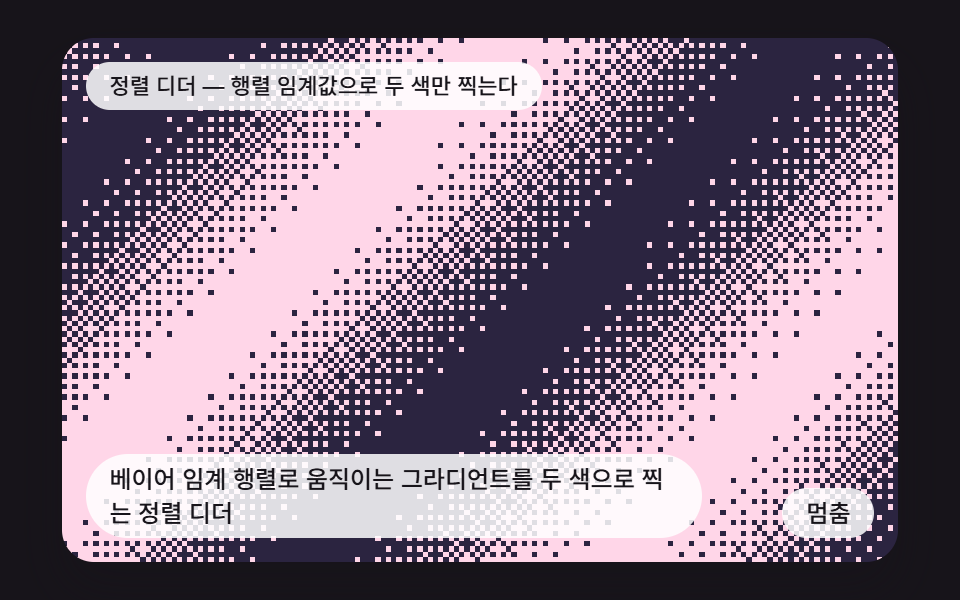 Creative UICSS Dither: 9 Scenes Drawn by Threshold Math
 Creative UINode Based UI Design: 9 Patterns, No Library
 Creative UIAudio Visualizer JavaScript: 9 Parts, No Library
 Creative UICSS Background Pattern Generator: 9 Seeded Scenes
 Creative UICanvas Particle Animation: 9 Engine Patterns
 Creative UICSS Generator: 9 Sliders That Write the Code
 Creative UIHTML5 Canvas Animation: 9 Warp & Droplet Effects