CSS Org Chart: 9 Tidy Tree Layout Demos
A CSS org chart looks like boxes and lines, yet without measured widths siblings overlap, boxes jump as a branch folds and parents' lines overlap after a
See All Nine Org Chart Scenes Running on This Page
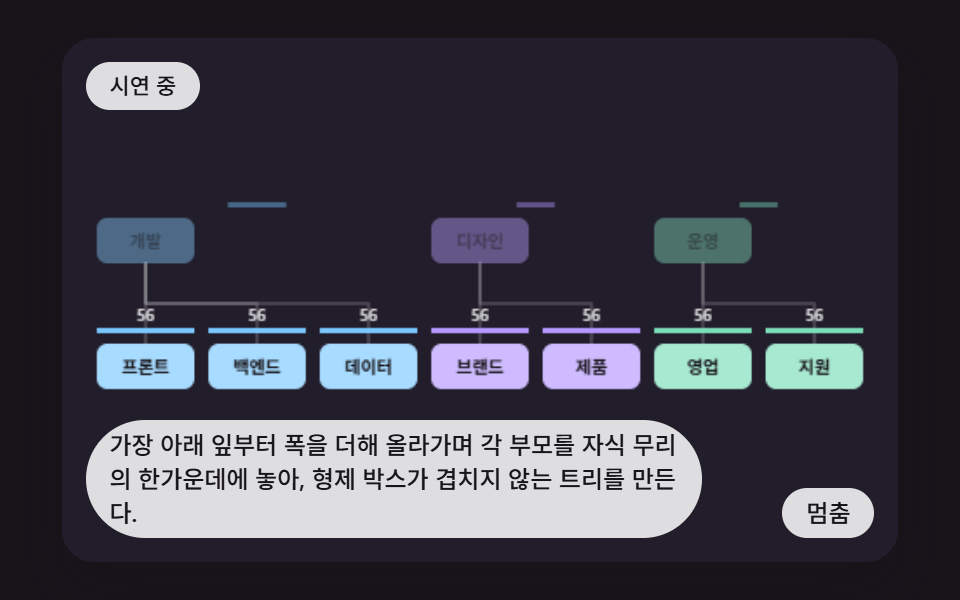 01 orgc-subtree-width-tidy-layout
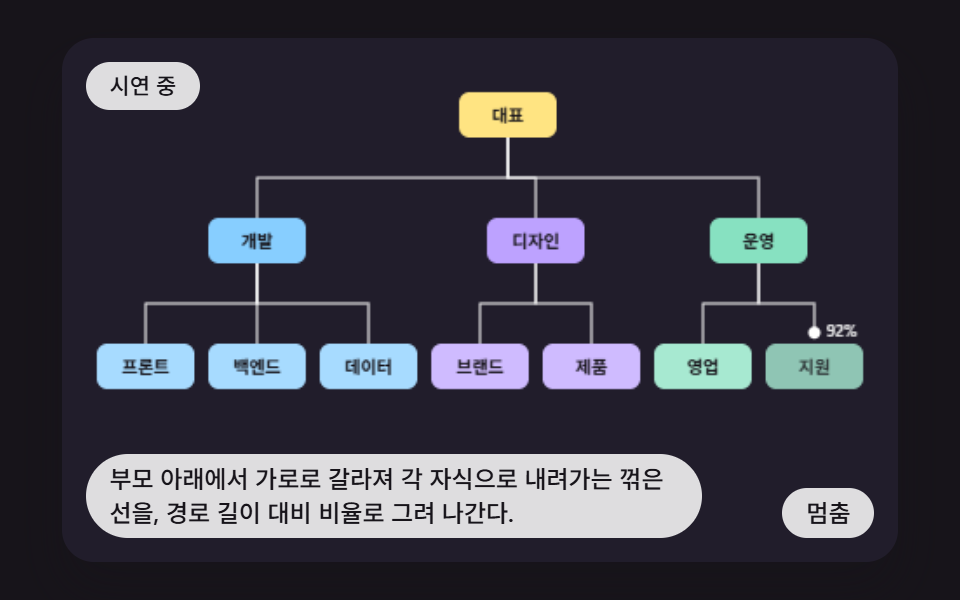 02 orgc-elbow-connector-path-draw
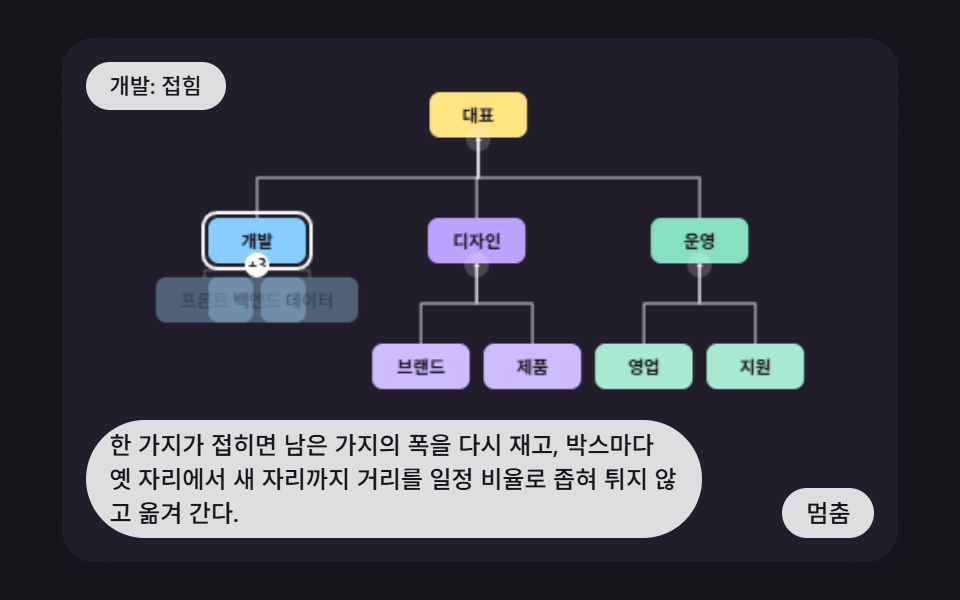 03 orgc-collapse-reflow-ease
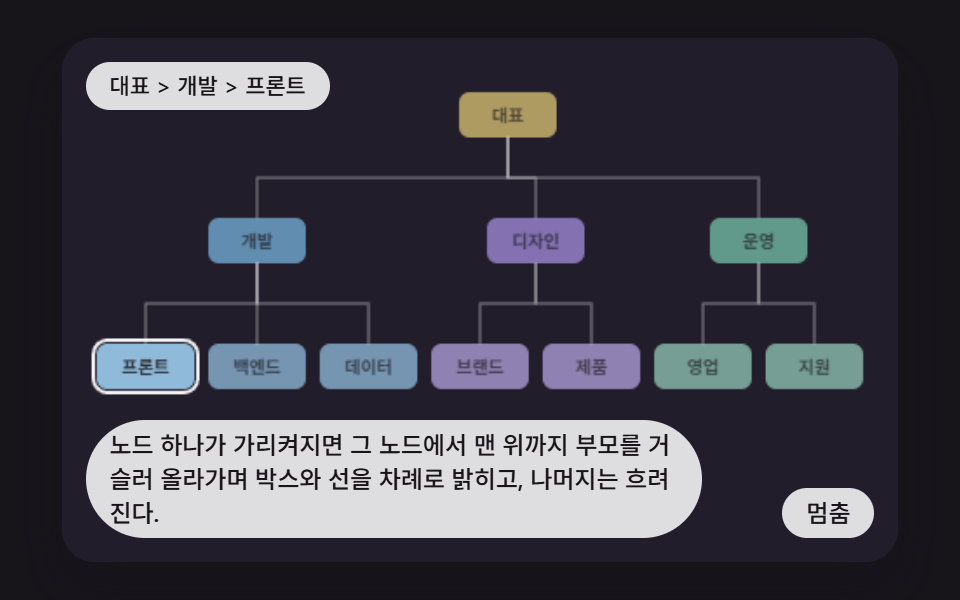 04 orgc-ancestor-path-highlight
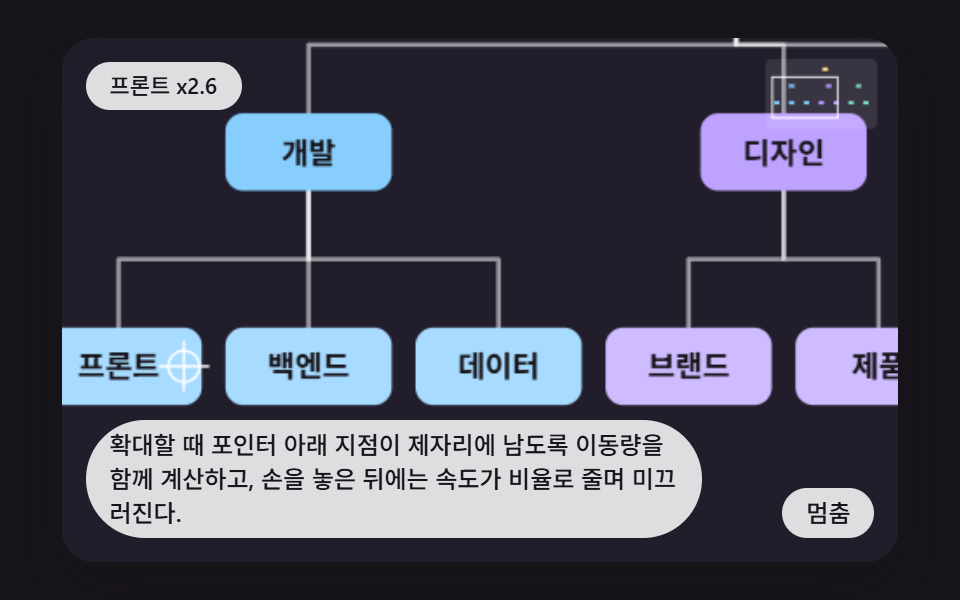 05 orgc-pan-zoom-pointer-anchor
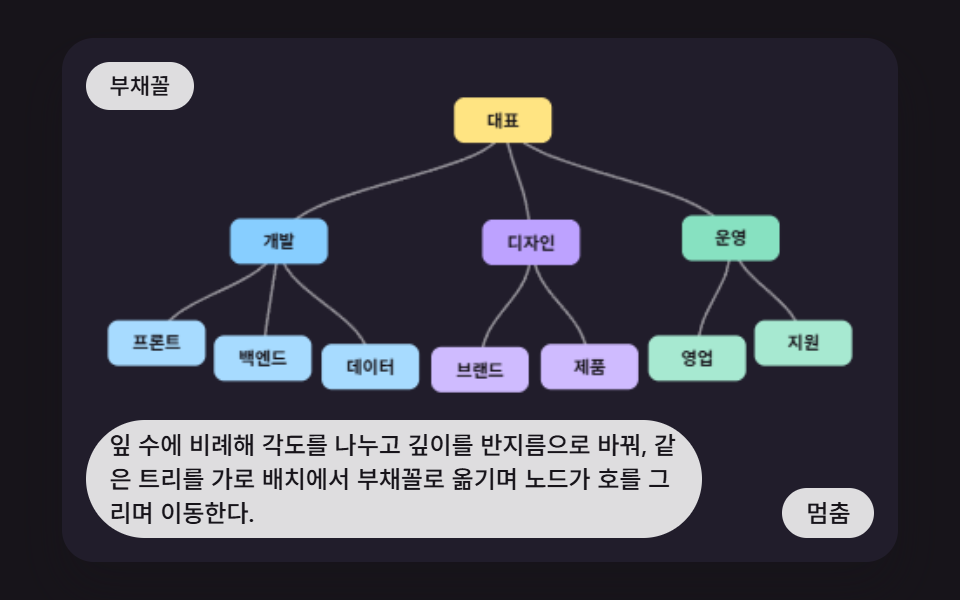 06 orgc-radial-fan-polar-layout
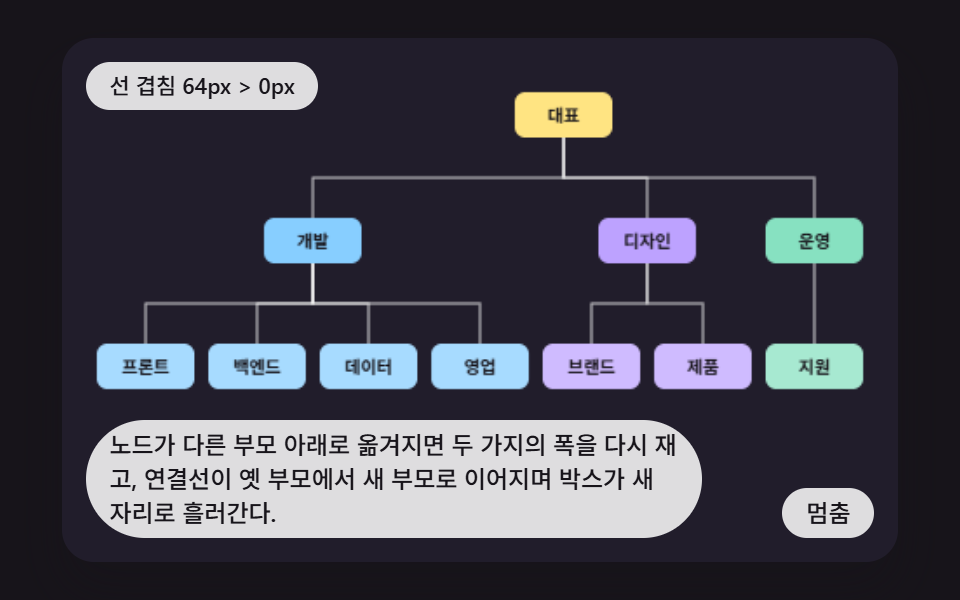 07 orgc-reparent-drop-reflow
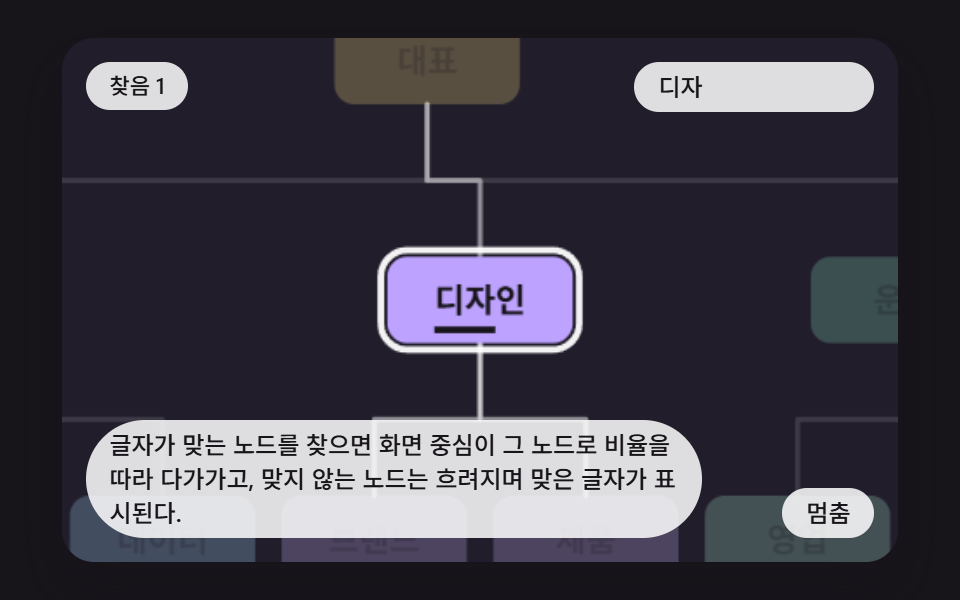 08 orgc-search-focus-camera-fly
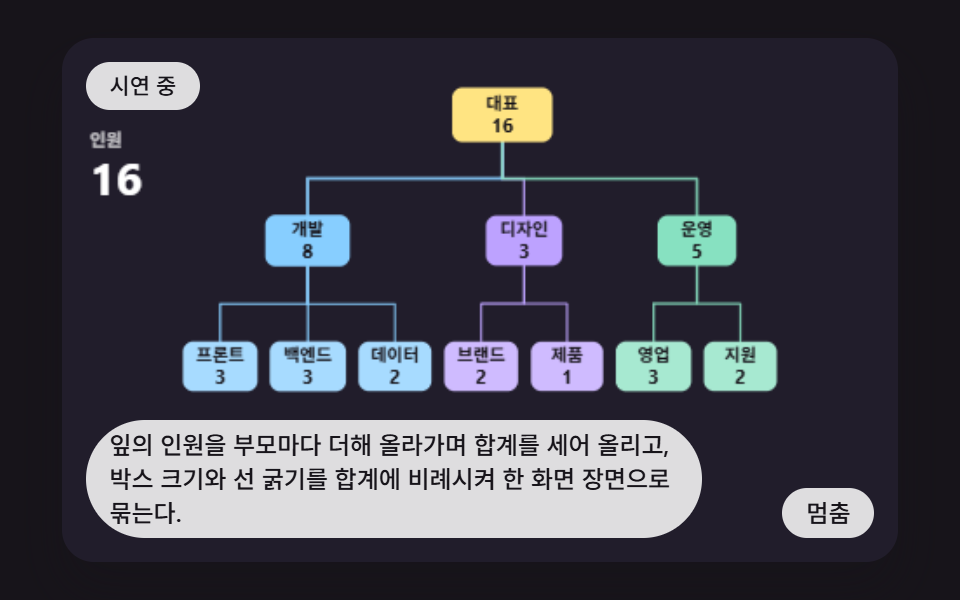 09 orgc-headcount-rollup-hero-scene
Auto-plays · click a tile to jump to its section · all nine in one zip
- 01 Base Layout That Centers Each Parent Over Measured Branch Widths
- 02 Elbow Connectors Drawn From Parent to Child
- 03 Reflow Where Remaining Boxes Glide To New Spots When a Branch Folds
- 04 Highlight That Lights Only the Path From a Node to the Top
- 05 Pan and Zoom That Keep the Point Under the Pointer Fixed
- 06 Polar Layout That Fans the Same Tree Out
- 07 Move Where Lines and Boxes Reflow Together When the Parent Changes
- 08 Search Focus Where the View Closes In on the Matching Node
- 09 Hero Scene Rolling Headcount Upward Into Box Size
CSS Org Chart: 9 Demos That Measure Branch Width First
All nine scenes share one eleven-box company. A root sits over three departments, the first has three teams under it, the second two and the third two, and the sum of those leaves decides how wide every branch must be. The canvas is 480 by 300 inside (W and H), every box, label and line is painted through the 2d context, and CSS only stretches the result at the same 16:10 ratio, which is why an org chart css responsive to its column needs no change to the layout math.
Two functions carry everything. measure adds widths from the leaves upward, and place lays each child group out from left to right and seats the parent midway between its first and last child. Scene 01 shows that skeleton bare, while 02 to 09 call the same pair and stack one behavior on top: line drawing, folding, path highlight, pan and zoom, a fan layout, reparenting, search and headcount totals. No force simulation is involved, so the result is the same on every run, unlike the spring-driven nodes in Force Directed Graph: 9 Network Layout Demos.
Time comes from requestAnimationFrame timestamps gathered into 16 ms steps (FIXED_DT), and a gap longer than 160 ms is cut to 160 so a tab that wakes up does not make the scene jump. No random numbers, Date, fetch, storage, library or outside address appear in any file. If your tree is a plain list of folders, 9 File Tree CSS Views — Folders That Really Open fits better than a diagram.
Code for Each Tree Layout Technique
Each snippet is a run of consecutive lines from the demo source, and the complete files are in the zip. Sizes and spacing are the same in all nine: NODE_W 56, GAP_X 8, LEVEL_DY 72 and TOP_Y 44.
01Seating Each Parent Over the Measured Width of Its Branch
measure starts every leaf at NODE_W and adds the child widths plus GAP_X on the way up, and place puts each parent midway between its first and last child. Seven leaves of 56 with six gaps of 8 give a top width of 440, and the three departments come out at 184, 120 and 120. Over 22 of 23 measured frames this scene accumulated 10.9% repaint area at an average intensity of 121.0.
<main class="stage">
<div class="oc is-demo" id="ocRoot">
  <canvas class="oc__canvas" id="ocCanvas" width="480" height="300" tabindex="0" aria-label="Widths are summed from the leaves upward and every parent is centered over its children, so sibling boxes never overlap."></canvas>
  <p class="oc__status" id="ocStatus" aria-live="polite">Demo running</p>
  <button class="oc__btn" id="ocBtn" type="button">Pause</button>
  <p class="oc__caption">Widths are summed from the leaves upward and every parent is centered over its children, so sibling boxes never overlap.</p>
</div>
</main>
@use "../../../../site/static/demo-tokens" as *;
@include stage($stage-ink);
.oc {
position: relative;
width: min(92vw, calc(160vh - 12.8vw));
aspect-ratio: 480 / 300;
margin: 0 auto;
border-radius: $r-card;
overflow: hidden;
box-shadow: $shadow-raised;
background: $subject-ink;
}
.oc__canvas {
display: block;
width: 100%;
height: 100%;
touch-action: none;
}
.oc__canvas:focus-visible {
outline: 2px solid rgba(255, 255, 255, .85);
outline-offset: -6px;
}
.oc__status {
position: absolute;
left: $sp-3;
top: $sp-3;
max-width: 62%;
margin: 0;
padding: $sp-1 $sp-3;
border-radius: $r-pill;
background: rgba(255, 255, 255, .85);
color: $subject-ink;
font-weight: 500;
font-size: 11px;
line-height: 1.4;
pointer-events: none;
}
.oc__btn {
position: absolute;
right: $sp-3;
bottom: $sp-3;
margin: 0;
padding: $sp-1 $sp-3;
border: 0;
border-radius: $r-pill;
background: rgba(255, 255, 255, .85);
color: $subject-ink;
font: inherit;
font-weight: 500;
font-size: 12px;
line-height: 1.4;
cursor: pointer;
}
.oc__btn:focus-visible {
outline: 2px solid #ffffff;
outline-offset: 2px;
}
.oc__caption {
position: absolute;
left: $sp-3;
bottom: $sp-3;
max-width: 68%;
margin: 0;
padding: $sp-1 $sp-3;
border-radius: $r-pill;
background: rgba(255, 255, 255, .85);
color: $subject-ink;
font-weight: 500;
font-size: 12px;
line-height: 1.4;
pointer-events: none;
}
@media (max-width: 340px) {
.oc__caption, .oc__btn { font-size: 10px; padding: $sp-1 $sp-2; }
.oc__status { font-size: 10px; }
}
@media (prefers-reduced-motion: reduce) {
.oc { cursor: default; }
}html, body {
margin: 0;
overflow: hidden;
}
.stage {
box-sizing: border-box;
min-height: 100vh;
display: grid;
place-items: center;
margin: 0;
background: #17141a;
font-family: -apple-system, "Segoe UI", "Noto Sans KR", sans-serif;
padding: clamp(8px, 4vw, 24px);
}
.oc {
position: relative;
width: min(92vw, 160vh - 12.8vw);
aspect-ratio: 480/300;
margin: 0 auto;
border-radius: 16px;
overflow: hidden;
box-shadow: 0 14px 24px rgba(23, 20, 26, 0.32);
background: #17141a;
}
.oc__canvas {
display: block;
width: 100%;
height: 100%;
touch-action: none;
}
.oc__canvas:focus-visible {
outline: 2px solid rgba(255, 255, 255, 0.85);
outline-offset: -6px;
}
.oc__status {
position: absolute;
left: 12px;
top: 12px;
max-width: 62%;
margin: 0;
padding: 4px 12px;
border-radius: 999px;
background: rgba(255, 255, 255, 0.85);
color: #17141a;
font-weight: 500;
font-size: 11px;
line-height: 1.4;
pointer-events: none;
}
.oc__btn {
position: absolute;
right: 12px;
bottom: 12px;
margin: 0;
padding: 4px 12px;
border: 0;
border-radius: 999px;
background: rgba(255, 255, 255, 0.85);
color: #17141a;
font: inherit;
font-weight: 500;
font-size: 12px;
line-height: 1.4;
cursor: pointer;
}
.oc__btn:focus-visible {
outline: 2px solid #ffffff;
outline-offset: 2px;
}
.oc__caption {
position: absolute;
left: 12px;
bottom: 12px;
max-width: 68%;
margin: 0;
padding: 4px 12px;
border-radius: 999px;
background: rgba(255, 255, 255, 0.85);
color: #17141a;
font-weight: 500;
font-size: 12px;
line-height: 1.4;
pointer-events: none;
}
@media (max-width: 340px) {
.oc__caption, .oc__btn {
font-size: 10px;
padding: 4px 8px;
}
.oc__status {
font-size: 10px;
}
}
@media (prefers-reduced-motion: reduce) {
.oc {
cursor: default;
}
}(function () {
var root = document.getElementById('ocRoot');
var canvas = document.getElementById('ocCanvas');
var statusEl = document.getElementById('ocStatus');
var btnEl = document.getElementById('ocBtn');
var inputEl = null;
function main(root0, canvas, statusEl, btnEl, inputEl) {
const ctx0 = canvas.getContext('2d');
if (!ctx0) {
return function () { return; };
}
const ctx = ctx0;
const rootEl = root0;
const W = 480, H = 300;
const FIXED_DT = 16;
const REDUCE_STEP_MS = 900;
const MOVE_RATE = 0.09;
const FADE_RATE = 0.12;
const NODE_W = 56, NODE_H = 26, GAP_X = 8, LEVEL_DY = 72, TOP_Y = 44;
const BG = '#211d2b';
const INK = '#17141a';
const FONT = '-apple-system, "Segoe UI", "Noto Sans KR", sans-serif';
const reduce = window.matchMedia('(prefers-reduced-motion: reduce)').matches;
if (reduce) {
rootEl.classList.remove('is-demo');
}
let paused = false;
let autoplay = !reduce;
let interactive = false;
let elapsed = 0;
let rafId = 0;
const cleaners = [];
function listen(target, type, fn) {
target.addEventListener(type, fn);
cleaners.push(function () { target.removeEventListener(type, fn); });
}
function clamp(v, lo, hi) { return v < lo ? lo : (v > hi ? hi : v); }
function lerp(a, b, k) { return a + (b - a) * k; }
function smooth(x) { const c = clamp(x, 0, 1); return c * c * (3 - 2 * c); }
function setStatus(msg) { statusEl.textContent = msg; }
canvas.width = W;
canvas.height = H;
// 파스텔 가지 색 — CEO 버터 · Dev 하늘 · Design 라일락 · Ops 민트
const BRANCH_COL = [[255, 228, 130], [122, 200, 255], [182, 152, 255], [122, 222, 186]];
function rgba(c, a, mix) {
return 'rgba(' + Math.round(lerp(c[0], 255, mix)) + ',' + Math.round(lerp(c[1], 255, mix)) + ',' + Math.round(lerp(c[2], 255, mix)) + ',' + a.toFixed(3) + ')';
}
// 조직 Data — 이름과 부모 번호 (부모가 항상 먼저 나온다)
const ORG = [
['CEO', -1], ['Dev', 0], ['Design', 0], ['Ops', 0],
['Frontend', 1], ['Backend', 1], ['Data', 1], ['Brand', 2], ['Product', 2], ['Sales', 3], ['Support', 3]
];
const nodes = [];
for (let i = 0; i < ORG.length; i += 1) {
const pi = ORG[i][1];
const p = pi >= 0 ? nodes[pi] : null;
const nd = {
id: i, label: ORG[i][0], kids: [], parent: p, depth: p ? p.depth + 1 : 0, branch: 0, open: true,
w: NODE_W, left: 0, tx: 0, ty: 0, x: 0, y: 0, alpha: 1, talpha: 1,
bw: NODE_W, bh: NODE_H, lit: 0, val: 0, tval: 0, total: 0
};
nd.branch = p ? (p.depth === 0 ? i : p.branch) : 0;
if (p) {
p.kids.push(nd);
}
nodes.push(nd);
}
const root = nodes[0];
function vis(n) { return n.open ? n.kids : []; }
function isShown(n) {
let p = n.parent;
while (p) {
if (!p.open) {
return false;
}
p = p.parent;
}
return true;
}
function setDepth(n, d) {
n.depth = d;
for (let i = 0; i < n.kids.length; i += 1) {
setDepth(n.kids[i], d + 1);
}
}
// 가지 폭 재기 — 가장 아래 잎에서 위로 올라가며 폭을 더한다
      function measure(n) {
          const v = vis(n);
          if (v.length === 0) {
              n.w = n.bw;
              return n.w;
          }
          let sum = GAP_X * (v.length - 1);
          for (let i = 0; i < v.length; i += 1) {
              sum += measure(v[i]);
          }
          n.w = Math.max(n.bw, sum);
          return n.w;
      }
// 자리 잡기 — 자식 무리를 왼쪽에서 오른쪽으로 놓고, 부모는 첫째와 마지막 자식의 가운데
      function place(n, left) {
          const v = vis(n);
          n.left = left;
          if (v.length === 0) {
              n.tx = left + n.w / 2;
              return;
          }
          let span = GAP_X * (v.length - 1);
          for (let i = 0; i < v.length; i += 1) {
              span += v[i].w;
          }
          let cur = left + (n.w - span) / 2;
          for (let i = 0; i < v.length; i += 1) {
              place(v[i], cur);
              cur += v[i].w + GAP_X;
          }
          n.tx = (v[0].tx + v[v.length - 1].tx) / 2;
      }
// 접힌 가지 안의 노드는 가장 가까운 보이는 조상 자리로 모인다
function gather(n, hidden, anchor) {
n.ty = TOP_Y + n.depth * LEVEL_DY;
if (hidden) {
n.tx = anchor.tx;
n.ty = anchor.ty;
n.talpha = 0;
}
else {
n.talpha = 1;
}
for (let i = 0; i < n.kids.length; i += 1) {
const kidHidden = hidden || !n.open;
gather(n.kids[i], kidHidden, hidden ? anchor : n);
}
}
function layout() {
measure(root);
place(root, (W - root.w) / 2);
gather(root, false, root);
}
function settleNodes(rate) {
for (let i = 0; i < nodes.length; i += 1) {
const n = nodes[i];
n.x += (n.tx - n.x) * rate;
n.y += (n.ty - n.y) * rate;
n.alpha += (n.talpha - n.alpha) * FADE_RATE;
}
}
function snapNodes() {
for (let i = 0; i < nodes.length; i += 1) {
const n = nodes[i];
n.x = n.tx;
n.y = n.ty;
n.alpha = n.talpha;
}
}
// 카메라 — 화면 좌표 = 세계 좌표 * s + (ox, oy)
const cam = { s: 1, ox: 0, oy: 0 };
function worldX(sx) { return (sx - cam.ox) / cam.s; }
function worldY(sy) { return (sy - cam.oy) / cam.s; }
// 그리기 도구
function rr(x, y, w, h, r) {
ctx.beginPath();
ctx.moveTo(x + r, y);
ctx.arcTo(x + w, y, x + w, y + h, r);
ctx.arcTo(x + w, y + h, x, y + h, r);
ctx.arcTo(x, y + h, x, y, r);
ctx.arcTo(x, y, x + w, y, r);
ctx.closePath();
}
function clearStage() {
ctx.setTransform(1, 0, 0, 1, 0, 0);
ctx.globalAlpha = 1;
ctx.fillStyle = BG;
ctx.fillRect(0, 0, W, H);
}
function beginWorld() { ctx.setTransform(cam.s, 0, 0, cam.s, cam.ox, cam.oy); }
function endWorld() { ctx.setTransform(1, 0, 0, 1, 0, 0); }
function polyLen(q) {
let s = 0;
for (let i = 2; i < q.length; i += 2) {
s += Math.abs(q[i] - q[i - 2]) + Math.abs(q[i + 1] - q[i - 1]);
}
return s;
}
// 꺾은선 길이 대비 비율만큼만 긋는다 (점선 길이 = 전체 길이 * ratio)
function strokeLine(q, ratio, col, lw) {
if (ratio <= 0) {
return;
}
const total = polyLen(q);
ctx.beginPath();
ctx.moveTo(q[0], q[1]);
for (let i = 2; i < q.length; i += 2) {
ctx.lineTo(q[i], q[i + 1]);
}
ctx.lineWidth = lw;
ctx.strokeStyle = col;
ctx.lineCap = 'round';
ctx.lineJoin = 'round';
ctx.setLineDash(ratio >= 1 ? [] : [total * ratio, total * 2]);
ctx.stroke();
ctx.setLineDash([]);
}
// 꺾은선 위에서 길이 비율 지점의 좌표
function pointAt(q, ratio) {
let left = polyLen(q) * clamp(ratio, 0, 1);
for (let i = 2; i < q.length; i += 2) {
const seg = Math.abs(q[i] - q[i - 2]) + Math.abs(q[i + 1] - q[i - 1]);
if (left <= seg || i === q.length - 2) {
const f = seg > 0 ? Math.min(left / seg, 1) : 1;
return [lerp(q[i - 2], q[i], f), lerp(q[i - 1], q[i + 1], f)];
}
left -= seg;
}
return [q[0], q[1]];
}
// 부모 아래에서 가로로 갈라져 자식으로 내려가는 꺾은선 (부모 아래 가운데, 가운데 높이, 자식 위 가운데)
function elbow(p, c) {
const ay = p.y + p.bh / 2;
const dy = c.y - c.bh / 2;
const my = (ay + dy) / 2;
return [p.x, ay, p.x, my, c.x, my, c.x, dy];
}
function drawBox(n, a, mix, dy = 1) {
if (a <= 0.01) {
return;
}
const col = BRANCH_COL[n.branch];
ctx.globalAlpha = clamp(a, 0, 1);
rr(n.x - n.bw / 2, n.y - n.bh / 2, n.bw, n.bh, 6);
ctx.fillStyle = rgba(col, 1, mix);
ctx.fill();
ctx.fillStyle = INK;
ctx.font = '600 10px ' + FONT;
ctx.textAlign = 'center';
ctx.textBaseline = 'middle';
ctx.fillText(n.label, n.x, n.y + dy);
ctx.globalAlpha = 1;
}
function drawEdgesPlain(lineAlpha) {
for (let i = 1; i < nodes.length; i += 1) {
const n = nodes[i];
const p = n.parent;
if (!p) {
continue;
}
const a = Math.min(p.alpha, n.alpha) * lineAlpha;
if (a <= 0.01) {
continue;
}
strokeLine(elbow(p, n), 1, 'rgba(255,255,255,' + (0.55 * a).toFixed(3) + ')', 1.5);
}
}
function drawBoxesPlain() {
for (let d = 0; d < 4; d += 1) {
for (let i = 0; i < nodes.length; i += 1) {
if (nodes[i].depth === d) {
drawBox(nodes[i], nodes[i].alpha, d === 2 ? 0.34 : (d === 1 ? 0.1 : 0));
}
}
}
}
function ring(n, col, pad) {
ctx.globalAlpha = 1;
rr(n.x - n.bw / 2 - pad, n.y - n.bh / 2 - pad, n.bw + pad * 2, n.bh + pad * 2, 8);
ctx.lineWidth = 2;
ctx.strokeStyle = col;
ctx.stroke();
}
// 키보드 탐색 — 방향키가 부모·자식·같은 높이의 이웃으로 옮긴다
let cursor = root;
let showCursor = false;
function moveCursor(k) {
let t = null;
if (k === 'ArrowDown') {
const v = vis(cursor);
t = v.length > 0 ? v[0] : null;
}
else if (k === 'ArrowUp') {
t = cursor.parent;
}
else if (k === 'ArrowLeft' || k === 'ArrowRight') {
const row = [];
for (let i = 0; i < nodes.length; i += 1) {
if (nodes[i].depth === cursor.depth && isShown(nodes[i])) {
row.push(nodes[i]);
}
}
row.sort(function (a, b) { return a.tx - b.tx; });
const j = row.indexOf(cursor) + (k === 'ArrowRight' ? 1 : -1);
t = (j >= 0 && j < row.length) ? row[j] : null;
}
else if (k === 'Home') {
t = root;
}
else {
return false;
}
if (t) {
cursor = t;
}
return true;
}
function hitNode(sx, sy) {
const x = worldX(sx), y = worldY(sy);
let best = null;
for (let i = 0; i < nodes.length; i += 1) {
const n = nodes[i];
if (n.alpha > 0.3 && Math.abs(x - n.x) <= n.bw / 2 + 2 && Math.abs(y - n.y) <= n.bh / 2 + 2) {
best = n;
}
}
return best;
}
function toLocal(e) {
const r = canvas.getBoundingClientRect();
return [(e.clientX - r.left) * W / r.width, (e.clientY - r.top) * H / r.height];
}
// 장면이 채우는 자리 — 시연 일정, 시간 함수 여부, 입력 처리
let script = [];
let period = 4000;
let timeScene = false;
let reduceMs = 0;
let stepFn = function () { return; };
let drawFn = function () { return; };
let actFn = function () { return; };
let snapFn = function () { return; };
let ptrFn = function () { return; };
let keyFn = function () { return false; };
layout();
snapNodes();
// 01 가지 폭을 재서 부모를 자식 한가운데 놓는 기본 배치 — 잎 폭 막대가 먼저 서고, 부모가 위에서 가운데로 미끄러진다
timeScene = true;
period = 4400;
reduceMs = 3000;
const LEAF_IN_MS = 200;
const MID_START_MS = 900;
const ROOT_START_MS = 1900;
const SETTLE_MS = 800;
const FADE_OUT_MS = 3700;
const START_BY_DEPTH = [ROOT_START_MS, MID_START_MS, LEAF_IN_MS];
const shown = [];
const barW = [];
for (let i = 0; i < nodes.length; i += 1) {
shown.push(0);
barW.push(0);
}
drawFn = function () {
const t = elapsed % period;
const out = 1 - smooth((t - FADE_OUT_MS) / 600);
// 아래에서 위로 — 잎은 제자리, 부모는 첫째 자식 위에서 두 끝 자식의 가운데로 옮겨 간다
for (let i = nodes.length - 1; i >= 0; i -= 1) {
const n = nodes[i];
const st = START_BY_DEPTH[n.depth];
n.y = n.ty;
if (n.kids.length === 0) {
n.x = n.tx;
}
else {
const first = n.kids[0], last = n.kids[n.kids.length - 1];
n.x = lerp(first.x, (first.x + last.x) / 2, smooth((t - st) / SETTLE_MS));
}
shown[i] = smooth((t - (st - 300)) / 300) * out;
barW[i] = smooth((t - (st - 300)) / 500);
}
clearStage();
for (let i = 1; i < nodes.length; i += 1) {
const n = nodes[i];
const p = n.parent;
if (!p) {
continue;
}
const a = Math.min(shown[p.id], shown[i]);
if (a > 0.01) {
strokeLine(elbow(p, n), 1, 'rgba(255,255,255,' + (0.5 * a).toFixed(3) + ')', 1.5);
}
}
for (let d = 0; d < 3; d += 1) {
for (let i = 0; i < nodes.length; i += 1) {
const n = nodes[i];
if (n.depth !== d) {
continue;
}
// 폭 막대 — 이 가지가 차지하는 너비. 위로 갈수록 자식 폭의 합이 된다
const a = shown[i];
if (a > 0.01) {
const bw = n.w * barW[i];
ctx.globalAlpha = a;
ctx.fillStyle = rgba(BRANCH_COL[n.branch], 1, 0);
const cx = n.left + n.w / 2;
ctx.fillRect(cx - bw / 2, n.y - NODE_H / 2 - 9, bw, 3);
ctx.fillStyle = 'rgba(255,255,255,0.85)';
ctx.font = '600 9px ' + FONT;
ctx.textAlign = 'center';
ctx.textBaseline = 'alphabetic';
if (barW[i] > 0.6) {
ctx.fillText(String(Math.round(n.w)), cx, n.y - NODE_H / 2 - 13);
}
ctx.globalAlpha = 1;
}
drawBox(n, a, d === 2 ? 0.34 : (d === 1 ? 0.1 : 0));
}
}
};
let lastTs = null;
let accMs = 0;
let prevCyc = 0;
let scriptIdx = 0;
function runScript() {
const cyc = elapsed % period;
for (let i = 0; i < script.length; i += 1) {
const at = script[i].at;
const due = prevCyc <= cyc ? (at > prevCyc && at <= cyc) : (at > prevCyc || at <= cyc);
if (due) {
script[i].run();
}
}
prevCyc = cyc;
}
function setMode() {
if (reduce) {
setStatus('Stepping one scene at a time');
btnEl.textContent = 'Next scene';
return;
}
setStatus(!autoplay ? 'Manual control' : (paused ? 'Paused' : 'Demo running'));
btnEl.textContent = (autoplay && !paused) ? 'Pause' : 'Play';
}
function takeOver() {
if (reduce || !autoplay) {
return;
}
autoplay = false;
paused = false;
rootEl.classList.remove('is-demo');
setMode();
}
function nextScene() {
if (timeScene) {
elapsed += REDUCE_STEP_MS;
}
else if (script.length > 0) {
script[scriptIdx % script.length].run();
scriptIdx += 1;
}
snapFn();
drawFn();
}
function afterInput() {
if (reduce) {
snapFn();
drawFn();
}
}
function onButton() {
if (reduce) {
nextScene();
setStatus('Stepping one scene at a time');
return;
}
if (autoplay && !paused) {
paused = true;
}
else {
paused = false;
autoplay = true;
prevCyc = elapsed % period;
rootEl.classList.add('is-demo');
}
setMode();
}
function tick(ts) {
if (lastTs === null) {
lastTs = ts;
}
const frameDt = Math.min(ts - lastTs, 160);
lastTs = ts;
if (!paused) {
accMs += frameDt;
while (accMs >= FIXED_DT) {
elapsed += FIXED_DT;
accMs -= FIXED_DT;
if (autoplay) {
runScript();
}
stepFn(FIXED_DT);
}
drawFn();
}
rafId = requestAnimationFrame(tick);
}
listen(btnEl, 'click', function () { onButton(); });
listen(canvas, 'pointerdown', function (e) {
if (!interactive) {
onButton();
return;
}
takeOver();
const p = toLocal(e);
ptrFn('down', p[0], p[1], 0);
afterInput();
});
listen(canvas, 'pointermove', function (e) {
if (!interactive) {
return;
}
const p = toLocal(e);
ptrFn('move', p[0], p[1], e.buttons);
afterInput();
});
listen(canvas, 'pointerup', function (e) {
if (!interactive) {
return;
}
const p = toLocal(e);
ptrFn('up', p[0], p[1], 0);
afterInput();
});
listen(canvas, 'wheel', function (e) {
if (!interactive) {
return;
}
e.preventDefault();
takeOver();
const p = toLocal(e);
ptrFn('wheel', p[0], p[1], e.deltaY);
afterInput();
});
listen(canvas, 'keydown', function (e) {
const k = e.key;
if (!interactive) {
if (k === 'Enter' || k === ' ') {
e.preventDefault();
onButton();
}
return;
}
takeOver();
if (keyFn(k)) {
e.preventDefault();
}
else if (k === 'Enter' || k === ' ') {
e.preventDefault();
actFn();
}
afterInput();
});
if (reduce) {
if (timeScene) {
elapsed = reduceMs;
}
else if (script.length > 0) {
script[0].run();
scriptIdx = 1;
}
snapFn();
drawFn();
setMode();
}
else {
drawFn();
setMode();
rafId = requestAnimationFrame(tick);
}
function destroy() {
cancelAnimationFrame(rafId);
for (let i = 0; i < cleaners.length; i += 1) {
cleaners[i]();
}
}
return destroy;
}
main(root, canvas, statusEl, btnEl, inputEl);
})();import { useEffect, useRef } from "react";
import styles from "./OrgcSubtreeWidthTidyLayout.module.scss";
type OcNode = {
id: number; label: string; kids: OcNode[]; parent: OcNode | null; depth: number; branch: number; open: boolean;
w: number; left: number; tx: number; ty: number; x: number; y: number; alpha: number; talpha: number;
bw: number; bh: number; lit: number; val: number; tval: number; total: number;
};
type OcEvent = { at: number; run: () => void };
function main(root0: HTMLDivElement, canvas: HTMLCanvasElement, statusEl: HTMLElement, btnEl: HTMLButtonElement, inputEl: HTMLInputElement | null): () => void {
const ctx0 = canvas.getContext('2d');
if (!ctx0) { return function (): void { return; }; }
const ctx: CanvasRenderingContext2D = ctx0;
const rootEl: HTMLDivElement = root0;
const W = 480, H = 300;
const FIXED_DT = 16;
const REDUCE_STEP_MS = 900;
const MOVE_RATE = 0.09;
const FADE_RATE = 0.12;
const NODE_W = 56, NODE_H = 26, GAP_X = 8, LEVEL_DY = 72, TOP_Y = 44;
const BG = '#211d2b';
const INK = '#17141a';
const FONT = '-apple-system, "Segoe UI", "Noto Sans KR", sans-serif';
const reduce = window.matchMedia('(prefers-reduced-motion: reduce)').matches;
if (reduce) { rootEl.classList.remove('is-demo'); }
let paused = false;
let autoplay = !reduce;
let interactive = false;
let elapsed = 0;
let rafId = 0;
const cleaners: Array<() => void> = [];
function listen(target: EventTarget, type: string, fn: (e: Event) => void): void {
target.addEventListener(type, fn);
cleaners.push(function (): void { target.removeEventListener(type, fn); });
}
function clamp(v: number, lo: number, hi: number): number { return v < lo ? lo : (v > hi ? hi : v); }
function lerp(a: number, b: number, k: number): number { return a + (b - a) * k; }
function smooth(x: number): number { const c = clamp(x, 0, 1); return c * c * (3 - 2 * c); }
function setStatus(msg: string): void { statusEl.textContent = msg; }
canvas.width = W;
canvas.height = H;
// 파스텔 가지 색 — 대표 버터 · 개발 하늘 · 디자인 라일락 · 운영 민트
const BRANCH_COL: number[][] = [[255, 228, 130], [122, 200, 255], [182, 152, 255], [122, 222, 186]];
function rgba(c: number[], a: number, mix: number): string {
return 'rgba(' + Math.round(lerp(c[0], 255, mix)) + ',' + Math.round(lerp(c[1], 255, mix)) + ',' + Math.round(lerp(c[2], 255, mix)) + ',' + a.toFixed(3) + ')';
}
// 조직 데이터 — 이름과 부모 번호 (부모가 항상 먼저 나온다)
const ORG: Array<[string, number]> = [
['대표', -1], ['개발', 0], ['디자인', 0], ['운영', 0],
['프론트', 1], ['백엔드', 1], ['데이터', 1], ['브랜드', 2], ['제품', 2], ['영업', 3], ['지원', 3]
];
const nodes: OcNode[] = [];
for (let i = 0; i < ORG.length; i += 1) {
const pi = ORG[i][1];
const p: OcNode | null = pi >= 0 ? nodes[pi] : null;
const nd: OcNode = {
id: i, label: ORG[i][0], kids: [], parent: p, depth: p ? p.depth + 1 : 0, branch: 0, open: true,
w: NODE_W, left: 0, tx: 0, ty: 0, x: 0, y: 0, alpha: 1, talpha: 1,
bw: NODE_W, bh: NODE_H, lit: 0, val: 0, tval: 0, total: 0
};
nd.branch = p ? (p.depth === 0 ? i : p.branch) : 0;
if (p) { p.kids.push(nd); }
nodes.push(nd);
}
const root: OcNode = nodes[0];
function vis(n: OcNode): OcNode[] { return n.open ? n.kids : []; }
function isShown(n: OcNode): boolean {
let p = n.parent;
while (p) { if (!p.open) { return false; } p = p.parent; }
return true;
}
function setDepth(n: OcNode, d: number): void {
n.depth = d;
for (let i = 0; i < n.kids.length; i += 1) { setDepth(n.kids[i], d + 1); }
}
// 가지 폭 재기 — 가장 아래 잎에서 위로 올라가며 폭을 더한다
function measure(n: OcNode): number {
const v = vis(n);
if (v.length === 0) { n.w = n.bw; return n.w; }
let sum = GAP_X * (v.length - 1);
for (let i = 0; i < v.length; i += 1) { sum += measure(v[i]); }
n.w = Math.max(n.bw, sum);
return n.w;
}
// 자리 잡기 — 자식 무리를 왼쪽에서 오른쪽으로 놓고, 부모는 첫째와 마지막 자식의 가운데
function place(n: OcNode, left: number): void {
const v = vis(n);
n.left = left;
if (v.length === 0) { n.tx = left + n.w / 2; return; }
let span = GAP_X * (v.length - 1);
for (let i = 0; i < v.length; i += 1) { span += v[i].w; }
let cur = left + (n.w - span) / 2;
for (let i = 0; i < v.length; i += 1) {
place(v[i], cur);
cur += v[i].w + GAP_X;
}
n.tx = (v[0].tx + v[v.length - 1].tx) / 2;
}
// 접힌 가지 안의 노드는 가장 가까운 보이는 조상 자리로 모인다
function gather(n: OcNode, hidden: boolean, anchor: OcNode): void {
n.ty = TOP_Y + n.depth * LEVEL_DY;
if (hidden) { n.tx = anchor.tx; n.ty = anchor.ty; n.talpha = 0; } else { n.talpha = 1; }
for (let i = 0; i < n.kids.length; i += 1) {
const kidHidden = hidden || !n.open;
gather(n.kids[i], kidHidden, hidden ? anchor : n);
}
}
function layout(): void {
measure(root);
place(root, (W - root.w) / 2);
gather(root, false, root);
}
function settleNodes(rate: number): void {
for (let i = 0; i < nodes.length; i += 1) {
const n = nodes[i];
n.x += (n.tx - n.x) * rate;
n.y += (n.ty - n.y) * rate;
n.alpha += (n.talpha - n.alpha) * FADE_RATE;
}
}
function snapNodes(): void {
for (let i = 0; i < nodes.length; i += 1) {
const n = nodes[i];
n.x = n.tx; n.y = n.ty; n.alpha = n.talpha;
}
}
// 카메라 — 화면 좌표 = 세계 좌표 * s + (ox, oy)
const cam = { s: 1, ox: 0, oy: 0 };
function worldX(sx: number): number { return (sx - cam.ox) / cam.s; }
function worldY(sy: number): number { return (sy - cam.oy) / cam.s; }
// 그리기 도구
function rr(x: number, y: number, w: number, h: number, r: number): void {
ctx.beginPath();
ctx.moveTo(x + r, y);
ctx.arcTo(x + w, y, x + w, y + h, r);
ctx.arcTo(x + w, y + h, x, y + h, r);
ctx.arcTo(x, y + h, x, y, r);
ctx.arcTo(x, y, x + w, y, r);
ctx.closePath();
}
function clearStage(): void {
ctx.setTransform(1, 0, 0, 1, 0, 0);
ctx.globalAlpha = 1;
ctx.fillStyle = BG;
ctx.fillRect(0, 0, W, H);
}
function beginWorld(): void { ctx.setTransform(cam.s, 0, 0, cam.s, cam.ox, cam.oy); }
function endWorld(): void { ctx.setTransform(1, 0, 0, 1, 0, 0); }
function polyLen(q: number[]): number {
let s = 0;
for (let i = 2; i < q.length; i += 2) { s += Math.abs(q[i] - q[i - 2]) + Math.abs(q[i + 1] - q[i - 1]); }
return s;
}
// 꺾은선 길이 대비 비율만큼만 긋는다 (점선 길이 = 전체 길이 * ratio)
function strokeLine(q: number[], ratio: number, col: string, lw: number): void {
if (ratio <= 0) { return; }
const total = polyLen(q);
ctx.beginPath();
ctx.moveTo(q[0], q[1]);
for (let i = 2; i < q.length; i += 2) { ctx.lineTo(q[i], q[i + 1]); }
ctx.lineWidth = lw;
ctx.strokeStyle = col;
ctx.lineCap = 'round';
ctx.lineJoin = 'round';
ctx.setLineDash(ratio >= 1 ? [] : [total * ratio, total * 2]);
ctx.stroke();
ctx.setLineDash([]);
}
// 꺾은선 위에서 길이 비율 지점의 좌표
function pointAt(q: number[], ratio: number): number[] {
let left = polyLen(q) * clamp(ratio, 0, 1);
for (let i = 2; i < q.length; i += 2) {
const seg = Math.abs(q[i] - q[i - 2]) + Math.abs(q[i + 1] - q[i - 1]);
if (left <= seg || i === q.length - 2) {
const f = seg > 0 ? Math.min(left / seg, 1) : 1;
return [lerp(q[i - 2], q[i], f), lerp(q[i - 1], q[i + 1], f)];
}
left -= seg;
}
return [q[0], q[1]];
}
// 부모 아래에서 가로로 갈라져 자식으로 내려가는 꺾은선 (부모 아래 가운데, 가운데 높이, 자식 위 가운데)
function elbow(p: OcNode, c: OcNode): number[] {
const ay = p.y + p.bh / 2;
const dy = c.y - c.bh / 2;
const my = (ay + dy) / 2;
return [p.x, ay, p.x, my, c.x, my, c.x, dy];
}
function drawBox(n: OcNode, a: number, mix: number, dy: number = 1): void {
if (a <= 0.01) { return; }
const col = BRANCH_COL[n.branch];
ctx.globalAlpha = clamp(a, 0, 1);
rr(n.x - n.bw / 2, n.y - n.bh / 2, n.bw, n.bh, 6);
ctx.fillStyle = rgba(col, 1, mix);
ctx.fill();
ctx.fillStyle = INK;
ctx.font = '600 10px ' + FONT;
ctx.textAlign = 'center';
ctx.textBaseline = 'middle';
ctx.fillText(n.label, n.x, n.y + dy);
ctx.globalAlpha = 1;
}
function drawEdgesPlain(lineAlpha: number): void {
for (let i = 1; i < nodes.length; i += 1) {
const n = nodes[i];
const p = n.parent;
if (!p) { continue; }
const a = Math.min(p.alpha, n.alpha) * lineAlpha;
if (a <= 0.01) { continue; }
strokeLine(elbow(p, n), 1, 'rgba(255,255,255,' + (0.55 * a).toFixed(3) + ')', 1.5);
}
}
function drawBoxesPlain(): void {
for (let d = 0; d < 4; d += 1) {
for (let i = 0; i < nodes.length; i += 1) {
if (nodes[i].depth === d) { drawBox(nodes[i], nodes[i].alpha, d === 2 ? 0.34 : (d === 1 ? 0.1 : 0)); }
}
}
}
function ring(n: OcNode, col: string, pad: number): void {
ctx.globalAlpha = 1;
rr(n.x - n.bw / 2 - pad, n.y - n.bh / 2 - pad, n.bw + pad * 2, n.bh + pad * 2, 8);
ctx.lineWidth = 2;
ctx.strokeStyle = col;
ctx.stroke();
}
// 키보드 탐색 — 방향키가 부모·자식·같은 높이의 이웃으로 옮긴다
let cursor: OcNode = root;
let showCursor = false;
function moveCursor(k: string): boolean {
let t: OcNode | null = null;
if (k === 'ArrowDown') { const v = vis(cursor); t = v.length > 0 ? v[0] : null; }
else if (k === 'ArrowUp') { t = cursor.parent; }
else if (k === 'ArrowLeft' || k === 'ArrowRight') {
const row: OcNode[] = [];
for (let i = 0; i < nodes.length; i += 1) { if (nodes[i].depth === cursor.depth && isShown(nodes[i])) { row.push(nodes[i]); } }
row.sort(function (a: OcNode, b: OcNode): number { return a.tx - b.tx; });
const j = row.indexOf(cursor) + (k === 'ArrowRight' ? 1 : -1);
t = (j >= 0 && j < row.length) ? row[j] : null;
}
else if (k === 'Home') { t = root; }
else { return false; }
if (t) { cursor = t; }
return true;
}
function hitNode(sx: number, sy: number): OcNode | null {
const x = worldX(sx), y = worldY(sy);
let best: OcNode | null = null;
for (let i = 0; i < nodes.length; i += 1) {
const n = nodes[i];
if (n.alpha > 0.3 && Math.abs(x - n.x) <= n.bw / 2 + 2 && Math.abs(y - n.y) <= n.bh / 2 + 2) { best = n; }
}
return best;
}
function toLocal(e: MouseEvent): number[] {
const r = canvas.getBoundingClientRect();
return [(e.clientX - r.left) * W / r.width, (e.clientY - r.top) * H / r.height];
}
// 장면이 채우는 자리 — 시연 일정, 시간 함수 여부, 입력 처리
let script: OcEvent[] = [];
let period = 4000;
let timeScene = false;
let reduceMs = 0;
let stepFn: (dt: number) => void = function (): void { return; };
let drawFn: () => void = function (): void { return; };
let actFn: () => void = function (): void { return; };
let snapFn: () => void = function (): void { return; };
let ptrFn: (kind: string, x: number, y: number, d: number) => void = function (): void { return; };
let keyFn: (k: string) => boolean = function (): boolean { return false; };
layout();
snapNodes();
// 01 가지 폭을 재서 부모를 자식 한가운데 놓는 기본 배치 — 잎 폭 막대가 먼저 서고, 부모가 위에서 가운데로 미끄러진다
timeScene = true;
period = 4400;
reduceMs = 3000;
const LEAF_IN_MS = 200;
const MID_START_MS = 900;
const ROOT_START_MS = 1900;
const SETTLE_MS = 800;
const FADE_OUT_MS = 3700;
const START_BY_DEPTH: number[] = [ROOT_START_MS, MID_START_MS, LEAF_IN_MS];
const shown: number[] = [];
const barW: number[] = [];
for (let i = 0; i < nodes.length; i += 1) { shown.push(0); barW.push(0); }
drawFn = function (): void {
const t = elapsed % period;
const out = 1 - smooth((t - FADE_OUT_MS) / 600);
// 아래에서 위로 — 잎은 제자리, 부모는 첫째 자식 위에서 두 끝 자식의 가운데로 옮겨 간다
for (let i = nodes.length - 1; i >= 0; i -= 1) {
const n = nodes[i];
const st = START_BY_DEPTH[n.depth];
n.y = n.ty;
if (n.kids.length === 0) { n.x = n.tx; }
else {
const first = n.kids[0], last = n.kids[n.kids.length - 1];
n.x = lerp(first.x, (first.x + last.x) / 2, smooth((t - st) / SETTLE_MS));
}
shown[i] = smooth((t - (st - 300)) / 300) * out;
barW[i] = smooth((t - (st - 300)) / 500);
}
clearStage();
for (let i = 1; i < nodes.length; i += 1) {
const n = nodes[i];
const p = n.parent;
if (!p) { continue; }
const a = Math.min(shown[p.id], shown[i]);
if (a > 0.01) { strokeLine(elbow(p, n), 1, 'rgba(255,255,255,' + (0.5 * a).toFixed(3) + ')', 1.5); }
}
for (let d = 0; d < 3; d += 1) {
for (let i = 0; i < nodes.length; i += 1) {
const n = nodes[i];
if (n.depth !== d) { continue; }
// 폭 막대 — 이 가지가 차지하는 너비. 위로 갈수록 자식 폭의 합이 된다
const a = shown[i];
if (a > 0.01) {
const bw = n.w * barW[i];
ctx.globalAlpha = a;
ctx.fillStyle = rgba(BRANCH_COL[n.branch], 1, 0);
const cx = n.left + n.w / 2;
ctx.fillRect(cx - bw / 2, n.y - NODE_H / 2 - 9, bw, 3);
ctx.fillStyle = 'rgba(255,255,255,0.85)';
ctx.font = '600 9px ' + FONT;
ctx.textAlign = 'center';
ctx.textBaseline = 'alphabetic';
if (barW[i] > 0.6) { ctx.fillText(String(Math.round(n.w)), cx, n.y - NODE_H / 2 - 13); }
ctx.globalAlpha = 1;
}
drawBox(n, a, d === 2 ? 0.34 : (d === 1 ? 0.1 : 0));
}
}
};
let lastTs: number | null = null;
let accMs = 0;
let prevCyc = 0;
let scriptIdx = 0;
function runScript(): void {
const cyc = elapsed % period;
for (let i = 0; i < script.length; i += 1) {
const at = script[i].at;
const due = prevCyc <= cyc ? (at > prevCyc && at <= cyc) : (at > prevCyc || at <= cyc);
if (due) { script[i].run(); }
}
prevCyc = cyc;
}
function setMode(): void {
if (reduce) {
setStatus('한 장면씩 넘기는 중');
btnEl.textContent = '다음 장면';
return;
}
setStatus(!autoplay ? '직접 조작 중' : (paused ? '일시정지됨' : '시연 중'));
btnEl.textContent = (autoplay && !paused) ? '멈춤' : '재생';
}
function takeOver(): void {
if (reduce || !autoplay) { return; }
autoplay = false;
paused = false;
rootEl.classList.remove('is-demo');
setMode();
}
function nextScene(): void {
if (timeScene) { elapsed += REDUCE_STEP_MS; }
else if (script.length > 0) { script[scriptIdx % script.length].run(); scriptIdx += 1; }
snapFn();
drawFn();
}
function afterInput(): void {
if (reduce) { snapFn(); drawFn(); }
}
function onButton(): void {
if (reduce) { nextScene(); setStatus('한 장면씩 넘기는 중'); return; }
if (autoplay && !paused) { paused = true; }
else { paused = false; autoplay = true; prevCyc = elapsed % period; rootEl.classList.add('is-demo'); }
setMode();
}
function tick(ts: number): void {
if (lastTs === null) { lastTs = ts; }
const frameDt = Math.min(ts - lastTs, 160);
lastTs = ts;
if (!paused) {
accMs += frameDt;
while (accMs >= FIXED_DT) {
elapsed += FIXED_DT;
accMs -= FIXED_DT;
if (autoplay) { runScript(); }
stepFn(FIXED_DT);
}
drawFn();
}
rafId = requestAnimationFrame(tick);
}
listen(btnEl, 'click', function (): void { onButton(); });
listen(canvas, 'pointerdown', function (e: Event): void {
if (!interactive) { onButton(); return; }
takeOver();
const p = toLocal(e as PointerEvent);
ptrFn('down', p[0], p[1], 0);
afterInput();
});
listen(canvas, 'pointermove', function (e: Event): void {
if (!interactive) { return; }
const p = toLocal(e as PointerEvent);
ptrFn('move', p[0], p[1], (e as PointerEvent).buttons);
afterInput();
});
listen(canvas, 'pointerup', function (e: Event): void {
if (!interactive) { return; }
const p = toLocal(e as PointerEvent);
ptrFn('up', p[0], p[1], 0);
afterInput();
});
listen(canvas, 'wheel', function (e: Event): void {
if (!interactive) { return; }
e.preventDefault();
takeOver();
const p = toLocal(e as WheelEvent);
ptrFn('wheel', p[0], p[1], (e as WheelEvent).deltaY);
afterInput();
});
listen(canvas, 'keydown', function (e: Event): void {
const k = (e as KeyboardEvent).key;
if (!interactive) {
if (k === 'Enter' || k === ' ') { e.preventDefault(); onButton(); }
return;
}
takeOver();
if (keyFn(k)) { e.preventDefault(); }
else if (k === 'Enter' || k === ' ') { e.preventDefault(); actFn(); }
afterInput();
});
if (reduce) {
if (timeScene) { elapsed = reduceMs; } else if (script.length > 0) { script[0].run(); scriptIdx = 1; }
snapFn();
drawFn();
setMode();
} else {
drawFn();
setMode();
rafId = requestAnimationFrame(tick);
}
function destroy(): void {
cancelAnimationFrame(rafId);
for (let i = 0; i < cleaners.length; i += 1) { cleaners[i](); }
}
return destroy;
}
export default function OrgcSubtreeWidthTidyLayout() {
const rootRef = useRef<HTMLDivElement | null>(null);
const canvasRef = useRef<HTMLCanvasElement | null>(null);
const statusRef = useRef<HTMLParagraphElement | null>(null);
const btnRef = useRef<HTMLButtonElement | null>(null);
const inputRef = useRef<HTMLInputElement | null>(null);
useEffect(() => {
const root = rootRef.current;
const canvas = canvasRef.current;
const statusEl = statusRef.current;
const btnEl = btnRef.current;
if (!root || !canvas || !statusEl || !btnEl) return;
return main(root, canvas, statusEl, btnEl, null);
}, []);
return (
<main className={styles.stage}>
<div className={`${styles.oc} is-demo`} ref={rootRef}>
<canvas className={styles.oc__canvas} ref={canvasRef} width={480} height={300} tabIndex={0} aria-label="가장 아래 잎부터 폭을 더해 올라가며 각 부모를 자식 무리의 한가운데에 놓아, 형제 박스가 겹치지 않는 트리를 만든다." />
<p className={styles.oc__status} ref={statusRef} aria-live="polite">시연 중</p>
<button className={styles.oc__btn} ref={btnRef} type="button">멈춤</button>
<p className={styles.oc__caption}>가장 아래 잎부터 폭을 더해 올라가며 각 부모를 자식 무리의 한가운데에 놓아, 형제 박스가 겹치지 않는 트리를 만든다.</p>
</div>
</main>
);
}01 · Base Layout That Centers Each Parent Over Measured Branch Widths — Measured area 10.878% · moving frames 22/23Original by GODRICH · SCSS and React ship in the zip · See the password
function measure(n) {
const v = vis(n);
if (v.length === 0) {
n.w = n.bw;
return n.w;
}
let sum = GAP_X * (v.length - 1);
for (let i = 0; i < v.length; i += 1) {
sum += measure(v[i]);
}
n.w = Math.max(n.bw, sum);
return n.w;
}
function place(n, left) {
const v = vis(n);
n.left = left;
if (v.length === 0) {
n.tx = left + n.w / 2;
return;
}
let span = GAP_X * (v.length - 1);
for (let i = 0; i < v.length; i += 1) {
span += v[i].w;
}
let cur = left + (n.w - span) / 2;
for (let i = 0; i < v.length; i += 1) {
place(v[i], cur);
cur += v[i].w + GAP_X;
}
n.tx = (v[0].tx + v[v.length - 1].tx) / 2;
}
02Elbow Connectors Drawn as a Share of Their Length
Each connector leaves the parent's bottom center, bends at the middle height and enters the child's top center, and setLineDash draws only the ratio share of its length over DRAW_MS (700 ms). A white dot with a percentage rides the tip, the box floats up once a line passes 70%, and every line retracts again from 2000 ms. Measured: 13.6% accumulated area at intensity 99.6 on 22/23 frames.
<main class="stage">
<div class="oc is-demo" id="ocRoot">
  <canvas class="oc__canvas" id="ocCanvas" width="480" height="300" tabindex="0" aria-label="Each elbow line splits sideways under the parent and drops to a child, revealed by its share of the total path length."></canvas>
  <p class="oc__status" id="ocStatus" aria-live="polite">Demo running</p>
  <button class="oc__btn" id="ocBtn" type="button">Pause</button>
  <p class="oc__caption">Each elbow line splits sideways under the parent and drops to a child, revealed by its share of the total path length.</p>
</div>
</main>
@use "../../../../site/static/demo-tokens" as *;
@include stage($stage-ink);
.oc {
position: relative;
width: min(92vw, calc(160vh - 12.8vw));
aspect-ratio: 480 / 300;
margin: 0 auto;
border-radius: $r-card;
overflow: hidden;
box-shadow: $shadow-raised;
background: $subject-ink;
}
.oc__canvas {
display: block;
width: 100%;
height: 100%;
touch-action: none;
}
.oc__canvas:focus-visible {
outline: 2px solid rgba(255, 255, 255, .85);
outline-offset: -6px;
}
.oc__status {
position: absolute;
left: $sp-3;
top: $sp-3;
max-width: 62%;
margin: 0;
padding: $sp-1 $sp-3;
border-radius: $r-pill;
background: rgba(255, 255, 255, .85);
color: $subject-ink;
font-weight: 500;
font-size: 11px;
line-height: 1.4;
pointer-events: none;
}
.oc__btn {
position: absolute;
right: $sp-3;
bottom: $sp-3;
margin: 0;
padding: $sp-1 $sp-3;
border: 0;
border-radius: $r-pill;
background: rgba(255, 255, 255, .85);
color: $subject-ink;
font: inherit;
font-weight: 500;
font-size: 12px;
line-height: 1.4;
cursor: pointer;
}
.oc__btn:focus-visible {
outline: 2px solid #ffffff;
outline-offset: 2px;
}
.oc__caption {
position: absolute;
left: $sp-3;
bottom: $sp-3;
max-width: 68%;
margin: 0;
padding: $sp-1 $sp-3;
border-radius: $r-pill;
background: rgba(255, 255, 255, .85);
color: $subject-ink;
font-weight: 500;
font-size: 12px;
line-height: 1.4;
pointer-events: none;
}
@media (max-width: 340px) {
.oc__caption, .oc__btn { font-size: 10px; padding: $sp-1 $sp-2; }
.oc__status { font-size: 10px; }
}
@media (prefers-reduced-motion: reduce) {
.oc { cursor: default; }
}html, body {
margin: 0;
overflow: hidden;
}
.stage {
box-sizing: border-box;
min-height: 100vh;
display: grid;
place-items: center;
margin: 0;
background: #17141a;
font-family: -apple-system, "Segoe UI", "Noto Sans KR", sans-serif;
padding: clamp(8px, 4vw, 24px);
}
.oc {
position: relative;
width: min(92vw, 160vh - 12.8vw);
aspect-ratio: 480/300;
margin: 0 auto;
border-radius: 16px;
overflow: hidden;
box-shadow: 0 14px 24px rgba(23, 20, 26, 0.32);
background: #17141a;
}
.oc__canvas {
display: block;
width: 100%;
height: 100%;
touch-action: none;
}
.oc__canvas:focus-visible {
outline: 2px solid rgba(255, 255, 255, 0.85);
outline-offset: -6px;
}
.oc__status {
position: absolute;
left: 12px;
top: 12px;
max-width: 62%;
margin: 0;
padding: 4px 12px;
border-radius: 999px;
background: rgba(255, 255, 255, 0.85);
color: #17141a;
font-weight: 500;
font-size: 11px;
line-height: 1.4;
pointer-events: none;
}
.oc__btn {
position: absolute;
right: 12px;
bottom: 12px;
margin: 0;
padding: 4px 12px;
border: 0;
border-radius: 999px;
background: rgba(255, 255, 255, 0.85);
color: #17141a;
font: inherit;
font-weight: 500;
font-size: 12px;
line-height: 1.4;
cursor: pointer;
}
.oc__btn:focus-visible {
outline: 2px solid #ffffff;
outline-offset: 2px;
}
.oc__caption {
position: absolute;
left: 12px;
bottom: 12px;
max-width: 68%;
margin: 0;
padding: 4px 12px;
border-radius: 999px;
background: rgba(255, 255, 255, 0.85);
color: #17141a;
font-weight: 500;
font-size: 12px;
line-height: 1.4;
pointer-events: none;
}
@media (max-width: 340px) {
.oc__caption, .oc__btn {
font-size: 10px;
padding: 4px 8px;
}
.oc__status {
font-size: 10px;
}
}
@media (prefers-reduced-motion: reduce) {
.oc {
cursor: default;
}
}(function () {
var root = document.getElementById('ocRoot');
var canvas = document.getElementById('ocCanvas');
var statusEl = document.getElementById('ocStatus');
var btnEl = document.getElementById('ocBtn');
var inputEl = null;
function main(root0, canvas, statusEl, btnEl, inputEl) {
const ctx0 = canvas.getContext('2d');
if (!ctx0) {
return function () { return; };
}
const ctx = ctx0;
const rootEl = root0;
const W = 480, H = 300;
const FIXED_DT = 16;
const REDUCE_STEP_MS = 900;
const MOVE_RATE = 0.09;
const FADE_RATE = 0.12;
const NODE_W = 56, NODE_H = 26, GAP_X = 8, LEVEL_DY = 72, TOP_Y = 44;
const BG = '#211d2b';
const INK = '#17141a';
const FONT = '-apple-system, "Segoe UI", "Noto Sans KR", sans-serif';
const reduce = window.matchMedia('(prefers-reduced-motion: reduce)').matches;
if (reduce) {
rootEl.classList.remove('is-demo');
}
let paused = false;
let autoplay = !reduce;
let interactive = false;
let elapsed = 0;
let rafId = 0;
const cleaners = [];
function listen(target, type, fn) {
target.addEventListener(type, fn);
cleaners.push(function () { target.removeEventListener(type, fn); });
}
function clamp(v, lo, hi) { return v < lo ? lo : (v > hi ? hi : v); }
function lerp(a, b, k) { return a + (b - a) * k; }
function smooth(x) { const c = clamp(x, 0, 1); return c * c * (3 - 2 * c); }
function setStatus(msg) { statusEl.textContent = msg; }
canvas.width = W;
canvas.height = H;
// 파스텔 가지 색 — CEO 버터 · Dev 하늘 · Design 라일락 · Ops 민트
const BRANCH_COL = [[255, 228, 130], [122, 200, 255], [182, 152, 255], [122, 222, 186]];
function rgba(c, a, mix) {
return 'rgba(' + Math.round(lerp(c[0], 255, mix)) + ',' + Math.round(lerp(c[1], 255, mix)) + ',' + Math.round(lerp(c[2], 255, mix)) + ',' + a.toFixed(3) + ')';
}
// 조직 Data — 이름과 부모 번호 (부모가 항상 먼저 나온다)
const ORG = [
['CEO', -1], ['Dev', 0], ['Design', 0], ['Ops', 0],
['Frontend', 1], ['Backend', 1], ['Data', 1], ['Brand', 2], ['Product', 2], ['Sales', 3], ['Support', 3]
];
const nodes = [];
for (let i = 0; i < ORG.length; i += 1) {
const pi = ORG[i][1];
const p = pi >= 0 ? nodes[pi] : null;
const nd = {
id: i, label: ORG[i][0], kids: [], parent: p, depth: p ? p.depth + 1 : 0, branch: 0, open: true,
w: NODE_W, left: 0, tx: 0, ty: 0, x: 0, y: 0, alpha: 1, talpha: 1,
bw: NODE_W, bh: NODE_H, lit: 0, val: 0, tval: 0, total: 0
};
nd.branch = p ? (p.depth === 0 ? i : p.branch) : 0;
if (p) {
p.kids.push(nd);
}
nodes.push(nd);
}
const root = nodes[0];
function vis(n) { return n.open ? n.kids : []; }
function isShown(n) {
let p = n.parent;
while (p) {
if (!p.open) {
return false;
}
p = p.parent;
}
return true;
}
function setDepth(n, d) {
n.depth = d;
for (let i = 0; i < n.kids.length; i += 1) {
setDepth(n.kids[i], d + 1);
}
}
// 가지 폭 재기 — 가장 아래 잎에서 위로 올라가며 폭을 더한다
function measure(n) {
const v = vis(n);
if (v.length === 0) {
n.w = n.bw;
return n.w;
}
let sum = GAP_X * (v.length - 1);
for (let i = 0; i < v.length; i += 1) {
sum += measure(v[i]);
}
n.w = Math.max(n.bw, sum);
return n.w;
}
// 자리 잡기 — 자식 무리를 왼쪽에서 오른쪽으로 놓고, 부모는 첫째와 마지막 자식의 가운데
function place(n, left) {
const v = vis(n);
n.left = left;
if (v.length === 0) {
n.tx = left + n.w / 2;
return;
}
let span = GAP_X * (v.length - 1);
for (let i = 0; i < v.length; i += 1) {
span += v[i].w;
}
let cur = left + (n.w - span) / 2;
for (let i = 0; i < v.length; i += 1) {
place(v[i], cur);
cur += v[i].w + GAP_X;
}
n.tx = (v[0].tx + v[v.length - 1].tx) / 2;
}
// 접힌 가지 안의 노드는 가장 가까운 보이는 조상 자리로 모인다
function gather(n, hidden, anchor) {
n.ty = TOP_Y + n.depth * LEVEL_DY;
if (hidden) {
n.tx = anchor.tx;
n.ty = anchor.ty;
n.talpha = 0;
}
else {
n.talpha = 1;
}
for (let i = 0; i < n.kids.length; i += 1) {
const kidHidden = hidden || !n.open;
gather(n.kids[i], kidHidden, hidden ? anchor : n);
}
}
function layout() {
measure(root);
place(root, (W - root.w) / 2);
gather(root, false, root);
}
function settleNodes(rate) {
for (let i = 0; i < nodes.length; i += 1) {
const n = nodes[i];
n.x += (n.tx - n.x) * rate;
n.y += (n.ty - n.y) * rate;
n.alpha += (n.talpha - n.alpha) * FADE_RATE;
}
}
function snapNodes() {
for (let i = 0; i < nodes.length; i += 1) {
const n = nodes[i];
n.x = n.tx;
n.y = n.ty;
n.alpha = n.talpha;
}
}
// 카메라 — 화면 좌표 = 세계 좌표 * s + (ox, oy)
const cam = { s: 1, ox: 0, oy: 0 };
function worldX(sx) { return (sx - cam.ox) / cam.s; }
function worldY(sy) { return (sy - cam.oy) / cam.s; }
// 그리기 도구
function rr(x, y, w, h, r) {
ctx.beginPath();
ctx.moveTo(x + r, y);
ctx.arcTo(x + w, y, x + w, y + h, r);
ctx.arcTo(x + w, y + h, x, y + h, r);
ctx.arcTo(x, y + h, x, y, r);
ctx.arcTo(x, y, x + w, y, r);
ctx.closePath();
}
function clearStage() {
ctx.setTransform(1, 0, 0, 1, 0, 0);
ctx.globalAlpha = 1;
ctx.fillStyle = BG;
ctx.fillRect(0, 0, W, H);
}
function beginWorld() { ctx.setTransform(cam.s, 0, 0, cam.s, cam.ox, cam.oy); }
function endWorld() { ctx.setTransform(1, 0, 0, 1, 0, 0); }
function polyLen(q) {
let s = 0;
for (let i = 2; i < q.length; i += 2) {
s += Math.abs(q[i] - q[i - 2]) + Math.abs(q[i + 1] - q[i - 1]);
}
return s;
}
// 꺾은선 길이 대비 비율만큼만 긋는다 (점선 길이 = 전체 길이 * ratio)
      function strokeLine(q, ratio, col, lw) {
          if (ratio <= 0) {
              return;
          }
          const total = polyLen(q);
          ctx.beginPath();
          ctx.moveTo(q[0], q[1]);
          for (let i = 2; i < q.length; i += 2) {
              ctx.lineTo(q[i], q[i + 1]);
          }
          ctx.lineWidth = lw;
          ctx.strokeStyle = col;
          ctx.lineCap = 'round';
          ctx.lineJoin = 'round';
          ctx.setLineDash(ratio >= 1 ? [] : [total * ratio, total * 2]);
          ctx.stroke();
          ctx.setLineDash([]);
      }
// 꺾은선 위에서 길이 비율 지점의 좌표
function pointAt(q, ratio) {
let left = polyLen(q) * clamp(ratio, 0, 1);
for (let i = 2; i < q.length; i += 2) {
const seg = Math.abs(q[i] - q[i - 2]) + Math.abs(q[i + 1] - q[i - 1]);
if (left <= seg || i === q.length - 2) {
const f = seg > 0 ? Math.min(left / seg, 1) : 1;
return [lerp(q[i - 2], q[i], f), lerp(q[i - 1], q[i + 1], f)];
}
left -= seg;
}
return [q[0], q[1]];
}
// 부모 아래에서 가로로 갈라져 자식으로 내려가는 꺾은선 (부모 아래 가운데, 가운데 높이, 자식 위 가운데)
      function elbow(p, c) {
          const ay = p.y + p.bh / 2;
          const dy = c.y - c.bh / 2;
          const my = (ay + dy) / 2;
          return [p.x, ay, p.x, my, c.x, my, c.x, dy];
      }
function drawBox(n, a, mix, dy = 1) {
if (a <= 0.01) {
return;
}
const col = BRANCH_COL[n.branch];
ctx.globalAlpha = clamp(a, 0, 1);
rr(n.x - n.bw / 2, n.y - n.bh / 2, n.bw, n.bh, 6);
ctx.fillStyle = rgba(col, 1, mix);
ctx.fill();
ctx.fillStyle = INK;
ctx.font = '600 10px ' + FONT;
ctx.textAlign = 'center';
ctx.textBaseline = 'middle';
ctx.fillText(n.label, n.x, n.y + dy);
ctx.globalAlpha = 1;
}
function drawEdgesPlain(lineAlpha) {
for (let i = 1; i < nodes.length; i += 1) {
const n = nodes[i];
const p = n.parent;
if (!p) {
continue;
}
const a = Math.min(p.alpha, n.alpha) * lineAlpha;
if (a <= 0.01) {
continue;
}
strokeLine(elbow(p, n), 1, 'rgba(255,255,255,' + (0.55 * a).toFixed(3) + ')', 1.5);
}
}
function drawBoxesPlain() {
for (let d = 0; d < 4; d += 1) {
for (let i = 0; i < nodes.length; i += 1) {
if (nodes[i].depth === d) {
drawBox(nodes[i], nodes[i].alpha, d === 2 ? 0.34 : (d === 1 ? 0.1 : 0));
}
}
}
}
function ring(n, col, pad) {
ctx.globalAlpha = 1;
rr(n.x - n.bw / 2 - pad, n.y - n.bh / 2 - pad, n.bw + pad * 2, n.bh + pad * 2, 8);
ctx.lineWidth = 2;
ctx.strokeStyle = col;
ctx.stroke();
}
// 키보드 탐색 — 방향키가 부모·자식·같은 높이의 이웃으로 옮긴다
let cursor = root;
let showCursor = false;
function moveCursor(k) {
let t = null;
if (k === 'ArrowDown') {
const v = vis(cursor);
t = v.length > 0 ? v[0] : null;
}
else if (k === 'ArrowUp') {
t = cursor.parent;
}
else if (k === 'ArrowLeft' || k === 'ArrowRight') {
const row = [];
for (let i = 0; i < nodes.length; i += 1) {
if (nodes[i].depth === cursor.depth && isShown(nodes[i])) {
row.push(nodes[i]);
}
}
row.sort(function (a, b) { return a.tx - b.tx; });
const j = row.indexOf(cursor) + (k === 'ArrowRight' ? 1 : -1);
t = (j >= 0 && j < row.length) ? row[j] : null;
}
else if (k === 'Home') {
t = root;
}
else {
return false;
}
if (t) {
cursor = t;
}
return true;
}
function hitNode(sx, sy) {
const x = worldX(sx), y = worldY(sy);
let best = null;
for (let i = 0; i < nodes.length; i += 1) {
const n = nodes[i];
if (n.alpha > 0.3 && Math.abs(x - n.x) <= n.bw / 2 + 2 && Math.abs(y - n.y) <= n.bh / 2 + 2) {
best = n;
}
}
return best;
}
function toLocal(e) {
const r = canvas.getBoundingClientRect();
return [(e.clientX - r.left) * W / r.width, (e.clientY - r.top) * H / r.height];
}
// 장면이 채우는 자리 — 시연 일정, 시간 함수 여부, 입력 처리
let script = [];
let period = 4000;
let timeScene = false;
let reduceMs = 0;
let stepFn = function () { return; };
let drawFn = function () { return; };
let actFn = function () { return; };
let snapFn = function () { return; };
let ptrFn = function () { return; };
let keyFn = function () { return false; };
layout();
snapNodes();
// 02 부모에서 자식으로 꺾여 그려지는 연결선 — 경로 길이 대비 비율(ratio)만큼만 긋는다
timeScene = true;
period = 3000;
reduceMs = 2000;
const DRAW_MS = 700;
const KID_GAP_MS = 150;
const RETRACT_START_MS = 2000;
const RETRACT_MS = 700;
const edgeStart = [];
for (let i = 0; i < nodes.length; i += 1) {
const n = nodes[i];
const p = n.parent;
n.x = n.tx;
n.y = n.ty;
if (!p) {
edgeStart.push(0);
continue;
}
const k = p.kids.indexOf(n);
edgeStart.push(p.depth === 0 ? 150 + k * 180 : edgeStart[p.id] + DRAW_MS * 0.7 + k * KID_GAP_MS);
}
drawFn = function () {
const t = elapsed % period;
const back = 1 - smooth((t - RETRACT_START_MS) / RETRACT_MS);
clearStage();
const heads = [];
const ratios = [];
for (let i = 0; i < nodes.length; i += 1) {
const n = nodes[i];
const p = n.parent;
const r = p ? smooth((t - edgeStart[i]) / DRAW_MS) * back : 1;
ratios.push(r);
if (p && r > 0.001) {
const q = elbow(p, n);
strokeLine(q, r, 'rgba(255,255,255,0.7)', 1.5);
if (r < 0.999) {
heads.push(pointAt(q, r).concat([r]));
}
}
}
for (let d = 0; d < 3; d += 1) {
for (let i = 0; i < nodes.length; i += 1) {
const n = nodes[i];
if (n.depth !== d) {
continue;
}
// 선이 거의 닿았을 때 상자가 떠오른다
const a = d === 0 ? 1 : smooth((ratios[i] - 0.7) / 0.3);
drawBox(n, a, d === 2 ? 0.34 : (d === 1 ? 0.1 : 0));
}
}
// 그리는 중인 선의 끝점과 진행 퍼센트
for (let i = 0; i < heads.length; i += 1) {
ctx.beginPath();
ctx.arc(heads[i][0], heads[i][1], 3.5, 0, Math.PI * 2);
ctx.fillStyle = '#ffffff';
ctx.fill();
ctx.font = '600 9px ' + FONT;
ctx.textAlign = 'left';
ctx.textBaseline = 'middle';
ctx.fillStyle = 'rgba(255,255,255,0.9)';
ctx.fillText(Math.round(heads[i][2] * 100) + '%', heads[i][0] + 7, heads[i][1]);
}
};
let lastTs = null;
let accMs = 0;
let prevCyc = 0;
let scriptIdx = 0;
function runScript() {
const cyc = elapsed % period;
for (let i = 0; i < script.length; i += 1) {
const at = script[i].at;
const due = prevCyc <= cyc ? (at > prevCyc && at <= cyc) : (at > prevCyc || at <= cyc);
if (due) {
script[i].run();
}
}
prevCyc = cyc;
}
function setMode() {
if (reduce) {
setStatus('Stepping one scene at a time');
btnEl.textContent = 'Next scene';
return;
}
setStatus(!autoplay ? 'Manual control' : (paused ? 'Paused' : 'Demo running'));
btnEl.textContent = (autoplay && !paused) ? 'Pause' : 'Play';
}
function takeOver() {
if (reduce || !autoplay) {
return;
}
autoplay = false;
paused = false;
rootEl.classList.remove('is-demo');
setMode();
}
function nextScene() {
if (timeScene) {
elapsed += REDUCE_STEP_MS;
}
else if (script.length > 0) {
script[scriptIdx % script.length].run();
scriptIdx += 1;
}
snapFn();
drawFn();
}
function afterInput() {
if (reduce) {
snapFn();
drawFn();
}
}
function onButton() {
if (reduce) {
nextScene();
setStatus('Stepping one scene at a time');
return;
}
if (autoplay && !paused) {
paused = true;
}
else {
paused = false;
autoplay = true;
prevCyc = elapsed % period;
rootEl.classList.add('is-demo');
}
setMode();
}
function tick(ts) {
if (lastTs === null) {
lastTs = ts;
}
const frameDt = Math.min(ts - lastTs, 160);
lastTs = ts;
if (!paused) {
accMs += frameDt;
while (accMs >= FIXED_DT) {
elapsed += FIXED_DT;
accMs -= FIXED_DT;
if (autoplay) {
runScript();
}
stepFn(FIXED_DT);
}
drawFn();
}
rafId = requestAnimationFrame(tick);
}
listen(btnEl, 'click', function () { onButton(); });
listen(canvas, 'pointerdown', function (e) {
if (!interactive) {
onButton();
return;
}
takeOver();
const p = toLocal(e);
ptrFn('down', p[0], p[1], 0);
afterInput();
});
listen(canvas, 'pointermove', function (e) {
if (!interactive) {
return;
}
const p = toLocal(e);
ptrFn('move', p[0], p[1], e.buttons);
afterInput();
});
listen(canvas, 'pointerup', function (e) {
if (!interactive) {
return;
}
const p = toLocal(e);
ptrFn('up', p[0], p[1], 0);
afterInput();
});
listen(canvas, 'wheel', function (e) {
if (!interactive) {
return;
}
e.preventDefault();
takeOver();
const p = toLocal(e);
ptrFn('wheel', p[0], p[1], e.deltaY);
afterInput();
});
listen(canvas, 'keydown', function (e) {
const k = e.key;
if (!interactive) {
if (k === 'Enter' || k === ' ') {
e.preventDefault();
onButton();
}
return;
}
takeOver();
if (keyFn(k)) {
e.preventDefault();
}
else if (k === 'Enter' || k === ' ') {
e.preventDefault();
actFn();
}
afterInput();
});
if (reduce) {
if (timeScene) {
elapsed = reduceMs;
}
else if (script.length > 0) {
script[0].run();
scriptIdx = 1;
}
snapFn();
drawFn();
setMode();
}
else {
drawFn();
setMode();
rafId = requestAnimationFrame(tick);
}
function destroy() {
cancelAnimationFrame(rafId);
for (let i = 0; i < cleaners.length; i += 1) {
cleaners[i]();
}
}
return destroy;
}
main(root, canvas, statusEl, btnEl, inputEl);
})();import { useEffect, useRef } from "react";
import styles from "./OrgcElbowConnectorPathDraw.module.scss";
type OcNode = {
id: number; label: string; kids: OcNode[]; parent: OcNode | null; depth: number; branch: number; open: boolean;
w: number; left: number; tx: number; ty: number; x: number; y: number; alpha: number; talpha: number;
bw: number; bh: number; lit: number; val: number; tval: number; total: number;
};
type OcEvent = { at: number; run: () => void };
function main(root0: HTMLDivElement, canvas: HTMLCanvasElement, statusEl: HTMLElement, btnEl: HTMLButtonElement, inputEl: HTMLInputElement | null): () => void {
const ctx0 = canvas.getContext('2d');
if (!ctx0) { return function (): void { return; }; }
const ctx: CanvasRenderingContext2D = ctx0;
const rootEl: HTMLDivElement = root0;
const W = 480, H = 300;
const FIXED_DT = 16;
const REDUCE_STEP_MS = 900;
const MOVE_RATE = 0.09;
const FADE_RATE = 0.12;
const NODE_W = 56, NODE_H = 26, GAP_X = 8, LEVEL_DY = 72, TOP_Y = 44;
const BG = '#211d2b';
const INK = '#17141a';
const FONT = '-apple-system, "Segoe UI", "Noto Sans KR", sans-serif';
const reduce = window.matchMedia('(prefers-reduced-motion: reduce)').matches;
if (reduce) { rootEl.classList.remove('is-demo'); }
let paused = false;
let autoplay = !reduce;
let interactive = false;
let elapsed = 0;
let rafId = 0;
const cleaners: Array<() => void> = [];
function listen(target: EventTarget, type: string, fn: (e: Event) => void): void {
target.addEventListener(type, fn);
cleaners.push(function (): void { target.removeEventListener(type, fn); });
}
function clamp(v: number, lo: number, hi: number): number { return v < lo ? lo : (v > hi ? hi : v); }
function lerp(a: number, b: number, k: number): number { return a + (b - a) * k; }
function smooth(x: number): number { const c = clamp(x, 0, 1); return c * c * (3 - 2 * c); }
function setStatus(msg: string): void { statusEl.textContent = msg; }
canvas.width = W;
canvas.height = H;
// 파스텔 가지 색 — 대표 버터 · 개발 하늘 · 디자인 라일락 · 운영 민트
const BRANCH_COL: number[][] = [[255, 228, 130], [122, 200, 255], [182, 152, 255], [122, 222, 186]];
function rgba(c: number[], a: number, mix: number): string {
return 'rgba(' + Math.round(lerp(c[0], 255, mix)) + ',' + Math.round(lerp(c[1], 255, mix)) + ',' + Math.round(lerp(c[2], 255, mix)) + ',' + a.toFixed(3) + ')';
}
// 조직 데이터 — 이름과 부모 번호 (부모가 항상 먼저 나온다)
const ORG: Array<[string, number]> = [
['대표', -1], ['개발', 0], ['디자인', 0], ['운영', 0],
['프론트', 1], ['백엔드', 1], ['데이터', 1], ['브랜드', 2], ['제품', 2], ['영업', 3], ['지원', 3]
];
const nodes: OcNode[] = [];
for (let i = 0; i < ORG.length; i += 1) {
const pi = ORG[i][1];
const p: OcNode | null = pi >= 0 ? nodes[pi] : null;
const nd: OcNode = {
id: i, label: ORG[i][0], kids: [], parent: p, depth: p ? p.depth + 1 : 0, branch: 0, open: true,
w: NODE_W, left: 0, tx: 0, ty: 0, x: 0, y: 0, alpha: 1, talpha: 1,
bw: NODE_W, bh: NODE_H, lit: 0, val: 0, tval: 0, total: 0
};
nd.branch = p ? (p.depth === 0 ? i : p.branch) : 0;
if (p) { p.kids.push(nd); }
nodes.push(nd);
}
const root: OcNode = nodes[0];
function vis(n: OcNode): OcNode[] { return n.open ? n.kids : []; }
function isShown(n: OcNode): boolean {
let p = n.parent;
while (p) { if (!p.open) { return false; } p = p.parent; }
return true;
}
function setDepth(n: OcNode, d: number): void {
n.depth = d;
for (let i = 0; i < n.kids.length; i += 1) { setDepth(n.kids[i], d + 1); }
}
// 가지 폭 재기 — 가장 아래 잎에서 위로 올라가며 폭을 더한다
function measure(n: OcNode): number {
const v = vis(n);
if (v.length === 0) { n.w = n.bw; return n.w; }
let sum = GAP_X * (v.length - 1);
for (let i = 0; i < v.length; i += 1) { sum += measure(v[i]); }
n.w = Math.max(n.bw, sum);
return n.w;
}
// 자리 잡기 — 자식 무리를 왼쪽에서 오른쪽으로 놓고, 부모는 첫째와 마지막 자식의 가운데
function place(n: OcNode, left: number): void {
const v = vis(n);
n.left = left;
if (v.length === 0) { n.tx = left + n.w / 2; return; }
let span = GAP_X * (v.length - 1);
for (let i = 0; i < v.length; i += 1) { span += v[i].w; }
let cur = left + (n.w - span) / 2;
for (let i = 0; i < v.length; i += 1) {
place(v[i], cur);
cur += v[i].w + GAP_X;
}
n.tx = (v[0].tx + v[v.length - 1].tx) / 2;
}
// 접힌 가지 안의 노드는 가장 가까운 보이는 조상 자리로 모인다
function gather(n: OcNode, hidden: boolean, anchor: OcNode): void {
n.ty = TOP_Y + n.depth * LEVEL_DY;
if (hidden) { n.tx = anchor.tx; n.ty = anchor.ty; n.talpha = 0; } else { n.talpha = 1; }
for (let i = 0; i < n.kids.length; i += 1) {
const kidHidden = hidden || !n.open;
gather(n.kids[i], kidHidden, hidden ? anchor : n);
}
}
function layout(): void {
measure(root);
place(root, (W - root.w) / 2);
gather(root, false, root);
}
function settleNodes(rate: number): void {
for (let i = 0; i < nodes.length; i += 1) {
const n = nodes[i];
n.x += (n.tx - n.x) * rate;
n.y += (n.ty - n.y) * rate;
n.alpha += (n.talpha - n.alpha) * FADE_RATE;
}
}
function snapNodes(): void {
for (let i = 0; i < nodes.length; i += 1) {
const n = nodes[i];
n.x = n.tx; n.y = n.ty; n.alpha = n.talpha;
}
}
// 카메라 — 화면 좌표 = 세계 좌표 * s + (ox, oy)
const cam = { s: 1, ox: 0, oy: 0 };
function worldX(sx: number): number { return (sx - cam.ox) / cam.s; }
function worldY(sy: number): number { return (sy - cam.oy) / cam.s; }
// 그리기 도구
function rr(x: number, y: number, w: number, h: number, r: number): void {
ctx.beginPath();
ctx.moveTo(x + r, y);
ctx.arcTo(x + w, y, x + w, y + h, r);
ctx.arcTo(x + w, y + h, x, y + h, r);
ctx.arcTo(x, y + h, x, y, r);
ctx.arcTo(x, y, x + w, y, r);
ctx.closePath();
}
function clearStage(): void {
ctx.setTransform(1, 0, 0, 1, 0, 0);
ctx.globalAlpha = 1;
ctx.fillStyle = BG;
ctx.fillRect(0, 0, W, H);
}
function beginWorld(): void { ctx.setTransform(cam.s, 0, 0, cam.s, cam.ox, cam.oy); }
function endWorld(): void { ctx.setTransform(1, 0, 0, 1, 0, 0); }
function polyLen(q: number[]): number {
let s = 0;
for (let i = 2; i < q.length; i += 2) { s += Math.abs(q[i] - q[i - 2]) + Math.abs(q[i + 1] - q[i - 1]); }
return s;
}
// 꺾은선 길이 대비 비율만큼만 긋는다 (점선 길이 = 전체 길이 * ratio)
function strokeLine(q: number[], ratio: number, col: string, lw: number): void {
if (ratio <= 0) { return; }
const total = polyLen(q);
ctx.beginPath();
ctx.moveTo(q[0], q[1]);
for (let i = 2; i < q.length; i += 2) { ctx.lineTo(q[i], q[i + 1]); }
ctx.lineWidth = lw;
ctx.strokeStyle = col;
ctx.lineCap = 'round';
ctx.lineJoin = 'round';
ctx.setLineDash(ratio >= 1 ? [] : [total * ratio, total * 2]);
ctx.stroke();
ctx.setLineDash([]);
}
// 꺾은선 위에서 길이 비율 지점의 좌표
function pointAt(q: number[], ratio: number): number[] {
let left = polyLen(q) * clamp(ratio, 0, 1);
for (let i = 2; i < q.length; i += 2) {
const seg = Math.abs(q[i] - q[i - 2]) + Math.abs(q[i + 1] - q[i - 1]);
if (left <= seg || i === q.length - 2) {
const f = seg > 0 ? Math.min(left / seg, 1) : 1;
return [lerp(q[i - 2], q[i], f), lerp(q[i - 1], q[i + 1], f)];
}
left -= seg;
}
return [q[0], q[1]];
}
// 부모 아래에서 가로로 갈라져 자식으로 내려가는 꺾은선 (부모 아래 가운데, 가운데 높이, 자식 위 가운데)
function elbow(p: OcNode, c: OcNode): number[] {
const ay = p.y + p.bh / 2;
const dy = c.y - c.bh / 2;
const my = (ay + dy) / 2;
return [p.x, ay, p.x, my, c.x, my, c.x, dy];
}
function drawBox(n: OcNode, a: number, mix: number, dy: number = 1): void {
if (a <= 0.01) { return; }
const col = BRANCH_COL[n.branch];
ctx.globalAlpha = clamp(a, 0, 1);
rr(n.x - n.bw / 2, n.y - n.bh / 2, n.bw, n.bh, 6);
ctx.fillStyle = rgba(col, 1, mix);
ctx.fill();
ctx.fillStyle = INK;
ctx.font = '600 10px ' + FONT;
ctx.textAlign = 'center';
ctx.textBaseline = 'middle';
ctx.fillText(n.label, n.x, n.y + dy);
ctx.globalAlpha = 1;
}
function drawEdgesPlain(lineAlpha: number): void {
for (let i = 1; i < nodes.length; i += 1) {
const n = nodes[i];
const p = n.parent;
if (!p) { continue; }
const a = Math.min(p.alpha, n.alpha) * lineAlpha;
if (a <= 0.01) { continue; }
strokeLine(elbow(p, n), 1, 'rgba(255,255,255,' + (0.55 * a).toFixed(3) + ')', 1.5);
}
}
function drawBoxesPlain(): void {
for (let d = 0; d < 4; d += 1) {
for (let i = 0; i < nodes.length; i += 1) {
if (nodes[i].depth === d) { drawBox(nodes[i], nodes[i].alpha, d === 2 ? 0.34 : (d === 1 ? 0.1 : 0)); }
}
}
}
function ring(n: OcNode, col: string, pad: number): void {
ctx.globalAlpha = 1;
rr(n.x - n.bw / 2 - pad, n.y - n.bh / 2 - pad, n.bw + pad * 2, n.bh + pad * 2, 8);
ctx.lineWidth = 2;
ctx.strokeStyle = col;
ctx.stroke();
}
// 키보드 탐색 — 방향키가 부모·자식·같은 높이의 이웃으로 옮긴다
let cursor: OcNode = root;
let showCursor = false;
function moveCursor(k: string): boolean {
let t: OcNode | null = null;
if (k === 'ArrowDown') { const v = vis(cursor); t = v.length > 0 ? v[0] : null; }
else if (k === 'ArrowUp') { t = cursor.parent; }
else if (k === 'ArrowLeft' || k === 'ArrowRight') {
const row: OcNode[] = [];
for (let i = 0; i < nodes.length; i += 1) { if (nodes[i].depth === cursor.depth && isShown(nodes[i])) { row.push(nodes[i]); } }
row.sort(function (a: OcNode, b: OcNode): number { return a.tx - b.tx; });
const j = row.indexOf(cursor) + (k === 'ArrowRight' ? 1 : -1);
t = (j >= 0 && j < row.length) ? row[j] : null;
}
else if (k === 'Home') { t = root; }
else { return false; }
if (t) { cursor = t; }
return true;
}
function hitNode(sx: number, sy: number): OcNode | null {
const x = worldX(sx), y = worldY(sy);
let best: OcNode | null = null;
for (let i = 0; i < nodes.length; i += 1) {
const n = nodes[i];
if (n.alpha > 0.3 && Math.abs(x - n.x) <= n.bw / 2 + 2 && Math.abs(y - n.y) <= n.bh / 2 + 2) { best = n; }
}
return best;
}
function toLocal(e: MouseEvent): number[] {
const r = canvas.getBoundingClientRect();
return [(e.clientX - r.left) * W / r.width, (e.clientY - r.top) * H / r.height];
}
// 장면이 채우는 자리 — 시연 일정, 시간 함수 여부, 입력 처리
let script: OcEvent[] = [];
let period = 4000;
let timeScene = false;
let reduceMs = 0;
let stepFn: (dt: number) => void = function (): void { return; };
let drawFn: () => void = function (): void { return; };
let actFn: () => void = function (): void { return; };
let snapFn: () => void = function (): void { return; };
let ptrFn: (kind: string, x: number, y: number, d: number) => void = function (): void { return; };
let keyFn: (k: string) => boolean = function (): boolean { return false; };
layout();
snapNodes();
// 02 부모에서 자식으로 꺾여 그려지는 연결선 — 경로 길이 대비 비율(ratio)만큼만 긋는다
timeScene = true;
period = 3000;
reduceMs = 2000;
const DRAW_MS = 700;
const KID_GAP_MS = 150;
const RETRACT_START_MS = 2000;
const RETRACT_MS = 700;
const edgeStart: number[] = [];
for (let i = 0; i < nodes.length; i += 1) {
const n = nodes[i];
const p = n.parent;
n.x = n.tx;
n.y = n.ty;
if (!p) { edgeStart.push(0); continue; }
const k = p.kids.indexOf(n);
edgeStart.push(p.depth === 0 ? 150 + k * 180 : edgeStart[p.id] + DRAW_MS * 0.7 + k * KID_GAP_MS);
}
drawFn = function (): void {
const t = elapsed % period;
const back = 1 - smooth((t - RETRACT_START_MS) / RETRACT_MS);
clearStage();
const heads: number[][] = [];
const ratios: number[] = [];
for (let i = 0; i < nodes.length; i += 1) {
const n = nodes[i];
const p = n.parent;
const r = p ? smooth((t - edgeStart[i]) / DRAW_MS) * back : 1;
ratios.push(r);
if (p && r > 0.001) {
const q = elbow(p, n);
strokeLine(q, r, 'rgba(255,255,255,0.7)', 1.5);
if (r < 0.999) { heads.push(pointAt(q, r).concat([r])); }
}
}
for (let d = 0; d < 3; d += 1) {
for (let i = 0; i < nodes.length; i += 1) {
const n = nodes[i];
if (n.depth !== d) { continue; }
// 선이 거의 닿았을 때 상자가 떠오른다
const a = d === 0 ? 1 : smooth((ratios[i] - 0.7) / 0.3);
drawBox(n, a, d === 2 ? 0.34 : (d === 1 ? 0.1 : 0));
}
}
// 그리는 중인 선의 끝점과 진행 퍼센트
for (let i = 0; i < heads.length; i += 1) {
ctx.beginPath();
ctx.arc(heads[i][0], heads[i][1], 3.5, 0, Math.PI * 2);
ctx.fillStyle = '#ffffff';
ctx.fill();
ctx.font = '600 9px ' + FONT;
ctx.textAlign = 'left';
ctx.textBaseline = 'middle';
ctx.fillStyle = 'rgba(255,255,255,0.9)';
ctx.fillText(Math.round(heads[i][2] * 100) + '%', heads[i][0] + 7, heads[i][1]);
}
};
let lastTs: number | null = null;
let accMs = 0;
let prevCyc = 0;
let scriptIdx = 0;
function runScript(): void {
const cyc = elapsed % period;
for (let i = 0; i < script.length; i += 1) {
const at = script[i].at;
const due = prevCyc <= cyc ? (at > prevCyc && at <= cyc) : (at > prevCyc || at <= cyc);
if (due) { script[i].run(); }
}
prevCyc = cyc;
}
function setMode(): void {
if (reduce) {
setStatus('한 장면씩 넘기는 중');
btnEl.textContent = '다음 장면';
return;
}
setStatus(!autoplay ? '직접 조작 중' : (paused ? '일시정지됨' : '시연 중'));
btnEl.textContent = (autoplay && !paused) ? '멈춤' : '재생';
}
function takeOver(): void {
if (reduce || !autoplay) { return; }
autoplay = false;
paused = false;
rootEl.classList.remove('is-demo');
setMode();
}
function nextScene(): void {
if (timeScene) { elapsed += REDUCE_STEP_MS; }
else if (script.length > 0) { script[scriptIdx % script.length].run(); scriptIdx += 1; }
snapFn();
drawFn();
}
function afterInput(): void {
if (reduce) { snapFn(); drawFn(); }
}
function onButton(): void {
if (reduce) { nextScene(); setStatus('한 장면씩 넘기는 중'); return; }
if (autoplay && !paused) { paused = true; }
else { paused = false; autoplay = true; prevCyc = elapsed % period; rootEl.classList.add('is-demo'); }
setMode();
}
function tick(ts: number): void {
if (lastTs === null) { lastTs = ts; }
const frameDt = Math.min(ts - lastTs, 160);
lastTs = ts;
if (!paused) {
accMs += frameDt;
while (accMs >= FIXED_DT) {
elapsed += FIXED_DT;
accMs -= FIXED_DT;
if (autoplay) { runScript(); }
stepFn(FIXED_DT);
}
drawFn();
}
rafId = requestAnimationFrame(tick);
}
listen(btnEl, 'click', function (): void { onButton(); });
listen(canvas, 'pointerdown', function (e: Event): void {
if (!interactive) { onButton(); return; }
takeOver();
const p = toLocal(e as PointerEvent);
ptrFn('down', p[0], p[1], 0);
afterInput();
});
listen(canvas, 'pointermove', function (e: Event): void {
if (!interactive) { return; }
const p = toLocal(e as PointerEvent);
ptrFn('move', p[0], p[1], (e as PointerEvent).buttons);
afterInput();
});
listen(canvas, 'pointerup', function (e: Event): void {
if (!interactive) { return; }
const p = toLocal(e as PointerEvent);
ptrFn('up', p[0], p[1], 0);
afterInput();
});
listen(canvas, 'wheel', function (e: Event): void {
if (!interactive) { return; }
e.preventDefault();
takeOver();
const p = toLocal(e as WheelEvent);
ptrFn('wheel', p[0], p[1], (e as WheelEvent).deltaY);
afterInput();
});
listen(canvas, 'keydown', function (e: Event): void {
const k = (e as KeyboardEvent).key;
if (!interactive) {
if (k === 'Enter' || k === ' ') { e.preventDefault(); onButton(); }
return;
}
takeOver();
if (keyFn(k)) { e.preventDefault(); }
else if (k === 'Enter' || k === ' ') { e.preventDefault(); actFn(); }
afterInput();
});
if (reduce) {
if (timeScene) { elapsed = reduceMs; } else if (script.length > 0) { script[0].run(); scriptIdx = 1; }
snapFn();
drawFn();
setMode();
} else {
drawFn();
setMode();
rafId = requestAnimationFrame(tick);
}
function destroy(): void {
cancelAnimationFrame(rafId);
for (let i = 0; i < cleaners.length; i += 1) { cleaners[i](); }
}
return destroy;
}
export default function OrgcElbowConnectorPathDraw() {
const rootRef = useRef<HTMLDivElement | null>(null);
const canvasRef = useRef<HTMLCanvasElement | null>(null);
const statusRef = useRef<HTMLParagraphElement | null>(null);
const btnRef = useRef<HTMLButtonElement | null>(null);
const inputRef = useRef<HTMLInputElement | null>(null);
useEffect(() => {
const root = rootRef.current;
const canvas = canvasRef.current;
const statusEl = statusRef.current;
const btnEl = btnRef.current;
if (!root || !canvas || !statusEl || !btnEl) return;
return main(root, canvas, statusEl, btnEl, null);
}, []);
return (
<main className={styles.stage}>
<div className={`${styles.oc} is-demo`} ref={rootRef}>
<canvas className={styles.oc__canvas} ref={canvasRef} width={480} height={300} tabIndex={0} aria-label="부모 아래에서 가로로 갈라져 각 자식으로 내려가는 꺾은선을, 경로 길이 대비 비율로 그려 나간다." />
<p className={styles.oc__status} ref={statusRef} aria-live="polite">시연 중</p>
<button className={styles.oc__btn} ref={btnRef} type="button">멈춤</button>
<p className={styles.oc__caption}>부모 아래에서 가로로 갈라져 각 자식으로 내려가는 꺾은선을, 경로 길이 대비 비율로 그려 나간다.</p>
</div>
</main>
);
}02 · Elbow Connectors Drawn From Parent to Child — Measured area 13.637% · moving frames 22/23Original by GODRICH · SCSS and React ship in the zip · See the password
function strokeLine(q, ratio, col, lw) {
if (ratio <= 0) {
return;
}
const total = polyLen(q);
ctx.beginPath();
ctx.moveTo(q[0], q[1]);
for (let i = 2; i < q.length; i += 2) {
ctx.lineTo(q[i], q[i + 1]);
}
ctx.lineWidth = lw;
ctx.strokeStyle = col;
ctx.lineCap = 'round';
ctx.lineJoin = 'round';
ctx.setLineDash(ratio >= 1 ? [] : [total * ratio, total * 2]);
ctx.stroke();
ctx.setLineDash([]);
}
function elbow(p, c) {
const ay = p.y + p.bh / 2;
const dy = c.y - c.bh / 2;
const my = (ay + dy) / 2;
return [p.x, ay, p.x, my, c.x, my, c.x, dy];
}
03Folding a Branch While Siblings Glide into the Gap
fold(n, open) calls layout() to re-measure the visible branches, and on every step each box closes MOVE_RATE (0.09) of its remaining distance to the new tx. Folded boxes carry a badge such as +3, and arrow keys move a ring while Enter or Space folds the box under it. The scene accumulated 21.6% area at intensity 82.8 and moved in 23 of 23 frames.
<main class="stage">
<div class="oc is-demo" id="ocRoot">
  <canvas class="oc__canvas" id="ocCanvas" width="480" height="300" tabindex="0" aria-label="When a branch folds the remaining widths are measured again and each box closes a fixed share of its distance to the new spot instead of jumping."></canvas>
  <p class="oc__status" id="ocStatus" aria-live="polite">Demo running</p>
  <button class="oc__btn" id="ocBtn" type="button">Pause</button>
  <p class="oc__caption">When a branch folds the remaining widths are measured again and each box closes a fixed share of its distance to the new spot instead of jumping.</p>
</div>
</main>
@use "../../../../site/static/demo-tokens" as *;
@include stage($stage-ink);
.oc {
position: relative;
width: min(92vw, calc(160vh - 12.8vw));
aspect-ratio: 480 / 300;
margin: 0 auto;
border-radius: $r-card;
overflow: hidden;
box-shadow: $shadow-raised;
background: $subject-ink;
}
.oc__canvas {
display: block;
width: 100%;
height: 100%;
touch-action: none;
}
.oc__canvas:focus-visible {
outline: 2px solid rgba(255, 255, 255, .85);
outline-offset: -6px;
}
.oc__status {
position: absolute;
left: $sp-3;
top: $sp-3;
max-width: 62%;
margin: 0;
padding: $sp-1 $sp-3;
border-radius: $r-pill;
background: rgba(255, 255, 255, .85);
color: $subject-ink;
font-weight: 500;
font-size: 11px;
line-height: 1.4;
pointer-events: none;
}
.oc__btn {
position: absolute;
right: $sp-3;
bottom: $sp-3;
margin: 0;
padding: $sp-1 $sp-3;
border: 0;
border-radius: $r-pill;
background: rgba(255, 255, 255, .85);
color: $subject-ink;
font: inherit;
font-weight: 500;
font-size: 12px;
line-height: 1.4;
cursor: pointer;
}
.oc__btn:focus-visible {
outline: 2px solid #ffffff;
outline-offset: 2px;
}
.oc__caption {
position: absolute;
left: $sp-3;
bottom: $sp-3;
max-width: 68%;
margin: 0;
padding: $sp-1 $sp-3;
border-radius: $r-pill;
background: rgba(255, 255, 255, .85);
color: $subject-ink;
font-weight: 500;
font-size: 12px;
line-height: 1.4;
pointer-events: none;
}
@media (max-width: 340px) {
.oc__caption, .oc__btn { font-size: 10px; padding: $sp-1 $sp-2; }
.oc__status { font-size: 10px; }
}
@media (prefers-reduced-motion: reduce) {
.oc { cursor: default; }
}html, body {
margin: 0;
overflow: hidden;
}
.stage {
box-sizing: border-box;
min-height: 100vh;
display: grid;
place-items: center;
margin: 0;
background: #17141a;
font-family: -apple-system, "Segoe UI", "Noto Sans KR", sans-serif;
padding: clamp(8px, 4vw, 24px);
}
.oc {
position: relative;
width: min(92vw, 160vh - 12.8vw);
aspect-ratio: 480/300;
margin: 0 auto;
border-radius: 16px;
overflow: hidden;
box-shadow: 0 14px 24px rgba(23, 20, 26, 0.32);
background: #17141a;
}
.oc__canvas {
display: block;
width: 100%;
height: 100%;
touch-action: none;
}
.oc__canvas:focus-visible {
outline: 2px solid rgba(255, 255, 255, 0.85);
outline-offset: -6px;
}
.oc__status {
position: absolute;
left: 12px;
top: 12px;
max-width: 62%;
margin: 0;
padding: 4px 12px;
border-radius: 999px;
background: rgba(255, 255, 255, 0.85);
color: #17141a;
font-weight: 500;
font-size: 11px;
line-height: 1.4;
pointer-events: none;
}
.oc__btn {
position: absolute;
right: 12px;
bottom: 12px;
margin: 0;
padding: 4px 12px;
border: 0;
border-radius: 999px;
background: rgba(255, 255, 255, 0.85);
color: #17141a;
font: inherit;
font-weight: 500;
font-size: 12px;
line-height: 1.4;
cursor: pointer;
}
.oc__btn:focus-visible {
outline: 2px solid #ffffff;
outline-offset: 2px;
}
.oc__caption {
position: absolute;
left: 12px;
bottom: 12px;
max-width: 68%;
margin: 0;
padding: 4px 12px;
border-radius: 999px;
background: rgba(255, 255, 255, 0.85);
color: #17141a;
font-weight: 500;
font-size: 12px;
line-height: 1.4;
pointer-events: none;
}
@media (max-width: 340px) {
.oc__caption, .oc__btn {
font-size: 10px;
padding: 4px 8px;
}
.oc__status {
font-size: 10px;
}
}
@media (prefers-reduced-motion: reduce) {
.oc {
cursor: default;
}
}(function () {
var root = document.getElementById('ocRoot');
var canvas = document.getElementById('ocCanvas');
var statusEl = document.getElementById('ocStatus');
var btnEl = document.getElementById('ocBtn');
var inputEl = null;
function main(root0, canvas, statusEl, btnEl, inputEl) {
const ctx0 = canvas.getContext('2d');
if (!ctx0) {
return function () { return; };
}
const ctx = ctx0;
const rootEl = root0;
const W = 480, H = 300;
const FIXED_DT = 16;
const REDUCE_STEP_MS = 900;
const MOVE_RATE = 0.09;
const FADE_RATE = 0.12;
const NODE_W = 56, NODE_H = 26, GAP_X = 8, LEVEL_DY = 72, TOP_Y = 44;
const BG = '#211d2b';
const INK = '#17141a';
const FONT = '-apple-system, "Segoe UI", "Noto Sans KR", sans-serif';
const reduce = window.matchMedia('(prefers-reduced-motion: reduce)').matches;
if (reduce) {
rootEl.classList.remove('is-demo');
}
let paused = false;
let autoplay = !reduce;
let interactive = false;
let elapsed = 0;
let rafId = 0;
const cleaners = [];
function listen(target, type, fn) {
target.addEventListener(type, fn);
cleaners.push(function () { target.removeEventListener(type, fn); });
}
function clamp(v, lo, hi) { return v < lo ? lo : (v > hi ? hi : v); }
function lerp(a, b, k) { return a + (b - a) * k; }
function smooth(x) { const c = clamp(x, 0, 1); return c * c * (3 - 2 * c); }
function setStatus(msg) { statusEl.textContent = msg; }
canvas.width = W;
canvas.height = H;
// 파스텔 가지 색 — CEO 버터 · Dev 하늘 · Design 라일락 · Ops 민트
const BRANCH_COL = [[255, 228, 130], [122, 200, 255], [182, 152, 255], [122, 222, 186]];
function rgba(c, a, mix) {
return 'rgba(' + Math.round(lerp(c[0], 255, mix)) + ',' + Math.round(lerp(c[1], 255, mix)) + ',' + Math.round(lerp(c[2], 255, mix)) + ',' + a.toFixed(3) + ')';
}
// 조직 Data — 이름과 부모 번호 (부모가 항상 먼저 나온다)
const ORG = [
['CEO', -1], ['Dev', 0], ['Design', 0], ['Ops', 0],
['Frontend', 1], ['Backend', 1], ['Data', 1], ['Brand', 2], ['Product', 2], ['Sales', 3], ['Support', 3]
];
const nodes = [];
for (let i = 0; i < ORG.length; i += 1) {
const pi = ORG[i][1];
const p = pi >= 0 ? nodes[pi] : null;
const nd = {
id: i, label: ORG[i][0], kids: [], parent: p, depth: p ? p.depth + 1 : 0, branch: 0, open: true,
w: NODE_W, left: 0, tx: 0, ty: 0, x: 0, y: 0, alpha: 1, talpha: 1,
bw: NODE_W, bh: NODE_H, lit: 0, val: 0, tval: 0, total: 0
};
nd.branch = p ? (p.depth === 0 ? i : p.branch) : 0;
if (p) {
p.kids.push(nd);
}
nodes.push(nd);
}
const root = nodes[0];
function vis(n) { return n.open ? n.kids : []; }
function isShown(n) {
let p = n.parent;
while (p) {
if (!p.open) {
return false;
}
p = p.parent;
}
return true;
}
function setDepth(n, d) {
n.depth = d;
for (let i = 0; i < n.kids.length; i += 1) {
setDepth(n.kids[i], d + 1);
}
}
// 가지 폭 재기 — 가장 아래 잎에서 위로 올라가며 폭을 더한다
function measure(n) {
const v = vis(n);
if (v.length === 0) {
n.w = n.bw;
return n.w;
}
let sum = GAP_X * (v.length - 1);
for (let i = 0; i < v.length; i += 1) {
sum += measure(v[i]);
}
n.w = Math.max(n.bw, sum);
return n.w;
}
// 자리 잡기 — 자식 무리를 왼쪽에서 오른쪽으로 놓고, 부모는 첫째와 마지막 자식의 가운데
function place(n, left) {
const v = vis(n);
n.left = left;
if (v.length === 0) {
n.tx = left + n.w / 2;
return;
}
let span = GAP_X * (v.length - 1);
for (let i = 0; i < v.length; i += 1) {
span += v[i].w;
}
let cur = left + (n.w - span) / 2;
for (let i = 0; i < v.length; i += 1) {
place(v[i], cur);
cur += v[i].w + GAP_X;
}
n.tx = (v[0].tx + v[v.length - 1].tx) / 2;
}
// 접힌 가지 안의 노드는 가장 가까운 보이는 조상 자리로 모인다
function gather(n, hidden, anchor) {
n.ty = TOP_Y + n.depth * LEVEL_DY;
if (hidden) {
n.tx = anchor.tx;
n.ty = anchor.ty;
n.talpha = 0;
}
else {
n.talpha = 1;
}
for (let i = 0; i < n.kids.length; i += 1) {
const kidHidden = hidden || !n.open;
gather(n.kids[i], kidHidden, hidden ? anchor : n);
}
}
function layout() {
measure(root);
place(root, (W - root.w) / 2);
gather(root, false, root);
}
      function settleNodes(rate) {
          for (let i = 0; i < nodes.length; i += 1) {
              const n = nodes[i];
              n.x += (n.tx - n.x) * rate;
              n.y += (n.ty - n.y) * rate;
              n.alpha += (n.talpha - n.alpha) * FADE_RATE;
          }
}
function snapNodes() {
for (let i = 0; i < nodes.length; i += 1) {
const n = nodes[i];
n.x = n.tx;
n.y = n.ty;
n.alpha = n.talpha;
}
}
// 카메라 — 화면 좌표 = 세계 좌표 * s + (ox, oy)
const cam = { s: 1, ox: 0, oy: 0 };
function worldX(sx) { return (sx - cam.ox) / cam.s; }
function worldY(sy) { return (sy - cam.oy) / cam.s; }
// 그리기 도구
function rr(x, y, w, h, r) {
ctx.beginPath();
ctx.moveTo(x + r, y);
ctx.arcTo(x + w, y, x + w, y + h, r);
ctx.arcTo(x + w, y + h, x, y + h, r);
ctx.arcTo(x, y + h, x, y, r);
ctx.arcTo(x, y, x + w, y, r);
ctx.closePath();
}
function clearStage() {
ctx.setTransform(1, 0, 0, 1, 0, 0);
ctx.globalAlpha = 1;
ctx.fillStyle = BG;
ctx.fillRect(0, 0, W, H);
}
function beginWorld() { ctx.setTransform(cam.s, 0, 0, cam.s, cam.ox, cam.oy); }
function endWorld() { ctx.setTransform(1, 0, 0, 1, 0, 0); }
function polyLen(q) {
let s = 0;
for (let i = 2; i < q.length; i += 2) {
s += Math.abs(q[i] - q[i - 2]) + Math.abs(q[i + 1] - q[i - 1]);
}
return s;
}
// 꺾은선 길이 대비 비율만큼만 긋는다 (점선 길이 = 전체 길이 * ratio)
function strokeLine(q, ratio, col, lw) {
if (ratio <= 0) {
return;
}
const total = polyLen(q);
ctx.beginPath();
ctx.moveTo(q[0], q[1]);
for (let i = 2; i < q.length; i += 2) {
ctx.lineTo(q[i], q[i + 1]);
}
ctx.lineWidth = lw;
ctx.strokeStyle = col;
ctx.lineCap = 'round';
ctx.lineJoin = 'round';
ctx.setLineDash(ratio >= 1 ? [] : [total * ratio, total * 2]);
ctx.stroke();
ctx.setLineDash([]);
}
// 꺾은선 위에서 길이 비율 지점의 좌표
function pointAt(q, ratio) {
let left = polyLen(q) * clamp(ratio, 0, 1);
for (let i = 2; i < q.length; i += 2) {
const seg = Math.abs(q[i] - q[i - 2]) + Math.abs(q[i + 1] - q[i - 1]);
if (left <= seg || i === q.length - 2) {
const f = seg > 0 ? Math.min(left / seg, 1) : 1;
return [lerp(q[i - 2], q[i], f), lerp(q[i - 1], q[i + 1], f)];
}
left -= seg;
}
return [q[0], q[1]];
}
// 부모 아래에서 가로로 갈라져 자식으로 내려가는 꺾은선 (부모 아래 가운데, 가운데 높이, 자식 위 가운데)
function elbow(p, c) {
const ay = p.y + p.bh / 2;
const dy = c.y - c.bh / 2;
const my = (ay + dy) / 2;
return [p.x, ay, p.x, my, c.x, my, c.x, dy];
}
function drawBox(n, a, mix, dy = 1) {
if (a <= 0.01) {
return;
}
const col = BRANCH_COL[n.branch];
ctx.globalAlpha = clamp(a, 0, 1);
rr(n.x - n.bw / 2, n.y - n.bh / 2, n.bw, n.bh, 6);
ctx.fillStyle = rgba(col, 1, mix);
ctx.fill();
ctx.fillStyle = INK;
ctx.font = '600 10px ' + FONT;
ctx.textAlign = 'center';
ctx.textBaseline = 'middle';
ctx.fillText(n.label, n.x, n.y + dy);
ctx.globalAlpha = 1;
}
function drawEdgesPlain(lineAlpha) {
for (let i = 1; i < nodes.length; i += 1) {
const n = nodes[i];
const p = n.parent;
if (!p) {
continue;
}
const a = Math.min(p.alpha, n.alpha) * lineAlpha;
if (a <= 0.01) {
continue;
}
strokeLine(elbow(p, n), 1, 'rgba(255,255,255,' + (0.55 * a).toFixed(3) + ')', 1.5);
}
}
function drawBoxesPlain() {
for (let d = 0; d < 4; d += 1) {
for (let i = 0; i < nodes.length; i += 1) {
if (nodes[i].depth === d) {
drawBox(nodes[i], nodes[i].alpha, d === 2 ? 0.34 : (d === 1 ? 0.1 : 0));
}
}
}
}
function ring(n, col, pad) {
ctx.globalAlpha = 1;
rr(n.x - n.bw / 2 - pad, n.y - n.bh / 2 - pad, n.bw + pad * 2, n.bh + pad * 2, 8);
ctx.lineWidth = 2;
ctx.strokeStyle = col;
ctx.stroke();
}
// 키보드 탐색 — 방향키가 부모·자식·같은 높이의 이웃으로 옮긴다
let cursor = root;
let showCursor = false;
function moveCursor(k) {
let t = null;
if (k === 'ArrowDown') {
const v = vis(cursor);
t = v.length > 0 ? v[0] : null;
}
else if (k === 'ArrowUp') {
t = cursor.parent;
}
else if (k === 'ArrowLeft' || k === 'ArrowRight') {
const row = [];
for (let i = 0; i < nodes.length; i += 1) {
if (nodes[i].depth === cursor.depth && isShown(nodes[i])) {
row.push(nodes[i]);
}
}
row.sort(function (a, b) { return a.tx - b.tx; });
const j = row.indexOf(cursor) + (k === 'ArrowRight' ? 1 : -1);
t = (j >= 0 && j < row.length) ? row[j] : null;
}
else if (k === 'Home') {
t = root;
}
else {
return false;
}
if (t) {
cursor = t;
}
return true;
}
function hitNode(sx, sy) {
const x = worldX(sx), y = worldY(sy);
let best = null;
for (let i = 0; i < nodes.length; i += 1) {
const n = nodes[i];
if (n.alpha > 0.3 && Math.abs(x - n.x) <= n.bw / 2 + 2 && Math.abs(y - n.y) <= n.bh / 2 + 2) {
best = n;
}
}
return best;
}
function toLocal(e) {
const r = canvas.getBoundingClientRect();
return [(e.clientX - r.left) * W / r.width, (e.clientY - r.top) * H / r.height];
}
// 장면이 채우는 자리 — 시연 일정, 시간 함수 여부, 입력 처리
let script = [];
let period = 4000;
let timeScene = false;
let reduceMs = 0;
let stepFn = function () { return; };
let drawFn = function () { return; };
let actFn = function () { return; };
let snapFn = function () { return; };
let ptrFn = function () { return; };
let keyFn = function () { return false; };
layout();
snapNodes();
// 03 가지가 접힐 때 남은 박스가 새 자리로 미끄러지는 재배치 — 폭을 다시 재고 거리를 일정 비율로 좁힌다
interactive = true;
period = 6000;
const BY_LABEL = {};
for (let i = 0; i < nodes.length; i += 1) {
BY_LABEL[nodes[i].label] = nodes[i];
}
      function fold(n, open) {
          if (n.kids.length === 0) {
              return;
          }
          n.open = open;
          cursor = n;
          showCursor = true;
          layout();
          setStatus(n.label + ': ' + (open ? 'Open' : 'Folded'));
      }
script = [
{ at: 250, run: function () { fold(BY_LABEL['Dev'], false); } },
{ at: 1300, run: function () { fold(BY_LABEL['Design'], false); } },
{ at: 2400, run: function () { fold(BY_LABEL['Dev'], true); } },
{ at: 3300, run: function () { fold(BY_LABEL['Ops'], false); } },
{ at: 4300, run: function () { fold(BY_LABEL['Design'], true); } },
{ at: 5200, run: function () { fold(BY_LABEL['Ops'], true); } }
];
stepFn = function () { settleNodes(MOVE_RATE); };
snapFn = snapNodes;
actFn = function () { fold(cursor, !cursor.open); };
keyFn = function (k) {
const used = moveCursor(k);
if (used) {
showCursor = true;
setStatus(cursor.label);
}
return used;
};
ptrFn = function (kind, x, y) {
if (kind !== 'down') {
return;
}
const n = hitNode(x, y);
if (n) {
fold(n, !n.open);
}
};
drawFn = function () {
clearStage();
drawEdgesPlain(1);
drawBoxesPlain();
// 접힌 가지는 숨은 자식 수를 작은 배지로 보인다
for (let i = 0; i < nodes.length; i += 1) {
const n = nodes[i];
if (n.kids.length === 0 || n.alpha < 0.5) {
continue;
}
const bx = n.x, by = n.y + n.bh / 2 + 1;
ctx.beginPath();
ctx.arc(bx, by, 7, 0, Math.PI * 2);
ctx.fillStyle = n.open ? 'rgba(255,255,255,0.18)' : '#ffffff';
ctx.fill();
ctx.font = '700 9px ' + FONT;
ctx.textAlign = 'center';
ctx.textBaseline = 'middle';
ctx.fillStyle = n.open ? 'rgba(255,255,255,0.9)' : INK;
ctx.fillText(n.open ? '-' : '+' + n.kids.length, bx, by + 0.5);
}
if (showCursor) {
ring(cursor, 'rgba(255,255,255,0.95)', 3);
}
};
let lastTs = null;
let accMs = 0;
let prevCyc = 0;
let scriptIdx = 0;
function runScript() {
const cyc = elapsed % period;
for (let i = 0; i < script.length; i += 1) {
const at = script[i].at;
const due = prevCyc <= cyc ? (at > prevCyc && at <= cyc) : (at > prevCyc || at <= cyc);
if (due) {
script[i].run();
}
}
prevCyc = cyc;
}
function setMode() {
if (reduce) {
setStatus('Stepping one scene at a time');
btnEl.textContent = 'Next scene';
return;
}
setStatus(!autoplay ? 'Manual control' : (paused ? 'Paused' : 'Demo running'));
btnEl.textContent = (autoplay && !paused) ? 'Pause' : 'Play';
}
function takeOver() {
if (reduce || !autoplay) {
return;
}
autoplay = false;
paused = false;
rootEl.classList.remove('is-demo');
setMode();
}
function nextScene() {
if (timeScene) {
elapsed += REDUCE_STEP_MS;
}
else if (script.length > 0) {
script[scriptIdx % script.length].run();
scriptIdx += 1;
}
snapFn();
drawFn();
}
function afterInput() {
if (reduce) {
snapFn();
drawFn();
}
}
function onButton() {
if (reduce) {
nextScene();
setStatus('Stepping one scene at a time');
return;
}
if (autoplay && !paused) {
paused = true;
}
else {
paused = false;
autoplay = true;
prevCyc = elapsed % period;
rootEl.classList.add('is-demo');
}
setMode();
}
function tick(ts) {
if (lastTs === null) {
lastTs = ts;
}
const frameDt = Math.min(ts - lastTs, 160);
lastTs = ts;
if (!paused) {
accMs += frameDt;
while (accMs >= FIXED_DT) {
elapsed += FIXED_DT;
accMs -= FIXED_DT;
if (autoplay) {
runScript();
}
stepFn(FIXED_DT);
}
drawFn();
}
rafId = requestAnimationFrame(tick);
}
listen(btnEl, 'click', function () { onButton(); });
listen(canvas, 'pointerdown', function (e) {
if (!interactive) {
onButton();
return;
}
takeOver();
const p = toLocal(e);
ptrFn('down', p[0], p[1], 0);
afterInput();
});
listen(canvas, 'pointermove', function (e) {
if (!interactive) {
return;
}
const p = toLocal(e);
ptrFn('move', p[0], p[1], e.buttons);
afterInput();
});
listen(canvas, 'pointerup', function (e) {
if (!interactive) {
return;
}
const p = toLocal(e);
ptrFn('up', p[0], p[1], 0);
afterInput();
});
listen(canvas, 'wheel', function (e) {
if (!interactive) {
return;
}
e.preventDefault();
takeOver();
const p = toLocal(e);
ptrFn('wheel', p[0], p[1], e.deltaY);
afterInput();
});
listen(canvas, 'keydown', function (e) {
const k = e.key;
if (!interactive) {
if (k === 'Enter' || k === ' ') {
e.preventDefault();
onButton();
}
return;
}
takeOver();
if (keyFn(k)) {
e.preventDefault();
}
else if (k === 'Enter' || k === ' ') {
e.preventDefault();
actFn();
}
afterInput();
});
if (reduce) {
if (timeScene) {
elapsed = reduceMs;
}
else if (script.length > 0) {
script[0].run();
scriptIdx = 1;
}
snapFn();
drawFn();
setMode();
}
else {
drawFn();
setMode();
rafId = requestAnimationFrame(tick);
}
function destroy() {
cancelAnimationFrame(rafId);
for (let i = 0; i < cleaners.length; i += 1) {
cleaners[i]();
}
}
return destroy;
}
main(root, canvas, statusEl, btnEl, inputEl);
})();import { useEffect, useRef } from "react";
import styles from "./OrgcCollapseReflowEase.module.scss";
type OcNode = {
id: number; label: string; kids: OcNode[]; parent: OcNode | null; depth: number; branch: number; open: boolean;
w: number; left: number; tx: number; ty: number; x: number; y: number; alpha: number; talpha: number;
bw: number; bh: number; lit: number; val: number; tval: number; total: number;
};
type OcEvent = { at: number; run: () => void };
function main(root0: HTMLDivElement, canvas: HTMLCanvasElement, statusEl: HTMLElement, btnEl: HTMLButtonElement, inputEl: HTMLInputElement | null): () => void {
const ctx0 = canvas.getContext('2d');
if (!ctx0) { return function (): void { return; }; }
const ctx: CanvasRenderingContext2D = ctx0;
const rootEl: HTMLDivElement = root0;
const W = 480, H = 300;
const FIXED_DT = 16;
const REDUCE_STEP_MS = 900;
const MOVE_RATE = 0.09;
const FADE_RATE = 0.12;
const NODE_W = 56, NODE_H = 26, GAP_X = 8, LEVEL_DY = 72, TOP_Y = 44;
const BG = '#211d2b';
const INK = '#17141a';
const FONT = '-apple-system, "Segoe UI", "Noto Sans KR", sans-serif';
const reduce = window.matchMedia('(prefers-reduced-motion: reduce)').matches;
if (reduce) { rootEl.classList.remove('is-demo'); }
let paused = false;
let autoplay = !reduce;
let interactive = false;
let elapsed = 0;
let rafId = 0;
const cleaners: Array<() => void> = [];
function listen(target: EventTarget, type: string, fn: (e: Event) => void): void {
target.addEventListener(type, fn);
cleaners.push(function (): void { target.removeEventListener(type, fn); });
}
function clamp(v: number, lo: number, hi: number): number { return v < lo ? lo : (v > hi ? hi : v); }
function lerp(a: number, b: number, k: number): number { return a + (b - a) * k; }
function smooth(x: number): number { const c = clamp(x, 0, 1); return c * c * (3 - 2 * c); }
function setStatus(msg: string): void { statusEl.textContent = msg; }
canvas.width = W;
canvas.height = H;
// 파스텔 가지 색 — 대표 버터 · 개발 하늘 · 디자인 라일락 · 운영 민트
const BRANCH_COL: number[][] = [[255, 228, 130], [122, 200, 255], [182, 152, 255], [122, 222, 186]];
function rgba(c: number[], a: number, mix: number): string {
return 'rgba(' + Math.round(lerp(c[0], 255, mix)) + ',' + Math.round(lerp(c[1], 255, mix)) + ',' + Math.round(lerp(c[2], 255, mix)) + ',' + a.toFixed(3) + ')';
}
// 조직 데이터 — 이름과 부모 번호 (부모가 항상 먼저 나온다)
const ORG: Array<[string, number]> = [
['대표', -1], ['개발', 0], ['디자인', 0], ['운영', 0],
['프론트', 1], ['백엔드', 1], ['데이터', 1], ['브랜드', 2], ['제품', 2], ['영업', 3], ['지원', 3]
];
const nodes: OcNode[] = [];
for (let i = 0; i < ORG.length; i += 1) {
const pi = ORG[i][1];
const p: OcNode | null = pi >= 0 ? nodes[pi] : null;
const nd: OcNode = {
id: i, label: ORG[i][0], kids: [], parent: p, depth: p ? p.depth + 1 : 0, branch: 0, open: true,
w: NODE_W, left: 0, tx: 0, ty: 0, x: 0, y: 0, alpha: 1, talpha: 1,
bw: NODE_W, bh: NODE_H, lit: 0, val: 0, tval: 0, total: 0
};
nd.branch = p ? (p.depth === 0 ? i : p.branch) : 0;
if (p) { p.kids.push(nd); }
nodes.push(nd);
}
const root: OcNode = nodes[0];
function vis(n: OcNode): OcNode[] { return n.open ? n.kids : []; }
function isShown(n: OcNode): boolean {
let p = n.parent;
while (p) { if (!p.open) { return false; } p = p.parent; }
return true;
}
function setDepth(n: OcNode, d: number): void {
n.depth = d;
for (let i = 0; i < n.kids.length; i += 1) { setDepth(n.kids[i], d + 1); }
}
// 가지 폭 재기 — 가장 아래 잎에서 위로 올라가며 폭을 더한다
function measure(n: OcNode): number {
const v = vis(n);
if (v.length === 0) { n.w = n.bw; return n.w; }
let sum = GAP_X * (v.length - 1);
for (let i = 0; i < v.length; i += 1) { sum += measure(v[i]); }
n.w = Math.max(n.bw, sum);
return n.w;
}
// 자리 잡기 — 자식 무리를 왼쪽에서 오른쪽으로 놓고, 부모는 첫째와 마지막 자식의 가운데
function place(n: OcNode, left: number): void {
const v = vis(n);
n.left = left;
if (v.length === 0) { n.tx = left + n.w / 2; return; }
let span = GAP_X * (v.length - 1);
for (let i = 0; i < v.length; i += 1) { span += v[i].w; }
let cur = left + (n.w - span) / 2;
for (let i = 0; i < v.length; i += 1) {
place(v[i], cur);
cur += v[i].w + GAP_X;
}
n.tx = (v[0].tx + v[v.length - 1].tx) / 2;
}
// 접힌 가지 안의 노드는 가장 가까운 보이는 조상 자리로 모인다
function gather(n: OcNode, hidden: boolean, anchor: OcNode): void {
n.ty = TOP_Y + n.depth * LEVEL_DY;
if (hidden) { n.tx = anchor.tx; n.ty = anchor.ty; n.talpha = 0; } else { n.talpha = 1; }
for (let i = 0; i < n.kids.length; i += 1) {
const kidHidden = hidden || !n.open;
gather(n.kids[i], kidHidden, hidden ? anchor : n);
}
}
function layout(): void {
measure(root);
place(root, (W - root.w) / 2);
gather(root, false, root);
}
function settleNodes(rate: number): void {
for (let i = 0; i < nodes.length; i += 1) {
const n = nodes[i];
n.x += (n.tx - n.x) * rate;
n.y += (n.ty - n.y) * rate;
n.alpha += (n.talpha - n.alpha) * FADE_RATE;
}
}
function snapNodes(): void {
for (let i = 0; i < nodes.length; i += 1) {
const n = nodes[i];
n.x = n.tx; n.y = n.ty; n.alpha = n.talpha;
}
}
// 카메라 — 화면 좌표 = 세계 좌표 * s + (ox, oy)
const cam = { s: 1, ox: 0, oy: 0 };
function worldX(sx: number): number { return (sx - cam.ox) / cam.s; }
function worldY(sy: number): number { return (sy - cam.oy) / cam.s; }
// 그리기 도구
function rr(x: number, y: number, w: number, h: number, r: number): void {
ctx.beginPath();
ctx.moveTo(x + r, y);
ctx.arcTo(x + w, y, x + w, y + h, r);
ctx.arcTo(x + w, y + h, x, y + h, r);
ctx.arcTo(x, y + h, x, y, r);
ctx.arcTo(x, y, x + w, y, r);
ctx.closePath();
}
function clearStage(): void {
ctx.setTransform(1, 0, 0, 1, 0, 0);
ctx.globalAlpha = 1;
ctx.fillStyle = BG;
ctx.fillRect(0, 0, W, H);
}
function beginWorld(): void { ctx.setTransform(cam.s, 0, 0, cam.s, cam.ox, cam.oy); }
function endWorld(): void { ctx.setTransform(1, 0, 0, 1, 0, 0); }
function polyLen(q: number[]): number {
let s = 0;
for (let i = 2; i < q.length; i += 2) { s += Math.abs(q[i] - q[i - 2]) + Math.abs(q[i + 1] - q[i - 1]); }
return s;
}
// 꺾은선 길이 대비 비율만큼만 긋는다 (점선 길이 = 전체 길이 * ratio)
function strokeLine(q: number[], ratio: number, col: string, lw: number): void {
if (ratio <= 0) { return; }
const total = polyLen(q);
ctx.beginPath();
ctx.moveTo(q[0], q[1]);
for (let i = 2; i < q.length; i += 2) { ctx.lineTo(q[i], q[i + 1]); }
ctx.lineWidth = lw;
ctx.strokeStyle = col;
ctx.lineCap = 'round';
ctx.lineJoin = 'round';
ctx.setLineDash(ratio >= 1 ? [] : [total * ratio, total * 2]);
ctx.stroke();
ctx.setLineDash([]);
}
// 꺾은선 위에서 길이 비율 지점의 좌표
function pointAt(q: number[], ratio: number): number[] {
let left = polyLen(q) * clamp(ratio, 0, 1);
for (let i = 2; i < q.length; i += 2) {
const seg = Math.abs(q[i] - q[i - 2]) + Math.abs(q[i + 1] - q[i - 1]);
if (left <= seg || i === q.length - 2) {
const f = seg > 0 ? Math.min(left / seg, 1) : 1;
return [lerp(q[i - 2], q[i], f), lerp(q[i - 1], q[i + 1], f)];
}
left -= seg;
}
return [q[0], q[1]];
}
// 부모 아래에서 가로로 갈라져 자식으로 내려가는 꺾은선 (부모 아래 가운데, 가운데 높이, 자식 위 가운데)
function elbow(p: OcNode, c: OcNode): number[] {
const ay = p.y + p.bh / 2;
const dy = c.y - c.bh / 2;
const my = (ay + dy) / 2;
return [p.x, ay, p.x, my, c.x, my, c.x, dy];
}
function drawBox(n: OcNode, a: number, mix: number, dy: number = 1): void {
if (a <= 0.01) { return; }
const col = BRANCH_COL[n.branch];
ctx.globalAlpha = clamp(a, 0, 1);
rr(n.x - n.bw / 2, n.y - n.bh / 2, n.bw, n.bh, 6);
ctx.fillStyle = rgba(col, 1, mix);
ctx.fill();
ctx.fillStyle = INK;
ctx.font = '600 10px ' + FONT;
ctx.textAlign = 'center';
ctx.textBaseline = 'middle';
ctx.fillText(n.label, n.x, n.y + dy);
ctx.globalAlpha = 1;
}
function drawEdgesPlain(lineAlpha: number): void {
for (let i = 1; i < nodes.length; i += 1) {
const n = nodes[i];
const p = n.parent;
if (!p) { continue; }
const a = Math.min(p.alpha, n.alpha) * lineAlpha;
if (a <= 0.01) { continue; }
strokeLine(elbow(p, n), 1, 'rgba(255,255,255,' + (0.55 * a).toFixed(3) + ')', 1.5);
}
}
function drawBoxesPlain(): void {
for (let d = 0; d < 4; d += 1) {
for (let i = 0; i < nodes.length; i += 1) {
if (nodes[i].depth === d) { drawBox(nodes[i], nodes[i].alpha, d === 2 ? 0.34 : (d === 1 ? 0.1 : 0)); }
}
}
}
function ring(n: OcNode, col: string, pad: number): void {
ctx.globalAlpha = 1;
rr(n.x - n.bw / 2 - pad, n.y - n.bh / 2 - pad, n.bw + pad * 2, n.bh + pad * 2, 8);
ctx.lineWidth = 2;
ctx.strokeStyle = col;
ctx.stroke();
}
// 키보드 탐색 — 방향키가 부모·자식·같은 높이의 이웃으로 옮긴다
let cursor: OcNode = root;
let showCursor = false;
function moveCursor(k: string): boolean {
let t: OcNode | null = null;
if (k === 'ArrowDown') { const v = vis(cursor); t = v.length > 0 ? v[0] : null; }
else if (k === 'ArrowUp') { t = cursor.parent; }
else if (k === 'ArrowLeft' || k === 'ArrowRight') {
const row: OcNode[] = [];
for (let i = 0; i < nodes.length; i += 1) { if (nodes[i].depth === cursor.depth && isShown(nodes[i])) { row.push(nodes[i]); } }
row.sort(function (a: OcNode, b: OcNode): number { return a.tx - b.tx; });
const j = row.indexOf(cursor) + (k === 'ArrowRight' ? 1 : -1);
t = (j >= 0 && j < row.length) ? row[j] : null;
}
else if (k === 'Home') { t = root; }
else { return false; }
if (t) { cursor = t; }
return true;
}
function hitNode(sx: number, sy: number): OcNode | null {
const x = worldX(sx), y = worldY(sy);
let best: OcNode | null = null;
for (let i = 0; i < nodes.length; i += 1) {
const n = nodes[i];
if (n.alpha > 0.3 && Math.abs(x - n.x) <= n.bw / 2 + 2 && Math.abs(y - n.y) <= n.bh / 2 + 2) { best = n; }
}
return best;
}
function toLocal(e: MouseEvent): number[] {
const r = canvas.getBoundingClientRect();
return [(e.clientX - r.left) * W / r.width, (e.clientY - r.top) * H / r.height];
}
// 장면이 채우는 자리 — 시연 일정, 시간 함수 여부, 입력 처리
let script: OcEvent[] = [];
let period = 4000;
let timeScene = false;
let reduceMs = 0;
let stepFn: (dt: number) => void = function (): void { return; };
let drawFn: () => void = function (): void { return; };
let actFn: () => void = function (): void { return; };
let snapFn: () => void = function (): void { return; };
let ptrFn: (kind: string, x: number, y: number, d: number) => void = function (): void { return; };
let keyFn: (k: string) => boolean = function (): boolean { return false; };
layout();
snapNodes();
// 03 가지가 접힐 때 남은 박스가 새 자리로 미끄러지는 재배치 — 폭을 다시 재고 거리를 일정 비율로 좁힌다
interactive = true;
period = 6000;
const BY_LABEL: { [k: string]: OcNode } = {};
for (let i = 0; i < nodes.length; i += 1) { BY_LABEL[nodes[i].label] = nodes[i]; }
function fold(n: OcNode, open: boolean): void {
if (n.kids.length === 0) { return; }
n.open = open;
cursor = n;
showCursor = true;
layout();
setStatus(n.label + ': ' + (open ? '펼침' : '접힘'));
}
script = [
{ at: 250, run: function (): void { fold(BY_LABEL['개발'], false); } },
{ at: 1300, run: function (): void { fold(BY_LABEL['디자인'], false); } },
{ at: 2400, run: function (): void { fold(BY_LABEL['개발'], true); } },
{ at: 3300, run: function (): void { fold(BY_LABEL['운영'], false); } },
{ at: 4300, run: function (): void { fold(BY_LABEL['디자인'], true); } },
{ at: 5200, run: function (): void { fold(BY_LABEL['운영'], true); } }
];
stepFn = function (): void { settleNodes(MOVE_RATE); };
snapFn = snapNodes;
actFn = function (): void { fold(cursor, !cursor.open); };
keyFn = function (k: string): boolean {
const used = moveCursor(k);
if (used) { showCursor = true; setStatus(cursor.label); }
return used;
};
ptrFn = function (kind: string, x: number, y: number): void {
if (kind !== 'down') { return; }
const n = hitNode(x, y);
if (n) { fold(n, !n.open); }
};
drawFn = function (): void {
clearStage();
drawEdgesPlain(1);
drawBoxesPlain();
// 접힌 가지는 숨은 자식 수를 작은 배지로 보인다
for (let i = 0; i < nodes.length; i += 1) {
const n = nodes[i];
if (n.kids.length === 0 || n.alpha < 0.5) { continue; }
const bx = n.x, by = n.y + n.bh / 2 + 1;
ctx.beginPath();
ctx.arc(bx, by, 7, 0, Math.PI * 2);
ctx.fillStyle = n.open ? 'rgba(255,255,255,0.18)' : '#ffffff';
ctx.fill();
ctx.font = '700 9px ' + FONT;
ctx.textAlign = 'center';
ctx.textBaseline = 'middle';
ctx.fillStyle = n.open ? 'rgba(255,255,255,0.9)' : INK;
ctx.fillText(n.open ? '-' : '+' + n.kids.length, bx, by + 0.5);
}
if (showCursor) { ring(cursor, 'rgba(255,255,255,0.95)', 3); }
};
let lastTs: number | null = null;
let accMs = 0;
let prevCyc = 0;
let scriptIdx = 0;
function runScript(): void {
const cyc = elapsed % period;
for (let i = 0; i < script.length; i += 1) {
const at = script[i].at;
const due = prevCyc <= cyc ? (at > prevCyc && at <= cyc) : (at > prevCyc || at <= cyc);
if (due) { script[i].run(); }
}
prevCyc = cyc;
}
function setMode(): void {
if (reduce) {
setStatus('한 장면씩 넘기는 중');
btnEl.textContent = '다음 장면';
return;
}
setStatus(!autoplay ? '직접 조작 중' : (paused ? '일시정지됨' : '시연 중'));
btnEl.textContent = (autoplay && !paused) ? '멈춤' : '재생';
}
function takeOver(): void {
if (reduce || !autoplay) { return; }
autoplay = false;
paused = false;
rootEl.classList.remove('is-demo');
setMode();
}
function nextScene(): void {
if (timeScene) { elapsed += REDUCE_STEP_MS; }
else if (script.length > 0) { script[scriptIdx % script.length].run(); scriptIdx += 1; }
snapFn();
drawFn();
}
function afterInput(): void {
if (reduce) { snapFn(); drawFn(); }
}
function onButton(): void {
if (reduce) { nextScene(); setStatus('한 장면씩 넘기는 중'); return; }
if (autoplay && !paused) { paused = true; }
else { paused = false; autoplay = true; prevCyc = elapsed % period; rootEl.classList.add('is-demo'); }
setMode();
}
function tick(ts: number): void {
if (lastTs === null) { lastTs = ts; }
const frameDt = Math.min(ts - lastTs, 160);
lastTs = ts;
if (!paused) {
accMs += frameDt;
while (accMs >= FIXED_DT) {
elapsed += FIXED_DT;
accMs -= FIXED_DT;
if (autoplay) { runScript(); }
stepFn(FIXED_DT);
}
drawFn();
}
rafId = requestAnimationFrame(tick);
}
listen(btnEl, 'click', function (): void { onButton(); });
listen(canvas, 'pointerdown', function (e: Event): void {
if (!interactive) { onButton(); return; }
takeOver();
const p = toLocal(e as PointerEvent);
ptrFn('down', p[0], p[1], 0);
afterInput();
});
listen(canvas, 'pointermove', function (e: Event): void {
if (!interactive) { return; }
const p = toLocal(e as PointerEvent);
ptrFn('move', p[0], p[1], (e as PointerEvent).buttons);
afterInput();
});
listen(canvas, 'pointerup', function (e: Event): void {
if (!interactive) { return; }
const p = toLocal(e as PointerEvent);
ptrFn('up', p[0], p[1], 0);
afterInput();
});
listen(canvas, 'wheel', function (e: Event): void {
if (!interactive) { return; }
e.preventDefault();
takeOver();
const p = toLocal(e as WheelEvent);
ptrFn('wheel', p[0], p[1], (e as WheelEvent).deltaY);
afterInput();
});
listen(canvas, 'keydown', function (e: Event): void {
const k = (e as KeyboardEvent).key;
if (!interactive) {
if (k === 'Enter' || k === ' ') { e.preventDefault(); onButton(); }
return;
}
takeOver();
if (keyFn(k)) { e.preventDefault(); }
else if (k === 'Enter' || k === ' ') { e.preventDefault(); actFn(); }
afterInput();
});
if (reduce) {
if (timeScene) { elapsed = reduceMs; } else if (script.length > 0) { script[0].run(); scriptIdx = 1; }
snapFn();
drawFn();
setMode();
} else {
drawFn();
setMode();
rafId = requestAnimationFrame(tick);
}
function destroy(): void {
cancelAnimationFrame(rafId);
for (let i = 0; i < cleaners.length; i += 1) { cleaners[i](); }
}
return destroy;
}
export default function OrgcCollapseReflowEase() {
const rootRef = useRef<HTMLDivElement | null>(null);
const canvasRef = useRef<HTMLCanvasElement | null>(null);
const statusRef = useRef<HTMLParagraphElement | null>(null);
const btnRef = useRef<HTMLButtonElement | null>(null);
const inputRef = useRef<HTMLInputElement | null>(null);
useEffect(() => {
const root = rootRef.current;
const canvas = canvasRef.current;
const statusEl = statusRef.current;
const btnEl = btnRef.current;
if (!root || !canvas || !statusEl || !btnEl) return;
return main(root, canvas, statusEl, btnEl, null);
}, []);
return (
<main className={styles.stage}>
<div className={`${styles.oc} is-demo`} ref={rootRef}>
<canvas className={styles.oc__canvas} ref={canvasRef} width={480} height={300} tabIndex={0} aria-label="한 가지가 접히면 남은 가지의 폭을 다시 재고, 박스마다 옛 자리에서 새 자리까지 거리를 일정 비율로 좁혀 튀지 않고 옮겨 간다." />
<p className={styles.oc__status} ref={statusRef} aria-live="polite">시연 중</p>
<button className={styles.oc__btn} ref={btnRef} type="button">멈춤</button>
<p className={styles.oc__caption}>한 가지가 접히면 남은 가지의 폭을 다시 재고, 박스마다 옛 자리에서 새 자리까지 거리를 일정 비율로 좁혀 튀지 않고 옮겨 간다.</p>
</div>
</main>
);
}03 · Reflow Where Remaining Boxes Glide To New Spots When a Branch Folds — Measured area 21.601% · moving frames 23/23Original by GODRICH · SCSS and React ship in the zip · See the password
function settleNodes(rate) {
for (let i = 0; i < nodes.length; i += 1) {
const n = nodes[i];
n.x += (n.tx - n.x) * rate;
n.y += (n.ty - n.y) * rate;
n.alpha += (n.talpha - n.alpha) * FADE_RATE;
}
function fold(n, open) {
if (n.kids.length === 0) {
return;
}
n.open = open;
cursor = n;
showCursor = true;
layout();
setStatus(n.label + ': ' + (open ? 'Open' : 'Folded'));
}
04Lighting Only the Path from a Pointed Node to the Root
Pointing at a node starts a clock, and its k-th ancestor lights once that clock passes k × LIT_STEP_MS (220), so the glow climbs one level at a time while everything else drops to DIM_ALPHA (0.3). The status line spells out the path from the root to the pointed node, and Escape clears it. Over 22/23 frames it measured 13.8% accumulated area at intensity 74.8.
<main class="stage">
<div class="oc is-demo" id="ocRoot">
  <canvas class="oc__canvas" id="ocCanvas" width="480" height="300" tabindex="0" aria-label="When one node is pointed at, boxes and lines light up one by one along its parents up to the top while everything else fades."></canvas>
  <p class="oc__status" id="ocStatus" aria-live="polite">Demo running</p>
  <button class="oc__btn" id="ocBtn" type="button">Pause</button>
  <p class="oc__caption">When one node is pointed at, boxes and lines light up one by one along its parents up to the top while everything else fades.</p>
</div>
</main>
@use "../../../../site/static/demo-tokens" as *;
@include stage($stage-ink);
.oc {
position: relative;
width: min(92vw, calc(160vh - 12.8vw));
aspect-ratio: 480 / 300;
margin: 0 auto;
border-radius: $r-card;
overflow: hidden;
box-shadow: $shadow-raised;
background: $subject-ink;
}
.oc__canvas {
display: block;
width: 100%;
height: 100%;
touch-action: none;
}
.oc__canvas:focus-visible {
outline: 2px solid rgba(255, 255, 255, .85);
outline-offset: -6px;
}
.oc__status {
position: absolute;
left: $sp-3;
top: $sp-3;
max-width: 62%;
margin: 0;
padding: $sp-1 $sp-3;
border-radius: $r-pill;
background: rgba(255, 255, 255, .85);
color: $subject-ink;
font-weight: 500;
font-size: 11px;
line-height: 1.4;
pointer-events: none;
}
.oc__btn {
position: absolute;
right: $sp-3;
bottom: $sp-3;
margin: 0;
padding: $sp-1 $sp-3;
border: 0;
border-radius: $r-pill;
background: rgba(255, 255, 255, .85);
color: $subject-ink;
font: inherit;
font-weight: 500;
font-size: 12px;
line-height: 1.4;
cursor: pointer;
}
.oc__btn:focus-visible {
outline: 2px solid #ffffff;
outline-offset: 2px;
}
.oc__caption {
position: absolute;
left: $sp-3;
bottom: $sp-3;
max-width: 68%;
margin: 0;
padding: $sp-1 $sp-3;
border-radius: $r-pill;
background: rgba(255, 255, 255, .85);
color: $subject-ink;
font-weight: 500;
font-size: 12px;
line-height: 1.4;
pointer-events: none;
}
@media (max-width: 340px) {
.oc__caption, .oc__btn { font-size: 10px; padding: $sp-1 $sp-2; }
.oc__status { font-size: 10px; }
}
@media (prefers-reduced-motion: reduce) {
.oc { cursor: default; }
}html, body {
margin: 0;
overflow: hidden;
}
.stage {
box-sizing: border-box;
min-height: 100vh;
display: grid;
place-items: center;
margin: 0;
background: #17141a;
font-family: -apple-system, "Segoe UI", "Noto Sans KR", sans-serif;
padding: clamp(8px, 4vw, 24px);
}
.oc {
position: relative;
width: min(92vw, 160vh - 12.8vw);
aspect-ratio: 480/300;
margin: 0 auto;
border-radius: 16px;
overflow: hidden;
box-shadow: 0 14px 24px rgba(23, 20, 26, 0.32);
background: #17141a;
}
.oc__canvas {
display: block;
width: 100%;
height: 100%;
touch-action: none;
}
.oc__canvas:focus-visible {
outline: 2px solid rgba(255, 255, 255, 0.85);
outline-offset: -6px;
}
.oc__status {
position: absolute;
left: 12px;
top: 12px;
max-width: 62%;
margin: 0;
padding: 4px 12px;
border-radius: 999px;
background: rgba(255, 255, 255, 0.85);
color: #17141a;
font-weight: 500;
font-size: 11px;
line-height: 1.4;
pointer-events: none;
}
.oc__btn {
position: absolute;
right: 12px;
bottom: 12px;
margin: 0;
padding: 4px 12px;
border: 0;
border-radius: 999px;
background: rgba(255, 255, 255, 0.85);
color: #17141a;
font: inherit;
font-weight: 500;
font-size: 12px;
line-height: 1.4;
cursor: pointer;
}
.oc__btn:focus-visible {
outline: 2px solid #ffffff;
outline-offset: 2px;
}
.oc__caption {
position: absolute;
left: 12px;
bottom: 12px;
max-width: 68%;
margin: 0;
padding: 4px 12px;
border-radius: 999px;
background: rgba(255, 255, 255, 0.85);
color: #17141a;
font-weight: 500;
font-size: 12px;
line-height: 1.4;
pointer-events: none;
}
@media (max-width: 340px) {
.oc__caption, .oc__btn {
font-size: 10px;
padding: 4px 8px;
}
.oc__status {
font-size: 10px;
}
}
@media (prefers-reduced-motion: reduce) {
.oc {
cursor: default;
}
}(function () {
var root = document.getElementById('ocRoot');
var canvas = document.getElementById('ocCanvas');
var statusEl = document.getElementById('ocStatus');
var btnEl = document.getElementById('ocBtn');
var inputEl = null;
function main(root0, canvas, statusEl, btnEl, inputEl) {
const ctx0 = canvas.getContext('2d');
if (!ctx0) {
return function () { return; };
}
const ctx = ctx0;
const rootEl = root0;
const W = 480, H = 300;
const FIXED_DT = 16;
const REDUCE_STEP_MS = 900;
const MOVE_RATE = 0.09;
const FADE_RATE = 0.12;
const NODE_W = 56, NODE_H = 26, GAP_X = 8, LEVEL_DY = 72, TOP_Y = 44;
const BG = '#211d2b';
const INK = '#17141a';
const FONT = '-apple-system, "Segoe UI", "Noto Sans KR", sans-serif';
const reduce = window.matchMedia('(prefers-reduced-motion: reduce)').matches;
if (reduce) {
rootEl.classList.remove('is-demo');
}
let paused = false;
let autoplay = !reduce;
let interactive = false;
let elapsed = 0;
let rafId = 0;
const cleaners = [];
function listen(target, type, fn) {
target.addEventListener(type, fn);
cleaners.push(function () { target.removeEventListener(type, fn); });
}
function clamp(v, lo, hi) { return v < lo ? lo : (v > hi ? hi : v); }
function lerp(a, b, k) { return a + (b - a) * k; }
function smooth(x) { const c = clamp(x, 0, 1); return c * c * (3 - 2 * c); }
function setStatus(msg) { statusEl.textContent = msg; }
canvas.width = W;
canvas.height = H;
// 파스텔 가지 색 — CEO 버터 · Dev 하늘 · Design 라일락 · Ops 민트
const BRANCH_COL = [[255, 228, 130], [122, 200, 255], [182, 152, 255], [122, 222, 186]];
function rgba(c, a, mix) {
return 'rgba(' + Math.round(lerp(c[0], 255, mix)) + ',' + Math.round(lerp(c[1], 255, mix)) + ',' + Math.round(lerp(c[2], 255, mix)) + ',' + a.toFixed(3) + ')';
}
// 조직 Data — 이름과 부모 번호 (부모가 항상 먼저 나온다)
const ORG = [
['CEO', -1], ['Dev', 0], ['Design', 0], ['Ops', 0],
['Frontend', 1], ['Backend', 1], ['Data', 1], ['Brand', 2], ['Product', 2], ['Sales', 3], ['Support', 3]
];
const nodes = [];
for (let i = 0; i < ORG.length; i += 1) {
const pi = ORG[i][1];
const p = pi >= 0 ? nodes[pi] : null;
const nd = {
id: i, label: ORG[i][0], kids: [], parent: p, depth: p ? p.depth + 1 : 0, branch: 0, open: true,
w: NODE_W, left: 0, tx: 0, ty: 0, x: 0, y: 0, alpha: 1, talpha: 1,
bw: NODE_W, bh: NODE_H, lit: 0, val: 0, tval: 0, total: 0
};
nd.branch = p ? (p.depth === 0 ? i : p.branch) : 0;
if (p) {
p.kids.push(nd);
}
nodes.push(nd);
}
const root = nodes[0];
function vis(n) { return n.open ? n.kids : []; }
function isShown(n) {
let p = n.parent;
while (p) {
if (!p.open) {
return false;
}
p = p.parent;
}
return true;
}
function setDepth(n, d) {
n.depth = d;
for (let i = 0; i < n.kids.length; i += 1) {
setDepth(n.kids[i], d + 1);
}
}
// 가지 폭 재기 — 가장 아래 잎에서 위로 올라가며 폭을 더한다
function measure(n) {
const v = vis(n);
if (v.length === 0) {
n.w = n.bw;
return n.w;
}
let sum = GAP_X * (v.length - 1);
for (let i = 0; i < v.length; i += 1) {
sum += measure(v[i]);
}
n.w = Math.max(n.bw, sum);
return n.w;
}
// 자리 잡기 — 자식 무리를 왼쪽에서 오른쪽으로 놓고, 부모는 첫째와 마지막 자식의 가운데
function place(n, left) {
const v = vis(n);
n.left = left;
if (v.length === 0) {
n.tx = left + n.w / 2;
return;
}
let span = GAP_X * (v.length - 1);
for (let i = 0; i < v.length; i += 1) {
span += v[i].w;
}
let cur = left + (n.w - span) / 2;
for (let i = 0; i < v.length; i += 1) {
place(v[i], cur);
cur += v[i].w + GAP_X;
}
n.tx = (v[0].tx + v[v.length - 1].tx) / 2;
}
// 접힌 가지 안의 노드는 가장 가까운 보이는 조상 자리로 모인다
function gather(n, hidden, anchor) {
n.ty = TOP_Y + n.depth * LEVEL_DY;
if (hidden) {
n.tx = anchor.tx;
n.ty = anchor.ty;
n.talpha = 0;
}
else {
n.talpha = 1;
}
for (let i = 0; i < n.kids.length; i += 1) {
const kidHidden = hidden || !n.open;
gather(n.kids[i], kidHidden, hidden ? anchor : n);
}
}
function layout() {
measure(root);
place(root, (W - root.w) / 2);
gather(root, false, root);
}
function settleNodes(rate) {
for (let i = 0; i < nodes.length; i += 1) {
const n = nodes[i];
n.x += (n.tx - n.x) * rate;
n.y += (n.ty - n.y) * rate;
n.alpha += (n.talpha - n.alpha) * FADE_RATE;
}
}
function snapNodes() {
for (let i = 0; i < nodes.length; i += 1) {
const n = nodes[i];
n.x = n.tx;
n.y = n.ty;
n.alpha = n.talpha;
}
}
// 카메라 — 화면 좌표 = 세계 좌표 * s + (ox, oy)
const cam = { s: 1, ox: 0, oy: 0 };
function worldX(sx) { return (sx - cam.ox) / cam.s; }
function worldY(sy) { return (sy - cam.oy) / cam.s; }
// 그리기 도구
function rr(x, y, w, h, r) {
ctx.beginPath();
ctx.moveTo(x + r, y);
ctx.arcTo(x + w, y, x + w, y + h, r);
ctx.arcTo(x + w, y + h, x, y + h, r);
ctx.arcTo(x, y + h, x, y, r);
ctx.arcTo(x, y, x + w, y, r);
ctx.closePath();
}
function clearStage() {
ctx.setTransform(1, 0, 0, 1, 0, 0);
ctx.globalAlpha = 1;
ctx.fillStyle = BG;
ctx.fillRect(0, 0, W, H);
}
function beginWorld() { ctx.setTransform(cam.s, 0, 0, cam.s, cam.ox, cam.oy); }
function endWorld() { ctx.setTransform(1, 0, 0, 1, 0, 0); }
function polyLen(q) {
let s = 0;
for (let i = 2; i < q.length; i += 2) {
s += Math.abs(q[i] - q[i - 2]) + Math.abs(q[i + 1] - q[i - 1]);
}
return s;
}
// 꺾은선 길이 대비 비율만큼만 긋는다 (점선 길이 = 전체 길이 * ratio)
function strokeLine(q, ratio, col, lw) {
if (ratio <= 0) {
return;
}
const total = polyLen(q);
ctx.beginPath();
ctx.moveTo(q[0], q[1]);
for (let i = 2; i < q.length; i += 2) {
ctx.lineTo(q[i], q[i + 1]);
}
ctx.lineWidth = lw;
ctx.strokeStyle = col;
ctx.lineCap = 'round';
ctx.lineJoin = 'round';
ctx.setLineDash(ratio >= 1 ? [] : [total * ratio, total * 2]);
ctx.stroke();
ctx.setLineDash([]);
}
// 꺾은선 위에서 길이 비율 지점의 좌표
function pointAt(q, ratio) {
let left = polyLen(q) * clamp(ratio, 0, 1);
for (let i = 2; i < q.length; i += 2) {
const seg = Math.abs(q[i] - q[i - 2]) + Math.abs(q[i + 1] - q[i - 1]);
if (left <= seg || i === q.length - 2) {
const f = seg > 0 ? Math.min(left / seg, 1) : 1;
return [lerp(q[i - 2], q[i], f), lerp(q[i - 1], q[i + 1], f)];
}
left -= seg;
}
return [q[0], q[1]];
}
// 부모 아래에서 가로로 갈라져 자식으로 내려가는 꺾은선 (부모 아래 가운데, 가운데 높이, 자식 위 가운데)
function elbow(p, c) {
const ay = p.y + p.bh / 2;
const dy = c.y - c.bh / 2;
const my = (ay + dy) / 2;
return [p.x, ay, p.x, my, c.x, my, c.x, dy];
}
function drawBox(n, a, mix, dy = 1) {
if (a <= 0.01) {
return;
}
const col = BRANCH_COL[n.branch];
ctx.globalAlpha = clamp(a, 0, 1);
rr(n.x - n.bw / 2, n.y - n.bh / 2, n.bw, n.bh, 6);
ctx.fillStyle = rgba(col, 1, mix);
ctx.fill();
ctx.fillStyle = INK;
ctx.font = '600 10px ' + FONT;
ctx.textAlign = 'center';
ctx.textBaseline = 'middle';
ctx.fillText(n.label, n.x, n.y + dy);
ctx.globalAlpha = 1;
}
function drawEdgesPlain(lineAlpha) {
for (let i = 1; i < nodes.length; i += 1) {
const n = nodes[i];
const p = n.parent;
if (!p) {
continue;
}
const a = Math.min(p.alpha, n.alpha) * lineAlpha;
if (a <= 0.01) {
continue;
}
strokeLine(elbow(p, n), 1, 'rgba(255,255,255,' + (0.55 * a).toFixed(3) + ')', 1.5);
}
}
function drawBoxesPlain() {
for (let d = 0; d < 4; d += 1) {
for (let i = 0; i < nodes.length; i += 1) {
if (nodes[i].depth === d) {
drawBox(nodes[i], nodes[i].alpha, d === 2 ? 0.34 : (d === 1 ? 0.1 : 0));
}
}
}
}
function ring(n, col, pad) {
ctx.globalAlpha = 1;
rr(n.x - n.bw / 2 - pad, n.y - n.bh / 2 - pad, n.bw + pad * 2, n.bh + pad * 2, 8);
ctx.lineWidth = 2;
ctx.strokeStyle = col;
ctx.stroke();
}
// 키보드 탐색 — 방향키가 부모·자식·같은 높이의 이웃으로 옮긴다
let cursor = root;
let showCursor = false;
function moveCursor(k) {
let t = null;
if (k === 'ArrowDown') {
const v = vis(cursor);
t = v.length > 0 ? v[0] : null;
}
else if (k === 'ArrowUp') {
t = cursor.parent;
}
else if (k === 'ArrowLeft' || k === 'ArrowRight') {
const row = [];
for (let i = 0; i < nodes.length; i += 1) {
if (nodes[i].depth === cursor.depth && isShown(nodes[i])) {
row.push(nodes[i]);
}
}
row.sort(function (a, b) { return a.tx - b.tx; });
const j = row.indexOf(cursor) + (k === 'ArrowRight' ? 1 : -1);
t = (j >= 0 && j < row.length) ? row[j] : null;
}
else if (k === 'Home') {
t = root;
}
else {
return false;
}
if (t) {
cursor = t;
}
return true;
}
function hitNode(sx, sy) {
const x = worldX(sx), y = worldY(sy);
let best = null;
for (let i = 0; i < nodes.length; i += 1) {
const n = nodes[i];
if (n.alpha > 0.3 && Math.abs(x - n.x) <= n.bw / 2 + 2 && Math.abs(y - n.y) <= n.bh / 2 + 2) {
best = n;
}
}
return best;
}
function toLocal(e) {
const r = canvas.getBoundingClientRect();
return [(e.clientX - r.left) * W / r.width, (e.clientY - r.top) * H / r.height];
}
// 장면이 채우는 자리 — 시연 일정, 시간 함수 여부, 입력 처리
let script = [];
let period = 4000;
let timeScene = false;
let reduceMs = 0;
let stepFn = function () { return; };
let drawFn = function () { return; };
let actFn = function () { return; };
let snapFn = function () { return; };
let ptrFn = function () { return; };
let keyFn = function () { return false; };
layout();
snapNodes();
// 04 가리킨 노드에서 최상위까지 경로만 켜지는 강조 — 한 칸씩 부모를 거슬러 올라간다
interactive = true;
period = 6300;
const LIT_STEP_MS = 220;
const LIT_RATE = 0.22;
const DIM_ALPHA = 0.3;
let focus = null;
let litMs = 0;
let dimNow = 1;
const BY_LABEL = {};
for (let i = 0; i < nodes.length; i += 1) {
BY_LABEL[nodes[i].label] = nodes[i];
}
function chainIndex(n) {
let k = 0;
let c = focus;
while (c) {
if (c === n) {
return k;
}
c = c.parent;
k += 1;
}
return -1;
}
function pathText(n) {
const parts = [];
let c = n;
while (c) {
parts.unshift(c.label);
c = c.parent;
}
return parts.join(' > ');
}
function point(n) {
focus = n;
litMs = 0;
if (n) {
cursor = n;
setStatus(pathText(n));
}
}
      function litTarget() {
          for (let i = 0; i < nodes.length; i += 1) {
              const k = chainIndex(nodes[i]);
              nodes[i].tval = (focus && k >= 0 && litMs >= k * LIT_STEP_MS) ? 1 : 0;
          }
      }
script = [
{ at: 250, run: function () { point(BY_LABEL['Frontend']); } },
{ at: 1250, run: function () { point(BY_LABEL['Brand']); } },
{ at: 2250, run: function () { point(BY_LABEL['Support']); } },
{ at: 3250, run: function () { point(BY_LABEL['Data']); } },
{ at: 4250, run: function () { point(BY_LABEL['Product']); } },
{ at: 5250, run: function () { point(BY_LABEL['Sales']); } }
];
      stepFn = function (dt) {
          litMs += dt;
          litTarget();
          for (let i = 0; i < nodes.length; i += 1) {
              nodes[i].lit += (nodes[i].tval - nodes[i].lit) * LIT_RATE;
          }
          dimNow += ((focus ? DIM_ALPHA : 1) - dimNow) * LIT_RATE;
      };
snapFn = function () {
litMs = 100000;
litTarget();
for (let i = 0; i < nodes.length; i += 1) {
nodes[i].lit = nodes[i].tval;
}
dimNow = focus ? DIM_ALPHA : 1;
};
keyFn = function (k) {
if (k === 'Escape') {
point(null);
showCursor = false;
setStatus('None selected');
return true;
}
const used = moveCursor(k);
if (used) {
showCursor = true;
point(cursor);
}
return used;
};
actFn = function () { point(cursor); showCursor = true; };
ptrFn = function (kind, x, y) {
if (kind === 'wheel') {
return;
}
const n = hitNode(x, y);
if (n && n !== focus) {
takeOver();
point(n);
}
};
drawFn = function () {
clearStage();
for (let i = 1; i < nodes.length; i += 1) {
const n = nodes[i];
const p = n.parent;
if (!p) {
continue;
}
const on = Math.min(p.lit, n.lit);
const q = elbow(p, n);
strokeLine(q, 1, 'rgba(255,255,255,' + (0.5 * dimNow).toFixed(3) + ')', 1.5);
if (on > 0.02) {
strokeLine(q, on, rgba(BRANCH_COL[n.branch], 1, 0.15), 3.5);
}
}
for (let d = 0; d < 3; d += 1) {
for (let i = 0; i < nodes.length; i += 1) {
const n = nodes[i];
if (n.depth !== d) {
continue;
}
const a = lerp(dimNow, 1, n.lit);
drawBox(n, a, d === 2 ? 0.34 : (d === 1 ? 0.1 : 0));
if (n.lit > 0.05) {
ctx.globalAlpha = n.lit;
ring(n, 'rgba(255,255,255,0.95)', 2);
ctx.globalAlpha = 1;
}
}
}
if (showCursor && !focus) {
ring(cursor, 'rgba(255,255,255,0.6)', 4);
}
};
let lastTs = null;
let accMs = 0;
let prevCyc = 0;
let scriptIdx = 0;
function runScript() {
const cyc = elapsed % period;
for (let i = 0; i < script.length; i += 1) {
const at = script[i].at;
const due = prevCyc <= cyc ? (at > prevCyc && at <= cyc) : (at > prevCyc || at <= cyc);
if (due) {
script[i].run();
}
}
prevCyc = cyc;
}
function setMode() {
if (reduce) {
setStatus('Stepping one scene at a time');
btnEl.textContent = 'Next scene';
return;
}
setStatus(!autoplay ? 'Manual control' : (paused ? 'Paused' : 'Demo running'));
btnEl.textContent = (autoplay && !paused) ? 'Pause' : 'Play';
}
function takeOver() {
if (reduce || !autoplay) {
return;
}
autoplay = false;
paused = false;
rootEl.classList.remove('is-demo');
setMode();
}
function nextScene() {
if (timeScene) {
elapsed += REDUCE_STEP_MS;
}
else if (script.length > 0) {
script[scriptIdx % script.length].run();
scriptIdx += 1;
}
snapFn();
drawFn();
}
function afterInput() {
if (reduce) {
snapFn();
drawFn();
}
}
function onButton() {
if (reduce) {
nextScene();
setStatus('Stepping one scene at a time');
return;
}
if (autoplay && !paused) {
paused = true;
}
else {
paused = false;
autoplay = true;
prevCyc = elapsed % period;
rootEl.classList.add('is-demo');
}
setMode();
}
function tick(ts) {
if (lastTs === null) {
lastTs = ts;
}
const frameDt = Math.min(ts - lastTs, 160);
lastTs = ts;
if (!paused) {
accMs += frameDt;
while (accMs >= FIXED_DT) {
elapsed += FIXED_DT;
accMs -= FIXED_DT;
if (autoplay) {
runScript();
}
stepFn(FIXED_DT);
}
drawFn();
}
rafId = requestAnimationFrame(tick);
}
listen(btnEl, 'click', function () { onButton(); });
listen(canvas, 'pointerdown', function (e) {
if (!interactive) {
onButton();
return;
}
takeOver();
const p = toLocal(e);
ptrFn('down', p[0], p[1], 0);
afterInput();
});
listen(canvas, 'pointermove', function (e) {
if (!interactive) {
return;
}
const p = toLocal(e);
ptrFn('move', p[0], p[1], e.buttons);
afterInput();
});
listen(canvas, 'pointerup', function (e) {
if (!interactive) {
return;
}
const p = toLocal(e);
ptrFn('up', p[0], p[1], 0);
afterInput();
});
listen(canvas, 'wheel', function (e) {
if (!interactive) {
return;
}
e.preventDefault();
takeOver();
const p = toLocal(e);
ptrFn('wheel', p[0], p[1], e.deltaY);
afterInput();
});
listen(canvas, 'keydown', function (e) {
const k = e.key;
if (!interactive) {
if (k === 'Enter' || k === ' ') {
e.preventDefault();
onButton();
}
return;
}
takeOver();
if (keyFn(k)) {
e.preventDefault();
}
else if (k === 'Enter' || k === ' ') {
e.preventDefault();
actFn();
}
afterInput();
});
if (reduce) {
if (timeScene) {
elapsed = reduceMs;
}
else if (script.length > 0) {
script[0].run();
scriptIdx = 1;
}
snapFn();
drawFn();
setMode();
}
else {
drawFn();
setMode();
rafId = requestAnimationFrame(tick);
}
function destroy() {
cancelAnimationFrame(rafId);
for (let i = 0; i < cleaners.length; i += 1) {
cleaners[i]();
}
}
return destroy;
}
main(root, canvas, statusEl, btnEl, inputEl);
})();import { useEffect, useRef } from "react";
import styles from "./OrgcAncestorPathHighlight.module.scss";
type OcNode = {
id: number; label: string; kids: OcNode[]; parent: OcNode | null; depth: number; branch: number; open: boolean;
w: number; left: number; tx: number; ty: number; x: number; y: number; alpha: number; talpha: number;
bw: number; bh: number; lit: number; val: number; tval: number; total: number;
};
type OcEvent = { at: number; run: () => void };
function main(root0: HTMLDivElement, canvas: HTMLCanvasElement, statusEl: HTMLElement, btnEl: HTMLButtonElement, inputEl: HTMLInputElement | null): () => void {
const ctx0 = canvas.getContext('2d');
if (!ctx0) { return function (): void { return; }; }
const ctx: CanvasRenderingContext2D = ctx0;
const rootEl: HTMLDivElement = root0;
const W = 480, H = 300;
const FIXED_DT = 16;
const REDUCE_STEP_MS = 900;
const MOVE_RATE = 0.09;
const FADE_RATE = 0.12;
const NODE_W = 56, NODE_H = 26, GAP_X = 8, LEVEL_DY = 72, TOP_Y = 44;
const BG = '#211d2b';
const INK = '#17141a';
const FONT = '-apple-system, "Segoe UI", "Noto Sans KR", sans-serif';
const reduce = window.matchMedia('(prefers-reduced-motion: reduce)').matches;
if (reduce) { rootEl.classList.remove('is-demo'); }
let paused = false;
let autoplay = !reduce;
let interactive = false;
let elapsed = 0;
let rafId = 0;
const cleaners: Array<() => void> = [];
function listen(target: EventTarget, type: string, fn: (e: Event) => void): void {
target.addEventListener(type, fn);
cleaners.push(function (): void { target.removeEventListener(type, fn); });
}
function clamp(v: number, lo: number, hi: number): number { return v < lo ? lo : (v > hi ? hi : v); }
function lerp(a: number, b: number, k: number): number { return a + (b - a) * k; }
function smooth(x: number): number { const c = clamp(x, 0, 1); return c * c * (3 - 2 * c); }
function setStatus(msg: string): void { statusEl.textContent = msg; }
canvas.width = W;
canvas.height = H;
// 파스텔 가지 색 — 대표 버터 · 개발 하늘 · 디자인 라일락 · 운영 민트
const BRANCH_COL: number[][] = [[255, 228, 130], [122, 200, 255], [182, 152, 255], [122, 222, 186]];
function rgba(c: number[], a: number, mix: number): string {
return 'rgba(' + Math.round(lerp(c[0], 255, mix)) + ',' + Math.round(lerp(c[1], 255, mix)) + ',' + Math.round(lerp(c[2], 255, mix)) + ',' + a.toFixed(3) + ')';
}
// 조직 데이터 — 이름과 부모 번호 (부모가 항상 먼저 나온다)
const ORG: Array<[string, number]> = [
['대표', -1], ['개발', 0], ['디자인', 0], ['운영', 0],
['프론트', 1], ['백엔드', 1], ['데이터', 1], ['브랜드', 2], ['제품', 2], ['영업', 3], ['지원', 3]
];
const nodes: OcNode[] = [];
for (let i = 0; i < ORG.length; i += 1) {
const pi = ORG[i][1];
const p: OcNode | null = pi >= 0 ? nodes[pi] : null;
const nd: OcNode = {
id: i, label: ORG[i][0], kids: [], parent: p, depth: p ? p.depth + 1 : 0, branch: 0, open: true,
w: NODE_W, left: 0, tx: 0, ty: 0, x: 0, y: 0, alpha: 1, talpha: 1,
bw: NODE_W, bh: NODE_H, lit: 0, val: 0, tval: 0, total: 0
};
nd.branch = p ? (p.depth === 0 ? i : p.branch) : 0;
if (p) { p.kids.push(nd); }
nodes.push(nd);
}
const root: OcNode = nodes[0];
function vis(n: OcNode): OcNode[] { return n.open ? n.kids : []; }
function isShown(n: OcNode): boolean {
let p = n.parent;
while (p) { if (!p.open) { return false; } p = p.parent; }
return true;
}
function setDepth(n: OcNode, d: number): void {
n.depth = d;
for (let i = 0; i < n.kids.length; i += 1) { setDepth(n.kids[i], d + 1); }
}
// 가지 폭 재기 — 가장 아래 잎에서 위로 올라가며 폭을 더한다
function measure(n: OcNode): number {
const v = vis(n);
if (v.length === 0) { n.w = n.bw; return n.w; }
let sum = GAP_X * (v.length - 1);
for (let i = 0; i < v.length; i += 1) { sum += measure(v[i]); }
n.w = Math.max(n.bw, sum);
return n.w;
}
// 자리 잡기 — 자식 무리를 왼쪽에서 오른쪽으로 놓고, 부모는 첫째와 마지막 자식의 가운데
function place(n: OcNode, left: number): void {
const v = vis(n);
n.left = left;
if (v.length === 0) { n.tx = left + n.w / 2; return; }
let span = GAP_X * (v.length - 1);
for (let i = 0; i < v.length; i += 1) { span += v[i].w; }
let cur = left + (n.w - span) / 2;
for (let i = 0; i < v.length; i += 1) {
place(v[i], cur);
cur += v[i].w + GAP_X;
}
n.tx = (v[0].tx + v[v.length - 1].tx) / 2;
}
// 접힌 가지 안의 노드는 가장 가까운 보이는 조상 자리로 모인다
function gather(n: OcNode, hidden: boolean, anchor: OcNode): void {
n.ty = TOP_Y + n.depth * LEVEL_DY;
if (hidden) { n.tx = anchor.tx; n.ty = anchor.ty; n.talpha = 0; } else { n.talpha = 1; }
for (let i = 0; i < n.kids.length; i += 1) {
const kidHidden = hidden || !n.open;
gather(n.kids[i], kidHidden, hidden ? anchor : n);
}
}
function layout(): void {
measure(root);
place(root, (W - root.w) / 2);
gather(root, false, root);
}
function settleNodes(rate: number): void {
for (let i = 0; i < nodes.length; i += 1) {
const n = nodes[i];
n.x += (n.tx - n.x) * rate;
n.y += (n.ty - n.y) * rate;
n.alpha += (n.talpha - n.alpha) * FADE_RATE;
}
}
function snapNodes(): void {
for (let i = 0; i < nodes.length; i += 1) {
const n = nodes[i];
n.x = n.tx; n.y = n.ty; n.alpha = n.talpha;
}
}
// 카메라 — 화면 좌표 = 세계 좌표 * s + (ox, oy)
const cam = { s: 1, ox: 0, oy: 0 };
function worldX(sx: number): number { return (sx - cam.ox) / cam.s; }
function worldY(sy: number): number { return (sy - cam.oy) / cam.s; }
// 그리기 도구
function rr(x: number, y: number, w: number, h: number, r: number): void {
ctx.beginPath();
ctx.moveTo(x + r, y);
ctx.arcTo(x + w, y, x + w, y + h, r);
ctx.arcTo(x + w, y + h, x, y + h, r);
ctx.arcTo(x, y + h, x, y, r);
ctx.arcTo(x, y, x + w, y, r);
ctx.closePath();
}
function clearStage(): void {
ctx.setTransform(1, 0, 0, 1, 0, 0);
ctx.globalAlpha = 1;
ctx.fillStyle = BG;
ctx.fillRect(0, 0, W, H);
}
function beginWorld(): void { ctx.setTransform(cam.s, 0, 0, cam.s, cam.ox, cam.oy); }
function endWorld(): void { ctx.setTransform(1, 0, 0, 1, 0, 0); }
function polyLen(q: number[]): number {
let s = 0;
for (let i = 2; i < q.length; i += 2) { s += Math.abs(q[i] - q[i - 2]) + Math.abs(q[i + 1] - q[i - 1]); }
return s;
}
// 꺾은선 길이 대비 비율만큼만 긋는다 (점선 길이 = 전체 길이 * ratio)
function strokeLine(q: number[], ratio: number, col: string, lw: number): void {
if (ratio <= 0) { return; }
const total = polyLen(q);
ctx.beginPath();
ctx.moveTo(q[0], q[1]);
for (let i = 2; i < q.length; i += 2) { ctx.lineTo(q[i], q[i + 1]); }
ctx.lineWidth = lw;
ctx.strokeStyle = col;
ctx.lineCap = 'round';
ctx.lineJoin = 'round';
ctx.setLineDash(ratio >= 1 ? [] : [total * ratio, total * 2]);
ctx.stroke();
ctx.setLineDash([]);
}
// 꺾은선 위에서 길이 비율 지점의 좌표
function pointAt(q: number[], ratio: number): number[] {
let left = polyLen(q) * clamp(ratio, 0, 1);
for (let i = 2; i < q.length; i += 2) {
const seg = Math.abs(q[i] - q[i - 2]) + Math.abs(q[i + 1] - q[i - 1]);
if (left <= seg || i === q.length - 2) {
const f = seg > 0 ? Math.min(left / seg, 1) : 1;
return [lerp(q[i - 2], q[i], f), lerp(q[i - 1], q[i + 1], f)];
}
left -= seg;
}
return [q[0], q[1]];
}
// 부모 아래에서 가로로 갈라져 자식으로 내려가는 꺾은선 (부모 아래 가운데, 가운데 높이, 자식 위 가운데)
function elbow(p: OcNode, c: OcNode): number[] {
const ay = p.y + p.bh / 2;
const dy = c.y - c.bh / 2;
const my = (ay + dy) / 2;
return [p.x, ay, p.x, my, c.x, my, c.x, dy];
}
function drawBox(n: OcNode, a: number, mix: number, dy: number = 1): void {
if (a <= 0.01) { return; }
const col = BRANCH_COL[n.branch];
ctx.globalAlpha = clamp(a, 0, 1);
rr(n.x - n.bw / 2, n.y - n.bh / 2, n.bw, n.bh, 6);
ctx.fillStyle = rgba(col, 1, mix);
ctx.fill();
ctx.fillStyle = INK;
ctx.font = '600 10px ' + FONT;
ctx.textAlign = 'center';
ctx.textBaseline = 'middle';
ctx.fillText(n.label, n.x, n.y + dy);
ctx.globalAlpha = 1;
}
function drawEdgesPlain(lineAlpha: number): void {
for (let i = 1; i < nodes.length; i += 1) {
const n = nodes[i];
const p = n.parent;
if (!p) { continue; }
const a = Math.min(p.alpha, n.alpha) * lineAlpha;
if (a <= 0.01) { continue; }
strokeLine(elbow(p, n), 1, 'rgba(255,255,255,' + (0.55 * a).toFixed(3) + ')', 1.5);
}
}
function drawBoxesPlain(): void {
for (let d = 0; d < 4; d += 1) {
for (let i = 0; i < nodes.length; i += 1) {
if (nodes[i].depth === d) { drawBox(nodes[i], nodes[i].alpha, d === 2 ? 0.34 : (d === 1 ? 0.1 : 0)); }
}
}
}
function ring(n: OcNode, col: string, pad: number): void {
ctx.globalAlpha = 1;
rr(n.x - n.bw / 2 - pad, n.y - n.bh / 2 - pad, n.bw + pad * 2, n.bh + pad * 2, 8);
ctx.lineWidth = 2;
ctx.strokeStyle = col;
ctx.stroke();
}
// 키보드 탐색 — 방향키가 부모·자식·같은 높이의 이웃으로 옮긴다
let cursor: OcNode = root;
let showCursor = false;
function moveCursor(k: string): boolean {
let t: OcNode | null = null;
if (k === 'ArrowDown') { const v = vis(cursor); t = v.length > 0 ? v[0] : null; }
else if (k === 'ArrowUp') { t = cursor.parent; }
else if (k === 'ArrowLeft' || k === 'ArrowRight') {
const row: OcNode[] = [];
for (let i = 0; i < nodes.length; i += 1) { if (nodes[i].depth === cursor.depth && isShown(nodes[i])) { row.push(nodes[i]); } }
row.sort(function (a: OcNode, b: OcNode): number { return a.tx - b.tx; });
const j = row.indexOf(cursor) + (k === 'ArrowRight' ? 1 : -1);
t = (j >= 0 && j < row.length) ? row[j] : null;
}
else if (k === 'Home') { t = root; }
else { return false; }
if (t) { cursor = t; }
return true;
}
function hitNode(sx: number, sy: number): OcNode | null {
const x = worldX(sx), y = worldY(sy);
let best: OcNode | null = null;
for (let i = 0; i < nodes.length; i += 1) {
const n = nodes[i];
if (n.alpha > 0.3 && Math.abs(x - n.x) <= n.bw / 2 + 2 && Math.abs(y - n.y) <= n.bh / 2 + 2) { best = n; }
}
return best;
}
function toLocal(e: MouseEvent): number[] {
const r = canvas.getBoundingClientRect();
return [(e.clientX - r.left) * W / r.width, (e.clientY - r.top) * H / r.height];
}
// 장면이 채우는 자리 — 시연 일정, 시간 함수 여부, 입력 처리
let script: OcEvent[] = [];
let period = 4000;
let timeScene = false;
let reduceMs = 0;
let stepFn: (dt: number) => void = function (): void { return; };
let drawFn: () => void = function (): void { return; };
let actFn: () => void = function (): void { return; };
let snapFn: () => void = function (): void { return; };
let ptrFn: (kind: string, x: number, y: number, d: number) => void = function (): void { return; };
let keyFn: (k: string) => boolean = function (): boolean { return false; };
layout();
snapNodes();
// 04 가리킨 노드에서 최상위까지 경로만 켜지는 강조 — 한 칸씩 부모를 거슬러 올라간다
interactive = true;
period = 6300;
const LIT_STEP_MS = 220;
const LIT_RATE = 0.22;
const DIM_ALPHA = 0.3;
let focus: OcNode | null = null;
let litMs = 0;
let dimNow = 1;
const BY_LABEL: { [k: string]: OcNode } = {};
for (let i = 0; i < nodes.length; i += 1) { BY_LABEL[nodes[i].label] = nodes[i]; }
function chainIndex(n: OcNode): number {
let k = 0;
let c: OcNode | null = focus;
while (c) {
if (c === n) { return k; }
c = c.parent;
k += 1;
}
return -1;
}
function pathText(n: OcNode): string {
const parts: string[] = [];
let c: OcNode | null = n;
while (c) { parts.unshift(c.label); c = c.parent; }
return parts.join(' > ');
}
function point(n: OcNode | null): void {
focus = n;
litMs = 0;
if (n) { cursor = n; setStatus(pathText(n)); }
}
function litTarget(): void {
for (let i = 0; i < nodes.length; i += 1) {
const k = chainIndex(nodes[i]);
nodes[i].tval = (focus && k >= 0 && litMs >= k * LIT_STEP_MS) ? 1 : 0;
}
}
script = [
{ at: 250, run: function (): void { point(BY_LABEL['프론트']); } },
{ at: 1250, run: function (): void { point(BY_LABEL['브랜드']); } },
{ at: 2250, run: function (): void { point(BY_LABEL['지원']); } },
{ at: 3250, run: function (): void { point(BY_LABEL['데이터']); } },
{ at: 4250, run: function (): void { point(BY_LABEL['제품']); } },
{ at: 5250, run: function (): void { point(BY_LABEL['영업']); } }
];
stepFn = function (dt: number): void {
litMs += dt;
litTarget();
for (let i = 0; i < nodes.length; i += 1) { nodes[i].lit += (nodes[i].tval - nodes[i].lit) * LIT_RATE; }
dimNow += ((focus ? DIM_ALPHA : 1) - dimNow) * LIT_RATE;
};
snapFn = function (): void {
litMs = 100000;
litTarget();
for (let i = 0; i < nodes.length; i += 1) { nodes[i].lit = nodes[i].tval; }
dimNow = focus ? DIM_ALPHA : 1;
};
keyFn = function (k: string): boolean {
if (k === 'Escape') { point(null); showCursor = false; setStatus('선택 없음'); return true; }
const used = moveCursor(k);
if (used) { showCursor = true; point(cursor); }
return used;
};
actFn = function (): void { point(cursor); showCursor = true; };
ptrFn = function (kind: string, x: number, y: number): void {
if (kind === 'wheel') { return; }
const n = hitNode(x, y);
if (n && n !== focus) { takeOver(); point(n); }
};
drawFn = function (): void {
clearStage();
for (let i = 1; i < nodes.length; i += 1) {
const n = nodes[i];
const p = n.parent;
if (!p) { continue; }
const on = Math.min(p.lit, n.lit);
const q = elbow(p, n);
strokeLine(q, 1, 'rgba(255,255,255,' + (0.5 * dimNow).toFixed(3) + ')', 1.5);
if (on > 0.02) { strokeLine(q, on, rgba(BRANCH_COL[n.branch], 1, 0.15), 3.5); }
}
for (let d = 0; d < 3; d += 1) {
for (let i = 0; i < nodes.length; i += 1) {
const n = nodes[i];
if (n.depth !== d) { continue; }
const a = lerp(dimNow, 1, n.lit);
drawBox(n, a, d === 2 ? 0.34 : (d === 1 ? 0.1 : 0));
if (n.lit > 0.05) { ctx.globalAlpha = n.lit; ring(n, 'rgba(255,255,255,0.95)', 2); ctx.globalAlpha = 1; }
}
}
if (showCursor && !focus) { ring(cursor, 'rgba(255,255,255,0.6)', 4); }
};
let lastTs: number | null = null;
let accMs = 0;
let prevCyc = 0;
let scriptIdx = 0;
function runScript(): void {
const cyc = elapsed % period;
for (let i = 0; i < script.length; i += 1) {
const at = script[i].at;
const due = prevCyc <= cyc ? (at > prevCyc && at <= cyc) : (at > prevCyc || at <= cyc);
if (due) { script[i].run(); }
}
prevCyc = cyc;
}
function setMode(): void {
if (reduce) {
setStatus('한 장면씩 넘기는 중');
btnEl.textContent = '다음 장면';
return;
}
setStatus(!autoplay ? '직접 조작 중' : (paused ? '일시정지됨' : '시연 중'));
btnEl.textContent = (autoplay && !paused) ? '멈춤' : '재생';
}
function takeOver(): void {
if (reduce || !autoplay) { return; }
autoplay = false;
paused = false;
rootEl.classList.remove('is-demo');
setMode();
}
function nextScene(): void {
if (timeScene) { elapsed += REDUCE_STEP_MS; }
else if (script.length > 0) { script[scriptIdx % script.length].run(); scriptIdx += 1; }
snapFn();
drawFn();
}
function afterInput(): void {
if (reduce) { snapFn(); drawFn(); }
}
function onButton(): void {
if (reduce) { nextScene(); setStatus('한 장면씩 넘기는 중'); return; }
if (autoplay && !paused) { paused = true; }
else { paused = false; autoplay = true; prevCyc = elapsed % period; rootEl.classList.add('is-demo'); }
setMode();
}
function tick(ts: number): void {
if (lastTs === null) { lastTs = ts; }
const frameDt = Math.min(ts - lastTs, 160);
lastTs = ts;
if (!paused) {
accMs += frameDt;
while (accMs >= FIXED_DT) {
elapsed += FIXED_DT;
accMs -= FIXED_DT;
if (autoplay) { runScript(); }
stepFn(FIXED_DT);
}
drawFn();
}
rafId = requestAnimationFrame(tick);
}
listen(btnEl, 'click', function (): void { onButton(); });
listen(canvas, 'pointerdown', function (e: Event): void {
if (!interactive) { onButton(); return; }
takeOver();
const p = toLocal(e as PointerEvent);
ptrFn('down', p[0], p[1], 0);
afterInput();
});
listen(canvas, 'pointermove', function (e: Event): void {
if (!interactive) { return; }
const p = toLocal(e as PointerEvent);
ptrFn('move', p[0], p[1], (e as PointerEvent).buttons);
afterInput();
});
listen(canvas, 'pointerup', function (e: Event): void {
if (!interactive) { return; }
const p = toLocal(e as PointerEvent);
ptrFn('up', p[0], p[1], 0);
afterInput();
});
listen(canvas, 'wheel', function (e: Event): void {
if (!interactive) { return; }
e.preventDefault();
takeOver();
const p = toLocal(e as WheelEvent);
ptrFn('wheel', p[0], p[1], (e as WheelEvent).deltaY);
afterInput();
});
listen(canvas, 'keydown', function (e: Event): void {
const k = (e as KeyboardEvent).key;
if (!interactive) {
if (k === 'Enter' || k === ' ') { e.preventDefault(); onButton(); }
return;
}
takeOver();
if (keyFn(k)) { e.preventDefault(); }
else if (k === 'Enter' || k === ' ') { e.preventDefault(); actFn(); }
afterInput();
});
if (reduce) {
if (timeScene) { elapsed = reduceMs; } else if (script.length > 0) { script[0].run(); scriptIdx = 1; }
snapFn();
drawFn();
setMode();
} else {
drawFn();
setMode();
rafId = requestAnimationFrame(tick);
}
function destroy(): void {
cancelAnimationFrame(rafId);
for (let i = 0; i < cleaners.length; i += 1) { cleaners[i](); }
}
return destroy;
}
export default function OrgcAncestorPathHighlight() {
const rootRef = useRef<HTMLDivElement | null>(null);
const canvasRef = useRef<HTMLCanvasElement | null>(null);
const statusRef = useRef<HTMLParagraphElement | null>(null);
const btnRef = useRef<HTMLButtonElement | null>(null);
const inputRef = useRef<HTMLInputElement | null>(null);
useEffect(() => {
const root = rootRef.current;
const canvas = canvasRef.current;
const statusEl = statusRef.current;
const btnEl = btnRef.current;
if (!root || !canvas || !statusEl || !btnEl) return;
return main(root, canvas, statusEl, btnEl, null);
}, []);
return (
<main className={styles.stage}>
<div className={`${styles.oc} is-demo`} ref={rootRef}>
<canvas className={styles.oc__canvas} ref={canvasRef} width={480} height={300} tabIndex={0} aria-label="노드 하나가 가리켜지면 그 노드에서 맨 위까지 부모를 거슬러 올라가며 박스와 선을 차례로 밝히고, 나머지는 흐려진다." />
<p className={styles.oc__status} ref={statusRef} aria-live="polite">시연 중</p>
<button className={styles.oc__btn} ref={btnRef} type="button">멈춤</button>
<p className={styles.oc__caption}>노드 하나가 가리켜지면 그 노드에서 맨 위까지 부모를 거슬러 올라가며 박스와 선을 차례로 밝히고, 나머지는 흐려진다.</p>
</div>
</main>
);
}04 · Highlight That Lights Only the Path From a Node to the Top — Measured area 13.762% · moving frames 22/23Original by GODRICH · SCSS and React ship in the zip · See the password
function litTarget() {
for (let i = 0; i < nodes.length; i += 1) {
const k = chainIndex(nodes[i]);
nodes[i].tval = (focus && k >= 0 && litMs >= k * LIT_STEP_MS) ? 1 : 0;
}
}
stepFn = function (dt) {
litMs += dt;
litTarget();
for (let i = 0; i < nodes.length; i += 1) {
nodes[i].lit += (nodes[i].tval - nodes[i].lit) * LIT_RATE;
}
dimNow += ((focus ? DIM_ALPHA : 1) - dimNow) * LIT_RATE;
};
05Pan and Zoom That Keep the Spot Under the Pointer Still
zoomAt(px, py, k) clamps the new scale between ZOOM_MIN (1) and ZOOM_MAX (3.2) and solves the offset together with it, so the point of the tree under the pointer does not slide. Letting go of a drag keeps its speed, FRICTION (0.94) trims it on every step, and a small map in the corner shows the visible window. This scene measured 45.6% accumulated area at intensity 106.0 on 23/23 frames.
<main class="stage">
<div class="oc is-demo" id="ocRoot">
  <canvas class="oc__canvas" id="ocCanvas" width="480" height="300" tabindex="0" aria-label="The shift is solved together with the scale so the point under the pointer stays put, and after release the speed decays by a ratio while it glides."></canvas>
  <p class="oc__status" id="ocStatus" aria-live="polite">Demo running</p>
  <button class="oc__btn" id="ocBtn" type="button">Pause</button>
  <p class="oc__caption">The shift is solved together with the scale so the point under the pointer stays put, and after release the speed decays by a ratio while it glides.</p>
</div>
</main>
@use "../../../../site/static/demo-tokens" as *;
@include stage($stage-ink);
.oc {
position: relative;
width: min(92vw, calc(160vh - 12.8vw));
aspect-ratio: 480 / 300;
margin: 0 auto;
border-radius: $r-card;
overflow: hidden;
box-shadow: $shadow-raised;
background: $subject-ink;
}
.oc__canvas {
display: block;
width: 100%;
height: 100%;
touch-action: none;
}
.oc__canvas:focus-visible {
outline: 2px solid rgba(255, 255, 255, .85);
outline-offset: -6px;
}
.oc__status {
position: absolute;
left: $sp-3;
top: $sp-3;
max-width: 62%;
margin: 0;
padding: $sp-1 $sp-3;
border-radius: $r-pill;
background: rgba(255, 255, 255, .85);
color: $subject-ink;
font-weight: 500;
font-size: 11px;
line-height: 1.4;
pointer-events: none;
}
.oc__btn {
position: absolute;
right: $sp-3;
bottom: $sp-3;
margin: 0;
padding: $sp-1 $sp-3;
border: 0;
border-radius: $r-pill;
background: rgba(255, 255, 255, .85);
color: $subject-ink;
font: inherit;
font-weight: 500;
font-size: 12px;
line-height: 1.4;
cursor: pointer;
}
.oc__btn:focus-visible {
outline: 2px solid #ffffff;
outline-offset: 2px;
}
.oc__caption {
position: absolute;
left: $sp-3;
bottom: $sp-3;
max-width: 68%;
margin: 0;
padding: $sp-1 $sp-3;
border-radius: $r-pill;
background: rgba(255, 255, 255, .85);
color: $subject-ink;
font-weight: 500;
font-size: 12px;
line-height: 1.4;
pointer-events: none;
}
@media (max-width: 340px) {
.oc__caption, .oc__btn { font-size: 10px; padding: $sp-1 $sp-2; }
.oc__status { font-size: 10px; }
}
@media (prefers-reduced-motion: reduce) {
.oc { cursor: default; }
}html, body {
margin: 0;
overflow: hidden;
}
.stage {
box-sizing: border-box;
min-height: 100vh;
display: grid;
place-items: center;
margin: 0;
background: #17141a;
font-family: -apple-system, "Segoe UI", "Noto Sans KR", sans-serif;
padding: clamp(8px, 4vw, 24px);
}
.oc {
position: relative;
width: min(92vw, 160vh - 12.8vw);
aspect-ratio: 480/300;
margin: 0 auto;
border-radius: 16px;
overflow: hidden;
box-shadow: 0 14px 24px rgba(23, 20, 26, 0.32);
background: #17141a;
}
.oc__canvas {
display: block;
width: 100%;
height: 100%;
touch-action: none;
}
.oc__canvas:focus-visible {
outline: 2px solid rgba(255, 255, 255, 0.85);
outline-offset: -6px;
}
.oc__status {
position: absolute;
left: 12px;
top: 12px;
max-width: 62%;
margin: 0;
padding: 4px 12px;
border-radius: 999px;
background: rgba(255, 255, 255, 0.85);
color: #17141a;
font-weight: 500;
font-size: 11px;
line-height: 1.4;
pointer-events: none;
}
.oc__btn {
position: absolute;
right: 12px;
bottom: 12px;
margin: 0;
padding: 4px 12px;
border: 0;
border-radius: 999px;
background: rgba(255, 255, 255, 0.85);
color: #17141a;
font: inherit;
font-weight: 500;
font-size: 12px;
line-height: 1.4;
cursor: pointer;
}
.oc__btn:focus-visible {
outline: 2px solid #ffffff;
outline-offset: 2px;
}
.oc__caption {
position: absolute;
left: 12px;
bottom: 12px;
max-width: 68%;
margin: 0;
padding: 4px 12px;
border-radius: 999px;
background: rgba(255, 255, 255, 0.85);
color: #17141a;
font-weight: 500;
font-size: 12px;
line-height: 1.4;
pointer-events: none;
}
@media (max-width: 340px) {
.oc__caption, .oc__btn {
font-size: 10px;
padding: 4px 8px;
}
.oc__status {
font-size: 10px;
}
}
@media (prefers-reduced-motion: reduce) {
.oc {
cursor: default;
}
}(function () {
var root = document.getElementById('ocRoot');
var canvas = document.getElementById('ocCanvas');
var statusEl = document.getElementById('ocStatus');
var btnEl = document.getElementById('ocBtn');
var inputEl = null;
function main(root0, canvas, statusEl, btnEl, inputEl) {
const ctx0 = canvas.getContext('2d');
if (!ctx0) {
return function () { return; };
}
const ctx = ctx0;
const rootEl = root0;
const W = 480, H = 300;
const FIXED_DT = 16;
const REDUCE_STEP_MS = 900;
const MOVE_RATE = 0.09;
const FADE_RATE = 0.12;
const NODE_W = 56, NODE_H = 26, GAP_X = 8, LEVEL_DY = 72, TOP_Y = 44;
const BG = '#211d2b';
const INK = '#17141a';
const FONT = '-apple-system, "Segoe UI", "Noto Sans KR", sans-serif';
const reduce = window.matchMedia('(prefers-reduced-motion: reduce)').matches;
if (reduce) {
rootEl.classList.remove('is-demo');
}
let paused = false;
let autoplay = !reduce;
let interactive = false;
let elapsed = 0;
let rafId = 0;
const cleaners = [];
function listen(target, type, fn) {
target.addEventListener(type, fn);
cleaners.push(function () { target.removeEventListener(type, fn); });
}
function clamp(v, lo, hi) { return v < lo ? lo : (v > hi ? hi : v); }
function lerp(a, b, k) { return a + (b - a) * k; }
function smooth(x) { const c = clamp(x, 0, 1); return c * c * (3 - 2 * c); }
function setStatus(msg) { statusEl.textContent = msg; }
canvas.width = W;
canvas.height = H;
// 파스텔 가지 색 — CEO 버터 · Dev 하늘 · Design 라일락 · Ops 민트
const BRANCH_COL = [[255, 228, 130], [122, 200, 255], [182, 152, 255], [122, 222, 186]];
function rgba(c, a, mix) {
return 'rgba(' + Math.round(lerp(c[0], 255, mix)) + ',' + Math.round(lerp(c[1], 255, mix)) + ',' + Math.round(lerp(c[2], 255, mix)) + ',' + a.toFixed(3) + ')';
}
// 조직 Data — 이름과 부모 번호 (부모가 항상 먼저 나온다)
const ORG = [
['CEO', -1], ['Dev', 0], ['Design', 0], ['Ops', 0],
['Frontend', 1], ['Backend', 1], ['Data', 1], ['Brand', 2], ['Product', 2], ['Sales', 3], ['Support', 3]
];
const nodes = [];
for (let i = 0; i < ORG.length; i += 1) {
const pi = ORG[i][1];
const p = pi >= 0 ? nodes[pi] : null;
const nd = {
id: i, label: ORG[i][0], kids: [], parent: p, depth: p ? p.depth + 1 : 0, branch: 0, open: true,
w: NODE_W, left: 0, tx: 0, ty: 0, x: 0, y: 0, alpha: 1, talpha: 1,
bw: NODE_W, bh: NODE_H, lit: 0, val: 0, tval: 0, total: 0
};
nd.branch = p ? (p.depth === 0 ? i : p.branch) : 0;
if (p) {
p.kids.push(nd);
}
nodes.push(nd);
}
const root = nodes[0];
function vis(n) { return n.open ? n.kids : []; }
function isShown(n) {
let p = n.parent;
while (p) {
if (!p.open) {
return false;
}
p = p.parent;
}
return true;
}
function setDepth(n, d) {
n.depth = d;
for (let i = 0; i < n.kids.length; i += 1) {
setDepth(n.kids[i], d + 1);
}
}
// 가지 폭 재기 — 가장 아래 잎에서 위로 올라가며 폭을 더한다
function measure(n) {
const v = vis(n);
if (v.length === 0) {
n.w = n.bw;
return n.w;
}
let sum = GAP_X * (v.length - 1);
for (let i = 0; i < v.length; i += 1) {
sum += measure(v[i]);
}
n.w = Math.max(n.bw, sum);
return n.w;
}
// 자리 잡기 — 자식 무리를 왼쪽에서 오른쪽으로 놓고, 부모는 첫째와 마지막 자식의 가운데
function place(n, left) {
const v = vis(n);
n.left = left;
if (v.length === 0) {
n.tx = left + n.w / 2;
return;
}
let span = GAP_X * (v.length - 1);
for (let i = 0; i < v.length; i += 1) {
span += v[i].w;
}
let cur = left + (n.w - span) / 2;
for (let i = 0; i < v.length; i += 1) {
place(v[i], cur);
cur += v[i].w + GAP_X;
}
n.tx = (v[0].tx + v[v.length - 1].tx) / 2;
}
// 접힌 가지 안의 노드는 가장 가까운 보이는 조상 자리로 모인다
function gather(n, hidden, anchor) {
n.ty = TOP_Y + n.depth * LEVEL_DY;
if (hidden) {
n.tx = anchor.tx;
n.ty = anchor.ty;
n.talpha = 0;
}
else {
n.talpha = 1;
}
for (let i = 0; i < n.kids.length; i += 1) {
const kidHidden = hidden || !n.open;
gather(n.kids[i], kidHidden, hidden ? anchor : n);
}
}
function layout() {
measure(root);
place(root, (W - root.w) / 2);
gather(root, false, root);
}
function settleNodes(rate) {
for (let i = 0; i < nodes.length; i += 1) {
const n = nodes[i];
n.x += (n.tx - n.x) * rate;
n.y += (n.ty - n.y) * rate;
n.alpha += (n.talpha - n.alpha) * FADE_RATE;
}
}
function snapNodes() {
for (let i = 0; i < nodes.length; i += 1) {
const n = nodes[i];
n.x = n.tx;
n.y = n.ty;
n.alpha = n.talpha;
}
}
// 카메라 — 화면 좌표 = 세계 좌표 * s + (ox, oy)
const cam = { s: 1, ox: 0, oy: 0 };
function worldX(sx) { return (sx - cam.ox) / cam.s; }
function worldY(sy) { return (sy - cam.oy) / cam.s; }
// 그리기 도구
function rr(x, y, w, h, r) {
ctx.beginPath();
ctx.moveTo(x + r, y);
ctx.arcTo(x + w, y, x + w, y + h, r);
ctx.arcTo(x + w, y + h, x, y + h, r);
ctx.arcTo(x, y + h, x, y, r);
ctx.arcTo(x, y, x + w, y, r);
ctx.closePath();
}
function clearStage() {
ctx.setTransform(1, 0, 0, 1, 0, 0);
ctx.globalAlpha = 1;
ctx.fillStyle = BG;
ctx.fillRect(0, 0, W, H);
}
function beginWorld() { ctx.setTransform(cam.s, 0, 0, cam.s, cam.ox, cam.oy); }
function endWorld() { ctx.setTransform(1, 0, 0, 1, 0, 0); }
function polyLen(q) {
let s = 0;
for (let i = 2; i < q.length; i += 2) {
s += Math.abs(q[i] - q[i - 2]) + Math.abs(q[i + 1] - q[i - 1]);
}
return s;
}
// 꺾은선 길이 대비 비율만큼만 긋는다 (점선 길이 = 전체 길이 * ratio)
function strokeLine(q, ratio, col, lw) {
if (ratio <= 0) {
return;
}
const total = polyLen(q);
ctx.beginPath();
ctx.moveTo(q[0], q[1]);
for (let i = 2; i < q.length; i += 2) {
ctx.lineTo(q[i], q[i + 1]);
}
ctx.lineWidth = lw;
ctx.strokeStyle = col;
ctx.lineCap = 'round';
ctx.lineJoin = 'round';
ctx.setLineDash(ratio >= 1 ? [] : [total * ratio, total * 2]);
ctx.stroke();
ctx.setLineDash([]);
}
// 꺾은선 위에서 길이 비율 지점의 좌표
function pointAt(q, ratio) {
let left = polyLen(q) * clamp(ratio, 0, 1);
for (let i = 2; i < q.length; i += 2) {
const seg = Math.abs(q[i] - q[i - 2]) + Math.abs(q[i + 1] - q[i - 1]);
if (left <= seg || i === q.length - 2) {
const f = seg > 0 ? Math.min(left / seg, 1) : 1;
return [lerp(q[i - 2], q[i], f), lerp(q[i - 1], q[i + 1], f)];
}
left -= seg;
}
return [q[0], q[1]];
}
// 부모 아래에서 가로로 갈라져 자식으로 내려가는 꺾은선 (부모 아래 가운데, 가운데 높이, 자식 위 가운데)
function elbow(p, c) {
const ay = p.y + p.bh / 2;
const dy = c.y - c.bh / 2;
const my = (ay + dy) / 2;
return [p.x, ay, p.x, my, c.x, my, c.x, dy];
}
function drawBox(n, a, mix, dy = 1) {
if (a <= 0.01) {
return;
}
const col = BRANCH_COL[n.branch];
ctx.globalAlpha = clamp(a, 0, 1);
rr(n.x - n.bw / 2, n.y - n.bh / 2, n.bw, n.bh, 6);
ctx.fillStyle = rgba(col, 1, mix);
ctx.fill();
ctx.fillStyle = INK;
ctx.font = '600 10px ' + FONT;
ctx.textAlign = 'center';
ctx.textBaseline = 'middle';
ctx.fillText(n.label, n.x, n.y + dy);
ctx.globalAlpha = 1;
}
function drawEdgesPlain(lineAlpha) {
for (let i = 1; i < nodes.length; i += 1) {
const n = nodes[i];
const p = n.parent;
if (!p) {
continue;
}
const a = Math.min(p.alpha, n.alpha) * lineAlpha;
if (a <= 0.01) {
continue;
}
strokeLine(elbow(p, n), 1, 'rgba(255,255,255,' + (0.55 * a).toFixed(3) + ')', 1.5);
}
}
function drawBoxesPlain() {
for (let d = 0; d < 4; d += 1) {
for (let i = 0; i < nodes.length; i += 1) {
if (nodes[i].depth === d) {
drawBox(nodes[i], nodes[i].alpha, d === 2 ? 0.34 : (d === 1 ? 0.1 : 0));
}
}
}
}
function ring(n, col, pad) {
ctx.globalAlpha = 1;
rr(n.x - n.bw / 2 - pad, n.y - n.bh / 2 - pad, n.bw + pad * 2, n.bh + pad * 2, 8);
ctx.lineWidth = 2;
ctx.strokeStyle = col;
ctx.stroke();
}
// 키보드 탐색 — 방향키가 부모·자식·같은 높이의 이웃으로 옮긴다
let cursor = root;
let showCursor = false;
function moveCursor(k) {
let t = null;
if (k === 'ArrowDown') {
const v = vis(cursor);
t = v.length > 0 ? v[0] : null;
}
else if (k === 'ArrowUp') {
t = cursor.parent;
}
else if (k === 'ArrowLeft' || k === 'ArrowRight') {
const row = [];
for (let i = 0; i < nodes.length; i += 1) {
if (nodes[i].depth === cursor.depth && isShown(nodes[i])) {
row.push(nodes[i]);
}
}
row.sort(function (a, b) { return a.tx - b.tx; });
const j = row.indexOf(cursor) + (k === 'ArrowRight' ? 1 : -1);
t = (j >= 0 && j < row.length) ? row[j] : null;
}
else if (k === 'Home') {
t = root;
}
else {
return false;
}
if (t) {
cursor = t;
}
return true;
}
function hitNode(sx, sy) {
const x = worldX(sx), y = worldY(sy);
let best = null;
for (let i = 0; i < nodes.length; i += 1) {
const n = nodes[i];
if (n.alpha > 0.3 && Math.abs(x - n.x) <= n.bw / 2 + 2 && Math.abs(y - n.y) <= n.bh / 2 + 2) {
best = n;
}
}
return best;
}
function toLocal(e) {
const r = canvas.getBoundingClientRect();
return [(e.clientX - r.left) * W / r.width, (e.clientY - r.top) * H / r.height];
}
// 장면이 채우는 자리 — 시연 일정, 시간 함수 여부, 입력 처리
let script = [];
let period = 4000;
let timeScene = false;
let reduceMs = 0;
let stepFn = function () { return; };
let drawFn = function () { return; };
let actFn = function () { return; };
let snapFn = function () { return; };
let ptrFn = function () { return; };
let keyFn = function () { return false; };
layout();
snapNodes();
// 05 포인터 지점을 붙잡고 확대하는 이동·줌 — 확대 비율과 함께 이동량을 풀어 포인터 아래 지점을 고정한다
interactive = true;
period = 6000;
const ZOOM_RATE = 0.07;
const ZOOM_MIN = 1;
const ZOOM_MAX = 3.2;
const FRICTION = 0.94;
const PAD_X = 90, PAD_Y = 70;
let zoomTarget = 1;
let anchorX = W / 2, anchorY = H / 2;
let vx = 0, vy = 0;
let homing = false;
let dragging = false;
let lastPx = 0, lastPy = 0;
let ghostOn = false;
const BY_LABEL = {};
for (let i = 0; i < nodes.length; i += 1) {
BY_LABEL[nodes[i].label] = nodes[i];
}
function clampCam() {
cam.ox = clamp(cam.ox, W - W * cam.s - PAD_X, PAD_X);
cam.oy = clamp(cam.oy, H - H * cam.s - PAD_Y, PAD_Y);
}
// 확대 비율이 k 배가 될 때 (px, py) 아래의 세계 점이 그대로이도록 이동량을 푼다
function zoomAt(px, py, k) {
const ns = clamp(cam.s * k, ZOOM_MIN, ZOOM_MAX);
const real = ns / cam.s;
cam.ox = px - (px - cam.ox) * real;
cam.oy = py - (py - cam.oy) * real;
cam.s = ns;
clampCam();
}
function screenOf(n) { return [n.tx * cam.s + cam.ox, n.ty * cam.s + cam.oy]; }
function aim(label, z) {
const n = BY_LABEL[label];
const s = screenOf(n);
anchorX = clamp(s[0], 70, W - 70);
anchorY = clamp(s[1], 70, H - 90);
zoomTarget = z;
ghostOn = true;
homing = false;
cursor = n;
setStatus(label + ' x' + z.toFixed(1));
}
function flick(ax, ay) { vx = ax; vy = ay; ghostOn = false; setStatus('Gliding'); }
function goHome() { homing = true; zoomTarget = 1; ghostOn = false; vx = 0; vy = 0; setStatus('Home view'); }
script = [
{ at: 250, run: function () { aim('Frontend', 2.6); } },
{ at: 1500, run: function () { flick(0.22, 0.05); } },
{ at: 2500, run: function () { aim('Sales', 2.2); } },
{ at: 3700, run: function () { flick(-0.28, -0.04); } },
{ at: 4700, run: function () { goHome(); } }
];
stepFn = function (dt) {
if (Math.abs(zoomTarget - cam.s) > 0.001) {
zoomAt(anchorX, anchorY, 1 + (zoomTarget - cam.s) * ZOOM_RATE / cam.s);
}
if (homing) {
cam.ox += (0 - cam.ox) * 0.1;
cam.oy += (0 - cam.oy) * 0.1;
}
if (!dragging && (Math.abs(vx) > 0.002 || Math.abs(vy) > 0.002)) {
cam.ox += vx * dt;
cam.oy += vy * dt;
vx *= FRICTION;
vy *= FRICTION;
clampCam();
}
};
snapFn = function () {
if (homing) {
cam.s = 1;
cam.ox = 0;
cam.oy = 0;
return;
}
if (Math.abs(zoomTarget - cam.s) > 0.001) {
zoomAt(anchorX, anchorY, zoomTarget / cam.s);
}
cam.ox += vx * 300;
cam.oy += vy * 300;
vx = 0;
vy = 0;
clampCam();
};
ptrFn = function (kind, x, y, d) {
if (kind === 'down') {
dragging = true;
lastPx = x;
lastPy = y;
vx = 0;
vy = 0;
homing = false;
ghostOn = false;
}
else if (kind === 'move' && dragging && d > 0) {
cam.ox += x - lastPx;
cam.oy += y - lastPy;
vx = (x - lastPx) / FIXED_DT;
vy = (y - lastPy) / FIXED_DT;
lastPx = x;
lastPy = y;
clampCam();
}
else if (kind === 'up') {
dragging = false;
}
else if (kind === 'wheel') {
homing = false;
ghostOn = false;
anchorX = x;
anchorY = y;
zoomTarget = clamp(zoomTarget * Math.exp(-d * 0.0015), ZOOM_MIN, ZOOM_MAX);
}
};
keyFn = function (k) {
homing = false;
ghostOn = false;
anchorX = W / 2;
anchorY = H / 2;
if (k === '+' || k === '=') {
zoomTarget = clamp(zoomTarget * 1.3, ZOOM_MIN, ZOOM_MAX);
setStatus('x' + zoomTarget.toFixed(1));
return true;
}
if (k === '-' || k === '_') {
zoomTarget = clamp(zoomTarget / 1.3, ZOOM_MIN, ZOOM_MAX);
setStatus('x' + zoomTarget.toFixed(1));
return true;
}
if (k === '0' || k === 'Enter' || k === ' ') {
goHome();
return true;
}
if (k === 'ArrowLeft') {
vx = 0.2;
return true;
}
if (k === 'ArrowRight') {
vx = -0.2;
return true;
}
if (k === 'ArrowUp') {
vy = 0.2;
return true;
}
if (k === 'ArrowDown') {
vy = -0.2;
return true;
}
return false;
};
drawFn = function () {
clearStage();
beginWorld();
drawEdgesPlain(1);
drawBoxesPlain();
endWorld();
// 포인터 아래 지점 — 확대해도 이 십자 아래 노드는 움직이지 않는다
if (ghostOn) {
ctx.strokeStyle = 'rgba(255,255,255,0.95)';
ctx.lineWidth = 1.5;
ctx.beginPath();
ctx.arc(anchorX, anchorY, 9, 0, Math.PI * 2);
ctx.moveTo(anchorX - 14, anchorY);
ctx.lineTo(anchorX + 14, anchorY);
ctx.moveTo(anchorX, anchorY - 14);
ctx.lineTo(anchorX, anchorY + 14);
ctx.stroke();
}
// 작은 지도 — 지금 보이는 영역
const mw = 64, mh = 40, mx = W - mw - 12, my = 12;
ctx.fillStyle = 'rgba(255,255,255,0.1)';
rr(mx, my, mw, mh, 4);
ctx.fill();
for (let i = 0; i < nodes.length; i += 1) {
ctx.fillStyle = rgba(BRANCH_COL[nodes[i].branch], 1, 0);
ctx.fillRect(mx + nodes[i].tx / W * mw - 1.5, my + nodes[i].ty / H * mh - 1, 3, 2);
}
ctx.strokeStyle = 'rgba(255,255,255,0.9)';
ctx.lineWidth = 1;
ctx.strokeRect(mx + (-cam.ox / cam.s) / W * mw, my + (-cam.oy / cam.s) / H * mh, mw / cam.s, mh / cam.s);
};
let lastTs = null;
let accMs = 0;
let prevCyc = 0;
let scriptIdx = 0;
function runScript() {
const cyc = elapsed % period;
for (let i = 0; i < script.length; i += 1) {
const at = script[i].at;
const due = prevCyc <= cyc ? (at > prevCyc && at <= cyc) : (at > prevCyc || at <= cyc);
if (due) {
script[i].run();
}
}
prevCyc = cyc;
}
function setMode() {
if (reduce) {
setStatus('Stepping one scene at a time');
btnEl.textContent = 'Next scene';
return;
}
setStatus(!autoplay ? 'Manual control' : (paused ? 'Paused' : 'Demo running'));
btnEl.textContent = (autoplay && !paused) ? 'Pause' : 'Play';
}
function takeOver() {
if (reduce || !autoplay) {
return;
}
autoplay = false;
paused = false;
rootEl.classList.remove('is-demo');
setMode();
}
function nextScene() {
if (timeScene) {
elapsed += REDUCE_STEP_MS;
}
else if (script.length > 0) {
script[scriptIdx % script.length].run();
scriptIdx += 1;
}
snapFn();
drawFn();
}
function afterInput() {
if (reduce) {
snapFn();
drawFn();
}
}
function onButton() {
if (reduce) {
nextScene();
setStatus('Stepping one scene at a time');
return;
}
if (autoplay && !paused) {
paused = true;
}
else {
paused = false;
autoplay = true;
prevCyc = elapsed % period;
rootEl.classList.add('is-demo');
}
setMode();
}
function tick(ts) {
if (lastTs === null) {
lastTs = ts;
}
const frameDt = Math.min(ts - lastTs, 160);
lastTs = ts;
if (!paused) {
accMs += frameDt;
while (accMs >= FIXED_DT) {
elapsed += FIXED_DT;
accMs -= FIXED_DT;
if (autoplay) {
runScript();
}
stepFn(FIXED_DT);
}
drawFn();
}
rafId = requestAnimationFrame(tick);
}
listen(btnEl, 'click', function () { onButton(); });
listen(canvas, 'pointerdown', function (e) {
if (!interactive) {
onButton();
return;
}
takeOver();
const p = toLocal(e);
ptrFn('down', p[0], p[1], 0);
afterInput();
});
listen(canvas, 'pointermove', function (e) {
if (!interactive) {
return;
}
const p = toLocal(e);
ptrFn('move', p[0], p[1], e.buttons);
afterInput();
});
listen(canvas, 'pointerup', function (e) {
if (!interactive) {
return;
}
const p = toLocal(e);
ptrFn('up', p[0], p[1], 0);
afterInput();
});
listen(canvas, 'wheel', function (e) {
if (!interactive) {
return;
}
e.preventDefault();
takeOver();
const p = toLocal(e);
ptrFn('wheel', p[0], p[1], e.deltaY);
afterInput();
});
listen(canvas, 'keydown', function (e) {
const k = e.key;
if (!interactive) {
if (k === 'Enter' || k === ' ') {
e.preventDefault();
onButton();
}
return;
}
takeOver();
if (keyFn(k)) {
e.preventDefault();
}
else if (k === 'Enter' || k === ' ') {
e.preventDefault();
actFn();
}
afterInput();
});
if (reduce) {
if (timeScene) {
elapsed = reduceMs;
}
else if (script.length > 0) {
script[0].run();
scriptIdx = 1;
}
snapFn();
drawFn();
setMode();
}
else {
drawFn();
setMode();
rafId = requestAnimationFrame(tick);
}
function destroy() {
cancelAnimationFrame(rafId);
for (let i = 0; i < cleaners.length; i += 1) {
cleaners[i]();
}
}
return destroy;
}
main(root, canvas, statusEl, btnEl, inputEl);
})();import { useEffect, useRef } from "react";
import styles from "./OrgcPanZoomPointerAnchor.module.scss";
type OcNode = {
id: number; label: string; kids: OcNode[]; parent: OcNode | null; depth: number; branch: number; open: boolean;
w: number; left: number; tx: number; ty: number; x: number; y: number; alpha: number; talpha: number;
bw: number; bh: number; lit: number; val: number; tval: number; total: number;
};
type OcEvent = { at: number; run: () => void };
function main(root0: HTMLDivElement, canvas: HTMLCanvasElement, statusEl: HTMLElement, btnEl: HTMLButtonElement, inputEl: HTMLInputElement | null): () => void {
const ctx0 = canvas.getContext('2d');
if (!ctx0) { return function (): void { return; }; }
const ctx: CanvasRenderingContext2D = ctx0;
const rootEl: HTMLDivElement = root0;
const W = 480, H = 300;
const FIXED_DT = 16;
const REDUCE_STEP_MS = 900;
const MOVE_RATE = 0.09;
const FADE_RATE = 0.12;
const NODE_W = 56, NODE_H = 26, GAP_X = 8, LEVEL_DY = 72, TOP_Y = 44;
const BG = '#211d2b';
const INK = '#17141a';
const FONT = '-apple-system, "Segoe UI", "Noto Sans KR", sans-serif';
const reduce = window.matchMedia('(prefers-reduced-motion: reduce)').matches;
if (reduce) { rootEl.classList.remove('is-demo'); }
let paused = false;
let autoplay = !reduce;
let interactive = false;
let elapsed = 0;
let rafId = 0;
const cleaners: Array<() => void> = [];
function listen(target: EventTarget, type: string, fn: (e: Event) => void): void {
target.addEventListener(type, fn);
cleaners.push(function (): void { target.removeEventListener(type, fn); });
}
function clamp(v: number, lo: number, hi: number): number { return v < lo ? lo : (v > hi ? hi : v); }
function lerp(a: number, b: number, k: number): number { return a + (b - a) * k; }
function smooth(x: number): number { const c = clamp(x, 0, 1); return c * c * (3 - 2 * c); }
function setStatus(msg: string): void { statusEl.textContent = msg; }
canvas.width = W;
canvas.height = H;
// 파스텔 가지 색 — 대표 버터 · 개발 하늘 · 디자인 라일락 · 운영 민트
const BRANCH_COL: number[][] = [[255, 228, 130], [122, 200, 255], [182, 152, 255], [122, 222, 186]];
function rgba(c: number[], a: number, mix: number): string {
return 'rgba(' + Math.round(lerp(c[0], 255, mix)) + ',' + Math.round(lerp(c[1], 255, mix)) + ',' + Math.round(lerp(c[2], 255, mix)) + ',' + a.toFixed(3) + ')';
}
// 조직 데이터 — 이름과 부모 번호 (부모가 항상 먼저 나온다)
const ORG: Array<[string, number]> = [
['대표', -1], ['개발', 0], ['디자인', 0], ['운영', 0],
['프론트', 1], ['백엔드', 1], ['데이터', 1], ['브랜드', 2], ['제품', 2], ['영업', 3], ['지원', 3]
];
const nodes: OcNode[] = [];
for (let i = 0; i < ORG.length; i += 1) {
const pi = ORG[i][1];
const p: OcNode | null = pi >= 0 ? nodes[pi] : null;
const nd: OcNode = {
id: i, label: ORG[i][0], kids: [], parent: p, depth: p ? p.depth + 1 : 0, branch: 0, open: true,
w: NODE_W, left: 0, tx: 0, ty: 0, x: 0, y: 0, alpha: 1, talpha: 1,
bw: NODE_W, bh: NODE_H, lit: 0, val: 0, tval: 0, total: 0
};
nd.branch = p ? (p.depth === 0 ? i : p.branch) : 0;
if (p) { p.kids.push(nd); }
nodes.push(nd);
}
const root: OcNode = nodes[0];
function vis(n: OcNode): OcNode[] { return n.open ? n.kids : []; }
function isShown(n: OcNode): boolean {
let p = n.parent;
while (p) { if (!p.open) { return false; } p = p.parent; }
return true;
}
function setDepth(n: OcNode, d: number): void {
n.depth = d;
for (let i = 0; i < n.kids.length; i += 1) { setDepth(n.kids[i], d + 1); }
}
// 가지 폭 재기 — 가장 아래 잎에서 위로 올라가며 폭을 더한다
function measure(n: OcNode): number {
const v = vis(n);
if (v.length === 0) { n.w = n.bw; return n.w; }
let sum = GAP_X * (v.length - 1);
for (let i = 0; i < v.length; i += 1) { sum += measure(v[i]); }
n.w = Math.max(n.bw, sum);
return n.w;
}
// 자리 잡기 — 자식 무리를 왼쪽에서 오른쪽으로 놓고, 부모는 첫째와 마지막 자식의 가운데
function place(n: OcNode, left: number): void {
const v = vis(n);
n.left = left;
if (v.length === 0) { n.tx = left + n.w / 2; return; }
let span = GAP_X * (v.length - 1);
for (let i = 0; i < v.length; i += 1) { span += v[i].w; }
let cur = left + (n.w - span) / 2;
for (let i = 0; i < v.length; i += 1) {
place(v[i], cur);
cur += v[i].w + GAP_X;
}
n.tx = (v[0].tx + v[v.length - 1].tx) / 2;
}
// 접힌 가지 안의 노드는 가장 가까운 보이는 조상 자리로 모인다
function gather(n: OcNode, hidden: boolean, anchor: OcNode): void {
n.ty = TOP_Y + n.depth * LEVEL_DY;
if (hidden) { n.tx = anchor.tx; n.ty = anchor.ty; n.talpha = 0; } else { n.talpha = 1; }
for (let i = 0; i < n.kids.length; i += 1) {
const kidHidden = hidden || !n.open;
gather(n.kids[i], kidHidden, hidden ? anchor : n);
}
}
function layout(): void {
measure(root);
place(root, (W - root.w) / 2);
gather(root, false, root);
}
function settleNodes(rate: number): void {
for (let i = 0; i < nodes.length; i += 1) {
const n = nodes[i];
n.x += (n.tx - n.x) * rate;
n.y += (n.ty - n.y) * rate;
n.alpha += (n.talpha - n.alpha) * FADE_RATE;
}
}
function snapNodes(): void {
for (let i = 0; i < nodes.length; i += 1) {
const n = nodes[i];
n.x = n.tx; n.y = n.ty; n.alpha = n.talpha;
}
}
// 카메라 — 화면 좌표 = 세계 좌표 * s + (ox, oy)
const cam = { s: 1, ox: 0, oy: 0 };
function worldX(sx: number): number { return (sx - cam.ox) / cam.s; }
function worldY(sy: number): number { return (sy - cam.oy) / cam.s; }
// 그리기 도구
function rr(x: number, y: number, w: number, h: number, r: number): void {
ctx.beginPath();
ctx.moveTo(x + r, y);
ctx.arcTo(x + w, y, x + w, y + h, r);
ctx.arcTo(x + w, y + h, x, y + h, r);
ctx.arcTo(x, y + h, x, y, r);
ctx.arcTo(x, y, x + w, y, r);
ctx.closePath();
}
function clearStage(): void {
ctx.setTransform(1, 0, 0, 1, 0, 0);
ctx.globalAlpha = 1;
ctx.fillStyle = BG;
ctx.fillRect(0, 0, W, H);
}
function beginWorld(): void { ctx.setTransform(cam.s, 0, 0, cam.s, cam.ox, cam.oy); }
function endWorld(): void { ctx.setTransform(1, 0, 0, 1, 0, 0); }
function polyLen(q: number[]): number {
let s = 0;
for (let i = 2; i < q.length; i += 2) { s += Math.abs(q[i] - q[i - 2]) + Math.abs(q[i + 1] - q[i - 1]); }
return s;
}
// 꺾은선 길이 대비 비율만큼만 긋는다 (점선 길이 = 전체 길이 * ratio)
function strokeLine(q: number[], ratio: number, col: string, lw: number): void {
if (ratio <= 0) { return; }
const total = polyLen(q);
ctx.beginPath();
ctx.moveTo(q[0], q[1]);
for (let i = 2; i < q.length; i += 2) { ctx.lineTo(q[i], q[i + 1]); }
ctx.lineWidth = lw;
ctx.strokeStyle = col;
ctx.lineCap = 'round';
ctx.lineJoin = 'round';
ctx.setLineDash(ratio >= 1 ? [] : [total * ratio, total * 2]);
ctx.stroke();
ctx.setLineDash([]);
}
// 꺾은선 위에서 길이 비율 지점의 좌표
function pointAt(q: number[], ratio: number): number[] {
let left = polyLen(q) * clamp(ratio, 0, 1);
for (let i = 2; i < q.length; i += 2) {
const seg = Math.abs(q[i] - q[i - 2]) + Math.abs(q[i + 1] - q[i - 1]);
if (left <= seg || i === q.length - 2) {
const f = seg > 0 ? Math.min(left / seg, 1) : 1;
return [lerp(q[i - 2], q[i], f), lerp(q[i - 1], q[i + 1], f)];
}
left -= seg;
}
return [q[0], q[1]];
}
// 부모 아래에서 가로로 갈라져 자식으로 내려가는 꺾은선 (부모 아래 가운데, 가운데 높이, 자식 위 가운데)
function elbow(p: OcNode, c: OcNode): number[] {
const ay = p.y + p.bh / 2;
const dy = c.y - c.bh / 2;
const my = (ay + dy) / 2;
return [p.x, ay, p.x, my, c.x, my, c.x, dy];
}
function drawBox(n: OcNode, a: number, mix: number, dy: number = 1): void {
if (a <= 0.01) { return; }
const col = BRANCH_COL[n.branch];
ctx.globalAlpha = clamp(a, 0, 1);
rr(n.x - n.bw / 2, n.y - n.bh / 2, n.bw, n.bh, 6);
ctx.fillStyle = rgba(col, 1, mix);
ctx.fill();
ctx.fillStyle = INK;
ctx.font = '600 10px ' + FONT;
ctx.textAlign = 'center';
ctx.textBaseline = 'middle';
ctx.fillText(n.label, n.x, n.y + dy);
ctx.globalAlpha = 1;
}
function drawEdgesPlain(lineAlpha: number): void {
for (let i = 1; i < nodes.length; i += 1) {
const n = nodes[i];
const p = n.parent;
if (!p) { continue; }
const a = Math.min(p.alpha, n.alpha) * lineAlpha;
if (a <= 0.01) { continue; }
strokeLine(elbow(p, n), 1, 'rgba(255,255,255,' + (0.55 * a).toFixed(3) + ')', 1.5);
}
}
function drawBoxesPlain(): void {
for (let d = 0; d < 4; d += 1) {
for (let i = 0; i < nodes.length; i += 1) {
if (nodes[i].depth === d) { drawBox(nodes[i], nodes[i].alpha, d === 2 ? 0.34 : (d === 1 ? 0.1 : 0)); }
}
}
}
function ring(n: OcNode, col: string, pad: number): void {
ctx.globalAlpha = 1;
rr(n.x - n.bw / 2 - pad, n.y - n.bh / 2 - pad, n.bw + pad * 2, n.bh + pad * 2, 8);
ctx.lineWidth = 2;
ctx.strokeStyle = col;
ctx.stroke();
}
// 키보드 탐색 — 방향키가 부모·자식·같은 높이의 이웃으로 옮긴다
let cursor: OcNode = root;
let showCursor = false;
function moveCursor(k: string): boolean {
let t: OcNode | null = null;
if (k === 'ArrowDown') { const v = vis(cursor); t = v.length > 0 ? v[0] : null; }
else if (k === 'ArrowUp') { t = cursor.parent; }
else if (k === 'ArrowLeft' || k === 'ArrowRight') {
const row: OcNode[] = [];
for (let i = 0; i < nodes.length; i += 1) { if (nodes[i].depth === cursor.depth && isShown(nodes[i])) { row.push(nodes[i]); } }
row.sort(function (a: OcNode, b: OcNode): number { return a.tx - b.tx; });
const j = row.indexOf(cursor) + (k === 'ArrowRight' ? 1 : -1);
t = (j >= 0 && j < row.length) ? row[j] : null;
}
else if (k === 'Home') { t = root; }
else { return false; }
if (t) { cursor = t; }
return true;
}
function hitNode(sx: number, sy: number): OcNode | null {
const x = worldX(sx), y = worldY(sy);
let best: OcNode | null = null;
for (let i = 0; i < nodes.length; i += 1) {
const n = nodes[i];
if (n.alpha > 0.3 && Math.abs(x - n.x) <= n.bw / 2 + 2 && Math.abs(y - n.y) <= n.bh / 2 + 2) { best = n; }
}
return best;
}
function toLocal(e: MouseEvent): number[] {
const r = canvas.getBoundingClientRect();
return [(e.clientX - r.left) * W / r.width, (e.clientY - r.top) * H / r.height];
}
// 장면이 채우는 자리 — 시연 일정, 시간 함수 여부, 입력 처리
let script: OcEvent[] = [];
let period = 4000;
let timeScene = false;
let reduceMs = 0;
let stepFn: (dt: number) => void = function (): void { return; };
let drawFn: () => void = function (): void { return; };
let actFn: () => void = function (): void { return; };
let snapFn: () => void = function (): void { return; };
let ptrFn: (kind: string, x: number, y: number, d: number) => void = function (): void { return; };
let keyFn: (k: string) => boolean = function (): boolean { return false; };
layout();
snapNodes();
// 05 포인터 지점을 붙잡고 확대하는 이동·줌 — 확대 비율과 함께 이동량을 풀어 포인터 아래 지점을 고정한다
interactive = true;
period = 6000;
const ZOOM_RATE = 0.07;
const ZOOM_MIN = 1;
const ZOOM_MAX = 3.2;
const FRICTION = 0.94;
const PAD_X = 90, PAD_Y = 70;
let zoomTarget = 1;
let anchorX = W / 2, anchorY = H / 2;
let vx = 0, vy = 0;
let homing = false;
let dragging = false;
let lastPx = 0, lastPy = 0;
let ghostOn = false;
const BY_LABEL: { [k: string]: OcNode } = {};
for (let i = 0; i < nodes.length; i += 1) { BY_LABEL[nodes[i].label] = nodes[i]; }
function clampCam(): void {
cam.ox = clamp(cam.ox, W - W * cam.s - PAD_X, PAD_X);
cam.oy = clamp(cam.oy, H - H * cam.s - PAD_Y, PAD_Y);
}
// 확대 비율이 k 배가 될 때 (px, py) 아래의 세계 점이 그대로이도록 이동량을 푼다
function zoomAt(px: number, py: number, k: number): void {
const ns = clamp(cam.s * k, ZOOM_MIN, ZOOM_MAX);
const real = ns / cam.s;
cam.ox = px - (px - cam.ox) * real;
cam.oy = py - (py - cam.oy) * real;
cam.s = ns;
clampCam();
}
function screenOf(n: OcNode): number[] { return [n.tx * cam.s + cam.ox, n.ty * cam.s + cam.oy]; }
function aim(label: string, z: number): void {
const n = BY_LABEL[label];
const s = screenOf(n);
anchorX = clamp(s[0], 70, W - 70); anchorY = clamp(s[1], 70, H - 90);
zoomTarget = z;
ghostOn = true;
homing = false;
cursor = n;
setStatus(label + ' x' + z.toFixed(1));
}
function flick(ax: number, ay: number): void { vx = ax; vy = ay; ghostOn = false; setStatus('관성 이동'); }
function goHome(): void { homing = true; zoomTarget = 1; ghostOn = false; vx = 0; vy = 0; setStatus('처음 위치'); }
script = [
{ at: 250, run: function (): void { aim('프론트', 2.6); } },
{ at: 1500, run: function (): void { flick(0.22, 0.05); } },
{ at: 2500, run: function (): void { aim('영업', 2.2); } },
{ at: 3700, run: function (): void { flick(-0.28, -0.04); } },
{ at: 4700, run: function (): void { goHome(); } }
];
stepFn = function (dt: number): void {
if (Math.abs(zoomTarget - cam.s) > 0.001) { zoomAt(anchorX, anchorY, 1 + (zoomTarget - cam.s) * ZOOM_RATE / cam.s); }
if (homing) {
cam.ox += (0 - cam.ox) * 0.1;
cam.oy += (0 - cam.oy) * 0.1;
}
if (!dragging && (Math.abs(vx) > 0.002 || Math.abs(vy) > 0.002)) {
cam.ox += vx * dt;
cam.oy += vy * dt;
vx *= FRICTION;
vy *= FRICTION;
clampCam();
}
};
snapFn = function (): void {
if (homing) { cam.s = 1; cam.ox = 0; cam.oy = 0; return; }
if (Math.abs(zoomTarget - cam.s) > 0.001) { zoomAt(anchorX, anchorY, zoomTarget / cam.s); }
cam.ox += vx * 300;
cam.oy += vy * 300;
vx = 0; vy = 0;
clampCam();
};
ptrFn = function (kind: string, x: number, y: number, d: number): void {
if (kind === 'down') { dragging = true; lastPx = x; lastPy = y; vx = 0; vy = 0; homing = false; ghostOn = false; }
else if (kind === 'move' && dragging && d > 0) {
cam.ox += x - lastPx; cam.oy += y - lastPy;
vx = (x - lastPx) / FIXED_DT; vy = (y - lastPy) / FIXED_DT;
lastPx = x; lastPy = y;
clampCam();
}
else if (kind === 'up') { dragging = false; }
else if (kind === 'wheel') {
homing = false; ghostOn = false;
anchorX = x; anchorY = y;
zoomTarget = clamp(zoomTarget * Math.exp(-d * 0.0015), ZOOM_MIN, ZOOM_MAX);
}
};
keyFn = function (k: string): boolean {
homing = false; ghostOn = false;
anchorX = W / 2; anchorY = H / 2;
if (k === '+' || k === '=') { zoomTarget = clamp(zoomTarget * 1.3, ZOOM_MIN, ZOOM_MAX); setStatus('x' + zoomTarget.toFixed(1)); return true; }
if (k === '-' || k === '_') { zoomTarget = clamp(zoomTarget / 1.3, ZOOM_MIN, ZOOM_MAX); setStatus('x' + zoomTarget.toFixed(1)); return true; }
if (k === '0' || k === 'Enter' || k === ' ') { goHome(); return true; }
if (k === 'ArrowLeft') { vx = 0.2; return true; }
if (k === 'ArrowRight') { vx = -0.2; return true; }
if (k === 'ArrowUp') { vy = 0.2; return true; }
if (k === 'ArrowDown') { vy = -0.2; return true; }
return false;
};
drawFn = function (): void {
clearStage();
beginWorld();
drawEdgesPlain(1);
drawBoxesPlain();
endWorld();
// 포인터 아래 지점 — 확대해도 이 십자 아래 노드는 움직이지 않는다
if (ghostOn) {
ctx.strokeStyle = 'rgba(255,255,255,0.95)';
ctx.lineWidth = 1.5;
ctx.beginPath();
ctx.arc(anchorX, anchorY, 9, 0, Math.PI * 2);
ctx.moveTo(anchorX - 14, anchorY); ctx.lineTo(anchorX + 14, anchorY);
ctx.moveTo(anchorX, anchorY - 14); ctx.lineTo(anchorX, anchorY + 14);
ctx.stroke();
}
// 작은 지도 — 지금 보이는 영역
const mw = 64, mh = 40, mx = W - mw - 12, my = 12;
ctx.fillStyle = 'rgba(255,255,255,0.1)';
rr(mx, my, mw, mh, 4);
ctx.fill();
for (let i = 0; i < nodes.length; i += 1) {
ctx.fillStyle = rgba(BRANCH_COL[nodes[i].branch], 1, 0);
ctx.fillRect(mx + nodes[i].tx / W * mw - 1.5, my + nodes[i].ty / H * mh - 1, 3, 2);
}
ctx.strokeStyle = 'rgba(255,255,255,0.9)';
ctx.lineWidth = 1;
ctx.strokeRect(mx + (-cam.ox / cam.s) / W * mw, my + (-cam.oy / cam.s) / H * mh, mw / cam.s, mh / cam.s);
};
let lastTs: number | null = null;
let accMs = 0;
let prevCyc = 0;
let scriptIdx = 0;
function runScript(): void {
const cyc = elapsed % period;
for (let i = 0; i < script.length; i += 1) {
const at = script[i].at;
const due = prevCyc <= cyc ? (at > prevCyc && at <= cyc) : (at > prevCyc || at <= cyc);
if (due) { script[i].run(); }
}
prevCyc = cyc;
}
function setMode(): void {
if (reduce) {
setStatus('한 장면씩 넘기는 중');
btnEl.textContent = '다음 장면';
return;
}
setStatus(!autoplay ? '직접 조작 중' : (paused ? '일시정지됨' : '시연 중'));
btnEl.textContent = (autoplay && !paused) ? '멈춤' : '재생';
}
function takeOver(): void {
if (reduce || !autoplay) { return; }
autoplay = false;
paused = false;
rootEl.classList.remove('is-demo');
setMode();
}
function nextScene(): void {
if (timeScene) { elapsed += REDUCE_STEP_MS; }
else if (script.length > 0) { script[scriptIdx % script.length].run(); scriptIdx += 1; }
snapFn();
drawFn();
}
function afterInput(): void {
if (reduce) { snapFn(); drawFn(); }
}
function onButton(): void {
if (reduce) { nextScene(); setStatus('한 장면씩 넘기는 중'); return; }
if (autoplay && !paused) { paused = true; }
else { paused = false; autoplay = true; prevCyc = elapsed % period; rootEl.classList.add('is-demo'); }
setMode();
}
function tick(ts: number): void {
if (lastTs === null) { lastTs = ts; }
const frameDt = Math.min(ts - lastTs, 160);
lastTs = ts;
if (!paused) {
accMs += frameDt;
while (accMs >= FIXED_DT) {
elapsed += FIXED_DT;
accMs -= FIXED_DT;
if (autoplay) { runScript(); }
stepFn(FIXED_DT);
}
drawFn();
}
rafId = requestAnimationFrame(tick);
}
listen(btnEl, 'click', function (): void { onButton(); });
listen(canvas, 'pointerdown', function (e: Event): void {
if (!interactive) { onButton(); return; }
takeOver();
const p = toLocal(e as PointerEvent);
ptrFn('down', p[0], p[1], 0);
afterInput();
});
listen(canvas, 'pointermove', function (e: Event): void {
if (!interactive) { return; }
const p = toLocal(e as PointerEvent);
ptrFn('move', p[0], p[1], (e as PointerEvent).buttons);
afterInput();
});
listen(canvas, 'pointerup', function (e: Event): void {
if (!interactive) { return; }
const p = toLocal(e as PointerEvent);
ptrFn('up', p[0], p[1], 0);
afterInput();
});
listen(canvas, 'wheel', function (e: Event): void {
if (!interactive) { return; }
e.preventDefault();
takeOver();
const p = toLocal(e as WheelEvent);
ptrFn('wheel', p[0], p[1], (e as WheelEvent).deltaY);
afterInput();
});
listen(canvas, 'keydown', function (e: Event): void {
const k = (e as KeyboardEvent).key;
if (!interactive) {
if (k === 'Enter' || k === ' ') { e.preventDefault(); onButton(); }
return;
}
takeOver();
if (keyFn(k)) { e.preventDefault(); }
else if (k === 'Enter' || k === ' ') { e.preventDefault(); actFn(); }
afterInput();
});
if (reduce) {
if (timeScene) { elapsed = reduceMs; } else if (script.length > 0) { script[0].run(); scriptIdx = 1; }
snapFn();
drawFn();
setMode();
} else {
drawFn();
setMode();
rafId = requestAnimationFrame(tick);
}
function destroy(): void {
cancelAnimationFrame(rafId);
for (let i = 0; i < cleaners.length; i += 1) { cleaners[i](); }
}
return destroy;
}
export default function OrgcPanZoomPointerAnchor() {
const rootRef = useRef<HTMLDivElement | null>(null);
const canvasRef = useRef<HTMLCanvasElement | null>(null);
const statusRef = useRef<HTMLParagraphElement | null>(null);
const btnRef = useRef<HTMLButtonElement | null>(null);
const inputRef = useRef<HTMLInputElement | null>(null);
useEffect(() => {
const root = rootRef.current;
const canvas = canvasRef.current;
const statusEl = statusRef.current;
const btnEl = btnRef.current;
if (!root || !canvas || !statusEl || !btnEl) return;
return main(root, canvas, statusEl, btnEl, null);
}, []);
return (
<main className={styles.stage}>
<div className={`${styles.oc} is-demo`} ref={rootRef}>
<canvas className={styles.oc__canvas} ref={canvasRef} width={480} height={300} tabIndex={0} aria-label="확대할 때 포인터 아래 지점이 제자리에 남도록 이동량을 함께 계산하고, 손을 놓은 뒤에는 속도가 비율로 줄며 미끄러진다." />
<p className={styles.oc__status} ref={statusRef} aria-live="polite">시연 중</p>
<button className={styles.oc__btn} ref={btnRef} type="button">멈춤</button>
<p className={styles.oc__caption}>확대할 때 포인터 아래 지점이 제자리에 남도록 이동량을 함께 계산하고, 손을 놓은 뒤에는 속도가 비율로 줄며 미끄러진다.</p>
</div>
</main>
);
}05 · Pan and Zoom That Keep the Point Under the Pointer Fixed — Measured area 45.608% · moving frames 23/23Original by GODRICH · SCSS and React ship in the zip · See the password
      function clampCam() {
          cam.ox = clamp(cam.ox, W - W * cam.s - PAD_X, PAD_X);
          cam.oy = clamp(cam.oy, H - H * cam.s - PAD_Y, PAD_Y);
      }
      // solve the offset so the world point under (px, py) stays put when the zoom becomes k times larger
      function zoomAt(px, py, k) {
          const ns = clamp(cam.s * k, ZOOM_MIN, ZOOM_MAX);
          const real = ns / cam.s;
          cam.ox = px - (px - cam.ox) * real;
          cam.oy = py - (py - cam.oy) * real;
          cam.s = ns;
          clampCam();
      }
06Switching Between a Row Layout and a Fan Along an Arc
Every node holds an (angle, radius) pair seen from one origin, and the fan spreads the seven leaves across FAN_SPAN (2.62 radians) with RING (78) per level. Angle and radius are lerped separately, so each box travels along an arc, and the connectors become cubic curves mixed by the same progress fan, which closes in by FAN_RATE (0.04) per step. It measured 21.8% accumulated area at intensity 98.5, with motion in 23 of 23 frames.
<main class="stage">
<div class="oc is-demo" id="ocRoot">
  <canvas class="oc__canvas" id="ocCanvas" width="480" height="300" tabindex="0" aria-label="Angle is divided by leaf count and depth becomes radius, so the same tree moves from a horizontal layout into a fan with nodes travelling along arcs."></canvas>
  <p class="oc__status" id="ocStatus" aria-live="polite">Demo running</p>
  <button class="oc__btn" id="ocBtn" type="button">Pause</button>
  <p class="oc__caption">Angle is divided by leaf count and depth becomes radius, so the same tree moves from a horizontal layout into a fan with nodes travelling along arcs.</p>
</div>
</main>
@use "../../../../site/static/demo-tokens" as *;
@include stage($stage-ink);
.oc {
position: relative;
width: min(92vw, calc(160vh - 12.8vw));
aspect-ratio: 480 / 300;
margin: 0 auto;
border-radius: $r-card;
overflow: hidden;
box-shadow: $shadow-raised;
background: $subject-ink;
}
.oc__canvas {
display: block;
width: 100%;
height: 100%;
touch-action: none;
}
.oc__canvas:focus-visible {
outline: 2px solid rgba(255, 255, 255, .85);
outline-offset: -6px;
}
.oc__status {
position: absolute;
left: $sp-3;
top: $sp-3;
max-width: 62%;
margin: 0;
padding: $sp-1 $sp-3;
border-radius: $r-pill;
background: rgba(255, 255, 255, .85);
color: $subject-ink;
font-weight: 500;
font-size: 11px;
line-height: 1.4;
pointer-events: none;
}
.oc__btn {
position: absolute;
right: $sp-3;
bottom: $sp-3;
margin: 0;
padding: $sp-1 $sp-3;
border: 0;
border-radius: $r-pill;
background: rgba(255, 255, 255, .85);
color: $subject-ink;
font: inherit;
font-weight: 500;
font-size: 12px;
line-height: 1.4;
cursor: pointer;
}
.oc__btn:focus-visible {
outline: 2px solid #ffffff;
outline-offset: 2px;
}
.oc__caption {
position: absolute;
left: $sp-3;
bottom: $sp-3;
max-width: 68%;
margin: 0;
padding: $sp-1 $sp-3;
border-radius: $r-pill;
background: rgba(255, 255, 255, .85);
color: $subject-ink;
font-weight: 500;
font-size: 12px;
line-height: 1.4;
pointer-events: none;
}
@media (max-width: 340px) {
.oc__caption, .oc__btn { font-size: 10px; padding: $sp-1 $sp-2; }
.oc__status { font-size: 10px; }
}
@media (prefers-reduced-motion: reduce) {
.oc { cursor: default; }
}html, body {
margin: 0;
overflow: hidden;
}
.stage {
box-sizing: border-box;
min-height: 100vh;
display: grid;
place-items: center;
margin: 0;
background: #17141a;
font-family: -apple-system, "Segoe UI", "Noto Sans KR", sans-serif;
padding: clamp(8px, 4vw, 24px);
}
.oc {
position: relative;
width: min(92vw, 160vh - 12.8vw);
aspect-ratio: 480/300;
margin: 0 auto;
border-radius: 16px;
overflow: hidden;
box-shadow: 0 14px 24px rgba(23, 20, 26, 0.32);
background: #17141a;
}
.oc__canvas {
display: block;
width: 100%;
height: 100%;
touch-action: none;
}
.oc__canvas:focus-visible {
outline: 2px solid rgba(255, 255, 255, 0.85);
outline-offset: -6px;
}
.oc__status {
position: absolute;
left: 12px;
top: 12px;
max-width: 62%;
margin: 0;
padding: 4px 12px;
border-radius: 999px;
background: rgba(255, 255, 255, 0.85);
color: #17141a;
font-weight: 500;
font-size: 11px;
line-height: 1.4;
pointer-events: none;
}
.oc__btn {
position: absolute;
right: 12px;
bottom: 12px;
margin: 0;
padding: 4px 12px;
border: 0;
border-radius: 999px;
background: rgba(255, 255, 255, 0.85);
color: #17141a;
font: inherit;
font-weight: 500;
font-size: 12px;
line-height: 1.4;
cursor: pointer;
}
.oc__btn:focus-visible {
outline: 2px solid #ffffff;
outline-offset: 2px;
}
.oc__caption {
position: absolute;
left: 12px;
bottom: 12px;
max-width: 68%;
margin: 0;
padding: 4px 12px;
border-radius: 999px;
background: rgba(255, 255, 255, 0.85);
color: #17141a;
font-weight: 500;
font-size: 12px;
line-height: 1.4;
pointer-events: none;
}
@media (max-width: 340px) {
.oc__caption, .oc__btn {
font-size: 10px;
padding: 4px 8px;
}
.oc__status {
font-size: 10px;
}
}
@media (prefers-reduced-motion: reduce) {
.oc {
cursor: default;
}
}(function () {
var root = document.getElementById('ocRoot');
var canvas = document.getElementById('ocCanvas');
var statusEl = document.getElementById('ocStatus');
var btnEl = document.getElementById('ocBtn');
var inputEl = null;
function main(root0, canvas, statusEl, btnEl, inputEl) {
const ctx0 = canvas.getContext('2d');
if (!ctx0) {
return function () { return; };
}
const ctx = ctx0;
const rootEl = root0;
const W = 480, H = 300;
const FIXED_DT = 16;
const REDUCE_STEP_MS = 900;
const MOVE_RATE = 0.09;
const FADE_RATE = 0.12;
const NODE_W = 56, NODE_H = 26, GAP_X = 8, LEVEL_DY = 72, TOP_Y = 44;
const BG = '#211d2b';
const INK = '#17141a';
const FONT = '-apple-system, "Segoe UI", "Noto Sans KR", sans-serif';
const reduce = window.matchMedia('(prefers-reduced-motion: reduce)').matches;
if (reduce) {
rootEl.classList.remove('is-demo');
}
let paused = false;
let autoplay = !reduce;
let interactive = false;
let elapsed = 0;
let rafId = 0;
const cleaners = [];
function listen(target, type, fn) {
target.addEventListener(type, fn);
cleaners.push(function () { target.removeEventListener(type, fn); });
}
function clamp(v, lo, hi) { return v < lo ? lo : (v > hi ? hi : v); }
function lerp(a, b, k) { return a + (b - a) * k; }
function smooth(x) { const c = clamp(x, 0, 1); return c * c * (3 - 2 * c); }
function setStatus(msg) { statusEl.textContent = msg; }
canvas.width = W;
canvas.height = H;
// 파스텔 가지 색 — CEO 버터 · Dev 하늘 · Design 라일락 · Ops 민트
const BRANCH_COL = [[255, 228, 130], [122, 200, 255], [182, 152, 255], [122, 222, 186]];
function rgba(c, a, mix) {
return 'rgba(' + Math.round(lerp(c[0], 255, mix)) + ',' + Math.round(lerp(c[1], 255, mix)) + ',' + Math.round(lerp(c[2], 255, mix)) + ',' + a.toFixed(3) + ')';
}
// 조직 Data — 이름과 부모 번호 (부모가 항상 먼저 나온다)
const ORG = [
['CEO', -1], ['Dev', 0], ['Design', 0], ['Ops', 0],
['Frontend', 1], ['Backend', 1], ['Data', 1], ['Brand', 2], ['Product', 2], ['Sales', 3], ['Support', 3]
];
const nodes = [];
for (let i = 0; i < ORG.length; i += 1) {
const pi = ORG[i][1];
const p = pi >= 0 ? nodes[pi] : null;
const nd = {
id: i, label: ORG[i][0], kids: [], parent: p, depth: p ? p.depth + 1 : 0, branch: 0, open: true,
w: NODE_W, left: 0, tx: 0, ty: 0, x: 0, y: 0, alpha: 1, talpha: 1,
bw: NODE_W, bh: NODE_H, lit: 0, val: 0, tval: 0, total: 0
};
nd.branch = p ? (p.depth === 0 ? i : p.branch) : 0;
if (p) {
p.kids.push(nd);
}
nodes.push(nd);
}
const root = nodes[0];
function vis(n) { return n.open ? n.kids : []; }
function isShown(n) {
let p = n.parent;
while (p) {
if (!p.open) {
return false;
}
p = p.parent;
}
return true;
}
function setDepth(n, d) {
n.depth = d;
for (let i = 0; i < n.kids.length; i += 1) {
setDepth(n.kids[i], d + 1);
}
}
// 가지 폭 재기 — 가장 아래 잎에서 위로 올라가며 폭을 더한다
function measure(n) {
const v = vis(n);
if (v.length === 0) {
n.w = n.bw;
return n.w;
}
let sum = GAP_X * (v.length - 1);
for (let i = 0; i < v.length; i += 1) {
sum += measure(v[i]);
}
n.w = Math.max(n.bw, sum);
return n.w;
}
// 자리 잡기 — 자식 무리를 왼쪽에서 오른쪽으로 놓고, 부모는 첫째와 마지막 자식의 가운데
function place(n, left) {
const v = vis(n);
n.left = left;
if (v.length === 0) {
n.tx = left + n.w / 2;
return;
}
let span = GAP_X * (v.length - 1);
for (let i = 0; i < v.length; i += 1) {
span += v[i].w;
}
let cur = left + (n.w - span) / 2;
for (let i = 0; i < v.length; i += 1) {
place(v[i], cur);
cur += v[i].w + GAP_X;
}
n.tx = (v[0].tx + v[v.length - 1].tx) / 2;
}
// 접힌 가지 안의 노드는 가장 가까운 보이는 조상 자리로 모인다
function gather(n, hidden, anchor) {
n.ty = TOP_Y + n.depth * LEVEL_DY;
if (hidden) {
n.tx = anchor.tx;
n.ty = anchor.ty;
n.talpha = 0;
}
else {
n.talpha = 1;
}
for (let i = 0; i < n.kids.length; i += 1) {
const kidHidden = hidden || !n.open;
gather(n.kids[i], kidHidden, hidden ? anchor : n);
}
}
function layout() {
measure(root);
place(root, (W - root.w) / 2);
gather(root, false, root);
}
function settleNodes(rate) {
for (let i = 0; i < nodes.length; i += 1) {
const n = nodes[i];
n.x += (n.tx - n.x) * rate;
n.y += (n.ty - n.y) * rate;
n.alpha += (n.talpha - n.alpha) * FADE_RATE;
}
}
function snapNodes() {
for (let i = 0; i < nodes.length; i += 1) {
const n = nodes[i];
n.x = n.tx;
n.y = n.ty;
n.alpha = n.talpha;
}
}
// 카메라 — 화면 좌표 = 세계 좌표 * s + (ox, oy)
const cam = { s: 1, ox: 0, oy: 0 };
function worldX(sx) { return (sx - cam.ox) / cam.s; }
function worldY(sy) { return (sy - cam.oy) / cam.s; }
// 그리기 도구
function rr(x, y, w, h, r) {
ctx.beginPath();
ctx.moveTo(x + r, y);
ctx.arcTo(x + w, y, x + w, y + h, r);
ctx.arcTo(x + w, y + h, x, y + h, r);
ctx.arcTo(x, y + h, x, y, r);
ctx.arcTo(x, y, x + w, y, r);
ctx.closePath();
}
function clearStage() {
ctx.setTransform(1, 0, 0, 1, 0, 0);
ctx.globalAlpha = 1;
ctx.fillStyle = BG;
ctx.fillRect(0, 0, W, H);
}
function beginWorld() { ctx.setTransform(cam.s, 0, 0, cam.s, cam.ox, cam.oy); }
function endWorld() { ctx.setTransform(1, 0, 0, 1, 0, 0); }
function polyLen(q) {
let s = 0;
for (let i = 2; i < q.length; i += 2) {
s += Math.abs(q[i] - q[i - 2]) + Math.abs(q[i + 1] - q[i - 1]);
}
return s;
}
// 꺾은선 길이 대비 비율만큼만 긋는다 (점선 길이 = 전체 길이 * ratio)
function strokeLine(q, ratio, col, lw) {
if (ratio <= 0) {
return;
}
const total = polyLen(q);
ctx.beginPath();
ctx.moveTo(q[0], q[1]);
for (let i = 2; i < q.length; i += 2) {
ctx.lineTo(q[i], q[i + 1]);
}
ctx.lineWidth = lw;
ctx.strokeStyle = col;
ctx.lineCap = 'round';
ctx.lineJoin = 'round';
ctx.setLineDash(ratio >= 1 ? [] : [total * ratio, total * 2]);
ctx.stroke();
ctx.setLineDash([]);
}
// 꺾은선 위에서 길이 비율 지점의 좌표
function pointAt(q, ratio) {
let left = polyLen(q) * clamp(ratio, 0, 1);
for (let i = 2; i < q.length; i += 2) {
const seg = Math.abs(q[i] - q[i - 2]) + Math.abs(q[i + 1] - q[i - 1]);
if (left <= seg || i === q.length - 2) {
const f = seg > 0 ? Math.min(left / seg, 1) : 1;
return [lerp(q[i - 2], q[i], f), lerp(q[i - 1], q[i + 1], f)];
}
left -= seg;
}
return [q[0], q[1]];
}
// 부모 아래에서 가로로 갈라져 자식으로 내려가는 꺾은선 (부모 아래 가운데, 가운데 높이, 자식 위 가운데)
function elbow(p, c) {
const ay = p.y + p.bh / 2;
const dy = c.y - c.bh / 2;
const my = (ay + dy) / 2;
return [p.x, ay, p.x, my, c.x, my, c.x, dy];
}
function drawBox(n, a, mix, dy = 1) {
if (a <= 0.01) {
return;
}
const col = BRANCH_COL[n.branch];
ctx.globalAlpha = clamp(a, 0, 1);
rr(n.x - n.bw / 2, n.y - n.bh / 2, n.bw, n.bh, 6);
ctx.fillStyle = rgba(col, 1, mix);
ctx.fill();
ctx.fillStyle = INK;
ctx.font = '600 10px ' + FONT;
ctx.textAlign = 'center';
ctx.textBaseline = 'middle';
ctx.fillText(n.label, n.x, n.y + dy);
ctx.globalAlpha = 1;
}
function drawEdgesPlain(lineAlpha) {
for (let i = 1; i < nodes.length; i += 1) {
const n = nodes[i];
const p = n.parent;
if (!p) {
continue;
}
const a = Math.min(p.alpha, n.alpha) * lineAlpha;
if (a <= 0.01) {
continue;
}
strokeLine(elbow(p, n), 1, 'rgba(255,255,255,' + (0.55 * a).toFixed(3) + ')', 1.5);
}
}
function drawBoxesPlain() {
for (let d = 0; d < 4; d += 1) {
for (let i = 0; i < nodes.length; i += 1) {
if (nodes[i].depth === d) {
drawBox(nodes[i], nodes[i].alpha, d === 2 ? 0.34 : (d === 1 ? 0.1 : 0));
}
}
}
}
function ring(n, col, pad) {
ctx.globalAlpha = 1;
rr(n.x - n.bw / 2 - pad, n.y - n.bh / 2 - pad, n.bw + pad * 2, n.bh + pad * 2, 8);
ctx.lineWidth = 2;
ctx.strokeStyle = col;
ctx.stroke();
}
// 키보드 탐색 — 방향키가 부모·자식·같은 높이의 이웃으로 옮긴다
let cursor = root;
let showCursor = false;
function moveCursor(k) {
let t = null;
if (k === 'ArrowDown') {
const v = vis(cursor);
t = v.length > 0 ? v[0] : null;
}
else if (k === 'ArrowUp') {
t = cursor.parent;
}
else if (k === 'ArrowLeft' || k === 'ArrowRight') {
const row = [];
for (let i = 0; i < nodes.length; i += 1) {
if (nodes[i].depth === cursor.depth && isShown(nodes[i])) {
row.push(nodes[i]);
}
}
row.sort(function (a, b) { return a.tx - b.tx; });
const j = row.indexOf(cursor) + (k === 'ArrowRight' ? 1 : -1);
t = (j >= 0 && j < row.length) ? row[j] : null;
}
else if (k === 'Home') {
t = root;
}
else {
return false;
}
if (t) {
cursor = t;
}
return true;
}
function hitNode(sx, sy) {
const x = worldX(sx), y = worldY(sy);
let best = null;
for (let i = 0; i < nodes.length; i += 1) {
const n = nodes[i];
if (n.alpha > 0.3 && Math.abs(x - n.x) <= n.bw / 2 + 2 && Math.abs(y - n.y) <= n.bh / 2 + 2) {
best = n;
}
}
return best;
}
function toLocal(e) {
const r = canvas.getBoundingClientRect();
return [(e.clientX - r.left) * W / r.width, (e.clientY - r.top) * H / r.height];
}
// 장면이 채우는 자리 — 시연 일정, 시간 함수 여부, 입력 처리
let script = [];
let period = 4000;
let timeScene = false;
let reduceMs = 0;
let stepFn = function () { return; };
let drawFn = function () { return; };
let actFn = function () { return; };
let snapFn = function () { return; };
let ptrFn = function () { return; };
let keyFn = function () { return false; };
layout();
snapNodes();
// 06 같은 트리를 부채꼴로 펼치는 극좌표 배치 — 잎 수에 비례해 각도를 나누고 깊이를 반지름으로 바꾼다
interactive = true;
period = 4400;
const FAN_SPAN = 2.62;
const RING = 78;
const FAN_RATE = 0.04;
const ORIGIN_X = W / 2, ORIGIN_Y = TOP_Y;
let fan = 0;
let fanTarget = 0;
const fanAngle = [];
const fanRadius = [];
const flatAngle = [];
const flatRadius = [];
// 잎에 차례로 같은 폭의 각도를 주고, 부모는 첫째와 마지막 자식의 가운데 각도
let leafCount = 0;
for (let i = 0; i < nodes.length; i += 1) {
if (nodes[i].kids.length === 0) {
leafCount += 1;
}
}
let leafNo = 0;
for (let i = 0; i < nodes.length; i += 1) {
fanAngle.push(0);
fanRadius.push(0);
flatAngle.push(0);
flatRadius.push(0);
}
      function assignAngle(n) {
          if (n.kids.length === 0) {
              fanAngle[n.id] = -FAN_SPAN / 2 + (leafNo + 0.5) * FAN_SPAN / leafCount;
              leafNo += 1;
          }
          else {
              for (let i = 0; i < n.kids.length; i += 1) {
                  assignAngle(n.kids[i]);
              }
              fanAngle[n.id] = (fanAngle[n.kids[0].id] + fanAngle[n.kids[n.kids.length - 1].id]) / 2;
          }
          fanRadius[n.id] = n.depth * RING;
      }
assignAngle(root);
// 가로 배치도 같은 원점에서 본 (각도, 반지름) 으로 바꿔 두면 두 배치 사이를 호로 잇는다
for (let i = 0; i < nodes.length; i += 1) {
const dx = nodes[i].tx - ORIGIN_X, dy = nodes[i].ty - ORIGIN_Y;
flatRadius[i] = Math.sqrt(dx * dx + dy * dy);
flatAngle[i] = Math.atan2(dx, dy);
}
function polarX(r, a) { return ORIGIN_X + r * Math.sin(a); }
function polarY(r, a) { return ORIGIN_Y + r * Math.cos(a); }
function place2(k) {
for (let i = 0; i < nodes.length; i += 1) {
const r = lerp(flatRadius[i], fanRadius[i], k);
const a = lerp(flatAngle[i], fanAngle[i], k);
nodes[i].x = polarX(r, a);
nodes[i].y = polarY(r, a);
}
}
function setFan(v) {
fanTarget = v;
setStatus(v > 0.5 ? 'Fan' : 'Horizontal');
}
script = [
{ at: 250, run: function () { setFan(1); } },
{ at: 1350, run: function () { setFan(0); } },
{ at: 2450, run: function () { setFan(1); } },
{ at: 3550, run: function () { setFan(0); } }
];
stepFn = function () {
fan += (fanTarget - fan) * FAN_RATE;
place2(smooth(fan));
};
snapFn = function () { fan = fanTarget; place2(smooth(fan)); };
actFn = function () { setFan(fanTarget > 0.5 ? 0 : 1); };
ptrFn = function (kind) { if (kind === 'down') {
actFn();
} };
place2(0);
drawFn = function () {
clearStage();
const k = smooth(fan);
for (let i = 1; i < nodes.length; i += 1) {
const n = nodes[i];
const p = n.parent;
if (!p) {
continue;
}
const mr = (Math.sqrt((p.x - ORIGIN_X) * (p.x - ORIGIN_X) + (p.y - ORIGIN_Y) * (p.y - ORIGIN_Y)) + Math.sqrt((n.x - ORIGIN_X) * (n.x - ORIGIN_X) + (n.y - ORIGIN_Y) * (n.y - ORIGIN_Y))) / 2;
const pa = lerp(flatAngle[p.id], fanAngle[p.id], k);
const na = lerp(flatAngle[i], fanAngle[i], k);
const my = (p.y + n.y) / 2;
const c1x = lerp(p.x, polarX(mr, pa), k), c1y = lerp(my, polarY(mr, pa), k);
const c2x = lerp(n.x, polarX(mr, na), k), c2y = lerp(my, polarY(mr, na), k);
ctx.beginPath();
ctx.moveTo(p.x, p.y);
ctx.bezierCurveTo(c1x, c1y, c2x, c2y, n.x, n.y);
ctx.lineWidth = 1.5;
ctx.strokeStyle = 'rgba(255,255,255,0.5)';
ctx.stroke();
}
drawBoxesPlain();
};
let lastTs = null;
let accMs = 0;
let prevCyc = 0;
let scriptIdx = 0;
function runScript() {
const cyc = elapsed % period;
for (let i = 0; i < script.length; i += 1) {
const at = script[i].at;
const due = prevCyc <= cyc ? (at > prevCyc && at <= cyc) : (at > prevCyc || at <= cyc);
if (due) {
script[i].run();
}
}
prevCyc = cyc;
}
function setMode() {
if (reduce) {
setStatus('Stepping one scene at a time');
btnEl.textContent = 'Next scene';
return;
}
setStatus(!autoplay ? 'Manual control' : (paused ? 'Paused' : 'Demo running'));
btnEl.textContent = (autoplay && !paused) ? 'Pause' : 'Play';
}
function takeOver() {
if (reduce || !autoplay) {
return;
}
autoplay = false;
paused = false;
rootEl.classList.remove('is-demo');
setMode();
}
function nextScene() {
if (timeScene) {
elapsed += REDUCE_STEP_MS;
}
else if (script.length > 0) {
script[scriptIdx % script.length].run();
scriptIdx += 1;
}
snapFn();
drawFn();
}
function afterInput() {
if (reduce) {
snapFn();
drawFn();
}
}
function onButton() {
if (reduce) {
nextScene();
setStatus('Stepping one scene at a time');
return;
}
if (autoplay && !paused) {
paused = true;
}
else {
paused = false;
autoplay = true;
prevCyc = elapsed % period;
rootEl.classList.add('is-demo');
}
setMode();
}
function tick(ts) {
if (lastTs === null) {
lastTs = ts;
}
const frameDt = Math.min(ts - lastTs, 160);
lastTs = ts;
if (!paused) {
accMs += frameDt;
while (accMs >= FIXED_DT) {
elapsed += FIXED_DT;
accMs -= FIXED_DT;
if (autoplay) {
runScript();
}
stepFn(FIXED_DT);
}
drawFn();
}
rafId = requestAnimationFrame(tick);
}
listen(btnEl, 'click', function () { onButton(); });
listen(canvas, 'pointerdown', function (e) {
if (!interactive) {
onButton();
return;
}
takeOver();
const p = toLocal(e);
ptrFn('down', p[0], p[1], 0);
afterInput();
});
listen(canvas, 'pointermove', function (e) {
if (!interactive) {
return;
}
const p = toLocal(e);
ptrFn('move', p[0], p[1], e.buttons);
afterInput();
});
listen(canvas, 'pointerup', function (e) {
if (!interactive) {
return;
}
const p = toLocal(e);
ptrFn('up', p[0], p[1], 0);
afterInput();
});
listen(canvas, 'wheel', function (e) {
if (!interactive) {
return;
}
e.preventDefault();
takeOver();
const p = toLocal(e);
ptrFn('wheel', p[0], p[1], e.deltaY);
afterInput();
});
listen(canvas, 'keydown', function (e) {
const k = e.key;
if (!interactive) {
if (k === 'Enter' || k === ' ') {
e.preventDefault();
onButton();
}
return;
}
takeOver();
if (keyFn(k)) {
e.preventDefault();
}
else if (k === 'Enter' || k === ' ') {
e.preventDefault();
actFn();
}
afterInput();
});
if (reduce) {
if (timeScene) {
elapsed = reduceMs;
}
else if (script.length > 0) {
script[0].run();
scriptIdx = 1;
}
snapFn();
drawFn();
setMode();
}
else {
drawFn();
setMode();
rafId = requestAnimationFrame(tick);
}
function destroy() {
cancelAnimationFrame(rafId);
for (let i = 0; i < cleaners.length; i += 1) {
cleaners[i]();
}
}
return destroy;
}
main(root, canvas, statusEl, btnEl, inputEl);
})();import { useEffect, useRef } from "react";
import styles from "./OrgcRadialFanPolarLayout.module.scss";
type OcNode = {
id: number; label: string; kids: OcNode[]; parent: OcNode | null; depth: number; branch: number; open: boolean;
w: number; left: number; tx: number; ty: number; x: number; y: number; alpha: number; talpha: number;
bw: number; bh: number; lit: number; val: number; tval: number; total: number;
};
type OcEvent = { at: number; run: () => void };
function main(root0: HTMLDivElement, canvas: HTMLCanvasElement, statusEl: HTMLElement, btnEl: HTMLButtonElement, inputEl: HTMLInputElement | null): () => void {
const ctx0 = canvas.getContext('2d');
if (!ctx0) { return function (): void { return; }; }
const ctx: CanvasRenderingContext2D = ctx0;
const rootEl: HTMLDivElement = root0;
const W = 480, H = 300;
const FIXED_DT = 16;
const REDUCE_STEP_MS = 900;
const MOVE_RATE = 0.09;
const FADE_RATE = 0.12;
const NODE_W = 56, NODE_H = 26, GAP_X = 8, LEVEL_DY = 72, TOP_Y = 44;
const BG = '#211d2b';
const INK = '#17141a';
const FONT = '-apple-system, "Segoe UI", "Noto Sans KR", sans-serif';
const reduce = window.matchMedia('(prefers-reduced-motion: reduce)').matches;
if (reduce) { rootEl.classList.remove('is-demo'); }
let paused = false;
let autoplay = !reduce;
let interactive = false;
let elapsed = 0;
let rafId = 0;
const cleaners: Array<() => void> = [];
function listen(target: EventTarget, type: string, fn: (e: Event) => void): void {
target.addEventListener(type, fn);
cleaners.push(function (): void { target.removeEventListener(type, fn); });
}
function clamp(v: number, lo: number, hi: number): number { return v < lo ? lo : (v > hi ? hi : v); }
function lerp(a: number, b: number, k: number): number { return a + (b - a) * k; }
function smooth(x: number): number { const c = clamp(x, 0, 1); return c * c * (3 - 2 * c); }
function setStatus(msg: string): void { statusEl.textContent = msg; }
canvas.width = W;
canvas.height = H;
// 파스텔 가지 색 — 대표 버터 · 개발 하늘 · 디자인 라일락 · 운영 민트
const BRANCH_COL: number[][] = [[255, 228, 130], [122, 200, 255], [182, 152, 255], [122, 222, 186]];
function rgba(c: number[], a: number, mix: number): string {
return 'rgba(' + Math.round(lerp(c[0], 255, mix)) + ',' + Math.round(lerp(c[1], 255, mix)) + ',' + Math.round(lerp(c[2], 255, mix)) + ',' + a.toFixed(3) + ')';
}
// 조직 데이터 — 이름과 부모 번호 (부모가 항상 먼저 나온다)
const ORG: Array<[string, number]> = [
['대표', -1], ['개발', 0], ['디자인', 0], ['운영', 0],
['프론트', 1], ['백엔드', 1], ['데이터', 1], ['브랜드', 2], ['제품', 2], ['영업', 3], ['지원', 3]
];
const nodes: OcNode[] = [];
for (let i = 0; i < ORG.length; i += 1) {
const pi = ORG[i][1];
const p: OcNode | null = pi >= 0 ? nodes[pi] : null;
const nd: OcNode = {
id: i, label: ORG[i][0], kids: [], parent: p, depth: p ? p.depth + 1 : 0, branch: 0, open: true,
w: NODE_W, left: 0, tx: 0, ty: 0, x: 0, y: 0, alpha: 1, talpha: 1,
bw: NODE_W, bh: NODE_H, lit: 0, val: 0, tval: 0, total: 0
};
nd.branch = p ? (p.depth === 0 ? i : p.branch) : 0;
if (p) { p.kids.push(nd); }
nodes.push(nd);
}
const root: OcNode = nodes[0];
function vis(n: OcNode): OcNode[] { return n.open ? n.kids : []; }
function isShown(n: OcNode): boolean {
let p = n.parent;
while (p) { if (!p.open) { return false; } p = p.parent; }
return true;
}
function setDepth(n: OcNode, d: number): void {
n.depth = d;
for (let i = 0; i < n.kids.length; i += 1) { setDepth(n.kids[i], d + 1); }
}
// 가지 폭 재기 — 가장 아래 잎에서 위로 올라가며 폭을 더한다
function measure(n: OcNode): number {
const v = vis(n);
if (v.length === 0) { n.w = n.bw; return n.w; }
let sum = GAP_X * (v.length - 1);
for (let i = 0; i < v.length; i += 1) { sum += measure(v[i]); }
n.w = Math.max(n.bw, sum);
return n.w;
}
// 자리 잡기 — 자식 무리를 왼쪽에서 오른쪽으로 놓고, 부모는 첫째와 마지막 자식의 가운데
function place(n: OcNode, left: number): void {
const v = vis(n);
n.left = left;
if (v.length === 0) { n.tx = left + n.w / 2; return; }
let span = GAP_X * (v.length - 1);
for (let i = 0; i < v.length; i += 1) { span += v[i].w; }
let cur = left + (n.w - span) / 2;
for (let i = 0; i < v.length; i += 1) {
place(v[i], cur);
cur += v[i].w + GAP_X;
}
n.tx = (v[0].tx + v[v.length - 1].tx) / 2;
}
// 접힌 가지 안의 노드는 가장 가까운 보이는 조상 자리로 모인다
function gather(n: OcNode, hidden: boolean, anchor: OcNode): void {
n.ty = TOP_Y + n.depth * LEVEL_DY;
if (hidden) { n.tx = anchor.tx; n.ty = anchor.ty; n.talpha = 0; } else { n.talpha = 1; }
for (let i = 0; i < n.kids.length; i += 1) {
const kidHidden = hidden || !n.open;
gather(n.kids[i], kidHidden, hidden ? anchor : n);
}
}
function layout(): void {
measure(root);
place(root, (W - root.w) / 2);
gather(root, false, root);
}
function settleNodes(rate: number): void {
for (let i = 0; i < nodes.length; i += 1) {
const n = nodes[i];
n.x += (n.tx - n.x) * rate;
n.y += (n.ty - n.y) * rate;
n.alpha += (n.talpha - n.alpha) * FADE_RATE;
}
}
function snapNodes(): void {
for (let i = 0; i < nodes.length; i += 1) {
const n = nodes[i];
n.x = n.tx; n.y = n.ty; n.alpha = n.talpha;
}
}
// 카메라 — 화면 좌표 = 세계 좌표 * s + (ox, oy)
const cam = { s: 1, ox: 0, oy: 0 };
function worldX(sx: number): number { return (sx - cam.ox) / cam.s; }
function worldY(sy: number): number { return (sy - cam.oy) / cam.s; }
// 그리기 도구
function rr(x: number, y: number, w: number, h: number, r: number): void {
ctx.beginPath();
ctx.moveTo(x + r, y);
ctx.arcTo(x + w, y, x + w, y + h, r);
ctx.arcTo(x + w, y + h, x, y + h, r);
ctx.arcTo(x, y + h, x, y, r);
ctx.arcTo(x, y, x + w, y, r);
ctx.closePath();
}
function clearStage(): void {
ctx.setTransform(1, 0, 0, 1, 0, 0);
ctx.globalAlpha = 1;
ctx.fillStyle = BG;
ctx.fillRect(0, 0, W, H);
}
function beginWorld(): void { ctx.setTransform(cam.s, 0, 0, cam.s, cam.ox, cam.oy); }
function endWorld(): void { ctx.setTransform(1, 0, 0, 1, 0, 0); }
function polyLen(q: number[]): number {
let s = 0;
for (let i = 2; i < q.length; i += 2) { s += Math.abs(q[i] - q[i - 2]) + Math.abs(q[i + 1] - q[i - 1]); }
return s;
}
// 꺾은선 길이 대비 비율만큼만 긋는다 (점선 길이 = 전체 길이 * ratio)
function strokeLine(q: number[], ratio: number, col: string, lw: number): void {
if (ratio <= 0) { return; }
const total = polyLen(q);
ctx.beginPath();
ctx.moveTo(q[0], q[1]);
for (let i = 2; i < q.length; i += 2) { ctx.lineTo(q[i], q[i + 1]); }
ctx.lineWidth = lw;
ctx.strokeStyle = col;
ctx.lineCap = 'round';
ctx.lineJoin = 'round';
ctx.setLineDash(ratio >= 1 ? [] : [total * ratio, total * 2]);
ctx.stroke();
ctx.setLineDash([]);
}
// 꺾은선 위에서 길이 비율 지점의 좌표
function pointAt(q: number[], ratio: number): number[] {
let left = polyLen(q) * clamp(ratio, 0, 1);
for (let i = 2; i < q.length; i += 2) {
const seg = Math.abs(q[i] - q[i - 2]) + Math.abs(q[i + 1] - q[i - 1]);
if (left <= seg || i === q.length - 2) {
const f = seg > 0 ? Math.min(left / seg, 1) : 1;
return [lerp(q[i - 2], q[i], f), lerp(q[i - 1], q[i + 1], f)];
}
left -= seg;
}
return [q[0], q[1]];
}
// 부모 아래에서 가로로 갈라져 자식으로 내려가는 꺾은선 (부모 아래 가운데, 가운데 높이, 자식 위 가운데)
function elbow(p: OcNode, c: OcNode): number[] {
const ay = p.y + p.bh / 2;
const dy = c.y - c.bh / 2;
const my = (ay + dy) / 2;
return [p.x, ay, p.x, my, c.x, my, c.x, dy];
}
function drawBox(n: OcNode, a: number, mix: number, dy: number = 1): void {
if (a <= 0.01) { return; }
const col = BRANCH_COL[n.branch];
ctx.globalAlpha = clamp(a, 0, 1);
rr(n.x - n.bw / 2, n.y - n.bh / 2, n.bw, n.bh, 6);
ctx.fillStyle = rgba(col, 1, mix);
ctx.fill();
ctx.fillStyle = INK;
ctx.font = '600 10px ' + FONT;
ctx.textAlign = 'center';
ctx.textBaseline = 'middle';
ctx.fillText(n.label, n.x, n.y + dy);
ctx.globalAlpha = 1;
}
function drawEdgesPlain(lineAlpha: number): void {
for (let i = 1; i < nodes.length; i += 1) {
const n = nodes[i];
const p = n.parent;
if (!p) { continue; }
const a = Math.min(p.alpha, n.alpha) * lineAlpha;
if (a <= 0.01) { continue; }
strokeLine(elbow(p, n), 1, 'rgba(255,255,255,' + (0.55 * a).toFixed(3) + ')', 1.5);
}
}
function drawBoxesPlain(): void {
for (let d = 0; d < 4; d += 1) {
for (let i = 0; i < nodes.length; i += 1) {
if (nodes[i].depth === d) { drawBox(nodes[i], nodes[i].alpha, d === 2 ? 0.34 : (d === 1 ? 0.1 : 0)); }
}
}
}
function ring(n: OcNode, col: string, pad: number): void {
ctx.globalAlpha = 1;
rr(n.x - n.bw / 2 - pad, n.y - n.bh / 2 - pad, n.bw + pad * 2, n.bh + pad * 2, 8);
ctx.lineWidth = 2;
ctx.strokeStyle = col;
ctx.stroke();
}
// 키보드 탐색 — 방향키가 부모·자식·같은 높이의 이웃으로 옮긴다
let cursor: OcNode = root;
let showCursor = false;
function moveCursor(k: string): boolean {
let t: OcNode | null = null;
if (k === 'ArrowDown') { const v = vis(cursor); t = v.length > 0 ? v[0] : null; }
else if (k === 'ArrowUp') { t = cursor.parent; }
else if (k === 'ArrowLeft' || k === 'ArrowRight') {
const row: OcNode[] = [];
for (let i = 0; i < nodes.length; i += 1) { if (nodes[i].depth === cursor.depth && isShown(nodes[i])) { row.push(nodes[i]); } }
row.sort(function (a: OcNode, b: OcNode): number { return a.tx - b.tx; });
const j = row.indexOf(cursor) + (k === 'ArrowRight' ? 1 : -1);
t = (j >= 0 && j < row.length) ? row[j] : null;
}
else if (k === 'Home') { t = root; }
else { return false; }
if (t) { cursor = t; }
return true;
}
function hitNode(sx: number, sy: number): OcNode | null {
const x = worldX(sx), y = worldY(sy);
let best: OcNode | null = null;
for (let i = 0; i < nodes.length; i += 1) {
const n = nodes[i];
if (n.alpha > 0.3 && Math.abs(x - n.x) <= n.bw / 2 + 2 && Math.abs(y - n.y) <= n.bh / 2 + 2) { best = n; }
}
return best;
}
function toLocal(e: MouseEvent): number[] {
const r = canvas.getBoundingClientRect();
return [(e.clientX - r.left) * W / r.width, (e.clientY - r.top) * H / r.height];
}
// 장면이 채우는 자리 — 시연 일정, 시간 함수 여부, 입력 처리
let script: OcEvent[] = [];
let period = 4000;
let timeScene = false;
let reduceMs = 0;
let stepFn: (dt: number) => void = function (): void { return; };
let drawFn: () => void = function (): void { return; };
let actFn: () => void = function (): void { return; };
let snapFn: () => void = function (): void { return; };
let ptrFn: (kind: string, x: number, y: number, d: number) => void = function (): void { return; };
let keyFn: (k: string) => boolean = function (): boolean { return false; };
layout();
snapNodes();
// 06 같은 트리를 부채꼴로 펼치는 극좌표 배치 — 잎 수에 비례해 각도를 나누고 깊이를 반지름으로 바꾼다
interactive = true;
period = 4400;
const FAN_SPAN = 2.62;
const RING = 78;
const FAN_RATE = 0.04;
const ORIGIN_X = W / 2, ORIGIN_Y = TOP_Y;
let fan = 0;
let fanTarget = 0;
const fanAngle: number[] = [];
const fanRadius: number[] = [];
const flatAngle: number[] = [];
const flatRadius: number[] = [];
// 잎에 차례로 같은 폭의 각도를 주고, 부모는 첫째와 마지막 자식의 가운데 각도
let leafCount = 0;
for (let i = 0; i < nodes.length; i += 1) { if (nodes[i].kids.length === 0) { leafCount += 1; } }
let leafNo = 0;
for (let i = 0; i < nodes.length; i += 1) { fanAngle.push(0); fanRadius.push(0); flatAngle.push(0); flatRadius.push(0); }
function assignAngle(n: OcNode): void {
if (n.kids.length === 0) {
fanAngle[n.id] = -FAN_SPAN / 2 + (leafNo + 0.5) * FAN_SPAN / leafCount;
leafNo += 1;
} else {
for (let i = 0; i < n.kids.length; i += 1) { assignAngle(n.kids[i]); }
fanAngle[n.id] = (fanAngle[n.kids[0].id] + fanAngle[n.kids[n.kids.length - 1].id]) / 2;
}
fanRadius[n.id] = n.depth * RING;
}
assignAngle(root);
// 가로 배치도 같은 원점에서 본 (각도, 반지름) 으로 바꿔 두면 두 배치 사이를 호로 잇는다
for (let i = 0; i < nodes.length; i += 1) {
const dx = nodes[i].tx - ORIGIN_X, dy = nodes[i].ty - ORIGIN_Y;
flatRadius[i] = Math.sqrt(dx * dx + dy * dy);
flatAngle[i] = Math.atan2(dx, dy);
}
function polarX(r: number, a: number): number { return ORIGIN_X + r * Math.sin(a); }
function polarY(r: number, a: number): number { return ORIGIN_Y + r * Math.cos(a); }
function place2(k: number): void {
for (let i = 0; i < nodes.length; i += 1) {
const r = lerp(flatRadius[i], fanRadius[i], k);
const a = lerp(flatAngle[i], fanAngle[i], k);
nodes[i].x = polarX(r, a);
nodes[i].y = polarY(r, a);
}
}
function setFan(v: number): void {
fanTarget = v;
setStatus(v > 0.5 ? '부채꼴' : '가로 배치');
}
script = [
{ at: 250, run: function (): void { setFan(1); } },
{ at: 1350, run: function (): void { setFan(0); } },
{ at: 2450, run: function (): void { setFan(1); } },
{ at: 3550, run: function (): void { setFan(0); } }
];
stepFn = function (): void {
fan += (fanTarget - fan) * FAN_RATE;
place2(smooth(fan));
};
snapFn = function (): void { fan = fanTarget; place2(smooth(fan)); };
actFn = function (): void { setFan(fanTarget > 0.5 ? 0 : 1); };
ptrFn = function (kind: string): void { if (kind === 'down') { actFn(); } };
place2(0);
drawFn = function (): void {
clearStage();
const k = smooth(fan);
for (let i = 1; i < nodes.length; i += 1) {
const n = nodes[i];
const p = n.parent;
if (!p) { continue; }
const mr = (Math.sqrt((p.x - ORIGIN_X) * (p.x - ORIGIN_X) + (p.y - ORIGIN_Y) * (p.y - ORIGIN_Y)) + Math.sqrt((n.x - ORIGIN_X) * (n.x - ORIGIN_X) + (n.y - ORIGIN_Y) * (n.y - ORIGIN_Y))) / 2;
const pa = lerp(flatAngle[p.id], fanAngle[p.id], k);
const na = lerp(flatAngle[i], fanAngle[i], k);
const my = (p.y + n.y) / 2;
const c1x = lerp(p.x, polarX(mr, pa), k), c1y = lerp(my, polarY(mr, pa), k);
const c2x = lerp(n.x, polarX(mr, na), k), c2y = lerp(my, polarY(mr, na), k);
ctx.beginPath();
ctx.moveTo(p.x, p.y);
ctx.bezierCurveTo(c1x, c1y, c2x, c2y, n.x, n.y);
ctx.lineWidth = 1.5;
ctx.strokeStyle = 'rgba(255,255,255,0.5)';
ctx.stroke();
}
drawBoxesPlain();
};
let lastTs: number | null = null;
let accMs = 0;
let prevCyc = 0;
let scriptIdx = 0;
function runScript(): void {
const cyc = elapsed % period;
for (let i = 0; i < script.length; i += 1) {
const at = script[i].at;
const due = prevCyc <= cyc ? (at > prevCyc && at <= cyc) : (at > prevCyc || at <= cyc);
if (due) { script[i].run(); }
}
prevCyc = cyc;
}
function setMode(): void {
if (reduce) {
setStatus('한 장면씩 넘기는 중');
btnEl.textContent = '다음 장면';
return;
}
setStatus(!autoplay ? '직접 조작 중' : (paused ? '일시정지됨' : '시연 중'));
btnEl.textContent = (autoplay && !paused) ? '멈춤' : '재생';
}
function takeOver(): void {
if (reduce || !autoplay) { return; }
autoplay = false;
paused = false;
rootEl.classList.remove('is-demo');
setMode();
}
function nextScene(): void {
if (timeScene) { elapsed += REDUCE_STEP_MS; }
else if (script.length > 0) { script[scriptIdx % script.length].run(); scriptIdx += 1; }
snapFn();
drawFn();
}
function afterInput(): void {
if (reduce) { snapFn(); drawFn(); }
}
function onButton(): void {
if (reduce) { nextScene(); setStatus('한 장면씩 넘기는 중'); return; }
if (autoplay && !paused) { paused = true; }
else { paused = false; autoplay = true; prevCyc = elapsed % period; rootEl.classList.add('is-demo'); }
setMode();
}
function tick(ts: number): void {
if (lastTs === null) { lastTs = ts; }
const frameDt = Math.min(ts - lastTs, 160);
lastTs = ts;
if (!paused) {
accMs += frameDt;
while (accMs >= FIXED_DT) {
elapsed += FIXED_DT;
accMs -= FIXED_DT;
if (autoplay) { runScript(); }
stepFn(FIXED_DT);
}
drawFn();
}
rafId = requestAnimationFrame(tick);
}
listen(btnEl, 'click', function (): void { onButton(); });
listen(canvas, 'pointerdown', function (e: Event): void {
if (!interactive) { onButton(); return; }
takeOver();
const p = toLocal(e as PointerEvent);
ptrFn('down', p[0], p[1], 0);
afterInput();
});
listen(canvas, 'pointermove', function (e: Event): void {
if (!interactive) { return; }
const p = toLocal(e as PointerEvent);
ptrFn('move', p[0], p[1], (e as PointerEvent).buttons);
afterInput();
});
listen(canvas, 'pointerup', function (e: Event): void {
if (!interactive) { return; }
const p = toLocal(e as PointerEvent);
ptrFn('up', p[0], p[1], 0);
afterInput();
});
listen(canvas, 'wheel', function (e: Event): void {
if (!interactive) { return; }
e.preventDefault();
takeOver();
const p = toLocal(e as WheelEvent);
ptrFn('wheel', p[0], p[1], (e as WheelEvent).deltaY);
afterInput();
});
listen(canvas, 'keydown', function (e: Event): void {
const k = (e as KeyboardEvent).key;
if (!interactive) {
if (k === 'Enter' || k === ' ') { e.preventDefault(); onButton(); }
return;
}
takeOver();
if (keyFn(k)) { e.preventDefault(); }
else if (k === 'Enter' || k === ' ') { e.preventDefault(); actFn(); }
afterInput();
});
if (reduce) {
if (timeScene) { elapsed = reduceMs; } else if (script.length > 0) { script[0].run(); scriptIdx = 1; }
snapFn();
drawFn();
setMode();
} else {
drawFn();
setMode();
rafId = requestAnimationFrame(tick);
}
function destroy(): void {
cancelAnimationFrame(rafId);
for (let i = 0; i < cleaners.length; i += 1) { cleaners[i](); }
}
return destroy;
}
export default function OrgcRadialFanPolarLayout() {
const rootRef = useRef<HTMLDivElement | null>(null);
const canvasRef = useRef<HTMLCanvasElement | null>(null);
const statusRef = useRef<HTMLParagraphElement | null>(null);
const btnRef = useRef<HTMLButtonElement | null>(null);
const inputRef = useRef<HTMLInputElement | null>(null);
useEffect(() => {
const root = rootRef.current;
const canvas = canvasRef.current;
const statusEl = statusRef.current;
const btnEl = btnRef.current;
if (!root || !canvas || !statusEl || !btnEl) return;
return main(root, canvas, statusEl, btnEl, null);
}, []);
return (
<main className={styles.stage}>
<div className={`${styles.oc} is-demo`} ref={rootRef}>
<canvas className={styles.oc__canvas} ref={canvasRef} width={480} height={300} tabIndex={0} aria-label="잎 수에 비례해 각도를 나누고 깊이를 반지름으로 바꿔, 같은 트리를 가로 배치에서 부채꼴로 옮기며 노드가 호를 그리며 이동한다." />
<p className={styles.oc__status} ref={statusRef} aria-live="polite">시연 중</p>
<button className={styles.oc__btn} ref={btnRef} type="button">멈춤</button>
<p className={styles.oc__caption}>잎 수에 비례해 각도를 나누고 깊이를 반지름으로 바꿔, 같은 트리를 가로 배치에서 부채꼴로 옮기며 노드가 호를 그리며 이동한다.</p>
</div>
</main>
);
}06 · Polar Layout That Fans the Same Tree Out — Measured area 21.756% · moving frames 23/23Original by GODRICH · SCSS and React ship in the zip · See the password
function assignAngle(n) {
if (n.kids.length === 0) {
fanAngle[n.id] = -FAN_SPAN / 2 + (leafNo + 0.5) * FAN_SPAN / leafCount;
leafNo += 1;
}
else {
for (let i = 0; i < n.kids.length; i += 1) {
assignAngle(n.kids[i]);
}
fanAngle[n.id] = (fanAngle[n.kids[0].id] + fanAngle[n.kids[n.kids.length - 1].id]) / 2;
}
fanRadius[n.id] = n.depth * RING;
}
      // express the row layout as (angle, radius) from the same origin too, and an arc joins the two layouts
      for (let i = 0; i < nodes.length; i += 1) {
          const dx = nodes[i].tx - ORIGIN_X, dy = nodes[i].ty - ORIGIN_Y;
          flatRadius[i] = Math.sqrt(dx * dx + dy * dy);
          flatAngle[i] = Math.atan2(dx, dy);
      }
      function polarX(r, a) { return ORIGIN_X + r * Math.sin(a); }
      function polarY(r, a) { return ORIGIN_Y + r * Math.cos(a); }
07Reparenting a Node and Measuring the Overlap It Leaves
reparent(n, to) changes only the links and leaves the box where it was, and measureOverlap totals how far horizontal lines of different parents overlap at the same height: 64px, 192px and 64px for the three moves, each falling to 0 once resolve() re-measures and the boxes flow over at REFLOW_RATE (0.1). Enter picks a node up, arrows choose a new parent, Enter drops it and Escape cancels. The scene accumulated 14.6% area at intensity 58.2 on 22/23 frames.
<main class="stage">
<div class="oc is-demo" id="ocRoot">
  <canvas class="oc__canvas" id="ocCanvas" width="480" height="300" tabindex="0" aria-label="When a node moves under another parent both branches are measured again, the connector hands over from the old parent to the new one and boxes flow to their spots."></canvas>
  <p class="oc__status" id="ocStatus" aria-live="polite">Demo running</p>
  <button class="oc__btn" id="ocBtn" type="button">Pause</button>
  <p class="oc__caption">When a node moves under another parent both branches are measured again, the connector hands over from the old parent to the new one and boxes flow to their spots.</p>
</div>
</main>
@use "../../../../site/static/demo-tokens" as *;
@include stage($stage-ink);
.oc {
position: relative;
width: min(92vw, calc(160vh - 12.8vw));
aspect-ratio: 480 / 300;
margin: 0 auto;
border-radius: $r-card;
overflow: hidden;
box-shadow: $shadow-raised;
background: $subject-ink;
}
.oc__canvas {
display: block;
width: 100%;
height: 100%;
touch-action: none;
}
.oc__canvas:focus-visible {
outline: 2px solid rgba(255, 255, 255, .85);
outline-offset: -6px;
}
.oc__status {
position: absolute;
left: $sp-3;
top: $sp-3;
max-width: 62%;
margin: 0;
padding: $sp-1 $sp-3;
border-radius: $r-pill;
background: rgba(255, 255, 255, .85);
color: $subject-ink;
font-weight: 500;
font-size: 11px;
line-height: 1.4;
pointer-events: none;
}
.oc__btn {
position: absolute;
right: $sp-3;
bottom: $sp-3;
margin: 0;
padding: $sp-1 $sp-3;
border: 0;
border-radius: $r-pill;
background: rgba(255, 255, 255, .85);
color: $subject-ink;
font: inherit;
font-weight: 500;
font-size: 12px;
line-height: 1.4;
cursor: pointer;
}
.oc__btn:focus-visible {
outline: 2px solid #ffffff;
outline-offset: 2px;
}
.oc__caption {
position: absolute;
left: $sp-3;
bottom: $sp-3;
max-width: 68%;
margin: 0;
padding: $sp-1 $sp-3;
border-radius: $r-pill;
background: rgba(255, 255, 255, .85);
color: $subject-ink;
font-weight: 500;
font-size: 12px;
line-height: 1.4;
pointer-events: none;
}
@media (max-width: 340px) {
.oc__caption, .oc__btn { font-size: 10px; padding: $sp-1 $sp-2; }
.oc__status { font-size: 10px; }
}
@media (prefers-reduced-motion: reduce) {
.oc { cursor: default; }
}html, body {
margin: 0;
overflow: hidden;
}
.stage {
box-sizing: border-box;
min-height: 100vh;
display: grid;
place-items: center;
margin: 0;
background: #17141a;
font-family: -apple-system, "Segoe UI", "Noto Sans KR", sans-serif;
padding: clamp(8px, 4vw, 24px);
}
.oc {
position: relative;
width: min(92vw, 160vh - 12.8vw);
aspect-ratio: 480/300;
margin: 0 auto;
border-radius: 16px;
overflow: hidden;
box-shadow: 0 14px 24px rgba(23, 20, 26, 0.32);
background: #17141a;
}
.oc__canvas {
display: block;
width: 100%;
height: 100%;
touch-action: none;
}
.oc__canvas:focus-visible {
outline: 2px solid rgba(255, 255, 255, 0.85);
outline-offset: -6px;
}
.oc__status {
position: absolute;
left: 12px;
top: 12px;
max-width: 62%;
margin: 0;
padding: 4px 12px;
border-radius: 999px;
background: rgba(255, 255, 255, 0.85);
color: #17141a;
font-weight: 500;
font-size: 11px;
line-height: 1.4;
pointer-events: none;
}
.oc__btn {
position: absolute;
right: 12px;
bottom: 12px;
margin: 0;
padding: 4px 12px;
border: 0;
border-radius: 999px;
background: rgba(255, 255, 255, 0.85);
color: #17141a;
font: inherit;
font-weight: 500;
font-size: 12px;
line-height: 1.4;
cursor: pointer;
}
.oc__btn:focus-visible {
outline: 2px solid #ffffff;
outline-offset: 2px;
}
.oc__caption {
position: absolute;
left: 12px;
bottom: 12px;
max-width: 68%;
margin: 0;
padding: 4px 12px;
border-radius: 999px;
background: rgba(255, 255, 255, 0.85);
color: #17141a;
font-weight: 500;
font-size: 12px;
line-height: 1.4;
pointer-events: none;
}
@media (max-width: 340px) {
.oc__caption, .oc__btn {
font-size: 10px;
padding: 4px 8px;
}
.oc__status {
font-size: 10px;
}
}
@media (prefers-reduced-motion: reduce) {
.oc {
cursor: default;
}
}(function () {
var root = document.getElementById('ocRoot');
var canvas = document.getElementById('ocCanvas');
var statusEl = document.getElementById('ocStatus');
var btnEl = document.getElementById('ocBtn');
var inputEl = null;
function main(root0, canvas, statusEl, btnEl, inputEl) {
const ctx0 = canvas.getContext('2d');
if (!ctx0) {
return function () { return; };
}
const ctx = ctx0;
const rootEl = root0;
const W = 480, H = 300;
const FIXED_DT = 16;
const REDUCE_STEP_MS = 900;
const MOVE_RATE = 0.09;
const FADE_RATE = 0.12;
const NODE_W = 56, NODE_H = 26, GAP_X = 8, LEVEL_DY = 72, TOP_Y = 44;
const BG = '#211d2b';
const INK = '#17141a';
const FONT = '-apple-system, "Segoe UI", "Noto Sans KR", sans-serif';
const reduce = window.matchMedia('(prefers-reduced-motion: reduce)').matches;
if (reduce) {
rootEl.classList.remove('is-demo');
}
let paused = false;
let autoplay = !reduce;
let interactive = false;
let elapsed = 0;
let rafId = 0;
const cleaners = [];
function listen(target, type, fn) {
target.addEventListener(type, fn);
cleaners.push(function () { target.removeEventListener(type, fn); });
}
function clamp(v, lo, hi) { return v < lo ? lo : (v > hi ? hi : v); }
function lerp(a, b, k) { return a + (b - a) * k; }
function smooth(x) { const c = clamp(x, 0, 1); return c * c * (3 - 2 * c); }
function setStatus(msg) { statusEl.textContent = msg; }
canvas.width = W;
canvas.height = H;
// 파스텔 가지 색 — CEO 버터 · Dev 하늘 · Design 라일락 · Ops 민트
const BRANCH_COL = [[255, 228, 130], [122, 200, 255], [182, 152, 255], [122, 222, 186]];
function rgba(c, a, mix) {
return 'rgba(' + Math.round(lerp(c[0], 255, mix)) + ',' + Math.round(lerp(c[1], 255, mix)) + ',' + Math.round(lerp(c[2], 255, mix)) + ',' + a.toFixed(3) + ')';
}
// 조직 Data — 이름과 부모 번호 (부모가 항상 먼저 나온다)
const ORG = [
['CEO', -1], ['Dev', 0], ['Design', 0], ['Ops', 0],
['Frontend', 1], ['Backend', 1], ['Data', 1], ['Brand', 2], ['Product', 2], ['Sales', 3], ['Support', 3]
];
const nodes = [];
for (let i = 0; i < ORG.length; i += 1) {
const pi = ORG[i][1];
const p = pi >= 0 ? nodes[pi] : null;
const nd = {
id: i, label: ORG[i][0], kids: [], parent: p, depth: p ? p.depth + 1 : 0, branch: 0, open: true,
w: NODE_W, left: 0, tx: 0, ty: 0, x: 0, y: 0, alpha: 1, talpha: 1,
bw: NODE_W, bh: NODE_H, lit: 0, val: 0, tval: 0, total: 0
};
nd.branch = p ? (p.depth === 0 ? i : p.branch) : 0;
if (p) {
p.kids.push(nd);
}
nodes.push(nd);
}
const root = nodes[0];
function vis(n) { return n.open ? n.kids : []; }
function isShown(n) {
let p = n.parent;
while (p) {
if (!p.open) {
return false;
}
p = p.parent;
}
return true;
}
function setDepth(n, d) {
n.depth = d;
for (let i = 0; i < n.kids.length; i += 1) {
setDepth(n.kids[i], d + 1);
}
}
// 가지 폭 재기 — 가장 아래 잎에서 위로 올라가며 폭을 더한다
function measure(n) {
const v = vis(n);
if (v.length === 0) {
n.w = n.bw;
return n.w;
}
let sum = GAP_X * (v.length - 1);
for (let i = 0; i < v.length; i += 1) {
sum += measure(v[i]);
}
n.w = Math.max(n.bw, sum);
return n.w;
}
// 자리 잡기 — 자식 무리를 왼쪽에서 오른쪽으로 놓고, 부모는 첫째와 마지막 자식의 가운데
function place(n, left) {
const v = vis(n);
n.left = left;
if (v.length === 0) {
n.tx = left + n.w / 2;
return;
}
let span = GAP_X * (v.length - 1);
for (let i = 0; i < v.length; i += 1) {
span += v[i].w;
}
let cur = left + (n.w - span) / 2;
for (let i = 0; i < v.length; i += 1) {
place(v[i], cur);
cur += v[i].w + GAP_X;
}
n.tx = (v[0].tx + v[v.length - 1].tx) / 2;
}
// 접힌 가지 안의 노드는 가장 가까운 보이는 조상 자리로 모인다
function gather(n, hidden, anchor) {
n.ty = TOP_Y + n.depth * LEVEL_DY;
if (hidden) {
n.tx = anchor.tx;
n.ty = anchor.ty;
n.talpha = 0;
}
else {
n.talpha = 1;
}
for (let i = 0; i < n.kids.length; i += 1) {
const kidHidden = hidden || !n.open;
gather(n.kids[i], kidHidden, hidden ? anchor : n);
}
}
function layout() {
measure(root);
place(root, (W - root.w) / 2);
gather(root, false, root);
}
function settleNodes(rate) {
for (let i = 0; i < nodes.length; i += 1) {
const n = nodes[i];
n.x += (n.tx - n.x) * rate;
n.y += (n.ty - n.y) * rate;
n.alpha += (n.talpha - n.alpha) * FADE_RATE;
}
}
function snapNodes() {
for (let i = 0; i < nodes.length; i += 1) {
const n = nodes[i];
n.x = n.tx;
n.y = n.ty;
n.alpha = n.talpha;
}
}
// 카메라 — 화면 좌표 = 세계 좌표 * s + (ox, oy)
const cam = { s: 1, ox: 0, oy: 0 };
function worldX(sx) { return (sx - cam.ox) / cam.s; }
function worldY(sy) { return (sy - cam.oy) / cam.s; }
// 그리기 도구
function rr(x, y, w, h, r) {
ctx.beginPath();
ctx.moveTo(x + r, y);
ctx.arcTo(x + w, y, x + w, y + h, r);
ctx.arcTo(x + w, y + h, x, y + h, r);
ctx.arcTo(x, y + h, x, y, r);
ctx.arcTo(x, y, x + w, y, r);
ctx.closePath();
}
function clearStage() {
ctx.setTransform(1, 0, 0, 1, 0, 0);
ctx.globalAlpha = 1;
ctx.fillStyle = BG;
ctx.fillRect(0, 0, W, H);
}
function beginWorld() { ctx.setTransform(cam.s, 0, 0, cam.s, cam.ox, cam.oy); }
function endWorld() { ctx.setTransform(1, 0, 0, 1, 0, 0); }
function polyLen(q) {
let s = 0;
for (let i = 2; i < q.length; i += 2) {
s += Math.abs(q[i] - q[i - 2]) + Math.abs(q[i + 1] - q[i - 1]);
}
return s;
}
// 꺾은선 길이 대비 비율만큼만 긋는다 (점선 길이 = 전체 길이 * ratio)
function strokeLine(q, ratio, col, lw) {
if (ratio <= 0) {
return;
}
const total = polyLen(q);
ctx.beginPath();
ctx.moveTo(q[0], q[1]);
for (let i = 2; i < q.length; i += 2) {
ctx.lineTo(q[i], q[i + 1]);
}
ctx.lineWidth = lw;
ctx.strokeStyle = col;
ctx.lineCap = 'round';
ctx.lineJoin = 'round';
ctx.setLineDash(ratio >= 1 ? [] : [total * ratio, total * 2]);
ctx.stroke();
ctx.setLineDash([]);
}
// 꺾은선 위에서 길이 비율 지점의 좌표
function pointAt(q, ratio) {
let left = polyLen(q) * clamp(ratio, 0, 1);
for (let i = 2; i < q.length; i += 2) {
const seg = Math.abs(q[i] - q[i - 2]) + Math.abs(q[i + 1] - q[i - 1]);
if (left <= seg || i === q.length - 2) {
const f = seg > 0 ? Math.min(left / seg, 1) : 1;
return [lerp(q[i - 2], q[i], f), lerp(q[i - 1], q[i + 1], f)];
}
left -= seg;
}
return [q[0], q[1]];
}
// 부모 아래에서 가로로 갈라져 자식으로 내려가는 꺾은선 (부모 아래 가운데, 가운데 높이, 자식 위 가운데)
function elbow(p, c) {
const ay = p.y + p.bh / 2;
const dy = c.y - c.bh / 2;
const my = (ay + dy) / 2;
return [p.x, ay, p.x, my, c.x, my, c.x, dy];
}
function drawBox(n, a, mix, dy = 1) {
if (a <= 0.01) {
return;
}
const col = BRANCH_COL[n.branch];
ctx.globalAlpha = clamp(a, 0, 1);
rr(n.x - n.bw / 2, n.y - n.bh / 2, n.bw, n.bh, 6);
ctx.fillStyle = rgba(col, 1, mix);
ctx.fill();
ctx.fillStyle = INK;
ctx.font = '600 10px ' + FONT;
ctx.textAlign = 'center';
ctx.textBaseline = 'middle';
ctx.fillText(n.label, n.x, n.y + dy);
ctx.globalAlpha = 1;
}
function drawEdgesPlain(lineAlpha) {
for (let i = 1; i < nodes.length; i += 1) {
const n = nodes[i];
const p = n.parent;
if (!p) {
continue;
}
const a = Math.min(p.alpha, n.alpha) * lineAlpha;
if (a <= 0.01) {
continue;
}
strokeLine(elbow(p, n), 1, 'rgba(255,255,255,' + (0.55 * a).toFixed(3) + ')', 1.5);
}
}
function drawBoxesPlain() {
for (let d = 0; d < 4; d += 1) {
for (let i = 0; i < nodes.length; i += 1) {
if (nodes[i].depth === d) {
drawBox(nodes[i], nodes[i].alpha, d === 2 ? 0.34 : (d === 1 ? 0.1 : 0));
}
}
}
}
function ring(n, col, pad) {
ctx.globalAlpha = 1;
rr(n.x - n.bw / 2 - pad, n.y - n.bh / 2 - pad, n.bw + pad * 2, n.bh + pad * 2, 8);
ctx.lineWidth = 2;
ctx.strokeStyle = col;
ctx.stroke();
}
// 키보드 탐색 — 방향키가 부모·자식·같은 높이의 이웃으로 옮긴다
let cursor = root;
let showCursor = false;
function moveCursor(k) {
let t = null;
if (k === 'ArrowDown') {
const v = vis(cursor);
t = v.length > 0 ? v[0] : null;
}
else if (k === 'ArrowUp') {
t = cursor.parent;
}
else if (k === 'ArrowLeft' || k === 'ArrowRight') {
const row = [];
for (let i = 0; i < nodes.length; i += 1) {
if (nodes[i].depth === cursor.depth && isShown(nodes[i])) {
row.push(nodes[i]);
}
}
row.sort(function (a, b) { return a.tx - b.tx; });
const j = row.indexOf(cursor) + (k === 'ArrowRight' ? 1 : -1);
t = (j >= 0 && j < row.length) ? row[j] : null;
}
else if (k === 'Home') {
t = root;
}
else {
return false;
}
if (t) {
cursor = t;
}
return true;
}
function hitNode(sx, sy) {
const x = worldX(sx), y = worldY(sy);
let best = null;
for (let i = 0; i < nodes.length; i += 1) {
const n = nodes[i];
if (n.alpha > 0.3 && Math.abs(x - n.x) <= n.bw / 2 + 2 && Math.abs(y - n.y) <= n.bh / 2 + 2) {
best = n;
}
}
return best;
}
function toLocal(e) {
const r = canvas.getBoundingClientRect();
return [(e.clientX - r.left) * W / r.width, (e.clientY - r.top) * H / r.height];
}
// 장면이 채우는 자리 — 시연 일정, 시간 함수 여부, 입력 처리
let script = [];
let period = 4000;
let timeScene = false;
let reduceMs = 0;
let stepFn = function () { return; };
let drawFn = function () { return; };
let actFn = function () { return; };
let snapFn = function () { return; };
let ptrFn = function () { return; };
let keyFn = function () { return false; };
layout();
snapNodes();
// 07 부모가 바뀔 때 선과 박스가 함께 재배치되는 이동 — 부모 연결만 바뀐 순간 선이 겹치고, 폭을 다시 재면 풀린다
interactive = true;
period = 6600;
const TANGLE_MS = 650;
const REFLOW_RATE = 0.1;
const BY_LABEL = {};
for (let i = 0; i < nodes.length; i += 1) {
BY_LABEL[nodes[i].label] = nodes[i];
}
const HOME_PARENT = [];
for (let i = 0; i < ORG.length; i += 1) {
HOME_PARENT.push(ORG[i][1]);
}
let held = null;
let tangled = false;
let tangleMs = 0;
let pendingLayout = false;
let ghostQ = [];
let ghostA = 0;
let overlaps = [];
let overlapPx = 0;
function isInside(n, anc) {
let c = n;
while (c) {
if (c === anc) {
return true;
}
c = c.parent;
}
return false;
}
// 같은 높이를 쓰는 서로 다른 부모의 가로선이 겹치는 구간 — 겹치면 누구 선인지 읽을 수 없다
      function measureOverlap(useTarget) {
          overlaps = [];
          overlapPx = 0;
          const spans = [];
          for (let i = 0; i < nodes.length; i += 1) {
              const p = nodes[i];
              const v = vis(p);
              if (v.length === 0) {
                  continue;
              }
              const px0 = useTarget ? p.tx : p.x;
              let lo = px0, hi = px0;
              for (let j = 0; j < v.length; j += 1) {
                  const vx0 = useTarget ? v[j].tx : v[j].x;
                  lo = Math.min(lo, vx0);
                  hi = Math.max(hi, vx0);
              }
              const py0 = useTarget ? p.ty : p.y;
              const vy0 = useTarget ? v[0].ty : v[0].y;
              spans.push([lo, hi, ((py0 + p.bh / 2) + (vy0 - v[0].bh / 2)) / 2]);
          }
          for (let a = 0; a < spans.length; a += 1) {
              for (let b = a + 1; b < spans.length; b += 1) {
                  if (Math.abs(spans[a][2] - spans[b][2]) > 1) {
                      continue;
                  }
                  const lo = Math.max(spans[a][0], spans[b][0]);
                  const hi = Math.min(spans[a][1], spans[b][1]);
                  if (hi - lo > 0.5) {
                      overlaps.push([lo, hi, spans[a][2]]);
                      overlapPx += hi - lo;
                  }
              }
          }
      }
function reparent(n, to) {
const from = n.parent;
if (!from || from === to || isInside(to, n)) {
return;
}
ghostQ = elbow(from, n);
ghostA = 1;
from.kids.splice(from.kids.indexOf(n), 1);
// 새 부모 아래에서 지금 x 순서에 맞는 칸에 끼워 넣어 형제 순서를 뒤집지 않는다
let at = to.kids.length;
for (let i = 0; i < to.kids.length; i += 1) {
if (to.kids[i].tx > n.x) {
at = i;
break;
}
}
to.kids.splice(at, 0, n);
n.parent = to;
n.branch = to.depth === 0 ? n.branch : to.branch;
setDepth(n, to.depth + 1);
// 폭을 다시 재기 전 — 박스는 옛 자리 그대로, 연결만 새 부모로 바뀐 순간
tangled = true;
tangleMs = 0;
pendingLayout = true;
measureOverlap(false);
setStatus(n.label + ' > ' + to.label + ' / Overlap ' + Math.round(overlapPx) + 'px');
}
function resolve() {
const before = overlapPx;
layout();
tangled = false;
pendingLayout = false;
// 폭을 다시 잰 목표 자리 기준으로 같은 구간을 다시 잰다
measureOverlap(true);
setStatus('Overlap ' + Math.round(before) + 'px > ' + Math.round(overlapPx) + 'px');
overlaps = [];
}
function resetTree() {
for (let i = 0; i < nodes.length; i += 1) {
nodes[i].kids = [];
}
for (let i = 0; i < nodes.length; i += 1) {
const pi = HOME_PARENT[i];
nodes[i].parent = pi >= 0 ? nodes[pi] : null;
if (pi >= 0) {
nodes[pi].kids.push(nodes[i]);
}
nodes[i].branch = pi < 0 ? 0 : (pi === 0 ? i : nodes[pi].branch);
}
setDepth(root, 0);
held = null;
tangled = false;
ghostA = 0;
layout();
setStatus('Original org');
}
script = [
{ at: 300, run: function () { reparent(BY_LABEL['Sales'], BY_LABEL['Dev']); } },
{ at: 2200, run: function () { reparent(BY_LABEL['Frontend'], BY_LABEL['Ops']); } },
{ at: 4100, run: function () { reparent(BY_LABEL['Data'], BY_LABEL['Design']); } },
{ at: 5800, run: function () { resetTree(); } }
];
stepFn = function (dt) {
settleNodes(REFLOW_RATE);
if (tangled) {
tangleMs += dt;
if (tangleMs >= TANGLE_MS && pendingLayout) {
resolve();
}
}
ghostA = Math.max(0, ghostA - dt / 900);
};
snapFn = function () {
if (pendingLayout) {
resolve();
}
snapNodes();
ghostA = 0;
};
function drop(to) {
if (held) {
reparent(held, to);
held = null;
}
}
actFn = function () {
if (!held) {
if (cursor.parent) {
held = cursor;
setStatus(cursor.label + ': picked up');
}
}
else {
drop(cursor);
}
};
keyFn = function (k) {
if (k === 'Escape') {
held = null;
return true;
}
const used = moveCursor(k);
if (used) {
showCursor = true;
setStatus(cursor.label);
}
return used;
};
ptrFn = function (kind, x, y) {
const n = hitNode(x, y);
if (kind === 'down' && n && n.parent) {
held = n;
cursor = n;
showCursor = true;
setStatus(n.label + ': picked up');
}
else if (kind === 'up' && held && n) {
drop(n);
}
};
drawFn = function () {
clearStage();
drawEdgesPlain(1);
// 옛 부모에서 끊어진 선은 서서히 사라진다
if (ghostA > 0.01 && ghostQ.length > 0) {
strokeLine(ghostQ, 1, 'rgba(255,158,187,' + (0.8 * ghostA).toFixed(3) + ')', 2);
}
// 겹친 가로선 구간 강조
if (tangled) {
for (let i = 0; i < overlaps.length; i += 1) {
strokeLine([overlaps[i][0], overlaps[i][2], overlaps[i][1], overlaps[i][2]], 1, 'rgba(255,158,187,0.95)', 4);
}
}
drawBoxesPlain();
if (held) {
ring(held, 'rgba(255,228,130,1)', 3);
}
if (showCursor) {
ring(cursor, 'rgba(255,255,255,0.8)', 5);
}
};
let lastTs = null;
let accMs = 0;
let prevCyc = 0;
let scriptIdx = 0;
function runScript() {
const cyc = elapsed % period;
for (let i = 0; i < script.length; i += 1) {
const at = script[i].at;
const due = prevCyc <= cyc ? (at > prevCyc && at <= cyc) : (at > prevCyc || at <= cyc);
if (due) {
script[i].run();
}
}
prevCyc = cyc;
}
function setMode() {
if (reduce) {
setStatus('Stepping one scene at a time');
btnEl.textContent = 'Next scene';
return;
}
setStatus(!autoplay ? 'Manual control' : (paused ? 'Paused' : 'Demo running'));
btnEl.textContent = (autoplay && !paused) ? 'Pause' : 'Play';
}
function takeOver() {
if (reduce || !autoplay) {
return;
}
autoplay = false;
paused = false;
rootEl.classList.remove('is-demo');
setMode();
}
function nextScene() {
if (timeScene) {
elapsed += REDUCE_STEP_MS;
}
else if (script.length > 0) {
script[scriptIdx % script.length].run();
scriptIdx += 1;
}
snapFn();
drawFn();
}
function afterInput() {
if (reduce) {
snapFn();
drawFn();
}
}
function onButton() {
if (reduce) {
nextScene();
setStatus('Stepping one scene at a time');
return;
}
if (autoplay && !paused) {
paused = true;
}
else {
paused = false;
autoplay = true;
prevCyc = elapsed % period;
rootEl.classList.add('is-demo');
}
setMode();
}
function tick(ts) {
if (lastTs === null) {
lastTs = ts;
}
const frameDt = Math.min(ts - lastTs, 160);
lastTs = ts;
if (!paused) {
accMs += frameDt;
while (accMs >= FIXED_DT) {
elapsed += FIXED_DT;
accMs -= FIXED_DT;
if (autoplay) {
runScript();
}
stepFn(FIXED_DT);
}
drawFn();
}
rafId = requestAnimationFrame(tick);
}
listen(btnEl, 'click', function () { onButton(); });
listen(canvas, 'pointerdown', function (e) {
if (!interactive) {
onButton();
return;
}
takeOver();
const p = toLocal(e);
ptrFn('down', p[0], p[1], 0);
afterInput();
});
listen(canvas, 'pointermove', function (e) {
if (!interactive) {
return;
}
const p = toLocal(e);
ptrFn('move', p[0], p[1], e.buttons);
afterInput();
});
listen(canvas, 'pointerup', function (e) {
if (!interactive) {
return;
}
const p = toLocal(e);
ptrFn('up', p[0], p[1], 0);
afterInput();
});
listen(canvas, 'wheel', function (e) {
if (!interactive) {
return;
}
e.preventDefault();
takeOver();
const p = toLocal(e);
ptrFn('wheel', p[0], p[1], e.deltaY);
afterInput();
});
listen(canvas, 'keydown', function (e) {
const k = e.key;
if (!interactive) {
if (k === 'Enter' || k === ' ') {
e.preventDefault();
onButton();
}
return;
}
takeOver();
if (keyFn(k)) {
e.preventDefault();
}
else if (k === 'Enter' || k === ' ') {
e.preventDefault();
actFn();
}
afterInput();
});
if (reduce) {
if (timeScene) {
elapsed = reduceMs;
}
else if (script.length > 0) {
script[0].run();
scriptIdx = 1;
}
snapFn();
drawFn();
setMode();
}
else {
drawFn();
setMode();
rafId = requestAnimationFrame(tick);
}
function destroy() {
cancelAnimationFrame(rafId);
for (let i = 0; i < cleaners.length; i += 1) {
cleaners[i]();
}
}
return destroy;
}
main(root, canvas, statusEl, btnEl, inputEl);
})();import { useEffect, useRef } from "react";
import styles from "./OrgcReparentDropReflow.module.scss";
type OcNode = {
id: number; label: string; kids: OcNode[]; parent: OcNode | null; depth: number; branch: number; open: boolean;
w: number; left: number; tx: number; ty: number; x: number; y: number; alpha: number; talpha: number;
bw: number; bh: number; lit: number; val: number; tval: number; total: number;
};
type OcEvent = { at: number; run: () => void };
function main(root0: HTMLDivElement, canvas: HTMLCanvasElement, statusEl: HTMLElement, btnEl: HTMLButtonElement, inputEl: HTMLInputElement | null): () => void {
const ctx0 = canvas.getContext('2d');
if (!ctx0) { return function (): void { return; }; }
const ctx: CanvasRenderingContext2D = ctx0;
const rootEl: HTMLDivElement = root0;
const W = 480, H = 300;
const FIXED_DT = 16;
const REDUCE_STEP_MS = 900;
const MOVE_RATE = 0.09;
const FADE_RATE = 0.12;
const NODE_W = 56, NODE_H = 26, GAP_X = 8, LEVEL_DY = 72, TOP_Y = 44;
const BG = '#211d2b';
const INK = '#17141a';
const FONT = '-apple-system, "Segoe UI", "Noto Sans KR", sans-serif';
const reduce = window.matchMedia('(prefers-reduced-motion: reduce)').matches;
if (reduce) { rootEl.classList.remove('is-demo'); }
let paused = false;
let autoplay = !reduce;
let interactive = false;
let elapsed = 0;
let rafId = 0;
const cleaners: Array<() => void> = [];
function listen(target: EventTarget, type: string, fn: (e: Event) => void): void {
target.addEventListener(type, fn);
cleaners.push(function (): void { target.removeEventListener(type, fn); });
}
function clamp(v: number, lo: number, hi: number): number { return v < lo ? lo : (v > hi ? hi : v); }
function lerp(a: number, b: number, k: number): number { return a + (b - a) * k; }
function smooth(x: number): number { const c = clamp(x, 0, 1); return c * c * (3 - 2 * c); }
function setStatus(msg: string): void { statusEl.textContent = msg; }
canvas.width = W;
canvas.height = H;
// 파스텔 가지 색 — 대표 버터 · 개발 하늘 · 디자인 라일락 · 운영 민트
const BRANCH_COL: number[][] = [[255, 228, 130], [122, 200, 255], [182, 152, 255], [122, 222, 186]];
function rgba(c: number[], a: number, mix: number): string {
return 'rgba(' + Math.round(lerp(c[0], 255, mix)) + ',' + Math.round(lerp(c[1], 255, mix)) + ',' + Math.round(lerp(c[2], 255, mix)) + ',' + a.toFixed(3) + ')';
}
// 조직 데이터 — 이름과 부모 번호 (부모가 항상 먼저 나온다)
const ORG: Array<[string, number]> = [
['대표', -1], ['개발', 0], ['디자인', 0], ['운영', 0],
['프론트', 1], ['백엔드', 1], ['데이터', 1], ['브랜드', 2], ['제품', 2], ['영업', 3], ['지원', 3]
];
const nodes: OcNode[] = [];
for (let i = 0; i < ORG.length; i += 1) {
const pi = ORG[i][1];
const p: OcNode | null = pi >= 0 ? nodes[pi] : null;
const nd: OcNode = {
id: i, label: ORG[i][0], kids: [], parent: p, depth: p ? p.depth + 1 : 0, branch: 0, open: true,
w: NODE_W, left: 0, tx: 0, ty: 0, x: 0, y: 0, alpha: 1, talpha: 1,
bw: NODE_W, bh: NODE_H, lit: 0, val: 0, tval: 0, total: 0
};
nd.branch = p ? (p.depth === 0 ? i : p.branch) : 0;
if (p) { p.kids.push(nd); }
nodes.push(nd);
}
const root: OcNode = nodes[0];
function vis(n: OcNode): OcNode[] { return n.open ? n.kids : []; }
function isShown(n: OcNode): boolean {
let p = n.parent;
while (p) { if (!p.open) { return false; } p = p.parent; }
return true;
}
function setDepth(n: OcNode, d: number): void {
n.depth = d;
for (let i = 0; i < n.kids.length; i += 1) { setDepth(n.kids[i], d + 1); }
}
// 가지 폭 재기 — 가장 아래 잎에서 위로 올라가며 폭을 더한다
function measure(n: OcNode): number {
const v = vis(n);
if (v.length === 0) { n.w = n.bw; return n.w; }
let sum = GAP_X * (v.length - 1);
for (let i = 0; i < v.length; i += 1) { sum += measure(v[i]); }
n.w = Math.max(n.bw, sum);
return n.w;
}
// 자리 잡기 — 자식 무리를 왼쪽에서 오른쪽으로 놓고, 부모는 첫째와 마지막 자식의 가운데
function place(n: OcNode, left: number): void {
const v = vis(n);
n.left = left;
if (v.length === 0) { n.tx = left + n.w / 2; return; }
let span = GAP_X * (v.length - 1);
for (let i = 0; i < v.length; i += 1) { span += v[i].w; }
let cur = left + (n.w - span) / 2;
for (let i = 0; i < v.length; i += 1) {
place(v[i], cur);
cur += v[i].w + GAP_X;
}
n.tx = (v[0].tx + v[v.length - 1].tx) / 2;
}
// 접힌 가지 안의 노드는 가장 가까운 보이는 조상 자리로 모인다
function gather(n: OcNode, hidden: boolean, anchor: OcNode): void {
n.ty = TOP_Y + n.depth * LEVEL_DY;
if (hidden) { n.tx = anchor.tx; n.ty = anchor.ty; n.talpha = 0; } else { n.talpha = 1; }
for (let i = 0; i < n.kids.length; i += 1) {
const kidHidden = hidden || !n.open;
gather(n.kids[i], kidHidden, hidden ? anchor : n);
}
}
function layout(): void {
measure(root);
place(root, (W - root.w) / 2);
gather(root, false, root);
}
function settleNodes(rate: number): void {
for (let i = 0; i < nodes.length; i += 1) {
const n = nodes[i];
n.x += (n.tx - n.x) * rate;
n.y += (n.ty - n.y) * rate;
n.alpha += (n.talpha - n.alpha) * FADE_RATE;
}
}
function snapNodes(): void {
for (let i = 0; i < nodes.length; i += 1) {
const n = nodes[i];
n.x = n.tx; n.y = n.ty; n.alpha = n.talpha;
}
}
// 카메라 — 화면 좌표 = 세계 좌표 * s + (ox, oy)
const cam = { s: 1, ox: 0, oy: 0 };
function worldX(sx: number): number { return (sx - cam.ox) / cam.s; }
function worldY(sy: number): number { return (sy - cam.oy) / cam.s; }
// 그리기 도구
function rr(x: number, y: number, w: number, h: number, r: number): void {
ctx.beginPath();
ctx.moveTo(x + r, y);
ctx.arcTo(x + w, y, x + w, y + h, r);
ctx.arcTo(x + w, y + h, x, y + h, r);
ctx.arcTo(x, y + h, x, y, r);
ctx.arcTo(x, y, x + w, y, r);
ctx.closePath();
}
function clearStage(): void {
ctx.setTransform(1, 0, 0, 1, 0, 0);
ctx.globalAlpha = 1;
ctx.fillStyle = BG;
ctx.fillRect(0, 0, W, H);
}
function beginWorld(): void { ctx.setTransform(cam.s, 0, 0, cam.s, cam.ox, cam.oy); }
function endWorld(): void { ctx.setTransform(1, 0, 0, 1, 0, 0); }
function polyLen(q: number[]): number {
let s = 0;
for (let i = 2; i < q.length; i += 2) { s += Math.abs(q[i] - q[i - 2]) + Math.abs(q[i + 1] - q[i - 1]); }
return s;
}
// 꺾은선 길이 대비 비율만큼만 긋는다 (점선 길이 = 전체 길이 * ratio)
function strokeLine(q: number[], ratio: number, col: string, lw: number): void {
if (ratio <= 0) { return; }
const total = polyLen(q);
ctx.beginPath();
ctx.moveTo(q[0], q[1]);
for (let i = 2; i < q.length; i += 2) { ctx.lineTo(q[i], q[i + 1]); }
ctx.lineWidth = lw;
ctx.strokeStyle = col;
ctx.lineCap = 'round';
ctx.lineJoin = 'round';
ctx.setLineDash(ratio >= 1 ? [] : [total * ratio, total * 2]);
ctx.stroke();
ctx.setLineDash([]);
}
// 꺾은선 위에서 길이 비율 지점의 좌표
function pointAt(q: number[], ratio: number): number[] {
let left = polyLen(q) * clamp(ratio, 0, 1);
for (let i = 2; i < q.length; i += 2) {
const seg = Math.abs(q[i] - q[i - 2]) + Math.abs(q[i + 1] - q[i - 1]);
if (left <= seg || i === q.length - 2) {
const f = seg > 0 ? Math.min(left / seg, 1) : 1;
return [lerp(q[i - 2], q[i], f), lerp(q[i - 1], q[i + 1], f)];
}
left -= seg;
}
return [q[0], q[1]];
}
// 부모 아래에서 가로로 갈라져 자식으로 내려가는 꺾은선 (부모 아래 가운데, 가운데 높이, 자식 위 가운데)
function elbow(p: OcNode, c: OcNode): number[] {
const ay = p.y + p.bh / 2;
const dy = c.y - c.bh / 2;
const my = (ay + dy) / 2;
return [p.x, ay, p.x, my, c.x, my, c.x, dy];
}
function drawBox(n: OcNode, a: number, mix: number, dy: number = 1): void {
if (a <= 0.01) { return; }
const col = BRANCH_COL[n.branch];
ctx.globalAlpha = clamp(a, 0, 1);
rr(n.x - n.bw / 2, n.y - n.bh / 2, n.bw, n.bh, 6);
ctx.fillStyle = rgba(col, 1, mix);
ctx.fill();
ctx.fillStyle = INK;
ctx.font = '600 10px ' + FONT;
ctx.textAlign = 'center';
ctx.textBaseline = 'middle';
ctx.fillText(n.label, n.x, n.y + dy);
ctx.globalAlpha = 1;
}
function drawEdgesPlain(lineAlpha: number): void {
for (let i = 1; i < nodes.length; i += 1) {
const n = nodes[i];
const p = n.parent;
if (!p) { continue; }
const a = Math.min(p.alpha, n.alpha) * lineAlpha;
if (a <= 0.01) { continue; }
strokeLine(elbow(p, n), 1, 'rgba(255,255,255,' + (0.55 * a).toFixed(3) + ')', 1.5);
}
}
function drawBoxesPlain(): void {
for (let d = 0; d < 4; d += 1) {
for (let i = 0; i < nodes.length; i += 1) {
if (nodes[i].depth === d) { drawBox(nodes[i], nodes[i].alpha, d === 2 ? 0.34 : (d === 1 ? 0.1 : 0)); }
}
}
}
function ring(n: OcNode, col: string, pad: number): void {
ctx.globalAlpha = 1;
rr(n.x - n.bw / 2 - pad, n.y - n.bh / 2 - pad, n.bw + pad * 2, n.bh + pad * 2, 8);
ctx.lineWidth = 2;
ctx.strokeStyle = col;
ctx.stroke();
}
// 키보드 탐색 — 방향키가 부모·자식·같은 높이의 이웃으로 옮긴다
let cursor: OcNode = root;
let showCursor = false;
function moveCursor(k: string): boolean {
let t: OcNode | null = null;
if (k === 'ArrowDown') { const v = vis(cursor); t = v.length > 0 ? v[0] : null; }
else if (k === 'ArrowUp') { t = cursor.parent; }
else if (k === 'ArrowLeft' || k === 'ArrowRight') {
const row: OcNode[] = [];
for (let i = 0; i < nodes.length; i += 1) { if (nodes[i].depth === cursor.depth && isShown(nodes[i])) { row.push(nodes[i]); } }
row.sort(function (a: OcNode, b: OcNode): number { return a.tx - b.tx; });
const j = row.indexOf(cursor) + (k === 'ArrowRight' ? 1 : -1);
t = (j >= 0 && j < row.length) ? row[j] : null;
}
else if (k === 'Home') { t = root; }
else { return false; }
if (t) { cursor = t; }
return true;
}
function hitNode(sx: number, sy: number): OcNode | null {
const x = worldX(sx), y = worldY(sy);
let best: OcNode | null = null;
for (let i = 0; i < nodes.length; i += 1) {
const n = nodes[i];
if (n.alpha > 0.3 && Math.abs(x - n.x) <= n.bw / 2 + 2 && Math.abs(y - n.y) <= n.bh / 2 + 2) { best = n; }
}
return best;
}
function toLocal(e: MouseEvent): number[] {
const r = canvas.getBoundingClientRect();
return [(e.clientX - r.left) * W / r.width, (e.clientY - r.top) * H / r.height];
}
// 장면이 채우는 자리 — 시연 일정, 시간 함수 여부, 입력 처리
let script: OcEvent[] = [];
let period = 4000;
let timeScene = false;
let reduceMs = 0;
let stepFn: (dt: number) => void = function (): void { return; };
let drawFn: () => void = function (): void { return; };
let actFn: () => void = function (): void { return; };
let snapFn: () => void = function (): void { return; };
let ptrFn: (kind: string, x: number, y: number, d: number) => void = function (): void { return; };
let keyFn: (k: string) => boolean = function (): boolean { return false; };
layout();
snapNodes();
// 07 부모가 바뀔 때 선과 박스가 함께 재배치되는 이동 — 부모 연결만 바뀐 순간 선이 겹치고, 폭을 다시 재면 풀린다
interactive = true;
period = 6600;
const TANGLE_MS = 650;
const REFLOW_RATE = 0.1;
const BY_LABEL: { [k: string]: OcNode } = {};
for (let i = 0; i < nodes.length; i += 1) { BY_LABEL[nodes[i].label] = nodes[i]; }
const HOME_PARENT: number[] = [];
for (let i = 0; i < ORG.length; i += 1) { HOME_PARENT.push(ORG[i][1]); }
let held: OcNode | null = null;
let tangled = false;
let tangleMs = 0;
let pendingLayout = false;
let ghostQ: number[] = [];
let ghostA = 0;
let overlaps: number[][] = [];
let overlapPx = 0;
function isInside(n: OcNode, anc: OcNode): boolean {
let c: OcNode | null = n;
while (c) { if (c === anc) { return true; } c = c.parent; }
return false;
}
// 같은 높이를 쓰는 서로 다른 부모의 가로선이 겹치는 구간 — 겹치면 누구 선인지 읽을 수 없다
function measureOverlap(useTarget: boolean): void {
overlaps = [];
overlapPx = 0;
const spans: number[][] = [];
for (let i = 0; i < nodes.length; i += 1) {
const p = nodes[i];
const v = vis(p);
if (v.length === 0) { continue; }
const px0 = useTarget ? p.tx : p.x;
let lo = px0, hi = px0;
for (let j = 0; j < v.length; j += 1) {
const vx0 = useTarget ? v[j].tx : v[j].x;
lo = Math.min(lo, vx0);
hi = Math.max(hi, vx0);
}
const py0 = useTarget ? p.ty : p.y;
const vy0 = useTarget ? v[0].ty : v[0].y;
spans.push([lo, hi, ((py0 + p.bh / 2) + (vy0 - v[0].bh / 2)) / 2]);
}
for (let a = 0; a < spans.length; a += 1) {
for (let b = a + 1; b < spans.length; b += 1) {
if (Math.abs(spans[a][2] - spans[b][2]) > 1) { continue; }
const lo = Math.max(spans[a][0], spans[b][0]);
const hi = Math.min(spans[a][1], spans[b][1]);
if (hi - lo > 0.5) { overlaps.push([lo, hi, spans[a][2]]); overlapPx += hi - lo; }
}
}
}
function reparent(n: OcNode, to: OcNode): void {
const from = n.parent;
if (!from || from === to || isInside(to, n)) { return; }
ghostQ = elbow(from, n);
ghostA = 1;
from.kids.splice(from.kids.indexOf(n), 1);
// 새 부모 아래에서 지금 x 순서에 맞는 칸에 끼워 넣어 형제 순서를 뒤집지 않는다
let at = to.kids.length;
for (let i = 0; i < to.kids.length; i += 1) { if (to.kids[i].tx > n.x) { at = i; break; } }
to.kids.splice(at, 0, n);
n.parent = to;
n.branch = to.depth === 0 ? n.branch : to.branch;
setDepth(n, to.depth + 1);
// 폭을 다시 재기 전 — 박스는 옛 자리 그대로, 연결만 새 부모로 바뀐 순간
tangled = true;
tangleMs = 0;
pendingLayout = true;
measureOverlap(false);
setStatus(n.label + ' > ' + to.label + ' / 선 겹침 ' + Math.round(overlapPx) + 'px');
}
function resolve(): void {
const before = overlapPx;
layout();
tangled = false;
pendingLayout = false;
// 폭을 다시 잰 목표 자리 기준으로 같은 구간을 다시 잰다
measureOverlap(true);
setStatus('선 겹침 ' + Math.round(before) + 'px > ' + Math.round(overlapPx) + 'px');
overlaps = [];
}
function resetTree(): void {
for (let i = 0; i < nodes.length; i += 1) { nodes[i].kids = []; }
for (let i = 0; i < nodes.length; i += 1) {
const pi = HOME_PARENT[i];
nodes[i].parent = pi >= 0 ? nodes[pi] : null;
if (pi >= 0) { nodes[pi].kids.push(nodes[i]); }
nodes[i].branch = pi < 0 ? 0 : (pi === 0 ? i : nodes[pi].branch);
}
setDepth(root, 0);
held = null;
tangled = false;
ghostA = 0;
layout();
setStatus('처음 조직');
}
script = [
{ at: 300, run: function (): void { reparent(BY_LABEL['영업'], BY_LABEL['개발']); } },
{ at: 2200, run: function (): void { reparent(BY_LABEL['프론트'], BY_LABEL['운영']); } },
{ at: 4100, run: function (): void { reparent(BY_LABEL['데이터'], BY_LABEL['디자인']); } },
{ at: 5800, run: function (): void { resetTree(); } }
];
stepFn = function (dt: number): void {
settleNodes(REFLOW_RATE);
if (tangled) {
tangleMs += dt;
if (tangleMs >= TANGLE_MS && pendingLayout) { resolve(); }
}
ghostA = Math.max(0, ghostA - dt / 900);
};
snapFn = function (): void {
if (pendingLayout) { resolve(); }
snapNodes();
ghostA = 0;
};
function drop(to: OcNode): void {
if (held) { reparent(held, to); held = null; }
}
actFn = function (): void {
if (!held) {
if (cursor.parent) { held = cursor; setStatus(cursor.label + ': 집음'); }
} else { drop(cursor); }
};
keyFn = function (k: string): boolean {
if (k === 'Escape') { held = null; return true; }
const used = moveCursor(k);
if (used) { showCursor = true; setStatus(cursor.label); }
return used;
};
ptrFn = function (kind: string, x: number, y: number): void {
const n = hitNode(x, y);
if (kind === 'down' && n && n.parent) { held = n; cursor = n; showCursor = true; setStatus(n.label + ': 집음'); }
else if (kind === 'up' && held && n) { drop(n); }
};
drawFn = function (): void {
clearStage();
drawEdgesPlain(1);
// 옛 부모에서 끊어진 선은 서서히 사라진다
if (ghostA > 0.01 && ghostQ.length > 0) { strokeLine(ghostQ, 1, 'rgba(255,158,187,' + (0.8 * ghostA).toFixed(3) + ')', 2); }
// 겹친 가로선 구간 강조
if (tangled) {
for (let i = 0; i < overlaps.length; i += 1) {
strokeLine([overlaps[i][0], overlaps[i][2], overlaps[i][1], overlaps[i][2]], 1, 'rgba(255,158,187,0.95)', 4);
}
}
drawBoxesPlain();
if (held) { ring(held, 'rgba(255,228,130,1)', 3); }
if (showCursor) { ring(cursor, 'rgba(255,255,255,0.8)', 5); }
};
let lastTs: number | null = null;
let accMs = 0;
let prevCyc = 0;
let scriptIdx = 0;
function runScript(): void {
const cyc = elapsed % period;
for (let i = 0; i < script.length; i += 1) {
const at = script[i].at;
const due = prevCyc <= cyc ? (at > prevCyc && at <= cyc) : (at > prevCyc || at <= cyc);
if (due) { script[i].run(); }
}
prevCyc = cyc;
}
function setMode(): void {
if (reduce) {
setStatus('한 장면씩 넘기는 중');
btnEl.textContent = '다음 장면';
return;
}
setStatus(!autoplay ? '직접 조작 중' : (paused ? '일시정지됨' : '시연 중'));
btnEl.textContent = (autoplay && !paused) ? '멈춤' : '재생';
}
function takeOver(): void {
if (reduce || !autoplay) { return; }
autoplay = false;
paused = false;
rootEl.classList.remove('is-demo');
setMode();
}
function nextScene(): void {
if (timeScene) { elapsed += REDUCE_STEP_MS; }
else if (script.length > 0) { script[scriptIdx % script.length].run(); scriptIdx += 1; }
snapFn();
drawFn();
}
function afterInput(): void {
if (reduce) { snapFn(); drawFn(); }
}
function onButton(): void {
if (reduce) { nextScene(); setStatus('한 장면씩 넘기는 중'); return; }
if (autoplay && !paused) { paused = true; }
else { paused = false; autoplay = true; prevCyc = elapsed % period; rootEl.classList.add('is-demo'); }
setMode();
}
function tick(ts: number): void {
if (lastTs === null) { lastTs = ts; }
const frameDt = Math.min(ts - lastTs, 160);
lastTs = ts;
if (!paused) {
accMs += frameDt;
while (accMs >= FIXED_DT) {
elapsed += FIXED_DT;
accMs -= FIXED_DT;
if (autoplay) { runScript(); }
stepFn(FIXED_DT);
}
drawFn();
}
rafId = requestAnimationFrame(tick);
}
listen(btnEl, 'click', function (): void { onButton(); });
listen(canvas, 'pointerdown', function (e: Event): void {
if (!interactive) { onButton(); return; }
takeOver();
const p = toLocal(e as PointerEvent);
ptrFn('down', p[0], p[1], 0);
afterInput();
});
listen(canvas, 'pointermove', function (e: Event): void {
if (!interactive) { return; }
const p = toLocal(e as PointerEvent);
ptrFn('move', p[0], p[1], (e as PointerEvent).buttons);
afterInput();
});
listen(canvas, 'pointerup', function (e: Event): void {
if (!interactive) { return; }
const p = toLocal(e as PointerEvent);
ptrFn('up', p[0], p[1], 0);
afterInput();
});
listen(canvas, 'wheel', function (e: Event): void {
if (!interactive) { return; }
e.preventDefault();
takeOver();
const p = toLocal(e as WheelEvent);
ptrFn('wheel', p[0], p[1], (e as WheelEvent).deltaY);
afterInput();
});
listen(canvas, 'keydown', function (e: Event): void {
const k = (e as KeyboardEvent).key;
if (!interactive) {
if (k === 'Enter' || k === ' ') { e.preventDefault(); onButton(); }
return;
}
takeOver();
if (keyFn(k)) { e.preventDefault(); }
else if (k === 'Enter' || k === ' ') { e.preventDefault(); actFn(); }
afterInput();
});
if (reduce) {
if (timeScene) { elapsed = reduceMs; } else if (script.length > 0) { script[0].run(); scriptIdx = 1; }
snapFn();
drawFn();
setMode();
} else {
drawFn();
setMode();
rafId = requestAnimationFrame(tick);
}
function destroy(): void {
cancelAnimationFrame(rafId);
for (let i = 0; i < cleaners.length; i += 1) { cleaners[i](); }
}
return destroy;
}
export default function OrgcReparentDropReflow() {
const rootRef = useRef<HTMLDivElement | null>(null);
const canvasRef = useRef<HTMLCanvasElement | null>(null);
const statusRef = useRef<HTMLParagraphElement | null>(null);
const btnRef = useRef<HTMLButtonElement | null>(null);
const inputRef = useRef<HTMLInputElement | null>(null);
useEffect(() => {
const root = rootRef.current;
const canvas = canvasRef.current;
const statusEl = statusRef.current;
const btnEl = btnRef.current;
if (!root || !canvas || !statusEl || !btnEl) return;
return main(root, canvas, statusEl, btnEl, null);
}, []);
return (
<main className={styles.stage}>
<div className={`${styles.oc} is-demo`} ref={rootRef}>
<canvas className={styles.oc__canvas} ref={canvasRef} width={480} height={300} tabIndex={0} aria-label="노드가 다른 부모 아래로 옮겨지면 두 가지의 폭을 다시 재고, 연결선이 옛 부모에서 새 부모로 이어지며 박스가 새 자리로 흘러간다." />
<p className={styles.oc__status} ref={statusRef} aria-live="polite">시연 중</p>
<button className={styles.oc__btn} ref={btnRef} type="button">멈춤</button>
<p className={styles.oc__caption}>노드가 다른 부모 아래로 옮겨지면 두 가지의 폭을 다시 재고, 연결선이 옛 부모에서 새 부모로 이어지며 박스가 새 자리로 흘러간다.</p>
</div>
</main>
);
}07 · Move Where Lines and Boxes Reflow Together When the Parent Changes — Measured area 14.557% · moving frames 22/23Original by GODRICH · SCSS and React ship in the zip · See the password
function measureOverlap(useTarget) {
overlaps = [];
overlapPx = 0;
const spans = [];
for (let i = 0; i < nodes.length; i += 1) {
const p = nodes[i];
const v = vis(p);
if (v.length === 0) {
continue;
}
const px0 = useTarget ? p.tx : p.x;
let lo = px0, hi = px0;
for (let j = 0; j < v.length; j += 1) {
const vx0 = useTarget ? v[j].tx : v[j].x;
lo = Math.min(lo, vx0);
hi = Math.max(hi, vx0);
}
const py0 = useTarget ? p.ty : p.y;
const vy0 = useTarget ? v[0].ty : v[0].y;
spans.push([lo, hi, ((py0 + p.bh / 2) + (vy0 - v[0].bh / 2)) / 2]);
}
for (let a = 0; a < spans.length; a += 1) {
for (let b = a + 1; b < spans.length; b += 1) {
if (Math.abs(spans[a][2] - spans[b][2]) > 1) {
continue;
}
const lo = Math.max(spans[a][0], spans[b][0]);
const hi = Math.min(spans[a][1], spans[b][1]);
if (hi - lo > 0.5) {
overlaps.push([lo, hi, spans[a][2]]);
overlapPx += hi - lo;
}
}
}
}
      function resolve() {
          const before = overlapPx;
          layout();
          tangled = false;
          pendingLayout = false;
          // measure the same span again against the re-measured target spots
          measureOverlap(true);
          setStatus('Overlap ' + Math.round(before) + 'px > ' + Math.round(overlapPx) + 'px');
          overlaps = [];
      }
08Typing a Query and Flying the Camera to the Match
applyQuery(q) treats every label containing the query as a hit, aims the camera at the first hit with FOCUS_ZOOM (1.9) and closes in by CAM_RATE (0.08) per step, while misses fade to DIM_ALPHA (0.25) and the hit letters get a 2px underline measured with measureText. It is the only scene with an <input>, so typing stops the demo and Escape in the box clears the query. Scene 08 reached 53.9% accumulated area at intensity 58.9 on 22/23 frames, the largest area of the nine because the whole tree scales.
<main class="stage">
<div class="oc is-demo" id="ocRoot">
  <canvas class="oc__canvas" id="ocCanvas" width="480" height="300" tabindex="0" aria-label="When a node matches the typed letters the view center closes in on it by a ratio, non-matching nodes fade and the matching letters are marked."></canvas>
  <input class="oc__q" id="ocQ" type="text" autocomplete="off" aria-label="Search by name">
  <p class="oc__status" id="ocStatus" aria-live="polite">Demo running</p>
  <button class="oc__btn" id="ocBtn" type="button">Pause</button>
  <p class="oc__caption">When a node matches the typed letters the view center closes in on it by a ratio, non-matching nodes fade and the matching letters are marked.</p>
</div>
</main>
@use "../../../../site/static/demo-tokens" as *;
@include stage($stage-ink);
.oc {
position: relative;
width: min(92vw, calc(160vh - 12.8vw));
aspect-ratio: 480 / 300;
margin: 0 auto;
border-radius: $r-card;
overflow: hidden;
box-shadow: $shadow-raised;
background: $subject-ink;
}
.oc__canvas {
display: block;
width: 100%;
height: 100%;
touch-action: none;
}
.oc__canvas:focus-visible {
outline: 2px solid rgba(255, 255, 255, .85);
outline-offset: -6px;
}
.oc__status {
position: absolute;
left: $sp-3;
top: $sp-3;
max-width: 62%;
margin: 0;
padding: $sp-1 $sp-3;
border-radius: $r-pill;
background: rgba(255, 255, 255, .85);
color: $subject-ink;
font-weight: 500;
font-size: 11px;
line-height: 1.4;
pointer-events: none;
}
.oc__btn {
position: absolute;
right: $sp-3;
bottom: $sp-3;
margin: 0;
padding: $sp-1 $sp-3;
border: 0;
border-radius: $r-pill;
background: rgba(255, 255, 255, .85);
color: $subject-ink;
font: inherit;
font-weight: 500;
font-size: 12px;
line-height: 1.4;
cursor: pointer;
}
.oc__btn:focus-visible {
outline: 2px solid #ffffff;
outline-offset: 2px;
}
.oc__caption {
position: absolute;
left: $sp-3;
bottom: $sp-3;
max-width: 68%;
margin: 0;
padding: $sp-1 $sp-3;
border-radius: $r-pill;
background: rgba(255, 255, 255, .85);
color: $subject-ink;
font-weight: 500;
font-size: 12px;
line-height: 1.4;
pointer-events: none;
}
.oc__q {
position: absolute;
right: $sp-3;
top: $sp-3;
width: 96px;
margin: 0;
padding: $sp-1 $sp-3;
border: 0;
border-radius: $r-pill;
background: rgba(255, 255, 255, .85);
color: $subject-ink;
font: inherit;
font-weight: 500;
font-size: 12px;
line-height: 1.4;
}
.oc__q:focus-visible {
outline: 2px solid #ffffff;
outline-offset: 2px;
}
@media (max-width: 340px) {
.oc__caption, .oc__btn { font-size: 10px; padding: $sp-1 $sp-2; }
.oc__status { font-size: 10px; }
}
@media (prefers-reduced-motion: reduce) {
.oc { cursor: default; }
}html, body {
margin: 0;
overflow: hidden;
}
.stage {
box-sizing: border-box;
min-height: 100vh;
display: grid;
place-items: center;
margin: 0;
background: #17141a;
font-family: -apple-system, "Segoe UI", "Noto Sans KR", sans-serif;
padding: clamp(8px, 4vw, 24px);
}
.oc {
position: relative;
width: min(92vw, 160vh - 12.8vw);
aspect-ratio: 480/300;
margin: 0 auto;
border-radius: 16px;
overflow: hidden;
box-shadow: 0 14px 24px rgba(23, 20, 26, 0.32);
background: #17141a;
}
.oc__canvas {
display: block;
width: 100%;
height: 100%;
touch-action: none;
}
.oc__canvas:focus-visible {
outline: 2px solid rgba(255, 255, 255, 0.85);
outline-offset: -6px;
}
.oc__status {
position: absolute;
left: 12px;
top: 12px;
max-width: 62%;
margin: 0;
padding: 4px 12px;
border-radius: 999px;
background: rgba(255, 255, 255, 0.85);
color: #17141a;
font-weight: 500;
font-size: 11px;
line-height: 1.4;
pointer-events: none;
}
.oc__btn {
position: absolute;
right: 12px;
bottom: 12px;
margin: 0;
padding: 4px 12px;
border: 0;
border-radius: 999px;
background: rgba(255, 255, 255, 0.85);
color: #17141a;
font: inherit;
font-weight: 500;
font-size: 12px;
line-height: 1.4;
cursor: pointer;
}
.oc__btn:focus-visible {
outline: 2px solid #ffffff;
outline-offset: 2px;
}
.oc__caption {
position: absolute;
left: 12px;
bottom: 12px;
max-width: 68%;
margin: 0;
padding: 4px 12px;
border-radius: 999px;
background: rgba(255, 255, 255, 0.85);
color: #17141a;
font-weight: 500;
font-size: 12px;
line-height: 1.4;
pointer-events: none;
}
.oc__q {
position: absolute;
right: 12px;
top: 12px;
width: 96px;
margin: 0;
padding: 4px 12px;
border: 0;
border-radius: 999px;
background: rgba(255, 255, 255, 0.85);
color: #17141a;
font: inherit;
font-weight: 500;
font-size: 12px;
line-height: 1.4;
}
.oc__q:focus-visible {
outline: 2px solid #ffffff;
outline-offset: 2px;
}
@media (max-width: 340px) {
.oc__caption, .oc__btn {
font-size: 10px;
padding: 4px 8px;
}
.oc__status {
font-size: 10px;
}
}
@media (prefers-reduced-motion: reduce) {
.oc {
cursor: default;
}
}(function () {
var root = document.getElementById('ocRoot');
var canvas = document.getElementById('ocCanvas');
var statusEl = document.getElementById('ocStatus');
var btnEl = document.getElementById('ocBtn');
var inputEl = document.getElementById('ocQ');
function main(root0, canvas, statusEl, btnEl, inputEl) {
const ctx0 = canvas.getContext('2d');
if (!ctx0) {
return function () { return; };
}
const ctx = ctx0;
const rootEl = root0;
const W = 480, H = 300;
const FIXED_DT = 16;
const REDUCE_STEP_MS = 900;
const MOVE_RATE = 0.09;
const FADE_RATE = 0.12;
const NODE_W = 56, NODE_H = 26, GAP_X = 8, LEVEL_DY = 72, TOP_Y = 44;
const BG = '#211d2b';
const INK = '#17141a';
const FONT = '-apple-system, "Segoe UI", "Noto Sans KR", sans-serif';
const reduce = window.matchMedia('(prefers-reduced-motion: reduce)').matches;
if (reduce) {
rootEl.classList.remove('is-demo');
}
let paused = false;
let autoplay = !reduce;
let interactive = false;
let elapsed = 0;
let rafId = 0;
const cleaners = [];
function listen(target, type, fn) {
target.addEventListener(type, fn);
cleaners.push(function () { target.removeEventListener(type, fn); });
}
function clamp(v, lo, hi) { return v < lo ? lo : (v > hi ? hi : v); }
function lerp(a, b, k) { return a + (b - a) * k; }
function smooth(x) { const c = clamp(x, 0, 1); return c * c * (3 - 2 * c); }
function setStatus(msg) { statusEl.textContent = msg; }
canvas.width = W;
canvas.height = H;
// 파스텔 가지 색 — CEO 버터 · Dev 하늘 · Design 라일락 · Ops 민트
const BRANCH_COL = [[255, 228, 130], [122, 200, 255], [182, 152, 255], [122, 222, 186]];
function rgba(c, a, mix) {
return 'rgba(' + Math.round(lerp(c[0], 255, mix)) + ',' + Math.round(lerp(c[1], 255, mix)) + ',' + Math.round(lerp(c[2], 255, mix)) + ',' + a.toFixed(3) + ')';
}
// 조직 Data — 이름과 부모 번호 (부모가 항상 먼저 나온다)
const ORG = [
['CEO', -1], ['Dev', 0], ['Design', 0], ['Ops', 0],
['Frontend', 1], ['Backend', 1], ['Data', 1], ['Brand', 2], ['Product', 2], ['Sales', 3], ['Support', 3]
];
const nodes = [];
for (let i = 0; i < ORG.length; i += 1) {
const pi = ORG[i][1];
const p = pi >= 0 ? nodes[pi] : null;
const nd = {
id: i, label: ORG[i][0], kids: [], parent: p, depth: p ? p.depth + 1 : 0, branch: 0, open: true,
w: NODE_W, left: 0, tx: 0, ty: 0, x: 0, y: 0, alpha: 1, talpha: 1,
bw: NODE_W, bh: NODE_H, lit: 0, val: 0, tval: 0, total: 0
};
nd.branch = p ? (p.depth === 0 ? i : p.branch) : 0;
if (p) {
p.kids.push(nd);
}
nodes.push(nd);
}
const root = nodes[0];
function vis(n) { return n.open ? n.kids : []; }
function isShown(n) {
let p = n.parent;
while (p) {
if (!p.open) {
return false;
}
p = p.parent;
}
return true;
}
function setDepth(n, d) {
n.depth = d;
for (let i = 0; i < n.kids.length; i += 1) {
setDepth(n.kids[i], d + 1);
}
}
// 가지 폭 재기 — 가장 아래 잎에서 위로 올라가며 폭을 더한다
function measure(n) {
const v = vis(n);
if (v.length === 0) {
n.w = n.bw;
return n.w;
}
let sum = GAP_X * (v.length - 1);
for (let i = 0; i < v.length; i += 1) {
sum += measure(v[i]);
}
n.w = Math.max(n.bw, sum);
return n.w;
}
// 자리 잡기 — 자식 무리를 왼쪽에서 오른쪽으로 놓고, 부모는 첫째와 마지막 자식의 가운데
function place(n, left) {
const v = vis(n);
n.left = left;
if (v.length === 0) {
n.tx = left + n.w / 2;
return;
}
let span = GAP_X * (v.length - 1);
for (let i = 0; i < v.length; i += 1) {
span += v[i].w;
}
let cur = left + (n.w - span) / 2;
for (let i = 0; i < v.length; i += 1) {
place(v[i], cur);
cur += v[i].w + GAP_X;
}
n.tx = (v[0].tx + v[v.length - 1].tx) / 2;
}
// 접힌 가지 안의 노드는 가장 가까운 보이는 조상 자리로 모인다
function gather(n, hidden, anchor) {
n.ty = TOP_Y + n.depth * LEVEL_DY;
if (hidden) {
n.tx = anchor.tx;
n.ty = anchor.ty;
n.talpha = 0;
}
else {
n.talpha = 1;
}
for (let i = 0; i < n.kids.length; i += 1) {
const kidHidden = hidden || !n.open;
gather(n.kids[i], kidHidden, hidden ? anchor : n);
}
}
function layout() {
measure(root);
place(root, (W - root.w) / 2);
gather(root, false, root);
}
function settleNodes(rate) {
for (let i = 0; i < nodes.length; i += 1) {
const n = nodes[i];
n.x += (n.tx - n.x) * rate;
n.y += (n.ty - n.y) * rate;
n.alpha += (n.talpha - n.alpha) * FADE_RATE;
}
}
function snapNodes() {
for (let i = 0; i < nodes.length; i += 1) {
const n = nodes[i];
n.x = n.tx;
n.y = n.ty;
n.alpha = n.talpha;
}
}
// 카메라 — 화면 좌표 = 세계 좌표 * s + (ox, oy)
const cam = { s: 1, ox: 0, oy: 0 };
function worldX(sx) { return (sx - cam.ox) / cam.s; }
function worldY(sy) { return (sy - cam.oy) / cam.s; }
// 그리기 도구
function rr(x, y, w, h, r) {
ctx.beginPath();
ctx.moveTo(x + r, y);
ctx.arcTo(x + w, y, x + w, y + h, r);
ctx.arcTo(x + w, y + h, x, y + h, r);
ctx.arcTo(x, y + h, x, y, r);
ctx.arcTo(x, y, x + w, y, r);
ctx.closePath();
}
function clearStage() {
ctx.setTransform(1, 0, 0, 1, 0, 0);
ctx.globalAlpha = 1;
ctx.fillStyle = BG;
ctx.fillRect(0, 0, W, H);
}
function beginWorld() { ctx.setTransform(cam.s, 0, 0, cam.s, cam.ox, cam.oy); }
function endWorld() { ctx.setTransform(1, 0, 0, 1, 0, 0); }
function polyLen(q) {
let s = 0;
for (let i = 2; i < q.length; i += 2) {
s += Math.abs(q[i] - q[i - 2]) + Math.abs(q[i + 1] - q[i - 1]);
}
return s;
}
// 꺾은선 길이 대비 비율만큼만 긋는다 (점선 길이 = 전체 길이 * ratio)
function strokeLine(q, ratio, col, lw) {
if (ratio <= 0) {
return;
}
const total = polyLen(q);
ctx.beginPath();
ctx.moveTo(q[0], q[1]);
for (let i = 2; i < q.length; i += 2) {
ctx.lineTo(q[i], q[i + 1]);
}
ctx.lineWidth = lw;
ctx.strokeStyle = col;
ctx.lineCap = 'round';
ctx.lineJoin = 'round';
ctx.setLineDash(ratio >= 1 ? [] : [total * ratio, total * 2]);
ctx.stroke();
ctx.setLineDash([]);
}
// 꺾은선 위에서 길이 비율 지점의 좌표
function pointAt(q, ratio) {
let left = polyLen(q) * clamp(ratio, 0, 1);
for (let i = 2; i < q.length; i += 2) {
const seg = Math.abs(q[i] - q[i - 2]) + Math.abs(q[i + 1] - q[i - 1]);
if (left <= seg || i === q.length - 2) {
const f = seg > 0 ? Math.min(left / seg, 1) : 1;
return [lerp(q[i - 2], q[i], f), lerp(q[i - 1], q[i + 1], f)];
}
left -= seg;
}
return [q[0], q[1]];
}
// 부모 아래에서 가로로 갈라져 자식으로 내려가는 꺾은선 (부모 아래 가운데, 가운데 높이, 자식 위 가운데)
function elbow(p, c) {
const ay = p.y + p.bh / 2;
const dy = c.y - c.bh / 2;
const my = (ay + dy) / 2;
return [p.x, ay, p.x, my, c.x, my, c.x, dy];
}
function drawBox(n, a, mix, dy = 1) {
if (a <= 0.01) {
return;
}
const col = BRANCH_COL[n.branch];
ctx.globalAlpha = clamp(a, 0, 1);
rr(n.x - n.bw / 2, n.y - n.bh / 2, n.bw, n.bh, 6);
ctx.fillStyle = rgba(col, 1, mix);
ctx.fill();
ctx.fillStyle = INK;
ctx.font = '600 10px ' + FONT;
ctx.textAlign = 'center';
ctx.textBaseline = 'middle';
ctx.fillText(n.label, n.x, n.y + dy);
ctx.globalAlpha = 1;
}
function drawEdgesPlain(lineAlpha) {
for (let i = 1; i < nodes.length; i += 1) {
const n = nodes[i];
const p = n.parent;
if (!p) {
continue;
}
const a = Math.min(p.alpha, n.alpha) * lineAlpha;
if (a <= 0.01) {
continue;
}
strokeLine(elbow(p, n), 1, 'rgba(255,255,255,' + (0.55 * a).toFixed(3) + ')', 1.5);
}
}
function drawBoxesPlain() {
for (let d = 0; d < 4; d += 1) {
for (let i = 0; i < nodes.length; i += 1) {
if (nodes[i].depth === d) {
drawBox(nodes[i], nodes[i].alpha, d === 2 ? 0.34 : (d === 1 ? 0.1 : 0));
}
}
}
}
function ring(n, col, pad) {
ctx.globalAlpha = 1;
rr(n.x - n.bw / 2 - pad, n.y - n.bh / 2 - pad, n.bw + pad * 2, n.bh + pad * 2, 8);
ctx.lineWidth = 2;
ctx.strokeStyle = col;
ctx.stroke();
}
// 키보드 탐색 — 방향키가 부모·자식·같은 높이의 이웃으로 옮긴다
let cursor = root;
let showCursor = false;
function moveCursor(k) {
let t = null;
if (k === 'ArrowDown') {
const v = vis(cursor);
t = v.length > 0 ? v[0] : null;
}
else if (k === 'ArrowUp') {
t = cursor.parent;
}
else if (k === 'ArrowLeft' || k === 'ArrowRight') {
const row = [];
for (let i = 0; i < nodes.length; i += 1) {
if (nodes[i].depth === cursor.depth && isShown(nodes[i])) {
row.push(nodes[i]);
}
}
row.sort(function (a, b) { return a.tx - b.tx; });
const j = row.indexOf(cursor) + (k === 'ArrowRight' ? 1 : -1);
t = (j >= 0 && j < row.length) ? row[j] : null;
}
else if (k === 'Home') {
t = root;
}
else {
return false;
}
if (t) {
cursor = t;
}
return true;
}
function hitNode(sx, sy) {
const x = worldX(sx), y = worldY(sy);
let best = null;
for (let i = 0; i < nodes.length; i += 1) {
const n = nodes[i];
if (n.alpha > 0.3 && Math.abs(x - n.x) <= n.bw / 2 + 2 && Math.abs(y - n.y) <= n.bh / 2 + 2) {
best = n;
}
}
return best;
}
function toLocal(e) {
const r = canvas.getBoundingClientRect();
return [(e.clientX - r.left) * W / r.width, (e.clientY - r.top) * H / r.height];
}
// 장면이 채우는 자리 — 시연 일정, 시간 함수 여부, 입력 처리
let script = [];
let period = 4000;
let timeScene = false;
let reduceMs = 0;
let stepFn = function () { return; };
let drawFn = function () { return; };
let actFn = function () { return; };
let snapFn = function () { return; };
let ptrFn = function () { return; };
let keyFn = function () { return false; };
layout();
snapNodes();
// 08 찾은 노드로 화면이 다가가는 검색 포커스 — 글자가 맞는 노드로 화면 중심이 비율을 따라 다가간다
interactive = true;
period = 7000;
const CAM_RATE = 0.08;
const FOCUS_ZOOM = 1.9;
const DIM_ALPHA = 0.25;
let query = '';
let matchFirst = null;
let matchCount = 0;
let camS = 1, camOx = 0, camOy = 0;
let dimNow = 1;
function matches(n) {
return query !== '' && n.label.toLowerCase().indexOf(query.toLowerCase()) >= 0;
}
      function applyQuery(q) {
          query = q;
          matchFirst = null;
          matchCount = 0;
          for (let i = 0; i < nodes.length; i += 1) {
              if (matches(nodes[i])) {
                  matchCount += 1;
                  if (!matchFirst) {
                      matchFirst = nodes[i];
                  }
              }
          }
          if (matchFirst) {
              camS = FOCUS_ZOOM;
              camOx = W / 2 - matchFirst.tx * FOCUS_ZOOM;
              camOy = H / 2 - matchFirst.ty * FOCUS_ZOOM;
              setStatus('Found ' + matchCount);
          }
          else {
              camS = 1;
              camOx = 0;
              camOy = 0;
              setStatus(query === '' ? 'No query' : 'No match');
          }
      }
function typeQuery(q) {
if (inputEl) {
inputEl.value = q;
}
applyQuery(q);
}
script = [
{ at: 300, run: function () { typeQuery('Des'); } },
{ at: 1100, run: function () { typeQuery('Desi'); } },
{ at: 2000, run: function () { typeQuery(''); } },
{ at: 2400, run: function () { typeQuery('Bac'); } },
{ at: 3300, run: function () { typeQuery(''); } },
{ at: 3600, run: function () { typeQuery('Support'); } },
{ at: 4600, run: function () { typeQuery(''); } },
{ at: 4900, run: function () { typeQuery('Bra'); } },
{ at: 5900, run: function () { typeQuery(''); } }
];
stepFn = function () {
cam.s += (camS - cam.s) * CAM_RATE;
cam.ox += (camOx - cam.ox) * CAM_RATE;
cam.oy += (camOy - cam.oy) * CAM_RATE;
dimNow += ((query !== '' && matchCount > 0 ? DIM_ALPHA : 1) - dimNow) * 0.15;
for (let i = 0; i < nodes.length; i += 1) {
nodes[i].lit += ((matches(nodes[i]) ? 1 : 0) - nodes[i].lit) * 0.2;
}
};
snapFn = function () {
cam.s = camS;
cam.ox = camOx;
cam.oy = camOy;
dimNow = (query !== '' && matchCount > 0) ? DIM_ALPHA : 1;
for (let i = 0; i < nodes.length; i += 1) {
nodes[i].lit = matches(nodes[i]) ? 1 : 0;
}
};
if (inputEl) {
const field = inputEl;
listen(field, 'input', function () {
takeOver();
applyQuery(field.value);
afterInput();
});
listen(field, 'keydown', function (e) {
if (e.key === 'Escape') {
field.value = '';
applyQuery('');
afterInput();
}
});
}
keyFn = function (k) {
if (k === 'Escape') {
typeQuery('');
return true;
}
if (k === 'Enter' && inputEl) {
inputEl.focus({ preventScroll: true });
return true;
}
return false;
};
ptrFn = function (kind) { if (kind === 'down' && inputEl) {
inputEl.focus({ preventScroll: true });
} };
drawFn = function () {
clearStage();
beginWorld();
for (let i = 1; i < nodes.length; i += 1) {
const n = nodes[i];
const p = n.parent;
if (!p) {
continue;
}
const a = lerp(dimNow, 1, Math.max(n.lit, p.lit));
strokeLine(elbow(p, n), 1, 'rgba(255,255,255,' + (0.5 * a).toFixed(3) + ')', 1.5);
}
for (let d = 0; d < 3; d += 1) {
for (let i = 0; i < nodes.length; i += 1) {
const n = nodes[i];
if (n.depth !== d) {
continue;
}
drawBox(n, lerp(dimNow, 1, n.lit), d === 2 ? 0.34 : (d === 1 ? 0.1 : 0));
if (n.lit > 0.05) {
// 맞은 글자 밑에 줄을 긋는다
const at = n.label.toLowerCase().indexOf(query.toLowerCase());
if (at >= 0 && query !== '') {
ctx.font = '600 10px ' + FONT;
ctx.textAlign = 'left';
const full = ctx.measureText(n.label).width;
const pre = ctx.measureText(n.label.slice(0, at)).width;
const hit = ctx.measureText(n.label.slice(at, at + query.length)).width;
ctx.globalAlpha = n.lit;
ctx.fillStyle = INK;
ctx.fillRect(n.x - full / 2 + pre, n.y + 8, hit, 2);
ctx.globalAlpha = 1;
}
ctx.globalAlpha = n.lit;
ring(n, 'rgba(255,255,255,0.95)', 2);
ctx.globalAlpha = 1;
}
}
}
endWorld();
};
let lastTs = null;
let accMs = 0;
let prevCyc = 0;
let scriptIdx = 0;
function runScript() {
const cyc = elapsed % period;
for (let i = 0; i < script.length; i += 1) {
const at = script[i].at;
const due = prevCyc <= cyc ? (at > prevCyc && at <= cyc) : (at > prevCyc || at <= cyc);
if (due) {
script[i].run();
}
}
prevCyc = cyc;
}
function setMode() {
if (reduce) {
setStatus('Stepping one scene at a time');
btnEl.textContent = 'Next scene';
return;
}
setStatus(!autoplay ? 'Manual control' : (paused ? 'Paused' : 'Demo running'));
btnEl.textContent = (autoplay && !paused) ? 'Pause' : 'Play';
}
function takeOver() {
if (reduce || !autoplay) {
return;
}
autoplay = false;
paused = false;
rootEl.classList.remove('is-demo');
setMode();
}
function nextScene() {
if (timeScene) {
elapsed += REDUCE_STEP_MS;
}
else if (script.length > 0) {
script[scriptIdx % script.length].run();
scriptIdx += 1;
}
snapFn();
drawFn();
}
function afterInput() {
if (reduce) {
snapFn();
drawFn();
}
}
function onButton() {
if (reduce) {
nextScene();
setStatus('Stepping one scene at a time');
return;
}
if (autoplay && !paused) {
paused = true;
}
else {
paused = false;
autoplay = true;
prevCyc = elapsed % period;
rootEl.classList.add('is-demo');
}
setMode();
}
function tick(ts) {
if (lastTs === null) {
lastTs = ts;
}
const frameDt = Math.min(ts - lastTs, 160);
lastTs = ts;
if (!paused) {
accMs += frameDt;
while (accMs >= FIXED_DT) {
elapsed += FIXED_DT;
accMs -= FIXED_DT;
if (autoplay) {
runScript();
}
stepFn(FIXED_DT);
}
drawFn();
}
rafId = requestAnimationFrame(tick);
}
listen(btnEl, 'click', function () { onButton(); });
listen(canvas, 'pointerdown', function (e) {
if (!interactive) {
onButton();
return;
}
takeOver();
const p = toLocal(e);
ptrFn('down', p[0], p[1], 0);
afterInput();
});
listen(canvas, 'pointermove', function (e) {
if (!interactive) {
return;
}
const p = toLocal(e);
ptrFn('move', p[0], p[1], e.buttons);
afterInput();
});
listen(canvas, 'pointerup', function (e) {
if (!interactive) {
return;
}
const p = toLocal(e);
ptrFn('up', p[0], p[1], 0);
afterInput();
});
listen(canvas, 'wheel', function (e) {
if (!interactive) {
return;
}
e.preventDefault();
takeOver();
const p = toLocal(e);
ptrFn('wheel', p[0], p[1], e.deltaY);
afterInput();
});
listen(canvas, 'keydown', function (e) {
const k = e.key;
if (!interactive) {
if (k === 'Enter' || k === ' ') {
e.preventDefault();
onButton();
}
return;
}
takeOver();
if (keyFn(k)) {
e.preventDefault();
}
else if (k === 'Enter' || k === ' ') {
e.preventDefault();
actFn();
}
afterInput();
});
if (reduce) {
if (timeScene) {
elapsed = reduceMs;
}
else if (script.length > 0) {
script[0].run();
scriptIdx = 1;
}
snapFn();
drawFn();
setMode();
}
else {
drawFn();
setMode();
rafId = requestAnimationFrame(tick);
}
function destroy() {
cancelAnimationFrame(rafId);
for (let i = 0; i < cleaners.length; i += 1) {
cleaners[i]();
}
}
return destroy;
}
main(root, canvas, statusEl, btnEl, inputEl);
})();import { useEffect, useRef } from "react";
import styles from "./OrgcSearchFocusCameraFly.module.scss";
type OcNode = {
id: number; label: string; kids: OcNode[]; parent: OcNode | null; depth: number; branch: number; open: boolean;
w: number; left: number; tx: number; ty: number; x: number; y: number; alpha: number; talpha: number;
bw: number; bh: number; lit: number; val: number; tval: number; total: number;
};
type OcEvent = { at: number; run: () => void };
function main(root0: HTMLDivElement, canvas: HTMLCanvasElement, statusEl: HTMLElement, btnEl: HTMLButtonElement, inputEl: HTMLInputElement | null): () => void {
const ctx0 = canvas.getContext('2d');
if (!ctx0) { return function (): void { return; }; }
const ctx: CanvasRenderingContext2D = ctx0;
const rootEl: HTMLDivElement = root0;
const W = 480, H = 300;
const FIXED_DT = 16;
const REDUCE_STEP_MS = 900;
const MOVE_RATE = 0.09;
const FADE_RATE = 0.12;
const NODE_W = 56, NODE_H = 26, GAP_X = 8, LEVEL_DY = 72, TOP_Y = 44;
const BG = '#211d2b';
const INK = '#17141a';
const FONT = '-apple-system, "Segoe UI", "Noto Sans KR", sans-serif';
const reduce = window.matchMedia('(prefers-reduced-motion: reduce)').matches;
if (reduce) { rootEl.classList.remove('is-demo'); }
let paused = false;
let autoplay = !reduce;
let interactive = false;
let elapsed = 0;
let rafId = 0;
const cleaners: Array<() => void> = [];
function listen(target: EventTarget, type: string, fn: (e: Event) => void): void {
target.addEventListener(type, fn);
cleaners.push(function (): void { target.removeEventListener(type, fn); });
}
function clamp(v: number, lo: number, hi: number): number { return v < lo ? lo : (v > hi ? hi : v); }
function lerp(a: number, b: number, k: number): number { return a + (b - a) * k; }
function smooth(x: number): number { const c = clamp(x, 0, 1); return c * c * (3 - 2 * c); }
function setStatus(msg: string): void { statusEl.textContent = msg; }
canvas.width = W;
canvas.height = H;
// 파스텔 가지 색 — 대표 버터 · 개발 하늘 · 디자인 라일락 · 운영 민트
const BRANCH_COL: number[][] = [[255, 228, 130], [122, 200, 255], [182, 152, 255], [122, 222, 186]];
function rgba(c: number[], a: number, mix: number): string {
return 'rgba(' + Math.round(lerp(c[0], 255, mix)) + ',' + Math.round(lerp(c[1], 255, mix)) + ',' + Math.round(lerp(c[2], 255, mix)) + ',' + a.toFixed(3) + ')';
}
// 조직 데이터 — 이름과 부모 번호 (부모가 항상 먼저 나온다)
const ORG: Array<[string, number]> = [
['대표', -1], ['개발', 0], ['디자인', 0], ['운영', 0],
['프론트', 1], ['백엔드', 1], ['데이터', 1], ['브랜드', 2], ['제품', 2], ['영업', 3], ['지원', 3]
];
const nodes: OcNode[] = [];
for (let i = 0; i < ORG.length; i += 1) {
const pi = ORG[i][1];
const p: OcNode | null = pi >= 0 ? nodes[pi] : null;
const nd: OcNode = {
id: i, label: ORG[i][0], kids: [], parent: p, depth: p ? p.depth + 1 : 0, branch: 0, open: true,
w: NODE_W, left: 0, tx: 0, ty: 0, x: 0, y: 0, alpha: 1, talpha: 1,
bw: NODE_W, bh: NODE_H, lit: 0, val: 0, tval: 0, total: 0
};
nd.branch = p ? (p.depth === 0 ? i : p.branch) : 0;
if (p) { p.kids.push(nd); }
nodes.push(nd);
}
const root: OcNode = nodes[0];
function vis(n: OcNode): OcNode[] { return n.open ? n.kids : []; }
function isShown(n: OcNode): boolean {
let p = n.parent;
while (p) { if (!p.open) { return false; } p = p.parent; }
return true;
}
function setDepth(n: OcNode, d: number): void {
n.depth = d;
for (let i = 0; i < n.kids.length; i += 1) { setDepth(n.kids[i], d + 1); }
}
// 가지 폭 재기 — 가장 아래 잎에서 위로 올라가며 폭을 더한다
function measure(n: OcNode): number {
const v = vis(n);
if (v.length === 0) { n.w = n.bw; return n.w; }
let sum = GAP_X * (v.length - 1);
for (let i = 0; i < v.length; i += 1) { sum += measure(v[i]); }
n.w = Math.max(n.bw, sum);
return n.w;
}
// 자리 잡기 — 자식 무리를 왼쪽에서 오른쪽으로 놓고, 부모는 첫째와 마지막 자식의 가운데
function place(n: OcNode, left: number): void {
const v = vis(n);
n.left = left;
if (v.length === 0) { n.tx = left + n.w / 2; return; }
let span = GAP_X * (v.length - 1);
for (let i = 0; i < v.length; i += 1) { span += v[i].w; }
let cur = left + (n.w - span) / 2;
for (let i = 0; i < v.length; i += 1) {
place(v[i], cur);
cur += v[i].w + GAP_X;
}
n.tx = (v[0].tx + v[v.length - 1].tx) / 2;
}
// 접힌 가지 안의 노드는 가장 가까운 보이는 조상 자리로 모인다
function gather(n: OcNode, hidden: boolean, anchor: OcNode): void {
n.ty = TOP_Y + n.depth * LEVEL_DY;
if (hidden) { n.tx = anchor.tx; n.ty = anchor.ty; n.talpha = 0; } else { n.talpha = 1; }
for (let i = 0; i < n.kids.length; i += 1) {
const kidHidden = hidden || !n.open;
gather(n.kids[i], kidHidden, hidden ? anchor : n);
}
}
function layout(): void {
measure(root);
place(root, (W - root.w) / 2);
gather(root, false, root);
}
function settleNodes(rate: number): void {
for (let i = 0; i < nodes.length; i += 1) {
const n = nodes[i];
n.x += (n.tx - n.x) * rate;
n.y += (n.ty - n.y) * rate;
n.alpha += (n.talpha - n.alpha) * FADE_RATE;
}
}
function snapNodes(): void {
for (let i = 0; i < nodes.length; i += 1) {
const n = nodes[i];
n.x = n.tx; n.y = n.ty; n.alpha = n.talpha;
}
}
// 카메라 — 화면 좌표 = 세계 좌표 * s + (ox, oy)
const cam = { s: 1, ox: 0, oy: 0 };
function worldX(sx: number): number { return (sx - cam.ox) / cam.s; }
function worldY(sy: number): number { return (sy - cam.oy) / cam.s; }
// 그리기 도구
function rr(x: number, y: number, w: number, h: number, r: number): void {
ctx.beginPath();
ctx.moveTo(x + r, y);
ctx.arcTo(x + w, y, x + w, y + h, r);
ctx.arcTo(x + w, y + h, x, y + h, r);
ctx.arcTo(x, y + h, x, y, r);
ctx.arcTo(x, y, x + w, y, r);
ctx.closePath();
}
function clearStage(): void {
ctx.setTransform(1, 0, 0, 1, 0, 0);
ctx.globalAlpha = 1;
ctx.fillStyle = BG;
ctx.fillRect(0, 0, W, H);
}
function beginWorld(): void { ctx.setTransform(cam.s, 0, 0, cam.s, cam.ox, cam.oy); }
function endWorld(): void { ctx.setTransform(1, 0, 0, 1, 0, 0); }
function polyLen(q: number[]): number {
let s = 0;
for (let i = 2; i < q.length; i += 2) { s += Math.abs(q[i] - q[i - 2]) + Math.abs(q[i + 1] - q[i - 1]); }
return s;
}
// 꺾은선 길이 대비 비율만큼만 긋는다 (점선 길이 = 전체 길이 * ratio)
function strokeLine(q: number[], ratio: number, col: string, lw: number): void {
if (ratio <= 0) { return; }
const total = polyLen(q);
ctx.beginPath();
ctx.moveTo(q[0], q[1]);
for (let i = 2; i < q.length; i += 2) { ctx.lineTo(q[i], q[i + 1]); }
ctx.lineWidth = lw;
ctx.strokeStyle = col;
ctx.lineCap = 'round';
ctx.lineJoin = 'round';
ctx.setLineDash(ratio >= 1 ? [] : [total * ratio, total * 2]);
ctx.stroke();
ctx.setLineDash([]);
}
// 꺾은선 위에서 길이 비율 지점의 좌표
function pointAt(q: number[], ratio: number): number[] {
let left = polyLen(q) * clamp(ratio, 0, 1);
for (let i = 2; i < q.length; i += 2) {
const seg = Math.abs(q[i] - q[i - 2]) + Math.abs(q[i + 1] - q[i - 1]);
if (left <= seg || i === q.length - 2) {
const f = seg > 0 ? Math.min(left / seg, 1) : 1;
return [lerp(q[i - 2], q[i], f), lerp(q[i - 1], q[i + 1], f)];
}
left -= seg;
}
return [q[0], q[1]];
}
// 부모 아래에서 가로로 갈라져 자식으로 내려가는 꺾은선 (부모 아래 가운데, 가운데 높이, 자식 위 가운데)
function elbow(p: OcNode, c: OcNode): number[] {
const ay = p.y + p.bh / 2;
const dy = c.y - c.bh / 2;
const my = (ay + dy) / 2;
return [p.x, ay, p.x, my, c.x, my, c.x, dy];
}
function drawBox(n: OcNode, a: number, mix: number, dy: number = 1): void {
if (a <= 0.01) { return; }
const col = BRANCH_COL[n.branch];
ctx.globalAlpha = clamp(a, 0, 1);
rr(n.x - n.bw / 2, n.y - n.bh / 2, n.bw, n.bh, 6);
ctx.fillStyle = rgba(col, 1, mix);
ctx.fill();
ctx.fillStyle = INK;
ctx.font = '600 10px ' + FONT;
ctx.textAlign = 'center';
ctx.textBaseline = 'middle';
ctx.fillText(n.label, n.x, n.y + dy);
ctx.globalAlpha = 1;
}
function drawEdgesPlain(lineAlpha: number): void {
for (let i = 1; i < nodes.length; i += 1) {
const n = nodes[i];
const p = n.parent;
if (!p) { continue; }
const a = Math.min(p.alpha, n.alpha) * lineAlpha;
if (a <= 0.01) { continue; }
strokeLine(elbow(p, n), 1, 'rgba(255,255,255,' + (0.55 * a).toFixed(3) + ')', 1.5);
}
}
function drawBoxesPlain(): void {
for (let d = 0; d < 4; d += 1) {
for (let i = 0; i < nodes.length; i += 1) {
if (nodes[i].depth === d) { drawBox(nodes[i], nodes[i].alpha, d === 2 ? 0.34 : (d === 1 ? 0.1 : 0)); }
}
}
}
function ring(n: OcNode, col: string, pad: number): void {
ctx.globalAlpha = 1;
rr(n.x - n.bw / 2 - pad, n.y - n.bh / 2 - pad, n.bw + pad * 2, n.bh + pad * 2, 8);
ctx.lineWidth = 2;
ctx.strokeStyle = col;
ctx.stroke();
}
// 키보드 탐색 — 방향키가 부모·자식·같은 높이의 이웃으로 옮긴다
let cursor: OcNode = root;
let showCursor = false;
function moveCursor(k: string): boolean {
let t: OcNode | null = null;
if (k === 'ArrowDown') { const v = vis(cursor); t = v.length > 0 ? v[0] : null; }
else if (k === 'ArrowUp') { t = cursor.parent; }
else if (k === 'ArrowLeft' || k === 'ArrowRight') {
const row: OcNode[] = [];
for (let i = 0; i < nodes.length; i += 1) { if (nodes[i].depth === cursor.depth && isShown(nodes[i])) { row.push(nodes[i]); } }
row.sort(function (a: OcNode, b: OcNode): number { return a.tx - b.tx; });
const j = row.indexOf(cursor) + (k === 'ArrowRight' ? 1 : -1);
t = (j >= 0 && j < row.length) ? row[j] : null;
}
else if (k === 'Home') { t = root; }
else { return false; }
if (t) { cursor = t; }
return true;
}
function hitNode(sx: number, sy: number): OcNode | null {
const x = worldX(sx), y = worldY(sy);
let best: OcNode | null = null;
for (let i = 0; i < nodes.length; i += 1) {
const n = nodes[i];
if (n.alpha > 0.3 && Math.abs(x - n.x) <= n.bw / 2 + 2 && Math.abs(y - n.y) <= n.bh / 2 + 2) { best = n; }
}
return best;
}
function toLocal(e: MouseEvent): number[] {
const r = canvas.getBoundingClientRect();
return [(e.clientX - r.left) * W / r.width, (e.clientY - r.top) * H / r.height];
}
// 장면이 채우는 자리 — 시연 일정, 시간 함수 여부, 입력 처리
let script: OcEvent[] = [];
let period = 4000;
let timeScene = false;
let reduceMs = 0;
let stepFn: (dt: number) => void = function (): void { return; };
let drawFn: () => void = function (): void { return; };
let actFn: () => void = function (): void { return; };
let snapFn: () => void = function (): void { return; };
let ptrFn: (kind: string, x: number, y: number, d: number) => void = function (): void { return; };
let keyFn: (k: string) => boolean = function (): boolean { return false; };
layout();
snapNodes();
// 08 찾은 노드로 화면이 다가가는 검색 포커스 — 글자가 맞는 노드로 화면 중심이 비율을 따라 다가간다
interactive = true;
period = 7000;
const CAM_RATE = 0.08;
const FOCUS_ZOOM = 1.9;
const DIM_ALPHA = 0.25;
let query = '';
let matchFirst: OcNode | null = null;
let matchCount = 0;
let camS = 1, camOx = 0, camOy = 0;
let dimNow = 1;
function matches(n: OcNode): boolean {
return query !== '' && n.label.toLowerCase().indexOf(query.toLowerCase()) >= 0;
}
function applyQuery(q: string): void {
query = q;
matchFirst = null;
matchCount = 0;
for (let i = 0; i < nodes.length; i += 1) {
if (matches(nodes[i])) {
matchCount += 1;
if (!matchFirst) { matchFirst = nodes[i]; }
}
}
if (matchFirst) {
camS = FOCUS_ZOOM;
camOx = W / 2 - matchFirst.tx * FOCUS_ZOOM;
camOy = H / 2 - matchFirst.ty * FOCUS_ZOOM;
setStatus('찾음 ' + matchCount);
} else {
camS = 1; camOx = 0; camOy = 0;
setStatus(query === '' ? '검색어 없음' : '일치 없음');
}
}
function typeQuery(q: string): void {
if (inputEl) { inputEl.value = q; }
applyQuery(q);
}
script = [
{ at: 300, run: function (): void { typeQuery('디'); } },
{ at: 1100, run: function (): void { typeQuery('디자'); } },
{ at: 2000, run: function (): void { typeQuery(''); } },
{ at: 2400, run: function (): void { typeQuery('백'); } },
{ at: 3300, run: function (): void { typeQuery(''); } },
{ at: 3600, run: function (): void { typeQuery('지원'); } },
{ at: 4600, run: function (): void { typeQuery(''); } },
{ at: 4900, run: function (): void { typeQuery('브'); } },
{ at: 5900, run: function (): void { typeQuery(''); } }
];
stepFn = function (): void {
cam.s += (camS - cam.s) * CAM_RATE;
cam.ox += (camOx - cam.ox) * CAM_RATE;
cam.oy += (camOy - cam.oy) * CAM_RATE;
dimNow += ((query !== '' && matchCount > 0 ? DIM_ALPHA : 1) - dimNow) * 0.15;
for (let i = 0; i < nodes.length; i += 1) { nodes[i].lit += ((matches(nodes[i]) ? 1 : 0) - nodes[i].lit) * 0.2; }
};
snapFn = function (): void {
cam.s = camS; cam.ox = camOx; cam.oy = camOy;
dimNow = (query !== '' && matchCount > 0) ? DIM_ALPHA : 1;
for (let i = 0; i < nodes.length; i += 1) { nodes[i].lit = matches(nodes[i]) ? 1 : 0; }
};
if (inputEl) {
const field: HTMLInputElement = inputEl;
listen(field, 'input', function (): void {
takeOver();
applyQuery(field.value);
afterInput();
});
listen(field, 'keydown', function (e: Event): void {
if ((e as KeyboardEvent).key === 'Escape') { field.value = ''; applyQuery(''); afterInput(); }
});
}
keyFn = function (k: string): boolean {
if (k === 'Escape') { typeQuery(''); return true; }
if (k === 'Enter' && inputEl) { inputEl.focus({ preventScroll: true }); return true; }
return false;
};
ptrFn = function (kind: string): void { if (kind === 'down' && inputEl) { inputEl.focus({ preventScroll: true }); } };
drawFn = function (): void {
clearStage();
beginWorld();
for (let i = 1; i < nodes.length; i += 1) {
const n = nodes[i];
const p = n.parent;
if (!p) { continue; }
const a = lerp(dimNow, 1, Math.max(n.lit, p.lit));
strokeLine(elbow(p, n), 1, 'rgba(255,255,255,' + (0.5 * a).toFixed(3) + ')', 1.5);
}
for (let d = 0; d < 3; d += 1) {
for (let i = 0; i < nodes.length; i += 1) {
const n = nodes[i];
if (n.depth !== d) { continue; }
drawBox(n, lerp(dimNow, 1, n.lit), d === 2 ? 0.34 : (d === 1 ? 0.1 : 0));
if (n.lit > 0.05) {
// 맞은 글자 밑에 줄을 긋는다
const at = n.label.toLowerCase().indexOf(query.toLowerCase());
if (at >= 0 && query !== '') {
ctx.font = '600 10px ' + FONT;
ctx.textAlign = 'left';
const full = ctx.measureText(n.label).width;
const pre = ctx.measureText(n.label.slice(0, at)).width;
const hit = ctx.measureText(n.label.slice(at, at + query.length)).width;
ctx.globalAlpha = n.lit;
ctx.fillStyle = INK;
ctx.fillRect(n.x - full / 2 + pre, n.y + 8, hit, 2);
ctx.globalAlpha = 1;
}
ctx.globalAlpha = n.lit;
ring(n, 'rgba(255,255,255,0.95)', 2);
ctx.globalAlpha = 1;
}
}
}
endWorld();
};
let lastTs: number | null = null;
let accMs = 0;
let prevCyc = 0;
let scriptIdx = 0;
function runScript(): void {
const cyc = elapsed % period;
for (let i = 0; i < script.length; i += 1) {
const at = script[i].at;
const due = prevCyc <= cyc ? (at > prevCyc && at <= cyc) : (at > prevCyc || at <= cyc);
if (due) { script[i].run(); }
}
prevCyc = cyc;
}
function setMode(): void {
if (reduce) {
setStatus('한 장면씩 넘기는 중');
btnEl.textContent = '다음 장면';
return;
}
setStatus(!autoplay ? '직접 조작 중' : (paused ? '일시정지됨' : '시연 중'));
btnEl.textContent = (autoplay && !paused) ? '멈춤' : '재생';
}
function takeOver(): void {
if (reduce || !autoplay) { return; }
autoplay = false;
paused = false;
rootEl.classList.remove('is-demo');
setMode();
}
function nextScene(): void {
if (timeScene) { elapsed += REDUCE_STEP_MS; }
else if (script.length > 0) { script[scriptIdx % script.length].run(); scriptIdx += 1; }
snapFn();
drawFn();
}
function afterInput(): void {
if (reduce) { snapFn(); drawFn(); }
}
function onButton(): void {
if (reduce) { nextScene(); setStatus('한 장면씩 넘기는 중'); return; }
if (autoplay && !paused) { paused = true; }
else { paused = false; autoplay = true; prevCyc = elapsed % period; rootEl.classList.add('is-demo'); }
setMode();
}
function tick(ts: number): void {
if (lastTs === null) { lastTs = ts; }
const frameDt = Math.min(ts - lastTs, 160);
lastTs = ts;
if (!paused) {
accMs += frameDt;
while (accMs >= FIXED_DT) {
elapsed += FIXED_DT;
accMs -= FIXED_DT;
if (autoplay) { runScript(); }
stepFn(FIXED_DT);
}
drawFn();
}
rafId = requestAnimationFrame(tick);
}
listen(btnEl, 'click', function (): void { onButton(); });
listen(canvas, 'pointerdown', function (e: Event): void {
if (!interactive) { onButton(); return; }
takeOver();
const p = toLocal(e as PointerEvent);
ptrFn('down', p[0], p[1], 0);
afterInput();
});
listen(canvas, 'pointermove', function (e: Event): void {
if (!interactive) { return; }
const p = toLocal(e as PointerEvent);
ptrFn('move', p[0], p[1], (e as PointerEvent).buttons);
afterInput();
});
listen(canvas, 'pointerup', function (e: Event): void {
if (!interactive) { return; }
const p = toLocal(e as PointerEvent);
ptrFn('up', p[0], p[1], 0);
afterInput();
});
listen(canvas, 'wheel', function (e: Event): void {
if (!interactive) { return; }
e.preventDefault();
takeOver();
const p = toLocal(e as WheelEvent);
ptrFn('wheel', p[0], p[1], (e as WheelEvent).deltaY);
afterInput();
});
listen(canvas, 'keydown', function (e: Event): void {
const k = (e as KeyboardEvent).key;
if (!interactive) {
if (k === 'Enter' || k === ' ') { e.preventDefault(); onButton(); }
return;
}
takeOver();
if (keyFn(k)) { e.preventDefault(); }
else if (k === 'Enter' || k === ' ') { e.preventDefault(); actFn(); }
afterInput();
});
if (reduce) {
if (timeScene) { elapsed = reduceMs; } else if (script.length > 0) { script[0].run(); scriptIdx = 1; }
snapFn();
drawFn();
setMode();
} else {
drawFn();
setMode();
rafId = requestAnimationFrame(tick);
}
function destroy(): void {
cancelAnimationFrame(rafId);
for (let i = 0; i < cleaners.length; i += 1) { cleaners[i](); }
}
return destroy;
}
export default function OrgcSearchFocusCameraFly() {
const rootRef = useRef<HTMLDivElement | null>(null);
const canvasRef = useRef<HTMLCanvasElement | null>(null);
const statusRef = useRef<HTMLParagraphElement | null>(null);
const btnRef = useRef<HTMLButtonElement | null>(null);
const inputRef = useRef<HTMLInputElement | null>(null);
useEffect(() => {
const root = rootRef.current;
const canvas = canvasRef.current;
const statusEl = statusRef.current;
const btnEl = btnRef.current;
if (!root || !canvas || !statusEl || !btnEl) return;
return main(root, canvas, statusEl, btnEl, inputRef.current);
}, []);
return (
<main className={styles.stage}>
<div className={`${styles.oc} is-demo`} ref={rootRef}>
<canvas className={styles.oc__canvas} ref={canvasRef} width={480} height={300} tabIndex={0} aria-label="글자가 맞는 노드를 찾으면 화면 중심이 그 노드로 비율을 따라 다가가고, 맞지 않는 노드는 흐려지며 맞은 글자가 표시된다." />
<input className={styles.oc__q} ref={inputRef} type="text" autoComplete="off" aria-label="이름 검색" />
<p className={styles.oc__status} ref={statusRef} aria-live="polite">시연 중</p>
<button className={styles.oc__btn} ref={btnRef} type="button">멈춤</button>
<p className={styles.oc__caption}>글자가 맞는 노드를 찾으면 화면 중심이 그 노드로 비율을 따라 다가가고, 맞지 않는 노드는 흐려지며 맞은 글자가 표시된다.</p>
</div>
</main>
);
}08 · Search Focus Where the View Closes In on the Matching Node — Measured area 53.938% · moving frames 22/23Original by GODRICH · SCSS and React ship in the zip · See the password
function applyQuery(q) {
query = q;
matchFirst = null;
matchCount = 0;
for (let i = 0; i < nodes.length; i += 1) {
if (matches(nodes[i])) {
matchCount += 1;
if (!matchFirst) {
matchFirst = nodes[i];
}
}
}
if (matchFirst) {
camS = FOCUS_ZOOM;
camOx = W / 2 - matchFirst.tx * FOCUS_ZOOM;
camOy = H / 2 - matchFirst.ty * FOCUS_ZOOM;
setStatus('Found ' + matchCount);
}
else {
camS = 1;
camOx = 0;
camOy = 0;
setStatus(query === '' ? 'No query' : 'No match');
}
}
09Headcounts Rolling Up So Boxes Grow by Their Total
Each leaf holds a headcount, rollUp() re-sums every parent from the bottom on each step, and a box gets wider and taller with its total while its line gets thicker. Every change calls layout() again, so a growing box pushes its siblings aside, and + and - change the selected leaf. It measured 11.9% accumulated area at intensity 45.8, moving in 23 of 23 frames.
<main class="stage">
<div class="oc is-demo" id="ocRoot">
  <canvas class="oc__canvas" id="ocCanvas" width="480" height="300" tabindex="0" aria-label="Leaf headcounts are added up through every parent and counted on screen, while box size and line weight follow the total in one scene."></canvas>
  <p class="oc__status" id="ocStatus" aria-live="polite">Demo running</p>
  <button class="oc__btn" id="ocBtn" type="button">Pause</button>
  <p class="oc__caption">Leaf headcounts are added up through every parent and counted on screen, while box size and line weight follow the total in one scene.</p>
</div>
</main>
@use "../../../../site/static/demo-tokens" as *;
@include stage($stage-ink);
.oc {
position: relative;
width: min(92vw, calc(160vh - 12.8vw));
aspect-ratio: 480 / 300;
margin: 0 auto;
border-radius: $r-card;
overflow: hidden;
box-shadow: $shadow-raised;
background: $subject-ink;
}
.oc__canvas {
display: block;
width: 100%;
height: 100%;
touch-action: none;
}
.oc__canvas:focus-visible {
outline: 2px solid rgba(255, 255, 255, .85);
outline-offset: -6px;
}
.oc__status {
position: absolute;
left: $sp-3;
top: $sp-3;
max-width: 62%;
margin: 0;
padding: $sp-1 $sp-3;
border-radius: $r-pill;
background: rgba(255, 255, 255, .85);
color: $subject-ink;
font-weight: 500;
font-size: 11px;
line-height: 1.4;
pointer-events: none;
}
.oc__btn {
position: absolute;
right: $sp-3;
bottom: $sp-3;
margin: 0;
padding: $sp-1 $sp-3;
border: 0;
border-radius: $r-pill;
background: rgba(255, 255, 255, .85);
color: $subject-ink;
font: inherit;
font-weight: 500;
font-size: 12px;
line-height: 1.4;
cursor: pointer;
}
.oc__btn:focus-visible {
outline: 2px solid #ffffff;
outline-offset: 2px;
}
.oc__caption {
position: absolute;
left: $sp-3;
bottom: $sp-3;
max-width: 68%;
margin: 0;
padding: $sp-1 $sp-3;
border-radius: $r-pill;
background: rgba(255, 255, 255, .85);
color: $subject-ink;
font-weight: 500;
font-size: 12px;
line-height: 1.4;
pointer-events: none;
}
@media (max-width: 340px) {
.oc__caption, .oc__btn { font-size: 10px; padding: $sp-1 $sp-2; }
.oc__status { font-size: 10px; }
}
@media (prefers-reduced-motion: reduce) {
.oc { cursor: default; }
}html, body {
margin: 0;
overflow: hidden;
}
.stage {
box-sizing: border-box;
min-height: 100vh;
display: grid;
place-items: center;
margin: 0;
background: #17141a;
font-family: -apple-system, "Segoe UI", "Noto Sans KR", sans-serif;
padding: clamp(8px, 4vw, 24px);
}
.oc {
position: relative;
width: min(92vw, 160vh - 12.8vw);
aspect-ratio: 480/300;
margin: 0 auto;
border-radius: 16px;
overflow: hidden;
box-shadow: 0 14px 24px rgba(23, 20, 26, 0.32);
background: #17141a;
}
.oc__canvas {
display: block;
width: 100%;
height: 100%;
touch-action: none;
}
.oc__canvas:focus-visible {
outline: 2px solid rgba(255, 255, 255, 0.85);
outline-offset: -6px;
}
.oc__status {
position: absolute;
left: 12px;
top: 12px;
max-width: 62%;
margin: 0;
padding: 4px 12px;
border-radius: 999px;
background: rgba(255, 255, 255, 0.85);
color: #17141a;
font-weight: 500;
font-size: 11px;
line-height: 1.4;
pointer-events: none;
}
.oc__btn {
position: absolute;
right: 12px;
bottom: 12px;
margin: 0;
padding: 4px 12px;
border: 0;
border-radius: 999px;
background: rgba(255, 255, 255, 0.85);
color: #17141a;
font: inherit;
font-weight: 500;
font-size: 12px;
line-height: 1.4;
cursor: pointer;
}
.oc__btn:focus-visible {
outline: 2px solid #ffffff;
outline-offset: 2px;
}
.oc__caption {
position: absolute;
left: 12px;
bottom: 12px;
max-width: 68%;
margin: 0;
padding: 4px 12px;
border-radius: 999px;
background: rgba(255, 255, 255, 0.85);
color: #17141a;
font-weight: 500;
font-size: 12px;
line-height: 1.4;
pointer-events: none;
}
@media (max-width: 340px) {
.oc__caption, .oc__btn {
font-size: 10px;
padding: 4px 8px;
}
.oc__status {
font-size: 10px;
}
}
@media (prefers-reduced-motion: reduce) {
.oc {
cursor: default;
}
}(function () {
var root = document.getElementById('ocRoot');
var canvas = document.getElementById('ocCanvas');
var statusEl = document.getElementById('ocStatus');
var btnEl = document.getElementById('ocBtn');
var inputEl = null;
function main(root0, canvas, statusEl, btnEl, inputEl) {
const ctx0 = canvas.getContext('2d');
if (!ctx0) {
return function () { return; };
}
const ctx = ctx0;
const rootEl = root0;
const W = 480, H = 300;
const FIXED_DT = 16;
const REDUCE_STEP_MS = 900;
const MOVE_RATE = 0.09;
const FADE_RATE = 0.12;
const NODE_W = 56, NODE_H = 26, GAP_X = 8, LEVEL_DY = 72, TOP_Y = 44;
const BG = '#211d2b';
const INK = '#17141a';
const FONT = '-apple-system, "Segoe UI", "Noto Sans KR", sans-serif';
const reduce = window.matchMedia('(prefers-reduced-motion: reduce)').matches;
if (reduce) {
rootEl.classList.remove('is-demo');
}
let paused = false;
let autoplay = !reduce;
let interactive = false;
let elapsed = 0;
let rafId = 0;
const cleaners = [];
function listen(target, type, fn) {
target.addEventListener(type, fn);
cleaners.push(function () { target.removeEventListener(type, fn); });
}
function clamp(v, lo, hi) { return v < lo ? lo : (v > hi ? hi : v); }
function lerp(a, b, k) { return a + (b - a) * k; }
function smooth(x) { const c = clamp(x, 0, 1); return c * c * (3 - 2 * c); }
function setStatus(msg) { statusEl.textContent = msg; }
canvas.width = W;
canvas.height = H;
// 파스텔 가지 색 — CEO 버터 · Dev 하늘 · Design 라일락 · Ops 민트
const BRANCH_COL = [[255, 228, 130], [122, 200, 255], [182, 152, 255], [122, 222, 186]];
function rgba(c, a, mix) {
return 'rgba(' + Math.round(lerp(c[0], 255, mix)) + ',' + Math.round(lerp(c[1], 255, mix)) + ',' + Math.round(lerp(c[2], 255, mix)) + ',' + a.toFixed(3) + ')';
}
// 조직 Data — 이름과 부모 번호 (부모가 항상 먼저 나온다)
const ORG = [
['CEO', -1], ['Dev', 0], ['Design', 0], ['Ops', 0],
['Frontend', 1], ['Backend', 1], ['Data', 1], ['Brand', 2], ['Product', 2], ['Sales', 3], ['Support', 3]
];
const nodes = [];
for (let i = 0; i < ORG.length; i += 1) {
const pi = ORG[i][1];
const p = pi >= 0 ? nodes[pi] : null;
const nd = {
id: i, label: ORG[i][0], kids: [], parent: p, depth: p ? p.depth + 1 : 0, branch: 0, open: true,
w: NODE_W, left: 0, tx: 0, ty: 0, x: 0, y: 0, alpha: 1, talpha: 1,
bw: NODE_W, bh: NODE_H, lit: 0, val: 0, tval: 0, total: 0
};
nd.branch = p ? (p.depth === 0 ? i : p.branch) : 0;
if (p) {
p.kids.push(nd);
}
nodes.push(nd);
}
const root = nodes[0];
function vis(n) { return n.open ? n.kids : []; }
function isShown(n) {
let p = n.parent;
while (p) {
if (!p.open) {
return false;
}
p = p.parent;
}
return true;
}
function setDepth(n, d) {
n.depth = d;
for (let i = 0; i < n.kids.length; i += 1) {
setDepth(n.kids[i], d + 1);
}
}
// 가지 폭 재기 — 가장 아래 잎에서 위로 올라가며 폭을 더한다
function measure(n) {
const v = vis(n);
if (v.length === 0) {
n.w = n.bw;
return n.w;
}
let sum = GAP_X * (v.length - 1);
for (let i = 0; i < v.length; i += 1) {
sum += measure(v[i]);
}
n.w = Math.max(n.bw, sum);
return n.w;
}
// 자리 잡기 — 자식 무리를 왼쪽에서 오른쪽으로 놓고, 부모는 첫째와 마지막 자식의 가운데
function place(n, left) {
const v = vis(n);
n.left = left;
if (v.length === 0) {
n.tx = left + n.w / 2;
return;
}
let span = GAP_X * (v.length - 1);
for (let i = 0; i < v.length; i += 1) {
span += v[i].w;
}
let cur = left + (n.w - span) / 2;
for (let i = 0; i < v.length; i += 1) {
place(v[i], cur);
cur += v[i].w + GAP_X;
}
n.tx = (v[0].tx + v[v.length - 1].tx) / 2;
}
// 접힌 가지 안의 노드는 가장 가까운 보이는 조상 자리로 모인다
function gather(n, hidden, anchor) {
n.ty = TOP_Y + n.depth * LEVEL_DY;
if (hidden) {
n.tx = anchor.tx;
n.ty = anchor.ty;
n.talpha = 0;
}
else {
n.talpha = 1;
}
for (let i = 0; i < n.kids.length; i += 1) {
const kidHidden = hidden || !n.open;
gather(n.kids[i], kidHidden, hidden ? anchor : n);
}
}
function layout() {
measure(root);
place(root, (W - root.w) / 2);
gather(root, false, root);
}
function settleNodes(rate) {
for (let i = 0; i < nodes.length; i += 1) {
const n = nodes[i];
n.x += (n.tx - n.x) * rate;
n.y += (n.ty - n.y) * rate;
n.alpha += (n.talpha - n.alpha) * FADE_RATE;
}
}
function snapNodes() {
for (let i = 0; i < nodes.length; i += 1) {
const n = nodes[i];
n.x = n.tx;
n.y = n.ty;
n.alpha = n.talpha;
}
}
// 카메라 — 화면 좌표 = 세계 좌표 * s + (ox, oy)
const cam = { s: 1, ox: 0, oy: 0 };
function worldX(sx) { return (sx - cam.ox) / cam.s; }
function worldY(sy) { return (sy - cam.oy) / cam.s; }
// 그리기 도구
function rr(x, y, w, h, r) {
ctx.beginPath();
ctx.moveTo(x + r, y);
ctx.arcTo(x + w, y, x + w, y + h, r);
ctx.arcTo(x + w, y + h, x, y + h, r);
ctx.arcTo(x, y + h, x, y, r);
ctx.arcTo(x, y, x + w, y, r);
ctx.closePath();
}
function clearStage() {
ctx.setTransform(1, 0, 0, 1, 0, 0);
ctx.globalAlpha = 1;
ctx.fillStyle = BG;
ctx.fillRect(0, 0, W, H);
}
function beginWorld() { ctx.setTransform(cam.s, 0, 0, cam.s, cam.ox, cam.oy); }
function endWorld() { ctx.setTransform(1, 0, 0, 1, 0, 0); }
function polyLen(q) {
let s = 0;
for (let i = 2; i < q.length; i += 2) {
s += Math.abs(q[i] - q[i - 2]) + Math.abs(q[i + 1] - q[i - 1]);
}
return s;
}
// 꺾은선 길이 대비 비율만큼만 긋는다 (점선 길이 = 전체 길이 * ratio)
function strokeLine(q, ratio, col, lw) {
if (ratio <= 0) {
return;
}
const total = polyLen(q);
ctx.beginPath();
ctx.moveTo(q[0], q[1]);
for (let i = 2; i < q.length; i += 2) {
ctx.lineTo(q[i], q[i + 1]);
}
ctx.lineWidth = lw;
ctx.strokeStyle = col;
ctx.lineCap = 'round';
ctx.lineJoin = 'round';
ctx.setLineDash(ratio >= 1 ? [] : [total * ratio, total * 2]);
ctx.stroke();
ctx.setLineDash([]);
}
// 꺾은선 위에서 길이 비율 지점의 좌표
function pointAt(q, ratio) {
let left = polyLen(q) * clamp(ratio, 0, 1);
for (let i = 2; i < q.length; i += 2) {
const seg = Math.abs(q[i] - q[i - 2]) + Math.abs(q[i + 1] - q[i - 1]);
if (left <= seg || i === q.length - 2) {
const f = seg > 0 ? Math.min(left / seg, 1) : 1;
return [lerp(q[i - 2], q[i], f), lerp(q[i - 1], q[i + 1], f)];
}
left -= seg;
}
return [q[0], q[1]];
}
// 부모 아래에서 가로로 갈라져 자식으로 내려가는 꺾은선 (부모 아래 가운데, 가운데 높이, 자식 위 가운데)
function elbow(p, c) {
const ay = p.y + p.bh / 2;
const dy = c.y - c.bh / 2;
const my = (ay + dy) / 2;
return [p.x, ay, p.x, my, c.x, my, c.x, dy];
}
function drawBox(n, a, mix, dy = 1) {
if (a <= 0.01) {
return;
}
const col = BRANCH_COL[n.branch];
ctx.globalAlpha = clamp(a, 0, 1);
rr(n.x - n.bw / 2, n.y - n.bh / 2, n.bw, n.bh, 6);
ctx.fillStyle = rgba(col, 1, mix);
ctx.fill();
ctx.fillStyle = INK;
ctx.font = '600 10px ' + FONT;
ctx.textAlign = 'center';
ctx.textBaseline = 'middle';
ctx.fillText(n.label, n.x, n.y + dy);
ctx.globalAlpha = 1;
}
function drawEdgesPlain(lineAlpha) {
for (let i = 1; i < nodes.length; i += 1) {
const n = nodes[i];
const p = n.parent;
if (!p) {
continue;
}
const a = Math.min(p.alpha, n.alpha) * lineAlpha;
if (a <= 0.01) {
continue;
}
strokeLine(elbow(p, n), 1, 'rgba(255,255,255,' + (0.55 * a).toFixed(3) + ')', 1.5);
}
}
function drawBoxesPlain() {
for (let d = 0; d < 4; d += 1) {
for (let i = 0; i < nodes.length; i += 1) {
if (nodes[i].depth === d) {
drawBox(nodes[i], nodes[i].alpha, d === 2 ? 0.34 : (d === 1 ? 0.1 : 0));
}
}
}
}
function ring(n, col, pad) {
ctx.globalAlpha = 1;
rr(n.x - n.bw / 2 - pad, n.y - n.bh / 2 - pad, n.bw + pad * 2, n.bh + pad * 2, 8);
ctx.lineWidth = 2;
ctx.strokeStyle = col;
ctx.stroke();
}
// 키보드 탐색 — 방향키가 부모·자식·같은 높이의 이웃으로 옮긴다
let cursor = root;
let showCursor = false;
function moveCursor(k) {
let t = null;
if (k === 'ArrowDown') {
const v = vis(cursor);
t = v.length > 0 ? v[0] : null;
}
else if (k === 'ArrowUp') {
t = cursor.parent;
}
else if (k === 'ArrowLeft' || k === 'ArrowRight') {
const row = [];
for (let i = 0; i < nodes.length; i += 1) {
if (nodes[i].depth === cursor.depth && isShown(nodes[i])) {
row.push(nodes[i]);
}
}
row.sort(function (a, b) { return a.tx - b.tx; });
const j = row.indexOf(cursor) + (k === 'ArrowRight' ? 1 : -1);
t = (j >= 0 && j < row.length) ? row[j] : null;
}
else if (k === 'Home') {
t = root;
}
else {
return false;
}
if (t) {
cursor = t;
}
return true;
}
function hitNode(sx, sy) {
const x = worldX(sx), y = worldY(sy);
let best = null;
for (let i = 0; i < nodes.length; i += 1) {
const n = nodes[i];
if (n.alpha > 0.3 && Math.abs(x - n.x) <= n.bw / 2 + 2 && Math.abs(y - n.y) <= n.bh / 2 + 2) {
best = n;
}
}
return best;
}
function toLocal(e) {
const r = canvas.getBoundingClientRect();
return [(e.clientX - r.left) * W / r.width, (e.clientY - r.top) * H / r.height];
}
// 장면이 채우는 자리 — 시연 일정, 시간 함수 여부, 입력 처리
let script = [];
let period = 4000;
let timeScene = false;
let reduceMs = 0;
let stepFn = function () { return; };
let drawFn = function () { return; };
let actFn = function () { return; };
let snapFn = function () { return; };
let ptrFn = function () { return; };
let keyFn = function () { return false; };
layout();
snapNodes();
// 09 Headcount 합계를 위로 모아 박스 크기에 반영하는 히어로 장면 — 잎의 인원을 더해 올리고 크기와 굵기가 합계를 따른다
interactive = true;
period = 6200;
const COUNT_RATE = 0.05;
const WIDTH_BASE = 40, WIDTH_PER = 1.1, WIDTH_MAX = 86;
const HEIGHT_BASE = 28, HEIGHT_PER = 0.2;
const LINE_BASE = 1, LINE_PER = 0.12;
const HEAD_LEAF = { 'Frontend': 6, 'Backend': 8, 'Data': 4, 'Brand': 5, 'Product': 3, 'Sales': 7, 'Support': 4 };
const leaves = [];
for (let i = 0; i < nodes.length; i += 1) {
if (nodes[i].kids.length === 0) {
leaves.push(nodes[i]);
}
}
const BY_LABEL = {};
for (let i = 0; i < nodes.length; i += 1) {
BY_LABEL[nodes[i].label] = nodes[i];
}
function setAll(full) {
for (let i = 0; i < leaves.length; i += 1) {
leaves[i].tval = full ? HEAD_LEAF[leaves[i].label] : 0;
}
}
function setLeaf(label, v) {
const n = BY_LABEL[label];
n.tval = Math.max(0, v);
cursor = n;
setStatus(label + ': ' + n.tval);
}
// 아래에서 위로 합계를 모은다 — 부모의 합계는 자식 합계의 합
      function rollUp() {
          for (let i = nodes.length - 1; i >= 0; i -= 1) {
              const n = nodes[i];
              if (n.kids.length === 0) {
                  n.total = n.val;
              }
              else {
                  let s = 0;
                  for (let j = 0; j < n.kids.length; j += 1) {
                      s += n.kids[j].total;
                  }
                  n.total = s;
              }
              n.bw = Math.min(WIDTH_MAX, WIDTH_BASE + n.total * WIDTH_PER);
              n.bh = HEIGHT_BASE + n.total * HEIGHT_PER;
          }
      }
script = [
{ at: 200, run: function () { setAll(true); } },
{ at: 1900, run: function () { setLeaf('Frontend', 12); } },
{ at: 3000, run: function () { setLeaf('Sales', 2); } },
{ at: 4000, run: function () { setLeaf('Data', 10); } },
{ at: 5400, run: function () { setAll(false); } }
];
stepFn = function () {
for (let i = 0; i < leaves.length; i += 1) {
leaves[i].val += (leaves[i].tval - leaves[i].val) * COUNT_RATE;
}
rollUp();
layout();
settleNodes(0.2);
};
snapFn = function () {
for (let i = 0; i < leaves.length; i += 1) {
leaves[i].val = leaves[i].tval;
}
rollUp();
layout();
snapNodes();
};
actFn = function () { if (cursor.kids.length === 0) {
setLeaf(cursor.label, cursor.tval + 1);
} };
keyFn = function (k) {
if (k === '+' || k === '=') {
if (cursor.kids.length === 0) {
setLeaf(cursor.label, cursor.tval + 1);
}
return true;
}
if (k === '-' || k === '_') {
if (cursor.kids.length === 0) {
setLeaf(cursor.label, cursor.tval - 1);
}
return true;
}
const used = moveCursor(k);
if (used) {
showCursor = true;
setStatus(cursor.label + ': ' + Math.round(cursor.total));
}
return used;
};
ptrFn = function (kind, x, y) {
if (kind !== 'down') {
return;
}
const n = hitNode(x, y);
if (n) {
cursor = n;
showCursor = true;
if (n.kids.length === 0) {
setLeaf(n.label, n.tval + 1);
}
}
};
rollUp();
layout();
snapNodes();
drawFn = function () {
clearStage();
for (let i = 1; i < nodes.length; i += 1) {
const n = nodes[i];
const p = n.parent;
if (!p) {
continue;
}
strokeLine(elbow(p, n), 1, rgba(BRANCH_COL[n.branch], 0.85, 0.1), LINE_BASE + n.total * LINE_PER);
}
for (let d = 0; d < 3; d += 1) {
for (let i = 0; i < nodes.length; i += 1) {
const n = nodes[i];
if (n.depth !== d) {
continue;
}
drawBox(n, 1, d === 2 ? 0.34 : (d === 1 ? 0.1 : 0), -6);
ctx.fillStyle = INK;
ctx.font = '700 11px ' + FONT;
ctx.textAlign = 'center';
ctx.textBaseline = 'middle';
ctx.fillText(String(Math.round(n.total)), n.x, n.y + 7);
}
}
// 합계 현황판
ctx.textAlign = 'left';
ctx.textBaseline = 'alphabetic';
ctx.fillStyle = 'rgba(255,255,255,0.7)';
ctx.font = '600 10px ' + FONT;
ctx.fillText('Headcount', 16, 62);
ctx.fillStyle = '#ffffff';
ctx.font = '700 26px ' + FONT;
ctx.fillText(String(Math.round(root.total)), 16, 90);
if (showCursor) {
ring(cursor, 'rgba(255,255,255,0.9)', 3);
}
};
let lastTs = null;
let accMs = 0;
let prevCyc = 0;
let scriptIdx = 0;
function runScript() {
const cyc = elapsed % period;
for (let i = 0; i < script.length; i += 1) {
const at = script[i].at;
const due = prevCyc <= cyc ? (at > prevCyc && at <= cyc) : (at > prevCyc || at <= cyc);
if (due) {
script[i].run();
}
}
prevCyc = cyc;
}
function setMode() {
if (reduce) {
setStatus('Stepping one scene at a time');
btnEl.textContent = 'Next scene';
return;
}
setStatus(!autoplay ? 'Manual control' : (paused ? 'Paused' : 'Demo running'));
btnEl.textContent = (autoplay && !paused) ? 'Pause' : 'Play';
}
function takeOver() {
if (reduce || !autoplay) {
return;
}
autoplay = false;
paused = false;
rootEl.classList.remove('is-demo');
setMode();
}
function nextScene() {
if (timeScene) {
elapsed += REDUCE_STEP_MS;
}
else if (script.length > 0) {
script[scriptIdx % script.length].run();
scriptIdx += 1;
}
snapFn();
drawFn();
}
function afterInput() {
if (reduce) {
snapFn();
drawFn();
}
}
function onButton() {
if (reduce) {
nextScene();
setStatus('Stepping one scene at a time');
return;
}
if (autoplay && !paused) {
paused = true;
}
else {
paused = false;
autoplay = true;
prevCyc = elapsed % period;
rootEl.classList.add('is-demo');
}
setMode();
}
function tick(ts) {
if (lastTs === null) {
lastTs = ts;
}
const frameDt = Math.min(ts - lastTs, 160);
lastTs = ts;
if (!paused) {
accMs += frameDt;
while (accMs >= FIXED_DT) {
elapsed += FIXED_DT;
accMs -= FIXED_DT;
if (autoplay) {
runScript();
}
stepFn(FIXED_DT);
}
drawFn();
}
rafId = requestAnimationFrame(tick);
}
listen(btnEl, 'click', function () { onButton(); });
listen(canvas, 'pointerdown', function (e) {
if (!interactive) {
onButton();
return;
}
takeOver();
const p = toLocal(e);
ptrFn('down', p[0], p[1], 0);
afterInput();
});
listen(canvas, 'pointermove', function (e) {
if (!interactive) {
return;
}
const p = toLocal(e);
ptrFn('move', p[0], p[1], e.buttons);
afterInput();
});
listen(canvas, 'pointerup', function (e) {
if (!interactive) {
return;
}
const p = toLocal(e);
ptrFn('up', p[0], p[1], 0);
afterInput();
});
listen(canvas, 'wheel', function (e) {
if (!interactive) {
return;
}
e.preventDefault();
takeOver();
const p = toLocal(e);
ptrFn('wheel', p[0], p[1], e.deltaY);
afterInput();
});
listen(canvas, 'keydown', function (e) {
const k = e.key;
if (!interactive) {
if (k === 'Enter' || k === ' ') {
e.preventDefault();
onButton();
}
return;
}
takeOver();
if (keyFn(k)) {
e.preventDefault();
}
else if (k === 'Enter' || k === ' ') {
e.preventDefault();
actFn();
}
afterInput();
});
if (reduce) {
if (timeScene) {
elapsed = reduceMs;
}
else if (script.length > 0) {
script[0].run();
scriptIdx = 1;
}
snapFn();
drawFn();
setMode();
}
else {
drawFn();
setMode();
rafId = requestAnimationFrame(tick);
}
function destroy() {
cancelAnimationFrame(rafId);
for (let i = 0; i < cleaners.length; i += 1) {
cleaners[i]();
}
}
return destroy;
}
main(root, canvas, statusEl, btnEl, inputEl);
})();import { useEffect, useRef } from "react";
import styles from "./OrgcHeadcountRollupHeroScene.module.scss";
type OcNode = {
id: number; label: string; kids: OcNode[]; parent: OcNode | null; depth: number; branch: number; open: boolean;
w: number; left: number; tx: number; ty: number; x: number; y: number; alpha: number; talpha: number;
bw: number; bh: number; lit: number; val: number; tval: number; total: number;
};
type OcEvent = { at: number; run: () => void };
function main(root0: HTMLDivElement, canvas: HTMLCanvasElement, statusEl: HTMLElement, btnEl: HTMLButtonElement, inputEl: HTMLInputElement | null): () => void {
const ctx0 = canvas.getContext('2d');
if (!ctx0) { return function (): void { return; }; }
const ctx: CanvasRenderingContext2D = ctx0;
const rootEl: HTMLDivElement = root0;
const W = 480, H = 300;
const FIXED_DT = 16;
const REDUCE_STEP_MS = 900;
const MOVE_RATE = 0.09;
const FADE_RATE = 0.12;
const NODE_W = 56, NODE_H = 26, GAP_X = 8, LEVEL_DY = 72, TOP_Y = 44;
const BG = '#211d2b';
const INK = '#17141a';
const FONT = '-apple-system, "Segoe UI", "Noto Sans KR", sans-serif';
const reduce = window.matchMedia('(prefers-reduced-motion: reduce)').matches;
if (reduce) { rootEl.classList.remove('is-demo'); }
let paused = false;
let autoplay = !reduce;
let interactive = false;
let elapsed = 0;
let rafId = 0;
const cleaners: Array<() => void> = [];
function listen(target: EventTarget, type: string, fn: (e: Event) => void): void {
target.addEventListener(type, fn);
cleaners.push(function (): void { target.removeEventListener(type, fn); });
}
function clamp(v: number, lo: number, hi: number): number { return v < lo ? lo : (v > hi ? hi : v); }
function lerp(a: number, b: number, k: number): number { return a + (b - a) * k; }
function smooth(x: number): number { const c = clamp(x, 0, 1); return c * c * (3 - 2 * c); }
function setStatus(msg: string): void { statusEl.textContent = msg; }
canvas.width = W;
canvas.height = H;
// 파스텔 가지 색 — 대표 버터 · 개발 하늘 · 디자인 라일락 · 운영 민트
const BRANCH_COL: number[][] = [[255, 228, 130], [122, 200, 255], [182, 152, 255], [122, 222, 186]];
function rgba(c: number[], a: number, mix: number): string {
return 'rgba(' + Math.round(lerp(c[0], 255, mix)) + ',' + Math.round(lerp(c[1], 255, mix)) + ',' + Math.round(lerp(c[2], 255, mix)) + ',' + a.toFixed(3) + ')';
}
// 조직 데이터 — 이름과 부모 번호 (부모가 항상 먼저 나온다)
const ORG: Array<[string, number]> = [
['대표', -1], ['개발', 0], ['디자인', 0], ['운영', 0],
['프론트', 1], ['백엔드', 1], ['데이터', 1], ['브랜드', 2], ['제품', 2], ['영업', 3], ['지원', 3]
];
const nodes: OcNode[] = [];
for (let i = 0; i < ORG.length; i += 1) {
const pi = ORG[i][1];
const p: OcNode | null = pi >= 0 ? nodes[pi] : null;
const nd: OcNode = {
id: i, label: ORG[i][0], kids: [], parent: p, depth: p ? p.depth + 1 : 0, branch: 0, open: true,
w: NODE_W, left: 0, tx: 0, ty: 0, x: 0, y: 0, alpha: 1, talpha: 1,
bw: NODE_W, bh: NODE_H, lit: 0, val: 0, tval: 0, total: 0
};
nd.branch = p ? (p.depth === 0 ? i : p.branch) : 0;
if (p) { p.kids.push(nd); }
nodes.push(nd);
}
const root: OcNode = nodes[0];
function vis(n: OcNode): OcNode[] { return n.open ? n.kids : []; }
function isShown(n: OcNode): boolean {
let p = n.parent;
while (p) { if (!p.open) { return false; } p = p.parent; }
return true;
}
function setDepth(n: OcNode, d: number): void {
n.depth = d;
for (let i = 0; i < n.kids.length; i += 1) { setDepth(n.kids[i], d + 1); }
}
// 가지 폭 재기 — 가장 아래 잎에서 위로 올라가며 폭을 더한다
function measure(n: OcNode): number {
const v = vis(n);
if (v.length === 0) { n.w = n.bw; return n.w; }
let sum = GAP_X * (v.length - 1);
for (let i = 0; i < v.length; i += 1) { sum += measure(v[i]); }
n.w = Math.max(n.bw, sum);
return n.w;
}
// 자리 잡기 — 자식 무리를 왼쪽에서 오른쪽으로 놓고, 부모는 첫째와 마지막 자식의 가운데
function place(n: OcNode, left: number): void {
const v = vis(n);
n.left = left;
if (v.length === 0) { n.tx = left + n.w / 2; return; }
let span = GAP_X * (v.length - 1);
for (let i = 0; i < v.length; i += 1) { span += v[i].w; }
let cur = left + (n.w - span) / 2;
for (let i = 0; i < v.length; i += 1) {
place(v[i], cur);
cur += v[i].w + GAP_X;
}
n.tx = (v[0].tx + v[v.length - 1].tx) / 2;
}
// 접힌 가지 안의 노드는 가장 가까운 보이는 조상 자리로 모인다
function gather(n: OcNode, hidden: boolean, anchor: OcNode): void {
n.ty = TOP_Y + n.depth * LEVEL_DY;
if (hidden) { n.tx = anchor.tx; n.ty = anchor.ty; n.talpha = 0; } else { n.talpha = 1; }
for (let i = 0; i < n.kids.length; i += 1) {
const kidHidden = hidden || !n.open;
gather(n.kids[i], kidHidden, hidden ? anchor : n);
}
}
function layout(): void {
measure(root);
place(root, (W - root.w) / 2);
gather(root, false, root);
}
function settleNodes(rate: number): void {
for (let i = 0; i < nodes.length; i += 1) {
const n = nodes[i];
n.x += (n.tx - n.x) * rate;
n.y += (n.ty - n.y) * rate;
n.alpha += (n.talpha - n.alpha) * FADE_RATE;
}
}
function snapNodes(): void {
for (let i = 0; i < nodes.length; i += 1) {
const n = nodes[i];
n.x = n.tx; n.y = n.ty; n.alpha = n.talpha;
}
}
// 카메라 — 화면 좌표 = 세계 좌표 * s + (ox, oy)
const cam = { s: 1, ox: 0, oy: 0 };
function worldX(sx: number): number { return (sx - cam.ox) / cam.s; }
function worldY(sy: number): number { return (sy - cam.oy) / cam.s; }
// 그리기 도구
function rr(x: number, y: number, w: number, h: number, r: number): void {
ctx.beginPath();
ctx.moveTo(x + r, y);
ctx.arcTo(x + w, y, x + w, y + h, r);
ctx.arcTo(x + w, y + h, x, y + h, r);
ctx.arcTo(x, y + h, x, y, r);
ctx.arcTo(x, y, x + w, y, r);
ctx.closePath();
}
function clearStage(): void {
ctx.setTransform(1, 0, 0, 1, 0, 0);
ctx.globalAlpha = 1;
ctx.fillStyle = BG;
ctx.fillRect(0, 0, W, H);
}
function beginWorld(): void { ctx.setTransform(cam.s, 0, 0, cam.s, cam.ox, cam.oy); }
function endWorld(): void { ctx.setTransform(1, 0, 0, 1, 0, 0); }
function polyLen(q: number[]): number {
let s = 0;
for (let i = 2; i < q.length; i += 2) { s += Math.abs(q[i] - q[i - 2]) + Math.abs(q[i + 1] - q[i - 1]); }
return s;
}
// 꺾은선 길이 대비 비율만큼만 긋는다 (점선 길이 = 전체 길이 * ratio)
function strokeLine(q: number[], ratio: number, col: string, lw: number): void {
if (ratio <= 0) { return; }
const total = polyLen(q);
ctx.beginPath();
ctx.moveTo(q[0], q[1]);
for (let i = 2; i < q.length; i += 2) { ctx.lineTo(q[i], q[i + 1]); }
ctx.lineWidth = lw;
ctx.strokeStyle = col;
ctx.lineCap = 'round';
ctx.lineJoin = 'round';
ctx.setLineDash(ratio >= 1 ? [] : [total * ratio, total * 2]);
ctx.stroke();
ctx.setLineDash([]);
}
// 꺾은선 위에서 길이 비율 지점의 좌표
function pointAt(q: number[], ratio: number): number[] {
let left = polyLen(q) * clamp(ratio, 0, 1);
for (let i = 2; i < q.length; i += 2) {
const seg = Math.abs(q[i] - q[i - 2]) + Math.abs(q[i + 1] - q[i - 1]);
if (left <= seg || i === q.length - 2) {
const f = seg > 0 ? Math.min(left / seg, 1) : 1;
return [lerp(q[i - 2], q[i], f), lerp(q[i - 1], q[i + 1], f)];
}
left -= seg;
}
return [q[0], q[1]];
}
// 부모 아래에서 가로로 갈라져 자식으로 내려가는 꺾은선 (부모 아래 가운데, 가운데 높이, 자식 위 가운데)
function elbow(p: OcNode, c: OcNode): number[] {
const ay = p.y + p.bh / 2;
const dy = c.y - c.bh / 2;
const my = (ay + dy) / 2;
return [p.x, ay, p.x, my, c.x, my, c.x, dy];
}
function drawBox(n: OcNode, a: number, mix: number, dy: number = 1): void {
if (a <= 0.01) { return; }
const col = BRANCH_COL[n.branch];
ctx.globalAlpha = clamp(a, 0, 1);
rr(n.x - n.bw / 2, n.y - n.bh / 2, n.bw, n.bh, 6);
ctx.fillStyle = rgba(col, 1, mix);
ctx.fill();
ctx.fillStyle = INK;
ctx.font = '600 10px ' + FONT;
ctx.textAlign = 'center';
ctx.textBaseline = 'middle';
ctx.fillText(n.label, n.x, n.y + dy);
ctx.globalAlpha = 1;
}
function drawEdgesPlain(lineAlpha: number): void {
for (let i = 1; i < nodes.length; i += 1) {
const n = nodes[i];
const p = n.parent;
if (!p) { continue; }
const a = Math.min(p.alpha, n.alpha) * lineAlpha;
if (a <= 0.01) { continue; }
strokeLine(elbow(p, n), 1, 'rgba(255,255,255,' + (0.55 * a).toFixed(3) + ')', 1.5);
}
}
function drawBoxesPlain(): void {
for (let d = 0; d < 4; d += 1) {
for (let i = 0; i < nodes.length; i += 1) {
if (nodes[i].depth === d) { drawBox(nodes[i], nodes[i].alpha, d === 2 ? 0.34 : (d === 1 ? 0.1 : 0)); }
}
}
}
function ring(n: OcNode, col: string, pad: number): void {
ctx.globalAlpha = 1;
rr(n.x - n.bw / 2 - pad, n.y - n.bh / 2 - pad, n.bw + pad * 2, n.bh + pad * 2, 8);
ctx.lineWidth = 2;
ctx.strokeStyle = col;
ctx.stroke();
}
// 키보드 탐색 — 방향키가 부모·자식·같은 높이의 이웃으로 옮긴다
let cursor: OcNode = root;
let showCursor = false;
function moveCursor(k: string): boolean {
let t: OcNode | null = null;
if (k === 'ArrowDown') { const v = vis(cursor); t = v.length > 0 ? v[0] : null; }
else if (k === 'ArrowUp') { t = cursor.parent; }
else if (k === 'ArrowLeft' || k === 'ArrowRight') {
const row: OcNode[] = [];
for (let i = 0; i < nodes.length; i += 1) { if (nodes[i].depth === cursor.depth && isShown(nodes[i])) { row.push(nodes[i]); } }
row.sort(function (a: OcNode, b: OcNode): number { return a.tx - b.tx; });
const j = row.indexOf(cursor) + (k === 'ArrowRight' ? 1 : -1);
t = (j >= 0 && j < row.length) ? row[j] : null;
}
else if (k === 'Home') { t = root; }
else { return false; }
if (t) { cursor = t; }
return true;
}
function hitNode(sx: number, sy: number): OcNode | null {
const x = worldX(sx), y = worldY(sy);
let best: OcNode | null = null;
for (let i = 0; i < nodes.length; i += 1) {
const n = nodes[i];
if (n.alpha > 0.3 && Math.abs(x - n.x) <= n.bw / 2 + 2 && Math.abs(y - n.y) <= n.bh / 2 + 2) { best = n; }
}
return best;
}
function toLocal(e: MouseEvent): number[] {
const r = canvas.getBoundingClientRect();
return [(e.clientX - r.left) * W / r.width, (e.clientY - r.top) * H / r.height];
}
// 장면이 채우는 자리 — 시연 일정, 시간 함수 여부, 입력 처리
let script: OcEvent[] = [];
let period = 4000;
let timeScene = false;
let reduceMs = 0;
let stepFn: (dt: number) => void = function (): void { return; };
let drawFn: () => void = function (): void { return; };
let actFn: () => void = function (): void { return; };
let snapFn: () => void = function (): void { return; };
let ptrFn: (kind: string, x: number, y: number, d: number) => void = function (): void { return; };
let keyFn: (k: string) => boolean = function (): boolean { return false; };
layout();
snapNodes();
// 09 인원 합계를 위로 모아 박스 크기에 반영하는 히어로 장면 — 잎의 인원을 더해 올리고 크기와 굵기가 합계를 따른다
interactive = true;
period = 6200;
const COUNT_RATE = 0.05;
const WIDTH_BASE = 40, WIDTH_PER = 1.1, WIDTH_MAX = 86;
const HEIGHT_BASE = 28, HEIGHT_PER = 0.2;
const LINE_BASE = 1, LINE_PER = 0.12;
const HEAD_LEAF: { [k: string]: number } = { '프론트': 6, '백엔드': 8, '데이터': 4, '브랜드': 5, '제품': 3, '영업': 7, '지원': 4 };
const leaves: OcNode[] = [];
for (let i = 0; i < nodes.length; i += 1) { if (nodes[i].kids.length === 0) { leaves.push(nodes[i]); } }
const BY_LABEL: { [k: string]: OcNode } = {};
for (let i = 0; i < nodes.length; i += 1) { BY_LABEL[nodes[i].label] = nodes[i]; }
function setAll(full: boolean): void {
for (let i = 0; i < leaves.length; i += 1) { leaves[i].tval = full ? HEAD_LEAF[leaves[i].label] : 0; }
}
function setLeaf(label: string, v: number): void {
const n = BY_LABEL[label];
n.tval = Math.max(0, v);
cursor = n;
setStatus(label + ': ' + n.tval);
}
// 아래에서 위로 합계를 모은다 — 부모의 합계는 자식 합계의 합
function rollUp(): void {
for (let i = nodes.length - 1; i >= 0; i -= 1) {
const n = nodes[i];
if (n.kids.length === 0) { n.total = n.val; }
else {
let s = 0;
for (let j = 0; j < n.kids.length; j += 1) { s += n.kids[j].total; }
n.total = s;
}
n.bw = Math.min(WIDTH_MAX, WIDTH_BASE + n.total * WIDTH_PER);
n.bh = HEIGHT_BASE + n.total * HEIGHT_PER;
}
}
script = [
{ at: 200, run: function (): void { setAll(true); } },
{ at: 1900, run: function (): void { setLeaf('프론트', 12); } },
{ at: 3000, run: function (): void { setLeaf('영업', 2); } },
{ at: 4000, run: function (): void { setLeaf('데이터', 10); } },
{ at: 5400, run: function (): void { setAll(false); } }
];
stepFn = function (): void {
for (let i = 0; i < leaves.length; i += 1) { leaves[i].val += (leaves[i].tval - leaves[i].val) * COUNT_RATE; }
rollUp();
layout();
settleNodes(0.2);
};
snapFn = function (): void {
for (let i = 0; i < leaves.length; i += 1) { leaves[i].val = leaves[i].tval; }
rollUp();
layout();
snapNodes();
};
actFn = function (): void { if (cursor.kids.length === 0) { setLeaf(cursor.label, cursor.tval + 1); } };
keyFn = function (k: string): boolean {
if (k === '+' || k === '=') { if (cursor.kids.length === 0) { setLeaf(cursor.label, cursor.tval + 1); } return true; }
if (k === '-' || k === '_') { if (cursor.kids.length === 0) { setLeaf(cursor.label, cursor.tval - 1); } return true; }
const used = moveCursor(k);
if (used) { showCursor = true; setStatus(cursor.label + ': ' + Math.round(cursor.total)); }
return used;
};
ptrFn = function (kind: string, x: number, y: number): void {
if (kind !== 'down') { return; }
const n = hitNode(x, y);
if (n) { cursor = n; showCursor = true; if (n.kids.length === 0) { setLeaf(n.label, n.tval + 1); } }
};
rollUp();
layout();
snapNodes();
drawFn = function (): void {
clearStage();
for (let i = 1; i < nodes.length; i += 1) {
const n = nodes[i];
const p = n.parent;
if (!p) { continue; }
strokeLine(elbow(p, n), 1, rgba(BRANCH_COL[n.branch], 0.85, 0.1), LINE_BASE + n.total * LINE_PER);
}
for (let d = 0; d < 3; d += 1) {
for (let i = 0; i < nodes.length; i += 1) {
const n = nodes[i];
if (n.depth !== d) { continue; }
drawBox(n, 1, d === 2 ? 0.34 : (d === 1 ? 0.1 : 0), -6);
ctx.fillStyle = INK;
ctx.font = '700 11px ' + FONT;
ctx.textAlign = 'center';
ctx.textBaseline = 'middle';
ctx.fillText(String(Math.round(n.total)), n.x, n.y + 7);
}
}
// 합계 현황판
ctx.textAlign = 'left';
ctx.textBaseline = 'alphabetic';
ctx.fillStyle = 'rgba(255,255,255,0.7)';
ctx.font = '600 10px ' + FONT;
ctx.fillText('인원', 16, 62);
ctx.fillStyle = '#ffffff';
ctx.font = '700 26px ' + FONT;
ctx.fillText(String(Math.round(root.total)), 16, 90);
if (showCursor) { ring(cursor, 'rgba(255,255,255,0.9)', 3); }
};
let lastTs: number | null = null;
let accMs = 0;
let prevCyc = 0;
let scriptIdx = 0;
function runScript(): void {
const cyc = elapsed % period;
for (let i = 0; i < script.length; i += 1) {
const at = script[i].at;
const due = prevCyc <= cyc ? (at > prevCyc && at <= cyc) : (at > prevCyc || at <= cyc);
if (due) { script[i].run(); }
}
prevCyc = cyc;
}
function setMode(): void {
if (reduce) {
setStatus('한 장면씩 넘기는 중');
btnEl.textContent = '다음 장면';
return;
}
setStatus(!autoplay ? '직접 조작 중' : (paused ? '일시정지됨' : '시연 중'));
btnEl.textContent = (autoplay && !paused) ? '멈춤' : '재생';
}
function takeOver(): void {
if (reduce || !autoplay) { return; }
autoplay = false;
paused = false;
rootEl.classList.remove('is-demo');
setMode();
}
function nextScene(): void {
if (timeScene) { elapsed += REDUCE_STEP_MS; }
else if (script.length > 0) { script[scriptIdx % script.length].run(); scriptIdx += 1; }
snapFn();
drawFn();
}
function afterInput(): void {
if (reduce) { snapFn(); drawFn(); }
}
function onButton(): void {
if (reduce) { nextScene(); setStatus('한 장면씩 넘기는 중'); return; }
if (autoplay && !paused) { paused = true; }
else { paused = false; autoplay = true; prevCyc = elapsed % period; rootEl.classList.add('is-demo'); }
setMode();
}
function tick(ts: number): void {
if (lastTs === null) { lastTs = ts; }
const frameDt = Math.min(ts - lastTs, 160);
lastTs = ts;
if (!paused) {
accMs += frameDt;
while (accMs >= FIXED_DT) {
elapsed += FIXED_DT;
accMs -= FIXED_DT;
if (autoplay) { runScript(); }
stepFn(FIXED_DT);
}
drawFn();
}
rafId = requestAnimationFrame(tick);
}
listen(btnEl, 'click', function (): void { onButton(); });
listen(canvas, 'pointerdown', function (e: Event): void {
if (!interactive) { onButton(); return; }
takeOver();
const p = toLocal(e as PointerEvent);
ptrFn('down', p[0], p[1], 0);
afterInput();
});
listen(canvas, 'pointermove', function (e: Event): void {
if (!interactive) { return; }
const p = toLocal(e as PointerEvent);
ptrFn('move', p[0], p[1], (e as PointerEvent).buttons);
afterInput();
});
listen(canvas, 'pointerup', function (e: Event): void {
if (!interactive) { return; }
const p = toLocal(e as PointerEvent);
ptrFn('up', p[0], p[1], 0);
afterInput();
});
listen(canvas, 'wheel', function (e: Event): void {
if (!interactive) { return; }
e.preventDefault();
takeOver();
const p = toLocal(e as WheelEvent);
ptrFn('wheel', p[0], p[1], (e as WheelEvent).deltaY);
afterInput();
});
listen(canvas, 'keydown', function (e: Event): void {
const k = (e as KeyboardEvent).key;
if (!interactive) {
if (k === 'Enter' || k === ' ') { e.preventDefault(); onButton(); }
return;
}
takeOver();
if (keyFn(k)) { e.preventDefault(); }
else if (k === 'Enter' || k === ' ') { e.preventDefault(); actFn(); }
afterInput();
});
if (reduce) {
if (timeScene) { elapsed = reduceMs; } else if (script.length > 0) { script[0].run(); scriptIdx = 1; }
snapFn();
drawFn();
setMode();
} else {
drawFn();
setMode();
rafId = requestAnimationFrame(tick);
}
function destroy(): void {
cancelAnimationFrame(rafId);
for (let i = 0; i < cleaners.length; i += 1) { cleaners[i](); }
}
return destroy;
}
export default function OrgcHeadcountRollupHeroScene() {
const rootRef = useRef<HTMLDivElement | null>(null);
const canvasRef = useRef<HTMLCanvasElement | null>(null);
const statusRef = useRef<HTMLParagraphElement | null>(null);
const btnRef = useRef<HTMLButtonElement | null>(null);
const inputRef = useRef<HTMLInputElement | null>(null);
useEffect(() => {
const root = rootRef.current;
const canvas = canvasRef.current;
const statusEl = statusRef.current;
const btnEl = btnRef.current;
if (!root || !canvas || !statusEl || !btnEl) return;
return main(root, canvas, statusEl, btnEl, null);
}, []);
return (
<main className={styles.stage}>
<div className={`${styles.oc} is-demo`} ref={rootRef}>
<canvas className={styles.oc__canvas} ref={canvasRef} width={480} height={300} tabIndex={0} aria-label="잎의 인원을 부모마다 더해 올라가며 합계를 세어 올리고, 박스 크기와 선 굵기를 합계에 비례시켜 한 화면 장면으로 묶는다." />
<p className={styles.oc__status} ref={statusRef} aria-live="polite">시연 중</p>
<button className={styles.oc__btn} ref={btnRef} type="button">멈춤</button>
<p className={styles.oc__caption}>잎의 인원을 부모마다 더해 올라가며 합계를 세어 올리고, 박스 크기와 선 굵기를 합계에 비례시켜 한 화면 장면으로 묶는다.</p>
</div>
</main>
);
}09 · Hero Scene Rolling Headcount Upward Into Box Size — Measured area 11.908% · moving frames 23/23Original by GODRICH · SCSS and React ship in the zip · See the password
function rollUp() {
for (let i = nodes.length - 1; i >= 0; i -= 1) {
const n = nodes[i];
if (n.kids.length === 0) {
n.total = n.val;
}
else {
let s = 0;
for (let j = 0; j < n.kids.length; j += 1) {
s += n.kids[j].total;
}
n.total = s;
}
n.bw = Math.min(WIDTH_MAX, WIDTH_BASE + n.total * WIDTH_PER);
n.bh = HEIGHT_BASE + n.total * HEIGHT_PER;
}
}
Where the Values Change the Scene — Branch Gap, Glide Ratio, Fan Angle
Three constants decide most of what you see: the space between siblings (GAP_X in 01), the share of distance a box closes per step (MOVE_RATE in 03) and the angle the fan covers (FAN_SPAN in 06). Each is a plain constant at the top of its file, so editing it changes the very next calculation.
The Gap Sets the Width of the Whole Tree
At GAP_X 8 the top branch is 440 wide. Dropping it to 3 gives 410 and pulls the leaves together, and raising it to 16 gives 488, which no longer fits in 480. Branches with many siblings grow the most per step of gap.
The Ratio Sets How Long the Glide Lasts
MOVE_RATE 0.09 closes 9% of what is left on each step, so reaching 90% of the way takes about 24 steps, or 390 ms. At 0.2 it takes about 10 steps, 165 ms, and the same fold ends short and quick.
All nine measurements are in the table. Only 05 and 08 pass 30% accumulated area, because in the other scenes the boxes cover a small part of the canvas and 10% to 22% is normal there. Scene 01 has the smallest peak area, 3.5%, since one frame changes only a few bars and one parent.
| Scene | Accumulated area | Average intensity | Moved frames |
|---|---|---|---|
| 01 Tidy layout | 10.9% | 121.0 | 22/23 |
| 02 Elbow drawing | 13.6% | 99.6 | 22/23 |
| 03 Fold and reflow | 21.6% | 82.8 | 23/23 |
| 04 Ancestor path | 13.8% | 74.8 | 22/23 |
| 05 Pointer zoom | 45.6% | 106.0 | 23/23 |
| 06 Polar fan | 21.8% | 98.5 | 23/23 |
| 07 Reparent | 14.6% | 58.2 | 22/23 |
| 08 Search camera | 53.9% | 58.9 | 22/23 |
| 09 Headcount rollup | 11.9% | 45.8 | 23/23 |
Where It Breaks — Deep Branches, Lopsided Trees, Unreadable Names
When the Width Passes the Canvas
The default tree of seven leaves is 440 and fits in 480, but an eighth leaf makes 56 × 8 plus 8 × 7, which is 504, and the right edge leaves the canvas. A GAP_X of 16 does the same, so work backward from the canvas width when you pick box width and gap.
When the Parent Is Not at the Center of Its Branch
The root sits midway between its first child (center 112) and its last (center 400), which is 256. The middle of the top branch is 240, so the root stands 16 to the right of it, because the first department is wide at 184 and the others are narrow at 120. A parent follows its children's boxes rather than the branch width, so a heavy side pulls it off center.
When the Ending Drags On
Scene 03 closes only a fixed share of the remaining distance, so the last pixel costs many steps even though 90% arrives fast. Two folds in a row set a new target before the first move ends, and the boxes can look as if they chase it.
When Two States Share One Screen
In 04, changing the pointed node makes the old path fade while the new one climbs, and for a moment both look lit. In 07, the only thing measured is how far horizontal lines of different parents overlap at the same height (64px, 192px, then 64px), and after resolve() all three read 0. Lines at different heights are never compared.
When a Query Hits Several Nodes
In 08 a one-letter query matches more nodes than you meant, and the camera follows only the first. Text typed through an input method can also fire input before a character is finished, so the matched node may flicker. To test these edges by editing constants, open the zip below with the password jksvbezb and change them in the file.
Three Variants and Accessibility
| Name | Changed value | Feel |
|---|---|---|
| Change the branch gap | 01 GAP_X 8 → 3 | Narrowing the gap GAP_X between sibling boxes from 8 to 3 shrinks the whole top branch from 440 to 410 and packs the leaf boxes closer. Widening it to 16 gives 488, which overflows the 480 canvas. |
| Adjust the glide ratio | 03 MOVE_RATE 0.09 → 0.2 | Raising MOVE_RATE, the share of the remaining distance closed on each 16 ms step, from 0.09 to 0.2 cuts the time a box needs to cover 90% of its way from about 24 steps (390 ms) to about 10 steps (165 ms), so the glide ends short and quick. |
| Narrow the fan angle | 06 FAN_SPAN 2.62 → 1.6 | Narrowing the fan angle FAN_SPAN from 2.62 radians (about 150 degrees) to 1.6 radians (about 92 degrees) shortens the arc between the outermost leaves from about 58 px to about 36 px, narrower than the 56 px box width. RING has to grow with it. |
With prefers-reduced-motion on, none of the nine files starts its requestAnimationFrame loop. The first scene is drawn at once, the button becomes a next-scene control, and each press runs the next event of the demo schedule and draws the final layout through snapFn with no in-between motion.
The tree lives on a canvas, so its boxes are not DOM nodes and no file carries role="tree". What a screen reader gets instead is the status text in an aria-live region, which names the selected node, plus a canvas that takes focus through tabindex. Keys differ by scene: arrow keys move between nodes only in 03, 04, 07 and 09, while in 05 they pan the view and +, - and 0 zoom or go home; in 09 + and - change the headcount instead, in 04 and 07 Escape clears the selection or drops the picked-up node, and in 08 Enter focuses the input and Escape clears the query. Scenes 01, 02 and 06 have no key selection. That is a real limit: it reads one node at a time and cannot walk the structure the way a tree widget can.
Are Flexbox and Lines Enough for a CSS Org Chart?
For a fixed picture, yes. The lightest html css org chart is a row of boxes with display: flex and lines drawn by pseudo-elements, and a tailwind css organization chart built from utility classes follows the same route; a company page that never folds or changes is better served by it. The calculation here earns its weight when a branch folds and its siblings must glide together, when a parent changes and the lines must be sorted out again, or when a hundred names need search and a camera.
This kind of tree appears in staff directories and reporting-line screens. With dozens of members, folding (03) and path highlighting (04) come first, and where departments change often, reparenting (07) and search (08) matter more.
The drawing calls are described in the Canvas API reference and the timing in the requestAnimationFrame reference.
Frequently Asked Questions Before Building a CSS Org Chart
Which Part Do I Edit to Fit My Own Team in an Html Css Org Chart?
Open scene 01 and replace the department names and parent links in the ORG array. If you have more than seven leaves, shrink the box width and GAP_X first and check that the top width still fits the canvas.
Do I Need an External Library or Image?
No. Every box, label and line comes from canvas 2d, and nothing calls an outside address, so a single scene file keeps working when you move it alone.
What Should I Fix When Boxes Overlap or a Branch Leaves the Screen?
For overlap, check that the width measure adds up is right. For a branch that leaves the screen, shrink NODE_W and GAP_X until the top width is inside the canvas. A parent that looks pushed to one side is not a bug, because it is placed by its children's positions.
You might also like
 Creative UICSS Background Pattern Generator: 9 Seeded Scenes
 Creative UIWave Interference Simulation: 9 Canvas Scenes
 Creative UIVerlet Physics 9 Demos: No Library, Just Canvas
 Creative UICanvas Fluid Simulation: 9 Grid Effects
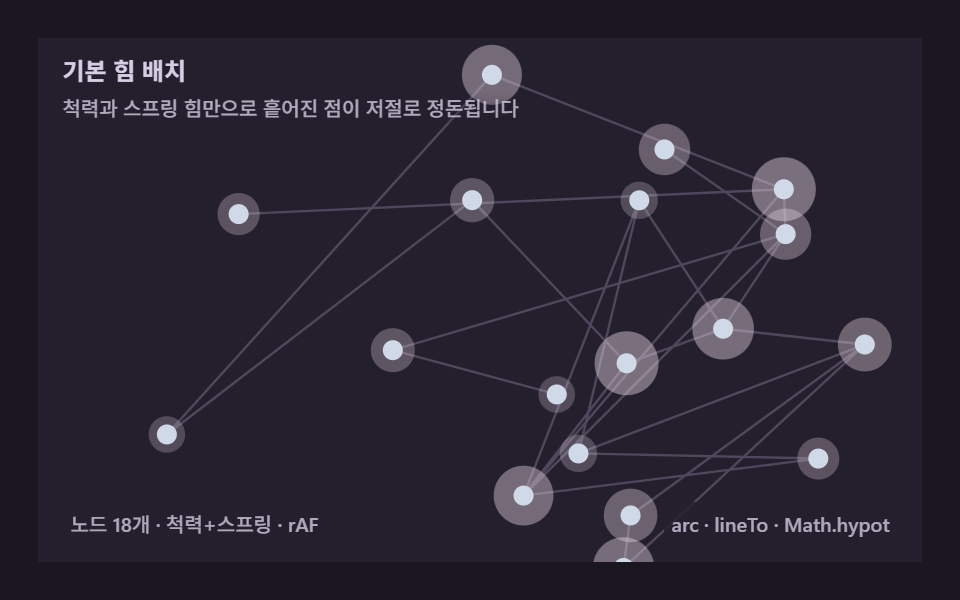 Creative UIForce Directed Graph: 9 Network Layout Demos
 Creative UINode Based UI Design: 9 Patterns, No Library
 Creative UIAudio Visualizer JavaScript: 9 Parts, No Library
 Creative UIJavaScript Physics Simulation: 9 Demos, No Library
 Creative UICanvas Particle Animation: 9 Engine Patterns
 Creative UICSS Generator: 9 Sliders That Write the Code