06Orb-avatar testimonials
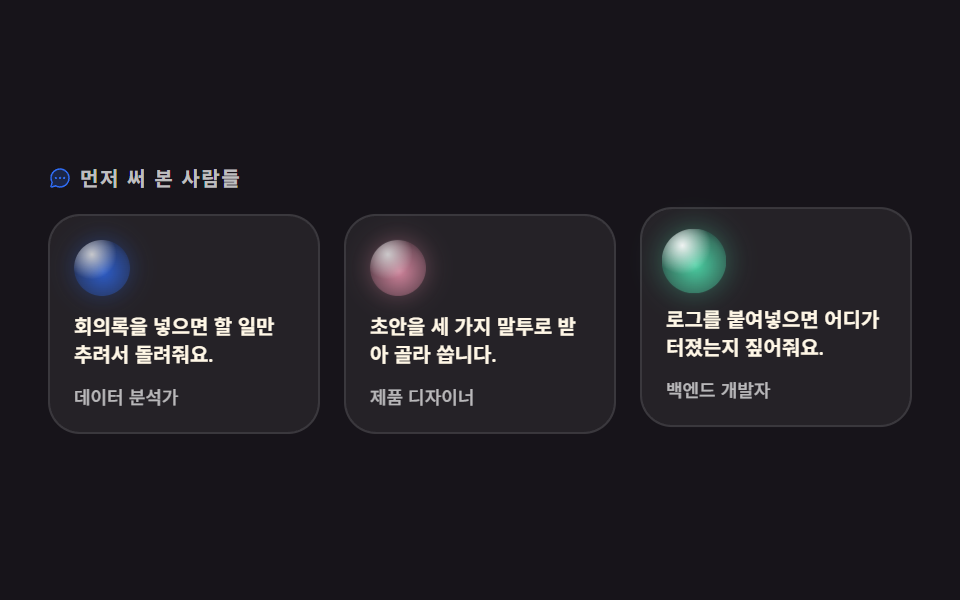
Each of three quote cards carries an orb avatar in its own hue standing in for an anonymous user; on hover the orb swells slightly and brightens. No stars, no logo strip — the orb alone marks who is speaking.
Best forUser quotes, adoption stories
radial-gradientscaletranslateY
<main class="stage">
<section class="tm is-demo" id="tm">
  <p class="tm__eyebrow">
    <span class="tm__ico" aria-hidden="true"><svg xmlns="http://www.w3.org/2000/svg" viewBox="0 0 256 256" fill="currentColor"><path d="M224,128A96,96,0,0,1,79.93,211.11h0L42.54,223.58a8,8,0,0,1-10.12-10.12l12.47-37.39h0A96,96,0,1,1,224,128Z" opacity="0.2"/><path d="M128,24A104,104,0,0,0,36.18,176.88L24.83,210.93a16,16,0,0,0,20.24,20.24l34.05-11.35A104,104,0,1,0,128,24Zm0,192a87.87,87.87,0,0,1-44.06-11.81,8,8,0,0,0-4-1.08,7.85,7.85,0,0,0-2.53.42L40,216,52.47,178.6a8,8,0,0,0-.66-6.54A88,88,0,1,1,128,216Zm12-88a12,12,0,1,1-12-12A12,12,0,0,1,140,128Zm-44,0a12,12,0,1,1-12-12A12,12,0,0,1,96,128Zm88,0a12,12,0,1,1-12-12A12,12,0,0,1,184,128Z"/></svg></span>
    People who tried it first
  </p>
  <div class="tm__grid">
    <article class="tm__card">
      <span class="tm__orb tm__orb--first" aria-hidden="true"></span>
      <p class="tm__quote">Drop in notes, get back the to-dos.</p>
      <p class="tm__role">Data analyst</p>
    </article>
    <article class="tm__card">
      <span class="tm__orb tm__orb--second" aria-hidden="true"></span>
      <p class="tm__quote">Drafts come in three tones; I pick one.</p>
      <p class="tm__role">Product designer</p>
    </article>
    <article class="tm__card">
      <span class="tm__orb tm__orb--third" aria-hidden="true"></span>
      <p class="tm__quote">Paste a log and it points at what broke.</p>
      <p class="tm__role">Backend dev</p>
    </article>
  </div>
</section>
</main>@use "../../../../site/static/demo-tokens" as *;
// 변형은 이 셋만 바꾼다
$duration: $dur-loop; // 2초 안에 카드 셋이 667ms 간격으로 한 번씩 반응한다
$easing: $ease-spring;
$color: $subject-blue;
@include stage($stage-ink);
// 오브 아바타 표면 — 하이라이트 한 겹 + 본체 한 겹. 색조만 바꿔 말하는 사람을 구분한다
@mixin orbSkin($hue) {
background:
radial-gradient(circle at 32% 26%, rgba(255, 255, 255, .95) 0%, rgba(255, 255, 255, 0) 44%),
radial-gradient(circle at 52% 56%, $hue 0%, rgba($hue, .5) 58%, rgba($subject-ink, .92) 100%);
box-shadow: 0 0 12px rgba($hue, .42); // 빛 무리. 오브 opacity 가 내려가면 무리도 같이 죽는다
}
.tm { width: min(100%, 432px); }
.tm__eyebrow {
display: flex; align-items: center; gap: $sp-1; margin: 0;
font-weight: 700; font-size: clamp(8px, 2.4vw, 10px); line-height: 1; letter-spacing: .08em;
color: rgba(255, 255, 255, .72); // 잉크 무대 위 9.81:1 — 계산 2026-09-12
}
.tm__ico { display: inline-flex; width: 12px; height: 12px; flex: 0 0 auto; color: $color; } // 장식, 잉크 위 4.03:1
.tm__ico svg { width: 100%; height: 100%; }
.tm__grid { display: grid; grid-template-columns: repeat(3, 1fr); gap: $sp-3; margin: $sp-3 0 0; }
.tm__card {
box-sizing: border-box; padding: $sp-3; border: 1px solid rgba(255, 255, 255, .1);
border-radius: $r-card; background: rgba(255, 255, 255, .06);
transition: transform $dur-quick $easing;
}
.tm__orb {
display: block; width: 28px; height: 28px; border-radius: 50%; opacity: .78;
transform-origin: 50% 50%; // 아바타는 제 중심에서 커진다 (모서리 origin 은 밀려 보인다)
transition: transform $dur-quick $easing, opacity $dur-quick $easing;
}
.tm__orb--first { @include orbSkin($subject-blue); }
.tm__orb--second { @include orbSkin($subject-pink); }
.tm__orb--third { @include orbSkin($subject-mint); }
.tm__quote {
margin: $sp-2 0 0; font-weight: 600; font-size: clamp(8px, 2.6vw, 10px); line-height: 1.45;
color: $subject-cream; // 카드 바탕(#252228) 위 14.72:1
}
.tm__role {
margin: $sp-2 0 0; font-weight: 500; font-size: clamp(7px, 2vw, 9px); line-height: 1.3;
color: rgba(255, 255, 255, .68); // 카드 바탕 위 7.99:1
}
// 실제 조작 — 손을 올리거나(터치는 :active) 하면 오브가 커지며 밝아지고 카드가 뜬다
.tm__card:hover, .tm__card:active { transform: translateY(-4px); }
.tm__card:hover .tm__orb, .tm__card:active .tm__orb { opacity: 1; transform: scale(1.18); }
// ── 미리보기 루프: 같은 반응을 카드 순서대로 강제한다
// animation 단축은 delay 를 0s 로 리셋하므로 낱개 속성으로. 지연이 걸린 쪽은 fill-mode: backwards 필수
.tm.is-demo .tm__card,
.tm.is-demo .tm__orb {
animation-duration: $duration; animation-timing-function: $easing;
animation-iteration-count: infinite; animation-fill-mode: backwards;
}
.tm.is-demo .tm__card { animation-name: tmLift; }
.tm.is-demo .tm__orb { animation-name: tmOrbPop; }
.tm.is-demo .tm__card:nth-child(2), .tm.is-demo .tm__card:nth-child(2) .tm__orb { animation-delay: 667ms; }
.tm.is-demo .tm__card:nth-child(3), .tm.is-demo .tm__card:nth-child(3) .tm__orb { animation-delay: 1334ms; }
@keyframes tmLift {
0% { transform: translateY(0); }
12% { transform: translateY(-4px); }
28% { transform: translateY(-4px); }
40% { transform: translateY(0); }
100% { transform: translateY(0); }
}
@keyframes tmOrbPop {
0% { opacity: .78; transform: scale(1); }
12% { opacity: 1; transform: scale(1.18); }
28% { opacity: 1; transform: scale(1.14); }
40% { opacity: .78; transform: scale(1); }
100% { opacity: .78; transform: scale(1); }
}
// ── 320×200 폰 압축 (BD9). 이 안에서는 간격을 올리지 않는다
@media (max-width: 340px), (max-height: 220px) {
.tm__eyebrow { font-size: 8px; }
.tm__ico { width: 10px; height: 10px; }
.tm__grid { gap: $sp-2; margin-top: $sp-2; }
.tm__card { padding: $sp-2; }
.tm__orb { width: 20px; height: 20px; }
.tm__quote { font-size: 8px; margin-top: $sp-1; }
.tm__role { font-size: 7px; margin-top: $sp-1; }
}
@media (prefers-reduced-motion: reduce) {
.tm.is-demo .tm__card,
.tm.is-demo .tm__orb { animation: none !important; transform: none !important; opacity: 1 !important; }
.tm__card, .tm__orb { transition: none !important; }
}html, body {
margin: 0;
overflow: hidden;
}
.stage {
box-sizing: border-box;
min-height: 100vh;
display: grid;
place-items: center;
margin: 0;
background: #17141a;
font-family: -apple-system, "Segoe UI", "Noto Sans KR", sans-serif;
padding: clamp(8px, 4vw, 24px);
}
.tm {
width: min(100%, 432px);
}
.tm__eyebrow {
display: flex;
align-items: center;
gap: 4px;
margin: 0;
font-weight: 700;
font-size: clamp(8px, 2.4vw, 10px);
line-height: 1;
letter-spacing: 0.08em;
color: rgba(255, 255, 255, 0.72);
}
.tm__ico {
display: inline-flex;
width: 12px;
height: 12px;
flex: 0 0 auto;
color: #2f6df6;
}
.tm__ico svg {
width: 100%;
height: 100%;
}
.tm__grid {
display: grid;
grid-template-columns: repeat(3, 1fr);
gap: 12px;
margin: 12px 0 0;
}
.tm__card {
box-sizing: border-box;
padding: 12px;
border: 1px solid rgba(255, 255, 255, 0.1);
border-radius: 16px;
background: rgba(255, 255, 255, 0.06);
transition: transform 220ms cubic-bezier(0.2, 0.8, 0.2, 1);
}
.tm__orb {
display: block;
width: 28px;
height: 28px;
border-radius: 50%;
opacity: 0.78;
transform-origin: 50% 50%;
transition: transform 220ms cubic-bezier(0.2, 0.8, 0.2, 1), opacity 220ms cubic-bezier(0.2, 0.8, 0.2, 1);
}
.tm__orb--first {
background: radial-gradient(circle at 32% 26%, rgba(255, 255, 255, 0.95) 0%, rgba(255, 255, 255, 0) 44%), radial-gradient(circle at 52% 56%, #2f6df6 0%, rgba(47, 109, 246, 0.5) 58%, rgba(23, 20, 26, 0.92) 100%);
box-shadow: 0 0 12px rgba(47, 109, 246, 0.42);
}
.tm__orb--second {
background: radial-gradient(circle at 32% 26%, rgba(255, 255, 255, 0.95) 0%, rgba(255, 255, 255, 0) 44%), radial-gradient(circle at 52% 56%, #ff9ebb 0%, rgba(255, 158, 187, 0.5) 58%, rgba(23, 20, 26, 0.92) 100%);
box-shadow: 0 0 12px rgba(255, 158, 187, 0.42);
}
.tm__orb--third {
background: radial-gradient(circle at 32% 26%, rgba(255, 255, 255, 0.95) 0%, rgba(255, 255, 255, 0) 44%), radial-gradient(circle at 52% 56%, #4cd4a6 0%, rgba(76, 212, 166, 0.5) 58%, rgba(23, 20, 26, 0.92) 100%);
box-shadow: 0 0 12px rgba(76, 212, 166, 0.42);
}
.tm__quote {
margin: 8px 0 0;
font-weight: 600;
font-size: clamp(8px, 2.6vw, 10px);
line-height: 1.45;
color: #fff7e6;
}
.tm__role {
margin: 8px 0 0;
font-weight: 500;
font-size: clamp(7px, 2vw, 9px);
line-height: 1.3;
color: rgba(255, 255, 255, 0.68);
}
.tm__card:hover, .tm__card:active {
transform: translateY(-4px);
}
.tm__card:hover .tm__orb, .tm__card:active .tm__orb {
opacity: 1;
transform: scale(1.18);
}
.tm.is-demo .tm__card,
.tm.is-demo .tm__orb {
animation-duration: 2s;
animation-timing-function: cubic-bezier(0.2, 0.8, 0.2, 1);
animation-iteration-count: infinite;
animation-fill-mode: backwards;
}
.tm.is-demo .tm__card {
animation-name: tmLift;
}
.tm.is-demo .tm__orb {
animation-name: tmOrbPop;
}
.tm.is-demo .tm__card:nth-child(2), .tm.is-demo .tm__card:nth-child(2) .tm__orb {
animation-delay: 667ms;
}
.tm.is-demo .tm__card:nth-child(3), .tm.is-demo .tm__card:nth-child(3) .tm__orb {
animation-delay: 1334ms;
}
@keyframes tmLift {
0% {
transform: translateY(0);
}
12% {
transform: translateY(-4px);
}
28% {
transform: translateY(-4px);
}
40% {
transform: translateY(0);
}
100% {
transform: translateY(0);
}
}
@keyframes tmOrbPop {
0% {
opacity: 0.78;
transform: scale(1);
}
12% {
opacity: 1;
transform: scale(1.18);
}
28% {
opacity: 1;
transform: scale(1.14);
}
40% {
opacity: 0.78;
transform: scale(1);
}
100% {
opacity: 0.78;
transform: scale(1);
}
}
@media (max-width: 340px), (max-height: 220px) {
.tm__eyebrow {
font-size: 8px;
}
.tm__ico {
width: 10px;
height: 10px;
}
.tm__grid {
gap: 8px;
margin-top: 8px;
}
.tm__card {
padding: 8px;
}
.tm__orb {
width: 20px;
height: 20px;
}
.tm__quote {
font-size: 8px;
margin-top: 4px;
}
.tm__role {
font-size: 7px;
margin-top: 4px;
}
}
@media (prefers-reduced-motion: reduce) {
.tm.is-demo .tm__card,
.tm.is-demo .tm__orb {
animation: none !important;
transform: none !important;
opacity: 1 !important;
}
.tm__card, .tm__orb {
transition: none !important;
}
}var tm = document.getElementById('tm');
function stopLoop() { tm.classList.remove('is-demo'); }
tm.addEventListener('pointerenter', stopLoop);
tm.addEventListener('click', stopLoop);import { useState } from "react";
import styles from "./TestimonialOrb.module.scss";
export type TestimonialOrbProps = {
/** 카드 셋이 한 바퀴 도는 시간(ms). 카드 수로 나눈 값이 카드 사이 간격이 된다 */
duration?: number;
easing?: string;
/** 오브 아바타 색조. 6자리 hex 로 준다 */
hues?: string[];
};
type Quote = { quote: string; role: string };
const QUOTES: Quote[] = [
{ quote: "회의록을 넣으면 할 일만 추려서 돌려줘요.", role: "데이터 분석가" },
{ quote: "초안을 세 가지 말투로 받아 골라 씁니다.", role: "제품 디자이너" },
{ quote: "로그를 붙여넣으면 어디가 터졌는지 짚어줘요.", role: "백엔드 개발자" },
];
// 6자리 hex 에 알파 두 자리를 붙인다 — #2f6df6 + "73" 꼴
function withAlpha(hex: string, alpha: number): string {
const n = Math.round(alpha * 255);
return hex + (n < 16 ? "0" : "") + n.toString(16);
}
export default function TestimonialOrb({
duration = 2000,
easing = "cubic-bezier(.2, .8, .2, 1)",
hues = ["#2f6df6", "#ff9ebb", "#4cd4a6"],
}: TestimonialOrbProps) {
const [demo, setDemo] = useState(true);
const stopLoop = () => { setDemo(false); };
const orbSkin = (hue: string) => ({
background:
"radial-gradient(circle at 32% 26%, rgba(255, 255, 255, 0.95) 0%, rgba(255, 255, 255, 0) 44%), " +
"radial-gradient(circle at 52% 56%, " + hue + " 0%, " + withAlpha(hue, 0.5) + " 58%, rgba(23, 20, 26, 0.92) 100%)",
boxShadow: "0 0 12px " + withAlpha(hue, 0.42),
});
// animation 단축을 쓰면 delay 가 0s 로 리셋된다 → 낱개로. 지연이 걸리므로 fill-mode 는 scss 쪽에서 backwards
const loop = (i: number) => ({
animationDuration: duration + "ms",
animationTimingFunction: easing,
animationDelay: Math.round((duration / QUOTES.length) * i) + "ms",
});
return (
<main className={styles.stage}>
<section
className={`${styles.tm} ${demo ? styles.demoLoop : ""}`}
onPointerEnter={stopLoop}
onClick={stopLoop}
>
<p className={styles.eyebrow}>
<span className={styles.ico} aria-hidden="true">
<svg xmlns="http://www.w3.org/2000/svg" viewBox="0 0 256 256" fill="currentColor"><path d="M224,128A96,96,0,0,1,79.93,211.11h0L42.54,223.58a8,8,0,0,1-10.12-10.12l12.47-37.39h0A96,96,0,1,1,224,128Z" opacity="0.2"/><path d="M128,24A104,104,0,0,0,36.18,176.88L24.83,210.93a16,16,0,0,0,20.24,20.24l34.05-11.35A104,104,0,1,0,128,24Zm0,192a87.87,87.87,0,0,1-44.06-11.81,8,8,0,0,0-4-1.08,7.85,7.85,0,0,0-2.53.42L40,216,52.47,178.6a8,8,0,0,0-.66-6.54A88,88,0,1,1,128,216Zm12-88a12,12,0,1,1-12-12A12,12,0,0,1,140,128Zm-44,0a12,12,0,1,1-12-12A12,12,0,0,1,96,128Zm88,0a12,12,0,1,1-12-12A12,12,0,0,1,184,128Z"/></svg>
</span>
먼저 써 본 사람들
</p>
<div className={styles.grid}>
{QUOTES.map((q, i) => (
<article key={q.role} className={styles.card} style={demo ? loop(i) : undefined}>
<span
className={styles.orb}
aria-hidden="true"
style={demo ? { ...orbSkin(hues[i % hues.length]), ...loop(i) } : orbSkin(hues[i % hues.length])}
/>
<p className={styles.quote}>{q.quote}</p>
<p className={styles.role}>{q.role}</p>
</article>
))}
</div>
</section>
</main>
);
}06 Orb-avatar testimonials — Measured area 10.181% · moving frames 17/23Original by GODRICH · SCSS and React ship in the zip · AI Landing Page Design Kit: 9 Glowing Orb Sections
The post this demo lives in
 AI Landing Page Design Kit: 9 Glowing Orb SectionsAI landing page design has gone AI-native without painting a gradient background. The page stays one flat dark color, an See all demos in this post