04Success morph — on a successful match, the fingerprint icon's path value interpolates smoothly into a checkmark path value
The moment a match succeeds, an interpolation value climbs from 0 to 1, smoothly bridging the fingerprint path value and the checkmark path value.
Best forA success micro-interaction, an app-unlock confirmation
MORPH_MS$subject-blue-deepCHECK_PTS
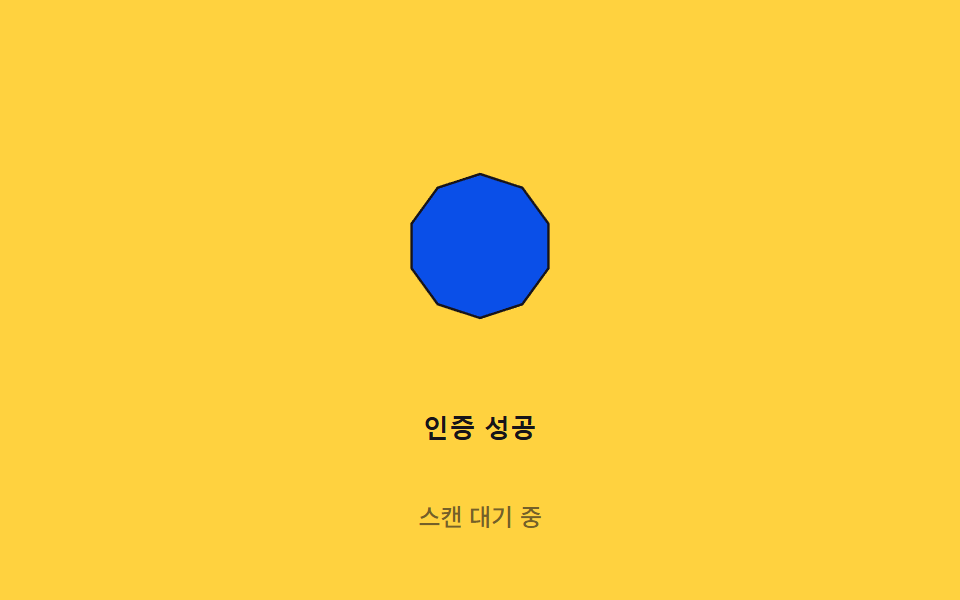
<main class="stage">
<div class="morph-wrap">
<button type="button" class="morph is-demo" id="morph" aria-pressed="false">
  <svg class="morph__icon" viewBox="0 0 120 120" aria-hidden="true">
    <path class="morph__shape" id="shape"></path>
  </svg>
  <span class="morph__label">Auth success</span>
</button>
<p class="morph__status" id="status">Waiting to scan</p>
</div>
</main>
@use "../../../../site/static/demo-tokens" as *;
// 계산 겹은 index.html 의 buildPath() 에 있다 — 원 점 배열과 체크 점 배열을 진행값 p 로 선형
// 보간해 매 프레임 path d 를 새로 만든다. 여기는 무대·모양만 맡는다.
@include stage($stage-yellow);
.morph-wrap {
display: flex;
flex-direction: column;
align-items: center;
gap: $sp-3;
}
.morph {
appearance: none;
border: none;
background: transparent;
display: flex;
flex-direction: column;
align-items: center;
gap: $sp-3;
cursor: pointer;
padding: $sp-4;
border-radius: $r-card;
&:focus-visible { outline: 2px solid $subject-blue-deep; outline-offset: 4px; }
}
.morph__icon {
width: clamp(120px, 30vw, 160px);
height: auto;
overflow: visible;
}
.morph__shape {
fill: $subject-blue-deep;
stroke: $stage-ink;
stroke-width: 1;
stroke-linejoin: round;
}
.morph__label {
color: $stage-ink;
font-weight: 600;
font-size: 13px;
line-height: 1.2;
letter-spacing: .02em;
}
.morph__status {
margin: 0;
color: rgba($stage-ink, .6);
font-weight: 500;
font-size: 12px;
line-height: 1.2;
}
@media (max-width: 340px) {
.stage { padding: $sp-2; }
.morph-wrap { gap: $sp-2; }
.morph { padding: $sp-2 $sp-3; gap: $sp-2; }
.morph__icon { width: 104px; }
.morph__label { font-size: 12px; }
.morph__status { font-size: 11px; }
}
@media (prefers-reduced-motion: reduce) {
.morph__shape { transition: none; }
}html, body {
margin: 0;
overflow: hidden;
}
.stage {
box-sizing: border-box;
min-height: 100vh;
display: grid;
place-items: center;
margin: 0;
background: #ffd23f;
font-family: -apple-system, "Segoe UI", "Noto Sans KR", sans-serif;
padding: clamp(8px, 4vw, 24px);
}
.morph-wrap {
display: flex;
flex-direction: column;
align-items: center;
gap: 12px;
}
.morph {
appearance: none;
border: none;
background: transparent;
display: flex;
flex-direction: column;
align-items: center;
gap: 12px;
cursor: pointer;
padding: 16px;
border-radius: 16px;
}
.morph:focus-visible {
outline: 2px solid #0a4fe8;
outline-offset: 4px;
}
.morph__icon {
width: clamp(120px, 30vw, 160px);
height: auto;
overflow: visible;
}
.morph__shape {
fill: #0a4fe8;
stroke: #17141a;
stroke-width: 1;
stroke-linejoin: round;
}
.morph__label {
color: #17141a;
font-weight: 600;
font-size: 13px;
line-height: 1.2;
letter-spacing: 0.02em;
}
.morph__status {
margin: 0;
color: rgba(23, 20, 26, 0.6);
font-weight: 500;
font-size: 12px;
line-height: 1.2;
}
@media (max-width: 340px) {
.stage {
padding: 8px;
}
.morph-wrap {
gap: 8px;
}
.morph {
padding: 8px 12px;
gap: 8px;
}
.morph__icon {
width: 104px;
}
.morph__label {
font-size: 12px;
}
.morph__status {
font-size: 11px;
}
}
@media (prefers-reduced-motion: reduce) {
.morph__shape {
transition: none;
}
}(function () {
// 계산 겹: SVG path 모핑 보간 — 원(지문 자리) 점 배열과 체크 점 배열을 같은 점 개수(N)로 두고
// 진행값 p(0~1) 로 각 점을 선형 보간한 뒤 매 프레임 path d 를 새로 만든다. CSS 트랜지션이 아니라
// 점 좌표 자체를 계산한다.
var CX = 60, CY = 60, R = 30;
var N = 10; // 점 개수 — 두 도형이 같은 개수를 공유해야 보간이 성립한다
var MORPH_MS = 650; // 원 → 체크 보간에 걸리는 시간
var HOLD_MS = 550; // 체크 상태 유지 시간
var GAP_MS = 700; // 다음 자동 성공 시연까지 대기 시간
var reduce = window.matchMedia('(prefers-reduced-motion: reduce)').matches;
var DUR = reduce ? 1 : MORPH_MS;
var root = document.getElementById('morph');
var shape = document.getElementById('shape');
var status = document.getElementById('status');
var STRINGS = { idle: 'Waiting to scan', done: 'Auth success' };
var isDemo = true;
var running = false;
var startTs = 0;
function circlePoint(i) {
var a = (i / N) * Math.PI * 2 - Math.PI / 2;
return [CX + R * Math.cos(a), CY + R * Math.sin(a)];
}
// 체크마크 둘레를 따라 N 개 점을 손으로 배치한다 — 얇은 두 막대가 겹친 다각형
var CHECK_PTS = [
[40, 62], [52, 74], [50, 82], [36, 68], [30, 62], [36, 56],
[50, 68], [82, 36], [88, 42], [58, 78]
];
function lerp(a, b, t) { return a + (b - a) * t; }
function buildPath(p) {
var d = '';
for (var i = 0; i < N; i++) {
var c = circlePoint(i);
var k = CHECK_PTS[i];
var x = lerp(c[0], k[0], p);
var y = lerp(c[1], k[1], p);
d += (i === 0 ? 'M' : 'L') + x.toFixed(2) + ',' + y.toFixed(2) + ' ';
}
return d + 'Z';
}
function apply(p) { shape.setAttribute('d', buildPath(p)); }
function ease(t) { return 1 - Math.pow(1 - t, 3); }
function runMorph(ts) {
if (!startTs) startTs = ts;
var t = ts - startTs;
if (t <= DUR) {
apply(ease(t / DUR));
status.textContent = STRINGS.idle;
requestAnimationFrame(runMorph);
} else if (t <= DUR + HOLD_MS) {
apply(1);
status.textContent = STRINGS.done;
requestAnimationFrame(runMorph);
} else if (t <= DUR + HOLD_MS + DUR) {
apply(1 - ease((t - DUR - HOLD_MS) / DUR));
status.textContent = STRINGS.idle;
requestAnimationFrame(runMorph);
} else {
apply(0);
running = false;
root.setAttribute('aria-pressed', 'false');
}
}
function trigger() {
if (running) return;
running = true;
startTs = 0;
root.setAttribute('aria-pressed', 'true');
requestAnimationFrame(runMorph);
}
function human() { if (isDemo) { root.classList.remove('is-demo'); isDemo = false; } }
root.addEventListener('click', function () { human(); trigger(); });
root.addEventListener('keydown', function (e) {
if (e.key === ' ' || e.key === 'Enter') { human(); }
});
apply(0);
var cycleStart = 0;
var PERIOD = DUR * 2 + HOLD_MS + GAP_MS;
function loop(ts) {
if (isDemo && !reduce) {
if (!cycleStart) cycleStart = ts;
var phase = (ts - cycleStart) % PERIOD;
if (phase < 16 && !running) trigger();
}
requestAnimationFrame(loop);
}
requestAnimationFrame(loop);
})();// SuccessMorph — vanilla 판(run/371/demo/04-biometric-scan-success-morph/index.html) 의 React 포트.
// 계산 겹(SVG path 모핑 보간)은 useEffect 안에 있다: 원 점 배열과 체크 점 배열을 같은 점 개수(N)로
// 두고 진행값 p(0~1) 로 선형 보간해 매 프레임 path d 를 새로 만든다.
import { useEffect, useRef, useState } from "react";
import styles from "./SuccessMorph.module.scss";
type Box<T> = { current: T };
const STRINGS: Record<string, string> = { idle: "스캔 대기 중", done: "인증 성공" };
const CHECK_PTS: [number, number][] = [
[40, 62], [52, 74], [50, 82], [36, 68], [30, 62], [36, 56],
[50, 68], [82, 36], [88, 42], [58, 78],
];
export default function SuccessMorph() {
const rootRef = useRef(null) as unknown as Box<HTMLButtonElement>;
const shapeRef = useRef(null) as unknown as Box<SVGPathElement>;
const [status, setStatus] = useState(STRINGS.idle);
const [pressed, setPressed] = useState(false);
useEffect(() => {
const CX = 60, CY = 60, R = 30;
const N = 10;
const MORPH_MS = 650;
const HOLD_MS = 550;
const GAP_MS = 700;
const reduce = window.matchMedia("(prefers-reduced-motion: reduce)").matches;
const DUR = reduce ? 1 : MORPH_MS;
const root = rootRef.current;
const shape = shapeRef.current;
if (!root || !shape) return;
let isDemo = true;
let running = false;
let startTs = 0;
let rafId = 0;
function circlePoint(i: number): [number, number] {
const a = (i / N) * Math.PI * 2 - Math.PI / 2;
return [CX + R * Math.cos(a), CY + R * Math.sin(a)];
}
function lerp(a: number, b: number, t: number) { return a + (b - a) * t; }
function buildPath(p: number) {
let d = "";
for (let i = 0; i < N; i++) {
const c = circlePoint(i);
const k = CHECK_PTS[i];
const x = lerp(c[0], k[0], p);
const y = lerp(c[1], k[1], p);
d += (i === 0 ? "M" : "L") + x.toFixed(2) + "," + y.toFixed(2) + " ";
}
return d + "Z";
}
function apply(p: number) { shape.setAttribute("d", buildPath(p)); }
function ease(t: number) { return 1 - Math.pow(1 - t, 3); }
function runMorph(ts: number) {
if (!startTs) startTs = ts;
const t = ts - startTs;
if (t <= DUR) {
apply(ease(t / DUR));
setStatus(STRINGS.idle);
rafId = requestAnimationFrame(runMorph);
} else if (t <= DUR + HOLD_MS) {
apply(1);
setStatus(STRINGS.done);
rafId = requestAnimationFrame(runMorph);
} else if (t <= DUR + HOLD_MS + DUR) {
apply(1 - ease((t - DUR - HOLD_MS) / DUR));
setStatus(STRINGS.idle);
rafId = requestAnimationFrame(runMorph);
} else {
apply(0);
running = false;
setPressed(false);
}
}
function trigger() {
if (running) return;
running = true;
startTs = 0;
setPressed(true);
rafId = requestAnimationFrame(runMorph);
}
function human() { if (isDemo) { root.classList.remove(styles.isDemo); isDemo = false; } }
function onClick() { human(); trigger(); }
function onKeyDown(e: KeyboardEvent) { if (e.key === " " || e.key === "Enter") human(); }
root.addEventListener("click", onClick);
root.addEventListener("keydown", onKeyDown);
apply(0);
let cycleStart = 0;
const PERIOD = DUR * 2 + HOLD_MS + GAP_MS;
function loop(ts: number) {
if (isDemo && !reduce) {
if (!cycleStart) cycleStart = ts;
const phase = (ts - cycleStart) % PERIOD;
if (phase < 16 && !running) trigger();
}
rafId = requestAnimationFrame(loop);
}
rafId = requestAnimationFrame(loop);
return () => {
root.removeEventListener("click", onClick);
root.removeEventListener("keydown", onKeyDown);
cancelAnimationFrame(rafId);
};
}, []);
return (
<main className={styles.stage}>
<div className={styles.morphWrap}>
<button
type="button"
className={styles.morph + " " + styles.isDemo}
ref={rootRef}
aria-pressed={pressed}
>
<svg className={styles.morphIcon} viewBox="0 0 120 120" aria-hidden="true">
<path className={styles.morphShape} ref={shapeRef} />
</svg>
<span className={styles.morphLabel}>인증 성공</span>
</button>
<p className={styles.morphStatus}>{status}</p>
</div>
</main>
);
}04 Success morph — on a successful match, the fingerprint icon's path value interpolates smoothly into a checkmark path value — Measured area 3.191% · moving frames 15/23Original by GODRICH · SCSS and React ship in the zip · Fingerprint Scan Animation: 9 Biometric UI Demos
The post this demo lives in
 Fingerprint Scan Animation: 9 Biometric UI DemosNine fingerprint scan animation patterns: one lights ridges by scan-progress value, one shakes by spring-damping value o See all demos in this post
If you like this effect - similar demos
 Auth UI08 Reset on success — a single successful login sends the failure-count value straight back to zeroToo Many Failed Login Attempts: 9 Patterns
 Auth UI06 A Check Button Where the Box Turns Into a Ring, Spins, and Resolves Into a TickCSS Captcha: 9 Warped Text and Rotate Checks
 Auth UI01 Eye Icon That Morphs Letters and Dots in PlaceShow Password Toggle Icon: 9 Reveal Patterns