02Line number gutter
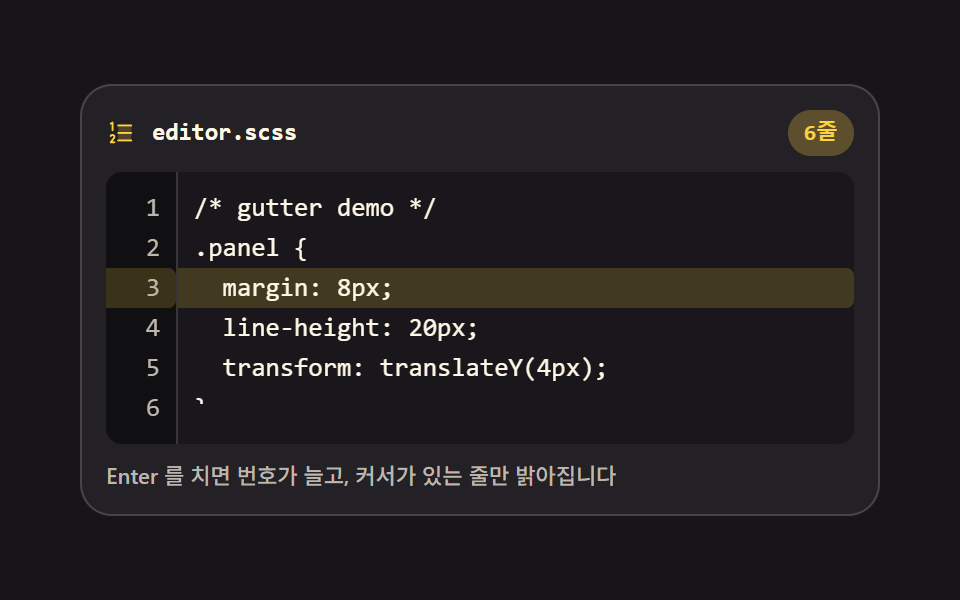
The gutter grows and shrinks with the line count while only the caret's line lights up, and the gutter scrolls in step with the text.
Best forEditor that points at an error line
counter-resetselectionStarttranslateY
<main class="stage">
<div class="gt is-demo" id="gt">
  <div class="gt__bar">
    <span class="gt__ico" aria-hidden="true"><svg xmlns="http://www.w3.org/2000/svg" width="1em" height="1em" viewBox="0 0 256 256"><g fill="currentColor"><path d="M216 64v128H104V64Z" opacity=".2"/><path d="M224 128a8 8 0 0 1-8 8H104a8 8 0 0 1 0-16h112a8 8 0 0 1 8 8M104 72h112a8 8 0 0 0 0-16H104a8 8 0 0 0 0 16m112 112H104a8 8 0 0 0 0 16h112a8 8 0 0 0 0-16M43.58 55.16L48 52.94V104a8 8 0 0 0 16 0V40a8 8 0 0 0-11.58-7.16l-16 8a8 8 0 0 0 7.16 14.32m36.19 101.56a23.73 23.73 0 0 0-9.6-15.95a24.86 24.86 0 0 0-34.11 4.7a23.6 23.6 0 0 0-3.57 6.46a8 8 0 1 0 15 5.47a7.8 7.8 0 0 1 1.18-2.13a8.76 8.76 0 0 1 12-1.59a7.9 7.9 0 0 1 3.26 5.32a7.64 7.64 0 0 1-1.57 5.78a1 1 0 0 0-.08.11l-28.69 38.32A8 8 0 0 0 40 216h32a8 8 0 0 0 0-16H56l19.08-25.53a23.47 23.47 0 0 0 4.69-17.75"/></g></svg></span>
    <span class="gt__name">editor.scss</span>
    <span class="gt__pill">
      <span class="gt__count" id="count">6 lines</span>
      <span class="gt__cv gt__cv--1" aria-hidden="true">3 lines</span>
      <span class="gt__cv gt__cv--2" aria-hidden="true">4 lines</span>
      <span class="gt__cv gt__cv--3" aria-hidden="true">5 lines</span>
      <span class="gt__cv gt__cv--4" aria-hidden="true">6 lines</span>
      <span class="gt__cv gt__cv--5" aria-hidden="true">5 lines</span>
    </span>
  </div>
  <div class="gt__body">
    <div class="gt__gut" aria-hidden="true">
      <div class="gt__gtrack" id="gtrack"></div>
    </div>
    <div class="gt__wrap" id="wrap">
      <div class="gt__track" id="track">
        <span class="gt__cur" id="cur" aria-hidden="true"></span>
        <pre class="gt__hl" id="hl" aria-hidden="true"></pre>
      </div>
      <textarea class="gt__ta" id="ta" spellcheck="false" autocomplete="off" wrap="off" aria-label="Code input">/* gutter demo */
.panel {
  margin: 8px;
  line-height: 20px;
  transform: translateY(4px);
}</textarea>
    </div>
  </div>
  <p class="gt__note">Press Enter and the numbers grow; only the caret's line lights up</p>
</div>
</main>@use "../../../../site/static/demo-tokens" as *;
// 줄 번호 거터와 현재 줄 — 왼쪽 거터의 번호가 입력 줄 수에 맞춰 늘고 줄며,
// selectionStart 로 계산한 커서 줄만 배경이 켜진다. 본문(textarea)이 스크롤하면
// 거터 트랙도 같은 값으로 translateY 해 붙어 다닌다.
// 번호 자체는 CSS 카운터(counter-reset)가 매긴다 — JS 는 줄이 바뀔 때 빈 칸만 다시 그린다.
// 격자 미리보기(.is-demo)는 줄과 번호를 steps(1, end) 컷으로 하나씩 켜고,
// 현재 줄 밴드는 매끈하게 미끄러지며, 뒤에서 한 줄 스크롤 동기가 같이 움직인다.
$duration: $dur-quick;
$easing: $ease-spring;
$color: $stage-yellow;
$mono: ui-monospace, SFMono-Regular, "SF Mono", Consolas, "Liberation Mono", monospace;
$line: rgba(255, 255, 255, .16);
$dim: #beb7ad;
$fs: clamp(11px, 3vw, 13px);
$lh: 20px;
@include stage($stage-ink);
.gt {
display: flex; flex-direction: column; gap: $sp-2;
box-sizing: border-box; width: min(100%, 400px);
padding: $sp-3; border: 1px solid $line; border-radius: $r-card;
background: rgba(255, 255, 255, .05);
}
// ── 파일 이름 줄
.gt__bar { display: flex; align-items: center; gap: $sp-2; }
.gt__ico { display: grid; place-items: center; color: $color; font-size: 15px; }
.gt__name {
flex: 1 1 auto; color: $subject-cream;
font-family: $mono; font-weight: 700; font-size: 12px; line-height: 1.4;
}
// 줄 수 알약 — 실제 값은 JS 가 채우고, 미리보기에서는 겹켜진 값 장이 차례로 켜진다
.gt__pill { display: grid; justify-items: center; }
.gt__pill > * { grid-area: 1 / 1; }
.gt__count, .gt__cv {
padding: $sp-1 $sp-2; border-radius: $r-pill;
background: rgba($color, .14); color: $color;
font-family: $mono; font-weight: 700; font-size: 11px; line-height: 1.4;
white-space: nowrap;
}
.gt__cv { opacity: 0; }
// ── 거터 + 본문 몸통
.gt__body {
display: grid; grid-template-columns: 36px 1fr;
background: rgba(0, 0, 0, .28); border-radius: $r-sm; overflow: hidden;
}
.gt__gut { background: rgba(0, 0, 0, .35); border-right: 1px solid $line; overflow: hidden; }
.gt__gtrack {
position: relative; box-sizing: border-box; padding: $sp-2 0 $sp-2 $sp-2;
counter-reset: gtline;
font-family: $mono; font-weight: 500; font-size: $fs; line-height: $lh;
}
.gt__num {
position: relative; z-index: 1; display: block; height: $lh;
padding-right: $sp-2; text-align: right; color: $dim;
}
.gt__num::before { counter-increment: gtline; content: counter(gtline); }
// 거터 쪽 현재 줄 밴드 — 본문 밴드와 같은 translateY 값을 받아 같이 움직인다
.gt__gcur {
position: absolute; top: $sp-2; left: 0; right: 0; height: $lh;
background: rgba($color, .18); border-radius: 0 $r-xs $r-xs 0;
transition: transform $duration $easing;
}
// ── 본문. 글자는 투명한 textarea 아래 pre 가 그린다 — 서체·행간·패딩이 글자 단위로 같아야 한다
.gt__wrap {
position: relative; display: grid; overflow: hidden;
height: 5 * $lh + 2 * $sp-2; // 5줄이 온전히 보이고 마지막 줄이 조금 엿보인다 — 스크롤 여유 표시
}
.gt__wrap > * { grid-area: 1 / 1; min-height: 0; }
// textarea 는 격자 칸 높이에 **묶어 둔다**. 내용만큼 늘어나게 두면 스크롤하는 것은 textarea 가 아니라
// 바깥 상자가 되고, scrollTop 을 읽어 거터를 미는 동기 코드가 영영 0 만 읽는다 (실측 2026-09-13:
// 12줄을 넣어도 ta.scrollHeight == ta.clientHeight 였다)
.gt__ta { height: 100%; }
.gt__track { position: relative; align-self: start; box-sizing: border-box; padding: $sp-2; }
.gt__cur {
position: absolute; top: $sp-2; left: 0; right: 0; height: $lh;
background: rgba($color, .18); border-radius: 0 $r-xs $r-xs 0;
transition: transform $duration $easing;
}
.gt__hl {
position: relative; z-index: 1; margin: 0;
font-family: $mono; font-weight: 500; font-size: $fs; line-height: $lh;
letter-spacing: 0; tab-size: 2; white-space: pre; overflow: hidden;
color: $subject-cream;
}
.gt__ln { display: block; }
// 글자는 투명하고 커서만 남는다 — 색은 아래 pre 가 그린다
.gt__ta {
box-sizing: border-box; margin: 0; padding: $sp-2; border: 0; background: transparent;
color: transparent; caret-color: $color; resize: none;
font-family: $mono; font-weight: 500; font-size: $fs; line-height: $lh;
letter-spacing: 0; tab-size: 2; white-space: pre; overflow: auto;
scrollbar-width: none;
}
.gt__ta::-webkit-scrollbar { display: none; }
.gt__ta::selection { background: rgba($color, .32); }
.gt__ta:focus-visible { outline: 2px solid $subject-blue; outline-offset: -2px; }
.gt__note { margin: 0; color: $dim; font-weight: 500; font-size: 11px; line-height: 1.4; }
// ── 격자 미리보기 루프 (2초)
// 1~3줄은 곧바로, 4·5줄은 타이핑하듯 늦게 켜지고 6줄이 더해졌다가 줄어든다.
// 켜짐·꺼짐은 전부 steps(1, end) 컷 — 점프 지점(3%)을 따로 둬야 첫 장에 값이 보인다.
.gt.is-demo .gt__ln, .gt.is-demo .gt__num {
animation-name: gtLine;
animation-duration: $dur-loop; animation-timing-function: steps(1, end);
animation-iteration-count: infinite; animation-fill-mode: backwards;
}
.gt.is-demo .gt__ln:nth-child(1), .gt.is-demo .gt__num:nth-child(1) { animation-delay: 0s; }
.gt.is-demo .gt__ln:nth-child(2), .gt.is-demo .gt__num:nth-child(2) { animation-delay: .04s; }
.gt.is-demo .gt__ln:nth-child(3), .gt.is-demo .gt__num:nth-child(3) { animation-delay: .08s; }
.gt.is-demo .gt__ln:nth-child(4), .gt.is-demo .gt__num:nth-child(4) { animation-delay: .3s; }
.gt.is-demo .gt__ln:nth-child(5), .gt.is-demo .gt__num:nth-child(5) { animation-delay: .42s; }
// 6줄과 그 번호는 한 바퀴 안에서 늘었다가 줄어든다 — 지연 없이 절대 시점 키프레임으로
.gt.is-demo .gt__ln:nth-child(6), .gt.is-demo .gt__num:nth-child(6) { animation-name: gtLineCut; }
// 줄 수 알약 — 실제 값은 감추고 겹켜진 값 장을 컷으로 갈아 끼운다
.gt.is-demo .gt__count { color: transparent; }
.gt.is-demo .gt__cv {
animation-duration: $dur-loop; animation-timing-function: steps(1, end);
animation-iteration-count: infinite; animation-fill-mode: backwards;
}
.gt.is-demo .gt__cv--1 { animation-name: gtCv1; }
.gt.is-demo .gt__cv--2 { animation-name: gtCv2; }
.gt.is-demo .gt__cv--3 { animation-name: gtCv3; }
.gt.is-demo .gt__cv--4 { animation-name: gtCv4; }
.gt.is-demo .gt__cv--5 { animation-name: gtCv5; }
// 현재 줄 밴드 — 나타남은 컷, 줄 옮김은 매끈한 transform 이동
.gt.is-demo .gt__cur, .gt.is-demo .gt__gcur {
animation-name: gtCurO, gtCurT;
animation-duration: $dur-loop, $dur-loop;
animation-timing-function: steps(1, end), $easing;
animation-iteration-count: infinite, infinite;
animation-fill-mode: backwards, backwards;
transition: none;
}
// 스크롤 동기 — 본문 트랙과 거터 트랙이 같은 값으로 한 줄 올라갔다 내려온다
.gt.is-demo .gt__track, .gt.is-demo .gt__gtrack {
animation-name: gtScroll;
animation-duration: $dur-loop; animation-timing-function: $ease-out;
animation-iteration-count: infinite; animation-fill-mode: backwards;
}
@keyframes gtLine {
0% { opacity: 0; }
3%, 100% { opacity: 1; }
}
@keyframes gtLineCut {
0%, 29% { opacity: 0; }
30%, 79% { opacity: 1; }
80%, 100% { opacity: 0; }
}
@keyframes gtCv1 { 0%, 17% { opacity: 1; } 18%, 100% { opacity: 0; } }
@keyframes gtCv2 { 0%, 17% { opacity: 0; } 18%, 23% { opacity: 1; } 24%, 100% { opacity: 0; } }
@keyframes gtCv3 { 0%, 23% { opacity: 0; } 24%, 29% { opacity: 1; } 30%, 100% { opacity: 0; } }
@keyframes gtCv4 { 0%, 29% { opacity: 0; } 30%, 79% { opacity: 1; } 80%, 100% { opacity: 0; } }
@keyframes gtCv5 { 0%, 79% { opacity: 0; } 80%, 100% { opacity: 1; } }
@keyframes gtCurO {
0% { opacity: 0; }
12%, 100% { opacity: 1; }
}
// 셋째 줄에서 타이핑을 따라 넷째·다섯째·여섯째 줄로 내려간 뒤, 클릭해 셋째 줄로 돌아온다
@keyframes gtCurT {
0%, 12% { transform: translateY(40px); }
21%, 24% { transform: translateY(60px); }
27%, 30% { transform: translateY(80px); }
33%, 44% { transform: translateY(100px); }
50%, 100% { transform: translateY(40px); }
}
@keyframes gtScroll {
0%, 65% { transform: translateY(0); }
70%, 74% { transform: translateY(-20px); }
79%, 100% { transform: translateY(0); }
}
// ── 좁은 화면: 여백과 보이는 줄 수를 줄여 무대 안에 들어온다 (줄 높이 20px 는 그대로)
@media (max-width: 340px) {
.gt { gap: $sp-1; padding: $sp-2; }
.gt__note { display: none; } // 좁은 화면에서는 안내문을 접어 무대(200px) 안에 들어오게 한다
.gt__body { grid-template-columns: 28px 1fr; }
.gt__wrap { height: 3 * $lh + 2 * $sp-1; }
.gt__gtrack { padding: $sp-1 0 $sp-1 $sp-1; font-size: 11px; }
.gt__num { padding-right: $sp-1; }
.gt__track { padding: $sp-1; }
.gt__cur, .gt__gcur { top: $sp-1; }
.gt__hl { font-size: 11px; }
.gt__ta { padding: $sp-1; font-size: 11px; }
.gt__note { font-size: 10px; }
}
@media (prefers-reduced-motion: reduce) {
.gt.is-demo .gt__ln, .gt.is-demo .gt__num, .gt.is-demo .gt__cv,
.gt.is-demo .gt__cur, .gt.is-demo .gt__gcur, .gt.is-demo .gt__track, .gt.is-demo .gt__gtrack {
animation: none !important;
}
.gt.is-demo .gt__ln, .gt.is-demo .gt__num { opacity: 1 !important; }
.gt.is-demo .gt__cv { opacity: 0 !important; }
.gt.is-demo .gt__count { color: $color !important; }
.gt.is-demo .gt__cur, .gt.is-demo .gt__gcur { opacity: 1 !important; }
}html, body {
margin: 0;
overflow: hidden;
}
.stage {
box-sizing: border-box;
min-height: 100vh;
display: grid;
place-items: center;
margin: 0;
background: #17141a;
font-family: -apple-system, "Segoe UI", "Noto Sans KR", sans-serif;
padding: clamp(8px, 4vw, 24px);
}
.gt {
display: flex;
flex-direction: column;
gap: 8px;
box-sizing: border-box;
width: min(100%, 400px);
padding: 12px;
border: 1px solid rgba(255, 255, 255, 0.16);
border-radius: 16px;
background: rgba(255, 255, 255, 0.05);
}
.gt__bar {
display: flex;
align-items: center;
gap: 8px;
}
.gt__ico {
display: grid;
place-items: center;
color: #ffd23f;
font-size: 15px;
}
.gt__name {
flex: 1 1 auto;
color: #fff7e6;
font-family: ui-monospace, SFMono-Regular, "SF Mono", Consolas, "Liberation Mono", monospace;
font-weight: 700;
font-size: 12px;
line-height: 1.4;
}
.gt__pill {
display: grid;
justify-items: center;
}
.gt__pill > * {
grid-area: 1/1;
}
.gt__count, .gt__cv {
padding: 4px 8px;
border-radius: 999px;
background: rgba(255, 210, 63, 0.14);
color: #ffd23f;
font-family: ui-monospace, SFMono-Regular, "SF Mono", Consolas, "Liberation Mono", monospace;
font-weight: 700;
font-size: 11px;
line-height: 1.4;
white-space: nowrap;
}
.gt__cv {
opacity: 0;
}
.gt__body {
display: grid;
grid-template-columns: 36px 1fr;
background: rgba(0, 0, 0, 0.28);
border-radius: 8px;
overflow: hidden;
}
.gt__gut {
background: rgba(0, 0, 0, 0.35);
border-right: 1px solid rgba(255, 255, 255, 0.16);
overflow: hidden;
}
.gt__gtrack {
position: relative;
box-sizing: border-box;
padding: 8px 0 8px 8px;
counter-reset: gtline;
font-family: ui-monospace, SFMono-Regular, "SF Mono", Consolas, "Liberation Mono", monospace;
font-weight: 500;
font-size: clamp(11px, 3vw, 13px);
line-height: 20px;
}
.gt__num {
position: relative;
z-index: 1;
display: block;
height: 20px;
padding-right: 8px;
text-align: right;
color: #beb7ad;
}
.gt__num::before {
counter-increment: gtline;
content: counter(gtline);
}
.gt__gcur {
position: absolute;
top: 8px;
left: 0;
right: 0;
height: 20px;
background: rgba(255, 210, 63, 0.18);
border-radius: 0 4px 4px 0;
transition: transform 220ms cubic-bezier(0.2, 0.8, 0.2, 1);
}
.gt__wrap {
position: relative;
display: grid;
overflow: hidden;
height: 116px;
}
.gt__wrap > * {
grid-area: 1/1;
min-height: 0;
}
.gt__ta {
height: 100%;
}
.gt__track {
position: relative;
align-self: start;
box-sizing: border-box;
padding: 8px;
}
.gt__cur {
position: absolute;
top: 8px;
left: 0;
right: 0;
height: 20px;
background: rgba(255, 210, 63, 0.18);
border-radius: 0 4px 4px 0;
transition: transform 220ms cubic-bezier(0.2, 0.8, 0.2, 1);
}
.gt__hl {
position: relative;
z-index: 1;
margin: 0;
font-family: ui-monospace, SFMono-Regular, "SF Mono", Consolas, "Liberation Mono", monospace;
font-weight: 500;
font-size: clamp(11px, 3vw, 13px);
line-height: 20px;
letter-spacing: 0;
tab-size: 2;
white-space: pre;
overflow: hidden;
color: #fff7e6;
}
.gt__ln {
display: block;
}
.gt__ta {
box-sizing: border-box;
margin: 0;
padding: 8px;
border: 0;
background: transparent;
color: transparent;
caret-color: #ffd23f;
resize: none;
font-family: ui-monospace, SFMono-Regular, "SF Mono", Consolas, "Liberation Mono", monospace;
font-weight: 500;
font-size: clamp(11px, 3vw, 13px);
line-height: 20px;
letter-spacing: 0;
tab-size: 2;
white-space: pre;
overflow: auto;
scrollbar-width: none;
}
.gt__ta::-webkit-scrollbar {
display: none;
}
.gt__ta::selection {
background: rgba(255, 210, 63, 0.32);
}
.gt__ta:focus-visible {
outline: 2px solid #2f6df6;
outline-offset: -2px;
}
.gt__note {
margin: 0;
color: #beb7ad;
font-weight: 500;
font-size: 11px;
line-height: 1.4;
}
.gt.is-demo .gt__ln, .gt.is-demo .gt__num {
animation-name: gtLine;
animation-duration: 2s;
animation-timing-function: steps(1, end);
animation-iteration-count: infinite;
animation-fill-mode: backwards;
}
.gt.is-demo .gt__ln:nth-child(1), .gt.is-demo .gt__num:nth-child(1) {
animation-delay: 0s;
}
.gt.is-demo .gt__ln:nth-child(2), .gt.is-demo .gt__num:nth-child(2) {
animation-delay: 0.04s;
}
.gt.is-demo .gt__ln:nth-child(3), .gt.is-demo .gt__num:nth-child(3) {
animation-delay: 0.08s;
}
.gt.is-demo .gt__ln:nth-child(4), .gt.is-demo .gt__num:nth-child(4) {
animation-delay: 0.3s;
}
.gt.is-demo .gt__ln:nth-child(5), .gt.is-demo .gt__num:nth-child(5) {
animation-delay: 0.42s;
}
.gt.is-demo .gt__ln:nth-child(6), .gt.is-demo .gt__num:nth-child(6) {
animation-name: gtLineCut;
}
.gt.is-demo .gt__count {
color: transparent;
}
.gt.is-demo .gt__cv {
animation-duration: 2s;
animation-timing-function: steps(1, end);
animation-iteration-count: infinite;
animation-fill-mode: backwards;
}
.gt.is-demo .gt__cv--1 {
animation-name: gtCv1;
}
.gt.is-demo .gt__cv--2 {
animation-name: gtCv2;
}
.gt.is-demo .gt__cv--3 {
animation-name: gtCv3;
}
.gt.is-demo .gt__cv--4 {
animation-name: gtCv4;
}
.gt.is-demo .gt__cv--5 {
animation-name: gtCv5;
}
.gt.is-demo .gt__cur, .gt.is-demo .gt__gcur {
animation-name: gtCurO, gtCurT;
animation-duration: 2s, 2s;
animation-timing-function: steps(1, end), cubic-bezier(0.2, 0.8, 0.2, 1);
animation-iteration-count: infinite, infinite;
animation-fill-mode: backwards, backwards;
transition: none;
}
.gt.is-demo .gt__track, .gt.is-demo .gt__gtrack {
animation-name: gtScroll;
animation-duration: 2s;
animation-timing-function: ease-out;
animation-iteration-count: infinite;
animation-fill-mode: backwards;
}
@keyframes gtLine {
0% {
opacity: 0;
}
3%, 100% {
opacity: 1;
}
}
@keyframes gtLineCut {
0%, 29% {
opacity: 0;
}
30%, 79% {
opacity: 1;
}
80%, 100% {
opacity: 0;
}
}
@keyframes gtCv1 {
0%, 17% {
opacity: 1;
}
18%, 100% {
opacity: 0;
}
}
@keyframes gtCv2 {
0%, 17% {
opacity: 0;
}
18%, 23% {
opacity: 1;
}
24%, 100% {
opacity: 0;
}
}
@keyframes gtCv3 {
0%, 23% {
opacity: 0;
}
24%, 29% {
opacity: 1;
}
30%, 100% {
opacity: 0;
}
}
@keyframes gtCv4 {
0%, 29% {
opacity: 0;
}
30%, 79% {
opacity: 1;
}
80%, 100% {
opacity: 0;
}
}
@keyframes gtCv5 {
0%, 79% {
opacity: 0;
}
80%, 100% {
opacity: 1;
}
}
@keyframes gtCurO {
0% {
opacity: 0;
}
12%, 100% {
opacity: 1;
}
}
@keyframes gtCurT {
0%, 12% {
transform: translateY(40px);
}
21%, 24% {
transform: translateY(60px);
}
27%, 30% {
transform: translateY(80px);
}
33%, 44% {
transform: translateY(100px);
}
50%, 100% {
transform: translateY(40px);
}
}
@keyframes gtScroll {
0%, 65% {
transform: translateY(0);
}
70%, 74% {
transform: translateY(-20px);
}
79%, 100% {
transform: translateY(0);
}
}
@media (max-width: 340px) {
.gt {
gap: 4px;
padding: 8px;
}
.gt__note {
display: none;
}
.gt__body {
grid-template-columns: 28px 1fr;
}
.gt__wrap {
height: 68px;
}
.gt__gtrack {
padding: 4px 0 4px 4px;
font-size: 11px;
}
.gt__num {
padding-right: 4px;
}
.gt__track {
padding: 4px;
}
.gt__cur, .gt__gcur {
top: 4px;
}
.gt__hl {
font-size: 11px;
}
.gt__ta {
padding: 4px;
font-size: 11px;
}
.gt__note {
font-size: 10px;
}
}
@media (prefers-reduced-motion: reduce) {
.gt.is-demo .gt__ln, .gt.is-demo .gt__num, .gt.is-demo .gt__cv,
.gt.is-demo .gt__cur, .gt.is-demo .gt__gcur, .gt.is-demo .gt__track, .gt.is-demo .gt__gtrack {
animation: none !important;
}
.gt.is-demo .gt__ln, .gt.is-demo .gt__num {
opacity: 1 !important;
}
.gt.is-demo .gt__cv {
opacity: 0 !important;
}
.gt.is-demo .gt__count {
color: #ffd23f !important;
}
.gt.is-demo .gt__cur, .gt.is-demo .gt__gcur {
opacity: 1 !important;
}
}var gt = document.getElementById('gt');
var ta = document.getElementById('ta');
var hl = document.getElementById('hl');
var wrap = document.getElementById('wrap');
var track = document.getElementById('track');
var gtrack = document.getElementById('gtrack');
var countEl = document.getElementById('count');
var curEl = document.getElementById('cur');
var gcurEl = null;
var LBL_COUNT = '{n} lines';
function esc(t) {
return t.replace(/&/g, '&').replace(/</g, '<').replace(/>/g, '>');
}
function lineH() {
var v = parseFloat(getComputedStyle(ta).lineHeight);
return v > 0 ? v : 20;
}
// 줄 수가 바뀔 때마다 거터를 다시 그린다 — 번호 매김은 scss 의 counter-reset 카운터가 한다
function render() {
var lines = ta.value.split('\n');
var nums = '';
lines.forEach(function () { nums += '<span class="gt__num"></span>'; });
gtrack.innerHTML = nums + '<span class="gt__gcur"></span>';
gcurEl = gtrack.querySelector('.gt__gcur');
hl.innerHTML = lines.map(function (l) {
return '<span class="gt__ln">' + (esc(l) || ' ') + '</span>';
}).join('');
countEl.textContent = LBL_COUNT.replace('{n}', lines.length);
update();
}
// selectionStart 까지의 글자에서 몇째 줄인지 계산해 두 밴드를 같은 값으로 옮긴다
function update() {
var idx = ta.value.slice(0, ta.selectionStart).split('\n').length - 1;
var y = idx * lineH();
curEl.style.transform = 'translateY(' + y + 'px)';
if (gcurEl) gcurEl.style.transform = 'translateY(' + y + 'px)';
sync();
}
// 본문이 스크롤하면 거터 트랙도 같은 값으로 translateY — 두 겹이 어긋나지 않는 핵심
function sync() {
var y = -ta.scrollTop;
track.style.transform = 'translateY(' + y + 'px)';
gtrack.style.transform = 'translateY(' + y + 'px)';
}
ta.addEventListener('input', function () { gt.classList.remove('is-demo'); render(); });
ta.addEventListener('keyup', function () { gt.classList.remove('is-demo'); update(); });
ta.addEventListener('click', function () { gt.classList.remove('is-demo'); update(); });
ta.addEventListener('scroll', sync);
ta.addEventListener('focus', function () { gt.classList.remove('is-demo'); update(); });
wrap.addEventListener('pointerdown', function () { gt.classList.remove('is-demo'); });
render();
// 시작 커서는 셋째 줄 끝 — 손을 대지 않은 첫 화면부터 현재 줄 밴드가 보인다
var p = ta.value.split('\n').slice(0, 3).join('\n').length;
ta.setSelectionRange(p, p);
update();// LineNumberGutter — vanilla 판(run/299/demo/02-editor-line-number-gutter/index.html) 의 React 포트.
// 왼쪽 거터의 번호가 입력 줄 수를 따라 늘고 줄며, selectionStart 로 잰 커서 줄만 배경이 켜진다.
// 본문이 스크롤하면 거터 트랙도 같은 translateY 값을 받아 붙어 다닌다.
// 번호 자체는 scss 의 counter-reset 이 매긴다 — 여기서는 빈 칸만 줄 수만큼 그린다.
import { useEffect, useRef, useState } from "react";
import type { CSSProperties } from "react";
import styles from "./LineNumberGutter.module.scss";
export type LineNumberGutterProps = {
duration?: number;
easing?: string;
color?: string;
initialCode?: string;
};
type Vars = CSSProperties & { "--duration"?: string; "--easing"?: string; "--color"?: string };
// useRef<T> 는 T | null 을 돌려준다 — ambient 타입에 맞춰 상자 타입을 따로 둔다
type Box<T> = { current: T | null };
const LABEL = "코드 입력칸";
const NOTE = "Enter 를 치면 번호가 늘고, 커서가 있는 줄만 밝아집니다";
const FILE_NAME = "editor.scss";
const LBL_COUNT = "{n}줄";
// 미리보기에서 겹켜놓고 컷으로 갈아 끼우는 줄 수 값 장 — vanilla 와 같은 글자다
const COUNT_VIEWS = ["3줄", "4줄", "5줄", "6줄", "5줄"];
const CODE = [
"/* gutter demo */",
".panel {",
" margin: 8px;",
" line-height: 20px;",
" transform: translateY(4px);",
"}",
].join("\n");
export default function LineNumberGutter(props: LineNumberGutterProps) {
const duration = props.duration ?? 220;
const easing = props.easing ?? "cubic-bezier(.2, .8, .2, 1)";
const color = props.color ?? "#ffd23f";
const [code, setCode] = useState<string>(props.initialCode ?? CODE);
const [preview, setPreview] = useState<boolean>(true);
const [caretY, setCaretY] = useState<number>(0);
const [scrollY, setScrollY] = useState<number>(0);
const taRef = useRef<HTMLTextAreaElement>(null) as Box<HTMLTextAreaElement>;
const lines = code.split("\n");
// 본문이 스크롤하면 두 트랙을 같은 값으로 옮긴다 — 두 겹이 어긋나지 않는 핵심
const sync = () => {
const ta = taRef.current;
if (ta) setScrollY(-ta.scrollTop);
};
// selectionStart 까지의 글자에서 몇째 줄인지 계산해 두 밴드를 같은 값으로 옮긴다
const update = () => {
const ta = taRef.current;
if (!ta) return;
const raw = parseFloat(getComputedStyle(ta).lineHeight);
const lh = raw > 0 ? raw : 20;
const idx = ta.value.slice(0, ta.selectionStart).split("\n").length - 1;
setCaretY(idx * lh);
setScrollY(-ta.scrollTop);
};
// 시작 커서는 셋째 줄 끝 — 손을 대지 않은 첫 화면부터 현재 줄 밴드가 보인다
useEffect(() => {
const ta = taRef.current;
if (!ta) return;
const p = ta.value.split("\n").slice(0, 3).join("\n").length;
ta.setSelectionRange(p, p);
update();
}, []);
const leave = () => setPreview(false);
const vars: Vars = { "--duration": duration + "ms", "--easing": easing, "--color": color };
const bandStyle: CSSProperties = { transform: "translateY(" + caretY + "px)" };
const trackStyle: CSSProperties = { transform: "translateY(" + scrollY + "px)" };
return (
<main className={styles.stage}>
<div className={styles.root + (preview ? " " + styles.isDemo : "")} style={vars}>
<div className={styles.bar}>
<span className={styles.ico} aria-hidden="true">
<svg xmlns="http://www.w3.org/2000/svg" width="1em" height="1em" viewBox="0 0 256 256">
<g fill="currentColor">
<path d="M216 64v128H104V64Z" opacity=".2" />
<path d="M224 128a8 8 0 0 1-8 8H104a8 8 0 0 1 0-16h112a8 8 0 0 1 8 8M104 72h112a8 8 0 0 0 0-16H104a8 8 0 0 0 0 16m112 112H104a8 8 0 0 0 0 16h112a8 8 0 0 0 0-16M43.58 55.16L48 52.94V104a8 8 0 0 0 16 0V40a8 8 0 0 0-11.58-7.16l-16 8a8 8 0 0 0 7.16 14.32m36.19 101.56a23.73 23.73 0 0 0-9.6-15.95a24.86 24.86 0 0 0-34.11 4.7a23.6 23.6 0 0 0-3.57 6.46a8 8 0 1 0 15 5.47a7.8 7.8 0 0 1 1.18-2.13a8.76 8.76 0 0 1 12-1.59a7.9 7.9 0 0 1 3.26 5.32a7.64 7.64 0 0 1-1.57 5.78a1 1 0 0 0-.08.11l-28.69 38.32A8 8 0 0 0 40 216h32a8 8 0 0 0 0-16H56l19.08-25.53a23.47 23.47 0 0 0 4.69-17.75" />
</g>
</svg>
</span>
<span className={styles.name}>{FILE_NAME}</span>
<span className={styles.pill}>
<span className={styles.count}>{LBL_COUNT.replace("{n}", String(lines.length))}</span>
{COUNT_VIEWS.map((text, i) => (
<span key={i} className={styles.cv + " " + styles["cv" + (i + 1)]} aria-hidden="true">
{text}
</span>
))}
</span>
</div>
<div className={styles.body}>
<div className={styles.gut} aria-hidden="true">
<div className={styles.gtrack} style={trackStyle}>
{lines.map((_line, i) => (
<span key={i} className={styles.num} />
))}
<span className={styles.gcur} style={bandStyle} />
</div>
</div>
<div className={styles.wrap} onPointerDown={leave}>
<div className={styles.track} style={trackStyle}>
<span className={styles.cur} style={bandStyle} aria-hidden="true" />
<pre className={styles.hl} aria-hidden="true">
{lines.map((line, i) => (
<span key={i} className={styles.ln}>
{line || " "}
</span>
))}
</pre>
</div>
<textarea
className={styles.ta}
ref={taRef}
value={code}
spellCheck={false}
autoComplete="off"
wrap="off"
aria-label={LABEL}
onChange={(e: { target: { value: string } }) => {
leave();
setCode(e.target.value);
update();
}}
onKeyUp={() => {
leave();
update();
}}
onClick={() => {
leave();
update();
}}
onFocus={() => {
leave();
update();
}}
onScroll={sync}
/>
</div>
</div>
<p className={styles.note}>{NOTE}</p>
</div>
</main>
);
}02 Line number gutter — Measured area 24.353% · moving frames 14/23Original by GODRICH · SCSS and React ship in the zip · Code Editor JavaScript: 9 UI Parts, No Library
The post this demo lives in
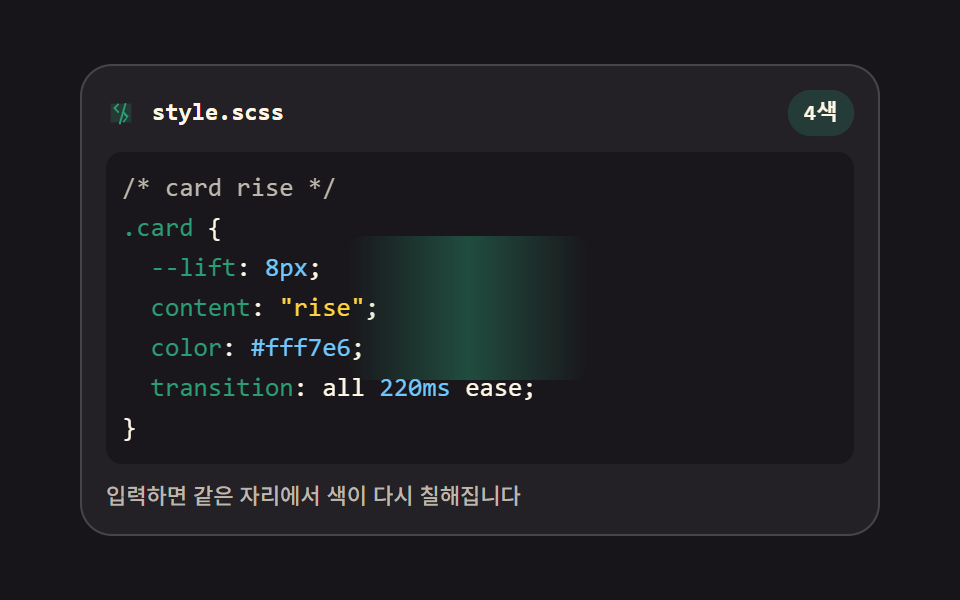 Code Editor JavaScript: 9 UI Parts, No LibraryCode editor javascript is the plain way to get coloring, line numbers, and closing brackets into a page: nine parts, no See all demos in this post