05Caption toggle and style
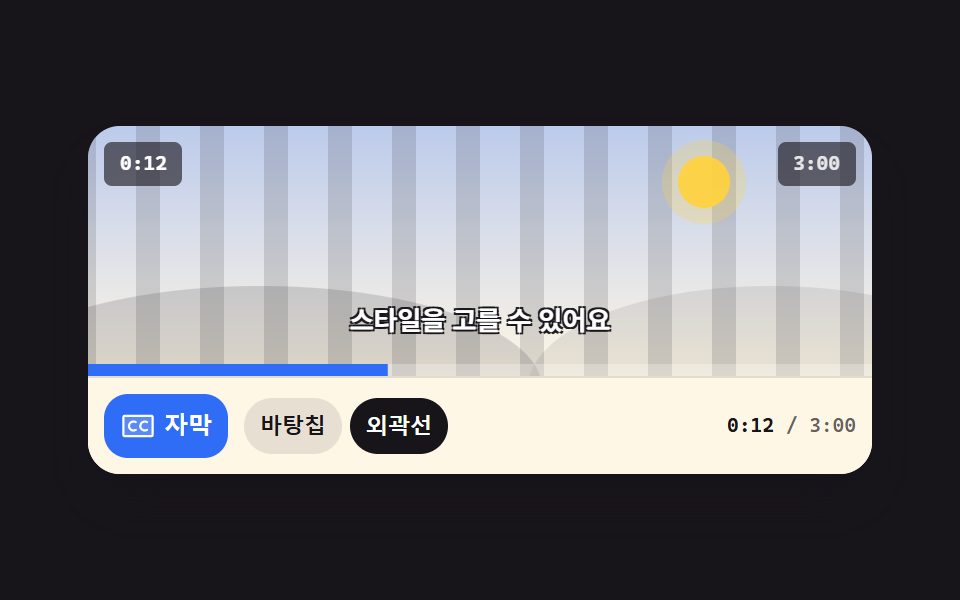
The CC button lifts each caption line up from below as it swaps, and a style picker toggles between a backing pill and outlined text. The button's pressed state persists in aria-pressed.
Best forShort and recipe videos watched on mute, where captions carry the message
aria-pressedtranslateYopacity
<main class="stage">
  <figure class="pl is-demo" id="pl">
    <div class="pl__screen">
      <div class="pl__stripes" aria-hidden="true"></div>
      <div class="pl__world" aria-hidden="true"><span class="pl__sun"></span><span class="pl__hill pl__hill--a"></span><span class="pl__hill pl__hill--b"></span></div>
      <span class="pl__clock" id="clock">0:12</span>
      <span class="pl__badge">3:00</span>
      <div class="cap" id="cap">
        <span class="cap__l cap__l--1 is-on">The video starts</span>
        <span class="cap__l cap__l--2">Turn captions on</span>
        <span class="cap__l cap__l--3">Pick a caption style</span>
        <span class="cap__l cap__l--4">Everything is ready</span>
      </div>
      <span class="pl__fillwrap" aria-hidden="true"><span class="pl__fill" id="fill"></span></span>
    </div>
    <div class="pl__bar">
      <button class="cc" type="button" id="cc" aria-pressed="true">
        <span class="cc__ic" aria-hidden="true"><svg xmlns="http://www.w3.org/2000/svg" width="18" height="18" viewBox="0 0 256 256"><g fill="currentColor"><path d="M232 64v128a8 8 0 0 1-8 8H32a8 8 0 0 1-8-8V64a8 8 0 0 1 8-8h192a8 8 0 0 1 8 8" opacity=".2"/><path d="M224 48H32a16 16 0 0 0-16 16v128a16 16 0 0 0 16 16h192a16 16 0 0 0 16-16V64a16 16 0 0 0-16-16m0 144H32V64h192zm-105.07-40.29a8 8 0 0 1-2.93 10.93a40 40 0 1 1 0-69.28a8 8 0 1 1-8 13.85a24 24 0 1 0 0 41.58a8 8 0 0 1 10.93 2.92m80 0a8 8 0 0 1-2.93 10.93a40 40 0 1 1 0-69.28a8 8 0 1 1-8 13.85a24 24 0 1 0 0 41.58a8 8 0 0 1 10.93 2.92"/></g></svg></span>
        <span class="cc__t">Captions</span>
      </button>
      <div class="seg" id="seg" role="group" aria-label="Caption style">
        <button class="seg__b seg__b--chip is-on" type="button" data-s="chip" aria-pressed="true">Pill</button>
        <button class="seg__b seg__b--line" type="button" data-s="line" aria-pressed="false">Outline</button>
      </div>
      <span class="pl__time"><b id="t-now">0:12</b> / 3:00</span>
    </div>
  </figure>
</main>@use "../../../../site/static/demo-tokens" as *;
$duration: $dur-quick;
$easing: $ease-spring;
$color: $subject-blue;
@include stage($stage-ink);
.pl {
position: relative;
box-sizing: border-box;
width: min(392px, 92vw);
margin: 0;
border-radius: $r-card;
background: $subject-cream;
box-shadow: $shadow-raised;
overflow: hidden;
}
// ── 화면 ──
.pl__screen {
position: relative;
height: clamp(96px, 26vw, 140px);
overflow: hidden;
background: linear-gradient(180deg, rgba(47, 109, 246, .32), rgba(255, 247, 230, .96));
}
.pl__stripes {
position: absolute;
inset: 0 -72px;
background: repeating-linear-gradient(90deg, rgba(23, 20, 26, .14) 0 12px, transparent 12px 32px);
animation-name: pl-pan;
animation-duration: $dur-loop;
animation-timing-function: linear;
animation-iteration-count: infinite;
}
@keyframes pl-pan { from { transform: translateX(0); } to { transform: translateX(-64px); } }
.pl__world { position: absolute; inset: 0; }
.pl__sun {
position: absolute; right: 18%; top: 12%;
width: 26px; height: 26px; border-radius: 50%;
background: rgba(255, 210, 63, .95);
box-shadow: 0 0 0 8px rgba(255, 210, 63, .25);
}
.pl__hill { position: absolute; bottom: -46%; height: 82%; border-radius: 50%; }
.pl__hill--a { left: -14%; width: 72%; background: rgba(23, 20, 26, .15); }
.pl__hill--b { right: -18%; width: 62%; background: rgba(23, 20, 26, .09); }
.pl__clock, .pl__badge {
position: absolute; top: $sp-2;
padding: $sp-1 $sp-2;
border-radius: $r-xs;
background: rgba(23, 20, 26, .62);
font-family: ui-monospace, "Cascadia Mono", Menlo, Consolas, monospace;
font-size: 10px; line-height: 14px; font-weight: 700;
}
.pl__clock { left: $sp-2; color: #fff; }
.pl__badge { right: $sp-2; color: rgba(255, 255, 255, .85); }
.pl__fillwrap { position: absolute; left: 0; right: 0; bottom: 0; height: 6px; background: rgba(255, 255, 255, .28); }
.pl__fill {
display: block; height: 100%;
background: $color;
transform-origin: left center; // 규칙8: 좌변서 차오름
transform: scaleX(.07);
}
// ── 자막 줄 (네 문장이 같은 칸에 겹쳐 쌓인다 — 한 번에 하나만 보인다) ──
.cap {
position: absolute;
left: 0; right: 0; bottom: $sp-4;
display: grid;
place-items: center;
opacity: 1;
transition: opacity $duration $easing;
}
.pl.is-off .cap { opacity: 0; }
.cap__l {
grid-area: 1 / 1;
box-sizing: border-box;
max-width: 92%;
padding: $sp-1 $sp-2;
border-radius: $r-pill;
background-color: rgba(23, 20, 26, .72);
color: #fff;
font-size: clamp(10px, 2.9vw, 13px);
line-height: 16px;
font-weight: 700;
white-space: nowrap;
text-shadow: 0 0 0 rgba(23, 20, 26, 0), 0 0 0 rgba(23, 20, 26, 0), 0 0 0 rgba(23, 20, 26, 0), 0 0 0 rgba(23, 20, 26, 0);
opacity: 0;
transform: translateY(10px);
transition: opacity $duration $easing, transform $duration $easing;
}
.cap__l.is-on { opacity: 1; transform: none; }
.pl.is-outline .cap__l {
background-color: rgba(23, 20, 26, 0);
text-shadow: 1px 1px 0 rgba(23, 20, 26, .95), -1px 1px 0 rgba(23, 20, 26, .95), 1px -1px 0 rgba(23, 20, 26, .95), -1px -1px 0 rgba(23, 20, 26, .95);
}
// ── 조작 줄 ──
.pl__bar {
display: flex;
align-items: center;
gap: $sp-2;
padding: $sp-2;
border-top: 1px solid rgba(23, 20, 26, .12);
background: $subject-cream;
}
.cc {
box-sizing: border-box;
height: 32px;
flex: 0 0 auto;
display: inline-flex; align-items: center; gap: $sp-1;
padding: 0 $sp-2;
border: 0;
border-radius: $r-control;
background: $color;
color: #fff;
cursor: pointer;
font-size: 12px; line-height: 16px; font-weight: 700;
transition: background $duration $easing, color $duration $easing;
}
.cc[aria-pressed="false"] { background: rgba(23, 20, 26, .1); color: $subject-ink; }
.cc:focus-visible { outline: 2px solid $stage-yellow; outline-offset: 2px; }
.cc__ic { display: inline-flex; }
.seg { display: flex; align-items: center; gap: $sp-1; }
.seg__b {
box-sizing: border-box;
height: 28px;
flex: 0 0 auto;
display: inline-flex; align-items: center;
padding: 0 $sp-2;
border: 0;
border-radius: $r-pill;
background-color: rgba(23, 20, 26, .1);
color: $subject-ink;
cursor: pointer;
font-size: 11px; line-height: 14px; font-weight: 700;
transition: background-color $duration $easing, color $duration $easing;
}
.seg__b.is-on { background-color: $subject-ink; color: #fff; }
.seg__b:focus-visible { outline: 2px solid $stage-yellow; outline-offset: 2px; }
.pl__time {
margin-left: auto;
color: rgba(23, 20, 26, .66);
font-family: ui-monospace, "Cascadia Mono", Menlo, Consolas, monospace;
font-size: 10px; line-height: 14px; font-weight: 600;
}
.pl__time b { color: $subject-ink; font-weight: 700; }
// ── 자동 루프: 2초 안에 네 문장이 아래에서 올라오며 갈아 끼워지고, 절반 지점에서 스타일이 바뀐다 ──
// 문장 교체는 steps(1, end) 로 한 프레임 컷 — 두 문장이 절대 겹치지 않는다. 부드러움은 등장 rise 로만.
.pl.is-demo .cap__l--1 {
animation-name: cap-1, cap-style;
animation-duration: $dur-loop, $dur-loop;
animation-timing-function: $easing, steps(1, end);
animation-iteration-count: infinite, infinite;
}
.pl.is-demo .cap__l--2 {
animation-name: cap-2, cap-style;
animation-duration: $dur-loop, $dur-loop;
animation-timing-function: $easing, steps(1, end);
animation-iteration-count: infinite, infinite;
}
.pl.is-demo .cap__l--3 {
animation-name: cap-3, cap-style;
animation-duration: $dur-loop, $dur-loop;
animation-timing-function: $easing, steps(1, end);
animation-iteration-count: infinite, infinite;
}
.pl.is-demo .cap__l--4 {
animation-name: cap-4, cap-style;
animation-duration: $dur-loop, $dur-loop;
animation-timing-function: $easing, steps(1, end);
animation-iteration-count: infinite, infinite;
}
// 자막 교체: opacity 는 0.01% 폭으로 **컷**하고(두 문장이 겹치는 프레임도, 아무 문장도 없는 프레임도 없다),
// 부드러움은 translateY 등장 rise 로만 준다. 예전 판은 나가는 문장과 들어오는 문장 사이에 빈 구간이 있어
// 정확히 25% 지점 프레임(24프레임 중 7번째)이 자막 없는 빈 화면이었고 그게 poster 로 뽑혔다 (실측 2026-09-12)
@keyframes cap-1 {
0%, 21.99% { opacity: 1; transform: none; }
22%, 87.99% { opacity: 0; transform: translateY(10px); }
88% { opacity: 1; transform: translateY(10px); }
93%, 100% { opacity: 1; transform: none; }
}
@keyframes cap-2 {
0%, 21.99% { opacity: 0; transform: translateY(10px); }
22% { opacity: 1; transform: translateY(10px); }
27%, 43.99% { opacity: 1; transform: none; }
44%, 100% { opacity: 0; transform: translateY(10px); }
}
@keyframes cap-3 {
0%, 43.99% { opacity: 0; transform: translateY(10px); }
44% { opacity: 1; transform: translateY(10px); }
49%, 65.99% { opacity: 1; transform: none; }
66%, 100% { opacity: 0; transform: translateY(10px); }
}
@keyframes cap-4 {
0%, 65.99% { opacity: 0; transform: translateY(10px); }
66% { opacity: 1; transform: translateY(10px); }
71%, 87.99% { opacity: 1; transform: none; }
88%, 100% { opacity: 0; transform: translateY(10px); }
}
@keyframes cap-style {
0%, 49% {
background-color: rgba(23, 20, 26, .72);
text-shadow: 0 0 0 rgba(23, 20, 26, 0), 0 0 0 rgba(23, 20, 26, 0), 0 0 0 rgba(23, 20, 26, 0), 0 0 0 rgba(23, 20, 26, 0);
}
50%, 87% {
background-color: rgba(23, 20, 26, 0);
text-shadow: 1px 1px 0 rgba(23, 20, 26, .95), -1px 1px 0 rgba(23, 20, 26, .95), 1px -1px 0 rgba(23, 20, 26, .95), -1px -1px 0 rgba(23, 20, 26, .95);
}
88%, 100% {
background-color: rgba(23, 20, 26, .72);
text-shadow: 0 0 0 rgba(23, 20, 26, 0), 0 0 0 rgba(23, 20, 26, 0), 0 0 0 rgba(23, 20, 26, 0), 0 0 0 rgba(23, 20, 26, 0);
}
}
.pl.is-demo .seg__b--chip {
animation-name: seg-chip;
animation-duration: $dur-loop;
animation-timing-function: steps(1, end);
animation-iteration-count: infinite;
}
.pl.is-demo .seg__b--line {
animation-name: seg-line;
animation-duration: $dur-loop;
animation-timing-function: steps(1, end);
animation-iteration-count: infinite;
}
@keyframes seg-chip {
0%, 49% { background-color: $subject-ink; color: #fff; }
50%, 87% { background-color: rgba(23, 20, 26, .1); color: $subject-ink; }
88%, 100% { background-color: $subject-ink; color: #fff; }
}
@keyframes seg-line {
0%, 49% { background-color: rgba(23, 20, 26, .1); color: $subject-ink; }
50%, 87% { background-color: $subject-ink; color: #fff; }
88%, 100% { background-color: rgba(23, 20, 26, .1); color: $subject-ink; }
}
.pl.is-demo .pl__fill {
animation-name: cap-fill;
animation-duration: $dur-loop;
animation-timing-function: linear;
animation-iteration-count: infinite;
}
@keyframes cap-fill {
0% { transform: scaleX(.07); }
88%, 100% { transform: scaleX(.62); }
}
// ── 좁은 화면: 간격을 올리지 않는다. 덜 중요한 것을 뺀다 ──
@media (max-width: 340px) {
.pl__time { display: none; }
.cap__l { line-height: 14px; }
.cc { font-size: 11px; }
.seg__b { font-size: 10px; }
}
@media (prefers-reduced-motion: reduce) {
.pl.is-demo .cap__l--1, .pl.is-demo .cap__l--2, .pl.is-demo .cap__l--3, .pl.is-demo .cap__l--4,
.pl.is-demo .seg__b--chip, .pl.is-demo .seg__b--line, .pl.is-demo .pl__fill,
.pl__stripes { animation: none !important; }
.cap, .cap__l, .cc, .seg__b { transition: none; }
}html, body {
margin: 0;
overflow: hidden;
}
.stage {
box-sizing: border-box;
min-height: 100vh;
display: grid;
place-items: center;
margin: 0;
background: #17141a;
font-family: -apple-system, "Segoe UI", "Noto Sans KR", sans-serif;
padding: clamp(8px, 4vw, 24px);
}
.pl {
position: relative;
box-sizing: border-box;
width: min(392px, 92vw);
margin: 0;
border-radius: 16px;
background: #fff7e6;
box-shadow: 0 14px 24px rgba(23, 20, 26, 0.32);
overflow: hidden;
}
.pl__screen {
position: relative;
height: clamp(96px, 26vw, 140px);
overflow: hidden;
background: linear-gradient(180deg, rgba(47, 109, 246, 0.32), rgba(255, 247, 230, 0.96));
}
.pl__stripes {
position: absolute;
inset: 0 -72px;
background: repeating-linear-gradient(90deg, rgba(23, 20, 26, 0.14) 0 12px, transparent 12px 32px);
animation-name: pl-pan;
animation-duration: 2s;
animation-timing-function: linear;
animation-iteration-count: infinite;
}
@keyframes pl-pan {
from {
transform: translateX(0);
}
to {
transform: translateX(-64px);
}
}
.pl__world {
position: absolute;
inset: 0;
}
.pl__sun {
position: absolute;
right: 18%;
top: 12%;
width: 26px;
height: 26px;
border-radius: 50%;
background: rgba(255, 210, 63, 0.95);
box-shadow: 0 0 0 8px rgba(255, 210, 63, 0.25);
}
.pl__hill {
position: absolute;
bottom: -46%;
height: 82%;
border-radius: 50%;
}
.pl__hill--a {
left: -14%;
width: 72%;
background: rgba(23, 20, 26, 0.15);
}
.pl__hill--b {
right: -18%;
width: 62%;
background: rgba(23, 20, 26, 0.09);
}
.pl__clock, .pl__badge {
position: absolute;
top: 8px;
padding: 4px 8px;
border-radius: 4px;
background: rgba(23, 20, 26, 0.62);
font-family: ui-monospace, "Cascadia Mono", Menlo, Consolas, monospace;
font-size: 10px;
line-height: 14px;
font-weight: 700;
}
.pl__clock {
left: 8px;
color: #fff;
}
.pl__badge {
right: 8px;
color: rgba(255, 255, 255, 0.85);
}
.pl__fillwrap {
position: absolute;
left: 0;
right: 0;
bottom: 0;
height: 6px;
background: rgba(255, 255, 255, 0.28);
}
.pl__fill {
display: block;
height: 100%;
background: #2f6df6;
transform-origin: left center;
transform: scaleX(0.07);
}
.cap {
position: absolute;
left: 0;
right: 0;
bottom: 16px;
display: grid;
place-items: center;
opacity: 1;
transition: opacity 220ms cubic-bezier(0.2, 0.8, 0.2, 1);
}
.pl.is-off .cap {
opacity: 0;
}
.cap__l {
grid-area: 1/1;
box-sizing: border-box;
max-width: 92%;
padding: 4px 8px;
border-radius: 999px;
background-color: rgba(23, 20, 26, 0.72);
color: #fff;
font-size: clamp(10px, 2.9vw, 13px);
line-height: 16px;
font-weight: 700;
white-space: nowrap;
text-shadow: 0 0 0 rgba(23, 20, 26, 0), 0 0 0 rgba(23, 20, 26, 0), 0 0 0 rgba(23, 20, 26, 0), 0 0 0 rgba(23, 20, 26, 0);
opacity: 0;
transform: translateY(10px);
transition: opacity 220ms cubic-bezier(0.2, 0.8, 0.2, 1), transform 220ms cubic-bezier(0.2, 0.8, 0.2, 1);
}
.cap__l.is-on {
opacity: 1;
transform: none;
}
.pl.is-outline .cap__l {
background-color: rgba(23, 20, 26, 0);
text-shadow: 1px 1px 0 rgba(23, 20, 26, 0.95), -1px 1px 0 rgba(23, 20, 26, 0.95), 1px -1px 0 rgba(23, 20, 26, 0.95), -1px -1px 0 rgba(23, 20, 26, 0.95);
}
.pl__bar {
display: flex;
align-items: center;
gap: 8px;
padding: 8px;
border-top: 1px solid rgba(23, 20, 26, 0.12);
background: #fff7e6;
}
.cc {
box-sizing: border-box;
height: 32px;
flex: 0 0 auto;
display: inline-flex;
align-items: center;
gap: 4px;
padding: 0 8px;
border: 0;
border-radius: 12px;
background: #2f6df6;
color: #fff;
cursor: pointer;
font-size: 12px;
line-height: 16px;
font-weight: 700;
transition: background 220ms cubic-bezier(0.2, 0.8, 0.2, 1), color 220ms cubic-bezier(0.2, 0.8, 0.2, 1);
}
.cc[aria-pressed=false] {
background: rgba(23, 20, 26, 0.1);
color: #17141a;
}
.cc:focus-visible {
outline: 2px solid #ffd23f;
outline-offset: 2px;
}
.cc__ic {
display: inline-flex;
}
.seg {
display: flex;
align-items: center;
gap: 4px;
}
.seg__b {
box-sizing: border-box;
height: 28px;
flex: 0 0 auto;
display: inline-flex;
align-items: center;
padding: 0 8px;
border: 0;
border-radius: 999px;
background-color: rgba(23, 20, 26, 0.1);
color: #17141a;
cursor: pointer;
font-size: 11px;
line-height: 14px;
font-weight: 700;
transition: background-color 220ms cubic-bezier(0.2, 0.8, 0.2, 1), color 220ms cubic-bezier(0.2, 0.8, 0.2, 1);
}
.seg__b.is-on {
background-color: #17141a;
color: #fff;
}
.seg__b:focus-visible {
outline: 2px solid #ffd23f;
outline-offset: 2px;
}
.pl__time {
margin-left: auto;
color: rgba(23, 20, 26, 0.66);
font-family: ui-monospace, "Cascadia Mono", Menlo, Consolas, monospace;
font-size: 10px;
line-height: 14px;
font-weight: 600;
}
.pl__time b {
color: #17141a;
font-weight: 700;
}
.pl.is-demo .cap__l--1 {
animation-name: cap-1, cap-style;
animation-duration: 2s, 2s;
animation-timing-function: cubic-bezier(0.2, 0.8, 0.2, 1), steps(1, end);
animation-iteration-count: infinite, infinite;
}
.pl.is-demo .cap__l--2 {
animation-name: cap-2, cap-style;
animation-duration: 2s, 2s;
animation-timing-function: cubic-bezier(0.2, 0.8, 0.2, 1), steps(1, end);
animation-iteration-count: infinite, infinite;
}
.pl.is-demo .cap__l--3 {
animation-name: cap-3, cap-style;
animation-duration: 2s, 2s;
animation-timing-function: cubic-bezier(0.2, 0.8, 0.2, 1), steps(1, end);
animation-iteration-count: infinite, infinite;
}
.pl.is-demo .cap__l--4 {
animation-name: cap-4, cap-style;
animation-duration: 2s, 2s;
animation-timing-function: cubic-bezier(0.2, 0.8, 0.2, 1), steps(1, end);
animation-iteration-count: infinite, infinite;
}
@keyframes cap-1 {
0%, 21.99% {
opacity: 1;
transform: none;
}
22%, 87.99% {
opacity: 0;
transform: translateY(10px);
}
88% {
opacity: 1;
transform: translateY(10px);
}
93%, 100% {
opacity: 1;
transform: none;
}
}
@keyframes cap-2 {
0%, 21.99% {
opacity: 0;
transform: translateY(10px);
}
22% {
opacity: 1;
transform: translateY(10px);
}
27%, 43.99% {
opacity: 1;
transform: none;
}
44%, 100% {
opacity: 0;
transform: translateY(10px);
}
}
@keyframes cap-3 {
0%, 43.99% {
opacity: 0;
transform: translateY(10px);
}
44% {
opacity: 1;
transform: translateY(10px);
}
49%, 65.99% {
opacity: 1;
transform: none;
}
66%, 100% {
opacity: 0;
transform: translateY(10px);
}
}
@keyframes cap-4 {
0%, 65.99% {
opacity: 0;
transform: translateY(10px);
}
66% {
opacity: 1;
transform: translateY(10px);
}
71%, 87.99% {
opacity: 1;
transform: none;
}
88%, 100% {
opacity: 0;
transform: translateY(10px);
}
}
@keyframes cap-style {
0%, 49% {
background-color: rgba(23, 20, 26, 0.72);
text-shadow: 0 0 0 rgba(23, 20, 26, 0), 0 0 0 rgba(23, 20, 26, 0), 0 0 0 rgba(23, 20, 26, 0), 0 0 0 rgba(23, 20, 26, 0);
}
50%, 87% {
background-color: rgba(23, 20, 26, 0);
text-shadow: 1px 1px 0 rgba(23, 20, 26, 0.95), -1px 1px 0 rgba(23, 20, 26, 0.95), 1px -1px 0 rgba(23, 20, 26, 0.95), -1px -1px 0 rgba(23, 20, 26, 0.95);
}
88%, 100% {
background-color: rgba(23, 20, 26, 0.72);
text-shadow: 0 0 0 rgba(23, 20, 26, 0), 0 0 0 rgba(23, 20, 26, 0), 0 0 0 rgba(23, 20, 26, 0), 0 0 0 rgba(23, 20, 26, 0);
}
}
.pl.is-demo .seg__b--chip {
animation-name: seg-chip;
animation-duration: 2s;
animation-timing-function: steps(1, end);
animation-iteration-count: infinite;
}
.pl.is-demo .seg__b--line {
animation-name: seg-line;
animation-duration: 2s;
animation-timing-function: steps(1, end);
animation-iteration-count: infinite;
}
@keyframes seg-chip {
0%, 49% {
background-color: #17141a;
color: #fff;
}
50%, 87% {
background-color: rgba(23, 20, 26, 0.1);
color: #17141a;
}
88%, 100% {
background-color: #17141a;
color: #fff;
}
}
@keyframes seg-line {
0%, 49% {
background-color: rgba(23, 20, 26, 0.1);
color: #17141a;
}
50%, 87% {
background-color: #17141a;
color: #fff;
}
88%, 100% {
background-color: rgba(23, 20, 26, 0.1);
color: #17141a;
}
}
.pl.is-demo .pl__fill {
animation-name: cap-fill;
animation-duration: 2s;
animation-timing-function: linear;
animation-iteration-count: infinite;
}
@keyframes cap-fill {
0% {
transform: scaleX(0.07);
}
88%, 100% {
transform: scaleX(0.62);
}
}
@media (max-width: 340px) {
.pl__time {
display: none;
}
.cap__l {
line-height: 14px;
}
.cc {
font-size: 11px;
}
.seg__b {
font-size: 10px;
}
}
@media (prefers-reduced-motion: reduce) {
.pl.is-demo .cap__l--1, .pl.is-demo .cap__l--2, .pl.is-demo .cap__l--3, .pl.is-demo .cap__l--4,
.pl.is-demo .seg__b--chip, .pl.is-demo .seg__b--line, .pl.is-demo .pl__fill,
.pl__stripes {
animation: none !important;
}
.cap, .cap__l, .cc, .seg__b {
transition: none;
}
}// 실제 동작: CC 버튼으로 자막을 켜고 끄고, 세그먼트로 Captions 스타일을 고른다. 더미 Play 시계가 문장을 갈아 끼운다.
var root = document.getElementById('pl'), cc = document.getElementById('cc'),
seg = document.getElementById('seg'), clock = document.getElementById('clock'),
now = document.getElementById('t-now'), fill = document.getElementById('fill'),
lines = root.querySelectorAll('.cap__l');
var DUR = 180, t = 12, last = Date.now();
function fmt(s) { s = Math.floor(s); return Math.floor(s / 60) + ':' + ('0' + (s % 60)).slice(-2); }
function show(n) {
var i = n % lines.length;
for (var k = 0; k < lines.length; k++) lines[k].classList.toggle('is-on', k === i);
}
function calm() { if (root.classList.contains('is-demo')) root.classList.remove('is-demo'); }
setInterval(function () {
var n = Date.now();
t = (t + (n - last) / 1000) % DUR;
last = n;
clock.textContent = fmt(t);
now.textContent = fmt(t);
fill.style.transform = 'scaleX(' + (t / DUR).toFixed(4) + ')';
if (!root.classList.contains('is-demo')) show(Math.floor(t / 2));
}, 250);
cc.addEventListener('click', function () {
calm();
var on = cc.getAttribute('aria-pressed') !== 'true';
cc.setAttribute('aria-pressed', String(on));
root.classList.toggle('is-off', !on);
});
seg.addEventListener('click', function (e) {
var b = e.target.closest ? e.target.closest('.seg__b') : null;
if (!b) return;
calm();
var bs = seg.querySelectorAll('.seg__b');
for (var k = 0; k < bs.length; k++) {
var on = bs[k] === b;
bs[k].setAttribute('aria-pressed', String(on));
bs[k].classList.toggle('is-on', on);
}
root.classList.toggle('is-outline', b.getAttribute('data-s') === 'line');
});import { useEffect, useState } from "react";
import type { CSSProperties } from "react";
import styles from "./CaptionToggle.module.scss";
export type CaptionToggleProps = {
/** 더미 영상 길이(초) */
total?: number;
/** 시작 위치(초) */
start?: number;
/** 돌려 가며 보여 줄 자막 문장 */
lines?: string[];
duration?: number;
easing?: string;
color?: string;
};
type Vars = CSSProperties & { "--duration"?: string; "--easing"?: string; "--color"?: string };
function fmt(s: number) {
const n = Math.floor(s);
return Math.floor(n / 60) + ":" + ("0" + (n % 60)).slice(-2);
}
function CcIcon() {
return (
<svg viewBox="0 0 256 256" width="18" height="18" aria-hidden="true">
<g fill="currentColor">
<path d="M232 64v128a8 8 0 0 1-8 8H32a8 8 0 0 1-8-8V64a8 8 0 0 1 8-8h192a8 8 0 0 1 8 8" opacity=".2" />
<path d="M224 48H32a16 16 0 0 0-16 16v128a16 16 0 0 0 16 16h192a16 16 0 0 0 16-16V64a16 16 0 0 0-16-16m0 144H32V64h192zm-105.07-40.29a8 8 0 0 1-2.93 10.93a40 40 0 1 1 0-69.28a8 8 0 1 1-8 13.85a24 24 0 1 0 0 41.58a8 8 0 0 1 10.93 2.92m80 0a8 8 0 0 1-2.93 10.93a40 40 0 1 1 0-69.28a8 8 0 1 1-8 13.85a24 24 0 1 0 0 41.58a8 8 0 0 1 10.93 2.92" />
</g>
</svg>
);
}
export default function CaptionToggle({
total = 180,
start = 12,
lines = ["영상이 시작됩니다", "자막을 켜 보세요", "스타일을 고를 수 있어요", "이제 준비가 끝났어요"],
duration = 220,
easing = "cubic-bezier(.2,.8,.2,1)",
color = "#2f6df6",
}: CaptionToggleProps) {
const [on, setOn] = useState(true);
const [outline, setOutline] = useState(false);
const [t, setT] = useState(start);
// 더미 재생 시계 — 바닐라의 setInterval(250ms) 과 같은 방식(경과 시간으로 걷는다)
useEffect(() => {
let last = Date.now();
const id = setInterval(() => {
const n = Date.now();
const step = (n - last) / 1000;
last = n;
setT((p) => (p + step) % total);
}, 250);
return () => clearInterval(id);
}, [total]);
const vars: Vars = { "--duration": `${duration}ms`, "--easing": easing, "--color": color };
// 시계가 2초마다 문장을 갈아 끼운다
const cur = Math.floor(t / 2) % lines.length;
return (
<figure
className={`${styles.player} ${on ? "" : styles.isOff} ${outline ? styles.isOutline : ""}`}
style={vars}
>
<div className={styles.screen}>
<div className={styles.stripes} aria-hidden="true" />
<div className={styles.world} aria-hidden="true">
<span className={styles.sun} />
<span className={`${styles.hill} ${styles.hillA}`} />
<span className={`${styles.hill} ${styles.hillB}`} />
</div>
<span className={styles.clock}>{fmt(t)}</span>
<span className={styles.badge}>{fmt(total)}</span>
<div className={styles.cap}>
{lines.map((l, k) => (
<span key={l} className={`${styles.line} ${k === cur ? styles.isOn : ""}`}>
{l}
</span>
))}
</div>
<span className={styles.fillwrap} aria-hidden="true">
<span className={styles.fill} style={{ transform: `scaleX(${(t / total).toFixed(4)})` }} />
</span>
</div>
<div className={styles.bar}>
<button
className={styles.cc}
type="button"
aria-pressed={on}
onClick={() => setOn((v) => !v)}
>
<span className={styles.ccIc} aria-hidden="true">
<CcIcon />
</span>
<span>자막</span>
</button>
<div className={styles.seg} role="group" aria-label="자막 스타일">
<button
className={`${styles.segBtn} ${outline ? "" : styles.isOn}`}
type="button"
aria-pressed={!outline}
onClick={() => setOutline(false)}
>
바탕칩
</button>
<button
className={`${styles.segBtn} ${outline ? styles.isOn : ""}`}
type="button"
aria-pressed={outline}
onClick={() => setOutline(true)}
>
외곽선
</button>
</div>
<span className={styles.time}>
<b>{fmt(t)}</b> / {fmt(total)}
</span>
</div>
</figure>
);
}05 Caption toggle and style — Measured area 34.058% · moving frames 23/23Original by GODRICH · SCSS and React ship in the zip · 9 Custom Video Player CSS Controls, No Video File
The post this demo lives in
 9 Custom Video Player CSS Controls, No Video FileA custom video player css setup replaces the browser's default control bar with your own markup and styles. All nine con See all demos in this post