05Canvas minimap
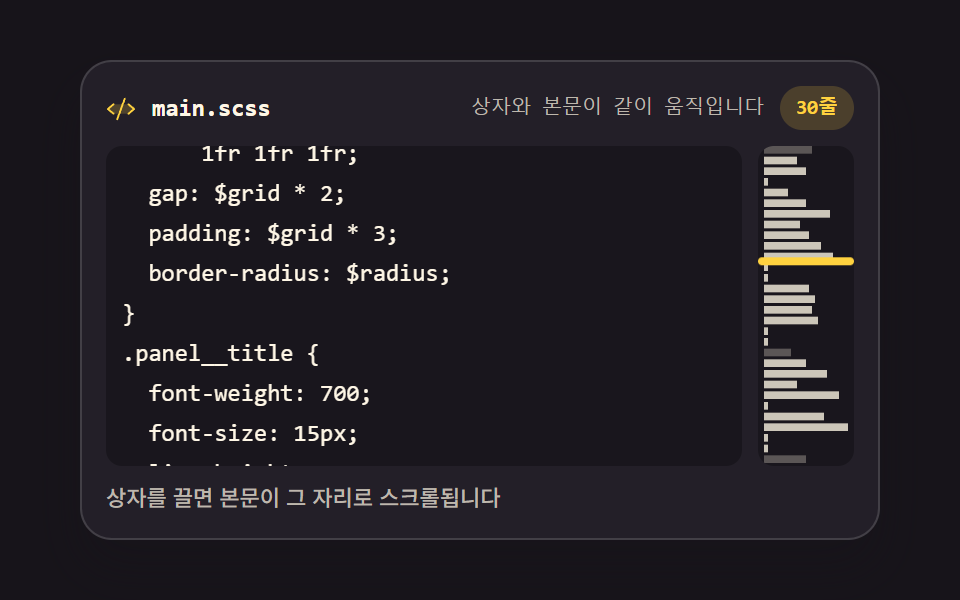
A narrow canvas on the right paints line lengths as pixel bars instead of glyphs, and dragging the viewport box scrolls the text to that spot.
Best forEditor for finding your place in a long file
fillRectgetContextscrollHeight
<main class="stage">
<div class="mm is-demo" id="mm">
  <div class="mm__bar">
    <span class="mm__ico" aria-hidden="true"><svg xmlns="http://www.w3.org/2000/svg" width="1em" height="1em" viewBox="0 0 256 256"><g fill="currentColor"><path d="m240 128l-48 40H64l-48-40l48-40h128Z" opacity=".2"/><path d="M69.12 94.15L28.5 128l40.62 33.85a8 8 0 1 1-10.24 12.29l-48-40a8 8 0 0 1 0-12.29l48-40a8 8 0 0 1 10.24 12.3m176 27.7l-48-40a8 8 0 1 0-10.24 12.3L227.5 128l-40.62 33.85a8 8 0 1 0 10.24 12.29l48-40a8 8 0 0 0 0-12.29m-82.39-89.37a8 8 0 0 0-10.25 4.79l-64 176a8 8 0 0 0 4.79 10.26A8.1 8.1 0 0 0 96 224a8 8 0 0 0 7.52-5.27l64-176a8 8 0 0 0-4.79-10.25"/></g></svg></span>
    <span class="mm__name">main.scss</span>
    <span class="mm__status" id="status" data-t="viewing line {p}"><span class="mm__stTop">viewing line 1</span><span class="mm__stMid">The box and the text move together</span></span>
    <span class="mm__count" id="count" data-t="{n} lines">30 lines</span>
  </div>
  <div class="mm__body">
    <div class="mm__view" id="view" tabindex="0">
      <pre class="mm__track" id="track"></pre>
    </div>
    <div class="mm__map" id="map" aria-label="Minimap: drag to move through the document">
      <canvas class="mm__cv" id="cv"></canvas>
      <span class="mm__box" id="box"></span>
    </div>
  </div>
  <p class="mm__note">Drag the box and the text scrolls to that spot</p>
</div>
</main>
@use "../../../../site/static/demo-tokens" as *;
// 캔버스 미니맵 — 오른쪽 좁은 canvas 가 줄 길이를 픽셀 띠(fillRect)로 그려 문서 전체 모양을 보여 준다.
// 캔버스는 로드 시 한 번만 그린다(렌더는 CSS 시계로 프레임을 뽑으므로 rAF 다시 그리기는 측정에 안 잡힌다).
// 상자 드래그와 본문 스크롤은 JS(Pointer Events + scroll)로 양방향으로 이어진다.
// 격자 미리보기(.is-demo)는 본문 트랙과 상자를 같은 리듬의 CSS 키프레임으로 움직인다 —
// 스크롤 상자(view)와 트랙(track)을 분리하고 transform 은 track 에만 건다(051 실측 함정 회피).
$duration: $dur-quick;
$easing: $ease-spring;
$color: $stage-yellow;
$mono: ui-monospace, SFMono-Regular, "SF Mono", Consolas, "Liberation Mono", monospace;
$line: rgba(255, 255, 255, .14);
$dim: #beb7ad;
$fs: clamp(10px, 2.6vw, 12px);
$lh: 20px;
@include stage($stage-ink);
.mm {
// 미리보기 루프의 이동거리 — JS 가 실제 스크롤 범위에서 계산해 넣는다
--mm-track-y: -200px;
--mm-thumb-y: 53px;
display: flex; flex-direction: column; gap: $sp-2;
box-sizing: border-box; width: min(100%, 400px);
padding: $sp-3; border: 1px solid $line; border-radius: $r-card;
background: $tick-panel;
box-shadow: $shadow-raised;
}
// ── 파일 이름 줄
.mm__bar { display: flex; align-items: center; gap: $sp-2; }
.mm__ico { display: grid; place-items: center; color: $color; font-size: 15px; }
.mm__name {
flex: 0 0 auto; color: $subject-cream;
font-family: $mono; font-weight: 700; font-size: 12px; line-height: 1.4;
}
.mm__status {
flex: 1 1 auto; color: $dim;
font-family: $mono; font-weight: 500; font-size: 10px; line-height: 1.4;
text-align: right;
}
.mm__count {
flex: 0 0 auto; padding: $sp-1 $sp-2; border-radius: $r-pill;
background: rgba(255, 210, 63, .18); color: $stage-yellow;
font-family: $mono; font-weight: 700; font-size: 10px; line-height: 1.4;
}
// ── 본문(실제 스크롤) + 미니맵
.mm__body { display: flex; gap: $sp-2; }
.mm__view {
flex: 1 1 auto; height: $lh * 8;
overflow: auto; overscroll-behavior: contain;
border-radius: $r-sm; background: rgba(0, 0, 0, .28);
scrollbar-width: thin;
}
.mm__track {
box-sizing: border-box; margin: 0; padding: $sp-2;
color: $subject-cream;
font-family: $mono; font-weight: 500; font-size: $fs; line-height: $lh;
letter-spacing: 0; tab-size: 2;
white-space: pre;
}
.mm__ln { display: block; }
.mm__ln--dim { color: $dim; }
.mm__ln--tok { color: $subject-sky; }
.mm__map {
position: relative; flex: 0 0 48px; height: $lh * 8;
border-radius: $r-sm; background: rgba(0, 0, 0, .28);
overflow: hidden; cursor: grab; touch-action: none;
}
.mm__map:active { cursor: grabbing; }
.mm__cv { position: absolute; inset: 0; display: block; width: 100%; height: 100%; }
.mm__box {
position: absolute; left: 0; right: 0; top: 0; box-sizing: border-box;
border: 2px solid $stage-yellow; border-radius: $r-xs;
background: rgba(255, 210, 63, .12);
}
.mm__note {
margin: 0; color: $dim;
font-weight: 500; font-size: 11px; line-height: 1.4;
}
// ── 격자 미리보기 루프 (2초)
// 본문 트랙이 10→50% 에 위로 스크롤되고 60→88% 에 제자리로 돌아온다(복귀는 90% 안에).
// 상자는 같은 키프레임 지점·같은 이징으로 따라 내려가고 올라온다 — 두 애니메이션이 같은 리듬으로 묶인다.
// 미리보기 동안에는 실제 스크롤 대신 트랙 transform 이 움직이게 뷰의 스크롤을 잠근다.
// 미리보기 문장에는 **줄 번호를 쓰지 않는다**. 트랙은 이징으로 연속 이동하는데 문장은 컷이라
// 어느 시점을 골라도 「1번째 줄」과 화면이 어긋난 장면이 poster 로 뽑힌다 (실측 2026-09-13).
// 숫자가 없는 문장으로 바꾸면 이동 중 어느 프레임에서도 참이다. 실제 조작 때는 JS 가 줄 번호를 쓴다
.mm__status { display: inline-grid; }
.mm__stTop, .mm__stMid { grid-area: 1 / 1; }
.mm__stMid { visibility: hidden; }
.mm.is-demo .mm__stTop {
animation-name: mmStTop; animation-duration: $dur-loop; animation-timing-function: steps(1, end);
animation-iteration-count: infinite; animation-fill-mode: backwards;
}
.mm.is-demo .mm__stMid {
animation-name: mmStMid; animation-duration: $dur-loop; animation-timing-function: steps(1, end);
animation-iteration-count: infinite; animation-fill-mode: backwards;
}
@keyframes mmStTop {
0%, 100% { visibility: hidden; }
}
@keyframes mmStMid {
0%, 100% { visibility: visible; }
}
.mm.is-demo .mm__view { overflow: hidden; }
.mm.is-demo .mm__track {
animation-name: mmScroll;
animation-duration: $dur-loop; animation-timing-function: $easing;
animation-iteration-count: infinite; animation-fill-mode: backwards;
}
.mm.is-demo .mm__box {
animation-name: mmThumb;
animation-duration: $dur-loop; animation-timing-function: $easing;
animation-iteration-count: infinite; animation-fill-mode: backwards;
}
@keyframes mmScroll {
0%, 10% { transform: translateY(0); }
50%, 60% { transform: translateY(var(--mm-track-y)); }
88%, 100% { transform: translateY(0); }
}
@keyframes mmThumb {
0%, 10% { transform: translateY(0); }
50%, 60% { transform: translateY(var(--mm-thumb-y)); }
88%, 100% { transform: translateY(0); }
}
// ── 좁은 화면: 행간과 여백을 줄여 무대 안에 들어오게 한다 (2·3px 는 0 으로 내린다)
@media (max-width: 340px) {
.mm { gap: $sp-1; padding: $sp-2; }
.mm__view, .mm__map { height: 104px; }
.mm__map { flex-basis: 40px; }
.mm__track { font-size: 10px; line-height: 16px; padding: $sp-1; }
.mm__name { font-size: 11px; }
.mm__ico { font-size: 13px; }
.mm__status, .mm__count, .mm__note { font-size: 10px; }
}
@media (prefers-reduced-motion: reduce) {
.mm.is-demo .mm__stTop,
.mm.is-demo .mm__stMid,
.mm.is-demo .mm__track,
.mm.is-demo .mm__box {
animation: none !important;
transform: none !important;
}
}html, body {
margin: 0;
overflow: hidden;
}
.stage {
box-sizing: border-box;
min-height: 100vh;
display: grid;
place-items: center;
margin: 0;
background: #17141a;
font-family: -apple-system, "Segoe UI", "Noto Sans KR", sans-serif;
padding: clamp(8px, 4vw, 24px);
}
.mm {
--mm-track-y: -200px;
--mm-thumb-y: 53px;
display: flex;
flex-direction: column;
gap: 8px;
box-sizing: border-box;
width: min(100%, 400px);
padding: 12px;
border: 1px solid rgba(255, 255, 255, 0.14);
border-radius: 16px;
background: #231f28;
box-shadow: 0 14px 24px rgba(23, 20, 26, 0.32);
}
.mm__bar {
display: flex;
align-items: center;
gap: 8px;
}
.mm__ico {
display: grid;
place-items: center;
color: #ffd23f;
font-size: 15px;
}
.mm__name {
flex: 0 0 auto;
color: #fff7e6;
font-family: ui-monospace, SFMono-Regular, "SF Mono", Consolas, "Liberation Mono", monospace;
font-weight: 700;
font-size: 12px;
line-height: 1.4;
}
.mm__status {
flex: 1 1 auto;
color: #beb7ad;
font-family: ui-monospace, SFMono-Regular, "SF Mono", Consolas, "Liberation Mono", monospace;
font-weight: 500;
font-size: 10px;
line-height: 1.4;
text-align: right;
}
.mm__count {
flex: 0 0 auto;
padding: 4px 8px;
border-radius: 999px;
background: rgba(255, 210, 63, 0.18);
color: #ffd23f;
font-family: ui-monospace, SFMono-Regular, "SF Mono", Consolas, "Liberation Mono", monospace;
font-weight: 700;
font-size: 10px;
line-height: 1.4;
}
.mm__body {
display: flex;
gap: 8px;
}
.mm__view {
flex: 1 1 auto;
height: 160px;
overflow: auto;
overscroll-behavior: contain;
border-radius: 8px;
background: rgba(0, 0, 0, 0.28);
scrollbar-width: thin;
}
.mm__track {
box-sizing: border-box;
margin: 0;
padding: 8px;
color: #fff7e6;
font-family: ui-monospace, SFMono-Regular, "SF Mono", Consolas, "Liberation Mono", monospace;
font-weight: 500;
font-size: clamp(10px, 2.6vw, 12px);
line-height: 20px;
letter-spacing: 0;
tab-size: 2;
white-space: pre;
}
.mm__ln {
display: block;
}
.mm__ln--dim {
color: #beb7ad;
}
.mm__ln--tok {
color: #6ec8ff;
}
.mm__map {
position: relative;
flex: 0 0 48px;
height: 160px;
border-radius: 8px;
background: rgba(0, 0, 0, 0.28);
overflow: hidden;
cursor: grab;
touch-action: none;
}
.mm__map:active {
cursor: grabbing;
}
.mm__cv {
position: absolute;
inset: 0;
display: block;
width: 100%;
height: 100%;
}
.mm__box {
position: absolute;
left: 0;
right: 0;
top: 0;
box-sizing: border-box;
border: 2px solid #ffd23f;
border-radius: 4px;
background: rgba(255, 210, 63, 0.12);
}
.mm__note {
margin: 0;
color: #beb7ad;
font-weight: 500;
font-size: 11px;
line-height: 1.4;
}
.mm__status {
display: inline-grid;
}
.mm__stTop, .mm__stMid {
grid-area: 1/1;
}
.mm__stMid {
visibility: hidden;
}
.mm.is-demo .mm__stTop {
animation-name: mmStTop;
animation-duration: 2s;
animation-timing-function: steps(1, end);
animation-iteration-count: infinite;
animation-fill-mode: backwards;
}
.mm.is-demo .mm__stMid {
animation-name: mmStMid;
animation-duration: 2s;
animation-timing-function: steps(1, end);
animation-iteration-count: infinite;
animation-fill-mode: backwards;
}
@keyframes mmStTop {
0%, 100% {
visibility: hidden;
}
}
@keyframes mmStMid {
0%, 100% {
visibility: visible;
}
}
.mm.is-demo .mm__view {
overflow: hidden;
}
.mm.is-demo .mm__track {
animation-name: mmScroll;
animation-duration: 2s;
animation-timing-function: cubic-bezier(0.2, 0.8, 0.2, 1);
animation-iteration-count: infinite;
animation-fill-mode: backwards;
}
.mm.is-demo .mm__box {
animation-name: mmThumb;
animation-duration: 2s;
animation-timing-function: cubic-bezier(0.2, 0.8, 0.2, 1);
animation-iteration-count: infinite;
animation-fill-mode: backwards;
}
@keyframes mmScroll {
0%, 10% {
transform: translateY(0);
}
50%, 60% {
transform: translateY(var(--mm-track-y));
}
88%, 100% {
transform: translateY(0);
}
}
@keyframes mmThumb {
0%, 10% {
transform: translateY(0);
}
50%, 60% {
transform: translateY(var(--mm-thumb-y));
}
88%, 100% {
transform: translateY(0);
}
}
@media (max-width: 340px) {
.mm {
gap: 4px;
padding: 8px;
}
.mm__view, .mm__map {
height: 104px;
}
.mm__map {
flex-basis: 40px;
}
.mm__track {
font-size: 10px;
line-height: 16px;
padding: 4px;
}
.mm__name {
font-size: 11px;
}
.mm__ico {
font-size: 13px;
}
.mm__status, .mm__count, .mm__note {
font-size: 10px;
}
}
@media (prefers-reduced-motion: reduce) {
.mm.is-demo .mm__stTop,
.mm.is-demo .mm__stMid,
.mm.is-demo .mm__track,
.mm.is-demo .mm__box {
animation: none !important;
transform: none !important;
}
}var mm = document.getElementById('mm');
var view = document.getElementById('view');
var track = document.getElementById('track');
var map = document.getElementById('map');
var box = document.getElementById('box');
var cv = document.getElementById('cv');
var statusEl = document.getElementById('status');
var countEl = document.getElementById('count');
var TPL_VIEW = statusEl.getAttribute('data-t');
var TPL_LINES = countEl.getAttribute('data-t');
// 문서 30 lines — 미니맵 띠와 본문이 같은 배열에서 나온다
var LINES = [
'// layout tokens',
'$grid: 4px;',
'$radius: 12px;',
'',
'.panel {',
' display: grid;',
' grid-template-columns:',
' 1fr 1fr 1fr;',
' gap: $grid * 2;',
' padding: $grid * 3;',
' border-radius: $radius;',
'}',
'',
'.panel__title {',
' font-weight: 700;',
' font-size: 15px;',
' line-height: 20px;',
'}',
'',
'// motion',
'.panel__item {',
' transition: transform',
' 220ms ease;',
' transform: translateY(0);',
'}',
'.panel__item:hover {',
' transform: translateY(-4px);',
'}',
'',
'// end of file'
];
function esc(t) { return t.replace(/&/g, '&').replace(/</g, '<').replace(/>/g, '>'); }
function fillTrack() {
track.innerHTML = LINES.map(function (ln) {
var cls = ln.indexOf('//') === 0 ? ' mm__ln--dim' : (ln.trim().charAt(0) === '$' ? ' mm__ln--tok' : '');
return '<span class="mm__ln' + cls + '">' + esc(ln) + '</span>';
}).join('');
countEl.textContent = TPL_LINES.replace('{n}', LINES.length);
}
// 미니맵은 로드 시 한 번 그린다 — 렌더가 프레임을 뽑는 시계는 CSS 애니메이션이므로
// 캔버스를 매 프레임 다시 그리는 연출은 측정에 잡히지 않는다 (지시 299).
// devicePixelRatio 를 곱해 물리 픽셀에 맞춰 그려야 흐려지지 않는다.
function drawMap() {
var ctx = cv.getContext('2d');
var dpr = window.devicePixelRatio || 1;
var w = map.clientWidth, h = map.clientHeight;
cv.width = Math.max(1, Math.round(w * dpr));
cv.height = Math.max(1, Math.round(h * dpr));
ctx.setTransform(dpr, 0, 0, dpr, 0, 0);
ctx.clearRect(0, 0, w, h);
var maxLen = 1;
LINES.forEach(function (ln) { maxLen = Math.max(maxLen, ln.trim().length); });
var pitch = h / LINES.length;
var barH = Math.max(1.5, pitch - 1.5);
LINES.forEach(function (ln, i) {
var bw = Math.max(2, (ln.trim().length / maxLen) * (w - 6));
ctx.fillStyle = ln.indexOf('//') === 0 ? 'rgba(190,183,173,.40)' : 'rgba(255,247,230,.78)';
ctx.fillRect(3, i * pitch, bw, barH);
});
}
function lineHeightPx() { return parseFloat(getComputedStyle(track).lineHeight) || 20; }
// 본문을 스크롤하면 상자가 따라온다 — 상자 위치는 scrollHeight 대비 비율로 계산한다
function placeBox() {
// 미리보기 루프 중에는 상태 칸을 건드리지 않는다 — 겹쳐 둔 두 문장을 textContent 가 통째로 지운다
if (mm.classList.contains('is-demo')) return;
var total = view.scrollHeight;
var shown = view.clientHeight;
var ratio = total > shown ? view.scrollTop / (total - shown) : 0;
box.style.height = Math.max(16, (shown / total) * map.clientHeight) + 'px';
var travel = Math.max(0, map.clientHeight - box.offsetHeight);
box.style.transform = 'translateY(' + (ratio * travel).toFixed(1) + 'px)';
var line = Math.min(LINES.length, Math.round(view.scrollTop / lineHeightPx()) + 1);
statusEl.textContent = TPL_VIEW.replace('{p}', line);
}
// 미리보기 루프의 이동거리도 실제 스크롤 범위에서 계산해 상자와 본문이 같은 비율로 움직이게 한다
function tuneLoop() {
var span = (view.scrollHeight - view.clientHeight) * 0.45;
var travel = Math.max(0, map.clientHeight - box.offsetHeight);
mm.style.setProperty('--mm-track-y', (-span).toFixed(0) + 'px');
mm.style.setProperty('--mm-thumb-y', (Math.abs(span) / Math.max(1, view.scrollHeight - view.clientHeight) * travel).toFixed(0) + 'px');
}
// 상자를 끌면(Pointer Events) 본문이 그 자리로 스크롤된다
var dragging = false;
function jumpTo(ev) {
var r = map.getBoundingClientRect();
var bh = box.offsetHeight;
var y = ev.clientY - r.top - bh / 2;
var k = Math.max(0, Math.min(1, y / Math.max(1, r.height - bh)));
view.scrollTop = k * (view.scrollHeight - view.clientHeight); // scroll 이벤트가 placeBox 를 부른다
}
map.addEventListener('pointerdown', function (ev) {
mm.classList.remove('is-demo');
dragging = true;
map.setPointerCapture(ev.pointerId);
jumpTo(ev);
ev.preventDefault();
});
map.addEventListener('pointermove', function (ev) { if (dragging) jumpTo(ev); });
function endDrag(ev) {
dragging = false;
try { map.releasePointerCapture(ev.pointerId); } catch (err) { /* 이미 풀린 포인터 */ }
}
map.addEventListener('pointerup', endDrag);
map.addEventListener('pointercancel', endDrag);
view.addEventListener('scroll', function () { mm.classList.remove('is-demo'); placeBox(); });
view.addEventListener('wheel', function () { mm.classList.remove('is-demo'); }, { passive: true });
view.addEventListener('focus', function () { mm.classList.remove('is-demo'); });
window.addEventListener('resize', function () { drawMap(); placeBox(); tuneLoop(); });
fillTrack();
drawMap();
placeBox();
tuneLoop();// MinimapEditor — vanilla 판(run/299/demo/05-editor-minimap-canvas/index.html) 의 React 포트.
// 오른쪽 좁은 canvas 가 줄 길이를 픽셀 띠(fillRect)로 그려 문서 전체 모양을 보여 준다.
// 캔버스는 마운트 때 한 번만 그린다 (매 프레임 다시 그리는 연출은 CSS 시계로 뽑는 측정에 안 잡힌다).
// 상자 드래그와 본문 스크롤은 Pointer Events + scroll 로 양방향으로 이어진다.
import { useEffect, useRef, useState } from "react";
import type { CSSProperties } from "react";
import styles from "./MinimapEditor.module.scss";
export type MinimapEditorProps = {
duration?: number;
easing?: string;
color?: string;
lines?: string[];
};
type Vars = CSSProperties & { "--duration"?: string; "--easing"?: string; "--color"?: string };
// useRef<T> 는 T | null 을 돌려준다 — ambient 타입에 맞춰 상자 타입을 따로 둔다
type Box<T> = { current: T | null };
// ambient 에 React 이벤트 제네릭이 없다 — 쓰는 속성만 적은 로컬 타입을 파일 안에 둔다
type PtrEvt = { clientY: number; pointerId: number; preventDefault(): void };
const FILE_NAME = "main.scss";
const MAP_LABEL = "미니맵 — 끌어서 문서 위치를 바꿉니다";
const NOTE = "상자를 끌면 본문이 그 자리로 스크롤됩니다";
// 문구 템플릿은 화면 글자와 같은 근원에서 읽는다 — 언어팩이 값을 바꿔도 조립 규칙이 함께 바뀐다
const TPL_VIEW = "{p}번째 줄 보는 중";
const TPL_LINES = "{n}줄";
// 미리보기에 겹쳐 두는 두 문장. 아래 문장에는 줄 번호를 쓰지 않는다 —
// 트랙은 이징으로 연속 이동하는데 문장은 컷이라 어느 시점을 골라도 숫자와 화면이 어긋난다
const PREVIEW_TOP = "1번째 줄 보는 중";
const PREVIEW_MID = "상자와 본문이 같이 움직입니다";
// 문서 30줄 — 미니맵 띠와 본문이 같은 배열에서 나온다
const LINES = [
"// layout tokens",
"$grid: 4px;",
"$radius: 12px;",
"",
".panel {",
" display: grid;",
" grid-template-columns:",
" 1fr 1fr 1fr;",
" gap: $grid * 2;",
" padding: $grid * 3;",
" border-radius: $radius;",
"}",
"",
".panel__title {",
" font-weight: 700;",
" font-size: 15px;",
" line-height: 20px;",
"}",
"",
"// motion",
".panel__item {",
" transition: transform",
" 220ms ease;",
" transform: translateY(0);",
"}",
".panel__item:hover {",
" transform: translateY(-4px);",
"}",
"",
"// end of file",
];
export default function MinimapEditor(props: MinimapEditorProps) {
const duration = props.duration ?? 220;
const easing = props.easing ?? "cubic-bezier(.2, .8, .2, 1)";
const color = props.color ?? "#ffd23f";
const lines = props.lines ?? LINES;
const [preview, setPreview] = useState<boolean>(true);
const [viewLine, setViewLine] = useState<number>(1);
const rootRef = useRef<HTMLDivElement>(null) as Box<HTMLDivElement>;
const viewRef = useRef<HTMLDivElement>(null) as Box<HTMLDivElement>;
const trackRef = useRef<HTMLPreElement>(null) as Box<HTMLPreElement>;
const mapRef = useRef<HTMLDivElement>(null) as Box<HTMLDivElement>;
const boxRef = useRef<HTMLSpanElement>(null) as Box<HTMLSpanElement>;
const cvRef = useRef<HTMLCanvasElement>(null) as Box<HTMLCanvasElement>;
const dragging = useRef<boolean>(false) as Box<boolean>;
// 미리보기 여부를 이벤트 안에서도 읽어야 한다 — resize·scroll 리스너가 낡은 값을 보지 않게 상자로 둔다
const previewRef = useRef<boolean>(true) as Box<boolean>;
const stopPreview = () => {
previewRef.current = false;
setPreview(false);
};
// devicePixelRatio 를 곱해 물리 픽셀에 맞춰 그려야 흐려지지 않는다
const drawMap = () => {
const cv = cvRef.current;
const map = mapRef.current;
if (!cv || !map) return;
const ctx = cv.getContext("2d");
if (!ctx) return;
const dpr = window.devicePixelRatio || 1;
const w = map.clientWidth;
const h = map.clientHeight;
cv.width = Math.max(1, Math.round(w * dpr));
cv.height = Math.max(1, Math.round(h * dpr));
ctx.setTransform(dpr, 0, 0, dpr, 0, 0);
ctx.clearRect(0, 0, w, h);
let maxLen = 1;
lines.forEach((ln) => {
maxLen = Math.max(maxLen, ln.trim().length);
});
const pitch = h / lines.length;
const barH = Math.max(1.5, pitch - 1.5);
lines.forEach((ln, i) => {
const bw = Math.max(2, (ln.trim().length / maxLen) * (w - 6));
ctx.fillStyle = ln.indexOf("//") === 0 ? "rgba(190,183,173,.40)" : "rgba(255,247,230,.78)";
ctx.fillRect(3, i * pitch, bw, barH);
});
};
const lineHeightPx = () => {
const track = trackRef.current;
if (!track) return 20;
return parseFloat(getComputedStyle(track).lineHeight) || 20;
};
// 본문을 스크롤하면 상자가 따라온다 — 상자 위치는 scrollHeight 대비 비율로 계산한다
const placeBox = () => {
// 미리보기 루프 중에는 상태 칸을 건드리지 않는다 — 겹쳐 둔 두 문장을 덮어쓰지 않게
if (previewRef.current) return;
const view = viewRef.current;
const map = mapRef.current;
const box = boxRef.current;
if (!view || !map || !box) return;
const total = view.scrollHeight;
const shown = view.clientHeight;
const ratio = total > shown ? view.scrollTop / (total - shown) : 0;
box.style.height = Math.max(16, (shown / total) * map.clientHeight) + "px";
const travel = Math.max(0, map.clientHeight - box.offsetHeight);
box.style.transform = "translateY(" + (ratio * travel).toFixed(1) + "px)";
setViewLine(Math.min(lines.length, Math.round(view.scrollTop / lineHeightPx()) + 1));
};
// 미리보기 루프의 이동거리도 실제 스크롤 범위에서 계산해 상자와 본문이 같은 비율로 움직이게 한다
const tuneLoop = () => {
const root = rootRef.current;
const view = viewRef.current;
const map = mapRef.current;
const box = boxRef.current;
if (!root || !view || !map || !box) return;
const span = (view.scrollHeight - view.clientHeight) * 0.45;
const travel = Math.max(0, map.clientHeight - box.offsetHeight);
root.style.setProperty("--mm-track-y", (-span).toFixed(0) + "px");
root.style.setProperty(
"--mm-thumb-y",
((Math.abs(span) / Math.max(1, view.scrollHeight - view.clientHeight)) * travel).toFixed(0) + "px",
);
};
useEffect(() => {
drawMap();
placeBox();
tuneLoop();
const onResize = () => {
drawMap();
placeBox();
tuneLoop();
};
window.addEventListener("resize", onResize);
return () => window.removeEventListener("resize", onResize);
}, []);
// 상자를 끌면 본문이 그 자리로 스크롤된다
const jumpTo = (ev: PtrEvt) => {
const map = mapRef.current;
const view = viewRef.current;
const box = boxRef.current;
if (!map || !view || !box) return;
const r = map.getBoundingClientRect();
const bh = box.offsetHeight;
const y = ev.clientY - r.top - bh / 2;
const k = Math.max(0, Math.min(1, y / Math.max(1, r.height - bh)));
view.scrollTop = k * (view.scrollHeight - view.clientHeight); // scroll 이벤트가 placeBox 를 부른다
};
const onMapDown = (ev: PtrEvt) => {
stopPreview();
dragging.current = true;
const map = mapRef.current;
if (map) map.setPointerCapture(ev.pointerId);
jumpTo(ev);
ev.preventDefault();
};
const endDrag = (ev: PtrEvt) => {
dragging.current = false;
const map = mapRef.current;
if (!map) return;
try {
map.releasePointerCapture(ev.pointerId);
} catch (err) {
/* 이미 풀린 포인터 */
}
};
const vars: Vars = { "--duration": duration + "ms", "--easing": easing, "--color": color };
return (
<main className={styles.stage}>
<div className={styles.root + (preview ? " " + styles.isDemo : "")} style={vars} ref={rootRef}>
<div className={styles.bar}>
<span className={styles.ico} aria-hidden="true">
<svg xmlns="http://www.w3.org/2000/svg" width="1em" height="1em" viewBox="0 0 256 256">
<g fill="currentColor">
<path d="m240 128l-48 40H64l-48-40l48-40h128Z" opacity=".2" />
<path d="M69.12 94.15L28.5 128l40.62 33.85a8 8 0 1 1-10.24 12.29l-48-40a8 8 0 0 1 0-12.29l48-40a8 8 0 0 1 10.24 12.3m176 27.7l-48-40a8 8 0 1 0-10.24 12.3L227.5 128l-40.62 33.85a8 8 0 1 0 10.24 12.29l48-40a8 8 0 0 0 0-12.29m-82.39-89.37a8 8 0 0 0-10.25 4.79l-64 176a8 8 0 0 0 4.79 10.26A8.1 8.1 0 0 0 96 224a8 8 0 0 0 7.52-5.27l64-176a8 8 0 0 0-4.79-10.25" />
</g>
</svg>
</span>
<span className={styles.name}>{FILE_NAME}</span>
<span className={styles.status}>
{preview ? (
<>
<span className={styles.stTop}>{PREVIEW_TOP}</span>
<span className={styles.stMid}>{PREVIEW_MID}</span>
</>
) : (
TPL_VIEW.replace("{p}", String(viewLine))
)}
</span>
<span className={styles.count}>{TPL_LINES.replace("{n}", String(lines.length))}</span>
</div>
<div className={styles.body}>
<div
className={styles.view}
ref={viewRef}
tabIndex={0}
onScroll={() => {
stopPreview();
placeBox();
}}
onWheel={stopPreview}
onFocus={stopPreview}
>
<pre className={styles.track} ref={trackRef}>
{lines.map((ln, i) => (
<span
key={i}
className={
styles.ln +
(ln.indexOf("//") === 0
? " " + styles.lnDim
: ln.trim().charAt(0) === "$"
? " " + styles.lnTok
: "")
}
>
{ln}
</span>
))}
</pre>
</div>
<div
className={styles.map}
ref={mapRef}
aria-label={MAP_LABEL}
onPointerDown={onMapDown}
onPointerMove={(ev: PtrEvt) => {
if (dragging.current) jumpTo(ev);
}}
onPointerUp={endDrag}
onPointerCancel={endDrag}
>
<canvas className={styles.cv} ref={cvRef} />
<span className={styles.box} ref={boxRef} />
</div>
</div>
<p className={styles.note}>{NOTE}</p>
</div>
</main>
);
}05 Canvas minimap — Measured area 15.017% · moving frames 17/23Original by GODRICH · SCSS and React ship in the zip · Code Editor JavaScript: 9 UI Parts, No Library
The post this demo lives in
 Code Editor JavaScript: 9 UI Parts, No LibraryCode editor javascript is the plain way to get coloring, line numbers, and closing brackets into a page: nine parts, no See all demos in this post