08Pill that slides to the chosen slot
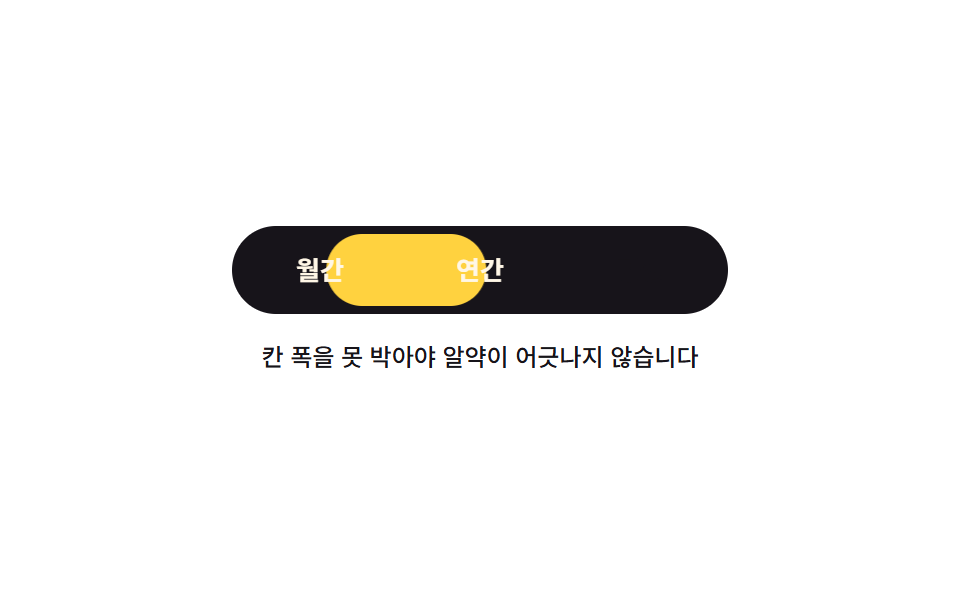
Pick one of three slots and a yellow pill slides into it; every slot is pinned to the same 80px width and the pill only moves by multiples of that number, so the indicator never drifts when a label gets longer.
Best forExclusive view switches like monthly versus yearly or list versus grid
aria-checkedflex: 0 0 autotranslateX
<main class="stage">
  <div class="sg is-demo">
    <div class="sg__bar" role="radiogroup" aria-label="Pick a billing cycle" data-at="0">
      <span class="sg__pill" aria-hidden="true"></span>
      <button class="sg__seg" type="button" role="radio" aria-checked="true" data-at="0">Monthly</button>
      <button class="sg__seg" type="button" role="radio" aria-checked="false" data-at="1">Yearly</button>
      <button class="sg__seg" type="button" role="radio" aria-checked="false" data-at="2">Lifetime</button>
    </div>
    <p class="sg__note">Pin the slot width or the pill drifts</p>
  </div>
</main>
@use "../../../../site/static/demo-tokens" as *;
$duration: $dur-base;
$easing: $ease-spring;
$color: $stage-yellow;
@include stage($stage-paper);
$segment-width: 80px; // 세 칸을 같은 폭으로 못 박는다. 알약이 이 값의 배수만큼만 움직이므로 어긋날 자리가 없다
.sg {
box-sizing: border-box;
display: flex;
flex-direction: column;
align-items: center;
gap: $sp-3;
font-family: -apple-system, "Segoe UI", "Noto Sans KR", sans-serif;
}
.sg__bar {
position: relative;
box-sizing: border-box;
display: flex;
padding: $sp-1;
border-radius: $r-pill;
background-color: $subject-ink;
}
.sg__pill {
position: absolute;
left: 4px;
top: 4px;
bottom: 4px;
width: $segment-width;
border-radius: $r-pill;
background-color: $color;
transform: translateX(0);
}
.sg__seg {
position: relative;
box-sizing: border-box;
margin: 0;
padding: 0;
flex: 0 0 auto; // 균등분배(flex: 1 1 0)와 섞으면 알약의 고정 이동폭과 실제 칸 폭이 어긋난다
width: $segment-width;
height: 36px;
border: 0;
border-radius: $r-pill;
background-color: transparent;
color: $subject-cream;
font-family: inherit;
font-size: 13px;
line-height: 20px;
font-weight: 700;
white-space: nowrap;
cursor: pointer;
}
.sg__seg:focus-visible { outline: 3px solid $subject-blue; outline-offset: 2px; }
.sg__seg[aria-checked="true"] { color: $subject-ink; }
// 사람이 실제로 고른 경로
.sg:not(.is-demo) .sg__pill { transition: transform $duration $easing; }
.sg:not(.is-demo) .sg__bar[data-at="1"] .sg__pill { transform: translateX($segment-width); }
.sg:not(.is-demo) .sg__bar[data-at="2"] .sg__pill { transform: translateX($segment-width * 2); }
.sg__note {
margin: 0;
max-width: 288px;
text-align: center;
font-size: 12px;
line-height: 18px;
font-weight: 500;
color: $subject-ink;
}
// ── 자동 루프: 알약은 transform 으로 미끄러지고, 글자 색만 한 프레임에 끊는다 ──
.sg.is-demo .sg__pill {
animation-name: sg-slide;
animation-duration: $dur-loop;
animation-timing-function: $easing;
animation-iteration-count: infinite;
}
@keyframes sg-slide {
0% { transform: translateX(0); }
18% { transform: translateX(0); }
34% { transform: translateX($segment-width); }
50% { transform: translateX($segment-width); }
64% { transform: translateX($segment-width * 2); }
76% { transform: translateX($segment-width * 2); }
90% { transform: translateX(0); }
100% { transform: translateX(0); }
}
.sg.is-demo .sg__seg {
animation-duration: $dur-loop;
animation-timing-function: steps(1, end);
animation-iteration-count: infinite;
}
.sg.is-demo .sg__seg[data-at="0"] { animation-name: sg-a; }
.sg.is-demo .sg__seg[data-at="1"] { animation-name: sg-b; }
.sg.is-demo .sg__seg[data-at="2"] { animation-name: sg-c; }
@keyframes sg-a {
0% { color: $subject-ink; }
26% { color: $subject-cream; }
84% { color: $subject-ink; }
100% { color: $subject-ink; }
}
@keyframes sg-b {
0% { color: $subject-cream; }
26% { color: $subject-ink; }
58% { color: $subject-cream; }
100% { color: $subject-cream; }
}
@keyframes sg-c {
0% { color: $subject-cream; }
58% { color: $subject-ink; }
84% { color: $subject-cream; }
100% { color: $subject-cream; }
}
@media (max-width: 340px) {
.sg { gap: $sp-2; }
.sg__note { font-size: 11px; line-height: 16px; max-width: 200px; }
}
@media (prefers-reduced-motion: reduce) {
.sg.is-demo .sg__pill,
.sg.is-demo .sg__seg { animation: none !important; }
.sg:not(.is-demo) .sg__pill { transition: none !important; }
.sg.is-demo .sg__seg[data-at="0"] { color: $subject-ink; }
}html, body {
margin: 0;
overflow: hidden;
}
.stage {
box-sizing: border-box;
min-height: 100vh;
display: grid;
place-items: center;
margin: 0;
background: #ffffff;
font-family: -apple-system, "Segoe UI", "Noto Sans KR", sans-serif;
padding: clamp(8px, 4vw, 24px);
}
.sg {
box-sizing: border-box;
display: flex;
flex-direction: column;
align-items: center;
gap: 12px;
font-family: -apple-system, "Segoe UI", "Noto Sans KR", sans-serif;
}
.sg__bar {
position: relative;
box-sizing: border-box;
display: flex;
padding: 4px;
border-radius: 999px;
background-color: #17141a;
}
.sg__pill {
position: absolute;
left: 4px;
top: 4px;
bottom: 4px;
width: 80px;
border-radius: 999px;
background-color: #ffd23f;
transform: translateX(0);
}
.sg__seg {
position: relative;
box-sizing: border-box;
margin: 0;
padding: 0;
flex: 0 0 auto;
width: 80px;
height: 36px;
border: 0;
border-radius: 999px;
background-color: transparent;
color: #fff7e6;
font-family: inherit;
font-size: 13px;
line-height: 20px;
font-weight: 700;
white-space: nowrap;
cursor: pointer;
}
.sg__seg:focus-visible {
outline: 3px solid #2f6df6;
outline-offset: 2px;
}
.sg__seg[aria-checked=true] {
color: #17141a;
}
.sg:not(.is-demo) .sg__pill {
transition: transform 300ms cubic-bezier(0.2, 0.8, 0.2, 1);
}
.sg:not(.is-demo) .sg__bar[data-at="1"] .sg__pill {
transform: translateX(80px);
}
.sg:not(.is-demo) .sg__bar[data-at="2"] .sg__pill {
transform: translateX(160px);
}
.sg__note {
margin: 0;
max-width: 288px;
text-align: center;
font-size: 12px;
line-height: 18px;
font-weight: 500;
color: #17141a;
}
.sg.is-demo .sg__pill {
animation-name: sg-slide;
animation-duration: 2s;
animation-timing-function: cubic-bezier(0.2, 0.8, 0.2, 1);
animation-iteration-count: infinite;
}
@keyframes sg-slide {
0% {
transform: translateX(0);
}
18% {
transform: translateX(0);
}
34% {
transform: translateX(80px);
}
50% {
transform: translateX(80px);
}
64% {
transform: translateX(160px);
}
76% {
transform: translateX(160px);
}
90% {
transform: translateX(0);
}
100% {
transform: translateX(0);
}
}
.sg.is-demo .sg__seg {
animation-duration: 2s;
animation-timing-function: steps(1, end);
animation-iteration-count: infinite;
}
.sg.is-demo .sg__seg[data-at="0"] {
animation-name: sg-a;
}
.sg.is-demo .sg__seg[data-at="1"] {
animation-name: sg-b;
}
.sg.is-demo .sg__seg[data-at="2"] {
animation-name: sg-c;
}
@keyframes sg-a {
0% {
color: #17141a;
}
26% {
color: #fff7e6;
}
84% {
color: #17141a;
}
100% {
color: #17141a;
}
}
@keyframes sg-b {
0% {
color: #fff7e6;
}
26% {
color: #17141a;
}
58% {
color: #fff7e6;
}
100% {
color: #fff7e6;
}
}
@keyframes sg-c {
0% {
color: #fff7e6;
}
58% {
color: #17141a;
}
84% {
color: #fff7e6;
}
100% {
color: #fff7e6;
}
}
@media (max-width: 340px) {
.sg {
gap: 8px;
}
.sg__note {
font-size: 11px;
line-height: 16px;
max-width: 200px;
}
}
@media (prefers-reduced-motion: reduce) {
.sg.is-demo .sg__pill,
.sg.is-demo .sg__seg {
animation: none !important;
}
.sg:not(.is-demo) .sg__pill {
transition: none !important;
}
.sg.is-demo .sg__seg[data-at="0"] {
color: #17141a;
}
}// 실제 동작: 고른 칸은 aria-checked 로 적고, 알약은 칸 번호 × 칸 폭만큼만 옮긴다
var root = document.querySelector('.sg');
var bar = root.querySelector('.sg__bar');
var segs = [].slice.call(root.querySelectorAll('.sg__seg'));
function select(i) {
bar.setAttribute('data-at', String(i));
segs.forEach(function (b, k) { b.setAttribute('aria-checked', String(k === i)); });
}
segs.forEach(function (b, i) {
b.addEventListener('click', function () { root.classList.remove('is-demo'); select(i); });
});
bar.addEventListener('keydown', function (e) {
var i = segs.indexOf(document.activeElement);
if (i < 0 || (e.key !== 'ArrowRight' && e.key !== 'ArrowLeft')) return;
e.preventDefault();
root.classList.remove('is-demo');
var n = (i + (e.key === 'ArrowRight' ? 1 : 2)) % 3;
select(n);
segs[n].focus({ preventScroll: true }); // iframe 안에서 부모 페이지가 끌려가지 않게
});import { useCallback, useRef, useState } from "react";
import type { CSSProperties } from "react";
import styles from "./SegmentedRadioGroup.module.scss";
export type SegmentedRadioGroupProps = {
labels?: [string, string, string]; // 알약 이동폭이 80px 고정이라 칸은 세 개다
groupLabel?: string;
note?: string;
duration?: number;
easing?: string;
};
type Vars = CSSProperties & { "--duration"?: string; "--easing"?: string };
// DOM 전역 타입을 react 에서 가져오지 않는다 — 쓰는 속성만 여기에 적는다
type KeyEvt = { key: string; preventDefault(): void };
type Focusable = { focus(opt: { preventScroll: boolean }): void };
export default function SegmentedRadioGroup({
labels = ["Monthly", "Yearly", "Lifetime"],
groupLabel = "Choose a billing cycle",
note = "Pin the segment width so the pill never drifts",
duration = 300,
easing = "cubic-bezier(.2,.8,.2,1)",
}: SegmentedRadioGroupProps) {
const [demo, setDemo] = useState(true); // 처음엔 자동 루프, 사람이 건드리면 끈다
const [at, setAt] = useState(0);
const segs = useRef<(Focusable | null)[]>([]);
const vars: Vars = { "--duration": `${duration}ms`, "--easing": easing };
const pick = useCallback((i: number) => {
setDemo(false);
setAt(i);
}, []);
// 좌우 화살표로 이동 — 활성 요소를 뒤지지 않고 칸 번호를 그대로 쓴다
const onKeyDown = useCallback((e: KeyEvt, i: number) => {
if (e.key !== "ArrowRight" && e.key !== "ArrowLeft") return;
e.preventDefault();
setDemo(false);
const n = (i + (e.key === "ArrowRight" ? 1 : labels.length - 1)) % labels.length;
setAt(n);
// preventScroll — iframe 안에서 부모 페이지가 끌려가지 않게
const segEls = segs.current;
if (segEls) segEls[n]?.focus({ preventScroll: true });
}, [labels.length]);
return (
<div className={`${styles.sg} ${demo ? styles.isDemo : ""}`} style={vars}>
<div className={styles.bar} role="radiogroup" aria-label={groupLabel} data-at={String(at)}>
<span className={styles.pill} aria-hidden="true" />
{labels.map((label, i) => (
<button
key={label}
ref={(el: Focusable | null) => { const segEls = segs.current; if (segEls) segEls[i] = el; }}
className={styles.seg}
type="button"
role="radio"
aria-checked={at === i}
data-at={String(i)}
onClick={() => pick(i)}
onKeyDown={(e: KeyEvt) => onKeyDown(e, i)}
>
{label}
</button>
))}
</div>
<p className={styles.note}>{note}</p>
</div>
);
}08 Pill that slides to the chosen slot — Measured area 5.811% · moving frames 12/23Original by GODRICH · SCSS and React ship in the zip · 9 button state css patterns, loading to done
The post this demo lives in
 9 button state css patterns, loading to doneA button state css pattern decides what a button looks like between the press and the result. All nine here actually loc See all demos in this post
If you like this effect - similar demos
 Buttons05 Selector pill sliding between two slotsCSS Toggle Switch: 9 Realistic Switches to Paste
 Buttons04 Exclusive pressed state — when one button's pressed value turns on, every other button's pressed value turns off at the same instantButton Group CSS: 9 Adjoined Patterns
 Buttons07 Toast That Slides In to Confirm the SaveBookmark Icon Animation: 9 Patterns, One Icon