07Chain lightning — hopping from one target point to the next
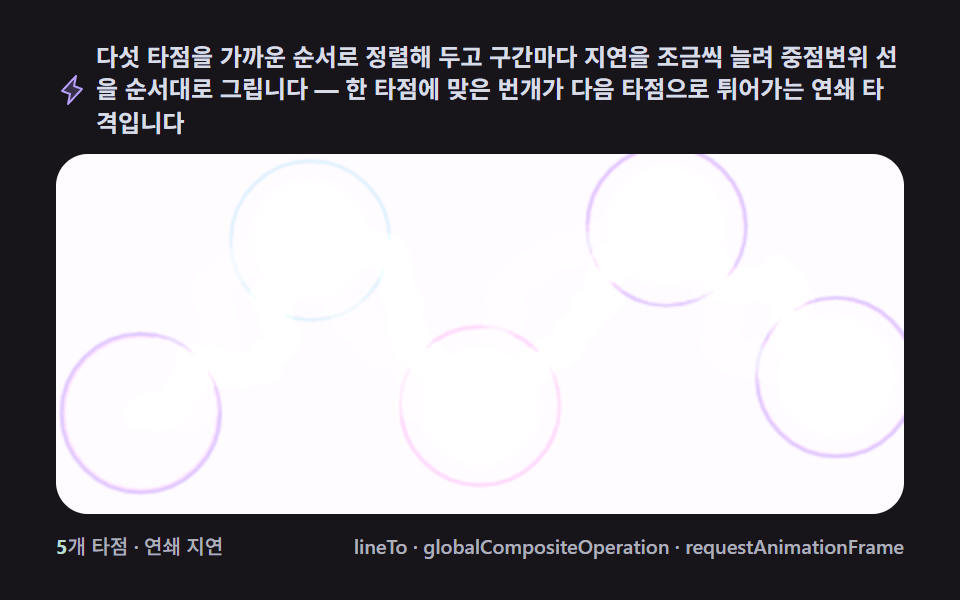
Sorting targets by proximity and drawing each displaced segment in order with a slightly increasing delay makes the strike look like it hops from one target to the next.
Best forA game UI skill preview, an emphasis effect linking several cards
lineToglobalCompositeOperationrequestAnimationFrame
<main class="stage">
<div class="cd is-demo" id="cdRoot">
  <p class="cd__hint">
    <svg class="cd__ico" viewBox="0 0 256 256" aria-hidden="true"><g fill="currentColor"><path d="m96 240l16-80l-64-24L160 16l-16 80l64 24Z" opacity=".2"/><path d="M215.79 118.17a8 8 0 0 0-5-5.66L153.18 90.9l14.66-73.33a8 8 0 0 0-13.69-7l-112 120a8 8 0 0 0 3 13l57.63 21.61l-14.62 73.25a8 8 0 0 0 13.69 7l112-120a8 8 0 0 0 1.94-7.26M109.37 214l10.47-52.38a8 8 0 0 0-5-9.06L62 132.71l84.62-90.66l-10.46 52.38a8 8 0 0 0 5 9.06l52.8 19.8Z"/></g></svg>
    <span>Five hit points are sorted by proximity, with a slightly longer delay per segment to draw midpoint-displacement lines in sequence — a chain strike leaping from one point to the next</span>
  </p>
  <div class="cd__field" id="cdField" role="application" aria-label="Chain-Lightning Multi-Target test panel" tabindex="0">
    <canvas class="cd__cv" id="cdCv"></canvas>
  </div>
  <div class="cd__bar">
    <span class="cd__meta"><b class="cd__val" id="cdVal">5</b>hit points · chain delay</span>
    <span class="cd__meta cd__meta--dim">lineTo · globalCompositeOperation · requestAnimationFrame</span>
  </div>
</div>
</main>
@use "../../../../site/static/demo-tokens" as *;
// 체인 라이트닝(07). CSS 애니메이션·@keyframes 를 아예 두지 않는다 —
// 움직임은 전부 캔버스 rAF 루프(중점변위 경로 순차 점등 + 오프스크린 잔광 누적)가 만든다.
// 무대는 어스름 잉크. 파스텔 고정 팔레트를 --bolt-* 로 편 편 공통 규격.
$duration: $dur-loop;
$easing: $ease-out;
$color: $subject-lilac;
@include stage($stage-ink);
// ── 편 공통 파스텔 팔레트(BD26: vivid 순색 없음 — 전부 명도 .8+ 파스텔이거나 어스름 무채색) ──
$bolt-ink: #1b1e26; // 어스름 무대
$bolt-sky: #323749; // 하늘 깊은 슬레이트
$bolt-slab: #4b5170; // 구름 덩어리 슬레이트
$bolt-core: #f6e7ff; // 줄기 코어 — 밝은 파스텔 라벤더
$bolt-lilac: #b9a0ff; // 헤일로 라일락
$bolt-mint: #b9ddd1; // 타점 강조 민트
$bolt-pink: #ffb9c8; // 타점 강조 핑크
$bolt-node: #d8dce6; // 노드 테두리 안개색
.cd {
// 렌더러가 읽는 색 — JS 는 getComputedStyle 로 --bolt-* 를 받아 쓴다
--bolt-ink: #{$bolt-ink};
--bolt-sky: #{$bolt-sky};
--bolt-slab: #{$bolt-slab};
--bolt-core: #{$bolt-core};
--bolt-lilac: #{$bolt-lilac};
--bolt-mint: #{$bolt-mint};
--bolt-pink: #{$bolt-pink};
--bolt-node: #{$bolt-node};
display: flex; flex-direction: column; gap: $sp-2;
width: 100%; max-width: 424px;
}
.cd__hint {
display: flex; align-items: center; gap: $sp-1; margin: 0;
font-weight: 700; font-size: clamp(10px, 2.8vw, 12px); line-height: 1.35;
color: $bolt-node; // 잉크 무대 위 — 안개색 글자(대비 9.8:1)
}
.cd__ico { width: 16px; height: 16px; flex: 0 0 auto; color: $bolt-lilac; }
.cd__field {
position: relative; height: 180px;
border-radius: $r-card; overflow: hidden;
background: $bolt-ink;
box-shadow: inset 0 0 0 1px rgba($bolt-node, .18);
}
.cd__field:focus-visible { outline: 2px solid $bolt-lilac; outline-offset: 2px; }
.cd__cv { display: block; width: 100%; height: 100%; }
.cd__bar { display: flex; align-items: baseline; justify-content: space-between; gap: $sp-2; }
.cd__meta { font-size: 10px; font-weight: 500; color: rgba($bolt-node, .78); }
.cd__val { color: $bolt-mint; font-weight: 700; } // 잉크 위 민트 라벨(대비 9.4:1)
.cd__meta--dim { font-size: 10px; }
@media (max-width: 340px) {
.cd { gap: $sp-1; }
.cd__field { height: 100px; }
.cd__meta--dim { display: none; }
}
// reduce — rAF 를 돌리지 않고 연쇄가 지나간 한 장만 남는다(JS 가 is-still 부착).
@media (prefers-reduced-motion: reduce) {
.cd.is-still .cd__field { cursor: default !important; }
}html, body {
margin: 0;
overflow: hidden;
}
.stage {
box-sizing: border-box;
min-height: 100vh;
display: grid;
place-items: center;
margin: 0;
background: #17141a;
font-family: -apple-system, "Segoe UI", "Noto Sans KR", sans-serif;
padding: clamp(8px, 4vw, 24px);
}
.cd {
--bolt-ink: #1b1e26;
--bolt-sky: #323749;
--bolt-slab: #4b5170;
--bolt-core: #f6e7ff;
--bolt-lilac: #b9a0ff;
--bolt-mint: #b9ddd1;
--bolt-pink: #ffb9c8;
--bolt-node: #d8dce6;
display: flex;
flex-direction: column;
gap: 8px;
width: 100%;
max-width: 424px;
}
.cd__hint {
display: flex;
align-items: center;
gap: 4px;
margin: 0;
font-weight: 700;
font-size: clamp(10px, 2.8vw, 12px);
line-height: 1.35;
color: #d8dce6;
}
.cd__ico {
width: 16px;
height: 16px;
flex: 0 0 auto;
color: #b9a0ff;
}
.cd__field {
position: relative;
height: 180px;
border-radius: 16px;
overflow: hidden;
background: #1b1e26;
box-shadow: inset 0 0 0 1px rgba(216, 220, 230, 0.18);
}
.cd__field:focus-visible {
outline: 2px solid #b9a0ff;
outline-offset: 2px;
}
.cd__cv {
display: block;
width: 100%;
height: 100%;
}
.cd__bar {
display: flex;
align-items: baseline;
justify-content: space-between;
gap: 8px;
}
.cd__meta {
font-size: 10px;
font-weight: 500;
color: rgba(216, 220, 230, 0.78);
}
.cd__val {
color: #b9ddd1;
font-weight: 700;
}
.cd__meta--dim {
font-size: 10px;
}
@media (max-width: 340px) {
.cd {
gap: 4px;
}
.cd__field {
height: 100px;
}
.cd__meta--dim {
display: none;
}
}
@media (prefers-reduced-motion: reduce) {
.cd.is-still .cd__field {
cursor: default !important;
}
}// 체인 라이트닝(07). 타겟 5개를 가까운 순서로 그리디 정렬해 순서를 고정하고,
// 구간(edge)마다 시작 지연을 CHAIN_GAP_MS 씩 늘려 중점변위 선을 순차 점등한다.
// 화면은 완전히 지우지 않고 매 프레임 반투명 잉크를 덧칠해(트레일 페이드) 지나간 자리가
// 몇 프레임 동안 잔광으로 남게 한다 — 077 기준의 "화면이 살아 있음"을 面적으로 확보하는 장치.
(function () {
// ── 변형 상수 블록 — 아래 값 하나만 바꿔 변형 3종을 만든다 ──
var CHAIN_GAP_MS = 55; // 타점 사이 점등 지연 — 늘리면 연쇄가 느긋해진다
var DISPLACE_PX = 34; // 중점변위 최대 폭 — 늘리면 줄기가 더 거칠어진다
var CYCLE_MS = 500; // 한 번의 연쇄 + 잔광 + 휴지 주기(2000ms 의 약수 — gif 가 안 끊긴다)
// ────────────────────────────────────────────────────
var root = document.getElementById('cdRoot');
var field = document.getElementById('cdField');
var cv = document.getElementById('cdCv');
var ctx = cv.getContext('2d');
var valOut = document.getElementById('cdVal');
// 시드 고정 PRNG — mulberry32. 흔들림이 매 실행 같은 리듬으로 흐른다
var SEED = 0x51c701;
var prngState = SEED >>> 0;
function rand() {
prngState = (prngState + 0x6D2B79F5) >>> 0;
var t = prngState;
t = Math.imul(t ^ (t >>> 15), t | 1);
t ^= t + Math.imul(t ^ (t >>> 7), t | 61);
return ((t ^ (t >>> 14)) >>> 0) / 4294967296;
}
// 색은 CSS 커스텀 프로퍼티(--bolt-*)에서 getComputedStyle 로 읽는다 — 파스텔 토큰이 scss 한 곳에
var css = getComputedStyle(root);
function tokRGB(name) {
var s = css.getPropertyValue(name).trim();
var hx = s.length === 4
? s.charAt(1) + s.charAt(1) + s.charAt(2) + s.charAt(2) + s.charAt(3) + s.charAt(3)
: s.slice(1);
return [parseInt(hx.slice(0, 2), 16), parseInt(hx.slice(2, 4), 16), parseInt(hx.slice(4, 6), 16)];
}
var C_INK = tokRGB('--bolt-ink');
var C_CORE = tokRGB('--bolt-core');
var C_LILAC = tokRGB('--bolt-lilac');
var C_MINT = tokRGB('--bolt-mint');
var C_PINK = tokRGB('--bolt-pink');
var C_NODE = tokRGB('--bolt-node');
var HALOS = [C_LILAC, C_MINT, C_PINK, C_LILAC]; // 구간마다 헤일로 색을 돌려 쓴다
function rgba(c, a) { return 'rgba(' + c[0] + ',' + c[1] + ',' + c[2] + ',' + a + ')'; }
var reduce = window.matchMedia('(prefers-reduced-motion: reduce)').matches;
var W = 0, H = 0;
var raf = 0, t0 = -1;
var STILL_T = 90; // reduce 에서 그리는 시각(ms) — 세 구간이 다 켜진 순간
// ── 타점 5개 — 화면 비율로 고정 배치 후 실제 px 로 환산 ──
var FRACS = [[0.10, 0.72], [0.30, 0.24], [0.50, 0.70], [0.72, 0.20], [0.92, 0.62]];
var nodes = [];
var order = []; // 그리디 최근접 정렬 결과 — 0번에서 시작해 매번 가장 가까운 미방문 타점을 잇는다
var edges = []; // order 를 잇는 구간 4개
function buildLayout() {
nodes = FRACS.map(function (f) { return { x: f[0] * W, y: f[1] * H }; });
var n = nodes.length, visited = [true];
for (var i = 1; i < n; i++) visited.push(false);
order = [0];
for (var k = 1; k < n; k++) {
var last = nodes[order[order.length - 1]];
var bestI = -1, bestD = Infinity;
for (var i2 = 0; i2 < n; i2++) {
if (visited[i2]) continue;
var dx = nodes[i2].x - last.x, dy = nodes[i2].y - last.y;
var d2 = dx * dx + dy * dy;
if (d2 < bestD) { bestD = d2; bestI = i2; }
}
order.push(bestI); visited[bestI] = true;
}
edges = [];
for (var e = 0; e < order.length - 1; e++) edges.push([order[e], order[e + 1]]);
}
// 중점변위 — 구간을 반씩 쪼개며 수직으로 무작위 오프셋. 깊이가 늘수록 오프셋 폭이 줄어든다
function boltPoints(x1, y1, x2, y2, disp) {
var pts = [{ x: x1, y: y1 }, { x: x2, y: y2 }];
var amt = disp;
for (var depth = 0; depth < 6; depth++) {
var next = [pts[0]];
for (var i = 0; i < pts.length - 1; i++) {
var a = pts[i], b = pts[i + 1];
var mx = (a.x + b.x) / 2, my = (a.y + b.y) / 2;
var dx = b.x - a.x, dy = b.y - a.y;
var len = Math.hypot(dx, dy) || 1;
var nx = -dy / len, ny = dx / len;
var off = (rand() - 0.5) * 2 * amt;
next.push({ x: mx + nx * off, y: my + ny * off });
next.push(b);
}
pts = next;
amt *= 0.56;
}
return pts;
}
function strokeBolt(pts, coreColor, haloColor, alpha) {
// 헤일로 — 넓고 흐린 겹선을 'lighter' 로 쌓아 은은하게 번지는 발광을 만든다
ctx.globalCompositeOperation = 'lighter';
ctx.lineJoin = 'round'; ctx.lineCap = 'round';
var passes = [[16, 0.13], [9, 0.20], [5, 0.34]];
for (var p = 0; p < passes.length; p++) {
ctx.strokeStyle = rgba(haloColor, passes[p][1] * alpha);
ctx.lineWidth = passes[p][0];
ctx.beginPath();
ctx.moveTo(pts[0].x, pts[0].y);
for (var i = 1; i < pts.length; i++) ctx.lineTo(pts[i].x, pts[i].y);
ctx.stroke();
}
// 코어 — 가늘고 밝은 중심선
ctx.strokeStyle = rgba(coreColor, Math.min(1, alpha * 1.1));
ctx.lineWidth = 1.6;
ctx.beginPath();
ctx.moveTo(pts[0].x, pts[0].y);
for (var j = 1; j < pts.length; j++) ctx.lineTo(pts[j].x, pts[j].y);
ctx.stroke();
ctx.globalCompositeOperation = 'source-over';
}
// 구간 e 의 밝기 봉투(envelope) — 점등 지연 → 유지 → 페이드 → 휴지
var N_EDGES = 4;
var FLASH_IN = 40, HOLD_AFTER = 60, FADE_MS = 330;
function edgeAlpha(e, t) {
var start = e * CHAIN_GAP_MS;
var fadeStart = (N_EDGES - 1) * CHAIN_GAP_MS + HOLD_AFTER;
if (t < start) return 0;
if (t < start + FLASH_IN) return (t - start) / FLASH_IN;
if (t < fadeStart) return 1;
if (t < fadeStart + FADE_MS) return 1 - (t - fadeStart) / FADE_MS;
return 0;
}
function draw(t) {
// 트레일 페이드 — 완전히 지우지 않고 반투명 잉크를 덧칠해 잔광이 한 타임라인 내내 남는다
ctx.globalCompositeOperation = 'source-over';
ctx.fillStyle = rgba(C_INK, 0.065);
ctx.fillRect(0, 0, W, H);
// 노드 — 은은한 펄스로 휴지 구간에도 화면이 완전히 죽지 않게 한다. 링까지 같이 숨쉰다
var pulse = 0.5 + 0.5 * Math.sin(t / 260);
for (var i = 0; i < nodes.length; i++) {
var nd = nodes[i];
var r = 3.4 + pulse * 1.6;
ctx.beginPath();
ctx.arc(nd.x, nd.y, r, 0, Math.PI * 2);
ctx.fillStyle = rgba(C_NODE, 0.85);
ctx.fill();
ctx.beginPath();
ctx.arc(nd.x, nd.y, 10 + pulse * 30, 0, Math.PI * 2);
ctx.strokeStyle = rgba(HALOS[i % HALOS.length], 0.09 + 0.18 * pulse);
ctx.lineWidth = 1.6;
ctx.stroke();
}
// 구간마다 중점변위 경로를 매 프레임 새로 계산 — 유지 구간에도 살짝 떨리는 살아있는 줄기
var maxA = 0;
for (var e = 0; e < edges.length; e++) {
var a = edgeAlpha(e, t);
if (a <= 0.01) continue;
if (a > maxA) maxA = a;
var pair = edges[e];
var p1 = nodes[pair[0]], p2 = nodes[pair[1]];
var pts = boltPoints(p1.x, p1.y, p2.x, p2.y, DISPLACE_PX);
strokeBolt(pts, C_CORE, HALOS[e % HALOS.length], a);
// 도착 타점 강조 — 맞은 자리가 밝아진다. 착탄 광륜(헤일로 원)이 같이 번진다
var br = 8 + a * 42;
var bg = ctx.createRadialGradient(p2.x, p2.y, 0, p2.x, p2.y, br);
bg.addColorStop(0, rgba(C_CORE, a * 0.5));
bg.addColorStop(0.6, rgba(HALOS[e % HALOS.length], a * 0.22));
bg.addColorStop(1, rgba(HALOS[e % HALOS.length], 0));
ctx.globalCompositeOperation = 'lighter';
ctx.fillStyle = bg;
ctx.fillRect(p2.x - br, p2.y - br, br * 2, br * 2);
ctx.beginPath();
ctx.arc(p2.x, p2.y, 5 + a * 3, 0, Math.PI * 2);
ctx.fillStyle = rgba(C_CORE, a * 0.9);
ctx.fill();
}
// 전면 앰비언트 플래시 — 화면 전체를 살짝 밝혀 낙뢰 순간이 배경까지 번지게 한다.
// 배경 픽셀까지 값이 바뀌어야 누적면적이 피사체 크기만이 아니라 화면 전체로 잡힌다.
if (maxA > 0.02) {
ctx.globalCompositeOperation = 'lighter';
ctx.fillStyle = rgba(C_LILAC, maxA * 0.16);
ctx.fillRect(0, 0, W, H);
ctx.globalCompositeOperation = 'source-over';
}
}
function fit() {
var r = field.getBoundingClientRect();
W = r.width; H = r.height;
cv.width = Math.round(W); cv.height = Math.round(H);
buildLayout();
ctx.fillStyle = rgba(C_INK, 1);
ctx.fillRect(0, 0, W, H);
}
function frame(now) {
if (t0 < 0) t0 = now;
var t = (now - t0) % CYCLE_MS;
draw(t);
raf = requestAnimationFrame(frame);
}
window.addEventListener('resize', function () { fit(); if (reduce) draw(STILL_T); });
fit();
if (reduce) {
draw(STILL_T);
root.classList.add('is-still');
} else {
raf = requestAnimationFrame(frame);
}
})();// ChainLightning — vanilla 판(run/316/demo/07-lightning-chain-multi-target/index.html) 의 React 포트.
// 타점 5개를 그리디 최근접 순서로 정렬해 구간(edge)마다 지연을 늘려 중점변위 선을 순차 점등한다.
// 트레일 페이드(반투명 잉크 덧칠) + 낙뢰 순간 전면 앰비언트 플래시로 화면 전체가 살아 있게 한다.
import { useEffect, useRef, useState } from "react";
import type { CSSProperties } from "react";
import styles from "./ChainLightning.module.scss";
export type ChainLightningProps = {
duration?: string;
easing?: string;
color?: string;
chainGapMs?: number; // 타점 사이 점등 지연 — 늘리면 연쇄가 느긋해진다
displacePx?: number; // 중점변위 최대 폭 — 늘리면 줄기가 더 거칠어진다
cycleMs?: number; // 한 번의 연쇄 + 잔광 + 휴지 주기(2000ms 의 약수 — gif 가 안 끊긴다)
};
type Vars = CSSProperties & { "--duration"?: string; "--easing"?: string; "--color"?: string };
type Box<T> = { current: T };
type RGB = [number, number, number];
type Pt = { x: number; y: number };
type Colors = { ink: RGB; core: RGB; lilac: RGB; mint: RGB; pink: RGB; node: RGB };
const FIELD_LABEL = "체인 라이트닝 연쇄 타격 실험판";
const STILL_T = 90; // reduce 에서 그리는 시각(ms) — 세 구간이 다 켜진 순간
const FRACS: [number, number][] = [[0.10, 0.72], [0.30, 0.24], [0.50, 0.70], [0.72, 0.20], [0.92, 0.62]];
const N_EDGES = 4;
const FLASH_IN = 40, HOLD_AFTER = 60, FADE_MS = 330;
function makePRNG(seed: number): () => number {
let s = seed >>> 0;
return function () {
s = (s + 0x6d2b79f5) >>> 0;
let t = s;
t = Math.imul(t ^ (t >>> 15), t | 1);
t ^= t + Math.imul(t ^ (t >>> 7), t | 61);
return ((t ^ (t >>> 14)) >>> 0) / 4294967296;
};
}
export default function ChainLightning({
duration = "2s",
easing = "cubic-bezier(.2, .8, .2, 1)",
color = "#b9a0ff",
chainGapMs = 55,
displacePx = 34,
cycleMs = 500,
}: ChainLightningProps) {
const rootRef = useRef<HTMLDivElement | null>(null);
const fieldRef = useRef<HTMLDivElement | null>(null);
const cvRef = useRef<HTMLCanvasElement | null>(null);
const ctxRef = useRef<CanvasRenderingContext2D | null>(null);
const sizeRef = useRef({ w: 0, h: 0 }) as Box<{ w: number; h: number }>;
const colRef = useRef<Colors | null>(null);
const gapRef = useRef(chainGapMs) as Box<number>;
const dispRef = useRef(displacePx) as Box<number>;
const cycleRef = useRef(cycleMs) as Box<number>;
const randRef = useRef(makePRNG(0x51c701)) as Box<() => number>;
const nodesRef = useRef<Pt[]>([]) as Box<Pt[]>;
const edgesRef = useRef<number[][]>([]) as Box<number[][]>;
const rafRef = useRef(0) as Box<number>;
const [still, setStill] = useState(false);
const vars: Vars = { "--duration": duration, "--easing": easing, "--color": color };
function reduced(): boolean {
return window.matchMedia("(prefers-reduced-motion: reduce)").matches;
}
function tokRGB(root: HTMLDivElement, name: string): RGB {
const s = getComputedStyle(root).getPropertyValue(name).trim();
const hx = s.length === 4
? s.charAt(1) + s.charAt(1) + s.charAt(2) + s.charAt(2) + s.charAt(3) + s.charAt(3)
: s.slice(1);
return [parseInt(hx.slice(0, 2), 16), parseInt(hx.slice(2, 4), 16), parseInt(hx.slice(4, 6), 16)];
}
function rgba(c: RGB, a: number): string { return "rgba(" + c[0] + "," + c[1] + "," + c[2] + "," + a + ")"; }
function halos(col: Colors): RGB[] { return [col.lilac, col.mint, col.pink, col.lilac]; }
// 그리디 최근접 정렬 — 0번에서 시작해 매번 가장 가까운 미방문 타점을 잇는다
function buildLayout(): void {
const { w: W, h: H } = sizeRef.current;
const nodes: Pt[] = FRACS.map((f) => ({ x: f[0] * W, y: f[1] * H }));
nodesRef.current = nodes;
const n = nodes.length;
const visited = [true];
for (let i = 1; i < n; i++) visited.push(false);
const order = [0];
for (let k = 1; k < n; k++) {
const last = nodes[order[order.length - 1]];
let bestI = -1, bestD = Infinity;
for (let i2 = 0; i2 < n; i2++) {
if (visited[i2]) continue;
const dx = nodes[i2].x - last.x, dy = nodes[i2].y - last.y;
const d2 = dx * dx + dy * dy;
if (d2 < bestD) { bestD = d2; bestI = i2; }
}
order.push(bestI); visited[bestI] = true;
}
const edges: number[][] = [];
for (let e = 0; e < order.length - 1; e++) edges.push([order[e], order[e + 1]]);
edgesRef.current = edges;
}
// 중점변위 — 구간을 반씩 쪼개며 수직으로 무작위 오프셋. 깊이가 늘수록 오프셋 폭이 줄어든다
function boltPoints(x1: number, y1: number, x2: number, y2: number, disp: number): Pt[] {
const rand = randRef.current;
let pts: Pt[] = [{ x: x1, y: y1 }, { x: x2, y: y2 }];
let amt = disp;
for (let depth = 0; depth < 6; depth++) {
const next: Pt[] = [pts[0]];
for (let i = 0; i < pts.length - 1; i++) {
const a = pts[i], b = pts[i + 1];
const mx = (a.x + b.x) / 2, my = (a.y + b.y) / 2;
const dx = b.x - a.x, dy = b.y - a.y;
const len = Math.hypot(dx, dy) || 1;
const nx = -dy / len, ny = dx / len;
const off = (rand() - 0.5) * 2 * amt;
next.push({ x: mx + nx * off, y: my + ny * off });
next.push(b);
}
pts = next;
amt *= 0.56;
}
return pts;
}
function strokeBolt(pts: Pt[], coreColor: RGB, haloColor: RGB, alpha: number): void {
const ctx = ctxRef.current;
if (!ctx) return;
ctx.globalCompositeOperation = "lighter";
ctx.lineJoin = "round"; ctx.lineCap = "round";
const passes: [number, number][] = [[16, 0.13], [9, 0.20], [5, 0.34]];
for (let p = 0; p < passes.length; p++) {
ctx.strokeStyle = rgba(haloColor, passes[p][1] * alpha);
ctx.lineWidth = passes[p][0];
ctx.beginPath();
ctx.moveTo(pts[0].x, pts[0].y);
for (let i = 1; i < pts.length; i++) ctx.lineTo(pts[i].x, pts[i].y);
ctx.stroke();
}
ctx.strokeStyle = rgba(coreColor, Math.min(1, alpha * 1.1));
ctx.lineWidth = 1.6;
ctx.beginPath();
ctx.moveTo(pts[0].x, pts[0].y);
for (let j = 1; j < pts.length; j++) ctx.lineTo(pts[j].x, pts[j].y);
ctx.stroke();
ctx.globalCompositeOperation = "source-over";
}
function edgeAlpha(e: number, t: number): number {
const gap = gapRef.current;
const start = e * gap;
const fadeStart = (N_EDGES - 1) * gap + HOLD_AFTER;
if (t < start) return 0;
if (t < start + FLASH_IN) return (t - start) / FLASH_IN;
if (t < fadeStart) return 1;
if (t < fadeStart + FADE_MS) return 1 - (t - fadeStart) / FADE_MS;
return 0;
}
function draw(t: number): void {
const ctx = ctxRef.current;
const col = colRef.current;
if (!ctx || !col) return;
const { w: W, h: H } = sizeRef.current;
const HALOS = halos(col);
ctx.globalCompositeOperation = "source-over";
ctx.fillStyle = rgba(col.ink, 0.065);
ctx.fillRect(0, 0, W, H);
const nodes = nodesRef.current;
const pulse = 0.5 + 0.5 * Math.sin(t / 260);
for (let i = 0; i < nodes.length; i++) {
const nd = nodes[i];
const r = 3.4 + pulse * 1.6;
ctx.beginPath();
ctx.arc(nd.x, nd.y, r, 0, Math.PI * 2);
ctx.fillStyle = rgba(col.node, 0.85);
ctx.fill();
ctx.beginPath();
ctx.arc(nd.x, nd.y, 10 + pulse * 30, 0, Math.PI * 2);
ctx.strokeStyle = rgba(HALOS[i % HALOS.length], 0.09 + 0.18 * pulse);
ctx.lineWidth = 1.6;
ctx.stroke();
}
const edges = edgesRef.current;
let maxA = 0;
for (let e = 0; e < edges.length; e++) {
const a = edgeAlpha(e, t);
if (a <= 0.01) continue;
if (a > maxA) maxA = a;
const pair = edges[e];
const p1 = nodes[pair[0]], p2 = nodes[pair[1]];
const pts = boltPoints(p1.x, p1.y, p2.x, p2.y, dispRef.current);
strokeBolt(pts, col.core, HALOS[e % HALOS.length], a);
const br = 8 + a * 42;
const bg = ctx.createRadialGradient(p2.x, p2.y, 0, p2.x, p2.y, br);
bg.addColorStop(0, rgba(col.core, a * 0.5));
bg.addColorStop(0.6, rgba(HALOS[e % HALOS.length], a * 0.22));
bg.addColorStop(1, rgba(HALOS[e % HALOS.length], 0));
ctx.globalCompositeOperation = "lighter";
ctx.fillStyle = bg;
ctx.fillRect(p2.x - br, p2.y - br, br * 2, br * 2);
ctx.beginPath();
ctx.arc(p2.x, p2.y, 5 + a * 3, 0, Math.PI * 2);
ctx.fillStyle = rgba(col.core, a * 0.9);
ctx.fill();
}
// 전면 앰비언트 플래시 — 화면 전체를 살짝 밝혀 낙뢰 순간이 배경까지 번지게 한다
if (maxA > 0.02) {
ctx.globalCompositeOperation = "lighter";
ctx.fillStyle = rgba(col.lilac, maxA * 0.16);
ctx.fillRect(0, 0, W, H);
ctx.globalCompositeOperation = "source-over";
}
}
function fit(): void {
const field = fieldRef.current;
const cv = cvRef.current;
if (!field || !cv) return;
const ctx = cv.getContext("2d");
if (!ctx) return;
const r = field.getBoundingClientRect();
sizeRef.current.w = r.width;
sizeRef.current.h = r.height;
cv.width = Math.round(r.width);
cv.height = Math.round(r.height);
ctxRef.current = ctx;
buildLayout();
const col = colRef.current;
if (col) { ctx.fillStyle = rgba(col.ink, 1); ctx.fillRect(0, 0, r.width, r.height); }
}
let t0 = -1;
function frame(now: number): void {
if (t0 < 0) t0 = now;
const t = (now - t0) % cycleRef.current;
draw(t);
rafRef.current = requestAnimationFrame(frame);
}
useEffect(() => {
const root = rootRef.current;
if (!root) return;
gapRef.current = chainGapMs;
dispRef.current = displacePx;
cycleRef.current = cycleMs;
randRef.current = makePRNG(0x51c701);
colRef.current = {
ink: tokRGB(root, "--bolt-ink"),
core: tokRGB(root, "--bolt-core"),
lilac: tokRGB(root, "--bolt-lilac"),
mint: tokRGB(root, "--bolt-mint"),
pink: tokRGB(root, "--bolt-pink"),
node: tokRGB(root, "--bolt-node"),
};
fit();
function onResize(): void { fit(); if (reduced()) draw(STILL_T); }
window.addEventListener("resize", onResize);
if (reduced()) {
draw(STILL_T);
setStill(true);
} else {
rafRef.current = requestAnimationFrame(frame);
}
return () => {
window.removeEventListener("resize", onResize);
cancelAnimationFrame(rafRef.current);
};
// eslint-disable-next-line react-hooks/exhaustive-deps
}, [chainGapMs, displacePx, cycleMs]);
const rootCls = still ? `${styles.cd} ${styles.isStill}` : styles.cd;
return (
<main className={styles.stage}>
<div className={rootCls} ref={rootRef} style={vars}>
<p className={styles.hint}>
<svg className={styles.ico} viewBox="0 0 256 256" aria-hidden="true"><g fill="currentColor"><path d="m96 240l16-80l-64-24L160 16l-16 80l64 24Z" opacity=".2" /><path d="M215.79 118.17a8 8 0 0 0-5-5.66L153.18 90.9l14.66-73.33a8 8 0 0 0-13.69-7l-112 120a8 8 0 0 0 3 13l57.63 21.61l-14.62 73.25a8 8 0 0 0 13.69 7l112-120a8 8 0 0 0 1.94-7.26M109.37 214l10.47-52.38a8 8 0 0 0-5-9.06L62 132.71l84.62-90.66l-10.46 52.38a8 8 0 0 0 5 9.06l52.8 19.8Z" /></g></svg>
<span>다섯 타점을 가까운 순서로 정렬해 두고 구간마다 지연을 조금씩 늘려 중점변위 선을 순서대로 그립니다 — 한 타점에 맞은 번개가 다음 타점으로 튀어가는 연쇄 타격입니다</span>
</p>
<div className={styles.field} ref={fieldRef} role="application" aria-label={FIELD_LABEL} tabIndex={0}>
<canvas className={styles.cv} ref={cvRef}></canvas>
</div>
<div className={styles.bar}>
<span className={styles.meta}><b className={styles.val}>5</b>개 타점 · 연쇄 지연</span>
<span className={styles.metaDim}>lineTo · globalCompositeOperation · requestAnimationFrame</span>
</div>
</div>
</main>
);
}07 Chain lightning — hopping from one target point to the next — Measured area 52.858% · moving frames 23/23Original by GODRICH · SCSS and React ship in the zip · 9 Lightning Effect Background Scenes, No WebGL
The post this demo lives in
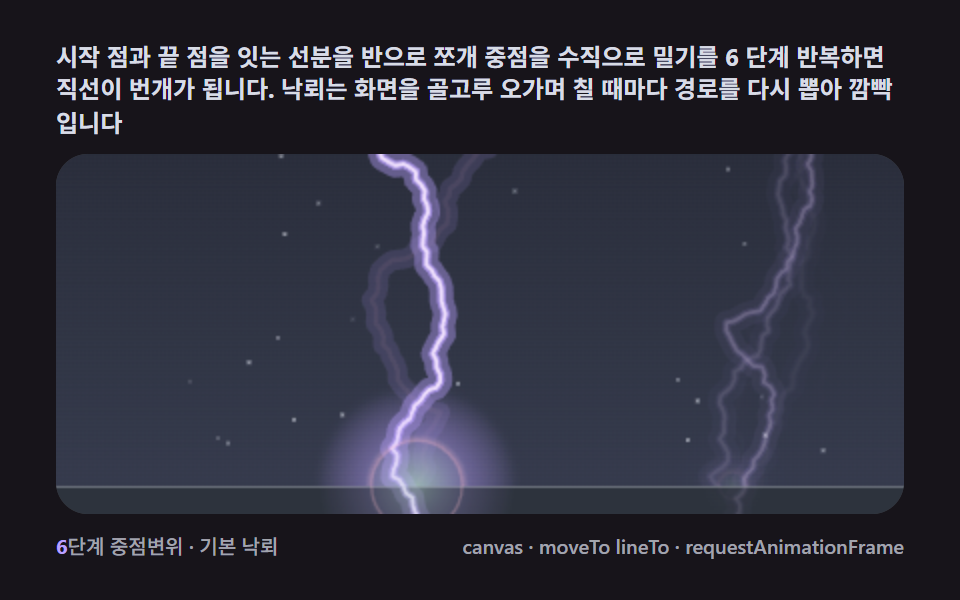 9 Lightning Effect Background Scenes, No WebGLNo library, no WebGL — a single recursive midpoint-displacement split makes lightning branches fork on their own, and th See all demos in this post
If you like this effect - similar demos
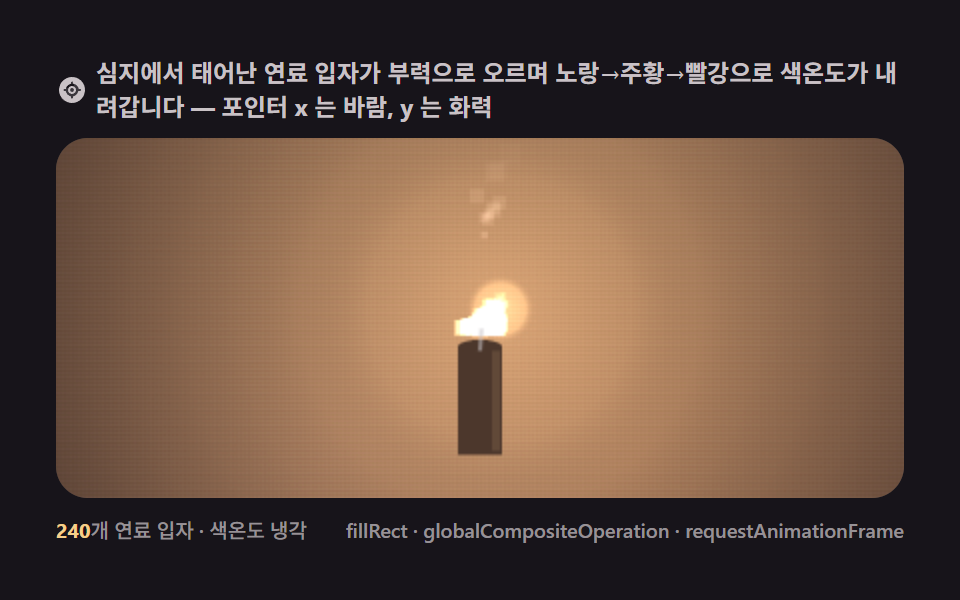 Creative UI01 One candle — the smallest fire standing on a wick9 Canvas Fire Animation Scenes, No WebGL
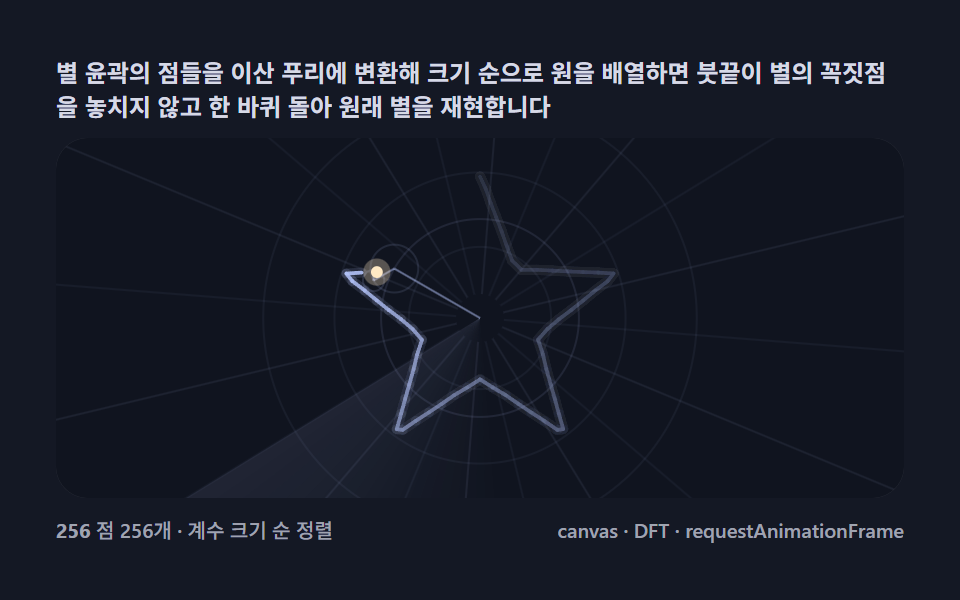 Creative UI03 Drawing a star — coefficients sorted by size, one stroke of the penFourier Epicycles, 9 Ways (No Library)
 Creative UI06 Tidal tail close-up — the fling seen through one star's trailN Body Simulation, 9 Ways (Galaxy, No Library)