02Aspect-Locked Resize From Four Corner Handles
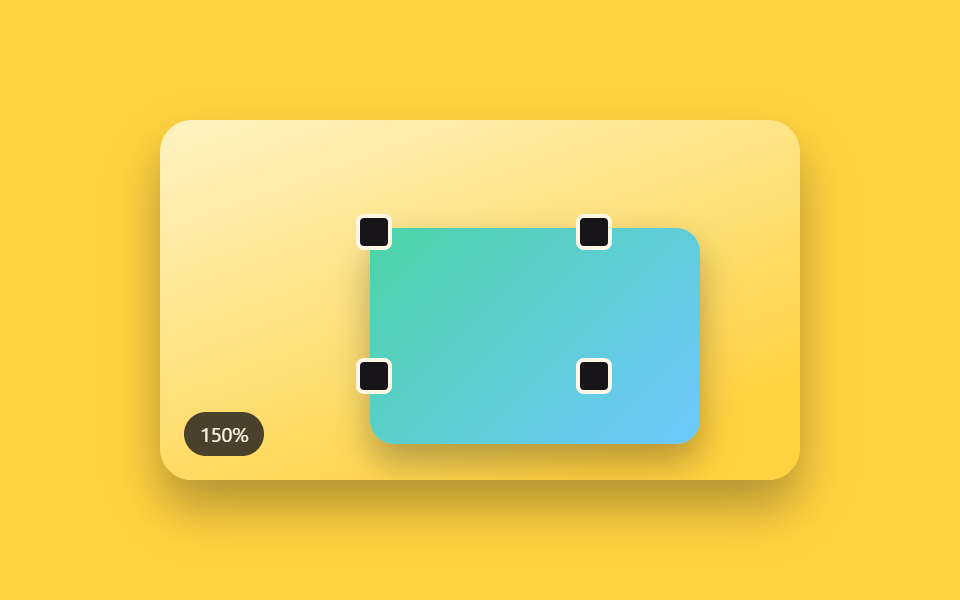
Small square handles sit on each of the selection box's four corners, and dragging one resizes the object larger or smaller while keeping its aspect ratio, anchored at the opposite corner (a different demo from 250's panel-corner-resize-grip, which resizes a layout panel's own width and height — this one is a border handle on a single canvas object, not a panel).
Best forSizing an image object on a moodboard or business-card mockup
applyScalecornerAnchorRecthopScale
<main class="stage">
<div class="scene is-demo" id="scene">
  <div class="frame" id="frame" tabindex="0" aria-label="Resize frame — drag a corner handle to scale up or down while keeping the aspect ratio">
    <div class="subjectShape"></div>
    <div class="handle handle--tl" data-corner="tl" tabindex="0" role="slider" aria-label="Top-left corner handle" aria-valuemin="50" aria-valuemax="180" aria-valuenow="100"></div>
    <div class="handle handle--tr" data-corner="tr" tabindex="0" role="slider" aria-label="Top-right corner handle" aria-valuemin="50" aria-valuemax="180" aria-valuenow="100"></div>
    <div class="handle handle--bl" data-corner="bl" tabindex="0" role="slider" aria-label="Bottom-left corner handle" aria-valuemin="50" aria-valuemax="180" aria-valuenow="100"></div>
    <div class="handle handle--br" data-corner="br" tabindex="0" role="slider" aria-label="Bottom-right corner handle" aria-valuemin="50" aria-valuemax="180" aria-valuenow="100"></div>
  </div>
  <div class="readout" id="readout" aria-hidden="true"><span id="rp">100</span>%</div>
</div>
</main>
@use "../../../../site/static/demo-tokens" as *;
// 변수 3개
$duration: $dur-enter;
$easing: $ease-out;
$color: $subject-sky;
// 계산 겹: index.html 의 applyScale() 이 앵커(대각선 반대 모서리)→포인터 거리비로 균일 scale() 을
// 만들고 transform-origin 을 앵커 좌표에 둔다 — 앵커는 어떤 배율에서도 화면에서 움직이지 않는다.
@include stage($stage-yellow);
.scene {
position: relative;
width: 320px;
height: 180px;
border-radius: $r-card;
overflow: hidden;
box-shadow: $shadow-raised;
background: linear-gradient(160deg, #fff3c4, $stage-yellow 85%);
}
.frame {
position: absolute;
top: 50%;
left: 50%;
width: 110px;
height: 72px;
margin-top: -36px;
margin-left: -55px;
&:focus-visible { outline: 2px solid $color; outline-offset: 6px; }
}
.subjectShape {
width: 100%;
height: 100%;
border-radius: $r-sm;
background: linear-gradient(135deg, $subject-mint, $subject-sky);
box-shadow: $shadow-press;
will-change: transform;
}
.handle {
position: absolute;
width: 14px;
height: 14px;
margin: -7px;
border-radius: $r-xs;
background: $subject-ink;
border: 2px solid $subject-cream;
cursor: nwse-resize;
touch-action: none;
&--tl { top: 0; left: 0; }
&--tr { top: 0; left: 100%; cursor: nesw-resize; }
&--bl { top: 100%; left: 0; cursor: nesw-resize; }
&--br { top: 100%; left: 100%; }
&.isActive, &:focus-visible { background: $color; }
}
.readout {
position: absolute;
left: $sp-3;
bottom: $sp-3;
padding: $sp-1 $sp-2;
border-radius: $r-pill;
background: rgba($subject-ink, .78);
color: $subject-cream;
font-size: 10px;
font-variant-numeric: tabular-nums;
}
@media (max-width: 340px) {
.scene { width: 220px; height: 124px; }
.frame { width: 78px; height: 52px; margin-top: -26px; margin-left: -39px; }
.handle { width: 12px; height: 12px; margin: -6px; }
.readout { font-size: 9px; }
}
@media (prefers-reduced-motion: reduce) {
// 실사용 경로 적용 — 핸들 드래그·키보드는 index.html 이 트윈 없이 즉시 반영한다.
// scss 만: 핸들 색 전환만 꺼서 잔여 트랜지션을 없앤다.
.handle { transition: none; }
}html, body {
margin: 0;
overflow: hidden;
}
.stage {
box-sizing: border-box;
min-height: 100vh;
display: grid;
place-items: center;
margin: 0;
background: #ffd23f;
font-family: -apple-system, "Segoe UI", "Noto Sans KR", sans-serif;
padding: clamp(8px, 4vw, 24px);
}
.scene {
position: relative;
width: 320px;
height: 180px;
border-radius: 16px;
overflow: hidden;
box-shadow: 0 14px 24px rgba(23, 20, 26, 0.32);
background: linear-gradient(160deg, #fff3c4, #ffd23f 85%);
}
.frame {
position: absolute;
top: 50%;
left: 50%;
width: 110px;
height: 72px;
margin-top: -36px;
margin-left: -55px;
}
.frame:focus-visible {
outline: 2px solid #6ec8ff;
outline-offset: 6px;
}
.subjectShape {
width: 100%;
height: 100%;
border-radius: 8px;
background: linear-gradient(135deg, #4cd4a6, #6ec8ff);
box-shadow: 0 6px 12px rgba(23, 20, 26, 0.32);
will-change: transform;
}
.handle {
position: absolute;
width: 14px;
height: 14px;
margin: -7px;
border-radius: 4px;
background: #17141a;
border: 2px solid #fff7e6;
cursor: nwse-resize;
touch-action: none;
}
.handle--tl {
top: 0;
left: 0;
}
.handle--tr {
top: 0;
left: 100%;
cursor: nesw-resize;
}
.handle--bl {
top: 100%;
left: 0;
cursor: nesw-resize;
}
.handle--br {
top: 100%;
left: 100%;
}
.handle.isActive, .handle:focus-visible {
background: #6ec8ff;
}
.readout {
position: absolute;
left: 12px;
bottom: 12px;
padding: 4px 8px;
border-radius: 999px;
background: rgba(23, 20, 26, 0.78);
color: #fff7e6;
font-size: 10px;
font-variant-numeric: tabular-nums;
}
@media (max-width: 340px) {
.scene {
width: 220px;
height: 124px;
}
.frame {
width: 78px;
height: 52px;
margin-top: -26px;
margin-left: -39px;
}
.handle {
width: 12px;
height: 12px;
margin: -6px;
}
.readout {
font-size: 9px;
}
}
@media (prefers-reduced-motion: reduce) {
.handle {
transition: none;
}
}(function () {
var MIN_SCALE = 0.55;
var MAX_SCALE = 1.75;
var LOOP_SEQUENCE = [1.5, 0.7, 1];
var HOP_MS = 620;
var HOLD_MS = 340;
var scene = document.getElementById('scene');
var frame = document.getElementById('frame');
var subject = frame.querySelector('.subjectShape');
var handles = [].slice.call(frame.querySelectorAll('.handle'));
var rp = document.getElementById('rp');
var reduce = window.matchMedia('(prefers-reduced-motion: reduce)').matches;
// 앵커 고정 비율 산술: 드래그하는 모서리의 대각선 반대쪽을 앵커로 고정하고, 앵커→포인터 거리의
// 비로 균일 스케일을 만든다. transform-origin 을 앵커 좌표에 두면 그 점은 화면에서 움직이지 않는다.
var ORIGIN_BY_CORNER = {
tl: '100% 100%',
tr: '0% 100%',
bl: '100% 0%',
br: '0% 0%'
};
var scale = 1;
var dragCorner = null;
var anchorX = 0, anchorY = 0, d0 = 1, s0 = 1;
var timers = [];
function clamp(v, lo, hi) { return Math.min(hi, Math.max(lo, v)); }
function easeOutCubic(t) { return 1 - Math.pow(1 - t, 3); }
function dist(x1, y1, x2, y2) { return Math.hypot(x2 - x1, y2 - y1); }
function applyScale(corner, s) {
scale = clamp(s, MIN_SCALE, MAX_SCALE);
subject.style.transformOrigin = ORIGIN_BY_CORNER[corner];
subject.style.transform = 'scale(' + scale.toFixed(3) + ')';
rp.textContent = Math.round(scale * 100);
handles.forEach(function (h) { h.setAttribute('aria-valuenow', String(Math.round(scale * 100))); });
}
function human() {
if (scene.classList.contains('is-demo')) {
scene.classList.remove('is-demo');
timers.forEach(function (t) { clearTimeout(t); clearInterval(t); });
timers = [];
}
}
function cornerAnchorRect(corner) {
var r = frame.getBoundingClientRect();
switch (corner) {
case 'tl': return { x: r.right, y: r.bottom };
case 'tr': return { x: r.left, y: r.bottom };
case 'bl': return { x: r.right, y: r.top };
default: return { x: r.left, y: r.top };
}
}
handles.forEach(function (h) {
h.addEventListener('pointerdown', function (e) {
human();
dragCorner = h.dataset.corner;
h.setPointerCapture(e.pointerId);
var a = cornerAnchorRect(dragCorner);
anchorX = a.x; anchorY = a.y;
d0 = Math.max(1, dist(anchorX, anchorY, e.clientX, e.clientY));
s0 = scale;
h.classList.add('isActive');
});
h.addEventListener('pointermove', function (e) {
if (dragCorner !== h.dataset.corner) return;
var d1 = dist(anchorX, anchorY, e.clientX, e.clientY);
applyScale(dragCorner, s0 * (d1 / d0));
});
function end(e) {
if (dragCorner !== h.dataset.corner) return;
dragCorner = null;
h.classList.remove('isActive');
try { h.releasePointerCapture(e.pointerId); } catch (err) {}
}
h.addEventListener('pointerup', end);
h.addEventListener('pointercancel', end);
h.addEventListener('keydown', function (e) {
var corner = h.dataset.corner;
if (e.key === 'ArrowUp' || e.key === 'ArrowRight') { human(); applyScale(corner, scale + 0.08); e.preventDefault(); }
else if (e.key === 'ArrowDown' || e.key === 'ArrowLeft') { human(); applyScale(corner, scale - 0.08); e.preventDefault(); }
});
});
// reduce: 실사용 경로 적용 — 핸들 pointer·keydown 은 위에서 트윈 없이 즉시 반영한다.
// 아래 hopScale()·cycle() 은 시연 게이트만 — reduce 에서는 돌지 않는다.
function hopScale(corner, target, onDone) {
var from = scale;
var start = performance.now();
function frame(now) {
if (!scene.classList.contains('is-demo')) return;
var p = clamp((now - start) / HOP_MS, 0, 1);
applyScale(corner, from + (target - from) * easeOutCubic(p));
if (p < 1) requestAnimationFrame(frame);
else if (onDone) onDone();
}
requestAnimationFrame(frame);
}
function cycle(i) {
if (!scene.classList.contains('is-demo')) return;
var target = LOOP_SEQUENCE[i % LOOP_SEQUENCE.length];
hopScale('br', target, function () {
timers.push(setTimeout(function () { cycle(i + 1); }, HOLD_MS));
});
}
if (!reduce) {
cycle(0);
}
})();import { useEffect, useRef } from 'react';
import styles from './XfCornerScale.module.scss';
const MIN_SCALE = 0.55;
const MAX_SCALE = 1.75;
const KEY_STEP = 0.08;
const HOP_MS = 560;
const HOLD_MS = 340;
const LOOP_SEQUENCE = [1.5, 0.7, 1];
const ORIGIN_BY_CORNER: Record<string, string> = {
tl: '100% 100%',
tr: '0% 100%',
bl: '100% 0%',
br: '0% 0%'
};
export default function XfCornerScale() {
const sceneRef = useRef<HTMLDivElement>(null);
useEffect(() => {
const scene0 = sceneRef.current;
if (!scene0) return undefined;
const scene = scene0;
const frame0 = scene.querySelector<HTMLDivElement>('.' + styles.frame);
const subject0 = scene.querySelector<HTMLDivElement>('#subject');
const rp0 = scene.querySelector<HTMLSpanElement>('#rp');
const handles = Array.from(scene.querySelectorAll<HTMLDivElement>('.' + styles.handle));
if (!frame0 || !subject0 || !rp0 || handles.length === 0) return undefined;
const frame = frame0;
const subject = subject0;
const rp = rp0;
const reduce = window.matchMedia('(prefers-reduced-motion: reduce)').matches;
let scale = 1;
let rafId = 0;
let timers: number[] = [];
const dragByCorner: Record<string, boolean> = {};
const originByCorner: Record<string, { x: number; y: number }> = {};
function clamp(v: number, lo: number, hi: number) { return Math.min(hi, Math.max(lo, v)); }
function easeOutCubic(t: number) { return 1 - Math.pow(1 - t, 3); }
// 앵커 고정 비율 산술: 드래그하는 모서리의 대각선 반대쪽을 앵커로 고정하고(transformOrigin),
// 앵커→포인터 거리의 비로 균일 스케일을 만든다.
function cornerAnchorRect(corner: string) {
const r = frame.getBoundingClientRect();
const ax = corner === 'tl' || corner === 'bl' ? r.right : r.left;
const ay = corner === 'tl' || corner === 'tr' ? r.bottom : r.top;
return { x: ax, y: ay };
}
function applyScale(corner: string, s: number) {
scale = clamp(s, MIN_SCALE, MAX_SCALE);
subject.style.transformOrigin = ORIGIN_BY_CORNER[corner] || '50% 50%';
subject.style.transform = 'scale(' + scale.toFixed(3) + ')';
rp.textContent = String(Math.round(scale * 100));
handles.forEach((h) => h.setAttribute('aria-valuenow', String(Math.round(scale * 100))));
}
function human() {
if (scene.classList.contains(styles['is-demo'])) {
scene.classList.remove(styles['is-demo']);
timers.forEach((t) => window.clearTimeout(t));
timers = [];
}
}
function bindHandle(handle: HTMLDivElement) {
const corner = handle.dataset.corner || 'br';
function onDown(e: PointerEvent) {
human();
dragByCorner[corner] = true;
handle.setPointerCapture(e.pointerId);
const anchor = cornerAnchorRect(corner);
originByCorner[corner] = { x: e.clientX - anchor.x, y: e.clientY - anchor.y };
}
function onMove(e: PointerEvent) {
if (!dragByCorner[corner]) return;
const anchor = cornerAnchorRect(corner);
const dx = e.clientX - anchor.x;
const dy = e.clientY - anchor.y;
const dNow = Math.hypot(dx, dy);
const d0 = Math.hypot(originByCorner[corner].x, originByCorner[corner].y);
if (d0 === 0) return;
applyScale(corner, scale * (dNow / d0));
originByCorner[corner] = { x: dx, y: dy };
}
function onUp(e: PointerEvent) {
if (!dragByCorner[corner]) return;
dragByCorner[corner] = false;
try { handle.releasePointerCapture(e.pointerId); } catch { /* 캡처가 이미 풀린 경우 */ }
}
function onKey(e: KeyboardEvent) {
if (e.key === 'ArrowUp' || e.key === 'ArrowRight') { human(); applyScale(corner, scale + KEY_STEP); e.preventDefault(); }
else if (e.key === 'ArrowDown' || e.key === 'ArrowLeft') { human(); applyScale(corner, scale - KEY_STEP); e.preventDefault(); }
}
handle.addEventListener('pointerdown', onDown);
handle.addEventListener('pointermove', onMove);
handle.addEventListener('pointerup', onUp);
handle.addEventListener('pointercancel', onUp);
handle.addEventListener('keydown', onKey);
cleanups.push(() => {
handle.removeEventListener('pointerdown', onDown);
handle.removeEventListener('pointermove', onMove);
handle.removeEventListener('pointerup', onUp);
handle.removeEventListener('pointercancel', onUp);
handle.removeEventListener('keydown', onKey);
});
}
const cleanups: Array<() => void> = [];
handles.forEach(bindHandle);
applyScale('br', 1);
// reduce: 실사용 경로 적용 — 핸들 드래그·키보드는 위에서 즉시 반영한다.
// 아래 자동 루프는 시연 게이트만 — reduce 에서는 돌지 않는다.
function hopScale(corner: string, target: number, onDone: () => void) {
const from = scale;
const start = performance.now();
function frame(now: number) {
if (!scene.classList.contains(styles['is-demo'])) return;
const p = clamp((now - start) / HOP_MS, 0, 1);
applyScale(corner, from + (target - from) * easeOutCubic(p));
if (p < 1) rafId = requestAnimationFrame(frame);
else onDone();
}
rafId = requestAnimationFrame(frame);
}
function cycle(i: number) {
if (!scene.classList.contains(styles['is-demo'])) return;
const target = LOOP_SEQUENCE[i % LOOP_SEQUENCE.length];
hopScale('br', target, () => {
timers.push(window.setTimeout(() => cycle(i + 1), HOLD_MS));
});
}
if (!reduce) {
cycle(0);
}
return () => {
cleanups.forEach((fn) => fn());
timers.forEach((t) => window.clearTimeout(t));
cancelAnimationFrame(rafId);
};
}, []);
return (
<main className={styles.stage}>
<div className={styles.scene + ' ' + styles['is-demo']} ref={sceneRef}>
<div className={styles.frame} tabIndex={0} aria-label="크기 조절 프레임, 모서리 핸들을 드래그">
<div id="subject" className={styles.subjectShape}></div>
<div className={styles.handle} data-corner="tl" role="slider" tabIndex={0} aria-label="왼쪽 위 모서리 핸들" aria-valuemin={50} aria-valuemax={180} aria-valuenow={100}></div>
<div className={styles.handle} data-corner="tr" role="slider" tabIndex={0} aria-label="오른쪽 위 모서리 핸들" aria-valuemin={50} aria-valuemax={180} aria-valuenow={100}></div>
<div className={styles.handle} data-corner="bl" role="slider" tabIndex={0} aria-label="왼쪽 아래 모서리 핸들" aria-valuemin={50} aria-valuemax={180} aria-valuenow={100}></div>
<div className={styles.handle} data-corner="br" role="slider" tabIndex={0} aria-label="오른쪽 아래 모서리 핸들" aria-valuemin={50} aria-valuemax={180} aria-valuenow={100}></div>
</div>
<div className={styles.readout} aria-hidden="true"><span id="rp">100</span>%</div>
</div>
</main>
);
}02 Aspect-Locked Resize From Four Corner Handles — Measured area 14.389% · moving frames 16/23Original by GODRICH · SCSS and React ship in the zip · Resize Handle UI — 9 Free-Transform Patterns
The post this demo lives in
 Resize Handle UI — 9 Free-Transform PatternsAmong nine resize handle patterns, one spins an object as its rotate handle arcs, one snaps scattered icons into a grid See all demos in this post