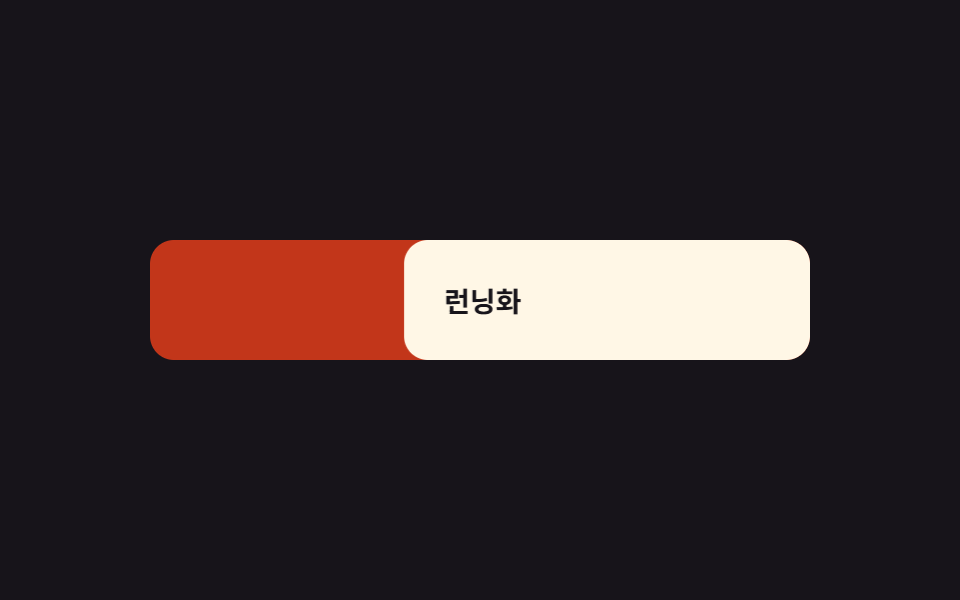
05Rubber-band drag close — a drag distance value that meets growing resistance past a threshold
As the drag distance value increases, the panel's movement follows a resistance curve where the ratio of travel shrinks, and once that distance value crosses a threshold the remaining distance value collapses at once to the closed position.
Best forA touchscreen cart panel, a mobile sheet
rubberbandTHRESHOLDMAX_PULL
<main class="stage">
<div class="cswr is-demo" id="cswr">
  <ul class="cswr__list">
    <li class="cswr__row" id="cswrRow">
      <span class="cswr__trash" aria-hidden="true">
        <svg viewBox="0 0 256 256" width="18" height="18"><g fill="currentColor"><path d="M216 48h-40v-8a24 24 0 0 0-24-24h-48a24 24 0 0 0-24 24v8H40a8 8 0 0 0 0 16h8v144a16 16 0 0 0 16 16h128a16 16 0 0 0 16-16V64h8a8 8 0 0 0 0-16ZM96 40a8 8 0 0 1 8-8h48a8 8 0 0 1 8 8v8H96Zm96 168H64V64h128Zm-80-104v64a8 8 0 0 1-16 0v-64a8 8 0 0 1 16 0Zm48 0v64a8 8 0 0 1-16 0v-64a8 8 0 0 1 16 0Z"/></g></svg>
      </span>
      <span class="cswr__card" id="cswrCard">
        <span class="cswr__name">Running Shoes</span>
        <span class="cswr__price">$41</span>
      </span>
    </li>
  </ul>
</div>
</main>
@use "../../../../site/static/demo-tokens" as *;
// 계산 겹: 드래그 거리가 임계값(THRESHOLD)을 넘으면 저항 함수 rubberband() 가 지수 감쇠로
// 이동량을 압축한다(index.html) — 당길수록 화면 반영 비율이 줄어드는 고무줄 공식.
$duration: $dur-quick;
$easing: $ease-out;
$color: $error;
@include stage($stage-ink);
.stage { position: relative; overflow: hidden; }
.cswr {
width: min(330px, 84vw);
}
.cswr__list {
list-style: none;
margin: 0;
padding: 0;
}
.cswr__row {
position: relative;
border-radius: $r-control;
overflow: hidden;
--trash-opacity: 0;
}
.cswr__trash {
position: absolute;
inset: 0;
display: flex;
align-items: center;
justify-content: center;
background: $color;
color: $subject-cream;
opacity: var(--trash-opacity);
}
.cswr__card {
position: relative;
display: flex;
align-items: center;
justify-content: space-between;
padding: $sp-5;
border-radius: $r-control;
background: $subject-cream;
touch-action: none;
cursor: grab;
will-change: transform;
}
.cswr__name {
color: $subject-ink;
font-weight: 700;
font-size: 14px;
}
.cswr__price {
color: $subject-ink;
font-weight: 600;
font-size: 13px;
}
@media (max-width: 340px) {
.cswr { width: min(220px, 70vw); }
.cswr__card { padding: $sp-3; }
}
@media (prefers-reduced-motion: reduce) {
.cswr__card { transition: none !important; }
}html, body {
margin: 0;
overflow: hidden;
}
.stage {
box-sizing: border-box;
min-height: 100vh;
display: grid;
place-items: center;
margin: 0;
background: #17141a;
font-family: -apple-system, "Segoe UI", "Noto Sans KR", sans-serif;
padding: clamp(8px, 4vw, 24px);
}
.stage {
position: relative;
overflow: hidden;
}
.cswr {
width: min(330px, 84vw);
}
.cswr__list {
list-style: none;
margin: 0;
padding: 0;
}
.cswr__row {
position: relative;
border-radius: 12px;
overflow: hidden;
--trash-opacity: 0;
}
.cswr__trash {
position: absolute;
inset: 0;
display: flex;
align-items: center;
justify-content: center;
background: #c2361a;
color: #fff7e6;
opacity: var(--trash-opacity);
}
.cswr__card {
position: relative;
display: flex;
align-items: center;
justify-content: space-between;
padding: 20px;
border-radius: 12px;
background: #fff7e6;
touch-action: none;
cursor: grab;
will-change: transform;
}
.cswr__name {
color: #17141a;
font-weight: 700;
font-size: 14px;
}
.cswr__price {
color: #17141a;
font-weight: 600;
font-size: 13px;
}
@media (max-width: 340px) {
.cswr {
width: min(220px, 70vw);
}
.cswr__card {
padding: 12px;
}
}
@media (prefers-reduced-motion: reduce) {
.cswr__card {
transition: none !important;
}
}(function () {
var root = document.getElementById('cswr');
var card = document.getElementById('cswrCard');
var row = document.getElementById('cswrRow');
// 계산 겹: 드래그 거리가 임계값을 넘으면 저항 함수(rubberband())로 이동량을 압축한다 —
// 당길수록 화면에 반영되는 비율이 줄어드는 진짜 고무줄 공식(iOS 오버스크롤과 같은 계열),
// 단순 clamp 가 아니다.
var THRESHOLD = 90;
var MAX_PULL = 140;
function rubberband(dx) {
var sign = dx < 0 ? -1 : 1;
var abs = Math.abs(dx);
if (abs <= THRESHOLD) { return dx; }
var over = abs - THRESHOLD;
var compressed = MAX_PULL * (1 - Math.exp(-over / MAX_PULL));
return sign * (THRESHOLD + compressed);
}
var dragging = false;
var startX = 0;
var current = 0;
function apply(dx) {
var x = rubberband(dx);
card.style.transform = 'translateX(' + x.toFixed(2) + 'px)';
var trashOpacity = Math.min(1, Math.abs(x) / THRESHOLD);
row.style.setProperty('--trash-opacity', trashOpacity.toFixed(3));
}
function onDown(clientX) {
dragging = true;
startX = clientX - current;
root.classList.remove('is-demo');
stopAutoplay();
}
function onMove(clientX) {
if (!dragging) { return; }
current = clientX - startX;
apply(current);
}
function onUp() {
if (!dragging) { return; }
dragging = false;
if (Math.abs(current) > THRESHOLD * 1.3) {
dismiss(current < 0 ? -1 : 1);
} else {
current = 0;
card.style.transition = 'transform ' + DUR + 'ms';
apply(0);
setTimeout(function () { card.style.transition = ''; }, DUR);
}
}
var DUR = 260;
function dismiss(dir) {
card.style.transition = 'transform 320ms ease-in, opacity 320ms ease-in';
card.style.transform = 'translateX(' + (dir * 420) + 'px)';
card.style.opacity = '0';
setTimeout(function () {
card.style.transition = '';
card.style.transform = 'translateX(0)';
card.style.opacity = '1';
current = 0;
row.style.setProperty('--trash-opacity', '0');
}, 420);
}
card.addEventListener('pointerdown', function (e) { onDown(e.clientX); });
window.addEventListener('pointermove', function (e) { onMove(e.clientX); });
window.addEventListener('pointerup', onUp);
var autoplayTimer = null;
function stopAutoplay() {
if (autoplayTimer) { clearInterval(autoplayTimer); autoplayTimer = null; }
}
function autoStep() {
var t0 = performance.now();
var DUR_MS = 900;
function anim(now) {
var p = Math.min(1, (now - t0) / DUR_MS);
var dx = p < 0.7 ? (p / 0.7) * 270 : 270 * (1 - (p - 0.7) / 0.3);
apply(dx);
if (p < 1) { requestAnimationFrame(anim); } else { apply(0); }
}
requestAnimationFrame(anim);
}
var reduce = window.matchMedia('(prefers-reduced-motion: reduce)').matches;
if (!reduce) {
autoStep();
autoplayTimer = setInterval(autoStep, 1500);
}
})();import { useEffect, useRef } from "react";
import type { CSSProperties } from "react";
import styles from "./CartDrawerSwipeDismissRubberband.module.scss";
export type CartDrawerSwipeDismissRubberbandProps = {
duration?: number;
color?: string;
};
// 계산 겹: 드래그 거리가 임계값을 넘으면 저항 함수(rubberband())로 이동량을 압축한다 —
// 당길수록 화면에 반영되는 비율이 줄어드는 진짜 고무줄 공식(iOS 오버스크롤과 같은 계열),
// 단순 clamp 가 아니다.
const THRESHOLD = 90;
const MAX_PULL = 140;
function rubberband(dx: number): number {
const sign = dx < 0 ? -1 : 1;
const abs = Math.abs(dx);
if (abs <= THRESHOLD) return dx;
const over = abs - THRESHOLD;
const compressed = MAX_PULL * (1 - Math.exp(-over / MAX_PULL));
return sign * (THRESHOLD + compressed);
}
const DUR = 260;
export default function CartDrawerSwipeDismissRubberband({
color = "#c2361a",
}: CartDrawerSwipeDismissRubberbandProps) {
const rootRef = useRef<HTMLDivElement | null>(null);
const cardRef = useRef<HTMLSpanElement | null>(null);
const rowRef = useRef<HTMLLIElement | null>(null);
const draggingRef = useRef(false);
const startXRef = useRef(0);
const currentRef = useRef(0);
const timerRef = useRef<ReturnType<typeof setInterval> | null>(null);
useEffect(() => {
function apply(dx: number) {
const card = cardRef.current;
const row = rowRef.current;
if (!card || !row) return;
const x = rubberband(dx);
card.style.transform = `translateX(${x.toFixed(2)}px)`;
const trashOpacity = Math.min(1, Math.abs(x) / THRESHOLD);
row.style.setProperty("--trash-opacity", trashOpacity.toFixed(3));
}
function stopAutoplay() {
if (timerRef.current) {
clearInterval(timerRef.current);
timerRef.current = null;
}
}
function dismiss(dir: number) {
const card = cardRef.current;
const row = rowRef.current;
if (!card || !row) return;
card.style.transition = "transform 320ms ease-in, opacity 320ms ease-in";
card.style.transform = `translateX(${dir * 420}px)`;
card.style.opacity = "0";
setTimeout(() => {
card.style.transition = "";
card.style.transform = "translateX(0)";
card.style.opacity = "1";
currentRef.current = 0;
row.style.setProperty("--trash-opacity", "0");
}, 420);
}
function onDown(clientX: number) {
draggingRef.current = true;
startXRef.current = clientX - (currentRef.current ?? 0);
rootRef.current?.classList.remove(styles.isDemo);
stopAutoplay();
}
function onMove(clientX: number) {
if (!draggingRef.current) return;
currentRef.current = clientX - (startXRef.current ?? 0);
apply(currentRef.current ?? 0);
}
function onUp() {
if (!draggingRef.current) return;
draggingRef.current = false;
const card = cardRef.current;
const cur = currentRef.current ?? 0;
if (Math.abs(cur) > THRESHOLD * 1.3) {
dismiss(cur < 0 ? -1 : 1);
} else {
currentRef.current = 0;
if (card) {
card.style.transition = `transform ${DUR}ms`;
apply(0);
setTimeout(() => {
card.style.transition = "";
}, DUR);
}
}
}
const onPointerDown = (e: PointerEvent) => onDown(e.clientX);
const onPointerMove = (e: PointerEvent) => onMove(e.clientX);
cardRef.current?.addEventListener("pointerdown", onPointerDown);
window.addEventListener("pointermove", onPointerMove);
window.addEventListener("pointerup", onUp);
function autoStep() {
const t0 = performance.now();
const DUR_MS = 900;
function anim(now: number) {
const p = Math.min(1, (now - t0) / DUR_MS);
const dx = p < 0.7 ? (p / 0.7) * 270 : 270 * (1 - (p - 0.7) / 0.3);
apply(dx);
if (p < 1) {
requestAnimationFrame(anim);
} else {
apply(0);
}
}
requestAnimationFrame(anim);
}
const reduce = window.matchMedia("(prefers-reduced-motion: reduce)").matches;
if (!reduce) {
autoStep();
timerRef.current = setInterval(autoStep, 1500);
}
return () => {
stopAutoplay();
cardRef.current?.removeEventListener("pointerdown", onPointerDown);
window.removeEventListener("pointermove", onPointerMove);
window.removeEventListener("pointerup", onUp);
};
}, []);
return (
<div ref={rootRef} className={`${styles.stage} ${styles.isDemo}`} style={{ "--color": color } as CSSProperties}>
<ul className={styles.list}>
<li ref={rowRef} className={styles.row}>
<span className={styles.trash} aria-hidden="true">
<svg viewBox="0 0 256 256" width="18" height="18"><g fill="currentColor"><path d="M216 48h-40v-8a24 24 0 0 0-24-24h-48a24 24 0 0 0-24 24v8H40a8 8 0 0 0 0 16h8v144a16 16 0 0 0 16 16h128a16 16 0 0 0 16-16V64h8a8 8 0 0 0 0-16ZM96 40a8 8 0 0 1 8-8h48a8 8 0 0 1 8 8v8H96Zm96 168H64V64h128Zm-80-104v64a8 8 0 0 1-16 0v-64a8 8 0 0 1 16 0Zm48 0v64a8 8 0 0 1-16 0v-64a8 8 0 0 1 16 0Z"/></g></svg>
</span>
<span ref={cardRef} className={styles.card}>
<span className={styles.name}>런닝화</span>
<span className={styles.price}>$41</span>
</span>
</li>
</ul>
</div>
);
}05 Rubber-band drag close — a drag distance value that meets growing resistance past a threshold — Measured area 8.522% · moving frames 16/23Original by GODRICH · SCSS and React ship in the zip · Cart Drawer UI Patterns: 9 Motion Techniques
The post this demo lives in
 Cart Drawer UI Patterns: 9 Motion TechniquesOne panel overshoots its open position before a spring curve settles it, one drag distance meets growing resistance past See all demos in this post
If you like this effect - similar demos
 Transitions04 Swipe Item That Dismisses Past a Drag-distance ValueNotification Animation CSS: 9 Panel UI Patterns
 Transitions07 Swipe-follow toggle — while a horizontal drag-distance value grows, the highlight's position value follows toward the side tab by that same ratioCSS Bottom Navigation Bar: 9 Transition Patterns
 Transitions02 Carousel That Snaps Back Like a Rubber Band at Its EdgesCarousel Slider UI Design — 9 Transitions