04Sparkline Loading Whose Rows Pulse in a Wave
Each list row starts with a flat dashed placeholder, and once values arrive a wave delay computed from the row index reveals the real sparklines from top to bottom.
Best forA place in a list of items or metrics that previews each row's trend
--lengetTotalLengthanimationDelay
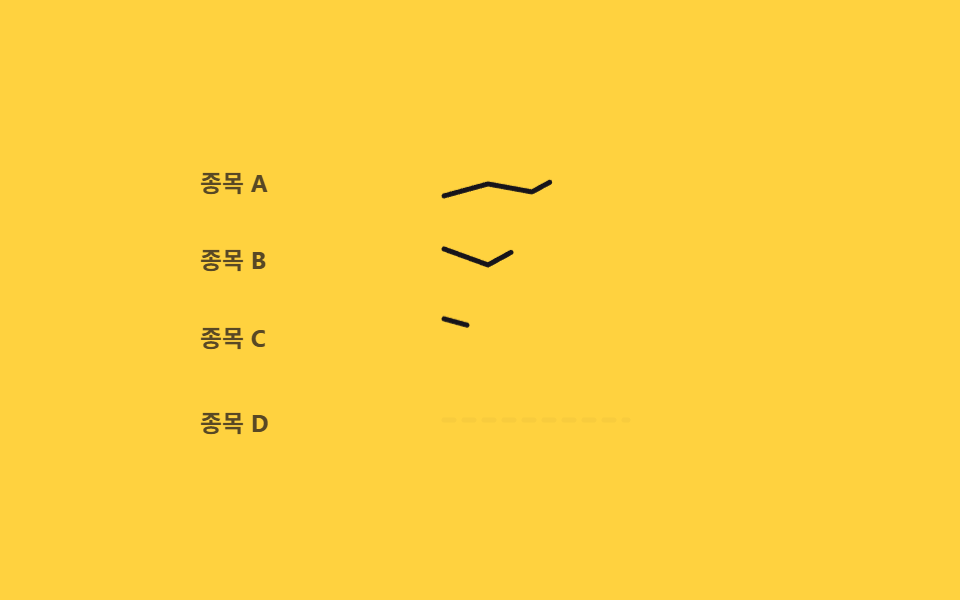
<main class="stage">
<ul class="cw is-demo" id="cw" aria-busy="true">
  <li class="cw__row" data-i="0">
    <span class="cw__label">Stock A</span>
    <svg class="cw__spark" viewBox="0 0 100 28" role="img" aria-label="Stock A trend">
      <path class="cw__flat" d="M4,14 L96,14" />
      <path class="cw__real" id="cwReal0" d="M4,22 L26,16 L48,20 L70,8 L96,12" />
    </svg>
  </li>
  <li class="cw__row" data-i="1">
    <span class="cw__label">Stock B</span>
    <svg class="cw__spark" viewBox="0 0 100 28" role="img" aria-label="Stock B trend">
      <path class="cw__flat" d="M4,14 L96,14" />
      <path class="cw__real" id="cwReal1" d="M4,10 L26,18 L48,6 L70,16 L96,4" />
    </svg>
  </li>
  <li class="cw__row" data-i="2">
    <span class="cw__label">Stock C</span>
    <svg class="cw__spark" viewBox="0 0 100 28" role="img" aria-label="Stock C trend">
      <path class="cw__flat" d="M4,14 L96,14" />
      <path class="cw__real" id="cwReal2" d="M4,6 L26,12 L48,10 L70,20 L96,18" />
    </svg>
  </li>
  <li class="cw__row" data-i="3">
    <span class="cw__label">Stock D</span>
    <svg class="cw__spark" viewBox="0 0 100 28" role="img" aria-label="Stock D trend">
      <path class="cw__flat" d="M4,14 L96,14" />
      <path class="cw__real" id="cwReal3" d="M4,20 L26,8 L48,14 L70,10 L96,22" />
    </svg>
  </li>
</ul>
</main>@use "../../../../site/static/demo-tokens" as *;
// 변수 3개
$duration: $dur-loop;
$easing: $ease-out;
$color: $subject-ink;
@include stage($stage-yellow);
.cw {
width: min(280px, 86vw);
list-style: none;
margin: 0;
padding: 0;
display: flex;
flex-direction: column;
gap: $sp-3;
cursor: pointer;
border-radius: $r-card;
&:focus-visible { outline: 2px solid $subject-ink; outline-offset: 4px; }
}
.cw__row { display: flex; align-items: center; gap: $sp-3; animation: cwRowPop $duration $easing infinite; }
.cw__label { width: 44px; flex: 0 0 auto; font-size: 12px; font-weight: 700; color: rgba($subject-ink, .72); }
.cw__spark { width: 100%; height: 28px; overflow: visible; }
.cw__flat {
fill: none; stroke: rgba($subject-ink, .26); stroke-width: 2.5; stroke-dasharray: 5 5; stroke-linecap: round;
animation: cwFlatFade $duration $easing infinite;
}
.cw__real { fill: none; stroke: $color; stroke-width: 2.5; stroke-linecap: round; stroke-linejoin: round; animation: cwDraw $duration $easing infinite; }
@keyframes cwFlatFade {
0% { opacity: 1; }
10% { opacity: 1; }
18% { opacity: 0; }
86% { opacity: 0; }
96% { opacity: 1; }
100% { opacity: 1; }
}
// 계산 겹은 JS 가 담당(줄 길이 var(--len)), 여기는 같은 구간을 모든 행이 공유한다
@keyframes cwDraw {
0% { stroke-dashoffset: var(--len); }
18% { stroke-dashoffset: var(--len); }
46% { stroke-dashoffset: 0; }
86% { stroke-dashoffset: 0; }
100% { stroke-dashoffset: var(--len); }
}
// 행이 실제 선으로 바뀌는 순간 살짝 튀어오르는 물결감 (transform 만)
@keyframes cwRowPop {
0% { transform: translateY(0); }
16% { transform: translateY(0); }
22% { transform: translateY(-3px); }
30% { transform: translateY(0); }
100% { transform: translateY(0); }
}
@media (max-width: 340px) {
.cw { width: min(230px, 84vw); gap: $sp-2; }
.cw__label { width: 36px; font-size: 11px; }
}
@media (prefers-reduced-motion: reduce) {
// 실사용 경로 적용: 자동 루프를 멈추고 완성된 실제 선만 보인다
.cw__row { animation: none; transform: none; }
.cw__flat { animation: none; opacity: 0; }
.cw__real { animation: none; stroke-dashoffset: 0; }
}html, body {
margin: 0;
overflow: hidden;
}
.stage {
box-sizing: border-box;
min-height: 100vh;
display: grid;
place-items: center;
margin: 0;
background: #ffd23f;
font-family: -apple-system, "Segoe UI", "Noto Sans KR", sans-serif;
padding: clamp(8px, 4vw, 24px);
}
.cw {
width: min(280px, 86vw);
list-style: none;
margin: 0;
padding: 0;
display: flex;
flex-direction: column;
gap: 12px;
cursor: pointer;
border-radius: 16px;
}
.cw:focus-visible {
outline: 2px solid #17141a;
outline-offset: 4px;
}
.cw__row {
display: flex;
align-items: center;
gap: 12px;
animation: cwRowPop 2s ease-out infinite;
}
.cw__label {
width: 44px;
flex: 0 0 auto;
font-size: 12px;
font-weight: 700;
color: rgba(23, 20, 26, 0.72);
}
.cw__spark {
width: 100%;
height: 28px;
overflow: visible;
}
.cw__flat {
fill: none;
stroke: rgba(23, 20, 26, 0.26);
stroke-width: 2.5;
stroke-dasharray: 5 5;
stroke-linecap: round;
animation: cwFlatFade 2s ease-out infinite;
}
.cw__real {
fill: none;
stroke: #17141a;
stroke-width: 2.5;
stroke-linecap: round;
stroke-linejoin: round;
animation: cwDraw 2s ease-out infinite;
}
@keyframes cwFlatFade {
0% {
opacity: 1;
}
10% {
opacity: 1;
}
18% {
opacity: 0;
}
86% {
opacity: 0;
}
96% {
opacity: 1;
}
100% {
opacity: 1;
}
}
@keyframes cwDraw {
0% {
stroke-dashoffset: var(--len);
}
18% {
stroke-dashoffset: var(--len);
}
46% {
stroke-dashoffset: 0;
}
86% {
stroke-dashoffset: 0;
}
100% {
stroke-dashoffset: var(--len);
}
}
@keyframes cwRowPop {
0% {
transform: translateY(0);
}
16% {
transform: translateY(0);
}
22% {
transform: translateY(-3px);
}
30% {
transform: translateY(0);
}
100% {
transform: translateY(0);
}
}
@media (max-width: 340px) {
.cw {
width: min(230px, 84vw);
gap: 8px;
}
.cw__label {
width: 36px;
font-size: 11px;
}
}
@media (prefers-reduced-motion: reduce) {
.cw__row {
animation: none;
transform: none;
}
.cw__flat {
animation: none;
opacity: 0;
}
.cw__real {
animation: none;
stroke-dashoffset: 0;
}
}(function () {
var ROW_WAVE_MS = 90;
var list = document.getElementById('cw');
var reals = [0, 1, 2, 3].map(function (i) { return document.getElementById('cwReal' + i); });
// 계산 겹: 행 번호(i)로 물결 지연을 계산한다 — 위에서 아래로 갈수록 늦게 실제 선이 드러난다
function rowDelay(i) { return i * ROW_WAVE_MS; }
reals.forEach(function (real, i) {
var len = Math.round(real.getTotalLength());
var row = real.closest('.cw__row');
var flat = row.querySelector('.cw__flat');
real.style.setProperty('--len', String(len));
real.style.strokeDasharray = String(len);
real.style.strokeDashoffset = String(len);
real.style.animationDelay = rowDelay(i) + 'ms';
flat.style.animationDelay = rowDelay(i) + 'ms';
row.style.animationDelay = rowDelay(i) + 'ms';
});
function human() {
list.classList.remove('is-demo');
list.setAttribute('aria-busy', 'true');
reals.forEach(function (real, i) {
var len = parseInt(real.style.getPropertyValue('--len'), 10);
real.getAnimations().forEach(function (a) { a.cancel(); });
real.style.animation = 'none';
real.style.strokeDashoffset = String(len);
window.setTimeout(function () {
real.animate(
[{ strokeDashoffset: len }, { strokeDashoffset: 0 }],
{ duration: 340, easing: 'ease-out', fill: 'forwards' }
);
}, rowDelay(i));
});
window.setTimeout(function () { list.setAttribute('aria-busy', 'false'); }, rowDelay(reals.length - 1) + 400);
}
list.addEventListener('click', human);
list.addEventListener('keydown', function (e) {
if (e.key === 'Enter' || e.key === ' ') { e.preventDefault(); human(); }
});
list.setAttribute('tabindex', '0');
list.setAttribute('role', 'button');
list.setAttribute('aria-label', 'Reload sparklines');
}());import { useEffect, useRef } from 'react';
import styles from './ChartLoadingSparklineRowWave.module.scss';
const ROW_WAVE_MS = 90;
const LABELS = ['종목 A', '종목 B', '종목 C', '종목 D'];
// vanilla 와 동일하게 완성 리터럴로 둔다 — 문구.json 조각 분리(BD12 잔여한글) 방지
const TREND_LABELS = ['종목 A 추이', '종목 B 추이', '종목 C 추이', '종목 D 추이'];
const PATHS = [
'M4,22 L26,16 L48,20 L70,8 L96,12',
'M4,10 L26,18 L48,6 L70,16 L96,4',
'M4,6 L26,12 L48,10 L70,20 L96,18',
'M4,20 L26,8 L48,14 L70,10 L96,22'
];
export default function ChartLoadingSparklineRowWave() {
const listRef = useRef<HTMLUListElement>(null);
const rowRefs = useRef<HTMLLIElement[]>([]);
const realRefs = useRef<SVGPathElement[]>([]);
const flatRefs = useRef<SVGPathElement[]>([]);
useEffect(() => {
const list = listRef.current;
if (!list) return undefined;
const reals = realRefs.current!;
const flats = flatRefs.current!;
const rows = rowRefs.current!;
if (!reals || !flats || !rows || reals.length !== PATHS.length) return undefined;
// 계산 겹: 행 번호(i)로 물결 지연을 계산한다 — 위에서 아래로 갈수록 늦게 실제 선이 드러난다
function rowDelay(i: number) { return i * ROW_WAVE_MS; }
reals.forEach((real, i) => {
const len = Math.round(real.getTotalLength());
real.style.setProperty('--len', String(len));
real.style.strokeDasharray = String(len);
real.style.strokeDashoffset = String(len);
real.style.animationDelay = rowDelay(i) + 'ms';
flats[i].style.animationDelay = rowDelay(i) + 'ms';
rows[i].style.animationDelay = rowDelay(i) + 'ms';
});
const timers: number[] = [];
function human() {
list!.classList.remove(styles['is-demo']);
list!.setAttribute('aria-busy', 'true');
reals.forEach((real, i) => {
const len = parseInt(real.style.getPropertyValue('--len'), 10);
real.getAnimations().forEach((a) => a.cancel());
real.style.animation = 'none';
real.style.strokeDashoffset = String(len);
timers.push(window.setTimeout(() => {
real.animate(
[{ strokeDashoffset: len }, { strokeDashoffset: 0 }],
{ duration: 340, easing: 'ease-out', fill: 'forwards' }
);
}, rowDelay(i)));
});
timers.push(window.setTimeout(() => { list!.setAttribute('aria-busy', 'false'); }, rowDelay(reals.length - 1) + 400));
}
function onClick() { human(); }
function onKey(e: KeyboardEvent) { if (e.key === 'Enter' || e.key === ' ') { e.preventDefault(); human(); } }
list.addEventListener('click', onClick);
list.addEventListener('keydown', onKey);
return () => {
list.removeEventListener('click', onClick);
list.removeEventListener('keydown', onKey);
timers.forEach((id) => window.clearTimeout(id));
};
}, []);
return (
<main className={styles.stage}>
<ul
className={styles.cw + ' ' + styles['is-demo']}
ref={listRef}
aria-busy="true"
tabIndex={0}
role="button"
aria-label="스파크라인 다시 불러오기"
>
{LABELS.map((label, i) => (
<li
className={styles.cwRow}
data-i={i}
key={i}
ref={(el: HTMLLIElement | null) => { if (el) rowRefs.current![i] = el; }}
>
<span className={styles.cwLabel}>{label}</span>
<svg className={styles.cwSpark} viewBox="0 0 100 28" role="img" aria-label={TREND_LABELS[i]}>
<path
className={styles.cwFlat}
d="M4,14 L96,14"
ref={(el: SVGPathElement | null) => { if (el) flatRefs.current![i] = el; }}
/>
<path
className={styles.cwReal}
d={PATHS[i]}
ref={(el: SVGPathElement | null) => { if (el) realRefs.current![i] = el; }}
/>
</svg>
</li>
))}
</ul>
</main>
);
}04 Sparkline Loading Whose Rows Pulse in a Wave — Measured area 2.563% · moving frames 16/23Original by GODRICH · SCSS and React ship in the zip · Chart Loading Animation — 9 Computed Patterns
The post this demo lives in
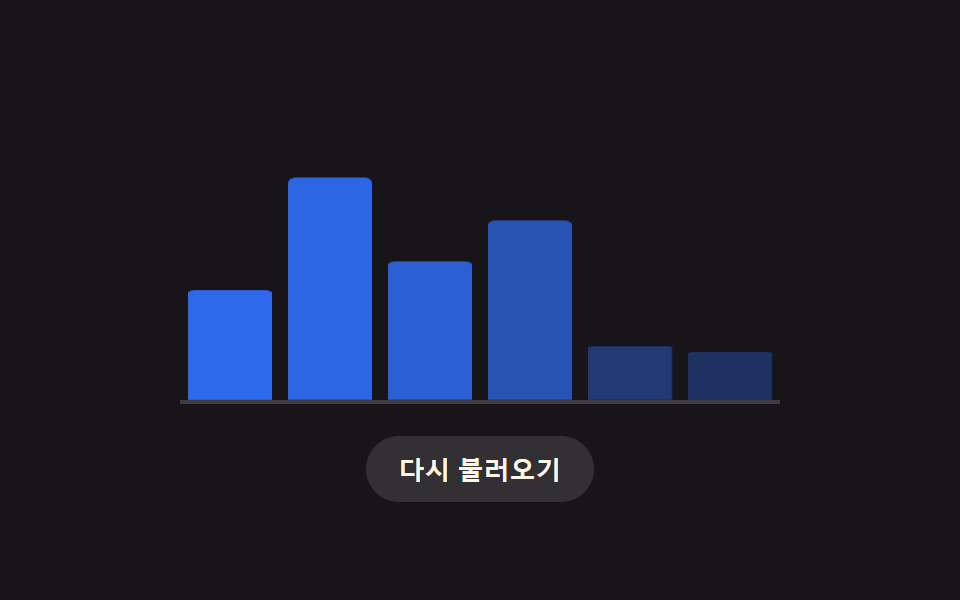 Chart Loading Animation — 9 Computed PatternsAmong nine chart loading animation patterns, a bar's delay comes from its column, a heatmap cell's from diagonal distanc See all demos in this post
If you like this effect - similar demos
 Loaders03 Button Whose Spinner Morphs Into a Success CheckmarkLoading Button UI — 9 States, Spinner to Success
 Loaders02 Orb Pulse Whose Breathing Widens With a Growing Wait-time ValueAI Loading Animation: 9 Patterns by One Value
 Loaders03 QR Code Whose Pulse Ring Narrows by the Time Left ValueQR Code Loading Animation — 9 CSS Expiry Patterns