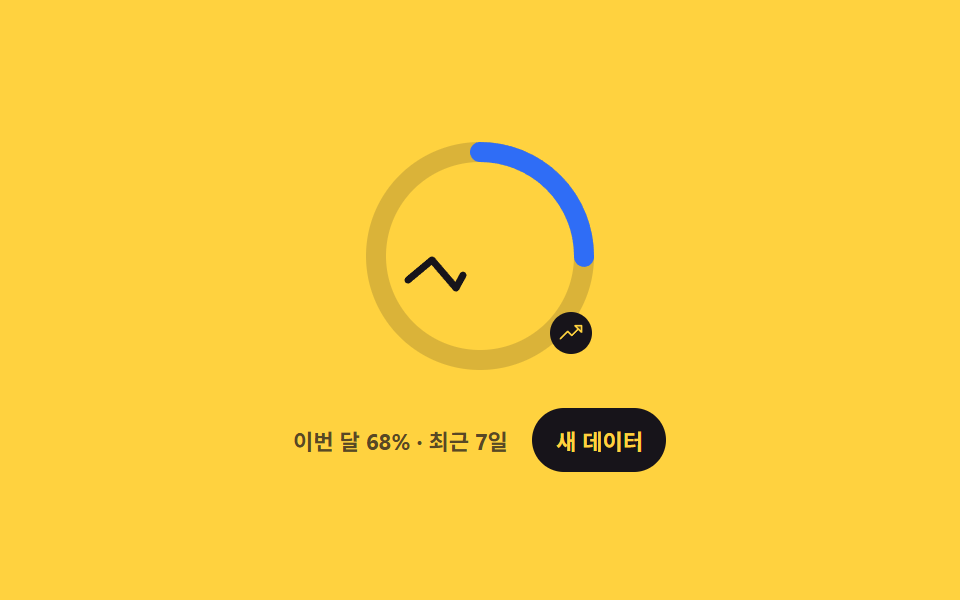
06Ring with inner sparkline
While the ring winds this month's progress, a 7-day line actually draws itself left to right inside it, and "new data" reshapes the line.
Best forA revenue or traffic card that needs one total plus the recent trend in the same footprint
polylinepathLengthclick
<main class="stage">
  <div class="sp is-demo">
    <div class="sp__dial">
      <svg class="sp__svg" viewBox="0 0 128 128" width="128" height="128" role="img" aria-label="This month progress ring with a 7-day line">
        <g class="sp__rings">
          <circle class="sp__track" cx="64" cy="64" r="52"/>
          <circle class="sp__ring" cx="64" cy="64" r="52"/>
        </g>
        <!-- pathLength="100" 을 주면 실제 좌표가 어떻든 길이를 100 으로 셀 수 있다 -->
        <polyline class="sp__line" pathLength="100" points="28,76 40,66 52,80 64,58 76,68 88,50 100,60"/>
      </svg>
      <span class="sp__badge" aria-hidden="true"><svg viewBox="0 0 256 256" width="13" height="13"><g fill="currentColor"><path d="M232 56v64l-64-64Z" opacity=".2"/><path d="M232 48h-64a8 8 0 0 0-5.66 13.66L188.69 88L136 140.69l-34.34-34.35a8 8 0 0 0-11.32 0l-72 72a8 8 0 0 0 11.32 11.32L96 123.31l34.34 34.35a8 8 0 0 0 11.32 0L200 99.31l26.34 26.35A8 8 0 0 0 240 120V56a8 8 0 0 0-8-8m-8 52.69L187.31 64H224Z"/></g></svg></span>
    </div>
    <div class="sp__row">
      <span class="sp__cap">68% this month · last 7 days</span>
      <button class="sp__btn" type="button">New data</button>
    </div>
  </div>
</main>
@use "../../../../site/static/demo-tokens" as *;
$duration: $dur-loop;
$easing: $ease-spring;
$color: $stage-ink;
@include stage($stage-yellow);
.sp {
box-sizing: border-box;
display: grid;
justify-items: center;
gap: $sp-3;
color: $color;
font-family: -apple-system, "Segoe UI", "Noto Sans KR", sans-serif;
}
.sp__dial { position: relative; display: grid; place-items: center; }
.sp__svg { width: clamp(108px, 33vw, 128px); height: clamp(108px, 33vw, 128px); }
// 링만 12시에서 시작하게 돌린다 — 안쪽 꺾은선까지 같이 돌면 안 되니까 그룹을 나눴다
.sp__rings { transform: rotate(-90deg); transform-origin: 64px 64px; }
.sp__track { fill: none; stroke: rgba(23, 20, 26, .16); stroke-width: 10; }
.sp__ring {
fill: none;
stroke: $subject-blue;
stroke-width: 10;
stroke-linecap: round;
stroke-dasharray: 326.726;
stroke-dashoffset: 104.552; // 326.726 × (1 − 0.68)
}
.sp__line {
fill: none;
stroke: $color;
stroke-width: 3.5;
stroke-linecap: round;
stroke-linejoin: round;
// pathLength 를 100 으로 정규화했으니 dasharray 도 100 이면 된다
stroke-dasharray: 100;
stroke-dashoffset: 0;
}
.sp__badge {
position: absolute;
right: 6%;
bottom: 12%;
display: inline-flex;
padding: $sp-1;
border-radius: $r-pill;
background: $color;
color: $stage-yellow;
}
.sp__row { display: flex; align-items: center; gap: $sp-3; }
.sp__cap { font-size: 11px; font-weight: 700; color: rgba(23, 20, 26, .72); }
.sp__btn {
border: 0;
border-radius: $r-pill;
background: $color;
color: $stage-yellow;
font-family: inherit;
font-size: 11px;
font-weight: 700;
padding: $sp-2 $sp-3;
cursor: pointer;
transition: transform $dur-quick $ease-pop;
}
.sp__btn:hover, .sp__btn:focus-visible { transform: translateY(-2px); }
// ── 자동 루프: 링이 감기면서 선이 왼쪽부터 그려지고, 같은 길로 되감긴다 ──
.sp.is-demo .sp__ring { animation: sp-wind $duration $easing infinite; }
@keyframes sp-wind {
0% { stroke-dashoffset: 326.726; }
45%, 55% { stroke-dashoffset: 104.552; }
100% { stroke-dashoffset: 326.726; }
}
.sp.is-demo .sp__line { animation: sp-draw $duration $easing infinite; }
@keyframes sp-draw {
0% { stroke-dashoffset: 100; }
45%, 55% { stroke-dashoffset: 0; }
100% { stroke-dashoffset: 100; }
}
@media (max-width: 340px) {
.sp__cap { font-size: 10px; }
.sp__row { gap: $sp-2; }
}
@media (prefers-reduced-motion: reduce) {
.sp.is-demo .sp__ring, .sp.is-demo .sp__line { animation: none !important; }
.sp__btn { transition: none; }
}html, body {
margin: 0;
overflow: hidden;
}
.stage {
box-sizing: border-box;
min-height: 100vh;
display: grid;
place-items: center;
margin: 0;
background: #ffd23f;
font-family: -apple-system, "Segoe UI", "Noto Sans KR", sans-serif;
padding: clamp(8px, 4vw, 24px);
}
.sp {
box-sizing: border-box;
display: grid;
justify-items: center;
gap: 12px;
color: #17141a;
font-family: -apple-system, "Segoe UI", "Noto Sans KR", sans-serif;
}
.sp__dial {
position: relative;
display: grid;
place-items: center;
}
.sp__svg {
width: clamp(108px, 33vw, 128px);
height: clamp(108px, 33vw, 128px);
}
.sp__rings {
transform: rotate(-90deg);
transform-origin: 64px 64px;
}
.sp__track {
fill: none;
stroke: rgba(23, 20, 26, 0.16);
stroke-width: 10;
}
.sp__ring {
fill: none;
stroke: #2f6df6;
stroke-width: 10;
stroke-linecap: round;
stroke-dasharray: 326.726;
stroke-dashoffset: 104.552;
}
.sp__line {
fill: none;
stroke: #17141a;
stroke-width: 3.5;
stroke-linecap: round;
stroke-linejoin: round;
stroke-dasharray: 100;
stroke-dashoffset: 0;
}
.sp__badge {
position: absolute;
right: 6%;
bottom: 12%;
display: inline-flex;
padding: 4px;
border-radius: 999px;
background: #17141a;
color: #ffd23f;
}
.sp__row {
display: flex;
align-items: center;
gap: 12px;
}
.sp__cap {
font-size: 11px;
font-weight: 700;
color: rgba(23, 20, 26, 0.72);
}
.sp__btn {
border: 0;
border-radius: 999px;
background: #17141a;
color: #ffd23f;
font-family: inherit;
font-size: 11px;
font-weight: 700;
padding: 8px 12px;
cursor: pointer;
transition: transform 220ms cubic-bezier(0.2, 1.4, 0.4, 1);
}
.sp__btn:hover, .sp__btn:focus-visible {
transform: translateY(-2px);
}
.sp.is-demo .sp__ring {
animation: sp-wind 2s cubic-bezier(0.2, 0.8, 0.2, 1) infinite;
}
@keyframes sp-wind {
0% {
stroke-dashoffset: 326.726;
}
45%, 55% {
stroke-dashoffset: 104.552;
}
100% {
stroke-dashoffset: 326.726;
}
}
.sp.is-demo .sp__line {
animation: sp-draw 2s cubic-bezier(0.2, 0.8, 0.2, 1) infinite;
}
@keyframes sp-draw {
0% {
stroke-dashoffset: 100;
}
45%, 55% {
stroke-dashoffset: 0;
}
100% {
stroke-dashoffset: 100;
}
}
@media (max-width: 340px) {
.sp__cap {
font-size: 10px;
}
.sp__row {
gap: 8px;
}
}
@media (prefers-reduced-motion: reduce) {
.sp.is-demo .sp__ring, .sp.is-demo .sp__line {
animation: none !important;
}
.sp__btn {
transition: none;
}
}// 실제 동작: 7일치 y 값을 새로 뽑아 polyline 의 points 를 다시 쓴다. 선이 실제로 다른 모양이 된다.
var sp = document.querySelector('.sp');
var line = sp.querySelector('.sp__line');
sp.querySelector('.sp__btn').addEventListener('click', function () {
sp.classList.remove('is-demo');
var pts = [];
for (var i = 0; i < 7; i++) {
pts.push((28 + i * 12).toFixed(1) + ',' + (50 + Math.random() * 30).toFixed(1));
}
line.setAttribute('points', pts.join(' '));
});import { useState } from "react";
import type { CSSProperties } from "react";
import styles from "./RingSparkline.module.scss";
export type RingSparklineProps = {
duration?: number;
easing?: string;
color?: string;
};
type Vars = CSSProperties & {
"--duration"?: string;
"--easing"?: string;
"--color"?: string;
};
const INITIAL_POINTS = "28,76 40,66 52,80 64,58 76,68 88,50 100,60";
// 7일치 y 값을 새로 뽑아 polyline 의 points 를 다시 쓴다. 선이 실제로 다른 모양이 된다
function nextPoints(): string {
const pts: string[] = [];
for (let i = 0; i < 7; i += 1) {
pts.push(`${(28 + i * 12).toFixed(1)},${(50 + Math.random() * 30).toFixed(1)}`);
}
return pts.join(" ");
}
export default function RingSparkline({
duration = 220,
easing = "cubic-bezier(.2, 1.4, .4, 1)",
color = "#2f6df6",
}: RingSparklineProps) {
const [points, setPoints] = useState<string>(INITIAL_POINTS);
const vars: Vars = { "--duration": `${duration}ms`, "--easing": easing, "--color": color };
return (
<div className={styles.sp} style={vars}>
<div className={styles.dial}>
<svg className={styles.svg} viewBox="0 0 128 128" width="128" height="128" role="img" aria-label="This month's progress ring with a 7-day line">
<g className={styles.rings}>
<circle className={styles.track} cx="64" cy="64" r="52" />
<circle className={styles.ring} cx="64" cy="64" r="52" />
</g>
{/* pathLength="100" 을 주면 실제 좌표가 어떻든 길이를 100 으로 셀 수 있다 */}
<polyline className={styles.line} pathLength="100" points={points} />
</svg>
<span className={styles.badge} aria-hidden="true">
<svg viewBox="0 0 256 256" width="13" height="13">
<g fill="currentColor">
<path d="M232 56v64l-64-64Z" opacity=".2" />
<path d="M232 48h-64a8 8 0 0 0-5.66 13.66L188.69 88L136 140.69l-34.34-34.35a8 8 0 0 0-11.32 0l-72 72a8 8 0 0 0 11.32 11.32L96 123.31l34.34 34.35a8 8 0 0 0 11.32 0L200 99.31l26.34 26.35A8 8 0 0 0 240 120V56a8 8 0 0 0-8-8m-8 52.69L187.31 64H224Z" />
</g>
</svg>
</span>
</div>
<div className={styles.row}>
<span className={styles.cap}>68% this month · last 7 days</span>
<button className={styles.btn} type="button" onClick={() => setPoints(nextPoints())}>
New data
</button>
</div>
</div>
);
}06 Ring with inner sparkline — Measured area 2.05% · moving frames 21/23Original by GODRICH · SCSS and React ship in the zip · 9 SVG Progress Ring Widgets, Math Included
The post this demo lives in
 9 SVG Progress Ring Widgets, Math IncludedAn SVG progress ring fills a circle instead of a bar, and one <circle> with two attributes gets you there: stroke-dashar See all demos in this post