04A Band of Text Wrapped Around a Cylinder
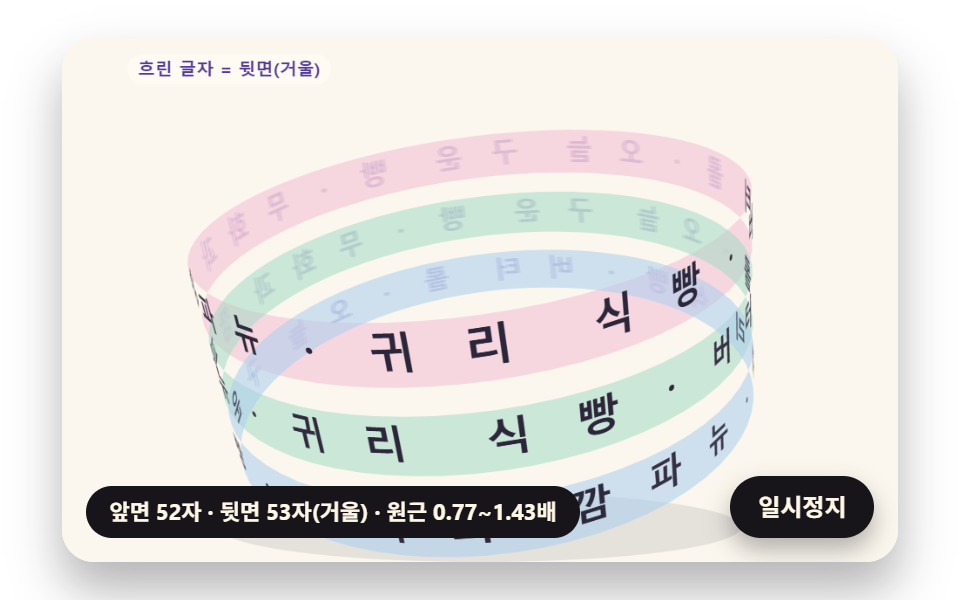
Letters sit around a tilted cylinder, are projected to the screen in perspective and drawn back to front, so the far side shows mirrored and faded while the near side grows as the band slowly turns.
Best forRotating band slogan on a new product detail page
FOCALTILTBACK_ALPHA
<main class="stage">
<div class="cf is-demo" id="cf">
  <canvas class="cf__canvas" data-role="canvas" width="480" height="300" aria-hidden="true"></canvas>
  <p class="cf__sr">BAKED TODAY · FIG LOAF · OAT BREAD · BUTTER ROLL</p>
  <p class="cf__status" data-role="status" aria-live="off">Turning the cylinder</p>
  <button class="cf__pause" data-role="pause" type="button" aria-pressed="false">Pause</button>
</div>
</main>
@use "../../../../site/static/demo-tokens" as *;
@include stage($stage-paper);
.cf {
position: relative;
width: min(92vw, calc(160vh - 12.8vw));
aspect-ratio: 480 / 300;
margin: 0 auto;
border-radius: $r-card;
overflow: hidden;
box-shadow: $shadow-raised;
background: $subject-cream;
}
.cf__canvas {
position: absolute;
inset: 0;
display: block;
width: 100%;
height: 100%;
}
.cf__pause {
position: absolute;
right: $sp-3;
bottom: $sp-3;
padding: $sp-1 $sp-3;
border: 2px solid $subject-ink;
border-radius: $r-pill;
background: $subject-ink;
color: $subject-cream;
font-family: inherit;
font-weight: 700;
font-size: 12px;
line-height: 1.6;
cursor: pointer;
box-shadow: $shadow-press;
transition: transform $dur-quick $ease-spring;
}
// 눌린 상태(멈춤) — 바탕과 글자색을 뒤집어 aria-pressed 가 눈에도 보이게
.cf__pause[aria-pressed="true"] {
background: $subject-cream;
color: $subject-ink;
}
.cf__pause:hover {
transform: translateY(-2px);
}
.cf__pause:active {
transform: translateY(1px);
}
.cf__pause:focus-visible {
outline: 3px solid $subject-ink;
outline-offset: 3px;
}
// 상태 줄 — 지금 고리에서 무슨 계산이 일어났는지 글자로. 시연 중에는 aria-live off, 사람이 처음 손대면 polite
.cf__status {
position: absolute;
left: $sp-3;
bottom: $sp-3;
max-width: calc(100% - 120px);
margin: 0;
padding: $sp-1 $sp-3;
border-radius: $r-pill;
background: $subject-ink;
color: $subject-cream;
font-weight: 700;
font-size: 11px;
line-height: 1.6;
white-space: nowrap;
overflow: hidden;
text-overflow: ellipsis;
pointer-events: none;
}
// 낭독용 원문 한 줄 — 화면에서는 숨기고 낭독기에만 읽힌다(원 위 글자는 캔버스라 aria-hidden)
.cf__sr {
position: absolute;
width: 1px;
height: 1px;
margin: -1px;
padding: 0;
overflow: hidden;
clip-path: inset(50%);
white-space: nowrap;
border: 0;
}
@media (max-width: 340px) {
.cf__pause,
.cf__status { font-size: 10px; padding: $sp-1 $sp-2; }
}
// 동작 줄이기 — 장면은 스크립트가 최종 배치 한 장으로 멈춘다. 버튼도 떠오르지 않게
@media (prefers-reduced-motion: reduce) {
.cf__pause { transition: none !important; }
.cf__pause:hover,
.cf__pause:active { transform: none !important; }
}html, body {
margin: 0;
overflow: hidden;
}
.stage {
box-sizing: border-box;
min-height: 100vh;
display: grid;
place-items: center;
margin: 0;
background: #ffffff;
font-family: -apple-system, "Segoe UI", "Noto Sans KR", sans-serif;
padding: clamp(8px, 4vw, 24px);
}
.cf {
position: relative;
width: min(92vw, 160vh - 12.8vw);
aspect-ratio: 480/300;
margin: 0 auto;
border-radius: 16px;
overflow: hidden;
box-shadow: 0 14px 24px rgba(23, 20, 26, 0.32);
background: #fff7e6;
}
.cf__canvas {
position: absolute;
inset: 0;
display: block;
width: 100%;
height: 100%;
}
.cf__pause {
position: absolute;
right: 12px;
bottom: 12px;
padding: 4px 12px;
border: 2px solid #17141a;
border-radius: 999px;
background: #17141a;
color: #fff7e6;
font-family: inherit;
font-weight: 700;
font-size: 12px;
line-height: 1.6;
cursor: pointer;
box-shadow: 0 6px 12px rgba(23, 20, 26, 0.32);
transition: transform 220ms cubic-bezier(0.2, 0.8, 0.2, 1);
}
.cf__pause[aria-pressed=true] {
background: #fff7e6;
color: #17141a;
}
.cf__pause:hover {
transform: translateY(-2px);
}
.cf__pause:active {
transform: translateY(1px);
}
.cf__pause:focus-visible {
outline: 3px solid #17141a;
outline-offset: 3px;
}
.cf__status {
position: absolute;
left: 12px;
bottom: 12px;
max-width: calc(100% - 120px);
margin: 0;
padding: 4px 12px;
border-radius: 999px;
background: #17141a;
color: #fff7e6;
font-weight: 700;
font-size: 11px;
line-height: 1.6;
white-space: nowrap;
overflow: hidden;
text-overflow: ellipsis;
pointer-events: none;
}
.cf__sr {
position: absolute;
width: 1px;
height: 1px;
margin: -1px;
padding: 0;
overflow: hidden;
clip-path: inset(50%);
white-space: nowrap;
border: 0;
}
@media (max-width: 340px) {
.cf__pause,
.cf__status {
font-size: 10px;
padding: 4px 8px;
}
}
@media (prefers-reduced-motion: reduce) {
.cf__pause {
transition: none !important;
}
.cf__pause:hover,
.cf__pause:active {
transform: none !important;
}
}(function () {
const root = document.getElementById("cf");
if (!root) return;
// 판 좌표 — 캔버스 안은 늘 480×300. 화면에 보이는 크기와 상관없이 계산은 이 좌표로 한다
const W = 480;
const H = 300;
const TAU = Math.PI * 2;
function clamp(v, lo, hi) { return v < lo ? lo : (v > hi ? hi : v); }
function lerp(a, b, k) { return a + (b - a) * k; }
function smooth(x) { const c = clamp(x, 0, 1); return c * c * (3 - 2 * c); }
// 따라가기 비율 — 1 − e^(−rate·dt). 프레임 시간이 달라도 1초에 같은 만큼 다가간다
function follow(rate, dt) { return 1 - Math.exp(-rate * dt); }
// 1/60초마다 ease 만큼 다가가는 비율을 dt 초로 환산 — 1 − (1 − ease)^(dt × 60)
function easeStep(ease, dt) { return 1 - Math.pow(1 - ease, dt * 60); }
// 시드 고정 난수 — 같은 시드면 같은 시연이 다시 나온다 (32비트 정수 섞기)
function makeRng(seed) {
let s = seed >>> 0;
return function () {
s = (s + 0x6d2b79f5) >>> 0;
let t = s;
t = Math.imul(t ^ (t >>> 15), t | 1);
t ^= t + Math.imul(t ^ (t >>> 7), t | 61);
return ((t ^ (t >>> 14)) >>> 0) / 4294967296;
};
}
function deg(rad) { return rad * 180 / Math.PI; }
function makeSpring(x) { return { x: x, v: 0, to: x }; }
const SPRING_SUBSTEP = 1 / 240;
function stepSpring(s, stiffness, damping, dt) {
let left = dt;
while (left > 1e-9) {
const h = Math.min(SPRING_SUBSTEP, left);
s.v += (stiffness * (s.to - s.x) - damping * s.v) * h;
s.x += s.v * h;
left -= h;
}
}
function snapSpring(s, x) { s.x = x; s.v = 0; s.to = x; }
function roughWidth(ch, px, weight) {
const wide = ch.charCodeAt(0) >= 0x1100;
const base = ch === ' ' ? 0.28 : (wide ? 0.95 : 0.6);
return px * base * (weight >= 700 ? 1.06 : 1);
}
// 글꼴이 다 온 뒤 잰 폭
let glyphWidth = roughWidth;
// 대체 글꼴로 잰 폭 — 09 가 「글꼴이 오기 전에 잰 폭」 을 흉내 낼 때만 쓴다
let fallbackWidth = roughWidth;
// 글자 나누기 — 한 글자씩(서로게이트 쌍도 한 글자)
function glyphsOf(s) { return Array.from(s); }
function widthsOf(gs, px, weight, m) {
return gs.map(function (g) { return m(g, px, weight); });
}
function sum(xs) { let s = 0; for (const x of xs) {
s += x;
} return s; }
function arcTotal(ws, tracking) { return sum(ws) + tracking * Math.max(0, ws.length - 1); }
// 글꼴 축소 몫 — 줄이지 않아도 들어가면 1
function arcScale(ws, px, tracking, r, inner, span) {
const total = arcTotal(ws, tracking);
const need = total / Math.max(1, r - inner * px);
return need > span ? span * r / (total + span * inner * px) : 1;
}
function fitArc(ws, px, tracking, r, inner, span, center, dir, allowShrink) {
return placeArc(ws, px, tracking, r, inner, allowShrink ? arcScale(ws, px, tracking, r, inner, span) : 1, center, dir);
}
// 정한 축소 몫으로 놓기 — 위·아래 반원이 같은 글꼴 크기를 쓰도록 둘 중 작은 몫을 넘겨받는다
function placeArc(ws, px, tracking, r, inner, scale, center, dir) {
const n = ws.length;
const total = arcTotal(ws, tracking);
const need = total / Math.max(1, r - inner * px);
const layR = Math.max(1, r - inner * px * scale);
const theta = [];
let acc = 0;
for (let i = 0; i < n; i += 1) {
theta.push(center + dir * (acc + ws[i] / 2 - total / 2) * scale / layR);
acc += ws[i] + tracking;
}
return { theta: theta, px: px * scale, scale: scale, total: total, layR: layR, need: need };
}
// 같은 각도로 놓기(비교판) — 폭은 보지 않고 전체 각을 글자 수로 똑같이 나눈다
function equalArc(n, spanUsed, center, dir) {
const out = [];
const step = spanUsed / Math.max(1, n);
for (let i = 0; i < n; i += 1) {
out.push(center + dir * (i + 0.5 - n / 2) * step);
}
return out;
}
// 이웃 두 글자가 글자 아래 모서리(반지름 r − 0.5·글자 높이)에서 겹친 길이(px). 양수면 부딪힌다.
// 각 간격 × 아래 모서리 반지름 − 두 글자 반폭 합 이 음수인 만큼이 겹침
const GLYPH_DROP = 0.5;
function innerOverlaps(theta, ws, scale, r, px) {
const rin = r - GLYPH_DROP * px;
const out = [];
for (let i = 0; i + 1 < theta.length; i += 1) {
const room = Math.abs(theta[i + 1] - theta[i]) * rin;
out.push((ws[i] + ws[i + 1]) / 2 * scale - room);
}
return out;
}
function arcTable(rf, drf, th0, th1, step) {
const th = [th0];
const s = [0];
let acc = 0;
const n = Math.max(1, Math.ceil((th1 - th0) / step));
const h = (th1 - th0) / n;
for (let i = 0; i < n; i += 1) {
// 걸음 가운데의 값으로 더한다 — 걸음 끝 값보다 같은 걸음에서 오차가 작다
const m = th0 + (i + 0.5) * h;
const r = rf(m);
const dr = drf(m);
acc += Math.sqrt(r * r + dr * dr) * h;
th.push(th0 + (i + 1) * h);
s.push(acc);
}
return { th: th, s: s };
}
function thetaAt(t, s) {
const last = t.s.length - 1;
if (s <= 0) {
return t.th[0];
}
if (s >= t.s[last]) {
return t.th[last];
}
let lo = 0;
let hi = last;
while (hi - lo > 1) {
const mid = (lo + hi) >> 1;
if (t.s[mid] <= s) {
lo = mid;
}
else {
hi = mid;
}
}
const k = (s - t.s[lo]) / Math.max(1e-9, t.s[hi] - t.s[lo]);
return lerp(t.th[lo], t.th[hi], k);
}
function arcLength(t) { return t.s[t.s.length - 1]; }
// 극좌표 곡선의 접선 각(화면 좌표, y 아래) — 점 (r cosθ, r sinθ) 을 θ 로 미분한 방향
function tangentAngle(r, dr, th) {
return Math.atan2(dr * Math.sin(th) + r * Math.cos(th), dr * Math.cos(th) - r * Math.sin(th));
}
// 장면 시계(s)와 상태 줄 글자 — 장면 계산이 고치고, 화면 쪽이 읽어 그린다
let sceneT = 0;
let simStatus = '';
// 파스텔 팔레트 — 크림 바탕 위 라벤더·민트·버터·산호. 글자는 진한 쪽으로 명도 차를 둔다
const PAPER = [251, 247, 238];
const PAPER_DIM = [241, 234, 220];
const INK = [44, 38, 58];
const INK_SOFT = [112, 104, 126];
const CREAM = [255, 251, 242];
const LAVENDER = [196, 182, 238];
const MINT = [164, 218, 196];
const BUTTER = [246, 224, 150];
const CORAL = [244, 170, 152];
const SKY = [170, 206, 238];
const PINK = [244, 190, 212];
const MINT_DEEP = [36, 116, 90];
const CORAL_DEEP = [178, 66, 52];
const VIOLET_DEEP = [84, 58, 160];
const BROWN_DEEP = [104, 62, 40];
function mix(a, b, k) { return [lerp(a[0], b[0], k), lerp(a[1], b[1], k), lerp(a[2], b[2], k)]; }
function rgba(c, a) {
return 'rgba(' + Math.round(clamp(c[0], 0, 255)) + ',' + Math.round(clamp(c[1], 0, 255)) + ',' + Math.round(clamp(c[2], 0, 255)) + ',' + clamp(a, 0, 1).toFixed(3) + ')';
}
const canvasEl = root.querySelector('[data-role="canvas"]');
const pauseEl = root.querySelector('[data-role="pause"]');
const statusEl = root.querySelector('[data-role="status"]');
const ctxRaw = canvasEl ? canvasEl.getContext('2d') : null;
if (!canvasEl || !ctxRaw || !pauseEl) {
return;
}
const cv = canvasEl;
const ctx = ctxRaw;
const pauseBtn = pauseEl;
// 외부 웹폰트는 부르지 않는다 — 기기에 있는 글꼴 목록만
const FONT_STACK = 'system-ui, -apple-system, "Segoe UI", "Noto Sans KR", sans-serif';
// 대체 글꼴 — 09 가 「글꼴이 오기 전에 잰 폭」 을 흉내 낼 때만 쓴다
const FALLBACK_STACK = 'monospace';
// 잰 폭은 100px 기준으로 한 번만 재 두고 크기에 비례해 쓴다. 글꼴이 새로 오면 통째로 비운다
const widthCache = {};
function measureWith(stack) {
return function (ch, px, weight) {
const key = stack + '|' + weight + '|' + ch;
let w = widthCache[key];
if (w === undefined) {
ctx.font = weight + ' 100px ' + stack;
w = ctx.measureText(ch).width;
widthCache[key] = w;
}
return w * px / 100;
};
}
function remeasure() {
for (const k of Object.keys(widthCache)) {
delete widthCache[k];
}
glyphWidth = measureWith(FONT_STACK);
fallbackWidth = measureWith(FALLBACK_STACK);
relayout();
}
function fitCanvas() {
// 배율은 2 에서 자른다 — 배율 3 기기에서 화소가 2.25배로 늘어 프레임마다 일이 그만큼 커지지 않게
const dpr = Math.min(window.devicePixelRatio || 1, 2);
cv.width = Math.round(W * dpr);
cv.height = Math.round(H * dpr);
ctx.setTransform(dpr, 0, 0, dpr, 0, 0);
}
function clearStage(c) {
ctx.fillStyle = rgba(c, 1);
ctx.fillRect(0, 0, W, H);
}
function setFont(px, weight, stack) {
ctx.font = weight + ' ' + px.toFixed(2) + 'px ' + stack;
}
function label(s, x, y, c, a, px, weight, align) {
setFont(px, weight, FONT_STACK);
ctx.textAlign = align;
ctx.textBaseline = 'middle';
ctx.fillStyle = rgba(c, a);
ctx.fillText(s, x, y);
}
// 글자 하나를 (x, y) 가운데에 rot 라디안 돌려 찍는다. sx·sy 는 가로·세로 배율(음수 sx 는 거울)
function glyphAt(ch, x, y, rot, px, weight, c, a, sx, sy) {
if (a <= 0.01 || px < 0.5) {
return;
}
ctx.save();
ctx.translate(x, y);
ctx.rotate(rot);
ctx.scale(sx, sy);
setFont(px, weight, FONT_STACK);
ctx.textAlign = 'center';
ctx.textBaseline = 'middle';
ctx.fillStyle = rgba(c, a);
ctx.fillText(ch, 0, 0);
ctx.restore();
}
// 기울인 글자 — 글자 자기 좌표에서 가로로 skew(라디안)만큼 민다(윗부분이 앞으로)
function glyphLean(ch, x, y, rot, px, weight, c, a, skew) {
if (a <= 0.01 || px < 0.5) {
return;
}
ctx.save();
ctx.translate(x, y);
ctx.rotate(rot);
ctx.transform(1, 0, -Math.tan(skew), 1, 0, 0);
setFont(px, weight, FONT_STACK);
ctx.textAlign = 'center';
ctx.textBaseline = 'middle';
ctx.fillStyle = rgba(c, a);
ctx.fillText(ch, 0, 0);
ctx.restore();
}
// 원 위 글자 — 중심 (cx, cy), 반지름 r, 각 th. turn 은 글자를 원에 맞춰 세우는 각(위 반원 +π/2, 아래 반원 −π/2)
function ringGlyph(ch, cx, cy, r, th, turn, px, weight, c, a) {
glyphAt(ch, cx + r * Math.cos(th), cy + r * Math.sin(th), th + turn, px, weight, c, a, 1, 1);
}
function roundRectPath(x, y, w, h, r) {
const rr = Math.max(0, Math.min(r, w / 2, h / 2));
ctx.beginPath();
ctx.moveTo(x + rr, y);
ctx.lineTo(x + w - rr, y);
ctx.arcTo(x + w, y, x + w, y + rr, rr);
ctx.lineTo(x + w, y + h - rr);
ctx.arcTo(x + w, y + h, x + w - rr, y + h, rr);
ctx.lineTo(x + rr, y + h);
ctx.arcTo(x, y + h, x, y + h - rr, rr);
ctx.lineTo(x, y + rr);
ctx.arcTo(x, y, x + rr, y, rr);
ctx.closePath();
}
function fillRound(x, y, w, h, r, c, a) {
if (w <= 0.2 || h <= 0.2 || a <= 0) {
return;
}
roundRectPath(x, y, w, h, r);
ctx.fillStyle = rgba(c, a);
ctx.fill();
}
function disc(x, y, r, c, a) {
if (r <= 0.2 || a <= 0) {
return;
}
ctx.beginPath();
ctx.arc(x, y, r, 0, TAU);
ctx.fillStyle = rgba(c, a);
ctx.fill();
}
function ring(x, y, r, width, c, a) {
if (r <= 0.2 || a <= 0) {
return;
}
ctx.beginPath();
ctx.arc(x, y, r, 0, TAU);
ctx.lineWidth = width;
ctx.strokeStyle = rgba(c, a);
ctx.stroke();
}
// 그림자 — 떠 있는 높이 lift(0~1)가 클수록 멀리·흐리게·넓게 떨어진다
function softShadow(x, y, r, lift) {
const off = 4 + 14 * lift;
const g = ctx.createRadialGradient(x + off * 0.4, y + off, r * 0.6, x + off * 0.4, y + off, r * (1.05 + 0.25 * lift));
g.addColorStop(0, rgba(INK, 0.26 - 0.14 * lift));
g.addColorStop(1, rgba(INK, 0));
ctx.fillStyle = g;
ctx.beginPath();
ctx.arc(x + off * 0.4, y + off, r * (1.05 + 0.25 * lift), 0, TAU);
ctx.fill();
}
// 작은 알약 이름표
function pill(s, x, y, bg, fg, a, px) {
setFont(px, 700, FONT_STACK);
const w = ctx.measureText(s).width + px * 1.2;
fillRound(x - w / 2, y - px * 0.85, w, px * 1.7, px * 0.85, bg, a);
label(s, x, y + 0.5, fg, a, px, 700, 'center');
}
// 상태 줄 — 바뀔 때만 글자를 고친다
let shownStatus = '';
function pushStatus() {
if (!statusEl || simStatus === shownStatus) {
return;
}
shownStatus = simStatus;
statusEl.textContent = simStatus;
}
// 04 — 원통을 감고 도는 띠 문구. 글자 자리 (R cos a, y, R sin a) 를 원통 축 기울기(x 축 둘레 TILT, 화면 둘레 ROLL)로 돌린 뒤
// 원근 투영 s = FOCAL / (FOCAL + z) 로 화면에 놓는다. 먼 글자부터 그리고(깊이 z 큰 것 먼저),
// 바깥 법선이 화면 반대쪽을 보는 뒷면 글자는 좌우가 뒤집혀(거울) 보이므로 흐리게 그린다
const BAND_TEXT = 'BAKED TODAY · FIG LOAF · OAT BREAD · BUTTER ROLL · ';
const BAND_PX = 20;
const BAND_WEIGHT = 800;
const CYL_R = 150;
const FOCAL = 520;
const TILT = 0.34;
const TILT_SWAY = 0.12;
const TILT_SWAY_HZ = 0.5;
const ROLL = -0.14;
// 띠 세 줄 — 원통 축 방향 높이(px)와 각속도(rad/s, 음수는 반대 방향)
const BAND_ROWS = [[-44, 0.75], [0, -0.55], [44, 0.95]];
const BACK_ALPHA = 0.32;
const LOOP_S = 6;
const STATUS_BAND = 'front {f} · back {b} mirrored · depth scale {n} to {x}';
const bandGlyphs04 = glyphsOf(BAND_TEXT);
let bandWidths04 = [];
let bandRepeat04 = 1;
let bandAngles04 = [];
let spinT04 = 0;
function relayout() {
bandWidths04 = widthsOf(bandGlyphs04, BAND_PX, BAND_WEIGHT, glyphWidth);
// 둘레에 문구를 되풀이해 채우고 남는 길이는 글자 사이에 고르게 — 글자 i 의 가운데 각
bandRepeat04 = Math.max(1, Math.floor(TAU * CYL_R / sum(bandWidths04)));
const total = sum(bandWidths04) * bandRepeat04;
bandAngles04 = [];
let acc = 0;
for (let k = 0; k < bandGlyphs04.length * bandRepeat04; k += 1) {
const w = bandWidths04[k % bandGlyphs04.length];
bandAngles04.push((acc + w / 2) / total * TAU);
acc += w;
}
}
// 원통 좌표 → 돌린 공간 좌표(화면 가운데 원점, y 아래, z 화면 안쪽)
function cylPoint(a, y, tilt) {
const x = CYL_R * Math.cos(a);
const z = CYL_R * Math.sin(a);
const y1 = y * Math.cos(tilt) - z * Math.sin(tilt);
const z1 = y * Math.sin(tilt) + z * Math.cos(tilt);
return [x * Math.cos(ROLL) - y1 * Math.sin(ROLL), x * Math.sin(ROLL) + y1 * Math.cos(ROLL), z1];
}
// 원근 투영 — 화면 (240 + x·s, 150 + y·s), s = FOCAL / (FOCAL + z)
function project04(p) {
const s = FOCAL / (FOCAL + p[2]);
return [240 + p[0] * s, 150 + p[1] * s, s];
}
function tiltAt04(t) { return TILT + TILT_SWAY * Math.sin(TAU * TILT_SWAY_HZ * t); }
// 이번 장면의 글자 전부 — 깊이 큰(먼) 것부터 정렬해 돌려준다
function bandGlyphs(t) {
const tilt = tiltAt04(t);
const out = [];
const n = bandGlyphs04.length;
BAND_ROWS.forEach(function (row, ri) {
const turn = row[1] * spinT04 + ri * 0.7;
bandAngles04.forEach(function (a0, k) {
const a = a0 + turn;
const p = cylPoint(a, row[0], tilt);
const sp = project04(p);
// 글자 가로 = 원통 둘레 방향 1px 이 화면에서 가는 벡터, 세로 = 축 방향 1px 이 가는 벡터
const pa = project04(cylPoint(a + 1 / CYL_R, row[0], tilt));
const py = project04(cylPoint(a, row[0] + 1, tilt));
// 바깥 법선 (cos a, 0, sin a) 을 같은 기울기로 돌린 z — 0 보다 크면 화면 반대쪽을 본다(뒷면)
const nz = Math.sin(a) * Math.cos(tilt);
out.push({ ch: bandGlyphs04[k % n], x: sp[0], y: sp[1], z: p[2], s: sp[2], tx: pa[0] - sp[0], ty: pa[1] - sp[1], ux: py[0] - sp[0], uy: py[1] - sp[1], back: nz > 0, row: ri });
});
});
out.sort(function (p, q) { return q.z - p.z; });
return out;
}
let front04 = 0;
let back04 = 0;
let sMin04 = 1;
let sMax04 = 1;
function statusFor04(gs) {
front04 = 0;
back04 = 0;
sMin04 = 9;
sMax04 = 0;
for (const g of gs) {
if (g.back) {
back04 += 1;
}
else {
front04 += 1;
}
sMin04 = Math.min(sMin04, g.s);
sMax04 = Math.max(sMax04, g.s);
}
simStatus = STATUS_BAND.replace('{f}', String(front04)).replace('{b}', String(back04)).replace('{n}', sMin04.toFixed(2)).replace('{x}', sMax04.toFixed(2));
}
function reset() { spinT04 = 0; }
function update(dt) {
spinT04 += dt;
statusFor04(bandGlyphs(sceneT));
}
function restPose() {
spinT04 = 0;
statusFor04(bandGlyphs(0));
}
// 04 화면 — 원통 몸통(줄마다 투영한 띠 바탕)을 먼저 깔고, 글자를 먼 것부터 차례로 그린다.
// 글자 하나 = 둘레 방향 벡터(가로)와 축 방향 벡터(세로)로 만든 기울어진 판 — 뒷면에서는 가로 벡터가 거꾸로라 저절로 거울이 된다
const ROW_FILLS = [PINK, MINT, SKY];
const LABEL_BACK = 'faint letters = back side, mirrored';
function bindInput(signal) { void signal; }
// 띠 바탕 — 줄 높이 ±BAND_PX·0.75 의 두 테두리를 투영해 잇는다. 뒷면 쪽은 옅게
function bandBody(row, tilt, c) {
const y = BAND_ROWS[row][0];
const steps = 72;
ctx.beginPath();
for (let k = 0; k <= steps; k += 1) {
const p = project04(cylPoint(k / steps * TAU, y - BAND_PX * 0.75, tilt));
if (k === 0) {
ctx.moveTo(p[0], p[1]);
}
else {
ctx.lineTo(p[0], p[1]);
}
}
for (let k = steps; k >= 0; k -= 1) {
const p = project04(cylPoint(k / steps * TAU, y + BAND_PX * 0.75, tilt));
ctx.lineTo(p[0], p[1]);
}
ctx.closePath();
ctx.fillStyle = rgba(c, 0.55);
ctx.fill('evenodd');
}
function bandGlyph(g, c, a, dx) {
ctx.save();
ctx.transform(g.tx, g.ty, g.ux, g.uy, g.x + dx, g.y);
setFont(BAND_PX, BAND_WEIGHT, FONT_STACK);
ctx.textAlign = 'center';
ctx.textBaseline = 'middle';
ctx.fillStyle = rgba(c, a);
ctx.fillText(g.ch, 0, 0);
ctx.restore();
}
function draw() {
clearStage(PAPER);
const tilt = tiltAt04(sceneT);
// 원통 그림자 — 기울기가 클수록 바닥 타원이 납작해진다
ctx.beginPath();
ctx.ellipse(240, 280, 150, 12 + 20 * Math.sin(tilt), 0, 0, TAU);
ctx.fillStyle = rgba(INK, 0.1);
ctx.fill();
const gs = bandGlyphs(sceneT);
// 뒷면 글자 → 반투명 띠 몸통 → 앞면 글자 순서. 먼 것부터 그리므로 앞면 띠가 뒷면 글자를 덮는다
for (const g of gs) {
if (g.back) {
// 뒷면 — 흐림 대신 좌우로 0.8px 어긋난 두 장을 옅게 겹친다(필터 없이 번진 느낌)
bandGlyph(g, VIOLET_DEEP, BACK_ALPHA * 0.6, -0.8);
bandGlyph(g, VIOLET_DEEP, BACK_ALPHA * 0.6, 0.8);
}
}
for (let r = 0; r < BAND_ROWS.length; r += 1) {
bandBody(r, tilt, ROW_FILLS[r]);
}
for (const g of gs) {
if (!g.back) {
// 앞면 — 가까울수록(투영 배율 큼) 진하게
bandGlyph(g, INK, clamp(0.55 + (g.s - 0.8) * 0.9, 0.55, 1), 0);
}
}
pill(LABEL_BACK, 96, 18, CREAM, VIOLET_DEEP, 1, 10);
}
let paused = false;
const reduceQuery = window.matchMedia('(prefers-reduced-motion: reduce)');
// 페이지를 연 채 동작 줄이기 설정을 바꿔도 change 리스너가 이 값을 다시 읽는다
let still = reduceQuery.matches;
// 자동 시연 중인가 — 사람이 처음 손대면 시연 표시를 떼고 상태 줄을 polite 로 켠다
let demo = root.classList.contains('is-demo');
// 리스너는 한 묶음으로 달고 정리할 때 한 번에 뗀다
const off = new AbortController();
function wake() {
if (!demo) {
return;
}
demo = false;
root.classList.remove('is-demo');
if (statusEl) {
statusEl.setAttribute('aria-live', 'polite');
}
}
// 한 프레임에 넘기는 시간 상한(s) — 탭을 오래 숨겼다 돌아온 첫 프레임에도 50ms 까지만 계산에 넣는다
const DT_MAX = 0.05;
// 장면 시계를 dt 만큼 — 한 바퀴(LOOP_S)를 넘으면 처음 배치로 되돌려 다시 시연한다
function advance(dt) {
sceneT += dt;
if (sceneT >= LOOP_S) {
sceneT -= LOOP_S;
reset();
}
update(dt);
}
let rafId = 0;
let lastTs = -1;
function frame(ts) {
if (still || paused) {
rafId = 0;
return;
}
if (lastTs < 0) {
lastTs = ts;
}
const dt = Math.min((ts - lastTs) / 1000, DT_MAX);
lastTs = ts;
if (dt > 0) {
advance(dt);
}
draw();
pushStatus();
rafId = window.requestAnimationFrame(frame);
}
function startLoop() {
if (rafId) {
return;
}
// 시계 다시 맞추기 — 멈췄던 사이의 시간을 첫 프레임 dt 로 넘기지 않는다
lastTs = -1;
rafId = window.requestAnimationFrame(frame);
}
function stopLoop() {
if (rafId) {
window.cancelAnimationFrame(rafId);
rafId = 0;
}
}
// 동작 줄이기 — 루프를 돌리지 않고 시연이 끝난 최종 배치 한 장만 그린다
function showRest() {
stopLoop();
sceneT = 0;
reset();
restPose();
draw();
pushStatus();
}
function play() {
sceneT = 0;
reset();
draw();
pushStatus();
if (!paused) {
startLoop();
}
}
pauseBtn.addEventListener('click', function () {
paused = !paused;
pauseBtn.setAttribute('aria-pressed', paused ? 'true' : 'false');
wake();
if (paused) {
stopLoop();
}
else if (!still) {
startLoop();
}
}, { signal: off.signal });
// 탭이 숨으면 루프를 멈추고, 돌아오면 시계를 다시 맞춰 시작한다 — 숨은 동안의 몇 초가 한 프레임에 몰리지 않게
document.addEventListener('visibilitychange', function () {
if (document.hidden) {
stopLoop();
}
else if (!paused && !still && fontsReady) {
startLoop();
}
}, { signal: off.signal });
// 설정이 페이지를 연 채 바뀌면 — 켜지면 최종 배치로 멈추고, 꺼지면 시연을 처음부터
reduceQuery.addEventListener('change', function () {
still = reduceQuery.matches;
if (still) {
showRest();
}
else {
play();
}
}, { signal: off.signal });
window.addEventListener('resize', function () {
fitCanvas();
draw();
}, { signal: off.signal });
bindInput(off.signal);
fitCanvas();
// 글자 폭은 글꼴이 다 온 뒤에 잰다 — 그 전에 잰 폭은 대체 글꼴의 폭이라 글꼴이 바뀌는 순간 자리가 틀어진다.
// 나중에 다른 글꼴이 더 오면(loadingdone) 다시 잰다
let fontsReady = false;
document.fonts.addEventListener('loadingdone', function () {
if (!fontsReady) {
return;
}
remeasure();
draw();
}, { signal: off.signal });
document.fonts.ready.then(function () {
if (off.signal.aborted) {
return;
}
fontsReady = true;
remeasure();
if (still) {
showRest();
}
else {
play();
}
});
return function () {
stopLoop();
off.abort();
};
})();// CylinderBandText - 같은 항목 vanilla 판 index.html 의 React 포트. 같은 계산을 useEffect 안에서 돌린다.
import { useEffect, useRef } from "react";
import styles from "./CylinderBandText.module.scss";
const cx = (s: string): string => s.split(" ").map((n) => styles[n] ?? n).join(" ");
export default function CylinderBandText() {
const rootRef = useRef<HTMLDivElement | null>(null);
useEffect(() => {
const rootEl = rootRef.current;
if (!rootEl) return;
const root: HTMLElement = rootEl;
type RGB = [number, number, number];
// 판 좌표 — 캔버스 안은 늘 480×300. 화면에 보이는 크기와 상관없이 계산은 이 좌표로 한다
const W = 480;
const H = 300;
const TAU = Math.PI * 2;
function clamp(v: number, lo: number, hi: number): number { return v < lo ? lo : (v > hi ? hi : v); }
function lerp(a: number, b: number, k: number): number { return a + (b - a) * k; }
function smooth(x: number): number { const c = clamp(x, 0, 1); return c * c * (3 - 2 * c); }
// 따라가기 비율 — 1 − e^(−rate·dt). 프레임 시간이 달라도 1초에 같은 만큼 다가간다
function follow(rate: number, dt: number): number { return 1 - Math.exp(-rate * dt); }
// 1/60초마다 ease 만큼 다가가는 비율을 dt 초로 환산 — 1 − (1 − ease)^(dt × 60)
function easeStep(ease: number, dt: number): number { return 1 - Math.pow(1 - ease, dt * 60); }
// 시드 고정 난수 — 같은 시드면 같은 시연이 다시 나온다 (32비트 정수 섞기)
function makeRng(seed: number): () => number {
let s = seed >>> 0;
return function (): number {
s = (s + 0x6d2b79f5) >>> 0;
let t = s;
t = Math.imul(t ^ (t >>> 15), t | 1);
t ^= t + Math.imul(t ^ (t >>> 7), t | 61);
return ((t ^ (t >>> 14)) >>> 0) / 4294967296;
};
}
function deg(rad: number): number { return rad * 180 / Math.PI; }
// ── 감쇠 스프링 ──────────────────────────────────────────────
// 가속 = 단단함 × (목표 − 위치) − 감쇠 × 속도. 속도를 먼저 고친 뒤 위치를 옮기는 적분을 1/240초 잔걸음으로 나눠 돌린다
type Spring = { x: number; v: number; to: number };
function makeSpring(x: number): Spring { return { x: x, v: 0, to: x }; }
const SPRING_SUBSTEP = 1 / 240;
function stepSpring(s: Spring, stiffness: number, damping: number, dt: number): void {
let left = dt;
while (left > 1e-9) {
const h = Math.min(SPRING_SUBSTEP, left);
s.v += (stiffness * (s.to - s.x) - damping * s.v) * h;
s.x += s.v * h;
left -= h;
}
}
function snapSpring(s: Spring, x: number): void { s.x = x; s.v = 0; s.to = x; }
// ── 글자 폭 ──────────────────────────────────────────────────
// 글자 하나의 가로 폭(px) — 글꼴 크기 px, 굵기 weight. 화면에서는 캔버스 measureText 로 잰 값으로 바뀐다(dom 쪽).
// 아래 대략 모형은 재기 전 자리 채움일 뿐 — 글자 폭은 반드시 글꼴이 다 온 뒤 다시 잰다
type Measure = (ch: string, px: number, weight: number) => number;
function roughWidth(ch: string, px: number, weight: number): number {
const wide = ch.charCodeAt(0) >= 0x1100;
const base = ch === ' ' ? 0.28 : (wide ? 0.95 : 0.6);
return px * base * (weight >= 700 ? 1.06 : 1);
}
// 글꼴이 다 온 뒤 잰 폭
let glyphWidth: Measure = roughWidth;
// 대체 글꼴로 잰 폭 — 09 가 「글꼴이 오기 전에 잰 폭」 을 흉내 낼 때만 쓴다
let fallbackWidth: Measure = roughWidth;
// 글자 나누기 — 한 글자씩(서로게이트 쌍도 한 글자)
function glyphsOf(s: string): string[] { return Array.from(s); }
function widthsOf(gs: string[], px: number, weight: number, m: Measure): number[] {
return gs.map(function (g: string): number { return m(g, px, weight); });
}
function sum(xs: number[]): number { let s = 0; for (const x of xs) { s += x; } return s; }
// ── 원 위에 글자 놓기 ────────────────────────────────────────
// 글자 i 의 각 = 가운데 각 + 방향 × (앞 글자 폭 합 + 자기 폭/2 − 전체/2) × 축소 / 놓는 반지름.
// 놓는 반지름은 글자 높이의 inner 몫만큼 안쪽 — 글자 아래 모서리(원 중심 쪽)에서 폭이 맞으면 바깥은 저절로 벌어진다.
// 전체 각이 span 을 넘으면 글꼴을 줄인다. 줄이면 글자 높이도 줄어 놓는 반지름이 커지므로
// 축소 = span·r / (전체 폭 + span·inner·px) 로 한 번에 푼다 (전체 폭 × 축소 = span × (r − inner·px·축소))
type ArcFit = { theta: number[]; px: number; scale: number; total: number; layR: number; need: number };
function arcTotal(ws: number[], tracking: number): number { return sum(ws) + tracking * Math.max(0, ws.length - 1); }
// 글꼴 축소 몫 — 줄이지 않아도 들어가면 1
function arcScale(ws: number[], px: number, tracking: number, r: number, inner: number, span: number): number {
const total = arcTotal(ws, tracking);
const need = total / Math.max(1, r - inner * px);
return need > span ? span * r / (total + span * inner * px) : 1;
}
function fitArc(ws: number[], px: number, tracking: number, r: number, inner: number, span: number, center: number, dir: number, allowShrink: boolean): ArcFit {
return placeArc(ws, px, tracking, r, inner, allowShrink ? arcScale(ws, px, tracking, r, inner, span) : 1, center, dir);
}
// 정한 축소 몫으로 놓기 — 위·아래 반원이 같은 글꼴 크기를 쓰도록 둘 중 작은 몫을 넘겨받는다
function placeArc(ws: number[], px: number, tracking: number, r: number, inner: number, scale: number, center: number, dir: number): ArcFit {
const n = ws.length;
const total = arcTotal(ws, tracking);
const need = total / Math.max(1, r - inner * px);
const layR = Math.max(1, r - inner * px * scale);
const theta: number[] = [];
let acc = 0;
for (let i = 0; i < n; i += 1) {
theta.push(center + dir * (acc + ws[i] / 2 - total / 2) * scale / layR);
acc += ws[i] + tracking;
}
return { theta: theta, px: px * scale, scale: scale, total: total, layR: layR, need: need };
}
// 같은 각도로 놓기(비교판) — 폭은 보지 않고 전체 각을 글자 수로 똑같이 나눈다
function equalArc(n: number, spanUsed: number, center: number, dir: number): number[] {
const out: number[] = [];
const step = spanUsed / Math.max(1, n);
for (let i = 0; i < n; i += 1) { out.push(center + dir * (i + 0.5 - n / 2) * step); }
return out;
}
// 이웃 두 글자가 글자 아래 모서리(반지름 r − 0.5·글자 높이)에서 겹친 길이(px). 양수면 부딪힌다.
// 각 간격 × 아래 모서리 반지름 − 두 글자 반폭 합 이 음수인 만큼이 겹침
const GLYPH_DROP = 0.5;
function innerOverlaps(theta: number[], ws: number[], scale: number, r: number, px: number): number[] {
const rin = r - GLYPH_DROP * px;
const out: number[] = [];
for (let i = 0; i + 1 < theta.length; i += 1) {
const room = Math.abs(theta[i + 1] - theta[i]) * rin;
out.push((ws[i] + ws[i + 1]) / 2 * scale - room);
}
return out;
}
// ── 곡선의 호 길이 표 ────────────────────────────────────────
// 극좌표 곡선 r(θ) 의 호 길이 ds = √(r² + (dr/dθ)²) dθ 를 θ 의 작은 걸음 step 으로 더해 누적표를 만든다.
// 거꾸로 「호 길이 s 인 자리의 θ」 는 표를 둘로 나눠 찾고 두 칸 사이를 곧게 잇는다
type ArcTable = { th: number[]; s: number[] };
function arcTable(rf: (th: number) => number, drf: (th: number) => number, th0: number, th1: number, step: number): ArcTable {
const th: number[] = [th0];
const s: number[] = [0];
let acc = 0;
const n = Math.max(1, Math.ceil((th1 - th0) / step));
const h = (th1 - th0) / n;
for (let i = 0; i < n; i += 1) {
// 걸음 가운데의 값으로 더한다 — 걸음 끝 값보다 같은 걸음에서 오차가 작다
const m = th0 + (i + 0.5) * h;
const r = rf(m);
const dr = drf(m);
acc += Math.sqrt(r * r + dr * dr) * h;
th.push(th0 + (i + 1) * h);
s.push(acc);
}
return { th: th, s: s };
}
function thetaAt(t: ArcTable, s: number): number {
const last = t.s.length - 1;
if (s <= 0) { return t.th[0]; }
if (s >= t.s[last]) { return t.th[last]; }
let lo = 0;
let hi = last;
while (hi - lo > 1) {
const mid = (lo + hi) >> 1;
if (t.s[mid] <= s) { lo = mid; } else { hi = mid; }
}
const k = (s - t.s[lo]) / Math.max(1e-9, t.s[hi] - t.s[lo]);
return lerp(t.th[lo], t.th[hi], k);
}
function arcLength(t: ArcTable): number { return t.s[t.s.length - 1]; }
// 극좌표 곡선의 접선 각(화면 좌표, y 아래) — 점 (r cosθ, r sinθ) 을 θ 로 미분한 방향
function tangentAngle(r: number, dr: number, th: number): number {
return Math.atan2(dr * Math.sin(th) + r * Math.cos(th), dr * Math.cos(th) - r * Math.sin(th));
}
// 장면 시계(초)와 상태 줄 글자 — 장면 계산이 고치고, 화면 쪽이 읽어 그린다
let sceneT = 0;
let simStatus = '';
// 파스텔 팔레트 — 크림 바탕 위 라벤더·민트·버터·산호. 글자는 진한 쪽으로 명도 차를 둔다
const PAPER: RGB = [251, 247, 238];
const PAPER_DIM: RGB = [241, 234, 220];
const INK: RGB = [44, 38, 58];
const INK_SOFT: RGB = [112, 104, 126];
const CREAM: RGB = [255, 251, 242];
const LAVENDER: RGB = [196, 182, 238];
const MINT: RGB = [164, 218, 196];
const BUTTER: RGB = [246, 224, 150];
const CORAL: RGB = [244, 170, 152];
const SKY: RGB = [170, 206, 238];
const PINK: RGB = [244, 190, 212];
const MINT_DEEP: RGB = [36, 116, 90];
const CORAL_DEEP: RGB = [178, 66, 52];
const VIOLET_DEEP: RGB = [84, 58, 160];
const BROWN_DEEP: RGB = [104, 62, 40];
function mix(a: RGB, b: RGB, k: number): RGB { return [lerp(a[0], b[0], k), lerp(a[1], b[1], k), lerp(a[2], b[2], k)]; }
function rgba(c: RGB, a: number): string {
return 'rgba(' + Math.round(clamp(c[0], 0, 255)) + ',' + Math.round(clamp(c[1], 0, 255)) + ',' + Math.round(clamp(c[2], 0, 255)) + ',' + clamp(a, 0, 1).toFixed(3) + ')';
}
const canvasEl = root.querySelector('[data-role="canvas"]') as HTMLCanvasElement | null;
const pauseEl = root.querySelector('[data-role="pause"]') as HTMLButtonElement | null;
const statusEl = root.querySelector('[data-role="status"]') as HTMLElement | null;
const ctxRaw = canvasEl ? canvasEl.getContext('2d') : null;
if (!canvasEl || !ctxRaw || !pauseEl) { return; }
const cv: HTMLCanvasElement = canvasEl;
const ctx: CanvasRenderingContext2D = ctxRaw;
const pauseBtn: HTMLButtonElement = pauseEl;
// 외부 웹폰트는 부르지 않는다 — 기기에 있는 글꼴 목록만
const FONT_STACK = 'system-ui, -apple-system, "Segoe UI", "Noto Sans KR", sans-serif';
// 대체 글꼴 — 09 가 「글꼴이 오기 전에 잰 폭」 을 흉내 낼 때만 쓴다
const FALLBACK_STACK = 'monospace';
// 잰 폭은 100px 기준으로 한 번만 재 두고 크기에 비례해 쓴다. 글꼴이 새로 오면 통째로 비운다
const widthCache: { [key: string]: number } = {};
function measureWith(stack: string): Measure {
return function (ch: string, px: number, weight: number): number {
const key = stack + '|' + weight + '|' + ch;
let w = widthCache[key];
if (w === undefined) {
ctx.font = weight + ' 100px ' + stack;
w = ctx.measureText(ch).width;
widthCache[key] = w;
}
return w * px / 100;
};
}
function remeasure(): void {
for (const k of Object.keys(widthCache)) { delete widthCache[k]; }
glyphWidth = measureWith(FONT_STACK);
fallbackWidth = measureWith(FALLBACK_STACK);
relayout();
}
function fitCanvas(): void {
// 배율은 2 에서 자른다 — 배율 3 기기에서 화소가 2.25배로 늘어 프레임마다 일이 그만큼 커지지 않게
const dpr = Math.min(window.devicePixelRatio || 1, 2);
cv.width = Math.round(W * dpr);
cv.height = Math.round(H * dpr);
ctx.setTransform(dpr, 0, 0, dpr, 0, 0);
}
function clearStage(c: RGB): void {
ctx.fillStyle = rgba(c, 1);
ctx.fillRect(0, 0, W, H);
}
function setFont(px: number, weight: number, stack: string): void {
ctx.font = weight + ' ' + px.toFixed(2) + 'px ' + stack;
}
function label(s: string, x: number, y: number, c: RGB, a: number, px: number, weight: number, align: CanvasTextAlign): void {
setFont(px, weight, FONT_STACK);
ctx.textAlign = align;
ctx.textBaseline = 'middle';
ctx.fillStyle = rgba(c, a);
ctx.fillText(s, x, y);
}
// 글자 하나를 (x, y) 가운데에 rot 라디안 돌려 찍는다. sx·sy 는 가로·세로 배율(음수 sx 는 거울)
function glyphAt(ch: string, x: number, y: number, rot: number, px: number, weight: number, c: RGB, a: number, sx: number, sy: number): void {
if (a <= 0.01 || px < 0.5) { return; }
ctx.save();
ctx.translate(x, y);
ctx.rotate(rot);
ctx.scale(sx, sy);
setFont(px, weight, FONT_STACK);
ctx.textAlign = 'center';
ctx.textBaseline = 'middle';
ctx.fillStyle = rgba(c, a);
ctx.fillText(ch, 0, 0);
ctx.restore();
}
// 기울인 글자 — 글자 자기 좌표에서 가로로 skew(라디안)만큼 민다(윗부분이 앞으로)
function glyphLean(ch: string, x: number, y: number, rot: number, px: number, weight: number, c: RGB, a: number, skew: number): void {
if (a <= 0.01 || px < 0.5) { return; }
ctx.save();
ctx.translate(x, y);
ctx.rotate(rot);
ctx.transform(1, 0, -Math.tan(skew), 1, 0, 0);
setFont(px, weight, FONT_STACK);
ctx.textAlign = 'center';
ctx.textBaseline = 'middle';
ctx.fillStyle = rgba(c, a);
ctx.fillText(ch, 0, 0);
ctx.restore();
}
// 원 위 글자 — 중심 (cx, cy), 반지름 r, 각 th. turn 은 글자를 원에 맞춰 세우는 각(위 반원 +π/2, 아래 반원 −π/2)
function ringGlyph(ch: string, cx: number, cy: number, r: number, th: number, turn: number, px: number, weight: number, c: RGB, a: number): void {
glyphAt(ch, cx + r * Math.cos(th), cy + r * Math.sin(th), th + turn, px, weight, c, a, 1, 1);
}
function roundRectPath(x: number, y: number, w: number, h: number, r: number): void {
const rr = Math.max(0, Math.min(r, w / 2, h / 2));
ctx.beginPath();
ctx.moveTo(x + rr, y);
ctx.lineTo(x + w - rr, y);
ctx.arcTo(x + w, y, x + w, y + rr, rr);
ctx.lineTo(x + w, y + h - rr);
ctx.arcTo(x + w, y + h, x + w - rr, y + h, rr);
ctx.lineTo(x + rr, y + h);
ctx.arcTo(x, y + h, x, y + h - rr, rr);
ctx.lineTo(x, y + rr);
ctx.arcTo(x, y, x + rr, y, rr);
ctx.closePath();
}
function fillRound(x: number, y: number, w: number, h: number, r: number, c: RGB, a: number): void {
if (w <= 0.2 || h <= 0.2 || a <= 0) { return; }
roundRectPath(x, y, w, h, r);
ctx.fillStyle = rgba(c, a);
ctx.fill();
}
function disc(x: number, y: number, r: number, c: RGB, a: number): void {
if (r <= 0.2 || a <= 0) { return; }
ctx.beginPath();
ctx.arc(x, y, r, 0, TAU);
ctx.fillStyle = rgba(c, a);
ctx.fill();
}
function ring(x: number, y: number, r: number, width: number, c: RGB, a: number): void {
if (r <= 0.2 || a <= 0) { return; }
ctx.beginPath();
ctx.arc(x, y, r, 0, TAU);
ctx.lineWidth = width;
ctx.strokeStyle = rgba(c, a);
ctx.stroke();
}
// 그림자 — 떠 있는 높이 lift(0~1)가 클수록 멀리·흐리게·넓게 떨어진다
function softShadow(x: number, y: number, r: number, lift: number): void {
const off = 4 + 14 * lift;
const g = ctx.createRadialGradient(x + off * 0.4, y + off, r * 0.6, x + off * 0.4, y + off, r * (1.05 + 0.25 * lift));
g.addColorStop(0, rgba(INK, 0.26 - 0.14 * lift));
g.addColorStop(1, rgba(INK, 0));
ctx.fillStyle = g;
ctx.beginPath();
ctx.arc(x + off * 0.4, y + off, r * (1.05 + 0.25 * lift), 0, TAU);
ctx.fill();
}
// 작은 알약 이름표
function pill(s: string, x: number, y: number, bg: RGB, fg: RGB, a: number, px: number): void {
setFont(px, 700, FONT_STACK);
const w = ctx.measureText(s).width + px * 1.2;
fillRound(x - w / 2, y - px * 0.85, w, px * 1.7, px * 0.85, bg, a);
label(s, x, y + 0.5, fg, a, px, 700, 'center');
}
// 상태 줄 — 바뀔 때만 글자를 고친다
let shownStatus = '';
function pushStatus(): void {
if (!statusEl || simStatus === shownStatus) { return; }
shownStatus = simStatus;
statusEl.textContent = simStatus;
}
// 04 — 원통을 감고 도는 띠 문구. 글자 자리 (R cos a, y, R sin a) 를 원통 축 기울기(x 축 둘레 TILT, 화면 둘레 ROLL)로 돌린 뒤
// 원근 투영 s = FOCAL / (FOCAL + z) 로 화면에 놓는다. 먼 글자부터 그리고(깊이 z 큰 것 먼저),
// 바깥 법선이 화면 반대쪽을 보는 뒷면 글자는 좌우가 뒤집혀(거울) 보이므로 흐리게 그린다
const BAND_TEXT = '오늘 구운 빵 · 무화과 깜파뉴 · 귀리 식빵 · 버터 롤 · ';
const BAND_PX = 20;
const BAND_WEIGHT = 800;
const CYL_R = 150;
const FOCAL = 520;
const TILT = 0.34;
const TILT_SWAY = 0.12;
const TILT_SWAY_HZ = 0.5;
const ROLL = -0.14;
// 띠 세 줄 — 원통 축 방향 높이(px)와 각속도(rad/s, 음수는 반대 방향)
const BAND_ROWS: [number, number][] = [[-44, 0.75], [0, -0.55], [44, 0.95]];
const BACK_ALPHA = 0.32;
const LOOP_S = 6;
const STATUS_BAND = '앞면 {f}자 · 뒷면 {b}자(거울) · 원근 {n}~{x}배';
const bandGlyphs04 = glyphsOf(BAND_TEXT);
let bandWidths04: number[] = [];
let bandRepeat04 = 1;
let bandAngles04: number[] = [];
let spinT04 = 0;
function relayout(): void {
bandWidths04 = widthsOf(bandGlyphs04, BAND_PX, BAND_WEIGHT, glyphWidth);
// 둘레에 문구를 되풀이해 채우고 남는 길이는 글자 사이에 고르게 — 글자 i 의 가운데 각
bandRepeat04 = Math.max(1, Math.floor(TAU * CYL_R / sum(bandWidths04)));
const total = sum(bandWidths04) * bandRepeat04;
bandAngles04 = [];
let acc = 0;
for (let k = 0; k < bandGlyphs04.length * bandRepeat04; k += 1) {
const w = bandWidths04[k % bandGlyphs04.length];
bandAngles04.push((acc + w / 2) / total * TAU);
acc += w;
}
}
type P3 = [number, number, number];
// 원통 좌표 → 돌린 공간 좌표(화면 가운데 원점, y 아래, z 화면 안쪽)
function cylPoint(a: number, y: number, tilt: number): P3 {
const x = CYL_R * Math.cos(a);
const z = CYL_R * Math.sin(a);
const y1 = y * Math.cos(tilt) - z * Math.sin(tilt);
const z1 = y * Math.sin(tilt) + z * Math.cos(tilt);
return [x * Math.cos(ROLL) - y1 * Math.sin(ROLL), x * Math.sin(ROLL) + y1 * Math.cos(ROLL), z1];
}
// 원근 투영 — 화면 (240 + x·s, 150 + y·s), s = FOCAL / (FOCAL + z)
function project04(p: P3): P3 {
const s = FOCAL / (FOCAL + p[2]);
return [240 + p[0] * s, 150 + p[1] * s, s];
}
type BandGlyph = { ch: string; x: number; y: number; z: number; s: number; tx: number; ty: number; ux: number; uy: number; back: boolean; row: number };
function tiltAt04(t: number): number { return TILT + TILT_SWAY * Math.sin(TAU * TILT_SWAY_HZ * t); }
// 이번 장면의 글자 전부 — 깊이 큰(먼) 것부터 정렬해 돌려준다
function bandGlyphs(t: number): BandGlyph[] {
const tilt = tiltAt04(t);
const out: BandGlyph[] = [];
const n = bandGlyphs04.length;
BAND_ROWS.forEach(function (row: [number, number], ri: number): void {
const turn = row[1] * spinT04 + ri * 0.7;
bandAngles04.forEach(function (a0: number, k: number): void {
const a = a0 + turn;
const p = cylPoint(a, row[0], tilt);
const sp = project04(p);
// 글자 가로 = 원통 둘레 방향 1px 이 화면에서 가는 벡터, 세로 = 축 방향 1px 이 가는 벡터
const pa = project04(cylPoint(a + 1 / CYL_R, row[0], tilt));
const py = project04(cylPoint(a, row[0] + 1, tilt));
// 바깥 법선 (cos a, 0, sin a) 을 같은 기울기로 돌린 z — 0 보다 크면 화면 반대쪽을 본다(뒷면)
const nz = Math.sin(a) * Math.cos(tilt);
out.push({ ch: bandGlyphs04[k % n], x: sp[0], y: sp[1], z: p[2], s: sp[2], tx: pa[0] - sp[0], ty: pa[1] - sp[1], ux: py[0] - sp[0], uy: py[1] - sp[1], back: nz > 0, row: ri });
});
});
out.sort(function (p: BandGlyph, q: BandGlyph): number { return q.z - p.z; });
return out;
}
let front04 = 0;
let back04 = 0;
let sMin04 = 1;
let sMax04 = 1;
function statusFor04(gs: BandGlyph[]): void {
front04 = 0; back04 = 0; sMin04 = 9; sMax04 = 0;
for (const g of gs) {
if (g.back) { back04 += 1; } else { front04 += 1; }
sMin04 = Math.min(sMin04, g.s);
sMax04 = Math.max(sMax04, g.s);
}
simStatus = STATUS_BAND.replace('{f}', String(front04)).replace('{b}', String(back04)).replace('{n}', sMin04.toFixed(2)).replace('{x}', sMax04.toFixed(2));
}
function reset(): void { spinT04 = 0; }
function update(dt: number): void {
spinT04 += dt;
statusFor04(bandGlyphs(sceneT));
}
function restPose(): void {
spinT04 = 0;
statusFor04(bandGlyphs(0));
}
// 04 화면 — 원통 몸통(줄마다 투영한 띠 바탕)을 먼저 깔고, 글자를 먼 것부터 차례로 그린다.
// 글자 하나 = 둘레 방향 벡터(가로)와 축 방향 벡터(세로)로 만든 기울어진 판 — 뒷면에서는 가로 벡터가 거꾸로라 저절로 거울이 된다
const ROW_FILLS: RGB[] = [PINK, MINT, SKY];
const LABEL_BACK = '흐린 글자 = 뒷면(거울)';
function bindInput(signal: AbortSignal): void { void signal; }
// 띠 바탕 — 줄 높이 ±BAND_PX·0.75 의 두 테두리를 투영해 잇는다. 뒷면 쪽은 옅게
function bandBody(row: number, tilt: number, c: RGB): void {
const y = BAND_ROWS[row][0];
const steps = 72;
ctx.beginPath();
for (let k = 0; k <= steps; k += 1) {
const p = project04(cylPoint(k / steps * TAU, y - BAND_PX * 0.75, tilt));
if (k === 0) { ctx.moveTo(p[0], p[1]); } else { ctx.lineTo(p[0], p[1]); }
}
for (let k = steps; k >= 0; k -= 1) {
const p = project04(cylPoint(k / steps * TAU, y + BAND_PX * 0.75, tilt));
ctx.lineTo(p[0], p[1]);
}
ctx.closePath();
ctx.fillStyle = rgba(c, 0.55);
ctx.fill('evenodd');
}
function bandGlyph(g: BandGlyph, c: RGB, a: number, dx: number): void {
ctx.save();
ctx.transform(g.tx, g.ty, g.ux, g.uy, g.x + dx, g.y);
setFont(BAND_PX, BAND_WEIGHT, FONT_STACK);
ctx.textAlign = 'center';
ctx.textBaseline = 'middle';
ctx.fillStyle = rgba(c, a);
ctx.fillText(g.ch, 0, 0);
ctx.restore();
}
function draw(): void {
clearStage(PAPER);
const tilt = tiltAt04(sceneT);
// 원통 그림자 — 기울기가 클수록 바닥 타원이 납작해진다
ctx.beginPath();
ctx.ellipse(240, 280, 150, 12 + 20 * Math.sin(tilt), 0, 0, TAU);
ctx.fillStyle = rgba(INK, 0.1);
ctx.fill();
const gs = bandGlyphs(sceneT);
// 뒷면 글자 → 반투명 띠 몸통 → 앞면 글자 순서. 먼 것부터 그리므로 앞면 띠가 뒷면 글자를 덮는다
for (const g of gs) {
if (g.back) {
// 뒷면 — 흐림 대신 좌우로 0.8px 어긋난 두 장을 옅게 겹친다(필터 없이 번진 느낌)
bandGlyph(g, VIOLET_DEEP, BACK_ALPHA * 0.6, -0.8);
bandGlyph(g, VIOLET_DEEP, BACK_ALPHA * 0.6, 0.8);
}
}
for (let r = 0; r < BAND_ROWS.length; r += 1) { bandBody(r, tilt, ROW_FILLS[r]); }
for (const g of gs) {
if (!g.back) {
// 앞면 — 가까울수록(투영 배율 큼) 진하게
bandGlyph(g, INK, clamp(0.55 + (g.s - 0.8) * 0.9, 0.55, 1), 0);
}
}
pill(LABEL_BACK, 96, 18, CREAM, VIOLET_DEEP, 1, 10);
}
let paused = false;
const reduceQuery = window.matchMedia('(prefers-reduced-motion: reduce)');
// 페이지를 연 채 동작 줄이기 설정을 바꿔도 change 리스너가 이 값을 다시 읽는다
let still = reduceQuery.matches;
// 자동 시연 중인가 — 사람이 처음 손대면 시연 표시를 떼고 상태 줄을 polite 로 켠다
let demo = root.classList.contains('is-demo');
// 리스너는 한 묶음으로 달고 정리할 때 한 번에 뗀다
const off = new AbortController();
function wake(): void {
if (!demo) { return; }
demo = false;
root.classList.remove('is-demo');
if (statusEl) { statusEl.setAttribute('aria-live', 'polite'); }
}
// 한 프레임에 넘기는 시간 상한(초) — 탭을 오래 숨겼다 돌아온 첫 프레임에도 50ms 까지만 계산에 넣는다
const DT_MAX = 0.05;
// 장면 시계를 dt 만큼 — 한 바퀴(LOOP_S)를 넘으면 처음 배치로 되돌려 다시 시연한다
function advance(dt: number): void {
sceneT += dt;
if (sceneT >= LOOP_S) {
sceneT -= LOOP_S;
reset();
}
update(dt);
}
let rafId = 0;
let lastTs = -1;
function frame(ts: number): void {
if (still || paused) { rafId = 0; return; }
if (lastTs < 0) { lastTs = ts; }
const dt = Math.min((ts - lastTs) / 1000, DT_MAX);
lastTs = ts;
if (dt > 0) { advance(dt); }
draw();
pushStatus();
rafId = window.requestAnimationFrame(frame);
}
function startLoop(): void {
if (rafId) { return; }
// 시계 다시 맞추기 — 멈췄던 사이의 시간을 첫 프레임 dt 로 넘기지 않는다
lastTs = -1;
rafId = window.requestAnimationFrame(frame);
}
function stopLoop(): void {
if (rafId) { window.cancelAnimationFrame(rafId); rafId = 0; }
}
// 동작 줄이기 — 루프를 돌리지 않고 시연이 끝난 최종 배치 한 장만 그린다
function showRest(): void {
stopLoop();
sceneT = 0;
reset();
restPose();
draw();
pushStatus();
}
function play(): void {
sceneT = 0;
reset();
draw();
pushStatus();
if (!paused) { startLoop(); }
}
pauseBtn.addEventListener('click', function (): void {
paused = !paused;
pauseBtn.setAttribute('aria-pressed', paused ? 'true' : 'false');
wake();
if (paused) { stopLoop(); } else if (!still) { startLoop(); }
}, { signal: off.signal });
// 탭이 숨으면 루프를 멈추고, 돌아오면 시계를 다시 맞춰 시작한다 — 숨은 동안의 몇 초가 한 프레임에 몰리지 않게
document.addEventListener('visibilitychange', function (): void {
if (document.hidden) { stopLoop(); } else if (!paused && !still && fontsReady) { startLoop(); }
}, { signal: off.signal });
// 설정이 페이지를 연 채 바뀌면 — 켜지면 최종 배치로 멈추고, 꺼지면 시연을 처음부터
reduceQuery.addEventListener('change', function (): void {
still = reduceQuery.matches;
if (still) { showRest(); } else { play(); }
}, { signal: off.signal });
window.addEventListener('resize', function (): void {
fitCanvas();
draw();
}, { signal: off.signal });
bindInput(off.signal);
fitCanvas();
// 글자 폭은 글꼴이 다 온 뒤에 잰다 — 그 전에 잰 폭은 대체 글꼴의 폭이라 글꼴이 바뀌는 순간 자리가 틀어진다.
// 나중에 다른 글꼴이 더 오면(loadingdone) 다시 잰다
let fontsReady = false;
document.fonts.addEventListener('loadingdone', function (): void {
if (!fontsReady) { return; }
remeasure();
draw();
}, { signal: off.signal });
document.fonts.ready.then(function (): void {
if (off.signal.aborted) { return; }
fontsReady = true;
remeasure();
if (still) { showRest(); } else { play(); }
});
return function (): void {
stopLoop();
off.abort();
};
}, []);
return (
<div className={cx("cf") + " is-demo"} ref={rootRef}>
<canvas className={cx("cf__canvas")} data-role="canvas" width={480} height={300} aria-hidden={true}></canvas>
<p className={cx("cf__sr")}>{'오늘 구운 빵 · 무화과 깜파뉴 · 귀리 식빵 · 버터 롤'}</p>
<p className={cx("cf__status")} data-role="status" aria-live="off">{'원통을 돌리는 중'}</p>
<button className={cx("cf__pause")} data-role="pause" type="button" aria-pressed="false">{'일시정지'}</button>
</div>
);
}04 A Band of Text Wrapped Around a Cylinder — Measured area 33.824% · moving frames 23/23Original by GODRICH · SCSS and React ship in the zip · Circular Text CSS: 9 Rings Spaced by Letter Width
The post this demo lives in
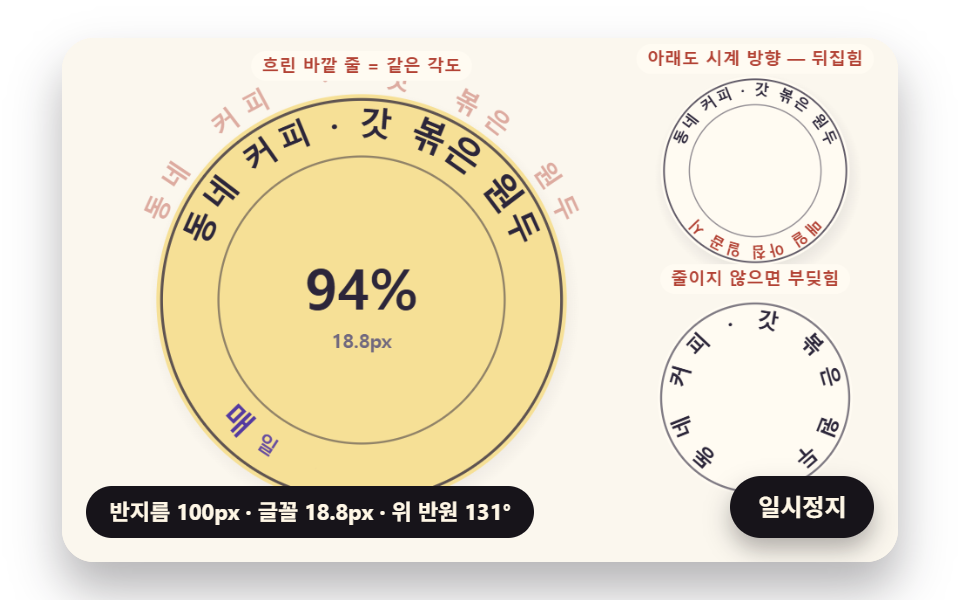 Circular Text CSS: 9 Rings Spaced by Letter WidthCircular text css puts letters on a ring. Place twelve letters 30 degrees apart and an i floats while a W crowds. So 01 See all demos in this post