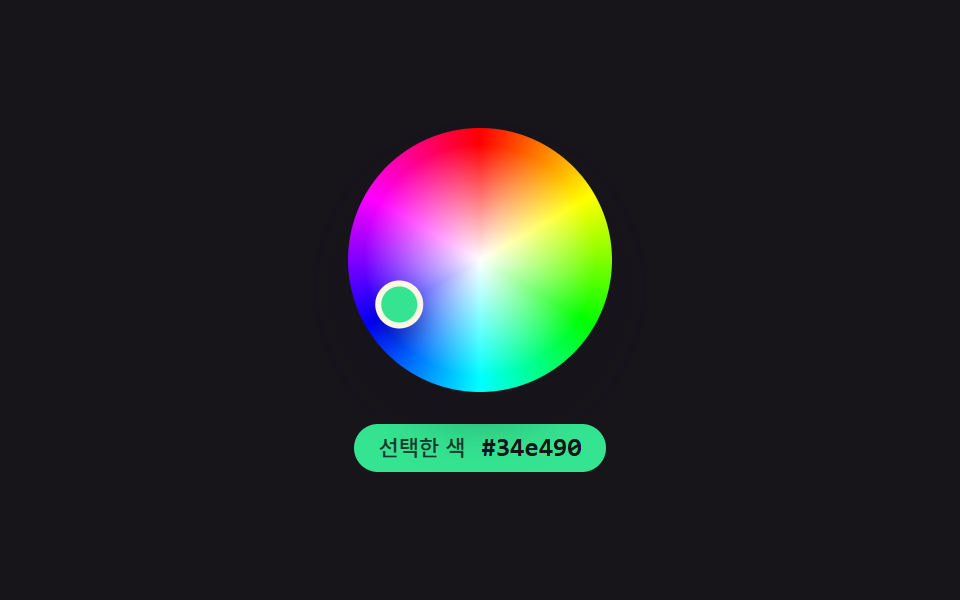
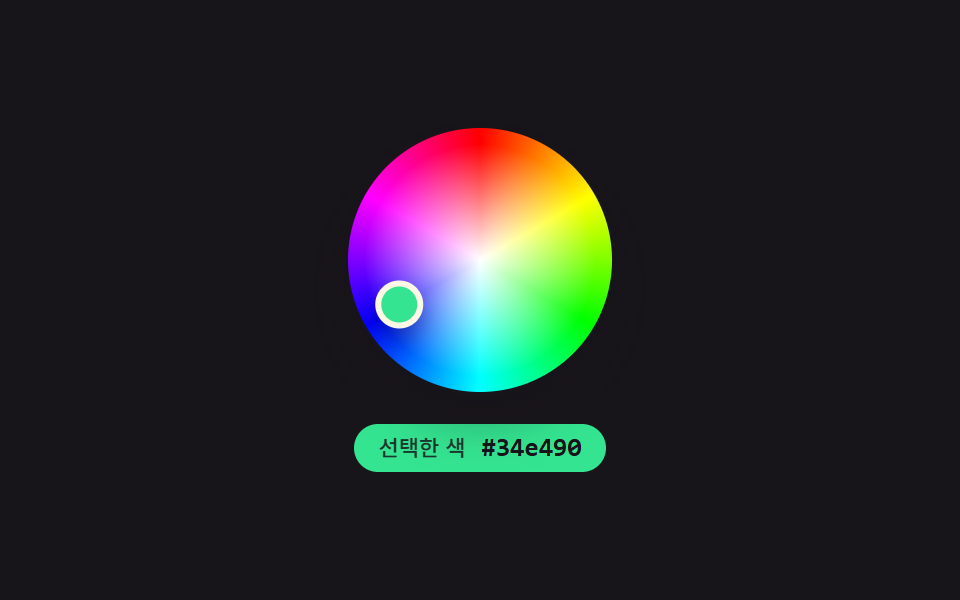
01iOS wheel — a circular color picker that recomputes hue from a point's angle
A point's angle on the color wheel is recomputed in radians and turned directly into a hue value, while its distance from the center becomes the saturation at the same time.
Best forMobile app color pickers, photo-editing tools
Math.atan2pointAtaria-valuetext
<main class="stage">
<section class="panel">
  <div class="wheelWrap">
    <div class="wheel" id="wheel" role="slider" aria-label="Color wheel" aria-valuemin="0" aria-valuemax="360" aria-valuenow="0" aria-valuetext="">
      <div class="handle" id="handle"></div>
    </div>
  </div>
  <div class="readout" id="readout">
    <span class="readoutLabel">Selected color</span>
    <span class="readoutHex" id="hex">#000000</span>
  </div>
</section>
</main>
@use "../../../../site/static/demo-tokens" as *;
@include stage($stage-ink);
.panel {
display: flex;
flex-direction: column;
align-items: center;
gap: $sp-4;
}
.wheelWrap {
position: relative;
width: 132px;
height: 132px;
}
.wheel {
position: relative;
width: 100%;
height: 100%;
border-radius: $r-pill;
box-shadow: $shadow-raised;
background:
radial-gradient(circle at center, hsl(0, 0%, 100%) 0%, hsla(0, 0%, 100%, 0) 62%),
conic-gradient(
hsl(0, 100%, 50%), hsl(60, 100%, 50%), hsl(120, 100%, 50%),
hsl(180, 100%, 50%), hsl(240, 100%, 50%), hsl(300, 100%, 50%), hsl(360, 100%, 50%)
);
}
.handle {
position: absolute;
top: 50%;
left: 50%;
width: 18px;
height: 18px;
border-radius: $r-pill;
border: 3px solid $subject-cream;
box-shadow: $shadow-press;
transition: none;
}
.readout {
display: flex;
align-items: center;
gap: $sp-2;
padding: $sp-1 $sp-3;
border-radius: $r-pill;
background: $subject-blue-deep;
color: $subject-cream;
&.is-ink {
color: $subject-ink;
}
}
.readoutLabel {
font-family: -apple-system, "Segoe UI", "Noto Sans KR", sans-serif;
font-weight: 500;
font-size: 11px;
line-height: 1.3;
opacity: .84;
}
.readoutHex {
font-family: "Space Mono", ui-monospace, monospace;
font-weight: 700;
font-size: 13px;
line-height: 1.3;
}
@media (max-width: 340px) {
.wheelWrap { width: 100px; height: 100px; }
.handle { width: 14px; height: 14px; }
.readoutLabel { font-size: 10px; }
.readoutHex { font-size: 11px; }
}
@media (prefers-reduced-motion: reduce) {
.handle { transition: none; }
}html, body {
margin: 0;
overflow: hidden;
}
.stage {
box-sizing: border-box;
min-height: 100vh;
display: grid;
place-items: center;
margin: 0;
background: #17141a;
font-family: -apple-system, "Segoe UI", "Noto Sans KR", sans-serif;
padding: clamp(8px, 4vw, 24px);
}
.panel {
display: flex;
flex-direction: column;
align-items: center;
gap: 16px;
}
.wheelWrap {
position: relative;
width: 132px;
height: 132px;
}
.wheel {
position: relative;
width: 100%;
height: 100%;
border-radius: 999px;
box-shadow: 0 14px 24px rgba(23, 20, 26, 0.32);
background: radial-gradient(circle at center, hsl(0, 0%, 100%) 0%, hsla(0, 0%, 100%, 0) 62%), conic-gradient(hsl(0, 100%, 50%), hsl(60, 100%, 50%), hsl(120, 100%, 50%), hsl(180, 100%, 50%), hsl(240, 100%, 50%), hsl(300, 100%, 50%), hsl(0, 100%, 50%));
}
.handle {
position: absolute;
top: 50%;
left: 50%;
width: 18px;
height: 18px;
border-radius: 999px;
border: 3px solid #fff7e6;
box-shadow: 0 6px 12px rgba(23, 20, 26, 0.32);
transition: none;
}
.readout {
display: flex;
align-items: center;
gap: 8px;
padding: 4px 12px;
border-radius: 999px;
background: #0a4fe8;
color: #fff7e6;
}
.readout.is-ink {
color: #17141a;
}
.readoutLabel {
font-family: -apple-system, "Segoe UI", "Noto Sans KR", sans-serif;
font-weight: 500;
font-size: 11px;
line-height: 1.3;
opacity: 0.84;
}
.readoutHex {
font-family: "Space Mono", ui-monospace, monospace;
font-weight: 700;
font-size: 13px;
line-height: 1.3;
}
@media (max-width: 340px) {
.wheelWrap {
width: 100px;
height: 100px;
}
.handle {
width: 14px;
height: 14px;
}
.readoutLabel {
font-size: 10px;
}
.readoutHex {
font-size: 11px;
}
}
@media (prefers-reduced-motion: reduce) {
.handle {
transition: none;
}
}// iOS 휠(01) — 손잡이의 중심 기준 각도를 라디안으로 다시 구해 색조로,
// 중심에서의 거리를 반지름 비율로 다시 구해 채도로 바꾸는 원형 컬러피커.
// 실키·실서버 요청 없음 — 좌표 궤적은 고정 시나리오로 자동 재생한다.
(function () {
var wheelEl = document.getElementById('wheel');
var handleEl = document.getElementById('handle');
var hexEl = document.getElementById('hex');
var readoutEl = document.getElementById('readout');
if (!wheelEl || !handleEl || !hexEl || !readoutEl) return;
var reduce = window.matchMedia('(prefers-reduced-motion: reduce)').matches;
var RADIUS = 60;
var LIGHTNESS = 55;
var CYCLE_MS = 2000;
// 드래그 궤적 — 반지름이 계속 바뀌는 여섯 지점을 순서대로 지난다 (286 의 단순 회전과 다른 시연)
var WAYPOINTS = [
{ x: 52, y: 4 },
{ x: 24, y: 44 },
{ x: -30, y: 41 },
{ x: -56, y: -6 },
{ x: -9, y: -53 },
{ x: 36, y: -39 },
{ x: 52, y: 4 }
];
var SEG_MS = CYCLE_MS / (WAYPOINTS.length - 1);
function hslToRgb(h, s, l) {
s /= 100; l /= 100;
var k = function (n) { return (n + h / 30) % 12; };
var a = s * Math.min(l, 1 - l);
var f = function (n) { return l - a * Math.max(-1, Math.min(k(n) - 3, Math.min(9 - k(n), 1))); };
return [Math.round(f(0) * 255), Math.round(f(8) * 255), Math.round(f(4) * 255)];
}
function toHex(n) { return n.toString(16).padStart(2, '0'); }
function pointAt(t) {
var idx = Math.min(WAYPOINTS.length - 2, Math.floor(t / SEG_MS));
var frac = (t % SEG_MS) / SEG_MS;
var a = WAYPOINTS[idx];
var b = WAYPOINTS[idx + 1];
return { x: a.x + (b.x - a.x) * frac, y: a.y + (b.y - a.y) * frac };
}
function apply(t) {
var p = pointAt(t);
var angle = Math.atan2(p.y, p.x);
var hue = ((angle * 180 / Math.PI) + 360) % 360;
var dist = Math.min(1, Math.hypot(p.x, p.y) / RADIUS);
var sat = dist * 100;
var rgb = hslToRgb(hue, sat, LIGHTNESS);
var hex = '#' + toHex(rgb[0]) + toHex(rgb[1]) + toHex(rgb[2]);
var brightness = (rgb[0] * 299 + rgb[1] * 587 + rgb[2] * 114) / 1000;
var ink = brightness > 150;
handleEl.style.transform = 'translate(-50%, -50%) translate(' + p.x.toFixed(2) + 'px, ' + p.y.toFixed(2) + 'px)';
handleEl.style.background = hex;
readoutEl.style.background = hex;
readoutEl.classList.toggle('is-ink', ink);
hexEl.textContent = hex;
wheelEl.setAttribute('aria-valuenow', Math.round(hue));
wheelEl.setAttribute('aria-valuetext', hex);
}
if (reduce) {
apply(0);
return;
}
var start = null;
function loop(ts) {
if (start === null) start = ts;
var t = (ts - start) % CYCLE_MS;
apply(t);
requestAnimationFrame(loop);
}
requestAnimationFrame(loop);
})();import { useEffect, useRef } from "react";
import styles from "./ColorPickerIosWheel.module.scss";
// iOS 휠 — 손잡이의 중심 기준 각도를 색조로, 중심 거리를 채도로 다시 구하는 원형 컬러피커.
// 실키·실서버 요청 없음. 좌표 궤적은 고정 시나리오로 자동 재생한다.
const RADIUS = 60;
const LIGHTNESS = 55;
const CYCLE_MS = 2000;
const WAYPOINTS = [
{ x: 52, y: 4 },
{ x: 24, y: 44 },
{ x: -30, y: 41 },
{ x: -56, y: -6 },
{ x: -9, y: -53 },
{ x: 36, y: -39 },
{ x: 52, y: 4 },
];
const SEG_MS = CYCLE_MS / (WAYPOINTS.length - 1);
function hslToRgb(h: number, s: number, l: number): [number, number, number] {
s /= 100;
l /= 100;
const k = (n: number) => (n + h / 30) % 12;
const a = s * Math.min(l, 1 - l);
const f = (n: number) => l - a * Math.max(-1, Math.min(k(n) - 3, Math.min(9 - k(n), 1)));
return [Math.round(f(0) * 255), Math.round(f(8) * 255), Math.round(f(4) * 255)];
}
function toHex(n: number) {
return n.toString(16).padStart(2, "0");
}
function pointAt(t: number) {
const idx = Math.min(WAYPOINTS.length - 2, Math.floor(t / SEG_MS));
const frac = (t % SEG_MS) / SEG_MS;
const a = WAYPOINTS[idx];
const b = WAYPOINTS[idx + 1];
return { x: a.x + (b.x - a.x) * frac, y: a.y + (b.y - a.y) * frac };
}
export default function ColorPickerIosWheel() {
const wheelRef = useRef<HTMLDivElement>(null);
const handleRef = useRef<HTMLDivElement>(null);
const readoutRef = useRef<HTMLDivElement>(null);
const hexRef = useRef<HTMLSpanElement>(null);
useEffect(() => {
const wheel = wheelRef.current;
const handle = handleRef.current;
const readout = readoutRef.current;
const hexEl = hexRef.current;
if (!wheel || !handle || !readout || !hexEl) return;
const reduce = window.matchMedia("(prefers-reduced-motion: reduce)").matches;
function apply(t: number) {
const p = pointAt(t);
const angle = Math.atan2(p.y, p.x);
const hue = ((angle * 180) / Math.PI + 360) % 360;
const dist = Math.min(1, Math.hypot(p.x, p.y) / RADIUS);
const sat = dist * 100;
const rgb = hslToRgb(hue, sat, LIGHTNESS);
const hex = "#" + toHex(rgb[0]) + toHex(rgb[1]) + toHex(rgb[2]);
const brightness = (rgb[0] * 299 + rgb[1] * 587 + rgb[2] * 114) / 1000;
const ink = brightness > 150;
handle!.style.transform = `translate(-50%, -50%) translate(${p.x.toFixed(2)}px, ${p.y.toFixed(2)}px)`;
handle!.style.background = hex;
readout!.style.background = hex;
readout!.classList.toggle(styles.isInk, ink);
hexEl!.textContent = hex;
wheel!.setAttribute("aria-valuenow", String(Math.round(hue)));
wheel!.setAttribute("aria-valuetext", hex);
}
if (reduce) {
apply(0);
return;
}
let start: number | null = null;
let raf = 0;
function loop(ts: number) {
if (start === null) start = ts;
const t = (ts - start) % CYCLE_MS;
apply(t);
raf = requestAnimationFrame(loop);
}
raf = requestAnimationFrame(loop);
return () => cancelAnimationFrame(raf);
}, []);
return (
<div className={styles.stage}>
<section className={styles.panel}>
<div className={styles.wheelWrap}>
<div
className={styles.wheel}
ref={wheelRef}
role="slider"
aria-label="색상환"
aria-valuemin={0}
aria-valuemax={360}
aria-valuenow={0}
aria-valuetext=""
>
<div className={styles.handle} ref={handleRef} />
</div>
</div>
<div className={styles.readout} ref={readoutRef}>
<span className={styles.readoutLabel}>선택한 색</span>
<span className={styles.readoutHex} ref={hexRef}>#000000</span>
</div>
</section>
</div>
);
}01 iOS wheel — a circular color picker that recomputes hue from a point's angle — Measured area 8.494% · moving frames 23/23Original by GODRICH · SCSS and React ship in the zip · 9 Color Picker Design Patterns (Copy-Paste)
The post this demo lives in
 9 Color Picker Design Patterns (Copy-Paste)Nine color-picker UIs that compute: a point's angle turns into a hue, swatch brightness flips the check-icon color, and See all demos in this post
If you like this effect - similar demos
 Inputs02 Range Slider That Fills Only Between Its Two HandlesDual Range Slider UI — 9 Two-Handle Patterns
 Inputs05 Contrast Badge That Crosses a Pass Line From a Hex ValueCSS Calculator Design: 9 Inputs, Unit Converter UI
 Inputs07 Live currency format — a stepper that recomputes digit-grouping positions every time its value changesNumber Stepper UI: 9 Interaction Patterns