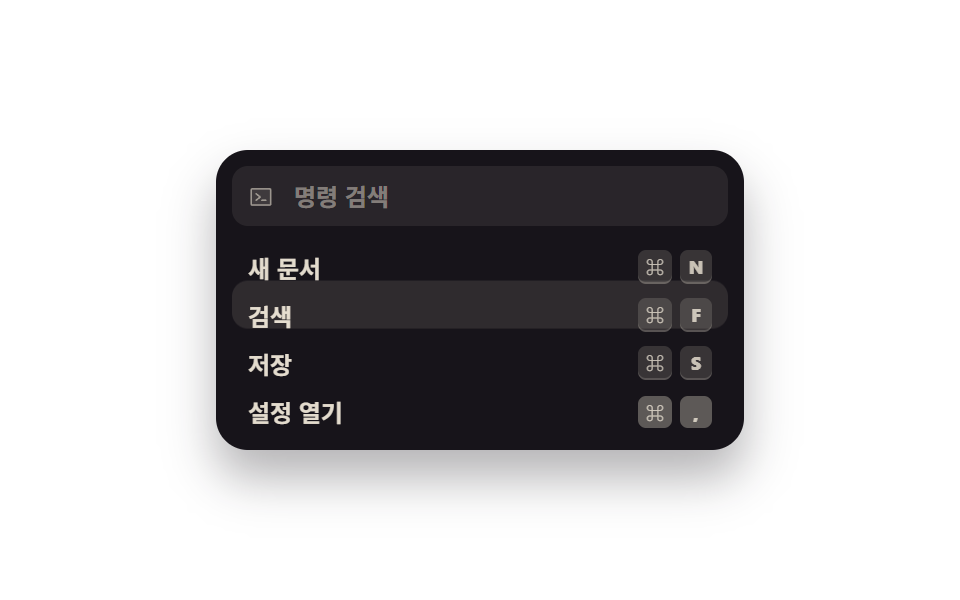
04Right-aligned shortcut badges
However short the command name is, the keycap badges line up at the right edge, and only the active row's caps sink as if pressed.
Best forWhen the palette should double as a shortcut cheat sheet so people stop needing to open it next time
margin-left: autokbdtranslateY
<main class="stage">
  <div class="pal is-demo" role="dialog" aria-modal="true" aria-label="Command palette">
    <div class="pal__bar">
      <span class="pal__mag" aria-hidden="true"><svg viewBox="0 0 256 256" width="13" height="13"><g fill="currentColor"><path d="M224 56v144a8 8 0 0 1-8 8H40a8 8 0 0 1-8-8V56a8 8 0 0 1 8-8h176a8 8 0 0 1 8 8" opacity=".2"/><path d="M128 128a8 8 0 0 1-3 6.25l-40 32a8 8 0 1 1-10-12.5L107.19 128L75 102.25a8 8 0 1 1 10-12.5l40 32a8 8 0 0 1 3 6.25m48 24h-40a8 8 0 0 0 0 16h40a8 8 0 0 0 0-16m56-96v144a16 16 0 0 1-16 16H40a16 16 0 0 1-16-16V56a16 16 0 0 1 16-16h176a16 16 0 0 1 16 16m-16 144V56H40v144z"/></g></svg></span>
      <input class="pal__input" id="q" type="text" role="combobox" aria-expanded="true" aria-controls="list" aria-label="Search commands" placeholder="Search commands" autocomplete="off">
    </div>
    <div class="pal__box">
      <span class="pal__cursor" aria-hidden="true"></span>
      <div class="pal__list" id="list" role="listbox" aria-label="Command palette">
        <div class="pal__opt" id="o1" role="option" aria-selected="false" tabindex="-1">
          <span class="pal__name">New document</span>
          <span class="pal__keys"><kbd class="pal__kbd">⌘</kbd><kbd class="pal__kbd">N</kbd></span>
        </div>
        <div class="pal__opt" id="o2" role="option" aria-selected="false" tabindex="-1">
          <span class="pal__name">Search</span>
          <span class="pal__keys"><kbd class="pal__kbd">⌘</kbd><kbd class="pal__kbd">F</kbd></span>
        </div>
        <div class="pal__opt" id="o3" role="option" aria-selected="false" tabindex="-1">
          <span class="pal__name">Save</span>
          <span class="pal__keys"><kbd class="pal__kbd">⌘</kbd><kbd class="pal__kbd">S</kbd></span>
        </div>
        <div class="pal__opt" id="o4" role="option" aria-selected="false" tabindex="-1">
          <span class="pal__name">Open settings</span>
          <span class="pal__keys"><kbd class="pal__kbd">⌘</kbd><kbd class="pal__kbd">,</kbd></span>
        </div>
      </div>
    </div>
  </div>
</main>@use "../../../../site/static/demo-tokens" as *;
$duration: $dur-instant;
$easing: $ease-spring;
$color: $subject-cream;
@include stage($stage-paper);
.pal {
box-sizing: border-box;
width: min(264px, 88vw);
padding: $sp-2;
background: $subject-ink;
border-radius: $r-card;
box-shadow: $shadow-raised;
font-family: -apple-system, "Segoe UI", "Noto Sans KR", sans-serif;
color: $color;
}
.pal__bar {
box-sizing: border-box;
height: 30px;
display: flex; align-items: center; gap: $sp-2;
padding: 0 $sp-2;
border-radius: $r-sm;
background: rgba(255, 247, 230, .08);
}
.pal__mag { display: inline-flex; color: rgba(255, 247, 230, .5); }
.pal__input {
flex: 1 1 auto;
min-width: 0;
border: 0; background: transparent;
font-family: inherit;
font-size: 12px; font-weight: 600;
color: $color;
}
.pal__input::placeholder { color: rgba(255, 247, 230, .42); }
.pal__input:focus-visible { outline: 2px solid $subject-blue; outline-offset: 2px; border-radius: $r-xs; }
.pal__box {
position: relative;
box-sizing: border-box;
height: 96px;
margin: $sp-2 0 0;
}
.pal__cursor {
position: absolute;
left: 0; top: 0;
z-index: 0;
width: 100%; height: 24px;
border-radius: $r-sm;
background: rgba(255, 247, 230, .1);
opacity: 0;
}
.pal__list { position: relative; z-index: 1; }
.pal__opt {
box-sizing: border-box;
height: 24px;
display: flex; align-items: center; gap: $sp-2;
padding: 0 $sp-2;
border-radius: $r-sm;
cursor: pointer;
}
.pal__opt.is-at { background: rgba(255, 247, 230, .1); }
.pal__opt.is-run { background: rgba(47, 109, 246, .42); }
.pal__name {
font-size: 12px; font-weight: 600;
color: rgba(255, 247, 230, .88);
white-space: nowrap;
}
// 이름 길이와 무관하게 배지는 늘 오른쪽 끝 — 남는 자리를 auto 마진이 통째로 먹는다
.pal__keys { margin-left: auto; display: inline-flex; gap: $sp-1; }
.pal__kbd {
box-sizing: border-box;
min-width: 16px; height: 16px;
display: inline-flex; align-items: center; justify-content: center;
padding: 0 $sp-1;
border-radius: $r-xs;
background: rgba(255, 247, 230, .14);
box-shadow: 0 1px 0 rgba(255, 247, 230, .28);
font-family: inherit;
font-size: 9px; font-weight: 800;
color: rgba(255, 247, 230, .72);
}
// ── 자동 루프: 커서가 네 줄을 차례로 짚고, 커서가 선 줄의 키캡만 1px 내려앉는다 ──
.pal.is-demo .pal__cursor { opacity: 1; animation: cur-step $dur-loop $easing infinite; }
@keyframes cur-step {
0%, 4% { transform: translateY(0); }
22%, 26% { transform: translateY(24px); }
44%, 48% { transform: translateY(48px); }
66%, 70% { transform: translateY(72px); }
92%, 100% { transform: translateY(0); }
}
.pal.is-demo #o1 .pal__kbd { animation: press-1 $dur-loop $ease-out infinite; }
.pal.is-demo #o2 .pal__kbd { animation: press-2 $dur-loop $ease-out infinite; }
.pal.is-demo #o3 .pal__kbd { animation: press-3 $dur-loop $ease-out infinite; }
.pal.is-demo #o4 .pal__kbd { animation: press-4 $dur-loop $ease-out infinite; }
@mixin press($a, $b) {
0%, #{$a} { transform: translateY(0); box-shadow: 0 1px 0 rgba(255, 247, 230, .28); background: rgba(255, 247, 230, .14); }
#{$a + 2%}, #{$b} { transform: translateY(1px); box-shadow: 0 0 0 rgba(255, 247, 230, 0); background: rgba(255, 247, 230, .3); }
#{$b + 2%}, 100% { transform: translateY(0); box-shadow: 0 1px 0 rgba(255, 247, 230, .28); background: rgba(255, 247, 230, .14); }
}
@keyframes press-1 { @include press(2%, 16%); }
@keyframes press-2 { @include press(24%, 38%); }
@keyframes press-3 { @include press(46%, 60%); }
@keyframes press-4 { @include press(68%, 82%); }
@media (prefers-reduced-motion: reduce) {
.pal.is-demo .pal__cursor,
.pal.is-demo .pal__kbd { animation: none !important; }
.pal.is-demo .pal__cursor { opacity: 1; }
}html, body {
margin: 0;
overflow: hidden;
}
.stage {
box-sizing: border-box;
min-height: 100vh;
display: grid;
place-items: center;
margin: 0;
background: #ffffff;
font-family: -apple-system, "Segoe UI", "Noto Sans KR", sans-serif;
padding: clamp(8px, 4vw, 24px);
}
.pal {
box-sizing: border-box;
width: min(264px, 88vw);
padding: 8px;
background: #17141a;
border-radius: 16px;
box-shadow: 0 14px 24px rgba(23, 20, 26, 0.32);
font-family: -apple-system, "Segoe UI", "Noto Sans KR", sans-serif;
color: #fff7e6;
}
.pal__bar {
box-sizing: border-box;
height: 30px;
display: flex;
align-items: center;
gap: 8px;
padding: 0 8px;
border-radius: 8px;
background: rgba(255, 247, 230, 0.08);
}
.pal__mag {
display: inline-flex;
color: rgba(255, 247, 230, 0.5);
}
.pal__input {
flex: 1 1 auto;
min-width: 0;
border: 0;
background: transparent;
font-family: inherit;
font-size: 12px;
font-weight: 600;
color: #fff7e6;
}
.pal__input::placeholder {
color: rgba(255, 247, 230, 0.42);
}
.pal__input:focus-visible {
outline: 2px solid #2f6df6;
outline-offset: 2px;
border-radius: 4px;
}
.pal__box {
position: relative;
box-sizing: border-box;
height: 96px;
margin: 8px 0 0;
}
.pal__cursor {
position: absolute;
left: 0;
top: 0;
z-index: 0;
width: 100%;
height: 24px;
border-radius: 8px;
background: rgba(255, 247, 230, 0.1);
opacity: 0;
}
.pal__list {
position: relative;
z-index: 1;
}
.pal__opt {
box-sizing: border-box;
height: 24px;
display: flex;
align-items: center;
gap: 8px;
padding: 0 8px;
border-radius: 8px;
cursor: pointer;
}
.pal__opt.is-at {
background: rgba(255, 247, 230, 0.1);
}
.pal__opt.is-run {
background: rgba(47, 109, 246, 0.42);
}
.pal__name {
font-size: 12px;
font-weight: 600;
color: rgba(255, 247, 230, 0.88);
white-space: nowrap;
}
.pal__keys {
margin-left: auto;
display: inline-flex;
gap: 4px;
}
.pal__kbd {
box-sizing: border-box;
min-width: 16px;
height: 16px;
display: inline-flex;
align-items: center;
justify-content: center;
padding: 0 4px;
border-radius: 4px;
background: rgba(255, 247, 230, 0.14);
box-shadow: 0 1px 0 rgba(255, 247, 230, 0.28);
font-family: inherit;
font-size: 9px;
font-weight: 800;
color: rgba(255, 247, 230, 0.72);
}
.pal.is-demo .pal__cursor {
opacity: 1;
animation: cur-step 2s cubic-bezier(0.2, 0.8, 0.2, 1) infinite;
}
@keyframes cur-step {
0%, 4% {
transform: translateY(0);
}
22%, 26% {
transform: translateY(24px);
}
44%, 48% {
transform: translateY(48px);
}
66%, 70% {
transform: translateY(72px);
}
92%, 100% {
transform: translateY(0);
}
}
.pal.is-demo #o1 .pal__kbd {
animation: press-1 2s ease-out infinite;
}
.pal.is-demo #o2 .pal__kbd {
animation: press-2 2s ease-out infinite;
}
.pal.is-demo #o3 .pal__kbd {
animation: press-3 2s ease-out infinite;
}
.pal.is-demo #o4 .pal__kbd {
animation: press-4 2s ease-out infinite;
}
@keyframes press-1 {
0%, 2% {
transform: translateY(0);
box-shadow: 0 1px 0 rgba(255, 247, 230, 0.28);
background: rgba(255, 247, 230, 0.14);
}
4%, 16% {
transform: translateY(1px);
box-shadow: 0 0 0 rgba(255, 247, 230, 0);
background: rgba(255, 247, 230, 0.3);
}
18%, 100% {
transform: translateY(0);
box-shadow: 0 1px 0 rgba(255, 247, 230, 0.28);
background: rgba(255, 247, 230, 0.14);
}
}
@keyframes press-2 {
0%, 24% {
transform: translateY(0);
box-shadow: 0 1px 0 rgba(255, 247, 230, 0.28);
background: rgba(255, 247, 230, 0.14);
}
26%, 38% {
transform: translateY(1px);
box-shadow: 0 0 0 rgba(255, 247, 230, 0);
background: rgba(255, 247, 230, 0.3);
}
40%, 100% {
transform: translateY(0);
box-shadow: 0 1px 0 rgba(255, 247, 230, 0.28);
background: rgba(255, 247, 230, 0.14);
}
}
@keyframes press-3 {
0%, 46% {
transform: translateY(0);
box-shadow: 0 1px 0 rgba(255, 247, 230, 0.28);
background: rgba(255, 247, 230, 0.14);
}
48%, 60% {
transform: translateY(1px);
box-shadow: 0 0 0 rgba(255, 247, 230, 0);
background: rgba(255, 247, 230, 0.3);
}
62%, 100% {
transform: translateY(0);
box-shadow: 0 1px 0 rgba(255, 247, 230, 0.28);
background: rgba(255, 247, 230, 0.14);
}
}
@keyframes press-4 {
0%, 68% {
transform: translateY(0);
box-shadow: 0 1px 0 rgba(255, 247, 230, 0.28);
background: rgba(255, 247, 230, 0.14);
}
70%, 82% {
transform: translateY(1px);
box-shadow: 0 0 0 rgba(255, 247, 230, 0);
background: rgba(255, 247, 230, 0.3);
}
84%, 100% {
transform: translateY(0);
box-shadow: 0 1px 0 rgba(255, 247, 230, 0.28);
background: rgba(255, 247, 230, 0.14);
}
}
@media (prefers-reduced-motion: reduce) {
.pal.is-demo .pal__cursor,
.pal.is-demo .pal__kbd {
animation: none !important;
}
.pal.is-demo .pal__cursor {
opacity: 1;
}
}// 실제 동작: ↑↓ 로 줄을 옮기면 그 줄의 키캡만 눌린 모양이 되고, 실제 ⌘/Ctrl 조합을 치면 그 줄이 실행된다.
var pal = document.querySelector('.pal');
var input = document.getElementById('q');
var opts = [].slice.call(document.querySelectorAll('.pal__opt'));
var keys = ['n', 'f', 's', ','];
var at = -1;
function move(i) {
pal.classList.remove('is-demo');
at = Math.max(0, Math.min(i, opts.length - 1));
opts.forEach(function (o, k) { o.classList.toggle('is-at', k === at); });
input.setAttribute('aria-activedescendant', opts[at].id);
}
function run(i) {
opts.forEach(function (o, k) { o.setAttribute('aria-selected', String(k === i)); });
opts[i].classList.add('is-run');
}
document.addEventListener('keydown', function (e) {
var k = e.key.toLowerCase();
if (e.metaKey || e.ctrlKey) {
var i = keys.indexOf(k);
if (i >= 0) { pal.classList.remove('is-demo'); move(i); run(i); e.preventDefault(); }
return;
}
if (e.key === 'ArrowDown' || e.key === 'ArrowUp') {
move(at + (e.key === 'ArrowDown' ? 1 : -1)); e.preventDefault();
} else if (e.key === 'Enter' && at >= 0) {
run(at); e.preventDefault();
} else if (e.key === 'Escape') {
opts.forEach(function (o) { o.classList.remove('is-at', 'is-run'); });
at = -1; input.focus({ preventScroll: true });
}
});
opts.forEach(function (o, i) { o.addEventListener('mousemove', function () { move(i); }); });import { useEffect, useRef, useState } from "react";
import type { CSSProperties } from "react";
import styles from "./ShortcutBadgePalette.module.scss";
export type ShortcutRow = { label: string; keys: string[]; accel: string };
export type ShortcutBadgePaletteProps = {
placeholder?: string;
rows?: ShortcutRow[];
duration?: number;
easing?: string;
color?: string;
};
type Vars = CSSProperties & { "--duration"?: string; "--easing"?: string; "--color"?: string };
type KeyEvt = { key: string; preventDefault: () => void };
const DEFAULT_ROWS: ShortcutRow[] = [
{ label: "New document", keys: ["⌘", "N"], accel: "n" },
{ label: "Search", keys: ["⌘", "F"], accel: "f" },
{ label: "Save", keys: ["⌘", "S"], accel: "s" },
{ label: "Open settings", keys: ["⌘", ","], accel: "," },
];
export default function ShortcutBadgePalette({
placeholder = "Search commands",
rows = DEFAULT_ROWS,
duration = 140,
easing = "cubic-bezier(.2,.8,.2,1)",
color = "#fff7e6",
}: ShortcutBadgePaletteProps) {
const [at, setAt] = useState(-1);
const [ran, setRan] = useState(-1);
const inputRef = useRef<HTMLInputElement>(null);
const vars: Vars = { "--duration": `${duration}ms`, "--easing": easing, "--color": color };
// 배지에 적힌 조합을 실제로 치면 그 줄이 실행된다 — 치트시트가 장식이 아니게 하는 부분
useEffect(() => {
function onKey(e: KeyboardEvent) {
if (!(e.metaKey || e.ctrlKey)) return;
const i = rows.findIndex((r) => r.accel === e.key.toLowerCase());
if (i < 0) return;
e.preventDefault();
setAt(i);
setRan(i);
}
document.addEventListener("keydown", onKey);
return () => document.removeEventListener("keydown", onKey);
}, [rows]);
return (
<div className={styles.pal} style={vars} role="dialog" aria-modal="true" aria-label="Command palette">
<div className={styles.bar}>
<span className={styles.mag} aria-hidden="true">
<svg viewBox="0 0 256 256" width="13" height="13">
<g fill="currentColor">
<path d="M224 56v144a8 8 0 0 1-8 8H40a8 8 0 0 1-8-8V56a8 8 0 0 1 8-8h176a8 8 0 0 1 8 8" opacity=".2" />
<path d="M128 128a8 8 0 0 1-3 6.25l-40 32a8 8 0 1 1-10-12.5L107.19 128L75 102.25a8 8 0 1 1 10-12.5l40 32a8 8 0 0 1 3 6.25m48 24h-40a8 8 0 0 0 0 16h40a8 8 0 0 0 0-16m56-96v144a16 16 0 0 1-16 16H40a16 16 0 0 1-16-16V56a16 16 0 0 1 16-16h176a16 16 0 0 1 16 16m-16 144V56H40v144z" />
</g>
</svg>
</span>
<input
ref={inputRef}
className={styles.input}
type="text"
role="combobox"
aria-expanded="true"
aria-controls="sb-list"
aria-activedescendant={at >= 0 ? `sb-o${at}` : undefined}
aria-label={placeholder}
placeholder={placeholder}
autoComplete="off"
onKeyDown={(e: KeyEvt) => {
if (e.key === "ArrowDown" || e.key === "ArrowUp") {
e.preventDefault();
setAt((a) => Math.max(0, Math.min(a + (e.key === "ArrowDown" ? 1 : -1), rows.length - 1)));
} else if (e.key === "Enter" && at >= 0) {
e.preventDefault();
setRan(at);
} else if (e.key === "Escape") {
setAt(-1); setRan(-1);
inputRef.current?.focus({ preventScroll: true });
}
}}
/>
</div>
<div className={styles.list} id="sb-list" role="listbox" aria-label="Command palette">
{rows.map((row, i) => (
<div
key={row.label}
id={`sb-o${i}`}
className={`${styles.opt} ${i === at ? styles.isAt : ""} ${i === ran ? styles.isRun : ""}`}
role="option"
aria-selected={i === ran}
tabIndex={-1}
onMouseMove={() => setAt(i)}
onClick={() => { setAt(i); setRan(i); }}
>
<span className={styles.name}>{row.label}</span>
<span className={styles.keys}>
{row.keys.map((k) => <kbd className={styles.kbd} key={k}>{k}</kbd>)}
</span>
</div>
))}
</div>
</div>
);
}04 Right-aligned shortcut badges — Measured area 15.966% · moving frames 19/23Original by GODRICH · SCSS and React ship in the zip · Command Palette UI Design — 9 That Really Open
The post this demo lives in
 Command Palette UI Design — 9 That Really OpenCommand palette UI design is the pattern behind every Cmd+K overlay: one floating field that searches commands, document See all demos in this post