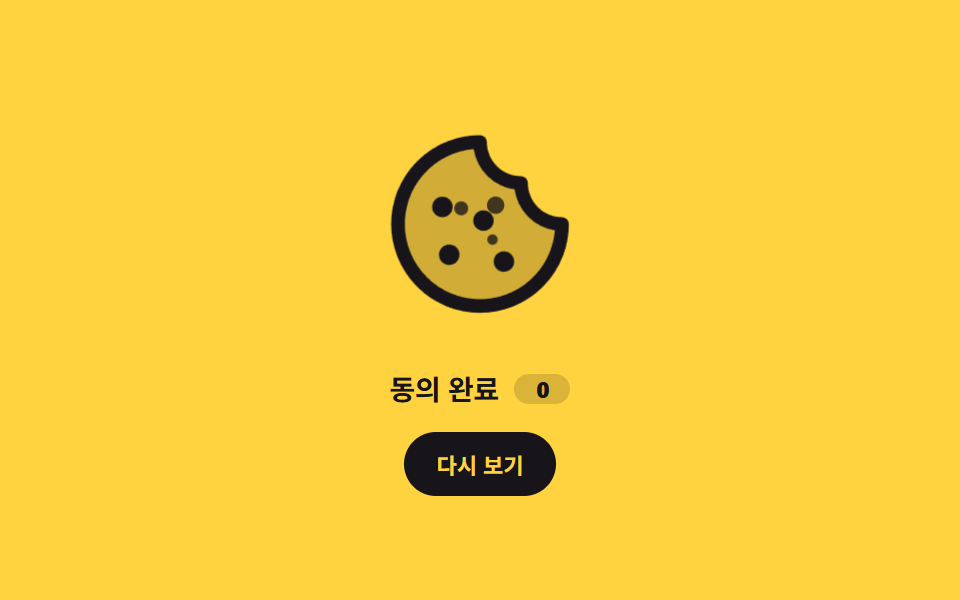
07Crumbling cookie icon
As the cookie icon squashes and swells once, three crumbs shoot out at different angles and then return along the same path to rejoin it.
Best forThe confirmation motion at the moment consent is given, and hover reactions on a cookie settings button
scale .88→1.08부스러기 3개 왕복radius 50%
<main class="stage">
  <div class="ck is-demo">
    <div class="ck__art">
      <span class="ck__icon" aria-hidden="true"><svg viewBox="0 0 256 256" width="120" height="120"><g fill="currentColor"><path d="M224 128a96 96 0 1 1-96-96a48 48 0 0 0 48 48a48 48 0 0 0 48 48" opacity=".2"/><path d="M164.49 163.51a12 12 0 1 1-17 0a12 12 0 0 1 17 0m-81-8a12 12 0 1 0 17 0a12 12 0 0 0-16.98 0Zm9-39a12 12 0 1 0-17 0a12 12 0 0 0 17-.02Zm48-1a12 12 0 1 0 0 17a12 12 0 0 0 0-17M232 128A104 104 0 1 1 128 24a8 8 0 0 1 8 8a40 40 0 0 0 40 40a8 8 0 0 1 8 8a40 40 0 0 0 40 40a8 8 0 0 1 8 8m-16.31 7.39A56.13 56.13 0 0 1 168.5 87.5a56.13 56.13 0 0 1-47.89-47.19a88 88 0 1 0 95.08 95.08"/></g></svg></span>
      <i class="ck__crumb ck__crumb--a" aria-hidden="true"></i>
      <i class="ck__crumb ck__crumb--b" aria-hidden="true"></i>
      <i class="ck__crumb ck__crumb--c" aria-hidden="true"></i>
    </div>
    <p class="ck__label">Consent saved<b class="ck__count">0</b></p>
    <button class="ck__btn" type="button">Replay</button>
  </div>
</main>
@use "../../../../site/static/demo-tokens" as *;
$duration: $dur-loop;
$easing: $ease-spring;
$color: $subject-ink;
@include stage($stage-yellow);
.ck {
box-sizing: border-box;
display: grid;
justify-items: center;
gap: $sp-3;
color: $color;
font-family: -apple-system, "Segoe UI", "Noto Sans KR", sans-serif;
}
// 부스러기가 튀어 나갈 자리 — 아이콘 상자 안이라 480×300 · 320×200 둘 다 안 넘친다
.ck__art {
position: relative;
width: clamp(96px, 26vw, 120px);
height: clamp(96px, 26vw, 120px);
}
.ck__icon {
display: block;
width: 100%;
height: 100%;
color: $color;
}
.ck__icon svg { display: block; width: 100%; height: 100%; }
.ck__crumb {
position: absolute;
border-radius: 50%;
background: $color;
opacity: 0;
}
// left/top 으로 가운데에 붙인다 — margin 음수를 쓰면 4px 격자(BD17)를 벗어난다
.ck__crumb--a { width: 8px; height: 8px; left: calc(50% - 4px); top: calc(50% - 4px); }
.ck__crumb--b { width: 10px; height: 10px; left: calc(50% - 5px); top: calc(50% - 5px); }
.ck__crumb--c { width: 6px; height: 6px; left: calc(50% - 3px); top: calc(50% - 3px); }
.ck__label {
display: flex;
align-items: center;
gap: $sp-2;
margin: 0;
font-size: clamp(12px, 3.2vw, 14px);
font-weight: 700;
letter-spacing: -.01em;
}
.ck__count {
display: inline-grid;
place-items: center;
min-width: 20px;
padding: 0 $sp-1;
border-radius: $r-pill;
background: rgba(23, 20, 26, .16);
font-size: 11px;
font-variant-numeric: tabular-nums;
}
.ck__btn {
border: 0;
border-radius: $r-pill;
background: $color;
color: $stage-yellow;
font-family: inherit;
font-size: 11px;
font-weight: 700;
padding: $sp-2 $sp-4;
cursor: pointer;
transition: transform $dur-quick $ease-out, opacity $dur-quick $ease-out;
}
.ck__btn:hover { opacity: .84; }
.ck__btn:focus-visible { outline: 2px solid $color; outline-offset: 2px; }
.ck__btn:active { transform: scale(.96); }
// ── 한 사이클: 쿠키가 눌렸다 튀어오르고, 부스러기 셋이 각자 다른 각도로 나갔다 돌아온다 ──
.ck.is-demo .ck__icon,
.ck.is-burst .ck__icon { animation: ck-pop $duration $easing infinite; }
.ck.is-demo .ck__crumb--a,
.ck.is-burst .ck__crumb--a { animation: ck-crumb-a $duration $easing infinite; }
.ck.is-demo .ck__crumb--b,
.ck.is-burst .ck__crumb--b { animation: ck-crumb-b $duration $easing infinite; }
.ck.is-demo .ck__crumb--c,
.ck.is-burst .ck__crumb--c { animation: ck-crumb-c $duration $easing infinite; }
// 버튼으로 켜는 한 번짜리 — 뒤에 와서 반복 횟수만 덮는다
.ck.is-burst .ck__icon,
.ck.is-burst .ck__crumb { animation-iteration-count: 1; }
@keyframes ck-pop {
0% { transform: scale(1); }
18% { transform: scale(.88); }
44% { transform: scale(1.08); }
70% { transform: scale(1); }
100% { transform: scale(1); }
}
@keyframes ck-crumb-a {
0% { transform: translate(0, 0) scale(.4); opacity: 0; }
16% { transform: translate(-12px, -10px) scale(1); opacity: 1; }
46% { transform: translate(-34px, -26px) scale(1); opacity: 1; }
78% { transform: translate(-10px, -8px) scale(.7); opacity: .5; }
100% { transform: translate(0, 0) scale(.4); opacity: 0; }
}
@keyframes ck-crumb-b {
0% { transform: translate(0, 0) scale(.4); opacity: 0; }
16% { transform: translate(10px, -12px) scale(1); opacity: 1; }
46% { transform: translate(30px, -32px) scale(1); opacity: 1; }
78% { transform: translate(8px, -10px) scale(.7); opacity: .5; }
100% { transform: translate(0, 0) scale(.4); opacity: 0; }
}
@keyframes ck-crumb-c {
0% { transform: translate(0, 0) scale(.4); opacity: 0; }
16% { transform: translate(8px, 10px) scale(1); opacity: 1; }
46% { transform: translate(24px, 28px) scale(1); opacity: 1; }
78% { transform: translate(6px, 8px) scale(.7); opacity: .5; }
100% { transform: translate(0, 0) scale(.4); opacity: 0; }
}
@media (max-width: 340px) {
.ck { gap: $sp-2; }
.ck__btn { padding: $sp-1 $sp-3; }
.ck__count { min-width: 16px; }
}
@media (prefers-reduced-motion: reduce) {
.ck.is-demo .ck__icon, .ck.is-burst .ck__icon,
.ck.is-demo .ck__crumb, .ck.is-burst .ck__crumb { animation: none !important; }
// 루프는 끄고 "부서진 뒤" 상태는 남긴다
.ck__crumb { opacity: 1; }
.ck__crumb--a { transform: translate(-34px, -26px); }
.ck__crumb--b { transform: translate(30px, -32px); }
.ck__crumb--c { transform: translate(24px, 28px); }
.ck__btn { transition: none; }
}html, body {
margin: 0;
overflow: hidden;
}
.stage {
box-sizing: border-box;
min-height: 100vh;
display: grid;
place-items: center;
margin: 0;
background: #ffd23f;
font-family: -apple-system, "Segoe UI", "Noto Sans KR", sans-serif;
padding: clamp(8px, 4vw, 24px);
}
.ck {
box-sizing: border-box;
display: grid;
justify-items: center;
gap: 12px;
color: #17141a;
font-family: -apple-system, "Segoe UI", "Noto Sans KR", sans-serif;
}
.ck__art {
position: relative;
width: clamp(96px, 26vw, 120px);
height: clamp(96px, 26vw, 120px);
}
.ck__icon {
display: block;
width: 100%;
height: 100%;
color: #17141a;
}
.ck__icon svg {
display: block;
width: 100%;
height: 100%;
}
.ck__crumb {
position: absolute;
border-radius: 50%;
background: #17141a;
opacity: 0;
}
.ck__crumb--a {
width: 8px;
height: 8px;
left: calc(50% - 4px);
top: calc(50% - 4px);
}
.ck__crumb--b {
width: 10px;
height: 10px;
left: calc(50% - 5px);
top: calc(50% - 5px);
}
.ck__crumb--c {
width: 6px;
height: 6px;
left: calc(50% - 3px);
top: calc(50% - 3px);
}
.ck__label {
display: flex;
align-items: center;
gap: 8px;
margin: 0;
font-size: clamp(12px, 3.2vw, 14px);
font-weight: 700;
letter-spacing: -0.01em;
}
.ck__count {
display: inline-grid;
place-items: center;
min-width: 20px;
padding: 0 4px;
border-radius: 999px;
background: rgba(23, 20, 26, 0.16);
font-size: 11px;
font-variant-numeric: tabular-nums;
}
.ck__btn {
border: 0;
border-radius: 999px;
background: #17141a;
color: #ffd23f;
font-family: inherit;
font-size: 11px;
font-weight: 700;
padding: 8px 16px;
cursor: pointer;
transition: transform 220ms ease-out, opacity 220ms ease-out;
}
.ck__btn:hover {
opacity: 0.84;
}
.ck__btn:focus-visible {
outline: 2px solid #17141a;
outline-offset: 2px;
}
.ck__btn:active {
transform: scale(0.96);
}
.ck.is-demo .ck__icon,
.ck.is-burst .ck__icon {
animation: ck-pop 2s cubic-bezier(0.2, 0.8, 0.2, 1) infinite;
}
.ck.is-demo .ck__crumb--a,
.ck.is-burst .ck__crumb--a {
animation: ck-crumb-a 2s cubic-bezier(0.2, 0.8, 0.2, 1) infinite;
}
.ck.is-demo .ck__crumb--b,
.ck.is-burst .ck__crumb--b {
animation: ck-crumb-b 2s cubic-bezier(0.2, 0.8, 0.2, 1) infinite;
}
.ck.is-demo .ck__crumb--c,
.ck.is-burst .ck__crumb--c {
animation: ck-crumb-c 2s cubic-bezier(0.2, 0.8, 0.2, 1) infinite;
}
.ck.is-burst .ck__icon,
.ck.is-burst .ck__crumb {
animation-iteration-count: 1;
}
@keyframes ck-pop {
0% {
transform: scale(1);
}
18% {
transform: scale(0.88);
}
44% {
transform: scale(1.08);
}
70% {
transform: scale(1);
}
100% {
transform: scale(1);
}
}
@keyframes ck-crumb-a {
0% {
transform: translate(0, 0) scale(0.4);
opacity: 0;
}
16% {
transform: translate(-12px, -10px) scale(1);
opacity: 1;
}
46% {
transform: translate(-34px, -26px) scale(1);
opacity: 1;
}
78% {
transform: translate(-10px, -8px) scale(0.7);
opacity: 0.5;
}
100% {
transform: translate(0, 0) scale(0.4);
opacity: 0;
}
}
@keyframes ck-crumb-b {
0% {
transform: translate(0, 0) scale(0.4);
opacity: 0;
}
16% {
transform: translate(10px, -12px) scale(1);
opacity: 1;
}
46% {
transform: translate(30px, -32px) scale(1);
opacity: 1;
}
78% {
transform: translate(8px, -10px) scale(0.7);
opacity: 0.5;
}
100% {
transform: translate(0, 0) scale(0.4);
opacity: 0;
}
}
@keyframes ck-crumb-c {
0% {
transform: translate(0, 0) scale(0.4);
opacity: 0;
}
16% {
transform: translate(8px, 10px) scale(1);
opacity: 1;
}
46% {
transform: translate(24px, 28px) scale(1);
opacity: 1;
}
78% {
transform: translate(6px, 8px) scale(0.7);
opacity: 0.5;
}
100% {
transform: translate(0, 0) scale(0.4);
opacity: 0;
}
}
@media (max-width: 340px) {
.ck {
gap: 8px;
}
.ck__btn {
padding: 4px 12px;
}
.ck__count {
min-width: 16px;
}
}
@media (prefers-reduced-motion: reduce) {
.ck.is-demo .ck__icon, .ck.is-burst .ck__icon,
.ck.is-demo .ck__crumb, .ck.is-burst .ck__crumb {
animation: none !important;
}
.ck__crumb {
opacity: 1;
}
.ck__crumb--a {
transform: translate(-34px, -26px);
}
.ck__crumb--b {
transform: translate(30px, -32px);
}
.ck__crumb--c {
transform: translate(24px, 28px);
}
.ck__btn {
transition: none;
}
}// 실제 동작: 버튼을 누르면 자동 루프를 끄고 한 번만 부서졌다 붙는다. 누른 횟수는 localStorage 에 남는다.
var ck = document.querySelector('.ck');
var ckIcon = ck.querySelector('.ck__icon');
var ckCount = ck.querySelector('.ck__count');
var ckN = 0;
try { ckN = parseInt(localStorage.getItem('gd-consent-07'), 10) || 0; } catch (e) {}
ckCount.textContent = String(ckN);
ckIcon.addEventListener('animationend', function () {
ck.classList.remove('is-burst');
});
ck.querySelector('.ck__btn').addEventListener('click', function () {
ck.classList.remove('is-demo');
ck.classList.remove('is-burst');
void ck.offsetWidth; // 연타해도 다시 재생되게 리플로를 강제한다
ck.classList.add('is-burst');
ckN = ckN + 1;
ckCount.textContent = String(ckN);
try { localStorage.setItem('gd-consent-07', String(ckN)); } catch (e) {}
});import { useEffect, useState } from "react";
import type { CSSProperties } from "react";
import styles from "./CookieCrumbleIcon.module.scss";
export type CookieCrumbleIconProps = {
duration?: number;
easing?: string;
color?: string;
};
type Vars = CSSProperties & {
"--duration"?: string;
"--easing"?: string;
"--color"?: string;
};
const KEY = "gd-consent-07";
export default function CookieCrumbleIcon({
duration = 2000,
easing = "cubic-bezier(.2,.8,.2,1)",
color = "#17141a",
}: CookieCrumbleIconProps) {
const [count, setCount] = useState(0);
// 0 이면 자동 루프, 1 이상이면 그 번째 한 번짜리 재생 (key 로 갈아끼워 애니메이션을 되감는다)
const [runId, setRunId] = useState(0);
useEffect(() => {
try {
const raw = localStorage.getItem(KEY);
if (raw) {
setCount(parseInt(raw, 10) || 0);
}
} catch {
/* 샌드박스에서 던질 수 있다 */
}
}, []);
const vars: Vars = {
"--duration": `${duration}ms`,
"--easing": easing,
"--color": color,
};
const demo = runId === 0;
function replay() {
const next = count + 1;
setCount(next);
try {
localStorage.setItem(KEY, String(next));
} catch {
/* 무시 */
}
setRunId(runId + 1);
}
return (
<div className={`${styles.ck} ${demo ? styles.isDemo : styles.isBurst}`} style={vars}>
<div className={styles.art} key={runId}>
<span className={styles.icon} aria-hidden="true">
<svg viewBox="0 0 256 256" width="120" height="120">
<g fill="currentColor">
<path
d="M224 128a96 96 0 1 1-96-96a48 48 0 0 0 48 48a48 48 0 0 0 48 48"
opacity=".2"
/>
<path d="M164.49 163.51a12 12 0 1 1-17 0a12 12 0 0 1 17 0m-81-8a12 12 0 1 0 17 0a12 12 0 0 0-16.98 0Zm9-39a12 12 0 1 0-17 0a12 12 0 0 0 17-.02Zm48-1a12 12 0 1 0 0 17a12 12 0 0 0 0-17M232 128A104 104 0 1 1 128 24a8 8 0 0 1 8 8a40 40 0 0 0 40 40a8 8 0 0 1 8 8a40 40 0 0 0 40 40a8 8 0 0 1 8 8m-16.31 7.39A56.13 56.13 0 0 1 168.5 87.5a56.13 56.13 0 0 1-47.89-47.19a88 88 0 1 0 95.08 95.08" />
</g>
</svg>
</span>
<i className={`${styles.crumb} ${styles.crumbA}`} aria-hidden="true" />
<i className={`${styles.crumb} ${styles.crumbB}`} aria-hidden="true" />
<i className={`${styles.crumb} ${styles.crumbC}`} aria-hidden="true" />
</div>
<p className={styles.label}>
Consent saved<b className={styles.count}>{count}</b>
</p>
<button type="button" className={styles.btn} onClick={replay}>
Replay
</button>
</div>
);
}07 Crumbling cookie icon — Measured area 3.951% · moving frames 20/23Original by GODRICH · SCSS and React ship in the zip · Cookie Consent Banner UI — 9 Patterns to Paste In
The post this demo lives in
 Cookie Consent Banner UI — 9 Patterns to Paste InA cookie consent banner ui is the strip or card that tells visitors a site stores cookies and records their choice. Thes See all demos in this post