07Feature highlight pulse badge
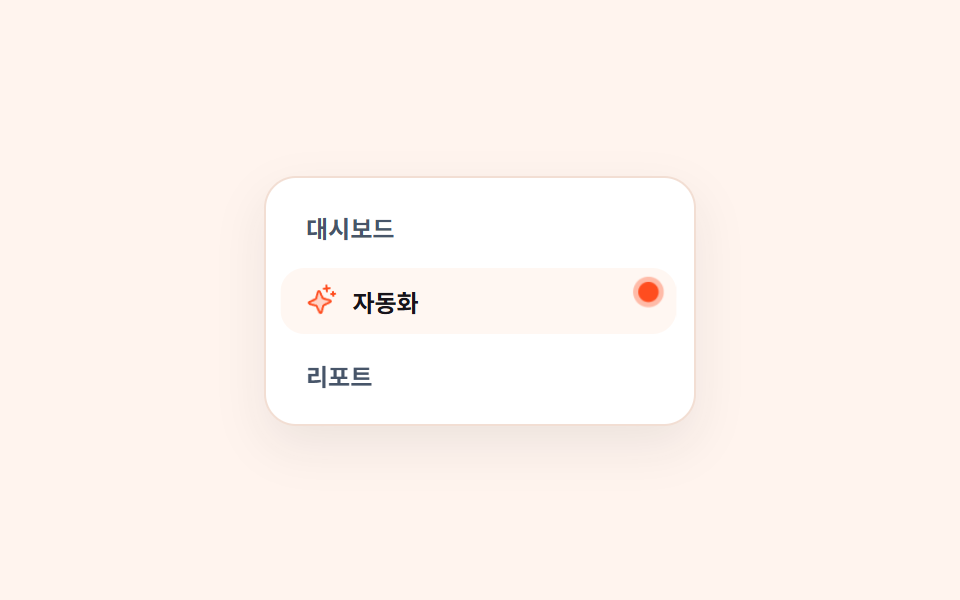
Behind the orange dot at a menu item's top-right, one ring expands from scale(1) to scale(2.4) and fades, while the dot itself keeps its size so the line height never shifts.
Best forMarking newly added menu items and unseen-feature notification dots
scale 1→2.4레이아웃 불변radius 50%
<main class="stage is-demo">
  <ul class="menu" aria-label="Side menu">
    <li class="mi">Dashboard</li>
    <li class="mi mi--new">
      <span class="si" aria-hidden="true"><svg xmlns="http://www.w3.org/2000/svg" viewBox="0 0 256 256" fill="currentColor"><path d="M194.82,151.43l-55.09,20.3-20.3,55.09a7.92,7.92,0,0,1-14.86,0l-20.3-55.09-55.09-20.3a7.92,7.92,0,0,1,0-14.86l55.09-20.3,20.3-55.09a7.92,7.92,0,0,1,14.86,0l20.3,55.09,55.09,20.3A7.92,7.92,0,0,1,194.82,151.43Z" opacity="0.2"/><path d="M197.58,129.06,146,110l-19-51.62a15.92,15.92,0,0,0-29.88,0L78,110l-51.62,19a15.92,15.92,0,0,0,0,29.88L78,178l19,51.62a15.92,15.92,0,0,0,29.88,0L146,178l51.62-19a15.92,15.92,0,0,0,0-29.88ZM137,164.22a8,8,0,0,0-4.74,4.74L112,223.85,91.78,169A8,8,0,0,0,87,164.22L32.15,144,87,123.78A8,8,0,0,0,91.78,119L112,64.15,132.22,119a8,8,0,0,0,4.74,4.74L191.85,144ZM144,40a8,8,0,0,1,8-8h16V16a8,8,0,0,1,16,0V32h16a8,8,0,0,1,0,16H184V64a8,8,0,0,1-16,0V48H152A8,8,0,0,1,144,40ZM248,88a8,8,0,0,1-8,8h-8v8a8,8,0,0,1-16,0V96h-8a8,8,0,0,1,0-16h8V72a8,8,0,0,1,16,0v8h8A8,8,0,0,1,248,88Z"/></svg></span>
      <span class="lb">Automation</span>
      <span class="dot" role="img" aria-label="New feature"><i class="ring" aria-hidden="true"></i></span>
    </li>
    <li class="mi">Reports</li>
  </ul>
</main>
@use "../../../../site/static/demo-tokens" as *;
// ── 변수 3개 ──────────────────────────────────────────
$duration: $dur-loop; // 2s — 링 한 번 퍼짐
$easing: $ease-out;
$color: $stage-orange; // 주황 — 점·링 같은 표식 전용. 글자색으로는 쓰지 않는다
@include stage(#fff4ee);
.menu {
box-sizing: border-box;
width: min(100%, 216px);
margin: 0; padding: $sp-2;
list-style: none;
display: grid; gap: $sp-1;
border-radius: $r-card;
background: #fff;
border: 1px solid #f2ded3;
box-shadow: 0 10px 24px rgba(23, 20, 26, .08);
}
.mi {
position: relative;
display: flex; align-items: center; gap: $sp-2;
padding: $sp-2 $sp-3;
border-radius: $r-control;
font-size: 12px; font-weight: 600;
color: #475569;
}
.mi--new { background: #fff7f2; color: $subject-ink; }
.si { display: block; width: 16px; height: 16px; flex: 0 0 auto; color: $color; }
.si svg { width: 100%; height: 100%; display: block; }
.lb { flex: 1 1 auto; }
// 한 겹(반짝 아이콘 감쇠 진자 — 개별 속성 rotate) — 줄에 매달린 스파클이 ±10deg 에서 감쇠해 멈춘다
.si { transform-origin: 50% 8%; rotate: 0deg; } // 위 고정 중립 자세
.stage.is-demo .si { animation: swing $duration $ease-spring infinite; }
// 점은 절대 위치 — 줄 안에 자리를 차지하지 않으니 링이 퍼져도 글줄이 밀리지 않는다
.dot {
position: absolute;
right: 10px; top: 8px;
width: 8px; height: 8px;
border-radius: 50%;
background: $color;
}
.ring {
position: absolute; inset: 0;
border-radius: 50%;
background: $color;
opacity: .55;
transform: scale(1);
}
.stage.is-demo .ring { animation: pulse $duration $easing infinite; }
// 한 겹(점 탄성 lerp + 자동화 줄 감쇠 흔들림) — 2026-09-15 형태 2차. 점과 링이 같은 2s 주기로 맞물려 심장박동 리듬을 만든다
// 한 겹 더(점 탄성 pop — 개별 속성 scale, 콤마 확장) — dot-throb 62% 소등 뒤 1.24s 에 두 번째 박동. 곱이 아닌 이중 맥박
.stage.is-demo .dot { animation: dot-throb $duration $ease-lerp-settle infinite, pop $duration $ease-spring infinite 1.24s; }
.stage.is-demo .mi--new { animation: row-sway $duration $ease-lerp-settle infinite; }
@keyframes dot-throb {
0% { transform: scale(1); }
15% { transform: scale(1.35); }
32% { transform: scale(.88); }
48% { transform: scale(1.1); }
62%,100% { transform: scale(1); }
}
@keyframes row-sway {
0% { transform: translateX(0); }
12% { transform: translateX(1.5px); }
26% { transform: translateX(-1px); }
40% { transform: translateX(.5px); }
55%,100% { transform: translateX(0); }
}
// 한 겹(개별 속성 키프레임) — 기존 transform 키프레임과 병렬 합성
// 감쇠 진자 ±10deg — 매달린 스파클. 진폭 비율 1 → .6 → .3 → .12 → 0
@keyframes swing {
0% { rotate: 0deg; }
8% { rotate: 10deg; }
28% { rotate: -6deg; }
48% { rotate: 3deg; }
66% { rotate: -1.2deg; }
80%, 100% { rotate: 0deg; }
}
// 탄성 lerp — 1.32 → .86 → 1.06 → 1
@keyframes pop {
0% { scale: 1; }
6% { scale: 1.32; }
16% { scale: .86; }
28% { scale: 1.06; }
38%, 100% { scale: 1; }
}
@keyframes pulse {
0% { opacity: .55; transform: scale(1); }
70%, 100% { opacity: 0; transform: scale(2.4); }
}
@media (prefers-reduced-motion: reduce) {
.stage.is-demo .ring { animation: none; opacity: 0; }
.stage.is-demo .dot { animation: none; transform: none; scale: 1; }
.stage.is-demo .mi--new { animation: none; transform: none; }
.stage.is-demo .si { animation: none; rotate: 0deg; }
}html, body {
margin: 0;
overflow: hidden;
}
.stage {
box-sizing: border-box;
min-height: 100vh;
display: grid;
place-items: center;
margin: 0;
background: #fff4ee;
font-family: -apple-system, "Segoe UI", "Noto Sans KR", sans-serif;
padding: clamp(8px, 4vw, 24px);
}
.menu {
box-sizing: border-box;
width: min(100%, 216px);
margin: 0;
padding: 8px;
list-style: none;
display: grid;
gap: 4px;
border-radius: 16px;
background: #fff;
border: 1px solid #f2ded3;
box-shadow: 0 10px 24px rgba(23, 20, 26, 0.08);
}
.mi {
position: relative;
display: flex;
align-items: center;
gap: 8px;
padding: 8px 12px;
border-radius: 12px;
font-size: 12px;
font-weight: 600;
color: #475569;
}
.mi--new {
background: #fff7f2;
color: #17141a;
}
.si {
display: block;
width: 16px;
height: 16px;
flex: 0 0 auto;
color: #ff4d1f;
}
.si svg {
width: 100%;
height: 100%;
display: block;
}
.lb {
flex: 1 1 auto;
}
.si {
transform-origin: 50% 8%;
rotate: 0deg;
}
.stage.is-demo .si {
animation: swing 2s cubic-bezier(0.2, 0.8, 0.2, 1) infinite;
}
.dot {
position: absolute;
right: 10px;
top: 8px;
width: 8px;
height: 8px;
border-radius: 50%;
background: #ff4d1f;
}
.ring {
position: absolute;
inset: 0;
border-radius: 50%;
background: #ff4d1f;
opacity: 0.55;
transform: scale(1);
}
.stage.is-demo .ring {
animation: pulse 2s ease-out infinite;
}
.stage.is-demo .dot {
animation: dot-throb 2s linear(0, 0.051, 0.176, 0.341, 0.518, 0.685, 0.831, 0.947, 1.032, 1.087, 1.117, 1.126, 1.121, 1.105, 1.085, 1.062, 1.041, 1.022, 1.008, 0.997, 1) infinite, pop 2s cubic-bezier(0.2, 0.8, 0.2, 1) infinite 1.24s;
}
.stage.is-demo .mi--new {
animation: row-sway 2s linear(0, 0.051, 0.176, 0.341, 0.518, 0.685, 0.831, 0.947, 1.032, 1.087, 1.117, 1.126, 1.121, 1.105, 1.085, 1.062, 1.041, 1.022, 1.008, 0.997, 1) infinite;
}
@keyframes dot-throb {
0% {
transform: scale(1);
}
15% {
transform: scale(1.35);
}
32% {
transform: scale(0.88);
}
48% {
transform: scale(1.1);
}
62%, 100% {
transform: scale(1);
}
}
@keyframes row-sway {
0% {
transform: translateX(0);
}
12% {
transform: translateX(1.5px);
}
26% {
transform: translateX(-1px);
}
40% {
transform: translateX(0.5px);
}
55%, 100% {
transform: translateX(0);
}
}
@keyframes swing {
0% {
rotate: 0deg;
}
8% {
rotate: 10deg;
}
28% {
rotate: -6deg;
}
48% {
rotate: 3deg;
}
66% {
rotate: -1.2deg;
}
80%, 100% {
rotate: 0deg;
}
}
@keyframes pop {
0% {
scale: 1;
}
6% {
scale: 1.32;
}
16% {
scale: 0.86;
}
28% {
scale: 1.06;
}
38%, 100% {
scale: 1;
}
}
@keyframes pulse {
0% {
opacity: 0.55;
transform: scale(1);
}
70%, 100% {
opacity: 0;
transform: scale(2.4);
}
}
@media (prefers-reduced-motion: reduce) {
.stage.is-demo .ring {
animation: none;
opacity: 0;
}
.stage.is-demo .dot {
animation: none;
transform: none;
scale: 1;
}
.stage.is-demo .mi--new {
animation: none;
transform: none;
}
.stage.is-demo .si {
animation: none;
rotate: 0deg;
}
}import type { CSSProperties } from "react";
import styles from "./FeatureHighlightPulse.module.scss";
export type FeatureHighlightPulseProps = {
duration?: number;
easing?: string;
color?: string;
items?: string[];
/** 펄스 배지를 붙일 항목의 순번 (0부터) */
highlightIndex?: number;
badgeLabel?: string;
};
export default function FeatureHighlightPulse({
duration = 2000,
easing = "ease-out",
color = "#ff4d1f",
items = ["Dashboard", "Automation", "Reports"],
highlightIndex = 1,
badgeLabel = "New feature",
}: FeatureHighlightPulseProps) {
const vars: CSSProperties = {
"--duration": `${duration}ms`,
"--easing": easing,
"--color": color,
} as CSSProperties;
return (
<ul className={styles.menu} style={vars} aria-label="Side menu">
{items.map((label, i) =>
i === highlightIndex ? (
<li className={`${styles.mi} ${styles.isNew}`} key={label}>
<span className={styles.si} aria-hidden="true">
<svg xmlns="http://www.w3.org/2000/svg" viewBox="0 0 256 256" fill="currentColor">
<path d="M194.82,151.43l-55.09,20.3-20.3,55.09a7.92,7.92,0,0,1-14.86,0l-20.3-55.09-55.09-20.3a7.92,7.92,0,0,1,0-14.86l55.09-20.3,20.3-55.09a7.92,7.92,0,0,1,14.86,0l20.3,55.09,55.09,20.3A7.92,7.92,0,0,1,194.82,151.43Z" opacity="0.2" />
<path d="M197.58,129.06,146,110l-19-51.62a15.92,15.92,0,0,0-29.88,0L78,110l-51.62,19a15.92,15.92,0,0,0,0,29.88L78,178l19,51.62a15.92,15.92,0,0,0,29.88,0L146,178l51.62-19a15.92,15.92,0,0,0,0-29.88ZM137,164.22a8,8,0,0,0-4.74,4.74L112,223.85,91.78,169A8,8,0,0,0,87,164.22L32.15,144,87,123.78A8,8,0,0,0,91.78,119L112,64.15,132.22,119a8,8,0,0,0,4.74,4.74L191.85,144ZM144,40a8,8,0,0,1,8-8h16V16a8,8,0,0,1,16,0V32h16a8,8,0,0,1,0,16H184V64a8,8,0,0,1-16,0V48H152A8,8,0,0,1,144,40ZM248,88a8,8,0,0,1-8,8h-8v8a8,8,0,0,1-16,0V96h-8a8,8,0,0,1,0-16h8V72a8,8,0,0,1,16,0v8h8A8,8,0,0,1,248,88Z" />
</svg>
</span>
<span className={styles.lb}>{label}</span>
{/* 점은 absolute — 줄 안에 자리를 차지하지 않으니 링이 퍼져도 글줄이 안 밀린다 */}
<span className={styles.dot} role="img" aria-label={badgeLabel}>
<i className={styles.ring} aria-hidden="true" />
</span>
</li>
) : (
<li className={styles.mi} key={label}>{label}</li>
)
)}
</ul>
);
}07 Feature highlight pulse badge — Measured area 0.577% · moving frames 23/23Original by GODRICH · SCSS and React ship in the zip · Onboarding UI Design — 9 Copy-Paste Tour Widgets
The post this demo lives in
 Onboarding UI Design — 9 Copy-Paste Tour WidgetsGood onboarding ui design points to the next thing to click, on the screen the user already sees. The shapes are fixed — See all demos in this post