09Info pulse dot
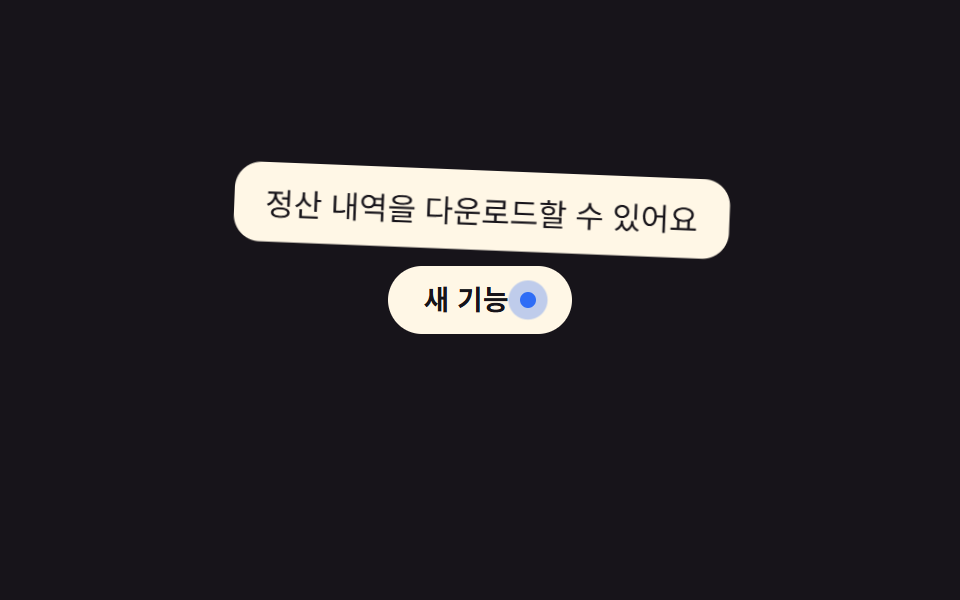
A small dot gently pulses to signal there is more information worth checking.
Best forNew-feature badges, help icons in a settings screen
@keyframes pulse-ring2초 주기opacity 감쇠
<main class="stage">
  <div class="tip-wrap">
    <span class="badge" aria-describedby="tip09">New<i class="dot" aria-hidden="true"></i></span>
    <span class="tooltip is-demo" role="tooltip" id="tip09">You can download your settlement history</span>
  </div>
</main>
@use "../../../../site/static/demo-tokens" as *;
$duration: $dur-loop; // 점 펄스·툴팁 공통 주기
$easing: $ease-out;
$color: $subject-blue; // 점 색
@include stage($stage-ink);
.tip-wrap { position: relative; display: inline-block; }
.badge {
display: inline-flex;
align-items: center;
gap: 6px;
padding: 10px 18px;
border-radius: $r-pill;
background: $subject-cream;
color: $stage-ink;
font-weight: 600;
font-size: 14px;
line-height: 1;
font-family: inherit;
}
.dot {
position: relative;
width: 8px;
height: 8px;
border-radius: 50%;
background: $color;
&::before { // 은은하게 커졌다 작아지는 펄스 링
content: "";
position: absolute;
inset: -6px;
border-radius: 50%;
background: $color;
opacity: .5;
animation: pulse-ring $duration $easing infinite;
}
}
.tooltip {
position: absolute;
bottom: calc(100% + 8px);
left: 50%;
transform-origin: bottom center; // 규칙8: 버튼 쪽 아래변 축 — 흔들림의 회전 중심
transform: translate(-50%, 4px);
opacity: 0;
background: $subject-cream;
color: $stage-ink;
padding: 8px 14px;
border-radius: $r-control;
font-size: clamp(12px, 3.4vw, 14px);
max-width: clamp(150px, 44vw, 220px);
white-space: nowrap; // 한글은 글자마다 줄바꿈 후보라, 없으면 세로로 한 글자씩 쪼개진다
pointer-events: none;
}
.tooltip.is-demo {
animation: tip-loop $duration $easing infinite;
}
@keyframes pulse-ring {
0%, 100% { transform: scale(.6); opacity: .5; }
50% { transform: scale(1.6); opacity: 0; }
}
// 툴팁 등장에 스프링 한 겹 — 스케일 .85 → 1.12 오버슛 → 감쇠 반동, 회전은 아래변 축으로 2.6° → -1.5° → .6° 감쇠
@keyframes tip-loop {
0% { opacity: 0; transform: translate(-50%, 4px) scale(.85) rotate(0deg); }
12% { opacity: 1; transform: translate(-50%, 0) scale(1.12) rotate(2.6deg); }
22% { opacity: 1; transform: translate(-50%, 0) scale(.95) rotate(-1.5deg); }
30% { opacity: 1; transform: translate(-50%, 0) scale(1.03) rotate(.6deg); }
36%, 55% { opacity: 1; transform: translate(-50%, 0) scale(1) rotate(0deg); }
80% { opacity: 0; transform: translate(-50%, 4px) scale(.85) rotate(0deg); }
100% { opacity: 0; transform: translate(-50%, 4px) scale(.85) rotate(0deg); }
}
@media (prefers-reduced-motion: reduce) {
.dot::before { animation: none; opacity: .3; }
.tooltip.is-demo { animation: none; opacity: 1; transform: translate(-50%, 0) scale(1) rotate(0deg); }
}html, body {
margin: 0;
overflow: hidden;
}
.stage {
box-sizing: border-box;
min-height: 100vh;
display: grid;
place-items: center;
margin: 0;
background: #17141a;
font-family: -apple-system, "Segoe UI", "Noto Sans KR", sans-serif;
padding: clamp(8px, 4vw, 24px);
}
.tip-wrap {
position: relative;
display: inline-block;
}
.badge {
display: inline-flex;
align-items: center;
gap: 6px;
padding: 10px 18px;
border-radius: 999px;
background: #fff7e6;
color: #17141a;
font-weight: 600;
font-size: 14px;
line-height: 1;
font-family: inherit;
}
.dot {
position: relative;
width: 8px;
height: 8px;
border-radius: 50%;
background: #2f6df6;
}
.dot::before {
content: "";
position: absolute;
inset: -6px;
border-radius: 50%;
background: #2f6df6;
opacity: 0.5;
animation: pulse-ring 2s ease-out infinite;
}
.tooltip {
position: absolute;
bottom: calc(100% + 8px);
left: 50%;
transform-origin: bottom center;
transform: translate(-50%, 4px);
opacity: 0;
background: #fff7e6;
color: #17141a;
padding: 8px 14px;
border-radius: 12px;
font-size: clamp(12px, 3.4vw, 14px);
max-width: clamp(150px, 44vw, 220px);
white-space: nowrap;
pointer-events: none;
}
.tooltip.is-demo {
animation: tip-loop 2s ease-out infinite;
}
@keyframes pulse-ring {
0%, 100% {
transform: scale(0.6);
opacity: 0.5;
}
50% {
transform: scale(1.6);
opacity: 0;
}
}
@keyframes tip-loop {
0% {
opacity: 0;
transform: translate(-50%, 4px) scale(0.85) rotate(0deg);
}
12% {
opacity: 1;
transform: translate(-50%, 0) scale(1.12) rotate(2.6deg);
}
22% {
opacity: 1;
transform: translate(-50%, 0) scale(0.95) rotate(-1.5deg);
}
30% {
opacity: 1;
transform: translate(-50%, 0) scale(1.03) rotate(0.6deg);
}
36%, 55% {
opacity: 1;
transform: translate(-50%, 0) scale(1) rotate(0deg);
}
80% {
opacity: 0;
transform: translate(-50%, 4px) scale(0.85) rotate(0deg);
}
100% {
opacity: 0;
transform: translate(-50%, 4px) scale(0.85) rotate(0deg);
}
}
@media (prefers-reduced-motion: reduce) {
.dot::before {
animation: none;
opacity: 0.3;
}
.tooltip.is-demo {
animation: none;
opacity: 1;
transform: translate(-50%, 0) scale(1) rotate(0deg);
}
}import { useState } from "react";
import type { CSSProperties, ReactNode } from "react";
import styles from "./PulseDotTooltip.module.scss";
export type PulseDotTooltipProps = {
label: ReactNode;
text: string;
duration?: number;
easing?: string;
color?: string;
};
type Vars = CSSProperties & { "--duration"?: string; "--easing"?: string; "--color"?: string };
export default function PulseDotTooltip({
label,
text,
duration = 200,
easing = "ease-out",
color = "#2f6df6",
}: PulseDotTooltipProps) {
const [open, setOpen] = useState(false);
const vars: Vars = { "--duration": `${duration}ms`, "--easing": easing, "--color": color };
return (
<span className={styles.wrap} style={vars}>
<span
className={styles.badge}
tabIndex={0}
aria-describedby="pulse-tooltip"
onMouseEnter={() => setOpen(true)}
onMouseLeave={() => setOpen(false)}
onFocus={() => setOpen(true)}
onBlur={() => setOpen(false)}
>
{label}
<i className={styles.dot} aria-hidden="true" />
</span>
<span id="pulse-tooltip" role="tooltip" className={styles.tooltip} data-open={open}>
{text}
</span>
</span>
);
}09 Info pulse dot — Measured area 7.869% · moving frames 20/23Original by GODRICH · SCSS and React ship in the zip · 9 CSS Tooltip Bubbles — one line, copy-paste
The post this demo lives in
 9 CSS Tooltip Bubbles — one line, copy-pasteA css tooltip bubble is a small floating label that shows extra text next to a button, link, or icon and disappears agai See all demos in this post