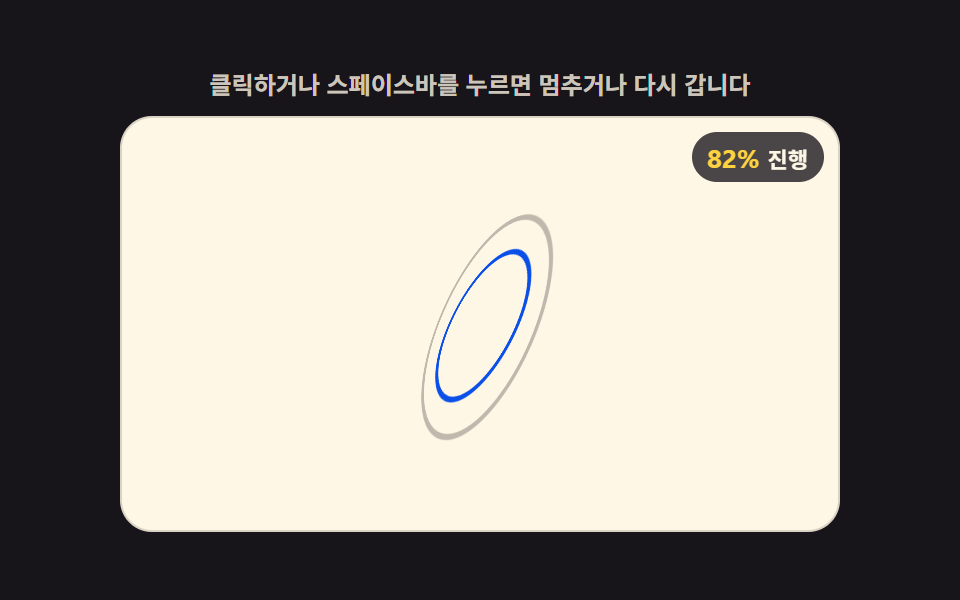
09Loader Whose Inner Ring Widens Its Precession Angle With the Value
The inner ring's rotation-axis angle keeps widening in proportion to the progress value while it spins, so the growing gap from the outer ring reads as a visible precession wobble that peaks once the value is full.
Best forLong-wait loading screens, background-sync indicators
PRECESSION_FACTORPRECESSION_TURNSOUTER_TILT
<main class="stage">
<div class="ld" id="ld">
  <p class="ld__hint">Click or press the space bar to pause or restart</p>
  <div class="ld__field" id="field" role="application" aria-label="Gyroscope precession-ring test panel" tabindex="0">
    <div class="c3__scene">
      <div class="c3__gyro" id="gyro">
        <div class="c3__ring c3__ring--outer" id="outer"></div>
        <div class="c3__ring c3__ring--inner" id="inner"></div>
      </div>
    </div>
    <b class="ld__badge" aria-hidden="true"><span class="ld__badgeNum" id="pct">0%</span><span class="ld__badgeUnit">Progress</span></b>
  </div>
</div>
</main>
@use "../../../../site/static/demo-tokens" as *;
// 자이로스코프 세차 고리 로더 — 안쪽 고리의 회전축이 진행률 값에 비례해 원뿔 모양으로 벌어지며
// 도는 세차운동(precession)을 계산한다. 바깥 고리는 고정 기울기로 계속 돌고, 안쪽 고리는
// 진행률만큼 커지는 세차각을 cos/sin 으로 두 축(X·Z)에 나눠 실어 원뿔을 그리며 돈다.
// 값이 다 차면 세차각이 가장 크게 벌어져 바깥 고리와의 차이가 가장 눈에 띈다.
// 01(문턱 인덱스 스왑)·02(정점 좌표 보간)·03(연속 순환 랭크)·04(고리별 개별 기울기)·05(구면 중심 수렴)
// ·06(면별 독립 문턱 램프)·07(회전각+거리 깊이 순위)·08(고정 가중치 필드+원근) 과 다른 축
// — 세차각을 원뿔 위상(phase)의 삼각함수로 두 축에 나눠 계산한다.
$duration: $dur-loop;
$easing: linear;
$color: $subject-blue-deep;
@include stage($stage-ink);
.ld { display: flex; flex-direction: column; gap: $sp-2; width: 100%; max-width: 360px; }
.ld__hint {
margin: 0;
font-weight: 700; font-size: clamp(10px, 2.8vw, 12px); line-height: 1.35;
color: rgba($subject-cream, .78);
text-align: center;
}
.ld__field {
position: relative; height: 208px;
border-radius: $r-card; overflow: hidden;
background: $subject-cream;
box-shadow: inset 0 0 0 1px rgba($subject-ink, .16);
cursor: pointer;
}
.ld__field:focus-visible { outline: 2px solid $subject-blue-light; outline-offset: 2px; }
.c3__scene { position: absolute; inset: 0; perspective: clamp(320px, 70vw, 480px); }
.c3__gyro { position: absolute; left: 50%; top: 50%; width: 0; height: 0; transform-style: preserve-3d; }
.c3__ring {
position: absolute; left: -60px; top: -60px;
width: 120px; height: 120px;
border-radius: 50%;
transform-style: preserve-3d;
}
.c3__ring--outer { box-shadow: inset 0 0 0 3px rgba($subject-ink, .28); }
.c3__ring--inner {
left: -42px; top: -42px; width: 84px; height: 84px;
box-shadow: inset 0 0 0 3px $color;
}
.ld__badge {
position: absolute; right: $sp-2; top: $sp-2;
display: flex; align-items: baseline; gap: $sp-1;
padding: $sp-1 $sp-2; border-radius: $r-pill;
background: rgba($subject-ink, .78);
color: $subject-cream; font-weight: 700; font-size: 11px;
}
.ld__badgeNum { font-size: 13px; color: $stage-yellow; }
.ld__badgeUnit { font-weight: 700; }
@media (max-width: 340px) {
.ld { gap: $sp-1; }
.ld__field { height: 124px; }
.ld__badge { font-size: 10px; padding: 0 $sp-1; }
.ld__badgeNum { font-size: 11px; }
}
@media (prefers-reduced-motion: reduce) {
.ld.is-still .ld__field { cursor: default !important; }
.ld.is-still .ld__badge { opacity: .92 !important; }
}html, body {
margin: 0;
overflow: hidden;
}
.stage {
box-sizing: border-box;
min-height: 100vh;
display: grid;
place-items: center;
margin: 0;
background: #17141a;
font-family: -apple-system, "Segoe UI", "Noto Sans KR", sans-serif;
padding: clamp(8px, 4vw, 24px);
}
.ld {
display: flex;
flex-direction: column;
gap: 8px;
width: 100%;
max-width: 360px;
}
.ld__hint {
margin: 0;
font-weight: 700;
font-size: clamp(10px, 2.8vw, 12px);
line-height: 1.35;
color: rgba(255, 247, 230, 0.78);
text-align: center;
}
.ld__field {
position: relative;
height: 208px;
border-radius: 16px;
overflow: hidden;
background: #fff7e6;
box-shadow: inset 0 0 0 1px rgba(23, 20, 26, 0.16);
cursor: pointer;
}
.ld__field:focus-visible {
outline: 2px solid #5b8cf8;
outline-offset: 2px;
}
.c3__scene {
position: absolute;
inset: 0;
perspective: clamp(320px, 70vw, 480px);
}
.c3__gyro {
position: absolute;
left: 50%;
top: 50%;
width: 0;
height: 0;
transform-style: preserve-3d;
}
.c3__ring {
position: absolute;
left: -60px;
top: -60px;
width: 120px;
height: 120px;
border-radius: 50%;
transform-style: preserve-3d;
}
.c3__ring--outer {
box-shadow: inset 0 0 0 3px rgba(23, 20, 26, 0.28);
}
.c3__ring--inner {
left: -42px;
top: -42px;
width: 84px;
height: 84px;
box-shadow: inset 0 0 0 3px #0a4fe8;
}
.ld__badge {
position: absolute;
right: 8px;
top: 8px;
display: flex;
align-items: baseline;
gap: 4px;
padding: 4px 8px;
border-radius: 999px;
background: rgba(23, 20, 26, 0.78);
color: #fff7e6;
font-weight: 700;
font-size: 11px;
}
.ld__badgeNum {
font-size: 13px;
color: #ffd23f;
}
.ld__badgeUnit {
font-weight: 700;
}
@media (max-width: 340px) {
.ld {
gap: 4px;
}
.ld__field {
height: 124px;
}
.ld__badge {
font-size: 10px;
padding: 0 4px;
}
.ld__badgeNum {
font-size: 11px;
}
}
@media (prefers-reduced-motion: reduce) {
.ld.is-still .ld__field {
cursor: default !important;
}
.ld.is-still .ld__badge {
opacity: 0.92 !important;
}
}(function () {
'use strict';
var root = document.getElementById('ld');
var field = document.getElementById('field');
var pctEl = document.getElementById('pct');
var outer = document.getElementById('outer');
var inner = document.getElementById('inner');
var OUTER_TILT = 22;
var SPIN_TURNS = 1;
var PRECESSION_TURNS = 1.5;
var PRECESSION_FACTOR = 26; // 진행률이 다 찼을 때 세차각이 벌어지는 최대 각도(도) — 변형 03 대상
var reduce = window.matchMedia('(prefers-reduced-motion: reduce)').matches;
var LOOP = 2;
var REDUCE_P = 0.7;
var t0 = 0, raf = 0, paused = false, lastP = 0;
// 안쪽 고리의 회전축이 그리는 원뿔 — 세차각(진행률에 비례해 커진다)을 원뿔 위상의 cos/sin 으로
// X축·Z축 두 방향에 나눠 실어, 축 자체가 원을 그리며 벌어지는 세차운동을 흉내 낸다.
function render(p) {
lastP = p;
var spinY = (p * 360 * SPIN_TURNS) % 360;
var maxAngle = PRECESSION_FACTOR * p;
var conePhase = (p * 360 * PRECESSION_TURNS) % 360;
var rad = conePhase * Math.PI / 180;
var tiltX = OUTER_TILT + maxAngle * Math.cos(rad);
var tiltZ = maxAngle * Math.sin(rad);
outer.style.transform = 'rotateY(' + spinY + 'deg) rotateX(' + OUTER_TILT + 'deg)';
inner.style.transform = 'rotateY(' + spinY + 'deg) rotateX(' + tiltX + 'deg) rotateZ(' + tiltZ + 'deg)';
pctEl.textContent = Math.round(p * 100) + '%';
}
function frame(now) {
if (!paused) { var t = (now - t0) / 1000; render((t % LOOP) / LOOP); }
raf = requestAnimationFrame(frame);
}
function togglePause() {
paused = !paused;
root.classList.toggle('is-paused', paused);
render(reduce ? REDUCE_P : lastP);
}
function restart() {
t0 = performance.now();
render(reduce ? REDUCE_P : 0);
}
field.addEventListener('click', function () { togglePause(); });
field.addEventListener('keydown', function (e) {
if (e.key === ' ' || e.key === 'Enter') { e.preventDefault(); togglePause(); }
else if (e.key === 'r' || e.key === 'R') { e.preventDefault(); restart(); }
});
window.addEventListener('resize', function () {
if (paused || reduce) render(reduce ? REDUCE_P : lastP);
});
t0 = performance.now();
if (reduce) {
root.classList.add('is-still');
render(REDUCE_P);
} else {
raf = requestAnimationFrame(frame);
}
})();// GyroscopeRingPrecession — vanilla 판(run/399/demo/09-loader-3d-gyroscope-ring-precession/index.html) 의 React 포트.
// 안쪽 고리의 회전축이 그리는 원뿔 — 세차각(진행률에 비례해 커진다)을 원뿔 위상의 cos/sin 으로
// X축·Z축 두 방향에 나눠 실어, 축 자체가 원을 그리며 벌어지는 세차운동을 흉내 낸다.
// 01~08 과 다른 축 — 세차각을 원뿔 위상의 삼각함수로 두 축에 나눠 계산한다.
import { useEffect, useRef } from "react";
import type { CSSProperties } from "react";
import styles from "./GyroscopeRingPrecession.module.scss";
export type GyroscopeRingPrecessionProps = {
duration?: string;
easing?: string;
color?: string;
};
type Vars = CSSProperties & { "--duration"?: string; "--easing"?: string; "--color"?: string };
type Box<T> = { current: T };
type KeyEvt = { key: string; preventDefault(): void };
const OUTER_TILT = 22;
const SPIN_TURNS = 1;
const PRECESSION_TURNS = 1.5;
const PRECESSION_FACTOR = 26;
const LOOP = 2;
const REDUCE_P = 0.7;
const FIELD_LABEL = "자이로스코프 세차 고리 진행 실험판";
export default function GyroscopeRingPrecession({
duration = "2s",
easing = "linear",
color = "#0a4fe8",
}: GyroscopeRingPrecessionProps) {
const rootRef = useRef<HTMLDivElement | null>(null);
const fieldRef = useRef<HTMLDivElement | null>(null);
const outerRef = useRef<HTMLDivElement | null>(null);
const innerRef = useRef<HTMLDivElement | null>(null);
const pctRef = useRef<HTMLSpanElement | null>(null);
const pausedRef = useRef(false) as Box<boolean>;
const lastPRef = useRef(0) as Box<number>;
const t0Ref = useRef(0) as Box<number>;
const rafRef = useRef(0) as Box<number>;
const vars: Vars = { "--duration": duration, "--easing": easing, "--color": color };
function reduced(): boolean {
return window.matchMedia("(prefers-reduced-motion: reduce)").matches;
}
function render(p: number): void {
lastPRef.current = p;
const spinY = (p * 360 * SPIN_TURNS) % 360;
const maxAngle = PRECESSION_FACTOR * p;
const conePhase = (p * 360 * PRECESSION_TURNS) % 360;
const rad = (conePhase * Math.PI) / 180;
const tiltX = OUTER_TILT + maxAngle * Math.cos(rad);
const tiltZ = maxAngle * Math.sin(rad);
const outer = outerRef.current;
const inner = innerRef.current;
if (outer) outer.style.transform = "rotateY(" + spinY + "deg) rotateX(" + OUTER_TILT + "deg)";
if (inner) inner.style.transform = "rotateY(" + spinY + "deg) rotateX(" + tiltX + "deg) rotateZ(" + tiltZ + "deg)";
if (pctRef.current) pctRef.current.textContent = Math.round(p * 100) + "%";
}
function togglePause(): void {
pausedRef.current = !pausedRef.current;
const root = rootRef.current;
if (root) root.classList.toggle("is-paused", pausedRef.current);
render(reduced() ? REDUCE_P : lastPRef.current);
}
function restart(): void {
t0Ref.current = performance.now();
render(reduced() ? REDUCE_P : 0);
}
function onKey(e: KeyEvt): void {
if (e.key === " " || e.key === "Enter") { e.preventDefault(); togglePause(); }
else if (e.key === "r" || e.key === "R") { e.preventDefault(); restart(); }
}
function onClick(): void {
togglePause();
}
function onResize(): void {
if (pausedRef.current || reduced()) render(reduced() ? REDUCE_P : lastPRef.current);
}
function frame(now: number): void {
if (!pausedRef.current) {
const t = (now - t0Ref.current) / 1000;
render((t % LOOP) / LOOP);
}
rafRef.current = requestAnimationFrame(frame);
}
useEffect(() => {
t0Ref.current = performance.now();
window.addEventListener("resize", onResize);
if (reduced()) {
const root = rootRef.current;
if (root) root.classList.add("is-still");
render(REDUCE_P);
} else {
rafRef.current = requestAnimationFrame(frame);
}
return () => {
window.removeEventListener("resize", onResize);
cancelAnimationFrame(rafRef.current);
};
}, []);
return (
<main className={styles.stage}>
<div className={styles.root} ref={rootRef} style={vars}>
<p className={styles.hint}>클릭하거나 스페이스바를 누르면 멈추거나 다시 갑니다</p>
<div
className={styles.field}
ref={fieldRef}
role="application"
aria-label={FIELD_LABEL}
tabIndex={0}
onClick={onClick}
onKeyDown={onKey}
>
<div className={styles.scene}>
<div className={styles.gyro}>
<div className={styles.ring + " " + styles.ringOuter} ref={outerRef} />
<div className={styles.ring + " " + styles.ringInner} ref={innerRef} />
</div>
</div>
<b className={styles.badge} aria-hidden="true"><span className={styles.badgeNum} ref={pctRef}>0%</span><span className={styles.badgeUnit}>진행</span></b>
</div>
</div>
</main>
);
}09 Loader Whose Inner Ring Widens Its Precession Angle With the Value — Measured area 7.29% · moving frames 23/23Original by GODRICH · SCSS and React ship in the zip · CSS 3D Cube Animation Loaders, 9 Patterns
The post this demo lives in
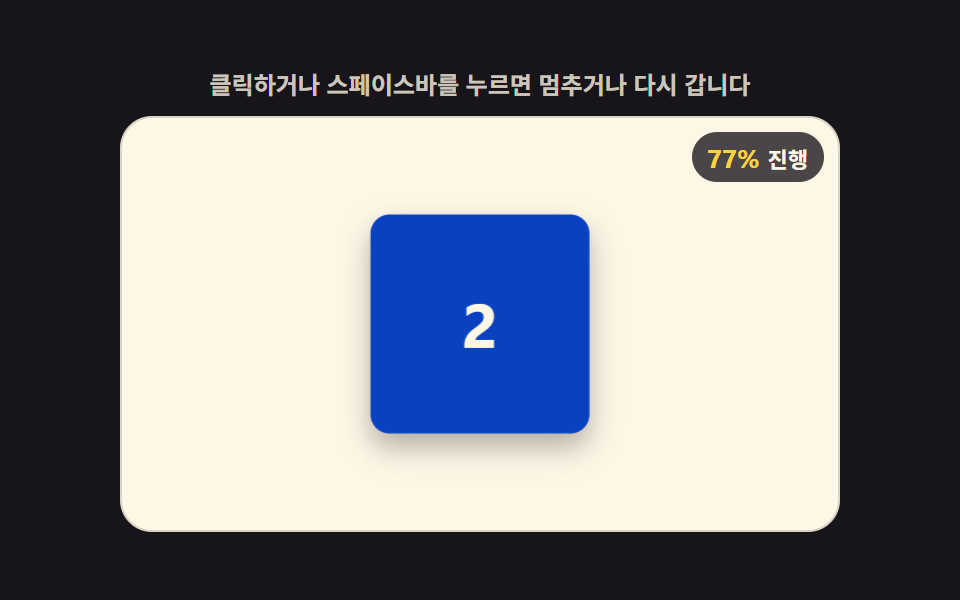 CSS 3D Cube Animation Loaders, 9 PatternsA css 3d cube animation isn't a keyframe tween: Frame one shows one flat face. Each threshold swaps a cube face, settles See all demos in this post
If you like this effect - similar demos
 Loaders05 Icon progress ring — an indicator whose circular progress value fills with the pulled distance and morphs into a checkmark once completePull to Refresh CSS: 9 Loading Patterns
 Loaders09 Reduced-motion instant toggle — with reduced motion on, every animation from the prior eight bars snaps straight to its end valueCSS Progress Bar: 9 Game-Style Fill Patterns
 Loaders01 Halo Ring AI Loader Whose Hue Value Turns Toward DoneAI Loading Animation: 9 Patterns by One Value