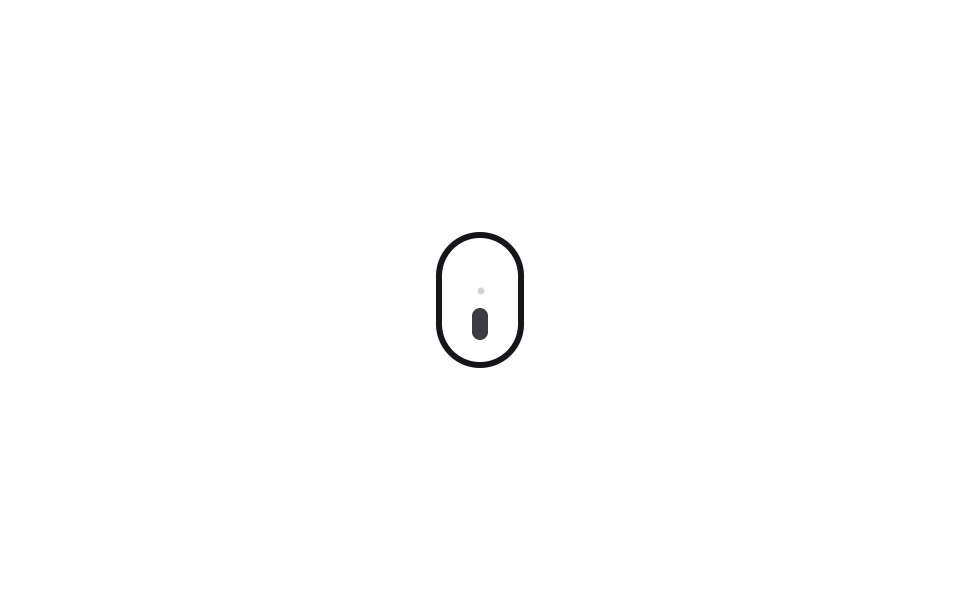
08Mouse-shaped scroll hint
A small dot drifts downward inside a mouse-shaped outline and fades, repeating to invite scrolling.
Best forBottom of hero sections, full-screen section transition hints
translateYopacityborder-radius
<main class="stage">
  <div class="ms-mouse" aria-hidden="true">
    <span class="ms-dot"></span>
    <span class="ms-trail"></span>
  </div>
</main>
@use "../../../../site/static/demo-tokens" as *;
// ── 변수 3개 ──────────────────────────────────────────
$duration: 1.6s;
$easing: $ease-out;
$color: $subject-ink;
@include stage($stage-paper);
.ms-mouse {
position: relative;
box-sizing: border-box;
width: 44px;
height: 68px;
border: 3px solid $color;
border-radius: $r-pill;
display: flex;
justify-content: center;
padding-top: $sp-3;
}
.ms-dot {
width: 8px;
height: 16px;
border-radius: $r-pill;
background: $color;
opacity: 1;
transform: translateY(0);
}
// 자동 재생: 휠을 나타내는 점이 마우스 테두리 안에서 아래로 흘러내리듯 움직이다 사라지기를 반복한다. 63%에서 오버슛했다 70%에서 정착·소멸한다
@keyframes ms-scroll {
0% { opacity: 1; transform: translateY(0); }
55% { opacity: 1; transform: translateY(20px); }
63% { opacity: .6; transform: translateY(27px); }
70% { opacity: 0; transform: translateY(24px); }
100% { opacity: 0; transform: translateY(24px); }
}
.ms-dot { animation: ms-scroll $duration $easing infinite; }
// 트레일 파티클 — 점 위로 작은 잔상이 더 늦게, 더 흐리게 따라 내려온다
.ms-trail {
position: absolute;
top: $sp-3;
width: 5px;
height: 5px;
border-radius: $r-pill;
background: $color;
opacity: 0;
}
@keyframes ms-trail-scroll {
0% { opacity: 0; transform: translateY(-4px) scale(.6); }
40% { opacity: .3; transform: translateY(8px) scale(.8); }
85%, 100% { opacity: 0; transform: translateY(20px) scale(.4); }
}
.ms-trail { animation: ms-trail-scroll $duration $easing 120ms infinite; }
@media (prefers-reduced-motion: reduce) {
.ms-dot { animation: none !important; opacity: 1 !important; transform: translateY(0) !important; }
.ms-trail { animation: none !important; opacity: 0 !important; }
}html, body {
margin: 0;
overflow: hidden;
}
.stage {
box-sizing: border-box;
min-height: 100vh;
display: grid;
place-items: center;
margin: 0;
background: #ffffff;
font-family: -apple-system, "Segoe UI", "Noto Sans KR", sans-serif;
padding: clamp(8px, 4vw, 24px);
}
.ms-mouse {
position: relative;
box-sizing: border-box;
width: 44px;
height: 68px;
border: 3px solid #17141a;
border-radius: 999px;
display: flex;
justify-content: center;
padding-top: 12px;
}
.ms-dot {
width: 8px;
height: 16px;
border-radius: 999px;
background: #17141a;
opacity: 1;
transform: translateY(0);
}
@keyframes ms-scroll {
0% {
opacity: 1;
transform: translateY(0);
}
55% {
opacity: 1;
transform: translateY(20px);
}
63% {
opacity: 0.6;
transform: translateY(27px);
}
70% {
opacity: 0;
transform: translateY(24px);
}
100% {
opacity: 0;
transform: translateY(24px);
}
}
.ms-dot {
animation: ms-scroll 1.6s ease-out infinite;
}
.ms-trail {
position: absolute;
top: 12px;
width: 5px;
height: 5px;
border-radius: 999px;
background: #17141a;
opacity: 0;
}
@keyframes ms-trail-scroll {
0% {
opacity: 0;
transform: translateY(-4px) scale(0.6);
}
40% {
opacity: 0.3;
transform: translateY(8px) scale(0.8);
}
85%, 100% {
opacity: 0;
transform: translateY(20px) scale(0.4);
}
}
.ms-trail {
animation: ms-trail-scroll 1.6s ease-out 120ms infinite;
}
@media (prefers-reduced-motion: reduce) {
.ms-dot {
animation: none !important;
opacity: 1 !important;
transform: translateY(0) !important;
}
.ms-trail {
animation: none !important;
opacity: 0 !important;
}
}import { CSSProperties } from "react";
import styles from "./MouseScrollHint.module.scss";
export interface MouseScrollHintProps {
duration?: string;
easing?: string;
color?: string;
}
export default function MouseScrollHint({
duration = "1.6s",
easing = "ease-out",
color = "#17141a",
}: MouseScrollHintProps) {
const style = { "--duration": duration, "--easing": easing, "--color": color } as CSSProperties;
return (
<div className={styles.mouse} style={style} aria-hidden="true">
<span className={styles.dot} />
<span className={styles.trail} />
</div>
);
}08 Mouse-shaped scroll hint — Measured area 0.236% · moving frames 19/23Original by GODRICH · SCSS and React ship in the zip · Arrow Icon CSS Animations: 9 to Copy-Paste
The post this demo lives in
 Arrow Icon CSS Animations: 9 to Copy-PasteAn arrow icon CSS animation is a small arrow that moves by itself or reacts to a hover, nudging a visitor toward what to See all demos in this post