07Ripple ring button
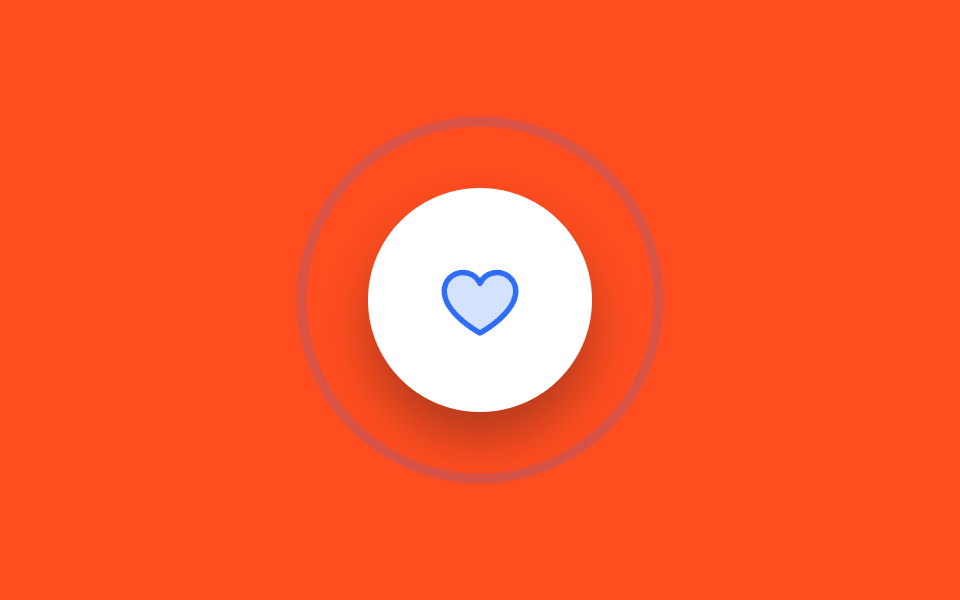
On press, an outlined ring (not a filled circle) scales outward while its opacity fades, giving click feedback that spreads like a bell's ring rather than a wave.
Best forLike and bookmark toggles, a chat send button
::after 링 확산scale + opacity:active 트리거
<main class="stage is-demo">
  <button class="btn" type="button" aria-label="Like">
    <svg class="btn__heart" viewBox="0 0 256 256" aria-hidden="true" focusable="false">
      <g fill="currentColor"><path d="M232 102c0 66-104 122-104 122S24 168 24 102a54 54 0 0 1 54-54c22.59 0 41.94 12.31 50 32c8.06-19.69 27.41-32 50-32a54 54 0 0 1 54 54" opacity=".2"/><path d="M178 40c-20.65 0-38.73 8.88-50 23.89C116.73 48.88 98.65 40 78 40a62.07 62.07 0 0 0-62 62c0 70 103.79 126.66 108.21 129a8 8 0 0 0 7.58 0C136.21 228.66 240 172 240 102a62.07 62.07 0 0 0-62-62m-50 174.8c-18.26-10.64-96-59.11-96-112.8a46.06 46.06 0 0 1 46-46c19.45 0 35.78 10.36 42.6 27a8 8 0 0 0 14.8 0c6.82-16.67 23.15-27 42.6-27a46.06 46.06 0 0 1 46 46c0 53.61-77.76 102.15-96 112.8"/></g>
    </svg>
  </button>
</main>
@use "../../../../site/static/demo-tokens" as *;
// ── 변수 3개 ──────────────────────────────────────────
$duration: $dur-loop; // 2s — 핑 두 번
$easing: $ease-out;
$color: $subject-blue; // 링·하트 색
@include stage($stage-orange);
.btn {
box-sizing: border-box;
position: relative;
width: 112px;
height: 112px;
border: none;
border-radius: 50%;
background: $stage-paper;
cursor: pointer;
display: grid;
place-items: center;
box-shadow: $shadow-raised;
}
.btn__heart {
width: 44px;
height: 44px;
color: $color; // Phosphor duotone: g fill="currentColor" 가 이 값을 물려받는다
}
// 테두리 링 — 채워진 원이 아니라 굵은 선이 퍼진다
.btn::after {
content: "";
position: absolute;
inset: 0;
border-radius: 50%;
border: 3px solid $color;
opacity: 0;
transform: scale(1);
}
// 실사용: 누르는 순간 한 번
.btn:active .btn__heart { animation: heart-pop $dur-base $ease-pop 1; }
.btn:active::after { animation: ring $dur-base $easing 1; }
.btn:focus-visible { outline: 3px solid $subject-ink; outline-offset: 4px; }
// 격자 미리보기: 2초에 두 번 종소리처럼 퍼진다
.stage.is-demo .btn__heart { animation: heart-pop $duration $ease-pop infinite; }
.stage.is-demo .btn::after { animation: ring $duration $easing infinite; }
@keyframes ring {
0% { transform: scale(1); opacity: .9; }
34% { transform: scale(1.8); opacity: 0; }
50% { transform: scale(1); opacity: .9; }
84% { transform: scale(1.8); opacity: 0; }
100% { transform: scale(1); opacity: 0; }
}
@keyframes heart-pop {
0%, 50% { transform: scale(1); }
8%, 58% { transform: scale(1.14); }
16%, 66% { transform: scale(.96); }
22%, 72% { transform: scale(1); }
}
@media (prefers-reduced-motion: reduce) {
.stage.is-demo .btn__heart, .stage.is-demo .btn::after { animation: none; }
.stage.is-demo .btn::after { opacity: 0; }
}html, body {
margin: 0;
overflow: hidden;
}
.stage {
box-sizing: border-box;
min-height: 100vh;
display: grid;
place-items: center;
margin: 0;
background: #ff4d1f;
font-family: -apple-system, "Segoe UI", "Noto Sans KR", sans-serif;
padding: clamp(8px, 4vw, 24px);
}
.btn {
box-sizing: border-box;
position: relative;
width: 112px;
height: 112px;
border: none;
border-radius: 50%;
background: #ffffff;
cursor: pointer;
display: grid;
place-items: center;
box-shadow: 0 14px 24px rgba(23, 20, 26, 0.32);
}
.btn__heart {
width: 44px;
height: 44px;
color: #2f6df6;
}
.btn::after {
content: "";
position: absolute;
inset: 0;
border-radius: 50%;
border: 3px solid #2f6df6;
opacity: 0;
transform: scale(1);
}
.btn:active .btn__heart {
animation: heart-pop 300ms cubic-bezier(0.2, 1.4, 0.4, 1) 1;
}
.btn:active::after {
animation: ring 300ms ease-out 1;
}
.btn:focus-visible {
outline: 3px solid #17141a;
outline-offset: 4px;
}
.stage.is-demo .btn__heart {
animation: heart-pop 2s cubic-bezier(0.2, 1.4, 0.4, 1) infinite;
}
.stage.is-demo .btn::after {
animation: ring 2s ease-out infinite;
}
@keyframes ring {
0% {
transform: scale(1);
opacity: 0.9;
}
34% {
transform: scale(1.8);
opacity: 0;
}
50% {
transform: scale(1);
opacity: 0.9;
}
84% {
transform: scale(1.8);
opacity: 0;
}
100% {
transform: scale(1);
opacity: 0;
}
}
@keyframes heart-pop {
0%, 50% {
transform: scale(1);
}
8%, 58% {
transform: scale(1.14);
}
16%, 66% {
transform: scale(0.96);
}
22%, 72% {
transform: scale(1);
}
}
@media (prefers-reduced-motion: reduce) {
.stage.is-demo .btn__heart, .stage.is-demo .btn::after {
animation: none;
}
.stage.is-demo .btn::after {
opacity: 0;
}
}import type { CSSProperties } from "react";
import styles from "./RippleRingButton.module.scss";
export type RippleRingButtonProps = {
duration?: number;
easing?: string;
color?: string;
label?: string;
};
export default function RippleRingButton({
duration = 300,
easing = "ease-out",
color = "#2f6df6",
label = "좋아요",
}: RippleRingButtonProps) {
const vars: CSSProperties = { "--duration": `${duration}ms`, "--easing": easing, "--color": color } as CSSProperties;
return (
<button className={styles.btn} style={vars} type="button" aria-label={label}>
<svg className={styles.heart} viewBox="0 0 256 256" aria-hidden="true" focusable="false">
<g fill="currentColor"><path d="M232 102c0 66-104 122-104 122S24 168 24 102a54 54 0 0 1 54-54c22.59 0 41.94 12.31 50 32c8.06-19.69 27.41-32 50-32a54 54 0 0 1 54 54" opacity=".2" /><path d="M178 40c-20.65 0-38.73 8.88-50 23.89C116.73 48.88 98.65 40 78 40a62.07 62.07 0 0 0-62 62c0 70 103.79 126.66 108.21 129a8 8 0 0 0 7.58 0C136.21 228.66 240 172 240 102a62.07 62.07 0 0 0-62-62m-50 174.8c-18.26-10.64-96-59.11-96-112.8a46.06 46.06 0 0 1 46-46c19.45 0 35.78 10.36 42.6 27a8 8 0 0 0 14.8 0c6.82-16.67 23.15-27 42.6-27a46.06 46.06 0 0 1 46 46c0 53.61-77.76 102.15-96 112.8" /></g>
</svg>
</button>
);
}07 Ripple ring button — Measured area 13.521% · moving frames 18/23Original by GODRICH · SCSS and React ship in the zip · 9 css button design ideas — candy, push, loading
The post this demo lives in
 9 css button design ideas — candy, push, loadingcss button design means deciding a button's colors, shape, and mouse reaction in a few lines of code. Want that candy-gr See all demos in this post
If you like this effect - similar demos
 Buttons06 Close button with a ring that keeps circling9 Icon Button CSS Patterns — Press, Drag, Expand
 Buttons01 Power button with LED ringCSS Toggle Switch: 9 Realistic Switches to Paste
 Buttons04 Perimeter countdown — a button whose surrounding perimeter progress value depletes over a set durationCTA Button Design: 9 Interaction Patterns