03::scroll-button arrows
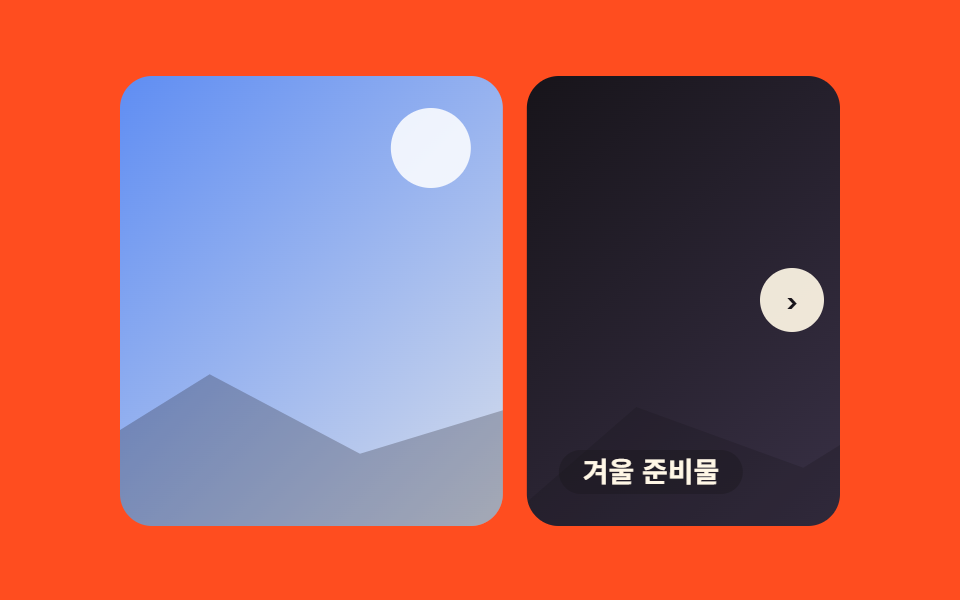
Prev/next arrow buttons flank the slides, sliding one photo at a time when pressed — the browser generates the buttons via ::scroll-button() and dims them automatically at either end.
Best forProduct detail image browsing, manually controlled banners
::scroll-button(*):disabledscroll-snap-type
<main class="stage">
  <div class="ab is-demo">
    <div class="ab__viewport">
      <div class="ab__track">
        <div class="ab__slide ab__slide--1"><span class="ab__cap">New Product</span></div>
        <div class="ab__slide ab__slide--2"><span class="ab__cap">Limited Stock</span></div>
        <div class="ab__slide ab__slide--3"><span class="ab__cap">Winter Essentials</span></div>
        <div class="ab__slide ab__slide--1" aria-hidden="true"><span class="ab__cap">New Product</span></div>
        <div class="ab__slide ab__slide--1" aria-hidden="true"><span class="ab__cap">New Product</span></div>
      </div>
    </div>
  </div>
</main>
@use "../../../../site/static/demo-tokens" as *;
// ── 변수 3개 ──────────────────────────────────────────
$duration: $dur-base;
$easing: $ease-spring;
$color: $subject-ink; // 화살표 버튼 색
@include stage($stage-orange);
.ab { width: min(360px, 84vw); position: relative; }
// ── 실제 동작: ::scroll-button() 이 이전/다음 버튼을 만들고, 끝에서 자동으로 비활성화한다 (0줄 JS) ──
.ab__viewport {
position: relative;
overflow-x: auto;
overflow-y: hidden;
scroll-snap-type: x mandatory;
border-radius: $r-card;
scrollbar-width: none;
&::-webkit-scrollbar { display: none; }
&::scroll-button(left), &::scroll-button(right) {
position: absolute;
top: 50%;
z-index: 1;
width: $sp-8; height: $sp-8;
margin-top: calc(#{$sp-8} / -2);
border: 0;
border-radius: 50%;
background: rgba(255, 247, 230, .92);
color: $color;
font-weight: 700;
font-size: 16px;
line-height: 1;
font-family: inherit;
display: grid;
place-items: center;
cursor: pointer;
transition: opacity $duration $easing, transform $duration $easing;
}
&::scroll-button(left) { left: $sp-2; content: "‹"; }
&::scroll-button(right) { right: $sp-2; content: "›"; }
&::scroll-button(left):disabled, &::scroll-button(right):disabled {
opacity: 0; pointer-events: none;
}
}
// ── 무한 루프 이음새: 1번을 트랙 끝에 두 장 더 복제(aria-hidden) — 끝→처음 텔레포트 금지 ──
// 두 번째 복제는 화면에 보이지 않는 예비 칸: 트랙이 끝까지 밀려도 스크롤 넘침이 남아 있어
// ::scroll-button 의 활성/비활성이 루프 끝에서 깜빡이지 않는다
.ab__track {
display: flex;
width: 400%;
}
.ab__slide {
flex: 0 0 25%;
scroll-snap-align: start;
aspect-ratio: 16 / 10;
margin-right: $sp-3;
border-radius: $r-card;
position: relative;
overflow: hidden;
display: grid;
place-items: end start;
box-sizing: border-box;
}
.ab__slide:last-child { margin-right: 0; }
// 플레이스홀더 "사진"
.ab__slide::before {
content: ""; position: absolute; top: $sp-4; right: $sp-4;
width: $sp-10; height: $sp-10; border-radius: 50%;
background: rgba(255, 255, 255, .85);
}
.ab__slide::after {
content: ""; position: absolute; left: -8%; right: -8%; bottom: -6%; height: 52%;
background: rgba(23, 20, 26, .26);
clip-path: polygon(0% 100%, 20% 38%, 40% 64%, 58% 24%, 76% 58%, 100% 32%, 100% 100%);
}
.ab__slide--1 { background: linear-gradient(135deg, $stage-orange, #ebdbd6); }
.ab__slide--2 { background: linear-gradient(135deg, $subject-blue, #d6ddeb); }
.ab__slide--3 { background: linear-gradient(135deg, $subject-ink, #4a3f5c); }
.ab__cap {
position: relative; z-index: 1;
margin: $sp-4;
padding: $sp-1 $sp-3;
border-radius: $r-pill;
background: rgba(23, 20, 26, .38);
color: $subject-cream;
font-weight: 600;
font-size: clamp(12px, 3.2vw, 14px);
line-height: 1;
font-family: inherit;
}
// ── 데모 루프: 트랙에 별도 transform 을 얹어 자동으로 넘어간다 (진짜 버튼 클릭·끝 비활성화는 그대로) ──
// 마지막 칸은 1번의 복제본 — 그곳까지 정상 속도로 가고 100%→0% 점프는 복제본=1번이라 안 보인다
.ab.is-demo .ab__track { animation: ab-loop $dur-loop $easing infinite; }
@keyframes ab-loop {
0%, 8% { transform: translateX(0%); }
31%, 39% { transform: translateX(calc(-25% - #{$sp-3})); }
62%, 70% { transform: translateX(calc(-50% - #{$sp-3 * 2})); }
92%, 100% { transform: translateX(calc(-75% - #{$sp-3 * 3})); }
}
// ── 접근성 ──────────────────────────────────────────
@media (prefers-reduced-motion: reduce) {
.ab.is-demo .ab__track { animation: none !important; }
}@charset "UTF-8";
html, body {
margin: 0;
overflow: hidden;
}
.stage {
box-sizing: border-box;
min-height: 100vh;
display: grid;
place-items: center;
margin: 0;
background: #ff4d1f;
font-family: -apple-system, "Segoe UI", "Noto Sans KR", sans-serif;
padding: clamp(8px, 4vw, 24px);
}
.ab {
width: min(360px, 84vw);
position: relative;
}
.ab__viewport {
position: relative;
overflow-x: auto;
overflow-y: hidden;
scroll-snap-type: x mandatory;
border-radius: 16px;
scrollbar-width: none;
}
.ab__viewport::-webkit-scrollbar {
display: none;
}
.ab__viewport::scroll-button(left), .ab__viewport::scroll-button(right) {
position: absolute;
top: 50%;
z-index: 1;
width: 32px;
height: 32px;
margin-top: calc(32px / -2);
border: 0;
border-radius: 50%;
background: rgba(255, 247, 230, 0.92);
color: #17141a;
font-weight: 700;
font-size: 16px;
line-height: 1;
font-family: inherit;
display: grid;
place-items: center;
cursor: pointer;
transition: opacity 300ms cubic-bezier(0.2, 0.8, 0.2, 1), transform 300ms cubic-bezier(0.2, 0.8, 0.2, 1);
}
.ab__viewport::scroll-button(left) {
left: 8px;
content: "‹";
}
.ab__viewport::scroll-button(right) {
right: 8px;
content: "›";
}
.ab__viewport::scroll-button(left):disabled, .ab__viewport::scroll-button(right):disabled {
opacity: 0;
pointer-events: none;
}
.ab__track {
display: flex;
width: 400%;
}
.ab__slide {
flex: 0 0 25%;
scroll-snap-align: start;
aspect-ratio: 16/10;
margin-right: 12px;
border-radius: 16px;
position: relative;
overflow: hidden;
display: grid;
place-items: end start;
box-sizing: border-box;
}
.ab__slide:last-child {
margin-right: 0;
}
.ab__slide::before {
content: "";
position: absolute;
top: 16px;
right: 16px;
width: 40px;
height: 40px;
border-radius: 50%;
background: rgba(255, 255, 255, 0.85);
}
.ab__slide::after {
content: "";
position: absolute;
left: -8%;
right: -8%;
bottom: -6%;
height: 52%;
background: rgba(23, 20, 26, 0.26);
clip-path: polygon(0% 100%, 20% 38%, 40% 64%, 58% 24%, 76% 58%, 100% 32%, 100% 100%);
}
.ab__slide--1 {
background: linear-gradient(135deg, #ff4d1f, #ebdbd6);
}
.ab__slide--2 {
background: linear-gradient(135deg, #2f6df6, #d6ddeb);
}
.ab__slide--3 {
background: linear-gradient(135deg, #17141a, #4a3f5c);
}
.ab__cap {
position: relative;
z-index: 1;
margin: 16px;
padding: 4px 12px;
border-radius: 999px;
background: rgba(23, 20, 26, 0.38);
color: #fff7e6;
font-weight: 600;
font-size: clamp(12px, 3.2vw, 14px);
line-height: 1;
font-family: inherit;
}
.ab.is-demo .ab__track {
animation: ab-loop 2s cubic-bezier(0.2, 0.8, 0.2, 1) infinite;
}
@keyframes ab-loop {
0%, 8% {
transform: translateX(0%);
}
31%, 39% {
transform: translateX(calc(-25% - 12px));
}
62%, 70% {
transform: translateX(calc(-50% - 24px));
}
92%, 100% {
transform: translateX(calc(-75% - 36px));
}
}
@media (prefers-reduced-motion: reduce) {
.ab.is-demo .ab__track {
animation: none !important;
}
}// 화살표 버튼 자체는 브라우저가 ::scroll-button() 으로 자동 생성·비활성화한다(0줄).
// 이 3줄은 미리보기 자동 재생만 멈춘다 — 진짜 클릭은 그대로 동작한다.
document.querySelector('.ab__viewport').addEventListener('pointerdown', function () {
document.querySelector('.ab').classList.remove('is-demo');
});import type { CSSProperties } from "react";
import styles from "./ArrowsScrollButton.module.scss";
const SLIDES = ["신제품", "한정 수량", "겨울 준비물"];
export type ArrowsScrollButtonProps = {
duration?: number;
easing?: string;
color?: string;
};
type Vars = CSSProperties & { "--duration"?: string; "--easing"?: string; "--color"?: string };
export default function ArrowsScrollButton({ duration = 300, easing = "cubic-bezier(.2,.8,.2,1)", color = "#17141a" }: ArrowsScrollButtonProps) {
const vars: Vars = { "--duration": `${duration}ms`, "--easing": easing, "--color": color };
return (
<div className={styles.ab} style={vars}>
{/* 화살표 버튼은 브라우저가 ::scroll-button() 으로 자동 생성·비활성화한다 */}
<div className={styles.viewport}>
<div className={styles.track}>
{SLIDES.map((label, i) => (
<div key={label} className={`${styles.slide} ${styles["slide" + (i + 1)]}`}>
<span className={styles.cap}>{label}</span>
</div>
))}
</div>
</div>
</div>
);
}03 ::scroll-button arrows — Measured area 56.113% · moving frames 20/23Original by GODRICH · SCSS and React ship in the zip · 9 CSS Only Carousels You Can Copy-Paste
The post this demo lives in
 9 CSS Only Carousels You Can Copy-PasteA carousel is a strip of photos that slides across the screen one at a time, usually with dots or arrows to flip through See all demos in this post