04Clip-path open
A clip-path rectangle expands downward from the trigger, unveiling the menu content as it grows.
Best forContext menus inside cards, overflow menus in tight toolbars
clip-pathinset()0.2초
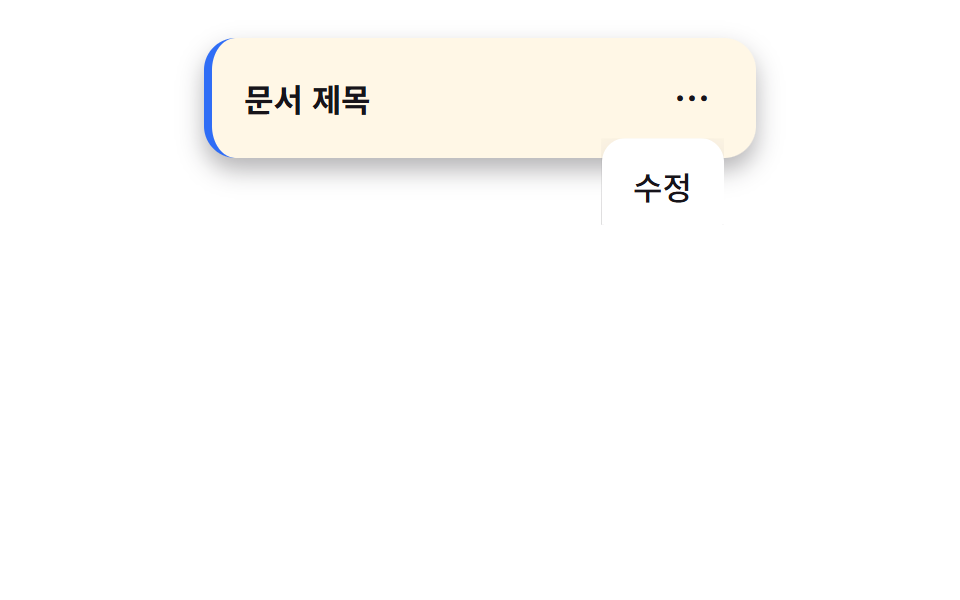
<main class="stage">
  <div class="card">
    <span class="card__title">Document title</span>
    <nav class="menu is-demo">
      <button class="menu__trigger" type="button" aria-expanded="false" aria-label="More">⋯</button>
      <ul class="menu__panel">
        <li><a href="#">Edit</a></li>
        <li><a href="#">Duplicate</a></li>
        <li><a href="#">Delete</a></li>
      </ul>
    </nav>
  </div>
</main>
@use "../../../../site/static/demo-tokens" as *;
$duration: $dur-base; // 클립이 펼쳐지는 시간
$easing: $ease-out; // 시작 빠르고 끝은 부드럽게
$color: $subject-blue; // 문서 카드 강조 색
@include stage($stage-paper);
.card {
position: relative;
align-self: flex-start; // 패널이 트리거 아래로 열려 무대 중앙에 두면 320px 에서 아래로 넘친다 — 위로 붙여 여유를 둔다 (실측 320px 재검증 2026-09-10)
width: min(240px, 88vw);
display: flex;
align-items: center;
justify-content: space-between;
padding: 14px 16px;
border-radius: $r-card;
background: $subject-cream;
box-shadow: $shadow-press;
font-weight: 600;
font-size: clamp(13px, 3.6vw, 16px);
line-height: 1.2;
font-family: inherit;
color: $stage-ink;
border-left: 4px solid $color;
}
.menu {
position: relative;
font-weight: 500;
font-size: clamp(13px, 3.6vw, 16px);
line-height: 1.4;
font-family: inherit;
&__trigger {
border: 0;
border-radius: $r-control;
width: 32px;
height: 32px;
font-weight: 700;
font-size: 18px;
line-height: 1;
font-family: inherit;
color: $stage-ink;
background: transparent;
cursor: pointer;
}
&__trigger:hover { background: rgba($stage-ink, .06); }
&__panel {
position: absolute;
top: calc(100% + 4px);
right: 0;
width: max-content;
max-width: min(140px, 70vw);
margin: 0;
padding: 6px;
list-style: none;
background: #fff;
border-radius: $r-control;
box-shadow: $shadow-raised;
clip-path: inset(0 0 100% 0); // 위에서부터 잘려 보이지 않던 것이 펼쳐진다
pointer-events: none;
}
&__panel li a {
display: block;
padding: 8px 10px;
border-radius: $r-control - 4px;
color: $stage-ink;
text-decoration: none;
}
&__panel li a:hover { background: rgba($stage-ink, .06); }
&.is-open &__panel { clip-path: inset(0 0 0% 0); pointer-events: auto; transition: clip-path $duration $easing; }
&.is-demo &__panel { animation: reveal-loop $dur-loop $easing infinite; }
}
@keyframes reveal-loop {
0%, 30% { clip-path: inset(0 0 100% 0); }
45%, 80% { clip-path: inset(0 0 0% 0); }
95%, 100% { clip-path: inset(0 0 100% 0); }
}
@media (prefers-reduced-motion: reduce) {
.menu__panel { transition: none !important; }
.menu.is-demo .menu__panel { animation: none; clip-path: inset(0 0 100% 0); }
}html, body {
margin: 0;
overflow: hidden;
}
.stage {
box-sizing: border-box;
min-height: 100vh;
display: grid;
place-items: center;
margin: 0;
background: #ffffff;
font-family: -apple-system, "Segoe UI", "Noto Sans KR", sans-serif;
padding: clamp(8px, 4vw, 24px);
}
.card {
position: relative;
align-self: flex-start;
width: min(240px, 88vw);
display: flex;
align-items: center;
justify-content: space-between;
padding: 14px 16px;
border-radius: 16px;
background: #fff7e6;
box-shadow: 0 6px 12px rgba(23, 20, 26, 0.32);
font-weight: 600;
font-size: clamp(13px, 3.6vw, 16px);
line-height: 1.2;
font-family: inherit;
color: #17141a;
border-left: 4px solid #2f6df6;
}
.menu {
position: relative;
font-weight: 500;
font-size: clamp(13px, 3.6vw, 16px);
line-height: 1.4;
font-family: inherit;
}
.menu__trigger {
border: 0;
border-radius: 12px;
width: 32px;
height: 32px;
font-weight: 700;
font-size: 18px;
line-height: 1;
font-family: inherit;
color: #17141a;
background: transparent;
cursor: pointer;
}
.menu__trigger:hover {
background: rgba(23, 20, 26, 0.06);
}
.menu__panel {
position: absolute;
top: calc(100% + 4px);
right: 0;
width: max-content;
max-width: min(140px, 70vw);
margin: 0;
padding: 6px;
list-style: none;
background: #fff;
border-radius: 12px;
box-shadow: 0 14px 24px rgba(23, 20, 26, 0.32);
clip-path: inset(0 0 100% 0);
pointer-events: none;
}
.menu__panel li a {
display: block;
padding: 8px 10px;
border-radius: 8px;
color: #17141a;
text-decoration: none;
}
.menu__panel li a:hover {
background: rgba(23, 20, 26, 0.06);
}
.menu.is-open .menu__panel {
clip-path: inset(0 0 0% 0);
pointer-events: auto;
transition: clip-path 300ms ease-out;
}
.menu.is-demo .menu__panel {
animation: reveal-loop 2s ease-out infinite;
}
@keyframes reveal-loop {
0%, 30% {
clip-path: inset(0 0 100% 0);
}
45%, 80% {
clip-path: inset(0 0 0% 0);
}
95%, 100% {
clip-path: inset(0 0 100% 0);
}
}
@media (prefers-reduced-motion: reduce) {
.menu__panel {
transition: none !important;
}
.menu.is-demo .menu__panel {
animation: none;
clip-path: inset(0 0 100% 0);
}
}// 트리거를 클릭하면 열리고 닫힌다. 데모(.is-demo)는 스스로 반복한다.
var m = document.querySelector('.menu'), t = m.querySelector('.menu__trigger');
t.addEventListener('click', function () {
m.classList.remove('is-demo');
t.setAttribute('aria-expanded', m.classList.toggle('is-open'));
});import { useState } from "react";
import type { CSSProperties } from "react";
import styles from "./ClipOpenDropdown.module.scss";
export type ClipOpenDropdownProps = {
title: string;
moreLabel: string;
items: string[];
/** 클립이 펼쳐지는 시간 (기본 300ms) */
duration?: number;
easing?: string;
color?: string;
};
type Vars = CSSProperties & { "--duration"?: string; "--easing"?: string; "--color"?: string };
export default function ClipOpenDropdown({
title,
moreLabel,
items,
duration = 300,
easing = "ease-out",
color = "#2f6df6",
}: ClipOpenDropdownProps) {
const [open, setOpen] = useState(false);
const vars: Vars = { "--duration": `${duration}ms`, "--easing": easing, "--color": color };
return (
<div className={styles.card} style={vars}>
<span className={styles.title}>{title}</span>
<nav className={styles.menu}>
<button type="button" className={styles.trigger} aria-expanded={open} aria-label={moreLabel} onClick={() => setOpen((v) => !v)}>
⋯
</button>
<ul className={open ? `${styles.panel} ${styles.panelOpen}` : styles.panel}>
{items.map((label) => (
<li key={label}><a href="#">{label}</a></li>
))}
</ul>
</nav>
</div>
);
}04 Clip-path open — Measured area 1.538% · moving frames 8/23Original by GODRICH · SCSS and React ship in the zip · 9 CSS Dropdown Menu Animation—No Library, Pure CSS
The post this demo lives in
 9 CSS Dropdown Menu Animation—No Library, Pure CSSA css dropdown menu animation is the motion a panel plays between hidden and open — height, opacity, transform, or clip- See all demos in this post
If you like this effect - similar demos
 Transitions08 Circle reveal from the icon9 CSS Hamburger Menu Animations, No Library
 Transitions08 Search that unfolds from an icon into an input9 mega menu ui patterns, link list to site map
 Transitions04 Submenu cascade open — a submenu opens once the hovered duration value passes a set amountContext Menu UI: 9 Right-Click Menu Patterns